Our Customer service staff is available to help you. For any problem with your purchase, or to receive further
information about this product, please call our toll-free number.
SAVE THIS MANUAL
Keep this manual and the original sales invoice in a safe, dry place for future reference.
Notre personnel du service à la clientèle est disponible pour vous aider. En cas de problème avec votre achat, ou pour
obtenir plus d’informations à propos de ce produit, veuillez composer notre numéro sans frais.
CONSERVEZ CE GUIDE
Conservez ce manuel avec la facture d’origine dans un endroit sûr et sec pour référence future.
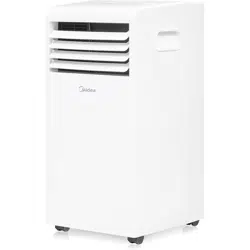
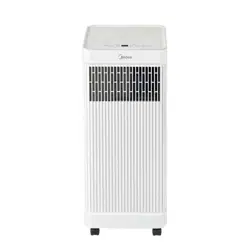
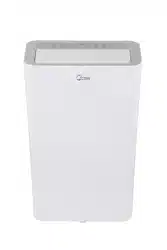
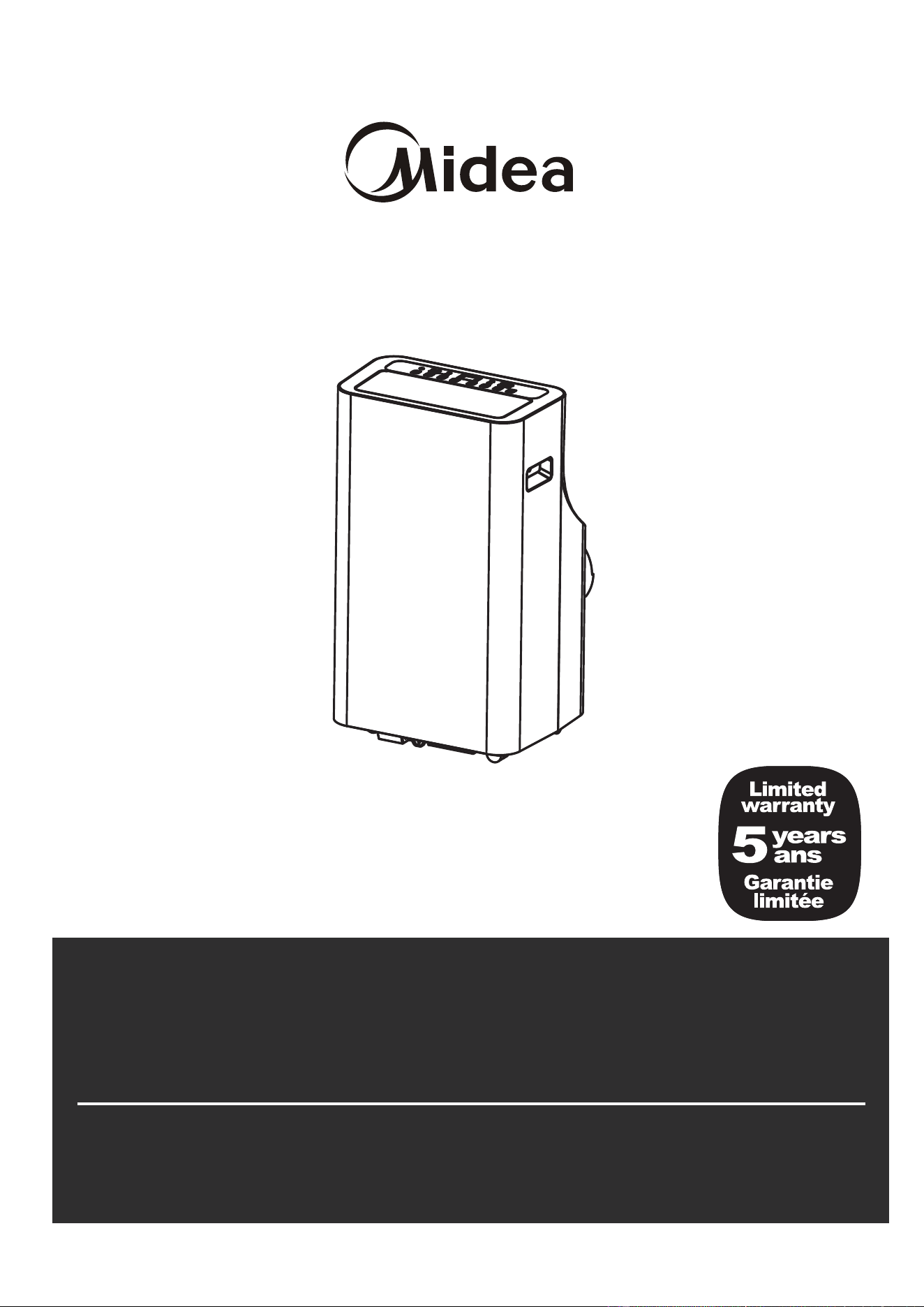
PORTABLE AIR CONDITIONER
Operator's manual
Customer Service / Service à la clientèle:
1-866-206-0888
Item No. 888153 SKu No. 21615024 Model NO. MP120QWBA3RC1
Item No. 888 21615025 Model NO. MP140QWBA3RC1
149 SKu No.

Safety Precautions
. .............................................................................................................................
Safety Precautions
Installation Instructions
Operating Instructions
Maintenance
Table of Contents
Control Panel Features
...............................................................................................................................
Operation Instructions
...............................................................................................................................
Other features
...............................................................................................................................
Safety Precautions
...............................................................................................................................
Air Filter Cleaning
...............................................................................................................................
Troubleshooting Tips
...............................................................................................................................
Unit Cleaning
...............................................................................................................................
Store the unit when not in use
...............................................................................................................................
Preparation
...............................................................................................................................
Design Notice
...............................................................................................................................
Ambient Temperature Range For Unit Operating
..................................................................................................
Exhaust Hose Installation
...............................................................................................................................
Choosing The Right Location
...............................................................................................................................
Tools Needed
...............................................................................................................................
Accessories
...............................................................................................................................
Window Installation Kit
...............................................................................................................................
Installation
...............................................................................................................................
Troubleshooting Tips
03
06
06
Energy Rating Information
..............................................................................................................................
07
06
06
07
08
08
08
09
11
13
14
15
15
15
16
16
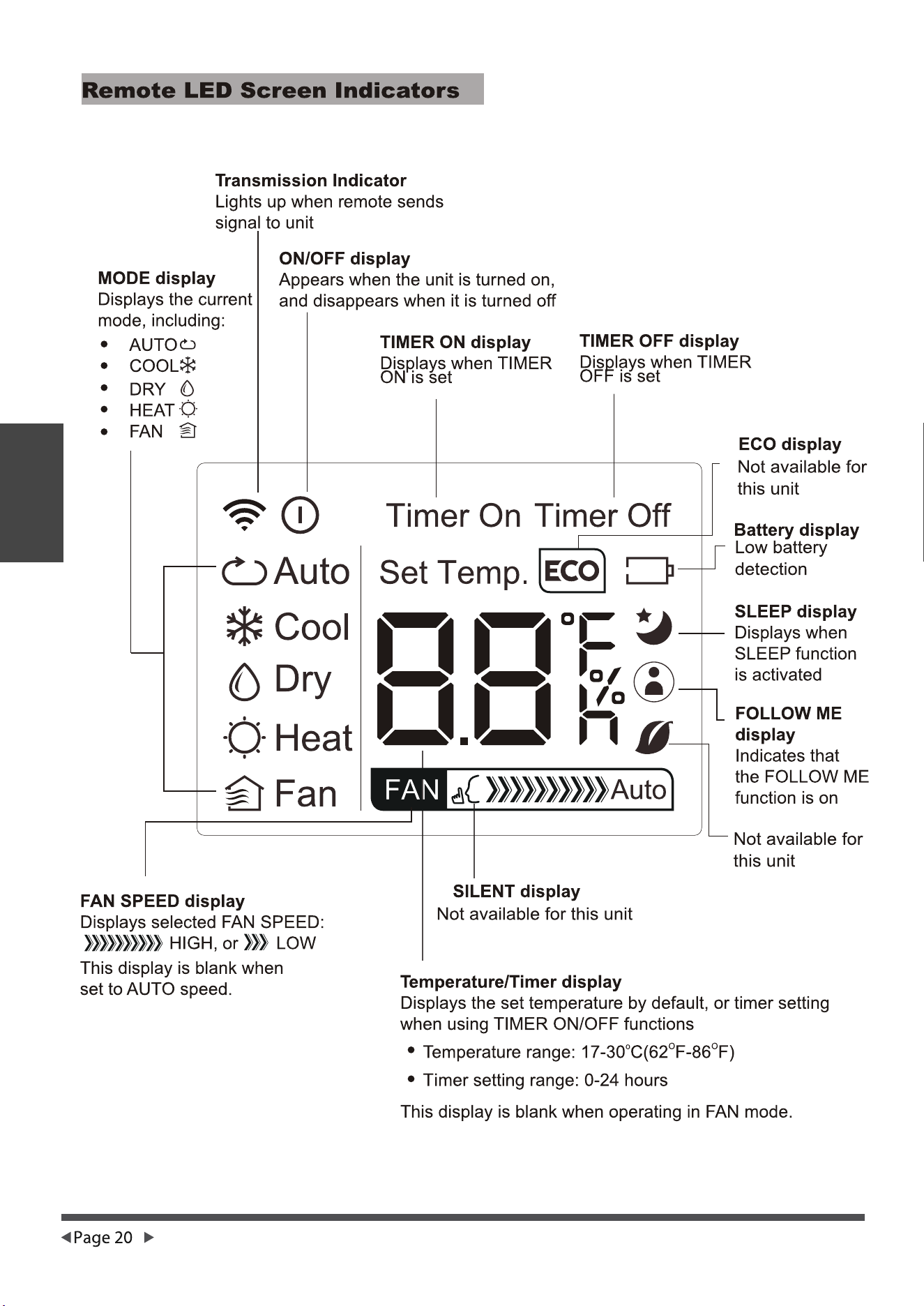
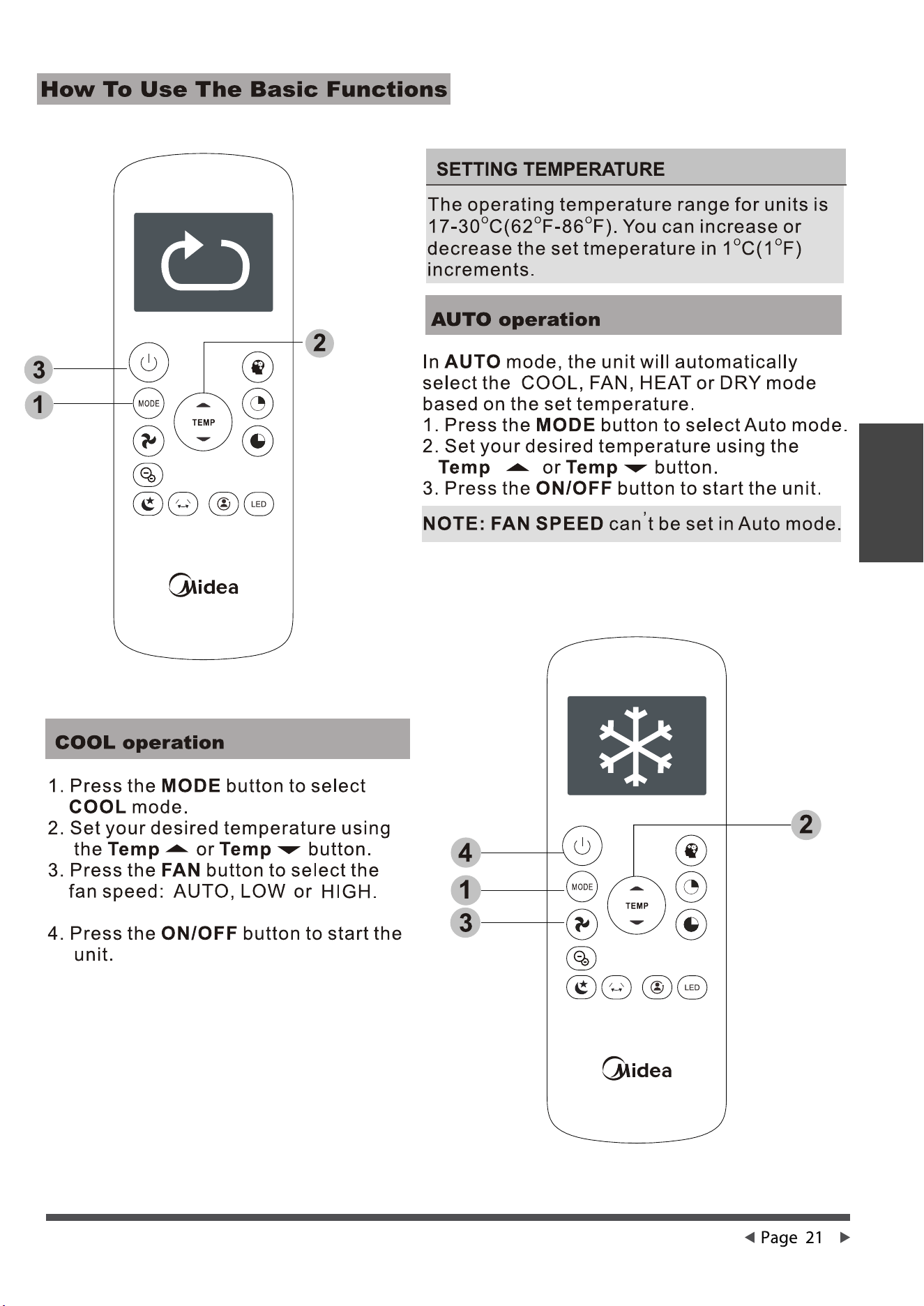
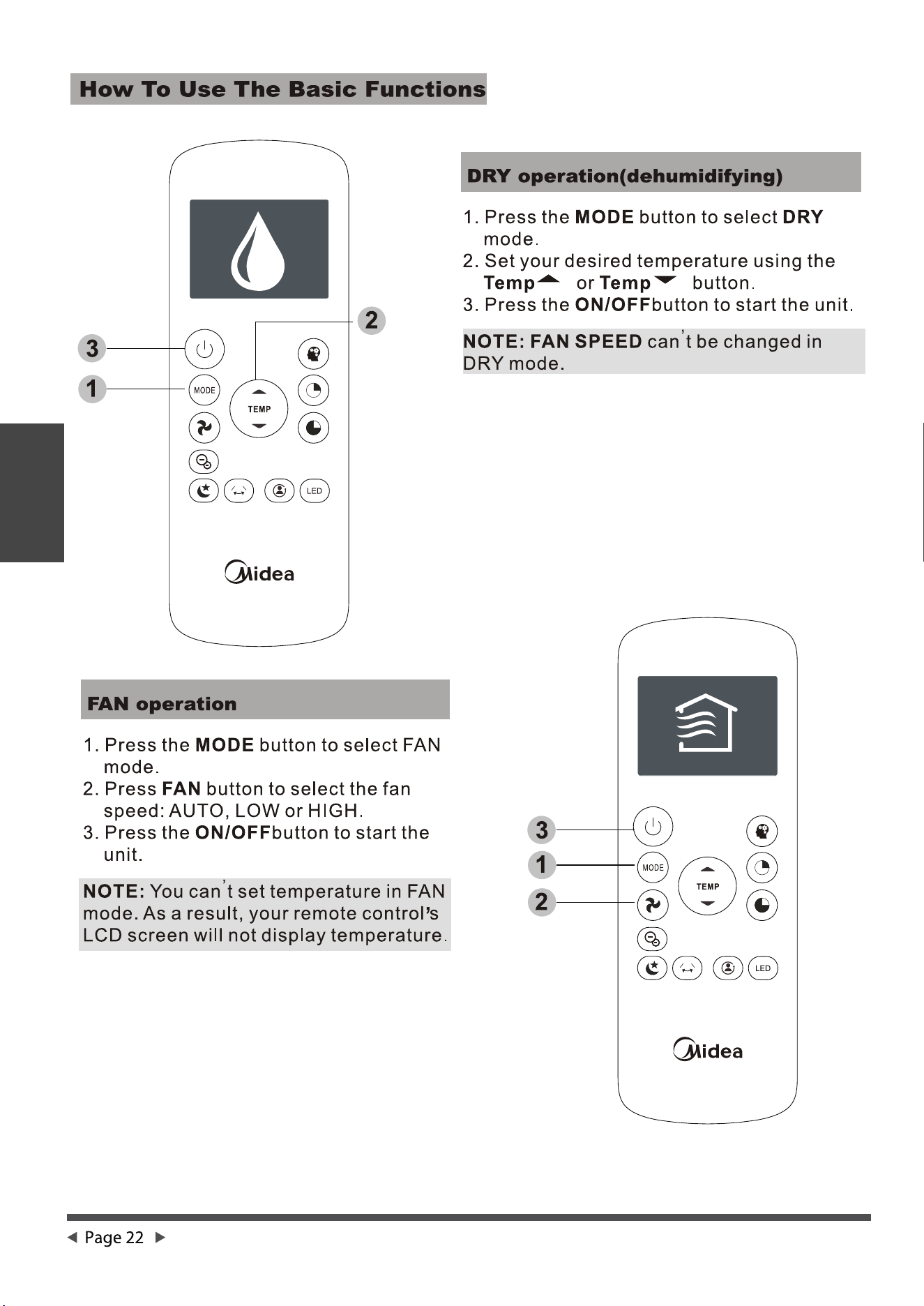
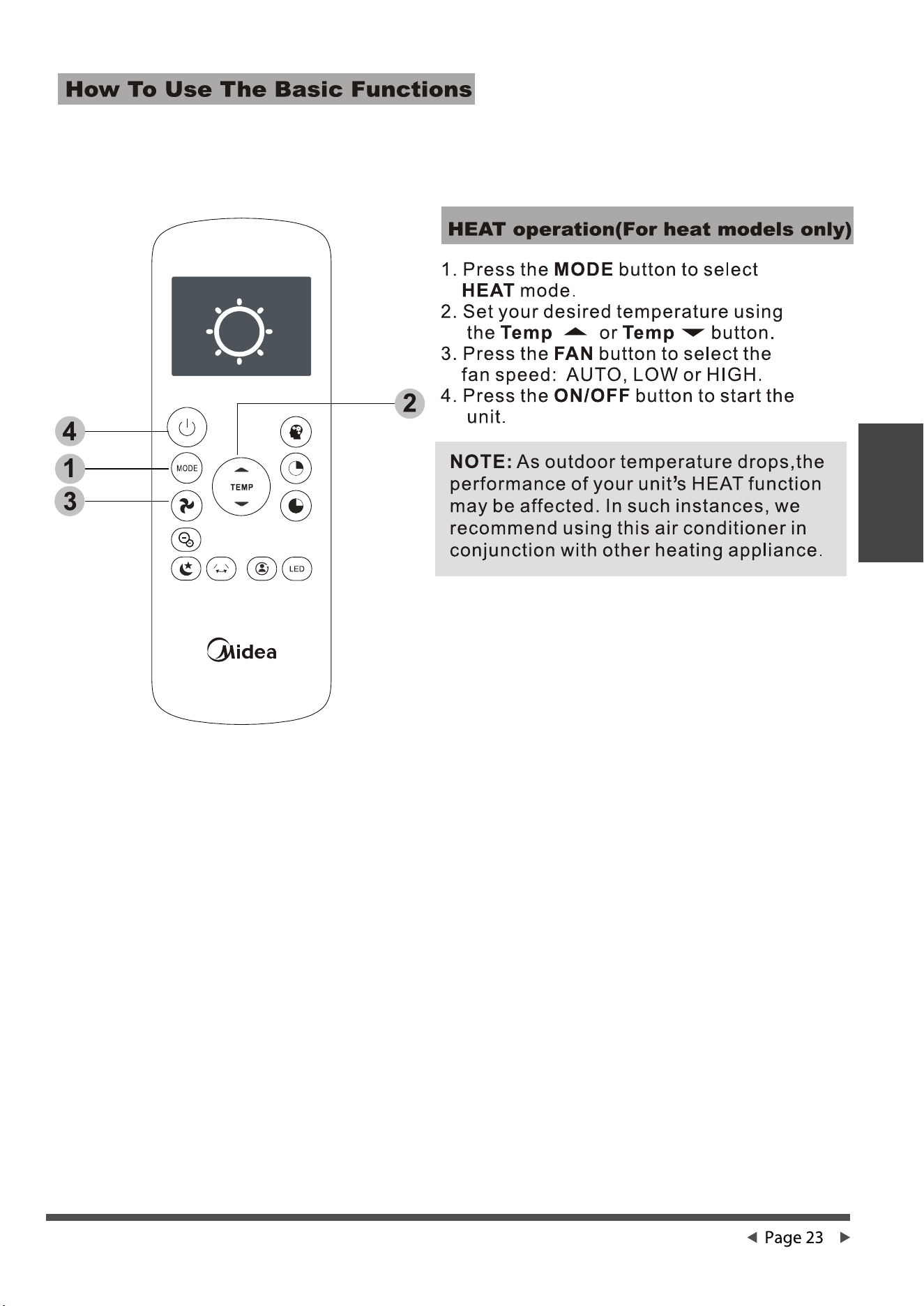
Remote controller lllustration
...............................................................................................................................
Remote controller lllustration
17
Air conditioner limited warranty
...............................................................................................................................
Air conditioner limited warranty
30
Safety
Precautions
Safety
Read Safety Precautions Before Operation and Installation
To prevent death or injury to the user or other people and property damage, the
following instructions must be followed. Incorrect operation due to ignoring of
instructions may cause death, harm or damage.
•
•
•
•
•
•
•
•
•
•
•
•
•
•
Safety Precautions
Do not operate a unit that it has been dropped or damaged.
The appliance with electric heater shall have at least 1 meter space to the combustible
materials.
Do not touch the unit with wet or damp hands or when barefoot.
If the air conditioner is knocked over during use, turn off the unit and unplug it from the main
power supply immediately. Visually inspect the unit to ensure there is no damage. If you
suspect the unit has been damaged, contact a technician or customer service for assistance.
Page 3
WARNING
This symbol indicates the possibility of
personnel injury or loss of life.
CAUTION
WARNING
This symbol indicates the possibility of
property damage or serious consequences.
Installation must be performed according to the installation instructions. Improper installation
can cause water leakage, electrical shock, or fire.
Use only the included accessories and parts, and specified tools for the installation. Using non-
standard parts can cause water leakage, electrical shock, fire, and injury or property damage.
Make sure that the outlet you are using is grounded and has the appropriate voltage.
The power cord is equipped with a three-prong grounding plug to protect against shock.
Voltage information can be found on the nameplate of the unit.
Your unit must be used in a properly grounded wall receptacle. If the wall receptacle you
intend to use is not adequately grounded or protected by a time delay fuse or circuit breaker
(the fuse or circuit breaker needed is determined by the maximum current of the unit. The
maximum current is indicated on the nameplate located on unit), have a qualified electrician
install the proper receptacle.
Install the unit on a flat, sturdy surface. Failure to do so could result in damage or excessive
noise and vibration.
The unit must be kept free from obstruction to ensure proper function and to mitigate safety
hazards.
Do not modify the length of the power cord or use an extension cord to power the unit.
Do not share a single outlet with other electrical appliances. Improper power supply can
cause fire or electrical shock.
Do not install your air conditioner in a wet room such as a bathroom or laundry room. Too
much exposure to water can cause electrical components to short circuit.
Do not install the unit in a location that may be exposed to combustible gas, as this could
cause fire.
The unit has wheels to facilitate moving. Make sure not to use the wheels on thick carpet or to
roll over objects, as these could cause tipping.
Safety
Precautions
Page 4
•
•
•
•
•
In a thunderstorm, the power must be cut off to avoid damage to the machine due to lightning.
Your air conditioner should be used in such a way that it is protected from moisture.
e.g. condensation, splashed water, etc. Do not place or store your air conditioner where it can
fall or be pulled into water or any other liquid. Unplug immediately if it occurs.
All wiring must be performed strictly in accordance with the wiring diagram located inside of
the unit.
The unit's circuit board(PCB) is designed with a fuse to provide overcurrent protection. The
specifications of the fuse are printed on the circuit board, such as: T 3.15A/250V, etc.
When the water drainage function is not in use, keep the upper and the lower drain plug firmly
to the unit to get rid of choking. When the drain plug is not in use, keep it carefully to prevent
children from choking.
•
•
•
•
•
•
•
•
•
•
•
•
•
This appliance is not intended for use by persons (including childern) with reduced physical,
sensory or mental capabilities or lack of experience and knowledge, unless they have been
given supervision or instruction concerning use of the appliance by a person responsible for
their safety. Children should be supervised to ensure that they do not play with the appliance.
Children must be supervised around the unit at all times.
If the supply cord is damaged, it must be replaced by the manufacturer,its service agent or
similarly qualified persons in order to avoid a hazard.
CAUTION
Do not use this product for functions other than those described in this instruction manual.
Before cleaning, turn off the power and unplug the unit.
Prior to cleaning or other maintenance, the appliance must be disconnected from the supply
mains.
Do not remove any fixed covers. Never use this appliance if it is not working properly, or if it has
been dropped or damaged.
Do not run cord under carpeting. Do not cover cord with throw rugs, runners, or similar
coverings. Do not route cord under furniture or appliances. Arrange cord away from traffic area
and where it will not be tripped over.
Do not operate unit with a damaged cord, plug, power fuse or circuit breaker. Discard unit or
return to an authorized service facility for examination and/or repair.
To reduce the risk of fire or electric shock, do not use this fan with any solid-state speed control
device.
The appliance shall be installed in accordance with national wiring regulations.
Contact the authorised service technician for repair or maintenance of this unit.
Contact the authorised installer for installation of this unit.
Do not cover or obstruct the inlet or outlet grilles.

Safety
Precautions
Page 5
Note about Fluorinated Gasses
1.
Fluorinated greenhouse gases are contained in hermetically sealed equipment. For specific
information on the type, the amount and the CO2 equivalent in tonnes of the fluorinated
greenhouse gas(on some models), please refer to the relevant label on the unit itself.
2.
Installation, service, maintenance and repair of this unit must be performed by a certified
technician.
3.
Product uninstallation and recycling must be performed by a certified technician.
•
•
•
•
•
•
•
•
•
Disconnect the power if strange sounds, smell, or smoke comes from it.
Do not press the buttons on the control panel with anything other than your fingers.
Do not remove any fixed covers. Never use this appliance if it is not working properly, or if it has
been dropped or damaged.
Do not operate or stop the unit by inserting or pulling out the power cord plug.
Do not use hazardous chemicals to clean or come into contact with the unit. Do not use the unit
in the presence of inflammable substances or vapour such as alcohol, insecticides, petrol,etc.
Always transport your air conditioner in a vertical position and stand on a stable, level surface
during use.
Always contact a qualified person to carry out repairs. If the damaged power supply cord must
be replaced with a new power supply cord obtained from the product manufacturer and not
repaired.
Hold the plug by the head of the power plug when taking it out.
Turn off the product when not in use.
Page 6
Installation
Instructions
Installation Instructions
Preparation
NOTE:
All the illustrations in the manual are for explanation purpose only. Your machine may be slightly different.
The actual shape shall prevail. The unit can be controlled by the unit control panel alone or with the remote
controller.
MODE Temperature Range MODE Temperature Range
Design Notice
Ambient Temperature Range For Unit Operating
Exhaust Hose Installation
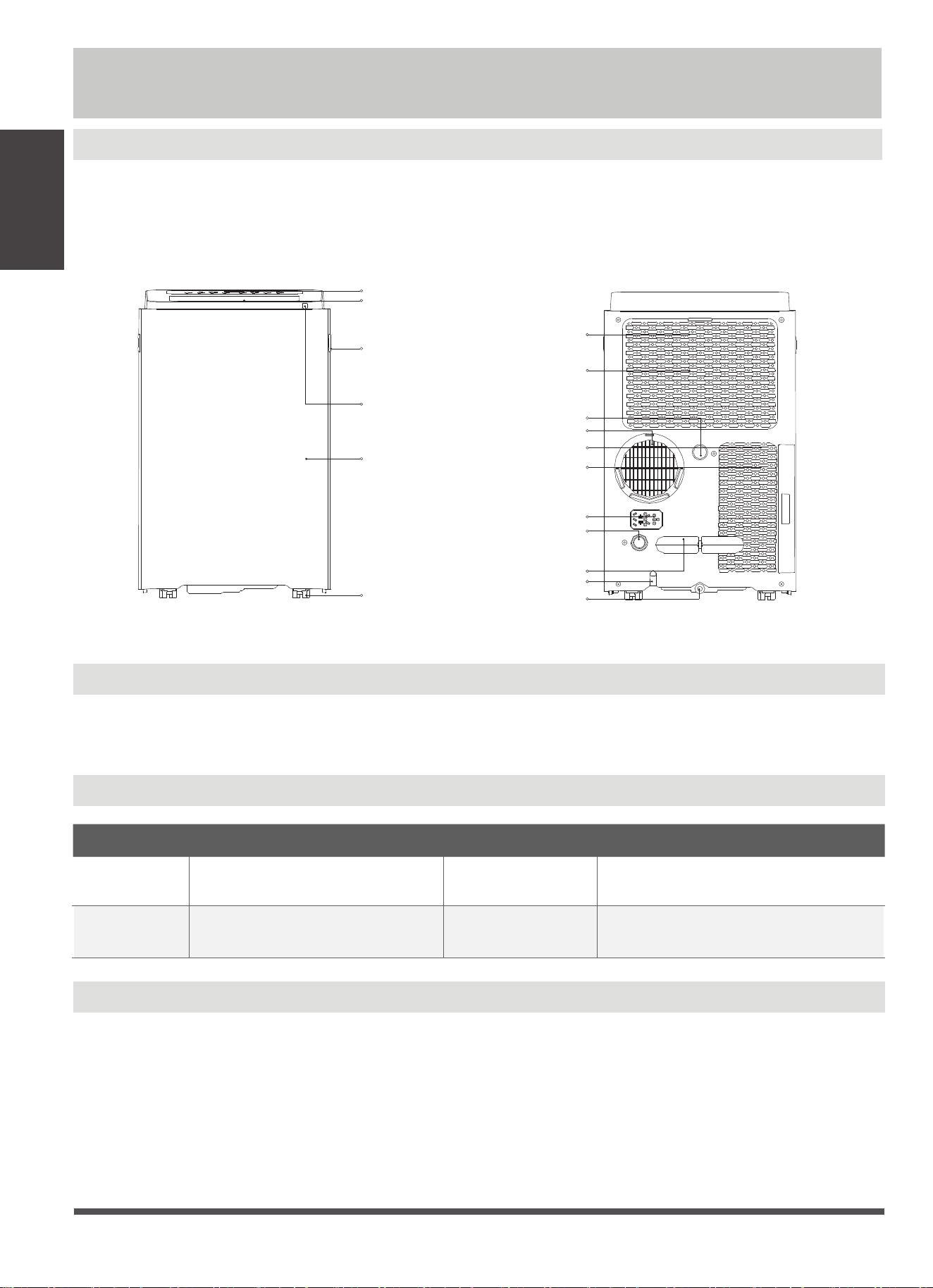
In order to ensure the optimal performance of our products, the design specifications of the unit and
remote control are subject to change without prior notice.
Cool 17-35°C (62-95°F)
Dry
Heat(pump heat
mode)
Heat(electrical
heat mode)
13-35°C (55-95°F)
5-30°C (41-86°F)
control panel
handle
(both sides)
horizontal louver
blade
(swing automatically)
Caster
Panel
remote signal
receptor
power plug socket
power cord buckle
bottom tray
drain outlet
power cord outlet
drain outlet
(only for pump
heating mode)
upper air filter
(behind the grille)
upper air intake
air outlet
lower air filter
lower air intake
drain outlet
rearfront
The exhaust hose and adaptor must be installed or removed in accordance with the usage mode. For
COOL,HEAT(heat pump type) or AUTO mode must be installed exhaust hose. For FAN, DRY or HEAT
(electrical heat type) mode must be removed exhaust hose.
30°C (86°F)
≥
Page 7
Installation
Instructions
Choosing The Right Location
Recommend Installation
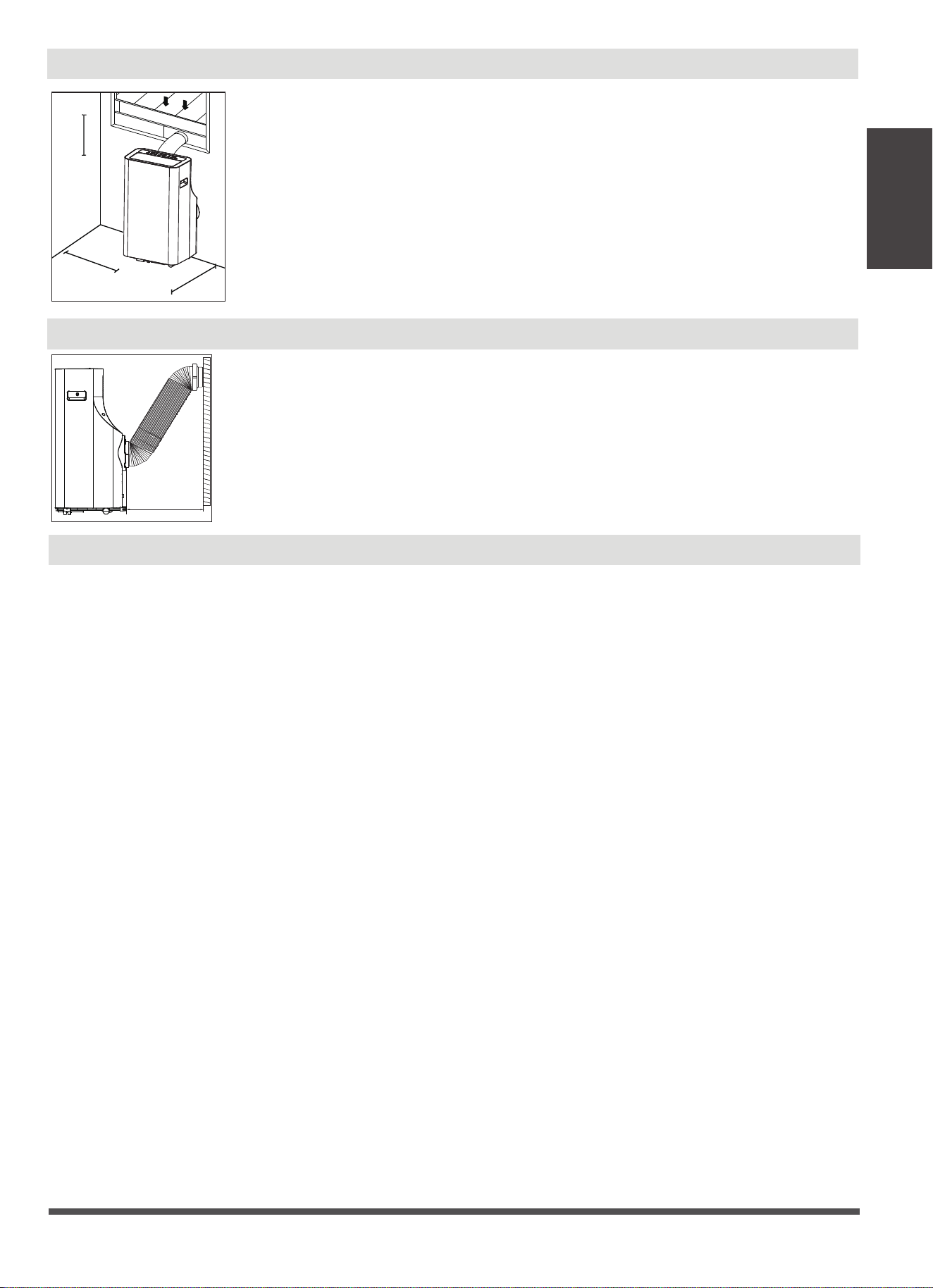
Your installation location should meet the following requirements:
-Make sure that you install your unit on an even surface to minimize noise and
vibration.
-The unit must be installed near a grounded plug, and the Collection Tray Drain
(found on the back of the unit) must be accessible.
-The unit should be located at least 30cm (12”) from the nearest wall to ensure
proper air conditioning. The horizontal louver blade should be at least 50cm
(19.7”) away from obstacles.
-DO NOT cover the Intakes, Outlets or Remote Signal Receptor of the unit, as this
could cause damage to the unit.
30cm
30cm
12inch
12inch
50cm
19.7 inch
Energy Rating Information
The unit with 3 meters extended exhaust duct is running by using 2 exhaust ducts(Diameter:150mm, Length:1.5m
+ Diameter: 130mm, Length: 1.5m) .The Energy rating and noise information for unit with 3 meters extended
exhaust duct is not assessed.(For some models)
NOTE:
We recommend that operating the unit at room temperature below 35
°C
. Since there is a risk that the unit with 3
meters extended exhaust duct would not work at room temperature above 35
°C
under some extreme conditions,
such as the lower air intake be blocked for 50%.
The energy rating and noise information for this unit is based on the standard installation using an un-extended
exhaust duct (Diameter:150mm, Length:1.5m) without window slider adaptor or wall exhaust adaptor A.
50cm
19.7inch
Page 8
Installation
Instructions
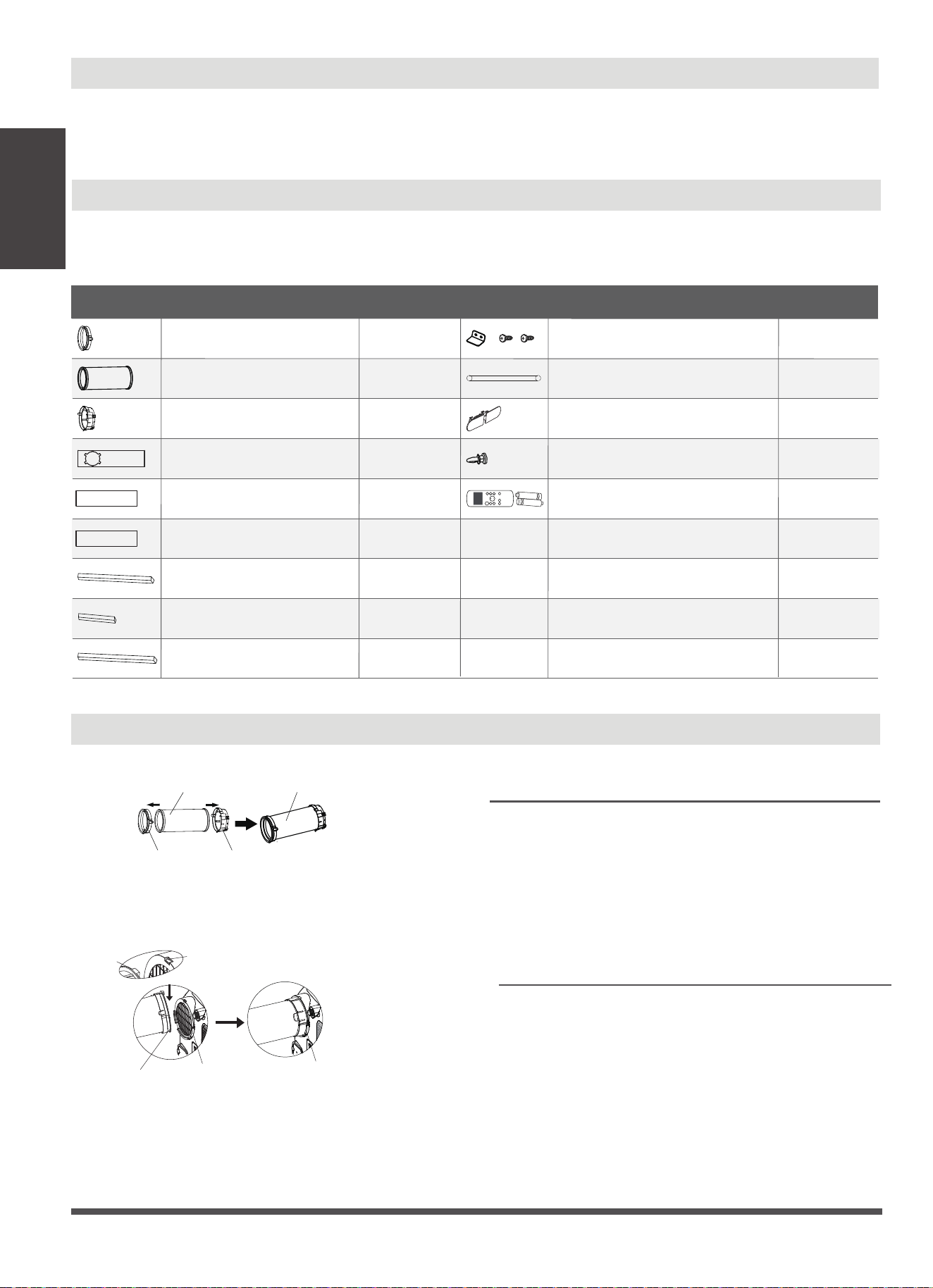
Accessories
Tools Needed
-Medium Philips screwdriver; -Tape measure or ruler; -Knife or scissors;
-Saw (On some models, to shorten window adaptor for narrow windows)
Name of Accessories
Qty.
Shape
Name of Accessories
Qty.
Shape
1 pcWindow Slider A Bolt
1 pc 1 setUnit Adaptor Security Bracket and 2 Screws
1 pc 1 pcExhaust Hose Drain Hose
1 pc 1 pcWindow Slider Adaptor Power Cord Buckle
ON /OFF
TEM P
SHO R T
CU T
TIME R
ON
TIME R
OFF
MO DE
FAN
SLE EP
SW ING
LED
1 set1 pcWindow Slider B
Remote Controller and Battery
1 pcWindow Slider C
4 pc
2 pc
Foam Seal A (Adhesive)
2 pc Foam Seal B (Adhesive)
2 pc
Foam Seal C (Non-adhesive)
NOTE: Slight variations in design may occur.
Window Installation Kit
Unit adaptor Window slider
adaptor
Exhaust hose
Exhaust hose
assembly
Hook
Hole Seat
Lower groove
adaptor
Make sure the adaptor
is inserted into the lower
groove of the air outlet.
Step Two: Install the Exhaust hose assembly to
the unit
Insert unit adaptor of the Exhaust hose assembly
into the lower groove of the air outlet of the unit
while the hook of the adaptor is aligned with the
hole seat of the air outlet and slide down the
Exhaust hose assembly along the arrow direction
for installation.
Type window installation
Press the exhaust hose
into the window slider adaptor
and unit adaptor, clamp automatically by
elastic buckles of the adaptors.
Step One: Preparing the Exhaust Hose assembly
Page 9
Installation
Instructions
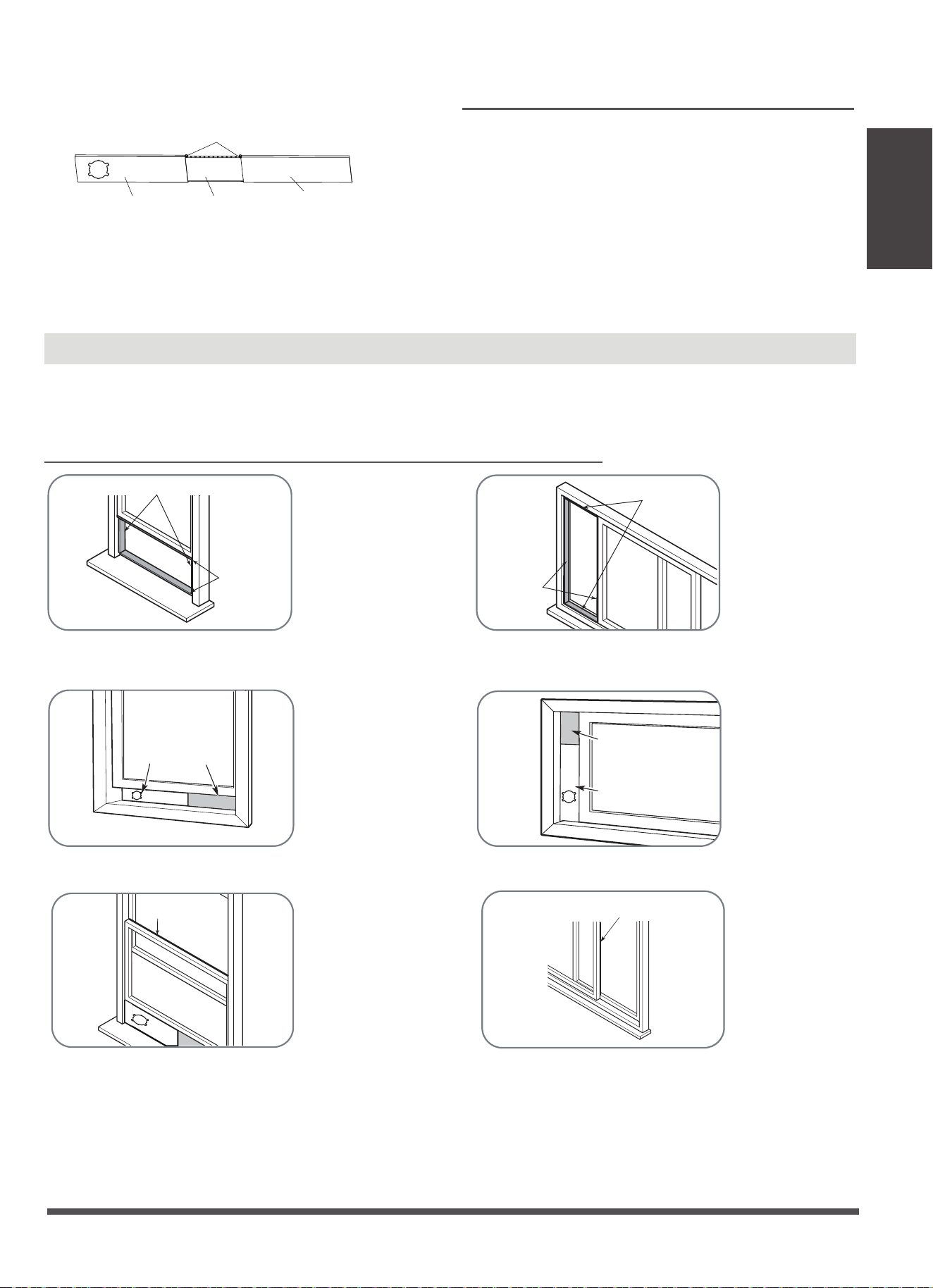
Installation
Or
Or
Or
Foam seal B
(Adhesive type-shorter)
Foam seal A
(Adhesive type)
NOTE: Once the Exhaust Hose assembly and Adjustable Window Slider are prepared, choose from one of
the following two installation methods.
Window
slider A
Window slider
B(if required)
Foam seal C
(Non-adhesive type)
Type 1: Hung Window or Sliding Window Installation(For some models)
1. Cut the adhesive foam seal A and B strips to the proper lengths, and attach them to the window sash
and frame as shown.
3. Cut the non-adhesive foam seal C strip to match the width(or height) of the window. Insert the seal
between the glass and the window frame to prevent air and insects from getting into the room.
2. Insert the window slider assembly into the window opening.
Foam seal B
(Adhesive type-shorter)
Foam seal A
(Adhesive type)
Window slider A
Window slider B
(if required)
Foam seal C
(Non-adhesive type)
Step Three: Preparing the Adjustable Window
Slider
1. Depending on the size of your window, adjust
the size of the window slider.
2. If the length of the window requires two or three
window sliders, use the bolt(s) to fasten the
window sliders once they are adjusted to the
proper length.
Window slider A Window slider B
Window slider C
Bolts
Page 10
Installation
Instructions
Or
Or
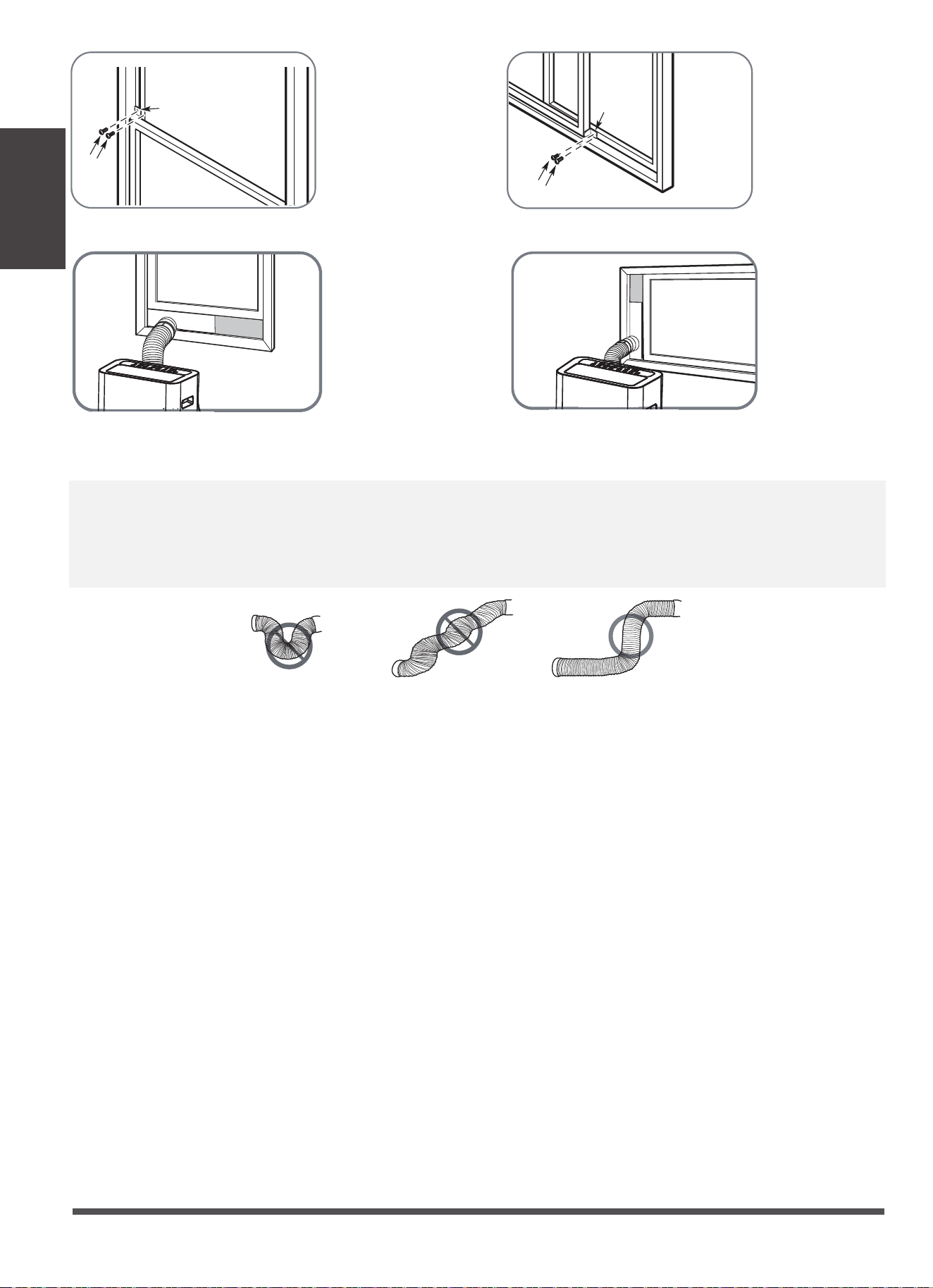
2 Screws
Security Bracket
4. If desired, install the security bracket with 2 screws as shown.
5. Insert the window slider adaptor into the hole of the window slider.
2 Screws
Security
Bracket
NOTE: To ensure proper function, DO NOT overextend or bend the hose. Make sure that there is no obstacle
around the air outlet of the exhaust hose (in the range of 500mm) in order to the exhaust system works
properly. All the illustrations in this manual are for explanation purpose only. Your air conditioner may be
slightly different. The actual shape shall prevail.
Page 11
Operating
Instructions
Operating Instructions
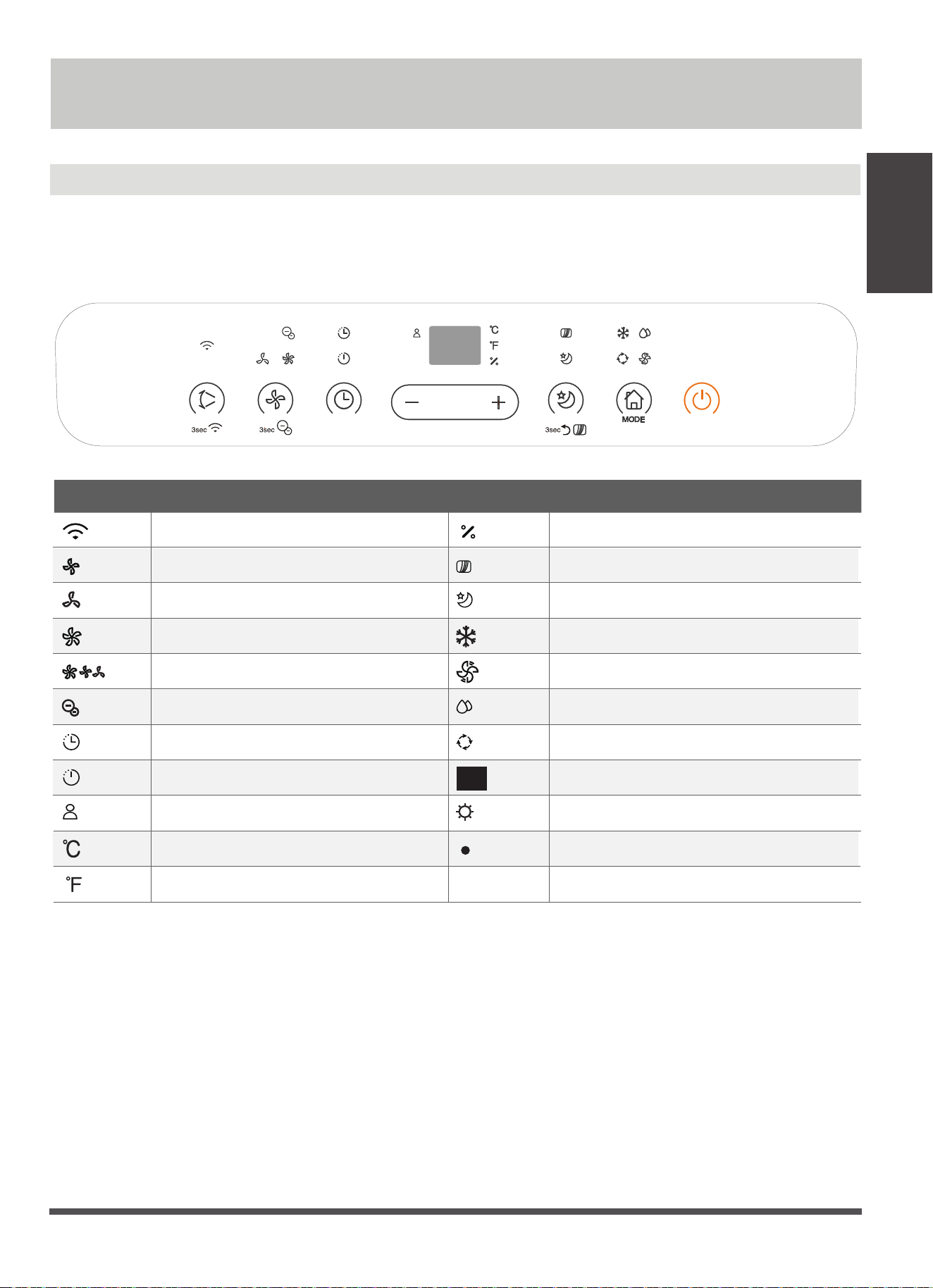
Control Panel Features
NOTE: The following control panels
are for explanation purpose only. The control panel of the unit you
purchased may be slightly different according to the models. Your machine may not contain some indicators or
buttons. The actual shape shall prevail.
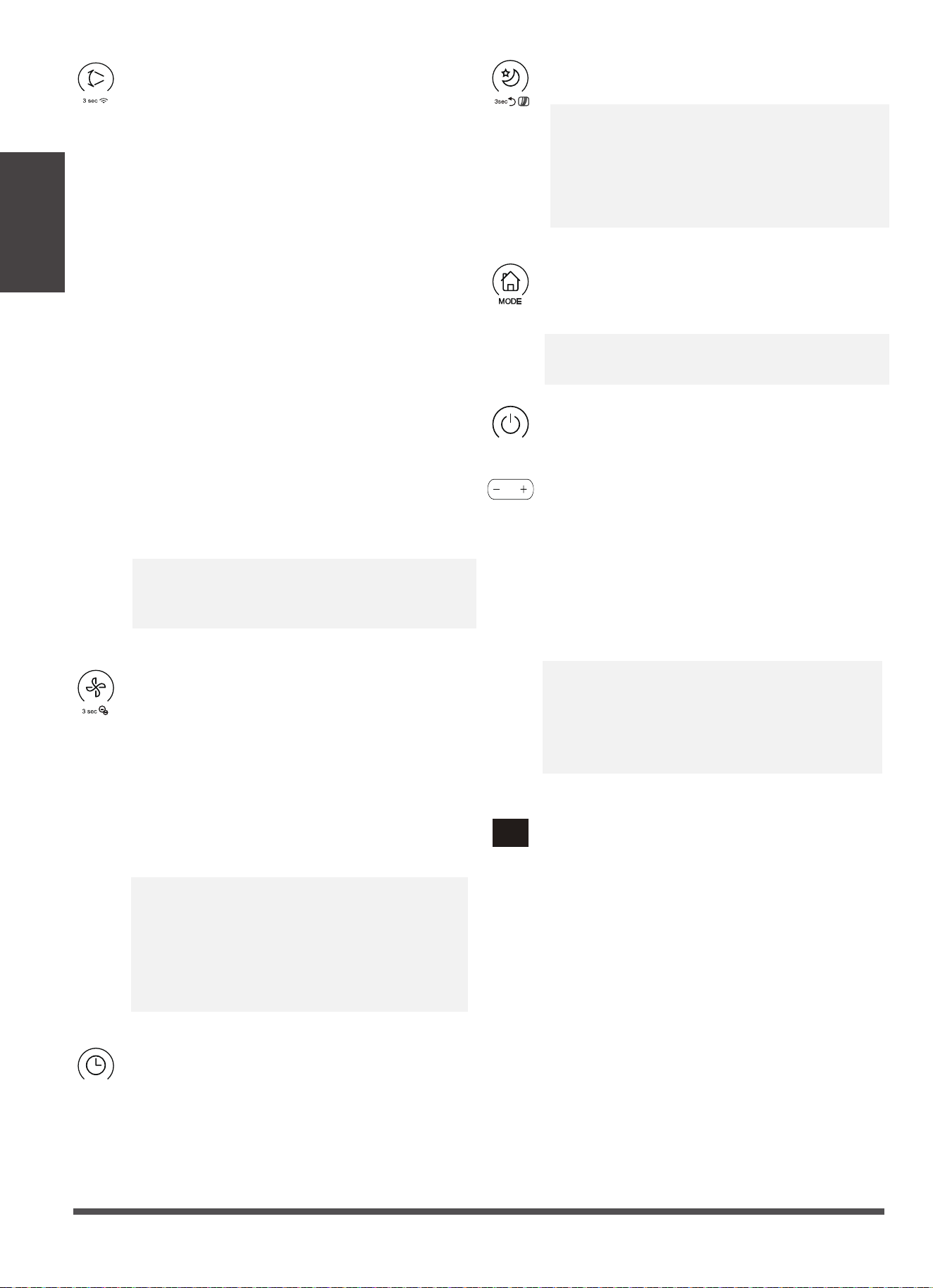
Indicator Function Indicator Function
HIGH fan speed light
MED fan speed light
LOW fan speed light
ION light
SLEEP light
Degrees Celsius
LED display
FOLLOW ME light
FILTER light
COOL mode light
FAN mode light
DRY mode light
AUTO mode light
Degrees Fahrenheit
Wireless light
Timer on light;
Timer off light;
Humidity
Heat mode light;
Power light
AUTO fan speed light(all illuminate/all dark)
Page 12
Operating
Instructions
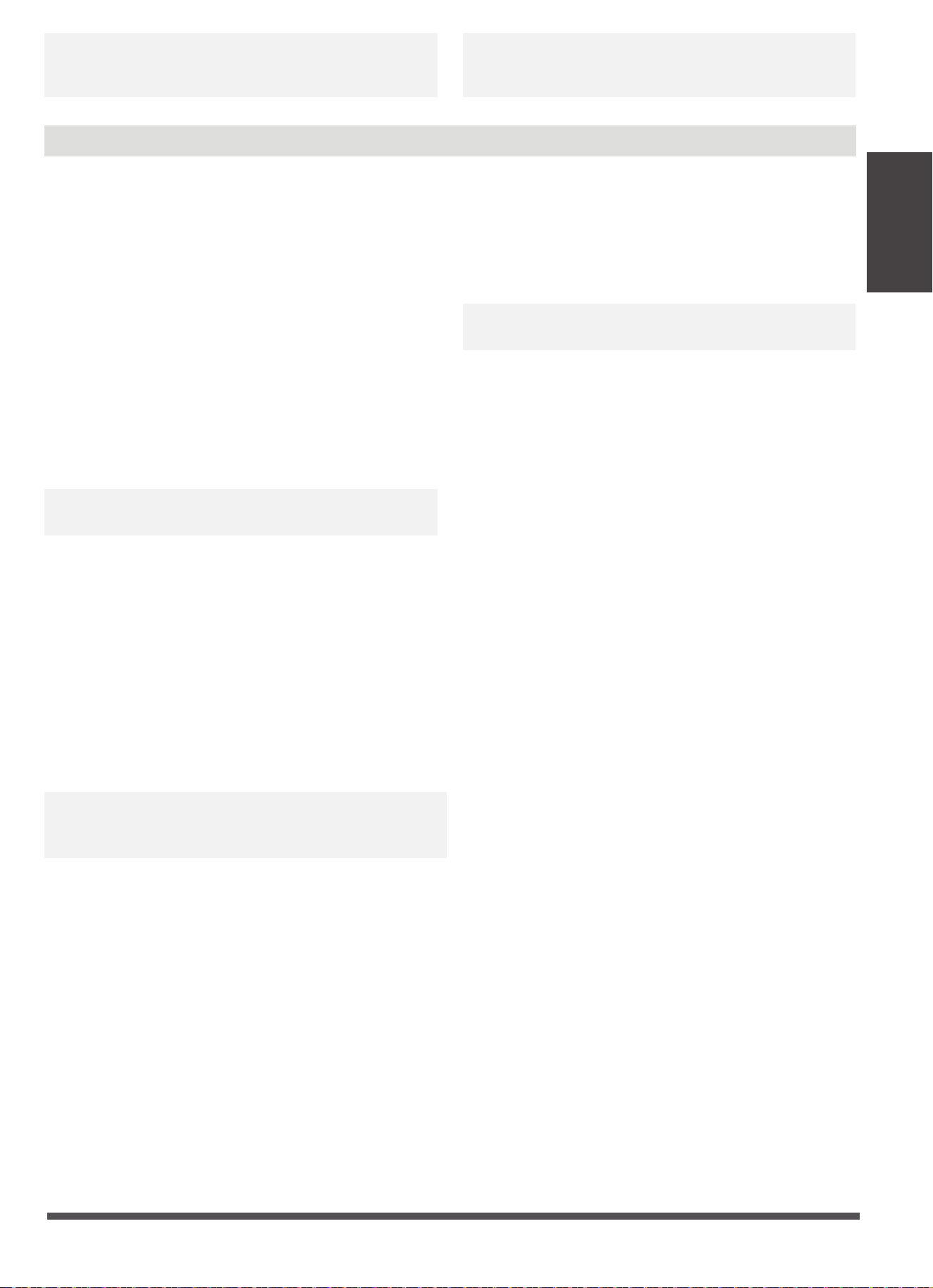
Timer button
Used to initiate the AUTO ON start time and
AUTO OFF stop time program, in conjuction
Sleep(Eco)/Filter button
Used to initiate the SLEEP/ECO operation.
NOTE: After 250 hours of operation, the filter
indicator light illuminates. This feature is a
reminder to clean the Air Filter for more
efficient operation. Press this button for 3
seconds to cancel the reminder.
Mode button
Press this button to choose AUTO, COOL, DRY,
FAN mode. The
indicator light illuminates.
NOTE: On dry mode, you can adjust the
humidity for some models.
Power button
Power switch on/off.
Up (+) and Down (-) buttons
Used to adjust (increasing/decreasing)
temperature settings in 1°C/1°F(or 2°F)
increments or the TIMER settings in a range
of 0~24hrs or The humidity settings in a range
of 35%RH(Relative Humidity) to 85% RH
(Relative Humidity) in 5% incerments(For some
models).
NOTE: The control is capable of displaying
temperature in degrees Fahrenheit or degrees
Celsius. To convert from one to the other, press
and hold the Up and Down buttons at the same
time for 3 seconds.
LED display
Shows the set temperature in °C or °F and the
Auto-timer settings and the humidity settings
(only for modles with humidity sensor). While
on DRY and FAN modes, it shows the room
temperature. Shows Error codes and protection
code:
E1-Room temperature sensor error.
E2-Evaporator temperature sensor error.
E3-Condenser temperature sensorerror
(on some models).
P1-Bottom tray is full--Connect the drain hose
and drain the collected water away. If
protection repeats,call for service.
E4-Display panel communication error.
Fan/Ion button
Control the fan speed. Press to select the fan
speed in four steps-LOW, MED(On some
models), HIGH and AUTO. The corresponding
fan speed indicator light illuminates except
AUTO speed. When select AUTO fan speed, all
the fan indicator lights turn dark. On some
models, when select AUTO fan speed, all the
fan indicator lights illumiante.
NOTE: Press this button for 3 seconds to
initiate ION feature. The ion generator is
energized and will help to remove pollen and
impurities from the air, and trap them in the
filter. Press it for 3 seconds again to stop the
ION feature.
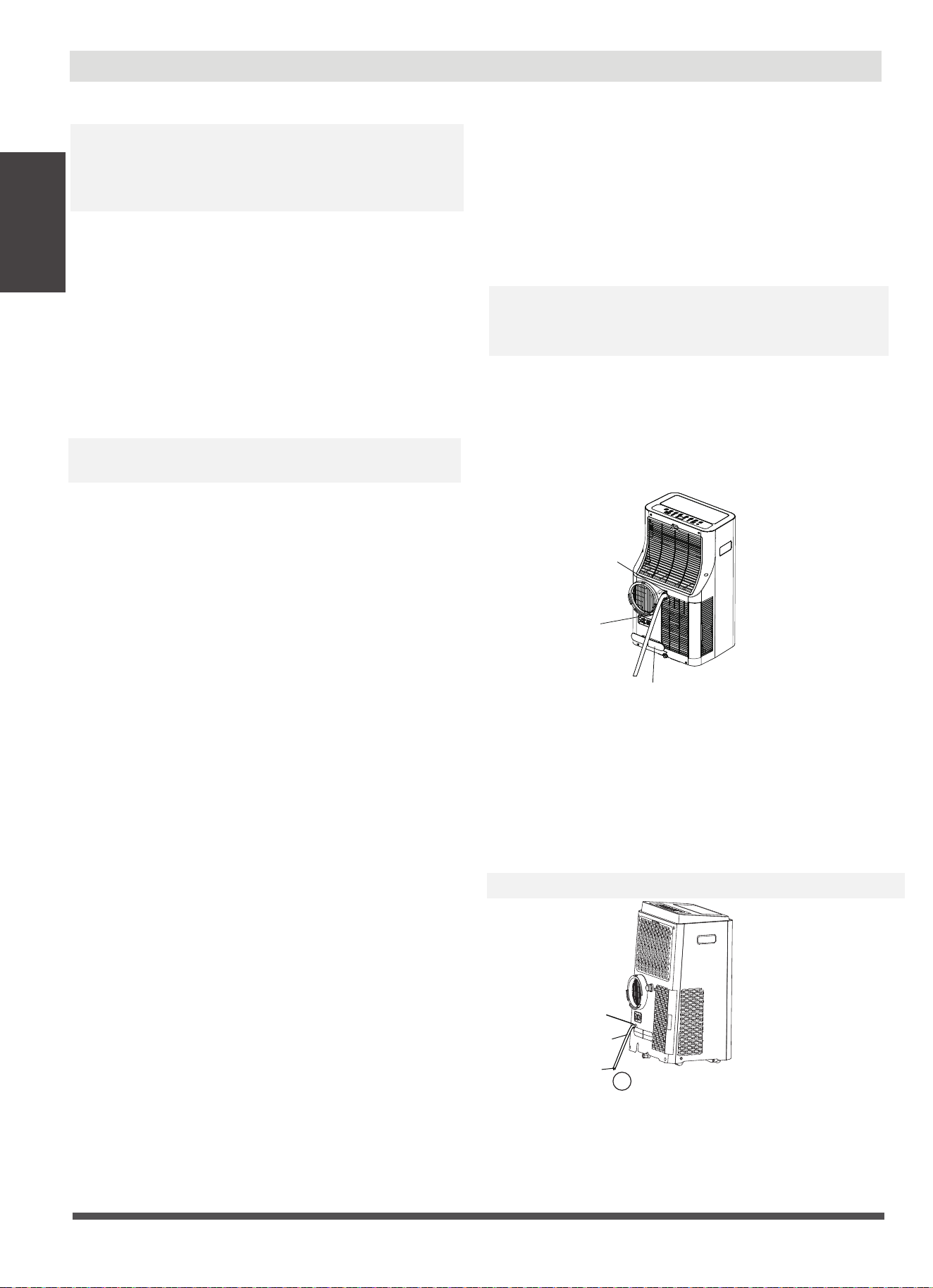
with the + & - buttons. The timer on/off
indicator light illuminates .
Swing/Wireless(On some models) button
Used to initiate the Auto swing feature.
Press the SWING button can stop the louver
at the desired angle.
Used to initiate the Wireless connection mode.
For the first time to use Wireless function,
press and hold the SWING button for 3
seconds to initiate the Wireless connection
mode. The LED DISPLAY shows 'AP' to indicate
you can set Wireless connection. If connection
(router) is successful within 8 minutes, the unit
will exit Wireless connection mode
automatically and the Wireless indicator
illuminates. If connection is failure within 8
minutes, the unit exits Wireless connection
mode automatically. Under Wireless mode,
you can press the swing and down(-) buttons
at the same time for 3 seconds to turn off the
Wireless and the LED DISPLAY shows 'OF' for
3 seconds , press the swing and up(+) buttons
at the same time to turn on Wireless and the
LED DISPLAY shows 'O
' for 3 seconds.
NOTE: When you restart the Wireless function,
it may take a period of time to connect to the
network automatically.
n
Page 13
Operating
Instructions
Operation Instructions
turn off the unit and unplug the power cord.
Contact the manufacturer or its service agents or a
similar qualified person for service.
NOTE: When one of the above malfunctions occurs,
turn off the unit, and check for any obstructions.
Restart the unit, if the malfunction is still present,
COOL operation
· Press the "MODE" button until the "COOL" indicator
light comes on.
· Press the ADJUST buttons "+" or "-" to select your
desired room temperature. The temperature can be
set within a range of 17°C~30°C/62°F~86°F(or 88°F).
· Press the "FAN SPEED" button to choose the
fanspeed.
AUTO operation
· When you set the air conditioner in AUTO mode, it
will automatically select cooling, heating(cooling
only models without), or fan only operation
depending on what temperature you have selected
and the room temperature.
· The air conditioner will control room temperature
automatically round the temperature point set by
you.
· Under AUTO mode, you can not select the fan speed.
NOTE: Under AUTO mode, both the AUTO mode and
the actual operation mode indicator lights illuminate
On some models.
DRY operation
· Press the "MODE" button until the "DRY" indicator
light comes on.
· The fan speed or the temperature cannot be
adjusted. The fan motor operates at LOW speed.
NOTE:Keep windows and doors closed for the best
dehumidifying effect. Do not put the duct to window.
FAN operation
· Press the "MODE" button until the"FAN " indicator
light comes on.
· Press the "FAN SPEED" button to choose the fan
speed. The temperature can not be adjusted.
· Do not put the duct to window.
SLEEP/ECO operation
· Press this button, the selected temperature will
increase(cooling) or decrease(heating) by 1°C/1°F
(or 2°F) 30 minutes.The temperature will then
increase (cooling) or decrease (heating) by another
1°C/1°F(or 2°F) after an additional 30 minutes. This
new temperature will be maintained for 7 hours
before it returns to the originally selected
temperature. This ends the Sleep/Eco mode and
the unit will continue to operate as originally
programmed.
NOTE: This feature is unavailabe under FAN or DRY
mode.
TIMER operation
· When the unit is on, press the Timer button will
initiate the Auto-off stop program, the TIMER OFF
indicator light illuminates. Press the UP or down
button to select the desired time. Press the TIMER
button again within 5 seconds, the Auto-on start
program is initiated. And the TIMER ON indicator
light illuminates. Press the up or down button to
select the desired Auto-on start time.
· When the unit is off, press the Timer button to
initiate the Auto-on start program, press it again
within five seconds will initiate the Auto-off stop
program.
· Press or hold the UP or DOWN button to change the
Auto time by 0.5 hour increments, up to 10 hours,
then at 1 hour increments up to 24 hours. The control
will count down the time remaining until start.
· The system will automatically revert back to display
the previous temperature setting if there is no
operation in a 5 seconds period.
· Turning the unit ON or OFF at any time or adjusting
the timer setting to 0.0 will cancel the Auto Start/
Stop timer program.
· When the malfunction occurs, the Auto Start/Stop
timed program will also be cancelled.
HEAT operation(cooling only models without)
· Press the "MODE" button until the "HEAT" indicator
light comes on.
· Press the ADJUST buttons "+" or "-" to select the
desired room temperature. The temperature can be
set within a range of 17°C~30°C/62°F~86°F(or 88°F).
· Press the "FAN SPEED" button to choose the fan
speed. For some models, the fan speed can not be
adjusted under HEAT mode.
Page 14
Operating
Instructions
Other features
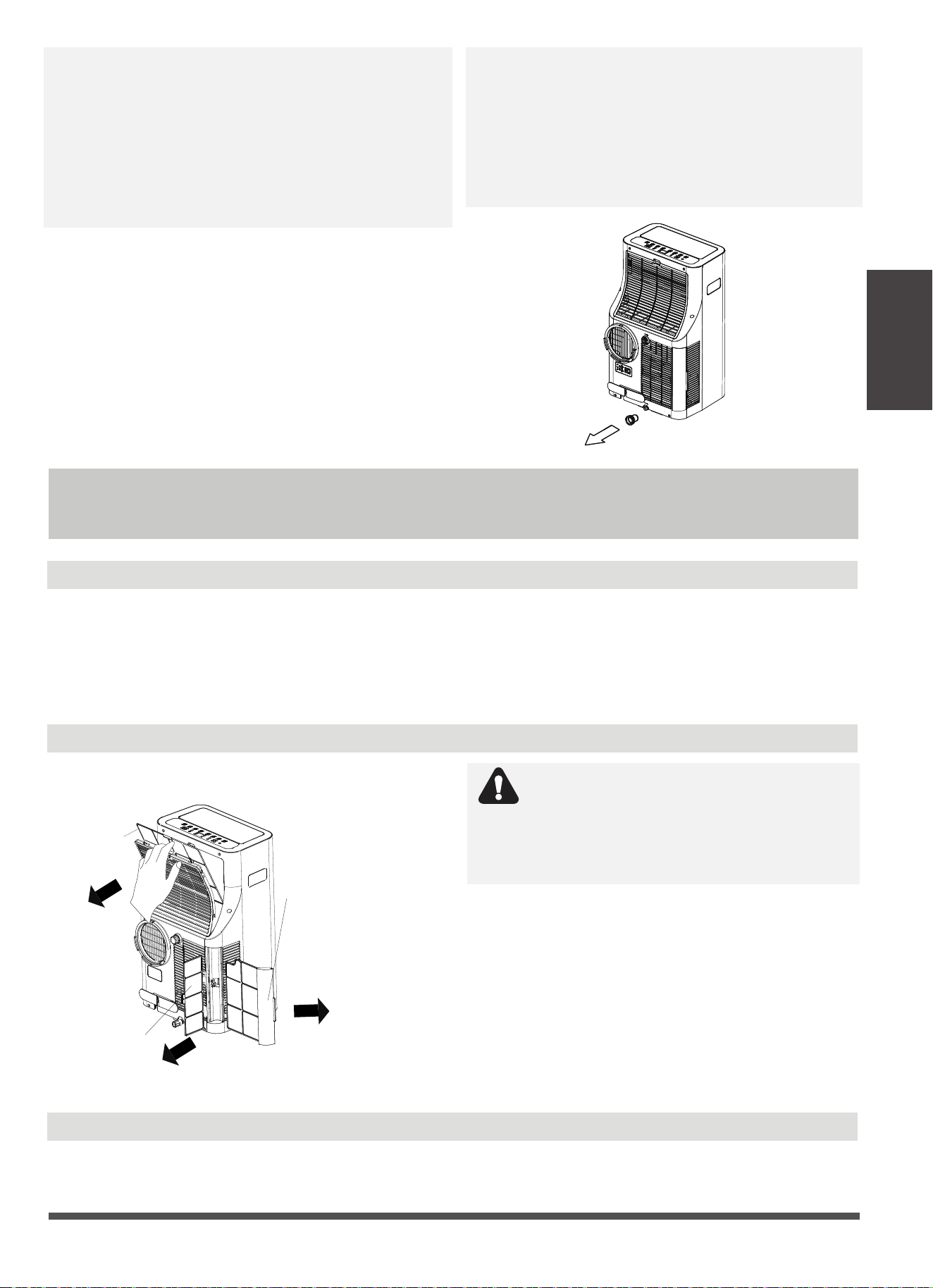
Water drainage
· During dehumidifying modes, remove the upper
drain plug from the back of the unit, install the drain
connector(5/8" universal female mender) with 3/4"
hose(locally purchased). For the models without drain
connector, just attach the drain hose to the hole.
Place the open end of the hose directly over the drain
area in your basement floor.
· If you can set the humidity level (portable with
humidity sensor), please put the back duct for best
dehumidification effect, but the back duct doesn’t
need to connect to window. If you can’t set the
humidity level (portable without humidity sensor),
please don’t put the back duct.
Remove the
upper drain
plug
Continuous
drain hose
Press the power cord buckle
into the rear cover.
FOLLOW ME/TEMP SENSING feature
NOTE:This feature can be activated from the remote
control ONLY. The remote control serves as a remote
thermostat allowing for the precise temperature
control at its location.
To activate the Follow Me/Temp Sensing feature, point
the remote control towards the unit and press the
Follow Me/Temp Sensing button. The remote display is
actual temperature at its location. The remote control
will send this signal to the air conditioner every 3
minutes interval until press the Follow Me/Temp
Sensing button again. If the unit does not receive the
Follow Me/Temp Sensing signal during any 7 minutes
interval, the nit will exit the Follow Me/Temp Sensing
mode.
NOTE: This feature is unavailabe under FAN or DRY
mode.
AUTO-RESTART
If the unit breaks off unexpectedly due to the power
cut, it will restart with the previous function setting
automatically when the power resumes.
WAIT 3 MINUTES BEFORE RESUMING OPERATION
After the unit has stopped, it can not be restarted
operation in the first 3 minutes. This is to protect the
unit. Operation will automatically start after 3 minutes.
AIR FLOW DIRECTION ADJUSTMENT
The louver can be adjusted automatically. Adjust the
air flow direction automatically:
· When the Power is ON, the louver opens fully.
· Press the SWING button on the panel or remote
controller to initiate the Auto swing feature. The
louver will swing up and down automatically.
· Please do not adjust the louver manually.
√
drain hose
adaptor
Continuous
drain hose
Remove the
lower drain plug
NOTE: During cooling mode, please reinstall the upper
drain plug to the unit securely to reach the maximum
performance and avoid leakage.
· During heating pump mode, remove the lower drain
plug from the back of the unit, install the drain
connector (5/8" universal female mender) with 3/4"
hose(locally purchased). For the models without drain
connector, just attach the drain hose to the hole. Place
the open end of the Hose adaptor directly over the
drain area in your basement floor.
NOTE: Make sure the hose is secure so there are no leaks.
Page 15
Maintenance
Air Filter Cleaning
Unit Cleaning
· When the water level of the bottom tray reaches a
predetermined level, the unit beeps 8 times, the
digital display area shows "P1" . At this time the air
conditioning/dehumidification process will
immediately stop. However, the fan motor will
continue to operate(this is normal). Carefully move
the unit to a drain location, remove the bottom drain
plug and let the water drain away. Reinstall the bottom
drain plug and restart the machine until the "P1"
symbol disappears. If the error repeats, call for service.
NOTE: Be sure to reinstall the bottom drain plug firmly
to prevent leakage before using the unit.
When the water drainage function is not in use,
keep the upper and the lower drain plug firmly to
the unit to get rid of choking. When the drain plug
is not in use, keep it carefully to prevent children
from choking.
NOTE: Make sure the hose is secure so there are no
leaks. Direct the hose toward the drain, making sure
that there are no kinks that will stop the warter flowing.
Place the end of the hose into the drain and make sure
the end of the hose is down to let the water flow
smoothly. When the continuous drain hose is not used,
ensure that the drain plug and knob are installed firmly
to prevent leakage.
Safety Precautions
Maintenance
· Always unplug the unit before cleaning or servicing.
· DO NOT use flammable liquids or chemicals to clean the unit.
· DO NOT wash the unit under running water. Doing so causes electrical danger.
· DO NOT operate the machine if the power supply was damaged during cleaning. A damaged
power cord must be replaced with a new cord from the manufacturer.
Upper filter
(take out)
lower filter B
(take out)
lower filter A
(Press the grill down
slightly and pull the
lower filter A out at
the same time)
CAUTION
DO NOT operate the unit without filter
because dirt and lint will clog it and reduce
performance.
Remove the air filter
Maintenance Tips
· Be sure to clean the air filter every 2 weeks for
optimal performance.
· The water collection tray should be drained
immediately after P1 error occurs, and before
storage to prevent mold.
· In households with animals, you will have to
periodically wipe down the grill to prevent
blocked airflow due to animal hair.
Clean the unit using a damp, lint-free cloth and mild detergent. Dry the unit with a dry, lint-free
cloth.
Page 16
Store the unit when not in use
· Drain the unit’s water collection tray according to the instructions in the following section.
· Run the appliance on FAN mode for 12 hours in a warm room to dry it and prevent mold.
· Turn off the appliance and unplug it.
· Clean the air filter according to the instructions in the previous section. Reinstall the clean, dry
filter before storing.
· Remove the batteries from the remote control.
NOTE: Be sure to store the unit in a cool, dark place. Exposure to direct sunshine or extreme heat
can shorten the lifespan of the unit.
NOTE: The cabinet and front may be dusted with an oil-free cloth or washed with a cloth dampened
in a solution of warm water and mildliquid dishwashing detergent. Rinse thoroughly and wipe dry.
Never use harsh cleansers, wax or polish on the cabinet front. Be sure to wring excess water from
the cloth before wiping around the controls. Excess water in or around the controls may cause
damage to the unit.
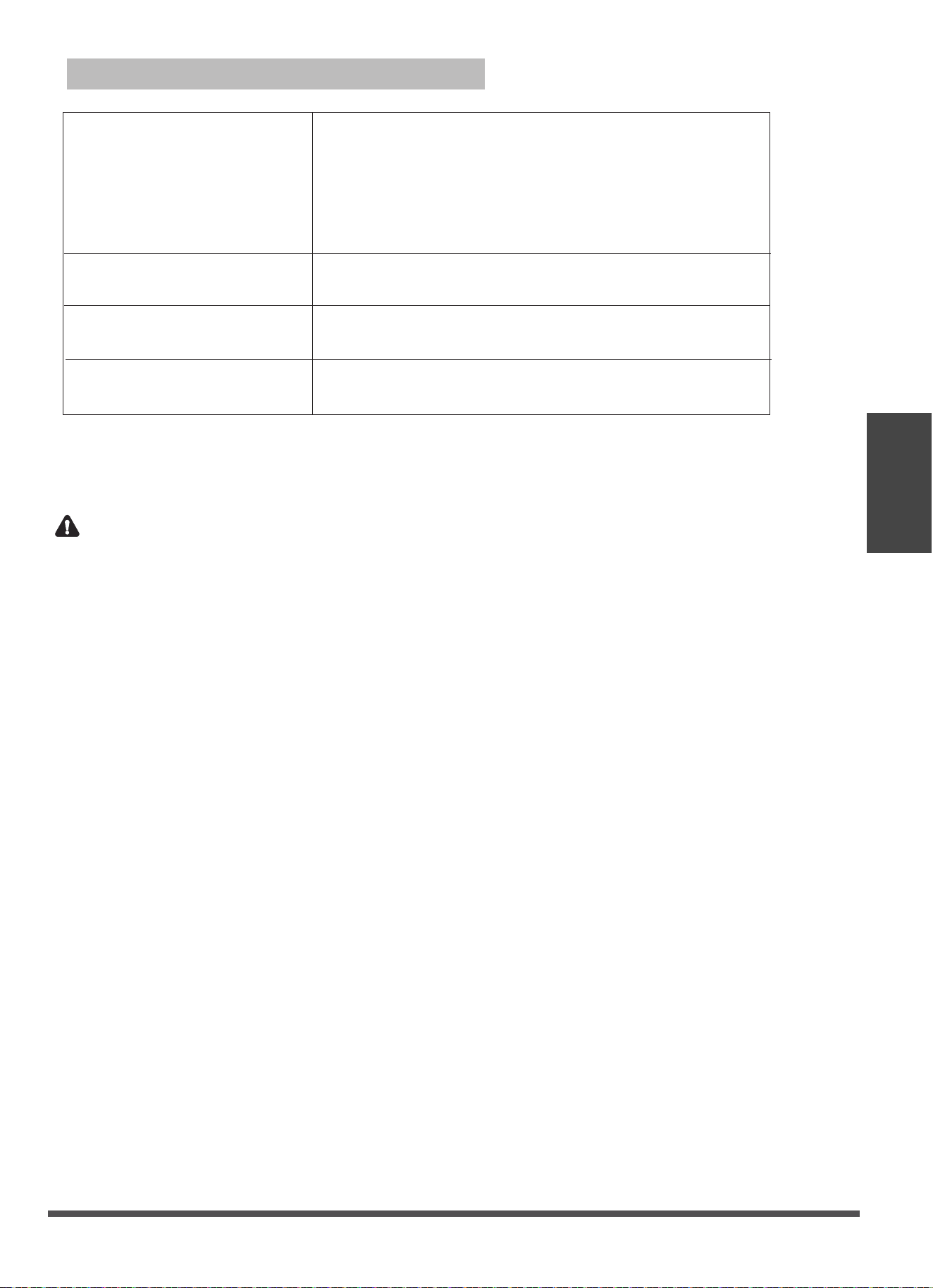
Troubleshooting Tips
Problem Possible Causes Solution
Unit does not turn
on when pressing
ON/OFF button
P1 Error Code
In COOL mode: room
temperature is lower than
the set temperature
Reset the temperature
The Water Collection Tray is full. Turn off the
unit, drain the water from the Water Collection
Tray and restart the unit.
The air filter is blocked with
dust or animal hair
The unit is low on
refrigerant
Temperature setting is too
high
The windows and doors in
the room are open
The room area is too large
Unit does not cool
well
Exhaust hose is not
connected or is blocked
There are heat sources
inside the room
Turn off the unit and clean the filter according
to instructions
Call a service technician to inspect
the unit and top off refrigerant
Decrease the set temperature
Make sure all windows and doors are closed
Double-check the cooling area
Turn off the unit, disconnect the hose, check for
blockage and reconnect the hose
Remove the heat sources if possible
The unit is noisy
and vibrates too
much
The unit makes a
gurgling sound
The ground is not level Place the unit on a flat, level
surface
The air filter is blocked with
dust or animal hair
Turn off the unit and clean the filter according
to instructions
This sound is caused by the
flow of refrigerant inside
the unit
This is normal
Troubleshooting
Tips
Page 17
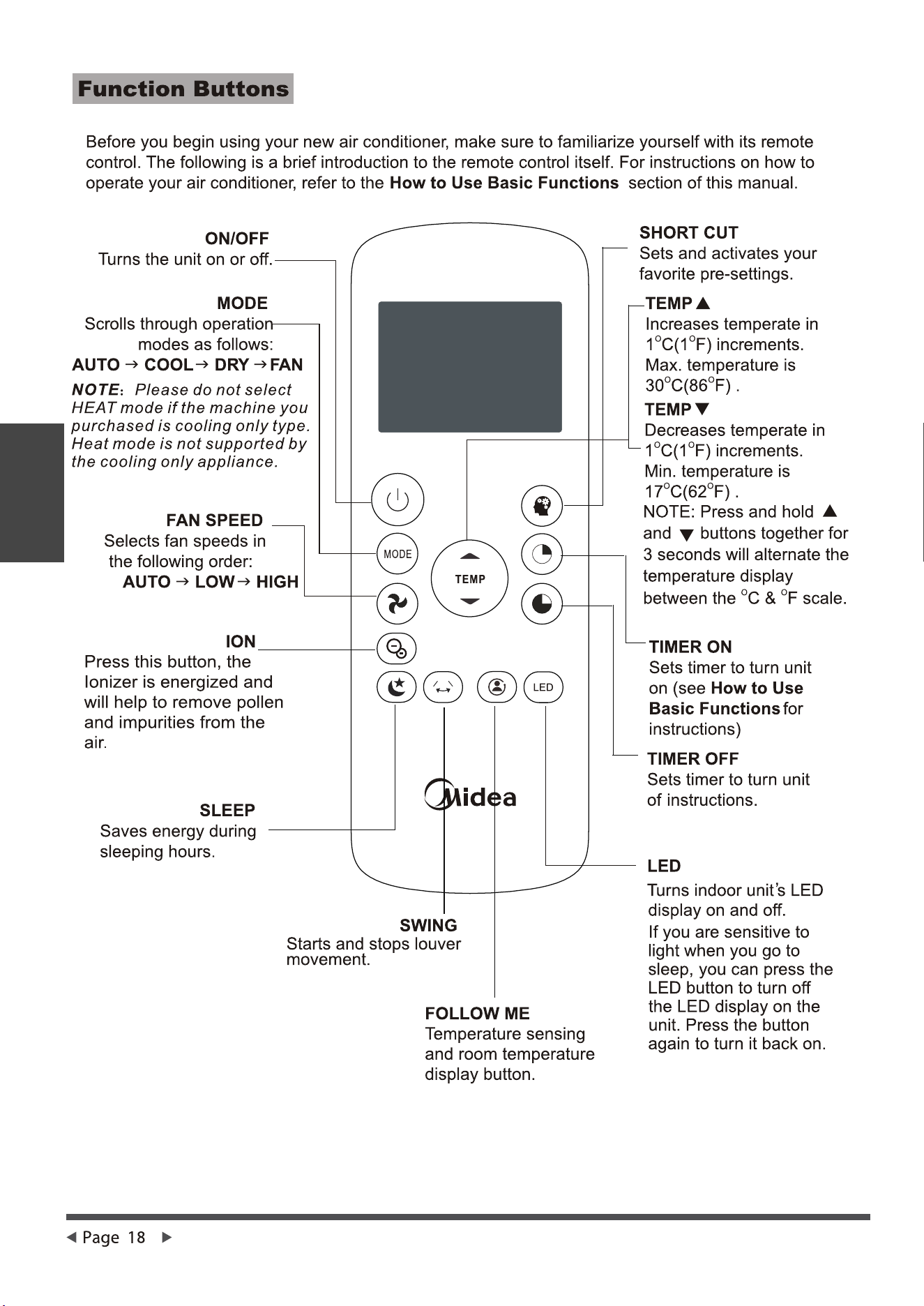
Model
Rated Voltage
8m
3.0V(Dry batteries R03/LR03×2)
Environment
Signal Receiving Range
RG57H2(B)/BG(C)EF-M
Remote Control Specifications
O O O O
-5 C~60 C(23 F~140 F)
Remote controller
lllustration
CAUTION:
INGESTION HAZARD
- Contains small batteries, Keep out of reach of small children. If swallowed,
seek immediate medical attention.
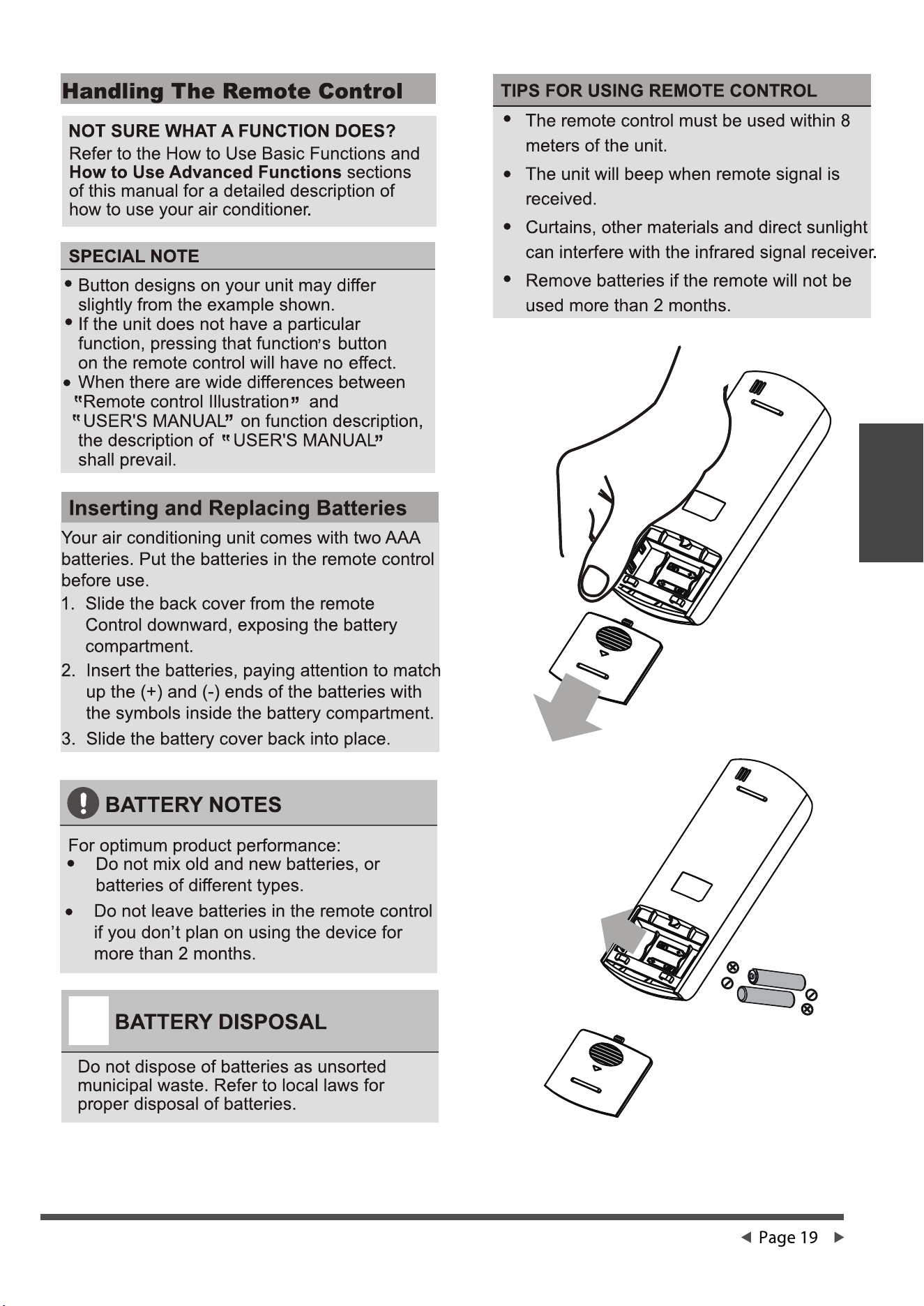
Remote controller
lllustration
Remote controller
lllustration
Remote controller
lllustration
Remote controller
lllustration
Remote controller
lllustration
Remote controller
lllustration
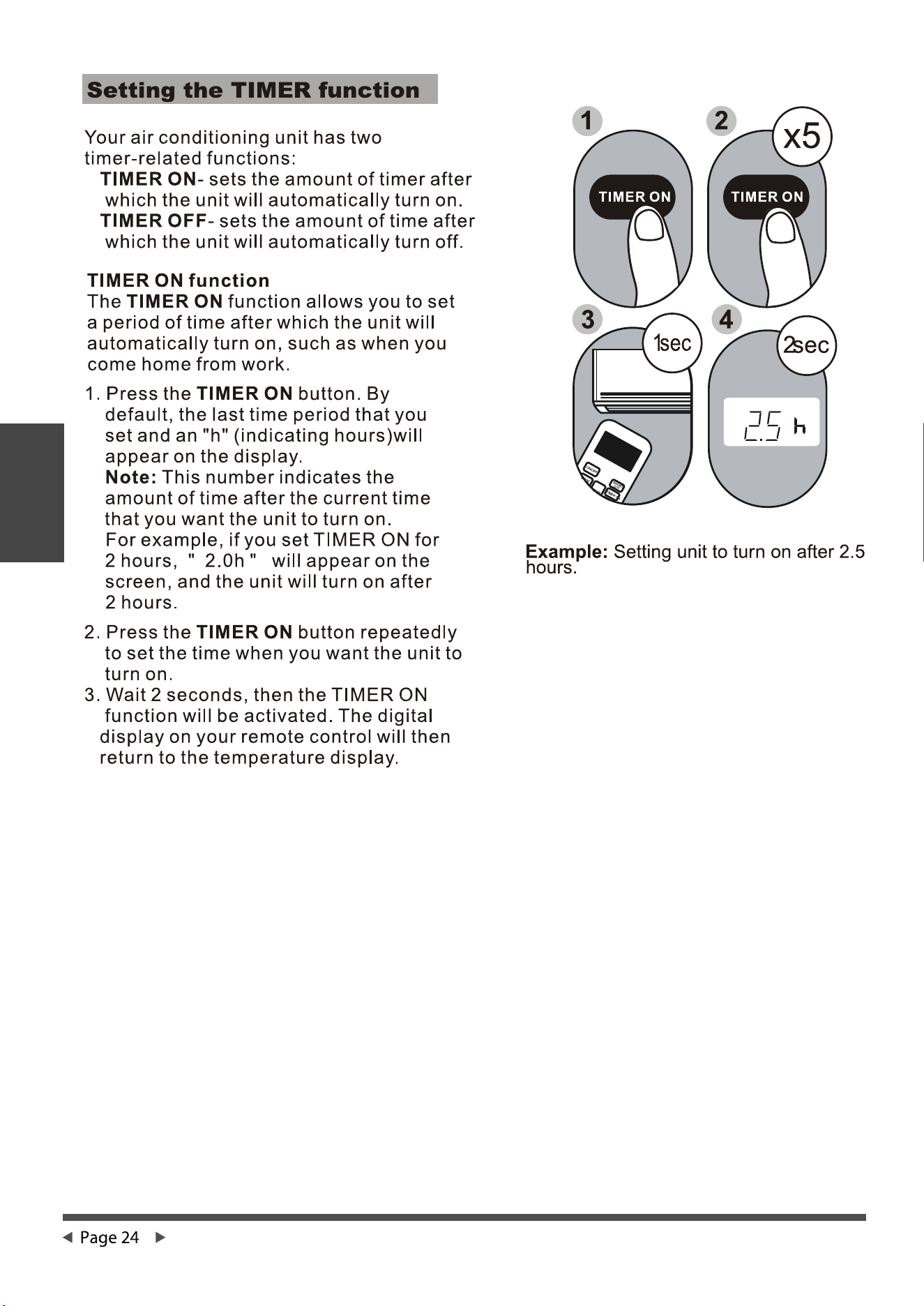
Remote controller
lllustration
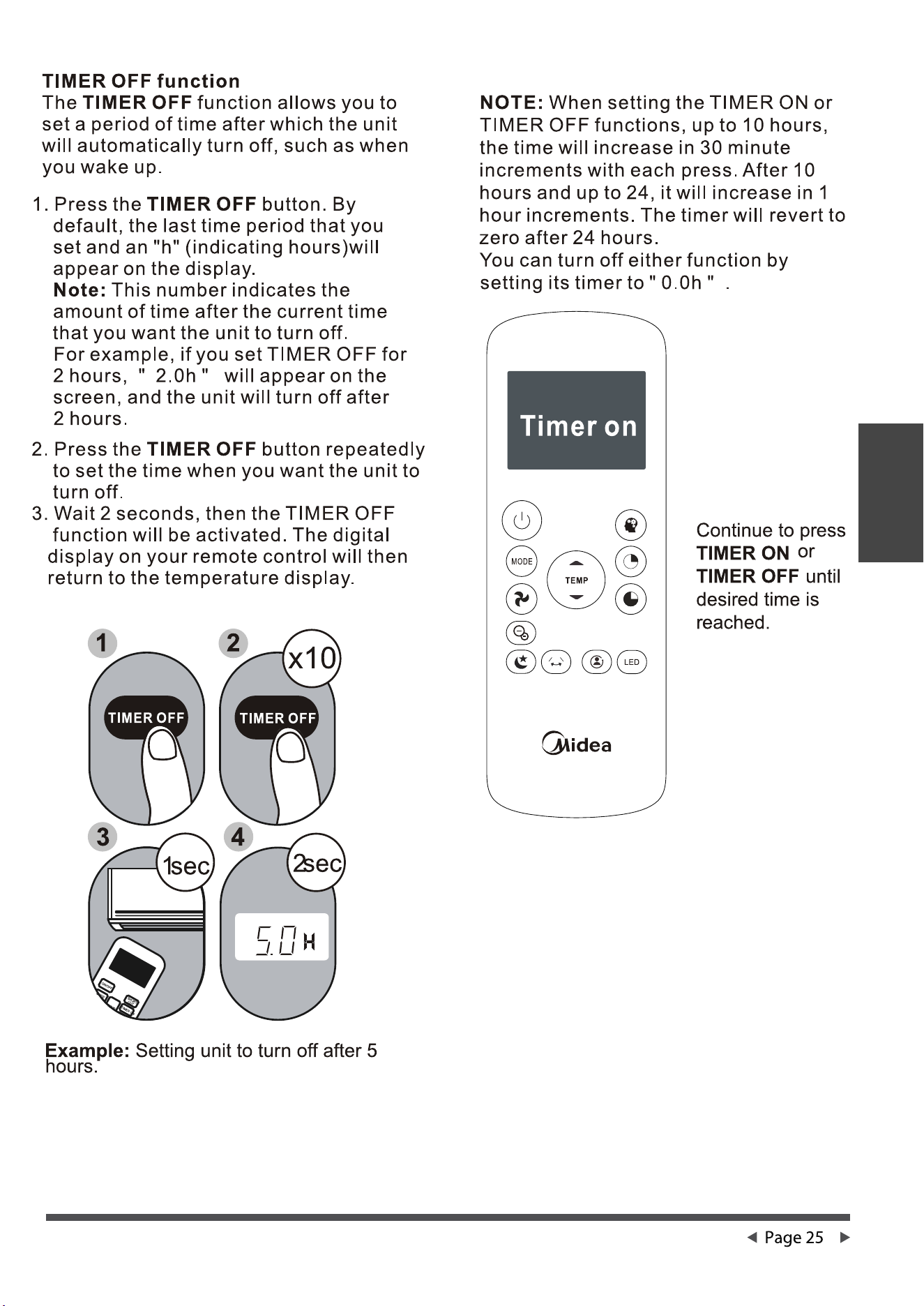
Remote controller
lllustration
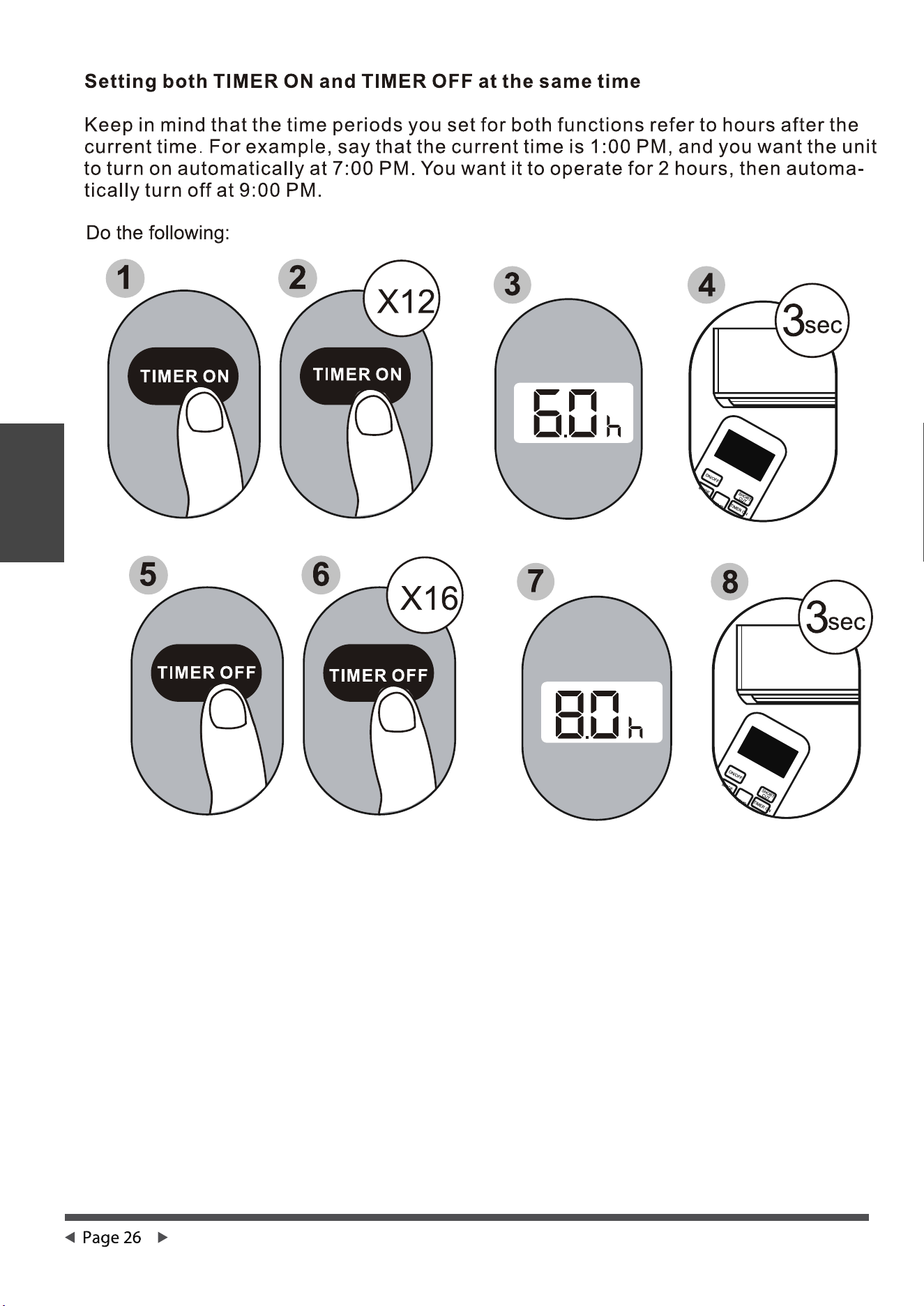
Remote controller
lllustration
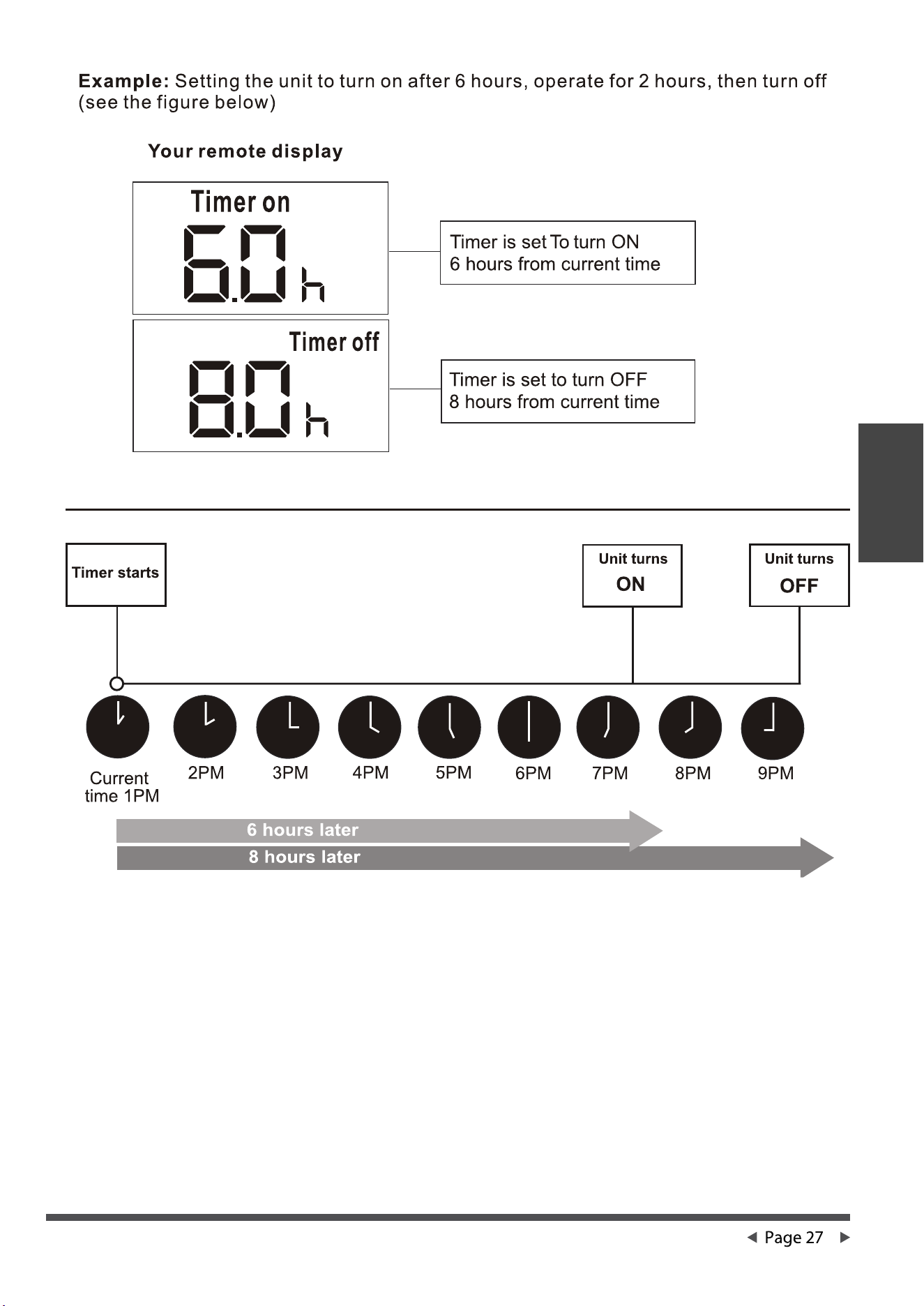
Remote controller
lllustration
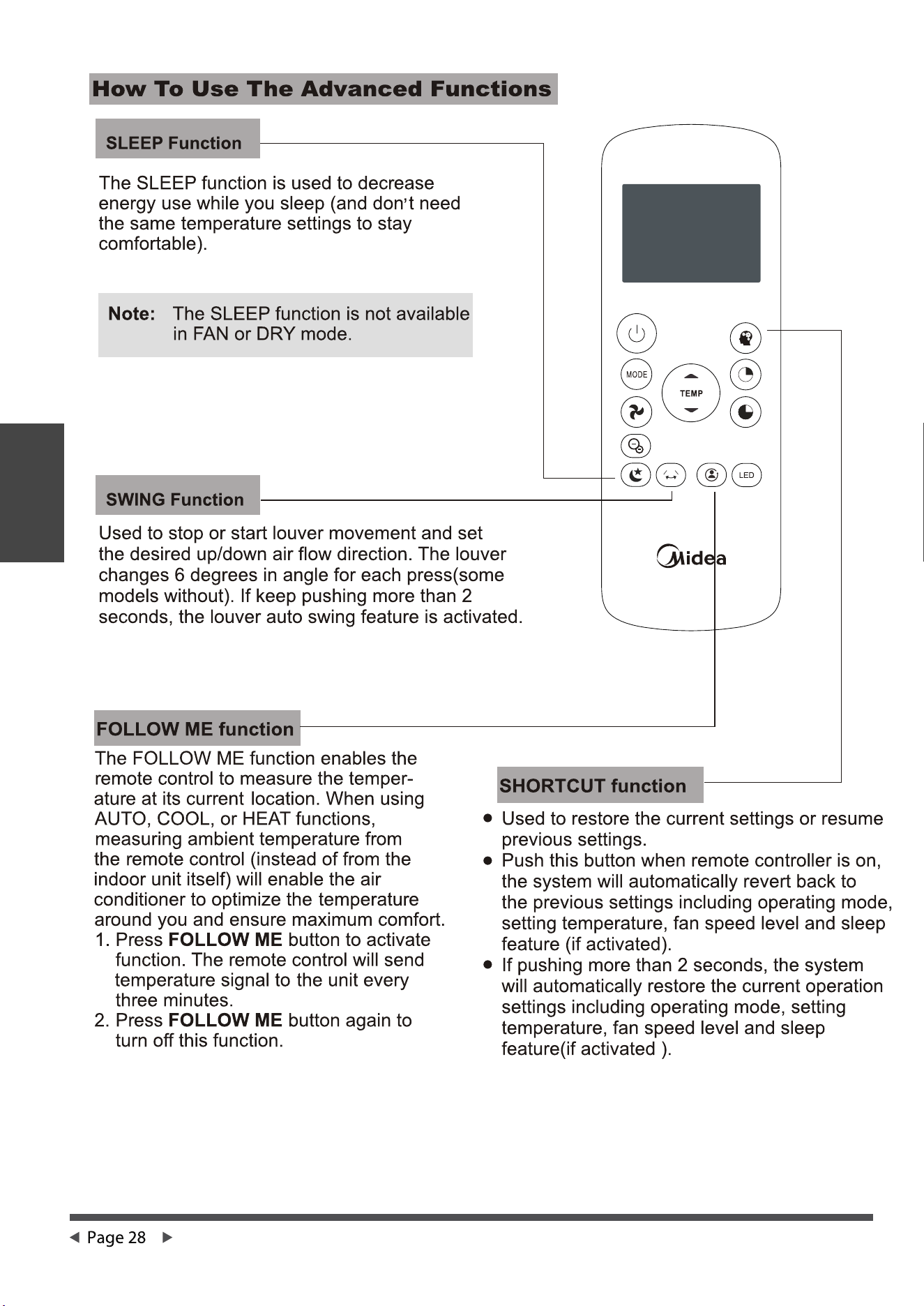
Remote controller
lllustration
Remote controller
lllustration
Air Conditioner Limited Warranty
Air Conditioner
Limited
Warranty