Owner’s
Manual
Side-by-Side
Built-In Refrigerators
Consumer Information
Built-In Refrigerators
2
Introduction
Your new Monogram refrigerator makes an eloquent statement of style, convenience and kitchen
planning flexibility. Whether you chose it for its purity of design, practical storage arrangements
or assiduous attention to detail—or for all of these reasons—you’ll find that your Monogram
refrigerator’s superior blend of form and function will delight you for years to come.
The Monogram refrigerator was designed to provide the flexibility to blend in with your kitchen
cabinetry. Decorative door insert panels allow it to match your kitchen cabinets or blend with
your kitchen decor. Through a series of product choices, the Monogram refrigerator can be
beautifully integrated into the kitchen.
Since this is designed to be a built-in product, custom panels may be required on the front
of the Monogram refrigerator. Consult your kitchen designer or cabinetmaker for your
customized look.
The information on the following pages will help you operate and maintain your
refrigerator properly.
If you have any questions, visit our website at: www.monogram.com
Contents
Consumer Services
Safety Instructions . . . . . . . . . . . . . . . . . . . 3, 4
Care and Cleaning
Cleaning—Outside and Inside . . . . . . . . . . .17
Light Bulb Replacement . . . . . . . . . . . . 18–21
Moving and Vacation . . . . . . . . . . . . . . . . . .22
Operating Instructions
Automatic Icemaker . . . . . . . . . . . . . . . . . . . .9
Climate Control Drawer . . . . . . . . . .10, 11, 13
Control Lock . . . . . . . . . . . . . . . . . . . . . . . .11
Freezer Compartment . . . . . . . . . . . . . . . . .16
Ice and Water Dispenser . . . . . . . . . . . . . .7, 8
Shelves and Bins . . . . . . . . . . . . . . . . . . .14, 15
Storage Pans . . . . . . . . . . . . . . . . . . . . . .12, 13
Temperature Controls . . . . . . . . . . . . . . . . . .5
Water Filter Cartridge . . . . . . . . . . . . . . . . . .6
IMPORTANT SAFETY INSTRUCTIONS
REFRIGERANTS
All refrigeration products contain refrigerants,
which under federal law must be removed prior
to product disposal. If you are getting rid of an
old refrigeration product, check with the
company handling the disposal about what
to do.
wDANGER: RISK OF CHILD ENTRAPMENT
Child entrapment and suffocation are not
problems of the past. Junked or abandoned
refrigeration products are still dangerous…
even if they will sit for “just a few days.”
If you are getting rid of your old appliance,
please follow these instructions to help
prevent accidents.
Before You Throw Away Your Old
Refrigeration Product:
• Take off the doors and discard separately.
• Leave the shelves in place so that children
may not easily climb inside.
• If the refrigerator has a lock, make it unusable.
READ AND SAVE THESE INSTRUCTIONS
wWARNING: When using
electrical appliances, basic safety precautions
should be followed, including the following:
• Use this appliance only for its intended
purpose as described in this Owner’s Manual.
• This refrigerator must be properly installed
in accordance with the Installation
Instructions before it is used. Also see the
How to Connect Electricity section.
• Do not allow children to climb, stand or
hang on the shelves in the refrigerator.
They could damage the refrigerator and
seriously injure themselves.
• After your refrigerator is in operation,
do not touch the cold surfaces in the
freezer compartment, particularly when
hands are damp or wet. Skin may adhere
to these extremely cold surfaces.
• Do not store or use gasoline or other
flammable vapors and liquids in the
vicinity of this or any other appliance.
• Do not attempt to stand on top of the
refrigerator. Doing so may result in bodily
injury or damage to the refrigerator.
• Do not allow children to play with the
refrigerator or tamper with the controls.
• Installation of the icemaker must be done
by a qualified service technician.
• In refrigerators with an automatic icemaker,
avoid contact with the moving parts of the
ejector mechanism, or with the heating
element located on the bottom of the
icemaker. Do not place fingers or hands on
the automatic icemaking mechanism while
the refrigerator is plugged in.
• Keep fingers out of the “pinch point” areas:
clearances between the doors and between
the doors and cabinet are necessarily small.
Be careful closing doors when children are
in the area.
• Unplug your refrigerator before cleaning
and making repairs. NOTE: We strongly
recommend that any servicing be performed
by a qualified individual.
• Before replacing a burned-out light bulb,
the refrigerator should be unplugged
in order to avoid contact with a live wire
filament. (A burned-out light bulb may break
when being replaced.) NOTE: Setting the
refrigerator temperature controls to OFF
does not remove power to the light circuit.
• Do not refreeze frozen foods which have
thawed completely.
• Always clean the Climate Control Tray after
thawing food.
3
4
SAVE THESE INSTRUCTIONS
IMPORTANT SAFETY INSTRUCTIONS
HOW TO CONNECT ELECTRICITY
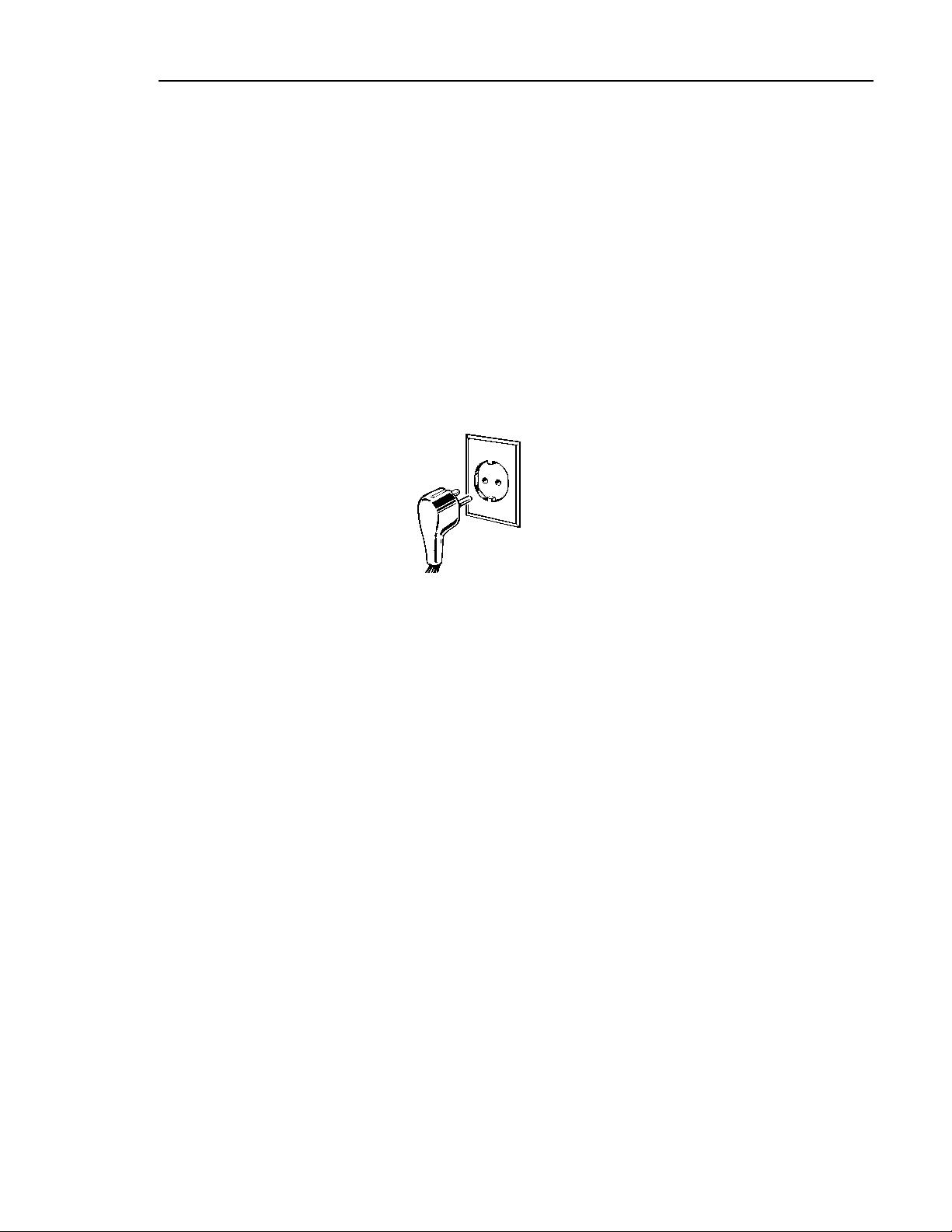
The power cord of this appliance is equipped
with an earthing plug which mates with a
standard earthed wall outlet to minimize the
possibility of electric shock hazard from this
appliance.
Have the wall outlet and circuit checked by a
qualified electrician to make sure the outlet is
properly earthed.
Where an unearthed wall outlet is
encountered, it is your personal responsibility
and obligation to have it replaced with a
properly earthed wall outlet.
The refrigerator should always be plugged into
its own individual
electrical outlet.
This provides the
best performance
and also prevents
overloading house
wiring circuits
which could cause
a fire hazard from overheated wires. Please
refer to the rating plate on the refrigerator
for the correct voltage, wattage and frequency.
If the product plug does not fit your outlet,
the product should be fitted with a new plug.
IMPORTANT: The refitting of electric plugs
and cables should be done by a qualified
technician or service agent. In some countries
the refitting of electric plugs and cables is only
permitted when the work is completed by a
qualified technician.
If the power supply cord becomes damaged,
it must be replaced by a qualified service agent
in order to avoid a safety hazard.
Never unplug your refrigerator by pulling on
the power cord. Always grip plug firmly and
pull straight out from the outlet.
Repair or replace immediately all power cords
that have become frayed or otherwise
damaged. Do not use a cord that shows cracks
or abrasion damage along its length or at
either end.
When moving the refrigerator away from the
wall, be careful not to roll over or damage the
power cord.
Mains lead replacement
If the mains lead on your refrigerator needs
replacing at any time, it must be replaced
by a special lead which is obtainable from
your local dealer. A charge will be made for
the replacement of the mains lead if you
have damaged the lead.
The refrigerator must be positioned so that
the plug is accessible.
Insure proper earthing
exists before using.
Earthing plug
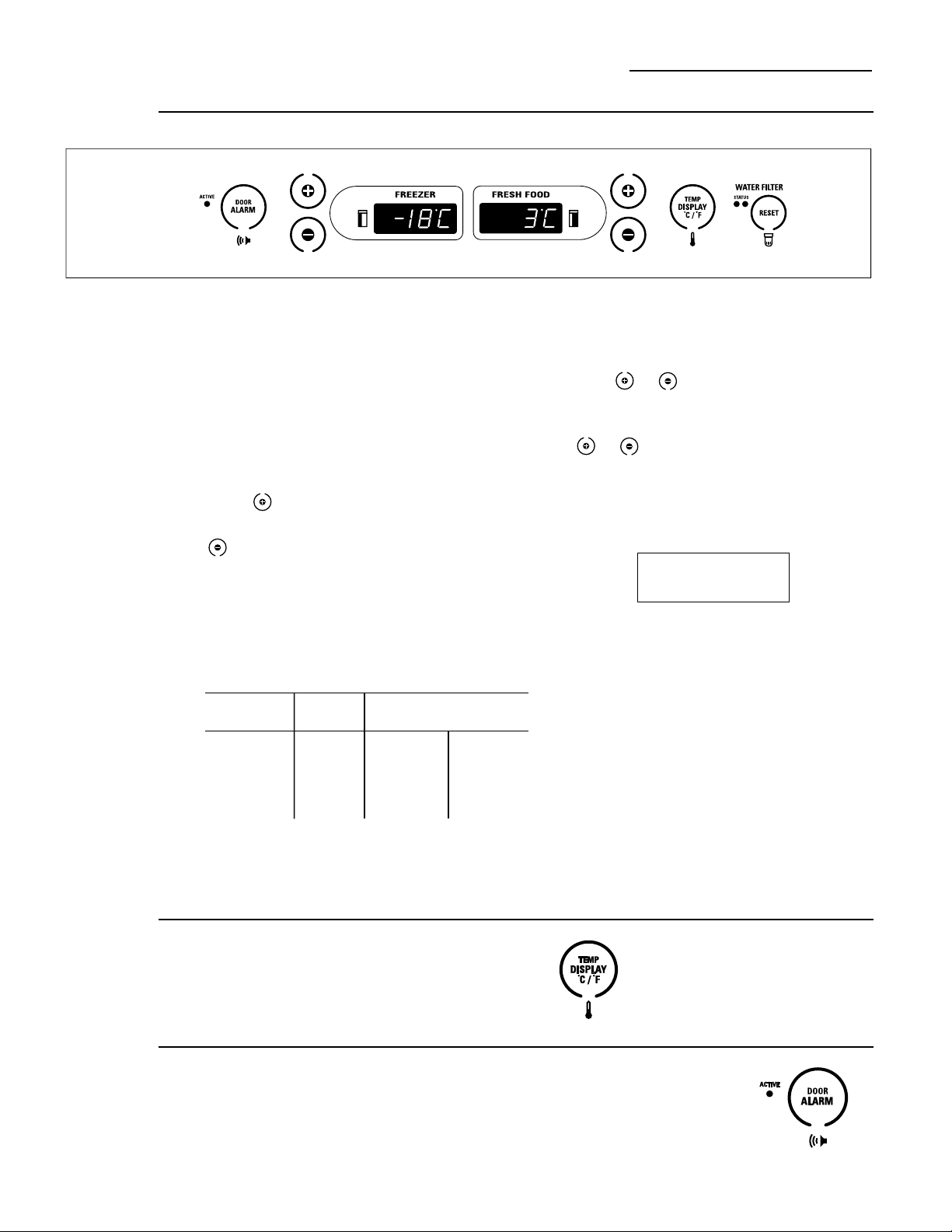
Temperature Controls
Built-In Refrigerators
Temperature
controls
Changing
display
temperatures
from °C to °F
To change the temperature display
from Celsius to Fahrenheit, press
Temp Display °C/°F.
The temperature display shows the actual
temperature of the freezer and fresh food
compartments. The actual temperature may
vary slightly from the set temperature based
on factors such as door opening, amount of
food, defrost cycling and room temperature.
To turn off the cooling system in both the
freezer and fresh food compartments, press
either pad until both displays show OFF.
To turn the cooling system on, press either
pad. The preset temperatures of –18°C
and 3°F will appear in the display.
To check the current temperature setting
for the fresh food or freezer compartment,
press the or pad once. After 5 seconds,
the display will return to the actual temperature.
To change the temperature settings, press
the or pads. Allow 24 hours for the
refrigerator to reach the temperature you
have set.
Temperature Ranges
Low High
Fresh Food
Freezer
NOTE: Setting the controls to OFF stops
cooling, but does not shut off electrical power
to the refrigerator.
1°C
–21°C
7°C
–14°C
Door
alarm
To turn the Door Alarm feature on, press
DOOR ALARM once. The ACTIVE light will
come on. To turn it off, press it again.
On models with a dispenser, the Door Alarm
feature is located on the dispenser panel on
the front of the freezer door.
When the DOOR ALARM
is active, the alarm will flash
and beep if you keep the
door open for more than
2 minutes.
Preset Settings:
Allow 24 hours to reach these preset temperatures.
Ambient Room Temperature Limits
This refrigerator is designed to operate
in ambient temperatures specified by its
Temperature Class, which is marked on
the rating plate.
Temperature Symbol Ambient Temperature
Class Maximum Minimum
Extended-
Temperate SN 32°C 10°C
Temperate N 32°C 16°C
Subtropical ST 38°C 18°C
Tropical T 43°C 18°C
NOTE: Internal temperature may be affected by such factors
as the location of the refrigerator, ambient temperature and
frequency of door openings. Adjust temperature controls as
required to compensate for these
factors.
5
6
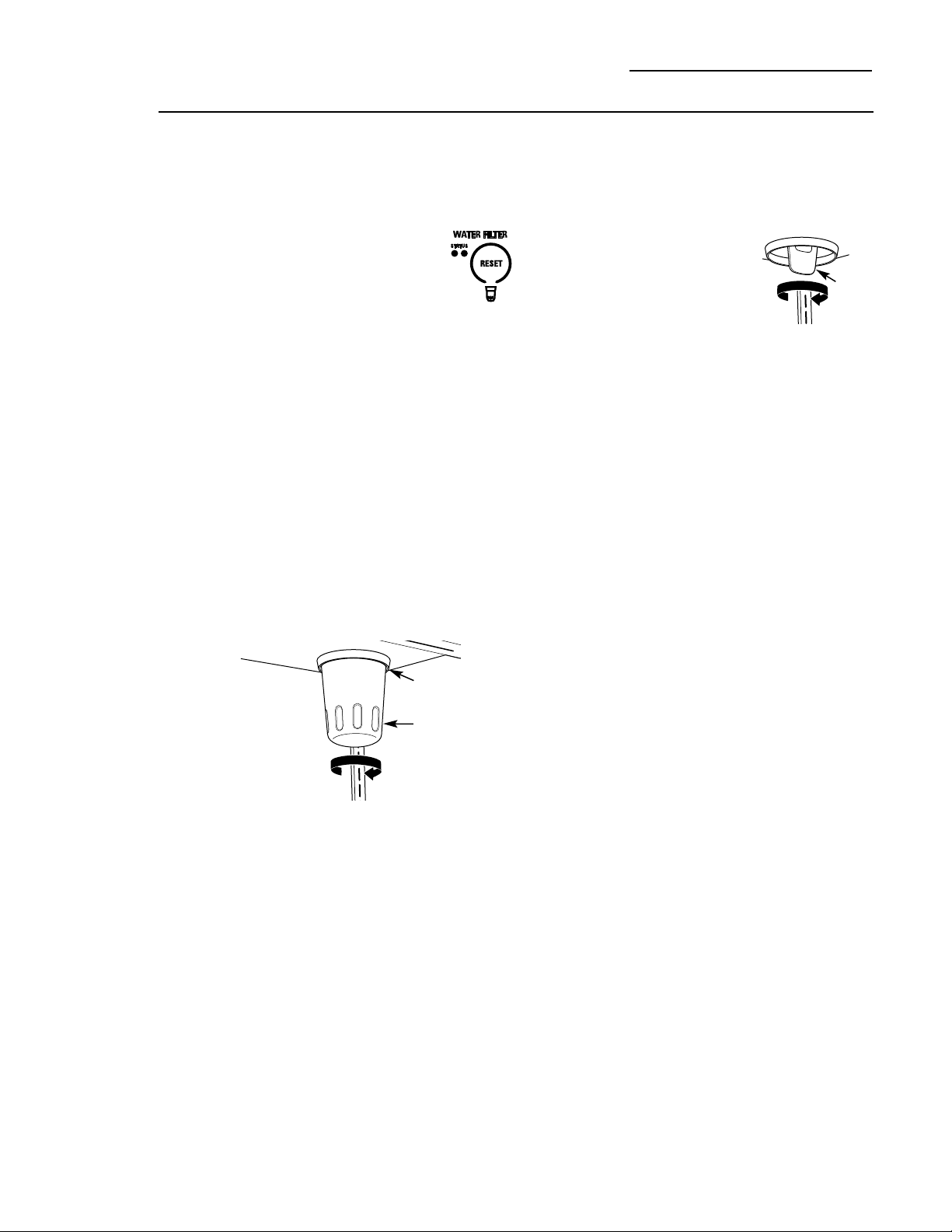
Water filter
cartridge
Cartridge
Holder
Slowly turn it to the right.
Do not overtighten.
Filter
Cartridge
The water filter cartridge is located in the
back upper right corner of the refrigerator
compartment.
To Replace the Filter:
The filter cartridge is designed
to last approximately 12 months.
It should be replaced when the
status light turns red or if you notice
the ice cubes getting hollow or small.
Installing the Filter Cartridge:
1. Remove the old cartridge by slowly turning
it to the left. A small amount of water may
drip down. Do not pull down on the cartridge.
2. Fill the new cartridge with water from the
tap to allow for better flow immediately after
installation.
3. Line up the arrow on the cartridge with the
center of the holder. Do not push it up into
the holder.
4. Slowly turn it to the right until the cartridge
stops. It will rotate about 1/4 turn. DO NOT
OVERTIGHTEN.
To Reset the Filter Status Light:
Press and hold the RESET pad for 3 seconds.
Filter Bypass Plug:
You must use the filter bypass plug:
a) if you have a household
reverse osmosis water system
b) if a replacement filter is not
available.
The icemaker and dispenser will not operate
without the filter or filter bypass plug installed.
Replacement Filters:
To order additional filters, contact your
local distributor.
Filter
Bypass
Plug
Water Filter Cartridge
Built-In Refrigerators
7
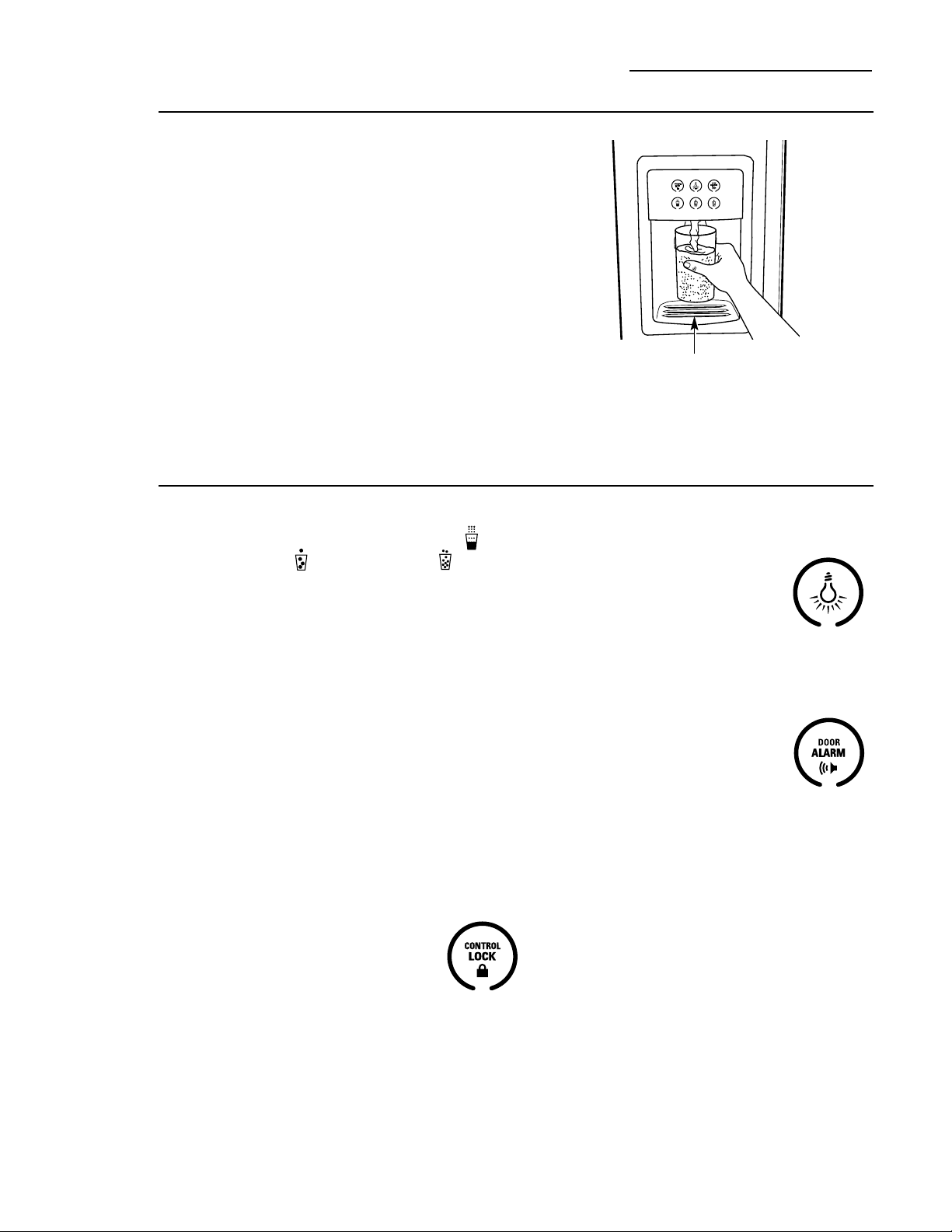
Dispenser
with
glass-touch
controls
How it Works
The electronic controls on the dispenser are
truly interactive. The control panel is equipped
with a proximity sensor that causes the panel
to light up as you approach the dispenser
(approx. 50 mm). To make a selection,
simply touch the graphic for the feature you
want, and the halo for that feature will light
up. When you walk away from the refrigerator,
the lighted graphics switch off automatically.
NOTE: Fluctuations in the power line voltage
may activate the dispenser controls, turning
the lights on. The lights will switch off
automatically after a few seconds. This does
not indicate a malfunction and will not affect
the operation of the controls.
Spill Shelf
Ice & Water Dispenser (on some models)
Built-In Refrigerators
How to Use
To dispense water or ice: select WATER ,
CUBED ICE or CRUSHED ICE .
Then press the glass gently against the
top of the dispenser cradle.
The spill shelf is not self-draining. To reduce
water spotting, the shelf and its grille should
be cleaned regularly.
If no water is dispensed when the refrigerator
is first installed, there may be air in the water
line system. Press the dispenser cradle for at
least two minutes to remove trapped air from
the water line and to fill the water system.
To flush out impurities in the water line,
throw away the first gallon of water.
CAUTION: Never put fingers
or any other objects into the ice crusher
discharge opening.
Locking the Dispenser:
Touch CONTROL LOCK for
3 seconds to lock the dispenser
and control pad. To unlock,
touch it again for 3 seconds.
Dispenser Light:
This feature turns the night light
on and off. The light also comes
on when the dispenser cradle is
pressed. If this light burns out,
it should be replaced with a 6 watt
12V maximum bulb. To order replacement
bulbs, contact your local distributor.
Door Alarm:
To turn the Door Alarm feature
on, touch DOOR ALARM once.
To turn it off, press it again.
When the DOOR ALARM
is active, the alarm will flash and beep if you
keep the door open for more than 2 minutes.
8
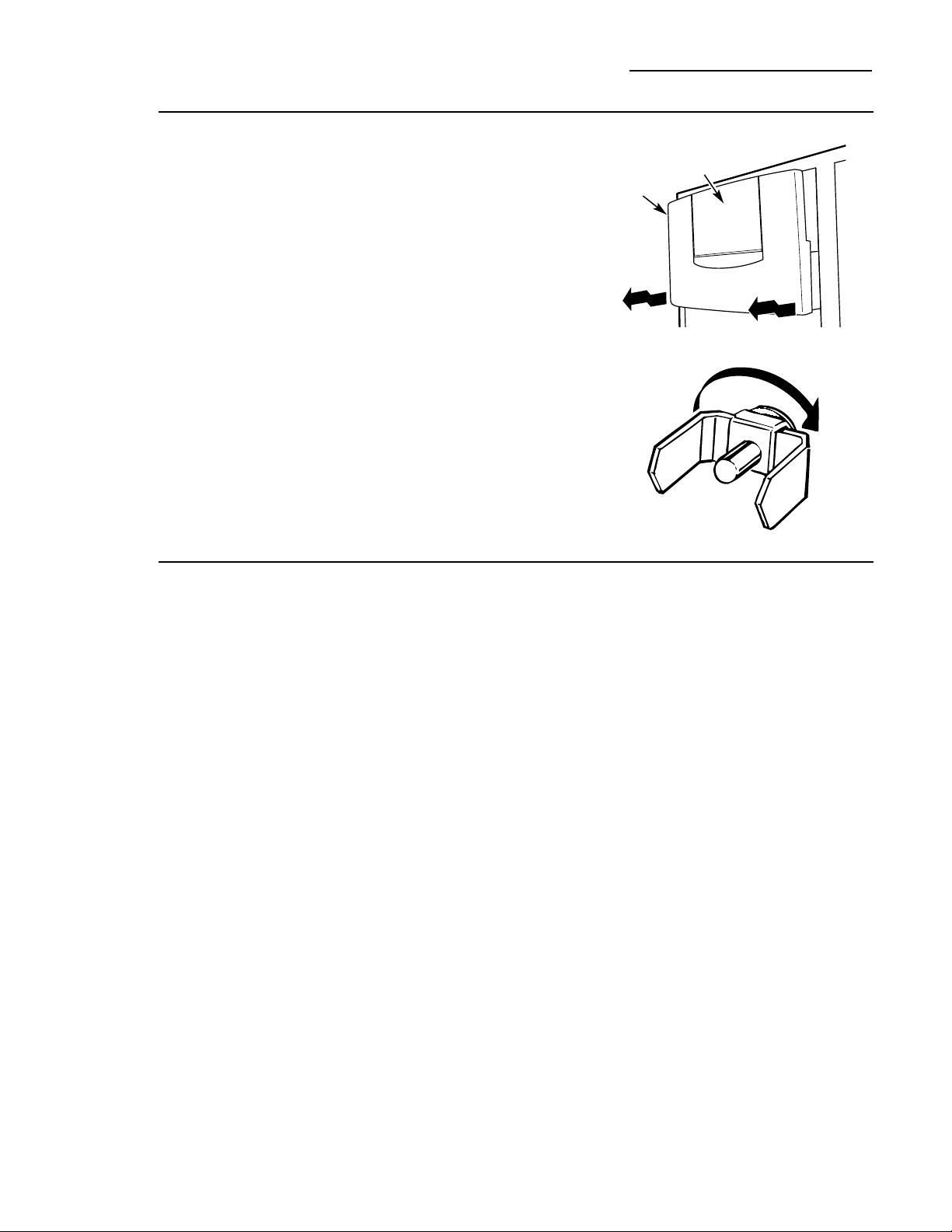
Ice storage
bin
To remove:
Lift up the access door to reach the icemaker.
Set the icemaker power switch to the O (off)
position. With the access door closed, support
the storage bin at the bottom while slightly
lifting. Pull bin straight out.
To replace:
Slide the bin back until the tab on the bin
locks into the slot on the shelf. If the bin
does not go all the way back, remove it and
rotate the drive mechanism 1/4 turn. Then
push the bin back again.
Important
facts about
your ice
& water
dispenser
• Do not add ice from trays or bags to the
storage bin. It may not crush or dispense well.
• Avoid overfilling glass with ice and use of
narrow or extra-tall glasses. Backed-up ice
can jam the chute or cause the door in the
chute to freeze shut. If ice is blocking the
chute, poke it through with a wooden spoon.
• Beverages and foods should not be
quick-chilled in the ice storage bin.
Cans, bottles or food packages in the
storage bin may cause the icemaker
or auger to jam.
• To keep dispensed ice from missing
the glass, put the glass close to, but not
touching, the dispenser opening.
• Some crushed ice may be dispensed even
though you selected CUBES. This happens
occasionally when a few cubes accidentally
get directed to the crusher.
• After crushed ice is dispensed, some water
may drip from the chute.
• Sometimes a mound of snow will form on
the door in the ice chute. This condition is
normal and usually occurs when you have
dispensed crushed ice repeatedly. The snow
will eventually evaporate.
• Dispensed water is not ice cold. For colder
water, simply add crushed ice or cubes
before dispensing water.
• The first glass of water dispensed may be
warmer than the following ones. This is
normal.
• To eliminate drips on the spill shelf, tilt the
glass in slightly when dispensing water.
Rotate
Drive
Mechanism
Ice Storage Bin
Access Door
Ice & Water Dispenser (on some models)
Built-In Refrigerators
9
Automatic
icemaker
A newly-installed refrigerator may take
12–24 hours to begin making ice.
The icemaker will produce seven cubes per
cycle—approximately 15 cycles in a 24-hour
period, depending on freezer compartment
temperature, room temperature, number of
door openings and other use conditions.
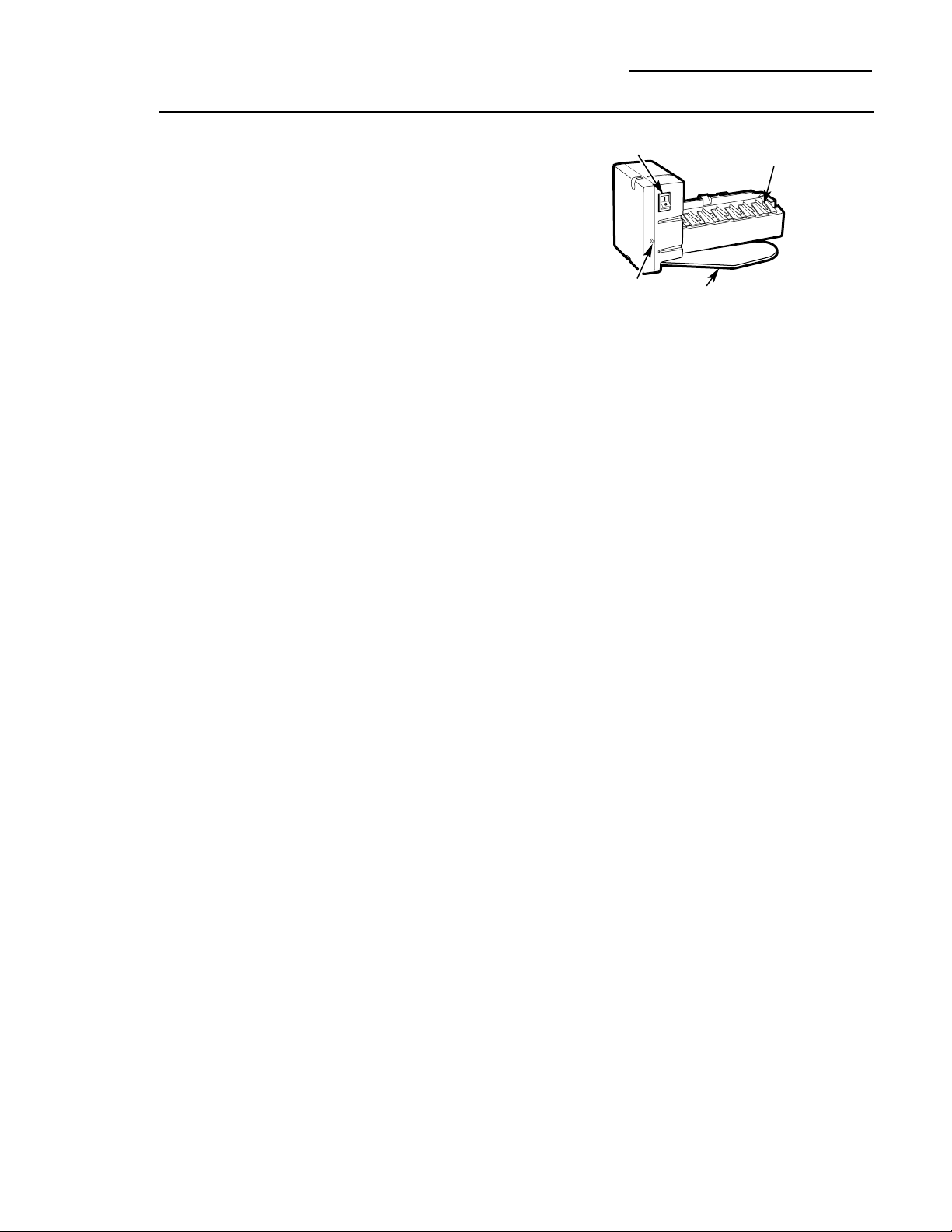
If the refrigerator is operated before the water
connection is made to the icemaker, set the
power switch to O (off).
When the refrigerator has been connected
to the water supply, set the power switch to
I
(on). The green light will come on.
Throw away the first full bucket of ice.
Be sure nothing interferes with the sweep
of the feeler arm.
When the bin fills to the level of the feeler
arm, the icemaker will stop producing ice.
It is normal for several cubes to be joined
together.
If ice is not used frequently, old ice cubes
will become cloudy, taste stale and shrink.
After the icemaker has been turned on again,
there will be a delay of about 45 minutes
before the icemaker resumes operations.
NOTE: In homes with lower-than-average
water pressure, you may hear the icemaker
water valve cycle on several times when
making one batch of ice.
Automatic Icemaker
Built-In Refrigerators
Icemaker
Feeler Arm
Power Switch
Green Power
Light
10
Climate
Control
drawer
How it Works
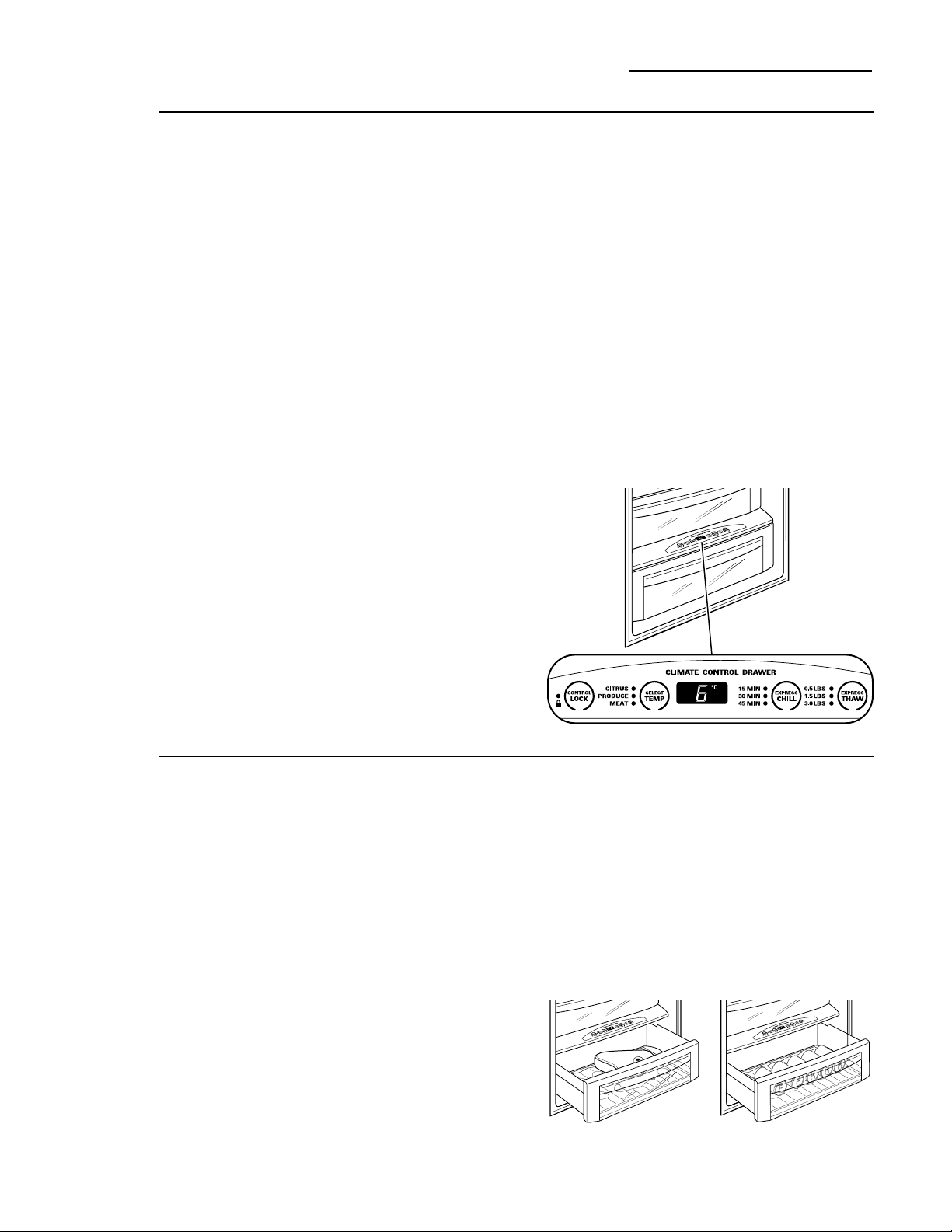
The Climate Control feature is a system of
dampers, a fan, a temperature thermistor,
a heater and a specially designed tray.
The Climate Control drawer can be used
to chill items quickly, thaw foods quickly or
store items at their optimum temperatures.
The drawer is tightly sealed to prevent the
drawer’s temperature from causing temperature
fluctuations in the rest of the refrigerator.
SELECT TEMP—Use this feature to store
items at their optimum temperatures.
The CITRUS setting will maintain a drawer
temperature of 6°C by cycling a small
heater off and on as needed. The PRODUCE
setting will maintain the drawer temperature
at 1°C by drawing in additional cold air as
needed. The MEAT setting will maintain the
drawer temperature at 0°C by drawing in
additional cold air as needed.
EXPRESS CHILL—This feature can be used
to cool items in minutes, rather than hours.
Extra cool air is circulated throughout the
drawer. Once the cycle is complete, the
drawer will revert to the pre-set fresh food
temperature.
EXPRESS THAW—This feature thaws items
in hours rather than days. Food is gently
thawed in a cool environment by circulating
air throughout the drawer. Temperature is
maintained in the drawer by cycling a small
heater off and on as needed. Once the thaw
cycle is complete, the pan will automatically
adjust to a temperature of 0°C to store the
food at its optimum temperature.
Climate Control Tray—Besides using the
specially designed Climate Control tray
when using the drawer, it can also be used
as a chilled serving tray to keep foods cold.
NOTE: By turning the controls on the Climate
Control drawer off, the drawer can be used as a
standard sealed produce pan. The temperature
inside the drawer will be the same as the fresh
food compartment.
How to Use
1 Empty the drawer. Place the tray in the
drawer. Place the items on the tray and
close the drawer completely.
2 Select the Express Thaw,™ Express Chill™ or
Select Temp™ pad. The display will come on.
Press the pad until the light appears next
to the desired setting. Use the chart on the
next page to determine the best setting.
• To stop a feature before it is finished,
press that feature’s pad until no options
are selected and the display is off.
• During Express Thaw™ and Express Chill,™
the display on the controls will count
down the time remaining in the cycle.
• After the Express Thaw™ cycle is
complete, the drawer will reset to the
MEAT setting (0°C) to help preserve
thawed items until they are used.
• The displayed actual temperature of the
Climate Control drawer may vary slightly
from the SET temperature based on usage
and operation environment.
NOTE: For food safety reasons, it is
recommended that foods be wrapped in
plastic wrap when using Express Thaw.™
This will help contain meat juices and
improve thawing performance.
Express Thaw™
Express Chill™
Climate Control Drawer
Built-In Refrigerators
11
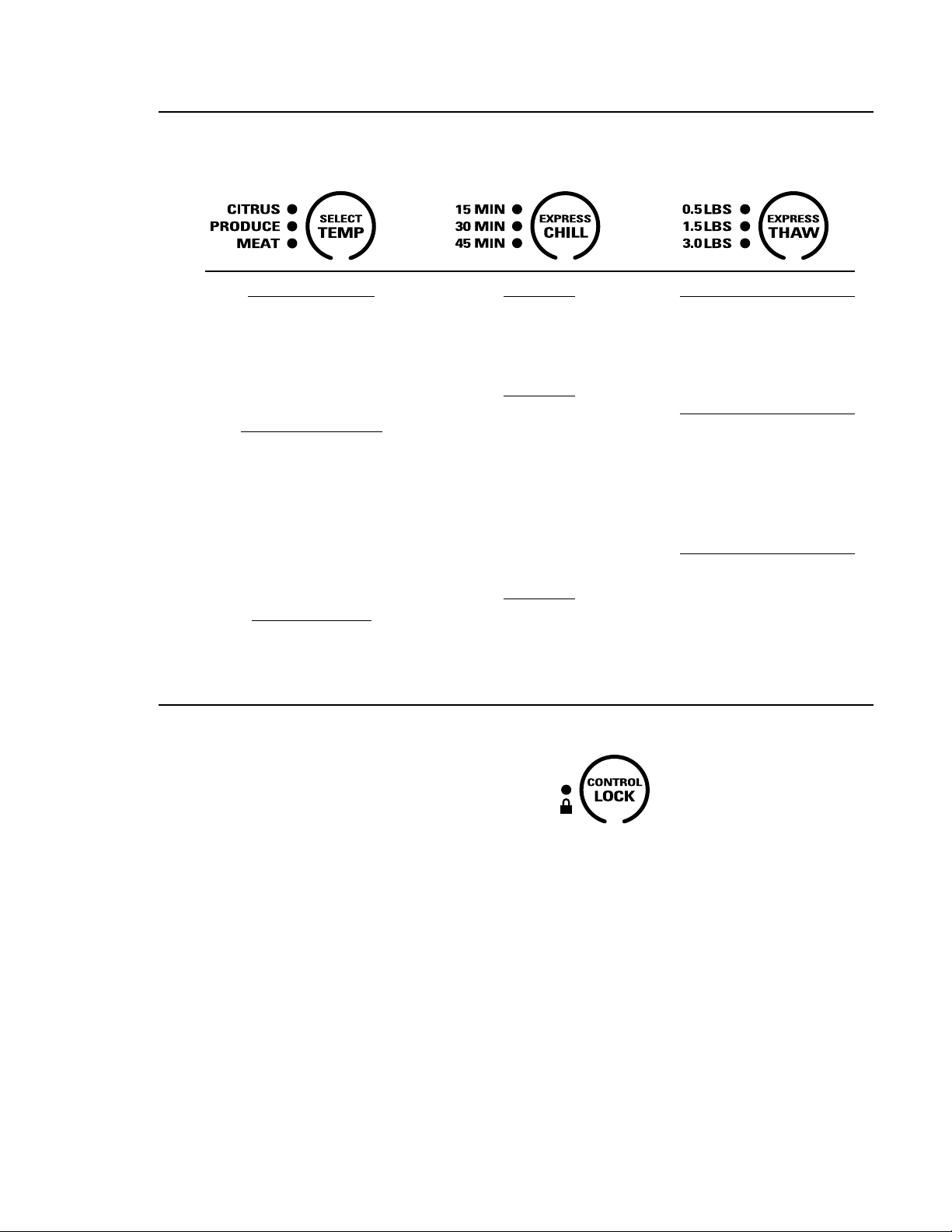
Citrus Setting (6°C)
• Oranges, Lemons, Limes,
Pineapple, Cantaloupe
• Beans, Cucumbers,
Tomatoes, Peppers,
Aubergine, Squash
Produce Setting (1°C)
• Strawberries, Raspberries,
Kiwifruit, Pears, Cherries,
Blackberries, Grapes, Plums,
Nectarines, Apples
• Asparagus, Broccoli, Corn,
Mushrooms, Spinach,
Cauliflower, Kale, Green
Onions, Beetroot, Onions
Meat Setting (0°C)
• Raw Meat, Fish and Poultry
15 Minutes
• 1 Beverage Can (355 ml)
• 2 Small Juice Boxes
(175–240 ml each)
30 Minutes
• Wine (750 ml bottle)
• 2 to 6 Beverage Cans
(355 ml each)
• 2 Plastic 590 ml Bottles
of Beverage
• 4 to 6 Small Juice Boxes
(175–240 ml each)
• 3 Foil Juice Packets
45 Minutes
• 2 Litre of Beverage
• 1.9 Litres of Juice
• Gelatin—1 package
0.5 Lbs. (0.25 kg) (4 hours)
• Individually Wrapped
Filet Mignon (0.5 lb/0.25 kg)
• Hamburger Patties
(0.5 lb/0.25 kg)
1.5 Lbs. (0.75 kg) (8 hours)
• Chicken Breasts
(1.5 lbs/0.75 kg)
• Minced Beef
(1.5 lbs/0.75 kg)
• Steak (1.5 lbs/0.75 kg)
3.0 Lbs. (1.5 kg) (12 hours)
• Chicken Breasts
(3.0 lbs/1.5 kg)
• Minced Beef (3.0 lbs/1.5 kg)
• Steak (3.0 lbs/1.5 kg)
Climate
Control
chart
NOTE: Results may vary depending on packaging, starting temperature and other food traits.
Control
lock
Control Lock
Press and hold this pad for 3 seconds to
lock the settings for the Climate Control
drawer. To unlock, press and hold for
another 3 seconds.
12
• Artichokes
• Asparagus
• Beetroot,
topped
• Blueberries
• Carrots
• Celery
• Cherries
• Corn
• Cucumbers
• Currants
• Greens, leafy
• Lettuce
• Parsley
• Peas, green
• Radishes
• Rhubarb
• Spinach
• Tomatoes, ripe
• Broccoli
• Brussels sprouts
• Cabbage
• Cauliflower
• Green onions
• Parsnips
• Turnips
Sealed
deli pan
Use the Sealed Deli Pan for the convenient
storage of lunch meats and cheese, hors
d’oeuvres, spreads and snacks. The pan and
shelf to which it is attached can be adjusted
to any height.
Storage Pans
Built-In Refrigerators
Sealed
produce
pans
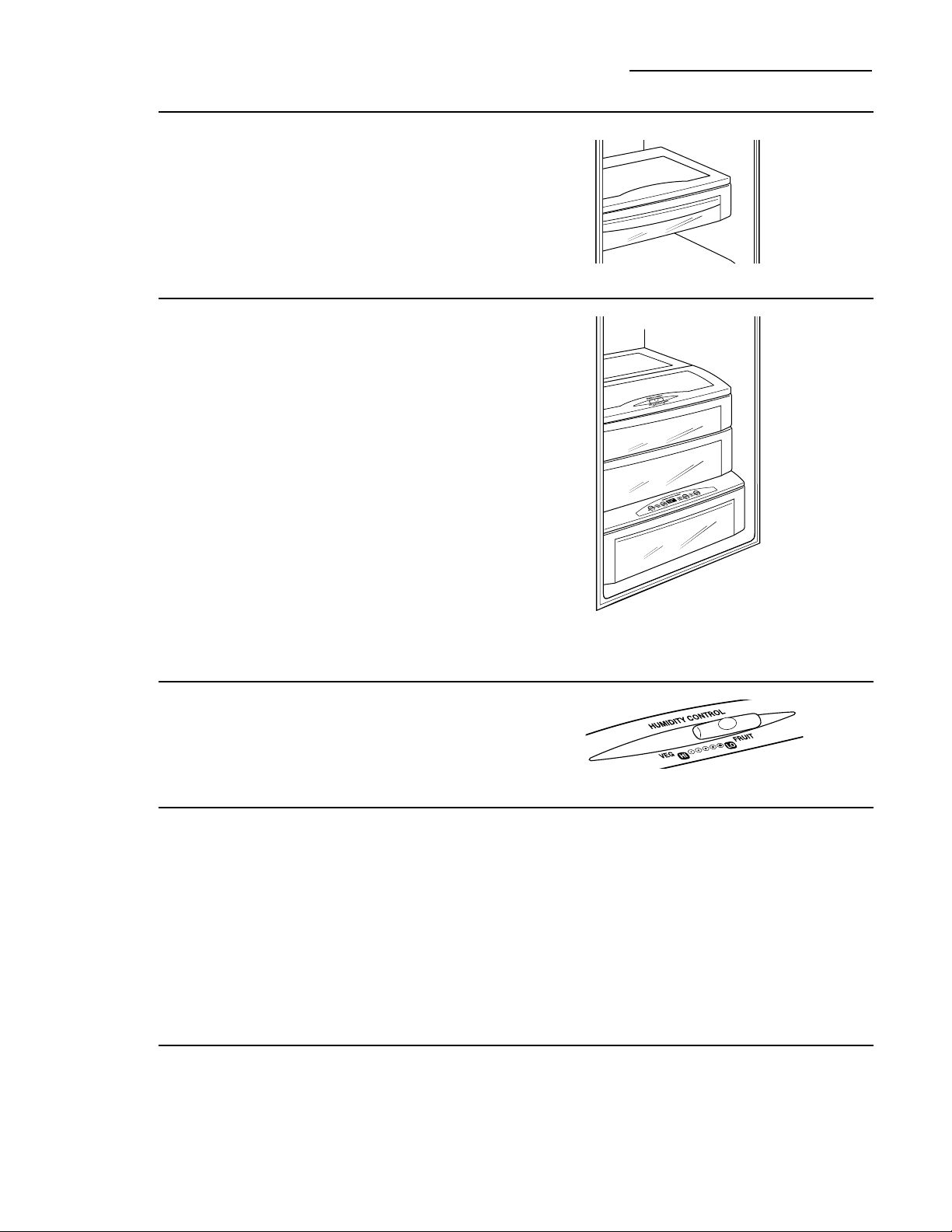
The top pan has adjustable humidity levels for
the higher humidity levels required by most
vegetables and lower humidity levels required
for most fruits.
The second pan is designed to provide
constant high humidity levels.
Make sure the drawers are closed completely
to maintain the correct humidity level.
NOTE: The Climate Control drawer can be
used as another sealed produce pan by turning
the controls on the Climate Control drawer off.
The temperature inside the drawer will be the
same as the fresh food compartment.
How long produce can be stored will depend
upon the type of food and its condition when
placed in the pans.
Adjustable
humidity
control
Slide the control all the way to the VEG (HI)
setting to provide high humidity. Slide the
control all the way to the FRUIT (LO) setting
to provide lower humidity levels.
High
humidity
storage
Storing unwrapped foods in a high humidity
environment keeps foods fresh by retaining
the natural moisture content of foods such as:
As in any refrigerated storage area, it is
recommended that foods with strong odors
be stored wrapped—foods such as:
• Apples
• Apricots
• Grapes
• Mushrooms
• Nectarines
• Oranges
• Peaches
• Pears
• Raspberries
• Squash,
summer
• Strawberries
• Tangerines
Low
humidity
storage
Lower humidity storage should be used for
items such as:
13
Drawer
and pan
removal
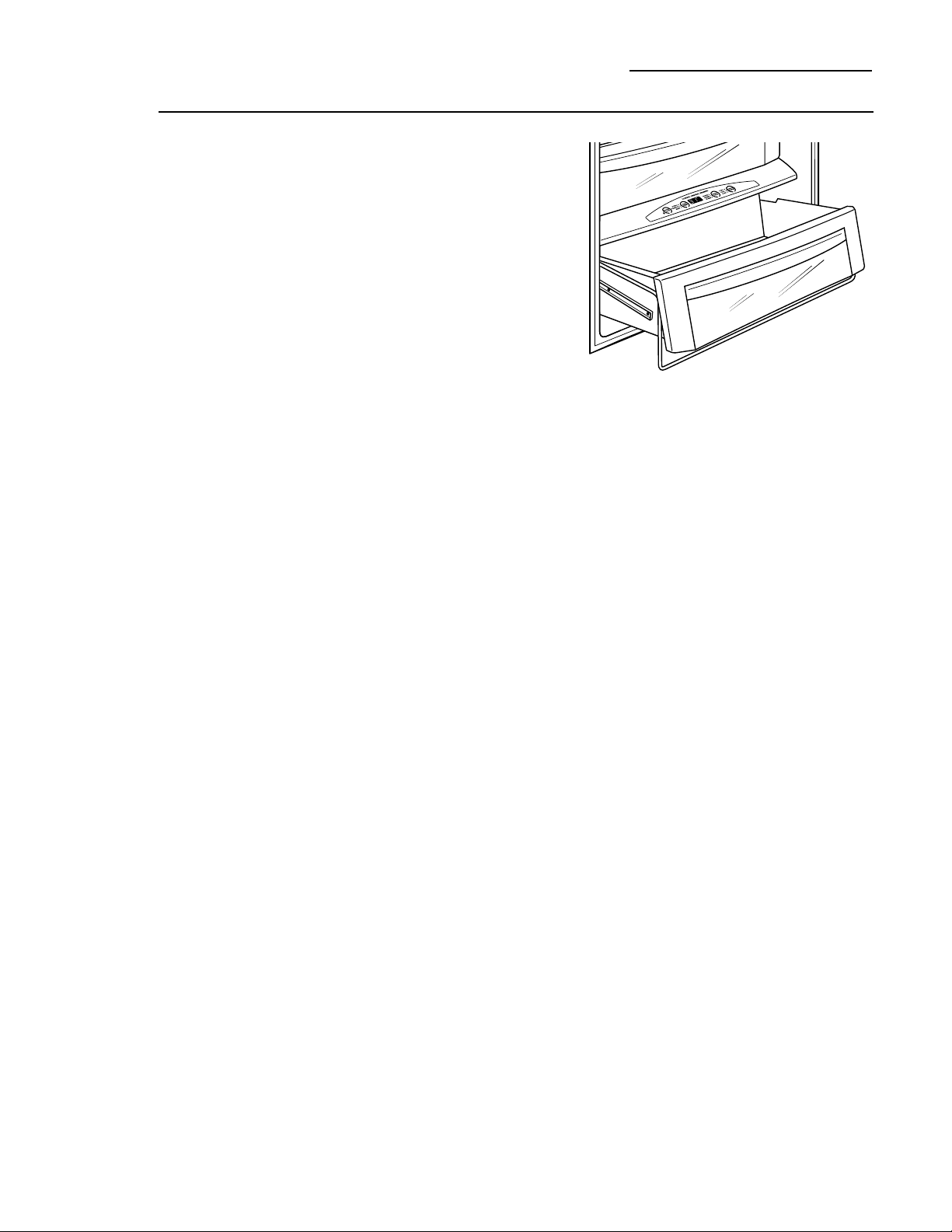
To remove a drawer or pan:
1. Pull the pan out to the stop position.
2. Lift the front of the pan up and out of
the wire holder.
3. Lift the back of the pan up and out.
To replace a pan:
1. Place the back of the pan in the wire holder,
making sure the wire holder fits into the
grooves on the back of the pan.
2. Lower the front of the pan into the wire
holder.
3. Press firmly on the top of the pan to snap it
into the wire holder.
Climate Control Drawer and Storage Pans
Built-In Refrigerators
14
How to
rearrange
your shelves
Tempered glass shelves in the fresh food
compartment and wire shelves in the freezer
compartment are adjustable, enabling you to
make efficient shelf arrangements to fit your
family’s food storage needs.
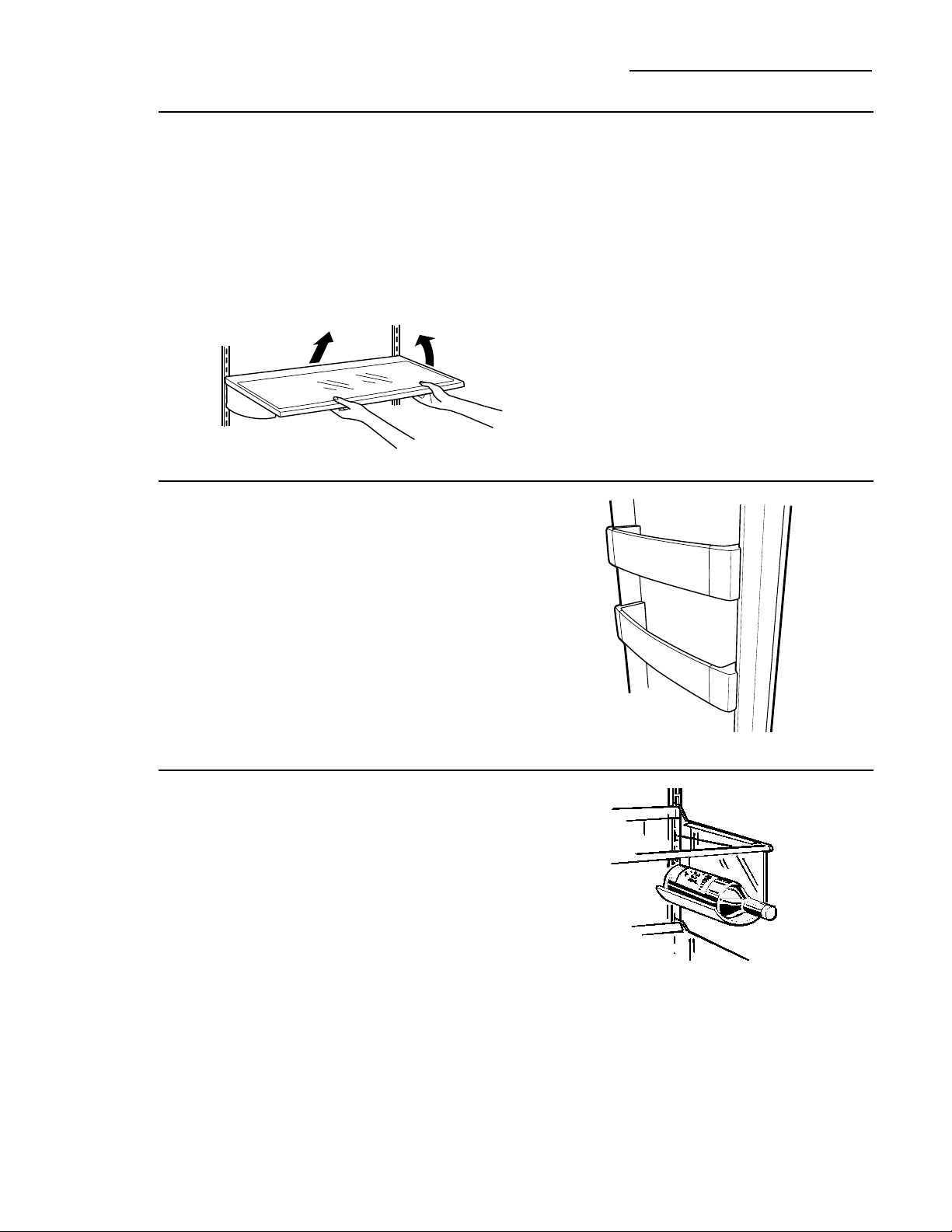
To remove shelves:
Tilt shelf up at front, then lift it up and out
of tracks on rear wall of refrigerator.
To replace shelves:
Select desired shelf height. With shelf front
raised slightly, engage top lugs in tracks at rear
of cabinet. Then lower front of shelf until it
locks into position.
Shelves and Bins
Built-In Refrigerators
Door bins
All door bins, except for the deep gallon door
bin, are adjustable and can be moved up and
down to meet your storage needs. The deep
gallon door bin can be removed for cleaning.
To remove any bin:
Lift the bin up and slide it toward you.
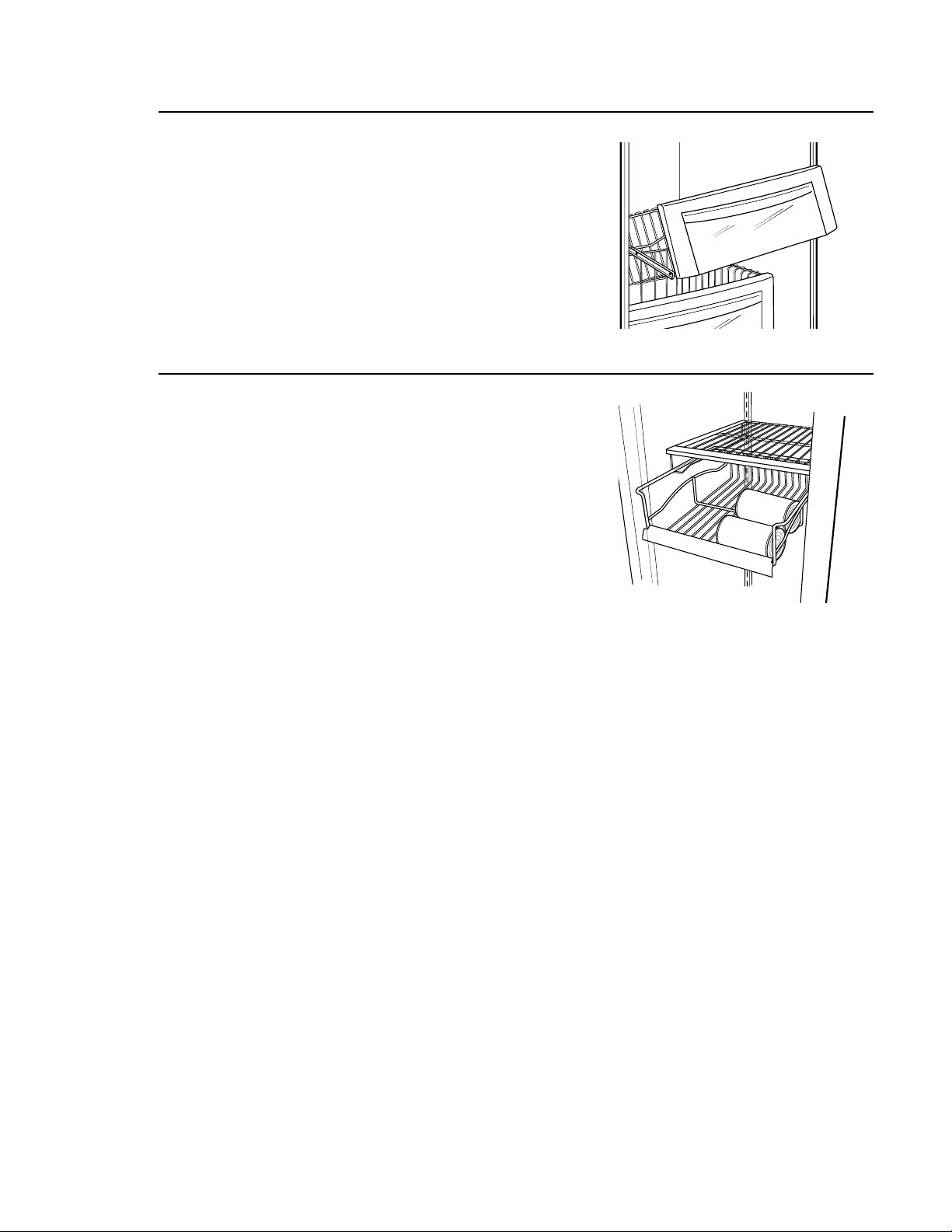
Removable
wine rack
The rack can be attached to the left or
right side of any shelf. It is designed to hold
a bottle, including a 2 litre bottle, on its side.
15
Freezer
baskets
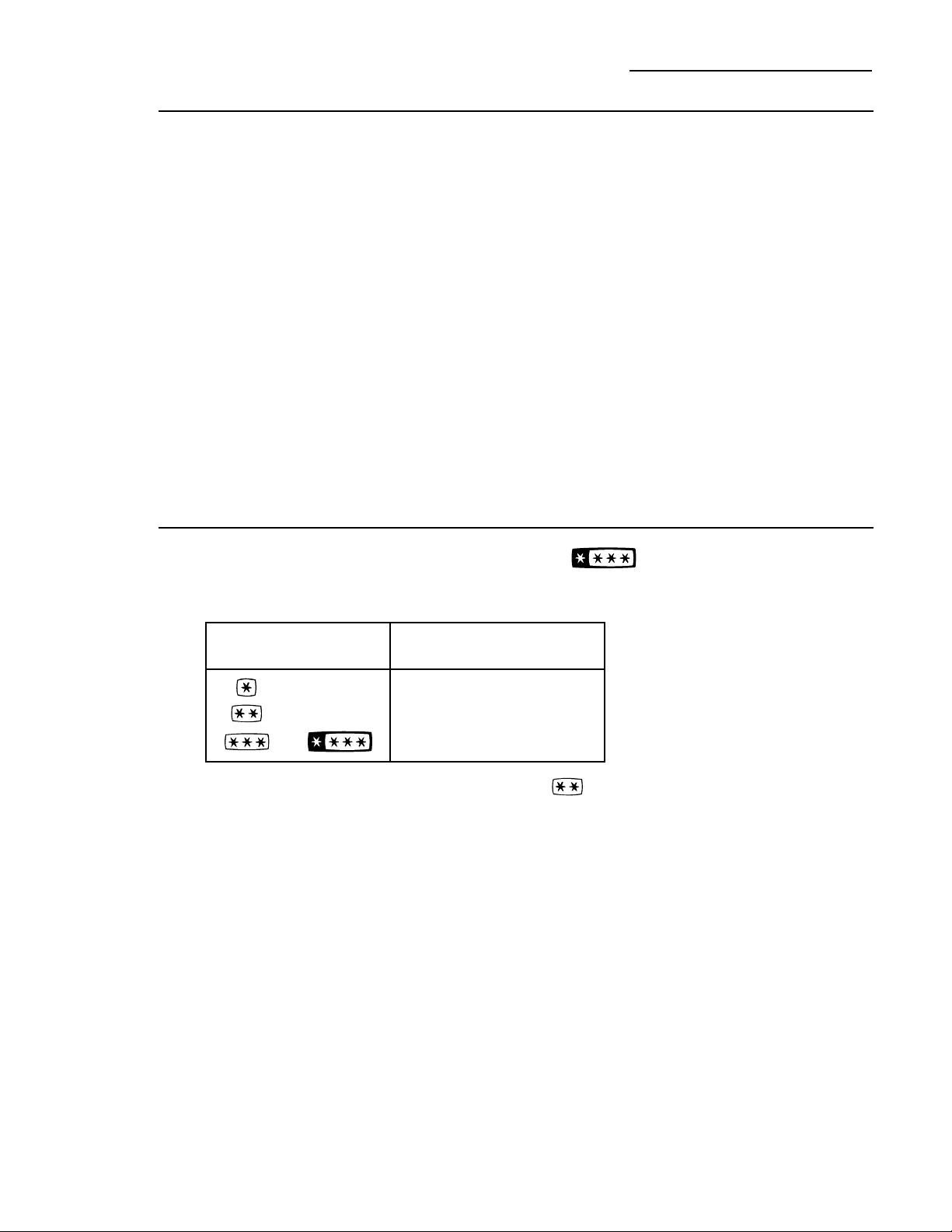
Wire slide-out freezer baskets can be pulled out
for easy access to frozen foods.
To remove:
Pull basket out. Lift the front of the basket up
and then take it out.
Freezer
juice rack
This slide-out rack can be used to easily access
frozen juices or foods.
16
Loading
the freezer
compartment
Load so that at least 15 mm of space remains
clear between stacks of packages and 15 mm to
25 mm of space between the top of any stack
and any shelf or basket above it. Packages may
hang over the front of shelves but must remain
15 mm from doors.
• Food to be frozen must not be placed
in direct contact with food in storage.
If food is to be frozen every day, it may
be necessary to reduce the quantity to
be frozen.
• If a large quantity of food needs to be
frozen, set the freezer control to its coldest
setting. After the food is frozen, reset the
freezer control to its initial position.
• Food is most quickly frozen on the middle
three shelves of the freezer compartment
and most slowly in the freezer door shelves.
• Do not store commercially quick-frozen food
longer than the time recommended by the
food manufacturers.
• If the power to the appliance is shut off for
an extended time or if the refrigerating
system fails, do not open the doors unless
absolutely necessary. When it is necessary,
close them as quickly as possible so the frozen
food will stay frozen as long as possible.
• The freezer door storage shelves marked
with a two-star label are only appropriate
for the storage of previously frozen food.
Effervescent drinks should not be stored
in the freezer compartment.
Freezer Compartment
Built-In Refrigerators
Freezer
performance
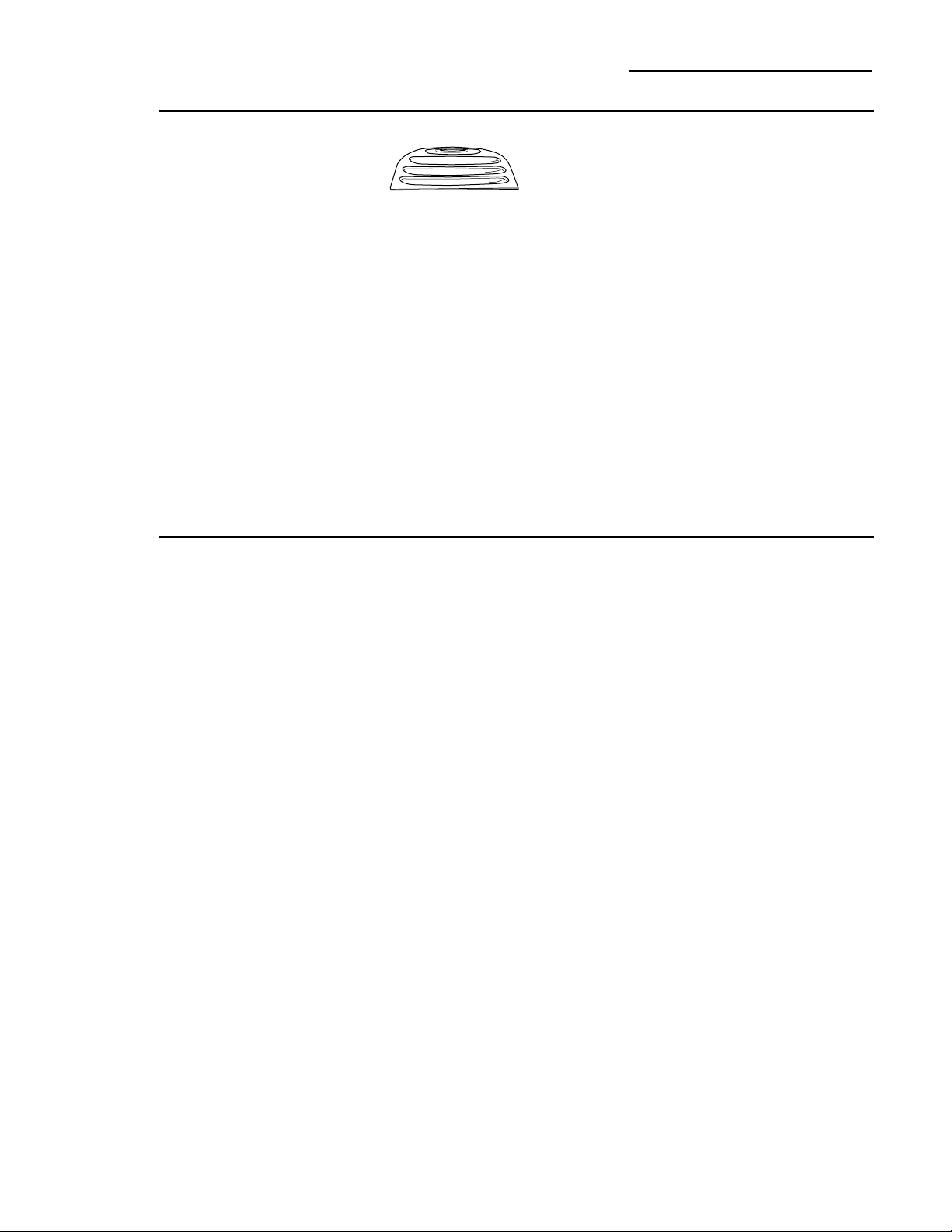
This Refrigerator/Freezer has an overall “Four Star” rating.
Freezer performance is classified by star ratings defined by ISO 8561 STANDARD AND
SUMMARY BELOW:
However, all freezer door modules have a two star rating as permitted by the standard.
CODE
or
FREEZING–LOAD TEMP.
(FOOD TEMPERATURE)
Below –6°C.
Below –12°C.
Below –18°C.
17
Cleaning
outside
The spill shelf and the
area beneath it should
be cleaned periodically
with a mild liquid dish
detergent.
Dispenser cradle—Before cleaning, lock the
dispenser by touching CONTROL LOCK for
3 seconds to prevent activating the dispenser.
Clean with warm water and a mild liquid
dish detergent. Rinse thoroughly and
wipe dry. Unlock the dispenser by touching
CONTROL LOCK for 3 seconds.
Door handles and trim—Clean with a cloth
dampened with soapy water. Dry with a soft
cloth.
Keep the outside clean. Wipe with a clean
cloth lightly dampened with mild liquid dish
detergent. Dry with a clean, soft cloth.
Do not wipe the refrigerator with a soiled
dish cloth or wet towel. These may leave
a residue that can damage the finish. Do not
use scouring pads, powdered cleaners, bleach
or cleaners containing bleach because these
products can scratch and damage the finish.
Stainless steel—Regularly clean and polish
the Stainless Steel Door Panels and Handles
(on some models) with a commercially
available stainless steel cleaner.
Do not use appliance wax or polish on the
stainless steel.
Care and Cleaning
Built-In Refrigerators
Cleaning
inside
Turn off power at the circuit breaker or
fuse box before cleaning. If this is not
practical, wring excess moisture out of
sponge or cloth when cleaning around
switches, lights or controls.
Use warm water and baking soda solution—
about 15 ml of baking soda to 1 litre of water.
This both cleans and neutralizes odors.
Thoroughly rinse and wipe dry.
Other parts of the refrigerator—including
door gaskets, meat and vegetable drawers,
ice storage bin and all plastic parts—can be
cleaned the same way.
Do not wash any plastic refrigerator parts
in the dishwasher.
Do not wash the aluminum Climate Control
tray in the dishwasher. The aluminum will
discolor in the dishwasher.
Avoid cleaning cold glass shelves with hot water
because the extreme temperature difference
may cause them to break. Handle glass shelves
carefully. Bumping tempered glass can cause it
to shatter.
WARNING: Halogen lights
generate intense heat. Be certain power is off
and lamps have sufficient time to cool before
attempting to replace.
Power to the lamps can be turned off at the
fuse box or circuit breaker.
Turning the temperature control to OFF
does NOT remove power to the light circuits.
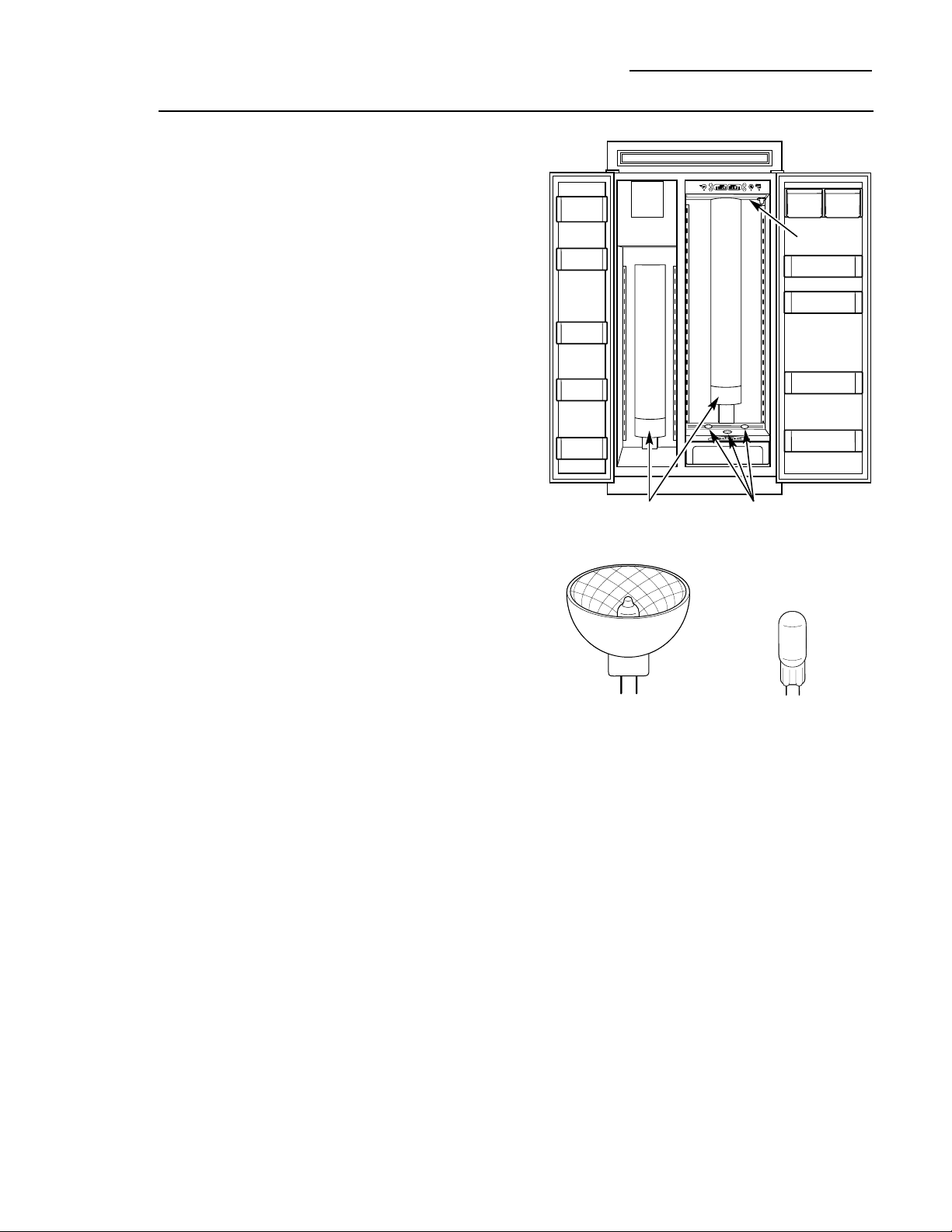
The refrigerator uses two types of halogen
bulbs:
Type 1 The columns along the back wall
of the fresh food and freezer
compartments are lit up by lamps
located behind the top pan in the
fresh food compartment and the
bottom basket in the freezer
compartment.
Type 2 These lamps are located inside the
light shield at the top of the fresh food
compartment and on top of the
Climate Control drawer at the bottom
of the fresh food compartment.
Type 1 bulbs have a life expectancy of
about 2000 hours. Type 2 bulbs have a life
expectancy of about 2000 hours. However,
if the bulbs do need to be replaced, they
can be purchased from your appliance dealer.
18
Light bulb
replacement
Care and Cleaning
Built-In Refrigerators
Type 2
Type 1
Type 1
This is a 35 watt, 12 volt,
Type MR11 bulb.
Type 2
This is a 20 watt, 12 volt,
Type T bulb.
Type 2
19
Type 1 bulb
replacement
NOTE: Before replacing the bulbs, review
the light bulb information and WARNING
on page 18.
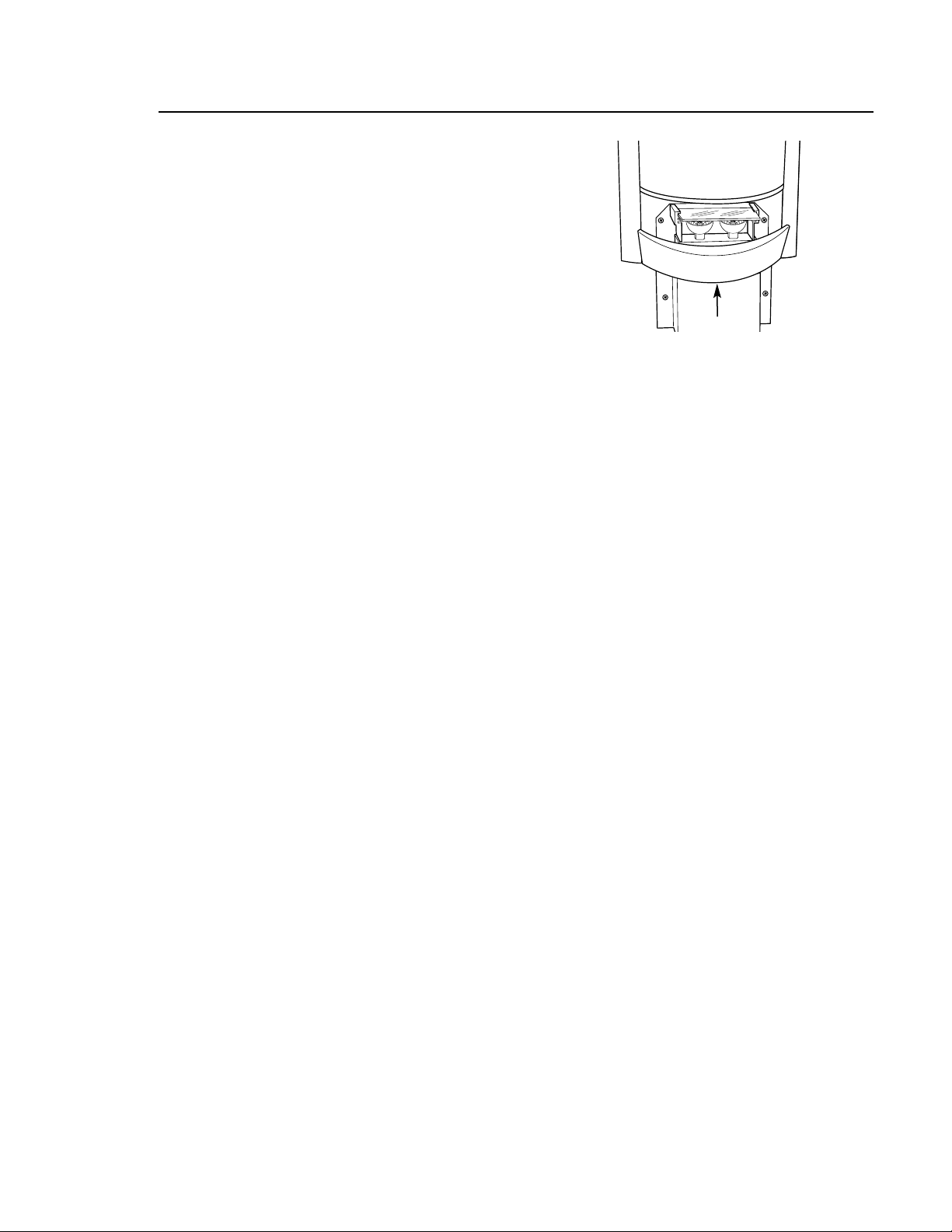
Replacing Type 1 bulbs located in lamps
behind the top pan in the fresh food
compartment and the bottom freezer basket
in the freezer compartment:
1. Disconnect power at the circuit breaker
or fuse box and allow the lamps to cool.
2. To access the lamps in the fresh food
compartment, remove the top pan.
See Drawer and Pan Removal section.
2. To access the lamps in the freezer
compartment, remove the bottom freezer
basket. See Freezer Baskets section.
3. On the back wall there is a curved light
shield. Grasp each end of the light shield.
Pull the shield toward you and the tabs
on the shield will release from the slots in
the housing.
4. Remove the glass above the bulbs by pulling
it straight out.
NOTE: Always follow bulb manufacturer’s
directions for handling and replacing bulbs.
5. Remove the bulb by holding the base and
pulling straight up. Replace with a new bulb.
6. Replace the glass by sliding it into place.
Then replace the light shield by resting the
top lip of the shield on top of the light
housing. Then press the sides until the tabs
pop into the slots in the housing.
WARNING: The light shield must
be replaced or the heat from the bulb could
damage the refrigerator.
7. Reset the circuit breaker or fuse box.
Light Shield
NOTE: Before replacing the bulbs, review
the light bulb information and WARNING
on page 18.
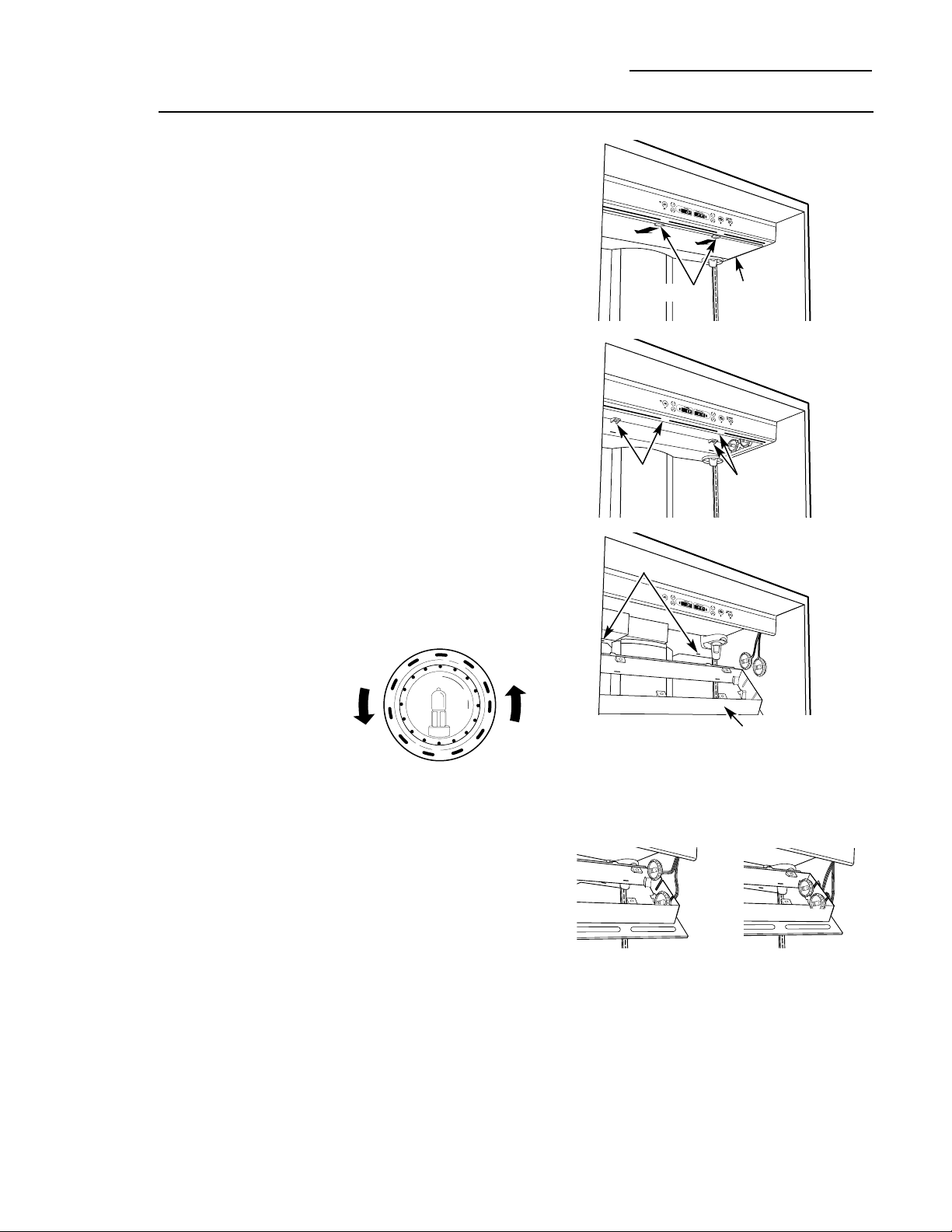
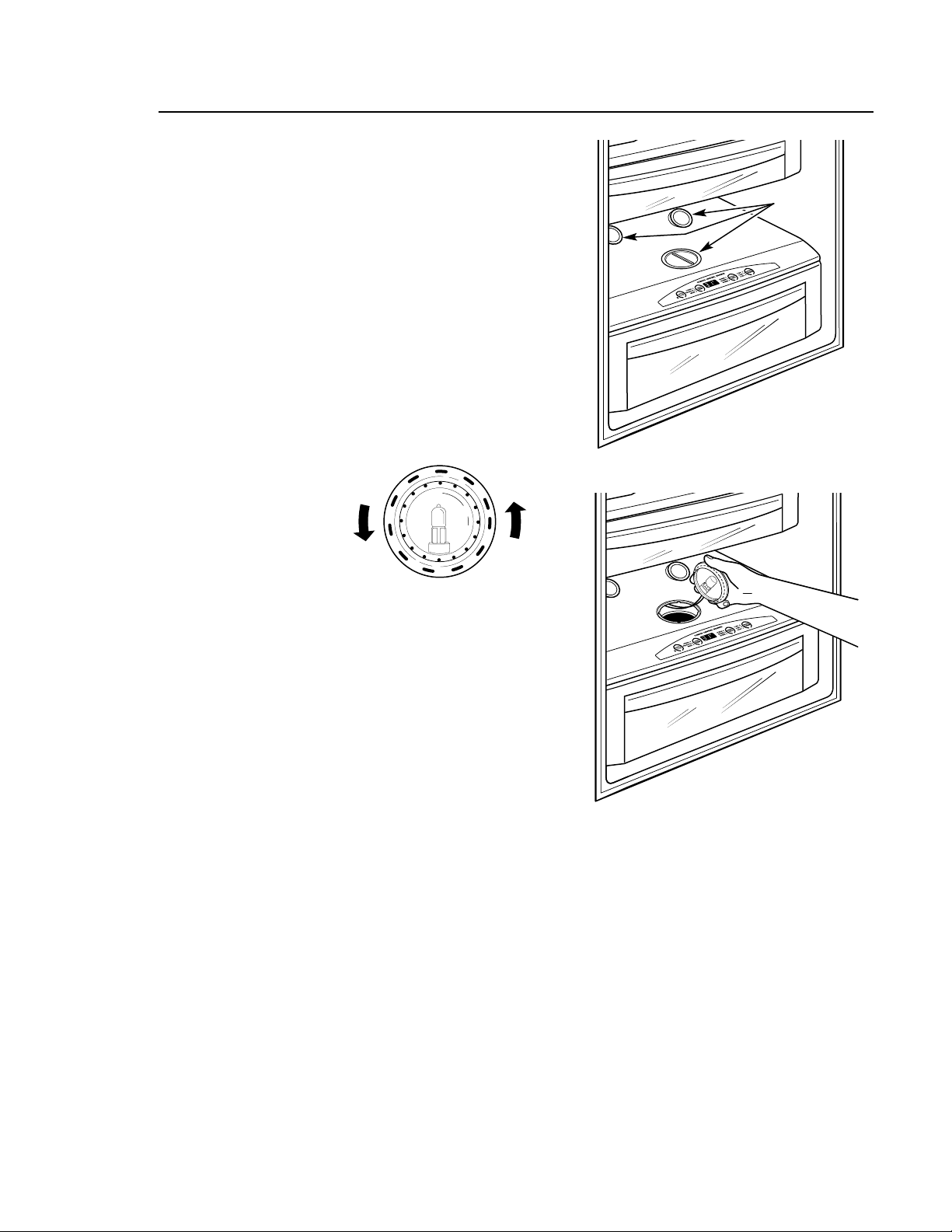
Replacing Type 2 bulbs in lamps located inside
the light shield at the top of the fresh food
compartment:
1. Disconnect power at the circuit breaker
or fuse box and allow the lamps to cool.
2. If the Water Filter Cartridge is installed,
remove it and replace with the filter
bypass plug.
3. Holding the light shield with one hand,
rotate the support tabs until they clear the
front of the light shield. Then push back on
the light shield, lower the shield at the front
and take out.
4. Remove the 4 screws securing the light
housing to the ceiling. There are two screws
at the front and two at the back.
5. Lower the light housing at the front, then
pull it toward you so the tabs at the back of
the light housing come out of the slots on
the back wall. The lamp assemblies will
release from the holders.
6. Turn the lamp
protector to
access the bulb.
NOTE: Always follow bulb manufacturer’s
directions for handling and replacing bulbs.
7. Remove the bulb by holding the base and
pulling straight out. Replace with a new bulb
and replace the lamp protector.
WARNING: Lamp protectors
must be replaced or the heat from the bulb
could damage the refrigerator.
8. Holding up the light housing, place each
lamp assembly in its holder. Feed the
attached wires through the slots and tuck
the wires outside the side of the light
housing.
9. Insert the tabs on the back of the light
housing in the slots on the back wall.
Raise the light housing into position and
secure with the four screws.
10. Replace the light shield and rotate the
support tabs back out so they support the
front of the shield.
11. Remove the filter bypass plug and replace
with the Water Filter Cartridge. Reset the
circuit breaker or fuse box.
20
Type 2 bulb
replacement
Care and Cleaning
Built-In Refrigerators
Upper light
shield
Screws
Screws
Slots
Light housing
Support tabs
21
Type 2 bulb
replacement
NOTE: Before replacing the bulbs, review
the light bulb information and WARNING
on page 18.
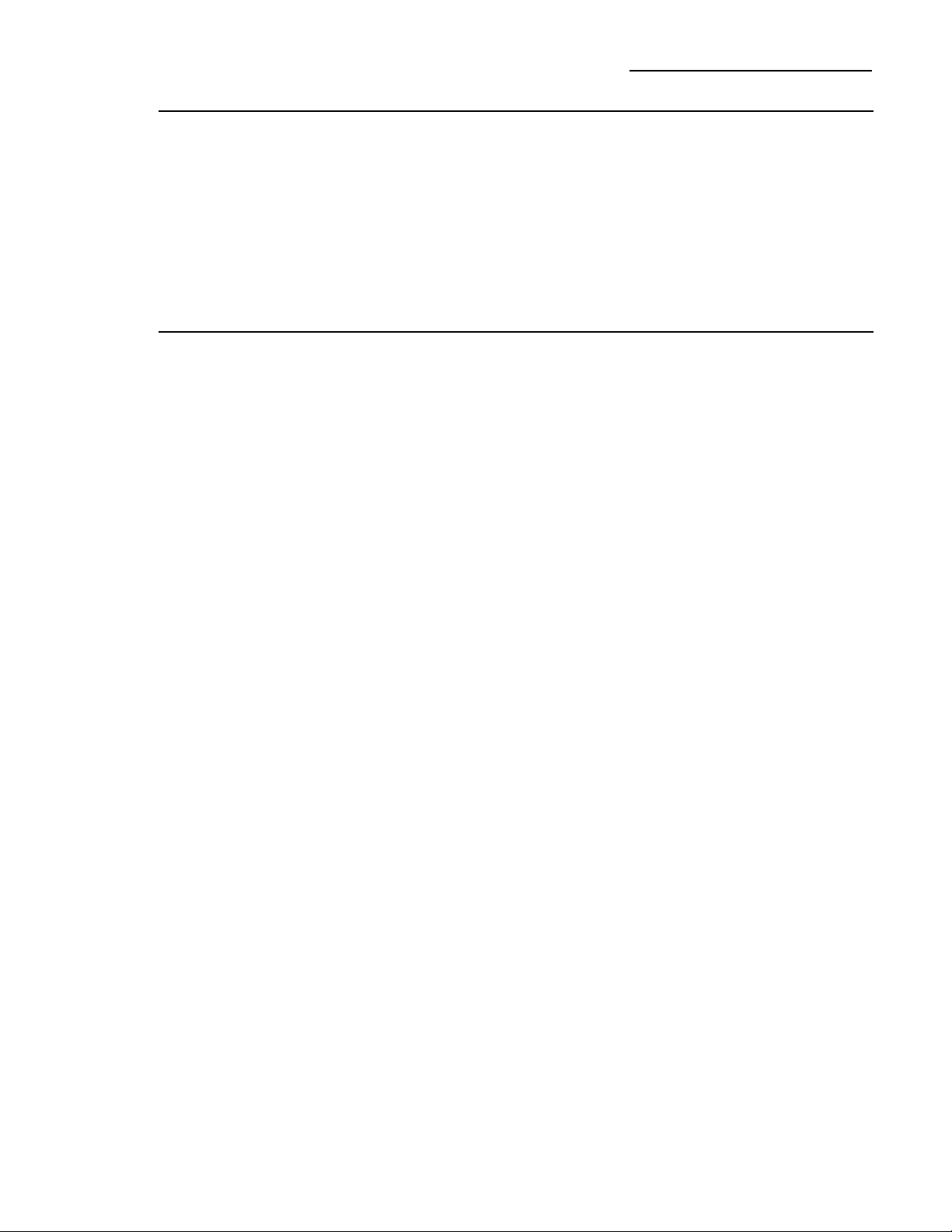
Replacing Type 2 bulbs in lamps located in the
top of the Climate Control drawer:
1. Disconnect power at the circuit breaker
or fuse box and allow the lamps to cool.
2. To access the lamps, remove the second
produce pan. See Drawer and Pan Removal
section.
3. The lamps at the back, that face up, can be
lifted out. To access the lamp that shines
into the Climate Control drawer, twist the
holder until the arrow points towards the
back of the refrigerator, then lift up.
4. Turn the lamp
protector to
access the bulb.
NOTE: Always follow bulb manufacturer’s
directions for handling and replacing bulbs.
5. Remove the bulb by holding the base and
pulling straight out. Replace with a new bulb
and replace the lamp protector.
WARNING: Lamp protectors
must be replaced or the heat from the bulb
could damage the refrigerator.
6. Reset the circuit breaker or fuse box.
Lower lamp
assemblies
Climate Control drawer lamp
22
Care and Cleaning
Built-In Refrigerators
Preparing
for vacation
For long vacations or absences, remove food
and shut off power to the refrigerator at the
fuse box or circuit breaker. Clean the interior
(see Cleaning Inside). Leave doors open.
For shorter vacations, remove perishable foods
and leave controls at regular settings. However,
if the room temperature is expected to drop
below 16°C, follow the same instructions as
for long vacations.
Set the icemaker power switch to the O (off)
position and be sure to shut off the water
supply to the refrigerator.
Preparing
to move
Secure all loose items such as grille, shelves
and drawers by taping them securely in place
to prevent damage.
Be sure the refrigerator stays in an upright
position during moving.
23
Questions?
Use this
problem
solver!
The Problem Solver
Built-In Refrigerators
PROBLEM POSSIBLE CAUSE
REFRIGERATOR • May be in defrost cycle when compressor does not operate for about
DOES NOT OPERATE 30 minutes.
• Temperature control set at OFF.
• If interior light is not on, refrigerator may not be plugged in at
wall outlet.
• The fuse is blown/circuit breaker is tripped. Replace fuse or reset
the breaker.
MOTOR OPERATES • Normal when refrigerator is first plugged in. Wait 24 hours for the
FOR LONG PERIODS refrigerator to completely cool down.
OR CYCLES ON AND
• Often occurs when large amounts of food are placed in refrigerator.
OFF FREQUENTLY
This is normal.
• Door left open or package holding door open.
• Hot weather or frequent door openings. This is normal.
• Temperature controls set at the coldest setting. See Temperature
Controls.
ACTUAL • Refrigerator just plugged in. Allow 24 hours for system to stabilize.
• Door open for too long. Allow 24 hours for system to stabilize.
• Warm food added to refrigerator. Allow 24 hours for system
to stabilize.
• Defrost cycle is in process. Allow 24 hours for system to stabilize.
VIBRATION OR • Refrigerator is not level. See Installation Instructions.
RATTLING
(Slight vibration
is normal.)
OPERATING • Normal fan air flow—one fan blows cold air through the
SOUNDS fresh food and freezer compartments—another fan cools
the compressor motor.
• These NORMAL sounds will also be heard from time to time:
• Defrost water dripping.
• Refrigerant boiling or gurgling.
• Cracking or popping of cooling coils caused by expansion and
contraction during defrost and refrigeration following defrost.
• Ice cubes dropping into the bin and water running in pipes
as icemaker refills.
• The icemaker water valve will buzz when the icemaker fills
with water.
DOOR NOT CLOSING • Refrigerator is not level. See Installation Instructions.
PROPERLY
(Modern refrigerators
with more storage
space and a larger
freezer require
more operating time.
They start and stop
often to maintain
even temperatures.)
TEMPERATURE
NOT EQUAL TO SET
TEMPERATURE
24
Questions?
Use this
problem
solver!
The Problem Solver
Built-In Refrigerators
PROBLEM POSSIBLE CAUSE
FRESH FOOD • Temperature controls not set cold enough. See Temperature Controls.
• Warm weather or frequent door openings.
• Door left open for long time.
• Package may be holding door open.
FROST OR ICE • Door left open or package holding door open.
• Too frequent or too long door openings.
SLOW ICE CUBE • Door may have been left open.
FREEZING
• Freezer compartment is too warm. Set the freezer to a colder
temperature.
ICE HAS • Old cubes need to be discarded.
ODOR/TASTE
• Ice storage bin needs to be emptied and washed.
• Unsealed packages in fresh food and/or freezer compartments
may be transmitting odor/taste to ice.
• Poor-tasting incoming water. Replace water filter.
AUTOMATIC • Icemaker power switch is in the O (off) position.
• Water supply turned off or not connected.
• Freezer compartment too warm.
• Piled up cubes in storage bin may cause icemaker to shut off
too soon. Level cubes in bin.
MOISTURE FORMS • Not unusual during periods of high humidity. Wipe surface dry.
ON CABINET
SURFACE BETWEEN
THE DOORS
MOISTURE • Too frequent or long door openings.
COLLECTS INSIDE
• In humid weather, air carries moisture into refrigerator when doors
are opened.
REFRIGERATOR • Foods with strong odors should be tightly covered.
HAS ODOR
• Check for spoiled food.
• Interior needs cleaning. See Care and Cleaning.
• Keep open box of baking soda in refrigerator; replace every
3 months.
OR FREEZER
COMPARTMENT
TOO WARM
CRYSTALS ON
FROZEN FOOD
(Frost within package
is normal.)
ICEMAKER
DOES NOT WORK
25
PROBLEM POSSIBLE CAUSE
INTERIOR LIGHT • No power at outlet.
DOES NOT WORK
• Light bulb needs replacing. See Care and Cleaning.
• The refrigerator is equipped with a safety feature that turns off
the refrigerator lights when the doors have been opened for an
extended period. Once the refrigerator doors are closed and the
lights have had time to cool, they will again come on automatically
when the doors are opened.
SMALL OR • Water filter clogged. Replace the filter or use the filter bypass plug.
HOLLOW CUBES
WATER ON • If you use an extra tall glass or pitcher, or overfill a glass or pitcher,
THE FLOOR you may be jamming the cubes in the funnel chute. They can fuse
inside the chute and drop out later, leaving water or ice on the floor.
UNEVEN SPACING
• Kitchen cabinets are not level or square. Call the installer or
OR GAPS
BETWEEN cabinetmaker.
DOORS AND
KITCHEN CABINET
POOR DOOR • Fresh food door needs adjusting. See Installation Instructions.
• Refrigerator is not level. See Attention Installer Instructions.
ICE DISPENSER • Icemaker turned off or water supply turned off. Turn on icemaker
DOES NOT WORK or water supply.
• Ice cubes are frozen to the icemaker feeler arm. Remove cubes.
• Irregular ice clumps in storage bin. Break up with fingertip pressure
and discard remaining clumps.
• Freezer may be too warm. Adjust freezer control to a colder setting,
one position at a time, until clumps do not form.
WATER HAS POOR • Water dispenser has not been used for a long time. Dispense water
TASTE OR ODOR until all water in system is replenished.
WATER IN FIRST • Normal when refrigerator is first installed. Wait 24 hours for the
GLASS IS WARM refrigerator to completely cool down.
• Water dispenser has not been used for a long time. Dispense water
until all water in system is replenished.
• Water system has been drained. Allow several hours for replenished
supply to chill.
ALIGNMENT OR
ONE DOOR HIGHER
THAN THE OTHER
26
Questions?
Use this
problem
solver!
The Problem Solver
Built-In Refrigerators
PROBLEM POSSIBLE CAUSE
WATER DISPENSER • Water supply line turned off or not connected.
DOES NOT WORK
• Water filter clogged. Replace the filter or use the filter bypass plug.
• The CONTROL LOCK on the dispenser has been activated.
To unlock the dispenser, touch CONTROL LOCK for 3 seconds.
• Air may be trapped in system. Press the dispenser arm for at least
2 minutes.
WATER SPURTING • Newly installed filter cartridge. Run water from the dispenser for
FROM DISPENSER 3 minutes (about 6 litres).
NO WATER OR ICE • Supply line or shutoff valve is clogged. Call a plumber.
PRODUCTION
• Water filter clogged. Replace the filter or use the filter bypass plug.
CUBED ICE WAS • Last setting was CRUSHED ICE. A few cubes were left in the crusher
SELECTED BUT from the previous setting. This is normal.
CRUSHED ICE
WAS DISPENSED
FOOD IS NOT • Packaging. Increase time or re-package in plastic.
THAWING/CHILLING
• Wrong weight selected. Select a larger weight.
• Item with high fat content. Select a larger weight.
• Not using the Climate Control tray. Place items on tray and allow
space in between items for better air flow.
SELECT TEMP • Fresh Food temperature control is set at warmest setting.
FEATURE ON This is normal. In order to minimize energy usage, the Select Temp
CLIMATE CONTROL feature is disabled when the Fresh Food control is set at the
DRAWER IS NOT warmest setting.
WORKING
CLIMATE CONTROL • Control Lock feature is active. Press and hold the CONTROL LOCK
DRAWER CONTROLS pad on the Climate Control drawer for 3 seconds.
DO NOT WORK
27
Notes
Built-In Refrigerators
197D5884P001
49-60303
12007-00 12-03 JR
Printed in the United States

