Owner's Manual
0 FES S I 0 NAL
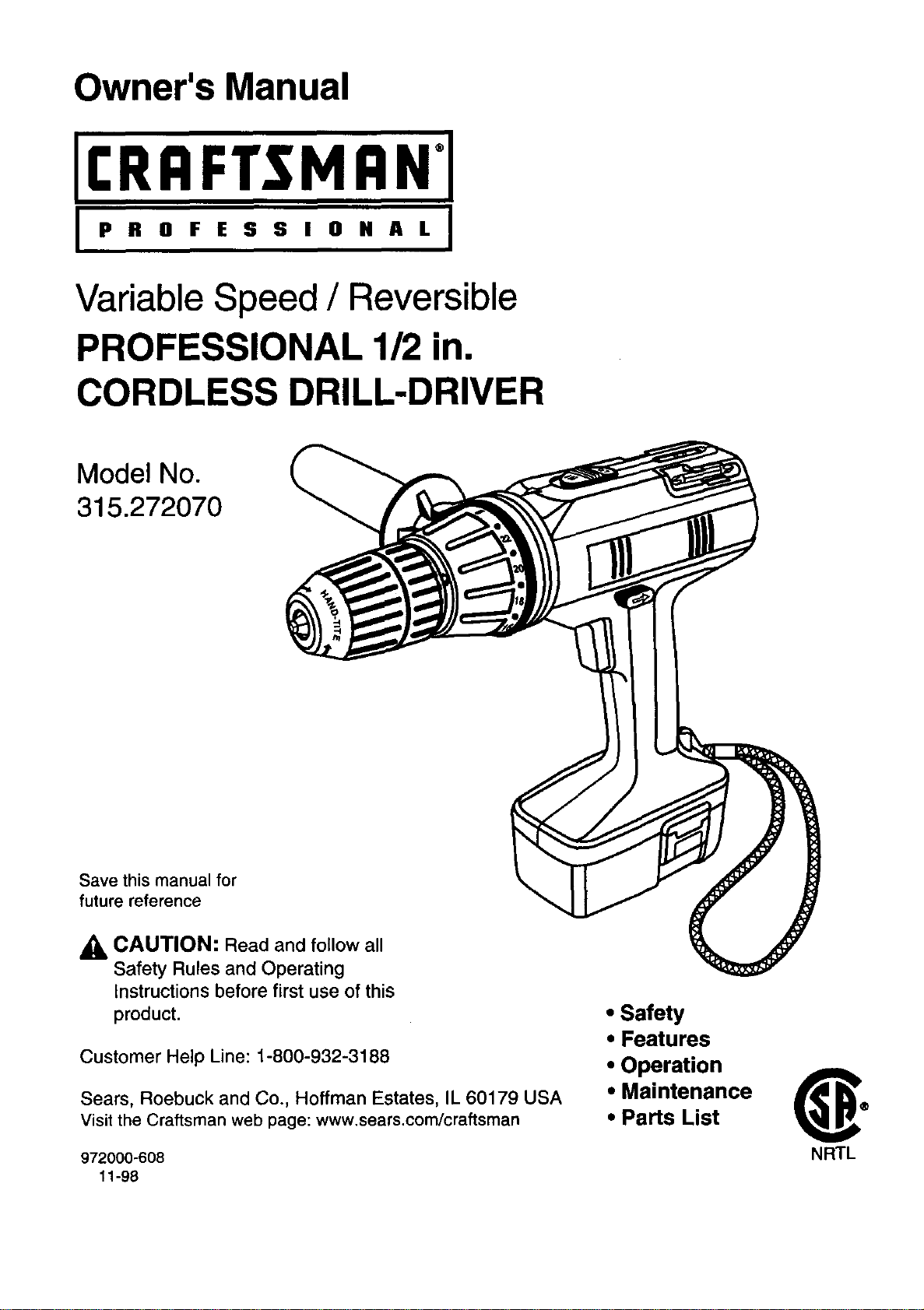
Variable Speed / Reversible
PROFESSIONAL 112in.
CORDLESS DRILL-DRIVER
Model No.
315.272070
Save this manual for
future reference
_, CAUTION: Read and follow all
Safety Rules and Operating
Instructions before first use of this
product
Customer Help Line: 1-800-932-3188
Sears, Roebuck and Co., Hoffman Estates, IL 60179 USA
visit the Craftsman web page: www.sears.com/craftsman
972000-608
11-98
• Safety
* Features
• Operation
• Maintenance
• Parts List
NRTL
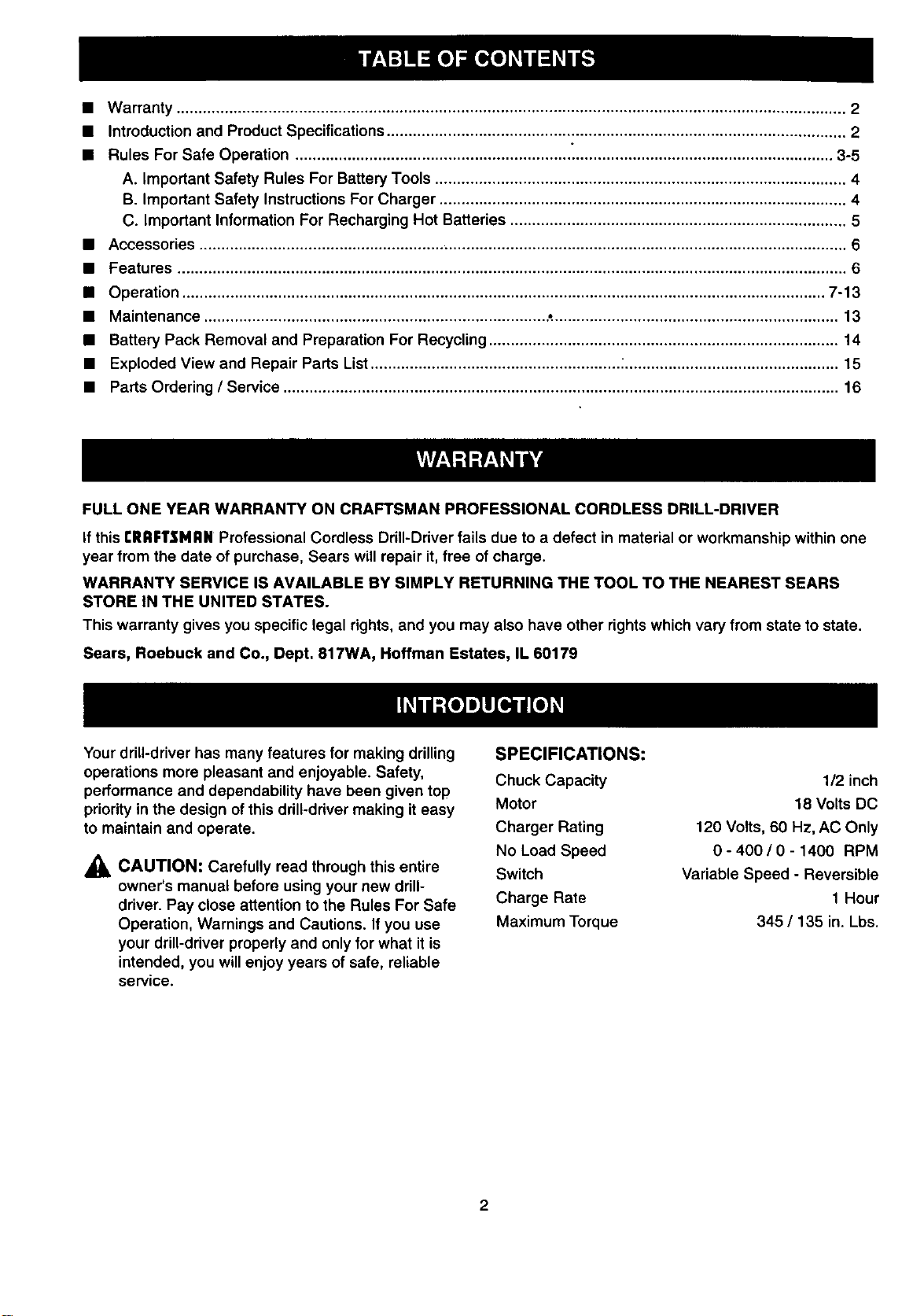
• Warranty ......................................................................................................................................................... 2
• Introduction and Product Specifications ......................................................................................................... 2
• Rules For Safe Operation ........................................................................................................................... 3-5
A. Important Safety Rules For Battery Tools .............................................................................................. 4
B. Important Safety Instructions For Charger ............................................................................................. 4
C. Important Information For Recharging Hot Batteries ............................................................................. 5
• Accessories .................................................................................................................................................... 6
• Features ......................................................................................................................................................... 6
• Operation ................................................................................................................................................... 7-13
• Maintenance .............................................................................. .:................................................................. 13
• Battery Pack Removal and Preparation For Recycling ................................................................................ 14
• Exploded View and Repair Parts List ......................................................... ;................................................. 15
• Parts Ordering / Service ............................................................................................................................... 16
FULL ONE YEAR WARRANTY ON CRAFTSMAN PROFESSIONAL CORDLESS DRILL-DRIVER
If this rlIRFTSNAN Professional Cordless Drill-Driver fails due to a defect in material or workmanship within one
year from the date of purchase, Sears will repair it, free of charge.
WARRANTY SERVICE IS AVAILABLE BY SIMPLY RETURNING THE TOOL TO THE NEAREST SEARS
STORE IN THE UNITED STATES.
This warranty gives you specific legal rights, and you may also have other rights which vary from state to state.
Sears, Roebuck and Co., Dept. 817WA, Hoffman Estates, IL 60179
Your drill-driver has many features for making drilling
operations more pleasant and enjoyable. Safety,
performance and dependability have been given top
priority in the design of this drill-driver making it easy
to maintain and operate.
_1_ CAUTION: Carefully read through this entire
owner's manual before using your new drill-
driver. Pay close attention to the Rules For Safe
Operation, Warnings and Cautions. If you use
your drill-driver properly and only for what it is
intended, you will enjoy years of safe, reliable
service.
SPECIFICATIONS:
Chuck Capacity
Motor
Charger Rating
No Load Speed
Switch
Charge Rate
Maximum Torque
1/2 inch
18 Volts DC
120 Volts, 60 Hz, AC Only
0 - 400 / 0 - 1400 RPM
Variable Speed - Reversible
1 Hour
345/135 in. Lbs.
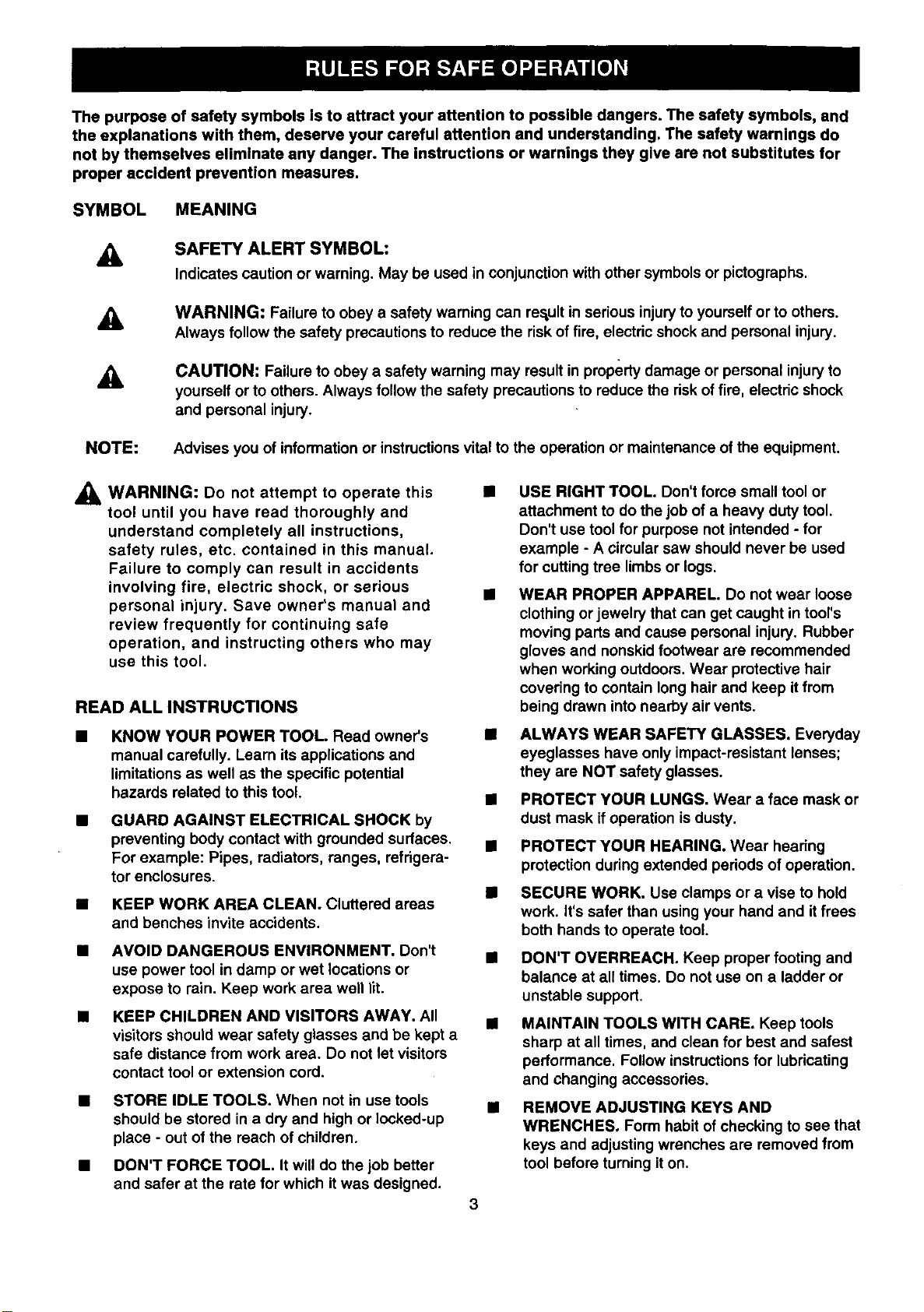
The purpose of safety symbols is to attract your attention to possible dangers. The safety symbols, and
the explanations with them, deserve your careful attention and understanding. The safety warnings do
not by themselves eliminate any danger. The instructions or warn|ngs they give are not substitutes for
proper accident prevention measures.
SYMBOL MEANING
A
SAFETY ALERTSYMBOL:
Indicmescautionorwarning.Maybausedinco_un_ionwithothersymbolsorpictogmphs.
A
WARNING: Failure to obey a safety warning can result in serious injuryto yourself or to others.
Always follow the safety precautions to reduce the risk of fire, electdc shock and personal injury.
A
CAUTION: Failure to obey a safety warning may result in property damage or personal injury to
yourself or to others. Always follow the safety precautions to reduce the riskof fire, electric shock
and personal injury.
NOTE: Advises you of information or instructionsvital to the operation or maintenance of the equipment.
_i_ WARNING: Do not to this •
attempt operate
tool until you have read thoroughly and
understand completely all instructions,
safety rules, etc. contained in this manual.
Failure to comply can result in accidents
involving fire, electric shock, or serious B
personal injury. Save owner's manual and
review frequently for continuing safe
operation, and instructing others who may
use this tool.
READ ALL INSTRUCTIONS
KNOW YOUR POWER TOOL. Read owner's
manual carefully. Learn its applications and
limitations as well as the specific potential
hazards related to this tool.
GUARD AGAINST ELECTRICAL SHOCK by
preventing body contact with grounded surfaces.
For example: Pipes, radiators, ranges, refrigera-
tor enclosures.
• KEEP WORK AREA CLEAN. Cluttered areas
and benches invite accidents.
• AVOID DANGEROUS ENVIRONMENT. Don't •
use power tool in damp or wet locations or
expose to rain. Keep work area well lit.
• KEEP CHILDREN AND VISITORS AWAY. All •
visitors should wear safety glasses and be kept a
safe distance from work area. Do not let visitors
contact tool or extension cord.
STORE IDLE TOOLS. When not in use tools
should be stored in a dry and high or locked-up
place - out of the reach of children.
3
DON'T FORCE TOOL. Itwill do the job better
and safer at the rate for which itwas designed.
USE RIGHT TOOL. Don't force small tool or
attachment to do the job of a heavy duty tool.
Don't use tool for purpose not intended - for
example - A circular saw should never be used
for cutting tree limbs or logs.
WEAR PROPER APPAREL. Do not wear loose
clothing or jewelry that can get caught in tool's
moving parts and cause personal injury. Rubber
gloves and nonskid footwear are recommended
when working outdoors. Wear protective hair
covering to contain long hair and keep it from
being drawn into nearby air vents.
ALWAYS WEAR SAFETY GLASSES. Everyday
eyeglasses have only impact-resistant lenses;
they are NOT safety glasses.
PROTECT YOUR LUNGS. Wear a face mask or
dust mask ifoperation is dusty.
PROTECT YOUR HEARING. Wear hearing
protection during extended periods of operation.
SECURE WORK. Use clamps or a vise to hold
work. It's safer than using your hand and it frees
both hands to operate tool.
DON'T OVERREACH. Keep proper footing and
balance at all times. Do not use on a ladder or
unstable support.
MAINTAIN TOOLS WITH CARE. Keep tools
sharp at all times, and clean for best and safest
performance. Follow instructions for lubricating
and changing accessories.
REMOVE ADJUSTING KEYS AND
WRENCHES, Form habit of checking to see that
keys and adjusting wrenches are removed from
tool before turning iton.

RULES FOR SAFE OPERATION (Continued)
M NEVER USE IN AN EXPLOSIVE ATMO-
SPHERE. Normal sparking of the motor could
ignite flammable liquids, gases, or fumes.
KEEP HANDLES DRY, CLEAN, AND FREE
FROM OIL AND GREASE. Always use a clean
cloth when cleaning. Never use brake fluids,
gasoline, petroleum-based products or any
strong solvents to clean your tool.
STAY ALERT. Watch what you are doing and
use common sense. Do not operate tool when
you are tired. Do not rush.
CHECK DAMAGED PARTS. Before further use
of the tool, a guard or other part that is damaged
should be carefully checked to determine that it
will operate properly and perform its intended
function. Check for alignment of moving pads,
binding of moving parts, breakage of pads,
mounting, and any other conditions that may
affect its operation. A guard or other part that is
damaged should be properly repaired or
replaced by an authorized service center unless
indicated elsewhere in this instruction manual.
• DO NOT USE TOOL IF SWITCH DOES NOT
TURN IT ON AND OFF. Have defective switches
replaced by an authorized service center.
• DRUGS, ALCOHOL, MEDICATION. Do not
operate tool while under the influence of drugs,
alcohol, or any medication.
• DRILLING OR DRIVING SCREWS INTO
ELECTRICAL WIRING IN WALLS, CEILINGS,
OR OTHER AREAS CAN CAUSE THE BIT OR
CHUCK TO BECOME ELECTRICALLY LIVE.
Do not touch metal parts when drilling into a wall;
grasp only the insulated handle(s) or plastic
housing when using this tool. Make sure hidden
electrical widng, water pipes, and mechanical
hazards are not in the path of the bit when
drilling into a wall.
• INSPECT FOR and remove all nails from lumber
before drilling.
IMPORTANT SAFETY RULES FOR BATTERY
TOOLS
Battery tools do not have to be plugged into an
electrical outlet; therefore, they are always in
operating condition. Be aware of possible
hazards when not using your battery tool or
when changing accessories.
USE ONLY THE CHARGER PROVIDED WITH
YOUR BATI'ERY TOOL. Do not substitute any
other charger. Use of another charger could
cause batteries to explode causing possible
serious injury.
DO NOT PLACE BATTERY TOOLS OR THEIR
BATTERIES NEAR FIRE OR HEAT. They may
explode.
DO NOT CHARGE BATTERY TOOL IN A
DAMP OR WET LOCATION.
Your battery tool should be charged in a location
where the temperature is more than 50°F but
less than 100°F.
Under extreme usage or temperature conditions,
battery leakage may occur. If liquid comes in
contact with your skin, wash immediately with
so_.pand water, then neutralize with lemon juice
or vinegar. If liquid gets in your eyes, flush them
with clean water for at least 10 minutes, then
seek immediate medical attention.
If carrying your battery tool at your side, make
sure it is not running and your finger is not on the
switch. Avoid accidental starting.
SECURE WORK before applying power. NEVER
hold workpiece in your hand or across your legs.
WHEN SERVICING USE ONLY IDENTICAL
CRAFTSMAN REPLACEMENT PARTS.
IMPORTANT SAFETY INSTRUCTIONS FOR
CHARGER
SAVE THESE INSTRUCTIONS. This manual
contains important safety and operating
instructions for battery charger part number
975283-001.
Before using battery charger, read all instructions
and cautionary markings in this manual, on
battery charger, and product using battery
charger.
_i, WARNING: To reduce risk of injury, charge
only nickel-cadmium type rechargeable batteries.
Other types of batteries may burst causing
personal injury and damage.
Do not expose charger to rain or snow.
Use of an attachment not recommended or sold
by the battery charger manufacturer may result
in a risk of fire, electric shock, or injury to
persons.
To reduce risk of damage to charger body and
cord, pull by charger body rather than cord when
disconnecting charger.
Make sure cord is located so that itwill not be
stepped on, tripped over, or otherwise subjected
to damage or stress.
4
RULES FOR SAFE OPERATION (Continued)
An extension cord should not be used unless
absolutely necessary. Use of improper
extension cord could result in a risk of fire and
electric shock. Ifextension cord must be used,
make sure:
a. That pins on plug of extension cord are the
same number, size and shape as those of
plug on charger.
b. That extension cord is properly wired and in
good electrical condition; and
c. That wire size is large enough for AC
ampere rating of charger as specified
below:
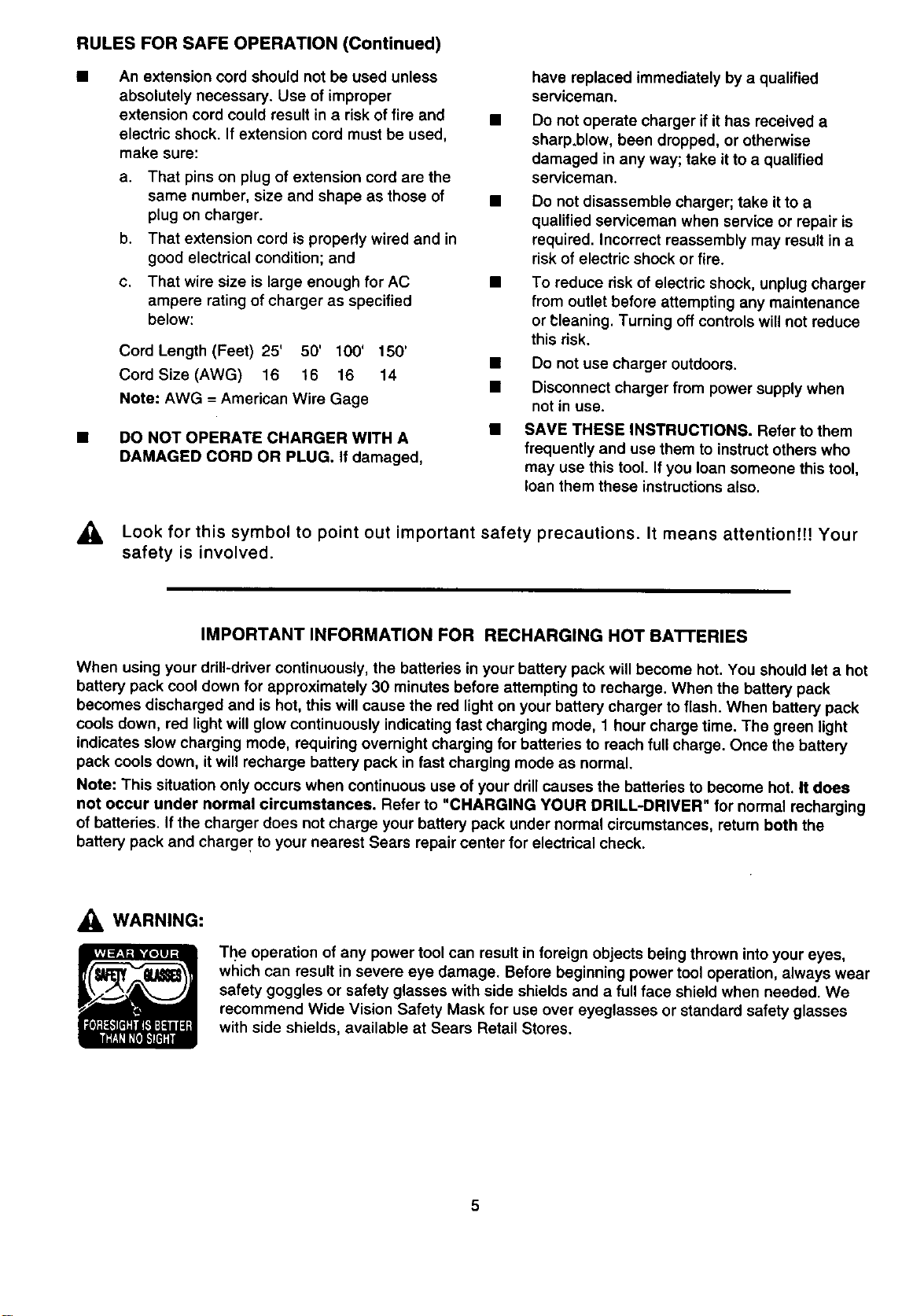
Cord Length (Feet) 25' 50' 100' 150'
Cord Size (AWG) 16 16 16 14
Note: AWG = American Wire Gage
DO NOT OPERATE CHARGER WITH A
DAMAGED CORD OR PLUG. if damaged,
have replaced immediately by a qualified
serviceman.
Do not operate charger if it has received a
sharp,blow, been dropped, or otherwise
damaged in any way; take it to a qualified
serviceman.
Do not disassemble charger; take it to a
qualified serviceman when service or repair is
required. Incorrect reassembly may result in a
risk of electric shock or fire.
To reduce risk of electric shock, unplug charger
from outlet before attempting any maintenance
or t;leaning. Turning off controls will not reduce
this risk.
• Do not use charger outdoors.
• Disconnect charger from power supply when
not in use.
SAVE THESE INSTRUCTIONS. Refer to them
frequently and use them to instruct others who
may use this tool. Ifyou loan someone this tool,
loan them these instructions also.
Look for this symbol to point out important safety precautions. It means attentionfH Your
safety is involved.
IMPORTANT INFORMATION FOR RECHARGING HOT BATTERIES
When using your drill-driver continuously, the batteries in your battery pack will become hot. You should let a hot
battery pack cool down for approximately 30 minutes before attempting to recharge. When the battery pack
becomes discharged and is hot, this will cause the red light on your battery charger to flash. When battery pack
cools down, red light will glow continuously indicating fast charging mode, 1 hour charge time. The green light
indicates slow charging mode, requiring overnight charging for batteries to reach full charge. Once the battery
pack cools down, it will recharge battery pack in fast charging mode as normal.
Note: This situation only occurs when continuous use of your drill causes the batteries to become hot. It does
not occur under normal circumstances. Refer to "CHARGING YOUR DRILL-DRIVER" for normal recharging
of batteries. If the charger does not charge your battery pack under normal circumstances, return both the
battery pack and charger to your nearest Sears repair center for electrical check.
,_ WARNING:
The operation of any power tool can result in foreign objects being thrown into your eyes,
which can result in severe eye damage. Before beginning power tool operation, always wear
safety goggles or safety glasses with side shields and a fullface shield when needed. We
recommend Wide Vision Safety Mask for use over eyeglasses or standard safety glasses
with side shields, available at Sears Retail Stores.
Thefollowingrecommended accessories are currently available at Sears Retail Stores.
• 6-Pc. Extra Length Magnite Power Bit Set
• 30-Pc. Power Screwdriver/Nutdriver Set and Case
• 17-Pc. Power Screwdriver/Nutdriver Set and Case
• High Speed Bits ...... 1/2 in. Max.
• Wood Boring Bits ...... 1-1/2 in. Max.
,_ WARNING: The use of attachments or accessories not listed might be hazardous.
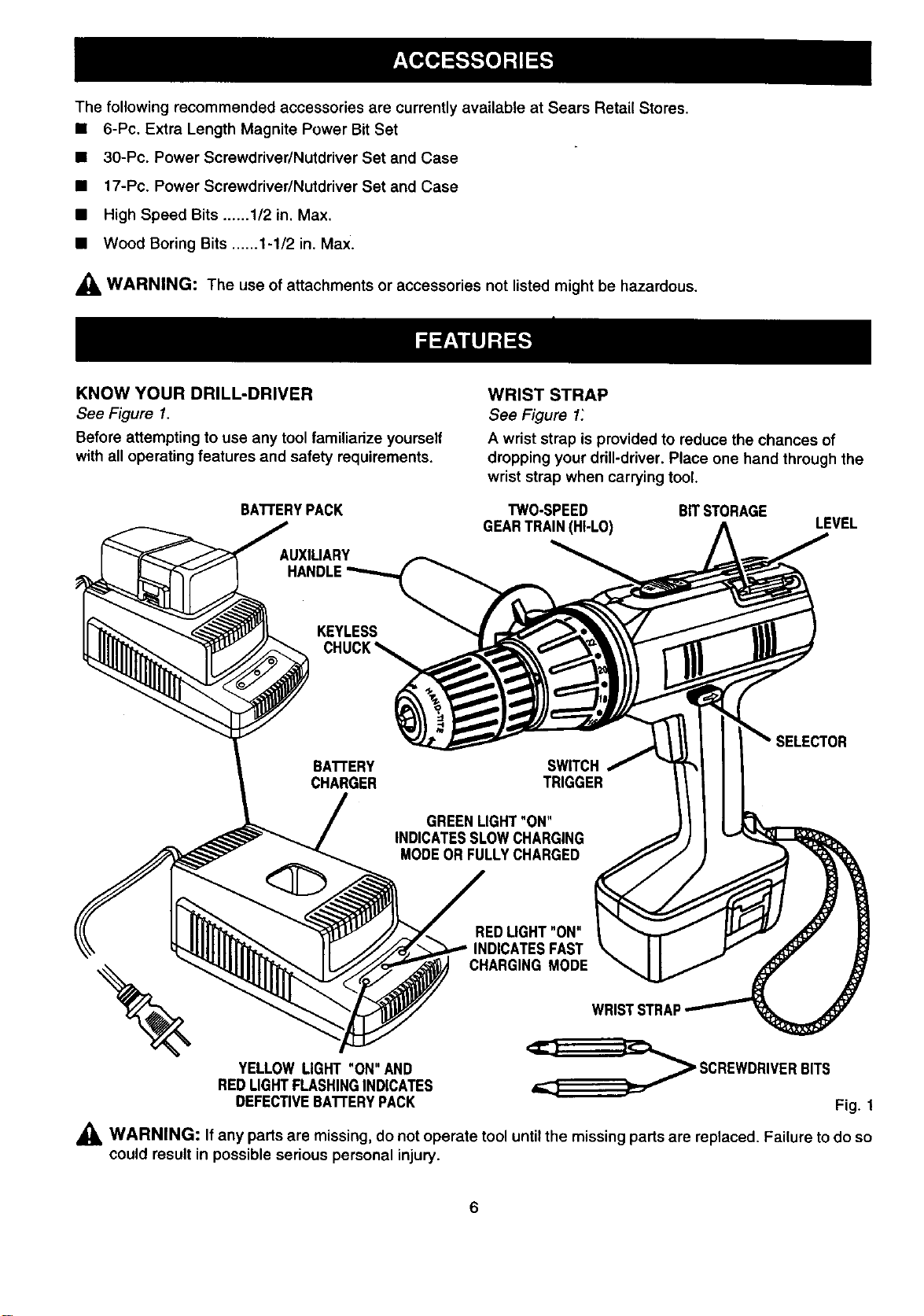
KNOW YOUR DRILL-DRIVER
See Figure 1.
Before attempting to use any tool familiarize yourself
with all operating features and safety requirements.
BATTERYPACK
UX,L,A.Y
ANDLE"
Kg. u SS,
BATTERY
CHARGER
WRIST STRAP
See Figure 1:
A wrist strap is provided to reduce the chances of
dropping your drill-driver. Place one hand through the
wrist strap when carrying tool.
TWO-SPEED
GEARTRAIN(HI-LO)
SWITCH
TRIGGER
BITSTORAGE
LEVEL
REDLIGHT"ON"
CHARGING MODE
WRISTSTRAF
YELLOW LIGHT "ON" AND
REDLIGHTFLASHINGINDICATES
DEFECTIVEBATTERYPACK
_ SCREWDRIVERBITS
Fig. 1
,_ WARNING: If any parts are missing, do not operate tool until the missing parts are replaced. Failure to do so
could result in possible serious personal injury.
6
_1, WARNING: Always wear safety goggles or
safety glasses with side shields when operating
tools. Failure to do so could result in objects
being thrown into your eyes, resulting in possible
serious injury.
_, WARNING: Do not allow familiarity with your
drill-driver to make you careless. Remember that
a careless fraction of a second is sufficient to
inflict severe injury.
CHARGING YOUR DRILL-DRIVER
The battery pack for this tool has been shipped in a
low charge condition to prevent possible problems.
Therefore, you should charge it until light on front of
charger changes from red to green.
Note: Battedes will not reach fullcharge the first time
they are charged. Allow several cycles (drilling
followed by recharging) for them to become fully
charged.
TO CHARGE
• Charge battery pack only with the charger
provided.
• Make sure power supply is normal house
voltage, 120 volts, 60 Hz, AC only.
• Connect charger to power supply.
• Place battery pack in charger aligning raised ribin
charger with groove in battery pack.
• Press down on battery pack to be sure contacts on
battery pack engage propedy with charger
contacts.
• Red lightshould turn on. Red light indicates fast
charging mode.
If red light is flashing, this indicates battery pack is
deeply discharged or hot.
If battery pack is hot, red light should become
steady after battery pack has cooled down.
If battery pack is deeply discharged, red light should
become steady after voltage has increased,
normally within 30 minutes.
If after one hour red lightis still flashing, this
indicates a defective battery pack and should be
replaced.
Green light on indicates battery pack is in slow
charging mode or fully charged.
Yellow light on and red light flashing indicates
defecta*vebattery pack. Return battery pack to your
nearest Sears Repair Center for checking or
replacing.
• When your battery pack becomes fully charged, the red
lightwill tum OFF andthe green lightwill rum ON.
• If you remove battery pack from charger and
relnsert It Immediately (leas than 5 seconds)
back In charger, the green light will come on
indicating full charge and slow charging mode
until removed from charger. If you remove
battery pack from charger and walt more than 5
seconds before relnserting It back in charger,
the charger will function normally.
• After normalusage, 1 hourofchargingtime isrequiredto
befully charged.A minimum chargelimeof 1-1/2 hours
is requiredto rechargea completelydischargedtool.
• The battery packwillbecomeslightlywarmtothe touch
whilecharging.Thisisnormalanddoes not indicatea
problem.
• Do not place charger in an area of extreme heat or
cold. It willwork best at normal room temperature.
,_ CAUTION: Your drill-driver contains special high
temperature batteries to help prevent battery
damage when left on charge for extended pedods
of time. However, once the batteries become fully
charged, we recommend that you unplug your
charger from power supply and remove the
battery pack.
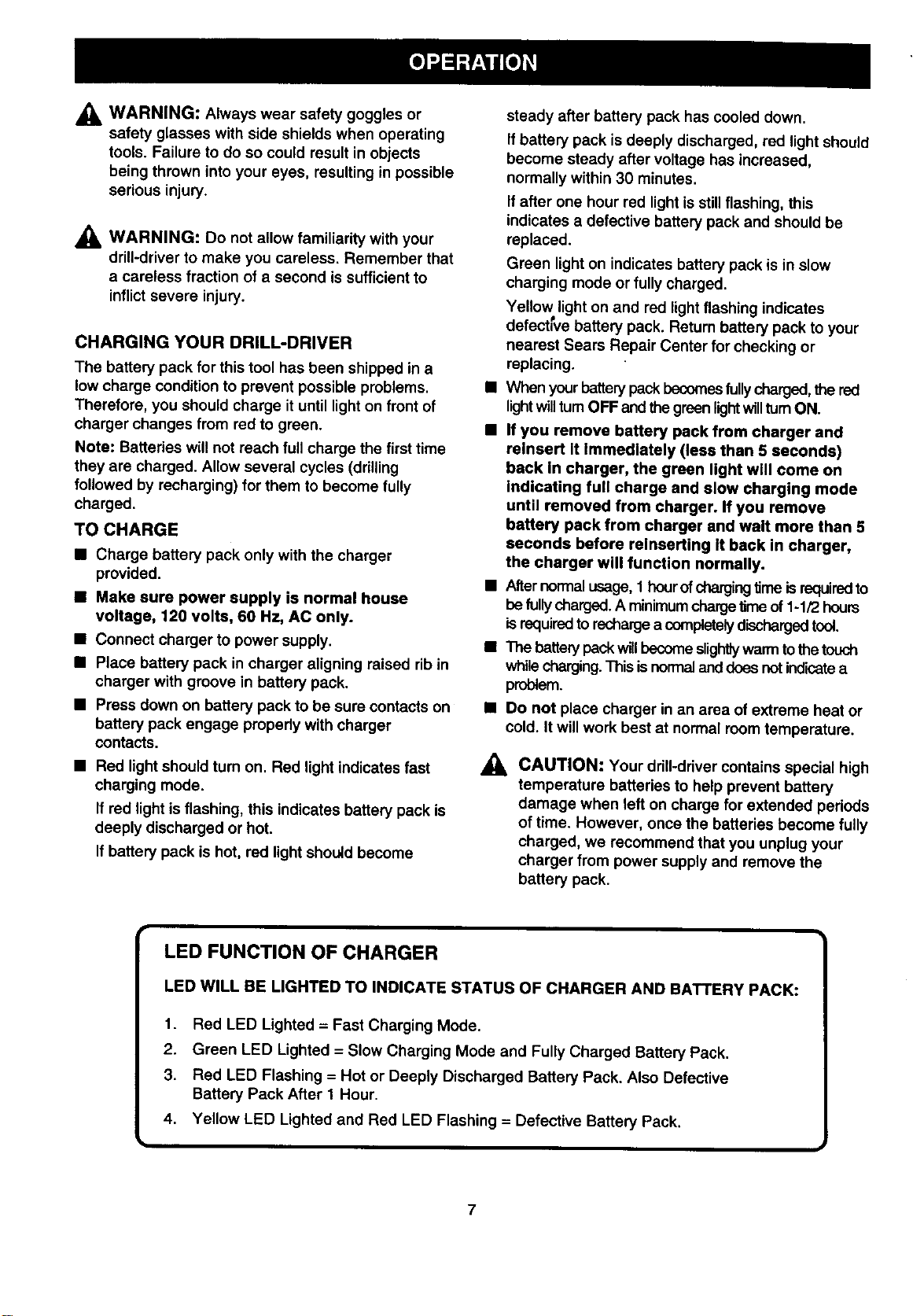
LED FUNCTION OF CHARGER
LED WILL BE LIGHTED TO INDICATE STATUS OF CHARGER AND BATTERY PACK:
1. Red LED Lighted = Fast Charging Mode.
2. Green LED Lighted = Slow Charging Mode and Fully Charged Battery Pack.
3. Red LED Flashing = Hot or Deeply Discharged Battery Pack. Also Defective
Battery Pack After 1 Hour.
4. Yellow LED Lighted and Red LED Flashing = Defective Battery Pack.
7
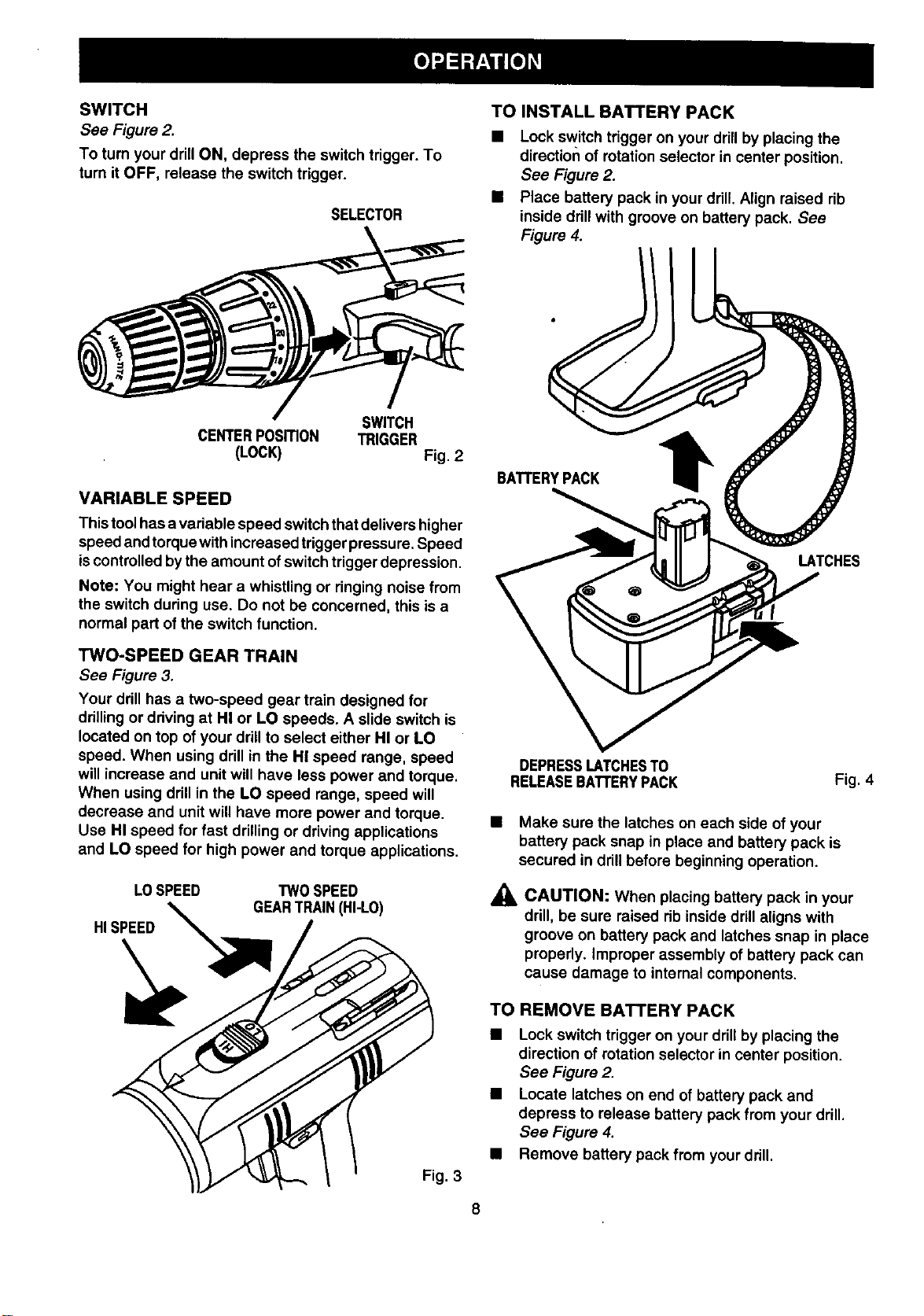
SWITCH
See Figure 2.
To turn your drillON, depress the switch trigger. To
turn it OFF, release the switch trigger.
SELECTOR
TO INSTALL BATTERY PACK
• Lock switch trigger on your drill by placing the
direction of rotation selector in center position.
See Figure 2.
• Place battery pack in your drill. Align raised rib
inside ddll with groove on battery pack. See
Figure 4.
SWITCH
CENTERPOSITION TRIGGER
(LOCK) Fig. 2
VARIABLE SPEED
Thistoolhas a variable speed switchthat delivers higher
speed and torque with increased trigger pressure. Speed
iscontrolled bythe amount ofswitch trigger depression.
Note: You might hear a whistling or ringing noise from
the switch during use. Do not be concerned, this is a
normal part ofthe switch function.
TWO-SPEED GEAR TRAIN
See Figure 3.
Your ddll has a two-speed gear train designed for
drilling or ddving at HI or LO speeds. A slide switch is
located on top of your drillto select either HI or LO
speed. When using drill in the HI speed range, speed
will increase and unit will have less power and torque.
When using drill in the LO speed range, speed will
decrease and unitwill have more power and torque.
Use HI speed for fast drilling or driving applications
and LO speed for high power and torque applications.
LOSPEED TWOSPEED
GEARTRAIN(HI-LO)
HISPEED
Fig, 3
BATrERYPACK t
LATCHES
DEPRESSLATCHESTO
RELEASEBATFERYPACK Fig. 4
• Make sure the latches on each side of your
battery pack snap in place and battery pack is
secured in drill before beginning operation.
_, CAUTION: When placing battery pack in your
drill, be sure raised rib inside drill aligns with
groove on battery pack and latches snap in place
properly. Improper assembly of battery pack can
cause damage to internal components.
TO REMOVE BATTERY PACK
• Lock switch trigger on your drill by placing the
direction of rotation selector in center position.
See Figure 2.
• Locate latches on end of battery pack and
depress to release battery pack from your drill.
See Figure 4.
• Remove battery pack from your ddll.

SWITCH LOCK
See Figure 5.
The switch trigger can be locked in the OFF position.
This feature can be used to prevent the possibility of
accidental starting when not in use. To lock switch
trigger, place the direction of rotation selector in
center position.
SELECTOR
REVERSE
CENTERPOSITION
(LOCK)
SWITCH
TRIGGER
Fig. 5
,_ WARNING: Battery tools are always in
operating condition. Therefore, switch should
always be locked when not in use or carrying at
your side.
REVERSIBLE
See Figure 5.
This tool has the feature of being reversible. The
direction of rotation is controlled by a selector located
above the switch trigger. With the drill held in normal
operating position, the direction of rotation selector
should be positioned to the left of the switch for
drilling. The ddlling direction is reversed when the
selector is to the right of the switch. When the selector
is in center position, the switch trigger is locked.
CAUTION: To prevent gear damage, always
allow chuck to come to a complete stop before
changing the direction of rotation or the two-
speed gear train (hi-lo).
To stop, release switch trigger and allow the chuck to
come to a complete stop.
CHARGER
See Figure 6.
Your charger has a "key hole" hanging feature for
convenient, space saving storage. Screws should be
installed so that center distances are 1-7/16 inches
apart.
1-7/16in.
SACKSIDEOFCHARGER
Fig. 6
KEYLESS CHUCK
See Figure 7.
Your new drillhas a keyless chuck. As the name implies,
you can hand tighten or release drill bits in the chuck
jaws. Grasp and hold the collarof the chuck with one
hand. Rotate the chuck body with your other hand. The
arrows on the chuck indicate which direction to rotate
the chuck body in order to LOCK (tighten) or UNLOCK
(release) the drill bit.
UNLOCK
(RELEASE)
CHUCK
BODY
LOCK CHUCK
DRILLBIT _IGHTEN) COLLAR
Fig. 7
,_ WARNING: Do not hold chuck body with one
hand and use power of the drill to tighten chuck
jaws on drill bits. Chuck body could s_ipin your
hand or your hand could slip and come in contact
with rotating drill bit.This could cause an
accident resulting in serious personal injury.
9

AUXILIARYHANDLE
See Figure 8.
An auxiliary handle is packed with your drill-driver for
ease of operation and to help prevent loss of control.
The handle can be rotated 360 °
TO INSTALL:
• Lock the switch trigger by placing the direction of
rotation selector in center position. See Figure 2.
• Place ring of handle over the chuck and adjusting
ring. Note: Handle fits in a groove behind adjust-
ing ring.
• Once in position behind adjusting ring, rotate
handle to desired angle.
• Thread wing screw into handle insert.
• Tighten wing screw securely.
ADJUSTINGRING
GROOVE
AUXIUARY
DRILLBIT
CHUCK
BODY
CHUCK
COLLAR
CHUCKJAWS
RIGHT Fig. 9
• To tighten the chuck jaws on drillbit; grasp and
hold the collar of the chuck with one hand, while
rotating the chuck body with your other hand.
Note: Rotate the chuck body in the direction of
the arrow marked LOCK totighten chuck jaws.
See Figure 7.
• Do not use a wrench to tighten or loosen the
chuck jaws.
_1= WARNING: Do not insert drill bit into chuck
jaws and tighten as shown in figure 10. This
could cause drill bit to be thrown from drill
resulting in possible serious personal injury or
damage to the chuck.
TO
LOOSEN
WINGSCREW
Fig. 8
INSTALLING BITS
See Figure 9.
Lock the switch trigger by placing the direction of
rotation selector in center position. See Figure 2.
Open or close chuck jaws to a point where the
opening is slightly larger than the bit size you
intend to use. Also, raise the front of your drill •
slightly to keep the bit from falling out of the chuck
jaws. •
• Insert drill bit into chuck the full length of the jaws
as shown in figure 9.
• Tighten the chuck jaws on drill bit.
10
Fig.10
REMOVING BITS
See Figure 9.
Lock the switch trigger by placing the direction of
rotation selector in center position. See Figure 2.
Loosen the chuck jaws from drill bit.
To loosen: grasp and hold the collar ofthe chuck
with one hand, while rotatingchuck body with your
other hand. Note: Rotate chuck body in the
direction ofthe arrow marked UNLOCK to loosen
chuck jaws. See Figure 7.
Do not use a wrench to tighten or loosen the
chuck jaws.
Remove drill bit from chuck jaws.
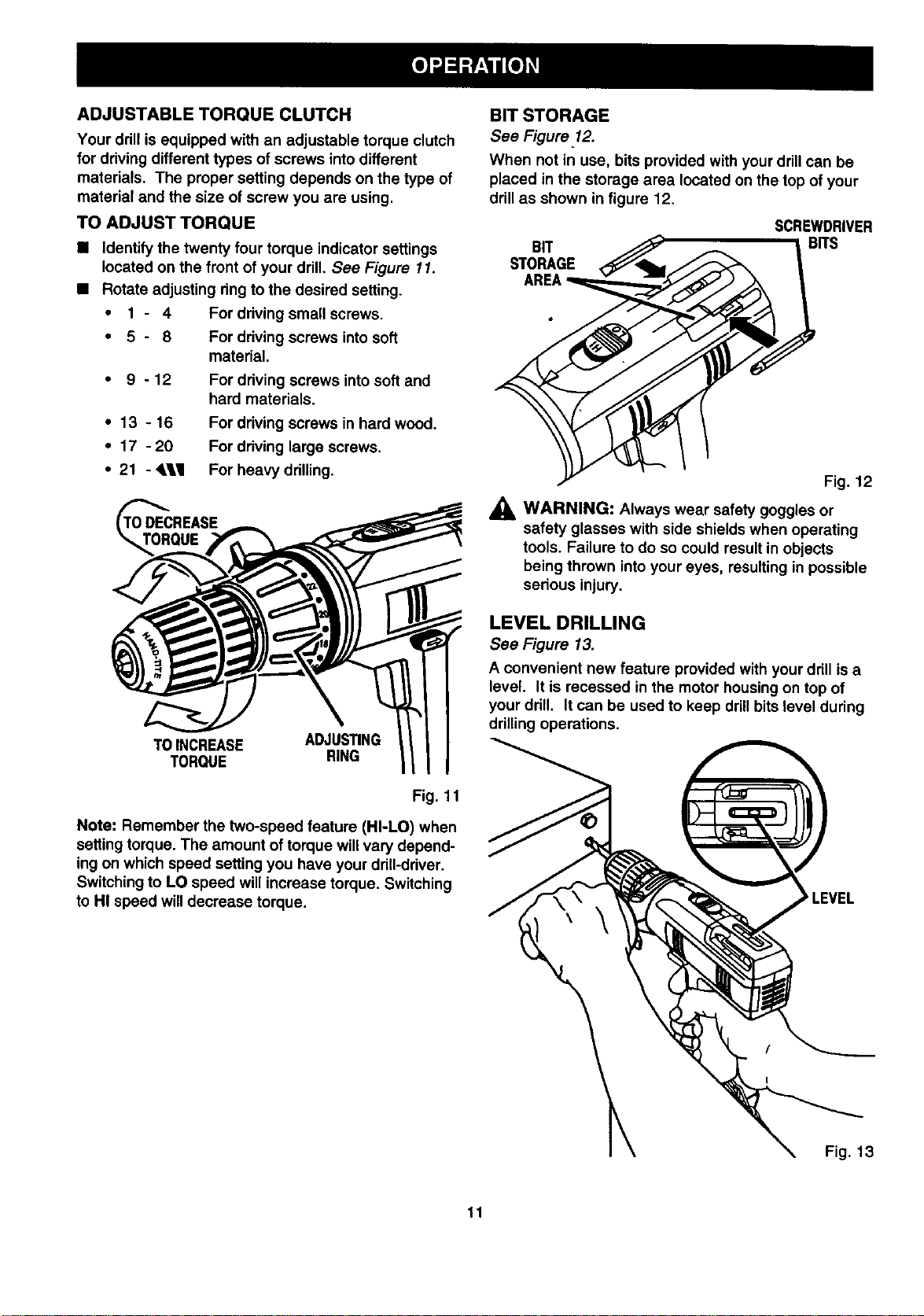
ADJUSTABLE TORQUE CLUTCH
Your ddll is equipped with an adjustable torque clutch
for driving different types of screws into different
materials. The proper setting depends on the type of
material and the size of screw you are using.
TO ADJUST TORQUE
• Identify the twenty four torque indicator settings
located on the front of your drill. See Figure 11.
• Rotate adjusting dng to the desired setting.
• 1 - 4 For driving small screws.
• 5 - 8 For driving screws into soft
material.
• 9-12
For driving screws into soft and
hard materials.
• 13 - 16 For driving screws in hard wood.
• 17 - 20 For driving large screws.
• 21 - <LII For heavy drilling.
TO_FCREASE
UE
TOINCREASE ADJUSTING
TORQUE RING
Fig. 11
Note: Remember the two-speed feature (HI-LO) when
setting torque. The amount of torque will vary depend-
ing on which speed setting you have your ddll-ddver.
Switching to LO speed will increase torque. Switching
to HI speed will decrease torque.
BIT STORAGE
See Figure 12.
When not in use, bits provided with your drillcan be
placed in the storage area located on the top of your
drill as shown in figure 12.
SCREWDRIVER
BIT _ BITS
Fig. 12
_i, WARNING: Always wear safety goggles or
safety glasses with side shields when operating
tools. Failure to do so could result in objects
being thrown into your eyes, resulting in possible
serious injury.
LEVEL DRILLING
See Figure 13.
A convenient new feature provided with your drill is a
level. It is recessed in the motor housing on top of
your ddll. It can be used to keep drillbits level during
drilling operations.
_'LEVEL
Fig. 13
11
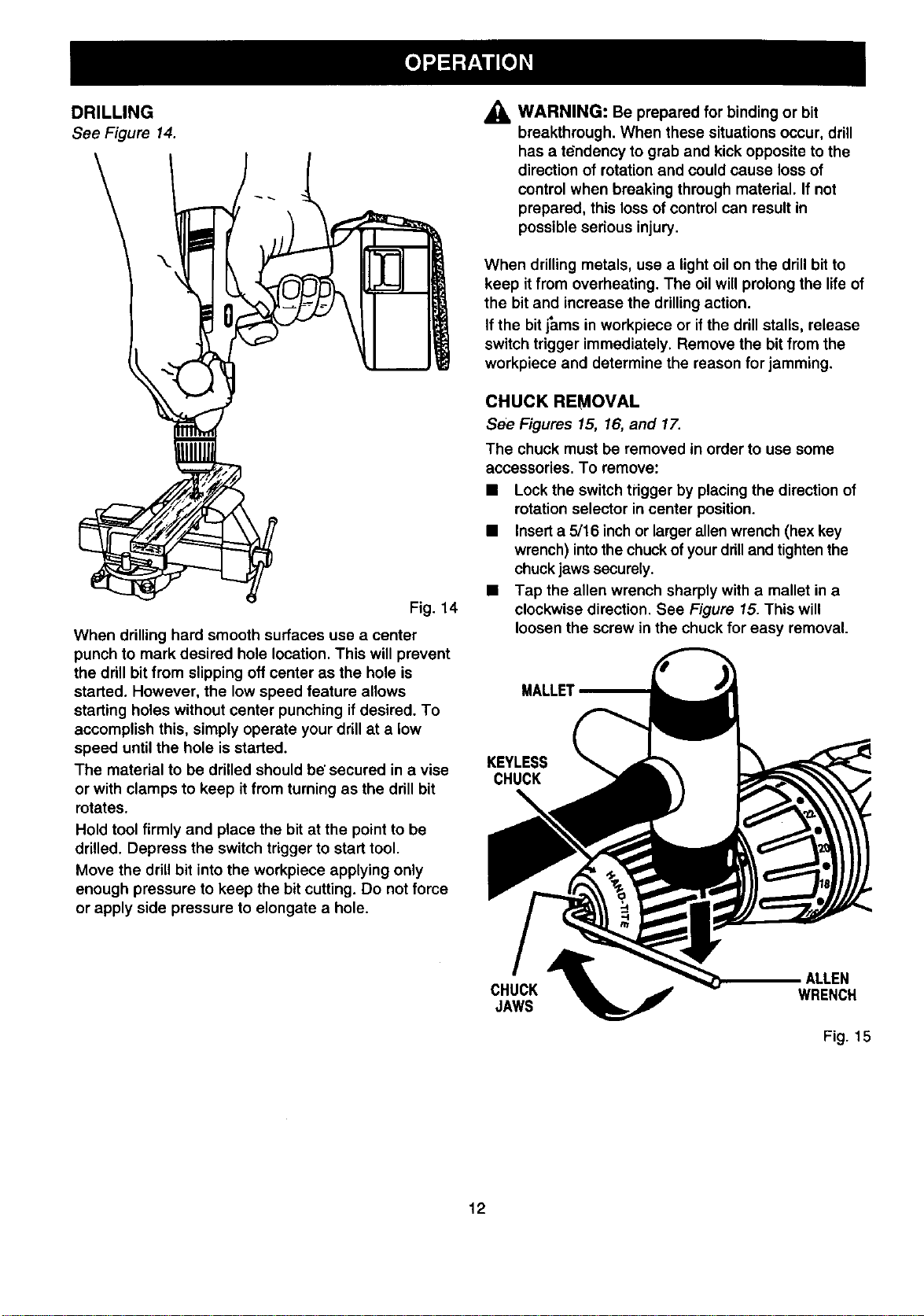
DRILLING
See Figure 14.
Fig. 14
When drilling hard smooth surfaces use a center
punch to mark desired hole location. This will prevent
the drill bit from slipping off center as the hole is
started. However, the low speed feature allows
starting holes without center punching ifdesired. To
accomplish this, simply operate your drillat a low
speed until the hole is started.
The material to be drilled should be'secured in a vise
or with clamps to keep itfrom turning as the drill bit
rotates,
Hold tool firmly and place the bit at the point to be
drilled. Depress the switch trigger to start tool.
Move the drill bit into the workpiece applying only
enough pressure to keep the bit cutting. Do not force
or apply side pressure to elongate a hole.
,_ WARNING: Be prepared for binding or bit
breakthrough. When these situations occur, drill
has a tdndency to grab and kick opposite to the
direction of rotation and could cause loss of
control when breaking through matedal. If not
prepared, this loss of control can result in
possible serious injury.
When drilling metals, use a light oil on the drill bit to
keep it from overheating. The oil will prolong the life of
the bit and increase the drilling action.
If the bit j_ms in workpiece or if the drill stalls, release
switch trigger immediately. Remove the bit from the
workpiece and determine the reason for jamming.
CHUCK REMOVAL
See Figures 15, 16, and 17.
The chuck must be removed in order to use some
accessories. To remove:
• Lock the switch trigger by placing the direction of
rotation selector in center position.
• Insert a 5/16 inch or larger allen wrench (hex key
wrench) into the chuck of your drill and tighten the
chuck jaws securely.
• Tap the allen wrench sharply with a mallet in a
clockwise direction. See Figure 15. This will
loosen the screw in the chuck for easy removal.
MALLET
KEYLESS
CHUCK
ALLEN
CHUCK WRENCH
JAWS
Fig. 15
12
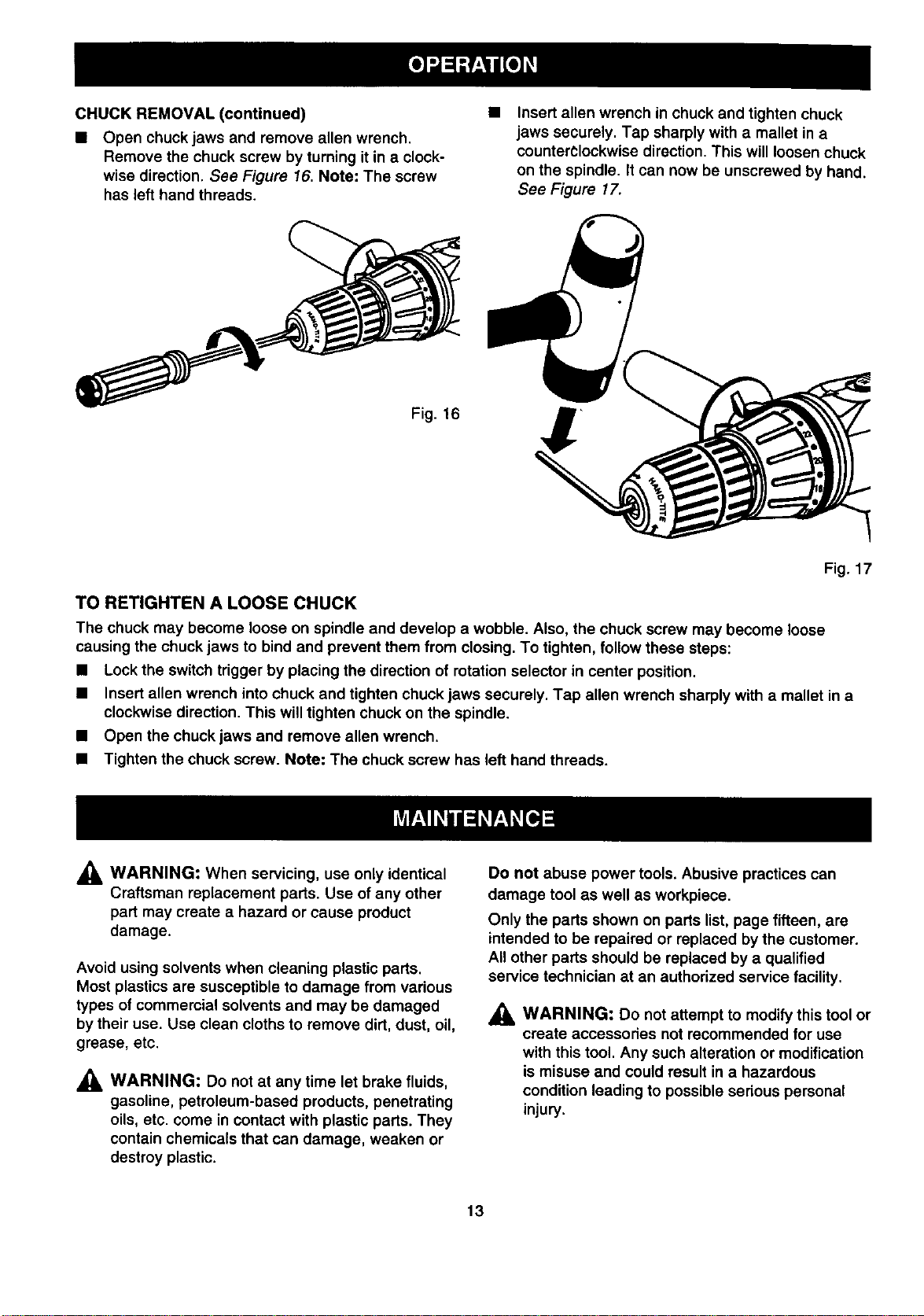
CHUCKREMOVAL(continued)
• Open chuck jaws and remove allen wrench.
Remove the chuck screw by turning it in a clock-
wise direction. See Figure 16. Note: The screw
has left hand threads.
Insert allen wrench in chuck and tighten chuck
jaws securely. Tap sharply with a mallet in a
counterclockwise direction. This will loosen chuck
on the spindle. It can now be unscrewed by hand.
See Figure 17.
Fig. 16
Fig. 17
TO RETIGHTEN A LOOSE CHUCK
The chuck may become loose on spindle and develop a wobble. Also, the chuck screw may become loose
causing the chuck jaws to bind and prevent them from closing. To tighten, follow these steps:
• Lock the switch trigger by placing the direction of rotation selector in center position.
• Insert allen wrench into chuck and tighten chuck jaws securely, Tap allen wrench sharply with a mallet in a
clockwise direction. This will tighten chuck on the spindle.
• Open the chuck jaws and remove allen wrench.
• Tighten the chuck screw. Note: The chuck screw has left hand threads.
_L WARNING: When servicing, use only identical
Craftsman replacement parts. Use of any other
part may create a hazard or cause product
damage.
Avoid using solvents when cleaning plastic parts.
Most plastics are susceptible to damage from various
types of commercial solvents and may be damaged
by their use. Use clean cloths to remove dirt, dust, oil,
grease, etc.
_, WARNING: Do not at any time let brake fluids,
gasoline, petroleum-based products, penetrating
oils, etc. come in contact with plastic parts. They
contain chemicals that can damage, weaken or
destroy plastic.
Do not abuse power tools. Abusive practices can
damage tool as well as workpiece.
Only the parts shown on parts list, page fifteen, are
intended to be repaired or replaced by the customer.
All other parts should be replaced by a qualified
service technician at an authorized service facility.
_, WARNING: Do not attempt to modify this tool or
create accessories not recommended for use
with this tool. Any such alteration or modification
is misuse and could result in a hazardous
condition leading to possible serious personal
injury.
13
BAI-rERIES
Your drill's battery pack is equipped with 15 nickel-
cadmium rechargeable batteries. Length of service
from each charging will depend on the type of work
you are doing.
The batteries in this tool have been designed to
provide maximum trouble free life. However, like all
batteries, they will eventually wear out. Do not
disassemble battery pack and attempt to replace the
batteries. Handling of these batteries, especially when
wearing rings and jewelry, could result in a serious
burn.
To obtain the longest possible battery life, we suggest
the following:
Store and charge your batteries in a cool area.
Temperatures above normal room temperature
will shorten battery life.
Never store batteries in a discharged condition.
Recharge them immediately after they are
discharged.
All battedes gradually lose their charge. The
higher the temperature the quicker they lose their
charge. If you store your tool for long periods of
time without using it, recharge the batteries every
month or two. This practice will prolong battery
life.
OVERLOAD
Your ddll has a built-in overload protector to protect
the motor dudng overloading or prolonged use. The
ovedoad protector automatically activates to break the
circuit. When this occurs, allow your drillto cool a few
seconds before resuming operation.
To preserve natural resources, please
recycle or dispose of expired battery
pack properly.
This product contains nickel-cadmium
battery. Must be disposed of properly.
Local, state, or federal laws may
prohibit disposal of nickel-cadmium
batteries in ordinary trash. Consult
your local waste authority for
information regarding available
recycling and/or disposal options.
BA'n'ERYPACKREMOVALAND
PREPARATION FOR RECYCLING
_h, WARNING: Upon removal, cover the battery
pack's terminals with heavy duty adhesive tape.
Do not attempt to destroy or disassemble battery
pack or remove any of its components. Nickel-
cadmium batteries must be recycled or disposed
of properly. Also, never touch both terminals with
metal objects and/or body parts as short circuit
may result. Keep away from children. Failure to
comply with these warnings could result in fire
and/or serious injury.
14
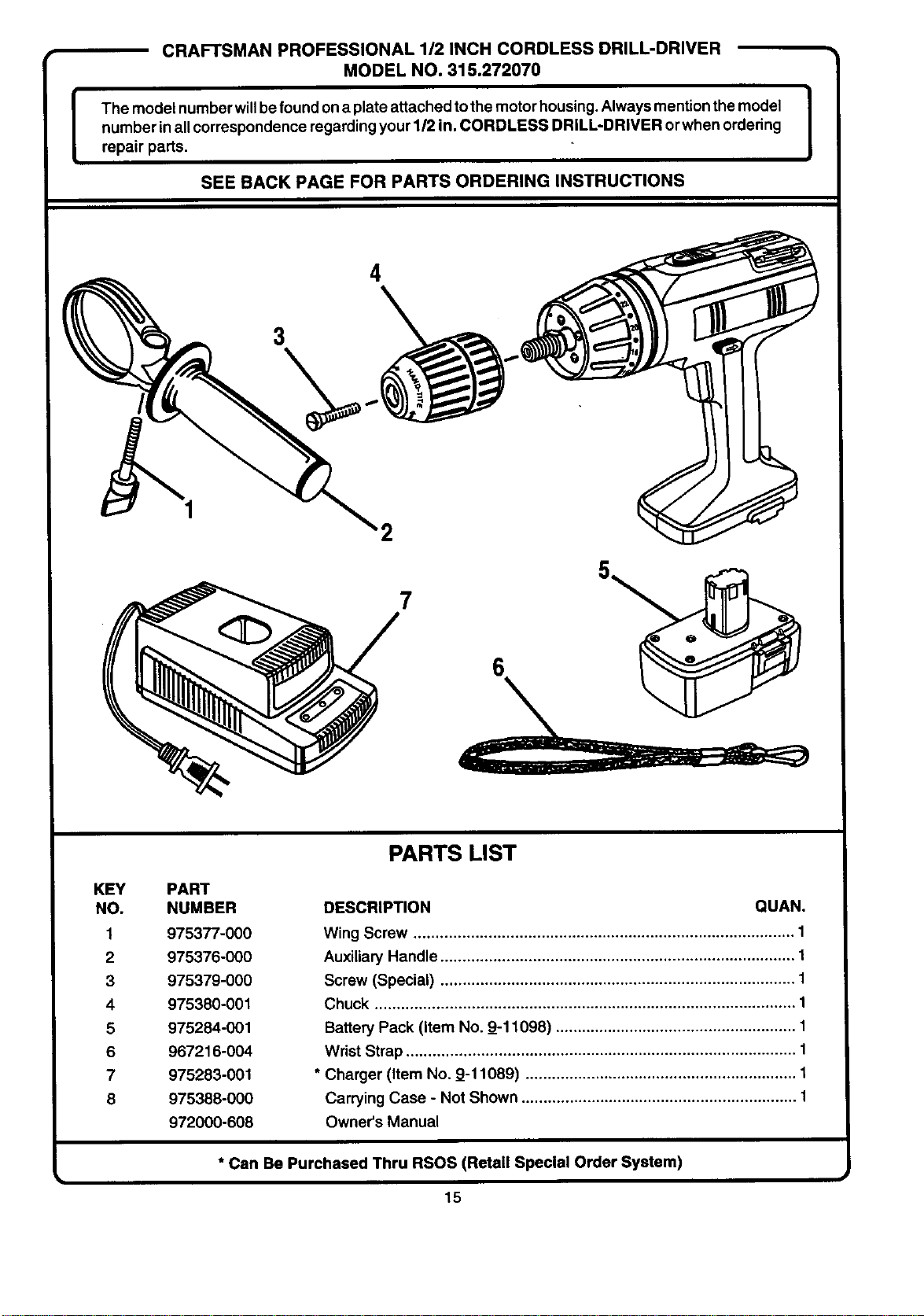
CRAFTSMAN PROFESSIONAL 1/2 INCH CORDLESS DRILL-DRIVER
MODEL NO. 315.272070
The model number willbefound on a plate attached tothe motor housing,Always mention the model I
t
number inall correspondence regarding your 1/2 in. CORDLESS DRILL-DRIVER orwhen ordering
I
repair parts.
SEE BACK PAGE FOR PARTS ORDERING INSTRUCTIONS
4
3
2
7
KEY PART
NO. NUMBER
1 975377-000
2 975376-000
3 975379-000
4 975380-001
6 975284-001
6 967216-004
7 975283-001
8 975388-000
972000-608
PARTS LIST
DESCRIPTION QUAN,
Wing Screw ....................................................................................... 1
Auxiliary Handle ................................................................................. 1
Screw (Special) ................................................................................. 1
Chuck ................................................................................................ 1
Battery Pack (item No. 9_-11098) ....................................................... 1
Wrist Strap ......................................................................................... 1
* Charger (Item No. 9_-11069) .............................................................. 1
Carrying Case - Not Shown ............................................................... 1
Owner's Manual
* Can Be Purchased Thru RSOS (Retail Special Order System)
15
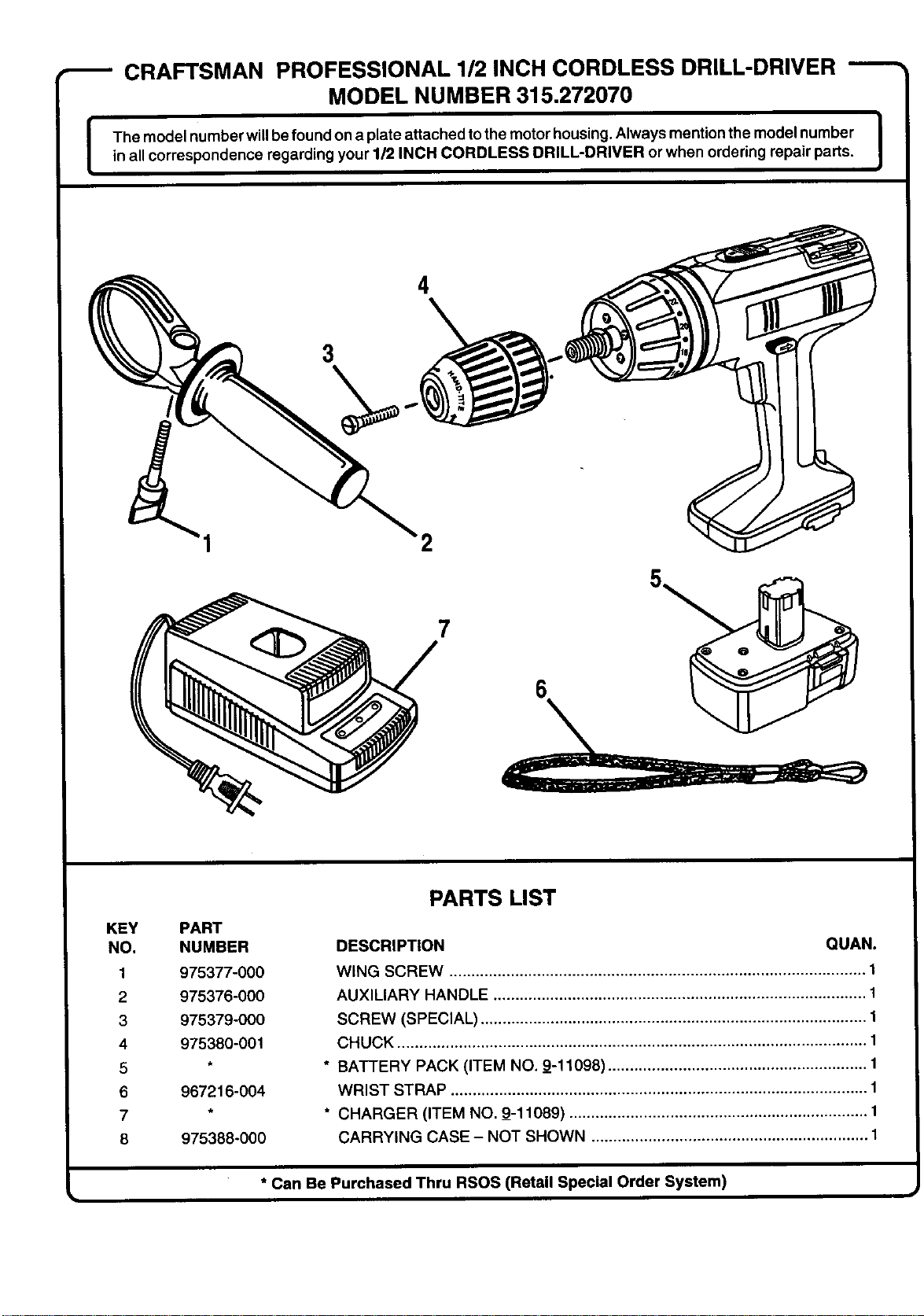
CRAFTSMAN PROFESSIONAL 112INCH CORDLESS DRILL-DRIVER -----
MODEL NUMBER 315.272070
I
I The model number willbe found on a plate attached tothe motor housing.Always mention the model number |
in all correspondence regarding your 1/2 INCH CORDLESS DRILL-DRIVER or when ordering repair parts.
]
3
4
KEY
NO.
1
2
3
4
5
6
7
8
PART
NUMBER
975377-000
975376-000
975379-000
975380-001
967216-004
975388-000
PARTS LIST
DESCRIPTION QUAN.
WING SCREW ............................................................................................... 1
AUXILIARY HANDLE ..................................................................................... 1
SCREW (SPECIAL) ........................................................................................ 1
CHUCK ........................................................................................................... 1
* BATTERY PACK (ITEM NO. 9-11098) ........................................................... 1
WRIST STRAP ............................................................................................... 1
* CHARGER (ITEM NO. 9-11089) .................................................................... 1
CARRYING CASE - NOT SHOWN ............................................................... 1
* Can Be Purchased Thru RSOS (Retail Special Order System)
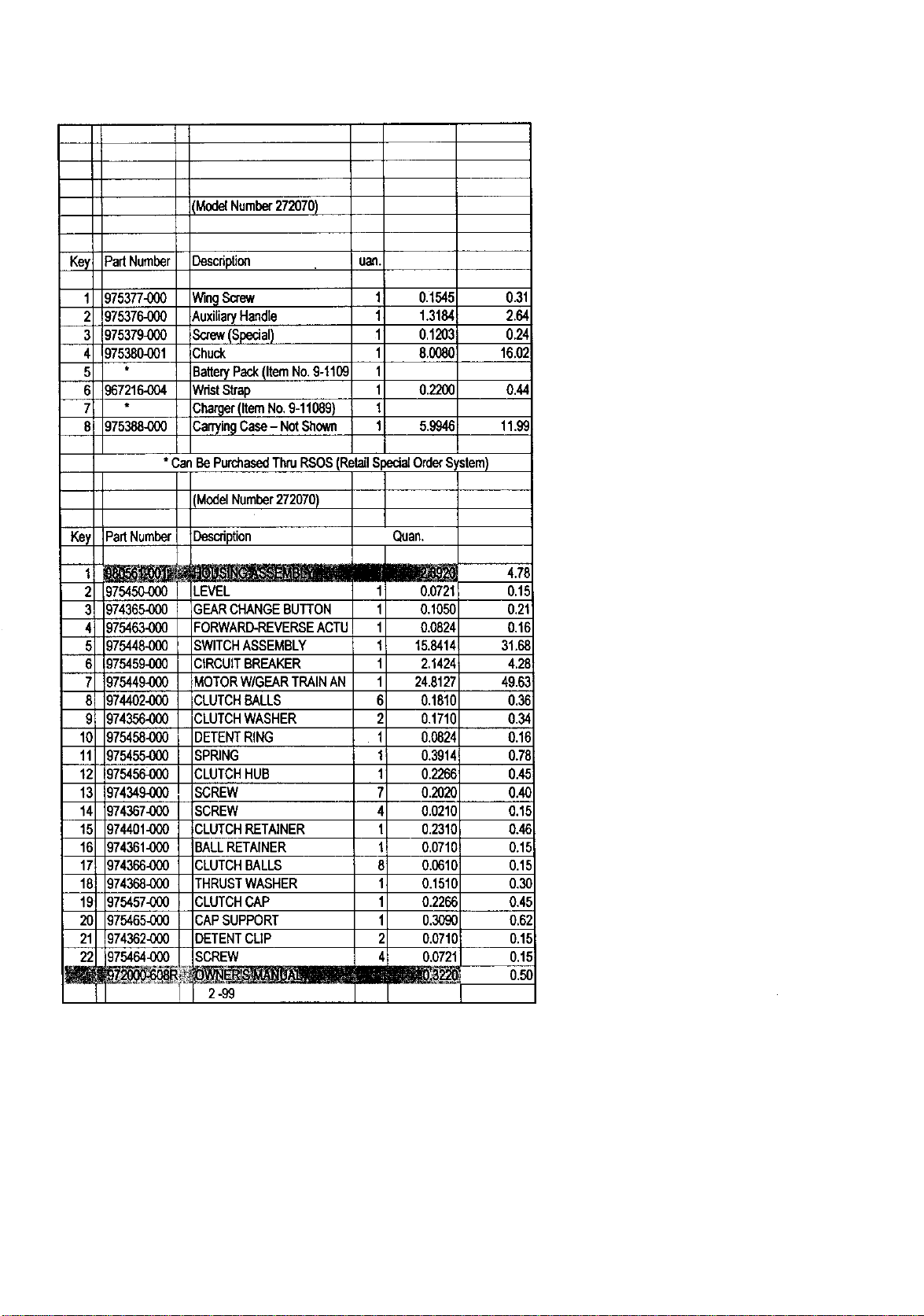
(ModelNumber272070)
KeyPartNumber Description
1
2
3
4
5
6
7
8
uan.
975377-000
975376-000
975379-000
975380-001
967216-OO4
975388-000
Win9Screw 0.1545 0.31
AuxiliaryHandle 1.31_ 2.64
Sc,ew(Special) 1 0.1203 0.24
3huc_ 8.008C 16.02
3arteryPack(ItemNo.9-1109
NristStrap 0.220C 0.44
3harger(ItemNo.0-11089)
3ar_in9Case- NotShown 5.994_ 11.99
*CanBePurchasedThruRSOS(RetailSpedalOrderSystem)
_lodelNumber272070)
Key PartNumber Description
Qgarl.
I illEIm LB llml 4.76
2 975450-000 LEVEL 1 0.0721 0.15
3 974365000 GEARCHANGEBUTTON 1 0.1050 0.21
4 975463-000 FORWARD-REVERSEACTU 1 0.0824 0,16
5 975448.0_0 SWITCHASSEMBLY 1 15.8414 31.68
8 975459-000 CIRCUITBREAKER 1 2,1424 4.28
7 )75449-000 MOTORW/GEARTRAINAN 1 24.8127 49.63
8 _74402-000 CLUTCHBALLS 6 0.1810 0.38
:)74356-000 CLUTCHWASHER 2 0,171( 0.34
1C _)75458-060 DETENTRING 1 0.0824 0.16
11 _75455-000 SPRING 1 0.3014 0.71]
lz" _75456-000 CLUTCHHUB 1 0.2266 0.45
13 _74349-000 SCREW 7 0.2020 0.4(;
14 ;)74367..000 SCREW 4 0.0210 0.1_
1_ ;)74401..000 CLUTCHRETAINER 1 0.2311 0.4E
1E ;)74361..000 BALLRETAINER 1 0,0710 0.1_
17 ;)74366-000 CLUTCHBALLS 8 0.0610 0.1_
1E ;)74368-000 THRUSTWASHER 1 0.1510 0,3(
1,,, ;)75457,.000 CLUTCHCAP 1 0.2266 0.4_
2C _75465-000 CAPSUPPORT 1 0.3090 0,6;
21 974362-000 DETENTCLIP 2 0.0710 0.1,=
2; 975464_00 SCREW 4 0.0721 0.1,=
I 2-99 HI
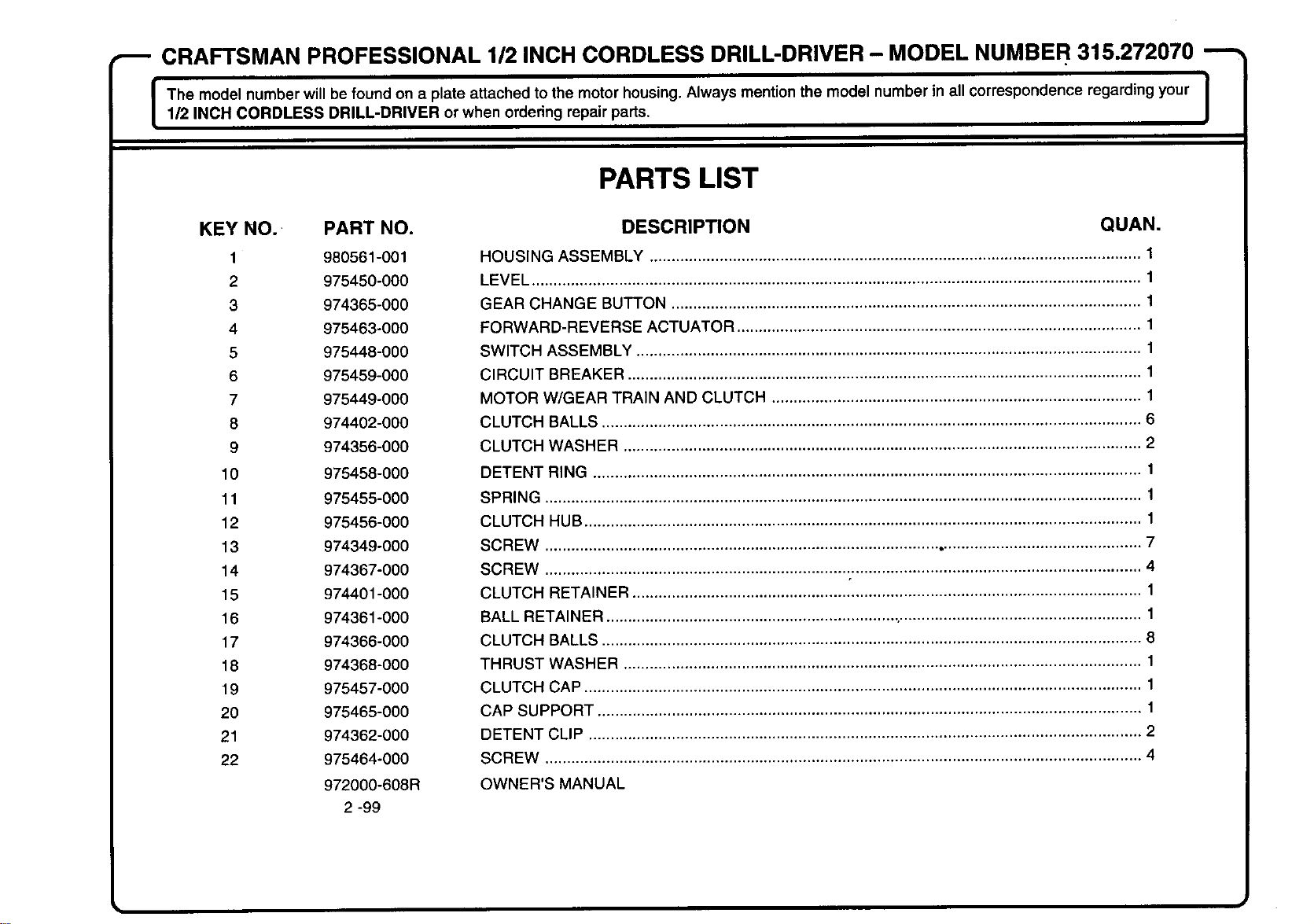
CRAFTSMAN PROFESSIONAL 1/2 INCH CORDLESS DRILL-DRIVER - MODEL NUMBER 315.272070
I The model number will be found on a plate attached to the motor housing. Always mention the model number in all correspondence regarding your I
1/2 INCH CORDLESS DRILL-DRIVER or when ordering repair parts.
J
KEY NO. PART NO.
1 980561-001
2 975450-000
3 974365-000
4 975463-000
5 975448-000
6 975459-000
7 975449-000
8 974402-000
9 974356-000
10 975458-000
11 975455-000
12 975456-000
13 974349-000
14 974367-000
15 974401-000
16 974361-000
17 974366-000
18 974368-000
19 975457-000
20 975465-000
21 974362-000
22 975464-000
972000-608R
2-99
PARTS LIST
DESCRIPTION QUAN.
HOUSING ASSEMBLY ................................................................................................................ 1
LEVEL ........................................................................................................................................... 1
GEAR CHANGE BUTTON ........................................................................................................... 1
FORWARD-REVERSE ACTUATOR ............................................................................................ 1
SWITCH ASSEMBLY ................................................................................................................... 1
CIRCUIT BREAKER ..................................................................................................................... 1
MOTOR W/GEAR TRAIN AND CLUTCH .................................................................................... 1
CLUTCH BALLS ........................................................................................................................... 6
CLUTCH WASHER ...................................................................................................................... 2
DETENT RING ............................................................................................................................. 1
SPRING ........................................................................................................................................ 1
CLUTCH HUB ............................................................................................................................... 1
SCREW ........................................................................................................................................ 7
SCREW ........................................................................................................................................ 4
CLUTCH RETAINER .................................................................................................................... 1
BALL RETAINER .................................................................... •...................................................... 1
CLUTCH BALLS ........................................................................................................................... 8
THRUST WASHER ...................................................................................................................... 1
CLUTCH CAP ............................................................................................................................... 1
CAP SUPPORT ............................................................................................................................ 1
DETENT CLIP .............................................................................................................................. 2
SCREW ........................................................................................................................................ 4
OWNER'S MANUAL
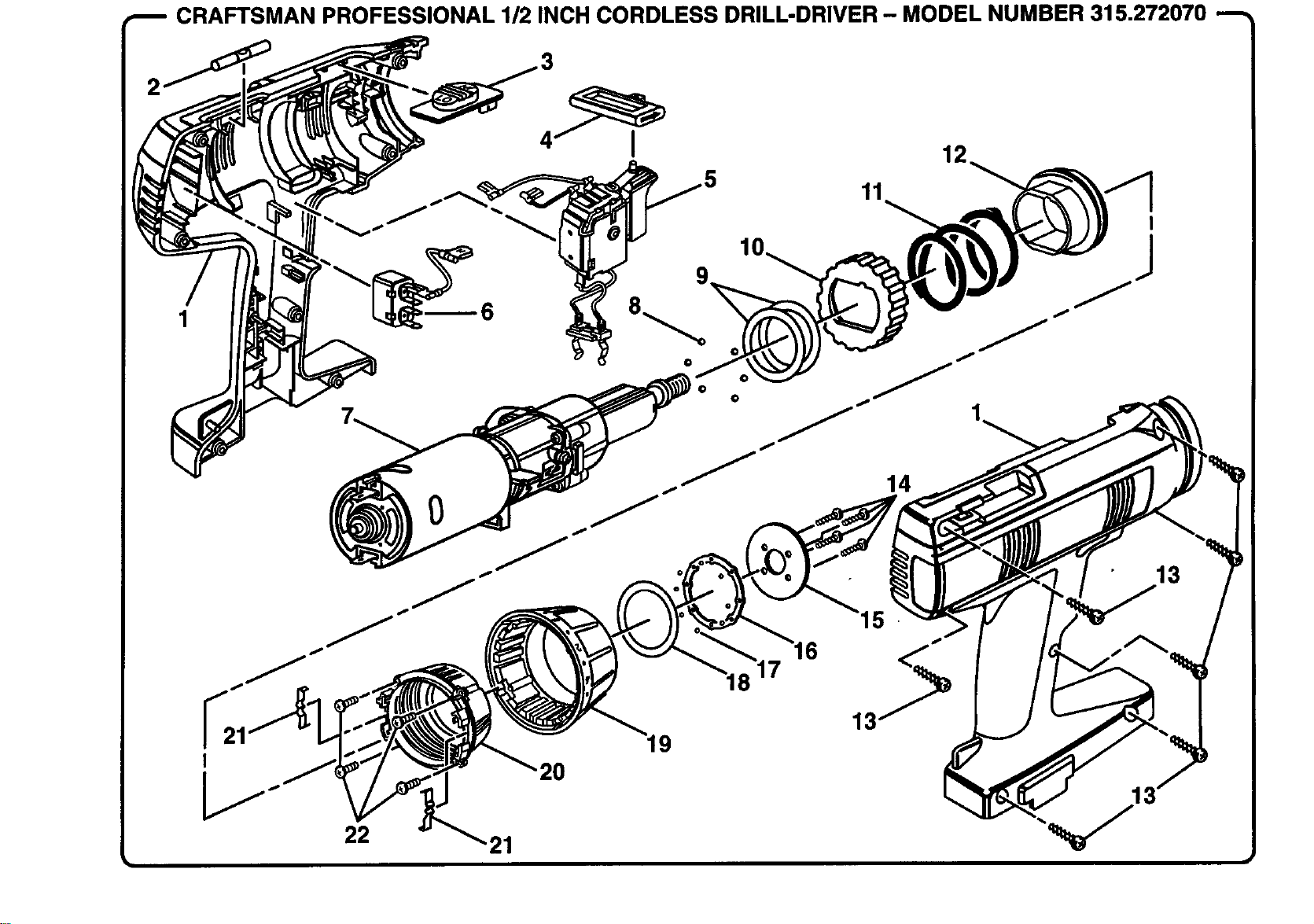
CRAFTSMAN PROFESSIONAL 1/2 INCH CORDLESS DRILL-DRIVER - MODEL NUMBER 315.272070 "_
2
1
r,...jl
12
11
I
_.... 20
22 21
19
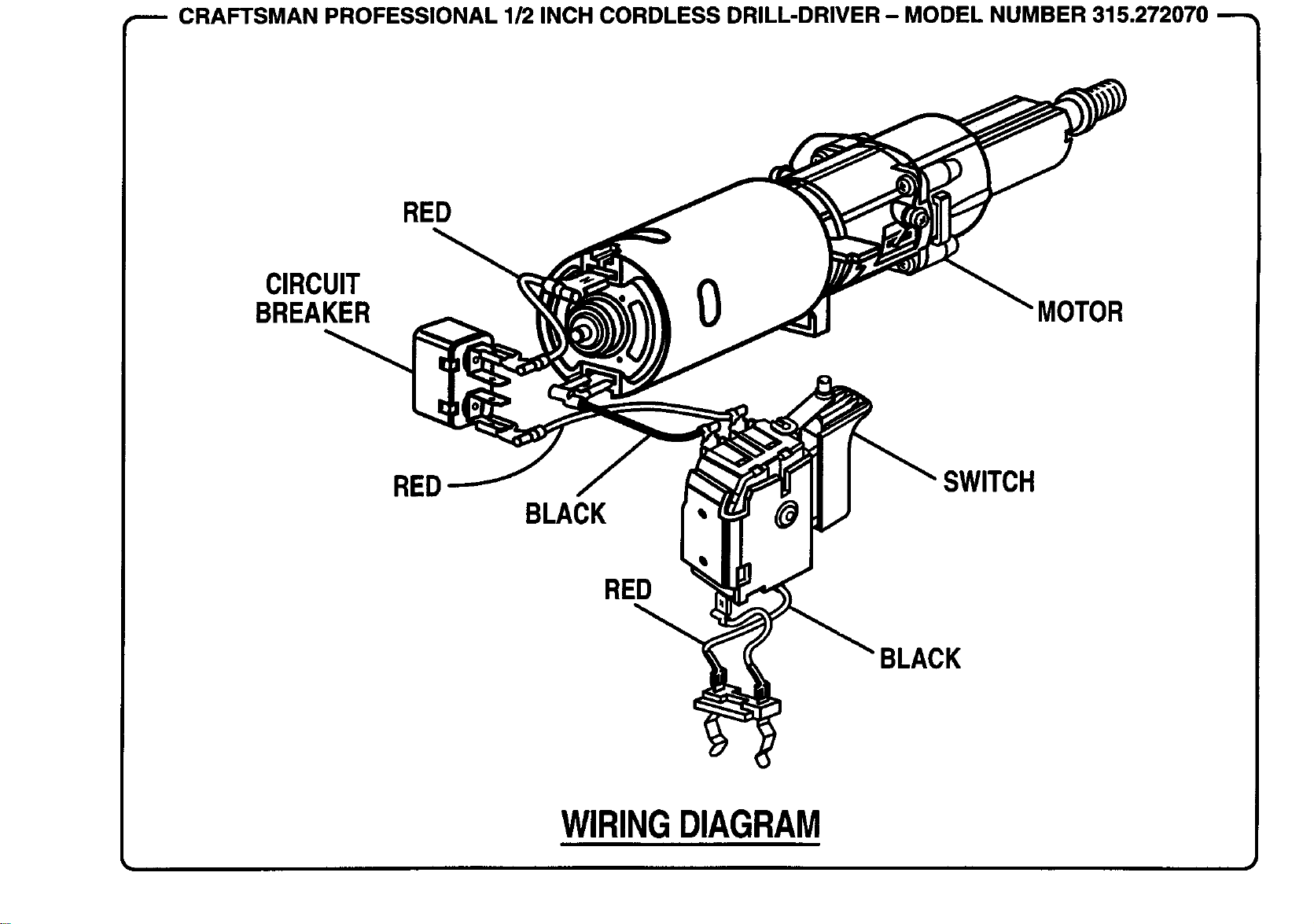
-_ CRAFTSMAN PROFESSIONAL 1/2 INCH CORDLESS DRILL-DRIVER - MODEL NUMBER 315.272070 --_
CIRCUIT
BREAKER
RED
RED
BLACK
RED
MOTOR
BLACK
SWITCH
WIRINGDIAGRAM

For in-home major brand repair service:
Call 24 hours a day, 7 days a week
1-800-4-MY-HOME sM (1-800-469-4663)
Para pedir servicio de reparacibn a domicilio - 1-800-676-5811
In Canada for all your service and parts needs call
Au Canada pour tout le service ou les pi6ces - 1-800-665-4455
For the repair or replacement parts you need:
Call 6 am - 11 pm CST, 7 days a week
PartsDirectsM
1-800-366.PART (1-800-366-7278)
Para ordenar piezas con entrega a domicilio - 1-800-659-7084
For the location of a Sears Parts and Repair Center in your area:
Call 24 hours a day, 7 days a week
1-800-488-1222
For information on purchasing a Sears Maintenance Agreement
or to inquire about an existing Agreement:
Call 9 am - 5 pm, Monday - Saturday
1-800-827-6655
S /A/R8
HomeCentralSM
The Service Side of Sears