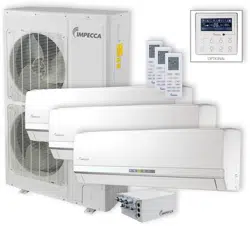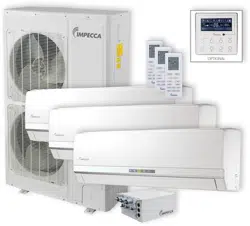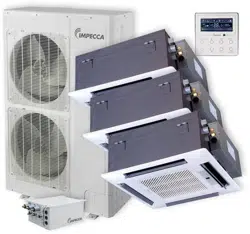
Flex+ Series R410A
Systems
―Outdoor Unit
Owner's Manual Impecca Air
Conditioners
ISMO-6021
Thank you for choosing Impecca air conditioners, please read this owner’s manual carefully
before operation and keep it for future reference.
Impecca reserves the right to interpret this manual which will be subject to any change due
to product improvement without further notice.
v. 1.1

Preface
Flex + Series adopt the advanced manufacturing technology and takes the environmental-
friendly R410A as refrigerant, which is a green product in the 21st century. Please carefully read
the manual before installation and operation.
1) Flex + Series systems conform to design standard ARI 210240-2008.
2) To ensure safety when operating this system, please strictly follow the instructions in this
manual.
3) Make sure that the manual is kept by the operators or serviceman.
4) The refrigerant pipes and accessories must be designed exclusively for R410A.
5) The total capacity of the indoor units which runs at the same time cannot exceed the capacity of
the outdoor units; otherwise, the cooling (heating) effect of each indoor unit would be lower
than the nominal capacity.
6) In case of malfunction, please examine the following items and contact our appointed service
centers as soon as possible.
Nameplate (model, cooling capacity, product code, ex-factory date).
Malfunction status (detail description of conditions before and after malfunction occurs).
7) It is a normal phenomenon that the fan of indoor unit will still run for 20~70 seconds after the
indoor unit receives the “stop” signal so as to make full use of the waste heat.
8) When the work mode of the indoors is conflict with the modes of outdoor units, it will be
indicated on the display of the wired controller in five seconds and then the indoor unit will
stop. In this case, please harmonize their work modes: the cooling mode is compatible with the
dry mode.
9) If the supply power fails when the unit is running, then the indoor unit will send the “start”
signal to the outdoor unit three minutes later after the power recovery.
10) The power cable and transmission line must not be twisted together, but instead of separated
with an interval of at least 2cm; otherwise it may be result in communication problem.
11) This appliance is not intended for use by persons (including children) with reduced physical,
sensory or mental capabilities, or lack of experience and knowledge, unless they have been
given supervision or instruction concerning use of the appliance by a person responsible for
their safety. Children should be supervised to ensure that they do not play with the appliance.
12) All graphics and information in this manual are only for reference. Manufacturer reserves the
right for changes in terms of sales or production at any time and without prior notice.
This product must not be disposed together with the domestic waste. This product has
to be disposed at an appointed place for recycling of electrical and electronic appliances.
Thank you for purchasing Impecca air conditioners. Before using, please read
this manual carefully and keep it properly for further reference.


I
Contents
1 Safety Precautions ..................................................................................................................... 1
2 Attention for Installation ........................................................................................................... 3
2.1 Precautions for R410A .................................................................................................. 3
2.2 Precaution for Installation ............................................................................................. 3
2.3 Precaution for Operation Test........................................................................................ 3
2.4 Accessories .................................................................................................................... 3
3 Product Introduction ................................................................................................................. 4
3.1 Names of Main Parts ..................................................................................................... 4
3.2 Combinations for Outdoor and Indoor Units ................................................................ 4
3.3 Parts and Components of Unit ...................................................................................... 5
3.4 Working Temperature Range ......................................................................................... 5
4 Selection of Installation Location and Precautions ................................................................... 6
4.1 Selection of Installation Location ................................................................................. 6
4.2 Outline Dimension of Outdoor Unit .............................................................................. 7
4.3 Installation and Servicing Space ................................................................................... 7
5 Installation Instruction .............................................................................................................. 8
6 Installation of Refrigerant Pipes ............................................................................................... 9
6.1 Allowable Length and Drop Height of Connecting Pipe .............................................. 9
6.2 Dimension of Connecting Pipe ................................................................................... 10
6.3 Connection of Branch Pipe ......................................................................................... 10
6.4 Connection of Refrigerant Pipes ................................................................................. 11
6.5 Connec
tion of Refrigerant Pipe ................................................................................... 12
6.6 Leak Test ..................................................................................................................... 13
6.7 Vacuum Operation ....................................................................................................... 13
6.8 Refrigerant Charging ................................................................................................... 14
7 Electrical Wiring Work ........................................................................................................... 17
7.1 Wiring Connection ...................................................................................................... 17
7.2 Requirements of Power Circuit and Cable .................................................................. 17
7.3 Ground Requirements ................................................................................................. 18
7.4 Precautions on the Electrical Wiring Work ................................................................. 18
7.5 Precaution of Laying Wires ......................................................................................... 19
7.6 Procedures for Electrical Wiring Work ....................................................................... 19
8 Design of Drainage Pipeline ................................................................................................... 20
8.1 Installation of Drain Hose ........................................................................................... 20
8.2 Design of Drainage Pipeline ....................................................................................... 20
9 Installation of Protective Layer ............................................................................................... 21
10 Test Operation ......................................................................................................................... 22
10.1 Check after Installation ............................................................................................... 22
10.2 Test Operation ............................................................................................................. 22
11 Testing Board Introduction ..................................................................................................... 23
11 . 1 Compose of the Testing Board .................................................................................... 23
11.2 Instruction of Function and Data Section .................................................................... 23

II
12 Troubleshooting ...................................................................................................................... 24
12.1 Check before Contacting Service Center .................................................................... 24
12.2 Problem Handling ....................................................................................................... 25
12.3 Error Description ......................................................................................................... 25
13 Maintenance ............................................................................................................................ 28
13.1 Outdoor Condenser ..................................................................................................... 28
13.2 Drain Pipe ................................................................................................................... 28
13.3 Check before the Seasonal Use ................................................................................... 28
13.4 Maintenance after Seasonal Use ................................................................................. 28
14 After-sales Service .................................................................................................................. 28
Flex + Series
1
1 Safety Precautions
This is t
he safety alert symbol. It is used to alert you to potential personal injury
hazards. Obey all safety messages that follow this symbol to avoid possible injury or
death.
WARNING
This mark indicates procedures which, if improperly performed, might lead to the
death or serious injury of the user.
CAUTION
This mark indicates procedures which, if improperly performed, might possibly result
in personal harm to the user, or damage to property.
NOTICE
NOTICE is used to address practices not related to personal injury.
WAR N I N G
1) Instructions for installation and use of this product are provided by the manufacturer.
2) Installation must be performed in accordance with the requirements of NEC and CEC by appointed
personnel only.
3) The installation should be left to the appointed service center and according to the instructions given in the
manual. Improper installation may cause fall down, water leakage, electric shock or fire etc.
4) For operating the air conditioner pleasantly, please install it as outlined in this installation manual.
5) The power supply must adopt the special circuit with air switch protection and assure it has enough capacity
6) Connect the indoor unit, BU module and outdoor unit with the room air conditioner piping and cord
available from our standard parts. This installation manual describes the correct connections using the
installation set available from our standard parts.
7) Before installation, check the parameter of power cord and make sure that it complies with the power
supply requirement on the nameplate. Make sure the power supply is safe.
8) This air conditioner must be properly grounded through the receptacle to avoid electric shock. The ground
wire shouldn’t be connected with gas pipe, water pipe, lightning arrester or telephone line.
9) If refrigerant leaks while work is being carried out, ventilate the area. If the refrigerant comes in contact
with a flame, it produces toxic gas.
10) Do not power on until all installation work is complete.
11) During installation, make sure that the refrigerant pipe is attached firmly before you start up the compressor.
Do not operate the compressor under the condition of refrigerant piping not attached properly with valve
open. This may cause abnormal pressure in the refrigeration cycle that leads to breakage and even injury.
12) When installing and relocating the air conditioner, do not mix gases except the specified refrigerant
(R410A) to enter the refrigerant cycle. If air or other gas enters the refrigerant cycle, the pressure inside the
cycle will rise to an abnormally high value and cause breakage, injury, etc.
13) This appliance is not intended for use by persons (including children) with reduced physical, sensory or
mental capabilities, or lack of experience and knowledge, unless they have been given supervision or
instruction concerning use of the appliance by a person responsible for their safety. Children should be
supervised to ensure that they do not play with the appliance.
14) Never cut off or damage power cables and transmission wires. If the power cable or transmission line were
damaged, it must be replaced by the manufacturer, its service agent or similarly qualified persons in order to
avoid a hazard.
15) After the power cord is connected, please install the cover of electric box to avoid danger.
Flex + Series
2
16) When installing or relocating the unit, please contact the appointed service center for the repair or
relocation. Meanwhile the specialized parts and accessories must be used. Otherwise, it may result in water
leakage, electric shock or fire hazard.
17) Diameter of power cord must be large enough. Damaged power cord or connecting wire must be replaced
by specialized electric cable.
18) The power wire and transmission line must be more than one meter away from televisions or radios which
can emit electromagnetic waves to prevent image interference or noise. Otherwise, the unit maybe not work
19) Nitrogen must be charged according to technical requirements.
20) For units with wired controllers, do not connect power supply until the wired controller is well installed.
Otherwise, the wired controller cannot be used.
21) When installation is finished, please check and make sure the drain pipe, pipeline and electric wire are all
well connected so as to avoid water leakage, refrigerant leakage, electric shock and fire hazard.
22) Never extend fingers or objects into air outlet or return air grille.
23) Please keep the room well-ventilated and it could avoid oxygen deficit.
24) Never start or stop the air conditioner by inserting or removing the power cord.
25) Before startup of the compressor, please turn on the main power switch of the unit for more than 8 hours
and it makes sure that the heater belt of the compressor has been energized for at least eight hours! Once the
compressor is started, it must be guaranteed that it works continuously for at least 30 minutes, otherwise it
would be damaged!
26) Never operate the unit with wet hands. Otherwise, it may cause electric shock.
27) Before cleaning and repairing, it is necessary to stop working and turn off the power supply. Otherwise, it
may cause electric shock or damage.
28) Do not spray water on the air conditioner or it will cause malfunction or electric shock.
29) The air conditioner is not support to install in the circumstances as the following that where there is full of
mist of oil, damp or corrosive gas, flammable gases, the acidic or alkaline vapor and the ocean.
30) Volatile liquid like thinner or gasoline will damage the appearance of air conditioner. (Please use soft dry
cloth and wet cloth with mild detergent to clean unit’s appearance.)
31) Never standing or place objects on outdoor unit. Person or objects falling from the unit may cause injury.
32) If abnormal condition occurs (e.g. unpleasant smell), please turn off the unit at once and disconnect power
supply. Then contact appointed service center. If the air conditioner continues to operate despite of
abnormal condition, it may be damaged and cause electric shock or fire hazard.
33) The drain pipe should be installed as instructed in the manual to guarantee the proper drainage; meanwhile
it should be insulated to prevent condensing; otherwise the improper installation would cause water leakage
and then wet the household wares in the room.
34) Don't attempt to repair the air conditioner by yourself. The improper repair will lead to electric shock or
fire, please contact the appointed service center and ask professional technicians to repair it.
35) Please take notice of the installation foundation of the unit after long use, if it is damaged, it may lead to the
fall of the unit and cause the injury.
36) Be sure to shut off the power supply when you do not use the air conditioner for a long time. Otherwise, the
dusts may accumulate in it, which may cause overheating or fire hazards.
37) Impecca is not responsible for any personal injury or property loss caused by improper installation,
improper debugging, unnecessary repair or not following the instructions of this manual.

Flex + Series
3
2 Attention for Installation
2.1 Precautions for R410A
It is very strict that the refrigerant pipes should be clean and dry.
The R410A is a mixed refrigerant, when adding the refrigerant to the unit, it must be
in its liquid state. If the refrigerant is in gas state, the composition has been changed and the
capability of the unit will decrease.
When the refrigerant leaks out, please do not touch the leakage. Otherwise, it will result in
frostbite.
It does not support to let a lot of refrigerant go into the ambient atmosphere, because it will
strengthen the green house effect. Otherwise, it will produce toxic gas when the refrigerant
contacts with the fire.
2.2 Precaution for Installation
The unit is so heavy that it is more than 110kg, so more than two persons will be needed to
remove the unit. The package cannot bear it, so do not grasping it.
When remove the units, please place the hands on the corner and take care not to hurt the hands
by the fins.
It is very likely to dispose the waste to the garbage bin after the installation.
2.3 Precaution for Operation Test
In order to protect the compressor from vibrating during transportation and 2 metal gaskets are
used. They must be removed prior to commissioning and tied back the nut firmly; otherwise the unit
might not be operated well.
2.4 Accessories
For the accessories of the air conditioner, please look out the Packing List in the package.
Flex + Series
3 Product Introduction
The Impecca Flex + Series adopts inverter compressor technology. According to change
displacement of compressor, stepless capacity regulation within range of 10%~100% can be
realized. Various product lineups are provided with capacity range from 14kW to 16kW, which
can be widely used in residential house, business office, hotel and where especially applicable
to the place with variable load change. Impecca air conditioner is absolutely your best choice.
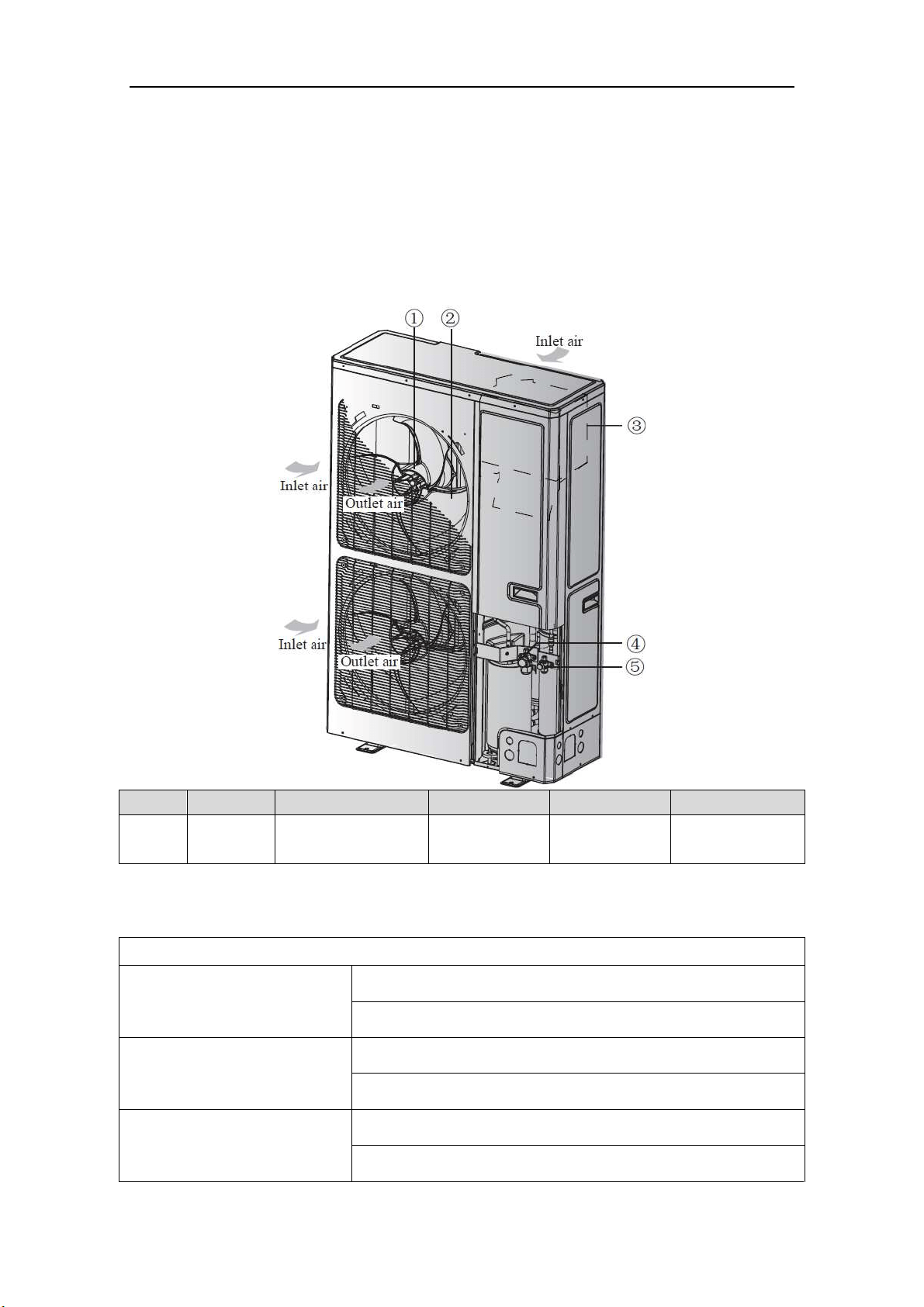
3.1 Names of Main Parts
NO. ① ② ③ ④ ⑤
Name Fan motor Axial flow fan blade Electrical box
Gas side stop
valve
Liquid side stop
valve
Fig. 1
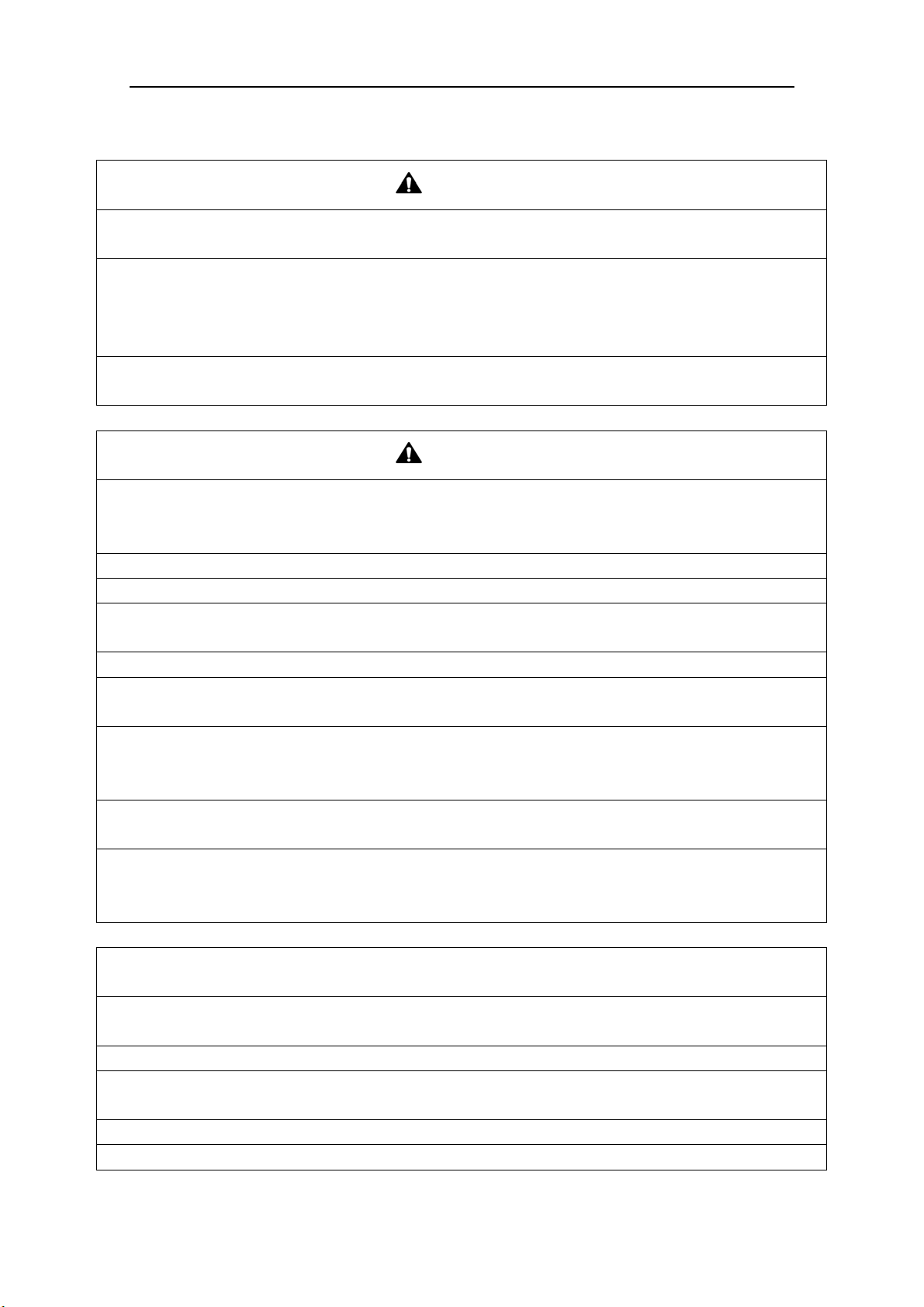
3.2 Combinations for Outdoor and Indoor Units
Table 1
Sorts GWHD(56S)ND3CO
No. of indoor units to be
connected
Min 2
Max 9
No. of BU modules to be
connected
Min 1
Max 3
Total capacity of indoor units to
be connected(Btu/h)
Min 28000
Max 81000
Flex + Series
5
3.3 Parts and Components of Unit
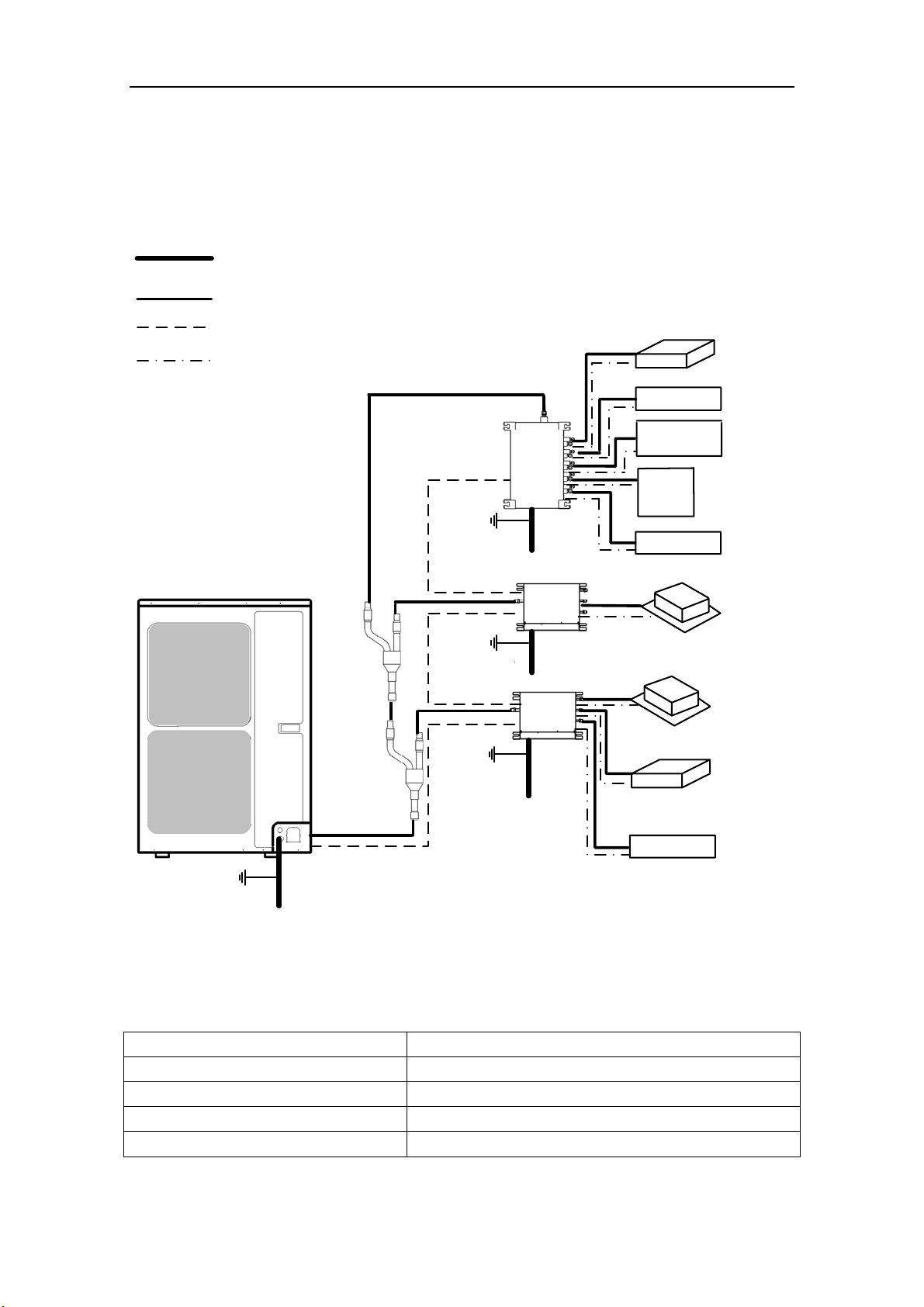
For the Flex + Series, one outdoor unit is able to drive up to three BU modules and nine
indoor units which include cassette type, duct type, wall mounted type, floor ceiling type and
console type. The outdoor unit will run as long as any one indoor unit receives the running
command, and all indoor units stop once the outdoor unit is turned off.
Fig. 2
3.4 Working Temperature Range
Table 2
(BD :erutarepmet edistuO stroS ℃/℉)
Maximum cooling 48℃(118℉)
Minimum cooling -18℃(0℉)
Maximum heating 24℃(75℉)
Minimum heating -20℃(-4℉)
Outdoor unit
Power supply wire for outdoor
unit and BU module(3 wires)
Connection pipe
Transmission line(2 wires)
Power supply wire for
indoor unit(4 wires)
Ground
Power
(60Hz, 208/230V)
Power
(60Hz, 208/230V)
Power
(60Hz, 208/230V)
Power
(60Hz, 208/230V)
Ground
Ground
The 1st
branch
The 2nd
branch
BU 1
BU 2
BU 3
Indoor unit
Duct type
Duct type
Wall mounted
type
Wall mounted
type
Wall mounted
type
Cassette type
Cassette type
Floor ceiling
type
Console type
Ground
Flex + Series
6
4 Selection of Installation Location and Precautions
WAR N I N G
1) The installation of the air conditioner must be in accordance with the national and local laws and
regulations.
2) The quality of the installation will affect the capability of air conditioner directly. The installation
should be left to the appointed service center. Please contact your dealer after purchasing this machine.
Professional installation workers will provide installation and test services according to the installation
manual.
3) The air conditioner should not install in this place where the small animals exist, because they may
cause malfunctions, smoke or fire. Please keep the area around the unit clean.
4.1 Selection of Installation Location
WAR N I N G
1) The outdoor unit must be installed on a firm and solid support which can withstand the weight,
meanwhile the mounting surface must be horizontal plane. Otherwise, the unit would fall down and
cause injury or death.
2) The location must be out of children’s reach, please keep the unit away from children.
3) During installation, if the outdoor unit has to be exposed to strong wind, it must be fixed securely.
4) There is enough space for the installation and maintenance. Meanwhile, there is not any obstacle near
the air inlet and outlet of the indoor and outdoor units.
5) The place should be well-ventilated, so the machine can absorb and discharge sufficient air.
6) Avoid place the outdoor unit under the windows or between the constructions, hence to prevent normal
operating noise from entering the room.
7) When strong winds of 5 m/sec or more exist in the place of the installation, the outlet of the unit cannot
face the wind. If the wind blows against the outdoor unit's air outlet, it will cause deterioration of the
operational capacity and maybe break the fan.
8) Do not install in the place where there is heat source, flammable or explosive gas, a place subject to
severe dust, salty fog and polluted air.
9) Installation at the following places might lead to the air conditioner malfunction, such as where is full of
machine oil, saline-sodic soil near the sea, sulphide fog, high frequency facilities or special conditions.
If it is unavoidable, please contact the appointed service center.
NOTICE
1) It is better that do not install the unit where it will be exposed to direct sunlight. (If necessary, please
install a blind that does not interfere with the air flow.)
2) The unit should be free from getting dirty or getting wet by rain as much as possible
3) Outdoor unit shall be installed close to the indoor unit, hence to minimize the length and bends of
cooling pipe.
4) Do not place animals and plants in the path of the air inlet and outlet of the units.
5) Make sure that the unit will not cause any operating vibration or noise after installation.
Flex + Series
7
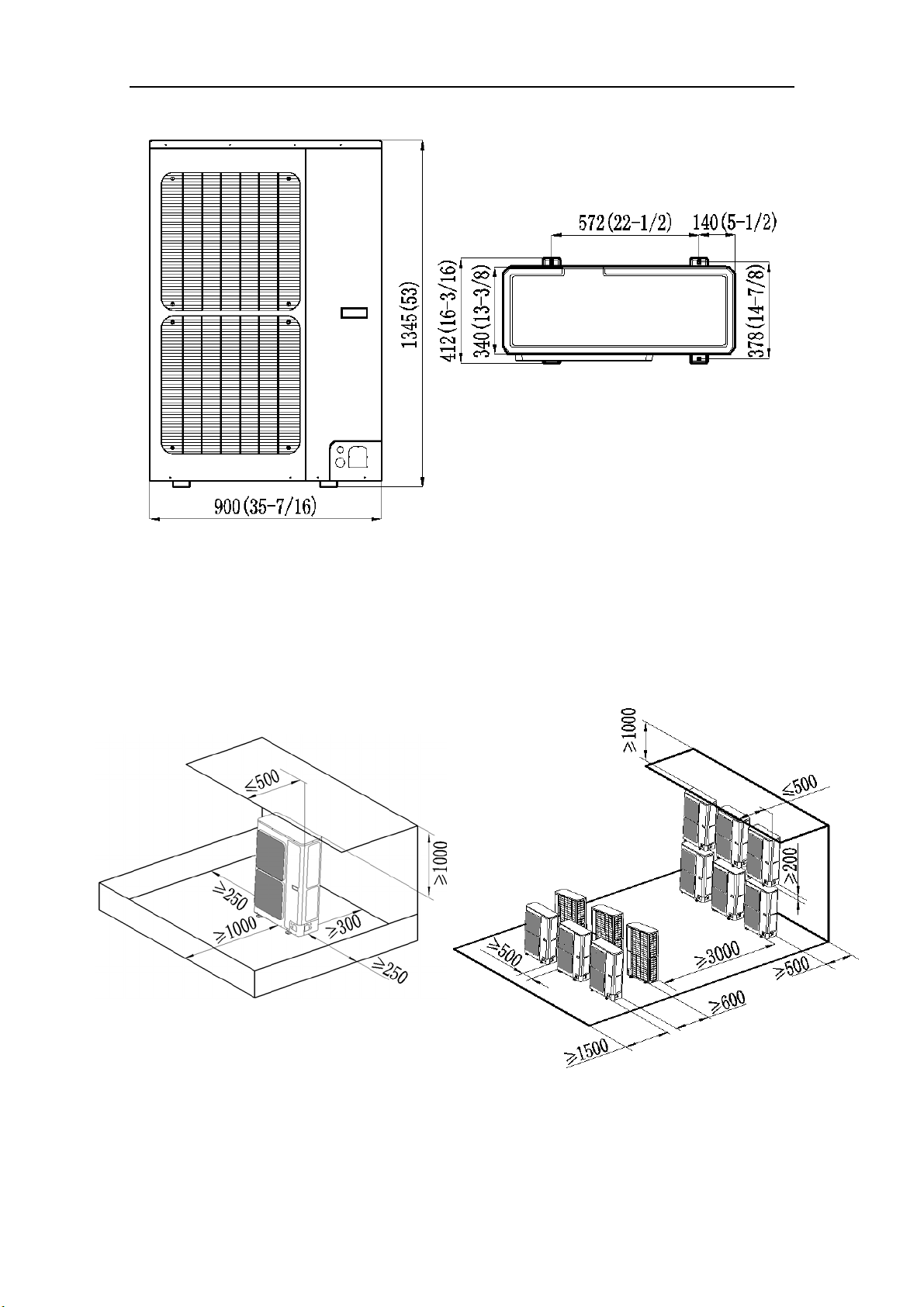
4.2 Outline Dimension of Outdoor Unit
Fig.
3 (unit: mm/inch)
4.3 Installation and Servicing Space
1) In case of installing only one unit
In case obstacles exist around the unit, the required installation space is in the Fig. 4.
2) In case of installing multiple units(2 units or more)
In case multiple rows of series installation, the required installation space is in the Fig. 5.
Fig. 4 (unit: mm) Fig. 5 (unit: mm)
Flex + Series
8
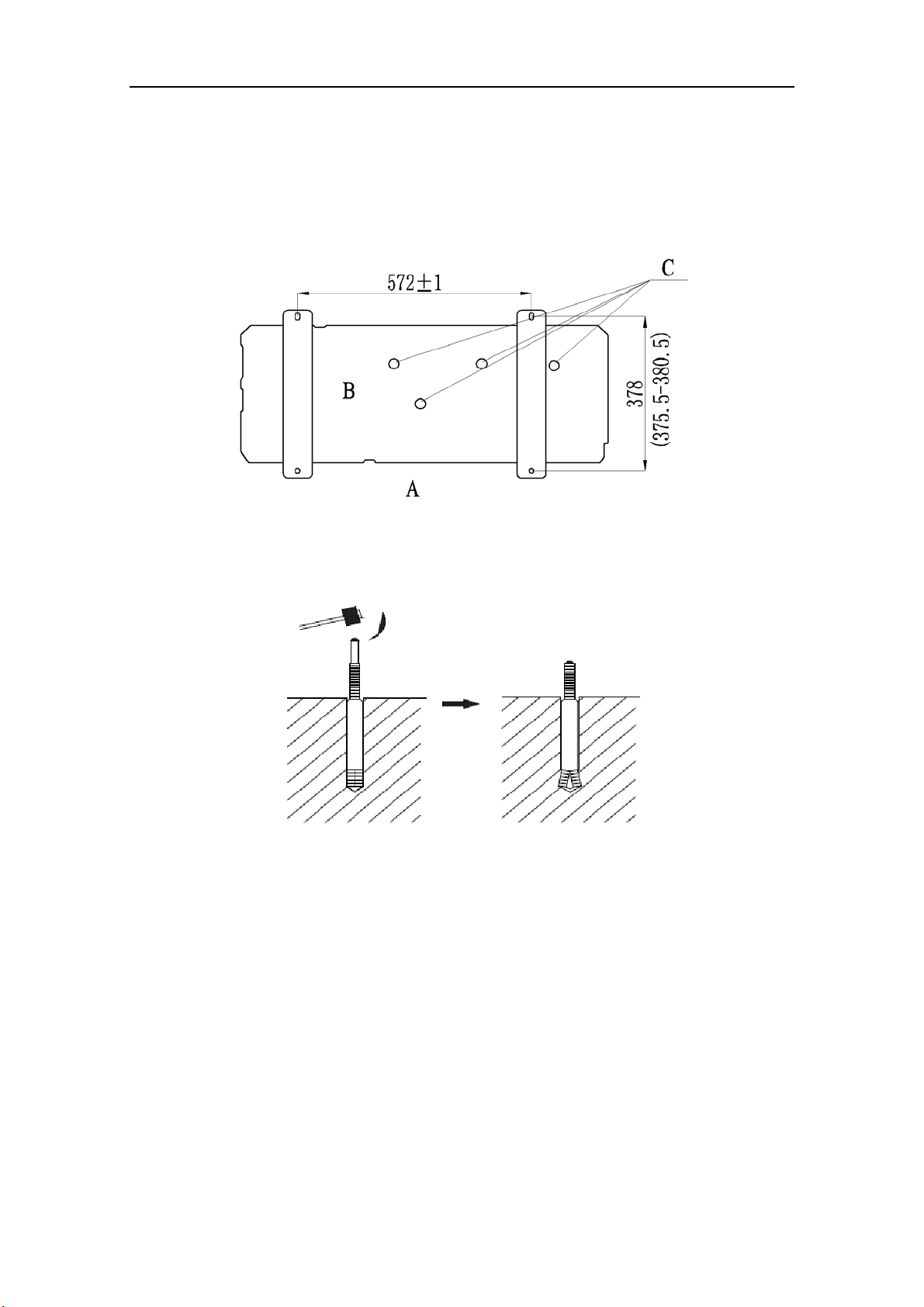
5 Installation Instruction
1) Check the installation location and ensure it is strength and level, so that the unit will not cause
any operating vibration or noise after installation.
2) In accordance with the foundation drawing in the following figure, please drill 4 holes in the
installation location.
A
: The outlet side B: Bottom view (mm) C: Drain hole
Fig. 6
3) Fix the unit securely with the foundation bolts. You can get the M10 or M12 foundation bolts,
nuts and washers from the market.
Fig. 7
4) Rub
ber or spring shock absorbers should be used during the installation of the outdoor unit to
meet the noise and vibration requirements.
5) Screw the foundation bolts into the ground and it is better that its length is less than 20mm
(4/5inch) from the foundation face.
Flex + Series
9
6 Installation of Refrigerant Pipes
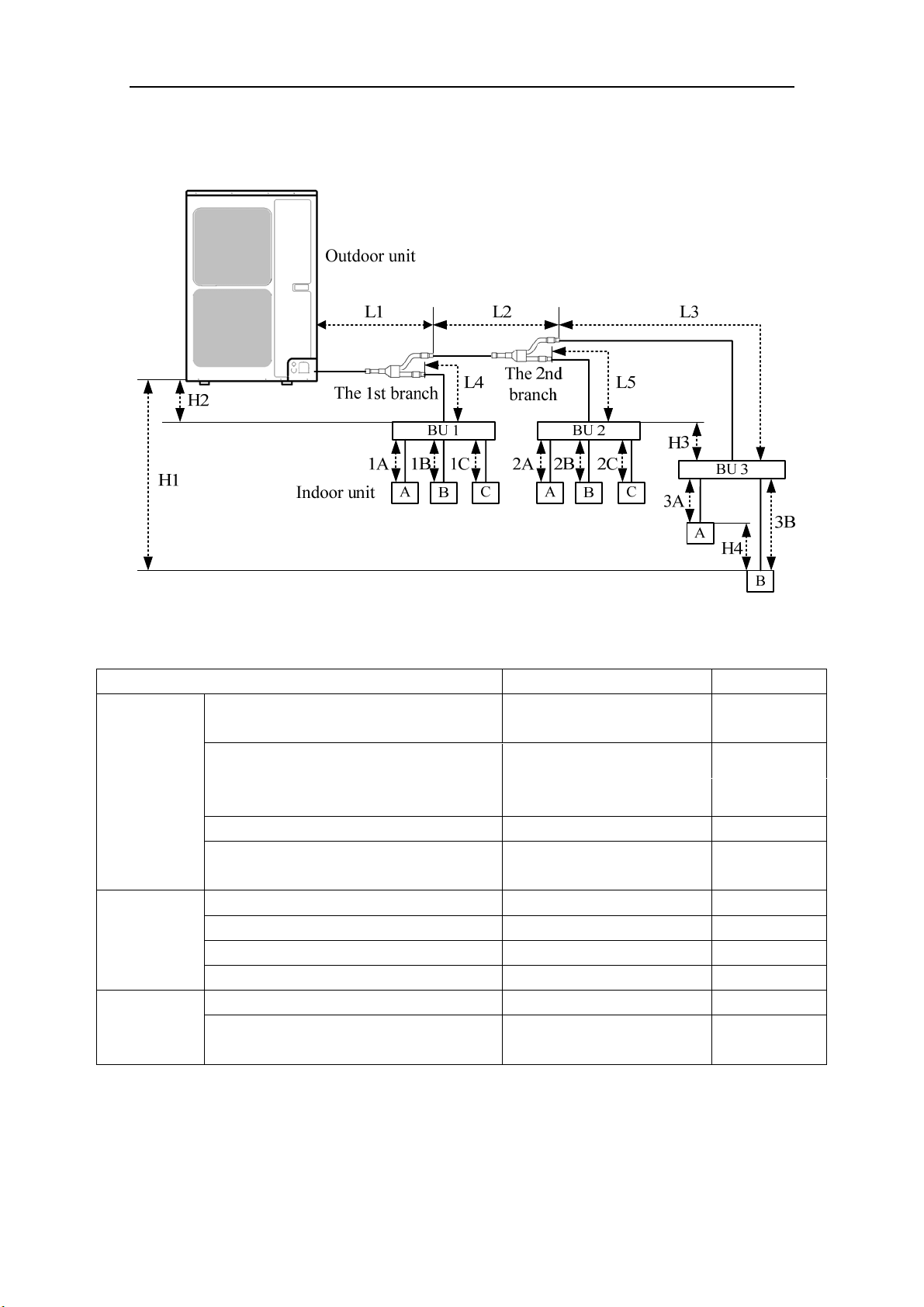
6.1 Allowable Length and Drop Height of Connecting Pipe
Fig. 8 (8 indoor units)
Table 3
The sorts The pipes Length(m/feet)
Maximum
allowable
length
Total length between outdoor unit and BU
modules
L1+L2+L3+L4+L5 ≤55(181)
Total length between indoor units and
BU
1A+1B+1C+2A+2B+2C+
3A+3B
≤90(295)
Between indoor unit and BU module 1A;1B;1C;2A;2B;2C;3A;3B ≤15(49)
Between indoor unit and the 1st branch
L4+1B;L2+L5+2A;
L2+L3+3B
≤40(131)
Maximum
allowable
length
Between outdoor and indoor units H1 ≤30(99)
Between outdoor units and BU modules H2 ≤30(99)
Between BU and BU modules H3 ≤15(49)
Between indoor and indoor units H4 ≤15(49)
Minimum
allowable
length
Between outdoor and the 1st branch L1 ≥5(16)
Between BU and the branch L3;L4;L5
as possible as
short
NOTICE! BU module should be placed within the level between the outdoor unit and indoor
unit.
Flex + Series
10
6.2 Dimension of Connecting Pipe
Table 4
Sorts
Gas Pipe
(mm/inch)
Liquid Pipe
(mm/inch)
Outdoor unit
ISMO-6021
Φ15.9(5/8) Φ9.52(3/8)
Between outdoor unit and the
1st branch
The pipe L1 Φ19.05(3/4) Φ9.52(3/8)
Between the 1st and the 2nd
branch
The pipe L2 Φ15.9(5/8) Φ9.52(3/8)
6.3 Connection of Branch Pipe
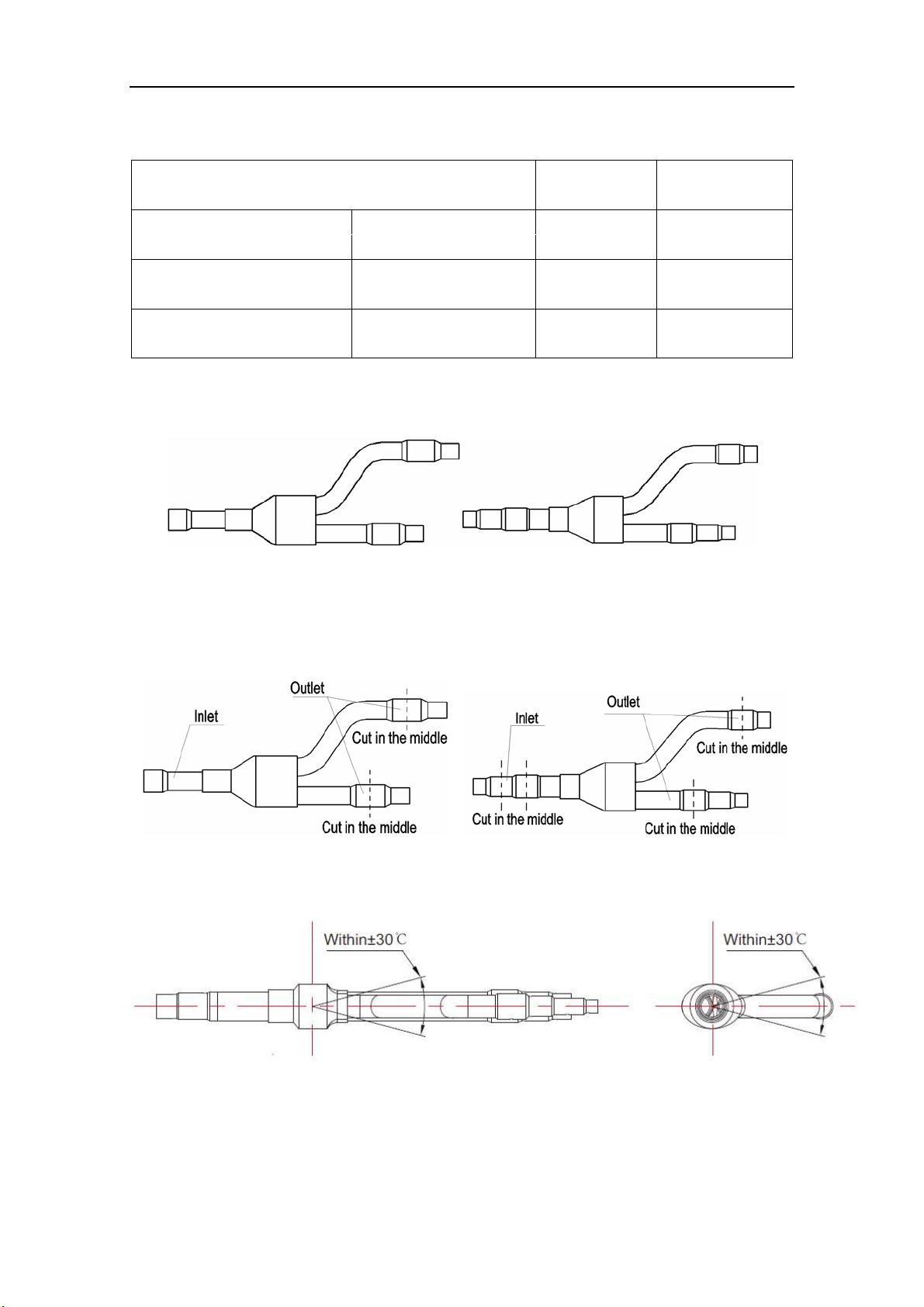
1) If two or three BU modules used, Y-type branch pipe of FQ01A/A will be chosen.
FQ01A/A (Liquid pipe) FQ01A/A (Gas pipe)
Fig. 9
2) Y-type branch pipe is equipped with auxiliary tubes to adjust the diameter of different pipes. If
the dimension of the pipe selected is different from the dimension of branch pipe joint, Cut the
copper tube in the middle with tube cutter and clear up burrs. Please do that as following figure.
Fig. 10
3) Y
-type branch pipe must be installed in vertical or horizontal direction. In the inlet of the branch
pipe, keep at least 500mm straight pipe.
Fig. 11
Flex + Series
11
6.4 Connection of Refrigerant Pipes
CAUTION
1) Conform to the following principles during pipe connection: Outdoor unit shall be installed close to the
indoor unit, hence to minimize the length and bends of connection pipes; the height gap of outdoor unit
and indoor units should be as small as possible; the radius of curvature should be as large as possible.
2) The brazing operation must be strictly in accordance with the process requirements. Rosin joint or pin
hole is not allowed.
3) During the installation, do not damage the pipeline. The pipeline’s radius of bending must be over than
200mm(8inch). The pipes cannot repeatedly be bent or straightened. Otherwise it will get harden and
crack. Do not bend or straight the pipes for more than 3 times at the same position.
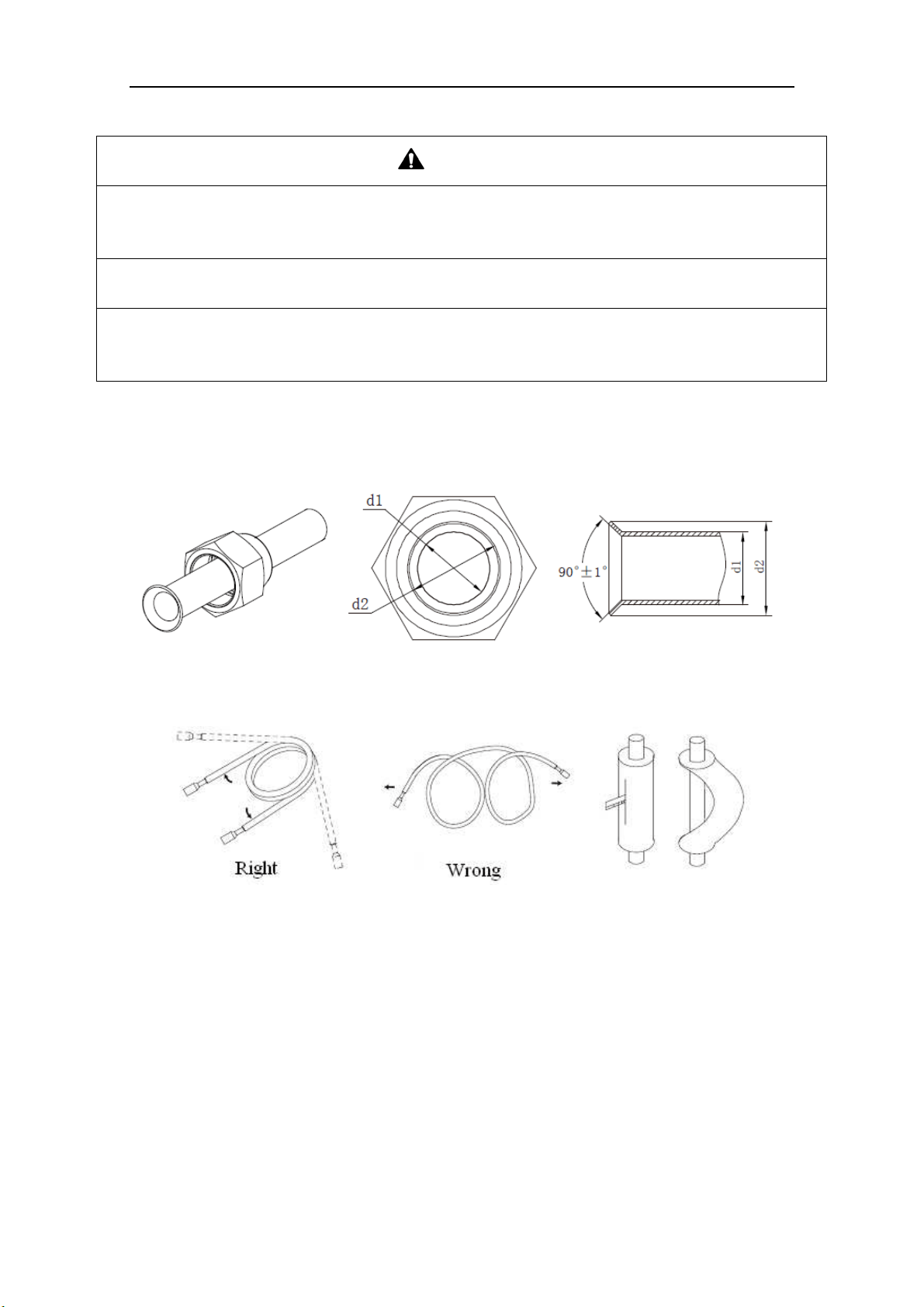
1) The process of flaring
① Using the tube cutter to cut the connecting pipe in the appropriate place and remove the burrs.
② Install the nut before the flaring operation.
③ Check the flared portion, whether there is fractured or not.
Fig. 12
2) Precaution for elbow operation
① The elbow operation could be done by hands. Be careful and do not damage the pipe.
Fig. 13
② If the thermal insulation of the refrigerant pipe is not removed, please do not bend the pipe.
Otherwise, it maybe leads the pipe to crack. It is better to make an incision with a knife in the
thermal insulation and removes it. After elbow operation is finished, recover the thermal
insulation with binding band.
3) The process of install refrigerant pipes
① Remove the screw caps from the pipes.
② Align the flared end of copper tube with the center of pipe joint. Tighten the nuts by hands. (If
the flared end of copper tube and the center of pipe joint are not in coaxial, it is hard to tighten
the nuts by hands, please do not tighten it with spanners, because the screw thread may be
broken by force).
③ Tighten the flaring nuts with torque wrench until you hear a “click”. (The spanner and torque
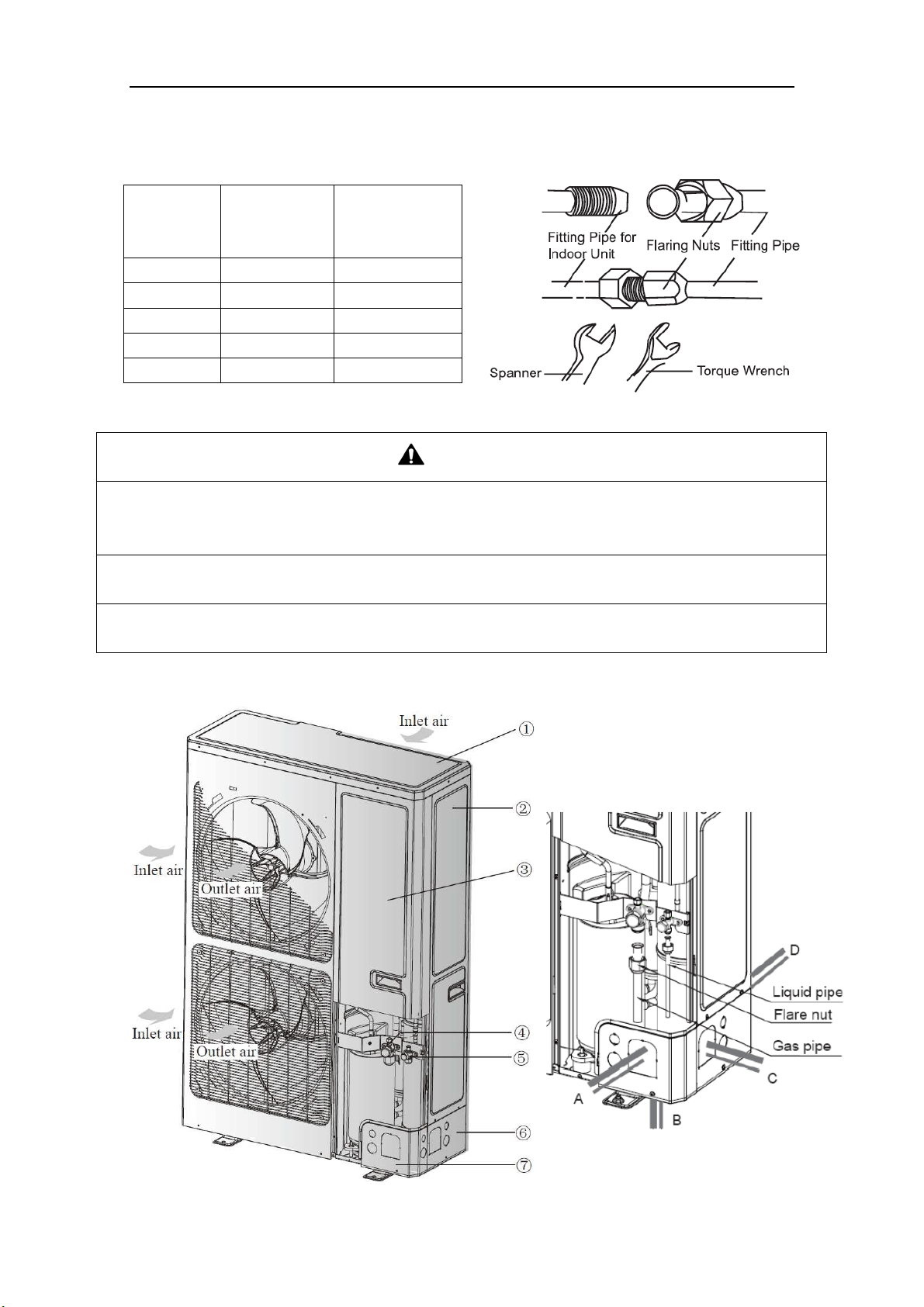
Flex + Series
12
wrench should be perpendicular to the refrigerant pipeline).
④ The following table for the torque required to tighten the nuts.
Table 5
Pipe
diameter
(mm/inch)
Thickness of
copper
tube(mm/inch)
Tightening
torque
(N·m/1bf·ft)
Φ6.35(1/4) ≥0.8(1/32) 15~30(11~22)
Φ9.52(3/8) ≥0.8(1/32) 35~40(26~29)
Φ12.7(1/2) ≥0.8(1/32) 45~50(33~37)
Φ15.9(5/8) ≥1.0(1/25) 60~65(44~48)
Φ19.05(3/4) ≥1.0(1/25) 70~75(52~55)
Fig. 14
CAUTION
1) During the connection of the indoor unit and BU module to the refrigerant pipe, never pull any joints of
the indoor unit and the BU module by force; otherwise the capillary pipe or other pipe may crack,
which then would result in leakage.
2) The refrigerant pipe should be supported by brackets, that is, don’t let the unit withstand the weight of
it.
3) For the Flex + Series, each pipe should be labeled to tell which system it belongs to avoid
mistaken inaccurate piping.
6.5 Connection of Refrigerant Pipe
Flex + Series
13
NO. ① ② ③ ④
Name Coping plate Rear side plate Front side plate Gas side stop valve
NO. ⑤ ⑥ ⑦
Name Liquid side stop valve Right connection board Front connection board
NO. A B C D
Name Front connection Bottom connection Side connection Rear connection
Fig. 15
1) Unscrew the coping plate, front side plate, right connection board and front connection board.
2) The refrigerant pipes can be installed in four directions, please choose the proper direction.
3) Knock the holes in the plate of the chosen direction with the drill and hammer.
4) Connect the pipes to the stop valves.
5) Bend the pipes to go through the knockout holes.
6) Cover the through-holes with sealing materials to prevent the water, dust or small animals going
into the outdoor unit.
6.6 Leak Test
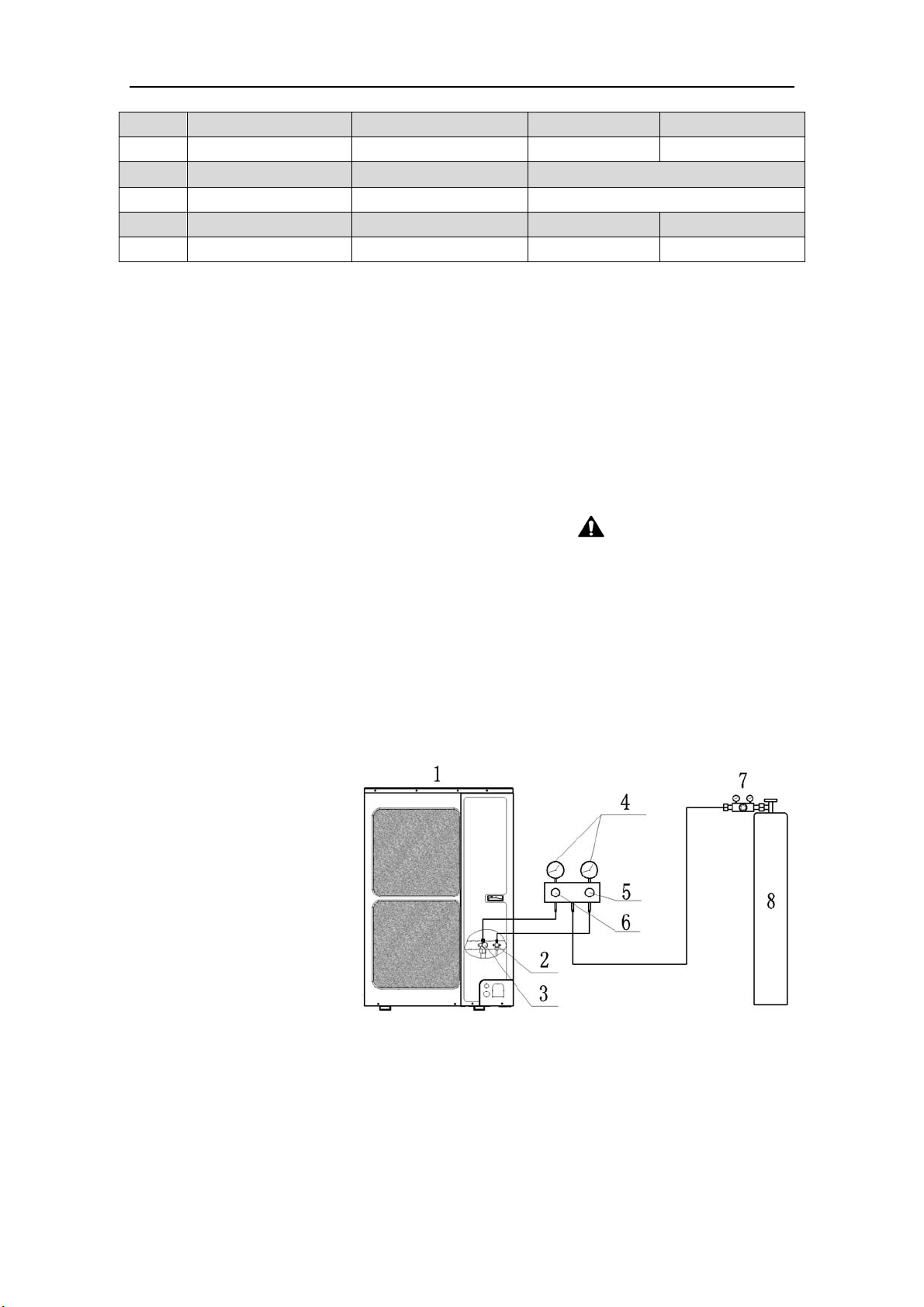
1) Please make sure that the stop valves of the outdoor unit are closed during the operation.
2) The leak test should be made by pressurizing nitrogen gas.
WARNING! Do not mix
oxygen, C
2
H
2
or other dangerous gas into the refrigerant circuit.
3) Turn on the Hi-knob and Lo-knob.
NOTICE! The leak test should be done simultaneously
at both the gas and liquid stop valves.
4) Open the pressure reducing valve, pressurize the connection pipes to 1.0 MPa (10 bar) slowly,
wait fifteen minutes, and make sure that the pressure will not drop.
5) Rise the pressure to 4.0 MPa (40 bar) slowly, wait 24 hours and make sure the pressure will not
drop
6) If the pressure does not decrease, the pipes have passed the test. Otherwise, look for where the
gas leaks from.
1: Outdoor unit
2: Liquid side stop valve
3: Gas side stop valve
4: Pressure-vacuum gauge
5: Hi-knob
6: Lo-knob
7: Pressure reducing valve
8: Nitrogen
Fig. 16
6.7 Vacuum Operation
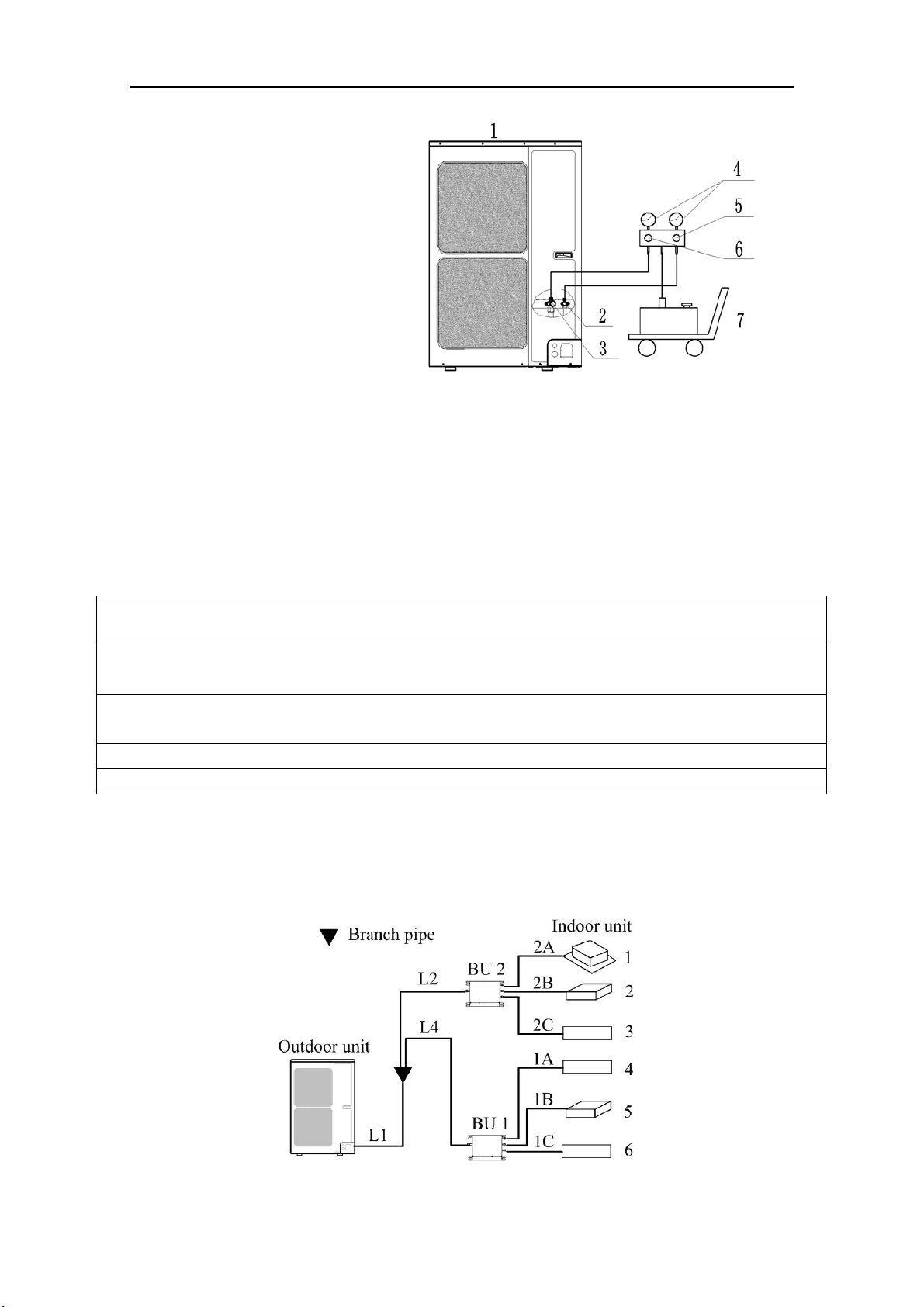
1) Make sure the stop valves of the outdoor unit are closed fully during the operation.
2) As shown in the following figure, expel the gas from the refrigerant pipes by the vacuum pump.
3) Open the pump and turn on the knobs to evacuate the gas in the liquid and gas pipes.
NOTICE!
The vacuuming should be done simultaneously at both the gas and liquid stop valves.
4) When the pressure of the system is less than -0.1Mpa (-1bar), keep the system for more than
Flex + Series
14
one hour under the condition.
1: Outdoor unit
2: Liquid side stop valve
3: Gas side stop valve
4: Pressure-vacuum gauge
5: Hi-knob
6: Lo-knob
7: Vacuum pump
Fig. 17
5) Turn off the knobs firstly and then the pump, and if the pressure of the pressure-vacuum gauge
does not rise within 2 hours, the system is under a vacuum. Otherwise, the system has leaked,
please look for where the gas leaks in.
6.8 Refrigerant Charging
The refrigerant has been charged into the outdoor unit before shipped from the manufacturer,
while additional refrigerant still need be charged into the refrigerant pipe in the field installation.
6.8.1 Calculation of the Additional Refrigerant Charging
1) G
et the refrigerant charge of the outdoor unit from the nameplate.
NOTICE
1) The refrigerant charge of the outdoor unit does not include the charged additionally in the indoor unit,
BU module and the refrigerant pipe.
2) For the length of the connecting pipe is decided on the field, the amount of additional refrigerant shall
be decided depending on the dimension and the length of the liquid pipe used on the field.
3) It does not need to add refrigerant if the total length of liquid pipe is within 30m (98-3/8feet).
4) Record the amount of additional refrigerant for convenience of future maintenance.
2) Calculating the Mass of Additional Refrigerant
Additional Refrigerant Charge (kg/oz) = Σ the Liquid Pipe Length of Φ6.35 × 0.022kg/m
(0.020oz/inch)+
Σ the Liquid Pipe Length of Φ9.52×0.054kg/m (0.048oz/inch)-1.47kg(51.86oz)
NOTICE! If the additional refrigerant charge is negative, it does not need to add refrigerant.
3) Example:
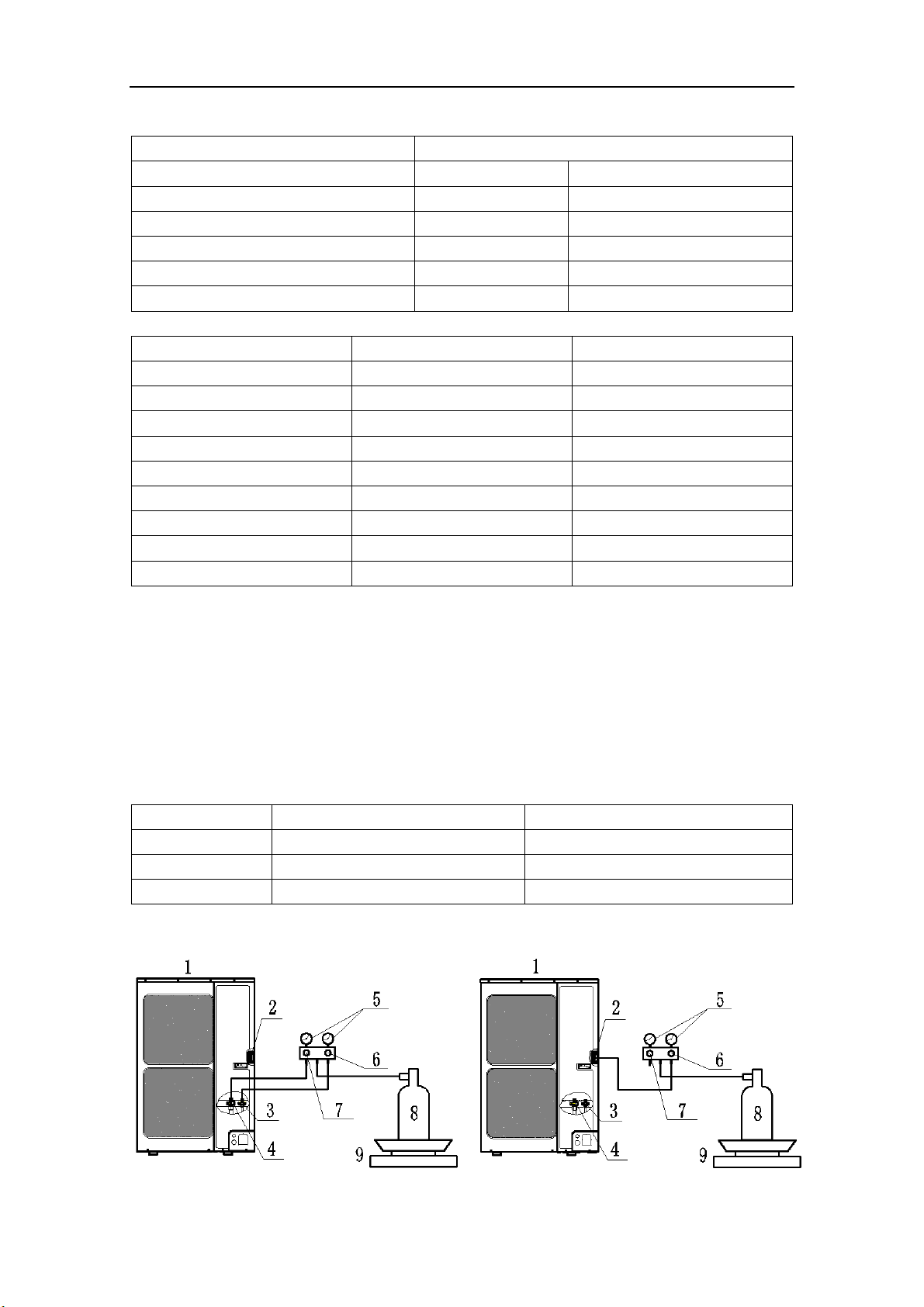
GWHD(56S)ND3CO
Fig. 18
Flex + Series
15
Table 6
Serial No. Model
Indoor unit 1 Cassette type
ISMI-C15
Indoor unit 2 Duct type N/A
Indoor unit 3 Wall mounted type
ISMI-W092
Indoor unit 4 Wall mounted type
ISMI-W092
Indoor unit 5 Duct type N/A
Indoor unit 6 Wall mounted type
ISMI-W092
Table 7
Serial Diameter(mm/inch) Length(m/feet)
L1 Φ9.52(3/8) 20(65-5/8)
L2 Φ9.52(3/8) 10(32-3/4)
L4 Φ9.52(3/8) 10(32-3/4)
1A Φ6.35(1/4) 5(16-3/8)
1B Φ6.35(1/4) 5(16-3/8)
1C Φ6.35(1/4) 5(16-3/8)
2A Φ6.35(1/4) 5(16-3/8)
2B Φ6.35(1/4) 5(16-3/8)
2C Φ6.35(1/4) 5(16-3/8)
The total length of the liquid pipes: 20+10+10+5+5+5+5+5+5=70m (229-5/8feet).
Thus, the total length is over than 30m (98-3/8feet), so the air conditioner needs to add refrigerant.
Additional refrigerant charge
Σ the Liquid Pipe Length of Φ6.35×0.022kg/m +Σ the Liquid Pipe Length of Φ9.52×0.054kg/m
-1.47kg
=(5+5+5+5+5+5)(m)×0.022kg/m+(20+10+10)(m)×0.054kg/m-1.47kg
=1.35kg (47.63oz)
4) Additional refrigerant charge record for future maintenance
Table 8
Diameter(mm) Total length(m/feet) Additional refrigerant charge(kg/oz)
Φ6.35(1/4)
Φ9.52(3/8)
Total
6.8.2 Proced
ures for adding refrigerant
Flex + Series
16
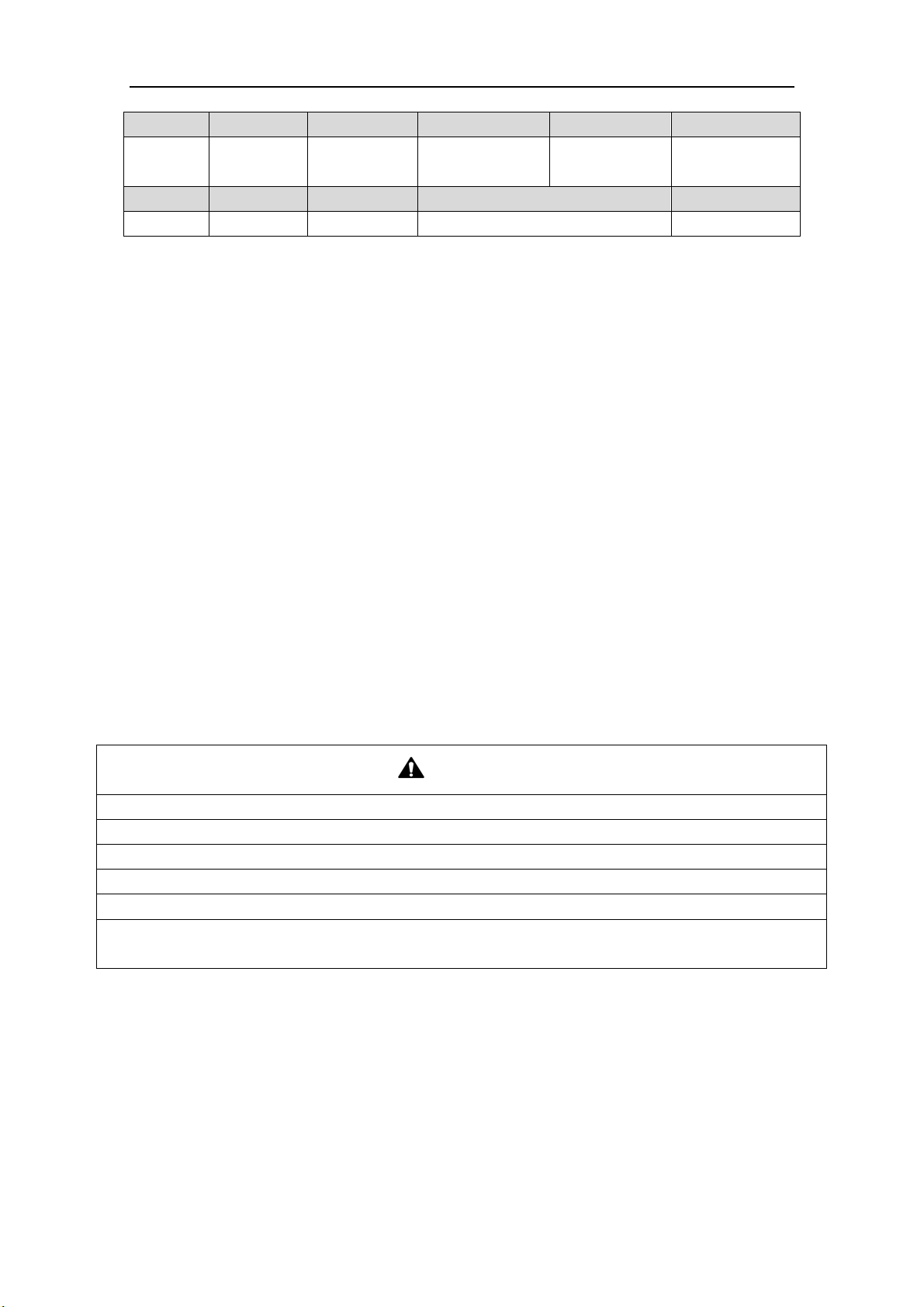
NO. 1 2 3 4 5
Name
Outdoor
unit
Service port
Liquid side stop
valve
Gas side stop
valve
Pressure-vacuum
gauge
NO. 6 7 8 9
Name Hi-knob Lo-knob R410A tank Scale
Fig. 19
1) When the liquid and gas stop valves have not been opened, the system is under the vacuum:
① Refer to the left of the figure above; connect the R410A tank to the system.
② Turn on the R410A tank and the Hi-knob; charge the R410A refrigerant into the unit from the
liquid side stop valve. The Lo-knob should be closed completely.
③ Turn off the R410A tank and the Hi-knob immediately, when the adding refrigerant is enough.
④ Turn on the liquid and gas side stop valves in an anticlockwise direction slowly and completely.
2) If the pressure of the system is too high to charge refrigerant, you can do as follow.
① Turn on the liquid and gas side stop valves in an anticlockwise direction slowly and completely.
② Turn on the power of the air conditioner, and set cooling mode, running more than 0.5h when
outside temperature is higher than 15℃(59℉) DB.
a) Refer to the left of the figure above; connect the R410A tank to the system.
b) Turn on the R410A tank and the Lo-knob; charge the R410A refrigerant into the unit from
the gas side stop valve. The Hi-knob should be closed completely.
c) Turn off the R410A tank and the Lo-knob immediately, when adding refrigerant is enough.
③ Turn on the power of the air conditioner, and set heating mode, running more than 0.5h when
outside temperature is lower than 15℃(59℉) DB.
a) Refer to the right of the figure above; connect the R410A tank to the system.
b) Turn on the R410A tank and the Hi-knob; charge the R410A refrigerant into the unit from
the service port. The Lo-knob should be closed completely.
c) Turn off the R410A tank and the Hi-knob immediately, when adding refrigerant is enough.
CAUTION
1) Make sure that the liquid and gas side stop valves are opened completely after the installation.
2) Make sure that the length of liquid pipe is exactly.
3) Additional refrigerant charge must be measured exactly.
4) Make sure that the refrigerant which charge into the unit is in liquid state.
5) Please prevent the refrigerant leakage away from your body when remove the charging hose.
6) Please heat the refrigerant tank with hot water or hot air when the outside temperature is too low.
However, it must be forbidden to heat with fire directly, otherwise it may lead to explosion.
Flex + Series
17
7 Electrical Wiring Work
7.1 Wiring Connection
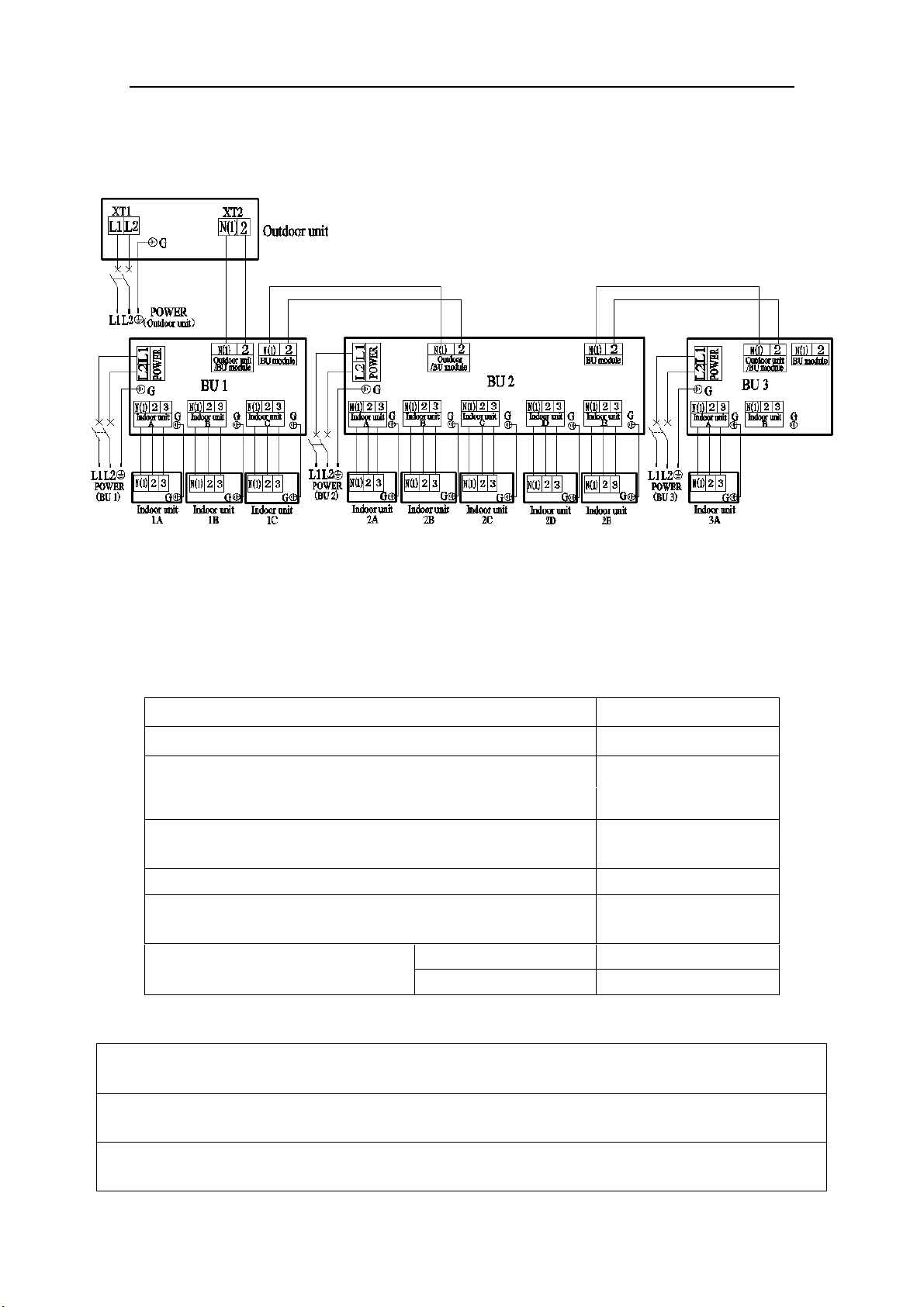
NOTICE! The “L1”, “3” terminals are connected to the live wire, the “L2”,”N(1)” terminals
are connected to the neutral wire and the ”2” terminal is connected to the transmission line.
Fig. 20
7.2 Requirements of Power Circuit and Cable
Table 9
Phase and frequency 1Ph,60Hz
Voltage 208/230V
Recommended cable of outdoor unit (Pieces × Sectional area)
3×6.0 mm
2
Recommended cable of BU module
(Pieces × Sectional area)
3×0.75 mm
2
Transmission line (Pieces × Sectional area) 2×1.5 mm
2
Recommended cable of indoor unit
(Pieces × Sectional area)
4×0.75mm
2
Capacity of the air switch
ISMO-6021
40A
BU module 10A
NOTICE
1) The total length of the transmission line between the outdoor unit and the furthest BU module is not
more than 55m (180feet). Otherwise, the system cannot work possibility.
2) The specifications of the power cable and transmission line listed in the table above are determined
based on the maximum power (maximum amps) of the unit.
Flex + Series
18
3) The specifications of the power cable listed in the table above are applied to the conduit-guarded
multi-wire copper cable (like, YJV copper cable, consisting of PE insulated wires and a PVC cable
jacket) used at 40℃(104℉) and resistible to 90℃(194℉), and shall be at least those of ordinary
polychloroprene sheathed cords. If the working condition changes, they should be modified according
to the related national standard.
4) The specifications of the air switch listed in the table above are applied to the breaker with the working
temperature at 40℃(104℉). If the working condition changes, they should be modified according to the
related national standard.
5) The length of the recommended power cable should be less than 15meters (49feet); otherwise, the
diameter of the power cable is not enough.
6) Mentioned power cable and transmission line length is just a reference value. It may be different
depending on the condition of installation, humidity or materials, etc.
7) An all-pole disconnection switch having a contact separation of at least 3mm in all poles should be
connected in fixed wiring.
7.3 Ground Requirements
WAR N I N G
1) The air conditioner is classified into the Class I appliances, so its ground ways must be reliable.
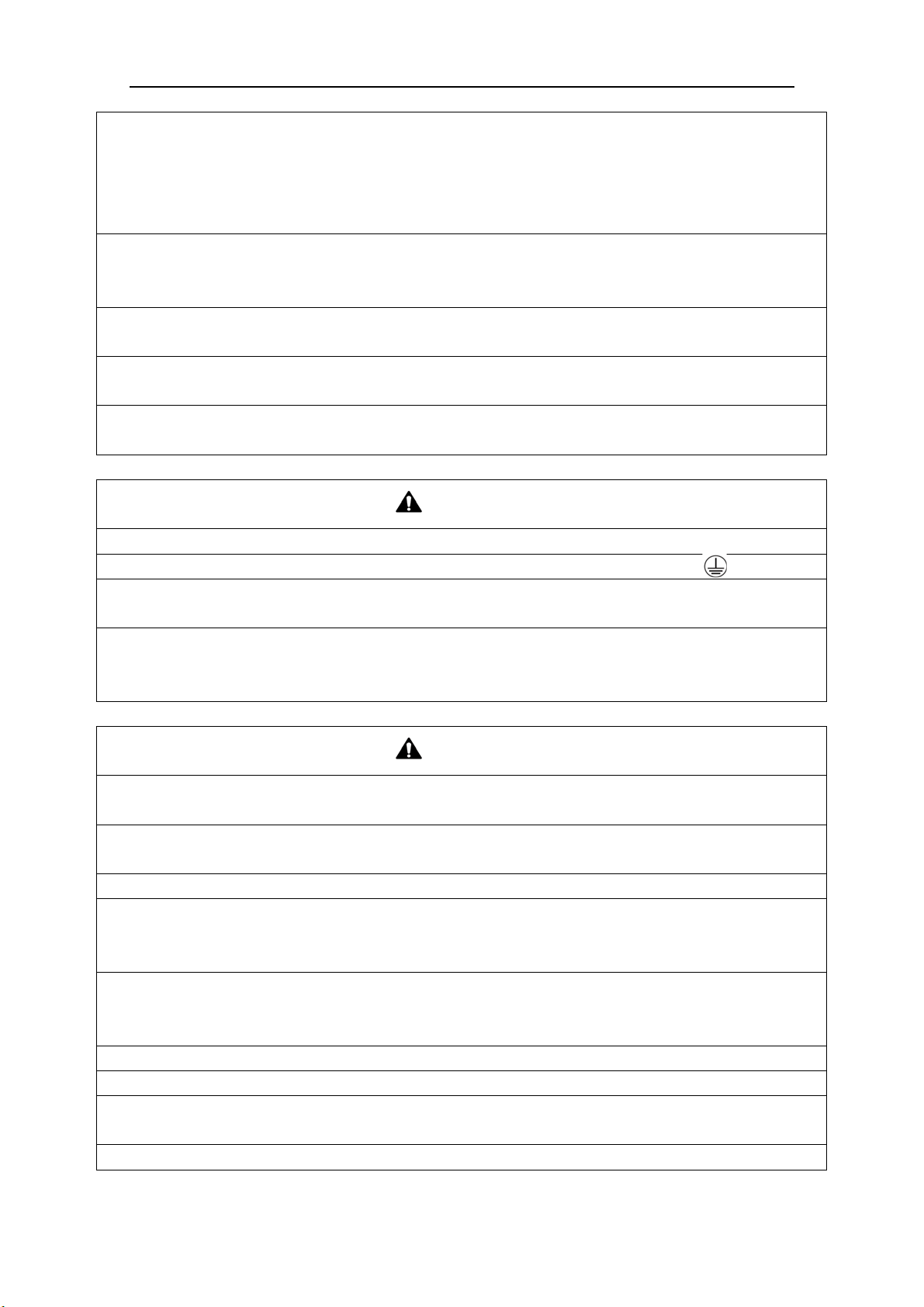
2) The ground wire must be fixed on the screw hole with the sign as the right figure.
3) The yellow-green wire of the air conditioner is the ground wire and must be fixed by the tapping screw.
And it cannot be used for other purpose or cut off. Otherwise, it will cause the hazard of electric shock.
4) The reliable ground terminal should be provided and the ground wire cannot be connected to any of the
following places: a. Water pipe; b. Coal gas pipe; c. Sewage pipe; d. Lightning rod
e. Telephone line f. Other unreliable places considered by a professional.
7.4 Precautions on the Electrical Wiring Work
WAR N I N G
1) The electrical installation should be carried out by the professional as instructed by the local laws,
regulations and also this manual.
2) The ground connection should be reliable and the ground wire should be connected to the dedicated
device of the building by the professional.
3) Before starting work, the power must not be supplied to the unit.
4) The air switch coupled with the leakage current protection switch must be equipped in the circuits,
which is of enough capacity and of both magnetic and thermal tripping functions in case of the short
circuit and overload.
5) The electrical work should use a cable length enough to cover the entire distance with no connection. If
it is unavoidable, please make sure the connection should be reliable, the external forces will not act on
the wires and the joint is not bared. Otherwise it will cause electrical shock or fire etc.
6) The power cable with the rated voltage and exclusive circuit for the air conditioner should be used.
7) Do not pull the power cable by force after it is installed.
8) The diameter of the power cable should be large enough and once it is damaged, it must be replaced by
the dedicated one.
9) The multi-wire copper cable should be used for the power cable and the transmission line.
Flex + Series
19
7.5 Precaution of Laying Wires
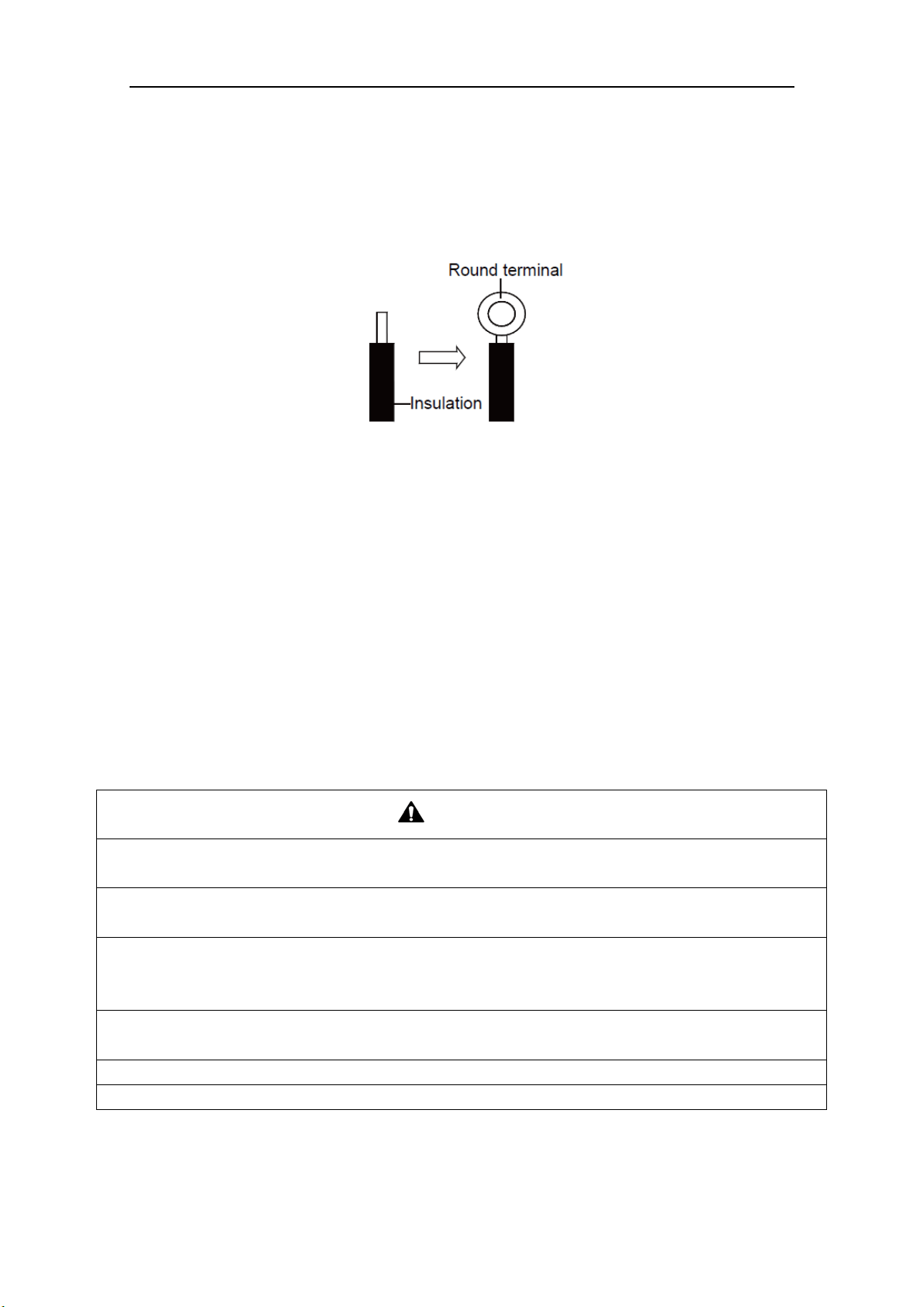
1) Use a wire stripper to strip off a length of the insulation layer at the end of the wires;
2) Loosen the screws on the terminal block of the air conditioner;
3) Press the ends of the cable tightly onto the round terminals corresponding to the size of the
screws.
4) Pass the screw through the round terminals and fix it onto the terminal block.
Fig. 21
7.6 Procedures for Electrical Wiring Work
1) Knock the holes in the plate of the chosen direction with the hammer.
2) Place the rubber ring on the knockout hole.
3) Let the power cable and transmission line go through the knockout hole.
4) Connect the power cable of the outdoor unit to the L1, L2 terminals with the sign of the XT1
and as well as the ground screw.
5) Connect the transmission line of the outdoor unit to the N(1), 2 terminals with the sign of the
XT2.
6) Fix the power cable and transmission line firmly by cable fixing clip. In order to protect the
power cable and transmission line from damage by the pipes or others, an interval of at least
2cm (3/4inch) away is essential.
7) Screw the coping plate, front side plate, right connection board, front connection board back.
8) Cover the through-holes with sealing materials to prevent the water, dust or small animals going
into the outdoor unit.
CAUTION
1) The transmission line and the power cable must be separated with an interval of at least 2cm (3/4inch);
otherwise it may be result in communication problem.
2) In order to protect the power cable and transmission line from damaging by the knockout hole, the
rubber ring must be placed on the hole. Otherwise, it may cause electrical shock or fire etc.
3) The power wire and transmission line must be more than 1 meter (3-1/4feet) away from televisions or
radios which can emit electromagnetic waves to prevent image interference or noise. Otherwise, the unit
maybe cannot work.
4) Confirm the each cable connected to the terminal screw is exactly and securely after finishing the
electric work.
5) Fix each ground wire separately with the ground screw.
6) If the connecting wire is connected to the terminal incorrectly, it may cause a fire.
Flex + Series
20
8 Design of Drainage Pipeline
8.1 Installation of Drain Hose
1) Choose one drain hole in the bottom of the outdoor unit.
2) Connect the drain hose to the drain hole.
3) The drain hose should be kept at 5~10 degrees of gradient to facilitate discharge of the
condensing water. Take care that does not exert too much force on the hose.
4) Thermal insulation materials should be placed at the joints of the drain hose so as to prevent
from dew condensation. Fix the drain hose firmly by binding band.
Fig. 22
5) The
end of the drain hose should be inserted into the hole of drainage pipeline.
8.2 Design of Drainage Pipeline
1) The drainage pipeline should be kept at a certain gradient (1/50—1/100) so as to avoid bulges
of pipes where there might be water bends.
2) The drainage pipeline is form of the hard PVC pipes for common purposes which can be
purchased locally. The diameter of the PVC pipes is not less than 17mm (11/16inch) and the
pipeline should be fixed as close to the BU module as possible.
3) Insert the drain hose into the drain hole of drainage pipeline. Use binding band to fix it tightly.
It is not allowed to use adhesive glue to join the drain hose to the drainage hole.
4) When
the drainage pipeline is laid for a couple
of units, the position of the shared pipeline
should be approximately 100mm lower than the drainage hole of each module. In this case,
some special-purpose pipes with thicker walls will be used.
NOTICE! At intervals of about 1 meter (3-1/4feet), fix the drain pipes to the wall with
brackets, not floating in the air.
Flex + Series
21
9 Installation of Protective Layer
1) The refrigerant pipes should be insulated by the heat insulation material and plastic tape in
order to prevent water condensation and leakage.
2) Do not use the foam on the branch pipe as the material for heat insulation, heat insulation
material of branches should be the same as that of the pipeline.
NOTICE! The heat resistance of heat insulation material should be over than 120
℃(248℉)
and its thickness is more than 9mm(3/8inch).
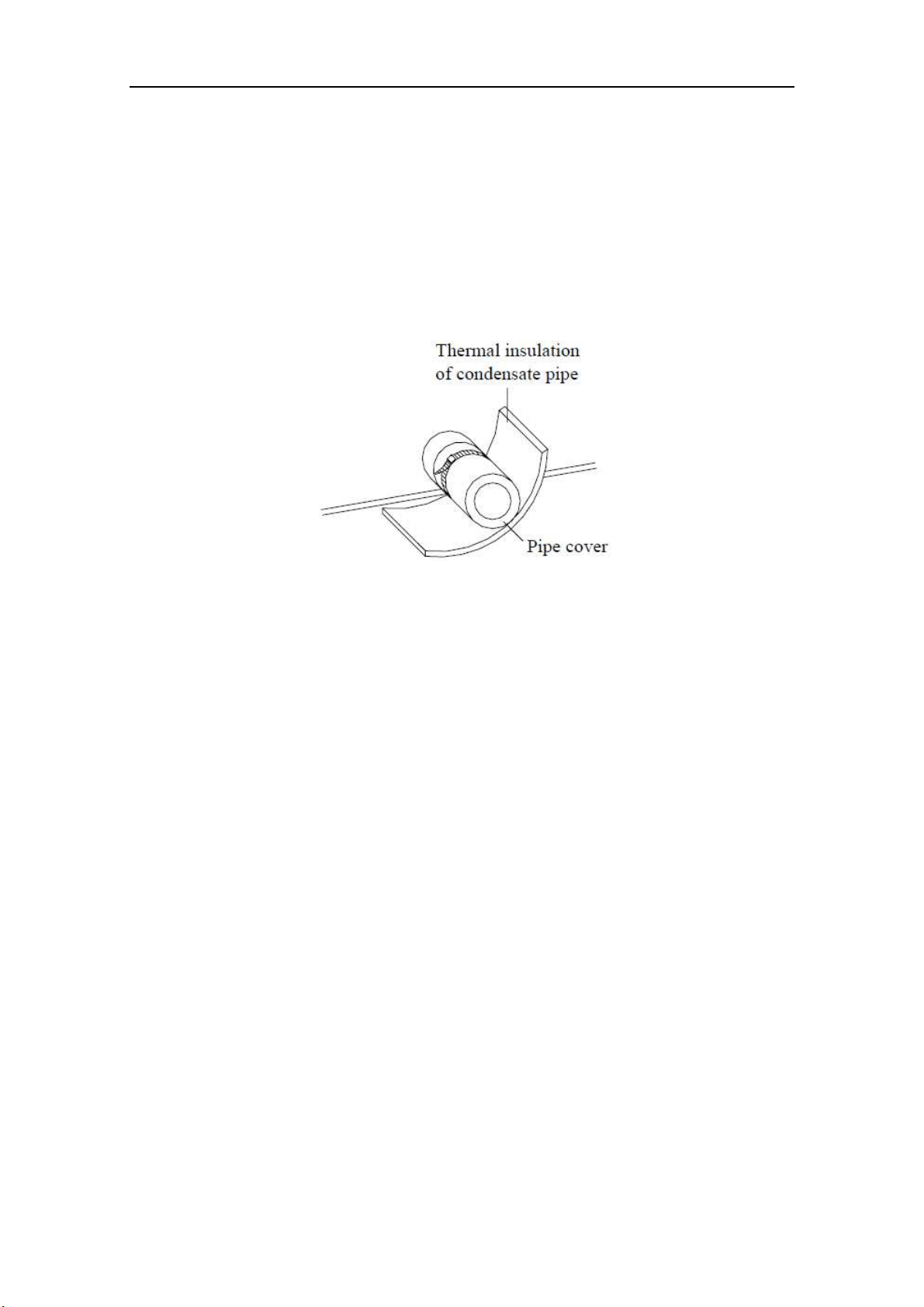
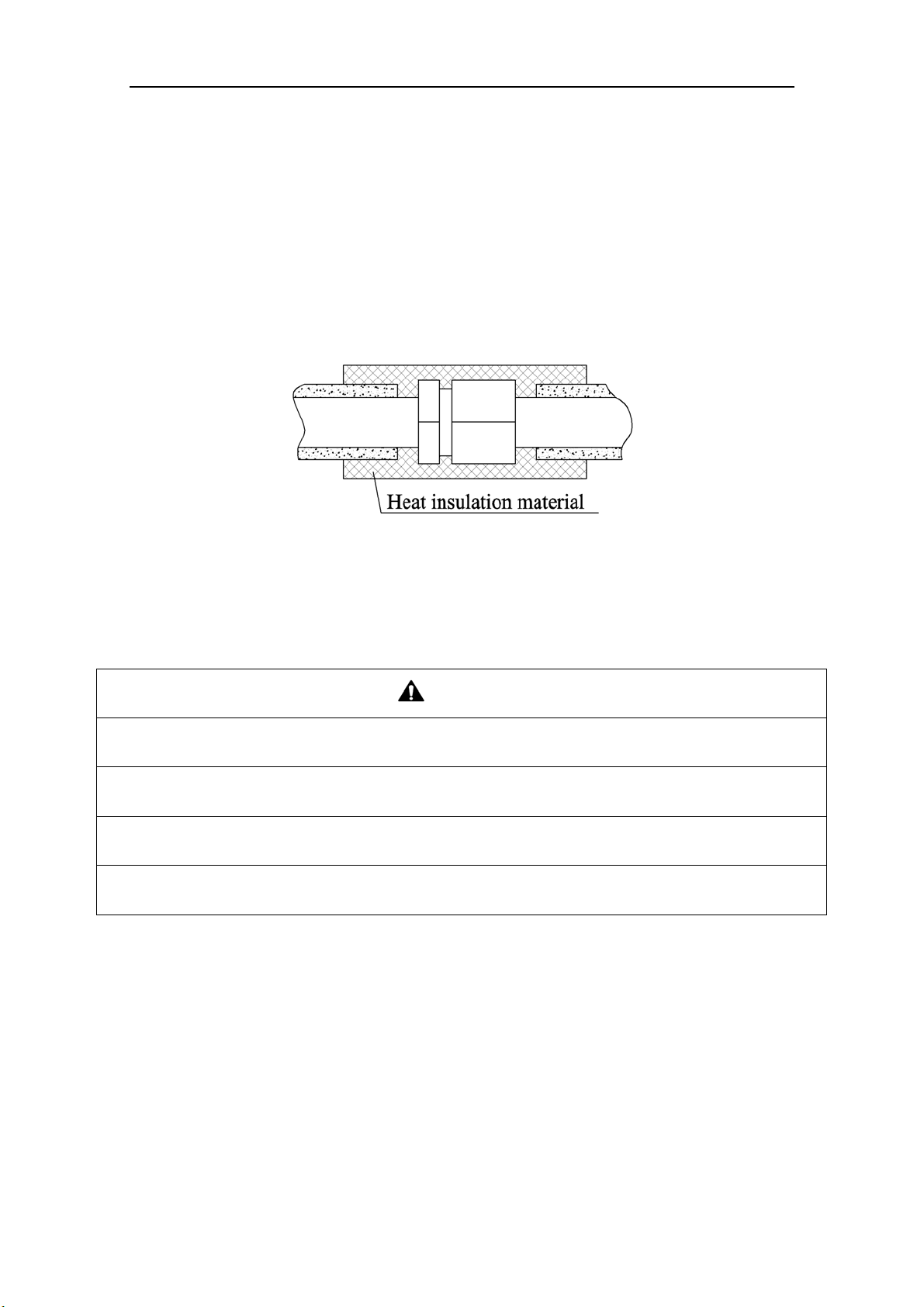
3) The joints of the system should be wrapped with the heat insulation material and no gap is
allowed on the joint of the system, as shown in the following figure.
Fig. 23
4) Bun
dle the refrigerant pipe and transmission line together with tape, and separate them from the
drain pipe to prevent the condensate water overflowing.
5) Wrap the pipe from the bottom of the outdoor unit to the top of the pipe where it enters the wall.
During the wrapping, the later circle should cover half of the former one.
CAUTION
1) At intervals of about 1 meter (3-1/4feet), fix the refrigerant pipes to the wall with brackets, that is, don’t
let the unit withstand the weight of it or float it in the air.
2) After the pipe is protected well enough, never bend it to form a small angle(<90°), otherwise it would
crack or break.
3) Do not wrap the refrigerant pipes very tight, otherwise the insulation effect would be weakened.
Additionally, make sure the drain hose is separated from the refrigerant pipes.
4) After that, cover the hole on the wall with sealing materials to prevent wind and noise going into the
room.
Flex + Series
22
10 Test Operation
10.1 Check after Installation
Table 10
Items to be checked Possible malfunction
Has it been fixed reliable? The unit may drop, vibrate or make noise.
Has the gas leakage been checked? It may cause insufficient cooling(heating) capacity.
Is the thermal insulation of the unit sufficient? It may cause condensation and dripping.
Is the drainage well? It may cause condensation and dripping.
Is the voltage in accordance with the rated
voltage marked on the nameplate?
It may cause electric malfunction or the
components may be burned out
Are the lines and pipelines correctly installed?
It may cause electric malfunction or the
components may be burned out
Has the unit been safely grounded? It may cause electrical leakage.
Are the models of lines in conformity with
requirements?
It may cause electric malfunction or the
components may be burned out
Are there any obstacles near the air inlet and
outlet of the indoor and outdoor units?
It may cause insufficient cooling(heating) capacity.
Have the length of connection pipes and
refrigerant charge amount been recorded?
It is not easy to decide the charge amount of
refrigerant.
10.2 Test Operation
1) Before test operation
The appearance of the unit and the refrigerant pipes cannot be damaged during the installation.
Do not switch on power before installation is finished completely.
Electrical wiring must be connected correctly and securely.
The stop valves of the outdoor unit should be opened fully.
All the impurities such as scraps and thrums must be cleared from the unit.
2) Test operation method
① The test operation should be carried out by the professionally skilled personnel on the premise
that all items listed above are in normal conditions.
② Set the status of the power supply switch as “ON” eight hours before the start of operation
③ Press mode button, to select the COOL, or HEAT. Whether the air conditioner is work
normally or not.
The fan motor of the indoor unit will run automatically in one minute.
The fan motor and compressor of the outdoor unit will run automatically in one minute.
④ Make sure that every combination of indoor units can work well.
WAR N I N G
If the unit cannot work nor has any abnormal noise after the compressor is started, turn off the unit for an
immediate check.
Flex + Series
23
11 Testing Board Introduction
11.1 Compose of the Testing Board
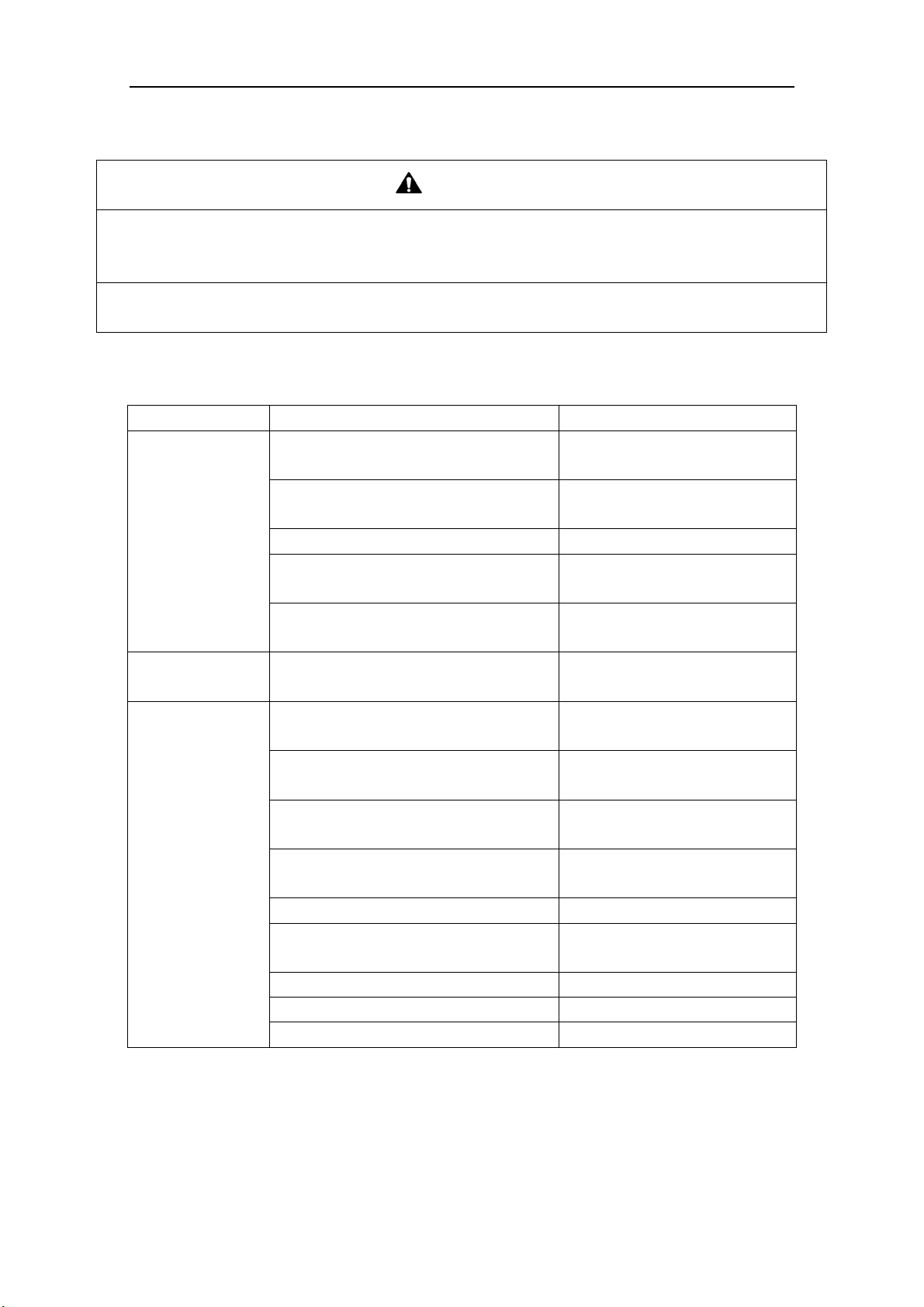
The testing board is in front of electrical box and can be observed well. It has several following
advantages: detect indoor unit numbers and indoor unit address, displays real running function and
error code automatically. It is composed of the function section, data section and button section.
11.2 Instruction of Function and Data Section
Running state The display of function section The display of data section
Stop
① The section will display the numbers of the
indoor units which have established
communication with the outdoor unit. For
example, if there are seven established indoor
units, the section will display “7”.
② It will display the address of the indoor units
by turns. For example, the “1b” is represented
of the indoor unit 1B.
(BU module:1/2/3,Indoor unit: A/b/C/d/E)
① If the function section displays the
numbers of the indoor units, the data
section will display the outside
temperature. For example, the “35” is
represented of 35℃.
② If the function section displays the
address of the indoor unit,the data
section will display the model of the
indoor unit, for example, the “35” is
represented of 35 model.
Normal
The code of running state:
Code
Running
state
Code Running state
UE
Pressure
equalization
UH Heating
UP Pump down F7 Oil returning
UC Cooling H1 Defrosting
It displays the target gear of the
compressor. If the gear is zero, it will
display “0”. For example, the gear is
the fifteenth; it will display “15”. The
range of the gear is from 0 to 60.
Malfunction
If the malfunction occurs in the system, the
section will display the error code. If there are
several malfunctions, it will display the error
codes by turns at intervals of 2 seconds.
① If the malfunction occurs in the
outdoor unit, the section displays
nothing;
② If the malfunction occurs in the
indoor units, the section displays the
address of the indoor unit.
Function section
Data section Button section
Flex + Series
24
12 Troubleshooting
WAR N I N G
1) In the event of abnormal conditions (like, stinky smell), please shut off the power supply immediately
and then contact the appointed service center; otherwise, the abnormal running would damage the air
conditioner and also would cause electric shock or fire hazard .
2) Do not repair the air conditioning personally but instead contact the professionally skilled personnel at
the appointed service center, as the incorrect repair would cause electric shock or fire hazard etc.
12.1 Check before Contacting Service Center
Please check the following items before contacting the maintenance serviceman.
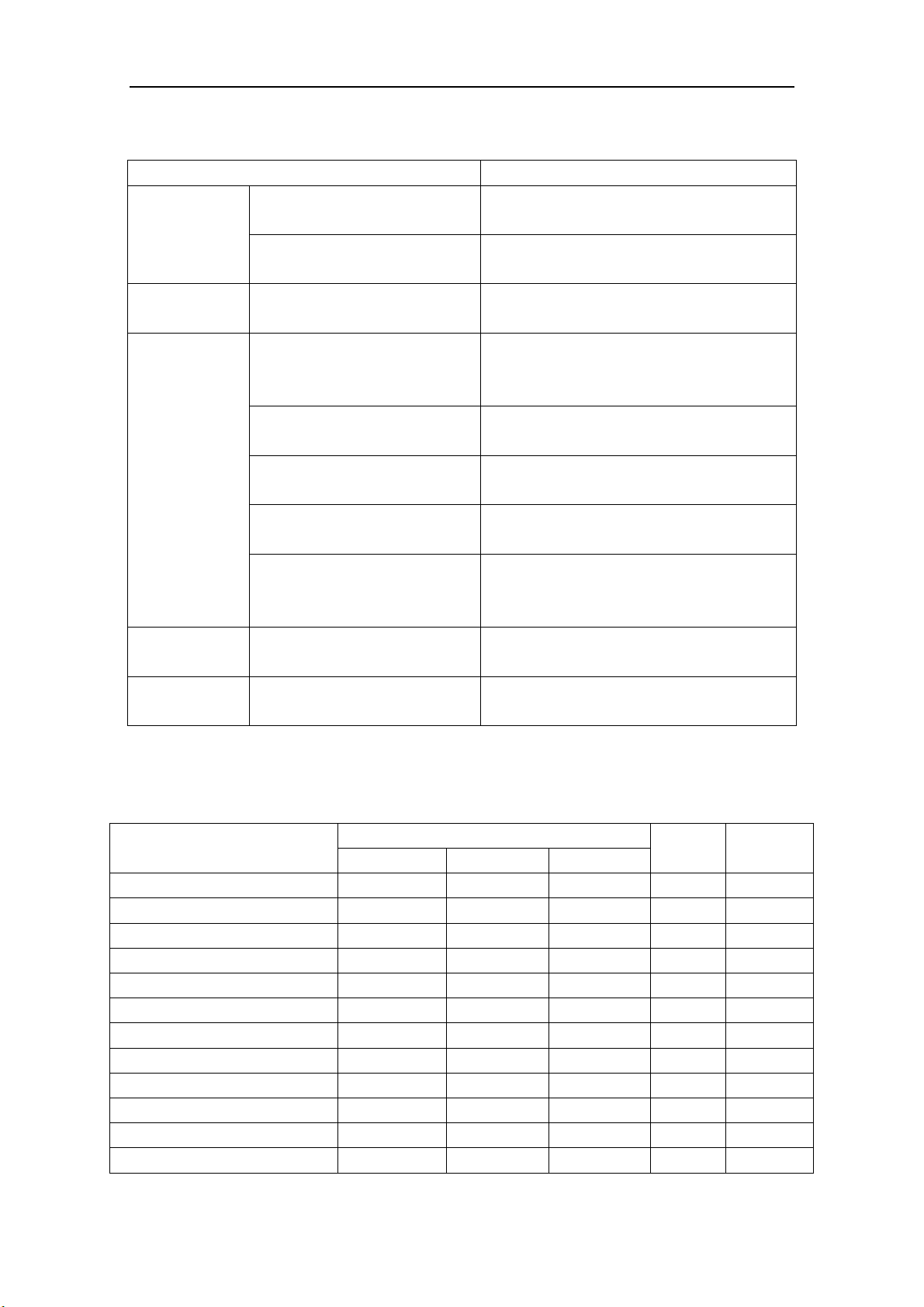
Conditions Causes Corrective actions
The unit does not
run at all
Broken fuse or breaker is off
Replace the damaged fuse or
close the breaker
Power off
Restart the unit after power
supply resumes
Power supply plug is loose Plug the power supply properly
The batteries voltage of the remote
controller is insufficient
Replace with new batteries
Remote controller is out of the control
scope
The distance shall be within 8m
The unit stops
soon after it starts
Air inlet or outlet of indoor unit or
outdoor unit is blocked
Remove the obstacles
Cooling or heating
is abnormal
Air inlet or outlet of indoor unit or
outdoor unit is blocked
Remove the obstacles
Temperature setting is improper
Adjust the setting of remote
controller or wire controller
Air speed is set too low
Adjust the setting of remote
controller or wire controller
Improper airflow direction
Adjust the setting of remote
controller or wire controller
Door or window is open Close the door or window
Under direct sunshine
Hang curtain or blinders over the
window
Too many people in the room
Too many heat sources indoors Reduce the heat sources
The filter screen is dirt or blocked Clean the filter screen
NOTICE! If the air conditioner still runs abnormally after the above check and handling,
please contact the local appointed service center and also give a description of the error
occurred as well as the model of the unit.
Flex + Series
25
12.2 Problem Handling
The conditions listed below are not classified into errors.
Conditions Causes
The unit does
not run
When restart the unit soon after
it is stopped
The overload protection switch of the unit let
the startup delayed for three minutes
As soon as power supply is on
The unit will stand by for approximate one
minute
The unit blows
out mist
When the cooling operation
starts
The hi-humidity air indoor is cooled quickly
The unit
generates noise
The unit “clatters” as soon as it
starts running
It is the sound generated during the
initialization of the electronic expansion
valve
The unit “swishes” during the
cooling operation
It is the sound when the refrigerant gas runs
inside the unit
The unit “swishes” when it is
started or stopped
It is the sound when the refrigerant gas stops
running
The unit “swishes” when it is in
and after the running
It is the sound when the draining system is
operating
The unit “squeaks” when it is in
and after the running
It is the sound of frication generated by the
skin plate etc which swells due to the
temperature change
The unit blows
out dust
When the unit restarts after it is
not used for a long time
The dust inside the unit is blown out again
The unit emits
odors
When the unit is running The odors absorbed in are blown out
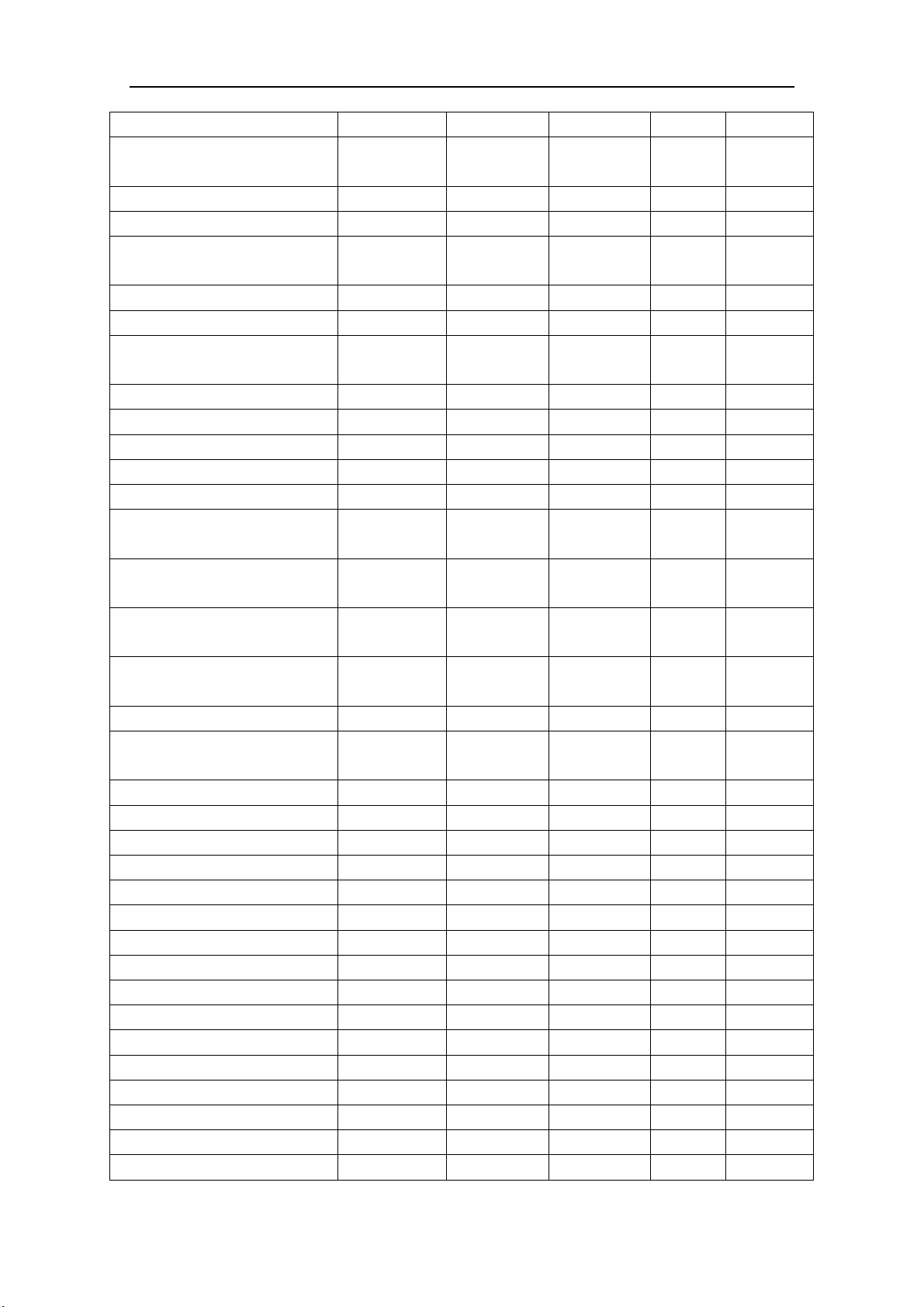
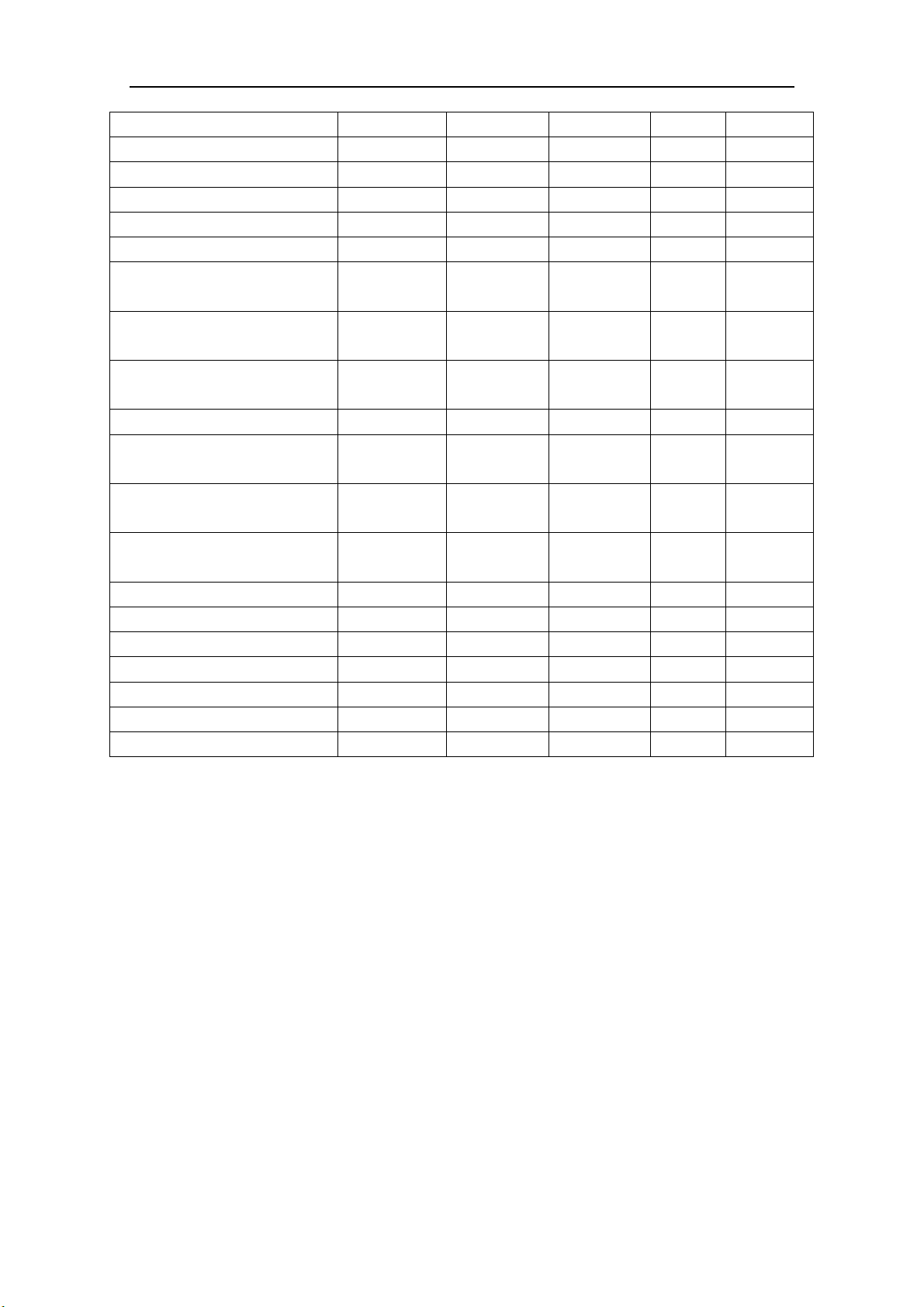
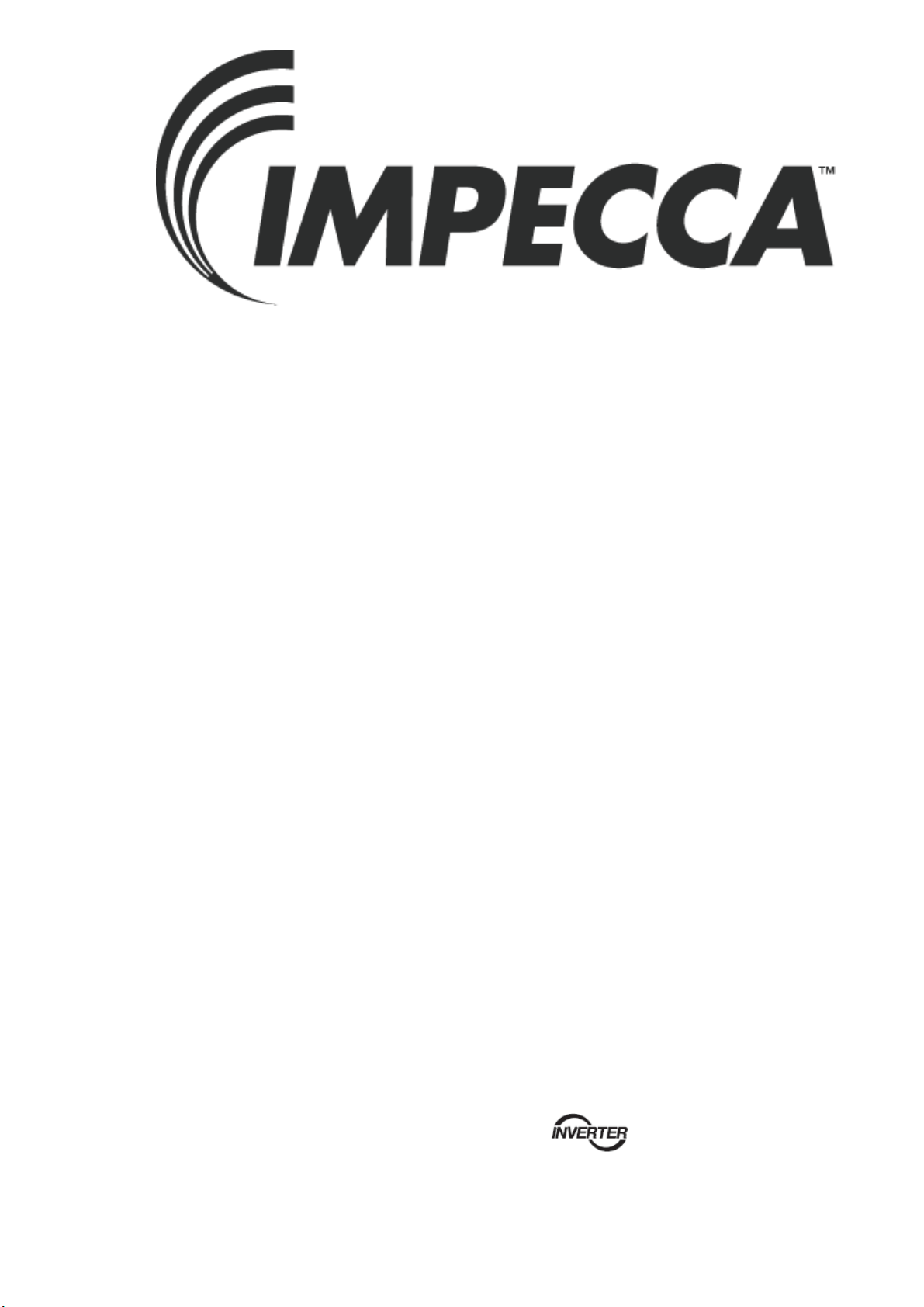
12.3 Error Description
If some error occurs when the unit is running, the error code will be displayed and check for
more details about the meaning of each error.
Errors of definition
Main control display for outdoor unit
Indoor
unit code
Testing
board code
Yellow LED Red LED Green LED
The compressor is startup Flash 1 time
IPM current protection Flash 3 times
H5 H5
IPM temperature protection Flash 5 times
P8 P8
PFC current protection Flash 7 times
HC
PFC temperature protection Flash 8 times
P8 P8
Low voltage protection Flash 9 times
PL PL
High voltage protection Flash 10 times
PH PH
Low pressure protection Flash 11 times
E3
High pressure protection Flash 12 times
E8
High pressure switch protection Flash 13 times
E1
Capacitor charging error Flash 14 times
PU
AC current protection Flash 15 times
E5 E5
Flex + Series
26
Memory card error Flash 16 times
EE
Compressor demagnetizing
protection
Flash 17 times
HE HE
Compressor desynchronizing Flash 18 times
H7 H7
Compressor phase lack Flash 19 times
U2 U2
Compressor phase circuit detection
error
Flash 20 times
U1 U1
Compressor power protection Flash 21 times
L9 L9
Compressor overload protection Flash 22 times
H3 H3
Compressor discharge temperature
protection
Flash 23 times
E4 E4
Lack of refrigerant or jam protection Flash 31 times
F0 F0
Normal operation Flash 1 time
Frequency limitation for AC current Flash 2 times
F8
Oil returning Flash 3 times
F7
Defrosting Flash 4 times
H1 H1
Frequency limitation for IPM
temperature
Flash 5 times
EU
Frequency limitation for PFC
temperature
Flash 6 times
EU
Frequency limitation for compressor
overload
Flash 8 times
LU
Frequency limitation for compressor
discharge temperature
Flash 9 times
F9
Frequency limitation for low pressure Flash 10 times
Pn
Frequency limitation for high
pressure
Flash 11 times
F6
Discharge temperature sensor error Flash 12 times
F5 F5
Outdoor temperature sensor error Flash 13 times
F3 F3
Suction temperature sensor error Flash 15 times
dc
Condenser temperature sensor error Flash 16 times
A7 A7
Sub-cool temperature sensor error Flash 17 times
bC
Low pressure sensor error Flash 18 times
dL
High pressure sensor error Flash 19 times
e1
Fan motor error for indoor unit Flash 20 times
H6 H6
Driving board is connected Flash 1 time
Testing board is connected Flash 2 times
Computer is connected Flash 4 times
Indoor unit 1 is connected Flash 5 times
Indoor unit 2 is connected Flash 6 times
Indoor unit 3 is connected Flash 7 times
Indoor unit 4 is connected Flash 8 times
Indoor unit 5 is connected Flash 9 times
Flex + Series
27
Indoor unit 6 is connected Flash 10 times
Indoor unit 7 is connected Flash 11 times
Indoor unit 8 is connected Flash 12 times
Indoor unit 9 is connected Flash 13 times
Indoor unit anti-freeze protection
E2 E2
Indoor temperature sensor error
F1 F1
Indoor evaporator midway
temperature sensor error
F2 F2
Temperature sensor error for liquid
pipe of BU module
b5 b5
Temperature sensor error for gas pipe
of BU module
b7 b7
Running mode conflicts
E7 E7
Communication error
E6
E6
indoor
unit address
Communication error between the
main board and driving board
P6
Communication error between the
main board and testing board
CE
Gas sensor error of indoor unit
Fn
Humidity sensor error of indoor unit
L1
Water full error of indoor unit
E9 E9
Jumper terminal error of indoor unit
C5 C5
Phase lack of power supply
dJ
Fan motor error of outdoor unit
L3
Refrigerant recovery mode
Fo Fo
Display mode of Red LED and Yellow LED: At intervals of half a second, flash for half a
second; if there are several malfunctions, it will display the error codes by turns
at intervals of
one second.
Display mode of Green LED: At intervals of 1/4 second, flash for 1/4 second; and it displays
the running states by turns
at intervals of half a second.

Flex + Series
13 Maintenance
Check, maintenance and care regularly should be performed by professional personnel, which
will prolong the unit service life.
13.1 Outdoor Condenser
Outdoor condenser is required to be cleaned every two months. Use vacuum cleaner with nylon
brush to clean up dust and sundries on the surface of condenser. Blow away dust by compressed air
if it is available. Never use water to wash the condenser.
13.2 Drain Pipe
In order to drain condensate smoothly, please check the drain pipe regularly is clogged or not.
13.3 Check before the Seasonal Use
Check the air inlet and outlet of the indoor and outdoor units to confirm there is no blockage.
Check the ground wire to confirm the grounding is reliable.
Check the batteries of the wireless remote controller to ensure that they have been replaced.
Check the filter screen that it has been set soundly.
If the air-conditioning unit shall be operated again after a long-term shut off, set the status of
the power supply switch as “ON” eight hours before the start of operation, so as to ensure the
successful startup of the air-conditioning unit.
Check the outdoor unit to ensure the installation of it is steady. Contact the appointed service
center if there is any abnormal condition.
13.4 Maintenance after Seasonal Use
Turn off the power supply of the air conditioning unit and set the status of the power supply
switch as “OFF”.
Clean the filter screen and the housing of the indoor and outdoor units.
Remove the dust and the foreign matters of the outdoor unit.
In the event of rusting, please use the anti-rust paint to stop spreading of rust.
Refer to the Insta
llation and Operation
Manual
of
each indoor unit respectively for detailed
maintenance.
14
After-sales Service
If the unit cannot work or has any problem, please contact the local after-sales service
agency designated by Impecca.
Warranty should meet the following requirements:
① The installation and test operation of the unit should be operated by professional personnel from
appointed service center.
② Only Impecca manufactured accessories can be used on the machine.
③ All the instructions listed in this manual should be followed.
④ Warranty will be automatically invalid if fails to obey any item mentioned above.

www.facebook.com/Impecca/
www.instagram.com/impecca/
15 CUSTOMER SUPPORT
Before contacting customer support, please see the troubleshooting guide above.
Visit our website to contact us, find answers to Frequently Asked Questions, and for other resources
which may include an updated version of this user's guide.
WWW.IMPECCA.COM
If you wish to contact us by phone, please be sure to have your model number and serial number ready
and call us between 9:00am and 6:00pm ET, at +1 866-954-4440.
Keep tabs on Impecca's newest innovations & enter contests via our social network feeds:
@impeccausa

© 2016 Impecca, a division of LT Inc., Wilkes Barre, PA.
Flex+
R410A Systems—BU
modules:
IS-BU12
IS-BU13
IS-BU15
Owner's Manual
Air Conditioners
Preface
Flex+ Series adopt the advanced manufacturing technology and takes the environmental-
friendly R410A as refrigerant, which is a green product in the 21st century. Please carefully read
the manual before installation and operation.
1) Flex+ Series systems conform to design standard ARI 210240-2008.
2) To ensure safety when operating this system, please strictly follow the instructions in this
manual.
3) Make sure that the manual is kept by the operators or serviceman.
4) The refrigerant pipes and accessories must be designed exclusively for R410A.
5) The total capacity of the indoor units which runs at the same time cannot exceed the capacity of
the outdoor units; otherwise, the cooling (heating) effect of each indoor unit would be lower
than the nominal capacity.
6) In case of malfunction, please examine the following items and contact our appointed service
centers as soon as possible.
Nameplate (model, cooling capacity, product code, ex-factory date).
Malfunction status (detail description of conditions before and after malfunction occurs).
7) It is a normal phenomenon that the fan of indoor unit will still run for 20-70 seconds after the
indoor unit receives the “stop” signal so as to make full use of the waste heat.
8) When the work mode of the indoors is conflict with the modes of outdoor units, it will be
indicated on the display of the wired controller in five seconds and then the indoor unit will
stop. In this case, please harmonize their work modes: the cooling mode is compatible with the
dry mode.
9) If the supply power fails when the unit is running, then the indoor unit will send the “start”
signal to the outdoor unit three minutes later after the power recovery.
10) The power cable and transmission line must not be twisted together, but instead of separated
with an interval of at least 2cm; otherwise it may be result in communication problem.
11) This appliance is not intended for use by persons (including children) with reduced physical,
sensory or mental capabilities, or lack of experience and knowledge, unless they have been
given supervision or instruction concerning use of the appliance by a person responsible for
their safety. Children should be supervised to ensure that they do not play with the appliance.
12) All graphics and information in this manual are only for reference. Manufacturer reserves the
right for changes in terms of sales or production at any time and without prior notice.
This product must not be disposed together with the domestic waste. This product has
to be disposed at an authorized place for recycling of electrical and electronic appliances.
Thank you for purchasing Impecca air conditioners. Before using, please read
this manual carefully and keep it properly for further reference.

Contents
1 Safety Precautions ......................................................................................................................... 1
2 Product Introduction ..................................................................................................................... 3
2.1 Names of Main Parts ......................................................................................................... 3
2.2 Combinations for Outdoor and Indoor Units .................................................................... 4
2.3 Parts and Components of Unit .......................................................................................... 4
2.4 Working Temperature Range ............................................................................................ 4
3 Selection of Installation Location and Precautions ....................................................................... 5
3.1 Selection of Installation Location ..................................................................................... 5
3.2 Outline Dimension and Servicing Space of IS-BU12 .................................................... 6
3.3 Outline Dimension and Servicing Space of IS-BU13 .................................................... 7
3.6 Outline Dimension and Servicing Space of IS-BU15 .................................................. 10
4 Installation Instruction ................................................................................................................ 11
5 Installation of Refrigerant Pipes ................................................................................................. 12
5.1 Allowable Length and Drop Height of Connecting Pipe ................................................ 12
5.2 Installation of Piping Adapter (IS-BU12 IS-BU13 and IS-BU15) .................................. 12
5.4 Precaution for Connection .............................................................................................. 15
6 Electrical Wiring Work ............................................................................................................... 17
6.1 Wiring Connection .......................................................................................................... 17
6.2 Requirements of Power Circuit and Cable ...................................................................... 17
6.3 Ground Requirements ..................................................................................................... 18
6.4 Precautions on the Electrical Wiring Work ..................................................................... 18
6.5 Precaution of Laying Wires ............................................................................................. 19
6.6 Procedures for Electrical Wiring Work ........................................................................... 19
6.7 Instructions for DIP Switch ............................................................................................. 21
7 Design of Drainage Pipeline ....................................................................................................... 22
7.1 Installation of Drain Hose ............................................................................................... 22
7.2 Design of Drainage Pipeline ........................................................................................... 22
8 Test Operation ............................................................................................................................. 22
9 Troubleshooting .......................................................................................................................... 23
10 After-Sales Service ..................................................................................................................... 23

BU Module
1
1 Safety Precautions
This is the safety alert symbol. It is used to alert y
ou to potential personal injury
hazards. Obey all safety messages that follow this symbol to avoid possible injury or
death.
WARNING
This mark indicates procedures which, if improperly performed, might lead to the
death or serious injury of the user.
CAUTION
This mark indicates procedures which, if improperly performed, might possibly result
in personal harm to the user, or damage to property.
NOTICE
NOTICE is used to address practices not related to personal injury.
WAR N I N G
1) Instructions for installation and use of this product are provided by the manufacturer.
2) Installation must be performed in accordance with the requirements of NEC and CEC by appointed
personnel only.
3) The installation should be left to the appointed service center and according to the instructions given in the
manual. Improper installation may cause fall down, water leakage, electric shock or fire etc.
4) For operating the air conditioner pleasantly, please install it as outlined in this installation manual.
5) The power supply must adopt the special circuit with air switch protection and assure it has enough capacity
6) Connect the indoor unit, BU module and outdoor unit with the room air conditioner piping and cord
available from our standard parts. This installation manual describes the correct connections using the
installation set available from our standard parts.
7) Before installation, check the parameter of power cord and make sure that it complies with the power
supply requirement on the nameplate. Make sure the power supply is safe.
8) This air conditioner must be properly grounded through the receptacle to avoid electric shock. The ground
wire shouldn’t be connected with gas pipe, water pipe, lightning arrester or telephone line.
9) If refrigerant leaks while work is being carried out, ventilate the area. If the refrigerant comes in contact
with a flame, it produces toxic gas.
10) Do not power on until all installation work is complete.
11) During installation, make sure that the refrigerant pipe is attached firmly before you start up the compressor.
Do not operate the compressor under the condition of refrigerant piping not attached properly with valve
open. This may cause abnormal pressure in the refrigeration cycle that leads to breakage and even injury.
12) When installing and relocating the air conditioner, do not mix gases except the specified refrigerant
(R410A) to enter the refrigerant cycle. If air or other gas enters the refrigerant cycle, the pressure inside the
cycle will rise to an abnormally high value and cause breakage, injury, etc.
13) This appliance is not intended for use by persons (including children) with reduced physical, sensory or
mental capabilities, or lack of experience and knowledge, unless they have been given supervision or
instruction concerning use of the appliance by a person responsible for their safety. Children should be
supervised to ensure that they do not play with the appliance.
14) Never cut off or damage power cables and transmission wires. If the power cable or transmission line were
damaged, it must be replaced by the manufacturer, its service agent or similarly qualified persons in order to
avoid a hazard.
15) After the power cord is connected, please install the cover of electric box to avoid danger.
BU Module
2
16) When installing or relocating the unit, please contact the appointed service center for the repair or
relocation. Meanwhile the specialized parts and accessories must be used. Otherwise, it may result in water
leakage, electric shock or fire hazard.
17) Diameter of power cord must be large enough. Damaged power cord or connecting wire must be replaced
by specialized electric cable.
18) The power wire and transmission line must be more than one meter away from televisions or radios which
can emit electromagnetic waves to prevent image interference or noise. Otherwise, the unit maybe not work
19) Nitrogen must be charged according to technical requirements.
20) For units with wired controllers, do not connect power supply until the wired controller is well installed.
Otherwise, the wired controller cannot be used.
21) When installation is finished, please check and make sure the drain pipe, pipeline and electric wire are all
well connected so as to avoid water leakage, refrigerant leakage, electric shock and fire hazard.
22) Never extend fingers or objects into air outlet or return air grille.
23) Please keep the room well-ventilated and it could avoid oxygen deficit.
24) Never start or stop the air conditioner by inserting or removing the power cord.
25) Before startup of the compressor, please turn on the main power switch of the unit for more than 8 hours
and it makes sure that the heater belt of the compressor has been energized for at least eight hours! Once the
compressor is started, it must be guaranteed that it works continuously for at least 30 minutes, otherwise it
would be damaged!
26) Never operate the unit with wet hands. Otherwise, it may cause electric shock.
27) Before cleaning and repairing, it is necessary to stop working and turn off the power supply. Otherwise, it
may cause electric shock or damage.
28) Do not spray water on the air conditioner or it will cause malfunction or electric shock.
29) The air conditioner is not support to install in the circumstances as the following that where there is full of
mist of oil, damp or corrosive gas, flammable gases, the acidic or alkaline vapor and the ocean.
30) Volatile liquid like thinner or gasoline will damage the appearance of air conditioner. (Please use soft dry
cloth and wet cloth with mild detergent to clean unit’s appearance.)
31) Never standing or place objects on outdoor unit. Person or objects falling from the unit may cause injury.
32) If abnormal condition occurs (e.g. unpleasant smell), please turn off the unit at once and disconnect power
supply. Then contact appointed service center. If the air conditioner continues to operate despite of
abnormal condition, it may be damaged and cause electric shock or fire hazard.
33) The drain pipe should be installed as instructed in the manual to guarantee the proper drainage; meanwhile
it should be insulated to prevent condensing; otherwise the improper installation would cause water leakage
and then wet the household wares in the room.
34) Don't attempt to repair the air conditioner by yourself. The improper repair will lead to electric shock or
fire, please contact the appointed service center and ask professional technicians to repair it.
35) Please take notice of the installation foundation of the unit after long use, if it is damaged, it may lead to the
fall of the unit and cause the injury.
36) Be sure to shut off the power supply when you do not use the air conditioner for a long time. Otherwise, the
dusts may accumulate in it, which may cause overheating or fire hazards.
37) Impecca Electric Appliances, Inc. of Zhuhai is not responsible for any personal injury or property loss caused
by improper installation, improper debugging, unnecessary repair or not following the instructions of this
manual.
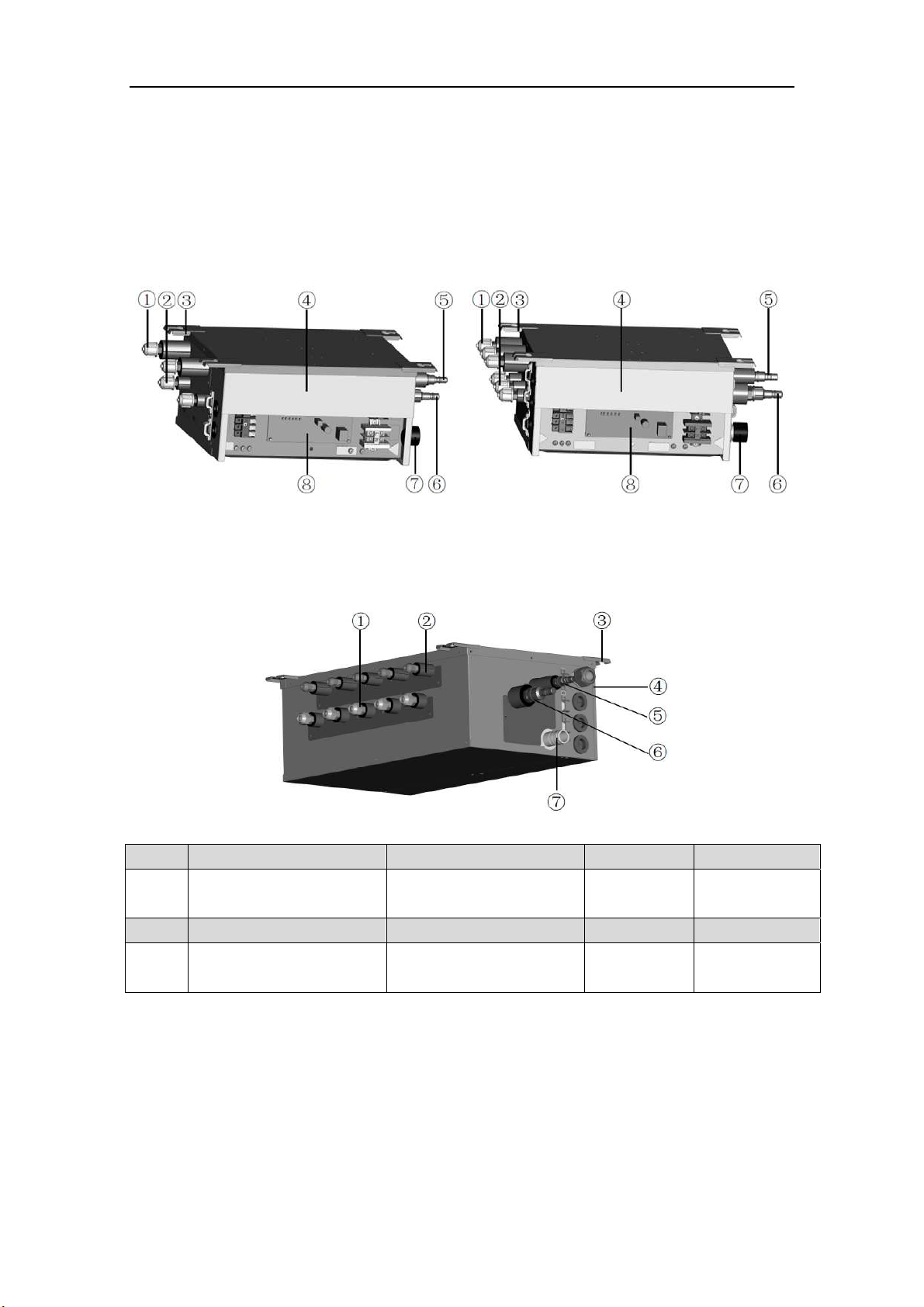
BU Module
3
2 Product Introduction
The BU module of Impecca Flex+ Series is the latest branch device, which adopts intelligent
control technology. Responding to the changes in load of the indoor units, it can coordinate the
flow rate of the refrigerant well. Otherwise, it is very compact and offers a flexible choice about
the installation location, such as the ceiling of parlor, corridor, balcony,storeroomand etc.
2.1 Names of Main Parts
a)IS-BU12
b)IS-BU13
e) IS-BU15
NO.
① ② ③ ④
Name
Gas piping of indoor unit
side
Liquid piping of indoor
unit side
Hanger metal
Electrical
equipment plate
NO.
⑤ ⑥ ⑦ ⑧
Name
Liquid piping of outdoor
unit side
Gas piping of outdoor unit
side
Drain hole
Printed circuit
board
Fig. 1
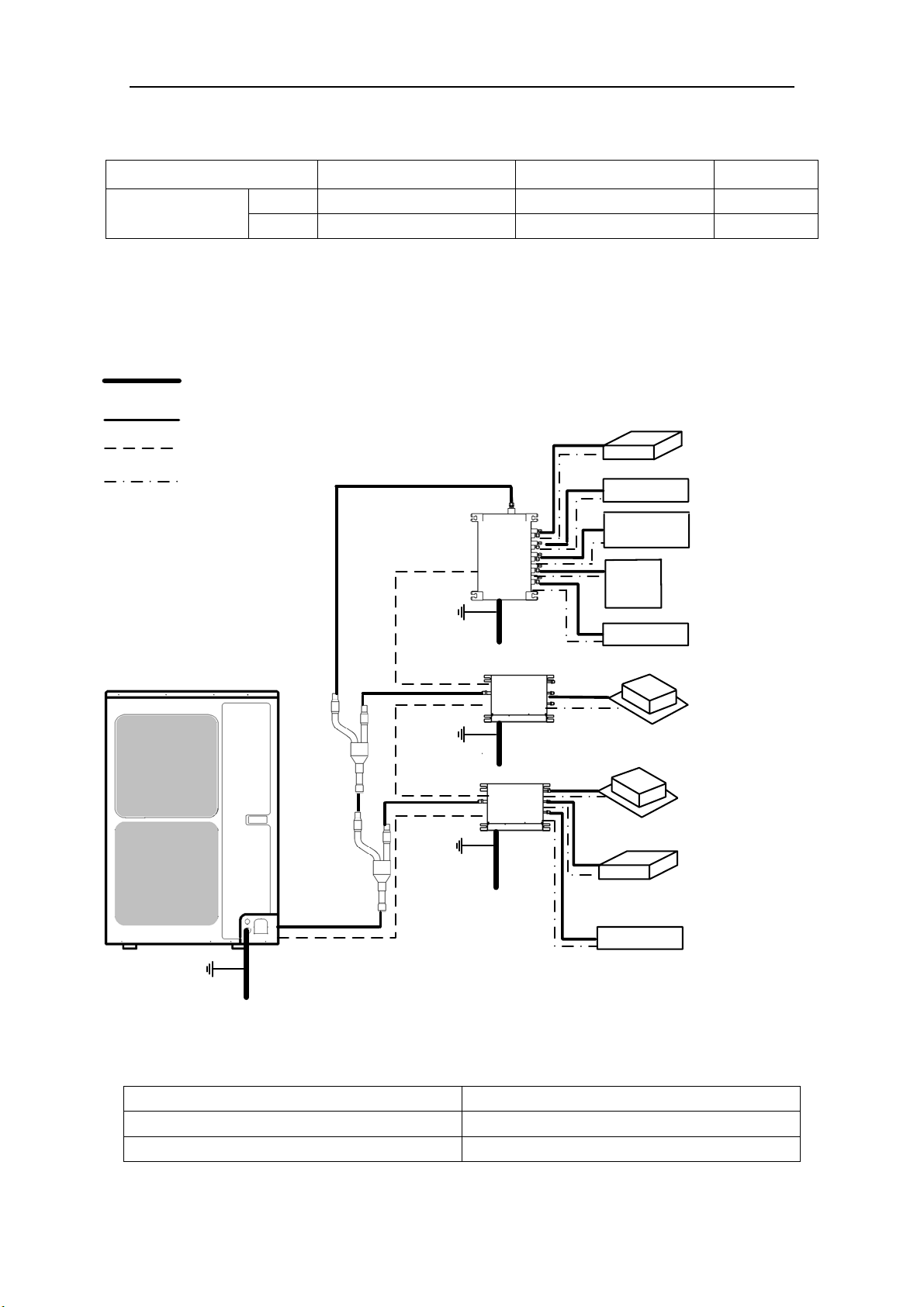
BU Module
4
2.2 Combinations for Outdoor and Indoor Units
Table 1
Sorts
IS-BU12
IS-BU13
IS-BU15
No. of connectable
indoor units
1 1 1 niM
5 3 2 xaM
2.3 Parts and Components of Unit
For the Super Free Match Series, one outdoor unit is able to drive up to three BU modules and
nine indoor units which include cassette type, duct type, wall-mounted type, floor ceiling type and
console type. The outdoor unit will run as long as any one indoor unit receives the running command,
and all indoor units stop once the outdoor unit is turned off.
Fig. 2
2.4 Working Temperature Range
Table 2
(BD :erutarepmet edistuO stroS ℃/℉)
05 mumixaM ℃(122℉)
51- muminiM ℃(5℉)
Outdoor unit
Power supply wire for outdoor
unit and BU module(3 wires)
Connection pipe
Transmission line(2 wires)
Power supply wire for
indoor unit(4 wires)
Ground
Power
(60Hz, 208/230V)
Power
(60Hz, 208/230V)
Power
(60Hz, 208/230V)
Power
(60Hz, 208/230V)
Ground
Ground
The 1st
branch
The 2nd
branch
BU 1
BU 2
BU 3
Indoor unit
Duct type
Duct type
Wall mounted
type
Wall mounted
type
Wall mounted
type
Cassette type
Cassette type
Floor ceiling
type
Console type
Ground
BU Module
5
3 Selection of Installation Location and Precautions
WAR N I N G
1) The installation of the air conditioner must be in accordance with the national and local laws and
regulations.
2) The quality of the installation will affect the capability of air conditioner directly. The installation
should be left to the appointed service center. Please contact your dealer after purchasing this machine.
Professional installation workers will provide installation and test services according to the installation
manual.
3) The air conditioner should not install in this place where the small animals exist, because they may
cause malfunctions, smoke or fire. Please keep the area around the unit clean.
3.1 Selection of Installation Location
WAR N I N G
1) The BU module must be installed on a firm and solid support which can withstand the weight of the
module and the mounting surface must be horizontal plane. The BU module can be chosen to install in
the ceiling, such as the ceiling of parlor, corridor, balcony, storeroom and etc.
2) The location must be out of children’s reach, please keep the unit away from children.
3) The BU module is for indoor use. If installing in the outdoors, the location must be away from wind and
rain. Otherwise, it maybe causes water leakage, electric shocks or fire etc.
4) There is enough space for the installation and maintenance.
5) Avoid direct sunlight or other heat sources exist.
6) Do not install in location that is hot or humid for long periods of time.
7) Avoid the BU module installed in the bedroom and study, where these places need to be quiet.
8) BU module cannot be installed in the place of inflammable and explosive materials and severe dust,
smoke and the other air pollution, such as the kitchen.
9) There is enough space to install drainage pipe, so that the condensed water can be discharged.
10) Installation at the following places might lead to the air conditioner malfunction, such as where is full of
machine oil, saline-sodic soil near the sea, sulphide fog, high frequency facilities or special conditions.
If it is unavoidable, please contact the appointed service center.
NOTICE
1) Make sure that the unit will not cause any operating vibration or noise after installation.
2) BU module shall be installed close to the indoor unit, hence to minimize the length and bends of
cooling pipe.
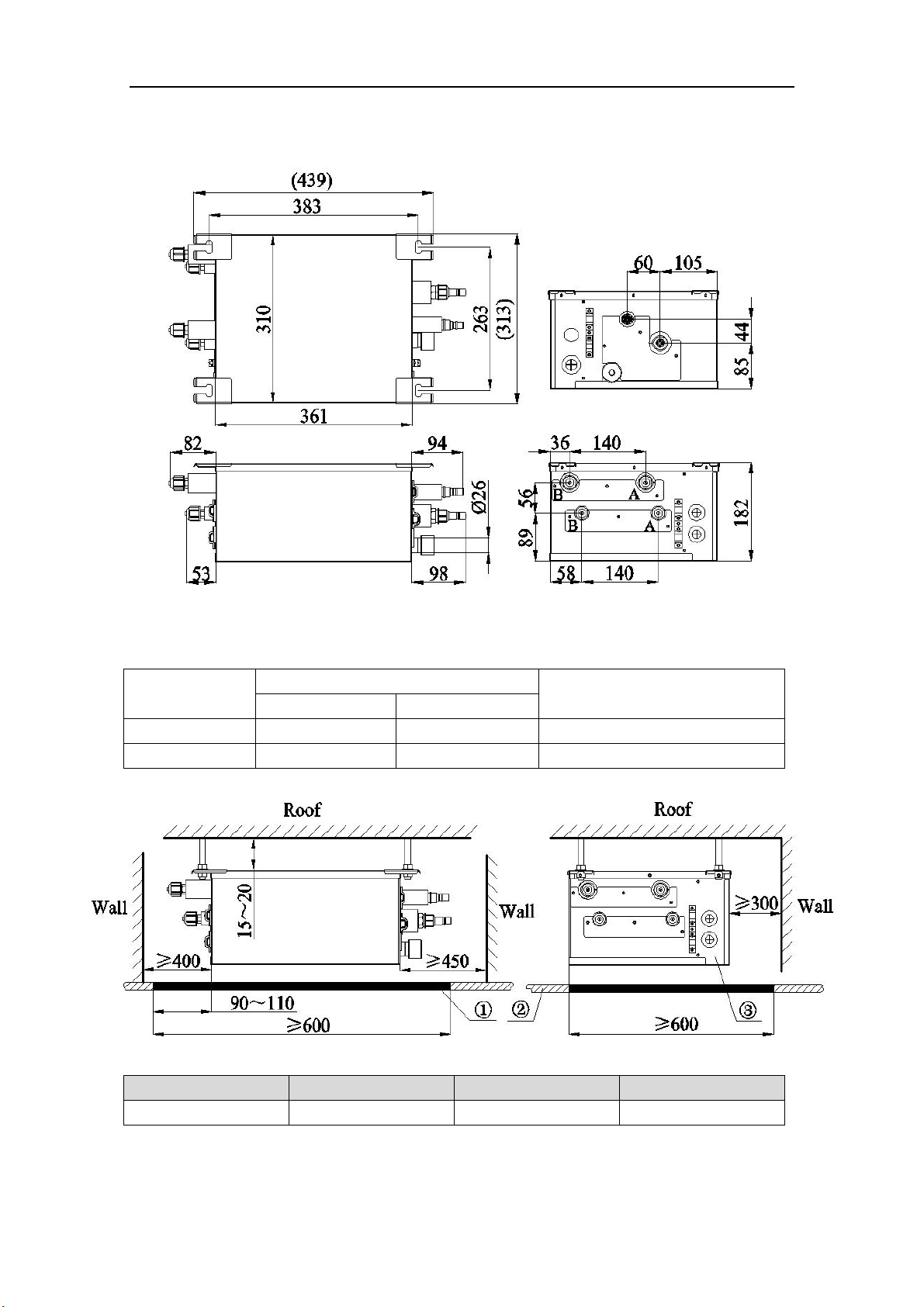
BU Module
6
3.2 Outline Dimension and Servicing Space of IS-BU12
1) Outline dimension
Fig. 3 (mm)
Table 3
Sorts
Indoor unit side (mm/inch)
Outdoor unit side (mm/inch)
Port A Port B
Liquid pipe Φ6.35(1/4) Φ6.35(1/4) Φ9.52(3/8)
Gas pipe Φ9.52(3/8) Φ9.52(3/8) Φ15.9(5/8)
2) Installation and service space
NO.
① ②
③
Name Servicing space Ceiling Electrical box side
Fig. 4 (mm)
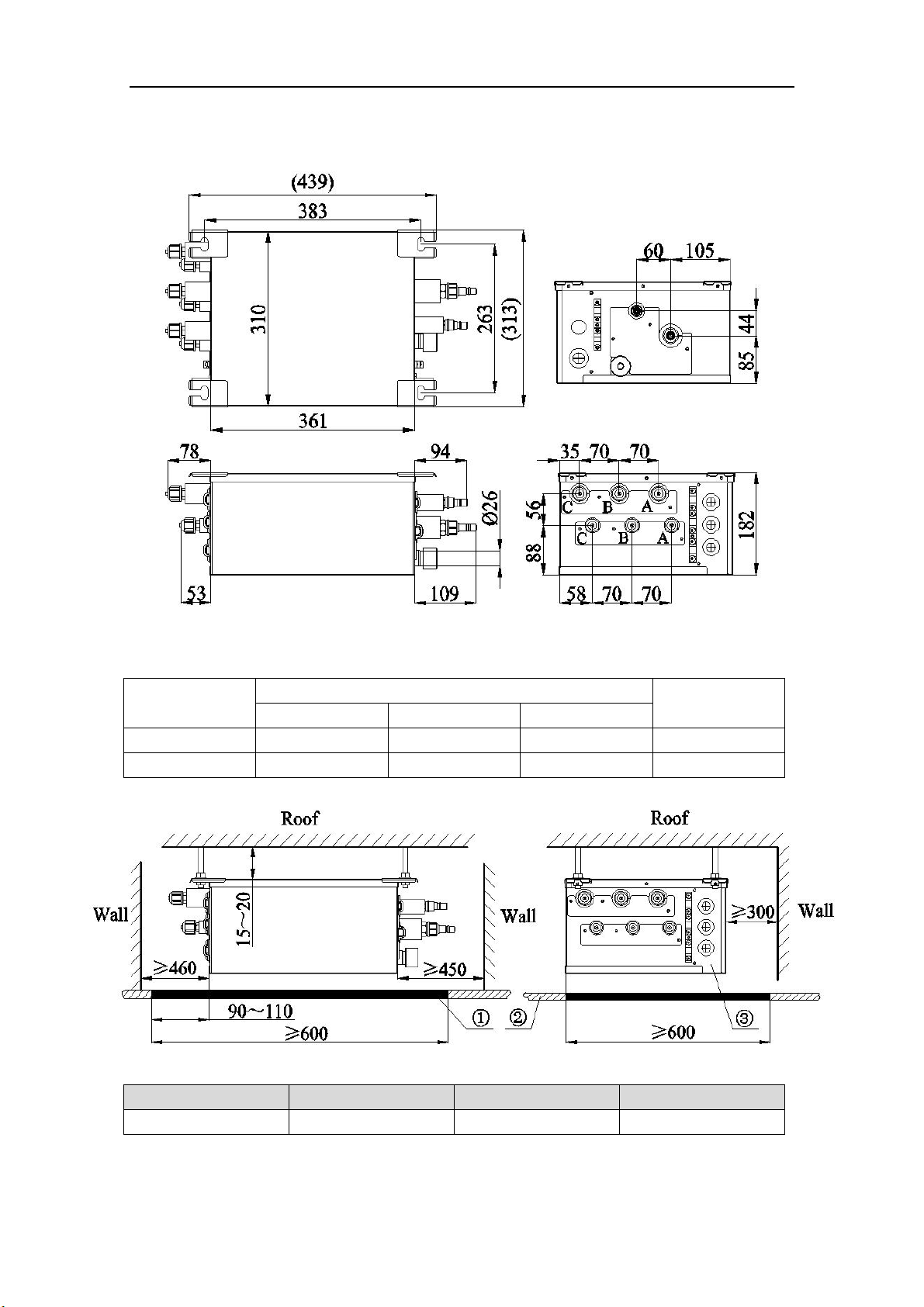
BU Module
7
3.3 Outline Dimension and Servicing Space of IS-BU13
1) Outline dimension
Fig. 5 (mm)
Table 4
Sorts
Indoor unit side (mm/inch)
Outdoor unit side
(mm/inch)
Port A Port B Port C
Liquid pipe Φ6.35(1/4) Φ6.35(1/4) Φ6.35(1/4) Φ9.52(3/8)
Gas liquid Φ9.52(3/8) Φ9.52(3/8) Φ9.52(3/8) Φ15.9(5/8)
2) Installation and service space
NO.
① ②
③
Name Servicing space Ceiling Electrical box side
Fig. 6 (mm)
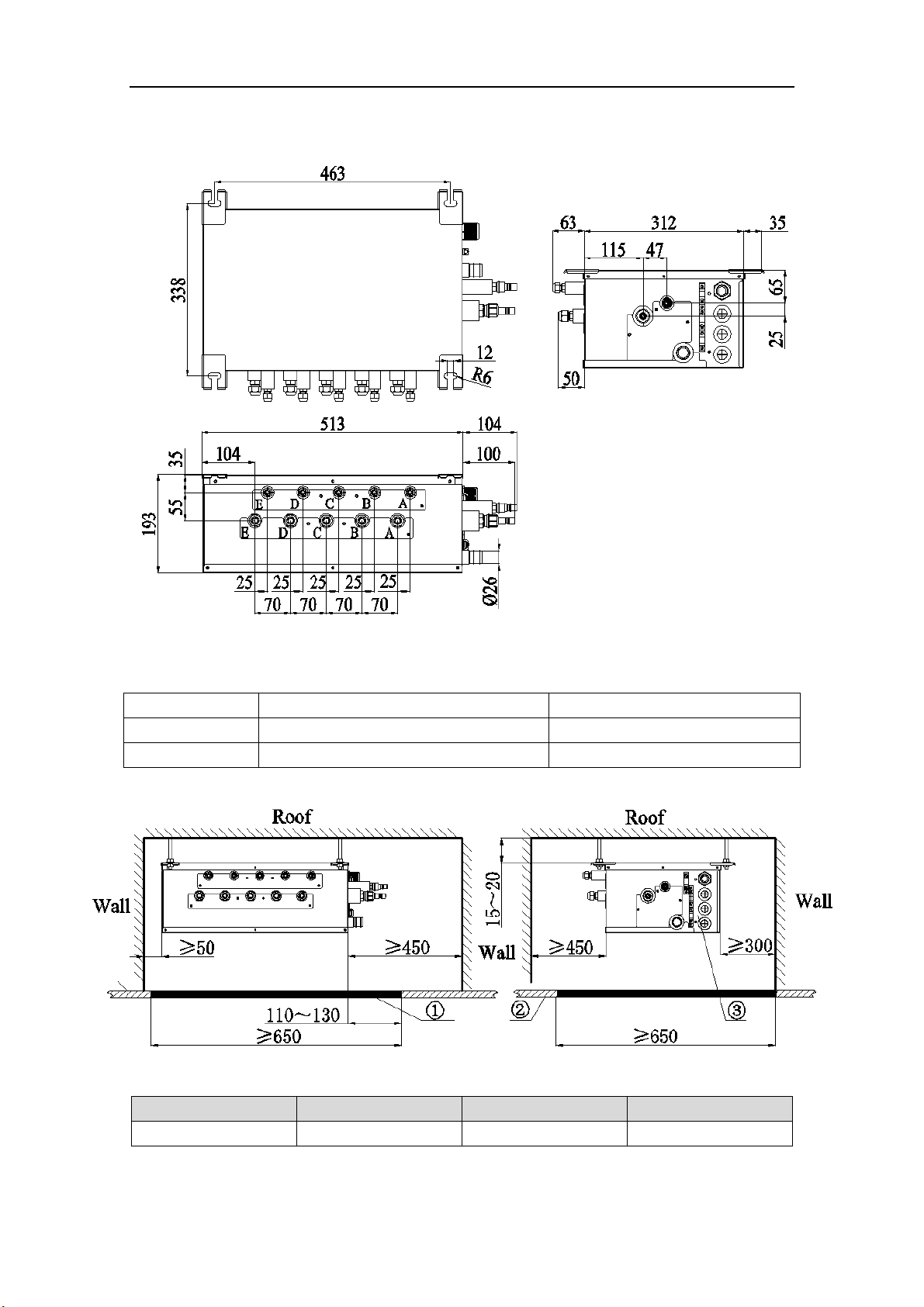
BU Module
10
3.6 Outline Dimension and Servicing Space of IS-BU15
1) Outline dimension
Fig. 11
(mm)
Table 7
Sorts Indoor unit side (mm/inch) Outdoor unit side (mm/inch)
Liquid pipe Φ6.35(1/4) Φ9.52(3/8)
Gas pipe Φ9.52(3/8) Φ15.9(5/8)
2) Installation and service space
NO.
① ②
③
Name Servicing space Ceiling Electrical box side
Fig. 12 (mm)
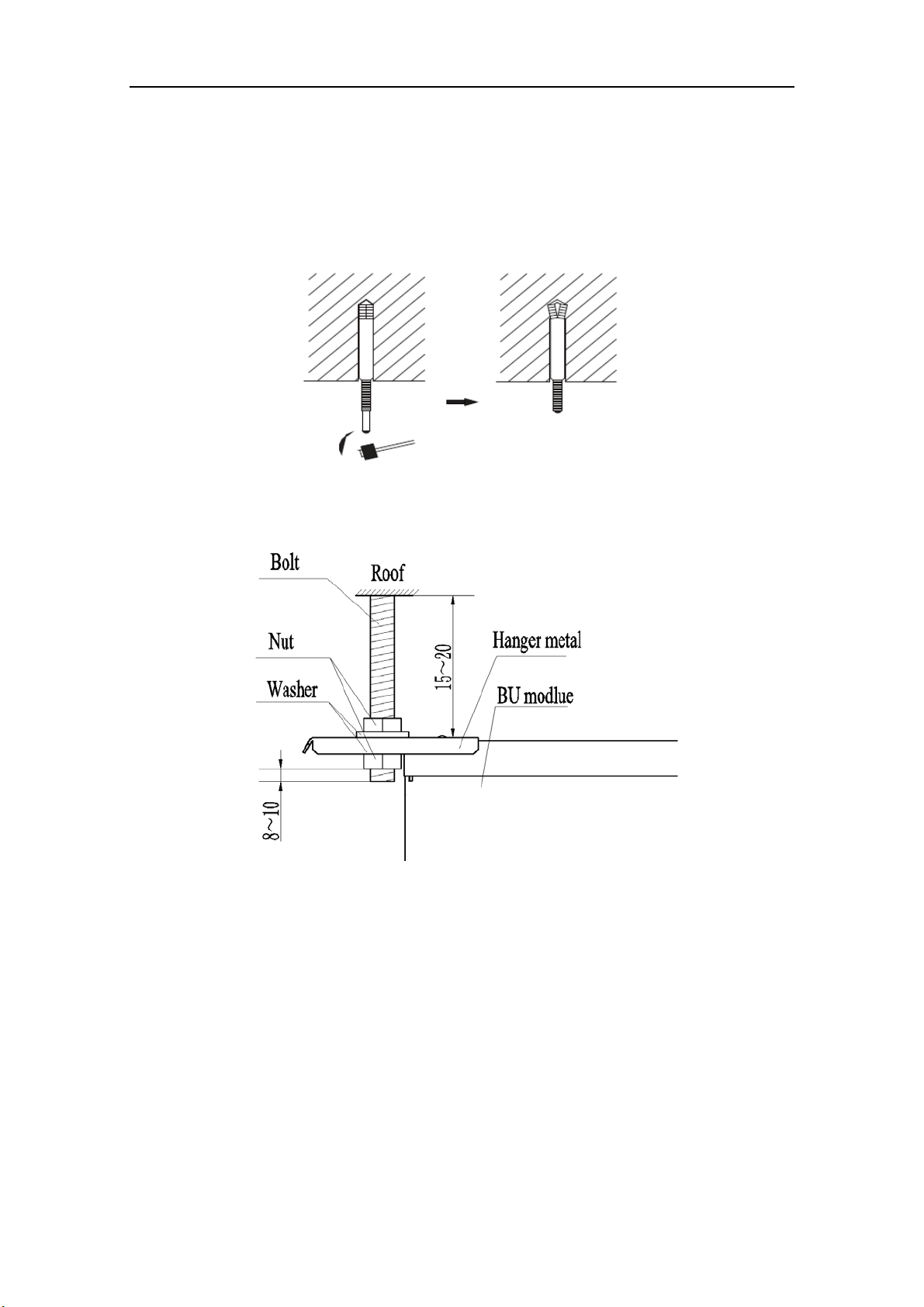
BU Module
11
4 Installation Instruction
1) Check the installation location and ensure it is strength and level. Otherwise, there should be
enough space to install drainage pipe, so that the condensed water can be discharged.
2) Reference to the size of hanger metal and drill 4 holes in the installation location.
3) Hang the hanger bolts.
Fig. 13
4) Fix the modules securely with the hanger bolts. You can get the M10 or M8 hanger bolts, nuts
and washers from the market.
Fig. 14 (mm)
5) Adjusting the nuts position, so that the BU module should be level in front/back and left/right.
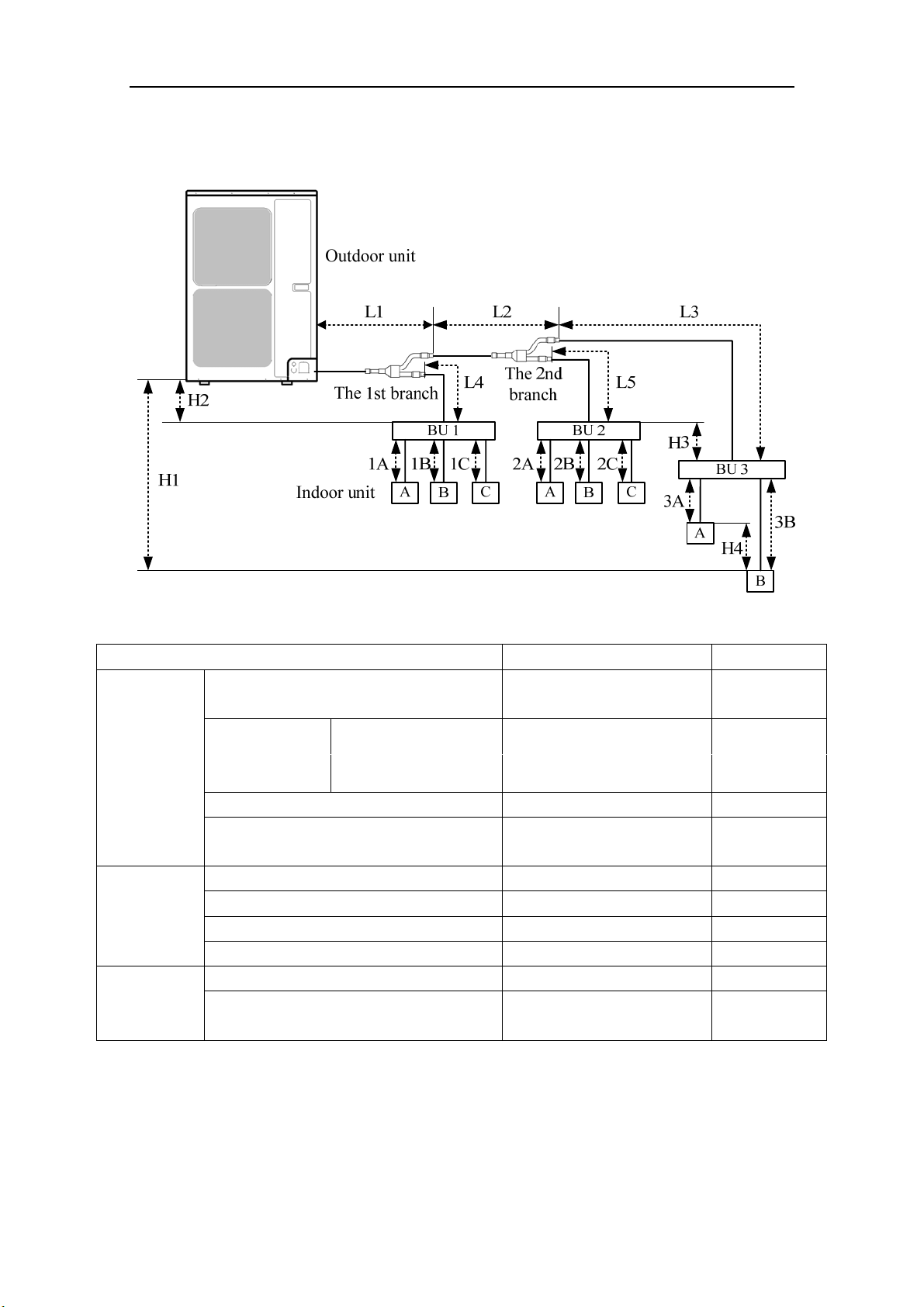
BU Module
12
5 Installation of Refrigerant Pipes
5.1 Allowable Length and Drop Height of Connecting Pipe
Fig. 15 (8 indoor units)
Table 8
The sorts The pipes Length(m/feet)
Maximum
allowable
length
Total length between outdoor unit and BU
modules
L1+L2+L3+L4+L5 ≤55(181)
Total length
between indoor
units and BU
1A+1B+1C+2A+2B+2C+
3A+3B
ISMO-6021 ≤90(295)
Between indoor unit and BU module 1A;1B;1C;2A;2B;2C;3A;3B ≤15(49)
Between indoor unit and the 1st branch
L4+1B;L2+L5+2A;
L2+L3+3B
≤40(131)
Maximum
allowable
length
Between outdoor and indoor units H1 ≤30(99)
Between outdoor units and BU modules H2 ≤30(99)
Between BU and BU modules H3 ≤15(49)
Between indoor and indoor units H4 ≤15(49)
Minimum
allowable
length
Between outdoor and the 1st branch L1 ≥5(16)
Between BU and the branch L3;L4;L5
as possible as
short
NOTICE! BU module should be placed within the level between the outdoor unit and indoor
unit.
5.2 Installation of Piping Adapter (IS-BU12 IS-BU13 and IS-BU15)
If the piping connection size of BU module does not match with that of the outdoor unit and
indoor units, it should prevail with the piping connection size of the outdoor unit and indoor units.
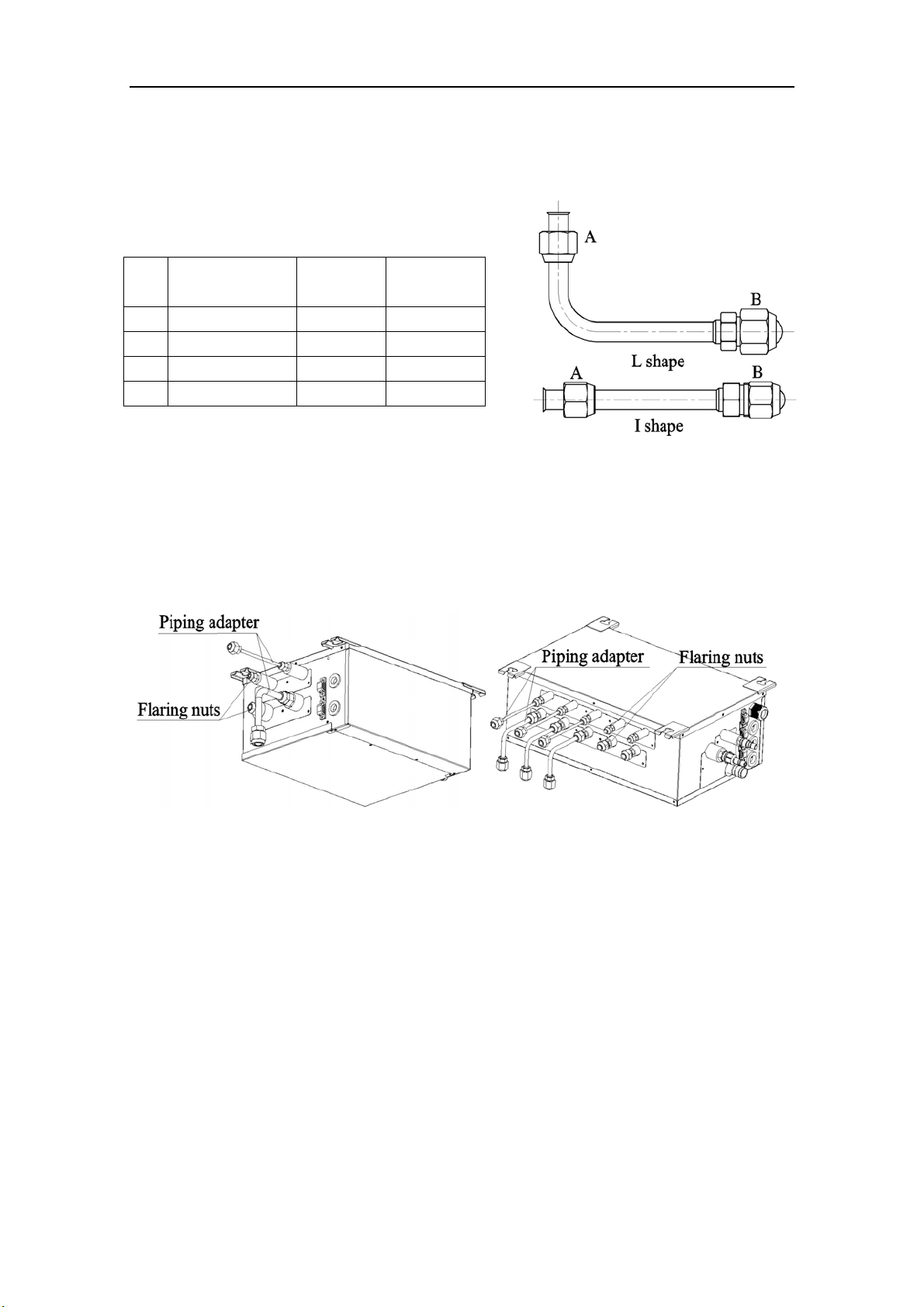
BU Module
13
Install the optional piping adapters to the BU module, so that the piping connection size of BU
module can match with that of the outdoor unit and indoor units.
1) Piping adapter(Optional accessories)
Table 9
NO. Name
Port A
(mm/inch)
Port B
(mm/inch)
1 Φ15.9→Φ19.05 Φ15.9(5/8) Φ19.05(3/4)
2 Φ9.52→Φ12.7 Φ9.52(3/8) Φ12.7(1/2)
3 Φ9.52→Φ15.9 Φ9.52(3/8) Φ15.9(5/8)
4 Φ6.35→Φ9.52 Φ6.35(1/4) Φ9.52(3/4)
Fig. 16
2) Install the piping adapter
① Refer to the piping connection size of the outdoor unit and indoor units, the appropriate piping
adapter should be adopted.
② Align the flared end of copper tube with the center of pipe joint. Tighten the nuts with hands.
Then tighten the flaring nuts with torque wrench until you hear a “click”.
Fig. 17
3) Sealing the unconnected port
If the port of BU module indoor side does not connected to one indoor unit, the port must be
sealed to prevent refrigerant leaks. Please tighten the copper flaring nuts to the unconnected port
with torque wrench until you hear a “click”.
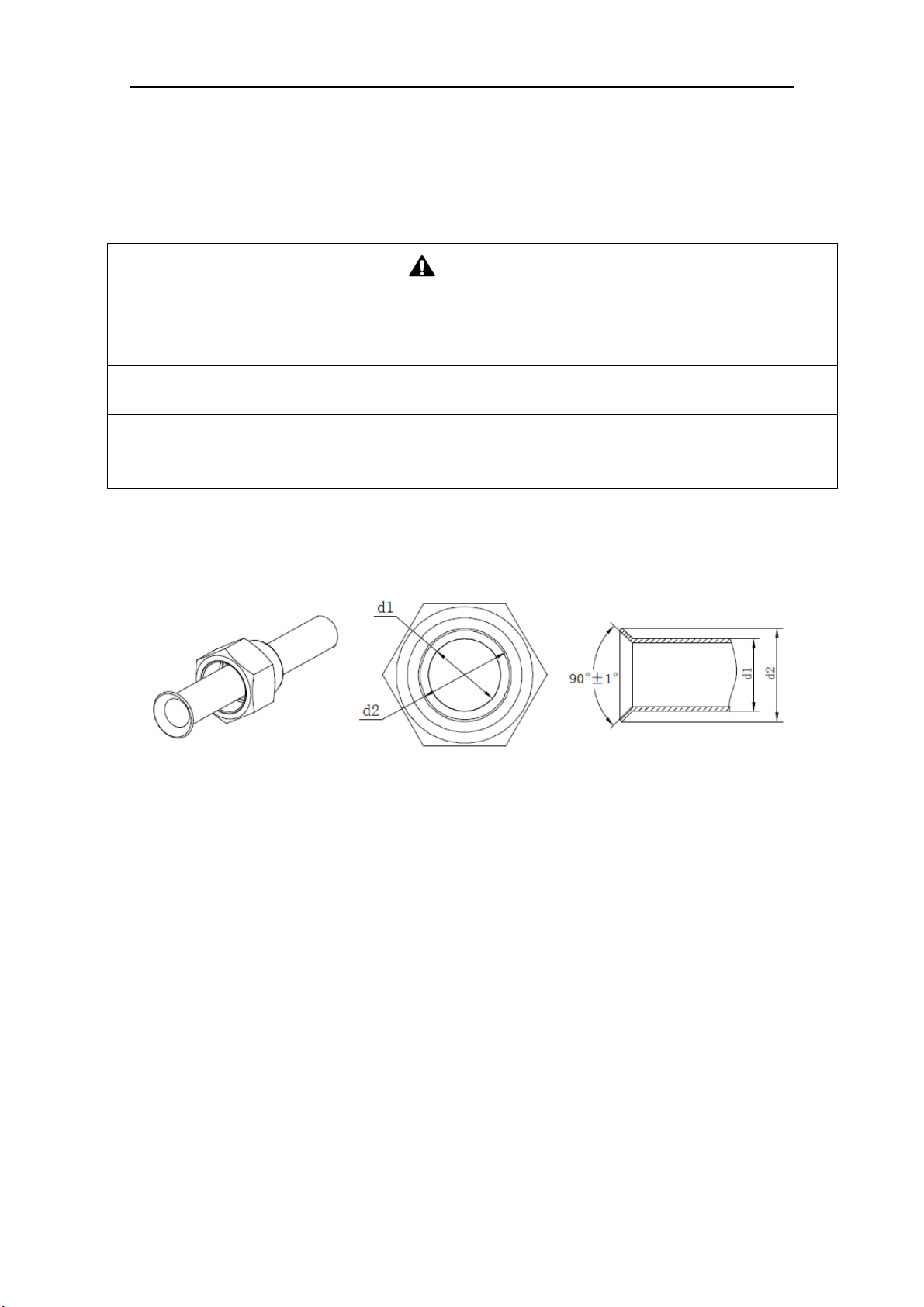
BU Module
15
5.4 Precaution for Connection
CAUTION
1) Conform to the following principles during pipe connection: Outdoor unit shall be installed close to the
indoor unit, hence to minimize the length and bends of connection pipes; the height gap of outdoor unit
and indoor units should be as small as possible; the radius of curvature should be as large as possible.
2) The brazing operation must be strictly in accordance with the process requirements. Rosin joint or pin
hole is not allowed.
3) During the installation, do not damage the pipeline. The pipeline’s radius of bending must be over than
200mm (8inch). The pipes cannot repeatedly be bent or straightened. Otherwise it will get harden and
crack. Do not bend or straight the pipes for more than 3 times at the same position.
1) The process of flaring
① Using the tube cutter to cut the connecting pipe in the appropriate place and remove the burrs.
② Install the nut before the flaring operation.
③ Check the flared portion, whether there is fractured or not.
Fig. 21
2) Precaution for elbow operation
① The elbow operation could be done by hands. Be careful and do not damage the pipe.
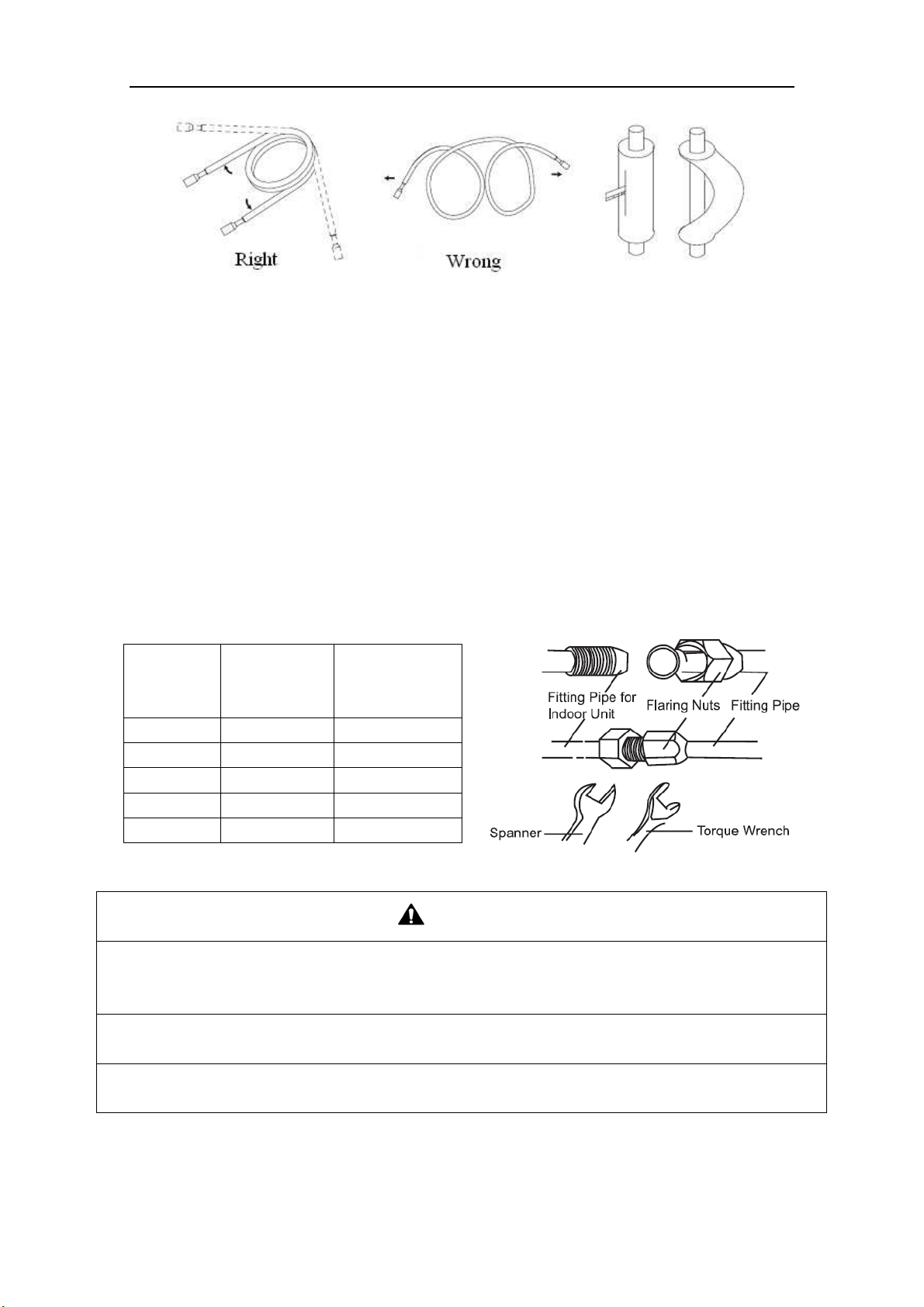
BU Module
16
Fig. 22
② If the thermal insulation of the refrigerant pipe is not removed, please do not bend the pipe.
Otherwise, it maybe leads the pipe to crack. It is better to make an incision with a knife in the
thermal insulation and removes it. After elbow operation is finished, recover the thermal
insulation with binding band.
3) The process of install refrigerant pipes
① Remove the screw caps from the pipes.
② Align the flared end of copper tube with the center of pipe joint. Tighten the nuts by hands. (If
the flared end of copper tube and the center of pipe joint are not in coaxial, it is hard to tighten
the nuts by hands, please do not tighten it with spanners, because the screw thread may be
broken by force).
③ Tighten the flaring nuts with torque wrench until you hear a “click”. (The spanner and torque
wrench should be perpendicular to the refrigerant pipeline).
④ The following table for the torque required to tighten the nuts.
Table 10
Pipe
diameter
(mm/inch)
Thickness of
copper
tube(mm/inch)
Tightening
torque
(N·m/1bf·ft)
Φ6.35(1/4) ≥0.8(1/32) 15~30(11~22)
Φ9.52(3/8) ≥0.8(1/32) 35~40(26~29)
Φ12.7(1/2) ≥0.8(1/32) 45~50(33~37)
Φ15.9(5/8) ≥1.0(1/25) 60~65(44~48)
Φ19.05(3/4) ≥1.0(1/25) 70~75(52~55)
Fig. 23
CAUTION
1) During the connection of the indoor unit and BU module to the refrigerant pipe, never pull any joints of
the indoor unit and the BU module by force; otherwise the capillary pipe or other pipe may crack,
which then would result in leakage.
2) The refrigerant pipe should be supported by brackets; that is, don’t let the unit support its weight.
3) For the Flex+ system, each pipe should be labeled to tell which system it belongs to avoid
mistaken, inaccurate piping.
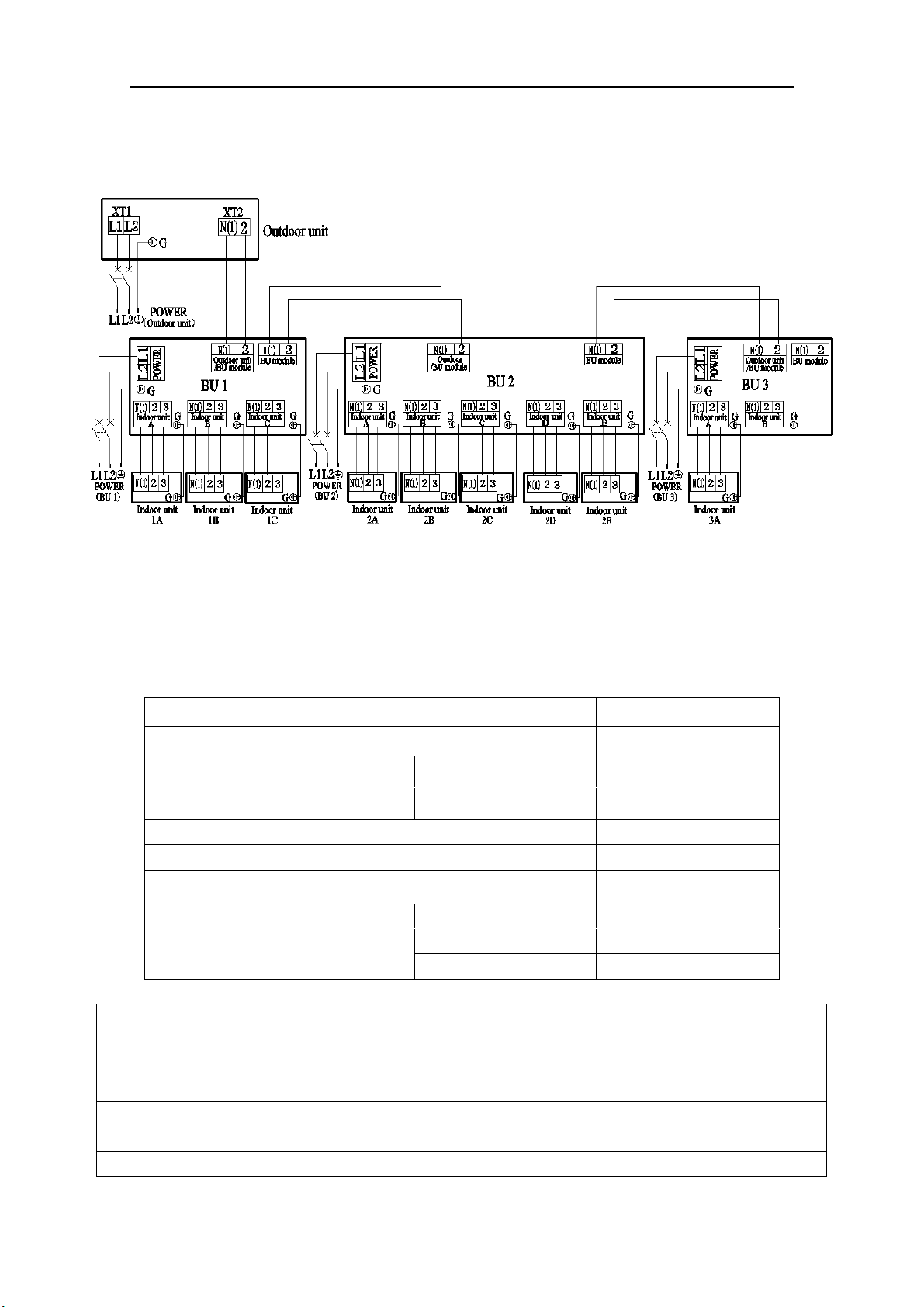
BU Module
17
6 Electrical Wiring Work
6.1 Wiring Connection
NOTICE! The “L1”, “3” terminals are connected to the live wire, the “L2”,”N(1)” terminals
are connected to the neutral wire and the ”2” terminal is connected to the transmission line.
Fig. 24
6.2 Requirements of Power Circuit and Cable
Table 11
Phase and frequency 1Ph,60Hz
Voltage 208/230V
Recommended cable of outdoor unit
(Pieces × Sectional area)
3×6.0 mm
2
ISMO-6021
Recommended cable of BU module (Pieces × Sectional area) 3×0.75 mm
2
Transmission line (Pieces × Sectional area) 2×1.5 mm
2
Recommended cable of indoor unit (Pieces × Sectional area) 4×0.75mm
2
Capacity of the air switch
ISMO-6021 40A
BU module 10A
NOTICE
1) The total length of the transmission line between the outdoor unit and the furthest BU module is not
more than 180 feet (55m). Otherwise, the system cannot work possibility.
2) The specifications of the power cable and transmission line listed in the table above are determined
based on the maximum power (maximum amps) of the unit.
3) The specifications of the power cable listed in the table above are applied to the conduit-guarded
BU Module
18
multi-wire copper cable (like, YJV copper cable, consisting of PE insulated wires and a PVC cable
jacket) used at 104℉ (40℃) and resistible to 194℉ (90℃), and shall be at least those of ordinary
polychloroprene sheathed cords. If the working condition changes, they should be modified according
to the related national standard.
4) The specifications of the air switch listed in the table above are applied to the breaker with the working
temperature 104℉ (40℃). If the working condition changes, they should be modified according to the
related national standard.
5) The length of the recommended power cable should be less than 49 feet (15 meters); otherwise,
the diameter of the power cable is not enough.
6) Written power cable and transmission line length is just a reference value. It may be different
depending on the condition of installation, humidity or materials, etc.
7) An all-pole disconnection switch having a contact separation of at least 3mm (1/8 inch) in all poles
should be connected in fixed wiring.
6.3 Ground Requirements
WAR N I N G
1) The air conditioner is classified into the Class I appliances, so its ground ways must be reliable.
2) The ground wire must be fixed on the screw hole with the sign as the right figure.
3) The yellow-green wire of the air conditioner is the ground wire and must be fixed by the tapping screw.
And it cannot be used for other purpose or cut off. Otherwise, it will cause the hazard of electric shock.
4) The reliable ground terminal should be provided and the ground wire cannot be connected to any of the
following places: a. Water pipe; b. Coal gas pipe; c. Sewage pipe; d. Lightning rod
e. Telephone line f. Other unreliable places considered by a professional.
6.4 Precautions on the Electrical Wiring Work
WAR N I N G
1) The electrical installation should be carried out by the professional as instructed by the local laws,
regulations and also this manual.
2) The ground connection should be reliable and the ground wire should be connected to the dedicated
device of the building by the professional.
3) Before starting work, the power must not be supplied to the unit.
4) The air switch coupled with the leakage current protection switch must be equipped in the circuits,
which is of enough capacity and of both magnetic and thermal tripping functions in case of the short
circuit and overload.
5) The electrical work should use a cable length enough to cover the entire distance with no connection. If
it is unavoidable, please make sure the connection should be reliable, the external forces will not act on
the wires and the joint is not bared. Otherwise it will cause electrical shock or fire etc.
6) The power cable with the rated voltage and exclusive circuit for the air conditioner should be used.
7) Do not pull the power cable by force after it is installed.
8) The diameter of the power cable should be large enough and once it is damaged, it must be replaced by
the dedicated one.
9) The multi-wire copper cable should be used for the power cable and the transmission line.
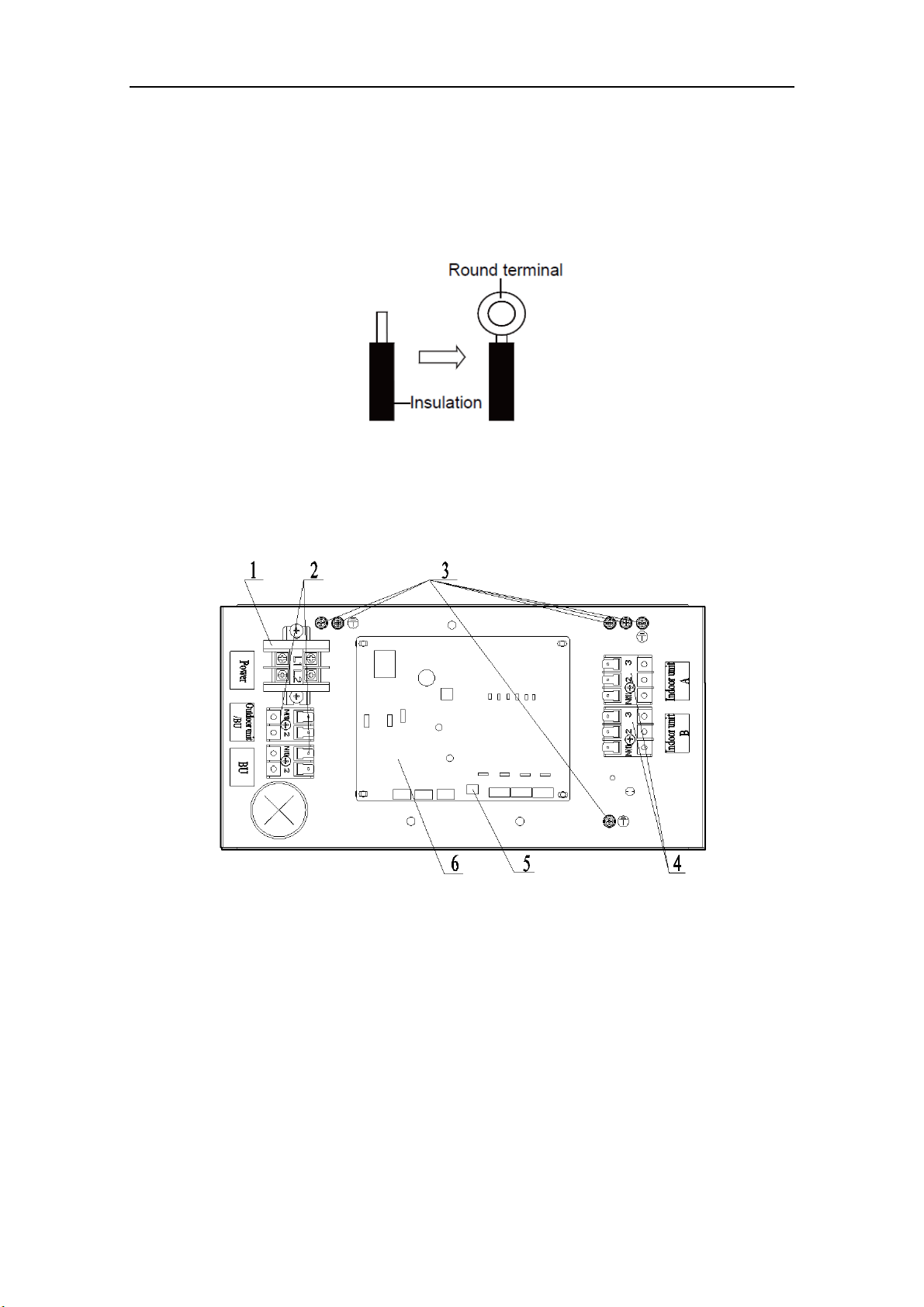
BU Module
19
6.5 Precaution of Laying Wires
1) Use a wire stripper to strip off a length of the insulation layer at the end of the wires;
2) Loosen the screws on the terminal block of the air conditioner;
3) Press the ends of the cable tightly onto the round terminals corresponding to the size of the
screws.
4) Pass the screw through the round terminals and fix it onto the terminal block.
Fig. 25
6.6 Procedures for Electrical Wiring Work
1) Unscrew the electrical equipment plate.
2) The structure of behind the electrical equipment plate.
a) IS-BU12
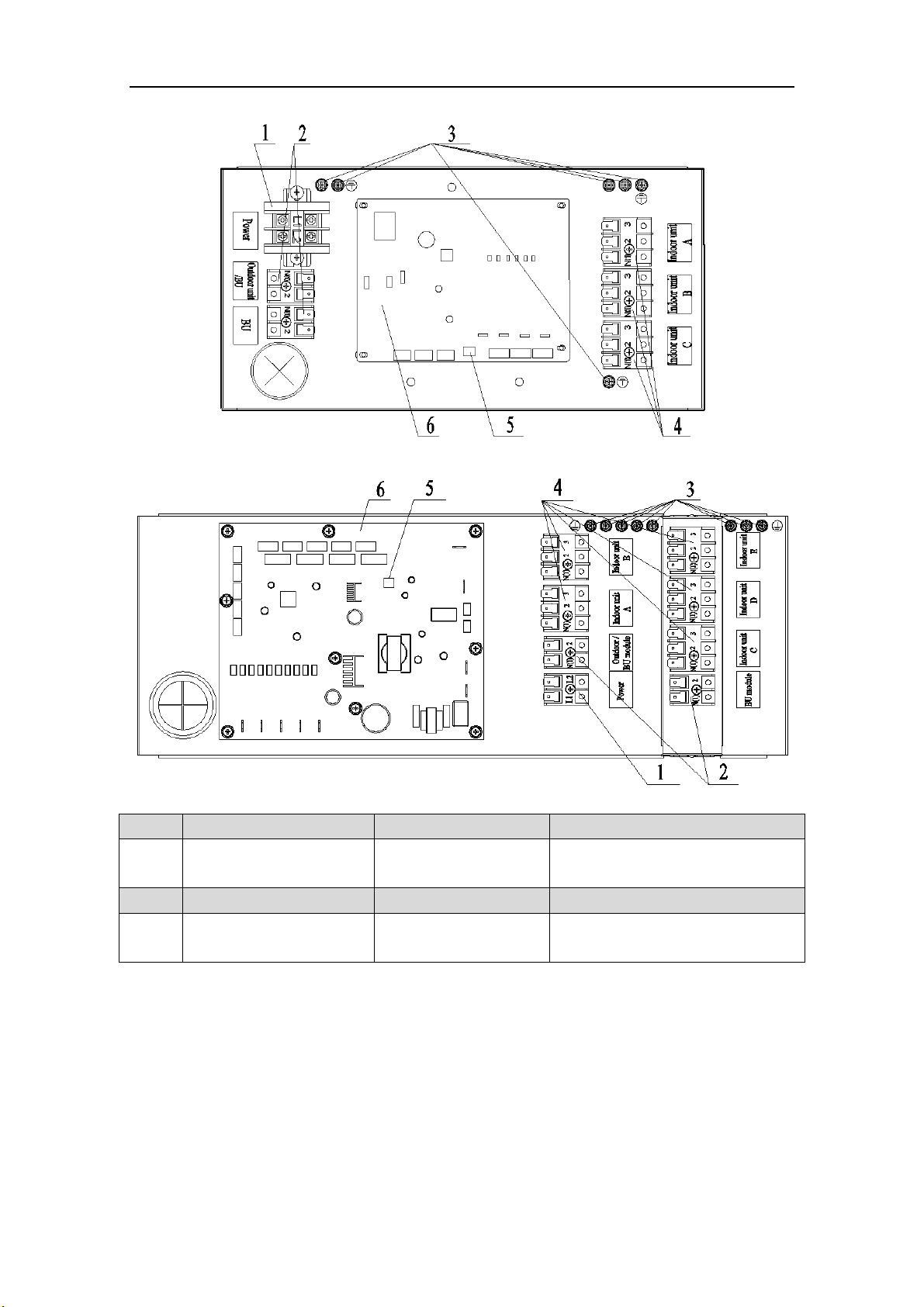
BU Module
20
b
) IS-BU13
c) IS-BU15
NO. 1 2 3
Name
Terminal black for BU
module power supply
Terminal black for
transmission line
Ground screw
NO. 4 5 6
Name
Terminal black for indoor
unit power supply
DIP switch Printed circuit board
Fig. 26
3) Let the power cable and transmission line go through the rubber ring. In order to protect the
power cable and transmission line from damaging by the hole, the rubber ring cannot fall from
that, otherwise, it may cause electrical shock or fire etc.
4) Connect the power cable of the BU module to the L1, L2 terminals with the sign of Power and
as well as the ground screw.
5) Connect the transmission line of the BU module to the N(1), 2 terminals with the sign of
Outdoor unit/BU module.
6) If the transmission line need to be connected to the other BU module, please connect the extra
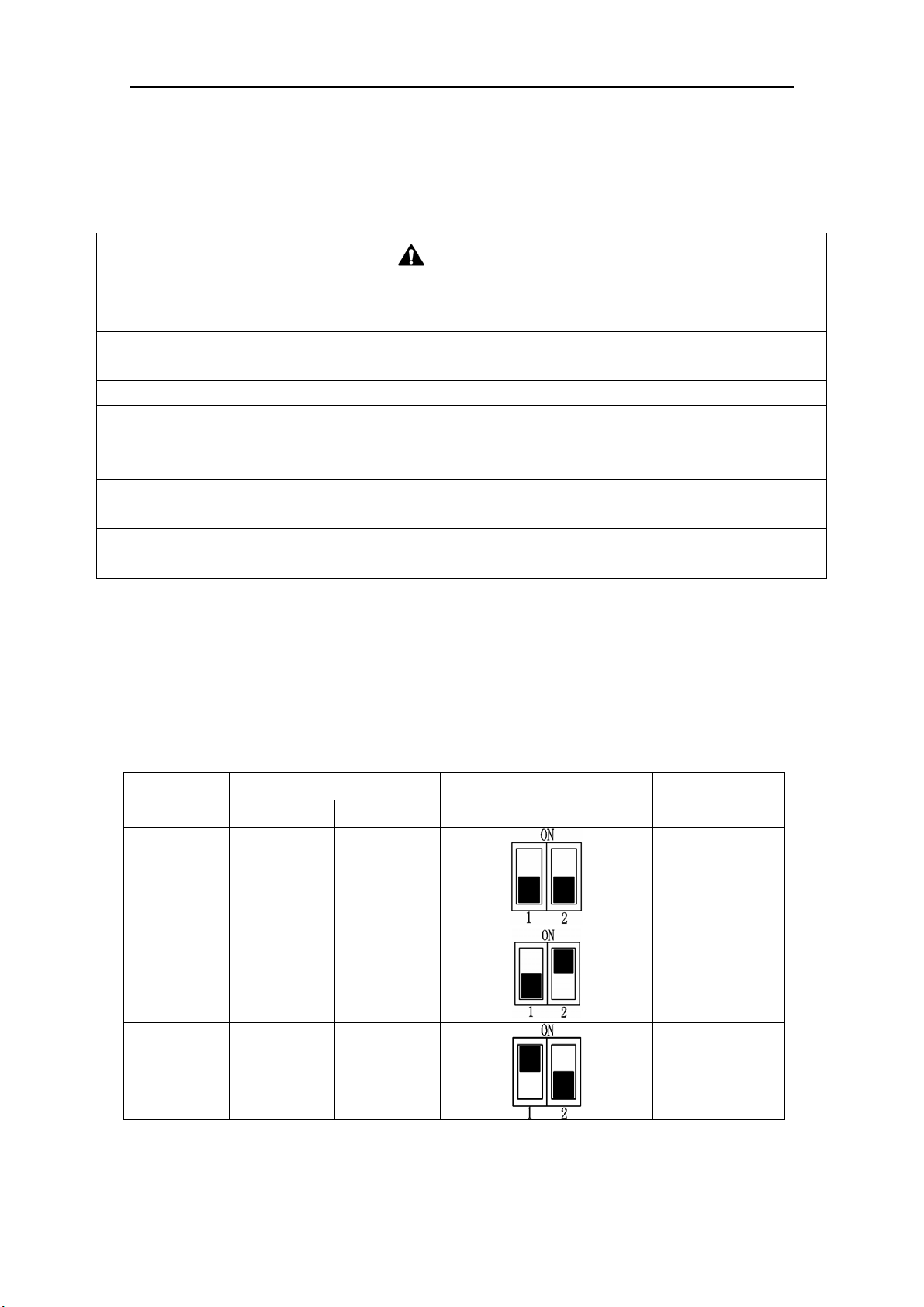
BU Module
21
line to the N(1), 2 terminals with the sign of BU module.
7) Connect the power cable of the indoor unit to the N(1), 2 and 3 terminals with the sign of
Indoor unit A (B, C, D and E) and as well as the ground screw.
8) Fix the power cable and transmission line firmly by cable fixing clip.
9) Screw the electrical equipment plate.
CAUTION
1) The transmission line and the power cable must be separated with an interval of at least 2cm (3/4inch);
otherwise it may be result in communication problem.
2) Confirm the each cable connected to the terminal screw is exactly and securely after finishing the
electric work.
3) Fix each ground wire separately with the ground screw.
4) When connecting indoor units, make sure to connect refrigerant pipes and power cables to the same
connection ports marked with matching signs (A, B, C ,D and E).
5) If the connecting wire is connected to the terminal incorrectly, the unit will not work normally.
6) The refrigerant pipe should be supported by brackets, that is, don’t let the unit withstand the weight of
it.
7) For the Flex+ system, each pipe should be labeled to tell which system it belongs to avoid
mistaken inaccurate piping.
6.7 Instructions for DIP Switch
2 digits DIP is adopted to assign the address when using multi-BU modules and the address
cannot be repeated in the same unit.
One outdoor unit can connect to no more than 3 BU modules.
“ON” side means "ON" and the opposite side represents "OFF".
NOTICE!: The black part is lever.
Table 12
Number
DIP Code
Icon Address
DIP 1 DIP 2
1 OFF OFF BU 1
2 OFF ON
BU 2
3 ON OFF BU 3
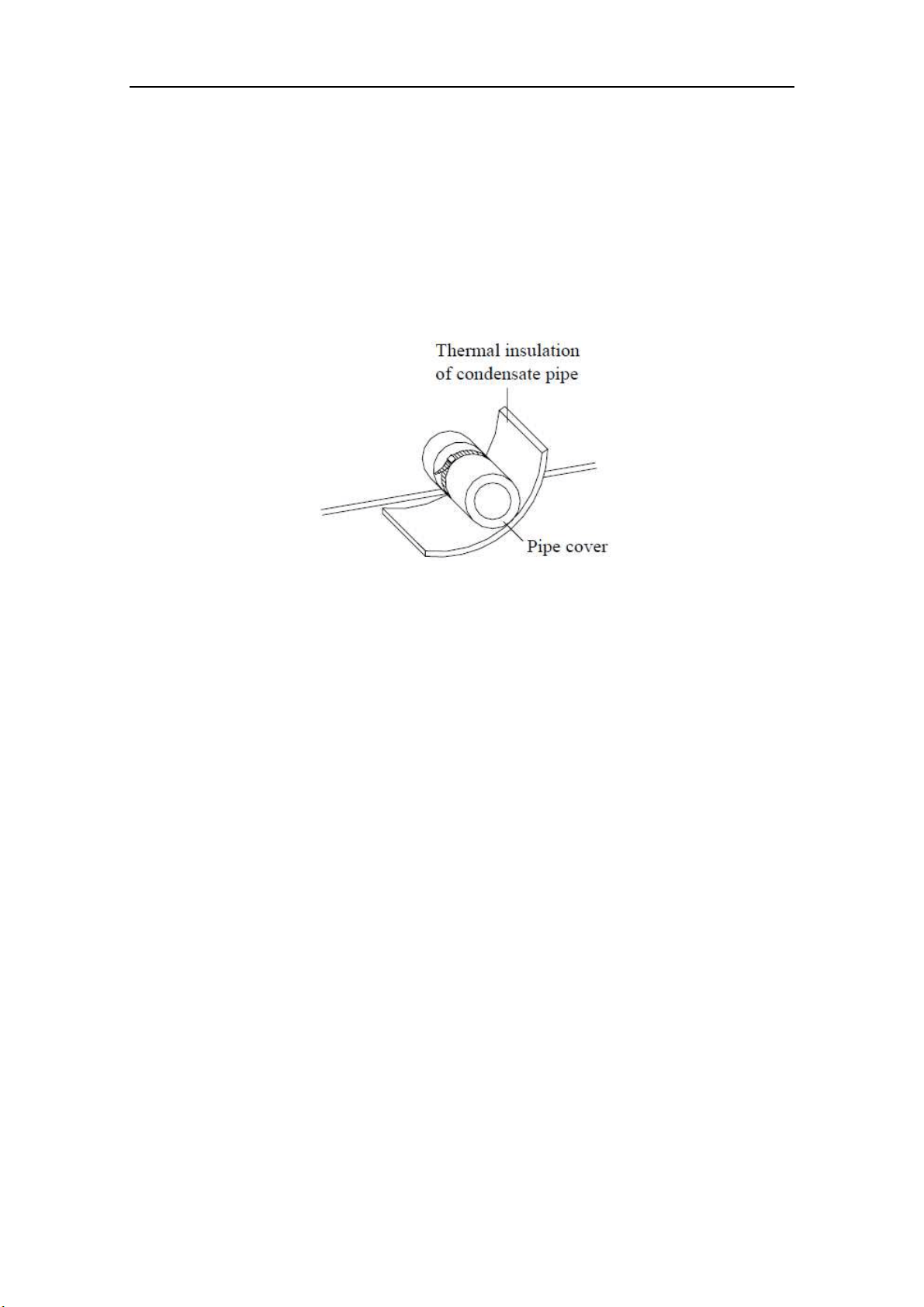
BU Module
22
7 Design of Drainage Pipeline
7.1 Installation of Drain Hose
1) Remove the rubber stopper of drain hole.
2) Connect the drain hose to the drain hole of BU module.
3) The drain hose should be kept at 5-10 degrees of gradient to facilitate discharge of the
condensing water. Take care that does not exert too much force on the hose.
4) Thermal insulation materials should be placed at the joints of the drain hose so as to prevent
from dew condensation. Fix the drain hose firmly by binding band.
Fig. 27
5) The end of the drain hose should be inserted into the hole of drainage pipeline.
7.2 Design of Drainage Pipeline
1) The drainage pipeline should be kept at a certain gradient (1/50-1/100) so as to avoid bulges of
pipes where there might be water bends.
2) The drainage pipeline is form of the hard PVC pipes for common purposes which can be
purchased locally. The diameter of the PVC pipes is not less than 31mm (1-1/4inch) and the
pipeline should be fixed as close to the BU module as possible.
3) Insert the drain hose into the drain hole of drainage pipeline. Use binding band to fix it tightly.
It is not allowed to use adhesive glue to join the drain hose to the drainage hole.
4) When the drainage pipeline is laid for a couple of units, the position of the shared pipeline
should be approximately 100mm lower than the drainage hole of each module. In this case,
some special-purpose pipes with thicker walls will be used.
NOTICE! At intervals of about 1 meter (3-1/4feet), fix the drain pipes to the wall with
brackets, not floating in the air.
8 Test Operation
After all the installation has been accomplished, follow the “operation test” as described in the
outdoor unit owner’s manual.
BU Module
23
9 Troubleshooting
WAR N I N G
1) In the event of abnormal conditions (such as an unpleasant smell), please shut off the power supply
immediately and then contact the appointed service center; otherwise, the abnormal running would
damage the air conditioner and also would cause electric shock or fire hazard .
2) Do not repair the air conditioning personally but instead contact the professionally skilled personnel at
the appointed service center, as the incorrect repair would cause electric shock or fire hazard etc.
Table 13
Errors
Indicating LED flashing times
Indoor
unit error
code
Outdoor unit error
code
Yellow
LED
Green
LED
Red
LED
BU 1 is connected
Flash 1 time
BU 2 is connected
Flash 2 times
BU 3 is connected
Flash 3 times
Indoor unit A is connected
Flash 1 time
Indoor unit B is connected
Flash 2 times
Indoor unit C is connected
Flash 3 times
Indoor unit D is connected
Flash 4 times
Indoor unit E is connected
Flash 5 times
Indoor unit A gas tube
temperature sensor error
Flash 1
time
b7
b7 indoor unit
address
Indoor unit A liquid tube
temperature sensor error
Flash 2
times
b5
b5 indoor unit
address
Indoor unit B gas tube
temperature sensor error
Flash 3
times
b7
b7 indoor unit
address
Indoor unit B liquid tube
temperature sensor error
Flash 4
times
b5
b5 indoor unit
address
Indoor unit C gas tube
temperature sensor error
Flash 5
times
b7
b7 indoor unit
address
Indoor unit C liquid tube
temperature sensor error
Flash 6
times
b5
b5 indoor unit
address
Indoor unit D gas tube
temperature sensor error
Flash 7
time
b7
b7 indoor unit
address
Indoor unit D liquid tube
temperature sensor error
Flash 8
times
b5
b5 indoor unit
address
Indoor unit E gas tube
temperature sensor error
Flash 9
time
b7
b7 indoor unit
address
Indoor unit E liquid tube
temperature sensor error
Flash 10
times
b5
b5 indoor unit
address
10 After-Sales Service
If there is any quality or other issue, please contact the after-sales service center.

CUSTOMER SUPPORT
Before contacting customer support, please see the troubleshooting guide above.
Visit our website to contact us, find answers to Frequently Asked Questions, and for other
resources which may include an updated version of this user's guide.
WWW.IMPECCA.COM
If you wish to contact us by phone, please be sure to have your model number and serial
number ready and call us between 9:00am and 6:00pm ET, at +1 866-954-4440.
Keep tabs on Impecca's newest innovations & enter contests via our social network feeds:
www.facebook.com/Impecca/
www.instagram.com/impecca/
@impeccausa
© 2016 Impecca, a division of LT Inc., Wilkes Barre, PA.
Flex Series R410A GMV Multi
VFR System-Indoor Unit (For
North America) Compact Panel
Cassette Type Indoor Unit
Thank you for choosing Air Conditioners, please read this owner’s manual carefully before operation
and retain it for future reference. If you have lost the Owner’s Manual, please contact the local agent or
visit www.Impecca.com for an electronic version.
Impecca reserves the right to interpret this manual which will be subject to any change due to
product
improvement without further notice.
Impecca reserves the final right to interpret this manual.
Owner's Manual
Air Conditioners
Model:
ISMI-C15
v. 1.1
User Notice
◆
When operating, the entire capacity of the cooperating indoor unit should be not larger
than 150% of outdoor unit. Otherwise, it will cause the shortage of cooling (heating) capacity.
◆
A Breaker(or fuse) need to be installed in every indoor unit, and the capacity should
in according with indoor unit’s electrical parameter; all the indoor units are required to be
centralized controlled by a total Switch, this Switch can cut off the electric power supply in
case of emergency. The Breaker(or fuse) on each indoor units have the function of short
circuit prevention and abnormal overload avoiding, it should be connected in normal situation.
The total switch controlling the power supply of all the indoor units. Before clearing and
maintenance job being carried out to the indoor units, it is very important to turn off the total
power supply switch.
◆
In order to turn on the units successfully, the main power switch should be opened 8
hours before the operation.
◆
After receiving the turn off signal, every indoor unit will continue to work for 20-70sec to
make use of the rest cool air or the rest heat air in the heat exchanger, while preparing for the
next operation. And this is normal.
◆
When the selected operating mode of the indoor unit are clash with the operating
mode of the outdoor unit, the malfunction light will blink after 5s on the indoor unit or remote
controller showing that the operation clash, then the indoor unit will stop. At this time, change
the operation mode of the indoor unit to the one that would not clash with the outdoor operating
mode to make the operation normal. The cooling mode is not clash with the dry mode, while
the fan mode is not clash with any mode.
◆
The appliance shall not be installed in the laundry.
◆
An all-pole disconnection switch having a contact separation of at least 3mm in all poles
should be connected in xed wiring.
◆
Information regarding transport/storage temperature (-25-55°C) is missing.
◆
Main switch provided by end user: main switch handle should be black or gray, it can be
locked in “OFF” position with padlock.
◆
The main disconnection device should be explained in user manual and the height
should be recommended at 0.6-1.7m. over current protection is required(UL 1995,CSA C22.2).
◆
The cooling range of the unit is the outdoor environment temp.-5~48°C DB, the heating
range of the unit( only for the heat pump type unit) is the outdoor environment temp. -15~27°C
WB.
This product must not be disposed together with the domestic waste. This product
has to be disposed at an authorized place for recycling of electrical and electronic
appliances.
Thank you for your selecting of Impecca air conditioner, please read this usage
and install instruction carefully and keep it well in order to use this unit correctly.

Contents
1 Safety Information .....................................................................................1
2 Install of The Compact Panel Cassette Type Indoor Unit .......................... 2
2.1 Schematic diagram of installation spaces ......................................................... 2
2.2 Select install location of the indoor unit ............................................................. 2
2.3 Important notice ................................................................................................ 3
2.4 Dimension of ceiling opening and location of the hoisting screw (M10) ............ 3
2.5 Main body of hoisting air conditioner ................................................................. 3
2.6 Connection of the refrigerant pipe ..................................................................... 4
2.7 Drainage hose ................................................................................................... 5
2.8 Electrical wiring ................................................................................................. 7
2.9 Install the panel ................................................................................................. 8
3
Constitutes and Names of Parts of Compact Panel Cassette Type Indoor Unit
.. 10
4 Working Temperature Range ................................................................... 11
5 Malfunction Debarring .............................................................................12
5.1 Check the following items before contacting maintenance center .................. 12
5.2 Instruction ........................................................................................................ 13
5.3 The following circumstance are not malfunction ............................................. 13
5.4 After-sales Service .......................................................................................... 13
6 Maintenance Method ............................................................................... 14
6.1 Cleaning air lter ............................................................................................. 14
6.2 Clean air inlet grille .......................................................................................... 15
6.3 Install and change of air purier ...................................................................... 15
6.4 Clean Outlet vent and Surface Panel .............................................................. 16
6.5 Maintenance before or after usage season ..................................................... 16
Safety Information
1
1 Safety Information
Please read this manual carefully before use this unit, and operate it correctly according to the
guide in this manual.
Please take specially note to the meaning of these two marks:
Warning!: This mark means that it may cause casualty or badly heart if the operation is
incorrect.
Note!: This mark means that it may cause casualty or property loss if the operation is
incorrect.
Warning:
◆
Do not adopt fuse with unsuitable capacity or adopt iron thread instead of fuse, otherwise
malfunction or re may happened.
◆
Cut down the main power switch immediately if malfunction (such as smell the burning odor
etc.) happened.
◆
Maintain ventilation to prevent oxygen leakage in room.
◆
Don’t insert nger or stick like things into discharge vent or outlet grill.
◆
Please make sure that the unit is installed in the place that can bear the weight of it
adequately. If the place is not strong enough, the air conditioner may drop and cause casualty event.
◆
Don’t spray or smear any oil paint or insecticide on the surface of unit, otherwise, re may be
leaded.
(1). Do not ret the conditioner. Please contact the agency or prefect ional personnel to repair or
move the conditioner.
An all-pole disconnection switch having a contact separation of at least 3mm in all poles
should be connected in xed wiring.
Note!:
◆
Please check and make sure that the cord, drainage pipe and tubes are connected in the
correct way to prevent leakage of water, refrigerant, electric shock or re.
◆
The main power must connectable to the earth in order to assure the conditioner earthing
effectively and to prevent electric shock. Please don’t connect the earthing line with the gas pipe,
water pipe, lightening rod or the connecting line of telephone.
◆
The air conditioner should be turned off at least after 5 mins’ operation; otherwise it would
affect the duration of the unit.
◆
Don’t let the children operate the air conditioner.
◆
Please don’t operate the unit by wet hand.
◆
Please turn off the main power of the unit before cleaning the conditioner or change the lter.
◆
Please cut off the main power if the conditioner will be used for a long time.
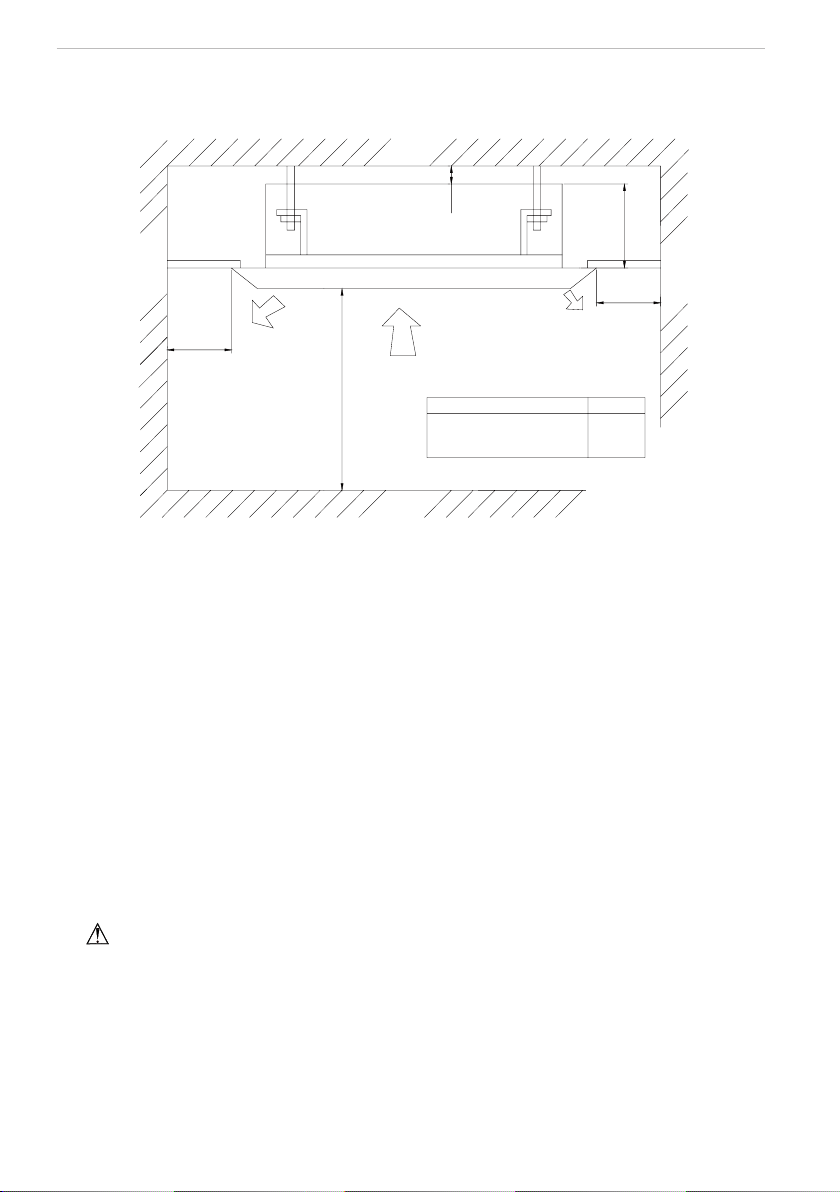
Install of The Compact Panel Cassette Type Indoor Unit
2
2 Install of The Compact Panel Cassette Type Indoor Unit
2.1 Schematic diagram of installation spaces
≥2500
≥1500
≥1500
Model
H
260
unit:mm
>20
Wall
surface
Wall
surface
Wall
surface
Ground
surface
H
ISMI-C15
Fig.1
2.2 Select install location of the indoor unit
(1). Obstruct should put away from the intake or outlet vent of the indoor unit so that the airow
can be blown though all the room.
(2). Make sure that the installation had accord with the requirement of the schematic diagram of
installation spaces.
(3). Select the place where can stand 4 times of the weight of the indoor unit and would not
increase the operating noise and oscillate.
(4). The horizontally of the installation place should be guaranteed.
(5). Select the place where easy drain condensated coagulated water, and easy connect with
outdoor unit.
(6). Make sure that there are enough space for care and maintenance. Make sure that the
weight between the indoor unit and ground is above 2500mm.
(7). When installing the steeve bolt, check if the install place can stand the weight 4 times of the
unit’s. If not, reinforce before installation. (Refer to the install cardboard and nd where should be
reinforced)
Note!
There will be lots of lampblack and dust stick on the acentric, heat exchanger and water pump
in dining room and kitchen, which would reduce the capacity of heat exchanger, lead water leakage
and abnormal operation of the water pump. The following treatment should be taken under this
circumstance:
(8). Ensure that the smoke trap above cooker has enough capacity to obviate lampblack to
prevent the indraft of the lampblack by the air conditioner.
(9). Keep the air conditioner far from the kitchen so that the lampblack would not be indraft by
the air conditioner.
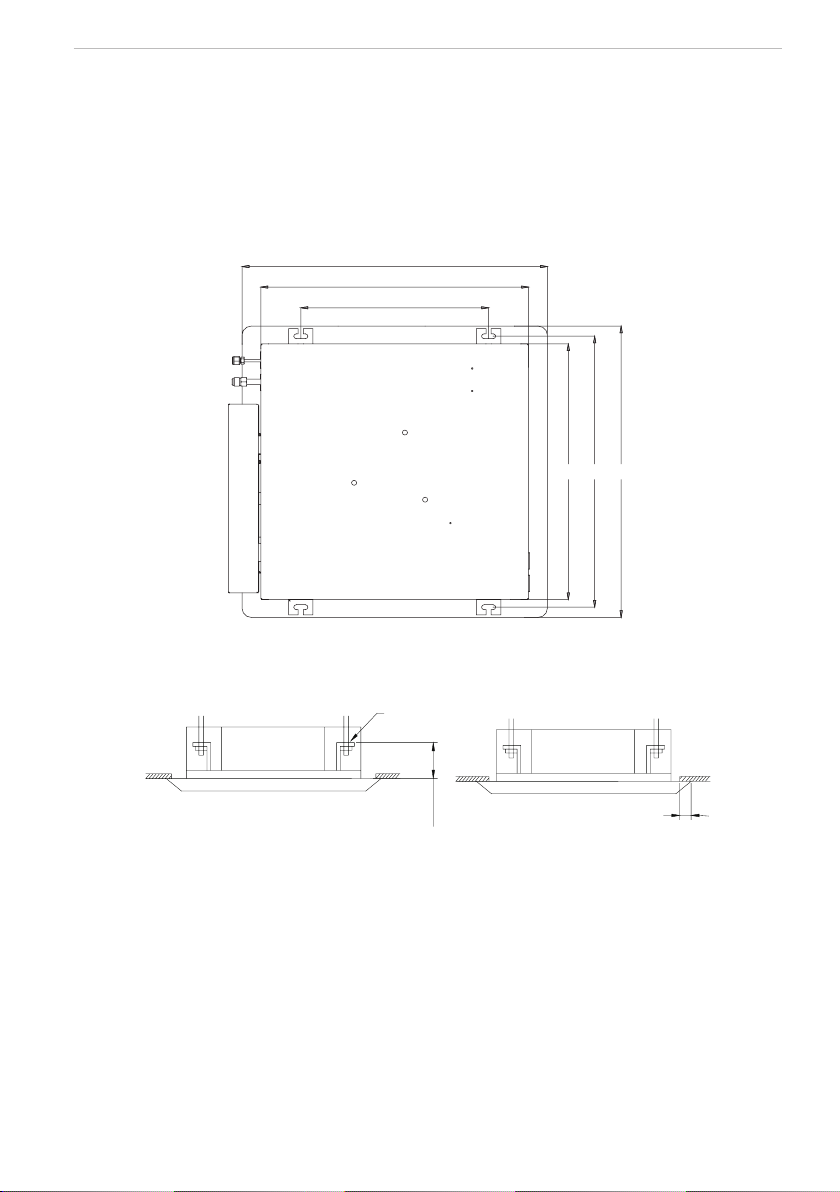
Install of The Compact Panel Cassette Type Indoor Unit
3
2.3 Important notice
◆
To guarantee the good performance, the unit must be installed by professional personnel
according with this instruction.
◆ Please contact the local Impecca special nominated repair department before installation.
Any
malfunction caused by the unit that is installed by the department that is not special nominated
by Impecca would not deal with on time by the inconvenience of the business contact.
2.4 Dimension of ceiling opening and location of the hoisting screw (M10)
650
570
400
570 604 650
Fig.2 Install dimension of mode
◆
The drilling of holes in the ceiling must be done by the professional personnel.
Ceiling
Installation stands for main body of the unit
(160)
Above 20
Fig.3
Notes: The dimension for the ceiling openings with * marks can be as large as 610mm. But the
overlapping sections of the ceiling and the decorated surface boards should be maintained at no
less than 20mm.
2.5 Main body of hoisting air conditioner
(1). The primary step for install the indoor unit.
◆
When attach the hoisting stand on hoisting screw, do use nut and gasket individually at the
upper and lower of the hoisting stand to x it. The use of gasket anchor board can prevent gasket
break off.
(2). Use install cardboard.
◆
Please refer to the install cardboard about the dimension of ceiling opening.
◆
The central mark of the ceiling opening is marked on the install cardboard.
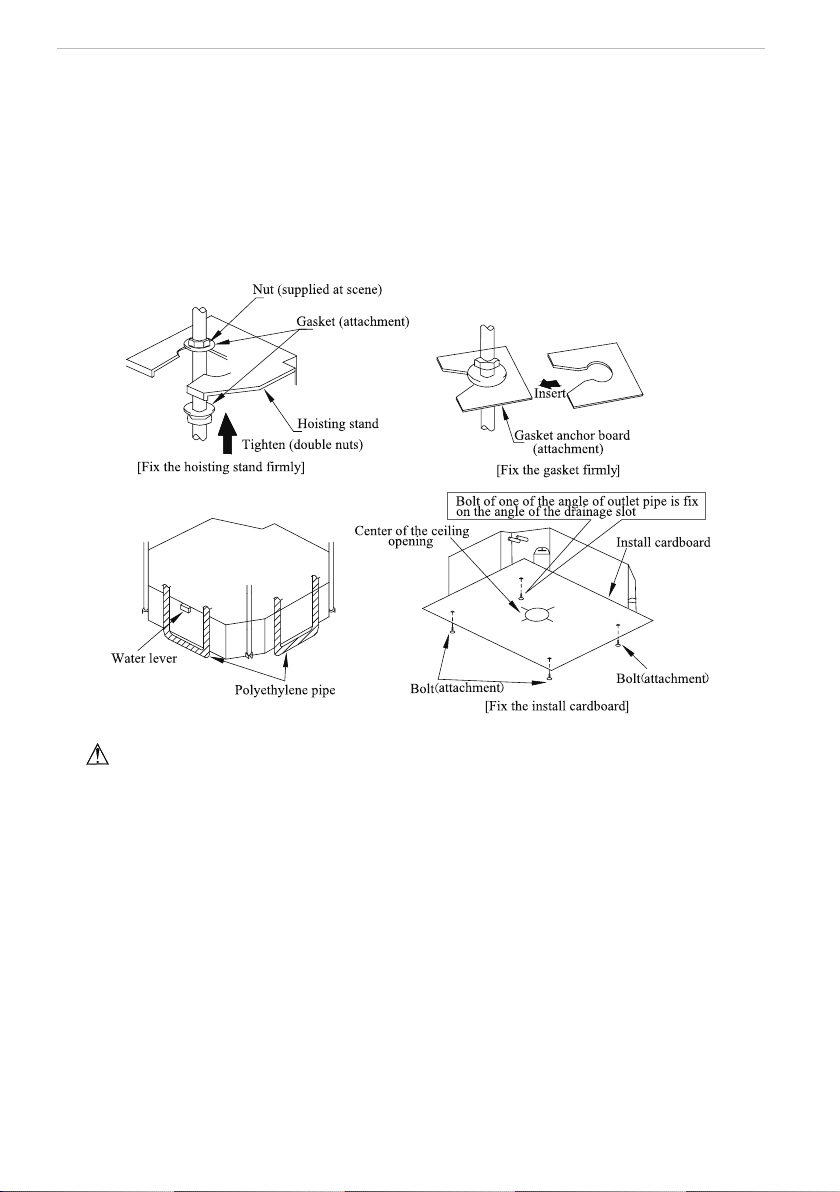
Install of The Compact Panel Cassette Type Indoor Unit
4
◆
Install the install cardboard on the unit by bolt (3 piece), and x the angle of the drainage pipe
at the outlet vent by bolt.
(3). Adjust the unit to the suitable install place. (Refer to the g.3)
(4). Check if the unit is horizontal.
◆
Inner drainage pump and bobber switch are included in the indoor unit, check if 4 angle of
every unit are horizontal by water lever. (If the unit is slant toward the opposite of the coagulate
water ow, there may be malfunction of the bobber switch and lead water drop.)
(5). Backout the gasket anchor board used to prevent gasket break off and tighten the nut on it.
(6). Backout the install cardboard.
Fig.4
Note!: Please do tighten the nuts and bolts to prevent air conditioner break off.
2.6 Connection of the refrigerant pipe
◆
When connect the pipe to the unit or backout it from the unit, please do use both spanner and
torque wrench. as shown in g.5.
◆
When connect, smear both inside and outside of the are nut with freeze motor oil, screw it
by hand and then tighten it with spanner.
◆
Refer to form 1 to check if the wrench had been tightened (too tight would mangle the nut
and lead leakage).
◆
Examine the connection pipe to see if it had gas leakage, then take the treatment of heat
insulation, as shown in the g.5.
◆
Only use median sponge to entwine the wiring interface of the gas pipe and heat preservation
sheath of the gas collection tube.
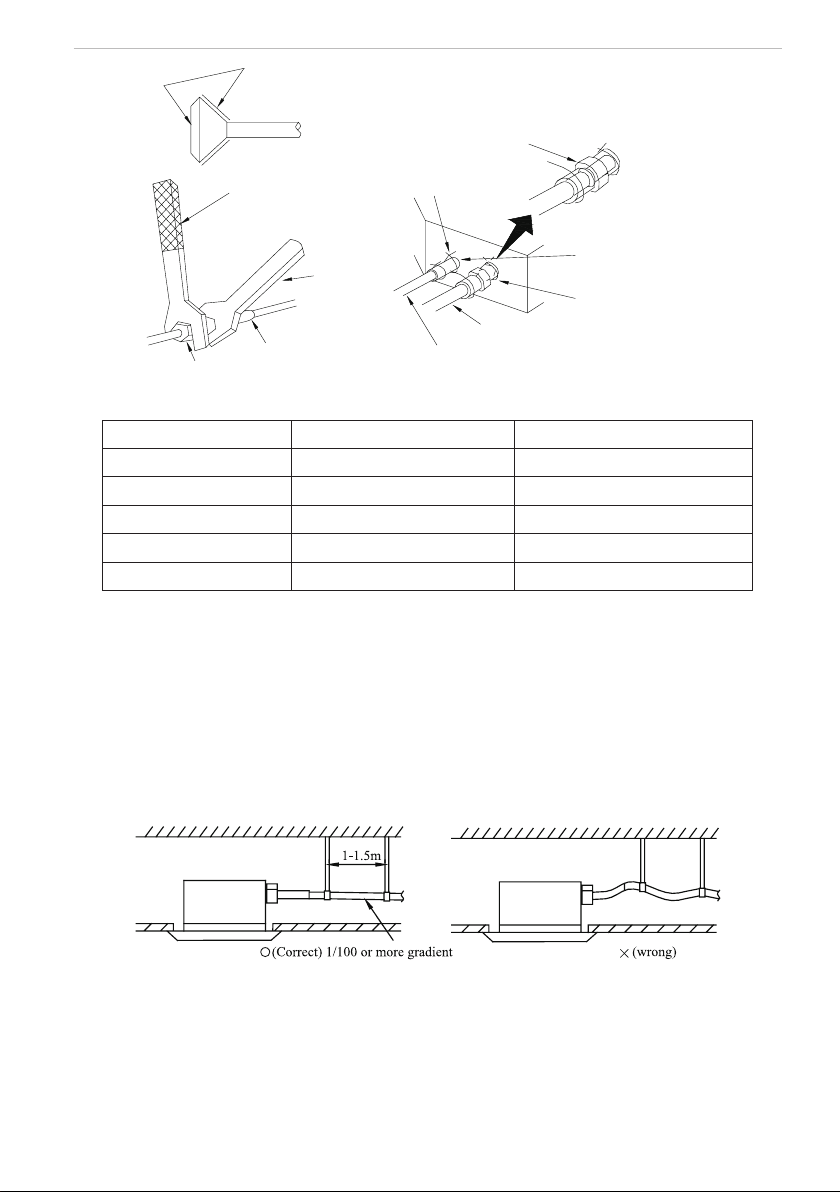
Install of The Compact Panel Cassette Type Indoor Unit
5
Smear freeze motoroil
here
Spanner
Thread fasten(x4)
Median sponge (attachment)
(entwine the wiring interface
with seal mat)
Gas collection tube
Liquid inlet tube
Heat preservation
sheath of liquid inlet
tube (attachment) (for
liquid tube)
Heat preservation
sheath of gas collection
tube (attachment)(for
gas tube)
Flare nut
Wiring interface
Torque wrench
Fig.5
Form 1: The tightening torque needed for tightening nut
Diameter
(
Inch
)
Surface thickness
(
mm
)
Tightening torque (N
·
m)
φ1/4’’
≥
0.5 15-30 (N
·
m)
φ3/8’’
≥
0.71 30-40 (N
·
m)
φ1/2’’
≥
1 45-50 (N
·
·m)
φ5/8’’
≥
1 60-65 (N
·
m)
φ3/4’’
≥
1 70-75 (N
·
·m)
2.7 Drainage hose
(1). Install the drain hose
◆
The diameter of the drain hose should be equal or bigger than the connection pipe’s. ( The
diameter of polythene pipe: Outer diameter 25mm Surface thickness
≥
1.5mm)
◆
Drain hose should be short and drooping gradient should at less 1/100 to prevent the
formation of air bubble.
◆
If drain hose cannot has enough drooping gradient, drain raising pipe should be added.
◆
To prevent bent of the drain hose, the distance between hoisting stand should is 1 to 1.5m.
Fig.6
◆
Use the drain hose and clamp attached. Insert the drain hose to the drain vent, and then
tighten the clamp.
◆
Entwine the big sponge on the clamp of drain hose to insulate heat.
◆
Heat insulation should be done to indoor drain hose.
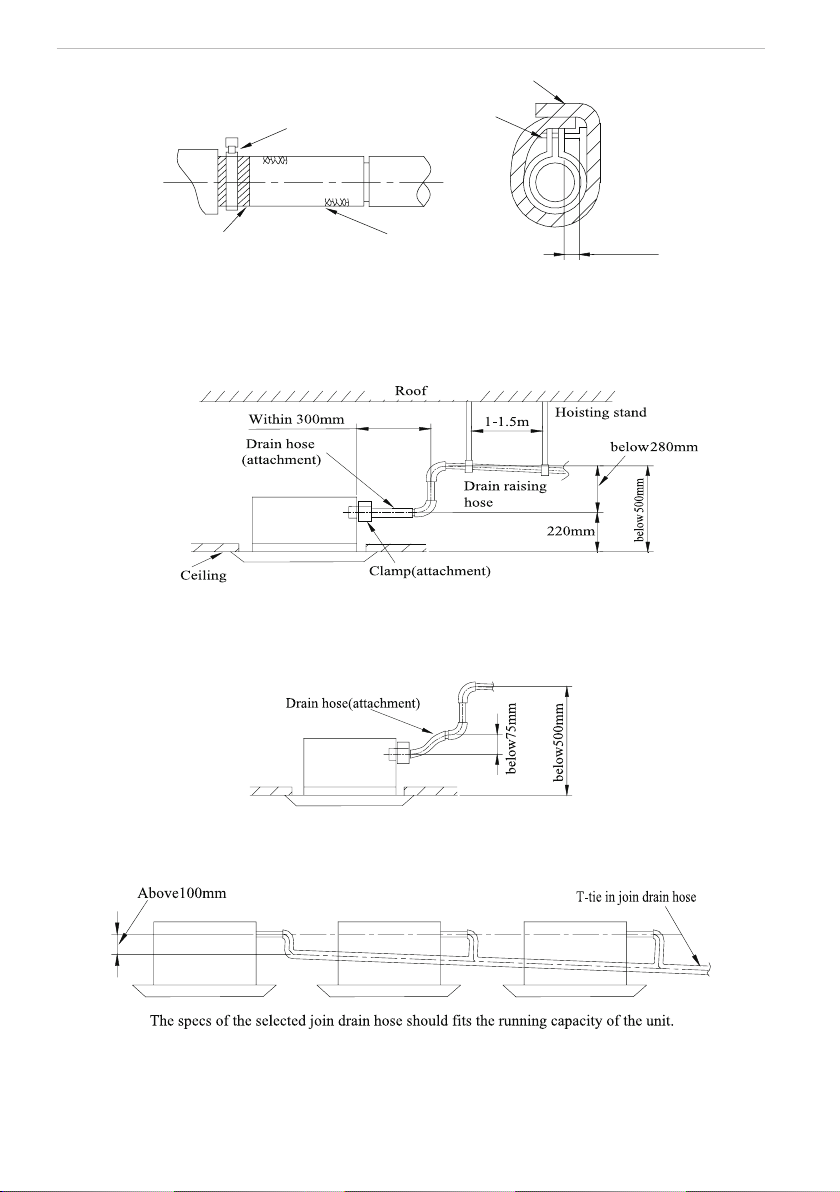
Install of The Compact Panel Cassette Type Indoor Unit
6
Sponge(attachment)
Clamp(attachment)
Below 4mm
Clamp
Drain hose
Sponge (gray)
Fig.7
Drain stepup pipe note
◆
The install height of the drain raising pipe should less than 280mm.
◆
The drain raising pipe should form a right angle with the unit, and distance to unit should not
beyond 300mm.
Fig.8
Instruction
◆
The slant gradient of the attached drain hose should be within 75mm so that the drain hole
doesn’t has to endure the unnecessary outside force.
Fig.9
◆
Please install the drain hose according to the following process if several drain hoses join
together.
Fig.10
(2). Check the smoothness of drain after installation.
◆
Check the drain state by immitting 600cc water slowly from the outlet vent or test hole.
◆
Check the drain in the state of refrigerating after installation of the electric circuit.
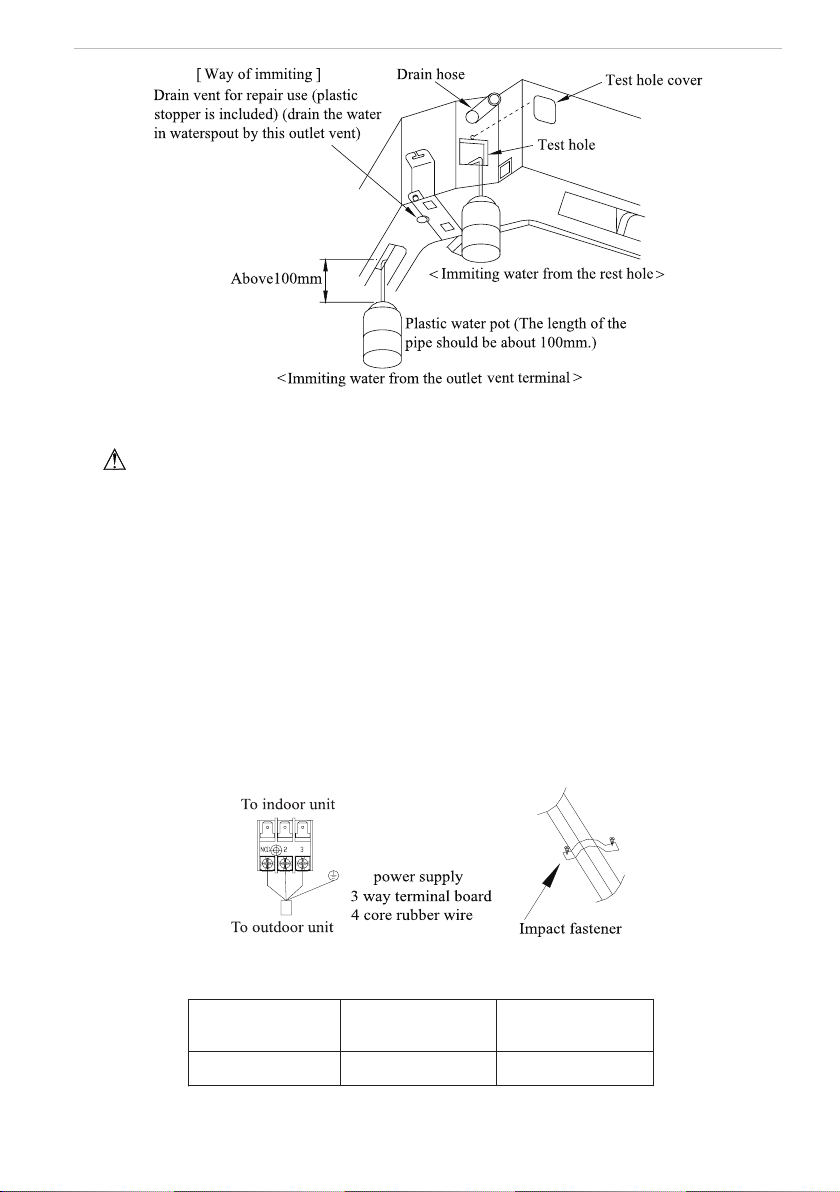
Install of The Compact Panel Cassette Type Indoor Unit
7
Fig.11
2.8 Electrical wiring
Note:The power of the entire indoor unit must be connected in outdoor unit.
◆
About the electrical wiring, please see the circuit diagram attached with the unit.
◆
All the installation of electrical wiring must be done by professional personnel.
◆
Please do take the earthing treatment.
Wiring method of connection unit and controller
◆
Connection wiring (communication):
①
Open electric box cover, drag the wiring (communication)from the rubber plug A, and impact
them well individually by impact fastener.
②
Wiring according to the indoor side circuit diagram.
◆
Fix the impact fastener after connection.
◆
Entwine the small sponge on the electric wire( do entwine it to prevent condensation).
◆
Impact tightly by impact fastener after connection and then t on the electric box.
◆
Connect the 3 cord rubber wire to the counter terminal of the 3 way terminal board.
The power cord reference Power cord standard recommending table
Fig.12
Power cord standard recommending table
Power Supply
(V, Ph, Hz)
Min. Sectional Area of
Earth Wire(AWG)
Min. Sectional Area of
Power Cord(AWG)
208~203V-1Ph-60Hz UL1015 AWG 18*1 UL1015 AWG 18*3
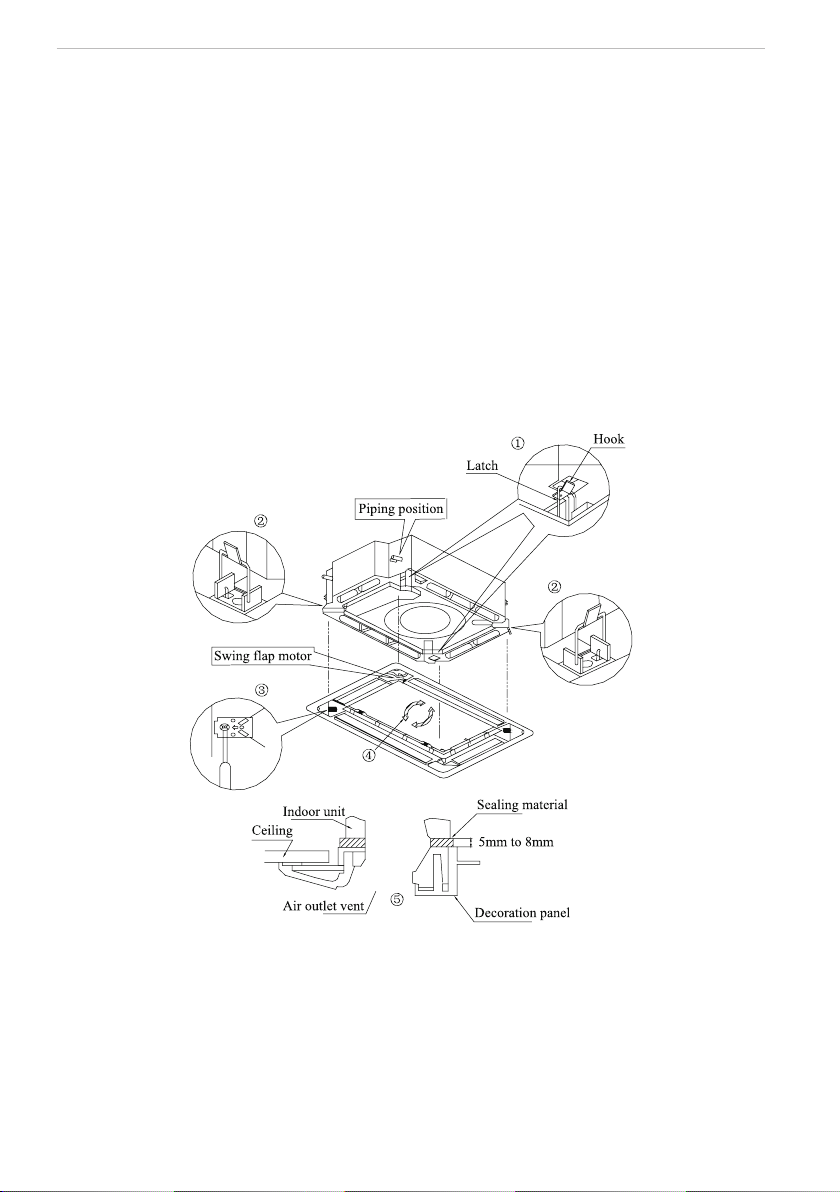
Install of The Compact Panel Cassette Type Indoor Unit
8
2.9 Install the panel
(1). Set the panel to the indoor unit body by matching the position of the swing ap motor of the
panel to the piping position of the panel to the piping position of the indoor unit as shown by g.13.
(2). Install the panel
① .
Install the panel on the indoor unit temporarily. When install, hang the latch on the hook
that is located on the opposite side of the swing ap on the panel of the indoor unit. (2
positions)
② .
Hang the remaining 2 latches to the hooks on the sides of the indoor unit.(Be careful not to
let the swing motor lead wire get caught in the sealing material.)
③ .
Screw the 4 hexagon head screws under the latches in about 15mm. (The panel would
rise)
④ .
Adjust the panel by turning it toward the direction pointed by the arrow as shown in g.13,
so that the adjust board connect the ceiling well.
⑤ .
Tighten the screws until the thickness of the sealing material between panel and indoor
unit reduced to 5-8mm.
Fig.13
Notes:
① .
Improper screwing of the screws may cause the troubles shown in g.14.
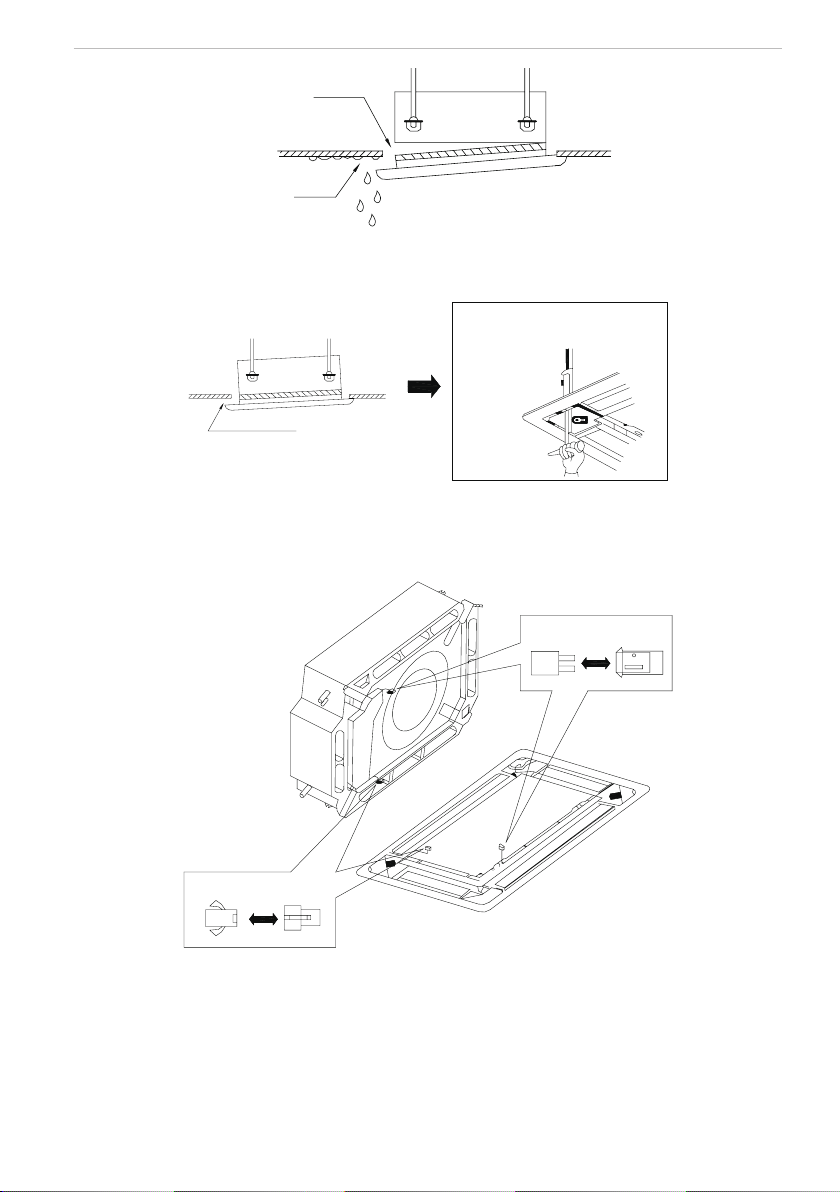
Install of The Compact Panel Cassette Type Indoor Unit
9
Air leak
Air leak from ceiling
Water condensatation, water drop
Fig.14
② .
If gap still exist between ceiling and decoration panel after tightening the screws, readjust
the height of the indoor unit. (As shown in g.15)
If the raising lever and drain hose are
not affect, can adjust the height of
indoor unit by the hole on the corner
of panel.
Gaps are not allowed
Fig.15
※
After xing, be sure no gap left between the ceiling and the panel.
③ .
Wiring of the decoration panel (Fig.16)
Connect the joints for swing ap motor lead wire (at 2 places) installed on the panel.
At body At pane
At body At pane
Fig.16
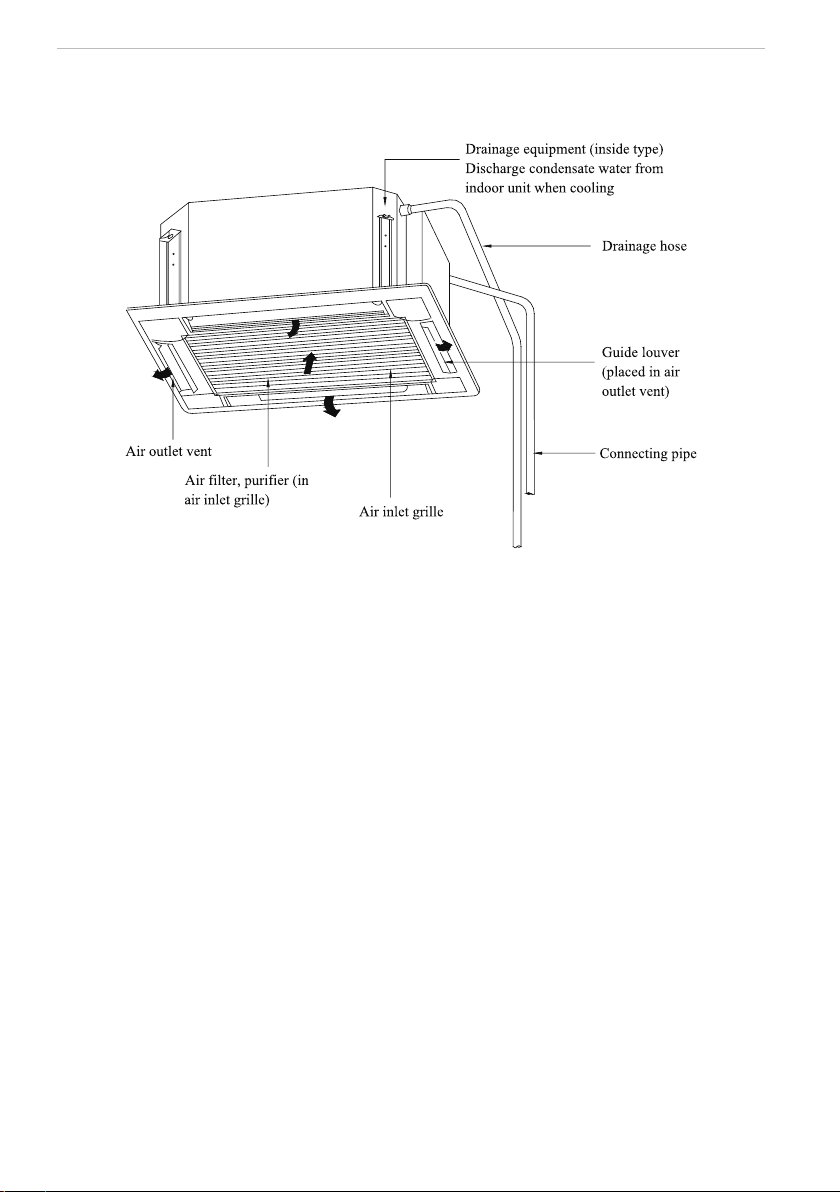
Constitutes and Names of Parts of Compact Panel Cassette Type Indoor Unit
10
3 Constitutes and Names of Parts of Compact Panel Cassette Type
Indoor Unit
Working Temperature Range
11
4 Working Temperature Range
Working Temperature Range
Indoor side state Outdoor side stae
Dry bulb
temp.
℃
Wet bulb
temp.
℃
Dry bulb
temp.
℃
Wet bulb
temp.
℃
Rated Cooling 27 19 35 24
Max. cooling 32 23 48 26
Min. cooling 21 15 18
—
Rated Heating 20 15 7 6
Max. heating 27
—
24 18
Min. heating
20 15 -
15
-
16
Malfunction Debarring
12
5 Malfunction Debarring
Warning!
◆
Cut down the main power switch immediately if malfunction (such as smell the burning odor
etc.) happened, and then contact service center. If the abnormal state is maintained, the unit may be
damaged or electric shock or re may be happened.
◆
Do not ret the conditioner. Please contact service center to repair or move the conditioner.
5.1 Check the following items before contacting maintenance center
Phenomena Reason Remedial Measures
Air conditioner doesn’t
run at all
Blow of fuse or breaker Change fuse or close breaker
Power cut
Restart when there is power
supply
Don’t connect with power Connect power well
Low batteries of wireless remote
controller
Change new batteries
Wireless remote controller exceed
remote control area
Signal could be received within
8m
Air conditioner runs
but stops immediately
Blockage in inlet or outlet vent of
indoor or outdoor unit
Clean out blockage
Abnormal cooling or
heating
Blockage in inlet or outlet vent of
indoor or outdoor unit
Clean out blockage
Improper of temp. setting
Adjust settings in wireless remote
controller
Low setting of fan speed
Adjust settings in wireless remote
controller
Incorrect of wind direction
Adjust settings in wireless remote
controller
Door or window opened Close
Direct sun burn
Hang curtain or jalousie before
windows
Too many people in room
Too many heater in room
Filter blocked by dirt Clean lter
Malfunction Debarring
13
5.2 Instruction
If problem still cannot found out after above checking, please contact service center and instruct
phenomena and model.
5.3 The following circumstance are not malfunction
“Malfunction” Reason
Air conditioner doesn’t
run
Start up unit immediately after
turned off
The overload protects switch
makes it run after 3 minutes delay.
When opening power
Run for about 1 minute without
other actions
Mist is blown from air
conditioner
When cooling
The high humidity air in room is
cooled rapidly
Noise is heard from
air conditioner
Slight click sound heard once
begin running
Sound of initialization for electric
expand valve
Hissing sound heard continuously
when cooling
The sound for gas refrigerant
owing in the unit
Hissing sound heard when staring
or stopping
The sound for gas refrigerant
stops ow
Slight hissing sound heard when
running or after running
Sound for running of drainage
system
Creak sound heard when running
or after running
The grating sound caused by
expands of panel and other parts
for the change of temperature
Dust be blown for air
conditioner
Started up after long time’s doesn’t
runs
Dust in indoor unit be blown out
Odor gives out from
air conditioner
When running
This is because when air
conditioning, odors or cigarette
smoke from the room that was
sucked in is discharged again.
5.4 After-sales Service
When having quality or other problems when purchasing air conditioner, please contact the local
service center.
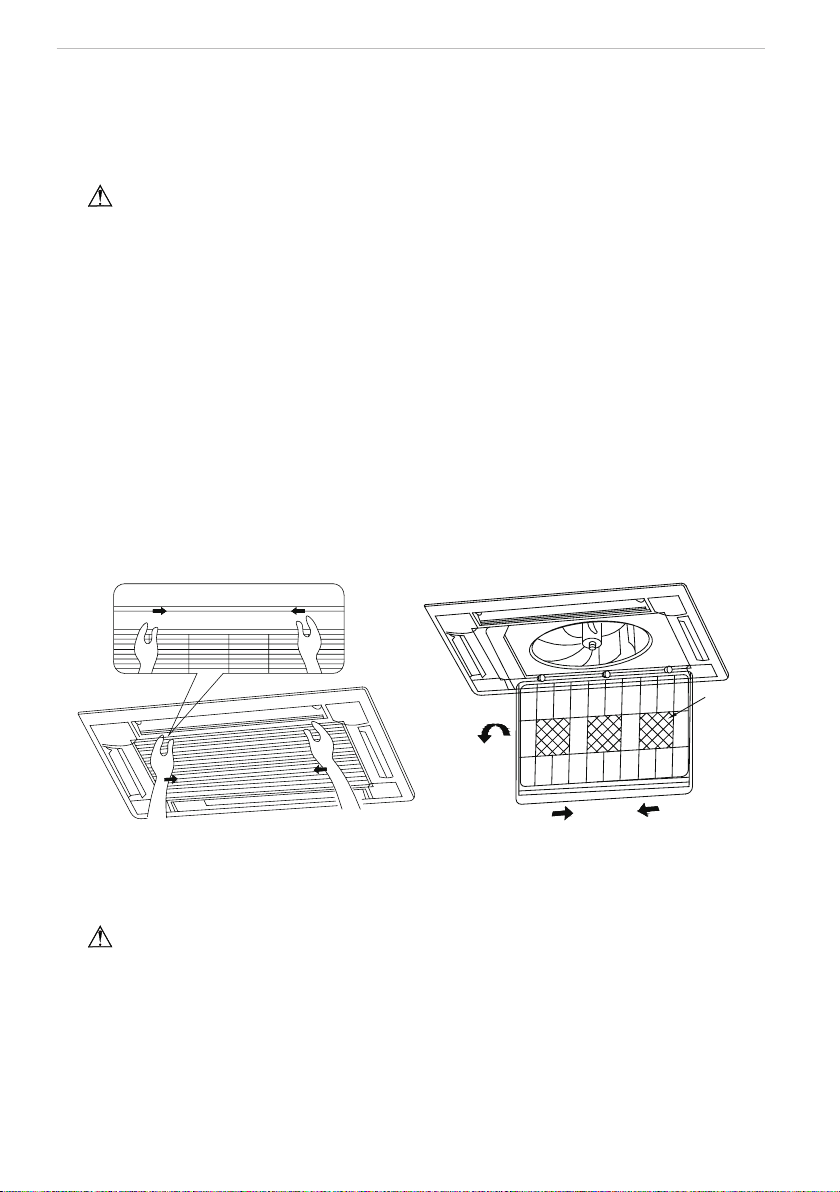
Maintenance Method
14
6 Maintenance Method
When air conditioner won’t be used for a long time, please cut off the main power supply
of air conditioner.
Warning!
◆
Do turn off the unit and cut off the main power supply when cleaning the air conditioner,
otherwise electric shock or harm may happen.
◆
It is forbidden to wash air conditioner by water rinsing, otherwise electric shock may happen.
6.1 Cleaning air lter
Air lters should be cleaned by professionals with proper operation to ensure personal safety.
When the usage environment has lots of dust, air lter should be cleaned more frequently (about
once 6 months).
(1). Open air inlet grille
Loosen two screws on the air inlet grille with a screwdriver. And
pull the 2 handle on air inlet
grille at the same time with the direction showed by arrow in g.17, pull down slowly. (Reverse when
closing)
(2). Disassembly air lter
As shown in fig.18, pull the handle behind air inlet grille, raise it and disassembly. Then
discharge the 3 purier xed on lter.
purifier
Fig.17 Fig.18
(3). Clean
Adopts cleaner or water to wash lter; if the lter is too dirty ( like oil stain on it ), adopts warm
water ( lower than 45
℃
) with neutral scourer to clean it, then dry it in the shade.
Note
!
Do not clean the filter by hot water whose temp. is higher than 45
℃
to prevent fade or
deformation.
Do not burn it on re or the lter would catches re or deformation.
(4). Install air lter
Fix the 3 puriers on lter, install lter on the several bulges on top of air inlet grille, pull the
handle behind air inlet grille toward inside to x lter. As shown in g.19.
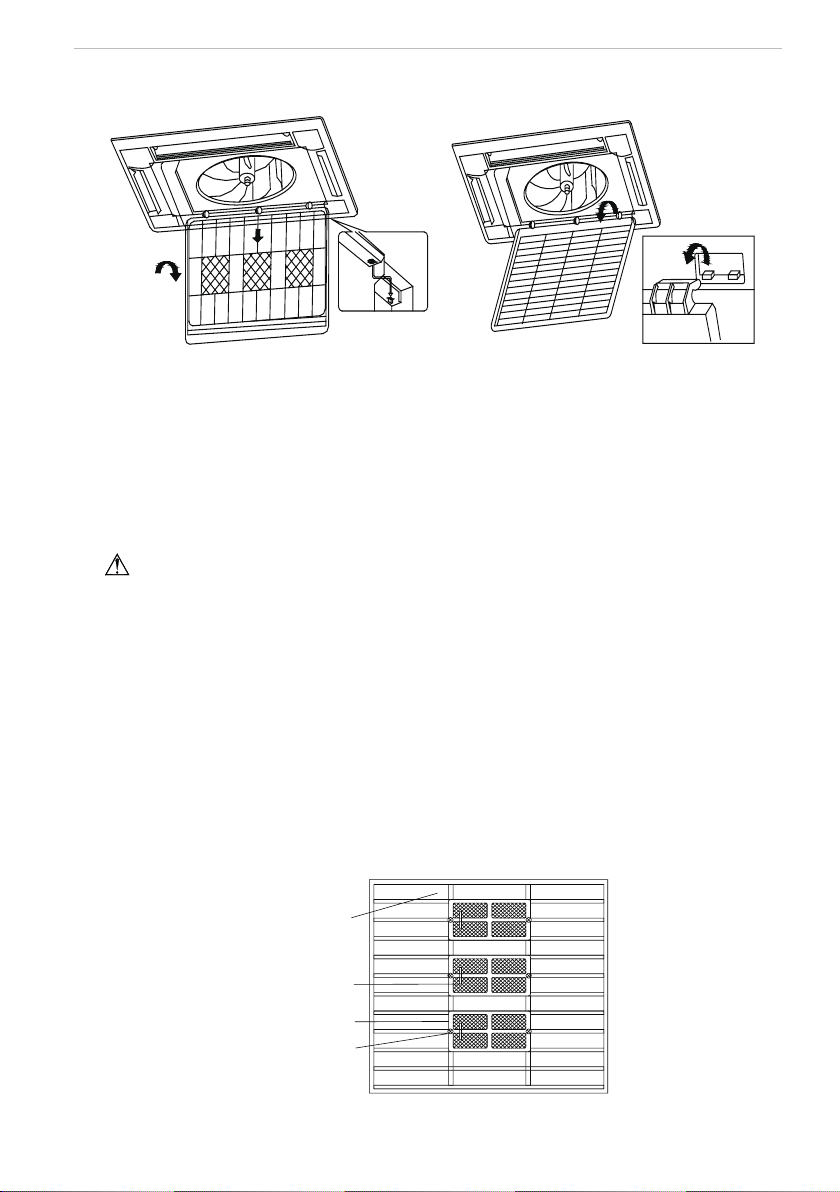
Maintenance Method
15
(5). Close air inlet grille (Refer to the 1st step)
Maintenance Method
Fig.19 Fig.20
6.2 Clean air inlet grille
(1). Open air inlet grille (the same with the 1st step of Clean Air Filter)
(2). Take out air lter (the same with the 2nd step of Clean Air Filter)
(3). Take out air inlet grille
Open air inlet grille for an angle of 45°, as shown in g.20, rise it.
(4). Clean
Clean it by pubescence brush, water and neutral cleaning, then throw water or dry it.
Note
!
Do not use water above 45
℃
to wash the panel to prevent fade or deformation.
(5). Install air inlet grille (refer to 3rd step)
(6). Install air lter (refer to the 4th step of Clean Air Filter)
(7). Close air inlet grille (refer to the 1st step)
6.3 Install and change of air purier
(1). Open air inlet grille (the same the 1st step of Clean Air Filter)
(2). Disassembly purier
As shown in g.21, disassembly air lter, screw out xing bolts xed on purier on lter, then
purier could be disassembly.
(3). Take out the package sack of static ber net lter, then install the lter in stand of purier,
and x purier on air lter.
(4). Install air lter (the same with the 4th step of Clean Air Filter)
Fix bolt of
purifier
Stand for purifier
Purifier filter
Air filter
Fig.21
Maintenance Method
16
Function and usage period for air purifying
◆
Could adsorb CO, CO
2
, benzene, aldehydes and odor of gasoline etc..
◆
Could adsorb deleterious material that is smaller than 1μm in air, as dust, pollen, bacteria,
and virus.
◆
Usage period is 6 months to 1 year. If it is necessary to be changed, purchase new purier in
the nearest Impecca special engaged maintenance
center. 6.4 Clean Outlet vent and Surface
Panel
◆
Clean the surface panel by soft dry cloth or wet cloth with neutral scourer.
◆
It is forbidden to clean surface panel by gasoline, benzene, diluents, cleansing powder etc..
◆
If the guide louver is too dirty, it may be removed to be cleaned. (As narrated below)
Disassembly and install of guide louver
(1). Disassembly guide louver
Screw bolts in both end of guide louver to loose.
Note
!
Do not wipe guide louver powerfully when cleaning, otherwise uff on surface would fall off.
(2). Install guide louver
Rotate guide louver slightly could install the protruding edge of both end into grooves on both
end of guide louver, and then tighten bolts.
6.5 Maintenance before or after usage season
Check before the usage season
◆
Check if there is blockage in inlet or outlet vent of air conditioner.
◆
Check if the earthing wire had earthed reliably.
◆
Check if the air lter had been installed well.
◆
In order to start up the air conditioner smoothly after long time’s turned off, turn on the main
power supply 8 hours before turning on the air conditioner.
Maintenance after usage season
◆
Clean lter and body of air conditioner.
◆
Cut off the main power supply of air conditioner.
◆
The cooling or heating capacity and sound level are tested before leaving factory.
◆
If the parameter changed, refer to the data offered on nameplate.
6.6 CUSTOMER SUPPORT
Before contacting customer support, please see the troubleshooting guide above.
Visit our website to contact us, find answers to Frequently Asked Questions, and for other resources which
may include an updated version of this user's guide.
WWW.IMPECCA.COM
If you wish to contact us by phone, please be sure to have your model number and serial number ready
and call us between 9:00am and 6:00pm ET, at +1 866-954-4440.
Keep tabs on Impecca's newest innovations & enter contests via our social network feeds:
www.facebook.com/Impecca/
www.instagram.com/impecca/
@impeccausa

© 2016 Impecca, a division of LT Inc., Wilkes Barre, PA.
Thank you for choosing Commercial Air Conditioners, please read this
owner’s manual carefully before operation and retain it for future reference.
Commercial Air Conditioners
Owner's Manual
Flex Series R410A GMV Multi VRF
Cassette Type Indoor Unit
(For North America)
Model: ISMI-C24
User Notice
◆
The total capacity of the indoor units which runs at the same time can not exceed 150% of
that of outdoor units; otherwise, the cooling (heating) effect of each unit would be poor.
◆
A breaker (or fuse) needs to be installed in every indoor unit, and the capacity should be in
accordance with indoor unit’s electrical parameter; all the indoor units are required to be centralized
controlled by a main switch, this switch can cut off the electric power supply in case of emergency.
The breaker (or fuse) on each indoor unit has the function of preventing short circuit and avoiding
abnormal overload, it should be connected in normal situation. The main switch controls the power
supply of all the indoor units. Before cleaning and maintaining the indoor units, it is very important
to turn off the main power supply switch.
◆
In order to turn on the units successfully, the main power switch should be opened 8 hours
before the operation.
◆
It is a normal phenomenon that the indoor unit will still run for 20-70 seconds after the indoor
unit receives the "stop" signal so as to make full use of after-heat for the next operation.
◆
When the running modes of the indoor and outdoor units conict, it will be indicated on the
display of the wired controller in ve seconds and then the indoor unit will stop. At this time, change
the operation mode of the indoor unit to the one that would not clash with the outdoor operating
mode to make the operation normal. The HEAT mode conicts with each of the COOL mode, DRY
mode and FAN mode, while the COOL mode, DRY mode and FAN mode are compatible between
each other.
◆
The appliance shall not be installed in moist places, such as laundry.
◆
An all-pole disconnection switch having a contact separation of at least 3mm in all poles
should be connected in xed wiring.
◆
Main switch is provided by end user. Main switch knob should be in black or gray, it can be
locked on “OFF” with padlock.
◆
The instruction of main power switch should be included in user manual and the
recommended installing height should be at 0.6-1.7m. And also over current protection is required
(UL 1995,CSA C22.2).
◆
The outdoor ambient temperature of the unit under cooling mode ranges from -5~48°C DB.
The outdoor ambient temperature of the unit (only for the heat pump type unit) under heating mode
ranges from -15~27°C WB.
◆
This appliance is not intended for use by persons (including children) with reduced physical,
sensory or mental capabilities, or lack of experience and knowledge, unless they have been given
supervision or instruction concerning use of the appliance by a person responsible for their safety.
Children should be supervised to ensure that they do not play with the appliance.
This product must not be disposed together with the domestic waste. This product has
to be disposed at an authorized place for recycling of electrical and electronic appliances.
Thank you for selecting Impecca air conditioner. Before use, please read this
manual carefully and keep it properly for furthur reference.

Contents
1 Safety Precautions .......................................................................................... 1
2 Installation of the Cassette Type Indoor Unit ................................................... 2
2.1 Schematic Diagram of Installation Spaces ............................................................ 2
2.2 Installation Location of the Indoor Unit ................................................................... 2
2.3 Important Notice: .................................................................................................... 3
2.4 Dimension of Ceiling Opening and Location of the Hoisting Screw (M10) ............ 3
2.5 Main Body of Hoisting Air Conditioner ................................................................... 4
2.6 Connection of the Refrigerant Pipe ........................................................................ 4
2.7 Drain Hose ............................................................................................................. 5
2.8 Electrical wiring ...................................................................................................... 7
2.9 Install the Panel ..................................................................................................... 9
3 Parts and Components of Cassette Type Indoor Unit ................................. 12
4 Working Temperature Range ......................................................................... 13
5 Trouble Shooting ........................................................................................... 14
6 Maintenance Method ..................................................................................... 16
6.1 Cleaning Air Filter ................................................................................................. 16
6.2 Clean Air Inlet Grille ............................................................................................. 17
6.3 Install and Change of Air Purier ......................................................................... 17
6.4 Clean Outlet Vent and Surface Panel .................................................................. 18
6.5 Maintenance before or after Seasonal Use ......................................................... 18
Flex Series for North America
1
1 Safety Precautions
Please read this manual carefully before using this unit, and operate it correctly according to
the guide in this manual.
Please take special attention to the meaning of these two marks:
Warning! It indicates improper operation which will lead to human casualty or severe injury.
Note! It indicates improper operation which will lead to injury or property damage.
Warning:
◆
Do not adopt fuse with unsuitable capacity or adopt iron wire instead of fuse, otherwise
malfunction or re may happen.
◆
Turn off the main power switch immediately if malfunction (such as smell the burning odor
etc.) happens.
◆
Keep good ventilation in the room to avoid oxygen decit.
◆
Don’t insert nger or stick-like objects into the air inlet/outlet grille.
◆
Please install the unit in a place where is strong enough to withstand the weight of the unit;
otherwise, the unit would fall down and cause injury or death.
◆
Don’t apply or spray and paint or insecticide on the surface of unit, otherwise, fire may
happen.
◆
Never ret the unit and contact the sales agent or the professional installation personnel for
the repair or relocation of the unit.
An all-pole disconnection switch having a contact separation of at least 3mm in all poles
should be connected in xed wiring.
Note:
◆
Before using the unit, please check if the piping and wiring are correct to avoid water
leakage, refrigerant leakage, electric shock, or re etc.
◆
The main power supply must be earthed soundly to avoid the hazard of electric shock and
never connect this earth wire to the gas pipe, running water pipe, lightening rod or phone cable's
earth lead.
◆
Turn off the unit after it runs at least ve minutes; otherwise its service life will be shortened.
◆
Don’t allow children operate the air conditioner.
◆
Don’t allow children operate the air conditioner.
◆
Please turn off the main power of the unit before cleaning the conditioner or change the lter.
◆
Please cut off the main power if the conditioner will not be used for a long time.
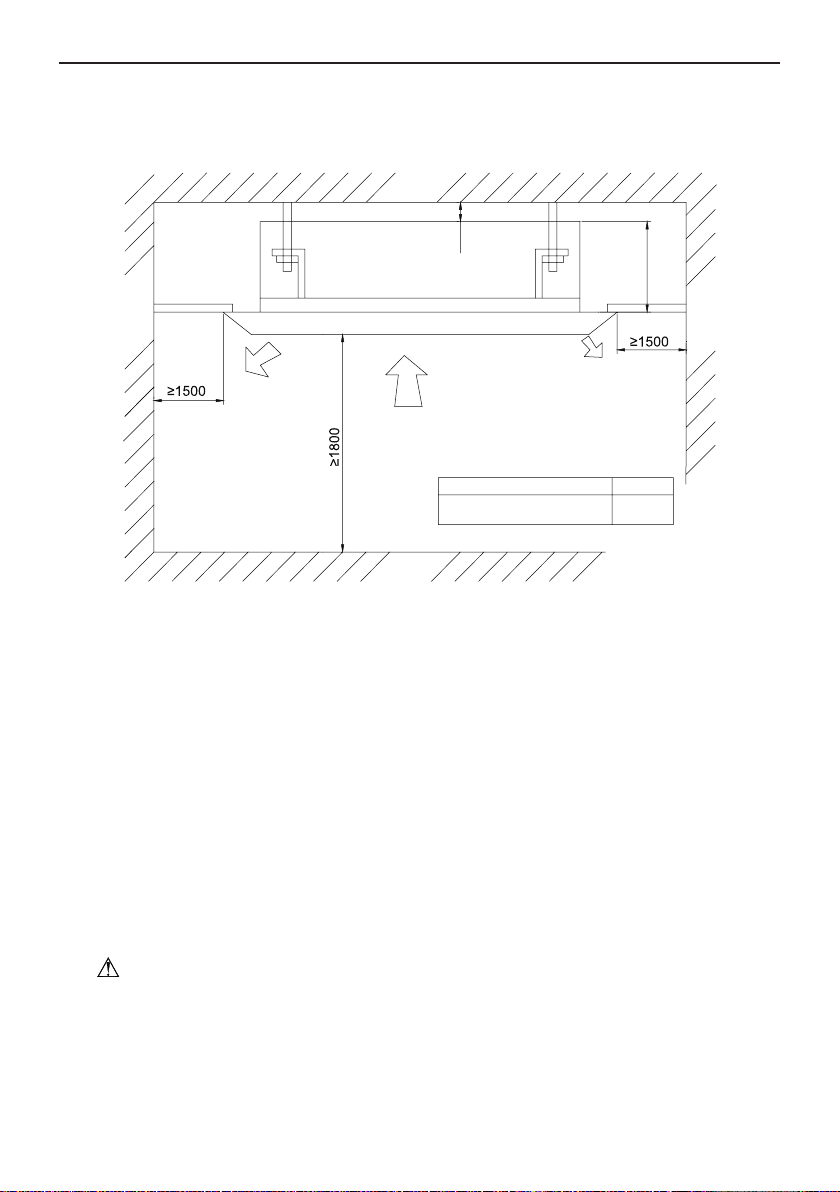
Flex Series for North America
2
2 Installation of the Cassette Type Indoor Unit
2.1 Schematic Diagram of Installation Spaces
ISMI-C24
Model
H
260
unit:mm
>20
Wall
surface
Wall
surface
Wall
surface
Ground
surface
H
Fig.1
2.2 Installation Location of the Indoor Unit
(1). Obstruct should be taken away from the inlet or outlet of the indoor unit so that the airow
can be blown though all the room.
(2). Ensure the installation work is done as per the schematic diagram of installation spaces.
(3). Select a place where is strong enough to withstand 4 times of the weight of the indoor unit;
otherwise it would incur vibration and noise.
(4). Ensure the installation place is at horizontal level.
(5). Select a place where the condensate water is easily drained out and the drain pipe can be
easily connected with outdoor unit.
(6). Make sure that there is enough space for care and maintenance. Make sure that the
distance between the indoor unit and ground is above 1800mm.
(7). When installing the steeve bolt, check if the installing place can stand 4 times of the weight
of the units. If not, reinforce before installation. (Refer to the installation cardboard and nd
where should be reinforced)
Note!
There will be lots of lampblack and dust sticking on the acentric, heat exchanger and water
pump in dining room and kitchen, which would reduce the capacity of heat exchanger, lead water
leakage and abnormal operation of the water pump. The following treatment should be taken
under this circumstance:
1). Ensure that the smoke trap above cooker has enough capacity to obviate lampblack to
prevent the indraft of the lampblack by the air conditioner.
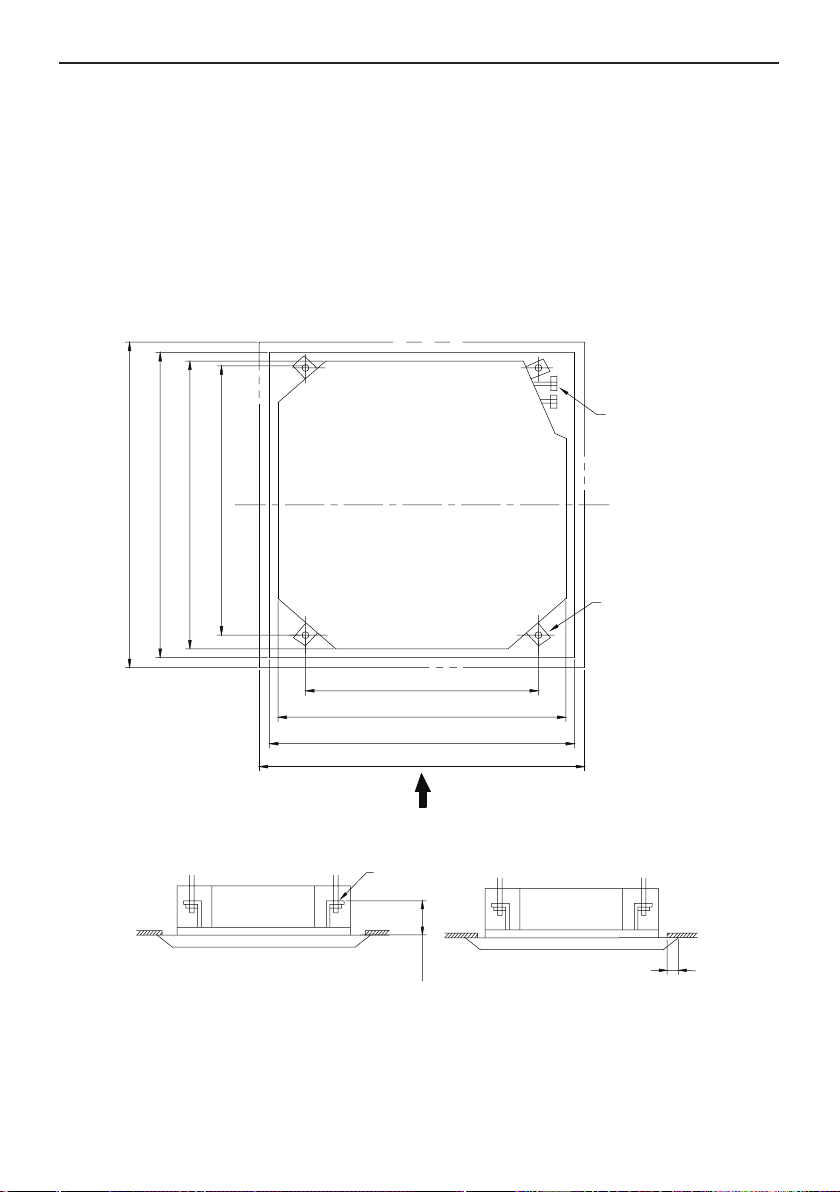
Flex Series for North America
3
2). Keep the air conditioner far from the kitchen so that the lampblack would not be indraft by
the air conditioner.
2.3 Important Notice:
◆
To guarantee the good performance, the unit must be installed by technician according with
this instruction.
◆ Please contact the local Impecca special nominated repair department before installation.
Any
malfunction caused by the unit that is installed by the department that is not special nominated
by Impecca would not deal without time by the inconvenience of the business contact.
2.4 Dimension of Ceiling Opening and Location of the Hoisting Screw (M10)
Refrigerant pipe
780(
Gaps between hoisting screw rods
)
840( Indoor unit)
890*(Ceiling opening)
950(
Decorated surface boards
)
Hoisting screw (X4)
950(Decorated surface boards)
890(
Ceiling opening
)
840(
Indoor unit
)
680(Gaps between hoisting screw rods)
A
Fig.2 Install Dimension of Model ISMI-C24
◆
The drilling of holes in the ceiling must be done by the technicians.
Ceiling
Installation stands for main body of the unit
(160)
Above 20
Fig.3
Notes: The dimension for the ceiling openings with * marks can be as large as 910mm. But the
overlapping sections of the ceiling and the decorated surface boards should be maintained at no
less than 20mm.
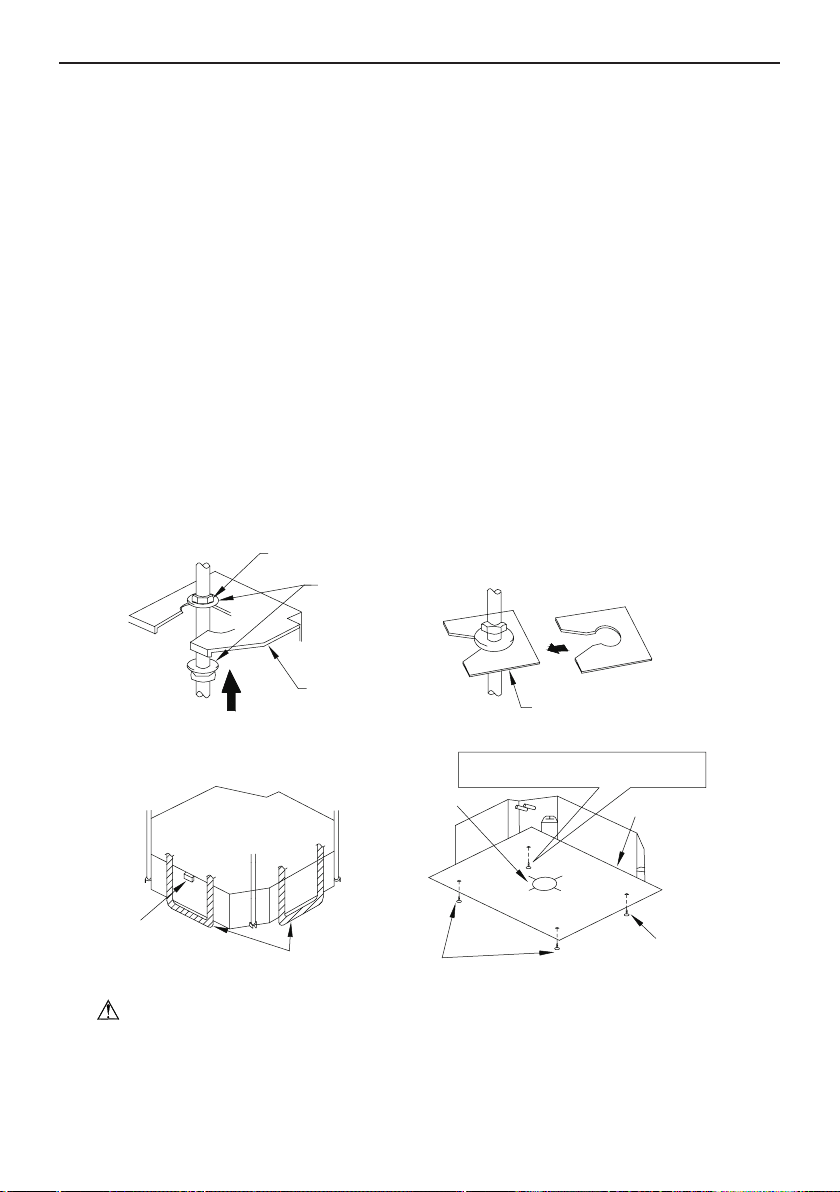
Flex Series for North America
4
2.5 Main Body of Hoisting Air Conditioner
(1). The primary step for installing the indoor unit.
◆
When attach the hoisting stand with hoisting screw, do use nut and gasket respectively at
the upper and lower of the hoisting stand to x it. The use of gasket anchor board can prevent
gasket from breaking off.
(2). Use installation cardboard
◆
Please refer to the installation cardboard about the dimension of ceiling opening.
◆
The central mark of the ceiling opening is marked on the installation cardboard.
◆
Install the installation cardboard on the unit by bolts (3 pieces), and fix the angle of the
drainage pipe at the outlet vent by bolt.
(3). Adjust the unit to the suitable install place. (Refer to the Fig.4)
(4). Check if the unit is horizontal.
◆
Inner drainage pump and oat switch are included in the indoor unit, check if 4 angle of
every unit are horizontal by water level. (If the unit is slant toward the opposite of the coagulate
water ow, there may be malfunction of the oat switch and lead water drop.)
(5). Back-out the gasket anchor board used to prevent gasket from breaking off and tighten the
nut on it.
(6). Back-out the installation cardboard.
Nut(supplied at scene)
Gasket(attachment)
Gasket anchor board(attachment)
Bolt of one of the angle of outlet pipe is
fix on the angle of the drainage solt
Bolt(attachment)
Bolt(attachment)
Water lever
Polyethylene pipe
Center of the ceiling
opening
Insert
Install cardboard
Hoisting stand
Tighten(double nuts)
[Fix the hoisting stand firmly] [Fix the gasket firmly]
[Fix the install cardboard]
Fig.4
Note!
● Please do tighten the nuts and bolts to prevent air conditioner from falling down.
2.6 Connection of the Refrigerant Pipe
◆
When connect the pipe to the unit or remove it from the unit, please do use both spanner
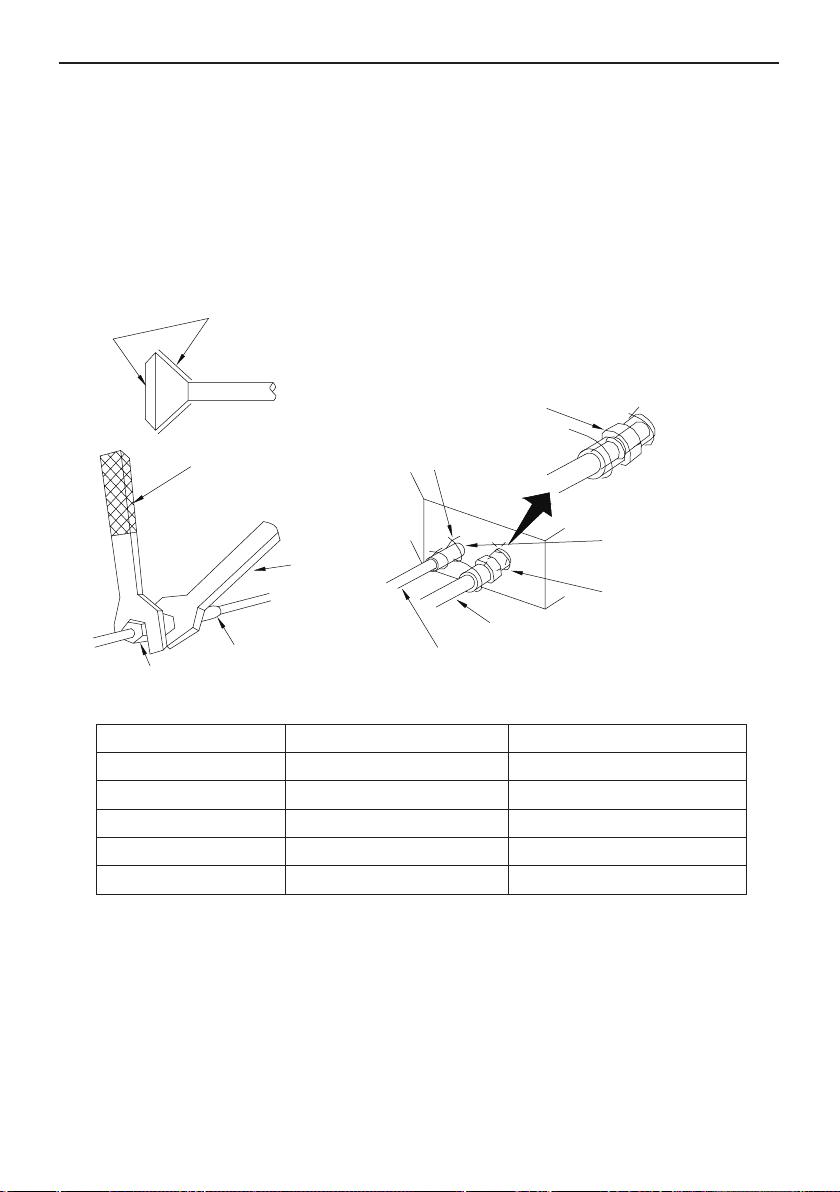
Flex Series for North America
5
and torque wrench. as shown in Fig.5.
◆
When connect, smear both inside and outside of the are nut with freeze motor oil, screw it
by hand and then tighten it with spanner.
◆
Refer to Table 1 to check if the nut has been tightened (tighten too greatly would damage the
nut and lead to leakage).
◆
Examine the connection pipe to see if it has gas leakage, then take the treatment of heat
insulation, as shown in the Fig.5.
◆
Only use medium-sized sponge to entwine the wiring interface of the gas pipe and heat
insulation of the gas collection tube.
Smear freeze motoroil
here
Spanner
Thread fasten(X4)
Median sponge (attachment)
(entwine the wiring interface
with seal mat)
Gas collection tube
Liquid inlet tube
Heat preservation
sheath of liquid inlet
tube (attachment) (for
liquid tube)
Heat preservation
sheath of gas collection
tube (attachment)(for
gas tube)
Flare nut
Wiring interface
Torque wrench
Fig.5
Table 1: The moment of torque for tightening nut
Diameter
(
Inch
)
Surface thickness
(
mm
)
Moment of torque (N
·
m)
φ1/4’’
≥
0.5 15-30 (N
·
m)
φ3/8’’
≥
0.71 30-40 (N
·
m)
φ1/2’’
≥
1 45-50 (N
·
·m)
φ5/8’’
≥
1 60-65 (N
·
m)
φ3/4’’
≥
1 70-75 (N
·
·m)
If the specication of the outdoor unit pipe joint does not conform to that of the indoor unit, then
the joint specication of the outlet pipe of the indoor unit takes precedence. A reducing nipple shall
be installed at the joint of the outdoor unit so as to make the joint of the outdoor unit compatible
with that of the indoor unit.
2.7 Drain Hose
(1). Install the drain hose
◆
The diameter of the drain hose should be equal or larger than that of connection pipes. ( The
diameter of polythene pipe: Outer diameter: 25mm; Surface thickness ≥1.5mm)
◆
Drain hose should be short and drooping gradient should at least 1/100 to prevent the
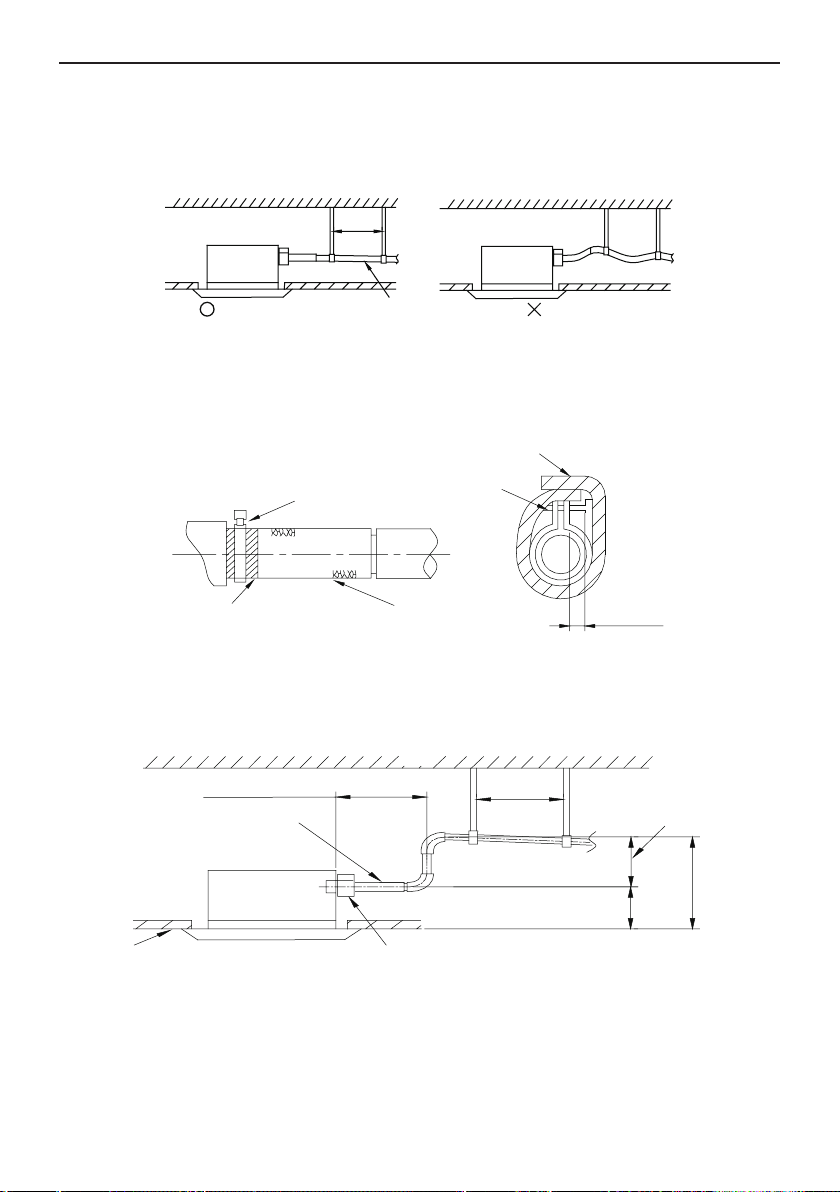
Flex Series for North America
6
formation of air bubble.
◆
If drain hose cannot has enough drooping gradient, drain raising pipe should be added.
◆
To prevent bent of the drain hose, the distance between hoisting stand and the drain hose
should be 1 to 1.5m.
1-1.5m
(Correct)1/100 or more gradient
(Wrong)
Fig.6
◆
Use the drain hose and clamp attached. Insert the drain hose to the drain vent, and then
tighten the clamp.
◆
Wrap clamp with sponge on the drain hose to insulate heat.
◆
Heat insulation should be done to indoor drain hose.
Sponge(attachment)
Clamp(attachment)
Below 4mm
Clamp
Drain hose
Sponge (gray)
Fig.7
Drain Stepup Pipe Note
◆
The installation height of the drain raising pipe should less than 280mm.
◆
The drain raising pipe should form a right angle with the unit, and distance to unit should not
beyond 300mm.
Drain hose(attachment)
Within 300mm
Roof
Drain raising hose
220mm
1-1.5m
Hoisting stand
Below 280mm
Below 500mm
CeilingC lamp(attachment)
Fig.8
Instruction
◆
The fall of the attached drain hose should be within 75mm so that the joint of the drain pipe
doesn’t have to endure the unnecessary outside force.
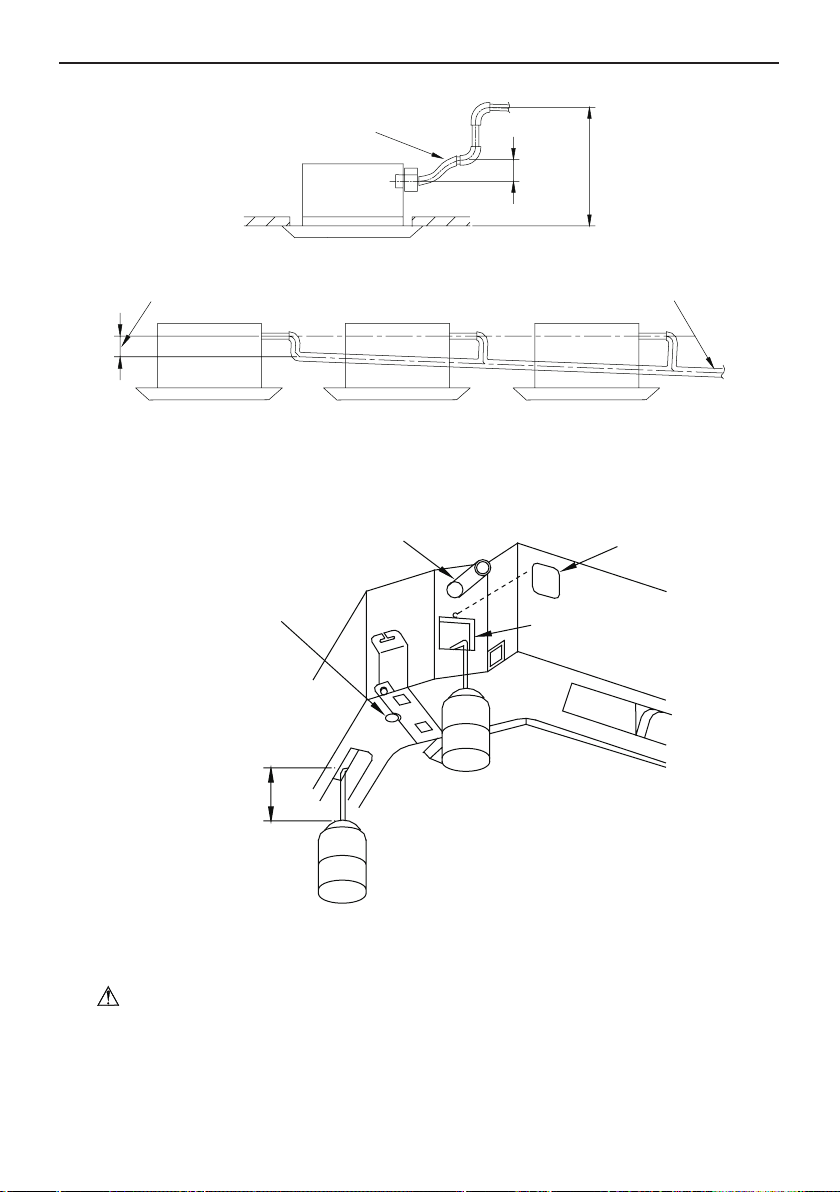
Flex Series for North America
7
Drain hose(attachment)
Below 500mm
Below 75mm
Fig.9
◆
Please install the drain hose according to the following process if several drain hoses join together.
Above 100mm T-tie in join drain hose
The specs of the selected jion drain hose should fits the running capacity of the unit
Fig.10
(2). Check the drain state after installation
◆
Check the drain state by immitting 600ml water slowly from the outlet vent or test hole.
◆
Check the drain state under cooling mode after electric circuit installation work is done.
Above 100m
Drain hose
Test hole cover
Test hole
[Immiting water from the rest hole]
[Immiting water from the outlet vent terminal]
Plastic water pot (The length of
the pipe should be about 100mm)
[Way of immiting]
Drain vent for repair use
(plasticstopper is included)
(drain the waterin waterspout
by this outlet vent)
Fig.11
2.8 Electrical wiring
Note:The power of the entire indoor unit must be connected with outdoor unit.
◆
About the electrical wiring, please see the circuit diagram attached with the unit.
◆
All the installation of electrical wiring must be done by technicians.
◆
Please do take the earthing treatment.
Wiring Method of Connection Unit and Controller
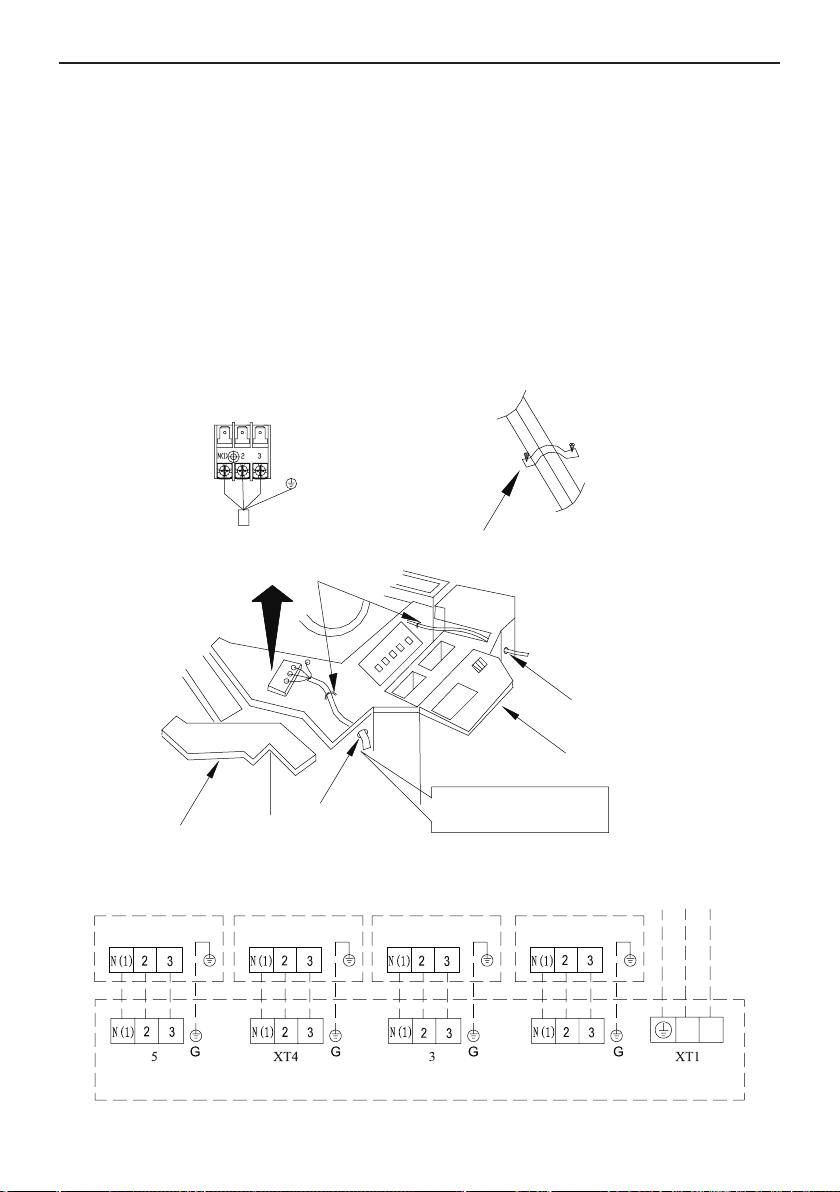
Flex Series for North America
8
◆
Connection wiring (communication):
①
Open electric box cover(1), drag the wiring (communication)from the rubber plug A, and
impact them well individually by impact fastener.
②
Wiring according to the indoor side circuit diagram.
◆
Fix the impact fastener after connection.
◆
Wrap the small-sized sponge on the electric wire (do entwine it to prevent condensation).
◆
Impact tightly by impact fastener after connection and then t on the electric box (1) and (2).
◆
Put the 4-core cable through the hole of the chassis and the bottom of the appliance
upward, and then connect the power line and the communication line from the outdoor unit to the
corresponding terminals N(1), 2, 3 , and grounding terminal of the indoor unit. Wiring shall be done
properly as per the wiring diagram. (Note: Be sure the wring terminals A/B/C/D and piping joints A/
B/C/D of the indoor unit match with that of the outdoor unit respectively).
To indoor unit
To indoor unit
Impact fastener
Electric box cover(1)
Cable-cross loop
Cable-cross loop
Do seal here to prevent
water inleakage from here
Electric box cover(2)
Power supply 3 way
terminal board 4 core
rubber wire
Fig.12
GWHD(36)ND3AO
POWER
INDOOR UNIT D
INDOOR UNIT C
INDOOR UNIT B
INDOOR UNIT A
XT
XT XT2
OUTDOOR UNIT
N
L
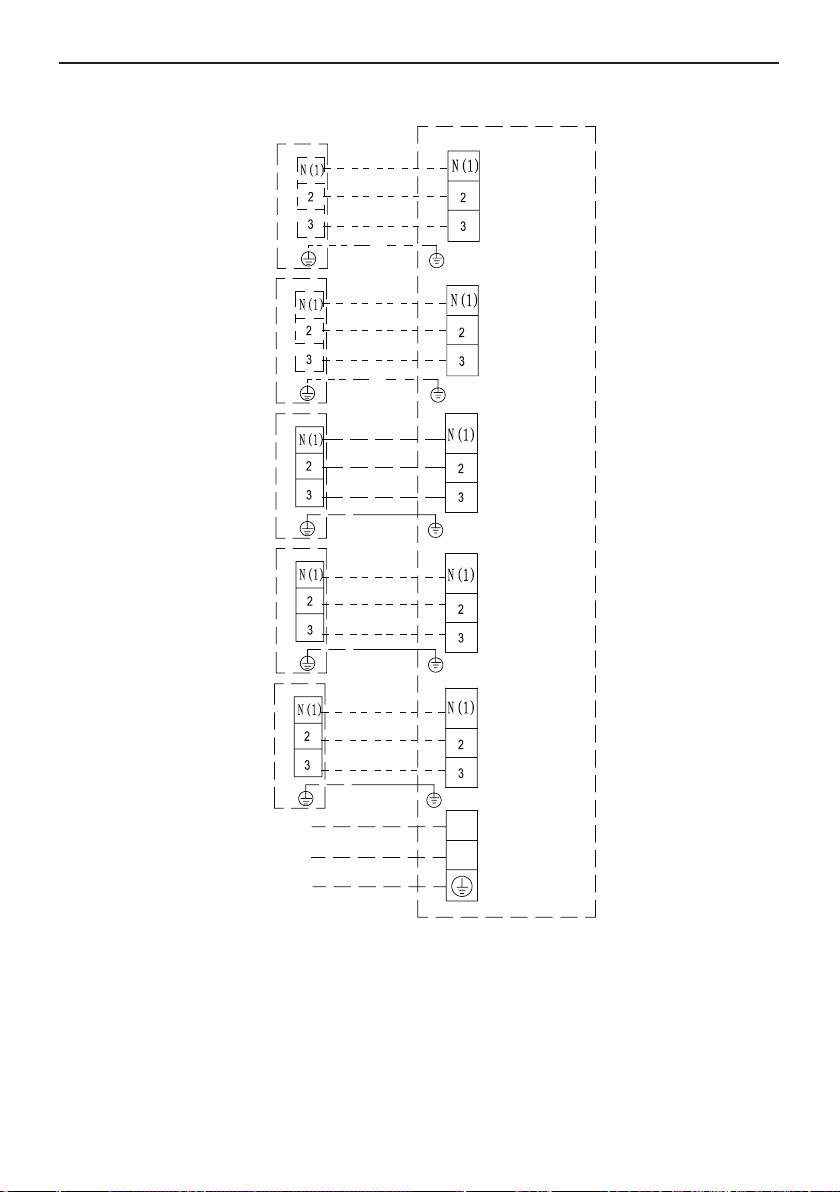
Flex Series for North America
9
GWHD(42)ND3AO
POWER
INDOOR UNIT AINDOOR UNIT BINDOOR UNI
T CINDOOR UNIT D
OUTDOOR UNI
T
INDOOR UNIT E
XT2
XT1
XT3
XT4
XT5
XT6
N
L
G
G
G
G
G
2.9 Install the Panel
1. Set the panel to the indoor unit body by matching the position of the swing ap motor of the
panel to the piping position of the panel to the piping position of the indoor unit as shown by Fig.13.
2. Install the panel
(1). Install the panel on the indoor unit temporarily. When install, hang the latch on the hook that
is located on the opposite side of the swing ap on the panel of the indoor unit. (2 positions)
(2). Hang the remaining 2 latches to the hooks on the sides of the indoor unit.(Be careful not to
let the swing motor lead wire get caught in the sealing material.)
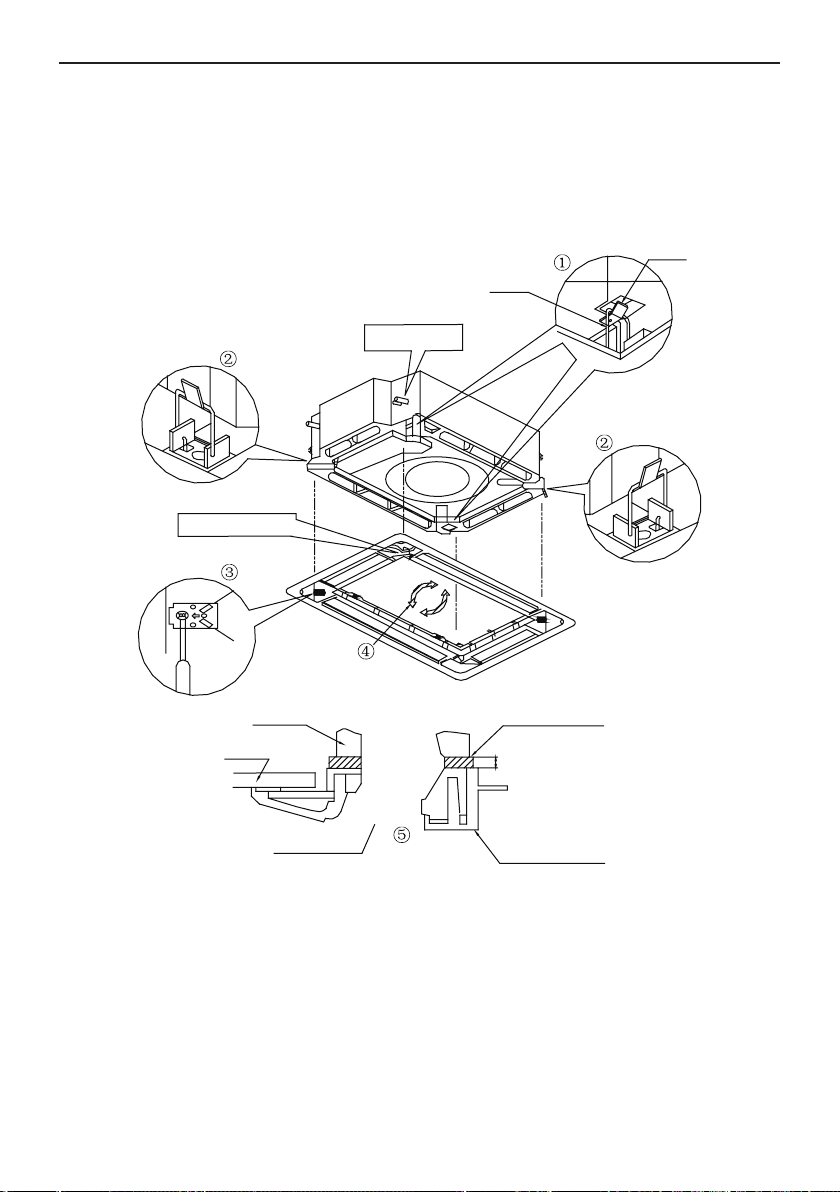
Flex Series for North America
10
(3). Screw the 4 hexagon head screws under the latches in about 15mm. (The panel would
rise)
(4). Adjust the panel by turning it toward the direction pointed by the arrow as shown in Fig.13,
so that the adjust board connect the ceiling well.
(5). Tighten the screws until the thickness of the sealing material between panel and indoor unit
reduced to 5-8mm.
Latch
Piping position
Swing flap motor
Indoor unit
Ceiling
Air outlet vent
Decoration panel
5mm to 8mm
Sealing material
Hook
Fig.13
Notes:
①.
Improper screwing of the screws may cause the troubles shown in Fig.14.
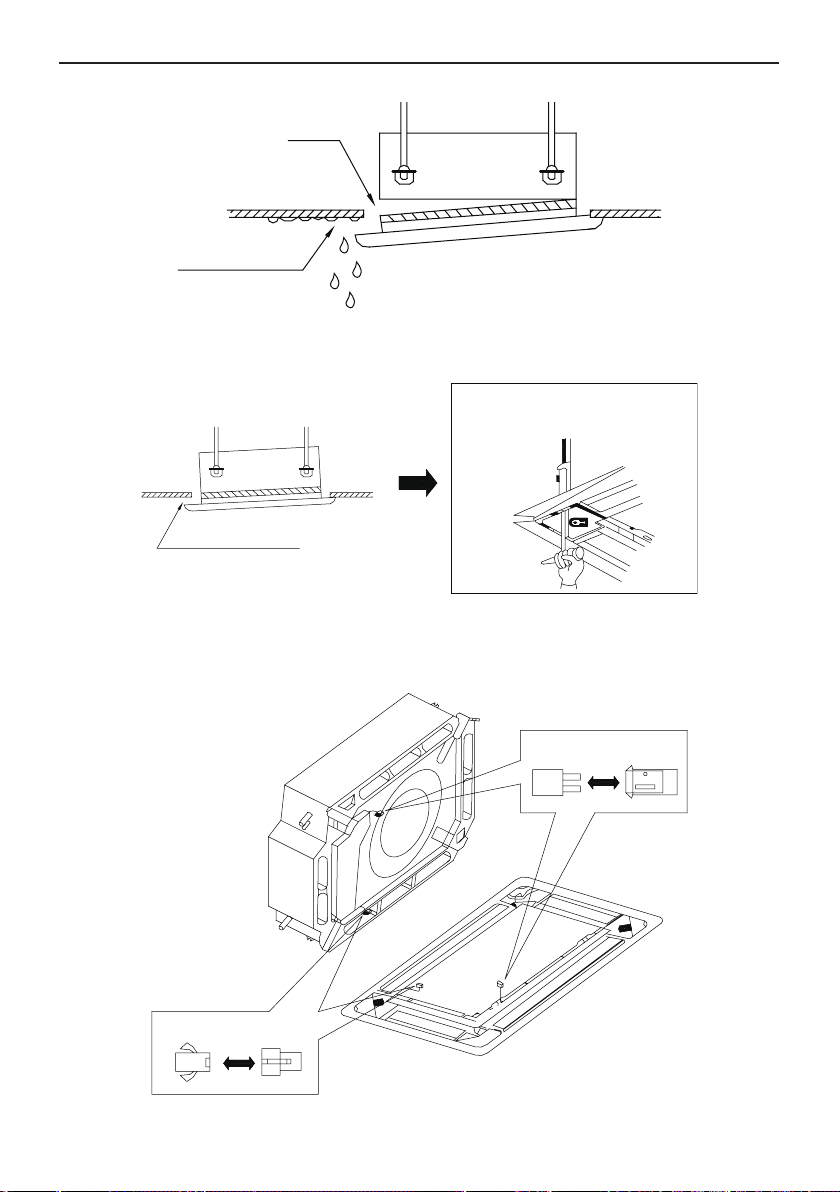
Flex Series for North America
11
Air leak
Air leak from ceiling
Water condensatation, water drop
Fig.14
②.
If gap still exist between ceiling and decoration panel after tightening the screws, readjust
the height of the indoor unit. (As shown in Fig.15)
If the raising lever and drain hose are
not affect, can adjust the height of
indoor unit by the hole on the corner
of panel.
Gaps are not allowed
Fig.15
※
After xing, be sure that there is no gap between the ceiling and the panel.
③.
Wiring of the decoration panel (Fig.16)
Connect the joints for swing ap motor lead wire (at 2 places) installed on the panel.
At body At pane
At body At pane
Fig.16
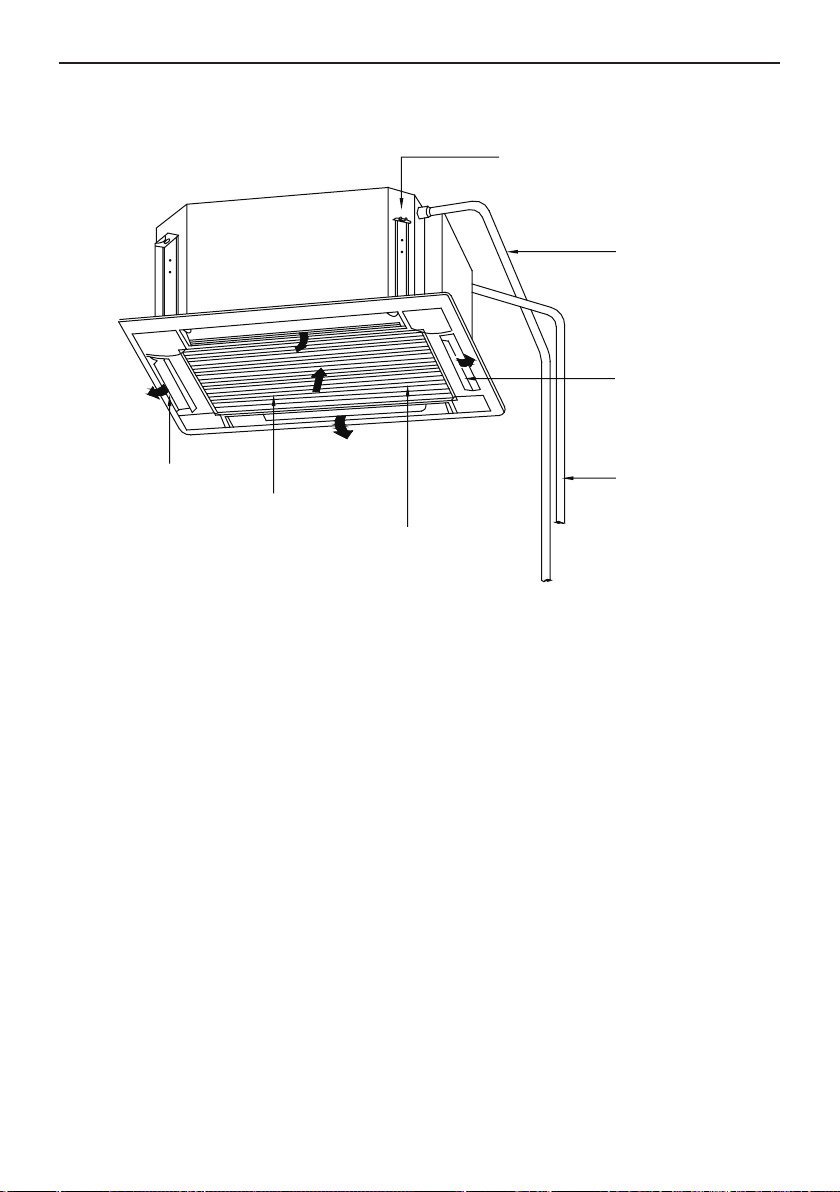
Flex Series for North America
12
3 Parts and Components of Cassette Type Indoor Unit
Air outlet vent
Air filter, purifire
(in air inlet grille)
Air inlet grille
Guide louver
(placed in air
outlet vent)
Drainage equipment (inside type)
Discharge cindensate water from
indoor unit when cooling
Connecting pipe
Drainage hose
Fig.17 ISMI-C24
Flex Series for North America
13
4 Working Temperature Range
Working Temperature Range
Indoor side state
℉(℃)
Outdoor side state
℉(℃)
Dry bulb
temp.
℉(℃)
Wet bulb
temp.
℉(℃)
Dry bulb
temp.
℉(℃)
Wet bulb
temp.
℉(℃)
Rated. Cooling 80.0(26.7) 67.0(19.4) 95.0(35.0) 75.0(23.9)
Max. cooling 80.0(26.7) 67.0(19.4)
115
.0(46.1) 75.0(23.9)
Min. cooling 67.0(19.4)
57
.0(13.9) 67.0(19.4)
57
.0(13.9)
Rated. Heating
70
.0(21.1)
60
.0(15.6)
47
.0(8.3)
43
.0(6.1)
Max. heating 80.0(26.7) — 75.0(23.9)
65
.0(18.3)
Low Ambient heating
70
.0(21.1)
60
.0(15.6)
5
.0(-15.0)
3.2
(
-16.0
)
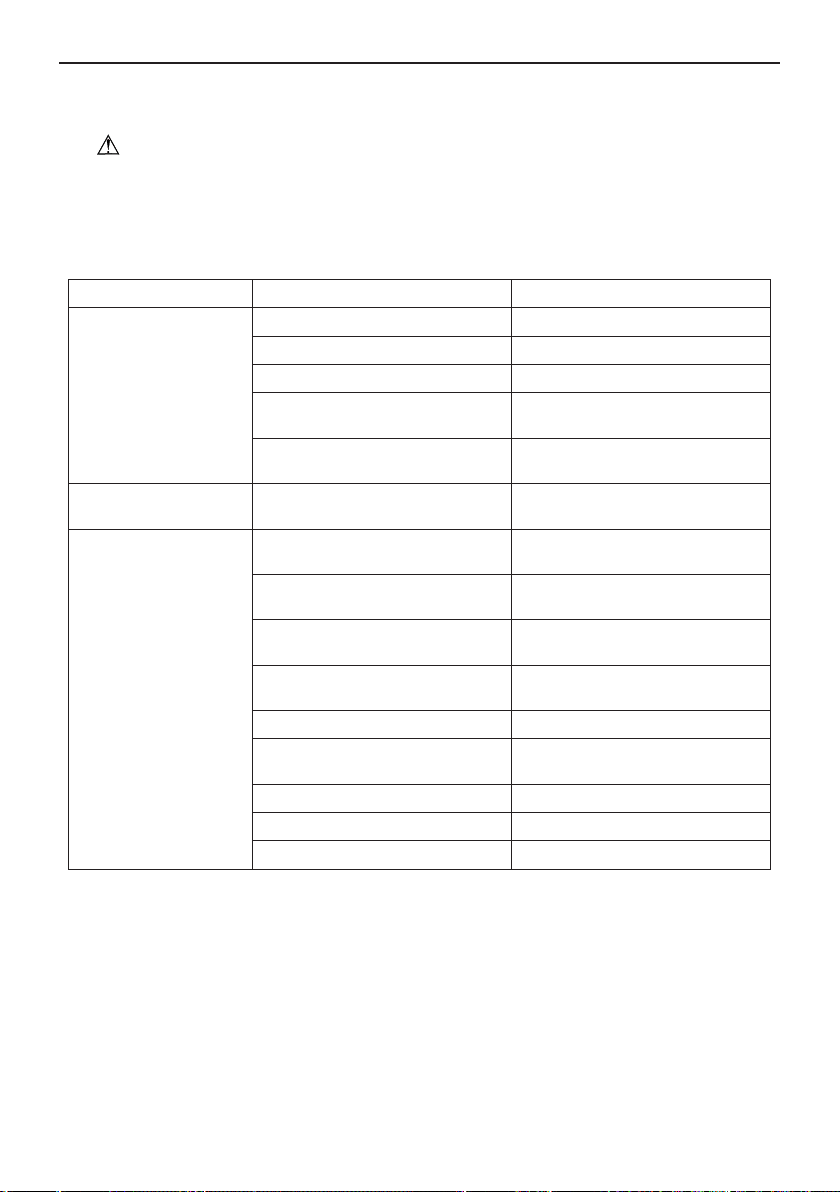
Flex Series for North America
14
5 Trouble Shooting
Warning!
◆
Cut down the main power switch immediately if malfunction (such as smell the burning odor
etc.) happens, and then contact service center. If the abnormal state is maintained, the unit may be
damaged or electric shock or re may happen.
◆
Do not ret the conditioner. Please contact service center to repair or move the conditioner.
★
Check the following items before contacting maintenance center
Phenomena Reason Remedial Measures
Air conditioner doesn’t
run at all
Blow of fuse or breaker Change fuse or close breaker
Power cut Restart when there is power supply
Don’t connect with power Connect power well
Low batteries of wireless remote
controller
Change new batteries
Wireless remote controller exceed
remote control area
Signal could be received within 8m
Air conditioner runs but
stops immediately
Blockage in inlet or outlet vent of
indoor or outdoor unit
Clean out blockage
Abnormal cooling or
heating
Blockage in inlet or outlet vent of
indoor or outdoor unit
Clean out blockage
Improper of temp. setting
Adjust settings in wireless remote
controller
Low setting of fan speed
Adjust settings in wireless remote
controller
Incorrect of wind direction
Adjust settings in wireless remote
controller
Door or window opened Close
Direct sun burn
Hang curtain or jalousie before
windows
Too many people in room
Too many heater in room
Filter blocked by dirt Clean lter
★
Instruction
If problem still cannot be solved after above checking, please contact service center.
Flex Series for North America
15
★
The following circumstance doesn't belong to malfunction
“Malfunction” Reason
Air conditioner doesn’t run
Start up unit immediately after
turned off
The overload protects switch
makes it run after 3 minutes
delay.
When opening power
Run for about 1 minute without
other actions
Mist is blown from air
conditioner
When cooling
The high humidity air in room is
cooled rapidly
Noise is heard from air
conditioner
Slight click sound heard once
begin running
Sound of initialization for electric
expand valve
Hissing sound heard continuously
when cooling
The sound for gas refrigerant
owing in the unit
Hissing sound heard when staring
or stopping
The sound for gas refrigerant
stops ow
Slight hissing sound heard when
running or after running
Sound for running of drainage
system
Creak sound heard when running
or after running
The grating sound caused by
expands of panel and other parts
for the change of temperature
Dust be blown for air
conditioner
Started up after long time’s doesn’t
runs
Dust in indoor unit be blown out
Odor gives out from air
conditioner
When running
This is because when air
conditioning, odors or cigarette
smoke from the room that was
sucked in is discharged again.
★
After-sales Service
If there is any quality or other issues after purchasing air conditioner, please contact the local
service center.
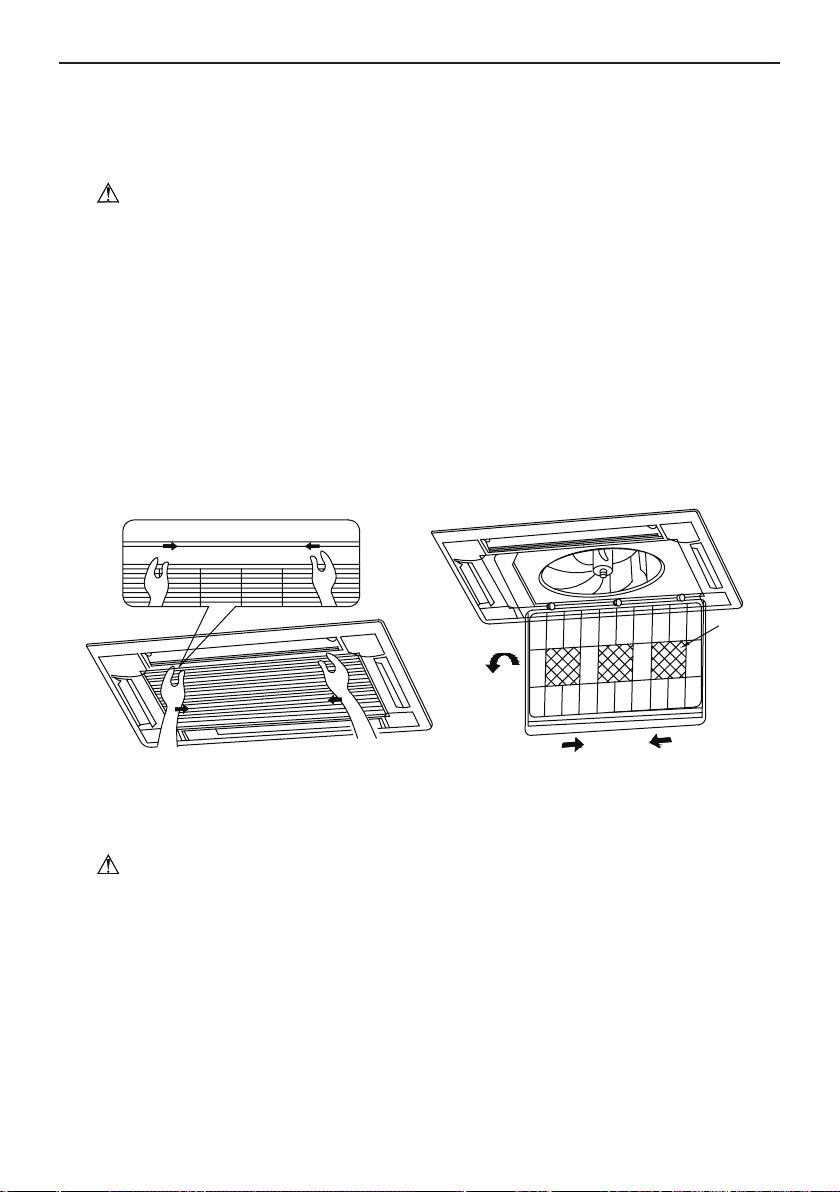
Flex Series for North America
16
6 Maintenance Method
When the unit won’t be used for a long time, please cut off the main power supply of air
conditioner.
Warning!
◆
Do turn off the unit and cut off the main power supply when cleaning the air conditioner,
otherwise electric shock or harm may happen.
◆
It is forbidden to wash air conditioner by water rinsing, otherwise electric shock may happen.
6.1 Cleaning Air Filter
When the usage environment has lots of dust, air filter should be cleaned more frequently
(about once 6 months).
(1). Open air inlet grille
Pull the 2 handles on air inlet grille at the same time with the direction showed by arrow in Fig.
18, pull it down slowly. (As per the reverse disassembly order when closing)
(2). Disassemble air lter
As shown in Fig. 19, pull the handle behind air inlet grille, raise it and disassemble. Then
remove the 3 puriers xed on lter.
purifier
Fig. 18 Fig. 19
(3). Clean
Use a cleaner or some water to wash lter; if the lter is too dirty ( like oil stain on it ), use some
warm water ( lower than 45
℃
) with neutral detergent to clean it, then dry it in the shade.
Note!
Do not clean the filter by hot water which temp. is higher than 45
℃
to prevent fading or
deformation.
Do not place the lter near re; otherwise the lter may catch re or lead to deformation.
(4). Install air lter
Fix the 3 puriers on lter, install lter on the several bulges on top of air inlet grille, pull the
handle behind air inlet grille toward inside to x lter. As shown in Fig. 20.
(5). Close air inlet grille (Refer to the 1
st
step)
Maintenance Method
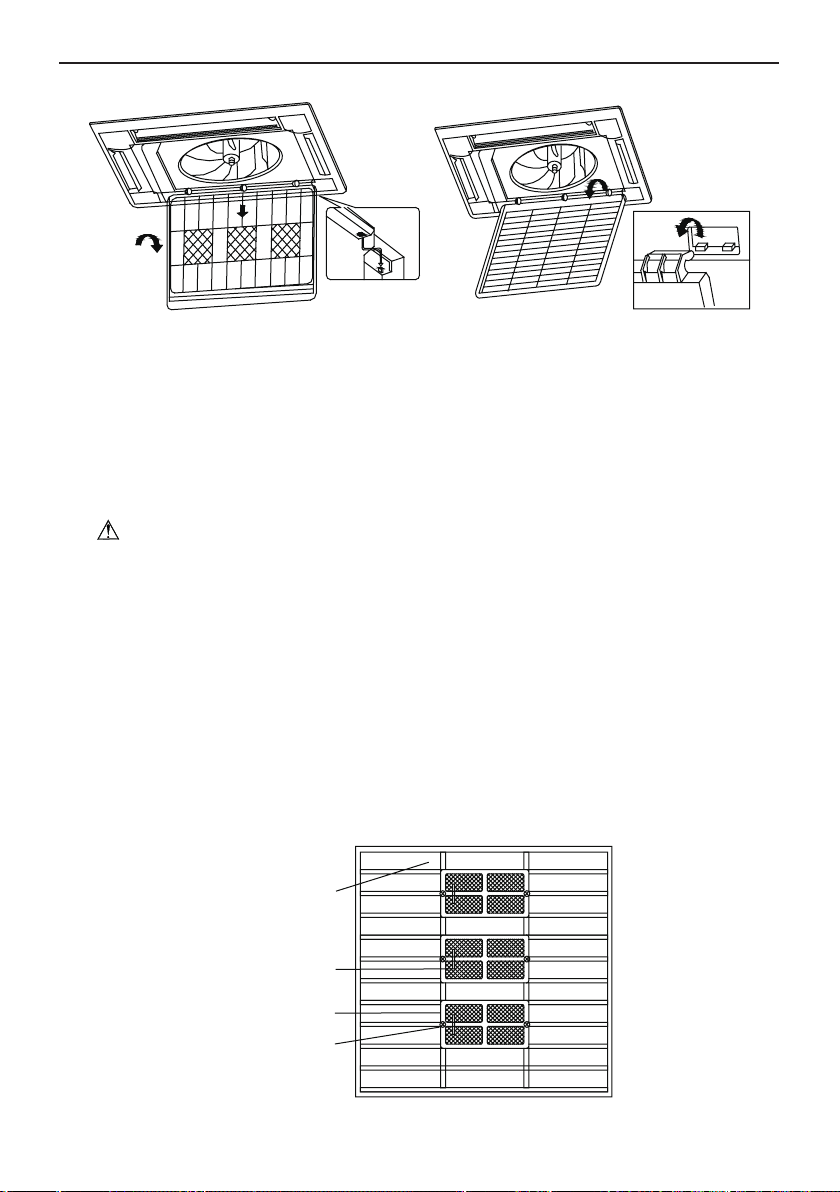
Flex Series for North America
17
Fig. 20 Fig. 21
6.2 Clean Air Inlet Grille
(1). Open air inlet grille (the same with the 1st step of Clean Air Filter)
(2). Take out air lter (the same with the 2nd step of Clean Air Filter)
(3). Take out air inlet grille
Open air inlet grille for an angle of 45°, as shown in g. 21, raise it.
(4). Clean
Clean it by soft brush, water and neutral cleaning, then dry it after cleaning.
Note!
Do not use water above 45
℃
to wash the panel to prevent fading or deformation.
(5). Install air inlet grille (refer to 3rd step)
(6). Install air lter (refer to the 4th step of Clean Air Filter)
(7). Close air inlet grille (refer to the 1st step)
6.3 Install and Change of Air Purier
(1). Open air inlet grille (the same the 1st step of Clean Air Filter)
(2). Disassembly purier
As shown in g 22, disassembly air lter, screw out xing bolts xed on purier on lter, then
purier could be disassembly.
(3). Take out the package sack of static ber net lter, then install the lter in stand of purier,
and x purier on air lter.
(4). Install air lter (the same with the 4th step of Clean Air Filter)
Fix bolt of purifier
Stand for purifier
Purifier filter
Air filter
Fig.22
Flex Series for North America
18
Function and usage period for air purifying
◆
Adsorb CO, CO
2
, benzene, aldehydes and odor of gasoline etc..
◆
Adsorb poisonous material that is smaller than 1μm in air, as dust, pollen, bacteria, and
virus.
◆
Usage period is 6 months to 1 year. If it is necessary to be changed, purchase new purier
in the nearest Impecca special engaged maintenance center.
6.4 Clean Outlet Vent and Surface Panel
◆
Clean the surface panel by soft dry cloth or wet cloth with neutral scourer.
◆
It is forbidden to clean surface panel by gasoline, benzene, diluents, cleansing powder etc..
◆
If the guide louver is too dirty, it may be removed to be cleaned. (As narrated below)
Disassembly and installation of guide louver
(1). Disassemble guide louver
Screw bolts in both ends of guide louver to loose.
Note!
Do not forcibly wipe guide louver when cleaning, otherwise painted surface layer would fall off.
(2). Install guide louver
Rotate guide louver slightly could install the protruding edge of both end into grooves on both
end of guide louver, and then tighten bolts.
6.5 Maintenance before or after Seasonal Use
Check before the seasonal use
◆
Check if there is blockage at inlet or outlet of air conditioner.
◆
Check if the earthing wire has been earthed reliably.
◆
Check if the air lter has been installed well.
◆
In order to start up the air conditioner smoothly after long time’s turned off, turn on the main
power supply 8 hours before turning on the air conditioner.
Maintenance after seasonal use
◆
Clean lter and body of air conditioner.
◆
Cut off the main power supply of air conditioner.
◆
The cooling or heating capacity and sound level are tested before leaving factory.
◆
If the parameter changes, refer to the data offered on nameplate.
Before calling technical support, please see the troubleshooting guide above. You may also visit
our website at www.impecca.com for answers to Frequently Asked Questions and to contact us.
Email: [email protected]
Phone: +1 866–954–4440
Web: www.impecca.com
6.6 Technical Support

Thank you for choosing Impecca Air Conditioners. Please read this
owner’s manual carefully before operation and retain it for future reference.
Wired Controller
IS-TT850
User's Manual
User Notice
ƹ
ƹ
ƹ
ƹ
ƹ
ƹ
Please carefully read this manual before installation and use of this product
(QVXUHthere is separate SRZHUVXSSO\IRUHDFKLQGRRUXQLW
Never install wired controller in a wet place or under direct sunlight.
Shielded twisted pair line must be substituted as signal line for wired controller if the unit is
installed in the place where there is electromagnetic interference.
Make sure communication line is connected into correct port to avoid communication
malfunction.
Never knock, throw or frequently disassemble the wired controller.
Never operate the wired controller with wet hand.

Contents
1 Display Section................................................................................................ 1
1.1 Controller's LCD ........................................................................................1
1.2 Instruction to LCD ....................................................................................... 2
2 Buttons ............................................................................................................ 3
2.1 Layout of Buttons .......................................................................................3
2.2 Functions of Buttons ................................................................................... 3
3 Operation Instructions ..................................................................................... 4
3.1 On/Off ......................................................................................................... 4
3.2 Mode Setting .............................................................................................. 4
3.3 Temperature Setting ................................................................................... 4
3.4 Fan Setting ................................................................................................. 5
3.5 Timer Setting .............................................................................................. 5
3.6 Swing Setting ............................................................................................. 7
3.7 Sleep Setting .............................................................................................. 8
3.8 Turbo Setting .............................................................................................. 9
3.9 E-heater Setting .......................................................................................10
3.10 Blow Setting ........................................................................................... 11
3.11 Other Functions ...................................................................................... 12
4 Installation and Dismantlement ..................................................................... 12
4.1 Connection of the Signal Line of the Wired Controller ............................. 12
4.2 Installation of the Wired Controller ........................................................... 12
4.3 Dismantlement of the Wired Controller .................................................... 14
5 Errors Display ................................................................................................ 14
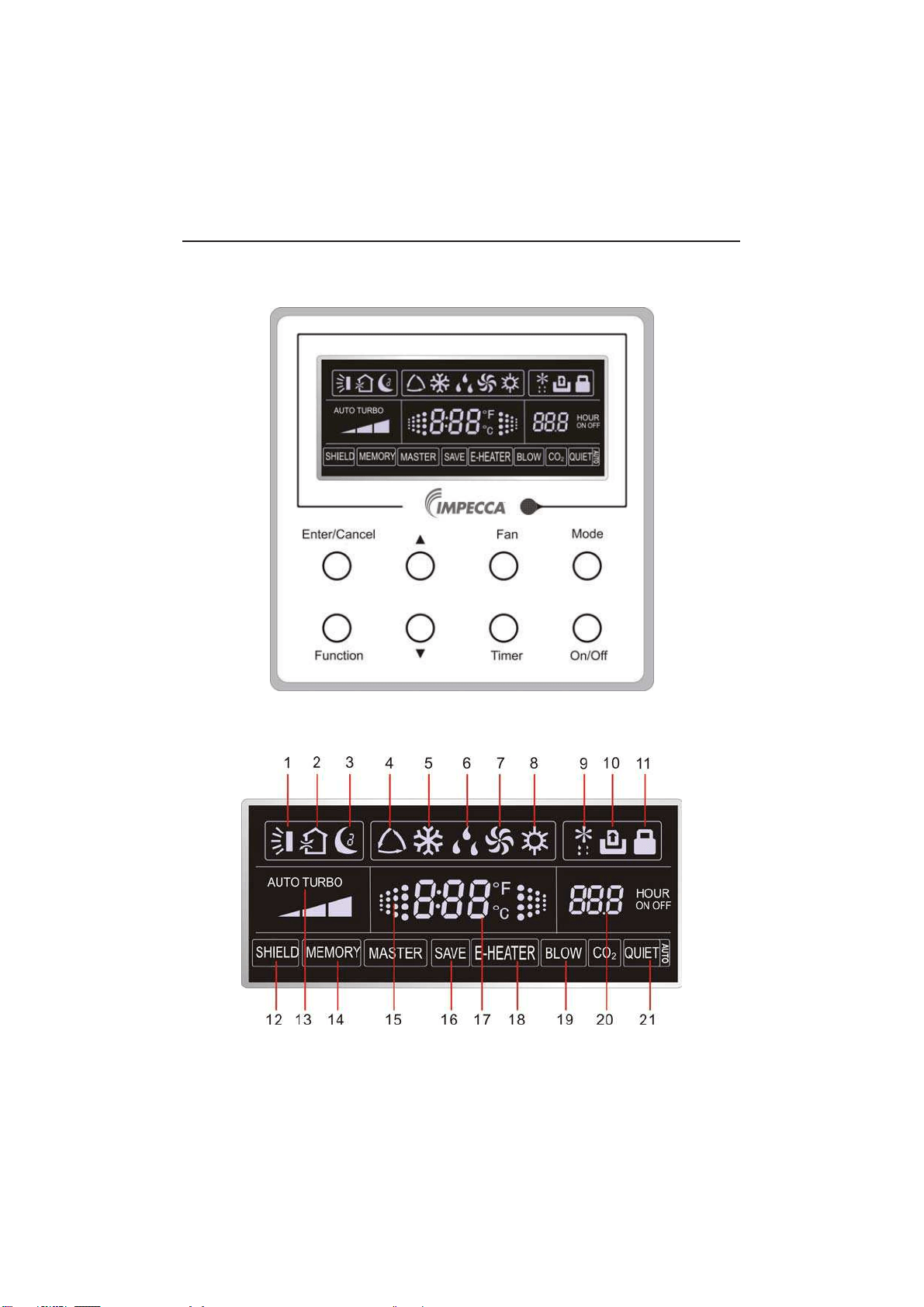
1
1 Display Section
Fig1.1.1 Diagram of wired controller
1.1 LCD Display of Wired Controller
Fig.1.1.2 LCD display
Wired Controller IS-TT850
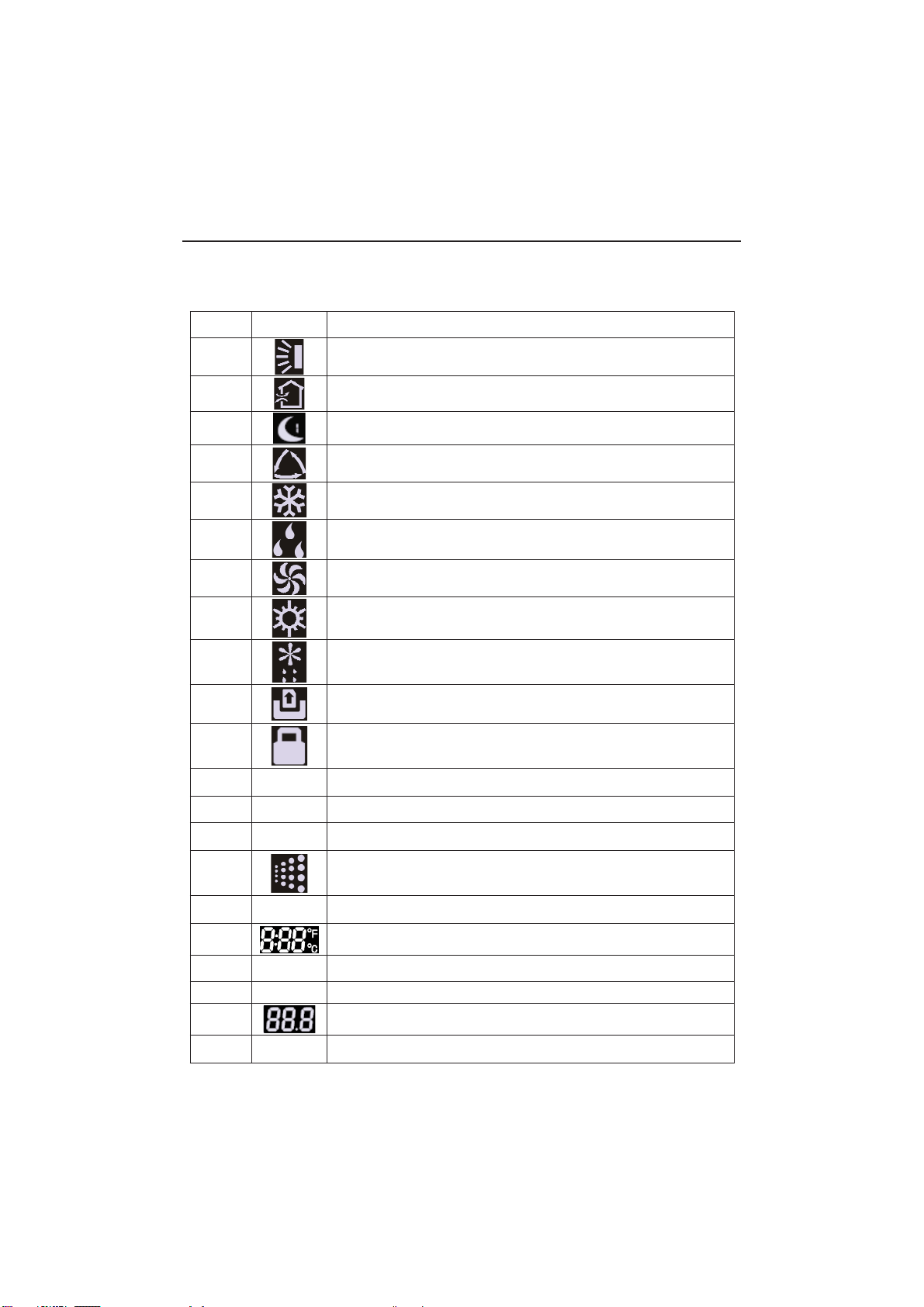
2
1.2 Instruction to LCD Display
Table 1.1
No. Symbols Description
1
Swing function
2
Air exchange function (this function is yet unavailable for this unit).
3
Sleep function (Only sleep 1).
4
Each kind of running mode of indoor unit (auto mode)
5
Cooling mode
6
Dry mode
7
Fan mode
8
Heating mode
9
Defrosting function for the outdoor unit.
10
Gate-control function (this function is yet unavailable for this unit).
11
Lock function.
12 SHIELD
Shield functions (Button operation, temperature setting, On/Off operation,
Mode setting are disabled by the remote monitoring system.)
13 Turbo Turbo function state
14 MEMORY
Memory function (The indoor unit resumes the original setting state after
power failure and then power recovery).
15
It blinks under on state of the unit without operation of any button.
16
SAVE
Energy-saving function (this function is yet unavailable for this unit).
17
Ambient/setting temperature value
18 E-HEATER Electric auxiliary heating function.
19 BLOW Blow function.
20
Timing value.
21 QUIET
Quiet function (two types: quiet and auto quiet)
(this function is yet unavailable for this unit).
Wired Controller IS-TT850
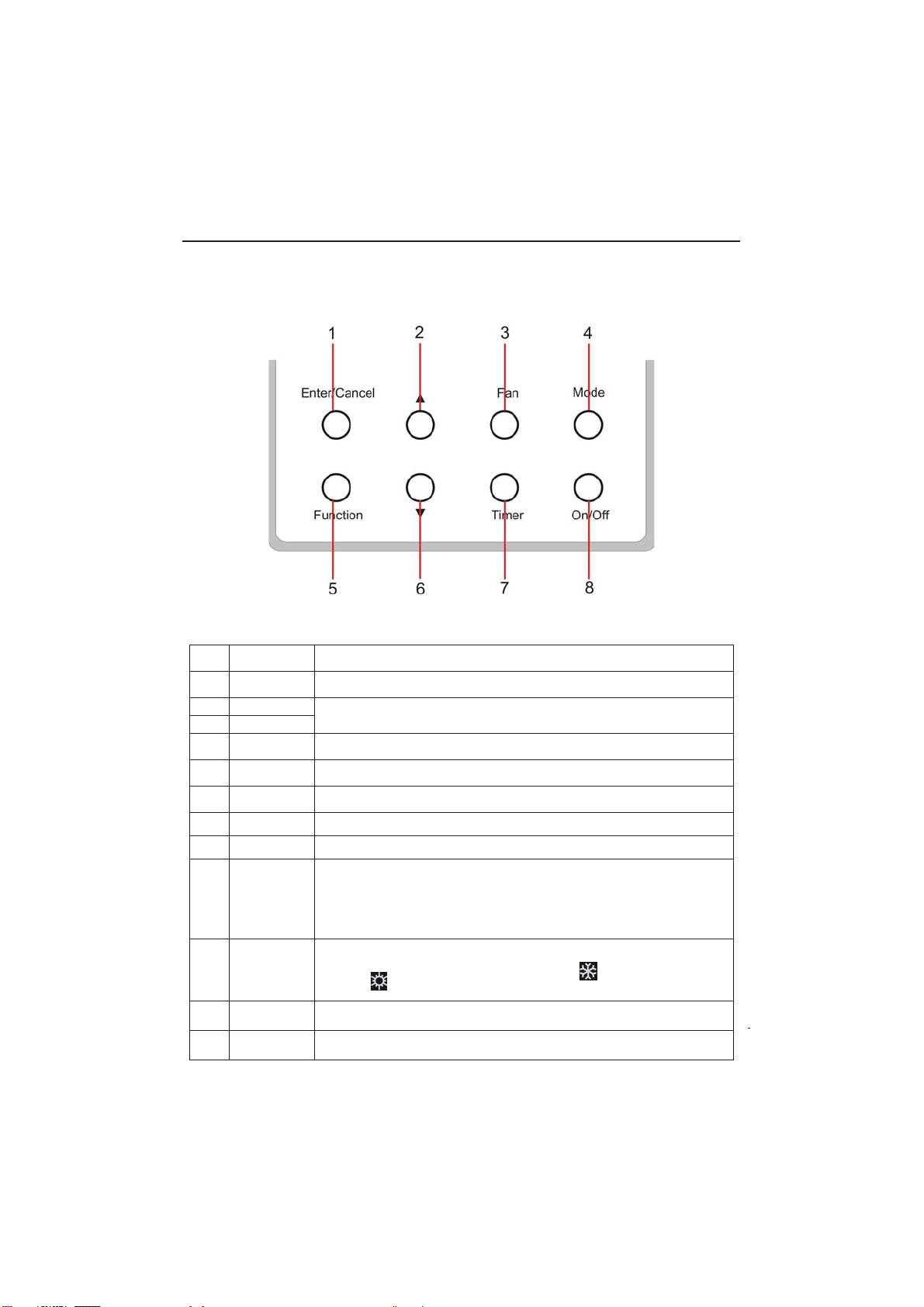
3
2 Buttons
2.1 Layout of Buttons
2.2 Functions of Buttons
Table 2.1
No. Name Function
1 Enter/Cancel Function selection and cancellation.
2 Ÿ
ķ
Running temperature setting of the indoor unit, range:61°F-86°
F(16°C-30°C).
ĸ
Timer setting, range:0.5(30 minutes) - 24 (hours).
6 ź
3 Fan
Setting of the low/middle/high/auto fan speed.
4 Mode Setting of the Cooling/Heating/Fan/Dry/Auto mode of the indoor unit.
5 Function Switchover among the functions of Turbo/Save/E-heater/Blow etc..
7 Timer Timer setting.
8 On/Off
Turn on/off the indoor unit.
4+2 Mode + Ÿ
With the A/C powered off, press these two buttons together for 5
seconds to toggle the Memory function. With Memory on, the unit will
return the the previous setting after resuming from a power failure.
With Memory toggled off, it will stay off
3+6 )DQź
With the A/C powered off, press these two buttons together for 5 seconds
to determine if your unit is capable of just cooling or both cooling and
heating, indicated by the symbols shown.
2+6 Ÿź
Press these two buttons together for 5 seconds to toggle the lock function.
Wired Controller IS-TT850
4+6
Mode ź
With the A/C powered off, press these two buttons together for 5 seconds to
toggle between Fahrenheit and Celsius.
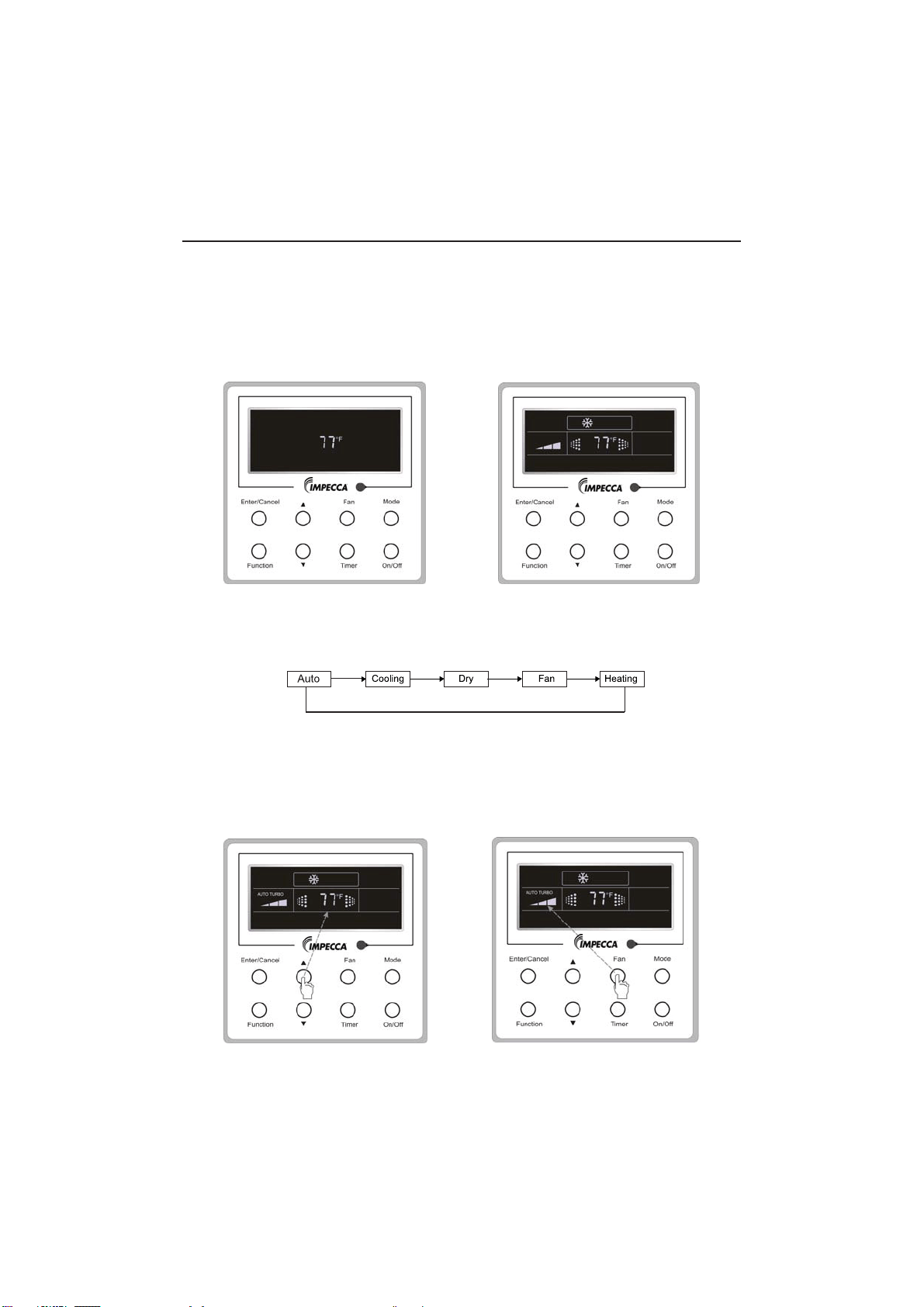
4
3 Operation Instructions
3.1 On/Off
Press On/Off button to toggle your A/C's power.
Note: The state shown in Fig.3.1.1 indicates the “Off” state of the unit after power has been restored
to the unit. The screen shown in Fig.3.1.2 indicates the “On” state of the unit after power on.
Fig.3.1.1 “Off” State Fig.3.1.2 “On” State
3.2 Mode Setting
Under ON state of the unit, press the Mode to switch the operation modes as the
following sequence: Auto–Cooling–Dry–Fan–Heating.
3.3 Temperature Setting
3UHVVŸRUźWRLQFUHDVHGHFUHDVHWKHSUHVHWWHPSHUDWXUH,ISUHVVLQJHLWKHURIWKHP
continuously, the temperature will be increased or decreased by 1° every half a second,as
shown in Fig.3.3.1.
In the Cooling, Dry, Fan or Heating mode, the temperature setting range is 61°F-86°
F(16°C-30°C). In the Auto mode, the setting temperature not manually adjustable.
Fig.3.3.1 Fig.3.4.1
Wired Controller IS-TT850
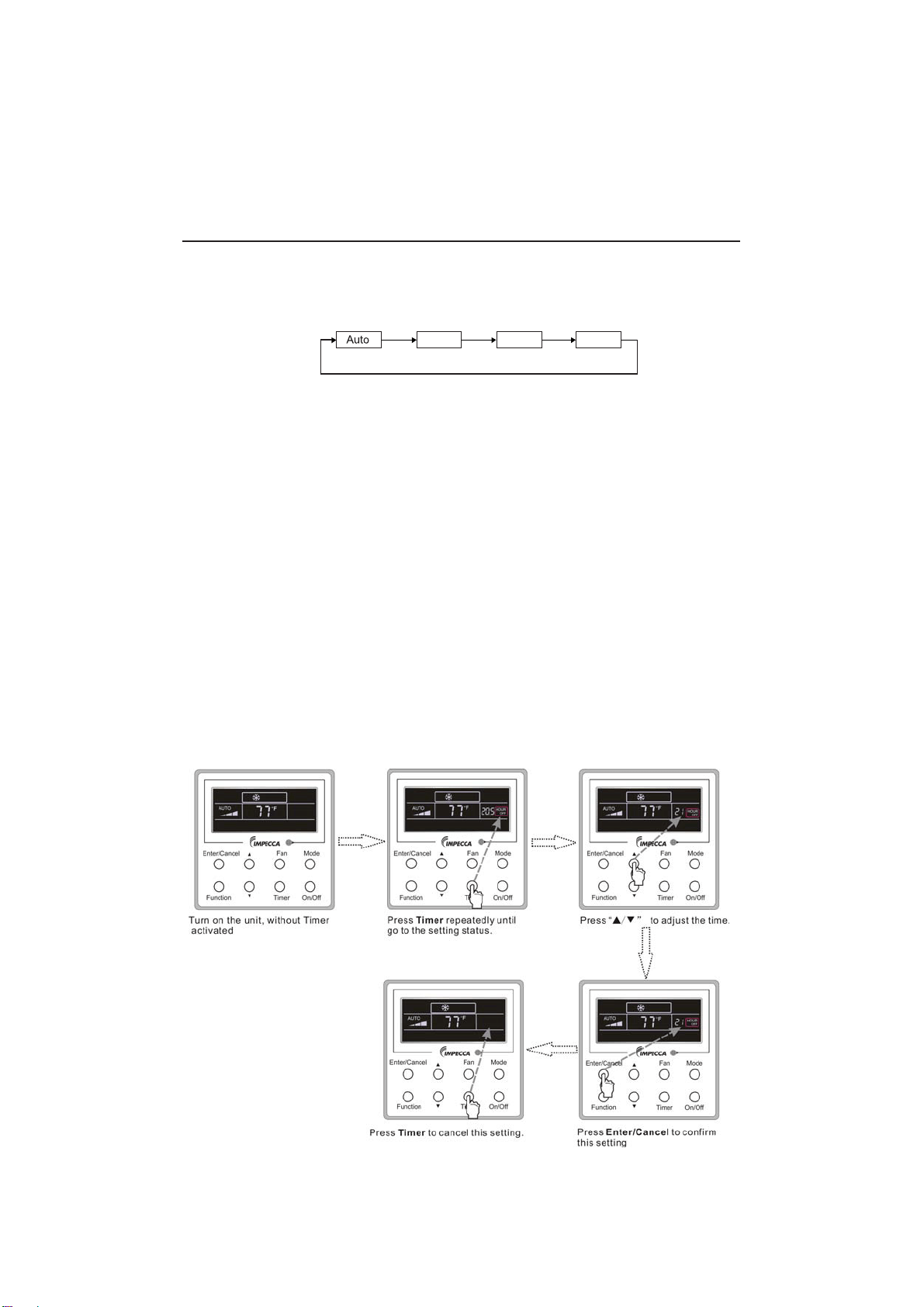
5
3.4 Fan Setting
While the unit is powered on, press
Fan
and then fan speed of the indoor unit will change
circularly as shown in Fig.3.4.1.
Low Middle
High
3.5 Timer Settings
While the unit is powered on, pressing the Timer button allows you to set the delay until the
unit turns off. While the unit is powered off, pressing the Timer button allows you to set the dealy
until the unit turns on.
•7LPHURQVHWWLQJ details
With the unit turned off, and no timer already programmed, press the Timer button. The
display will show "0.5" with "Hour on" blinking. PressŸorźbutton to adjust delay until unit
turns on and press Timer or Enter/Cancel to confirm.
•Timer off setting details:
With the unit turned on, and no timer already programmed, press the Timer button. The display
will show "0.5" with "Hour off" blinking.
•Timer off setting details:
With the unit turned on, and no timer already programmed, press the Timer button. The display will
show "0.5" with "Hour off" blinkingSUHVVŸRUźEXWWRQWRDGMXVWdelay until unit turns on and press
Timer or Enter/Cancel to confirm.
&DQFHOWLPHU
After setting of timer, if Timer button is pressed, LCD won’t display xx. Hour so that timer setting is
canceled.
Timer off setting under the “On” state of the unit is shown as Fig.3.5.1.
Fig.3.5.1 Timer off Setting under the “On” State of the Unit
Wired Controller IS-TT850
(Fig. 3.4.1)
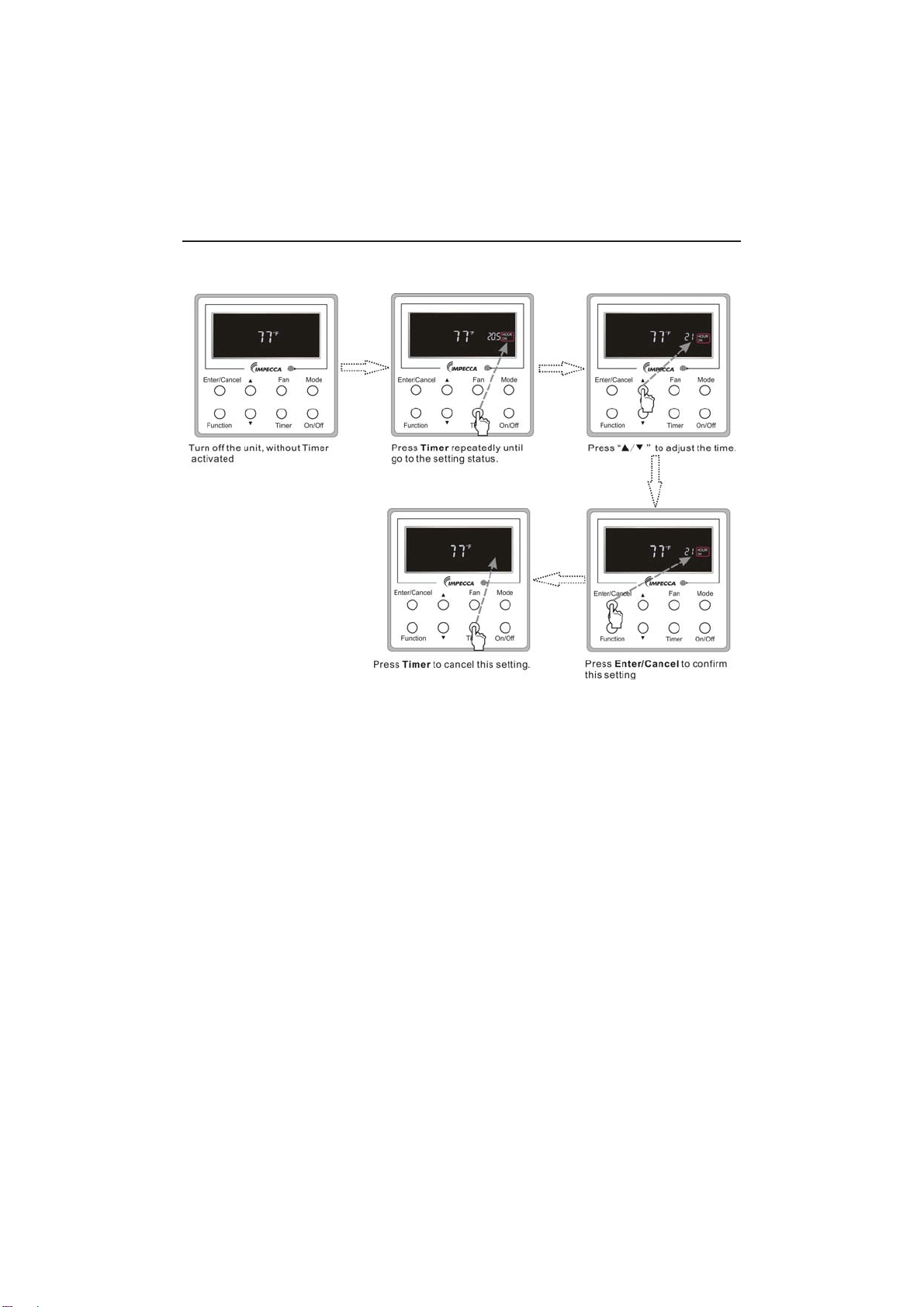
6
Timer on setting under the “Off” state of the unit is shown as Fig.3.5.2.
Fig.3.5.2 Timer on Setting under the “Off” State of the Unit
7LPHUUDQJHKU(YHU\SUHVVRIŸRUźZLOOPDNHWKHVHWWLPHLQFUHDVHGRUGHFUHDVHGE\
0.5hr. If either of them is pressed continuously, the set time will increase/ decrease by 0.5hr every
0.5s.
Wired Controller IS-TT850
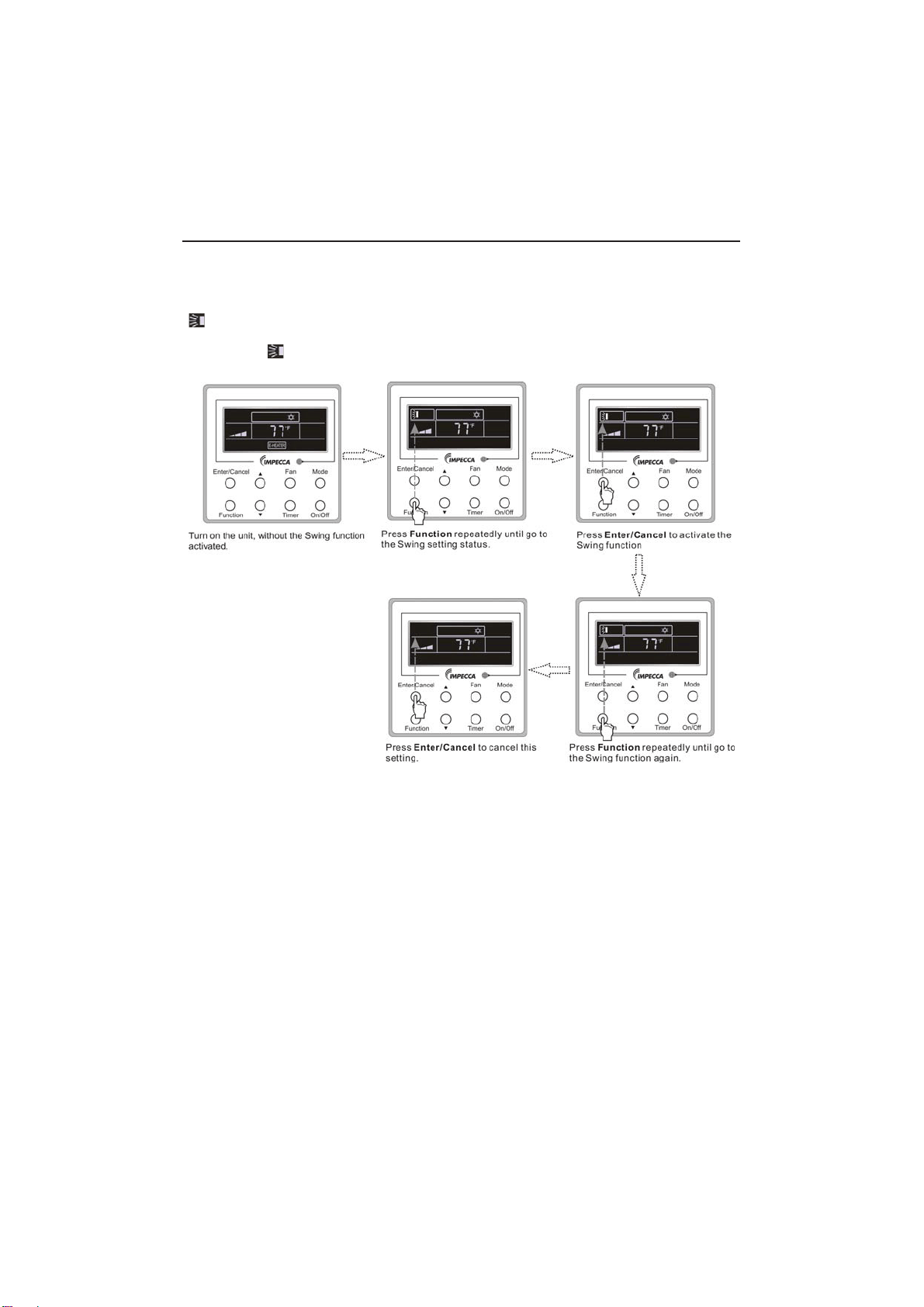
7
3.6 Swing Setting
Swing On: Press Function under on state of the unit to activate the swing function. In this case,
ZLOOEOLQN$IWHUWKDWSUHVV(QWHU&DQFHOWRPDNHDFRQ¿UPDWLRQ
Swing Off: When the Swing function is on, press Function to enter the Swing setting
interface,with
blinking. After that, press Enter/Cancel to cancel this function. Swing setting is
shown as Fig.3.6.1.
Fig.3.6.1 Swing Setting
Notes:
ķ
Sleep, Turbo or Blow setting is the same as the Swing setting.
ĸ
After the setting has been done, it has to press the key “Enter/Cancel” to back to the setting
VWDWXVRUTXLWDXWRPDWLFDOO\¿YHVHFRQGVODWHU
Wired Controller IS-TT850
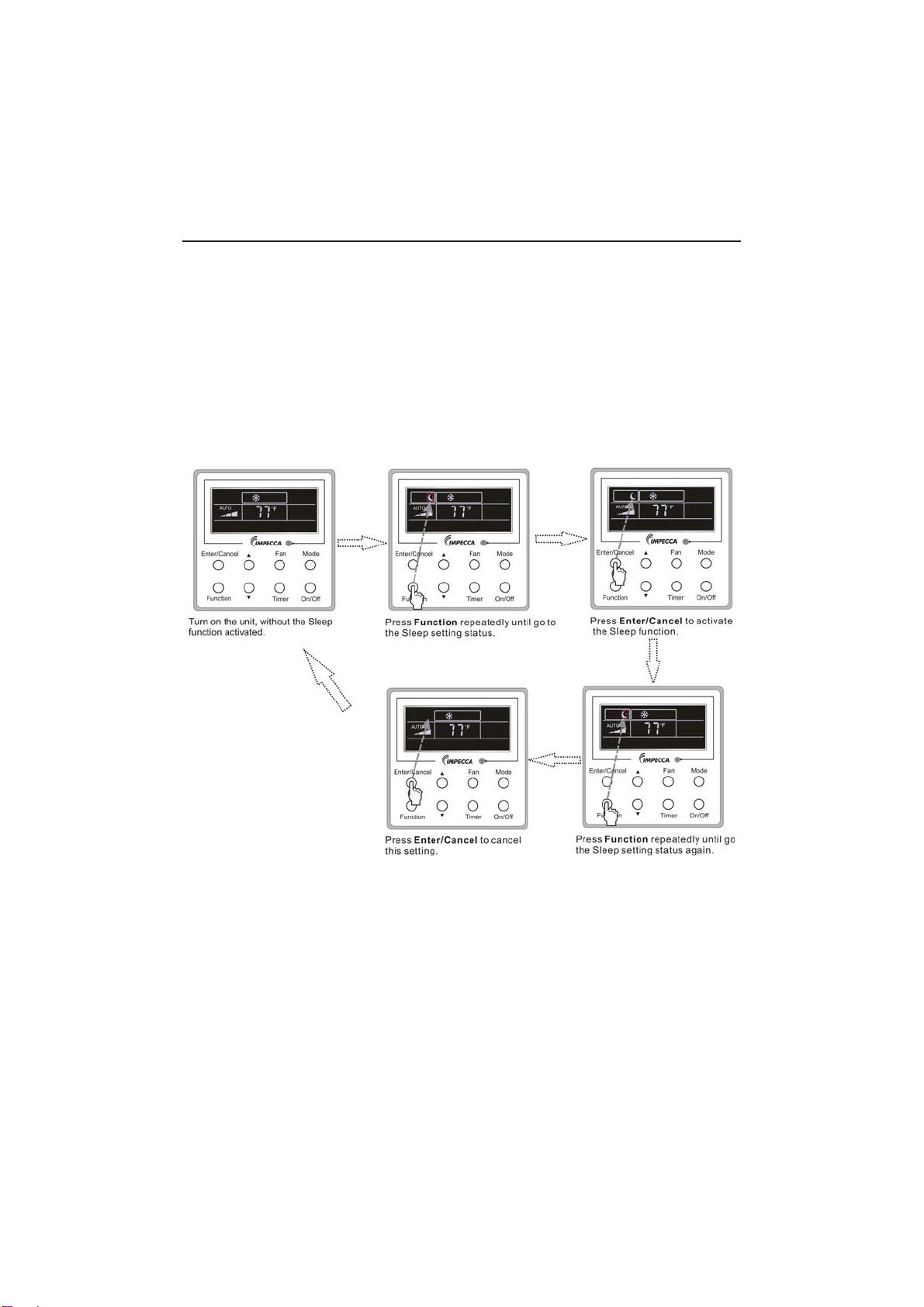
8
3.7 Sleep Setting
Sleep on: Press Function under the On state of the unit till the unit enters the Sleep setting
VWDWH$IWHUWKDWSUHVV(QWHU&DQFHOWRFRQ¿UPWKLVVHWWLQJ
Sleep off: When the Sleep function is activated, press Function to enter the Sleep setting
status. After that, press Enter/Cancel to cancel this function.
In the Cooling or Dry mode, the temperature will increase by 1°C after the unit runs under
Sleep1 for 1hr and 1°C after another 1hr.After that, the unit will run at this temperature.
In the Heating mode, the temperature will decrease by 1°C after the unit runs under Sleep 1 for
1hr and 1°C after another 1hr. After that, the unit will run at this temperature.
Sleep setting is shown as Fig.3.7.1.
Fig.3.7.1. Sleep Setting
Wired Controller IS-TT850
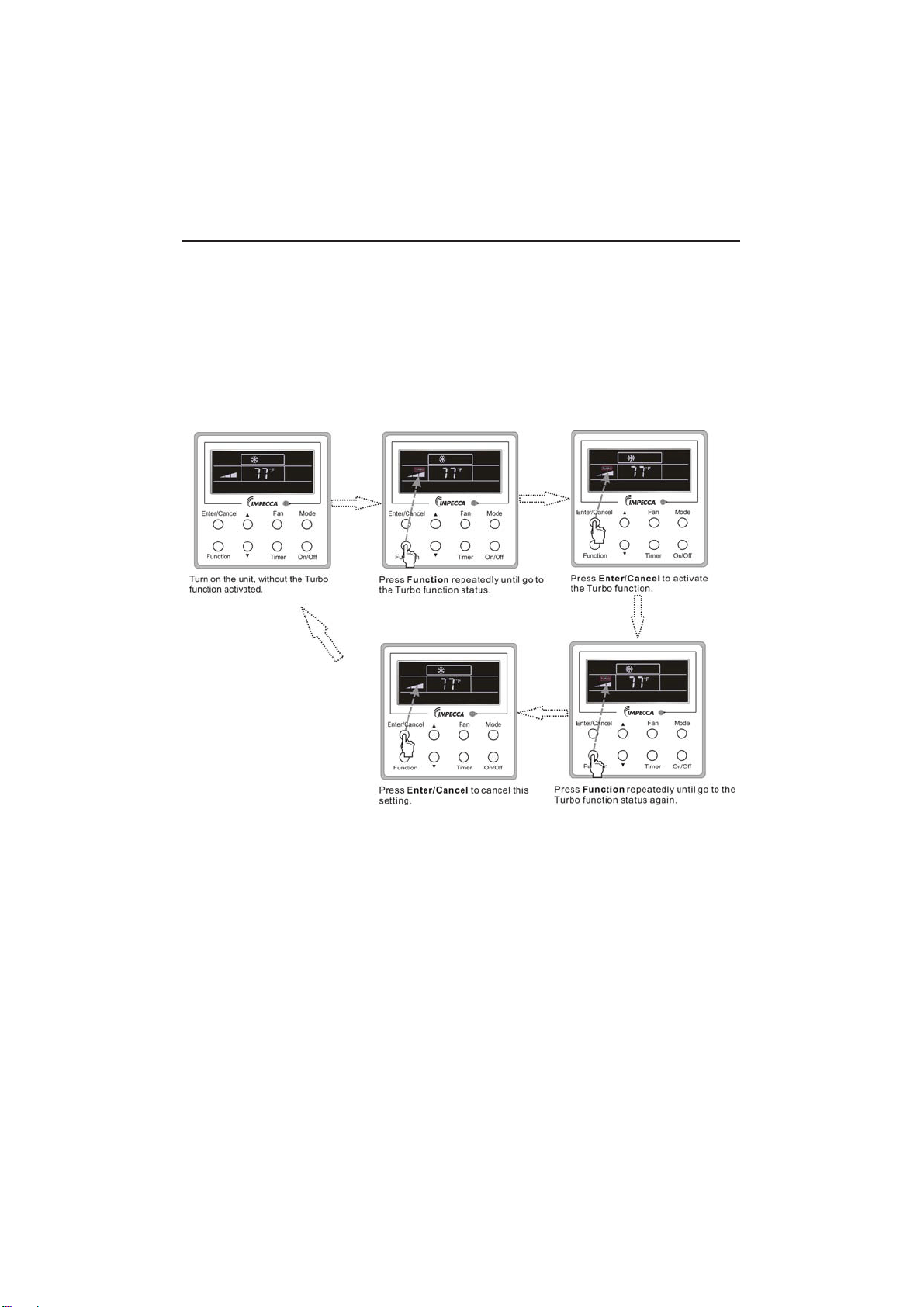
9
3.8 Turbo Setting
Turbo function: The unit at the high fan speed can realize quick cooling or heating so that the
room temperature can quickly approach the setting value.
In the Cooling or Heating mode, press Function till the unit enters the Turbo setting status and
WKHQSUHVV(QWHU&DQFHOWRFRQ¿UPWKHVHWWLQJ
When the Turbo function is activated, press Function to enter the Turbo setting status and then
press Enter/Cancel to cancel this function.
Turbo function setting is as shown in Fig.3.8.1.
Fig.3.8.1 Turbo Setting
Wired Controller IS-TT850
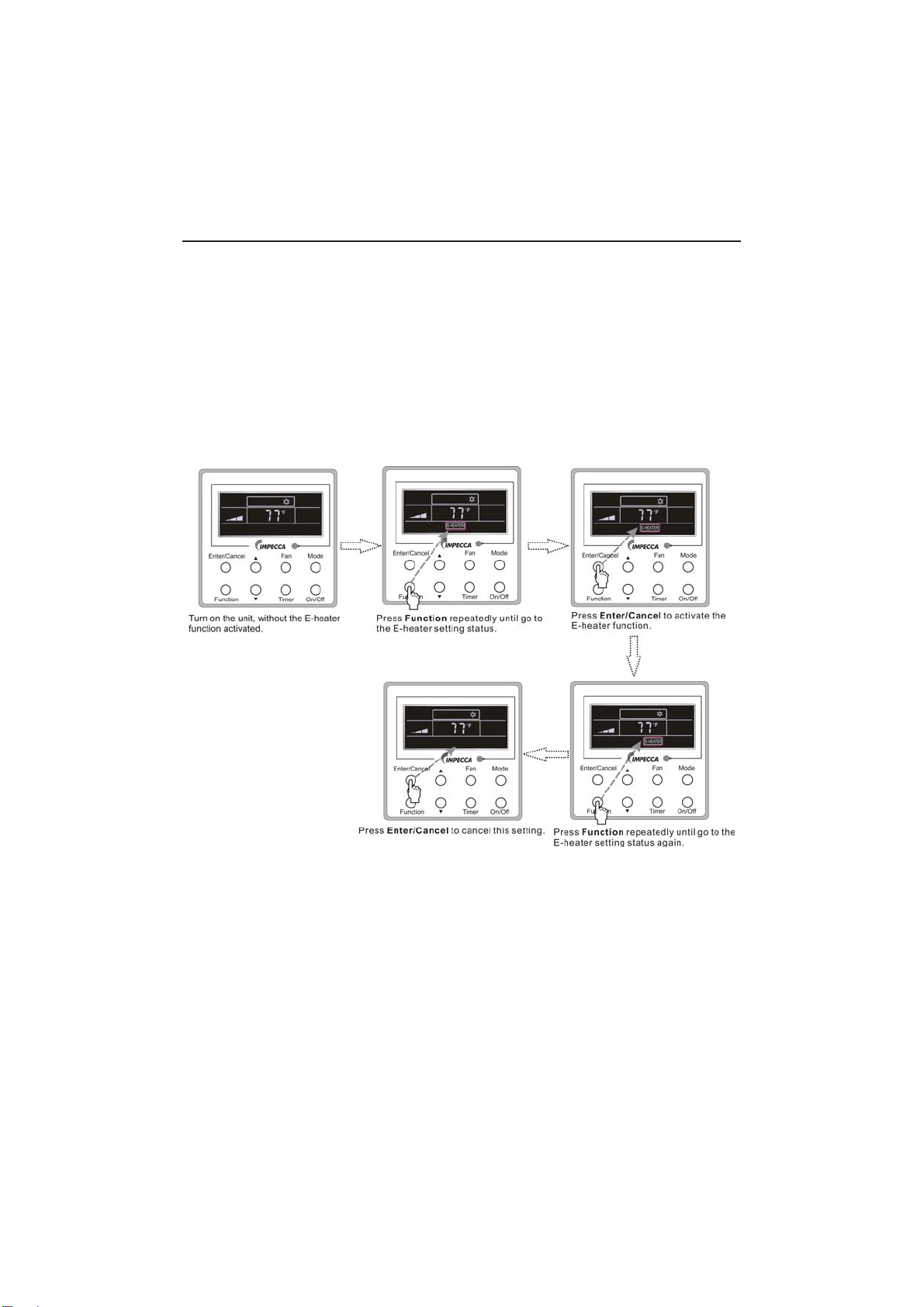
10
3.9 E-heater Setting
E-heater (auxiliary electric heating function): In the Heating mode, E-heater is allowed to be
WXUQHGRQIRULPSURYHPHQWRIHI¿FLHQF\
Once the wired controller or the remote controller enters the Heating mode, this function will be
turned on automatically.
Press Function in the Heating mode to enter the E-heater setting interface and then press
Enter/Cancel to cancel this function.
Press Function to enter the E-heater setting status, if the E-heater function is not activated,
and then press Enter/Cancel to activate it.
The setting of this function is shown as Fig.3.9.1 below:
Fig.3.9.1 E-heater Setting
Wired Controller IS-TT850
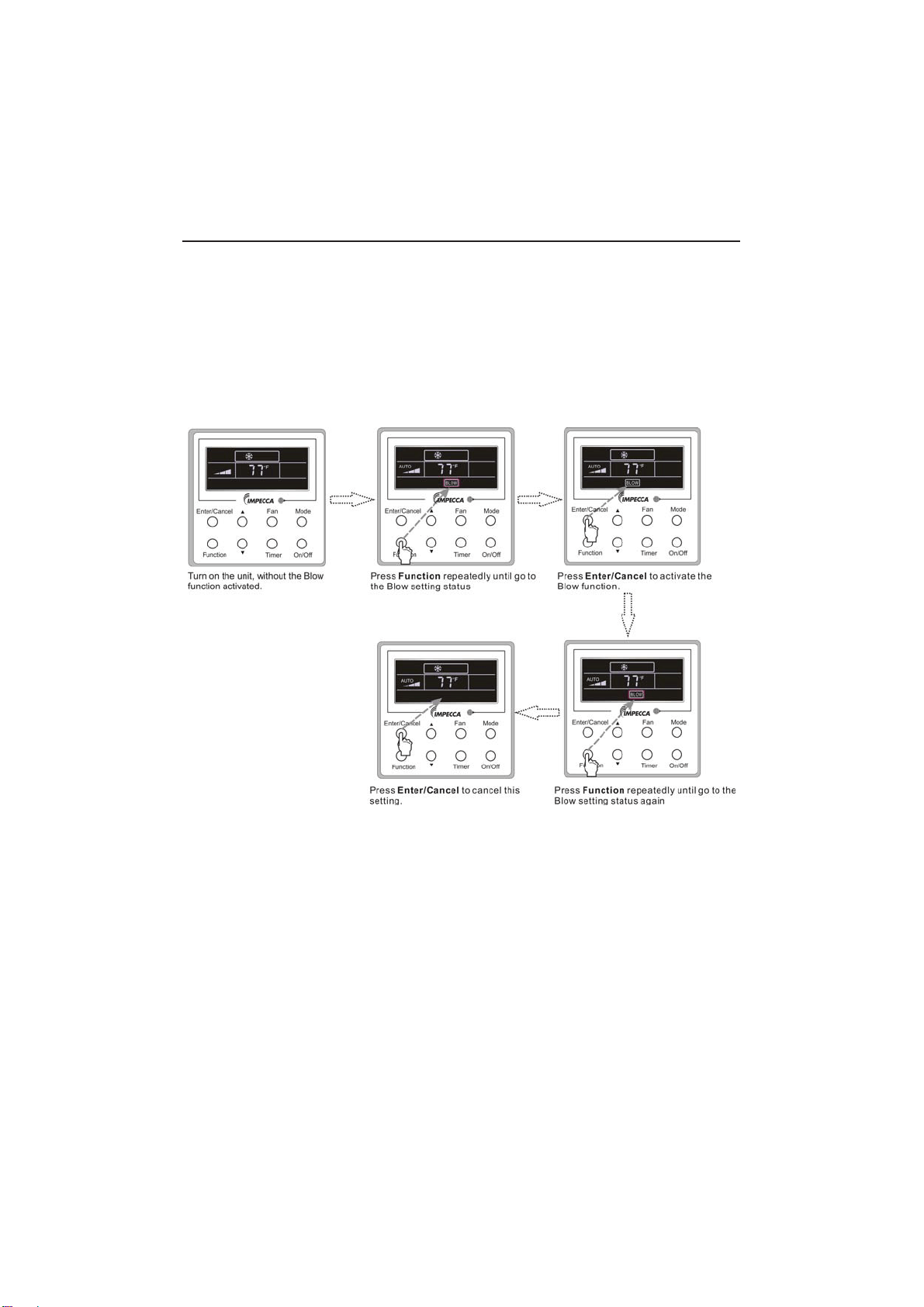
11
3.10 Blow Setting
Blow function: After the unit is turned off, the water in evaporator of indoor unit will be
automatically evaporated to avoid mildew.
In the Cooling or Dry mode, press Function till the unit enters the Blow setting status and then
press Enter/Cancel to active this function.
When the Blow function is activated, press Function to the Blow setting status and then press
Enter/Cancel to cancel this function.
Blow function setting is as shown in Fig.3.10.1
Fig.3.10.1 Blow Setting
Notes:
ķ
When the Blow function is activated, if turning off the unit by pressing On/Off or by the
remote controller, the indoor fan will run at the low fan speed for 2 min, with “BLOW” displayed on
the LCD. While, if the Blow function is deactivated, the indoor fan will be turned off directly.
ĸ
Blow function is unavailable in the Fan or Heating mode.
Wired Controller IS-TT850
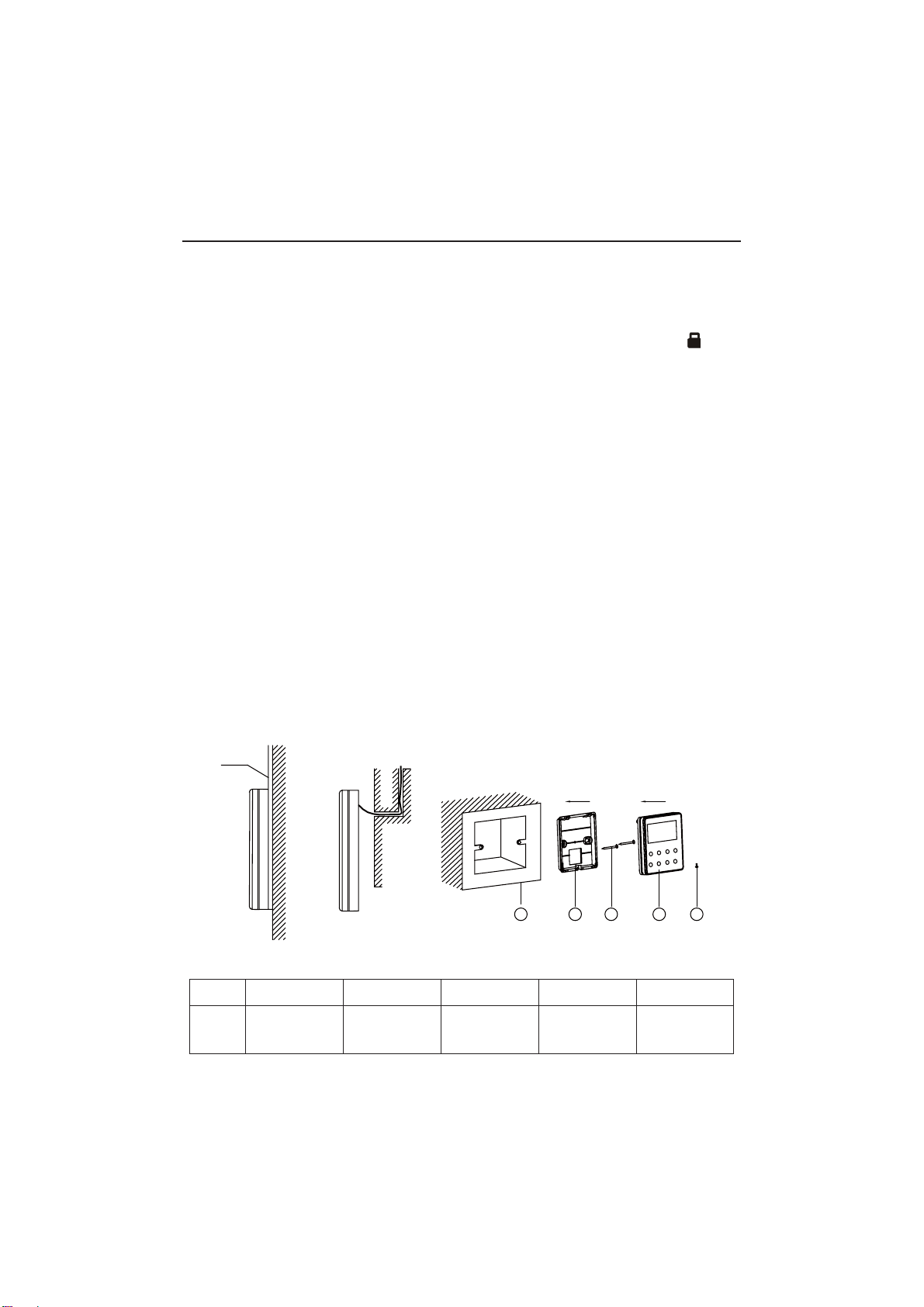
12
3.11 Other Functions
a. Lock
8SRQVWDUWXSRIWKHXQLWZLWKRXWPDOIXQFWLRQRUXQGHUWKH³2II´VWDWHRIWKHXQLWSUHVVŸDQGźat
the same time for 5s till the wired controller enters the Lock function. In this case, LCD displays
.
After that, repress these two buttons at the same time for 5s to quit this function.
Under the Lock state, any other button press won’t get any response.
b. Memory
0HPRU\VZLWFKRYHU8QGHUWKH³2II´VWDWHRIWKHXQLWSUHVV0RGHDQGŸDWWKHVDPHWLPHIRU
5s to switch memory states between memory on and memory off. When this function is activated,
Memory will be displayed. If this function is not set, the unit will be under the “Off” state after power
failure and then power recovery.
Memory recovery: If this function has been set for the wired controller, the wired controller after
power failure will resume its original running state upon power recovery. Memory contents: On/
Off,Mode, set temperature, set fan speed and Lock function.
4 Installation and Dismantlement
4.1 Connection of the Signal Line of the Wired Controller
Ɣ2SHQWKHFRYHURIWKHHOHFWULFFRQWUROER[RIWKHLQGRRUXQLW
Ɣ/HWWKHVLQJOHOLQHRIWKHZLUHGFRQWUROOHUWKURXJKWKHUXEEHUULQJ
Ɣ&RQQHFWWKHVLJQDOOLQHRIWKHZLUHGFRQWUROWRWKHSLQVRFNHWRIWKHLQGRRUXQLW3&%
Ɣ7LJKWHQWKHVLJQDOZLUHZLWKWLHV
Ɣ7KHFRPPXQLFDWLRQGLVWDQFHEHWZHHQWKHPDLQERDUGDQGWKHZLUHGFRQWUROOHUFDQEHXSWR
20 meters ( the standard distance is 8 meters)
4.2 Installation of the Wired Controller
1
PVC Pipe
3 4 52
Fig.4.1 Accessories for the Installation of the Wired Controller
Table 4.1
No.12345
Name
Socket box
embedded
in the wall
*
Back-plate of
the Wired
Controller
Screw
M4X25*
Front Panel
of the Wired
Controller
Screw
ST 2.9X6*
Wired Controller IS-TT850
*Not included
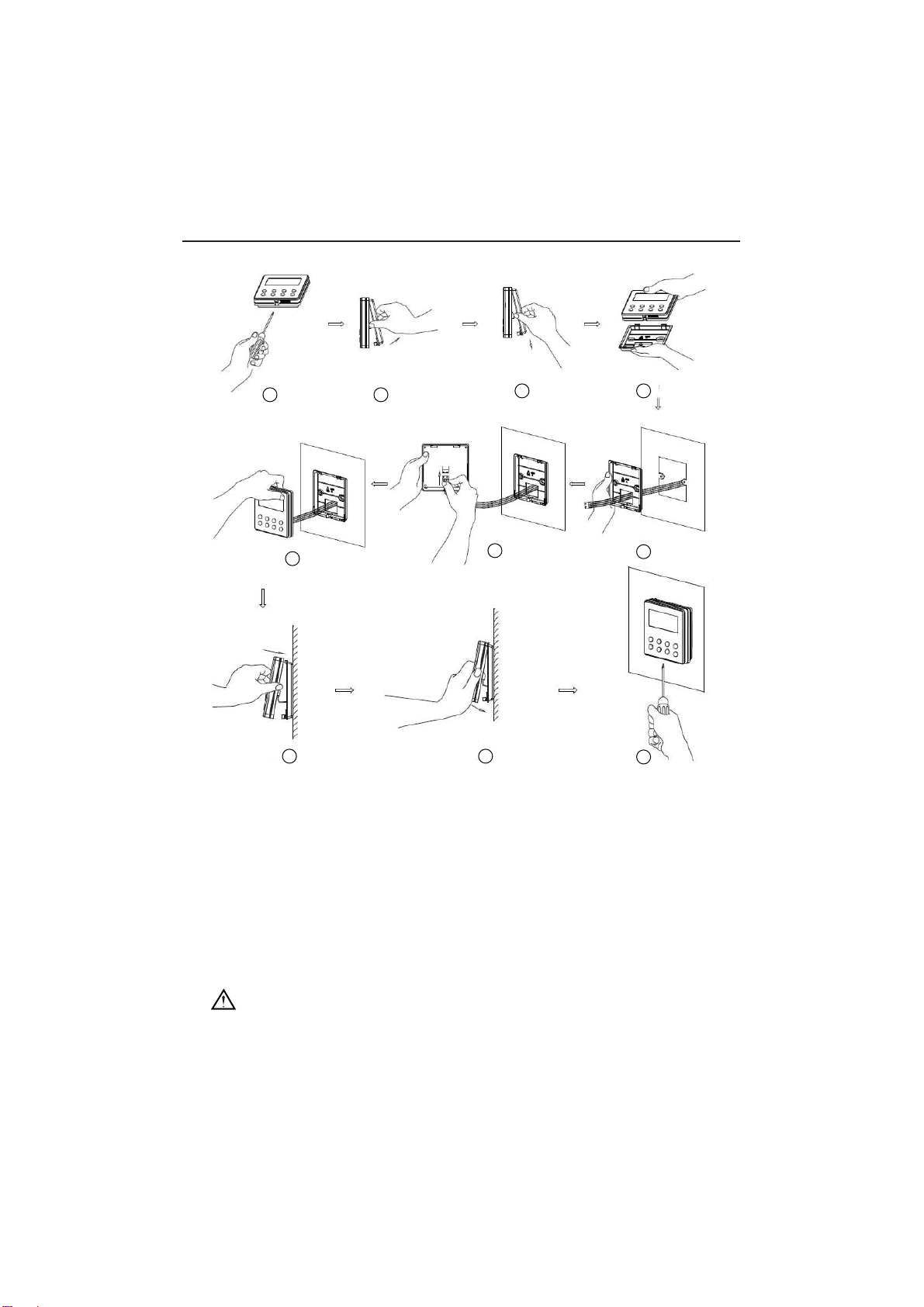
13
1
6
8 9
10
7
3 4
5
2
Fig.4.2
Fig.4.2 shows the installation steps of the wired controller, but there are some issues that need
your attention.
1) Prior to the installation, please firstly cut off the power supply of the wire buried in the
installation hole, that is, no operation is allowed with electricity during the whole installation.
2) Pull out the four-core twisted pair line from the installation holes and then let it go through
the rectangular hole behind the back-plate of the wired controller.
6WLFNWKHVROHSODWHRIWKHZLUHGFRQWUROOHUWRWKHZDOORYHUWKHLQVWDOODWLRQKROHDQGWKHQ¿[LW
with screws M4X25.
4) Insert the four-core twisted pair line into the slot of the wired controller and then buckle the
front panel and the back-plate of the wired controller together.
)LQDOO\¿[WKHIURQWSDQHODQGWKHVROHSODWHRIWKHZLUHGFRQWUROOHUWLJKWO\E\VFUHZV67;
CAUTION!
Please pay special attention to the followings during the connection to avoid the malfunction of
the air conditioning unit due to electromagnetic interference.
ķ
Separate the signal and communication lines of the wired controller from the power cord
Wired Controller IS-TT850
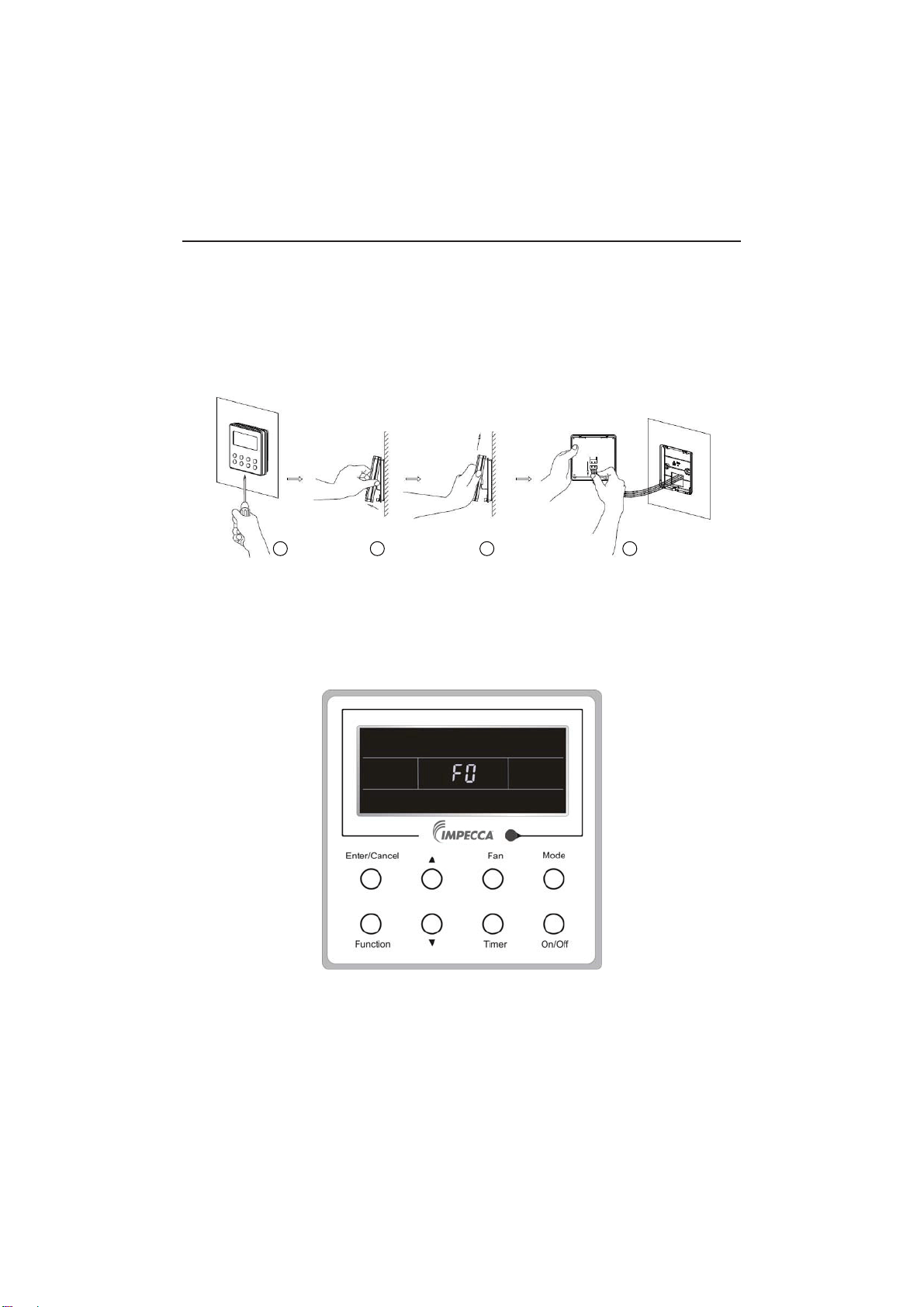
14
and connection lines between the indoor and outdoor unit, with a minimum interval of 20cm,
otherwise the communication of the unit will probably work abnormally.
ĸ
If the air conditioning unit is installed where is vulnerable to electromagnetic
interference,then the signal and communication lines of the wired controller must be the shielding
twisted pair lines.
4.3 Dismantlement of the Wired Controller
1 3 42
5 Errors Display
If there is an error occurring during the operation of the system, the error code will be displayed
on the LCD, as show in Fig.5.1. If multi errors occur at the same time, their codes will be displayed
circularly.
Note: In event of any error, please turn off the unit and contact the professionally skilled
personnel.
Fig.5.1
Wired Controller IS-TT850
Wired Controller IS-TT850
15
Table 5.1 Meaning of Each Error
Error
Error
Code
Error
Error
Code
Return air temperature sensor open/
short circuited
F1 Drive board communication error P6
evaporator temperature sensor open/
short circuited
F2 Compressor overheating protection H3
Indoor unit liquid valve temperature
sensor open/short circuited
b5 Indoor and outdoor units unmatched LP
Indoor gas valve temperature sensor
open/ short circuited
b7
Communication line misconnected or
expansion valve error
dn
IPM temperature sensor open/short
circuited
P7 5XQQLQJPRGHFRQÀLFWE7
Outdoor ambient temperature sensor
open/ short circuited
F3 Pump-down Fo
Outdoor unit condenser mid-tube
temperature sensor open/short circuited
F4 Jumper error C5
Discharge temperature sensor open/
short circuited
F5 Forced defrosting H1
Indoor and outdoor communication error E6 Compressor startup failure Lc
DC bus under-voltage protection PL High discharge temperature protection E4
DC bus over-voltage protection PH Overload protection E8
Compressor phase current sensing
circuit error
U1 Whole unit over-current protection E5
Compressor demagnetization protection HE Over phase current protection P5
PFC protection Hc Compressor desynchronizing H7
IPM Temperature Protection P8 IPM Current protection H5
Over-power protection L9
Compressor phase loss/reversal
protection
Ld
System charge shortage or blockage
protection
F0
Frequency restricted/reduced with whole
unit current protection
F8
Capacitor charging error PU
Frequency restricted/reduced with IPM
current protection
En
High pressure protection E1
Frequency restricted/reduced with high
discharge temperature
F9
Low pressure protection E3
Frequency restricted/reduced with anti-
freezing protection
FH
Compressor stalling LE
Frequency restricted/reduced with
overload protection
F6
Over-speeding LF
Frequency restricted/reduced with IPM
temperature protection
EU
Drive board temperature sensor error PF Indoor unit full water error E9
AC contactor protection P9 Anti-freezing protection E2
Temperature drift protection PE AC input voltage abnormal PP
Sensor connection protection Pd Whole unit current sensing circuit error U5
DC bus voltage drop error U3 4-way valve reversing error U7
Outdoor fan 1 error protection L3 Motor stalling H6
Outdoor fan 2 error protection LA PG motor zero-crossing protection U8

Technical Support
Before calling technical support, please see the troubleshooting guide above. You may also visit
our website at www.impecca.com for answers to Frequently Asked Questions and to contact us.
Email: [email protected]
Phone: +1 866–954–4440
Web: www.impecca.com