en
it
Instruction Manual
Manuale di istruzioni
pt
nl
fr
sv
de
da
fin
no
Gebruiksaanwijzing
Notice d'Utilisation
Bruksanvisning
Brugsvejledning
Bedienungsanleitung
Käyttöohje
Bruksanvisning
pl
ru
Instrukcja u
ż
ytkowania
FQ60BDF
FQ60XDF
FQ60NDF
en
it
Instruction Manual
Manuale di istruzioni
pt
nl
fr
sv
de
da
fin
no
Gebruiksaanwijzing
Notice d'Utilisation
Bruksanvisning
Brugsvejledning
Bedienungsanleitung
Käyttöohje
Bruksanvisning
pl
ru
Instrukcja u
ż
ytkowania
Please read this manual before using the product!
Dear Customer,
We'd like you to make the best use of our product, which has been manufactured in modern facilities
with care and meticulous quality controls.
Thus, we advice you to read the entire user manual before you use the product. In case the product
changes hands, do not forget to hand the guide to its new owner along with the product.
This guide will help you use the product quickly and safely.
Please read the user guide carefully before installing and operating the product.
Always observe the applicable safety instructions.
Keep the user guide within easy reach for future use.
Please read any other documents provided with the product.
Keep in mind that this user guide may apply to several product models. The guide clearly indicates any
variations of different models.
C
Important information and useful
tips.
A
Risk of life and property.
B
Risk of electric shock.
The product’s packaging is made of
recyclable materials, in accordance
with the National Environment
Legislation.
A
A
A
C
SUPPLIER’S NAME
MODEL IDENTIFIER
(*)
INFORMATION
C
.The model information as stored in the product data base
can be reached by entering following website and searching
for your model identifier (*) found on energy label.
https://eprel.ec.europa.eu/
FQ60BDF
FQ60XDF
FQ60NDF
2 / 24 EN
Refrigerator / User Manual
1- Safety Instructions 3
1.1 Intended Use . . . . . . . . . . . . . . . . . . . .3
1.2 - Safety for children, vulnerable persons
and pets . . . . . . . . . . . . . . . . . . . . . . . . . .3
1.3 - Electrical safety . . . . . . . . . . . . . . . . .4
1.4 - Transportation safety . . . . . . . . . . . . .4
1.5 - Installation safety. . . . . . . . . . . . . . . .4
1.6- Operational safety. . . . . . . . . . . . . . . .5
1.7- Maintenance and cleaning safety . . . .6
1.8- Lighting . . . . . . . . . . . . . . . . . . . . . . .6
1.9 Compliance with the WEEE Directive and
Disposing of the Waste Product . . . . . . . . .7
1.10 Compliance with RoHS Directive . . . . . .7
1.11 Package information. . . . . . . . . . . . . . .7
1.12 Service . . . . . . . . . . . . . . . . . . . . . . . .7
2 Your Refrigerator 8
3 Installation 9
3.1 Appropriate location for installation . . . . . . . .9
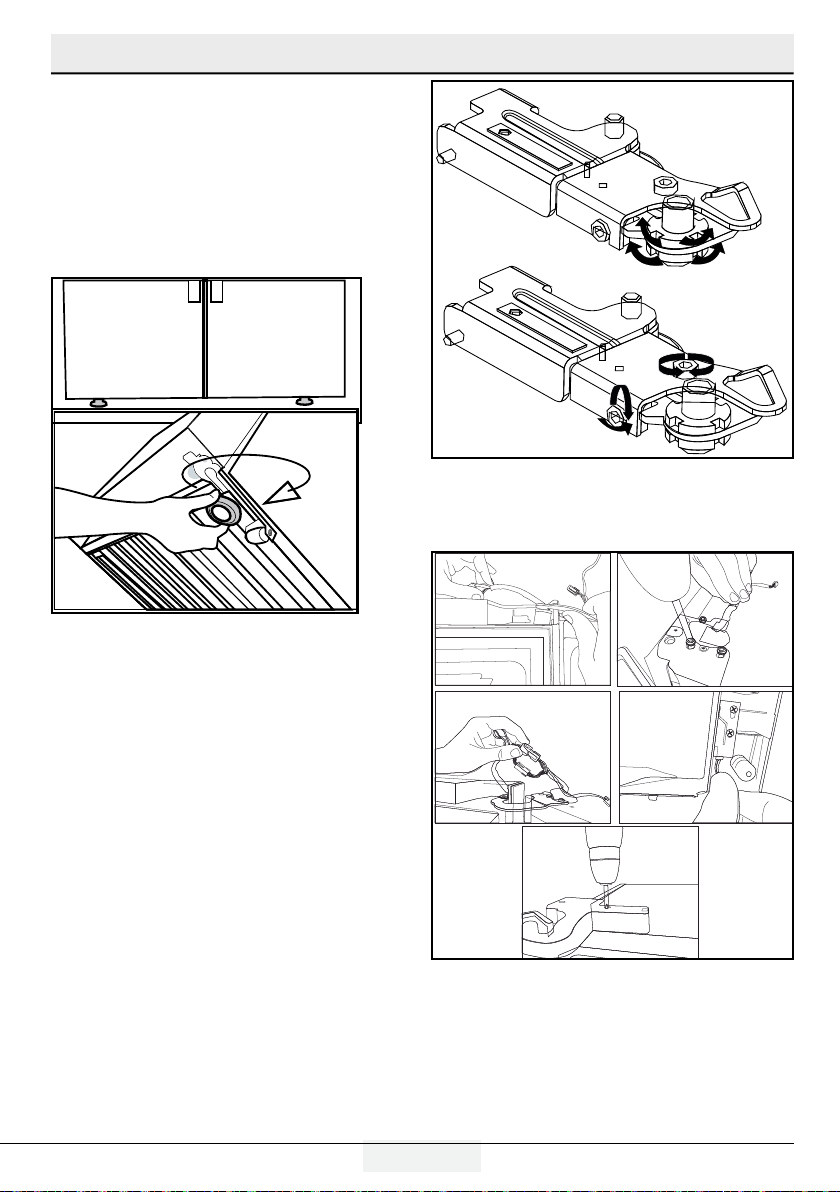
3.2 Installing the plastic wedges . . . . . . . . . . . . .9
3.3 *Adjusting the feet . . . . . . . . . . . . . . . . . . .10
3.4 Electric connection . . . . . . . . . . . . . . . . . . .11
4 Preparation 12
4.1 Things to be done for saving energy . . . . .12
4.2 Recommendations about the fresh food
compartment. . . . . . . . . . . . . . . . . . . . . .12
4.3 Initial use. . . . . . . . . . . . . . . . . . . . . . . . .13
4.4 Hints and Tips . . . . . . . . . . . . . . . . . . . . . .13
5 Operating the product 14
5.1 Indicator panel . . . . . . . . . . . . . . . . . . . . . .14
5.2 Freezing fresh food. . . . . . . . . . . . . . . . . . .18
5.3 Recommendations for preserving the frozen
food . . . . . . . . . . . . . . . . . . . . . . . . . . . .18
5.4 Deep-freeze information . . . . . . . . . . . . . . .18
5.5 Placing the food . . . . . . . . . . . . . . . . . . . . .19
5.6 Door open warning. . . . . . . . . . . . . . . . . . .19
5.7 Crisper. . . . . . . . . . . . . . . . . . . . . . . . . . . .19
5.8 Humidity-controlled crisper . . . . . . . . . . . . .19
(FreSHelf). . . . . . . . . . . . . . . . . . . . . . . . . . . . .19
5.9 Egg tray . . . . . . . . . . . . . . . . . . . . . . . . . . .20
5.10 Movable Middle Section . . . . . . . . . . . . . .20
5.11 Blue light . . . . . . . . . . . . . . . . . . . . . . . . .20
5.12 Odour filter. . . . . . . . . . . . . . . . . . . . . . . .20
6. Maintenance and cleaning 21
6.1 Avoiding bad odours . . . . . . . . . . . . . . . . . .21
6.2 Protecting the plastic surfaces . . . . . . . . . .21
7. Troubleshooting 22
CUSTOMER CARE AND SERVICE
Always use original spare parts.
When contacting our Authorised Service Centre, ensure that you have the following data available: Model,
Serial Number.
The information can be found on the rating plate.
Warning / Caution-Safety information
General information and tips
Environmental information
VISIT OUR WEBSITE TO:
Get usage advice, brochures, trouble shooter, service and repair information:
www.smeg.com/services/customer-service
3/ 24 EN
Refrigerator / User Manual
This section contains safety instructions that
will help get protected against risks of personal
injury or property damage.
Our company shall not be responsible
for damages that may arise when these
instructions are not followed.
Installation and repair procedures
must always be performed by the manufacturer,
authorised service agent or a qualified person
specified by the importer.
Only use original parts and accessories.
Original spare parts will be provided for
10 years, following the product purchasing date.
Do not repair or replace any part of the
product unless specified expressly in the user
manual.
Do not make any technical modifications
to the product.
1.1 Intended Use
This product is not suitable for commercial use
and it must not be used out of its intended use.
This product is designed to be used in houses and
indoor places.
For example:
- Personnel kitchens in stores, offices and
other working environments,
- Farm houses,
- Areas used by customers at hotels, motels
and other types of accommodation,
- Bed&breakfast type hotels, boardinghouses,
- Catering and similar non-retail applications.
This product should not be used outdoors with or
without a tent above it such as boats, balconies or
terraces. Do not expose the product to rain, snow,
sun or wind.
There is the risk of fire!
1.2 - Safety for children,
vulnerable persons and pets
This product can be used by children at and
above 8 years old and by persons with limited
physical, sensory or mental capabilities or who
lack experience and knowledge provided that
they are supervised or trained on the safe use
of the product and the risks it brings out.
Children aged from 3 to 8 years are allowed to
load and unload refrigerating products.
Electrical products are dangerous for children
and pets. Children and pets must not play
with, climb or enter the product.
Cleaning and user maintenance should not
be performed by children unless they are
supervised by someone.
Keep packaging materials away from children.
There is the risk of injury and suffocation!
Before disposing of the old or obsolete
product:
1.
Unplug the product by gripping from the plug.
2.
Cut the power cable and remove it from the
appliance together with its plug
3.
Do not remove the shelves or drawers so that it is
harder for children to enter the product.
4.
Remove the doors.
5.
Keep the product in a way that it will not tip over.
6.
Do not allow children play with the old product.
Never throw the product into fire for disposal.
There is the risk of explosion!
If there is a lock on the door of the product,
the key should be kept out of the reach of
children.
1- Safety Instructions
4 / 24 EN
Refrigerator / User Manual
Important instructions regarding safety and environment
1.3 - Electrical safety
The product must be unplugged during
installation, maintenance, cleaning, repairing and
moving procedures.
If the power cable is damaged, it must be
replaced by a qualified person specified by
the manufacturer, authorised service agent or
importer in order to avoid potential dangers.
Do not squeeze the power cable under or behind
the product. Do not place heavy objects on the
power cable. Power cable must not be bent
excessively, pinched or get in contact with any
heat source.
Do not use extension cords, multi-sockets or
adapters to operate the product.
Portable multi-sockets or portable power sources
can overheat and cause fire. Therefore, do
not keep any multi-sockets behind or near the
product.
Plug must be easily accessible. If this is not
possible, the electrical installation to which the
product is connected must contain a device
(such as a fuse, switch, circuit breaker, etc.)
which conforms to the electrical regulations and
disconnects all poles from the grid.
Do not touch the power plug with wet hands.
Remove the plug from the socket by gripping the
plug and not the cable.
1.4 - Transportation safety
Product is heavy; do not move it alone.
Do not hold its door when moving the product.
Pay attention not to damage the cooling system
or the piping during transportation. If the piping is
damaged, do not operate the product and call the
authorised service agent.
1.5 - Installation safety
Call the authorised service agent for installation of
the product. To make the product ready for use,
check the information in the user manual to make
sure that the electricity and water installations are
suitable. If they are not, call a qualified electrician
and plumber to have the necessary arrangements
made. Otherwise, there is the risk of electric
shock, fire, problems with the product, or injury!
Prior to installation, check if the product has
any defects on it. If the product is damaged, do
not have it installed.
Place the product on a clean, flat and solid
surface and balance it with adjustable feet.
Otherwise, the product may tip over and cause
injuries.
The installation location must be dry and
well ventilated. Do not place carpets, rugs or
similar covers under the product. Insufficient
ventilation causes the risk of fire!
Do not cover or block the ventilation openings.
Otherwise, power consumption increases and
your product may get damaged.
Product must not be connected to supply
systems such as solar power supplies.
Otherwise, your product may get damaged due
to sudden voltage changes!
The more refrigerant a refrigerator contains,
the larger the installation location must be. If
the installation location is too small, flammable
refrigerant and air mixture will accumulate in
cases of refrigerant leakage in cooling system.
The required space for each 8 gr of refrigerant
is 1 m³ minimum. The amount of refrigerant in
your product is indicated on the Type Label.
Product must not be installed in places
exposed to direct sunlight and it must be
kept away from heat sources such as hobs,
radiators, etc.
If it is inevitable to install the product close to
a heat source, a suitable insulation plate must
be used in between and the following minimum
distances must be kept to the heat source:
- Minimum 30 cm away from heat sources
such as hobs, ovens, heater units or stoves,
- Minimum 5 cm away from electric ovens.
Protection class of your product is Type I.
Plug the product in a grounded socket that
conforms the voltage, current and frequency
values stated on the type label of the product.
The socket must be equipped with a 10 A – 16
A circuit breaker. Our company shall not be
liable for any damages that will arise when
the product is used without grounding and
electrical connection in accordance with the
local and national regulations.
5/ 24 EN
Refrigerator / User Manual
Important instructions regarding safety and environment
Product must not be plugged in during
installation. Otherwise, there is the risk of
electric shock and injury!
Do not plug the product in sockets that are
loose, dislocated, broken, dirty, greasy or bear
the risk of getting in contact with water.
Route the power cable and hoses (if any) of the
product in a way that they do not cause risk of
tripping over.
Exposing the live parts or power cable to
humidity may cause short circuit. Therefore,
do not install the product in places such as
garages or laundry rooms where humidity is
high or water may splash. If the refrigerator
gets wet with water, unplug it and call the
authorised service agent.
Never connect your refrigerator to energy
saving devices. Such systems are harmful to
your product.
1.6- Operational safety
Never use chemical solvents on the product.
There is the risk of explosion!
If the product malfunctions, unplug it and do
not operate until it is repaired by the authorised
service agent. There is the risk of electric
shock!
Do not place flame sources (lit candles,
cigarettes, etc.) on or close to the product.
Do not climb on the product. There is the risk
of falling and getting injured!
Do not damage the pipes of the cooling
system with sharp or penetrating objects.
The refrigerant that might come out when the
refrigerant pipes, pipe extensions or surface
coatings are punctured causes skin irritations
and eye injuries.
Unless recommended by the manufacturer, do
not place or use electrical devices inside the
refrigerator/deep freezer.
Be careful not to trap your hands or any other
part of your body in the moving parts inside the
refrigerator. Pay attention not to squeeze your
fingers between the door and the refrigerator.
Be careful when opening and closing the door
particularly if there are children around.
Never eat ice cream, ice cubes or frozen food
right after removing them from the refrigerator.
There is the risk of frostbite!
When your hands are wet, do not touch the
inner walls or metal parts of the freezer or
the food stored therein. There is the risk of
frostbite!
Do not place tins or bottles that contain
carbonated drinks or freezable liquids in the
freezer compartment. Tins and bottles may
burst. There is the risk of injury and material
damage!
Do not place or use flammable sprays,
flammable materials, dry ice, chemical
substances or similar heat-sensitive materials
near the refrigerator. There is the risk of fire and
explosion!
Do not store explosive materials that contain
flammable materials, such as aerosol cans, in
your product.
Do not place containers filled with liquid onto
the product. Splashing water on an electrical
part may cause electric shock or the risk of fire.
This product is not intended for storing
medicines, blood plasma, laboratory
preparations or similar medical substances and
products subject to Medical Products Directive.
Using the product against its intended purpose
may cause the products stored inside it to
deteriorate or spoil.
If your refrigerator is equipped with blue light,
do not look at this light with optical tools. Do
not stare at UV LED lamp directly for a long
time. Ultraviolet light may cause eye strain.
Do not overload the product. Objects in the
refrigerator may fall down when the door is
opened, causing injury or damage. Similar
problems may arise if any object is placed onto
the product.
To avoid injuries, make sure that you have
cleaned all the ice and water that may have
fallen or splashed on the floor.
Change the position of the shelves/bottle
holders on the door of your refrigerator only
when they are empty. There is the risk of injury!
Do not place objects that can fall down/tip over
onto the product. Such objects may fall down
when the door is opened and cause injuries
and/or material damage.
6 / 24 EN
Refrigerator / User Manual
Important instructions regarding safety and environment
Do not hit or exert excessive force on glass
surfaces. Broken glass may cause injuries and/
or material damage.
Cooling system of your product contains
R600a refrigerant: Type of the refrigerant used
in the product is indicated on the type label.
This refrigerant is flammable. Therefore, pay
attention not to damage the cooling system
or the piping while the product is in use. If the
piping is damaged:
- Do not touch the product or the power cable,
- Keep away potential sources of fire that may
cause the product to catch fire.
- Ventilate the area where the product is
located. Do not use fans.
- Call the authorised service agent.
If the product is damaged and you see
refrigerant leak, please stay away from the
refrigerant. Refrigerant may cause frostbite in
case of skin contact.
For products with a Water Dispenser/
Ice Machine
Use only potable water. Do not fill the
water tank with any liquids -such as
fruit juice, milk, carbonated beverages
or alcoholic drinks- that are not suitable
for use in the water dispenser.
There is the risk for health and safety!
Do not allow children play with the
water dispenser or ice machine
(Icematic) in order to prevent accidents
or injuries.
Do not insert your fingers or other
objects into the water dispenser hole,
water channel or ice machine container.
There is the risk of injury or material
damage!
1.7- Maintenance and
cleaning safety
Do not pull from the door handle if you need
to move the product for cleaning purposes.
Handle may break and cause injuries if you
exert excessive force on it.
Do not spray or pour water on or inside the
product for cleaning purposes. There is the risk
of fire and electric shock!
Do not use sharp or abrasive tools when
cleaning the product. Do not use household
cleaning products, detergent, gas, gasoline,
thinner, alcohol, varnish etc.
Only use cleaning and maintenance products
inside the product that are not harmful for
food.
Never use steam or steam assisted cleaners to
clean or defrost the product. Steam gets into
contact with the live parts in your refrigerator,
causing short circuit or electric shock!
Make sure that no water enters the electronic
circuits or lighting elements of the product.
Use a clean and dry cloth to wipe the foreign
materials or dust on the pins of the plug. Do
not use a wet or damp cloth to clean the plug.
There is the risk of fire and electric shock!
1.8- Lighting
Call the authorised service when it is required
to replace the LED/bulb used for lighting.
7/ 24 EN
Refrigerator / User Manual
Important instructions regarding safety and environment
1.9 Compliance with the WEEE
Directive and Disposing
of the Waste Product
This product complies with EU WEEE Directive
(2012/19/EU). This product bears a classification
symbol for waste electrical and electronic equip-
ment (WEEE).
This symbol indicates that this product
shall not be disposed with other house-
hold wastes at the end of its service life.
Used device must be returned to offical
collection point for recycling of electrical
and electronic devices. To find these collection sys-
tems please contact to your local authorities or re-
tailer where the product was puchased. Each house-
hold performs important role in recovering and
recycling of old appliance. Appropriate disposal of
used appliance helps prevent potential negative
consequences for the environment and human
health.
1.10 Compliance with
RoHS Directive
The product you have purchased complies with EU
RoHS Directive (2011/65/EU). It does not contain
harmful and prohibited materials specified in the
Directive.
1.11 Package information
Packaging materials of the product are
manufactured from recyclable materials
in accordance with our National
Environment Regulations. Do not dispose
of the packaging materials together with the do-
mestic or other wastes. Take them to the packaging
material collection points designated by the local
authorities.
1.12 Service
To repair the appliance contact the Authorised
Service Centre. Use original spare parts only.
Please note that self-repair or nonprofessional
repair can have safety consequences and might
void the guarantee.
The following spare parts will be available for 7
years after the model has been discontinued:
thermostats, temperature sensors, printed
circuit boards, light sources, door handles, door
hinges, trays and baskets. Please note that
some of these spare parts are only available
to professional repairers, and that not all spare
parts are relevant for all models.
Door gaskets will be available for 10 years after
the model has been discontinued.
8 / 24 EN
Refrigerator / User Manual
C
Figures in this user manual are schematic and may not match the product exactly. If the subject parts
are not included in the product you have purchased, then those parts are valid for other models.
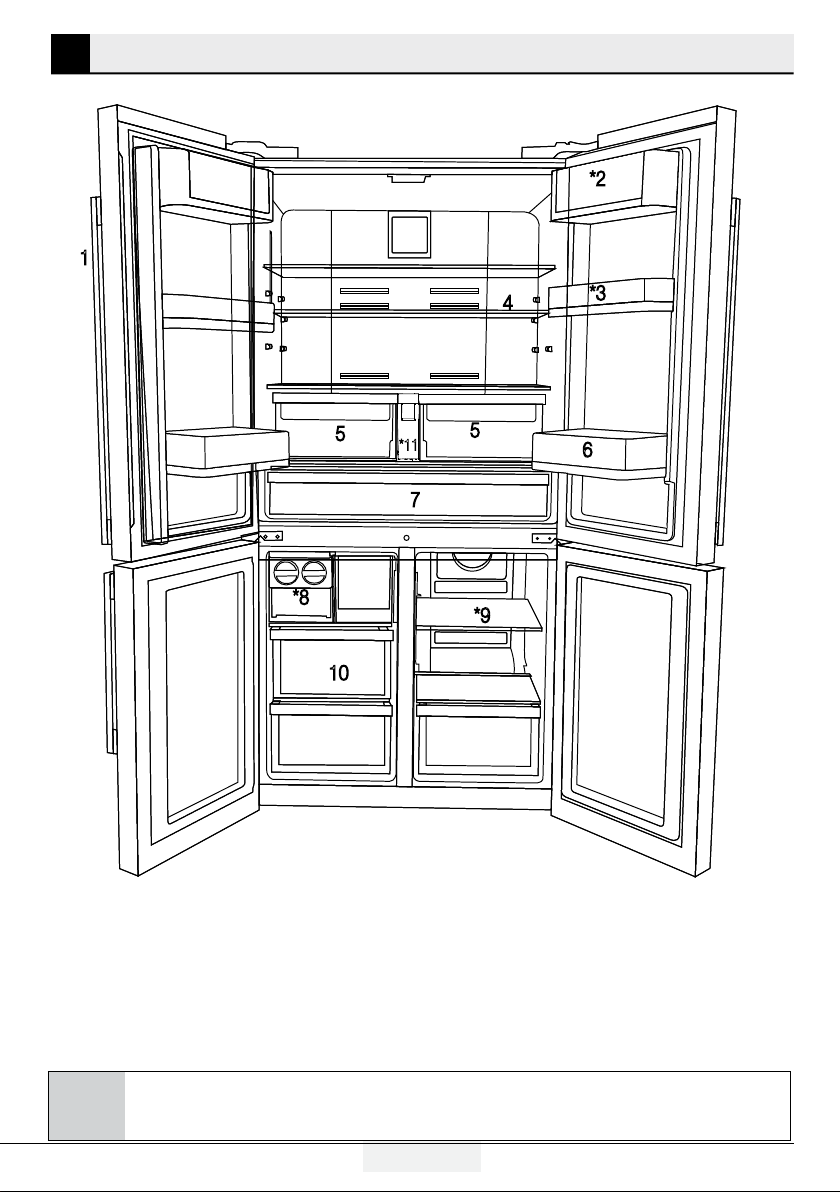
2 Your Refrigerator
6
*11
1- Control and indicator panel
2- Butter & Cheese section
3- 70 mm moving door shelf
4- Fridge compartment glass shelf
5- Fridge compartment crisper
6- Gallon door shelf
7- Dairy compartment
8- Icebox drawer
9- Freezer compartment glass shelf/cooler
10- Freezer compartment drawers
11- Water tank
* OPTIONAL
9/ 24 EN
Refrigerator / User Manual
3.1 Appropriate location
for installation
Contact an Authorized Service for the installation
of the product. In order to prepare the product
for use, refer the information in the user manual
and ensure that electrical installation and water
installation are appropriate. If not, call a qualified
electrician and technician to have any necessary
arrangements carried out.
B
WARNING: Manufacturer shall not
be held liable for damages that may
arise from procedures carried out by
unauthorized persons.
B
WARNING: Product must not be plugged
in during installation. Otherwise, there is
the risk of death or serious injury!
A
WARNING: : If the door clearance of the
room where the product shall be placed is
so tight to prevent passing of the product,
remove the door of the room and pass the
product through the door by turning it to
its side; if this does not work, contact the
authorized service.
prevent jolts.
heat sources such as hobs, heater cores and
stoves and at least 5 cm away from electrical
ovens.
and kept in humid places.
function efficiently. If the product will be placed
in an alcove, remember to leave at least 5 cm
clearance between the product and the ceiling,
rear wall and the side walls.
remember to leave at least 5 cm clearance
between the product and the ceiling, rear
wall and the side walls. Check if the rear wall
clearance protection component is present at
its location (if provided with the product). If the
component is not available, or if it is lost or
3 Installation
fallen, position the product so that at least 5 cm
clearance shall be left between the rear surface
of the product and the wall of the room. The
clearance at the rear is important for efficient
operation of the product.
temperature falls below -5°C.
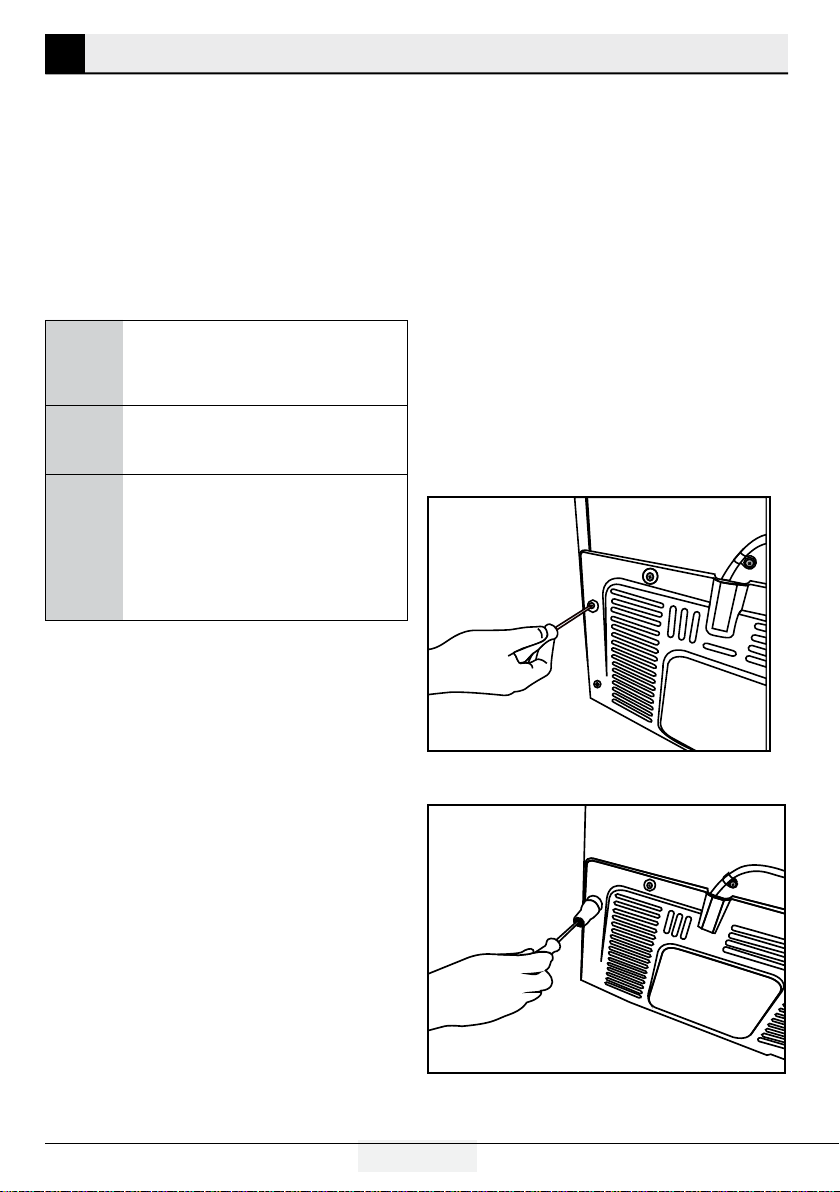
3.2 Installing the plastic wedges
Plastic wedges supplied with the product are
used to create the distance for the air circulation
between the product and the rear wall.
1.
To install the wedges, remove the screws on the
product and use the screws supplied together with the
wedges.
2.
Insert the 2 plastic wedges onto the rear ventilation
cover as illustrated in the figure.
10 / 24 EN
Refrigerator / User Manual
Installation
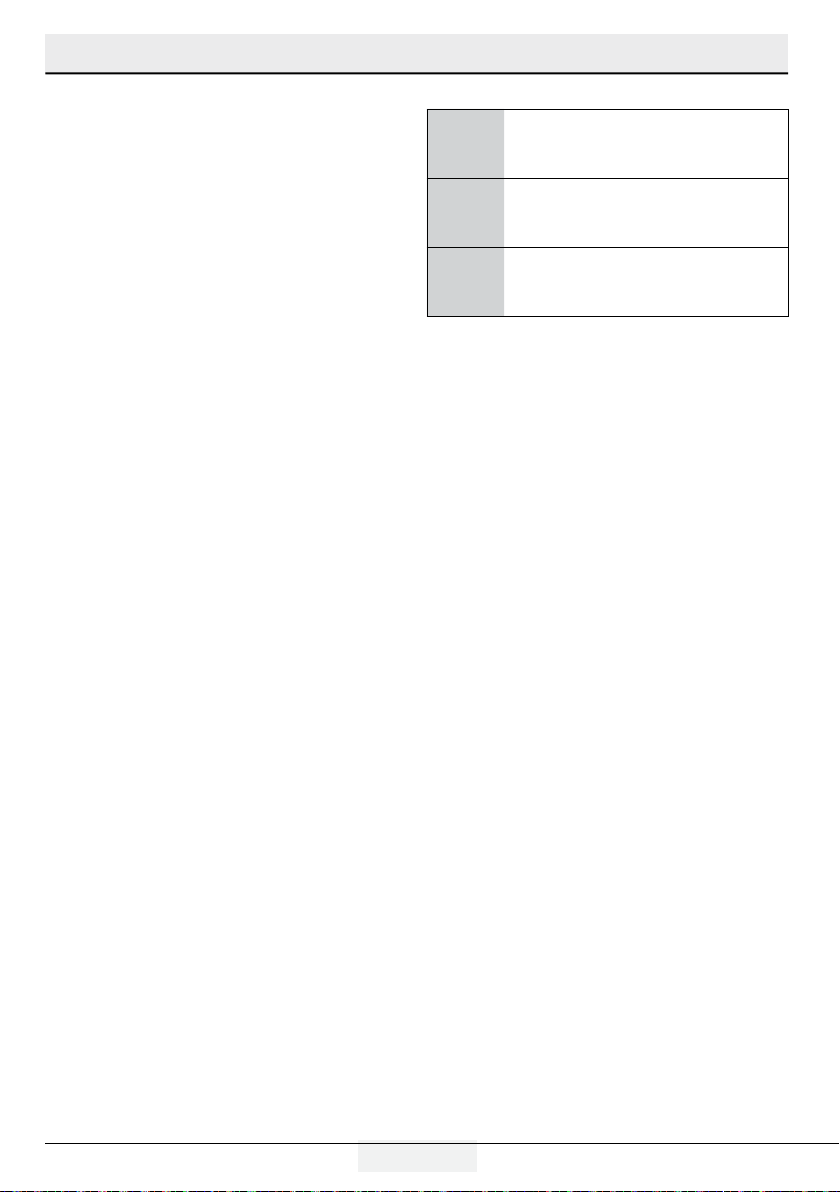
3.3 *Adjusting the feet
If the product stands unbalanced after installation,
adjust the feet on the front by rotating them to the
right or left.
*If your product does not have a wine
compartment or is not a glass door, your product
does not have adjustable stands, the product has
fixed stands.
To adjust the doors vertically,
Loosen the fixing nut located at the bottom.
Rotate the adjusting nut according to the position
of the door (clockwise/counter-clockwise).
Tighten the fixing nut in order to fix the position.
To adjust the doors horizontally,
Loosen the fixing nut located at the top.
Rotate the side adjusting nut according to the
position of the door (clockwise/counter-clockwise).
Tighten the fixing nut which is at the top in order to
fix the position.
adjusting nut
fixing nut
fixing nut
adjusting nut
-Upper hinge group is fixed with 3 screws.
-The hinge cover is attached after the sockets are
installed.
- Then the hinge cover is fixed with two screws.
11/ 24 EN
Refrigerator / User Manual
Installation
3.4 Electric connection
A
WARNING: Do not make connections via
extension cables or multi-plugs.
B
WARNING: Damaged power cable must
be replaced by the Authorized Service
Agent.
C
If two coolers are to be installed side
by side, there should be at least 4 cm
distance between them.
Our company shall not be liable for any
damages that will arise when the product
is used without grounding and electrical
connection in accordance with the national
regulations.
Power cable plug must be within easy reach
after installation.
Do not extension cords or cordless multiple
outlets between your product and the wall
outlet.
Positioning
This appliance should be installed in a dry, well
ventilated indoor position.
This appliance is intended to be used at ambient
temperature ranging from 10°C to 43°C.
12 / 24 EN
Refrigerator / User Manual
4 Preparation
Airflow should not be blocked by placing
foods in front of the freezer and the multizone
compartment fans. Foods should be loaded by
leaving minimum 5 cm space in front of the
protective fan grid.
Thawing the frozen foods in the fridge
compartment both saves energy and reserves
the quality of the foods.
C
Temperature of the room where your
refrigerator is located should at least
be
10ºC /50°F. Operating your
refrigerator under cooler conditions is not
recommended with regard to its efficiency.
C
Inside of your refrigerator must be cleaned
thoroughly.
C
If two coolers are to be installed side
by side, there should be at least 4 cm
distance between them.
4.2 Recommendations about the
fresh food compartment
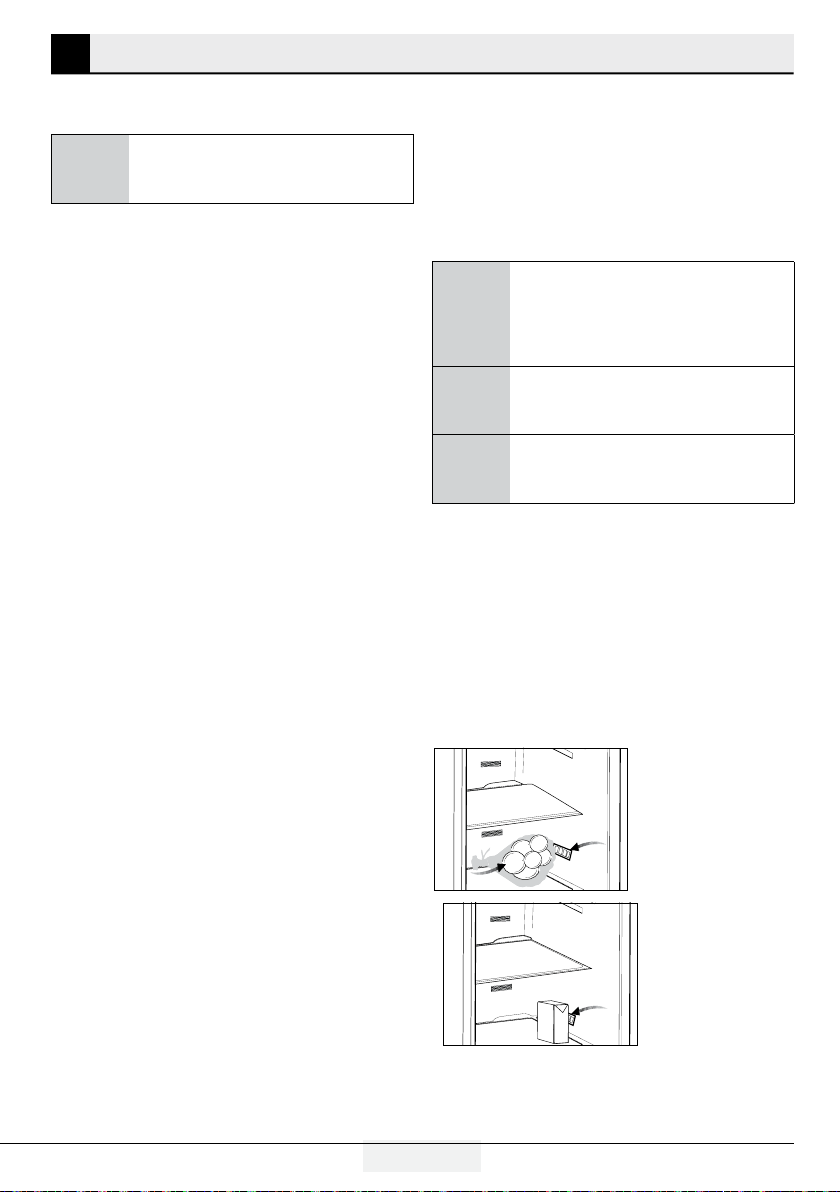
Make sure that the food does not touch the
temperature sensor in fresh food compartment.
To allow the fresh food compartment to keep
its ideal storage temperature, the sensor must
not be hindered by food.
Do not place hot foods or beverages inside the
product.
4.1 Things to be done for
saving energy
A
Connecting your refrigerator to systems
that save energy is dangerous as they may
cause damage on the product.
For a freestanding appliance; ‘this refrigerating
appliance is not intended to be used as a built-
in appliance.
Do not leave the doors of your refrigerator open
for a long time.
Do not put hot food or drinks in your
refrigerator.
Do not overload the refrigerator. Cooling
capacity will fall when the air circulation in the
refrigerator is hindered.
Do not place the refrigerator in places subject
to direct sunlight. Install the product at least
30 cm away from heat sources such as hobs,
ovens, heater units and stoves and at least 5
cm away from electrical ovens.
Pay attention to store your food in refrigerator
in closed containers.
Since hot and humid air will not directly
penetrate into your product when the doors
are not opened, your product will optimize
itself in conditions sufficient to protect your
food. Functions and components such as
compressor, fan, heater, defrost, lighting,
display and so on will operate according to
the needs to consume minimum energy under
these circumstances.
In case of multiple options are present glass
shelves must be placed so that the air outlets
at the backwall are not blocked, prefably air
outlets are remaining below the glass shelf.
This combination may help impoving air
distribution and energy efficiency.
To be able store maximum food in the freezer
compartment of your refrigerator, the upper
drawer has to be removed and placed on top
of glass shelf. Power consumption stated for
your refrigerator has been determined after
removing the icematic and the upper drawers
as to allow maximum loading. It is strongly
recommended to use the lower drawers in the
freezer and the multizone compartment while
loading.
13/ 24 EN
Refrigerator / User Manual
Preparation
4.3 Initial use
Before using the product, make sure that all
preparations have been made in accordance
with the instructions given in the "Important
instructions regarding safety and environment" and
"Installation" chapters.
Clean the interior of the refrigerator as
recommended in the “Maintenance and
cleaning” section. Before you start the
refrigerator, make sure that the interior is dry.
Plug the refrigerator in a grounded socket. The
interior illumination is lit when the door of the
refrigerator is opened.
Operate the refrigerator for 6 hours without
placing any food in it and do not open its door
unless it is necessary.
C
starts up. The liquids and gases sealed
within the refrigeration system may also
give rise to noise, even if the compressor is
not running and this is quite normal.
C
Front edges of the refrigerator may
feel warm. This is normal. These areas
are designed to be warm to avoid
condensation.
4.4 Hints and Tips
Hints for energy saving
configuration with the drawers in the bottom part
of the appliance and shelves evenly distributed.
Position of the door bins does not affect energy
consumption.
longer than necessary.
unless it is required by the characteristics of the
food.
temperature control is set to low temperature and
the appliance is fully loaded, the compressor may
run continuously, causing frost or ice formation on
the evaporator. In this case, set the temperature
control toward higher temperature to allow
automatic defrosting and to save energy this way.
ventilation grilles or holes.
Hints for fresh food refrigeration
Good temperature setting that ensures
preservation of fresh food is a temperature less
than or equal to +4°C.
Higher temperature setting inside the appliance
may lead to shorter shelf life of food.
freshness and aroma.
for food, to avoid flavours or odours in the
compartment.
cooked and raw food, cover the cooked food and
separate it from the raw one.
fridge.
sure it has cooled down at room temperature
before inserting it.
should always be placed behind the old one.
Hints for food refrigeration
place it on the glass shelf above the vegetable
drawer. Store meat for at most 1 -2 days.
14 / 24 EN
Refrigerator / User Manual
5 Operating the product
C
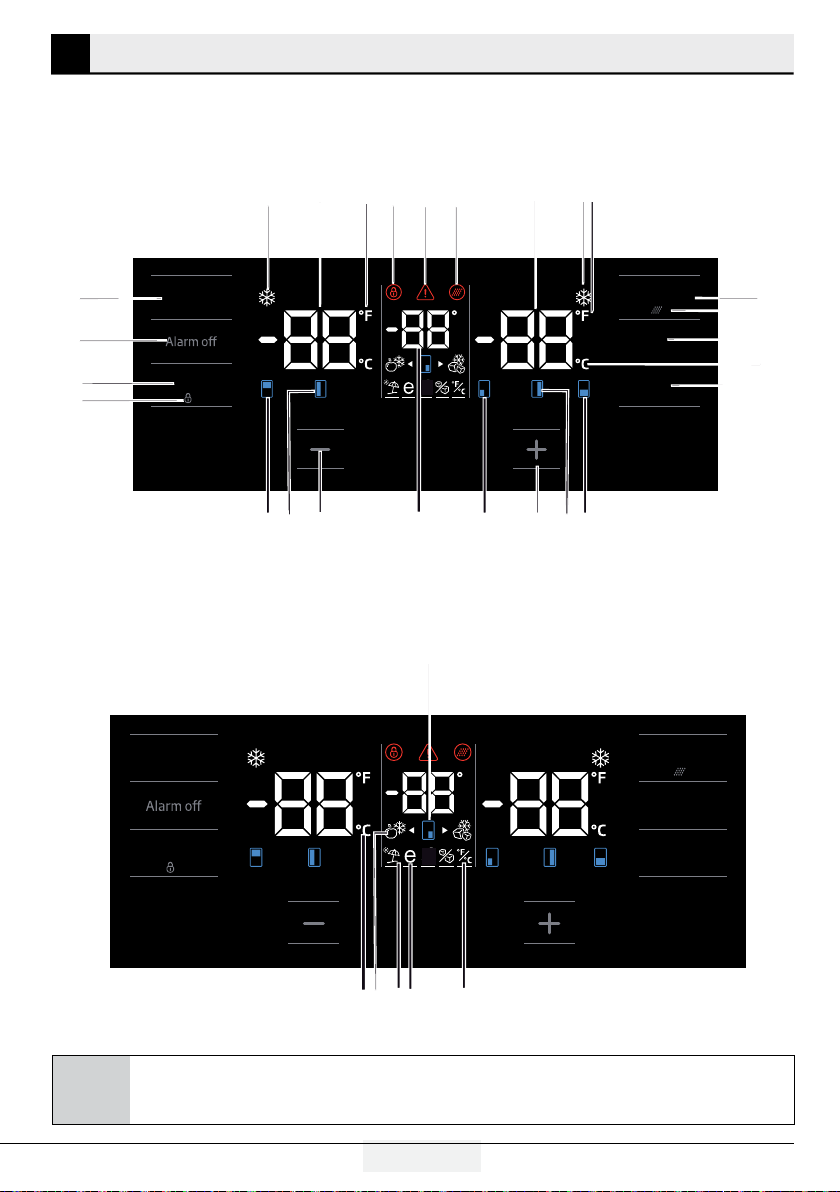
Figures in this user manual are schematic and may not match the product exactly. If the subject parts
are not included in the product you have purchased, then those parts are valid for other models.
5.1 Indicator panel
Touch-controlled indicator panel allows you to set the temperature and control the other functions related
to the refrigerator without opening the door of the product. Just press the relevant buttons for function
settings.
Select
Quick FreezeQuick Cool
FN
OK
3 “
3 “
1
2 3
4
5 *6
8 910
11
*12
13
14
15
*16
*17
18
19
*31
24
*25
26
27
28
29
30
Select
Quick FreezeQuick Cool
FN
OK
3 “
3 “
7
20
21
22
23

15/ 24 EN
Refrigerator / User Manual
Operating the product
1. Quick cooling function indicator
It turns on when the quick fridge function is
activated.
2. Fridge compartment temperature indicator
Temperature of the fridge compartment is shown;
it can be set to 8,7,6,5,4,3,2,1.
3. Fahrenheit indicator
It is a Fahrenheit indicator. When the Fahrenheit
indication is activated, the temperature set values
are shown in Fahrenheit and the relevant icon
turns on.
4. Key lock
Press key lock button simultaneously for 3 sec-
onds. Key lock symbol
will light up and key lock mode will be activated.
Buttons will not function if the Key lock mode is
active. Press key lock button simultaneously for 3
seconds again. Key lock symbol will turn off and
the key lock mode will be exited.
Press the key lock button if you want to prevent
changing of the temperature setting of the
refrigerator.
5. Power failure/High temperature / error
warning
This indicator illuminates during power failure, high
temperature failures and error warnings. During
long-term power failures, the highest temperature
value that the freezer compartment reaches will
blink on the digital display. After checking the food
located in the freezer compartment, press the
alarm off button to clear the warning.
Please refer to "solutions recommended for
troubleshooting" section on your manual if you
observe that this indicator is illuminated.
6. Filter reset icon
This icon turns on when the filter needs to be
reset.
7. Temperature change cabin icon
Indicates the cabin whose temperature is to be
changed. When the temperature change cabin icon
starts flashing, it is understood that the relevant
cabin has been selected.
8. Freezer compartment temperature
indicator
Temperature of the fridge compartment is shown;
it can be set to -16, -18, -19, -21, -21, -22, -24.
9. Quick freeze function indicator
It turns on when the quick freeze function is
activated.
10. Fahrenheit indicator
It is a Fahrenheit indicator. When the Fahrenheit
indication is activated, the temperature set values
are shown in Fahrenheit and the relevant icon
turns on.
11. Quick freeze function button
Press this button to activate or deactivate the quick
freeze function. When you activate the function,
the freezer compartment will be cooled to a
temperature lower than the set value.
C
Use the quick freeze function when you
want to quickly freeze the food placed
in freezer compartment. If you want
to freeze large amounts of fresh food,
activate this function before putting the
food into the product.
C
If you do not cancel it, Quick Freeze
will cancel itself automatically after 24
hours at the most or when the fridge
compartment reaches to the required
temperature.
C
This function is not recalled when
power restores after a power failure.
12. Filter reset
The filter is reset when the quick freeze button is
pressed for 3 seconds. Filter reset icon goes off.
13. FN button
Using this key, you can switch between the
functions that you want to select. Upon pressing
this key, the icon, whose function is required to be
activated or deactivated, and this icon's indicator
starts flashing. The FN button gets deactivated if
button to change the functions again.
16 / 24 EN
Refrigerator / User Manual
Operating the product
14. Celsius indicator
It is a Celsius indicator. When the Celsius indication
is activated, the temperature set values are shown
in Celsius and the relevant icon turns on.
15. OK button
After navigating the functions using the FN button,
when the function is cancelled via the OK button,
the relevant icon and the indicator flashes. When
the function is activated, it remains on. The
indicator continues to flash in order to show the
icon it is on.
16. Temperature change cabin icon
Indicates the cabin whose temperature is to be
changed. When the temperature change cabin icon
starts flashing, it is understood that the relevant
cabin has been selected.
17. Temperature change cabin icon
Indicates the cabin whose temperature is to be
changed. When the temperature change cabin icon
starts flashing, it is understood that the relevant
cabin has been selected.
18. Set increasing button
Select the relevant cabin with the select button;
the cabin icon representing the relevant cabin will
start to flash. If you press the set increasing button
during this process, the set value gets increased. If
you keep pressing it in a loop, the set value returns
to the beginning.
19. Temperature change cabin icon
Indicates the cabin whose temperature is to be
changed. When the temperature change cabin icon
starts flashing, it is understood that the relevant
cabin has been selected.
20. Setting the Celsius and Fahrenheit
indicator
Hover over this key using the FN key and select
Fahrenheit and Celsius via the OK key. When
the relevant temperature type is selected, the
Fahrenheit and Celsius indicator turns on.
21. Eco fuzzy function icon
Press the FN key (until it reaches the letter e icon
and the lower line) to activate the eco fuzzy. When
you hover over the eco fuzzy icon and the eco
fuzzy function indicator, they start flashing. Thus,
you can understand whether the eco fuzzy function
will be activated or deactivated. When you press
the OK button, the eco fuzzy function icon lights
continuously and the Indicator continues to flash
during this process. If you do not press any button
after 20 seconds, the icon and the indicator remains
on. Thus, the eco fuzzy function is activated. In
order to cancel the eco fuzzy function, hover over
the icon and the indicator again and press the OK
key. Thus, both the eco fuzzy function icon and
the indicator will start flashing. If you do not press
any button within 20 seconds, the icon and the
indicator will go off and the eco fuzzy function will
be cancelled.
22. Vacation function icon
Press the FN key (until it reaches the umbrella icon
and the lower line) to activate the vacation function.
When you hover over the vacation function icon and
the vacation function indicator, they start flashing.
Thus, you can understand whether the vacation
function will be activated or deactivated. When you
press the OK button, the vacation function icon
lights continuously and thus the Vacation function
is activated. The Indicator continues to flash during
this process. Press the OK key to cancel the
vacation function. Thus, both the vacation function
icon and the indicator will start flashing and the
vacation function will be cancelled.
23. Celsius indicator
It is a Celsius indicator. When the Celsius indication
is activated, the temperature set values are shown
in Celsius and the relevant icon turns on.
24. Set decreasing function
Select the relevant cabin with the select button;
the cabin icon representing the relevant cabin will
start to flash. If you press the set decreasing button
during this process, the set value gets decreased. If
you keep pressing it in a loop, the set value returns
to the beginning.
25. Temperature change cabin icon
Indicates the cabin whose temperature is to be
changed. When the temperature change cabin icon
starts flashing, it is understood that the relevant
cabin has been selected.
17/ 24 EN
Refrigerator / User Manual
Operating the product
26. Temperature change cabin icon
Indicates the cabin whose temperature is to be
changed. When the temperature change cabin icon
starts flashing, it is understood that the relevant
cabin has been selected.
27. Key lock
Press key lock button simultaneously for 3 sec-
onds. Key lock symbol
will light up and key lock mode will be activated.
Buttons will not function if the Key lock mode is
active. Press key lock button simultaneously for 3
seconds again. Key lock symbol will turn off and
the key lock mode will be exited.
Press the key lock button if you want to prevent
changing of the temperature setting of the
refrigerator.
28.Select button
Use this button to select the cabin whose tem-
perature you want to change. Switch between
the cabins by pressing this button. The selected
cabin can be understood from the cabin icons
(7,17,18,20,28,29). Whichever cabin icon is flash-
ing, the cabin, whose temperature set value you
want to change, is selected. Then, you can change
the set value by pressing the cabin set value
decreasing button (27) and the cabin set value in-
creasing button (19). If you do not press the select
button for 20 seconds, the cabin icons will go off.
29. Alarm off warning
In case of power failure/high temperature
alarm, after checking the foods in the freezer
compartment, press the alarm off button to clear
the warning.
30. Quick cooling function button
The button has two functions. To activate or
deactivate the quick cool function, press it briefly.
Quick Cool indicator will turn off and the product
will return to its normal settings.
C
Use quick cooling function when you
want to quickly cool the food placed
in the fridge compartment. If you want
to cool large amounts of fresh food,
activate this function before putting the
food into the product.
C
If you do not cancel it, quick cooling
will cancel itself automatically after 1
hours at the most or when the fridge
compartment reaches to the required
temperature.
C
If you press the quick cooling button
repeatedly with short intervals, the
electronic circuit protection will be
activated and the compressor will not
start up immediately.
C
This function is not recalled when
power restores after a power failure.
18 / 24 EN
Refrigerator / User Manual
Operating the product
5.2 Freezing fresh food
In order to preserve the quality of the food, it
shall be frozen as quickly as possible when it is
placed in the freezer compartment, use the fast
freezing feature for this purpose.
compartment when you freeze them while they
are fresh.
Pack the food to be frozen and close the
packing so that it would not allow entrance of
air.
Ensure that you pack your food before putting
them in the freezer. Use freezer containers,
foils and moisture-proof papers, plastic
bags and other packing materials instead of
traditional packing papers.
Label each pack of food by adding the date
freshness of each food pack in this way when
you open your freezer each time. Store the food
frozen before in the front side of compartment
to ensure that they are used first.
Frozen food must be used immediately after
they are thawed and they should not be re-
frozen.
Do not freeze too large quantities of food at
one time.
24 hours before freezing the fresh food,
activate “Quick Freeze Function”.
The fresh food packages should be placed in
bottom drawers.
After placing fresh food packages, activate
“Quick Freeze Function” again.
When the freezer cabinet is set to quick
function, joker cabinet is also set to quick
function automatically.
5.3 Recommendations for
preserving the frozen food
Compartment shall be set to -18°C at least.
1. Put packages in the freezer as quickly as
possible after purchase without allowing the
to thaw.
2. Check whether the "Use By" and "Best
Before" dates on the packaging are expired or
not before freezing it.
3. Ensure that the package of the food is not
damaged.
5.4 Deep-freeze information
According to IEC 62552 standards, the product
shall freeze at least 4.5 kg of food at 25°C
ambient temperature to -18°C or lower within 24
hours for every 100-litres of freezer volume.
It is possible to preserve the food for a long time
only at -18°C or lower temperatures.
months (at -18°C or lower temperatures in the
deep freeze).
Foods to be frozen should not be allowed to come
in contact with the previously frozen items to
prevent them from getting thawed partially.
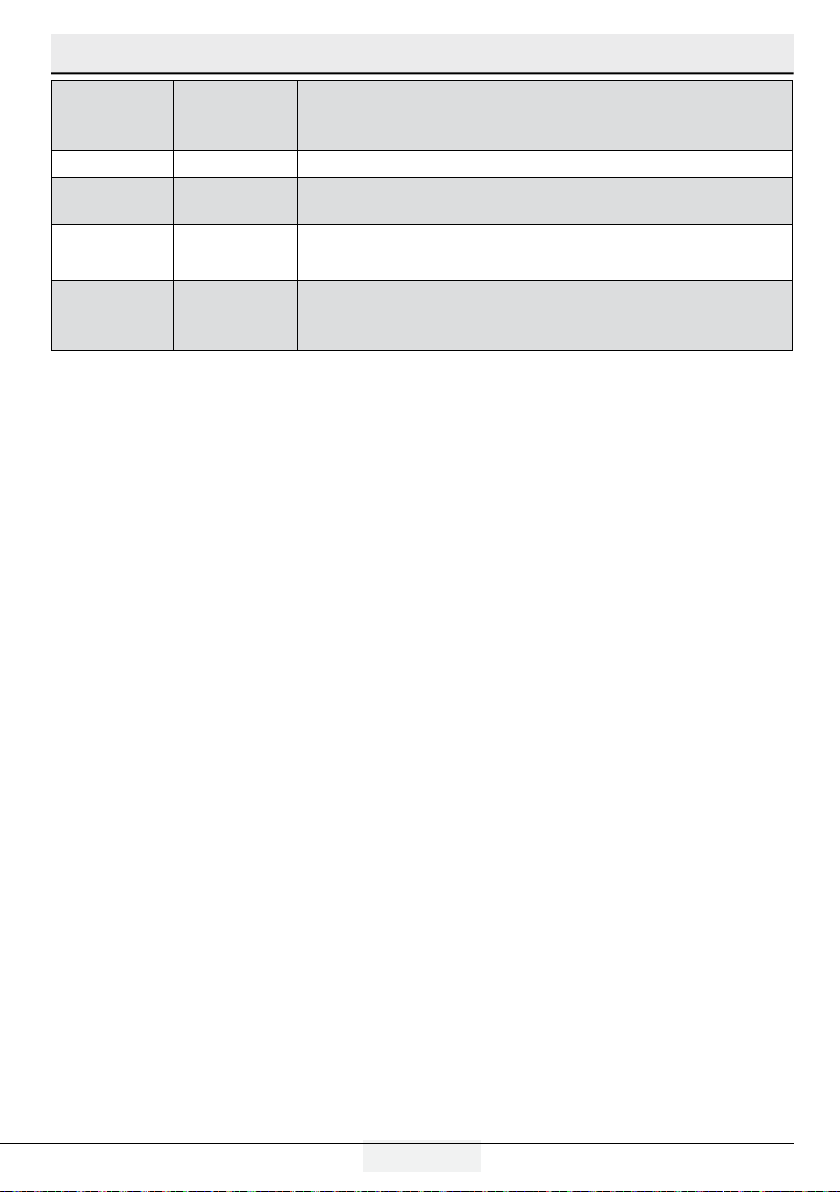
Freezer
Compartment
Setting
Fridge
Compartment
Setting
Remarks
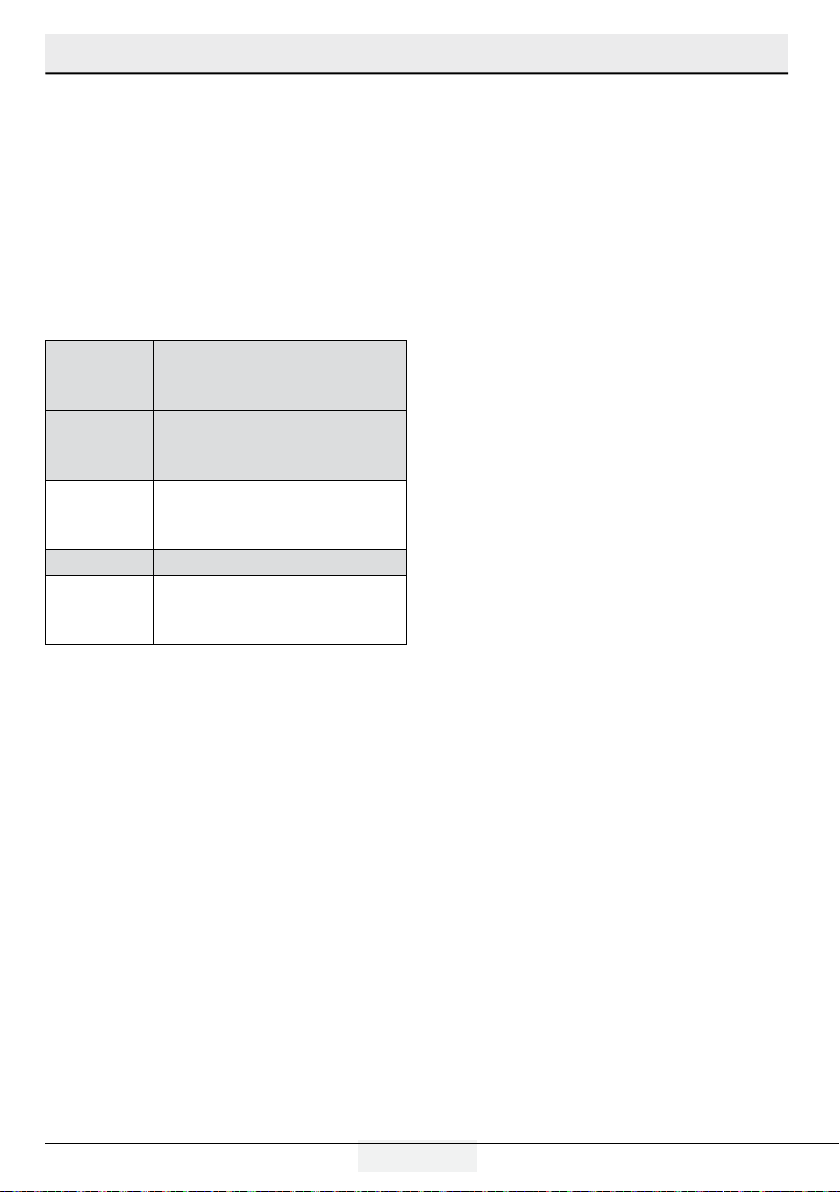
-18°C 4°C This is the normal recommended setting.
-20, -22 or
-24°C
4°C
These settings are recommended when the ambient temperature
exceeds 30°C.
Quick Freeze 4°C
will return to its previous mode when the process is over.
-18°C or colder 2°C
Use these settings if you think that your fridge compartment is not
cold enough because of the hot ambient conditions or frequent
opening and closing of the door.
19/ 24 EN
Refrigerator / User Manual
Operating the product
Boil the vegetables and drain their water in order
to store vegetables for a longer time as frozen.
After draining their water, put them in air-proof
packages and place them inside the freezer. Food
such as bananas, tomatoes, lettuce, celery, boiled
eggs, potatoes are not suitable for freezing. When
these foods are frozen, only their nutritional value
and taste shall be affected negatively. They shall
not be spoiled so that they would create a risk for
human health.
5.5 Placing the food
Freezer
compartment
shelves
Various frozen food such
as meat, fish, ice cream,
vegetables and etc.
Refrigerator
compartment
shelves
Food in pans, covered plates
and closed containers, eggs (in
closed container)
Door shelves
of fridge
compartment
Small and packaged food or
beverage
Crisper Vegetables and fruits
Fresh zone
compartment
Delicatessen (breakfast food,
meat products that shall be
consumed in a short time)
5.6 Door open warning
(This feature is optional)
An audio warning signal will be given when the
door of your product is left open for 1 minute. This
warning will be muted when the door is closed or
any of the display buttons (if any) are pressed.
5.7 Crisper
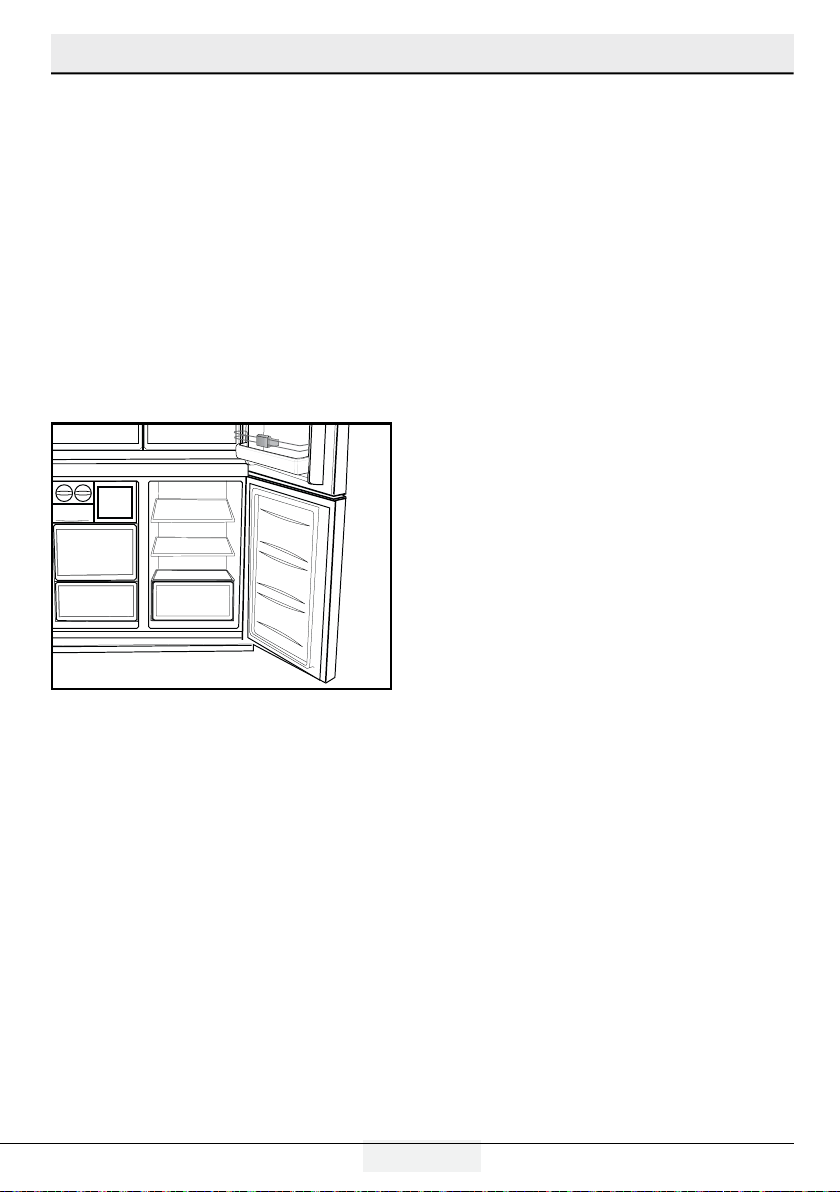
Crisper of the refrigerator is designed specially
to keep the vegetables fresh without loosing their
humidity. For this purpose, cool air circulation is
intensified around the crisper in general. Remove
the door shelves that stand against the crisper
before removing the crisper.
5.8 Humidity-controlled crisper
(FreSHelf)
(This feature is optional)
Humidity rates of fruits and vegetables are kept
under control thanks to the humidity-controlled
crisper and thus the food is ensured to stay fresh
for a longer period.
We recommend that you place leafy vegetables
such as lettuce and spinach and vegetables sensi-
tive to humidity loss as horizontally as possible
when putting them in the crisper; not in a horizon-
tal position on their roots.
While the vegetables are being replaced, their spe-
cific weights should be taken into consideration.
Heavy and hard vegetables must be placed at the
bottom of the crisper and light and soft vegetables
must be on the upper part.
Never leave the vegetables in their plastic bags in
the crisper. If they are left in their plastic bags, this
will cause them to rot in a little while. If you not
prefer the vegetable to get in contact with other
vegetables for hygienic reasons, use perforated
paper or a similar material instead of plastic bags.
Do not place pears, apricots, peaches etc.,
especially those fruits that generate large amounts
of ethylene, in the same crisper with other fruits
and vegetables. The ethylene gas emitted by these
fruits cause other fruits to ripen sooner and to rot
in a shorter span of time.
20 / 24 EN
Refrigerator / User Manual
Operating the product
5.9 Egg tray
or body shelf.
Never keep the egg holder in the freezer
compartment.
5.10 Movable Middle Section
Movable middle section is intended to prevent
the cold air inside your refrigerator from escaping
outside.
1- Sealing is provided when the gaskets on the
door presses on the surface of the movable middle
section while the fridge compartment doors are
closed.
5.11 Blue light
(in some models)
Crisper of the refrigerator are illuminated with a
blue light. Foodstuff stored in the crisper continue
their photosynthesis by means of the wavelength
effect of blue light and thus, preserve their
freshness and increase their vitamin content.
5.12 Odour filter
Odour filter in the air duct of the fridge
compartment prevents build-up of unpleasant
odours in the refrigerator.
2- Another reason that your refrigerator is
equipped with a movable middle section is that it
increases the net volume of the fridge compart-
ment. Standard middle sections occupy some
non-usable volume in the refrigerator.
3-Movable middle section is closed when the left
door of the fridge compartment is opened.
4-It must not be opened manually. It moves under
the guidance of the plastic part on the body while
the door is closed.
21/ 24 EN
Refrigerator / User Manual
6. Maintenance and cleaning
Cleaning your fridge at regular intervals will ex-
tend the service life of the product.
B WARNING:
Unplug the product before cleaning it.
Never use gasoline, benzene or similar
substances for cleaning purposes.
Never use any sharp and abrasive tools, soap,
household cleaners, detergent and wax polish
for cleaning.
For non-No Frost products, water drops and
frosting up to a fingerbreadth occur on the rear
wall of the Fridge compartment. Do not clean it;
never apply oil or similar agents on it.
Only use slightly damp microfiber cloths to clean
the outer surface of the product. Sponges and
other types of cleaning cloths may scratch the
surface
Dissolve one teaspoon of bi-carbonate in half
litre of water. Soak a cloth with the solution
and wrung it thoroughly. Wipe the interior of
the refrigerator with this cloth and the dry
thoroughly.
Make sure that no water enters the lamp
housing and other electrical items.
If you will not use the refrigerator for a long
period of time, unplug it, remove all food inside,
clean it and leave the door ajar.
Check regularly that the door gaskets are clean.
If not, clean them.
To remove door and body shelves, remove all of
its contents.
Remove the door shelves by pulling them up.
After cleaning, slide them from top to bottom to
install.
Never use cleaning agents or water that
contain chlorine to clean the outer surfaces and
chromium coated parts of the product. Chlorine
causes corrosion on such metal surfaces.
6.1 Avoiding bad odours
Materials that may cause odour are not used in
the production of our refrigerators. However, due
to inappropriate food preserving conditions and
not cleaning the inner surface of the refrigerator
as required can bring forth the problem of odour.
Pay attention to following to avoid this problem:
Keeping the refrigerator clean is important.
Food residuals, stains, etc. can cause odour.
Therefore, clean the refrigerator with bi-
carbonate dissolved in water every few months.
Never use detergents or soap.
Keep the food in closed containers.
Microorganisms spreading out from uncovered
containers can cause unpleasant odours.
Never keep the food that have passed best
before dates and spoiled in the refrigerator.
6.2 Protecting the plastic surfaces
Do not put liquid oils or oil-cooked meals in your
refrigerator in unsealed containers as they dam-
age the plastic surfaces of the refrigerator. If oil is
spilled or smeared onto the plastic surfaces, clean
and rinse the relevant part of the surface at once
with warm water.
22 / 24 EN
Refrigerator / User Manual
7. Troubleshooting
Check this list before contacting the service.
Doing so will save you time and money. This list
includes frequent complaints that are not related to
faulty workmanship or materials. Certain features
mentioned herein may not apply to your product.
The refrigerator is not working.
The power plug is not fully settled. >>> Plug it
in to settle completely into the socket.
The fuse connected to the socket powering the
product or the main fuse is blown. >>> Check
the fuses.
Condensation on the side wall of the cooler
compartment (MULTI ZONE, COOL, CONTROL
and FLEXI ZONE).
The door is opened too frequently >>>
Take care not to open the product’s door too
frequently.
The environment is too humid. >>> Do not
install the product in humid environments.
Foods containing liquids are kept in unsealed
holders. >>> Keep the foods containing liquids
in sealed holders.
The product’s door is left open. >>> Do not
keep the product’s door open for long periods.
The thermostat is set to too low temperature.
>>> Set the thermostat to appropriate
temperature.
Compressor is not working.
In case of sudden power failure or pulling the
power plug off and putting back on, the gas
pressure in the product’s cooling system is
not balanced, which triggers the compressor
thermic safeguard. The product will restart after
approximately 6 minutes. If the product does not
restart after this period, contact the service.
Defrosting is active. >>> This is normal for
a fully-automatic defrosting product. The
defrosting is carried out periodically.
The product is not plugged in. >>> Make sure
the power cord is plugged in.
The temperature setting is incorrect. >>>
Select the appropriate temperature setting.
The power is out. >>> The product will continue
to operate normally once the power is restored.
The refrigerator’s operating noise is
increasing while in use.
The product’s operating performance may
vary depending on the ambient temperature
variations. This is normal and not a malfunction.
The refrigerator runs too often or for too
long.
The new product may be larger than the
previous one. Larger products will run for longer
periods.
The room temperature may be high. >>> The
product will normally run for long periods in
higher room temperature.
The product may have been recently plugged
in or a new food item is placed inside. >>>
The product will take longer to reach the set
temperature when recently plugged in or a new
food item is placed inside. This is normal.
Large quantities of hot food may have been
recently placed into the product. >>> Do not
place hot food into the product.
The doors were opened frequently or kept open
for long periods. >>> The warm air moving
inside will cause the product to run longer. Do
not open the doors too frequently.
The freezer or cooler door may be ajar. >>>
Check that the doors are fully closed.
The product may be set to temperature too low.
>>> Set the temperature to a higher degree
and wait for the product to reach the adjusted
temperature.
The cooler or freezer door washer may be
dirty, worn out, broken or not properly settled.
>>> Clean or replace the washer. Damaged
/ torn door washer will cause the product to
run for longer periods to preserve the current
temperature.
The freezer temperature is very low, but the
cooler temperature is adequate.
The freezer compartment temperature is set
to a very low degree. >>> Set the freezer
compartment temperature to a higher degree
and check again.
The cooler temperature is very low, but the
freezer temperature is adequate.
The cooler compartment temperature is set
to a very low degree. >>> Set the freezer
compartment temperature to a higher degree
and check again.
23/ 24 EN
Refrigerator / User Manual
Troubleshooting
The food items kept in cooler compartment
drawers are frozen.
The cooler compartment temperature is set
to a very low degree. >>> Set the freezer
compartment temperature to a higher degree
and check again.
The temperature in the cooler or the freezer
is too high.
The cooler compartment temperature is set to
a very high degree. >>> Temperature setting
of the cooler compartment has an effect on the
temperature in the freezer compartment. Wait
until the temperature of relevant parts reach the
sufficient level by changing the temperature of
cooler or freezer compartments.
The doors were opened frequently or kept open
for long periods. >>> Do not open the doors too
frequently.
The door may be ajar. >>> Fully close the door.
The product may have been recently plugged in
or a new food item is placed inside. >>> This is
normal. The product will take longer to reach the
set temperature when recently plugged in or a
new food item is placed inside.
Large quantities of hot food may have been
recently placed into the product. >>> Do not
place hot food into the product.
Shaking or noise.
The ground is not level or durable. >>> If the
product is shaking when moved slowly, adjust
the stands to balance the product. Also make
sure the ground is sufficiently durable to bear
the product.
Any items placed on the product may cause
noise. >>> Remove any items placed on the
product.
The product is making noise of liquid
flowing, spraying etc.
The product’s operating principles involve liquid
and gas flows. >>> This is normal and not a
malfunction.
There is sound of wind blowing coming from
the product.
The product uses a fan for the cooling process.
This is normal and not a malfunction.
There is condensation on the product’s
internal walls.
Hot or humid weather will increase icing and
condensation. This is normal and not a malfunction.
The doors were opened frequently or kept open for long
periods. >>> Do not open the doors too frequently; if
open, close the door.
The door may be ajar. >>> Fully close the door.
There is condensation on the product’s exterior or
between the doors.
The ambient weather may be humid, this is quite normal
in humid weather. >>> The condensation will dissipate
when the humidity is reduced.
The interior smells bad.
The product is not cleaned regularly. >>> Clean
the interior regularly using sponge, warm water and
carbonated water.
Certain holders and packaging materials may cause
odour. >>> Use holders and packaging materials
without free of odour.
The foods were placed in unsealed holders. >>> Keep
the foods in sealed holders. Micro-organisms may
spread out of unsealed food items and cause malodour.
Remove any expired or spoilt foods from the product.
The door is not closing.
Food packages may be blocking the door. >>> Relocate
any items blocking the doors.
The product is not standing in full upright position on the
ground. >>> Adjust the stands to balance the product.
The ground is not level or durable. >>> Make sure
the ground is level and sufficiently durable to bear the
product.
The vegetable bin is jammed.
The food items may be in contact with the upper section
of the drawer. >>> Reorganize the food items in the
drawer.
If The Surface Of The Product Is Hot.
High temperatures may be observed between the two
doors, on the side panels and at the rear grill while the
product is operating. This is normal and does not require
service maintenance!Be careful when touching these
areas.
A WARNING:
If the problem persists after following the instructions in
this section, contact your vendor or an Authorised Service.
Do not try to repair the product.

24 / 24 EN
Refrigerator / User Manual
TECHNICAL DATA
The technical information is situated in the rating plate on the internal side of the appliance and on the
energy label.
The QR code on the energy label supplied with the appliance provides a web link to the information related
to the performance of the appliance in the EU EPREL database. Keep the energy label for reference together
with the user manual
and all other documents provided with this appliance.
It is also possible to find the same information in EPREL using the link https://eprel.ec.europa.eu and, the
model name and product number that you find on the rating plate of the appliance.
INFORMATION FOR TEST INSTITUTES
Installation and preparation of the appliance for any EcoDesign verification shall be compliant with EN
62552. Ventilation requirements, recess dimensions and minimum rear clearances
shall be as stated in this User Manual at Chapter 3. Please contact the manufacturer for any other further
information, including loading plans.
This product is equipped with a lighting source of the "G" energy class.
The lighting source in this product shall only be replaced by professional repairers.
58 0633 0000/BA
4/4
NO-PL-RU