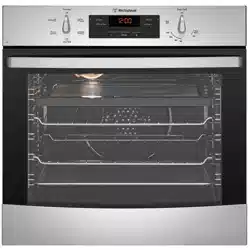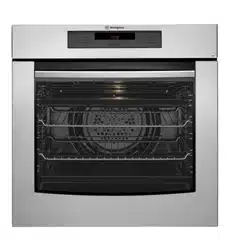

BUILT-IN COOKING APPLIANCES
USER MANUAL
POR663, PORS663L/R, POR667, POR668,
PORS668L/R, POR783, POR881, POR883,
PPR776, PGR657, PGR659, PXR688,
PXR698, PDR790, PDR794

2 3
SAFETYCONTENTS
Please read the user manual carefully and store in a handy
place for later reference.
The symbols you will see in this booklet have these meanings:
WARNING
This symbol indicates information concerning your personal safety
CAUTION
This symbol indicates information on how to avoid damaging
the appliance
TIPS & INFORMA
TION
This symbol indicates tips and information about use of the appliance
E
VIRONMENTAL TIPS
This symbol indicates tips and information about economical and
ecological use of the appliance
This symbol indicates never to do this
TIPS & INFORMA
TION
IMPORTANT – CHECK FOR ANY DAMAGES OR MARKS
If you find the oven is damaged or marked, you must report it
within 7 days if you wish to claim for damage/marks under the
manufacturers warranty. This does not affect your statutory rights.
ENVIRONMENTAL TIPS
INFORMATION ON DISPOSAL FOR USERS
•Allofthepackagingmaterialsarerecyclable.
Please dispose of those materials through your local
recycling depot or by placing them in appropriate
collection containers.
•Ifyouwishtodiscardthisproduct,pleasecontactyour
local authorities and ask for the correct method of disposal.
WARNING
•Thisapplianceisnotintendedforusebypersons
(including children) with reduced physical, sensory
or mental capabilities, or lack of experience and
knowledge, unless they have been given supervision or
instruction concerning use of the appliance by a person
responsible for their safety. Children should be supervised
to ensure that they do not play with appliance.
•Duringuse,thisappliancebecomeshot.Careshould
be taken to avoid touching hot surfaces, e.g.oven door,
heating elements.
•Thisappliancemustnotbeusedasaspaceheater.
•Inordertoavoidafire,theappliancemustbekept
clean and vents kept unobstructed.
•Donotsprayaerosolsinthevicinity
of the appliance during operation.
•Donotstoreflammablematerialsin
orundertheappliance,e.g.Aerosols.
•Accessiblepartswillbecomehotwheninuse.
To avoid burns and scalds, children should be kept away.
•Donotlinethebottomoftheovenorgrillwithfoilor
cookware. It will damage the enamel on the inside of
the oven cavity.
IMPORTANT SAFETY INSTRUCTIONS
Important safety instructions .............................................................. 3
Description of your appliance ............................................................. 5
POR663 ....................................................................................... 5
PORS663 ..................................................................................... 5
POR667 ....................................................................................... 5
POR668 ....................................................................................... 5
PORS668 ..................................................................................... 5
POR881 ....................................................................................... 5
POR783 ....................................................................................... 5
POR883 ....................................................................................... 5
PPR776 ....................................................................................... 5
PGR657 ....................................................................................... 6
PGR659 ....................................................................................... 6
PXR688 ....................................................................................... 6
PXR698 ....................................................................................... 6
PDR790 ....................................................................................... 6
PDR794 ....................................................................................... 6
Before operating your appliance for the first time ............................... 7
Setting the time .......................................................................... 7
Preparing your appliance for the first time .................................. 7
Installing your oven accessories ................................................. 8
Using your oven ................................................................................ 10
Using your cooktop ........................................................................... 14
Cooking with your timer .................................................................... 16
Cooking guide ................................................................................... 22
Grilling guide .................................................................................... 24
Dealing with cooking problems ......................................................... 25
Cleaning your appliance .................................................................... 26
Solving problems .............................................................................. 37
Installation ........................................................................................ 38
Warranty ............................................................................................ 43
Dearcustomer,
Congratulations on the purchase of your new oven.
Follow the instructions below to ensure that your oven is
installed with oven accessories fitted correctly for safety,
and you get enjoyment from using it.
To avoid the risks that are always present when you use
an electric appliance, it is important that the appliance is
installed correctly and that you read the safety instructions
carefully to avoid misuse and hazards.
We recommend that you keep this instruction booklet
for future reference and pass it on to any future owners.
Afterunpackingtheappliance,pleasecheckitisnot
damaged. If in doubt, do not use the appliance but
contact your local Customer Care Centre. For contact
details, refer to the last page of this user manual.
ThisappliancecomplieswithrequirementsofAustralian
StandardAS/NZS60335.2.6
CoNDITIoNSofUSe
This appliance is intended to be used in household
and similar applications such as:
•Staffkitchenareasinshops,officesandother
working environments
•farmhouses
•Byclientsinhotels,motelsandotherresidential
type environments
•Bedandbreakfasttypeenvironments.
Record model and serial number here:
Model:.................................................
Serial No:.............................................
CONTENTSCONGRATULATIONS
2 3
SAFETYCONTENTS
Please read the user manual carefully and store in a handy
place for later reference.
The symbols you will see in this booklet have these meanings:
WARNING
This symbol indicates information concerning your personal safety
CAUTION
This symbol indicates information on how to avoid damaging
the appliance
TIPS & INFORMA
TION
This symbol indicates tips and information about use of the appliance
E
VIRONMENTAL TIPS
This symbol indicates tips and information about economical and
ecological use of the appliance
This symbol indicates never to do this
TIPS & INFORMA
TION
IMPORTANT – CHECK FOR ANY DAMAGES OR MARKS
If you find the oven is damaged or marked, you must report it
within 7 days if you wish to claim for damage/marks under the
manufacturers warranty. This does not affect your statutory rights.
ENVIRONMENTAL TIPS
INFORMATION ON DISPOSAL FOR USERS
•Allofthepackagingmaterialsarerecyclable.
Please dispose of those materials through your local
recycling depot or by placing them in appropriate
collection containers.
•Ifyouwishtodiscardthisproduct,pleasecontactyour
local authorities and ask for the correct method of disposal.
WARNING
•Thisapplianceisnotintendedforusebypersons
(including children) with reduced physical, sensory
or mental capabilities, or lack of experience and
knowledge, unless they have been given supervision or
instruction concerning use of the appliance by a person
responsible for their safety. Children should be supervised
to ensure that they do not play with appliance.
•Duringuse,thisappliancebecomeshot.Careshould
be taken to avoid touching hot surfaces, e.g.oven door,
heating elements.
•Thisappliancemustnotbeusedasaspaceheater.
•Inordertoavoidafire,theappliancemustbekept
clean and vents kept unobstructed.
•Donotsprayaerosolsinthevicinity
of the appliance during operation.
•Donotstoreflammablematerialsin
orundertheappliance,e.g.Aerosols.
•Accessiblepartswillbecomehotwheninuse.
To avoid burns and scalds, children should be kept away.
•Donotlinethebottomoftheovenorgrillwithfoilor
cookware. It will damage the enamel on the inside of
the oven cavity.
IMPORTANT SAFETY INSTRUCTIONS
Important safety instructions .............................................................. 3
Description of your appliance ............................................................. 5
POR663 ....................................................................................... 5
PORS663 ..................................................................................... 5
POR667 ....................................................................................... 5
POR668 ....................................................................................... 5
PORS668 ..................................................................................... 5
POR881 ....................................................................................... 5
POR783 ....................................................................................... 5
POR883 ....................................................................................... 5
PPR776 ....................................................................................... 5
PGR657 ....................................................................................... 6
PGR659 ....................................................................................... 6
PXR688 ....................................................................................... 6
PXR698 ....................................................................................... 6
PDR790 ....................................................................................... 6
PDR794 ....................................................................................... 6
Before operating your appliance for the first time ............................... 7
Setting the time .......................................................................... 7
Preparing your appliance for the first time .................................. 7
Installing your oven accessories ................................................. 8
Using your oven ................................................................................ 10
Using your cooktop ........................................................................... 14
Cooking with your timer .................................................................... 16
Cooking guide ................................................................................... 22
Grilling guide .................................................................................... 24
Dealing with cooking problems ......................................................... 25
Cleaning your appliance .................................................................... 26
Solving problems .............................................................................. 37
Installation ........................................................................................ 38
Warranty ............................................................................................ 43
Dearcustomer,
Congratulations on the purchase of your new oven.
Follow the instructions below to ensure that your oven is
installed with oven accessories fitted correctly for safety,
and you get enjoyment from using it.
To avoid the risks that are always present when you use
an electric appliance, it is important that the appliance is
installed correctly and that you read the safety instructions
carefully to avoid misuse and hazards.
We recommend that you keep this instruction booklet
for future reference and pass it on to any future owners.
Afterunpackingtheappliance,pleasecheckitisnot
damaged. If in doubt, do not use the appliance but
contact your local Customer Care Centre. For contact
details, refer to the last page of this user manual.
ThisappliancecomplieswithrequirementsofAustralian
StandardAS/NZS60335.2.6
CoNDITIoNSofUSe
This appliance is intended to be used in household
and similar applications such as:
•Staffkitchenareasinshops,officesandother
working environments
•farmhouses
•Byclientsinhotels,motelsandotherresidential
type environments
•Bedandbreakfasttypeenvironments.
Record model and serial number here:
Model:.................................................
Serial No:.............................................
CONTENTSCONGRATULATIONS
4 5
DESCRIPTIONSA FETY
WARNING
COOKTOPS
Donotallowpotstoboildry,asdamagetoboth
pan and cooktop may result.
Donotoperatethecooktopforanextendedperiod
of time without a utensil on the hot plate.
Donotallowlargecookwaretooverhangthe
cooktop onto the adjacent benchtop. This will cause
scorching to the benchtop surface.
If the ceramic glass is accidentally cracked, switch off
the appliance to avoid the possibility of electric shock.
Donotplaceheatresistantmats,wirematsor
aluminium foil under pots or pans.
Donotcookfooddirectlyontheceramicglasssurface.
Donotuseroundbottomwoks,wokstandsorsimilar
utensils that could lead to over heating of hotplates
and possible damage to the cooking surface.
INSTALLATION, CLEANING AND SERVICING
Anauthorisedpersonmustinstallthisappliance.
(Certificate of Compliance to be retained)
Beforeusingtheappliance,ensurethatallpacking
materials are removed from the appliance.
In order to avoid any potential hazard, the enclosed
installation instructions must be followed.
ensurethatallspecifiedvents,openingsand
airspaces are not blocked.
Where the appliance is built into a cabinet, the cabinet
materialmustbecapableofwithstanding70°C.
Only authorised personnel should carry out
servicing. (Certificate of Compliance to be retained)
Alwaysensuretheapplianceisswitchedoffbefore
cleaning or replacing parts.
Donotusesteamcleaners,asthismaycause
moisture build up.
Alwayscleantheapplianceimmediatelyafterany
food spillage.
To maintain safe operation, it is recommended that
the product be inspected every five years by an
authorised serviceperson.
This appliance must be earthed.
WARNING
GRILL
The grill door must be left fully open whilst grilling
in a separate grill wall oven.
The grill drawer must be left approximately two
finger widths ajar whilst grilling in a separate grill
underbench oven.
Alwaysturnthegrilloffimmediatelyafteruseasfat
left there may catch fire.
Donotcovertheinsertwithfoil,asfatlefttheremay
catch fire.
Alwayskeepthegrilldishcleanasanyfatleftmay
catch fire.
Donotleavethegrillonunattended.
To avoid a fire, ensure that grill trays and fittings are
always inserted into the appliance in accordance
with the instructions.
Donotplacethickportionsoffoodunderthegrill.
Foods may curl, catch and ignite.
Accessiblepartsmaybecomehotwhengrill
is in use. Children should be kept away.
OVEN
Duringusetheappliancebecomeshot.Careshould
be taken to avoid touching the hot surfaces inside
the oven.
Switch the appliance off before removing the oven
light glass for globe replacement.
To avoid an accident, ensure that oven shelves and
fittings are always inserted into the appliance in
accordance with the instructions.
Donotusethedoorasashelf.
Donotpushdownontheopenovendoor.
Donotuseharshabrasivecleanersorsharpmetal
scrapers to clean the oven door glass since they
can scratch the surface, which may result in
shattering of the glass.
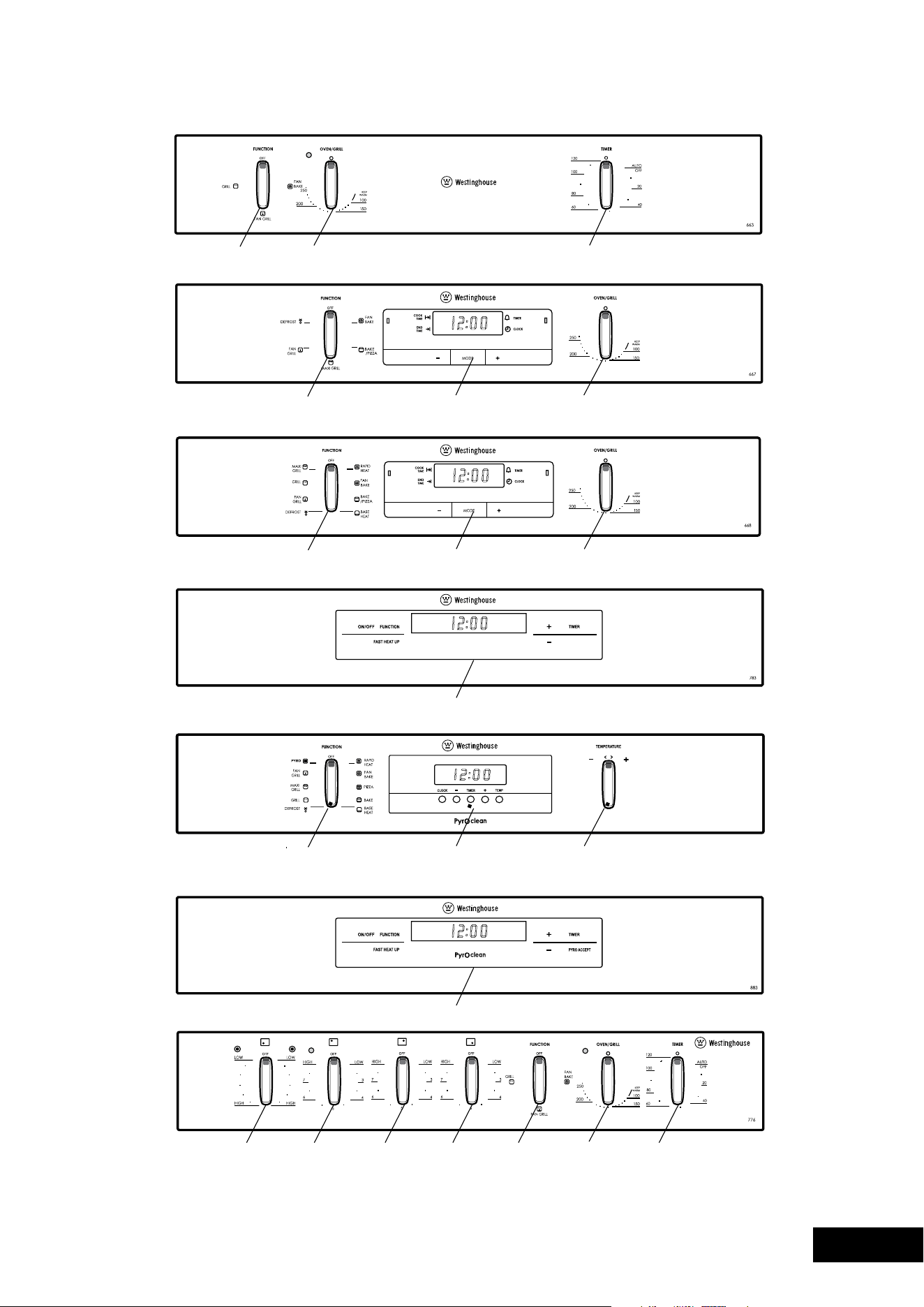
POR663
PORS663
Function
selector
2hour‘Auto
Off’ timer
Oven/Grill
temperature selector
POR667
Function
selector
electronic
clock
Oven/Grill
temperature selector
POR881
Function
selector
electronic
clock
Temperature
selector
POR668
PORS668
Function
selector
electronic
clock
Oven/Grill
temperature selector
PPR776
Left front Right rearLeft rear Right front Function
selector
2hour
‘Autooff’
timer
Oven/Grill
temperature
selector
POR783
Programmable controller
POR883
Programmable controller
IMPORTANT SAFETY INSTRUCTIONS
4 5
DESCRIPTIONSA FETY
WARNING
COOKTOPS
Donotallowpotstoboildry,asdamagetoboth
pan and cooktop may result.
Donotoperatethecooktopforanextendedperiod
of time without a utensil on the hot plate.
Donotallowlargecookwaretooverhangthe
cooktop onto the adjacent benchtop. This will cause
scorching to the benchtop surface.
If the ceramic glass is accidentally cracked, switch off
the appliance to avoid the possibility of electric shock.
Donotplaceheatresistantmats,wirematsor
aluminium foil under pots or pans.
Donotcookfooddirectlyontheceramicglasssurface.
Donotuseroundbottomwoks,wokstandsorsimilar
utensils that could lead to over heating of hotplates
and possible damage to the cooking surface.
INSTALLATION, CLEANING AND SERVICING
Anauthorisedpersonmustinstallthisappliance.
(Certificate of Compliance to be retained)
Beforeusingtheappliance,ensurethatallpacking
materials are removed from the appliance.
In order to avoid any potential hazard, the enclosed
installation instructions must be followed.
ensurethatallspecifiedvents,openingsand
airspaces are not blocked.
Where the appliance is built into a cabinet, the cabinet
materialmustbecapableofwithstanding70°C.
Only authorised personnel should carry out
servicing. (Certificate of Compliance to be retained)
Alwaysensuretheapplianceisswitchedoffbefore
cleaning or replacing parts.
Donotusesteamcleaners,asthismaycause
moisture build up.
Alwayscleantheapplianceimmediatelyafterany
food spillage.
To maintain safe operation, it is recommended that
the product be inspected every five years by an
authorised serviceperson.
This appliance must be earthed.
WARNING
GRILL
The grill door must be left fully open whilst grilling
in a separate grill wall oven.
The grill drawer must be left approximately two
finger widths ajar whilst grilling in a separate grill
underbench oven.
Alwaysturnthegrilloffimmediatelyafteruseasfat
left there may catch fire.
Donotcovertheinsertwithfoil,asfatlefttheremay
catch fire.
Alwayskeepthegrilldishcleanasanyfatleftmay
catch fire.
Donotleavethegrillonunattended.
To avoid a fire, ensure that grill trays and fittings are
always inserted into the appliance in accordance
with the instructions.
Donotplacethickportionsoffoodunderthegrill.
Foods may curl, catch and ignite.
Accessiblepartsmaybecomehotwhengrill
is in use. Children should be kept away.
OVEN
Duringusetheappliancebecomeshot.Careshould
be taken to avoid touching the hot surfaces inside
the oven.
Switch the appliance off before removing the oven
light glass for globe replacement.
To avoid an accident, ensure that oven shelves and
fittings are always inserted into the appliance in
accordance with the instructions.
Donotusethedoorasashelf.
Donotpushdownontheopenovendoor.
Donotuseharshabrasivecleanersorsharpmetal
scrapers to clean the oven door glass since they
can scratch the surface, which may result in
shattering of the glass.
POR663
PORS663
Function
selector
2hour‘Auto
Off’ timer
Oven/Grill
temperature selector
POR667
Function
selector
electronic
clock
Oven/Grill
temperature selector
POR881
Function
selector
electronic
clock
Temperature
selector
POR668
PORS668
Function
selector
electronic
clock
Oven/Grill
temperature selector
PPR776
Left front Right rearLeft rear Right front Function
selector
2hour
‘Autooff’
timer
Oven/Grill
temperature
selector
POR783
Programmable controller
POR883
Programmable controller
IMPORTANT SAFETY INSTRUCTIONS
6 7
OPERATIONDESCRIPT ION
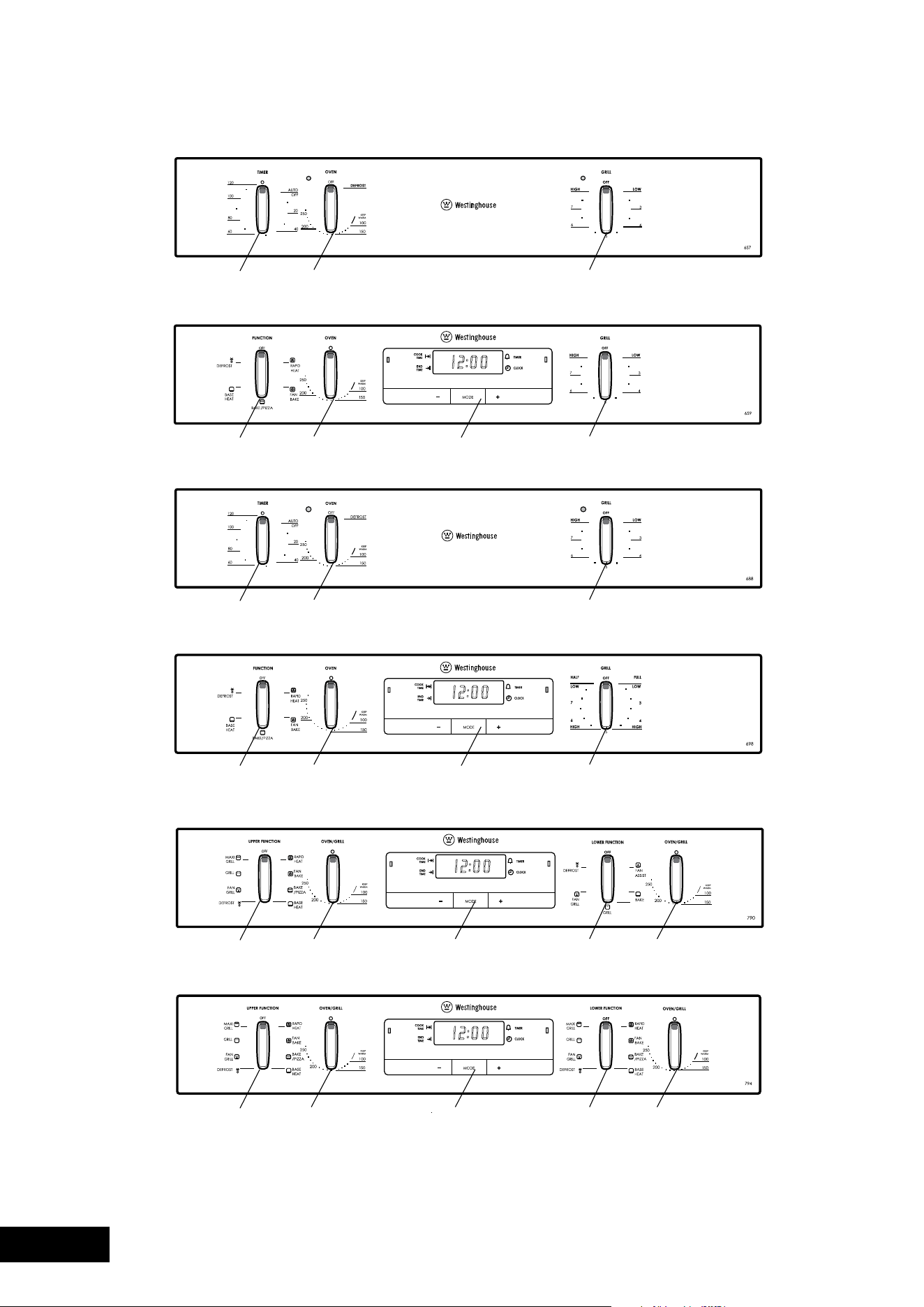
2hour‘Auto
Off’ timer
Grill
temperature selector
Oven
temperature selector
BEFORE OPERATING YOUR APPLIANCE
FOR THE FIRST TIME
TIPS & INFORMA
TION
SETTING THE TIME
If you have purchased a model fitted with an electronic or
programmable timer, you mUST set the time of day before
you can operate your appliance.
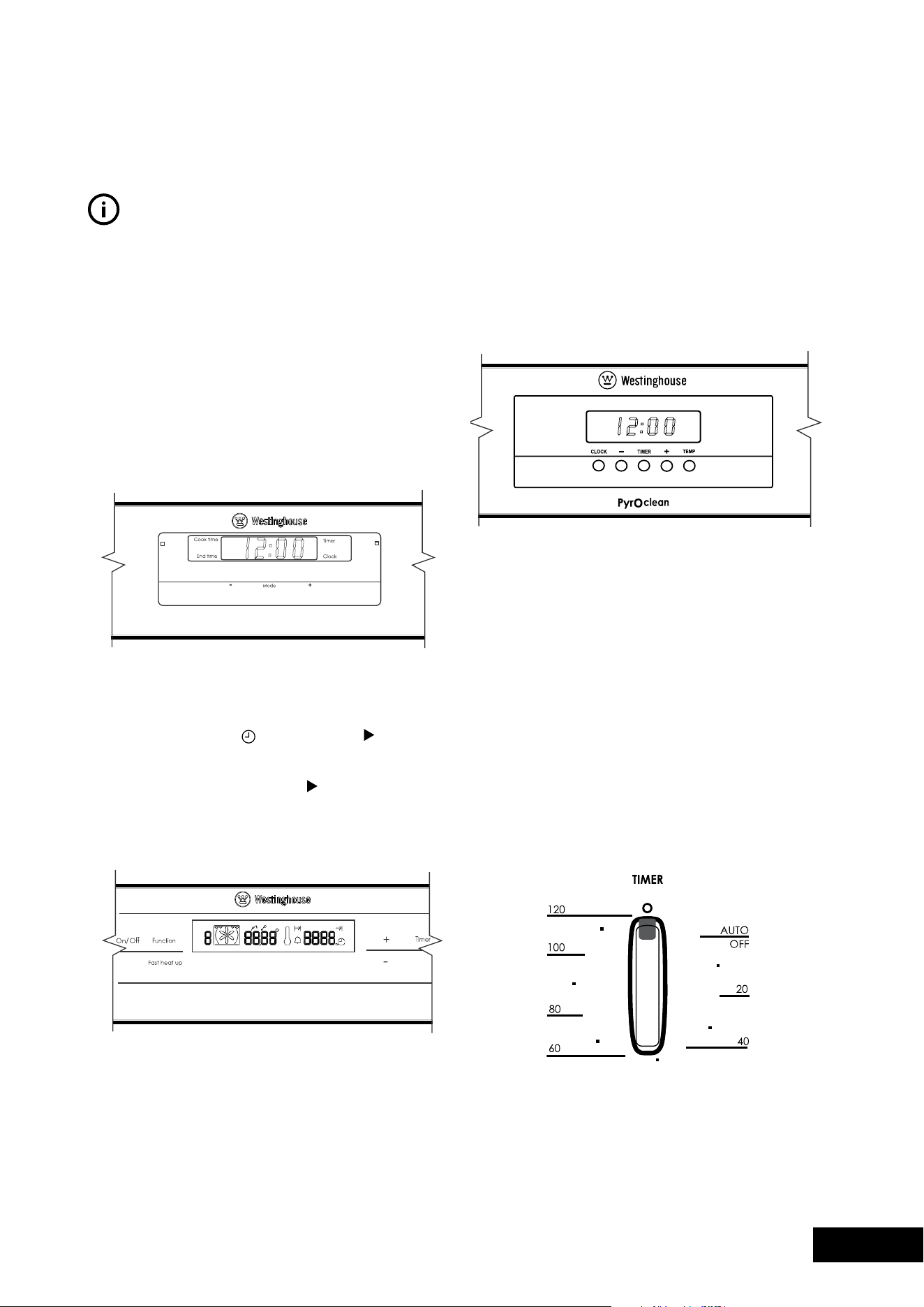
ELECTRONIC CLOCK
•Aftertheappliancehasbeenelectricallyconnected
“12.00”willbedisplayedandthe“clock”indicator
will flash.
•Tosetthetimeofday,press–or+.5secondsafter
thelastchange,the“clock”indicatorwilldisappear,
confirming the time has been set.
•
Note: The clock has a 24-hour display.
PROGRAMMABLE CONTROLLER
•Aftertheappliancehasbeenelectricallyconnected,
the set clock symbol
and timer arrow
will flash
on the clock display.
•Tosetthetimeofday,press–or+.5secondsafter
the last change the timer arrow
will disappear,
confirming the time has been set. Once the time has
been entered, the clock advances minute by minute.
•NoTe:Theclockhasa24-hourdisplay.
SETTING THE TIME FOR POR881 AND POR883
Whenpowerissuppliedtoyouroven“12.00“willbe
displayed on the clock and the display will flash.
•Tosetthetimeofdayhours,press–or+,thenpress
CLOCK and the seconds will begin to flash which can
betsetbypressingthe–or+buttons.5secondsafter
the last change, the clock display will stop flashing,
confirming that the time has been set.
Note: The clock has a 24-hour display.
PREPARING YOUR APPLIANCE FOR THE FIRST TIME
•Pleaseremoveallinternalboxesandbagsfromthe
oven before operation.
•Pleasewipeouttheoveninteriorpriortooperation
with warm soapy water and polish dry with a soft
cleancloth.Donotclosetheovendooruntilthe
oven is completely dry.
•Newappliancescanhaveanodourduringfirst
operation.Itisrecommendedto‘runin’youroven
before you cook for the first time. Run the oven at
180ºCfor2-4hoursandensurethattheroomis
well ventilated.
•DoNoTlinetheovenwithfoil,itwilldamage
the enamel.
•Ifyourapplianceisfittedwitha2-hour“Autooff”
timer,makesureitissettothe‘off’markerfor
manual operation. See image.
PGR657
2hour‘Auto
Off’ timer
Grill
temperature selector
Oven
temperature selector
PGR659
PDR790
PDR794
Function
selector
Function
selector
Function
selector
Function
selector
Function
selector
electronic
clock
Grill
temperature selector
Oven
temperature selector
PXR688
Function
selector
electronic
clock
Grill
temperature selector
Oven
temperature selector
PXR698
Oven/Grill
temperature selector
Oven/Grill
temperature selector
Oven/Grill
temperature selector
Oven/Grill
temperature selector
electronicclock
electronicclock
6 7
OPERATIONDESCRIPT ION
2hour‘Auto
Off’ timer
Grill
temperature selector
Oven
temperature selector
BEFORE OPERATING YOUR APPLIANCE
FOR THE FIRST TIME
TIPS & INFORMA
TION
SETTING THE TIME
If you have purchased a model fitted with an electronic or
programmable timer, you mUST set the time of day before
you can operate your appliance.
ELECTRONIC CLOCK
•Aftertheappliancehasbeenelectricallyconnected
“12.00”willbedisplayedandthe“clock”indicator
will flash.
•Tosetthetimeofday,press–or+.5secondsafter
thelastchange,the“clock”indicatorwilldisappear,
confirming the time has been set.
•
Note: The clock has a 24-hour display.
PROGRAMMABLE CONTROLLER
•Aftertheappliancehasbeenelectricallyconnected,
the set clock symbol
and timer arrow
will flash
on the clock display.
•Tosetthetimeofday,press–or+.5secondsafter
the last change the timer arrow
will disappear,
confirming the time has been set. Once the time has
been entered, the clock advances minute by minute.
•NoTe:Theclockhasa24-hourdisplay.
SETTING THE TIME FOR POR881 AND POR883
Whenpowerissuppliedtoyouroven“12.00“willbe
displayed on the clock and the display will flash.
•Tosetthetimeofdayhours,press–or+,thenpress
CLOCK and the seconds will begin to flash which can
betsetbypressingthe–or+buttons.5secondsafter
the last change, the clock display will stop flashing,
confirming that the time has been set.
Note: The clock has a 24-hour display.
PREPARING YOUR APPLIANCE FOR THE FIRST TIME
•Pleaseremoveallinternalboxesandbagsfromthe
oven before operation.
•Pleasewipeouttheoveninteriorpriortooperation
with warm soapy water and polish dry with a soft
cleancloth.Donotclosetheovendooruntilthe
oven is completely dry.
•Newappliancescanhaveanodourduringfirst
operation.Itisrecommendedto‘runin’youroven
before you cook for the first time. Run the oven at
180ºCfor2-4hoursandensurethattheroomis
well ventilated.
•DoNoTlinetheovenwithfoil,itwilldamage
the enamel.
•Ifyourapplianceisfittedwitha2-hour“Autooff”
timer,makesureitissettothe‘off’markerfor
manual operation. See image.
PGR657
2hour‘Auto
Off’ timer
Grill
temperature selector
Oven
temperature selector
PGR659
PDR790
PDR794
Function
selector
Function
selector
Function
selector
Function
selector
Function
selector
electronic
clock
Grill
temperature selector
Oven
temperature selector
PXR688
Function
selector
electronic
clock
Grill
temperature selector
Oven
temperature selector
PXR698
Oven/Grill
temperature selector
Oven/Grill
temperature selector
Oven/Grill
temperature selector
Oven/Grill
temperature selector
electronicclock
electronicclock
8 9
INSTALLATIONINSTALLATION
INSTALLING YOUR OVEN ACCESSORIES INSTALLING YOUR OVEN ACCESSORIES
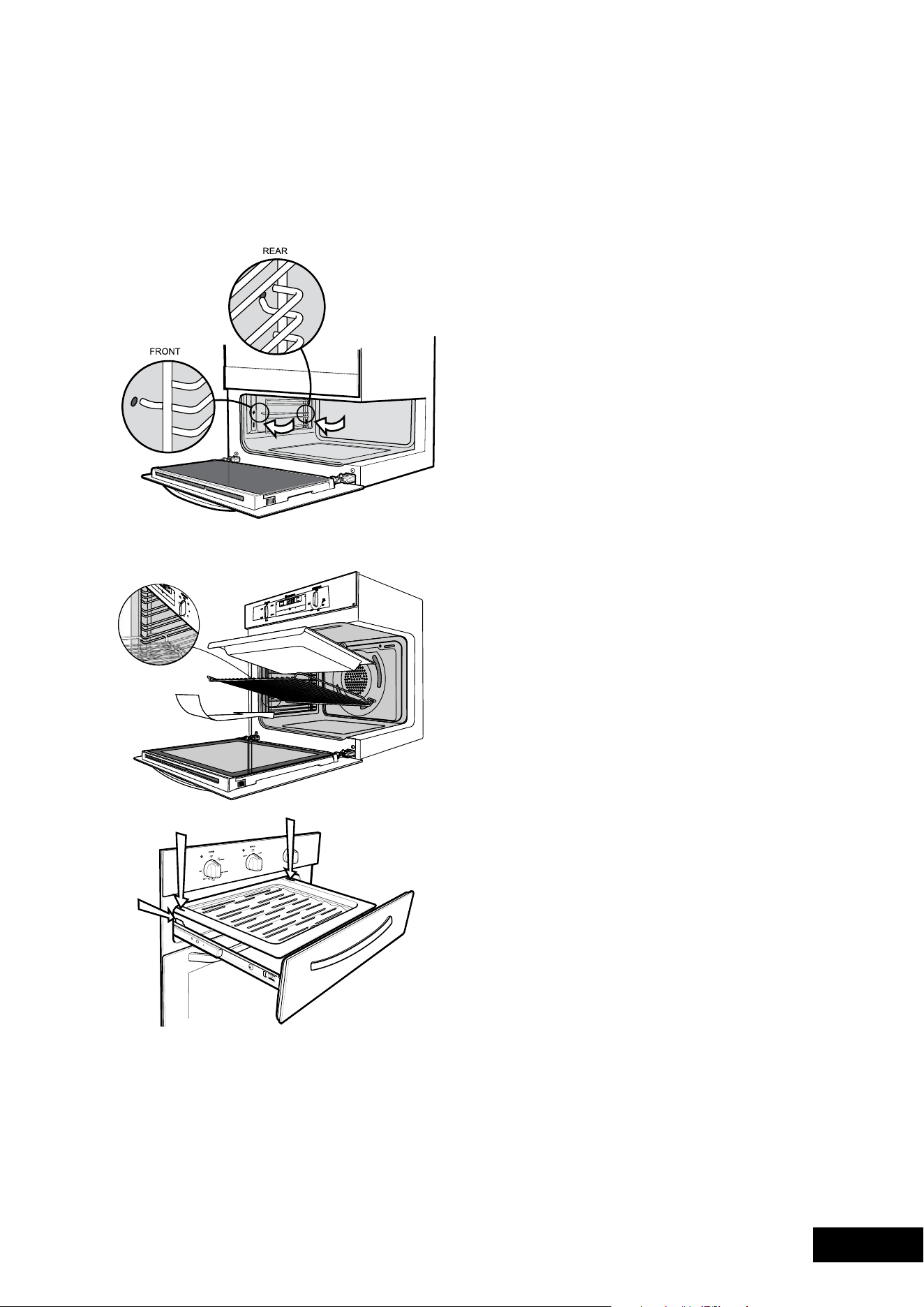
•Whenlocatingthesideracksintothesmallovenorgrill
ensure the left pegs go into the upper two access holes.
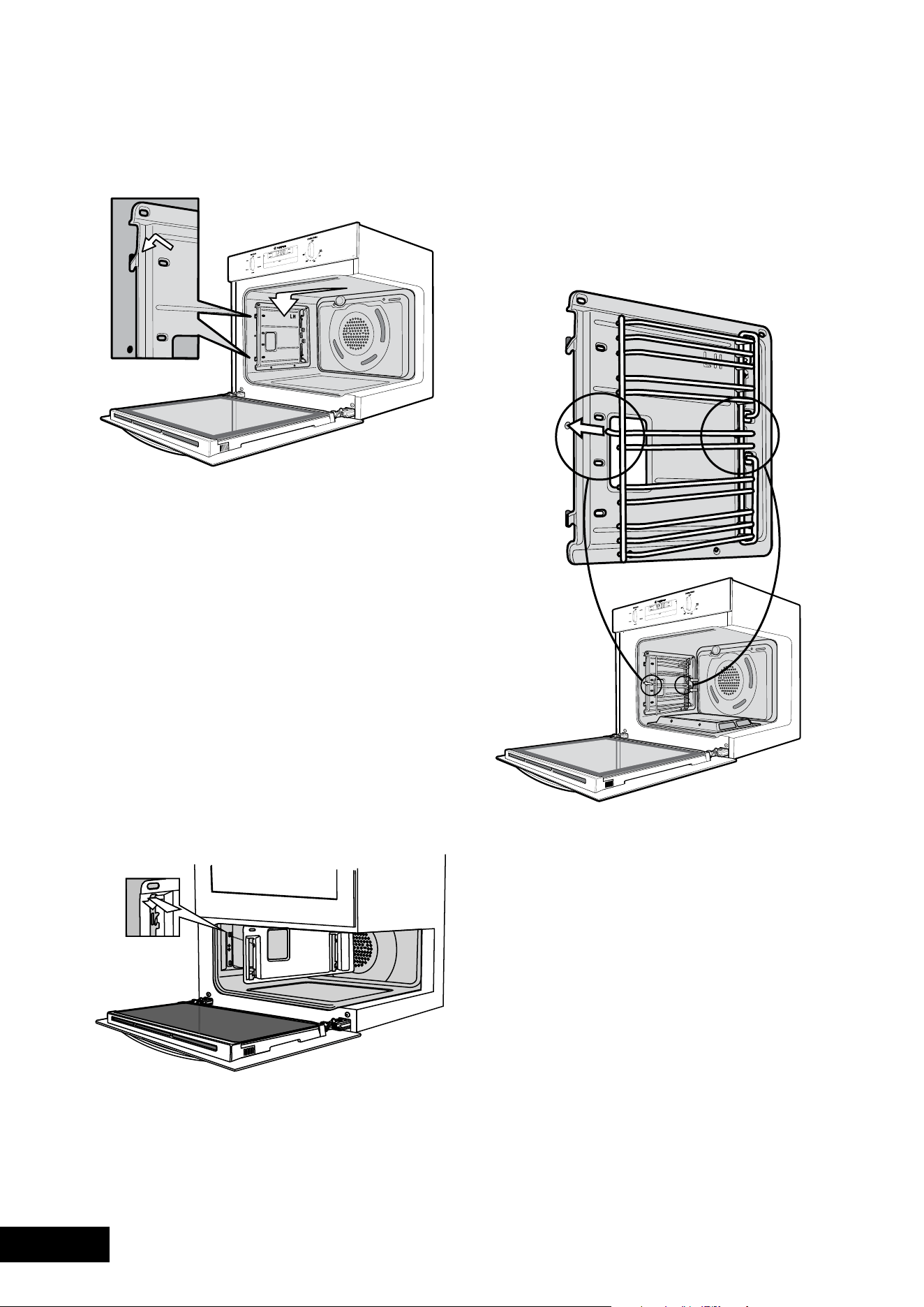
1. Catalytic liners (on selected models)
Catalytic liners are coated with a specially formulated enamel
coating.Thisporouscoatingenablesthe“selfcleaning”
process–seepage26formoredetails.Catalyticliners
must be installed first but you can omit them, if you wish,
with no effect to cooking performance. Their sole purpose
is to make oven cleaning easier.
•Thecatalyticlinerswillattachtoeachsideofyour
oven. There will be a left hand and right hand version.
This is marked on the panel.
•Positionthefirstlinerasperthediagram.Theblack,
shiny side of the liner should be facing the oven wall,
thehookspointingdownandtheword‘LH’positioned
to the top rear portion of the oven. The right hand side
will be a mirror image of this.
•Linethehooksupwiththeslotsprovidedintheoven
wall, push them in and then allow the liner to slide
down to its final position.
•Theaccessholeforthesideracksshouldbevisible
whenthelineriscorrectlypositioned–seediagram.
2. Side racks
•Insertthetwinpeggedsideintotherearaccess
holes provided, ensuring pegs are fully inserted.
•Thenlocatethefrontpegintothefrontaccesshole
and push in firmly.
3. Shelves and trays (excluding POR881)
The shelves are designed so that they have maximum travel
but cannot be accidentally pulled right out. The trays are
designed the same way and fit straight into the side racks.
•Locatetherearedgeoftheshelf/trayinbetween
2guiderailsofthesiderack–seediagram.ensure
the same rail positions on both sides of the oven are
being engaged.
•Withthefrontedgeraised,begintoslidetheshelf
into the oven.
•oncethedetentshavepassedthefrontedgeofthe
side rack, the shelf can be pushed completely in.
•Whenfullyinsertedtheshelf/trayshouldnotinterfere
with the closed oven door.
•Toinsertthegrilltrayinaseparategrillunderbench
product, fully open the drawer and position the tray
so that the slots on the outer edges fit over the tabs
on the slides.
• Removeextratraysanddishesbeforeroastingorbaking.
Shelves and trays (POR881 only)
Yourovencomeswithformed“easyclean”runners.
The shelves are designed to travel freely on runners without
being pulled out accidentally. Make sure you have the shelf
in the correct orientation before you slide it in. Otherwise it
could become jammed.
•Locatetherearedgeoftheshelfintherecessbetween
2formedrunner.
Note: The Top ‘Ledge’ is not a shelf position
•Withthefrontedgeraised,begintoslidetheshelfinto
the oven. Lower the front edge as you push the shelf
completely in.
•Thegrill/bakingtrayforunderbenchovenmodelssits
into a wire carrier that fits into the oven exactly like
the shelves.
•Thegrill/bakingtrayforseparategrillwallovenmodels
slides into the wire runners in a similar manner.
•Whenfullyinserted,theshelf/trayshouldnotinterfere
with the closed oven door.
8 9
INSTALLATIONINSTALLATION
INSTALLING YOUR OVEN ACCESSORIES INSTALLING YOUR OVEN ACCESSORIES
•Whenlocatingthesideracksintothesmallovenorgrill
ensure the left pegs go into the upper two access holes.
1. Catalytic liners (on selected models)
Catalytic liners are coated with a specially formulated enamel
coating.Thisporouscoatingenablesthe“selfcleaning”
process–seepage26formoredetails.Catalyticliners
must be installed first but you can omit them, if you wish,
with no effect to cooking performance. Their sole purpose
is to make oven cleaning easier.
•Thecatalyticlinerswillattachtoeachsideofyour
oven. There will be a left hand and right hand version.
This is marked on the panel.
•Positionthefirstlinerasperthediagram.Theblack,
shiny side of the liner should be facing the oven wall,
thehookspointingdownandtheword‘LH’positioned
to the top rear portion of the oven. The right hand side
will be a mirror image of this.
•Linethehooksupwiththeslotsprovidedintheoven
wall, push them in and then allow the liner to slide
down to its final position.
•Theaccessholeforthesideracksshouldbevisible
whenthelineriscorrectlypositioned–seediagram.
2. Side racks
•Insertthetwinpeggedsideintotherearaccess
holes provided, ensuring pegs are fully inserted.
•Thenlocatethefrontpegintothefrontaccesshole
and push in firmly.
3. Shelves and trays (excluding POR881)
The shelves are designed so that they have maximum travel
but cannot be accidentally pulled right out. The trays are
designed the same way and fit straight into the side racks.
•Locatetherearedgeoftheshelf/trayinbetween
2guiderailsofthesiderack–seediagram.ensure
the same rail positions on both sides of the oven are
being engaged.
•Withthefrontedgeraised,begintoslidetheshelf
into the oven.
•oncethedetentshavepassedthefrontedgeofthe
side rack, the shelf can be pushed completely in.
•Whenfullyinsertedtheshelf/trayshouldnotinterfere
with the closed oven door.
•Toinsertthegrilltrayinaseparategrillunderbench
product, fully open the drawer and position the tray
so that the slots on the outer edges fit over the tabs
on the slides.
• Removeextratraysanddishesbeforeroastingorbaking.
Shelves and trays (POR881 only)
Yourovencomeswithformed“easyclean”runners.
The shelves are designed to travel freely on runners without
being pulled out accidentally. Make sure you have the shelf
in the correct orientation before you slide it in. Otherwise it
could become jammed.
•Locatetherearedgeoftheshelfintherecessbetween
2formedrunner.
Note: The Top ‘Ledge’ is not a shelf position
•Withthefrontedgeraised,begintoslidetheshelfinto
the oven. Lower the front edge as you push the shelf
completely in.
•Thegrill/bakingtrayforunderbenchovenmodelssits
into a wire carrier that fits into the oven exactly like
the shelves.
•Thegrill/bakingtrayforseparategrillwallovenmodels
slides into the wire runners in a similar manner.
•Whenfullyinserted,theshelf/trayshouldnotinterfere
with the closed oven door.
10 11
USAGEUSAGE
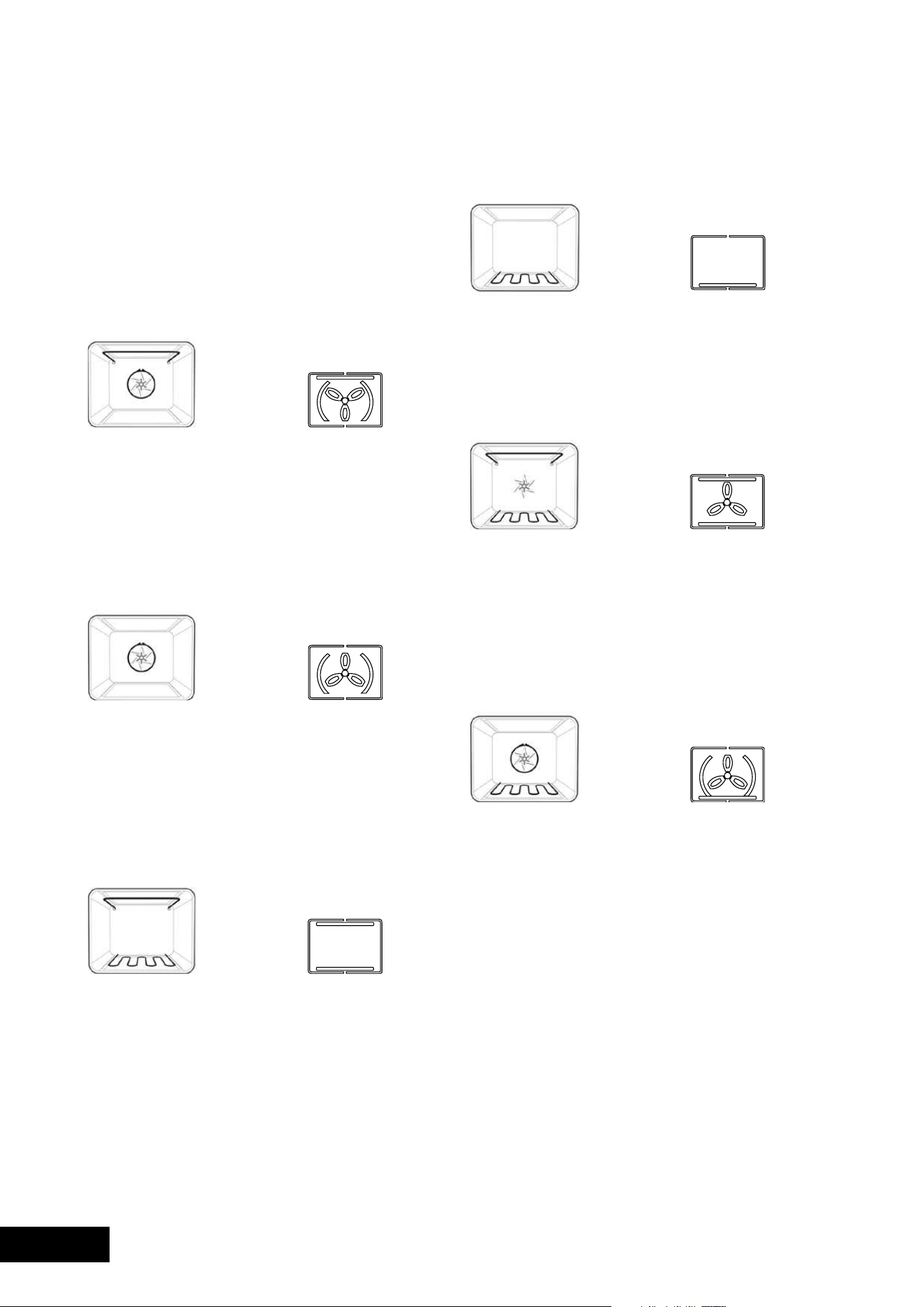
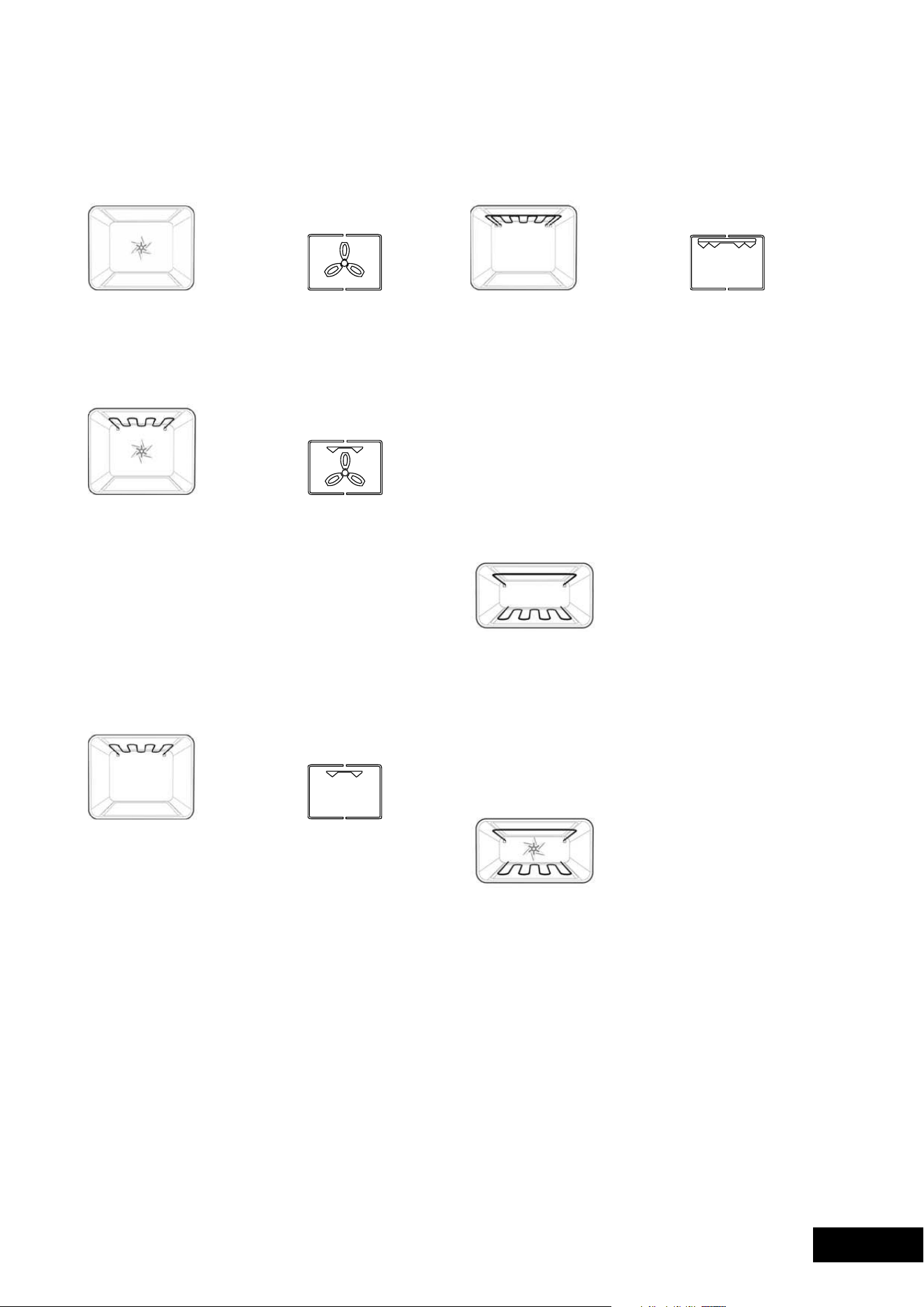
Function 7
Defrost
The“defrost”functionuseslowtemperatureairthatis
circulated by the fan. You can defrost (thaw) your food
beforeyoucookit.Youcanalsouse“defrost”toraise
your yeast dough and to dry fruit, vegetables and herbs.
Function 8
Fan Grill
“fangrill”offersyouthebenefitsofboth“bake”and
traditional“grill”functions.Thegrillelementturnsonandoff
to maintain the set temperature while the fan circulates the
heated air. The oven door remains closed for fan grill. You
canuse“fangrill”forlargecutsofmeatinthelargeoven
orsmallercutsintheminioven(Duoonly).Thisgivesyou
aresultthatissimilarto“rotisserie”cookedmeat.
Put your food on a shelf in the second lowest shelf position.
Put the grill dish on the lowest shelf position to catch any spills.
Whenusing“fangrill”itisnotnecessarytoturnthefood
overduringthecookingcycle.Settemperatureto180°C.
Function 9
Grill
The“grill”directsradiantheatfromthepowerfulupper
elementontothefood.Youcanusethe“grill”functionfor
tender cuts of meat, steak, chops, sausages, fish, cheese
toasties and other quick cooking foods. Grill with the oven
doorclosed.Preheatyourgrillfor3minutestogetthebest
results. This will help seal in the natural juices of steak, chops
etc. for a better flavour. You can slide your grill dish into either
ofthe2spaceswithintheupperpairsofsupportrails.
Function 10
Maxi Grill
“maxigrill”directsradiantheatfrom2powerfulupper
elementsontothefood.Youcanusethe“maxigrill”
function for tender cuts of meat, steak, chops, sausages,
fish, cheese toasties and other quick cooking foods.
Grill with the oven door closed.
“maxigrill”allowsyoutotakefulladvantageofthelarge
grilldishareaandwillcookfasterthannormal“grill”.forbest
resultsitisrecommendedtopreheatyourgrillfor3minutes.
This will help seal in the natural juices of steak, chops etc.
for a better flavour. You can slide your grill dish into either
ofthe2spaceswithintheupperpairsofsupportrails.
SMALL OVEN/GRILL
Bake (Duo oven only)
Heatcomesfromtwoelements,oneaboveandonebelow
the food. The bottom element is a clean heat element and
isbelowtheflooroftheoven.Bothelementsarecontrolled
by the thermostat and will turn on and off to maintain the
set temperature.
Youcanusethe“bake”functionforsingletraysofbiscuits,
scones, muffins, cakes, slices, casseroles, baked puddings,
roasts and delicate egg dishes.
Fan Assist (Duo oven only)
Heatcomesfromtheelementsaboveandbelowthefood.
The fan then circulates the hot air around the oven cavity
allowing for very even cooking.
USING YOUR OVEN USING YOUR OVEN
Understanding your oven functions
Your oven will have a selection of the following functions;
description and touch control symbol illustrated below.
Referto“Descriptionofyourappliance”(page5)toconfirm
what functions are available to you.
LARGE OVEN
Function 1
Rapid Heat
Heatcomesfromtheelementsurroundingthefanaswell
as the smaller element above the food. This allows you to
preheatyouroven30%quickerthanonstandard“bake”.
“Rapidheat”isidealforcookingfrozenpre-cookedfoods
such as savoury pastries, pizzas, mini meals (TV dinners),
meat pies and fruit pies. Simply place the food in the oven
straightfromthefreezerandheat–idealforbusypeople.
Cook in the upper half of the oven for best results.
Function 2
Fan Bake
Heatcomesfromtheelementsurroundingthefan.Thisfan
circulates the hot air around the oven cavity so that you can
put your food in different places in the oven and still cook
them at the same time.
Youcanusethe“fanbake”functionformulti-shelfcooking,
reheating cooked foods, pastries and complete oven meals.
It will cook at a lower temperature and be faster than baking.
Please note that some variation in browning is normal.
Function 3
Bake/Pizza
Heatcomesfromtwoelements,oneaboveandonebelow
the food. The bottom element is a clean heat element and
isbelowtheflooroftheoven.Bothelementsarecontrolled
by the thermostat and will turn on and off to maintain the
set temperature.
Youcanusethe“bake”functionforsingletraysofbiscuits,
scones, muffins, cakes, slices, casseroles, baked puddings,
roasts and delicate egg dishes.
Function 4
Base Heat
Heatcomesfromtheelementbelowthefood.Theelement
is controlled by the thermostat and will turn on and off to
maintainthesettemperature.The“baseheat”functioncanbe
used to add extra browning to the bases of pizzas, pies and
pastries. Cook in the lower half of the oven when you are
using only one shelf. For best results, use silver or shiny trays.
Function 5
Fan Assist
Heatcomesfromtwoelements,oneaboveandonebelow
the food. The fan circulates the hot air around the oven cavity
so that you can put the food in different places in the oven
and still cook them at the same time. You should only use
amaximumof2shelveswith“fanassist”.Donotusethe
bottom shelf. If two shelves are used, food on the shelf in the
higher position will cook first and should then be removed
to allow the food on the lower shelf to finish cooking.
Function 6
Pizza
“Pizza”isacombinationof“baseheat”and“fanbake”
and offers you the combined benefits of both functions.
Heatcomesfromtheelementsurroundingthefanaswellas
the clean heat element below the oven floor.
The“pizza”functionisidealforfoodsthatrequirecooking
and browning on the base. It is great for foods such as pizzas,
quiches, meat pies and fruit pies. Simply place the food in
the middle of the oven and set the desired temperature.
10 11
USAGEUSAGE
Function 7
Defrost
The“defrost”functionuseslowtemperatureairthatis
circulated by the fan. You can defrost (thaw) your food
beforeyoucookit.Youcanalsouse“defrost”toraise
your yeast dough and to dry fruit, vegetables and herbs.
Function 8
Fan Grill
“fangrill”offersyouthebenefitsofboth“bake”and
traditional“grill”functions.Thegrillelementturnsonandoff
to maintain the set temperature while the fan circulates the
heated air. The oven door remains closed for fan grill. You
canuse“fangrill”forlargecutsofmeatinthelargeoven
orsmallercutsintheminioven(Duoonly).Thisgivesyou
aresultthatissimilarto“rotisserie”cookedmeat.
Put your food on a shelf in the second lowest shelf position.
Put the grill dish on the lowest shelf position to catch any spills.
Whenusing“fangrill”itisnotnecessarytoturnthefood
overduringthecookingcycle.Settemperatureto180°C.
Function 9
Grill
The“grill”directsradiantheatfromthepowerfulupper
elementontothefood.Youcanusethe“grill”functionfor
tender cuts of meat, steak, chops, sausages, fish, cheese
toasties and other quick cooking foods. Grill with the oven
doorclosed.Preheatyourgrillfor3minutestogetthebest
results. This will help seal in the natural juices of steak, chops
etc. for a better flavour. You can slide your grill dish into either
ofthe2spaceswithintheupperpairsofsupportrails.
Function 10
Maxi Grill
“maxigrill”directsradiantheatfrom2powerfulupper
elementsontothefood.Youcanusethe“maxigrill”
function for tender cuts of meat, steak, chops, sausages,
fish, cheese toasties and other quick cooking foods.
Grill with the oven door closed.
“maxigrill”allowsyoutotakefulladvantageofthelarge
grilldishareaandwillcookfasterthannormal“grill”.forbest
resultsitisrecommendedtopreheatyourgrillfor3minutes.
This will help seal in the natural juices of steak, chops etc.
for a better flavour. You can slide your grill dish into either
ofthe2spaceswithintheupperpairsofsupportrails.
SMALL OVEN/GRILL
Bake (Duo oven only)
Heatcomesfromtwoelements,oneaboveandonebelow
the food. The bottom element is a clean heat element and
isbelowtheflooroftheoven.Bothelementsarecontrolled
by the thermostat and will turn on and off to maintain the
set temperature.
Youcanusethe“bake”functionforsingletraysofbiscuits,
scones, muffins, cakes, slices, casseroles, baked puddings,
roasts and delicate egg dishes.
Fan Assist (Duo oven only)
Heatcomesfromtheelementsaboveandbelowthefood.
The fan then circulates the hot air around the oven cavity
allowing for very even cooking.
USING YOUR OVEN USING YOUR OVEN
Understanding your oven functions
Your oven will have a selection of the following functions;
description and touch control symbol illustrated below.
Referto“Descriptionofyourappliance”(page5)toconfirm
what functions are available to you.
LARGE OVEN
Function 1
Rapid Heat
Heatcomesfromtheelementsurroundingthefanaswell
as the smaller element above the food. This allows you to
preheatyouroven30%quickerthanonstandard“bake”.
“Rapidheat”isidealforcookingfrozenpre-cookedfoods
such as savoury pastries, pizzas, mini meals (TV dinners),
meat pies and fruit pies. Simply place the food in the oven
straightfromthefreezerandheat–idealforbusypeople.
Cook in the upper half of the oven for best results.
Function 2
Fan Bake
Heatcomesfromtheelementsurroundingthefan.Thisfan
circulates the hot air around the oven cavity so that you can
put your food in different places in the oven and still cook
them at the same time.
Youcanusethe“fanbake”functionformulti-shelfcooking,
reheating cooked foods, pastries and complete oven meals.
It will cook at a lower temperature and be faster than baking.
Please note that some variation in browning is normal.
Function 3
Bake/Pizza
Heatcomesfromtwoelements,oneaboveandonebelow
the food. The bottom element is a clean heat element and
isbelowtheflooroftheoven.Bothelementsarecontrolled
by the thermostat and will turn on and off to maintain the
set temperature.
Youcanusethe“bake”functionforsingletraysofbiscuits,
scones, muffins, cakes, slices, casseroles, baked puddings,
roasts and delicate egg dishes.
Function 4
Base Heat
Heatcomesfromtheelementbelowthefood.Theelement
is controlled by the thermostat and will turn on and off to
maintainthesettemperature.The“baseheat”functioncanbe
used to add extra browning to the bases of pizzas, pies and
pastries. Cook in the lower half of the oven when you are
using only one shelf. For best results, use silver or shiny trays.
Function 5
Fan Assist
Heatcomesfromtwoelements,oneaboveandonebelow
the food. The fan circulates the hot air around the oven cavity
so that you can put the food in different places in the oven
and still cook them at the same time. You should only use
amaximumof2shelveswith“fanassist”.Donotusethe
bottom shelf. If two shelves are used, food on the shelf in the
higher position will cook first and should then be removed
to allow the food on the lower shelf to finish cooking.
Function 6
Pizza
“Pizza”isacombinationof“baseheat”and“fanbake”
and offers you the combined benefits of both functions.
Heatcomesfromtheelementsurroundingthefanaswellas
the clean heat element below the oven floor.
The“pizza”functionisidealforfoodsthatrequirecooking
and browning on the base. It is great for foods such as pizzas,
quiches, meat pies and fruit pies. Simply place the food in
the middle of the oven and set the desired temperature.
12 13
USAGEUSAGE
Pre-heating your appliance
For best results when baking it is recommended that you preheat
yourovenfor30minutes.Preheatthegrillfor3minutesto
obtainbestresults.Pre-heatingyourapplianceallowsitto
reach the required temperature quickly and efficiently.
With “rapid heat”
For electric multifunction appliances preheat your oven by
selectingthe“rapidheat”function.Thisfunctionallowsyour
oven to reach the preset temperature quicker than any other
cooking function.
1.Turnthefunctionselectorto“rapidheat”.
2.Setthedesiredpreheattemperature,byrotatingyour
oven temperature selector. When the indicator light
above the temperature selector goes out, the oven
has reached the desired temperature. Select the oven
function you require for cooking or baking and place
the food in the oven.
With “bake/pizza”
1. It is recommended you preheat your appliance when
cooking or baking.
2.Setthedesiredpreheattemperature,byrotatingyour
oven temperature selector. When the indicator light
goes out the oven has reached the desired preset
temperature, place your food in the oven, close the
door and set the timer if you desire.
With “fan bake”
1. It is recommended to preheat your appliance when
cooking or baking.
2.Setthedesiredpreheattemperature,byrotatingyour
oven temperature selector. When the indicator light
goes out the oven has reached the desired preset
temperature, place your food into the oven, close the
door and set the timer if you desire.
With “grill”
Preheatthegrillforatleast3minutestoobtainbestresults.
This will help to seal the natural juices of steak, chops and
other meats for a better flavour.
Setting temperatures
The following table displays the temperature settings for
recipes which do not show actual temperatures for non fan
modes.forfan-forcedmodesthetemperatureshouldbe
reducedby10°C.
OVEN TEMPERATURE C TEMPERATURE F
Cool 80175
LowHeatVery slow 100–110210–230
Slow 130–140265–285
Moderate
Heat
Moderately
slow
150–160300–320
Moderate 170–180340–355
HighHeatModerately
hot
190–200375–390
Hot200–210390–410
Very hot 220–230430–450
extremelyhot240–250465–480
Please refer to the cooking guide to choose the best oven
setting for your recipes.
NOTE: DO NOT line oven with foil, it will damage the enamel.
DO NOT use the base of the oven for cooking – it will
damage the enamel.
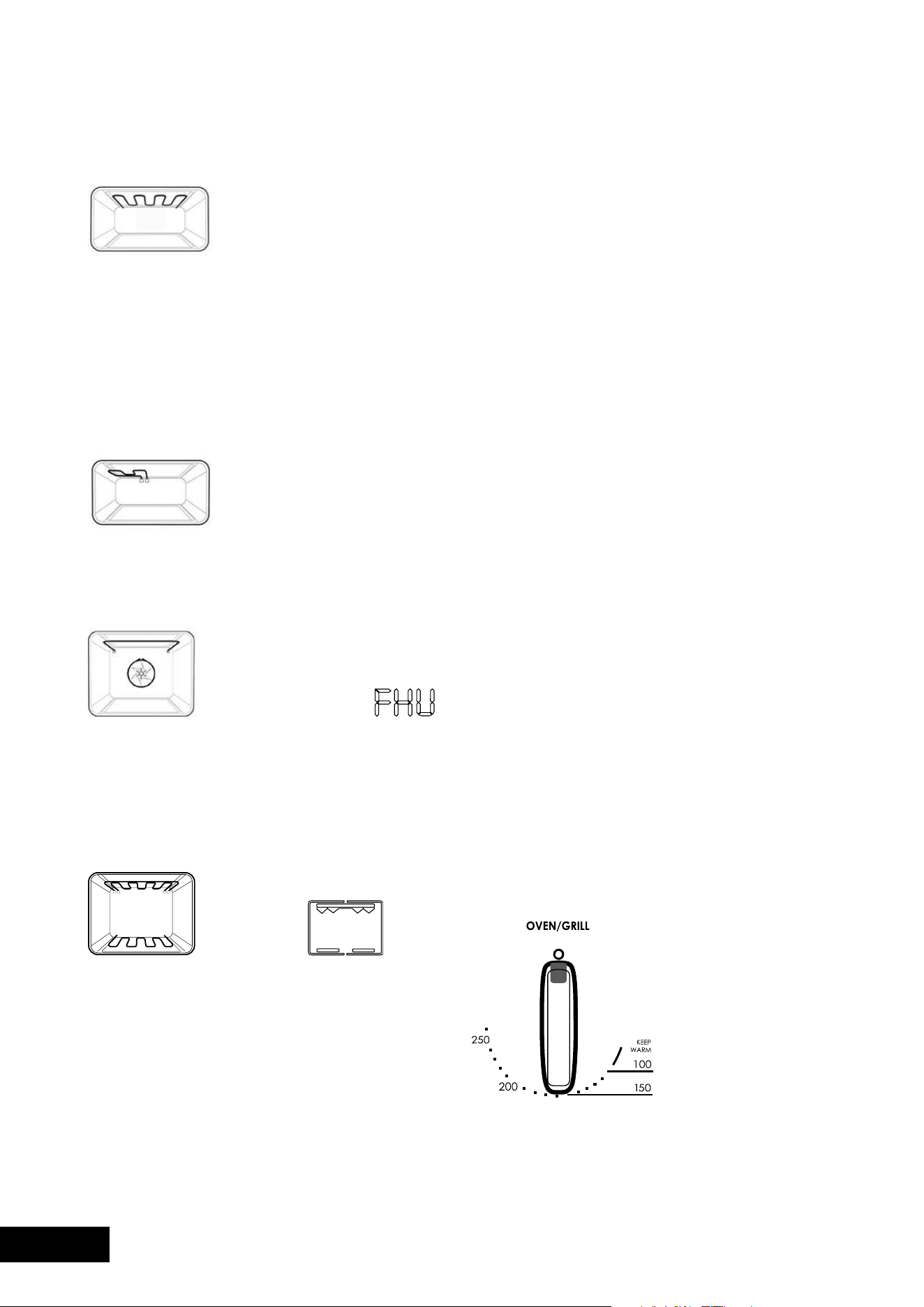
Grill
The“grill”directsradiantheatfromthepowerfulupper
elementontothefood.Youcanusethe“grill”functionfor
tender cuts of meat, steak, chops, sausages, fish, cheese
toasties and other quick cooking foods. Grill with the oven
dooropenforPGR657andPGR659drawerovensand
closedforDuoovens.Preheatyourgrillfor3minutestoget
the best results. This will help seal in the natural juices of
steak, chops etc. for a better flavour. The grill dish is to be
positioned between the upper pair of support rails.
Grill (split)
The“splitgrill”worksinthesamewayasafullwidthgrillbut
with the added advantage of being able to optimise the energy
usage for smaller servings. Grill with the oven door open.
Fast heat up (POR783 and POR883 models only)
“fastheat”canbeselectedintheinitialheatupphase
ofanycookingfunction.During“fastheat”theheatcomes
from the element surrounding the fan as well as the smaller
element above the food. This allows you to preheat your
oven30%quickerthanonstandard“bake”.Seepage17
for more information.
Function 11
Pyrolytic cleaning
The“Pyrolyticcleaning”functionisusedforcleaning
the main oven. It cleans by burning off the spatters and
accumulated dirt and grease from the oven liner, at high
temperature. This process produces ash which can be
wiped out of the oven cavity.
Cooling/Venting fan
Yourbuilt-inapplianceisfittedwithacoolingfan.
This prevents your kitchen cabinet from overheating and
reduces the condensation inside the oven. It will operate
whenever you are using your oven or grill and will blow
warm air across the top of the oven door.
NOTE: If the oven is still hot from cooking, the cooling fan
will keep running to cool the oven down and will switch off
automatically when cool.
Condensation
excesscondensationmayfogtheovendoor.Thismay
happen when you are cooking large quantities of food
from a cold start. You can minimize condensation by:
•Keepingtheamountofwaterusedwhilstcooking
to a minimum.
•makingsurethattheovendoorisfirmlyclosed.
•Bakingcustardinabakingdishthatisslightly
smaller than the water container.
•Cookingcasseroleswiththelidon.
NOTE: If you are using water in cooking, this will turn
to steam and may condense outside your appliance.
This is not a problem or fault with your oven.
Operating your oven temperature selector
Athermostatcontrolsthetemperatureinyourappliance.
The temperature can be selected within the specified range.
To set the temperature, turn the temperature selector in
aclockwisedirectiontothedesiredsetting.Anindicator
light above the temperature selector will come on. When
the temperature is reached, the heating source switches
itself off and the indicator light goes out. When the oven
temperature falls below the desired setting, the heating
source switches on and the indicator light comes on again.
Once the food is cooked, turn the temperature selector
backinananti-clockwisedirection.Donotforceitright
round in a clockwise direction as this will result in damage
to the thermostat.
NOTE: For multifunction ovens the desired cooking function
must be selected before the oven will operate. Once the
desired function has been selected, use the temperature
selector to set the required temperature.
USING YOUR OVEN USING YOUR OVEN

12 13
USAGEUSAGE
Pre-heating your appliance
For best results when baking it is recommended that you preheat
yourovenfor30minutes.Preheatthegrillfor3minutesto
obtainbestresults.Pre-heatingyourapplianceallowsitto
reach the required temperature quickly and efficiently.
With “rapid heat”
For electric multifunction appliances preheat your oven by
selectingthe“rapidheat”function.Thisfunctionallowsyour
oven to reach the preset temperature quicker than any other
cooking function.
1.Turnthefunctionselectorto“rapidheat”.
2.Setthedesiredpreheattemperature,byrotatingyour
oven temperature selector. When the indicator light
above the temperature selector goes out, the oven
has reached the desired temperature. Select the oven
function you require for cooking or baking and place
the food in the oven.
With “bake/pizza”
1. It is recommended you preheat your appliance when
cooking or baking.
2.Setthedesiredpreheattemperature,byrotatingyour
oven temperature selector. When the indicator light
goes out the oven has reached the desired preset
temperature, place your food in the oven, close the
door and set the timer if you desire.
With “fan bake”
1. It is recommended to preheat your appliance when
cooking or baking.
2.Setthedesiredpreheattemperature,byrotatingyour
oven temperature selector. When the indicator light
goes out the oven has reached the desired preset
temperature, place your food into the oven, close the
door and set the timer if you desire.
With “grill”
Preheatthegrillforatleast3minutestoobtainbestresults.
This will help to seal the natural juices of steak, chops and
other meats for a better flavour.
Setting temperatures
The following table displays the temperature settings for
recipes which do not show actual temperatures for non fan
modes.forfan-forcedmodesthetemperatureshouldbe
reducedby10°C.
OVEN TEMPERATURE C TEMPERATURE F
Cool 80175
LowHeatVery slow 100–110210–230
Slow 130–140265–285
Moderate
Heat
Moderately
slow
150–160300–320
Moderate 170–180340–355
HighHeatModerately
hot
190–200375–390
Hot200–210390–410
Very hot 220–230430–450
extremelyhot240–250465–480
Please refer to the cooking guide to choose the best oven
setting for your recipes.
NOTE: DO NOT line oven with foil, it will damage the enamel.
DO NOT use the base of the oven for cooking – it will
damage the enamel.
Grill
The“grill”directsradiantheatfromthepowerfulupper
elementontothefood.Youcanusethe“grill”functionfor
tender cuts of meat, steak, chops, sausages, fish, cheese
toasties and other quick cooking foods. Grill with the oven
dooropenforPGR657andPGR659drawerovensand
closedforDuoovens.Preheatyourgrillfor3minutestoget
the best results. This will help seal in the natural juices of
steak, chops etc. for a better flavour. The grill dish is to be
positioned between the upper pair of support rails.
Grill (split)
The“splitgrill”worksinthesamewayasafullwidthgrillbut
with the added advantage of being able to optimise the energy
usage for smaller servings. Grill with the oven door open.
Fast heat up (POR783 and POR883 models only)
“fastheat”canbeselectedintheinitialheatupphase
ofanycookingfunction.During“fastheat”theheatcomes
from the element surrounding the fan as well as the smaller
element above the food. This allows you to preheat your
oven30%quickerthanonstandard“bake”.Seepage17
for more information.
Function 11
Pyrolytic cleaning
The“Pyrolyticcleaning”functionisusedforcleaning
the main oven. It cleans by burning off the spatters and
accumulated dirt and grease from the oven liner, at high
temperature. This process produces ash which can be
wiped out of the oven cavity.
Cooling/Venting fan
Yourbuilt-inapplianceisfittedwithacoolingfan.
This prevents your kitchen cabinet from overheating and
reduces the condensation inside the oven. It will operate
whenever you are using your oven or grill and will blow
warm air across the top of the oven door.
NOTE: If the oven is still hot from cooking, the cooling fan
will keep running to cool the oven down and will switch off
automatically when cool.
Condensation
excesscondensationmayfogtheovendoor.Thismay
happen when you are cooking large quantities of food
from a cold start. You can minimize condensation by:
•Keepingtheamountofwaterusedwhilstcooking
to a minimum.
•makingsurethattheovendoorisfirmlyclosed.
•Bakingcustardinabakingdishthatisslightly
smaller than the water container.
•Cookingcasseroleswiththelidon.
NOTE: If you are using water in cooking, this will turn
to steam and may condense outside your appliance.
This is not a problem or fault with your oven.
Operating your oven temperature selector
Athermostatcontrolsthetemperatureinyourappliance.
The temperature can be selected within the specified range.
To set the temperature, turn the temperature selector in
aclockwisedirectiontothedesiredsetting.Anindicator
light above the temperature selector will come on. When
the temperature is reached, the heating source switches
itself off and the indicator light goes out. When the oven
temperature falls below the desired setting, the heating
source switches on and the indicator light comes on again.
Once the food is cooked, turn the temperature selector
backinananti-clockwisedirection.Donotforceitright
round in a clockwise direction as this will result in damage
to the thermostat.
NOTE: For multifunction ovens the desired cooking function
must be selected before the oven will operate. Once the
desired function has been selected, use the temperature
selector to set the required temperature.
USING YOUR OVEN USING YOUR OVEN

14 15
USAGEUSAGE
Dealing with cooktop problems
PROBLEM POSSIBLE CAUSE WHAT TO DO
Heating
elements
not working
1 Power not
switched on
2Controlsincorrectlyset
3Householdfuseblown
If the fuse continues
to blow, contact the
Service Centre
•Checkcooktop
is plugged in and
power is on
•Checkcorrectknob
turned for element
•Replacehousehold
fuse
Benchtop
becoming
too hot
and/or
beginning
to discolour
1 Wrong type
of cooking pot
2Potmayoverhang
cooktop
3Potistoolarge
•makesurebases
are not concave
•Placepotoncentre
of element so that it
does not overhang
•Useasmallerpot
Food taking
too long to
cook
1 Pot base is not flat
2Potmaybeoffcentre
3Needtouselarger
element
4Usingaround
based wok
5Controlsare
incorrectly set
•makesurepotbase
is flat or slightly
convex
•Centrepotover
element making sure
it does not overhang
the cooktop
•movepottoalarger
element
•Useaflatbasedwok
on electric cooktops
•Checkcontrol
is correct
•Checksettingand
increase setting
Cannot
simmer
food
1 Control set too high
2elementtoolarge
•Turncontroltolower
setting
•Useasmallerelement
elements
giving off
smoke or
odours when
first used
Protective oils being
removed in first cooking
•Donotworry.
This is normal
Glass
surface
becomes
milky white
when pot
removed
Baseofpotisconcave•Useaflat
based pot
CAUTION
The ceramic cooktop is made from ceramic glass,
a tough durable material that withstands heating and
coolingwithoutbreaking.However,itmustberemembered
thatasitisGLASS,itmaybreak.Treatitaccordingly!
Should you have any questions about the glass in your
new appliance, please contact the Customer Care Centre
byphoning1300363640.
The heating elements are concealed under the smooth glass
surface which has a pattern to show the location of the
elements. The glass will retain heat for a period of time after
the appliance has been turned off. This is indicated by a
“HoTSURfACe”warninglight.Itwillremainonwhenever
theglasssurfaceexceeds60°C.
Utensils
•Usepanswithsmooth,clean&drybottomsto
avoid scratching or burning residue into the glass.
•ensurethepanbottomisthesamesizeasthe
working element.
•Wedonotrecommendceramicglasspansbecause
they do not conduct heat well Stainless steel or
enamelled saucepans are best.
•Donotusepanswithcopperoraluminiumbottoms
because they can leave traces which are difficult to
remove from the glass.
•Ifbuyingnewutensilsselectenamelledsteelpanswith
2-3mmthickbottomsorstainlesssteelpanswithsandwich
bottoms4-6mmthick.Thepanbottomshouldbeflat,or
preferably, slightly concave at room temperature so that
it lies flat on the glass surface when hot.
Cooking Do’s and Don’ts
•Dousethestoredheatinthehotplatebyturningthe
controlto“o”beforethefinalfewminutesofcooking.
•Donotplaceheatresistantmats,wirematsor
aluminium foil under pots and pans.
•Donotallowpotsandpanstoboildry,asdamage
to both pan and hotplate may result.
•Donotuseroundbottomwoks,wokstandsorsimilar
utensils which could lead to overheating of the
hotplates and possible damage to the cooking surface.
•Donotslidepansacrossthesurfaceoftheceramic
glass cooktop, it could result in scratching of the surface.
•Donotusethecooktopasextrabenchspaceoras
a cutting board.
• Donotallowchildrenonornearthecooktopatanytime.
Cleaning your ceramic hotplate
1. Remove all spilt food and fat with a razor blade
scraper (supplied with the unit) while the ceramic glass
is still warm, but not hot. Wipe clean with dishwashing
detergent on a damp cloth.
2.Ifaluminiumfoil,plasticitemsorhighsugarcontent
liquids/foods are allowed to melt on the ceramic glass,
these should be removed immediately with a scraper
before the surface has cooled down, otherwise pitting
of the surface can occur.
NOTE: Items with high sugar content not only include
jam and fruit but also vegetables such as peas,
tomatoes and carrots.
3.Whentheceramicglassiscool,applyasuitable
cleaner (supplied with the unit).
4.Itisimportanttofollowthecleanermanufacturer’s
instructions. Remove any cleaning residue from the
surface as staining of the cooktop may occur.
5.Donotuseabrasivespongesorscourers,ovensprays
or stain removers as they may scratch the cooktop.
6.Anypitting,staining,scratchesorothersurface
deterioration is excluded from the warranty.
7.Allstains/watermarkscanberemovedbyvigorous
cleaning, using the supplied ceramic cleaner.
Cooking Hints
Bringing
liquids to
the boil
Useahighsetting.
Beforetheliquidbeginstoboil,turntoalower
setting. This will stop the liquid from boiling over.
Usingretained
heat
Cooking areas will stay hot after they are
turned off. Turn the cooking area off before
cooking is finished and use retained heat to
finish cooking.
Turning to
higher settings
If the pot does not have a lid, use a higher
setting.
Turning to
lower settings
If the pot has a lid, then use a lower setting.
Usealowersettingforfoodswhichwilleasily
burn eg milk, white sauce.
Cooking
too fast
If food is cooking too fast, take the pot off
the cooktop. Turn the knob to a lower setting.
Let the cooking area cool down and replace
the pot.
USING YOUR COOKTOP USING YOUR COOKTOP

14 15
USAGEUSAGE
Dealing with cooktop problems
PROBLEM POSSIBLE CAUSE WHAT TO DO
Heating
elements
not working
1 Power not
switched on
2Controlsincorrectlyset
3Householdfuseblown
If the fuse continues
to blow, contact the
Service Centre
•Checkcooktop
is plugged in and
power is on
•Checkcorrectknob
turned for element
•Replacehousehold
fuse
Benchtop
becoming
too hot
and/or
beginning
to discolour
1 Wrong type
of cooking pot
2Potmayoverhang
cooktop
3Potistoolarge
•makesurebases
are not concave
•Placepotoncentre
of element so that it
does not overhang
•Useasmallerpot
Food taking
too long to
cook
1 Pot base is not flat
2Potmaybeoffcentre
3Needtouselarger
element
4Usingaround
based wok
5Controlsare
incorrectly set
•makesurepotbase
is flat or slightly
convex
•Centrepotover
element making sure
it does not overhang
the cooktop
•movepottoalarger
element
•Useaflatbasedwok
on electric cooktops
•Checkcontrol
is correct
•Checksettingand
increase setting
Cannot
simmer
food
1 Control set too high
2elementtoolarge
•Turncontroltolower
setting
•Useasmallerelement
elements
giving off
smoke or
odours when
first used
Protective oils being
removed in first cooking
•Donotworry.
This is normal
Glass
surface
becomes
milky white
when pot
removed
Baseofpotisconcave•Useaflat
based pot
CAUTION
The ceramic cooktop is made from ceramic glass,
a tough durable material that withstands heating and
coolingwithoutbreaking.However,itmustberemembered
thatasitisGLASS,itmaybreak.Treatitaccordingly!
Should you have any questions about the glass in your
new appliance, please contact the Customer Care Centre
byphoning1300363640.
The heating elements are concealed under the smooth glass
surface which has a pattern to show the location of the
elements. The glass will retain heat for a period of time after
the appliance has been turned off. This is indicated by a
“HoTSURfACe”warninglight.Itwillremainonwhenever
theglasssurfaceexceeds60°C.
Utensils
•Usepanswithsmooth,clean&drybottomsto
avoid scratching or burning residue into the glass.
•ensurethepanbottomisthesamesizeasthe
working element.
•Wedonotrecommendceramicglasspansbecause
they do not conduct heat well Stainless steel or
enamelled saucepans are best.
•Donotusepanswithcopperoraluminiumbottoms
because they can leave traces which are difficult to
remove from the glass.
•Ifbuyingnewutensilsselectenamelledsteelpanswith
2-3mmthickbottomsorstainlesssteelpanswithsandwich
bottoms4-6mmthick.Thepanbottomshouldbeflat,or
preferably, slightly concave at room temperature so that
it lies flat on the glass surface when hot.
Cooking Do’s and Don’ts
•Dousethestoredheatinthehotplatebyturningthe
controlto“o”beforethefinalfewminutesofcooking.
•Donotplaceheatresistantmats,wirematsor
aluminium foil under pots and pans.
•Donotallowpotsandpanstoboildry,asdamage
to both pan and hotplate may result.
•Donotuseroundbottomwoks,wokstandsorsimilar
utensils which could lead to overheating of the
hotplates and possible damage to the cooking surface.
•Donotslidepansacrossthesurfaceoftheceramic
glass cooktop, it could result in scratching of the surface.
•Donotusethecooktopasextrabenchspaceoras
a cutting board.
• Donotallowchildrenonornearthecooktopatanytime.
Cleaning your ceramic hotplate
1. Remove all spilt food and fat with a razor blade
scraper (supplied with the unit) while the ceramic glass
is still warm, but not hot. Wipe clean with dishwashing
detergent on a damp cloth.
2.Ifaluminiumfoil,plasticitemsorhighsugarcontent
liquids/foods are allowed to melt on the ceramic glass,
these should be removed immediately with a scraper
before the surface has cooled down, otherwise pitting
of the surface can occur.
NOTE: Items with high sugar content not only include
jam and fruit but also vegetables such as peas,
tomatoes and carrots.
3.Whentheceramicglassiscool,applyasuitable
cleaner (supplied with the unit).
4.Itisimportanttofollowthecleanermanufacturer’s
instructions. Remove any cleaning residue from the
surface as staining of the cooktop may occur.
5.Donotuseabrasivespongesorscourers,ovensprays
or stain removers as they may scratch the cooktop.
6.Anypitting,staining,scratchesorothersurface
deterioration is excluded from the warranty.
7.Allstains/watermarkscanberemovedbyvigorous
cleaning, using the supplied ceramic cleaner.
Cooking Hints
Bringing
liquids to
the boil
Useahighsetting.
Beforetheliquidbeginstoboil,turntoalower
setting. This will stop the liquid from boiling over.
Usingretained
heat
Cooking areas will stay hot after they are
turned off. Turn the cooking area off before
cooking is finished and use retained heat to
finish cooking.
Turning to
higher settings
If the pot does not have a lid, use a higher
setting.
Turning to
lower settings
If the pot has a lid, then use a lower setting.
Usealowersettingforfoodswhichwilleasily
burn eg milk, white sauce.
Cooking
too fast
If food is cooking too fast, take the pot off
the cooktop. Turn the knob to a lower setting.
Let the cooking area cool down and replace
the pot.
USING YOUR COOKTOP USING YOUR COOKTOP
16 17
OPERATIONOPERATION
4.Setthecookingdurationyouwantbyusing–or+.
5secondsafterthelastchange,the“cooktime”
indicator I will stop flashing, and the time of day will
be displayed.
Note: Do not forget to add preheating time if necessary.
Setting the cooking end time
1. Check the clock displays the correct time of day.
2.Selectthedesiredovenfunctionandtemperature.
The oven indicator light will glow and the heating
source will come on.
3.Press“mode“untilthe“endtime”indicatorI
begins flashing.
4.enterthetimeofdayyouwanttofinishcooking
bypressing–or+.5secondsafterthelastchange,
the“endtime”indicatorI will stop flashing and the
current time of day will be displayed.
Setting the delayed start cooking time
1. Program the “cook time“ and “end time“ as described
in the relevant sections. Once both the “cook time“ and
“end time“ have been set, the “cook time“ and “end
time”indicatorswillstopflashingandthecurrenttime
of day will be displayed.
To check or cancel settings
1.Tocheckyoursettings,press“mode”untilthesetting
youwantisdisplayed.Aredlightwillflashnexttothe
mode (cook time, end time etc) that is currently on display.
2.Tocancel“delayedstart”press“mode”untilalight
flashesnextto“cooktime”.Pressandhold“–”until
theclocknolongerreverses(“0:00”andyouwillhear
a beep). If you have left the temperature and function
knobs at a setting the oven will start once the “end
time”lightstopsflashing.
3.Tocancel“autooff”press“mode”untilalightflashes
nextto“cooktime”.Pressandhold“–”untiltheclock
nolongerreverses(“0:00”andyouwillhearabeep).
Thisautomaticallycancels“delayedstart”.Ifyou
have left the temperature and function knobs at a setting,
theovenwillstartoncethe“cooktime”lightstops
flashing.Becauseyouhavecancelled“autooff”the
oven will continue to heat until you manually turn it off.
On completion of cooking
Theovenwillturnoff,thetimerwillbeepandthe“endtime”
and/or“cooktime”indicatorswillflash.
1. Turn the function and temperature controls to the off position.
2.Press“+”or“–”or“mode”tostopthetimerfrombeeping.
Touch Control
Setting the time of day
Aftertheappliancehasbeenelectricallyconnectedthe
“setclock”symbol
and “timer arrow
will flash on the
clock display.
1. To set the time of day in hours and minutes press the
–or+.5secondsafterthelastchangethe“timerarrow”
will disappear, confirming the time has been set.
NOTE: The clock has a 24-hour display.
Change the time of day (Daylight saving)
1.Switchofftheappliancebypressing“on/off”.
2.Press“Timer”asmanytimesasnecessaryuntilthe
“setclock”symbol
and “timer arrow
flash on
the clock display.
3.Press“+”or“–”tochangethetime.5secondsafterthe
lastchangethe“setclock”symbol
and “timer arrow
will disappear, confirming the time has been set.
Setting the oven function
1.Switchontheappliancebypressingthe“on/off”.
The oven lights will light.
2.Pressthe“function”asmanytimesasnecessaryuntil
the desired function appears. The suggested cooking
temperature appears in the display and the degrees
symbol“°”flashes.Ifthesuggestedtemperatureisnot
changedwithinapproximately5secondsthedegrees
symbol“°”stopsflashingandtheovenbeginstoheat.
The suggested temperature display is replaced with
the oven centre temperature and a thermometer icon.
The thermometer icon rises slowly, indicating the
degree to which the oven is currently being heated.
Changing the oven temperature
1.Pressthe–or+,todecreaseorincreasethetemperature.
NOTE: The temperature can only be adjusted when
the degrees symbol “°” is flashing. The temperature
setting changes in increments of 5°C. To change the
temperature after the degrees symbol “°” stops flashing,
press the “Function” and then press the – or + to
change the temperature.
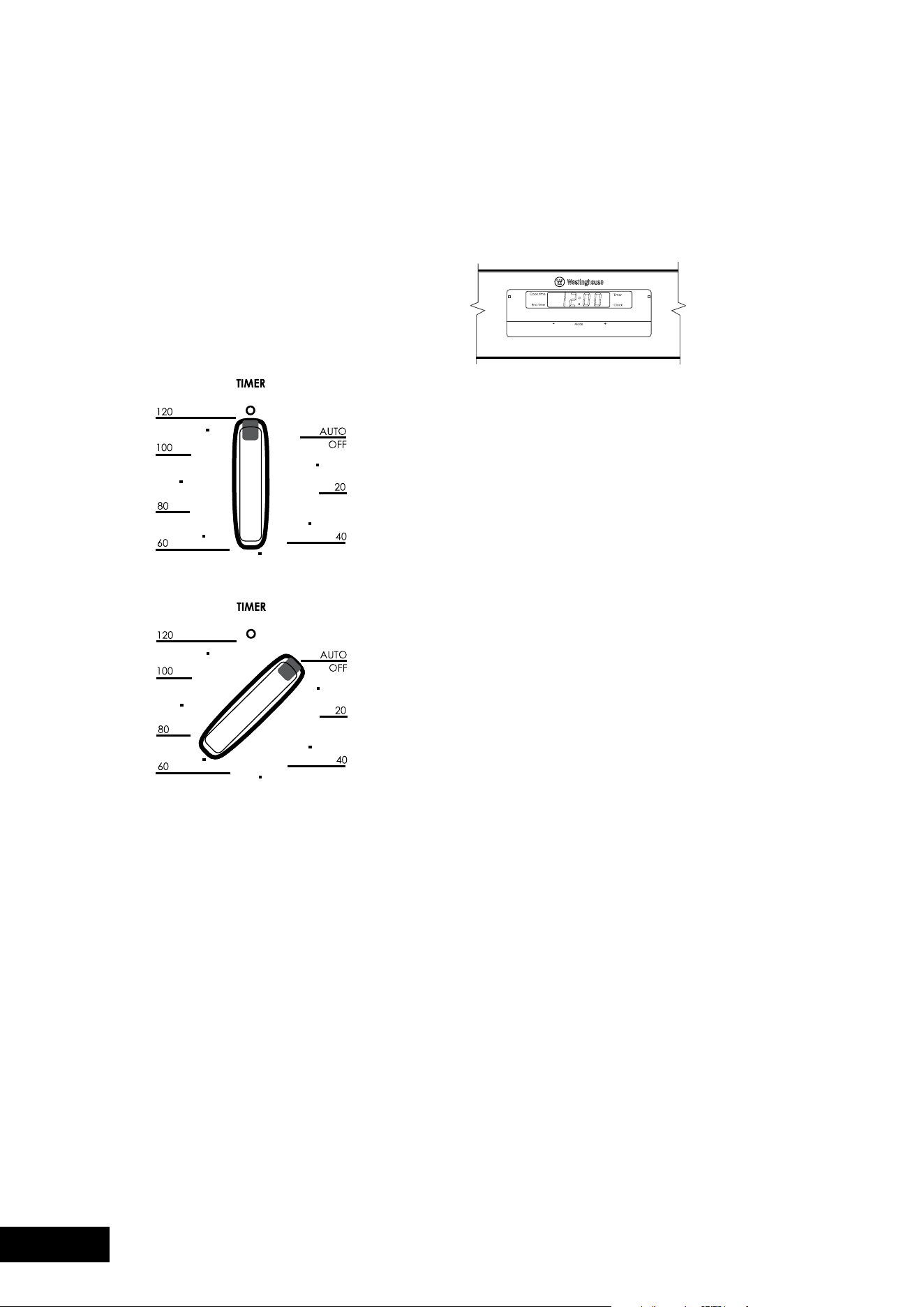
2-hour “Auto Off” timer
The2-hourtimerfeaturesanautomaticoven“cutoff”.
Thismeansthatacookingperiodofupto120minutes
canbeset.Whenthetimerhascountedbackto“Autooff”
a bell will sound and the oven will automatically switch off.
Once automatic baking is complete, return to manual
operation by setting the timer to the ‘Off’ mark.
NOTE: It is not recommended to use this timer for short
durations (e.g. boiling eggs).
ELECTRONIC CLOCK
Touch Control (POR667 and POR668 models only)
General features
Your touch control clock has the following features:
•Timer–allowsyoutosetacountdowntimethatwill
beep when the set time has elapsed.
•Cookingduration–Youcansetacookingduration.
Atimerwillcountdownthepresetcookingtime,beep
when the time has elapsed and turn the oven off.
•endcookingtime–youcansetacookingfinishtime.
Atimerwillcountdownthepresetcookingtime,beep
when the finish time has been reached and turn the
oven off.
•Delayedstartcookingtime–Youcancombinethe
cooking time and stop cooking time to switch the oven
on and off at a specific time during the day.
Note: Your touch control clock only operates with
your main oven.
Setting the time of day
You must set the time of day before you can operate your
appliance.Whenpowerissuppliedtoyouroven“12.00“
willbedisplayedandthe“clock”indicatorI will flash.
1.Tosetthetimeofdayinhoursandminutes,press–or+.
5secondsafterthelastchange,the“clock”indicatorI
will disappear, confirming the time has been set.
Note: The clock has a 24-hour display.
Change the time of day (Daylight saving)
1.Press“mode”untilthe“clock”indicatorI begins flashing.
2.Press–or+tochangethetime.5secondsafterthe
lastchange,the“clock”indicatorI will disappear,
confirming the time has been set.
Setting the timer
1.Press“mode“untilthe“timer”indicatorI begins flashing.
2.Setthecountdowntimeyouwantbyusing–and+.
5secondsafterthelastchangethe“timer”indicatorI
will stop flashing, confirming the timer has been set.
3.Tostopthebeeper,press–,+or“mode”.
Setting the cooking duration
1. Check the clock displays the correct time of day.
2.Selectthedesiredovenfunctionandtemperature.
The oven indicator light will glow and the heating
source will come on.
3.Press“mode“untilthe“cooktime”indicatorI
begins flashing.
OPERATING THE ELECTRONIC CLOCK MODEL POR783 & POR883
PROGRAMMABLE CONTROLLER
COOKING WITH YOUR TIMER
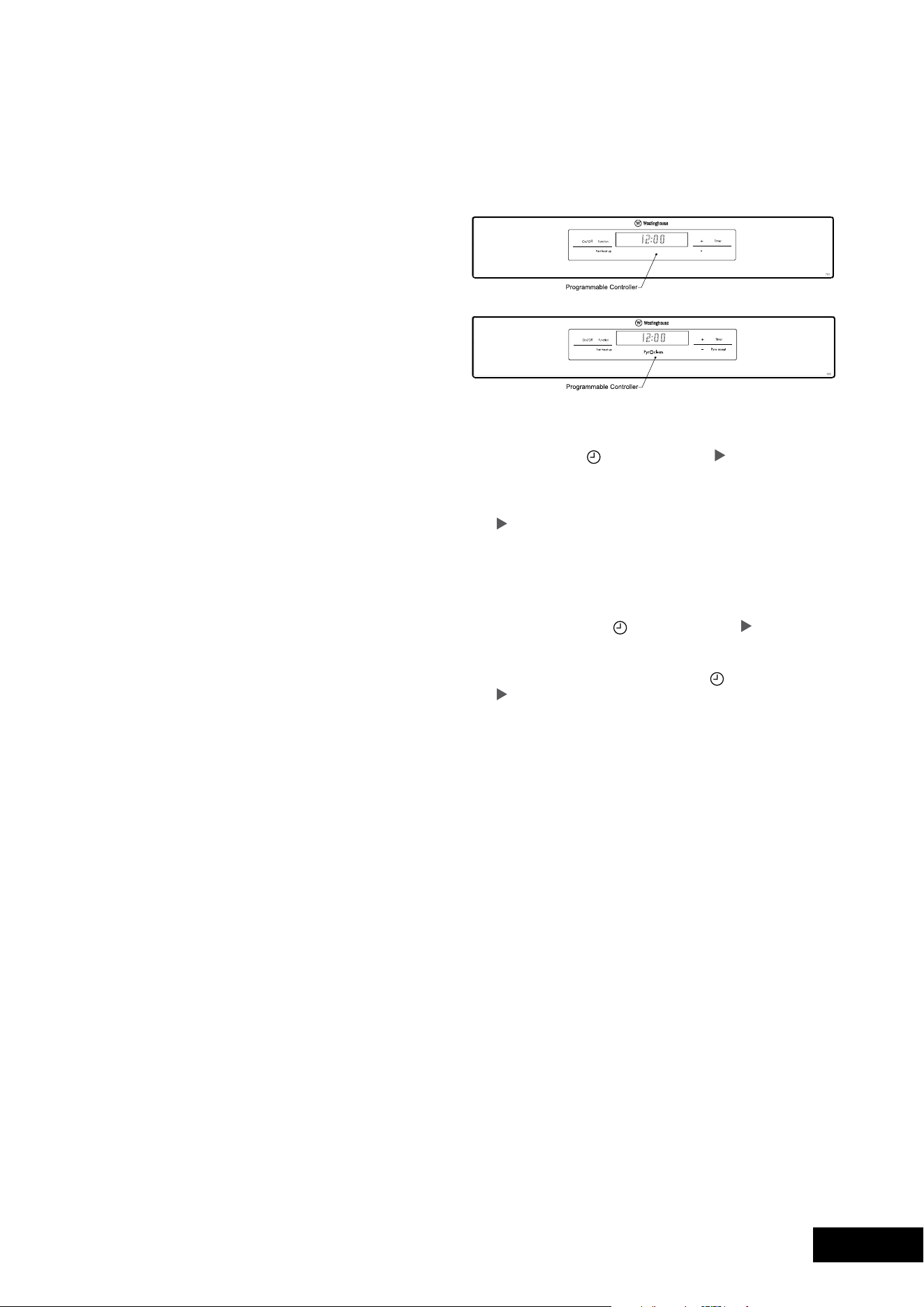
16 17
OPERATIONOPERATION
4.Setthecookingdurationyouwantbyusing–or+.
5secondsafterthelastchange,the“cooktime”
indicator I will stop flashing, and the time of day will
be displayed.
Note: Do not forget to add preheating time if necessary.
Setting the cooking end time
1. Check the clock displays the correct time of day.
2.Selectthedesiredovenfunctionandtemperature.
The oven indicator light will glow and the heating
source will come on.
3.Press“mode“untilthe“endtime”indicatorI
begins flashing.
4.enterthetimeofdayyouwanttofinishcooking
bypressing–or+.5secondsafterthelastchange,
the“endtime”indicatorI will stop flashing and the
current time of day will be displayed.
Setting the delayed start cooking time
1. Program the “cook time“ and “end time“ as described
in the relevant sections. Once both the “cook time“ and
“end time“ have been set, the “cook time“ and “end
time”indicatorswillstopflashingandthecurrenttime
of day will be displayed.
To check or cancel settings
1.Tocheckyoursettings,press“mode”untilthesetting
youwantisdisplayed.Aredlightwillflashnexttothe
mode (cook time, end time etc) that is currently on display.
2.Tocancel“delayedstart”press“mode”untilalight
flashesnextto“cooktime”.Pressandhold“–”until
theclocknolongerreverses(“0:00”andyouwillhear
a beep). If you have left the temperature and function
knobs at a setting the oven will start once the “end
time”lightstopsflashing.
3.Tocancel“autooff”press“mode”untilalightflashes
nextto“cooktime”.Pressandhold“–”untiltheclock
nolongerreverses(“0:00”andyouwillhearabeep).
Thisautomaticallycancels“delayedstart”.Ifyou
have left the temperature and function knobs at a setting,
theovenwillstartoncethe“cooktime”lightstops
flashing.Becauseyouhavecancelled“autooff”the
oven will continue to heat until you manually turn it off.
On completion of cooking
Theovenwillturnoff,thetimerwillbeepandthe“endtime”
and/or“cooktime”indicatorswillflash.
1. Turn the function and temperature controls to the off position.
2.Press“+”or“–”or“mode”tostopthetimerfrombeeping.
Touch Control
Setting the time of day
Aftertheappliancehasbeenelectricallyconnectedthe
“setclock”symbol
and “timer arrow
will flash on the
clock display.
1. To set the time of day in hours and minutes press the
–or+.5secondsafterthelastchangethe“timerarrow”
will disappear, confirming the time has been set.
NOTE: The clock has a 24-hour display.
Change the time of day (Daylight saving)
1.Switchofftheappliancebypressing“on/off”.
2.Press“Timer”asmanytimesasnecessaryuntilthe
“setclock”symbol
and “timer arrow
flash on
the clock display.
3.Press“+”or“–”tochangethetime.5secondsafterthe
lastchangethe“setclock”symbol
and “timer arrow
will disappear, confirming the time has been set.
Setting the oven function
1.Switchontheappliancebypressingthe“on/off”.
The oven lights will light.
2.Pressthe“function”asmanytimesasnecessaryuntil
the desired function appears. The suggested cooking
temperature appears in the display and the degrees
symbol“°”flashes.Ifthesuggestedtemperatureisnot
changedwithinapproximately5secondsthedegrees
symbol“°”stopsflashingandtheovenbeginstoheat.
The suggested temperature display is replaced with
the oven centre temperature and a thermometer icon.
The thermometer icon rises slowly, indicating the
degree to which the oven is currently being heated.
Changing the oven temperature
1.Pressthe–or+,todecreaseorincreasethetemperature.
NOTE: The temperature can only be adjusted when
the degrees symbol “°” is flashing. The temperature
setting changes in increments of 5°C. To change the
temperature after the degrees symbol “°” stops flashing,
press the “Function” and then press the – or + to
change the temperature.
2-hour “Auto Off” timer
The2-hourtimerfeaturesanautomaticoven“cutoff”.
Thismeansthatacookingperiodofupto120minutes
canbeset.Whenthetimerhascountedbackto“Autooff”
a bell will sound and the oven will automatically switch off.
Once automatic baking is complete, return to manual
operation by setting the timer to the ‘Off’ mark.
NOTE: It is not recommended to use this timer for short
durations (e.g. boiling eggs).
ELECTRONIC CLOCK
Touch Control (POR667 and POR668 models only)
General features
Your touch control clock has the following features:
•Timer–allowsyoutosetacountdowntimethatwill
beep when the set time has elapsed.
•Cookingduration–Youcansetacookingduration.
Atimerwillcountdownthepresetcookingtime,beep
when the time has elapsed and turn the oven off.
•endcookingtime–youcansetacookingfinishtime.
Atimerwillcountdownthepresetcookingtime,beep
when the finish time has been reached and turn the
oven off.
•Delayedstartcookingtime–Youcancombinethe
cooking time and stop cooking time to switch the oven
on and off at a specific time during the day.
Note: Your touch control clock only operates with
your main oven.
Setting the time of day
You must set the time of day before you can operate your
appliance.Whenpowerissuppliedtoyouroven“12.00“
willbedisplayedandthe“clock”indicatorI will flash.
1.Tosetthetimeofdayinhoursandminutes,press–or+.
5secondsafterthelastchange,the“clock”indicatorI
will disappear, confirming the time has been set.
Note: The clock has a 24-hour display.
Change the time of day (Daylight saving)
1.Press“mode”untilthe“clock”indicatorI begins flashing.
2.Press–or+tochangethetime.5secondsafterthe
lastchange,the“clock”indicatorI will disappear,
confirming the time has been set.
Setting the timer
1.Press“mode“untilthe“timer”indicatorI begins flashing.
2.Setthecountdowntimeyouwantbyusing–and+.
5secondsafterthelastchangethe“timer”indicatorI
will stop flashing, confirming the timer has been set.
3.Tostopthebeeper,press–,+or“mode”.
Setting the cooking duration
1. Check the clock displays the correct time of day.
2.Selectthedesiredovenfunctionandtemperature.
The oven indicator light will glow and the heating
source will come on.
3.Press“mode“untilthe“cooktime”indicatorI
begins flashing.
OPERATING THE ELECTRONIC CLOCK MODEL POR783 & POR883
PROGRAMMABLE CONTROLLER
COOKING WITH YOUR TIMER

18 19
OPERATIONOPERATION
General features
Your5buttontouchcontrolclockhasthefollowingfeatures:
•TImeR–allowsyoutosetacountdowntimethatwill
beep when the set time has elapsed.
•TheTemP.buttonallowsthecurrenttemperatureofthe
oven to be displayed.
•elapsedtimedisplay
Setting the time of day
You must set the time of day before you can operate
your appliance.
Whenpowerissuppliedtoyouroven“12.00“willbe
displayed on the clock and the display will flash.
1.Tosetthetimeofdayhours,press–or+,thenpress
CLOCK and the seconds will begin to flash which can
betsetbypressingthe–or+buttons.5secondsafter
the last change, the clock display will stop flashing,
confirming that the time has been set.
Note: The clock has a 24-hour display.
Change the time of day (Daylight saving)
1. Press CLOCK until the clock display begins to flash.
2.Press–or+tochangethehoursthenpressCLoCK
and the minutes will begin to flash which can be set
bypressingthe–or+buttons.5secondsafterthelast
change,the“clock”symbolwilldisappear,confirming
the time has been set.
Note: The clock has a 24-hour display.
Setting the oven function
1. Turn the oven function selector clockwise to select the
desired oven function.
Note: each oven function has a default temperature
which can then be adjusted as outlined below.
Changing the oven temperature
1.Togglethetemperatureselectorleft(–)orright(+)
as required to set the desired cooking temperature.
Note: the temperature can be adjusted at any time
throughout the cooking time.
Setting the cooking time
1. Select the desired oven function and cooking
temperature.
2.PresstheCLoCKbuttonasoftenasnecessary,
untilthe“cooktime”❘➔❘ symbol appears.
3.Setthedesiredcookingtimecommencingwithminutes
byusingthe–or+,whilstthe❘➔❘ symbol is flashing,
then press the CLOCK button again and set the hours
byusingthe–or+buttons.After5secondsfromthe
last time adjustment the ❘➔❘ symbol will disappear and
your appliance is now programmed.
4.Whenthesettimehaselapsed,asignalwillsound.
To stop the signal, press any button on the clock and
then turn the oven function selector to OFF.
Note: Cooking time cannot be set for the Rapid Heat
function.
Setting the stop time
1. Select the desired oven function and cooking
temperature.
2.PresstheCLoCKbuttonasoftenasnecessary,
untilthe“endtime”➔❘ symbol appears flashing.
3.Setthedesiredstoptimecommencingwithhoursusing
the–or+whilstthe➔❘ symbol is flashing, then press
the CLOCK button again and set the minutes by using
the–or+buttons.After5secondsfromthelasttime
adjustment the ➔❘ symbol will disappear and your
appliance is now programmed.
4.Whenthesettimehaselapsed,asignalwillsound.
To stop the signal, press any button on the clock and
then turn the oven function selector to OFF.
Note: Stop time cannot be set for the Rapid Heat function.
Setting the delayed start cooking time
The“cooktime”and“stoptime”functionscanbecombined
to switch the oven on and off at a specific time during
the day.
1. Select the desired oven function and cooking
temperature.
2.Press“CLoCK”asoftenasnecessary,untilthe“cook
time”❘➔❘ symbol appears.
3.Setthedesiredcookingtimebyusing–or+,whilstthe
“timerarrow”❘➔❘ symbol is flashing.
4.PressCLoCKasoftenasnecessary,untilthe“endtime”
➔❘ symbol appears flashing
5.Setthedesiredswitch-offtimeusingthe–or+whilst
the ❘➔❘ symbolisflashing.The“cooktime”❘➔❘ and “end
time”➔❘ arrows are lit to confirm that the oven has
been programmed.
Note: Delayed start cooking time cannot be set for the
Rapid Heat function.
MODEL POR783 & POR883
PROGRAMMABLE CONTROLLER
MODEL POR881 ELECTRONIC CLOCK
Setting the cooking time
1. Select the desired oven function and cooking temperature.
2.Pressthe“Timer”asoftenasnecessary,untilthe“cook
time”➔❘ symbol appears.
3.Setthedesiredcookingtimebyusingthe–or+,
whilstthe“timerarrow”
isflashing.After5seconds
fromthelasttimeadjustmentthe“timerarrow”
will
disappear and your appliance is now programmed.
4.Whenthesettimehaselapsed,asignalwillsound.
Tostopthesignal,press“+”or“–”.
Setting the stop time
1. Select the desired oven function and cooking temperature.
2.Pressthe“Timer”asoftenasnecessary,untilthe“end
time”➔❘ symbol appears flashing.
3.Setthedesiredswitch-offtimeusingthe–or+whilst
the“timerarrow”
isflashing.After5secondsfrom
thelasttimeadjustmentthe“timerarrow”➔❘ will
disappear and your appliance is now programmed.
4.Whenthesettimehaselapsed,asignalwillsound.
Tostopthesignal,press“+”or“–”.
Setting the delayed start cooking time
The“cooktime”and“stoptime”functionscanbecombined
to switch the oven on and off at a specific time during the day.
1. Select the desired oven function and cooking temperature.
2.Press“Timer”asoftenasnecessary,untilthe“cook
time”❘➔❘ symbol appears.
3.Setthedesiredcookingtimebyusing–or+,whilst
the“timerarrow”
is flashing.
4.Press“Timer”asoftenasnecessary,untilthe“endtime”
➔❘ symbol appears flashing
5.Setthedesiredswitch-offtimeusingthe–or+whilst
the“timerarrow”
isflashing.The“cooktime”❘➔❘ and
“endtime”➔❘ arrows are lit to confirm that the oven
has been programmed.
On completion of cooking
When the set time has elapsed, a signal will sound for
1 minute, the oven will switch off and the remaining time
indication“0.00”willappearonthedisplay.
1.Tostopthesignal,press“+”or“–”.
Setting the minute minder
For setting a countdown period. When the period of time
has elapsed, an audible signal is sounded.
NOTE: This feature has no effect on the oven operation.
1.Press“Timer”asoftenasnecessary,untilthe“minuteminder”
symbol
appears flashing. Set the desired length of time
using–or+whilstthe“timerarrow”
isflashing.After
5secondsfromthelasttimeadjustmentthe“timerarrow”
will disappear and the minute minder has been set.
Once the set time has elapsed, a signal will sound for
1minute.Thetimeindication“0.00”andaflashing
“minuteminder”symbol
will appear on the display.
2.Tostopthesignal,press“+”or“–”.
Using FHU (Fast Heat Up) mode
To quickly and efficiently preheat your oven, it is
recommendedtoselectthe“fastHeat”cookingfeature.
1.ensuretheapplianceisonbypressingthe“on/off”.
The oven lights will light.
2.Selectthedesiredovenfunctionbypressing“function”.
3.Setthecookingtemperaturebypressingthe–or+
to decrease or increase the temperature.
NOTE: The temperature can only be adjusted when
the degrees symbol “°” is flashing.
Thetemperaturesettingchangesinincrementsof5°C.
4.Pressthe“fastHeat”.Theletters“fHU”willappearon
the temperature display.
5.Whenthesettemperatureisreachedthebuzzer
will sound and the set temperature will be displayed.
NOTE: “FHU” cannot be selected if the oven
temperature is above the preset temperature.
Activating the child-proof lock
When the child lock is engaged, the oven cannot be
switched on.
1.Switchofftheapplianceusingthe“on/off”.
2.Press“function”and–atthesametime,holduntil
theword“SAfe”isdisplayed.
Thechild-prooflockisnowengaged.
NOTE: When the child-proof lock function is active
the time of day and minute minder can only be set.
Releasing the child-proof lock
1.Press“function”and–atthesametime,holduntilthe
word“SAfe”isclearedfromthedisplay.Thechild-proof
lock is now released and the oven is ready to use.
Beep on touch
The beep sound can be activated anytime when a symbol
is pressed.
1.ensuretheovenisoffbypressing“on/off”.
2.Press“function”and+simultaneouslyfor2seconds,
a single beep will sound to confirm the operation.
Repeat the above procedure to reset the beep on touch
mode.Asdefault,thebeepontouchmodeisoff.
Safety cut-out feature
The oven automatically switches itself off if the temperature
is not adjusted or the appliance is left operating after a
period of time. The oven switches itself off after:
•20hourswhensetbetween30°Cand120°C
•8.5hourswhensetbetween120°Cand200°C
•5.5hourswhensetbetween200°Cand250°C
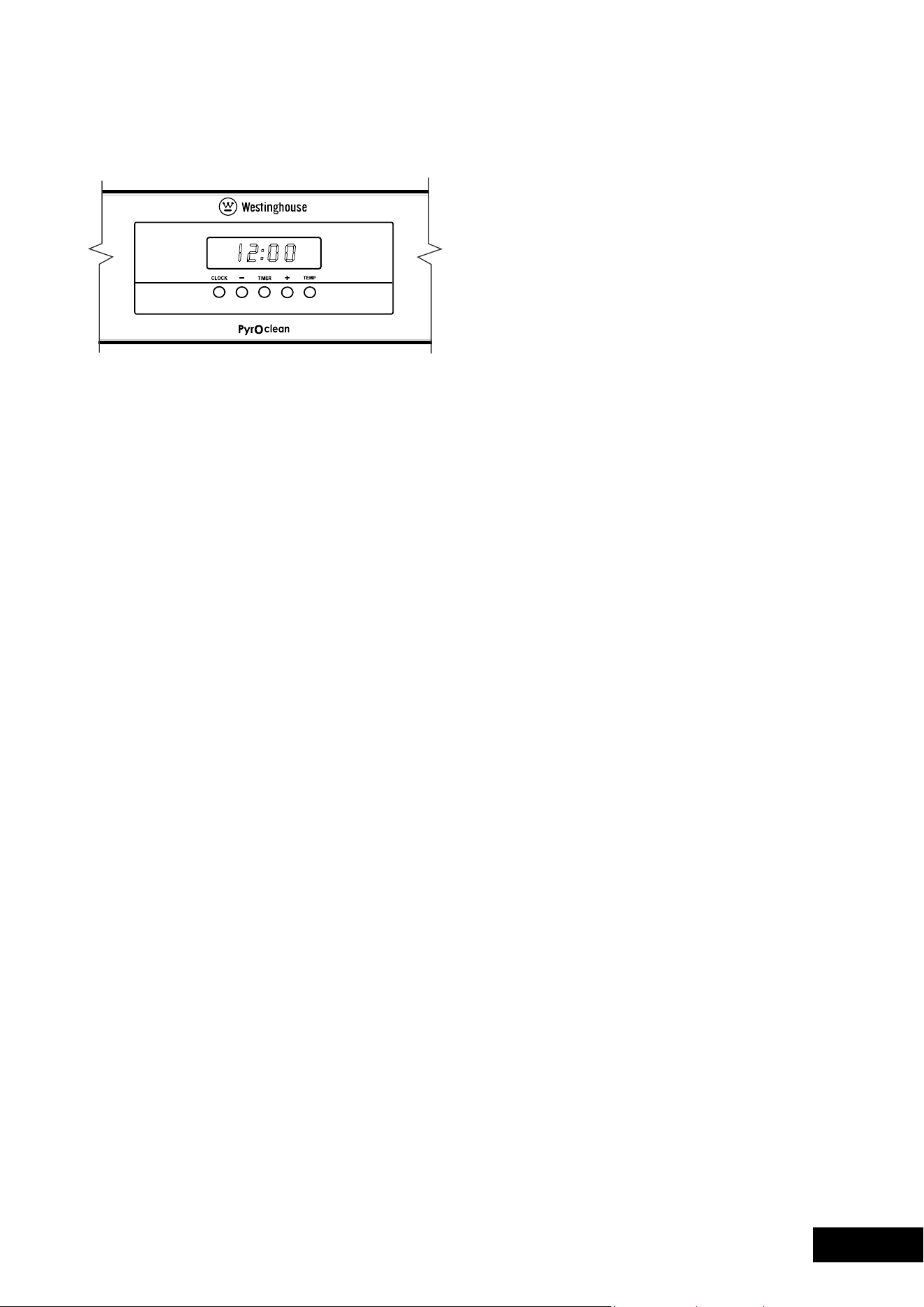
18 19
OPERATIONOPERATION
General features
Your5buttontouchcontrolclockhasthefollowingfeatures:
•TImeR–allowsyoutosetacountdowntimethatwill
beep when the set time has elapsed.
•TheTemP.buttonallowsthecurrenttemperatureofthe
oven to be displayed.
•elapsedtimedisplay
Setting the time of day
You must set the time of day before you can operate
your appliance.
Whenpowerissuppliedtoyouroven“12.00“willbe
displayed on the clock and the display will flash.
1.Tosetthetimeofdayhours,press–or+,thenpress
CLOCK and the seconds will begin to flash which can
betsetbypressingthe–or+buttons.5secondsafter
the last change, the clock display will stop flashing,
confirming that the time has been set.
Note: The clock has a 24-hour display.
Change the time of day (Daylight saving)
1. Press CLOCK until the clock display begins to flash.
2.Press–or+tochangethehoursthenpressCLoCK
and the minutes will begin to flash which can be set
bypressingthe–or+buttons.5secondsafterthelast
change,the“clock”symbolwilldisappear,confirming
the time has been set.
Note: The clock has a 24-hour display.
Setting the oven function
1. Turn the oven function selector clockwise to select the
desired oven function.
Note: each oven function has a default temperature
which can then be adjusted as outlined below.
Changing the oven temperature
1.Togglethetemperatureselectorleft(–)orright(+)
as required to set the desired cooking temperature.
Note: the temperature can be adjusted at any time
throughout the cooking time.
Setting the cooking time
1. Select the desired oven function and cooking
temperature.
2.PresstheCLoCKbuttonasoftenasnecessary,
untilthe“cooktime”❘➔❘ symbol appears.
3.Setthedesiredcookingtimecommencingwithminutes
byusingthe–or+,whilstthe❘➔❘ symbol is flashing,
then press the CLOCK button again and set the hours
byusingthe–or+buttons.After5secondsfromthe
last time adjustment the ❘➔❘ symbol will disappear and
your appliance is now programmed.
4.Whenthesettimehaselapsed,asignalwillsound.
To stop the signal, press any button on the clock and
then turn the oven function selector to OFF.
Note: Cooking time cannot be set for the Rapid Heat
function.
Setting the stop time
1. Select the desired oven function and cooking
temperature.
2.PresstheCLoCKbuttonasoftenasnecessary,
untilthe“endtime”➔❘ symbol appears flashing.
3.Setthedesiredstoptimecommencingwithhoursusing
the–or+whilstthe➔❘ symbol is flashing, then press
the CLOCK button again and set the minutes by using
the–or+buttons.After5secondsfromthelasttime
adjustment the ➔❘ symbol will disappear and your
appliance is now programmed.
4.Whenthesettimehaselapsed,asignalwillsound.
To stop the signal, press any button on the clock and
then turn the oven function selector to OFF.
Note: Stop time cannot be set for the Rapid Heat function.
Setting the delayed start cooking time
The“cooktime”and“stoptime”functionscanbecombined
to switch the oven on and off at a specific time during
the day.
1. Select the desired oven function and cooking
temperature.
2.Press“CLoCK”asoftenasnecessary,untilthe“cook
time”❘➔❘ symbol appears.
3.Setthedesiredcookingtimebyusing–or+,whilstthe
“timerarrow”❘➔❘ symbol is flashing.
4.PressCLoCKasoftenasnecessary,untilthe“endtime”
➔❘ symbol appears flashing
5.Setthedesiredswitch-offtimeusingthe–or+whilst
the ❘➔❘ symbolisflashing.The“cooktime”❘➔❘ and “end
time”➔❘ arrows are lit to confirm that the oven has
been programmed.
Note: Delayed start cooking time cannot be set for the
Rapid Heat function.
MODEL POR783 & POR883
PROGRAMMABLE CONTROLLER
MODEL POR881 ELECTRONIC CLOCK
Setting the cooking time
1. Select the desired oven function and cooking temperature.
2.Pressthe“Timer”asoftenasnecessary,untilthe“cook
time”➔❘ symbol appears.
3.Setthedesiredcookingtimebyusingthe–or+,
whilstthe“timerarrow”
isflashing.After5seconds
fromthelasttimeadjustmentthe“timerarrow”
will
disappear and your appliance is now programmed.
4.Whenthesettimehaselapsed,asignalwillsound.
Tostopthesignal,press“+”or“–”.
Setting the stop time
1. Select the desired oven function and cooking temperature.
2.Pressthe“Timer”asoftenasnecessary,untilthe“end
time”➔❘ symbol appears flashing.
3.Setthedesiredswitch-offtimeusingthe–or+whilst
the“timerarrow”
isflashing.After5secondsfrom
thelasttimeadjustmentthe“timerarrow”➔❘ will
disappear and your appliance is now programmed.
4.Whenthesettimehaselapsed,asignalwillsound.
Tostopthesignal,press“+”or“–”.
Setting the delayed start cooking time
The“cooktime”and“stoptime”functionscanbecombined
to switch the oven on and off at a specific time during the day.
1. Select the desired oven function and cooking temperature.
2.Press“Timer”asoftenasnecessary,untilthe“cook
time”❘➔❘ symbol appears.
3.Setthedesiredcookingtimebyusing–or+,whilst
the“timerarrow”
is flashing.
4.Press“Timer”asoftenasnecessary,untilthe“endtime”
➔❘ symbol appears flashing
5.Setthedesiredswitch-offtimeusingthe–or+whilst
the“timerarrow”
isflashing.The“cooktime”❘➔❘ and
“endtime”➔❘ arrows are lit to confirm that the oven
has been programmed.
On completion of cooking
When the set time has elapsed, a signal will sound for
1 minute, the oven will switch off and the remaining time
indication“0.00”willappearonthedisplay.
1.Tostopthesignal,press“+”or“–”.
Setting the minute minder
For setting a countdown period. When the period of time
has elapsed, an audible signal is sounded.
NOTE: This feature has no effect on the oven operation.
1.Press“Timer”asoftenasnecessary,untilthe“minuteminder”
symbol
appears flashing. Set the desired length of time
using–or+whilstthe“timerarrow”
isflashing.After
5secondsfromthelasttimeadjustmentthe“timerarrow”
will disappear and the minute minder has been set.
Once the set time has elapsed, a signal will sound for
1minute.Thetimeindication“0.00”andaflashing
“minuteminder”symbol
will appear on the display.
2.Tostopthesignal,press“+”or“–”.
Using FHU (Fast Heat Up) mode
To quickly and efficiently preheat your oven, it is
recommendedtoselectthe“fastHeat”cookingfeature.
1.ensuretheapplianceisonbypressingthe“on/off”.
The oven lights will light.
2.Selectthedesiredovenfunctionbypressing“function”.
3.Setthecookingtemperaturebypressingthe–or+
to decrease or increase the temperature.
NOTE: The temperature can only be adjusted when
the degrees symbol “°” is flashing.
Thetemperaturesettingchangesinincrementsof5°C.
4.Pressthe“fastHeat”.Theletters“fHU”willappearon
the temperature display.
5.Whenthesettemperatureisreachedthebuzzer
will sound and the set temperature will be displayed.
NOTE: “FHU” cannot be selected if the oven
temperature is above the preset temperature.
Activating the child-proof lock
When the child lock is engaged, the oven cannot be
switched on.
1.Switchofftheapplianceusingthe“on/off”.
2.Press“function”and–atthesametime,holduntil
theword“SAfe”isdisplayed.
Thechild-prooflockisnowengaged.
NOTE: When the child-proof lock function is active
the time of day and minute minder can only be set.
Releasing the child-proof lock
1.Press“function”and–atthesametime,holduntilthe
word“SAfe”isclearedfromthedisplay.Thechild-proof
lock is now released and the oven is ready to use.
Beep on touch
The beep sound can be activated anytime when a symbol
is pressed.
1.ensuretheovenisoffbypressing“on/off”.
2.Press“function”and+simultaneouslyfor2seconds,
a single beep will sound to confirm the operation.
Repeat the above procedure to reset the beep on touch
mode.Asdefault,thebeepontouchmodeisoff.
Safety cut-out feature
The oven automatically switches itself off if the temperature
is not adjusted or the appliance is left operating after a
period of time. The oven switches itself off after:
•20hourswhensetbetween30°Cand120°C
•8.5hourswhensetbetween120°Cand200°C
•5.5hourswhensetbetween200°Cand250°C

20 21
OPERATIONOPERATION
•Selectthecorrectshelflocationforfoodbeingcooked.
•makesuredisheswillfitintotheovenbeforeyou
switch it on.
•Keepedgesofbakingdishesatleast40mmfromthe
side of the oven. This allows free circulation of heat
and ensures even cooking.
•Donotopentheovendoormorethannecessary.
•Donotplacefoodswithalotofliquidintotheovenwith
other foods. This will cause food to steam and not brown.
•Aftertheovenisturnedoffitretainstheheatforsome
time.Usethisheattofinishcustardsortodrybread.
•Donotusealotofcookingoilwhenroasting.Thiswill
prevent splattering oil on the sides of the oven and
the oven door. Polyunsaturated fats can leave residue
which is very difficult to remove.
•Whencookingthingswhichrequireahighheatfrom
below (e.g. tarts), place the cooking dish on a scone
tray in the desired shelf position.
•forspongesandcakesusealuminium,brightfinished
ornon-stickutensils.
•Removeunnecessarytraysordisheswhenroasting
or baking.
Oven shelf location (exluding POR881)
Your oven has seven positions for shelves.
These are numbered from 1 (the lowest shelf position)
to 7 (the highest shelf position). See diagram.
To give maximum space above and below the shelves,
load them in this way:
•Whencookingwith1shelf,useposition3or4.
•Whencookingwith2shelves,useposition3and5.
Refer to cooking guide.
Usetheovenefficiently,bycookingmanytraysoffoodat
the same time. For example:
•Cook2traysofscones,smallcakesorsausagerolls.
•Cookaroastdinneratthesametimeasyoucook
chips or vegetables.
Oven shelf location (POR881)
Yourovencomeswithformed“easyclean”runnersthat
allow five positions for shelves. These are numbered from
1(thelowestshelfposition)to5(thehighestshelfposition).
See diagram.
In general:
•Whencookingwith1shelf,useposition3.
•Whencookingwith2shelves,useposition2and4.
For more specific suggestions refer to the table on the
following page.
Usetheovenefficiently,bycookingmanytraysoffoodat
the same time. For example:
•Cook2traysofscones,smallcakesorsausagerolls.
•Cookaroastdinneratthesametimeasyoucookchips
or vegetables.
not a shelf
position
5
4
3
2
1
MODEL POR881 ELECTRONIC CLOCK OVEN SHELF LOCATION
Setting the timer
1.PressTImeRbuttonuntilthe
display begins to flash.
2.Setthecountdowntimeyouwantbyusing–and+.
Commence with setting the number of seconds first.
The minutes and hours can then be set by subsequently
pressingtheTImeRagainandadjustingusingthe–and
+buttons.5secondsafterthelastchangethetimerwill
stop flashing, confirming the timer has been set.
3.Tocancelthetimerpressthetimerbuttonuntilthe
displayflashes.Thenpressandhold+and–buttons
until the timer is cleared.
4.Tostopthebeeper,press–,+orTImeRbuttons
Note: The clock display cannot be selected when the timer
is operating.
Elapsed Time
When an oven function is selected (other than pyrolytic
clean) and elapsed timer commences on the display
1.Toresetthistimerpressandholdboththe+and–
buttons until the timer is reset.
Displaying the cavity temperature
1.Duringoperationoftheoventhecurrentoven
temperatureduringpre-heatingoftheovencanbe
displayedbypressingtheTemPbutton.Duringnormal
operation the set temperature can be reviewed by
pressingtheTemPbutton.
Note: this temperature will only be displayed for
approximately 5 seconds.
Light operation
1.Duringoperationoftheoventhelampcanbeswitched
offbypressingandholdingtheTImeRbuttonuntilthe
lightturnsoff.Alsothelightcanbeturnedonfromthe
standbystatebypressingandholdingtheTImeRbutton
until the light comes on.
Activating the child-proof lock
When the child lock is engaged, the oven cannot be
operated and the door cannot be opened
1. Switch off the appliance using the function selector switch.
2.PressandholdtheCLoCKand+buttonsatthesame
timeuntiltheword‘SAfe’isdisplayedandadouble
beep is sounded. The word safe will be replaced by a
padlocksymbolonthedisplayafter5seconds.
Releasing the child-proof lock
1.PressandholdtheCLoCKand+buttonsatthe
same time until a double beep is sounded. This will
commencetounlockthedoorandafter5seconds
the oven is ready for use.
Switching the clock display ON and OFF
1.Presstogether+and–for2secondstoswitch‘off’
the display.
2.Presstogether+and–for2secondstoswitchtheclock
display‘on’again.
3.Whenthedisplayissettothe‘off’statepressingthe
+or–buttonmomentarilywilldisplaythetimefor5
seconds then turn off the display.
4.Whenthedisplayissettothe‘off’state,turningonthe
ovenwillturnthedisplay‘on’forthedurationofoven
operation.oncethefunctionisturned‘off’thedisplay
willturnoffafter5seconds.
Note: if a timer mode is set or the oven is operating, then it
is not possible to switch the display off.
Safety Cut-out feature
The oven automatically switches itself off if the temperature
is not adjusted or the appliance is left operating after a
period of time. The oven switches itself off after:
•12.5hourswhenthetemperatureissetlessthan120°C.
•8.5hourswhenthetemperatureissetto120°Cor
above,andbelow200°C.
•5.5hourswhenthetemperatureissetto200°Cor
above,andbelow250°C
•3.0hourswhenthetemperatureissetat250°C.
DEMO Mode
The oven can to be set to operate in a demo (eg in a retail
store) mode. In this mode the oven does not actually heat
If the oven has been inadvertently supplied in this mode.
The following instructions demonstrate how to exit this mode.
1.ensuretheovenisintheoffstate.Pressandholdthe+
buttonuntilabeepsounds.The‘Demo’textwillbegin
to flash.
2.Whileholdingthe+buttonturnthefunctionselectorto
the first oven function until another beep is heard.
3.Thenturnthefunctionselectortothe‘off’position.
4.Releasethe+button.
5.Toggleandholdthetemperatureselectortotheright(+)
until3beepssound.
The‘Demo’textwillnolongerbelitandtheovenwill
functionnormally.Ifthe‘Demo’testisstillpresentthen
repeat the above procedure.
degree to which the oven is currently being heated.
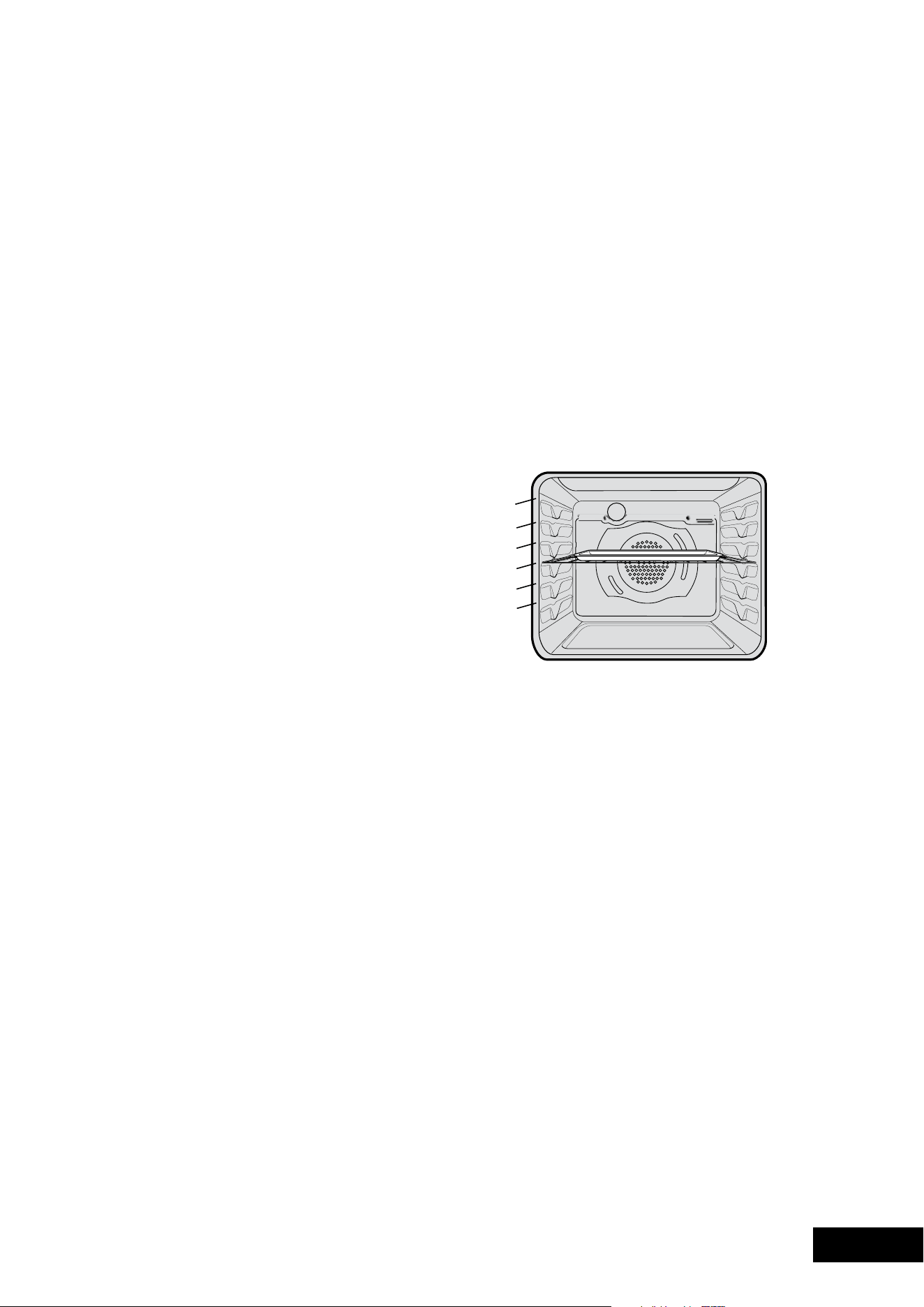
20 21
OPERATIONOPERATION
•Selectthecorrectshelflocationforfoodbeingcooked.
•makesuredisheswillfitintotheovenbeforeyou
switch it on.
•Keepedgesofbakingdishesatleast40mmfromthe
side of the oven. This allows free circulation of heat
and ensures even cooking.
•Donotopentheovendoormorethannecessary.
•Donotplacefoodswithalotofliquidintotheovenwith
other foods. This will cause food to steam and not brown.
•Aftertheovenisturnedoffitretainstheheatforsome
time.Usethisheattofinishcustardsortodrybread.
•Donotusealotofcookingoilwhenroasting.Thiswill
prevent splattering oil on the sides of the oven and
the oven door. Polyunsaturated fats can leave residue
which is very difficult to remove.
•Whencookingthingswhichrequireahighheatfrom
below (e.g. tarts), place the cooking dish on a scone
tray in the desired shelf position.
•forspongesandcakesusealuminium,brightfinished
ornon-stickutensils.
•Removeunnecessarytraysordisheswhenroasting
or baking.
Oven shelf location (exluding POR881)
Your oven has seven positions for shelves.
These are numbered from 1 (the lowest shelf position)
to 7 (the highest shelf position). See diagram.
To give maximum space above and below the shelves,
load them in this way:
•Whencookingwith1shelf,useposition3or4.
•Whencookingwith2shelves,useposition3and5.
Refer to cooking guide.
Usetheovenefficiently,bycookingmanytraysoffoodat
the same time. For example:
•Cook2traysofscones,smallcakesorsausagerolls.
•Cookaroastdinneratthesametimeasyoucook
chips or vegetables.
Oven shelf location (POR881)
Yourovencomeswithformed“easyclean”runnersthat
allow five positions for shelves. These are numbered from
1(thelowestshelfposition)to5(thehighestshelfposition).
See diagram.
In general:
•Whencookingwith1shelf,useposition3.
•Whencookingwith2shelves,useposition2and4.
For more specific suggestions refer to the table on the
following page.
Usetheovenefficiently,bycookingmanytraysoffoodat
the same time. For example:
•Cook2traysofscones,smallcakesorsausagerolls.
•Cookaroastdinneratthesametimeasyoucookchips
or vegetables.
not a shelf
position
5
4
3
2
1
MODEL POR881 ELECTRONIC CLOCK OVEN SHELF LOCATION
Setting the timer
1.PressTImeRbuttonuntilthe
display begins to flash.
2.Setthecountdowntimeyouwantbyusing–and+.
Commence with setting the number of seconds first.
The minutes and hours can then be set by subsequently
pressingtheTImeRagainandadjustingusingthe–and
+buttons.5secondsafterthelastchangethetimerwill
stop flashing, confirming the timer has been set.
3.Tocancelthetimerpressthetimerbuttonuntilthe
displayflashes.Thenpressandhold+and–buttons
until the timer is cleared.
4.Tostopthebeeper,press–,+orTImeRbuttons
Note: The clock display cannot be selected when the timer
is operating.
Elapsed Time
When an oven function is selected (other than pyrolytic
clean) and elapsed timer commences on the display
1.Toresetthistimerpressandholdboththe+and–
buttons until the timer is reset.
Displaying the cavity temperature
1.Duringoperationoftheoventhecurrentoven
temperatureduringpre-heatingoftheovencanbe
displayedbypressingtheTemPbutton.Duringnormal
operation the set temperature can be reviewed by
pressingtheTemPbutton.
Note: this temperature will only be displayed for
approximately 5 seconds.
Light operation
1.Duringoperationoftheoventhelampcanbeswitched
offbypressingandholdingtheTImeRbuttonuntilthe
lightturnsoff.Alsothelightcanbeturnedonfromthe
standbystatebypressingandholdingtheTImeRbutton
until the light comes on.
Activating the child-proof lock
When the child lock is engaged, the oven cannot be
operated and the door cannot be opened
1. Switch off the appliance using the function selector switch.
2.PressandholdtheCLoCKand+buttonsatthesame
timeuntiltheword‘SAfe’isdisplayedandadouble
beep is sounded. The word safe will be replaced by a
padlocksymbolonthedisplayafter5seconds.
Releasing the child-proof lock
1.PressandholdtheCLoCKand+buttonsatthe
same time until a double beep is sounded. This will
commencetounlockthedoorandafter5seconds
the oven is ready for use.
Switching the clock display ON and OFF
1.Presstogether+and–for2secondstoswitch‘off’
the display.
2.Presstogether+and–for2secondstoswitchtheclock
display‘on’again.
3.Whenthedisplayissettothe‘off’statepressingthe
+or–buttonmomentarilywilldisplaythetimefor5
seconds then turn off the display.
4.Whenthedisplayissettothe‘off’state,turningonthe
ovenwillturnthedisplay‘on’forthedurationofoven
operation.oncethefunctionisturned‘off’thedisplay
willturnoffafter5seconds.
Note: if a timer mode is set or the oven is operating, then it
is not possible to switch the display off.
Safety Cut-out feature
The oven automatically switches itself off if the temperature
is not adjusted or the appliance is left operating after a
period of time. The oven switches itself off after:
•12.5hourswhenthetemperatureissetlessthan120°C.
•8.5hourswhenthetemperatureissetto120°Cor
above,andbelow200°C.
•5.5hourswhenthetemperatureissetto200°Cor
above,andbelow250°C
•3.0hourswhenthetemperatureissetat250°C.
DEMO Mode
The oven can to be set to operate in a demo (eg in a retail
store) mode. In this mode the oven does not actually heat
If the oven has been inadvertently supplied in this mode.
The following instructions demonstrate how to exit this mode.
1.ensuretheovenisintheoffstate.Pressandholdthe+
buttonuntilabeepsounds.The‘Demo’textwillbegin
to flash.
2.Whileholdingthe+buttonturnthefunctionselectorto
the first oven function until another beep is heard.
3.Thenturnthefunctionselectortothe‘off’position.
4.Releasethe+button.
5.Toggleandholdthetemperatureselectortotheright(+)
until3beepssound.
The‘Demo’textwillnolongerbelitandtheovenwill
functionnormally.Ifthe‘Demo’testisstillpresentthen
repeat the above procedure.
degree to which the oven is currently being heated.

22 23
COOKINGCOOKING
Roasting Meat
1. Place the meat in the oven and set the temperature
between180°Cand200°C.(Itisrecommendedto
wrap your meats in an oven roasting bag or foil to
prevent fats and oils from splattering, making it easier
to clean your oven.)
2.Usethegrill/ovendishandsmokelessgrillinsert.
Place the meat on the insert.
3.Donotpiercethemeat,asthiswillallowjuices
to escape.
4.Whenthemeatiscooked,taketheroastoutofthe
oven, wrap in aluminium foil and leave to stand for
about10minutes.Thiswillhelpretainthejuiceswhen
the meat is carved. The table shows temperatures and
cooking times for different kinds of meat. These may
vary depending on the thickness or bone content of
the meat.
MEAT RECOMMENDED TEMPERATURE MINUTES PER
KILOGRAM
Beef
200°C
Rare
Medium
Well done
35–40
45–50
55–60
Lamb
200°C
Medium
Well done
40
60
Veal
180°C Well done
60
Pork
200°C Well done
60
Roasting poultry and fish
1. Place the poultry or fish in an oven set at a moderate
temperatureof180°C.
2.Placealayeroffoiloverthefishforaboutthree
quarters of the cooking time.
The table shows temperatures and cooking times for
different kinds of fish and poultry. These may vary
depending on the thickness or bone content of the meat.
POULTRY &
FISH
RECOMMENDED TEMPERATURE MINUTES PER
KILOGRAM
Chicken 180°C45–50
Duck180°C–200°C60–70
Turkey 180°C40–45(<10kg)
35–40(>10kg)
Fish 180°C20
Modes without Oven Fan
FOOD TEMPERATURE C OVEN SHELF POSITION* TIME IN MINUTES
Scones Plain or fruit 220210–15
BiscuitsRolled
Spooned
Shortbread biscuits
170
190
160
2
2
2
10–15
12–15
30–35
Meringues Hard–individual
Soft–individual
Pavlova–6egg
110
180
110
2
2
1
90
15–20
75
Cakes Patty cakes
Sponge–4egg
Shallow butter cake
Rich fruit cake
190
180
180
140
3
2
2
2
15–20
20–30
30–40
180
Pastry–shortcrustCornish pasties
Custard tart
200
200/180
2
1
40–45
10/20–30
Pastry–chouxCream puffs 210225–30
Yeast goods Bread2101 25–30
Modes with Oven Fan
FOOD TEMPERATURE C OVEN SHELF POSITION* TIME IN MINUTES
Scones Plain or fruit 210Any10–15
BiscuitsRolled
Spooned
Shortbread biscuits
150
180
150
Any
Any
Any
10–15
12–15
30–35
Meringues Hard–individual
Soft–individual
Pavlova–6egg
100
165
100
Any
Any
Any
90
15–20
75
Cakes Patty cakes
Sponge–4egg
Shallow butter cake
Rich fruit cake
180
170
170
130
Any
Any
Any
Any
15–20
20–30
30–40
180
Pastry–shortcrustCornish pasties
Custard tart
180
190/170
Any
Any
40–45
20–30
Pastry–chouxCream puffs 200Any25–30
Yeast goods Bread200Any25–30
* Counting from the bottom shelf up.
Choosing the best oven settings
The following table is intended as a guide and experience
may show some variation in cooking times necessary
to meet individual requirements. It may be necessary to
change some cooking times and temperatures from previous
oven.forbestbakingresultspreheatovenfor30minutes.
COOKING GUIDE

22 23
COOKINGCOOKING
Roasting Meat
1. Place the meat in the oven and set the temperature
between180°Cand200°C.(Itisrecommendedto
wrap your meats in an oven roasting bag or foil to
prevent fats and oils from splattering, making it easier
to clean your oven.)
2.Usethegrill/ovendishandsmokelessgrillinsert.
Place the meat on the insert.
3.Donotpiercethemeat,asthiswillallowjuices
to escape.
4.Whenthemeatiscooked,taketheroastoutofthe
oven, wrap in aluminium foil and leave to stand for
about10minutes.Thiswillhelpretainthejuiceswhen
the meat is carved. The table shows temperatures and
cooking times for different kinds of meat. These may
vary depending on the thickness or bone content of
the meat.
MEAT RECOMMENDED TEMPERATURE MINUTES PER
KILOGRAM
Beef
200°C
Rare
Medium
Well done
35–40
45–50
55–60
Lamb
200°C
Medium
Well done
40
60
Veal
180°C Well done
60
Pork
200°C Well done
60
Roasting poultry and fish
1. Place the poultry or fish in an oven set at a moderate
temperatureof180°C.
2.Placealayeroffoiloverthefishforaboutthree
quarters of the cooking time.
The table shows temperatures and cooking times for
different kinds of fish and poultry. These may vary
depending on the thickness or bone content of the meat.
POULTRY &
FISH
RECOMMENDED TEMPERATURE MINUTES PER
KILOGRAM
Chicken 180°C45–50
Duck180°C–200°C60–70
Turkey 180°C40–45(<10kg)
35–40(>10kg)
Fish 180°C20
Modes without Oven Fan
FOOD TEMPERATURE C OVEN SHELF POSITION* TIME IN MINUTES
Scones Plain or fruit 220210–15
BiscuitsRolled
Spooned
Shortbread biscuits
170
190
160
2
2
2
10–15
12–15
30–35
Meringues Hard–individual
Soft–individual
Pavlova–6egg
110
180
110
2
2
1
90
15–20
75
Cakes Patty cakes
Sponge–4egg
Shallow butter cake
Rich fruit cake
190
180
180
140
3
2
2
2
15–20
20–30
30–40
180
Pastry–shortcrustCornish pasties
Custard tart
200
200/180
2
1
40–45
10/20–30
Pastry–chouxCream puffs 210225–30
Yeast goods Bread2101 25–30
Modes with Oven Fan
FOOD TEMPERATURE C OVEN SHELF POSITION* TIME IN MINUTES
Scones Plain or fruit 210Any10–15
BiscuitsRolled
Spooned
Shortbread biscuits
150
180
150
Any
Any
Any
10–15
12–15
30–35
Meringues Hard–individual
Soft–individual
Pavlova–6egg
100
165
100
Any
Any
Any
90
15–20
75
Cakes Patty cakes
Sponge–4egg
Shallow butter cake
Rich fruit cake
180
170
170
130
Any
Any
Any
Any
15–20
20–30
30–40
180
Pastry–shortcrustCornish pasties
Custard tart
180
190/170
Any
Any
40–45
20–30
Pastry–chouxCream puffs 200Any25–30
Yeast goods Bread200Any25–30
* Counting from the bottom shelf up.
Choosing the best oven settings
The following table is intended as a guide and experience
may show some variation in cooking times necessary
to meet individual requirements. It may be necessary to
change some cooking times and temperatures from previous
oven.forbestbakingresultspreheatovenfor30minutes.
COOKING GUIDE

24 25
COOKING
PROBLEMS
GRILLING
Grilling hints
TIPS & INFORMATION
NOTE: Always clean the grill/oven dish after every use.
Excessive fat build up may cause a fire.
Dependingonyourmodelofapplianceyouwillgrill:
•Withthedooropen,ifyouaregrillingintheseparate
grillwall-ovencompartment.
•Withthedrawerapproximatelytwofingerwidthsajar,
ifyouaregrillinginthePGR657andPGR659.
•Withthedooropenorclosed,ifyouaregrillinginthe
oven compartment.
Asamethodofcooking,grillingcanbeusedto:
• enhancetheflavoursofvegetables,fish,poultryandmeat.
•Sealthesurfaceofthefoodandretainthenaturaljuices.
This table shows how to grill different types of meat:
BeefYou can use tenderloin, rump, sirloin.
Brushwithoilormeltedbutter,especially
if the meat is very lean.
Lamb You can use loin chops, shortloin chops,
chump chops, and forequarter chops.
Remove skin or cut at intervals to stop curling.
Brushwithoilormeltedbutter.
Sausages Prick sausages to stop skin from bursting.
Poultry Divideintoservingpieces.
Brushwithoil.
Fish Brushwithoilormeltedbutterandlemonjuice.
BaconRemove rind.
Grill flat.
Guide to better grilling
Steak 15–20minutes
Chops 20–30minutes
Fish 8–10minutes
Bacon4–5minutes
Nodefinitetimescanbegivenforgrillingbecausethis
depends on your own tastes and the size of the food.
These times should only be used as a guide and remember
to turn the food over half way through the cooking process.
For better grilling results, follow these easy instructions:
1. Remove oven/grill dish and smokeless grill insert and
preheatgrillforabout5minutes.
2.Chooseonlyprimecutsofmeatorfish.Ifthecutisless
than5mmthickitwilldryout.Ifthecutismorethan
40mmthick,theoutsidemayburnwhilsttheinside
remains raw.
3.Donotplacealuminiumfoilunderthefoodasthis
prevents fats and oils from draining away, which could
result in a fire.
4.Bastethefoodduringcookingwithbutter,oliveoil
or marinade. Grilled food is better if marinated
before cooking.
5.Usetongstoturnfoodasaforkpiercesthesurfaceand
will let juices escape.
Fan Grill (Multifunction models only)
If your appliance has fan grill as a function, this will assist
the grilling process by circulating the heat evenly around
thefood.Therecommendedtemperaturesettingis180°C
for all fan grilling functions.
1. Place the oven/grill dish on the bottom rack.
2.Placemeat/poultryonanovenshelfabovetheoven/
grill dish.
3.Wipeoffanyoilorfatwhichspatterswhiletheoven
is still warm.
There is no need to turn the meat as both sides are cooked
at the same time which means that the food is succulent.
GRILLING GUIDE
PROBLEM CAUSES REMEDIES
Unevencooking:•Incorrectshelfposition.
•oventraytoolarge.
•Traysnotcentralised.
•Airflowinovenuneven.
•Grilldishaffectingthermostat.
–Selectshelfthatputsfoodinthecentreoftheoven.
–experimentwithothertraysordishes.
–Centretrays.
–Rotatefoodduringcooking.
–Removegrilldishfromovenonbakemodes.
Bakedproductstoobrown
on top:
•ovennotpreheated.
•Bakingtinstoolargefortherecipe.
•Bakingtinsnotevenlyspaced.
•Productsnotevenlysizedorspaced
on trays.
•Bakingtemperaturetoohigh.
–Preheattheoven.
–Usecorrectsizetins.
–Staggerbakingtinsatleast3cmbetweentins
and the oven walls.
–makeintosamesizeandshape,&spread
evenly over trays.
–Lowerthetemperature.
Bakedproductstoobrown
on bottom:
•Bakingtinstoolargefortherecipe.
•Bakingtinsaredarkmetalorglass.
•foodtoolowintheoven.
•ovendooropenedtoofrequently
during baking.
•Bakingtemperaturetoohigh.
•Grilldishaffectingthermostat.
–Usecorrectsizetins.
–Changetoshiny,lighttinsorlowerthe
temperatureby10°C.
–Cookoneshelfhigher.
–Don’topentheovendooruntilatleasthalfthe
cooking time has passed.
–Lowerthetemperature.
–Removegrilldishfromovenonbakemodes.
Cakes have a cracked,
thick crust:
•Bakingtemperaturetoohigh.
•foodtoohighinoven.
•Cakebatterovermixed.
•Pantoodeep.
•Bakingpansdark.
–Lowerthetemperature.
–Cookoneshelflower.
–mixjustlongenoughtocombineingredients.
–Checksizeofpananduserecommendedsize.
–Changetoshinypans.
Bakedproductsarepale,
flat and undercooked:
•Bakingtemperaturetoolow.
•foodtoolowinoven.
•Bakingtimetooshort.
•Incorrecttinsize.
–Raisethetemperature.
–Cookoneshelfhigher.
–Increasecookingtime.
–Usecorrectsizetin.
Cakes fallen in the centre: •Bakingtemperaturetoolow.
•Bakingtimetooshort.
•ProportionsofIngredientsincorrectin
the recipe.
•openingdoortooearlyinbaking.
–Raisethetemperature.
–Increasecookingtime.
–Checkrecipe.
–Donotopenthedooruntilthelastquarter
of cooking time.
Roastmeat&potatoesnot
browning in fan oven:
•Poorhotaircirculation.
•Grilldishaffectingthermostat.
–elevatefoodontoaracktoallowaircirculation.
–Removegrilldishfromovenonbakemodes.
Juices running out of meat: –Donotpiercemeatwithfork,turnwithtongs.
Grilled meats overcooked on
outside&rawinthecentre:
–Grillatlowerinsertposition.
Grilledchops&steakscurling:–Cutintofatevery2cm(1/2”).
DEALING WITH COOKING PROBLEMS
(SEE ALSO Pg.37)

24 25
COOKING
PROBLEMS
GRILLING
Grilling hints
TIPS & INFORMATION
NOTE: Always clean the grill/oven dish after every use.
Excessive fat build up may cause a fire.
Dependingonyourmodelofapplianceyouwillgrill:
•Withthedooropen,ifyouaregrillingintheseparate
grillwall-ovencompartment.
•Withthedrawerapproximatelytwofingerwidthsajar,
ifyouaregrillinginthePGR657andPGR659.
•Withthedooropenorclosed,ifyouaregrillinginthe
oven compartment.
Asamethodofcooking,grillingcanbeusedto:
• enhancetheflavoursofvegetables,fish,poultryandmeat.
•Sealthesurfaceofthefoodandretainthenaturaljuices.
This table shows how to grill different types of meat:
BeefYou can use tenderloin, rump, sirloin.
Brushwithoilormeltedbutter,especially
if the meat is very lean.
Lamb You can use loin chops, shortloin chops,
chump chops, and forequarter chops.
Remove skin or cut at intervals to stop curling.
Brushwithoilormeltedbutter.
Sausages Prick sausages to stop skin from bursting.
Poultry Divideintoservingpieces.
Brushwithoil.
Fish Brushwithoilormeltedbutterandlemonjuice.
BaconRemove rind.
Grill flat.
Guide to better grilling
Steak 15–20minutes
Chops 20–30minutes
Fish 8–10minutes
Bacon4–5minutes
Nodefinitetimescanbegivenforgrillingbecausethis
depends on your own tastes and the size of the food.
These times should only be used as a guide and remember
to turn the food over half way through the cooking process.
For better grilling results, follow these easy instructions:
1. Remove oven/grill dish and smokeless grill insert and
preheatgrillforabout5minutes.
2.Chooseonlyprimecutsofmeatorfish.Ifthecutisless
than5mmthickitwilldryout.Ifthecutismorethan
40mmthick,theoutsidemayburnwhilsttheinside
remains raw.
3.Donotplacealuminiumfoilunderthefoodasthis
prevents fats and oils from draining away, which could
result in a fire.
4.Bastethefoodduringcookingwithbutter,oliveoil
or marinade. Grilled food is better if marinated
before cooking.
5.Usetongstoturnfoodasaforkpiercesthesurfaceand
will let juices escape.
Fan Grill (Multifunction models only)
If your appliance has fan grill as a function, this will assist
the grilling process by circulating the heat evenly around
thefood.Therecommendedtemperaturesettingis180°C
for all fan grilling functions.
1. Place the oven/grill dish on the bottom rack.
2.Placemeat/poultryonanovenshelfabovetheoven/
grill dish.
3.Wipeoffanyoilorfatwhichspatterswhiletheoven
is still warm.
There is no need to turn the meat as both sides are cooked
at the same time which means that the food is succulent.
GRILLING GUIDE
PROBLEM CAUSES REMEDIES
Unevencooking:•Incorrectshelfposition.
•oventraytoolarge.
•Traysnotcentralised.
•Airflowinovenuneven.
•Grilldishaffectingthermostat.
–Selectshelfthatputsfoodinthecentreoftheoven.
–experimentwithothertraysordishes.
–Centretrays.
–Rotatefoodduringcooking.
–Removegrilldishfromovenonbakemodes.
Bakedproductstoobrown
on top:
•ovennotpreheated.
•Bakingtinstoolargefortherecipe.
•Bakingtinsnotevenlyspaced.
•Productsnotevenlysizedorspaced
on trays.
•Bakingtemperaturetoohigh.
–Preheattheoven.
–Usecorrectsizetins.
–Staggerbakingtinsatleast3cmbetweentins
and the oven walls.
–makeintosamesizeandshape,&spread
evenly over trays.
–Lowerthetemperature.
Bakedproductstoobrown
on bottom:
•Bakingtinstoolargefortherecipe.
•Bakingtinsaredarkmetalorglass.
•foodtoolowintheoven.
•ovendooropenedtoofrequently
during baking.
•Bakingtemperaturetoohigh.
•Grilldishaffectingthermostat.
–Usecorrectsizetins.
–Changetoshiny,lighttinsorlowerthe
temperatureby10°C.
–Cookoneshelfhigher.
–Don’topentheovendooruntilatleasthalfthe
cooking time has passed.
–Lowerthetemperature.
–Removegrilldishfromovenonbakemodes.
Cakes have a cracked,
thick crust:
•Bakingtemperaturetoohigh.
•foodtoohighinoven.
•Cakebatterovermixed.
•Pantoodeep.
•Bakingpansdark.
–Lowerthetemperature.
–Cookoneshelflower.
–mixjustlongenoughtocombineingredients.
–Checksizeofpananduserecommendedsize.
–Changetoshinypans.
Bakedproductsarepale,
flat and undercooked:
•Bakingtemperaturetoolow.
•foodtoolowinoven.
•Bakingtimetooshort.
•Incorrecttinsize.
–Raisethetemperature.
–Cookoneshelfhigher.
–Increasecookingtime.
–Usecorrectsizetin.
Cakes fallen in the centre: •Bakingtemperaturetoolow.
•Bakingtimetooshort.
•ProportionsofIngredientsincorrectin
the recipe.
•openingdoortooearlyinbaking.
–Raisethetemperature.
–Increasecookingtime.
–Checkrecipe.
–Donotopenthedooruntilthelastquarter
of cooking time.
Roastmeat&potatoesnot
browning in fan oven:
•Poorhotaircirculation.
•Grilldishaffectingthermostat.
–elevatefoodontoaracktoallowaircirculation.
–Removegrilldishfromovenonbakemodes.
Juices running out of meat: –Donotpiercemeatwithfork,turnwithtongs.
Grilled meats overcooked on
outside&rawinthecentre:
–Grillatlowerinsertposition.
Grilledchops&steakscurling:–Cutintofatevery2cm(1/2”).
DEALING WITH COOKING PROBLEMS
(SEE ALSO Pg.37)

26 27
CLEANINGCLEANING
TIPS & INFORMATION
•Alwaysmakesurethattheoveniselectricallyisolated
before cleaning. This can be done via the functional
switchlocatednearby.Donotusesteamcleaners.
•Donotlinethebottomoftheovenorgrillwithfoil
or cookware.
Enamel
•Rubpersistentstainsvigorouslywithanylonscoureror
creamed powder cleansers.
NOTE: You can also use household oven enamel
cleaners – follow the manufacturer’s instructions carefully.
WARNING
Donotuseharshabrasivecleanersorsharpmetalscrapers
to clean the oven door glass since they can scratch the
surface, which may result in shattering of the glass.
Stainless steel
Allgradesofstainlesssteelcanstain,discolourorbecame
greasy. You must clean these areas regularly by following
the procedures below, if you want your appliance to look
its best, perform well and have a long life.
Care must be taken when wiping exposed stainless steel edges...
they can be sharp!
Your stainless steel appliance is manufactured from a mark
resistant stainless steel. This special stainless steel resists
marks such as finger prints and water spots. To keep your
stainless steel appliance looking at its best, you should
clean it regularly. Wash with warm soapy water and rinse
with clean water. Wipe with clean water and a soft clean
cloth to remove soap residue.
NOTE: Enure you follow the polish or brushing lines in the steel.
TIPS & INFORMATION
DoNoTusestainlesssteelcleaners,abrasivepadsor
other cleaners as they are likely to scratch the surface.
Damageduetopoorcleaningtechniqueisnotcovered
by your warranty.
Glass
•Glasssurfacesondoorsandcontrolpanelsarebest
cleaned immediately after soiling.
•Adampclothmayhelpremovebakedonfooddeposits.
•ovencleanerscanbeusedtoremovestubbornmarks
and stains.
• Donotuseharshabrasivecleanersorsharpmetalscrapers
to clean the oven door glass since they can scratch the
surface, which may result in shattering of the glass.
Oven
•Alwayskeepyourapplianceclean.ensurethatfatsand
oils do not accumulate around elements, burners or fans.
•Alwayskeeptheovendish,bakingtrays,grilldishand
grill dish inserts clean, as any fat deposits may catch fire.
•Alwayswrapyourmeatsinfoiloranovenroastingbag
tominimisecleaning.Anypolyunsaturatedfatscanleave
avarnish-likeresiduewhichisverydifficulttoremove.
Grill
•Alwayskeepthegrilldishandgrilldishinsertclean,
as any fat deposits may catch fire.
CLEANING YOUR APPLIANCE CLEANING YOUR APPLIANCE CATALYTIC LINERS
(WHERE FITTED)
Cleaning your oven accessories
Removing the trays and shelves from your appliance
•Slidethedishandgrilltraytowardsyouuntiltheyreach
the front stop.
•Tiltthemupatthefronttoclearthesidesupports,
taking care not to spill the contents.
•Liftthemclear.
•Washthetrayandshelvesinhotsoapywater.
•Reversetheabovestepstoputthegrilltrayandshelves
back again.
• ensurethattheyareplacedbetweenthe2supportwires.
See page 9 for more details (excluding POR881).
Removing the side racks or shelf supports (excluding POR881)
•Grasptheshelfsupportatthefront.
•Pullitfirmlyinwards.
•Toinstalltheshelfsupport,seepage8.
Some models come with Catalytic liners. These models contain:
2 Catalytic side liners (to be fitted by you)
1 Catalytic fan cover (already fitted)
NOTE: If your oven does not have catalytic liners and
you wish to purchase them, they are available from the
Customer Care Centre.
Operation
The catalytic liners are coated with a specially formulated
enamel coating, over a base of regular enamel. This enamel
coatinghasaroughsurfacewhichisalsoporous.During
normal cooking, fats and other food spatter is partially
absorbed into the surface and then oxidised away.
This oxidisation of the fat works best if the oven is set at
high temperatures. If you do a lot of lower temperature
baking,sayaroundthenormal180ºC,thenthecleaning
processmaynotbecomplete.everynowandthenyou
shouldturntheovenonto260ºCforaroundonehour
to completely remove the soil.
Cleaning
Should the panels become heavily soiled, they will need to
be taken out of the oven and cleaned by hand. They should
besoakedinwarm,soapywaterforatleast2hoursand
then wiped clean with a soft cloth.
NOTE: Solid cleaning powders, creamy cleansers, caustic
oven cleaners, steel wool or other scourers will ruin the
catalytic surface and must NEVER BE USED.
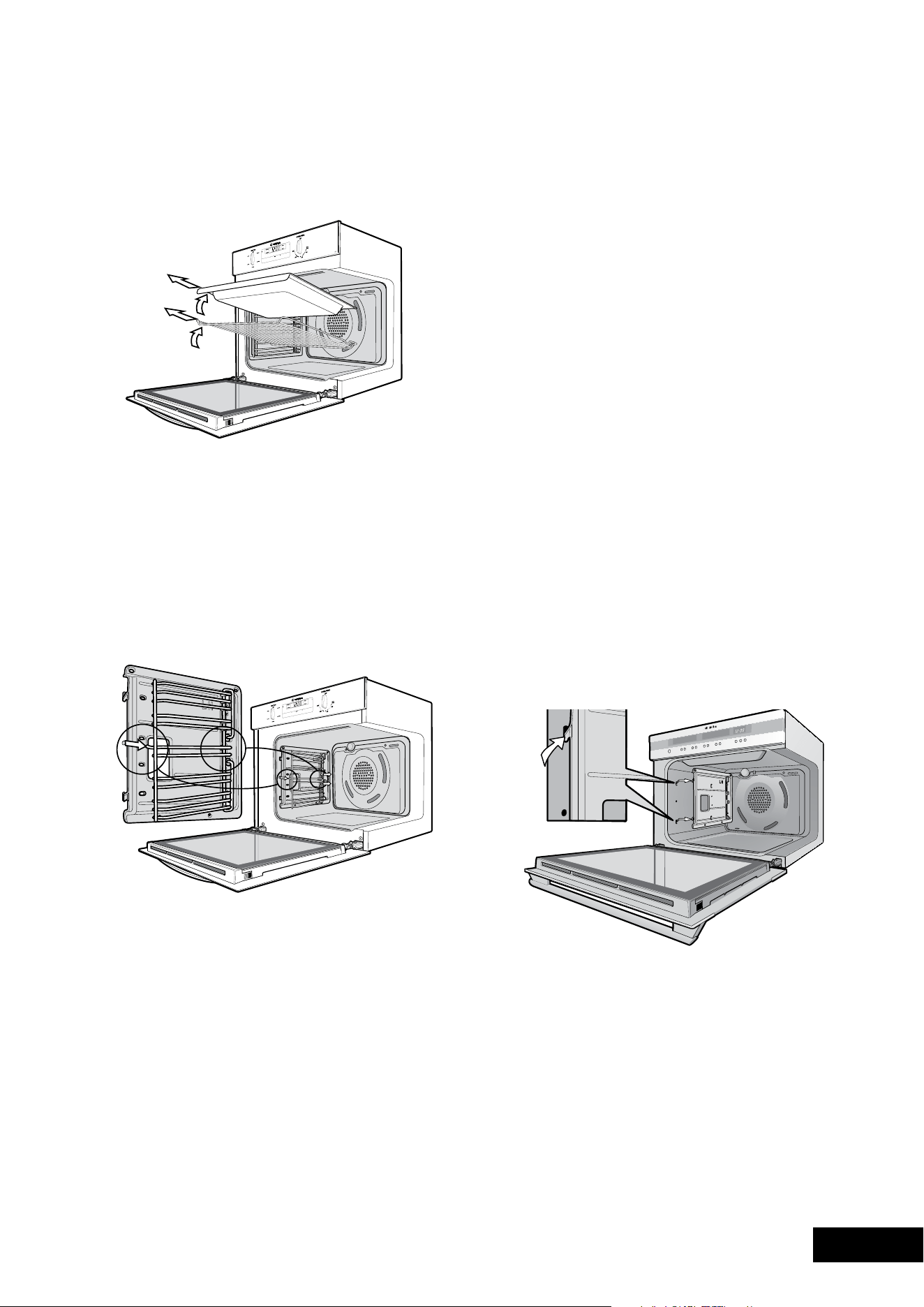
26 27
CLEANINGCLEANING
TIPS & INFORMATION
•Alwaysmakesurethattheoveniselectricallyisolated
before cleaning. This can be done via the functional
switchlocatednearby.Donotusesteamcleaners.
•Donotlinethebottomoftheovenorgrillwithfoil
or cookware.
Enamel
•Rubpersistentstainsvigorouslywithanylonscoureror
creamed powder cleansers.
NOTE: You can also use household oven enamel
cleaners – follow the manufacturer’s instructions carefully.
WARNING
Donotuseharshabrasivecleanersorsharpmetalscrapers
to clean the oven door glass since they can scratch the
surface, which may result in shattering of the glass.
Stainless steel
Allgradesofstainlesssteelcanstain,discolourorbecame
greasy. You must clean these areas regularly by following
the procedures below, if you want your appliance to look
its best, perform well and have a long life.
Care must be taken when wiping exposed stainless steel edges...
they can be sharp!
Your stainless steel appliance is manufactured from a mark
resistant stainless steel. This special stainless steel resists
marks such as finger prints and water spots. To keep your
stainless steel appliance looking at its best, you should
clean it regularly. Wash with warm soapy water and rinse
with clean water. Wipe with clean water and a soft clean
cloth to remove soap residue.
NOTE: Enure you follow the polish or brushing lines in the steel.
TIPS & INFORMATION
DoNoTusestainlesssteelcleaners,abrasivepadsor
other cleaners as they are likely to scratch the surface.
Damageduetopoorcleaningtechniqueisnotcovered
by your warranty.
Glass
•Glasssurfacesondoorsandcontrolpanelsarebest
cleaned immediately after soiling.
•Adampclothmayhelpremovebakedonfooddeposits.
•ovencleanerscanbeusedtoremovestubbornmarks
and stains.
• Donotuseharshabrasivecleanersorsharpmetalscrapers
to clean the oven door glass since they can scratch the
surface, which may result in shattering of the glass.
Oven
•Alwayskeepyourapplianceclean.ensurethatfatsand
oils do not accumulate around elements, burners or fans.
•Alwayskeeptheovendish,bakingtrays,grilldishand
grill dish inserts clean, as any fat deposits may catch fire.
•Alwayswrapyourmeatsinfoiloranovenroastingbag
tominimisecleaning.Anypolyunsaturatedfatscanleave
avarnish-likeresiduewhichisverydifficulttoremove.
Grill
•Alwayskeepthegrilldishandgrilldishinsertclean,
as any fat deposits may catch fire.
CLEANING YOUR APPLIANCE CLEANING YOUR APPLIANCE CATALYTIC LINERS
(WHERE FITTED)
Cleaning your oven accessories
Removing the trays and shelves from your appliance
•Slidethedishandgrilltraytowardsyouuntiltheyreach
the front stop.
•Tiltthemupatthefronttoclearthesidesupports,
taking care not to spill the contents.
•Liftthemclear.
•Washthetrayandshelvesinhotsoapywater.
•Reversetheabovestepstoputthegrilltrayandshelves
back again.
• ensurethattheyareplacedbetweenthe2supportwires.
See page 9 for more details (excluding POR881).
Removing the side racks or shelf supports (excluding POR881)
•Grasptheshelfsupportatthefront.
•Pullitfirmlyinwards.
•Toinstalltheshelfsupport,seepage8.
Some models come with Catalytic liners. These models contain:
2 Catalytic side liners (to be fitted by you)
1 Catalytic fan cover (already fitted)
NOTE: If your oven does not have catalytic liners and
you wish to purchase them, they are available from the
Customer Care Centre.
Operation
The catalytic liners are coated with a specially formulated
enamel coating, over a base of regular enamel. This enamel
coatinghasaroughsurfacewhichisalsoporous.During
normal cooking, fats and other food spatter is partially
absorbed into the surface and then oxidised away.
This oxidisation of the fat works best if the oven is set at
high temperatures. If you do a lot of lower temperature
baking,sayaroundthenormal180ºC,thenthecleaning
processmaynotbecomplete.everynowandthenyou
shouldturntheovenonto260ºCforaroundonehour
to completely remove the soil.
Cleaning
Should the panels become heavily soiled, they will need to
be taken out of the oven and cleaned by hand. They should
besoakedinwarm,soapywaterforatleast2hoursand
then wiped clean with a soft cloth.
NOTE: Solid cleaning powders, creamy cleansers, caustic
oven cleaners, steel wool or other scourers will ruin the
catalytic surface and must NEVER BE USED.
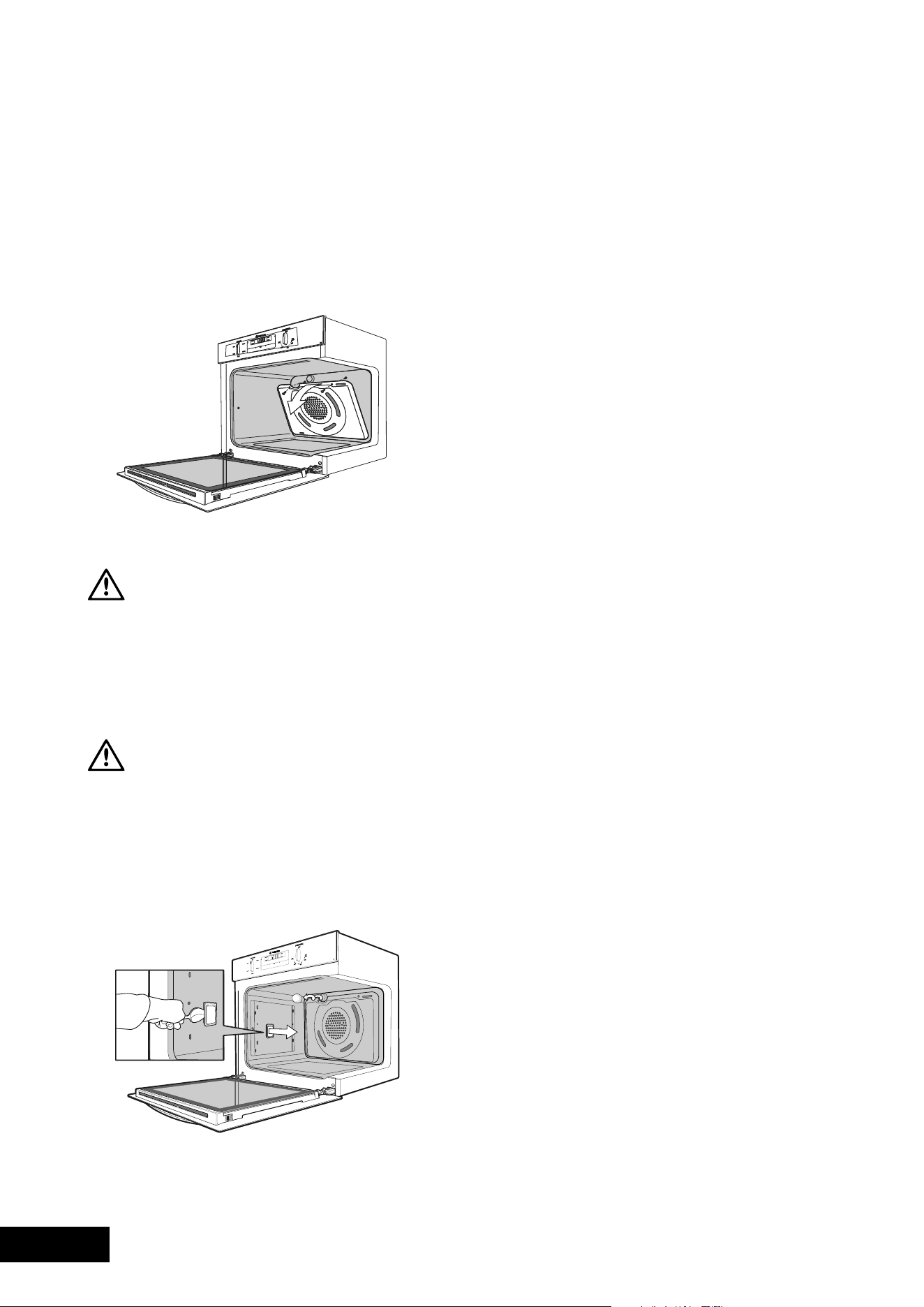
28 29
CLEANINGCLEANING
Removing the catalytic liners
•RemoveSideRacks(seepage23).
•Liftthelineruptodisengagethehooks.
•Thelinersshouldnowbefreetobepulledintowards
the centre of the oven.
•Refertopage8forre-installingyoursideliners.
Removing and replacing the catalytic fan baffle (where fitted)
CAUTION
The oven must be switched off before removing the fan
baffle, and the fan baffle must be replaced in accordance
with instructions.
•Removethe2retainingscrewsonthetopedgeof
the fan baffle.
•Pullthetopedgetowardsyouandthendisengage
to bottom tabs from the oven back.
CAUTION
NOTE: It is critical that the fan baffle is replaced after
cleaning, before the oven is operated again.
•Insertthetwotabsatthebottomofthefanbaffle
into their corresponding slots in the oven back.
•Pushthetophomeandinsertscrewsfirmlyinto
appropriate holes.
•Thefanbafflemustnotbeloose.Thefanbaffle
must be flush with the back wall of the oven.
CATALYTIC LINERS
(WHERE FITTED)
Removing and replacing the oven light and side light (where fitted)
•Turnovenlightglassanticlockwisetoremoveitfor
globe replacement.
• Aspecialhightemperatureresistantglobeshouldbeused.
This can be purchased from the Customer Care Centre.
•Toremovesidelight,placeaspoonunderthelight
glass and lever off. Replace globe and snap glass
cover back into position.
WARNING
Make sure the appliance is turned off before you remove
or replace parts, to avoid the possibility of electric shock.
Releasing the grill element
We have designed the upper element with a hanger clip
to help you reach your oven roof for cleaning.
Retaining wire models
•Liftelementupcarefully.
•Pullhangercliptotheleftorrighttounhookit.
The element will drop down freely.
Rotating latch models
•Rotatelatch180º.Theelementwilldropdownfreely.
Replacing the oven top light (POR883 model only)
WARNING
Turn the appliance off at the main switch to make sure
there is no power to the oven.
•Thetoplightispositionedbehindthegrilldeflector
at the top of the oven.
•Toremovetheglobetheshelvesshouldfirstbe
removed from the oven.
•Insertasmallscrewdriverintotheglasscutout
between the two metal clips on the left hand side,
as shown in diagram.
•Gentlylevertheglasscoveroff,bypushingthescrew
driver in and moving it upwards, whilst holding the
glass cover with the other hand. (If not supported,
the glass cover can fall and break).
•Removethefaultyglobebypullingitdirectlyoutof
its holder.
•Replacetheoldglobewithanewone,ensuringnotto
directly touch the surface of the globe with your fingers,
(Atissueorsoftclothisbestforthis.)
•Pickuptheglasscoverandplaceshortedgeinto
right side of housing; push up opposite end of
glass cover until it snaps into position.
•Resecurethetopelementinplace.
CLEANING YOUR APPLIANCE
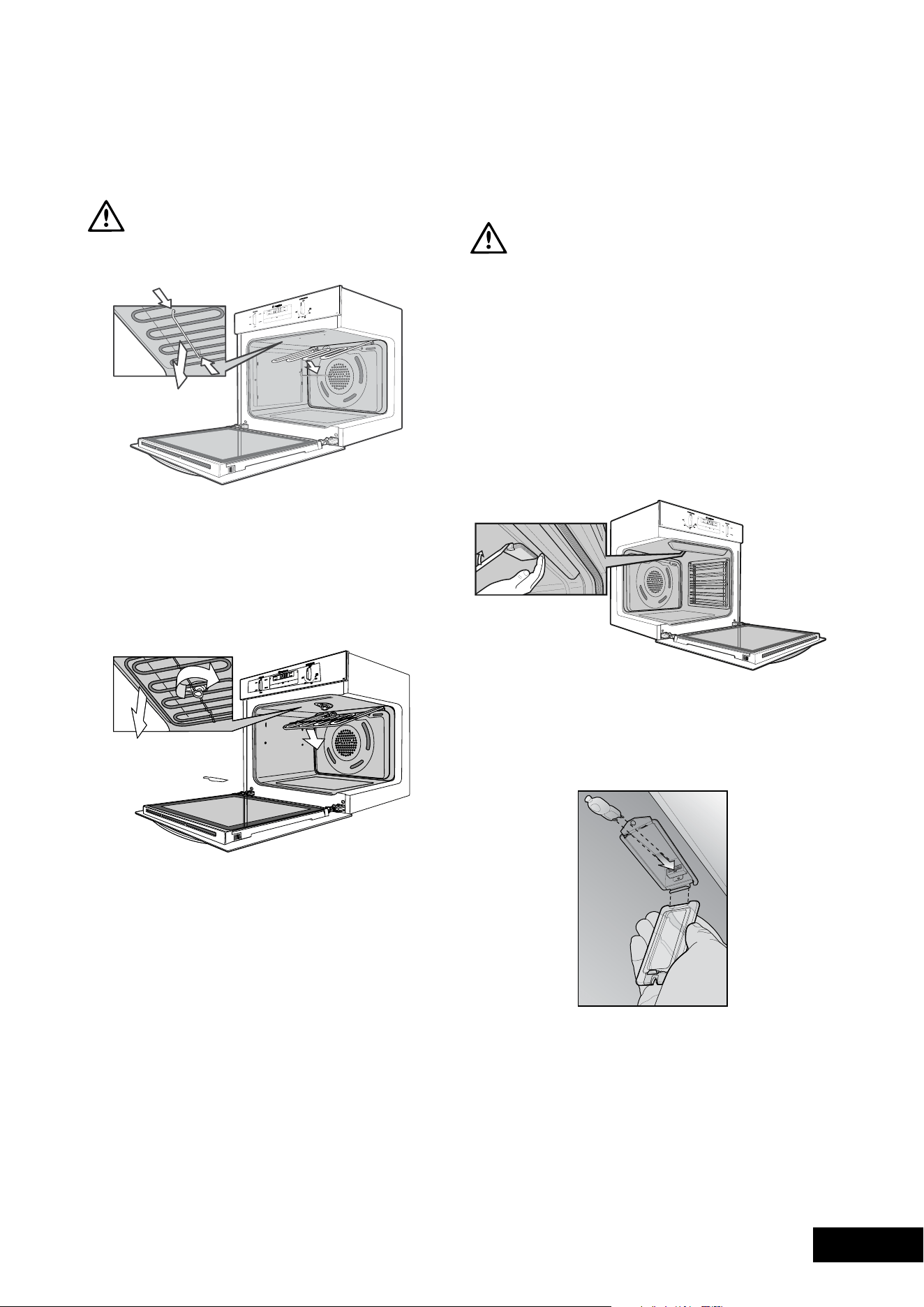
28 29
CLEANINGCLEANING
Removing the catalytic liners
•RemoveSideRacks(seepage23).
•Liftthelineruptodisengagethehooks.
•Thelinersshouldnowbefreetobepulledintowards
the centre of the oven.
•Refertopage8forre-installingyoursideliners.
Removing and replacing the catalytic fan baffle (where fitted)
CAUTION
The oven must be switched off before removing the fan
baffle, and the fan baffle must be replaced in accordance
with instructions.
•Removethe2retainingscrewsonthetopedgeof
the fan baffle.
•Pullthetopedgetowardsyouandthendisengage
to bottom tabs from the oven back.
CAUTION
NOTE: It is critical that the fan baffle is replaced after
cleaning, before the oven is operated again.
•Insertthetwotabsatthebottomofthefanbaffle
into their corresponding slots in the oven back.
•Pushthetophomeandinsertscrewsfirmlyinto
appropriate holes.
•Thefanbafflemustnotbeloose.Thefanbaffle
must be flush with the back wall of the oven.
CATALYTIC LINERS
(WHERE FITTED)
Removing and replacing the oven light and side light (where fitted)
•Turnovenlightglassanticlockwisetoremoveitfor
globe replacement.
• Aspecialhightemperatureresistantglobeshouldbeused.
This can be purchased from the Customer Care Centre.
•Toremovesidelight,placeaspoonunderthelight
glass and lever off. Replace globe and snap glass
cover back into position.
WARNING
Make sure the appliance is turned off before you remove
or replace parts, to avoid the possibility of electric shock.
Releasing the grill element
We have designed the upper element with a hanger clip
to help you reach your oven roof for cleaning.
Retaining wire models
•Liftelementupcarefully.
•Pullhangercliptotheleftorrighttounhookit.
The element will drop down freely.
Rotating latch models
•Rotatelatch180º.Theelementwilldropdownfreely.
Replacing the oven top light (POR883 model only)
WARNING
Turn the appliance off at the main switch to make sure
there is no power to the oven.
•Thetoplightispositionedbehindthegrilldeflector
at the top of the oven.
•Toremovetheglobetheshelvesshouldfirstbe
removed from the oven.
•Insertasmallscrewdriverintotheglasscutout
between the two metal clips on the left hand side,
as shown in diagram.
•Gentlylevertheglasscoveroff,bypushingthescrew
driver in and moving it upwards, whilst holding the
glass cover with the other hand. (If not supported,
the glass cover can fall and break).
•Removethefaultyglobebypullingitdirectlyoutof
its holder.
•Replacetheoldglobewithanewone,ensuringnotto
directly touch the surface of the globe with your fingers,
(Atissueorsoftclothisbestforthis.)
•Pickuptheglasscoverandplaceshortedgeinto
right side of housing; push up opposite end of
glass cover until it snaps into position.
•Resecurethetopelementinplace.
CLEANING YOUR APPLIANCE
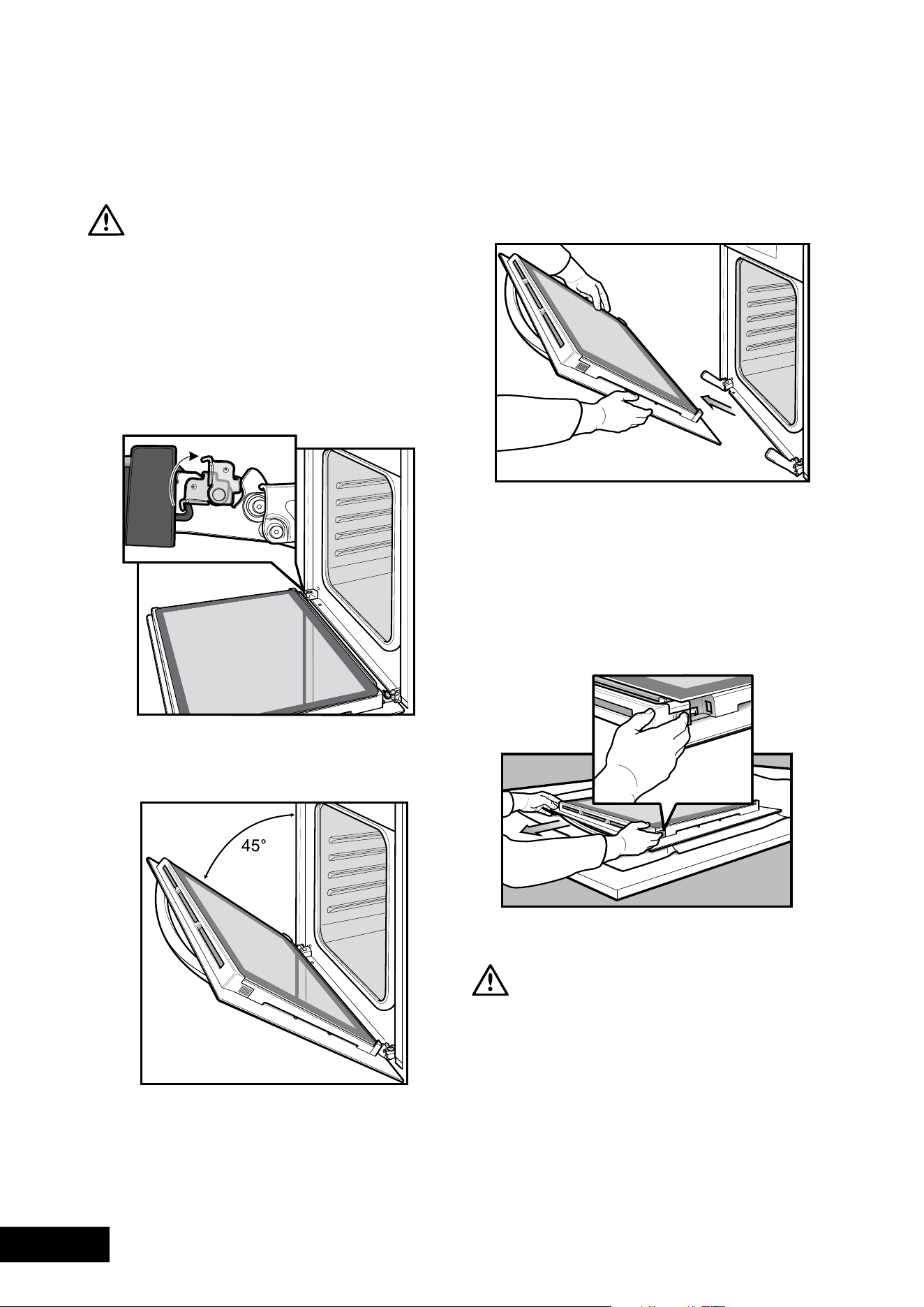
30 31
CLEANINGCLEANING
Cleaning oven door (except models POR883 & POR881)
WARNING
Donotliftthedoorbythehandle.Roughhandlingwill
cause glass to break.
Removing the oven door
Your oven is equipped with a door that can be
disassembled in order to clean all the panes of glass.
Remove the door before cleaning.
•openthedoorfullytoaccessthehingesthenrotatethe
‘stirrups’(highlightedintheimage)onbothhingesfully
towards the oven.
•Slowlyclosetheovendooruntilitisstopsagainstthe
‘stirrups’(about45°).
•Grasptheovendoorwithahandeachsideofthe
door and remove it from the oven by pulling it
towards you.
•Laytheovendoorwiththeoutersidefacing
downwards on something soft and flat (for example a
blanket on a kitchen table) to prevent scratches.
Removing oven door top trim
•Takeholdofthegridembossedsectionsofthedoor
trim at each end and press inwards to release the clips.
Remove the door trim by pulling it towards you.
Removing door glass panels
WARNING
Rough handling, especially around the edges can cause
the glass to break.
•Lifttheblackborderedglasspaneloutof
the guide.
•Repeatthisforthesmallerclearglasspanel
(when fitted).
Cleaning door glass panels
WARNING
Donottouseharshabrasivesontheglasspanesasthe
reflective surface plays a role in the function of the oven.
Donotplaceglassindishwasher.Handwashonlywitha
soft cloth and warm soapy water. When dry polish with a
soft cloth and ensure the glass is dry before reassembly.
Bottom trim (on selected models)
•Thebottomtrimmayberemovedforcleaningby
snapping out and lifting away from the glass.
Re-assembling bottom trim
•Pushdownto“snap”eachsideofbottomtrimback
into door columns.
Re-assembling door glass panels
•Insertthesmallerclearglasspanel(whenfitted)first
from above and at an angle to the profile of
the door.
•Repeatfortheblackborderedglasspanelensuringthe
painted surface is facing to the downside.
CLEANING YOUR APPLIANCE CLEANING YOUR APPLIANCE
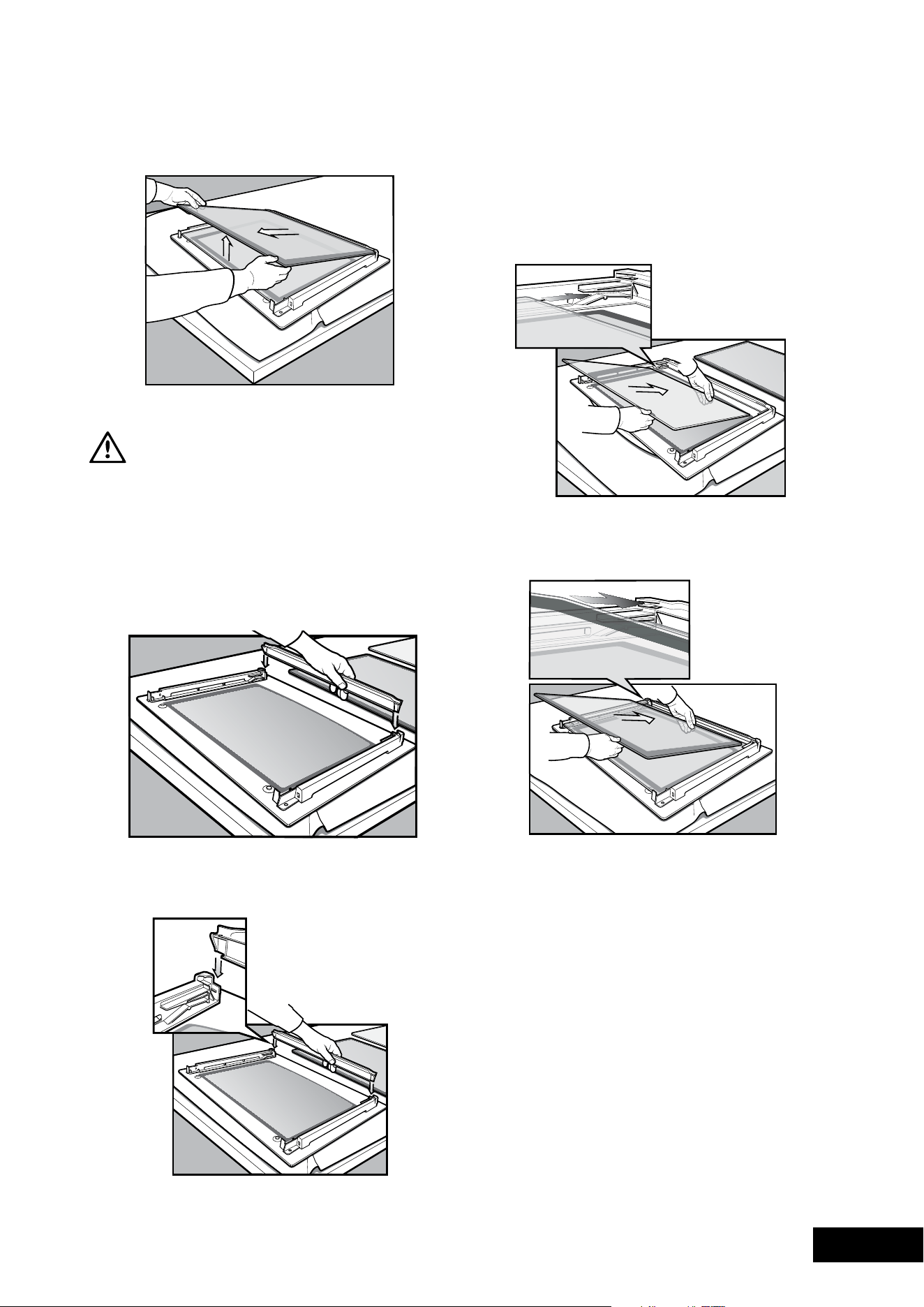
30 31
CLEANINGCLEANING
Cleaning oven door (except models POR883 & POR881)
WARNING
Donotliftthedoorbythehandle.Roughhandlingwill
cause glass to break.
Removing the oven door
Your oven is equipped with a door that can be
disassembled in order to clean all the panes of glass.
Remove the door before cleaning.
•openthedoorfullytoaccessthehingesthenrotatethe
‘stirrups’(highlightedintheimage)onbothhingesfully
towards the oven.
•Slowlyclosetheovendooruntilitisstopsagainstthe
‘stirrups’(about45°).
•Grasptheovendoorwithahandeachsideofthe
door and remove it from the oven by pulling it
towards you.
•Laytheovendoorwiththeoutersidefacing
downwards on something soft and flat (for example a
blanket on a kitchen table) to prevent scratches.
Removing oven door top trim
•Takeholdofthegridembossedsectionsofthedoor
trim at each end and press inwards to release the clips.
Remove the door trim by pulling it towards you.
Removing door glass panels
WARNING
Rough handling, especially around the edges can cause
the glass to break.
•Lifttheblackborderedglasspaneloutof
the guide.
•Repeatthisforthesmallerclearglasspanel
(when fitted).
Cleaning door glass panels
WARNING
Donottouseharshabrasivesontheglasspanesasthe
reflective surface plays a role in the function of the oven.
Donotplaceglassindishwasher.Handwashonlywitha
soft cloth and warm soapy water. When dry polish with a
soft cloth and ensure the glass is dry before reassembly.
Bottom trim (on selected models)
•Thebottomtrimmayberemovedforcleaningby
snapping out and lifting away from the glass.
Re-assembling bottom trim
•Pushdownto“snap”eachsideofbottomtrimback
into door columns.
Re-assembling door glass panels
•Insertthesmallerclearglasspanel(whenfitted)first
from above and at an angle to the profile of
the door.
•Repeatfortheblackborderedglasspanelensuringthe
painted surface is facing to the downside.
CLEANING YOUR APPLIANCE CLEANING YOUR APPLIANCE
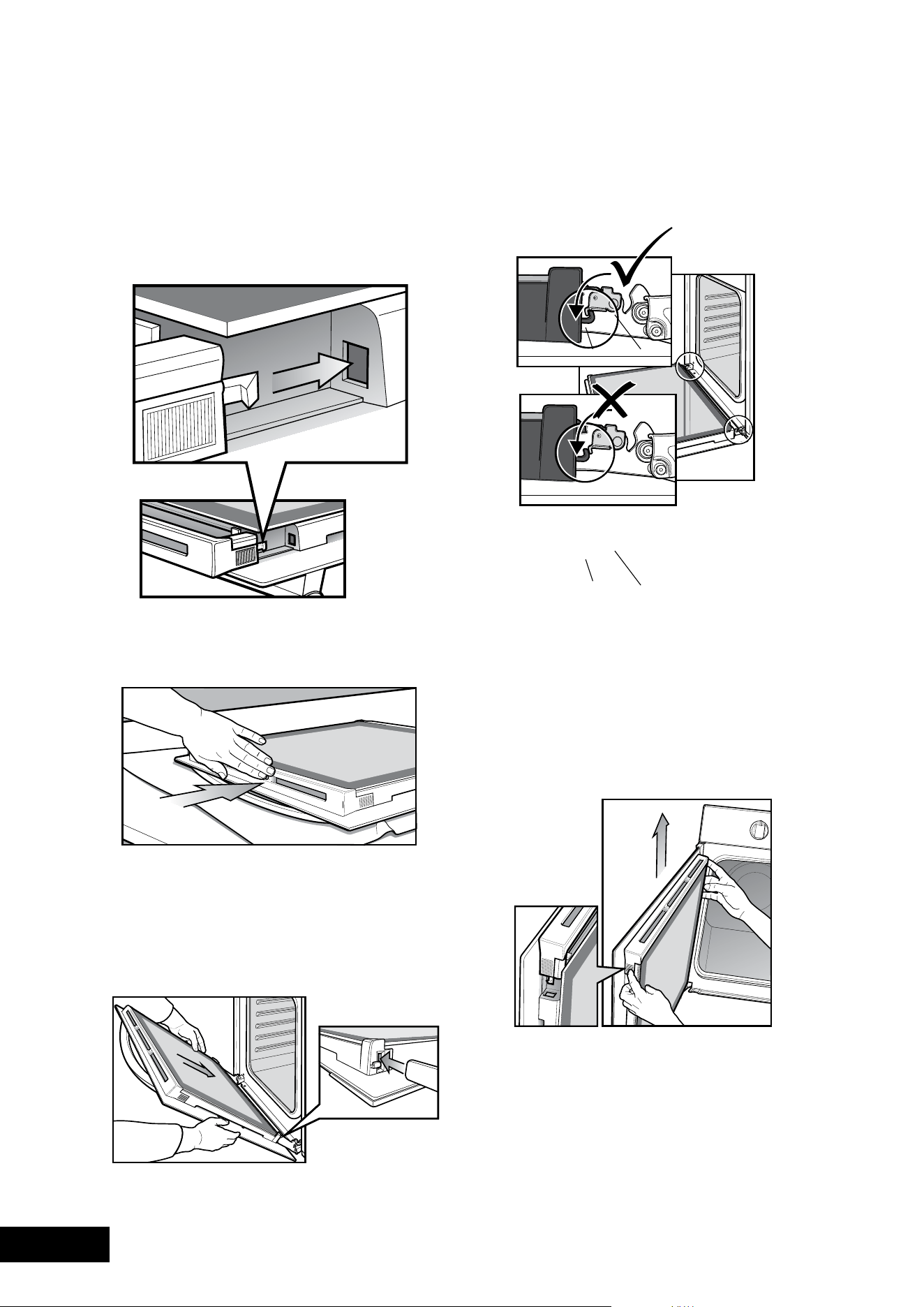
32 33
CLEANINGCLEANING
Re-assembling top door trim
•Takeholdofthetopdoortrimateachsideand
position it to the inside edge of the glass.
•Pushthetrimdownwithitstopedgeoverglasspanel
until the clip snaps in on each side of the trim.
•Pushthemiddleofthetrimdowntoensureitisstraight
and firm against the glass panel.
Fitting the oven door
•Takeholdoftheovendoorwithahandoneachside
andwiththedooratanangleof45º,positionthe
recesses at the bottom of the door onto the hinge arms
of the oven. Let the door slide down the hinge arms as
far as it will go.
•openthedoorfullytoaccessthehingesthenrotate
the‘stirrups’(seeimagebelow)untiltheylockintothe
hook. The oven do or may now be closed.
hook
hook
stirrup
stirrup
Side open door
Side open door models have been designed to allow for
the inner glass panels to be removed for cleaning.
Removing side open door top trim
•Takeholdofthegridembossedsectionsofthedoor
trim at each end and press inwards to release the clips.
Then remove the door trim by lifting it upwards.
Removing side open door glass panel
WARNING
Rough handling, especially around the edges can cause
the glass to break.
•Takeholdoftheblackborderedglasspanelwitha
hand on its upper and lower edge. Lift and rotate the
glass around the retainer to remove it from the guide.
•Takeholdofthesmallerclearglasspanel(whenfitted)
with a hand on its upper and lower edge.
Lift the glass to remove it from the retainer.
•Therubbermouldingontheuppercornerofthesmall
clear glass panel may be removed. Please take care
that it is not misplaced.
Cleaning door glass panels
WARNING
Donottouseharshabrasivesontheglasspanesasthe
reflective surface plays a role in the function of
the oven.
Donotplaceglassindishwasher.Handwashonlywitha
soft cloth and warm soapy water. When dry polish with a
soft cloth and ensure the glass is dry before reassembly.
Re-assembling door glass panels
•ensuretherubbermouldingisontheuppercornersof
the smaller clear glass panel.
•Insertthesmallerglasspanel(whenfitted)firstfrom
above and at an angle to the profile of the door.
•Repeatfortheblackborderedglasspanelensuring
the painted surface is facing toward the outside of
the door.
CLEANING YOUR APPLIANCE CLEANING YOUR APPLIANCE
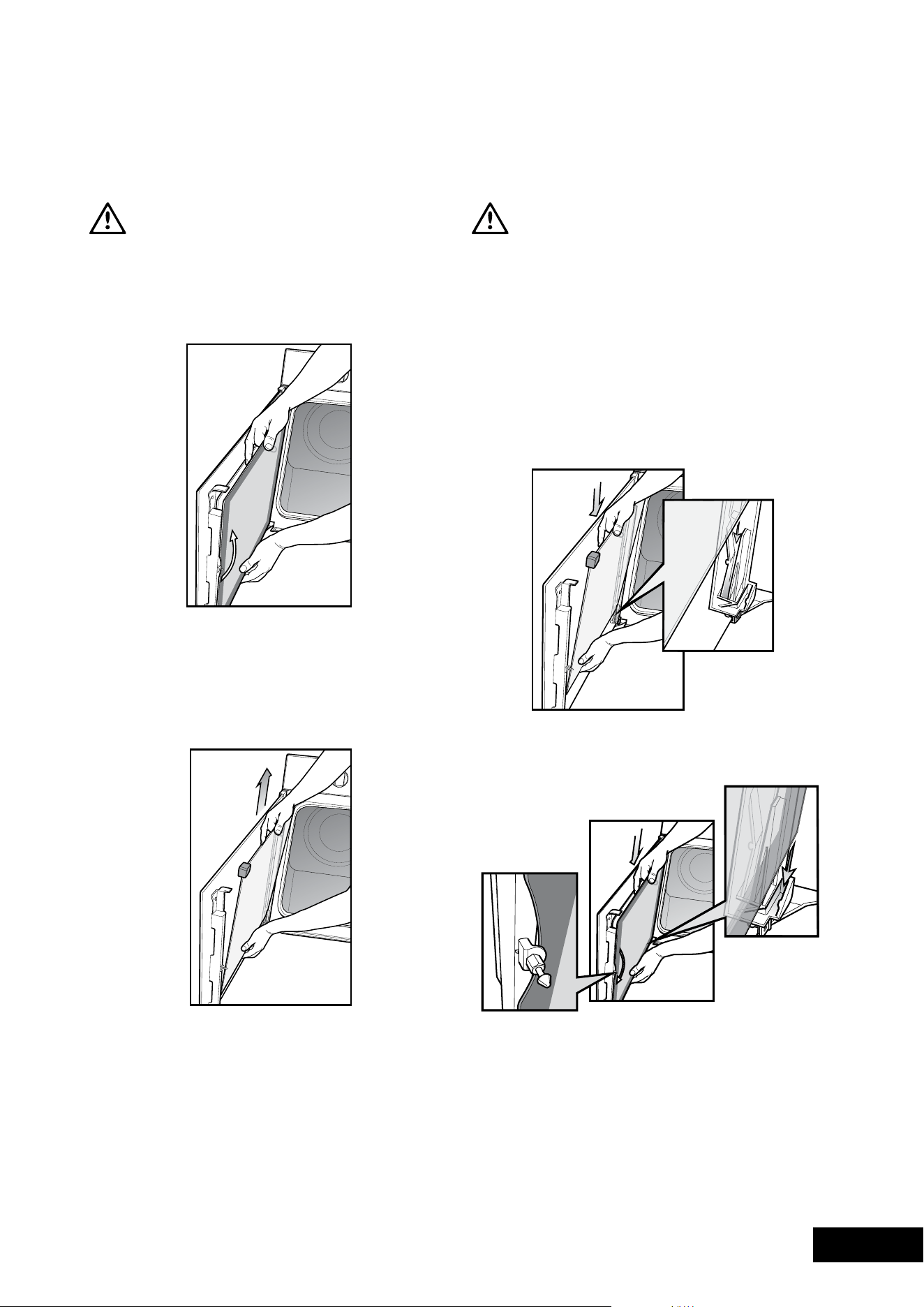
32 33
CLEANINGCLEANING
Re-assembling top door trim
•Takeholdofthetopdoortrimateachsideand
position it to the inside edge of the glass.
•Pushthetrimdownwithitstopedgeoverglasspanel
until the clip snaps in on each side of the trim.
•Pushthemiddleofthetrimdowntoensureitisstraight
and firm against the glass panel.
Fitting the oven door
•Takeholdoftheovendoorwithahandoneachside
andwiththedooratanangleof45º,positionthe
recesses at the bottom of the door onto the hinge arms
of the oven. Let the door slide down the hinge arms as
far as it will go.
•openthedoorfullytoaccessthehingesthenrotate
the‘stirrups’(seeimagebelow)untiltheylockintothe
hook. The oven do or may now be closed.
hook
hook
stirrup
stirrup
Side open door
Side open door models have been designed to allow for
the inner glass panels to be removed for cleaning.
Removing side open door top trim
•Takeholdofthegridembossedsectionsofthedoor
trim at each end and press inwards to release the clips.
Then remove the door trim by lifting it upwards.
Removing side open door glass panel
WARNING
Rough handling, especially around the edges can cause
the glass to break.
•Takeholdoftheblackborderedglasspanelwitha
hand on its upper and lower edge. Lift and rotate the
glass around the retainer to remove it from the guide.
•Takeholdofthesmallerclearglasspanel(whenfitted)
with a hand on its upper and lower edge.
Lift the glass to remove it from the retainer.
•Therubbermouldingontheuppercornerofthesmall
clear glass panel may be removed. Please take care
that it is not misplaced.
Cleaning door glass panels
WARNING
Donottouseharshabrasivesontheglasspanesasthe
reflective surface plays a role in the function of
the oven.
Donotplaceglassindishwasher.Handwashonlywitha
soft cloth and warm soapy water. When dry polish with a
soft cloth and ensure the glass is dry before reassembly.
Re-assembling door glass panels
•ensuretherubbermouldingisontheuppercornersof
the smaller clear glass panel.
•Insertthesmallerglasspanel(whenfitted)firstfrom
above and at an angle to the profile of the door.
•Repeatfortheblackborderedglasspanelensuring
the painted surface is facing toward the outside of
the door.
CLEANING YOUR APPLIANCE CLEANING YOUR APPLIANCE
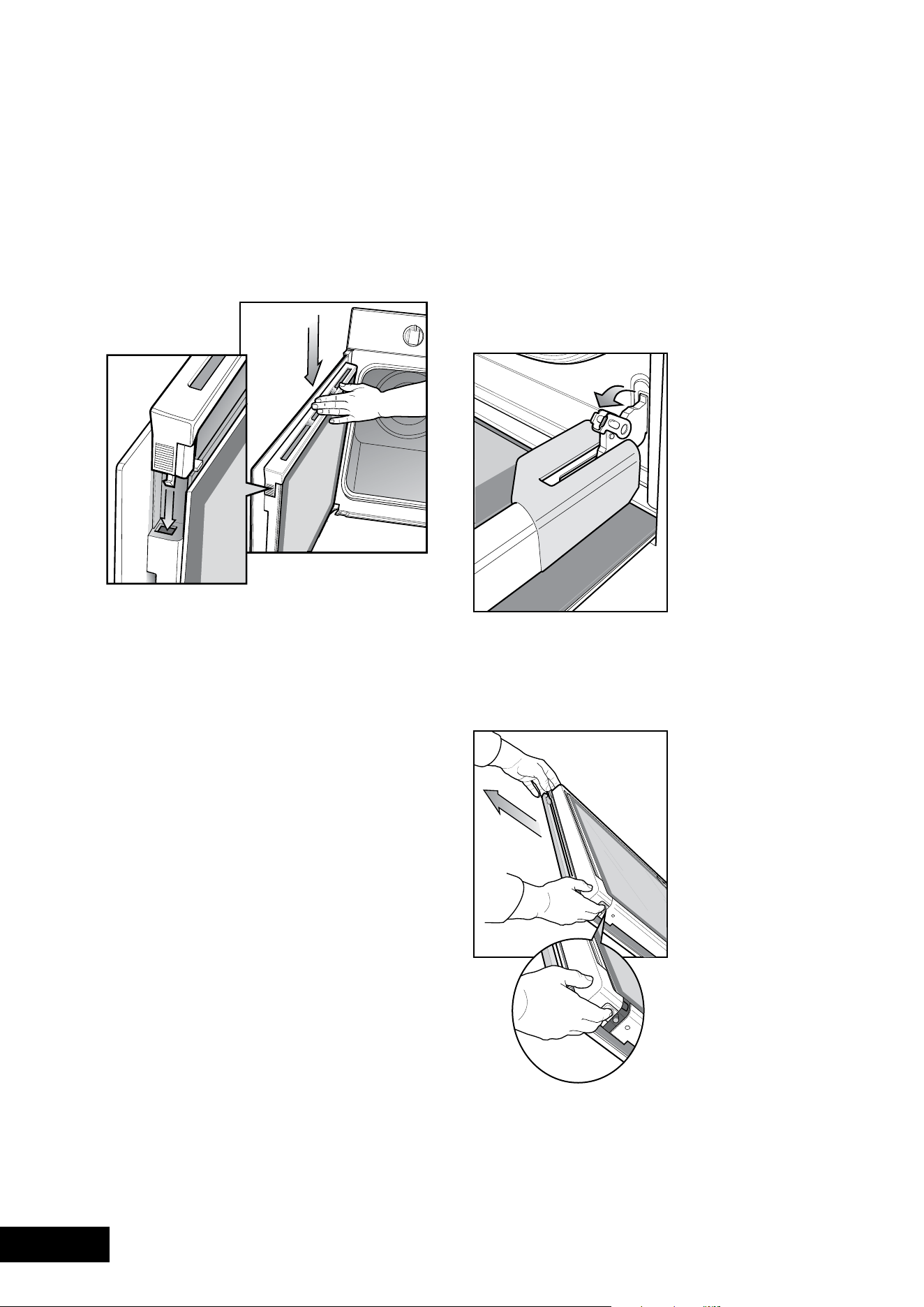
34 35
CLEANINGCLEANING
Your pyrolytic oven is equipped with an oven door that can
be disassembled in order to clean all the panes of glass.
Positioning the door for dismantling
The door needs to be positioned at an angle to aid in the
disassembly of the panes.
•opentheovendoorfullyandflipoutthelocatingtab
on each hinge to the open position.
•Gentlyclosetheovendooruntilitstopsonthelocating
tabs. The door is now ready for dismantling.
Removing the top door trim
•Pushinthe2buttonsoneithersideofthetrim.
•Liftthetrimawayfromthedoor.
CLEANING YOUR APPLIANCE CLEANING THE PYROLYTIC OVEN DOOR
(POR883 & POR881 MODELS ONLY)
Replacing top door trim
•Takeholdofthetopdoortrimateachsideand
position it to the inside edge of the glass.
•Pushthetrimdownwithitstopedgeoverglasspanel
until the clip snaps in on each side of
the trim.
Removing the glass panes
•Removethe3panesofglassstartingwithpane1.
•Whenremovingpane3ensurethatthe2rubbersupports
are removed before cleaning. Do not misplace them!
Cleaning the glass panes
Clean with a damp cloth.
Donotusescouringagentsorabrasivesponges
as these could damage the reflective surface.
Drythoroughlybeforereassembly.
Replacing the glass panes
•Replacetheglasspanesbackintothedoorstarting
withpane3.
•ensurethispaneisplacedintothecorrectslotandthat
the2rubbersupportsareinplace.
•Nextreplacepane2.Thereisareflectivecoatingon
this pane. This coating is indicated by a circle printed
onitssurface.ensurethiscircleisinthesamecorneras
pictured below.
Circle in this corner
•Replacepane1ensuringtheblackscreeningisfacing
inwards towards the oven.
Replacing the top door trim
Replacethetrimensuringtheclipssnapintothe2locationholes.
Open the oven door fully and return the locating tab on
each hinge to the original closed position.
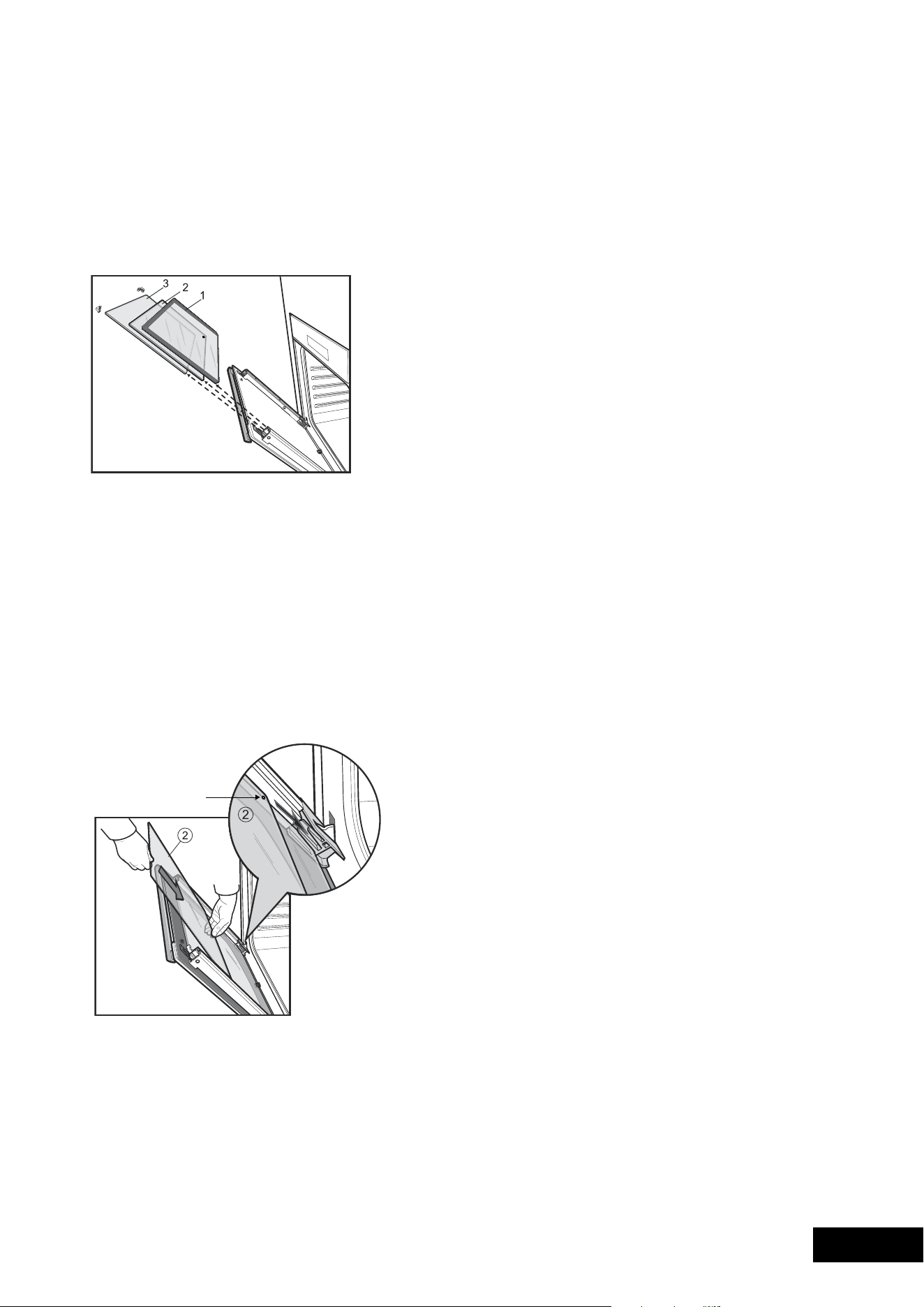
34 35
CLEANINGCLEANING
Your pyrolytic oven is equipped with an oven door that can
be disassembled in order to clean all the panes of glass.
Positioning the door for dismantling
The door needs to be positioned at an angle to aid in the
disassembly of the panes.
•opentheovendoorfullyandflipoutthelocatingtab
on each hinge to the open position.
•Gentlyclosetheovendooruntilitstopsonthelocating
tabs. The door is now ready for dismantling.
Removing the top door trim
•Pushinthe2buttonsoneithersideofthetrim.
•Liftthetrimawayfromthedoor.
CLEANING YOUR APPLIANCE CLEANING THE PYROLYTIC OVEN DOOR
(POR883 & POR881 MODELS ONLY)
Replacing top door trim
•Takeholdofthetopdoortrimateachsideand
position it to the inside edge of the glass.
•Pushthetrimdownwithitstopedgeoverglasspanel
until the clip snaps in on each side of
the trim.
Removing the glass panes
•Removethe3panesofglassstartingwithpane1.
•Whenremovingpane3ensurethatthe2rubbersupports
are removed before cleaning. Do not misplace them!
Cleaning the glass panes
Clean with a damp cloth.
Donotusescouringagentsorabrasivesponges
as these could damage the reflective surface.
Drythoroughlybeforereassembly.
Replacing the glass panes
•Replacetheglasspanesbackintothedoorstarting
withpane3.
•ensurethispaneisplacedintothecorrectslotandthat
the2rubbersupportsareinplace.
•Nextreplacepane2.Thereisareflectivecoatingon
this pane. This coating is indicated by a circle printed
onitssurface.ensurethiscircleisinthesamecorneras
pictured below.
Circle in this corner
•Replacepane1ensuringtheblackscreeningisfacing
inwards towards the oven.
Replacing the top door trim
Replacethetrimensuringtheclipssnapintothe2locationholes.
Open the oven door fully and return the locating tab on
each hinge to the original closed position.

36 37
SOLVING PROBLEMSCLEANING
SOLVING PROBLEMS
Faults
If there is a problem with the oven and/or grill, please:
•Checkthepointslistedbelowbeforecallingforservice.
It may be possible to avoid a call by fixing the problem
yourself–andsocontinuecooking.
•forcookingproblemsrefertopage25.
NOTE: We may charge for service even in the guarantee
period if your problem is due to the causes listed below.
Data Plate
When you need information, service or replacement parts please:
•Tellusthe1.model,2.modelNumber&3.Serial
Numbershownonthedataplate.Thedataplateis
visible when the oven or grill door is open.
If you need more information, please contact the Customer
CareCentreon:131349(Australia–Centreisopen8.00am
–5.00pmm–feasternStandardTime)or+6495732384
(NewZealand–Centreisopen8.00am–5.00pmm–f).
If you have a warranty or spare parts enquiry, you should
call the number listed on the back page.
PROBLEM POSSIBLE CAUSE
Oven or grill
not working:
•Timeofdaynotset.
•Powernotturnedon.
•Controlsareincorrectlyset.
•Householdfusehasblownor
power supply is off.
•Child-proofovenlockactivated.
(Refer to operating instructions).
NOTE: If the household fuse continues
to blow, call the Customer Care Centre.
Oven light
not working:
•Lampblownorlooseinsocket.
•Householdfusehasblown.
NOTE: If the household fuse continues
to blow, call the Customer Care Centre.
Oven not
heating enough:
•foilortraysonbottomofoven.
Oven not working: •Timerisin“AUTo”mode.(Referto
timer operating instructions)
•Householdfusehasblown.
NOTE: If the household fuse continues
to blow, call the Customer Care Centre.
Timer flashing
on display:
•Powerfailureorinterruption.
NOTE: Reset time of day and any cooking
functions you were using. (Refer to TIMER
operating instructions).
Unitsmokingwhen
first used:
•Protectiveoilsbeingremoved.
Condensation
building up:
•Reduceamountofwaterusedincooking.
(Some condensation is normal)
Doorcannotbe
replaced after removal
•Stirrupnotengagedproperly.
Pyrolytic cycle not
working
•Allaccessoriesmustberemovedfrom
the oven
NOTE: Only authorised personnel should carry out servicing.
PYROLYTIC CLEANING OF THE OVEN CAVITY
(POR883 & POR881 MODELS ONLY)
Operation
IfyourovenhasthePyrolyticself-cleaningfunction,itcleansby
burning off the spatters and accumulated dirt and grease
from the oven cavity, at high temperature. This process
produces ash which can then be wiped out of the oven cavity.
CAUTION
Duringthepyrolyticcleaningprocesstheovenbecomes
extremelyhot(approximately500˚C).
•Pleasekeepsmallchildrenatasafedistance
•Duringpyrolyticcleaningtheairoutletventabovethedoor
must be kept clear of any obstruction (eg tea towels).
•Itisrecommendedyoucleanyourovenregularlyto
keep the oven in its best condition.
•Donotuseyouroventocleanmiscellaneousitems
(eg cookware).
Before carrying out the Pyro function,
Allaccessoriesmustberemovedfromtheoven.Thisincludes
shelves, trays and side racks. Clean large pieces of dirt or
grease from the oven cavity.
Pyrolytic Cleaning Operation (POR883 only)
Thereare2Pyrocleaningcyclesyoucanuse.
SOILING DURATION
Light clean 2hrs00min
Normalclean2hrs30min
Durationincludesheat-uptimeandcool-downtimefortheoven.
•Lightclean
This is an energy saving cycle that can be used on a
regular basis if your oven is lightly soiled. Possibly after
every2ndor3rdtimeyouroastmeat.
•Normalclean
Usethisasyourregularcycleaboutonceevery
2-3monthstocleanyouroven.
Starting the Pyro clean function
1.Switchontheappliancebypressing“on/off”.
2.Press“function”asmanytimesasnecessaryuntilthe
word“P1”isdisplayed.
3.Press“+”or“–”tochoose2hrs00minor2hrs30min
for the appropriate level of cleaning.
4.PressPyroAccepttocommencethecleaningprocess.
Pyrolytic Cleaning Operation (POR881 only)
1. The pyrolytic cleaning function can be selected by
turning the function selector switch clockwise to the
pyrolyticposition.Usethe+or–buttonsontheeletronic
clock to toggle between a pyrolytic cleaning time of
1:30hoursor2:30hours.Thepyrolyticfunctioncan
be stopped at any time by turning the function selector
counterclockwise to the OFF position.
TIPS & INFORMATION
DuringPyrocleaningthedoorwillautomaticallylockwhen
thetemperatureintheovenapproaches300˚C.(Apadlock
symbol will appear on the display.) The door will only
unlock when the oven has cooled to a safe temperature.
Turning the function off will not unlock the door. This will
only happen when safe temperatures are reached.
Note: The cooling fan will operate at an increased speed
for Pyro cleaning and will continue to run until the oven has
cooled down. This is normal.
After Pyro cleaning
Aftercool-downyoucanwipetheashoutoftheoven
with a soft damp cloth and warm water.
To restore the enamel shine to more difficult areas,
use a damp cloth with white vinegar and detergent.

36 37
SOLVING PROBLEMSCLEANING
SOLVING PROBLEMS
Faults
If there is a problem with the oven and/or grill, please:
•Checkthepointslistedbelowbeforecallingforservice.
It may be possible to avoid a call by fixing the problem
yourself–andsocontinuecooking.
•forcookingproblemsrefertopage25.
NOTE: We may charge for service even in the guarantee
period if your problem is due to the causes listed below.
Data Plate
When you need information, service or replacement parts please:
•Tellusthe1.model,2.modelNumber&3.Serial
Numbershownonthedataplate.Thedataplateis
visible when the oven or grill door is open.
If you need more information, please contact the Customer
CareCentreon:131349(Australia–Centreisopen8.00am
–5.00pmm–feasternStandardTime)or+6495732384
(NewZealand–Centreisopen8.00am–5.00pmm–f).
If you have a warranty or spare parts enquiry, you should
call the number listed on the back page.
PROBLEM POSSIBLE CAUSE
Oven or grill
not working:
•Timeofdaynotset.
•Powernotturnedon.
•Controlsareincorrectlyset.
•Householdfusehasblownor
power supply is off.
•Child-proofovenlockactivated.
(Refer to operating instructions).
NOTE: If the household fuse continues
to blow, call the Customer Care Centre.
Oven light
not working:
•Lampblownorlooseinsocket.
•Householdfusehasblown.
NOTE: If the household fuse continues
to blow, call the Customer Care Centre.
Oven not
heating enough:
•foilortraysonbottomofoven.
Oven not working: •Timerisin“AUTo”mode.(Referto
timer operating instructions)
•Householdfusehasblown.
NOTE: If the household fuse continues
to blow, call the Customer Care Centre.
Timer flashing
on display:
•Powerfailureorinterruption.
NOTE: Reset time of day and any cooking
functions you were using. (Refer to TIMER
operating instructions).
Unitsmokingwhen
first used:
•Protectiveoilsbeingremoved.
Condensation
building up:
•Reduceamountofwaterusedincooking.
(Some condensation is normal)
Doorcannotbe
replaced after removal
•Stirrupnotengagedproperly.
Pyrolytic cycle not
working
•Allaccessoriesmustberemovedfrom
the oven
NOTE: Only authorised personnel should carry out servicing.
PYROLYTIC CLEANING OF THE OVEN CAVITY
(POR883 & POR881 MODELS ONLY)
Operation
IfyourovenhasthePyrolyticself-cleaningfunction,itcleansby
burning off the spatters and accumulated dirt and grease
from the oven cavity, at high temperature. This process
produces ash which can then be wiped out of the oven cavity.
CAUTION
Duringthepyrolyticcleaningprocesstheovenbecomes
extremelyhot(approximately500˚C).
•Pleasekeepsmallchildrenatasafedistance
•Duringpyrolyticcleaningtheairoutletventabovethedoor
must be kept clear of any obstruction (eg tea towels).
•Itisrecommendedyoucleanyourovenregularlyto
keep the oven in its best condition.
•Donotuseyouroventocleanmiscellaneousitems
(eg cookware).
Before carrying out the Pyro function,
Allaccessoriesmustberemovedfromtheoven.Thisincludes
shelves, trays and side racks. Clean large pieces of dirt or
grease from the oven cavity.
Pyrolytic Cleaning Operation (POR883 only)
Thereare2Pyrocleaningcyclesyoucanuse.
SOILING DURATION
Light clean 2hrs00min
Normalclean2hrs30min
Durationincludesheat-uptimeandcool-downtimefortheoven.
•Lightclean
This is an energy saving cycle that can be used on a
regular basis if your oven is lightly soiled. Possibly after
every2ndor3rdtimeyouroastmeat.
•Normalclean
Usethisasyourregularcycleaboutonceevery
2-3monthstocleanyouroven.
Starting the Pyro clean function
1.Switchontheappliancebypressing“on/off”.
2.Press“function”asmanytimesasnecessaryuntilthe
word“P1”isdisplayed.
3.Press“+”or“–”tochoose2hrs00minor2hrs30min
for the appropriate level of cleaning.
4.PressPyroAccepttocommencethecleaningprocess.
Pyrolytic Cleaning Operation (POR881 only)
1. The pyrolytic cleaning function can be selected by
turning the function selector switch clockwise to the
pyrolyticposition.Usethe+or–buttonsontheeletronic
clock to toggle between a pyrolytic cleaning time of
1:30hoursor2:30hours.Thepyrolyticfunctioncan
be stopped at any time by turning the function selector
counterclockwise to the OFF position.
TIPS & INFORMATION
DuringPyrocleaningthedoorwillautomaticallylockwhen
thetemperatureintheovenapproaches300˚C.(Apadlock
symbol will appear on the display.) The door will only
unlock when the oven has cooled to a safe temperature.
Turning the function off will not unlock the door. This will
only happen when safe temperatures are reached.
Note: The cooling fan will operate at an increased speed
for Pyro cleaning and will continue to run until the oven has
cooled down. This is normal.
After Pyro cleaning
Aftercool-downyoucanwipetheashoutoftheoven
with a soft damp cloth and warm water.
To restore the enamel shine to more difficult areas,
use a damp cloth with white vinegar and detergent.
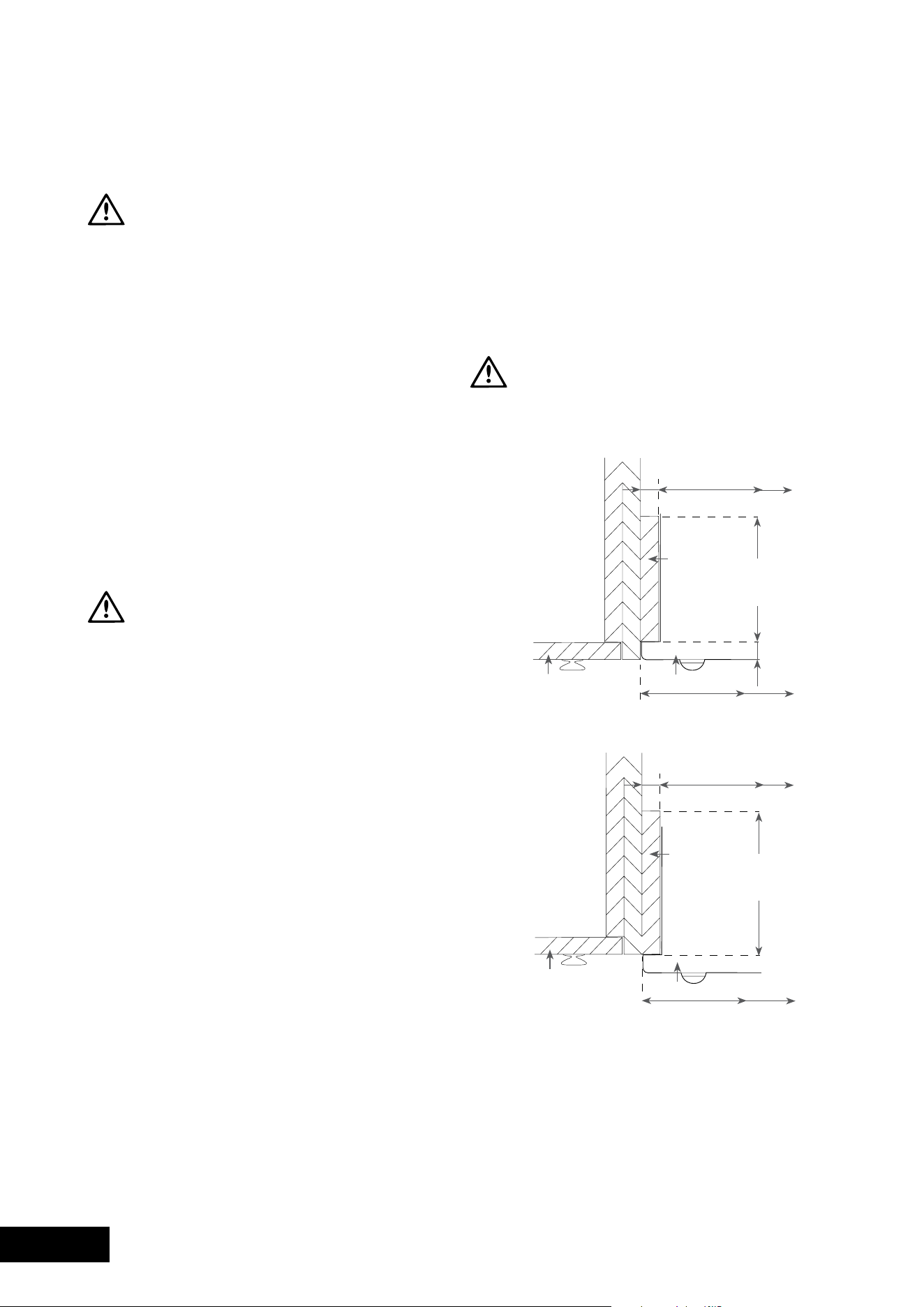
38 39
INSTALLATIONINSTALLATION
Hard Wiring Detail
1. Remove terminal cover plate from rear panel
of appliance.
2.fitwiresthroughholeincoverplateandmake
connections to terminals.
3.engagewiresintoplasticclip.Secureplasticclipwith
two long silver screws (supplied in separate bag).
4.Replacecoverplateontorearpanel.
Oven Dimensions
A
Underbenchoven595mm
SeparateGrillUnderbenchoven725mm
Separate Grill Wall Oven 888mm
Duooven888mm
Doubleoven1083mm
Allbuilt-inovensare596mmwide
Plastic clip
securing points.
Plastic clips
Second active wire only
required (optional) for
multi-phase products.
WARNING
USE AN AUTHORISED PERSON
Asstatedinthelocalmunicipalbuildingcodesandother
relevant statutory regulations.
•Wiringconnectionsmustbeinaccordancewith
AS/NZS3000WiringRulesandanyparticular
conditions of the local authority.
•Refertodataplateforratinginformationandcircuit
diagram. The data plate is positioned behind the
bottom of the oven door. The circuit diagram is
positioned on the top panel of the appliance.
•forapplianceswithopencookingsurfaces,anallpole
disconnect functional switch should be provided near
the appliance in an accessible position. Refer to
AS/NZS3000clause4.7.1
•Wiringshouldbeprotectedagainstmechanicalfailure.
RefertoAS/NZS3000clauses3.3.2.6,3.9,3.10
•Ameansofdisconnectionwithacontactseparation
ofatleast3mmmustbesuppliedinthefixedwiring.
• Togainaccesstothemainsconnectionterminals,remove
therearaccesscoverbyunscrewingthe2screws.
MULTI-PHASE: Where connection is made to a multi-phase 240V supply,
the bridge piece should be removed from between the active connections.
WARNING
This appliance must be properly earthed.
•Donotlifttheappliancebythedoorhandles.
•Preparethecupboardopeningtomatchyour
appliance measurements. (See diagrams).
•Slideapplianceintothecupboard,ensuringthatthe
supply cable (where fitted) does not kink.
• Topreventtipping,usethescrewssuppliedtosecureyour
ovenintothecupboard.Usejust2screwsforsingle
cavityovensand4screwsfordualcavity.Removethe
bottom door in dual cavity ovens to provide access to the
bottom2screwingpoints(seeillustrationonpage32).
•forappliancesfittedwithaflexiblesupplycord,ifthe
cord is damaged, it must be replaced by the manufacturer
or its service agent or similarly qualified person in order to
avoid a hazard. The plug must be accessible after installation.
• Wheretheapplianceisbuiltintoacabinet,thecabinet
materialmustbecapableofwithstanding70°C.
Installation into low temperature tolerant cabinetry
(e.g. vinyl coated) may result in deterioration of the
low temperature coating by discolouring or bubbling.
•Iftheapplianceisinstalledadjacenttovinyl-wrapped
surfaces,useaninstallationkitavailablefromthevinyl-
wrap supplier.
•electroluxHomeProductscannotacceptresponsibility
for damage caused by installation into low temperature
tolerant cabinets.
•Afterinstallation,testandensurethattheappliance
operates correctly before handing it over to the customer.
To avoid any potential hazard, you must follow our instructions
below when you install your appliance. Failure to install the
appliance correctly could invalidate any warranty or liability
claims and lead to prosecution.
Cabinet Construction for your appliance
For the best integration within a kitchen, install this appliance
inastandard600mmwidecupboardthatgivesaflush fit
withthesurroundingcupboardfronts(figureA).
Arecessof20mmisideal.Itcanalsobeinstalledusing
aproudfitwiththesurroundingcupboard(figureB).
NOTE: Your appliance must be mounted on a flat surface
for the full width and depth of the product.
CAUTION
TheinfillpanelmUSTnotexceed100mminliengthto
ensurea16mmgapismaintained.
Flush Fit
16mm
568mm
600mm
20mm
Infill
panel
Cupboard
door
Oven
100mm
max for
Pyro oven
Proud Fit
16mm
568mm
600mm
Infill
panel
Cupboard
door
Oven
100mm
max for
Pyro oven
INSTALLING YOUR APPLIANCE
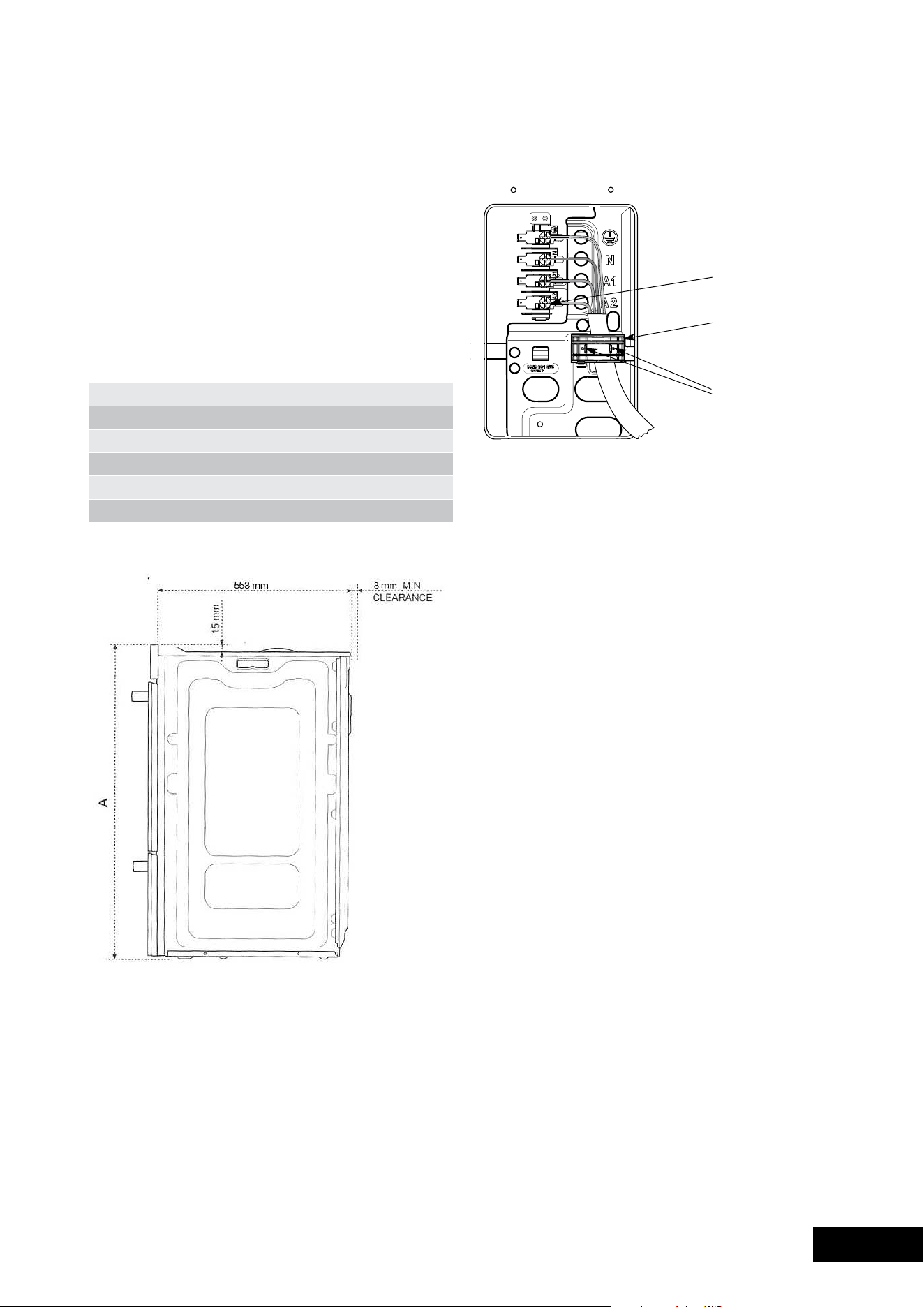
38 39
INSTALLATIONINSTALLATION
Hard Wiring Detail
1. Remove terminal cover plate from rear panel
of appliance.
2.fitwiresthroughholeincoverplateandmake
connections to terminals.
3.engagewiresintoplasticclip.Secureplasticclipwith
two long silver screws (supplied in separate bag).
4.Replacecoverplateontorearpanel.
Oven Dimensions
A
Underbenchoven595mm
SeparateGrillUnderbenchoven725mm
Separate Grill Wall Oven 888mm
Duooven888mm
Doubleoven1083mm
Allbuilt-inovensare596mmwide
Plastic clip
securing points.
Plastic clips
Second active wire only
required (optional) for
multi-phase products.
WARNING
USE AN AUTHORISED PERSON
Asstatedinthelocalmunicipalbuildingcodesandother
relevant statutory regulations.
•Wiringconnectionsmustbeinaccordancewith
AS/NZS3000WiringRulesandanyparticular
conditions of the local authority.
•Refertodataplateforratinginformationandcircuit
diagram. The data plate is positioned behind the
bottom of the oven door. The circuit diagram is
positioned on the top panel of the appliance.
•forapplianceswithopencookingsurfaces,anallpole
disconnect functional switch should be provided near
the appliance in an accessible position. Refer to
AS/NZS3000clause4.7.1
•Wiringshouldbeprotectedagainstmechanicalfailure.
RefertoAS/NZS3000clauses3.3.2.6,3.9,3.10
•Ameansofdisconnectionwithacontactseparation
ofatleast3mmmustbesuppliedinthefixedwiring.
• Togainaccesstothemainsconnectionterminals,remove
therearaccesscoverbyunscrewingthe2screws.
MULTI-PHASE: Where connection is made to a multi-phase 240V supply,
the bridge piece should be removed from between the active connections.
WARNING
This appliance must be properly earthed.
•Donotlifttheappliancebythedoorhandles.
•Preparethecupboardopeningtomatchyour
appliance measurements. (See diagrams).
•Slideapplianceintothecupboard,ensuringthatthe
supply cable (where fitted) does not kink.
• Topreventtipping,usethescrewssuppliedtosecureyour
ovenintothecupboard.Usejust2screwsforsingle
cavityovensand4screwsfordualcavity.Removethe
bottom door in dual cavity ovens to provide access to the
bottom2screwingpoints(seeillustrationonpage32).
•forappliancesfittedwithaflexiblesupplycord,ifthe
cord is damaged, it must be replaced by the manufacturer
or its service agent or similarly qualified person in order to
avoid a hazard. The plug must be accessible after installation.
• Wheretheapplianceisbuiltintoacabinet,thecabinet
materialmustbecapableofwithstanding70°C.
Installation into low temperature tolerant cabinetry
(e.g. vinyl coated) may result in deterioration of the
low temperature coating by discolouring or bubbling.
•Iftheapplianceisinstalledadjacenttovinyl-wrapped
surfaces,useaninstallationkitavailablefromthevinyl-
wrap supplier.
•electroluxHomeProductscannotacceptresponsibility
for damage caused by installation into low temperature
tolerant cabinets.
•Afterinstallation,testandensurethattheappliance
operates correctly before handing it over to the customer.
To avoid any potential hazard, you must follow our instructions
below when you install your appliance. Failure to install the
appliance correctly could invalidate any warranty or liability
claims and lead to prosecution.
Cabinet Construction for your appliance
For the best integration within a kitchen, install this appliance
inastandard600mmwidecupboardthatgivesaflush fit
withthesurroundingcupboardfronts(figureA).
Arecessof20mmisideal.Itcanalsobeinstalledusing
aproudfitwiththesurroundingcupboard(figureB).
NOTE: Your appliance must be mounted on a flat surface
for the full width and depth of the product.
CAUTION
TheinfillpanelmUSTnotexceed100mminliengthto
ensurea16mmgapismaintained.
Flush Fit
16mm
568mm
600mm
20mm
Infill
panel
Cupboard
door
Oven
100mm
max for
Pyro oven
Proud Fit
16mm
568mm
600mm
Infill
panel
Cupboard
door
Oven
100mm
max for
Pyro oven
INSTALLING YOUR APPLIANCE
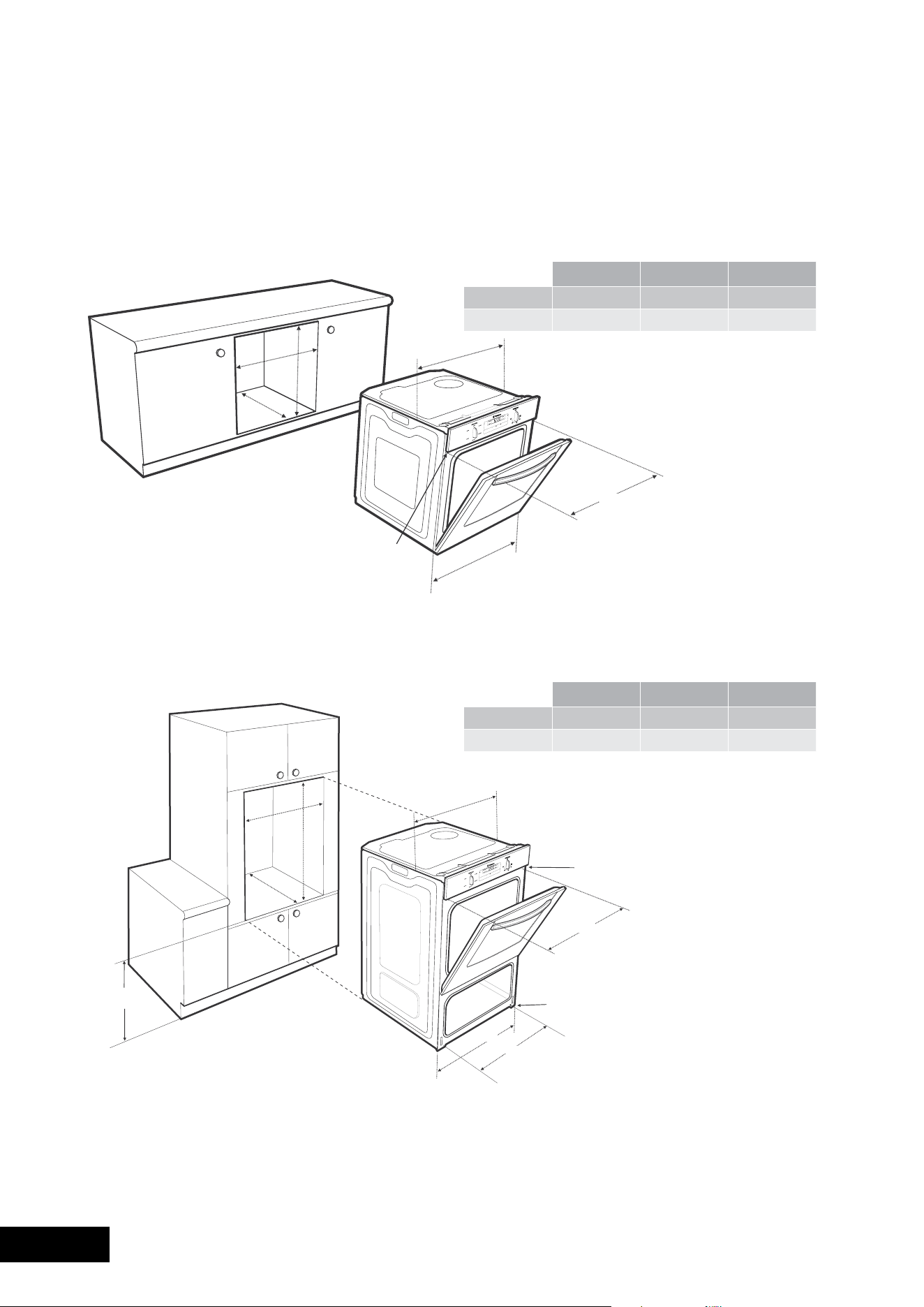
40 41
INSTALLATIONINSTALLATION
Separate Grill Underbench Ovens
Recommended Cabinet Design
NOTE TO INSTALLER: For Separate Grill Underbench Installations where a Cooktop is installed directly above the appliance,
a minimum clearance distance of 10mm must be allowed for between the bottom of the cooktop & the top of the Separate
Grill Underbench Oven.
720mm Module(s)
Bench top
720mm Module(s)
Kick Panel
Infill panel (2)
Cleat (2)
Cooker
platform
8mm
GAS TYPE A B C
Flush fit 600731581min
Proud fit 565723560min
use 25mm black
installation screws
(as supplied)
use 15mm black
installation screws
(as supplied)
mounting holes
mounting holes
596mm
561mm
A
B
C
650mm
min
Underbench Ovens and Side Opening Door Ovens
Yourunderbenchovenlooksbestwhenthecontrolpanelisdirectlyunderthebenchtop.Anupper infill panel may
have to be added if the cooktop placed above the benchtop is too deep. Refer to cooktop installation instructions for
required clearance between cooktop and oven.
NOTE: If a powerpoint is fitted it must be accessible with the appliance installed.
Separate Grill Wall Oven & Duo Oven
GAS TYPE A B C
Flush fit 600600581min
Proud fit 565590560min
561
596mm
mounting holes
582mm
use 25mm black
installation screws
(as supplied)
A
B
C
GAS TYPE A B C
Flush fit 600893581min
Proud fit 565885560min
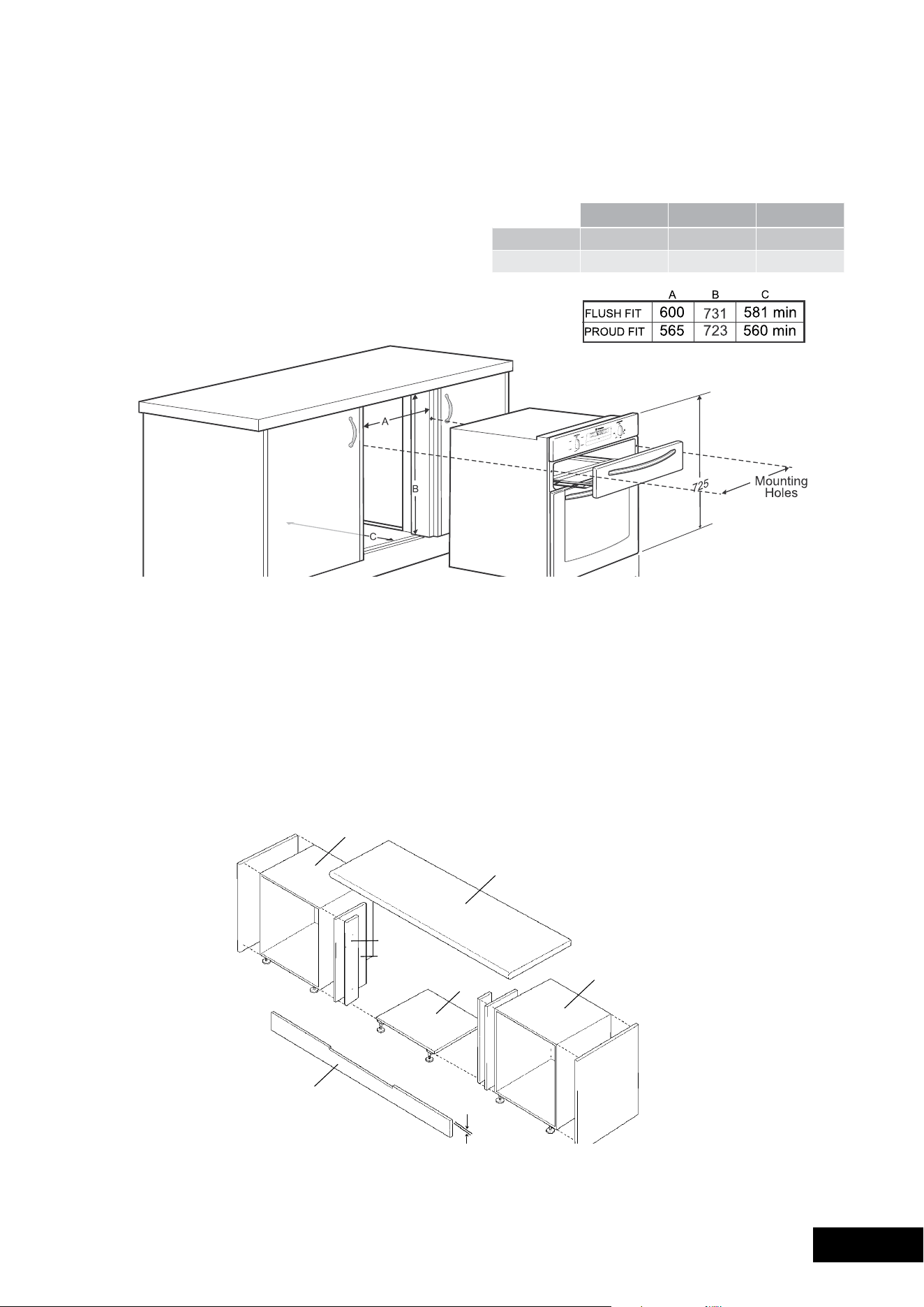
40 41
INSTALLATIONINSTALLATION
Separate Grill Underbench Ovens
Recommended Cabinet Design
NOTE TO INSTALLER: For Separate Grill Underbench Installations where a Cooktop is installed directly above the appliance,
a minimum clearance distance of 10mm must be allowed for between the bottom of the cooktop & the top of the Separate
Grill Underbench Oven.
720mm Module(s)
Bench top
720mm Module(s)
Kick Panel
Infill panel (2)
Cleat (2)
Cooker
platform
8mm
GAS TYPE A B C
Flush fit 600731581min
Proud fit 565723560min
use 25mm black
installation screws
(as supplied)
use 15mm black
installation screws
(as supplied)
mounting holes
mounting holes
596mm
561mm
A
B
C
650mm
min
Underbench Ovens and Side Opening Door Ovens
Yourunderbenchovenlooksbestwhenthecontrolpanelisdirectlyunderthebenchtop.Anupper infill panel may
have to be added if the cooktop placed above the benchtop is too deep. Refer to cooktop installation instructions for
required clearance between cooktop and oven.
NOTE: If a powerpoint is fitted it must be accessible with the appliance installed.
Separate Grill Wall Oven & Duo Oven
GAS TYPE A B C
Flush fit 600600581min
Proud fit 565590560min
561
596mm
mounting holes
582mm
use 25mm black
installation screws
(as supplied)
A
B
C
GAS TYPE A B C
Flush fit 600893581min
Proud fit 565885560min
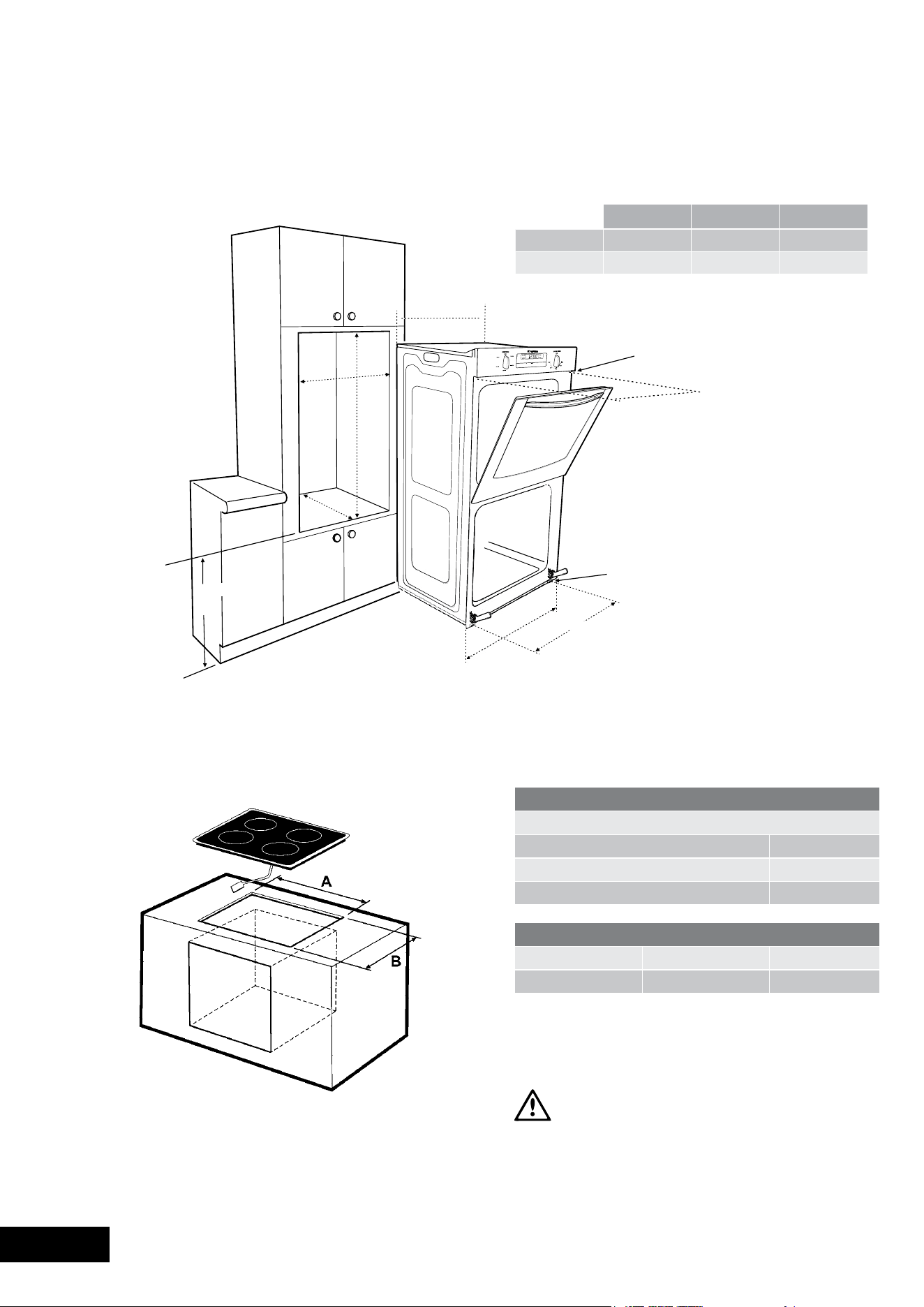
42 43
WARRA NTYINSTALLATION
Double Ovens
mounting holes
use 25mm black
installation screws
(as supplied)
use 15mm black
installation screws
(as supplied)
mounting holes
596mm
A
561mm
B
C
650mm
min
INSTALLATION
COOKTOP DIMENSIONS
Overall Cooktop Dimensions
Width 610mm
Depth515mm
Depthofbase45mm
COOKTOP CUT-OUT DIMENSIONS
A B
Cooktop 560mm490mm
Aminimumgapof40mmmustbemaintainedbetween
the top of the underbench oven and the bottom of the
cooktop to ensure adequate ventilation and space for
the interconnection lead.
WARNING
THE COOKTOP MUST BE INSTALLED ABOVE THE UNDERBENCH OVEN.
GAS TYPE A B C
Flush fit 6001086581min
Proud fit 5651078560min
Cooktop cut-out dimensions (combo models)
This document sets out the terms and conditions of the product
warranties for Electrolux Appliances. It is an important document.
Please keep it with your proof of purchase documents in a safe place
for future reference should you require service for your Appliance.
1. Inthiswarranty
(a) ‘acceptablequality’asreferredtoinclause10ofthiswarrantyhas
thesamemeaningreferredtointheACL;
(b) ‘ACL’meansTradePracticesAmendment(AustralianConsumer
Law)Act(No.2)2010;
(c) ‘Appliance’meansanyElectroluxproductpurchasedbyyou
accompaniedbythisdocument;
(d) ‘ASC’meansElectrolux’authorisedservicedcentres;
(e) ‘Electrolux’meansElectroluxHomeProductsPtyLtdof163
O’RiordanStreet,Mascot,NSW2020,ABN51004762341in
respectofAppliancespurchasedinAustraliaandElectrolux(NZ)
Limitedof3-5NiallBurgessRoad,MountWellington,inrespect
ofAppliancespurchasedinNewZealand;
(f) ‘majorfailure’asreferredtoinclause10ofthiswarrantyhasthe
samemeaningreferredtointheACLandincludesasituationwhen
anAppliancecannotberepairedoritisuneconomicforElectrolux,at
itsdiscretion,torepairanApplianceduringtheWarrantyPeriod;
(g) ‘WarrantyPeriod’means:
(i) wheretheApplianceisusedforpersonal,domesticorhousehold
use(i.e.normalsinglefamilyuse)assetoutintheinstruction
manual,theApplianceiswarrantedagainstmanufacturing
defectsinAustraliafor24monthsandinNewZealandfor24
months,followingthedateoforiginal
purchaseoftheAppliance;
(ii) wheretheApplianceisusedforcommercialpurposes(including
beingusedtodirectlyassistabusinessorwheretheApplianceis
usedinamulti-familycommunalorsharetypeenvironment),the
Appliancewillthenbewarrantedagainstmanufacturingdefects
inAustraliafor3monthsandinNewZealandfor3months,
followingthedateoforiginalpurchaseoftheAppliance.
(h) ‘you’meansthepurchaseroftheAppliancenothavingpurchased
theApplianceforre-sale,and‘your’hasacorrespondingmeaning.
2. ThiswarrantyonlyappliestoAppliancespurchasedandusedinAustralia
orNewZealandandisinadditionto(anddoesnotexclude,restrict,or
modifyinanyway)anynon-excludablestatutorywarrantiesinAustralia
orNewZealand.
3. DuringtheWarrantyPeriodElectroluxoritsASCwill,atnoextracharge
ifyourApplianceisreadilyaccessibleforservice,withoutspecial
equipmentandsubjecttothesetermsandconditions,repairorreplace
anypartswhichitconsiderstobedefective.ElectroluxoritsASCmay
useremanufacturedpartstorepairyourAppliance.You agreethat
anyreplacedAppliancesorpartsbecomethepropertyofElectrolux.
Thiswarrantydoesnotapplytolightglobes,batteries,
ltersorsimilar
perishableparts.
4. PartsandAppliancesnotsuppliedbyElectroluxarenotcoveredby
thiswarranty.
5. Yo uwillbearthecostoftransportation,travelanddeliveryofthe
AppliancetoandfromElectroluxoritsASC.Ifyouresideoutsideofthe
servicearea,youwillbearthecostof:
(a) travelofanauthorisedrepresentative;
(b) transportationanddeliveryoftheAppliancetoandfrom Electroluxor
itsASC,
Inallinstances,unlesstheApplianceistransportedbyElectroluxoran
Electroluxauthorisedrepresentative,theApplianceistransportedatthe
owner’scostandriskwhileintransittoandfromElectroluxoritsASC.
6. Proofofpurchaseisrequiredbeforeyoucanmakeaclaimunder
thiswarranty.
7. Yo umaynotmakeaclaimunderthiswarrantyunlessthedefectclaimed
isduetofaultyordefectivepartsorworkmanship.Electroluxisnotliable
inthefollowingsituations(whicharenotexhaustive):
(a) theApplianceisdamagedby:
(i) accident
(ii) misuseorabuse,includingfailuretoproperlymaintainorservice
(iii) normalwearandtear
(iv) powersurges,electricalstormdamageorincorrectpowersupply
(v) incompleteorimproperinstallation
(vi) incorrect,improperorinappropriateoperation
(vii)insectorvermininfestation
(viii)failuretocomplywithanyadditionalinstructions
suppliedwith
theAppliance;
(b) theApplianceismodiedwithoutauthorityfromElectroluxinwriting;
(c) theAppliance’sserialnumberorwarrantysealhasbeenremoved
ordefaced;
(d) theAppliancewasservicedorrepairedbyanyoneotherthan
Electrolux,anauthorisedrepairerorASC.
8. Thiswarranty,thecontracttowhichitrelatesandtherelationship
betweenyouandElectroluxaregovernedbythelawapplicablewhere
theAppliancewaspurchased.WheretheAppliancewaspurchasedin
NewZealandforbusinesspurposestheConsumerGuaranteeActdoes
notapply.
9. To theextentpermittedbylaw,Electroluxexcludesallwarrantiesand
liabilities(otherthanascontainedinthisdocument)includingliabilityfor
anylossordamagewhetherdirectorindirectarisingfromyourpurchase,
useornonuseoftheAppliance.
10.ForAppliancesandservicesprovidedbyElectroluxinAustralia,
theAppliancescomewithaguaranteebyElectroluxthatcannotbe
excludedundertheAustralianConsumerLaw.Youareentitledtoa
replacementorrefundforamajorfailureandforcompensationforany
otherreasonablyforeseeablelossordamage.Youarealsoentitledto
havetheAppliancerepairedorreplacediftheAppliancefailstobeof
acceptablequalityandthe
failuredoesnotamounttoamajorfailure.
Thebenetstoyougivenbythiswarrantyareinadditiontoyourother
rightsandremediesunderalawinrelationtotheAppliancesorservices
towhichthewarrantyrelates.
11.AtalltimesduringtheWarrantyPeriod,Electroluxshall,atitsdiscretion,
determinewhetherrepair,replacementorrefundwillapplyifan
Appliancehasavalidwarrantyclaimapplicabletoit.
12.ForAppliancesandservicesprovidedbyElectroluxinNewZealand,
theAppliancescomewithaguaranteebyElectroluxpursuanttothe
provisionsoftheConsumerGuaranteesAct,theSaleofGoodsActand
theFairTradingAct.
13.Toenquireaboutclaimingunderthiswarranty,pleasefollowthesesteps:
(a) carefullychecktheoperatinginstructions,usermanualandtheterms
ofthiswarranty;
(b) havethemodelandserialnumberoftheApplianceavailable;
(c) havetheproofofpurchase(eganinvoice)available;
(d) telephonethenumbersshownbelow.
14.You acceptthatifyoumakeawarrantyclaim,ElectroluxanditsASC
mayexchangeinformationinrelationtoyoutoenableElectroluxtomeet
itsobligationsunderthiswarranty.
Warranty
FORSALESINAUSTRALIAANDNEWZEALAND
APPLIANCE:BUILT-INOVEN,COOKTOP
ANDFREESTANDINGCOOKER
Important Notice
Beforecallingforservice,pleaseensurethatthestepslistedinpoint13abovehavebeenfollowed.
FOR SERVICE
ortondtheaddressofyournearest
stateservicecentreinAustralia
PLEASE CALL 13 13 49
Forthecostofalocalcall(Australiaonly)
SERVICE AUSTRALIA
ELECTROLUXHOMEPRODUCTS
www.electrolux.com.au
FOR SPARE PARTS
ortondtheaddressofyournearest
statesparepartscentreinAustralia
PLEASE CALL 13 13 50
Forthecostofalocalcall(Australiaonly)
FOR SERVICE
ortondtheaddressofyournearest
authorisedservicecentreinNewZealand
FREE CALL 0800 10 66 10
(NewZealandonly)
SERVICE NEW ZEALAND
ELECTROLUXHOMEPRODUCTS
www.electrolux.co.nz
FOR SPARE PARTS
ortondtheaddressofyournearest
statesparepartscentreinNewZealand
FREE CALL 0800 10 66 20
(NewZealandonly)
GOV_Warr_Apr11

42 43
WARRA NTYINSTALLATION
Double Ovens
mounting holes
use 25mm black
installation screws
(as supplied)
use 15mm black
installation screws
(as supplied)
mounting holes
596mm
A
561mm
B
C
650mm
min
INSTALLATION
COOKTOP DIMENSIONS
Overall Cooktop Dimensions
Width 610mm
Depth515mm
Depthofbase45mm
COOKTOP CUT-OUT DIMENSIONS
A B
Cooktop 560mm490mm
Aminimumgapof40mmmustbemaintainedbetween
the top of the underbench oven and the bottom of the
cooktop to ensure adequate ventilation and space for
the interconnection lead.
WARNING
THE COOKTOP MUST BE INSTALLED ABOVE THE UNDERBENCH OVEN.
GAS TYPE A B C
Flush fit 6001086581min
Proud fit 5651078560min
Cooktop cut-out dimensions (combo models)
This document sets out the terms and conditions of the product
warranties for Electrolux Appliances. It is an important document.
Please keep it with your proof of purchase documents in a safe place
for future reference should you require service for your Appliance.
1. Inthiswarranty
(a) ‘acceptablequality’asreferredtoinclause10ofthiswarrantyhas
thesamemeaningreferredtointheACL;
(b) ‘ACL’meansTradePracticesAmendment(AustralianConsumer
Law)Act(No.2)2010;
(c) ‘Appliance’meansanyElectroluxproductpurchasedbyyou
accompaniedbythisdocument;
(d) ‘ASC’meansElectrolux’authorisedservicedcentres;
(e) ‘Electrolux’meansElectroluxHomeProductsPtyLtdof163
O’RiordanStreet,Mascot,NSW2020,ABN51004762341in
respectofAppliancespurchasedinAustraliaandElectrolux(NZ)
Limitedof3-5NiallBurgessRoad,MountWellington,inrespect
ofAppliancespurchasedinNewZealand;
(f) ‘majorfailure’asreferredtoinclause10ofthiswarrantyhasthe
samemeaningreferredtointheACLandincludesasituationwhen
anAppliancecannotberepairedoritisuneconomicforElectrolux,at
itsdiscretion,torepairanApplianceduringtheWarrantyPeriod;
(g) ‘WarrantyPeriod’means:
(i) wheretheApplianceisusedforpersonal,domesticorhousehold
use(i.e.normalsinglefamilyuse)assetoutintheinstruction
manual,theApplianceiswarrantedagainstmanufacturing
defectsinAustraliafor24monthsandinNewZealandfor24
months,followingthedateoforiginal
purchaseoftheAppliance;
(ii) wheretheApplianceisusedforcommercialpurposes(including
beingusedtodirectlyassistabusinessorwheretheApplianceis
usedinamulti-familycommunalorsharetypeenvironment),the
Appliancewillthenbewarrantedagainstmanufacturingdefects
inAustraliafor3monthsandinNewZealandfor3months,
followingthedateoforiginalpurchaseoftheAppliance.
(h) ‘you’meansthepurchaseroftheAppliancenothavingpurchased
theApplianceforre-sale,and‘your’hasacorrespondingmeaning.
2. ThiswarrantyonlyappliestoAppliancespurchasedandusedinAustralia
orNewZealandandisinadditionto(anddoesnotexclude,restrict,or
modifyinanyway)anynon-excludablestatutorywarrantiesinAustralia
orNewZealand.
3. DuringtheWarrantyPeriodElectroluxoritsASCwill,atnoextracharge
ifyourApplianceisreadilyaccessibleforservice,withoutspecial
equipmentandsubjecttothesetermsandconditions,repairorreplace
anypartswhichitconsiderstobedefective.ElectroluxoritsASCmay
useremanufacturedpartstorepairyourAppliance.You agreethat
anyreplacedAppliancesorpartsbecomethepropertyofElectrolux.
Thiswarrantydoesnotapplytolightglobes,batteries,
ltersorsimilar
perishableparts.
4. PartsandAppliancesnotsuppliedbyElectroluxarenotcoveredby
thiswarranty.
5. Yo uwillbearthecostoftransportation,travelanddeliveryofthe
AppliancetoandfromElectroluxoritsASC.Ifyouresideoutsideofthe
servicearea,youwillbearthecostof:
(a) travelofanauthorisedrepresentative;
(b) transportationanddeliveryoftheAppliancetoandfrom Electroluxor
itsASC,
Inallinstances,unlesstheApplianceistransportedbyElectroluxoran
Electroluxauthorisedrepresentative,theApplianceistransportedatthe
owner’scostandriskwhileintransittoandfromElectroluxoritsASC.
6. Proofofpurchaseisrequiredbeforeyoucanmakeaclaimunder
thiswarranty.
7. Yo umaynotmakeaclaimunderthiswarrantyunlessthedefectclaimed
isduetofaultyordefectivepartsorworkmanship.Electroluxisnotliable
inthefollowingsituations(whicharenotexhaustive):
(a) theApplianceisdamagedby:
(i) accident
(ii) misuseorabuse,includingfailuretoproperlymaintainorservice
(iii) normalwearandtear
(iv) powersurges,electricalstormdamageorincorrectpowersupply
(v) incompleteorimproperinstallation
(vi) incorrect,improperorinappropriateoperation
(vii)insectorvermininfestation
(viii)failuretocomplywithanyadditionalinstructions
suppliedwith
theAppliance;
(b) theApplianceismodiedwithoutauthorityfromElectroluxinwriting;
(c) theAppliance’sserialnumberorwarrantysealhasbeenremoved
ordefaced;
(d) theAppliancewasservicedorrepairedbyanyoneotherthan
Electrolux,anauthorisedrepairerorASC.
8. Thiswarranty,thecontracttowhichitrelatesandtherelationship
betweenyouandElectroluxaregovernedbythelawapplicablewhere
theAppliancewaspurchased.WheretheAppliancewaspurchasedin
NewZealandforbusinesspurposestheConsumerGuaranteeActdoes
notapply.
9. To theextentpermittedbylaw,Electroluxexcludesallwarrantiesand
liabilities(otherthanascontainedinthisdocument)includingliabilityfor
anylossordamagewhetherdirectorindirectarisingfromyourpurchase,
useornonuseoftheAppliance.
10.ForAppliancesandservicesprovidedbyElectroluxinAustralia,
theAppliancescomewithaguaranteebyElectroluxthatcannotbe
excludedundertheAustralianConsumerLaw.Youareentitledtoa
replacementorrefundforamajorfailureandforcompensationforany
otherreasonablyforeseeablelossordamage.Youarealsoentitledto
havetheAppliancerepairedorreplacediftheAppliancefailstobeof
acceptablequalityandthe
failuredoesnotamounttoamajorfailure.
Thebenetstoyougivenbythiswarrantyareinadditiontoyourother
rightsandremediesunderalawinrelationtotheAppliancesorservices
towhichthewarrantyrelates.
11.AtalltimesduringtheWarrantyPeriod,Electroluxshall,atitsdiscretion,
determinewhetherrepair,replacementorrefundwillapplyifan
Appliancehasavalidwarrantyclaimapplicabletoit.
12.ForAppliancesandservicesprovidedbyElectroluxinNewZealand,
theAppliancescomewithaguaranteebyElectroluxpursuanttothe
provisionsoftheConsumerGuaranteesAct,theSaleofGoodsActand
theFairTradingAct.
13.Toenquireaboutclaimingunderthiswarranty,pleasefollowthesesteps:
(a) carefullychecktheoperatinginstructions,usermanualandtheterms
ofthiswarranty;
(b) havethemodelandserialnumberoftheApplianceavailable;
(c) havetheproofofpurchase(eganinvoice)available;
(d) telephonethenumbersshownbelow.
14.You acceptthatifyoumakeawarrantyclaim,ElectroluxanditsASC
mayexchangeinformationinrelationtoyoutoenableElectroluxtomeet
itsobligationsunderthiswarranty.
Warranty
FORSALESINAUSTRALIAANDNEWZEALAND
APPLIANCE:BUILT-INOVEN,COOKTOP
ANDFREESTANDINGCOOKER
Important Notice
Beforecallingforservice,pleaseensurethatthestepslistedinpoint13abovehavebeenfollowed.
FOR SERVICE
ortondtheaddressofyournearest
stateservicecentreinAustralia
PLEASE CALL 13 13 49
Forthecostofalocalcall(Australiaonly)
SERVICE AUSTRALIA
ELECTROLUXHOMEPRODUCTS
www.electrolux.com.au
FOR SPARE PARTS
ortondtheaddressofyournearest
statesparepartscentreinAustralia
PLEASE CALL 13 13 50
Forthecostofalocalcall(Australiaonly)
FOR SERVICE
ortondtheaddressofyournearest
authorisedservicecentreinNewZealand
FREE CALL 0800 10 66 10
(NewZealandonly)
SERVICE NEW ZEALAND
ELECTROLUXHOMEPRODUCTS
www.electrolux.co.nz
FOR SPARE PARTS
ortondtheaddressofyournearest
statesparepartscentreinNewZealand
FREE CALL 0800 10 66 20
(NewZealandonly)
GOV_Warr_Apr11

AUSTRALIA
phone:1300363640
fax:1800350067
email: [email protected]
web: www.westinghouse.com.au
NEW ZEALAND
phone:095732384
fax:0800363600
email: [email protected]
web: www.westinghouse.co.nz
For more information on all Westinghouse appliances,
or for dimension and installation information, call into your retailer,
phone or email our customer care team or visit our website:
TOP SERVICE
Top Service encompasses the after sales service
providedbyTheelectroluxGrouptoconsumers
including delivery, home service and spare parts.
Westinghouse. We are part of the Electrolux family.
Share more of our thinking at www.electrolux.com
PartNumber:0342001576IssueA
©2011electroluxHomeProductsPtyLtd
ABN51004762341
eCN:11A086K
Printcode:WmAN_eoVeN_Jun11