Use & Care Guide
Manual de Uso y Cuidado
Guide d_utilisation et d_entretien
English / Espa_ol / Franc;ais
Models/Modelos/Mod_les: 253.28459, 28452, 28052, 28432, 28732, 28782,
28042, 28722, 28262, 16342, 16542, 16922, 16949
970.18412, 18002, 18702, 15502, 14722, 15532,
14372, 18202
®
P/N 297436900 (1208)
Sears Brands Management Corporation
Hofl:man Estates, IL 60179 U.S.A.
www.kenmore.com
www.sears.com
Sears Canada Inc.
Toronto, Ontario, Canada M5B 2C3
www.sears.ca
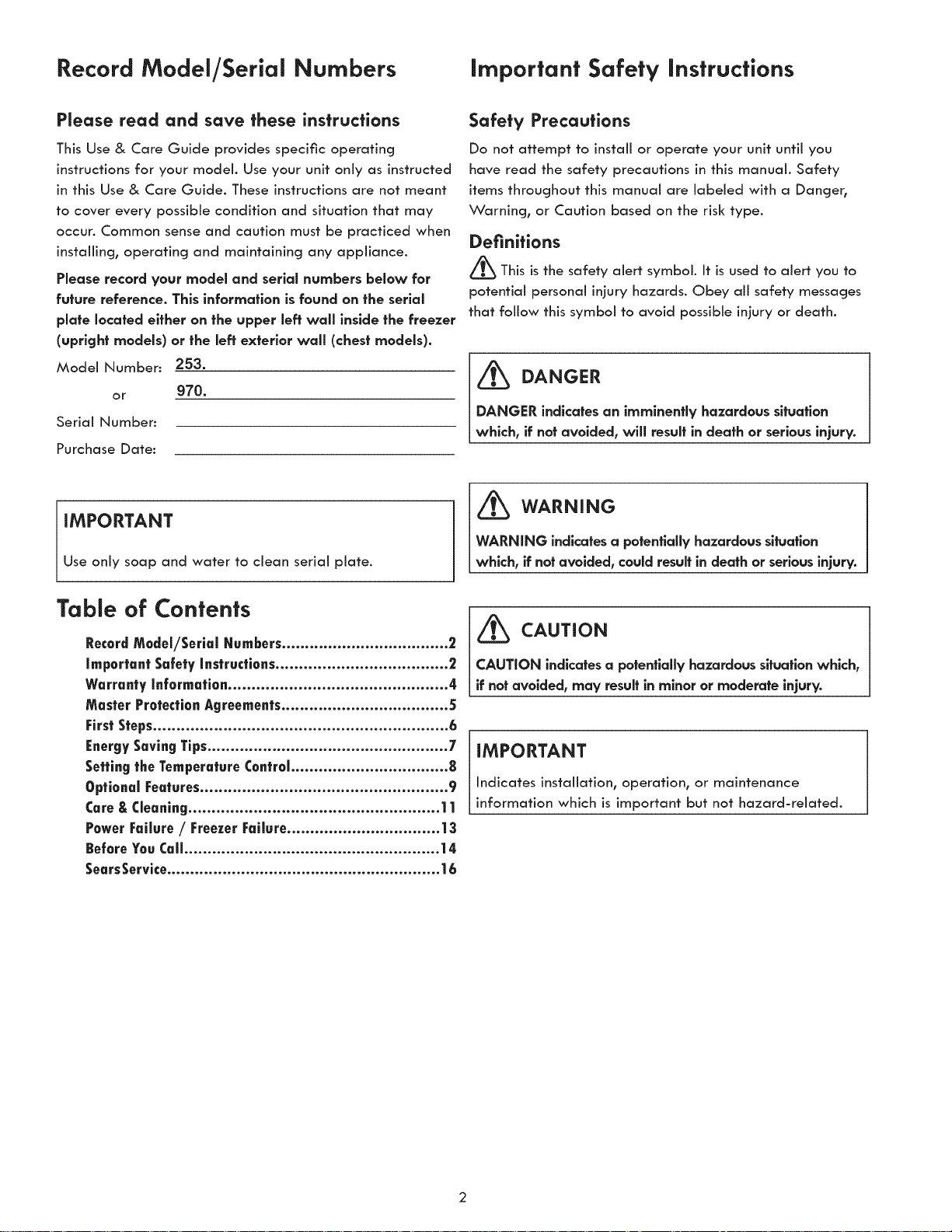
Record Model/Serial Numbers Important Safety Instructions
Please read and save these instructions
This Use & Core Guide provides specific operating
instructions for your model. Use your unit only as instructed
in this Use & Care Guide. These instructions ore not meant
to cover every possible condition and situation that may
occur. Common sense and caution must be practiced when
installing, operating and maintaining any appliance.
Please record your model and serial numbers below for
future reference. This information is found on the serial
plate located either on the upper left wall inside the freezer
(upright models) or the left exterior wall (chest models).
Model Number: 253.
or g70.
Serial Number:
Purchase Date:
Safety Precautions
Do not attempt to install or operate your unit until you
have read the safety precautions in this monuol. Safety
items throughout this manual ore Iobeled with o Donger,
Warning, or Caution based on the risk type.
Definitions
_This is the safety alert symbol. It isused to alert you to
potential personal injury hazards. Obey oil safety messages
that follow this symbol to avoid possible injury or death.
_ DANGER
DANGER indicates an imminently hazardous situation
which, if not avoided, will result in death or serious injury.
IMPORTANT
Use only soap ond water to cleon serial plate.
_ WARNING
WARNING indicates a potentially hazardous situation
which, if not avoided, could result in death or serious injuW.
Table of Contents
RecordModel/Serial Numbers.................................... 2
Important Safety instructions ..................................... 2
Warranty information............................................... 4
Master ProtectionAgreements.................................... 5
FirstSteps............................................................... 6
EnergySavingTips.................................................... 7
Setting tee TemperatureControl.................................. 8
OptionalFeatures..................................................... 9
Care&Cleaning...................................................... 11
Power Failure/ Freezer Failure................................. 13
BeforeYouCall....................................................... 14
SearsService........................................................... | 6
_ CAUTION
CAUTION indicates a potentially hazardous situation which,
if not avoided, may result in minor or moderate injury.
IMPORTANT
Indicates instollotion, operation, or maintenance
information which is important but not hazard-related.

important Safety instructions
WARNING
Please read all safety instructions before using your
new appliance.
For Your Safety
° Do not store or use gasoline, or other flammable liquids
in the vicinity of this or any other appliance. Read
product labels for warnings regarding flammability and
other hazards.
* Do not operate the unit in the presence of explosive fumes.
* Remove and discard any spacers used to secure the
shelves during shipping. Small objects are a choke
hazard to children.
° Remove all staples from the carton. Staples can cause
severe cuts, and also destroy finishes if they come in
contact with other appliances or furniture.
Child Safety
Destroy or recycle the carton, plastic bags, and any
exterior wrapping material immediately after the unit is
unpacked. Children should NEVER use these items to play.
Cartons covered with rugs, bedspreads, plastic sheets or
stretch wrap may become airtight chambers, and can
quickly cause suffocation.
Proper disposal of your appliance
Risk of child entrapment
Child entrapment and suffocation are not problems of the
past. Junked or abandoned appliances are still dangerous
= even if they will sit for "just a few days." If you are
getting rid of your appliance, please follow the instructions
below to help prevent accidents.
Before you throw away your old unit:
° Remove doors.
° Leave shelves in place so children may not easily
climb inside.
IMPORTANT
Your old unit may have a cooling system that used CFCs or
HCFCs (chlorofluorocarbons or hydrochiorofluorocarbons).
CFCs and HCFCs are believed to harm stratospheric
ozone if released to the atmosphere. Other refrigerants
may cause harm to the environment if released to the
atmosphere. If you are throwing away your old unit,
make sure the refrigerant is removed for proper disposal
by a qualified technician. If you intentionally release
refrigerant, you may be subject to fines and imprisonment
under the provisions of environmental legislation.
WARNING
These guidelines must be followed to ensure that safety
mechanisms in this unit will operate properly.
ELECTRICAL iNFORMATiON
° Refer to the serial plate for correct electrical rating.
The power cord of the appliance is equipped with a
three-prong grounding plug for your protection against
electrical shock hazards. It must be plugged directly into
a properly grounded three-prong receptacle. The
receptacle must be installed in accordance with local
codes and ordinances. Consult a qualified electrician.
Do not use an extension cord or adapter plug.
° Immediately repair or replace any power cord that
becomes frayed or damaged.
° Never unplug the unit by pulling on the power cord.
Always grip the plug firmly, and pull straight out from the
receptacle to prevent damaging the power cord.
° Unplug the unit before cleaning and before
replacing a light bulb to avoid electrical shock.
° Performance may be affected if the voltage varies
by 10% or more. Operating the unit with insumcient
power can damage the compressor. Such damage is not
covered under your warranty.
° Do not plug the unit into an outlet controlled by a wall
switch or pull
cord to prevent
the unit from
being turned off
accidentally.
° Avoid connecting
unit to a Ground
Fault Interrupter
(GFI) circuit.
Warranty information
Kenmore Appliance Warranty
One Year Limited Warranty
When installed, operated and maintained according to all instructions supplied with the product, if this appliance fails
due to a defect in material or workmanship within one year from the date of purchase, call 1-800-4-MY-HOME ® to
arrange for free repain
If this appliance is used for other than private family purposes, this warranty applies for only 90 days from the date of purchase.
This warranty covers only defects in materlal and workmanship. Sears wiH NOT pay for:
1. Expendable items that can wear out from normal use, including but not limited to filters, belts, light bulbs
and bags.
2. A service technician to instruct the user in correct product installation, operation or maintenance.
3. A service technician to clean or maintain this product.
4. Damage to or failure of this product if it is not installed, operated or maintained according to all instructions
supplied with the product.
5. Damage to or failure of this product resulting from accident, abuse, misuse or use for other than its
intended purpose.
6. Damage to or failure of this product caused by the use of detergents, cleaners, chemicals or utensils other than
those recommended in all instructions supplied with the product.
7. Damage to or failure of parts or systems resulting from unauthorized modifications made to this product.
Disclaimer of implied warranties; limitation of remedies
Customer's sole and exclusive remedy under this limited warranty shall be product repair as provided herein. Implied
warranties, including warranties of merchantability or fitness for a particular purpose, are limited to one year or the
shortest period allowed by law. Sears shall not be liable for incidental or consequential damages. Some states and
provinces do not allow the exclusion or limitation of incidental or consequential damages, or limitations on the duration
of implied warranties of merchantability or fitness, so these exclusions or limitations may not apply to you.
This warranty applies only while this appliance is used in the United States and Canada.
This warranty gives you specific legal rights, and you may also have other rights which vary from state to state.
Sears Brands Management Corporation, Hoffman Estates, IL 60179
Sears Canada inc., Toronto, Ontario, Canada M5B 2C3
Master Protection Agreements
Congratulations on making a smart purchase. Your new Kenmore ® product is designed and manufactured for years of
dependable operation. But like aii products, it may require preventive maintenance or repair from time to time. That's
when having a Master Protection Agreement can save you money and aggravation. The Master Protection Agreement
also helps extend the life of your new product. Here's what the Acjreement _ includes:
° Parts and labor needed to help keep products operating properly under normal use, not just defects. Our coverage goes
weii beyond the product warranty. No deductibles, no functional failure excluded from coverage - real protection.
° Expert service by a force of more than 10,000 authorized Sears service technicians, which means someone you can
trust wiii be working on your product.
° Unlimited service calls and nationwide service, as often as you want us, whenever you want us.
° "No-lemon" guarantee - replacement of your covered product if four or more product failures occur within twelve months.
° Product replacement if your covered product can't be fixed.
° Annual Preventive Maintenance Check at your request - no extra charge.
° Fast help by phone - we carl it Rapid Resolution - phone support from a Sears representative on aii products. Think of
us as a "talking owner's manuai'L
° Power surge protection against electrical damage due to power fluctuations.
° $250 Food Loss Protection annually for any food spoilacje that is the result of mechanical failure of any covered
refrigerator or freezer.
° Rental reimbursement if repair of your covered product takes longer than promised.
° 10% discount off: the regular price of any non-covered repair service and related installed parts.
Once you purchase the Agreement, a simple phone carl is aii that it takes for you to schedule service. You can carl
anytime day or nighh or schedule a service appointment online.
The Master Protection Agreement is a risk free purchase. If you cancel for any reason during the product warranty
period, we wiii provide a fuji refund. Or, a prorated refund anytime after the product warranty period expires. Purchase
your Master Protection Agreement today!
Some limitations and exclusions apply. For prices and additional information in the U.S.A. carl 1-800-827-6655.
Coverage in Canada varies on some items. For fuji details caii Sears Canada at 1-800-361-6665.
Sears Installation Service
For Sears professional installation of home appliances, garage door openers, water heaters, and other major home
items, in the U.S.A. or Canada caii ]-800-4-MY-HOME ®.
First Steps
This Use & Core Guide provides specific operating
instructions for your model. Use the freezer only as
instructed in this Use & Care Guide. Before starting the
freezer, follow these important first steps.
Installation
° Choose o place that is near o grounded electrical outlet.
Do Not use on extension cord or on adapter plug.
° For the most emcient operation, the freezer should be
located where surrounding temperatures will not exceed
110°F (43°C). Temperatures of 32°F (0°C) and below will
NOT affect freezer operation. Additional compressor
heaters ore not recommended.
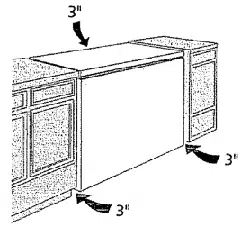
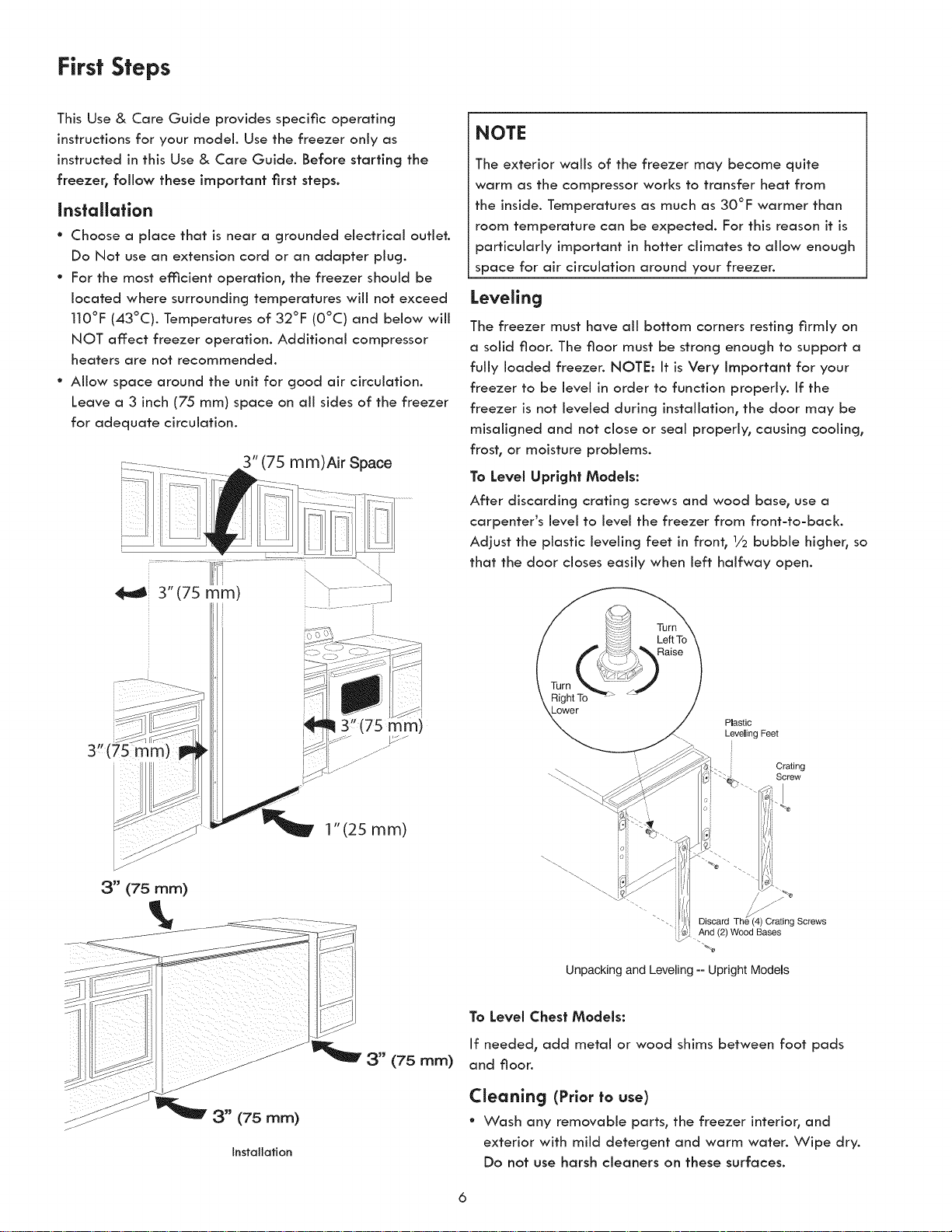
° ANow space around the unit for good air circulation.
Leave o 3 inch (75 mm) space on oN sides of the freezer
for adequate circulation.
3" (75 mm)Air Space
3" (75 mm) _]
1"(25 mm)
NOTE
The exterior wails of the freezer may become quite
warm as the compressor works to transfer heat from
the inside. Temperatures as much as 30°F warmer than
room temperature con be expected. For this reason it is
particularly important in hotter climates to allow enough
space for air circulation around your freezer.
Leveling
The freezer must hove oil bottom corners resting firmly on
o solid floor. The floor must be strong enough to support o
fully loaded freezer. NOTE: It is Very Important for your
freezer to be level in order to function properly. If the
freezer is not leveled during instoJiotion, the door moy be
misoligned and not close or seal properly, causing cooling,
frost, or moisture problems.
To Level Upright Models:
After discarding crating screws and wood bose, use o
carpenter's level to level the freezer from front-to-back.
Adjust the plastic leveling feet in front, 1/2bubble higher, so
that the door closes easily when left halfway open.
Plastic
Leveling Feet
[
Crating
Screw
"'. Discard Th r ng Screws
.And (2) Wood Bases
"%
Unpacking and Leveling -- Upright Models
3" (75 mm)
Installation
3" (75 mm)
To Level Chest Models:
If needed, odd metal or wood shims between foot pads
and floor.
Cleaning (Prior to use)
° Wash any removable ports, the freezer interior, ond
exterior with mild detergent ond warm water. Wipe dry.
Do not use harsh cleaners on these surfaces.
First Steps Energy-saving Tips
Do not use razor blades or other sharp instruments,
which can scratch the appliance surface when removing
adhesive labels. Any glue left from the tape can be
removed with a mixture of warm water and mild
detergent, or touch the residue with the sticky side of
tape already removed. Do not remove the serial plate.
CAUTION
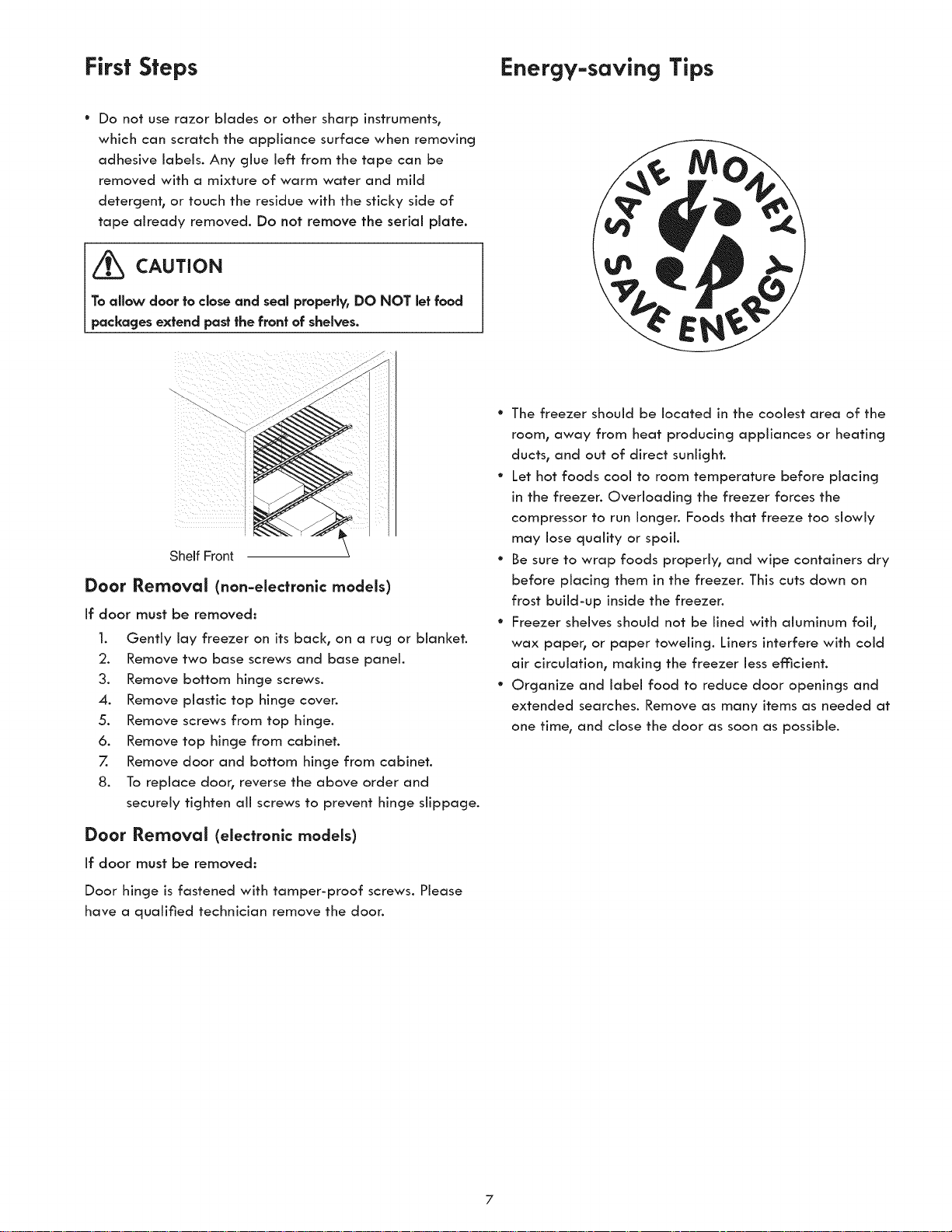
To allow door to close and seal properly, DO NOT let food
packages extend past the front of shelves.
Shelf Front
Door Removal (non-electronic models)
If door must be removed:
1. Gently lay freezer on its back, on a rug or blanket.
2. Remove two bose screws and bose ponel.
3. Remove bottom hinge screws.
4. Remove plastic top hinge coven
5. Remove screws from top hinge.
6. Remove top hinge from cabinet.
7. Remove door and Bottom hinge from cabinet.
8. To replace door, reverse the above order and
securely tighten all screws to prevent hinge slippage.
Door Removal (electronic models)
If door must be removed:
Door hinge is fastened with tamper-proof screws. Please
have a qualified technician remove the door.
° The freezer should be located in the coolest area of the
room, away from heat producing appliances or heating
ducts, and out of direct sunlight.
° Let hot foods cool to room temperature before placing
in the freezer. Overloading the freezer forces the
compressor to run Iongen Foods that freeze too slowly
may lose quality or spoil.
° Be sure to wrap foods properly, and wipe containers dry
before placing them in the freezer. This cuts down on
frost build-up inside the freezer.
° Freezer shelves should not be lined with aluminum foil,
wax paper, or paper toweling. Liners interfere with cold
air circulation, making the freezer Jess efficient.
° Organize and label food to reduce door openings and
extended searches. Remove as many items as needed at
one time, and close the door as soon as possible.
7
Setting the Temperature Control
Temperature Control
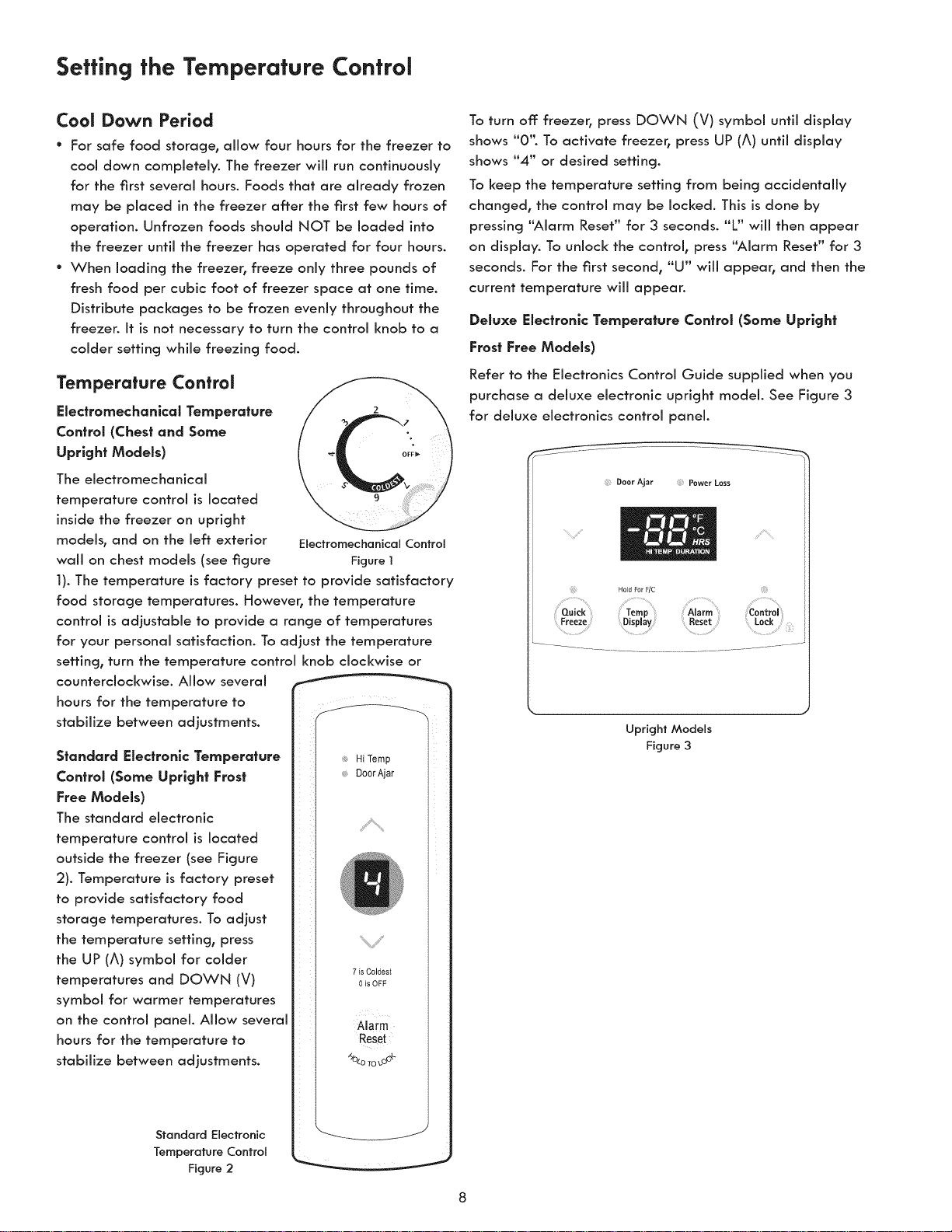
Electromechanlcal Temperature
Control (Chest and Some
Upright Models)
The electromechanical
temperature control is located
inside the freezer on upright
models, and on the left exterior
wall on chest models (see figure
Cool Down Period
* For safe food storage, allow four hours for the freezer to
cool down completely. The freezer will run continuously
for the first several hours. Foods that are already frozen
may be placed in the freezer after the first few hours of
operation. Unfrozen foods should NOT be loaded into
the freezer until the freezer has operated for four hours.
* When loading the freezer, freeze only three pounds of
fresh food per cubic foot of freezer space at one time.
Distribute packages to be frozen evenly throughout the
freezer. It is not necessary to turn the control knob to a
colder setting while freezing food.
ElectromechanicalControl
Figure1
1). The temperature is factory preset to provide satisfactory
food storage temperatures. However, the temperature
control is adjustable to provide a range of temperatures
for your personal satisfaction. To adjust the temperature
setting, turn the temperature control knob clockwise or
counterclockwise. Allow several ....
hours for the temperature to
stabilize between adjustments.
Standard Electronic Temperature
Control (Some Upright Frost
Free Models)
The standard electronic
temperature control is located
outside the freezer (see Figure
2). Temperature is factory preset
to provide satisfactory food
storage temperatures. To adjust
the temperature setting, press
the UP (A) symbol for colder
temperatures and DOWN (V)
symbol for warmer temperatures
on the control panel. Allow several
hours for the temperature to
stabilize between adjustments.
Standard Electronic
TemperatureControl
Figure2
Hi Temp
DoorAjar
% J
7 is Coldest
0 is OFF
Alarm
Reset
"_O_o_o_o_-
To turn off freezer, press DOWN (V) symbol until display
shows "0'L To activate freezer, press UP (A) until display
shows "4" or desired setting.
To keep the temperature setting from being accidentally
changed, the control may be locked. This is done by
pressing "Alarm Reset" for 3 seconds. "L" will then appear
on display. To unlock the control, press "Alarm Reset" for 3
seconds. For the first second, "U" will appear, and then the
current temperature will appear.
Deluxe Electronic Temperature ControJ (Some Upright
Frost Free Models)
Refer to the Electronics Control Guide supplied when you
purchase a deluxe electronic upright model. See Figure 3
for deluxe electronics control panel.
...... ----_-____..._
Upright Models
Figure 3
Optional Features
NOTE
Your freezer may have some, or all of the features listed
below. Become familiar with these features, and their use
and care.
Security Lock with Pop-Out Key
This security lock fastens the door snugly, ensuring stored
food is secure. To lock or unlock the freezer, push the key
into the lock and turn. The key pops out of the lock after it
has been turned.
Blue Defrost Button (some chest models)
iMPORTANT
It is time to defrost and dean the freezer when the blue
defrost button is completely covered with frost.
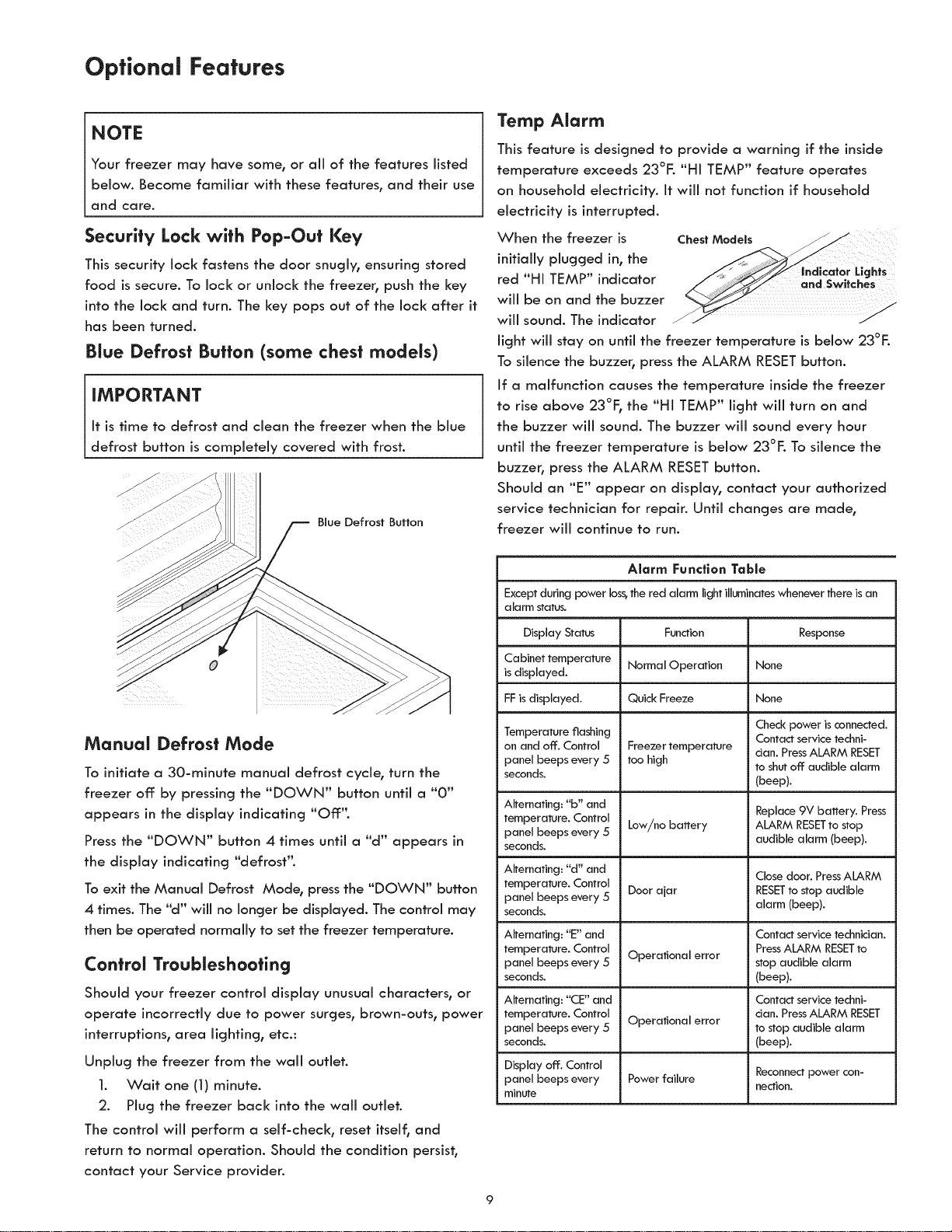
Blue Defrost Button
Manual Defrost Mode
To initiate a 30-minute manual defrost cycle, turn the
freezer off by pressing the "DOWN" button until a "0"
appears in the display indicating "Off:".
Press the "DOWN" button 4 times until a "d" appears in
the display indicating "defrost".
To exit the Manual Defrost Mode, press the "DOWN" button
4 times. The "d" will no longer be displayed. The control may
then be operated normally to set the freezer temperature.
Control Troubleshooting
Should your freezer control display unusual characters, or
operate incorrectly due to power surges, brown-outs, power
interruptions, area lighting, etc.:
Unplug the freezer from the wall outlet.
1. Wait one (1) minute.
2. Plug the freezer back into the wall outlet.
The control will perform a self-check, reset itself, and
return to normal operation. Should the condition persist,
contact your Service provider.
Temp Alarm
This feature is designed to provide a warning if the inside
temperature exceeds 23°F. "HI TEMP" feature operates
on household electricity. It will not function if household
electricity is interrupted.
When the freezer is
initially plugged in, the
red "HI TEMP" indicator
will be on and the buzzer
will sound. The indicator
ChestM
ughts
light will stay on until the freezer temperature is below 23°E
To silence the buzzer, press the ALARM RESET button.
If a malfunction causes the temperature inside the freezer
to rise above 23°F, the "HI TEMP" fight wi[[ turn on and
the buzzer will sound. The buzzer will sound every hour
until the freezer temperature is below 23°F. To silence the
buzzer, press the ALARM RESET button.
Should an "E" appear on display, contact your authorized
service technician for repair. Until changes are made,
freezer will continue to run.
Alarm Function Table
Except during power loss,the red alarm light illuminateswhenever there is an
alarm status.
Display Status Function Response
Cabinet temperature Normal Operation None
isdisplayed.
FFis displayed. Quick Freeze None
Temperature flashing Check power is connected,
Contact service techni-
on and off. Control Freezer temperature dan. PressALARM RESET
panel beeps every 5 too high to shut off audible alarm
seconds. (beep).
Alternating: "b" and Replace9V battery. Press
temperature. Control
panel beeps every 5 Low/no battery ALARM RESETto stop
seconds, audible alarm (beep).
Alternating: "d" and
Close door, PressALARM
temperature. Control Door ajar RESETto stop audible
panel beeps every 5
seconds, alarm (beep).
Alternating: "E" and Contact service technician.
temperature. Control Operational error PressALARM RESETto
panel beeps every 5 stop audible alarm
seconds. (beep).
Alternating: "CE" and Contact service techni-
temperature. Control Operational error dan. PressALARM RESET
panel beeps every 5 to stop audible alarm
seconds. (beep).
Display off. Control Reconnectpower con-
panel beeps every Powerfailure
nection.
minute
Optional Features
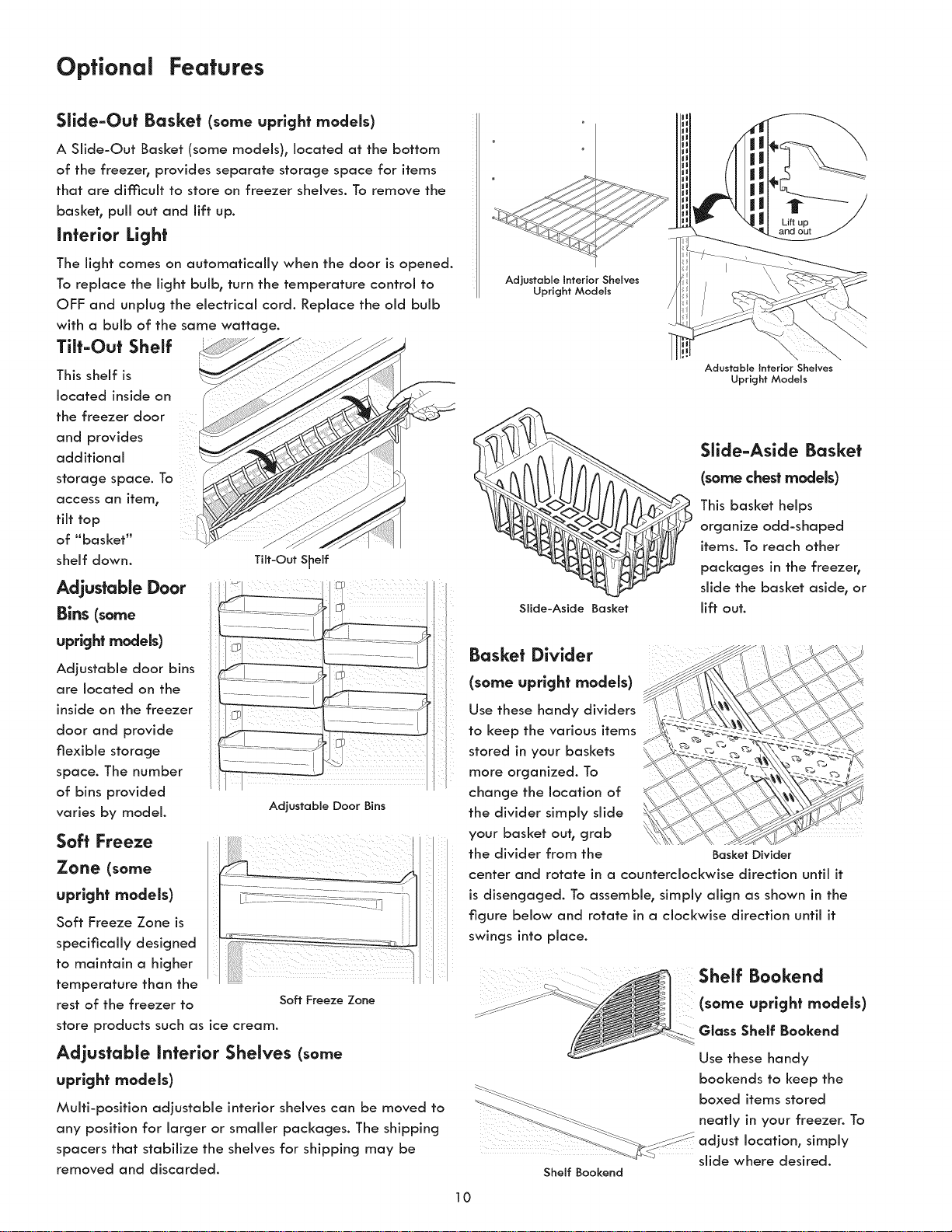
Slide-Out Basket (some upright models)
A Slide-Out Basket (some models), located at the bottom
of the freezer, provides separate storage space for items
that are di_c'icult to store on freezer shelves. To remove the
basket, pull out and lift up.
Interior Light
The light comes on automatically when the door is opened.
To replace the light bulb, turn the temperature control to
OFF and unplug the electrical cord. Replace the old bulb
with a bulb of the same wattage.
Tilt-Out Shelf
This shelf is _j
located inside on _
\ < _J
the freezer door
and provides __
additional
storage space. To
access an item,
flit top
of "basket"
shelf down. Tilt-Out S_elf
Adjustable Door
Bins (some
upright models)
Adjustable door bins
are located on the
inside on the freezer
door and provide
flexible storage
space. The number
of bins provided
varies by model.
.......................
....................... j
...................... i
ill
I
Adjustable Door Bins
Soft Freeze
Zone (some
upright models)
Soft Freeze Zone is
specifically designed
to maintain a higher
temperature than the
rest of the freezer to
Soft Freeze Zone
store products such as ice cream.
Adjustable Interior Shelves (some
upright models)
Multi-position adjustable interior shelves can be moved to
any position for larger or smaller packages. The shipping
spacers that stabilize the shelves for shipping may be
removed and discarded.
Lift up /
Adjustable Interior Shelves
Upright Models
Slide-Aside Basket
Adustoble Interior Shelves
Upright Models
Slide-Aside Basket
(some chest models)
This basket helps
organize odd-shaped
items. To reach other
packages in the freezer,
slide the basket aside, or
lift out.
Basket Divider
(some upright models)
Use these handy dividers
to keep the various items
stored in your baskets
more organized. To
change the location of
the divider simply slide
your basket out, grab
the divider from the
center and rotate in a counterclockwise direction until it
is disengaged. To assemble, simply align as shown in the
figure below and rotate in a clockwise direction until it
swings into place.
Basket Divider
Shelf Bookend
Shelf Bookend
(some upright models)
Glass Shelf Bookend
Use these handy
bookends to keep the
boxed items stored
neatly in your freezer. To
adjust location, simply
slide where desired.
10
Optional Features Care and Cleaning
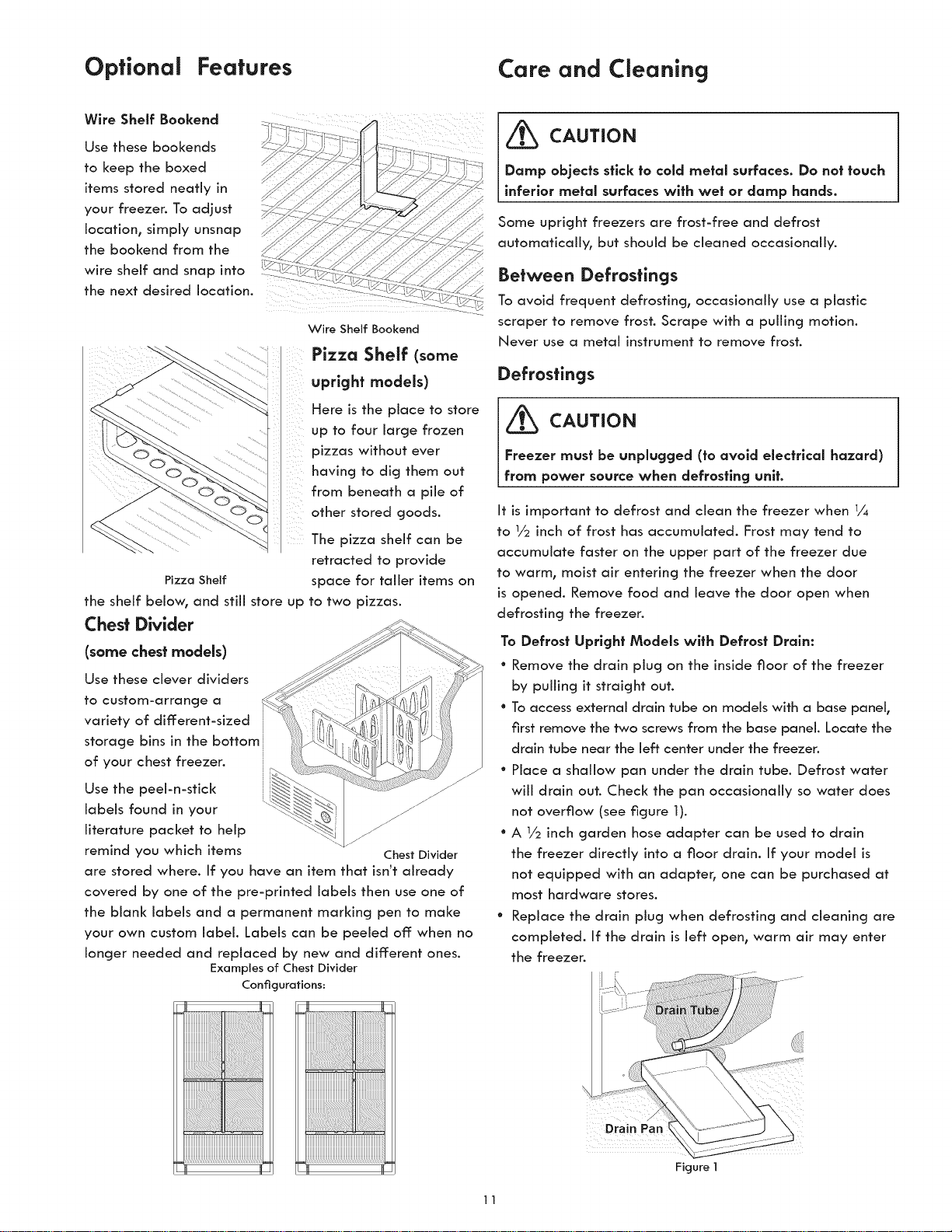
Wire Shelf Bookend
Use these bookends
to keep the boxed
items stored nearly in
your freezer. To adjust
location, simply unsnap
the bookend from the
wire shelf and snap into
?:
//
the next desired location.
Wire Shelf Bookend
Pizza Shelf (some
upright models)
Here is the place to store
up to four large frozen
pizzas without ever
having to dig them out
from beneath a pile of
other stored goods.
The pizza shelf can be
retracted to provide
space for taller items on
to two pizzas.
PizzaShelf
the shelf below, and still store up
Chest Divider
(some chest models)
Use these clever dividers
to custom-arrange a
variety of different-sized
storage bins in the bottom
of your chest freezen
Use the peel-n-stick
labels found in your
literature packet to help
remind you which items Chest Divider
are stored where. If you have an item that isn't already
covered by one of the pre-printed labels then use one of
the blank labels and a permanent marking pen to make
your own custom label. Labels can be peeled off when no
longer needed and replaced by new and different ones.
Examples of Chest Divider
Conficurations:
_ CAUTION
Damp objects stick to cold metal surfaces. Do not touch
inferior metal surfaces wlfh wet or damp hands.
Some upright freezers are frost-free and defrost
automatically, but should be cleaned occasionally.
Between Defrostings
To avoid frequent defrosting, occasionally use a plastic
scraper to remove frost. Scrape with a pulling motion.
Never use a metal instrument to remove frost.
Defrostings
_ CAUTION
Freezer must be unplugged (to avoid electrlcal hazard)
from power source when defrosting unit.
It is important to defrost and clean the freezer when 1/4
to 1/2 inch of frost has accumulated. Frost may tend to
accumulate faster on the upper part of the freezer due
to warm, moist air entering the freezer when the door
is opened. Remove food and leave the door open when
defrosting the freezer.
To Defrost Upright Models wlth Defrost Drain:
° Remove the drain plug on the inside floor of the freezer
by pulling it straight out.
° Toaccess external drain tube on models with a base panel_
first remove the two screws from the base panel. Locate the
drain tube near the left center under the freezen
° Place a shallow pan under the drain tube. Defrost water
will drain out. Check the pan occasionally so water does
not overflow (see figure 1).
° A 1/2inch garden hose adapter can be used to drain
the freezer directly into a floor drain. If your model is
not equipped with an adapter° one can be purchased at
most hardware stores.
° Replace the drain plug when defrosting and cleaning are
completed. If the drain is left open, warm air may enter
the freezer.
Drain Pan i
Figure I
11
Care and Cleaning
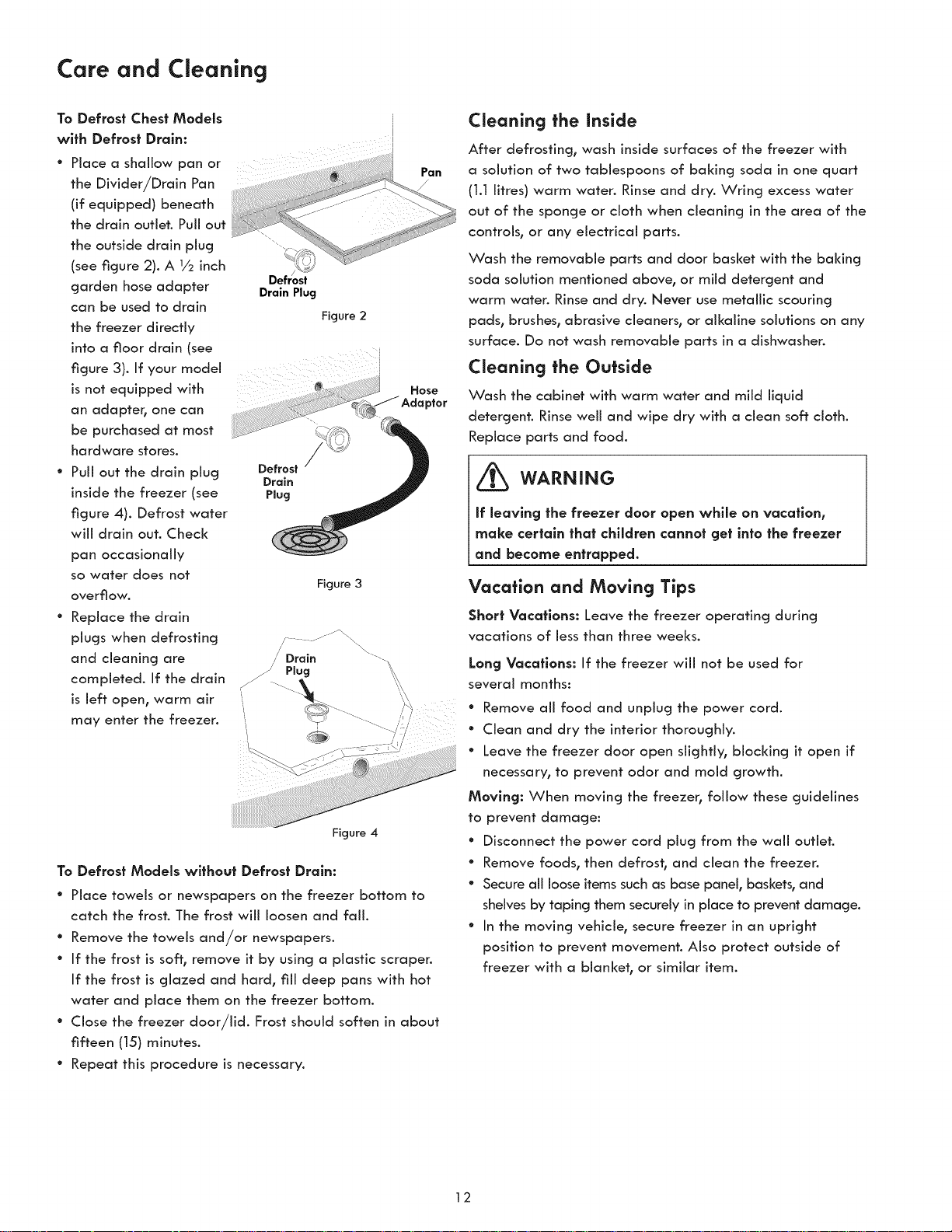
To Defrost Chest Models
wlfh Defrost Drain:
Place a shallow pan or
the Divider/Drain Pan
(if equipped) beneath
the drain outlet. Puii out
the outside drain plug
(see figure 2). A 1/2 inch
garden hose adapter Drain Plug
can be used to drain
Figure 2
the freezer directly
into a floor drain (see
J
figure 3). If your model i
isnot equipped with
an adapter, one can
be purchased at most
hardware stores.
Puii out the drain plug
inside the freezer (see
figure 4). Defrost water
wiii drain out. Check
pan occasionally
so water does not
overflow.
Drain
Plug
Figure 3
Replace the drain
plugs when defrosting
and cleaning are
completed. If the drain
is left open, warm air
may enter the freezer.
Pan
Hose
Figure 4
To Defrost Models without Defrost Drain:
° Place towels or newspapers on the freezer bottom to
catch the frost. The frost will loosen and fail.
° Remove the towels and/or newspapers.
° If the frost is soft, remove it by using a plastic scraper.
If the frost is glazed and hard, fill deep pans with hot
water and place them on the freezer bottom.
° Close the freezer door/lid. Frost should soften in about
fifteen (15) minutes.
° Repeat this procedure is necessary.
Cleaning the inside
After defrosting, wash inside surfaces of the freezer with
a solution of two tablespoons of baking soda in one quart
(1.1 litres) warm water. Rinse and dry. Wring excess water
out of the sponge or cloth when cleaning in the area of the
controls, or any electrical parts.
Wash the removable parts and door basket with the baking
soda solution mentioned above, or mild detergent and
warm water. Rinse and dry. Never use metallic scouring
pads, brushes, abrasive cleaners, or alkaline solutions on any
surface. Do not wash removable parts in a dishwasher.
Cleaning the Outside
Wash the cabinet with warm water and mild liquid
detergent. Rinse well and wipe dry with a clean soft cloth.
Replace parts and food.
WARNING
If leaving the freezer door open while on vacation,
make certain that children cannot get into the freezer
and become entrapped.
Vacation and Moving Tips
Short Vacations: Leave the freezer operating during
vacations of less than three weeks.
Long Vacations: If the freezer will not be used for
several months:
* Remove all food and unplug the power cord.
* Clean and dry the interior thoroughly.
* Leave the freezer door open slightly, blocking it open if
necessary, to prevent odor and mold growth.
Moving: When moving the freezer, follow these guidelines
to prevent damage:
° Disconnect the power cord plug from the wail outlet.
° Remove foods, then defros h and clean the freezer.
* Secure all loose items such as base panel, baskets, and
shelves by taping them securely in place to prevent damage.
° In the moving vehicle, secure freezer in an upright
position to prevent movement. Also protect outside of
freezer with a blanket, or similar item.
12
Power Failure/Freezer Failure
NOTE
Do not open freezer door unnecessarily if freezer is off:
for severaJ hours.
If a power failure occurs, frozen foods wiii stay frozen for
at least 24 hours if the freezer is kept closed. If the power
failure continues, pack seven or eight pounds of dry ice
into the freezer every 24 hours. Look in the Yellow Pages
under Dry Ice, Dairies, or Ice Cream manufacturers for
local dry ice suppliers. Always wear gloves and use caution
when handling dry ice.
If the freezer has stopped operating, see "Freezer Does
Not Run" in the Troubleshooting Guide. If you cannot solve
the problem, caii an authorized servicer mediately.
If the freezer remains off: for several hours, follow the
directions above for the use of dry ice during a power
failure. If necessary, take the food to a local locker plant
until the freezer is ready to operate. Look in the Yellow
Pages under "Frozen Food Locker Piants'L
13
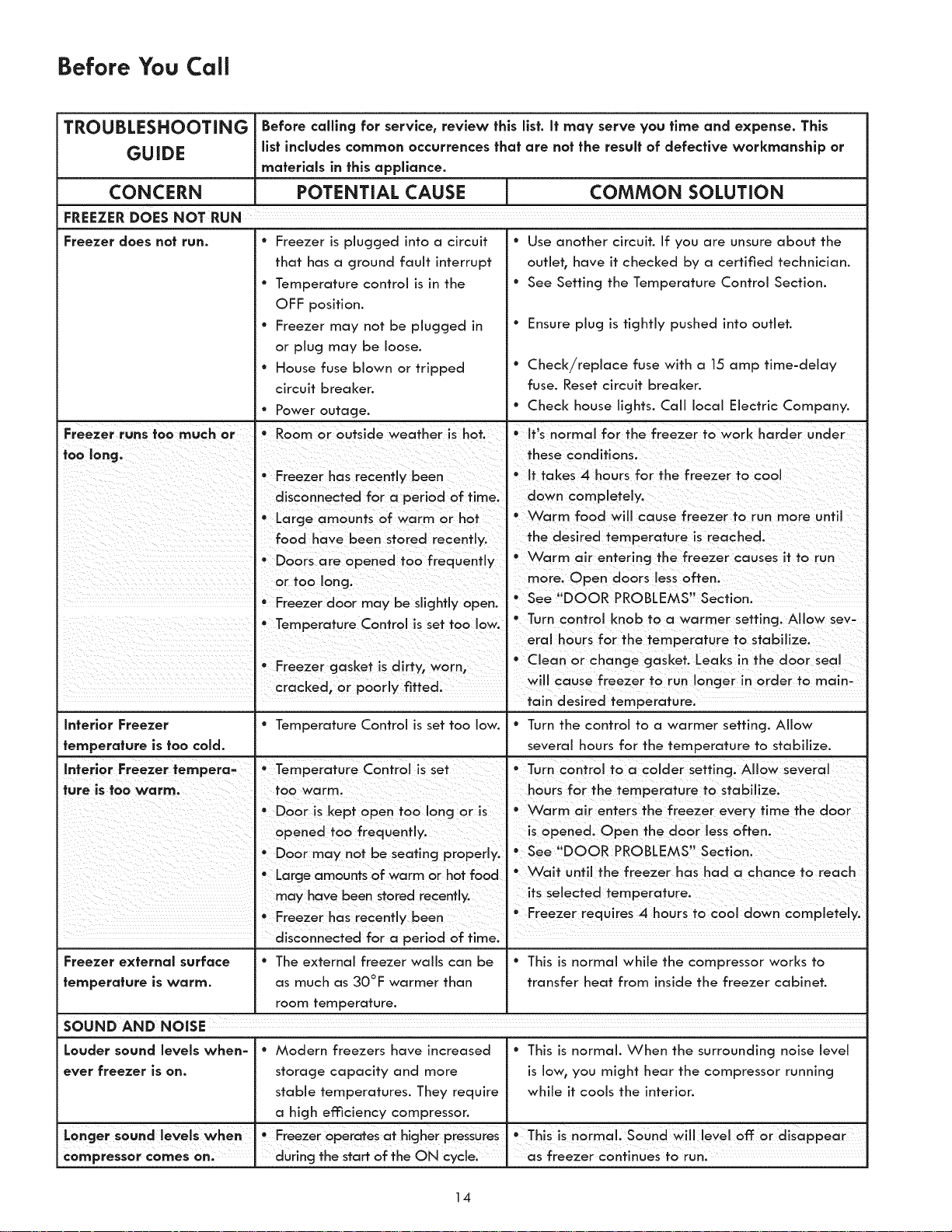
Before You Call
TROUBLESHOOTING Before calling for service, review fhls llst. If may serve you flme and expense. This
GUIDE llsf includes common occurrences thai are not the result of defective workmanship or
materials in fhls appliance.
CONCERN POTENTIAL CAUSE COMMON SOLUTION
FREEZER DOES NOT RUN
Freezer does not run.
° Freezer is plugged into a circuit
that has a ground fault interrupt
° Temperature control is in the
OFF position.
° Freezer may not be plugged in
or plug may be loose.
• House fuse blown or tripped
circuit breaker.
• Power outage.
° Use another circuit. If you are unsure about the
outlet, have it checked by a certified technician.
° See Setting the Temperature Control Section.
° Ensure plug is tightly pushed into outlet.
° Check/replace fuse with a 15 amp time-delay
fuse. Reset circuit breaker.
° Check house lights. Call local Electric Company.
I I
Freezer runs too much or I " Room or outside weather is hot. I * It's normal for the freezer to work harder under
too lang. '1 '1 these conditions.
• Freezer has recently been * It takes 4 hours for the freezer to coo!
I
disconnected for a period of time. I down completely.
° Large amounts of warm or hot Ii° Warm food will cause freezer to run more until
food have been stored recent y. the desired temperature is reached.
• Doors are opened too frequently ° VVarm air entering the freezer causes it to run
I Ion more Open doors ess often
or too g. n "
° See DOOR PROBLEMS Section
Freezer door may be slightly open.
• ......... ,-..... :......... * Turn contro <nob to a warmer setting A ow sev-
eral hours for the temperature to stabilize.
• ,- ...... * C ean or change gasket Leaks in the door sea
rreezer gaSKeT Is a rTy, worn,
I cracked, or poorly fitted, will cause freezer to run longer in order to main-
tain desired temperature.
Inferlor Freezer ° Temperature Control is set too low. ° Turn the control to a warmer setting. Allow
temperature is too cold. several hours for the temperature to stabilize.
Interior Freezer tempera= ° Temperature Control isset ° Turn control to a colder setting. Allow several
ture is too warm. ,I too warm. I hours for the temperature to stabilize.
° Door is kept open too long or is ° Warm air enters the freezer every time the door
I opened too frequently. I is opened. Open the door less often.
° Door may not be seating properly. See DOOR PROBLEMS Section.
• Large amounts of warm or hot food ° VVait until the freezer has had a chance to reach
I may have been stored recently. I its selected temperature.
I ° Freezer has recently been ° Freezer requires 4 hours to cool down completely
Freezer external surface ° The external freezer walls can be ° This is normal while the compressor works to
temperature is warm. as much as 30°F warmer than transfer heat from inside the freezer cabinet.
room temperature.
SOUND AND NOISE
Louder sound _eve_s when = ° Modern freezers have increased ° This is normal. When the surrounding noise level
ever freezer is on. storage capacity and more is low, you might hear the compressor running
stable temperatures. They require while it cools the interior.
a high emciency compressor.
i
° •
Longer sound levels when Freezer operates at higher pressures This is normal. Sound will level off or disappear
compressor comes on. during the staff of the ON cycle, as freezer continues to run.
14
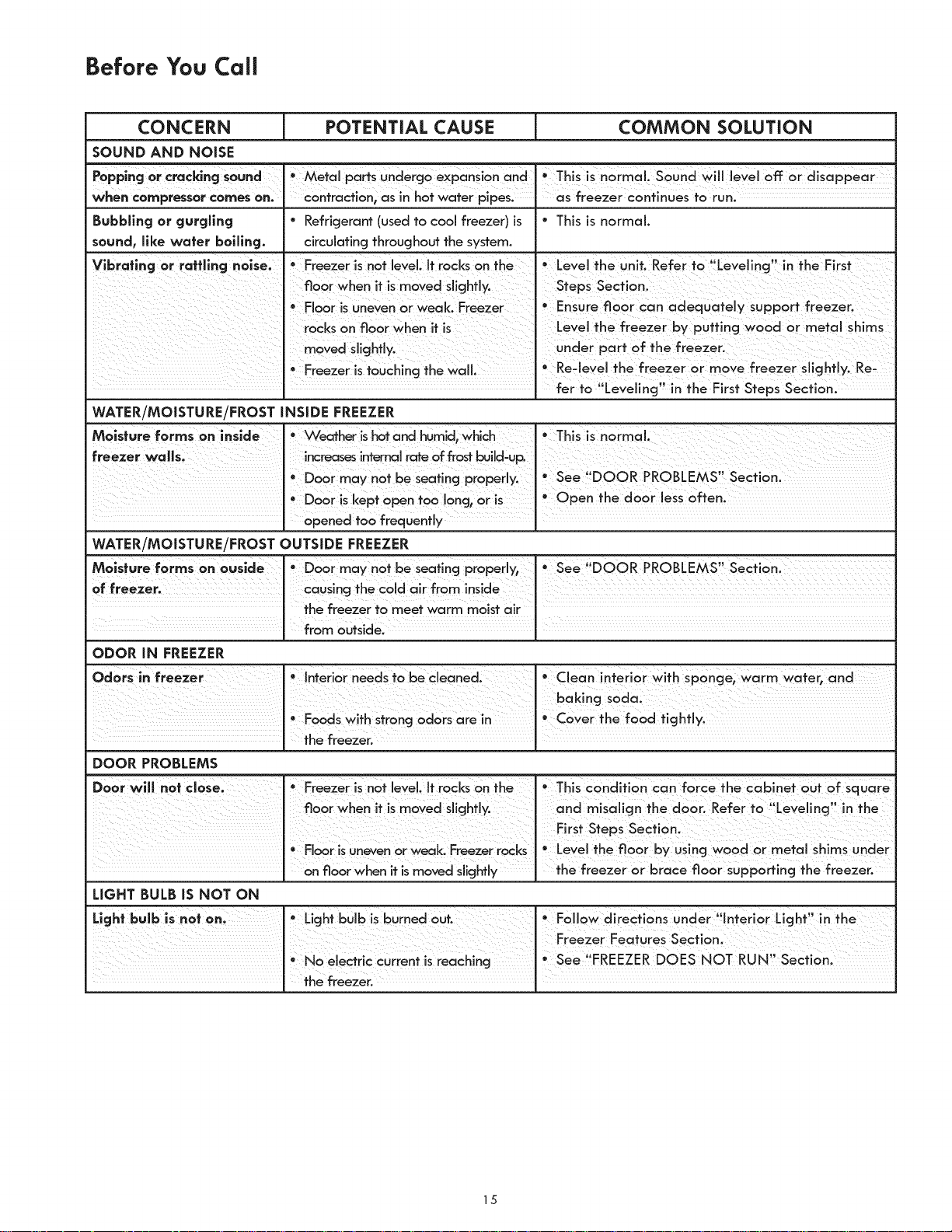
Before You Call
CONCERN [ POTENTIAL CAUSE i COMMON SOLUTION
SOUND AND NOISE
PopplnggOr Cracklncj Sound Metal parts undercj0 expon_i0n and ' This is normal Sound Will leyel off: or disappear
I I
when compressor comes on. contraction, as in hot water pipes, as freezer continues to run.
Bubbllncj or cjurcjllncj ° Refrigerant (used to cod freezer) is ° This is normal.
sound, llke water boillncj, circulating throughout the system.
Vlbrafincj or rotflincj nolse. * Freezer is not bVd, tt rocks On ° Level the unit. Refer tO ,Levelincj, in the First
° FI00r isUneven or Weak. Freezer ' Ensure fl00r Can adequatdy support freezer.
rocks on fl0ar when it is Level the freezer by putting wood or metal shims
Under part of the freezer,
' Freezer istouching the wall. • Re21evelthe freezer or move freezer slicjhfly, Re_
I fer f0 "Leveiing" in the First steps section.
WATER/MOISTURE/FROST INSIDE FREEZER
M0isture forms on. Weathe[ is hot and humid` no[rna L
freezerwolls; _ !_reases!n_mal rat°off
, Door may not be sea!,ncj OOR PROBLEMS Sect,on.
• Door iskept Open too Io the door less often,
WATER/MOISTURE/FROST OUTSIDE FREEZER
Molsture forms on ouside * See i!DOOR PROBLEMS, secfionl
0, 0o°,,°g,hecodo,rfrom,°,,d°
thefreezertomeetwarmto!!stair I
from outside] [
ODOR IN FREEZER
DOOR PROBLEMS
D0or wiH not ° Freezer !s not leyel, li rocks on the ° Th €onditi0nCam force the cabinet ouf0f square
" " " " " ' V " _ °
floor when t s moyed sllcjhfly, and m_sal,cjn th edoor. Refer to Le e!!ncj !n the
First StePs Sect!on:
° Floaris uneven orweak. Freezer rocks ° Level the floor by usincj wood or metal shims Under
J Onfloor when it ismoved slicjhtly J the freezer or braCe floor sUpporfincj the freezer.
LIGHT BULB IS NOT ON
Light bulb iS not Oni ° Licjhf bulb !Sburn° d out. FOllOWd!rections Under flint°r! Or Light! ' in the
J Featu res Section,
• No electric current is reachincj °See 'FREEZER DOES NOT RUN Section,
J the freezer. J
15

Sears Service Sears Canada Customers
"We Service What We Sell" is our assurance you can
depend on Sears for service.., and Sears service is
nationwide. Your freezer has added value when you
consider that Sears has service units nationwide, staffed
with professional technicians specifically trained on Sears
appliances and having parts, tools and equipment to
ensure that we meet our pledge to you... "We Service
What We Seli'L
Sears Maintenance Agreement
Maintain the value of your Kenmore ® freezer with a Sears
Maintenance Agreement. Sears freezers are designed,
manufactured, and tested for years of dependable
operation. Yet any modern appliance may require service
from time to time.
The Sears Maintenance Agreement
° Is your way to buy tomorrow's service at today's price.
° Eliminates repair bills resulting from normal use.
° Allows for as many service calls as required.
° Provides for service by professional Sears-trained technicians.
° Offers an annual preventive maintenance check up at
your request.
This maintenance agreement does not cover original
installation, reinstallation, or damage resulting from
external causes such as acts of God, abuse, thefh fire,
flood, wind, lightning, freezing, power failure, power
reduction, etc. Please ask a salesperson to see the
agreement for all terms and conditions.
Dear Customer:
In manufacturing this product, many steps have been taken
to provide you with the highest quality. Unfortunately,
errors or omissions occasionally occur. In the event you find
a missing or defective part, please contact your nearest
Sears store.
If you have any suggestions that would help us to improve
our assembly/operation instructions or this product, please
write them down, including the information listed below
and mail to:
Sears Canada, Inc.
Attn.: Buyer Dept. 646
22 Jarvis Street
Toronto, CA
MSB 2B8
Purchased by:
Name:
Address:
City:
Postal Code:
Model No.: 970
Serial No.:
Date of Purchase
Location of Purchase:
Comments:
Prov.:
Phone:
/ /
16