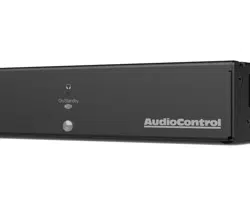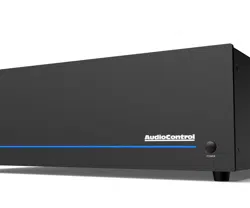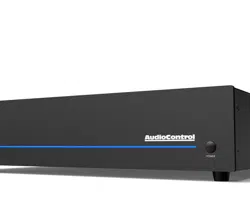
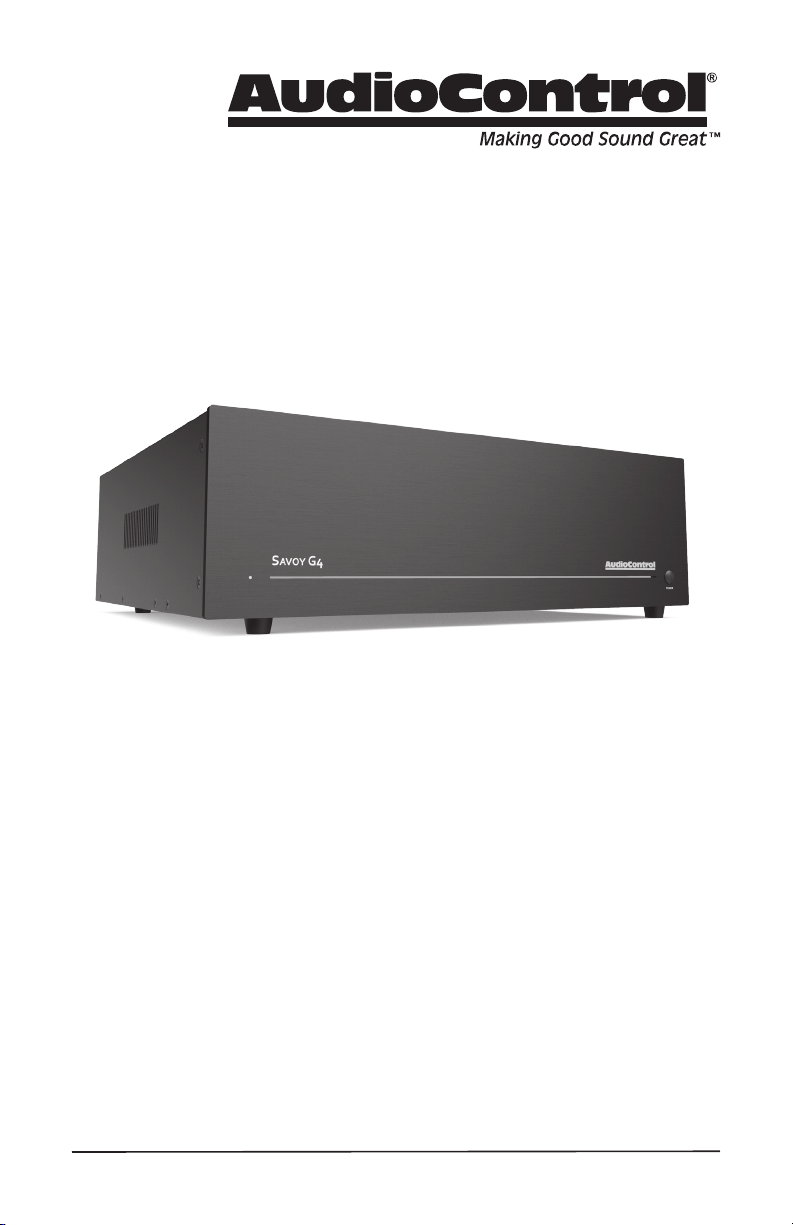
7 CHANNEL HIGH POWER AMPLIFIER OF DESTINY
Installation Manual
SAVOY G4

2
Important Safety
Instructions
1. Read these instructions.
2. Keep these instructions.
3. Heed all warnings.
4. Follow all instructions.
5. Do not use this apparatus near water.
6. Clean only with a dry cloth.
7. Do not block any ventilation openings. In-
stall in accordance with the manufacturer’s
instructions.
8. Do not install near any heat sources such
as radiators, heat registers, stoves, or
other apparatus (including ampliers) that
produce heat.
9. Protect the power cord from being walked
on or pinched particularly at plugs, conve-
nience receptacles, and the point where
they exit from the apparatus.
10. Only use attachments/accessories speci-
ed by the manufacturer.
11. Unplug this apparatus during lightning
storms or when unused for long periods of
time.
12. Refer all servicing to qualied service
personnel. Servicing is required when
the apparatus has been damaged in any
way, such as power-supply cord or plug is
damaged, liquid has been spilled or objects
have fallen into the apparatus, the appara-
tus has been exposed to rain or moisture,
does not operate normally, or has been
dropped.
13. This apparatus shall not be exposed to
dripping or splashing, and no object lled
with liquids, such as vases or glasses, shall
be placed on the apparatus.
The lightning ash with arrowhead
symbol within an equilateral triangle
is intended to alert the user to the
presence of uninsulated “dangerous voltage”
within the product’s enclosure, that may be
of sucient magnitude to constitute a risk of
electric shock to persons.
The exclamation point within an
equilateral triangle is intended to alert
the user of the presence of import-
ant operating and maintenance (servicing)
instructions in the literature accompanying the
appliance.
Caution: to reduce the risk of electric shock,
do not remove the top cover. There are no
user-serviceable parts inside. Refer servicing to
qualied personnel.
This equipment has been tested and found
to comply with the limits for a Class B digital
device, pursuant to part 15 of the FCC Rules.
These limits are designed to provide reasonable
protection against harmful interference in a
residential installation.
This equipment generates, uses, and can radi-
ate radio frequency energy and, if not installed
and used in accordance with the instructions,
may cause harmful interference to radio com-
munications. However, there is no guarantee
that interference will not occur in a particular
installation.
If this equipment does cause harmful interfer-
ence to radio or television reception, which can
be determined by turning the equipment o
and on, the user is encouraged to try to correct
the interference by one or more of the follow-
ing measures:
• Reorient or relocate the receiving antenna.
• Increase the separation between the equip-
ment and the receiver.
• Connect the equipment into an outlet on
a circuit dierent from that to which the
receiver is connected.
• Consult the dealer or an experienced radio/
TV technician for help.
CAUTION: Changes or modications to this
device not expressly approved by AudioControl
Inc. could void the user’s authority to operate
the equipment under FCC rules.
Recycling notice: If the time comes
and this apparatus has fullled its
destiny, do not throw it out into the
trash. It has to be carefully recycled
for the good of mankind, by a facility specially
equipped for the safe recycling of electronic
apparatii. Please contact your local or state
recycling leaders for assistance in locating a
suitable nearby recycling facility. Or, contact us
and we might be able to repair it for you.
Important Safety Instructions

3
Installation Manual
SAVOY G4
Table of Contents
Table of Contents
Important Safety Instructions ...... 2
Introduction ..................... 4
Features ........................ 5
Quick View ...................... 7
Getting Started .................. 8
Front Panel Features .............. 9
Rear Panel Features .............. 10
Speaker and Wiring Impedance ..... 13
Installation ...................... 14
Congurations ................... 15
Ventilation ...................... 19
Advanced Discussions ............. 20
Troubleshooting ................. 22
Specications ................... 23
Block Diagram ................... 24
Service ......................... 25
The Warranty .................... 26
Blackhawk Waltz ................. 28
©2019 AudioControl Inc All rights reserved.
Based on a dream sequence while under the inuence of tea.

4
Flowery Marketing Introduction
Greetings from the rainforests of the
Pacic Northwest, the home of AudioCon-
trol. Since you are reading this manual it is
safe to say you are in the process of in-
stalling a high performance AudioControl
Savoy G4 theater amplier that performs
as a 7 channel amplier to power your
surround sound speaker or you can use it
in a 5.1 conguration to power 5 channels
and a subwoofer! You have unprecedented
exibility with this ridiculously powerful
and adaptable amplier which no doubt
caught your rened and discerning eye.
You will be pleased to note that this am-
plier was designed and manufactured
at the AudioControl factories located in
the U.S.A., just outside of Seattle. For
over 43 years now, our company has been
designing and manufacturing high per-
formance components that allow enthu-
siasts to truly enjoy their audio systems.
It should provide you and your customers
with years of enjoyment and trouble-free
service. We truly feel that this theater
amplier will enhance the performance of
any system.
This manual was written to assist with the
installation of this new amplier. Whether
you are a seasoned veteran, or this is the
Introduction
rst amplier you have ever heard, we
encourage you to set aside some time to
review this not-so-weighty prose. While
reading a manual can be as exciting as
watching a slug race, we have included
lots of useful information, carefully
concealed within a minimum of technical
jargon. Not only will you learn how to get
the most from this AudioControl home
theater power amplier, you might be
able to infer how to cook chicken perfectly
moist every time. Anything as capable
as this amp deserves all the explanation
it can get. So, kick back, grab a Reuben’s
Brews Crikey IPA and give this a thorough
read.
We also encourage you to visit the
AudioControl web site, conveniently
located at www.audiocontrol.com. While
we have tried to anticipate any installation
issues in this manual, there are sometimes
new applications and ideas that come to
mind. Therefore our web site will always
have the most current information.
Needless to say, if you have any real
challenging questions, feel free to
call us or e-mail us at sound.great@
audiocontrol.com.

5
Installation Manual
SAVOY G4
Features
Features
Here are some of the features that make
the Savoy G4 very unique, and unlike any
other amplier:
• CongurationFlexibility
With the Savoy G4, you have all you
need to prodigiously power 5, 5.1 or 7
channels of your theater. Traditional-
ly, 7 channels of amplication means
you can power your 7 speakers, but
not only can you do that, you can set
up channels 1- 5 as your 5 channel
surround and power a passive 8 ohm
sub from one of the two pairs that
can be bridged – 600 watts. Perhaps
you have 2 front full range that are
super power hungry, use the Savoy
G4 with channels 1&2, 6&7 bridged
for a stupendous 600 watts per chan-
nel, giving you a 5 channel amp.
• Built For The Long Haul
“Bulletproof” is the phrase that best
describes the Savoy G4. Everything
about this amplier is built for the
long haul, built for life! This amplier
has been designed with durability in
mind, fully backed by AudioControl’s
5 year warranty. The cool running
Class H design minimizes compo-
nent-damaging heat, while the Light-
drive system protects your speakers
from harmful harmonics caused by
clipping.
• Class H Design
Most ampliers have one speed, all
on. That means that during most of
music, up to 90% of the amp’s power
is just going up in heat. The Class H
design takes care of this problem
by automatically and intelligently
adjusting the power supply to t the
power demands of the moment.
The result is much cooler operation
without the need for bulky heatsinks
or fans.
• Lightdrive Protection System
The Lightdrive protection circuitry
protects this amplier like a mom-
ma bear to her cubs - and defends
speakers against clipping, distortion,
damage, and annoying teenage
beach party movies, even if the
movie festival lasts all weekend. Each
channel is independently protected,
so a problem in one channel will not
aect the rest of the system.
• HighDenitionBiMOSOutput
Design
Home Theater audio systems place
terric demands on power ampliers.
The high current drive capabilities of
our BiMOS outputs cleanly delivers a
minimum of 230 watts into 8 ohms,
while maintaining a cool performance
method that smells great too!
• Unparalleledenergyeciency
Whether from the point of view
of saving electricity or from the
viewpoint of less heat in the rack,
this amplier has no equal. It is VERY
energy ecient during operation.
• MadeintheNorthwestRainforest
The AudioControl Savoy G4 began its
existence at our factory in Mountlake
Terrace, Washington, a few miles
north of Seattle. Here, we also build
precision test instruments, equalizers
and analyzers and a totally awe-
some line of car stereo components.
AudioControl started in 1977 and has
won so many audio industry awards
for design and engineering excel-
lence that our reception room wall is
starting to sag.

6
Complimentary Features
Features continued
• Class H power - dynamically provides
incredible power
• Bridgeable outputs delivering 600 watts
• Individual channel input gain
• Mono/stereo operation
• Balanced XLR and unbalanced RCA
inputs
• Analog RCA loop-through outputs
• Stout and sturdy 5-way binding posts
• Back panel channel LED status
indicators
• Lightdrive signal management
• Prodigious power
• Ground isolation switch
• Front panel light bar brilliance setting
• Intuitive back panel for ease of set up
and control
• Heavy - use for weight lifting when not
listening
7
Installation Manual
SAVOY G4
Quick View
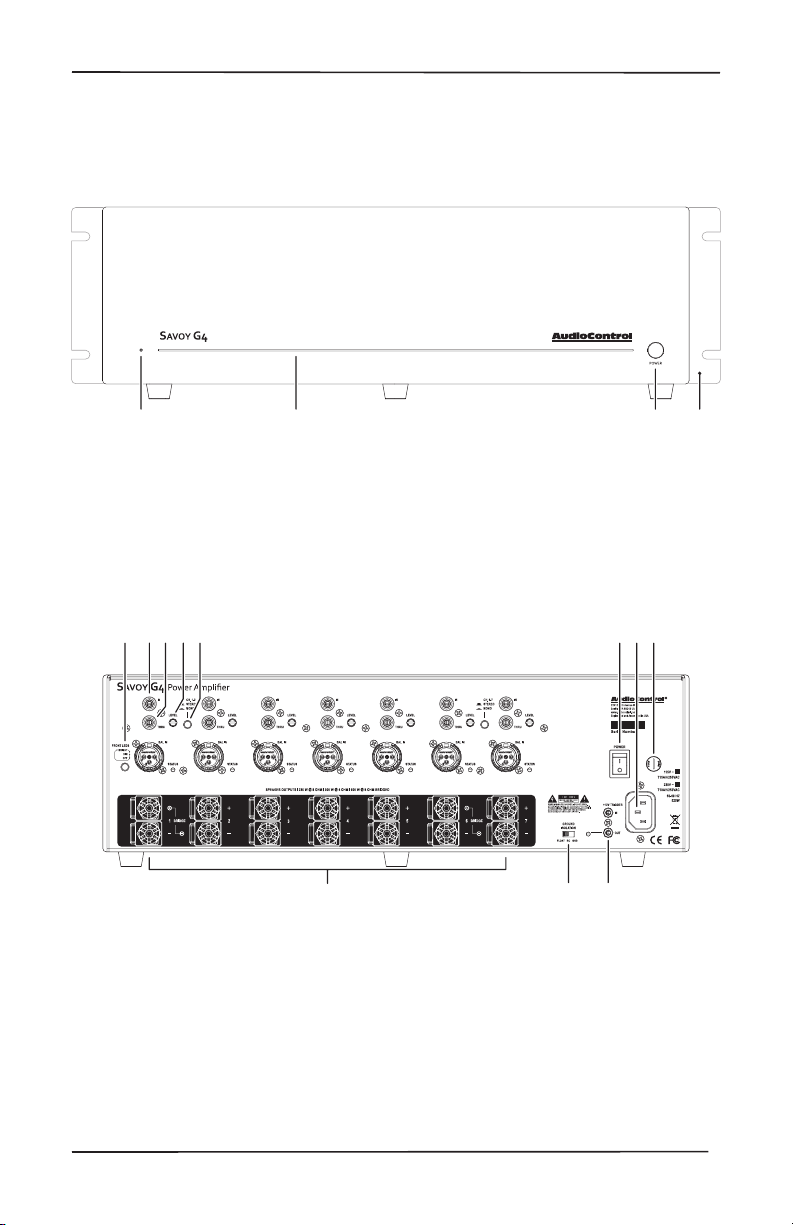
Quick View
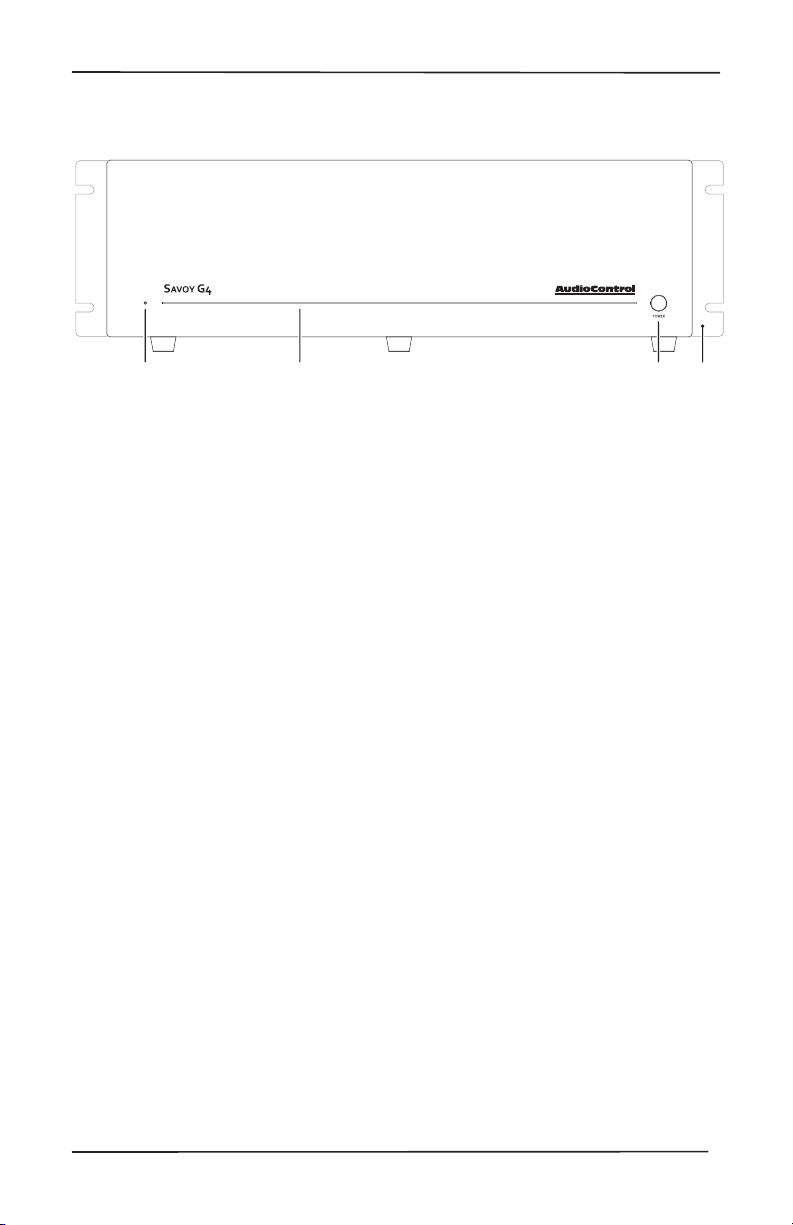
Front Panel
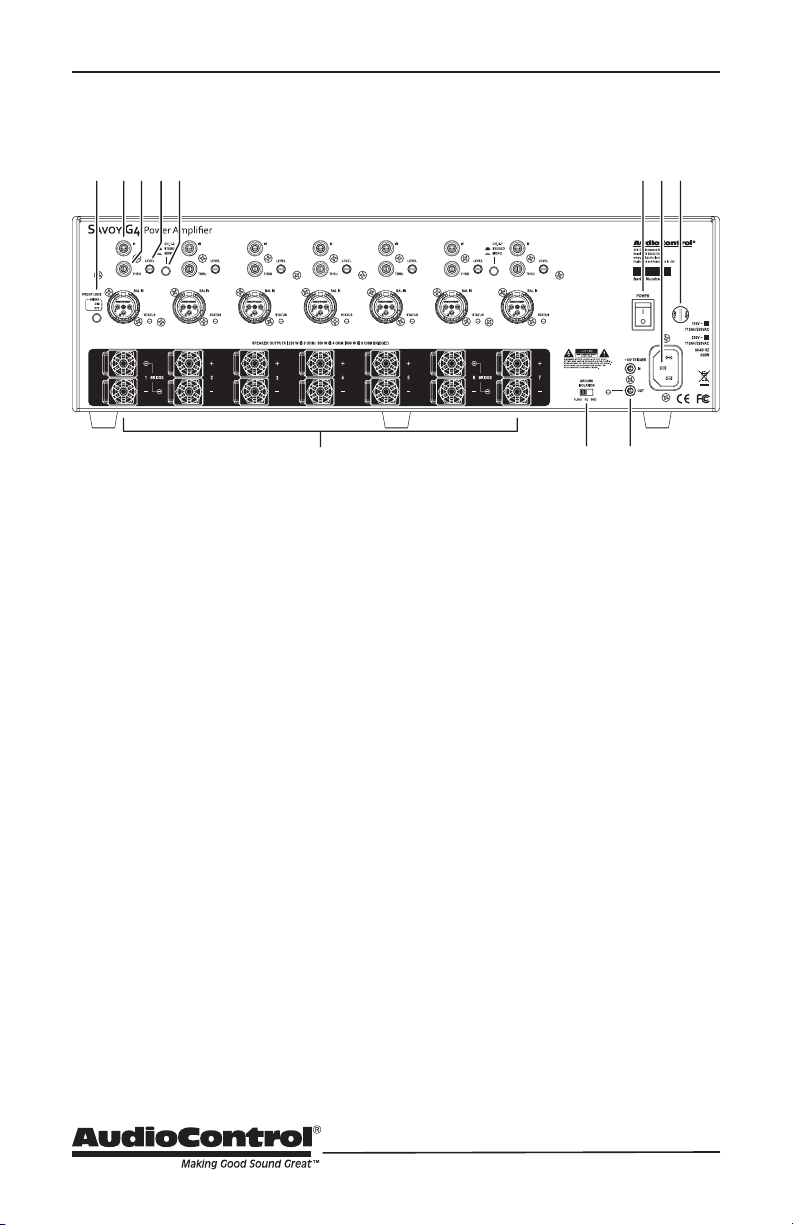
7. Ground isolation switch
8. Mastertrigger
9. AC power switch
10. AC input
11. AC fuse
1. Light bar brilliance setting
2. Inputs balanced and unbalanced
3. RCA Thru outputs
4. Level control
5. Stereo/Monoswitch
6. Speaker outputs
1. Power LED
2. Light Bar
6
7 8
123 45 91011
12 43
3. Power Button
4. RackMountEars(optional)
Rear Panel

8
Getting Started
1. Turn o power to all
components before making
any connections.
2. When making connections, des-
ignate red RCA plugs as right, and
designate white, black, or gray plugs
as left. This is a good idea for all sig-
nal connections made in your audio
system. The key is consistency. Stick
with the same color coding and you’ll
reduce possible problems.
3. Whenever possible, keep power
cords away from signal cables to pre-
vent induced hum. This is especially
important if you bundle the cables to
keep the installation neat looking.
4. Use quality interconnect cables. We
know from experience that really
cheap cables can cause a multitude
of problems. They tend to break
inside or corrode, causing a loss of
signal or hum. They also have poor
shielding.
5. The Savoy G4 gives you the option
of using RCA cables or balanced XLR
cables – if running more than 20 feet
or so, it is best to run those signal ca-
bles as XLR to give you better noise
rejection.
If you do need to run the RCA audio
cables more than 20 feet, consider
using an active balanced line driver
for the signals. This will provide
better noise rejection against nasty
things like hum, spikes, local talk
radio, and metaphysical paranormal
phenomena, etc. The AudioControl
balanced line driver components
(BLD-10, BLR-10 and BLX-10) are an
excellent way to send audio over long
distances with standard Cat-5 wiring.
Check them out at audiocontrol.com.
Getting Started
6. Speaker Wiring – Establish a standard
connection color code and stick with
it. One conductor of the speaker wire
is normally marked by a dierent
color (silver versus copper) or there
is a ribbing on one side. Typically
this marked conductor is used for
the positive (+) speaker leads. Some
wires have positive and negative
printed right onto the wire jacket.
Match the polarity markings on
the Savoy G4 unit with the polarity
markings on your speakers. If
the wiring is incorrect then the
speakers will be out-of-phase, with
a noticeable decrease in the bass
response and less than goodly-
sounding awesomeness.
7. For optimal performance, dance in a
fairy circle around your new amplier
at midnight, on the rst full moon of
the new year.
9
Installation Manual
SAVOY G4
Front Panel
Front Panel Features
1. LED – On the far left of the heavy duty
brushed aluminum front panel, this
LED indicates the state of the Savoy
G4 amplier.
A Blue LED – shows that the amplier
is on and will drive your speakers when
the source is played.
A Red LED – shows that the amplier
is in standby mode, and will not drive
the speakers (hit the power button to
make it blue).
No LED illumination – means that it’s
either unplugged from wall power or
the back panel mains power switch is
turned o, or all the lights are out in
your town again.
Yellow LED – indicates initiation of
jump to hyperspace. You have ten
seconds to put the cat out, and leave
a note for the milkman. (Not yet
available in this galaxy.)
2. Light bar – This front panel blue
light bar is mined directly from
the R Coronae Australis Nebula.
The brilliance of this light can be
customized via a button on the back
panel.
3. Power Button – This large legendary
button allows for the on/standby mode
to be toggled. Press to turn the unit on
and press again to turn the unit into
standby mode. The rear panel Main AC
Power switch must be engaged for this
button to work.
4. RackMountEars– These optional
rack ears allow the unit to be rack
mounted in a standard 19” wide rack,
with a 3U height. Use standard rack
mount screws and washers to secure
the unit in a rack. The unit does not
have to be supported at the rear if the
rack is located in a xed location.
To remove the rack ears (making the
unit 17” wide), rst unplug the power
cord, and then locate and undo the
screws securing each ear to the side
of the chassis, and remove the ears.
Replace the screws securely back into
the chassis. Do not remove any of the
other screws from the chassis or top
cover. There are hazardous voltages
inside the unit. Keep the rack ears
safely tucked up in your sock drawer.
You can also remove the feet for rack
mounting, but remember to put them
back on if you are no longer in a rack.
12 43
10
Rear Panel
Rear Panel Features
1. Light Bar Brilliance setting – toggle
this button to set the desired
luminescence of that nebulistic front
panel light bar to bright, dim, or o.
2. Inputs – The Savoy G4 features both
Balanced XLR and unbalanced RCA
inputs to connect to your preamplier
outputs. Any standard line level audio
signal can be connected here. The
STATUS LED will light blue when the
channel is operating normally.
3. RCA Thru* – These RCA jacks are
for looping your audio input signal
to another pair of inputs on another
device or section of the Savoy G4.
These line-level outputs are a hard-
wired copy of whatever is coming
in on the inputs. *While “Through”
here is spelled like it sounds, there
wasn’t enough room on the richly
dense rear panel. We sacriced some
grammatical correctness to t more
on the rear panel– we felt it was a
decent trade o.
4. Level – This control provides for Gain
adjustment on the input signal. Use
this to calibrate optimal signal level
to drive the Savoy G4 to full output.
These adjustments are applied per
channel input, so for stereo signals,
best practice is to match the SPL
from the one output to the rest of the
channels on the Savoy G4. We have
detents there to make this easy. If
those don’t work for you can use an
measurement tool like our DM-RTA or
the SA-4100i to test and calibrate your
level settings for each output.
5. Stereo/Mono – These switches allow
the channel pair to be used in stereo,
or combined in mono. In mono,
channel 1 or 2 inputs are summed, so
just use one input. The same applies to
channels 3 and 4 in mono, just use one.
6
7 8
123 45 91011
11
Installation Manual
SAVOY G4
6. Speaker outputs – These high-current
terminal blocks are designed to make
any custom installer sit up and grin.
Their solid construction and gold-plat-
ed connection surfaces will accept
large gauge audiophile speaker wiring,
pin, tines of forks (not recommended,
just saying) and of course, standard
0.75” spaced banana plugs.
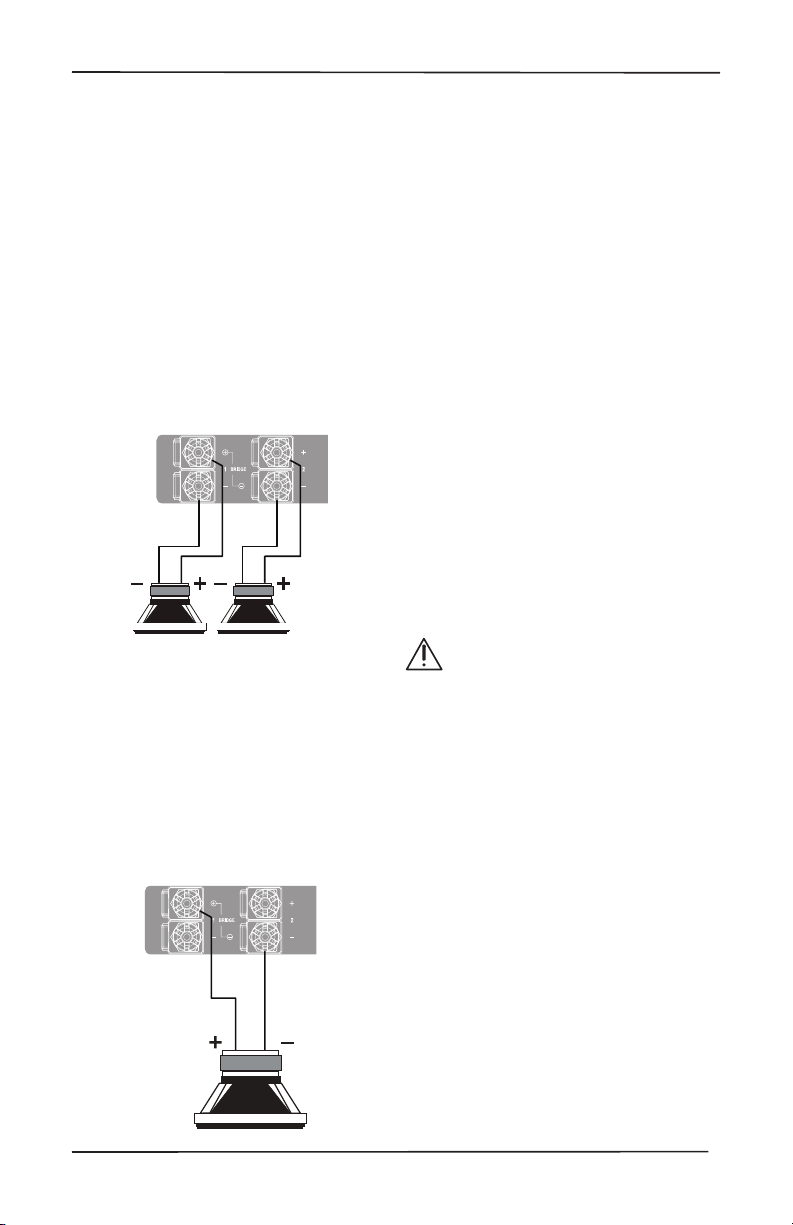
Stereo Speaker Connection:
Note the polarity markings for each
pair of outputs.
The speaker impedance should be 4
Ohms minimum in stereo operation.
BridgedMonoSpeakerConnection:
Note the polarity markings of the
bridged pair of connections. In this
mode, the input signals are combined
in mono, and the power from both
channels is combined to drive a single,
more powerful, speaker.
The speaker impedance should be
8 Ohms minimum in bridged mono.
To set the output to mono, press the
Stereo/Mono switch (5).
7. Ground Isolation Switch – This switch
selects the level of isolation between
the audio signal ground and the AC
earth ground. In normal operation this
switch should be in the GND Ground
position. If there is trouble with an AC
ground hum, try the other two settings
for the best operation. For safety, the
chassis is always connected to the
earth ground regardless of the switch
setting.
8. MasterTrigger– You can use these TS
1/8” connectors to turn on the unit or
place it into standby mode. For exam-
ple, you could have an external device
such as one of our glorious AudioCon-
trol home theater receivers, turn on
the Savoy G4 when it turns on.
LED indicator – This LED is blue when
the master trigger input is active, and
o when it is inactive.
When rack-mounting the unit,
make sure that the power cord
and the AC power switch remain
readily accessible.
9. AC Power Switch – This switch shuts
o the main AC power. Normally the
only time you need to turn this o is
if the system is going to be shut down
for an extended period of time. Use
the front panel power button or the
master trigger inputs to switch the unit
between standby and on.
Also turn the rear power switch o
during lightning storms, wind storms
with frequent power outages, or when
a giant robot from space is heading to
the power station for a light lunch. You
know how snackish they can be.

12
Rear Panel
10. AC Input – Connect the supplied AC
power cord securely to this input. Plug
the other end into an AC mains outlet
of the correct voltage rating for your
unit. They are either 100 -120 VAC (50
– 60 Hz) or 220 – 240 VAC (50 – 60 Hz);
look at the check box to see how your
unit has been congured. The voltage
setting is not user-settable. This unit is
a class 1 device, so it is recommended
that you do not defeat the safety
ground connection or use a power cord
that does not have the safety ground
pin.
The Savoy G4 draws an average of 400
watts with typical source material.
Make certain that it is plugged
directly into the wall outlet, or a surge
protector power strip with sucient
power rating. Since The Savoy G4 has
remote power switching using the
trigger system, you can plug the unit
into an outlet that is always active.
11. AC Fuse – The main power supply fuse
may be checked or replaced.
WARNING: Make sure that the power
cord is unplugged from the AC mains
before checking or replacing the fuse.
Use a at-headed screwdriver to undo
the fuse carrier from the fuse holder.
Inspect the fuse and replace with the
exact same type indicated on the unit.
The use of any other type of fuse may
lead to an unsafe condition. If the
fuse blows again immediately, then
unplug the power cord and contact
our ne folks in customer service.
Do not open the unit, as there are
no user-serviceable parts inside, and
dangerous voltages exist.

13
Installation Manual
SAVOY G4
Speaker and Wiring Impedance
Speaker and Wiring Impedance
Wire Gauge Run Length
25’ 50’ 100’ 250’ 500’
24 GA 1.3Ω 2.6Ω 5.1Ω 12.8Ω 25.7Ω
22 GA 0.8Ω 1.6Ω 3.24Ω 8.1Ω 16.0Ω
20 GA 0.5Ω 1.0Ω 2.0Ω 5.0Ω 10.1Ω
18 GA 0.3Ω 0.6Ω 1.28Ω 3.2Ω 6.4Ω
16 GA 0.2Ω 0.4Ω 0.8Ω 2.0Ω 4.0Ω
14 GA 0.1Ω 0.25Ω 0.5Ω 1.26Ω 2.5Ω
12 GA 0.08Ω 0.16Ω 0.32Ω 0.8Ω 1.6Ω
Speaker Wire Resistance:
Wire Gauge versus Run Length
frequency range, and speakers that are
rated at unusual impedances, for example
3.5 Ohms. The Savoy G4 is tolerant of
lower impedance loads, however, all good
designs use some margin of error.
Your choice of speaker wire gauge and
the length of the runs, also aects the
speaker impedance load presented to the
ampliers. As you can see in this table,
even fairly short speaker runs can have
signicant resistance if you use a smaller
wire gauge. This can be a benet if you
are paralleling lots of speakers. The wire
itself acts as an impedance limiter, since
the amplier cannot see a speaker load
lower than the resistance of the wire. The
downside of this wire resistance is that
you waste some part of the total power
available to the speakers.
Speakers, like other resistors, when wired
in parallel “show” lower values than the
individual components. Here are two
examples for calculating speakers wired in
parallel:
Calculating Impedance
For three 8 Ohm speakers wired in
parallel (pluses connected to pluses)
the impedance is 1/8 + 1/8 + 1/8 = 3/8
Then take the inverse or 8/3 = 2.66Ω
For two 8 Ohm speakers wired in
parallel (pluses connected to pluses)
the impedance is 1/8 + 1/8 = 2/8
Then take the inverse or 8/2 = 4Ω
Often the real world is more complicated
than theory, and for speakers this is
the case. An eight Ohm speaker is not
eight Ohms at all frequencies. Plus
passive crossover networks add their
own changing conditions. Be aware of
speakers that have signicant dips from
“nominal” values in portions of their

14
Installation
Installation
Placement –
The AudioControl Savoy G4 is a very
cool running amplier. With the Class
H power supply dynamically allocating
power as needed, it will remain a cool
runner for the lifetime of the product.
However, precautions should be made
so that it does have a bit of breathing
room – it is a powerful amplier after
all. Make certain that the air vents at
the top and bottom of the amplier
are not blocked and have at least ¼”
of airspace. Also make certain that
heat sensitive components such as
cable boxes and Blu-ray players are
not directly on top of the Savoy G4
amplier.
For information regarding stacking of
units and ventilation, please see the
details on page 20.
Power –
If you really plan on rocking out
with pure sine wave test tones, you
ought to give this baby a dedicated
15 amp service. Otherwise, connect
to the same circuit as your ne
AudioControl theater processor. Also,
the ground pin on the power cord is
there for reason, never cut it o. If you
ever need to plug it into a two prong
plug, don’t.
Remote power control/12v Trigger –
There are 3 levels of power control of the
Savoy G4:
MainACPowerswitch–This is the
master control of the amplier and
must be turned on for the amplier
to function. If you’re taking a long
vacation, then you might want to
turn this o, otherwise leave this on
and control the amplier via the front
panel or the remote 12v control.
12V trigger – This rear panel TS 1/8” jack
is for connecting a triggered 12 volt
DC signal from an external control
system. The tip is hot and the sleeve is
the ground.
StandBy Button – That button on the
Savoy G4 front panel’s right side –
that’s the Standby Button. Press to
turn the unit on and press again to turn
the unit o. You still have to have the
Main AC Power switch for this Standby
Button to work.
15
Installation Manual
SAVOY G4
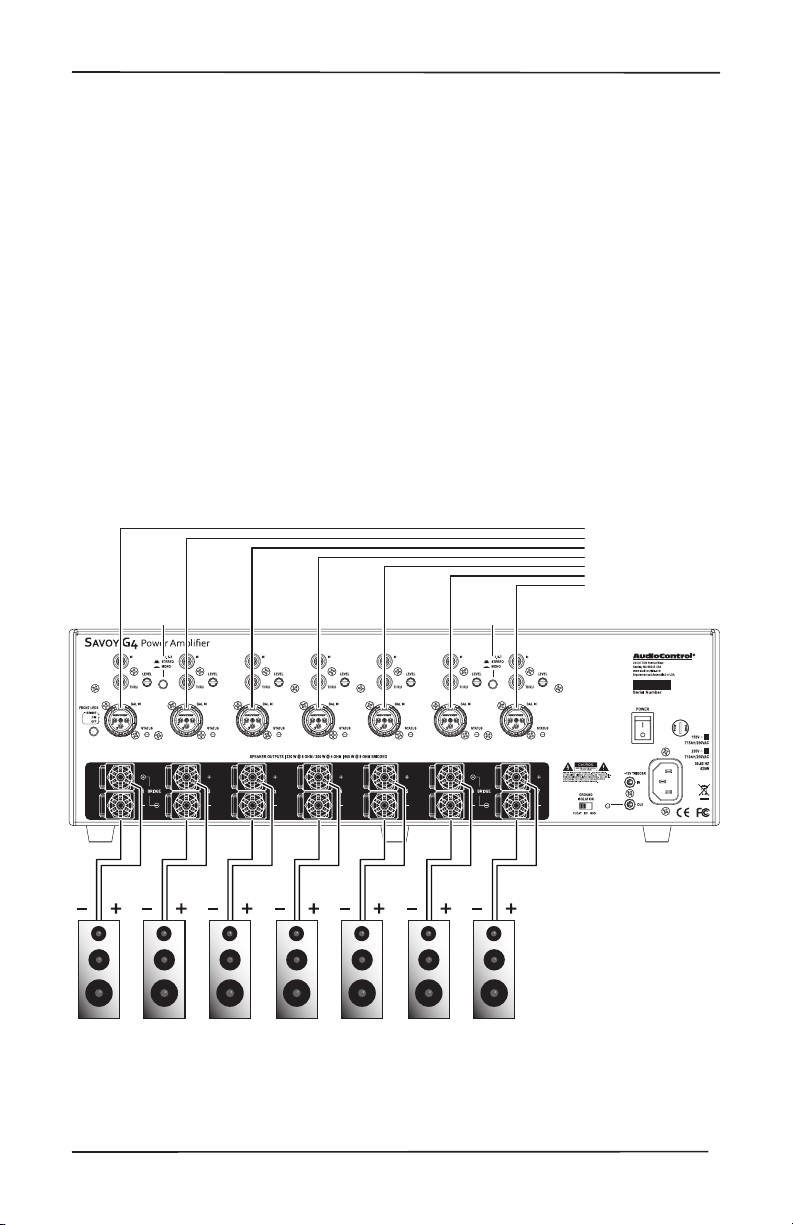
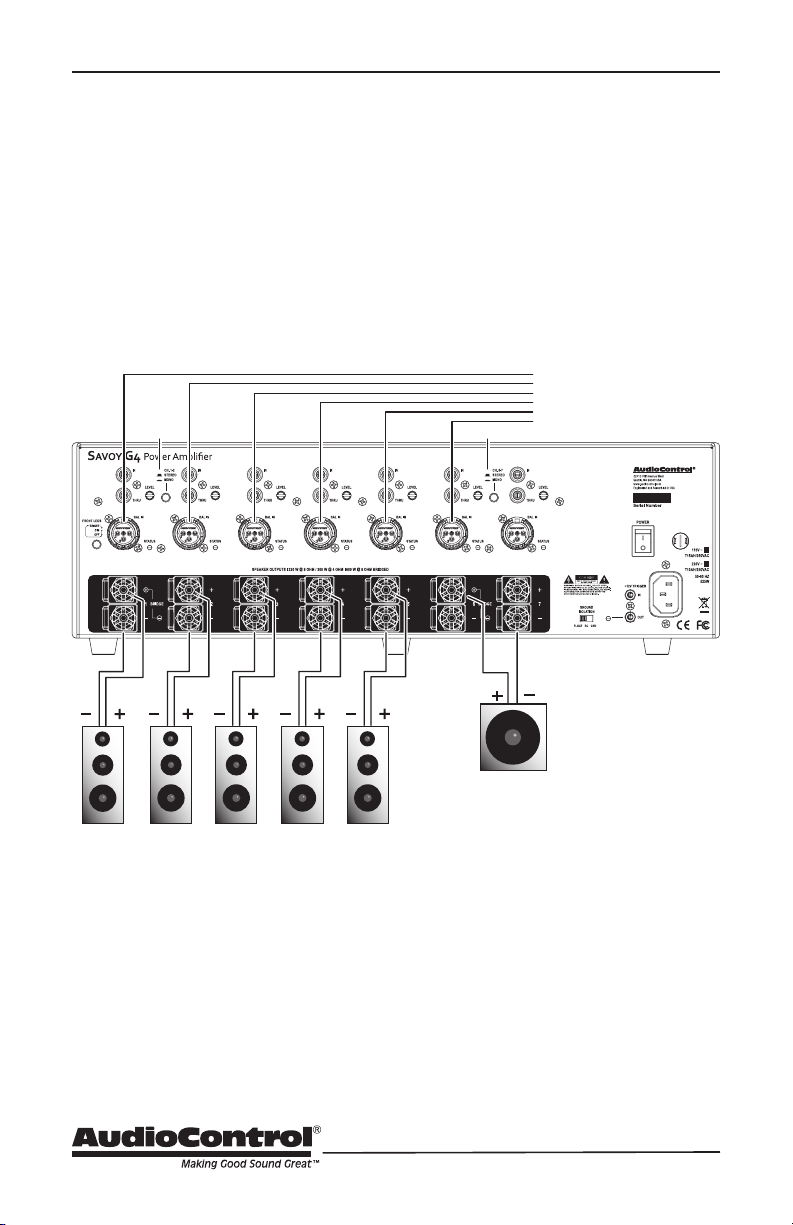
7 Channels
These 7 channels give you 230 watts at 8 ohms and over 300 watts at 4 ohms. This
will render your content in fantastic detail. For example, Left, Center, Right and
Surrounds output directly to channel 1 – 7 inputs for a spectacular immersive audio
experience.
Congurations
Congurations
The Savoy G4 is wonderfully congurable. As a 7 channel amp, it gives you unparalleled
cool running power that can handle any speaker. It’s a 5.1 amplier or a 5 channel amp
depending on your bridging congurations.
Please take a moment and a nice box of crayons to enjoy the hookup diagram ideas on
the following pages.
Switch
STEREO
Connect to
Home Theater
Preamplier/Receiver
Line-Level outputs
Left
Speaker
Right
Speaker
Center
Speaker
L. Surr.
Speaker
R. Surr.
Speaker
Switch
STEREO
L. Surr. Back
Speaker
R. Surr. Back
Speaker
Jolly Nice Full-Range Speakers (4 Ohm Minimum)
16
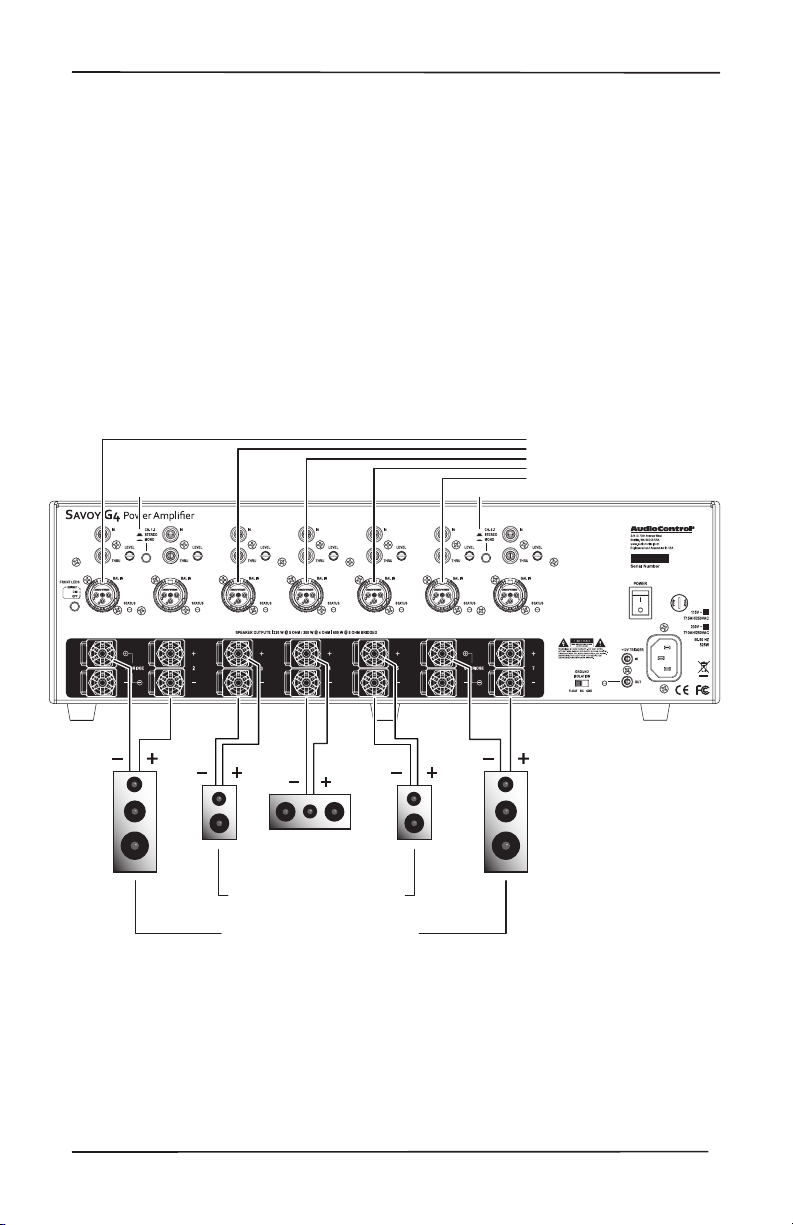
5.1 Channels
Wire your main speakers on channels 1 – 5. Connect your sub output from your
AVR to channel 6 and press the mono button for 6 &7. You have now over 600 watts
driving your 8 ohm sub! With the other channels handling the highs, you really
aren’t going to get anything better from a single multichannel hi amp.
*Pro tip: Loop the input from 6 to 7 for an extra 3 dB!
Congurations
Switch
STEREO Switch MONO
Passive
Subwoofer
(8 Ohm
Minimum)
Connect to
Preamplier/Receiver
Line-Level outputs
Center
Left
Left
Center Right
Right
L. Surr.
R. Surr.
Sub/LFE
L. Surr. R. Surr.
Jolly Nice Full-Range Speakers (4 Ohm Minimum)
17
Installation Manual
SAVOY G4
Congurations
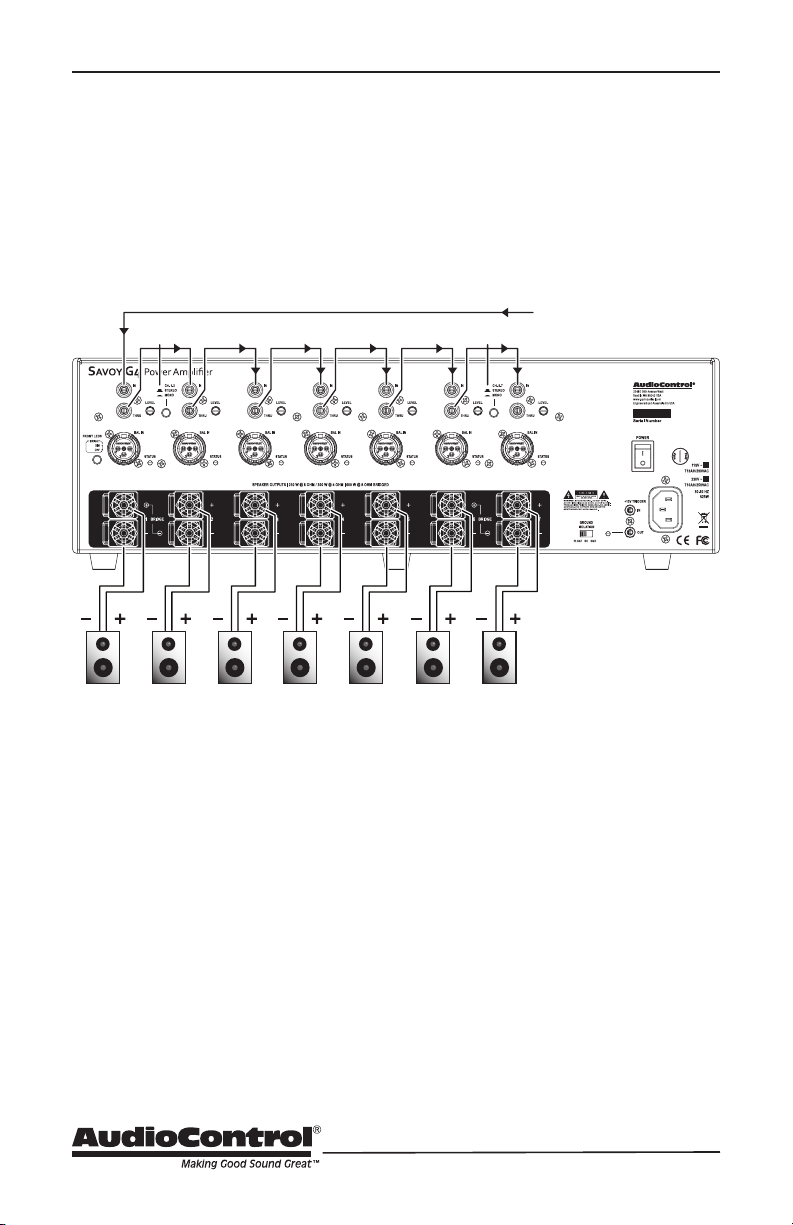
5 Channel
If you have a pair of power hungry 8 ohm speakers that can handle the prodigious
power (600 watts!) of the Savoy G4, then hook them up! Run the left input to
Channel input 1 and run the right to Channel input 6. Press the mono button for
each channel pair then adjust the gain controls for each pair so that there are the
same. Use detents for quick set up – you’ll have more than enough gain to blow out
your windows if that’s your thing. Your Center, and side surrounds would connect to
channels 3 – 5. Truly amazing!
*Pro tip: Loop the input from 1 to 2 and 6 to 7 for an extra 3 dB!
Switch
MONO Switch MONO
Connect to
Preamplier/Receiver
Line-Level outputs
Left L. Surr. R. Surr.
Center
Right
Mid/High Speakers (4 Ohm Minimum)
No Ordinary
Center-Channel Speaker
L. Surr.
Left
Center
R. Surr.
Right
Your Amazingly-Wonderful Full-Range
Pride and Joy Speakers (8 Ohm Minimum)
18
Congurations
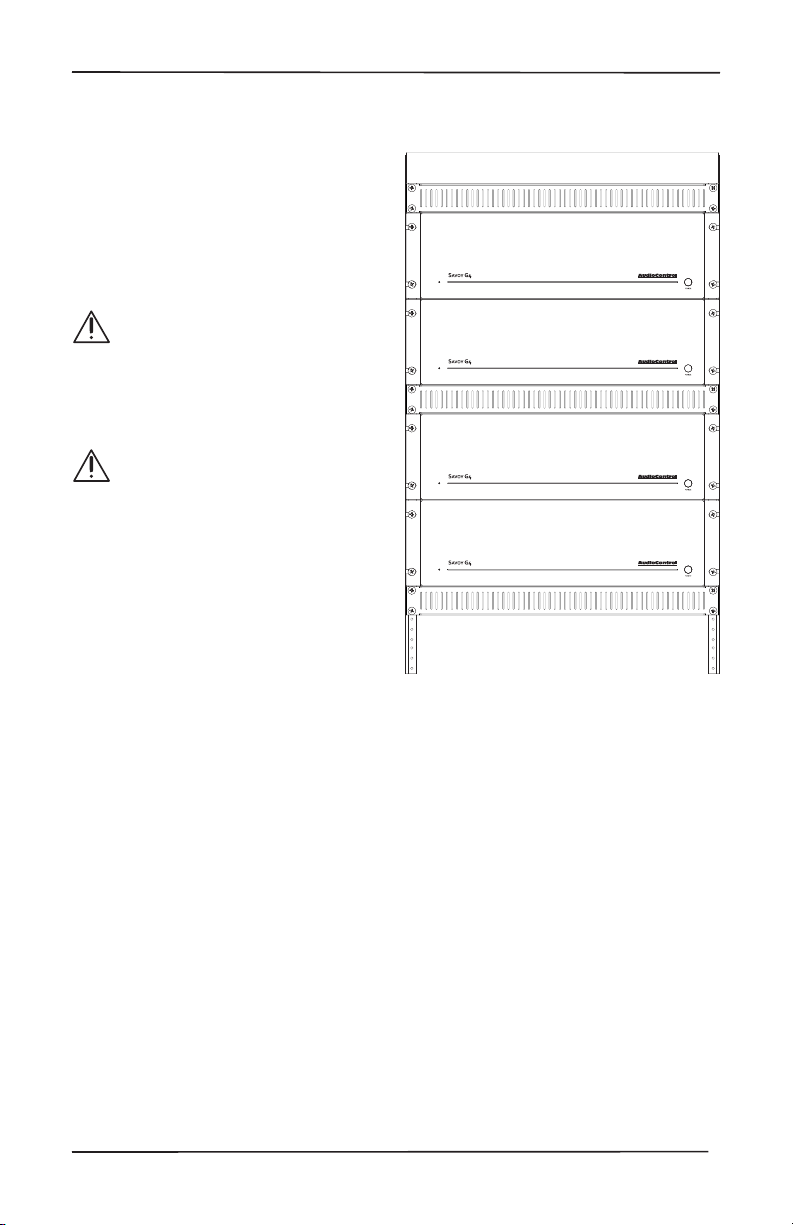
7ChannelsinMono
The Thru outputs can be used to feed the same audio signal to all the Savoy G4’s 7
channels.
Daisy-chain the Thru output to the other inputs
Switch
STEREO
Switch
STEREO
Connect to
Preamplier/Receiver
Line-Level output
mono musak
and paging
Mid/High Speakers (4 Ohm Minimum)
19
Installation Manual
SAVOY G4
Ventilation
Ventilation
This may be as good a time as any to have
“the talk” about ventilation. The Savoy G4
features cool-running ecient switch mode
power supplies and ampliers but it is still a
very powerful seven-channel amplier, and
therefore requires plenty of good clean,
dry, ventilation to properly cool.
Please be advised that no more
than 2 models may be stacked
together. Any more than that,
then a rack space above and
below is required for adequate
ventilation.
Review the heat load specica-
tions and ensure that your rack
room meets these requirements.
If the amplier should overheat, a thermal
sensor will put it into standby mode,
allowing the heatsink to cool down.
Once the amplier has cooled to a safe
operating temperature, the amplier will
reactivate. If this occurs often, identify the
cause of the problem and take corrective
action, for example:
• Provide additional ventilation
• Do not install in a sealed
location with limited or no
airow
• Install a fan in the rack
• Make sure that the ampliers
are not overloaded with
speaker impedances below
the recommended minimum
• Check that there are no
short circuits in the speaker
cables or speakers. Note:
Each channel will shut o
independently when a short
circuit is detected.

20
Advanced Discussions
Installation of multiple units
Can you stack Savoy G4 units on top
of each other without an air space in
between?
You can stack a maximum of 4 units
on top of one another, and allow a free
rack space above and below.
Ideally, 2 units can be stacked with a
free space above and below, as this
will improve the ventilation to the
units.
Can you daisy chain or y-cord audio and
power trigger connections?
Daisy chaining audio is easy, as there
are Loop output jacks, which can be
used to drive the next amplier.
The 12 volt mini jacks are powered to
turn on another unit when the main
unit is on (not standby). If you need
more than 15 milliamps current on the
12 volt output, use a relay to prevent
over loading The Savoy G4. (It only
takes 1 milliamp to turn on.)
What are the power requirements and
BTUoutputsofamplier?
More detailed information is shown
in the Specications table at the end
of this manual. In general, we feel a
conservative, real life design criteria is
1/8th power. This will be a quite loud
listening level for most rooms and
assumes all zones driven at the same
time. You will be amazed at how cool
the Savoy G4 is at this level. One rule
does not t all situations, so apply your
knowledge of the particular circum-
stances involved. Also, see the section
below on unique rooms and SPL.
How many units may I put on one 15
amp breaker?
It depends. Since you are limited to
1800 watts per device by most codes,
there should be a separate 15 amp
circuit for each unit.
The circumstances where Savoy
G4 draws maximum power are very
rare outside of an engineering lab.
Maximum power is using a sine wave
input which has at least a third higher
energy density than music. This would
mean that all channels are operating
at maximum, an unlikely situation
even during a really fun party. Even
more unlikely is all channels on multi-
ple units operating at full output.
You know the system better than we
do, so it is your decision. If the only
use is background music, then the
one-eighth power in the specications
is a reasonable (actually conserva-
tive) power draw. Of course, you will
want to include a margin of safety for
unusual circumstances. And in the
nal analysis, you have to do what the
electrical inspector tells you to do.
Advanced Discussions

21
Installation Manual
SAVOY G4
Unique Rooms and SPL in Large Areas
Are there any special considerations for
bathrooms?
Bathrooms are irregular rooms, rooms
within a room, with high ambient
background noise, often with noise
masking type of ambient sound, highly
reective, and often fairly large. If
you pause and think about that for a
moment, these are some of the more
challenging rooms.
Commercial noise masking systems
rely on “white noise” which sounds
remarkably like a bathroom exhaust
fan and like the sound of water in a
shower-both of which are louder than
the background noise level in the other
parts of the house. So if the client
wants to rock out in the bathroom,
and particularly the shower, you need
to have speakers very near to them.
Modern day larger bathrooms need
more than two speakers for these
reasons.
What about large rooms as well as
rooms where the listener is far from the
speakers?
Typical in-wall speakers are designed
to be near the listener. In common
rooms with eight foot ceilings and
other usual dimensions, in-wall speak-
ers typically are not much more than
eight feet from the listener. In large
mansions, the game changes. Twenty
foot ceilings are normal and typical
speakers are too far away to provide
the client much SPL (sound pressure
level). There are in-wall speakers
designed for these longer “throw” dis-
tances. In general, larger rooms with
more height require more speakers
and speakers with tighter “directivity”
to get party-level SPL. In this case,
also, size matters and bigger speakers
are better.
Advanced Discussions (continued)

22
Troubleshooting
Many problems can be eliminated by
re-checking the wiring and settings of the
unit. If a problem cannot be solved using
the guide below, please call the AudioCon-
trol team for further assistance, or e-mail
us at [email protected]
1. NoSound
a. Verify the front panel LED is blue.
b. Check that the Savoy G4 is not in
standby mode (LED red).
c. Check the input wiring from your
sources to the Savoy G4 inputs.
d. Verify the source unit is operating
correctly and playing, not paused.
e. Check the speaker connections on
the rear panel are secure.
f. If the unit does not power up at all,
unplug the power cord and check
the AC Power Fuse on the rear
panel.
2. Speaker channels cutting in and out:
a. If using external volume controls,
check that they can handle the
power output.
b. Make sure the speaker impedance
is not less than 4 Ohms, or 8 Ohms
when used in bridged mono.
c. There may be a short in the wires.
Suspect a short if the problem hap-
pens only at higher volume levels.
3. Speaker Buzzing or Crackling at high
volume:
a. Reduce any preamplier/equalizer
low-frequency boost.
b. Turn o your “Sounds of the
Pacic Northwest” chainsaw and
bacon-frying CD.
c. Check that the crossover settings
are matched to your speakers.
Mindfulness
1. Take a deep breath in, hold it, and
chant the specications page.
2. Breath out slowly, while contem-
plating the joy of Savoy G4 owner-
ship.
4. Isn’t it nice to know that the
Savoy G4 is so ecient that elec-
trons can be free from the mun-
dane life of room heating, and
have more free time and energy to
push the loudspeakers around and
reproduce your wonderful music.
3. Breath in and out again as normal,
and assume the “Salute to the
Electron” position while reading
the rest of this manual.
4. Do not try this on the bus ride
home though. People might talk.
Troubleshooting and Mindfulness
LED Function Table
LED Color Description LED C0lor Description
Blue The unit is on Bright Red DC Error
Red The unit is in standby mode Yellow Jumping to Hyperspace
O The unit is powered o

23
Installation Manual
SAVOY G4
Specications
Specications
Output Power
Per Channel ............................................230 watts @ 8 ohms, 300 watts @ 4 ohms
Bridged Mono (channels 1/2 and 4/5) .......................................600 watts @ 8 ohms
Frequency Response........................................................................ 10 Hz -20 kHz, ±1 dB
Total Harmonic Distortion/Ch ....................... 0.04% (230 watts @ 8 ohms 20 Hz -20 kHz)
Maximum Input Voltage ……………....................................................………..….… 2.7 Vrms
Input Impedance…………….……………….......................................................... 100 kohms
Signal to Noise Ratio ........................................................... > 102 (A wtd, ref full output)
Crosstalk ............................................................................................... > 80 dB @ 1 kHz
Damping Factor ..................................................................................................... > 450
Gain .......................................................................................................................28 dB
Analog Input Sensitivity ............................................................ 1.42 Vrms for full output
Minimum Speaker Load ...................................................................................... 4 ohms
Minimum Speaker Load, Bridged ........................................................................ 8 ohms
Protection ......................................................Clipping, Thermal, Short Circuit, DC oset
AC Power Requirements
Standby ..................................................................................................... <2 watts
Idle .............................................................................................................38 watts
1/8th power (loud listening level) ..............................................................400 watts
Full Power ...............................................................................................2100 watts
BTU/hr Output
Standby .................................................................................................. 5.6 BTU/hr
Idle ........................................................................................................ 129 BTU/hr
1/8 power (loud listening level) ............................................................... 477BTU/hr
Full Power .............................................................................................2507 BTU/hr
Dimensions
Height ......................................................................................................5.25” (3U)
Width (ears on) ................................................................................................19.0”
Width (ears o) ................................................................................................ 17.0”
Depth ..............................................................................................................16.5”
Weight ........................................................................................................... 43 lbs.
24
Block Diagram
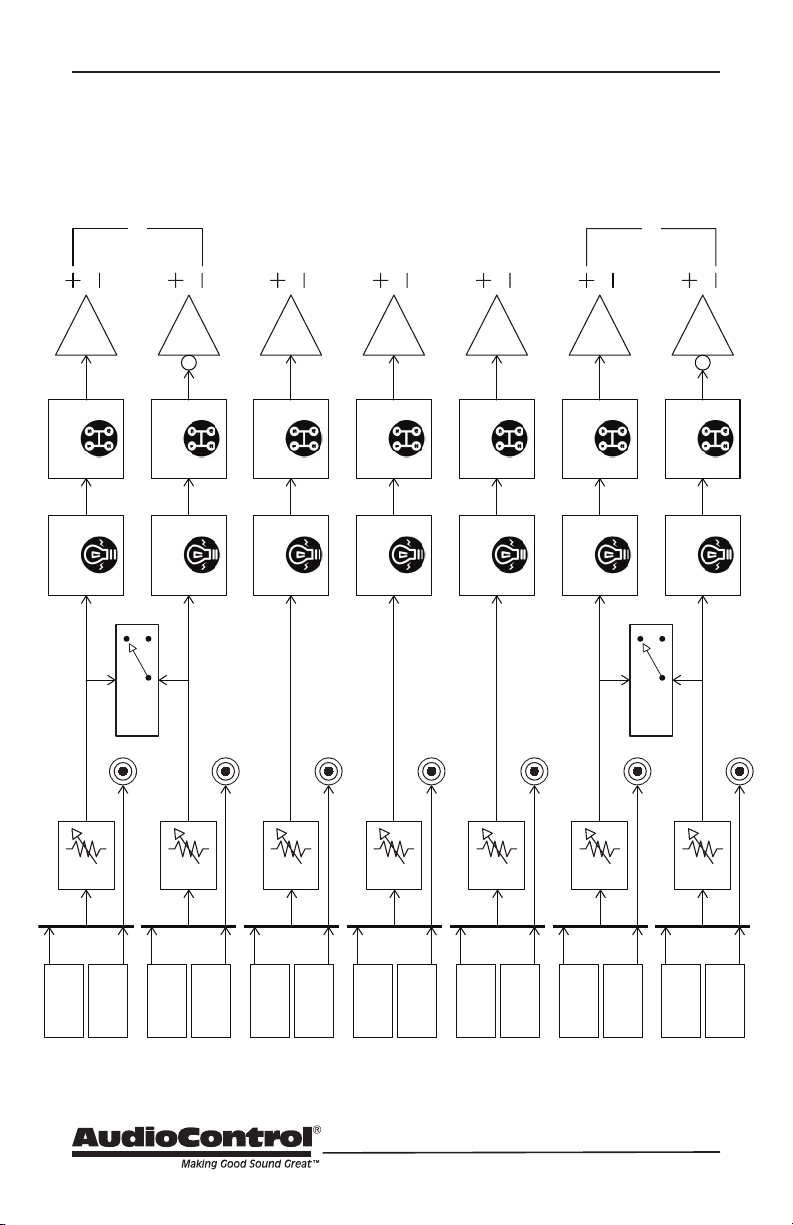
Block Diagram
LightDrive
Protection
Class H
Control
LightDrive
Protection
Class H
Control
LightDrive
Protection
Class H
Control
LightDrive
Protection
Class H
Control
LightDrive
Protection
Class H
Control
Gain
Gain
Gain
Gain
Gain
Channel 7
Balanced
XLR Input
Channel 7
Unbalanced
RCA Input
Mono/
Stereo
Mono/
Stereo
Channel 6
Balanced
XLR Input
Channel 6
Unbalanced
RCA Input
Channel 3
Balanced
XLR Input
Channel 3
Unbalanced
RCA Input
Channel 2
Balanced
XLR Input
Channel 2
Unbalanced
RCA Input
Channel 1
Balanced
XLR Input
Channel 1
Unbalanced
RCA Input
Bridge
Bridge
LightDrive
Protection
Class H
Control
Gain
Channel 4
Balanced
XLR Input
Channel 4
Unbalanced
RCA Input
LightDrive
Protection
Class H
Control
Gain
Channel 5
Balanced
XLR Input
Channel 5
Unbalanced
RCA Input
Thru
Thru
Thru
Thru
Thru
Thru
Thru

25
Installation Manual
SAVOY G4
Service
What to do if you need service
First, if you need service, it is probably
best to go and see a trained health care
professional.
If the Savoy G4 needs service, then please
contact AudioControl, either by e-mail or
phone. We will verify if there is anything
wrong in the system that you can correct
yourself, or if it needs to be sent back to
our factory for repair.
Before returning any item to
AudioControl, you must obtain a return
authorization.
Tech Support contact and hours:
425-775-8461
Mondy - Friday 8 am -5 pm PDT
After obtaining a return authorization,
please include the following items when
returning the unit:
1. Write your RA number on the outside
of the shipping box.
Include a copy of your proof of
purchase. No originals please. We
cannot guarantee returning them to
you.
2. A brief explanation of the trouble you
are having with the unit. (You’d be
surprised how many people forget
this.) If you can supply a really detailed
description of the problem, this would
be so much better, and our service
technicians may add you to their
Christmas Card list. Please include
any notes about the system and other
components you are using. Is it an
intermittent problem that only occurs
on the rst full moon of Spring?
3. A return street address. (No PO Boxes,
please).
4. A daytime phone number in case our
technicians have a question about the
problem you are having, or if they are
just feeling lonely.
5. Package the unit in the original
packaging if you still have it, and if the
cat hasn’t had three litters of kittens
in the box. Use great care and plenty
of good packing materials to protect
the unit and prevent it from moving
about inside the box. Do not use loose
materials like packing peanuts or real
peanuts.
You are responsible for the freight charges
to us, but we’ll pay the return freight back
as long as the unit is under warranty. We
match whatever shipping method you
use to send it to us, so if you return the
unit overnight freight, we send it back
overnight. We recommend United Parcel
Service (UPS) for most shipments.
Repair service is available at:
AudioControl Service Department
22410 70th Avenue West,
Mountlake Terrace, WA 98043
USA
425-775-8461

26
The Warranty
In just the same way as being covered in
honey and thrown into a dark pit full of
hungry woodchucks, people are scared of
warranties. Lots of ne print. Months of
waiting around. Well, fear no more. This
warranty is designed to make you rave
about AudioControl. It’s a warranty that
looks out for you and your client, plus
helps you resist the temptation to have
your friend Sparky, who’s “good with elec-
tronics,” try to repair your AudioControl
product. So go ahead, read this warranty,
then register the information at www.
audiocontrol.com/product-registration
and include your comments.
Our warranty has conditional conditions!
“Conditional” doesn’t mean anything
ominous. The Federal Trade Commission
tells all manufacturers to use the term
to indicate that certain conditions have
to be met before they’ll honor the war-
ranty. If you meet all of these conditions,
AudioControl will, at its discretion, repair
or replace any AudioControl products
that exhibit defects in materials and/or
workmanship during the warranty on your
product for ve (5) years from the date
you bought it, and we will x or replace it,
at our option, during that time.
Here are the conditional conditions:
1. You must fully register your purchase
within 15 days of the purchase date
by going to the AudioControl product
registration page at www.audiocon-
trol.com/product-registration. Failure
to register your product will negate
the warranty.
2. You need to hold on to your sales
receipt! All warranty service requires
original sales receipt documentation.
The warranty only applies to the
original purchaser from an authorized
AudioControl dealer. Note: Products
purchased from unauthorized dealers
are not covered under warranty.
3. If an authorized AudioControl dealer
installs your AudioControl product,
the warranty is ve years, otherwise
the warranty is limited to one year.
4. Our warranty covers AudioControl
products that have been installed
according to the instructions in the
installation manual.
5. You cannot let anybody who isn’t:
(A) the AudioControl factory; or (B)
somebody authorized in writing by
AudioControl service your AudioCon-
trol product. If anyone other than (A),
or (B) messes with your AudioControl
product, the warranty is void.
6. The warranty is void if the serial num-
ber is altered, defaced or removed,
or if your product has been used
improperly. Now that may sound like
a big loophole, but here is what we
mean by this: Unwarranted abuse is:
(A) physical damage (don’t use your
product to level your dining room
table); (B) improper connections (120
volts into the RCA jacks can fry the
poor thing); (C) sadistic things! This
is the best product we know how to
build, but for example if you mount it
to the front bumper of your car, drop
it over the Niagara Falls or use it for
Clay Pigeon shooting practice, some-
thing will go wrong.
Assuming you conform to 1 through 6, and
it really isn’t all that hard to do, we get the
option of xing your product or replacing
it with a new one at our discretion.
In the event that your product is out of
warranty or not covered under our warran-
ty you may request to have any damage
repaired at our normal “Out of Warranty”
repair cost.
Please Remain Calm

27
Installation Manual
SAVOY G4
Please Remain Calm
Legalese Section
This is the only warranty issued by Audio-
Control. This warranty gives you specic
legal rights, and you may also have rights
that vary from state to state. Promises of
how well your AudioControl product will
work are not implied by this warranty.
Other than what we’ve said we’ll do in this
warranty, we have no obligation, express
or implied. We make no warranty of mer-
chantability or tness for any particular
purpose. Also neither we nor anyone else
who has been involved in the develop-
ment or manufacture of the unit will have
any liability of any incidental, consequen-
tial, special or punitive damages, includ-
ing but not limited to any lost prots or
damage to other parts of your system by
hooking up to the unit (whether the claim
is one for breach of warranty, negligence
of other tort, or any other kind of claim).
Some states do not allow limitations of
consequential damages.
28
Hurrah, you are done!
Manual PN 913-163-0 Rev 1
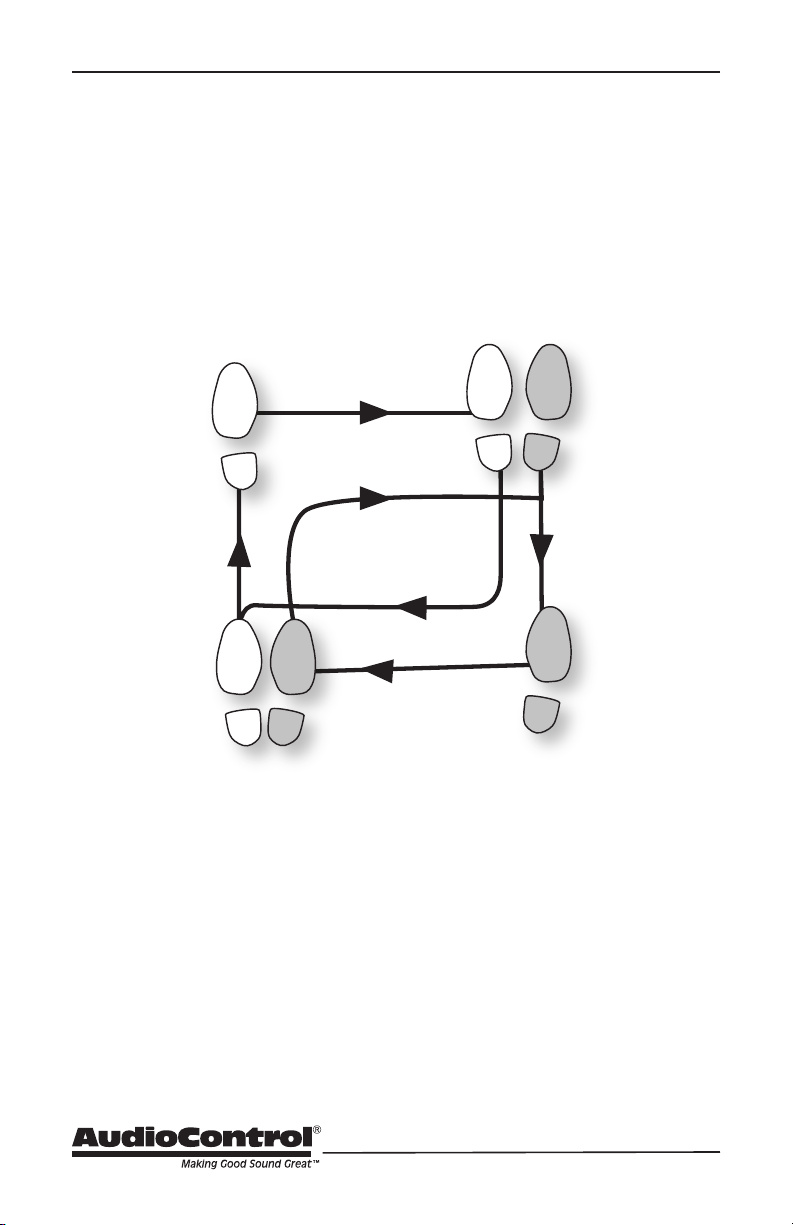
The Blackhawk Waltz
2
1
5 6
3
START
FINISH
4