OWNER'S
MANUAL
MODEL NOS.
625.388200
625.388250
Caution:
Read and Follow
All Safety Rules and
Operating Instructions
Before First Use of
This Product.
If you have questions when
installing, operating or main-
taining your softener, and
when setting the timer, call
this toll-free number...
1-800-426-9345
www.KenmoreWater.com
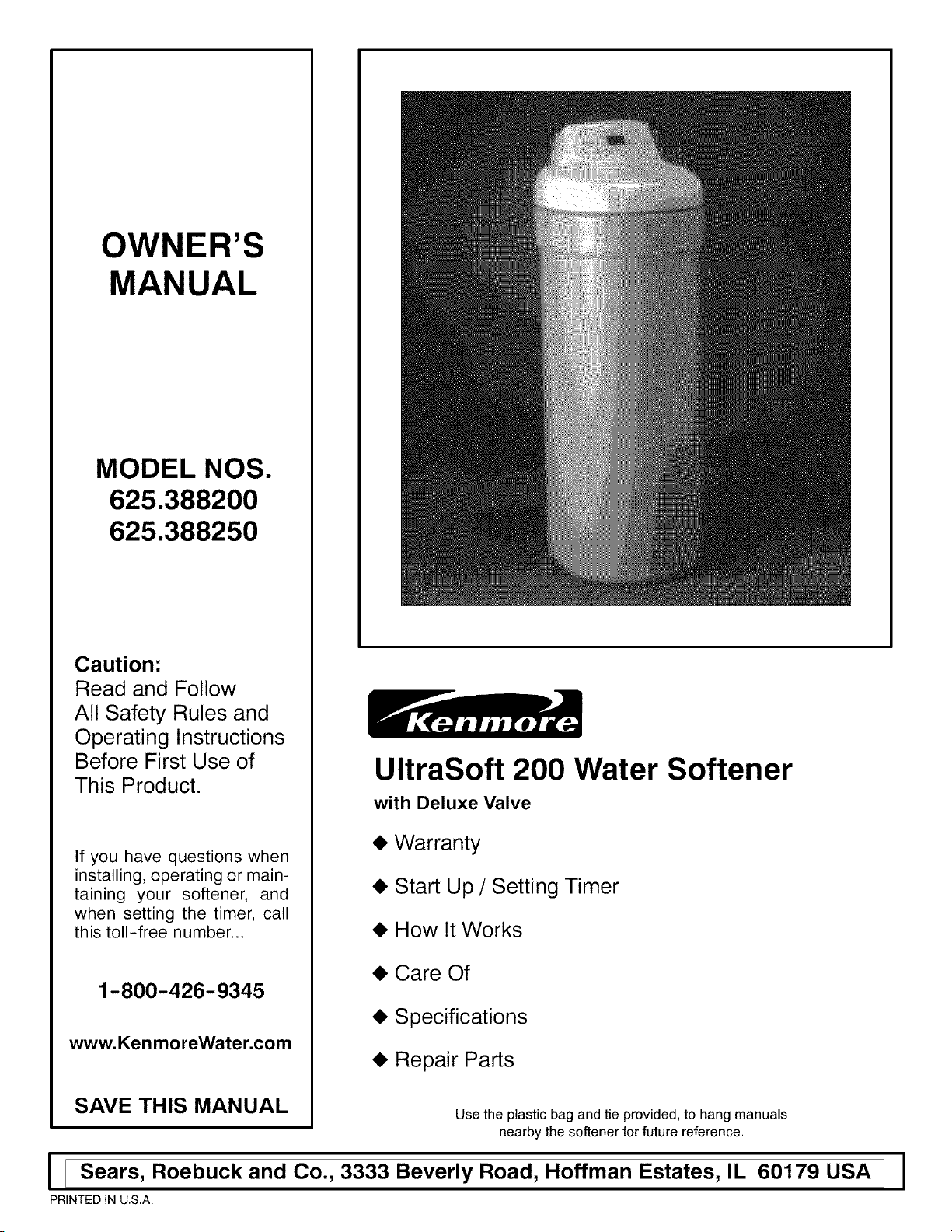
UltraSoft 200 Water Softener
with Deluxe Valve
• Warranty
• Start Up / Setting Timer
• How It Works
• Care Of
• Specifications
• Repair Parts
SAVE THIS MANUAL Use the plastic bag and tie provided, to hang manuals
nearby the softener for future reference.
I [ Sears, Roebuck and Co., 3333 Beverly Road, Hoffman Estates, IL 60179 USA ]
PRINTED IN U.S.A.
I
W
A
A
Y
,JJJJJJJJJJJJJJJJ.
,JJJJJJJJJJJJJJJJ.
,JJJJJJJJJJJJJJJJ.
,JJJJJJJJJJJJJJJJ.
,JJJJJJJJJJJJJJJJ.
,JJJJJJJJJJJJJJJJ.
,JJJJJJJJJJJJJJJJ.
SEARS RESIDENTIAL WATER SOFTENER
FULL ONE YEAR WARRANTY ON WATER SOFTENER
For one year from the date of purchase, when this water softener is installed and
maintained in accordance with our instructions, Sears will repair, free of charge,
defects in material or workmanship in this water softener.
FULL TEN YEAR WARRANTY AGAINST LEAKS
For ten years from the date of purchase, Sears will furnish and install a new current
model water softener tank or salt storage drum, free of charge, if either the tank
or drum develop a leak.
TO OBTAIN WARRANTY SERVICE, SIMPLY CONTACT THE NEAREST SEARS
SERVICE CENTER THROUGHOUT THE UNITED STATES. This warranty ap-
plies only while this product is in use in the United States.
This warranty gives you specific legal rights, and you may have other rights which
vary from state to state.
Sears, Roebuck and Co., D/817 WA, Hoffman Estates, IL 60179
if you want your water softener professionally installed, talk to your Sears Salesman. He will arrange for a
prompt, quality installation by Sears Authorized Installers.
SEARS INSTALLATION POLICY SEARS INSTALLATION WARRANTY
All installation labor arranged by Sears shall be per-
formed in a neat, workmanlike manner in accor-
dance with generally accepted trade practices. Fur-
ther, all installations shall comply with all local
laws, codes, regulations, and ordinances. Customer
shall also be protected, during installation, by insur-
ance relating to Property Damage, Workman's
Compensation and Public Liability.
In addition to any warranty extended to you on the
Sears merchandise involved, which warranty be-
comes effective the date the merchandise in
installed, should the workmanship of any Sears ar-
ranged installation prove faulty within one year,
Sears will, upon notice from you, cause such faults
to be corrected at no additional cost to you.
FACTS AND FIGURES TO KEEP
Fill in the blanks below and keep this book in a safe place so you always have
these facts.
Water Softener Model No.t
Serial Number
Date Installed
Water Hardness Grains Per Gallon
Iron Content Parts Per Million
pH '[hste And/Or Odor
Water Pressure Pounds/Square Inch
Water Flow Rate Gallons Per Minute
± The model number is on the rating decal, located on the rim, under the salt hole cover.
A
salt hole cover
rating
decal
[............................................................................................._ OF CONTENTS t ]
A
B
E
0
C
O
N
E
N
!_i__:
a.
B.
C.
D.
E.
a.
B.
a.
B.
C.
D.
a.
a.
WATER SOFTENER START UP
Safety Guides
Check List of Step-By-Step Guides To Install
Program The Timer
Sanitizing The Water Softener
Fill The Storage Tank With Salt
HOW YOUR WATER SOFTENER WORKS
Faceplate Timer Features
Soft Water Service and Regeneration
CARE OF YOUR WATER SOFTENER
Salt: Refilling Storage Tank / Salt Bridge
Keeping The Water Softener Clean
Protect The Water Softener From Freezing
Checklist (Not Getting Soft Water)
ABOUT YOUR WATER SOFTENER
Dimensions / Specifications
PAGE NO.
1-1
1-2
1-3, 1-4
1-5
1-6
2-1 to 2-3
2-4 to 2-6
3-1
3-2
3-3
3-4
4-1,4-2
B.
C.
a.
SERVICE TECH. INFORMATION
Troubleshooting ....
Rotary Valve Service
Water Flow Through The Softener Valve-
5-1 to 5-4
5-5
5-6 to 5-8
B.
C.
REPAIR PARTS FOR WATER SOFTENER
Water Softener Complete
Brine Valve Assembly ....
Valve Assembly
6-1, 6-2
6-3, 6-4
6-5, 6-6
B

[i:ii:ii:ii:_i:i:ii:_i:i:ii:_i:i:ifSECTlON 1 l:oii:ii:_i:i:ii:_i:i:ii:_i:i:ii:_i:]WATER SOFTENER START UP
S
C
T
N
,JJJJJJJJJJJJJJJJ.
A. SAFETY GUIDES
• Read all steps, guides and rules carefully before
installing and using your new water softener. Follow
all steps exactly to correctly install. Failure to follow
them could cause personal injury or property damage.
Reading this book will also help you to get all of the
benefits from your water softener.
• Your water softener will remove hardness minerals
and "clear water" iron from water, up to the limits
shown on page 4-1. It will not remove other types of
iron, acids, tastes and odors, etc. It will not purify pol-
luted water or make it safe to drink.
• Protect the softener and piping from freezing. Dam-
age from freezing voids the softener warranty. See
page 3-3.
CAUTIONS
PLEASE READ AND COMPLY WITH THE FOLLOWING
GUIDES TO PREVENT DAMAGE TO THE SOFTENER
OR OTHER PROPERTY, PERSONAL INJURY, OR POS-
SIBLE FATAL SHOCK.
• THIS SOFTENER WORKS ON 24 VOLTS ONLY. BE
SURETO USE ONLY THE TRANSFORMER INCLUDED,
AND PLUG IT INTO A HOUSEHOLD 120V OUTLET. IF
TRANSFORMER IS REPLACED, USE ONLY THE AU-
THORIZED SERVICE, CLASS II, 24 VOLT, 10 VA
TRANSFORMER.
• Unplug the transformer right away if the power
cable should become damaged or frayed. Make re-
pairs before plugging back into the power outlet.
• Always unplug the softener from electrical power
before removing outer valve covers.
• This system is not intended to be used for treating
water that is microbiologically unsafe or of unknown
quality without adequate disinfection before or after
the system,
1-1
[i:ii:ii:ii:_i:i:ii:_i:i:ii:_i:i:ifSECTION 1 l:oii:ii:_i:i:ii:_i:i:ii:_i:i:ii:_i:]WATER SOFTENER START UP
B. CHECK LIST OF STEP-BY-STEP GUIDES TO INSTALL
To be sure you have done all the steps to install the
softener, read the following list. Refer to the Installa-
tion Manual, part no. 7231741, for step-by-step
guides.
Page numbers referred to are in the Installation
Manual unless otherwise noted.
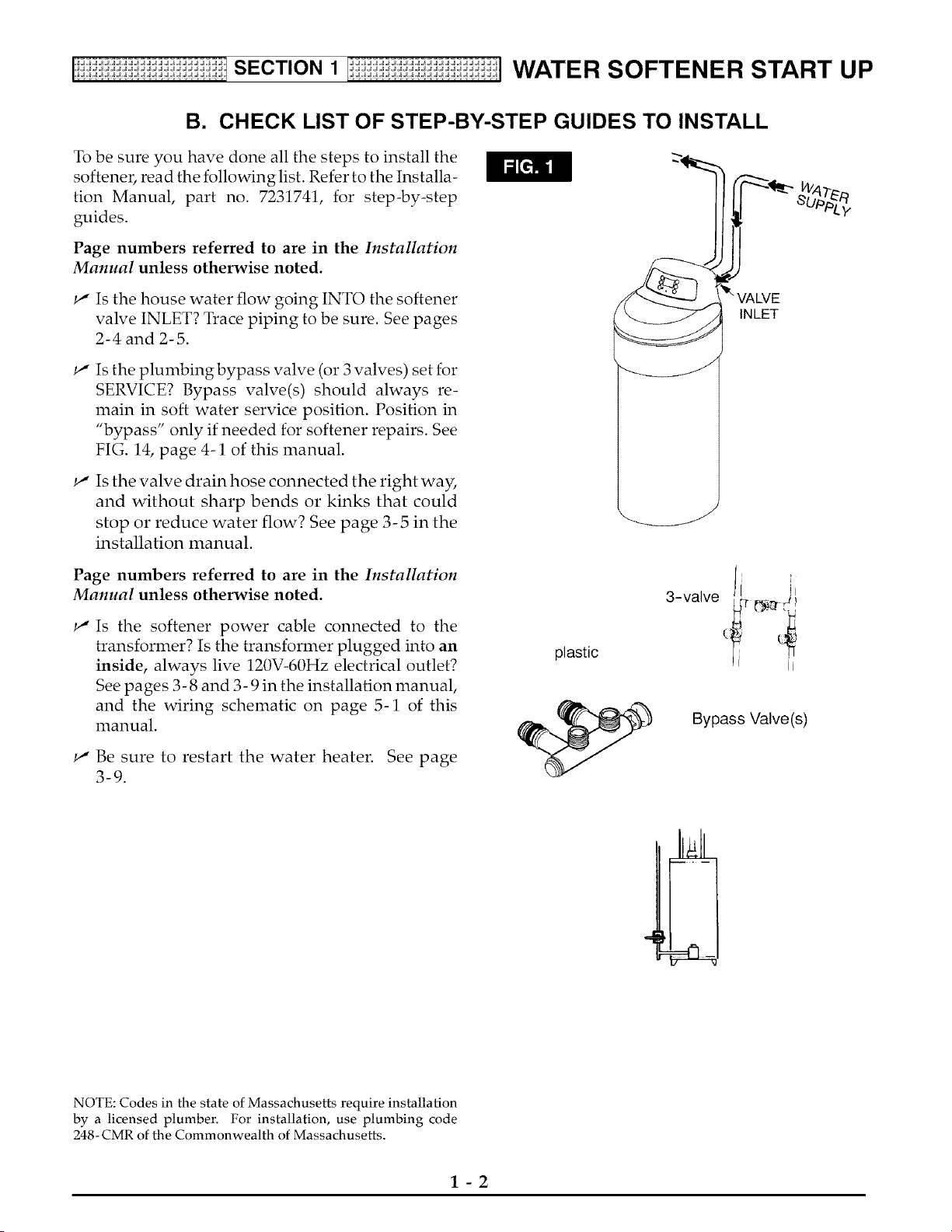
_" Is the house water flow going INTO the softener
valve INLET? Trace piping to be sure. See pages
2-4 and 2-5.
INLET
Is the plumbingbypass valve (or 3 valves) set for
SERVICE? Bypass valve(s) should always re-
main in soft water service position. Position in
"bypass" only if needed for softener repairs. See
FIG. 14, page 4-1 of this manual.
Is the valve drain hose connected the right way,
and without sharp bends or kinks that could
stop or reduce water flow? See page 3-5 in the
installation manual.
Page numbers referred to are in the Installation
Manual unless otherwise noted.
Is the softener power cable connected to the
transformer? Is the transformer plugged into an
inside, always live 120V-60Hz electrical outlet?
See pages 3- 8 and 3- 9 in the installation manual,
and the wiring schematic on page 5-1 of this
manual.
Be sure to restart the water heater. See page
3-9.
plastic
3-valve j [i
Bypass Valve(s)
NOTE: Codes in the state of Massachusetts require installation
by a licensed plumber, For installation, use plumbing code
248- CMR of the Commonwealth of Massachusetts,
1-2
[i:ii:ii:ii:_i:i:ii:_i:i:ii:_i:i:ifSECTION 1 l:oii:ii:_i:i:ii:_i:i:ii:_i:i:ii:_i:]WATER SOFTENER START UP
C. PROGRAM THE TIMER
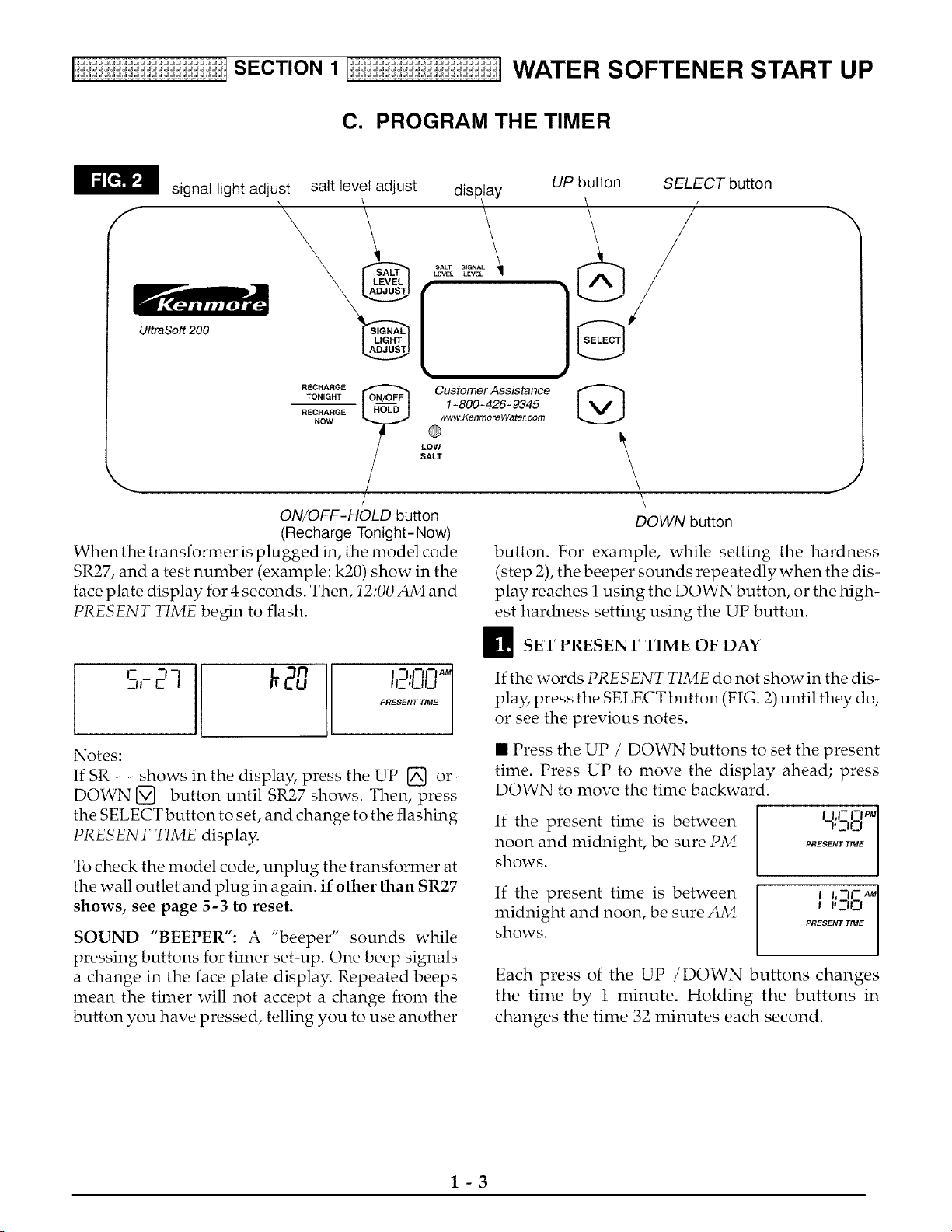
signal light adjust
display
_ALT SIGNAL
LEVEL LEVEL
UltraSoft 200
salt level adjust
UP button SELECT button
/ /
RECHARGE _ Customer Assistance
TONIGHT _ 1-800-426-9345
RECHARGE www.KenmoreWatercom
NOW
LOW
SALT
/
ON/OFF-HOLD button
(Recharge Tonight- Now)
When the transformer is plugged in, the model code
SR27, and a test number (example: k20) show in the
face plate display for 4 seconds. Then, 12:00 AM and
PRESENT TIME begin to flash.
@
DOWN button
J
button. For example, while setting the hardness
(step 2), the beeper sounds repeatedly when the dis-
play reaches 1 using the DOWN button, or the high-
est hardness setting using the UP button.
_SET PRESENT TIME OF DAY
S,-2-,'
20 L ,,,,,,,,M
I I_-'UI_I
PRESENT TIME
Notes:
If SR - - shows in the display, press the UP [] or-
DOWN [] button until SR27 shows. Then, press
the SELECT button to set, and change to the flashing
PRESENT TIME display.
To check the model code, unplug the transformer at
the wall outlet and plug in again, if other than SR27
shows, see page 5-3 to reset.
SOUND "BEEPER": A "beeper" sounds while
pressing buttons for timer set-up. One beep signals
a change in the face plate display. Repeated beeps
mean the timer will not accept a change from the
button you have pressed, telling you to use another
If the words PRESENT TIME do not show in the dis-
play, press the SELECT button (FIG. 2) until they do,
or see the previous notes.
• Press the UP / DOWN buttons to set the present
time. Press UP to move the display ahead; press
DOWN to move the time backward.
If the present time is between
noon and midnight, be sure PM
shows.
If the present time is between
midnight and noon, be sure AM
shows.
I I, |- |--| PM
'30 I
PRESENT TIME
J J'30 I
PRESENT TIME
Each press of the UP /DOWN buttons changes
the time by 1 minute. Holding the buttons in
changes the time 32 minutes each second.
1-3
[i:ii:ii:ii:_i:i:ii:_i:i:ii:_i:i:ifSECTlON 1 l:oii:ii:_i:i:ii:_i:i:ii:_i:i:ii:_i:]WATER SOFTENER START UP
C. PROGRAM THE TIMER
SET WATER HARDNESS NUMBER E! SET RECHARGE <REGENERATION) TIME
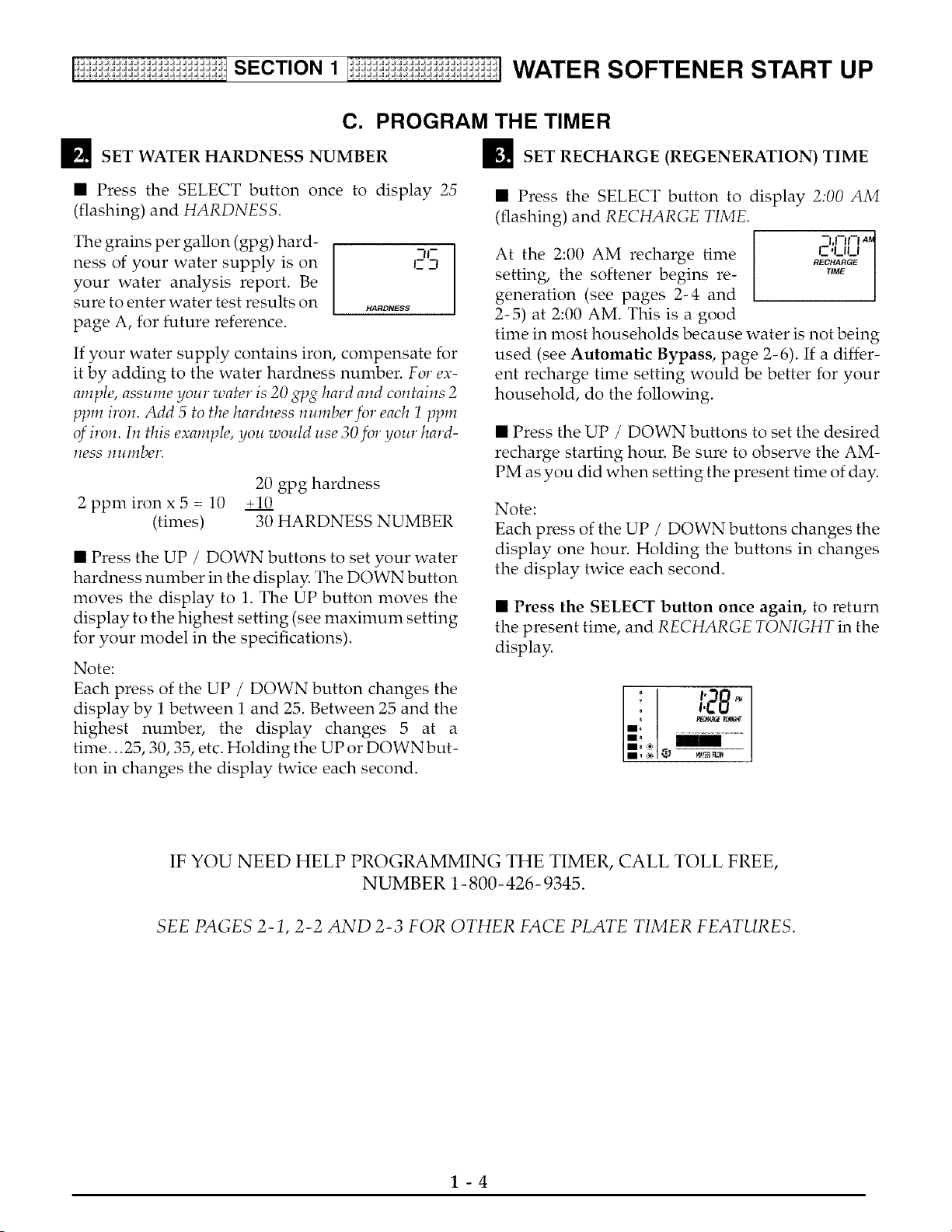
• Press the SELECT button once to display 25
(flashing) and HARDNESS.
The grains per gallon (gpg) hard-
ness of your water supply is on
your water analysis report. Be
sure to enter water test results on
page A, for future reference.
c _n
HARDNESS
If your water supply contains iron, compensate for
it by adding to the water hardness number. For ex-
ample, assume your water is 20 gpg hard and contains 2
ppm iron. Add 5 to the hardness number for each 1 ppm
of iron. In this example, you would use 30for your hard-
hess number.
20 gpg hardness
2 ppmironx 5 = 10 +10
(times) 30 HARDNESS NUMBER
• Press the UP / DOWN buttons to set your water
hardness number in the display. The DOWN button
moves the display to 1. The UP button moves the
display to the highest setting (see maximum setting
for your model in the specifications).
Note:
Each press of the UP / DOWN button changes the
display by 1 between 1 and 25. Between 25 and the
highest number, the display changes 5 at a
time... 25, 30, 35, etc. Holding the UP or DOWN but-
ton in changes the display twice each second.
• Press the SELECT button to display 2:00 AM
(flashing) and RECHARGE TIME.
At the 2:00 AM recharge time
setting, the softener begins re-
generation (see pages 2-4 and
2-5) at 2:00 AM. This is a good
-I,1-11-1AMI
L-'ULI /
RECHARGE I
time in most households because water is not being
used (see Automatic Bypass, page 2-6). If a differ-
ent recharge time setting would be better for your
household, do the following.
• Press the UP / DOWN buttons to set the desired
recharge starting hour. Be sure to observe the AM-
PM as you did when setting the present time of day.
Note:
Each press of the UP / DOWN buttons changes the
display one hour. Holding the buttons in changes
the display twice each second.
• Press the SELECT button once again, to return
the present time, and RECHARGE TONIGHT in the
display.
! 1:28
IF YOU NEED HELP PROGRAMMING THE TIMER, CALL TOLL FREE,
NUMBER 1-800- 426- 9345.
SEE PAGES 2-1, 2-2 AND 2-3 FOR OTHER FACE PLATE TIMER FEATURES.
1-4
[i:ii:ii:ii:_i:i:ii:_i:i:ii:_i:i:ifSECTlON 1 l:oii:ii:_i:i:ii:_i:i:ii:_i:i:ii:_i:]WATER SOFTENER START UP
D. SANITIZE THE WATER SOFTENER
Care is taken at the factory to keep your water soft-
ener clean and sanitary. Materials used to make the
softener will not infect or contaminate your water
supply, and will not cause bacteria to form or grow.
However, during shipping, storage, installing and
operating, bacteria could get into the softener. For
this reason, sanitizing as follows is suggested ®
when installing.
_The first time you sanitize your softener, be sure
to do all steps in the installation manual, and on
pages 1-2, 1-3 and 1-4 of this manual first.
_J_ Lift the salt hole cover and use a pail to fill the
salt storage tank with up to 3 gallons of water.
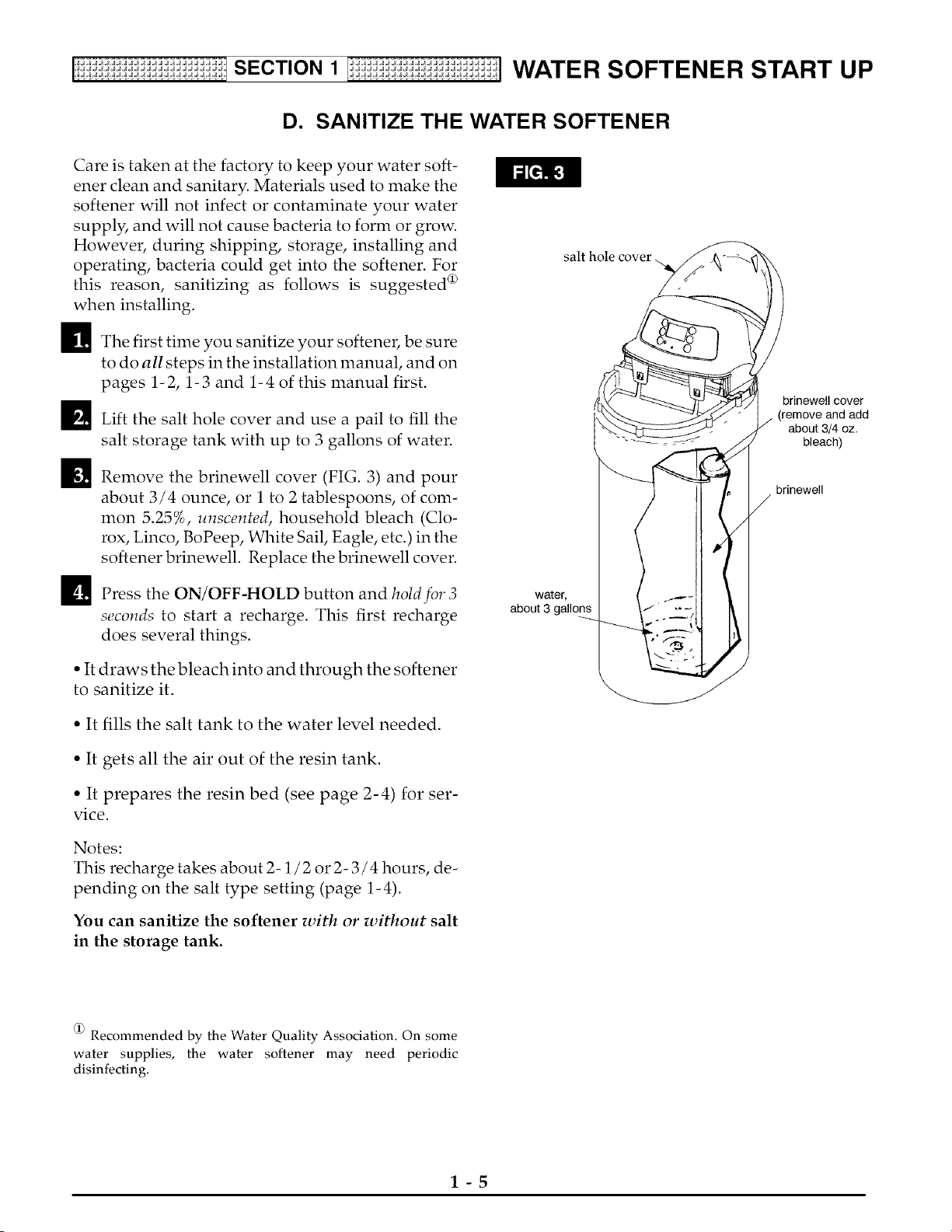
_J Remove the brinewell cover (FIG. 3) and pour
about 3/4 ounce, or 1 to 2 tablespoons, of com-
mon 5.25%, unscented, household bleach (Clo-
rox, Linco, BoPeep, White Sail, Eagle, etc.) in the
softener brinewell. Replace the brinewell cover.
D Press the ON/OFF-HOLD button and hold for 3
seconds to start a recharge. This first recharge
does several things.
• It draws the bleach into and through the softener
to sanitize it.
• It fills the salt tank to the water level needed.
• It gets all the air out of the resin tank.
• It prepares the resin bed (see page 2-4) for ser-
vice.
Notes:
This recharge takes about 2-1/2 or 2- 3 / 4 hours, de-
pending on the salt type setting (page 1-4).
You can sanitize the softener with or without salt
in the storage tank.
water,
about 3 gallons
brinewell cover
(remove and add
about 3/4 oz.
bleach)
brinewell
@ Recommended by the Water Quality Association. On some
water supplies, the water softener may need periodic
disinfecting,
1-5
[i:ii:{i:ii:_i:i:ii:_i:i:ii:_i:i:ifSECTlON 1 l:{i:ii:_i:i:ii:_i:i:ii:_i:i:ii:_i:] WATER SOFTENER START UP
El
Brine (salt dissolved in water) is needed for each and
every regeneration. The water for nraking brine is nre-
tered into the salt storage tank by the softener. Howev-
el; you nrust keep salt in the tank, but it is not necessary
to keep it full. In humid areas, it is best to fill the stor-
age tank one quarter to one half full, and to refill it
nrore often. Salt bridging (see page 3-1) occurs nrore
often when conditions are hunrid.
FILL THE STORAGE TANK WITH SALT
WATER SOFTENING SALT WITH IRON REMOVING
ADDITIVES -- Sonre salts have an additive to help the
softener handle iron in the water supply. These salts
nray be used if your water supply has a high iron con-
tent. It is reconmrended to use Sears Resin Bed Clean-
er 42- 34426, for periodic treatnrents to keep your resin
bed clean.
Fill the tank with NUGGET or PELLET water softener
salt. DO NOT use rock salts, as they have dirt and sedi-
nrents that wilt stop the softener front working.
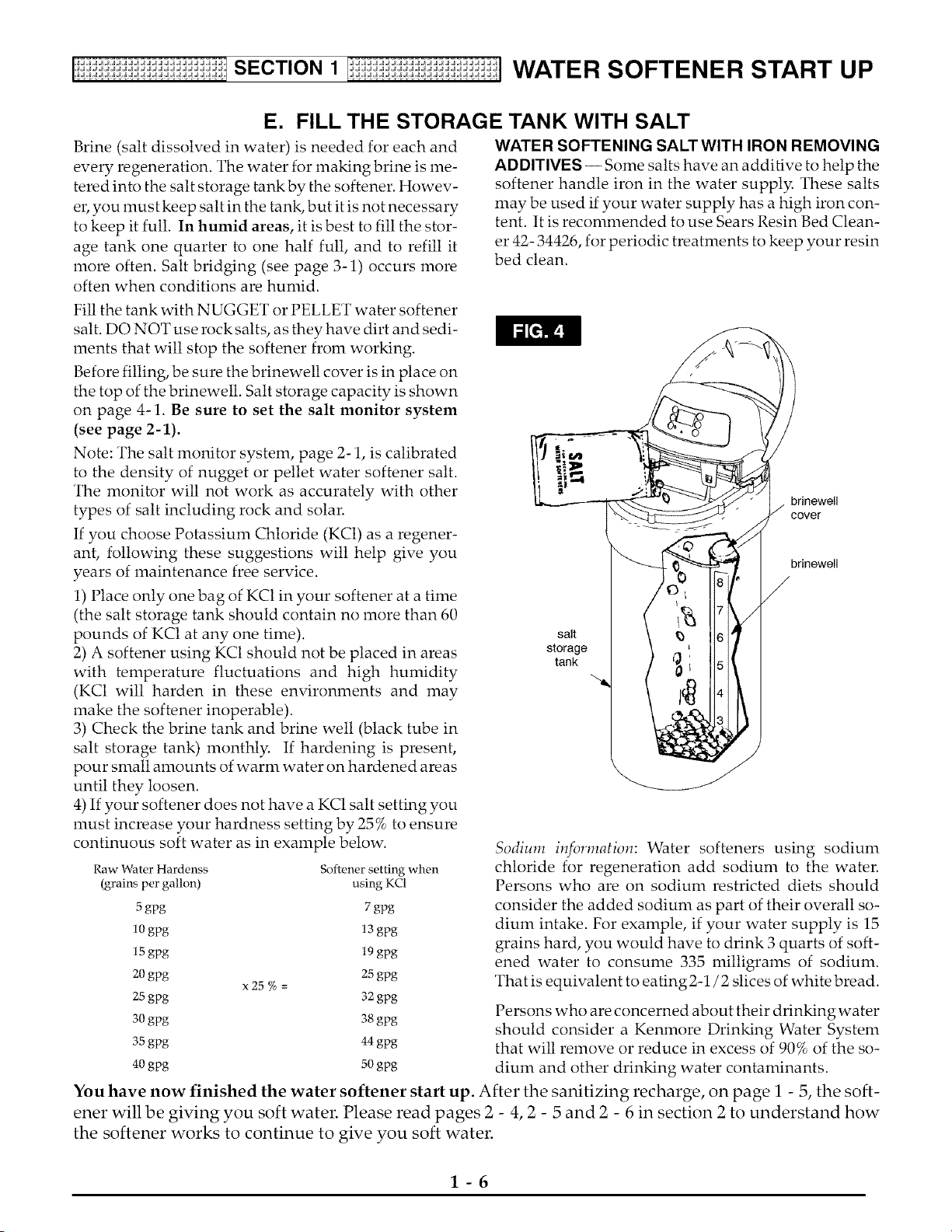
Before filling, be sure the brinewell cover is in place on
the top of the brinewett. Salt storage capacity is shown
on page 4-1. Be sure to set the salt monitor system
(see page 2-1).
Note: The salt nronitor system, page 2-1, is calibrated
to the density of nugget or pellet water softener salt.
The nronitor will not work as accurately with other
types of salt including rock and solar.
If you choose Potassiunr Chloride (KC1) as a regener-
ant, following these suggestions will help give you
years of nraintenance free service.
1) Place only one bag of KC1 in your softener at a tinre
(the salt storage tank should contain no nrore than 60
pounds of KC1 at any one tinre).
2) A softener using KC1 should not be placed in areas
with tenrperature fluctuations and high hunridity
(KC1 wilt harden in these environnrents and nray
nrake the softener inoperable).
3) Check the brine tank and brine well (black tube in
salt storage tank) nronthly. If hardening is present,
pour snralt anrounts of warnr water on hardened areas
until they loosen.
4) If your softener does not have a KC1 salt setting you
nrust increase your hardness setting by 25% to ensure
continuous soft water as in exanrple below.
Raw Water Hardenss
(grains per gallon)
Softener setting when
using KC1
5 gpg 7 gpg
10 gpg 13 gpg
15gpg 19 gpg
20 gpg 25 gpg
x 25 % =
25gpg 32gpg
30 gpg 38gpg
35gpg 44gpg
40 gpg 50 gpg
brinewell
cover
brinewell
salt
storage
tank
Sodium information: Water softeners using sodiunr
chloride for regeneration add sodiunr to the water.
Persons who are on sodiunr restricted diets should
consider the added sodiunr as part of their overall so-
diunr intake. For example, if your water supply is 15
grains hard, you would have to drink 3 quarts of soft-
ened water to consunre 335 nritligranrs of sodiunr.
That is equivalent to eating2-1/2 slices of white bread.
Persons who are concerned about their drinking water
should consider a Kennrore Drinking Water Systenr
that wilt renrove or reduce in excess of 90% of the so-
diunr and other drinking water contanrinants.
You have now finished the water softener start up. After the sanitizing recharge, on page i - 5, the soft-
ener will be giving you soft water. Please read pages 2 - 4, 2 - 5 and 2 - 6 in section 2 to understand how
the softener works to continue to give you soft water.
1-6
[i:ii:ii:ii:_i:i:ii:_ISECTION 2 I_i:ii:ii:ii:_i:i:ii:_] HOW YOUR WATER SOFTENER WORKS
A. FACEPLATE TIMER FEATURES
S
C
T
N
,JJJJJJJJJJJJJJJJ.
,JJJJ JJJJJJJJJJ.
'dJ_idJdJdJdJ"
,JJ JJJJJJJJJ.
,JJJ JJJJJJJJJ.
,JJ JJJJJJJJJ.
,JJJJJJJJJJJJJJJJ.
,JJJJJJJJJJJJJJJJ.
EXTRA RECHARGE
Sometimes, a manually started
regeneration (recharge) may be
desired, or needed. Two exam-
ples are:
- You have used more water than
usual (guests visiting) and you
may run out of soft water before
the next timer started regenera-
tion.
- You did not refill the softener
with salt before it was gone. After
you refill with salt:
You can start a regeneration right
away, or you can set the timer to
regenerate at the next 2:00 AM (or
other preset recharge time). Do
the following.
RECHARGE NOW i°'I _ 3,n_q _
_" I'U!_-I
Press the ON/OFF-HOLD but- i/ ._C.A.G_
ton and hold until *RECHARGE ..........
Serv and Fill begin to flash in the display. Upon
reaching fill the first cycle of regeneration, the flash-
ing Serv goes off and Fill is on steady. RECHARGE
continues to flash. This regeneration will last for
about 2 hours. After the 2 hours, you will have soft
water again.
*Note:
If the CLEAN feature is set to ON, a cleaning back-
wash (CLEAN and Bkwsh or Rinse flashes in the dis-
play, along with the minutes of the clean cycle re-
maining) precedes the recharge.
RECHARGE TONIGHT [ !°_ _:l-_n _-
Press and release (do not hold) the I i R_C._G_TO_G.,
ON / OFF-HOLD button. RE-
CHARGE TONIGHT flashes in the display, and the
softener begins regeneration at the next preset re-
charge time. Press and release the ON/OFF-HOLD
button once more if you deride to cancel the regen-
eration, and RECHARGE TONIGHT.
SALT MONITOR SYSTEM
The face plate timer has a low salt monitor with an
indicator light to remind you to refill the storage
tank with salt. To set this monitor system:
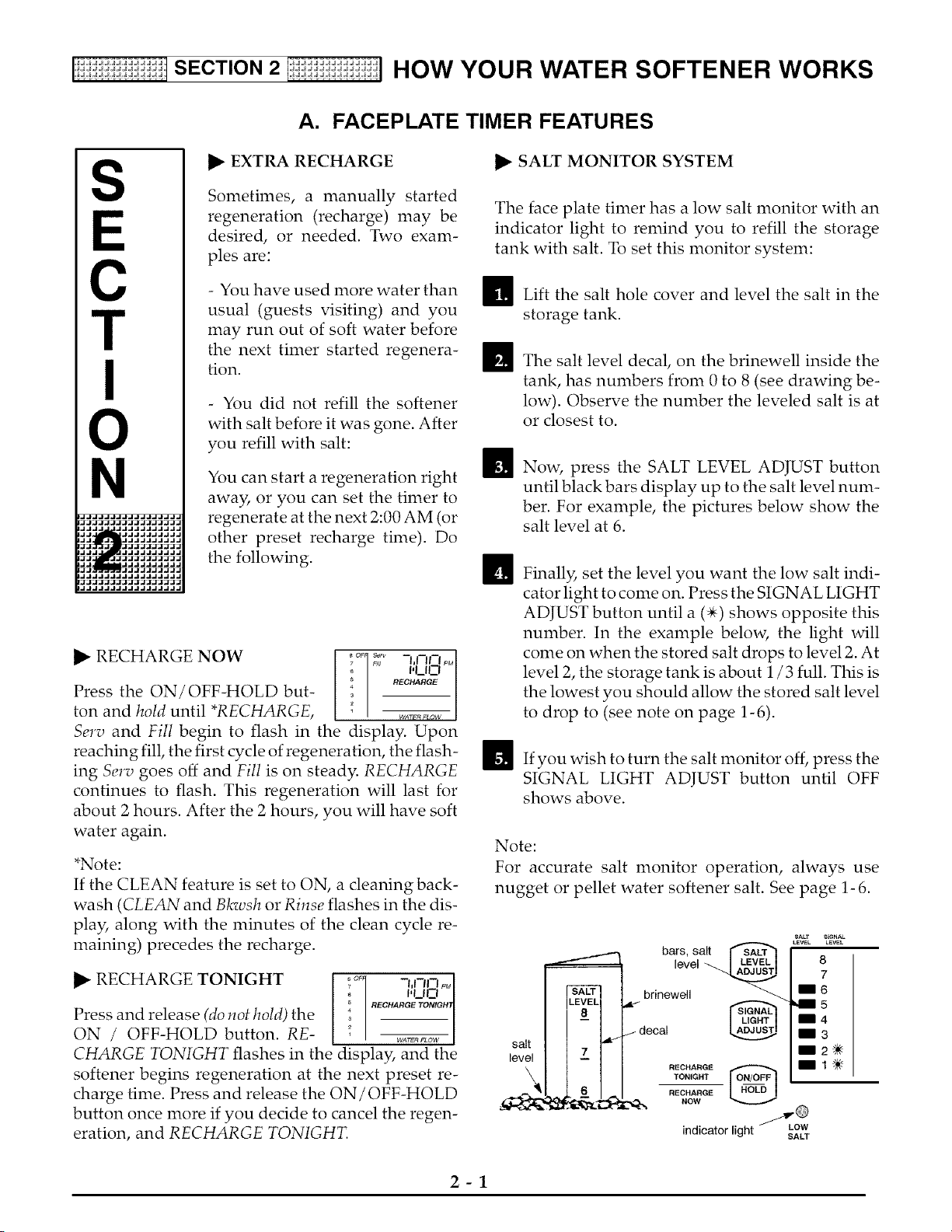
_1_ Lift the salt hole cover and level the salt in the
storage tank.
ffiThe salt level decal on the brinewell inside the
tank, has numbers from 0 to 8 (see drawing be-
low). Observe the number the leveled salt is at
or closest to.
m
Now, press the SALT LEVEL ADJUST button
until black bars display up to the salt level num-
ber. For example, the pictures below show the
salt level at 6.
!!
Finall3_ set the level you want the low salt indi-
cator light to come on. Press the SIGNAL LIGHT
ADJUST button until a (_) shows opposite this
number. In the example below, the light will
come on when the stored salt drops to level 2. At
level 2, the storage tank is about 1/3 full. This is
the lowest you should allow the stored salt level
to drop to (see note on page 1-6).
_'_ If you wish to turn the salt monitor off, press the
SIGNAL LIGHT ADJUST button until OFF
shows above.
Note:
For accurate salt monitor operation, always use
nugget or pellet water softener salt. See page 1- 6.
salt
level
bars, salt
level
8 ,
7 ,
6
brinewell
decal
RECHARGE
TONIGHT
RECHARGE
NOW
indicator light s_°w
2-1
[i:ii:ii:ii:_i:i:ii:_ISECTION 2 I_i:ii:ii:ii:_i:i:ii:_] HOW YOUR WATER SOFTENER WORKS
A. FACEPLATE
OPTIONAL SETTINGS - SALT EFFICIENCY,
CLEAN FEATURE, CLEAN FEATURE MINUTES,
MAXIMUM DAYS BETWEEN REGENERA-
TIONS and 12 / 24 HOUR CLOCK:
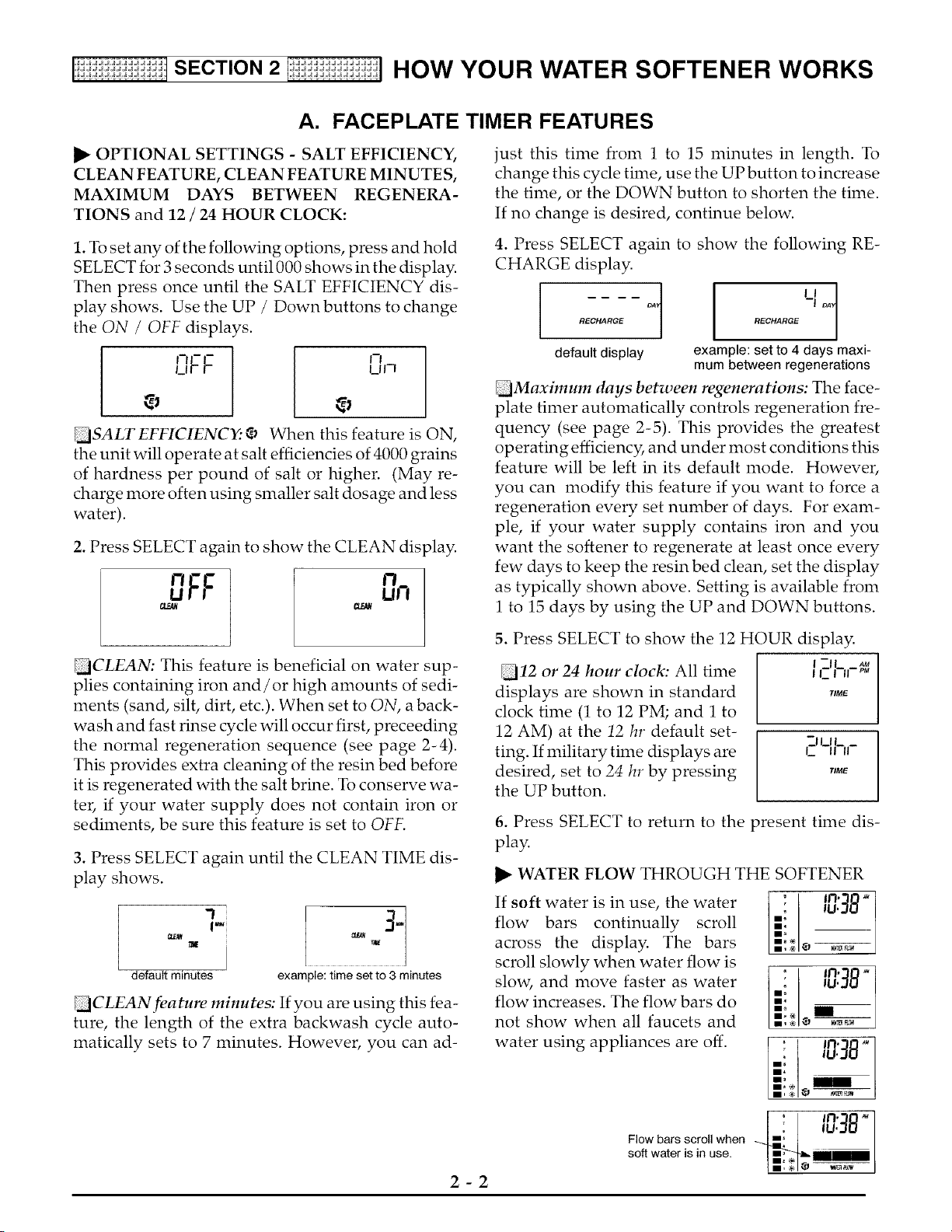
1. To set any of the following options, press and hold
SELECT for 3 seconds until 000 shows in the display.
Then press once until the SALT EFFICIENCY dis-
play shows. Use the UP / Down buttons to change
the ON / OFF displays.
U F" UI-I
++ +,
[]SALT EFFICIENC_ _,, When this feature is ON,
the unit will operate at salt efficiencies of 4000 grains
of hardness per pound of salt or higher. (May re-
charge more often using smaller salt dosage and less
water).
2. Press SELECT again to show the CLEAN display.
[]CLEAN: This feature is beneficial on water sup-
plies containing iron and/or high amounts of sedi-
ments (sand, silt, dirt, etc.). When set to ON, a back-
wash and fast rinse cycle will occur first, preceeding
the normal regeneration sequence (see page 2-4).
This provides extra cleaning of the resin bed before
it is regenerated with the salt brine. To conserve wa-
ter, if your water supply does not contain iron or
sediments, be sure this feature is set to OFF.
3. Press SELECT again until the CLEAN TIME dis-
play shows.
1
I')
default minutes
[::+
example: time set to 3 minutes
[CLEAN feature minutes: If you are using this fea-
ture, the length of the extra backwash cycle auto-
matically sets to 7 minutes. However, you can ad-
2-2
TIMER FEATURES
just this time from 1 to 15 minutes in length. To
change this cycle time, use the UP button to increase
the time, or the DOWN button to shorten the time.
If no change is desired, continue below.
4. Press SELECT again to show the following RE-
CHARGE display.
++ot I
default display example: set to 4 days maxi-
mum between regenerations
[Maximum days between regenerations: The face-
plate timer automatically controls regeneration fre-
quency (see page 2-5). This provides the greatest
operating efficiency, and under most conditions this
feature will be left in its default mode. However,
you can modify this feature if you want to force a
regeneration every set number of days. For exam-
ple, if your water supply contains iron and you
want the softener to regenerate at least once every
few days to keep the resin bed clean, set the display
as typically shown above. Setting is available from
1 to 15 days by using the UP and DOWN buttons.
5. Press SELECT to show the 12 HOUR display.
I _11_ AU
ILl II p+
TIME
[12 or 24 hour clock: All time
displays are shown in standard
clock time (1 to 12 PM; and 1 to
12 AM) at the 12 hr default set-
ting. If military time displays are
desired, set to 24 hr by pressing
the UP button.
i? I_1L _
II II
TIME
I
6. Press SELECT to return to the present time dis-
play.
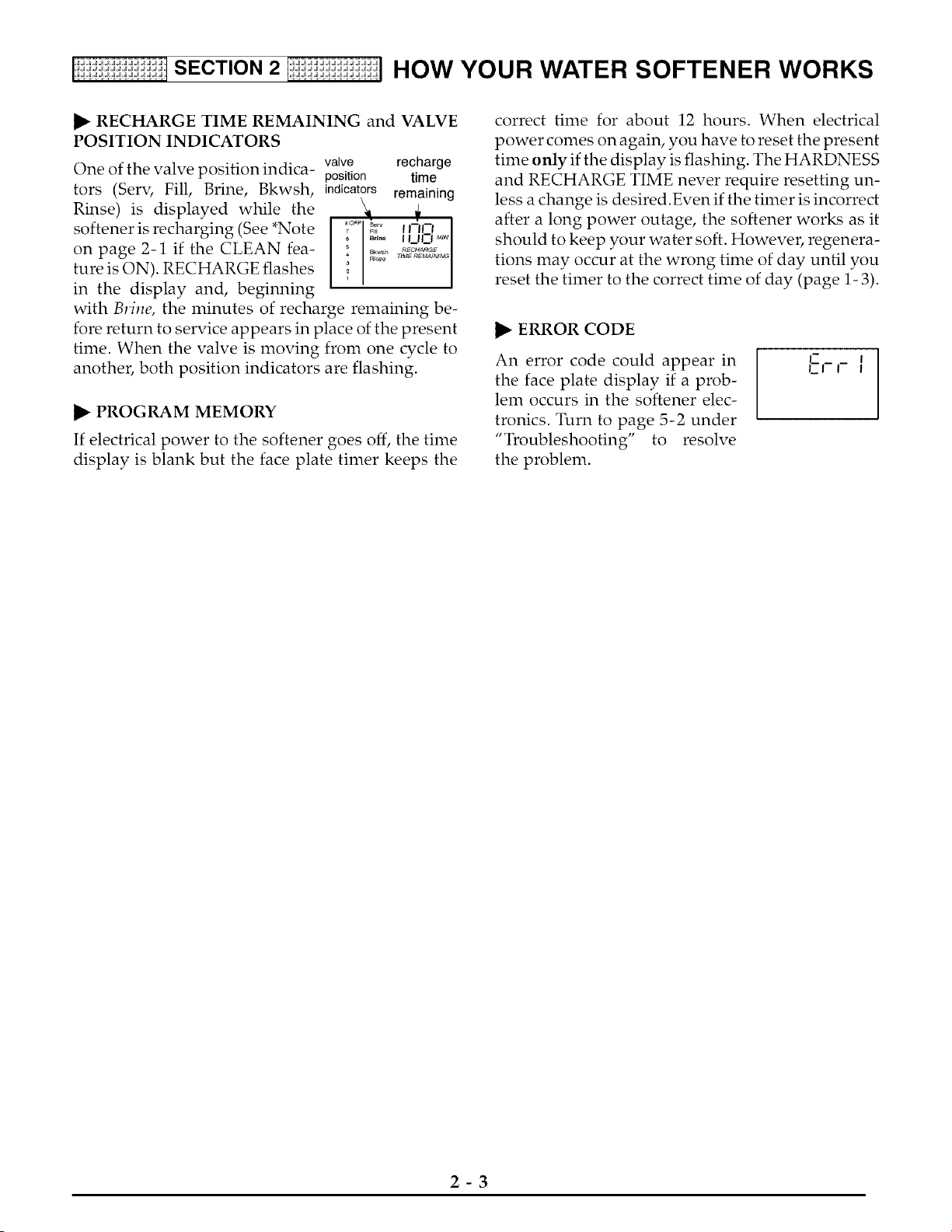
WATER FLOW THROUGH THE SOFTENER
If soft water is in use, the water .:;.+ _, _J:_8 _
flow bars continually scroll g:+ +,+,,+,
across the display. The bars
scroll slowly when water flow is
slow, and move faster as water
flow increases. The flow bars do
not show when all faucets and
water using appliances are off.
lD::lS+
so°,++i°use.
[i:ii:ii:ii:_i:i:ii:_ISECTION 2 I_i:ii:ii:ii:_i:i:ii:_] HOW YOUR WATER SOFTENER WORKS
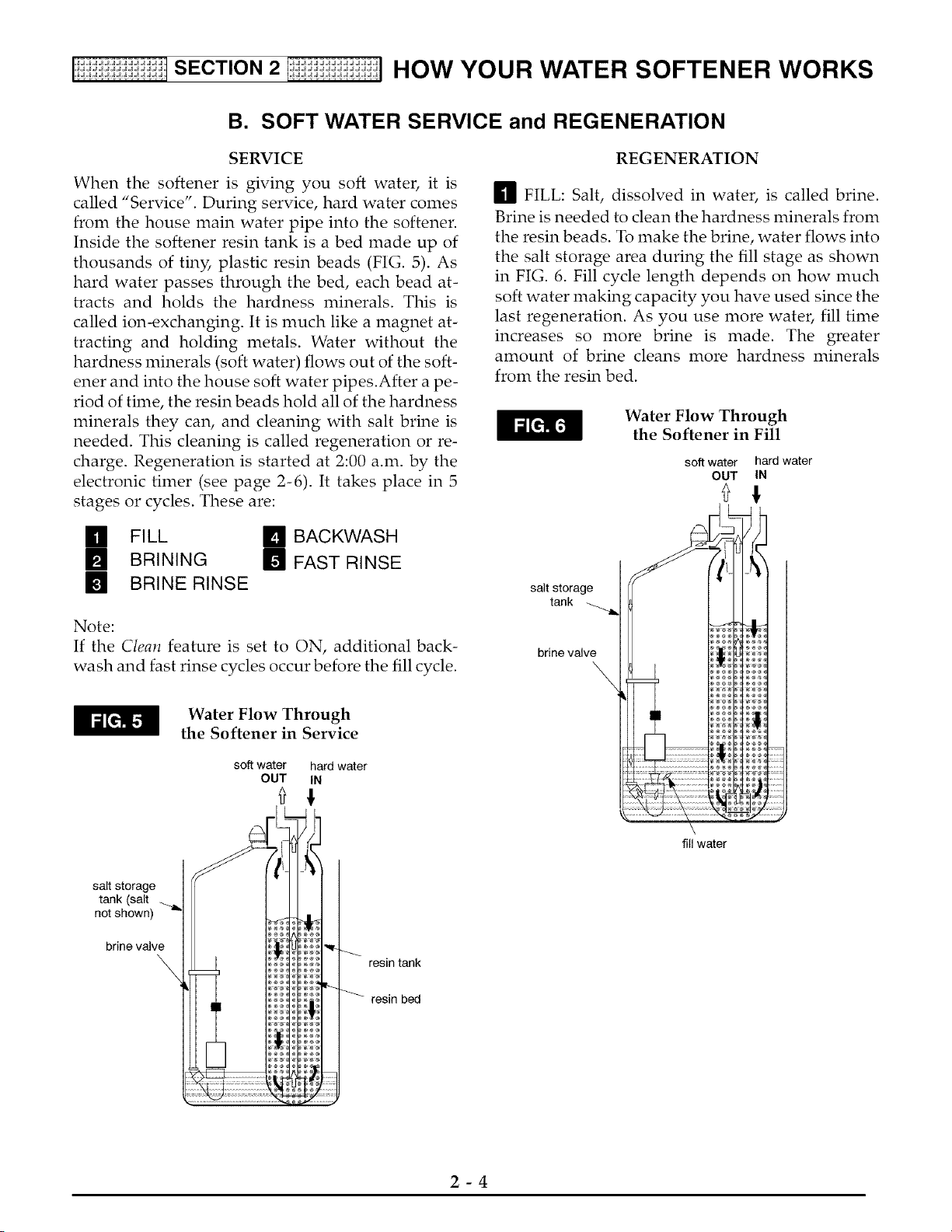
I1_ RECHARGE TIME REMAINING and VALVE
POSITION INDICATORS
One of the valve position indica- valve recharge
position time
tors (Serv, Fill, Brine, Bkwsh, indicators remaining
Rinse) is displayed while the
softener is recharging (See *Note
on page 2-1 if the CLEAN fea-
ture is ON). RECHARGE flashes
in the display and, beginning
with Brine, the minutes of recharge remaining be-
fore return to service appears in place of the present
time. When the valve is moving from one cycle to
another, both position indicators are flashing.
I1_ PROGRAM MEMORY
If electrical power to the softener goes off, the time
display is blank but the face plate timer keeps the
correct time for about 12 hours. When electrical
power comes on again, you have to reset the present
time only if the display is flashing. The HARDNESS
and RECHARGE TIME never require resetting un-
less a change is desired.Even if the timer is incorrect
after a long power outage, the softener works as it
should to keep your water soft. However, regenera-
tions may occur at the wrong time of day until you
reset the timer to the correct time of day (page 1- 3).
I1_ ERROR CODE
An error code could appear in
the face plate display if a prob-
lem occurs in the softener elec-
tronics. Turn to page 5-2 under
"Troubleshooting" to resolve
the problem.
L_-_ _
LI I I
2-3
[i:ii:ii:ii:_i:i:ii:_ISECTION 2 I_i:ii:ii:ii:_i:i:ii:_] HOW YOUR WATER SOFTENER WORKS
B. SOFT WATER SERVICE and REGENERATION
SERVICE
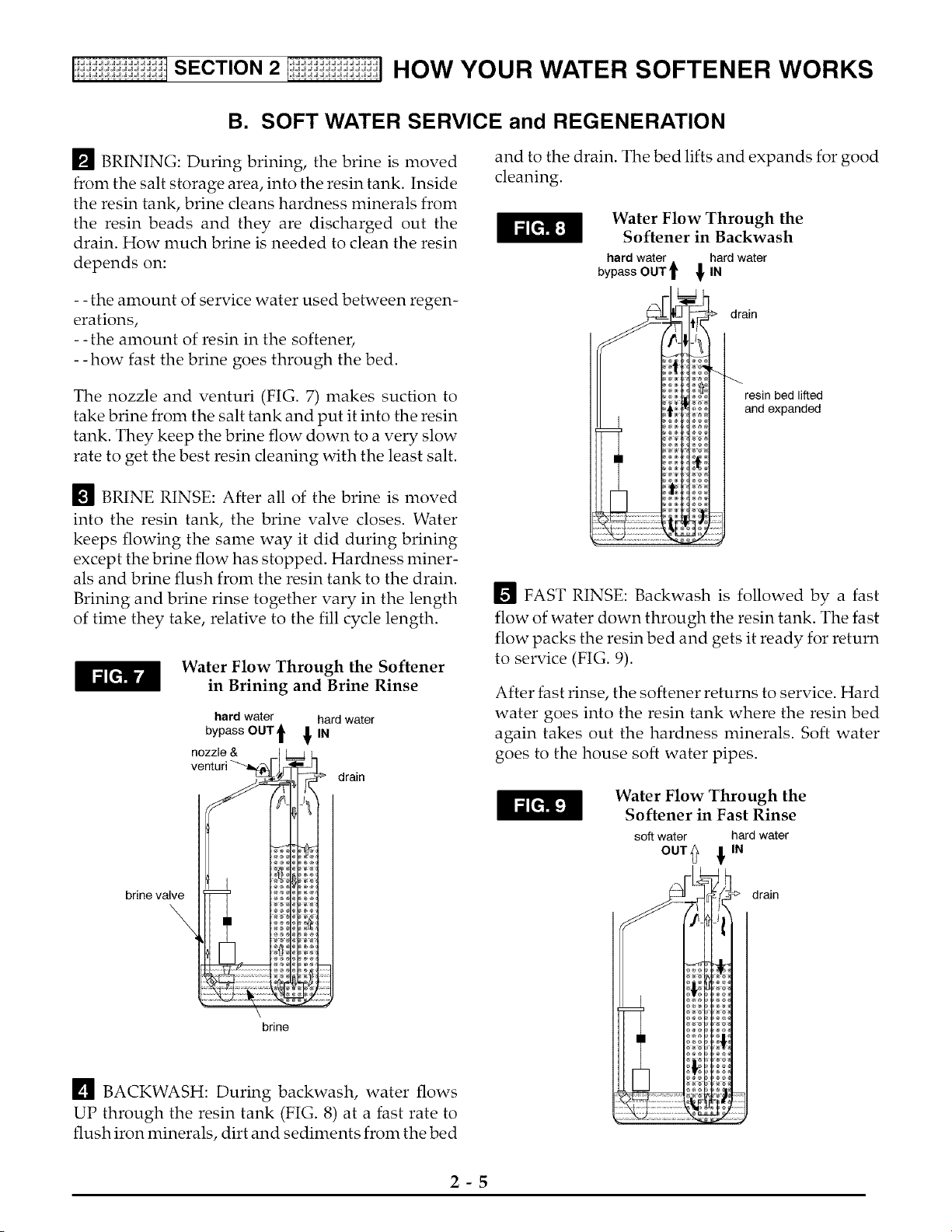
When the softener is giving you soft water, it is
called "Service". During service, hard water comes
from the house main water pipe into the softener.
Inside the softener resin tank is a bed made up of
thousands of tiny, plastic resin beads (FIG. 5). As
hard water passes through the bed, each bead at-
tracts and holds the hardness minerals. This is
called ion-exchanging. It is much like a magnet at-
tracting and holding metals. Water without the
hardness minerals (soft water) flows out of the soft-
ener and into the house soft water pipes.After a pe-
riod of time, the resin beads hold all of the hardness
minerals they can, and cleaning with salt brine is
needed. This cleaning is called regeneration or re-
charge. Regeneration is started at 2:00 a.m. by the
electronic timer (see page 2-6). It takes place in 5
stages or cycles. These are:
[] FILL [] BACKWASH
[] BRINING [] FAST RINSE
[] BRINE RINSE
Note:
If the Clean feature is set to ON, additional back-
wash and fast rinse cycles occur before the fill cycle.
REGENERATION
[] FILL: Salt, dissolved in water, is called brine.
Brine is needed to clean the hardness minerals from
the resin beads. To make the brine, water flows into
the salt storage area during the fill stage as shown
in FIG. 6. Fill cycle length depends on how much
soft water making capacity you have used since the
last regeneration. As you use more water, fill time
increases so more brine is made. The greater
amount of brine cleans more hardness minerals
from the resin bed.
Water Flow Through
the Softener in Fill
soft water hard water
OUT IN
salt storage
tank
brine valve
\
Water Flow Through
the Softener in Service
soft water hard water
OUT IN
salt storage
tank (salt
not shown) _'_
brine valve
\
resin tank
resin bed
fill water
2-4
[i:ii:ii:ii:_i:i:ii:_ISECTION 2 I_i:ii:ii:ii:_i:i:ii:_] HOW YOUR WATER SOFTENER WORKS
B. SOFT WATER SERVICE and REGENERATION
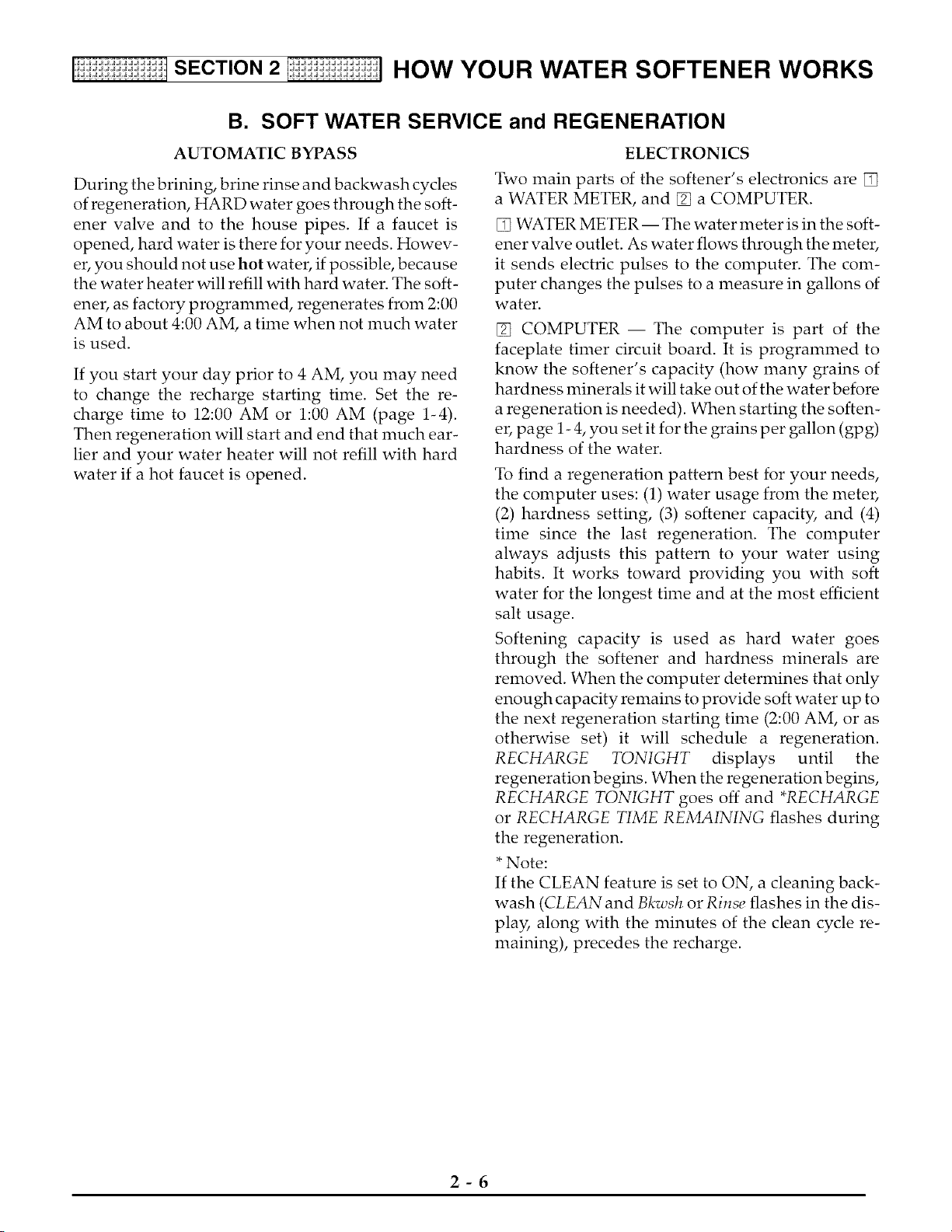
[] BRINING: During brining, the brine is moved
from the salt storage area, into the resin tank. Inside
the resin tank, brine cleans hardness minerals from
the resin beads and they are discharged out the
drain. How much brine is needed to clean the resin
depends on:
- - the amount of service water used between regen-
erations,
- -the amount of resin in the softener,
- -how fast the brine goes through the bed.
The nozzle and venturi (FIG. 7) makes suction to
take brine from the salt tank and put it into the resin
tank. They keep the brine flow down to a very slow
rate to get the best resin cleaning with the least salt.
[] BRINE RINSE: After all of the brine is moved
into the resin tank, the brine valve closes. Water
keeps flowing the same way it did during brining
except the brine flow has stopped. Hardness miner-
als and brine flush from the resin tank to the drain.
Brining and brine rinse together vary in the length
of time they take, relative to the fill cycle length.
Water Flow Through the Softener
in Brining and Brine Rinse
hard water hard water
bypass OUT t !IN
drain
brine valve
\
brine
[] BACKWASH: During backwash, water flows
UP through the resin tank (FIG. 8) at a fast rate to
flush iron minerals, dirt and sediments from the bed
and to the drain. The bed lifts and expands for good
cleaning.
Water Flow Through the
Softener in Backwash
hard water
bypass OUT t fIN
hard water
drain
resin bed lifted
and expanded
[] FAST RINSE: Backwash is followed by a fast
flow of water down through the resin tank. The fast
flow packs the resin bed and gets it ready for return
to service (FIG. 9).
After fast rinse, the softener returns to service. Hard
water goes into the resin tank where the resin bed
again takes out the hardness minerals. Soft water
goes to the house soft water pipes.
Water Flow Through the
Softener in Fast Rinse
soft water hard water
°°Tt !'"
drain
2-5
SECTION 2 HOW YOUR WATER SOFTENER WORKS
B. SOFT WATER SERVICE and REGENERATION
AUTOMATIC BYPASS
During the brining, brine rinse and backwash cycles
of regeneration, HARD water goes through the soft-
ener valve and to the house pipes. If a faucet is
opened, hard water is there for your needs. Howev-
er, you should not use hot water, if possible, because
the water heater will refill with hard water. The soft-
ener, as factory programmed, regenerates from 2:00
AM to about 4:00 AM, a time when not much water
is used.
If you start your day prior to 4 AM, you may need
to change the recharge starting time. Set the re-
charge time to 12:00 AM or 1:00 AM (page 1-4).
Then regeneration will start and end that much ear-
lier and your water heater will not refill with hard
water if a hot faucet is opened.
ELECTRONICS
Two main parts of the softener's electronics are []
a WATER METER, and [] a COMPUTER.
[] WATER METER-- The water meter is in the soft-
ener valve outlet. As water flows through the meter,
it sends electric pulses to the computer. The com-
puter changes the pulses to a measure in gallons of
water.
[] COMPUTER -- The computer is part of the
faceplate timer circuit board. It is programmed to
know the softener's capacity (how many grains of
hardness minerals it will take out of the water before
a regeneration is needed). When starting the soften-
er, page 1- 4, you set it for the grains per gallon (gpg)
hardness of the water.
To find a regeneration pattern best for your needs,
the computer uses: (1) water usage from the meter,
(2) hardness setting, (3) softener capacity, and (4)
time since the last regeneration. The computer
always adjusts this pattern to your water using
habits. It works toward providing you with soft
water for the longest time and at the most efficient
salt usage.
Softening capacity is used as hard water goes
through the softener and hardness minerals are
removed. When the computer determines that only
enough capacity remains to provide soft water up to
the next regeneration starting time (2:00 AM, or as
otherwise set) it will schedule a regeneration.
RECHARGE TONIGHT displays until the
regeneration begins. When the regeneration begins,
RECHARGE TONIGHT goes off and *RECHARGE
or RECHARGE TIME REMAINING flashes during
the regeneration.
*Note:
If the CLEAN feature is set to ON, a cleaning back-
wash (CLEAN and Bkwsh or Rinse flashes in the dis-
play, along with the minutes of the clean cycle re-
maining), precedes the recharge.
2-6
[i:ii:ii:ii:_i:i:ii:_i:i:ifSECTION 3 F!i:ii:_i:i:ii:_i:i:ii:_i:] CARE OF YOUR WATER SOFTENER
A. SALT: REFILLING STORAGE TANK, SALT BRIDGE
S
C
T
N
,JJJJJJJJJJJJJJJJ.
,JJJ JJJJJJJJJJ.
'dJ_dJdJdJdJ.
,JJ JJJJJJJJJ=
,JJJJ JJJJJJJJJ=
,JJ JJJJJJJJJ=
,JJJJJJJJJJJJJJJJ=
,JJJJJJJJJJJJJJJJ=
WHEN TO REFILL WITH SALT:
The Salt Monitor System (see
page 2-1) will turn the low salt
light on to warn you when to refill
with salt. Check for a low salt
light a few weeks after you install
the softener, and every week after
that. Always refill at about the #2
salt monitor level. At this level,
the tank is about 1/3 full. Never let the softener use
all the salt before refilling. Without salt, you will
soon have hard water. After filling, reset the Salt
Monitor System, page 2-1.
Note:
You will have a loss in softening capacity and may
get partly hard water if less than 10 inches (salt mon-
itor level 2) of salt is in the storage tank.
PLEASE SEE PAGE 1-6 FOR SALT FILLING DIRECTIONS.
BE SURE TO RESET THE SALT MONITOR, PAGE 2-1.
SALT BRIDGE
Sometimes, a hard crust or salt bridge forms in the
salt storage tank. It is usually caused by high hu-
midity or the wrong kind of salt. When the salt
bridges, an empty space forms between the water
and salt. Then salt will not dissolve (melt) in the wa-
ter to make brine. Without brine, the resin bed does
not regenerate and you will have hard water.
If the storage tank is full of salt, it is hard to tell if you
have a salt bridge. Salt is loose on top, but the bridge
is under it. The following is the best way to check for
a salt bridge.
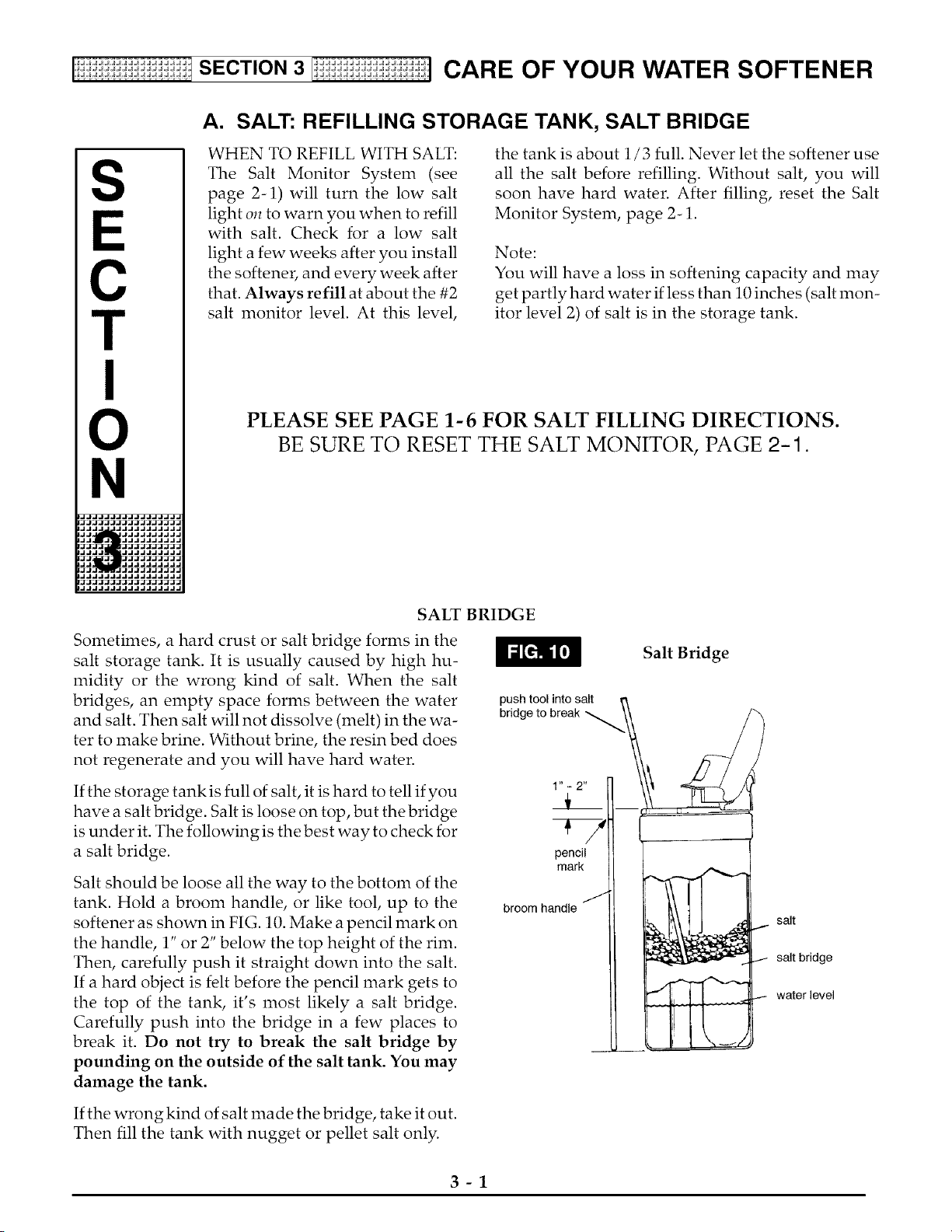
Salt should be loose all the way to the bottom of the
tank. Hold a broom handle, or like tool, up to the
softener as shown in FIG. 10. Make a pencil mark on
the handle, 1" or 2" below the top height of the rim.
Then, carefully push it straight down into the salt.
If a hard object is felt before the pencil mark gets to
the top of the tank, it's most likely a salt bridge.
Carefully push into the bridge in a few places to
break it. Do not try to break the salt bridge by
pounding on the outside of the salt tank. You may
damage the tank.
push tool into salt ,_,
bridge to break N \\
1" - 2"
i
broom handle /
Salt Bridge
salt
J- salt bridge
water level
If the wrong kind of salt made the bridge, take it out.
Then fill the tank with nugget or pellet salt only.
3-1
[i:ii:ii:ii:_i:i:ii:_i:i:ifSECTION 3 F!i:ii:_i:i:ii:_i:i:ii:_i:] CARE OF YOUR WATER SOFTENER
B. KEEPING THE WATER SOFTENER CLEAN
NOZZLE & VENTURI
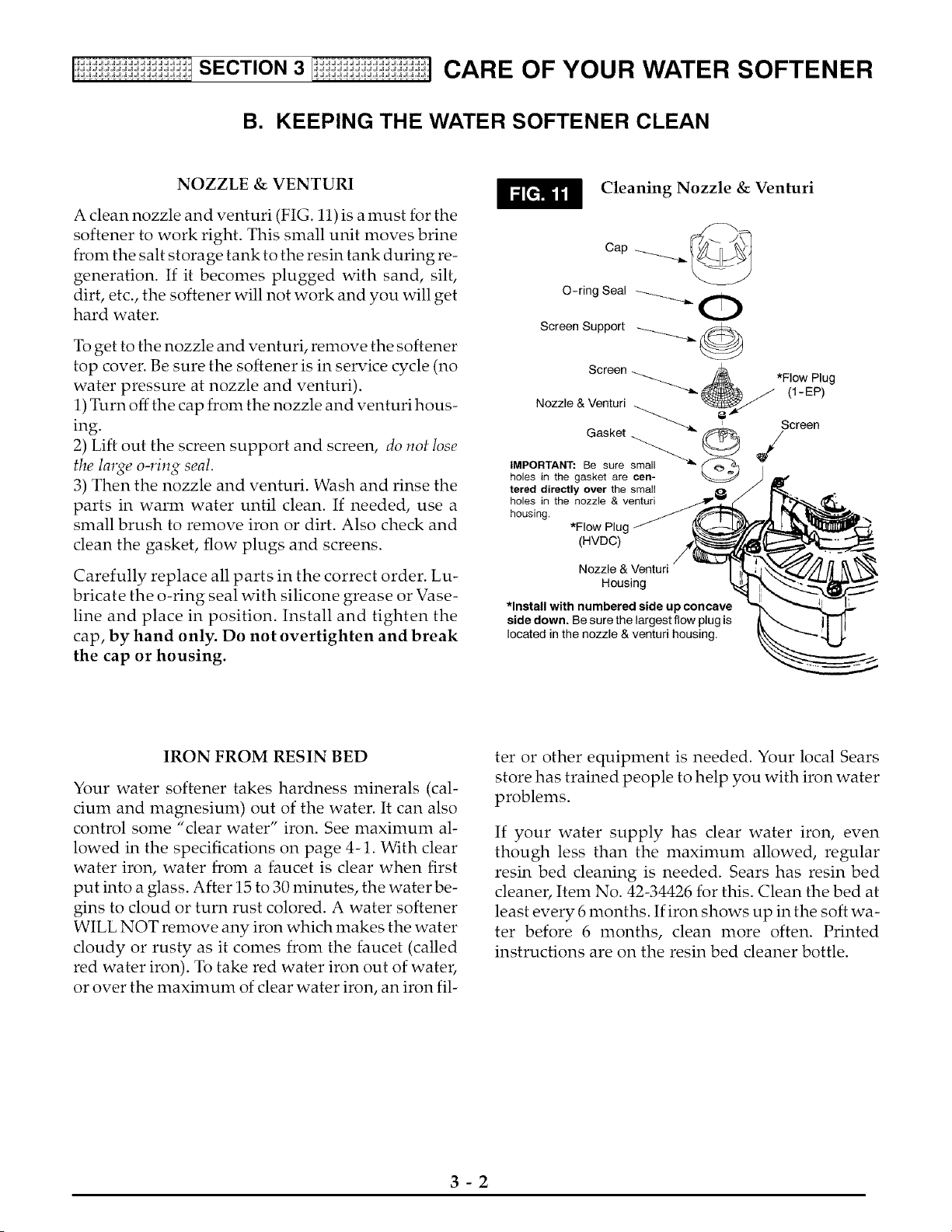
A clean nozzle and venturi (FIG. 11) is a must for the
softener to work right. This small unit moves brine
from the salt storage tank to the resin tank during re-
generation. If it becomes plugged with sand, silt,
dirt, etc., the softener will not work and you will get
hard water.
To get to the nozzle and venturi, remove the softener
top cover. Be sure the softener is in service cycle (no
water pressure at nozzle and venturi).
1) Turn off the cap from the nozzle and venturi hous-
ing.
2) Lift out the screen support and screen, do not lose
the large o-ring seal.
3) Then the nozzle and venturi. Wash and rinse the
parts in warm water until clean. If needed, use a
small brush to remove iron or dirt. Also check and
clean the gasket, flow plugs and screens.
Carefully replace all parts in the correct order. Lu-
bricate the o-ring seal with silicone grease or Vase-
line and place in position. Install and tighten the
cap, by hand only. Do not overtighten and break
the cap or housing.
Cleaning Nozzle & Venturi
Cap _
O-ring Seal _'-m_.
Screen Support _
Screen -.................._ _
Nozzle & Venturi
Gasket _
IMPORTANT: Be sure _
holes in the gasket are
feted directly over the small
holes in the nozzle & venturi
housing,
*Flow Plug
(HVDC)
Nozzle & Venturi
Housing
*Install with numbered side up concave
side down. Be sure the largest flow plug is
located in the nozzle & venturi housing,
*Flow Plug
(1-EP)
Screen
IRON FROM RESIN BED
Your water softener takes hardness minerals (cal-
cium and magnesium) out of the water. It can also
control some "dear water" iron. See maximum al-
lowed in the specifications on page 4-1. With clear
water iron, water from a faucet is clear when first
put into a glass. After 15 to 30 minutes, the water be-
gins to cloud or turn rust colored. A water softener
WILL NOT remove any iron which makes the water
cloudy or rusty as it comes from the faucet (called
red water iron). To take red water iron out of water,
or over the maximum of clear water iron, an iron fil-
ter or other equipment is needed. Your local Sears
store has trained people to help you with iron water
problems.
If your water supply has clear water iron, even
though less than the maximum allowed, regular
resin bed cleaning is needed. Sears has resin bed
cleaner, Item No. 42-34426 for this. Clean the bed at
least every 6 months. If iron shows up in the soft wa-
ter before 6 months, clean more often. Printed
instructions are on the resin bed cleaner bottle.
3-2
SECTION3 CARE OF YOUR WATER SOFTENER
C. PROTECT THE WATER SOFTENER FROM FREEZING
If the softener is installed where it could freeze
(summer cabin, lake home, etc.), you must drain all
water from it to stop possible freeze damage. To
drain the softener:
_1 Close the shut-off valve on the house main wa-
ter pipe, near the water meter or pressure tank.
_]m Open a faucet in the soft water pipes to vent
pressure in the softener.
_ Refer to FIG. 14 on page 4-1. Move the stem in
a single bypass valve to bypass. Close the inlet
and outlet valve in a 3-valve bypass system, and
open the bypass valve. If you want water in the
house pipes again, reopen the shut-off valve on
the main water pipe.
_ Unplug the transformer at the wall outlet. Re- m_
mira
move the salt hole cover and the main cover.
Take off both drain hoses.
n_._ Carefully remove the large holding clips at the
softener inlet and outlet (see Key No. 67, on page
6-3). Separate the softener from the copper
tubes, or from the bypass valve.
_1_ Remove the brinewell cover and disconnect the
brine valve tubing at the nozzle and venturi as-
sembly (see page 3-2). Lift the brine valve out of
the brinewell. Tip the brine valve upside down
to drain water.
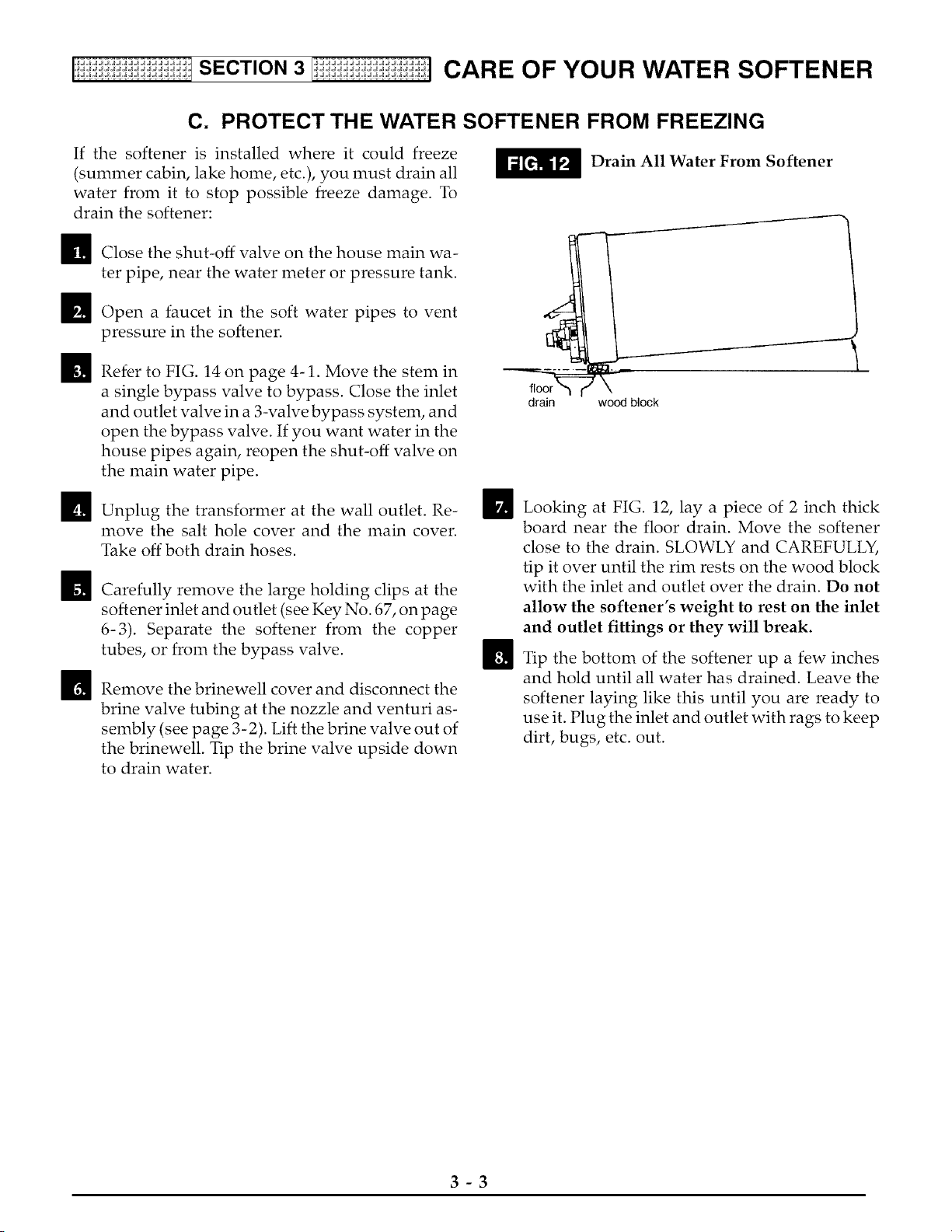
Drain All Water From Softener
drain wood block
I
m
Looking at FIG. 12, lay a piece of 2 inch thick
board near the floor drain. Move the softener
close to the drain. SLOWLY and CAREFULLY,
tip it over until the rim rests on the wood block
with the inlet and outlet over the drain. Do not
allow the softener's weight to rest on the inlet
and outlet fittings or they will break.
Tip the bottom of the softener up a few inches
and hold until all water has drained. Leave the
softener laying like this until you are ready to
use it. Plug the inlet and outlet with rags to keep
dirt, bugs, etc. out.
3-3

SECTION3 CARE OF YOUR WATER SOFTENER
D. CHECKLIST ... TO HELP YOU SAVE MONEY
If your water softener fails to work, make the following easy checks. Often, you will find what's wrong your-
self and you won't have to call and wait for service. If you do not find anything wrong, while making the
checks, and your softener still does not work, call your Sears Service Department.
Note:
1. Also read ERROR CODE, page 2-3.
2. If an error code is not displayed, press and hold the SELECT button until the display changes. Then, press
the SELECT button again and hold until a flashing SR code appears. It must show SR27. If any other number
shows, the face plate computer is working on incorrect input and would probably be the cause of the problem.
To set SR27, press either the UP [] or DOWN [] button. When SR27 shows, press SELECT to return a
flashing 12:00 AM display. Reset the present time, hardness numbel, etc., pages 1-3 and 1-4.
PROBLEM CAUSE CORRECTION
No soft water No salt (or salt bridged) in the storage tank
Transfomer unplugged at the wall outlet,
or power cable leads loose, fuse blown,
circuit breaker popped, or circuit switched
off.
Manual bypass valve(s) in bypass position
Dirty, plugged or damaged nozzle &
venturi
Valve drain hose plugged
Water hard sometimes Hardness number setting too low
Using hot water when softener is
regenerating
Increase in the grains of hardness in your
water supply
Refill with salt, or break the salt bridge (page
3-1). Press ON/OFF-HOLD (RECHARGE
NOW) button and hold for 3 seconds to start a
regeneration (see page 2-1 ).
Check for loss of power due to any of these
and correct. With the power back on, look at
the time display and read PROGRAM
MEMORY, page 2-3.
Look at FIG.14 on page 4-1. Move the stem in
a single valve to service. In a 3-valve bypass,
open the inlet and outlet valves, and be sure to
fully close the bypass valve.
Take apart and clean or replace damaged
parts (see page 3-2).
The drain hose must not have kinks, sharp
bends, or be raised too high above the
softener (see page 16 in your installation
manual).
Press and release the SELECT button until
HARDNESS shows in the display. Read the
hardness number in the display and be sure
the same grains per gallon number is shown
on your water analysis report. See page 1-4 to
reset. Press and release the SELECT button
until the present time shows in the display.
Avoid using hot water during this time because
the water heater refills with hard water (see
Automatic Bypass, page 2-6).
Ask your Sears retail store for a new water
analysis. Then make a new hardness number
setting (page 1-4).
3-4
[i;ii;ii;ii:_i;i;iit SECTION 4 1;ii:_i;i;ii:_i;i;] KNOW ABOUT YOUR WATER SOFTENER
S
C
T
N
,JJJJJJJJJJJJJJJJ.
,JJJJJJJJJJJJJJJJ.
'JJJ_JJJJJJJJ-
,JJ JJJJJJJJJ.
,JJJJJ JJJJJJJJJ.
,JJJJJJJJJJJJJJJJ.
,JJJJJJJJJJJJJJJJ.
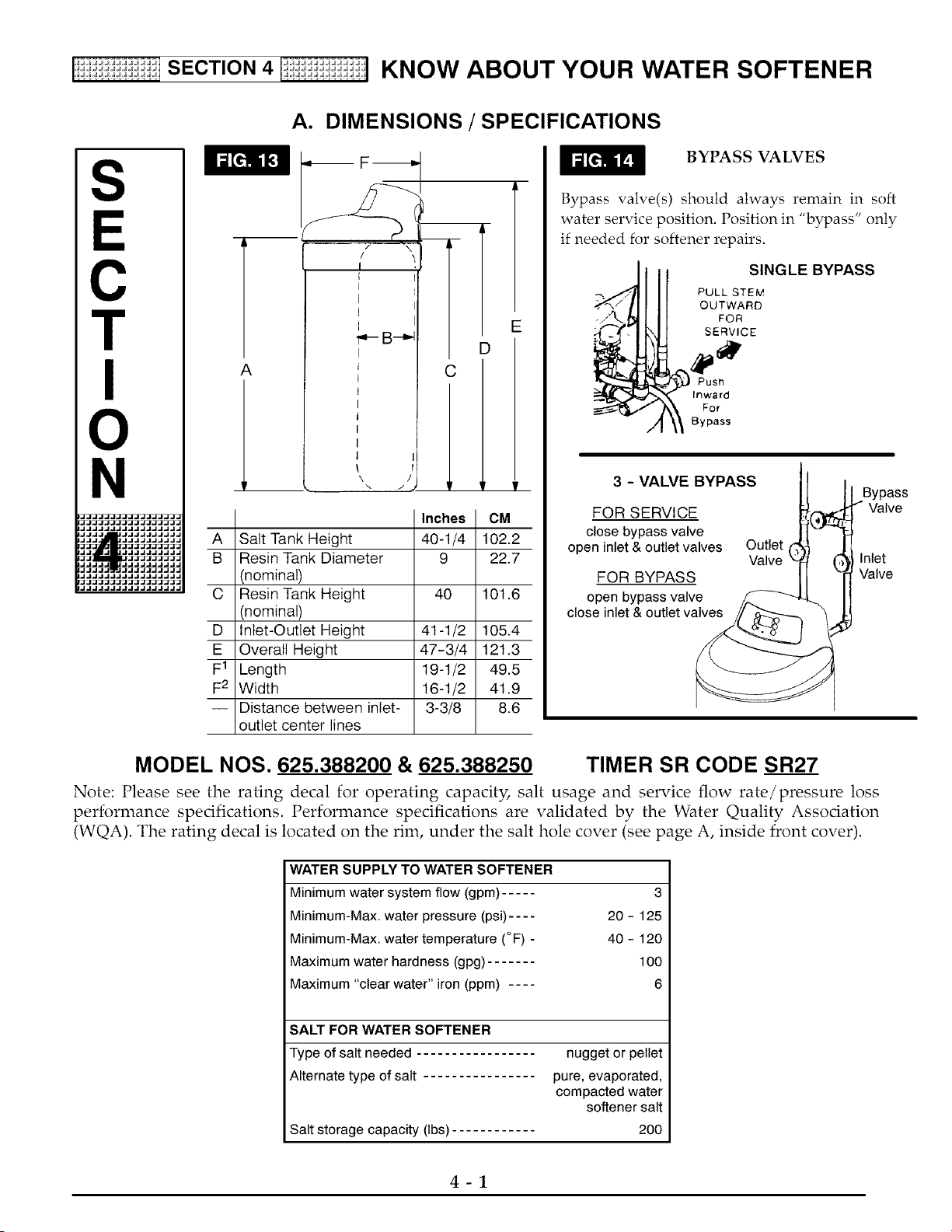
A. DIMENSIONS / SPECIFICATIONS
A
B
C
D
E
F1
F2
A
\ /
C
J
E
D
'r p
CM
Salt Tank Height 40-1/4 102.2
Resin Tank Diameter 9 22.7
(nominal)
Resin Tank Height 40 101.6
(nominal)
Inlet-Outlet Height 41-1/2 105.4
Overall Height 47-3/4 121.3
Length 19-1/2 49.5
Width 16-1/2 41.9
Distance between inlet- 3-3/8 8.6
outlet center lines
BYPASS VALVES
Bypass valve(s) should always remain in soft
water service position. Position in "bypass" only
if needed for softener repairs.
SINGLE BYPASS
PULL STEM
OUTWARD
FOR
SERVICE
Push
Inward
For
Bypass
3 - VALVE BYPASS
FOR SERVICE
close bypass valve
open inlet & outlet valves Outlet
Valve
FOR BYPASS
open bypass valve
close inlet & outlet valve___./_'_ _
Bypass
_, / Valve
(_ Inlet
Valve
MODEL NOS. 625.388200 & 625.388250 TIMER SR CODE SR27
Note: Please see the rating decal for operating capacity, salt usage and service flow rate/pressure loss
performance spedfications. Performance specifications are validated by the Water Quality Association
(WQA). The rating decal is located on the rim, under the salt hole cover (see page A, inside front cover).
WATER SUPPLY TO WATER SOFTENER
Minimum water system flow (gpm) ..... 3
Minimum-Max. water pressure (psi) .... 20 - 125
Minimum-Max. water temperature (° F) - 40 - 120
Maximum water hardness (gpg) ....... 100
Maximum "clear water" iron (ppm) .... 6
SALT FOR WATER SOFTENER
Type of salt needed
Alternate type of salt
Salt storage capacity (Ibs)
nugget or pellet
pure, evaporated,
compacted water
softener salt
200
4-1
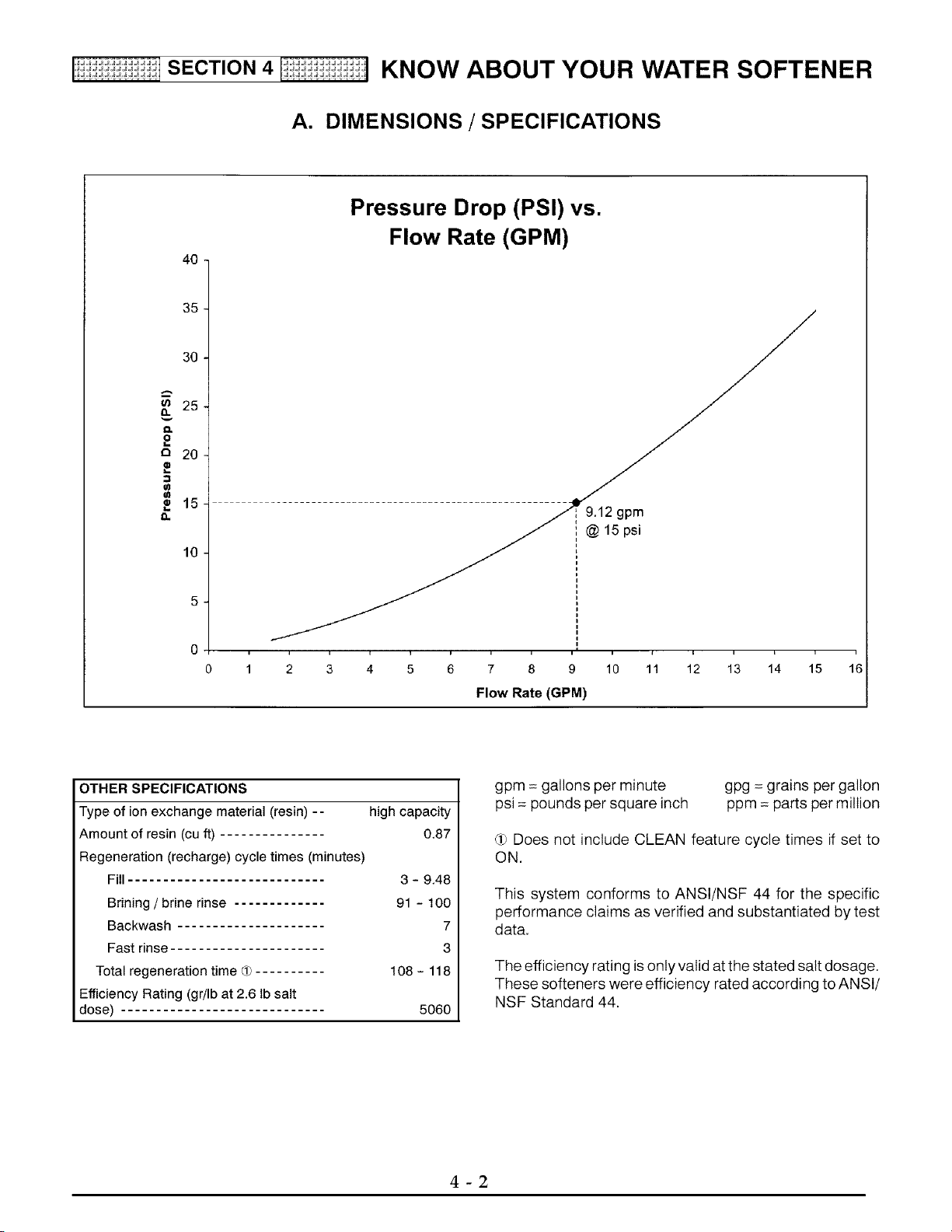
Ii;ii;ii;ii:_i; i;iit SECTION 4 [ ;ii:_i;i;ii:_i;i;] KNOW ABOUT YOUR WATER SOFTENER
A. DIMENSIONS / SPECIFICATIONS
4O
Pressure Drop (PSI) vs.
Flow Rate (GPM)
35
30
ca 25
8.
O.
2
o 20
._ 15
10
2 gpm
15 ps_
i
2 3 4 5 6 7 8 9 10 11 12 13 14 15
Flow Rate (GPM)
i
16
OTHER SPECIFICATIONS
Type of ion exchange material (resin) -- high capacity
Amount of resin (cu ft) 0.87
Regeneration (recharge) cycle times (minutes)
Fill 3 - 9.48
Brining / brine rinse 91 - 100
Backwash 7
Fast rinse 3
Total regeneration time _ .......... 108 - 118
Efficiency Rating (gr/Ib at 2.6 ib salt
dose) 5060
gpm = gallons per minute
psi = pounds per square inch
gpg = grains per gallon
ppm = parts per million
dp Does not include CLEAN feature cycle times if set to
ON.
This system conforms to ANSI/NSF 44 for the specific
performance claims as verified and substantiated by test
data.
The efficiency rating is only valid atthe stated salt dosage.
These softeners were efficiency rated according to ANSI/
NSF Standard 44.
4-2
S
C
T
N
,JJJJJJJJJJJJJJJJ.
,JJJJJJJJJJJJJJJJ.
,JJ JJJJJJJJ.
,JJ JJJJJJJJJ.
,JJJJJJJJJJJJJJJJ.
,JJJJJJJJJJJJJJJJ.
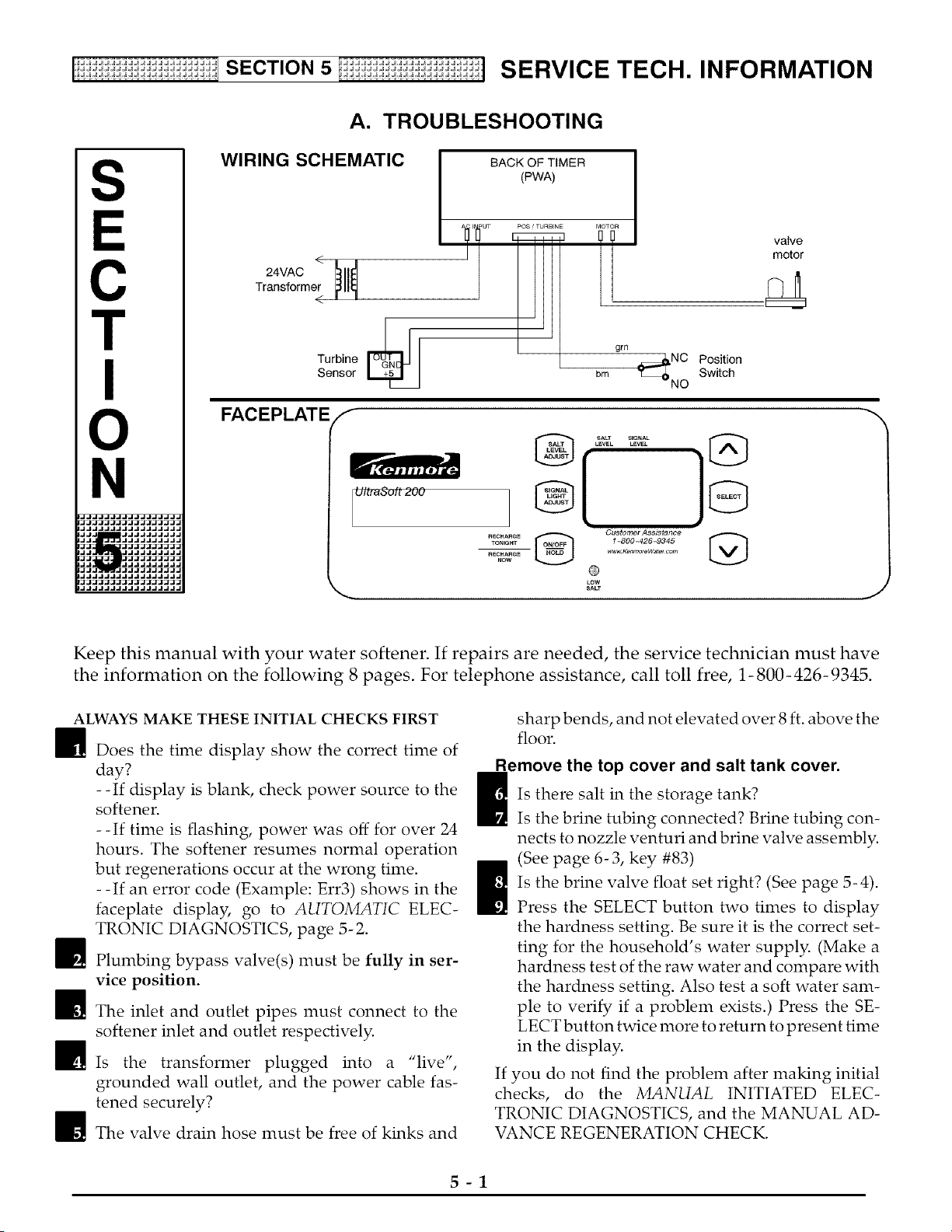
A. TROUBLESHOOTING
WIRING SCHEMATIC
<
Transformer
<
Turbine
Sensor
|
BACK OF TIMER |
t
grn
brn _NC
NO
Position
Switch
valve
motor
FACEPLATE f
UlbeSuf1200
TONleNT 1_800-426-9345
N_CHARG_ _Ken_r_feW_t_t com
_ow
LOW
Keep this manual with your water softener. If repairs are needed, the service technician must have
the information on the following 8 pages. For telephone assistance, call toll free, 1-800-426-9345.
ALWAYS MAKE THESE INITIAL CHECKS FIRST
i Does the time display show the correct time of
day?
--If display is blank, check power source to the
softener.
--If time is flashing, power was off for over 24
hours. The softener resumes normal operation
but regenerations occur at the wrong time.
- -If an error code (Example: Err3) shows in the
faceplate display, go to AUTOMATIC ELEC-
TRONIC DIAGNOSTICS, page 5-2.
i Plumbing bypass valve(s) must be fully in ser-
vice position.
i The inlet and outlet pipes must connect to the
softener inlet and outlet respectively.
His the transformer plugged into a "live",
grounded wall outlet, and the power cable fas-
tened securely?
The valve drain hose must be free of kinks and
sharp bends, and not elevated over 8 ft. above the
floor.
emove the top cover and salt tank cover.
_Is there salt in the storage tank?
Is the brine tubing connected? Brine tubing con-
nects to nozzle venturi and brine valve assembly.
(See page 6-3, key #83)
I Is the brine valve float set right? (See page 5-4).
Press the SELECT button two times to display
the hardness setting. Be sure it is the correct set-
ting for the household's water supply. (Make a
hardness test of the raw water and compare with
the hardness setting. Also test a soft water sam-
ple to verify if a problem exists.) Press the SE-
LECT button twice more to return to present time
in the display.
If you do not find the problem after making initial
checks, do the MANUAL INITIATED ELEC-
TRONIC DIAGNOSTICS, and the MANUAL AD-
VANCE REGENERATION CHECK.
5-1
[!ii:ii:ii:ii: i:ii:ii: i:ii:ii: i:i SECTION5 Ii ii:ii: i:ii:ii: i:ii:ii: i:ii:ii]S ERVIC E TEC H. INFO RMATION
A. TROUBLESHOOTING
AUTOMATIC ELECTRONIC DIAGNOSTICS
The faceplate timer (PWA) computer has a self-
diagnostic function for the electrical system, except
for input power and water meter. The computer
monitors electronic components [ C _
and circuits for correct opera- I_l I- [
tion. If a malfunction occurs, an
error code appears in the face-
plate display.
The chart below shows the error codes that could
appear, and the possible defects for each code.
While an error code appears in the displa3_ all face
plate buttons are inoperable except the SELECT but-
ton. SELECT remains operational so the service per-
son can make the MANUAL INITIATED ELEC-
TRONIC DIAGNOSTICS (below) to further isolate
the defect, and check the water meter.
CODE
Err1, Err3,
Err4
Err5
POSSIBLE DEFECT
MOST LIKELY ._ _, LESS LIKELY
motor inoperative / wiring harness or connection to switch / position switch / valve defect causing
hiqh torque
faceplate timer (PWA)
PROCEDURE FOR REMOVING ERROR CODE FROM FACEPLATE: 1. Unplug transformer 2. Correct defect 3. Plug
in transformer 4. Wait for 6 minutes. The error code will return if the defect was not corrected.
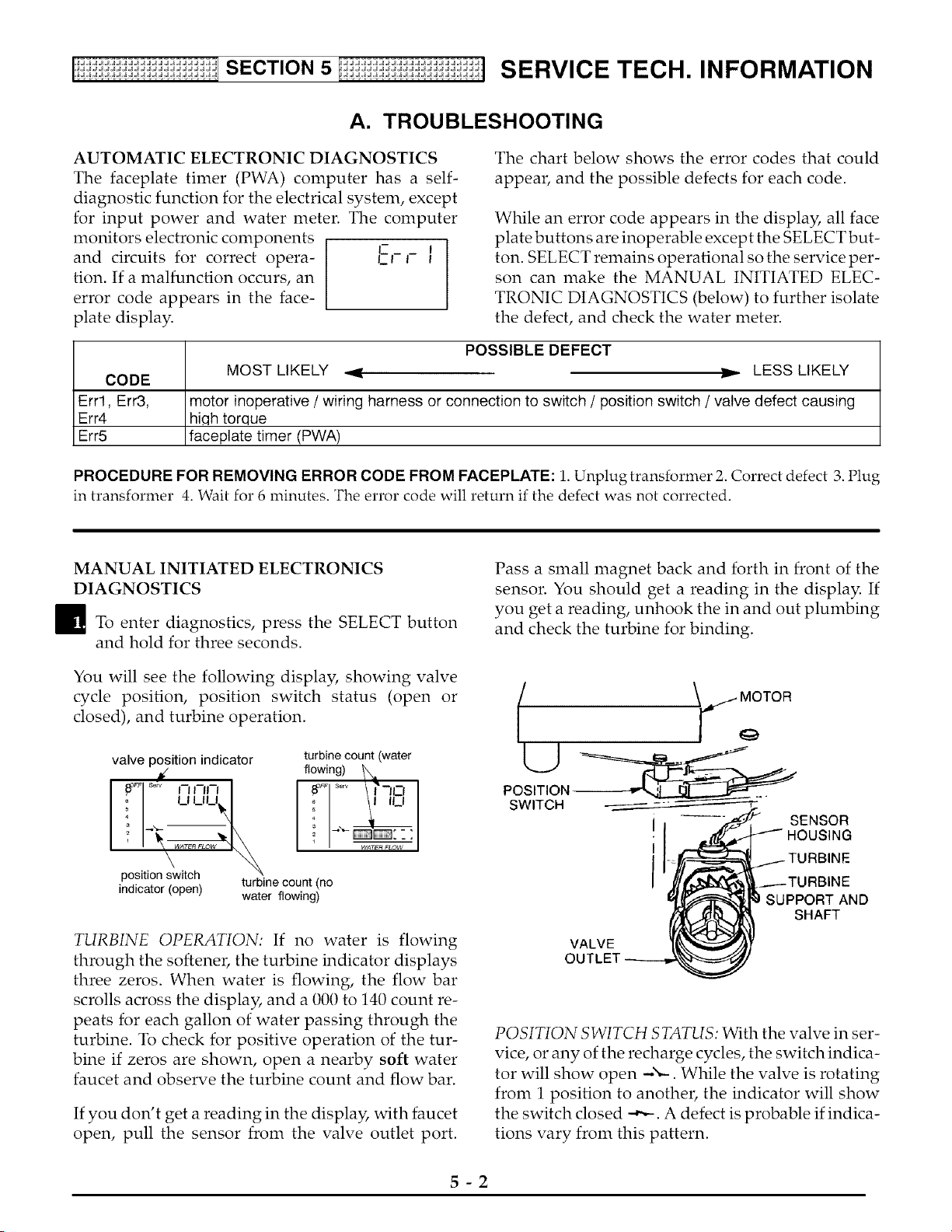
MANUAL INITIATED ELECTRONICS
DIAGNOSTICS
_To enter diagnostics, press the SELECT button
and hold for three seconds.
You will see the following display, showing valve
cycle position, position switch status (open or
closed), and turbine operation.
valve position indicator
indicator (open)
turbine count (water
flowing) _1.
! 1'"J
i ---:
turbine count (no
water flowing)
TURBINE OPERATION: If no water is flowing
through the softener, the turbine indicator displays
three zeros. When water is flowing, the flow bar
scrolls across the display, and a 000 to 140 count re-
peats for each gallon of water passing through the
turbine. To check for positive operation of the tur-
bine if zeros are shown, open a nearby soft water
faucet and observe the turbine count and flow bar.
If you don't get a reading in the display, with faucet
open, pull the sensor from the valve outlet port.
Pass a small magnet back and forth in front of the
sensor. You should get a reading in the display. If
you get a reading, unhook the in and out plumbing
and check the turbine for binding.
U
POSITION
SWITCH
SENSOR
VALVE
OUTLET
RBINE
SUPPORT AND
SHAFT
POSITION SWITCH STATUS: With the valve in ser-
vice, or any of the recharge cycles, the switch indica-
tor will show open _x._. While the valve is rotating
from 1 position to another, the indicator will show
the switch closed -,-,-. A defect is probable if indica-
tions vary from this pattern.
5-2
[!ii:ii:ii:ii: i:ii:ii: i:ii:ii: i:i SECTION5 Ii ii:ii: i:ii:ii: i:ii:ii: i:ii:ii]S ERVICE TEC H. INFO RMATION
A. TROUBLESHOOTING
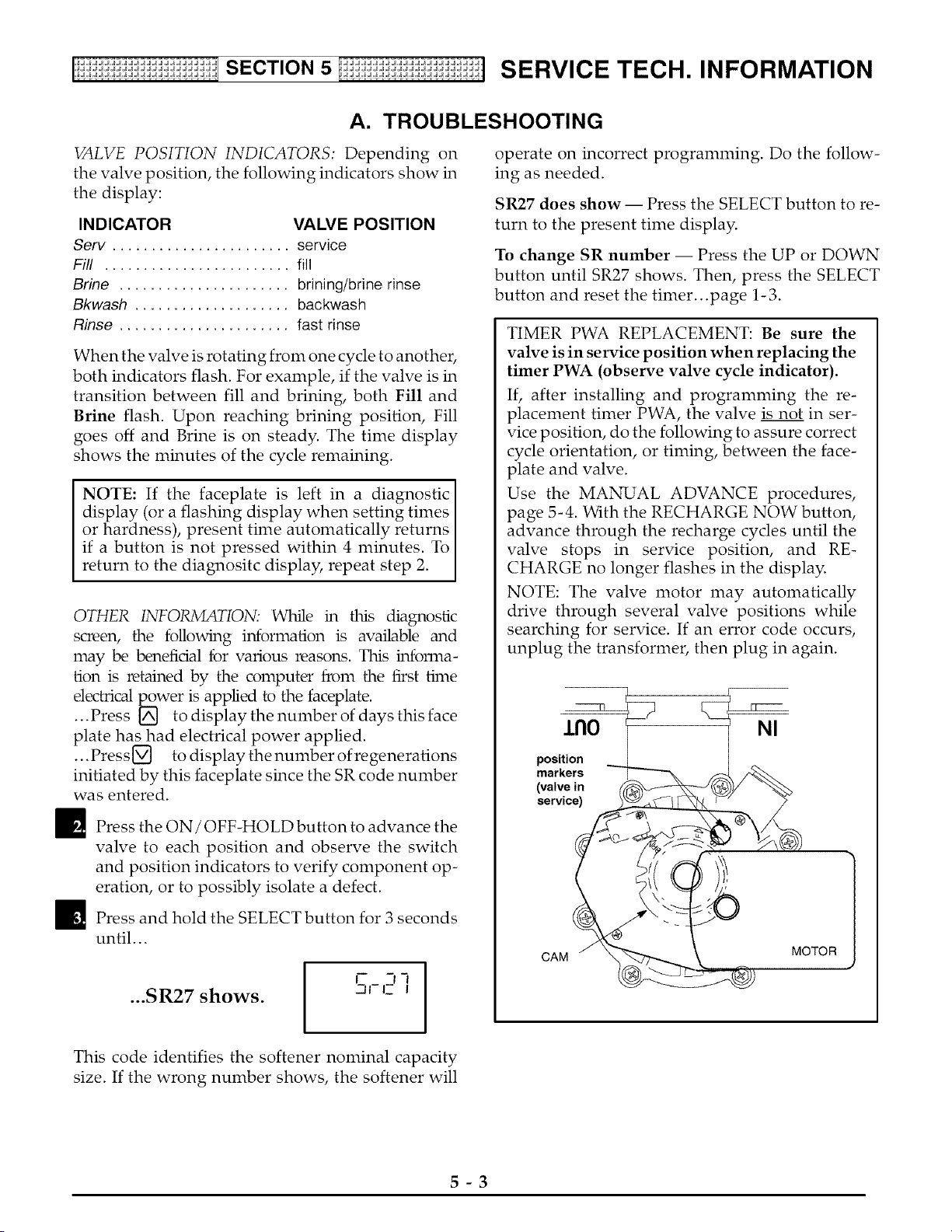
VALVE POSITION INDICATORS: Depending on
the valve position, the following indicators show in
the display:
INDICATOR VALVE POSITION
Serv ....................... service
Fill ........................ fill
Brine ...................... brining/brine rinse
Bkwash .................... backwash
Rinse ...................... fast rinse
When the valve is rotating from one cycle to another,
both indicators flash. For example, if the valve is in
transition between fill and brining, both Fill and
Brine flash. Upon reaching brining position, Fill
goes off and Brine is on steady. The time display
shows the minutes of the cycle remaining.
NOTE: If the faceplate is left in a diagnostic I
display (or a flashing display when setting times I
or hardness), present time automatically returns I
if a button is not pressed within 4 minutes. To
return to the diagnositc display, repeat step 2.
OTHER INFO_TION: While in this diagnostic
screen, the following information is available and
may be benefidal for various reasons. This infom_a-
tion is retained by the computer from the first time
electrical p_ower is applied to the faceplate.
...Press _ to display the number of days this face
plate has had electrical power applied.
...Press[_ to display thenumber of regenerations
initiated by this faceplate since the SR code number
was entered.
_ Press the ON / OFF-HOLD button to advance the
valve to each position and observe the switch
and position indicators to verify component op-
eration, or to possibly isolate a defect.
_1_ Press and hold the SELECT button for 3 seconds
until...
...SR27 shows.
I
I I
-q-I- I
operate on incorrect programming. Do the follow-
ing as needed.
SR27 does show -- Press the SELECT button to re-
turn to the present time display.
To change SR number -- Press the UP or DOWN
button until SR27 shows. Then, press the SELECT
button and reset the timer...page 1-3.
TIMER PWA REPLACEMENT: Be sure the
valve is in service position when replacing the
timer PWA (observe valve cycle indicator).
If, after installing and programming the re-
placement timer PWA, the valve is not in ser-
vice position, do the following to assure correct
cycle orientation, or timing, between the face-
plate and valve.
Use the MANUAL ADVANCE procedures,
page 5-4. With the RECHARGE NOW button,
advance through the recharge cycles until the
valve stops in service position, and RE-
CHARGE no longer flashes in the display.
NOTE: The valve motor may automatically
drive through several valve positions while
searching for service. If an error code occurs,
unplug the transformer, then plug in again.
r
J.nO NI
position
markers
(valve in
service)
CAM
MOTOR
This code identifies the softener nominal capacity
size. If the wrong number shows, the softener will
5-3
[ii:ii:ii:ii: i:ii:ii: i:ii:ii: i:i SECTION5 Ii ii:ii: i:ii:ii: i:ii:ii: i:ii:ii]S ERVICE TEC H. INFO RMATION
A. TROUBLESHOOTING
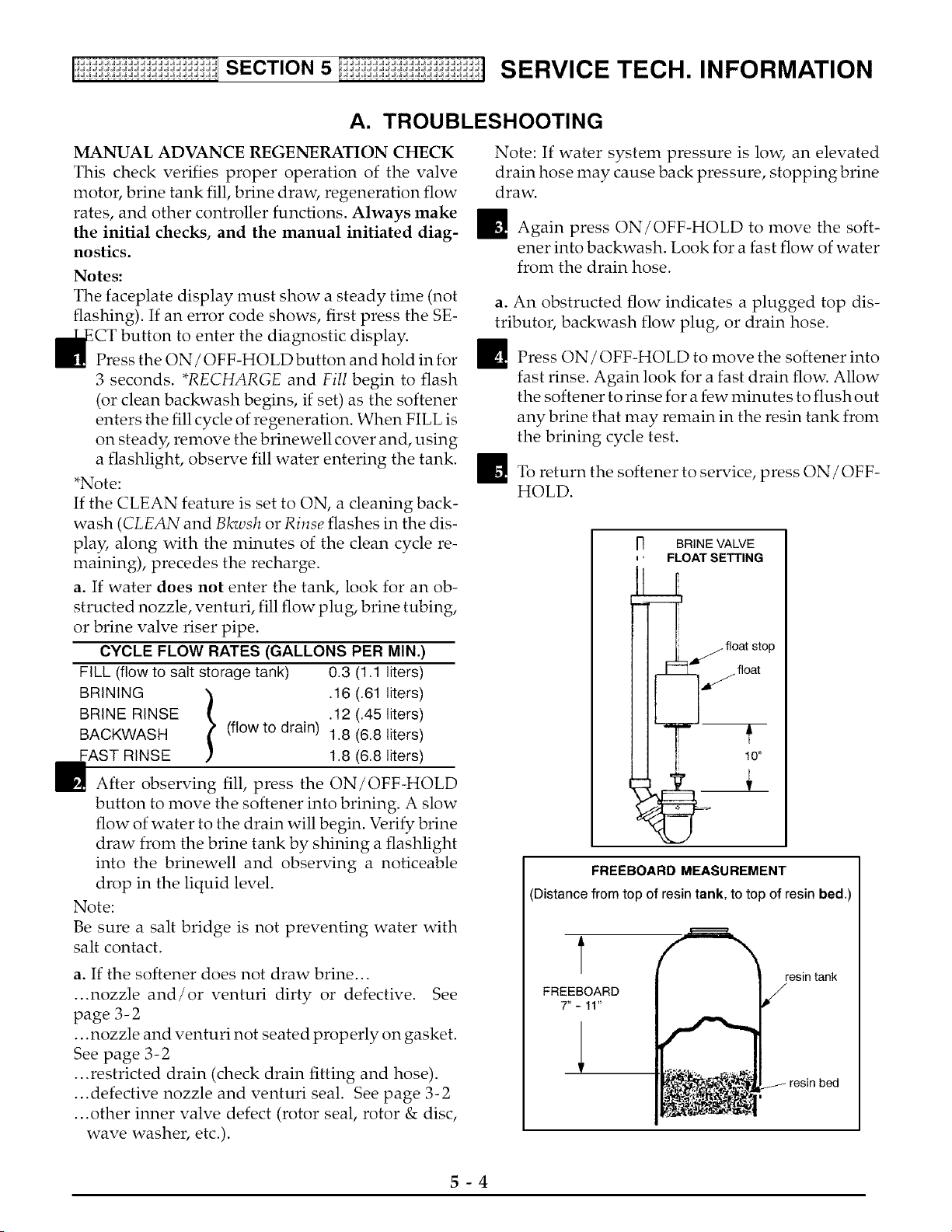
MANUAL ADVANCE REGENERATION CHECK
This check verifies proper operation of the valve
motor, brine tank fill, brine draw, regeneration flow
rates, and other controller functions. Always make
the initial checks, and the manual initiated diag-
nostics.
Notes:
The faceplate display must show a steady time (not
flashing). If an error code shows, first press the SE-
to enter the diagnostic display.
Press the ON / OFF-HOLD button and hold in for
3 seconds. *RECHARGE and Fill begin to flash
(or clean backwash begins, if set) as the softener
enters the fill cycle of regeneration. When FILL is
on steady, remove the brinewell cover and, using
a flashlight, observe fill water entering the tank.
*Note:
If the CLEAN feature is set to ON, a cleaning back-
wash (CLEAN and Bkwsh or Rinse flashes in the dis-
play, along with the minutes of the clean cycle re-
maining), precedes the recharge.
a. If water does not enter the tank, look for an ob-
structed nozzle, venturi, fill flow plug, brine tubing,
or brine valve riser pipe.
CYCLE FLOW RATES (GALLONS PER MIN.)
FILL (flow to salt storage tank) 0.3 (1.1 liters)
BRINING '} .16 (.61 liters)
BRINE RINSE l .12 (.45 liters)
BACKWASH (flow to drain) 1.8 (6.8 liters)
FAST RINSE 1.8 (6.8 liters)
E After observing fill, press the ON/OFF-HOLD
button to move the softener into brining. A slow
flow of water to the drain will begin. Verify brine
draw from the brine tank by shining a flashlight
into the brinewell and observing a noticeable
drop in the liquid level.
Note:
Be sure a salt bridge is not preventing water with
salt contact.
a. If the softener does not draw brine...
...nozzle and/or venturi dirty or defective. See
page 3- 2
...nozzle and venturi not seated properly on gasket.
See page 3-2
...restricted drain (check drain fitting and hose).
...defective nozzle and venturi seal. See page 3-2
...other inner valve defect (rotor seal, rotor & disc,
wave washer, etc.).
Note: If water system pressure is low, an elevated
drain hose may cause back pressure, stopping brine
draw.
_1_ Again press ON/OFF-HOLD to move the soft-
ener into backwash. Look for a fast flow of water
from the drain hose.
a. An obstructed flow indicates a plugged top dis-
tributor, backwash flow plug, or drain hose.
_ Press ON/OFF-HOLD to move the softener into
fast rinse. Again look for a fast drain flow. Allow
the softener to rinse for a few minutes to flush out
any brine that may remain in the resin tank from
the brining cycle test.
_To return the softener to service, press ON / OFF-
HOLD.
r] BRINE VALVE
, ' FLOAT SETTING
/./ float stop
float
FREEBOARD MEASUREMENT
Distance from top of resin tank, to top of resin bed.)
t
FREEBOARD
7"-11"
resin tank
5-4
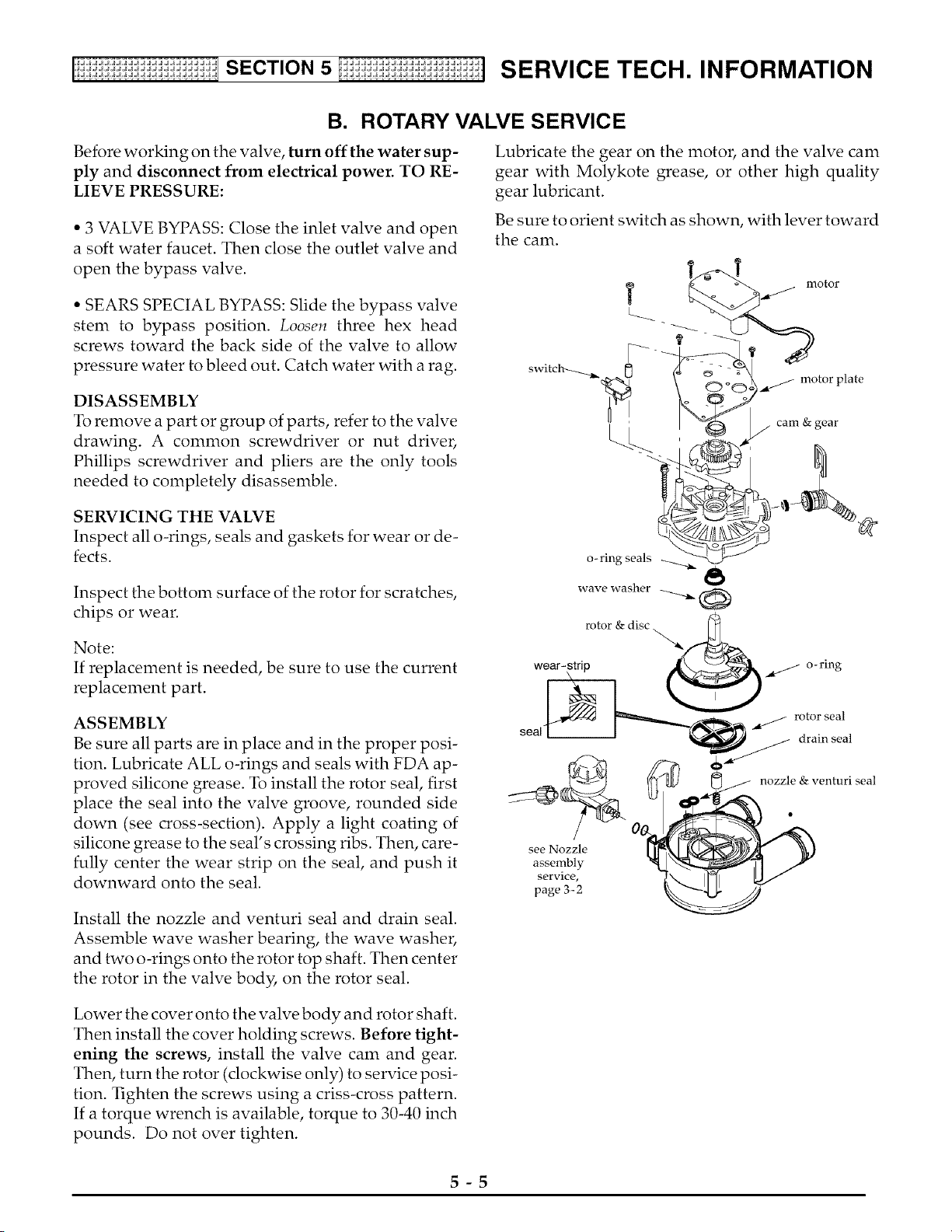
B. ROTARY VALVE SERVICE
Before working on the valve, turn off the water sup-
ply and disconnect from electrical power. TO RE-
LIEVE PRESSURE:
• 3 VALVE BYPASS: Close the inlet valve and open
a soft water faucet. Then close the outlet valve and
open the bypass valve.
• SEARS SPECIAL BYPASS: Slide the bypass valve
stem to bypass position. Loosen three hex head
screws toward the back side of the valve to allow
pressure water to bleed out. Catch water with a rag.
DISASSEMBLY
To remove a part or group of parts, refer to the valve
drawing. A common screwdriver or nut driver,
Phillips screwdriver and pliers are the only tools
needed to completely disassemble.
Lubricate the gear on the motor, and the valve cam
gear with Molykote grease, or other high quality
gear lubricant.
Be sure to orient switch as shown, with lever toward
the cam.
motor plate
SERVICING THE VALVE
Inspect all o-rings, seals and gaskets for wear or de-
fects.
Inspect the bottom surface of the rotor for scratches,
chips or wear.
Note:
If replacement is needed, be sure to use the current
replacement part.
o- ring seals
rotor&discx.._
wear- strip o-ring
ASSEMBLY
Be sure all parts are in place and in the proper posi-
tion. Lubricate ALL o-rings and seals with FDA ap-
proved silicone grease. To install the rotor seal, first
place the seal into the valve groove, rounded side
down (see cross-section). Apply a light coating of
silicone grease to the seal's crossing ribs. Then, care-
fully center the wear strip on the seal, and push it
downward onto the seal.
Install the nozzle and venturi seal and drain seal.
Assemble wave washer bearing, the wave washer,
and two o-rings onto the rotor top shaft. Then center
the rotor in the valve body, on the rotor seal.
seal
see Nozzle
assembly
service,
page 3_2
rotor seal
drain seal
nozzle & venturi seal
Lower the cover onto the valve body and rotor shaft.
Then install the cover holding screws. Before tight-
ening the screws, install the valve cam and gear.
Then, turn the rotor (clockwise only) to service posi-
tion. Tighten the screws using a criss-cross pattern.
If a torque wrench is available, torque to 30-40 inch
pounds. Do not over tighten.
5-5
[!ii:ii:ii:ii:_i:ii:ii:_i:ii:ii:_i:i_SECTION5 Ii_ii:ii:_i:ii:ii:_i:ii:ii:_i:ii:ii]S ERVIC E TEC H. INFO RMATION
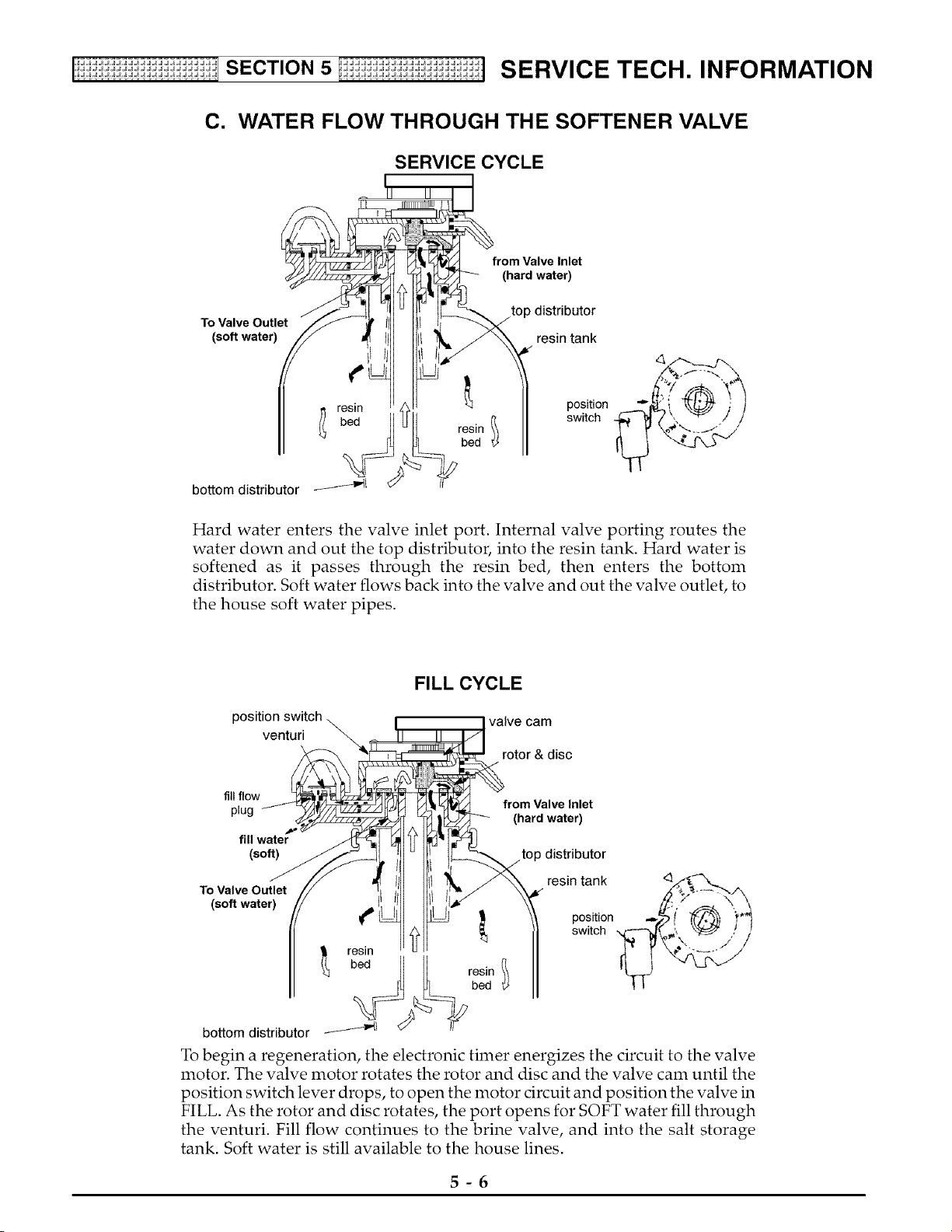
C. WATER FLOW THROUGH THE SOFTENER VALVE
SERVICE CYCLE
from Valve Inlet
(hard water)
top distributor
To Valve Outlet
(soft water) resin tank
¢
resin
I bed
bottom distributor _'_
position
switch
Hard water enters the valve inlet port. Internal valve porting routes the
water down and out the top distributor, into the resin tank. Hard water is
softened as it passes through the resin bed, then enters the bottom
distributor. Soft water flows back into the valve and out the valve outlet, to
the house soft water pipes.
FILL CYCLE
position switch valve cam
venturi
rotor& disc
fill flow
plug from Valve Inlet
(hard water)
fill water
(soft) top distributor
To Valve Outlet
(soft water)
€
resin
bed
bottomdistributor _/_1
resin
bed
resin tank 4%_ ._.
position -- ! i"
switch __
To begin a regeneration, the electronic timer energizes the circuit to the valve
motor. The valve motor rotates the rotor and disc and the valve cam until the
position switch lever drops, to open the motor drcuit and position the valve in
FILL. As the rotor and disc rotates, the port opens for SOFT water fill through
the venturi. Fill flow continues to the brine valve, and into the salt storage
tank. Soft water is still available to the house lines.
5-6
C. WATER FLOW THROUGH THE SOFTENER VALVE
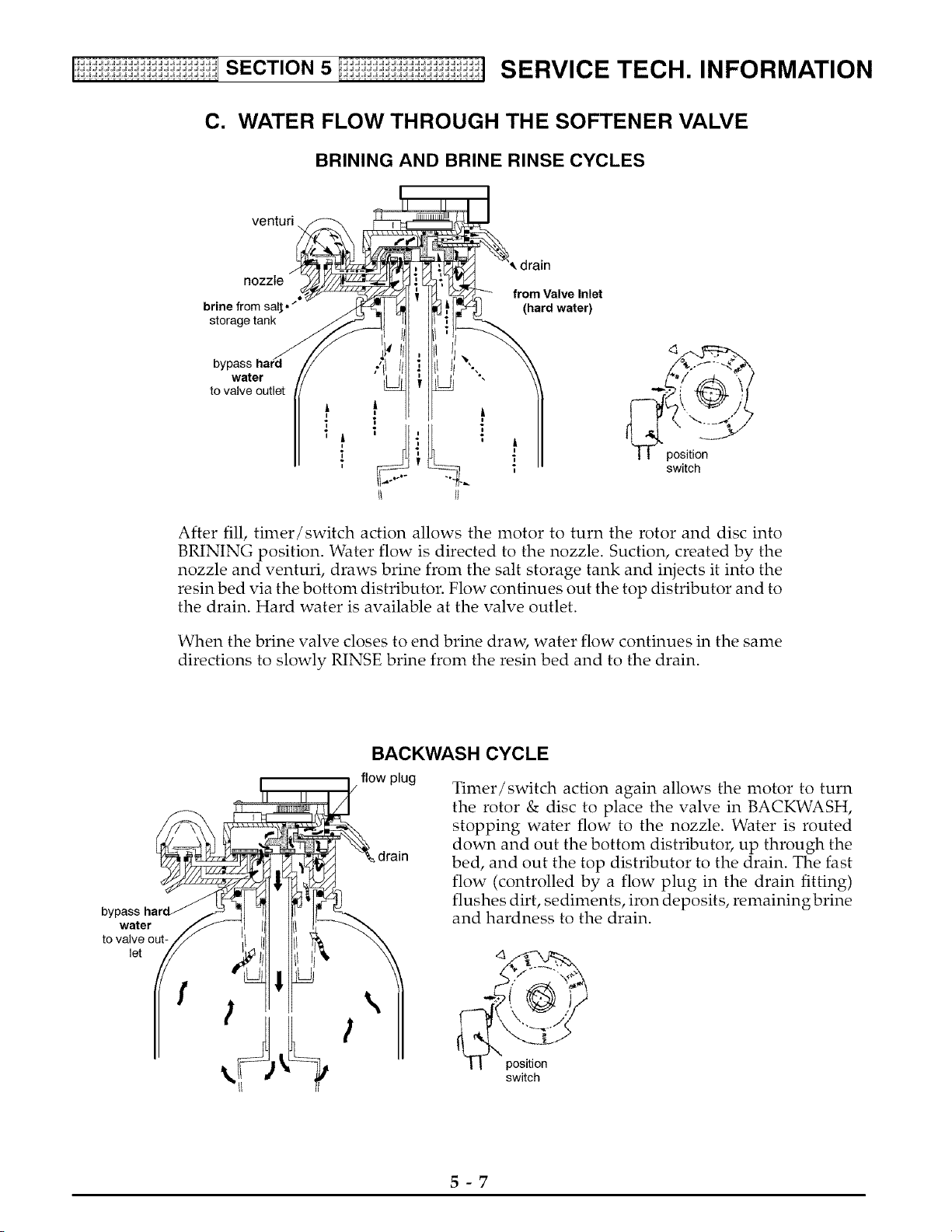
BRINING AND BRINE RINSE CYCLES
venturi
nozzle
• from Valve Inlet
brine from sal_." (hard water)
storage tank
water
to valve outlet
I | position
switch
After fill, timer/switch action allows the motor to turn the rotor and disc into
BRINING position. Water flow is directed to the nozzle. Suction, created by the
nozzle and venturi, draws brine from the salt storage tank and injects it into the
resin bed via the bottom distributor. Flow continues out the top distributor and to
the drain. Hard water is available at the valve outlet.
When the brine valve closes to end brine draw, water flow continues in the same
directions to slowly RINSE brine from the resin bed and to the drain.
bypass
water
to valve out-
let
f
BACKWASH CYCLE
flow plug
drain
Timer/switch action again allows the motor to turn
the rotor & disc to place the valve in BACKWASH,
stopping water flow to the nozzle. Water is routed
down and out the bottom distributor, up through the
bed, and out the top distributor to the drain. The fast
flow (controlled by a flow plug in the drain fitting)
flushes dirt, sediments, iron deposits, remainingbrine
and hardness to the drain.
\
switch
5-7
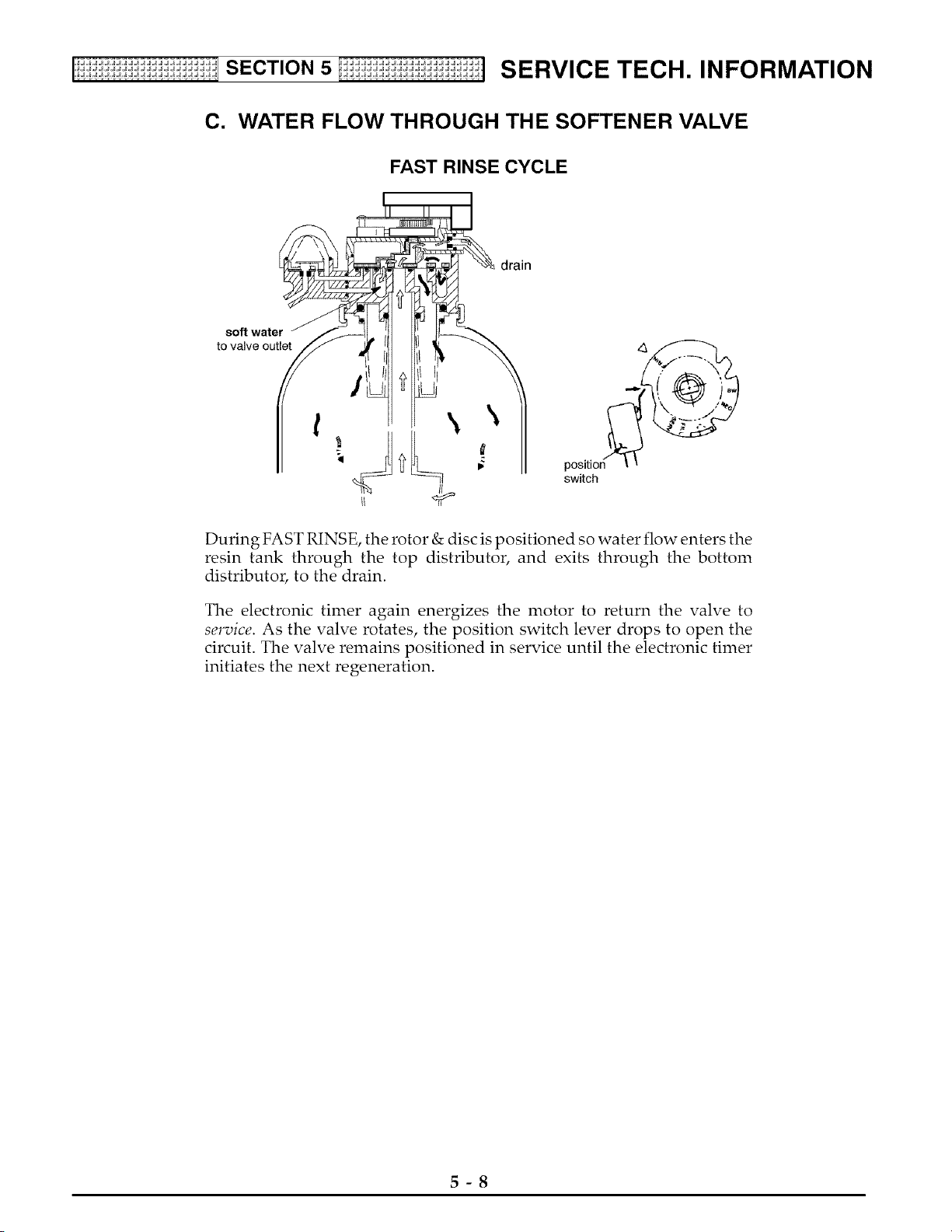
C. WATER FLOW THROUGH THE SOFTENER VALVE
FAST RINSE CYCLE
drain
soft water
to valve outlet
t \
positio_ _
switch
During FAST RINSE, the rotor & disc is positioned so water flow enters the
resin tank through the top distributor, and exits through the bottom
distributor, to the drain.
The electronic timer again energizes the motor to return the valve to
service. As the valve rotates, the position switch lever drops to open the
circuit. The valve remains positioned in service until the electronic timer
initiates the next regeneration.
5-8
SECTION6 I_i:ii:ii:ii:_i:i:ii:_i REPAIR PARTS FOR WATER SOFTENER
S
C
T
N
,JJJJJJJJJJJJJJJJ.
,JJJJ JJJJJJJJJJ.
'dJd_dJdJdJdJ.
,JJ JJJJJJJJJ.
,JJ JJJJJJJJ.
,JJ JJJJJJJJJ.
,JJJJJJJJJJJJJJJJ.
,JJJJJJJJJJJJJJJJ.
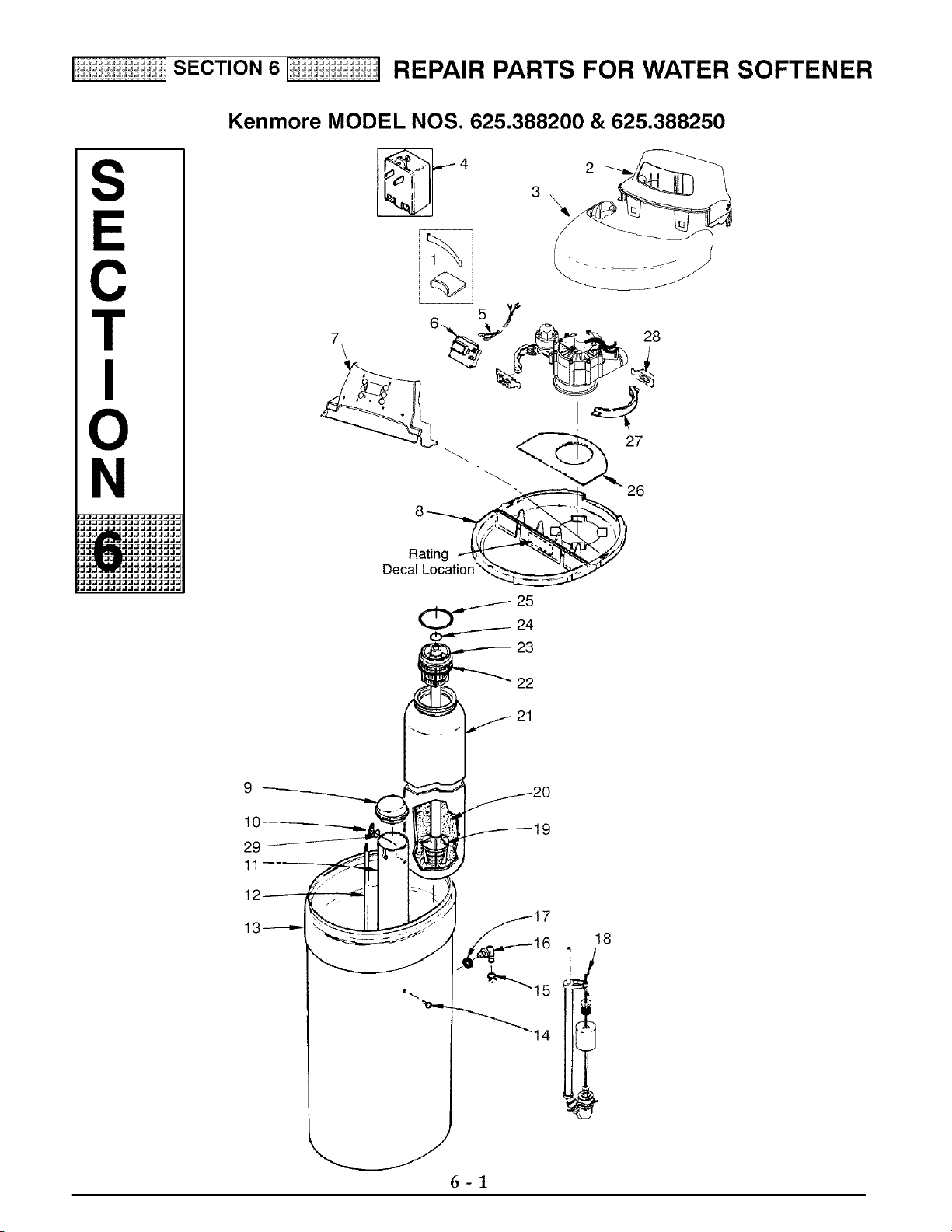
Kenmore MODEL NOS. 625.388200 & 625.388250
2
\
28
27
26
Rating
Decal Location
22
21
18
6-1
SECTION6 I_i:ii:ii:ii:_i:i:ii:_i REPAIR PARTS FOR WATER SOFTENER
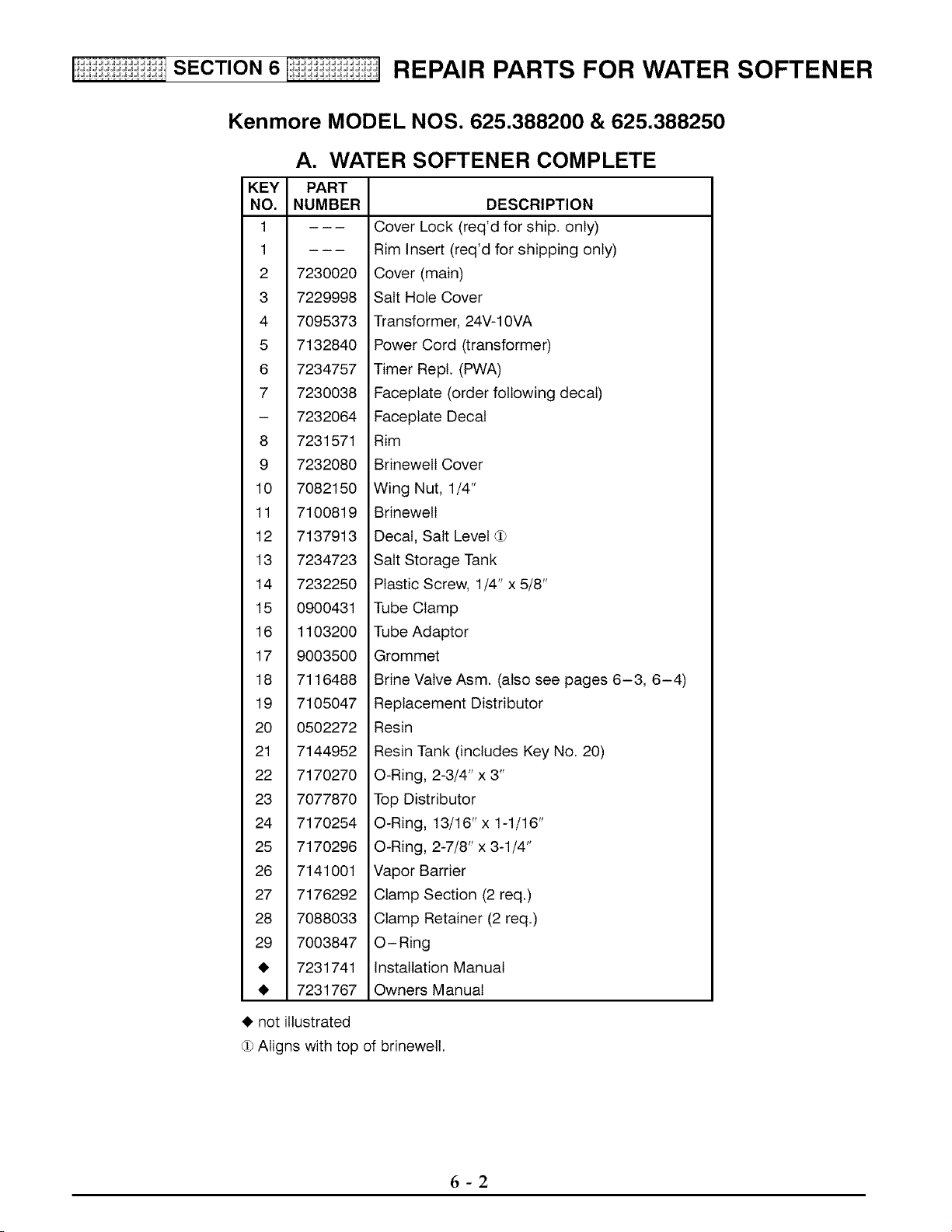
Kenmore MODEL NOS. 625.388200 & 625.388250
KEY
NO.
1
1
2 7230020
3 7229998
4 7095373
5 7132840
6 7234757
7 7230038
- 7232064
8 7231571
9 7232080
10 7082150
11 7100819
12 7137913
13 7234723
14 7232250
15 0900431
16 1103200
17 9003500
18 7116488
19 7105047
20 0502272
21 7144952
22 7170270
23 7077870
24 7170254
25 7170296
26 7141001
27 7176292
28 7088033
29 7003847
• 7231741
• 7231767
• notiltustr_ed
A. WATER SOFTENER COMPLETE
PART
NUMBER DESCRIPTION
Cover Lock (req'd for ship. only)
Rim Insert (req'd for shipping only)
Cover (main)
Salt Hole Cover
Transformer, 24V-1OVA
Power Cord (transformer)
Timer Repl. (PWA)
Faceplate (order following decal)
Faceplate Decal
Rim
BrinewelI Cover
Wing Nut, 1/4"
BrinewelI
Decal, Salt Level d_
Salt Storage Tank
Plastic Screw, 1/4" x 5/8"
Tube Clamp
Tube Adaptor
Grommet
Brine Valve Asm. (also see pages 6-3, 6-4)
Replacement Distributor
Resin
Resin Tank (includes Key No. 20)
O-Ring, 2-3/4" x 3"
Top Distributor
O-Ring, 13/16" x 1-1/16"
O-Ring, 2-7/8" x 3-1/4"
Vapor Barrier
Clamp Section (2 req.)
Clamp Retainer (2 req.)
O-Ring
Installation Manual
Owners Manual
d_Aligns with top of brinewell.
6-2
SECTION6 I_i:ii:ii:ii:_i:i:ii:_i REPAIR PARTS FOR WATER SOFTENER
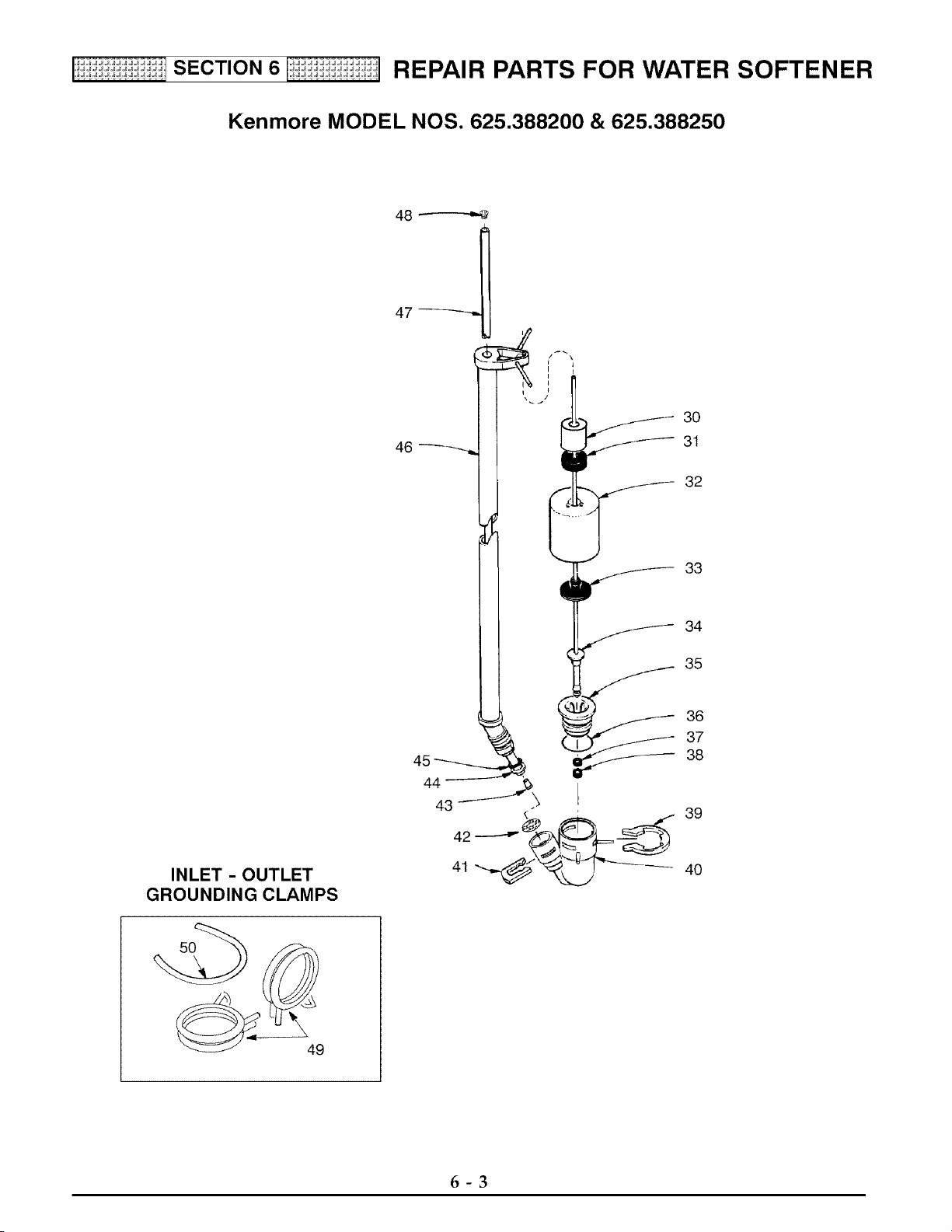
Kenmore MODEL NOS. 625.388200 & 625.388250
48
47
INLET - OUTLET
GROUNDING CLAMPS
46
6-3
SECTION6 I_i:ii:ii:ii:_i:i:ii:_i REPAIR PARTS FOR WATER SOFTENER
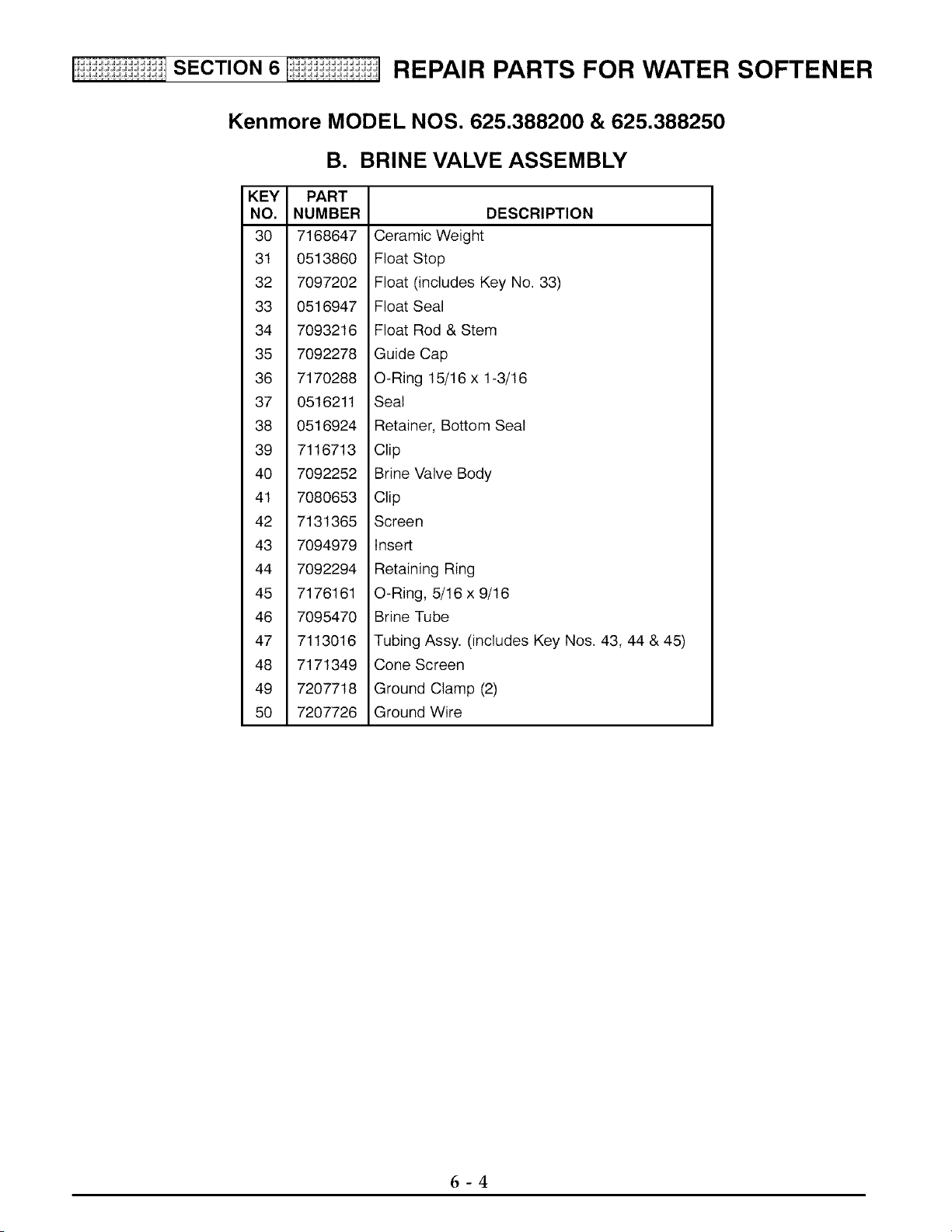
Kenmore MODEL NOS. 625.388200 & 625.388250
B. BRINE VALVE ASSEMBLY
KEY PART
NO. NUMBER
30 7168647
31 0513860
32 7097202
33 0516947
34 7093216
35 7092278
36 7170288
37 0516211
38 0516924
39 7116713
40 7092252
41 7080653
42 7131365
43 7094979
44 7092294
45 7176161
46 7095470
47 7113016
48 7171349
49 7207718
50 7207726
DESCRIPTION
Ceramic Weight
Float Stop
Float (includes Key No. 33)
Float Seal
Float Rod & Stem
Guide Cap
O-Ring 15/16 x 1-3/16
Seat
Retainer, Bottom Seat
Clip
Brine Valve Body
Clip
Screen
Insert
Retaining Ring
O-Ring, 5/16 x 9/16
Brine Tube
Tubing Assy. (includes Key Nos. 43, 44 & 45)
Cone Screen
Ground Clamp (2)
Ground Wire
6-4
SECTION6 I_i:ii:ii:ii:_i:i:ii:_i REPAIR PARTS FOR WATER SOFTENER
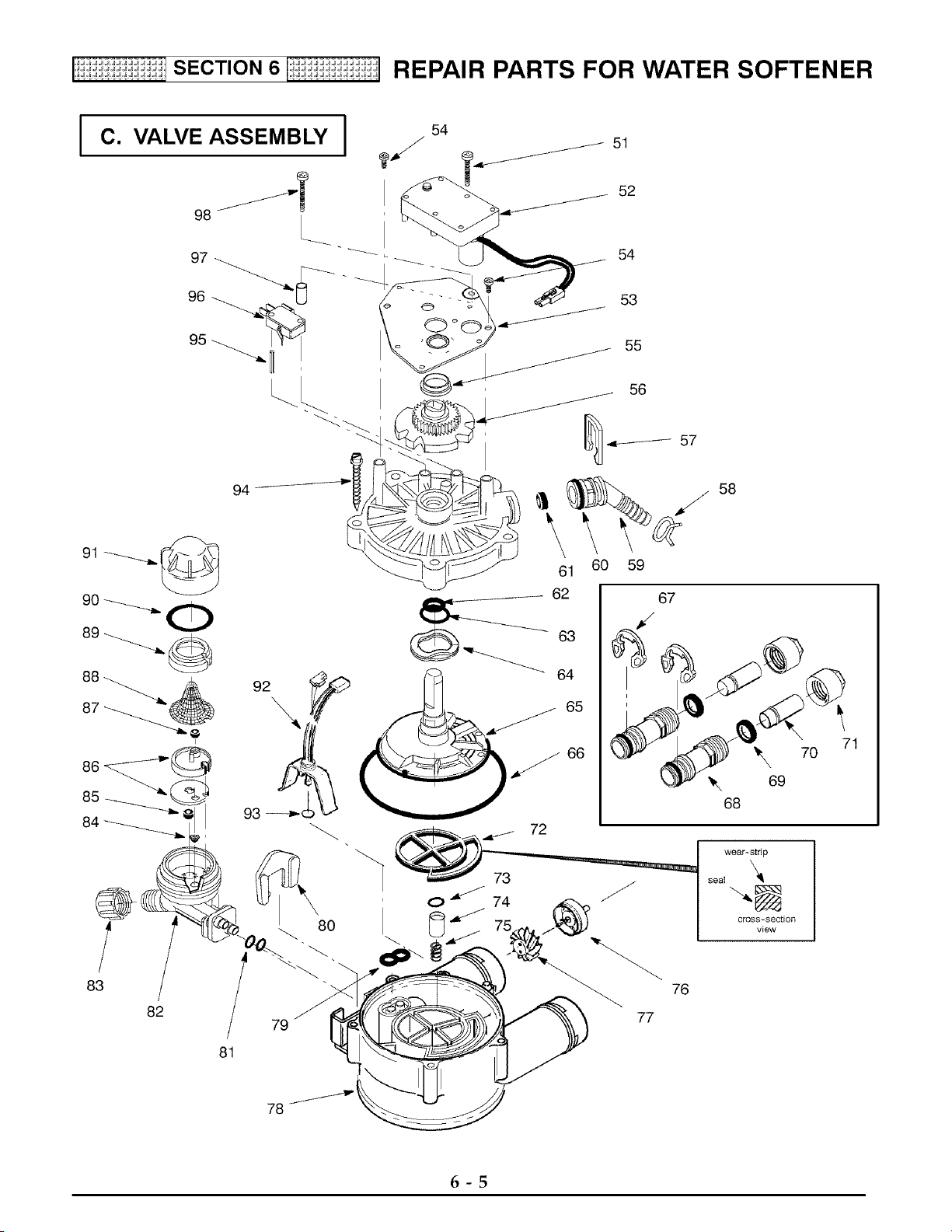
C. VALVE ASSEMBLY I
94
J
83
82
80
79
81
54
52
54
55
56
61
62
_63
64
65
60 59
72
73
0 j 74
66
58
67
'_ 70
69
68
wear-strip
seal
"N
cross-section
view
76
77
71
78
6-5
SECTION6 I1i:ii:ii:ii:li:i:ii:_] REPAIR PARTS FOR WATER SOFTENER
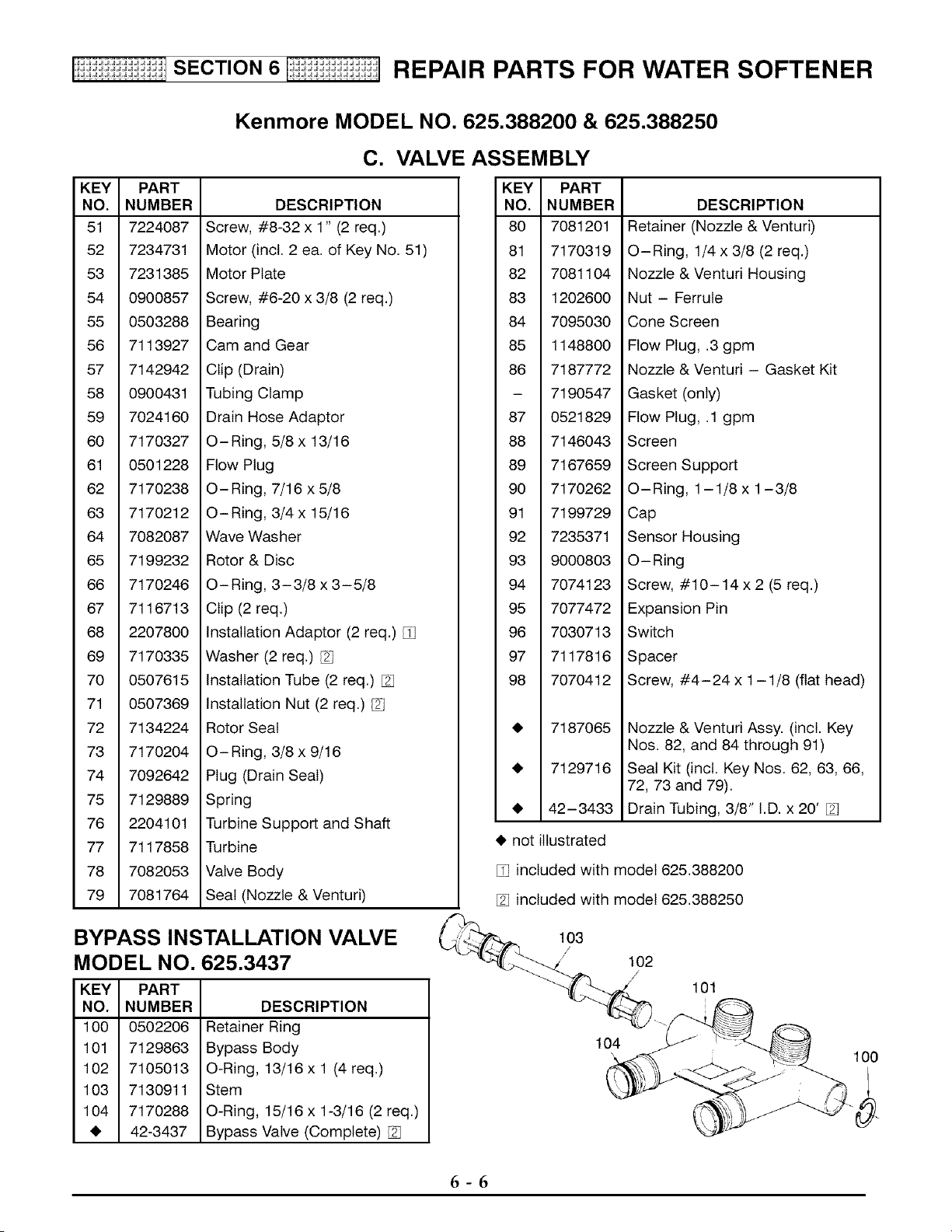
KEY PART
NO. NUMBER
51 7224087
52 7234731
53 7231385
54 0900857
55 0503288
56 7113927
57 7142942
58 0900431
59 7024160
60 7170327
61 0501228
62 7170238
63 7170212
64 7082087
65 7199232
66 7170246
67 7116713
68 2207800
69 7170335
70 0507615
71 0507369
72 7134224
73 7170204
74 7092642
75 7129889
76 2204101
77 7117858
78 7082053
79 7081764
Kenmore MODEL NO. 625.388200 & 625.388250
C=
DESCRIPTION
Screw, #8-32 x 1" (2 req.)
Motor (incl. 2 ea. of Key No. 51)
Motor Plate
Screw, #6-20 x 3/8 (2 req.)
Bearing
Cam and Gear
Clip (Drain)
Tubing Clamp
Drain Hose Adaptor
O-Ring, 5/8 x 13/16
Flow Plug
O-Ring, 7/16 x 5/8
O-Ring, 3/4 x 15/16
Wave Washer
Rotor & Disc
O-Ring, 3-3/8 x 3-5/8
Clip (2 req.)
Installation Adaptor (2 req.)
Washer (2 req.)
Installation Tube (2 req.)
Installation Nut (2 req.)
Rotor Seal
O-Ring, 3/8 x 9/16
Plug (Drain Seal)
Spring
Turbine Support and Shaft
Turbine
Valve Body
Seal (Nozzle & Venturi)
VALVE ASSEMBLY
KEY PART
NO. NUMBER
80 7081201
81 7170319
82 7081104
83 1202600
84 7095030
85 1148800
86 7187772
- 7190547
87 0521829
88 7146043
89 7167659
90 7170262
91 7199729
92 7235371
93 9000803
94 7074123
95 7077472
96 7030713
97 7117816
98 7070412
• 7187065
• 7129716
• 42-3433
• notilIustr_ed
DESCRIPTION
Retainer (Nozzle & Venturi)
O-Ring, 1/4 x 3/8 (2 req.)
Nozzle & Venturi Housing
Nut - Ferrule
Cone Screen
Flow Plug, .3 gpm
Nozzle & Venturi - Gasket Kit
Gasket (only)
Flow Plug, .1 gpm
Screen
Screen Support
O-Ring, 1-1/8 x 1-3/8
Cap
Sensor Housing
O-Ring
Screw, #10-14 x 2 (5 req.)
Expansion Pin
Switch
Spacer
Screw, #4-24 x 1-1/8 (flat head)
Nozzle & Venturi Assy. (incl. Key
Nos. 82, and 84 through 91)
Seal Kit (incl. Key Nos. 62, 63, 66,
72, 73 and 79).
Drain Tubing, 3/8" I.D. x 20'
included with model 625.388200
included with model 625.388250
BYPASS INSTALLATION VALVE
MODEL NO. 625.3437
KEY PART
NO. NUMBER
100 0502206
101 7129863
102 7105013
103 7130911
104 7170288
• 42-3437
DESCRIPTION
Retainer Ring
Bypass Body
O-Ring, 13/16 x 1 (4 req.)
Stem
O-Ring, 15/16 x 1-3/16 (2 req.)
Bypass Valve (Complete)
103
/
/
102
//
104
101
100
6-6

OWNER'S
MANUAL
MODEL NOS.
625.388200
625.388250
The model number of
your water softener is
found on the rating de-
cal. This decal is on the
rim, under the salt cover.
When requesting service
or ordering parts, always
provide the following in-
formation:
_I, Product Type
_I, Model Number
_I, Part Number
_I, Part Description
www.KenmoreWater.com
UltraSoft 200 Water Softener
For the repair or replacement parts you
need delivered directly to your home
Call 7 am - 7 pm, 7 days a week
1 - 800 - 366 - PART
(1 - 800 - 366 - 7278)
For in-home major brand repair service
Call 24 hours a day, 7 days a week
1 - 800 - 4 - REPAIR
(1 - 800 - 473 - 7247)
For the location of a
Sears Parts and Repair Center in your area
Call 24 hours a day, 7 days a week
1 -800-488-1222
JIIIII
For information on purchasing a Sears
Maintenance Agreement, or to inquire
about an existing Agreement
Call 9 am - 5 pm, Monday - Saturday
1 - 800 - 827 - 6655
SEARS
SEARS
America's Repair Specialists
I Sears, Roebuck and Co., Hoffman Estates, IL 60179 U.S.A. I
7231767 (Rev. F 05/29/01)