69565
69565
TABLE OF CONTENTS
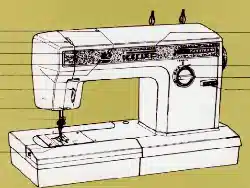
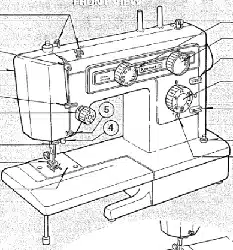
Knowing Your Sewing Machine
Identifying Parts ................................. 1 - 2
Connecting Machine .............................. 3
Threading - Bobbin .............................. 4 - 5
Top Thread ........................................ 6
Using the Controls
Top Tension Control ........................... 7 - 8
Adjusting Bobbin Tension ...................... 9
Stitch Length Control ............................ 10
Stitch Width Control ............................. 10
Reverse Stitch Control .......................... 11
Feed Dog Control ................................. 11
Special Stitch Dial ........................... 12- 14
Pressure Regulator ............................... 15
Sewing Light ...................................... 16
Seam Guides ...................................... 17
Accessories
Needles ............................................. 18
Needle, Thread, Fabric Chart .................. 19
Presser Feet ........................................ 20
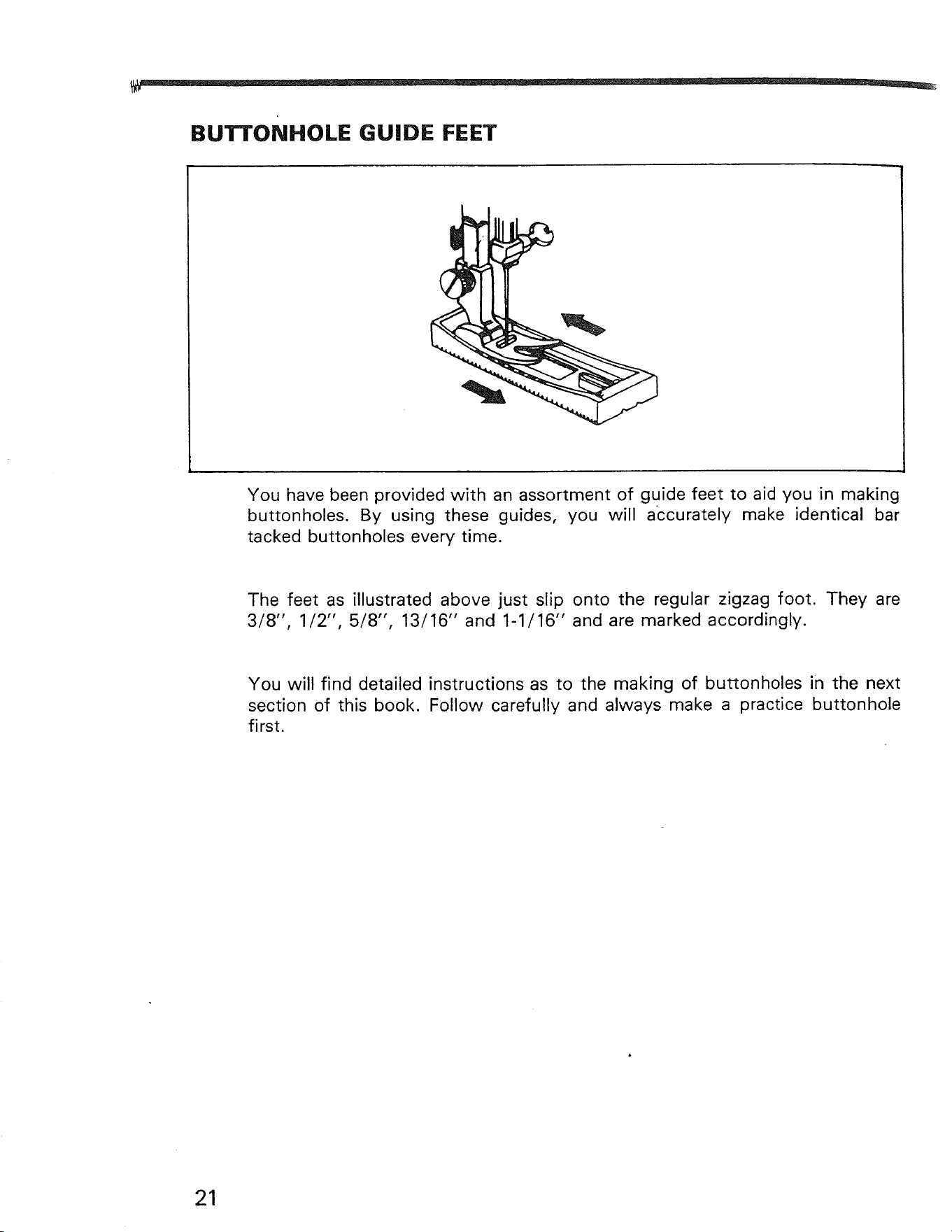
Buttonhole Guide Feet .......................... 21
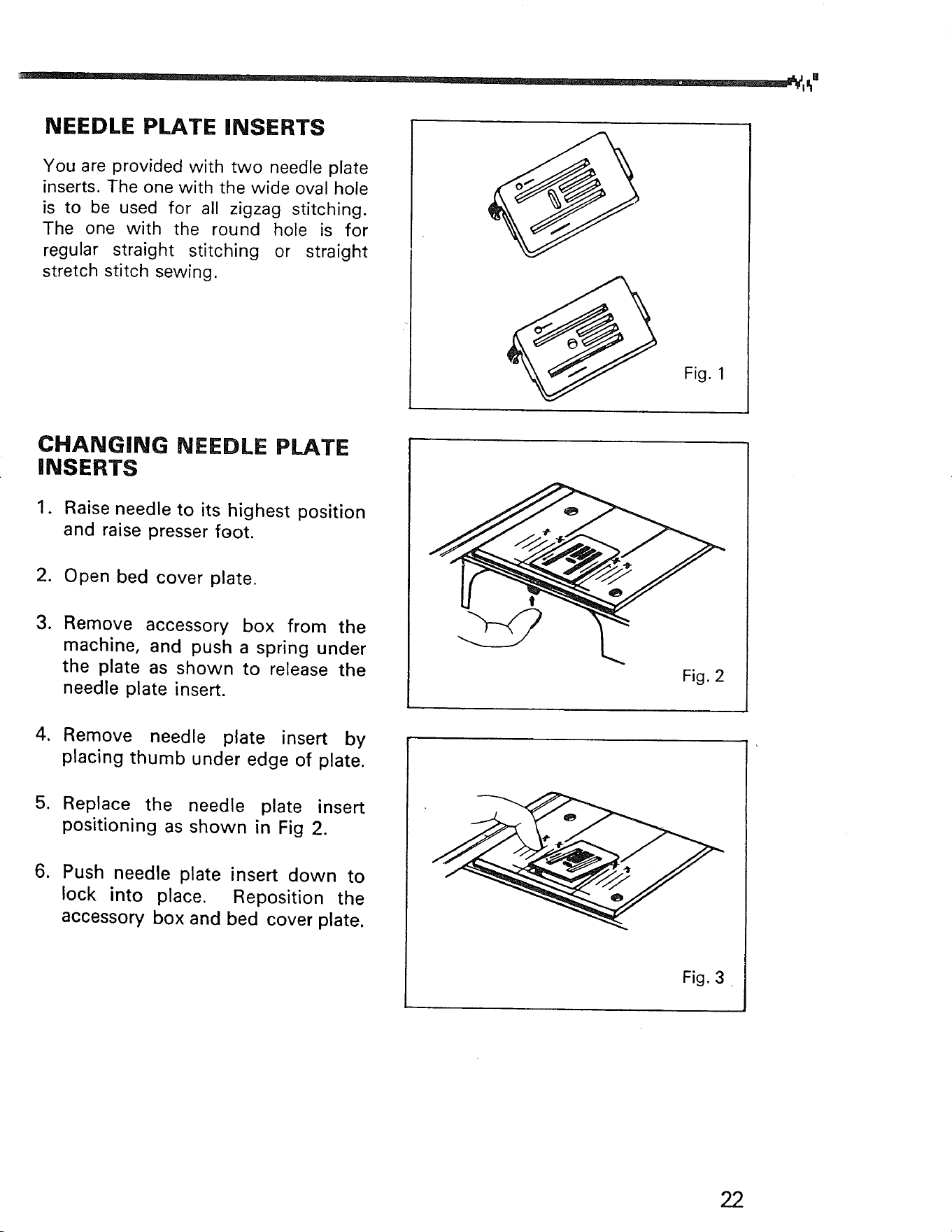
Zigzag and Straight Stitching Needle
Plate ................................................. 22
Starting to Sew ..................................... 23
Garment Construction Stitches
Straight Stitching ................................ 24
Zigzag Stitching .................................. 25
Stretch Stitching ............................ 26 - 28
Special Finishing Stitches
Satin Stitching, Appliqueing ................... 29
Buttonhole Making ......................... 30 - 32
Button Sewing, Bar Tacking ................... 33
Blind Hemming .................. : ........... 34 - 35
Zipper Application ................................ 36
Special Edge Stitch, Mending, Darning ..... 37
Checking Performance Problems ......... 39 - 40
Caring for the Machine
Cleaning Feed Dogs and Shuttle ................ 41
Oiling Under Arm Cover Plate .................... 42
Oiling Underside .................................... 43
Oiling Face Cover Plate ........................... 44
Parts List ........................................ 45 - 46
,--_1. Knowing Your Sewing
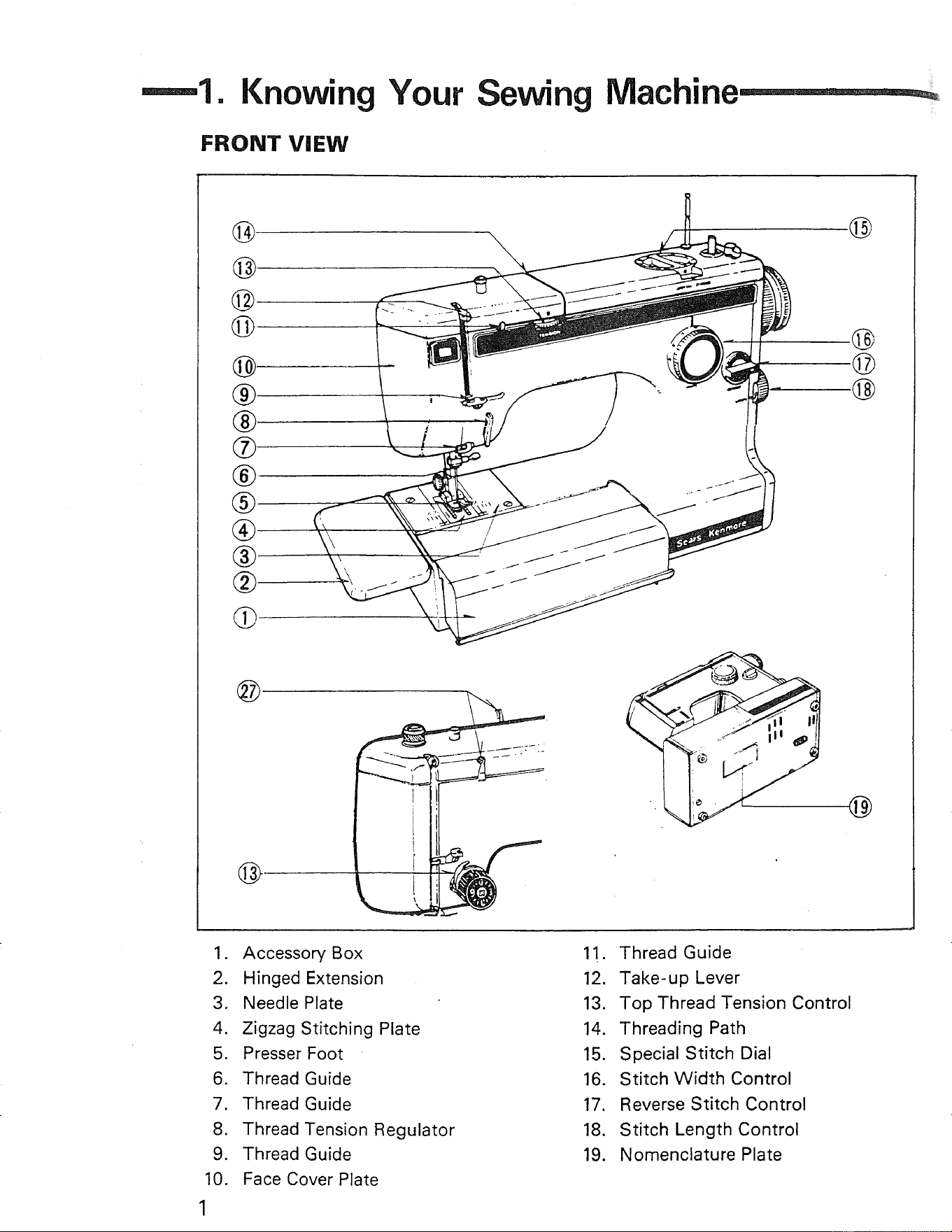
FRONT VIEW
Machi
@
®
®
®
®
®
®
_
@
@
©
-@
@
@
(_'
.
2.
3.
4.
5.
6.
7.
8.
9.
10.
1
Accessory Box
Hinged Extension
Needle Plate
Zigzag Stitching Plate
Presser Foot
Thread Guide
Thread Guide
Thread Tension Regulator
Thread Guide
Face Cover Plate
11. Thread Guide
12. Take-up Lever
13. Top Thread Tension Control
14. Threading Path
15. Special Stitch Dial
16. Stitch Width Control
17. Reverse Stitch Control
18. Stitch Length Control
19. Nomenclature Plate
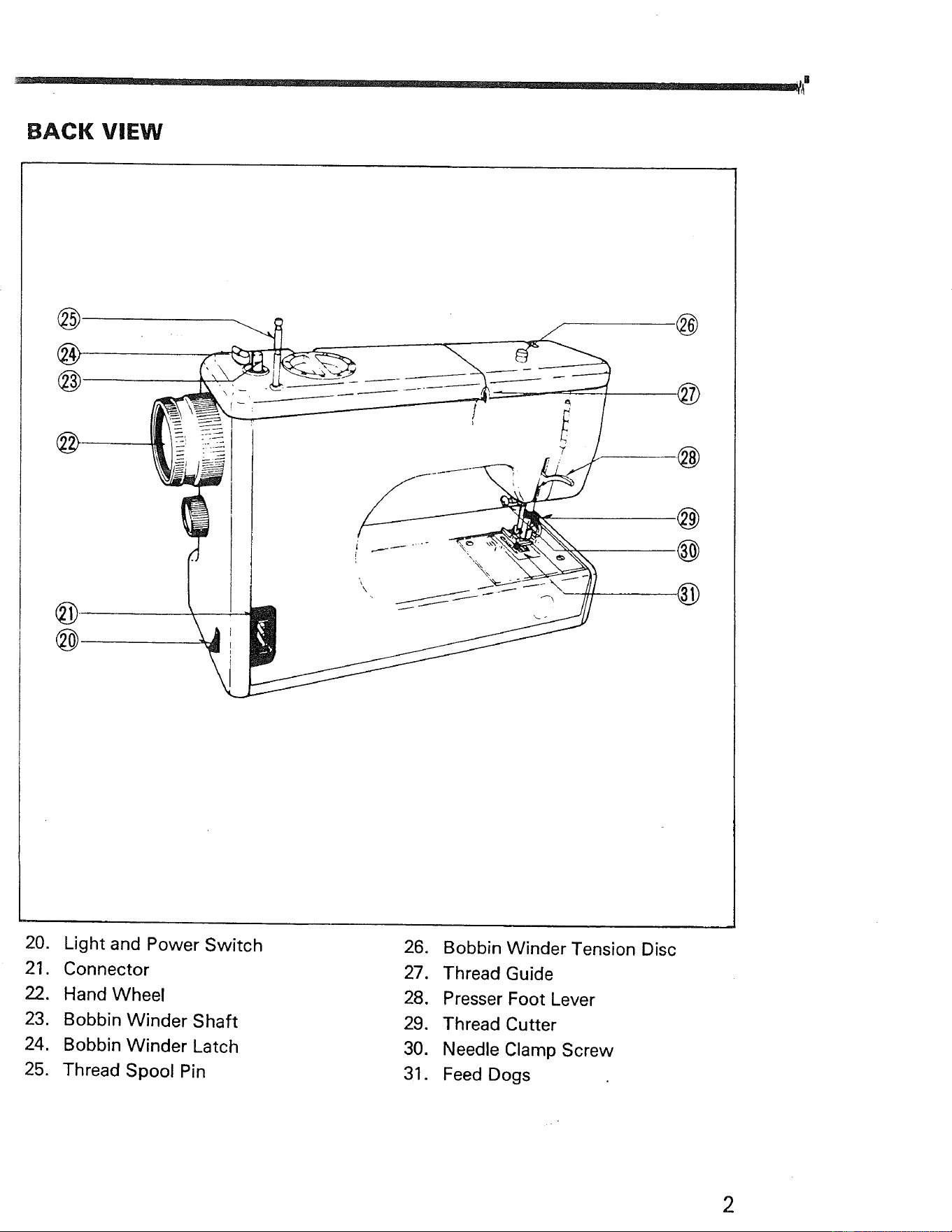
BACK VIEW
r
@
®
@
@
@
®
7
\
/
.@
@
@
@
.@
20. Light and Power Switch
21. Connector
22. Hand Wheel
23. Bobbin Winder Shaft
24. Bobbin Winder Latch
25. Thread Spool Pin
26. Bobbin Winder Tension Disc
27. Thread Guide
28. Presser Foot Lever
29. Thread Cutter
30. Needle Clamp Screw
31. Feed Dogs
2
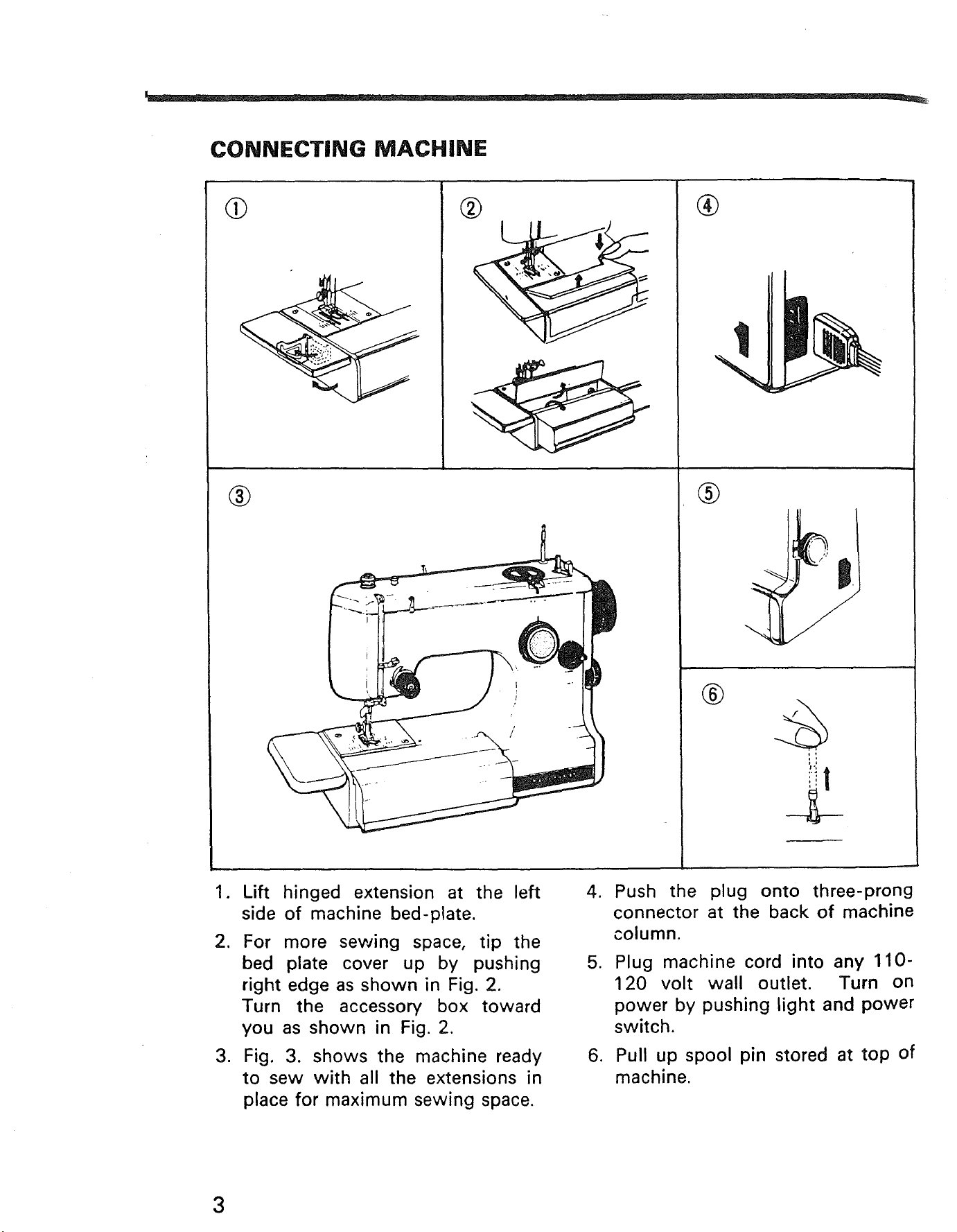
CONNECTING MACHINE
%
®
®
®
®
1. Lift hinged extension at the left
side of machine bed-plate.
2. For more sewing space, tip the
bed plate cover up by pushing
right edge as shown in Fig. 2.
Turn the accessory box toward
you as shown in Fig. 2.
3. Fig. 3. shows the machine ready
to sew with all the extensions in
place for maximum sewing space.
4. Push the plug onto three-prong
connector at the back of machine
column.
5. Plug machine cord into any 110-
120 volt wall outlet. Turn on
power by pushing light and power
switch.
6. Pull up spool pin stored at top of
machine.
3
_B
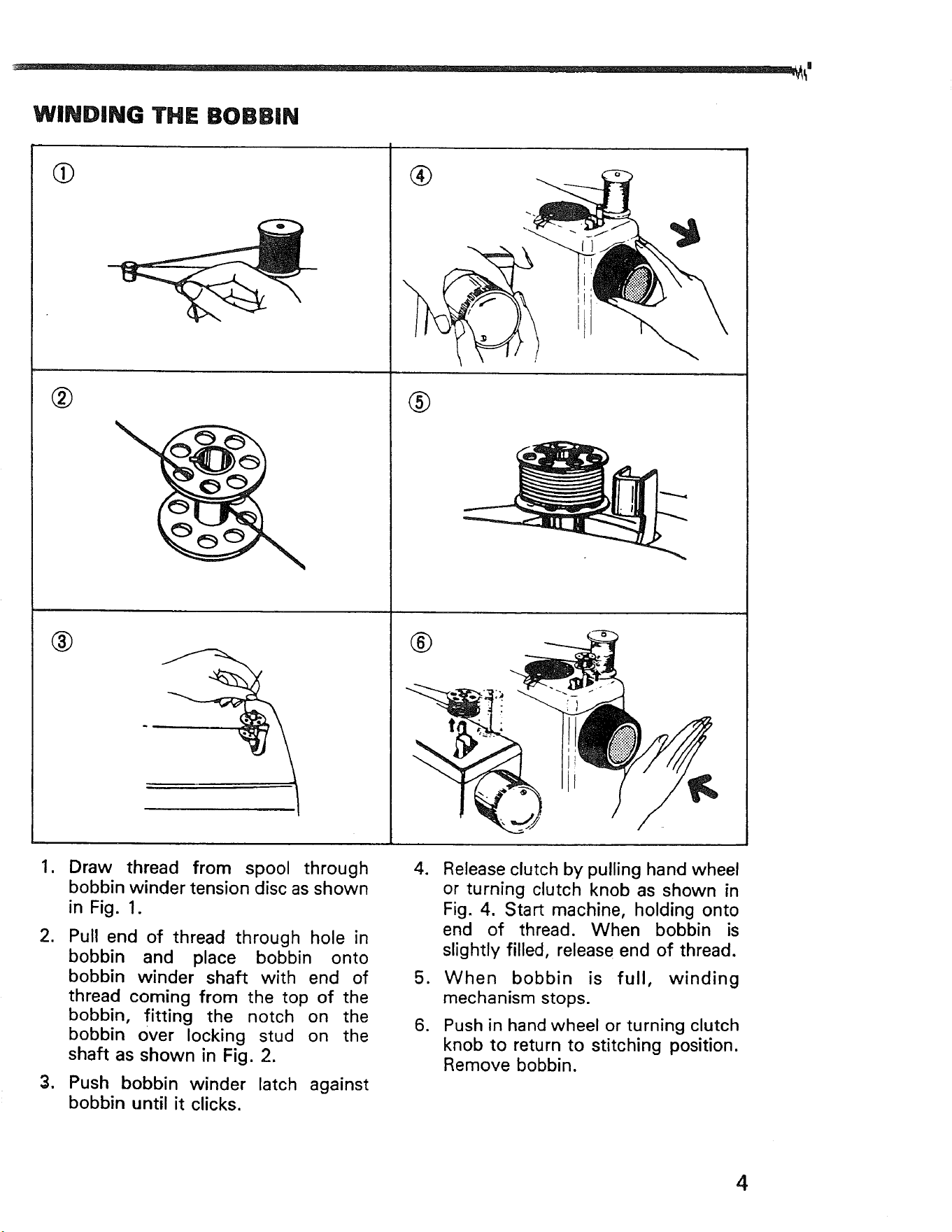
WINDING THE BOBBIN
,
,
.
®
®
®
®
Draw thread from spool through
bobbin winder tension disc as shown
in Fig. 1.
Pull end of thread through hole in
bobbin and place bobbin onto
bobbin winder shaft with end of
thread coming from the top of the
bobbin, fitting the notch on the
bobbin over locking stud on the
shaft as shown in Fig. 2.
Push bobbin winder latch against
bobbin until it clicks.
4. Release clutch by pulling hand wheel
or turning clutch knob as shown in
Fig. 4. Start machine, holding onto
end of thread. When bobbin is
slightly filled, release end of thread.
5. When bobbin is full, winding
mechanism stops.
6. Push in hand wheel or turning clutch
knob to return to stitching position.
Remove bobbin.
4
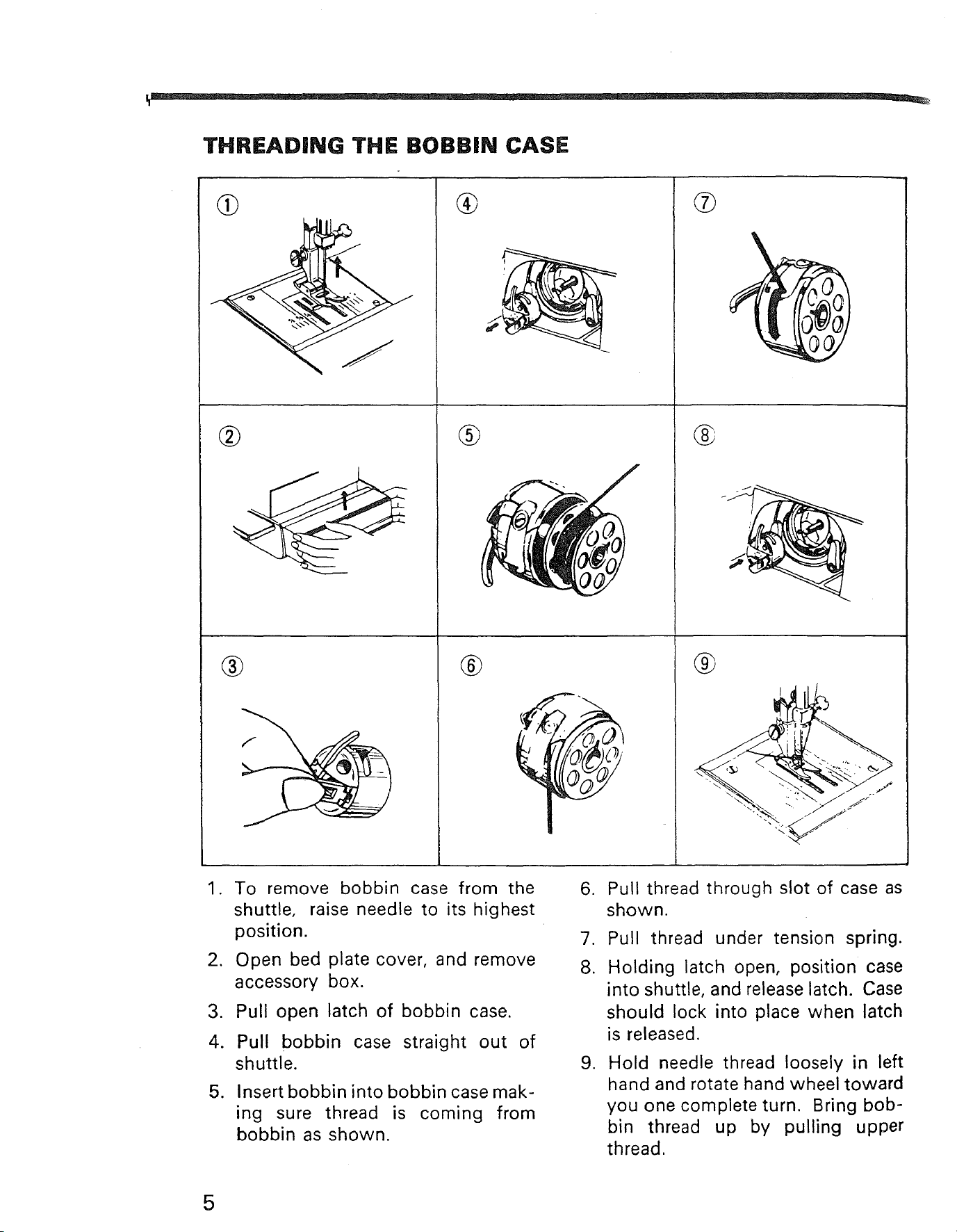
THREADING THE BOBBIN CASE
,j
i_
. k ,.
\
®
I
®
®
®
®
®
1. To remove bobbin case from the
shuttle, raise needle to its highest
position.
2. Open bed plate cover, and remove
accessory box.
,
4.
.
Pull open latch of bobbin case.
Pull bobbin case straight out of
shuttle.
Insert bobbin into bobbin case mak-
ing sure thread is coming from
bobbin as shown.
.
7.
8.
.
Pull thread through slot of case as
shown.
Pull thread under tension spring.
Holding latch open, position case
into shuttle, and release latch. Case
should lock into place when latch
is released.
Hold needle thread loosely in left
hand and rotate hand wheel toward
you one complete turn. Bring bob-
bin thread up by pulling upper
thread.
5
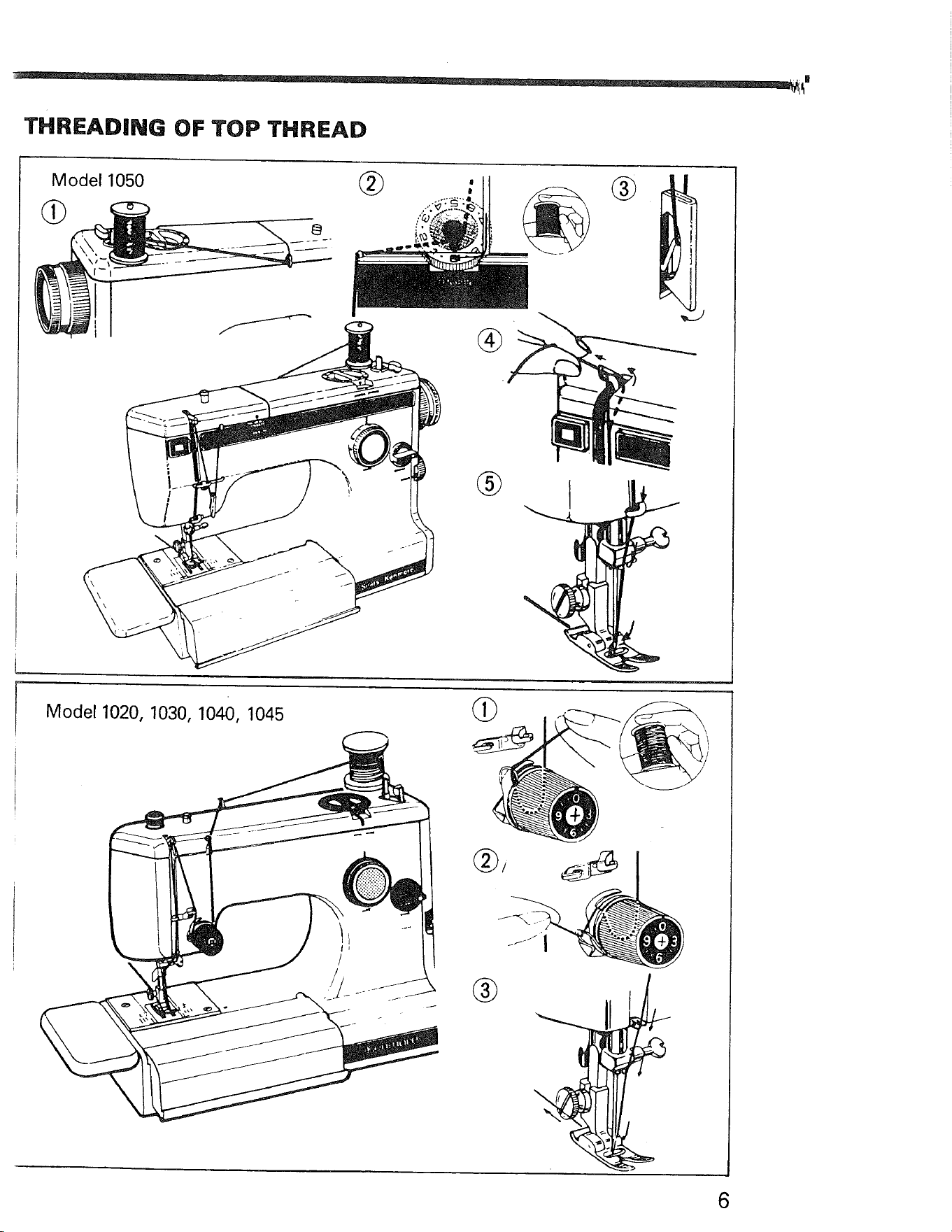
THREADING OF TOP THREAD
Model 1050 _ _ (_
d_
®
Model1020, 1030, 1040, 1045
(_/
®
6
TOP TENSION CONTROL
Model 1050
Model1020, 1030, 1040, 1045
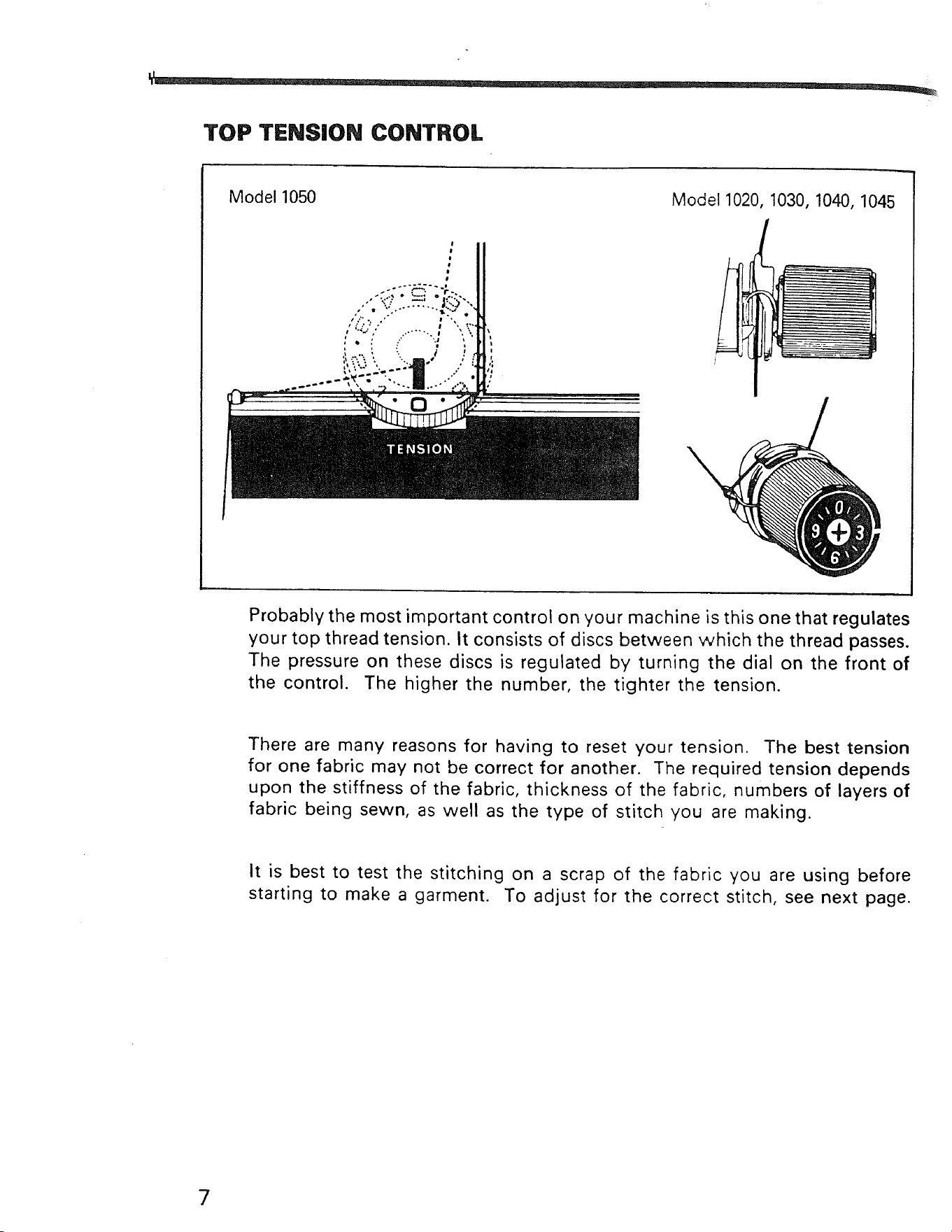
Probably the most important control on your machine is this one that regulates
your top thread tension. It consists of discs between which the thread passes.
The pressure on these discs is regulated by turning the dial on the front of
the control. The higher the number, the tighter the tension.
There are many reasons for having to reset your tension. The best tension
for one fabric may not be correct for another. The required tension depends
upon the stiffness of the fabric, thickness of the fabric, numbers of layers of
fabric being sewn, as well as the type of stitch you are making.
It is best to test the stitching on a scrap of the fabric you are using before
starting to make a garment. To adjust for the correct stitch, see next page.
7
ADJUSTING TOP TENSIONS
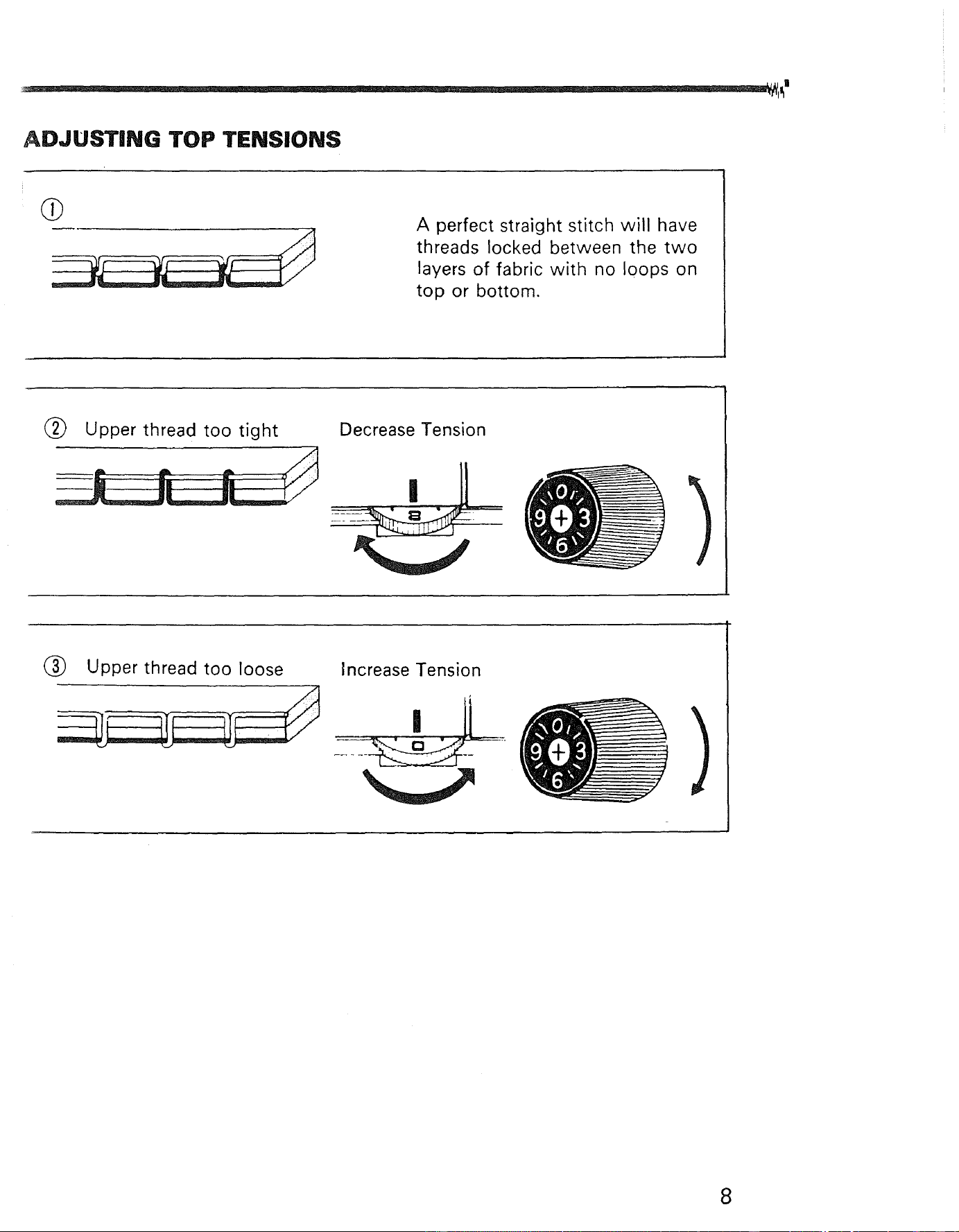
A perfect straight stitch will have
threads locked between the two
layers of fabric with no loops on
top or bottom.
(_ Upper thread too tight
Decrease Tension
(_ Upper thread too loose
Increase Tension
8
ADJUSTING BOBBIN TENSIONS
Bobbin tension requires adjusting less frequently than the upper thread
tension.
If the stitch is satisfactory but the seam is puckered, it may be necessary to
loosen the tension on both the top and bottom threads. Be sure to balance
them as indicated on Page 9.
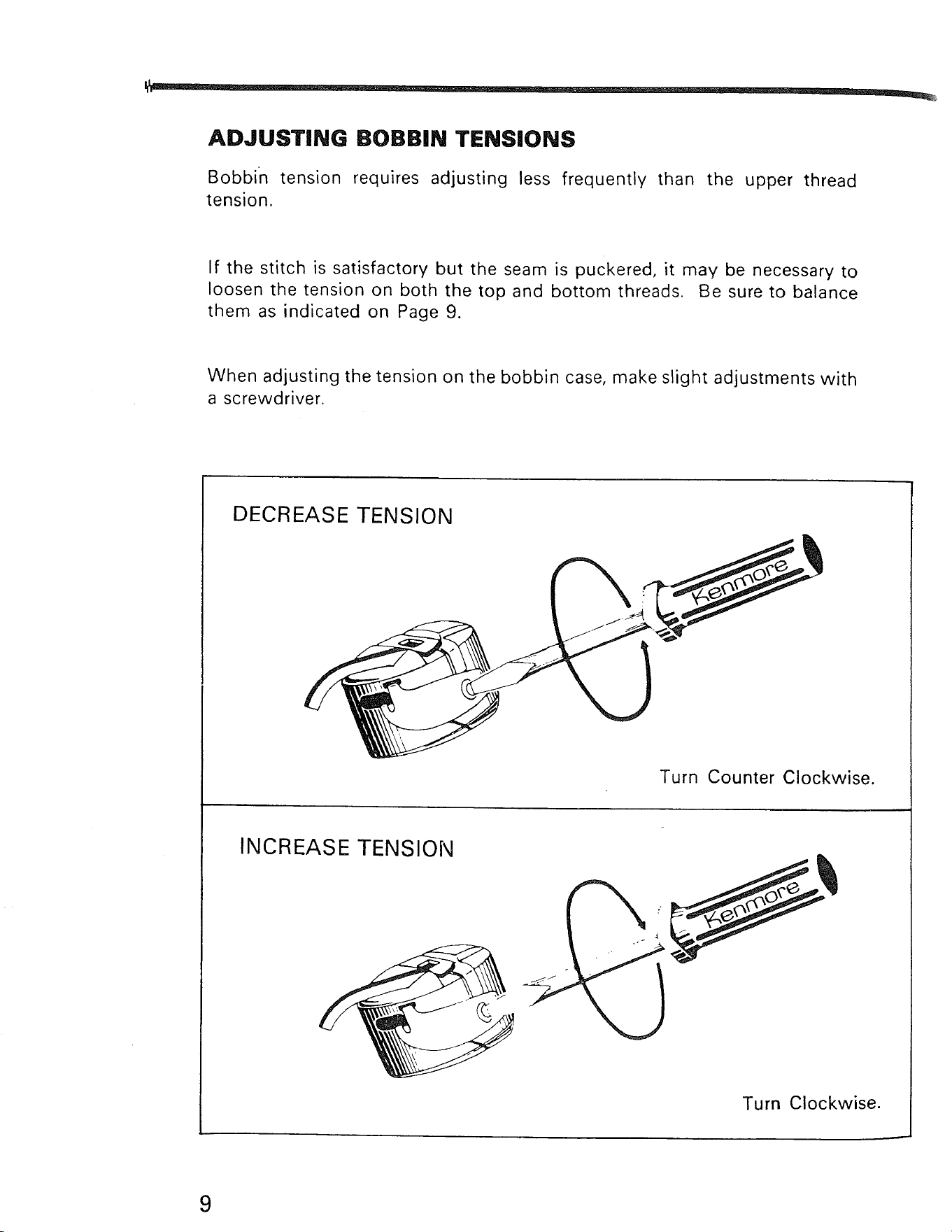
When adjusting the tension on the bobbin case, make slight adjustments with
a screwdriver.
DECREASE TENSION
Turn Counter Clockwise.
INCREASE TENSION
Turn Clockwise.
9
STITCH LENGTH CONTROL
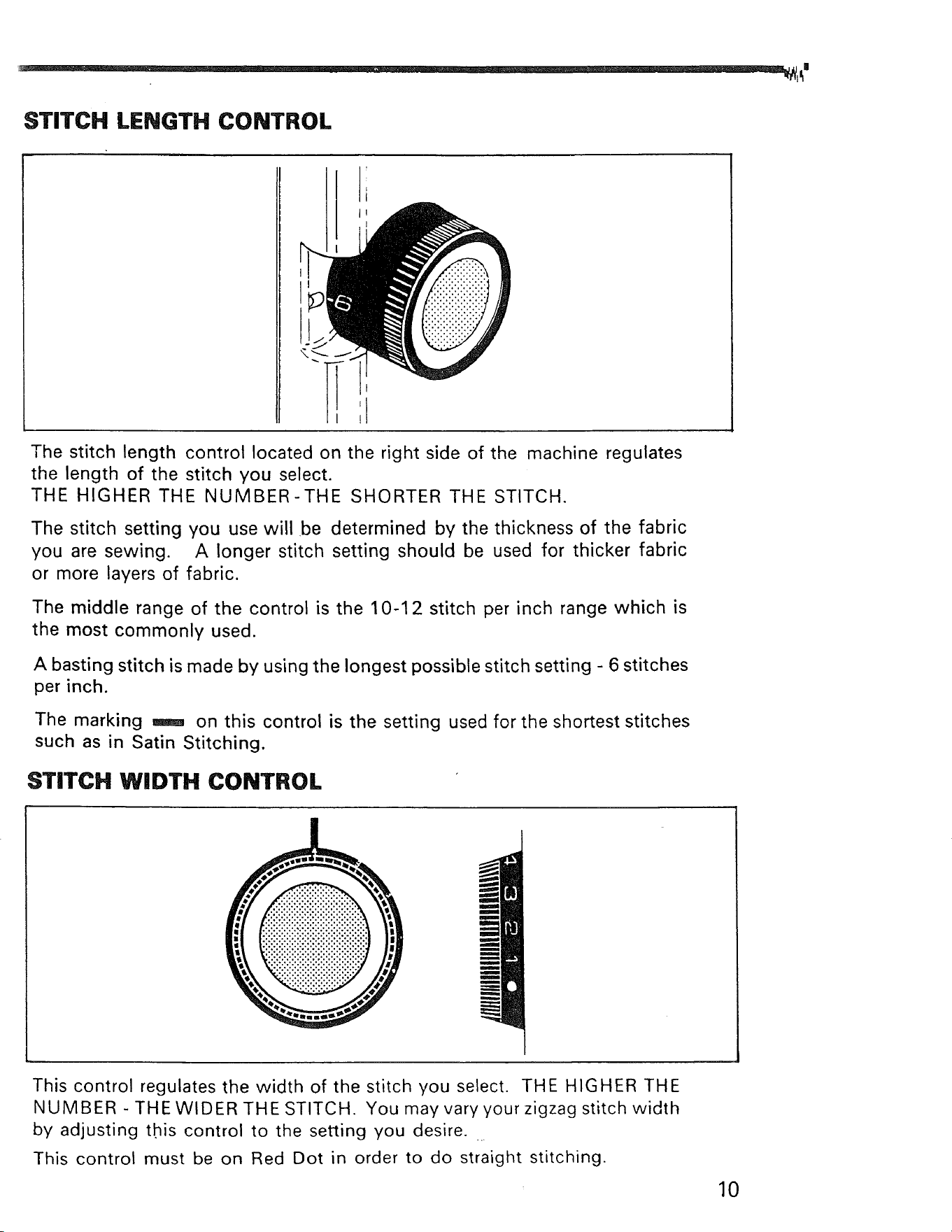
The stitch length control located on the right side of the machine regulates
the length of the stitch you select.
THE HIGHER THE NUMBER-THE SHORTER THE STITCH.
The stitch setting you use will be determined by the thickness of the fabric
you are sewing. A longer stitch setting should be used for thicker fabric
or more layers of fabric.
The middle range of the control is the 10-1 2 stitch per inch range which is
the most commonly used.
A basting stitch is made by using the longest possible stitch setting - 6 stitches
per inch.
The marking _ on this control is the setting used for the shortest stitches
such as in Satin Stitching.
STITCH WIDTH CONTROL
I
m
ilmll
m
m
This control regulates the width of the stitch you select. THE HIGHER THE
NUMBER - THE WIDER THE STITCH. You may vary your zigzag stitch width
by adjusting this control to the setting you desire.
This control must be on Red Dot in order to do straight stitching.
10
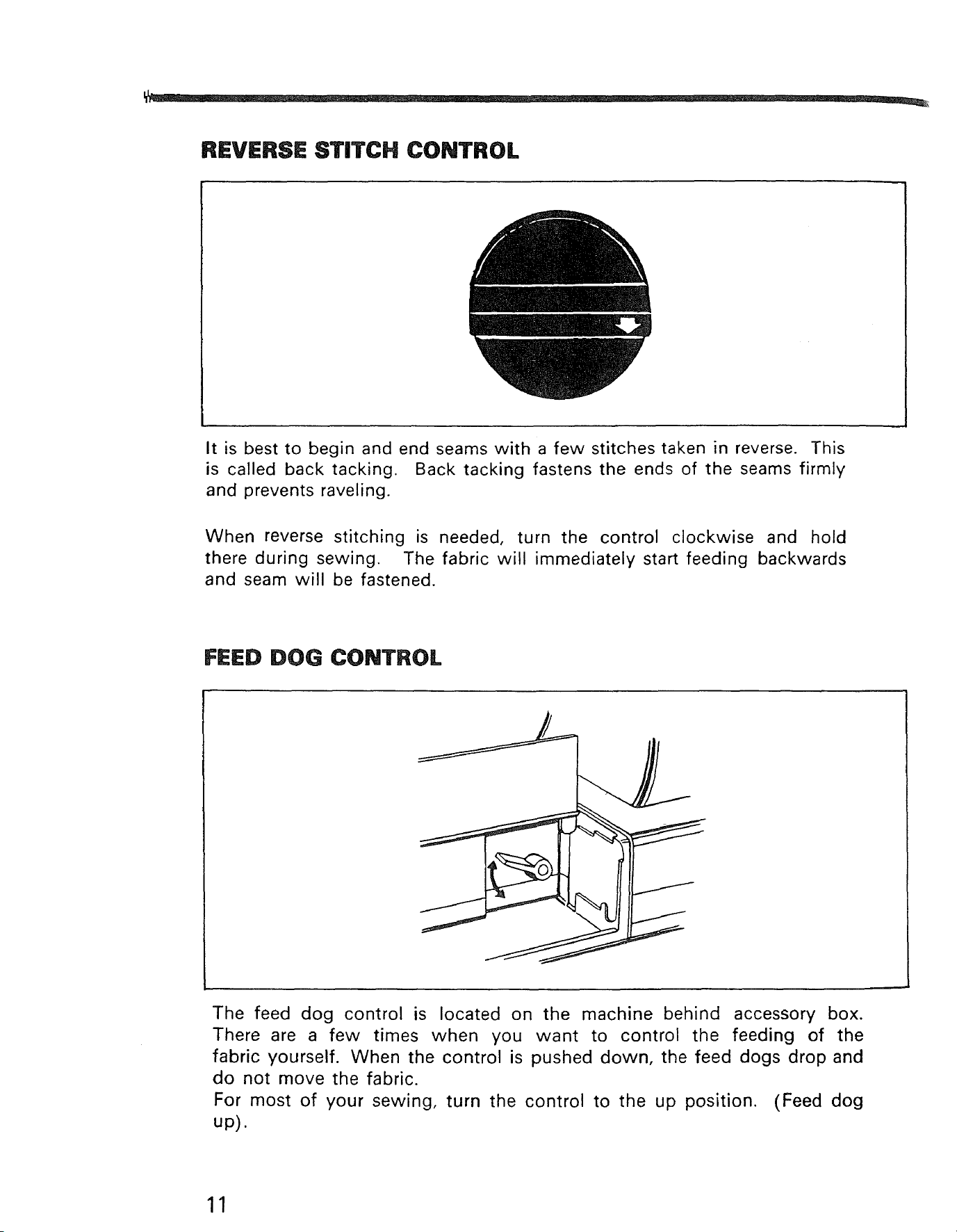
REVERSE STITCH CONTROL
It is best to begin and end seams with a few stitches taken in reverse. This
is called back tacking. Back tacking fastens the ends of the seams firmly
and prevents raveling.
When reverse stitching is needed, turn the control clockwise and hold
there during sewing. The fabric will immediately start feeding backwards
and seam will be fastened.
FEED DOG CONTROL
The feed dog control is located on the machine behind accessory box.
There are a few times when you want to control the feeding of the
fabric yourself. When the control is pushed down, the feed dogs drop and
do not move the fabric.
For most of your sewing, turn the control to the up position. (Feed dog
up).
11
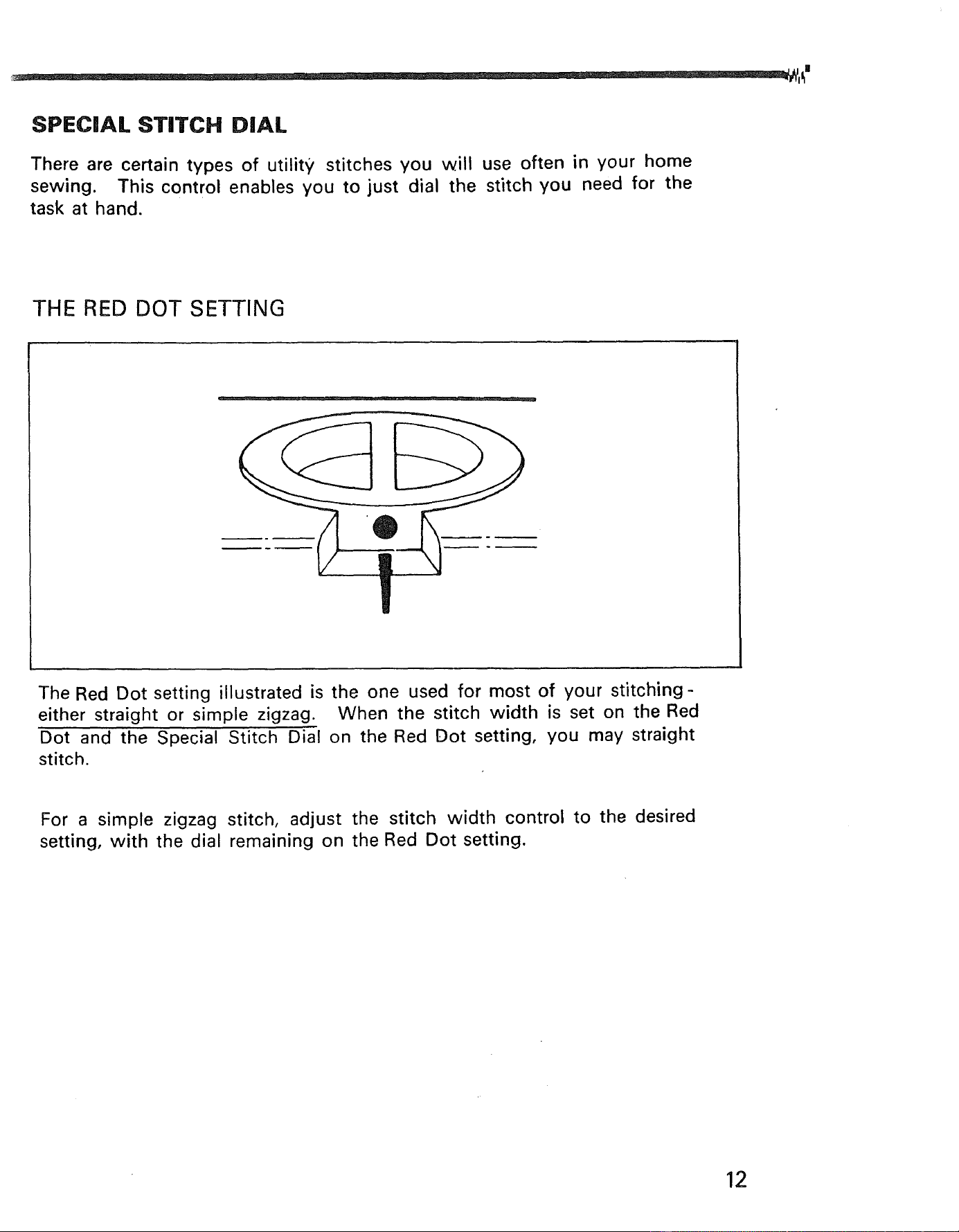
SPECIAL STITCH DIAL
There are certain types of utility stitches you will use often in your home
sewing. This control enables you to just dial the stitch you need for the
task at hand.
THE RED DOT SETTING
The Red Dot setting illustrated is the one used for most of your stitching-
either straight or simple zigzag. When the stitch width is set on the Red
Dot and the Special Stitch Dial on the Red Dot setting, you may straight
stitch.
For a simple zigzag stitch, adjust the stitch width control to the desired
setting, with the dial remaining on the Red Dot setting.
12
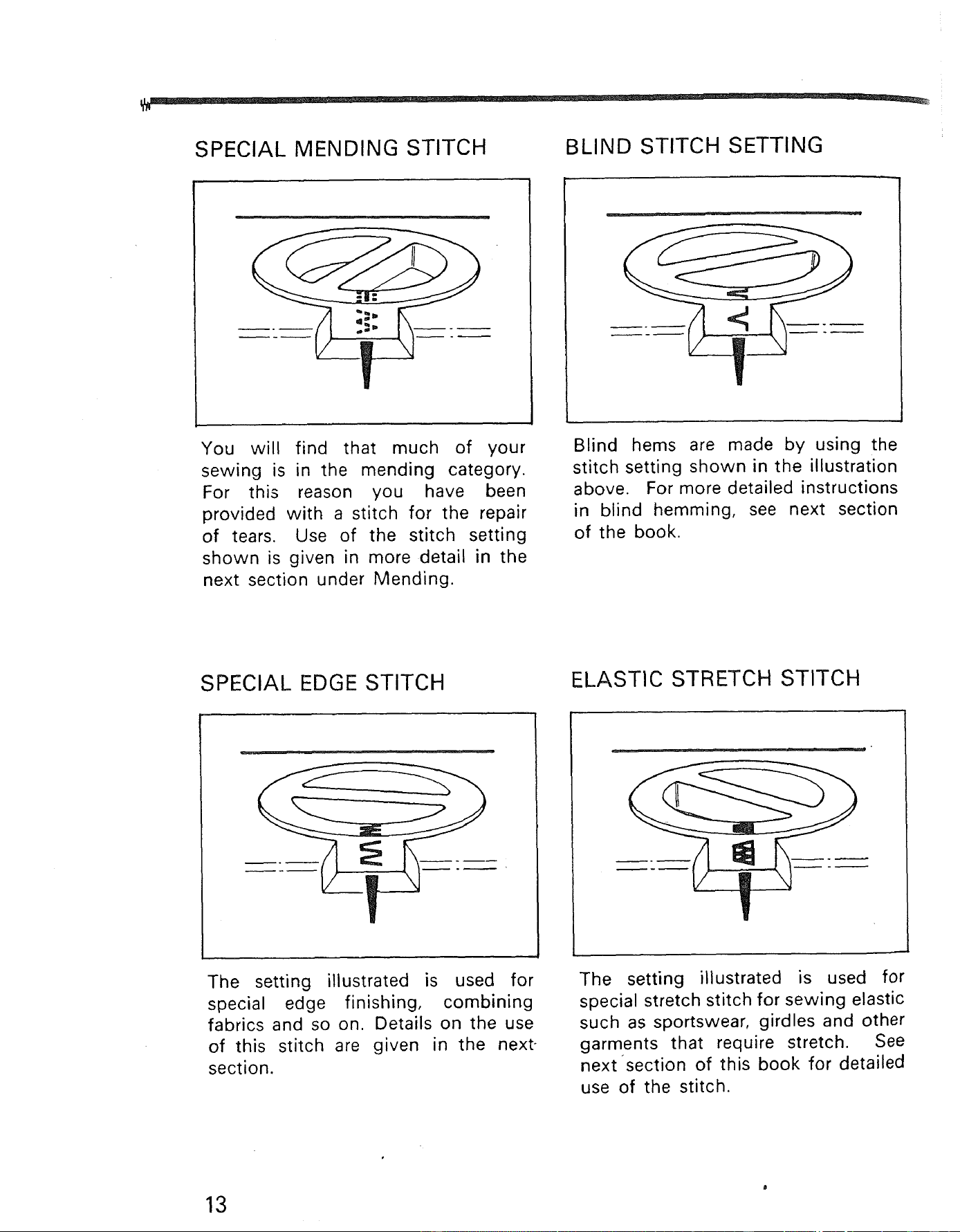
SPECIAL MENDING STITCH BLIND STITCH SETTING
You will find that much of your
sewing is in the mending category.
For this reason you have been
provided with a stitch for the repair
of tears. Use of the stitch setting
shown is given in more detail in the
next section under Mending.
Blind hems are made by using the
stitch setting shown in the illustration
above. For more detailed instructions
in blind hemming, see next section
of the book.
SPECIAL EDGE STITCH
ELASTIC STRETCH STITCH
j .
The setting illustrated is used for
special edge finishing, combining
fabrics and so on. Details on the use
of this stitch are given in the next-
section.
The setting illustrated is used for
special stretch stitch for sewing elastic
such as sportswear, girdles and other
garments that require stretch. See
next section of this book for detailed
use of the stitch.
13
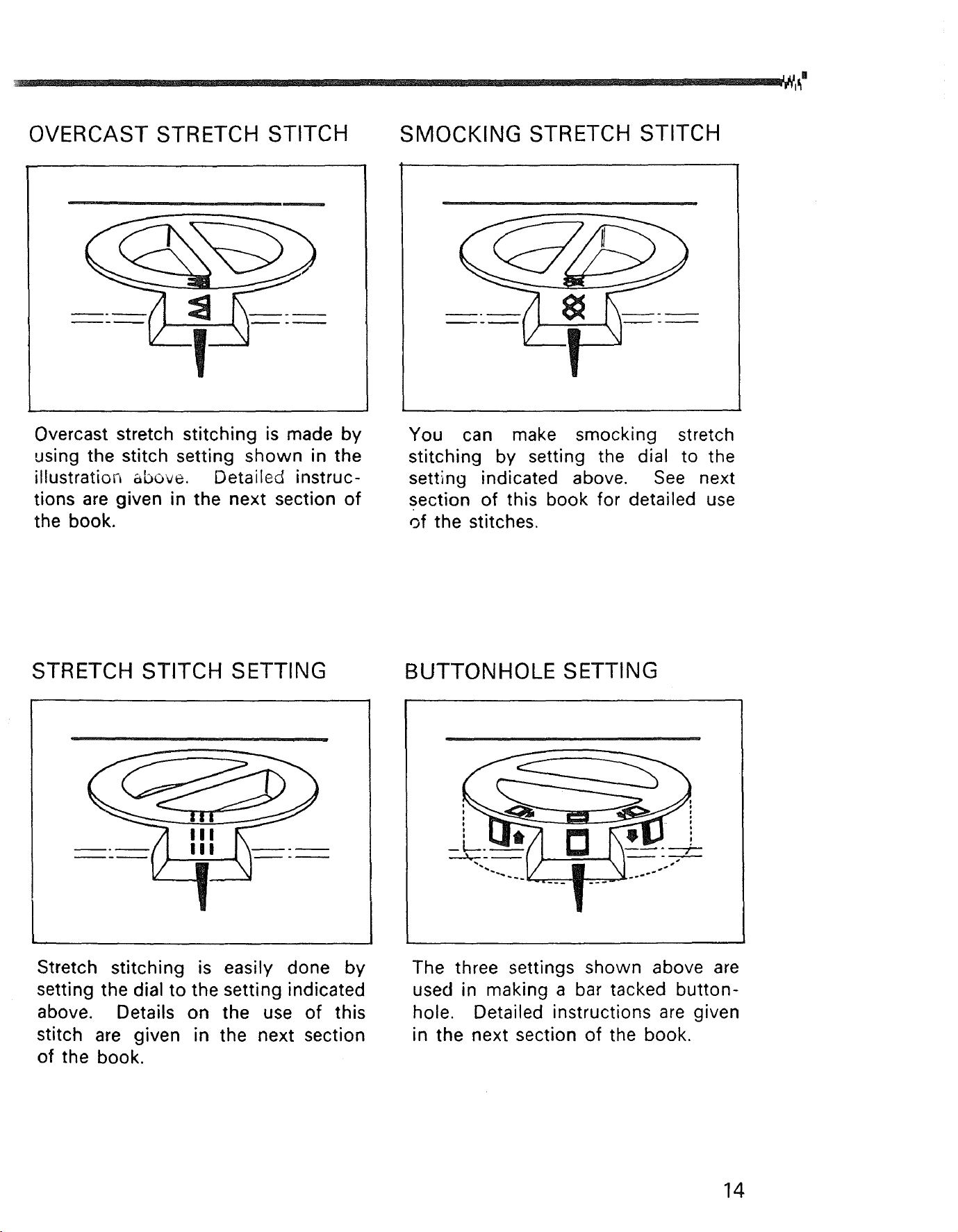
OVERCAST STRETCH STITCH SMOCKING STRETCH STITCH
Overcast stretch stitching is made by
using the stitch setting shown in the
illustration above. Detaileg instruc-
tions are given in the next section of
the book.
You can make smocking stretch
stitching by setting the dial to the
setting indicated above. See next
section of this book for detailed use
of the stitches.
STRETCH STITCH SETTING BUTTONHOLE SETTING
I
Stretch stitching is easily done by
setting the dial to the setting indicated
above. Details on the use of this
stitch are given in the next section
of the book.
The three settings shown above are
used in making a bar tacked button-
hole. Detailed instructions are given
in the next section of the book.
14
OTHER ADJUSTMENTS OF SEWING MACHINE
In addition to the obvious controls of your machine, there are other small
regulators and controls to aid you in using your sewing machine.
PRESSURE REGULATOR
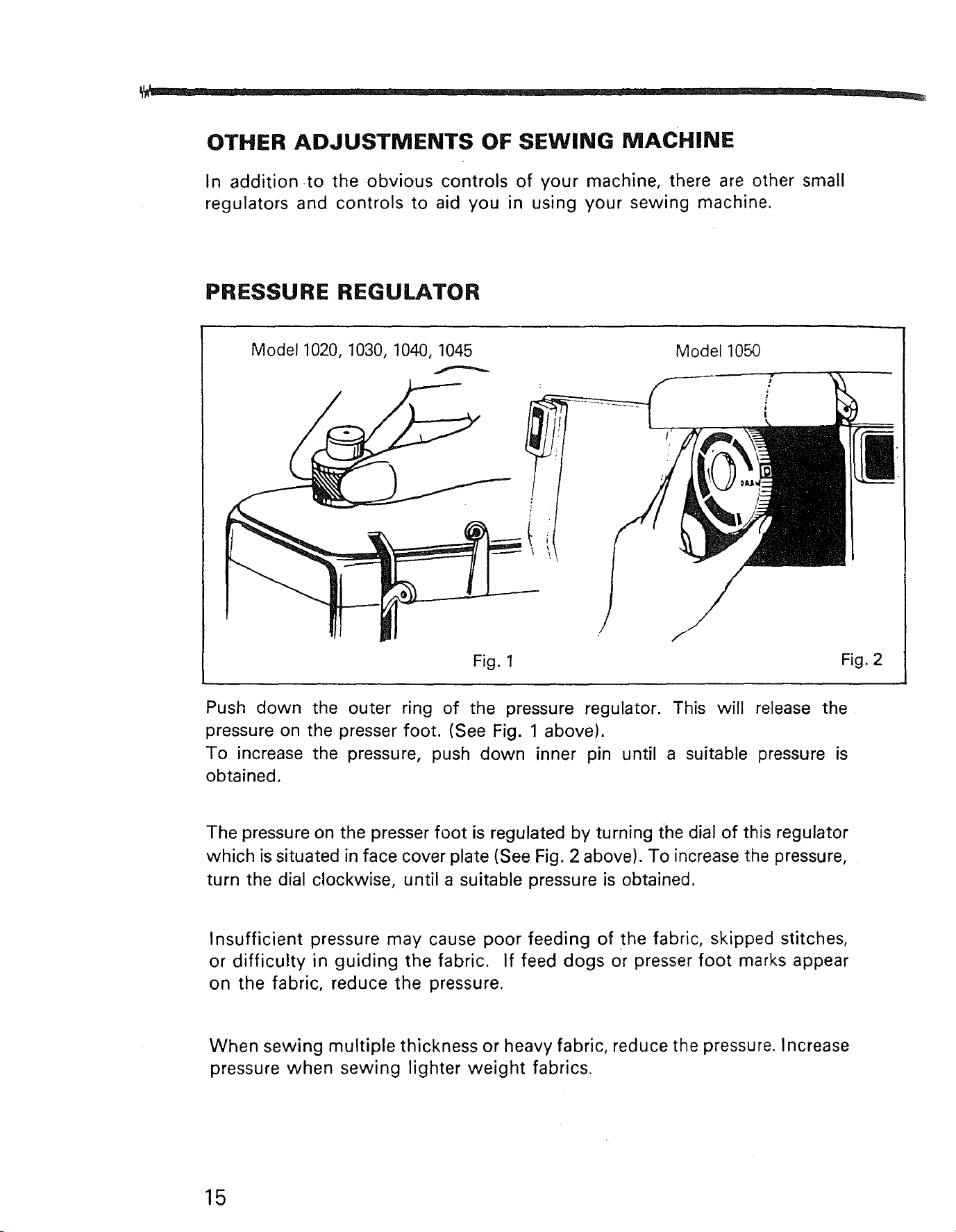
Model1020, 1030, 1040, 1045 Model 1050
Fig. 1
Fig. 2
Push down the outer ring of the pressure regulator. This will release the
pressure on the presser foot. (See Fig. 1 above).
To increase the pressure, push down inner pin until a suitable pressure is
obtained.
The pressure on the presser foot is regulated by turning the dial of this regulator
which is situated in face cover plate (See Fig. 2 above). To increase the pressure,
turn the dial clockwise, until a suitable pressure is obtained.
Insufficient pressure may cause poor feeding of the fabric, skipped stitches,
or difficulty in guiding the fabric. If feed dogs or presser foot marks appear
on the fabric, reduce the pressure.
When sewing multiple thickness or heavy fabric, reduce the pressure. Increase
pressure when sewing lighter weight fabrics.
15
SEWING LIGHT
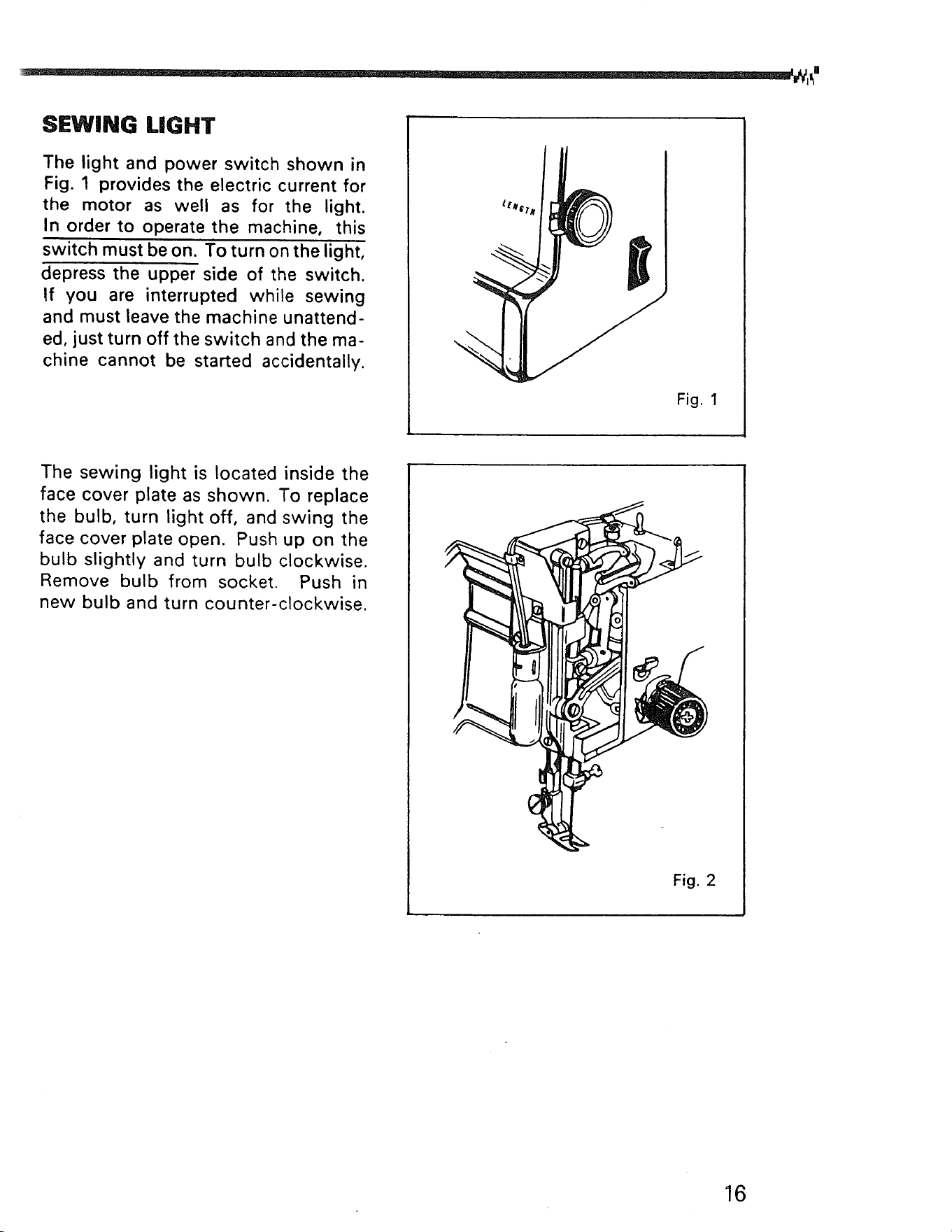
The light and power switch shown in
Fig. 1 provides the electric current for
the motor as well as for the light.
In order to operate the machine, this
switch must be on. To turn on the light,
depress the upper side of the switch.
If you are interrupted while sewing
and must leave the machine unattend-
ed, just turn off the switch and the ma-
chine cannot be started accidentally.
Fig. 1
The sewing light is located inside the
face cover plate as shown. To replace
the bulb, turn light off, and swing the
face cover plate open. Push up on the
bulb slightly and turn bulb clockwise.
Remove bulb from socket. Push in
new bulb and turn counter-clockwise.
Fig. 2
16
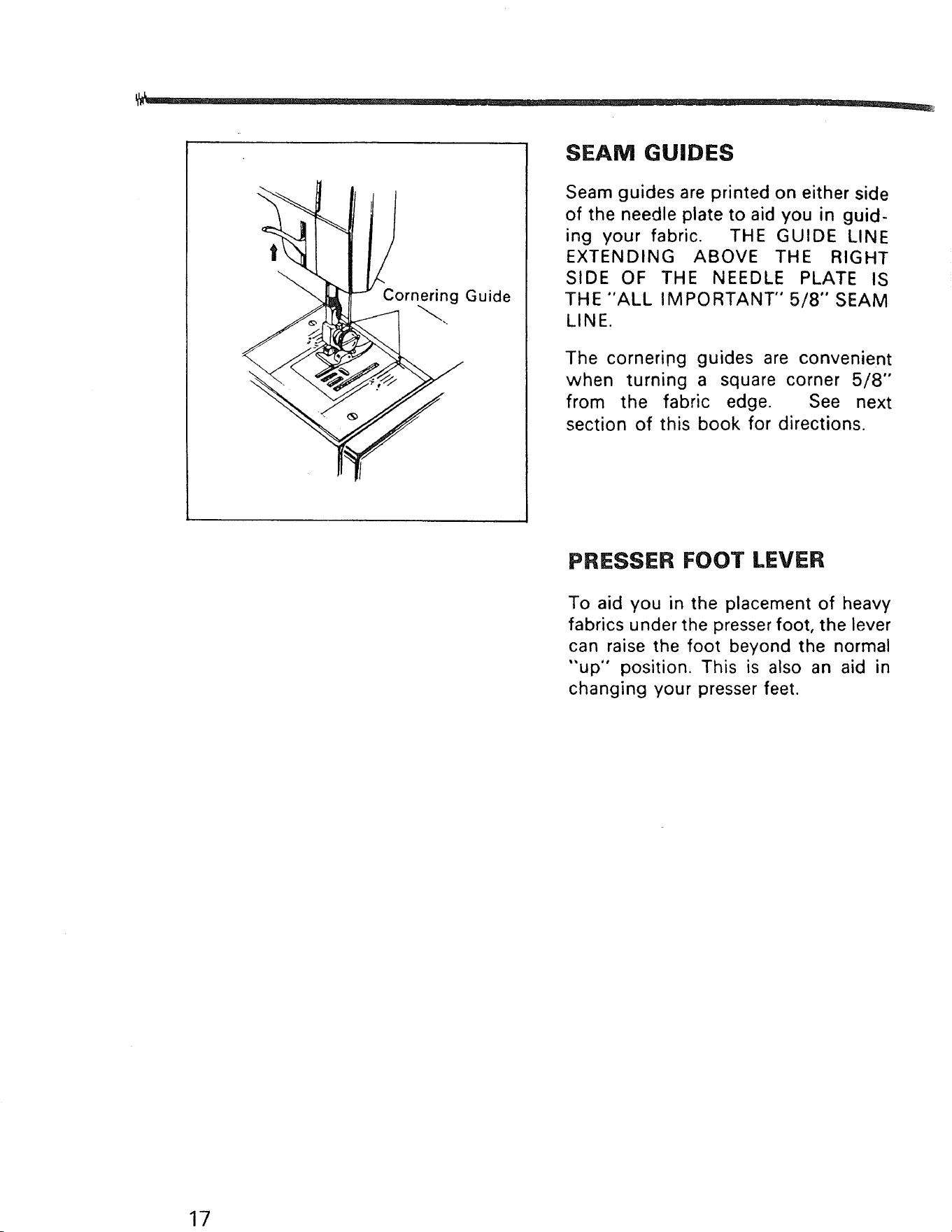
Cornering Guide
SEAM GUIDES
Seam guides are printed on either side
of the needle plate to aid you in guid-
ing your fabric. THE GUIDE LINE
EXTENDING ABOVE THE RIGHT
SIDE OF THE NEEDLE PLATE IS
THE "ALL IMPORTANT" 5/8" SEAM
LINE.
The corneripg guides are convenient
when turning a square corner 5/8"
from the fabric edge. See next
section of this book for directions.
PRESSER FOOT LEVER
To aid you in the placement of heavy
fabrics under the presser foot, the lever
can raise the foot beyond the normal
"up" position. This is also an aid in
changing your presser feet.
17
NEEDLES
Use KENMORE needles. The size of
the needle should conform with the
size of the thread and both should be
suitable to the fabric (See next page).
Never use a bent needle or one with a
blunt point.
I I II I
i j II I
Fig. 1
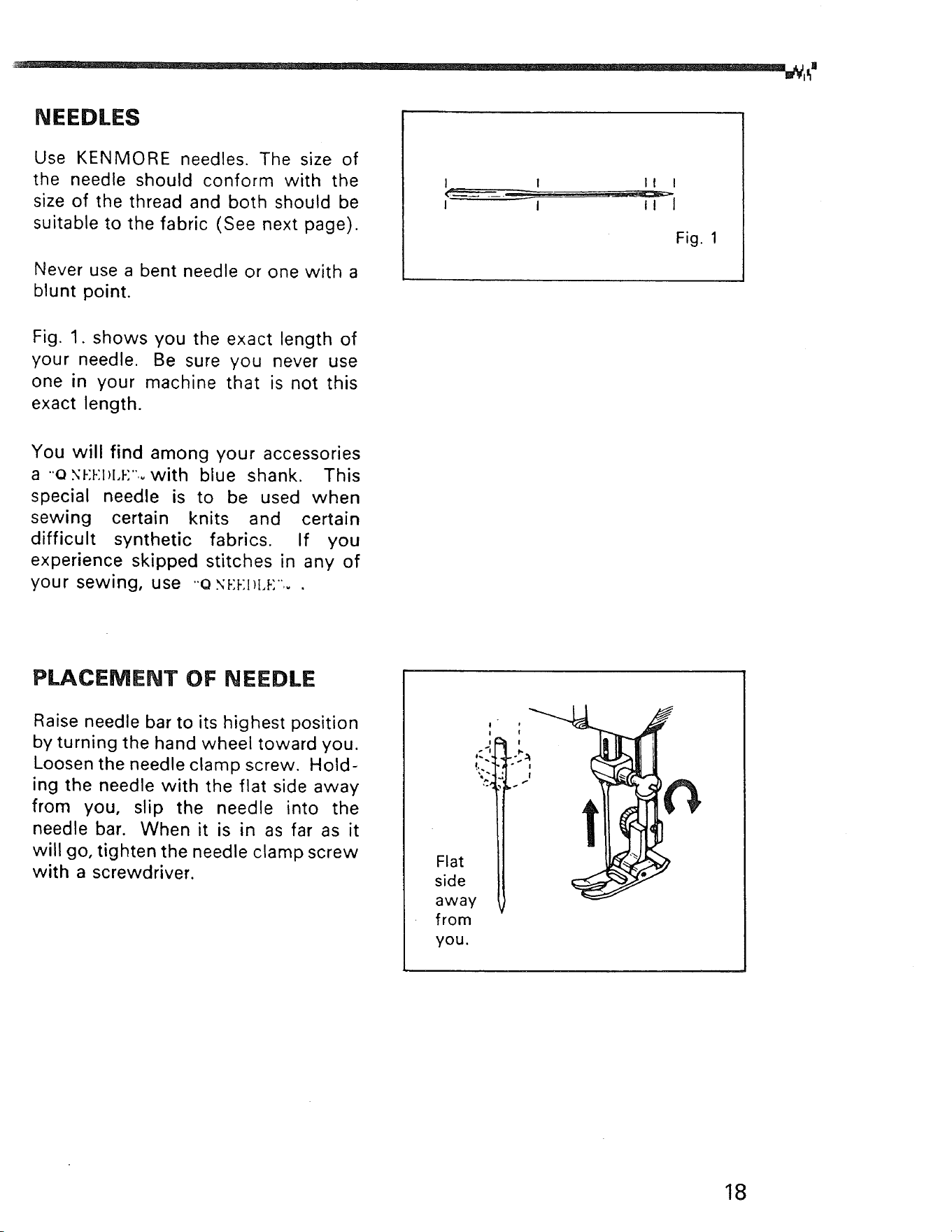
Fig. 1. shows you the exact length of
your needle. Be sure you never use
one in your machine that is not this
exact length.
You will find among your accessories
a ..e x_:_:ll[,_:"_with blue shank. This
special needle is to be used when
sewing certain knits and certain
difficult synthetic fabrics. If you
experience skipped stitches in any of
your sewing, use o x_:l-:l_[,_:.. .
PLACEMENT OF NEEDLE
Raise needle bar to its highest position
by turning the hand wheel toward you.
Loosen the needle clamp screw. Hold-
ing the needle with the flat side away
from you, slip the needle into the
needle bar. When it is in as far as it
will go, tighten the needle clamp screw
with a screwdriver.
!'" l_l ''_ J
Flat
side II
away V
from
you.
18
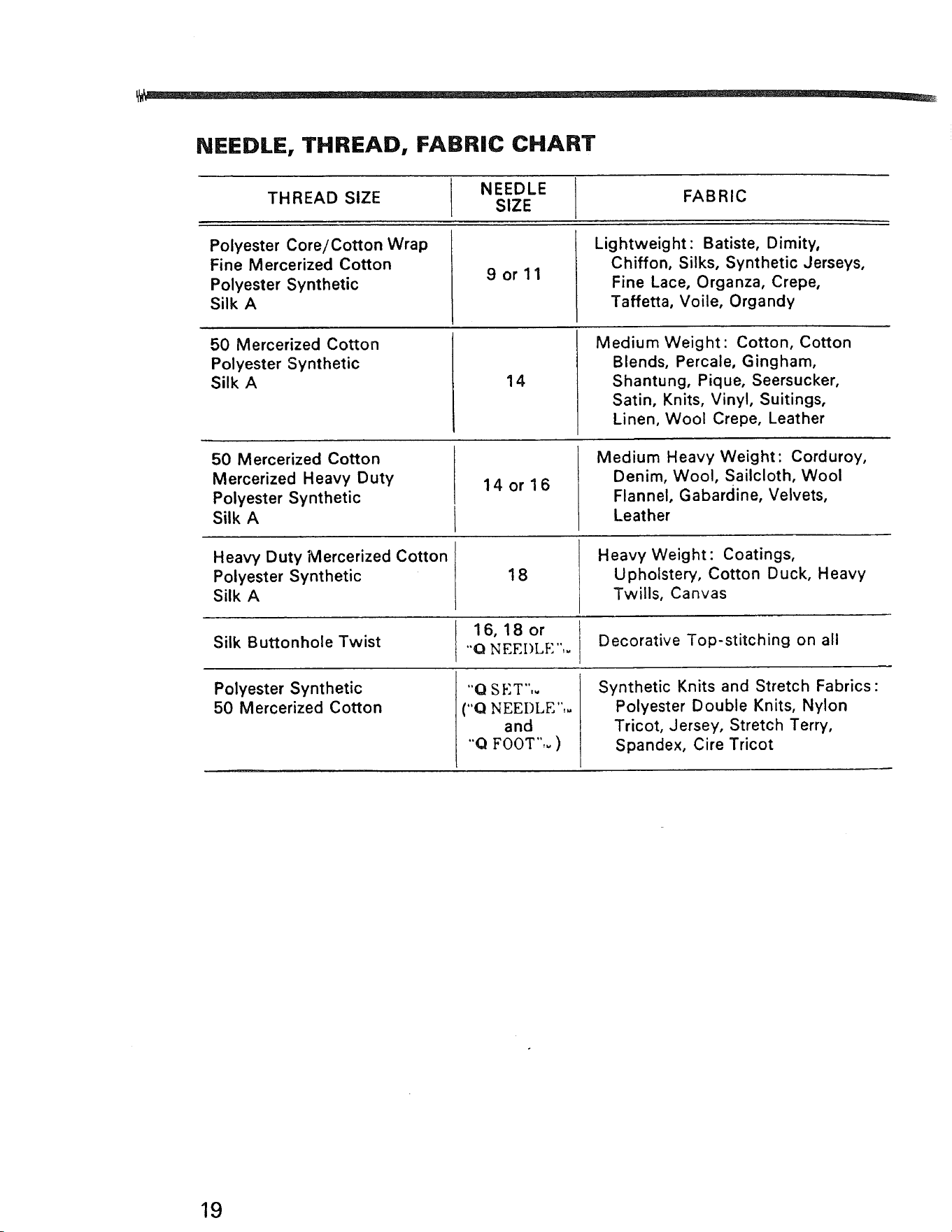
NEEDLE, THREAD, FABRIC CHART
THREAD SIZE NEEDLE FABRIC
SIZE
Polyester Core/Cotton Wrap
Fine Mercerized Cotton
Polyester Synthetic
Silk A
9orll
Lightweight: Batiste, Dimity,
Chiffon, Silks, Synthetic Jerseys,
Fine Lace, Organza, Crepe,
Taffetta, Voile, Organdy
50 Mercerized Cotton
Polyester Synthetic
Silk A
14
Medium Weight: Cotton, Cotton
Blends, Percale, Gingham,
Shantung, Pique, Seersucker,
Satin, Knits, Vinyl, Suitings,
Linen, Wool Crepe, Leather
50 Mercerized Cotton
Mercerized Heavy Duty
Polyester Synthetic
Silk A
14 or 16
Medium Heavy Weight: Corduroy,
Denim, Wool, Sailcloth, Wool
Flannel, Gabardine, Velvets,
Leather
Heavy Duty Mercerized Cotton
Polyester Synthetic
Silk A
18
Heavy Weight : Coatings,
Upholstery, Cotton Duck, Heavy
Twills, Canvas
16, 18 or
Silk Buttonhole Twist "Q NEEI)LE",= Decorative Top-stitching on all
Polyester Synthetic
50 Mercerized Cotton
"'0 SET",.
("Q NEEDLE",.
I and
"Q FOOT",. )
Synthetic Knits and Stretch Fabrics:
Polyester Double Knits, Nylon
Tricot, Jersey, Stretch Terry,
Spandex, Cire Tricot
19
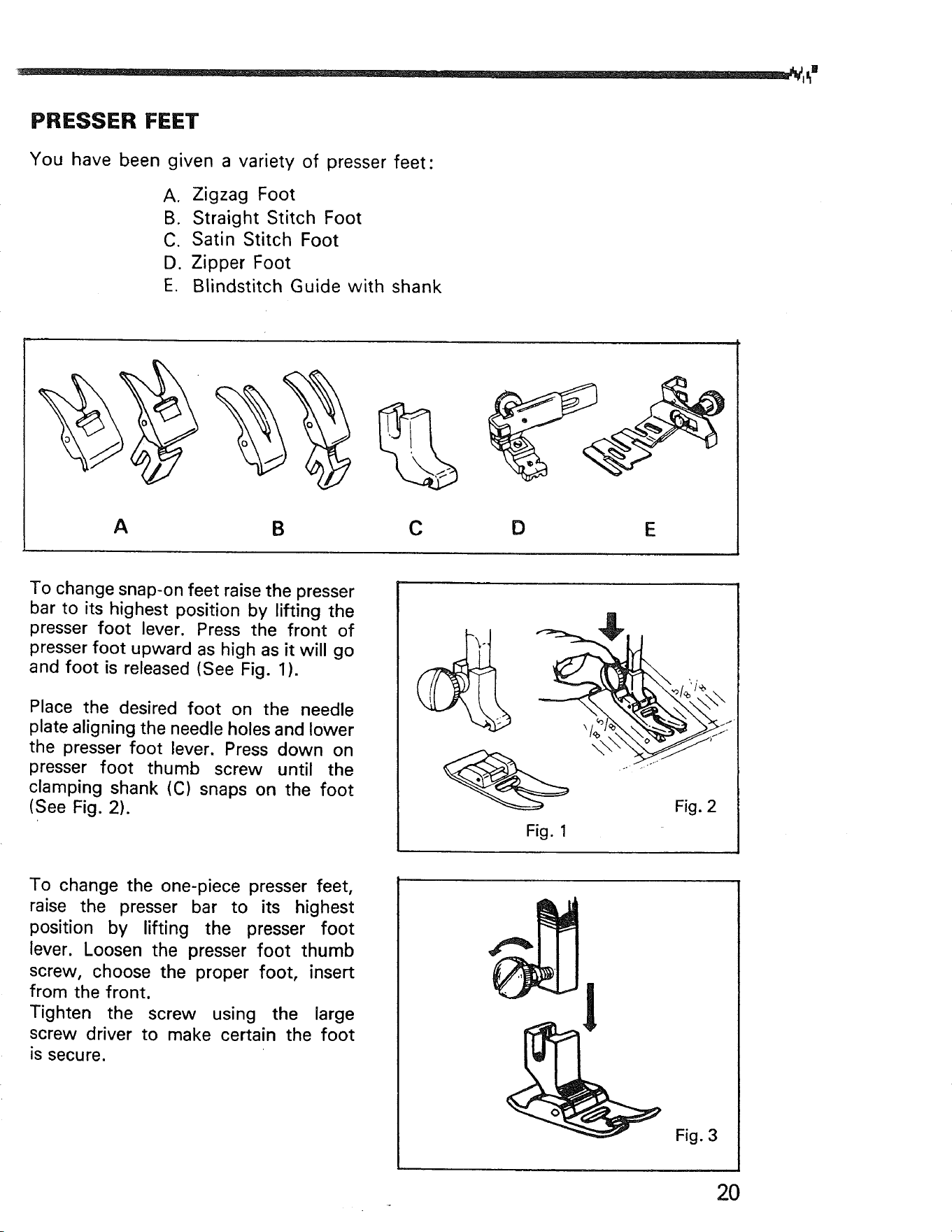
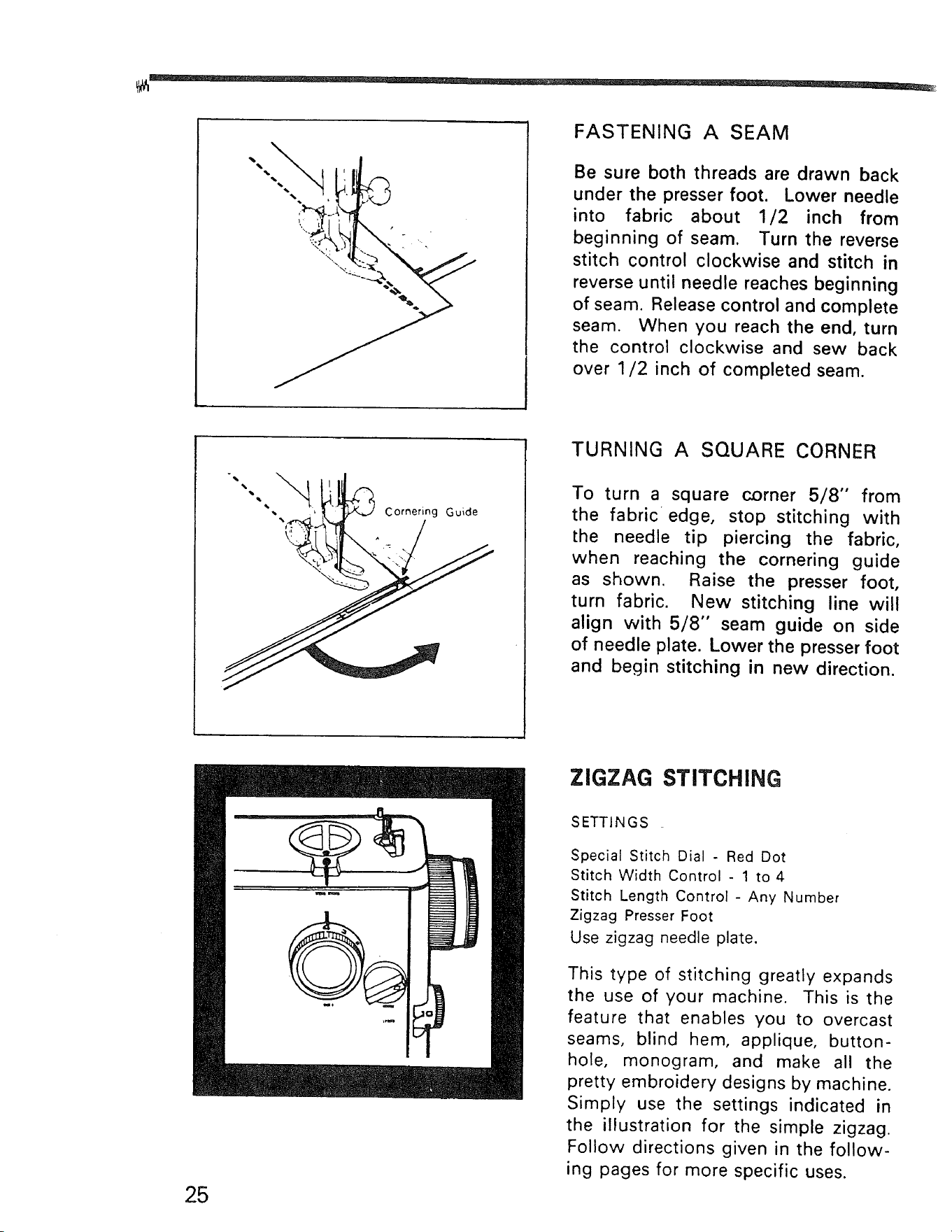
FASTENING A SEAM
Be sure both threads are drawn back
under the presser foot. Lower needle
into fabric about 1/2 inch from
beginning of seam. Turn the reverse
stitch control clockwise and stitch in
reverse until needle reaches beginning
of seam. Release control and complete
seam. When you reach the end, turn
the control clockwise and sew back
over 1/2 inch of completed seam.
-,.
_ _ n
•,,, , _ "_<,J Corned g Guide
{,!-,
TURNING A SQUARE CORNER
To turn a square corner 5/8" from
the fabric edge, stop stitching with
the needle tip piercing the fabric,
when reaching the cornering guide
as shown. Raise the presser foot,
turn fabric. New stitching line will
align with 5/8" seam guide on side
of needle plate. Lower the presser foot
and begin stitching in new direction.
ZIGZAG STITCHING
25
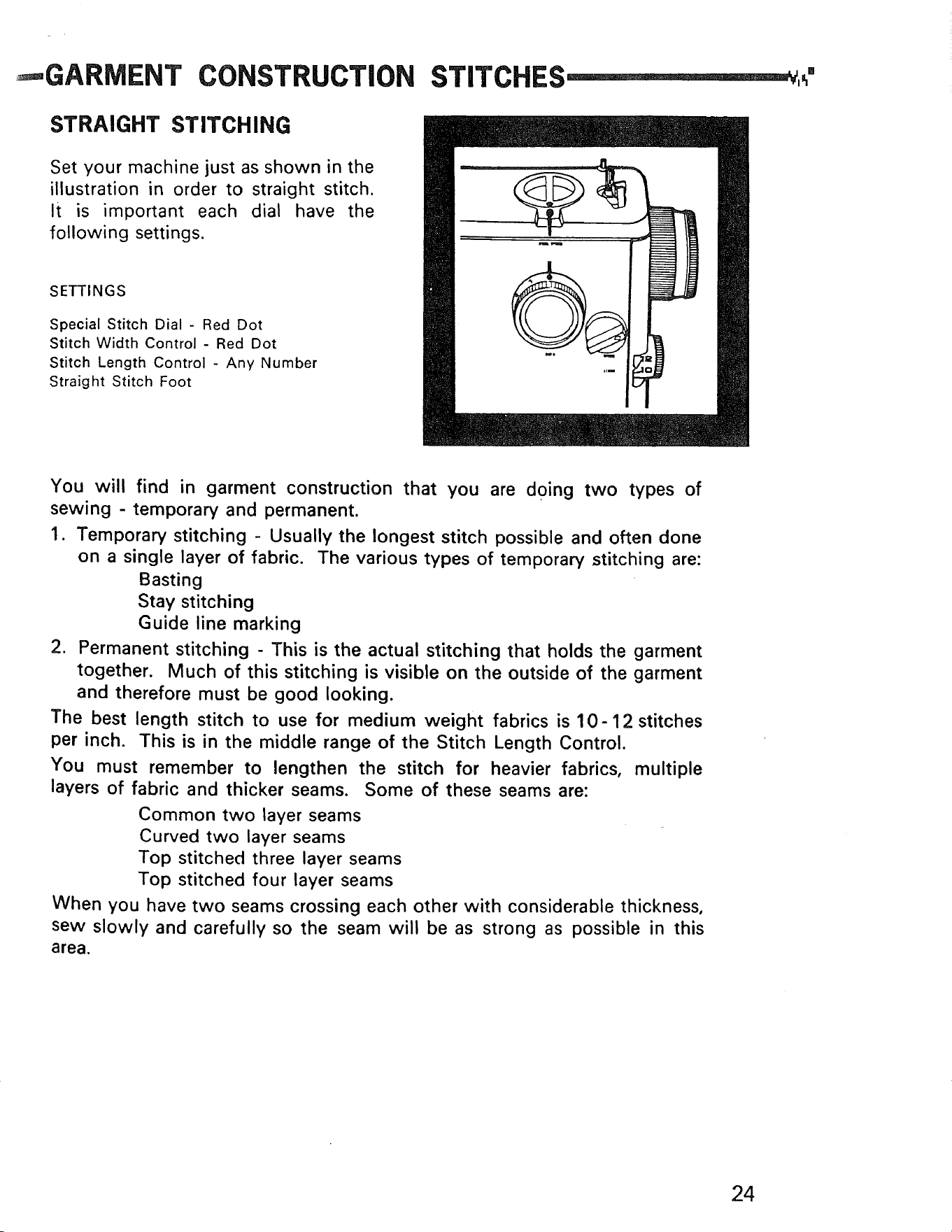
SETTINGS
Special Stitch Dial - Red Dot
Stitch Width Control - 1 to 4
Stitch Length Control - Any Number
Zigzag Presser Foot
Use zigzag needle plate.
This type of stitching greatly expands
the use of your machine. This is the
feature that enables you to overcast
seams, blind hem, applique, button-
hole, monogram, and make all the
pretty embroidery designs by machine.
Simply use the settings indicated in
the illustration for the simple zigzag.
Follow directions given in the follow-
ing pages for more specific uses.
STRETCH STITCHING
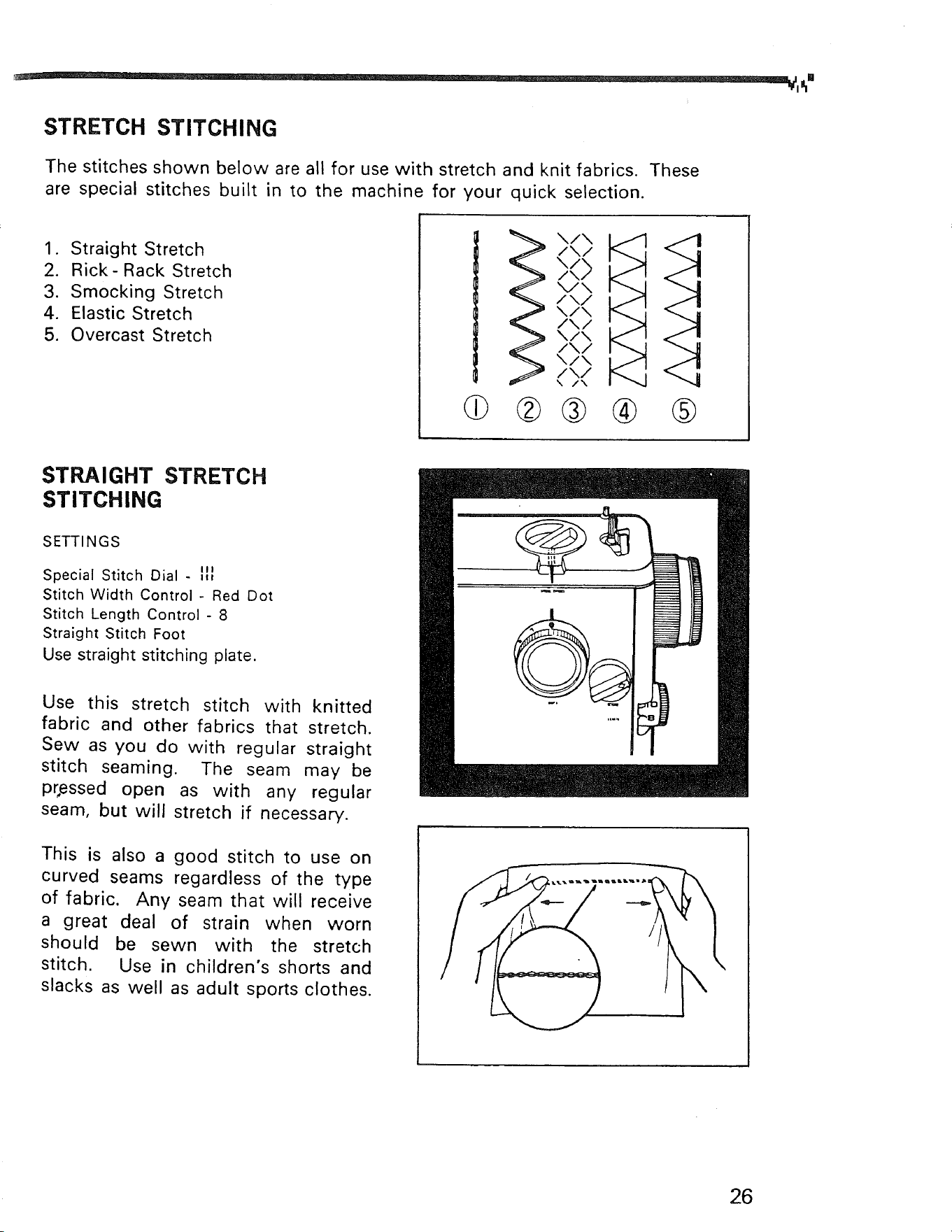
The stitches shown below are all for use with stretch and knit fabrics. These
are special stitches built in to the machine for your quick selection.
1. Straight Stretch
2. Rick- Rack Stretch
3. Smocking Stretch
4. Elastic Stretch
5. Overcast Stretch
|
|
db
\/X
/\/
\/
/\)
/ \/
\/\
/\/
\/\
/\/
\/\
/\/
\ /\
®®
®
A
"-4
®
STRAIGHT STRETCH
STITCHING
SETTINGS
Special Stitch Dial - _t_J
Stitch Width Control- Red Dot
Stitch Length Control - 8
Straight Stitch Foot
Use straight stitching plate.
Use this stretch stitch with knitted
fabric and other fabrics that stretch.
Sew as you do with regular straight
stitch seaming. The seam may be
pressed open as with any regular
seam, but will stretch if necessary.
This is also a good stitch to use on
curved seams regardless of the type
of fabric. Any seam that will receive
a great deal of strain when worn
should be sewn with the stretch
stitch. Use in children's shorts and
slacks as well as adult sports clothes.
26
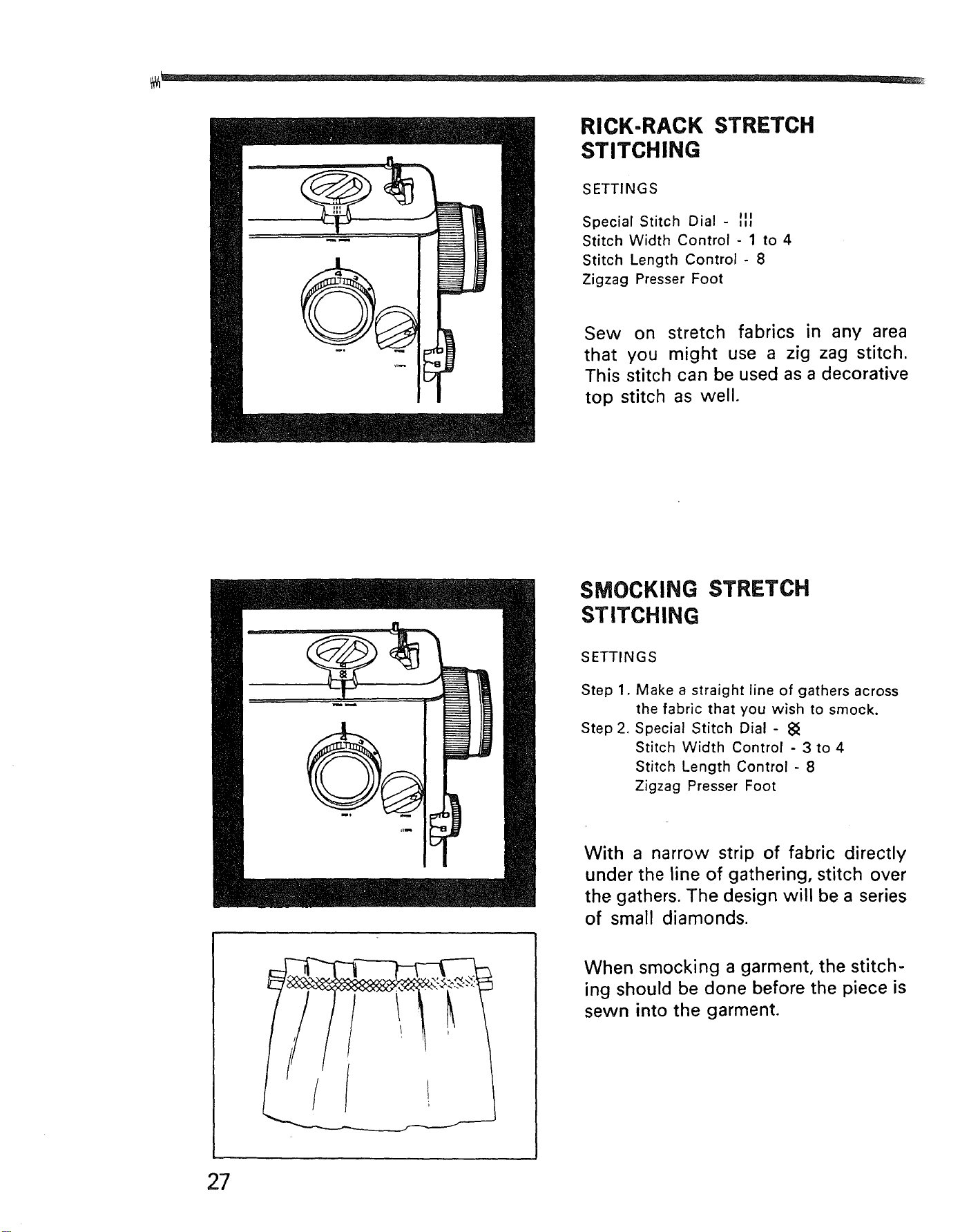
RICK-RACK STRETCH
STITCHING
SETTINGS
Special Stitch Dial - III
Stitch Width Control - 1 to 4
Stitch Length Control - 8
Zigzag Presser Foot
Sew on stretch fabrics in any area
that you might use a zig zag stitch.
This stitch can be used as a decorative
top stitch as well.
SMOCKING STRETCH
STITCHING
SETTINGS
Step 1.
Step 2.
Make a straight line of gathers across
the fabric that you wish to smock.
Special Stitch Dial - 8_
Stitch Width Control - 3 to 4
Stitch Length Control - 8
Zigzag Presser Foot
With a narrow strip of fabric directly
under the line of gathering, stitch over
the gathers. The design will be a series
of small diamonds.
When smocking a garment, the stitch-
ing should be done before the piece is
sewn into the garment.
27
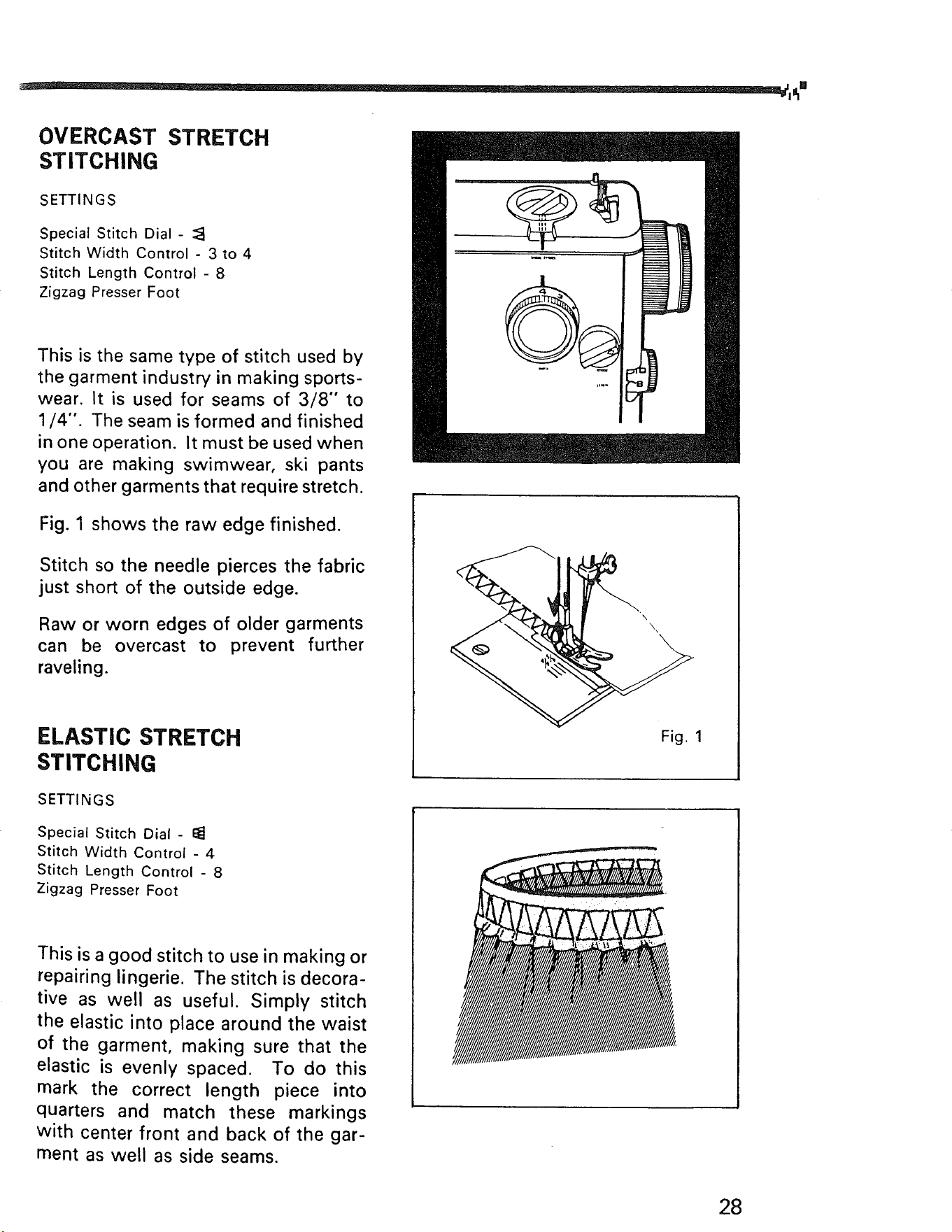
OVERCAST STRETCH
STITCHING
SETTINGS
Special Stitch Dial -
Stitch Width Control - 3 to 4
Stitch Length Control - 8
Zigzag Presser Foot
This is the same type of stitch used by
the garment industry in making sports-
wear. It is used for seams of 3/8" to
1/4". The seam is formed and finished
in one operation. It must be used when
you are making swimwear, ski pants
and other garments that require stretch.
Fig. 1 shows the raw edge finished.
Stitch so the needle pierces the fabric
just short of the outside edge.
Raw or worn edges of older garments
can be overcast to prevent further
raveling.
ELASTIC STRETCH
STITCHING
SETTINGS
Special Stitch Dial - I_
Stitch Width Control - 4
Stitch Length Control - 8
Zigzag Presser Foot
This is a good stitch to use in making or
repairing lingerie. The stitch is decora-
tive as well as useful. Simply stitch
the elastic into place around the waist
of the garment, making sure that the
elastic is evenly spaced. To do this
mark the correct length piece into
quarters and match these markings
with center front and back of the gar-
ment as well as side seams.
Fig. 1
28
SPECIAL FINISHING STITCHES ........
After the basic construction of your garment is finished, there are still many
finishing touches to be done. To aid your completion of your garment, the
Kenmore has been_designed to do the following tasks that formerly had to be
done by hand.
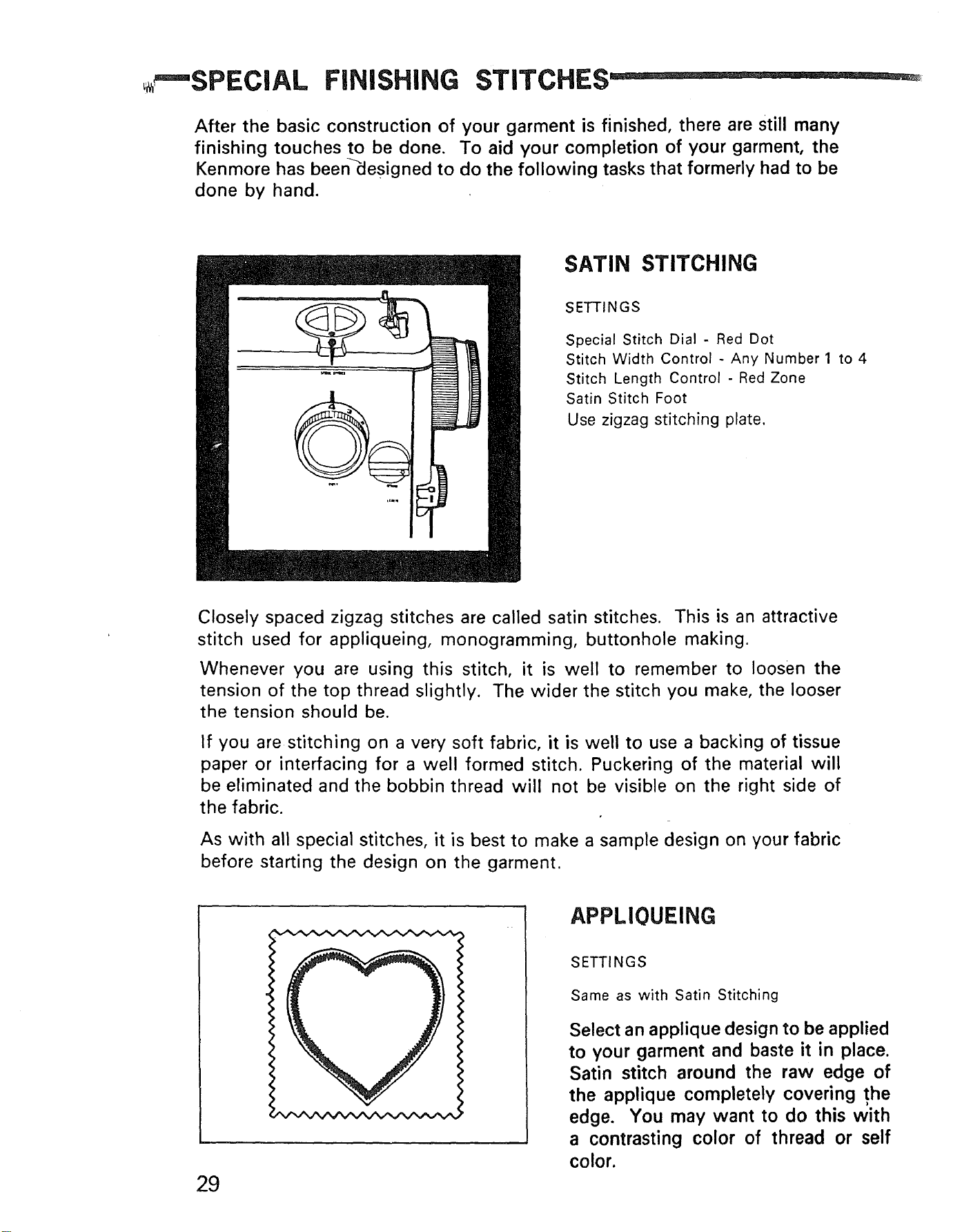
SATIN STITCHING
SETTINGS
Special Stitch Dial - Red Dot
Stitch Width Control - Any Number 1 to 4
Stitch Length Control - Red Zone
Satin Stitch Foot
Use zigzag stitching plate.
Closely spaced zigzag stitches are called satin stitches. This is an attractive
stitch used for appliqueing, monogramming, buttonhole making.
Whenever you are using this stitch, it is well to remember to loosen the
tension of the top thread slightly. The wider the stitch you make, the looser
the tension should be.
If you are stitching on a very soft fabric, it is well to use a backing of tissue
paper or interfacing for a well formed stitch. Puckering of the material will
be eliminated and the bobbin thread will not be visible on the right side of
the fabric.
As with all special stitches, it is best to make a sample design on your fabric
before starting the design on the garment.
29
APPLIOUEING
SETTINGS
Same as with Satin Stitching
Select an applique design to be applied
to your garment and baste it in place.
Satin stitch around the raw edge of
the applique completely covering the
edge. You may want to do this with
a contrasting color of thread or self
color.
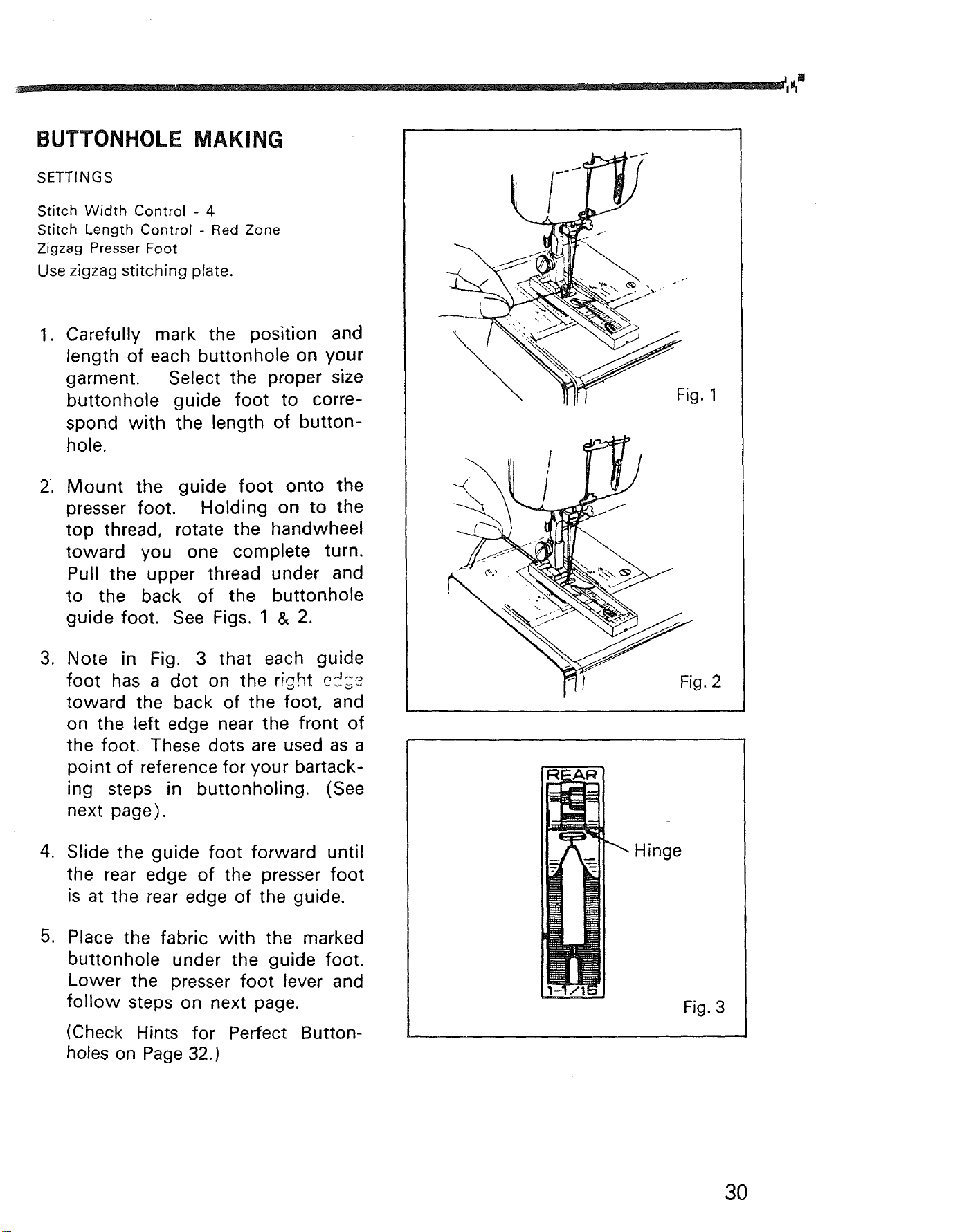
BUTTONHOLE MAKING
SETTINGS
Stitch Width Control - 4
Stitch Length Control - Red Zone
Zigzag Presser Foot
Use zigzag stitching plate.
1. Carefully mark the position and
length of each buttonhole on your
garment. Select the proper size
buttonhole guide foot to corre-
spond with the length of button-
hole.
2, Mount the guide foot onto the
presser foot. Holding on to the
top thread, rotate the handwheel
toward you one complete turn.
Pull the upper thread under and
to the back of the buttonhole
guide foot. See Figs. 1 & 2.
3. Note in Fig. 3 that each guide
foot has a dot on the right ed;_
toward the back of the foot, and
on the left edge near the front of
the foot. These dots are used as a
point of reference for your bartack-
ing steps in buttonholing. (See
next page).
4. Slide the guide foot forward until
the rear edge of the presser foot
is at the rear edge of the guide.
5. Place the fabric with the marked
buttonhole under the guide foot.
Lower the presser foot lever and
follow steps on next page.
(Check Hints for Perfect Button-
holes on Page 32.)
\
Fig. 1
g. 2
Hinge
Fig. 3
3O
|
Step 1 Step 2
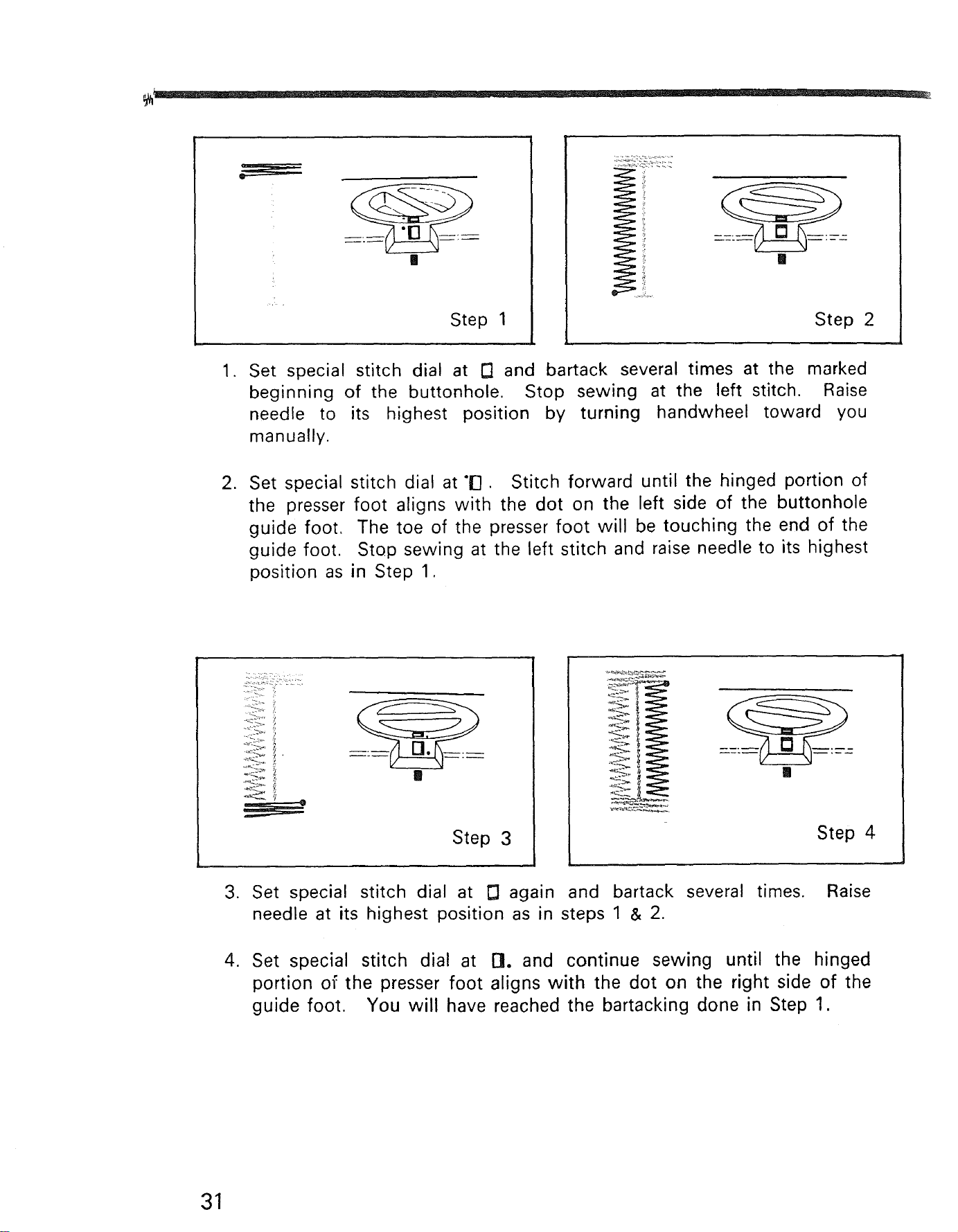
1. Set special stitch dial at r'l and bartack several times at the marked
beginning of the buttonhole. Stop sewing at the left stitch. Raise
needle to its highest position by turning handwheel toward you
manually.
2. Set special stitch dial at "iq. Stitch forward until the hinged portion of
the presser foot aligns with the dot on the left side of the buttonhole
guide foot. The toe of the presser foot will be touching the end of the
guide foot. Stop sewing at the left stitch and raise needle to its highest
position as in Step 1.
Step 3
Step 4
3. Set special stitch dial at E] again and bartack several times. Raise
needle at its highest position as in steps 1 & 2.
4. Set special stitch dial at G. and continue sewing until the hinged
portion of the presser foot aligns with the dot on the right side of the
guide foot. You will have reached the bartacking done in Step 1.
31
HINTS FOR PERFECT
BUTTONHOLES
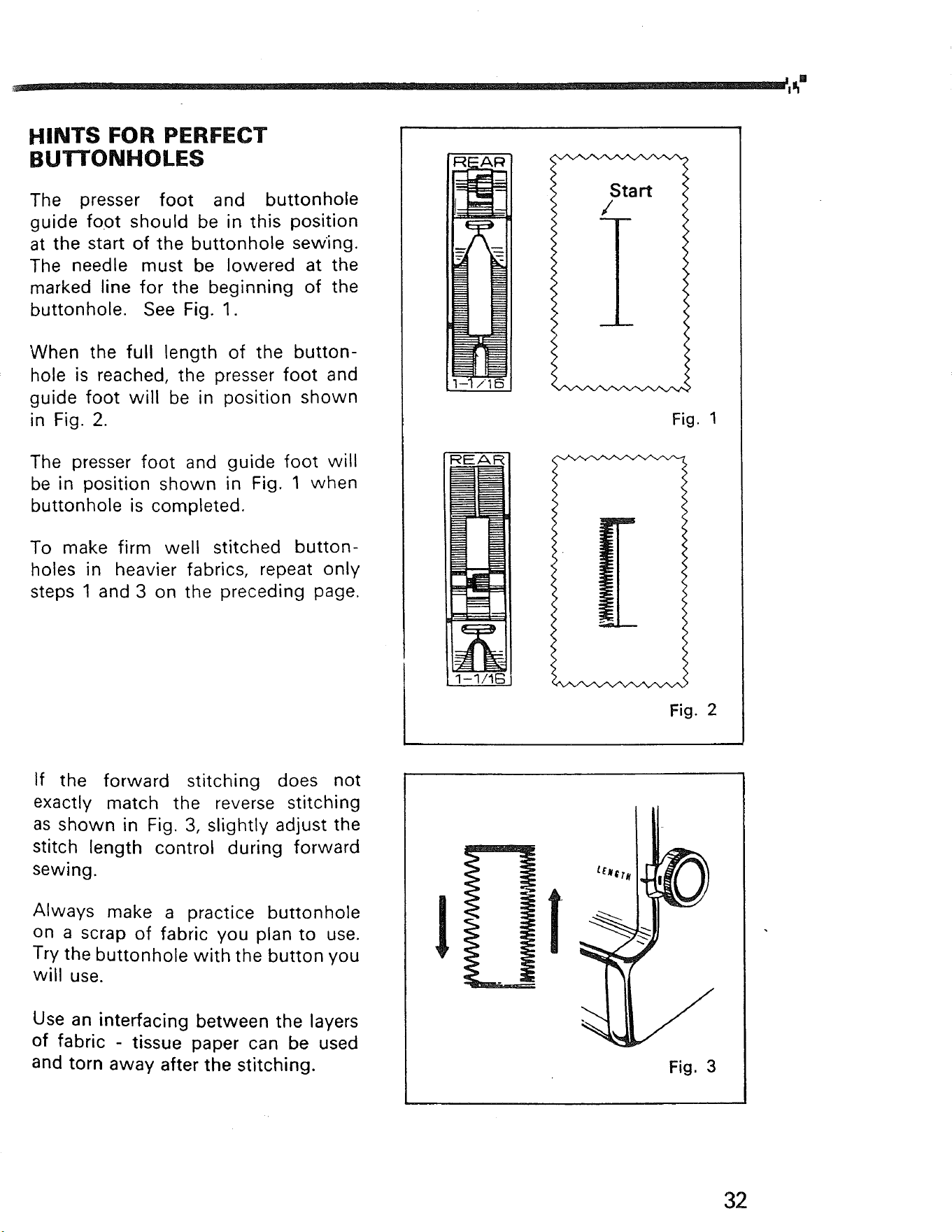
The presser foot and buttonhole
guide foot should be in this position
at the start of the buttonhole sewing.
The needle must be lowered at the
marked line for the beginning of the
buttonhole. See Fig. 1.
When the full length of the button-
hole is reached, the presser foot and
guide foot will be in position shown
in Fig. 2.
The presser foot and guide foot will
be in position shown in Fig. 1 when
buttonhole is completed.
To make firm well stitched button-
holes in heavier fabrics, repeat only
steps 1 and 3 on the preceding page.
REAR
<
<
Start <
<
<
/ <
<
<
<
<
<
Fig. 1
Fig. 2
If the forward stitching does not
exactly match the reverse stitching
as shown in Fig. 3, slightly adjust the
stitch length control during forward
sewing.
Always make a practice buttonhole
on a scrap of fabric you plan to use.
Try the buttonhole with the button you
will use.
Use an interfacing between the layers
of fabric tissue paper can be used
and torn away after the stitching.
1
,
Fig. 3
32
BUTTON SEWING
SETTINGS
Special Stitch Dial - Red Dot
Feed Dogs- Down
Zigzag Presser Foot
Use zigzag stitching plate.
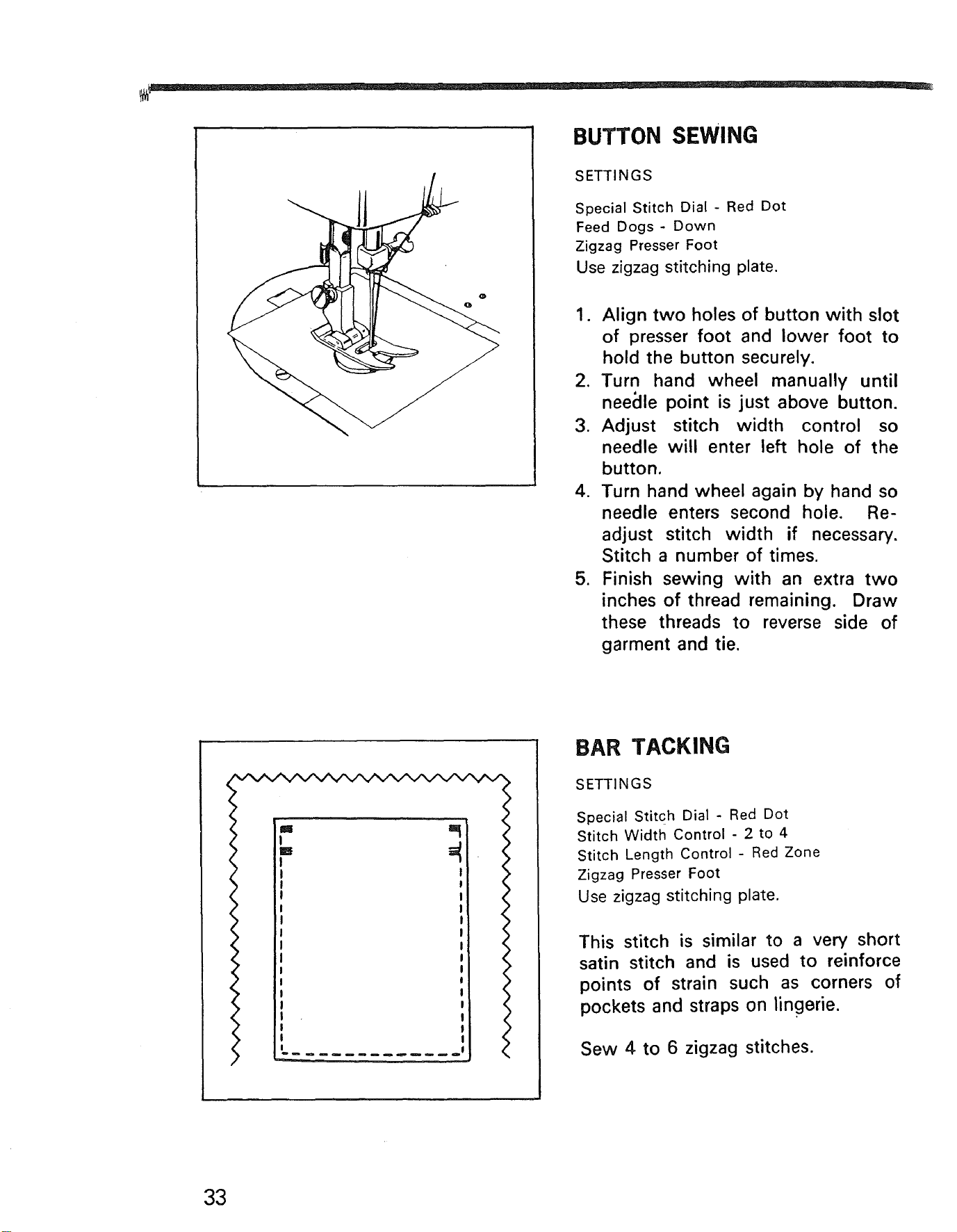
1. Align two holes of button with slot
of presser foot and lower foot to
hold the button securely.
2. Turn hand wheel manually until
neeclle point is just above button.
3. Adjust stitch width control so
needle will enter left hole of the
button.
4. Turn hand wheel again by hand so
needle enters second hole. Re-
adjust stitch width if necessary.
Stitch a number of times.
5. Finish sewing with an extra two
inches of thread remaining. Draw
these threads to reverse side of
garment and tie.
M
w
!
I
I
m
!
!
!
!
!
I'
!
I
o!
BAR TACKING
SETTINGS
Special Stitch Dial - Red Dot
Stitch Width Control - 2 to 4
Stitch Length Control - Red Zone
Zigzag Presser Foot
Use zigzag stitching plate.
This stitch is similar to a very short
satin stitch and is used to reinforce
points of strain such as corners of
pockets and straps on lingerie.
Sew 4 to 6 zigzag stitches.
33
BLIND HEMMING
SETTINGS
Special Stitch Dial-
Stitch Width Control - 2 to 3
Stitch Length Control - 12 to 10
Zigzag foot or blindstitch guide
Use zigzag stitching plate.
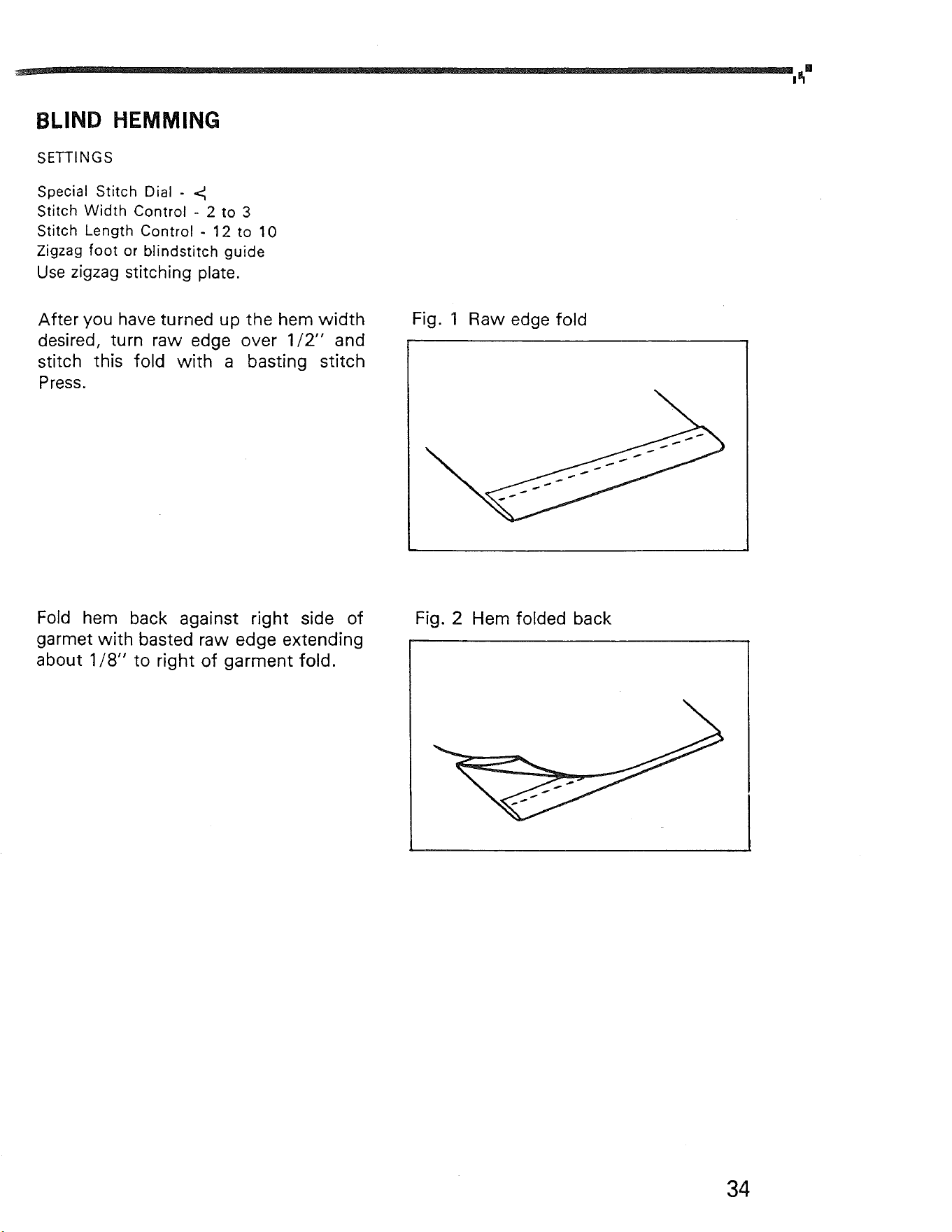
After you have turned up the hem width
desired, turn raw edge over 1/2" and
stitch this fold with a basting stitch
Press.
Fig. 1 Raw edge fold
Fold hem back against right side of
garmet with basted raw edge extending
about 1/8" to right of garment fold.
Fig. 2 Hem folded back
34
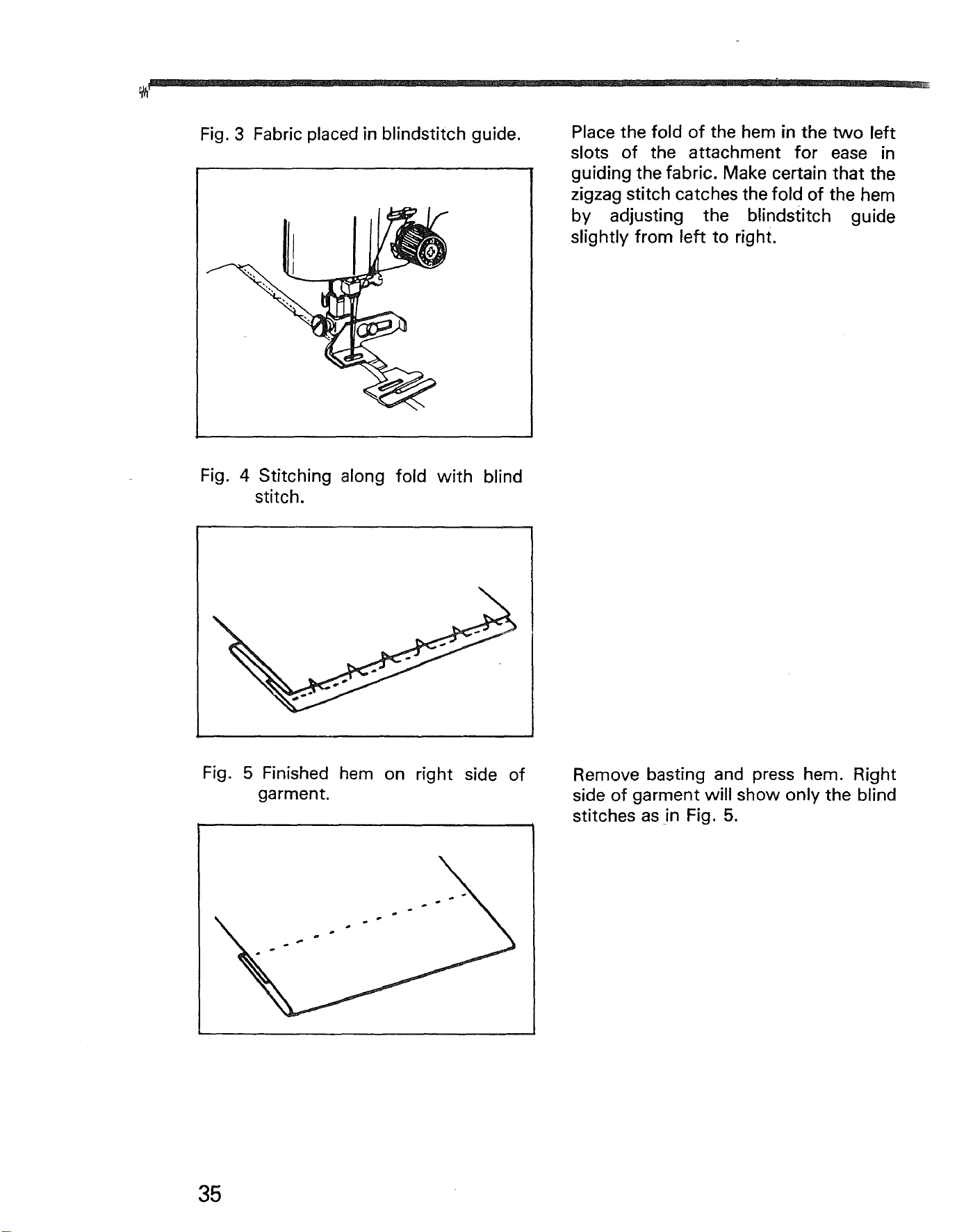
Fig. 3 Fabric placed in blindstitch guide.
Place the fold of the hem in the two left
slots of the attachment for ease in
guiding the fabric. Make certain that the
zigzag stitch catches the fold of the hem
by adjusting the blindstitch guide
slightly from left to right.
Fig. 4 Stitching along fold with blind
stitch.
Fig.
5 Finished hem on right side of
garment.
Remove basting and press hem. Right
side of garment will show only the blind
stitches as in Fig. 5.
35
ZIPPER APPLICATION
SETTINGS
Special Stitch Dial - Red Dot
Stitch Width Control - Red Dot
Stitch Length Control - 12 to 10
Zipper Foot
Use straight stitching plate.
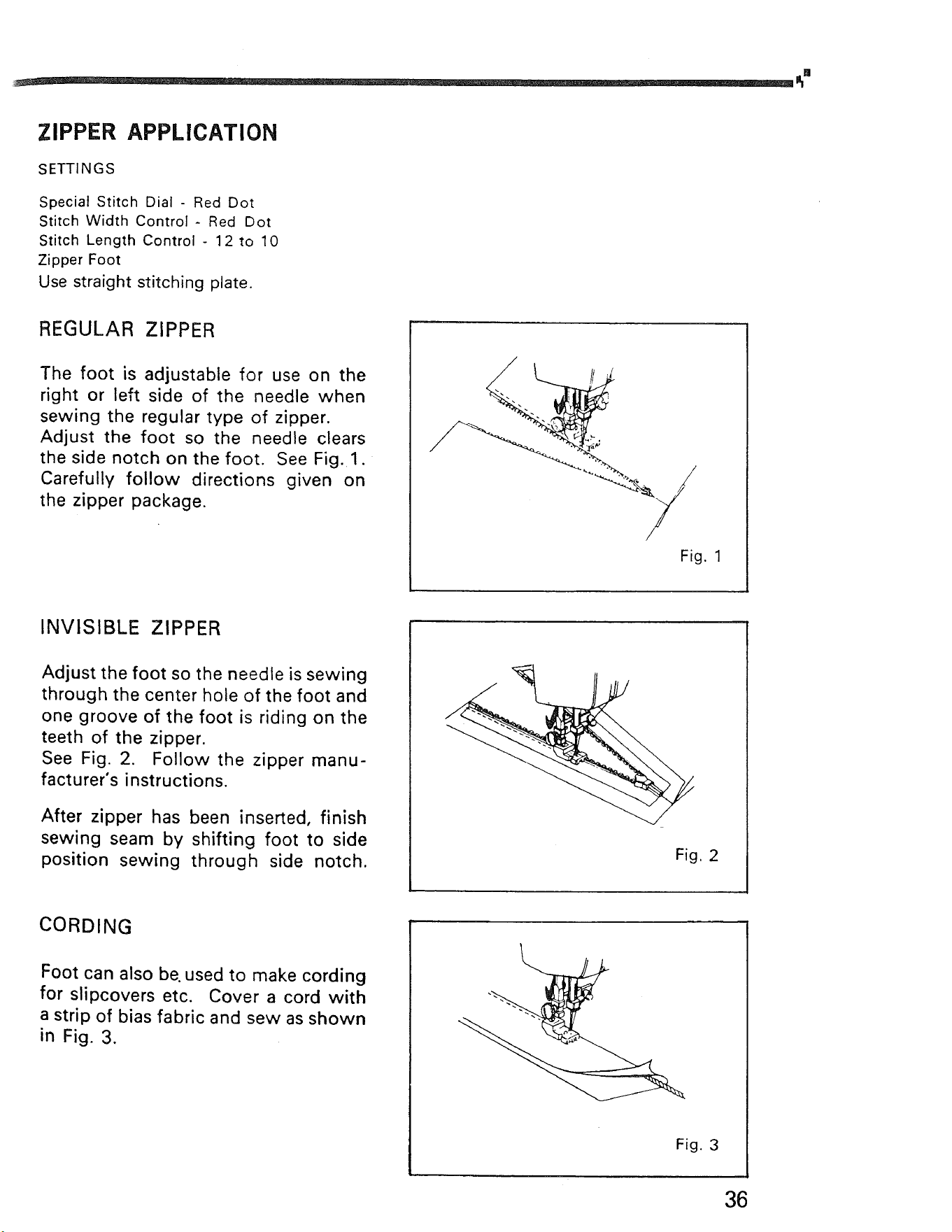
REGULAR ZIPPER
The foot is adjustable for use on the
right or left side of the needle when
sewing the regular type of zipper.
Adjust the foot so the needle clears
the side notch on the foot. See Fig. 1.
Carefully follow directions given on
the zipper package.
Fig. 1
INVISIBLE ZIPPER
Adjust the foot so the needle is sewing
through the center hole of the foot and
one groove of the foot is riding on the
teeth of the zipper.
See Fig. 2. Follow the zipper manu-
facturer's instructions.
After zipper has been inserted, finish
sewing seam by shifting foot to side
position sewing through side notch.
Fig, 2
CORDING
Foot can also be. used to make cording
for slipcovers etc. Cover a cord with
a strip of bias fabric and sew as shown
in Fig. 3.
Fig. 3
36
- -....-.......q;
.* ,,.,- *., ,.,,,,, ...
,,*.,.,*,,,,.,
•..,, • • ...,,.. ,...,
.;._._._._._.;.:.:.__.,:.:-:._._._,:.'-_,'-'.'.'.'.'.'-'-'.','.'.
•,, .>. -., *. ,..., * • .,,,.+.::,.:,.:,. ,.,
[iiii!i!iiiiiii!!iiiiiiii!iiiii!!iii!!]iii[ii[i!i]i
"i'_.:'2.1.2._.:.i.2,[,;'.'.'.'.'.'.'.'.'.','.'.'.'.'.','.'.'.'.'.'.'.'.'.-
:::::-:::.:.:.:.:._ :.:.:.::.:
::::::::::::::::::::::::::::::::::::::::::::::::::::::::::::::::::::::::::::::
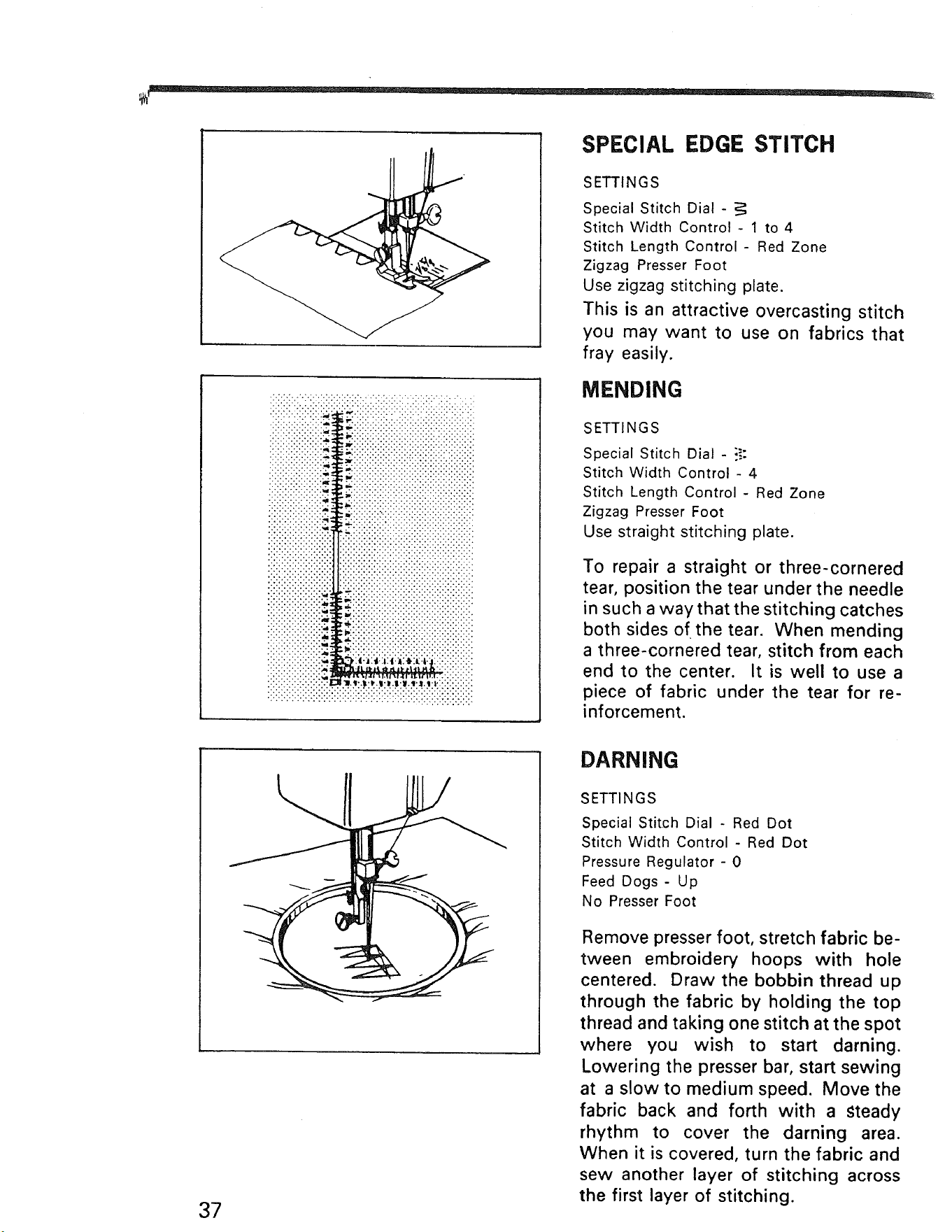
SPECIAL EDGE STITCH
SETTINGS
Special Stitch Dial -
Stitch Width Control- 1 to 4
Stitch Length Control- Red Zone
Zigzag Presser Foot
Use zigzag stitching plate.
This is an attractive overcasting stitch
you may want to use on fabrics that
fray easily.
MENDING
SETTINGS
Special Stitch Dial - ?.:
Stitch Width Control - 4
Stitch Length Control - Red Zone
Zigzag Presser Foot
Use straight stitching plate.
To repair a straight or three-cornered
tear, position the tear under the needle
in such a way that the stitching catches
both sides of the tear. When mending
a three-cornered tear, stitch from each
end to the center. It is well to use a
piece of fabric under the tear for re-
inforcement.
37
DARNING
SETTINGS
Special Stitch Dial - Red Dot
Stitch Width Control - Red Dot
Pressure Regulator - 0
Feed Dogs - Up
No Presser Foot
Remove presser foot, stretch fabric be-
tween embroidery hoops with hole
centered. Draw the bobbin thread up
through the fabric by holding the top
thread and taking one stitch at the spot
where you wish to start darning.
Lowering the presser bar, start sewing
at a slow to medium speed. Move the
fabric back and forth with a steady
rhythm to cover the darning area.
When it is covered, turn the fabric and
sew another layer of stitching across
the first layer of stitching.

38
_0
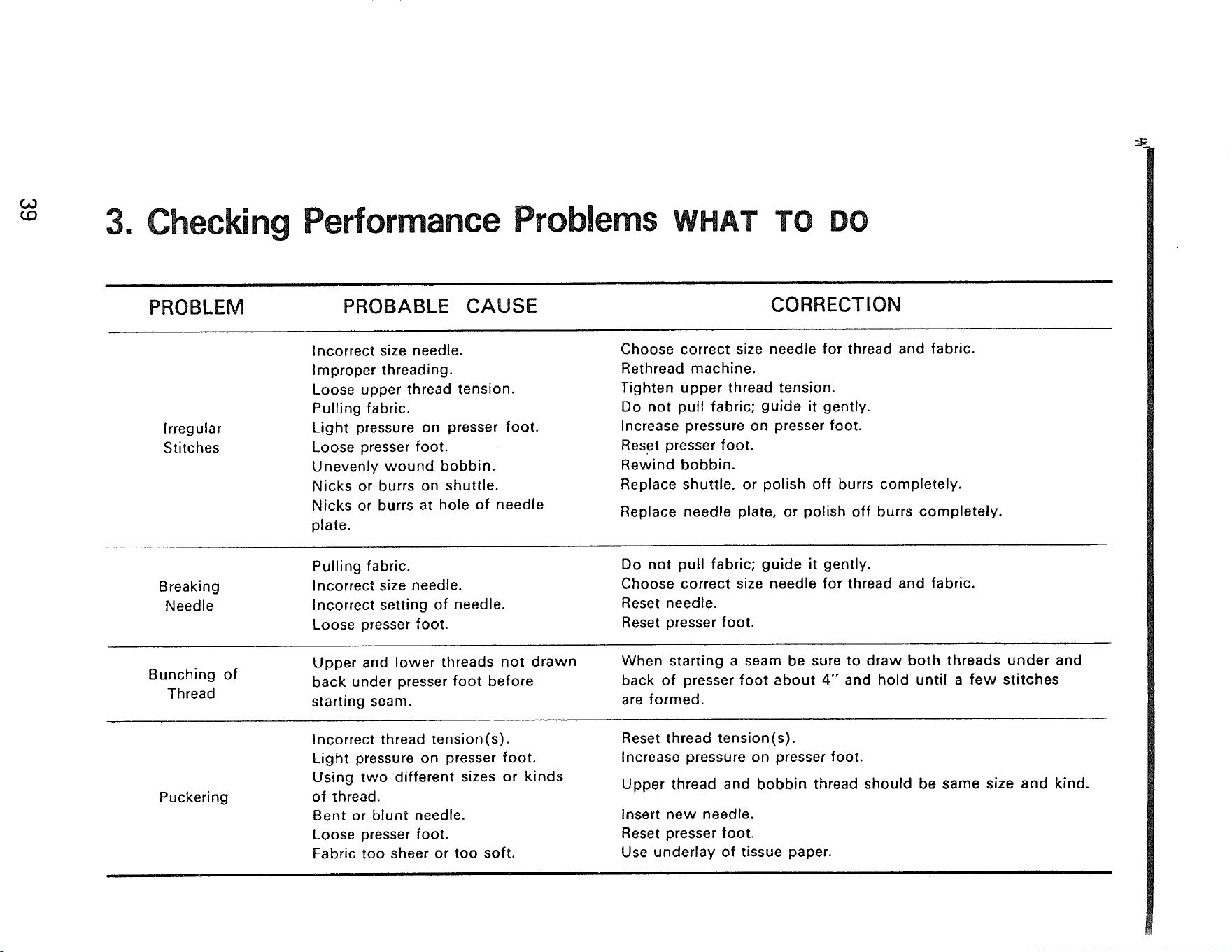
3. Checking Performance Problems WHAT TO DO
PROBLEM PROBABLE CAUSE CORRECTION
Irregular
Stitches
Breaking
Needle
Bunching of
Thread
Puckering
Incorrect size needle.
Improper threading.
Loose upper thread tension.
Pulling fabric.
Light pressure on presser foot.
Loose presser foot.
Unevenly wound bobbin.
Nicks or burrs on shuttle.
Nicks or burrs at hole of needle
plate.
Choose correct size needle for thread and fabric.
Rethread machine.
Tighten upper thread tension.
Do not pull fabric; guide it gently.
Increase pressure on presser foot.
Reset presser foot.
Rewind bobbin.
Replace shuttle, or polish off burrs completely.
Replace needle plate, or polish off burrs completely.
Pulling fabric.
Incorrect size needle.
Incorrect setting of needle.
Loose presser foot.
Do not pull fabric; guide it gently.
Choose correct size needle for thread and fabric.
Reset needle.
Reset presser foot.
Upper and lower threads not drawn
back under presser foot before
starting seam.
When starting a seam be sure to draw both threads under and
back of presser foot about 4" and hold until a few stitches
are formed.
Incorrect thread tension(s).
Light pressure on presser foot.
Using two different sizes or kinds
of thread.
Bent or blunt needle.
Loose presser foot.
Fabric too sheer or too soft.
Reset thread tension(s).
Increase pressure on presser foot.
Upper thread and bobbin thread should be same size and kind.
Insert new needle.
Reset presser foot,
Use underlay of tissue paper.
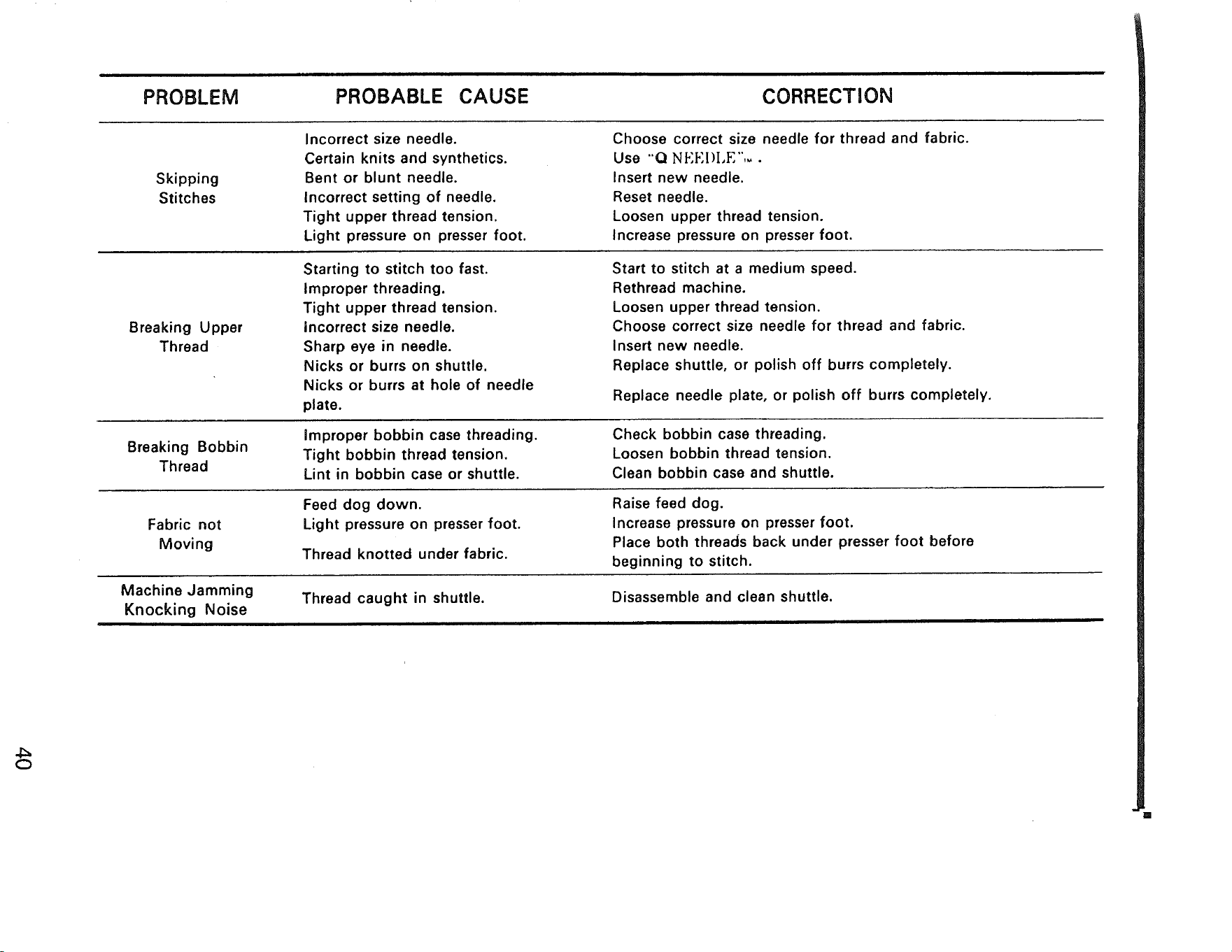
PROBLEM PROBABLE CAUSE CORRECTION
Skipping
Stitches
Breaking Upper
Thread
Breaking Bobbin
Thread
Fabric not
Moving
Machine Jamming
Knocking Noise
Incorrect size needle.
Certain knits and synthetics.
Bent or blunt needle.
Incorrect setting of needle.
Tight upper thread tension.
Light pressure on presser foot.
Choose correct size needle for thread and fabric.
Use "Q NEF, I)I,E",_.
Insert new needle.
Reset needle.
Loosen upper thread tension.
Increase pressure on presser foot.
Starting to stitch too fast.
Improper threading.
Tight upper thread tension.
Incorrect size needle.
Sharp eye in needle.
Nicks or burrs on shuttle.
Nicks or burrs at hole of needle
plate.
Improper bobbin case threading.
Tight bobbin thread tension.
Lint in bobbin case or shuttle.
Feed dog down.
Light pressure on presser foot.
Thread knotted under fabric.
Start to stitch at a medium speed.
Rethread machine.
Loosen upper thread tension.
Choose correct size needle for thread and fabric.
Insert new needle.
Replace shuttle, or polish off burrs completely.
Replace needle plate, or polish off burrs completely.
Check bobbin case threading.
Loosen bobbin thread tension.
Clean bobbin case and shuttle.
Raise feed dog.
Increase pressure on presser foot.
Place both threads back under presser foot before
beginning to stitch.
Thread caught in shuttle.
Disassemble and clean shuttle.
4:=
O
[]
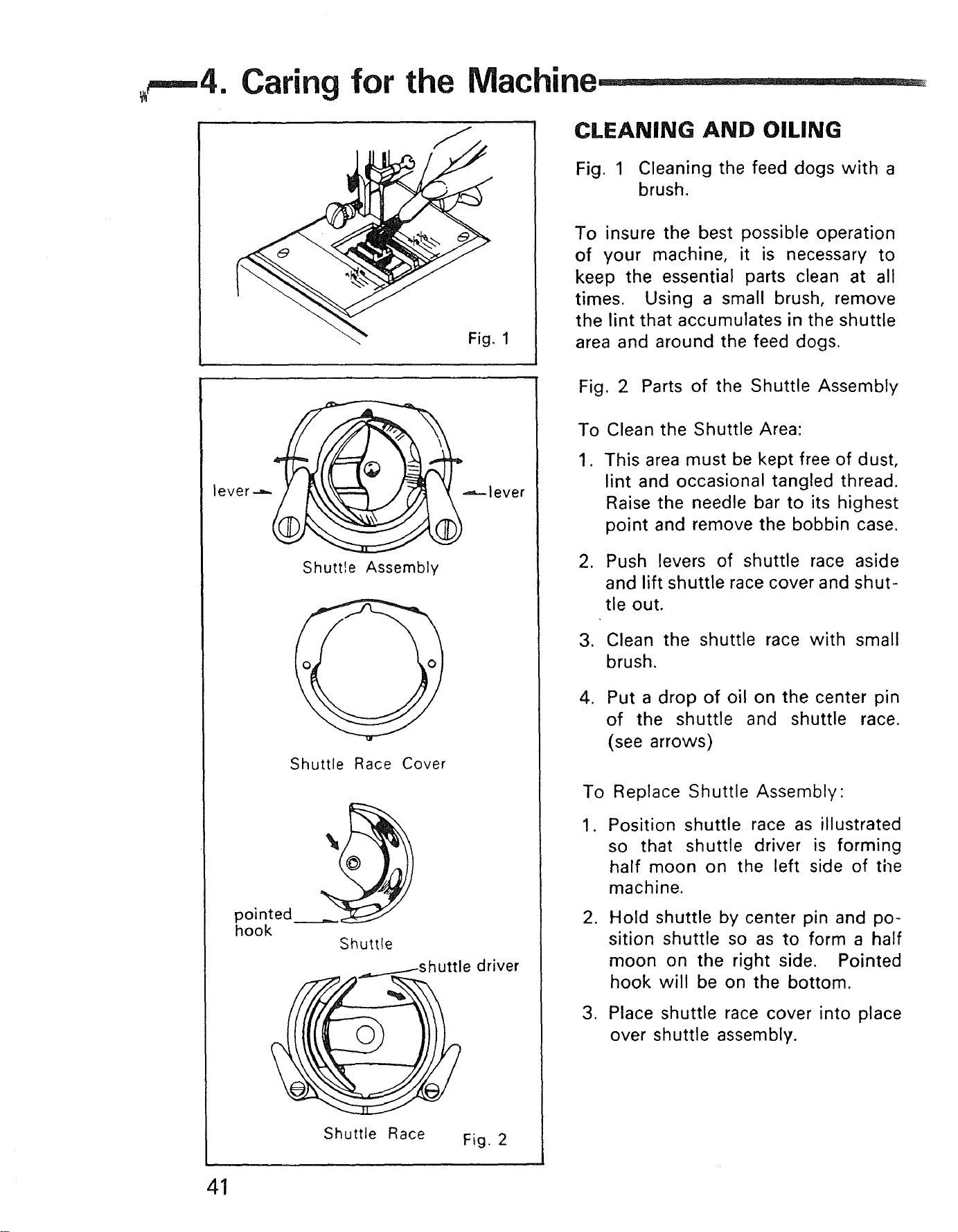
Caring for the Machine
1
CLEANING AND OILING
Fig. 1 Cleaning the feed dogs with a
brush•
To insure the best possible operation
of your machine, it is necessary to
keep the essential parts clean at all
times• Using a small brush, remove
the lint that accumulates in the shuttle
area and around the feed dogs.
lever--_
.-,---lever
Shuttle Assembly
Shuttle Race Cover
onted
hook
Shuttle
driver
Shuttle Race Fig. 2
Fig. 2 Parts of the Shuttle Assembly
To
1.
,
Clean the Shuttle Area:
This area must be kept free of dust,
lint and occasional tangled thread.
Raise the needle bar to its highest
point and remove the bobbin case.
Push levers of shuttle race aside
and lift shuttle race cover and shut-
tle out.
3. Clean the shuttle race with small
brush.
,
Put a drop of oil on the center pin
of the shuttle and shuttle race.
(see arrows)
To Replace Shuttle Assembly:
,
Position shuttle race as illustrated
so that shuttle driver is forming
half moon on the left side of tile
machine•
•
Hold shuttle by center pin and po-
sition shuttle so as to form a half
moon on the right side. Pointed
hook will be on the bottom.
3. Place shuttle race cover into place
over shuttle assembly•
41
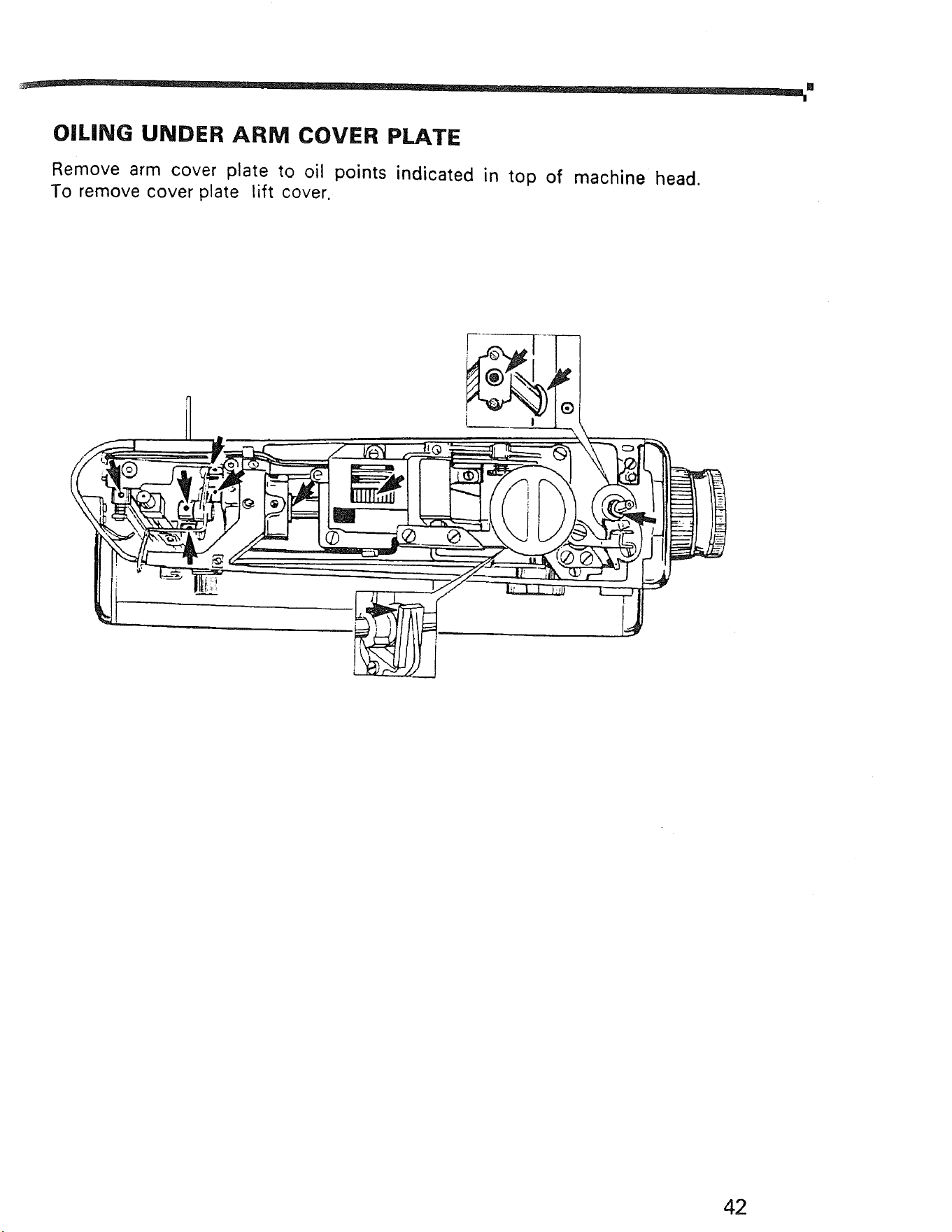
OILING UNDER ARM COVER PLATE
Remove arm cover plate to oil points indicated in top of machine head.
To remove cover plate lift cover.
42
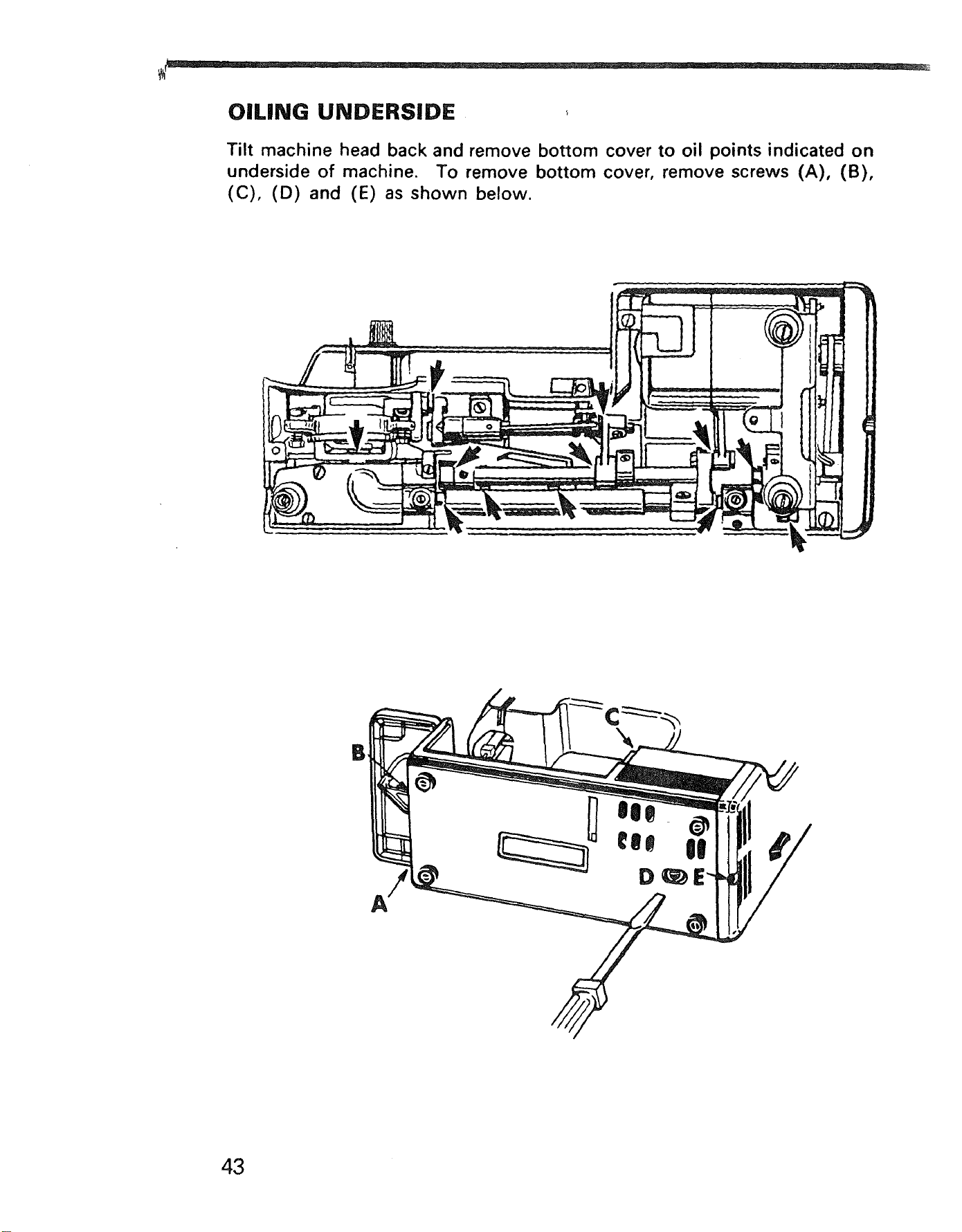
OILING UNDERSIDE
Tilt machine head back and remove bottom cover to oil points indicated on
underside of machine. To remove bottom cover, remove screws (A), (B),
(C), (D) and (E) as shown below.
B
43
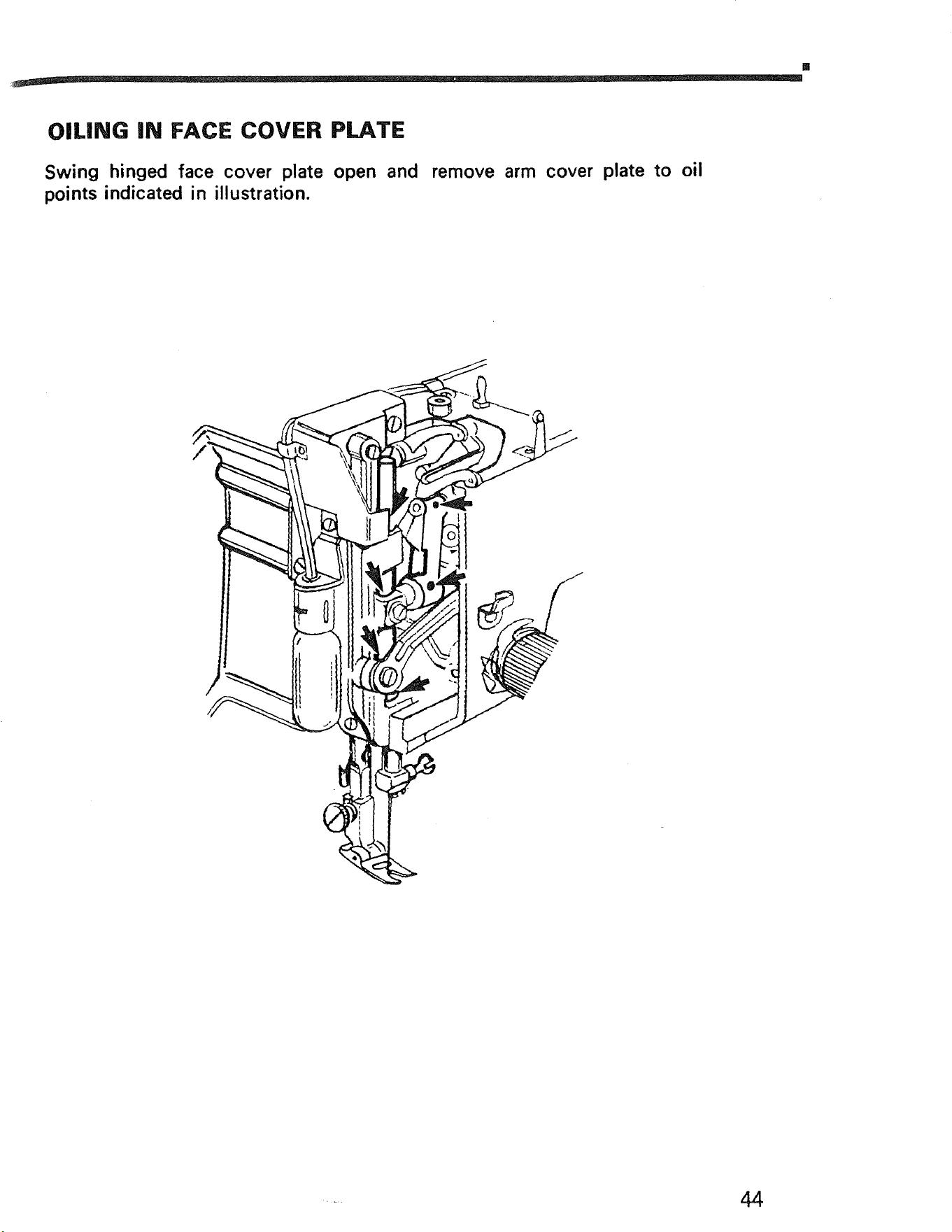
OILING IN FACE COVER PLATE
Swing hinged face cover plate open and remove arm cover plate to oil
points indicated in illustration.
SEWING MACHINE
Now that you have purchased your Sewing Machine, should a
need ever exist for repair parts or service, simply contact any
Sears Service Center and most Sears, Roebuck and Co. or
Simpsons-Sears Limited Stores. Be sure to provide all pertinent
facts when you call or visit.
The model number of your Sewing Machine will be shown on
your nomenclature plate on the right side of your Sewing
Machine. See Section 1, page 3 for location.
WHEN ORDERING REPAIR PARTS, ALWAYS GIVE THE
FOLLOWING INFORMATION:
*MODEL NUMBER *NAME OF ITEM *PART DESCRIPTION
If the parts you need are not stocked locally, your order will be
electronically transmitted to a Sears Repair Parts Distribution
Center for handling.
SEARS, ROEBUCK AND CO., Chicago, IL 60684 U.S.A.
S - 158 Part No. 69565 11/91