!
Use
Electric
Care Guide
Slide-in Range
[_ Electrolu_
318 205 809 (0909) ReV,A
Finding information
MAKEA RECORDFORFUTURE
[] [] [] [] [] [] [] [] [] [] [] [] [] []
Brand
Purchase Date
Model Number
Serial Number
USE
[] [] [] [] [] [] [] []
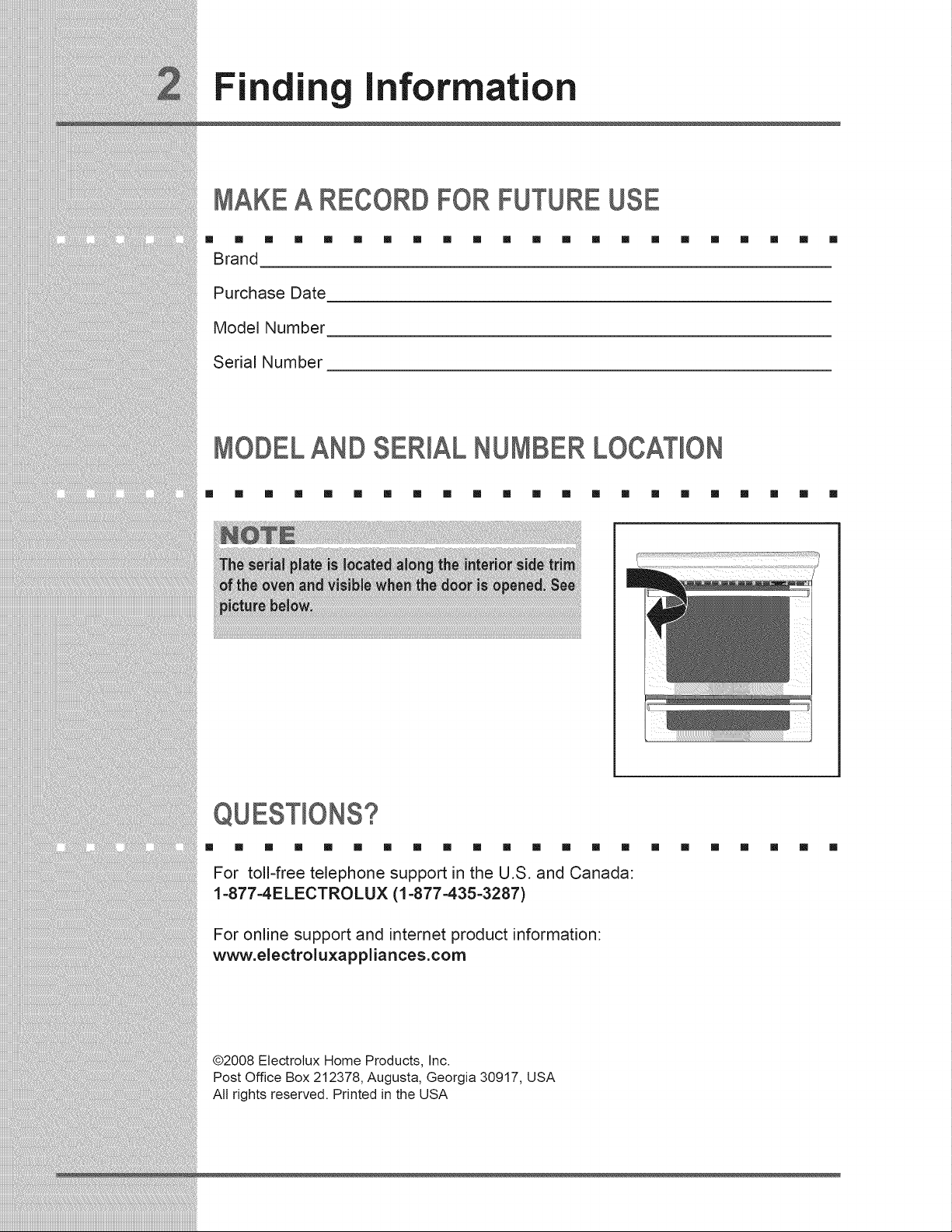
MODELAND SER)AL NUMBER LOCAT)ON
[] [] [] [] [] [] [] [] [] [] [] [] [] [] [] [] [] [] [] [] [] []
[] [] [] [] [] [] [] [] [] [] [] [] [] [] []
For toll-free telephone support in the U.S. and Canada:
1-877-4ELECTROLUX (1-877-435-3287)
For online support and internet product information:
www.electroluxappliances.com
[] [] [] [] [] [] []
@2008 Etectrolux Home Products, Inc.
Post Office Box 212378, Augusta, Georgia 30917, USA
All rights reserved. Printed in the USA
Fin
ing information
TABLE OF CONTENTS
[] [] [] [] [] [] [] [] [] [] [] [] [] [] [] [] [] [] [] [] [] []
FindingInformation..............................................2
Makea Recordfor FutureUse..........................2
ModelandSerialNumberLocation...................2
Questions?.........................................................2
Tableof Contents...............................................3
Safety.....................................................................4
ImportantSafetyInstructions..........................4-7
FeatureOverview..................................................8
YourSlide-inRange........................................8-9
OvenRackSupportsandOvenVents.............10
RemovingandReplacingOvenRacks.............11
ControlPadFunctions................................12-14
GettingStarted....................................................15
SettingClockat PowerUp...............................15
ControlPanelDisplayModes..........................15
TemperatureVisualDisplay.............................15
OvenLight.......................................................16
ControlLock.....................................................16
Settingthe KitchenTimer.................................16
Setting SurfaceControls ...................................17
Aboutthe CeramicGlassCooktop..................17
Usethe CorrectCookwareType......................17
MinimumPanSize Requirements...................17
CookwareRecommendations..........................18
UseQualityCookwarein Good Condition.......19
Settingthe Cooktop....................................20-21
SettingPowerBoost Feature...........................22
PowerSharing.................................................22
OperationalNoises..........................................22
Setting the LowerOven .....................................23
LowerOvenOperation.....................................23
Cooking Modes...................................................24
Baking..............................................................24
CookTime........................................................25
EndTime..........................................................25
Broiling.............................................................26
ConvectionBaking...........................................27
ConvectionConvert.........................................28
RapidPreheat..................................................28
ConvectionRoasting........................................29
ConvectionBroiling..........................................30
KeepWarm......................................................31
SlowCook........................................................32
Dehydrating.....................................................33
Defrosting........................................................33
BreadProofing.................................................34
PerfectTurkey..................................................35
TemperatureProbe..........................................36
MultiStage..................................................37-38
Electronic Control Settings ...............................39
UserPreferenceMenu.....................................39
Settingthe Clock- Timeof day........................39
SettingClockDisplay- On or Off.....................40
SettingTimeof Day- 12or 24 hours...............40
AdjustingOvenTemperature...........................40
SettingTemperatureDisplay- °F or °C...........40
AudioControl...................................................40
SettingContinuousBakeor 12Hour
EnergySaving.................................................41
Re-settingto DefaultFactorySettings.............41
Oven Controls.....................................................42
MyFavorites....................................................42
SabbathFeature.........................................43-44
Care & Cleaninc..................................................45
Usingthe Self-CleanFeature..........................45
Startingthe Self-CleanCycle...........................46
GeneralCleaning.............................................47
CareandCleaningof StainlessSteel..............48
ToRemoveand ReplaceOvenDoor...............48
SpecialDoorCareInstructions........................48
OvenLight.......................................................49
BroilerPanCleaningTips................................49
CooktopCleaningand Maintenance................50
CleaningRecommendationsfor the
CeramicGlassCooktop..............................50-51
Solutions to Common Problems.......................52
BakingProblems..............................................52
Solutions.....................................................53-56
Notes...............................................................57-58
Warranty Information .........................................59
Safety
MPORTANTSAFETY NSTRUCT ONS
[] [] [] [] [] [] [] [] [] [] [] [] [] [] [] [] [] [] [] [] [] []
• All ranges can tip.
• Injury to persons could result.
• Install anti-tip device packed with range.
_t t • See Installation instructions.
To reduce the risk of tipping of the range, the range must be secured by properly installed anti-
ip bracket(s) provided with the range. To check if the bracket (s)is installed properly, remove
he lower panel or storage drawer and verify that the anti-tip bracket (s) is engaged. Refer to
the installation instructions for proper anti-tip bracket(s).
This unit has been tested and found to comply with the limits for a class B digital device,
pursuant to Part 18 of the FCC rules. These limits are designed to provide reasonable
protection against harmful interference in a residential installation. This unit generates, uses
and can radiate radio frequency energy and, if not installed and used in accordance with the
instructions, may cause harmful interference to radio communications. However there is no
guarantee that interference will not occur in a particular installation. If this unit does cause
harmful interference to radio or television reception, which can be determined by turning the
unit off and on, the user is encouraged to try to correct the interference by one or more of
the following measures:
o Reorient or relocate the receiving antennae.
Increase the distance between the unit and receiver.
Connect the unit into an outlet or a circuit different from that to which the receiver is
connected.
Persons with a pacemaker or similar medical device should exercise caution
using or standing near an induction unit while it is in operation, as the electromagnetic field
may affect the working of the pacemaker or similar medical device. It would be advisable
to consult your Doctor or the pacemaker or similar medical device manufacturer about your
particular situation.
• Remove all tape and packaging wrap before using the appliance. Destroy the carton
and plastic bags after unpacking the appliance. Never allow children to play with
packaging material.
Proper InstallationmBe sure your appliance is properly installed and grounded by
a qualified technician in accordance in the United States with National Electrical
Code ANSI/NFPA No. 70mlatest edition and local code requirements, and in Canada
with CSA C22.1 PART 1=latest edition and local code requirements. Install only per
installation instructions provided in the literature package for this appliance.
Ask your dealer to recommend a qualified technician and an authorized repair service.
Know how to disconnect the electrical power to the range at the circuit breaker or fuse
box in case of an emergency.
User Servicing=Do not repair or replace any part of the appliance unless specifically
recommended in the manuals. All other servicing should be done only by a qualified
technician to reduce the risk of personal injury and damage to the appliance.
Never modify or alter the construction of a range by removing leveling legs, panels,
wire covers, anti-tip brackets/screws, or any other part of the product.
Safety
Stepping, leaning or sitting on the door or drawer of this appliance can
result in serious injuries and may also cause damage to the appliance. Do not allow
children to climb or play around the appliance. The weight of a child on an open door may
cause the appliance to tip, resulting in serious burns or other injury. An open drawer, when
hot, may cause burns.
Do not use the oven or warmer drawer (if equipped) for storage.
. Storage in or on AppliancemFlammable materials should not be stored in an oven,
near surface units or in the drawer (if equipped). This includes paper, plastic and cloth
items, such as cookbooks, plasticware and towels, as well as flammable liquids. Do not
store explosives, such as aerosol cans, on or near the appliance. Flammable materials may
explode and result in fire or property damage.
Do not store items of interest to children in the cabinets above the
appliance. Children climbing on the range to reach items could be seriously injured.
Do not leave children alone. Children should not be left alone or unattended in the
area where an appliance is in use. They should never be allowed to sit or stand on any
part of the appliance.
DO NOT TOUCH SURFACE UNITS, AREAS NEAR THESE UNITS, OVEN HEATING
ELEMENTS OR INTERIOR SURFACES OF THE OVEN OR WARMER DRAWER (if
equipped). Both surface units and oven heating elements may be hot even though they
are dark in color. Areas near surface units may become hot enough to cause burns. During
and after use, do not touch, or let clothing or other flammable materials touch these areas
until they have had sufficient time to cool. Among these areas are the cooktop, surfaces
facing the cooktop, the oven vent openings and surfaces near these openings, oven door
and window.
• Wear Proper ApparelmLoose-fitting or hanging garments should never be worn
while using the appliance. Do not let clothing or other flammable materials contact hot
surfaces.
Never use your appliance for warming or heating the room.
. Do Not Use Water or Flour on Grease Fires=Smother the fire with a pan lid, or use
baking soda, a dry chemical or foam-type extinguisher.
o When heating fat or grease, watch it closely. Fat or grease may catch fire if allowed to
become too hot.
e
e
Use Only Dry Potholders_Moist or damp potholders on hot surfaces may result in
burns from steam. Do not let the potholders touch hot heating surface units or interior
oven elements. Do not use a towel or other bulky cloth instead of a potholder.
Do Not Heat Unopened Food Containers_Build up of pressure may cause the container
to burst and result in injury.
Remove the oven door from any unused appliance if it is to be stored or discarded.
IMPORTANT_Do not attempt to operate the oven during a power failure. If the power
fails, always turn the oven off. If the oven is not turned off and the power resumes, the
oven may begin to operate again. Food left unattended could catch fire or spoil.
Electronic controllers can be damaged by cold temperatures. When you
use your appliance for the first time, or if it has not been used for a long period of time,
make sure that it has been exposed to a temperature above 0°C/32°F for at least 3 hours
before connecting it to the power supply.
Safety
e
e
iMPORTANTINSTRUCTIONSFORUSINGYOUR COOKTOP
Know which knob controls each surface heating unit.
Use Proper Pan Size--This appliance is equipped with one or more surface units of different
sizes. Select utensils having flat bottoms large enough to cover the surface unit. The use
of undersized utensils will expose a portion of the surface heating unit to direct contact and
may result in ignition of clothing. Proper relationship of utensil to the surface unit will also
improve efficiency.
Utensil Handles Should Be Turned Inward and Should Not Extend Over Adjacent
Surface Units--To reduce the risk of burns, ignition of flammable materials, and spillage
due to unintentional contact with the utensil. The handle of the utensil should be positioned
so that it is turned inward, and does not extend over adjacent surface unit.
Never Leave Surface Units Unattended--Boilovers cause smoking and greasy spillovers
that may ignite, or a pan that has boiled dry may melt.
Protective liners-- Do not use aluminum foil to line oven bottom or any other part of the
appliance. Only use aluminum foil as recommended for baking if used as a cover placed on
the food. Any other used of protective liners or aluminum foil may result in a risk of electric
shock or fire or a short circuit.
Glazed Cooking Utensils--Only certain types of glass, glass/ceramic, ceramic, earthenware,
or other glazed utensils are suitable for cooktop service without breaking due to the sudden
change in temperature. Check the manufacturer's recommendations for cooktop use.
Do Not Use Decorative Surface Element Covers. If an element is accidentally turned on,
the decorative cover will become hot and possibly melt. Burns will occur if the hot covers
are touched. Damage may also be done to the cooktop.
FORGLASS COOKTOPSONLY
• Do Not Clean or Operate a Broken Cooktop mlf cooktop should break, cleaning solutions
and spillovers may penetrate the broken cooktop and create a risk of electric shock. Contact
a qualified technician immediately.
Clean Cooktop Glass with Cautionmlf a wet sponge or cloth is used to wipe spills on a
hot cooking area, be careful to avoid a steam burn. Some cleaners can produce harmful
fumes if applied to a hot surface.
Avoid scratching the cooktop glass with sharp objects.
IMPORTANTINSTRUCTIONSFOR USINGYOUROVEN
• Use Care When Opening Door or Drawer--Stand to the side of the appliance when
opening the door of a hot oven. Let hot air or steam escape before you remove or replace
food in the oven/warmer drawer.
Keep Oven Vent Ducts Unobstructed. The oven is vented at the front above the oven door
(ceramic glass cooktop models) or through the right rear element (coil element models).
Touching the surfaces in this area when the oven is operating may cause severe burns.
Also, do not place plastic or heat-sensitive items on or near the oven vent. These items
could melt or ignite.
Placement of Oven/Warmer Drawer (if equipped) Racks. Always place oven racks in
desired location while oven/drawer (if equipped) is cool. Remove all utensils from the rack
before removing rack. If rack must be moved while oven is hot, use extreme caution. Use
potholders and grasp the rack with both hands to reposition. Do not let potholders contact
the hot oven element or interior of the oven/warmer drawer (if equipped).
Safety
Do not use a broiler pan without its insert. The broiler pan and grid allow dripping fat to
drain and be kept away from the high heat of the broiler,
Do not cover your broiler or warmer drawer (if equipped) grid with aluminum foil.
Exposed fat and grease could ignite.
Do not touch a hot light bulb with a damp cloth. Doing so could cause the bulb to break.
Disconnect the appliance or turn off the power to the appliance before removing and replacing
light bulb,
IMPORTANTINSTRUCTIONSFORCLEANINGYOURRANGE
• Clean the range regularly to keep all parts free of grease that could catch fire. Exhaust
fan ventilation hoods and grease filters should be kept clean. Do not allow grease to
accumulate. Greasy deposits in the fan could catch fire, Refer to the hood manufacturer's
instructions for cleaning,
o Cleaners/aerosols--Always follow the manufacturer's recommended directions for use.
Be aware that excess residue from cleaners and aerosols may ignite causing damage and/
or injury.
SELF-CLEANINGOVENS:
o Clean in the self=cleaning cycle only the parts of the oven listed in this owner's guide.
Before self-cleaning the oven, remove all utensils stored in the oven.
Do not clean the oven door gasket. The door gasket is essential for a good seal. Care
should be taken not to rub, damage or move the gasket,
Oven racks. Oven racks will be damaged if left in the oven during a self-cleaning cycle.
Do not use oven cleaners. No oven cleaner or oven liner protective coating of any kind
should be used in or around any part of the oven.
Remove oven racks. Oven racks will be damaged if left in the oven during a self-cleaning
cycle,
The health of some birds is extremely sensitive to the fumes given off
during the self-clean cycle of any range. Move birds to another well ventilated room.
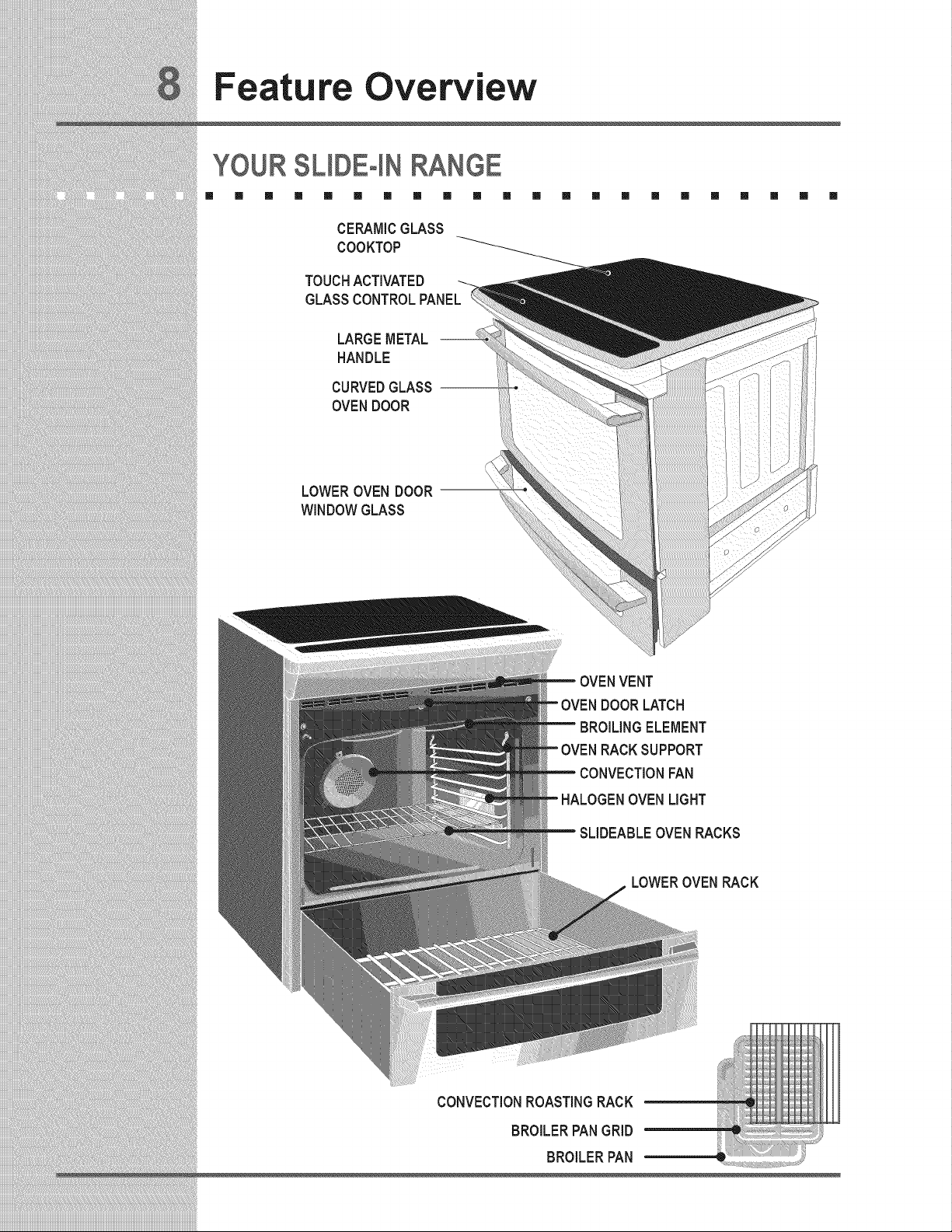
Feature Overview
YOUR SUDEqN RANGE
[] [] [] [] [] [] [] [] [] [] []
CERAMICGLASS
COOKTOP
TOUCHACTIVATED
GLASSCONTROLPANEL
LARGEMETAL
HANDLE
CURVEDGLASS
OVENDOOR
[] [] [] [] [] [] [] [] [] []
LOWEROVENDOOR
WINDOWGLASS
OVENVENT
OVENDOORLATCH
BROILINGELEMENT
OVENRACKSUPPORT
CONVECTIONFAN
HALOGENOVENLIGHT
SLIDEABLEOVENRACKS
LOWEROVENRACK
CONVECTIONROASTINGRACK
BROILERPANGRID
BROILERPAN
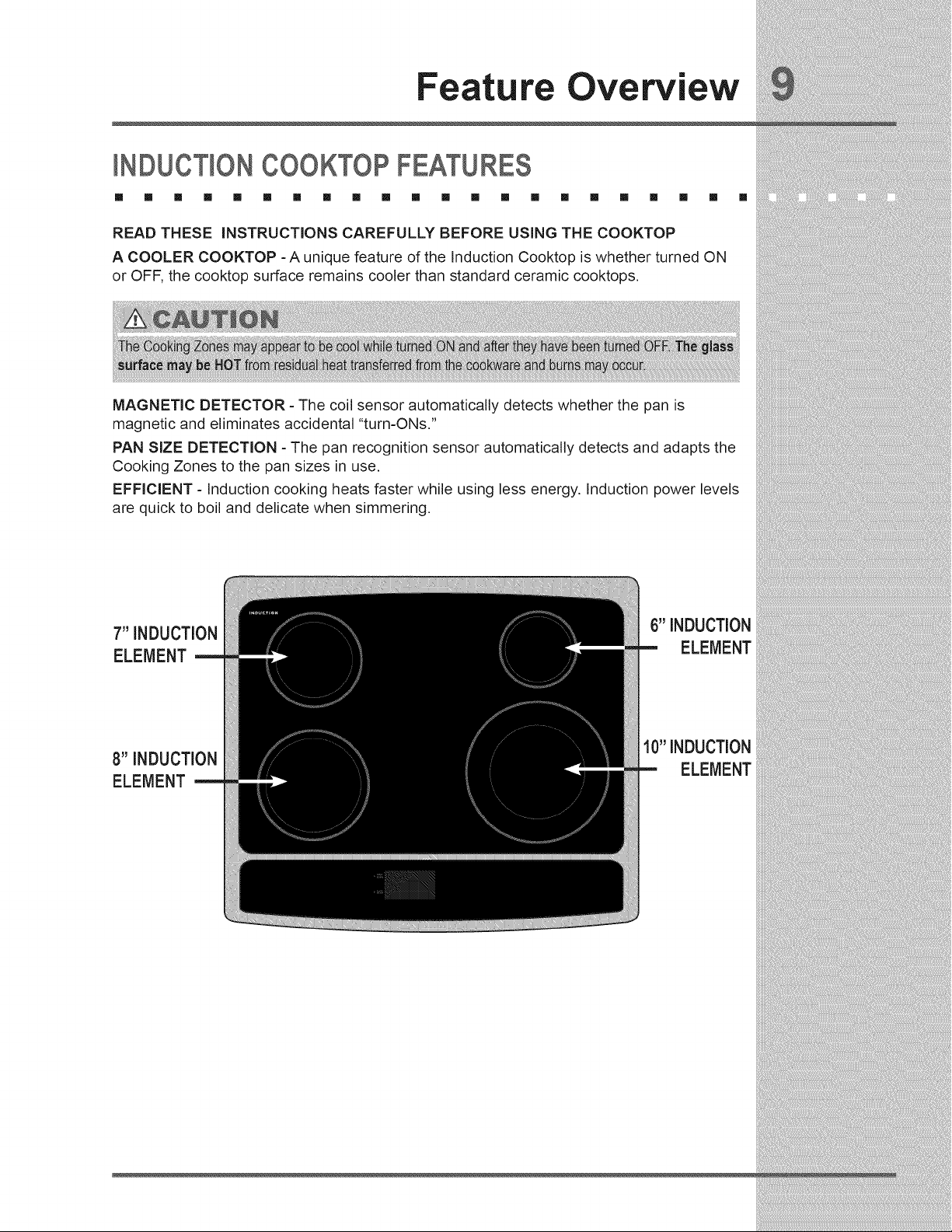
Feature Overview
NDUCT ONCOOKTOPFEATURES
[] [] [] [] [] [] [] [] [] [] [] [] [] [] [] [] [] [] [] [] []
READ THESE iNSTRUCTiONS CAREFULLY BEFORE USING THE COOKTOP
A COOLER COOKTOP - A unique feature of the Induction Cooktop is whether turned ON
or OFF, the cooktop surface remains cooler than standard ceramic cooktops.
MAGNETIC DETECTOR - The coil sensor automatically detects whether the pan is
magnetic and eliminates accidental "turn-ONs."
PAN SIZE DETECTION - The pan recognition sensor automatically detects and adapts the
Cooking Zones to the pan sizes in use.
EFFICIENT - Induction cooking heats faster while using less energy, Induction power levels
are quick to boil and delicate when simmering,
7" INDUCTION
ELEMENT
6" INDUCTION
ELEMENT
8" INDUCTION
ELEMENT
10" INDUCTION
ELEMENT
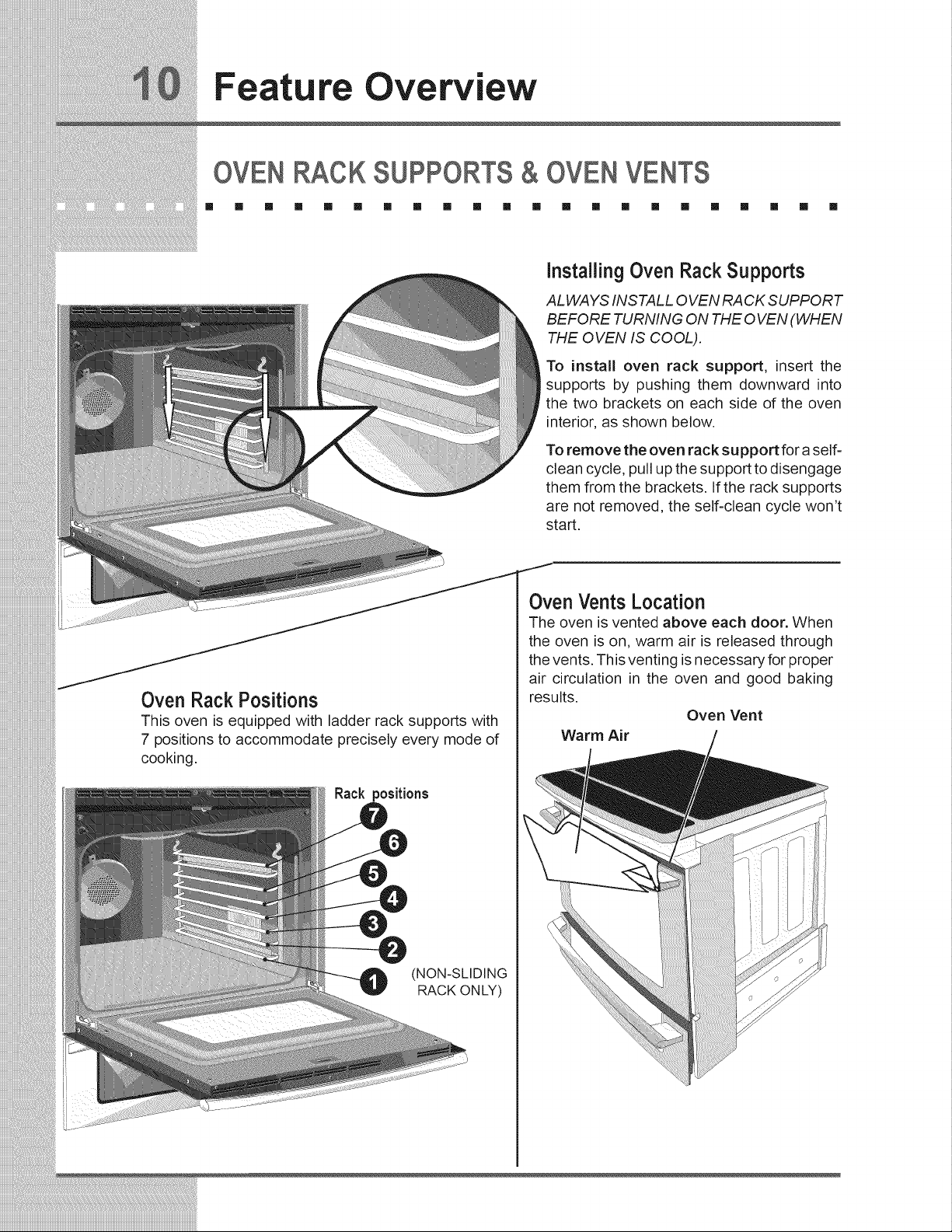
Feature Overview
OVENRACKSUPPORTS& OVENVENTS
[] [] [] [] [] [] [] [] [] [] [] [] [] [] [] [] [] [] [] [] [] []
InstallingOven Rack Supports
ALWAYS INSTALL OVEN RA CK SUPPORT
BEFORE TURNING ON THE 0 VEN (WHEN
THE OVEN IS COOL).
To install oven rack support, insert the
supports by pushing them downward into
the two brackets on each side of the oven
interior, as shown below.
To remove the oven rack support for a self-
clean cycle, pull up the support to disengage
them from the brackets. If the rack supports
are not removed, the self-clean cycle won't
start.
Oven Rack Positions
This oven is equipped with ladder rack supports with
7 positions to accommodate precisely every mode of
cooking.
Rack positions
(NON-SLIDING
RACK ON LY)
Oven Vents Location
The oven is vented above each door. When
the oven is on, warm air is released through
the vents. This venting is necessary for proper
air circulation in the oven and good baking
results,
Oven Vent
Warm Air
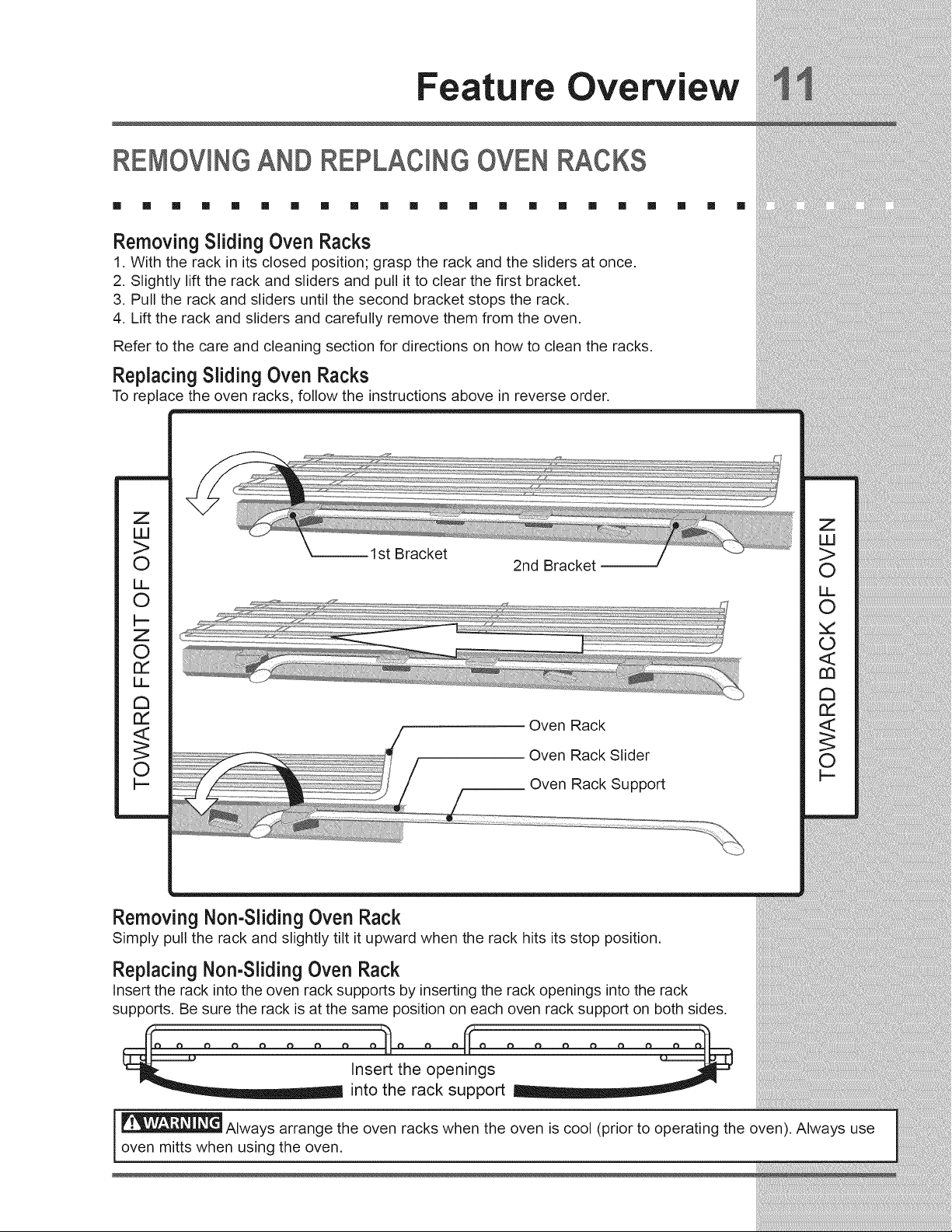
Feature Overview
REMOVINGAND REPLACING OVEN RACKS
[] [] [] [] [] [] [] [] [] [] [] [] [] [] [] [] [] [] [] [] [] []
Removing Sliding Oven Racks
1. With the rack in its closed position; grasp the rack and the sliders at once.
2. Slightly lift the rack and sliders and pull it to clear the first bracket,
3. Pull the rack and sliders until the second bracket stops the rack.
4. Lift the rack and sliders and carefully remove them from the oven.
Refer to the care and cleaning section for directions on how to clean the racks.
Replacing Sliding Oven Racks
To replace the oven racks, follow the instructions above in reverse order.
Z
UJ
>
0
LL
0
t--
Z
0
rY
DE_
¢h
rY
<_
0
t--
1st Bracket
2nd Bracket
Oven Rack
Oven Rack Slider
Oven Rack Support
Removing Non-Sliding Oven Rack
Simply pull the rack and slightly tilt it upward when the rack hits its stop oosition.
Replacing Non-Sliding Oven Rack
Insert the rack into the oven rack supports by inserting the rack openings into the rack
supports. Be sure the rack is at the same position on each oven rack support on both sides,
II II
_ Insert the openings
..... into the rack support ....
Always arrange the oven racks when the oven is cool (prior to operating the oven). Always use
oven mitts when using the oven,
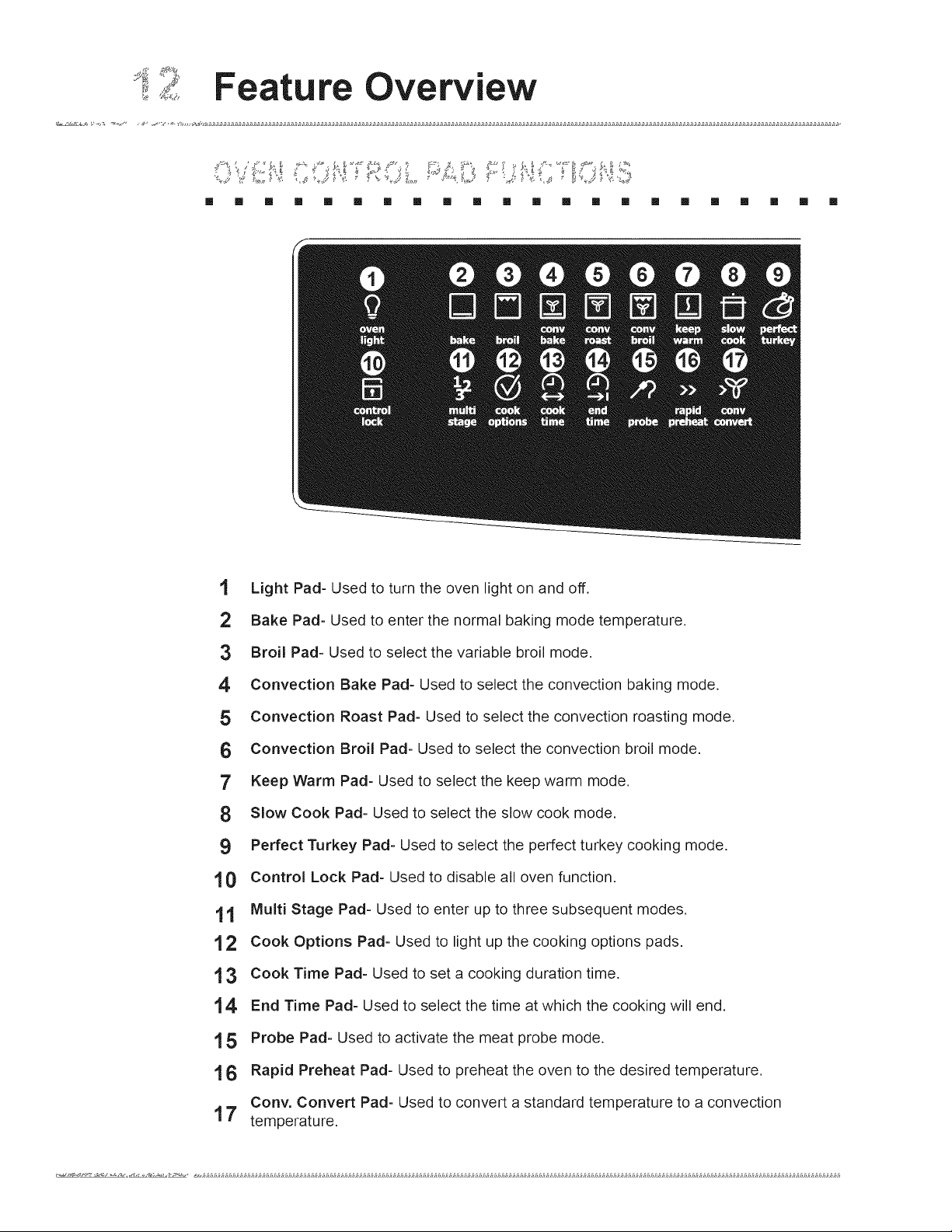
Feature Overview
[] [] [] [] [] [] [] [] [] [] [] [] [] [] [] [] [] [] [] [] [] []
'I Light Pad- Used to turn the oven light on and off.
2 Bake Pad- Used to enter the normal baking mode temperature.
3 Broil Pad- Used to select the variable broil mode.
4 Convection Bake Pad- Used to select the convection baking mode.
5 Convection Roast Pad- Used to select the convection roasting mode.
6 Convection Broil Pad- Used to select the convection broil mode.
7' Keep Warm Pad- Used to select the keep warm mode.
8 Slow Cook Pad- Used to select the slow cook mode.
9 Perfect Turkey Pad- Used to select the perfect turkey cooking mode.
'10 Control Lock Pad- Used to disable all oven function.
'1'1 Multi Stage Pad- Used to enter up to three subsequent modes.
'12 Cook Options Pad- Used to light up the cooking options pads.
1 3 Cook Time Pad- Used to set a cooking duration time.
14 End Time Pad- Used to select the time at which the cooking will end.
'15 Probe Pad- Used to activate the meat probe mode.
'16 Rapid Preheat Pad- Used to preheat the oven to the desired temperature.
Cony. Convert Pad- Used to convert a standard temperature to a convection
17 temperature.
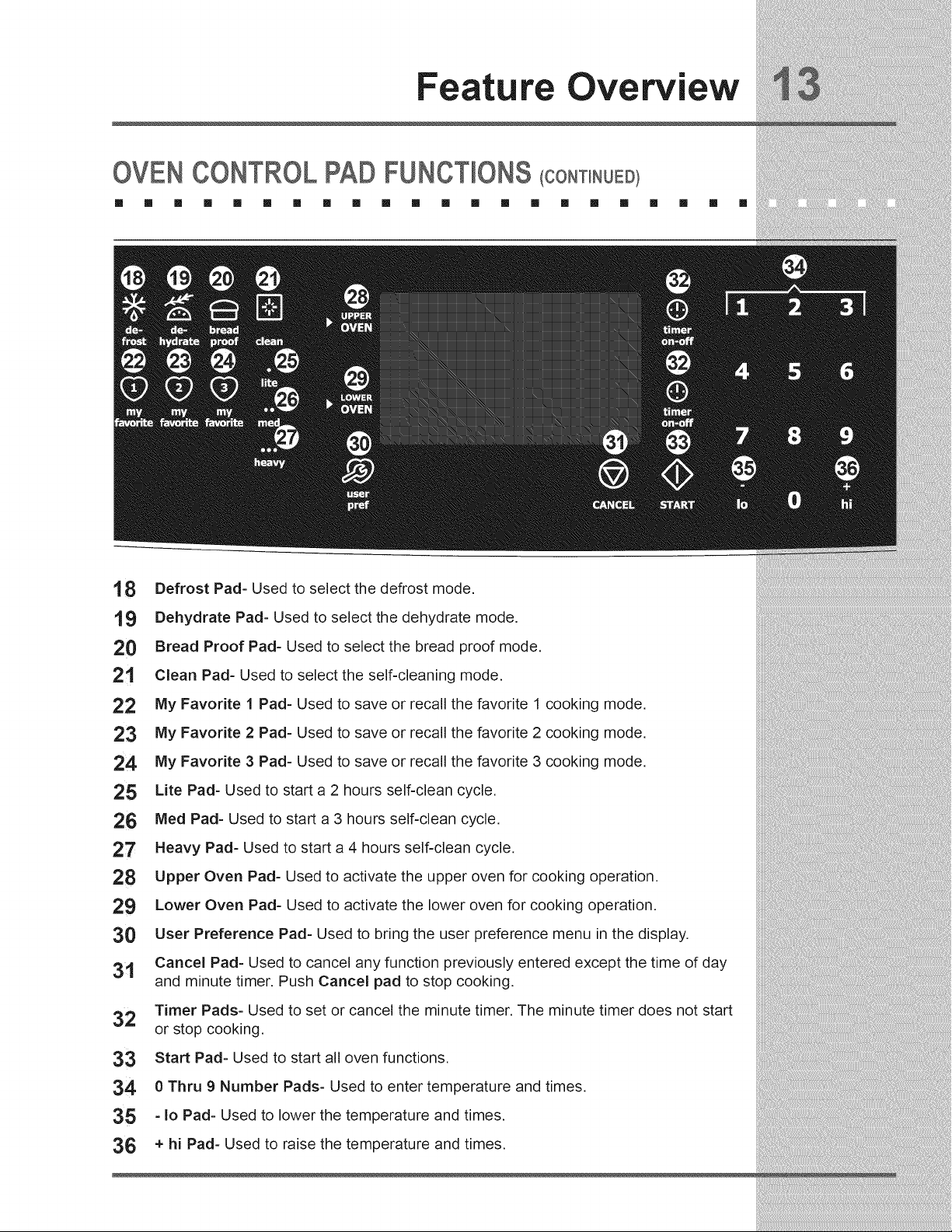
Feature Overview
OVEN CONTROL PAD FUNCTIONS (CONT NUEm
[] [] [] [] [] [] [] [] [] [] [] [] [] [] [] [] [] [] [] [] [] []
'18 Defrost Pad- Used to select the defrost mode.
19 Dehydrate Pad- Used to select the dehydrate mode.
20 Bread Proof Pad- Used to select the bread proof mode,
21 Clean Pad- Used to select the self-cleaning mode.
22 My Favorite 1 Pad- Used to save or recall the favorite 1 cooking mode,
23 My Favorite 2 Pad- Used to save or recall the favorite 2 cooking mode,
24 My Favorite 3 Pad- Used to save or recall the favorite 3 cooking mode,
25 Lite Pad- Used to start a 2 hours self-clean cycle,
26 Meal Pad- Used to start a 3 hours self-clean cycle,
27 Heavy Pad- Used to start a 4 hours self-clean cycle,
28 Upper Oven Pad- Used to activate the upper oven for cooking operation,
29 Lower Oven Pad- Used to activate the lower oven for cooking operation,
30 User Preference Pad- Used to bring the user preference menu in the display,
31 Cancel Pad- Used to cancel any function previously entered except the time of day
and minute timer, Push Cancel pad to stop cooking,
32 Timer Pads- Used to set or cancel the minute timer, The minute timer does not start
or stop cooking,
33 Start Pad- Used to start all oven functions,
34 0 Thru 9 Number Pads- Used to enter temperature and times.
35 - Io Pad- Used to lower the temperature and times.
36 + hi Pad- Used to raise the temperature and times.
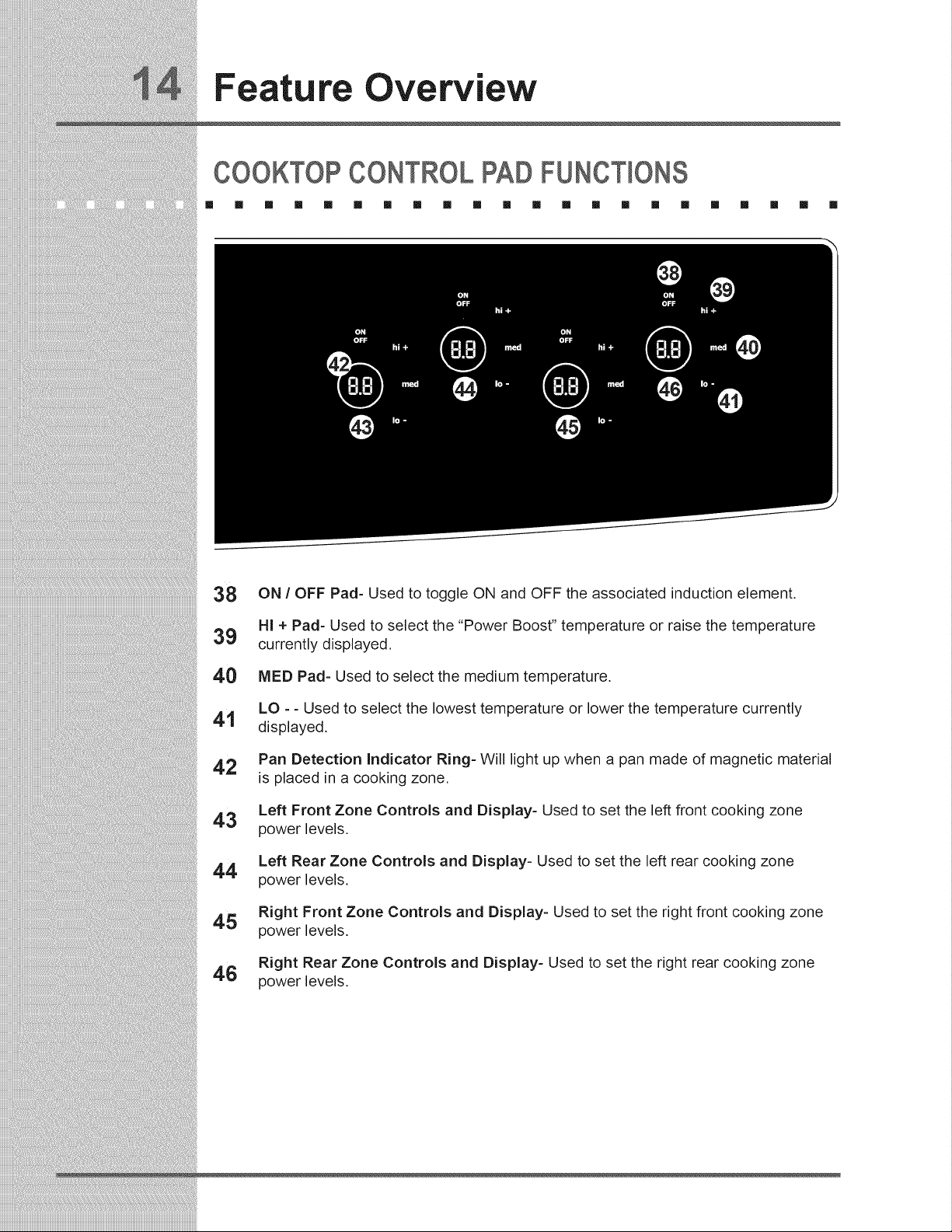
Feature Overview
COOKTOP CONTROL PAD FUNCTIONS
[] [] [] [] [] [] [] [] [] [] [] [] [] [] [] [] [] [] [] [] [] []
38 ON / OFF Pad- Used to toggle ON and OFF the associated induction element.
HI + Pad- Used to select the "Power Boost" temperature or raise the temperature
39 currently displayed.
40 MED Pad- Used to select the medium temperature.
LO - - Used to select the lowest temperature or lower the temperature currently
41 displayed.
42 Pan Detection Indicator Ring- Will light up when a pan made of magnetic material
is placed in a cooking zone.
Left Front Zone Controls and Display- Used to set the left front cooking zone
43 power levels.
Left Rear Zone Controls and Display- Used to set the left rear cooking zone
44
power levels.
Right Front Zone Controls and Display- Used to set the right front cooking zone
45 power levels.
Right Rear Zone Controls and Display- Used to set the right rear cooking zone
46 power levels.
Getting Started
S T NG CLOCK AT POWERUP
[] [] [] [] [] [] [] [] [] [] [] [] [] [] [] [] [] [] [] [] [] []
When the unit is first plugged in, or when the power supply to the range has been interrupted,
the timer in the display will flash with "12:00". The clock cannot be set when the oven is
on. If an invalid time of day is entered, the control will triple beep to prompt you to re-enter
a valid time of day.
Toset the clock (examplefor 1:30):
+
1. Press_@_0_padstosetthetimeofdayto l:30. The pads hi or lo can also be pressed
to raise or lower the actual time displayed.
2. Press START <_> to accept the changes or CANCEL (@) to start with a time of 12:00.
CONTROL PANEL D SPLAY MODES
[] [] [] [] [] [] [] [] [] [] [] [] [] [] [] [] [] [] [] [] [] []
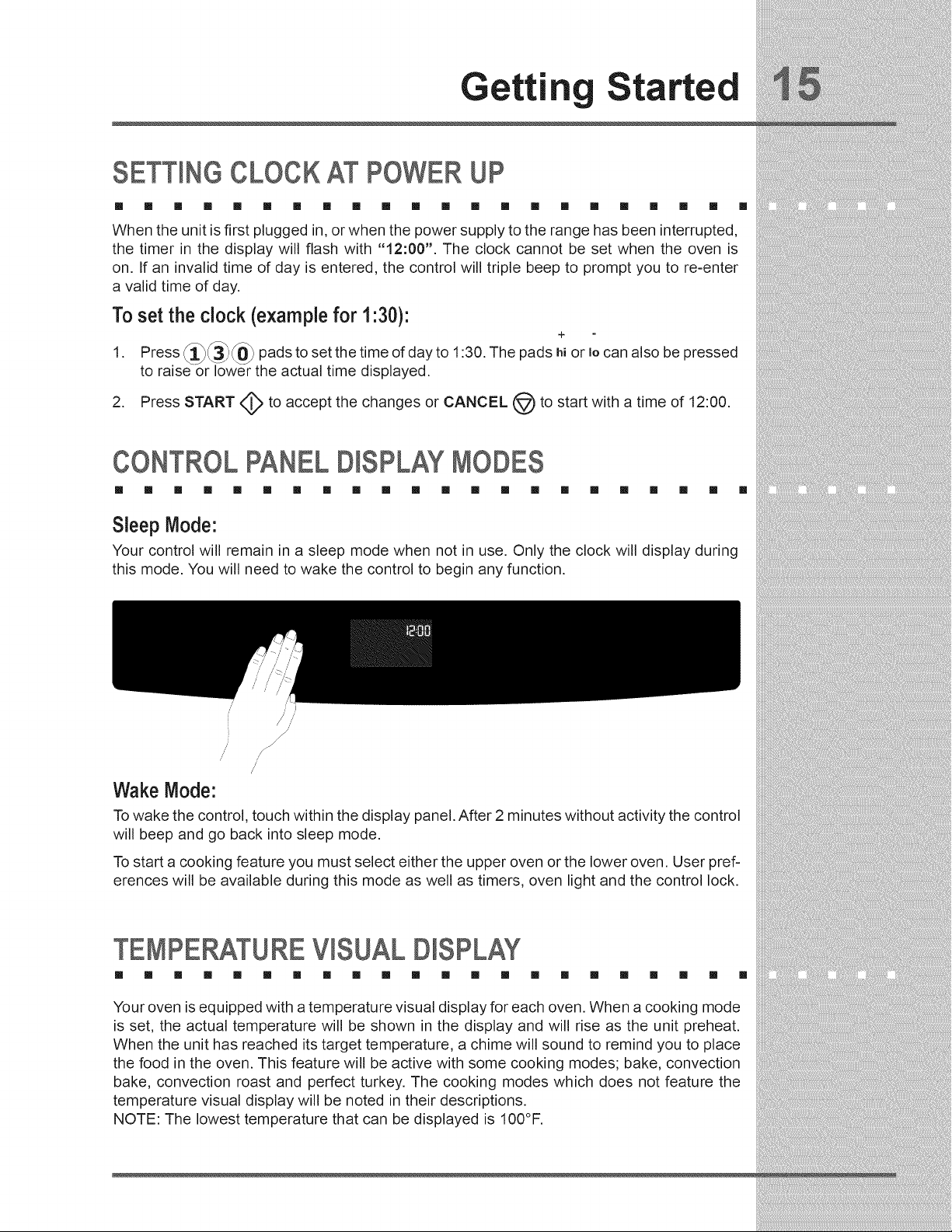
Sleep Mode:
Your control will remain in a sleep mode when not in use. Only the clock will display during
this mode. You will need to wake the control to begin any function.
/
/
// //
/
/
Wake Mode:
To wake the control, touch within the display panel. After 2 minutes without activity the control
will beep and go back into sleep mode.
To start a cooking feature you must select either the upper oven or the lower oven. User pref-
erences will be available during this mode as well as timers, oven light and the control lock.
TEMPERATUREVISUAL D SPLAY
[] [] [] [] [] [] [] [] [] [] [] [] [] [] [] [] [] [] [] [] [] []
Your oven is equipped with a temperature visual display for each oven. When a cooking mode
is set, the actual temperature will be shown in the display and will rise as the unit preheat.
When the unit has reached its target temperature, a chime will sound to remind you to place
the food in the oven. This feature will be active with some cooking modes; bake, convection
bake, convection roast and perfect turkey. The cooking modes which does not feature the
temperature visual display will be noted in their descriptions.
NOTE: The lowest temperature that can be displayed is 100°F.
Gettin Started
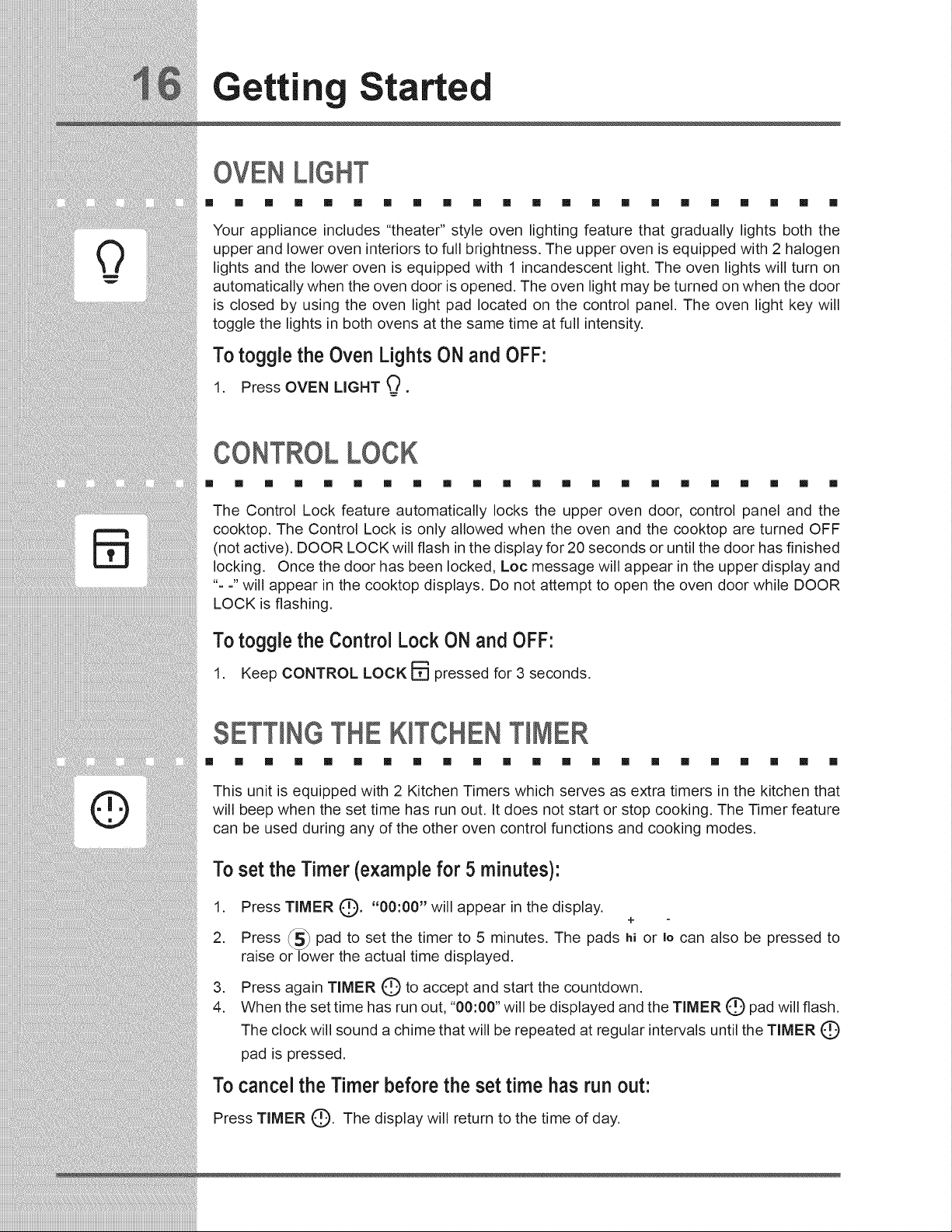
OVEN UGHT
[] [] [] [] [] [] [] [] [] [] [] [] [] [] [] [] [] [] [] [] [] []
Your appliance includes "theater" style oven lighting feature that gradually lights both the
upper and lower oven interiors to full brightness. The upper oven is equipped with 2 halogen
lights and the lower oven is equipped with 1 incandescent light. The oven lights will turn on
automatically when the oven door is opened. The oven light may be turned on when the door
is closed by using the oven light pad located on the control panel. The oven light key will
toggle the lights in both ovens at the same time at full intensity.
To toggle the Oven Lights ON and OFF:
1. Press OVEN LIGHT
CONTROL LOCK
[] [] [] [] [] [] [] [] [] [] [] [] [] [] [] [] [] [] [] [] [] []
The Control Lock feature automatically locks the upper oven door, control panel and the
cooktop. The Control Lock is only allowed when the oven and the cooktop are turned OFF
(not active). DOOR LOCK will flash in the display for 20 seconds or until the door has finished
locking. Once the door has been locked, Loc message will appear in the upper display and
"- -" will appear in the cooktop displays. Do not attempt to open the oven door while DOOR
LOCK is flashing.
To toggle the Control Lock ON and OFF:
1. Keep CONTROL LOCK F_ pressed for 3 seconds.
SETTINGTHE KITCHENTIMER
[] [] [] [] [] [] [] [] [] [] [] [] [] [] [] [] [] [] [] [] [] []
This unit is equipped with 2 Kitchen Timers which serves as extra timers in the kitchen that
will beep when the set time has run out. It does not start or stop cooking. The Timer feature
can be used during any of the other oven control functions and cooking modes.
Toset the Timer (examplefor 5 minutes):
1. Press TIMER (_). "00:00" will appear in the display.
+
2. Press _5_ pad to set the timer to 5 minutes. The pads hi or Io can also be pressed to
raise or lower the actual time displayed.
.
4.
Press again TIMER C) to accept and start the countdown.
When the set time has run out, "00:00" will be displayed and the TIMER C) pad will flash.
The clock will sound a chime that will be repeated at regular intervals until the TIMER Q
pad is pressed.
Tocancel the Timer before the set time has run out:
Press TIMER C). The display will return to the time of day.
Setting
urface Controls
ABOUT THE CERAMIC GLASS COOKTOP
[] [] [] [] [] [] [] [] [] [] [] [] [] [] [] [] [] [] [] [] [] []
The ceramic cooktop has inductor elements located below the surface of the glass. The
design of the ceramic cooktop outlines the area of the inductor element underneath. Make
sure the diameter of the pan matches the diameter of the element outline on the cooktop.
Only flat-bottom cookware should be used. Heat may be transferred from the cookware to
the ceramic glass and the areas surrounding the elements may become hot enough to
cause burns. The type and size of cookware, the number of inductor elements in use and
the settings, are all factors that will affect the amount of heat that will spread to areas beyond
the surface elements.
USETHECORRECTCOOKWARETYPE
[] [] [] [] [] [] [] [] [] [] [] [] [] [] [] [] [] []
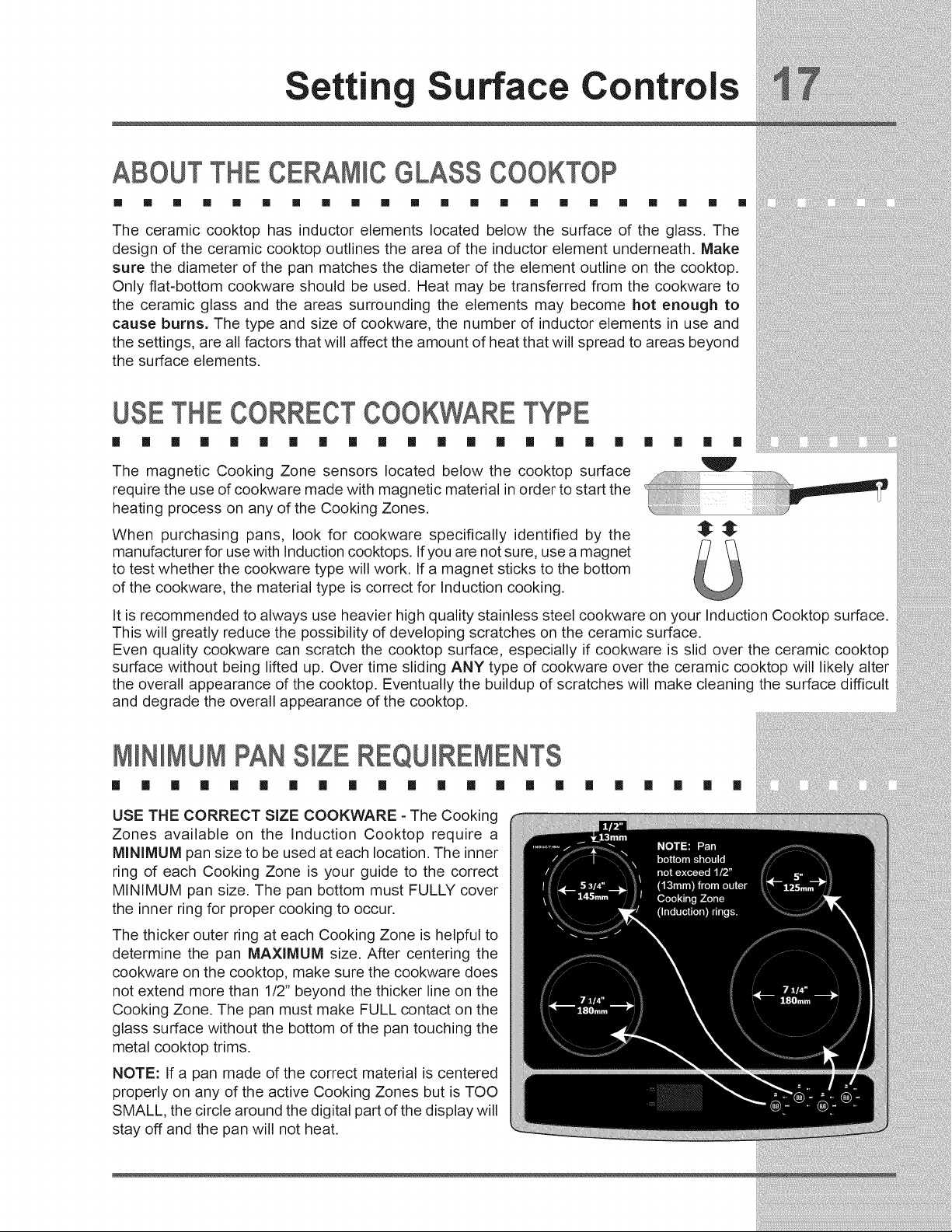
The magnetic Cooking Zone sensors located below the cooktop surface
require the use of cookware made with magnetic material in order to start the
heating process on any of the Cooking Zones.
When purchasing pans, look for cookware specifically identified by the
manufacturer for use with Induction cooktops. Ifyou are not sure, use a magnet
to test whether the cookware type will work. If a magnet sticks to the bottom
of the cookware, the material type is correct for Induction cooking.
[] [] [] []
V
It is recommended to always use heavier high quality stainless steel cookware on your Induction Cooktop surface.
This will greatly reduce the possibility of developing scratches on the ceramic surface.
Even quality cookware can scratch the cooktop surface, especially if cookware is slid over the ceramic cooktop
surface without being lifted up. Over time sliding ANY type of cookware over the ceramic cooktop will likely alter
the overall appearance of the cooktop. Eventually the buildup of scratches will make cleaning the surface difficult
and degrade the overall appearance of the cooktop.
M NmMUMPANS ZEREQUmREMENTS
[] [] [] [] [] [] [] [] [] [] [] [] [] [] [] []
USE THE CORRECT SiZE COOKWARE - The Cooking
Zones available on the Induction Cooktop require a
MINIMUM pan size to be used at each location. The inner
ring of each Cooking Zone is your guide to the correct
MINIMUM pan size. The pan bottom must FULLY cover
the inner ring for proper cooking to occur.
The thicker outer ring at each Cooking Zone is helpful to
determine the pan MAXIMUM size. After centering the
cookware on the cooktop, make sure the cookware does
not extend more than 1/2" beyond the thicker line on the
Cooking Zone. The pan must make FULL contact on the
glass surface without the bottom of the pan touching the
metal cooktop trims.
NOTE: If a pan made of the correct material is centered
properly on any of the active Cooking Zones but is TOO
SMALL, the circle around the digital part of the display will
stay off and the pan will not heat.
[] [] [] [] [] []
Settin Surface Controls
COOKWARERECOMMENDATIONS
m m m m m m m m [] [] [] [] [] [] [] [] [] [] [] [] [] []
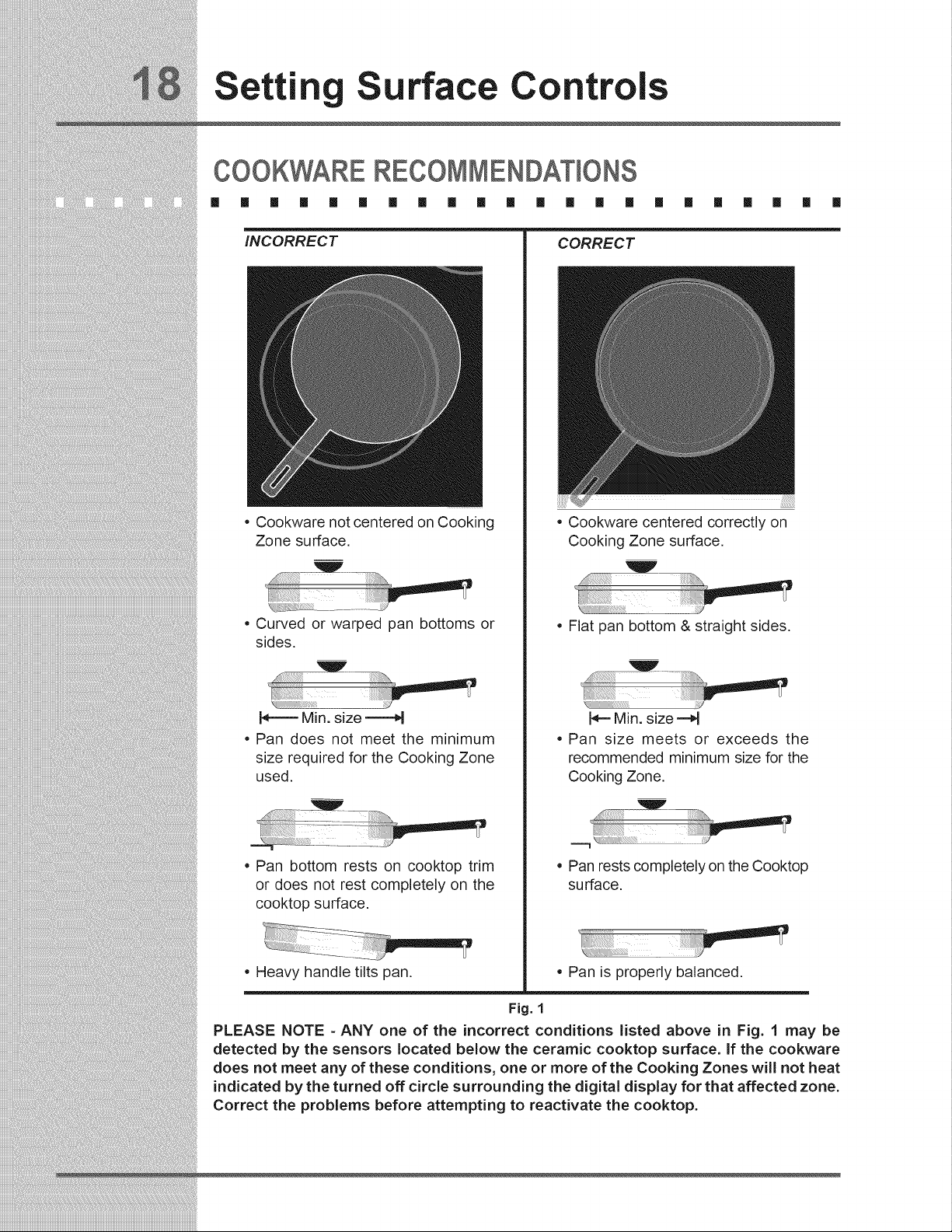
iNCORRECT
o Cookware not centered on Cooking
Zone surface.
Curved or warped pan bottoms or
sides.
N====Min. size ====H
Pan does not meet the minimum
size required for the Cooking Zone
used.
Pan bottom rests on cooktop trim
or does not rest completely on the
cooktop surface.
Heavy handle tilts pan.
CORRECT
Cookware centered correctly on
Cooking Zone surface.
Flat pan bottom & straight sides.
N==Min. size ==d
Pan size meets or exceeds the
recommended minimum size for the
Cooking Zone.
W
Pan rests completely on the Cooktop
surface.
Pan is properly balanced.
Fig. 1
PLEASE NOTE - ANY one of the incorrect conditions listed above in Fig. 1 may be
detected by the sensors located below the ceramic cooktop surface. If the cookware
does not meet any of these conditions, one or more of the Cooking Zones will not heat
indicated by the turned off circle surrounding the digital display for that affected zone.
Correct the problems before attempting to reactivate the cooktop.
Setting
urface Controls
USE QUAMTY COOKWARE GOOD CONDiTiON
il il il il il il il il [] il il [] il il il il [] il il il il []
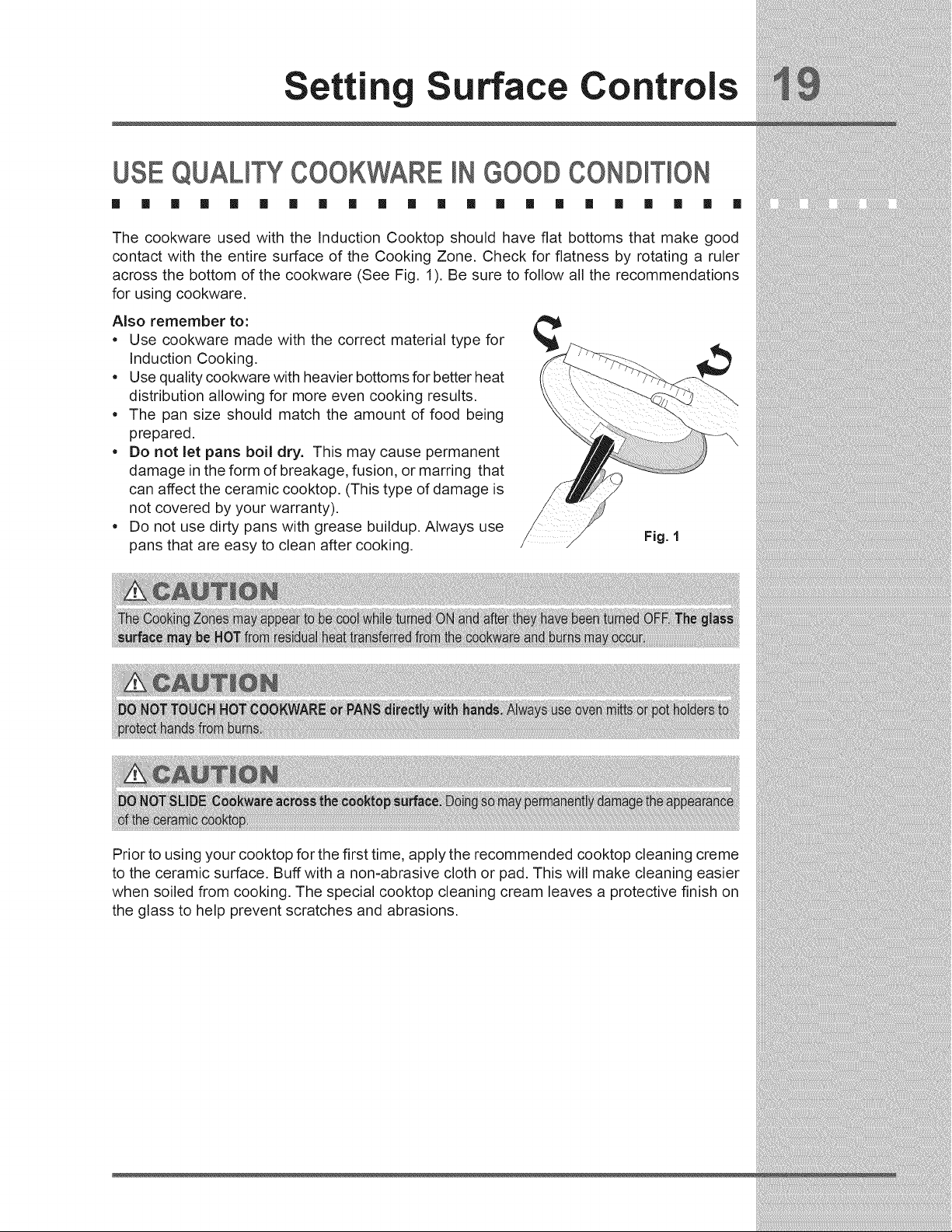
The cookware used with the Induction Cooktop should have flat bottoms that make good
contact with the entire surface of the Cooking Zone. Check for flatness by rotating a ruler
across the bottom of the cookware (See Fig. 1). Be sure to follow all the recommendations
for using cookware.
Also remember to:
• Use cookware made with the correct material type for
Induction Cooking.
• Use quality cookware with heavier bottoms for better heat
distribution allowing for more even cooking results.
• The pan size should match the amount of food being
prepared.
• Do not let pans boil dry. This may cause permanent
damage in the form of breakage, fusion, or marring that
can affect the ceramic cooktop. (This type of damage is
not covered by your warranty).
• Do not use dirty pans with grease buildup. Always use
pans that are easy to clean after cooking.
Prior to using your cooktop for the first time, apply the recommended cooktop cleaning creme
to the ceramic surface. Buff with a non-abrasive cloth or pad. This will make cleaning easier
when soiled from cooking. The special cooktop cleaning cream leaves a protective finish on
the glass to help prevent scratches and abrasions.
Settin Surface Controls
SETT)NGTHE COOKTOP
[] [] [] [] [] [] [] [] [] [] [] [] [] [] [] [] [] [] [] [] [] []
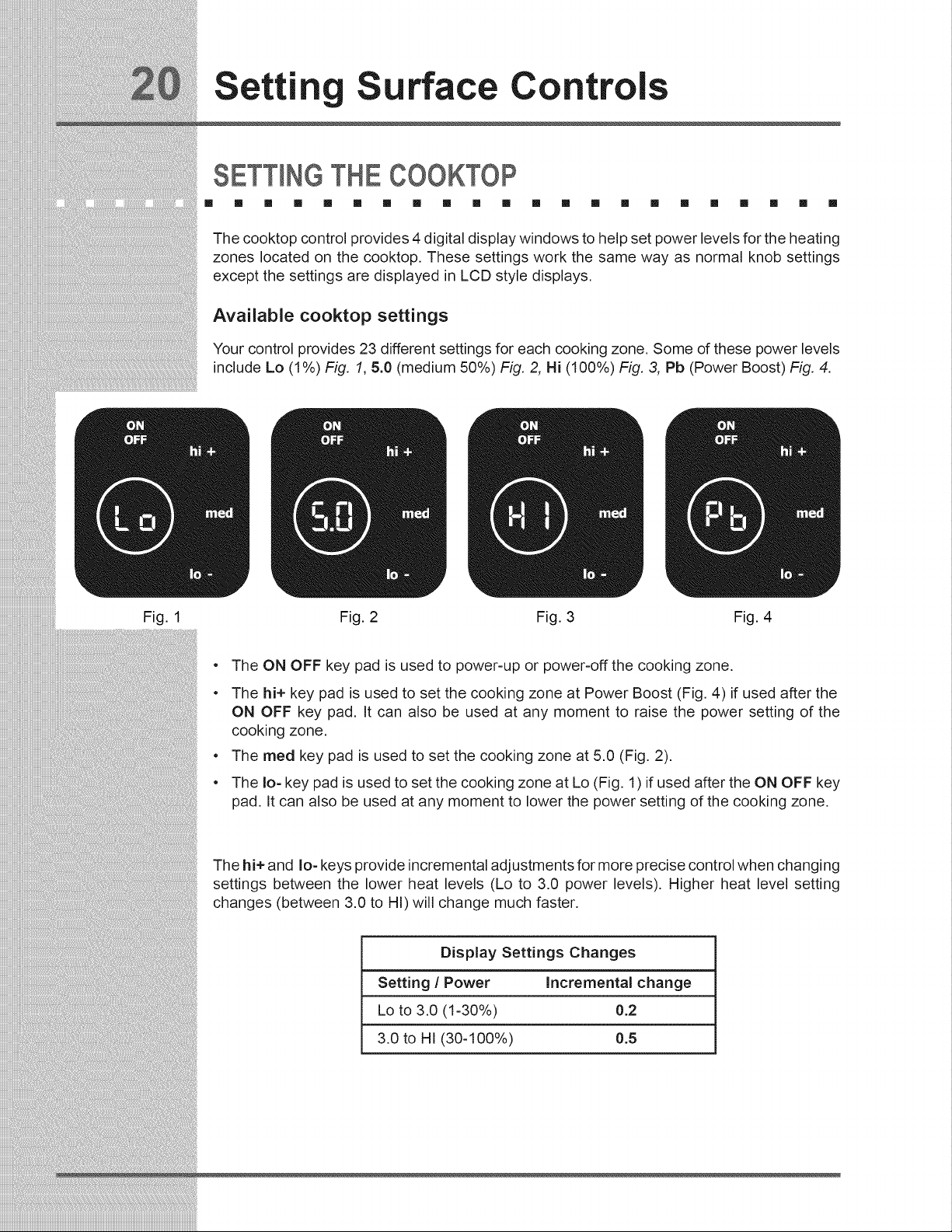
The cooktop control provides 4 digital display windows to help set power levels for the heating
zones located on the cooktop. These settings work the same way as normal knob settings
except the settings are displayed in LCD style displays.
Available cooktop settings
Your control provides 23 different settings for each cooking zone. Some of these power levels
include Lo (1%) Fig. 1, 5.0 (medium 50%) Fig. 2, Hi (100%) Fig. 3, Pb (Power Boost) Fig. 4.
Fig. 1 Fig. 2 Fig. 3 Fig. 4
e
e
e
e
The ON OFF key pad is used to power-up or power-off the cooking zone.
The hi+ key pad is used to set the cooking zone at Power Boost (Fig. 4) if used after the
ON OFF key pad. It can also be used at any moment to raise the power setting of the
cooking zone,
The meal key pad is used to set the cooking zone at 5.0 (Fig. 2).
The Io- key pad is used to set the cooking zone at Lo (Fig. 1) if used after the ON OFF key
pad. It can also be used at any moment to lower the power setting of the cooking zone.
The hi+ and Io- keys provide incremental adjustments for more precise control when changing
settings between the lower heat levels (Lo to 3.0 power levels), Higher heat level setting
changes (between 3.0 to HI) will change much faster.
Display Settings Changes
Setting / Power Incrementa( change
Lo to 3.0 (1-30%) 0.2
3.0 to HI (30-100%) 0.5
Setting
urface Controls
SETTINGTHE COOKTOP(CONTINUED/
[] [] [] [] [] [] [] [] [] [] [] [] [] [] [] [] [] [] [] [] [] []
Setting cooktop elements
• if needed, wake the control panel.
• Touch the ON OFF key for the desired heating zone.
• Press the desired power level key (hi+, med or Io-) or for more precise level settings use
the hi+ or Io- keys to make specific level changes.
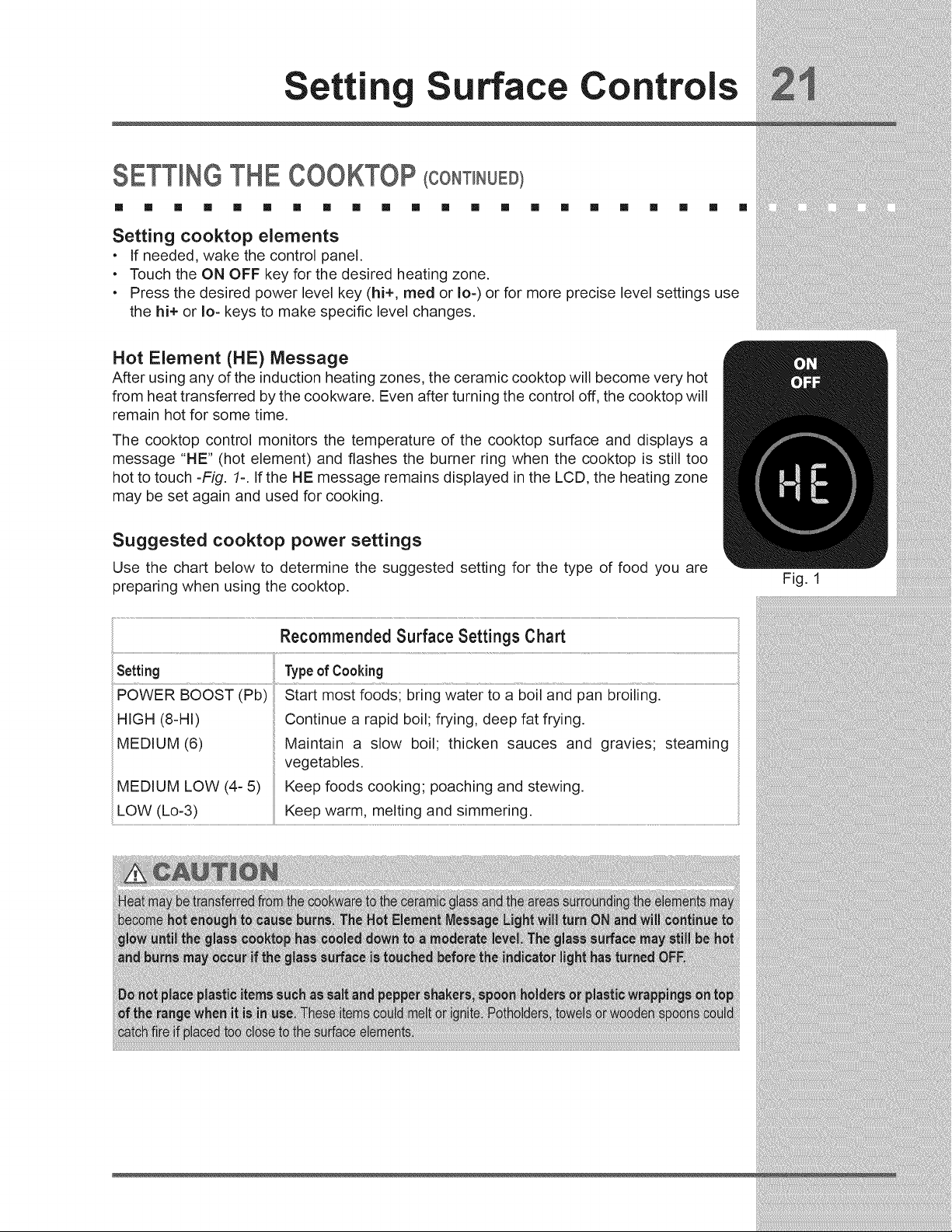
Hot Element (HE) Message
After using any of the induction heating zones, the ceramic cooktop will become very hot
from heat transferred by the cookware. Even after turning the control off, the cooktop will
remain hot for some time.
The cooktop control monitors the temperature of the cooktop surface and displays a
message "HE" (hot element) and flashes the burner ring when the cooktop is still too
hot to touch -Fig. 1-. If the HE message remains displayed in the LCD, the heating zone
may be set again and used for cooking.
Suggested cooktop power settings
Use the chart below to determine the suggested setting for the type of food you are
preparing when using the cooktop.
Recommended Surface Settings Chart
Setting Typeof Cooking
POWER BOOST (Pb)
HIGH (8-HI)
MEDIUM (6)
MEDIUM LOW (4- 5)
LOW (Lo-3)
Start most foods; bring water to a boil and pan broiling.
Continue a rapid boil; frying, deep fat frying.
Maintain a slow boil; thicken sauces and gravies; steaming
vegetables.
Keep foods cooking; poaching and stewing.
Keep warm, melting and simmering.
Fig. 1
Settin Surface Controls
SETTING POWER BOOST FEATURE
[] [] [] [] [] [] [] [] [] [] [] [] [] [] []
Your induction cooktop is equipped with
a Power Boost feature on each cooking
zone. The Power Boost feature is used to
bring large quantities of water or food to
cooking temperature at the fastest speed
possible. The Power Boost feature will
give you up to 139% power output for a
maximum of 10 minutes.
[] [] [] [] [] [] []
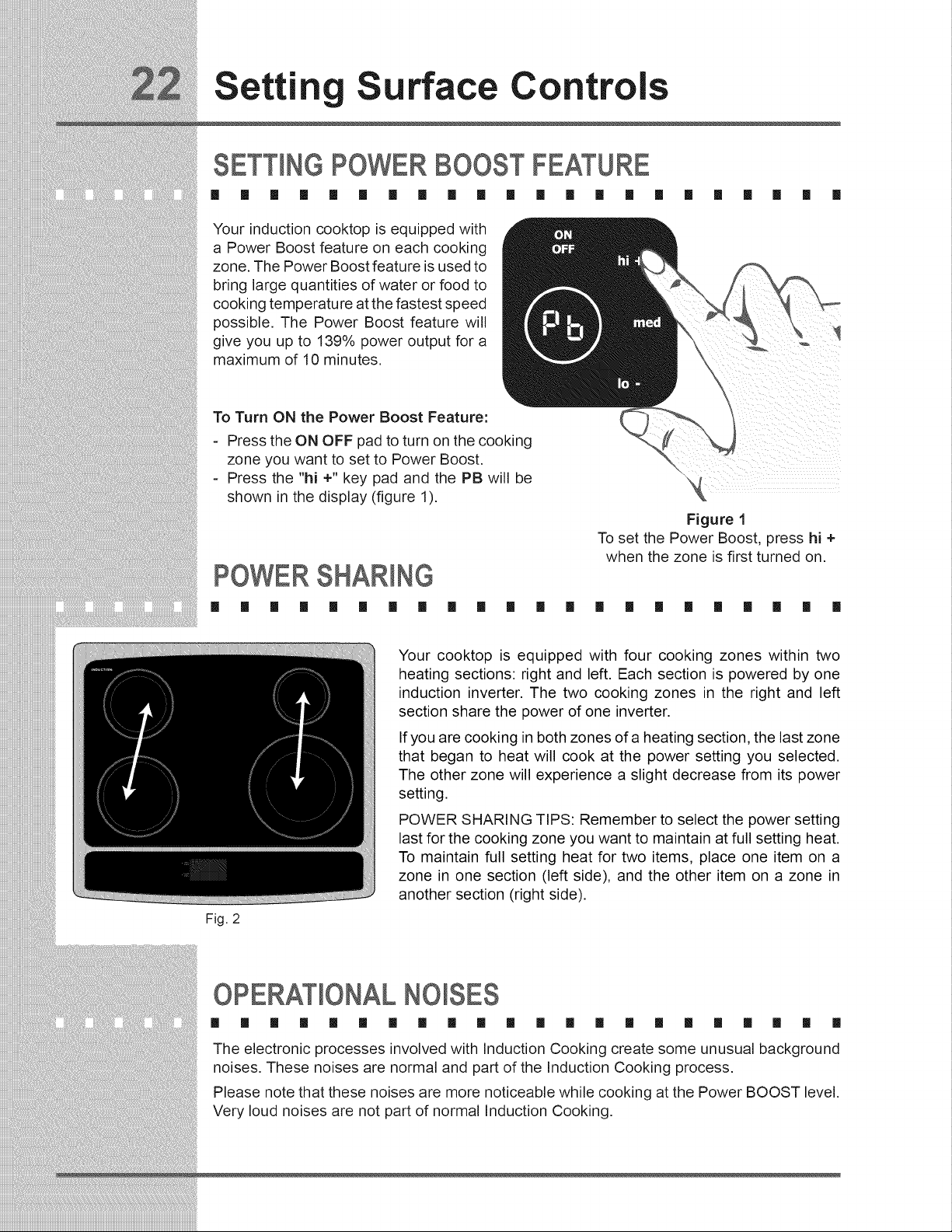
To Turn ON the Power Boost Feature:
Press the ON OFF pad to turn on the cooking
zone you want to set to Power Boost.
Press the "hi +" key pad and the PB will be
shown in the display (figure 1).
POWERSHARING
[] [] [] [] [] [] [] [] _ [] []
Fig. 2
Figure 1
To set the Power Boost, press hi +
when the zone is first turned on.
[] [] [] [] [] [] [] [] [] [] []
Your cooktop is equipped with four cooking zones within two
heating sections: right and left. Each section is powered by one
induction inverter. The two cooking zones in the right and left
section share the power of one inverter.
If you are cooking in both zones of a heating section, the last zone
that began to heat will cook at the power setting you selected.
The other zone will experience a slight decrease from its power
setting.
POWER SHARING TIPS: Remember to select the power setting
last for the cooking zone you want to maintain at full setting heat.
To maintain full setting heat for two items, place one item on a
zone in one section (left side), and the other item on a zone in
another section (right side).
OPERATIONAL NO SES
[] [] [] [] [] [] [] [] [] [] [] [] [] [] [] [] [] [] [] [] [] []
The electronic processes involved with Induction Cooking create some unusual background
noises. These noises are normal and part of the Induction Cooking process.
Please note that these noises are more noticeable while cooking at the Power BOOST level.
Very loud noises are not part of normal Induction Cooking.
Setting
he Lower Oven
LOWER OVEN OPERATION
[] [] [] [] [] [] [] [] [] [] [] [] [] [] [] [] [] [] [] [] [] []
The lower oven provides three basic modes, baking, slow cooking and warming. The lower oven
is ideal for cooking foods such as pizza, casseroles, baked potatoes and frozen convenience
foods. Use the keep warm feature to keep hot cooked foods at serving temperature. The
lower oven can only be used with some cooking modes; Bake, Slow Cook and Keep Warm
(read their sections for precise instructions).
KEEP CHILDREN AWAY FROM THE LOWER OVEN WHEN HOT.
FAILURE TO DO SO CAN RESULT IN BURNS.
_Always use oven mitts when removing food from the lower oven. The lower
oven rack, compartment, cookware/plates may be hot.
Lower Oven Tips:
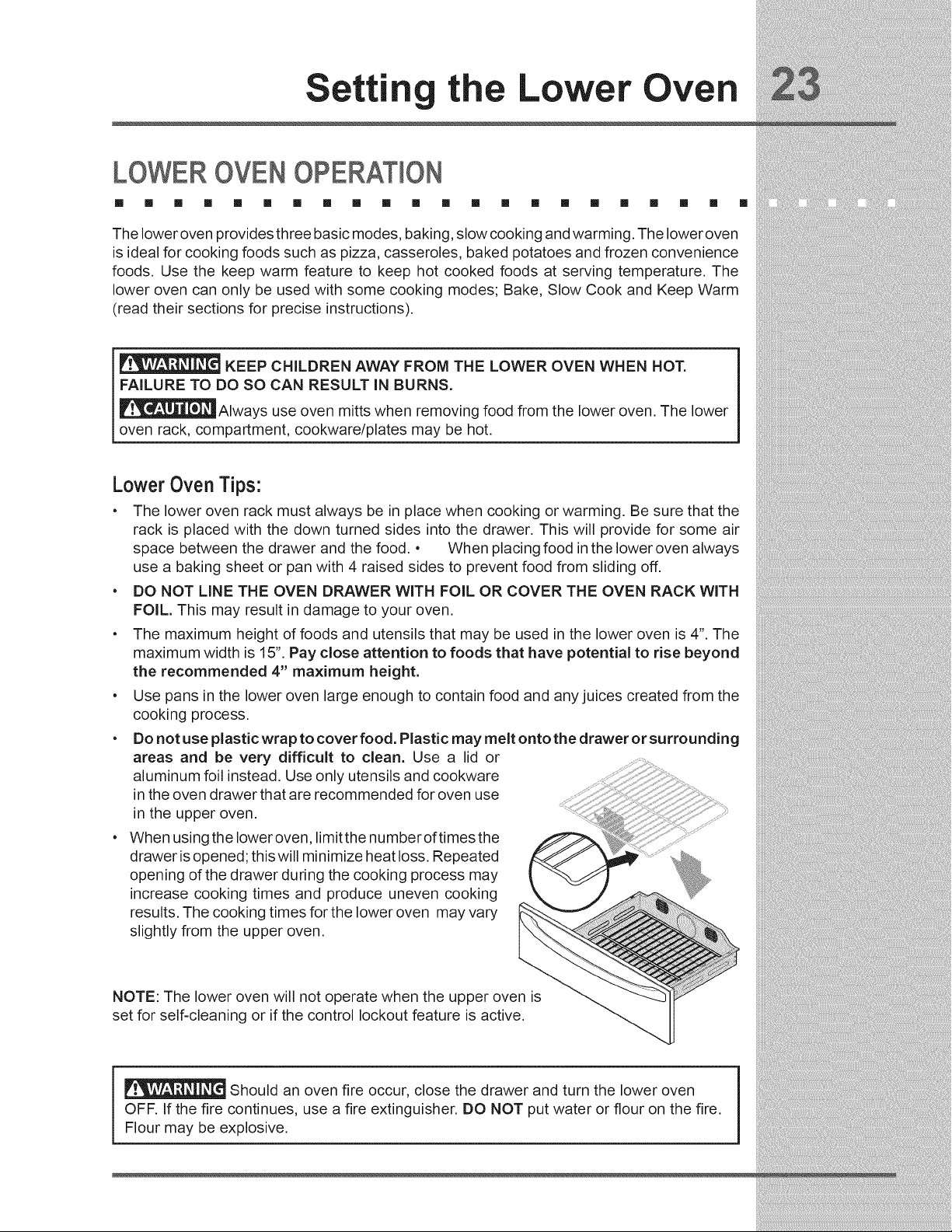
• The lower oven rack must always be in place when cooking or warming. Be sure that the
rack is placed with the down turned sides into the drawer. This will provide for some air
space between the drawer and the food. • When placing food in the lower oven always
use a baking sheet or pan with 4 raised sides to prevent food from sliding off.
• DO NOT LINE THE OVEN DRAWER WITH FOIL OR COVER THE OVEN RACK WITH
FOIL. This may result in damage to your oven.
• The maximum height of foods and utensils that may be used in the lower oven is 4". The
maximum width is 15". Pay close attention to foods that have potential to rise beyond
the recommended 4" maximum height.
• Use pans in the lower oven large enough to contain food and any juices created from the
cooking process.
• Do not use plastic wrap to cover food. Plastic may melt onto the drawer or surrounding
areas and be very difficult to clean. Use a lid or
aluminum foil instead. Use only utensils and cookware
in the oven drawer that are recommended for oven use
in the upper oven.
• When using the Ioweroven, limitthe numberoftimes the
drawer is opened; this will minimize heat loss. Repeated
opening of the drawer during the cooking process may
increase cooking times and produce uneven cooking
results. The cooking times for the lower oven may vary
slightly from the upper oven.
NOTE: The lower oven will not operate when the upper oven is
set for self-cleaning or if the control lockout feature is active.
Should an oven fire occur, close the drawer and turn the lower oven
OFF. If the fire continues, use a fire extinguisher. DO NOT put water or flour on the fire.
Flour may be explosive.
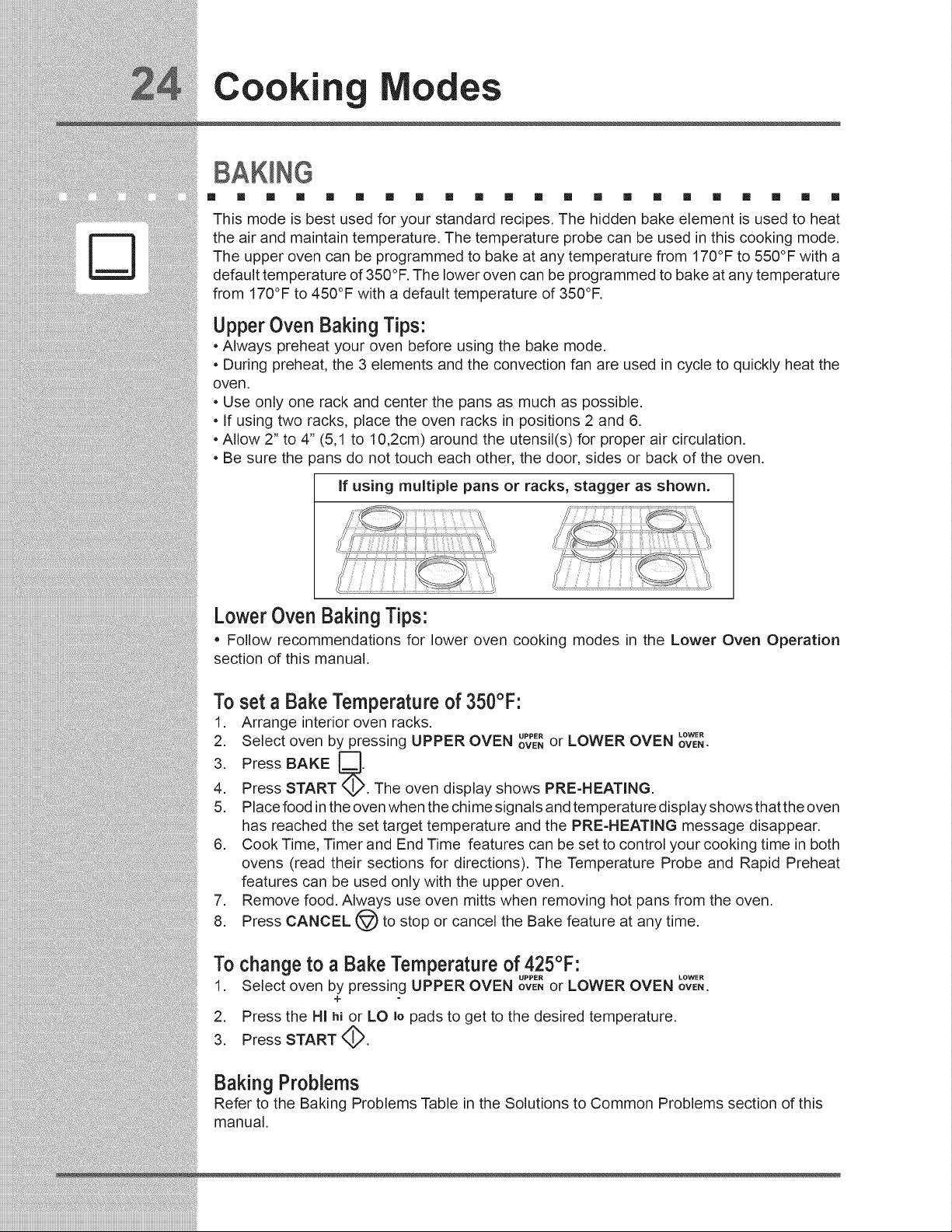
Cooking
odes
[] [] [] [] [] [] [] [] [] [] [] m [] m m [] [] [] [] [] [] []
This mode is best used for your standard recipes. The hidden bake element is used to heat
the air and maintain temperature. The temperature probe can be used in this cooking mode.
The upper oven can be programmed to bake at any temperature from 170°F to 550°F with a
default temperature of 350°F. The lower oven can be programmed to bake at any temperature
from 170°F to 450°F with a default temperature of 350°F.
UpperOven Baking Tips:
• Always preheat your oven before using the bake mode.
• During preheat, the 3 elements and the convection fan are used in cycle to quickly heat the
oven.
• Use only one rack and center the pans as much as possible.
• If using two racks, place the oven racks in positions 2 and 6.
• Allow 2" to 4" (5,1 to 10,2cm) around the utensil(s) for proper air circulation.
• Be sure the pans do not touch each other, the door, sides or back of the oven.
If using multiple pans or racks, stagger as shown.
LowerOven Baking Tips:
• Follow recommendations for lower oven cooking modes in the Lower Oven Operation
section of this manual.
To set a Bake Temperature of 350°F:
1. Arrange interior oven racks.
LOWER
2. Select oven by pressing UPPER OVEN ovE,UPP_"or LOWER OVEN ovE,.
3. Press BAKE _.
4. Press START M',4,2.The oven display shows PRE-HEATING.
5. Place food in the oven when the chime signals and temperature display shows that the oven
has reached the set target temperature and the PRE-HEATING message disappear.
6. Cook Time, Timer and End Time features can be set to control your cooking time in both
ovens (read their sections for directions). The Temperature Probe and Rapid Preheat
features can be used only with the upper oven.
7. Remove food. Always use oven mitts when removing hot pans from the oven.
8. Press CANCEL (_ to stop or cancel the Bake feature at any time.
To change to a Bake Temperature of 425°F:
UPPER LOWER
1. Select oven by pressing UPPER OVEN OVENor LOWER OVEN ovEN.
+
2. Press the HI hi or LO Io pads to get to the desired temperature,
3. Press START _.
Baking Problems
Refer to the Baking Problems Table in the Solutions to Common Problems section of this
manual.
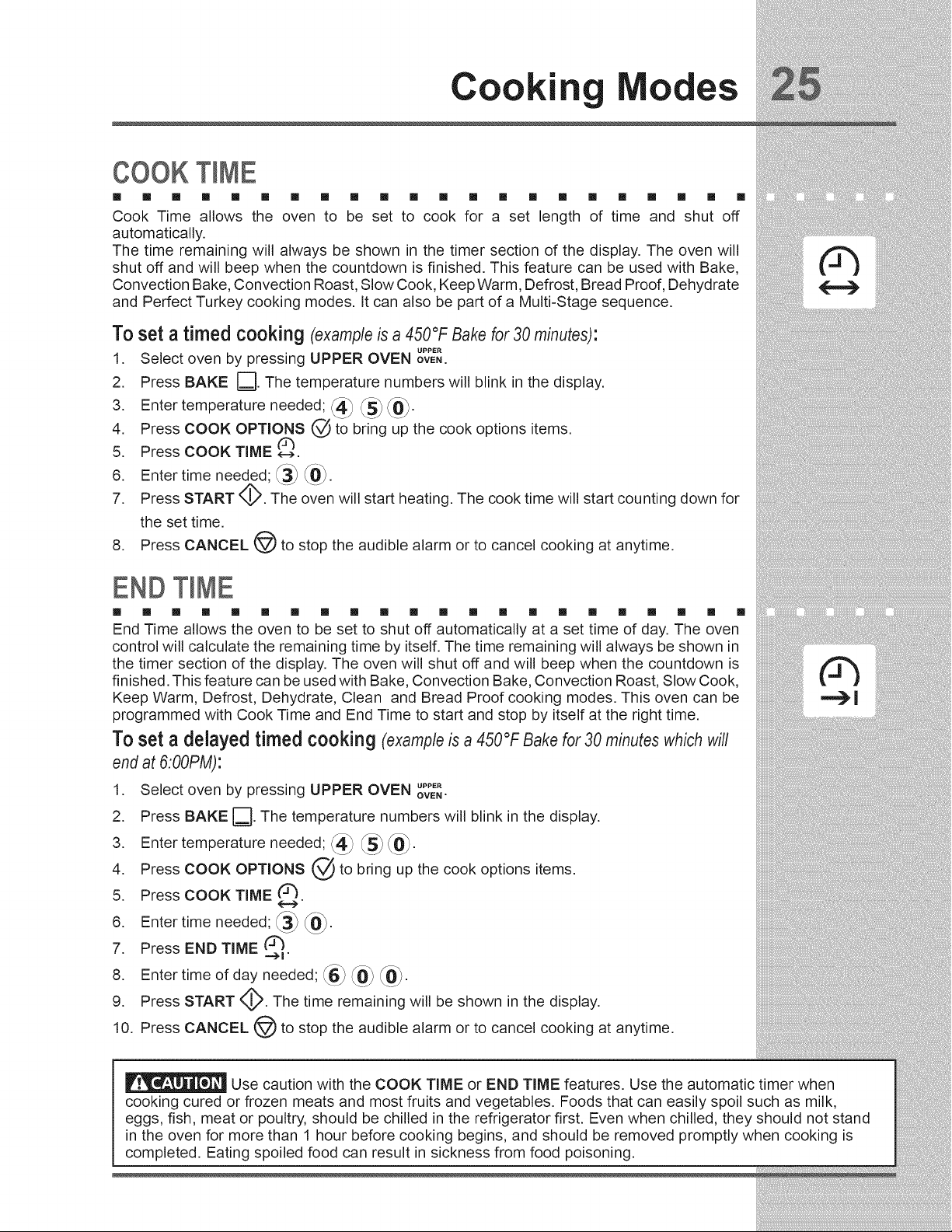
Cookin Modes
COOKT ME
[] [] [] m [] [] [] [] [] [] [] [] [] [] [] [] [] [] [] [] [] []
Cook Time allows the oven to be set to cook for a set length of time and shut off
automatically.
The time remaining will always be shown in the timer section of the display. The oven will
shut off and will beep when the countdown is finished. This feature can be used with Bake,
Convection Bake, Convection Roast, Slow Cook, Keep Warm, Defrost, Bread Proof, Dehydrate
and Perfect Turkey cooking modes. It can also be part of a Multi-Stage sequence.
To set a timed cooking (example is a 450°F Bake for 30 minutes)"
UPPER
1. Select oven by pressing UPPER OVEN ovE..
2. Press BAKE []. The temperature numbers will blink in the display.
3. Enter temperature needed; _4_ _5_ _.
4. Press COOK OPTIONS @ to bring up the cook options items.
5. Press COOK TIME e-->.
6. Enter time needed; _ _0_.
7. Press START <:_. The oven will start heating. The cook time will start counting down for
the set time.
8. Press CANCEL (@) to stop the audible alarm or to cancel cooking at anytime.
END T ME
[] [] [] [] [] [] [] [] [] [] [] [] [] [] [] [] [] [] [] [] [] []
End Time allows the oven to be set to shut off automatically at a set time of day. The oven
control will calculate the remaining time by itself. The time remaining will always be shown in
the timer section of the display. The oven will shut off and will beep when the countdown is
finished. This feature can be used with Bake, Convection Bake, Convection Roast, Slow Cook,
Keep Warm, Defrost, Dehydrate, Clean and Bread Proof cooking modes. This oven can be
programmed with Cook Time and End Time to start and stop by itself at the right time.
To set a delayed timed cooking (example is a 450°F Bake for 30 minutes which will
end at 6:00PM):
1. Select oven by pressing UPPER OVEN up.E.
OVEN"
2. Press BAKE []. The temperature numbers will blink in the display,
3 Entertemperatureneeded;
4. Press COOK OPTIONS @ to bring up the cook options items,
5. Press COOK TIME (Z_.
6. Enter time needed; _3_ _0_.
7. Press END TIME (3_
--->1 "
8. Enter time of day needed; _.6__0_ _0_.
9. Press START <_. The time remaining will be shown in the display.
10. Press CANCEL @) to stop the audible alarm or to cancel cooking at anytime,
Use caution with the COOK TIME or END TIME features. Use the automatic timer when
cooking cured or frozen meats and most fruits and vegetables. Foods that can easily spoil such as milk,
eggs, fish, meat or poultry, should be chilled in the refrigerator first. Even when chilled, they should not stand
in the oven for more than 1 hour before cooking begins, and should be removed promptly when cooking is
completed. Eating spoiled food can result in sickness from food poisoning.
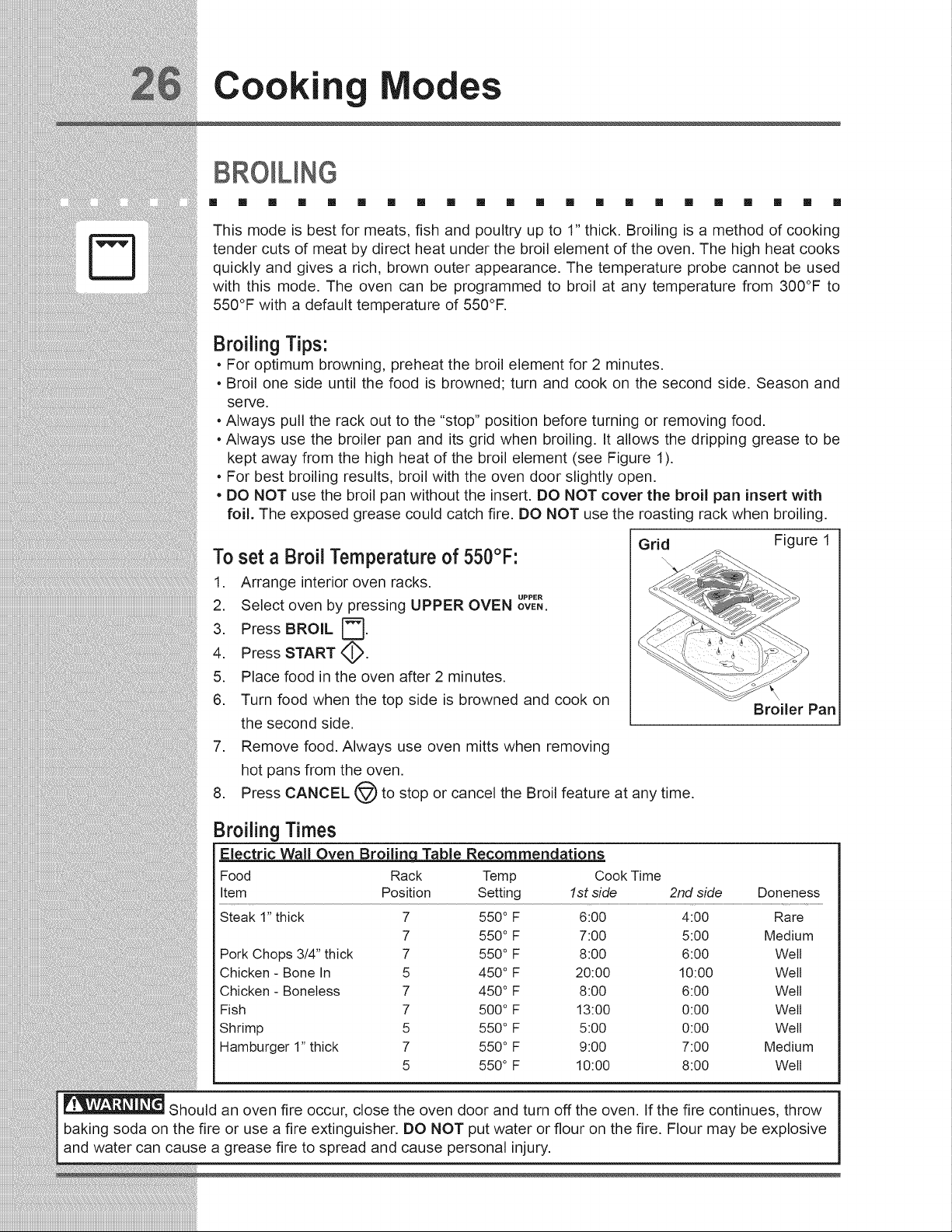
Cooking
odes
BRO UNG
[] [] [] [] [] [] [] [] [] [] [] [] [] [] [] [] [] [] [] [] [] []
This mode is best for meats, fish and poultry up to 1" thick. Broiling is a method of cooking
tender cuts of meat by direct heat under the broil element of the oven. The high heat cooks
quickly and gives a rich, brown outer appearance. The temperature probe cannot be used
with this mode. The oven can be programmed to broil at any temperature from 300°F to
550°F with a default temperature of 550°F.
Broiling Tips:
. For optimum browning, preheat the broil element for 2 minutes.
. Broil one side until the food is browned; turn and cook on the second side. Season and
serve.
. Always pull the rack out to the "stop" position before turning or removing food.
. Always use the broiler pan and its grid when broiling. It allows the dripping grease to be
kept away from the high heat of the broil element (see Figure 1).
. For best broiling results, broil with the oven door slightly open.
. DO NOT use the broil pan without the insert. DO NOT cover the broil pan insert with
foil. The exposed grease could catch fire. DO NOT use the roasting rack when broiling.
Toset a Broil Temperature of 550°F:
1. Arrange interior oven racks.
UPPER
2. Select oven by pressing UPPER OVEN ovE,.
3. Press BROIL _.
4. Press START _,_.
5. Place food in the oven after 2 minutes.
.
Grid Figure 1
Turn food when the top side is browned and cook on
the second side.
7. Remove food. Always use oven mitts when removing
hot pans from the oven.
8. Press CANCEL @ to stop or cancel the Broil feature at any time.
Broiler Pan
Broiling Times
Electric Wall Oven Broilinq Table Recommendations
Food Rack Temp Cook Time
Item Position Setting 1st side 2nd side Doneness
Steak 1" thick 7 550° F 6:00 4:00 Rare
7 550° F 7:00 5:00 Medium
Pork Chops 3/4" thick 7 550° F 8:00 6:00 Well
Chicken - Bone In 5 450° F 20:00 10:00 Well
Chicken - Boneless 7 450° F 8:00 6:00 Well
Fish 7 500° F 13:00 0:00 Well
Shrimp 5 550° F 5:00 0:00 Well
Hamburger 1" thick 7 550° F 9:00 7:00 Medium
5 550° F 10:00 8:00 Welt
Should an oven fire occur, close the oven door and turn off the oven. If the fire continues, throw
baking soda on the fire or use a fire extinguisher. DO NOT put water or flour on the fire. Flour may be explosive
and water can cause a grease fire to spread and cause personal injury.
ii!_i
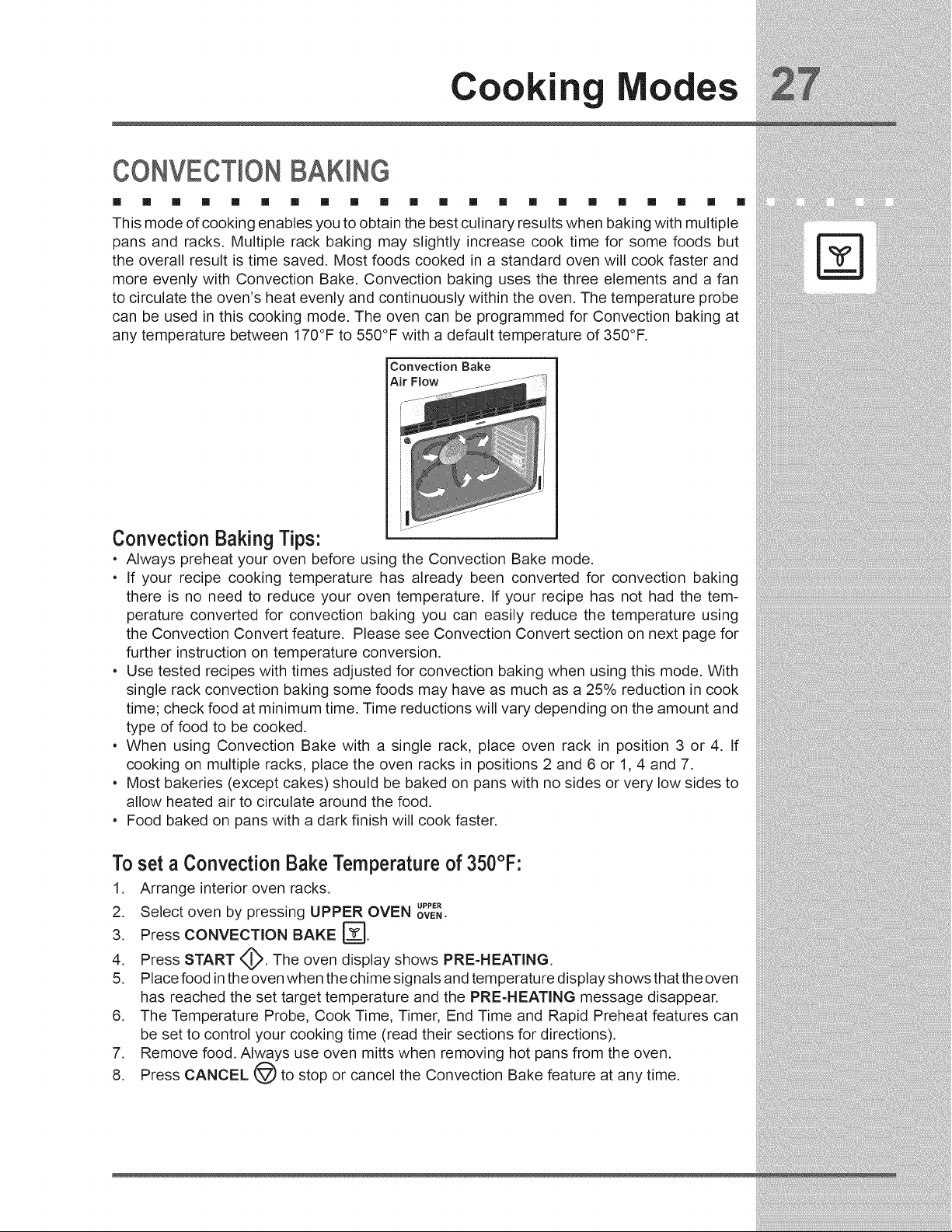
Cookin Modes
CONV T ON£AKmNG
[] [] [] [] [] [] [] [] [] [] [] [] [] [] [] [] [] [] [] [] [] []
This mode of cooking enables you to obtain the best culinary results when baking with multiple
pans and racks. Multiple rack baking may slightly increase cook time for some foods but
the overall result is time saved. Most foods cooked in a standard oven will cook faster and
more evenly with Convection Bake. Convection baking uses the three elements and a fan
to circulate the oven's heat evenly and continuously within the oven. The temperature probe
can be used in this cooking mode. The oven can be programmed for Convection baking at
any temperature between 170°F to 550°F with a default temperature of 350°F.
Convection Bake
Air Flow
Convection Baking Tips:
• Always preheat your oven before using the Convection Bake mode.
• If your recipe cooking temperature has already been converted for convection baking
there is no need to reduce your oven temperature. If your recipe has not had the tem-
perature converted for convection baking you can easily reduce the temperature using
the Convection Convert feature. Please see Convection Convert section on next page for
further instruction on temperature conversion.
• Use tested recipes with times adjusted for convection baking when using this mode. With
single rack convection baking some foods may have as much as a 25% reduction in cook
time; check food at minimum time. Time reductions will vary depending on the amount and
type of food to be cooked.
• When using Convection Bake with a single rack, place oven rack in position 3 or 4. If
cooking on multiple racks, place the oven racks in positions 2 and 6 or 1, 4 and 7.
• Most bakeries (except cakes) should be baked on pans with no sides or very low sides to
allow heated air to circulate around the food.
• Food baked on pans with a dark finish will cook faster.
To set a Convection Bake Temperature of 350°F:
1. Arrange interior oven racks.
UPPER
2. Select oven by pressing UPPER OVEN ovE,.
3. Press CONVECTION BAKE _.
4. Press START _.,_. The oven display shows PRE-HEATING.
5. Place food in the oven when the chime signals and temperature display shows that the oven
has reached the set target temperature and the PRE-HEATING message disappear.
6. The Temperature Probe, Cook Time, Timer, End Time and Rapid Preheat features can
be set to control your cooking time (read their sections for directions).
7. Remove food. Always use oven mitts when removing hot pans from the oven.
8. Press CANCEL (_ to stop or cancel the Convection Bake feature at any time.
Cooking
odes
CONVECTIONCONVERT
[] [] [] [] [] [] [] [] [] [] [] [] [] [] [] [] [] [] [] [] [] []
The Convection Convert pad is used to automatically convert a standard baking recipe for
convection baking. When set properly, this feature is designed to display the actual converted
(reduced) temperature in the display. Convection Convert may ONLY be used with a Convection
Bake cooking mode. It can be used with the features End Time and Cook Time (see their
sections for directions). If convection conversion is used with the cook time and end time
features, "CF" (check food) will be displayed when 75% of the bake time is complete. At this
time the oven control will sound 3 long beeps at regular intervals until baking had finished.
When the bake time has completely finished the control will beep at regular interval until the
CANCEL @ pad is pressed. NOTE: To use this feature with the COOK TIME _ option, the
COOK TIME __> pad must be pressed before the CONVECTION CONVERT >_(_'pad.
Changing from a normal bake temperature to a convection bake temperature:
UPPER
1. Select oven by pressing UPPER OVEN OVEN.
2. Press CONVECTION BAKE _L_J.
3. Press COOK OPTIONS (._. The cook options items will light up.
4. Press CONVECTION CONVERT >_'. The temperature displayed will be 25°F lower than
what it used to be.
5. Press START <_ to begin the convection baking (see Convection Baking section for
more informations).
RAPmDPREHEAT
[] [] [] [] [] [] [] [] [] [] [] [] [] [] [] [] [] [] [] [] [] []
The Preheat feature will bring the oven up to temperature faster than a regular preheat and
then indicate when to place the food in the oven. Preheating is not necessary when roasting
or cooking casseroles. The oven can be programmed to preheat at any temperature between
170°F to 550°F with some of the cooking modes; Bake, Convection Bake and Convection
Roast.
IMPORTANT: The rapid preheat feature is for single rack ONLY. The heat distribution with
multiple rack will be uneven.
To set a rapid preheat (example is fora 350°FBake):
1. Select oven by pressing UPPER OVEN upp_.
OVEN,
2. Press BAKE D
3. Press COOK OPTIONS (._). The cook options items will light up.
4. Press RAPID PREHEAT _.
5. Press START _ to begin the baking with the rapid preheat feature enabled.
6. Place food in the oven when the chime signals and temperature display shows that the
oven has reached the set target temperature.
Cookin Modes
CONV T ONROASTING
[] [] [] [] [] [] [] [] [] [] [] [] [] [] [] [] [] [] [] [] [] []
This mode is best for cooking tender cuts of beef, lamb, pork and poultry. Use this mode
when cooking speed is desired. The Convection Roasting gently browns the exterior and
seals in the juices. Convection roasting uses the hidden bake element, the hidden convection
element, the broil element and a fan to circulate the oven's heat evenly and continuously
within the oven. The temperature probe can be used in this cooking mode. The oven can be
programmed for Convection Roasting at any temperature between 170°F to 550°F with a
default temperature of 350°F.
Convection Roasting Tips:
• Use the broiler pan and grid, and the roasting rack (Figure 1). The broiler pan will catch
grease spills and the grid will help prevent spatters. The roasting rack will hold the meat.
• Place an oven rack on rack position 2 (next-bottom).
• Make sure the roasting rack is securely seated on the grid in the broiler pan. The roasting
rack fits on the grid allowing the heated air to circulate under the food for even cooking and
helps to increase browning on the underside.
• There is no need to reduce the convection temperature or to use the Convection Convert
feature with this cooking mode.
• DO NOT use the broiler pan without the grid or cover the grid with aluminum foil.
• Always pull the rack out to the stop position before removing food.
• Position food (fat side up) on the roasting rack.
Toset a Convection Roast Temperature of 350°F:
1. Arrange interior oven racks.
UPPER
2. Select oven by pressing UPPER OVEN ovE,.
3. Press CONVECTION ROAST r_-].
4. Press START _,_.
5. The Temperature Probe, Cook Time, Timer, End Time and Rapid Preheat
features can be set to control your cooking time (read their sections for
directions).
6. Remove food. Always use oven mitts when removing hot pans from the
oven.
7. Press CANCEL (_) to stop or cancel the Convection Roast feature at any
time.
Convection Roastin_ Chart
Meat Weight Oven Temp Internal Temp
Beef Standing rib roast 4 to 6 lbs.
Rib eye roast 4 to 6 lbs.
Tenderloin roast 2 to 3 tbs.
Turkey,whole** 12 to 16 lbs.
Turkey,whole**
Poultry
10-15
Pork
Roasting
Rack
Figure 1
Min per lb.
350 ° F * 25-30
350 ° F * 25-30
400 ° F * 15-25
325 ° F 180 ° F 8-10
16 to 20 lbs. 325 ° F 180 ° F
Turkey, whole** 20 to 24 tbs. 325 ° F 180 ° F 12-16
Chicken 3 to 4 lbs. 350-375 ° F 180 ° F 12-16
Ham roast, fresh 4 to 6 tbs. 325 ° F 160 ° F 30-40
Shoulder blade roast 4 to 6 Ibs. 325 ° F 160 ° F 20-30
Loin 3 to 4 tbs. 325 ° F 160 ° F 20-25
325 ° F 160 ° F 30-40Pre-cooked ham 5 to 7 lbs.
* For beef: med rare 145°F, med 160°F, well done 170°F
** Stuffed turkey requires additional roasting time. Shield legs and breast
prevent overbrowning and dying of the skin.
with foil to
Broiler
Pan
Cooking
odes
CONVECT)ONBRO(L(NG
[] [] [] [] [] [] [] [] [] [] [] [] [] [] [] [] [] [] [] [] [] []
Use this mode for thicker cuts of meat, fish and poultry. The Convection Broiling gently browns
the exterior and seals in the juices. Convection broiling uses the broil element and a fan to
circulate the oven's heat evenly and continuously within the oven. The temperature probe
cannot be used in this cooking mode. The oven can be programmed for Convection Broiling
at any temperature between 300°F to 550°F with a default temperature of 550°F.
Convection BroilingTips:
• For optimum browning, preheat the broil element for 2 minutes.
• Broil one side until the food is browned; turn and cook on the second side. Season and
serve.
• Always pull the rack out to the "stop" position before turning or removing food.
• Always use the broiler pan and its grid when broiling. It allows the dripping grease to be
kept away from the high heat of the broil element (see Figure 1).
• DO NOT use the broil pan without the insert. DO NOT cover the broil pan insert with
foil. The exposed grease could catch fire. DO NOT use the roasting rack when broiling.
• Convection broiling is generally faster than conventional broiling. Check for doneness at
the minimum recommended time.
iMPORTANT: Always use this cooking mode with the
oven door closed or the fan will not turn on.
Grid
Figure 1
Broiler Pan
To set a Convection Broil Temperature of 550°F:
1. Arrange interior oven racks.
UPPER
2. Select oven by pressing UPPER OVEN ovE..
3. Press CONVECTION BROILF_J.
4. Press START (_.
5. Place food in the oven after 2 minutes.
6. Turn food when the top side is browned and cook on the second side.
7. Remove food. Always use oven mitts when removing hot pans from the oven.
8. Press CANCEL (_ to stop or cancel the Convection Broil feature at any time.
Should an oven fire occur, leave the oven door closed and turn off the
oven. If the fire continues, throw baking soda on the fire or use a fire extinguisher.
DO NOT put water or flour on the fire. Flour may be explosive and water can cause a
grease fire to spread and cause personal injury.
Cookin Modes
KEEP WARM
[] [] [] [] [] [] [] [] [] [] [] [] [] [] [] [] [] [] [] [] [] []
This mode is best for keeping oven baked foods warm for serving after cooking has finished.
The Keep Warm feature uses the hidden bake element to maintain the temperature within the
oven. The Keep Warm feature may be used with Multi-Stage (refer to its section for directions)
if you wish to have the Keep Warm feature turn ON automatically when cooking has finished,
The oven can be programmed for Keep Warm at any temperature between 150°F to 190°F
with a default temperature of 170°F.
KeepWarm Tips for UpperOven:
• Always start with hot food.
• Do not use the Keep Warm feature to heat cold food.
• Food in heat=safe glass and glass ceramic containers may need higher temperature set-
tings compared to food in regular containers.
• Avoid repeated openings of the oven, it will allow hot air to escape and the food to cool.
• Aluminum foil may be used to cover food to increase moisture content.
KeepWarm Tips for Lower Oven:
• Follow recommandations for lower oven cooking modes in the Setting Lower Oven sec-
tion of this manual.
To set a Keep Warm Temperature of 170°F:
1. Arrange interior oven racks (for upper oven only).
LOWER
2. Select oven by pressing UPPER OVEN ovE,UPP_"or LOWER OVEN ovE,.
3. Press KEEP WARM r_.
4. Press START 4_.
5. The Multi-Stage, Cook Time, Timer and End Time features can be set to control your
warming time (read their sections for directions).
6. Remove food. Always use oven mitts when removing hot pans from the oven.
7. Press CANCEL @ to stop or cancel the Keep Warm feature at any time.
Cooking
odes
SLOWCOOK
[] [] [] [] [] [] [] [] [] [] [] [] [] [] [] [] [] [] [] [] [] []
This mode may be used to cook foods more slowly, at lower oven temperatures and provide
cooking results much the same way as a Slow Cooker or Crock-Pot. The Slow Cook feature
is ideal for roasting beef, pork & poultry. Slow Cooking meats may result in the exterior of
meats becoming dark but not burnt. This is normal. The Slow Cook mode uses the hidden
bake element to maintain a low temperature in the oven. The temperature probe cannot be
used in this cooking mode. There are 2 settings available, high (HI) or low (LO). The maximum
cook time for the Slow Cook feature is 12 hours unless the oven control has been changed
to the Continuous Bake mode or the Sabbath mode has been activated.
Slow Cook Tips:
• Completely thaw all frozen foods before cooking with the Slow Cook feature.
• When using a single rack, position it in the center of the oven.
• Position multiple racks to accommodate size of cooking utensils when cooking multiple
food items.
• Do not open the oven door often or leave the door open when checking foods. If the oven
heat escapes often, the Slow Cook time may need to be extended.
• Cover the foods to keep them moist or use a loose or vented type cover to allow foods to
turn crisp or brown.
• Cook times will vary; depending on the weight, fat content, bone & the shape of the
meat.
• Use the recipe's recommended food temperature and a food thermometer to determine
when the food is done.
• Preheating the oven will not be necessary when using the Slow Cook feature.
• Add any cream or cheese sauces during the last hour of cooking.
Toset a Slow Cook:
1. Arrange interior oven racks and place food in the oven.
UPPER LOWER
2. Select oven by pressing UPPER OVEN ovE, or LOWER OVEN ovE,.
3. Press SLOW COOKt_.
+
4. Press hi for high (HI) setting or Io low (Lo) setting.
5. Press START <_.
6. The Cook Time, Timer and End Time features can be set to control your Slow Cook time
(read their sections for directions).
7. Remove food. Always use oven mitts when removing hot pans from the oven.
8. Press CANCEL @ to stop or cancel the Slow Cook feature at any time.
Cookin Modes
DEHYDRAT)NG
[] [] [] [] [] [] [] [] [] [] [] [] [] [] [] [] [] [] [] [] [] []
This mode dries foods with heat from the bake and the convection element. The heat is
circulated throughout the oven by the convection fan. Dehydrating is used to dry and/or
preserve foods such as fruits, meats, vegetables and herbs. This mode holds an optimum
low temperature while circulating the heated air to slowly remove moisture. The oven can
be programmed for Dehydrating at any temperature between 100°F to 225°F with a default
temperature of 120°F.
Dehydrating Tips:
o Do not preheat the oven.
Multiple racks can be used simultaneously.
Drying times vary depending on the moisture and sugar content of the food, the size of
the pieces, the amount being dried and the humidity in the air.
Check food at the minimum drying time.
Treat fruits with antioxidants to avoid discoloration.
Consult a food preservation book or a library for additional information.
To set a Dehydrate Temperature of 120°F:
1. Arrange interior oven racks and place food.
UPPER
2. Select oven by pressing UPPER OVEN ovE,.
A_
3. Press DEHYDRATE _Z_.
4. Press START <_ to begin dehydrating.
5. Remove food. Always use oven mitts when removing hot pans from the oven.
6. Press CANCEL @ to stop or cancel the Dehydrate feature at any time.
DEFROSTING
[] [] [] [] [] [] [] [] [] [] [] [] [] [] [] [] [] [] [] [] []
Use the defrostfeaturetothaw smallportionsofdelicateitemssuch as cream cakes,
frozencream piesand cheesecake,atroom temperature.Whileinthe defrostmode,
theconvectionfanwilloperatetocirculateroom temperatureairaroundthe foodslowly,
accelerating the natural defrosting of the food without heat.
[]
To set a Defrost:
1. Arrange interior oven racks and place food in the oven.
UPPER
2. Select oven by pressing UPPER OVEN ovE,.
3. Press DEFROST :;_:.
4. Press START <_ to start the defrosting. A"dEF" message is displayed when active.
5. The Cook Duration, End Time and Timer features can be set to control your Defrost time
(read their sections for directions).
6. Press CANCEL _ to stop or cancel the Defrost feature at any time.
Note: This feature is not meant for thawing frozen meats, poultry, seafood or other foods
that need to be cooked before serving. Follow USDA recommendations for thawing foods.
Only frozen foods that can be defrosted and served without cooking should be used with
this feature.
Cooking
odes
BREAD PROOFING
[] [] [] [] II! II! II II II! [] [] II! II! II II II II [] [] [] [] []
Proofing bread prepares the dough for baking by activating the yeast. This feature is ideal
for proofing, or rising bread dough. The oven can be programmed for Bread Proofing at any
temperature between 85°F to 100°F with a default temperature of 100°F. The temperature
visual display is not avalaible for this function.
Bread Proofing Tips:
• No need to preheat for this feature.
• Proof bread until dough has doubled in bulk.
• For best results, place a shallow pan with 1 to 3 cups of boiling hot water on the lowest
rack position to keep the air moist inside the oven cavity.
• Allow at least 1" between edge of pan and walls of the oven.
• Limit frequent door openings to prevent losing heat and lengthening proofing time.
To set a Bread Proof temperature of 100°F:
1. Arrange interior oven racks and place bread dough in the oven.
2. Select oven by pressing UPPER OVEN uPPER
OVEN,
3. Press BREAD PROOF _.
4. Press START <_ to begin the bread proofing.
5. The Cook Time, Timer and End Time features can be set to control your Bread Proof time
(read their sections for directions).
6. Remove food.
7. Press CANCEL _ to stop or cancel the Bread Proof feature at any time.
To change a Bread Proof temperature while the function is active:
UPPER
1. Select oven by pressing UPPER OVEN ovE..
+
2. Press the HI hi or LO io pads to get to the desired temperature.
3. Press START _ to continue the bread proofing with the new setting.
Cookin Modes
PERFECTTURKEY
[] [] [] [] [] [] [] [] [] [] [] [] [] [] [] [] [] [] [] [] [] []
This mode uses the temperature probe to control precisely the cooking of a perfect turkey.
The convection system gently browns the turkey's exterior and seals in the juices. The
temperature probe is required with this cooking mode (read its section on next page for
more details). The oven can be programmed for Perfect Turkey at any temperature between
170°F to 550°F with a default temperature of 325°F. The probe default temperature for the
perfect turkey feature is 180°F.
Perfect Turkey Tips:
• Thaw the turkey in the refrigerator at least 24 hours per 5 Ibs before cooking the bird.
• Use the broiler pan and grid, and the roasting rack. The broiler pan will catch grease spills
and the grid will help prevent spatters. The roasting rack will hold the turkey.
• Place an oven rack on rack position 2 (next-bottom).
• Make sure the roasting rack is securely seated on the grid in the broiler pan. The roasting
rack fits on the grid allowing the heated air to circulate under the food for even cooking and
helps to increase browning on the underside.
To set a Perfect Turkey of 325°F:
1. Arrange interior oven racks and place food in the oven.
2. Insert the meat probe into the bird and connect it in the oven (read the probe section on
next page for more details).
3. Select oven by pressing UPPER OVEN uppE.
OVEN.
4. Press PERFECT TURKEY (_. A temperature can be entered if another value than the
default is needed.
Optional Press PROBE if) if you wish to change the probe target temperature (see PROBE
section).
5. Press START <_>.
6. Remove food from the oven when the temperature probe chime signals that the oven
has reached the set target temperature.
7. Press CANCEL (_ to stop or cancel the Perfect Turkey feature at any time.
Perfect Turke_z Chart
Weight Oven Temp Internal Temp Min per lb.
Poultry Turkey, whole* 12 to 16 tbs. 325 ° F 180° F 8-10
Turkey, whole* 16 to 20 lbs. 325 ° F 180° F 10-15
Turkey, whole* 20 to 24 lbs. 325 ° F 180° F 12-16
Chicken 3 to 4 lbs. 350-375 ° F 180° F 12-16
Stuffed turkey requires additional roasting time. Shield legs and breast with foil to
prevent overbrowning and dying of the skin.
Cooking
odes
TEMPERATURE PROBE
[] [] [] [] [] [] [] [] [] [] [] [] [] [] [] [] [] [] [] [] [] []
For many foods, especially roasts and poultry, testing the internal temperature is the best
method to insure properly cooked food. The Temperature Probe gets the exact temperature
you desire without having to guess. This feature can be used with Bake, Convection Bake,
Convection Roast and Perfect Turkey cooking modes. The oven can be programmed for
Probe at any temperature between 130°F to 210°F with a default temperature of 170°F. This
unit is equipped with one temperature probe entry in the upper oven.
IMPORTANT:
1. Use only the probe supplied with your appliance; any other may result in damage to the
probe or the appliance.
2. Handle the Temperature Probe carefullywhen inserting and removing it from the food and outlet.
3. Do not use tongs to pull the cablewhen insertingor removing the Probe. Itcoulddamage the Probe.
4. Defrost your food completely before inserting the Probe to avoid breaking it.
5. Never leave or store the Temperature Probe inside the oven when not in use.
6. To prevent the possibility of burns, carefully unplug the Temperature Probe using hot
Proper Temperature Probe Placement:
1. Always insert the probe so that the tip rests in the center of
thebone,thickeStfat,gristlePartOforthepan.meat.Do not allow probe to touch
2. For bone-in ham or lamb, insert the Probe into the center of
the lowest large muscle or joint. For dishes such as meat loaf or Figure1
casseroles, insert the Probe into the center of the food. When cookingfish,
insert the Probe from just above the gill into the meatiest area, parallel to the backbone.
3. For whole poultry (chicken, turkey, etc.), insert the probe into the thickest part of the inner
thigh from below and parallel to the leg (see figure 1).
Setting the Oven when using the Temperature Probe:
1. Insert the Temperature Probe into the food (see Proper Temperature Probe Placement above).
2. Plug the Temperature Probe into its outlet in the oven. (The outlet is located on the top
left hand side of the cavity wall, near front of the oven). Always insert the probe into
a cool oven. Make sure it is pushed all the way into the outlet. Close the oven door.
UPPER
3. Select oven by pressing either UPPER OVEN OVEN.
4. Select a cooking mode. A target temperature must be set to trigger the buzzer when the food
reaches the set temperature. Press COOK OPTIONS ('v_ to bring up the cook options items
and press PROBE _ pad to enter the temperature. Adjust temperature to the desired setting
using the numeric+pads or just press START _ to use the default target temperature of
170°F. The pads hi or io can also be pressed to raise or lower the temperature. The target
temperature setting will be accepted after the START _J_ pad is pressed.
5. At any time during the cooking, the PROBE _ pad can be pressed once to display the
actual meat temperature or pressed twice to display the target temperature. When on
the target temperature display, a new temperature can be entered. After 5-8 seconds,
the display will go back to showing the oven temperature.
6. When the food reach the target temperature, the oven will go into a KEEP WARM mode
until you press CANCEL @).
The probe can be damaged by very high temperature. To protect the probe against this
damage, the oven controlwill not allow you to start a self-clean, broil or convection broil
while the probe is connected.
Cookin Modes
MULT STAGE
[] [] [] [] [] [] [] [] m [] [] m [] [] [] [] [] [] [] [] [] []
This feature enables you to perform sequential cooking at the touch of a button. Its purpose is
to program a queue of up to three cooking modes with individual cooking time and temperatures
in a sequence. This feature can be used with most cooking modes; Baking, Broiling, Convection
Baking, Convection Roasting, Convection Broiling, Keep Warm and Bread Proof. A Cook
Time can be programmed with your cooking mode and then queued. An auto-suggested set
temperature outputs in the display as a default value during the set temperature programming.
Any stage programmed with Broil or Convection Broil cannot last longer than 10 minutes. A
proper cook time and a set temperature are required for every stage programming. At least
two stages must be programmed before a Multi-Stage cooking operation starts. During stage
1cooking the electronic control provides temperature visual output in the display. During stage
2 and 3, the electronic control displays the set temperature only.
To set a Multi Stage sequence (Timed ConvectionBake, TimedBroil, Keep Warm):
1. Arrange interior oven racks and place food.
2. Select oven by pressing UPPER OVEN upper
OVEN"
3. Press MULTI STAGE _=.
Stage 1
4. PressCONVECTION BAKE [_. "350" will flash in the display prompting to enter a temperature.
5. Enter a temperature using the numeric pads _0) to _).
6. Press START <_. "00:00" will start flashing in the display prompting to enter a cook time.
7. Enter a cook time using the numeric pads _0_ to _).
8. Press START 4_. The Multi-Stage indicator will now display the 2nd stage.
Stage 2
9. Press BROIL []. "550" will start flashing in the display prompting to enter a temperature.
10. Enter a temperature using the numeric pads _0) to _9).
11. Press START 4_. "00:00" will start flashing in the display prompting to enter a cook time.
12. Enter a cook time using the numeric pads _0) to _9_.
13. Press START 4_. The Multi-Stage indicator will now display the 3rd stage. If a third stage
is not needed, press START <_ a second time. This will start the cooking sequence.
Read next page for stage 3 and canceling details
Cooking
odes
_ULT( STAGE (CONT)NUED)
[] [] [] [] [] [] [] [] [] [] [] [] [] [] [] [] [] [] [] [] [] []
Stage 3
14. Press KEEP WARM [_. "170" wil( start flashing in the display prompting to enter a
temperature.
15. Enter a temperature using the numeric pads _1)_to _9_.
16. Press START <_. "00:00" will start flashing in the display prompting to enter a cook time.
17. Enter a cook time using the numeric pads _0_ to _.
18. Press START 4_. The cooking sequence will begin.
Canceling
19. At the end of the sequence, the display will show "End" and a chime will sound.
20. Remove food.
21. Press CANCEL (@) to stop or cancel the Multi-Stage sequence at any time (see below
for further details).
To cancel a Multi Stage sequence:
A multi stage cooking can be canceled any time while it is in progress (or during its programming)
by the Cancel Q key.
If the key is pressed during a multi-stage programming, the electronic control returns to Idle
mode.
Electronic Con rol Settings
USER PREFERENCES
[] [] [] [] [] [] [] [] [] [] [] [] [] [] [] [] [] [] [] [] [] []
The User Preferences menu includes all user defined options. This feature enables you to
control the various options of the electronic controls. This menu features the Time of Day,
Celsius or Fahrenheit display mode, Continuous Bake or 12 Hour Energy Saving modes, Clock
display or No-Clock display, 12 Hours Time of Day or 24 Hours Time of Day, Audio Control,
and Adjusting the oven temperature. The User Preferences menu is only available when the
oven is not being used (not cooking).
To browse through the User Preferences menu:
1. Press USER PREF _--_ to bring up the User Preferences menu.
2. Press USER PREF _ again to browse through the menu pages.
+
3. Press hi or io to toggle between the available options.
4. Press START <_ while the chosen option is on display to change.
5. Press CANCEL @ when finished to get back to the standard oven display.
User Preferencesmenu items:
o CLO 12:00; Setting the clock.
• CLO on; Clock on/off.
CLO 12hr; 12/24 hour time of day display.
UPO; Adjusting oven temperature.
F-C F ; Fahrenheit / Celcius display.
AUd ; Audio on/off and volume.
E S on ; 12 hour Energy Saving on/off.
rSt ; Reset to default factory settings.
SETTINGTHE CLOCK° T_MEOF DAY
The clock may be set for 12 or 24 hour time of day operation (see advanced settings section).
The clock has been preset at the factory for the 12 hour operation. When the range is first
plugged in, or when the power supply to the range has been interrupted, the display will show
"CLO 12:00". The clock must be set before the oven can be used.
When power to the unit has been interrupted, "12:00" appears and flashes in the display. To
set the Clock in this case, skip step 1 in the example below and follow steps 2 and 3.
To set the clock (examplefor 1:30):
1. Press USER PREF _ until you get to the CLO 12:00 menu page.
+
2. Press_3_0_ padstosetthetimeofdayto l:30. The pads hi or lo can also be pressed
to raise or lower the actual time displayed.
3. Press START <_ to accept the changes and go back to user preferences menu
display.
Electronic Control Settings
USER PREFERENCES (CONT)NUED}
[] [] [] [] [] [] [] [] [] [] [] [] [] [] [] [] [] [] [] [] [] []
SETT(NGCLOCK D(SPLAY- ON OR OFF
The oven control can be programmed to display the time of day or not. The oven has been
preset at the factory to display the time of day.
Changing clock display between ON and OFF:
1. Press USER PREF _ until you get to the CLO on menu page.
+
2. Press Io or hi to toggle between displaying or hiding the clock.
3. Press START _ to accept the changes and go back to user preferences menu
display.
SETT(NGT(MEOF DAYDISPLAY- 12 OR 24 HOURS
The oven control can be programmed to display time of day in 12 hours or 24 hours mode.
The oven has been preset at the factory to display in 12 hours mode.
Changing between 12 or 24 hour time of day display:
1. Press USER PREF _ untU you get to the CLO 12hr menu page.
+
2 Press io or hi to toggle the display of the clock in 12 or 24 hours.
3. Press START <_> to accept the changes and go back to user preferences menu
display.
4. Remember to set your clock after changing the time of day display mode.
ADJUST(NGOVENTEMPERATURE
The temperature in the oven has been pre-set at the factory. When first using the oven, be
sure to follow recipe times and temperatures. If you think the oven is too hot or too cool,
the temperature in the oven can be adjusted. Before adjusting, test a recipe by using a
temperature setting that is higher or lower than the recommended temperature. The baking
results should help you to decide how much of an adjustment is needed. Each oven can be
individually adjusted.
Toadjust the oventemperature:
1. Press USER PREFERENCES _--_ until you get to the UPO menu page.
2. To select the oven you want to adjust, press USER PREFERENCES _ again to toggle
between the upper and the lower display.
+
3. Enter the temperature by pressing the hi or io pads. The temperature can only be
adjusted by + 35°F.
4. Press START <_' to accept the changes and go back to user preferences menu
display.
Electronic Con rol Settings
USER PREFERENCES (CONT)NUED)
[] [] [] [] [] [] [] [] [] [] [] [] [] [] [] [] [] [] [] [] [] []
SETT(NGTEMPERATURED(SPLAY-- FAHRENHE(TOR CELS(US
The oven control can be programmed to display temperatures in Fahrenheit or Celsius. The
oven has been preset at the factory to display in Fahrenheit.
To change display from Fahrenheit to Celsius or Celsius to Fahrenheit:
1. Press USER PREF _ until you get to the F-C F menu page.
+
2. Press hi or io to toggle between the °C and °F display options.
3. Press START <j_>to accept the changes and go back to user preferences menu display.
AUDIO CONTROL
The Audio Control feature allows the oven control to be operated without sounds or beeps
whenever necessary. If desired the control can be programmed for silent operation and later
returned to operating with all the default sounds and beeps. The volume of the beeps can
also be adjusted.
To change the audio mode or audio volume:
1. Press USER PREF _ until you get to the AUd menu page.
+
2. Press hi or io to toggle between the available volume settings. AUd 5 for the highest
volume setting to AUd 1 for the lowest volume. AUd OFF to disable the beeps.
3. Press START <_, to accept the changes and go back to user preferences menu display.
SETTINGCONTINUOUSBAKE OR i2 HOURENERGYSAV(NG
The oven control has a factory preset built=in 12 Hour Energy Saving feature that will shut
off the oven if the oven control is left on for more than 11 hours and 59 minutes. The oven
can be programmed to override this feature for Continuous Baking.
Changing between 12 hour energy saving and continuous bake:
1. Press USER PREF _ until you get to the E S menu page.
+
2. Press hi or Io to toggle the energy saving setting on and off.
3. Press START <_ to accept the changes and go back to user preferences menu display.
REoSETT(NGTO DEFAULTFACTORYSETTINGS
The oven control can be set to return to its original factory settings. This includes: Setting the
Clock ON/OFF to ON, Setting the clock display mode to 12h, Display mode to Fahrenheit,
Setting the oven temperature adjustment to zero, Setting audio level to 5 and Enabling the
12h energy saving mode. Reseting the control also erase the My Favorite recipes.
To resetthe oven control to its original settings:
1. Press USER PREF _--_ until you get to the rSt no menu page.
+
2. Press hi or Io to select YES.
3. Press START 4_ to reset to default factory settings.
Oven Controls
MYFAVORmTES
[] II [] [] [] [] [] il [] II [] [] [] [] [] [] [] [] II III [] []
The Favorites settings allows you to save your most frequently used or most complex cooking
sequences• This feature will save the cooking mode, the target temperature and the cooktime
(if any). The oven can recall up to six cooking sequences from its internal memory, three for
each oven, which are easily accessible from a one touch button. These functions can be used
with all cooking modes and features.
To save a Favorite (example is a 450°F Bake for 30 minutes):
- Saving a Favorite can only be done for an oven which is currently in operation.
UPPER
1 Select oven by pressing either UPPER OVEN ovE. or LOWER OVEN LOWER• OVEN •
2. Press BAKE []. The default temperature will appear in the display,
3 Entertemperatureneeded;
4. Press COOK OPTIONS @ to bring up the cook options items,
5. Press COOKTIME e-->.
6. Enter time needed; _3_0_.
7. Press START <_.
8. Press and hold for 3 seconds any MY FAVORITE (_ pad. Notice that the red indicator
above the key will light up.
To recall a Favorite:
- Recalling a Favorite can only be done for an oven which is not currently in operation.
UPPER LOWER
1. Select oven by pressing either UPPER OVEN ovE. or LOWER OVEN ovE..
2. Press any MY FAVORITE (_ pad which is currently lighted up.
3. Press START <_>.
To overwritea Favorite:
1. To overwrite a My Favorite simply start a new cooking sequence and save it into the same
My Favorite location (1,2 or 3) for the selected oven as shown in example above. The
new My Favorite settings will overwrite the old ones.
To delete a Favorite:
LOWER
1. Select oven by pressing either UPPER OVEN OVE.UPPERor LOWER OVEN ovE..
2. Press the currently lighted up MY FAVORITE _ pad you wish to delete for 3
seconds.
Oven Controls
SABBATHFEATURE
(FORUSEONTHEJEWISHSABBATH& HOLEDAYS}
[] [] [] [] [] [] [] [] [] [] [] [] [] [] [] [] [] [] [] [] [] []
+
The HI hi and LO Io pads are used to set the Sabbath feature. The Sabbath feature may
be used with the BAKE _ pad. The oven temperature may be set higher or lower after
only
setting the Sabbath feature (the oven temperature adjustment feature should be used only
during Jewish Holidays), however the display will not visibly show or provide any audible
tones indicating whether the change occurred correctly. Once the oven is properly set using
Bake with the Sabbath feature active, the oven will remain continuously ON until cancelled.
This will override the factory preset 12-Hour Energy Saving feature.
If the oven light will be needed during the Sabbath, press OVEN LIGHT _J before activating
A
the Sabbath feature. Once the oven light is turned ON and the Sabbath feature is active, the
oven light will remain ON until the Sabbath feature is turned OFF. If the oven light needs to
be OFF, be sure to turn the oven light OFF before activating the Sabbath feature.
IMPORTANT NOTES: It is not advised to attempt to activate any other program feature other
than BAKE while the Sabbath feature is active. ONLY the following key pads will function
+ and LO
after setting the Sabbath feature; CANCEL , HI hi Io"
ALL OTHER KEYPADS will not function once the Sabbath feature is properly activated.
To Program the Upper Oven to Begin Baking Immediately & Activate the
Sabbath feature (example:baking at 350°F)
1. Place the food in the oven.
2. Select oven by pressing either UPPER OVEN upp,,or LOWER OVEN Low,,
OVEN OVEN,
3. Press BAKE _--].
4. If you desire to set the oven control for a COOK TIME _ do so at this time, If
not, skip
this step and continue to step 5. Refer to their section for complete instructions. Remember
the oven will shut down after using COOK TIME (3") and therefore may only be used
e->
once during the Sabbath/Jewish Holidays.
5. Press START 4_.
6. The oven will turn ON and begin heating immediately.
+ and LO pads for at least 3 seconds. SAb will appear in
7. Press and hold both the HI hi Io
the oven display and Sb in the cooktop displays. Once SAb appears in the display the
oven control will no longer beep or display any further changes and the oven is properly
set for the Sabbath feature.
Oven Controls
SABBATH FEATURE(CONT)NUED)
[] [] [] [] [] [] [] [] [] [] [] [] [] [] [] [] [] [] [] [] [] []
+ key pad will
Note: You may change the oven temperature once baking has started. The HI hi
increase the temperature by 5°F (2°C) at each key press. The LO io key pad will decrease the
temperature by 5°F (2°C) at each key press. Remember that the oven control will no longer
beep or display any further changes once the oven is set for the Sabbath feature.
8. The oven may be turned OFF at any time by pressing CANCEL (@) pad (this will turn the
+
oven OFF only). To turn OFF the Sabbath feature press and hold both the HI hi and LO io
pads for at least 3 seconds. SAb will disappear from the display.
Should you experience a power failure or interruption, the oven will shut off. When power is
returned the oven will not turn back on automatically. SF (Sabbath Failure) will be displayed
in the oven control display and the surface element displays. The oven will remember that
it is set for the Sabbath and the food may be safely removed from the oven while still in the
Sabbath feature, however the oven cannot be turned back on until after the Sabbath. After the
+
Sabbath observance turn OFF the Sabbath feature. Press and hold both the HI hi and LO io
pads for at least 3 seconds. SAb will disappear from the display and the oven may be used
with all normal functions. For further assistance, guidelines for proper usage, and a complete
list of models with the Sabbath feature, please visit the web at http:\\www.star-k.org.
Notes for the use of the cooktop_ in Sabbath mode:
• No Sabbath mode is available for induction cooktops. When Sabbath mode is enabled, the
cooktop will lock and it will not be possible to turn a cooking zone ON. If a cooking zone is
ON when Sabbath is set, it will turn off.
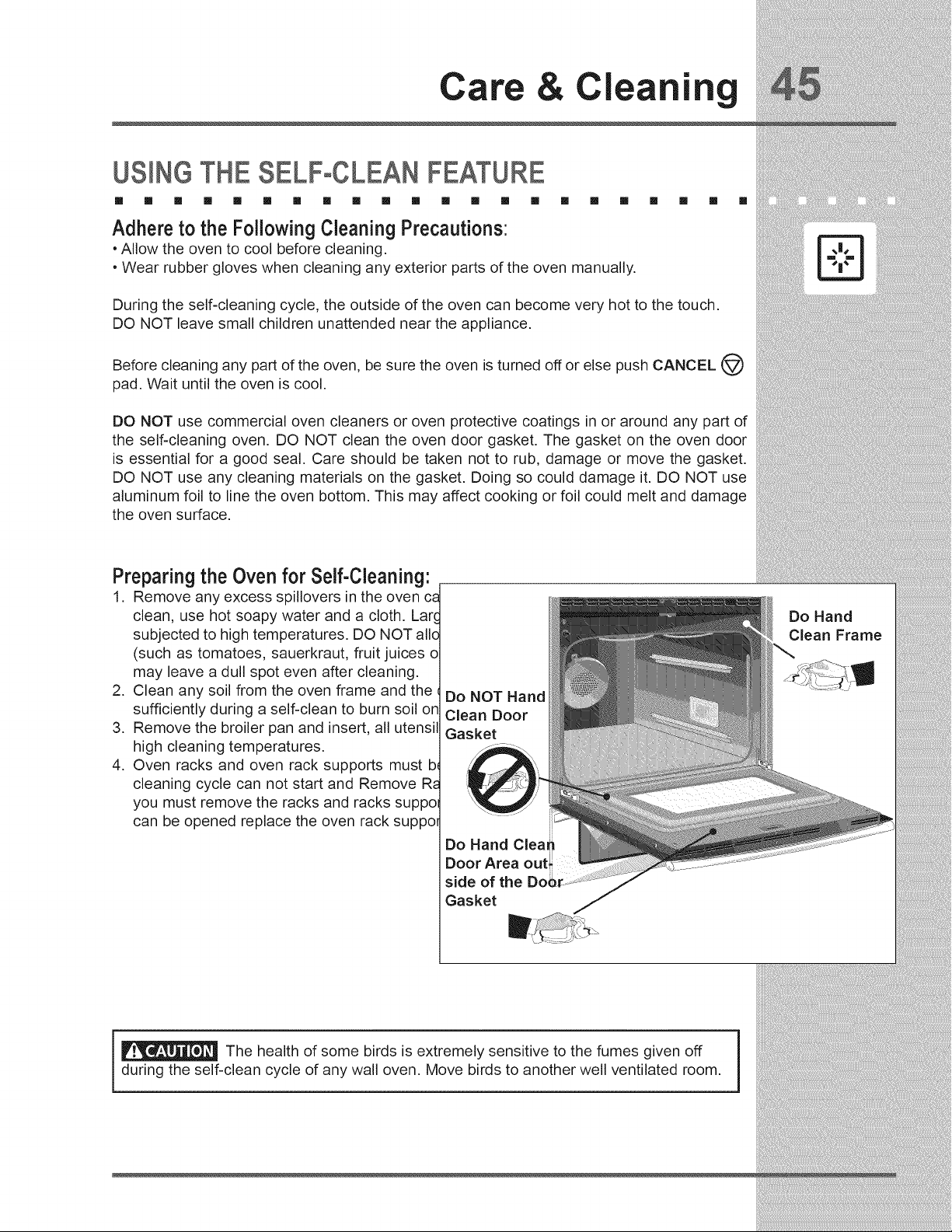
Care Cleanin
USINGTHESELF-CLEANFEATURE
[] [] [] [] [] [] [] [] [] [] [] [] [] [] [] [] [] [] [] [] []
Adhere to the Following Cleaning Precautions:
• Allow the oven to cool before cleaning.
• Wear rubber gloves when cleaning any exterior parts of the oven manually.
During the self-cleaning cycle, the outside of the oven can become very hot to the touch.
DO NOT leave small children unattended near the appliance.
Before cleaning any part of the oven, be sure the oven is turned off or else push CANCEL
pad. Wait until the oven is cool.
DO NOT use commercial oven cleaners or oven protective coatings in or around any part of
the self-cleaning oven. DO NOT clean the oven door gasket. The gasket on the oven door
is essential for a good seal. Care should be taken not to rub, damage or move the gasket.
DO NOT use any cleaning materials on the gasket. Doing so could damage it. DO NOT use
aluminum foil to line the oven bottom. This may affect cooking or foil could melt and damage
the oven surface.
@
Preparing the Oven for Self-Cleaning:
1. Remove any excess spillovers in the oven ca
clean, use hot soapy water and a cloth. Larc
subjected to high temperatures. DO NOT allo
(such as tomatoes, sauerkraut, fruit juices o
may leave a dull spot even after cleaning.
2. Clean any soil from the oven frame and the €
sufficiently during a self-clean to burn soil on
3. Remove the broiler pan and insert, all utensil
high cleaning temperatures.
4. Oven racks and oven rack supports must b_
cleaning cycle can not start and Remove Ra
you must remove the racks and racks suppol
can be opened replace the oven rack suppor
Do NOT Hand
Clean Door
Gasket
Do Hand Cleat
Door Area out,
side of the
Gasket
Do Hand
Clean Frame
_ The health of some birds is extremely sensitive to the fumes given off
during the self-clean cycle of any wall oven. Move birds to another well ventilated room.
Care Cleanin
STARTINGSELF-CLEANCYCLE
[] [] [] [] [] [] [] [] [] [] [] [] [] [] [] [] [] [] [] [] [] []
A self-cleaning oven cleans itself with high temperatures (well above cooking temperatures)
which eliminate soil completely or reduce it to a fine powdered ash you can whisk away with
damp cloth. If you are planning to use the oven directly after a self-clean cycle remember to
allow time for the oven to cool down and the oven door to unlock. This normally takes about
one hour.
Toset the controls for a Self-Cleaning cycle:
1. Remove the oven racks and the racks supports.
2. Be sure the clock is set with the correct time of day and the oven door is closed.
3. Press CLEAN _.
4. Press LITE • for a 2 hour self-clean, or press MEDIUM • • for 3 hours, or press
HEAVY o • • for 4 hours.
5. Press START <_>. The "DOOR _ " icon will flash.
6. As soon as the control is set, the motor driven oven door lock will begin to close
automatically. Once the door has been locked the "DOOR _ " indicator light will stop
flashing and remain on.
Note: Allow about 15 seconds for the oven door lock to close.
Toset the controls for a delayed Self-Cleaning cycle:
1. Follow the instructions above.
2. Press COOK OPTIONS @ to bring up the cook options items.
3. Press END TIME
4. Enter time of day needed for the end of the cycle (example for "6:00"; _6_0_0_).
5. Press START <_.
When the Self-Clean Cycle is Completed:
1. The time of day and "DOOR _ "will remain ON.
2. The display will show an "Hot" message while the oven is still too hot to open door.
3. Once the oven has cooled down for 1 HOUR, and the "DOOR _ " icon is no longer
displayed, the oven door can then be opened.
Stopping or interrupting a Self-Cleaning Cycle:
If it becomes necessary to stop or interrupt a self=cleaning cycle due to excessive smoke:
1. Press CANCEL@.
2. Once the oven has cooled down for approximately 1 HOUR and the "DOOR _ " icon
is no longer displayed,the oven door can then be opened.
During the self-cleaning cycle, the outside of the wall oven can become very hot to the touch.
DO NOT leave small children unattended near the appliance; they may be burned if they touch the hot oven
door surfaces.
DO NOT force the oven door open. This can damage the automatic door locking system. Use
care when opening the oven door after the self-cleaning cycle. Stand to the side of the oven when opening
the door to allow hot air or steam to escape. The oven may still be VERY HOT.
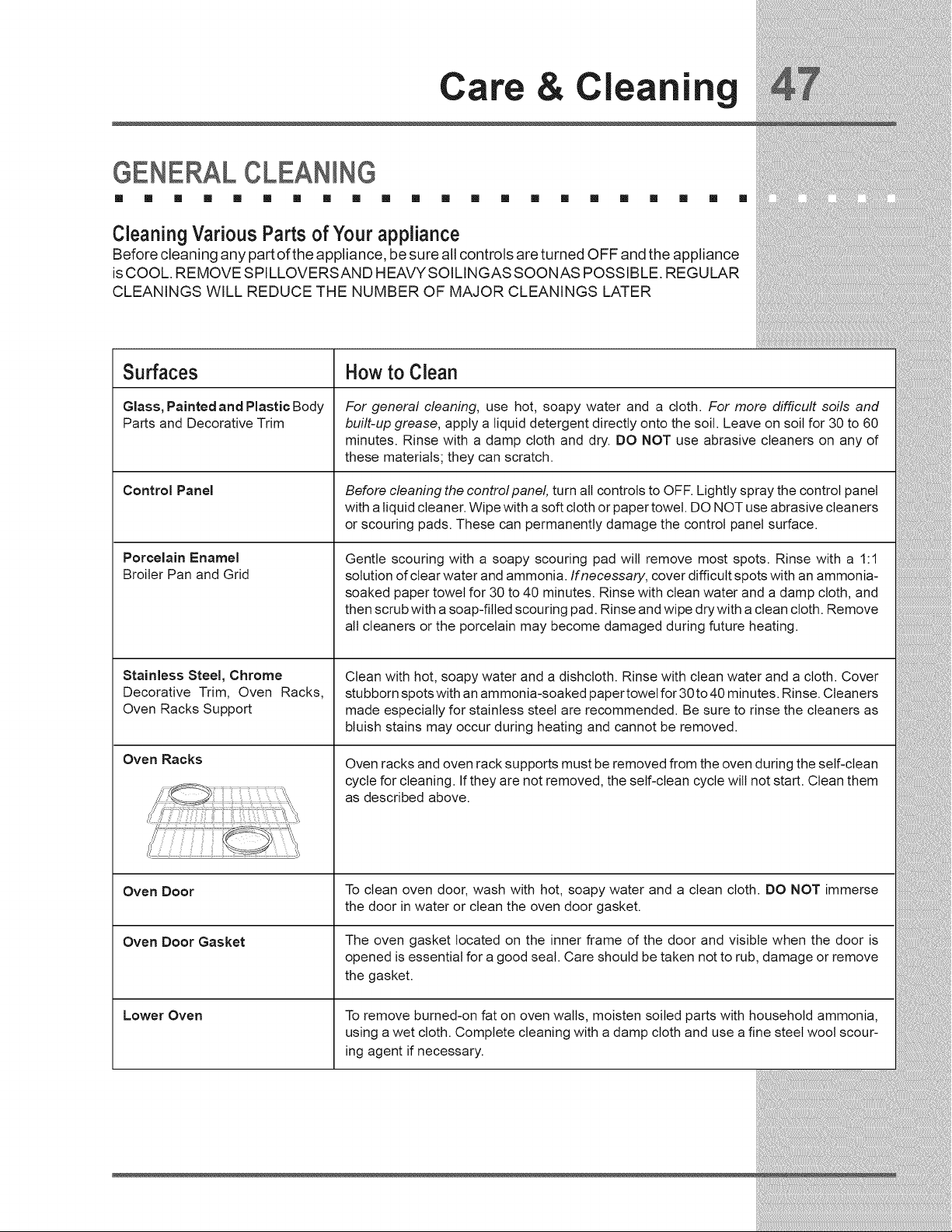
Care Cleanin
GENERAL CLEANmNG
[] [] [] [] [] [] [] [] [] [] [] [] [] [] [] [] [] [] [] [] [] []
Cleaning Various Parts of Your appliance
Before cleaning any part ofthe appliance, be sure all controls are turned OFF and the appliance
is COOL. REMOVE SPILLOVERSAND HEAVY SOILINGAS SOONAS POSSIBLE. REGULAR
CLEANINGS WILL REDUCE THE NUMBER OF MAJOR CLEANINGS LATER
Surfaces
Glass, Painted and Plastic Body
Parts and Decorative Trim
Control Panel
Porcelain Enamel
Broiler Pan and Grid
Stainless Steel, Chrome
Decorative Trim, Oven Racks,
Oven Racks Support
Oven Racks
Oven Door
Oven Door Gasket
Lower Oven
How to Clean
For general cleaning, use hot, soapy water and a cloth. For more difficult soils and
built-up grease, apply a liquid detergent directly onto the soil. Leave on soil for 30 to 60
minutes. Rinse with a damp cloth and dry. DO NOT use abrasive cleaners on any of
these materials; they can scratch.
Before cleaning the controlpanel, turn all controls to OFF. Lightly spray the control panel
with a liquid cleaner. Wipe with a soft cloth or paper towel. DO NOT use abrasive cleaners
or scouring pads. These can permanently damage the control panel surface.
Gentle scouring with a soapy scouring pad will remove most spots. Rinse with a 1:1
solution of clear water and ammonia. If necessary, cover difficult spots with an ammonia-
soaked paper towel for 30 to 40 minutes. Rinse with clean water and a damp cloth, and
then scrub with a soap-filled scouring pad. Rinse and wipe dry with a clean cloth. Remove
all cleaners or the porcelain may become damaged during future heating.
Clean with hot, soapy water and a dishcloth. Rinse with clean water and a cloth. Cover
stubborn spots with an ammonia-soaked paper towet for 30 to 40 minutes. Rinse. Cleaners
made especially for stainless steel are recommended. Be sure to rinse the cleaners as
bluish stains may occur during heating and cannot be removed.
Oven racks and oven rack supports must be removed from the oven during the self-clean
cycle for cleaning. If they are not removed, the self-clean cycle will not start. Clean them
as described above.
To clean oven door, wash with hot, soapy water and a clean cloth. DO NOT immerse
the door in water or clean the oven door gasket.
The oven gasket located on the inner frame of the door and visible when the door is
opened is essential for a good seal. Care should be taken not to rub, damage or remove
the gasket.
To remove burned-on fat on oven walls, moisten soiled parts with household ammonia,
using a wet cloth. Complete cleaning with a damp cloth and use a fine steel wool scour-
ing agent if necessary.
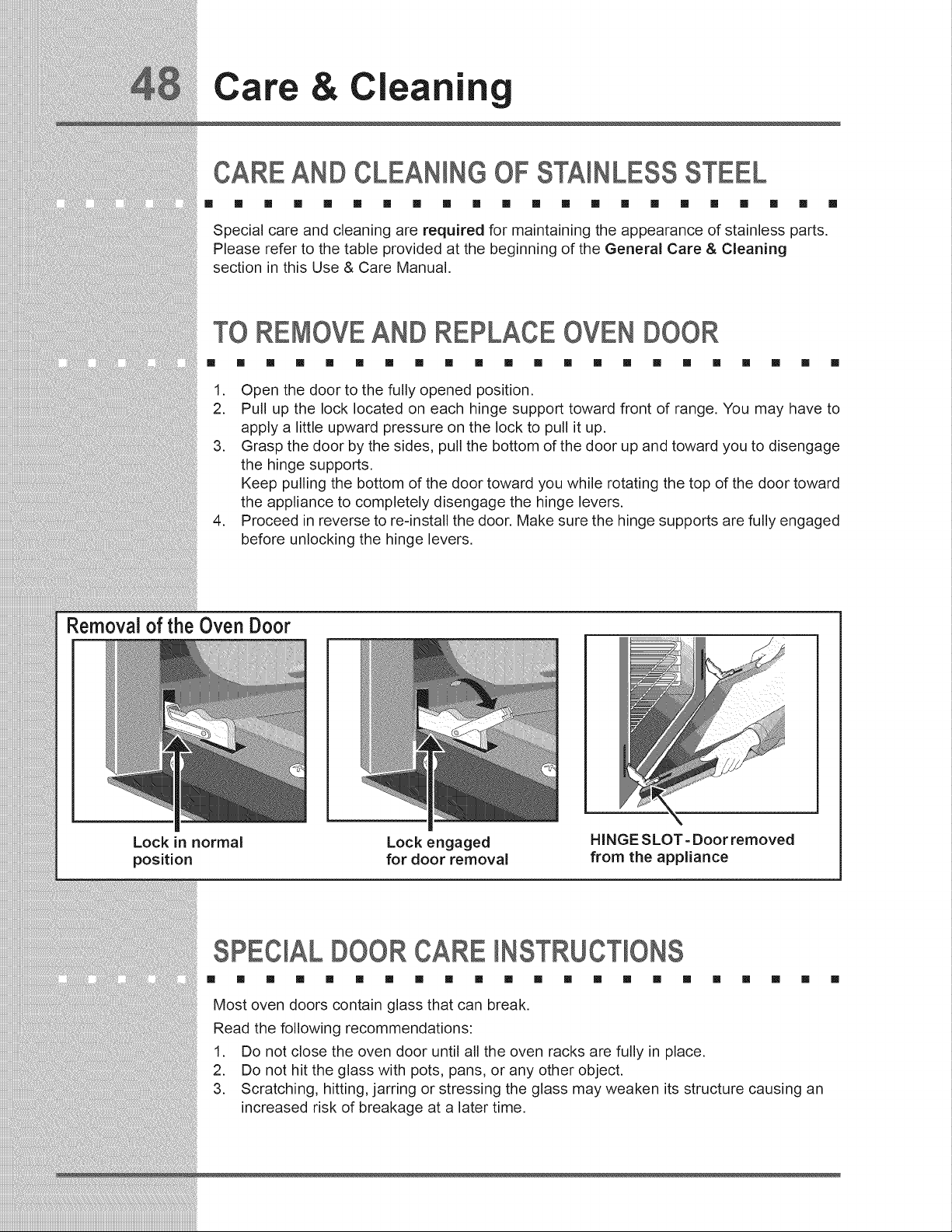
Care Cleanin
CARE AND CLEANmNGOF STAmNLESSSTEEL
[] [] [] [] [] [] [] [] [] [] [] [] [] [] [] [] [] [] [] [] [] []
Special care and cleaning are required for maintaining the appearance of stainless parts.
Please refer to the table provided at the beginning of the General Care & Cleaning
section in this Use & Care Manual.
TO REMOVEAND REPLACE OVEN DOOR
[] [] [] [] [] [] [] [] [] [] [] [] [] [] [] [] [] [] [] [] [] []
1. Open the door to the fully opened position.
2. Pull up the lock located on each hinge support toward front of range. You may have to
apply a little upward pressure on the lock to pull it up.
3. Grasp the door by the sides, pull the bottom of the door up and toward you to disengage
the hinge supports.
Keep pulling the bottom of the door toward you while rotating the top of the door toward
the appliance to completely disengage the hinge levers.
4. Proceed in reverse to re-install the door. Make sure the hinge supports are fully engaged
before unlocking the hinge levers.
Removal of the Oven Door
Lock in normal
position
Lock engaged
for door removal
HINGE SLOT- Door removed
from the appliance
SPECIALDOORCARE NSTRUCT ONS
[] [] [] [] [] [] [] [] [] [] [] [] [] [] [] [] [] [] [] [] [] []
Most oven doors contain glass that can break.
Read the following recommendations:
1. Do not close the oven door until all the oven racks are fully in place.
2. Do not hit the glass with pots, pans, or any other object.
3. Scratching, hitting, jarring or stressing the glass may weaken its structure causing an
increased risk of breakage at a later time.
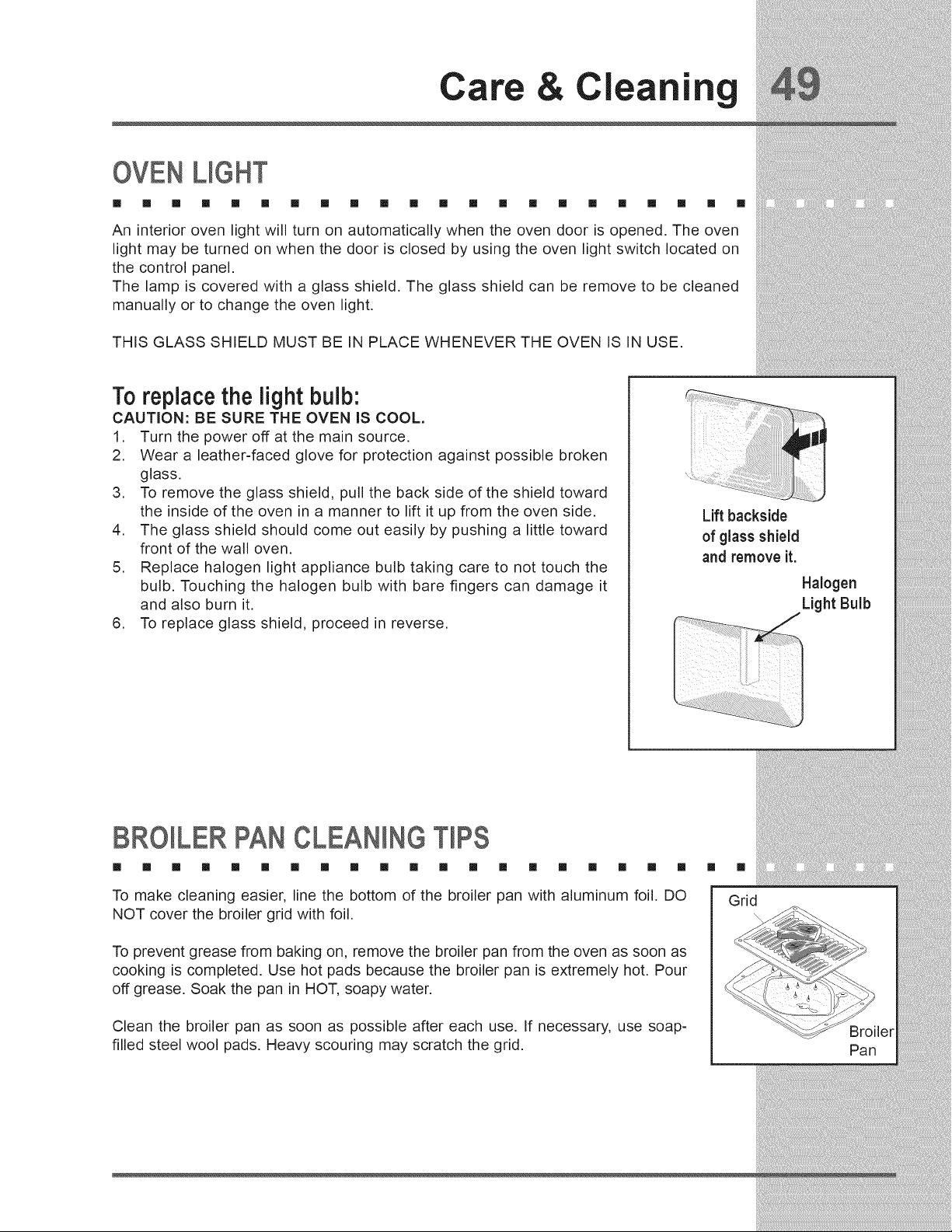
Care Cleanin
OVEN UGHT
[] [] [] [] [] [] [] [] [] [] [] [] [] [] [] [] [] [] [] [] [] []
An interior oven light will turn on automatically when the oven door is opened. The oven
light may be turned on when the door is closed by using the oven light switch located on
the control panel.
The lamp is covered with a glass shield. The glass shield can be remove to be cleaned
manually or to change the oven light.
THIS GLASS SHIELD MUST BE IN PLACE WHENEVER THE OVEN IS IN USE.
To replace the light bulb:
CAUTION: BE SURE THE OVEN IS COOL.
1. Turn the power off at the main source.
2. Wear a leather-faced glove for protection against possible broken
glass.
3. To remove the glass shield, pull the back side of the shield toward
the inside of the oven in a manner to lift it up from the oven side.
4. The glass shield should come out easily by pushing a little toward
front of the wall oven.
5. Replace halogen light appliance bulb taking care to not touch the
bulb. Touching the halogen bulb with bare fingers can damage it
and also burn it.
6. To replace glass shield, proceed in reverse.
Lift backside
of glass shield
and remove it.
Halogen
Light Bulb
BROILER PAN CLEANmNGT PS
[] [] [] [] [] [] [] [] [] [] [] [] [] [] [] [] [] [] [] []
To make cleaning easier, line the bottom of the broiler pan with aluminum foil. DO
NOT cover the broiler grid with foil.
To prevent grease from baking on, remove the broiler pan from the oven as soon as
cooking is completed. Use hot pads because the broiler pan is extremely hot. Pour
off grease. Soak the pan in HOT, soapy water.
Clean the broiler pan as soon as possible after each use. If necessary, use soap-
filled steel wool pads. Heavy scouring may scratch the grid.
[] []
Grid
Pan
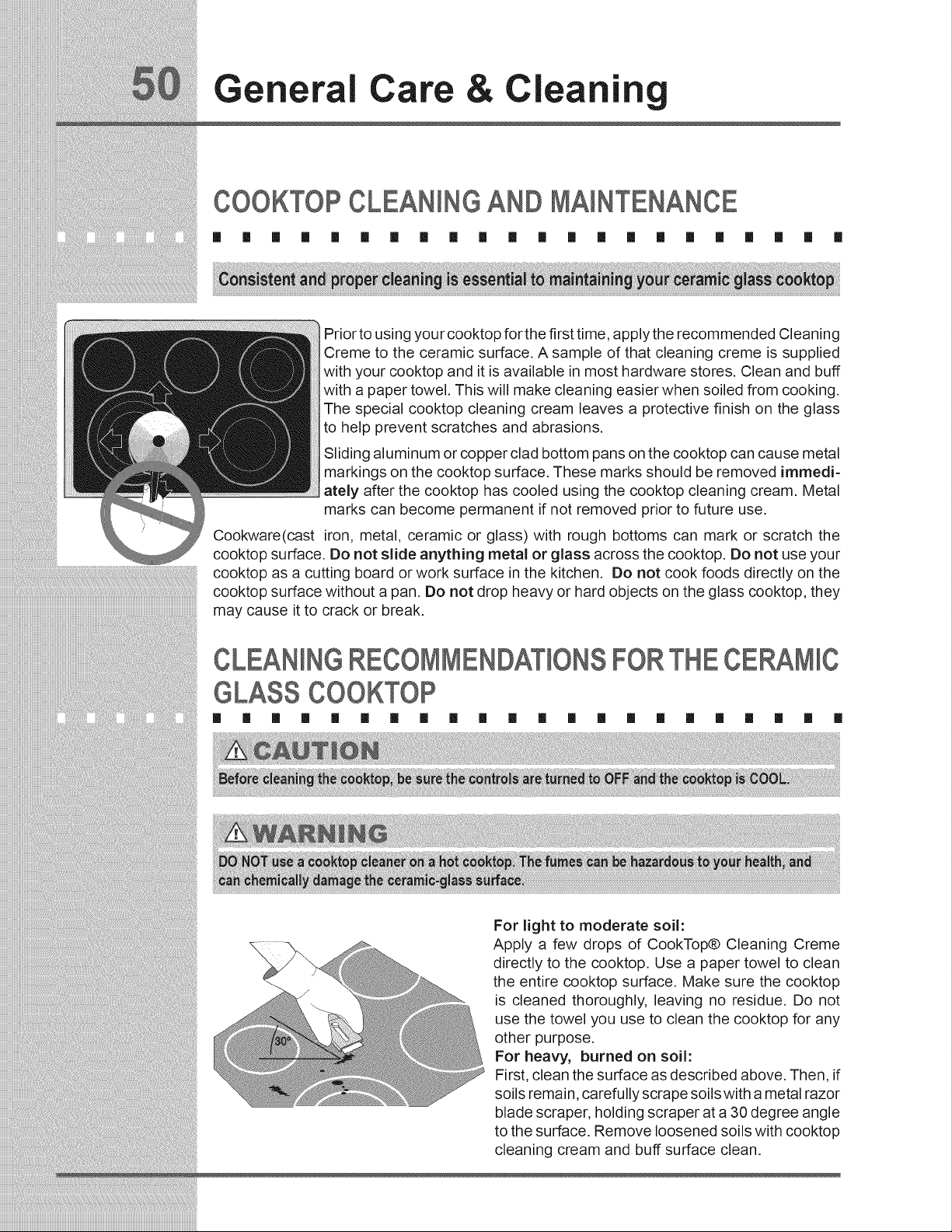
General Care
Cleaning
COOKTOPCLEANINGAND MAmNTENANCE
[] 1 [] [] 1 [] [] 1 [] 1 [] 1 1 [] [] [] 1 [] [] [] [] []
Prior to using your cooktop for the first time, apply the recommended Cleaning
Creme to the ceramic surface. A sample of that cleaning creme is supplied
with your cooktop and it is available in most hardware stores. Clean and buff
with a paper towel. This will make cleaning easier when soiled from cooking.
The special cooktop cleaning cream leaves a protective finish on the glass
to help prevent scratches and abrasions.
Sliding aluminum or copper clad bottom pans on the cooktop can cause metal
markings on the cooktop surface. These marks should be removed immedi-
ately after the cooktop has cooled using the cooktop cleaning cream. Metal
marks can become permanent if not removed prior to future use.
Cookware(cast iron, metal, ceramic or glass) with rough bottoms can mark or scratch the
cooktop surface. Do not slide anything metal or glass across the cooktop. Do not use your
cooktop as a cutting board or work surface in the kitchen. Do not cook foods directly on the
cooktop surface without a pan. Do not drop heavy or hard objects on the glass cooktop, they
may cause it to crack or break.
CLEANmNGRECOMMENDATIONSFORTHECERAMHC
GLASSCOOKTOP
[] [] [] [] [] [] [] [] [] [] [] [] [] [] [] [] [] [] [] [] [] []
For light to moderate soil:
Apply a few drops of CookTop® Cleaning Creme
directly to the cooktop. Use a paper towel to clean
the entire cooktop surface. Make sure the cooktop
is cleaned thoroughly, leaving no residue. Do not
use the towel you use to clean the cooktop for any
other purpose.
For heavy, burned on soil:
First, clean the surface as described above. Then, if
soils remain, carefully scrape soils with a metal razor
blade scraper, holding scraper at a 30 degree angle
to the surface. Remove loosened soils with cooktop
cleaning cream and buff surface clean.
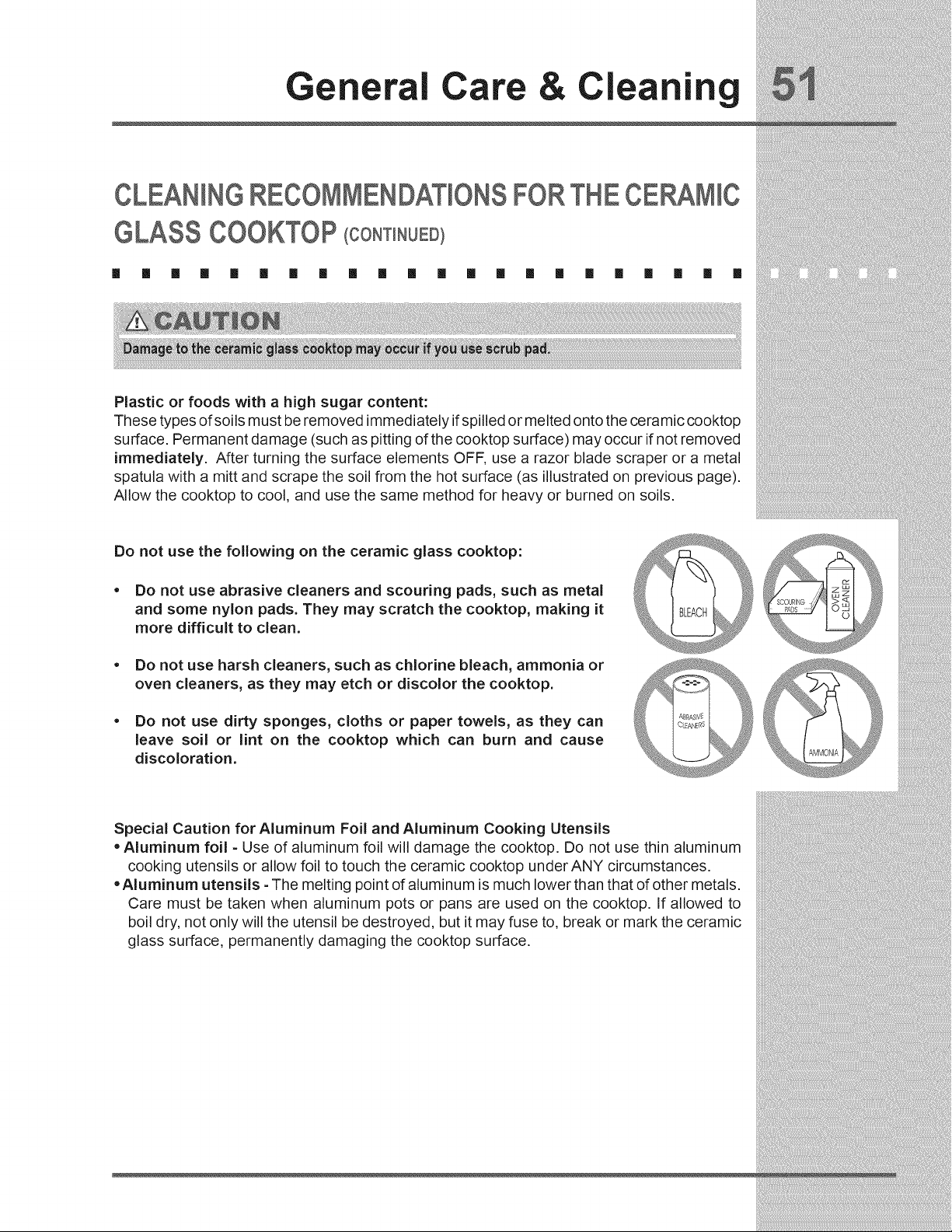
General Care & Cleaning
CLEANINGRECOMMENDATIONSFORTHECERAMHC
GLASSCOOKTOP(CO.T .UED)
[] [] [] [] [] [] [] [] [] [] [] [] [] [] [] [] [] [] [] [] [] []
Plastic or foods with a high sugar content:
These types of soils must be removed immediately if spilled or melted onto the ceramic cooktop
surface. Permanent damage (such as pitting of the cooktop surface) may occur if not removed
immediately. After turning the surface elements OFF, use a razor blade scraper or a metal
spatula with a mitt and scrape the soil from the hot surface (as illustrated on previous page).
Allow the cooktop to cool, and use the same method for heavy or burned on soils.
Do not use the following on the ceramic glass cooktop:
* Do not use abrasive cleaners and scouring pads, such as metal
and some nylon pads. They may scratch the cooktop, making it
more difficult to clean.
* Do not use harsh cleaners, such as chlorine bleach, ammonia or
oven cleaners, as they may etch or discolor the cooktop.
* Do not use dirty sponges, cloths or paper towels, as they can
leave soil or lint on the cooktop which can burn and cause
discoloration.
Z)
Special Caution for Aluminum Foil and Aluminum Cooking Utensils
• Aluminum foil - Use of aluminum foil will damage the cooktop. Do not use thin aluminum
cooking utensils or allow foil to touch the ceramic cooktop under ANY circumstances.
• Aluminum utensils - The melting point of aluminum is much lower than that of other metals.
Care must be taken when aluminum pots or pans are used on the cooktop. If allowed to
boil dry, not only will the utensil be destroyed, but it may fuse to, break or mark the ceramic
glass surface, permanently damaging the cooktop surface.
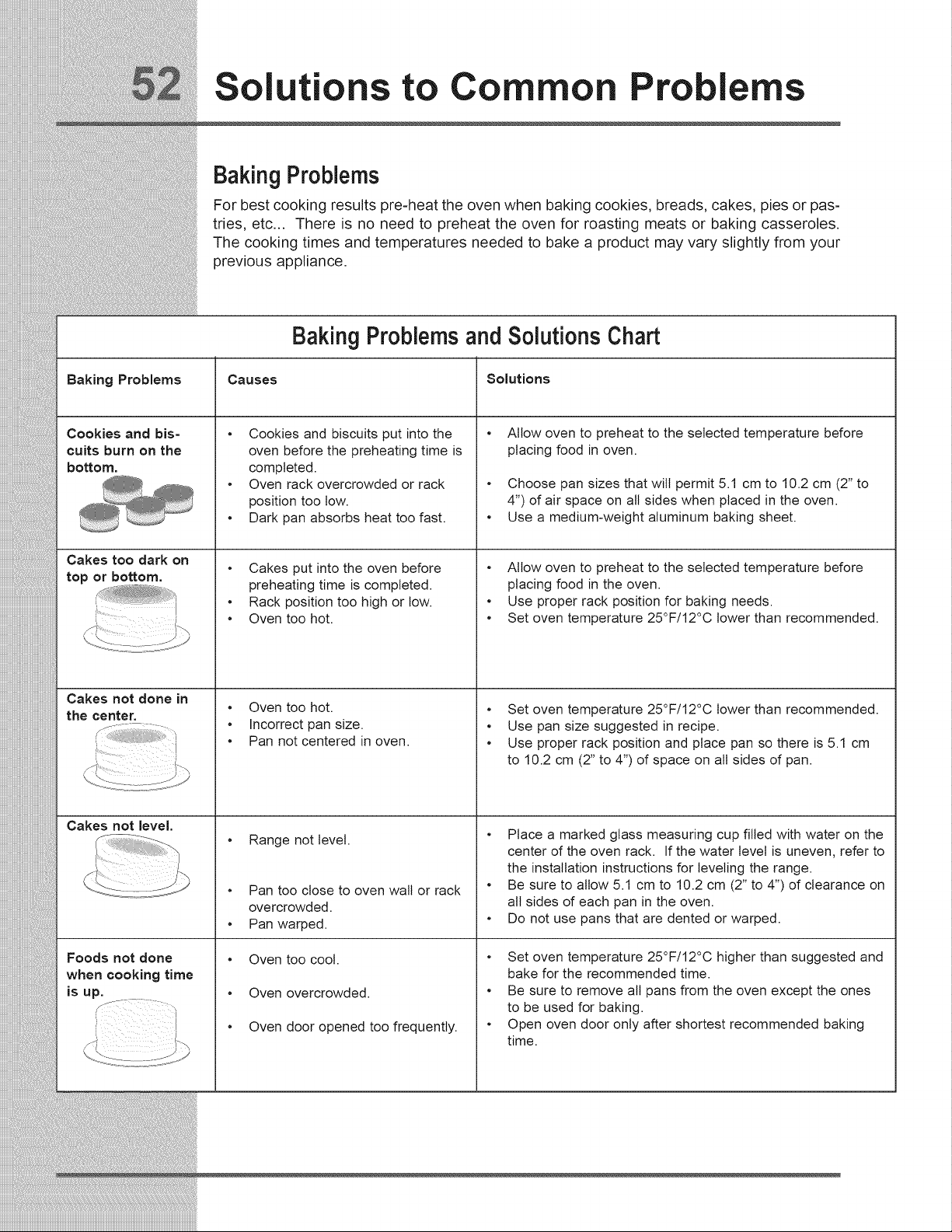
Solu ions to Common Pro lems
Baking Problems
For best cooking results pre-heat the oven when baking cookies, breads, cakes, pies or pas-
tries, etc... There is no need to preheat the oven for roasting meats or baking casseroles.
The cooking times and temperatures needed to bake a product may vary slightly from your
previous appliance.
Baking Problems and Solutions Chart
Baking Problems Causes Solutions
Cookies and bis-
cuits burn on the
bottom.
Cakes too dark on
top or bottom.
Cakes not done in
the center.
Cakes not level.
Foods not done
when cooking time
is up.
o
o
Cookies and biscuits put into the
oven before the preheating time is
completed.
Oven rack overcrowded or rack
position too tow.
Dark pan absorbs heat too fast.
• Cakes put into the oven before
preheating time is completed.
• Rack position too high or low.
• Oven too hot.
• Oven too hot.
• Incorrect pan size.
• Pan not centered in oven.
• Range not level.
• Pan too close to oven wall or rack
overcrowded.
• Pan warped.
• Oven too cool.
• Oven overcrowded.
• Oven door opened too frequently.
Allow oven to preheat to the selected temperature before
placing food in oven,
• Choose pan sizes that wilt permit 5.1 cm to 10.2 cm (2" to
4") of air space on all sides when placed in the oven.
• Use a medium-weight aluminum baking sheet.
• Allow oven to preheat to the selected temperature before
placing food in the oven.
• Use proper rack position for baking needs.
• Set oven temperature 25°F/12°C lower than recommended.
• Set oven temperature 25°F/12°C lower than recommended.
• Use pan size suggested in recipe.
• Use proper rack position and place pan so there is 5.1 cm
to 10.2 cm (2" to 4") of space on all sides of pan.
• Place a marked glass measuring cup filled with water on the
center of the oven rack. If the water level is uneven, refer to
the installation instructions for leveling the range.
• Be sure to allow 5.1 cm to 10.2 cm (2" to 4") of clearance on
all sides of each pan in the oven.
• Do not use pans that are dented or warped.
• Set oven temperature 25°F/12°C higher than suggested and
bake for the recommended time.
• Be sure to remove all pans from the oven except the ones
to be used for baking.
• Open oven door only after shortest recommended baking
time.
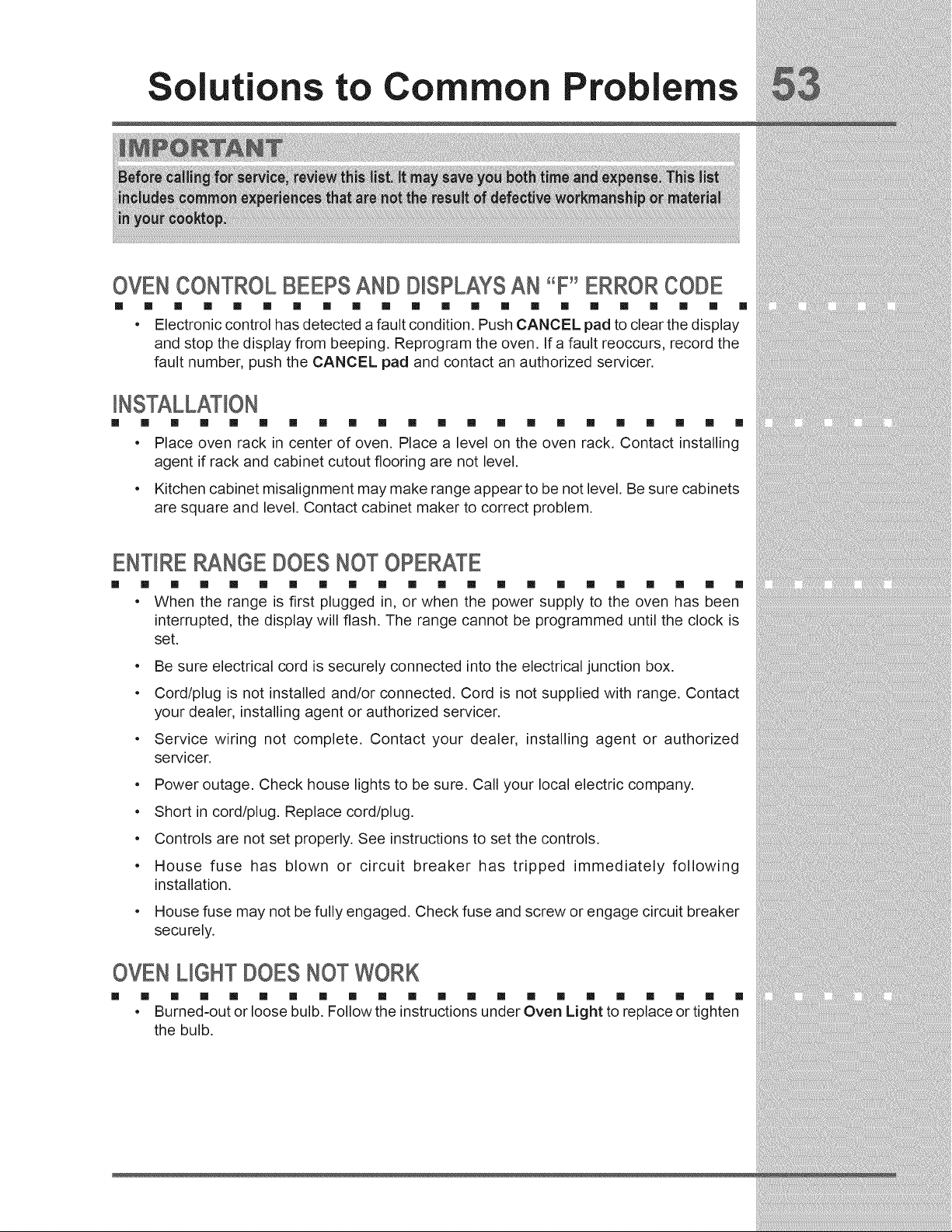
Solutions to Common Problems
OVEN CONTROL BEEPS AND D_SPLAYSAN "F"ERROR CODE
[] [] [] [] [] [] [] [] [] [] [] [] [] [] [] [] [] [] [] [] [] []
• Electroniccontrolhas detecteda faultcondition.Push CANCEL pad toclearthedisplay
and stopthedisplayfrom beeping.Reprogram theoven.Ifa faultreoccurs,recordthe
faultnumber, push theCANCEL pad and contactan authorizedservicer.
[] [] [] [] [] [] [] [] [] [] [] [] [] [] [] [] [] [] [] [] []
• Place oven rack in center of oven. Place a level on the oven rack. Contact installing
agent if rack and cabinet cutout flooring are not level.
Kitchen cabinet misalignment may make range appear to be not level. Be sure cabinets
are square and level. Contact cabinet maker to correct problem.
ENTIRERANGEDOESNOTOPERATE
[] [] [] [] [] [] [] [] [] [] [] [] [] [] [] [] [] [] [] [] [] []
• When the range is first plugged in, or when the power supply to the oven has been
interrupted, the display will flash. The range cannot be programmed until the clock is
set.
• Be sure electrical cord is securely connected into the electrical junction box.
• Cord/plug is not installed and/or connected. Cord is not supplied with range. Contact
your dealer, installing agent or authorized servicer.
• Service wiring not complete. Contact your dealer, installing agent or authorized
servicer.
• Power outage. Check house lights to be sure. Call your local electric company.
• Short in cord/plug. Replace cord/plug.
• Controls are not set properly. See instructions to set the controls.
• House fuse has blown or circuit breaker has tripped immediately following
installation.
• House fuse may not be fully engaged. Check fuse and screw or engage circuit breaker
securely.
OVENUGHT DOESNOTWORK
[] [] [] [] [] [] [] [] [] [] [] [] [] [] [] [] [] [] [] [] [] []
• Burned-out or loose bulb. Follow the instructions under Oven Light to replace or tighten
the bulb.
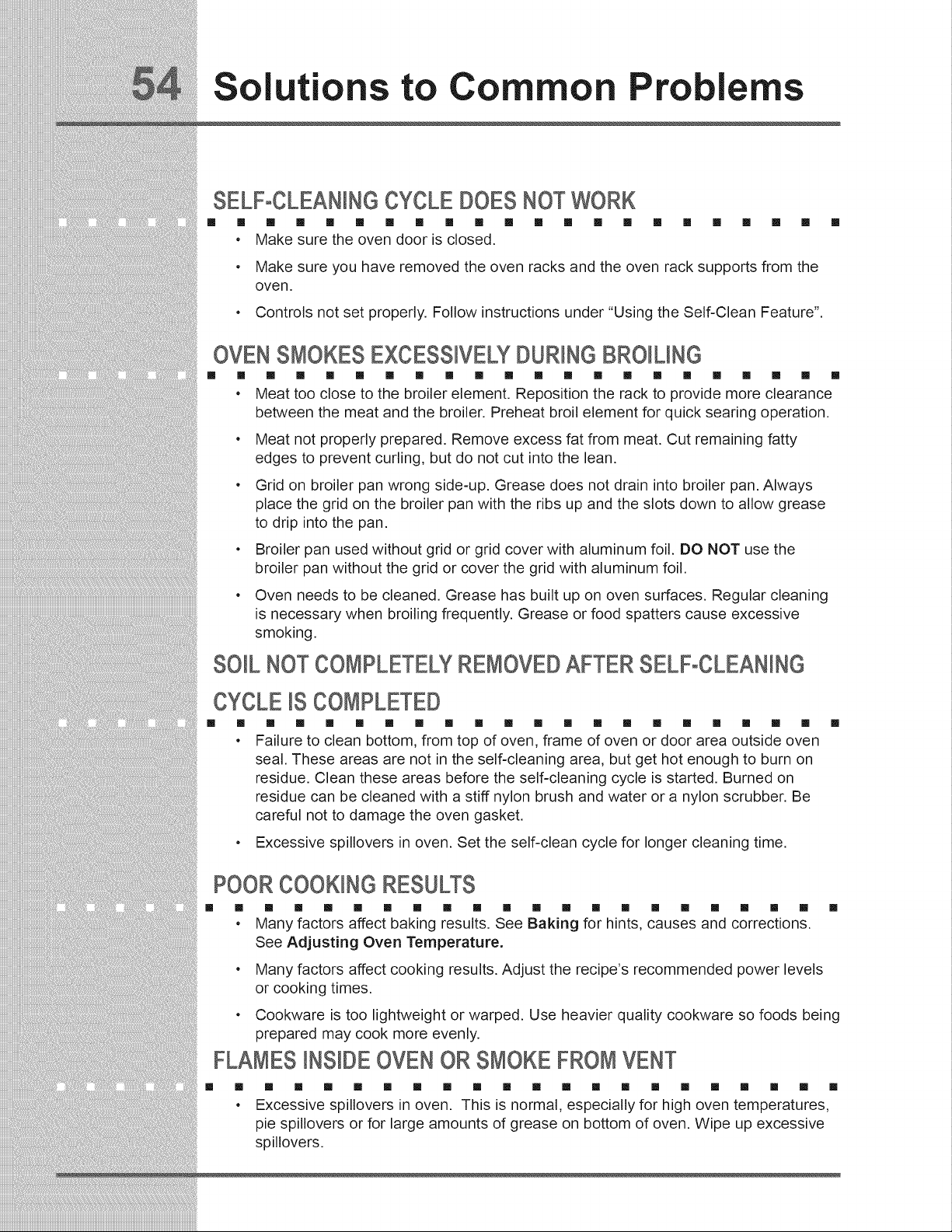
Solutions to Common Problems
SELF-CLEANiNGCYCLEDOESNOTWORK
[] [] [] [] [] [] [] [] [] [] [] [] [] [] [] [] [] [] [] [] []
• Make sure the oven door is closed.
• Make sure you have removed the oven racks and the oven rack supports from the
oven.
• Controls not set properly. Follow instructions under "Using the Self-Clean Feature".
OVENSMOKESEXCESSIVELYDURINGBRO_UNG
[] [] [] [] [] [] [] [] [] [] [] [] [] [] [] [] [] [] [] [] [] []
• Meat too close to the broiler element. Reposition the rack to provide more clearance
between the meat and the broiler. Preheat broil element for quick searing operation.
• Meat not properly prepared. Remove excess fat from meat. Cut remaining fatty
edges to prevent curling, but do not cut into the lean.
• Grid on broiler pan wrong side-up. Grease does not drain into broiler pan. Always
place the grid on the broiler pan with the ribs up and the slots down to allow grease
to drip into the pan.
• Broiler pan used without grid or grid cover with aluminum foil. DO NOT use the
broiler pan without the grid or cover the grid with aluminum foil.
• Oven needs to be cleaned. Grease has built up on oven surfaces. Regular cleaning
is necessary when broiling frequently. Grease or food spatters cause excessive
smoking.
SO_LNOTCOMPLETELYREMOVEDAFTER SELF-CLEANING
CYCLE_SCOMPLETED
[] [] [] [] [] [] [] [] [] [] [] [] [] [] [] [] [] [] [] [] []
• Failure to clean bottom, from top of oven, frame of oven or door area outside oven
seal. These areas are not in the self-cleaning area, but get hot enough to burn on
residue. Clean these areas before the self-cleaning cycle is started. Burned on
residue can be cleaned with a stiff nylon brush and water or a nylon scrubber. Be
careful not to damage the oven gasket.
• Excessive spillovers in oven. Set the self-clean cycle for longer cleaning time.
POORCOOKINGRESULTS
[] [] [] [] [] [] [] [] [] [] [] [] [] [] [] [] [] [] [] [] []
• Many factors affect baking results. See Baking for hints, causes and corrections.
See Adjusting Oven Temperature.
[]
• Many factors affect cooking results. Adjust the recipe's recommended power levels
or cooking times.
• Cookware is too lightweight or warped. Use heavier quality cookware so foods being
prepared may cook more evenly.
FLAMES _NS_DEOVENOR SMOKEFROMVENT
[] []
e
[] [] [] [] [] [] [] [] [] [] [] [] [] [] [] [] [] [] [] []
Excessive spillovers in oven. This is normal, especially for high oven temperatures,
pie spillovers or for large amounts of grease on bottom of oven. Wipe up excessive
spillovers.
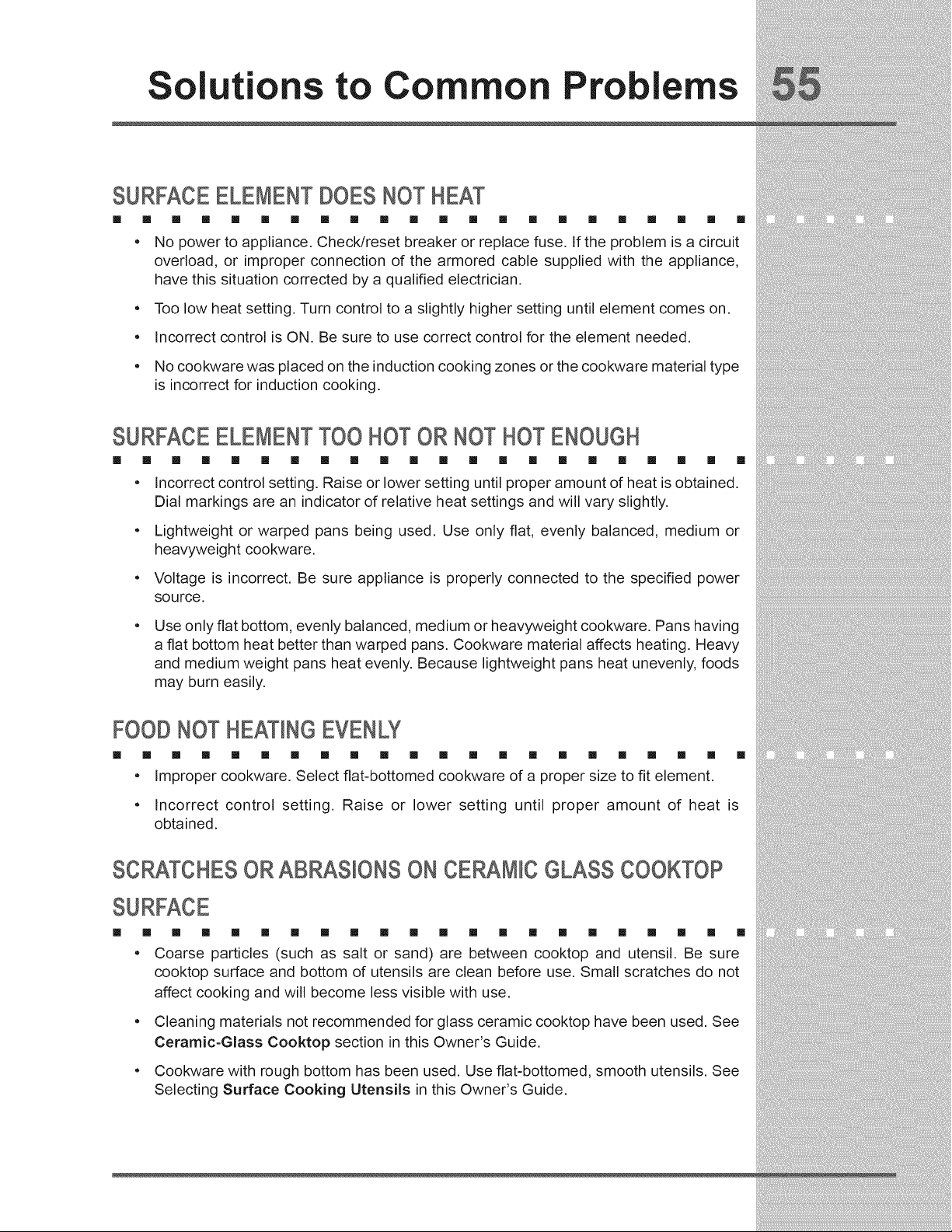
Solutions to Common Problems
SURFACEELEMENTDOESNOTHEAT
[] [] [] [] [] [] [] [] [] [] [] [] [] [] [] [] [] [] [] [] [] []
, No power to appliance. Check/reset breaker or replace fuse. If the problem is a circuit
overload, or improper connection of the armored cable supplied with the appliance,
have this situation corrected by a qualified electrician.
. Too low heat setting. Turn control to a slightly higher setting until element comes on.
. Incorrect control is ON. Be sure to use correct control for the element needed.
. No cookware was placed on the induction cooking zones or the cookware material type
is incorrect for induction cooking.
SURFACEELEMENTTOO HOT OR NOTHOTENOUGH
[] [] [] [] [] [] [] [] [] [] [] [] [] [] [] [] [] [] [] [] [] []
, Incorrect control setting. Raise or lower setting until proper amount of heat is obtained.
Dial markings are an indicator of relative heat settings and will vary slightly.
. Lightweight or warped pans being used. Use only flat, evenly balanced, medium or
heavyweight cookware.
. Voltage is incorrect. Be sure appliance is properly connected to the specified power
source.
Use only flat bottom, evenly balanced, medium or heavyweight cookware. Pans having
a flat bottom heat better than warped pans. Cookware material affects heating. Heavy
and medium weight pans heat evenly. Because lightweight pans heat unevenly, foods
may burn easily.
FOODNOT HEATINGEVENLY
[] [] [] [] [] [] [] [] [] [] [] [] [] [] [] [] [] [] [] [] [] []
, Improper cookware. Select flat-bottomed cookware of a proper size to fit element.
, Incorrect control setting. Raise or lower setting until proper amount of heat is
obtained.
SCRATCHESOR ABRASIONSON CERAMICGLASS COOKTOP
[] [] [] [] [] [] [] [] [] [] [] [] [] [] [] [] [] [] [] [] [] []
. Coarse particles (such as salt or sand) are between cooktop and utensil. Be sure
cooktop surface and bottom of utensils are clean before use. Small scratches do not
affect cooking and will become less visible with use.
. Cleaning materials not recommended for glass ceramic cooktop have been used. See
Ceramic-Glass Cooktop section in this Owner's Guide.
. Cookware with rough bottom has been used. Use flat-bottomed, smooth utensils. See
Selecting Surface Cooking Utensils in this Owner's Guide.
Solutions to Common Problems
BROWNSTREAKSAND SPECKSON CERAMICGLASSCOOKTOP
[]
e
[] [] [] [] [] [] [] [] [] [] [] [] [] [] [] [] [] [] [] []
Boilovers have cooked onto surface. Use razor blade scraper to remove soil. See
instructions under General Care & Cleaning.
Cleaning materials not recommended for ceramic-glass cooktop have been used. Use
recommended cleaners and cleaning method. See Ceramic-Glass Cooktop section
in this Owner's Guide.
AREAS OF D_SCOLORAT_ONON CERAMIC GLASS COOKTOP
[]
o
[] [] [] [] [] [] [] [] [] [] [] [] [] [] [] [] [] [] [] []
Mineral deposits from water and food. Wet surface with water and sprinkle on a cooktop
cleaning creme. Scrub with a clean damp paper towel until the stain disappears. Wipe
remaining paste away, then apply a small amount of cooktop cleaning creme and polish
with a clean paper towel. Use cookware with clean, dry bottoms. See Ceramic-Glass
Cooktop section in this Owner's Guide.
METALMARKSON CERAMICGLASS COOKTOPSURFACE
[] [] [] [] [] [] [] [] [] [] [] [] [] [] [] [] [] [] [] [] [] []
• Sliding or scraping of metal utensils on cooktop surface. Do not slide metal utensils on
cooktop surface. Use a mildly abrasive cleanser to remove marks.
arranty information
Your appliance is covered by a one year limited warranty. For one year from your original date of purchase, Etectrolux will repair
or replace any parts of this appliance that prove to be defective in materials or workmanship when such appliance is installed,
used, and maintained in accordance with the provided instructions. In addition, the glass cooktop or radiant surface element of
your appliance (excluding built-in and free-standing range appliances) is covered by a two through five year limited warranty.
During the 2nd through 5th years from your original date of purchase, Electrolux will provide a replacement glass cooktop or
radiant surface element for your appliance which has proven to be defective in materials or workmanship when such appliance
is installed, used, and maintained in accordance with the provided instructions.
Exclusions
This warranty does not cover the following:
1. Products with original serial numbers that have been removed, altered or cannot be readily determined.
2. Product that has been transferred from its original owner to another party or removed outside the USA or Canada.
3. Rust on the interior or exterior of the unit.
4. Products purchased "as-is" are not covered by this warranty.
5. Food loss due to any refrigerator or freezer failures.
6. Products used in a commercial setting.
7. Service calls which do not involve malfunction or defects in materials or workmanship, or for appliances not in ordinary household use or used other
than in accordance with the provided instructions.
8. Service calls to correct the installation of your appliance or to instruct you how to use your appliance.
9. Expenses for making the appliance accessible for servicing, such as removal of trim, cupboards, shelves, etc., which are not a part of the appliance
when it is shipped from the factory.
10. Service calls to repair or replace appliance light bulbs, air filters, water filters, other consumables, or knobs, handles, or other cosmetic parts.
11. Labor or in-home service costs during the additional limited warranty periods beyond the first year from your original date of purchase.
12. Pickup and delivery costs; your appliance is designed to be repaired in the home.
13. Surcharges including, but not limited to, any after hour, weekend, or holiday service calls, tolls, ferry trip charges, or mileage expense for service calls
to remote areas, including the state of Alaska.
14. Damages to the finish of appliance or home incurred during transportation or installation, including but not limited to floors, cabinets, walls, etc.
15. Damages caused by:services performed by unauthorized service companies; use of parts other than genuine Electrolux partsor parts obtained from persons
other than authorized service companies; or external causes such as abuse, misuse, inadequate power supply, accidents, fires, or acts d God.
DISCLAIMER OF IMPLIED WARRANTIES; LIMITATION OF REMEDIES
CUSTOMER'S SOLEAND EXCLUSIVE REMEDY UNDER THIS LIMITED WARRANTY SHALL BE REPAIR OR REPLACEMENT
AS PROVIDED HEREIN. CLAIMS BASED ON IMPLIED WARRANTIES, INCLUDING WARRANTIES OF MERCHANTABILITY
OR FITNESS FORA PARTICULAR PURPOSE, ARE LIMITED TO ONE YEAR OR THE SHORTEST PERIOD ALLOWED BY
LAW, BUT NOT LESS THAN ONE YEAR. ELECTROLUX SHALL NOT BE LIABLE FOR CONSEQUENTIAL OR INCIDENTAL
DAMAGES SUCH AS PROPERTY DAMAGE AND INCIDENTAL EXPENSES RESULTING FROM ANY BREACH OF THIS
WRITTEN LIMITED WARRANTY OR ANY IMPLIED WARRANTY. SOME STATES AND PROVINCES DO NOT ALLOW THE
EXCLUSION OR LIMITATION OF INCIDENTAL OR CONSEQUENTIAL DAMAGES, OR LIMITATIONS ON THE DURATION OF
IMPLIED WARRANTIES, SO THESE LIMITATIONS OR EXCLUSIONS MAY NOTAPPLYTOYOU. THIS WRITTEN WARRANTY
GIVES YOU SPECIFIC LEGAL RIGHTS. YOU MAY ALSO HAVE OTHER RIGHTS THAT VARY FROM STATE TO STATE.
If You Need Service
Keep your receipt, delivery slip, or some other appropriate payment record to establish the warranty period should service be
required. If service is performed, it is in your best interest to obtain and keep all receipts. Service under this warranty must be
obtained by contacting Electrolux at the addresses or phone numbers below.
This warranty only applies in the USA, Puerto Rico and Canada. In the USA and Puerto Rico, your appliance is warranted by
Electrolux MajorAppliances NorthAmerica, a division of Electrolux Home Products, Inc. In Canada, your appliance is warranted
by Electrolux Canada Corp. Etectrolux authorizes no person to change or add to any obligations under this warranty. Obligations
for service and parts under this warranty must be performed by Etectrolux or an authorized service company. Product features
or specifications as described or illustrated are subject to change without notice.
USA
1-877=435-3287
Electrolux Major Appliances North America
RO. Box 212378
Augusta, GA 30907
Canada
1-800-265-8352
Etectrolux Canada Corp.
5855 Terry Fox Way
Mississauga, Ontario, Canada L5V 3E4

otes

otes

ii i