PURCHASER'S REFERENCE iNFORMATiON
Product Name Diamondback Fitness Apex R8 Upright
Serial Number: E
Record the serial number here.
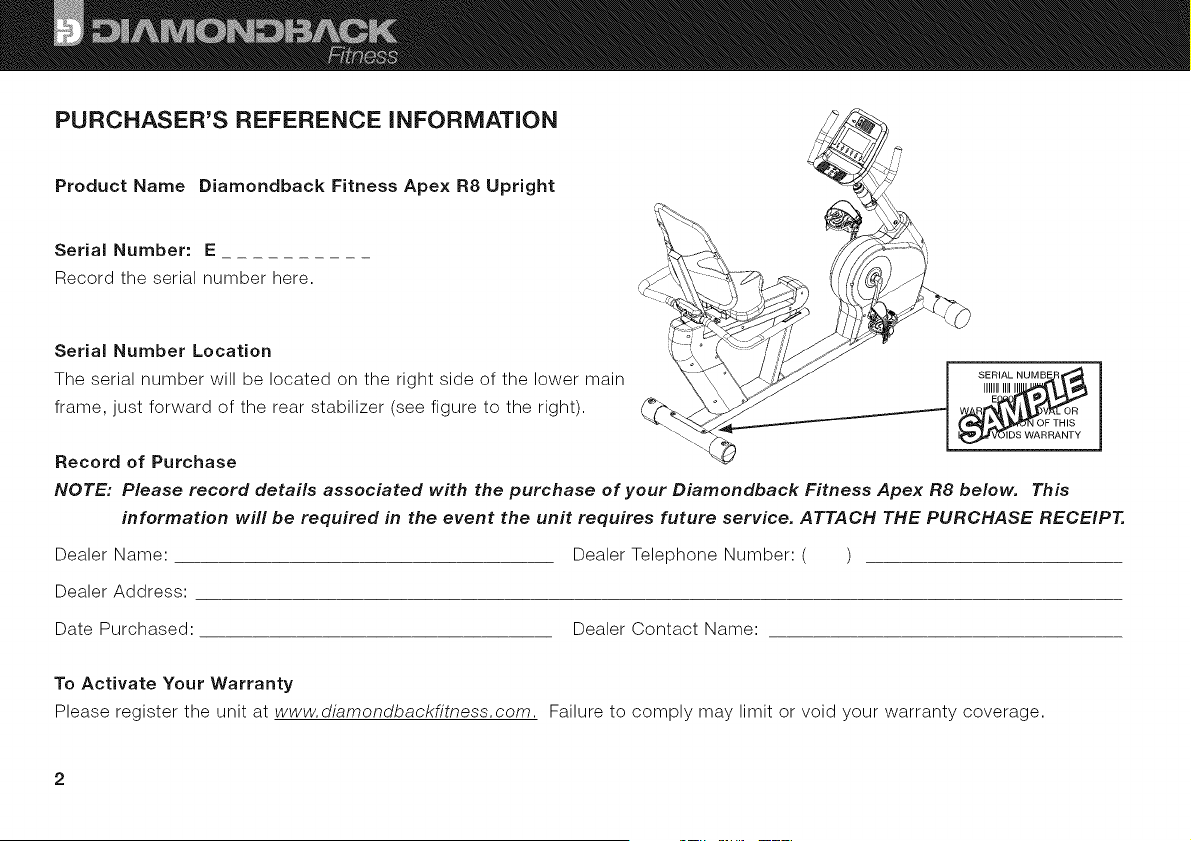
Serial Number Location
The serial number will be located on the right side of the lower main
frame, just forward of the rear stabilizer (see figure to the right).
Record of Purchase
NOTE: Please record details associated with the purchase of your Diamondback Fitness Apex R8 below. This
information will be required in the event the unit requires future service. ATTACH THE PURCHASE RECEIPT.
Dealer Name: Dealer Telephone Number: ( )
Dealer Address:
Date Purchased: Dealer Contact Name:
To Activate Your Warranty
Please register the unit at www.diamondbackfitness.com. Failure to comply may limit or void your warranty coverage.
Diamondback Fitness
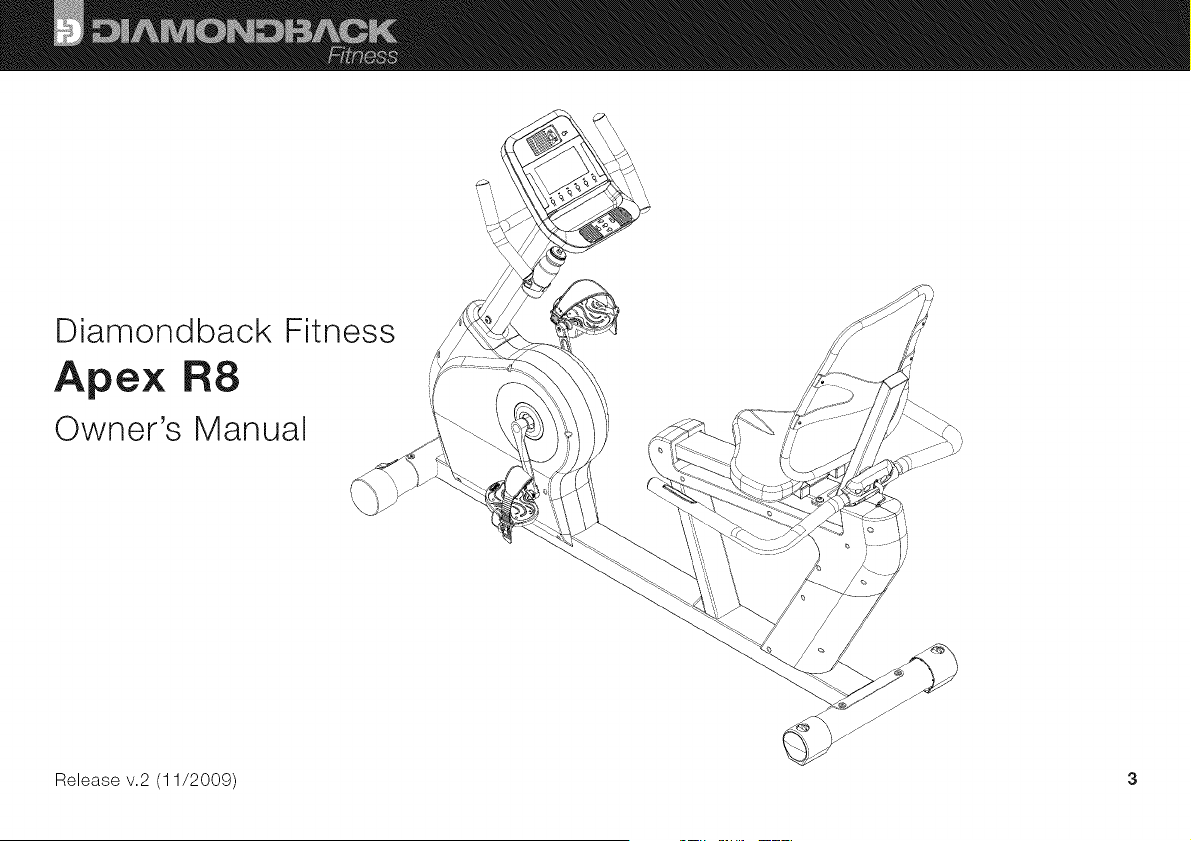
Apex R8
Owner's Manual
Release v.2 (11/2009) 3
TABLE OF CONTENTS
PURCHASER'S REFERENCE INFORMATION .................................................................... 2
Serial Number: ....................................................................................... 2
INTRODUCTION .......................................................................................... 5
APEX R8 ASSEMBLY ...................................................................................... 6
Assembly Instructions ................................................................................. 7
SAFETY INSTRUCTIONS & WARNINGS ........................................................................ 8
WORKOUT GUIDELINES ................................................................................... 12
Good Health is an Exercise in Common Sense ............................................................. 12
Body Mass Index .................................................................................... 12
Heart Rate is an Important Key to Your Exercise ............................................................ 13
Touch Heart Rate Sensors ............................................................................. 13
Wireless Heart Rate Receiver ........................................................................... 13
Your Estimated Maximum Heart Rate & Target Training Zone ................................................... 14
WORKOUT QUALITY AND QUANTITY ........................................................................ 15
CONSOLE LAYOUT....................................................................................... 17
Buttons And Keys ................................................................................... 19
Quick Keys ........................................................................................ 20
MP3/iPod Input Jack and Speakers ...................................................................... 20
PROGRAMS ............................................................................................ 21
Quick Start ........................................................................................ 21
User Select Mode and User Set-Up Mode ................................................................. 21
Program Select Mode ................................................................................ 22
Manual Program .................................................................................... 22
Target Heart Rate ................................................................................... 23
Classic Programs .................................................................................... 24
User Program ...................................................................................... 25
Watt Program ...................................................................................... 25
MAINTENANCE .......................................................................................... 26
WARRANTY INFORMATION ................................................................................ 27
WARRANTY REGISTRATION CARD .......................................................................... 30
4
iNTRODUCTiON
Congratulations on the purchase of your new Diamondback Fitness Apex R8 Exercise Bicycle. You have made a smart choice
and are about to enjoy one of the most effective and technically-advanced methods of cardiovascular exercise available today.
Founded in 1991 as an off-shoot of the legendary bicycle company, Diamondback Fitness was in many ways a complimentary
addition to the Diamondback brand. One might even say this extension grew as a natural evolution...an evolution from classic
outdoor bicycle usage, toward indoor-based cycling and cross training. It turns out that many fitness enthusiasts were searching
for ways to maintain conditioning during times of inclement weather or were simply looking for new and different cross-training
options.
This trend still continues today, twenty years later, as the strong Diamondback brand resonates with both the boomers who
grew up with the bicycles, as well as the younger generations riding them today.
Diamondback Fitness continues to build upon this legendary brand identity by offering the cardio enthusiast a full line of
upright exercise bicycles, recumbents, and elliptical trainers, each offering superior value and quality in an intuitive and visually-
appealing design. Let's just say, we are already planning our next twenty years.
Thank you for choosing Diamondback Fitness.
Diamondback Fitness
6004 South 190thStreet, Suite 101 Kent WA 98032 Ph: 1.800.776.7642 Fax: 1.800.776.2073
For more information or questions regarding your equipment, please visit our web site at DiamondbackFitness.com.
APEX R8 ASSEMBLY
T
U_ ....
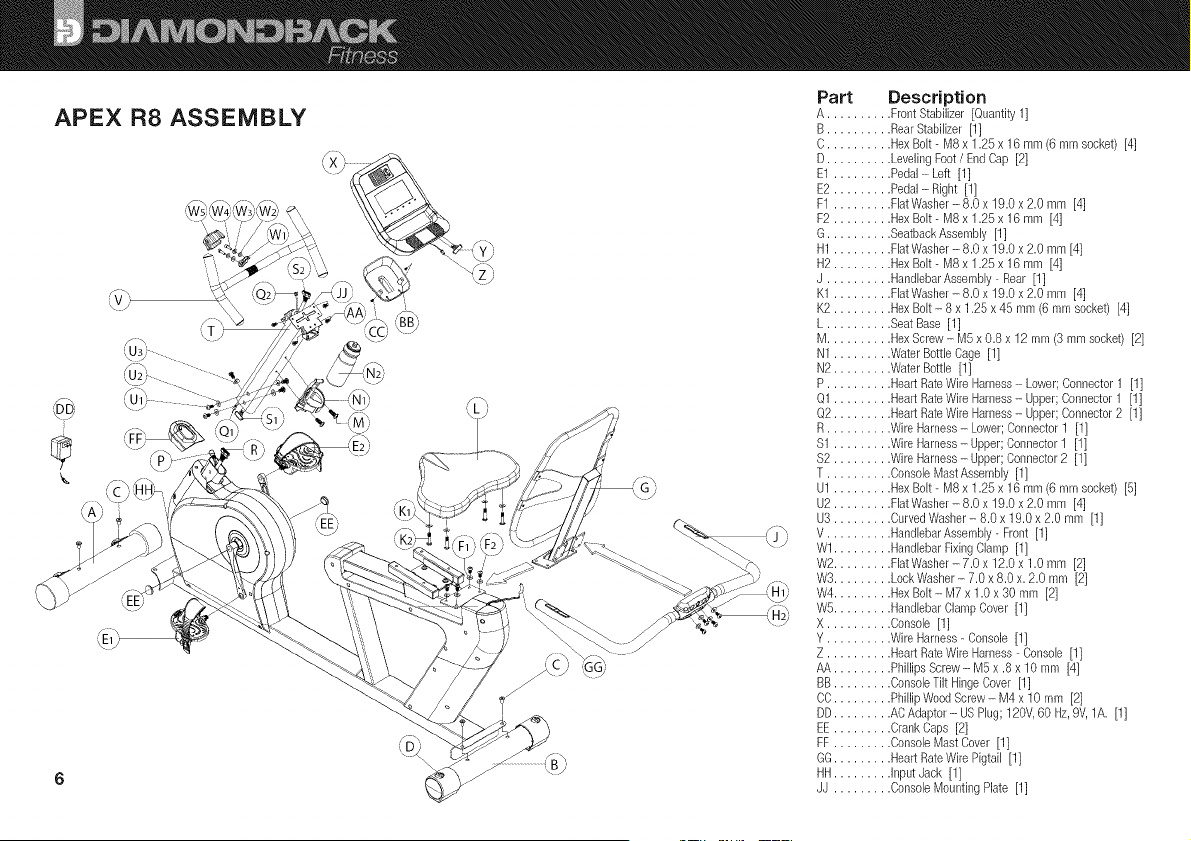
Part Description
A .......... Front Stabilizer [Quantity11
B .......... RearStabilizer [11
C.......... HexBolt- M8 x 1.25 x 16 mm (6 mm socket) [4]
D.......... LevelingFoot/ EndCap [2]
E1 ......... Pedal- Left [1]
E2 ......... Pedal- Right [1]
F1 ......... FlatWasher- 8.0 x 19.0 x 2.0 mm [4]
F2 ......... HexBolt- MSx 1.25x 16 mm [4]
G.......... SeatbackAssembly [1]
H1 ......... FlatWasher- 8.0 x 19.0x 2.0 mm [4]
H2 ......... HexBolt- MSx 1.25x 16 mm [4]
J .......... Hal_dlebarAssembly- Pear [11
K1 ......... FlatWasher- 8.0 x 19.0 x 2.0 mm [4]
K2 ......... HexBelt - 8 x 1.25 x 45 mm (6 mm socket) [4]
L .......... Seat Base [1]
M .......... HexScrew- M5 x 0.8x 12 mm {9mm socket) [2]
N1......... Water BottleCage [1]
N2......... Water Bottle [1]
P .......... HeartRataWire Harness- Lower;Connector1 [1]
Q1 ......... HeartRateWireHarness- Upper;Connector1 [1]
Q2 ......... HeartRateWireHarness- Upper;Connector2 [1]
R.......... WireHarness- Lower;Connector1 [1]
$1 ......... WireHarness- Upper;Connector1 [11
$2 ......... WireHarness-Upper; Connector2 [1]
T .......... ConsoleMastAssernbly [1]
U1 ......... HexBolt- MB x 1.25 x 16 mm (6 mm socket) [5]
U2 ......... Fht Washer- 8.0 x 19.0 x 2.0 mm [4]
U3 ......... CurvedWasher- 8.0 x 19.0 x 2.0 mm [1]
V .......... HandlebarAssembly- Front [1]
Wl ......... HandlebarFixingClamp [11
W2......... Fht Washer- 7.0 x 12.0 x 1.0 mm [2]
W3......... LockWasher- 7.0 x 8.0 x. 2.0 mm [2]
W4......... HexBolt- M7 x 1.0 x 30 mm [2]
W5......... HandlebarClalnp Cover [11
X .......... Console [1]
Y .......... WireHarness-Console [1]
Z .......... HeartRateWireHarness- Console [1]
AA ......... PhillipsScrew- M5 x .8 x 10 mm [4]
BB ......... ConsoleTilt HingeCover [1]
CO......... Phil@WoodScrew- M4 x 10 rnm [2]
DD......... ACAdaptor- USPlug; 120V,60 Hz,9V,1A. [11
EE ......... CrankCaps [2]
FF ......... ConsoleMast Cover [1]
GG......... HeartRateWire Pigtail [1]
HH......... Input Jack [1]
JJ ......... Console MountingPlate [1]
Assembly instructions
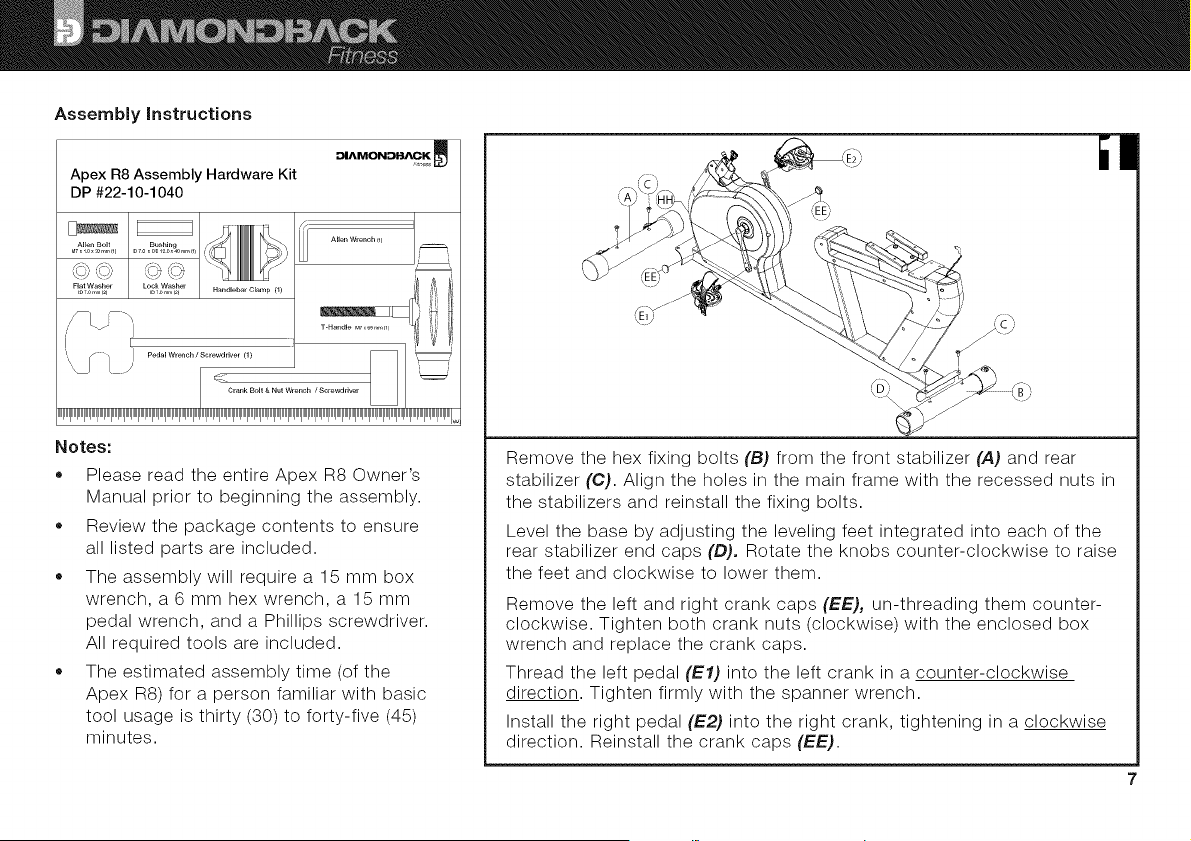
Apex R8 Assembly Hardware Kit
DP #22-10-1040
Allen Bolt Bushing
MT,io__,.,,.m m7_,00120_40.,,.m
Flat Washer Lock Washer H_ndleb_r Clamp {1}
io7o.,r._4 ioTom.,_2_
Pedal Wrench / Screwdriver (1 }
Crank Bolt & Nut Wrench / Screwdriver
_"_"_"_"_"_"_"_"_"_"_"_"_"_"_"_"_"_
Notes:
ABen Wrench (1)
• Please read the entire Apex R8 Owner's
Manual prior to beginning the assembly.
• Review the package contents to ensure
all listed parts are included.
The assembly will require a 15 mm box
wrench, a 6 mm hex wrench, a 15 mm
pedal wrench, and a Phillips screwdriver.
All required tools are included.
The estimated assembly time (of the
Apex RS) for a person familiar with basic
tool usage is thirty (30) to forty-five (45)
minutes.
Remove the hex fixing bolts (B) from the front stabilizer (A) and rear
stabilizer (C). Align the holes in the main frame with the recessed nuts in
the stabilizers and reinstall the fixing bolts.
Level the base by adjusting the leveling feet integrated into each of the
rear stabilizer end caps (D), Rotate the knobs counter-clockwise to raise
the feet and clockwise to lower them.
Remove the left and right crank caps (EE), un-threading them counter-
clockwise. Tighten both crank nuts (clockwise) with the enclosed box
wrench and replace the crank caps.
Thread the left pedal (El) into the left crank in a counter-clockwise
direction. Tighten firmly with the spanner wrench.
Install the right pedal (E2) into the right crank, tightening in a clockwise
direction. Reinstall the crank caps (EE).
ill
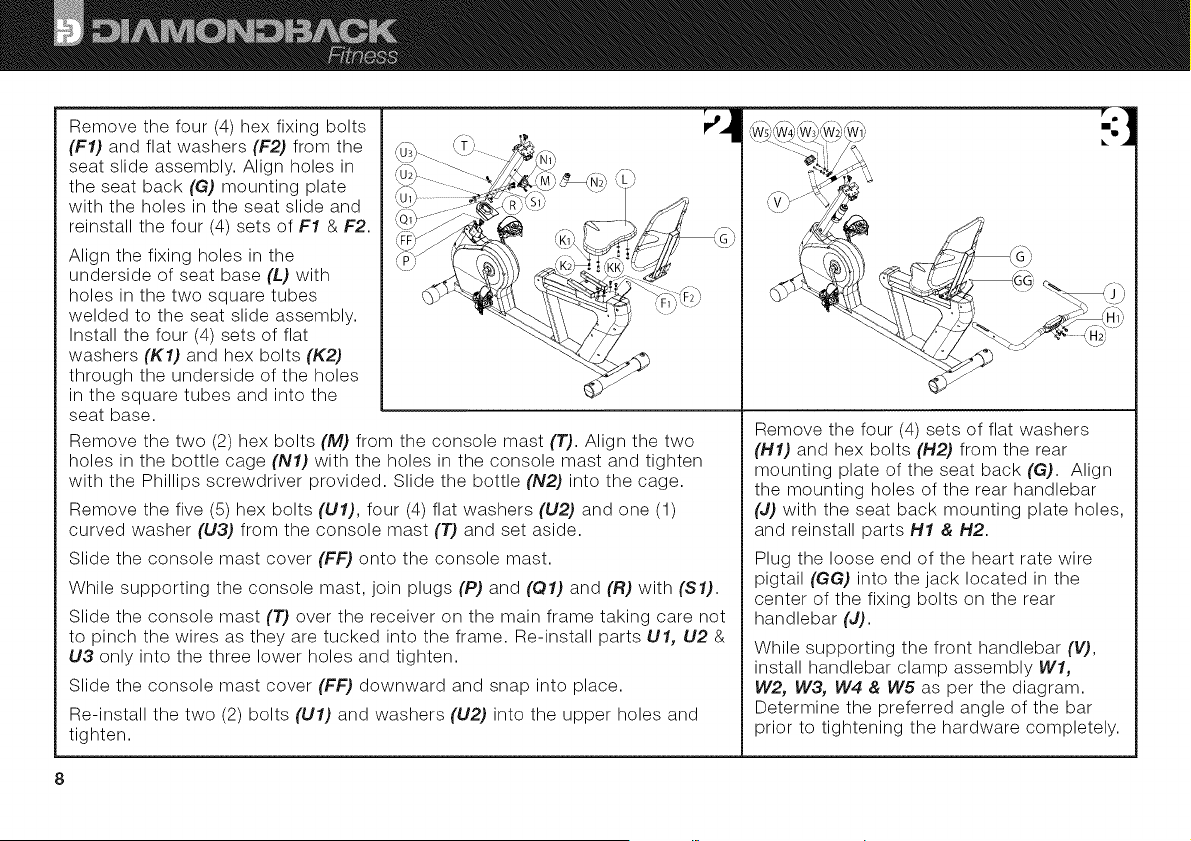
Remove the four (4) hex fixing bolts
(F1) and flat washers (F2) from the
seat slide assembly. Align holes in
the seat back (G) mounting plate
with the holes in the seat slide and
reinstall the four (4) sets of F1 & F2.
Align the fixing holes in the
underside of seat base (L) with
holes in the two square tubes
welded to the seat slide assembly.
Install the four (4) sets of flat
washers (K1) and hex bolts (K2)
through the underside of the holes
in the square tubes and into the
seat base.
Remove the two (2) hex bolts (M) from the console mast (T). Align the two
holes in the bottle cage (N1) with the holes in the console mast and tighten
with the Phillips screwdriver provided. Slide the bottle (N2) into the cage.
Remove the five (5) hex bolts (U1), four (4) flat washers (U2) and one (1)
curved washer (U3) from the console mast (T) and set aside.
Slide the console mast cover (FF) onto the console mast.
While supporting the console mast, join plugs (P) and (01) and (R) with ($1).
Slide the console mast (T) over the receiver on the main frame taking care not
to pinch the wires as they are tucked into the frame. Re-install parts U1, U2 &
U3 only into the three lower holes and tighten.
Slide the console mast cover (FF) downward and snap into place.
Re-install the two (2) bolts (U1) and washers (U2) into the upper holes and
tighten.
° D
Remove the four (4) sets of flat washers
(H1) and hex bolts (H2) from the rear
mounting plate of the seat back (G). Align
the mounting holes of the rear handlebar
(J) with the seat back mounting plate holes,
and reinstall parts H1 & H2.
Plug the loose end of the heart rate wire
pigtail (GG) into the jack located in the
center of the fixing bolts on the rear
handlebar (J).
While supporting the front handlebar (V),
install handlebar clamp assembly Wl,
W2, W3, W4 & W5 as per the diagram.
Determine the preferred angle of the bar
prior to tightening the hardware completely.
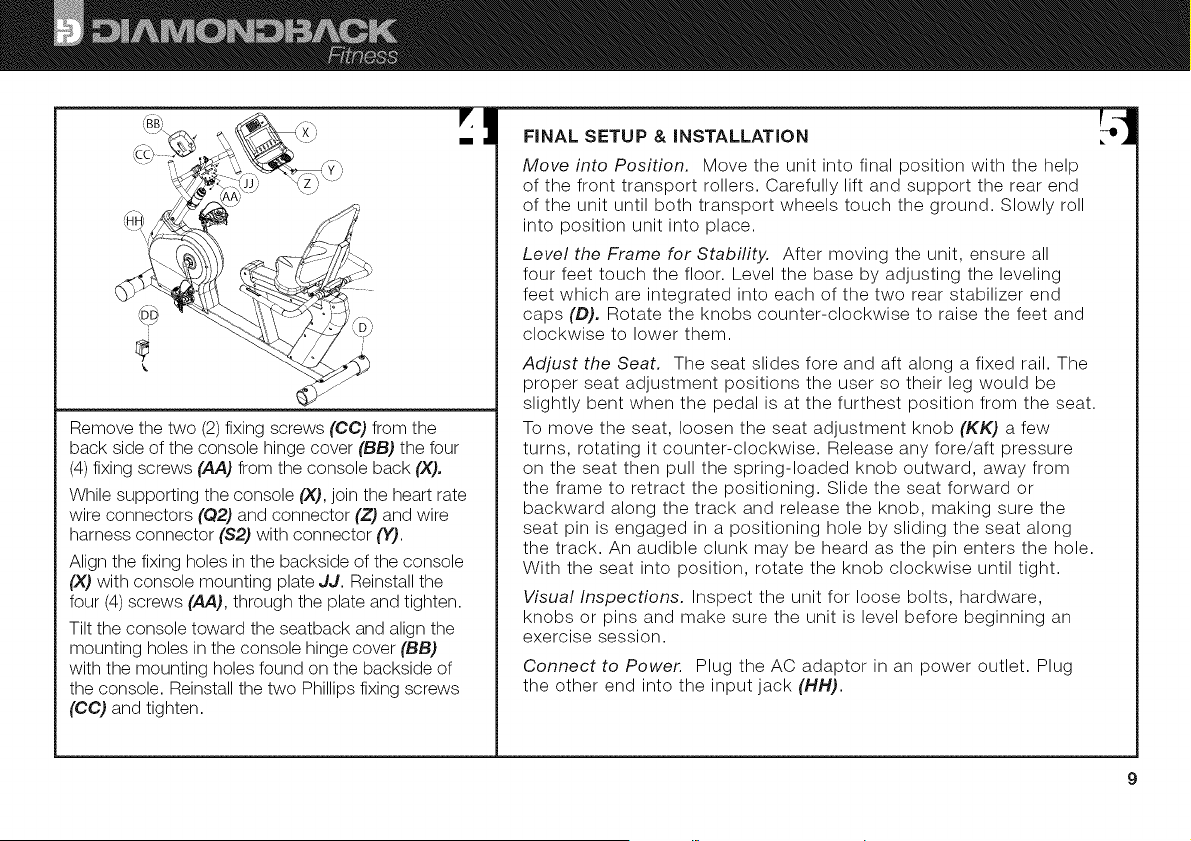
Removethetwo(2)fixingscrews(CC) from the
back side of the console hinge cover (BB) the four
(4) fixing screws (AA) from the console back (X),
While supporting the console (X), join the heart rate
wire connectors (Q2) and connector (Z) and wire
harness connector ($2) with connector (Y).
Align the fixing holes in the backside of the console
(X) with console mounting plate JJ. Reinstall the
four (4) screws (,_,), through the plate and tighten.
Tilt the console toward the seatback and align the
mounting holes in the console hinge cover (BB)
with the mounting holes found on the backside of
the console. Reinstall the two Phillips fixing screws
(CC) and tighten.
FINAL SETUP & INSTALLATION
Move into Position. Move the unit into final position with the help
of the front transport rollers. Carefully lift and support the rear end
of the unit until both transport wheels touch the ground. Slowly roll
into position unit into place.
Level the Frame for Stability. After moving the unit, ensure all
four feet touch the floor. Level the base by adjusting the leveling
feet which are integrated into each of the two rear stabilizer end
caps (D), Rotate the knobs counter-clockwise to raise the feet and
clockwise to lower them.
Adjust the Seat. The seat slides fore and aft along a fixed rail. The
proper seat adjustment positions the user so their leg would be
slightly bent when the pedal is at the furthest position from the seat.
To move the seat, loosen the seat adjustment knob (KK) a few
turns, rotating it counter-clockwise. Release any fore/aft pressure
on the seat then pull the spring-loaded knob outward, away from
the frame to retract the positioning. Slide the seat forward or
backward along the track and release the knob, making sure the
seat pin is engaged in a positioning hole by sliding the seat along
the track. An audible clunk may be heard as the pin enters the hole.
With the seat into position, rotate the knob clockwise until tight.
Visual Inspections. Inspect the unit for loose bolts, hardware,
knobs or pins and make sure the unit is level before beginning an
exercise session.
Connect to Power. Plug the AC adaptor in an power outlet. Plug
the other end into the input jack (HH).
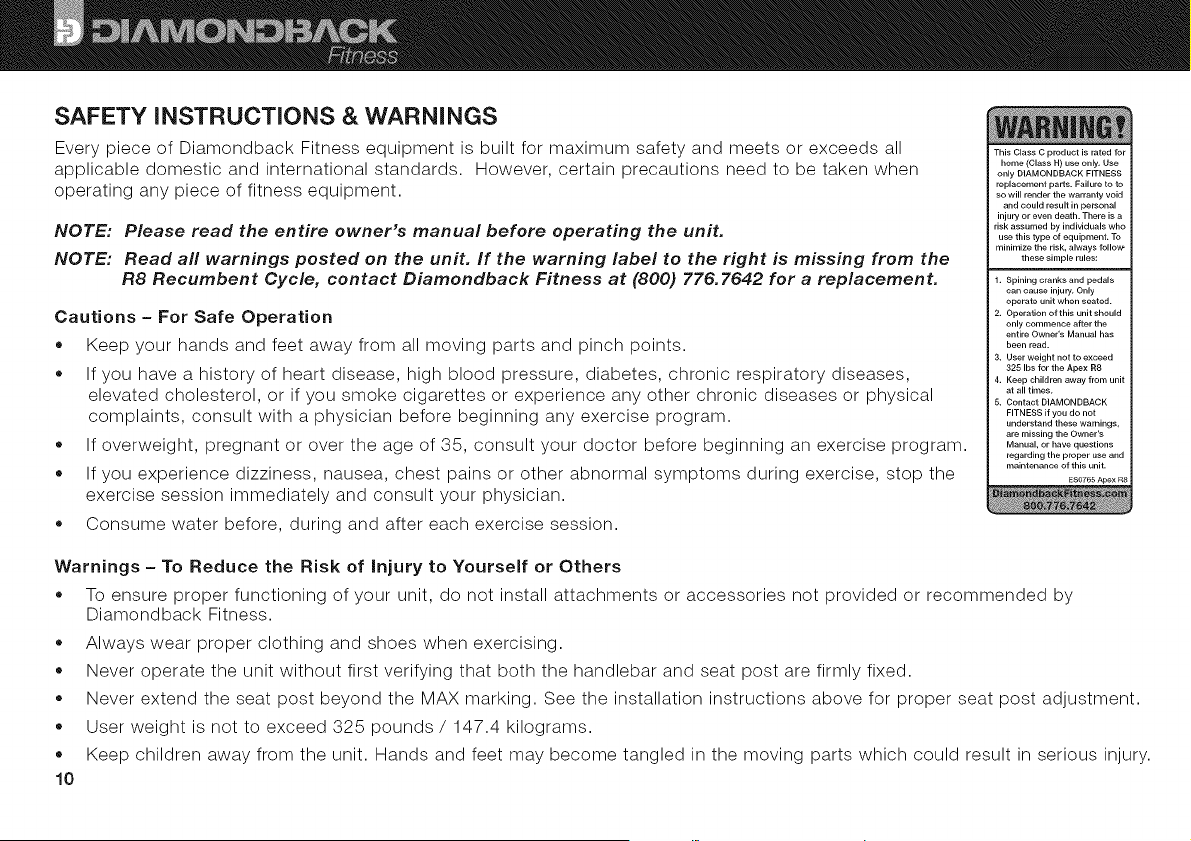
SAFETY iNSTRUCTiONS & WARNINGS
Every piece of Diamondback Fitness equipment is built for maximum safety and meets or exceeds all
applicable domestic and international standards. However, certain precautions need to be taken when
operating any piece of fitness equipment.
NOTE: Please read the entire owner's manual before operating the unit.
NOTE: Read all warnings posted on the unit. If the warning label to the right is missing from the
R8 Recumbent Cycle, contact Diamondback Fitness at (800) 776.7642 for a replacement.
Cautions - For Safe Operation
= Keep your hands and feet away from all moving parts and pinch points.
• If you have a history of heart disease, high blood pressure, diabetes, chronic respiratory diseases,
elevated cholesterol, or if you smoke cigarettes or experience any other chronic diseases or physical
complaints, consult with a physician before beginning any exercise program.
If overweight, pregnant or over the age of 35, consult your doctor before beginning an exercise program.
If you experience dizziness, nausea, chest pains or other abnormal symptoms during exercise, stop the
exercise session immediately and consult your physician.
Consume water before, during and after each exercise session.
This Class C product is rated for
home (Class H) use only, Use
only DIAMONDBACK FITNESS
replacement parts. Failure to to
so will render the warranty void
and could result in personal
injury or even death. There is a
risk assumed by individuals who
use this type of equipment. To
minimiTe the risk, always follow
these simple rules:
1, Spining cranks and pedals
can cause injury. Only
operate unit when seated.
2, Operation of this unit should
only commence after the
entire Owner's Manual has
been read.
3, User weight not to exceed
325 Ibs for the Apex R8
4, Keep children away from unit
at all times.
5, Contact DIAMONDBACK
FITNESS if you do not
understand these warnings,
are missing the Owner's
Manual, or have questions
regarding the proper use and
maintenance of this unit.
ES0765 Apex R8
Warnings- To Reduce the Risk of Injury to Yourself or Others
= To ensure proper functioning of your unit, do not install attachments or accessories not provided or recommended by
Diamondback Fitness.
Always wear proper clothing and shoes when exercising.
Never operate the unit without first verifying that both the handlebar and seat post are firmly fixed.
Never extend the seat post beyond the MAX marking. See the installation instructions above for proper seat post adjustment.
User weight is not to exceed 325 pounds / 147.4 kilograms.
Keep children away from the unit. Hands and feet may become tangled in the moving parts which could result in serious injury.
o
o
o
o
o
10
• Placetheunitinanareathatwillmeetminimumtheclearancerequirements:Front,Back&Sides= 2feet.
Thisunitisheavy.Usecautionwhenmoving.Tilttheunitforwarduntiltheintegratedtransportrollersonthefrontstabilizer
makecontactwiththegroundandslowlypushorpullintothedesiredposition.Alwaysunplugtheunitfromtheoutletbefore
movingorservicing.
Keeptheunitawayfromwallsto allowproperventilation.Airshouldbeabletocirculatefreelyaroundtheunit.Keepallair
openingsfreeofdirtanddust.
Neverinsertanythingintotheopenings.
TheApexR8isintendedforindooruseinahomeenvironment.Storeindoorsina dryspace.
Placeyourunitonasolid,levelsurfacewheninuse.Neveroperateif theunitisunstable.Reviewtheassemblyand
installationinstructionsforinformationregardingthelevelingoftheunit.
,, Makesureallknobsforadjustmentsarefastenedsecurelybeforegettingontheunitandaftermakinganyadjustments(i.e.
seatpost,saddle,seatassemblyandhandlebars).
UsethehandlebarswhengettingonandofftheApexR8unit.
Neveroperatetheunitif it isdamagedor broken.ContactyourlocalauthorizedDiamondbackFitnessDealerforservice.
Pleaseunplugtheunitafterexercising.
Donotremovethecoversorothercomponents.OnlyAuthorizedDiamondbackFitnessDealersorAuthorizedTechnicians
shouldperformserviceontheunit.
Assembly
AssemblyoftheApexR8shouldbeperformedbyaDiamondbackFitnessDealeroranAuthorizedTechnicianasa significant
amountoftechnicalknowledgeisrequiredforsafeandcompleteassemblyoftheunit.Manyretailerswillofferdeliveryand
assemblyaspartofthesalesagreement.Ifthisunitwassoldunassembled(inthecarton)andyoudonotfeelyoucanperform
theassembly,pleasecallthedealerforservice.ServicecallsforimproperassemblyarenotcoveredbytheWarrantyPolicyand
anyassociatedchargeswillbetheresponsibilityoftheowner.
NOTE: Save this manual for your reference.
11
WORKOUT GUiDELiNES
Good Health is an Exercise in Common Sense
In the study titled, "The Surgeon General's Call To Action To Prevent and Decrease Overweight and Obesity," the surgeon general
indicates that 61% of American adults are either overweight or obese. The study indicates that being overweight increases the risk of
health problems, such as heart disease, certain types of cancer, as well as Type-2 diabetes among other afflictions.
The Surgeon General's healthy weight advice for consumers encourages the following actions:
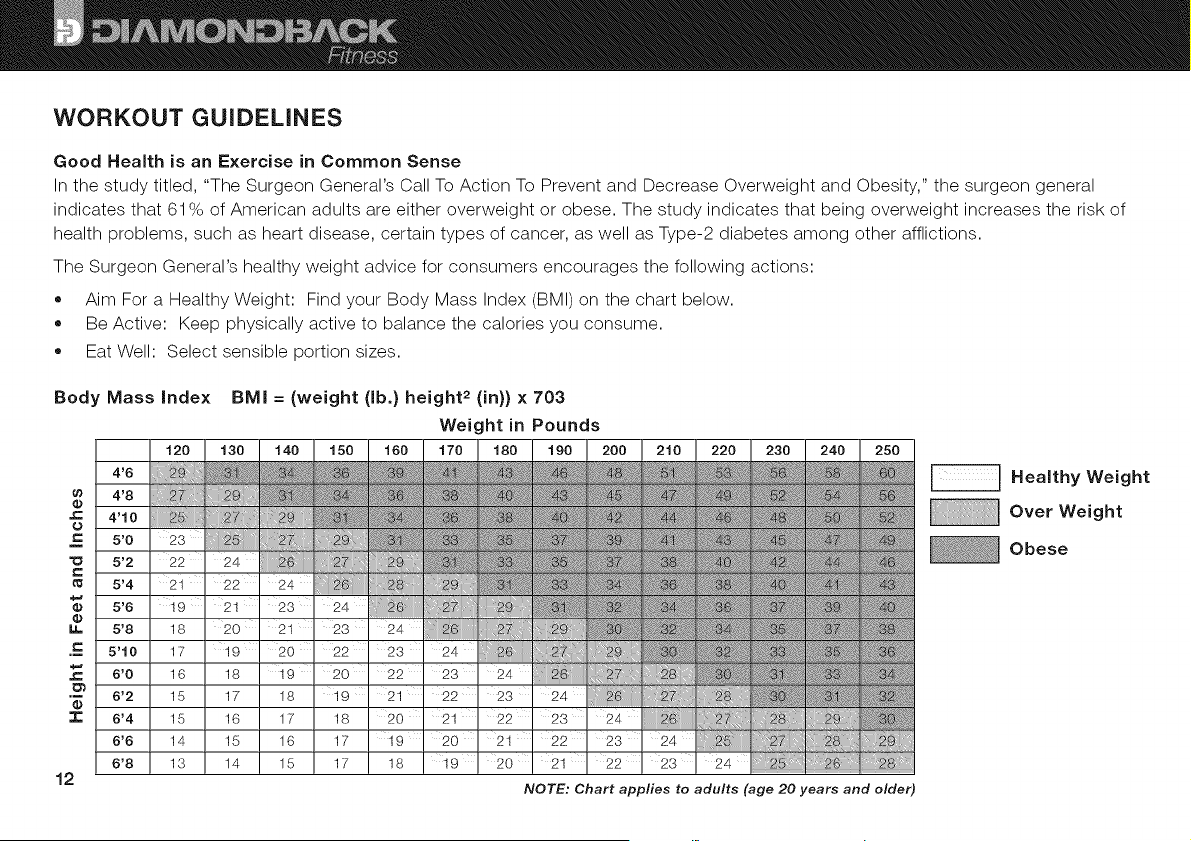
• Aim For a Healthy Weight: Find your Body Mass Index (BMI) on the chart below.
Be Active: Keep physically active to balance the calories you consume.
Eat Well: Select sensible portion sizes.
Body Mass Index BMI = (weight (lb.} height 2 (in}} x 703
Weight in Pounds
_=
_=
m
_=
U=
_=
.m
_=
.1=
12
4'6
4'8
4'10
5'0
5'2
5'4
5'6
5'8
5'10
6'0
6'2
6'4
6'6
6'8
120
::2i
ii]@
23
22
21
19
18
17
16
15
15
14
13
130
iiiii!iiiiiii_ii_i_iii_;Yi
,:,,v,v::::,::r:,:,,,sw,....
,5i
24
22
21
2O
19
18
17
16
15
14
140
24 ¸
23
21
20
19
18
17
16
15
150
@i_iiiiil
24
23
22
20
19
18
17
17
NOTE: Chart applies to adults (age 20 years and elder)
_ Healthy Weight
Over Weight
Obese
Heart Rate is an important Key to Your Exercise
The Surgeon General also released a report on physical activity and health. This report dictates that exercise and fitness are
beneficial for a person's health and reiterated the need for exercise as a key component for disease prevention and healthier living.
The best way to determine exercise intensity is to monitor your pulse during exercise. Heart rate can easily be determined by
counting the pulse rate at the chest, wrist or carotid artery on your neck. It is however, difficult to count your own pulse during
exercise, mainly because one cannot count fast enough to accurately track the rate. The Diamondback Fitness Apex R8 is
equipped with two systems for monitoring your heart rate.
Touch Heart Rate Sensors
While the unit is powered-on and a workout program is operating, gently grasp both touch heart rate sensors on the handlebar.
The computer will detect your pulse rate and register a two or three digit number in the PULSE window on the LCD display.
NOTE: if an inconsistent heart rate is displayed while using the hand pulse sensors:
• Ensure the palms of both hands are touching the contact areas of the touch heart rate sensors.
• Maintain even pressure on the grips.
• Do not clutch the touch heart rate sensors tightly.
• Try to keep your hands still while griping the touch heart rate sensors.
Wireless Heart Rate Receiver
A wireless telemetry heart rate receiving system is one feature found on the Apex models. In order for the console to detect and
display your heart rate, three conditions must be present:
• A compatible heart rate chest strap transmitter (not included) must be functioning and worn. For proper function of the chest
strap, please refer to the manufacturer's instructions.
The Diamondback Apex R8 must be powered on.
A workout program must be running.
The transmitter must be within three (3) feet from the console.
13
Ingeneral,awirelessheartratecheststrapisamoreaccuratemethodofdetectingone'sheartrate.Theuserisnotrequiredto
gripthetouchheartratesensorsandoffersmoreflexibilityastheunitwillcontinuouslydisplaytheuser'sheartratenomatter
wherethehandsareplaced.
Your Estimated Maximum Heart Rate & Target Training Zone
Your calculated target heart rate, or the ideal intensity needed to improve cardiovascular fitness, depends primarily upon your
age rather than your current state of fitness. It is calculated as a percentage of your maximum heart rate (estimated as 220
beats-per-minute minus your age). It is most effective to train at a heart rate between 60% and 85% of your maximum heart
rate. If exercise intensity is too low or too high, only modest gains will be made in strength and cardiovascular fitness. A workout
at a very low intensity will not offer maximum benefits. Conversely, if the workout intensity is too high, injury or fatigue may set
your exercise program back as the body attempts to recover.
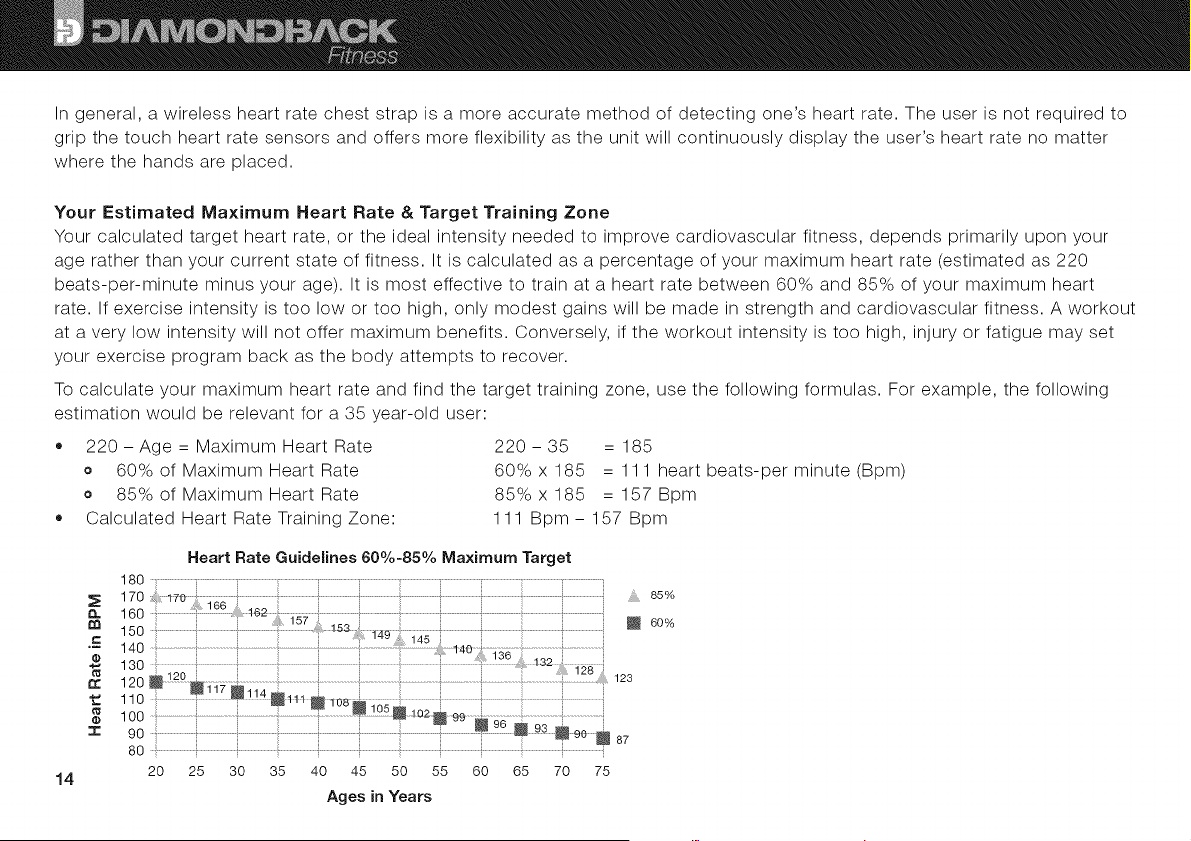
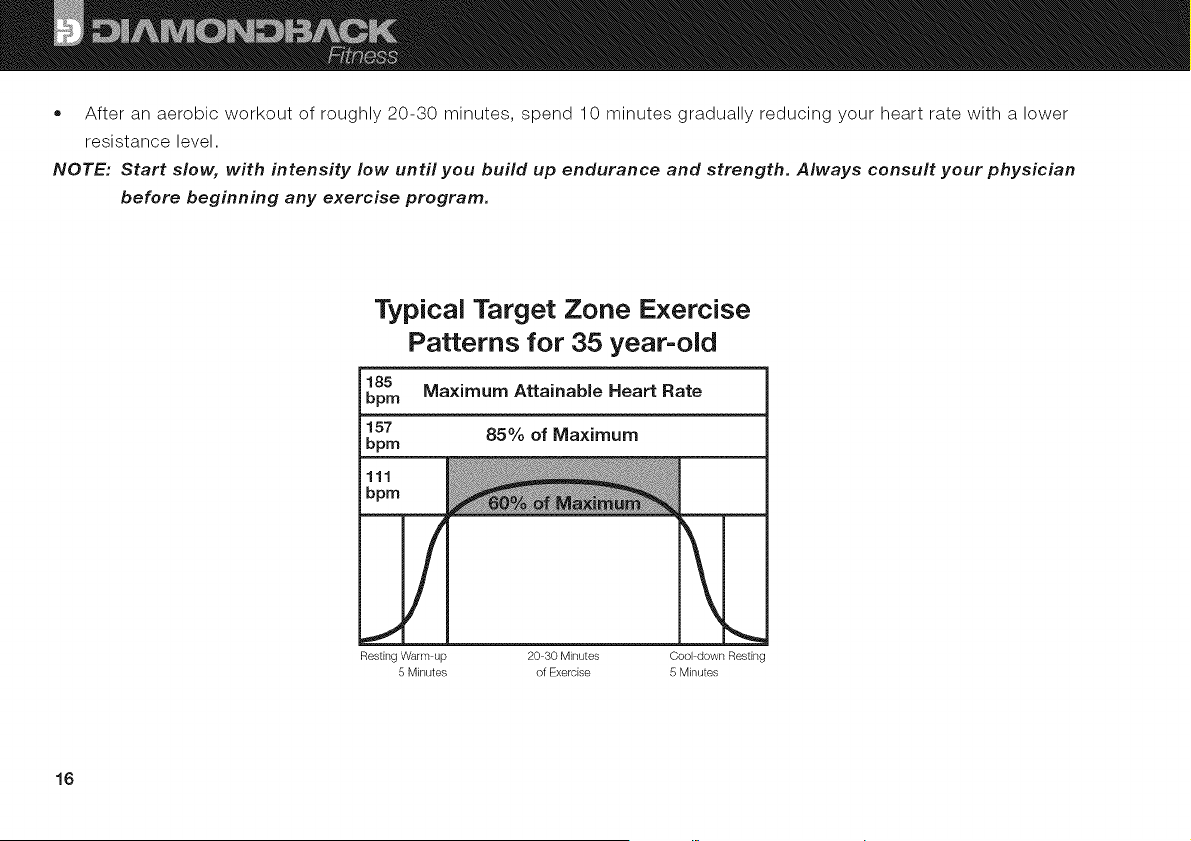
To calculate your maximum heart rate and find the target training zone, use the following formulas. For example, the following
estimation would be relevant for a 35 year-old user:
• 220- Age = Maximum Heart Rate 220- 35 = 185
o 60% of Maximum Heart Rate 60%x185 = 111 heart beats-per minute(Bpm)
o 85% of Maximum Heart Rate 85%x185 = 157Bpm
Calculated Heart Rate Training Zone: 111 Bpm - 157 Bpm
n
14
r¢
=1=
Heart Rate Guidelines 60%-85% Maximum Target
180 ..................;................._....................................................................................................................................................................i '
170 ...................i......................................................t..............t.............................................. i .... 85%
160 ..............: ................ ....................i i......................i i ........................_
is0 ..................................i............................ .......................i.............................................i......................m60
140 ...............................i ................ ................ .........................................
120 ......................:;.....................................................!.....................:;...............i......................................i..................::::............. 123
110 ................_ ......... .................i !....................
IO0 ............................................i.........................................................................................................................
i _ ! 93
90 ............................................... _................!........................................................._90_ 87
80 ..............................................................................;_...........................i.............................................................................i......................................................................................................:.......
20 25 30 35 40 45 50 55 60 65 70 75
Ages in Years
WORKOUT QUALITY AND QUANTITY
It is recommended that you accumulate at least 30 minutes of physical activity most days of the week. Physical activity should
be initiated slowly and the intensity should be increased gradually. You should select activities that you enjoy and can fit into
your daily life. Having Diamondback Fitness equipment at home offers you the opportunity to work out without going to the gym.
The American College of Sports Medicine makes the following recommendations for the quantity and quality of training for
developing and maintaining cardiovascular fitness in healthy adults:
• An activity that uses large muscle groups, maintained continuously, and is rhythmical and aerobic in nature.
Duration: 20 to 60 minutes of continuous aerobic activity, including a warm-up and cool-down period for each exercise session.
Frequency: 3 to 5 times per week.
Intensity: 60% to 85% of maximum heart rate.
In addition to aerobic exercise, it is recommended that you add strength training of moderate intensity twice per week to
your program.
Get a Smart Start on Exercising
Anyone over the age of 35, as well as younger persons whom are overweight, should check with his/her physician before
beginning any type of exercise program. People who have diabetes or high blood pressure, a family history of heart disease,
high cholesterol or have led a sedentary lifestyle should protect themselves with a medical check-up and a stress test, preferably
administered during exercise by a health care professional.
Always stretch before your workout to loosen muscles, and afterwards to cool down.
The first few minutes of your workout should be devoted to warming up muscles before a vigorous workout, and building
your heart rate slowly.
15
• Afteranaerobicworkoutofroughly20-30minutes,spend10minutesgraduallyreducingyourheartratewithalower
resistancelevel.
NOTE: Start slow, with intensity low until you build up endurance and strength. Always consult your physician
before beginning any exercise program.
Typical Target Zone Exercise
Patterns for 35 year-old
185
bpm Maximum Attainable Heart Rate
157 85% of Maximum
bpm
111
bpm
/ !
Resting Warm up 20 30 Minutes Cool down Restin_
5 Minutes of Exercise 5 Minutes
16
CONSOLE LAYOUT
NOTE: It is advised that new users read this entire section prior to beginning their first workout session.
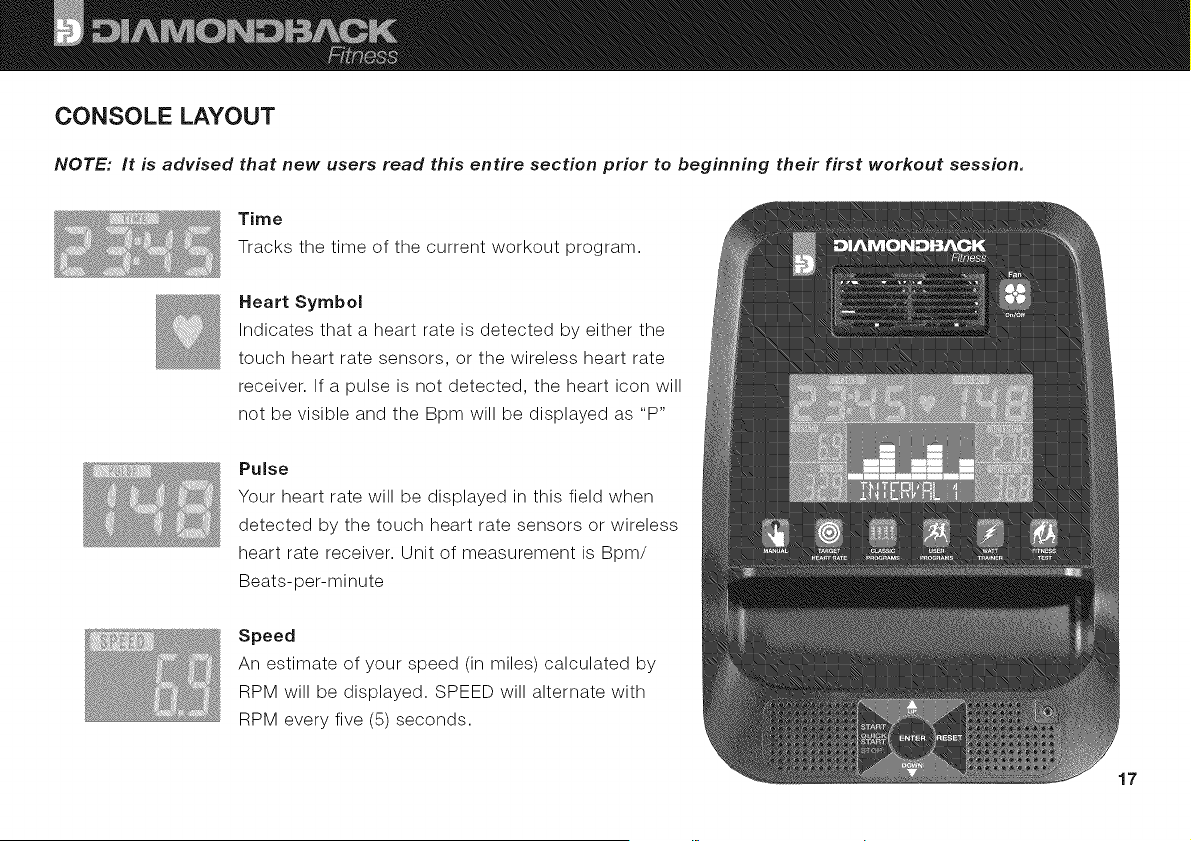
Time
Tracks the time of the current workout program.
Heart Symbol
Indicates that a heart rate is detected by either the
touch heart rate sensors, or the wireless heart rate
receiver. If a pulse is not detected, the heart icon will
not be visible and the Bpm will be displayed as "P"
Pulse
Your heart rate will be displayed in this field when
detected by the touch heart rate sensors or wireless
heart rate receiver. Unit of measurement is Bpm/
Beats-per-minute
Speed
An estimate of your speed (in miles) calculated by
RPM will be displayed. SPEED will alternate with
RPM every five (5) seconds.
17
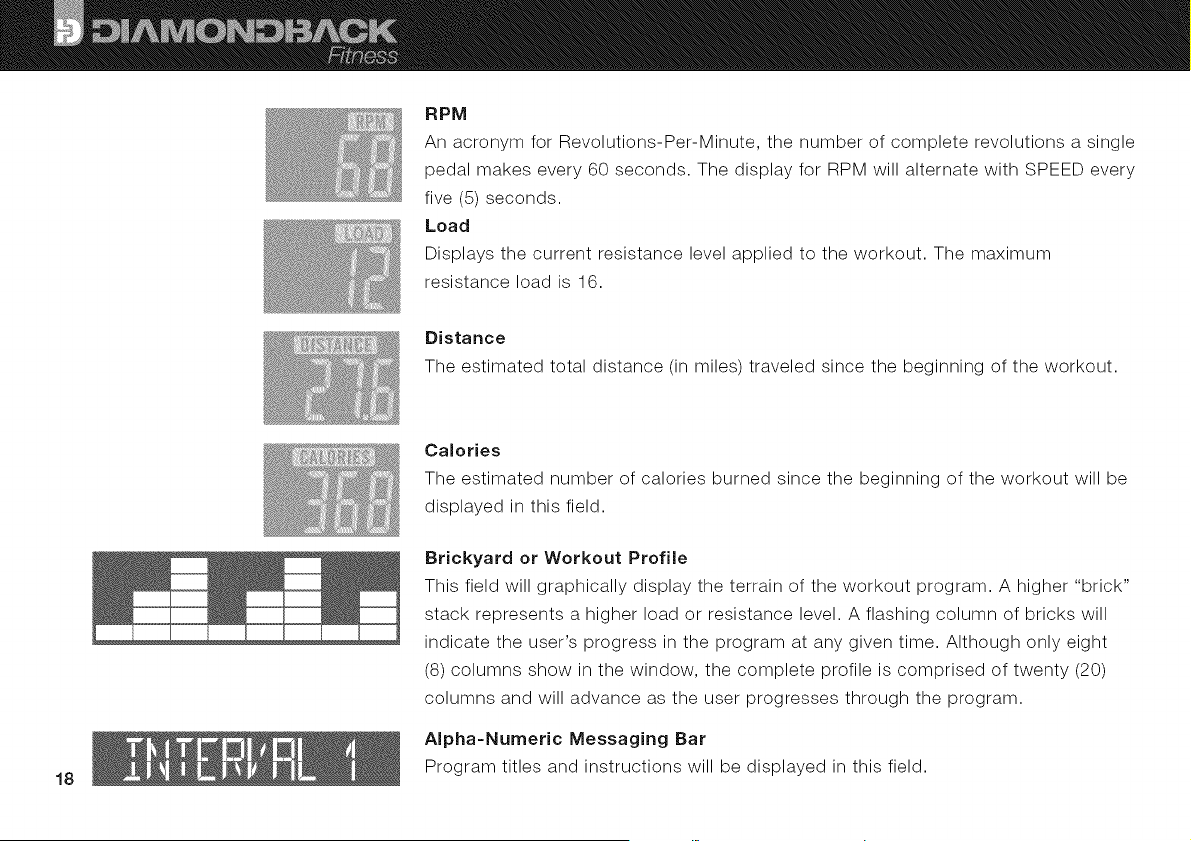
RPM
AnacronymforRevolutions-Per-Minute,thenumberofcompleterevolutionsasingle
pedalmakesevery60seconds.ThedisplayforRPMwillalternatewithSPEEDevery
five(5)seconds.
Load
Displays the current resistance level applied to the workout. The maximum
resistance load is 16.
Distance
The estimated total distance (in miles) traveled since the beginning of the workout.
18
Calories
The estimated number of calories burned since the beginning of the workout will be
displayed in this field.
Brickyard or Workout Profile
This field will graphically display the terrain of the workout program. A higher "brick"
stack represents a higher load or resistance level. A flashing column of bricks will
indicate the user's progress in the program at any given time. Although only eight
(8) columns show in the window, the complete profile is comprised of twenty (20)
columns and will advance as the user progresses through the program.
Alpha-Numeric Messaging Bar
Program titles and instructions will be displayed in this field.
Buttonsand Keys
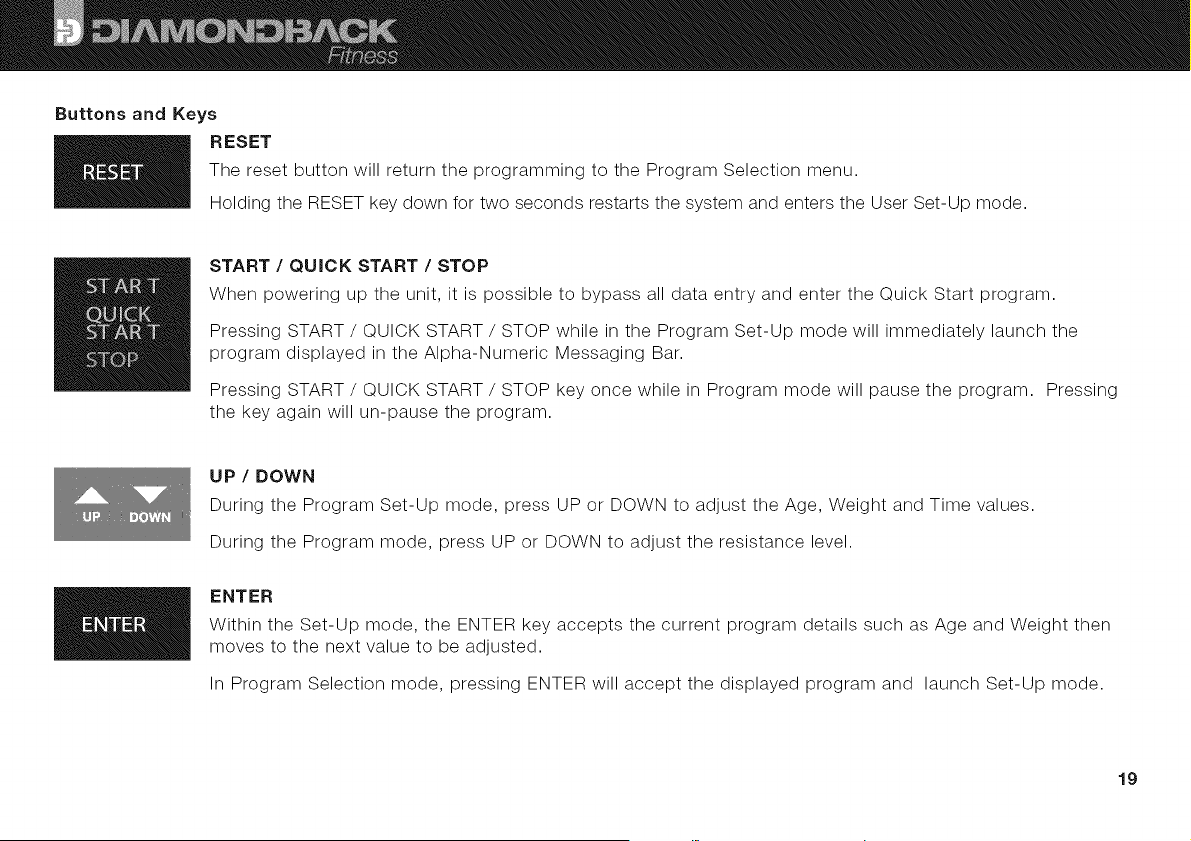
RESET
The reset button will return the programming to the Program Selection menu.
Holding the RESET key down for two seconds restarts the system and enters the User Set-Up mode.
START / QUICK START / STOP
When powering up the unit, it is possible to bypass all data entry and enter the Quick Start program.
Pressing START / QUICK START / STOP while in the Program Set-Up mode will immediately launch the
program displayed in the Alpha-Numeric Messaging Bar.
Pressing START / QUICK START / STOP key once while in Program mode will pause the program. Pressing
the key again will un-pause the program.
UP / DOWN
During the Program Set-Up mode, press UP or DOWN to adjust the Age, Weight and Time values.
During the Program mode, press UP or DOWN to adjust the resistance level.
ENTER
Within the Set-Up mode, the ENTER key accepts the current program details such as Age and Weight then
moves to the next value to be adjusted.
In Program Selection mode, pressing ENTER will accept the displayed program and launch Set-Up mode.
19
Manual, Target Heart Rate, Classic Programs, User Programs, Watt Trainer Quick Keys
The Apex R8 console feature Quick Keys which offer the user access the program
selection menu without keying through the main menus.
Fitness Test
At the end of a program, pressing the FITNESS TEST button once will launch the Fitness Test program. Based upon the
rate at which the user's heart rate decreases over a sixty (60) second period, the Fitness Test program provides a basic
analysis of the user's fitness by displaying F1, F2, F3, F4 F5 or F6 where F1 represent the highest level of fitness.
MP3/iPod input Jack and Speakers
U The Apex console offers an on-board amplifier and stereo speaker set which can be connected to an Mp3 player, iPod®
or iPhone®. Connect one end of a male-to-male 3.5 mm stereo cable (not included) to the headphone jack of the device
and the other end to the console port located just below the accessory tray. Sound levels are controlled by the device so
be sure to check the internal settings if the noise level is not satisfactory.
On-Board Fan
The Apex R8 is equipped with a fan on the console to offer another level of comfort during the workout. Adjustable
louvers allow the user to direct the flow as desired. Pressing the FAN button once will power the fan on. Pressing the
FAN button again will turn the fan off.
Default Settings
NOTE: The default values for Age, Weight and Time will update and be stored as the default values when changed in
the program settings.
• Gender Male
Age 25 years
• Weight 155 lb.
,, Time 0 minutes.
20 • Segment Time Equals 1/20th of the entered time.
Load Level 1
iPod® and iPhone® are registered trademarks of Apple., Inc.
PROGRAMS - Get Ready to Work Out
When the Apex R8 is plugged into an electrical outlet, an audible beep will sound, confirming power has reached the console.
All segments of the display will light up for two seconds. "USER" will flash in the Alpha-Numeric Message Bar.
Quick Start
The Quick Start program offers users the ability to bypass all data entry in the User Select/User Set-Up modes and to simply
begin a Manual workout program by pressing the START / QUICK START / STOP key once. The Quick Start program will run
with the default data described in the section titled User Select Mode and User Set-Up Mode.
Time will be set to 0.00 minutes and count up until the workout is ended by the user.
User Select Mode and User Set=Up Mode
Immediately following power up (or whenever the RESET key is pressed for two (2) seconds), "USER" will flash in the Alpha-
Numeric Message Bar indicating the launching of the User Select mode. From here, customization of the user information (which
serves as the data to be used for the heart rate programs, calorie calculations, etc.) can be performed. Another user profile may
be selected at any time by pressing the RESET key for two (2) seconds.
• Select User 1, User 2, User 3 or User 4 by pressing the UP or DOWN key to scroll through the choices and pressing ENTER
to accept and launch the SET-UP mode.
"SEX = MALE" will flash in the Alpha-Numeric Messaging Bar. Press ENTER to accept this value or change the value by
pressing the UP or DOWN keys until the preferred value is visible. Press ENTER to accept.
"AGE = 25" will flash. Press ENTER to accept, or change via the UP/DOWN keys, followed by the ENTER key.
"HEIGHT = 60" will flash. Press ENTER to accept, or change via the UP/DOWN keys, followed by the ENTER key.
"WEIGHT = 100" will flash. Press ENTER to accept, or change via the UP/DOWN keys.
21
• PressingtheENTERkeywilllaunchtheProgramSelectmode.
,, Load/ resistance may be adjusted via the UP or DOWN keys.
To end the program, press START / QUICK START / STOP or simply stop pedaling.
Program Select Mode
The Program Select mode allows the user to choose their desired program and customize the data and information required to
operate these programs.
To enter the Program Select mode:
From the User Select or User Set-Up modes, press the START key twice, followed by the RESET key.
From an operating program, press the START / QUICK START / STOP key, followed by the RESET key.
The Program Select mode will always default to the Manual program. "Manual" will flash in the Alpha-Numeric Messaging Bar.
Select the Manual program by pressing the ENTER key, or one of the Quick Start keys (TARGET, CLASSIC PROGRAMS,
USER PROGRAMS or WATT TRAINER), or scroll through the various programs by pressing the UP / DOWN keys, confirming a
selection by pressing the ENTER key.
Manual Program
The Manual program is unique in that the user can select any quantity of the four possible values to track this program. When
the first of the target values is reached, an audible alarm will sound indicating the end of the program. This function is especially
useful for tracking a "personal best" or structuring a challenge of distance versus time, for example.
When the Manual program is selected, "Time" will flash, prompting the user to adjust the length of the workout.
Adjust the time using the UP and DOWN keys. Press ENTER to accept the value.
NOTE: For all programs which accept a Time value, each column in the brickyard represents 1/20th of the total time
entered. For example, if the value entered for Time was 30 minutes, each column/segment in the profile will
equal 1.5 minutes (30 minutes / 20 segments = 1.5 minutes).
22
NOT_
o
o
o
o
When the user is prompted for a Time entry, a value of zero (0:00) will set the clock to count up from zero
(0:00). When another value is entered, the clock will count down when the program is launched.
"Distance" will now be flashing. Adjust the value and press ENTER to accept.
"Calories" will flash. Adjust and press ENTER.
"Pulse" will be flashing. Press ENTER once the desired value has been selected.
If all data fields remain at the default values of zero (0), the program will operate as the Quick Start program. Otherwise, the
Manual program will run until the first of the entered values are reached.
NOTE: While entering data, two short beeps signifies that all data fields have been updated. Press START to launch
the program.
Target Heart Rate
Diamondback Fitness's Target Heart Rate programs can also be described as heart rate contro/programs. Heart rate control
programs automatically increase and decrease the load during the workout to stay within four (4) BPM (Beats-Per-Minute) of
the target. For example, if the heart rate target is 132 BPM, and the user's pulse begins to fall, the Apex R8 computer will
slowly increase the load. Eventually, the amount of work being performed by the user will increase and so will the heart rate.
Conversely, if the user's heart rate climbs above the target zone, the load will be reduced, ultimately decreasing the heart rate.
The advantages of heart rate control programs are the simplicity and accuracy by which the ideal cardiovascular training zone is
maintained thereby offering a very efficient workout.
For the Target Heart Rate programs to operate, the computer must receive a heart rate signal from the touch heart rate sensors
or via a wireless chest strap (not included). If no signal is detected, the Alpha-Numeric Messaging Bar will display "Input Pulse"
and "P" will be lit in the Pulse window.
Ca/cu/ated Maximum Heart Rate is a formula based upon the user's age: 220 - Age = Calculated Maximum Heart Rate. See
the section above titled "Your Estimated Maximum Heart Rate." As such, the Target Heart Rate programs rely upon an accurate
23
userprofileto provideasafeandeffectiveworkout.Theusermustselecta userprofilewhichcontainsthecorrectagevalue.To
returnto theUserSet-Upmodeandupdatetheageentry,pressandholdtheRESETkeyfortwoseconds.Selecta userprofile
1through4andupdateanyinaccuratevalues.Seethesection"UserSelect Mode and User Set-Up Mode" above for more
information.
A user may bypass the User Set-Up Mode and run an effective heart rate control program by selecting the Fixed Target program
option, and entering a heart rate value in BPM/Beats-Per-Minute.
• When the TARGET HEART RATE Quick Key is pressed, or Target HR is selected from the Program Selection mode, the
Alpha-Numeric Messaging Bar will flash "Target 55." "Target 55" represents a heart rate target of 55% of the current user's
calculated maximum heart rate. Likewise, "Target 75" and "Target 95" represents 75% and 95% of the user's calculated
maximum heart rate respectively. "Fixed Target" is similar to the percentage targets but rather than the computer calculating
the heart rate target, the user may enter a numeric value which will become the heart rate control target.
Enter the heart rate control program menu by pressing the ENTER key. Scroll through the options (Target 55, Target 75,
Target 96, Fixed Target), selecting the desired program by pressing the ENTER key.
,, If Fixed Target was selected, "Pulse" will flash. Enter a value and press ENTER. If Target 55, Target 75 or Target 95 were
selected, go to the next step.
"Time" will flash. Adjust the value for this field, and press START / QUICK START / STOP to launch program.
Classic Programs
When the CLASSIC PROGRAMS Quick Key button is pressed or Programs is selected from the Program Select Mode, the
Alpha-Numeric Messaging Bar will flash "Programs."
Press ENTER, and the first Classic Program title will flash in the Alpha-Numeric Messaging Bar while the associated profile is
displayed in the brickyard.
Press the UP or DOWN key repeatedly to scroll through the twelve (12) program options and the linked profiles; Interval 1,
Interval 2, Hill Climb 1, Hill Climb 2, Hill Climb 3, Hill Climb 4, Hill Climb 5, Hill Climb 6, Fat Burne6 Random 1, Random 2 &
Strength.
24
• SelectaprogramandprofilebypressingENTER,adjusttheworkoutTimewiththeUP/ DOWN keys, and press the START/
QUICK START/STOP button to launch the program, or
Start the desired program immediately by pressing the START/QUICK START/STOP key. The workout timer will display 0.00
and count up indefinitely until the user ends the program.
User Program
When the USER PROGRAM Quick Key pressed or User Program is selected in the Program Selection mode, the brickyard will
display the last profile entered by the user (or the default, flat profile if this program has never been altered).
The first column in the brickyard will flash and the Alpha-Numeric Messaging Bar will read "User S01". S01 refers to the
first segment or column in the brickyard. Adjust the resistance, or load, of the first segment/column in the program profile
up or down using the UP and DOWN keys. The load will be displayed in the lower left corner of the console. Press ENTER
to advance to the next column. Make any desired adjustments to the resistance and repeat the process for all twenty (20)
columns. Once all profile adjustments are complete, press and hold the ENTER key for one (2) seconds to accept the
updates.
"Time" will flash. Adjust the value and press START/QUICK START/STOP to launch the program.
Changes to the current segment's load can be made once the program is launched by pressing the UP or DOWN key.
Watt Trainer
The Watt Trainer operates similarly to the Target Heart Rate heart rate control programs. Rather than automatically increasing
and decreasing the load to maintain a target heart rate, the Apex R8 computer will adjust the load to ensure the user's Watt
generation target is maintained.
Press the WATT TRAINER Quick Key or choose Watt Trainer from the Program Select mode.
"Watt Setting" will be displayed in the Alpha-Numeric Messaging Bar and the default value of 120 will flash in the Watt
window. Use the UP / DOWN keys to select the target Watt value between 10 and 350, pressing ENTER to accept the
value.
"Time" will flash. Adjust the program workout length via the UP / DOWN keys, pressing START to begin the program.
25
MAINTENANCE
All Diamondback Fitness products are engineered for years of near-silent operation. Let noise be your first indication that
a repair or adjustment is required. Please, discontinue use immediately and contact an Authorized Service Technician or
Diamondback Fitness Dealer if an unusual noise, scraping, knocking, grinding or vibration is detected. Often, a minor issue will
become a major repair if ignored and use is continued.
Store the unit in a cool and dry environment.
Prior to each workout, confirm that all adjustment knobs are tightened, seat pins are engaged, and handlebars remain fixed.
Inspect the pedals and cranks by pressing down firmly upon both at the same time, followed by pulling up. If any play is
detected, discontinue use immediately and seek help.
NOTE: As part of Diamondback Fitness's normal installation and set-up process, all cranks must be tightened after
8 to 10 hours of use to ensure the parts are properly seated onto the axle. This important task is part of the
initial break-in service as non-tightened cranks will become loose, ultimately requiring replacement. Damage
of this type is only caused by under-tightened cranks and is not covered under the Warranty Policy. Tools
have been provided for this service.
Your Diamondback Fitness Apex R8 is manufactured of the most durable materials available. The plastics are made of strong
and chemical-resistant ABS. The frame is produced of high-tensile steel and protected with an industrial-grade, powder-coating
paint for the highest grade of corrosion resistance. The seats are covered with sealed polyester. However, it is important to note
that perspiration can be extremely corrosive if allowed to accumulate on the machine. After training, always wipe down your unit
with a mild soap solution followed by a thorough drying with a clean towel. Locating a small spray bottle and towel near the unit
will help ensure that your Diamondback Fitness Apex R8 looks new for many years.
NOTE: Perspiration is very corrosive and if allowed to remain on the machine, will cause discoloration, fading, rust
and odors. Unfortunately, these conditions are not covered under the Warranty Policy.
26

WARRANTY iNFORMATiON
Diamondback Fitness warrants your Apex R8 to be free from defects in material and workmanship under normal use in the home
environment. Diamondback Fitness's obligation under this warranty is limited to the repair or replacement of any defective part,
provided free of charge through an Authorized Service Agent. This warranty is extended to the original purchaser. The following
conditions apply:
Who is Covered
The warranty is extended to the individual whose name appears on the Warranty Registration filed with Diamondback Fitness
and may not be transferred to any other individual or legal entity. In the absence of a valid Warranty Registration, the original
sales receipt will serve as satisfactory documentation of the valid warranty status.
To Obtain Service
To obtain service, you must contact your Authorized Diamondback Fitness Dealer. Your dealer is also your Authorized Service
Agent. An Authorized Service Agent must diagnose your unit to begin the warranty claim process.
Warranty Registration
Warranty commitments are valid only with a completed Warranty Registration. Registration is available online at
www.diamondbackfitness.com. Alternatively, a warranty card may be mailed to Diamondback Fitness. (See page 30)
Proof of Purchase
Proof of purchase from a Diamondback Fitness Authorized Dealer will be required if the Warranty card is not registered prior to
any consideration of warranty claim.
27
What is Covered - For interior Residential Use Only.
= Frame Limited lifetime warranty, covers defects in welds, materials, and workmanship (some exclusions apply).
• Brake Limited lifetime warranty
Parts & Electronics 1 year
Labor 1 year
Wear Items 90 days
Note: Limited lifetime refers to warranty coverage of the unit's expected service life, not the lifetime of the
purchaser. The expected lifetime of the Diamondback Fitness Apex R8 is five (5) years from the date of
purchase although other factors can extend this period. Support and maintenance of the unit may become
difficult or impossible after this period expires.
Voided Warranty
The warranty does not apply to any failure of the product or its components due to alterations or modifications, misuse
and abuse, accidental damage, lack of maintenance or improper assembly. Improper assembly can be avoided if the unit is
assembled by an authorized technician. Damage due to improper assembly is not covered by the warranty. Common assembly
errors can include damaged wire harnesses, stripped crank arms, stripped pedals, or damaged threads.
If the serial number has been removed, altered or defaced, the warranty for the affected unit is voided.
Parts & Service
Contact the Authorized Diamondback Fitness Dealer which originally sold the unit. If you have moved, or the retailer is
unavailable, visit our dealer Iocator site at www.diamondbackfitness.com to help locate an alternate Authorized Dealer.
Diamondback Fitness is not responsible for securing warranty service and/or honoring extended warranties provided by dealers.
28
Note: Authorized service technicians do not reside in all areas of the country. If you live beyond the reasonable
service area of a metropolitan area, Diamondback Fitness may not be able to support the labor portion of the
product warranty. Technician travel charges are not covered by the warranty.
Other Exclusions
The warranty is void if the Apex R8 is placed in commercial or light commercial environments such as health clubs, schools,
hotels, condominium common areas, correctional facilities, or any other non-residential setting.
The warranty will not be honored if the Apex R8 is employed for commercial or rental purposes.
The Apex R8 is for indoor use only.
Additional Rights
This Warranty is expressly in lieu of all other warranties, and any implied warranties of merchantability or fitness for a particular
purpose created hereby, and are limited to the same duration as the express warranty herein. Diamondback Fitness shall not be
liable for any incidental or consequential damages. Some states do not allow the exclusion or limitations of implied warranties,
incidental or consequential, so the above limitations and exclusions may not apply to you.
Retailers and wholesale outlets for Diamondback Fitness products are not authorized to modify this warranty in any way.
This warranty gives the original owner specific legal rights. Other additional rights may vary from state to state.
© 2009 Diamondback Fitness 6004 South 190th Street, Suite 101 Kent Washington 98032 Ph: 1.800.776.7642 Fax: 1.800.776.2073
29
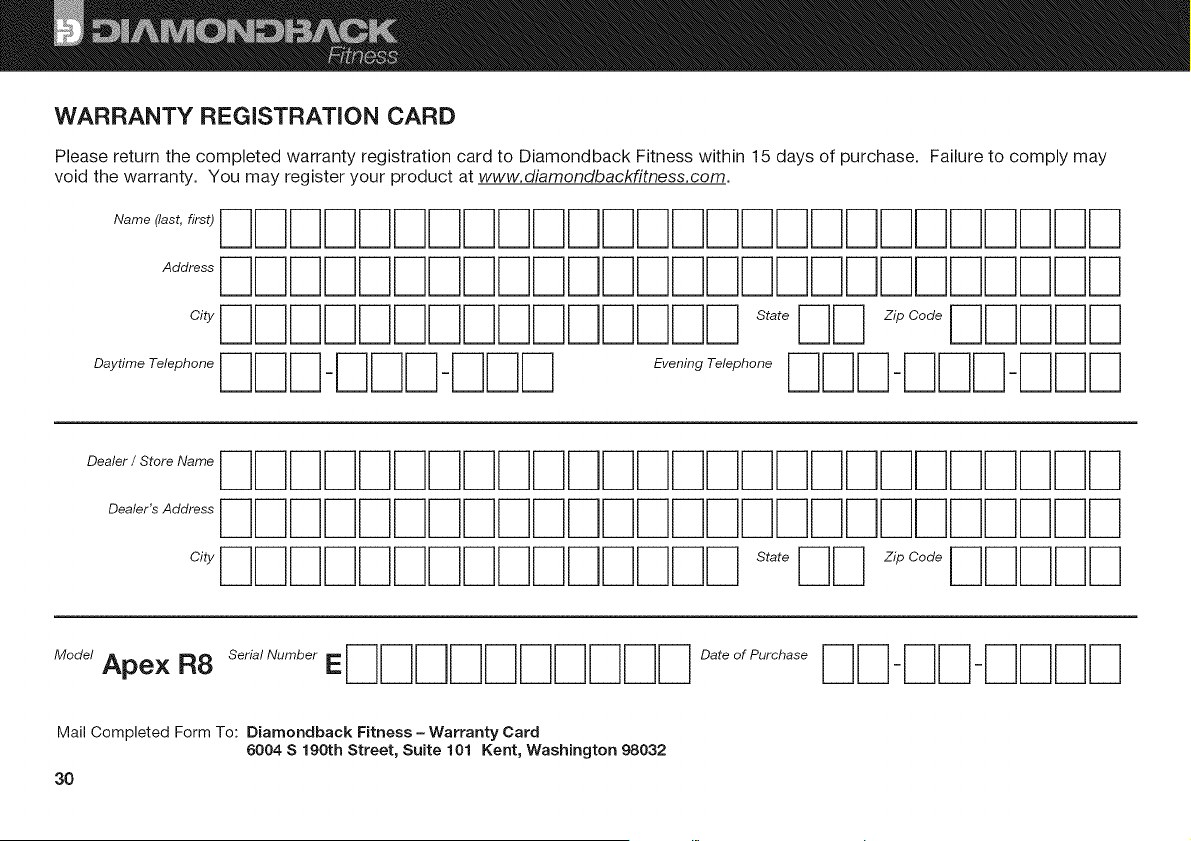
WARRANTY REGiSTRATiON CARD
Please return the completed warranty registration card to Diamondback Fitness within 15 days of purchase. Failure to comply may
void the warranty. You may register your product at www.diamondbackfitness.com.
Name (last, first)
Address
City
Daytime Telephone
s ,oq
Evening Telephone
z, oo oDqNrq
Dealer / Store Name
Dealer's Address
City
ModelApex R8 Seria/NumberE
Mail Completed Form To: Diamondback Fitness - Warranty Card
6004 S 190th Street, Suite 101 Kent, Washington 98032
3O
Date of Purchase

FULL ONE (1) YEAR WARRANTY
Your Home
For repair--in your home--of all major brand appliances, lawn
and garden equipment, of heating and cooling systems, no
matter who made it, no matter who sold it!
For the replacement parts, accessories, and user's manuals that
you need to do-it-yourself.
For Sears professional installation of home appliances
and items like garage door openers and water heaters.
1-800-4-MY-HOME ® (1-800-469-4663)
Call anytime, day or night (U.S.A. and Canada)
www, sears.com www,sears,ca
OurHome
For repair of carry-in items like vacuums, lawn equipment, and
electronics, call or go on-line for the location of the nearest
Sears Parts a Repair Center
1-800-488-1222 Call anytime, day or night (U.S.A. only)
www.sears.com
To purchase a protection agreement (U.S.A.) or maintenance
agreement (Canada) on a product serviced by Sears:
1-800-827-6655 (U.SA.) 1-800-361-6665 (Canada)
Pard pedir servicio de reparaci6n a domicilio, y pard ordenar piezas:
1-888-SU-HOGAR ® (1-888-784-6427)
(_) Registered Trademark/rM Trademark/SM Service Mark of Sears Brands, LLC
¢_)Marca Registrada/rM Marca de F&brica/SM Marca de Servicio de Sears Brands, LLC
\
Diamondback Fitness stands behind every product we sell. If this
Apex exercise bike fails due to a defect in material or workmanship
within one (1) year from the date of purchase, call 1-800-4-MY-HOME
(1-800-469-4663) to arrange for free repair (or replacement if repair
proves impossible).
The frame and brake are covered by our Limited Lifetime Warranty.
Parts and electronics are warranted for one (1) year from the date of
purchase. As needed, labor for the repair of defects in material or
workmanship will be provided free of charge for up to one (1) year from
the date of purchase. Wear items are warranted for ninety (90) days.
This warranty does not apply when the Apex exercise bikes are used
commercially, in light-commercial environments (such as hotels,
condominiums or health care facilities), or for rental purposes.
This warranty gives you specific legal rights, and you may also have
other rights which vary from state to state.
Diamondback Fitness, 6004 South 190th Street, Suite 101 Kent WA 98032
© 2009 Diamondback Fitness
J
J
31