Record Your Model and Serial Numbers .............. Cover
Important Safety Instructions ....................................... 2
\
First Steps ....................................................................... 3
Energy Saving Ideas ...................................................... 4
setting _the Controls ....... ............................................... 4
Fresh Food Storage ........................................................ 5
Automatic Ice and Water Dispenser ......................... 6-9
Care and Cleaning .................................................. 10-11
Removing the Handles and Doors .............................. 12
Avoid Service Checklist ......................................... 13-16
Normal Operating Sounds .......................................... 16
Sears Service .................................... _,_o_o._o_................. !7
Warranty ...................................................................... 18
Sears Service in Canada ............................................... 19
Warranty (Canada) ..................................................... 20
............................ , r
Read and Save These Instructions
This Owner's Guide provides specific operating instructions for your model Use your refrigerator only as instructed=i!n this
guide These instructions are not meant to cover every possib e condition and situation that may occur Common sen'_e and
caution must be pract ced .when installing, operating, and maintaining any appliance
Record Your Model and Serial Numbers
Record the model and serial number in the space provided below The serial plate is located on the ceiling of the refrigerator
compartment
Model Number:
Serial Number:
Purchase Date:
, PIN 218860000 (9801)
Important Safety
Instructions
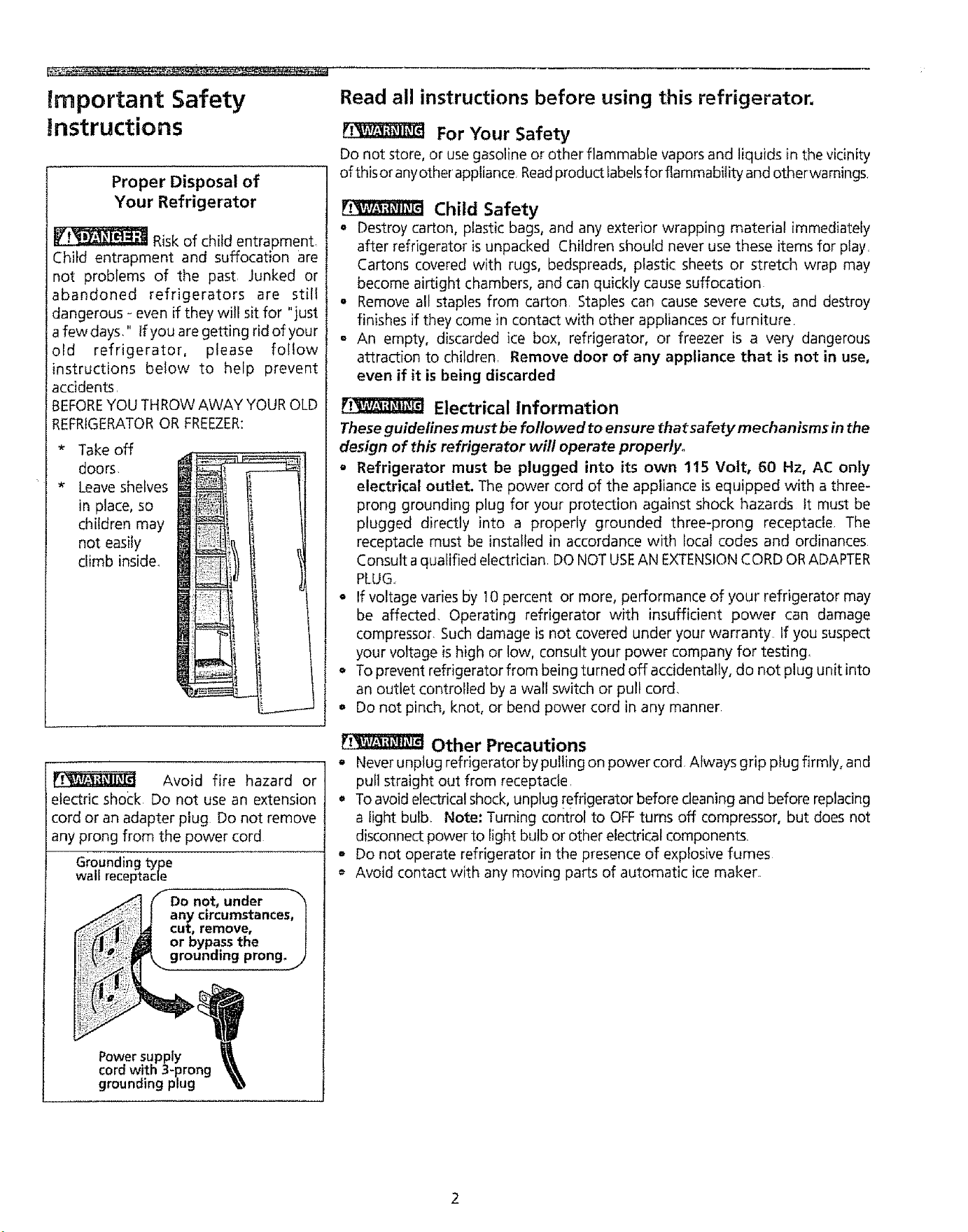
Proper Disposal of
Your Refrigerator
Risk of child entrapment
Child entrapment and suffocation are
not problems of the past, Junked or
abandoned refrigerators are still
dangerous - even if they will sit for "just
a few days," If you are getting rid of your
old refrigerator, please follow
instructions below to help prevent
accidents
BEFOREYOU THROW AWAY YOUR OLD
REFRIGERATOROR FREEZER:
_r
Take off
doors.
Leave shelves
in place, so
children may
not easily
climb inside..
Avoid fire hazard or
electric shock Do not use an extension
cord or an adapter plug Do not remove
any prong from the power cord
Grounding type
waif receptacle
Do not, under "_
any circumstances, t
cut, remove, /
or bypass the
grounamg prong_ /
Power supply
cord with 3-prong
grounding plug
Read all instructions before using this refrigerator.
For Your Safety
Do not store, or use gasoline or other flammable vapors and liquids in the vicinity
of thisor anyother'appliance Readproduct iabetsfor flammability and otherrwamings,
Child Safety
• Destroy carton, plastic bags, and any exterior wrapping material immediately
after refrigerator is unpacked Children should never use these items for play.
Cartons covered with rugs, bedspreads, plastic sheets or stretch wrap may
become airtight chambers, and can quickly cause suffocation
• Remove all staples from carton Staples can cause severe cuts, and destroy
finishes if they come in contact with other appliances or furniture
° An empty, discarded ice box, refrigerator, or freezer is a very dangerous
attraction to children Remove door of any appliance that is not in use,
even if it is being discarded
Electrical Information
These guidelines must be followed to ensure thatsa fety mechanisms in the
design of this refrigerator will operate properlyo
o Refrigerator must be plugged into its own 115 Volt, 60 Hz, AC only
electrical outlet. The power cord of the appliance is equipped with a three-
prong grounding plug for your protection against shock hazards tt must be
plugged directly into a properly grounded three-prong receptacle. The
receptacle must be installed in accordance with local codes and ordinances
Consult a qualified electrician DO NOTUSEAN EXTENSIONCORD ORADAPTER
PLUG.,
o If voltage varies by 10 percent or more, performance of your refrigerator may
be affected. Operating refrigerator with insufficient power can damage
compressor. Such damage is not covered under your warranty If you suspect
your voltage is high or low, consult your power company for testing_
o To prevent refrigerator from being turned off accidentally, do not plug unit into
an outlet controlled by a wall switch or pull cord.
o Do not pinch, knot, or bend power cord in any manner.
Other Precautions
e Never unplug refrigerator by pulling on power cord Always grip plug firmly, and
pufl straight out from receptacle.
To avoid electrical shock, unplug refrigerator before cleaning and before replacing
a light bulb. Note: Turning control to OFFturns off compressor, but does not
disconnect power to light bulb or other electrical components.
- Do not operate refrigerator in the presence of explosive fumes
Avoid contact with any moving parts of automatic ice maker
First Steps
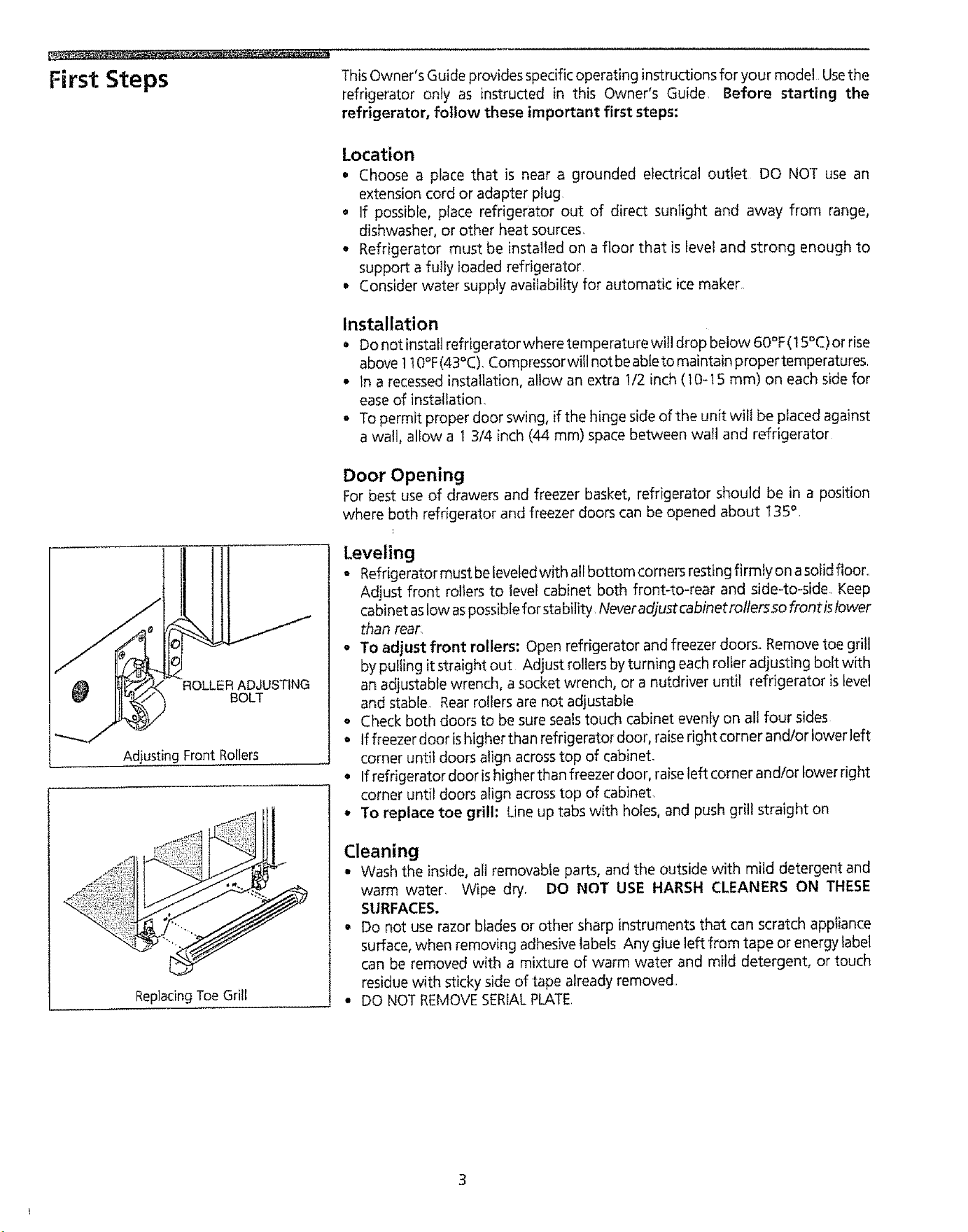
ROLLER ADJUSTING
BOLT
Adjusting Front Rollers
ReplacingToeGrill
ThisOwner's Guide provides specific operating instructions for your model Usethe
refrigerator only as instructed in this Owner's Guide, Before starting the
refrigerator, follow these important first steps:
Location
• Choose a place that is near a grounded electrical outlet DO NOT use an
extension cord or adapter plug
= if possible, place refrigerator out of direct sunlight and away from range,
dishwasher, or other heat sources.
• Refrigerator must be installed on a floor that is level and strong enough to
support a fully loaded refrigerator
Consider water supply availability for automatic ice maker
Installation
° Do not instalt refrigerator where temperature will drop below 60°F (15°C) or rise
above 1t 0°F(43°C). Compressorwill not beableto maintain proper temperatures.
* In a recessed installation,allow an extra I/2 inch (10-15 ram) on each side for
ease of installation.
- To permit proper door swing, if the hinge side of the unit will be placed against
a wall, altow a 13/4 inch (44 ram) spacebetween watl and refrigerator
Door Opening
For best use of drawers and freezer basket, refrigerator should be in a position
where both refrigerator and freezer doors can be opened about t35 °.
Leveling
= Refrigerator must be Ieveledwith all bottom corners resting firmly on asolid floor.,
Adjust front rollers to level cabinet both front-to-rear and side4o-side Keep
cabinet as low aspossible for stability, Neveradjustcabinetroltersso frontistower
than rear,
o To adjust front rollers; Open refrigerator and freezer doors° Remove toe grill
by pulling it straight out Adjust rollers by turning each roller adj usting bolt with
an adjustable wrench, a socket wrench, or a nutdriver until refrigerator is level
and stable Rear rollers are not adjustable
• Check both doors to be sure sealstouch cabinet evenly on all four sides
. Iffreezerdoorishigherthanrefrigeratordoor, raiserightcornerand/oriowerleft
corner until doors align across top of cabinet-
. If refrigerator door is higher than freezer door, raiseteft corner and/or lower right
corner until doors align across top of cabinet,
• To replace toe grill: Line up tabs with holes, and push grill straight on
Cleaning
• Wash the inside, all removable parts, and the outside with mild detergent and
warm water. Wipe dry. DO NOT USE HARSH CLEANERS ON THESE
SURFACES,
• Do not use razor blades or other sharp instrumentsthat can scratch appliance
surface, when removing adhesive labels Any glue left from tape or energy label
can be removed with a mixture of warm water and mild detergent, or touch
residue with sticky side of tape already removed,,
• DO NOT REMOVESERIALPLATE.
Energy Saving Ideas
° Install the refrigerator in the coolest part of the room, out of direct sunlight and
away from heating ducts or registers, Do not place the refrigerator nextto heat-
producing appliances such as a range, oven or dishwasher If this is not possible,
a section of cabinetry or an added layer of insulation between the two appliances
will help the refrigerator operate more efficiently
• Level the refrigerator so the doors close tightly
• Referto this Owner's Guide for the suggested refrigerator settings,
o Periodic cleaning of the condenser will help the refrigerator run more efficiently_
SeeOutside in the "Care and Cleaning" section
• Do not overcrowd the refrigerator or block cold air vents Doing so causes the
refrigerator to run longer and use more energy Shelvesshould not be lined with
aluminum foil, wax paper or paper toweling Liners interfere with cold air
circulation, making the refrigerator lessefficient, which could cause food spoilage,
- Cover foods and wipe containers dry before placing them in the refrigerator This
cuts down on moisture build-up inside the unit,
• Organize the refrigerator to reduce door openings, Remove as many items as
needed at one time and close the door as soon as possible
setting the controls
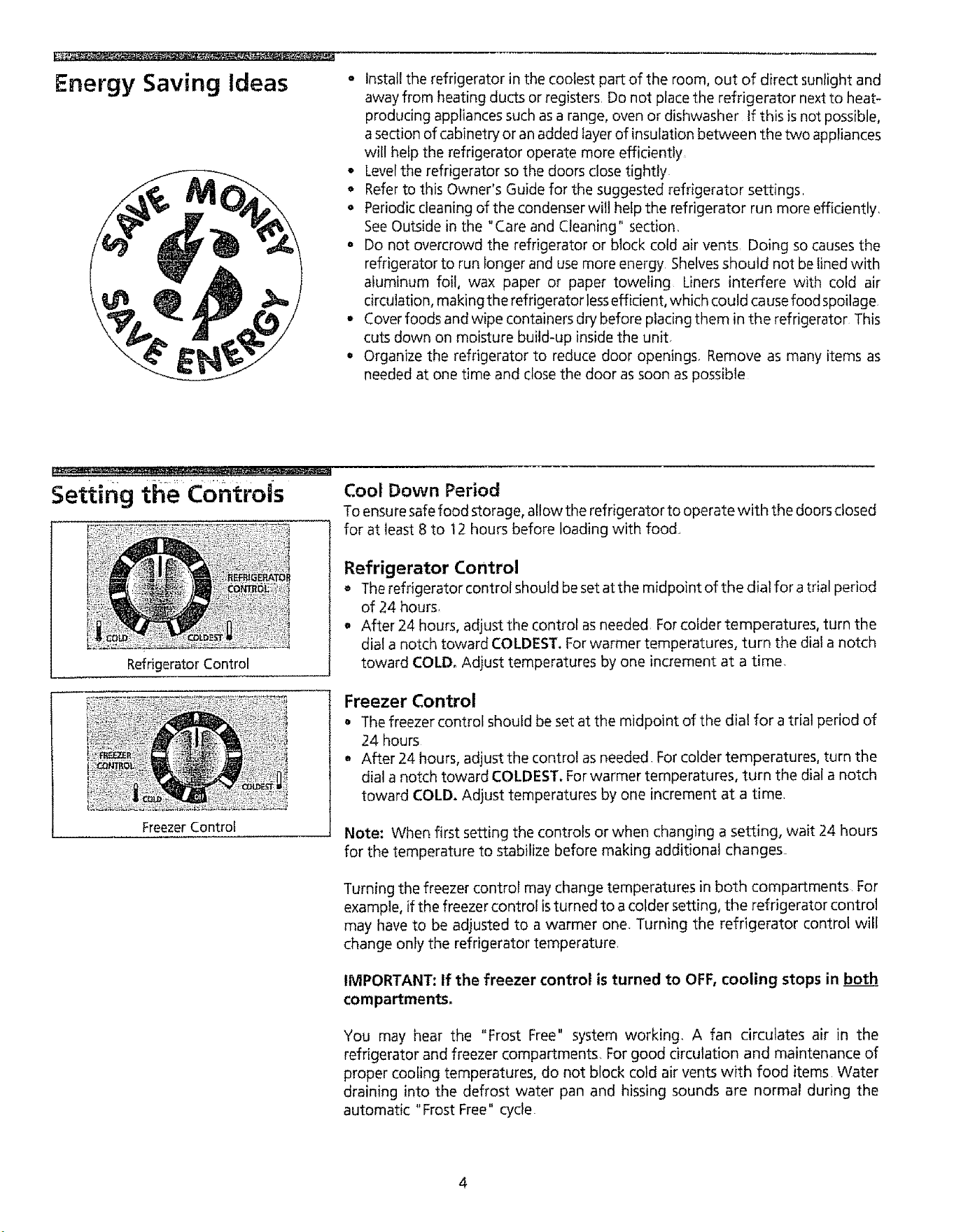
Refrigerator Control
Freezer Control
Cool Down Period
To ensure safe food storage, allow the refrigerator to operate with the doors closed
for at least 8 to 12 hours before loading with food..
Refrigerator Control
• The refrigerator control should be set at the midpoint of the dial for a trial period
of 24 hours,
, After 24 hours, adjust the control as needed For colder temperatures, turn the
dial a notch toward COLDEST. For warmer temperatures, turn the dial a notch
toward COLD, Adjust temperatures by one increment at a time,
Freezer Control
° The freezer control should be set at the midpoint of the dial for a trial period of
24 hours
* After 24 hours, adjust the control as needed For colder temperatures, turn the
dial a notch toward COLDEST. For warmer temperatures, turn the dial a notch
toward COLD. Adjust temperatures by one increment at a time.
Note: When first setting the controls or when changing a setting, wait 24 hours
for the temperature to stabilize before making additional changes
Turning the freezer control may change temperatures in both compartments For
example, if the freezer control isturned to a colder setting, the refrigerator control
may have to be adjusted to a warmer one. Turning the refrigerator control will
change only the refrigerator temperature.
IMPORTANT: If the freezer control is turned to OFF, cooling stops in both
compartmentso
You may hear the "Frost Free" system working, A fan circulates air in the
refrigerator and freezer compartments, For good circulation and maintenance of
proper cooling temperatures, do not block cold air vents with food items Water
draining into the defrost water pan and hissing sounds are normal during the
automatic "Frost Free" cycle.
4
Fresh Food Storage
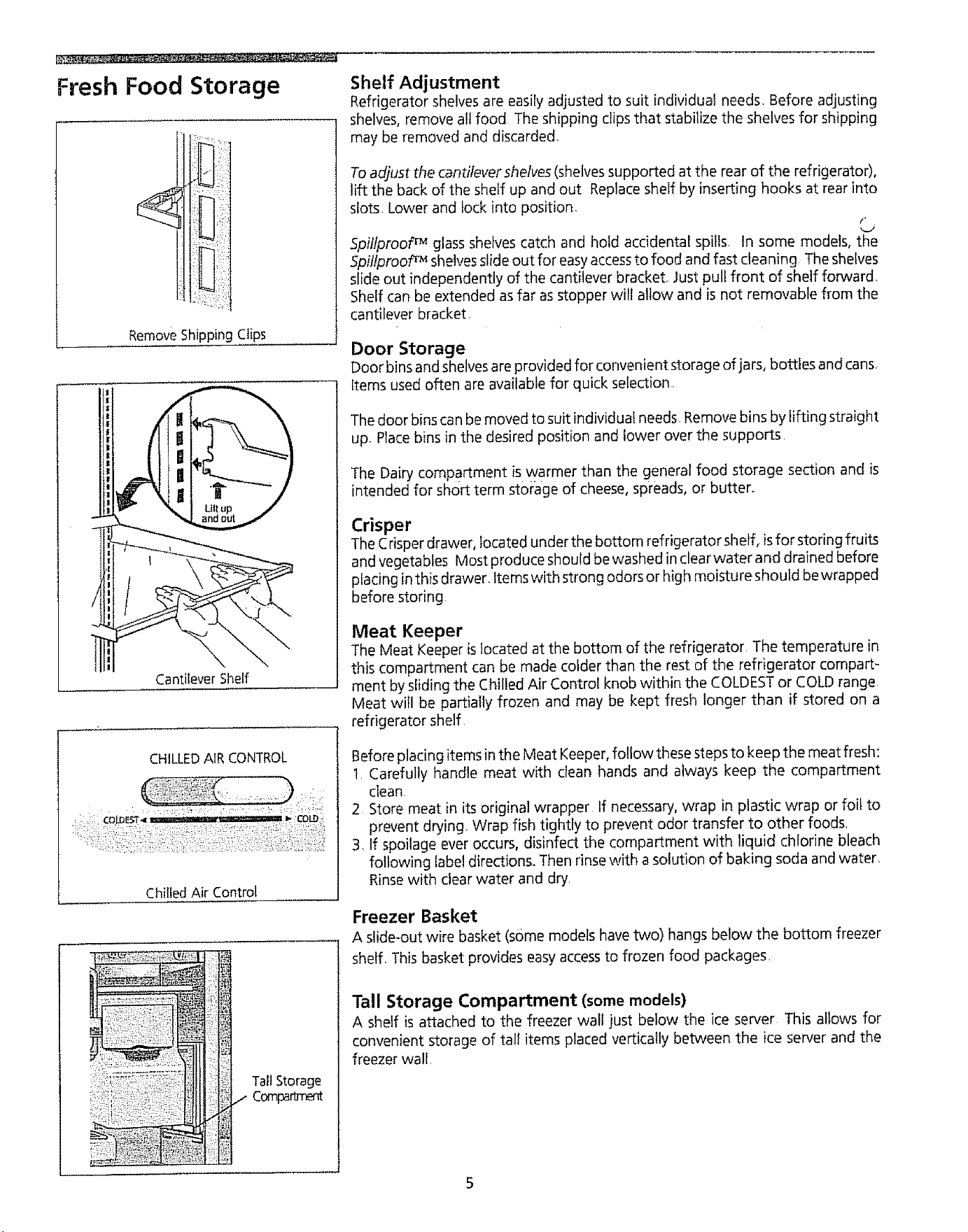
Remove Shipping Clips
Cantilever Shelf
CHILLED AIR CONTROL
Chilled Air Control
Tall Storage
Comparlrr'ent
Shelf Adjustment
Refrigerator shelves are easily adjusted to suit [ndMduat needs, Before adjusting
shelves, remove all food The shipping clips that stabilize the shelves for shipping
may be removed and discarded
To adjust the cantilever shelves(shelves supported at the rear of the refrigerator),
lift the back of the shelf up and out Replace sheff by inserting hooks at rear into
slots Lower and lock into position.
¢,
5pillproof TM glass shelves catch and hold acddentaE spiIls. In some models, the
5pillprooF Mshelvesslide out for easyaccessto food and fast cleaning The shelves
slide out independently of the cantilever bracket, Just pull front of shelf forward.
Shelf can be extended as far as stopper will allow and is not removable from the
cantilever bracket
Door Storage
Door bins and shelvesareprovided for convenient storage of jars, bottles and cans,
Items used often are available for quick selection,
The door bins can be moved to suit individual needs. Remove bins by lifting straight
up. Place bins in the desired position and lower over the supports
The Dairy compartment is warmer than the general food storage section and is
intended for short term storage of cheese, spreads, or butter°
Crisper
The Crisper drawer, located under the bottom refrigerator shelf, is for storing fruits
and vegetables Most produce should be washed inclear water and drained before
placing inthis drawer, Items with strong odors or high moisture should bewrapped
before storing
Meat Keeper
The Meat Keeper is located at the bottom of the refrigerator The temperature in
this compartment can be made colder than the rest of the refrigerator compart-
ment by sliding the Chilled Air Control knob within the COLDESTor COLD range
Meat will be partially frozen and may be kept fresh longer than if stored on a
refrigerator shelf.
Before placing items in the Meat Keeper, follow these steps to keep the meat fresh:
1. Carefully handle meat with clean hands and always keep the compartment
clean.
2 Store meat in its original wrapper If necessary, wrap in plastic wrap or foil to
prevent drying. Wrap fish tightly to prevent odor transfer to other foods.
3, If spoilage ever occurs, disinfect the compartment with liquid chlorine bleach
following label directions. Then rinsewith a solution of baking soda and water.
Rinse with clear water and dry.
Freezer Basket
A slide-out wire basket (some models have two) hangs below the bottom freezer
shelf, This basket provides easy accessto frozen food packages,
Tall Storage Compartment (somemodels)
A shelf is attached to the freezer wall just below the Ice server This allows for
convenient storage of tall items placed vertically between the ice server and the
freezer wall.
Automatic ice and
Water Dispenser
;: •|
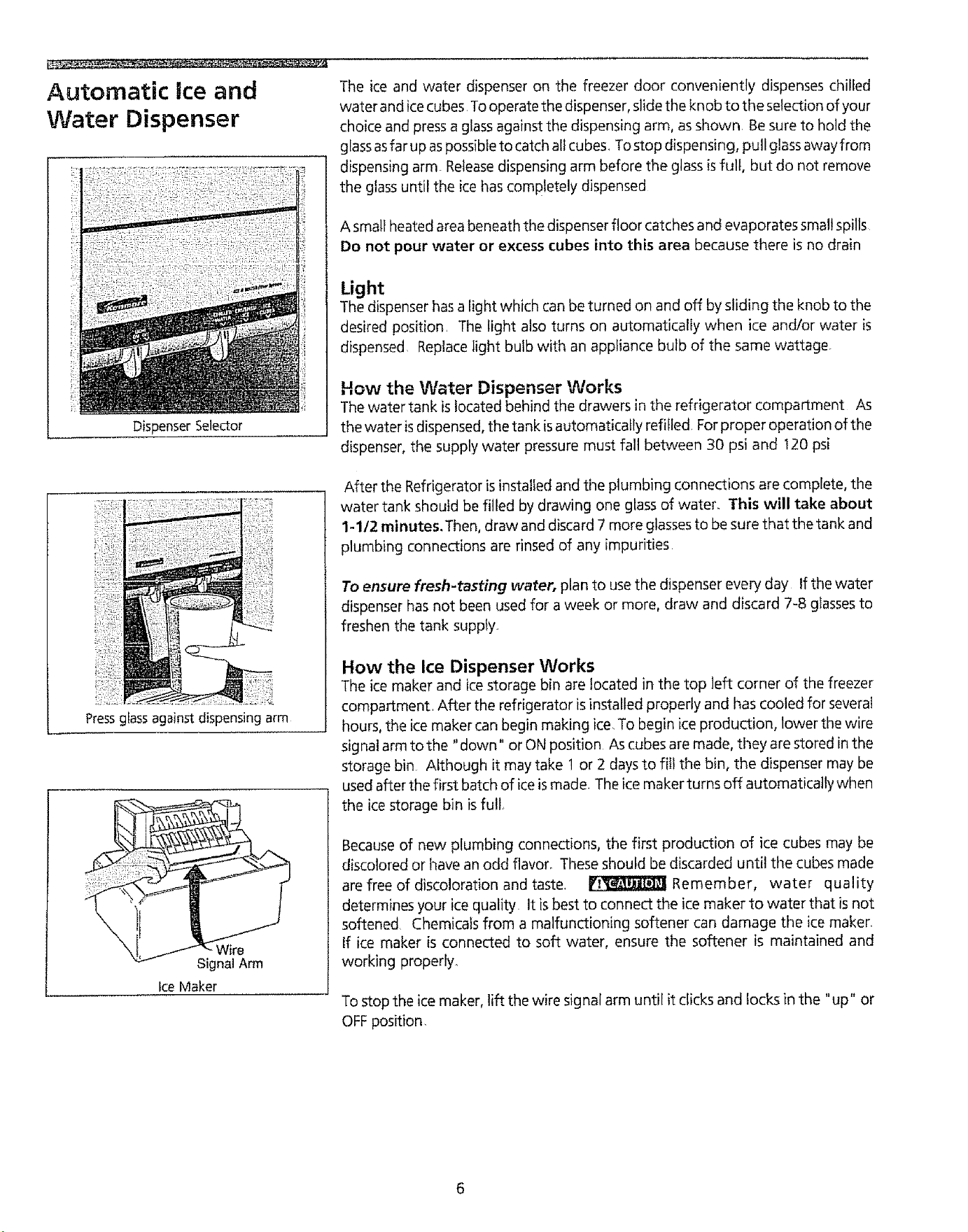
Dispenser Selector
Pressglass against dispensing arm
Signal Arm
Ice Maker
The ice and water dispenser on the freezer door conveniently dispenses chilled
water and ice cubes To operate the dispenser, slide the knob to the selection of your
choice and press a glass against the dispensing arm, as shown Be sure to hold the
glassasfar up aspossibleto catch all cubes. To stop dispensing, pull glassaway from
dispensing arm. Releasedispensing arm before the glass is full, but do not remove
the glass until the ice has completely dispensed
A small heated area beneath the dispenser floor catches and evaporates small spills
Do not pour water or excess cubes into this area because there is no drain
Light
The dispenser has a light which can be turned on and off by sliding the knob to the
desired position, The light also turns on automatically when ice and/or water is
dispensed Replace light bulb with an appliance bulb of the same wattage
How the Water Dispenser Works
The water tank is located behind the drawers in the refrigerator compartment As
the water isdispensed, the tank is automatically refilled For proper operation of the
dispenser, the supply water pressure must fall between 30 psi and t20 psi
After the Refrigerator is installed and the plumbing connections are complete, the
water tank should be filled by drawing one glass of water. This will take about
1-1/2 minutes.Then, draw and discard 7 more glassesto be sure that the tank and
plumbing connections are rinsed of any impurities
To ensure fresh-tasting water, plan to use the dispenser every day If the water
dispenser has not been used for a week or more, draw and discard 7-8 glasses to
freshen the tank supply.
How the Ice Dispenser Works
The icemaker and icestorage bin are located in the top left corner of the freezer
compartment. After the refrigerator isinstalled properly and has cooled for several
hours, the ice maker can begin making ice,To begin ice production, lower the wire
signal arm to the "down" or ON position As cubes are made, they are stored in the
storage bin Although it may take 1 or 2 days to fill the bin, the dispenser may be
used after the first batch of ice is made, The ice maker turns off automatically when
the ice storage bin is full
Becauseof new plumbing connections, the first production of ice cubes may be
discolored or have an odd flavor, Theseshould be discarded until the cubes made
are free of discoloration and taste, _ Remember, water quality
determines your ice quality It is best to connect the ice maker to water that isnot
softened Chemicals from a malfunctioning softener can damage the ice maken
If ice maker is connected to soft water, ensure the softener is maintained and
working properly,
To stop the ice maker, lift the wire signal arm until it clicks and locks in the "up" or
OFF position,
Automatic Ice and
Water Dispenser
(continued)
Ice Dispenser Tips
1 Icecubes stored too long may develop an odd flavor Empty the container and
return it to the proper position The ice maker will then produce more ice
2 Occasionally shake the container to keep ice separated
3 If the dispensing arm ispushed in for more than 4 minutes, the dispenser motor
may overload and stop The ovedoad protector will reset automatically after 3
or 4 minutes tf a large quantity of ice is needed at one time, it isbest to remove
cubes directly from the ice storage bin,
4 Certain sounds are normal when the ice maker isoperating. They are:
= Motor operation
= Ice being loosened from the tray
= Ice dropping into the storage bin
m Running water
= Water valve opening or closing
For more information on these operations, see "Normal Operating Sounds"
5 Stop the icemaker when cleaning the freezer or for long vacations.
6 lfthe ice maker isto be turned off for a long period of time, turn the water supply
valve to the closed position.
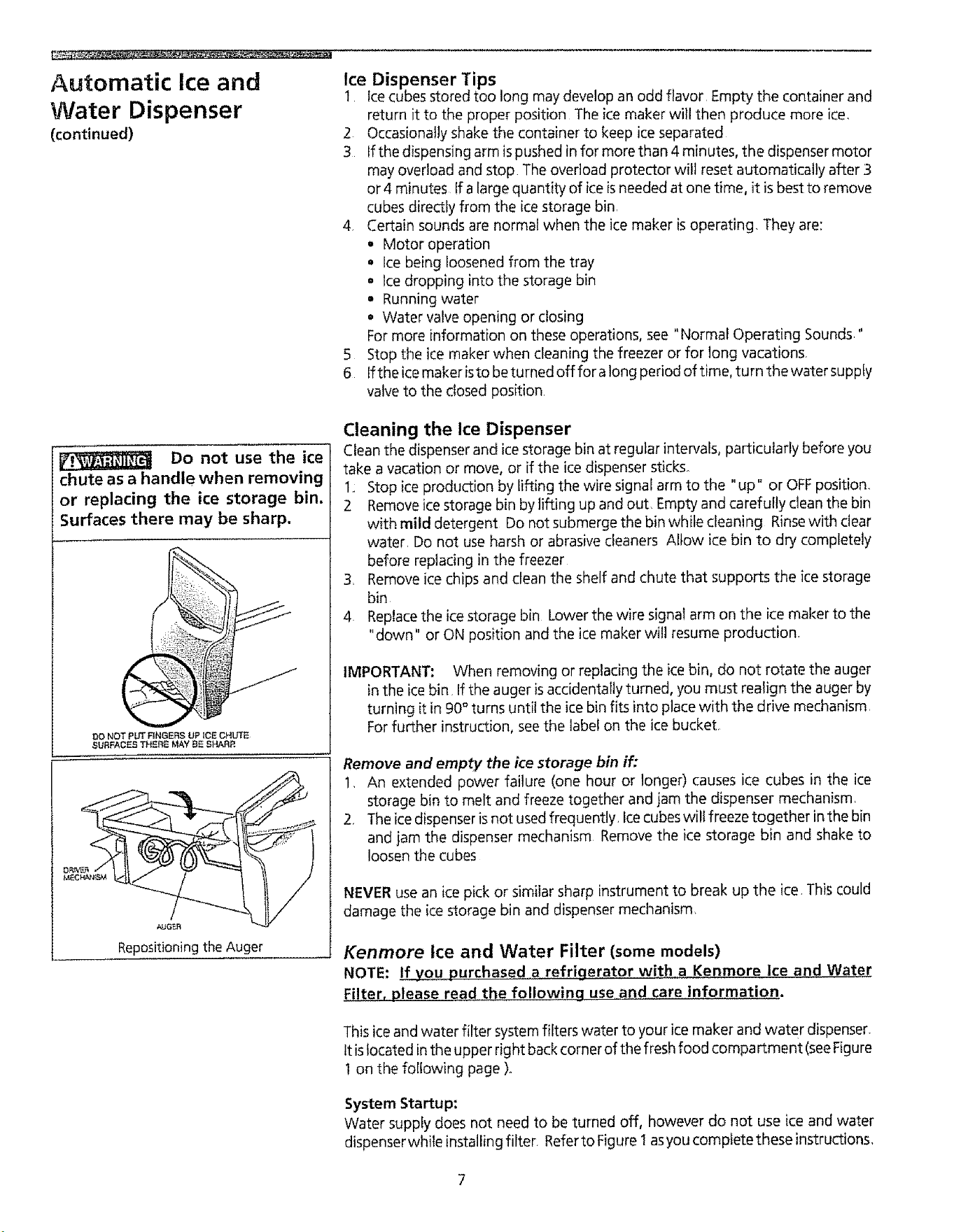
Do not use the ice
chute as a handle when removing
or replacing the ice storage bin,
Surfaces there may be sharp,
DO NOT pUT RNGERS LIp ICS GHUT_
SURFACES THERS M_y B5 SHARP.
AUGER
Repositioningthe Auger
Cleaning the Ice Dispenser
Clean the dispenser and ice storage bin at regular intervals,paccicuiarly before you
take a vacation or move, or if the ice dispenser sticks
1,: Stop ice production by lifting the wire signal arm to the "up" or OFFposition,
2 Remove ice storage bin by lifting up and out, Empty and carefully clean the bin
with mild detergent Do not submerge the bin while cleaning Rinsewith clear
water, Do not use harsh or abrasive cleaners Allow ice bin to dry completely
before replacing in the freezer
3_ Remove ice chips and clean the shelf and chute that supports the ice storage
bin
4 Replacethe ice storage bin Lower the wire signal arm on the ice maker to the
"down" or ON position and the ice maker will resume production,
IMPORTANT: When removing or replacing the ice bin, do not rotate the auger
in the ice bin Ifthe auger is accidentally turned, you must realign the auger by
turning it in 90°turns until the ice bin fits into place with the drive mechanism.
For further instruction, see the label on the ice bucket
Remove and empty the ice storage bin if,"
1. An extended power failure (one hour or longer) causes ice cubes in the ice
storage bin to melt and freeze together and jam the dispenser mechanism.
2. The ice dispenser is not used frequently Icecubeswill freeze together in the bin
and jam the dispenser mechanism Remove the ice storage bin and shake to
loosen the cubes
NEVER use an ice pick or similar sharp instrumentto break up the ice This could
damage the icestorage bin and dispenser mechanism,
Kenmore Ice and Water Filter (some models)
NOTE: If you purchased a refrigerator with a Kenmore Ice and Wate,r
Filter, please read the following use and care information.
This iceand water filter system filters water to your ice maker and water dispenser,
It islocated in the upper right back corner of the fresh food compartment (seeFigure
1on the following page )o
System Startup:
Water suppfy does not need to be turned off, however do not use ice and water
dispenserwhile installingfilter, RefertoFigure I asyou completetheseinstructions,
Automatic Hceand
Water Dispenser
(continued}
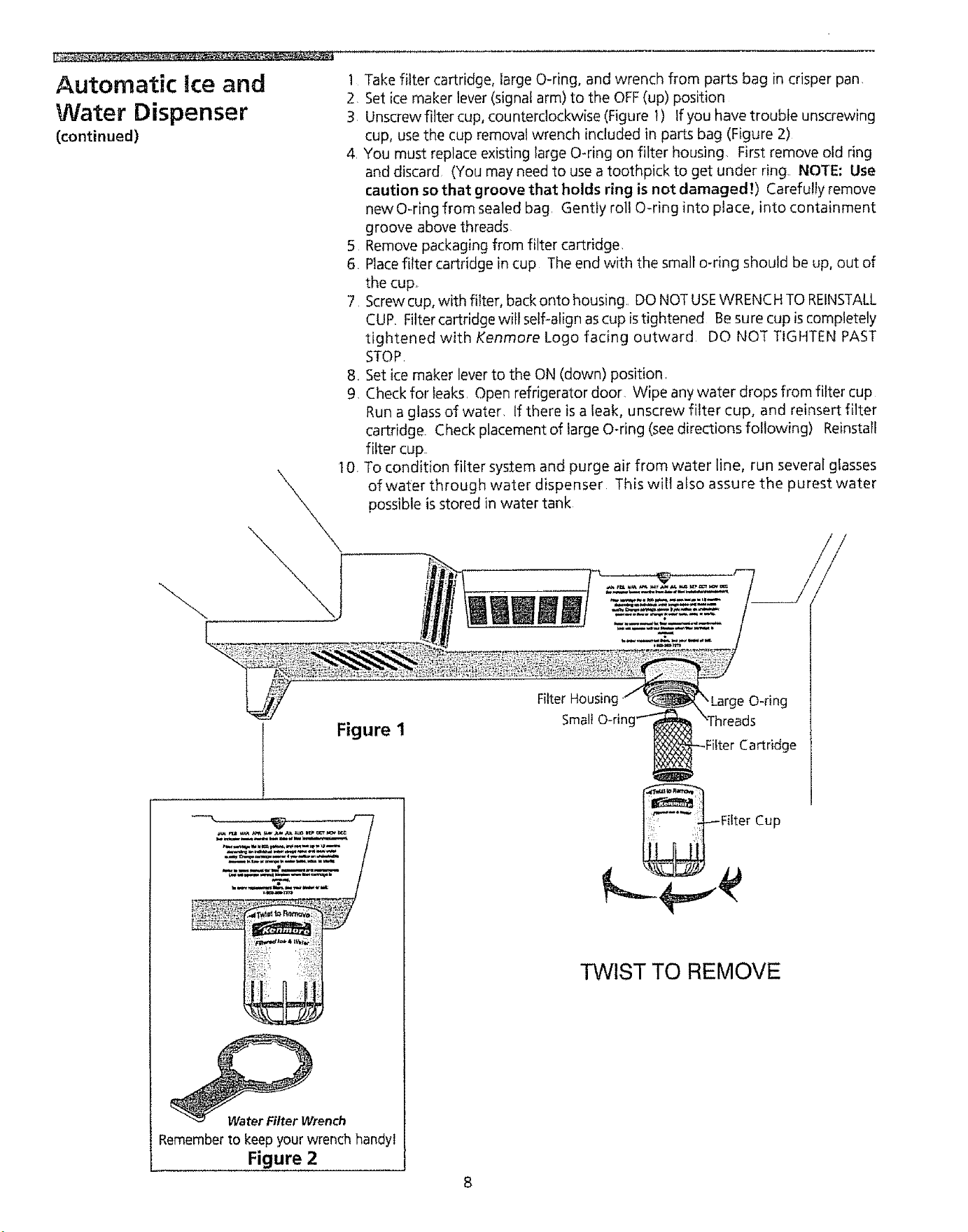
1 Take filter cartridge, large O-ring, and wrench from parts bag in crisper pan
2 Set ice maker lever (signal arm) to the OFF(up) position
3 Unscrew filter cup, counterclockwise (Figure 1) tf you have trouble unscrewing
cup, use the cup removat wrench included in parts bag (Figure 2)
4, You must replace existing large O-ring on filter housing First remove old ring
and discard (You may need to use a toothpick to get under ring. NOTE: Use
caution so that groove that holds ring is not damaged!) Carefully remove
newO-ring from sealed bag, Gently roll O-ring into place, into containment
groove above threads
5 Remove packaging from filter cartridge,
6 Placefilter cartridge in cup The end with the small o-dng should be up, out of
the cup,
7 Screw cup, with filter, back onto housing., DO NOT USEWRENCH TO REINSTALL
CUR Filter cartridge will self-align ascup is tightened Be sure cup is completely
tightened with Kenmore Logo facing outward DO NOT TIGHTEN PAST
STOP
8, Set ice maker lever to the ON (down) position,
9, Check for leaks, Open refrigerator door. Wipe any water drops from filter cup
Run a glass of water, If there is a leak, unscrew filter cup, and reinsert filter
cartridge. Check placement of large O-ring (see directions fo!lowing) Reinstall
filter cup
t O, To condition filter system and purge air from water line, run several glasses
of water through water dispenser This wilt also assure the purest water
possible is stored in water tank
Figure 1
_rench
Rememberto keepyour wrench handyl
Figure 2
Filter Housim
Small O-ring"_
Fitter Cartridge
Fifter Cup
TWIST TO REMOVE
Automatic Ice and
Water Dispenser
(continued)
Order new filter cartridges through
the dealer where you bought the
refrigerator, or contact the Sears
Service Center at:
1-800-366-7278 or 1-800-665-4455
U.S.A. Canada
tt m ig ht be good to order so me filters
when you first install your
refrigerator,
Changing the Filter and Large O-ring:
Water quality varies throughout the world To ensure the highest possible water
quality, change water filter and O-ring every 12 months Aiso, if filter has been in
a refrigerator that has not been in use for awhile (during moving for example),
changefilterbefore reinstalling refrigerator. NotedispensersystemwiIlalsooperate
without filtration (with filter cartridge removed)
To change filter and large O-ring:
Referto Figure 1 as needed
1 Set icemaker lever (wire signal arm) to the OFF(up) position,
2 Hold filter cup firmly, and unscrew counter clockwise (Figure _), Use cup
removal wrench if necessary (Figure 2) (Some water could leak out as you
remove cup_ This is normal,) Filter cartridge will come down with cup. If
cartridge remains in housing, pul! down gently, while twisting filter back and
forth
3 Replacelarge O-ring on filter housing, First remove old ring and discard, (You
may need to use a toothpick to get under ring NOTE: Use caution so that
neither ring, nor groove that holds ring are damaged!) Carefully
remove new O_ring from sealed bag Gently roll O-ring into place, into
containment groove above threads,
4, Empty cup of any substance•
5• Discard old filter cartridge,
6 Remove new filter cartridge from packaging, and install See Steps 6-10 in
"System Startup,"
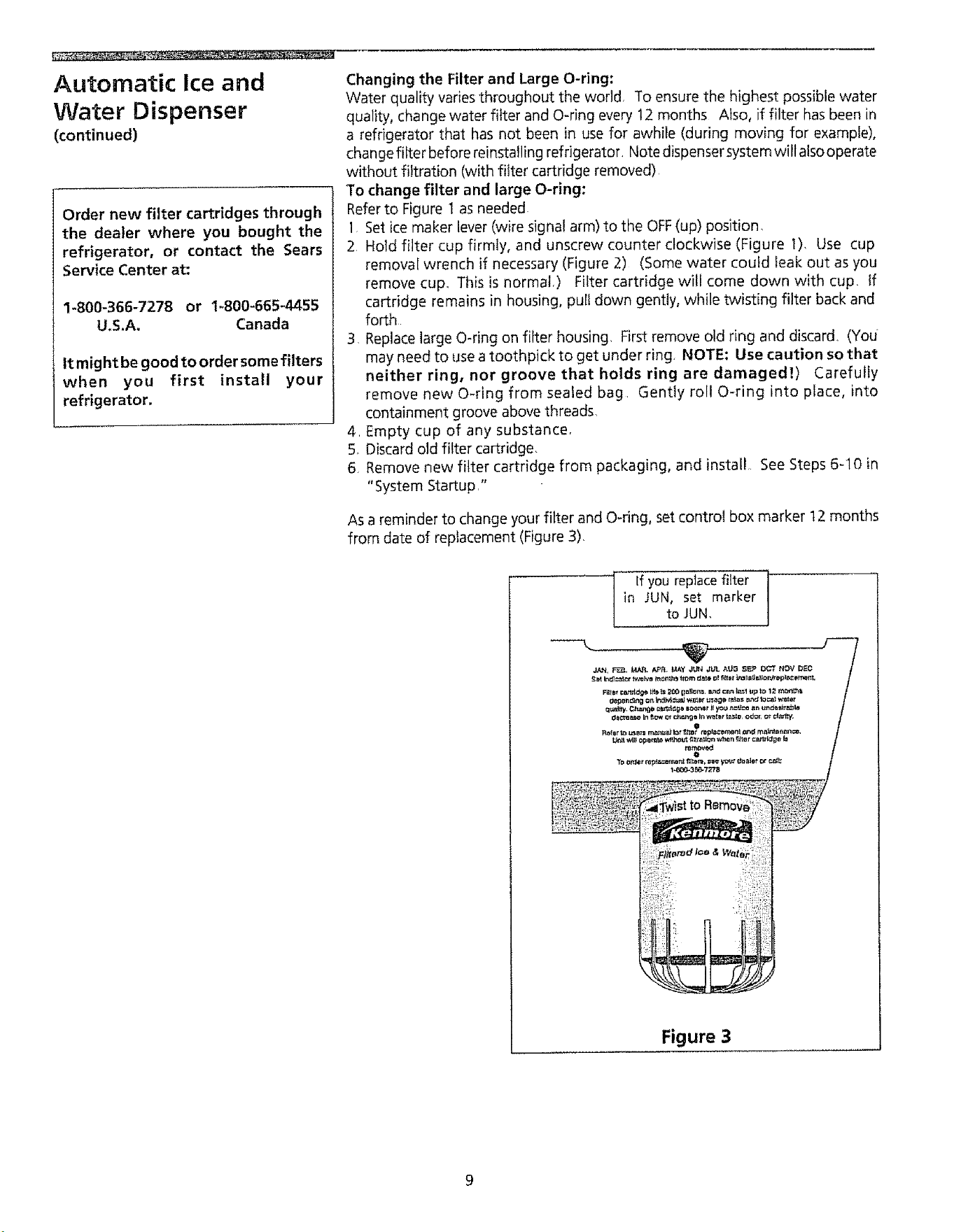
As a reminder to change your filter and O-ring, set control box marker t2 months
from date of replacement (Figure 3).
If you replace filter '"
in JUN, set marker
to JUN,
Figure 3
Care and Cleaning
Keep your refrigerator and freezer clean to prevent odor build-up Wipe up any spills
immediately and clean both sections at least twice a year. Never use metallic
scouring pads, brushes, abrasive cleanersor strong alkaline solutions on any sufface
Do not wash any removable parts in a dishwasher
Always unplug the power cord from the wall outlet before cleaning.
NOTE: Turning the control to OFFdoes not disconnect power to the controls, light
bulb, or other electrical components.
sLurl__ Damp objects stick to cold
metal surfaces Do not touch refrigerated
!aces with wet or damp hands.
Inside
Wash inside surfaces of the refrigerator and freezer with a solution of 2 tablespoons
baking soda in ! quart warm water Rinse and dry thoroughly Be sure to wring
excesswater out of sponge or cloth before cleaning around the contro/s, light bulb,
or any electrical parts
Wash removable parts such asshelvesand drawers with baking soda solution or mild
detergent and warm water DO NOTUSEHARSHCLEANERSQN THESESURFACES
Rinse and dry thoroughly Clean the door gaskets with mild suds, rinse with clear
water and wipe dry. Do not use razor blades or other sharp instruments which can
scratch the appliance surface when removing adhesive labels Any glue left from the
tape or energy label can be removed with a mixture of warm water and mild
detergent, or, touch the glue with the sticky side of.tape already removed DO NOT
REMOVETHE SERIALPLATE,
I_:_To avoid damage and help
the refrigerator run as efficiently as
possible, clean the condenser and air
vents periodically.
Outside
Wash the cabinet and handleswith warm water and mitd liquid detergent Rinsewelt
and wipe dry with a clean soft cloth. Do not use commercial household cleaners,
ammonia, or alcohol to clean handles.
Clean stainless steel (some models) front and handles with hot soapy water and a
dishcloth. Rinse with clean water and a soft cloth Wipe stubborn spots with an
ammonia-soaked paper towel, and rinse. Cleaners made especially for stainless
steel, such as Sheila Shine, trademark of Sheila Shine, lnc, Stainless Steel Magic,
trademark of Magic American Corp, or similar products are suggested Always
follow manufacturer's instructions. Wash the rest of the cabinet with warm water
and mild liquid detergent Rinsewell, and wipe dry with a clean soft cloth.
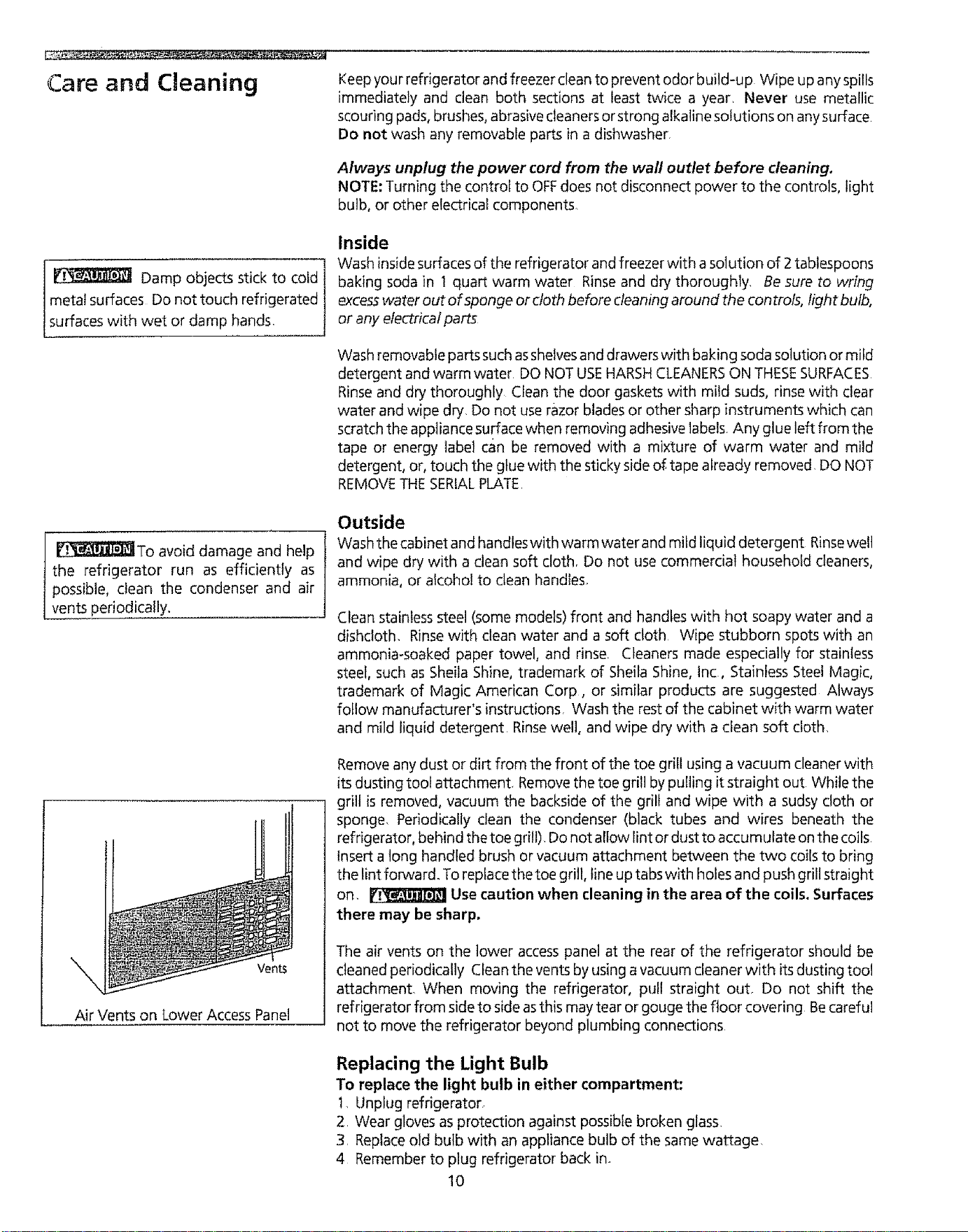
Vents
Air Vents on Lower Access Panel
Remove any dust or dirt from the front of the toe grill using a vacuum cleaner with
its dusting tool attachment Remove the toe grill by pulling it straight out While the
grill is removed, vacuum the backside of the grill and wipe with a sudsy cloth or
sponge. Periodically clean the condenser (black tubes and wires beneath the
refrigerator, behind the toe grill)Do not allow lint or dust to accumulate on the coils.
Insert a tong handled brush or vacuum attachment between the two coils to bring
the lint forward. To replace the toe grill, line up tabs with holes and push grill straight
on, _ Usecaution when cleaning in the area of the coils, Surfaces
there may be sharp.
The air vents on the lower access panel at the rear of the refrigerator should be
cteaned periodically Cfean the vents by using a vacuum cleaner with itsdusting tool
attachment When moving the refrigerator, pull straight out. Do not shift the
refrigerator from side to side asthis may tear or gouge the floor covering Becareful
not to move the refrigerator beyond plumbing connections
Replacing the Light Bulb
To replace the light bulb in either compartment:
I,Unplug refrigerator
2 Wear gloves as protection against possible broken glass
3 Replaceold bulb with an appliance bulb of the same wattage.
4 Remember to plug refrigerator back in
10
Care and Cleaning
(continued)
Vacation and Moving Tips
Short vacations: Leavethe refrigerator operating during vacations of 3 weeks or
less Use up all perishable items from the refrigerator section, Wrap and store
other items in the freezer Turn off the automatic ice maker, even if you will be
gone just a few days
Long vacations: Removeall food and ice if you wilt begone I month or more, Turn
the controls to OFFand disconnect the power Turn off the automatic ice maker
and turn the water supply valve to the dosed position Clean the interior
thoroughly, Leave both doors open to prevent odor and mold build-up Block
open if necessary
Moving; When moving the refrigerator, fol!ow theseguidelines to prevent damage:
° Remove all food and other items from both the refrigerator and freezer
compartments Empty the ice storage bin
• If a hand truck is used in moving, load the refrigerator from the side
o Turnthe rollersasfar up aspossible ThBwill protect them during sliding or moving
° The cabinet should be well padded and handled with care, DO NOT DROP.
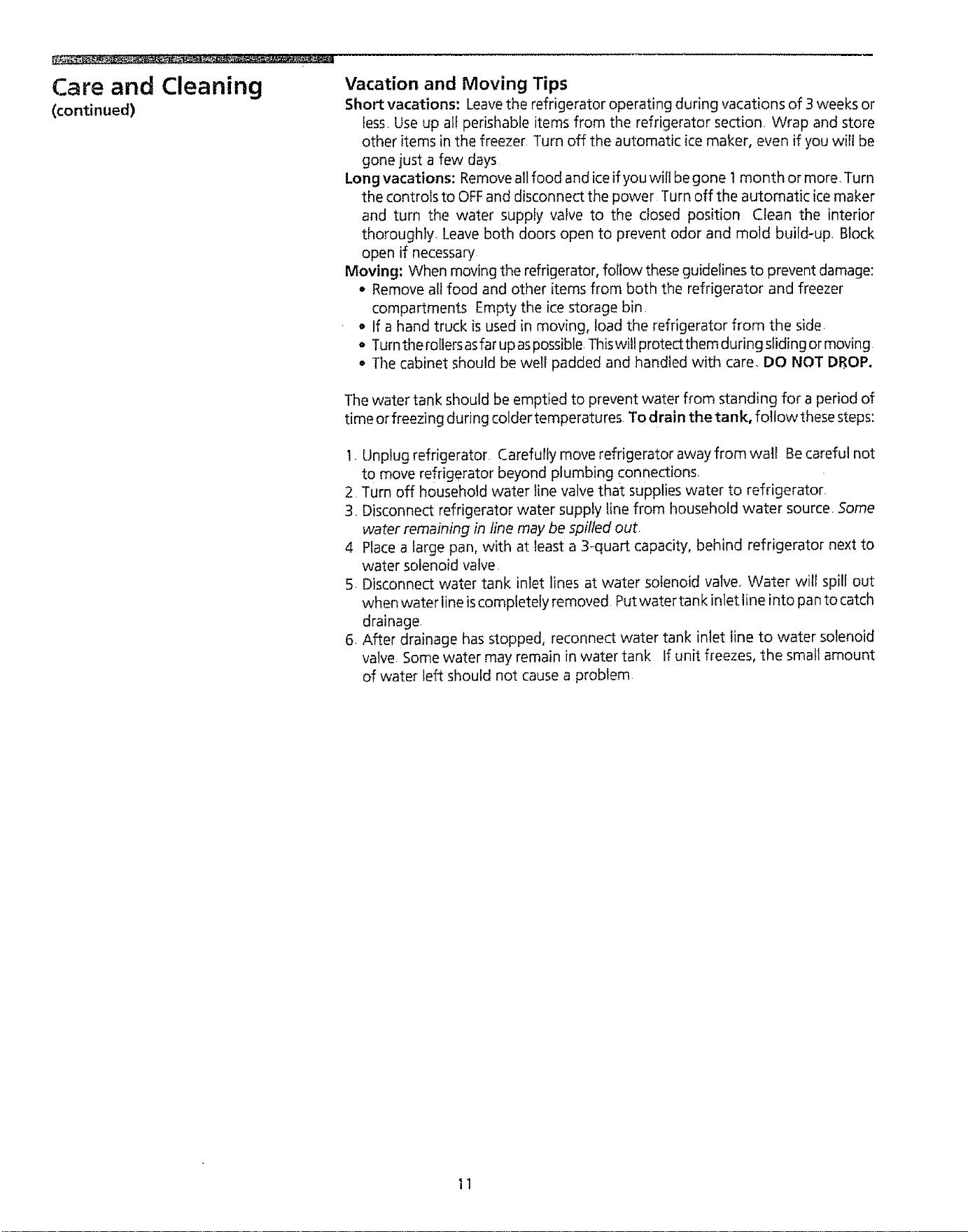
The water tank should be emptied to prevent water from standing for a period of
time or freezing during colder temperatures To drain the tank, followthese steps:
I. Unplug refrigerator Carefully move refrigerator away from wall Becareful not
to move refrigerator beyond plumbing connections,
2 Turn off household water line valve that supplies water to refrigerator,
3, Disconnect refrigerator water supply tine from household water source 5ome
water remaining in line may be spilled out,
4 Place a large pan, with at least a 3-quart capacity, behind refrigerator next to
water solenoid valve
5 Disconnect water tank inlet ]ines at water soienoid valve, Water will spill out
when water line is completely removed Put water tan k inlet line into pan to catch
drainage,
6 After drainage has stopped, reconnect water tank inlet line to water solenoid
valve, Some water may remain in water tank If unit freezes, the small amount
of water left should not cause a problem
11
Removing the Handles
and Doors
-q
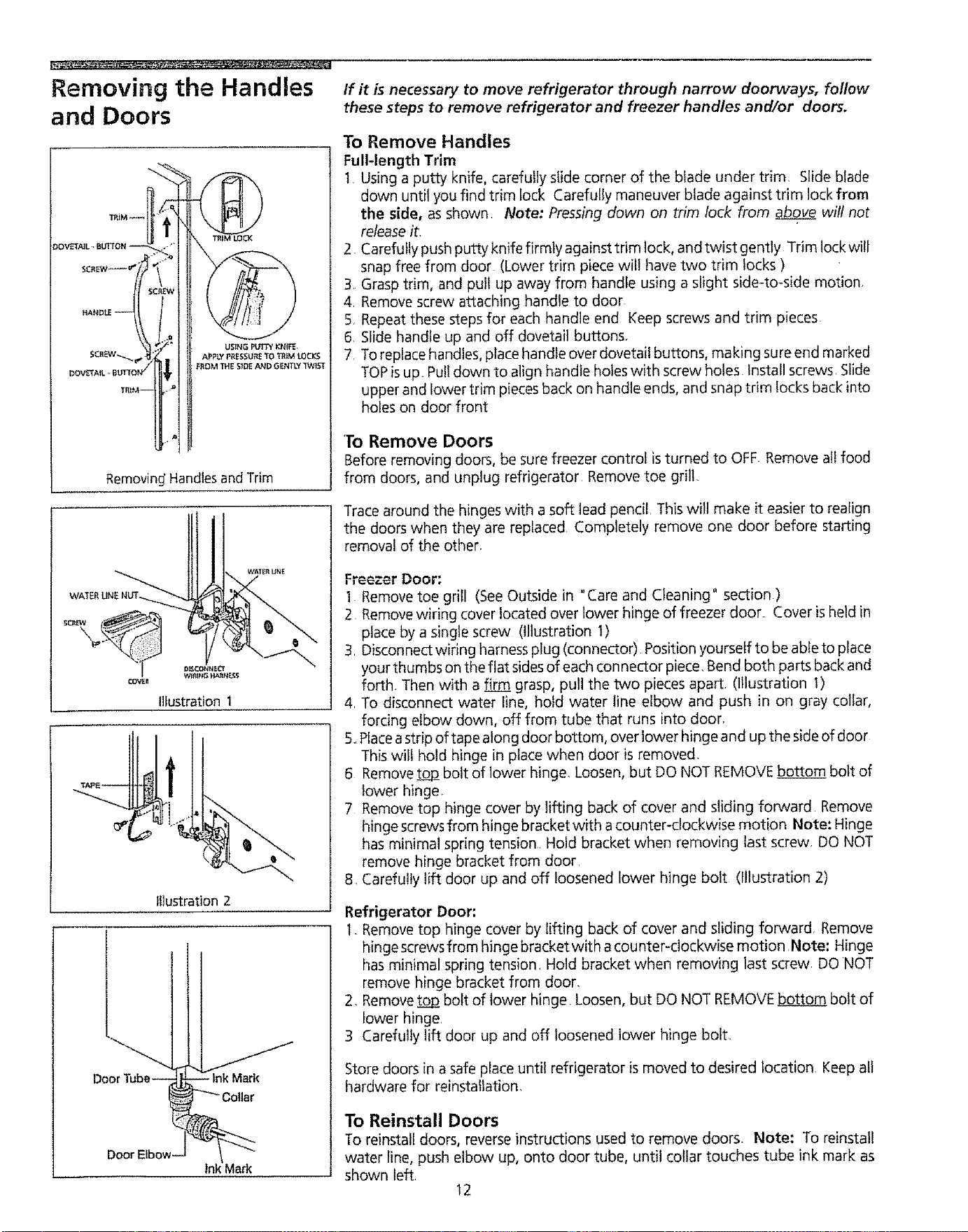
TR_M_
_OVETAi L., BLI_ON --
!_ANDf.E -- i
DOV_AtL ', BUTTON /
TRIM--
USING PLtfTYKN_
APPLY PRESSURE TO TRiM _.0 CJ_
F_OM 7HE SiDE AND GENTLY _ST
Removing' Handles and Trim
If it is necessary to move refrigerator through narrow doorways, follow
these steps to remove refrigerator and freezer handles and/or doors.
To Remove Handles
Full-length Trim
t Using a putty knife, carefully slide corner of the blade under trim. Slide blade
down until you find trim fock Carefully maneuver blade against trim lock from
the side, as shown, Note: Pressingdown on trim lock from above wilt not
release it,
2 Carefully push putty knife firmly against trim lock, and twist gently Trim lock wilt
snap free from door (Lower trim piece will llave two trim locks )
3. Grasp trim, and pull up away from handle using a slight side-to-side motion,
4. Remove screw attaching handle to door
5 Repeat these steps for each handle end Keep screws and trim pieces
6. Slide handle up and off dovetail buttons,
7. To replace handles, place handle over dovetail buttons, making sure end marked
TOPisup. Pulldown to align handle holes with screw holes Install screws. Slide
upper and lower trim piecesback on handle ends, and snap trim !ocks back into
holes on door front
To Remove Doors
Before removing doors, be sure freezer control is turned to OFF Remove all food
from doors, and unplug refrigerator Remove toe grill
Ilfustration 1
Illustration 2
Trace around the hinges with a soft lead pencil, This will make it easier to realign
the doors when they are replaced Completely remove one door before starting
removal of the other.
Freezer Door:
1 Remove toe grill (See Outside in "Care and Cleaning" section )
2 Remove wiring cover located over lower hinge of freezer door, Cover is held in
place by a single screw (Illustration 1)
3. Disconnect wiring harnessplug (connector) Position yourself to be able to place
your thumbs on the flat sidesof each connector piece, Bend both parts back and
forth Then with a firm grasp, pull the two pieces apart. (Illustration 1)
4. To disconnect water line, hold water line elbow and push in on gray collar,
forcing elbow down, off from tube that runs into door,
5..Placeastrip of tape along door bottom, over !ower hinge and up the side of door
This will hold hinge in place when door is removed,
6 Remove tooj2 bolt of lower hinge, Loosen, but DO NOT REMOVEbottom bolt of
lower hinge
7 Remove top hinge cover by lifting back of cover and sliding forward Remove
hinge screws from hinge bracket with acounter-clockwise motion Note: Hinge
has minimal spring tension Hold bracket when removing last screw, DO NOT
remove hinge bracket from door,
8, Carefully lift door up and off loosened lower hinge bolt (fllustration 2)
Refrigerator Door:
1. Remove top hinge cover by lifting back of cover and sliding forward. Remove
hingescrews from hinge bracket with acounter-clockwise motion Note: Hinge
has minimal spring tension. Hold bracket when removing last screw DO NOT
remove hinge bracket from door.
2, Remove_ bolt of lower hinge Loosen, but DO NOT REMOVEt_ bolt of
tower hinge.
3 Carefully lift door up and off loosened lower hinge bolt_
Store doors in a safe place until refrigerator is moved to desired location, Keep all
hardware for reinstallation,
To Reinstall Doors
To reinstall doors, reverse instructions used to remove doors. Note: To reinstall
water line, push elbow up, onto door tube, until collar touches tube ink mark as
shown left
12
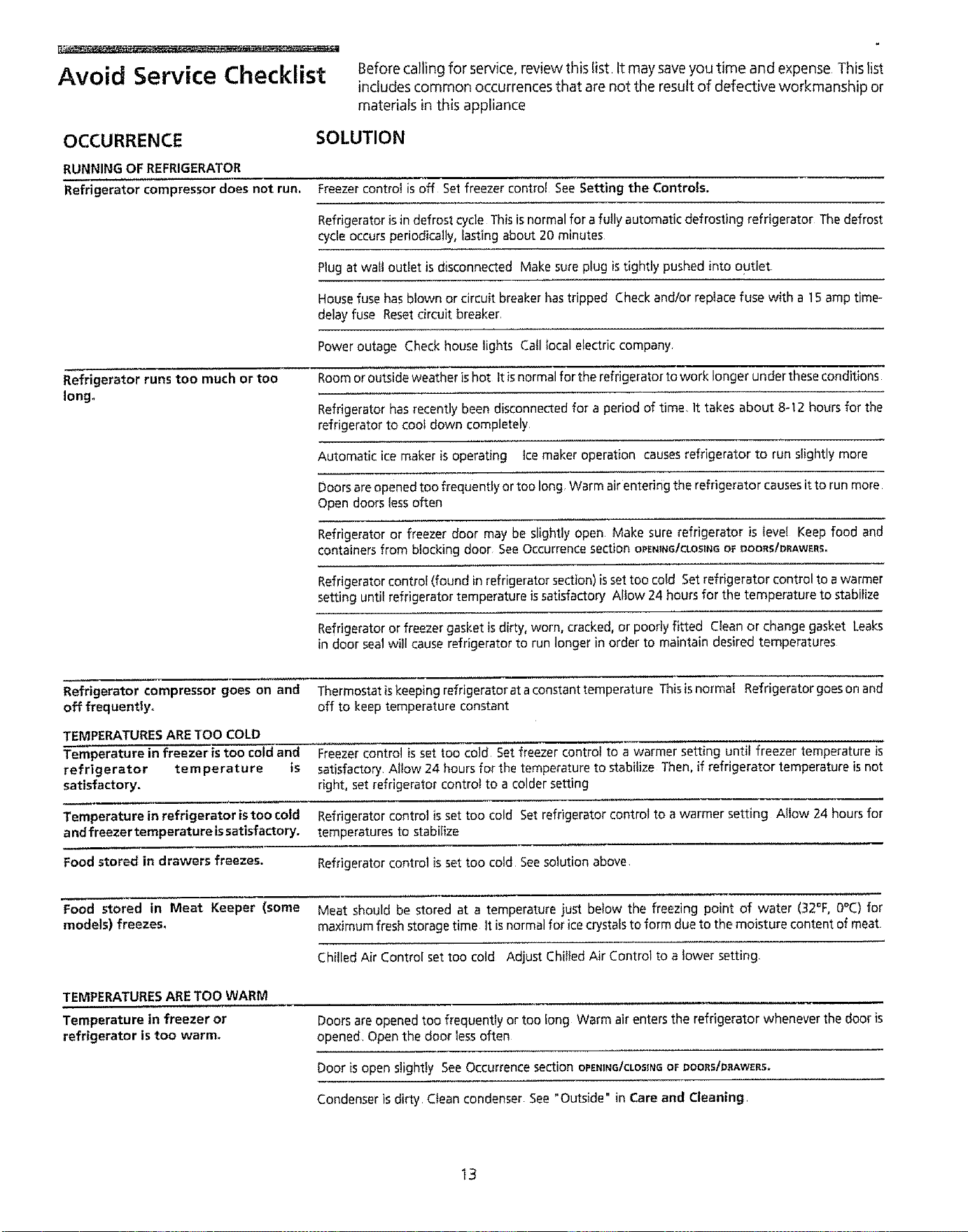
Avoid Service Checklist
OCCURRENCE
RUNNING OF REFRIGERATOR
Refrigerator compressor does not run.
Refrigerator runs too much or too
Iongo
Before calling for service,review this list It may saveyou time and expense This list
includes common occurrences that are not the result of defective workmanship or
materials in this appliance
SOLUTION
Freezer control is off Set freezer control See Setting the Controls.
Refrigerator is in defrost cycle This is normal for a futly automatic defrosting refrigerator The defrost
cycle occurs periodically, lasting about 20 minutes
Plug at waft outlet is disconnected Make sure plug is tightly pushed into outlet
House fuse has blown or circuit breaker has tripped Check and/or replace fuse with a 15 amp time-
delay fuse Reset circuit breaker
Power outage Check house lights Call local etectric company
Room or outside weather is hot It isnormal for the refrigerator to work longer under these conditions
Refrigerator has recently been disconnected for a period of time, It takes about 8-112 hours for the
refrigerator to coot down completely
Automatic ice maker is operating ice maker operation causes refrigerator to run slightly more
Doors are opened too frequently or too long Warm air entering the refrigerator causes it to run more
Open doors less often
Refrigerator or freezer door may be slightly open Make sure refrigerator is level Keep food and
containers from blocking door See Occurrence section OPENiNG/CLOSINGOFDOQRS/DRAWERS_
Refrigerator control (found in refrigerator section) is set too cold Set refrigerator control to a warmer
setting until refrigerator temperature is satisfactory Allow 24 hours for the temperature to stabilize
Refrigerator or freezer gasket is dirty, worn, cracked, or poorly fitted Clean or change gasket Leaks
in door seal will cause refrigerator to run longer in order to maintain desired temperatures
Refrigerator compressor goes on and Thermostat is keeping refrigeratorat a constant temperature Thisis normal Refrigerator goeson and
off frequently° off to keep temperature constant
TEMPERATURES ARE TOO COLD
Temperature in freezer is too cold and Freezer control is set too cold Set freezer control to a warmer setting until freezer temperature is
refrigerator temperature is satisfactory Allow 24 hours for the temperature to stabilize Then, if refrigerator temperature is not
satisfactory, right, set refrigerator control to a colder setting
Temperature in refrigerator istoo cold Refrigerator control is set too cold Set refrigerator control to a warmer setting A!low 24 hours for
andfreezertemperaturelssatisfactory, temperatures to stabilize
Food stored in drawers freezes. Refrigerator control is set too cold See solution above
Food stored in Meat Keeper (some Meat should be stored at a temperature just below the freezing point of water (32°F, 0°C) for
models) freezes_ maximum fresh storage time It is normal for ice crystals to form due to the moisture content of meat
TEMPERATURESARETOO WARM
Chilled Air Control set too cold Adjust Chilled Air Control to a lower setting
Temperature in freezer or
refrigerator is too warm.
Doors are opened too frequently or too fong Warm air enters the refrigerator whenever the door is
opened Open the door tess often
Door is open slightly See Occurrence section OrEN_Ne/CLOS_NGOFI:}OOIIStDAAW_RS.
Condenser is dirty Clean condenser See "Outside" in Care and Cleaning
13
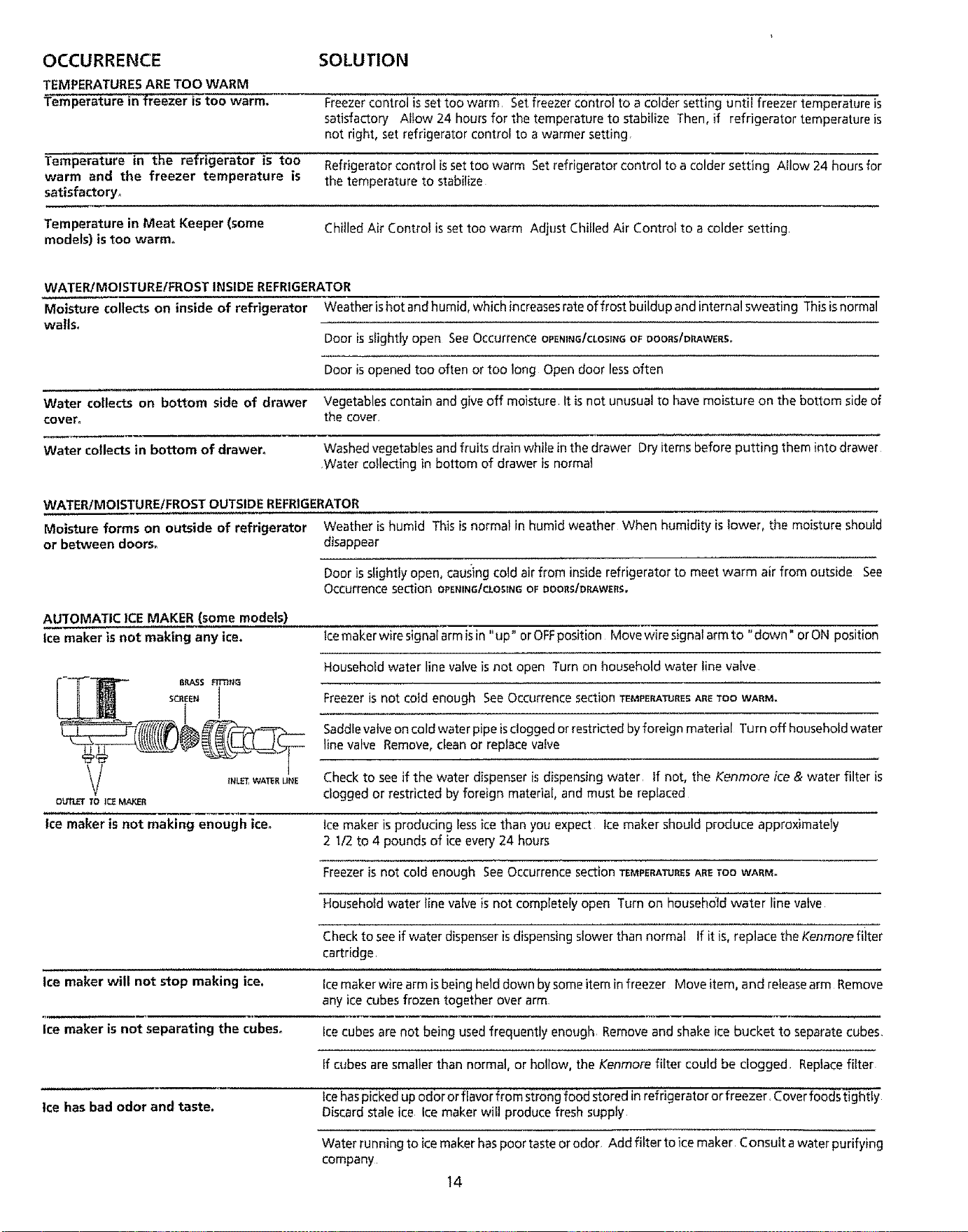
OCCURRENCE SOLUTION
TEMPERATURESARE TOO WARM
Temperature in freezer is too warm.
Freezer control is set too warm. Set freezer c(_ntroi to a colder setting until freezer temperature is
satisfactory A_tow 24 hours for the temperature to stabilize Then, if refrigerator temperature is
not right, set refrigerator control to a warmer setting.
Temperature in the refrigerator is too Refrigerator control is set too warm Set refrigerator control to a colder setting Allow 24 hours for
warm and the freezer temperature is the temperature to stabilize
satisfactory.
Temperature in Meat Keeper (some
models) istoo warm,
Chilled Air Control is set too warm Adjust Chilled Air Control to a colder setting
WATER/MOISTURE/FROST INSIDE REFRIGERATOR
Moisture collects on inside of refrigerator Weather ishot and humid, which increases rate of frost buildup and internal sweating This is normal
walls.
Door is slightly open See Occurrence OPENINGICLOSINGOF DOORS/DRAWERS.
Door is opened too often or too long Open door less often
Water collects on bottom side of drawer Vegetables contain and give off moisture It is not unusual to have moisture on the bottom side of
cover, the cover.
Water collects in bottom of drawer, Washed vegetables and fruits drain while in the drawer Dry items before putting them into drawer
,Water collecting in bottom of drawer is normal
WATER/MOISTUREIFROST OUTSIDE REFRIGERATOR
Moisture forms on outside of refrigerator Weather is humid This is normal in humid weather When humidity is lower, the moisture should
or between doors_ disappear
Door is slightty open, causing cold air from insiderefrigerator to meet warm air from outside See
Occurrence section OPEnING/CLOSinGOFt_OORS/O_We_S,
AUTOMATIC ICE MAKER (some models)
Ice maker is not making any ice.
lcemakerwiresignalarmisin "up" or OFFposition Movewiresignalarmto "down" orON position
Household water line vaive is not open Turn on household water linevalve
Freezeris not cold enough SeeOccurrence section TEMPERATURESARETOOWARM.
Saddlevalve oncold water pipe isdogged or restricted byforeign material Turn off householdwater
line valve Remove, dean or replace vatve
_.L_,WA_EUNE Check to see if the water dispenser is dispensing water, If not, the Kenmore ice & water filter is
clogged or restricted by foreign material, and must be replaced
Ice maker is not making enough ice° Ice maker is producing less ice than you expect ice maker should produce approximately
2 l/2 to 4 pounds of ice every 24 hours
Freezer is not cold enough See Occurrence section TEMPERATURESABETOOWARM.
Household water line valve is not completely open Turn on household water line valve
Check to see if water dispenser is dispensing stower than normal Ifitis, replacetheKenmorefiiter
cartridge,
Ice maker will not stop making ice, Ice maker wire arm isbeing held down by some item in freezer Move item, and release arm Remove
any ice cubes frozen together over arm
Ice maker is not separating the cubes, Ice cubes are not being used frequently enough. Remove and shake ice bucket to separate cubes.
If cubes are smaller than normal, or hollow, the Kenmore filter could be clogged, Replace filter
Ice has bad odor and taste.
Icehaspicked up odor or flavor from strong food stored in refrigerator orfreezer, Coverfoods tightty
Discard stale ice Ice maker will produce fresh supply
Water running to icemaker has poor taste or odor, Add filter to ice maker Consult a water purifying
company
14
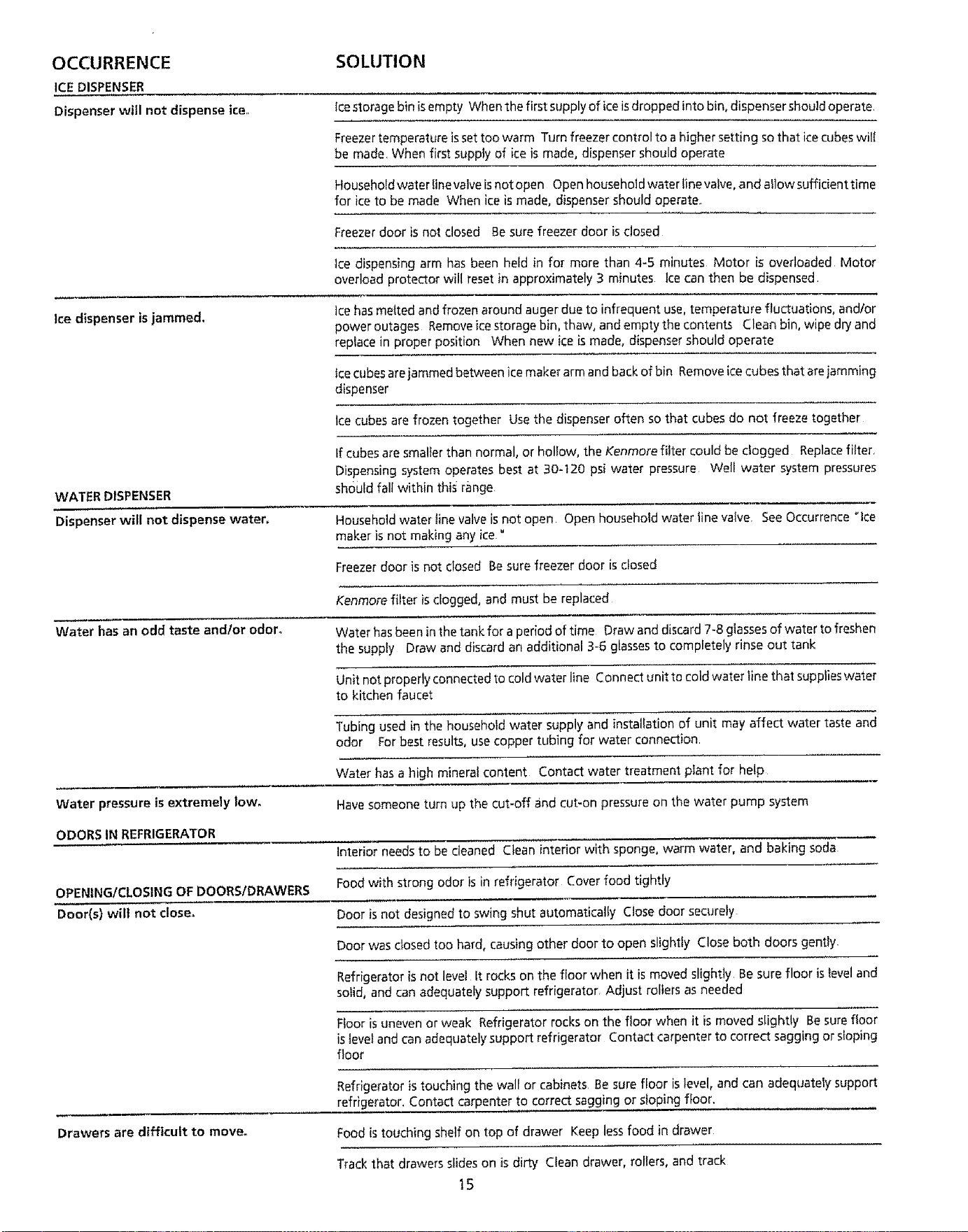
OCCURRENCE
ICE DISPENSER
Dispenser will not dispense ice,.
SOLUTION
icestorage bin isempty When the first supply of iceisdropped into bin, dispenser should operate
Freezertemperature issettoo warm Turn freezer controlto a higher setting so that icecubes will
be made When first supply of ice is made, dispenser should operate
Household water line valve isnot open Open household water tine valve, and allow sufficient time
for ice to be made When ice is made, dispenser should operate
Freezer door is not closed Be sure freezer door is closed
Ice dispensing arm has been held in for more than 4-5 minutes Motor is overloaded Motor
overload protector will reset in approximately 3 minutes Ice can then be dispensed
Ice dispenser is jammed.
Ice hasmelted and frozen around auger due to infrequentuse, temperature fluctuations, and/or
power outages Removeice storage bin, thaw, and empty the contents Cleanbin, wipedryand
replace in proper position When new ice is made, dispenser should operate
Icecubes arejammed between icemaker arm and back of bin Removeicecubes that are jamming
dispenser
Ice cubes are frozen together Use the dispenser often so that cubes do not freeze together
WATER DISPENSER
Dispenserwill not dispense water,
tf cubes are smalter than normal, or holtow, the Kenmore filter could be cfogged Replace fitter,
Dispensing system operates best at 30=t20 psi water pressure Well water system pressures
should fall within this range
Household water line valve is not open Open household water line valve. See Occurrence "ice
maker is not making any ice"
Freezer door is not closed Besure freezer door is closed
Kenmore filter isclogged, and must be replaced
Water has an odd taste andlor odor°
Water has been in the tank for a period of time Draw and discard 7-8 glassesof water to freshen
the supply Draw and discard an additional 3-6 glassesto completely rinse out tank
Unit not properly connected to coldwater line Connect unit to cold water line that supplieswater
to kitchen faucet
Tubing used in the household water supply and installation of unit may affect water taste and
odor Forbest results, use copper tubing for water connection
Water has a high mineral content Contact water treatment plant for help
Water pressure is extremely lowo Have someone turn up the cut*off and cut-on pressure on the water pump system
ODORS IN REFRIGERATOR
Interior needs to be cleaned Clean interior with sponge, warm water, and baking soda
OPENiNG/CLOSING OF DOORS/DRAWERS Food with strongodor is in refrigerator Cover food tightly
Door(s) will not close. Door is not designed to swing shut automatically Close door securely
Door was closed too hard, causing other door to open slightly Close both doors gently-
Refrigerator is not level It rocks on the floor when it is moved slightly Besure floor is level and
solid, and can adequately support refrigerator, Adjust rollers as needed
Floor is uneven or weak Refrigerator rocks on the floor when it ismoved slightly Be sure floor
is level and can adequately support refrigerator Contact carpenter to correct sagging or sloping
floor
Refrigerator is touching the wall or cabinets Be sure floor is level, and can adequately support
refrigerator. Contact carpenter to correct sagging or sloping floor.
Drawers are difficult to move°
Food is touching shelf on top of drawer Keep less food in drawer
Trackthat drawers slides on is dirty Clean drawer, rollers, and track
15
OCCURRENCE
LIGHT BULB 15 NOT ON
SOLUTION
Light bulb is burned out See "Replacing the Light Bulb" in Care and Cleaning°
Light sw_tch is stuck Light switch is located on interior door frame next to the temperature control
in each compartment Push in plunger to release
No electdc torrent is reaching refrigerator See Occurrence section RUNN_N_Or R_RIGERATOR,
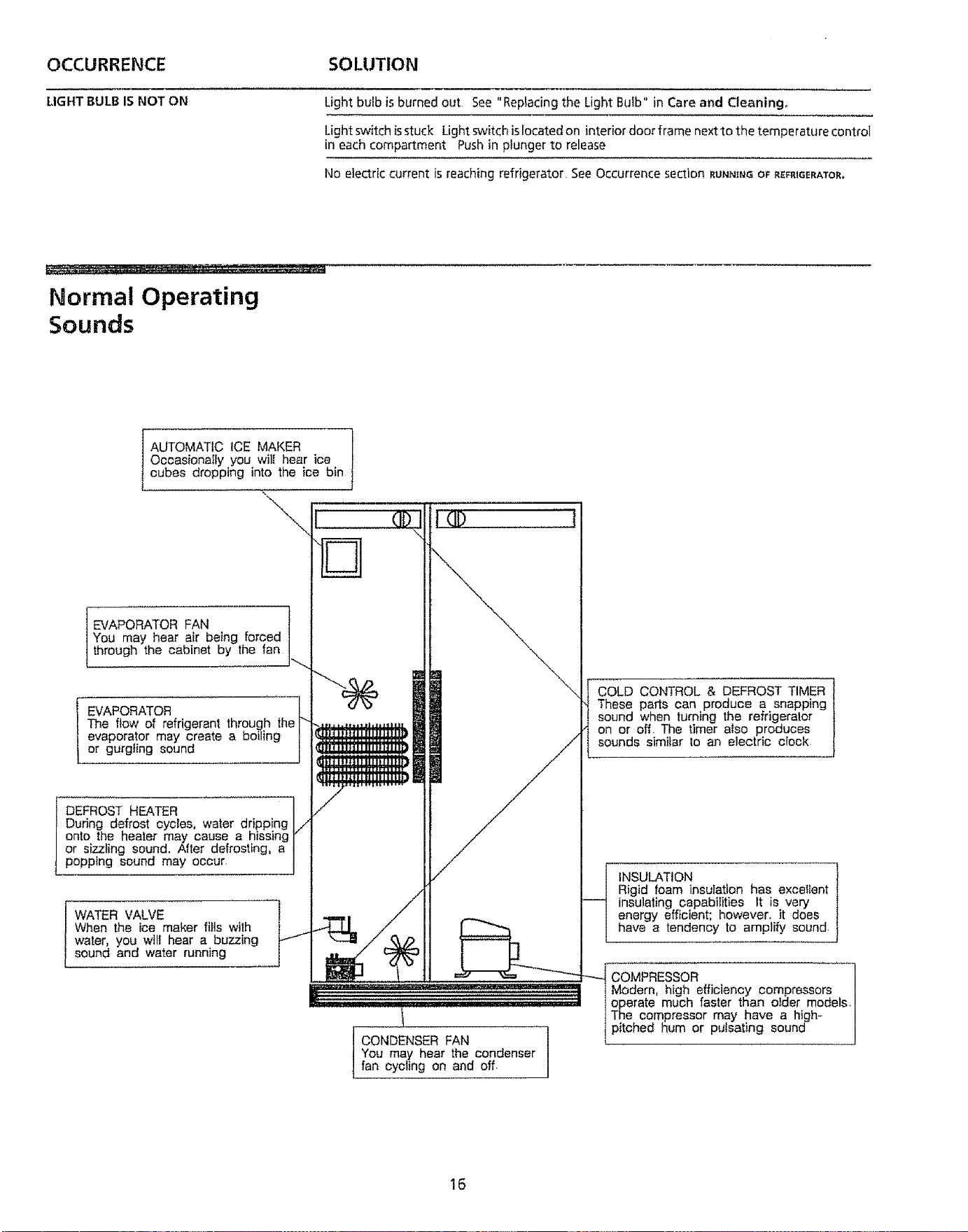
Normal Operating
Sounds
AUTOMATIC ICE MAKER
OccasionaIIy you wilt hear ice
cubes dropping into the ice bin
-\
EVAPORATOR FAN
You may hear air being forced
through the cabinet by the fan
EVAPORATOR
The flow of refrigerant through the
evaporator may create a boiling
or gurgling sound
DEFROST HEATER ]
During defrost cycies, water dripping ]/
onto the heater may cause a hissing ]"
or sizzling sound, After defrosting, a |
popping sound may occur J
WATER VALVE
When the ice maker fills with
water, you wilt hear a buzzing
sound and water running
CONDENSER FAN
You may hear the condenser
fan cycling on and off
COLD CONTROL & DEFROST TIMER
These parts can produce a snapping
sound when turning the refrigeraler
on or off The timer also produces
sounds similar to an electric cIock
INSULATION
Rigid foam insulation has excellent
insulating capabilities It is very
energy efficient; however, it does
have a tendency to amplify sound
_ COMPRESSOR
Modern, high efficiency compressors
operate much faster than otder models,
The compressor may have a high-
pitched hum or pulsating sound
16
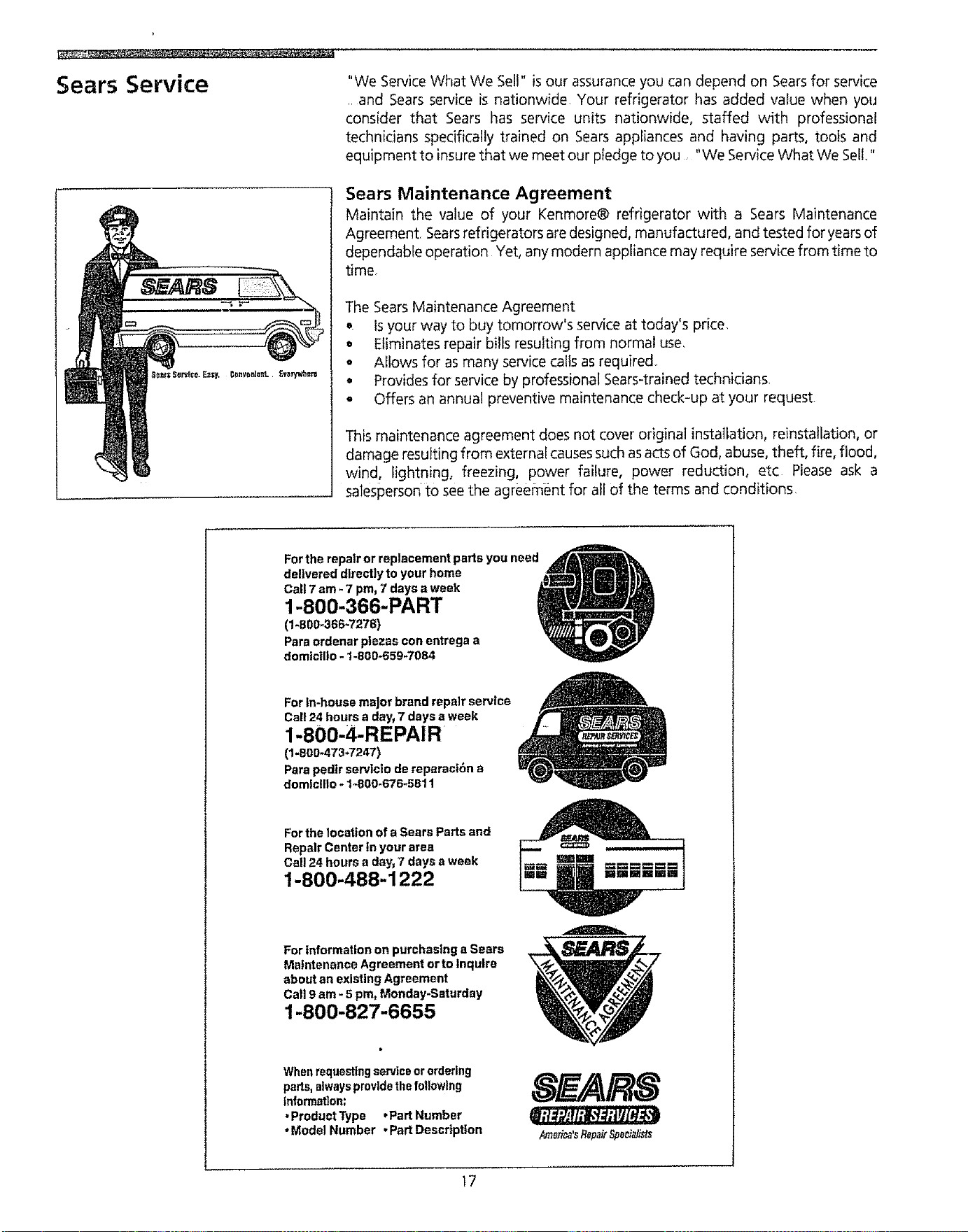
Sears Service
"We ServiceWhat We Sell" is our assurance you can depend on Searsfor service
, and Sears service is nationwide Your refrigerator has added value when you
consider that Sears has service units nationwide, staffed with professional
technicians specifically trained on Sears appliances and having parts, tools and
equipment to insure that we meet our pledge to you "We ServiceWhat We Sell"
Sears Maintenance Agreement
Maintain the value of your Kenmore® refrigerator with a Sears Maintenance
Agreement, Searsrefrigerators are designed, manufactured, and tested for years of
dependable operation Yet, any modern appliance may require service from time to
time
The Sears Maintenance Agreement
o. Is your way to buy tomorrow's service at today's price.
= Eliminates repair bills resulting from normal use.
• Allows for as many service calls as required.
° Provides for service by professional Sears-trained technicians.
• Offers an annual preventive maintenance check-up at your request.
This maintenance agreement does not cover original installation, reinstatlation, or
damage resulting from external causessuch as acts of God, abuse, theft, fire, flood,
wind, lightning, freezing, power failure, power reduction, etc Please ask a
salesperson tO see the agreement for all of the terms and conditions.
Fortherepairorreplacementpartsyouneed
delivereddirectlytoyourhome
Call7am- 7pm,7days a week
1-800-366-PART
(1-800-366-7278)
Paraordenarptezasconentregaa
domtc|lto - !-800_659-7084
ForIn-housemajorbrandrepairservice
Call24hoursa day_7 daysaweek
1-800-4-REPAIR
(1-800-473-7247)
ParepedIrserviciodereparaci6na
domlclllo - 1-800-676_5811
For the location of a Sears Parts and
RepairCenterinyourarea
Call24hoursa day, 7 daysa week
1-800-488-1222
ForInformationonpurchasinga Sears
MaintenanceAgreementortoinquire
aboutanexistingAgreement
Call9am- 5pro,Monday-Saturday
1-800-827-6655
Whenrequestingserviceorordering
parts,alwaysprovidethefollowing
information:
•ProductType ,Part Number
*ModelNumber •PartDescription
Amefi_'sRepairSpecialists
17
Refrigerator Warranty
Full One-Year Warranty on Refrigerator
For one year from date of purchase, when this refrigerator is
operated and maintained according to the instructions
provided in this Owner's Guide, Sears will repair this
refrigerator, free of charge, if defective in material or
workmanship
Full Five-Year Warranty on Sealed
Refrigeration System
For five yearsfrom the date of purchase, when this refrigerator
is operated and maintained according to the instructions
provided in this Owner's Guide, Sears will repair the sealed
system (consisting of refrigerant, connecting tubing, and
compressor motor), free of charge, if defective in material or
workmanship
The above warranty coverage applies only to refrigerators
which are used for storage of food for private household
purposes Excludes original and replacement Kenmore ice &
Water filter cartridges (if equipped with the filter system)
Original and replacement, cartridges arewarranted for 30 days
(parts only),
Warranty service is availabfe by contacting the NEAREST
SEARSSERVICECENTER/DEPARTMENTin the United States
or call 1-800-4-REPAIR,
For parts, call 1-800-FON-PART_
Thiswarranty givesyou specific legal rights, and you may have
other rights which vary from state to state,
SEARS, ROEBUCK and CO.
3333 Beverly Road
Hoffman Estates, IL 60179
t8
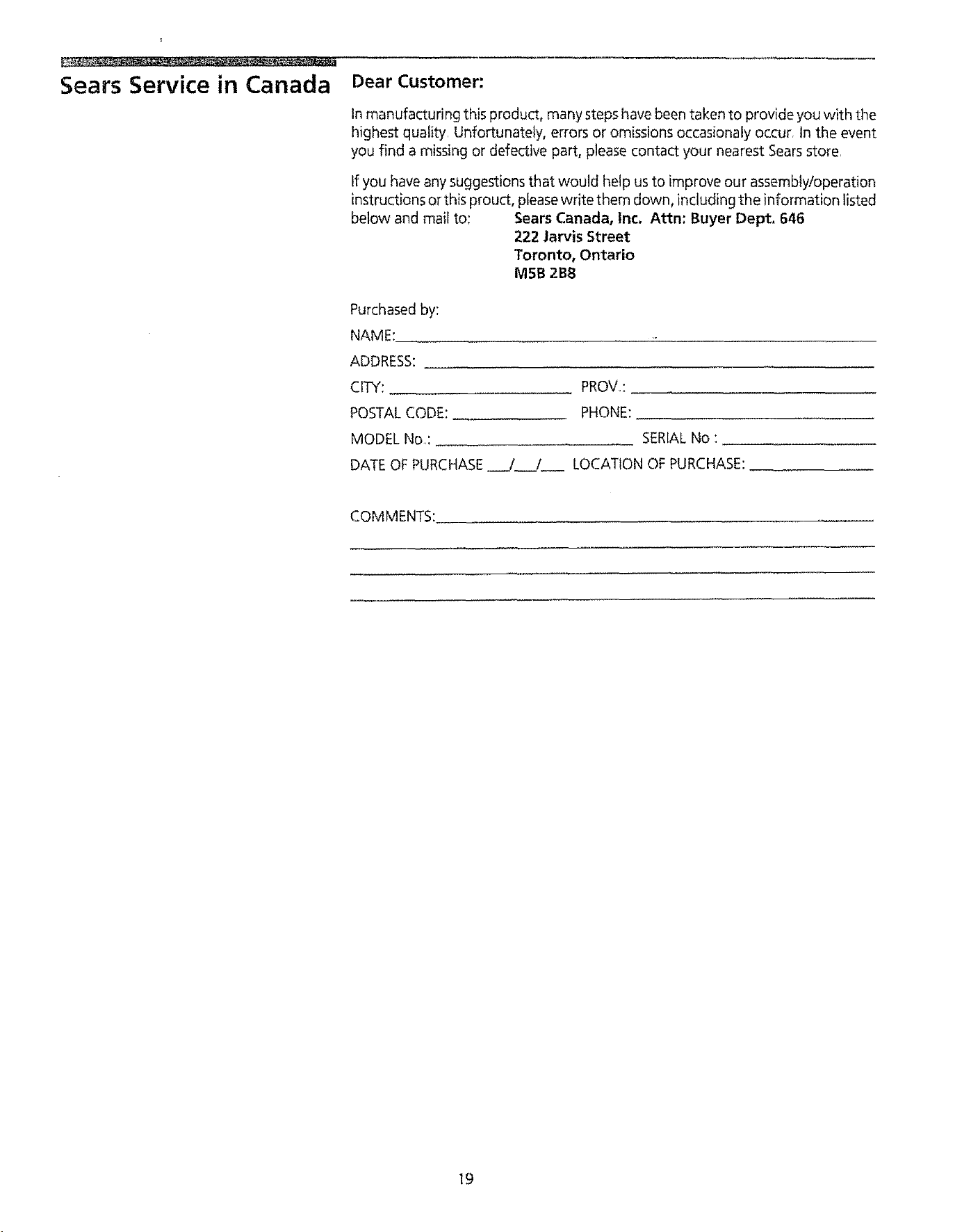
Sears Service in Canada
Dear Customer:
In manufacturing this product, many steps have been taken to provide you with the
highest quality. Unfortunately, errors or omissions occasionaly occur. In the event
you find a missing or defective part, please contact your nearest Searsstore.
tf you have any suggestions that would help us to improve our assembly/operation
instructions or this prouct, pleasewrite them down, including the information listed
below and mail to: Sears Canada, Inc. Attn: Buyer Dept. 646
222 Jan/is Street
Toronto, Ontario
MSB 2BB
Purchased by:
NAME:
ADDRESS:
CITY: PROVe:
POSTALCODE: PHONE:
MODEL No: SERIALNo :
DATEOF PURCHASE /._._/ LOCATION OF PURCHASE:
COMMENTS:
I9
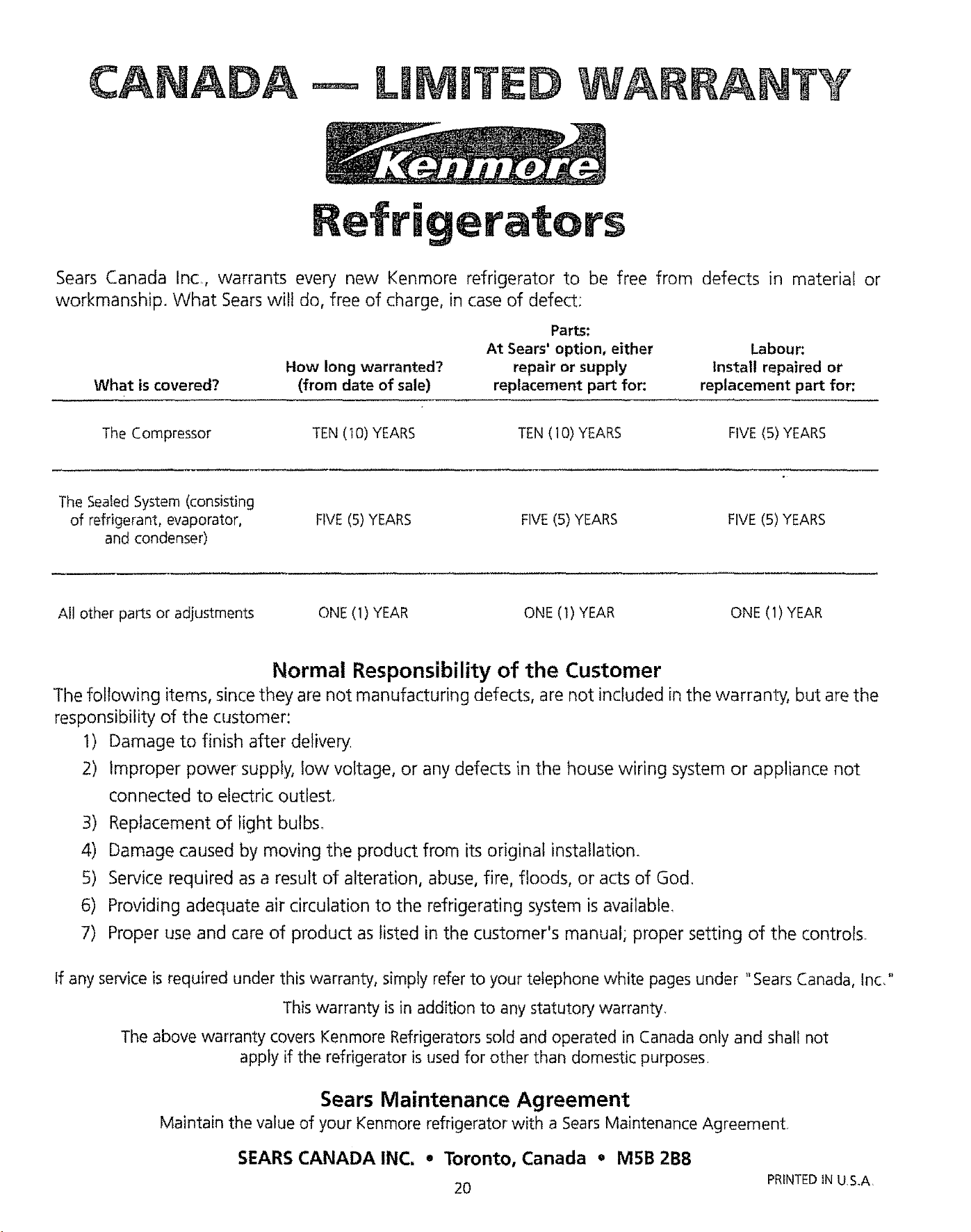
CANADA
WARRANTY
Refrigerators
Sears Canada InCr, warrants every new Kenmore refrigerator to be free from defects in material or
workmanship. What Sears wilt do, free of charge, in case of defect:
What is covered?
How long warranted?
(from date of sale)
Parts:
At Sears' option, either
repair or supply
replacement part for:
Labour:
install repaired or
replacement part for:
The Compressor
TEN (I0) YEARS TEN(10) YEARS FIVE(5) YEARS
The SeafedSystem (consisting
of refrigerant, evaporator,
and condenser)
FIVE(S)YEARS FIVE(5) YEARS FIVE(S) YEARS
All other parts or adjustments
ONE (1) YEAR ONE (1) YEAR ONE (1) YEAR
Normal Responsibility of the Customer
The following items, since they are not manufacturing defects, are not included in the warranty, but are the
responsibility of the customer:
1) Damage to finish after delivery
2) Improper power supply, low voltage, or any defects in the house wiring system or appliance not
connected to electric outlest.
3) Replacement of light bulbs.
4) Damage caused by moving the product from its original installation.
5) Service required as a result of alteration, abuse, fire, floods, or acts of God.
6) Providing adequate air circulation to the refrigerating system is available.
7) Proper use and care of product as listed in the customer's manual; proper setting of the controls.
If any service is required under this warranty, simply refer to your telephone white pages under "Sears Canada, Inc,"
This warranty is in addition to any statutory warranty
The above warranty covers Kenmore Refrigerators sold and operated in Canada only and shall not
apply if the refrigerator is used for other than domestic purposes.
Sears Maintenance Agreement
Maintain the value of your Kenmore refrigerator with a SearsMaintenance Agreement,
SEARS CANADA INC. * Toronto, Canada • M5B 2B8
20
PRINTED IN U,S.A,