®
Microwave Hood Combination
LJ "
Combinacion Microondas Campana
Models/Modelos
721.80402
721.80403
721.80404
721.80409
\
3828WSA8069 Sears, Roebuck and Co., Hoffman Estates, IL 60179 www.sears.com
Table of
Contents
Warranty ........................................................... 2
Microwave Oven Safety .............................. 3-5
Getting to Know Your
Microwave Oven .............................................. 6
How your kenmore microwave hood
combination works .......................................... 6
Radio interference .......................................... 6
Testing your microwave oven ......................... 6
Testing your dinnerware or cookware ............ 7
Operating safety precautions .......................... 7
Electrical connection ...................................... 7
Specifications .................................................. 8
Microwave oven features ............................... 8
Control panel features .............................. 9~10
Microwave Cooking Tips ......................... 11-12
Using Your Microwave Oven ....................... 13
Audible Signals ............................................. 13
Interrupting Cooking ...................................... 13
Clock ............................................................. 13
Child Lock ..................................................... 13
Kitchen Timer ................................................ 14
Exhaust Fan .................................................. 14
Cooktop Light ................................................ 14
Light Timer .................................................... 14
Express Defrost ............................................ 14
Add Minute .................................................... 15
Timed Cooking .............................................. 15
Two - Stage Cooking .................................... 15
Microwave Power Levels .............................. 16
Auto Defrost .................................................. 17
Auto defrost table .......................................... 18
Auto defrost table (Cont.) .............................. 19
Defrosting tips .............................................. 20
Hold Warm .................................................... 20
Using Quick Touch ........................................ 21
Auto Cook ..................................................... 22
Cooking guide for Auto Cook ........................ 22
Auto Reheat .................................................. 23
Cooking guide for Auto Reheat ..................... 23
Caring for Your Microwave Oven ........... 24-26
Caring for the filters ....................................... 25
Replacing the cooktop and oven lights .........26
Questions and Answers ................................ 27
Troubleshooting ....................................... 28-29
Master Protection Agreements ..................... 58
Service ............................................. Back cover
MicrowaveHood
Combination
Warranty
FULL ONE-YEAR WARRANTY ON
MICROWAVE HOOD COMBINATION
For one year from the date of purchase, if this
Kenmore Microwave Hood Combination fails due to
a defect in material or workmanship, Sears will
repair it free of charge.
FOUR YEAR LIMITED WARRANTY ON
MAGNETRON
For the second through the fifth year from the date
of purchase, if the magnetron in this oven fails due
to a defect in material or workmanship, Sears will
supply a new magnetron, free of charge.
Safety regulations, however, require the magnetron
to be installed by Sears, and you must pay the labor
cost of installation.
WARRANTY SERVICE 18AVAILABLE BY
8IMPLY CONTACTING 8EAR8 SERVICE AT
1-80O-4-MY-HOME_
This warranty applies only while this product is in
use in the United States.
This warranty gives you specific legal rights, and
you may also have other rights which vary from
state to state.
8ears, Roebuck and Co.,
Dept. 817WA,
Hoffman Estates, IL 60179
For service call:
1-80O-4-MY-HOME_
(1-800-469-4663)
Please record your model's information.
Whenever you call to request service for your
appliance, you need to know your complete model
number and serial number. You can find this
information on the model and serial number
label/plate at the upper side of cavity front in your
Microwave oven. Also, record the other information
shown below.
Model Number
Serial Number
Purchase Date
Microwave Oven Safety
Your safety and the safety of others are very important.
We have provided many important safety messages in this manual and on your appliance.
Always read and obey all safety messages.
This is the safety alert symbol.
This symbol alerts you to hazards that can kill or hurt you and others.
All safety messages will be preceded by the safety alert symbol and the word
"DANGER" or "WARNING." These words mean:
You will be killed or seriously injured
if you don't follow immediately instructions.
You can be killed or seriously injured
if you don't follow instructions.
All safety messages will identify the hazard, tell you how to reduce the chance of injury, and tell
you what can happen if the instructions are not followed.
IMPORTANT SAFETY INSTRUCTIONS
When using electrical appliances basic safety precautions should be followed, including the
following:
WARNING: To reduce the risk of burns,
electric shock, fire, injury to persons, or
exposure to excessive microwave energy:
• Read all instructions before using the
microwave oven.
• Read and follow the specific
"PRECAUTIONS TO AVOID POSSIBLE
EXPOSURE TO EXCESSIVE MICROWAVE
ENERGY" found in this section.
• The microwave oven must be grounded.
Connect only to properly grounded outlet.
See "GROUNDING INSTRUCTIONS" found
at the end of this section.
• Install or locate the microwave oven only in
accordance with the provided installation
instructions.
Some products such as whole eggs in the
shell and sealed containers - for example,
closed glass jars - are able to explode and
should not be heated in the microwave oven.
• Use the microwave oven only for its intended
use as described in this manual. Do not use
corrosive chemicals or vapors in the
microwave oven. This type of oven is
specifically designed to heat, cook, or dry
food. tt is not designed for industrial or
laboratory use.
• As with any appliance, close supervision is
necessary when used by children.
• Do not operate the microwave oven if it has
a damaged cord or plug, if it is not working
properly, or if it has been damaged or
dropped.
SAVE THESE INSTRUCTIONS
IMPORTANT SAFETY INSTRUCTIONS
•Themicrowaveovenshouldbe servicedonlyby •Donotstoreanythingdirectlyon topofthe
qualifiedservicepersonnel.Callan authorized
servicecompanyforexamination,repair,or
adjustment.
•Seedoor surfacecleaninginstructionsin the"Caring
forYourMicrowaveOven"section.
•To reducethe riskoffireintheovencavity:
- Donotovercookfood. Carefullyattendthe
microwaveovenwhenpaper,plastic,or other
combustiblematerialsare placedinsidethe ovento
facilitatecooking.
- Removewiretwist-tiesfrom paperorplasticbags
beforeplacingbagsinoven.
- Ifmaterialsinsidetheovenignite,keepovendoor
closed,turnovenoff,anddisconnectthepower
cord,or shutoff powerat thefuseor circuitbreaker
panel.
- Donotusethecavityforstoragepurposes.Donot
leavepaperproducts,cookingutensils,or foodin
thecavitywhennotin use.
•Thismicrowaveovenissuitableforuseaboveboth
gasandelectriccookingequipment.
•Thismicrowaveovenisintendedtobe usedabove
rangeswith maximumwidthd 36 inches(91cm).
•CleanVentilatingHoodsFrequently-Greaseshould
notbe allowedtoaccumulateon hoodor filter.
•Whenflamingfoods underthe hood,turnthefan on.
•Usecarewhencleaningthe vent-hoodfilter.
Corrosivecleaningagents,such aslye-basedoven
cleaners,maydamagethefilter.
•Oversizedfoodsor oversizedmetalutensilsshould
notbe insertedin themicrowaveovenas theymay
createafire orriskof electricshock.
•Donotcleanwith metalscouringpads. Piecescan
burnoffthe padand touchelectricalpartsinvolvinga
riskofelectricshock.
microwaveovenwhenthe microwaveovenisin
operation.
•Donotcoveror blockanyopeningsonthe
microwaveoven.
•Donotstorethis microwaveovenoutdoors.Donot
usethemicrowaveovennearwater- for example,
neara kitchensink,ina wet basement,neara
swimmingpool,or similarlocation.
•Donotimmersecordor pluginwater.
•Keepcordawayfrom heatedsurfaces.
•Donotletcordhangoveredgeoftableor counter.
•Donotmountovera sink.
•Donotcoverracksoranyotherpartof theovenwith
metalfoil.Thiswillcauseoverheatingof theoven.
•Liquids suchas water, coffee, or tea areableto
be overheated beyond the boiling pointwithout
appearing to be boilingdue to surface tension of
the liquid. Visible bubbling or boiling when the
container is removedfrom the microwave oven is
not always present. This could resultinvery hot
liquids suddenly boiling over when a spoon or
other utensil is inserted into the liquid. To reduce
the risk of injury to persons;
1) Donot overheat the liquid.
2) Stir the liquid both before and halfway through
heating it.
3) Do not use straight-sided containerswith
narrow necks.
4) After heating, allow the container to stand in the
microwave ovenfor a short time before
removing the container.
5) Use extreme carewhen inserting a spoonor
other utensil into the container.
SAVE THESE INSTRUCTIONS
PRECAUTIONS TO AVOID POSSIBLE
EXPOSURE TO EXCESSIVE MICROWAVE
ENERGY
(a) Do not attempt to operate this oven with the
door open since open-door operation can
result in harmful exposure to microwave
energy. It is important not to defeat or tamper
with the safety interlocks.
(b) Do not place any object between the oven
front face and the door or allow soil or cleaner
residue to accumulate on sealing surfaces.
(c)
(d)
Do not operate the oven if it is damaged. It is
particularly important that the oven door close
properly and that there is no damage to the:
(1) Door (bent),
(2) Hinges and latches (broken or loosened),
(3) Door seals and sealing surfaces.
The oven should not be adjusted or repaired
by anyone except properly qualified service
personnel.
Electrical
requirements
Observe all governing codes and
ordinances. A 120 Volt, 60 Hz, AC only,
15 or 20 amp fused electrical supply is
required. (A time-delay fuse is recommended.)
It is recommended that a separate circuit
serving only this appliance be provided.
Electrical Shock Hazard
Plug into a grounded 3 prong
outlet. Do not remove ground
prong. Do not use an adapter.
Do not use an extension cord.
Failure to follow these
instructions can result in death,
fire, or electrical shock.
GROUNDING INSTRUCTIONS
• For all cord connected appliances:
The microwave oven must be grounded.
In the event of an electrical short circuit,
grounding reduces the risk of electric
shock by providing an escape wire for the
electric current. The microwave oven is
equipped with a cord having a grounding
wire with a grounding plug. The plug must
be plugged into an outlet that is properly
installed and grounded.
WARNING: Improper use of the
grounding can result in a risk of electric
shock.
Do not use an extension cord. tf the power
supply cord is too short, have a qualified
electrician or serviceman install an outlet
near the microwave oven.
• For a permanently connected appliance:
The microwave oven must be connected
to a grounded, metallic, permanent wiring
system, or an equipment grounding
conductor should be run with the circuit
conductors and connected to the
equipment grounding terminal or lead on
the microwave oven.
Consult a qualified electrician or
serviceman if the grounding instructions
are not completely understood, or if doubt
exists as to whether the microwave oven
is properly grounded.
SAVE THESE INSTRUCTIONS
Gettingto KnowYour
MicrowaveOven
This section discusses the concepts behind microwave cooking. It also shows you the basics you need to know
to operate your microwave oven. Please read this information before you use your oven.
HOW YOUR KENMORE MICROWAVE HOOD
COMBINATION WORKS
Microwaveenergy isnot hot. Itcauses food to make
itsown heat, and it's thisheat thatcooks thefood.
Microwavesare likeTV waves, radiowaves, or
lightwaves. You cannot see them, butyou can see
what they do.
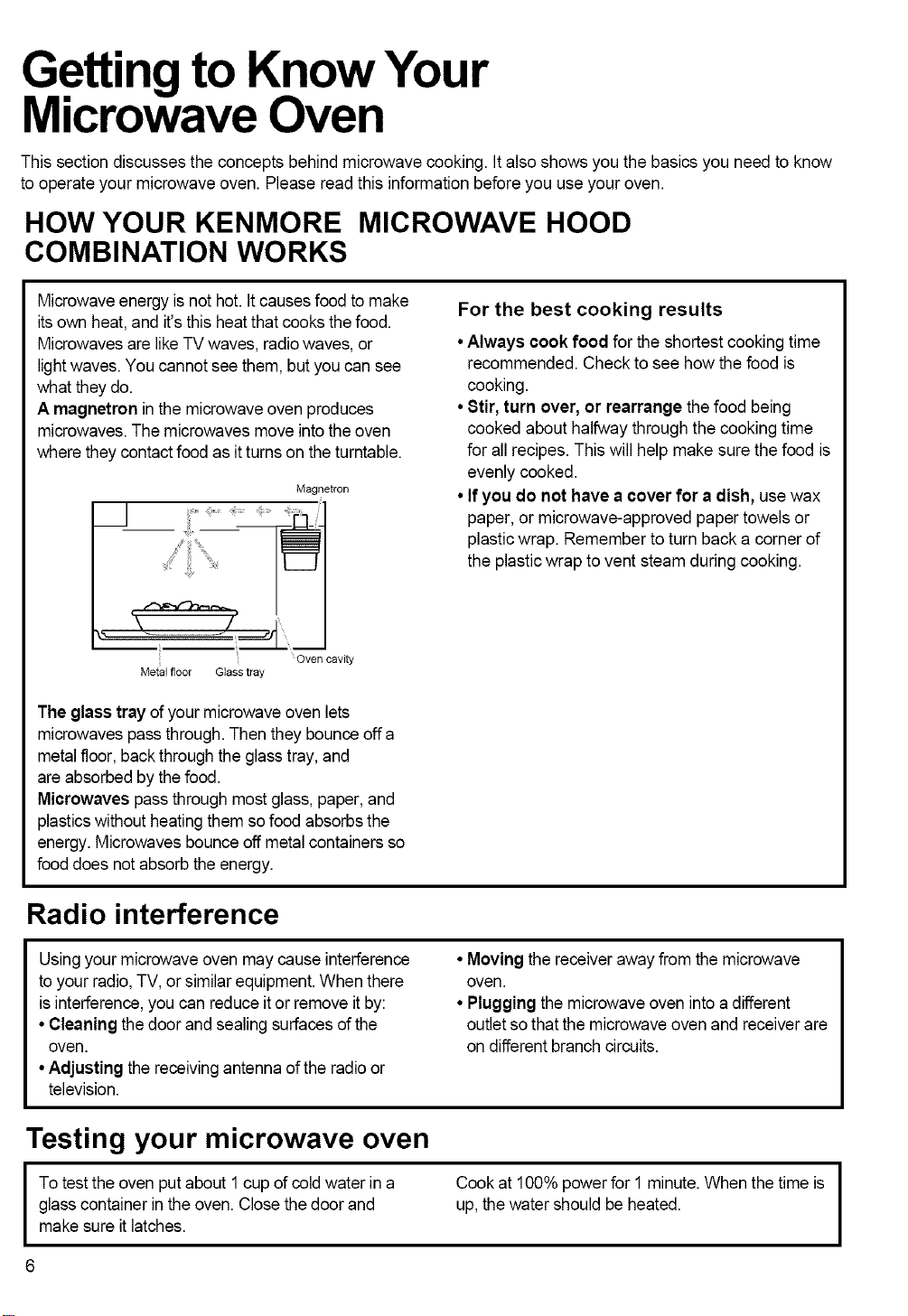
A magnetron in the microwave oven produces
microwaves.The microwaves move into theoven
where they contact food as it turns on theturntable.
Magnetron
Oven cavity
Metal floor G_ass tray
For the best cooking results
• Always cook food for the shortest cooking time
recommended. Check to see how the food is
cooking.
•Stir, turn over, or rearrange the food being
cooked abouthalfway through the cooking time
for allrecipes. Thiswillhelpmake sure the food is
evenly cooked.
• Ifyou do not have a cover for a dish, usewax
paper, or microwave-approved paper towels or
plasticwrap. Remember to turn back a corner of
the plastic wrap to vent steam during cooking.
The glass tray of yourmicrowave oven lets
microwavespass through. Then they bounce off a
metalfloor, back throughthe glass tray, and
are absorbed bythe food.
Microwaves pass through most glass, paper,and
plasticswithout heatingthem sofood absorbs the
energy. Microwaves bounceoff metal containersso
food does not absorb theenergy.
Radio interference
Usingyour microwave oven may cause interference
to your radio,TV, or similar equipment. When there
is interference, you can reduce itor remove it by:
• Cleaning the door and sealing surfaces of the
oven.
•Adjusting the receivingantenna of the radioor
television.
•Moving the receiverawayfrom the microwave
oven.
• Pluggingthe microwave oven into a different
outlet so that the microwave oven and receiver are
on differentbranch circuits.
Testing your microwave oven
I o testthe oven putabout 1cup of cold waterina
glass container in theoven. Close the door and
make sure itlatches.
Cook at 100% power for 1 minute. When the timeis
up, thewater should be heated.
I
Testing your dinnerware or cookware
Test dinnerware or cookware before using.To
test a dish forsafe use, put it into theoven with a
cup ofwater beside it. Cook at 100% cook power
for one minute. If the dish gets hot, do not use it.
Some dishes (melamine,some ceramic
dinnerware, etc.) absorb microwave energy,
becoming too hot to handleand slowing cooking
times. Cooking in metalcontainers not designed for
microwave use could damage theoven, as could
containers with hidden metal (twist-ties,foil lining,
staples, metallicglaze or trim).
Operating safety precautions
• Never lean on the door or allow a child toswing
on itwhen thedoor isopen.
• Use hot pads. Microwave energy does not heat
containers, butthe heatfrom the food can make
the container hot.
• Do not use newspaper or other printed paper in
the oven.
• Do not dry flowers, fruit, herbs,wood, paper,
gourds, or clothes in the oven.
• Do not start a microwaveoven when itis empty.
Product lifemay be shortened. If you practice
programming the oven, put a container ofwater in
the oven. It is normalfor the oven door to look
wavy after theoven has been running for awhile.
• Do not try to melt paraffinwax in the oven.
Paraffinwax will not melt in a microwave oven
because it allows microwavesto pass through it.
• Do not operate the microwave oven unless the
glass turntable issecurely in place and can move
freely. The turntable can move in eitherdirection.
Makesure the turntable iscorrect-side up in the
oven. Handle your turntable with carewhen
removing itfrom the ovento avoidpossibly
breaking it. Ifyour turntable cracks or breaks,
contact your dealer for a replacement.
•When you use a browning dish, the browning
dish bottom must be at least 3/16 inchabove the
turntable. Follow the directionssuppliedwith the
browningdish.
• Never cook or reheat a whole egg inside the
shell, Steam buildup in whole eggs may cause
them to burst, and possiblydamage the oven.
81icehard-boiled eggs before heating. In rare
cases, poached eggs have been known to
explode. Cover poached eggs and allow a
standing time of one minute before cuttinginto
them.
• For best results, stir any liquid several times
during heating or reheating. Liquids heated in
certain containers (especiallycontainersshaped
likecylinders) may become overheated.The liquid
may splash out with a loud noiseduring or after
heatingor when adding ingredients(coffee
granules, tea bags, etc.). This can harm you or
damage the oven.
• Microwaves may not reach thecenter ofa roast.
The heat spreads to thecenter from the outer,
cooked areasjust as in regularoven cooking. This
is one of the reasons for lettingsome foods (for
example, roastsor baked potatoes)stand for a
while after cooking,or for stirring some foods
during the cooking time.
• Do not deep fry in the oven. Microwavable
utensilsare notsuitable and it isdifficult to
maintain appropriatedeep-frying temperatures.
• Do not overcook potatoes. At the endof the
recommended cooking time, potatoes should be
slightlyfirm because they will continue cooking
during standing time.After microwaving, let
potatoesstand for 5 minutes.Theywill finish
cookinq while standinq.
Electrical connection
I If your electric power line or outletvoltage isless than 110 volts, cooking times may be longer.
I
Have a qualified electriciancheck your electrical
system.
I
SPECIFICATIONS
Power Supply
Rated Power Consumption
Microwave Output
Rated Current
Overall Dimensions(WxHxD)
Oven Cavity Dimensions(WxHxD)
Capacity of Oven Cavity
*IEC 60705 RATING STANDARD
Specifications subject to change without prior notice.
Microwave oven features
120V AC, 60 Hz
1560W
*1000W
13.3A
29 15/16"x 16 7/16" X 15 3/8"
21 1/4" x 9 7/16" X 14 3/16"
1.7 cu.ft
Jltll
®® ® ® ®
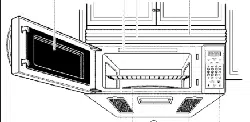
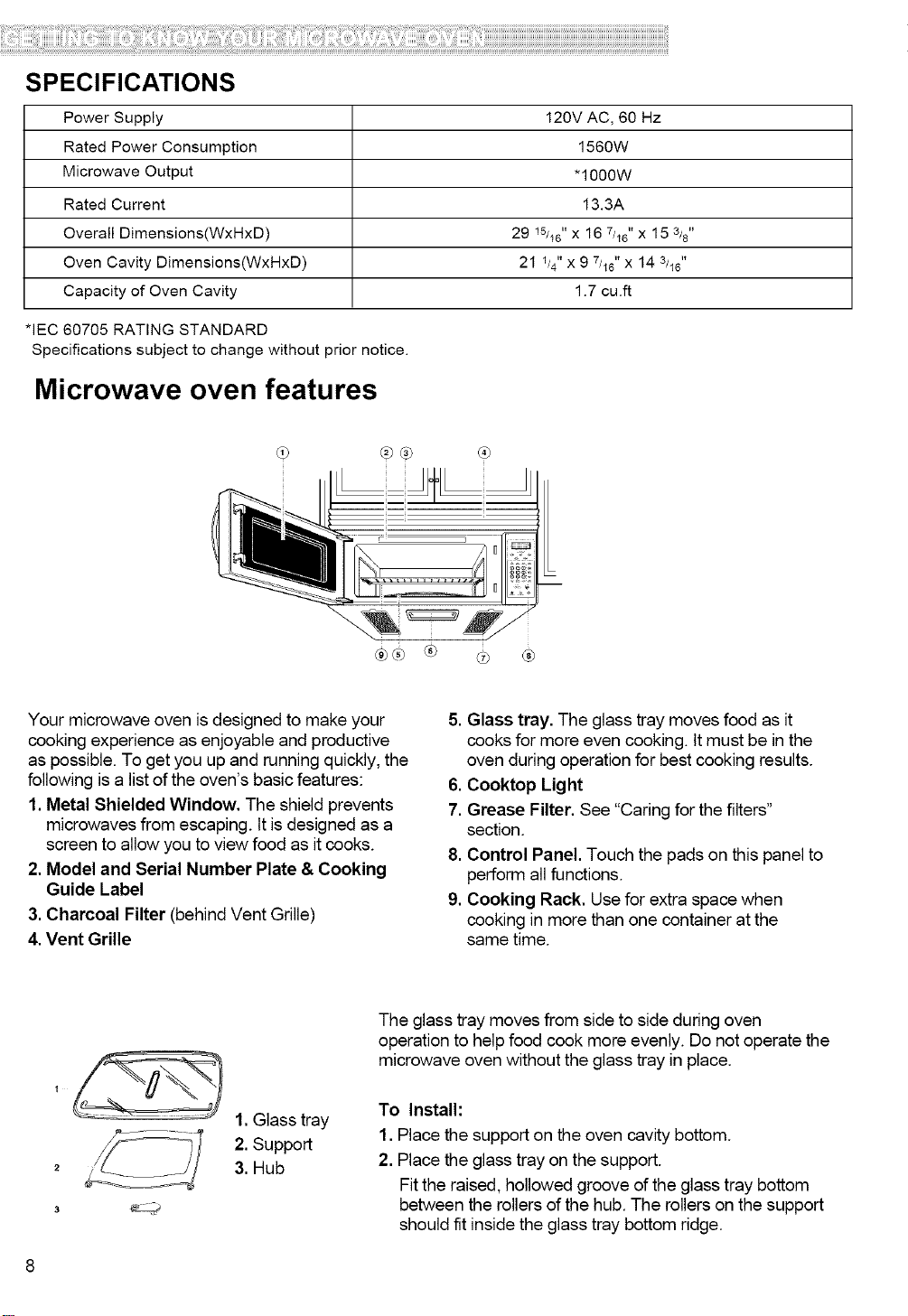
Your microwave oven is designed to make your
cooking experience as enjoyable and productive
as possible. To get you up and running quickly, the
following is a list of the oven's basic features:
1.Metal Shielded Window. The shield prevents
microwaves from escaping. It isdesigned as a
screen to allow you to view food as it cooks.
2. Model and Serial Number Plate & Cooking
Guide Label
3. Charcoal Filter (behind Vent Grille)
4. Vent Grille
.
.
7.
8.
9.
Glass tray. The glass tray moves food as it
cooks for more even cooking. It must be in the
oven during operation for best cooking results.
Cooktop Light
Grease Filter. See "Caring for the filters"
section.
Control Panel. Touch the pads on this panel to
perform all functions.
Cooking Rack. Use for extra space when
cooking in more than one container at the
same time.
2
3
1. Glass tray
2. Support
3. Hub
The glass tray moves from side to side during oven
operation to helpfood cook more evenly. Do not operate the
microwave oven without the glass tray in place.
To Install:
1. Place the support on the oven cavity bottom.
2. Place the glass tray on the support.
Fit the raised, hollowed groove of the glass tray bottom
between the rollers of the hub. The rollers on the support
should fit inside the glass tray bottom ridge.
Control panel features
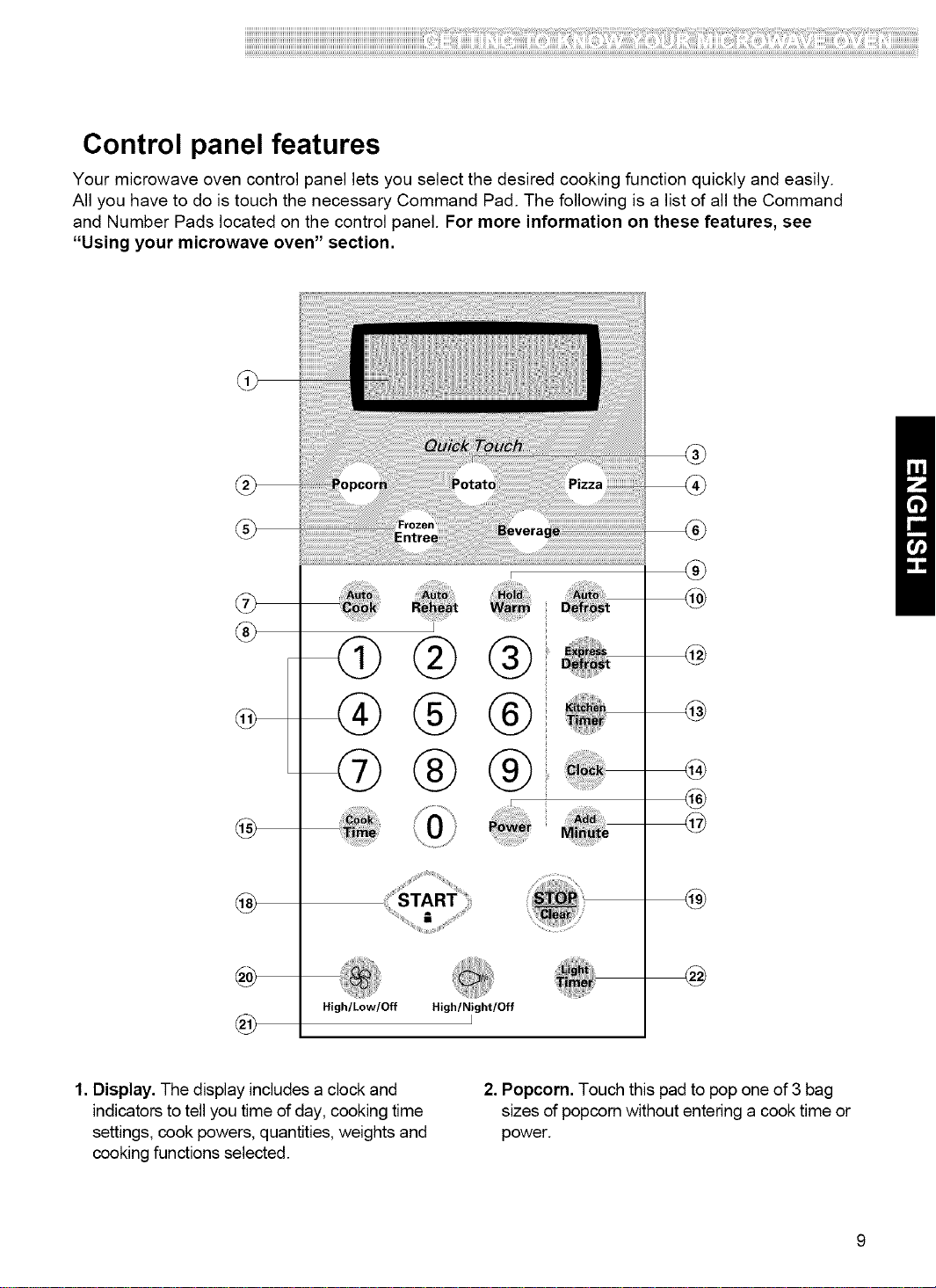
Your microwave oven control panel lets you select the desired cooking function quickly and easily.
All you have to do is touch the necessary Command Pad. The following is a list of all the Command
and Number Pads located on the control panel. For more information on these features, see
"Using your microwave oven" section.
®
@
@
I
High/Low/Off High/Night/Off
I
®
@
4@
@
@
1. Display. The display includes a clock and
indicators to tell you time of day, cooking time
settings, cook powers, quantities, weights and
cooking functions selected.
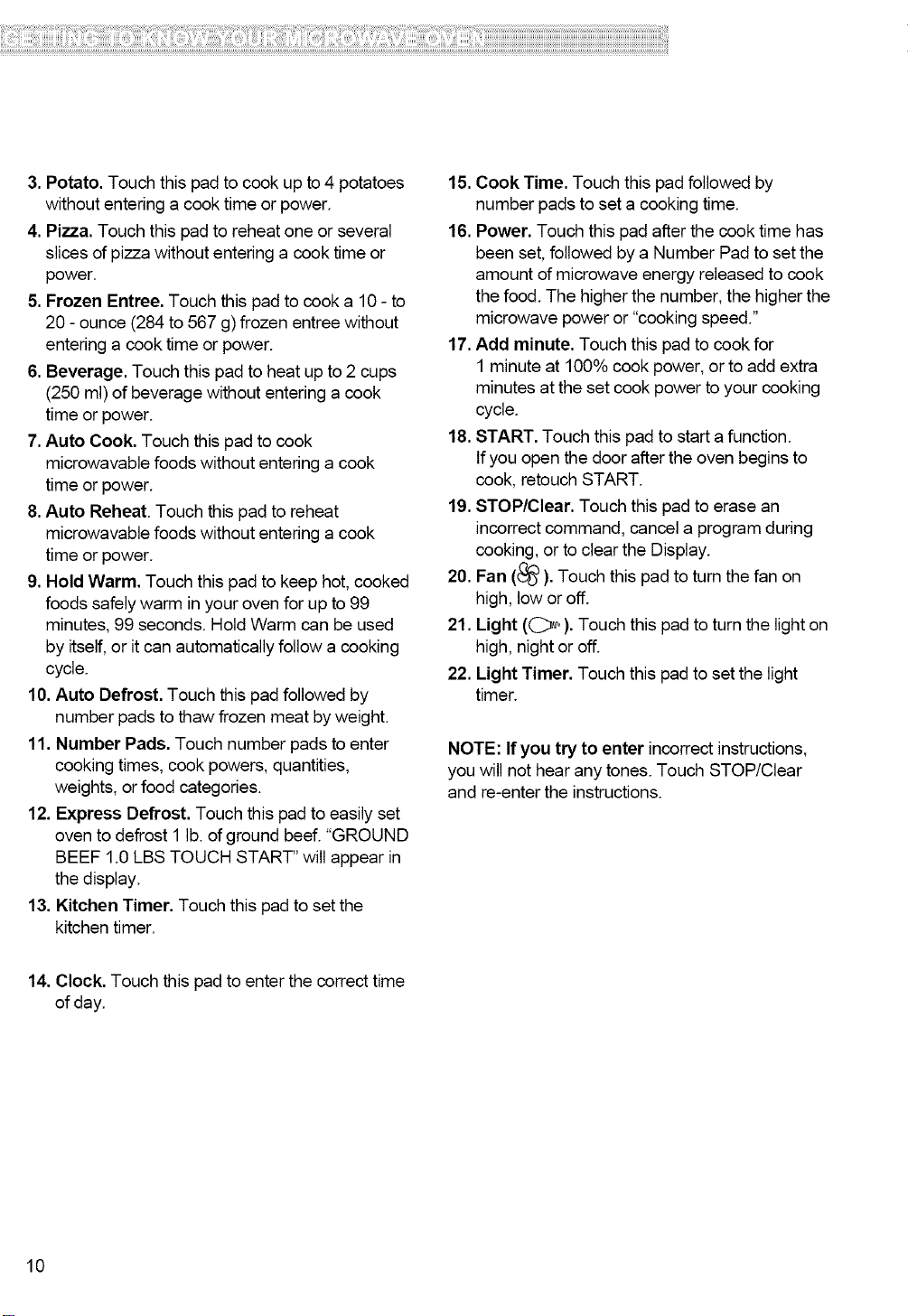
2. Popcorn. Touch this pad to pop one of 3 bag
sizes of popcorn without entering a cook time or
power.
3.Potato.Touchthispadtocookupto4potatoes
withoutenteringacooktimeorpower.
4.Pizza.Touchthispadtoreheatoneorseveral
slicesofpizzawithoutentering a cook time or
power.
5. Frozen Entree. Touch this pad to cook a 10 - to
20 - ounce (284 to 567 g) frozen entree without
entering a cook time or power.
6. Beverage. Touch this pad to heat up to 2 cups
(250 ml) of beverage without entering a cook
time or power.
7. Auto Cook. Touch this pad to cook
microwavable foods without entering a cook
time or power.
8. Auto Reheat. Touch this pad to reheat
microwavable foods without entering a cook
time or power.
9. Hold Warm. Touch this pad to keep hot, cooked
foods safely warm in your oven for up to 99
minutes, 99 seconds. Hold Warm can be used
by itself, or it can automatically follow a cooking
cycle.
10. Auto Defrost. Touch this pad followed by
number pads to thaw frozen meat by weight.
11. Number Pads. Touch number pads to enter
cooking times, cook powers, quantities,
weights, or food categories.
12. Express Defrost. Touch this pad to easily set
oven to defrost 1 lb. of ground beef. "GROUND
BEEF 1.0 LBS TOUCH START" will appear in
the display.
13. Kitchen Timer. Touch this pad to set the
kitchen timer.
15. Cook Time. Touch this pad followed by
number pads to set a cooking time,
16. Power. Touch this pad after the cook time has
been set, followed by a Number Pad to set the
amount of microwave energy released to cook
the food, The higher the number, the higher the
microwave power or "cooking speed."
17. Add minute. Touch this pad to cook for
1 minute at 100% cook power, or to add extra
minutes at the set cook power to your cooking
cycle.
18. START. Touch this pad to start a function.
If you open the door after the oven begins to
cook, retouch START.
19. STOP/Clear. Touch this pad to erase an
incorrect command, cancel a program during
cooking, or to clear the Display.
20. Fan (_). Touch this pad to turn the fan on
high, low or off.
21. Light ((_,,). Touch this pad to turn the light on
high, night oroff.
22. Light Timer. Touch this pad to set the light
timer.
NOTE: If you try to enter incorrect instructions,
you will not hear any tones. Touch STOP/Clear
and re-enter the instructions.
14. Clock. Touch this pad to enter the correct time
of day.
10
MICROWAVE COOKING TIPS
Amount of food
• Ifyou increase or decrease theamountoffood
you prepare,the time ittakes to cook that food will
alsochange. For example, ifyou double a recipe,
add a little morethan half the originalcooking time.
Check for doneness and, if necessary,add more
time in small increments.
Starting temperature of food
•The lowerthe temperature ofthefood beingput
intothe microwave oven, the longerittakes to cook.
Food at roomtemperature will be re-heatedmore
quicklythan food at refrigeratortemperature.
Composition of food
•Food with a lot of fat and sugar will be heated
faster than food containing a lotof water. Fat and
sugarwill also reach a higher temperature than
water in the cooking process.
•The more dense the food, the longerittakes to
heat. "Very dense"food likemeat takeslonger to
heat than lighter,more porousfood likesponge
cakes.
Size and shape
•Smaller pieces of food willcook faster than larger
pieces.Also, same-shaped pieces cook more
evenly than different-shaped pieces.
•With foods that have different thicknesses, the
thinner partswill cook faster than the thickerparts.
Place the thinnerparts of chickenwings and legs in
the center ofthe dish.
Stirring,turning foods
•Stirring and turning foods spreads heatquicklyto
the center ofthe dish and avoids overcooking atthe
outeredges of the food.
Covering food
Coverfood to:
• Reduce splattering
•Shorten cookingtimes
• Keep food moist
You can use any covering that lets microwavespass
through. See "Gettingto KnowYour Microwave
Oven"for materials thatmicrowaveswill pass
through. If you are usingthe Sensorfunction, be sure
to vent.
Releasingpressure infoods
•Severalfoods(forexample:bakedpotatoes,sausages,
eggyolks,andsomefruits)aretightlycoveredbya skinor
membrane.Steamcanbuildupunderthemembrane
duringcooking,causingthefoodto burst.Torelievethe
pressureandtopreventbursting,piercethesefoods
beforecookingwitha fork,cocktailpick,ortoothpick.
Using standingtime
•Alwaysallowfoodtostandeitherinor outoftheoven
aftercookingpowerstops.Standingtimeafterdefrosting
andcookingallowsthetemperaturetoevenlyspread
throughoutthefood,improvingthecookingresults.For
insideovenstandingtime, youcanprograma" 0" power
secondstageofthecookingcycle.SeeTwo-Stage
Cooking.
•Thelengthofthestandingtimedependsonhowmuch
foodyouarecookingandhowdenseitis.Sometimesit
canbe asshortasthetimeittakesyoutoremovethe
foodfromtheovenandtakeittotheservingtable.
However,withlarger,denserfooditem,thestandingtime
maybeaslongas10minutes.
Arranging food
Forbestresults,placefoodevenlyontheplate.Youcando
thisinseveralways:
•Ifyouarecookingseveralitemsofthesamefood,
suchasbakedpotatoes,placethemina ringpatternfor
uniformcooking.
•Whencookingfoods ofunevenshapesor thickness,
such aschickenbreasts,placethesmallerorthinner
areaofthefoodtowardsthecenterofthedishwhereitwill
beheatedlast.
•Layerthin slicesofmeatontopofeachother.
•Whenyou cookor reheatwholefish, scoretheskin-
thispreventscracking.
•Do notletfoodor acontainertouchthetoporsidesofthe
oven.Thiswillpreventpossiblearcing.
Using aluminum foil
Metalcontainersshouldnotbeusedina microwaveoven.
Thereare,however,someexceptions.Ifyouhave
purchasedfoodwhichisprepackagedinanaluminumfoil
container,refertotheinstructionsonthepackage.When
usingaluminumfoilcontainers,cookingtimesmaybe
longerbecausemicrowaveswillonlypenetratetheexposed
topofthefoodandnotthebottomorthesides.Ifyouuse
aluminumcontainerswithoutpackageinstructions,follow
theseguidelines:
11
MICROWAVE COOKING TIPS (CONT.)
Using aluminum foil (cont.)
• Placethe aluminum foil container ina glass bowl
and add some Water so that it covers the bottomof
the container, but notmore than 1/4in. (.64cm)
deep. This ensures even heatingof the container
bottom.
• Always remove thecontainer lid toavoid damage
to the oven.
• Use only undamagedcontainers.
• Do not use containers tallerthan 3/4in. (1.9cm).
• Container must be at least halffilled.
• To avoid arcing, there must bea minimum !/4 in.
(.64cm) between the aluminum container and the
walls of the oven and also between two aluminum
containers.
• Always place the containeron the turntable.
• Shield parts offood that may cook quickly, such
as wing tips and leg ends of poultry,with small
pieces ofaluminum foil."
• Heating food in aluminum foil containers usually
takes up todouble thetime compared to reheating
in plastic,glass, china, or paper containers.
The time when food isready will vary depending
upon the type of container you use.
• Let food stand for 2 to 3 minutes after heatingso
that heat isspread evenly throughout container.
Cooking you should not do in your
microwave oven
• Do not do canningof foods in the oven. Closed
glass jars may explode, resulting in damage to the
oven.
• Do not usethe microwave ovento sterilize objects
(babybottles, etc.). It isdifficult to keepthe oven at
the high temperature neededforsterilization.
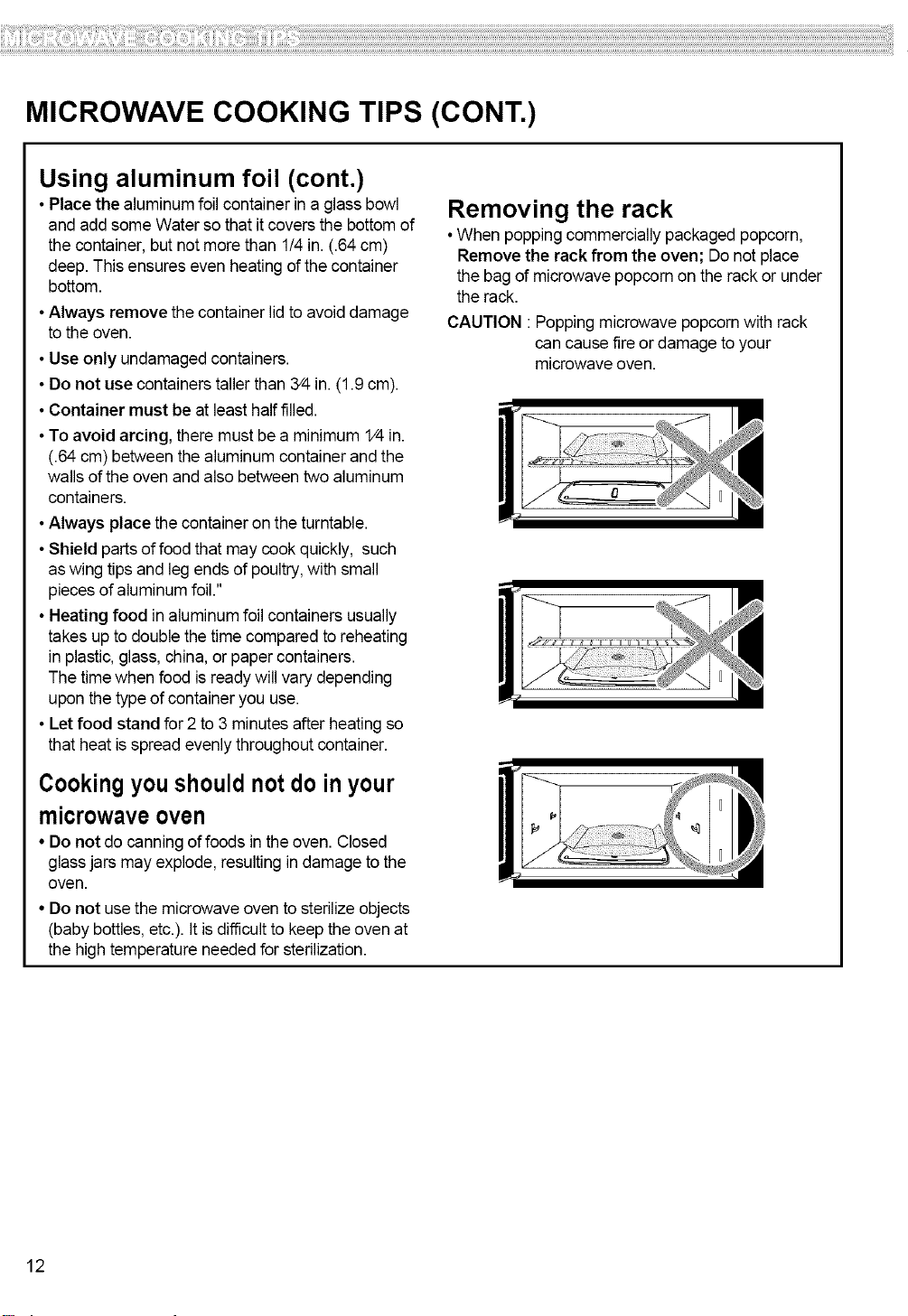
Removing the rack
• When popping commercially packaged popcorn,
Remove the rack from the oven; Do not place
the bag of microwave popcorn on the rack or under
the rack.
CAUTION :Popping microwave popcornwith rack
can cause fireor damage to your
microwave oven.
12
ii!i!i!i!i!i!i!i!i!i!i!i!i!i!i!i!i!i!i!i!i!i!i!i!i!i!i!i!i!i!i!i!i!i!i!i!i!i!i!i!i!i!i!i!i!i!i!i!i!i!i!i!i!i!i!i!i!i!i!i!i!i!i!i!i!i!i!i!i!i!i!i!i!i!i!i!i!i!i!i!i!i!i!i!i!i!i!i!i!i!i!i!i!i!i!i!i!i!i!i!i!i!i!i!i!i!i!i!i!i!i!i!i!i!i!i!i!i!i!i!i!i!i!i!i!i!i!i!i!i!i!i!i!i!i!i!i!i!i!i!i!i!i!i!i!i!i!i!i!i!i!i!i!i!i!i!i!i!i!i!i!i!i!i!i!i!i!i!i!i!i!i!i!i!i!i!i!i!i!i!i!i!i!i!i!i!i!i!i!i!i!i!i!i!i!i!i!i!i!i!i!i!i!i!i!i!iiiii!iiili!ii!iiiili!ii!ililliii!ii!if!filliiiiii!iiiiii!i!iilliiiiilli!iiiiiiii!!ii!iiiiiii!ii!ii!iiii!!il!ii!ii!ii!ii!ii!ii!ililiili!illi!iiiiiiiiiiliil!iiiiii!ii!!ii!i!!ii!iliiiiiilii!iiiiii!!i!!i!!if!illiii!iii!iiiii!iiiiii!iii!ii!i!!i!!i!!i!!ii!iliiiiiill!illiiliilliiiiiiiillii!ii!iiiiiii!ii!i!!i!ii!ii!ii!i!!iliiii!ii!ii!iiiiili!if!ii!iiiiiii!ii!ii!ii!iiiiiiiiiii!if!iilliiii!ii!iliii!iiiiiiii!iiiiiiiiii!ii!iiii!ii!iilillii!ii!i!iiliiiiii!ii!iiiiiiiiii!iiiiiiliiililii!il!ii!ii!iii!i!i!ii!iii!il!ii!ii!ii!ii!iiiiii!!ilfilliiiii!ii!iiiiiiiiii!if!illii!iili!i!i!i!iiii!iiiiiiliiiii!ii!iiiiii!!i!!i!!i!!i!!i!!i!!i!!i!!i!!i!!i!!i!!i!!i!!i!i!iili
Using Your Microwave
Oven
This section gives you instructions for operating
each function. Please read these instructions
carefully.
AUDIBLE SIGNALS
Audible signals are available to guide you when
setting and using your oven:
•A programming tone will sound each time
you toucha pad.
•Seven tones signal theend ofa Kitchen Timer
countdown.
• Four tones signal theend ofa cooking cycle.
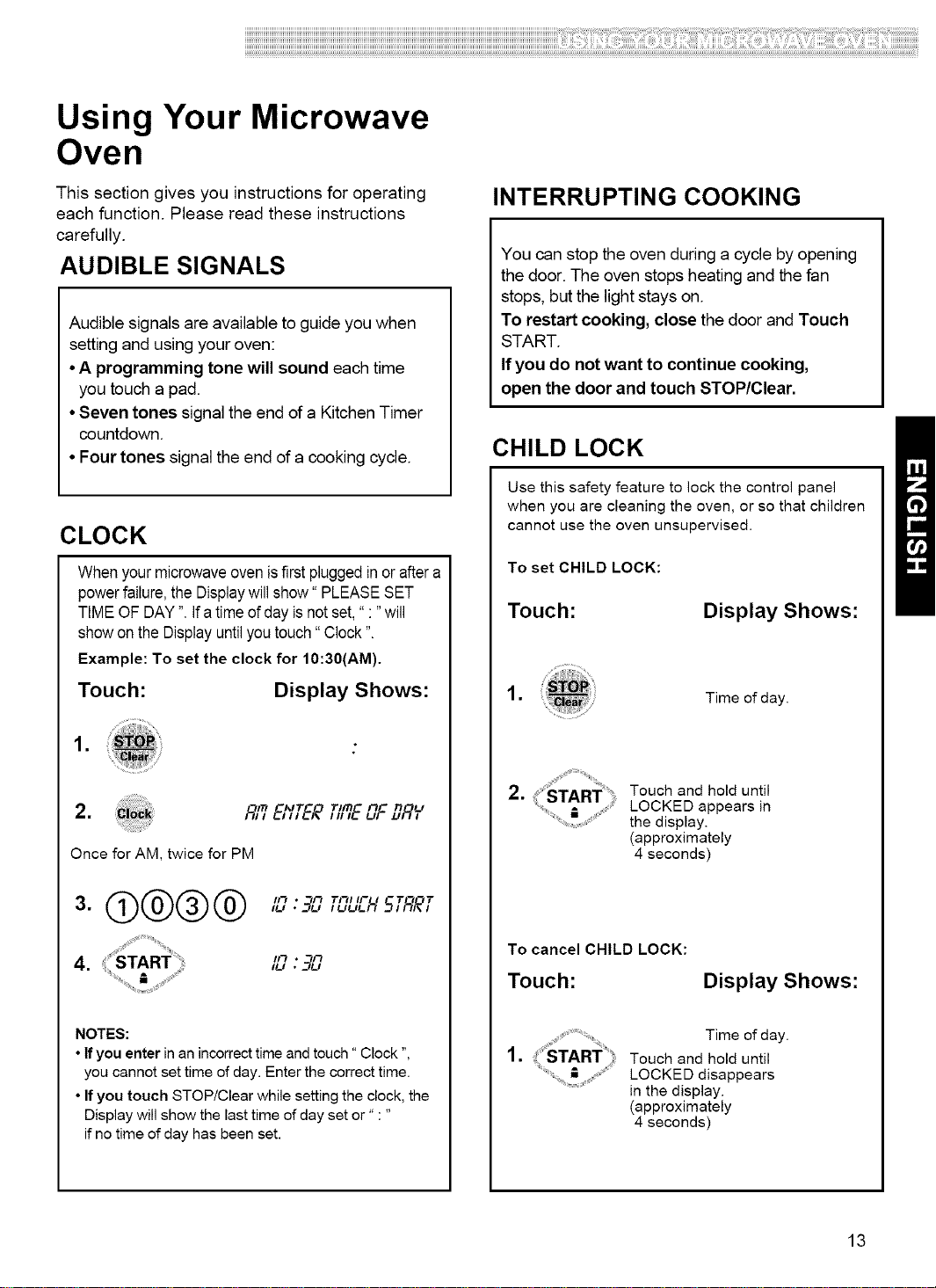
CLOCK
Whenyourmicrowaveovenisfirstpluggedin or aftera
power failure, the Display will show" PLEASE SET
TIME OF DAY ". Ifa time of day is not set, ":" will
showon the Displayuntilyoutouch" Clock".
Example: To set the clock for 10:30(AM).
Touch: Display Shows:
,
,
Once for AM, twice for PM
@@@@
4.
Tll'n l't Ti IJ
/_'_EI'ITER,, ,EJF,JR,
ll-' • 3[J TI'_I IF I -T"_'QT
l!_l * __£I
NOTES:
• If you enter in an incorrect time and touch" Clock ",
you cannot set time of day. Enter the correct time.
• If you touch STOP!Clear while setting the clock, the
Display will show the last time of day set or" : "
if no time of day has been set.
INTERRUPTING COOKING
You can stop the oven during a cycle by opening
the door. The oven stops heating and the fan
stops, but the light stays on.
To restart cooking, close the door and Touch
START.
If you do not want to continue cooking,
open the door and touch STOP/Clear.
CHILD LOCK
Use this safety feature to lock the control panel
when you are cleaning the oven, or so that children
cannot use the oven unsupervised.
To set CHILD LOCK:
Touch:
Display Shows:
,
Time of day.
2.' sTAR_" :, Touch and hold until
LOCKED appears in
the display.
(approximately
4 seconds)
To cancel CHILD LOCK:
Touch: Display Shows:
,
Time of day.
Touch and hold until
LOCKED disappears
in the display.
(approximately
4 seconds)
13
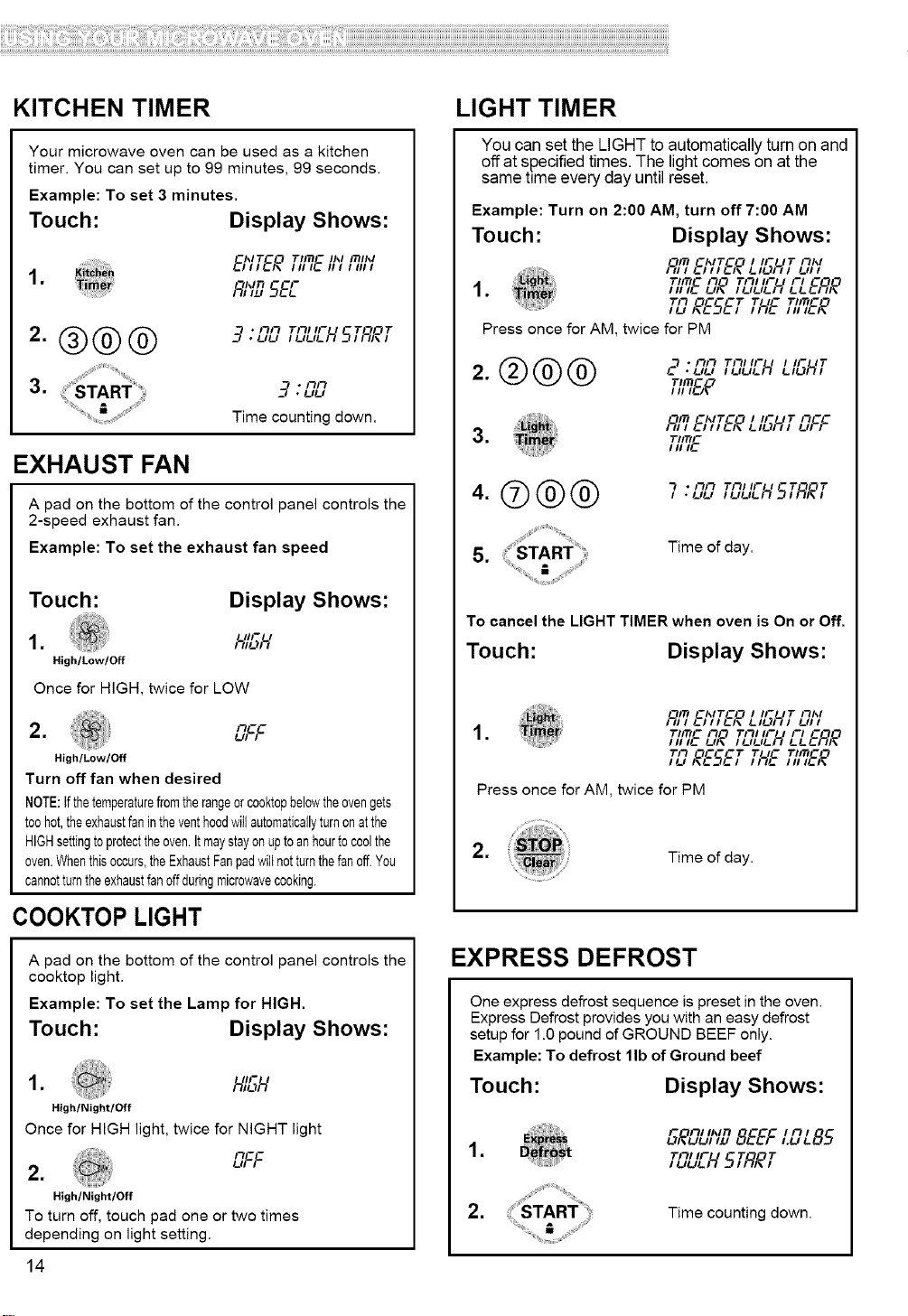
KITCHEN TIMER
Your microwave oven can be used as a kitchen
timer. You can set up to 99 minutes, 99 seconds.
Example: To set 3 minutes.
Touch: Display Shows:
EI;'TE_T,m-,,,,m,,,I II1_ III IIIII
1.
-_KIn -- --F
F;,,L,5E_
2.®®®
3.
* Fh'_
. UU T£_I IF t -T"_OTI ULIL_ _I//'_,\,
• t-ll--I
Time counting down.
EXHAUST FAN
A pad on the bottom of the control panel controls the
2-speed exhaust fan.
Example: To set the exhaust fan speed
Touch:
Display Shows:
_Ju_. I'1-- I
High/Low/Off
Once for HIGH, twice for LOW
2. L_c
High/Low/Off
Turn offfan when desired
NOTE:tfthetemperaturefromtherangeor cooktopbelowtheovengets
toohot,theexhaustfanintheventhoodwillautomaticallyturnonatthe
HIGHsettingto protecttheoven.Itmaystayonupto anhourtocoolthe
oven.Whenthisoccurs,theExhaustFanpadwiltnotturnthefan off.You
cannotturntheexhaustfanoffduringmicrowavecooking.
COOKTOP LIGHT
A pad on the bottom of the control panel controls the
cooktop light.
Example: To set the Lamp for HIGH.
Touch: Display Shows:
1. h_'L;h'
High/Night/Off
Once for HIGH light, twice for NIGHT light
OFF
2.
High/Night/Off
To turn off, touch pad one or two times
depending on light setting.
14
LIGHT TIMER
You can set the LIGHT to automaticallyturn on and
off at specified times. The lightcomes on at the
same time every day until reset.
Example: Turn on 2:00 AM, turn off 7:00 AM
Touch: Display Shows:
I_'7_';'T&?LIL;HTLTI;'
1. _;'TEL_a _LTLIL-HL-L&q,a
TF_ OC-CT T,mco
Press once for AM, twice for PM
2.®@@
").nn Tn,,- ,,-IT
TIIT) -/.7
"_17_ C'_ITCO ' IF IT I-ICC
3, T,ITIC
I II ,I_
4.7(0® ®
s.
7 .nn Tn,,- , -T'_',"•uu ..,.,_.H5,/_(,
Time of day.
To cancel the LIGHT TIMER when oven is On or Off,
Touch: Display Shows:
,
"3/TI ChITCO ' 'F IT /'3'_I
T,ITIC I'_0 TFI, II- I I-, C'10
Ill II- Ul\ IUUL)L_ I__.I_)_1\
TO OC-CT TImCO
iu i,t_St_l TL?_CIll ,t_l,
Press once for AM, twice for PM
,
Time of day.
EXPRESS DEFROST
One express defrost sequence is preset in the oven.
Express Defrost provides you with an easy defrost
setup for 1.0 pound of GROUND BEEF only.
Example: To defrost lib of Ground beef
Touch:
Display Shows:
F FII iK,n i Fi,
o_?12,_,1i_ BEEFi.__.85
1, Till IF
Iuu_.H5TflRT
2. Time counting down.
ii!i!i!i!i!i!i!i!i!i!i!i!i!i!i!i!i!i!i!i!i!i!i!i!i!i!i!i!i!i!i!i!i!i!i!i!i!i!i!i!i!i!i!i!i!i!i!i!i!i!i!i!i!i!i!i!i!i!i!i!i!i!i!i!i!i!i!i!i!i!i!i!i!i!i!i!i!i!i!i!i!i!i!i!i!i!i!i!i!i!i!i!i!i!i!i!i!i!i!i!i!i!i!i!i!i!i!i!i!i!i!i!i!i!i!i!i!i!i!i!i!i!i!i!i!i!i!i!i!i!i!i!i!i!i!i!i!i!i!i!i!i!i!i!i!i!i!i!i!i!i!i!i!i!i!i!i!i!i!i!i!i!i!i!i!i!i!i!i!i!i!i!i!i!i!i!i!i!i!i!i!i!i!i!i!i!i!i!i!i!i!i!i!i!i!i!i!i!i!i!i!i!i!i!i!i!iiiii!iiili!ii!iiiili!ii!ililliii!ii!if!filliiiiii!iiiiii!i!iilliiiiilli!iiiiiiii!!ii!iiiiiii!ii!ii!iiii!!il!ii!ii!ii!ii!ii!ii!ililiili!illi!iiiiiiiiiiliil!iiiiii!ii!!ii!i!!ii!iliiiiiilii!iiiiii!!i!!i!!if!illiii!iii!iiiii!iiiiii!iii!ii!i!!i!!i!!i!!ii!iliiiiiill!illiiliilliiiiiiiillii!ii!iiiiiii!ii!i!!i!ii!ii!ii!i!!iliiii!ii!ii!iiiiili!if!ii!iiiiiii!ii!ii!ii!iiiiiiiiiii!if!iilliiii!ii!iliii!iiiiiiii!iiiiiiiiii!ii!iiii!ii!iilillii!ii!i!iiliiiiii!ii!iiiiiiiiii!iiiiiiliiililii!il!ii!ii!iii!i!i!ii!iii!il!ii!ii!ii!ii!iiiiii!!ilfilliiiii!ii!iiiiiiiiii!if!illii!iili!i!i!i!iiii!iiiiiiliiiii!ii!iiiiii!!i!!i!!i!!i!!i!!i!!i!!i!!i!!i!!i!!i!!i!!i!!i!i!iili
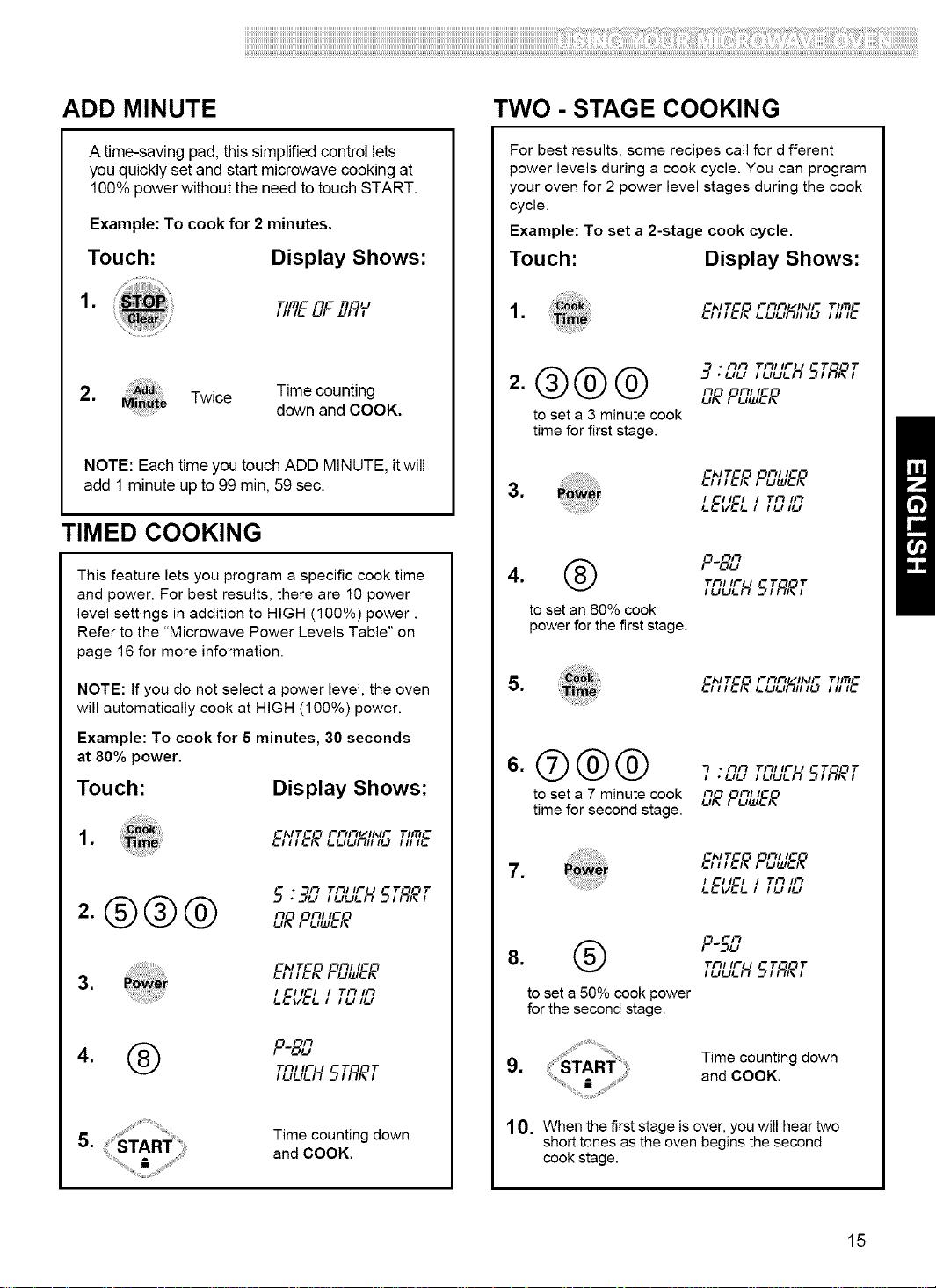
ADD MINUTE
A time-saving pad, this simplifiedcontrol lets
you quickly set and startmicrowave cooking at
100% power withoutthe needto touchSTART.
Example: To cook for 2 minutes.
Touch: Display Shows:
,
TII_ n n U
,,,,EuF _,'F/,
2. Twice Time counting
down and COOK.
NOTE: Eachtime you touch ADD MINUTE, itwill
add 1 minute up to 99 min, 59 sec.
TIMED COOKING
This feature lets you program a specific cook time
and power. For best results, there are 10 power
level settings in addition to HIGH (100%) power.
Refer to the "Microwave Power Levels Table" on
page 16 for more information.
NOTE: If you do not select a power level, the oven
will automatically cook at HIGH (100%) power.
Example: To cook for 5 minutes, 30 seconds
at 80% power.
Touch: Display Shows:
,
-'_IT -- --I I--I"11"1/II_II--
E' ' I E_ !-!-,l-,r_lll I1_'1 ITIIT)II'E-
* /'7 -T'30T
l L,/_,/_H 51/_l\ l
-MT-O "_1"_1 I-"_
E,,,E,. Fu.,_F.
3.
4. F-&.,
TI_, II- I -T_L_T
i t_,/_,/_ _ 511_1,1
,
Time counting down
and COOK.
TWO - STAGE COOKING
For best results, some recipes call for different
power levels during a cook cycle. You can program
your oven for 2 power level stages during the cook
cycle.
Example: To set a 2-stage cook cycle.
Touch: Display Shows:
, E,,,f,, _uu_, ,_ ,T'm,,f-
=®@@
to set a 3 minute cook
time for first stage.
__ * /'7/'7 TI_, II- - T "_0 T• uu I/_#_#_IL/_-I I_I, I
£30 "_£_1 t-O
UI, Fu_,fl,
..... -'_IT-!_ --II--II l--I
........................................... fill fl" Fl..l_lf_
3. _w_ , -,,-, Tn,n
_f_/'E_I ,u ,u
4. @ F-&.,
TI_, II- I -T-_OT
to set an 80% cook
power for the first stage.
,
--I_1T -- --I I--I"11"1/ll_'l-
fill E_ l..IJIJf_ll111.,.'I ITIITil'If-
7
to set a 7 minute cook u_£_"_/iu_fl,'_£_' -o
time for second stage.
-M T - -I _1_11 - -I
7. b ,,fF, F_,_,f_
, -,,-, Tn,n
cf_/'EcI ,c,,u
"3 -F)
8. F 5_.,
/ t_,/_,/_ H 5l/_,,I
to set a 50% cook power
for the second stage.
,
Time counting down
and COOK.
10. When the first stage is over, you will hear two
short tones as the oven begins the second
cook stage.
15
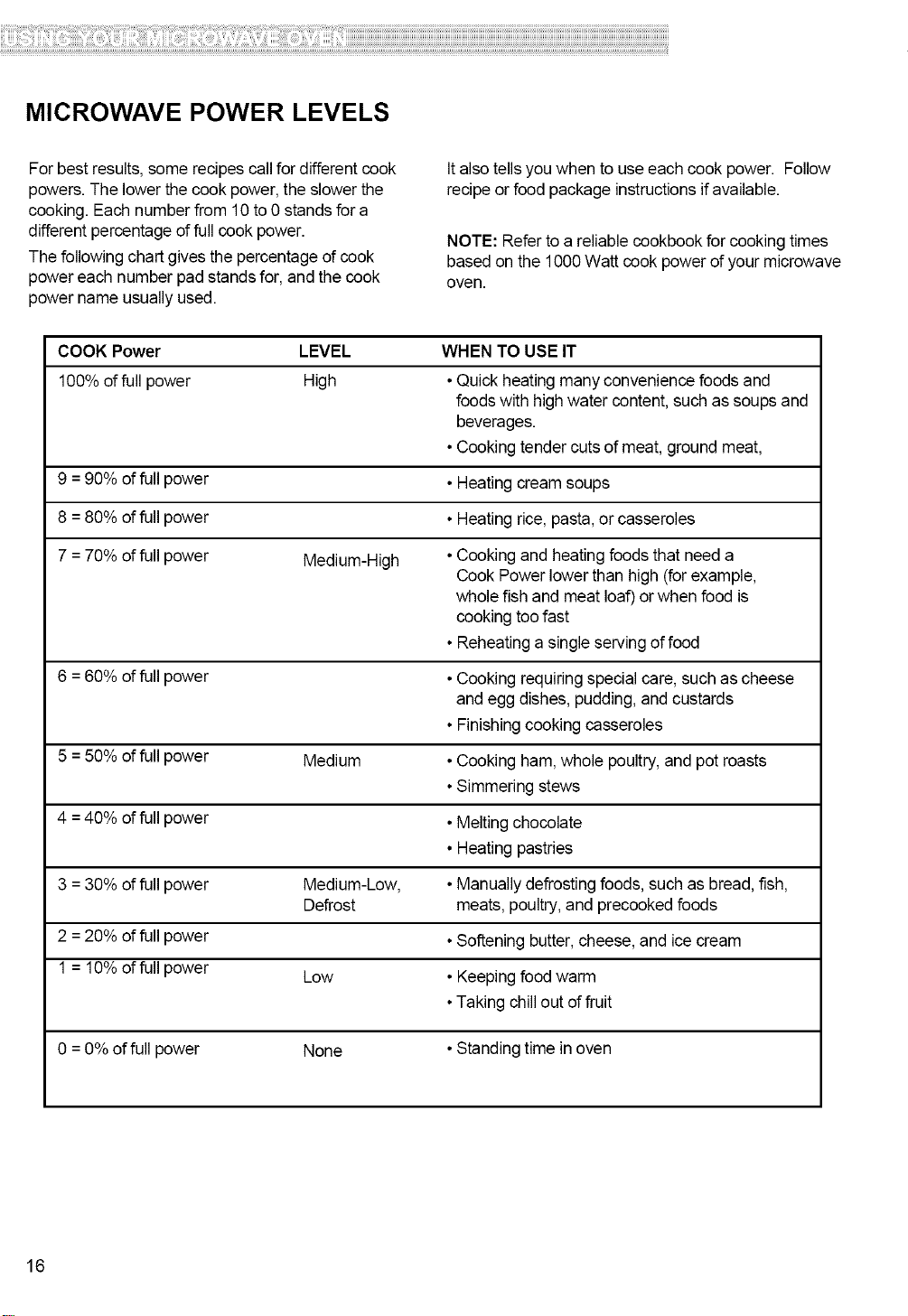
MICROWAVE POWER LEVELS
Forbest results, some recipes callfor different cook
powers.The lower the cook power, the slower the
cooking. Eachnumber from 10 to 0 stands for a
different percentage of fullcook power.
The following chart gives the percentage of cook
powereach number pad standsfor, and the cook
power name usually used.
It also tells youwhen to useeach cook power. Follow
recipe or food package instructions ifavailable.
NOTE: Refer to a reliable cookbook for cookingtimes
based on the 1000Watt cook power of your microwave
oven.
COOK Power LEVEL
100% of full power High
9 =90% of full power
8 =80% of full power
7 = 70% of full power Medium-High
6 =60% of full power
5 = 50% of full power Medium
4 =40% of full power
3 =30% of full power Medium-Low,
Defrost
2 =20% of full power
1 = 10% of full power Low
WHEN TO USE IT
•Quick heating many convenience foodsand
foods with high water content, such as soups and
beverages.
• Cooking tendercuts of meat, ground meat,
• Heating cream soups
• Heating rice, pasta,or casseroles
• Cooking and heatingfoods that need a
Cook Power lower than high (forexample,
whole fish and meat loaf) or when food is
cooking too fast
• Reheating a single serving offood
• Cooking requiring special care, such as cheese
and egg dishes, pudding, and custards
• Finishingcooking casseroles
• Cooking ham, whole poultry, and pot roasts
• Simmering stews
• Meltingchocolate
• Heating pastries
• Manually defrostingfoods, such as bread, fish,
meats, poultry,and precookedfoods
• Softening butter,cheese, and icecream
• Keeping foodwarm
•Taking chillout of fruit
0 =0% of full power None • Standingtime in oven
16
ii!i!i!i!i!i!i!i!i!i!i!i!i!i!i!i!i!i!i!i!i!i!i!i!i!i!i!i!i!i!i!i!i!i!i!i!i!i!i!i!i!i!i!i!i!i!i!i!i!i!i!i!i!i!i!i!i!i!i!i!i!i!i!i!i!i!i!i!i!i!i!i!i!i!i!i!i!i!i!i!i!i!i!i!i!i!i!i!i!i!i!i!i!i!i!i!i!i!i!i!i!i!i!i!i!i!i!i!i!i!i!i!i!i!i!i!i!i!i!i!i!i!i!i!i!i!i!i!i!i!i!i!i!i!i!i!i!i!i!i!i!i!i!i!i!i!i!i!i!i!i!i!i!i!i!i!i!i!i!i!i!i!i!i!i!i!i!i!i!i!i!i!i!i!i!i!i!i!i!i!i!i!i!i!i!i!i!i!i!i!i!i!i!i!i!i!i!i!i!i!i!i!i!i!i!i!iiiii!iiili!ii!iiiili!ii!ililliii!ii!if!filliiiiii!iiiiii!i!iilliiiiilli!iiiiiiii!!ii!iiiiiii!ii!ii!iiii!!il!ii!ii!ii!ii!ii!ii!ililiili!illi!iiiiiiiiiiliil!iiiiii!ii!!ii!i!!ii!iliiiiiilii!iiiiii!!i!!i!!if!illiii!iii!iiiii!iiiiii!iii!ii!i!!i!!i!!i!!ii!iliiiiiill!illiiliilliiiiiiiillii!ii!iiiiiii!ii!i!!i!ii!ii!ii!i!!iliiii!ii!ii!iiiiili!if!ii!iiiiiii!ii!ii!ii!iiiiiiiiiii!if!iilliiii!ii!iliii!iiiiiiii!iiiiiiiiii!ii!iiii!ii!iilillii!ii!i!iiliiiiii!ii!iiiiiiiiii!iiiiiiliiililii!il!ii!ii!iii!i!i!ii!iii!il!ii!ii!ii!ii!iiiiii!!ilfilliiiii!ii!iiiiiiiiii!if!illii!iili!i!i!i!iiii!iiiiiiliiiii!ii!iiiiii!!i!!i!!i!!i!!i!!i!!i!!i!!i!!i!!i!!i!!i!!i!!i!i!iili
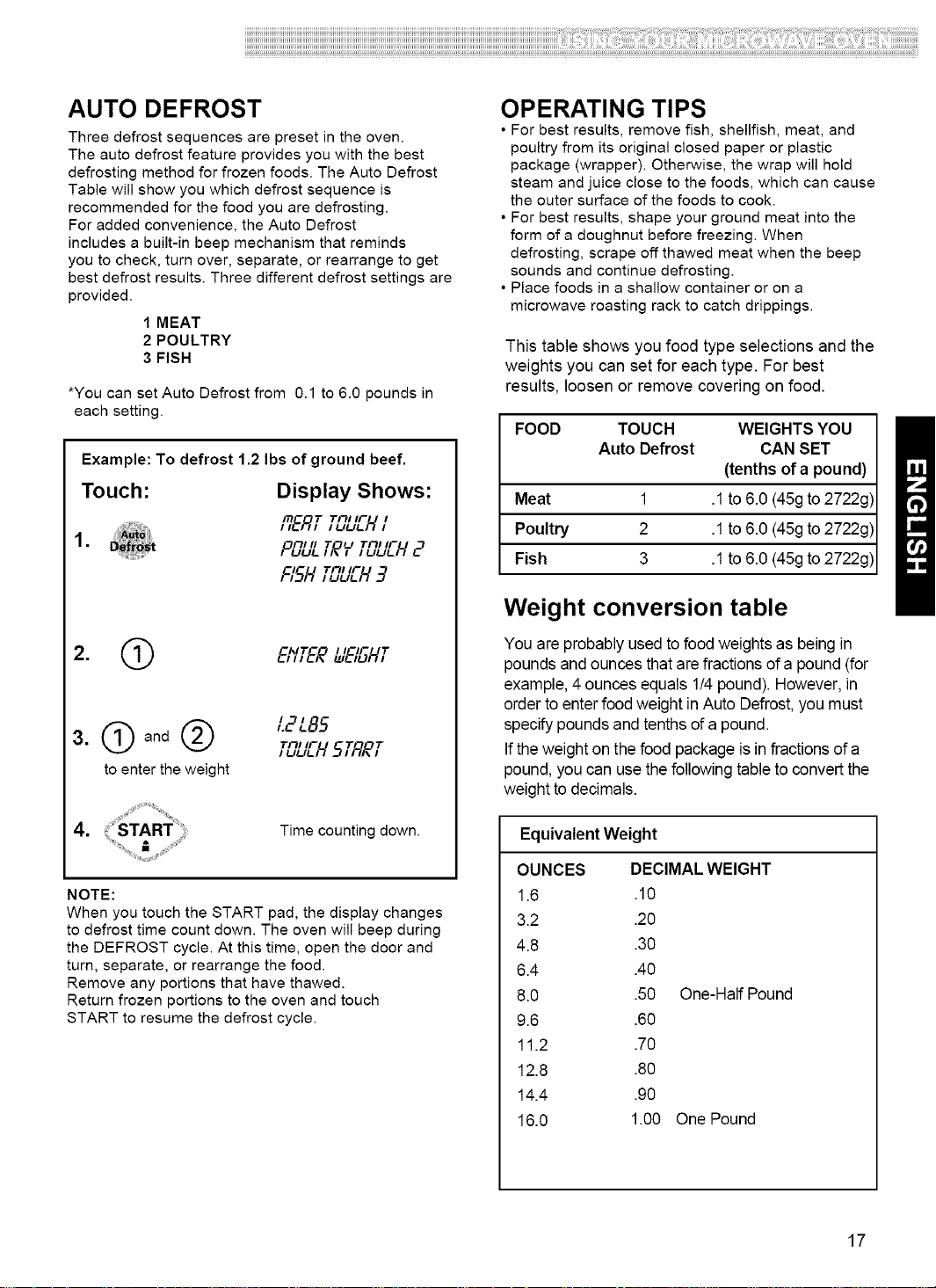
AUTO DEFROST
Three defrost sequences are preset in the oven.
The auto defrost feature provides you with the best
defrosting method for frozen foods. The Auto Defrost
Table will show you which defrost sequence is
recommended for the food you are defrosting.
For added convenience, the Auto Defrost
includes a built-in beep mechanism that reminds
you to check, turn over, separate, or rearrange to get
best defrost results. Three different defrost settings are
provided.
1 MEAT
2 POULTRY
3 FISH
*You can set Auto Defrost from 0.1 to 6.0 pounds in
each setting.
Example: To defrost 1.2 Ibs of ground beef.
Touch: Display Shows:
TF_I IF I
HERT,uu_.H,
FII II 7" U TRI II-
• P#_,R, ,_H2
FISH_nUEH9
2. Q EI'/TER&'E,SHT
3. O and Q L2L85
,5_,_bLr'H5TRRT
to enter the weight
Time counting down.
NOTE:
When you touch the START pad, the display changes
to defrost time count down. The oven will beep during
the DEFROST cycle. At this time, open the door and
turn, separate, or rearrange the food.
Remove any portions that have thawed.
Return frozen portions to the oven and touch
START to resume the defrost cycle.
OPERATING TIPS
• For best results, remove fish, shellfish, meat, and
poultry from its original closed paper or plastic
package (wrapper). Otherwise, the wrap will hold
steam and juice close to the foods, which can cause
the outer surface of the foods to cook.
• For best results, shape your ground meat into the
form of a doughnut before freezing. When
defrosting, scrape off thawed meat when the beep
sounds and continue defrosting.
• Place foods in a shallow container or on a
microwave roasting rack to catch drippings.
This table shows you food type selections and the
weights you can set for each type. For best
results, loosen or remove covering on food.
FOOD TOUCH WEIGHTS YOU
Auto Defrost CAN SET
(tenths of a pound)
Meat 1 .1to 6.0 (45gto 2722g)
Poultry 2 .1to 6.0 (45g to 2722g)
Fish 3 .1to 6.0 (45g to 2722g)
Weight conversion table
You are probably used tofood weights as being in
poundsand ounces that are fractions ofa pound (for
example, 4 ounces equals 1/4pound). However, in
order toenter food weight in Auto Defrost,you must
specify poundsand tenths ofa pound.
If theweight on the food package is in fractions of a
pound,you can use thefollowing tableto convert the
weight todecimals.
Equivalent Weight
OUNCES DECIMAL WEIGHT
1.6 .10
3.2 .20
4.8 .30
6.4 .40
8.0 .50 One-Half Pound
9.6 .60
11.2 .70
12.8 .80
14.4 .90
16.0 1.00 One Pound
17
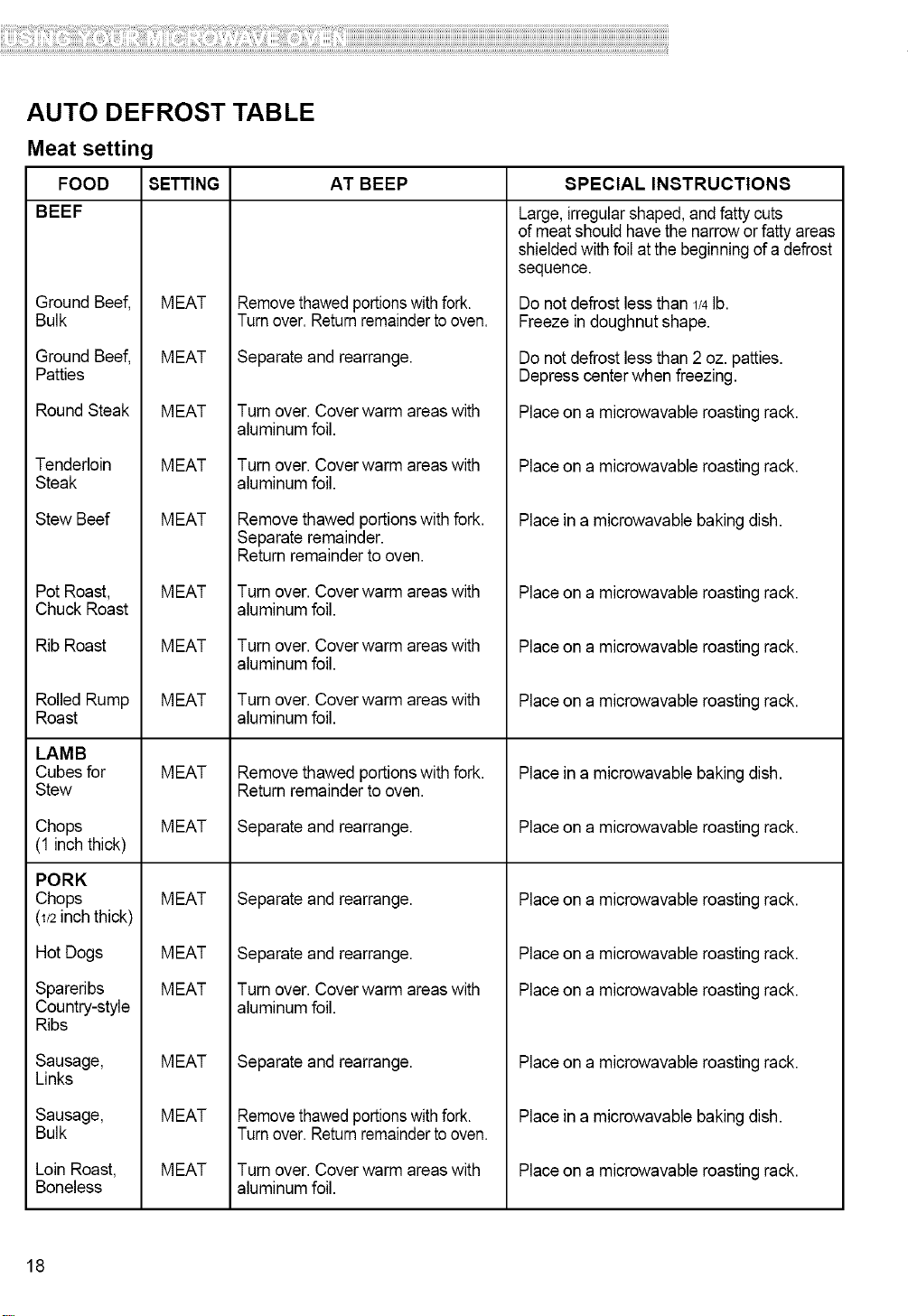
AUTO DEFROST TABLE
Meat setting
FOOD SETTING AT BEEP
BEEF
Ground Beef,
Bulk
Ground Beef,
Patties
RoundSteak
Tenderloin
Steak
Stew Beef
Pot Roast,
Chuck Roast
Rib Roast
RolledRump
Roast
LAMB
Cubes for
Stew
Chops
(1 inchthick)
PORK
Chops
(1/2 inch thick)
Hot Dogs
Spareribs
Country-style
Ribs
Sausage,
Links
Sausage,
Bulk
Loin Roast,
Boneless
MEAT
MEAT
MEAT
MEAT
MEAT
MEAT
MEAT
MEAT
MEAT
MEAT
MEAT
MEAT
MEAT
MEAT
MEAT
MEAT
Removethawedportionswithfork.
Turnover.Returnremaindertooven.
Separate and rearrange.
Turn over. Cover warm areaswith
aluminum foil.
Turn over. Cover warm areaswith
aluminum foil.
Remove thawed portionswith fork.
Separate remainder.
Return remainder to oven.
Turn over. Cover warm areaswith
aluminum foil.
Turn over. Cover warm areaswith
aluminum foil.
Turn over. Cover warm areaswith
aluminum foil.
Remove thawed portionswith fork.
Return remainder to oven.
Separate and rearrange.
Separate and rearrange.
Separate and rearrange.
Turn over. Cover warm areaswith
aluminum foil.
Separate and rearrange.
Removethawedportionswithfork.
Turnover.Returnremaindertooven.
Turn over. Cover warm areaswith
aluminum foil.
SPECIAL INSTRUCTION8
Large,irregularshaped,and fatty cuts
ofmeat should havethe narrowor fatty areas
shieldedwith foil atthe beginningofa defrost
sequence.
Do notdefrost less than 1/4lb.
Freeze in doughnut shape.
Do notdefrost less than 2 oz. patties.
Depress centerwhen freezing.
Placeon a microwavable roasting rack.
Placeon a microwavable roasting rack.
Place in a microwavable bakingdish.
Placeon a microwavable roasting rack.
Placeon a microwavable roasting rack.
Placeon a microwavable roasting rack.
Place in a microwavable bakingdish.
Placeon a microwavable roasting rack.
Placeon a microwavable roasting rack.
Placeon a microwavable roasting rack.
Placeon a microwavable roasting rack.
Placeon a microwavable roasting rack.
Place in a microwavable bakingdish.
Placeon a microwavable roasting rack.
18
ii!i!i!i!i!i!i!i!i!i!i!i!i!i!i!i!i!i!i!i!i!i!i!i!i!i!i!i!i!i!i!i!i!i!i!i!i!i!i!i!i!i!i!i!i!i!i!i!i!i!i!i!i!i!i!i!i!i!i!i!i!i!i!i!i!i!i!i!i!i!i!i!i!i!i!i!i!i!i!i!i!i!i!i!i!i!i!i!i!i!i!i!i!i!i!i!i!i!i!i!i!i!i!i!i!i!i!i!i!i!i!i!i!i!i!i!i!i!i!i!i!i!i!i!i!i!i!i!i!i!i!i!i!i!i!i!i!i!i!i!i!i!i!i!i!i!i!i!i!i!i!i!i!i!i!i!i!i!i!i!i!i!i!i!i!i!i!i!i!i!i!i!i!i!i!i!i!i!i!i!i!i!i!i!i!i!i!i!i!i!i!i!i!i!i!i!i!i!i!i!i!i!i!i!i!i!iiiii!iiili!ii!iiiili!ii!ililliii!ii!if!filliiiiii!iiiiii!i!iilliiiiilli!iiiiiiii!!ii!iiiiiii!ii!ii!iiii!!il!ii!ii!ii!ii!ii!ii!ililiili!illi!iiiiiiiiiiliil!iiiiii!ii!!ii!i!!ii!iliiiiiilii!iiiiii!!i!!i!!if!illiii!iii!iiiii!iiiiii!iii!ii!i!!i!!i!!i!!ii!iliiiiiill!illiiliilliiiiiiiillii!ii!iiiiiii!ii!i!!i!ii!ii!ii!i!!iliiii!ii!ii!iiiiili!if!ii!iiiiiii!ii!ii!ii!iiiiiiiiiii!if!iilliiii!ii!iliii!iiiiiiii!iiiiiiiiii!ii!iiii!ii!iilillii!ii!i!iiliiiiii!ii!iiiiiiiiii!iiiiiiliiililii!il!ii!ii!iii!i!i!ii!iii!il!ii!ii!ii!ii!iii_ili!!ilfilliiiii!ii!iiiiiiiiii!if!illii!iili!i!i!i!iiii!iiiiiiliiiii!ii!iiiiii!!i!!i!!i!!i!!i!!i!!i!!i!!i!!i!!i!!i!!i!!i!!i!i!iili
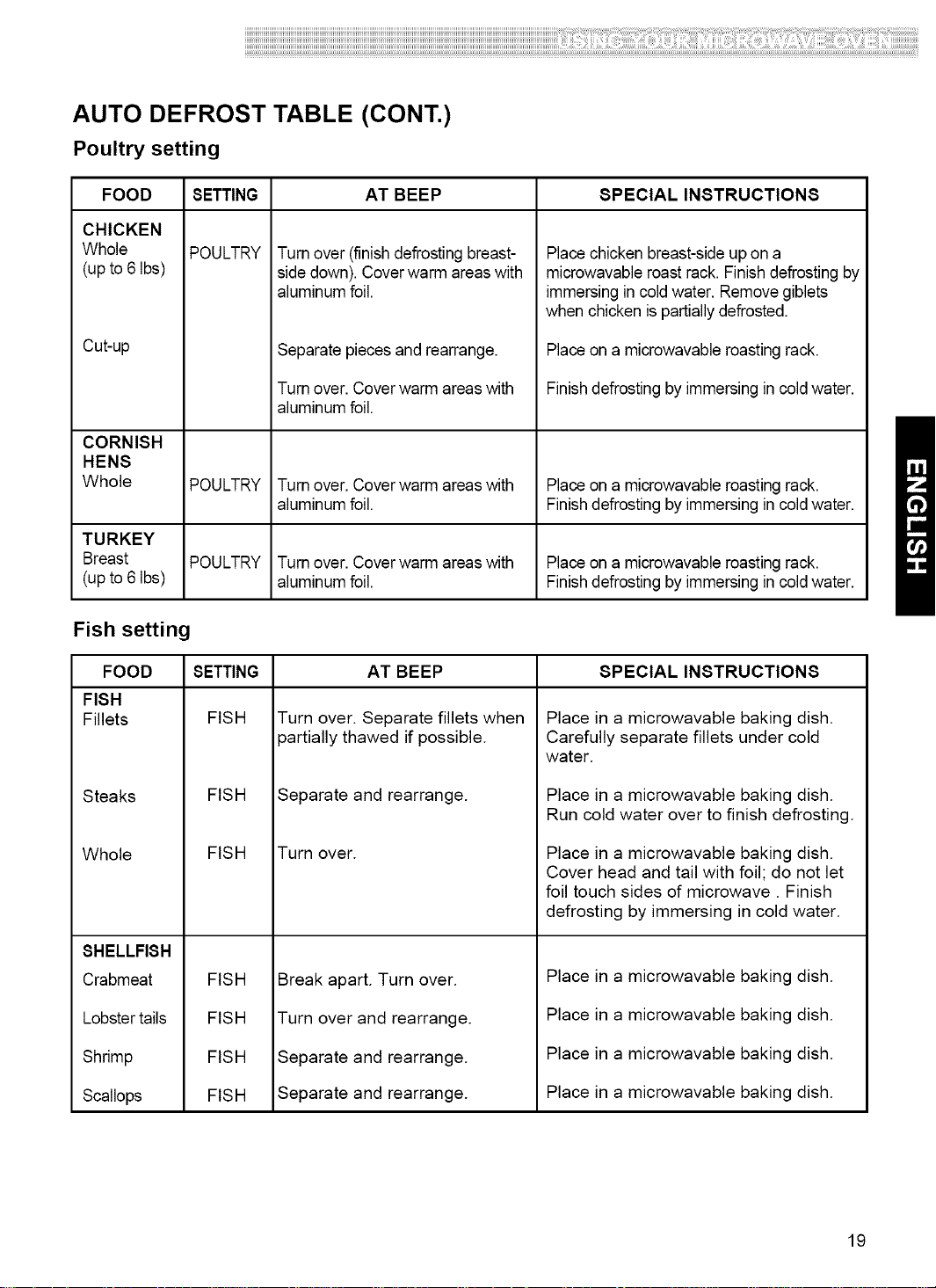
AUTO DEFROST TABLE (CONT.)
Poultry setting
FOOD SETTING AT BEEP SPECIAL INSTRUCTIONS
CHICKEN
Whole
(up to 6 Ibs)
Cutup
POULTRY
Turn over (finish defrosting breast-
side down). Coverwarm areas with
aluminum foil.
Separatepieces and rearrange.
Turn over. Coverwarm areas with
aluminum foil.
Placechicken breast-side up on a
microwavable roast rack. Finish defrostingby
immersingin cold water. Remove giblets
when chicken is partiallydefrosted.
Placeon a microwavable roasting rack.
Finishdefrosting by immersing in coldwater.
CORNISH
HENS
Whole POULTRY Turn over. Coverwarm areas with Placeon a microwavable roasting rack.
aluminum foil. Finishdefrosting by immersing in coldwater.
TURKEY
Breast POULTRY Turn over. Coverwarm areas with Placeon a microwavable roasting rack.
(up to 6 Ibs) aluminum foil. Finishdefrosting by immersing in coldwater.
Fish setting
FOOD SETTING SPECIAL INSTRUCTIONS
FISH
Fillets FISH
Steaks
Whole
SHELLFISH
Crabmeat
Lobster tails
Shrimp
Scallops
FISH
AT BEEP
Turn over. Separate fillets when
partially thawed if possible.
Separate and rearrange.
FISH Turn over.
FISH
FISH
FISH
FISH
Breakapa_.Turn over.
Turn overand _arrange.
Separate and_arrange.
Sepa_te and_arrange.
Place in a microwavable baking dish.
Carefully separate fillets under cold
water.
Place in a microwavable baking dish.
Run cold water over to finish defrosting.
Place in a microwavable baking dish.
Cover head and tail with foil; do not let
foil touch sides of microwave. Finish
defrosting by immersing in cold water.
Place in a microwavable baking dish.
Place in a microwavable baking dish.
Place in a microwavable baking dish.
Place in a microwavable baking dish.
19
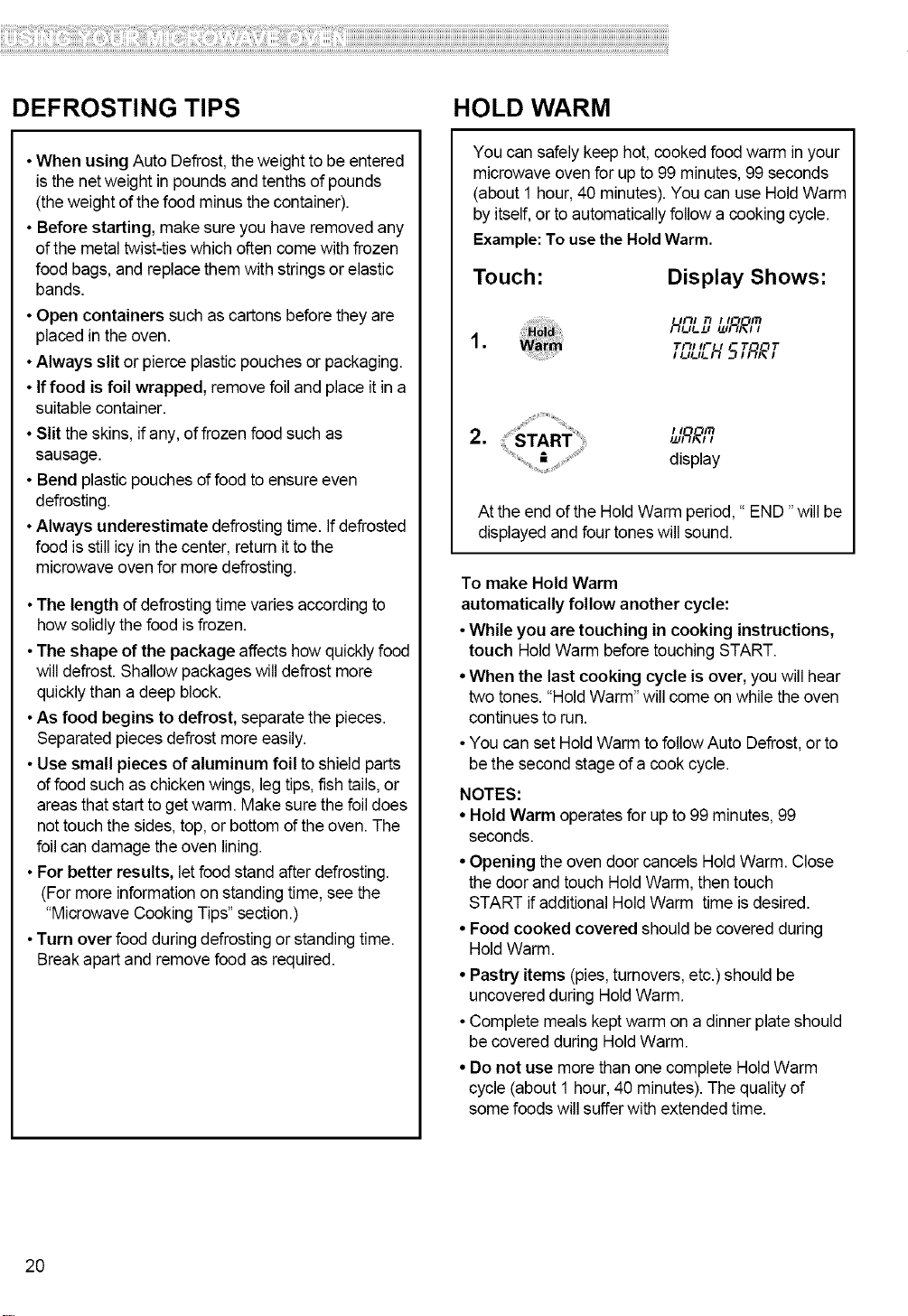
DEFROSTING TIPS HOLD WARM
•When using Auto Defrost,theweight to be entered
isthe netweight in poundsand tenthsof pounds
(theweight of the food minus the container).
• Before starting, make sure you haveremoved any
of the metal twist-ties which often come with frozen
food bags, and replace themwithstrings orelastic
bands.
• Open containers such as cartons before they are
placedin theoven.
• Always slit or pierceplastic pouches or packaging.
• If food is foil wrapped, remove foil and place it in a
suitable container.
• Slit theskins, ifany, of frozen food such as
sausage.
• Bend plasticpouches offood to ensure even
defrosting.
• Always underestimate defrostingtime. Ifdefrosted
food isstill icy in the center, return itto the
microwave ovenfor moredefrosting.
•The length of defrostingtime varies accordingto
how solidly thefood isfrozen.
•The shape of the package affects how quicklyfood
willdefrost. Shallowpackages will defrost more
quicklythan a deep block.
•As food begins to defrost, separatethe pieces.
Separated pieces defrost more easily.
•Use small pieces of aluminum foil to shield parts
offood such as chickenwings, legtips, fish tails,or
areas that startto get warm. Make sure the foildoes
not touch the sides,top, or bottom of theoven. The
foilcan damage the oven lining.
•For better results, let foodstand after defrosting.
(Formore informationon standing time, see the
"Microwave Cooking Tips"section.)
•Turn over food during defrostingor standing time.
Break apartand remove food as required.
You can safely keep hot, cooked food warm in your
microwave oven for up to 99 minutes, 99 seconds
(about 1 hour, 40 minutes). You can use Hold Warm
by itself, or to automatically follow a cooking cycle.
Example: To use the Hold Warm.
Touch:
Display Shows:
1131 13
1 T[311J- I - T'30T
I UUL IL_
2.
display
At the end of the Hold Warm period," END "will be
displayed and four tones will sound.
To make Hold Warm
automatically follow another cycle:
•While you are touching in cooking instructions,
touch HoldWarm before touching START.
•When the last cooking cycle is over, you will hear
two tones."Hold Warm"will come on while the oven
continues to run.
• You can set HoldWarm to follow Auto Defrost,or to
be the second stage of a cook cycle.
NOTES:
• Hold Warm operatesfor upto 99minutes,99
seconds.
• Opening the oven door cancels HoldWarm. Close
the door and touch HoldWarm, then touch
START ifadditional Hold Warm time is desired.
• Food cooked covered should becovered during
HoldWarm.
• Pastry items (pies,turnovers,etc.) should be
uncovered during HoldWarm.
• Complete meals kept warm on a dinner plateshould
be covered during HoldWarm.
• Do not use morethan one complete HoldWarm
cycle (about 1hour, 40 minutes).The quality of
some foods will sufferwith extended time.
20
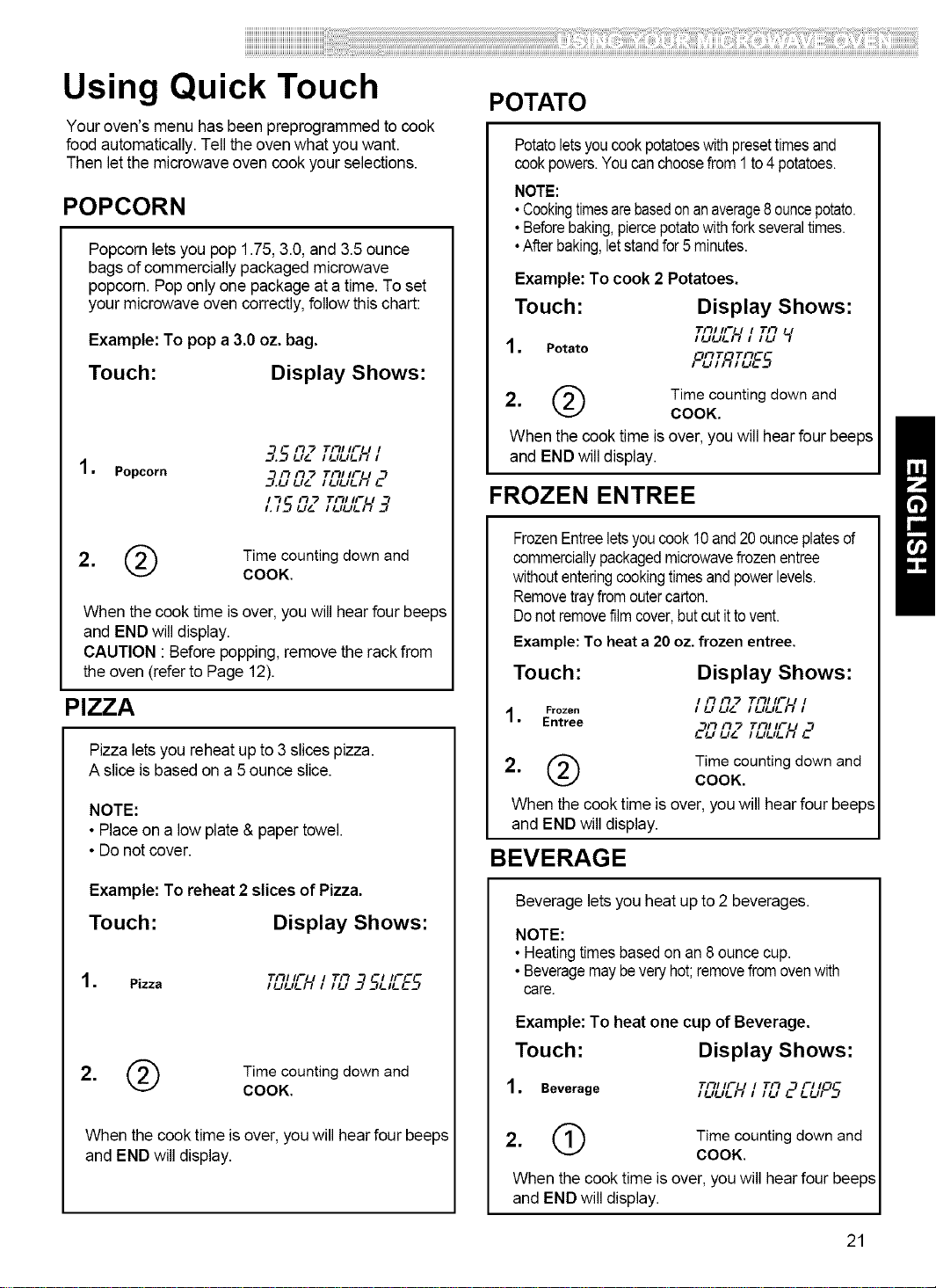
Using Quick Touch
Your oven's menu has been preprogrammed to cook
food automatically. Tell theoven what youwant.
Then letthe microwave oven cookyour selections.
POPCORN
Popcorn lets you pop 1.75,3.0, and 3.5ounce
bags of commercially packaged microwave
popcorn. Pop onlyone package at a time.To set
your microwave oven correctly,follow this chart:
Example: To pop a 3.0 oz. bag.
Touch: Display Shows:
1. Popcorn
- I1 "2 Till IF I I
3.1_4 l,& l llllli_ l
l1 I1 "2 Till IF / 1
3.u u_ ,1,1,1)_c
I1 - I-1"2 Tlll IF I
1.15 1,& II,l,1)_ 3
2, ('_ Time counting down and
COOK.
When the cook time isover, youwill hear four beeps
and END will display.
CAUTION : Before popping,remove the rackfrom
the oven (referto Page12).
PIZZA
Pizza lets you reheatup to 3 slices pizza.
A slice is basedon a 5ounce slice.
NOTE:
• Placeon a lowplate & paper towel.
• Do notcover.
Example: To reheat 2 slices of Pizza.
Touch: Display Shows:
1. Pizza
Till IF / I T/1 -I IFC-
II, l,1)_ , I1, _=75L1115
2, Q Timecountingdownand
COOK.
When the cook time is over, youwill hear four beeps
and END will display.
POTATO
Potatoletsyoucookpotatoeswithpresettimesand
cookpowers.Youcanchoosefrom1to4potatoes.
NOTE:
•Cookingtimesarebasedonanaverage8ouncepotato.
•Beforebaking,piercepotatowithforkseveraltimes.
•Afterbaking,letstandfor5 minutes.
Example: To cook 2 Potatoes.
Touch: Display Shows:
Till II-- I I Tll
II, l,1;_ I I l, _/
1, Potato
PL?,TR,TL?E5
2, _ Time counting down and
COOK.
When the cook time is over, you will hear four beeps
and END will display.
FROZEN ENTREE
FrozenEntreeletsyoucook10and20ounceplatesof
commerciallypackagedmicrowavefrozenentree
withoutenteringcookingtimesandpowerlevels.
Removetrayfromoutercarton.
Donotremovefilmcover,butcutittovent.
Example: To heat a 20 oz. frozen entree.
Touch: Display Shows:
Till II-- I I
I I1 IQ'_ Illllli_ I
, Frozen III ll&
Entree 1/1 F7_ rm/ .'F ,"
cu u_ ,uul,_ c1
2. ('_ Time counting down and
COOK.
When the cook time is over, you will hear four beeps
and END willdisplay.
BEVERAGE
Beverage lets you heat up to2 beverages.
NOTE:
•Heatingtimesbasedon an 8 ouncecup.
•Beveragemaybeveryhot;removefromovenwith
care.
Example: To heat one cup of Beverage.
Touch: Display Shows:
1. Beverage ITl lllllll_" _11-I II I lITll 1-="t lllll-I I!lr_-
2. ('1) Time counting down and
COOK.
When the cook time is over, youwill hearfour beeps
and END will display.
21
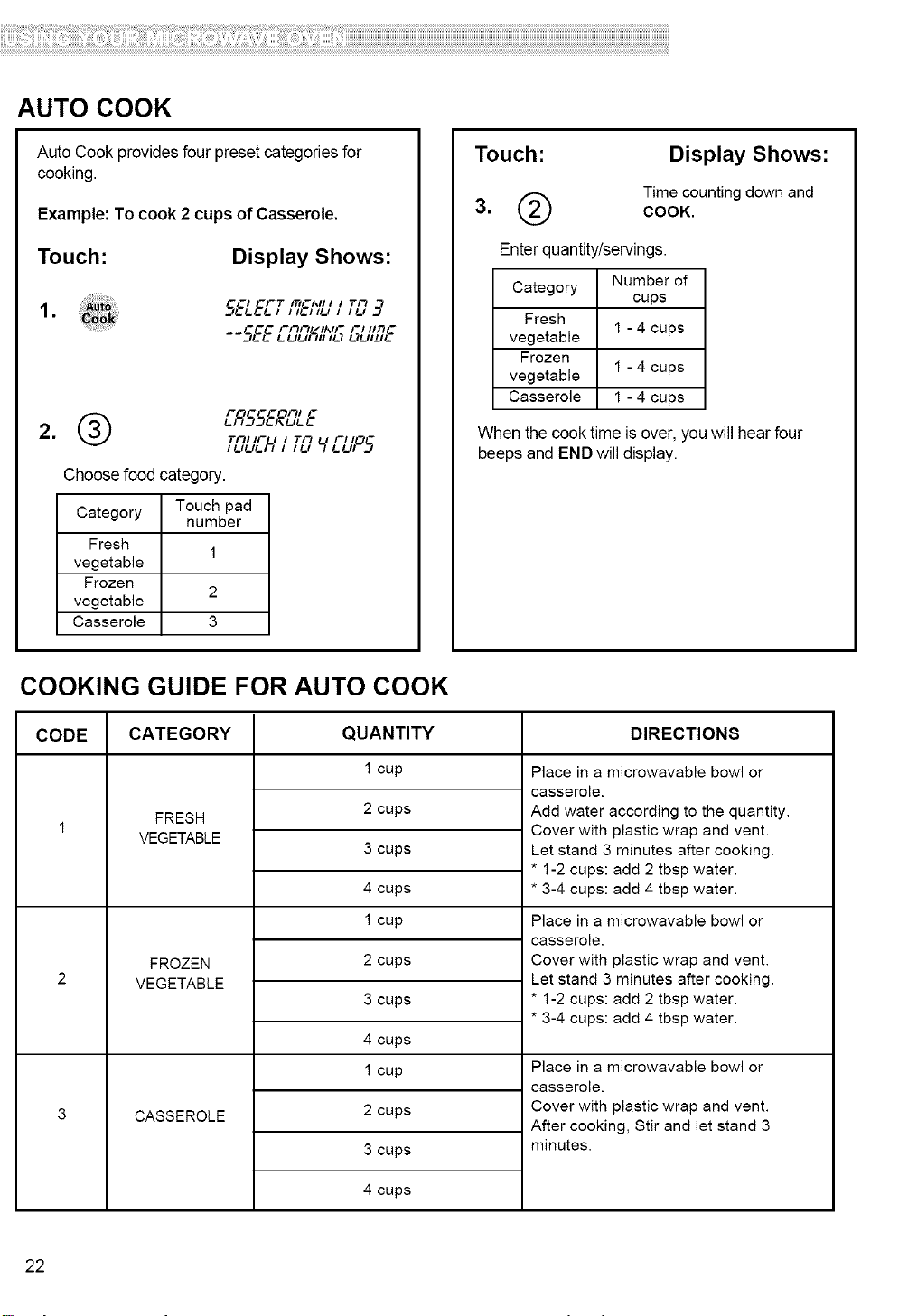
AUTO COOK
Auto Cook provides four preset categoriesfor
cooking.
Example: To cook 2 cups of Casserole.
Touch: Display Shows:
1. 5ELEL-7I_&';;LII 78 _q
--SEEEL_";;'; L;L/IDE
(_ i--_--col-u c
7"1-1111-- I I Tit I I-I I0-
I t_lt_lt_)_ I
Choose food category.
Category Touch pad
number
Fresh
1
vegetable
Frozen
2
vegetable
Casserole 3
Touch:
Display Shows:
Time counting down and
COOK.
Enterquantity/servings.
Category Number of
cups
Fresh
vegetable 1 - 4 cups
Frozen
vegetable 1 - 4 cups
Casserole 1 - 4 cups
When the cook time is over, youwill hear four
beeps and END will display.
COOKING GUIDE FOR AUTO COOK
CODE CATEGORY DIRECTION8
FRESH
VEGETABLE
FROZEN
VEGETABLE
CASSEROLE
QUANTITY
1 cup
2 cups
3 cups
4 cups
1 cup
2 cups
3 cups
4 cups
1 cup
2 cups
3 cups
4 cups
Place in a microwavable bowl or
casserole.
Add water according to the quantity.
Cover with plastic wrap and vent.
Let stand 3 minutes after cooking.
* 1-2 cups: add 2 tbsp water.
* 3-4 cups: add 4 tbsp water.
Place in a microwavable bowl or
casserole.
Cover with plastic wrap and vent.
Let stand 3 minutes after cooking.
* 1-2 cups: add 2 tbsp water.
* 3-4 cups: add 4 tbsp water.
Place in a microwavable bowl or
casserole.
Cover with plastic wrap and vent.
After cooking, Stir and let stand 3
minutes.
22
ii!i!i!i!i!i!i!i!i!i!i!i!i!i!i!i!i!i!i!i!i!i!i!i!i!i!i!i!i!i!i!i!i!i!i!i!i!i!i!i!i!i!i!i!i!i!i!i!i!i!i!i!i!i!i!i!i!i!i!i!i!i!i!i!i!i!i!i!i!i!i!i!i!i!i!i!i!i!i!i!i!i!i!i!i!i!i!i!i!i!i!i!i!i!i!i!i!i!i!i!i!i!i!i!i!i!i!i!i!i!i!i!i!i!i!i!i!i!i!i!i!i!i!i!i!i!i!i!i!i!i!i!i!i!i!i!i!i!i!i!i!i!i!i!i!i!i!i!i!i!i!i!i!i!i!i!i!i!i!i!i!i!i!i!i!i!i!i!i!i!i!i!i!i!i!i!i!i!i!i!i!i!i!i!i!i!i!i!i!i!i!i!i!i!i!i!i!i!i!i!i!i!i!i!i!i!i:i:i!iiili!ii!i:iili!ii!ili:iiii!ii!if!filliiiiii!i:i:ii!i!i::::iiiii:i!ii:iii:i!!:i!iiii:ii!ii!ii!ii:i!!i:!ii!ii!ii!ii!ii!ii!ililiili!ill:!::iiiiiiiiliil!ii:iii!ii!!ii!i!!ii!iliiiiiilii!iiiiii!!i!!i!!ii!i:iiii!:ii!:ii:i!iiiiii!iii!ii!i!!i!!i!!i!!ii!::::iiiill!i:iiilii:i::i::i::::i!:i!:ii:i:i!ii!i!!i!:i!ii!ii!i!!i:i:::!:i!::!:iiii:i!if!ii!iiiiiii!ii!ii!ii!iiiiiiiiiii!if!iilli:ii!ii!iliii!iiiii:ii!iiiiiiiiii!ii!iiii!ii!iilillii!:i!i!iiliii:i:!ii!iiiiiiiiii!ii:i:i:iii:i:i:i!il!ii!ii!iii!i!i!ii!i:i!il!ii!ii!ii!ii!ii:ili!!ilfilli:iii!ii!ii:iiiiiii!if!:::::!ii:i!:!:!i!iiii!:i::iiliiiii!ii!ii:i:i!!i!!i!!i!!i!!i!!i!!i!!i!!i!!i!!i!!i!!i!!i!!i!i!i:ii
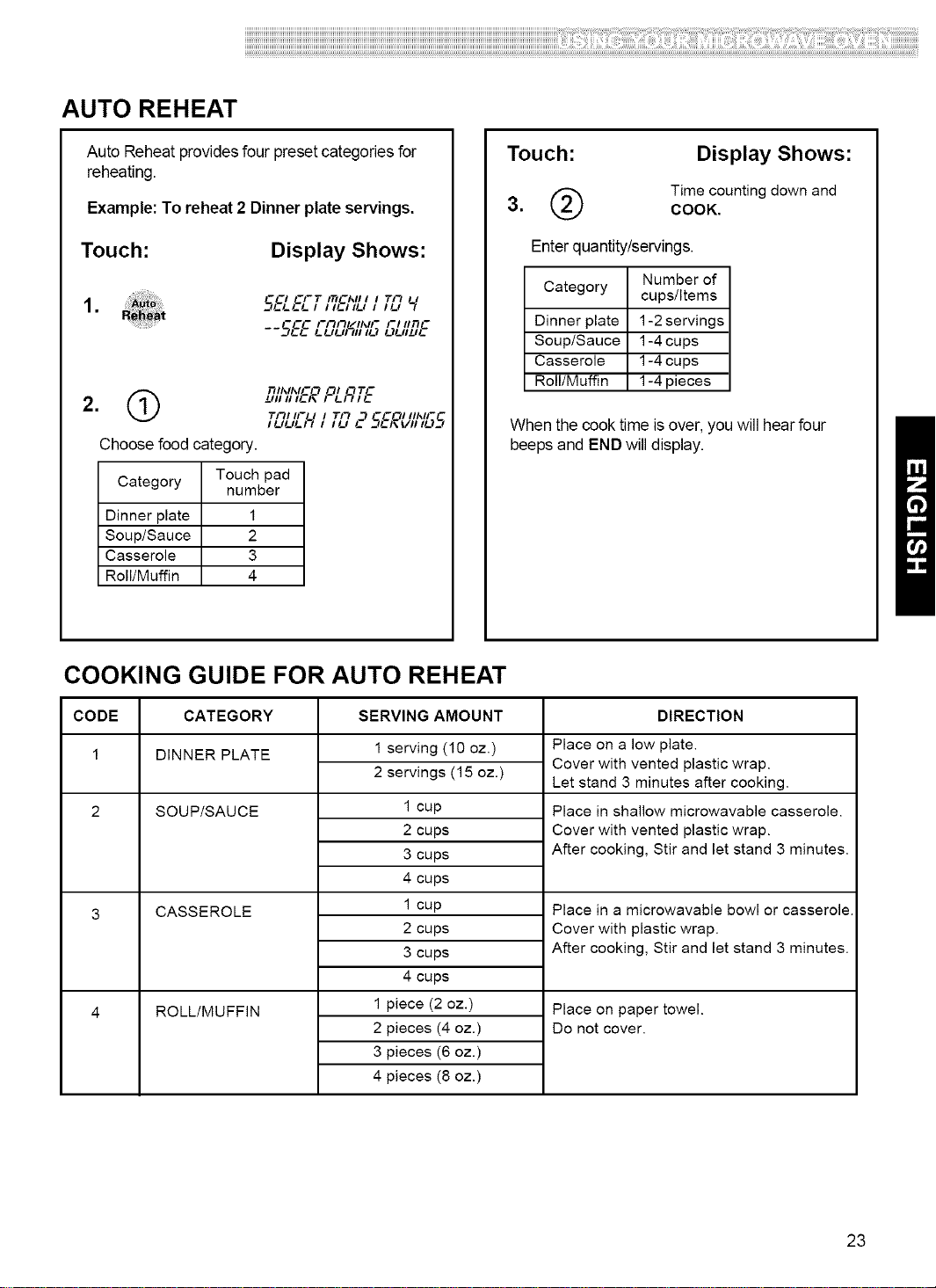
AUTO REHEAT
Auto Reheat providesfour presetcategories for
reheating.
Example: To reheat 2 Dinner plate servings.
Touch: Display Shows:
1. 5EL6'_-TI_6';;'_II _L7
--S&E _";;'_; L;LIIDE
Q nll_ll_lCO OI "TTC
2. ]JIIIIl!-I\ I !-/_l!-
Till IF I I TI'_ __ -COl iil_ll--
Choose food category.
Category Touch pad
number
Dinner plate 1
Soup/Sauce 2
Casserole 3
Roll/Muffin 4
Touch:
Display Shows:
(_ Time counting down and
3. COOK.
Enterquantity/servings.
Category Number of
cups/Items
Dinner plate 1-2servings
Soup/Sauce 1-4cups
Casserole 1-4 cups
Roll/Muffin 1-4 pieces
When the cook time isover, you will hear four
beeps and END will display.
COOKING GUIDE FOR AUTO REHEAT
CODE CATEGORY SERVING AMOUNT DIRECTION
1 DINNER PLATE
SOUP/SAUCE
CASSEROLE
ROLL/MUFFIN
1 serving (10 oz.)
2 servings (15 oz.)
1 cup
2 cups
3 cups
4 cups
1 cup
2 cups
3 cups
4 cups
1 piece (2 oz.)
2 pieces (4 oz.)
3 pieces (6 oz.)
4 pieces (8 oz.)
Place on a low plate.
Cover with vented plastic wrap.
Let stand 3 minutes after cooking.
Place in shallow microwavable casserole.
Cover with vented plastic wrap.
After cooking, Stir and let stand 3 minutes.
Place in a microwavable bowl or casserole.
Cover with plastic wrap.
After cooking, Stir and let stand 3 minutes.
Place on paper towel.
Do not cover.
23
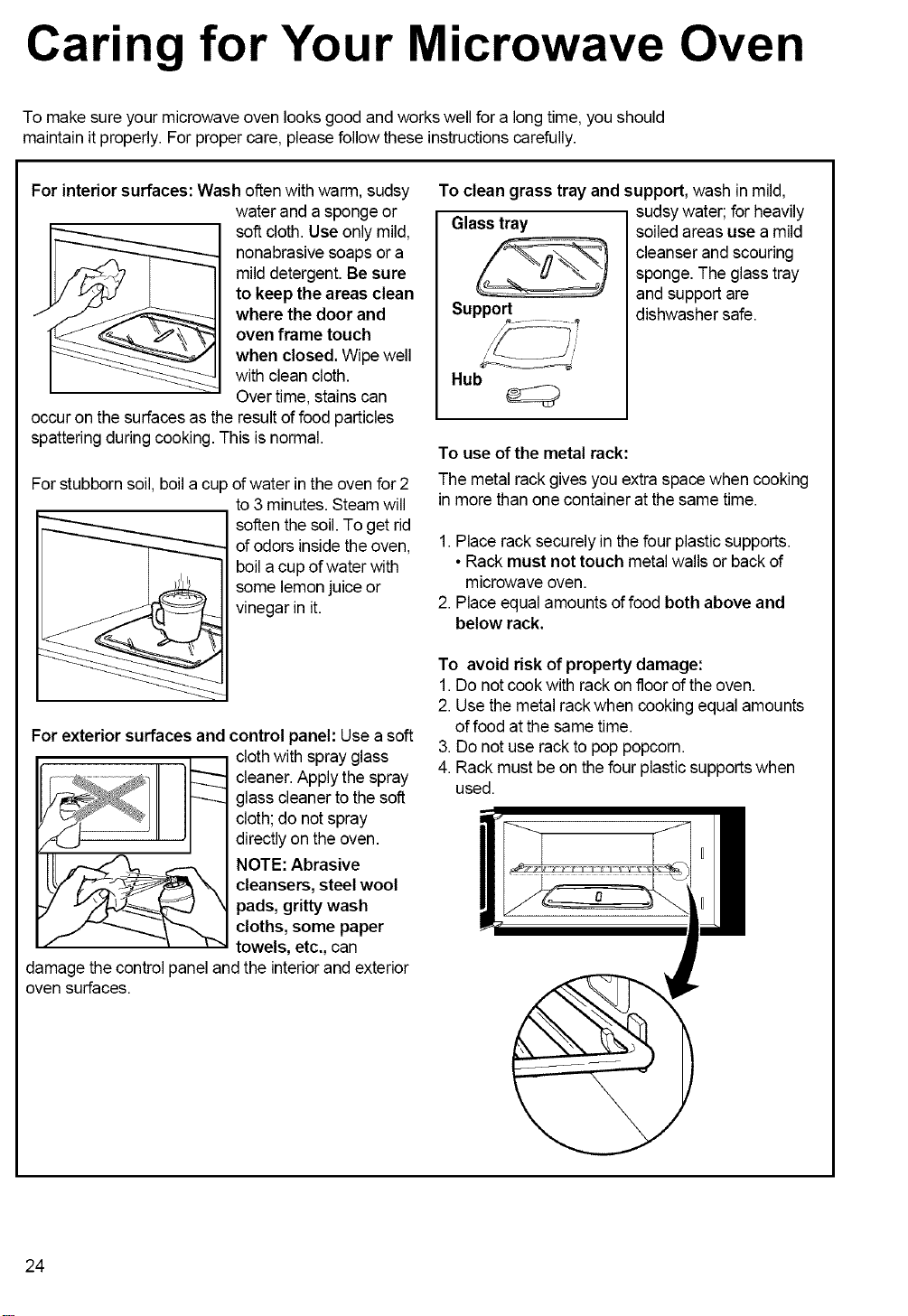
Caring for Your Microwave Oven
To make sureyour microwave oven looks good and workswell for a longtime, you should
maintain it properly. Forproper care, please follow these instructionscarefully.
For interior surfaces: Wash often with warm, sudsy
water and a sponge or
soft cloth. Use only mild,
nonabrasive soaps or a
milddetergent. Be sure
to keep the areas clean
where the door and
oven frame touch
when closed. Wipe well
with clean cloth.
Overtime, stainscan
occur on the surfaces as the result of food particles
spatteringduring cooking. This isnormal.
For stubborn soil, boil a cup of water inthe oven for 2
to 3 minutes. Steam will
soften the soil. To get rid
of odors insidethe oven,
boila cup ofwater with
some lemonjuice or
vinegar in it.
For exterior surfaces and
control panel: Use a soft
cloth with spray glass
cleaner. Apply the spray
glass cleanerto the soft
cloth; do notspray
directlyon the oven.
NOTE: Abrasive
cleansers, steel wool
pads,grittywash
cloths, some paper
towels, etc., can
damage the control panel and the interiorand exterior
oven surfaces.
To clean grass tray and support, wash in mild,
Glass tray
Support
Hub
sudsywater; for heavily
soiledareas use a mild
cleanser and scouring
sponge. The glass tray
and support are
dishwasher safe.
To use of the metal rack:
The metal rack gives you extra space when cooking
in more thanone container at thesame time.
1. Place rack securely in the four plastic supports.
• Rack must not touch metal walls or back of
microwave oven.
2. Place equal amounts of food both above and
below rack.
To avoid risk of property damage:
1.Do not cook with rack on floor ofthe oven.
2. Use themetal rackwhen cooking equal amounts
offood at the same time.
3.Do not use rack to pop popcorn.
4. Rack must be on thefour plastic supportswhen
used.
24
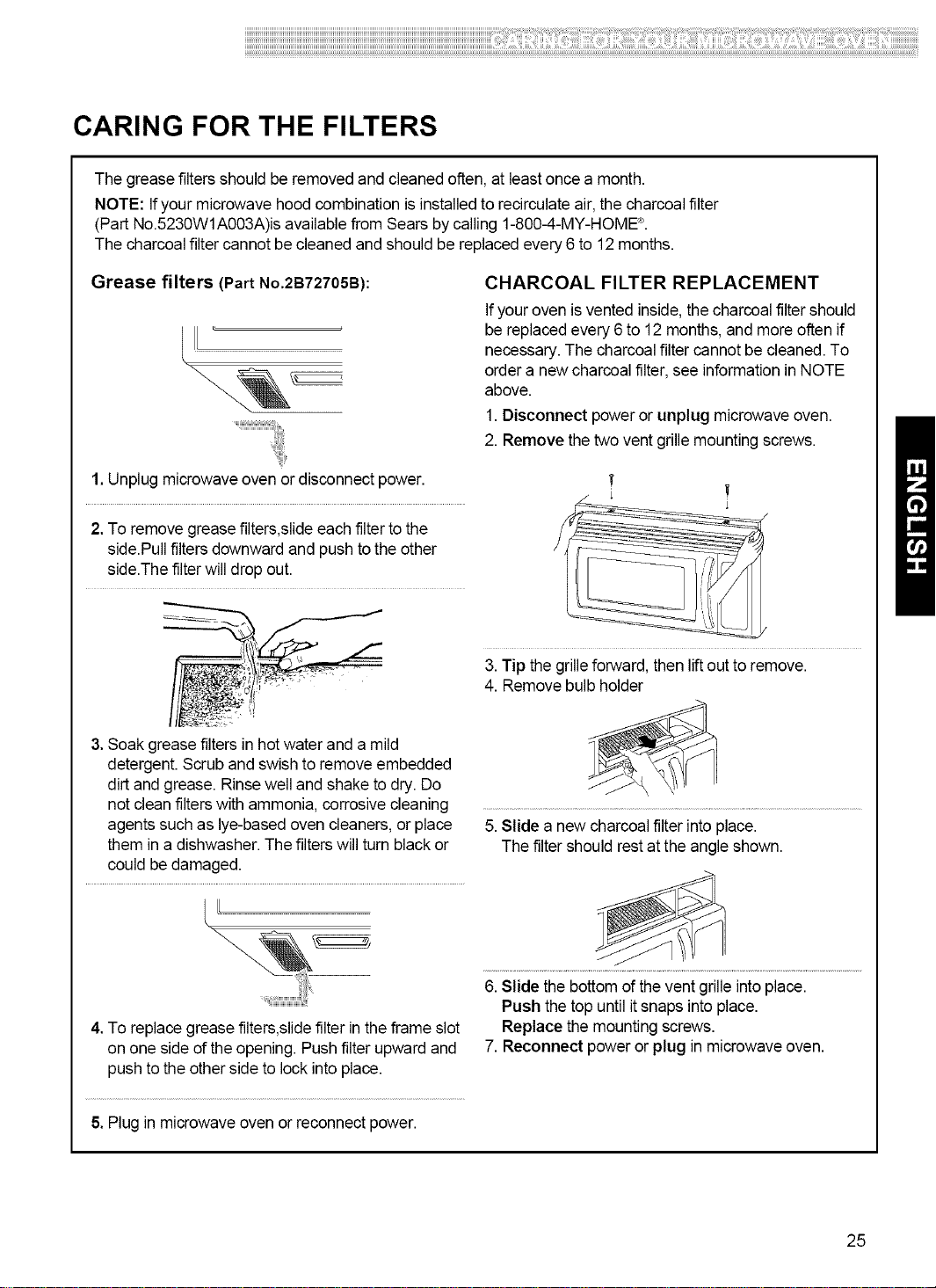
CARING FOR THE FILTERS
The greasefiltersshould beremovedand cleanedoften, at least once a month.
NOTE: Ifyour microwave hood combination is installedto recirculateair, the charcoalfilter
(Part No.5230W1A003A)is availablefrom Sears bycalling 1-800-4-MY-HOME'_.
The charcoalfilter cannot be cleaned and should be replacedevery 6 to 12months.
Grease filters (Part No.2B72705B): CHARCOAL FILTER REPLACEMENT
If youroven is vented inside,the charcoal filter should
be replacedevery 6 to 12 months, and more often if
necessary.The charcoal filter cannot be cleaned. To
order a new charcoal filter,see informationin NOTE
above.
1.Disconnect power or unplug microwave oven.
2. Remove the twoventgrillemounting screws.
1.Unplug microwave ovenor disconnect power.
2. To remove grease filters,slideeach filter tothe
side.Pull filtersdownward and push to the other
side.Thefilter will drop out.
3. Soak grease filtersin hot water and a mild
detergent.Scrub and swishto remove embedded
dirt and grease. Rinsewell and shake to dry. Do
not cleanfilterswith ammonia, corrosive cleaning
agents such as lye-based oven cleaners,or place
them in a dishwasher. The filterswill turn black or
could be damaged.
ILL
4, To replacegrease filters,slidefilter in the frame slot
on one side ofthe opening. Push filter upward and
push to theother side to lock into place.
3.Tip the grilleforward, then liftout to remove.
4. Removebulb holder
5.Slide a new charcoal filter into place.
The filter should rest atthe angle shown.
6. Slide the bottomof the vent grille intoplace.
Push thetop until itsnaps into place.
Replace the mounting screws.
7. Reconnect power or plug in microwave oven.
5.Plug in microwave oven or reconnect power.
25
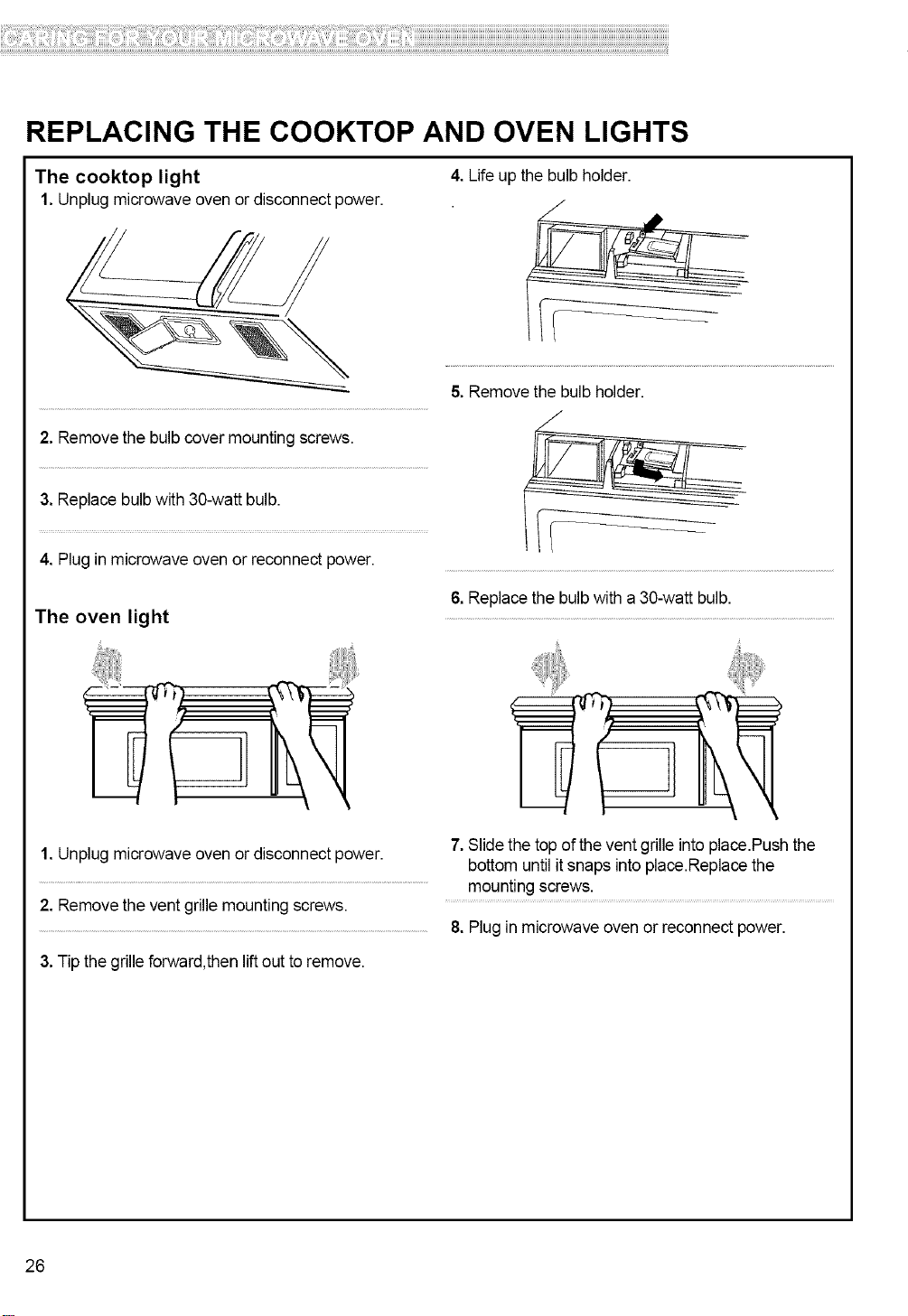
REPLACING THE COOKTOP AND OVEN LIGHTS
The cooktop light 4. Life up the bulb holder.
1. Unplug microwave oven or disconnect power. /
2. Removethe bulb cover mountingscrews.
3. Replace bulb with 30-watt bulb.
4. Plug in microwave oven or reconnect power.
The oven light
1. Unplug microwave oven or disconnect power.
2. Removethe vent grille mounting screws.
3.Tip the grille forward,then lift out toremove.
5. Removethe bulb holder.
7
6. Replace the bulb with a 30-watt bulb.
7. Slide the top ofthe vent grille intoplace.Push the
bottom untilit snaps into place.Replace the
mounting screws.
8. Plugin microwave oven or reconnect power.
26
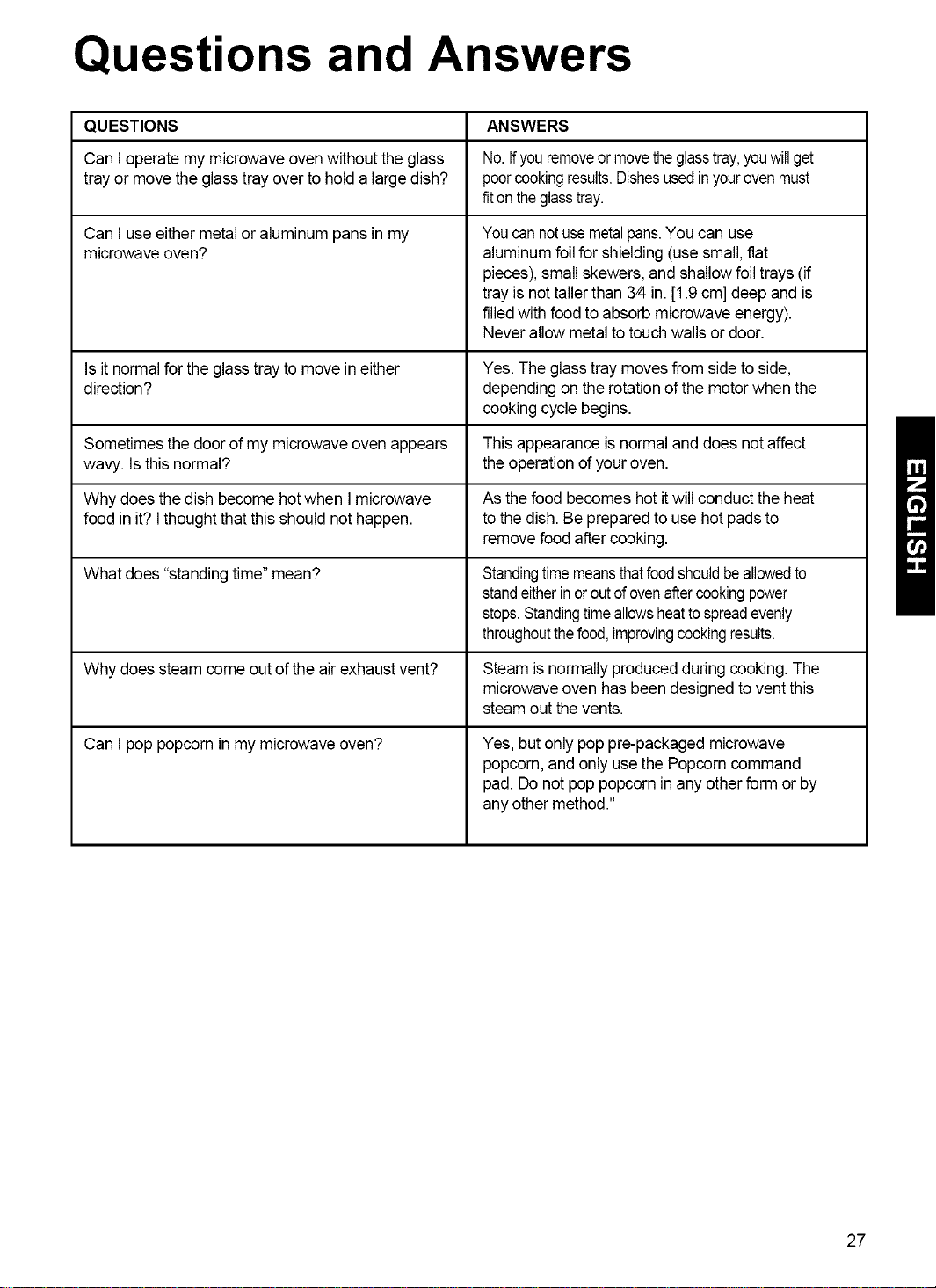
Questions and Answers
QUESTIONS ANSWERS
Can Ioperate my microwave oven without theglass No.Ifyouremoveormovetheglasstray,youwillget
tray or move the glass tray over to hold a large dish? poorcookingresults.Dishesusedinyourovenmust
fitontheglasstray.
Can I useeither metal or aluminum pans in my
microwave oven?
Youcannotusemetalpans.You can use
aluminum foil for shielding (usesmall, flat
pieces),small skewers, and shallow foil trays (if
tray isnot tallerthan 3/4in. [1.9 cm] deep and is
filledwith foodto absorb microwave energy).
Neverallow metal totouch walls or door.
Is it normalfor the glass tray to move in either Yes. The glass tray moves from side to side,
direction? depending on the rotation ofthe motorwhen the
cooking cycle begins.
Sometimes the door of my microwave oven appears This appearance isnormal and does notaffect
wavy. Is this normal? the operation ofyour oven.
Why does the dish become hot when Imicrowave As the food becomes hot itwill conduct the heat
food in it? Ithought that this should nothappen, to the dish. Be prepared to use hotpads to
remove foodafter cooking.
What does "standingtime"mean? Standingtimemeansthatfoodshouldbeallowedto
standeitherinor outofovenaftercookingpower
stops.Standingtimeallowsheattospreadevenly
throughoutthefood,improvingcookingresults.
Why does steam come out of the air exhaust vent? Steam is normally producedduring cooking. The
microwaveoven has beendesigned tovent this
steam out the vents.
Can I pop popcorn in my microwave oven? Yes, butonly pop pre-packaged microwave
popcorn,and only usethe Popcorncommand
pad. Donot pop popcorn in any other form or by
any other method."
27
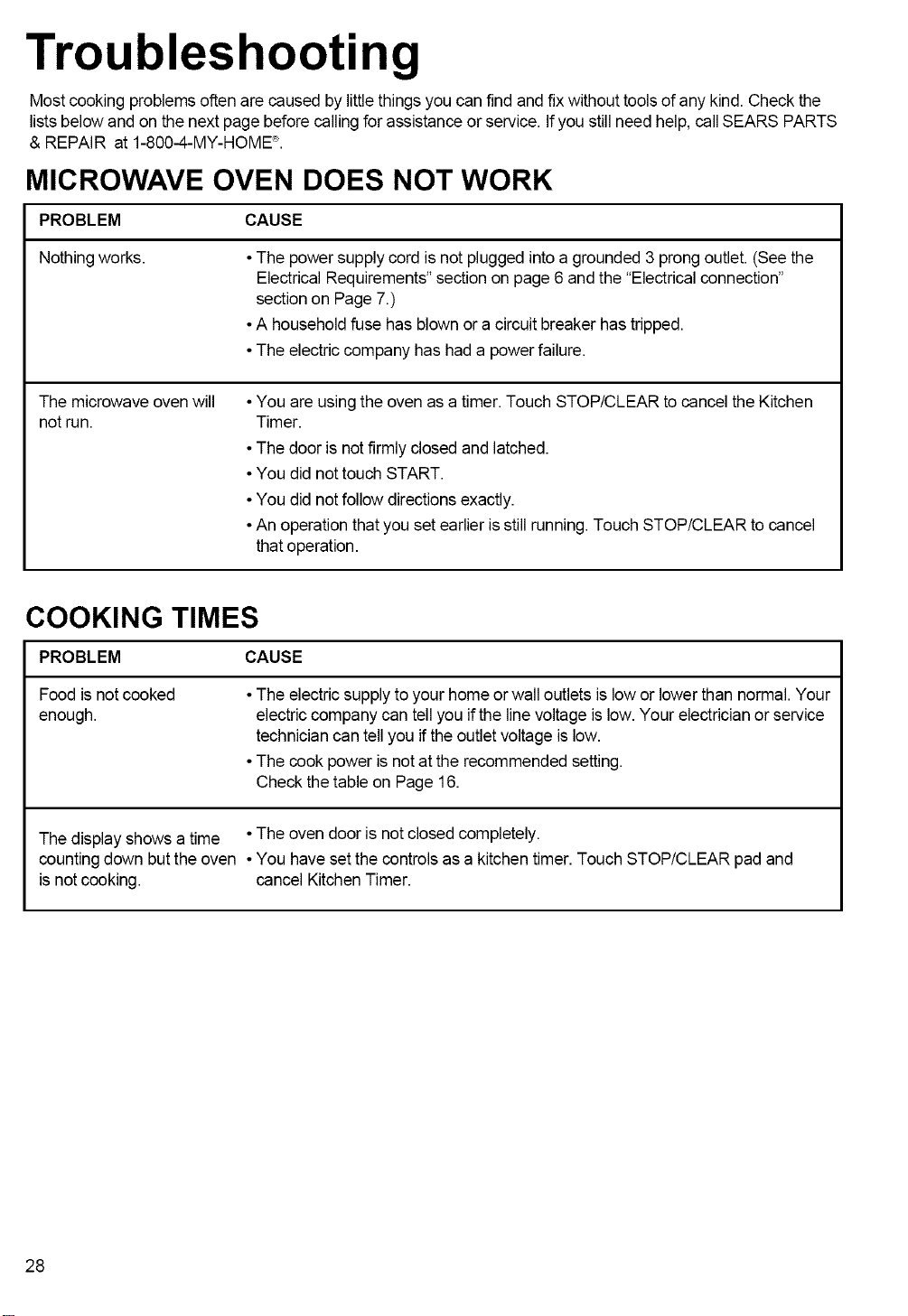
Troubleshooting
Most cooking problemsoften are caused by littlethings you can find and fix without tools of any kind.Check the
listsbelow and on the next page beforecalling forassistance or service. If you stillneed help, callSEARS PARTS
& REPAIR at 1-800-4-MY-HOME'_.
MICROWAVE OVEN DOES NOT WORK
PROBLEM CAUSE
Nothing works. • The powersupply cord isnot plugged intoa grounded 3 prong outlet. (See the
ElectricalRequirements"section onpage 6andthe "Electricalconnection"
section on Page 7.)
•A household fuse has blown or a circuitbreaker has tripped.
•The electriccompany has had a powerfailure.
The microwave oven will
not run.
•You are usingthe oven as a timer. Touch STOP/CLEAR to cancel the Kitchen
Timer.
•The door is notfirmly closed and latched.
•You did nottouch START.
•You did notfollow directions exactly.
•An operation that you set earlier is still running.Touch STOP/CLEAR to cancel
that operation.
COOKING TIMES
PROBLEM CAUSE
Foodis notcooked
enough.
•The electricsupply to your home or wall outlets islow or lowerthan normal. Your
electric company can tellyou if the line voltage is low. Your electricianor service
technician can tellyou ifthe outletvoltageis low.
•The cook power is notat the recommended setting.
Checkthe table on Page 16.
The display shows a time • The oven door is notclosed completely.
counting down butthe oven • You have set the controls asa kitchen timer.Touch STOP/CLEAR pad and
is notcooking, cancel Kitchen Timer.
28
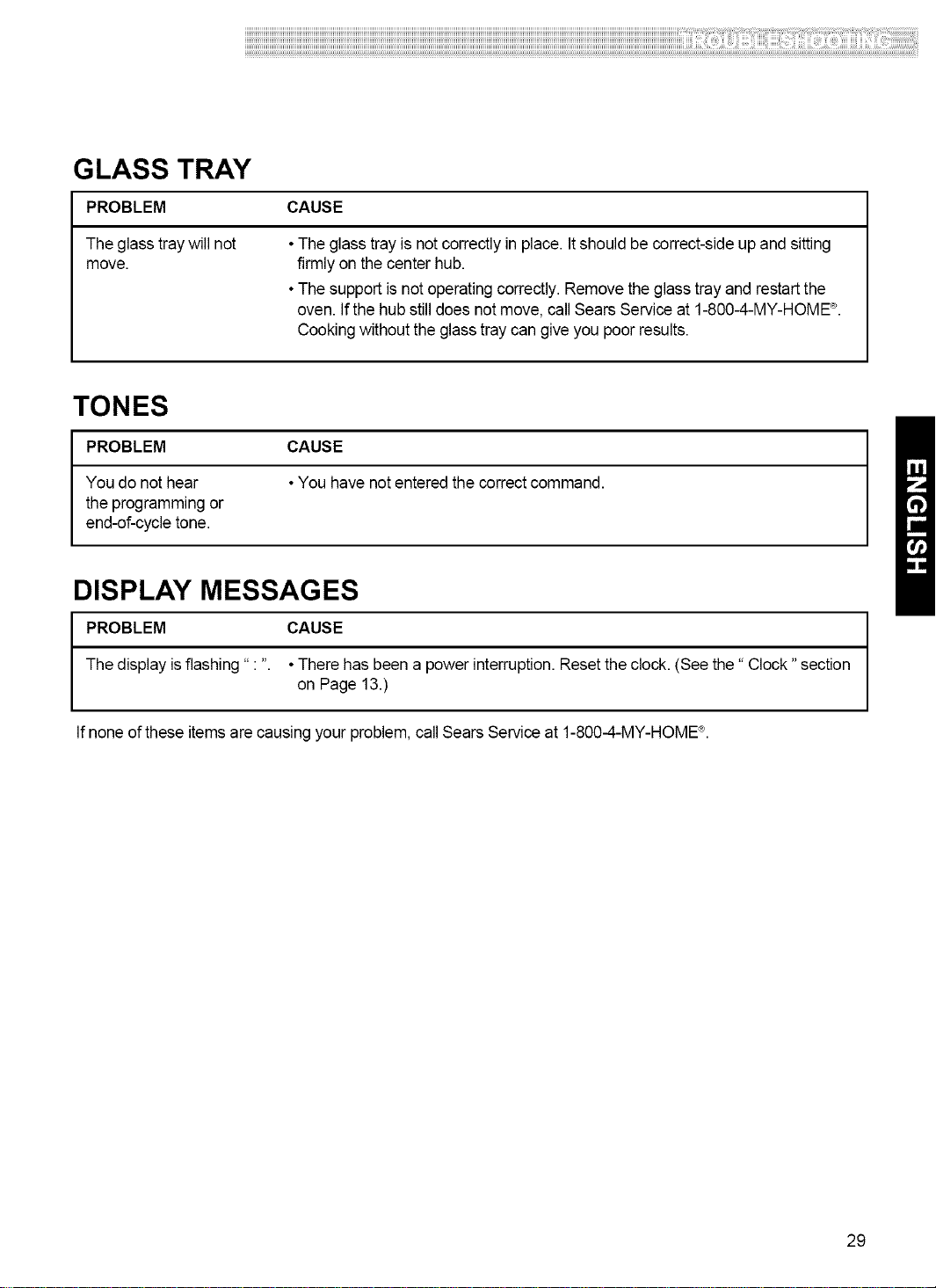
GLASS TRAY
PROBLEM CAUSE
The glass tray will not
move.
•The glasstray is notcorrectly in place. Itshould be correct-side up and sitting
firmlyon the center hub.
•The support isnot operatingcorrectly. Remove the glasstrayand restartthe
oven. Ifthe hub still does notmove, call Sears Service at 1-800-4-MY-HOME'_.
Cooking without the glass tray can give you poor results.
TONES
PROBLEM CAUSE
You do not hear •You have notentered the correctcommand.
the programming or
end-of-cycle tone.
DISPLAY MESSAGES
PROBLEM CAUSE
The display isflashing" : ". • There has been a power interruption.Reset theclock. (See the" Clock "section
on Page 13.)
If none of these itemsare causing your problem, callSears Service at 1-800-4-MY-HOME'_.
29