www.Hotpo&t.com
©
N
©
©
Safety Instruc_tions .......... 2-4
Operating Instructions
Additional Featmes ............ 9
Automatic Icemaker . ......... 10
Controls ..................... 5
Crispers ai]d Pans ........... 8, 9
Shelves and Bins ............ 6, 7
Care and Cleaning ....... t 1, 12
Replaci_]g the Light Bulbs ...... 12
Installation Instructions
Preparii_g to Install
the Refiigerator . ............. 13
Reversing the Door Swh]g . . .t8-22
Water JLi_]e lI]stallati(,] ..... 14-17
Troubleshooting Tips ...... 23-26
Normal Operati_]g Som]ds ..... 23
Consumer Support
(;onstm_ei Suppoit .... Back (:o_ei
Produ(t Registrati(m ....... 27, 28
_Aarn:m w
Models 18 & 19
@
Write the model and serial numbers here:
Model #
Serial #
Fim_d these mm_bers (m tile gray ]abe]
(m the ]ef} side, m_ear the top of the
refrigerator corn parm_elm
fO206747POO6 39-80385 05°05JR

IMPORTANTSAFETYINFORMATION.
READALLINSTRUCTIONSBEFOREUSING.
WARNING!
Use this appliance only for its intended purpose as described in this Owner's Manual.
SAFETYPRECAUTIONS
When using electrical appliances, basic safety precautions should be followed, including the following:
This refl-igerator must be properl) installed
and located in accordance with the Installation
hlstrucfions before it is used.
Do not allow children to climb, st;rod or hang
on the shelves in the refrigeratm: They could
damage the refrigerator and seriously iqiure
themselves.
Do not touch the cold surfi_ces in the fl'eezer
compartment when hands are damp or wet.
Skin ma _, stick to these extremely cold surfilces.
Do not store or use gasoline or other flammable
wq)()_s and liquids in the vicinity of this or anv
other appliance.
In reliigerato_ with automatic icemake_,
avoid contact with the moving parts ot the
ejector mechanism, or with the heating element
located on the bottom of the icemake_: Do
not place finge_s or hands on the automatic
icemaking mechanism while the refl_igerator
is plugged in.
Keep finge_s out of the "pinch point" areas;
clearances between the doms and between
the (loo_s and cabinet are necessarily small.
Be careflfl closing doo_s when children are
in the area.
Unplug the refl'igerator betore cleaning and
making repai_.
NOTE: Westrong/}/recommend that anyservicing be
performed by a quafified individual
Setdng either or both controls (some models
only have one control) to the 0 (Off)position
does not remove power to the light circuit.
Do not reti'eeze fl'ozen ti)()ds which have
thawed completel>
www.Hotpoint.com
DANGER!RISKOFCHILDENTRAPMENT
PROPERDISPOSALOFTHEREFRIGERATOR
Child entrapment and sufli)cation are not
i)rol)lems of the past, Junked or abandoned
refrigerators are still dangerous ... even if they will
sit fin" "just a few days." If you are getting rid of
your old reli_igerato_; please fidlow the instructions
below to hel I) prevent accidents.
Before YouThrowAway YourOld
Refrigeratoror Freezer:
Take off the doo_.
Refrigerants
_dl refrigeration products contain refiigerants,
which under ti_deml law must be removed prior
to product disposal. If you are getting rid of an
old refi_igeration product, check with the company
handling the disposal about what to do.
i,ea_e the shelves in place so that children
may not easil_ climb inside.
USEOFEXTENSIONCORDS
Because of potential safety hazards under certain conditions, we strongly recommend against the
use of an extension cord.
However; if you must use an extension cord, it is absolutely necessa_ T that it be a UiAisted (in the United
States) or a CSA-listed (in Canada), 3-wire grounding type appliance extension cord having a grounding
type i)lug and outlet and that the electrical rating of the cord be 15 amperes (minimum) and 120 w_lts.
3
IMPORTANTSAFETYINFORMATION.
READALLINSTRUCTIONSBEFOREUSING.
WARNING!
HOWTOCONNECTELECTRICITY
Do not, under an},circumstances, cut or remove the third (ground) prong from the power cord.
For personal safe_ this appliance must be properly grounded.
The power cord of this appliance is equipped with
a 3-prong (grounding) plug which mates with
a standard 3-prong (grotmding) wall outlet to
minimize the possibili F of electric shock haa_rd
fl'om this appliance.
Have the wall outlet and circuit checked by
a qualified electrician to make sure the outlet
is properly grounded.
Where a standard 2-prong wall outlet is
encountered, it is your personal responsibility
and obligation to have it replaced with a properly
grounded 3-prong wall outlet.
The refl-igerator should alwa D be plugged into its
own individual electrical outlet which has a w)lmge
rating that matches the rating plate.
This provides the best pe_l'ommnce and also
I)re'_ents oxerloading, house wiring circuits which
could cause a fire hazard from oxerheated wires.
Never unplug your refl-igerator by pulling on the
power cord. Mways grip plug firefly and pull
straight out fl'oln the outlet.
Repair or replace immediately all power cords that
have become fl'ayed or otherwise damaged. Do not
use a cord that sho_vs cracks or abrasion damage
along its length or at either end.
When moving the refligerator away from the
wall, be carefld not to roll over or damage the
power cord.
READANDFOLLOWTHISSAFETYINFORMATIONCAREFULLY.
SAVETHESEINSTRUCTIONS
4
Aboutthe controlsonthe refrigerator, w Hot.oi,t.com
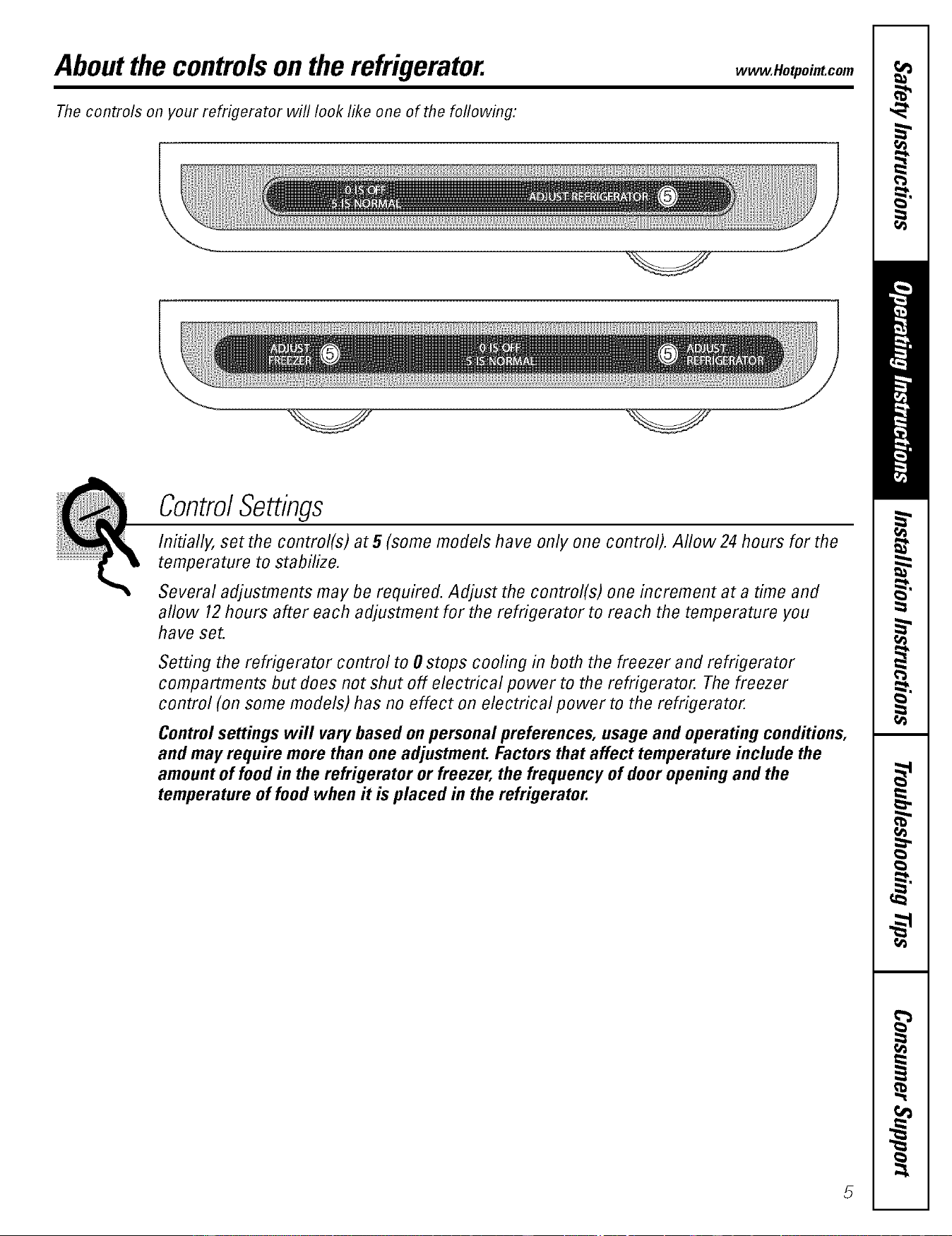
Thecontrols on your refrigerator will look like one of the following:
ControlSettings
Initially, set the control(s) at 5 (some models have only one control). Allow 24 hours for the
temperature to stabilize.
Several adjustments may be required. Adjust the control(s) one increment at a time and
aflow 12hours after each adjustment for the refrigerator to reach the temperature you
have set.
Setting the refrigerator control to 0 stops cooling in both the freezer and refrigerator
compartments but does not shut off electrical power to the refrigerator. The freezer
control (on some models) has no effect on electrical power to the refrigerator.
Controlsettings will vary based on personal preferences, usage and operating conditions,
and may require more than one adjustment. Factors that affect temperature include the
amount of food in the refrigerator or freezer, the frequency of door opening and the
temperature of food when it is placed in the refrigerator.
Aboutthe shelvesand bins.
Not all features are on all models.
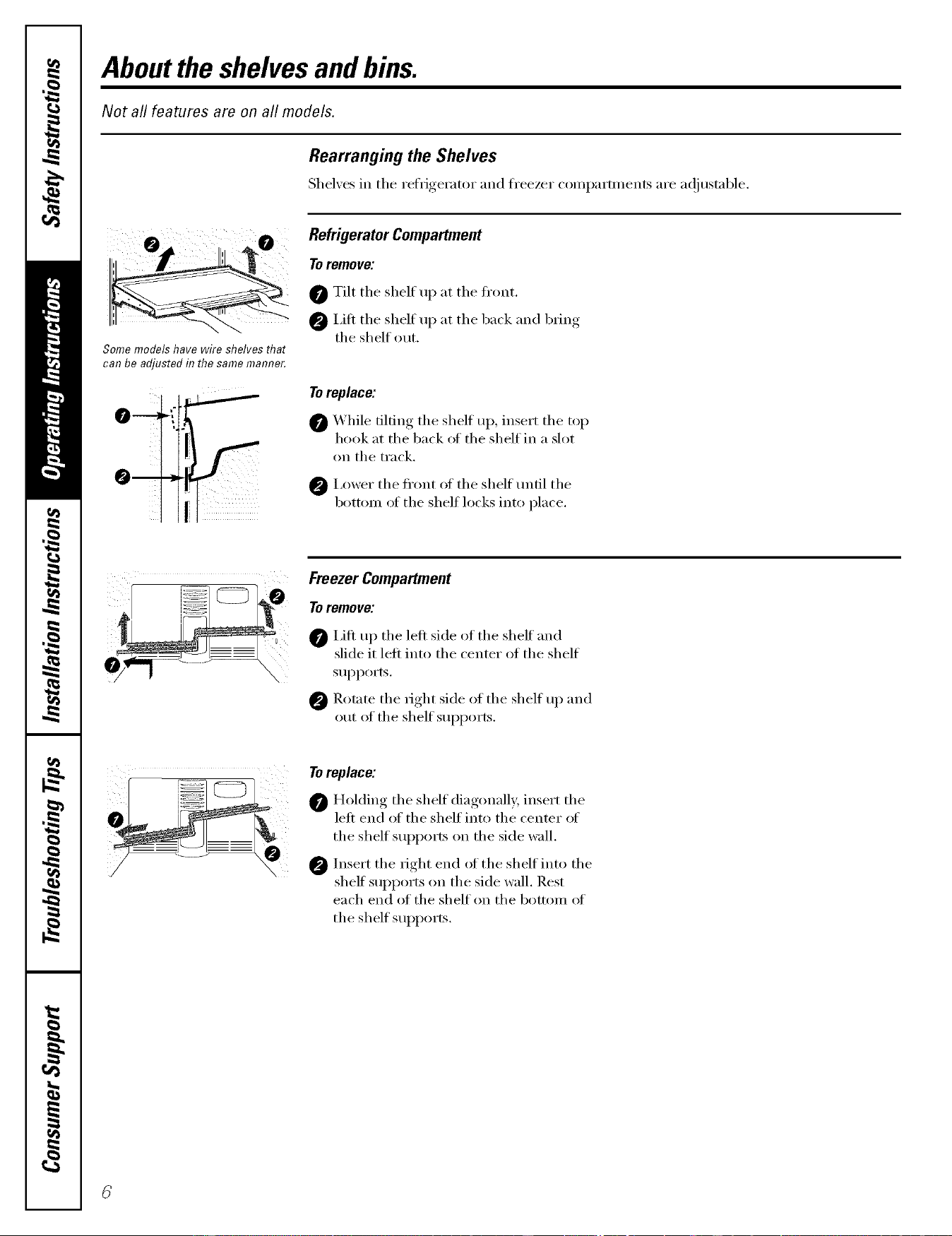
Rearranging the Shelves
Shel;es in the refrigerator and h'eezer con_l)arm_ents are a(!iustnble.
o ,2o
Some models have wire shelves that
can be adjusted in the same mamTer.
0
f
i
i.
Refrigerator Compartment
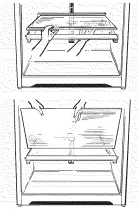
To remove:
0 Tilt the shelf up at the fl'ont.
0 I,ifl the shelf up at the back and bring
the shelf out.
Toreplace:
0 _'_hile tilting the shelf Ul), insert the top
hook at the back of the shelf in a slot
on the track.
0 I,ower the fl'ont of the shelf tmfil the
bottom of the shelf locks into place.
Freezer Compartment
To remove:
I,ifl u I) the left side ot the shelf and
slide it left into the center of the shelf
SUl)ports.
Rotnm the right side of the shelf up and
out of the shelf supports.
iii;i;i ii
Toreplace:
0 Holding the shelf diagonally, insert the
left end of the shelf into the center of
the shelf sui)ports on the side wall.
0 Insert the right end of the shelf into the
shelf supports on the side wall. Rest
each end of the shelf on the bottom oI
the shelf supports.
Spillproof Shelves (onsomemodels)
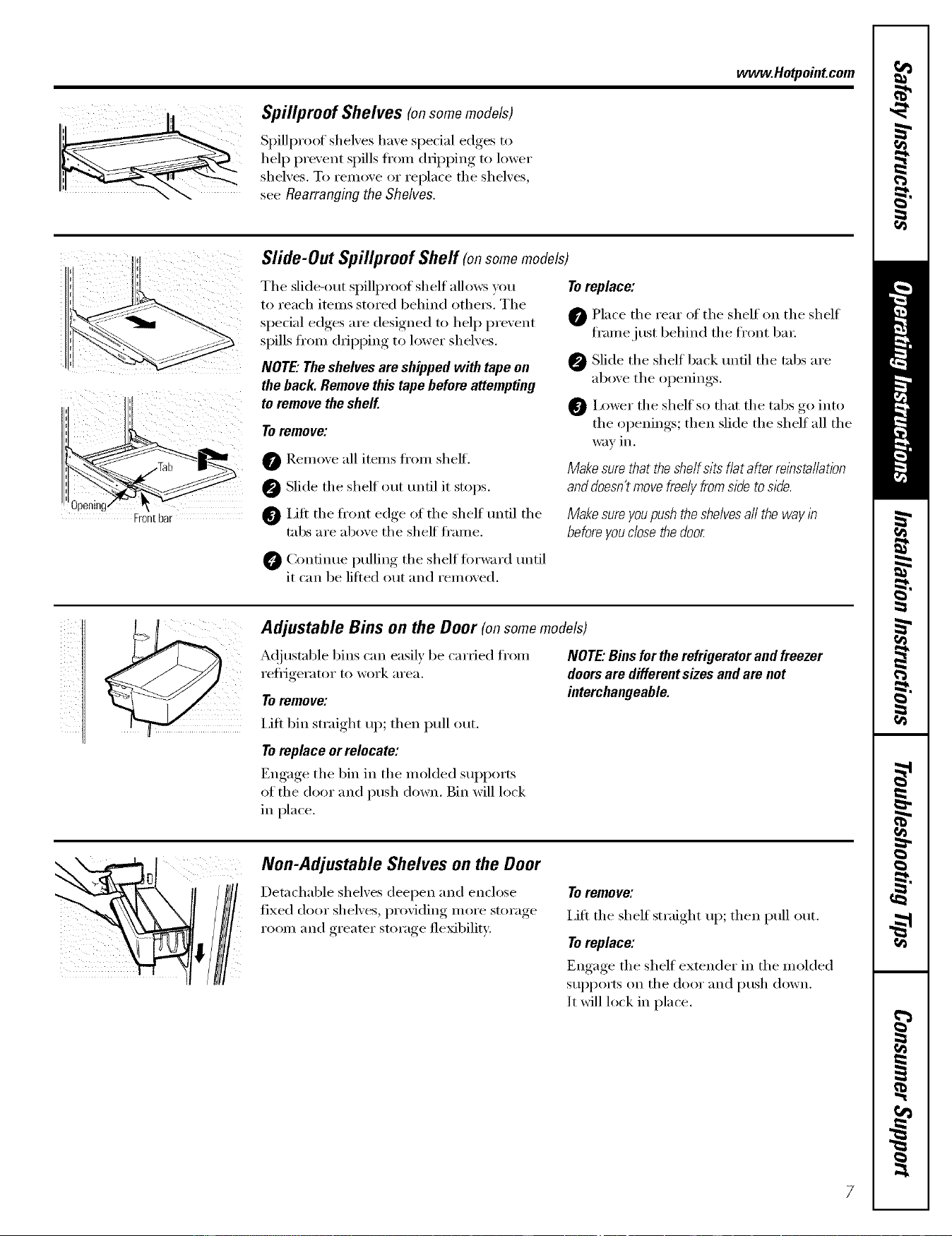
Spillproof shel',es have special edges to
hel I) pre_ent spills fl'om dripping to lower
shelves. To remme or replace the shelves,
see Rearrangingthe Shelves.
www.Hotpoint.com
Front bar
Slide-Out Spillproof Shelf (onsomemodels)
The slide-out spillproof shelf allo_vs )_m
to reach items stored behind othe_. The
spedal edges are designed to hel I) prevent
spills fl'om dripping to lower shelves.
NOTE."The shelves are shipped with tape on
the back. Remove this tape before attempting
to remove the shelf.
Toremove:
Remoxe all items fl'om sheff.
@ Slide the shelf out tmfil it stops.
Lift the fl'ont edge of the shelf tmfil the
tabs are aboxe the shelf fl'ame.
Toreplace:
0 Place the rear of the shelf on the shelf
fl'amejust behind the fl'ont ba_;
Slide the shelf back tmfil the tabs are
above the openings.
0 I,ower the shelf so that the tabs go into
the openings; then slide the shelf all the
way ill.
Makesurethattheshelfsitsflatafterreinstallation
anddoesn'tmovefreelyfromsideto side.
Makesureyoupushtheshelvesaftthewayin
before you dose the door
Confimm I)ullim*_ the shelf fin'ward tmtil
it can be lified out and remoxed.
Adjustable Bins on the Door (onsomemodels)
A(!justable bins can easily be carried fl'om
reflJgerator to work area.
Toremove:
I,ifl bin straight up; then pull out.
To replace or relocate:
Engage the 1)in in the molded sui_ports
of the door and push down. Bin will lock
in place.
NOTE."Binsfortherefrigeratorandfreezer
doorsare differentsizesandare not
interchangeable.
Non-Adjustable Shelves on the Door
Detachable shelves deepen and enclose
fixed door shelves, providing inore storage
room and greater storage flexibility:
Toremove:
I,ifl the shelf straight up; then pull out.
Toreplace:
Engage the shelf extender in the molded
sui_ports on the door and push down.
It will lock in place.
Aboutthe crispersand pans.
Not all features are on all models.
Fru# and Vegetable Crispers
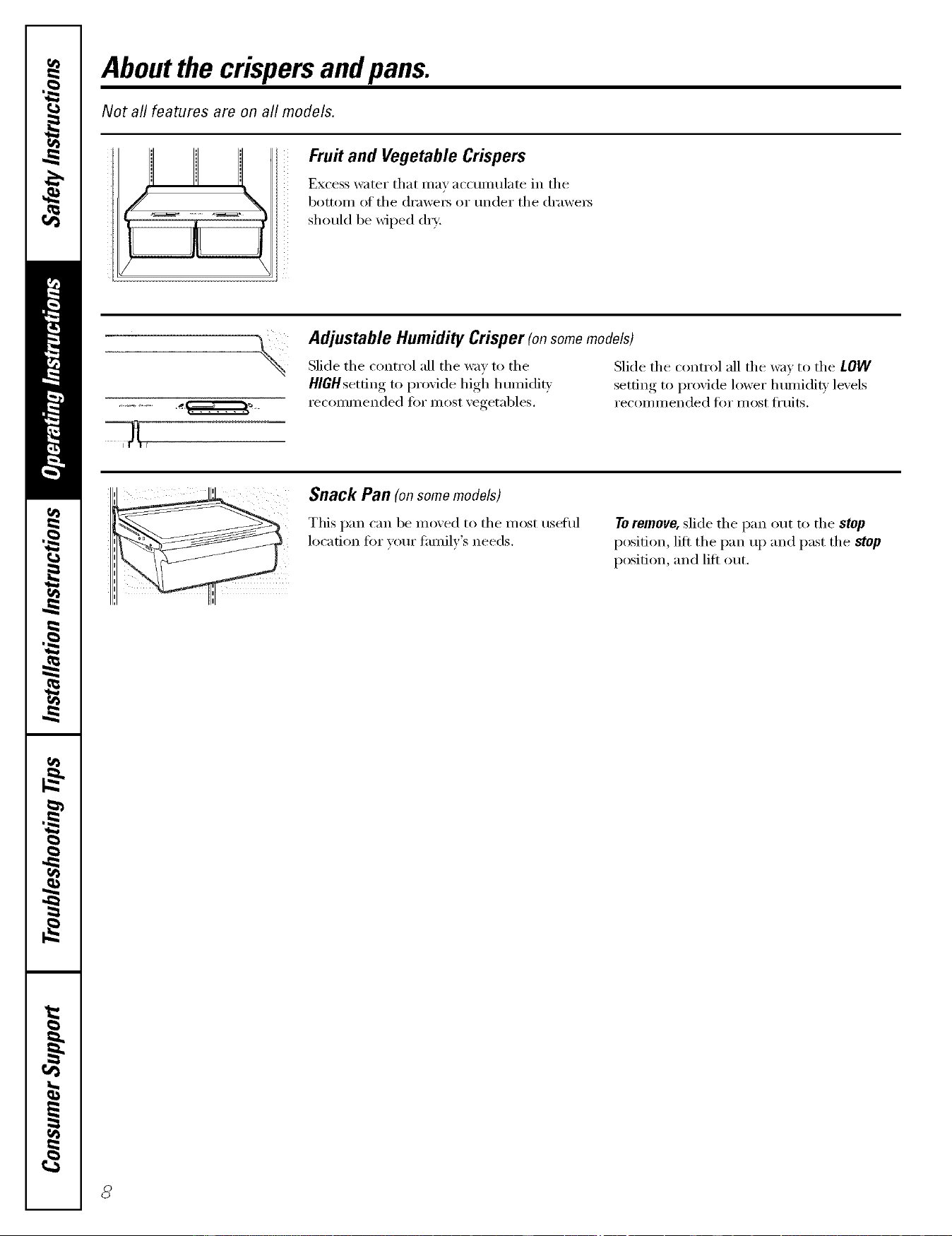
Excess water that may accumulate in the
bottom of the (h'awe_ or under the (h'awe_
should be wiped dry:,
Adjustable Humidity Crisper (onsomemodels)
Slide the control all the wa) to the
HlGHsetfing to proqde high humidi b
recommended fi)r most xegetables.
Slide the control all the wax to the LOW
setting, to I)r°xi(le lower lmmi(lit_ levels
recoinnlended fi)r inost fl'uits.
Snack Pan (onsomemodels)
This pan can be moved to the most tlseitll
location fi)r your family's needs.
Toremove, slide the pan out to the stop
position, lift the pan up and past the stop
position, and lift ()tit.

Aboutcrisper removal w eetpoi,tcom
Not all features are on all models.
o
Removing the glass cover
Crisper Removal
Unload the bottom shelf before attempting to
remove the storage drawers.
ToRemove:
i,ifl the (h'awe_3 up slightly while pulling
them past the stop location.
If the door prevents you from taking out
the (h'awe_, fi_t try to remove the door
bins. If this does not offer enough
clearance, the refl]gerator will need to
be rolled fin'ward tmtil the door opens
enough to slide the (h'awe_ out. In some
cases, when you roll the refl_igerator out,
you will need m move the refl_igerator
to the lett or right as you roll it out.
Toremove the glass cover:
Remove the glass, then the fl'ame. _._]_en
replacing the glass, push the fl'ont edge
fimflv into the fl'ame.
@ Push up the glass cover at the rear:
Slide the glass cover backwards tmtil the
fl'ont edge comes otlt of the fl'ame.
Rotate the side ot the glass cover up.
Remove the glass covet:
ill i @
II i,J "_'_,.
,&i w '_ =
Removing the frame
Toremove the frame:
@ I,ift up the ti'ont ot the ti'ame using
both hands.
@ Slide the fl'ame fin'ward.
@ Rotate the side ot the fl'ame up.
0 Remove the fl'ame.
Aboutthe additional features.
Not all features are on all models.
ShelfSaver rMRack
This slide-out rack holds twelve cans ot soda
or two wine/water bottles (lengthwise).
Can be removed fin" cleaning.
Toremove, slide the rack out to the stop
position, lift the rack up and past the stop,
and lift out.
Aboutthe automaticicemaker.
A newly-installed refrigerator may take 12-24 hours to begin making ice.
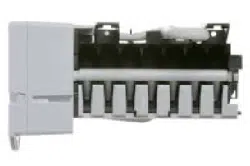
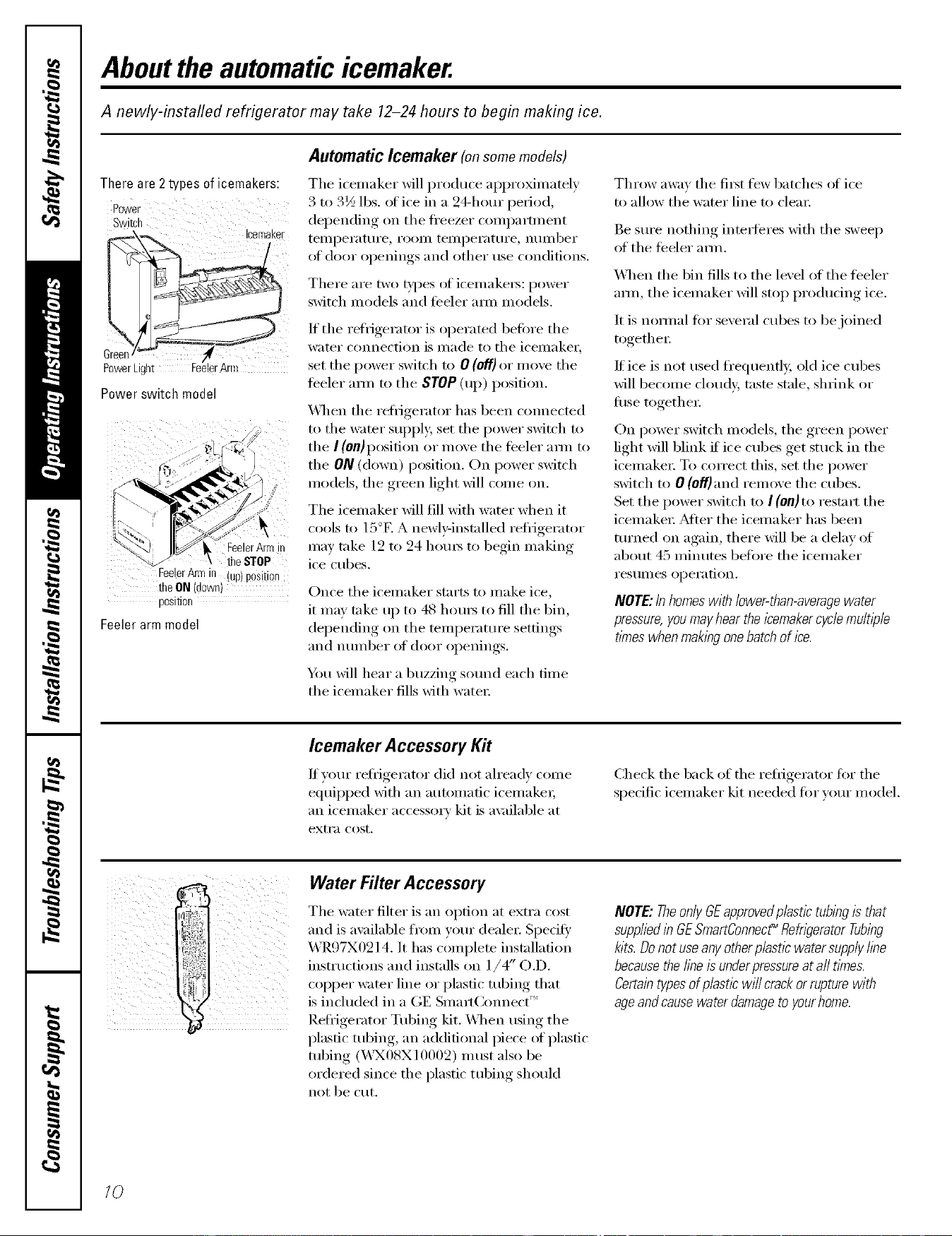
Automatic Icemaker (onsomemodels)
There are 2 types of icemakers:
Switch
Icemaker
\
PoWerLight I l
Power switch model
FeelerArm in
the STOP
FeelerArmill up position
the.ON down)
posmon
Feeler arm model
The icemaker will produce al)pro_nmtely
3 to 3½ lbs. alice in a 24-hour period,
depending on the fl'eezer comI)amnent
tellll)ei'atui'e , i'OOlll tellll)ei'atui'e , ntlll/beF
at door openings and other rise conditions.
There are two _'pes of icemake_: power
switch models and teeler aml models.
If tile refl_igerator is operated beffwe tile
water cmmection is made to tile icemaker,
set tile power switch to 0 (ell) or move tile
feeler am/ to tile STOP (up) position.
_Al/en tile reti_igerator has been comlecmd
to tile water sui)ply, set tile power switch to
tile ] (on) position or move tile teeler aml to
the ON (down) position. On power switch
models, tile green light will come on.
The icemaker will fill with water when it
cools to 15°E A newl>installed refligerator
may take 12 to 24 hom_ to begin making
ice cubes.
Once tile icemaker starts to make ice,
it may take up to 48 hom_ to fill tile bin,
del)ending, on tile temperature.setfimm_.
[llld ntlll/beI" of door ol)enings.
You will hear a buzzing sound each time
the icemaker fills with water:
Throw awm tile fi_t few batches of ice
to allow tile water line to clem:
Be sm'e nothing inte_%res with tile sweep
of tile teeler amL
\Allen tile bin fills to tile level of tile teeler
am/, the icemaker will stop producing ice.
It is natural t0r several cubes to be joined
together:
If ice is not used fl'equenfl> old ice cubes
will become cloudy, taste stale, shrink or
fiBe together:
On power switch models, tile green power
light will blink if ice cubes get stuck in the
icemake_: To con'ect this, set tile power
switch to 0 (off)and remove tile cubes.
Set tile power switch to I (On)to restart tile
icemake_: _Mter tile icemaker has been
turned on again, there will be a delay of
about 45 minutes before tile icemaker
I'eS/lI//es opei'ation.
NOTE:In homeswith lower-than-averagewater
pressure,youmayhear the l?emakercycle multi)de
times when maklbgonebatch of ice.
Icemaker Accessory Kit
If your refl_igerator did not ah'ead_ come
equil)ped with an automatic icemake_;
an icemaker accessory kit is ax filable at
extra cost.
Check tile back of tile refligerator fiw tile
specific icemaker kit needed for ",'our model.
, WaterFilterAccessory
i
Tile water filter is an option at extra cost
and is available from }am" deale_: Specit}
X,\R97X0214. It has complete installation
tr )
instructions and installs on 1/4 ( .D.
COl)per water line or plastic tubing that
is included m a GE Smatt(xmnect
Refligerator Tubing kit. XAqmn using the
plastic tubing, an additional piece of plastic
tubing (_A'X08X 10002) I/ltlSt also be
ordered since tile plastic tubing should
not be cut.
NOTE:TheonlyGEapprovedp/astictubingis that
suppliedi# GESmartConnect_Refn)emtorTubing
kits.Donotuseanyotherplasticwatersupply/be
becausethei/beisunderpressureat afttimes.
Certaintypesofplasticwi// crackorrupturewith
ageandcausewaterdamageto yourhome.
10
Careand cleaning of the refrigerator, w eetpeintcem
Cleaning the Outside
The door handles and trim. Clean with
a doth dampened with soap)' wateI:
Dry with a soft cloth.
Keep the outside clean. Wipe with a clean
cloth lightly dampened Mth kitchen
appliance wax or mild liquid dish
detexgent. Dry and polish with a clean,
sott cloth.
Donot wipetherefweratorwitha soileddishcloth
or wettowel Thesemayleavearesiduethat
canerodethepaint Donotusescouringpads,
powderedcleaners,bleachorcleanerscontaining
bleachbecausetheseproductscanscratchand
weakenthepaintfinish.
Cleaning the Inside
Tohelp prevent odors, leave an open box of
baking soda in tile ti'esh toed and fl'eezer
COII/pa I'tlIl ents.
Unplug the refrigerator before cleaning. If this
is not practical, wxing excess moisture out
of sponge or cloth when cleaning are/rod
switches, lights or controls.
Use w;mn wamr and baking soda solution--
about a tablespoon (15 ml) of baking soda
to a quart (1 liter) _ff wamr This both cleans
and neumflizes odors. Thoroughly rinse
and wipe dry.
Avoid cleaningco/dgless shelves{onsome models)
with hot water becausethe extreme temperature
differance maycause them to break. Handlegless
shelvescarefully Bumping temperedglesscancause
it to shatter
Donot washanyplestlerefrigeratorpartsin the
dishwasher
Donotcleanwithanyproductscontainingdetergent,
bleachorammonia.Theymaydamagethe
refngerator
Condenser
There is no need tor i'O/l[ine condenser
cleanings in nomml home operating
en','ii'oni/lents. Howevei; iI1 envii'onlilents
that may be particularly dusty or greas 5 tile
condenser should be cleaned periodically
tot eflident refligerator operation.
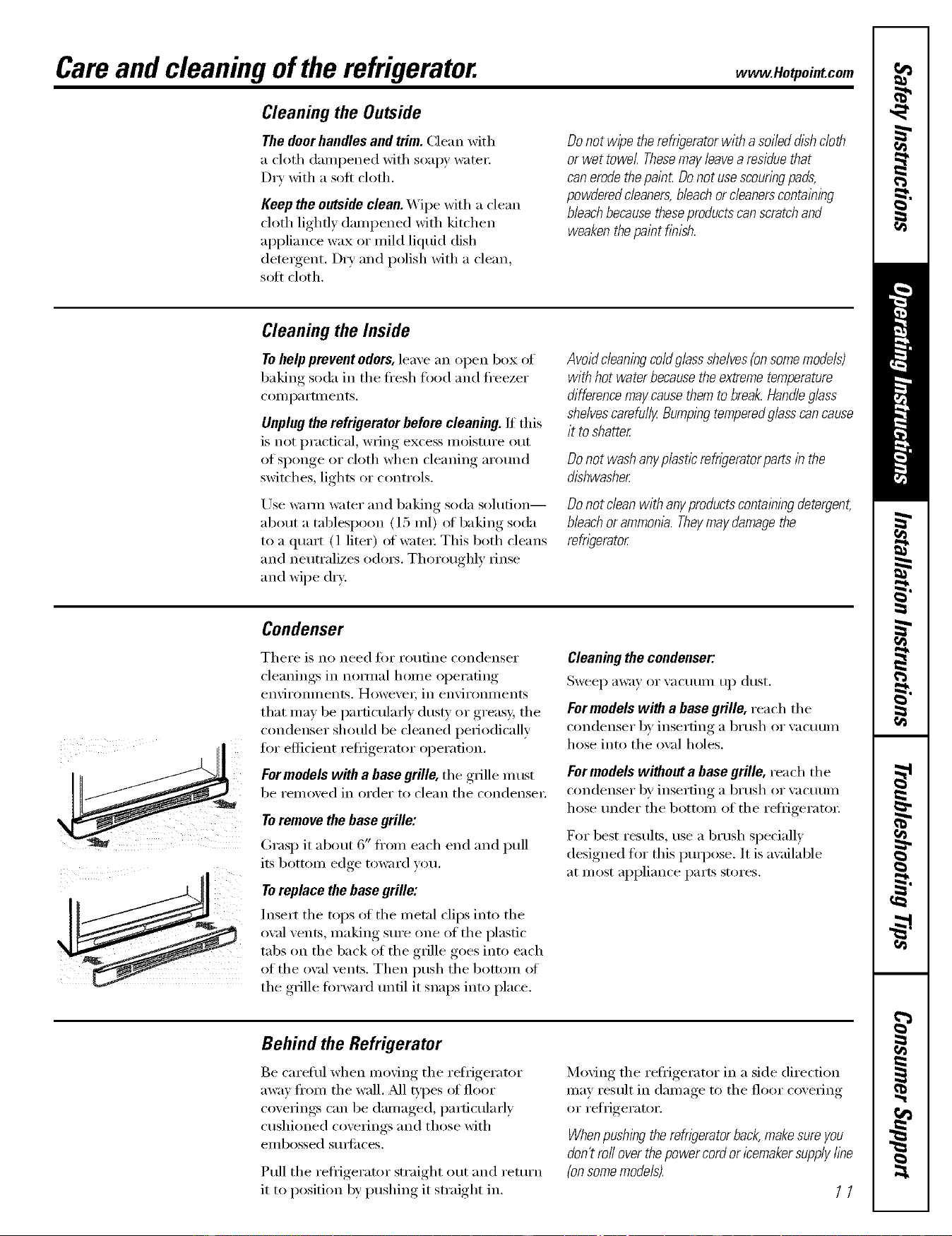
For models with a base grille, tile glille must
be removed in order to clean tile condense_:
Toremove the base grille:
Grasp it about 6" fl'om each end and pull
its bottom edge toward win.
Toreplace thebase grille:
Insert tile tops of tile metal clips into tile
owfl vents, nlaking sure one of tile plastic
tabs on the back of the grille goes into each
of tile oval vents. Then push tile bottom of
the grille torward tmtil it snaps into place.
Cleaning the condenser:
Sweep away or vacuum up dust.
For medels with a base grille, tea ch th e
condenser by inserting a brush or vacuum
hose into the ox_fl holes,
For models without a base grille, tea ch tile
condenser by inserting a brush or w_cuum
hose under the bottom of the reli-igeratox:
For best results, use a brush specially
designed flw this pmi)ose. It is awfilable
at most appliance parts stores.
Behind the Refrigerator
Be careful when mo\_ng tile reliigerator
away fi'om tile wall. M1 types (ff floor
coverings can be damaged, particularly
cushioned coverings and those with
elllbossed Stlll'ilces.
Pull tile refrigerator straight out and return
it to position by pushing it straight in.
Moving tile reliigerator in a side direction
may result in damage to tile floor coveting
or refligerator.
Whenpushing therefrigerator back,make sure you
don't ro//over thepower cord or icemakersupply fine
{on somemodels).
11
Careand cleaning of the refrigerator.
Preparing for Vacation
For long va(-ations or absen(-es_ i'eil/ove
toed and unplug the i'efl_gei'atoi', Move
the refl_igerator control to the 0 (off)
position and clean the interior with a
baking soda solution oI one tablespoon
(15 ml) of baking soda to one quart
(1 liter) ot water; I,eave the (loo_ open,
Set the icemaker power sMtch to the 0 (Off)
position or move the teeler ann to the STOP
(up) position (depending on model) and
shut off the water supply to the refl_igeratm;
If the temperature can drop below fl'eezing,
have a qualified servicer drain the water
supply systenl (on some models) to prevent
serious proper_' dalnage due to flooding.
Preparing to Move
Secure all loose items su(h as grille,
sheh'es and drawe_ by taping them
securely in place to prevent damage.
Besure therefr/gerator st&s in an up@t position
during movl}_g.
Replacingthe lightbulbs.
Setting either or both controls to 0 (off] does not remove power to the light circuit.
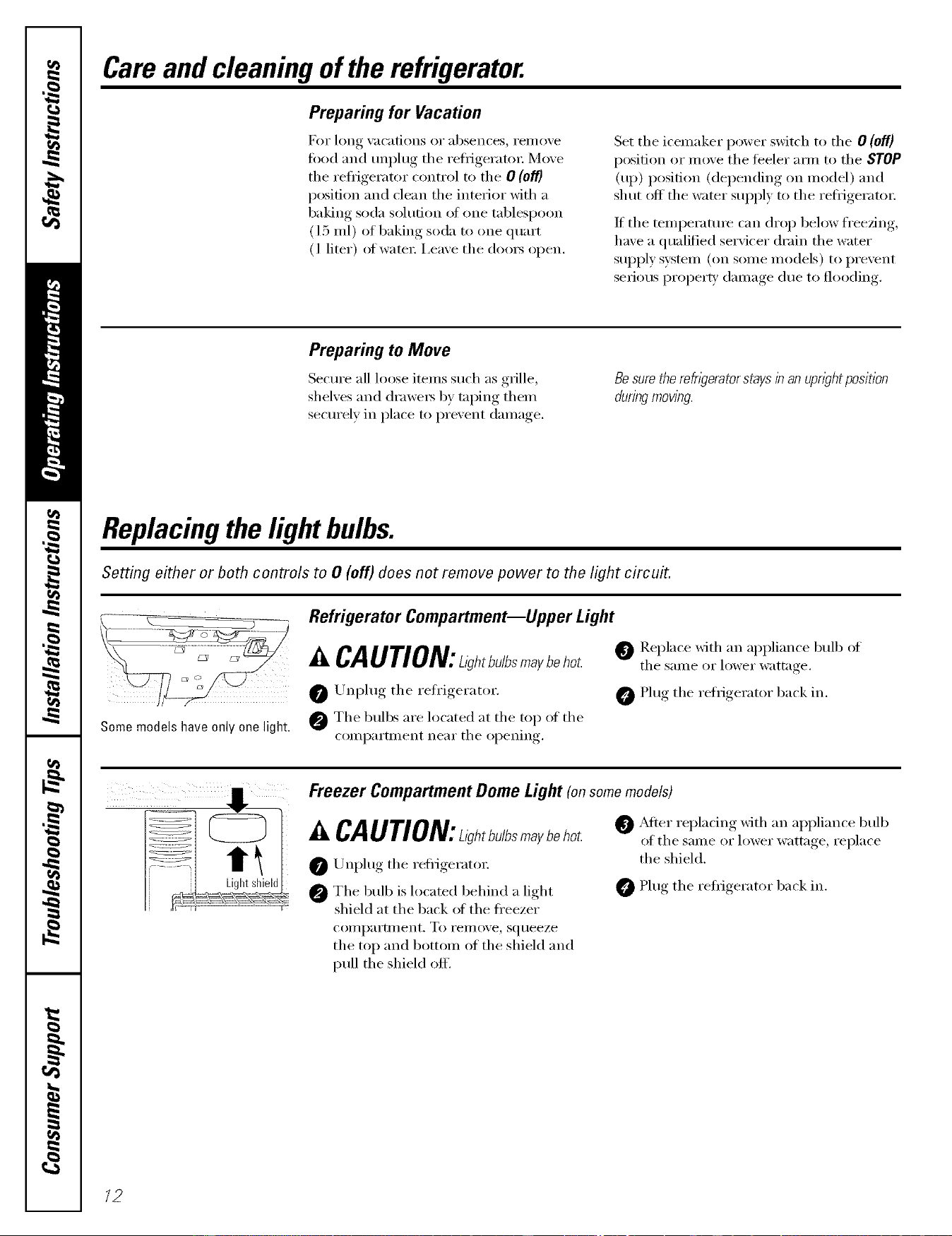
i I _ C_ ii ii i(
Some models have only one light.
Refrigerator Compartment--Upper Light
A CAUTION:ah,bu/bsm_ybeho_. @Replace with aI, appliailce bulbof
the same or lower wattage
0 Unplug the refrigerator. 0 Plug the refrigerator back in.
@ The bull)s are located at the top _ff the
compartment near the opening,
Freezer Compartment Dome Light (onsomemodels)
A CAUTION:L,_h,bu/bsm_ybeho_
0 Unplug the reiiigerato_:
@ The bulb is located behind a light
shield at the back oI the ti'eezer
coii/paYtlilent. To i'eii/ove_ squeeze
the top and bottom of the shield and
pull the shield off.
O _Mter replacing with an appliance bulb
of the same or lower wattage, replace
the shield.
Plug the refligerator back in.
12
Installation
Instructions
Refrigerator
Models 18and 19
ffyou have questions,call 800.GE.CARES(800.432.2737)o,,isitoro_bsite ,t: www.Hotpoint.com ]
BEFORE YOU BEGmN
Read these instructions coropletety and carefully.
° IMPORTANT - S. e hese
inst_l_cti(ros {or local im_spectro"s I_se.
" IMPORTANT - OU,se e.11
_()veI']_Jm_g codes amid or(]importances.
* Note to Instadler = Be sro'eto leave these
im_stn*_thros witl_ the Consm_er.
* Note to Consumer = Keep these h_sm*c6om_s
fl)r flmn'e reference.
* Skill level - Installation of this applim_ce reqlfres
basic mecbm_ical ski]Is.
* Completion time - Refrigerator lm_sta]]ation
15 m Jm_l_tes.
* Proper h_sta]]atiom_ is t]_e respom_sibi]ity of t]_e
im_sta]]er.
* Prodl_ct %]]ro'e (b_e to improper im_sta]]a6om_ is m)t
covered iroder die _trranl[v.
WATER SUPPLY TO THE ICEMAKER
(ON SOME MODELS)
If the refrigerator has an iceroaker, it will have to be
coroaected to a cold water line. A GE water supply kit
(containing tubing, shutoff wflve, fittings and
instructions) is available at extra cost fl'oro wror dealer
or by visiting fro" X4'ebsite at GEAppliances.com or
Pa_xs and Accessories, 800.626.2002.
REFRIGERATOR LOCATION
• Do not install the refrigerator where the teroperamre
will go below 60°F (l 6°C) because it will not _tro often
enough to roaintain proper teroperamres.
• Do not install the refrigerator where the temperatro'e
will go above 100°F (37°C) beca use it will not pertiron
properl>
• Install it on a floor strong enough to support it flfllv
loaded.
CLEARANCES
Allow the fl_llowing clearances fi)r ease of installation,
proper air circulation and I)lmnbing, and electrical
connections.
• Sides 1/8" (3 roro)
• Top 1" (25 turf)
• Back 1" (25 turf)
If the reti_igerator is to be installed next to a wall on the
hinge side, allow 5/16" (8 roro) door clearance.
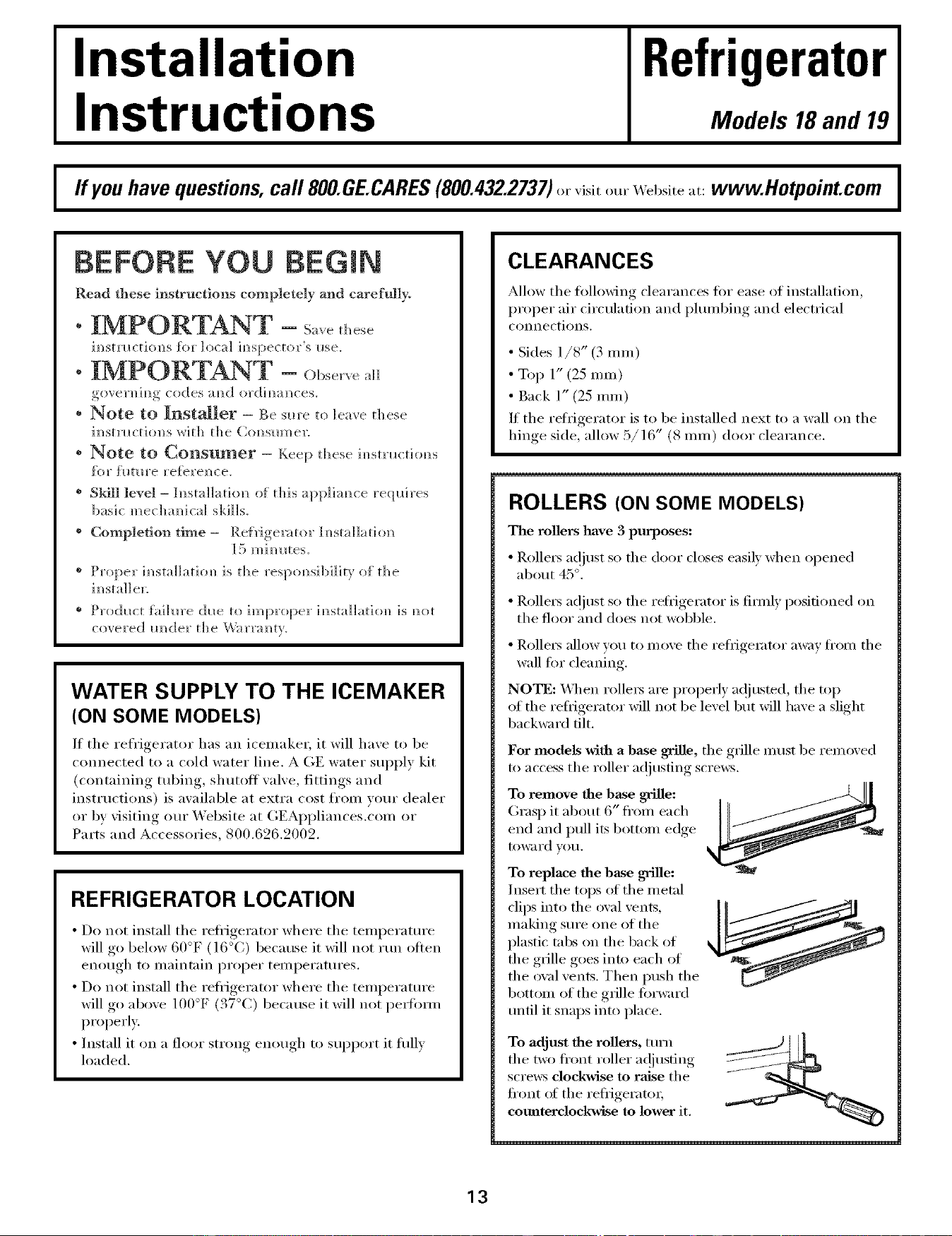
ROLLERS (ON SOME MODELS)
The rollers have 3 purposes:
• Rolle_ a(!just so the door closes easil) when opened
ablaut 4:5°.
• Rolle_ at!just so the refl_igerator is firofl) positioned on
the floor and does not wobble.
• Rollet_ allow you to mro,e the refl'igemtor away fl'oro the
wall tot cleaning.
NOTE: X4q_en rolle_ are properl)ac!justed, the top
of the refrigerator will not be lexel but will haxe a slight
backward flit.
For models with a base grille, the grille must be removed
to access the roller a(!iusflng screws.
To remove the base grille:
Grasp it about 6" fl'oro each
end and pull its bottom edge
to_ro'd VO/I.
To replace the base grille:
Insert the tops of the roetal
clips into the oval vents,
making sro'e one of the
plastic tabs on the back of
the grille goes into each of
the orol vents. Then push the
bottom of the grille torward
trofll it snaps into place.
To adjust the rollers, mrn
the two fl'ont roller a(!jusflng
screws dockwise to raise the
front ot the reflJgeratm;
coro_terclockwise to lower it.
13
mnstaJiation mnstructions
mNSTALUNG THE WATER UNE IONSOMEMODELS}
BEFORE YOU BEGIN
Recomme]/ded copper _ater slq)ply kits _re WX8X2,
WXSXB or WXSX4, depe(/dim/g o(/ die amom/t of
mbim/g you _lee(t. Approved plastic water slq)p]y ]im/es
are (;E Smart(2mm/ect '_Re_i'igerator T!_bi_lg
(WXOSX 100(}2, WX 08X 1(1(1(16,WX 08X 1(1(115 am/d
When com/_lect]m/g yore" reh'igerator to a (;E Reverse
Osmosis _hter System, the o(/]y approved im/sta]]atio(/
is with a GE RVKit. Fox" other reverse osmosis water
systems, ti)]]ow tile m_m/ll{hctllx'ex"s
This water ]h/e ]m/smHatitm is m/or wart;rated bv die
re[Hgerat()r or icemaker mamlfhctm'er. Follow these
im/stmcthms carefldly to mh/]m]ze the risk of expe(/sive
water damage.
Water hammer (water bam/gim/g ira/the pipes) ira/ hollse
phm/bim/g c_m Gmse damage to re_Hgerator parts am/(I
lead to water leakage or fioo(ti_]g. Ca]]a qlla]ified
phm/ber t(} correct water hammer betin'e im/sta]]h/g the
water slq)p]y ]im/e to the refrigerator.
To preve(/t bin'(is am/(1 pro(h_ct damage, do m/or]look
Iq:) the water ]im/e to the I/or water ]h/e.
If vtxll Ilse Vt}llr re{_']gerator be%re c(m m/ect] m/g the
water Jim/e, make sllre the ]cemaker power switch is ira/
the 0 (off)positiom/ (on power switch models) or the
_eeler arm is ira/the STOP (Iq>) positi(m (o(/ _ee]er arm
m ode]s).
Do m/or ira/stall the icemaker mbim]g h/ areas where
tempenmlres _idl below _'eezh/g.
W]]e_/ _lsh/g a_/y electrical device (s_lch as a power
drill) d_lr]_/g ]_/staIIati(m, be s_lre the device is do_d)]e
i_/s_dated or groin/deal i_] a mam/er to preve(/t the
hazard of electric shock, or is batter} powered.
All i_/stallathms mint be i_/ accor(hmce with local
phm/bi_/g code req_fireme(/ts.
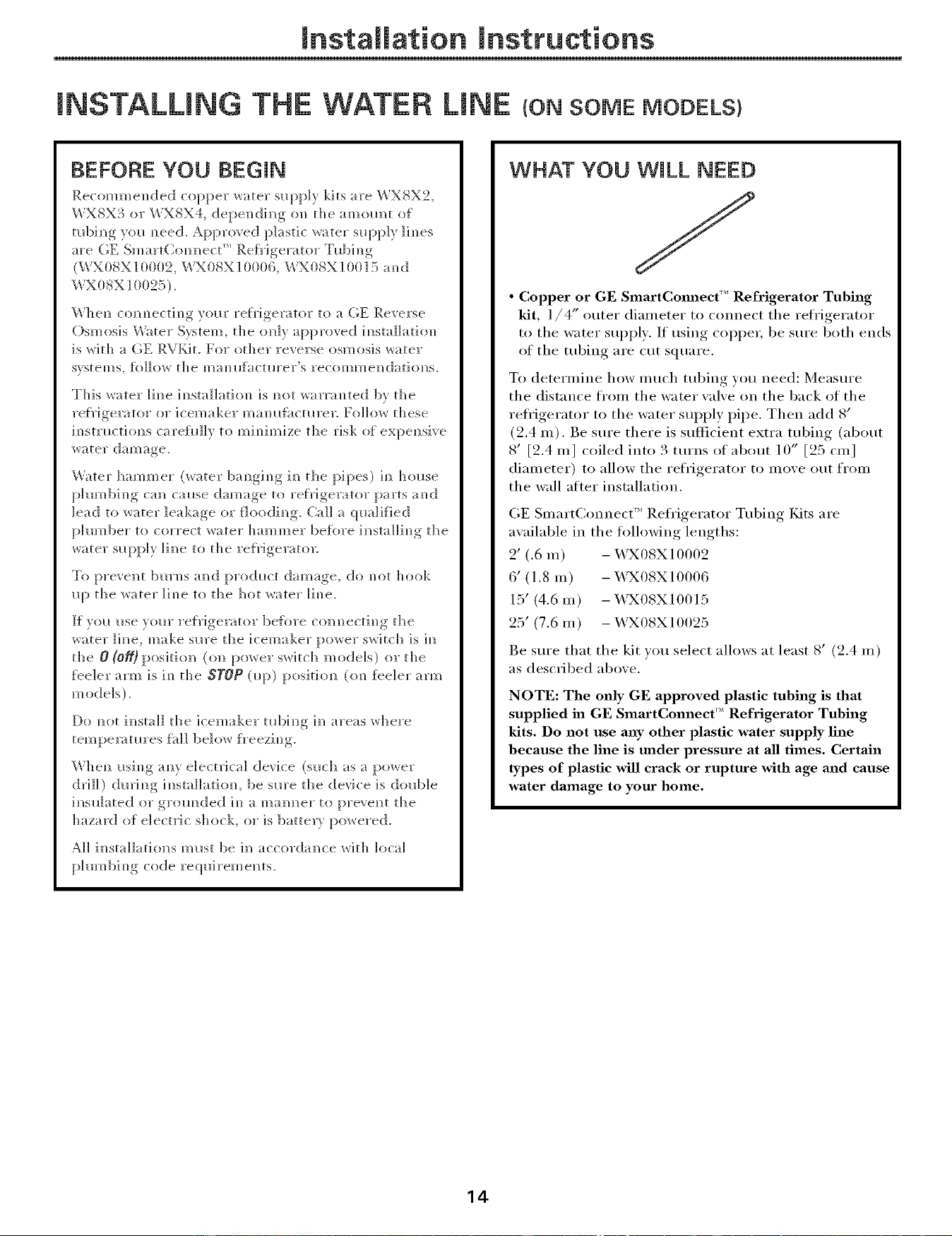
WHAT YOU WILL NEED
• Copper or GE SmartCmmect'" Refrigerator Tubing
kit, 1/4" outer diameter to connect the refi'igerator
to the water supply, If using copper, be sure both ends
of the tubing are cut square.
To determine how much tubing you need: Measure
the distance ti'om the water valve on the back of the
reti'igerator t(> the water supply pipe. Then add 8'
(2.4 m). Be sure there is sufficient extra tubing (about
8' [2.4 m] coiled into 3 turns of about 10 _' [25 cin]
diameter) to allow the refi'igerator to move otlt froill
the wall aiier installation.
GE Sxnart(;onnect ''_ Refl'igerator Tubing Kits are
available ix] the fi>llowing lengths:
2' (.6 m) - WX08X10002
6' (1.8 m) - X,_X08X10006
15' (4.6 m) - X,_X08X10015
25' (7.6 m) - WX08X10025
Be sure that the kit you select allows at least 8' (2.4 m)
as described above.
NOTE: The only GE approved plastic tubing is that
supplied in GE SmartConnect '_'Refrigerator Tubing
kits. Do not use any other plastic water supply line
because the line is under pressure at all times. Certain
types of plastic will crack or rupture with age and cause
water damage to your home.
14
Installation Instructions
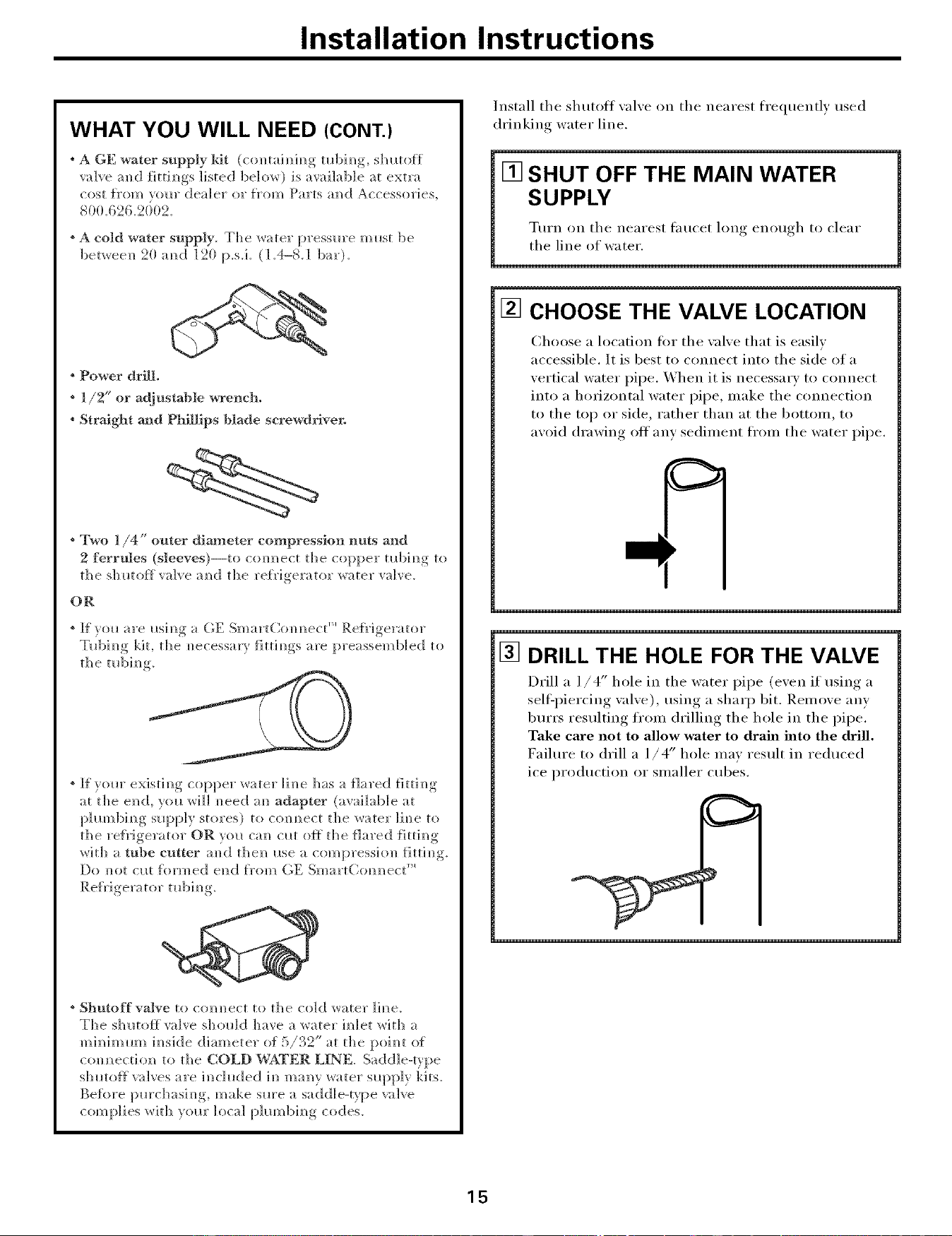
WHAT YOU WILL NEED (CONT.)
A GE water supply kit (comainim_g mbim_g, shmoff
valve a]_d fittJm]gs listed below) is available at extra
cost {]'om your dealer o1"i}'om Parts amid Accessories,
800.626.2002.
* A cold water supply. The water pressure midst be
90 = p.s.i.betwee]/ 2 amid 190 (1.4-8.1 bar).
° Power drill.
* 1/2" or adjustable wrench.
* Straight and Phillips |]lade screwdriver.
° Two 1/4" outer diameter compression nuts and
2 ferrules (sleeves)--to com]ect the copper ml)im/g to
the sh utolt valve amid the re{rigerator water valve.
OR
* _f" ?r()_are i_sim/ga GE Sma_ tCo / /ect " Refrigerator
Tl_bim/g kit, the m/ecessa])tittim/gs are preassemb]ed to
the mbim/g.
* If yore" existi_]g copper water line has a flared fittim/g
at the end, you will m/eed am1adapter (aw6]ab]e at
p]m//bing supply stores) to c<mm/ect the _ater ]im/e to
the refrigerator OR ytm Gm cllt off the flared {]ttim/g
with a tube cutter amid theN/ ilse a compress]ol/ fittim/g.
Do not cllt formed e]/d f}'om (;E SmartCom/m/ect ''_
* Shutoff valve to conm/ect to the cold water ]]m/e.
The s]mtolt valve should ]]ave a water h/let with a
m ira/]m m// ira/s]de di am et er of 5 / 242" at th e pui m/t (If
com/m/ect]o_/ to the COLD WATER LINE. Saddle-type
s]mtoff valves are i_]c]uded im] manly water slq:)p]y ]<its.
Be%re [mrc]]asJm/g, make sm'e a saddle-type valve
complies _ith vollr local [)hm/bim/g codes.
Install the shutoff valve on the nearest frequently used
drinking water line.
[] SHUT OFF THE MAIN WATER
SUPPLY
Turn on the nearest tau{'et lung enuuoh_ t{>clear
the line of water.
[] CHOOSE THE VALVE LOCATION
(2hoose a location fi:,r the valve that is easily
accessible. It is best to connect into the side of a
vertical water pipe. When it is necessary to connect
into a horizontal water pipe, make the connection
to the top or side, rather than at the bottom, to
avoid drawing off any sediment fl'om the water pipe.
[] DRILL THE HOLE FOR THE VALVE
Drill a 1/4" hole in the water pipe (men if using a
sell2I_iercing, xalxe), using a sharp bit. Remu_e any
burrs resulting fr{:,m drilling the hole in the pipe.
Take care not to allow water to drain into the drill.
Failure t{> drill a 1/4" hole ma) result in reduced
ice production or smaller cubes.
15
Installation Instructions
INSTALLING THE WATER LINE (CONT.)
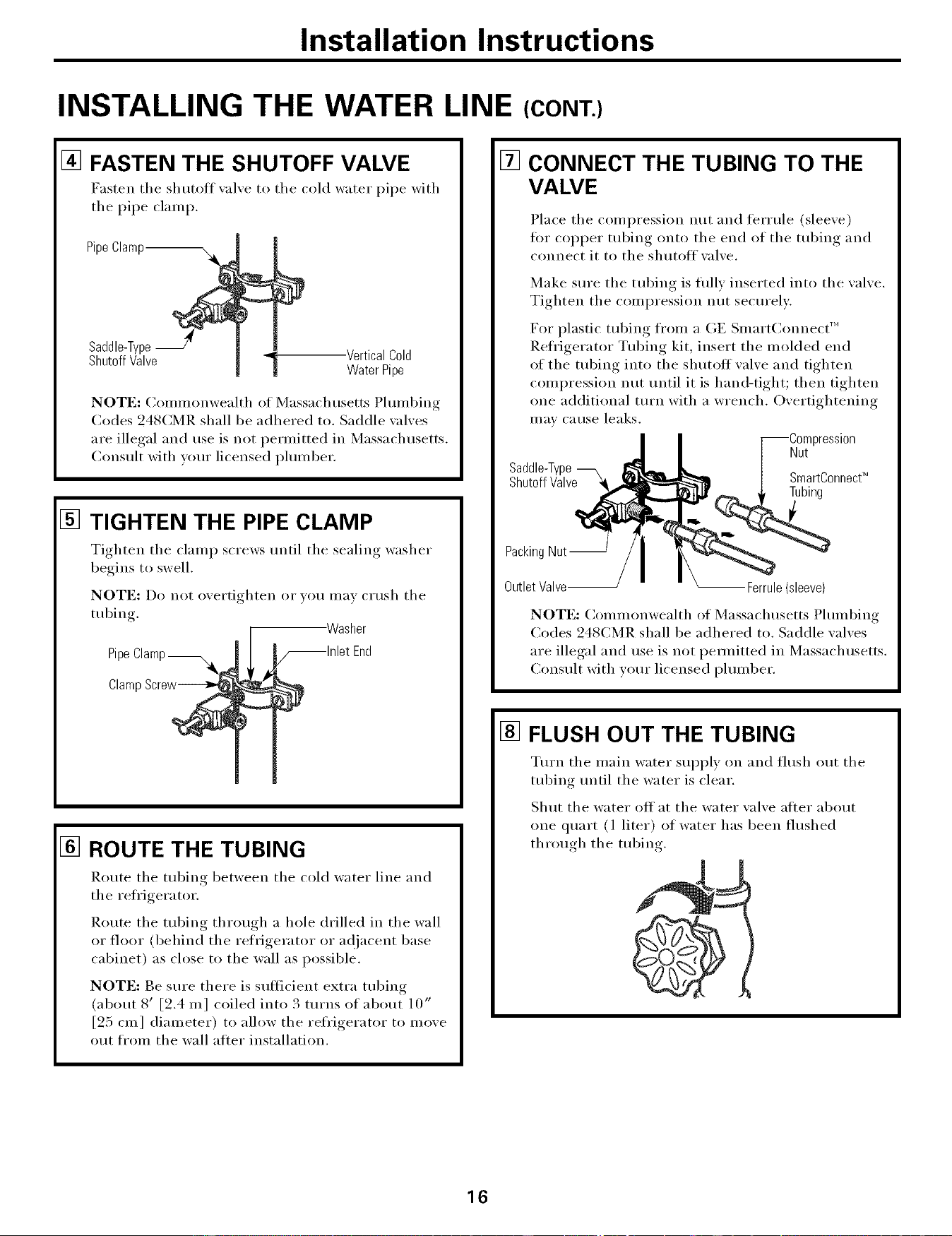
[] FASTEN THE SHUTOFF VALVE
Fasten the shutoff xalxe to the cold water pipe with
tile pipe clamp.
Pipe Clam_
Saddle-Type
Shutoff Valve
-VerticalCold
WaterPipe
NOTE: Conm_onwealth of Massachusetts Phunl)ing
(:odes 248CMR shall be adhered to. Saddle \:flves
are illegal and use is not permitted in Massachusetts,
Consult with wmr licensed plmnber,
[]
TIGHTEN THE PIPE CLAMP
Tighten tile clamp screws until tile sealing washer
begins to swell,
NOTE: Do not overtighten or yo/I Ill[IVcitlsh tile
tubing.
Pipe Clamp_
Clamp Screw_
Washer
,_lnlet End
D
[] ROUTE THE TUBING
Route tile tubing between tile cold water line and
the refl'igera tor.
Route tile tubing through a hole drilled in tile wall
or floor (behind tile refrigerator or ac{jacent base
cabinet) as close to the wall as possible,
NOTE: Be sm'e there is sufficient extra tubing
(about 8' [9.4 mr coiled into 3 turns of about 10"
[25 cm] diameter) to alh)w the refl'igerator to move
out fl'om the wall after installation.
[] CONNECT THE TUBING TO THE
VALVE
Place tile compression nut and tenule (sleexe)
fi)r COl)per tubing onto tile end of tile tubing and
connect it to tile shutoff xalxe.
Make sm'e tile tubing is flfllv inserted into tile wflve.
Tighten tile compression nut secm'elv.
For plastic tubing fl'om a GE Slnart(]onnect'"
Refl'igerator Tubing kit, insert the molded end
of the tubing into the shutoff wflve and tighten
compression nut until it is hand-tight; then tighten
one additional turn with a wrench. Overtightening
III[IV catlse leaks.
cession
Nut
Saddle-Type
Shutoff Valve _ SmartC°nnect_
Tubing
Packing Nut--
Outlet Valve-- -- Ferrule (sleeve)
NOTE: Commonwealth of Massachusetts Plmnbing
Codes 248(:MR shall be adhered to. Saddle wflves
are illegal and use is not pemfitted in Massachusetts.
Consult with vom" licensed plmnber.
[] FLUSH OUT THE TUBING
Tm'n tile main water suI_ply on and flush out tile
tubing tmtil tile water is clear.
Shut tile water off at tile water valve after about
one quart (l liter) of water has been flushed
through tile tubing.
16
Installation Instructions
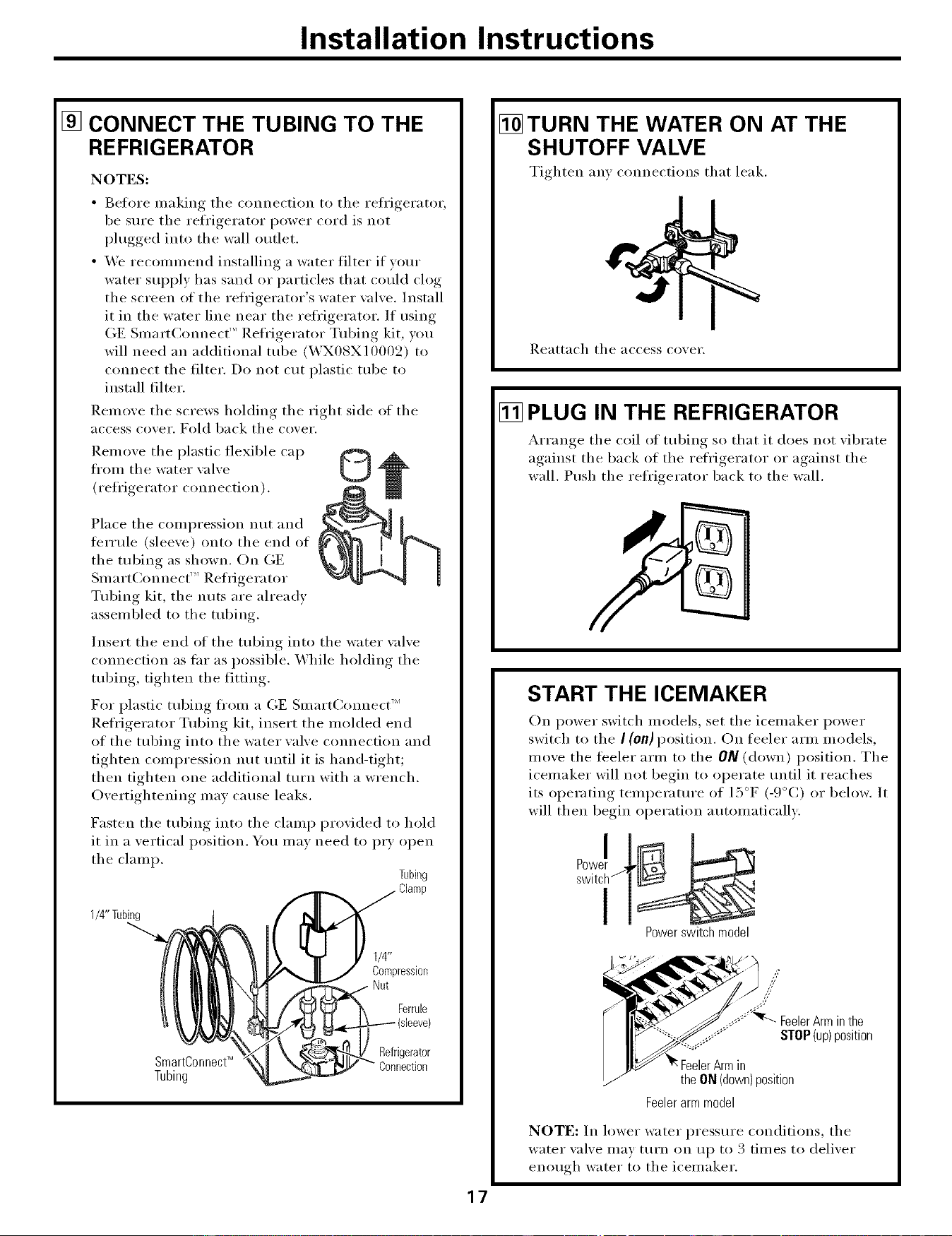
[] CONNECT THE TUBING TO THE
REFRIGERATOR
NOTES:
• Before making tile connection to the reli'igerator,
be sure tile refl'igerator power cord is not
plugged into the wall outlet.
• We recommend installing a water filter if your
water supply has sand or particles that could clog
the screen of the refrigerator's water wdve. Install
it in the water line near the refi'igerator. If using
GE SmartCmmect TM Refl'igerator Tubing kit, you
will need an additional robe (WX08X10002) to
connect tile filter. Do not cut plastic tube to
install filter.
Remove the screws holding the right side of the
access cover. Fold back tile cover.
Renloxe tile plastic flexible cap
from tile water xalxe
U
(refl'igerator connection).
Place tile compression nut and
terrule (sleeve) onto tile end of
the robing as shown. On GE
Smart(]onnect _'_Refrigerator
Tubing kit, the nuts are already
assembled to the tubing.
Insert the end of the tubing into the water wdve
cmmection as fin" as possible. While holding the
tubing, tighten the fitting.
For plastic tubing fl'om a GE Smart(:(mnect "_
Refl'igerator Tubing kit, insert tile molded end
of tile tubing into tile water valve connection and
tighten compression nut tmtil it is hand-tight;
then tighten one additional turn with a wrench.
Overtightening may cause leaks.
Fasten tile tubing into tile clamp provided to hold
it in a vertical position. You mav need to I)_T open
tile clamp.
Tubing
1/4" Tubing
1/4"
Compression
Nut
Ferrule
SmartConnectTM
Tubing
Refrigerator
Connection
[] TURN THE WATER ON AT THE
SHUTOFF VALVE
Tighten any connections that leak.
Reattach tile access co_ei',
[] PLUG IN THE REFRIGERATOR
&_rram,e tile coil ot tubing so that it does not _ibrate
against tile back of tile refrigerator or against tile
wall. Push tile refrigerator back to tile wall.
START THE ICEMAKER
On power switch models, set tile icemaker power
switch to the I (On) position. On feeler arm models,
move tile feeler arm to tile ON (down) position. Tile
icemaker will not begin to operate/mtil it reaches
its operating temperatm'e of 15°F (-9°(:) or below. It
will then begin operation automatically:
Power switch model
17
.......;%% FeelerArminthe
_Y STOP(up)position
in
the ON (down) position
Feeler arm model
NOTE: In lower water pressm'e conditions, tile
water xalxe may turn on up to 3 times to delixer
enou,d/ water to tile icemaker.
Installation Instructions
REVERSmNG THE DOOR SW NG
IMPORTANT NOTES
_hen reversing the door swing:
• Read the ii_stluctions all the way throuoh before
smrting.
• Handle parts careflfllv to axoid scratching, I)aim
• Set screws down b'_ their related parts to a_oid usin,,,
theln in the wrong places.
• Proxide a i_oi_-scratching work surtace fi_i"
the doors.
IMPORTANT: Once ",ou begin do not inoxe the
cabinet until dooi_swing rexersal is comi)leted.
These inst_ uctions are for changing the hinges from
the right side to the left side--if _ou e',er want to change
the hinges back to the right side, follow these salne
instructions and re_e_e all references to left and right.
Unplug the refrigerator from its electrical outlet.
Empty all door shelves, including the dairy
compartment,
TOOLS YOU WILL NEED
Phillipsscrewdriver
Masking tape
3/8" Headsocketdriver
(a6-pointsocketis
recommended)
Puttyknifeor
thin-bladescrewdriver
T2OorT25 Torx_
driver,whicheveryour
modelrequires
[] REMOVE THE FREEZER DOOR
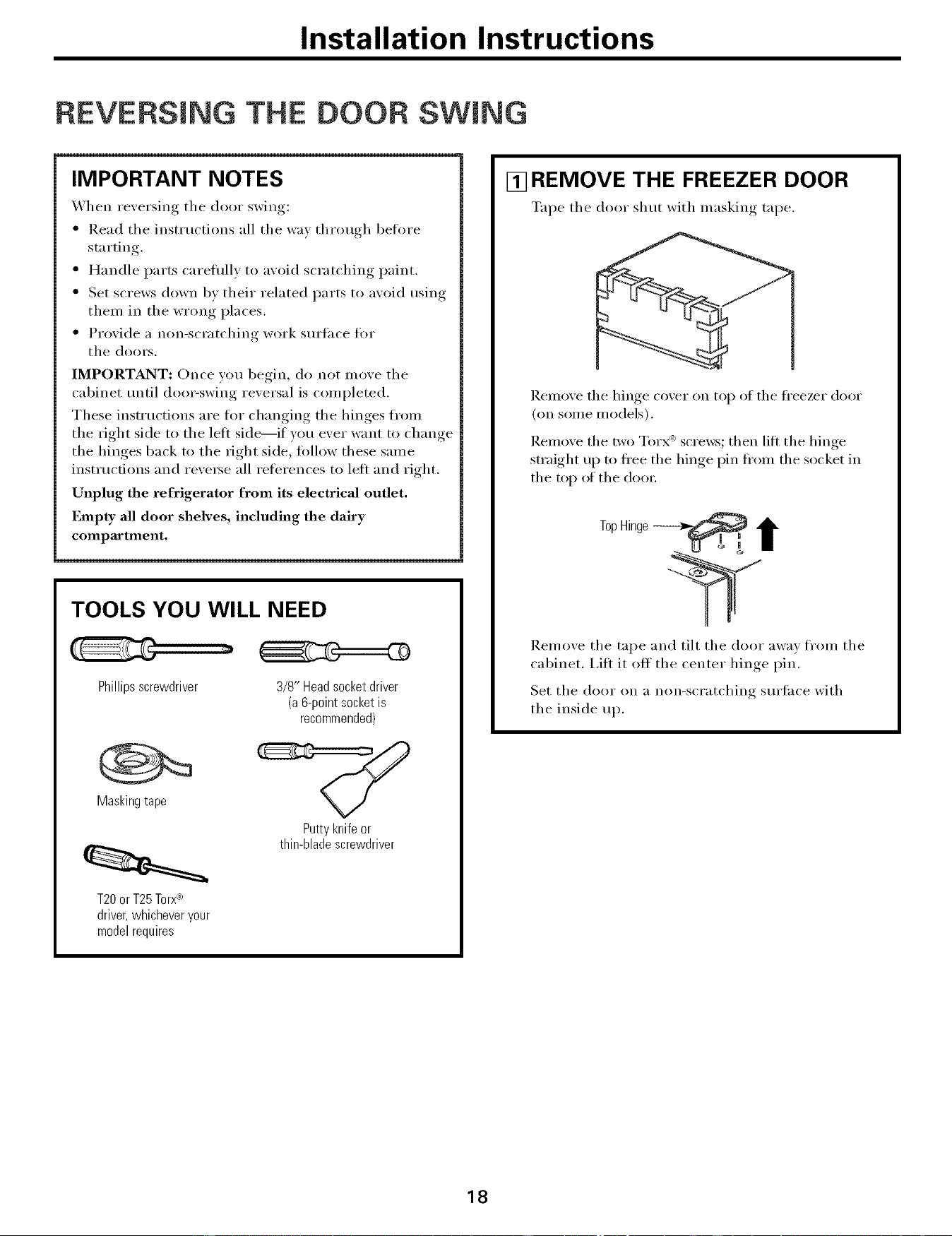
Tape the door shut with umsking tape.
I_.etno_e the hinge co_er on top of the freezer door
(on some models).
Remoxe the rw ) Torx _:screws; then lift the hinge
smfight up to ti'ee the hinge pin ti'om the socket in
the top of the dooi:
TopHinge __ i
Relnove the tape and tilt the door away fl'oln the
cabinet. I,itt it off the center hinge pin.
Set the door on a non-scratching sm'iace with
the inside up.
18

mnstaliation mnstructions
[] REMOVE THE REFRIGERATOR
DOOR
%q_e the door shut with masking tape.
Remove the center hin,,e_ pin with a 3/8" socket
and ratchet.
1
PlasticWasher
HingePin--
"4
I
FreshFoodDoor
CenterHinge
Bracket
I_.em(we the tape and tilt the door away fl'om the
cabinet. ]_,elnove and save the washer on the hinge pin.
I,ifl the door straight up to fl'ee its bottom socket fl'om
the pin in the bottom hinge bracket.
Set the door on a non-scratching surti_ce with the
inside up.
CAUTION: Do not let door drop to the flo(m To do so
could damage the door stop.
[] TRANSFER TOP HINGE TO
THE LEFT
Interchange, hiw,e_ and screws at toi _ right, with screws
at the top left of cabinet.
Do not tighten screws on hinge side at this time.
19
mnstaliation mnstructions
REVERSING THE DOOR SWING (CONT.)
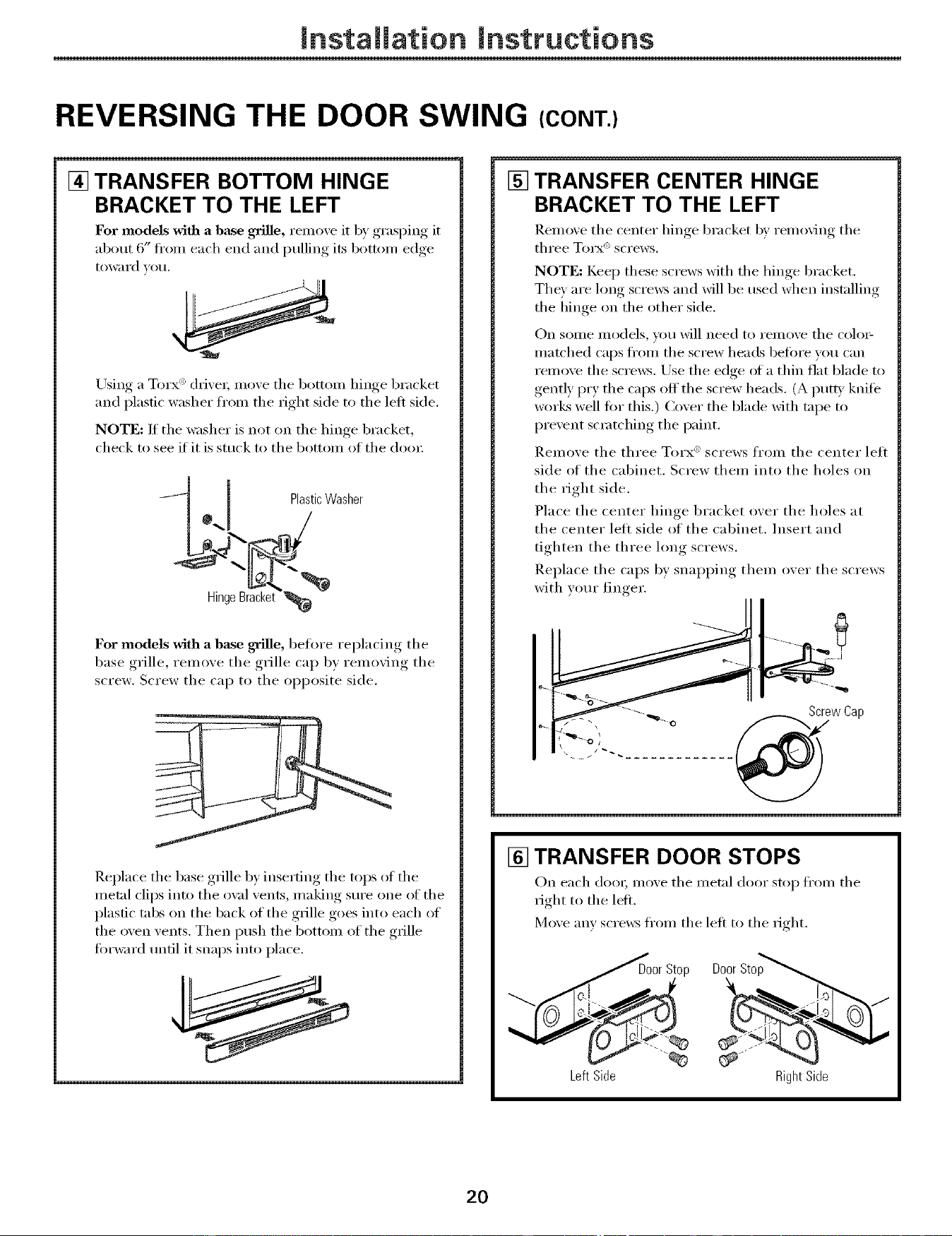
[] TRANSFER BOTTOM HINGE
BRACKET TO THE LEFT
For models with a base grille, remo_e it b) ,grasI)ing, it
about 6" fl'om each end and mllino its botton/edoe
t()wa rd _otl.
Using a Torx (_:'clrixet; moxe the bottom hinge bracket
and plastic washer fl'om the right side to the left side.
NOTE: If the washer is not on the hinge bracket,
check to see if it is stuck to the bottom of the dora:
-_ 1 PlasticWasher
*d /
.4"-
HingeBracket
For models with a base grille, before rei)lacim*_ the
base grille, remoxe the grille cap b) remoxing the
screw. Screw the cap to the opposite side.
Replace the base grille by inserting the tops of the
metal clips into the ox_flvents, making sure one of the
plastic tabs on the back of the grille goes into each of
the oven vents. Then push the bottom of the grille
forward tmfil it snaps into place.
[] TRANSFER CENTER HINGE
BRACKET TO THE LEFT
Remoxe the center hinge bracket b} removim,_ the
three" T_rx_) screws.
NOTE: Keep these screws with the hinge bracket.
They are lon,* screws and will be used when installing
the hin,*e on the other side.
On some models you will need to remoxe the colo>
matched caps fl'om the screw heads befi)re you can
remoxe the screws. Use the edge of a thin fiat blade to
,_entlv, i)rv, the cai)s o# the .....screw heads (A putt} knife
works well fiw this.) Coxer the blade with tape to
I)rexent scratching, the paint.
Remoxe the three Tmx" screws from the center lett
side of the cabinet. Screw them into the holes on
the right side.
Place the center hinge bracket oxer the holes at
the center lett side of the cabinet. Insert and
tighten the three hmg screws.
Replace the caps by, snaii ) )ing, them oxer the screws
with )ore" finger.
ScrewCap
e_
[] TRANSFER DOOR STOPS
On each do(m moxe the metal door stop ti'om the
right to the letL
Moxe any screws fl'om the left to the ri ,ht
Stop Door Sto
Left Side
RightSide
20
Installation Instructions
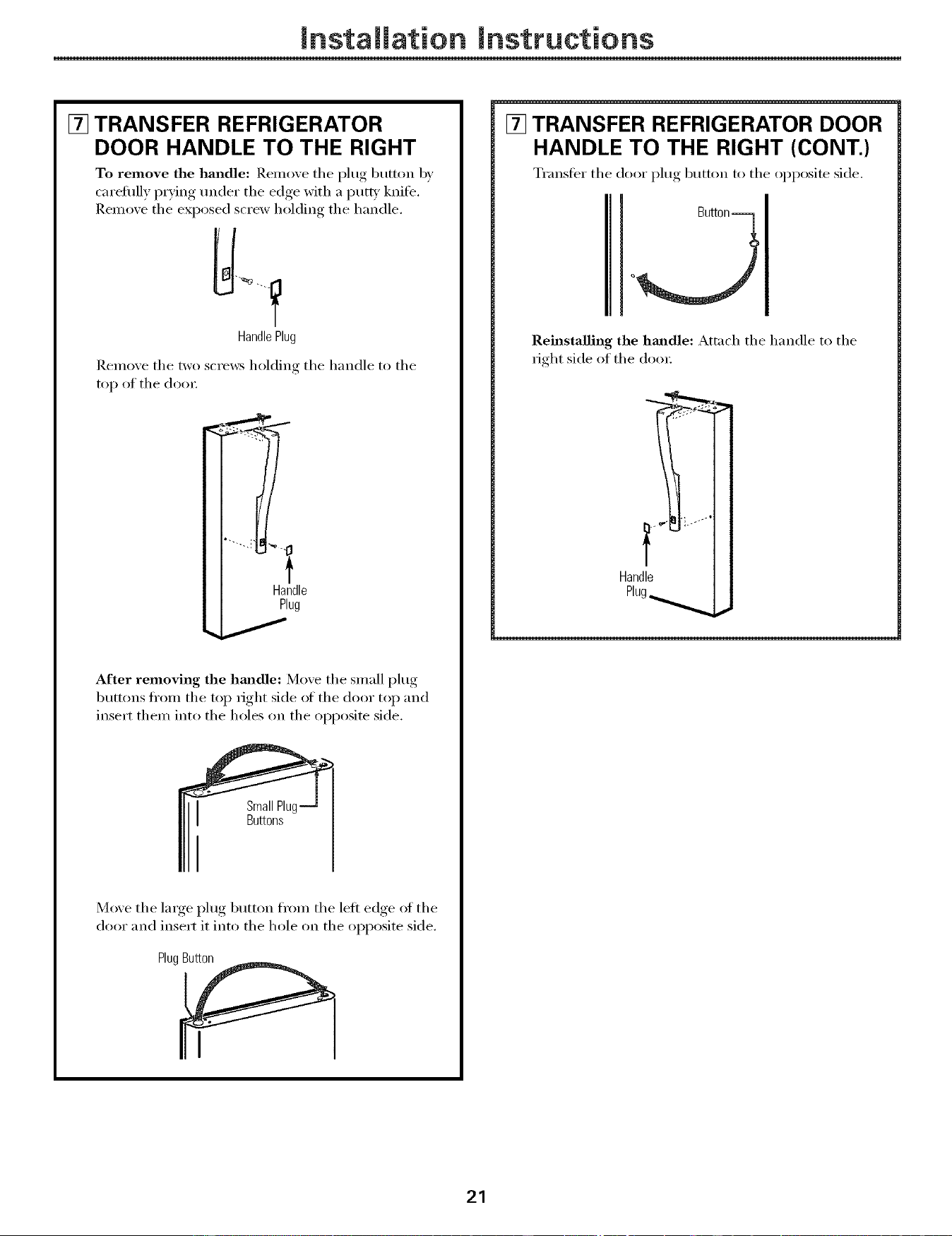
[] TRANSFER REFRIGERATOR
DOOR HANDLE TO THE RIGHT
To remove the handle: Remove the plug button by
carelully p_Ting under the edge with a putty knife,
Remove the exposed screw holding the handle.
Handle Plug
Remove the two screws holding the handle to the
top of the do(n:
Handle
Plug
After removing the hmadle: Move the small plug
buttons fl'om the top right side of the door top and
insert them into the holes on the opposite side,
SmallPluq
Buttons
Move the large, I_lu°,_ button from the left edge of the
door and insert it into the hole on the opposite side.
PlugButton
[] TRANSFER REFRIGERATOR DOOR
HANDLE TO THE RIGHT (CONT.)
Transfer the door plug button to the opposite side.
Reinstalling the hmadle: Attach the handle to the
right side of the doo_;
Handle
Plug_ ,_
21
Installation Instructions
REVERSING THE DOOR SWING (CONT.)
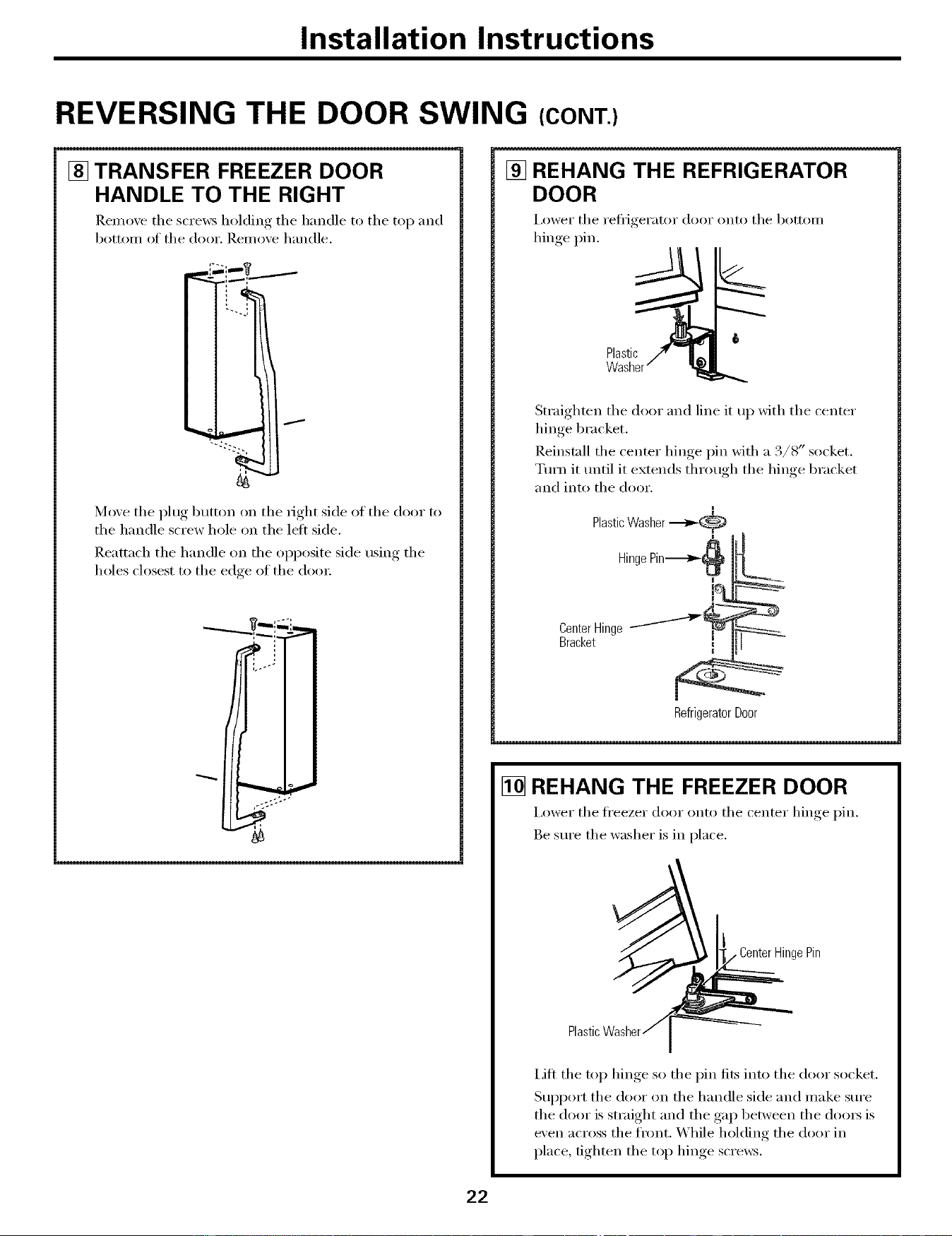
[] TRANSFER FREEZER DOOR
HANDLE TO THE RIGHT
Remoxe the screws holding the handle to the top and
botton_ of the door. Remoxe handle.
Move the plug button on the right side of the door to
the handle screw hole on the left side.
Reattach the handle on the opposite side using the
holes closest to the edge of the door.
[] REHANG THE REFRIGERATOR
DOOR
i,ower the Fe_lJgei';_Kor door oiKo the bottoill
hinge pin.
t
Plastic
Straighten the door and line it up with the center
hinge bracket.
Reinstall the center hinge pin with a 3/8" socket.
Tm'n it tmtil it extends through the hinge bracket
and into the door.
m
PlasticWasher ._,_(_,
Hing
i%
CenterHinge--"-'-'-'-'-'_
Bracket
m
RefrigeratorDoor
[] REHANG THE FREEZER DOOR
I,ower the ti'eezer door onto the center hinge pin.
Be sure the washer is in place.
} CenterHingePin
Plastic
lift the top hinge so the pin fits into the door socket.
Support the door on the handle side and make sure
the door is straight and the gap between the dom_ is
even across the front. While holding the door in
place, tighten the top hinge scrmvs.
22
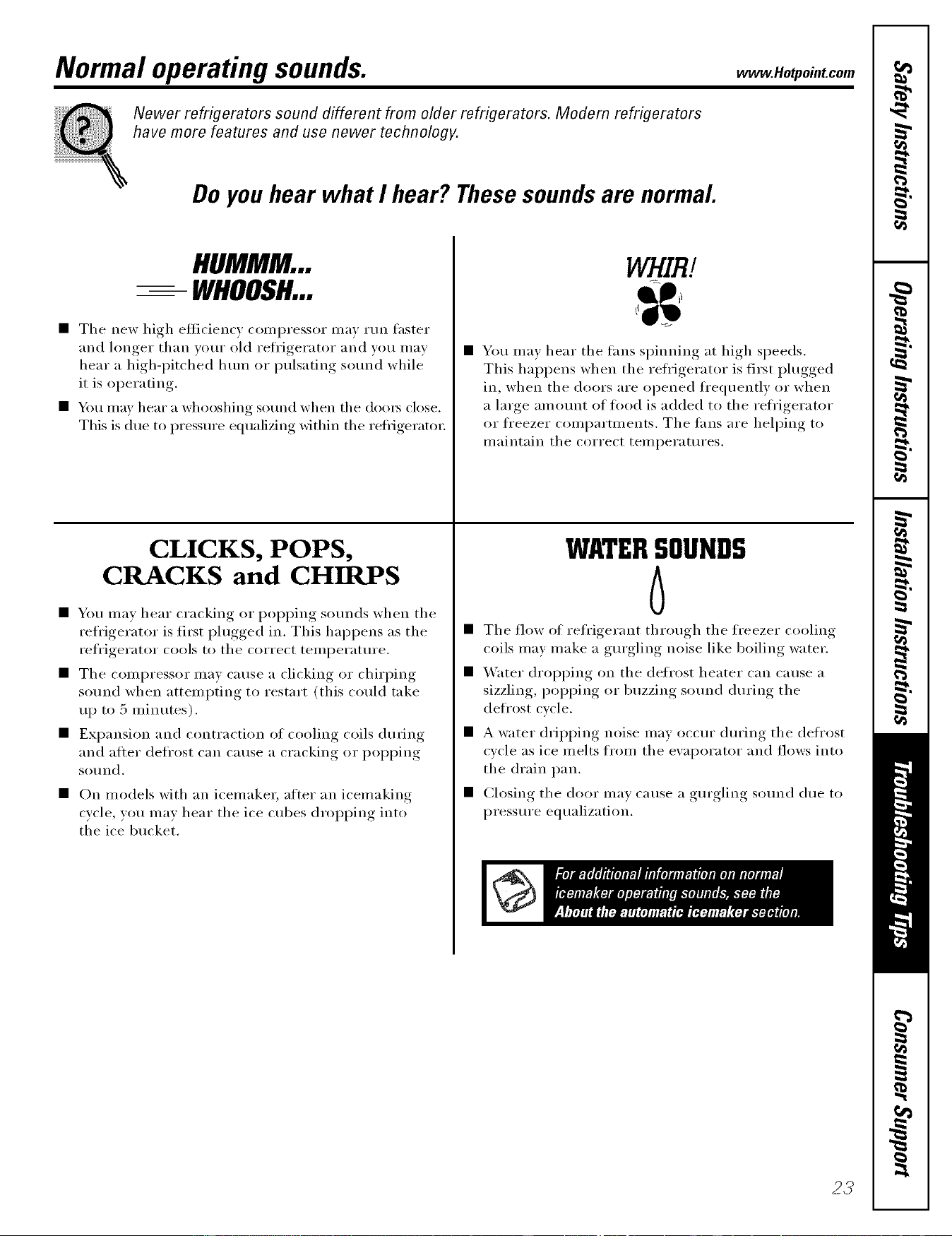
Normal operating sounds. _,_eo,poi,,com
Newer refrigerators sound different from older refrigerators. Modem refrigerators
have more features and use newer technology.
Do youhear what I hear? Thesesoundsare normal.
HUMMM...
-- WHOOSH...
• The new high efficiency compressor may mn faster
and longer than wmr old refl'igerator and you may
hear a high-i_itched hum or pulsating sotmd while
it is operating.
• _4m may hear a whooshing sound when the doo_ close.
This is due to pressure equalizing within the reflJgeratot;
CLICKS, POPS,
CRACKS and CHIRPS
• You may hear cracking or i)oi)ping sounds when the
refrigerator is first i)lugged in. This hal)pens as the
refrigerator cools to the correct teil/l)erattlre.
• The compressor may cause a clicking or chirping
sound when attempting to restart (this could take
up to 5 minutes).
• Expansion and contraction of cooling coils during
and after defl'ost can cause a cracking or i)oi)ping
SOtlnd.
• On models with an icemake_; after an icemaking
cycle, you may hear the ice cubes dropping into
the ice bucket.
WHIRl.
• You mav hear the rims spinning at high speeds.
This hai_pens when the refl'igerator is first i)lugged
in, when the doors are opened fl'equently or when
a large amount of timd is added to the reii'igerator
or fl'eezer comparm_ents. The tans are helping to
maintain the correct temperatures.
WATERSOUNDS
6
• The flow of refl'igerant through the fl'eezer cooling
coils may make a gm'gling noise like boiling water,
• _'ater dropping on the defrost heater can Catlse a
sizzling, i)oi)ping or buzzing sotmd dm'ing the
defl'ost cycle.
• A water dripping noise may occm" dm'ing the defl'ost
cycle as ice melts from the evaporator and flows into
the drain pan.
• Closing the door may Catlse a gm'gling SOtlnd dtle to
pressure equalization.
23
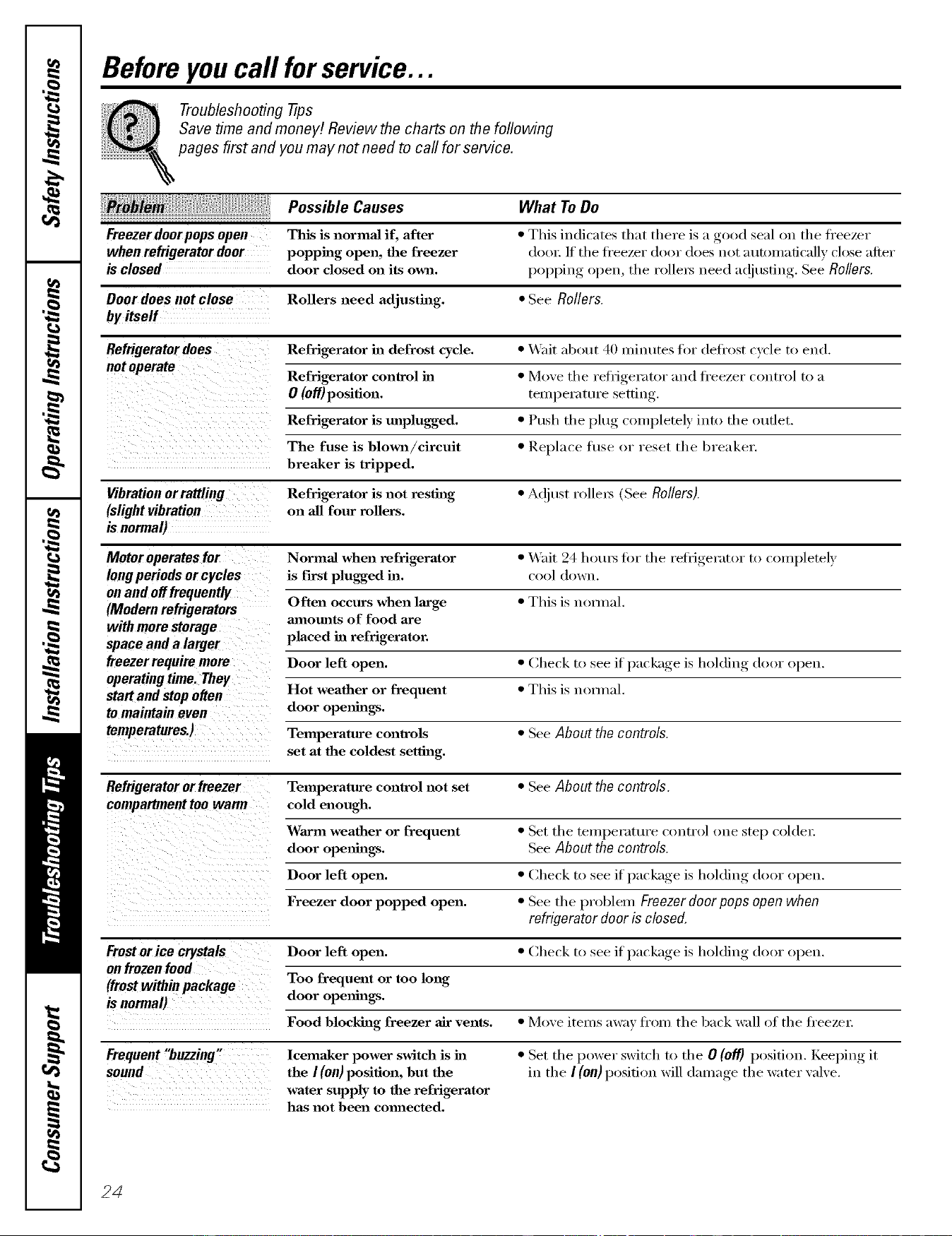
Beforeyou call forservice...
Troubleshooting -tips
Save time and money! Review the charts on the following
pages first and you may not need to call for service.
Possible Causes What ToDo
Freezer door pops open This is normal if, after * This iudi('ates that there is a good seal on the ti'eezer
when refrigerator door popping open, the freezer door./f the fi'eezer door does not autou_aficallv close after
is closed door closed on its owu. popping open, the rollex_ need ac!iusfing. See Rollers.
Door does not close Rollers need adjusting. * See Rollers.
byitself
Refrigerator does Refrigerator in defrost cycle. * Wait abt_ut 40 minutes fi w defi'ost cycle to end.
Refrigerator control in * h/h we the refiJgerat_ w a ud fi'eezer c_)utr_)l t_) a
} ,"
O (0ff)position. tern )erature setting
Refrigerator is unplugged. * Push the }_luo_ completeD, into the outlet.
The fuse is blown/circuit * Replace fl/se or reset the breaker.
breaker is tripped.
Vibration orrattling Refrigerator is not resting * A(!iust rolle_ (See Rollers).
(slightvibration on all four rollers.
isnormal)
Motor operates for Normal when refrigerator * Wait 24 hotu_ t0r the refi_igerator to completely
long periods or cycles is first plugged in. ct_ _1(h)wu.
on and off frequently
Often occurs when large * This is uom_al,
(Modern refrigerators
with more storage amounts of food are
space and a larger placed in refrigerator.
freezer require more Door left open. * Check to see if package is holding door o})eu.
operating time. They
Mart and Mop often Hot weather or frequent * This is normal.
to maintain even door openings.
temperatures.) Temperature controls * See About the controls.
set at the coldest setting.
Refrigeratororfreezer Temperature control not set • See About thecontrols.
compartmenttoowarm cold enough.
Warm weather or frequent * Set the temperattu'e control one step col(le_:
door openings. SeeAbout the controls.
Door left open. * Che(k to see if l)a('kage, is holding door ol)eu.
Freezer door popped open. * See the l)robleu/Freezerdoorpops open when
refrigerator dooris closed.
if )at ka,,e is holding door oI)eu.Fromor ice crystals Door left open. * Check to see }
onfrozenfood
(fromwithinpackage Too frequent or too long
is normal) door openings.
Food blocking freezer air vents. * Move items away ti'om the back wall of the ti'eeze_:
Frequent"buzzing"
sound
lcemaker power switch is in
the I (on) position, but the
water supply to the refrigerator
has not been comaected.
• Set the power switch to the O (off) position. KeeIfino_ it
in tile I (on) position will dainage tile water ",al',e,
24
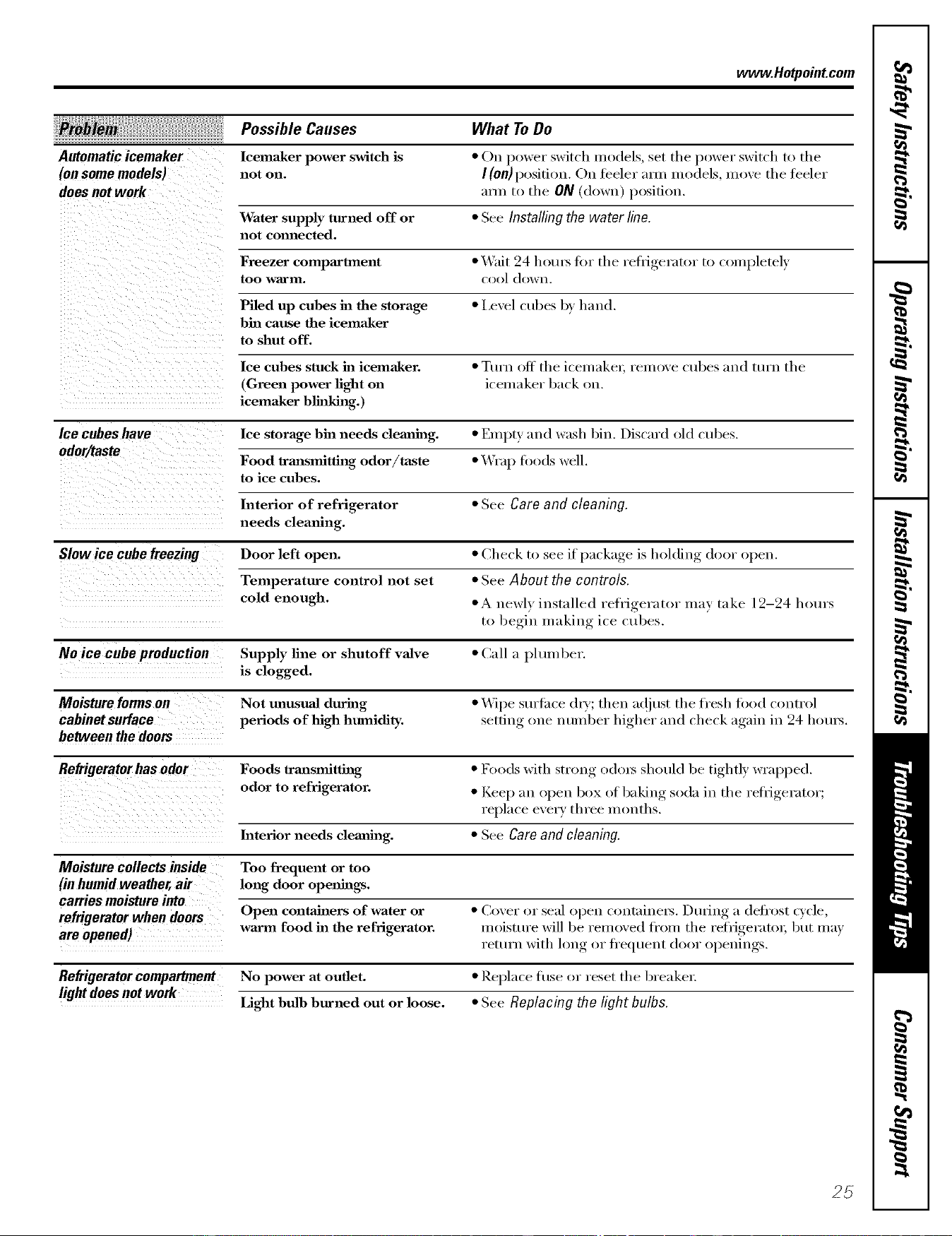
www.Hotpoiut.com
What ToDo
Automatic icemaker
(on some models)
does not work
Possible Causes
Icema_ker power switch is
not on.
• On power switch models, set the power switch to the
I (On)position. On feeler mm models, moxe the feeler
axm to the ON (down) position.
Water supply turned off or • See Installing the water line.
not comaected.
Freezer compartment • Wait 24 h ota_ fi )r th e rehJgerat()r t() c()mpletelv
too warm. cool down.
Piled up cubes ha the storage • l,evel cubes by hand.
bin cause the icemaker
to shut off.
Ice culaes stuck ha icemaker. • Turn off the icemake_, l'elll()Ve cubes and turn the
(Green power fight on icemaker back on.
icemaker blhfl_hag.)
Ice cubes have Ice storage bin needs clemfing. • Empty mad wash bin. Discard old cubes.
odor/taste
Food trmasmitthag odor/taste • Wrap fi)ods well.
to ice cubes.
Interior of refrigerator • See Care and cleaning.
needs clealfing.
if )acka,,e is holding door open.Slow ice cube freezing Door left open. • Check to see l
Temperature control not set • See About the controls.
cold enough. • A newly installed refl'igerator may take 12-24 hera's
to begin making ice cubes.
No ice cube production Supply fine or shutoff valve • Call a plum her.
is clogged.
Moisture forms on Not unusual during • _'_]pe suriilce d_y; then a(!iust the fl'esh fi)od control
cabinet surface periods of high humidity, setting oue ntmiber higher and check again in 24 hota_.
between the doors
Refrigerator has odor Foods lrmasmitthag • F()ods with strong odox_ sh(mld be tightly wrapped.
odor to refrigerator. • Keep ;111opeu box of bakiug soda ill the l'efiJgel';Itol';
replace every three mouths.
Interior needs cleauilag. • See Care and cleaning.
Moisturecollectsinside Too frequent or too
(inhumidweather,air long door opera_hags.
carries moisture into
refrigerator when doors Open containers of water or • (_oVeI" o1" seal opeu (out_linels, Drilling ;i (leii'ost cycle,
are opened) warm food in the refrigerator, moisture will be removed fl'om the reflJgeratol, but may
0 O" 0 " " ( ( } _ ,return with 1 u_ _ hequeut d ) )r o )euiugs
Refrigerator compartment No power at outlet. • Replace fl/se or reset the breaker;
lightdoesnotwork
Light bulb burned out or loose. • See Replacing the light bulbs.
25
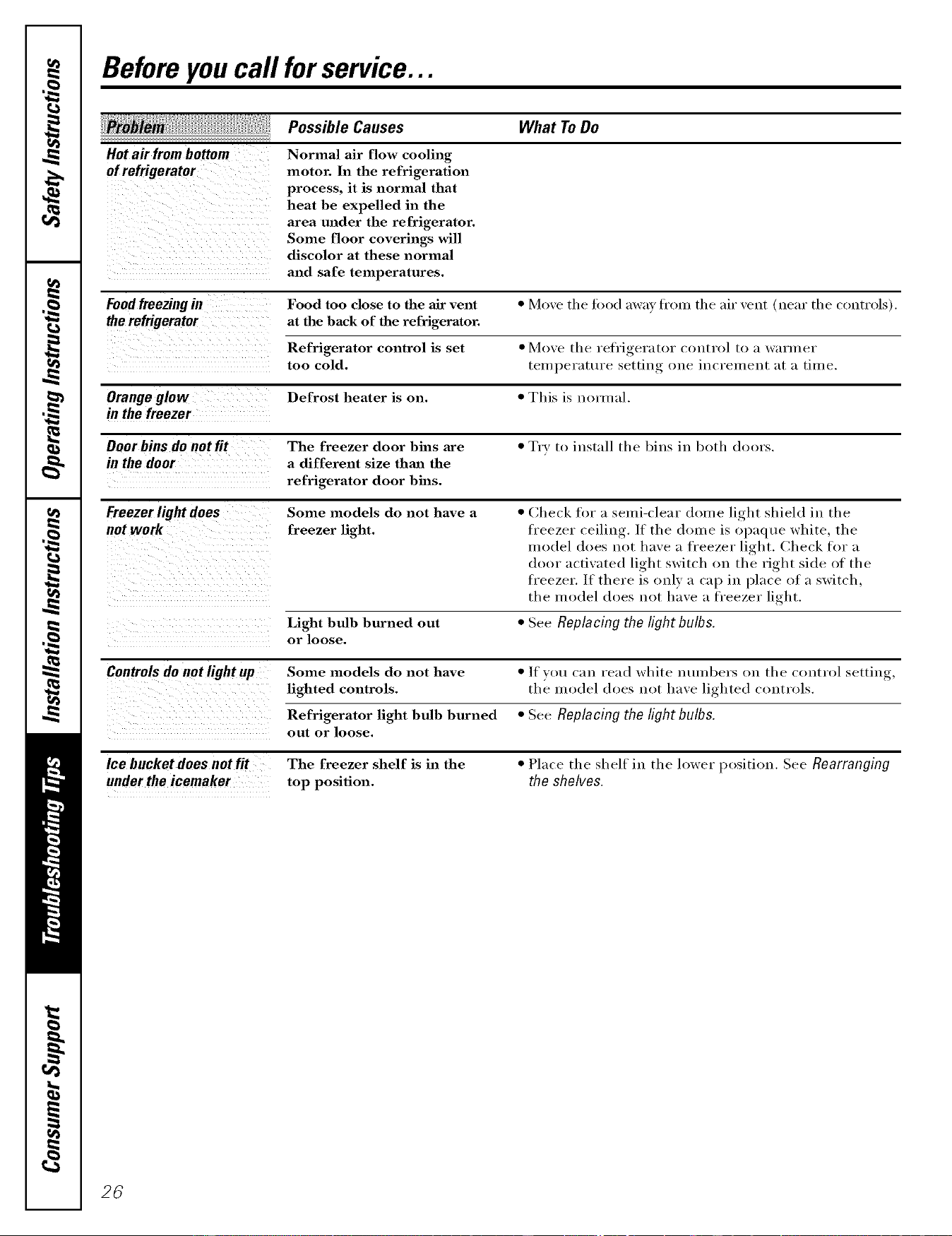
Beforeyou call forservice...
Possible Causes What ToDo
Hot air from bottom Normal air flow cooling
motor. In the refrigeration
process, it is normal that
heat be expelled in the
area under the refrigerator.
Some floor coverings will
discolor at these normal
and safe temperatures.
Food freezing in Food too close to the air vent * Move tile fi)od away from the air vent (near tile controls).
the refrigerator at the back of the refrigerator.
Refrigerator control is set * Move the retrigerator control to a warmer
too cold. temperattu'e setting one increment at a time.
Orange glow Defrost heater is on. * This is normal.
in the freezer
Door bins do not fit The freezer door bins are * Try t(> install tire bins in b(>th doors.
in the door a different size than the
refrigerator door bins.
Freezer light does Some models do not have a * Check for a semi-clear dome light shield in the
not work freezer light, freezer ceiling. If tire dome is opaque white, the
• • r • (
model does not have a h'eezer h_ht. Check t )r a
door activated light switch on the right side of the
freezer. If there is only a cap in place of a switch,
the model does not have a freezer light.
Light bulb burned out * See Replacing the light bulbs.
or loose,
Controls do not light up Some models do not have */f you can read white mmibers on tire comrol setting,
lighted controls, the model does not have lighted controls.
Refrigerator light bulb burned * See Replacing the light bulbs.
out or loose.
Ice bucket does not fit The freezer shelf is in the
under the icemaker top position.
• Place the shelf in the lower position. See Rearranging
the shelves.
26
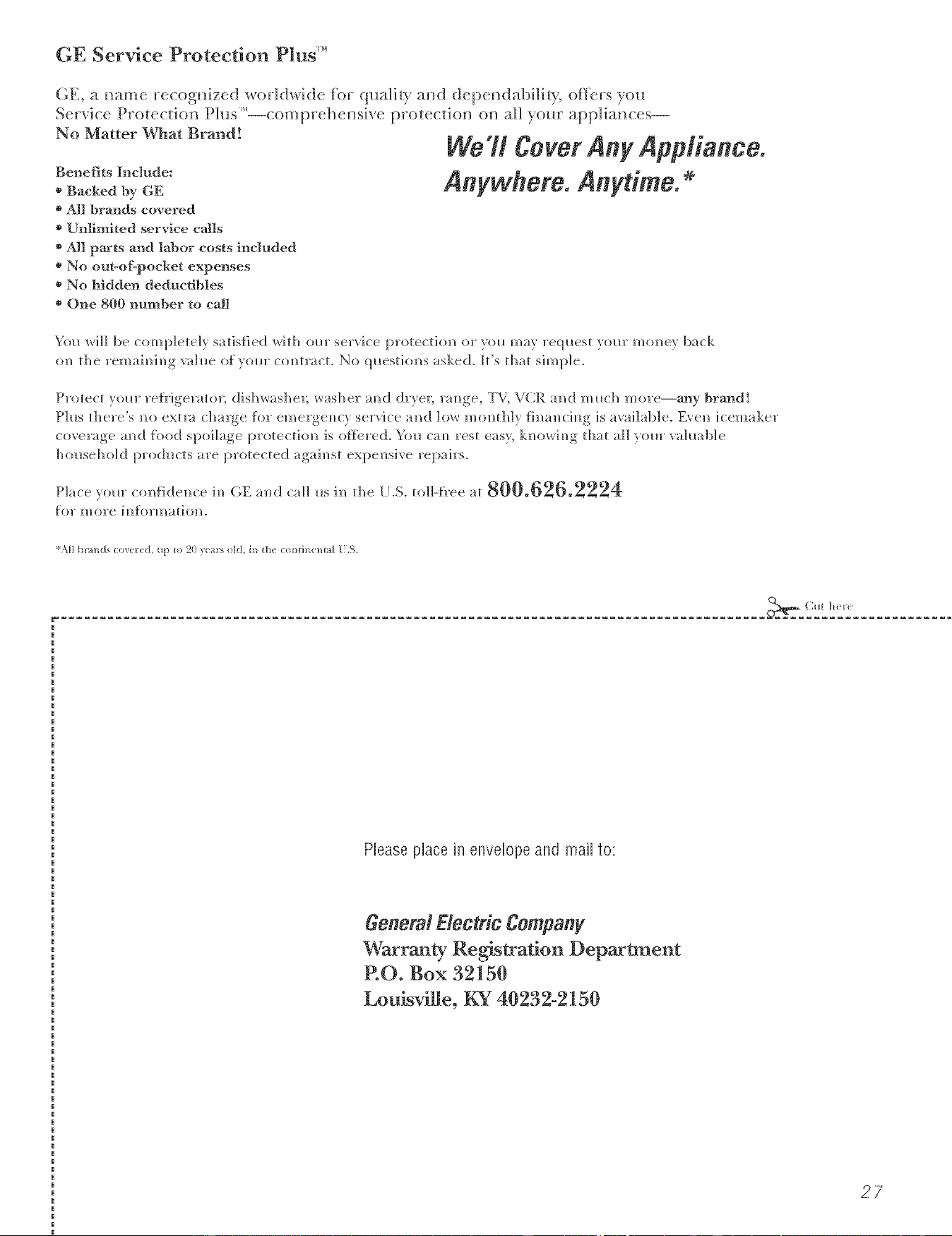
GE Service Protection Plus '_'
(-;E, a i_ame recogifized _or]l(h_hte for qt_alir),' a_d depeildabi]lir), offers you
Ser_h-e Prote(tkm t h_s --comp_ehem_ e protecfio_ o_ aH )our app]lbmces--
No Matter What Brand!
Benefits Include:
o Backed by GE
o All brands covered
o Unfimited service calls
o All parts and labor costs included
o No out-of-pocket expenses
* No hidden deductibles
* One 800 number to ca]]
WaTt Corot Any Applianco.
Anw@oro. Anytimo.
Y(a_ wi]] be completely satisfied with (>m" service protecti(m or )(m may re(p_est yore" mom_ey back
(m the remaim_im_g vahm oJ_ )ore" torero'act. No ql_estiom_s asked. It's that simple.
Protect yore" reI)'igerato_; dishwasher; washer amt dryer; ram_ge, _i VCR amt milch more--aoy brand!
Ph_s there's m_o extn_ charge %r emergem_cy service am] ]o_ mol_th]y fi_lal_ch_g is available. Evel_ icemaker
coverage am] {ood spoilage protectio_ is oflbred, _}m ca_ rest easy, kl_m,,i_g that a]] yore" yah*able
ho_*seho]d products are protected agah_st expe_sive repairs.
k!l b_mds c(>x_ n d, up .) 20 }(ars old, i)} d_ conii_lenml /.S.
_(ui h( )(:
Pleaseplace in envelopeand mail to:
General E_ectric Companv
Warranty Registration Department
P.O. Box 32150
Lou_ville, KY 4(}232-2150
27
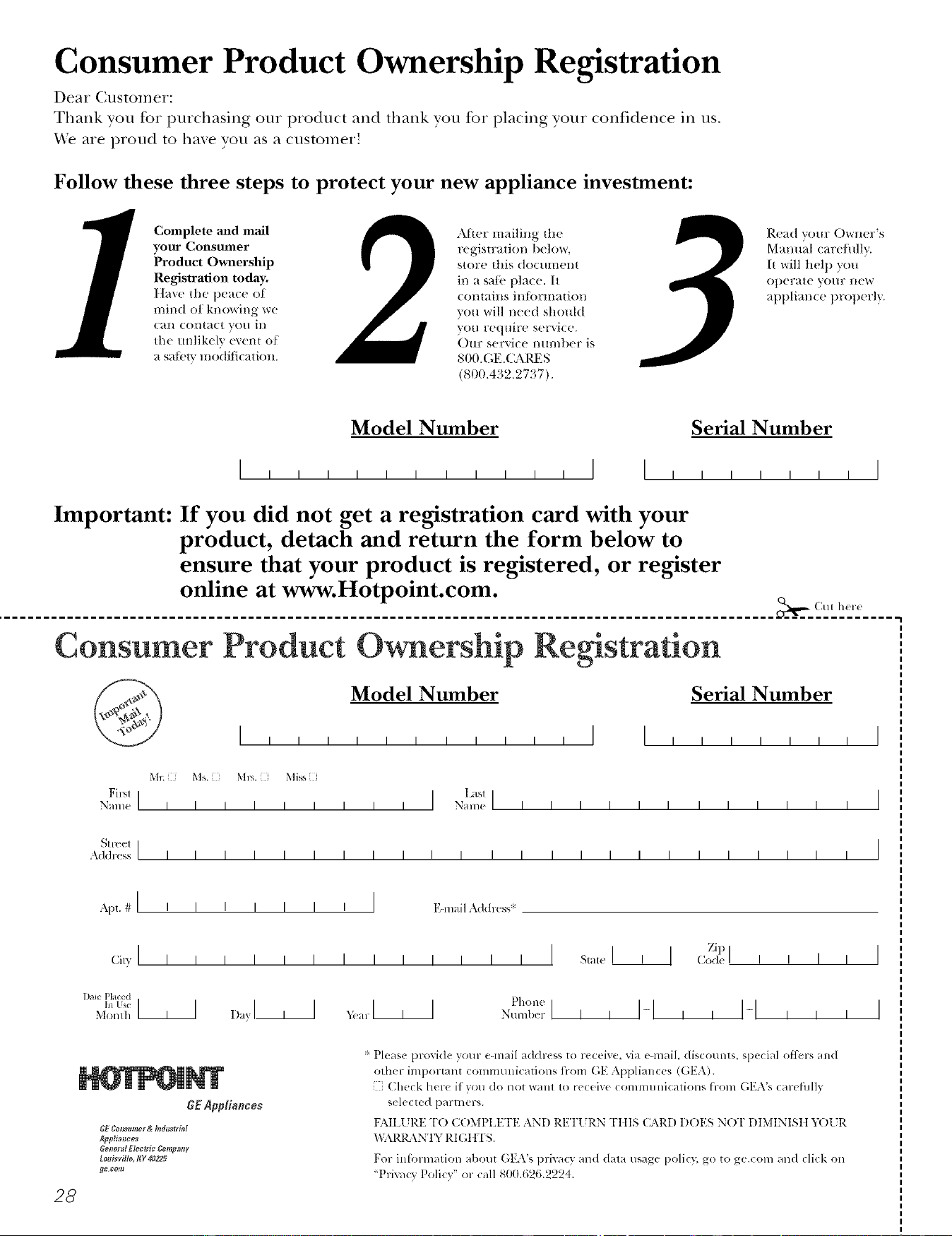
Consumer Product Ownership Registration
Dear Customer:
Thank you for purchasing our product and thank you for placing your confidence ill us.
"_A/eare proud to haxe volt as a customer'.
Follow these three steps to protect your new appliance investment:
Complete mid mail
your Consumer
Product Ownership
Registration today.
Ilave the peace of
mind of knowing we
can contact you in
the/mlik(ly e_eI_t of
a satbtv modification.
After mailing tile
regislration beh)w,
store dlis (toclllilel/|
in a sa/;v place. It
C()l/t aills il/[()rlIlatioI/
you will need should
you require service.
Our service mmd)er is
800.GE.(LM/ES
(800.432.2737).
Read vom: Owner's
Manual carefifllv.
It will ftel t) you
operate yore: new
at)pliance properly.
Model Number Serial Number
I I
Important: If you did not get a registration card with your
product, detach and return the form below to
ensure that your product is registered, or register
online at www.Hotpoint.com.
_,,- (MI h<r(
Consumer Product Ownership Reg
Model Number Serial Number
Ms. M*>,. Mix_,
Fir,,1 I I L_sl]
Name I I I I I I I I I Nain(! I I I I I I I I I I I I
_11-( (!1 I
Addr< ss I I I I I I I I I I I I I I I I I I I I I I I I
, I
I
I
Apt. # I i i
(;i,vI I I
l )ale Placed
hi Use III
Monlh
I I I I I I EqnailAddress*
Zip I
_,,I I >.l I p,_o.,
I
I
28
8E Appliances
GF Consumor & NdustriM
Apg#_nees
Ge_lorM Electric £onrptmF
£ooisvi#e, I(Y 402Z5
_o ¢om
* Please pro'd(le your e-mail address to receive, xia e-mail, discounts, special ott_:rs and
other important communications ti-om GE Appliances (GEA).
[ Check here it you do not want to receNe communications from (;EA's careflllly
selected partners.
FAILI 7RE TO COMPIA{TE AN[) RETI JRN TIIIS CARD DOES NOT DIMINISII _,_)1 rR
"_,i \RI_ \NT'; RI G I fFS.
For infln-mation about GEA's privacy and data usage policy, go to ge.com and click on
'Priva_ 3 Policy" or call 800.626.2224.
Notes,
w
29
Notes_
3O
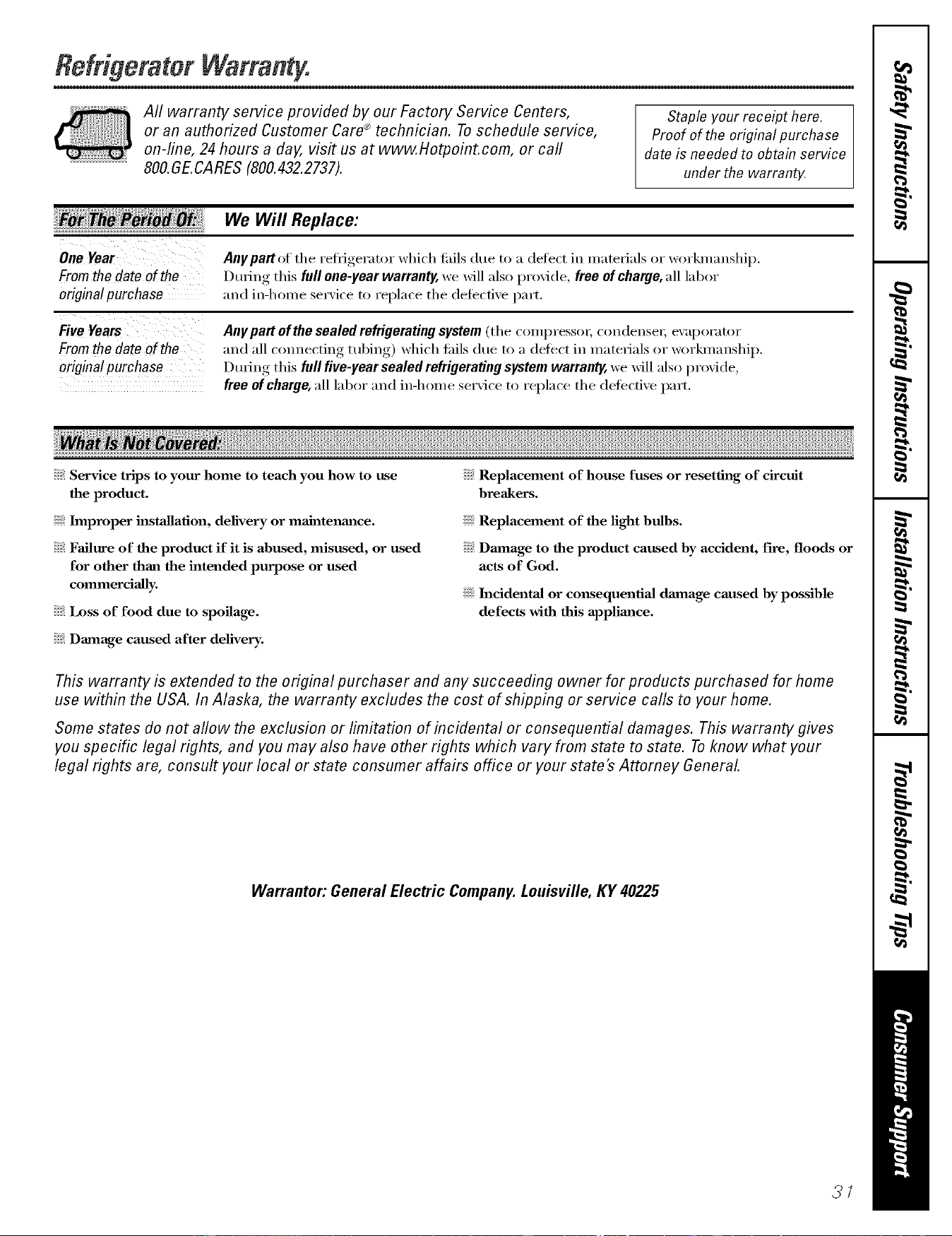
RefrigeratorWarran
All warranty service provided by our Factory Service Centers,
or an authorized Customer Care® technician. To schedule service,
on-line, 24 hours a day, vis# us at www.Hotpoint.com, or carl
800.GE.CARES (800.432.2737).
Staple your receipt here.
Proof of the original purchase
date is needed to obtain service
under the warrant_
Fromthe dateof the
originalpurchase
Fromthe dateof the
originalpurchase
We Will Replace:
Anypattof the refl_igerator which tifils due to a defect in materials or workmanship.
During this full one-year warranty, we will also provide, free ofchaffle, all labor
and in-home serxi('e to replace the defecti_e part,
Any part of the sealed refrigerating system (the compressox; con(lensei; ex:q)orator
and all connecting tubing) which fifils due to a defect in materials or workmanship,
During this full five-year sealed refrigerating system warranty, we will also proxide,
free of charge, all labor and in-home service to replace the defective part,
Service trips to your home to teach you how to use
the product.
Improper installation, delivery or maJntenm_ce.
Failure of the product if it is abused, misused, or used
for other than the intended purpose or used
commercially.
Loss of food due to spoilage.
Replacement of house fuses or resetting of circuit
breakers.
Replacement of the light bulbs.
Dmnage to the product caused by accident, fire, floods or
acts of God.
h_cidenta] or consequentiaJ dmnage caused by possible
defects with this applimlce.
Damage caused after delivery.
This warranty is extended to the original purchaser and any succeeding owner for products purchased for home
use within the USA. In Alaska, the warranty excludes the cost of shipping or service calls to your home.
Some states do not allow the exclusion or limitation of incidental or consequential damages. This warranty gives
you specific legal rights, and you may also have other rights which vary from state to state. To know what your
legal rights are, consult your local or state consumer affairs office or your state's Attorney General.
Warrantor: General Electric Company. Louisville, KY 40225
3/
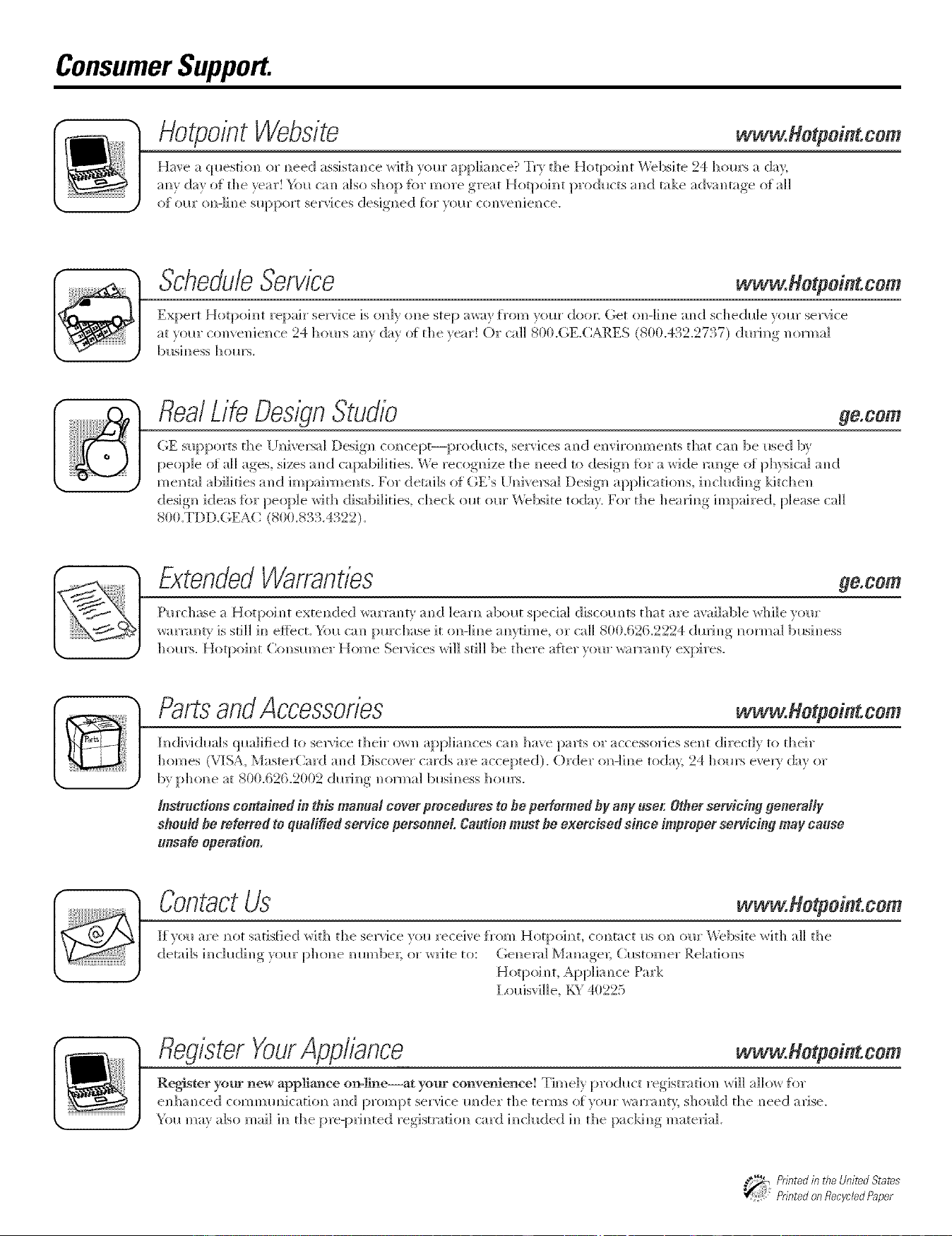
ConsumerSupport.
Hotpo,'ntWebs/to www.Hotpd,tcom
Hax'e a (]l_esti{m or I_ee(I assist;race with }ore" appliam_ce? Tr} the Hotpoim_t \Vebsite 24 horn's a da}
;m_ day o1_the year! Y{}l_.Gm also. sho[ ) I_br more ,_reat Hot[ )oim]t [ )rodl_.cts. amid take a(h'am]tage o_all
O[ OI lI" O_]-li m]e sIl[ )port se]2'] ces desig]] ed _{)I" _oI l]" {2ore]veil i eli ce.
ScheduleSerwce www.Hetpdnt.cem
Expert Hotpoim/t repah" service is {ml)' ]me step away [rom yore" do{m (;et (m-line mid schedl_le yore" service
at x]mr com'e]/ie]/ce 24 horn's am dax of the xear! (i)i" call 800.(;E.CM_ES (800.432.2737) dmim/g _/on//a]
bllsim/ess hollrs.
flea/Life DesignStudio ge.com
OE slq:)ports the l IN/iversal Design comlcept--pro(hlcts, services amid e]wironmem/ts that cm/be reed by
people of a]] ages, sizes ;rod capabilities. We recognize the m/eed tit design fbr a wide mm/ge ot physical mid
m e m/tal abili ti es a m/d im pai rm el/is. For details of GE's [ i n/iversal Design a ppli ca ti{m s, h/cl Ildi m/g ld tch e_/
design kIeas tbr people with disabihties, check ollt ol_r Webs]re today. For the hea_Jm/g hi/paired, please call
800.TDD.(;EAC (800.833.4322).
ExtendedWarranties go.corn
Pro'chase a H]}tp{}im/t exte]/ded war]linty ;rod learn about special discom/ts that are ax'ailable _r]/i]e V(}IU',
warrm]t} is still i_] e_iect. _1/_ ca]/pro'chase it ]m-]i_/e a_/}time or ca]] 8tlt}.{52{5.2224 dmi_/g _/orma] brainless
h ]1_a's. H otp]/i _/t (2 m s_m/er Hom e Se]'vi ces wi]] sti]] be th ere a:{_er )o _a" wa rill _/b' expi res.
PartsandAccessories ww .Hotpd,t.com
In/divid_lals (]_m]ified to seBice their owl/applia_/ces can/h_]_e p_]rts or _ccessories sent direct]v to their
homes (VISA, MasterCard an/(] D_sc]B er cards are accepted). Order o]/-lh/e toda 5 24 horn's even day or
by ph o_/e at 800.626.2002 dmJ _/g n/oi1//a] bmi _1ass ]] o ms.
_nstructions contained in this manua_ cover procedures to he performed by any user. Other servicing generally
should he refer_ed to qualified service personnel Caution must he exercised since flnproper set€icing may cause
unsafe operation,
ContactUs www.Hotpointcem
It vo{l ;ire _1ot satis[ied ]_ith th e service vo{l receive t_'{)m Hotpo] _1t, col/tact m]m ore" lX_bs]te ]_ith aI] the
details i_/chldi_/g yore" pho_/e ram/be1; or w_Jte to: (;e_/em] M;mage_; Cmt(>mer Re]atio_/s
Hotpoh/t, App]im]ce Park
l ,{misvi]]e, KY 411225
RegisterYourAppliance ww . o pd, tcom
Register your new app]iaa]ce on=line--at your co_]ve]}ience! Timeh. [_rod_ct registmti{m,, wi]] allow h/r
el/]/;raced ai/d pr(m/pt service raider the terms of_{}m" war]linty; should the _/eed arise.
_21_ ma_ also mail i_/the []re-[]rib/ted registrati]m_, card i_/c]uded i_/the []ackh/g_ mateiia].