THE
®
CLAPPER
®
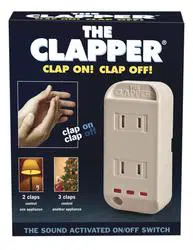
CLAP ON! CLAP OFF!
Sound
activated
on/off switch!
Joseph Enterprises, Inc.
425 California Street, Suite 300
San Francisco, California 94104
CanEng Clapper bk 5-26-15.indd 1 5/29/15 9:47 AM

Congratulations! You are now the owner of The Clapper.
The Clapper is a sound activated on and off switch for appliances.
The Clapper can operate either one or two appliances by clapping
two times to operate the first appliance and three times to operate
the second appliance.
The Clapper can also serve as a limited function security device.
While in the AWAY mode, almost any noise will turn on the
connected appliance(s) to discourage potential intruders. The
AWAY mode is also convenient for temporarily turning on a light
when entering a dark room such as a garage or basement. No
need to clap, any noise will turn on the lights!
For
QUICK INSTRUCTIONS on operating your Clapper,
please refer to the yellow Quick Tips card. The following are
more detailed instructions on how to properly use your Clapper.
FEATURES:
This model is equipped with three special features: Clap Detection
Lights, Auto Sound Sensitivity and the Away Mode.
— 2 —
➯
THE
®
CLAPPER
®
CanEng Clapper bk 5-26-15.indd 2 5/29/15 9:47 AM
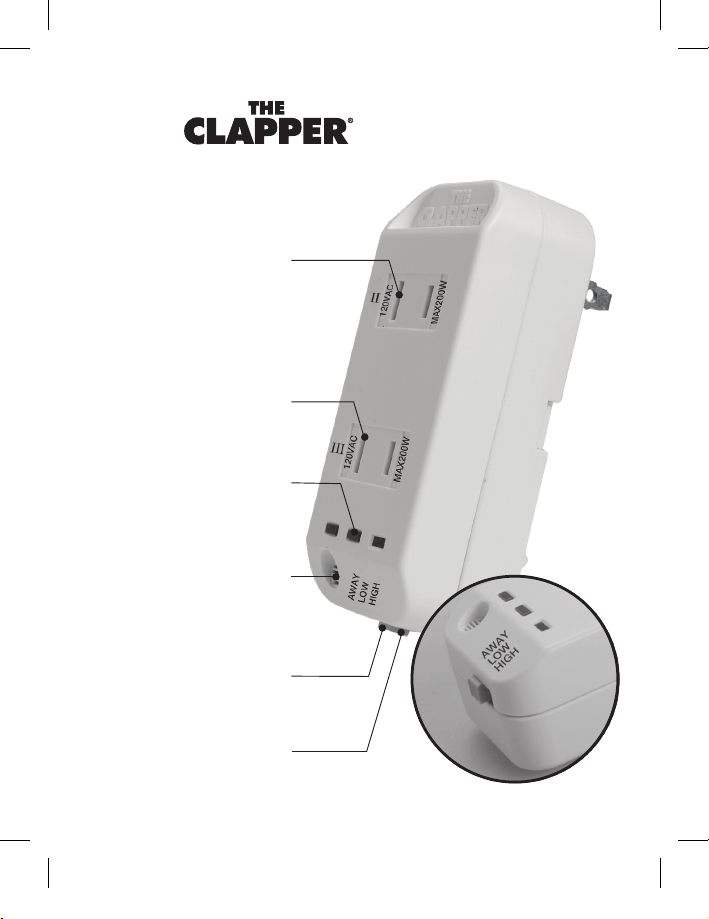
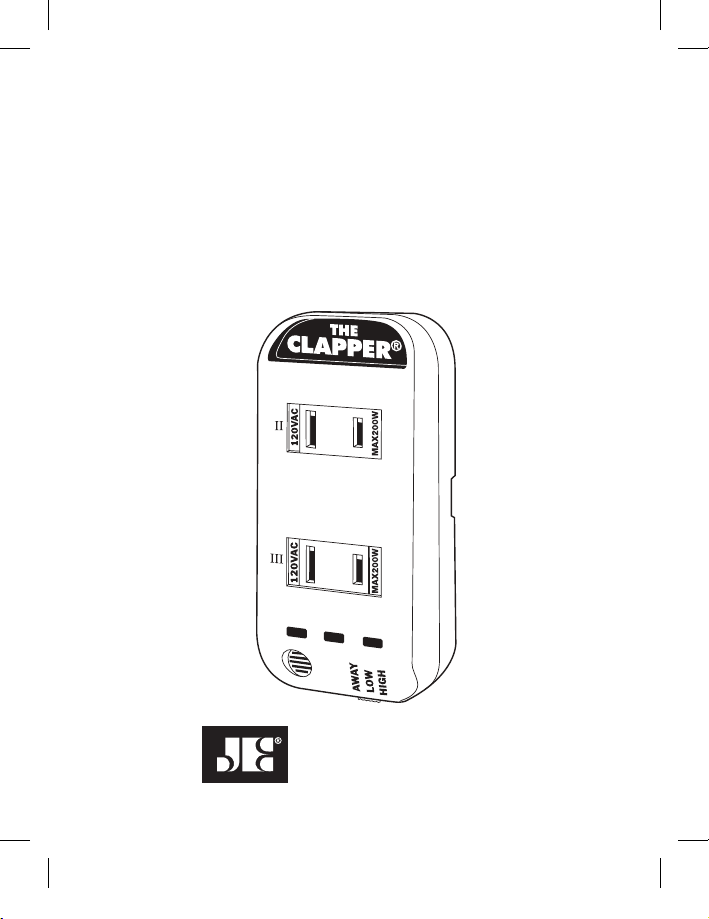
Two (II) Clap Socket
Three (III) Clap Socket
Microphone
Senses your claps
High/Low Sensitivity
Increase or decrease clap
detection sensitivity
AWAY Mode Switch
Select Away Mode to turn
on lights with any sound
Red Clap Detection Lights
Helps determine the proper way
to clap your appliances on or off
DIAGRAM
Clapper Diagram.pdf 1 5/28/15 4:02 PM
CanEng Clapper bk 5-26-15.indd 3 5/29/15 9:47 AM

HOW TO OPERATE AN APPLIANCE WITH 2 CLAPS:
1. Set the three position switch on the bottom of the unit to the
HIGH position.
2. Plug an appliance into the top receptacle of The Clapper. This
is the receptacle next to the “II.”
3. Plug The Clapper into the wall socket.
4. Manually turn the appliance on.
5. You can now turn your appliance on or off by clapping.
You don’t have to clap very hard! The clapping sequence is
more important than how loudly you clap.
CLAP (pause) CLAP (pause) (pause) (pause)
where each pause is approximately ½ second long. The three
pauses after the second clap are very important since The
Clapper must determine that you are not going to clap a third
time. If you did clap a third time, the appliance connected to
the II clap receptacle would not activate.
— 4 —
➯
CanEng Clapper bk 5-26-15.indd 4 5/29/15 9:47 AM

HOW TO OPERATE AN APPLIANCE WITH 3 CLAPS:
1. Set the three position switch on the side of the unit to the HIGH
position.
2. Plug an appliance into bottom receptacle of The Clapper.
3. Plug The Clapper into the wall socket.
4. Manually turn the appliance on.
5. You can now turn your appliance on or off by clapping.
You don’t have to clap very hard. The clapping sequence is
more important than how loudly you clap:
CLAP (pause) CLAP (pause) CLAP (pause)
where each pause is approximately ½ second long. The last
pause after the third clap is very important since The Clapper
must determine if you are not going to clap a fourth time. If
you did clap a fourth time, the appliance would not activate.
— 5 —
➯
CanEng Clapper bk 5-26-15.indd 5 5/29/15 9:47 AM
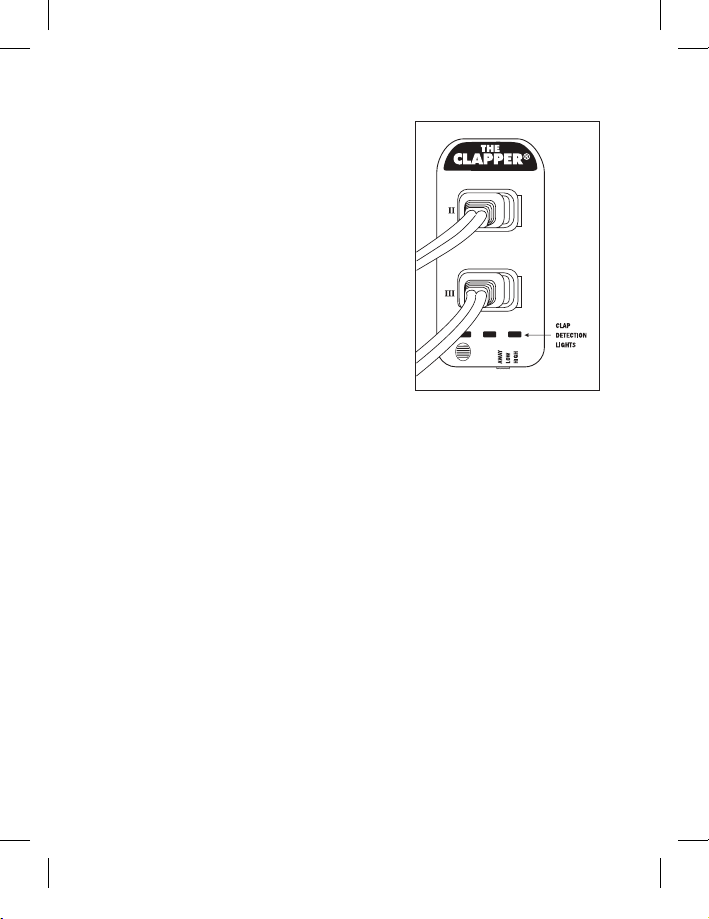
CLAP DETECTION LIGHTS
The three red lights on the face of The
Clapper will help you determine the
proper way to clap your appliances
on or off. Each clap detection light
will glow when a proper clap (or
similar sound) is detected.
Claps that are too soft will not be
detected. Claps that are too fast or
too slow will be rejected as noise
and as a result the appliance will not activate. When The Clapper
detects the first clap (or similar sound) the first light will glow.
The second light will glow if a second clap is detected about ½
second after the first clap occurs. If the Clapper does not detect
a third clap, it will have activated the appliance attached to the
“II Clap socket.” If a third clap is detected, then the third light
will glow and the appliance connected to the “III Clap socket”
will activate.
— 6 —
➯
CanEng Clapper bk 5-26-15.indd 6 5/29/15 9:47 AM

AUTO SOUND SENSITIVITY:
If room noise is detected or if the 2 clap or 3 clap sequences are
not proper, the Clapper will reject the sounds as noise. It indicates
that it has rejected the noise by turning the LEFT and RIGHT clap
detection lights on and automatically reduces the sensitivity of
the Clap detection. This feature of automatically reducing the
clap detection sensitivity helps to reduce background noises
from turning on the appliances. The LEFT and RIGHT lights will
remain on until the background noise is not detected. You can
still clap while the lights are on, but because of the background
noise you will need to clap louder. When all of the red lights go
off the sensitivity of the Clapper Clap detection is at its greatest.
You may notice the lights glowing occasionally even if you have
not clapped. This is not unusual as The Clapper has detected
sounds that are similar to a clap. Your appliances should not
activate as it would require a second or third sound similar to a
clap within the proper time allowed.
By observing the clap detection lights you can become familiar
with the types of claps (or similar sounds) that will activate your
appliances attached to The Clapper.
— 7 —
➯
CanEng Clapper bk 5-26-15.indd 7 5/29/15 9:47 AM
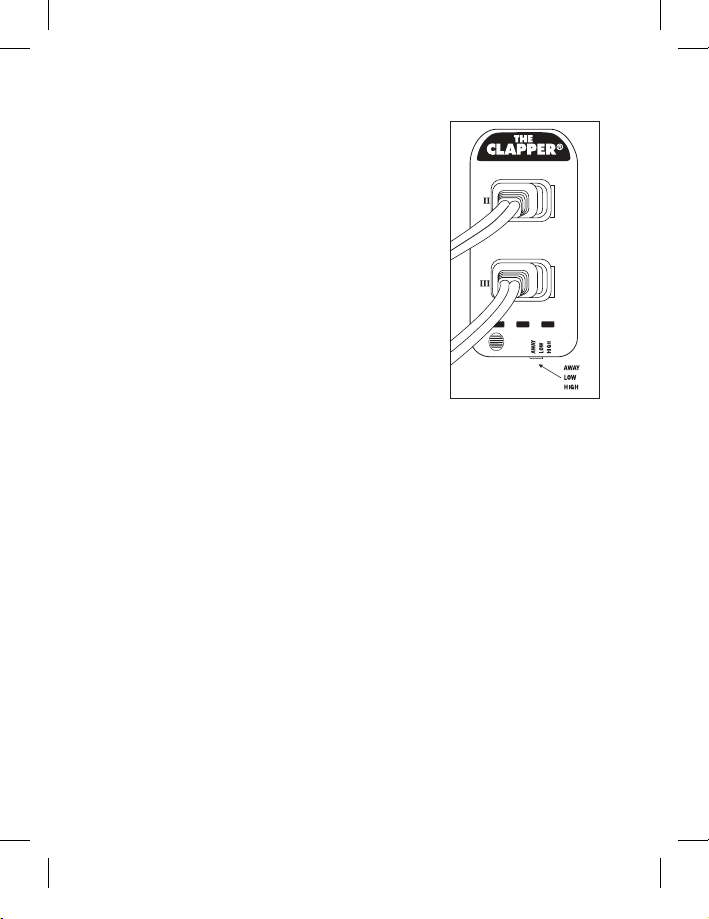
MANUAL SOUND SENSITIVITY
You can also manually adjust your Clapper
to respond to soft or loud claps, as well
as adjust for the noise level in your room.
Placing the three position switch on the
side to The Clapper to the HIGH position
puts The Clapper in the high sensitivity
mode. This is helpful if your claps are
soft or if The Clapper is far away. Your
appliance, however, may occasionally turn
on or off unexpectedly as The Clapper may detect other noises
similar to your claps.
Sliding the switch down to LOW will put The Clapper into the low
sensitivity mode. This is helpful if there is a lot of external noise
in the room that may falsely activate your appliances. By adjusting
the three position mode switch to the high or low sensitivity, you
will be able to activate your appliances easily and, with less false
activation due to external noises. Sliding the switch all the way
down to the AWAY position will put The Clapper in the AWAY mode
(See next page).
— 8 —
➯
CanEng Clapper bk 5-26-15.indd 8 5/29/15 9:47 AM

For use in very noisy environments the Clapper has a third
sensitivity level. To activate this sensitivity level:
1. Put the HIGH –AWAY slide switch into the AWAY position.
2. Slide the switch from AWAY to HIGH back to AWAY 3 times.
3. All 3 red lights will now be on. They will remain on for about
10 seconds and then turn off. Now The Clapper is in the very
low sensitivity mode.
4. To return to regular operations just move the slide switch out
of the AWAY position.
THE AWAY SETTING
The Clapper can also serve as a limited function security device.
While in the “AWAY” mode, almost any noise will turn on the
connected appliance(s) to discourage potential intruders.
The AWAY mode is also convenient for temporarily turning on a
light when entering a dark room such as a garage or basement.
No need to clap, any noise will turn on the lights!
To operate The Clapper in the AWAY mode
1. Slide the three position switch down to the AWAY position.
— 9 —
➯
CanEng Clapper bk 5-26-15.indd 9 5/29/15 9:47 AM

2. Both lamps will turn on. This allows you to leave the room
with the lights on. After 10 seconds without hearing a noise,
both lamps will turn off.
3. The Left Red clap detection light will blink to indicate The
Clapper is in the Away Mode.
4. If a sound is heard your lamp(s) will turn on and They will
remain on for about 10 minutes and then turn off. Then the
Clapper, resets itself until the next sound is detected.
HINTS AND TIPS
If The Clapper does not turn on when clapping:
a. Make sure The Clapper is plugged in properly. When The
Clapper is first plugged in, the red lights on the front of the
Clapper will sequence through a start-up pattern. Wait for these
lights to stop flashing before you start to clap.
b. Make sure the Appliance is plugged into the Clap II or Clap III
socket.
c. Make sure the Appliance is turned on.
d. Make sure the claps are loud enough and have the correct
timing. See above for the timing of the claps.
— 10 —
➯
CanEng Clapper bk 5-26-15.indd 10 5/29/15 9:47 AM

FAQ
1. Which appliances does the Clapper work with?
a. Christmas Tree lights
1. Yes that is a good use of the product.
b. Fluorescent lights
1. Yes
c. LED Light Bulbs
1. Yes
d. Normal (Incandescent) lights
1. Yes
e. A TV
1. It is possible, but most of today’s TVs need to remain
plugged in to keep their settings and work with the
remote control.
f. A radio
1. Yes, but be aware that some of the today’s radios
require that they be plugged in all of the time or do not
turn on when power is applied. Those will not work.
g. A three-way light bulb
1. Yes.
A. Set the light to one of the three brightness levels,
then the Clapper is used to turn on and off the light.
— 11 —
➯
CanEng Clapper bk 5-26-15.indd 11 5/29/15 9:47 AM

2. Which appliances should I NOT use with the Clapper?
a. Any electrical heating appliance
1. coffee maker
2. A space heater
3. Toasters
4. Etc.
b. Medical equipment
c. Inductive loads, such as a motor
d. An Air Conditioner
1. An Air Conditioner is higher than the maximum
allowed wattage of 200 watts
e. A Computer monitor
1. Most computer monitors do not turn on when the
power is applied so this is not a good application for
the Clapper
3. Does the Clapper have two or three prong sockets?
a. Two prong
4.
What is the Maximum wattage that the Clapper can
control?
a. 200 watts per outlet. Do not exceed a total of 400 watts
5. Does the Clapper work overseas on 220 volts?
a. No, the Clapper is designed only for 120 vac.
— 12 —
➯
CanEng Clapper bk 5-26-15.indd 12 5/29/15 9:47 AM

— 13 —
➯
6. Can I control two lights at the same time?
a. Yes. The Clapper has two sockets, the top socket is
controlled by clapping two times and the bottom socket
by clapping three times
7. My Clapper is not working anymore why?
a. The Clapper is made with a fuse for safety reasons
1. If the Clapper is over loaded with too high of wattage
the Clapper fuse will blow and the Clapper will not
work. The fuse is not replaceable be the user.
2. If the Clapper is controlling a Light bulb that burns out
this may also blow the fuse and the Clapper will not
work.
8. How close do I need to be to the Clapper for it to
hear my claps?
This depends greatly on the room and the objects between
you and the Clapper.
1. First do not block the Clapper with drapes or
furniture. These will block your claps from reaching
the Clapper.
2. Familiarize yourself with how the Clapper works in
your room by —
A. Standing within about 5 feet of the Clapper and
clap to turn on/off the light.
CanEng Clapper bk 5-26-15.indd 13 5/29/15 9:47 AM

— 14 —
➯
B. Move back a few feet and try again.
C. Continue until you are too far away from the
Clapper for it to detect your claps.
3. Now you know the clap detection range in your room.
9. There are three red LED lights on the front of the
Clapper what are they for?
a. The three Red lights on the face of the Clapper are the
CLAP DETECTION LIGHTS. These will help you determine
the proper way to clap your appliances on or off.
1. Each clap detection light will glow when a proper
clap (or similar sound) is detected. Claps that are
too soft will not be detected. Claps that are too fast or
too slow will be rejected as noise and as a result the
appliance will not activate. When the Clapper detects
the first clap (or similar sound) the first light will
glow. The second light will glow if a second clap is
detected about 1/2 second after the first clap occurs.
If the Clapper does not detect a third clap, it will
have activated the appliance attached to the “II Clap
socket.” If a third clap is detected, then the third light
will glow and the appliance connected to the “III Clap
Socket” will activate.
CanEng Clapper bk 5-26-15.indd 14 5/29/15 9:47 AM

— 15 —
➯
10. The Clapper turned on or off the lights when I was
not expecting it too, what can I do?
a. Change the Sensitivity switch setting from Hi to Low.
b. Or use the three clap socket. The three clap socket is less
likely to turn on or off by random noises.
11. What is the “Away” setting use for?
a. The Clapper can also serve as a limited function security
device. While in the “AWAY” mode, almost any noise
will turn on the connected appliance(s) to discourage
potential intruders.
b. The AWAY mode is also convenient for temporarily
turning on a light when entering a dark room such as a
garage or basement. No need to clap, any noise will turn
on the lights!
CanEng Clapper bk 5-26-15.indd 15 5/29/15 9:47 AM

— 16 —
➯
IMPORTANT SAFETY NOTES
1. Do not use The Clapper with any electrical heating appliances
such as toasters, hair dryers, coffee pots, etc.
2. Do not use The Clapper with any appliance that can create a
fire hazard with prolonged use.
3. The maximum wattage for an appliance is 200 watts in
either outlet. Do not exceed 400 watts total. 200/400 watts,
(3.3 Amps.) 120 VAC, 50/60 Hz. General Purpose, Tungsten
Electronic Ballast.
4. Do not use with medical equipment.
5. Do not use with inductive loads.
WARNING
The Clapper® requires standard 120 VAC power.
Do not plug The Clapper into any non-standard power source as
this may lead to electric shock or fire. For example, Do Not use
The Clapper on a Dimming circuit.
WE WELCOME YOUR FEEDBACK
Please feel free to write us at: JOSEPH ENTERPRISES, INC.
425 California Street, Suite 300, San Francisco, CA 94104.
Many questions can be answered by calling our Clapper Hotline
at 800-557-5856 or emailing: [email protected].
CanEng Clapper bk 5-26-15.indd 16 5/29/15 9:47 AM

— 17 —
➯
THIRTY (30) DAY LIMITED WARRANTY
Joseph Enterprises offers a thirty (30) day limited warranty to the original
purchaser of The Clapper.
®
The warranty covers defects in workmanship and
materials only. It does not apply to product failures resulting from accidental
damage, neglect, misuse or any other cause not associated with defects in
workmanship or materials.
Should The Clapper
®
prove to be defective within the thirty (30) days from
the date of purchase, the product will either be repaired or replaced, at
Joseph Enterprises’ discretion, free of charge.
To receive warranty service, return the product insured, along with proof of
purchase date and postage pre-paid to the address below.
Purchasers are advised to carefully read and follow the operating and safety
instructions contained in this book and included on the back of the product.
THIS PARTICULAR WARRANTY SHALL DISCLAIM JOSEPH ENTERPRISES’
OBLI GATION AND SOLE RESPONSIBILITY RESPECTING THE PRODUCT AND
ALL OTHER WARRANTIES, IMPLIED OR EXPRESSED, INCLUDING IMPLIED
WARRANTIES OF FITNESS FOR A SPECIFIC PURPOSE. JOSEPH ENTERPRISES
DOES NOT AUTHORIZE RETAILERS AND OTHERS TO MAKE ANY WARRANTY
CONCERNING THE PRODUCT.
SOME STATES DO NOT PERMIT TIME LIMITATIONS ON AN IMPLIED
WARRANTY, OR LIMITATION OR EXCLUSION OF INCIDENTAL OR
CONSEQUENTIAL DAMAGES, SO THE ABOVE LIMITATIONS MAY NOT PERTAIN
TO YOU. THIS WARRANTY GRANTS YOU SPECIFIC LEGAL RIGHTS AND YOU
MAY ALSO HAVE ADDITIONAL RIGHTS THAT VARY FROM STATE TO STATE.
CAUTION:
INDOOR DRY LOCATION USE ONLY
CanEng Clapper bk 5-26-15.indd 17 5/29/15 9:47 AM