B26FT..
en Operating and installation
instructions
fr Notices d'utilisation et de
montage
es Instrucciones de uso y de
montaje


en-us
3
en Table of Contents
IMPORTANT SAFETY INSTRUCTIONS 4........
Disposal information 5........................
Scope of Delivery 6...........................
Installing the appliance 6......................
Installing and connecting the appliance 7.......
Appliance and installation dimensions 12........
Getting to know your appliance 13..............
Control and display panel 14...................
Operating tips 15..............................
Switching on the appliance 15..................
Setting the temperature 15.....................
Alarm function 16..............................
Panel lock 16.................................
Super cooling 16..............................
Super freezing 17..............................
Quick ice 17..................................
Water filter symbol 17..........................
Temperature unit 17...........................
Refrigerator compartment 18...................
VitaFresh Pro compartment 18..................
Deli drawer 19.................................
Variable interior design 19......................
Freezer compartment 20.......................
Freezing food 20..............................
Purchasing and storing deep-frozen food 21.....
Thawing frozen food 21........................
Freezer compartment features 21...............
Ice and water dispenser 22.....................
Water filter 24.................................
Performance data sheet 25....................
Energy-saving tips 26..........................
Operating noises 26...........................
Defrosting 26..................................
Switching off and disconnecting the appliance 26.
Cleaning 27...................................
LED light 28...................................
Troubleshooting minor issues 29................
Customer service 31...........................
en-us
4
IMPORTANT SAFETY INSTRUCTIONS
READ AND SAVE THESE INSTRUCTIONS!
Definitions
WARNING
This indicates that death or serious injuries may
occur as a result of not observing this warning.
CAUTION
This indicates that minor to moderate injuries may
occur as a result of not observing this warning.
NOTICE
This indicates that damage to appliance or property
may occur as a result of not observing this warning.
WARNING: Before you turn on the
appliance
Please read the Operating and Installation Instructions
carefully, including the following. They contain
important safety information and instructions for
installation, use and maintenance of the appliance.
The manufacturer is not responsible if you fail to
comply with the instructions and warnings. Retain all
documents for subsequent use or for the next owner.
Technical safety
Improper installations and repairs may put the user at
risk.
Repairs must be performed by an authorized service
provider.
Only use original parts supplied by the manufacturer.
Only original manufacturer supplied parts satisfy safety
requirements.
If the power cord of this appliance is damaged, it must
be replaced by an authorized servicer.
The appliance comes with a UL listed 3-wire Power
Cord.
Never sever or remove the third (ground) conductor
from the power cord.
This appliance requires a 3-wire grounded wall outlet.
The wall outlet must be installed by a licensed
electrician and it must be done in accordance with
local codes.
Where there is a 2-wire standard wall receptacle, it is
the responsibility of the customer to have this
receptacle replaced with a correctly grounded 3-wire
wall receptacle. Do not use any adapter plugs.
Important information when using the
appliance
n Never use electrical devices inside the appliance.
Risk of explosion!
n Never use a steam cleaner to defrost or clean the
appliance. The steam may penetrate electrical
parts and cause a short-circuit. Risk of electric
shock!
n Do not use pointed or sharp-edged objects to
remove frost or layers of ice. You could damage
the refrigerant tubes. Leaking refrigerant may ignite
or cause eye injuries.
n Do not store products that contain flammable
propellants (e.g. spray cans) or explosive
substances in the appliance. Risk of explosion!
n Do not stand or support yourself on the base,
drawers or doors or other parts of the appliance.
You could damage the appliance or be injured.
n To clean the appliance, pull out the power cord
plug or switch off the electrical breaker or fuse! Do
not pull out the power cord plug by tugging the
cable.
n Bottles that contain a high percentage of alcohol
must be sealed and stored in an upright position.
n Keep plastic parts and the door seals free of oil
and grease. Otherwise, plastic parts and door seal
will become porous.
n Never cover or block the ventilation openings for
the appliance. This forces the appliance to work
harder, increasing its power consumption.
n This appliance must not be used by children
without adult supervision.
n Do not store bottled or canned drinks (especially
carbonated drinks) in the freezer compartment.
Bottles and cans may explode!
n Do not place popsicles or ice cubes straight from
the freezer compartment into your mouth. Risk of
low-temperature burns!
n Do not touch frozen surfaces or food in the freezer
with wet hands. Skin may adhere to these
extremely cold surfaces. Risk of injury!
n Do not scrape off frost or stuck frozen food with a
knife or pointed object. You could damage the
appliance or be injured.
en-us
5
IMPORTANT SAFETY INSTRUCTIONS
READ AND SAVE THESE INSTRUCTIONS!
Children in the household
WARNING
Risk of suffocation from cardboard boxes and
plastic film! Keep packaging and packaging
components away from children.
Do not allow children to play with the appliance!
If the appliance features a lock, keep the key out of
the reach of children.
General requirements
The appliance is suitable for
n refrigerating food
n freezing food
n making ice
n dispensing drinking water.
This appliance is intended for use in the home and the
home environment.
The refrigeration circuit has been tested for leaks
before leaving the factory.
State of California Proposition 65
Warnings
WARNING
This product can expose you to chemicals
including vinyl chloride, which is known to the
State of California to cause cancer and birth
defects or other reproductive harm.
For more information go to
www.P65Warnings.ca.gov.
Disposal information
x Disposal of packaging
The packaging protects your appliance from damage
during transit. All utilized materials are environmentally
safe and recyclable. Please help us by disposing of
the packaging in an environmentally friendly manner.
Remove handles from the packaging before disposal.
Please ask your dealer or inquire at your local
authority about current means of disposal.
x Disposal of your old appliance
Old appliances are useful! Valuable raw materials can
be reclaimed by recycling old appliances.
WARNING
Risk of child entrapment!
Children can lock themselves in the appliance.
Before disposing of the old refrigerator:
Remove the doors and the freezer compartment
drawer.
Leave the shelves and containers in place so that
children may not easily climb inside.
Proper disposal of appliances:
1. Pull out the power plug.
2. Cut off the power cord and discard with the power
plug.
3. Do not take out the trays and shelves. This helps to
prevent children from climbing in!
4. Do not allow children to play with the appliance.
Could cause suffocation!
Refrigerators contain refrigerants and their insulation
contains gases. Refrigerant and gases must be
disposed of properly. Follow local ordinances for
disposal. Ensure that the tubing of the refrigerant
circuit is not damaged prior to proper disposal.
en-us
6
IMPORTANT SAFETY INSTRUCTIONS
READ AND SAVE THESE INSTRUCTIONS!
Scope of Delivery
After unpacking all parts, check for any damage in
transit.
If there is damage, do not plug in your appliance.
Please contact the dealer.
The following parts are included:
n Free-standing appliance
n Interior fittings (depending on model)
n Bag containing installation materials
n Operating instructions
n Installation instructions
n Registration card
n Information on energy consumption and noises
Installing the appliance
Have a qualified technician install and connect the
appliance according to the enclosed Installation
Instructions.
WARNING
Do not install the appliance:
n outdoors,
n in an environment subject to drips of water,
n in rooms with risk of freezing temperatures.
Transporting
The appliance is heavy and must be secured during
transport and installation.
The castors are provided for installation purposes
only.
Do not use the castors for transporting the appliance.
WARNING
Risk of injury!
The appliance is very heavy. It can fall over and
cause serious injuries during transport and
installation. At least two people are required to
install the appliance safely. Keep the refrigerator
doors closed until the appliance is upright and level
at the installation location.
Hidden surfaces may have sharp edges. During
transport, wear protective gloves. Use caution
when reaching behind or under appliance.
Installation location
WARNING
Risk of explosion!
Do not install the appliance near explosive or
flammable substances.
A dry, well-ventilated room is suitable as an installation
location. The installation location should not be
exposed to direct sunlight or placed near a heat
source, e.g. a cooker, radiator, etc. If installation next
to a heat source is unavoidable, use a suitable
insulating plate or observe the following minimum
distances from the heat source:
n 1
1/4
I
(3 cm) to electric or gas stoves.
n 11
3/16
I
(30 cm) to oil or solid fuel stoves.
To ensure that the Ice Maker functions correctly, the
appliance must be upright and level.
If installing the refrigerator next to another
refrigerator/freezer, there must be a minimum
clearance of 1” (25 mm) between the appliances to
prevent condensation.
If a panel or cupboard is installed above the
appliance, ensure to leave a 13/32
I
(10 mm) gap so
that the appliance can be pulled out of the recess if
required.
The air heated at the back of the appliance must be
allowed to escape unhindered.
To ensure that the doors can open all the way,
maintain the lateral minimum clearances when
installing the appliance in a corner or recess (see
section on ”Appliance and installation dimensions”).
If the depth of the adjacent kitchen equipment
exceeds 29
1/8
I
(75 cm), maintain the minimum lateral
clearances in order to utilize the full door opening
angle (see section ”Door opening angle”).
Climatic classes
The climate class can be found on the rating plate.
The climate class indicates within which ambient
temperatures the appliance can be operated.
Climatic class
Permitted ambient temperature
SN 50 °F to 90 °F (+10 °C to 32 °C)
N 61 °F to 90 °F (+16 °C to 32 °C)
ST 61 °F to 100 °F (+16 °C to 38 °C)
T 61 °F to 110 °F (+16 °C to 43 °C)
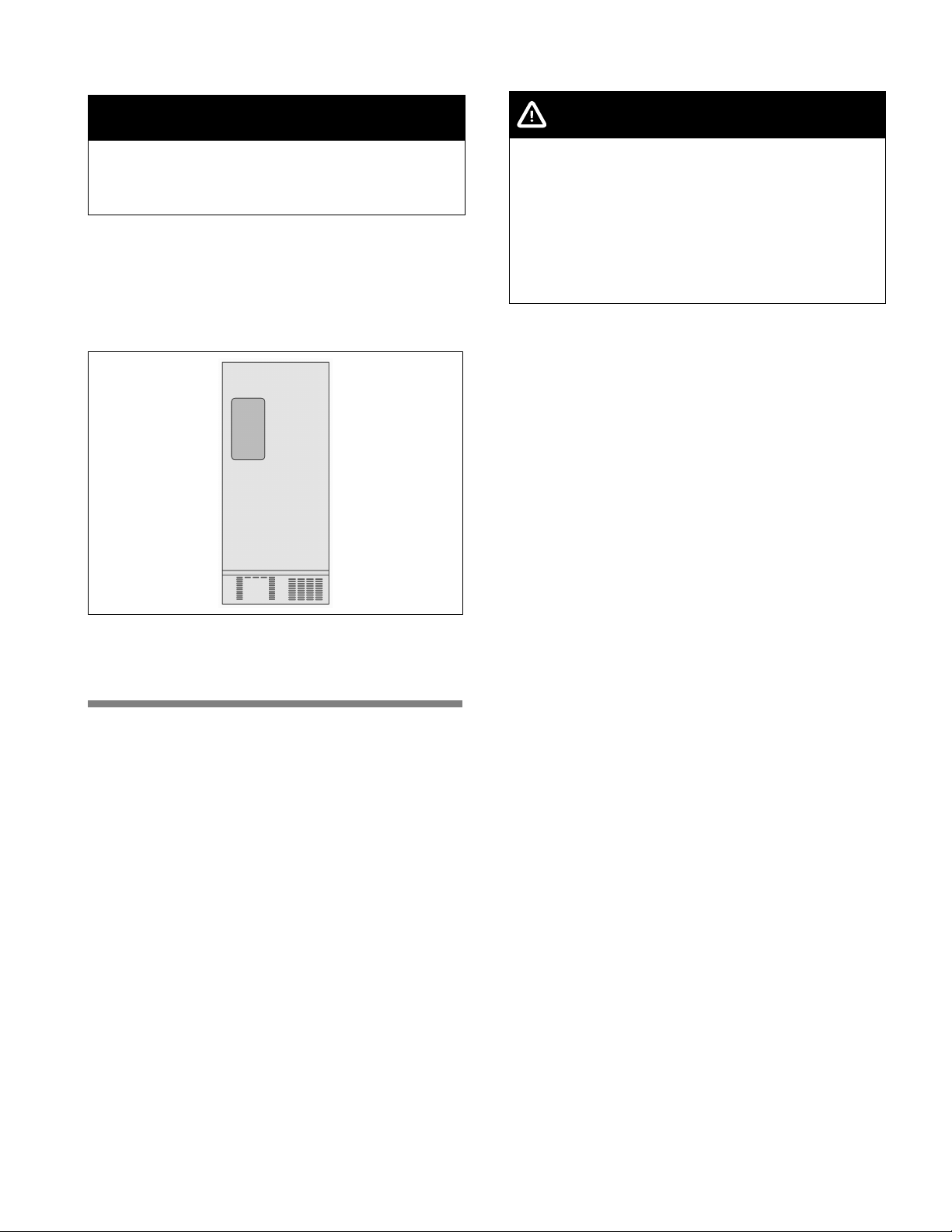
en-us
7
Subsurface
NOTICE
The appliance is very heavy.
The floor on which the appliance is to be installed
must be rigid. Reinforce the floor, if necessary.
Weight of appliance when empty:
Basic model 324 lb (147 kg)
Ventilation
Never cover the ventilation openings on the front base
panel or rear cover plate.
This forces the appliance to work harder, increasing
its power consumption. It also can cause damage to
the compressor.
Installing and connecting the
appliance
Have a technician install and connect the appliance
according to the enclosed Installation Instructions.
Do not remove the transportation protection devices
from the shelves and storage compartments until the
appliance has been installed and aligned.
Always connect the water before the power.
Apart from statutory national regulations, you should
comply with all applicable local electricity and water
companies' codes and requirements.
After installing the appliance, wait at least 6 hours
before switching the appliance on. During
transportation the oil in the compressor may have
flowed into the refrigeration system.
Before switching the appliance on for the first time,
clean the interior of the appliance (see chapter
“Cleaning the Appliance”).
Only a qualified technician should remove the
appliance doors if this is necessary in order to bring
the appliance through any household doors.
Water connection
WARNING
Risk of electric shock and damage to the appliance!
Disconnect the appliance from the power source
before performing any work on the water
connection.
Only a qualified installation technician may connect
the appliance to the water supply in accordance
with plumbing and relevant water utility company
regulations.
Connect the appliance to a drinking water line only:
n Minimum pressure:
14.5 psi (1.0 bar)
n Maximum pressure:
116 psi (8.0 bar)
If the water pressure exceeds 80 psi (5.5 bar), you
must install a pressure limiting valve. Contact a
plumbing professional if you are uncertain how to
check your water pressure. The ice maker will not
work if the water pressure is below 14.5 psi (1.0 bar).
The water should be connected only by a competent
plumber according to the local regulations of the
appropriate Water Supply company.
A cold water connection is necessary for operating the
ice maker.
A separate Shut-Off-Valve should be installed in the
cold-water inflow.
The Shut-Off-Valve should not be located behind the
appliance. It is recommended that you mount the
Shut-Off-Valve directly next to the appliance or at
another place that is easily accessible.
When installing the water connection, pay attention to
the permissible installation area for the water line.
For connection to the drinking water line use only
water pipes that are suitable for drinking water.
Observe national regulations and the connection
conditions of the local Water Supply companies.
The taste and smell of the water can be improved by
installing the filter cartridge included with the
appliance. In this case, observe the separate
connection requirements related to the filter (see
”Water filter”).
The water hose has a 3/4 inch connection.
en-us
8
Electrical connection
WARNING
Risk of electric shock and fire if electrical
connection is not installed properly!
Plug into a fixed, grounded 3-prong outlet only. The
outlet must be installed and grounded according to
code by a qualified electrician. If necessary, have
the installation inspected by a qualified technician
to ensure it is properly grounded.
Do not use an extension cord or power strip.
Never connect the appliance to an electronic
energy saver plug (such as Ecoboy, Sava Plug,
etc.) or to power inverters which convert direct
current (DC) to alternating current (AC) (such as for
solar equipment, power supplies on ships, etc.).
The outlet for the appliance must be located close the
appliance and must be easy to access also after
installation.
Connect the appliance to a properly installed
115 V/60 Hz AC outlet. The fuse for the outlet must be
rated either 15 A or 20 A.
If the appliance is to be used in a country other than
the U.S., check the rating plate to determine if the
specified voltage and current type correspond to the
ratings of your power supply. If the voltage and current
type do not match, the appliance must not be
operated. The power cord may only be replaced by a
qualified electrician.
Aligning the appliance
NOTICE
To ensure that the appliance operates correctly, use
a level to align the appliance.
If the appliance is not level, water may flow out of the
ice maker, ice cubes may be irregular, or the doors
may not close properly.
1. Place the appliance in the designated location.
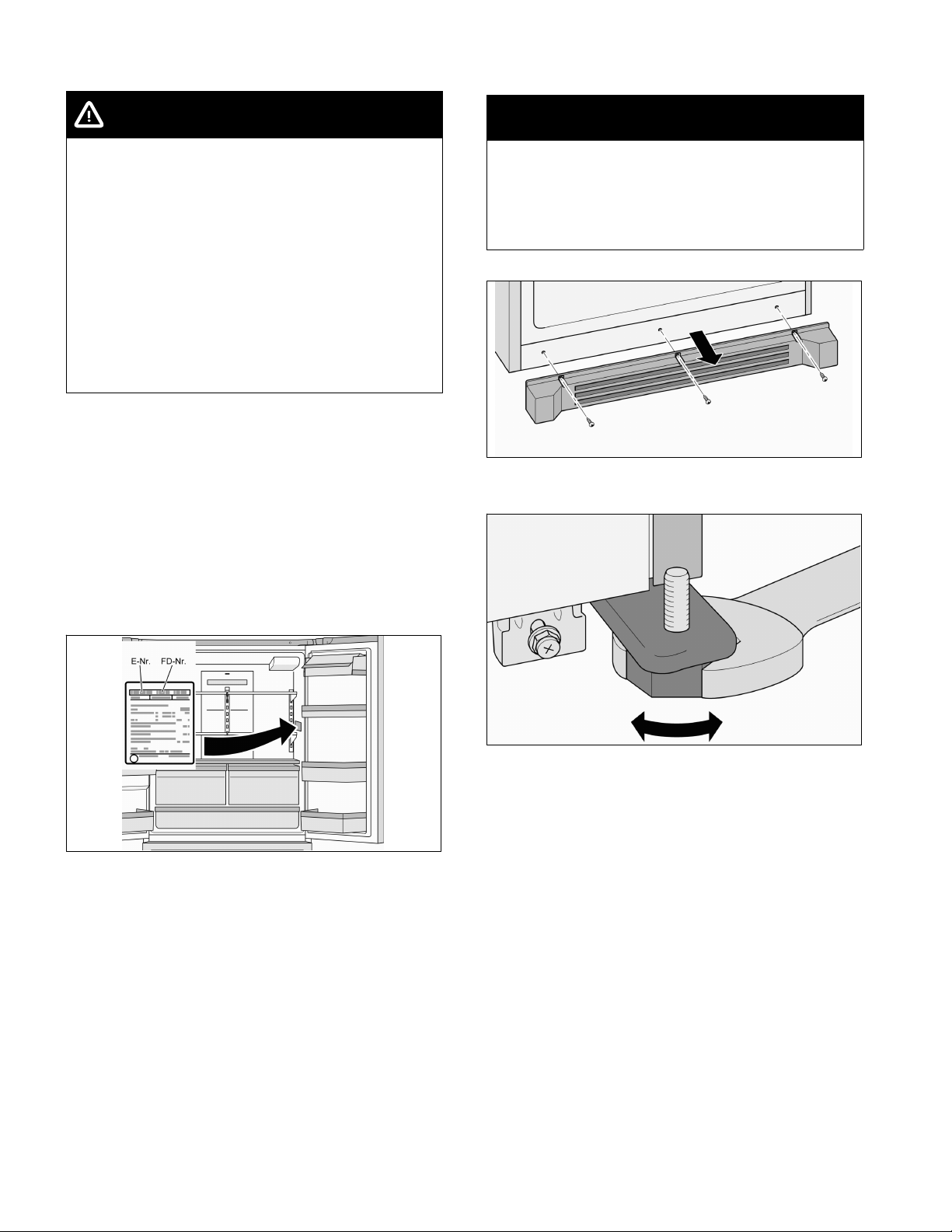
2. Remove the three screws from the base panel.
3. Remove the base panel.
4. Use a 36 mm open end wrench to loosen the two
front feet until they are firmly planted on the floor
and then align the front of the appliance.
en-us
9
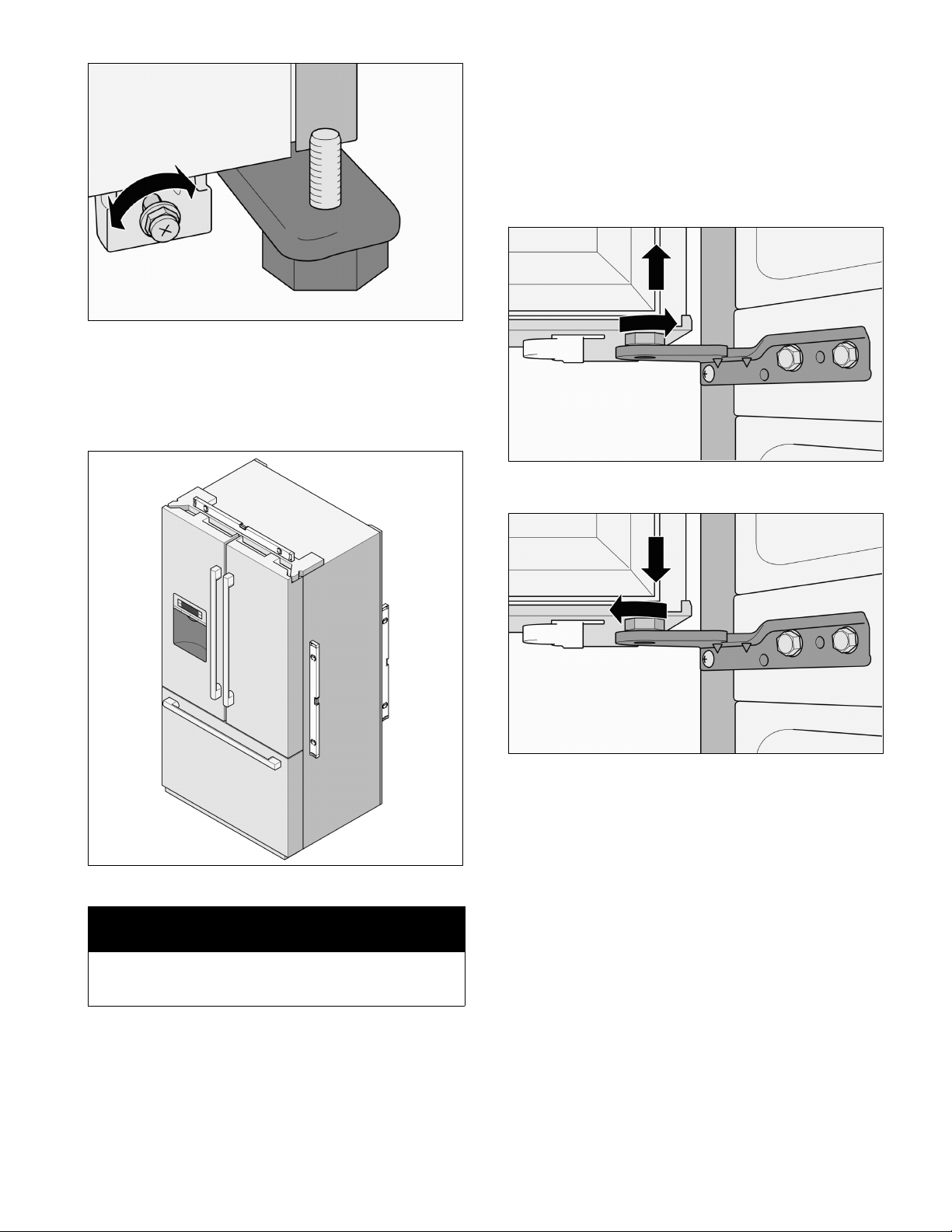
5. Use an open end wrench to turn the screws and
then align the rear of the appliance.
To raise the rear of the appliance:
Turn the screw clockwise.
To lower the rear of the appliance:
Turn the screw counterclockwise.
6. Use the level to check if the appliance is level.
NOTICE
To ensure that the appliance does not move, the
front feet must be firmly planted on the floor.
7. If the height of the refrigerator compartment doors
are uneven or if the freezer compartment drawer is
slanted after adjusting the level of the appliance,
use the following method to adjust them.
Adjusting a refrigerator door
If the height of the refrigerator doors is uneven:
1. Determine which refrigerator door needs to be
raised.
2. Turn the screw nut on the lower hinge to adjust the
refrigerator door.
To raise a refrigerator door:
Turn the screw counterclockwise.
To lower a refrigerator door:
Turn the screw clockwise.
en-us
10
If the refrigerator doors are not properly aligned:
WARNING
Risk of electric shock!
Before removing the top panel:
1. Shut off the water supply to the appliance.
2. Unplug the appliance or switch off the circuit
breaker (or fuse).
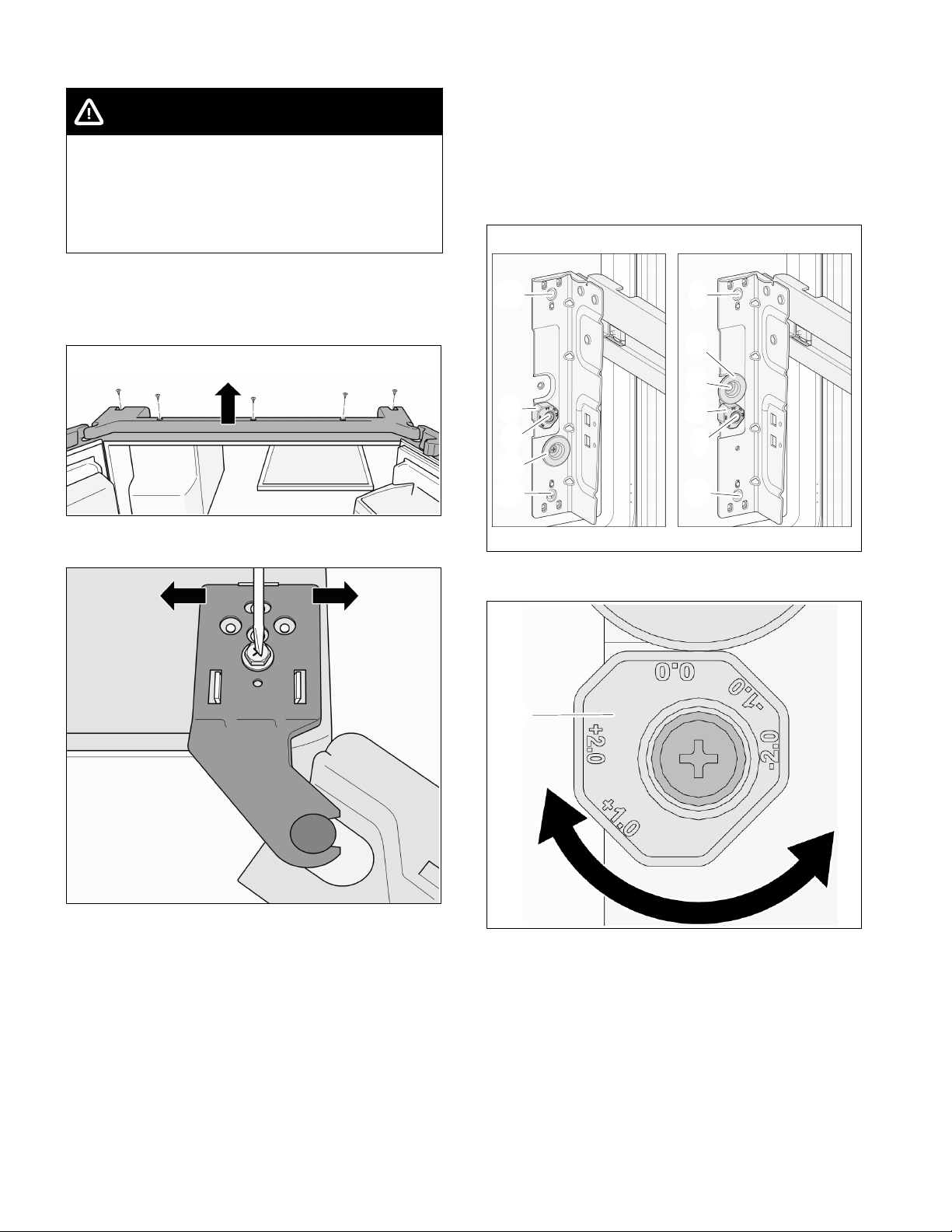
1. Determine which refrigerator door needs
adjustment.
2. Remove the five screws on the top panel.
3. Raise the panel.
4. Loosen the screw.
Do not remove the screw!
5. Move the hinge sideways to adjust the refrigerator
door.
6. Tighten the screw.
7. Realign panel.
8. Insert and tighten the five screws.
Adjusting the freezer compartment
drawer
If the freezer drawer is higher on one side than the
other (not even):
1. Loosen the three side screws (1) on the side
where adjustment is needed.
2. Move the Stopper (2) from "left picture position" to
"right picture position".
1
1
2
1
3
1
1
2
1
3
4
3. Adjust the leveling by rotation the Position
Knob (3). (Pull and rotate the Position Knob)
33
4. After adjusting the leveling, tighten the four side
screws (1)+(4).
en-us
11
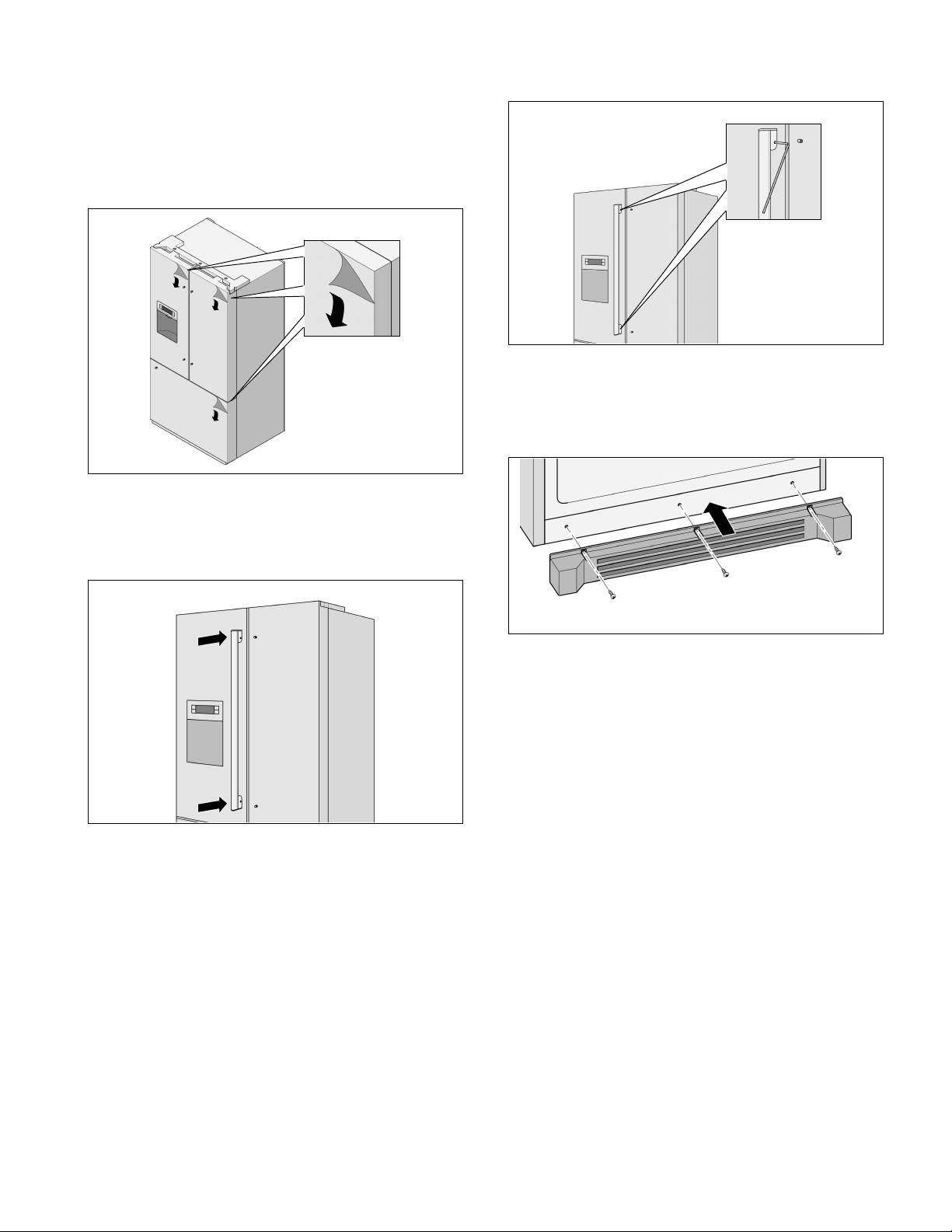
Installing the handles
Do not install the handles until the appliance is
installed in its designated location and is level.
All handles are the same and are installed in the same
manner.
1. Remove the protective films from the refrigerator
doors and the freezer compartment drawer.
2. Insert the door handles into the guides.
n Refrigerator doors: The handle screws must
face the center of the appliance.
n Freezer compartment drawer: The handle
screws must face down.
3. Tighten the handle screws with the accompanying
Allen wrench.
Installing the base plate
1. Remove the three screws on the appliance.
2. Mount the base plate.
3. Insert the three screws and tighten.
en-us
12
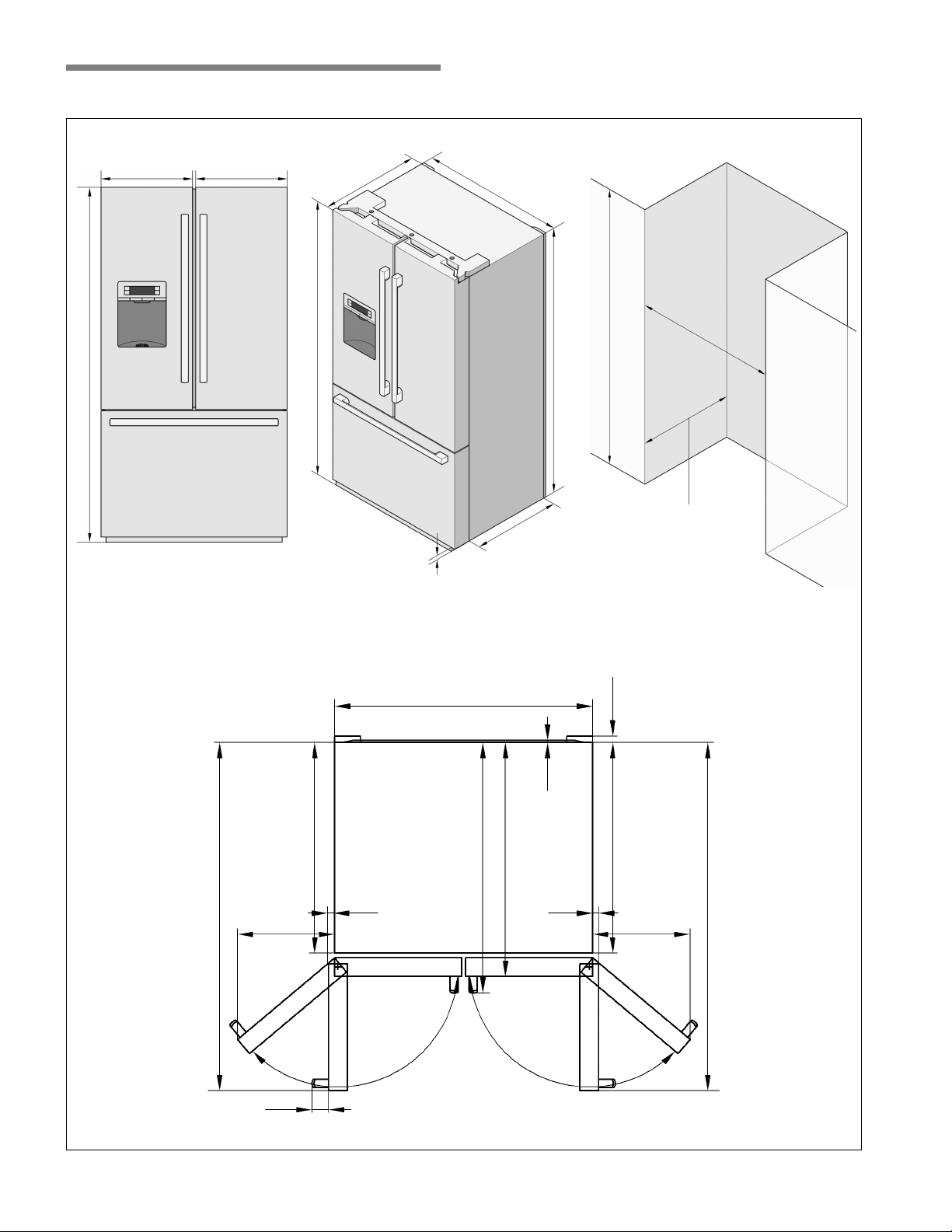
Appliance and installation dimensions
17
27/32
″
(454 mm)
17
27/32
″
(454 mm) 35
5/8
″
(905 mm)
36″
(914 mm)
30
3/8
″
(772 mm)
min. 70″ (1778 mm)
68
19/32
″ (1742 mm)
29
1/8
″
(734 mm)
2
5/8
″ - 3
2/8
″
(67 mm - 83 mm)
69
4/5
″ (1773 mm)
33
4/5
″
(859 mm)
35
5/8
″
(905 mm)
48
5/32
″ (1223 mm)
90°
139°
29
1/8
″ (740 mm)
2
5/32
″ (55 mm)
32
15/32
″ (825 mm)
34
5/8
″ (88 mm)
29
1/8
″
(734 mm)
48
5/32
″ (1223 mm)
90°
139°
1
1/3
″
(34 mm)
13/32″ (10 mm)
1
8/82
″
(28 mm)
15″
(381 mm)
1
8/82
″
(28 mm)
15″
(381 mm)
69
3/4
″ (1772 mm)
en-us
13
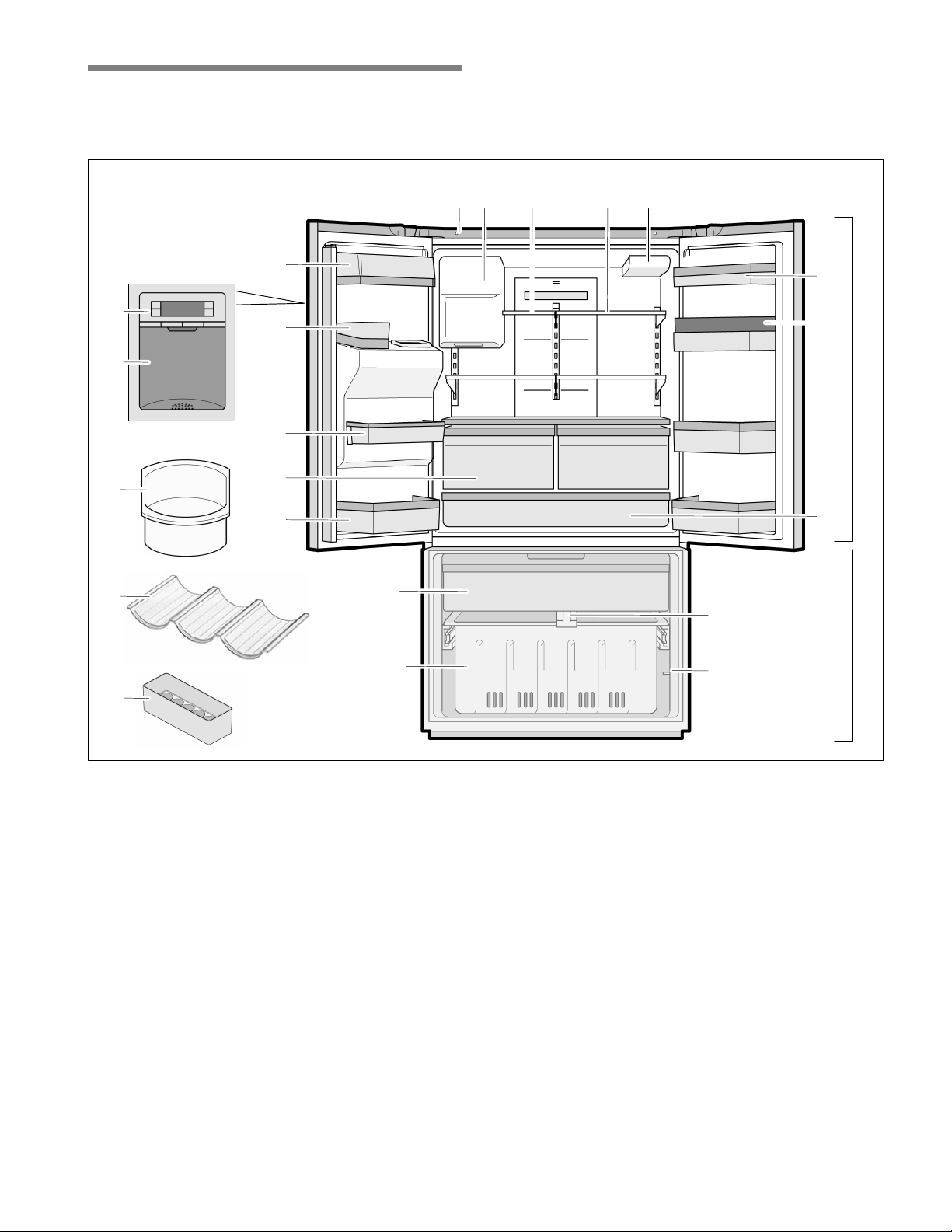
Getting to know your appliance
These operating and installation instructions apply to several models. The illustrations may differ from your particular
model.
3
4
A
B
5
6
1
2
8
14
19
16
7
9
10
20
11
18 17
13
15
12
21
15
A Refrigerator compartment
can be adjusted
between 33 °F (+1 °C)
and 45 °F (+7 °C)
B Freezer compartment
can be adjusted
between 5 °F (-15 °C)
and -7 °F (-22 °C)
1 Butter and cheese compartment
2 Can bin
3 Control and display panel
4 Ice and water dispenser
5 Ice storage bin
6 Wine Wave (B26FT8...)
7 Door bin
8 VitaFresh Pro compartment with LED light
(B26FT8...)
Crisper drawers (B26FT5...)
9 Removable door bin
10 Top freezer drawer
11 Bottom freezer drawer
12 Freezer compartment light switch
13 Freezer compartment divider
14 Deli drawer with LED light (not all models)
15 Egg tray
16 Door bin
17 Water filter
18 Adjustable glass shelf
19 Small glass shelf
20 Ice maker/Ice cube container
21 Refrigerator compartment light switch
en-us
14
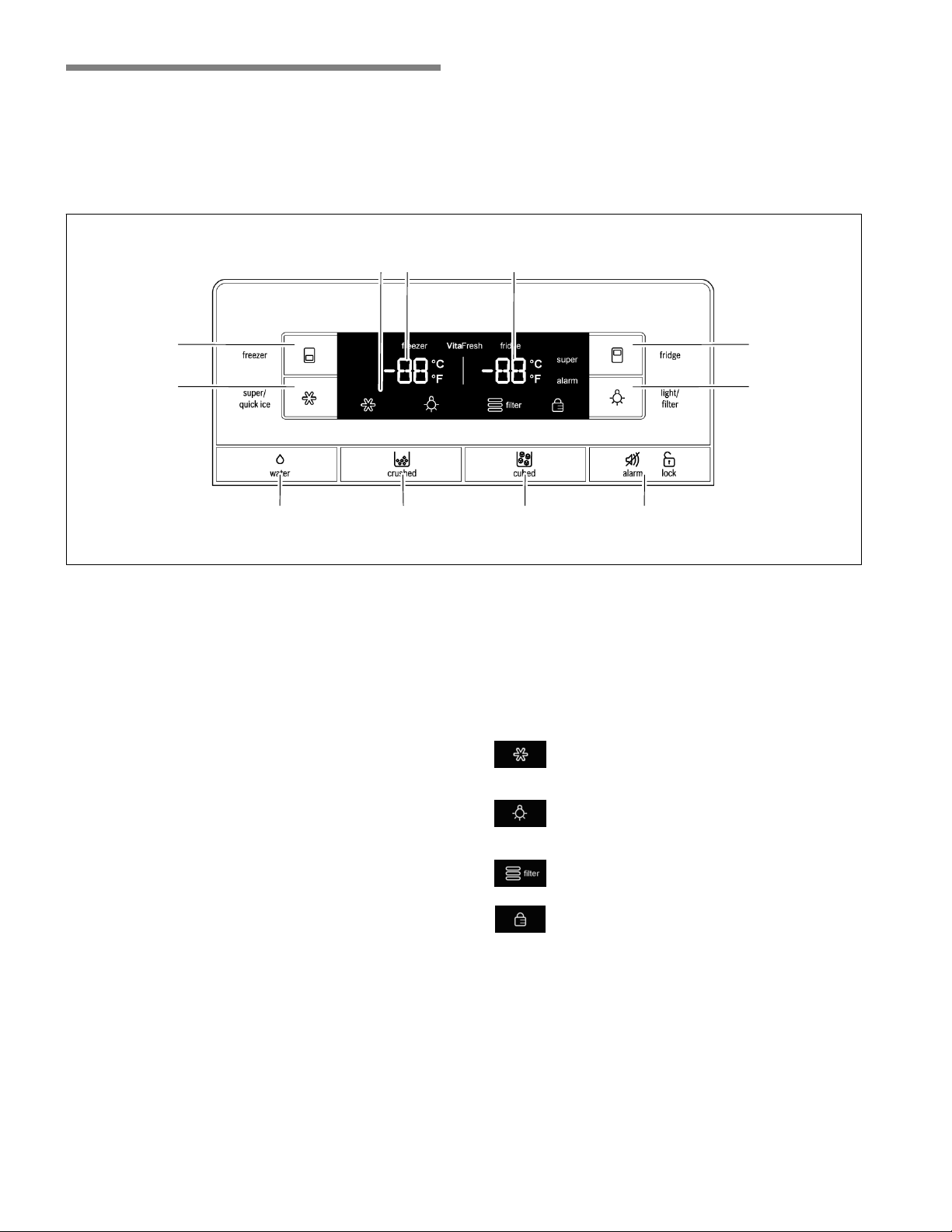
Control and display panel
The control and display panel on the left refrigerator door consists of a touch pad.
Touch the keypad to activate the corresponding function.
The light of the control and display panel goes out after approx. 1 min when no keypad was touched.
The illustration may differ from your particular model.
1
2 7
8
10
3 4 5 6
11 9
1 “freezer” button
Button for
n adjusting the freezer compartment temperature
n switching the ”Super freeze” function on/off.
2 ”super/quick ice” button
Quick ice cube production on/off switch.
3 Water dispenser button
4 Crushed ice dispenser button
5 Ice cube dispenser button
6 ”alarm/lock” button
Button for
n switching the warning signal off
n switching panel lock on/off.
7 ”light/filter” button
Button for
n switching the ice and water dispenser light
on/off
n reset the filter indicator.
8 “fridge” button
Button for
n adjusting the temperature in the refrigerator
compartment
n switching the ”Super cool” function on/off.
9 Refrigerator compartment temperature display
Displays the temperature set for the refrigerator
compartment.
10 Freezer compartment temperature display
Displays the temperature set for the freezer
compartment.
11 Symbols on the display panel
”quick ice”
Appears when the ”quick ice” function is
on.
”light”
Appears when the ice and water dispenser
light is on.
”water filter”
Displays the status of the filter cartridge.
”panel lock”
Appears when the panel lock is on.
en-us
15
Operating tips
Opening and closing the refrigerator
compartment doors
The refrigerator compartment doors can be opened
and closed independently.
The left refrigerator compartment door has a foldaway
door bar.
NOTICE
Risk of damage to the appliance!
The door bar could become damaged if you attempt
to close the left refrigerator compartment door when
the door bar is not folded back.
Before closing the refrigerator compartment doors,
make sure that the door bar is folded at a right angle
to the door.
When closing the left refrigerator compartment door,
the door bar folds behind the right refrigerator
compartment door, forming a seal between the
refrigerator compartment doors.
Switching on the appliance
NOTICE
After installing the appliance, wait at least 8 hours
before plugging in the appliance. The oil in the
compressor may have flowed into the refrigeration
system during transport.
Connect the appliance plug to the outlet.
After the appliance has been plugged in, the
refrigeration process will begin. The interior light in the
refrigerator compartment switches on when the door
is open.
It will take several hours for the inside of the appliance
to reach the temperatures set at the factory. Do not
place food in the appliance until these temperatures
are reached.
Initial temperature
Refrigerator compartment: 39 °F (+4 °C)
Freezer compartment: 0 °F (-18 °C).
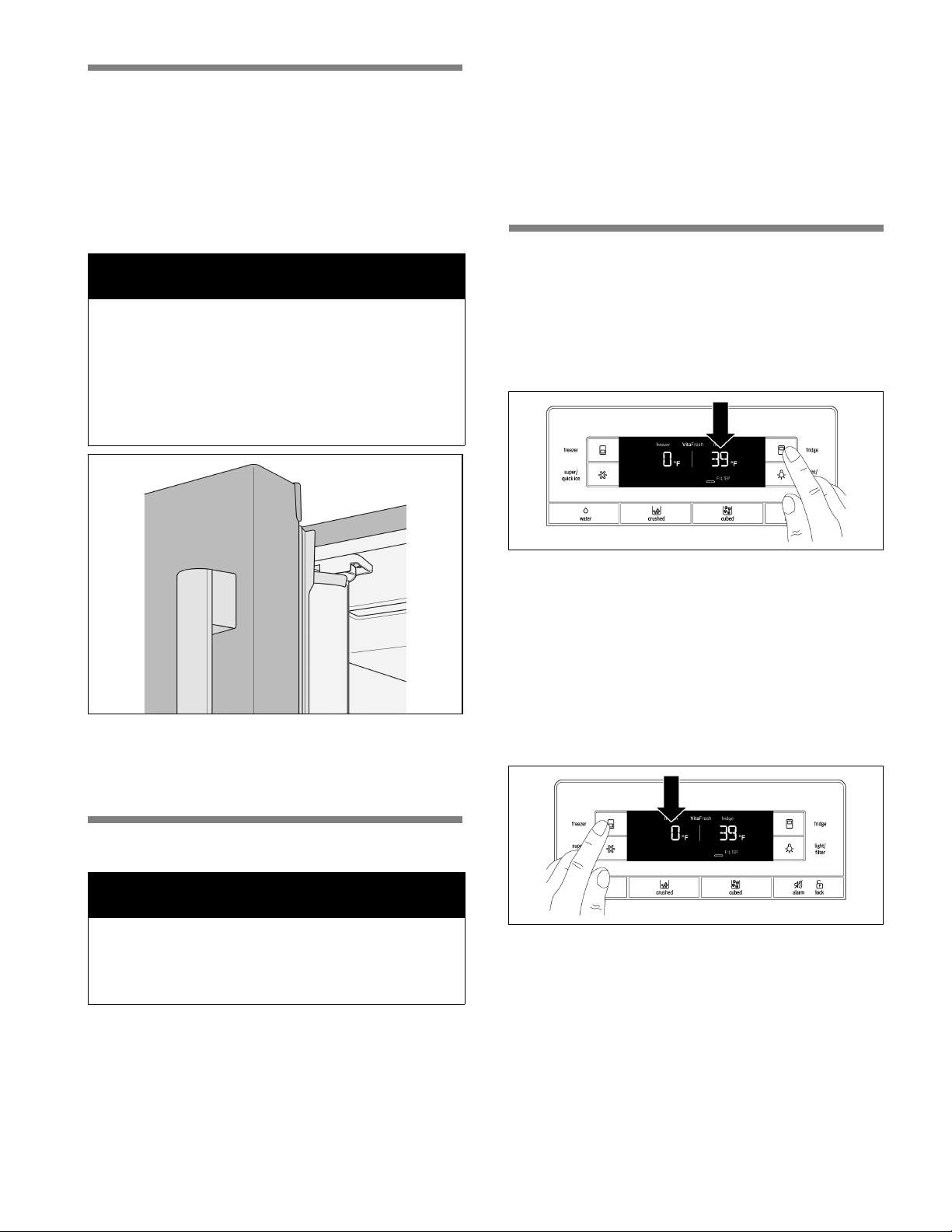
Setting the temperature
Refrigerator compartment
The temperature can be adjusted between
33 °F (+1 °C) up to 45 °F (+7 °C).
Press the ”fridge” button until the desired refrigerator
compartment temperature is set.
The most recent temperature value will be stored.
We recommend a setting of 39 °F (+4 °C).
Perishable foods should not be stored at temperatures
higher than 39 °F (+4 °C).
Freezer compartment
The temperature can be adjusted between
5 °F (-15 °C) and -7 °F (-22 °C).
Press the ”freezer” button until the desired freezer
compartment temperature is set.
The most recent temperature value will be stored.
We recommend a setting of 0 °F (-18 °C).

en-us
16
Alarm function
The appliance has two different warning signal
sounds. When the temperature alarm is activated, a
continuous beep sounds. When the door alarm is
activated, a beep sounds 6 times every minute.
Refrigerator compartment
The word ”alarm” will appear on the right on the
display panel.
To switch off the warning signal:
Press ”alarm/lock” or close the refrigerator
compartment doors.
The word ”alarm” will blink on the display panel until
the temperature is close to the set temperature.
Freezer compartment
The word ”alarm” will appear on the left on the display
panel.
To switch off the warning signal:
Press ”alarm/lock” or close the freezer compartment
drawer.
The word ”alarm” will blink on the display panel until
the temperature is close to the set temperature.
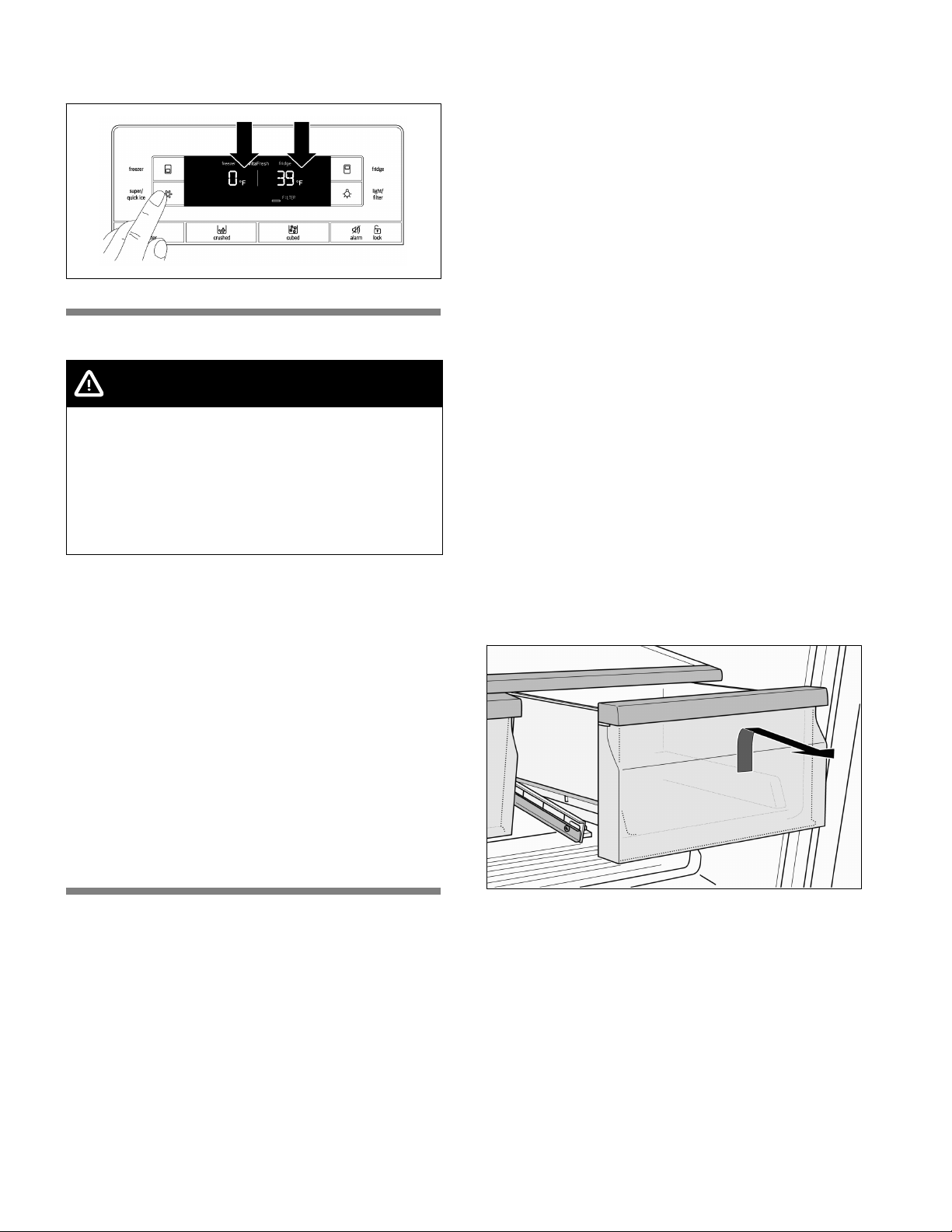
Panel lock
When the panel lock is activated, all of the buttons on
the control and display panel are locked.
NOTICE
When the panel lock is activated, use the
”alarm/lock” button to switch off the warning signal.
To switch the panel lock on or off:
Press ”alarm/lock” for 2 seconds.
The ”panel lock” symbol appears when the panel lock
is activated.
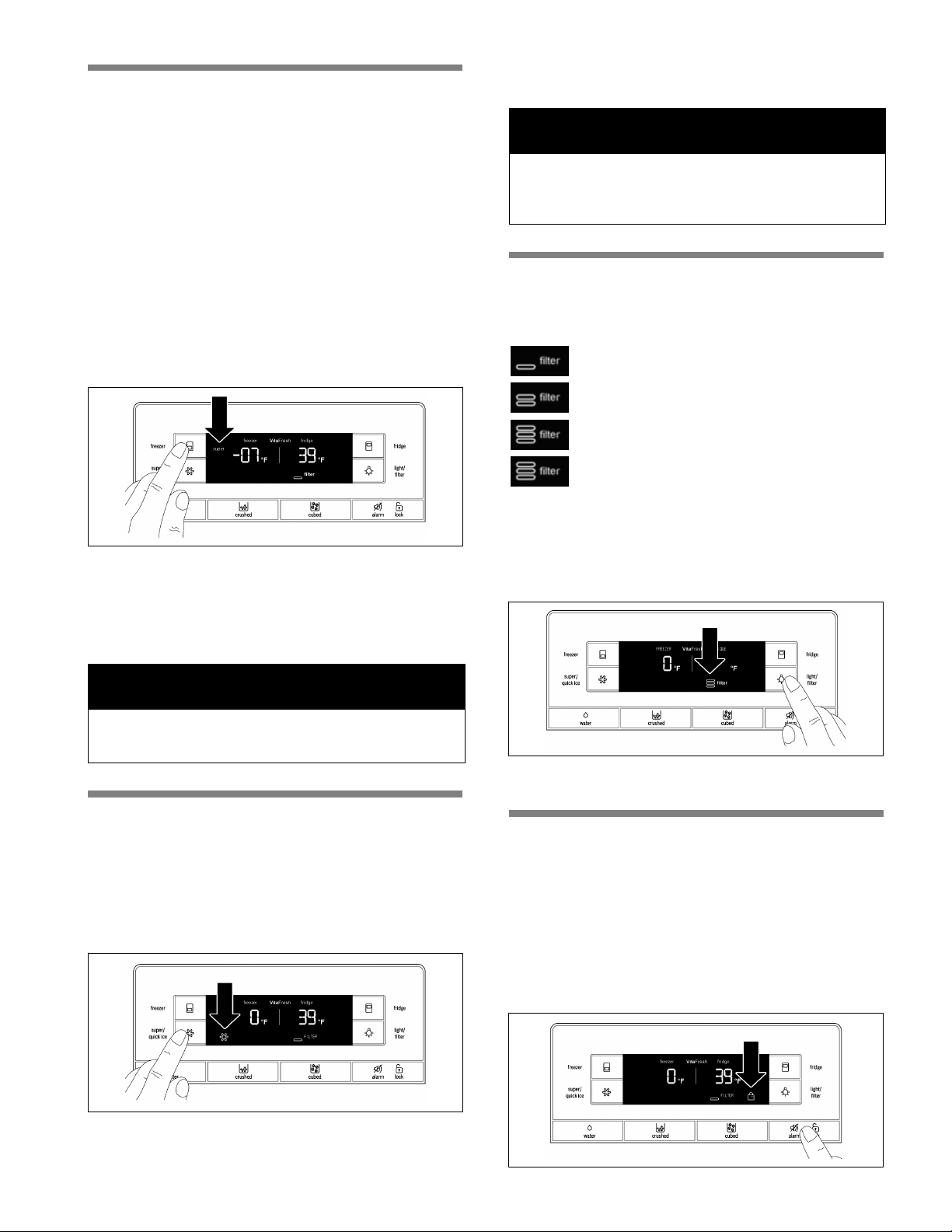
Super cooling
Super cooling cools the refrigerator compartment
down as low as possible for approximately 6 hours.
The temperature is then automatically reset to 39 °F
(+4 °C).
Super cooling is particularly recommended for the
following:
n Before placing large quantities of food in the
refrigerator compartment.
n To cool drinks quickly.
To switch on super cooling:
Press ”fridge” until ”super” appears on the right on
the display panel.
To switch off super cooling:
Press ”fridge”.
The word ”super” disappears on the display panel.
The temperature is automatically set to the previous
setting temperature.
en-us
17
Super freezing
Food should be frozen as quickly as possible in order
to retain their vitamins, nutritional value, appearance
and flavor.
To prevent an undesirable rise in temperature when
placing fresh food in the freezer compartment, switch
on super freezing several hours beforehand.
As a rule, 4 to 6 hours is adequate. Allow for a
minimum of 24 hours if planning to use the maximum
freezing capacity.
Smaller quantities of food can be frozen without super
freezing.
To switch on super freezing:
Press ”freezer” until ”super” appears on the left on the
display panel.
To switch off super freezing:
Press ”freezer”.
The word ”super” disappears on the display panel.
The temperature is automatically set to the previous
setting temperature.
NOTICE
Super freezing switches off automatically after
approximately 2 days.
Quick ice
Use this function to accelerate the production of ice
cubes temporarly.
To switch on quick ice:
Press ”super/quick ice”.
The ”quick ice” symbol appears on the display panel.
When the ice cube container is full, quick ice
automatically shuts off after a few hours.
NOTICE
When quick ice is activated, the power of the
appliance is increased temporarily. This increases its
energy consumption.
Water filter symbol
The symbol indicates the filter cartridge's period of
use.
Up to two months.
Up to four months.
Up to six months.
After six months, the symbol flashes.
Replace the filter cartridge.
When the appliance is turned off, the water filter
symbol is reset.
To reset the water filter symbol after replacing the
filter cartridge:
Press and hold the ”light/filter” button for 3 seconds.
The symbol stops flashing.
Temperature unit
The temperature can be displayed in degrees
Fahrenheit (°F) or Celsius (°C).
After the appliance is switched on, the temperature
appears in degrees Fahrenheit (°F).
To set the temperature unit:
Press ”alarm/lock” for 2 seconds.
The ”panel lock” symbol appears.
en-us
18
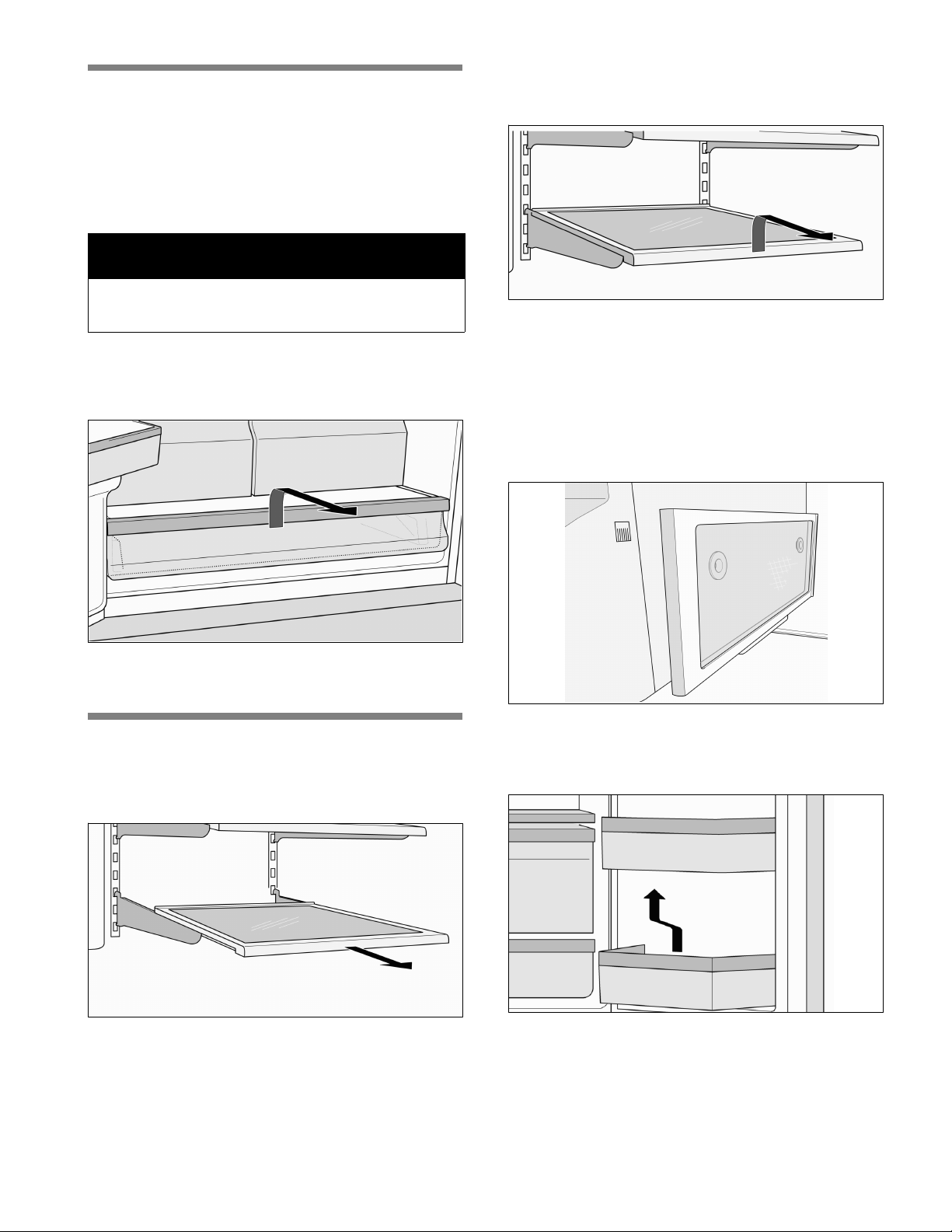
Press and hold ”super/quick ice” for 15 seconds until
the temperature unit switches.
Refrigerator compartment
WARNING
Risk of explosion!
Never store products containing flammable
propellants (such as spray cans) or explosive or
easily combustible substances in the appliance.
Bottles containing a high percentage of alcohol
must be tightly sealed and stored in an upright
position.
Using the refrigerator compartment
For storage of ready meals, cakes and pastries,
canned food, condensed milk, cheese, spreads,
sauces, dips and eggs.
Follow these guidelines when storing
food:
- Allow warm food and drinks to cool down outside
the appliance.
- Place food in airtight containers to prevent it from
losing its flavor or drying out.
- To prevent poor air circulation in the appliance, do
not block ventilation openings with food.
- Avoid contact of oil and grease with plastic parts
and door seal.
VitaFresh Pro compartment
(not included on all models)
The temperature inside the VitaFresh Pro
compartment is kept at almost 32 °F (0 °C). The low
temperature provides optimum storage conditions for
perishable food.
Food can be stored much longer in the VitaFresh Pro
compartment than in the regular refrigerator
compartment without losing its freshness.
The VitaFresh Pro compartment is covered by a
special humidity filter. The special humidity filter
optimizes the humidity in the VitaFresh Pro
compartment. Depending on how full the VitaFresh Pro
compartment is, the humidity can reach up to
90 percent which is ideal for all garden and field
products such as vegetables, lettuces, herbs and fruit.
VitaFresh Pro is suitable for:
Basically any food that is fresh and is to be kept fresh
longer, such as meat and meat products, fresh fish,
seafood, milk, butter, soft cheese, cottage cheese,
certain fruits and vegetables.
VitaFresh Pro is not suitable for:
Fruit and vegetables sensitive to cold, such as tropical
fruits, avocados, papayas, passion fruit, eggplant,
cucumbers, bell peppers as well as fruit that has to
ripen, green tomatoes and potatoes.
When buying food, please note:
The ”freshness at purchase” is important for the
storage life of your food. In general, the fresher the
products are when placed in the Vita Fresh
compartments, the longer they will stay fresh.
Therefore, when purchasing food, always check how
fresh it is.
Removing the VitaFresh Pro drawers
1. Pull out the VitaFresh Pro drawers as far as
possible.
2. Lift up the front of the VitaFresh Pro drawers and
pull them out.
3. Inserting the VitaFresh Pro drawers: Insert the
VitaFresh Pro drawers into the rail and push toward
the back.
en-us
19
Deli drawer
(not included on all models)
The temperature in the deli drawer is kept at a
constant temperature just below freezing. This
provides optimum storage conditions for meat and
meat products, fish, seafood, dairy products as well as
hard and soft cheese.
NOTICE
Never store foods that are sensitive to cold in the
deli drawer.
Removing the deli drawer
1. Pull out the deli drawer as far as possible.
2. Lift up the front of the deli drawer and pull it out.
3. Inserting the drawer: Insert the deli drawer into the
rail and push toward the back.
Variable interior design
Glass shelves
The adjustable glass shelves can be removed.
You can pull out the adjustable glass shelves and
place them at varying heights.
Removing a glass shelf
Lift up and pull the shelf toward you. Unhook and then
remove the shelf.
Installing the glass shelf
Lift up the front of the shelf and insert the hooks into
the openings at the desired height. Lower the front of
the shelf.
Partial shelf
The glass shelf can be removed and placed in the
holder underneath the ice maker. This provides room
to place taller items such as tall bottles next to the ice
maker.
Door bins
To remove door bins:
Lift door bin and take it out.
To install door bins:
Place the door bin above the bracket at the desired
height and press down.
en-us
20
Butter and cheese compartment
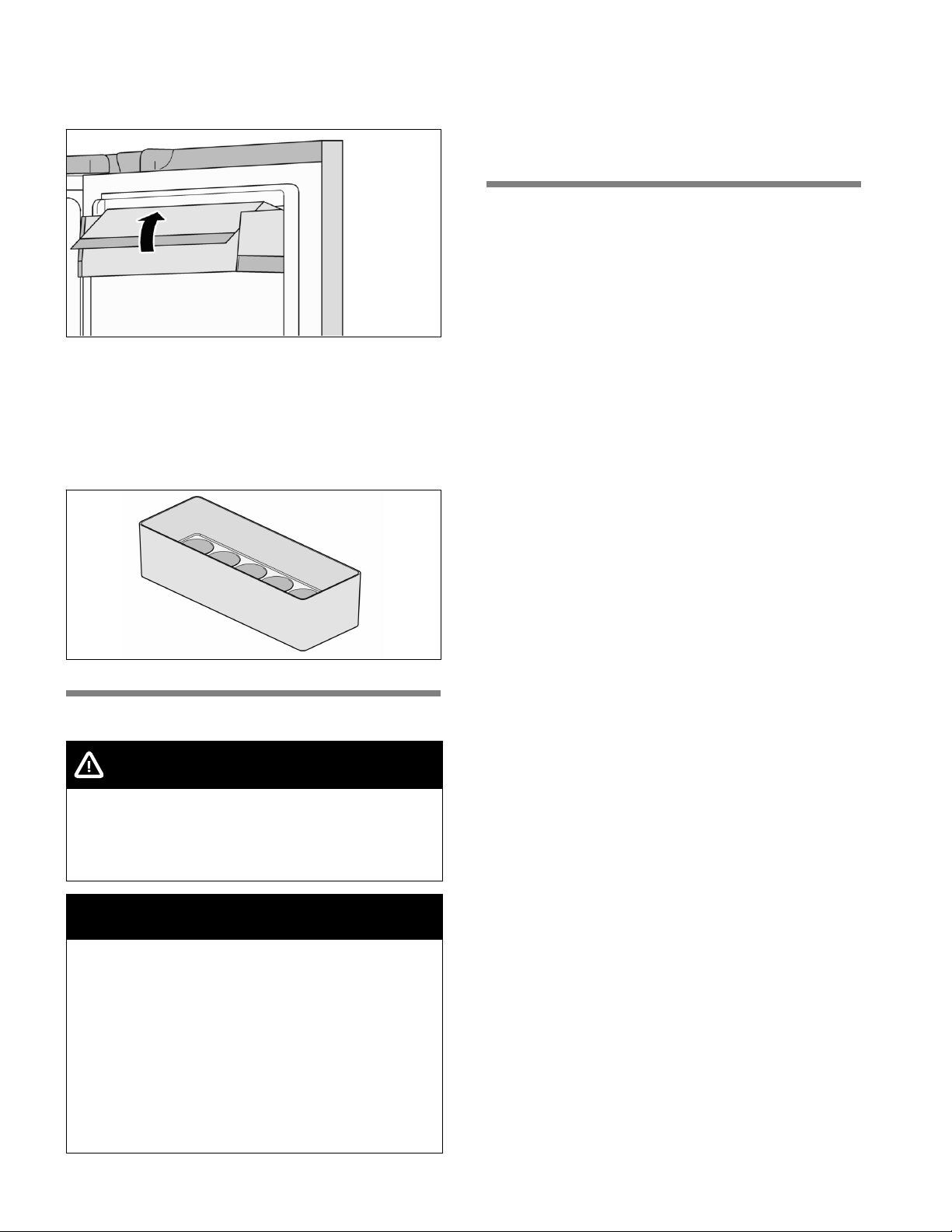
Raise the cover on the butter and cheese
compartment.
To remove the butter and cheese compartment:
Lift up the compartment and take it out.
To install the butter and cheese compartment:
Place the compartment above the bracket at the
desired height and press down.
Egg tray
Freezer compartment
WARNING
Risk of explosion!
Never store products containing flammable
propellants (such as spray cans) or explosive or
easily combustible substances in the appliance.
NOTICE
Make sure that the freezer compartment drawer is
always kept closed. The frozen food will thaw if the
freezer compartment drawer is open. The freezer
compartment will become covered with thick ice.
Also: Energy will be lost due to high power
consumption.
When the freezer compartment door is closed, low
pressure occurs inside the compartment.
If you cannot reopen the freezer compartment door
right away, wait two to three minutes until the low
pressure has adjusted itself.
Use the freezer compartment to
- store deep-frozen food
- freeze food
- make and store ice cubes.
Freezing food
Freeze fresh and undamaged food only. Separate food
to be frozen from food that is already frozen. Place food
in airtight containers to prevent it from losing its flavor
or drying out.
How to wrap food correctly:
1. Place food in packaging.
2. Press out any air.
3. Seal the packaging.
4. Label the package with the contents and date.
Items not suitable for wrapping food:
Wrapping paper, greaseproof paper, cellophane,
garbage bags and used shopping bags.
Items suitable for wrapping food:
Plastic film, polyethylene blown film, aluminum foil and
freezer cans.
These products can be purchased from your retailer.
Items suitable for sealing wrapped food:
Rubber bands, plastic clips, string, cold-resistant
adhesive tape or similar items.
Bags and polyethylene blown film can be sealed with
a film sealer.
Storage life of frozen food
The storage life depends on the type of food. At a
temperature setting of 0 °F (-18 °C):
n Fish, sausage, ready meals and cakes and
pastries:
up to 6 months
n Cheese, poultry and meat:
up to 8 months
n Fruit and vegetables:
up to 12 months.
en-us
21
Purchasing and storing
deep-frozen food
Follow these guidelines when purchasing deep-frozen
food:
n Make sure the packaging is not damaged.
n Check the ”sell by” date.
n The temperature of the supermarket freezer should
be lower than 0 °F (-18 °C). If not, this shortens
the storage life of the frozen food.
n Pick up deep-frozen food last when shopping.
Wrap in newspaper or place in a cold bag and take
home.
n At home, immediately place deep-frozen food in the
freezer compartment. Use the deep-frozen food
before the ”sell by” date.
Thawing frozen food
CAUTION
Risk of poisoning!
Do not refreeze food that is beginning to thaw or
has already thawed. The food cannot be refrozen
until it has been prepared (boiled or fried). Do not
store these refrozen products for the maximum
storage period.
Depending on the type of food and its intended use,
frozen food can be thawed as follows:
n at room temperature
n in the refrigerator
n in an electric oven with/without fan-assisted hot air
n in the microwave.
Freezer compartment features
Top freezer drawer
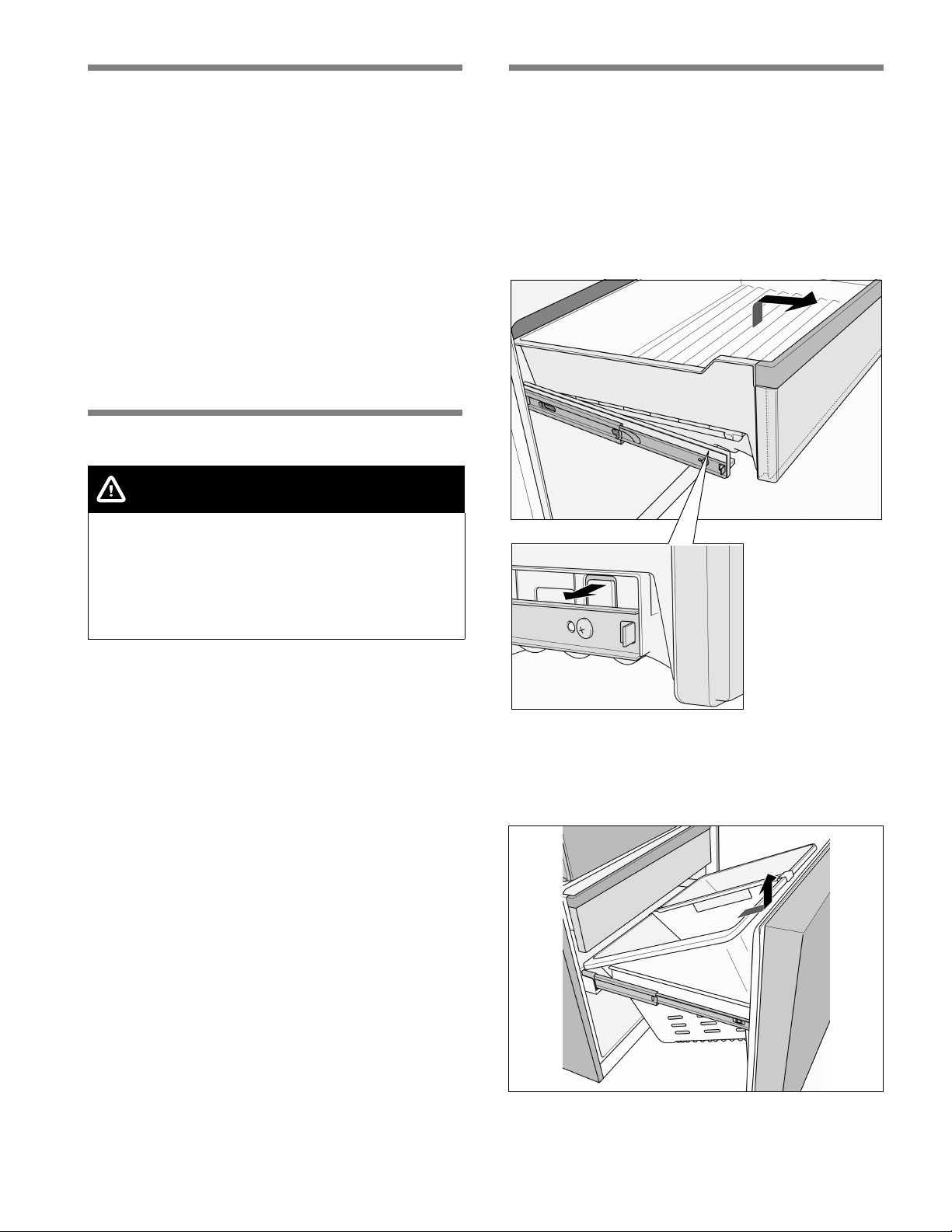
The freezer drawer can be removed.
To remove the top freezer drawer:
1. Pull out the top freezer drawer as far as possible.
2. Carefully pull out the clips on both sides and lift up
the front of the freezer drawer.
3. Pull out the freezer drawer.
Bottom freezer drawer
The freezer drawer can be removed.
To remove the bottom freezer drawer:
Lift the freezer drawer up and out.
en-us
22
Ice and water dispenser
The following may be dispensed as necessary:
n cooled water,
n crushed ice,
n ice cubes.
WARNING
Risk of injury from broken glass!
Never use fragile glassware to catch ice when
dispensed.
WARNING
Risk of injury from rotating crusher blades!
Never reach into the ice cube dispenser opening.
NOTICE
Risk of damage to the appliance!
Do not place bottles or food in the ice cube
container in order to cool them quickly. The ice
maker may become blocked and damaged.
When switching on the appliance, note
the following
The ice and water dispenser only works when the
appliance is connected to the water supply.
After the appliance has been switched on, it will take
24 hours before the first batch of ice cubes are ready.
When the appliance is connected, air bubbles will still
be in the lines.
Extract the drinking water and discard until water can
be dispensed without bubbles. Discard the first five
glasses of water.
When using the ice maker for the first time, discard
the first 30 to 40 ice cubes. Do not use ice cubes for
hygienic reasons.
Operating the ice maker
Once the freezer compartment has reached its
freezing temperature, water flows into the ice maker
and freezes into ice cubes. The ice cubes are
automatically discharged into the ice cube container
when they are ready.
The sides of the ice cubes may occasionally stick
together. They usually break away from each other as
they move to the dispenser opening.
Ice making switches off automatically when the ice
cube container is full.
The ice maker can make approximately 100 ice cubes
within 24 hours when ice cubes are discharged
several times during the day.
As the ice cubes are being made, the sound of the
buzzing water valve, the water flowing into the ice
storage bin and the falling ice cubes can be heard.
Drinking water quality
CAUTION
The water filter included with the appliance only
filters out particles from the supplied water and
does not filter out bacteria or microbes.
All materials used in the water dispenser are odorless
and tasteless.
If the water has an aftertaste, this may be caused by:
n Mineral and chlorine content in the drinking water
n Materials from which the domestic water line or
connection line are made
n Freshness of the drinking water. If water has not
been dispensed for an extended period of time, the
water may have a ”stale” taste. In this case,
dispense approx. 15 glasses of water and discard.
The taste and smell of the water can be improved by
installing the included filter cartridge at the water
intake point.
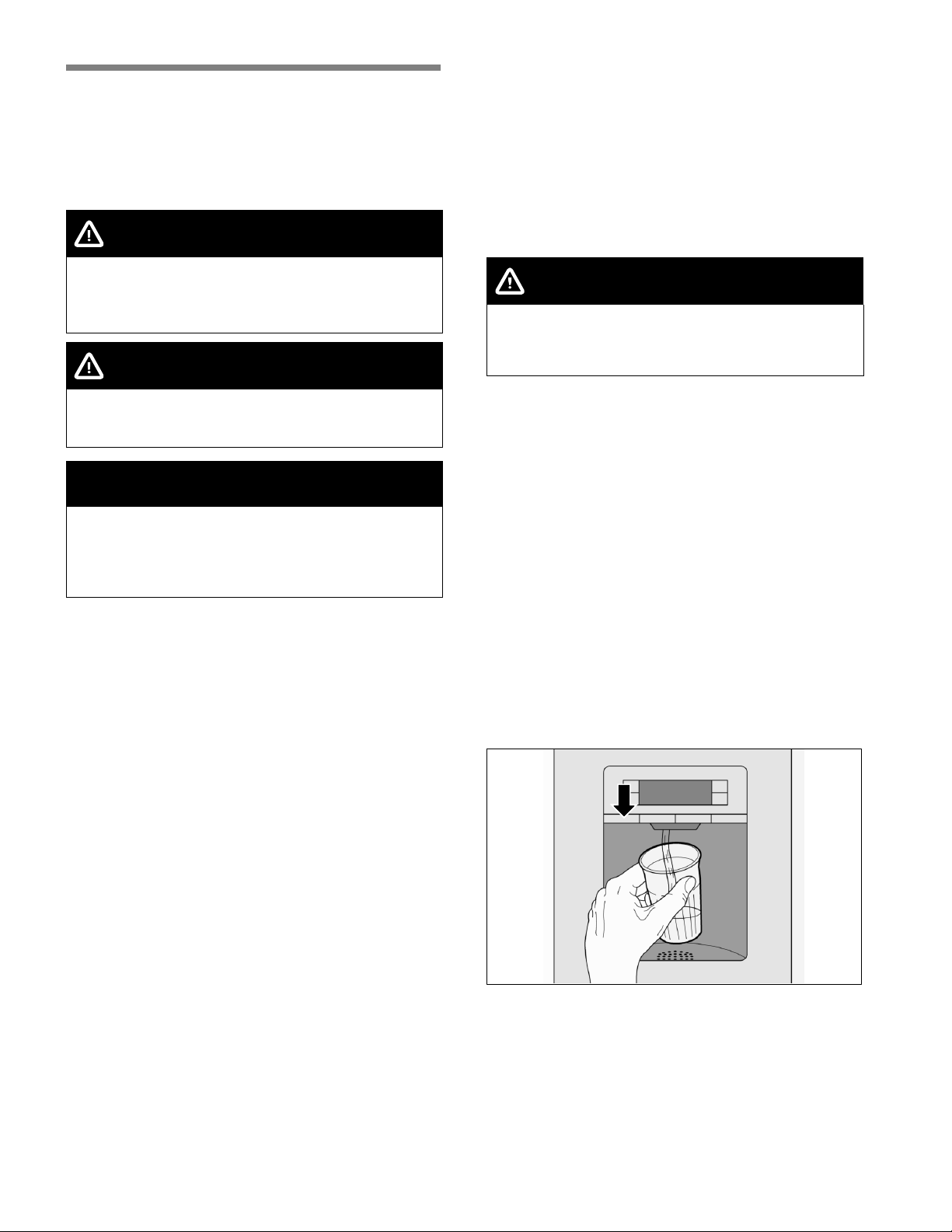
Dispensing water
1. Hold an appropriate receptacle under the ice and
water dispenser.
2. Keep the water dispenser button pressed until the
desired amount of water is in the receptacle.
Tip:
The water from the water dispenser is cooled to a
palatable temperature. If you would like colder water,
place ice cubes in the glass before dispensing the
water.
en-us
23
Dispensing ice
NOTICE
Keep the ice cube or crushed ice button pressed
and then stop once the desired amount of ice is in
the receptacle. Ice in the ice cube dispenser
opening may otherwise overfill the receptacle or
block the ice cube dispenser opening.
If crushed ice was dispensed before ice cubes are
dispensed, some crushed ice may still be in the ice
cube dispenser opening. The crushed ice will be
dispensed with the first batch of ice cubes.
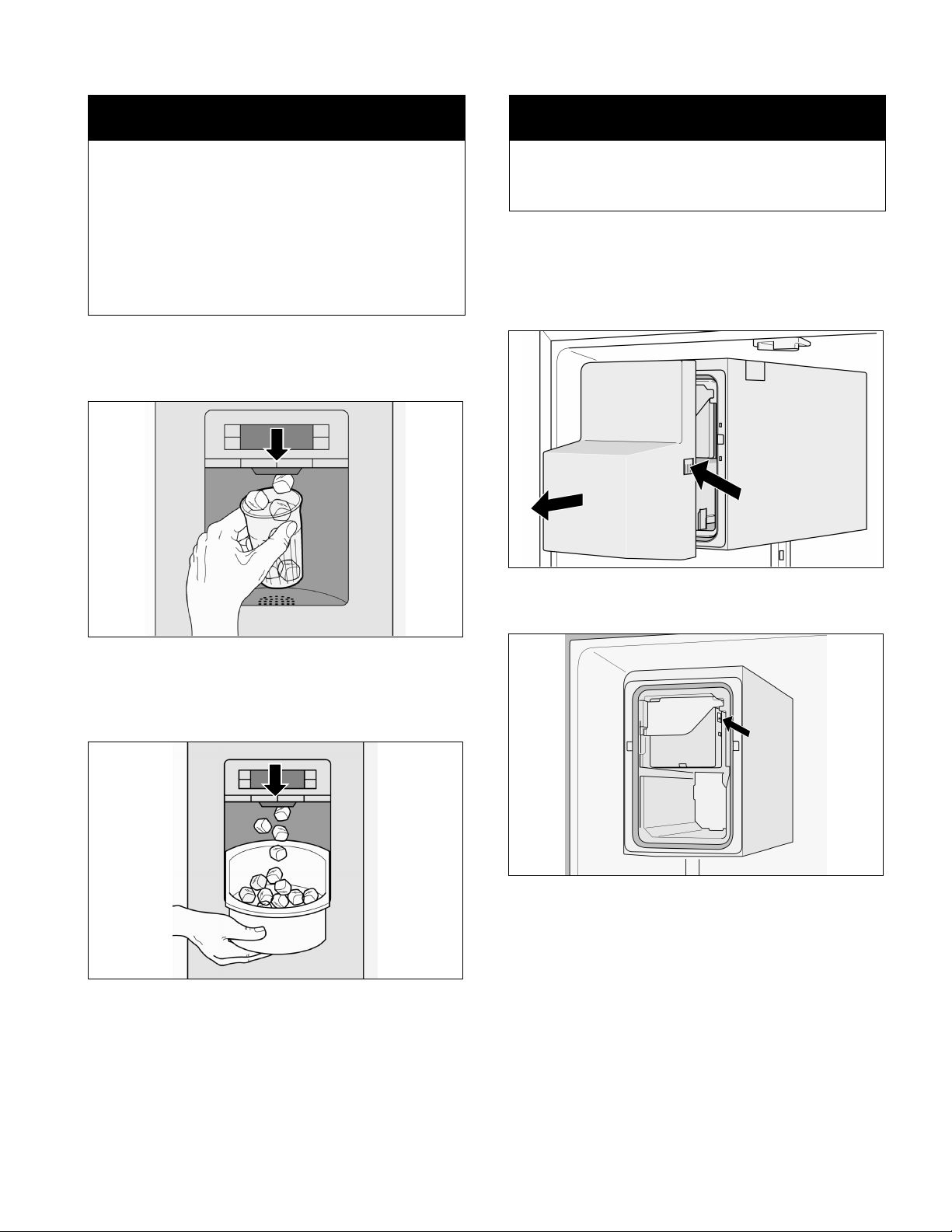
1. Hold an appropriate receptacle under the ice and
water dispenser.
2. Keep the ice cube or crushed ice button pressed
until the desired amount is in the receptacle.
Ice storage bin
The ice storage bin stores a reserve supply of ice
cubes the freezer compartment. The ice storage bin
fits perfectly into the ice and water dispenser due to
its shape.
Disconnecting the ice maker
NOTICE
Make sure to shut off the water supply to the
appliance a few hours before disconnecting the ice
maker.
If ice cubes will not be dispensed for more than
1 week (such as due to vacation), temporarily
disconnect the ice cube maker to prevent the ice
cubes from freezing together.
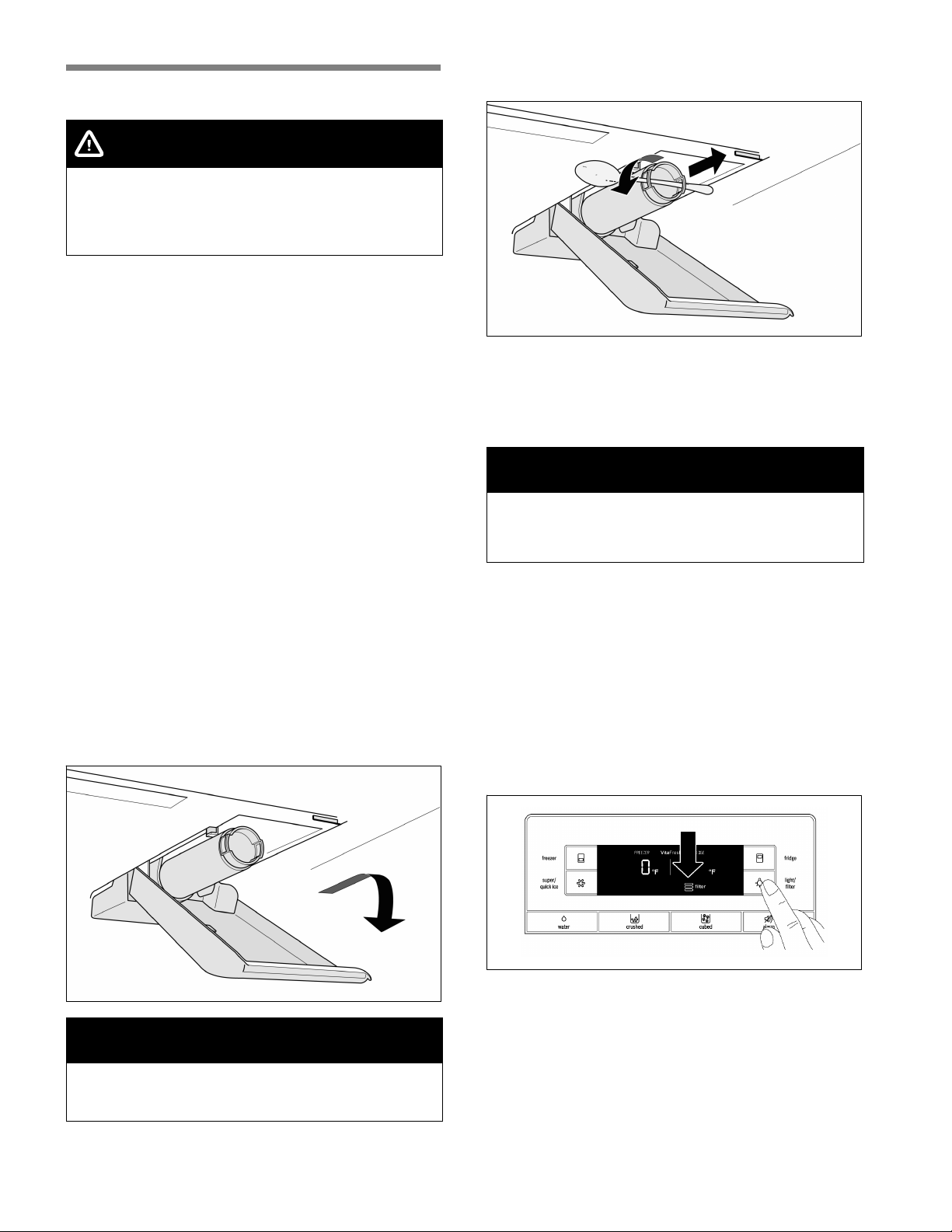
1. Press the release button and remove the ice cube
container.
2. Press the button for 3 seconds (led lamp is off)
behind the ice cube container - the ice maker is
deactivated.
3. Empty and clean out the ice cube container.
4. Push the ice cube container all the way back onto
the supports until it locks into position.
Reactivating the ice maker:
n Press the button for 3 seconds (led lamp is on)
behind the ice cube container - the ice maker is
activated.
en-us
24
Water filter
CAUTION
Do not use the appliance in places where the water
quality is unsafe or unknown without taking
suitable disinfection precautions before and after
filtering.
A filter cartridge for filtering particles can be obtained
from customer service.
The water filter should be replaced after 6 months at
the latest.
After 6 months, the flashing water filter symbol
prompts you to replace the filter cartridge (see ”Water
filter symbol”).
Other connection requirements
Do not install the filter cartridge if the water pressure
exceeds 116 psi (8.0 bar).
If the water pressure exceeds 80 psi (5.5 bar), a
pressure reducing valve must be installed.
Important note
n Rinse the water system thoroughly if the appliance
has not been used for a long period of time, or the
water has an unpleasant taste or smell. To do this,
extract water from the water dispenser for several
minutes. Replace the filter cartridge if the
unpleasant taste or smell persists.
n The ice maker and water dispenser can be used
without the filter cartridge. In this case, replace the
water filter with the bypass cap.
Installing and replacing the filter cartridge
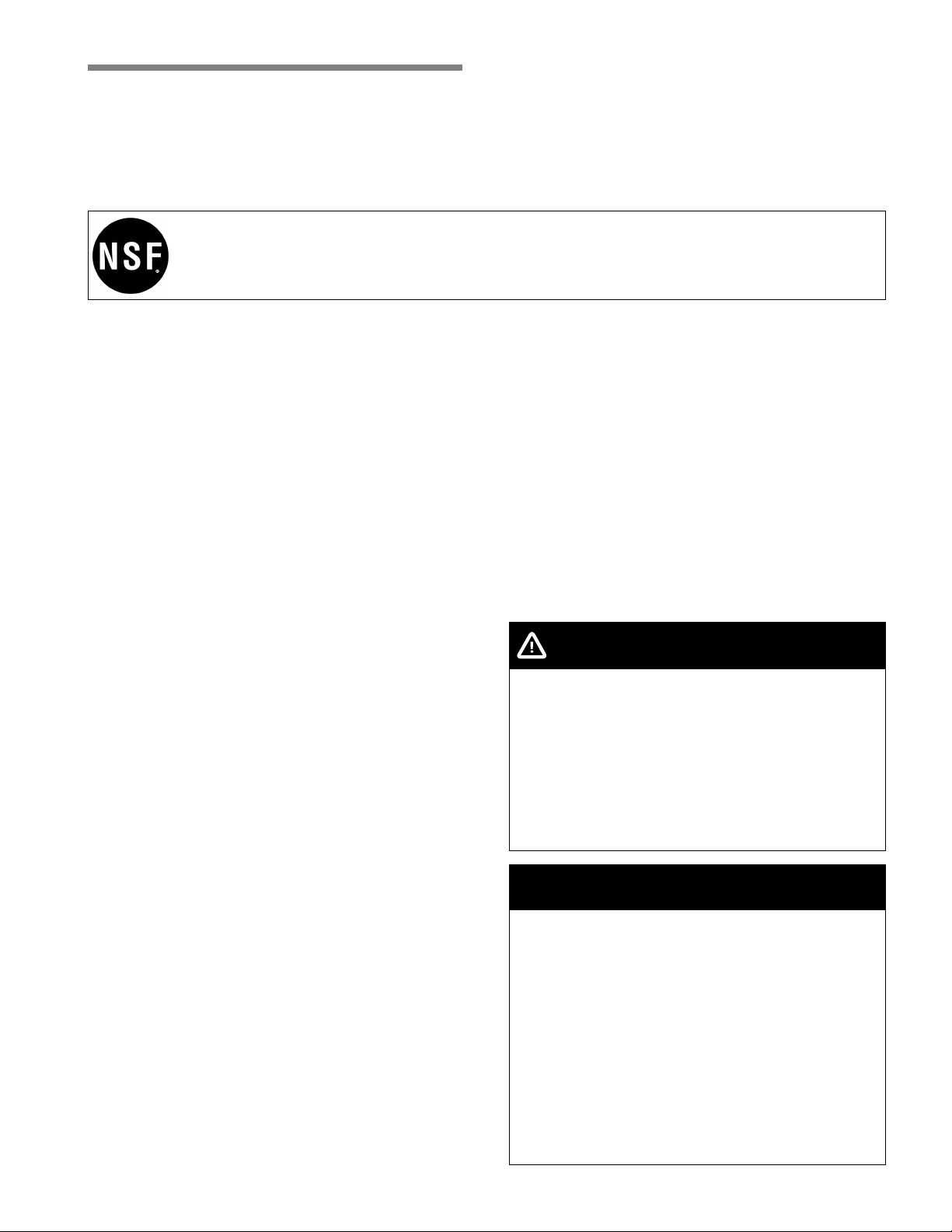
1. Pull out and then lower the cover.
NOTICE
Remove the filter cartridge carefully!
The water system is under low pressure after use.
2. Carefully turn the filter cartridge 90° anti-clockwise
e.g. with a spoon and pull it out.
3. Take the new filter cartridge out of its packaging
and remove the safety cap.
4. Insert the new filter cartridge and carefully rotate
90° clockwise as far as it will go e.g. by using a
spoon.
NOTICE
The filter cartridge must be tightened by hand so
that no leaks occur and the appliance is sufficiently
provided with water.
5. Raise the cover up and lock it in place.
6. Turn on the water supply to the appliance.
7. Draw about a gallon of water from the water
dispenser. This will remove air from the water
system.
8. Pour out the water in the used filter cartridge. The
filter cartridge can be disposed of in the household
garbage.
9. Press and hold the ”light/filter” button for
3 seconds. The water filter symbol is reset. The
symbol stops flashing. The new filter cartridge is
activated.
en-us
25
Performance data sheet
Model: 9000 077 508, 9000 705 475 and 9000 225 170
Use Replacement Cartridge 9000 674 655
The concentration of the indicated substances in water entering the system was reduced to a concentration less
than or equal to the permissible limit for water leaving the system as specified in NSF/ANSI Standard 42 and
Standard 53.
System tested and certified by NSF International against NSF/ANSI Standard 42 and Standard 53
for the reduction of the claims specified on the Performance Data Sheet.
Capacity 739.68 Gallons (2,800 Liters)
Contaminant Reduction Determined by NSF testing.
Contaminant
Reduction
Average
Influent
NSF specified
Challenge
Concentration
Avg %
Reduction
Average
Product Water
Concentration
Max
Permissible
Product
Water
Concen-
tration
NSF
Reduction
Require-
ments
NSF Test
Report
Chlorine Taste
and Odor
2.1 mg/L 2.0 mg/L
±10 %
97.6 % 0.05 mg/L N/A w 50 % J-00121313
Nominal
Particulate
Class I,
w 0.5 to < 1.0
μm
9,100,000
pts/mL
At least 10,000
particles/mL
98.8 % 111,817 pts/ml N/A w 85 % J-00099871
Cysts * 170,000
cysts/L
Minimum
50,000 cysts/L
99.99 % 0.001 cyst/L N/A w 99.95 % J-00109715
* Based on the use of Cryptosporidium parvum oocysts.
Application Guidelines/Water Supply Parameters
Service flow 0.75 gpm (2.83 lpm)
Water Supply Potable Water
Water pressure 30 - 120 psi (207 – 827 kPa)
Water
temperature
33 °F - 100 °F (0.6 °C – 38 °C)
It is essential that the manufacturer’s recommended
installation, maintenance and filter replacement
requirements be carried out for the product to perform
as advertised. See Installation Manual for Warranty
information.
Note: While the testing was performed under standard
laboratory conditions, actual performance may vary.
Replacement Cartridge: 9000 674655. For estimated
costs of replacement elements please contact your
local dealer or call 1-800-578-6890.
WARNING
To reduce the risk associated with ingestion of
contaminants:
DO NOT use this product with water that is
microbiologically unsafe or of unknown quality
without adequate disinfection before or after
connection to the system. Systems certified for
cyst reduction may be used in disinfected water
that may contain filterable cysts.
EPA Establishment Number 10350-MN-005
NOTICE
To reduce the risk associated with property damage
due to water leakage or flooding:
Read and follow all Instructions before installation
and use of this system.
To reduce the risk of water leakage or flooding, and
to ensure optimal filter performance:
Change the disposable filter cartridge every six
months or sooner if you observe a noticeable
reduction in water flow rate.
Failure to replace the disposable filter cartridge at
recommended intervals may lead to reduced filter
performance and cracks in the filter housing,
causing water leakage or flooding.
en-us
26
Energy-saving tips
n Install the appliance in a dry, well ventilated room,
but not in direct sunlight and not near a heat
source (radiator, stove, etc.). Use an insulating
plate, if required.
n Allow warm food and drinks to cool down before
placing in the appliance.
n When thawing frozen food, place it in the
refrigerator compartment. The low temperature of
the frozen products cools the food in the
refrigerator.
n Open and close the appliance doors as quickly as
possible.
Operating noises
Normal noises
Humming - refrigerating unit is running. The fan in the
circulating air system is running.
Bubbling, whirring or gurgling noises - refrigerant is
flowing through the tubing or water is flowing into the
ice maker.
Clicking - motor is switching on or off. The solenoid
valve at the water connection is opening or closing.
Rumbling - ready ice cubes from the ice maker are
falling into the ice cube container.
Solving simple noise problems
The appliance is not level
Align the appliance using a level. Use the
height-adjustable feet or place something under the
feet.
The appliance is touching adjacent units or
appliances
Move the appliance away from adjacent units or
appliances.
Loose or sticking drawers, baskets or storage areas
Check the removable parts and, if required, reinsert
them.
Receptacles are touching each other
Move bottles or receptacles slightly away from each
other.
Defrosting
Freezer compartment
The fully automatic No Frost system ensures that the
freezer compartment remains free of ice. Defrosting is
no longer required.
Refrigerator compartment
Defrosting takes place automatically.
The condensation runs through the drainage hole into
an evaporation pan at the rear of the appliance.
Switching off and
disconnecting the appliance
Switching off the appliance
Unplug the appliance or switch off the fuse.
Disconnecting the appliance
If the appliance is not used for an extended period of
time:
1. It is imperative that you disconnect the water
supply to the appliance for a few hours before
switching off the appliance.
2. Remove all food from the appliance.
3. Unplug the appliance.
4. Remove and dispose of the filter cartridge.
5. Empty and clean the ice cube container.
6. Clean the appliance interior (see ”Cleaning the
appliance”).
To prevent odors, leave the appliance doors open.
en-us
27
Cleaning
WARNING
Risk of electric shock!
Unplug the appliance or switch off the circuit
breaker (or fuse) before cleaning the appliance.
CAUTION
To avoid personal injury or damage to property,
observe the following:
Never use a steam cleaner to clean the appliance.
Do not use abrasive or acidic cleaning agents or
solvents.
Wipe the lights, the control and the display panel
with a damp cloth only. Do not let water used for
cleaning drip into the lights or onto the control and
display panel.
Do not let cleaning water run into the drainage hole
in the evaporation area.
Never clean shelves and containers in a
dishwasher. The parts may warp.
Cleaning the appliance
The VitaFresh Pro compartments and deli drawer can
be removed for cleaning.
1. Unplug the appliance or switch off the fuse.
2. Remove all food from the appliance and store in a
cool location.
3. Clean the appliance with a soft cloth, using
lukewarm water and a small amount of
pH-balanced dishwashing liquid.
4. Rub dry when done.
5. Wipe the door seal with clear water only and then
thoroughly wipe dry.
6. After cleaning, reconnect to switch on the
appliance.
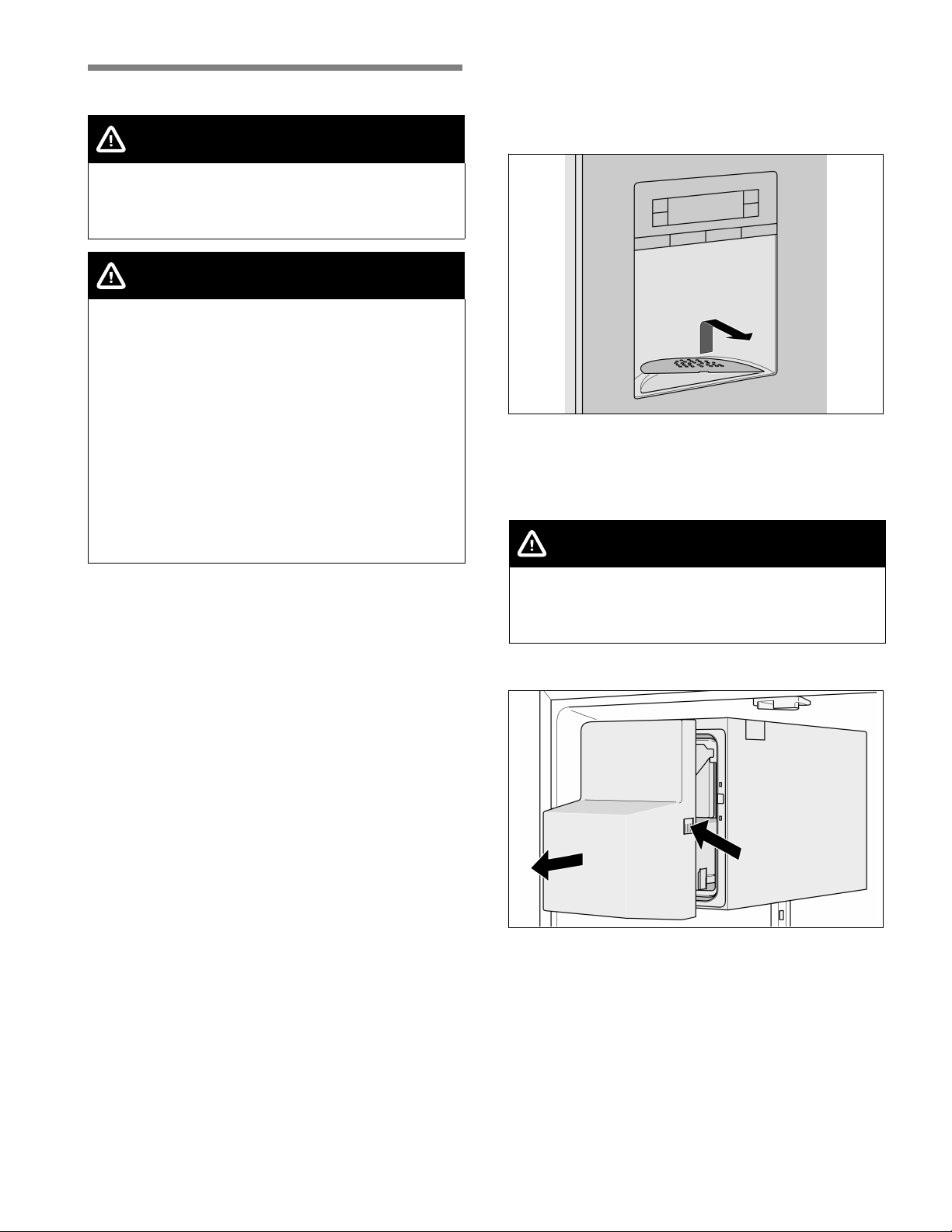
Cleaning the water collecting tray
Spilled water collects in the water collecting tray.
Remove the strainer to empty and clean. Wipe out the
water collecting tray with a sponge or absorbent cloth.
Cleaning the ice cube container
Ice cubes will shrink, have a stale taste and stick
together if they have not been dispensed for an
extended period of time.
CAUTION
Risk of injury!
A fully filled ice cube container is very heavy. Use
caution when removing the ice cube container.
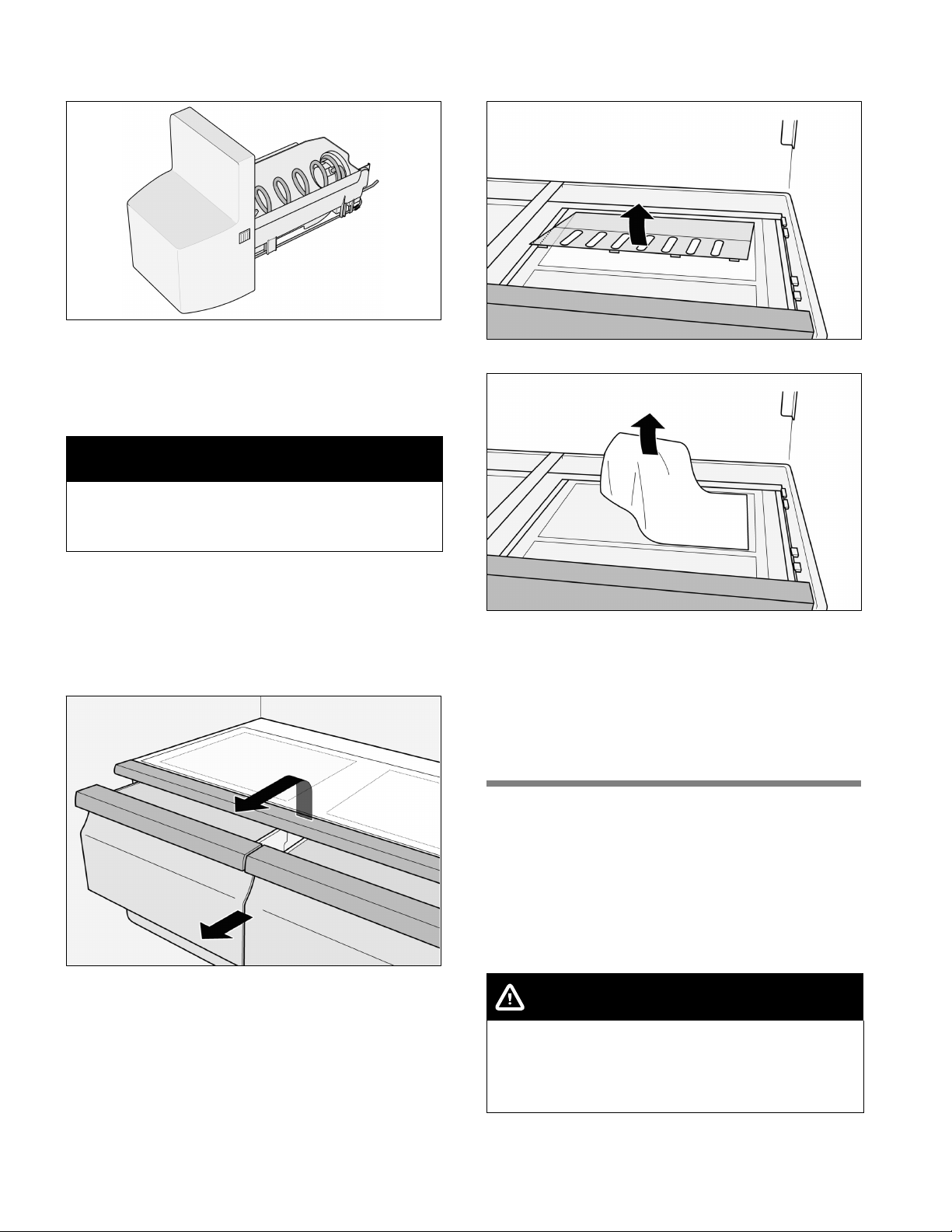
1. Press the release button and remove the ice cube
container.
en-us
28
2. Empty the ice cube container and clean with
lukewarm water.
3. Thoroughly dry the container and screw conveyor
to prevent new ice cubes from sticking.
Inserting the ice cube container
4. Push the ice cube container all the way back onto
the supports until it locks into position.
NOTICE
If the container cannot be pushed all the way back,
twist the screw conveyor slightly or remove any ice
cubes that may have stuck to the insertion area.
Removing special humidity filter
(not included on all models)
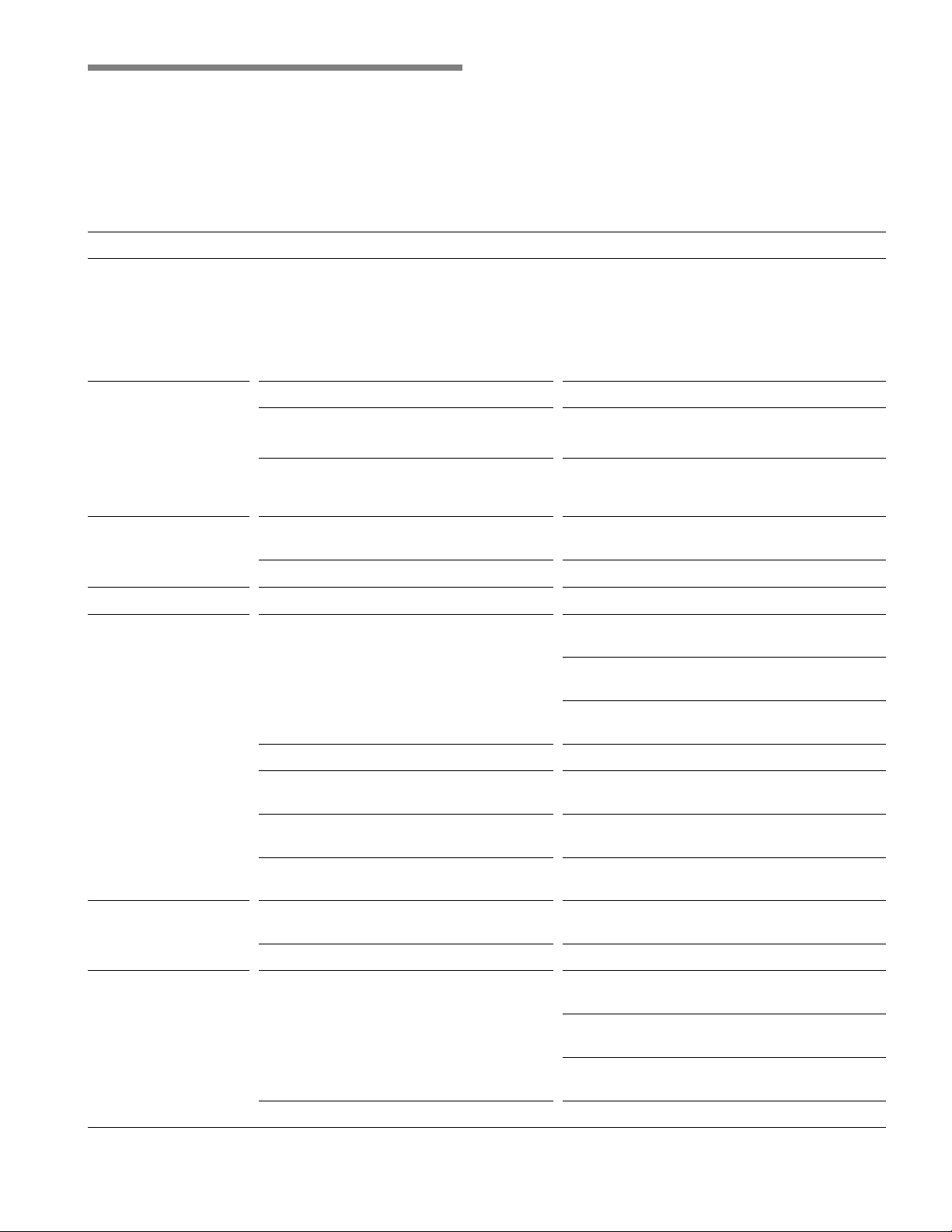
1. Pull out VitaFresh Pro drawers by approx. 4 inches
(approx. 10 cm).
2. Flip up the glass plate above the VitaFresh Pro
drawers and take them out.
3. Reach between the openings of the cover, carefully
unhook the front 4 notches and pull out the cover.
4. Remove the special humidity filter.
5. Clean the special humidity filter with lukewarm
water and let it dry.
6. Insert the special humidity filter.
7. Reattach the rear of the cover, move it down and
make sure the front part engages.
8. Insert the glass plate and close the VitaFresh Pro
drawers.
LED light
The appliance features a maintenance-free LED light.
When the doors are opened, the interior light
becomes gradually brighter and when the doors are
closed, it gradually dims.
When switched on, the light of the Ice and water
dispenser becomes gradually brighter and when
switched off, it gradually dims.
CAUTION
Risk of eye injury from Class 1M laser light (IEC
60825)!
Do not look directly into the light with optical
instruments.
These lights must be repaired by customer service or
authorized technicians only.
en-us
29
Troubleshooting minor issues
Before contacting customer service:
n Please check whether you can troubleshoot the problem yourself based on the following information.
Customer service will charge you for advice, even if the appliance is still under warranty.
Refrigerator compartment and freezer compartment
Problem
Possible cause Corrective action
The appliance is not
cooling, the ice and
water dispenser is not
working and the
display switches
between the single
functions.
The Demo mode is switched on. Press the buttons “fridge” and “super/quick
ice” at the same time and press the button
“light/filter” 5 times.
No display on the
display panel, interior
light is not working,
and the appliance is
not working.
The power cord is not plugged in. Plug in the power cord.
The fuse has blown or circuit breaker has
been tripped.
Replace fuse or reset the circuit breaker.
Check if electricity is present at outlet.
Power outage. Wait until power has been restored. If
necessary, contact an electrician or the utility
company.
The interior light is not
working.
The light switch to the freezer or
refrigerator compartment is sticking.
Check whether the light switch can be moved.
The LED bulb is defective. See ”LED light”.
Food is too cold. Temperature has been set too low. Adjust to a higher temperature.
Food is too warm. Door will not close properly.
Align the appliance with a level. See ”Aligning
the appliance”.
Check the position of the drawers and
correct, if necessary.
Check the door seals and foldaway door bar;
if necessary, clean or correct position.
Temperature has been set too high. Select a lower temperature.
Ventilation opening is blocked. Remove any food blocking the ventilation
opening.
Doors were opened frequently or were
open for an extended period of time.
Wait until the temperature in the appliance
drops.
A large amount of fresh food has been
placed in refrigerator.
Fresh food must first reach the correct
storage temperature.
Appliance has an
unpleasant odor.
Food with a strong odor was placed in the
refrigerator.
Wrap up the food or place it in an airtight
container.
The interior compartment is dirty. Clean the interior compartment.
Water droplets are
forming on the exterior
of the appliance.
Door will not close properly.
Align the appliance with a level. See ”Aligning
the appliance”.
Check the position of the drawers and
correct, if necessary.
Check the door seals and foldaway door bar;
if necessary, clean or correct position.
Humidity is too high. This may be normal in certain regions.
en-us
30
Problem
Corrective actionPossible cause
Water droplets are
forming inside the
appliance.
Humidity is too high or doors have been
opened frequently.
Do not open doors as frequently or do not
keep them open too long.
The door seals are not tight. Check the door seals and foldaway door bar;
if necessary, clean or correct position.
Drawers can only be
closed with great
difficulty.
The drawer has not been inserted
correctly.
Insert the drawer correctly.
The drawer rails are dirty. Clean the drawer rails.
Ice and water dispenser
Problem
Possible cause Corrective action
The water filter symbol
is flashing.
The filter cartridge is old. Replace the filter cartridge.
After replacing the filter cartridge, the
water filter symbol was not reset.
Reset the water filter symbol.
The ice maker is not
making enough ice
cubes or the ice
cubes are deformed.
The appliance or ice maker was just
recently switched on.
It takes approx. 24 hours before it starts
making ice.
A large amount of ice has been taken out. It takes approx. 24 hours before the ice
storage bin is full again.
Water pressure is too low. Have the water pressure checked.
The filter cartridge is clogged or old. Replace the filter cartridge.
The ice maker is not
making enough ice
cubes or any ice
cubes at all.
An ice cube is jammed on the arm that
measures the level of the ice cube
container.
Remove the ice cube container and release
the jammed ice cubes with a blunt plastic
tool. Do not use sharp or pointy objects as
this could damage the appliance.
When switching from ice cubes to
crushed ice, an ice cube may become
jammed inside the dispenser opening.
The ice cube will begin to melt and water
will drip into the ice and water dispenser.
Release the jammed ice cube from the
dispenser opening using a blunt plastic tool.
Do not use sharp or pointy objects as this
could damage the appliance.
There is a layer of ice on the screw
conveyor.
Remove and clean the ice cube container.
The ice cube
container contains ice
cubes that are not
being dispensed.
Ice cubes are frozen to one another. Remove and clean the ice cube container.
The ice maker is not
making ice cubes.
The ice maker is switched off. Switch on the ice maker.
The appliance is not being supplied with
water.
Have a qualified technician check the water
connection.
The water connection line has kinks in it. Shut off the water supply. Straighten out the
kinks. Have damaged water connection lines
replaced with original manufacturer parts.
Water pressure is too low. Have the water pressure checked.
Freezer compartment temperature too
high.
Set a slightly colder temperature for the
freezer compartment.
The ice cube container is not inserted
correctly.
Insert the ice cube container correctly.
The water connection is installed
incorrectly.
If the water connection is not installed
correctly, this can cause low water pressure
and can damage the appliance.
en-us
31
Problem
Corrective actionPossible cause
Very little or no water
is dispensed from the
water dispenser.
The filter cartridge is clogged or old. Replace the filter cartridge.
Water pressure is too low. Have the water pressure checked.
The shut-off valve is not open all the way. Adjust the shut-off valve so it is open all the
way.
The water connection line has kinks in it. Shut off the water supply. Straighten out the
kinks. Have damaged water connection lines
replaced with original manufacturer parts.
The dispensed water
is not cold.
The appliance was just recently installed. It takes approx. 12 hours for the water to cool
down.
The water has been in the lines for an
extended period of time and has adjusted
to the room temperature.
Fill and discard the first 15 glasses of water.
The water is cloudy. Air or air bubbles in water. This is normal when using the water
dispenser for the first time and will disappear
after a short period of time.
There are particles
floating in the water or
suspended in the ice
cubes.
The first time the water flows through the
filter cartridge, it may contain carbon dust
from the filter cartridge.
These suspended particles are not harmful!
They will disappear after a short period of
time.
Suspended particles are formed by
mineral deposits when water is frozen and
then allowed to thaw.
These suspended particles are not harmful!
This occurs naturally in the water supply.
Customer service
Before contacting customer service:
Determine if you can solve the problem yourself using
the information under ”Troubleshooting minor issues.”
If this information does not solve the problem,
additional help is available by contacting Bosch
customer service.
U.S.A.:
Contact the Bosch Customer Interaction Center by
calling 1-800-944-2904 (toll-free).
Canada:
Contact your designated Bosch Canada service
company or call 1-800-944-2904.
To better assist you, write down the information about
your appliance below for future reference:
Dealer name
Address
Phone number
Purchase date
Model number (E number)
Serial number (FD number)
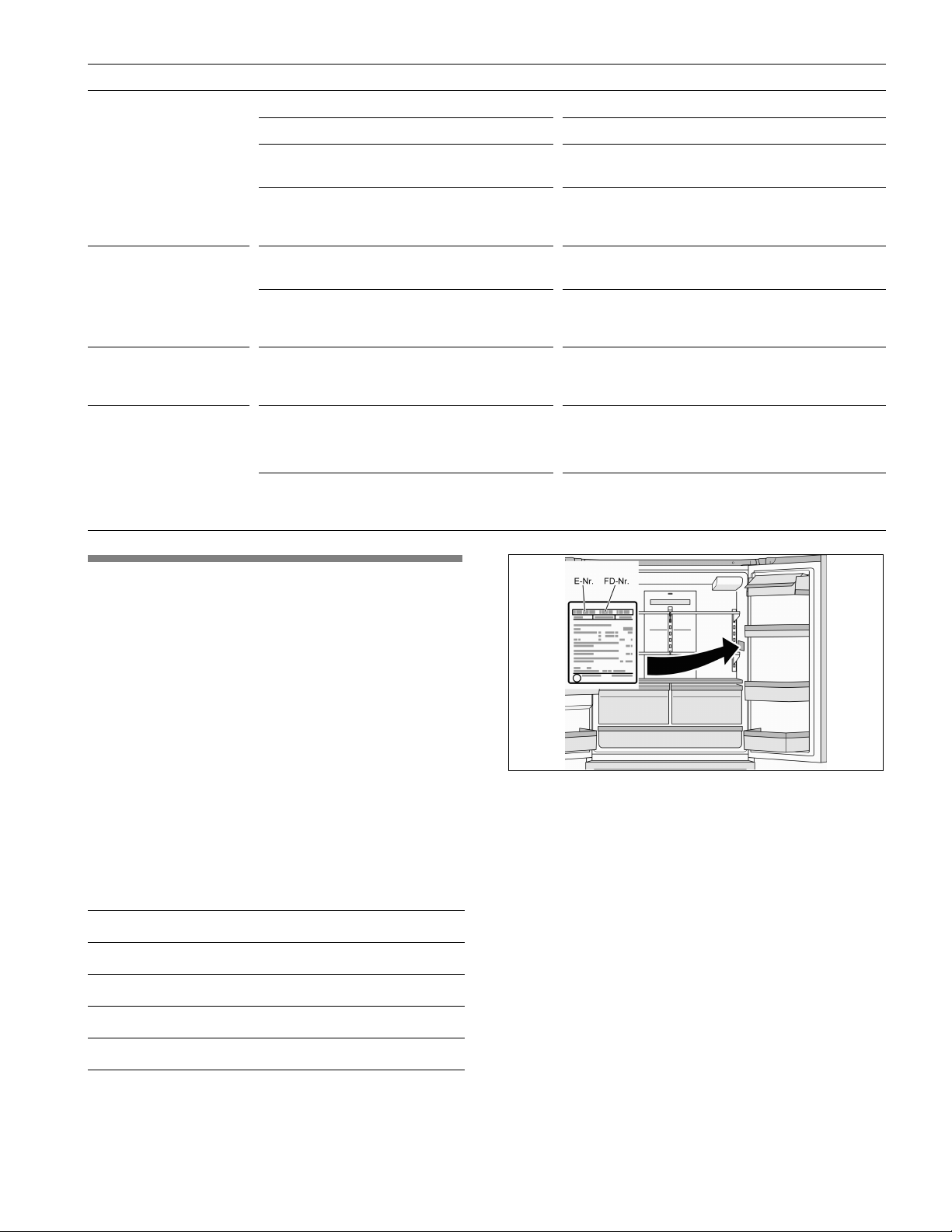
Please provide customer service with the appliance
model number (E number) and serial number
(FD number).
You can find this information on the rating plate inside
the refrigerator compartment on the right.
BSH Home Appliances Corporation
1901 Main Street, Suite 600,
Irvine CA 92614, USA
www.bosch-home.com
9000769248
8001068741 (9708)
en-us, fr-ca, es-mx