TM
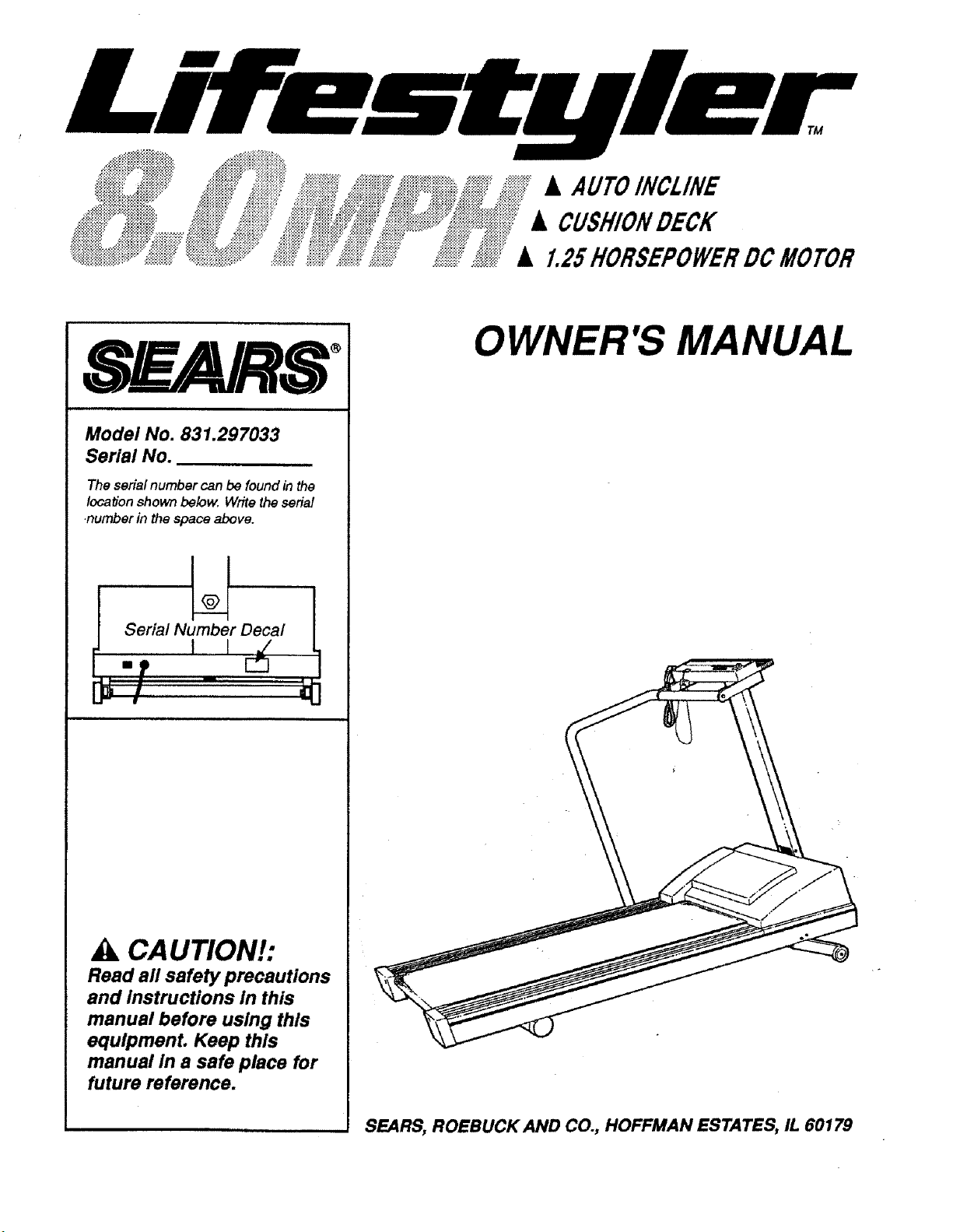
• AUTOINCl.INE
• CUSHIONDECK
• 1.25HORSEPOWERDCMOTOR
SF= RS
Model No. 831.297033
Serial No.
The serial number can be found in the
Iocatbn shown below, Write the serial
number in the space above.
_ i;ial Nulm_belrD_al !
_ik CAUTION!:
Read all safety precautions
and Instructions in this
manual before using this
equipment. Keep this
manual in a safe place for
future reference.
OWNER'S MANUAL
SEARS, ROEBUCK AND CO., HOFFMAN ESTATES, IL 60179
ii
FULL 90 DAY WARRANTY
For 90 days from the date of purchase, when proper assembly and maintenance procedures
detailed in the Owner's Manual are followed, SEARS will, free of charge, repair or replace and
install a replacement part for any defective part, when this treadmill is used in a normal
manner.
This warranty does not apply when this treadmill is used for commercial or rental purposes.
SERVICE IS AVAILABLE SIMPLY BY CONTACTING YOUR NEAREST SEARS SERVICE
CENTER/DEPARTMENT IN THE UNITED STATES.
This warranty gives you specific legal rights, and you may also have other rights which vary
from state to state.
SEARS, ROEBUCK AND CO., DEPT. 817WA,
3333 BEVERLY ROAD, HOFFMAN ESTATES, IL 60179
iiiii i iiii iii

TM
• AUTOINCLINE
• CUSHIONDECK
• 1.25HORSEPOWERDCMOTOR
TABLE OF CONTENTS
Important Safety Precautions ....................... 4
Before you Begin ................................. 5
Assembly ....................................... 6
Operation and Adjustment .......................... 6
Trouble-Shooting and Storage ....................... 11
Conditioning Guidelines ............................ 13
Part List ........................................ 14
Exploded Drawing ................................ 15
Ordering Replacement Parts ........................ Back Cover
_k WARNING: Before beginning this or any exercise program, consult your physician.
This Is especially Important for persons over the age of 35 or persons with pre-existing health
problems. Read all Instructions before using. SEARS assumes no responsibility for personal
Injury or property damage sustained by or through the use of this product.
IMPORTANT SAFETY PRECAUTIONS
WARNÁNG: To reduce the risk of burns, fire, electric shock or Injury to persons, read
the following Important safety precautions and Information before operating the treadmill.
.
Position the treadmill on a level surface, with at least 8 feet of clearance behind the
treadmill. Do not place the treadmill near water, outdoors or on a surface that blocks any
air opening. Do not operate where aerosol products are used or where oxygen ts being
administered.
2. Plug the power cord dlrecUy Into a grounded circuit carrying 12 or more amps. No other
appliance should be on the same circuit. (See OPERATION AND ADJUSTMENT In this
manual for proper grounding Instructions.) Keep the power cord away from heated
surfaces. If an extension cord Is required, use only a 14-gauge general-purpose cord of
approximately five feet In length with a three-wire conductor.
3. Never move the walking belt while the power Is turned off. Do not operate the treadmill If
the power cord or plug Is damaged, or If the treadmlll Is not working properly. (See
BEFORE YOU BEGIN In this manual If the treadmill Is not working properly.)
.
.
The roller guards must be 1/8 Inch from the rear roller. Unplug and adjust the roller guards,
if necessary.
Wear appropriate exercise clothing when using the treadmill; do not wear loose clothing
that could become caught In the treadmill. Always wear running shoes; never use the
treadmill with bare feet, wearing only stockings or ln sandals. Athletic support clothes are
recommended for both men and women.
°
.
=
9.
10.
11.
The pulse earcllp Is not a medical device. Various factors, Including the user's movement
while exercising, may affect the accuracy of heart rate readings. The earcllp Is Intended
only as an exercise aid In determining heart rate trends In general.
Never start the treadmill while you are standing on the walking belt. Always hold the
handrail when exercising on the treadmill.
Never allow more than one person on the treadmill at a time. The treadmill should not be
used by persons weighing more than 250 pounds.
Keep small children away from the treadmill at all times. Never leave the treadmill
unattended while It is running. Always turn the power off when the treadmill Is not In use.
Never drop or Insert any object Into any opening.
To reduce the possibility overheating, do not operate the treadmill continuously for longer
than 1 hour.
12. The treadmill Is capable of high speeds. Adjust the speed slowly to avoid sudden jumps In
speed.
13. Use the treadmill only as described In this manual.
14.
Always unplug the power cord before performing the maintenance and adjustment
procedures described In this manual. Never remove the motor hood unless Instructed to
do so by an authorized service representative. Servicing other than the procedures In this
manual should be performed by an authorized service representative only.
4 SAVE THESE INSTRUCTIONS
BEFORE YOU BEGIN
Thank you for selecting the SEARS _'LIFESTYLER 8.0 MPH treadmill. The 8.0 MPH combines state-
of-the-art technology with innovative design to let you enjoy an excellent form of cardiovascular
exercise at your convenience, in the privacy of your home. The heart of the 8.0 MPH is the innovative
OPTIONS _ base console, offering an impressive array of features to help you get the most from your
exercise.
For your safety and benefit, read this manual carefully before using the treadmill. If you have
additional questions, please call our Customer Service Department toll-free at 1-800-999-3756,
Monday through Friday, 6 a.m. until 6 p.m. Mountain Time (excluding holidays). To help us assist you,
please mention your product model number and serial number when calling. The model number is
831.297033. The serial number can be found on a decal attached to the treadmill (see the drawing on
the front cover).
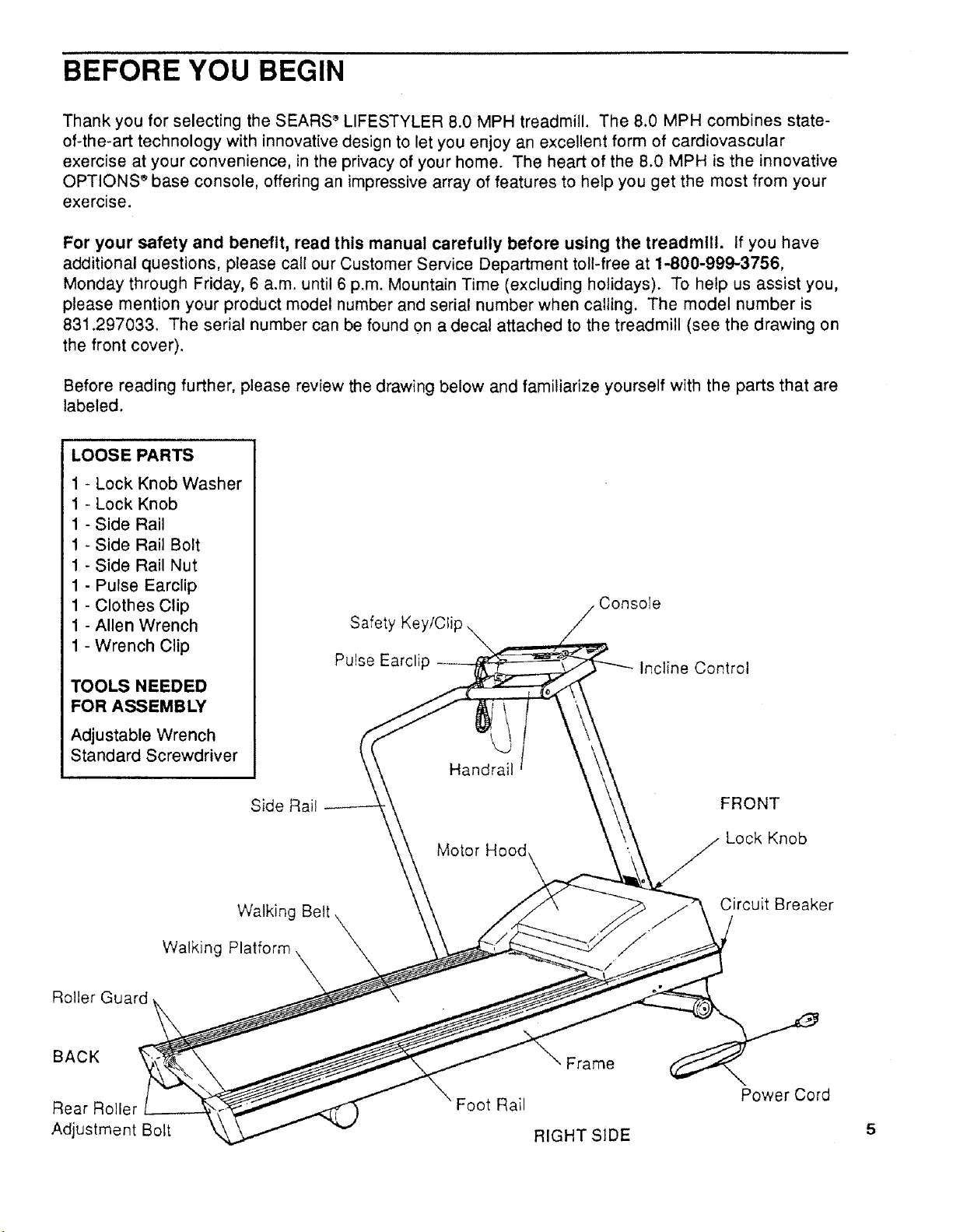
Before reading further, please review the drawing below and familiarize yourself with the parts that are
labeled.
LOOSE PARTS
1 - Lock Knob Washer
1 - Lock Knob
1 - Side Rail
1 - Side Rail Bolt
1 - Side Rail Nut
1 - Pulse Earclip
1 - Clothes Clip
1 - Allen Wrench
1 - Wrench Clip
TOOLS NEEDED
FOR ASSEMBLY
Adjustable Wrench
Standard Screwdriver
Side Rail
Safety Key/Clip
Pulse Earclip
Handrail
Motor Hood
Console
Incline Control
FRONT
Lock Knob
Walking Belt
Walking Platform
Circuit Breaker
Roller Guard
BACK
Rear Roller
Adjustment Bolt
Foot Rail
Frame
RIGHT SIDE
Power Cord

ASSEMBLY
Set the treadmill in a cleared area and remove all packing materials. Be sure that all parts are
Included before disposing of the packing materials. An adjustale wrench and standard screwdriver
are needed for assembly.
.
Insert the Lock Knob (31), with the Lock Knob Washer
(30), into the Upright Post (9). Raise the Upright Post to
a vertical position. Be careful not to pinch your
fingers. Turn the Lock Knob clockwise until it is almost
tight. Leave a little play in the Upright Post for the
following steps.
2. Align the upper end of the Side Rail (1) with the left end
of the Handrail (10). Turn the Handrail in the direction
shown to thread the Handrail into the Side Rail. (Note: If
the Handrail will not turn easily, loosen the Handrail Bolt
[7] slightly.) Tighten the Handrail and the Handrail Bolt.
3. Align the lower end of the Side Rail (1) with the hole in
the side of the treadmill Frame (54). Insert the Side Rail
Bolt (80) through the Side Rail and Frame. Reach under
the Frame and tighten the Side Rail Nut (81) onto the
end of the Bolt. Tighten the Lock Knob (see step 1).
Make sure that all parts are tightened securely before using
the treadmill.
1
80
31
OPERATION AND ADJUSTMENT
MAINTENANCE-FREE WALKING PLATFORM
This treadmill features a walking platform coated with a specially-designed hydrocarbon slip agent. Do
not apply silicone spray or any other substances to the walking platform or the walking belt.
Such substances will deteriorate the surface of the walking platform and cause excessive wear. Walk
on the treadmill for 10 minutes to break in the walking platform. During this break-in period, it is normal
for the walking belt to slow.
PLUGGING THE POWER CORD IN
This product must be grounded. If it should malfunction or break down, grounding provides a path
of least resistance for electric current to reduce the risk of electric shock. This product is equipped with
a cord having an equipment-grounding conductor and a grounding plug. Plug the power cord into an
appropriate outlet that Is properly Installed and grounded In accordance with all local codes
and ordinances.
A;kDANGER: Improper connection of the equipment-grounding conductor can result in a risk
of electric shock. Check with a qualified electrician or serviceman if you are in doubt as to whether the
product is properly grounded. Do not modify the plug provided with the product--if it will not fit the
outlet, have a proper outlet installed by a qualified electrician.
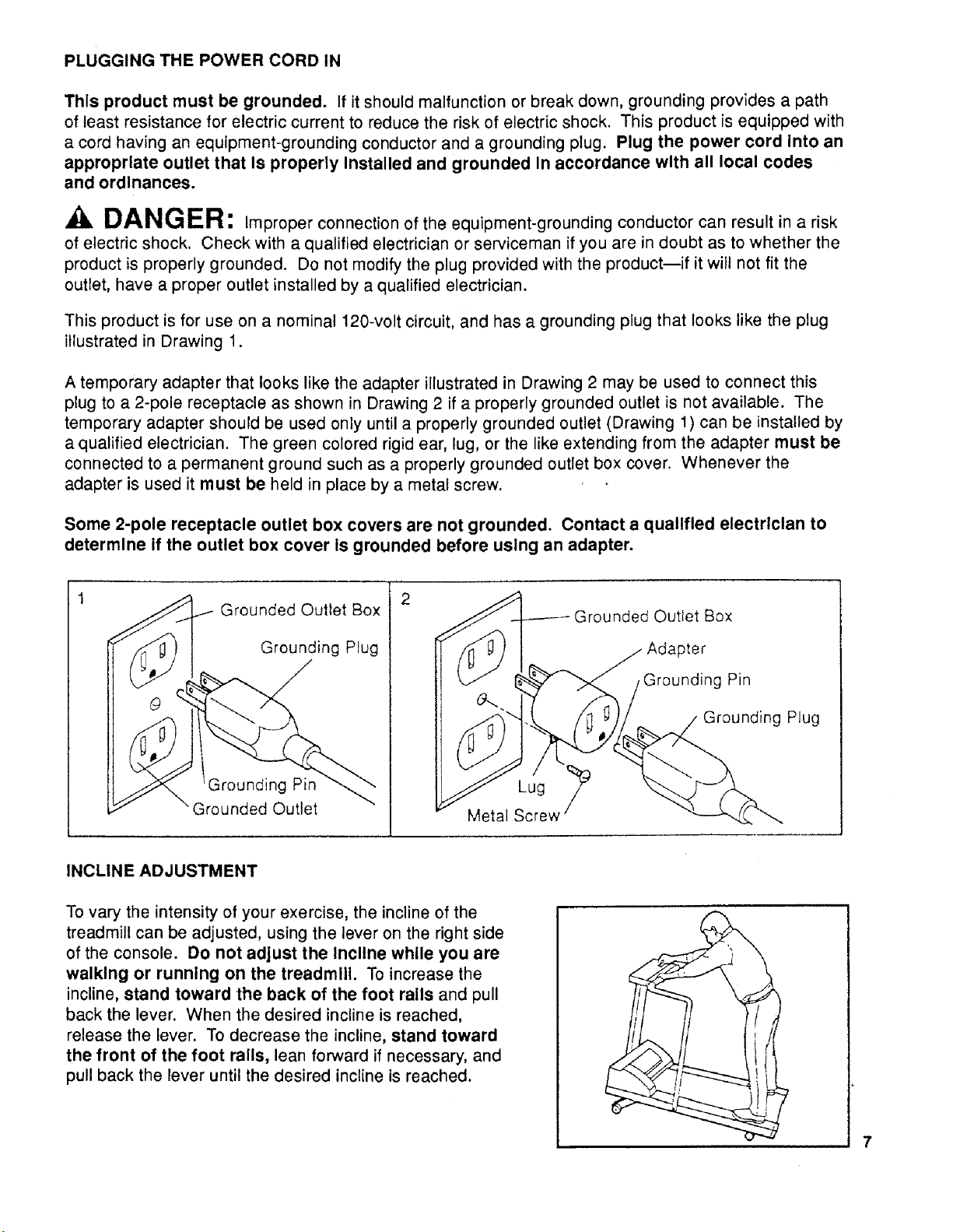
This product is for use on a nominal 120-volt circuit, and has a grounding plug that looks like the plug
illustrated in Drawing 1.
A temporary adapter that looks like the adapter illustrated in Drawing 2 may be used to connect this
plug to a 2-pole receptacle as shown in Drawing 2 if a properly grounded outlet is not available. The
temporary adapter should be used only until a properly grounded outlet (Drawing 1) can be installed by
a qualified electrician. The green colored rigid ear, lug, or the like extending from the adapter must be
connected to a permanent ground such as a properly grounded outlet box cover. Whenever the
adapter is used it must be held in place by a metal screw.
Some 2-pole receptacle outlet box covers are not grounded. Contact a qualified electrlclan to
determine if the outlet box cover Is grounded before using an adapter.
2
Grounded Outlet Box
Grounding Plug
Grounding Pin
"Grounded Outlet
Lug
Metal Screw
Grounded Outlet Box
Adapter
,Grounding Pin
Grounding Plug
INCLINE ADJUSTMENT
To vary the intensity of your exercise, the incline of the
treadmill can be adjusted, using the lever on the right side
of the console. Do not adjust the Incline while you are
walking or running on the treadmill. To increase the
incline, stand toward the back of the foot rails and pull
back the lever. When the desired incline is reached,
release the lever. To decrease the incline, stand toward
the front of the foot rails, lean forward if necessary, and
pull back the lever until the desired incline is reached.
CONSOLE OPERATION
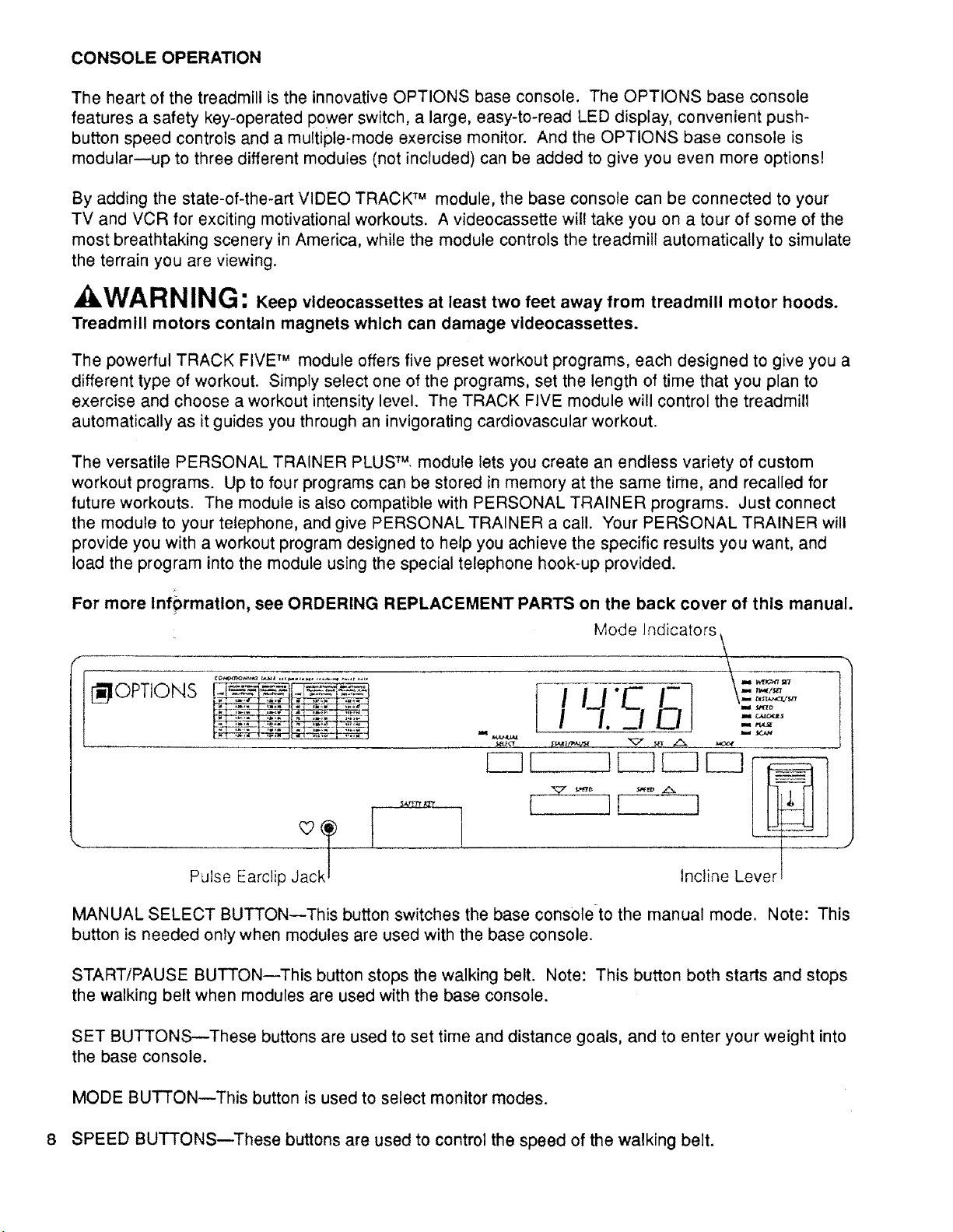
The heart of the treadmill is the innovative OPTIONS base console. The OPTIONS base console
features a safety key-operated power switch, a large, easy-to-read LED display, convenient push-
button speed controls and a multiple-mode exercise monitor. And the OPTIONS base console is
modular--up to three different modules (not included) can be added to give you even more options!
By adding the state-of-the-art VIDEO TRACK TM module, the base console can be connected to your
TV and VCR for exciting motivational workouts. A videocassette will take you on a tour of some of the
most breathtaking scenery in America, while the module controls the treadmill automatically to simulate
the terrain you are viewing.
ikWARNING: Keep vldeocassettes at least two feet away from treadmill motor hoods.
Treadmill motors contain magnets which can damage videocassettes.
The powerful TRACK FIVE TM module offers five preset workout programs, each designed to give you a
different type of workout. Simply select one of the programs, set the length of time that you plan to
exercise and choose a workout intensity level. The TRACK FIVE module will control the treadmill
automatically as it guides you through an invigorating cardiovascular workout.
The versatile PERSONAL TRAINER PLUS TM module lets you create an endless variety of custom
workout programs. Up to four programs can be stored in memory at the same time, and recalled for
future workouts. The module is also compatible with PERSONAL TRAINER programs. Just connect
the module to your telephone, and give PERSONAL TRAINER a call. Your PERSONAL TRAINER will
provide you with a workout program designed to help you achieve the specific results you want, and
load the program into the module using the special telephone hook-up provided.
For more Infprmation, see ORDERING REPLACEMENT PARTS on the back cover of this manual.
Mode Indicators,
ff .....
I_IOPTIONS [ " - _ ,,,,,,,,,,.,,
Pulse Earclip Jac
•Pi IcM_t_, 1 _ i1,1_
F 1 .....
Incline Lever
MANUAL SELECT BUTTON--This button switches the base console to the manual mode. Note: This
button is needed onTy when modules are used with the base console.
START/PAUSE BUTTON--This button stops the walking belt, Note: This button both starts and stops
the walking belt when modules are used with the base console.
SET BUTTONS--These buttons are used to set time and distance goals, and to enter your weight into
the base console.
MODE BUTTON--This button is used to select monitor modes.
8 SPEED BUTTONS--These buttons are used to control the speed of the walking belt.
TURNING THE POWER ON
Plug the power cord in. (See PLUGGING THE POWER CORD IN on page 7 for proper grounding
instructions.)
Step onto the foot rails of the treadmill. Find the clip attached by a cord to the safety key. Slide the clip
onto your waistband.
kWARNING: DO not stand on the walking belt when turning the power on. Always
wear the clip when operating the treadmill; If you fall, the safety key will be pulled from the base
console, Instantly turning off the power.
Insert the safety key into the base console. NOTE: If the safety key is in the console when power cord
is plugged in, a "PO" may appear on the display. If a "PO" appears, remove the safety key, wait for ten
seconds and then reinsert the safety key.
MANUAL SPEED MODE
When the power is turned on, the walking belt will be stationary. The speed of the walking belt can be
controlled with the SPEED buttons. The minimum speed setting is 0.5 miles per hour. Each time one
of the buttons is pressed, the speed will change by 0.1 mile per hour. The buttons can be held down to
change the speed quickly.
As the buttons are pressed, the base console will display the speed setting you have selected. The
base console will then display the actual speed of the walking belt, until the walking belt reaches the
selected speed setting.
WARNING: After the SPEED buttons are pressed, It will take a few seconds for the
walking belt to reach the selected speed setting. Adjust the speed gradually until you are
familiar with the operation of the treadmill.
To stop the walking belt, hold down the SPEED decrease button. The walking belt can be stopped
quickly, if desired, by pressing the START/PAUSE button.
SELECTING MONITOR MODES
The base console offers a wide selection of monitor modes to give you instant feedback on your
performance as you exercise. The modes can be selected by repeatedly pressing the MODE button.
Indicators will light to show which mode is currently displayed. The display can be reset, if desired, by
removing the safety key and then reinserting it. The monitor modes are described below.
WEIGHT SET: For the CALORIES mode to be accurate, your weight should be entered into the base
console. Select the WEIGHT SET mode and then press the SET buttons to enter your weight. Each
time one of the buttons is pressed, the weight displayed will change by 1 pound. The buttons can be
held down to enter your weight quickly.
TIME/SET: This mode displays the elapsed time. This mode also allows time goals to be set. To set a
time goal, first select the TIME/SET mode. (Make sure the SCAN mode is not selected.) Press the
SET buttons to set the length of time you plan to exercise. Each time one of the buttons is pressed,
the time displayed will change by 10 seconds. The buttons can be held down to set a time goal
quickly. As you exercise, the time will be counted down. When the time goal is completed, a tone will
sound. The base console will then display the time elapsed since the goal was completed. Note:
Time goals can be set only when the base console is in the manual mode.
DISTANCE/SET:Thismodedisplaysthedistanceyouhavetraveled.Thismodealsoallowsdistance
goalstobeset. Tosetadistancegoal,first selecttheDISTANCE/SETmode. (MakesuretheSCAN
modeisnotselected.)PresstheSETbuttonstosetthedistanceyouplantotravel. Eachtimeoneof
thebuttonsispressed,thedistancedisplayedwillchangeby0.2miles. Thebuttonscanbe helddown
tosetadistancegoalquickly.Asyouexercise,thedistancewillbe counteddown. Whenthedistance
goaliscompleted,atonewillsound. Theconsolewillthendisplaythedistanceyou havetraveled
sincethegoalwascompleted.Note: Distancegoalscanbe setonlywhenthebaseconsoleisinthe
manualmode.
SPEED:Thismodedisplaysthespeedofthewalkingbelt. Note: Eachtimeoneof theSPEED
buttonsispressed,this modewill bedisplayedautomaticallyforapproximately5seconds.
CALORIES:ThismodedisplaysthetotalnumberofCaloriesyouhaveburned. Foraccuracy,first
selecttheWEIGHTSETmodeandenteryourweightintothebaseconsole.
PULSE:Thismodedisplaysyourheartrate. Plugthepulseearclipintothejackon thebaseconsole,
andattachtheearclipto yourleftearlobe. Slidetheclothesclipontoyourcollarto preventexcessive
movementoftheearclipwire. Afterafewseconds,yourheartratewillbedisplayed. Note:Ifyour
heartrateis notdisplayed,rubyourearlobelightlyandrepositiontheearclip.
SCAN: Thismodeautomaticallydisplaysall modesexceptWEIGHTSET,forapproximately3seconds
each,in arepeatingcycle. Note:ThePULSEmodewillbedisplayedonlyif thepulseearclipisworn.
TURNING OFF THE POWER
Stand on the foot rails of the treadmill. Remove the safety key from the base console.
kWARNING: Always remove the safety key from the base console when you finish
exercising. Store the safety key in a safe place, away from children.
TROUBLE-SHOOTING AND STORAGE
10
Most treadmill problems can be solved by following the simple steps below. If further assistance
is needed, please call our Customer Service Department toll-free at 1-800-999-3756, Monday through
Friday, 6 a.m. until6 p.m. Mountain Time (excludingholidays).
1. SYMPTOM: THE POWER DOES NOT TURN ON
a. Make sure the power cord is plugged into a properly grounded outlet. (See OPERATION AND
ADJUSTMENT in this manual.) If an extension cord is necessary, use only a 14-gauge general-
purpose cord of approximately five feet in length.
b. After the power cord has been plugged in, make sure the safety key is fully inserted into the base
console. Various indicators on the base console should light. (See OPERATION AND
ADJUSTMENT in this manual.)
C°
Check the circuit breaker located on the front of the
frame near the power cord. The circuit breaker is
designed to protect the electrical system. If the circuit
breaker has tripped, the switch will protrude as shown.
To reset the circuit breaker, allow the treadmill to cool
for five minutes, and push the switch back in.
Tripped
Reset
2. SYMPTOM: THE POWER TURNS OFF DURING USE
a. Check the circuit breaker located on the treadmill frame near the power cord. If the circuit
breaker has tripped, the switch will protrude. (See the drawing above.) To reset the circuit
breaker, wait for five minutes and then press the switch back in.
b. Make sure the power cord is plugged in.
c. Remove the safety key from the base console. Reinsert the safety key fully into the base
console. Various indicators on the base console should light.
3. SYMPTOM: THE CONSOLE DOES NOT FUNCTION PROPERLY
a.
If a console malfunction occurs, an error code may appear on the console: four E's or a PO on
the display. If an error code appears, remove the safety key, wait for ten seconds and then
reinsert the safety key. If the error code appears again, call our Customer Service Department.
Do not operate the treadmill until the problem is corrected.
4. SYMPTOM: THE PULSE EARCLIP DOES NOT FUNCTION PROPERLY
a. Make sure the pulse earclip is plugged fully into the jack on the console. Rub your left ear lobe
and reposition the earclip. Attach the clothes clip to your collar.
b. Try standing still while measuring your pulse.
c. The pulse earclip may need to be cleaned. Press the earclip open, and wipe the two clear
circles inside the earclip, using a cotton swab saturated with denatured alcohol.
WARNÁNG: The pulse earcllp Is not a medical device. Various factors, Including the
user's movement while exercising, may affect the accuracy of heart rate readings. The
earcllp Is Intended only as an exercise aid In determining heart rate trends In general.
5. "SYMPTOM: THE WALKING BELT SLOWS WHEN WALKED ON
a. Walk on the treadmill for 10 minutes to break in the walking platform. During this break-in period,
it is normal for the walking belt to slow.
b. If an extension cord is needed, use only a 14-gauge general-purpose cord of approximately five
feet in length.
C,
If the walking belt is overtightened, treadmill performance
may be reduced and the walking belt permanently
damaged. Remove the safety key and UNPLUG THE
POWER CORD. With the allen wrench included, turn
both rear roller adjustment bolts counterclockwise, 1/4 of
a turn. Plug in the power cord and reinsert the safety
key. Run the treadmill for a couple of minutes. Repeat
until the tension of the walking belt is correct. When the
tension is correct, you should be able to lift each side of
the walking belt 3-4 inches off the walking platform. The
center of the walking belt should just touch the surface of
the walking platform. Be careful to keep the walking belt
centered on the walking platform.
Rear Roller Adjustment Bolt
11
6. SYMPTOM: THE WALKING BELT IS OFF-CENTER OR SLIPS WHEN WALKED ON
a,
b.
c.
If the walking belt has shifted to the left, first remove the
safety key from the console and UNPLUG THE POWER
CORD. With the allen wrench included, turn the left rear
roller adjustment bolt clockwise, and the right bolt
counterclockwise, 1/4 of a turn each. Plug in the power
cord and reinsert the safety key. Run the treadmill for a
couple of minutes. Repeat as necessary until the walking
belt is centered.
If the walking belt has shifted to the right, first remove the
safety key from the console and UNPLUG THE POWER
CORD. With the allen wrench included, turn the left rear
roller adjustment bolt counterclockwise, and the right bolt
clockwise, 1/4 of a turn each. Plug in the power cord
and reinsert the safety key. Run the treadmill for a
couple of minutes. Repeat as necessary until the walking
belt is centered.
If the walking belt slips when walked on, first remove the
safety key from the console and UNPLUG THE POWER
CORD. With the allen wrench included, turn both rear
roller adjustment bolts clockwise, 1/4 of a turn. Plug in
the power cord and reinsert the safety key. Run the
treadmill for a couple of minutes. Repeat as necessary
! i
until the tension of the walking belt is correct. When the tension is correct, you should be able to
lift each side of the walking belt 3-4 inches off the walking platform. The center of the walking
belt should remain just at the surface of the walking platform. Be careful to keep the walking belt
centered on the walking platform.
7. SYMPTOM: THE TREADMILL DOES NOT INCLINE
a. Stand at the back of the foot rails while increasing the incline. Stand at the front of the foot rails
and lean forward while decreasing the incline. (See OPERATION AND ADJUSTMENT in this
manual.)
STORAGE
Unplug the power cord when the treadmill is not in use. Remove the bolt and nut from the lower end of
the handrail. Loosen the upper end of the handrail and remove the handrail. Loosen the lock knob,
and carefully lay the upright and handrail on the treadmill. Keep all hardware in a secure location.
The allen wrench can be stored conveniently by removing the
backing from the wrench clip and pressing it onto one of the
endcaps.
12
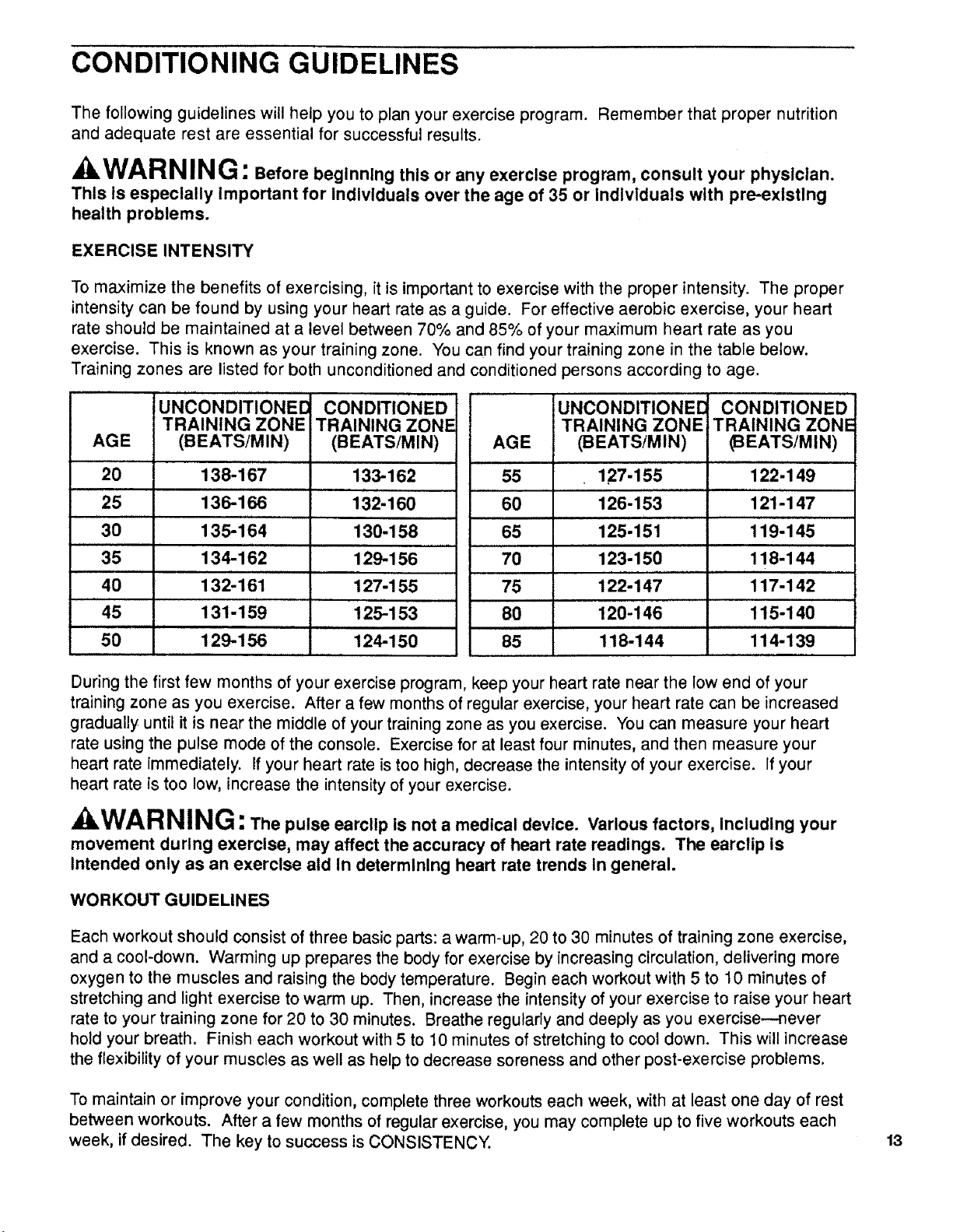
CONDITIONING GUIDELINES
The following guidelines will help you to plan your exercise program. Remember that proper nutrition
and adequate rest are essential for successful results.
kWARNIN G: Before beginning this or any exercise program, consult your physlclan.
This Is especially Important for Individuals over the age of 35 or Individuals with pre-existing
health problems.
EXERCISE INTENSITY
To maximize the benefits of exercising, it is important to exercise with the proper intensity. The proper
intensity can be found by using your heart rate as a guide. For effective aerobic exercise, your heart
rate should be maintained at a level between 70% and 85% of your maximum heart rate as you
exercise. This is known as your training zone. You can find your training zone in the table below.
Training zones are listed for both unconditioned and conditioned persons according to age.
IUNCONDITIONED CONDITIONED
TRAINING ZONE TRAINING ZONE
AGE (BEATSiMIN) (BEATS/MIN)
20 138-167 133-162
25 13'6-166 132-160
30 135-i 64 130-158
,,,, ,, ,,,,
35 134-162 129-156
40 132"161 127-155
45 131-159 125-153
50 129-156 124-150
UNCONDITIONE[ CONDITIONED
TRAINING ZONE TRAINING ZONE
AGE (BEATSiMIN) _EATS/MIN)
55 127-155 122-149
60 126-153 121-147
65 125"151 119-145
70 123-150 118-144
, ,, , ,
75 122-147 117-142
80 120-146 115-140
85 118-144 114-139
During the first few months of your exercise program, keep your heart rate near the low end of your
training zone as you exercise. After a few months of regular exercise, your heart rate can be increased
gradually until it is near the middle of your training zone as you exercise. You can measure your heart
rate using the pulse mode of the console. Exercise for at least four minutes, and then measure your
heart rate immediately. If your heart rate is too high, decrease the intensity of your exercise. If your
heart rate is too low, increase the intensity of your exercise.
, kWARNING: The pulse earcllp is not a medical device. Various factors, Including your
movement during exercise, may affect the accuracy of heart rate readings. The earclip is
Intended only as an exercise aid In determining heart rate trends In general.
WORKOUT GUIDELINES
Each workout should consist of three basic parts: a warm-up, 20 to 30 minutes of training zone exercise,
and a cool-down. Warming up prepares the body for exercise by increasing circulation, delivering more
oxygen to the muscles and raising the body temperature. Begin each workout with 5 to 10 minutes of
stretching and light exercise to warm up. Then, increase the intensity of your exercise to raise your heart
rate to your training zone for 20 to 30 minutes. Breathe regularly and deeply as you exercise--never
hold your breath. Finish each workout with 5 to 10 minutes of stretching to cool down. This will increase
the flexibility of your muscles as well as help to decrease soreness and other post-exercise problems.
To maintain or improve your condition, complete three workouts each week, with at least one day of rest
between workouts. After a few months of regular exercise, you may complete up to five workouts each
week, if desired. The key to success is CONSISTENCY.
13
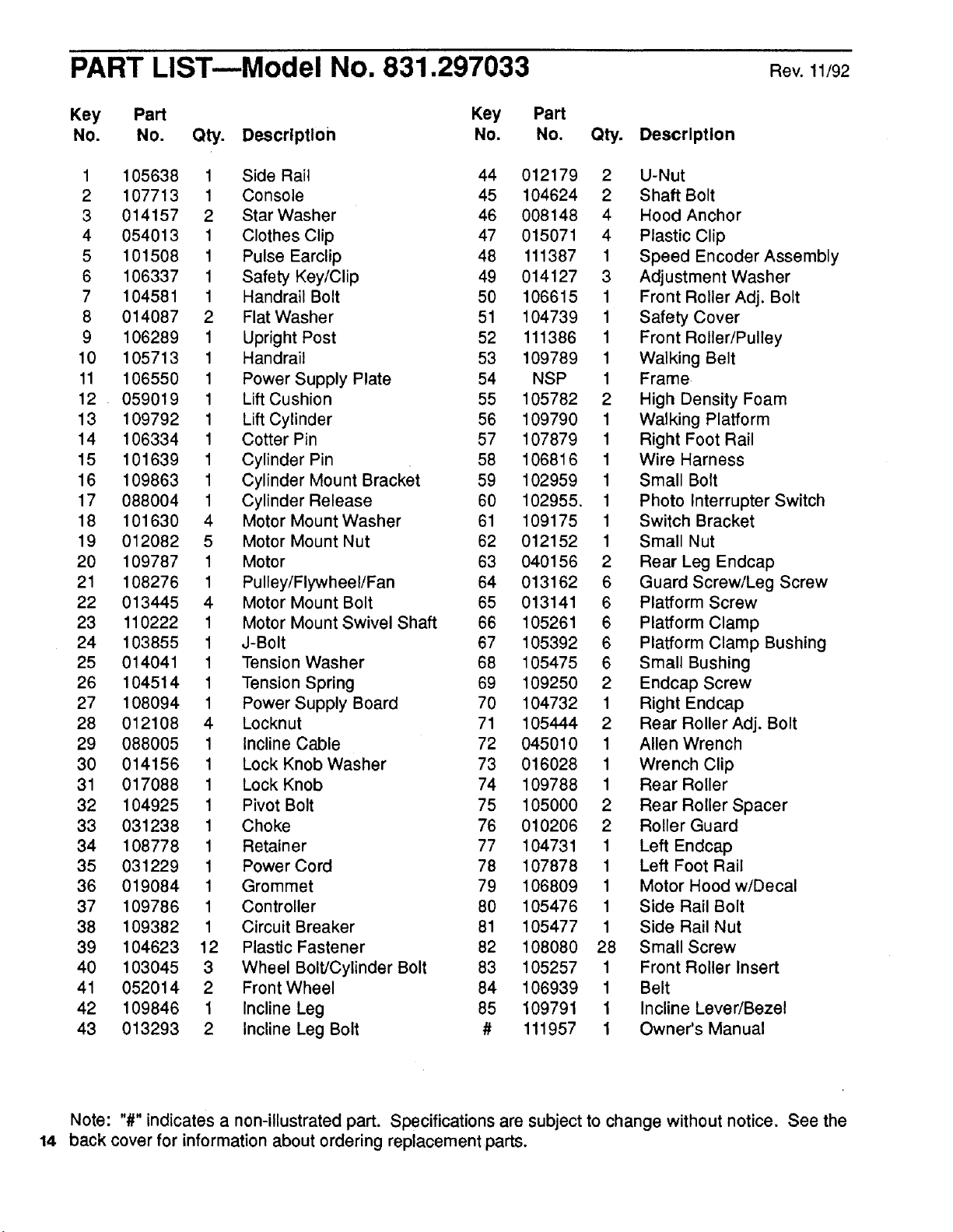
PART LIST--Model No. 831.297033 Rev.11/92
Key Part Key Part
No. No. Qty. Description No. No. Qty. Description
1 105638 1 Side Rail 44 012179 2 U-Nut
2 107713 1 Console 45 104624 2 Shaft Bolt
3 014157 2 Star Washer 46 008148 4 Hood Anchor
4 054013 1 Clothes Clip 47 015071 4 Plastic Clip
5 101508 1 Pulse Earclip 48 111387 1 Speed Encoder Assembly
6 106337 1 Safety Key/Clip 49 014127 3 Adjustment Washer
7 104581 1 Handrail Bolt 50 106615 1 Front Roller Adj. Bolt
8 014087 2 Flat Washer 51 104739 1 Safety Cover
9 106289 1 Upright Post 52 111386 1 Front Roller/Pulley
10 105713 1 Handrail 53 109789 1 Walking Belt
11 106550 1 Power Supply Plate 54 NSP 1 Frame.
12 059019 1 Lift Cushion 55 105782 2 High Density Foam
13 109792 1 Lift Cylinder 56 109790 1 Walking Platform
14 106334 1 Cotter Pin 57 107879 1 Right Foot Rail
15 101639 1 Cylinder Pin 58 106816 1 Wire Harness
16 109863 1 Cylinder Mount Bracket 59 102959 1 Small Bolt
17 088004 1 Cylinder Release 60 102955, 1 Photo Interrupter Switch
18 101630 4 Motor Mount Washer 61 109175 1 Switch Bracket
19 012082 5 Motor Mount Nut 62 012152 1 Small Nut
20 109787 1 Motor 63 040156 2 Rear Leg Endcap
21 108276 1 Pulley/Flywheel/Fan 64 013162 6 Guard Screw/Leg Screw
22 013445 4 Motor Mount Bolt 65 013141 6 Platform Screw
23 110222 1 Motor Mount Swivel Shaft 66 105261 6 Platform Clamp
24 103855 1 J-Bolt 67 105392 6 Platform Clamp Bushing
25 014041 1 Tension Washer 68 105475 6 Small Bushing
26 104514 1 Tension Spring 69 109250 2 Endcap Screw
27 108094 1 Power Supply Board 70 104732 1 Right Endcap
28 012108 4 Locknut 71 105444 2 Rear Roller Adj. Bolt
29 088005 1 Incline Cable 72 045010 1 Allen Wrench
30 014156 1 Lock Knob Washer 73 016028 1 Wrench Clip
31 017088 1 Lock Knob 74 109788 1 Rear Roller
32 104925 1 Pivot Bolt 75 105000 2 Rear Roller Spacer
33 031238 1 Choke 76 010206 2 Roller Guard
34 108778 1 Retainer 77 104731 1 Left Endcap
35 031229 1 Power Cord 78 107878 1 Left Foot Rail
36 019084 1 Grommet 79 106809 1 Motor Hood w/Decal
37 109786 1 Controller 80 105476 1 Side Rail Bolt
38 109382 1 Circuit Breaker 81 105477 1 Side Rail Nut
39 104623 12 Plastic Fastener 82 108080 28 Small Screw
40 103045 3 Wheel Bolt/Cylinder Bolt 83 105257 1 Front Roller Insert
41 052014 2 Front Wheel 84 106939 1 Belt
42 109846 1 Incline Leg 85 109791 1 Incline Lever/Bezel
43 013293 2 Incline Leg Bolt # 111957 1 Owner's Manual
Note: "#" indicates a non-illustrated part. Specifications are subject to change without notice. See the
14 back cover for information about ordering replacement parts.
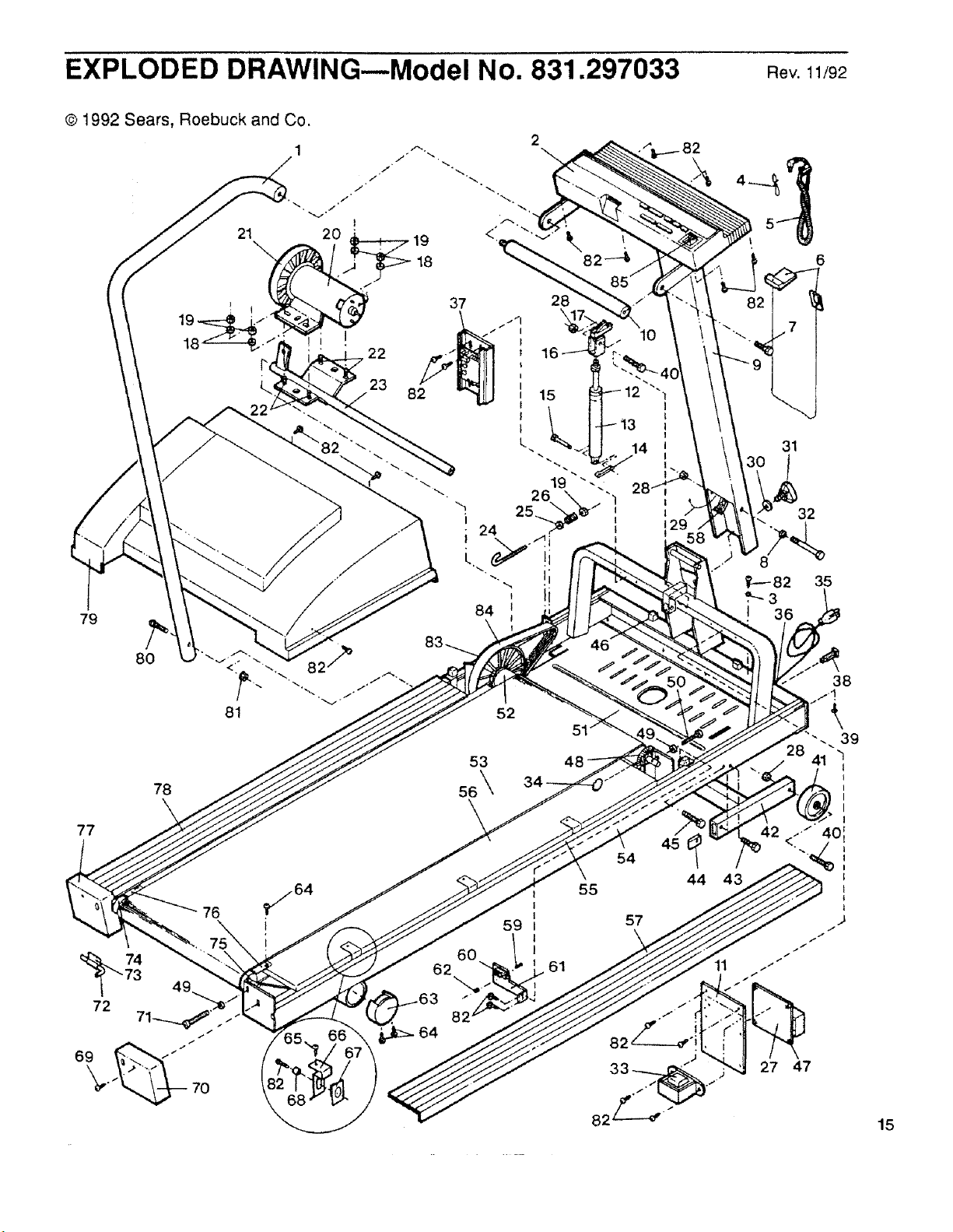
EXPLODED DRAWING--Model No. 831.297033 Rev.11/92
© 1992 Sears, Roebuck and Co.
79
84
8O
52
77
78
53
ss\
76
72
s
_/64
i
62
6O
14
45
54
55
57
\
44 43
31
32
35
27 47
15
ORDERING REPLACEMENT PARTS
Each TREADMILL has its own MODEL NUMBER. Always mention the MODEL NUMBER when
requesting service or repair parts for your TREADMILL.
All parts listed may be ordered through SEARS, ROEBUCK AND CO. SERVICE CENTERS and most
SEARS RETAIL STORES.
If parts you need are not stocked locally, your order will be transmitted to a SEARS PARTS
DISTRIBUTION CENTER for handling.
WHEN ORDERING REPAIR PARTS, ALWAYS GIVE THE FOLLOWING INFORMATION:
1. The MODEL NUMBER of the product (831.297033).
2. The NAME of the product (SEARS _ LIFESTYLER 8.0 MPH treadmill).
3. The PART NUMBER of the part(s), from page 14 of this manual.
4. The DESCRIPTION of the part(s), from page 14 of this manual.
Your SEARS merchandise has added value when you consider that SEARS has service units
nationwide staffed with SEARS trained technicians specifically trained on SEARS products, having the
parts, tools and equipment to ensure that we meet our pledge to you: "We service what we sell."
SOLD BY SEARS, ROEBUCK AND CO., HOFFMAN ESTATES, IL 60179
Part No. 111957 11/92 Printed in USA