/
Owner's Manual
ManualDel Propietario
Vacuum Cleaner
Aspiradora
Model, Modeio
116.28014
116.28015
IMPORTANT
Before returning this product-
For replacement parts, please contact:
Sears Parts and Repair Center
(1-800-4MY-HOME)
(1-800-469-4663)
Anytime, day or night
(U.S.A, and Canada)
For any_other issue, please contact:
Vacuum Cleaner Help Line
(1-877-531-7321)
8:00am-5:00pm EST, M-F
(U.S.A. and Canada)
CAUTION:
Read and follow all
safety and operating
instructions before first
use of this product.
CUIDADO:
Lea y siga todas las
instrucciones de operaci6n
y seguridad antes del uso de
este producto.
Sears, Roebuck and Co., Hoffman Estates, IL 60179 U.S.A.
www.sears.com
Part No. CO1ZDDU_U_O-KCO1ZDDUZOUO
Printed in Mexico
impreso en M#xico
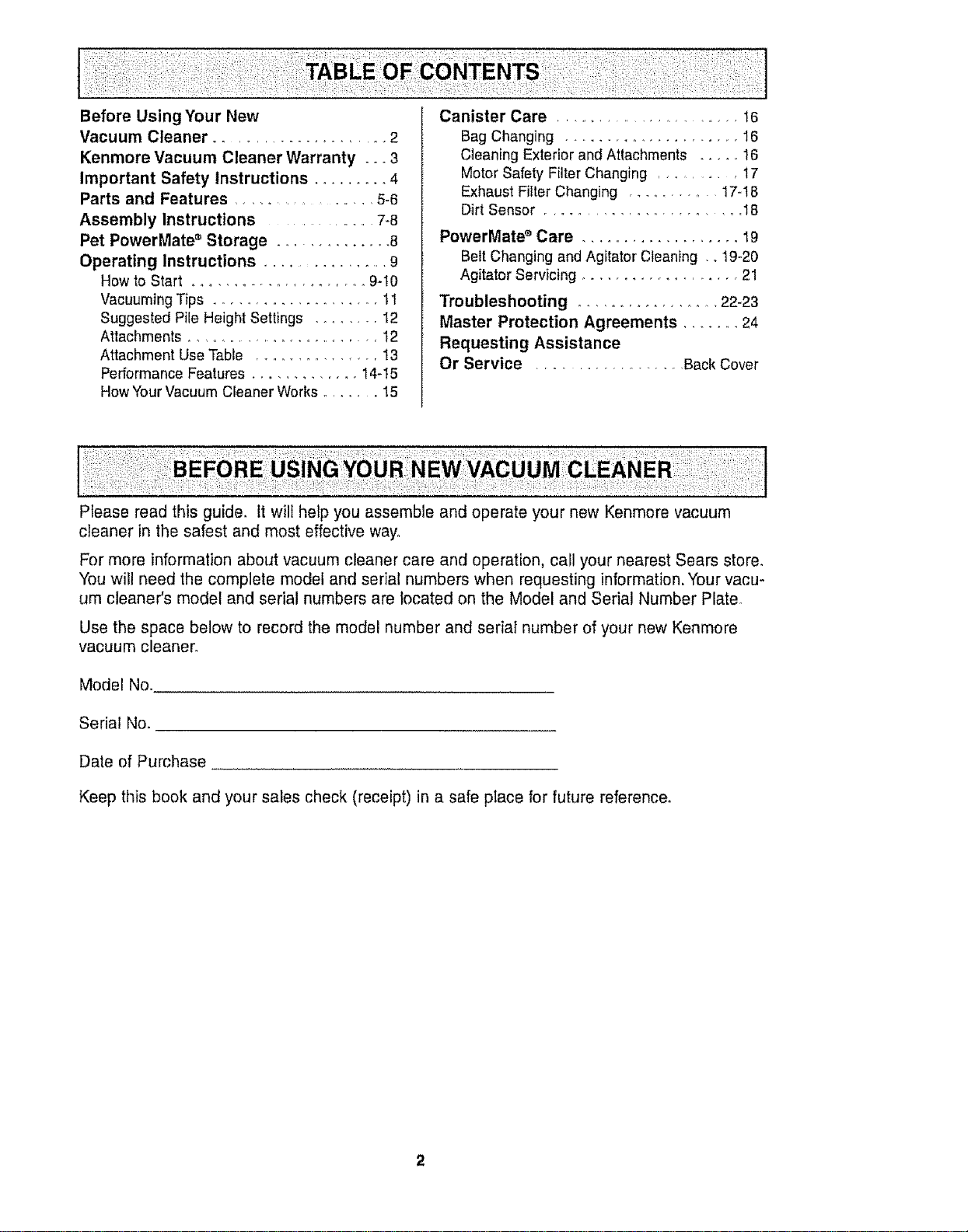
Before Using Your New
Vacuum Cleaner ...................... 2
Kenmore Vacuum Cleaner Warranty . °o3
Important Safety Instructions ......... 4
Parts and Features ................... 5-6
Assembly Instructions .................. 7-8
Pet PowerMate • Storage .............. 8
Operating Instructions ................ 9
How to Start ..................... 9-I0
Vacuuming Tips .................... 1t
Suggested Pile Height Settings ........ I2
Attachments ........................... 12
Attachment Use Table ................. I3
PerformanceFeatures .............. 14-I5
HowYour Vacuum Cleaner Works ....... 15
Canister Care ........................ t6
Bag Changing .................... 16
Cleaning Exterior and Attachments ..... 16
Motor Safety Filter Changing ......... 17
Exhaust Filter Changing ............ 17-18
Dirt Sensor ....................... 18
PowerMate ®Care ................... 19
Belt Changing and Agitator Cleaning .. 19-20
Agitator Servicing ................... 21
Troubleshooting ................... 22-23
Master Protection Agreements ....... 24
Requesting Assistance
Or Service ................. Back Cover
Please read this guide, It will help you assemble and operate your new Kenmore vacuum
cleaner in the safest and most effective way,
For more information about vacuum cleaner care and operation, call your nearest Sears store,
You will need the complete model and serial numbers when requesting information. Your vacu-
um cleaner's model and serial numbers are located on the Model and Serial Number Plate°
Use the space below to record the model number and serial number of your new Kenmore
vacuum cleaner,
Model No.
Serial No.
Date of Purchase
Keep this book and your sales check (receipt) in a safe place for future reference.
One Year Limited Warranty
When assembled, operated and maintained according to all instructions supplied with
the product, if this vacuum cleaner fails due to a defect in material or workmanship within
one year from the date of purchase, return it to any Sears store, Sears Parts & Repair
Center or other Kenmore out!et for free repair.
If this vacuum cleaner is used for other than private family purposes, this warranty
applies for only 90 days from the date of purchase.
This warranty covers only defects in material and workmanship. Sears will NOT
pay for:
1. Expendable items that can wear out from normal use, including but not limited to
filters, belts, light bulbs, and bags.
2. A service technician to instruct the user in correct product assembly, operation or
maintenance.
3. A service technician to clean or maintain this product.
4. Damage to or failure of this product if it is not assembled, operated or maintained
according to all instructionssupplied with the producL
5. Damage to orfailure of this product resultingfrom accident, abuse, misuse or use for
other than its intended purpose.
6. Damage to orfailure of this productcaused by the use of detergents, cleaners,
chemicals or utensils other than those recommended in att instructions supplied with
the product.
7. Damage to orfailure of parts or systems resulting from unauthorized modifications
made to this product.
Disclaimer of implied warranties; limitation of remedies
Customer's sole and exclusive remedy under this limited warranty shall be product repair
as provided herein, implied warranties, includingwarranties of merchantability or fitness
for a particular purpose, are limited to one year or the shortest period allowed by law.
Sears shall not be liable for incidental or consequentia! damages. Some states and
provinces do not allow the exclusion or limitation of incidental or consequential damages,
or limitations on the duration of implied warranties of merchantability or fitness, so these
exclusions or limitations may not apply to you.
This warranty applies only while this vacuum cleaner is used in the United States and
Canada.
This warranty gives you specific legal rights, and you may also have other rights which
vary from state to state.
Sears, Roebuck and Co., Hoffman Estates, IL 60179
Sears Canada Inc.,Toronto, Ontario, Canada M5B 2B8
Read all instructions in this manual before assembling or using your vacuum cleaner.
WARNING
Your safety is important to us. To reduce the risk of fire, electrical shock,
injury to persons or damage when using your vacuum cleaner, follow basic
saTety precautions including the following.
Use your vacuum cleaner only as
described in this manual° Use only with
Sears recommended attachments.
Disconnect electrical supply before
servicingor cleaning out brush area,
Failure todo so could result in electrical
shock or brush suddenly starting_
Do not leave vacuum cleaner when
plugged tno Unplugfrom outlet when not in
use and before servicing_
To reduce the riskof electrical shock - Do
not use outdoors or on wet surfaces°
Do not allow tobe used as a toy. Close
attention is necessary when used by or
near children°
Do not use with damaged cord or plug. If
vacuum cleaner is not working as itshould,
has been dropped, damaged, left outdoors,
or dropped intowater, return it to a Sears
Service Center.
Do not pull or carry by cord, use cord as a
handle, close door on cord, or pull cord
around sharp edges or corners_ Do not run
vacuum cleaner over cord. Keep cord away
from heated surfaces°
Do not unplug by pulling on cord. To
unplug, grasp the plug, not the cord.
Do not handle plug or vacuum cleaner with
wet hands.
Do not put any objects intoopenings.
Do not use with any opening blocked; keep
free of dust, lint, hair and anything that may
reduce airflow.
Keep hair, loose clothing, fingers, and all
parts of body away from openings and
moving parts,
Turn off all controls before unplugging°
Use extra care when cleaning on stairs. Do
not put on chairs, tables, etc, Keep on
floor_
Do not use vacuum cleaner to pick up
flammable or combustible liquids (gasoline,
cleaning fluids, perfumes, etc), or use in
areas where they may be present. The
fumes from these substances can create a
fire hazard or explosion.
Do not pick up anything that is burning or
smoking, such as cigarettes, matches, or
hot ashes.
Do not use vacuum cleaner without dust
bag and/or filters in place_
Always change the dust bag after
vacuuming carpet cleaners or freshener,
powders and fine dust. These products clog
the bag, reduce airflow and can cause the
bag to burst. Failure to change bag could
cause permanent damage to the vacuum
cleaner.
Do not use the vacuum cleaner to pick up
sharp hard objects, small toys, pins, paper
clips, etc° They may damage the vacuum
cleaner or dust bag_
Do not operate vacuum cleaner without the
exhaust filter or exhaust filter door in place
(If applicable).
The hose contains electrical wires. Do not
use when damaged, cut, or punctured°
Replace if cut or worn. Do not pick up
sharp objects.
Always turn off and unplug the vacuum
cleaner before connecting or disconnecting
either hose, Handi-Mate Jr.® (if applicable),
or nozzle.
Hold plug when rewinding onto cord reel.
Do not allow plug to whip when rewtndtng_
You are responsible for making sure that
your vacuum cleaner is not used by anyone
unable to operate it properly.
SAVE THESE INSTRUCTIONS
Proper assembly and safe use of your vacuum cleaner are your responsibilities.
Your vacuum cleaner is intended for Household use. Read this Owner's Manual
carefulJy for important use and safety information. This guide contains safety
statements underwarning ana caution symbols.
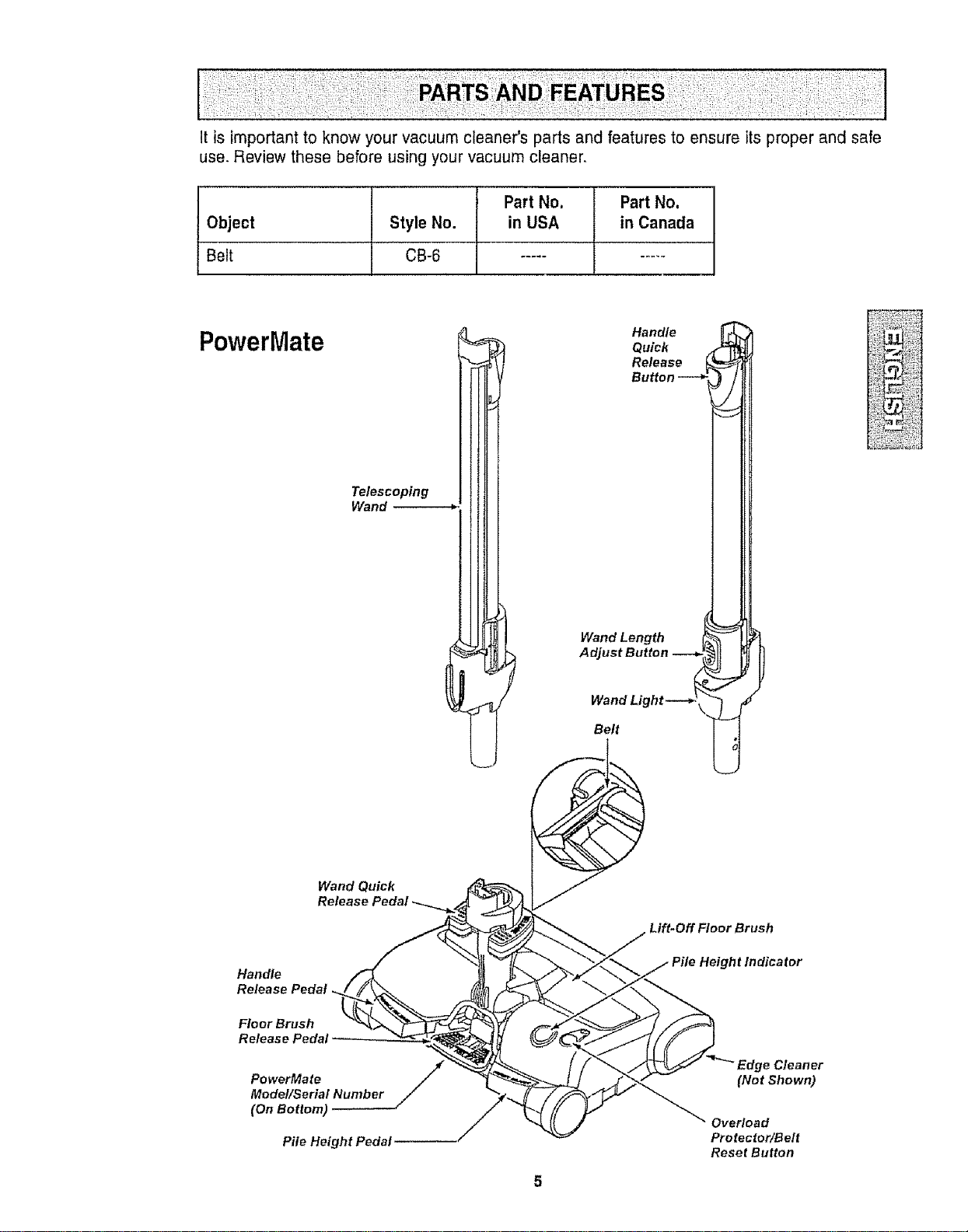
It is important to know your vacuum cleaner's parts and features to ensure its proper and safe
use. Review these before using your vacuum cleaner.
Part No. Part No.
Object Style No. in USA in Canada
Belt CB-6 ..........
PowerMate
Telescoping
Wand
Handle
Quick
Release i
Button
Wand Length
Adjust Button
Belt
Wand Quick
Handle
Release Pedal.
Floor Brush
Release Pedal
PowerMate /Model/Serial Numb er
(On Bottom)
Pile Height Pedal--
Lift-Off Floor Brush
Height In dica for
Edge Cleaner
(Not Shown)
Overload
Protector/Belt
Reset Button
5
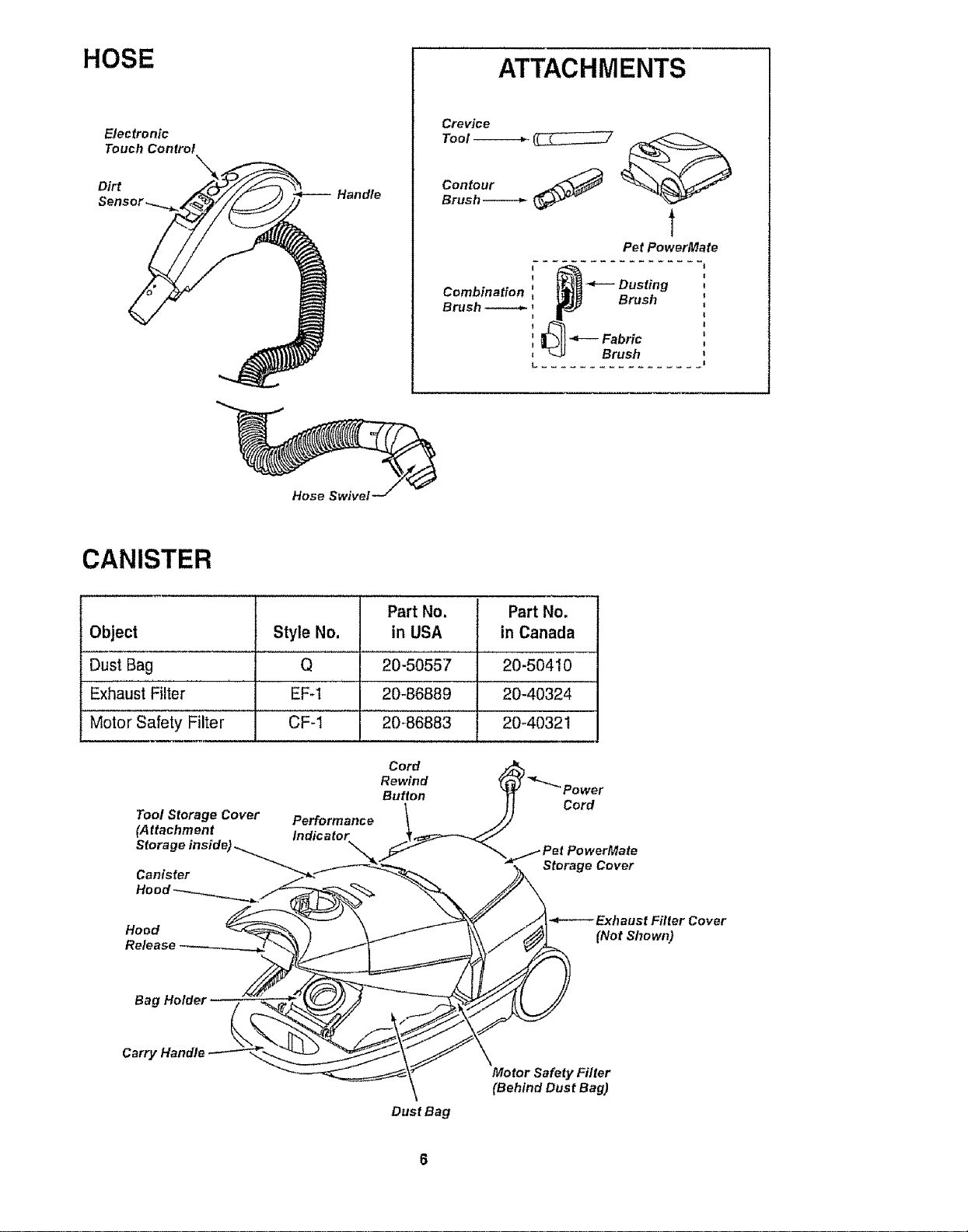
HOSE
Electronic
Touch Control
Handle
ATTACHMENTS
Crevice
rool------_. (_
Contour J_._
Brush-----_. _
Pet PowerMate
I
Combination _ .'_--- Dusting
Brush _ ,_ p___ Brush
_ Fabric
I
_ Brush
L .........
Hose Swivel
CANISTER
Part No. Part No.
Object Style No, in USA in Canada
Dust Bag Q 20-50557 20-50410
Exhaust"Fil'ter ' ' EFq '20-86889 ' 20-40324
Motor safety Fi'lter CF-i 20-B6883 20-4032!
Tool Storage Cover
(Attachment
Stora
Canister
Performance
Cord
Rewind
Button
Cord
Storage Cover
Hood
Release
-P----Exhaust Filter Cover
(Not Shown)
Bag Holde!
Carry Handle
Dust Bag
Motor Safety Filter
(Behind Dust Bag)
Please pay special attention to these hazard alert boxes, and follow any instruc-
tions given. WARNING statements alert you to such dangers as fire, electric
shock, burns and personal injury. CAUTION statements alert you to such dangers
as personal injury and/or property damage.
, WARNING
Electrical Shock Hazard
DO NOT plug into electrical supply until
assembly is complete. Failure to do so
could result in electrical shock or
injury.
Before assembling vacuum cleaner, check
the PACKING LIST on the cover of the
separate REPAIR PARTS LIST. Use this list
to verify that you have received all the
components of your new Kenmore vacuum
cleaner.
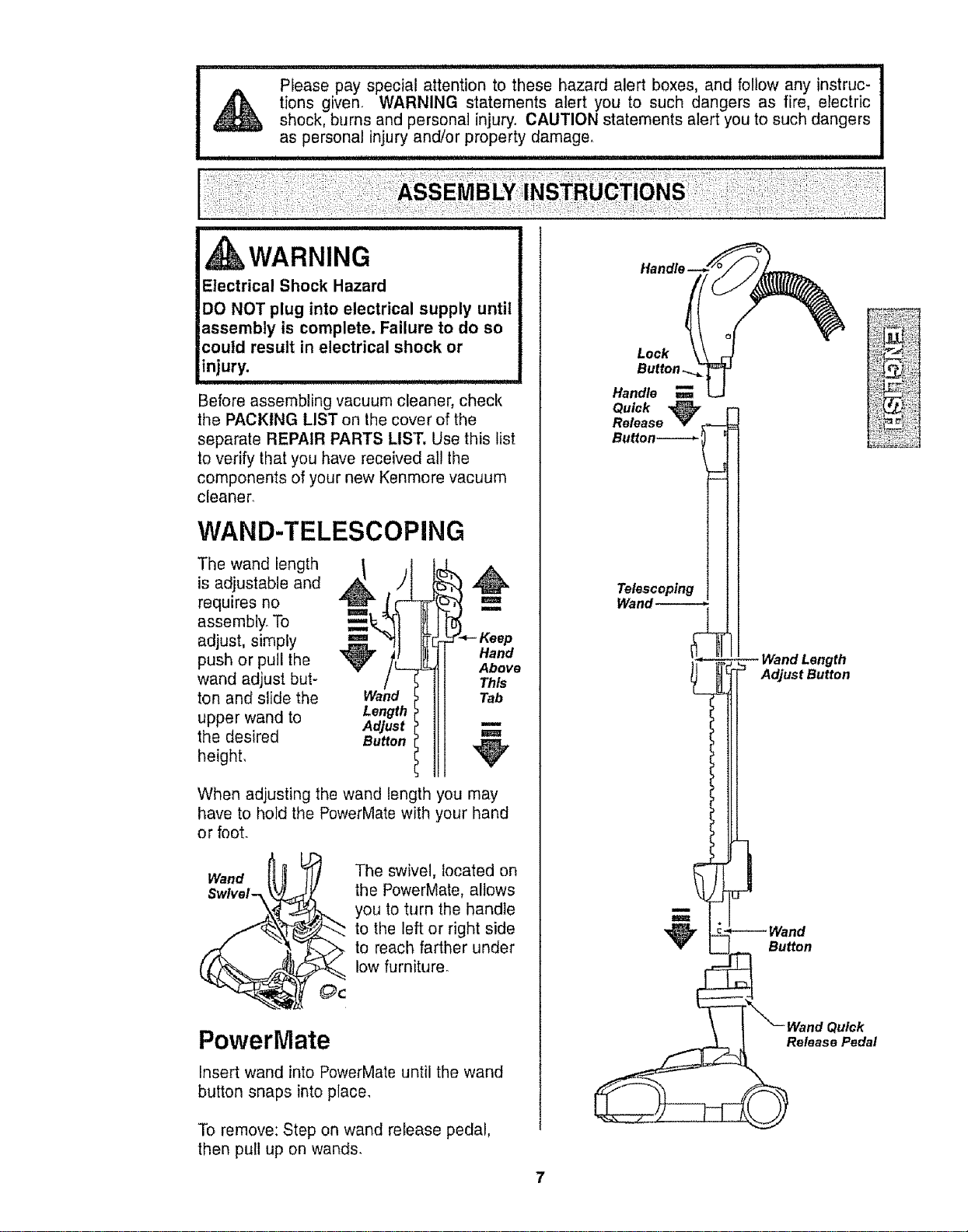
WAND-TELESCOPING
The wand length
is adjustable and
requires no
assembly. To
adjust, simply
push or pull the
wand adjust but-
ton and slide the
upper wand to
the desired
height,
Wand
Length
Adjust
Button
I
m
Hand
Above
Th_
Tab
w
m
When adjusting the wand length you may
have to hold the PowerMate with your hand
or foot.
Wand
Swlvel-_
The swivel, located on
the PewerMate, allows
you to turn the handle
to the left or right side
to reach farther under
low furniture.
PowerMate
Insert wand into PowerMate until the wand
button snaps into place.
To remove: Step on wand release pedal,
then pull up on wands.
Handle__/
Look \'r
Button -_._
Handle _ LJ
Quick ,_
Release
Button
Telescoping
Wand-----._
_:L _i'_' _i_=:_¸
-- Wand Length
utton
CANISTER
1. Open the canister hood
2. Check to see that the dust bag is properly
installed See BAG CHANGING for
instructions.
3. Check to see that the motor safety filter is
properly instalied See MOTOR SAFETY
FILTER CHANGING for instructions.
HOOD AND TOOL
STORAG E COVER
It is normal for the canister hood and tool
storage cover to come off when opened
further than needed. Line up the hinge slots,
insert the hinges into the slots, and close the
hood and tool storage cover to reinstall
CAUTION
Never open canister hood with the tool
storage cover open. This will help to
prevent damage from occurring to the
canister hood andlor tool storage cover.
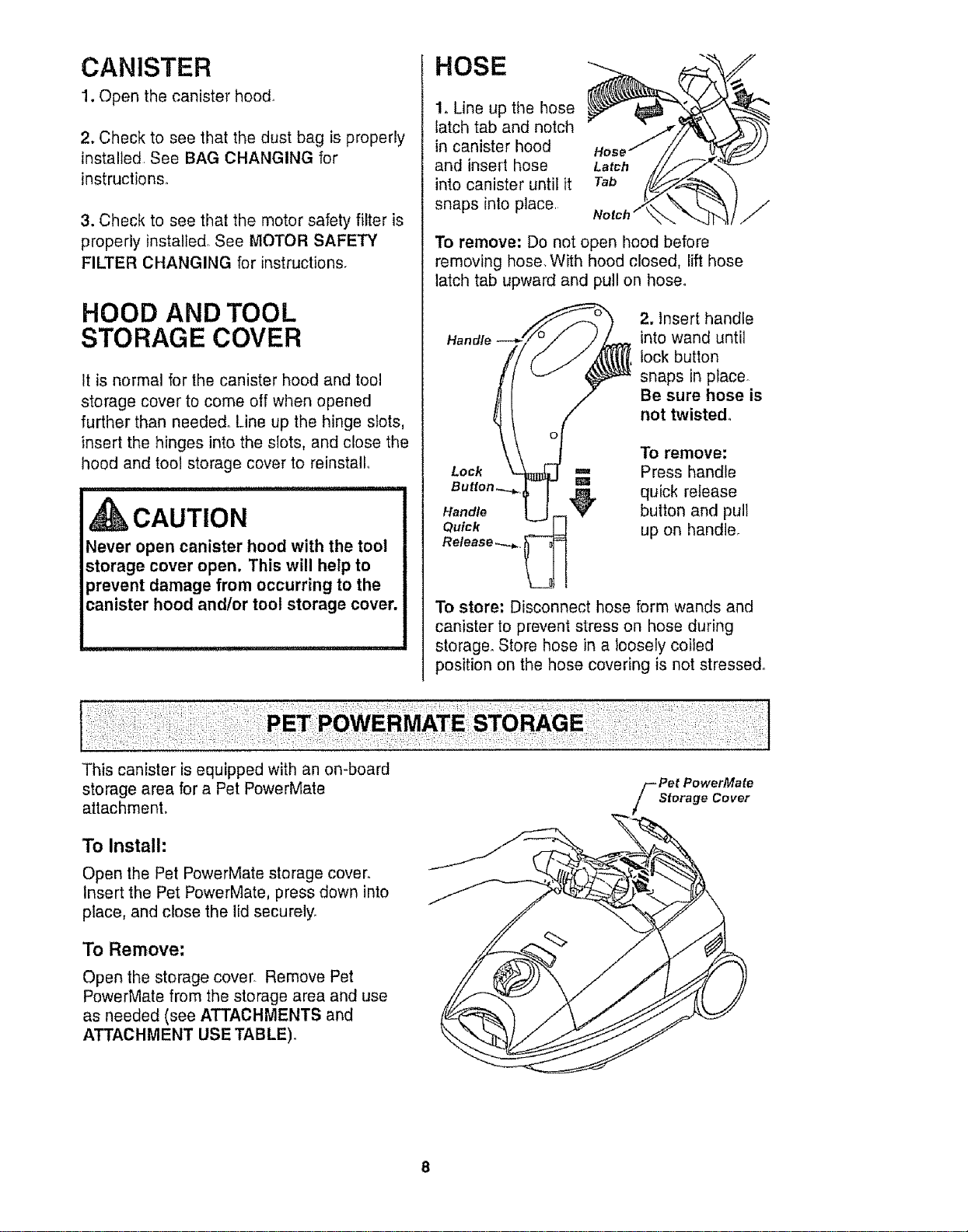
HOSE
1. Line up tl_e hose
latch tab and notch
in canister hood
and insert hose
into canister until it
snaps into place
To remove: Do not open hood before
removing hose. With hood closed, lift hose
latch tab upward and pull on hose.
Handle
Lock
Handle
Quick
2. Insert handle
into wand until
lock button
snaps in place.
Be sure hose is
not twisted°
To remove:
Press handle
quick release
button and pull
up on handle.
To store; Disconnect hose form wands and
canister to prevent stress on hose during
storage_ Store hose in a loosely coiled
position on the hose covering is not stressed°
This canister is equipped with an on-board
storage area for a Pet PowerMate
attachment.
To Install:
Open the Pet PowerMate storage cover
Insert the Pet PowerMate, press down into
place, and close the lid securely.
To Remove:
Open the storage cover. Remove Pet
PowerMate from the storage area and use
as needed (see ATTACHMENTS and
ATTACHMENT USE TABLE),
f et PowerMate
Storage Cover
OPERATING INSTRUCTIONS
WARNING
Personal Injury and Product Damage
Hazard
ALWAYS turn off the vacuum cleaner
before unplugging.
The cord moves rapidly when
rewinding. Keep children away
and provide a clear path when
rewinding the cord to prevent
personal injury.
DO NOT use outlets above counters.
Damage from cord to items in
surrounding area could occur.
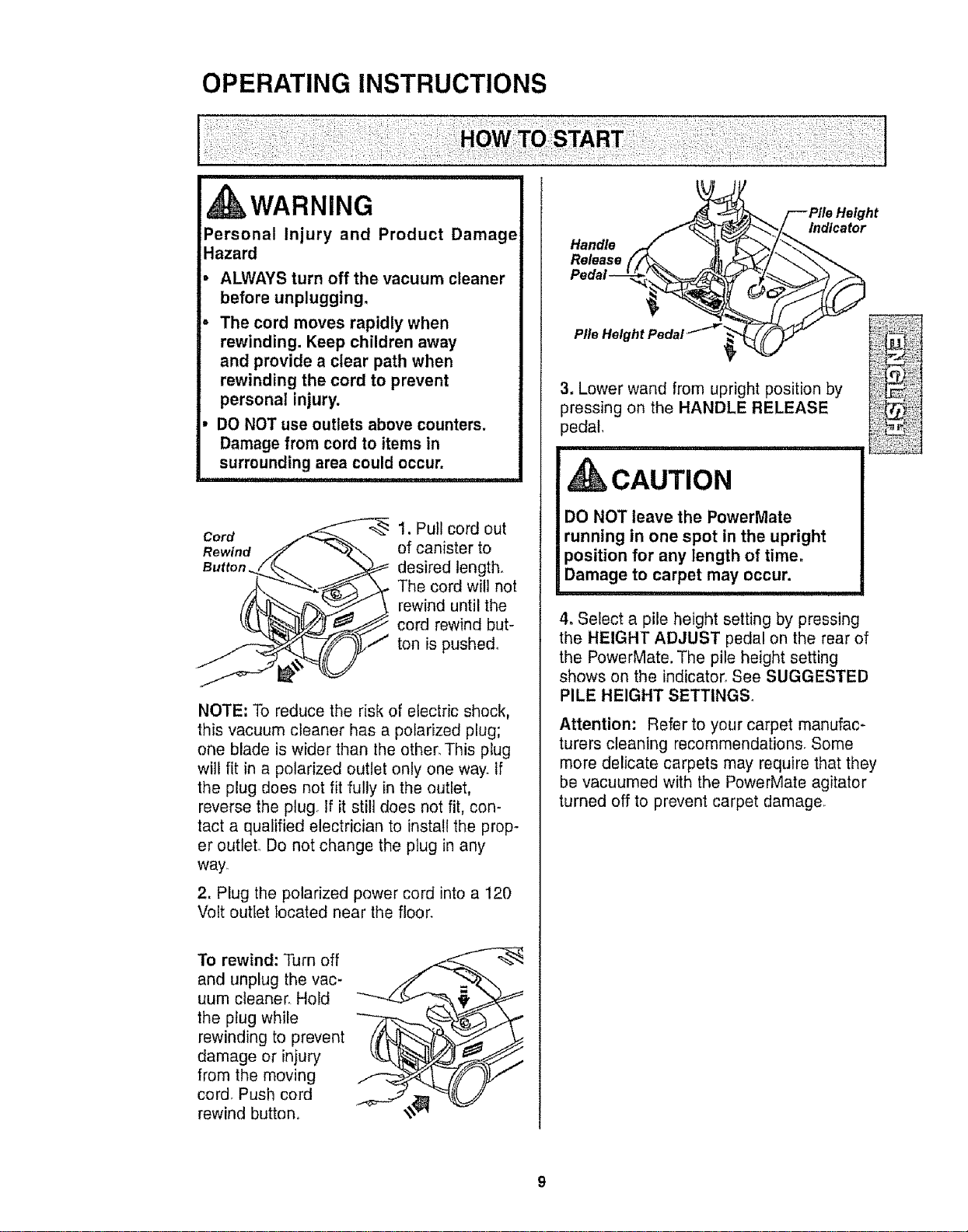
Cord
Rewind
Button
1. Pull cord out
of canister to
_ desired length.
-', _ The cord will not
rewind until the
_ cord rewind but-
J ton is pushe&
i
NOTE: To reduce the risk of electric shock,
this vacuum cleaner has a polarized plug;
one blade is wider than the other. This plug
will fit in a polarized outlet only one way_ If
the plug does not fit fully in the outlet,
reverse the plug If it still does not fit, con-
tact a qualified electrician to install the prop-
er outlet. Do not change the plug in any
way
2, Plug the polarized power cord into a 120
Volt outlet located near the floor.
To rewind: Turn off
and unplug the vac-
uum cleaner. Hold
the plug while
rewinding to prevent
damage or injury
from the moving
cord. Push cord
rewind button_
Handle
Release
indicator
3. Lower wand from upright position by V_
pedal,pressingon the HANDLE RELEASE _'i:i_i_;_,'_:?
,CAUTION
DO NOT leave the Powerrvlate
running in one spot in the upright
position for any length of time.
Damage to carpet may occur.
4. Select a pile height setting by pressing
the HEIGHT ADJUST pedal on the rear of
the PowerMate. The pile height setting
shows on the indicator_ See SUGGESTED
PILE HEIGHT SETTING&
Attention: Refer to your carpet manufac-
turers cleaning recommendations_ Some
more delicate carpets may require that they
be vacuumed with the PowerMate agitator
turned off to prevent carpet damage.
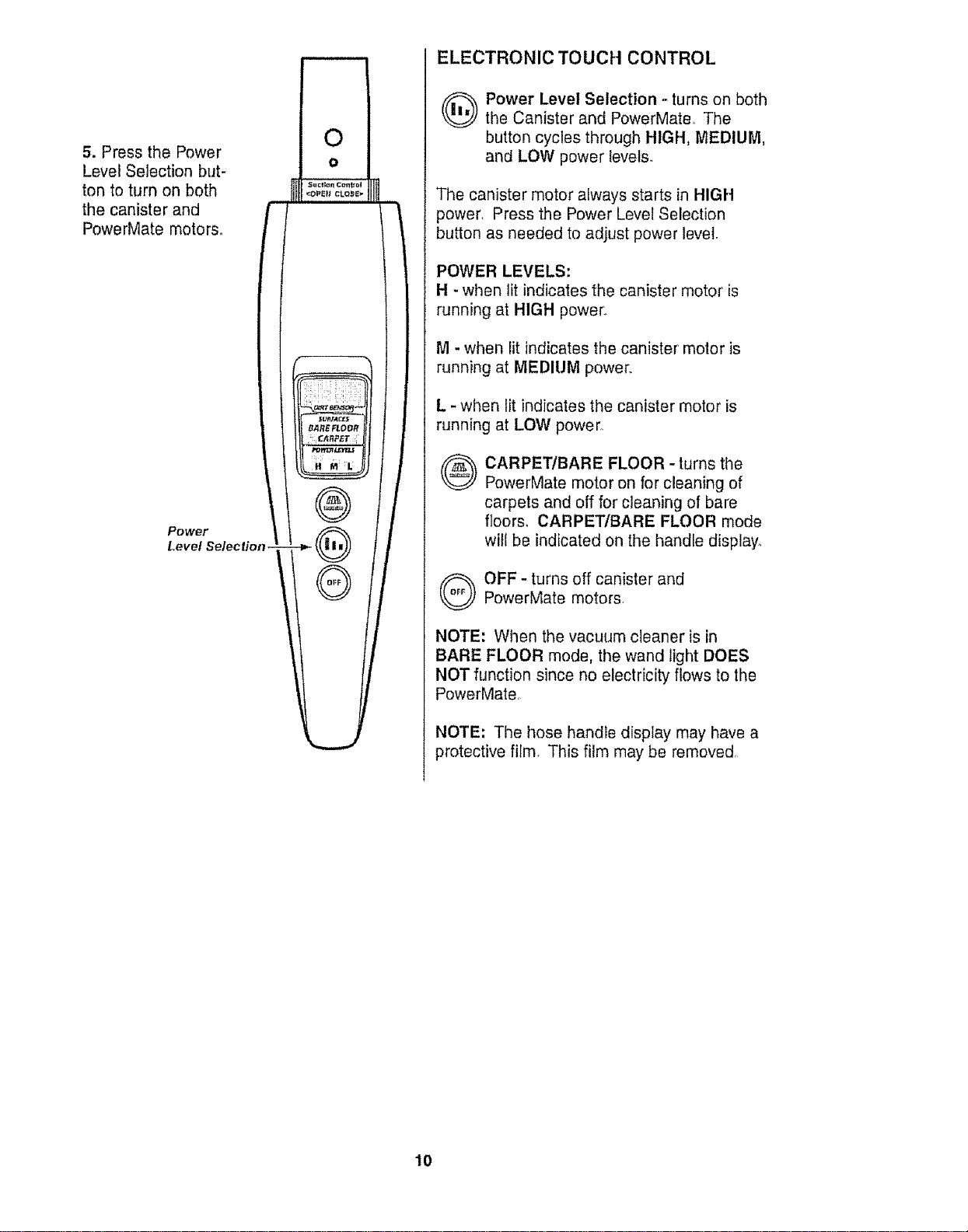
5. PressthePower
LevelSelectionbut-
tontoturnonboth
thecanisterand
PowerMatemotors,
Power
Level Selection
ELECTRONIC TOUCH CONTROL
(_ Power Level Selection .-turns on both
the Canister and PowerMate, The
button cycles through HIGH, MEDIUM,
and LOW power levets.
The canister motor always starts in HIGH
power, Press the Power Level Selection
button as needed to adjust power level.
POWER LEVELS:
H - when lit indicates the canister motor is
runmng at HIGH power,.
M - when lit indicates the canister motor is
running at MEDIUM power,.
L - when lit indicates the canister motor is
running at LOW power°
®
CARPETIBARE FLOOR - turns the
PowerMate motor on for cleaning of
carpets and off for cleaning of bare
floors, CARPET/BARE FLOOR mode
will be indicated on the handle display,
Q FF- turns off canister andPowerMate motors.
NOTE: When the vacuum cleaner is in
BARE FLOOR mode, the wand light DOES
NOT function since no electricity flows to the
PowerMate,
NOTE: The hose handle display may have a
protective film, This film may be removed,
10
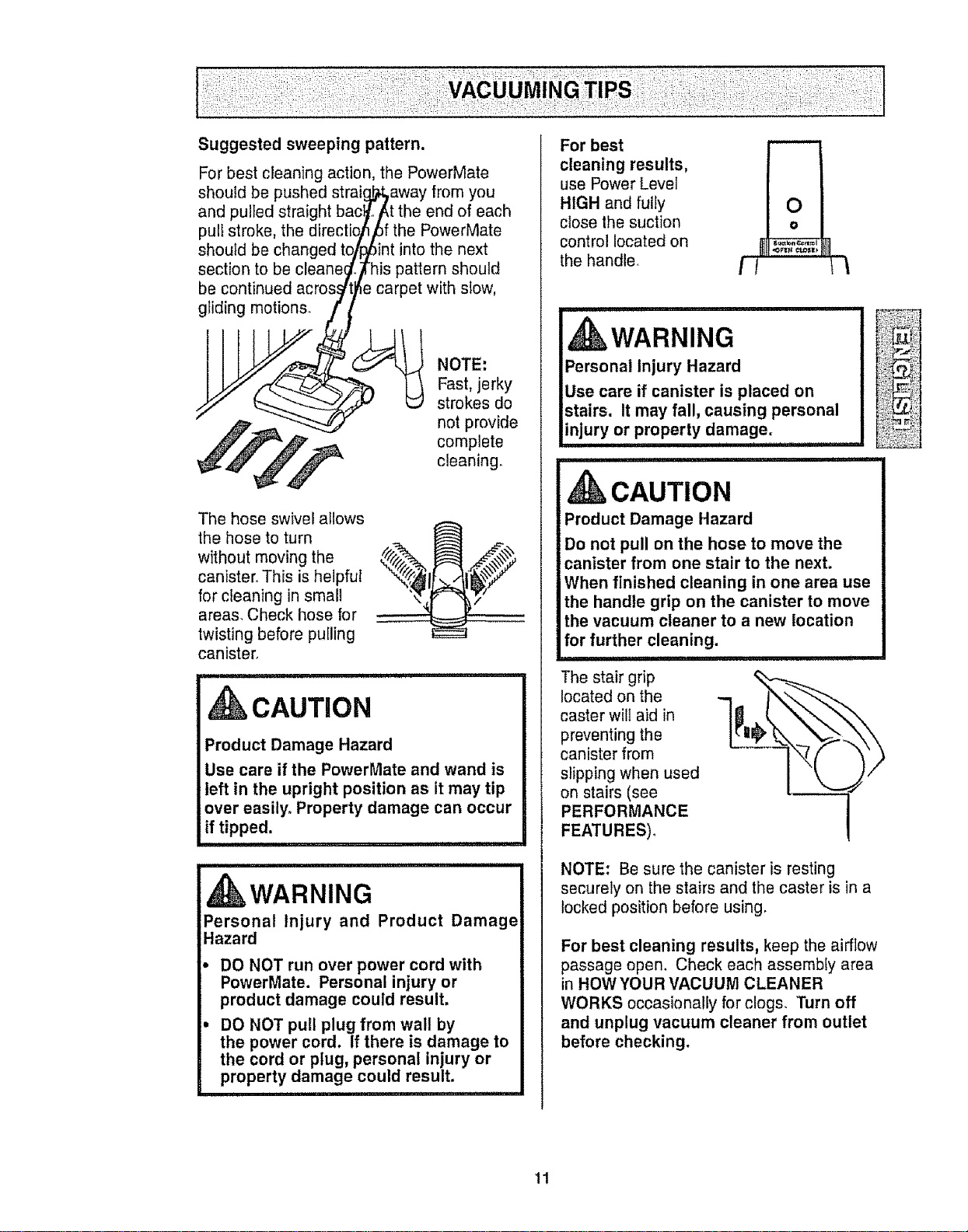
Suggested sweeping pattern.
For best cleaning action, the PowerMate
shouId be pushed straig,_away from you
and pulled straight bac_ot_t the end of each
pull stroke, the directio_/6f the PowerMate
should be changed to/_int into the next
section to be cleane_.Fhis pattern should
be continued acros_t_e carpet with slow,
__ strokes do
,_.,,,__ not provide
_" _l_" ._ comp!ete
_'_ _'f cleaning.
The hose swivel allows
the hose to turn
without moving the
canister.. This is helpful
for cleaning in small
areas. Check hose for
twisting before puiling
canister.
CAUTION
Product Damage Hazard
Use care if the PowerMate and wand is
left in the upright position as it may tip
over easily° Property damage can occur
if tipped.
............................ nnlul
WARNING
Personal Injury and Product Damage
Hazard
DO NOT run over power cord with
PowerMate. Personal injury or
product damage could result,
DO NOT pull plug from wall by
the power cord. If there is damage to
the cord or plug, personal injury or
property damage could result.
For best
cleaning results,
use Power Level
HIGH and fully
close the suction
control located on
the handle,
WARNING
Personal injury Hazard
Use care if canister is placed on
stairs. It may fall, causing personal
injury or property damage.
.................... i ii ,11.......................
CAUTION
Product Damage Hazard
Do not pull on the hose to move the
canister from one stair to the next.
When finished cleaning in one area use
the handle grip on the canister to move
the vacuum cleaner to a new location
for further cleaning.
The stair grip
located on the
caster will aid in
preventing the
canister from
slipping when used
on stairs (see
PERFORMANCE
FEATURES),
NOTE: Be sure the canister is resting
securely on the stairs and the caster is in a
locked position before using.
For best cleaning results, keep the airflow
passage open. Check each assembly area
in HOWYOUR VACUUM CLEANER
WORKS occasionally for clogs. Turn off
and unplug vacuum cleaner from outlet
before checking.
11
Forbestdeepdowncleaning,usetheXLO
setting.However,youmayneedto raisethe
heighttomakesomejobseasier,suchas
scatterrugsandsomedeeppilecarpets,
andto preventthevacuumcleanerfrom
shuttingoff.Suggestedsettingsare:
HI- Shag,deeppile,orscatterrugs.
MED- Mediumtodeeppileo
LO- Lowto mediumpile.
XLO- Mostcarpetsandbarefloors.
CAUTION
DO NOT attach or remove handle or
wands while vacuum cleaner is ON.
This could cause sparking and damage
the electrical contacts or electronic
controls.
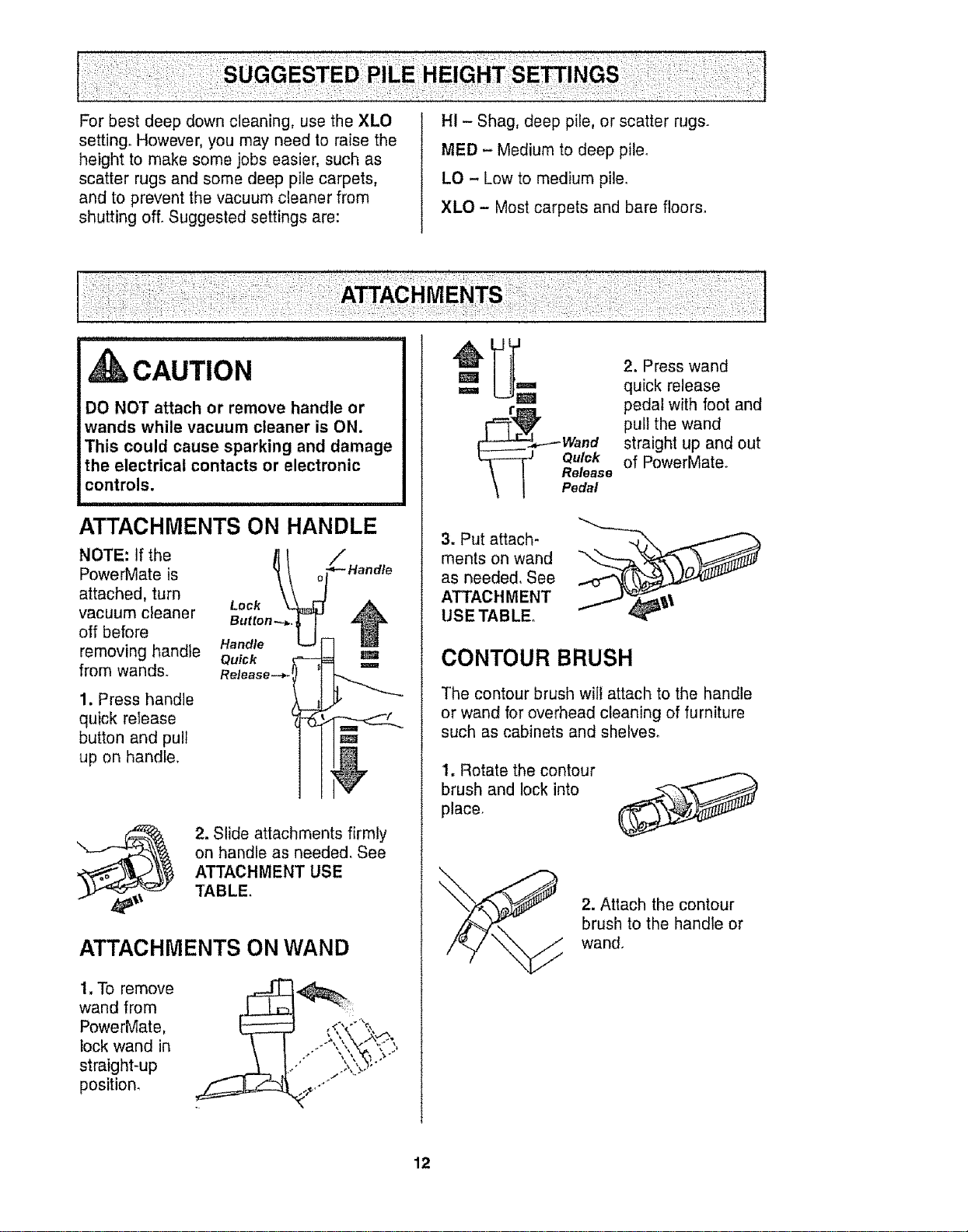
ATTACHMENTS ON HANDLE
NOTE: If the /ll
PowerMate is _
attached, turn Lock
vacuum cleaner Button
off before 11
Handle
removing handle Qu_k
from wands. Release--*. I
1. Press handle
quick release
button and pull
up on handle.
_ Handle
m
m
2. Slide attachments firmly
on handle as needed. See
ATTACHMENT USE
TABLE.
ATTACHMENTS ON WAND
1, To remove
wand from
PowerMate,
lock wand in
straight-up
position.
m
m
2. Press wand
quick release
pedal with foot and
pull the wand
straight up and out
of PowerMate
3. Put attach-
ments on wand
as needed. See
ATTACHMENT
USETABLE
CONTOUR BRUSH
The contour brush wilt attach to the handle
or wand for overhead cleaning of furniture
such as cabinets and shelves_
I. Rotate the contour
brush and lock into
place.
2. Attach the contour
brush to the handle or
wand.
12
LIFT-OFF FLOOR BRUSH
ii.......................
WARNING
Electrical Shock Hazard
To reduce the risk of electric shock -
DO NOT use on wet surfaces.
NOTE' Turn off vacuum cleaner before
removing floor brush from PowerMate.
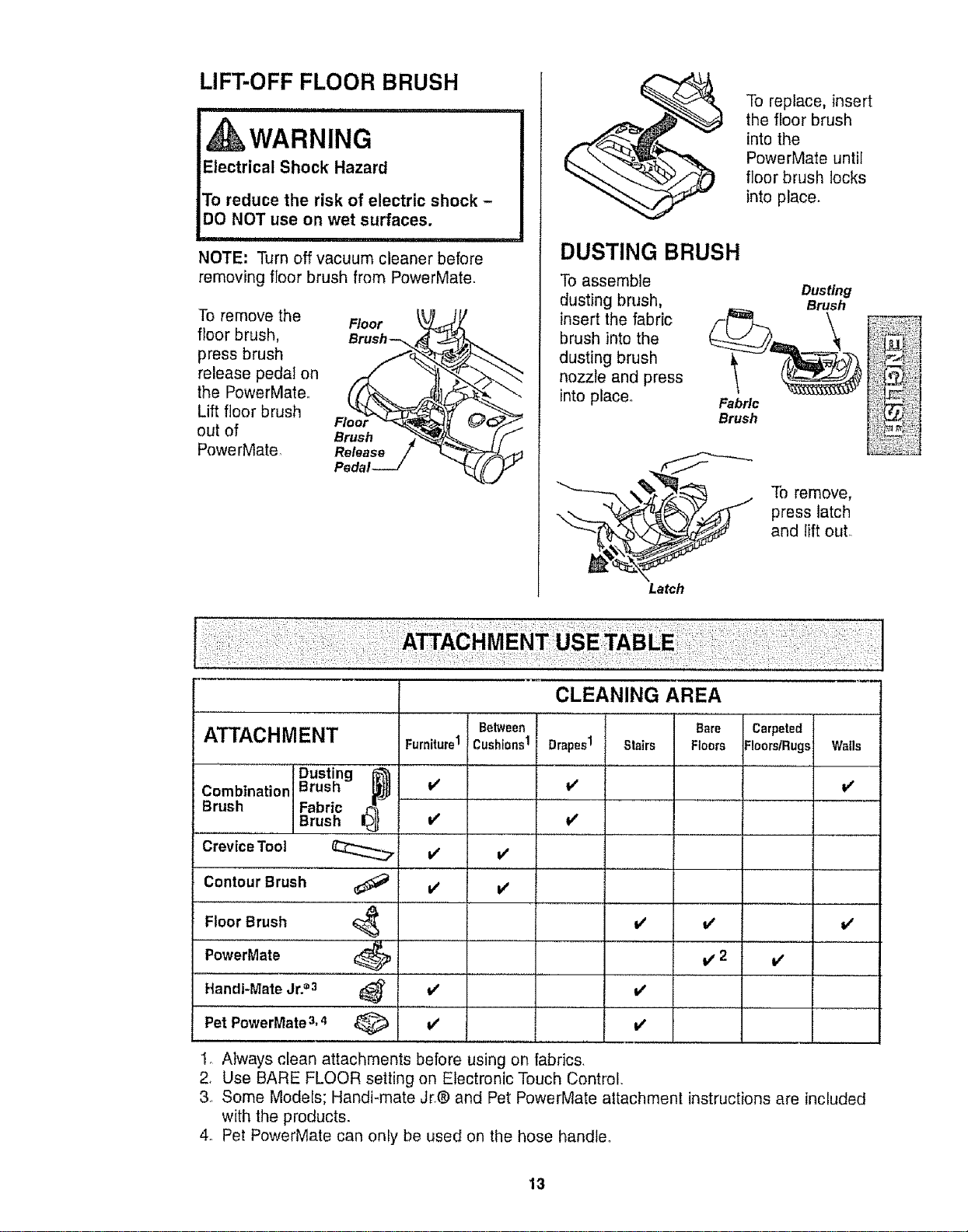
To remove the
floor brush,
press brush
release pedal on
the PowerMateo
Lift floor brush
out of
PowerMate,
Brush
To replace, insert
the floor brush
intothe
PowerMate until
floor brush locks
into place.
DUSTING BRUSH
To assemble
dusting brush,
insert the fabric
brush into the
dusting brush
nozzle and press
into placed
To remove,
press latch
and lift out.
Latch
CLEANING AREA
ATTACHMENT Betw_. Ba_ c_,p_t_d
Cushions1 Drapes1 Stairs Floers FloorslRugs Walls
v'
Dusting I__
Combination Brush
Brush Fabric
Brush
Crevice Tool
Contour Brush
Floor Brush 4
PowerMate _ I
Handi-Mate Jr.=3 _ l
Pet PowerMate 3,4 _ V'
Furniture1
is'
V'
V' V'
V'
V'
V'
V/
I/ V'
V'2 V'
I, Always clean attachments before using on fabrics.
2, Use BARE FLOOR setting on Electronic Touch Control.
3, Some Models; Handi-mate Jr.® and Pet PowerMate attachment instructions are included
with the products.
4. Pet PowerMate can only be used on the hose handte.
13
RFORI
PER INDICATOR
WARNING
Personal Injury Hazard
AIways turn off and unplug the vacuum
cleaner before cleaning the agitator area
as agitator may suddenly restart.
Failure to do so can result in personal
injury.
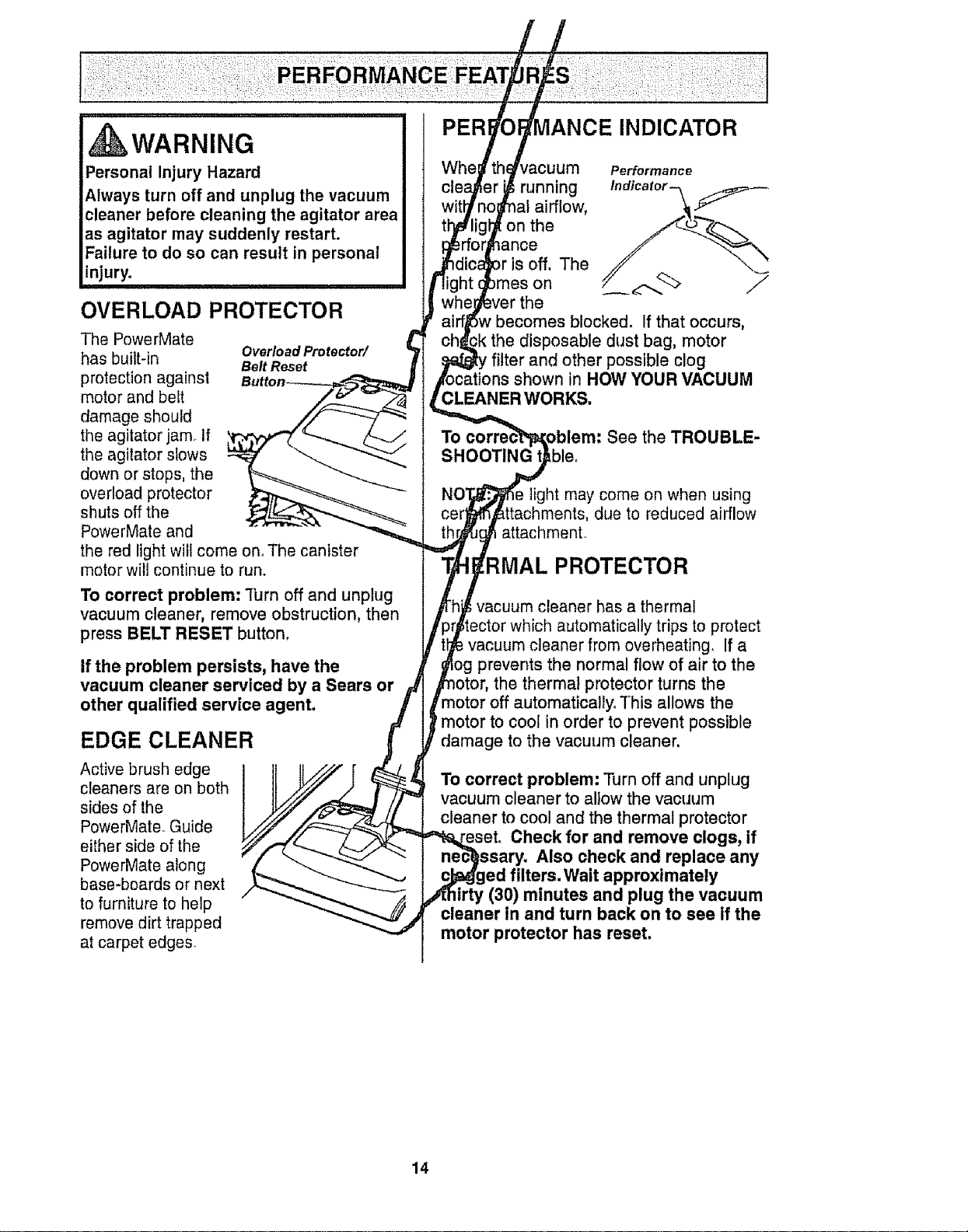
OVERLOAD PROTECTOR
The PowerMate
has built-in
protection against
motor and belt
damage should
the agitator jam If
the agitator slows
down or stops, the
overload protector
shuts off the
PowerMate and
the red light will come onoThe canister
motor will continue to run.
Overload Protector/
Belt Reset
To correct problem: Turn off and unplug
vacuum cleaner, remove obstruction, then
press BELT RESET button,
if the problem persists, have the
vacuum cleaner serviced by a Sears or
other qualified service agent.
EDGE CLEANER
Active brush edge
cleaners are on both
sides of the
PowerMate. Guide
either side of the
PowerMate along
base-boards or next
to furniture to help
remove dirt trapped
at carpet edges.
vacuum
running
al airflow,
on the
_ance
off, The
)mes on
the
becomes blocked. If that occurs,
the disposable dust bag, motor
filter and other possible clog
shown in HOW YOUR VACUUM
CLEANER WORKS.
To
SHOOTING t Lble,
See the TROUBLE-
light may come on when using
due to reduced airflow
attachment
PROTECTOR
i vacuum cleaner has a thermal
automatically tripsto protect
vacuum cleaner from overheating, If a
og prevents the normal flow of air to the
the thermal protector turns the
motor off automatically. This allows the
motor to cool in order to prevent possible
damage to the vacuum cleaner.
To correct problem: Turn off and unplug
vacuum cleaner to allowthe vacuum
cleaner to cool and the thermal protector
Check for and remove clogs, if
Also check and replace any
led filters. WaLtapproximately
irty (30) minutes and plug the vacuum
cleaner in and turn back on to see if the
motor protector has reset,
14
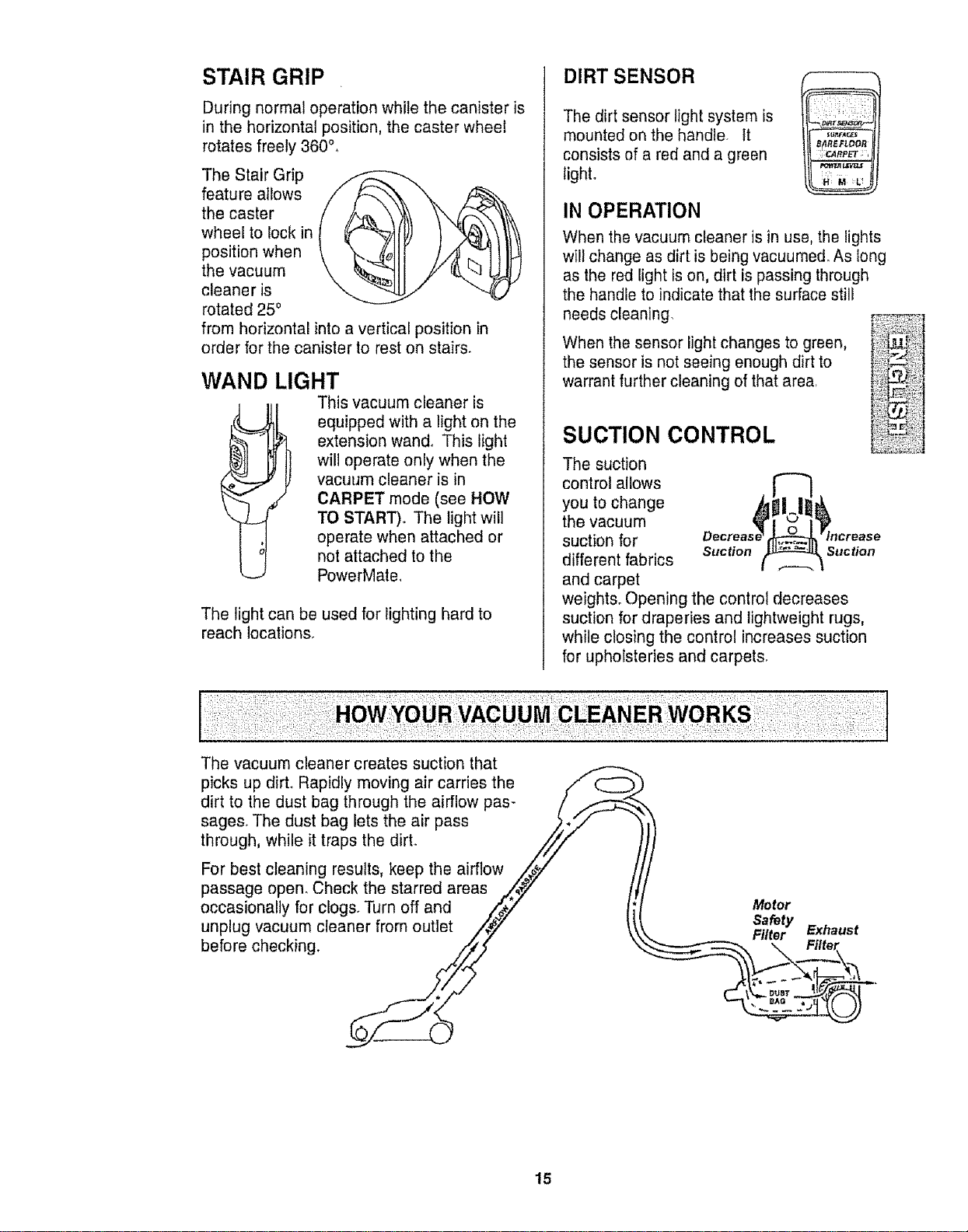
STAIR GRIP
During normal operation while the canister is
in the horizontal position, the caster wheel
rotates freely 360°°
The Stair Grip
feature allows
the caster
wheel to lock in
position when
the vacuum
cleaner is
rotated 250
from horizontal into a vertical position in
order for the canister to rest on stairs.
WAND LIGHT
This vacuum cleaner is
equipped with a light on the
extension wand° This light
will operate only when the
vacuum cleaner is in
CARPET mode (see HOW
TO START).. The light will
operate when attached or
not attached to the
PowerMate,
The light can be used for lighting hard to
reach locations,
DIRT SENSOR
The dirt sensor light system is
mounted on the handle, tt
consists of a red and a green
light.
IN OPERATION
'i_ _i/, ¸_,!i_:z:!!i_
B_IREFLOOR
;:OIRP_ ,
When the vacuum cieaner is in use, the lights
wilt change as dirt is being vacuumed. As long
as the red light is on, dirt is passing through
the handle to indicate that the surface still
needs cleaning,
When the sensor light changes to green,
the sensor is not seeing enough dirt to
warrant further cleaning of that area.
SUCTION CONTROL
The suction
control allows
you to change
the vacuum
suction for
different fabrics suction suction
and carpet
weights° Opening the control decreases
suction for draperies and lightweight rugs,
while closing the control increases suction
for upholsteries and carpets.
_,":4 d •
The vacuum cleaner creates suction that
picks up dirt. Rapidly moving air carries the __
dirt to the dust bag through the airflow pas- /
sages. The dust bag lets the air pass _,.._/
through, while it traps the dirt. /_//
For best cleaning results, keep the airflow ,,_iz
passage open. Check the starred areas ,**_,_' /
occasionally for clogs. Turn off and /_/ li Meter
Safety
unplug vacuum cleaner from outlet ,i4y _ _... FiEXl_o,rust
before checking xi_/ , Filter
:LkW_J
15
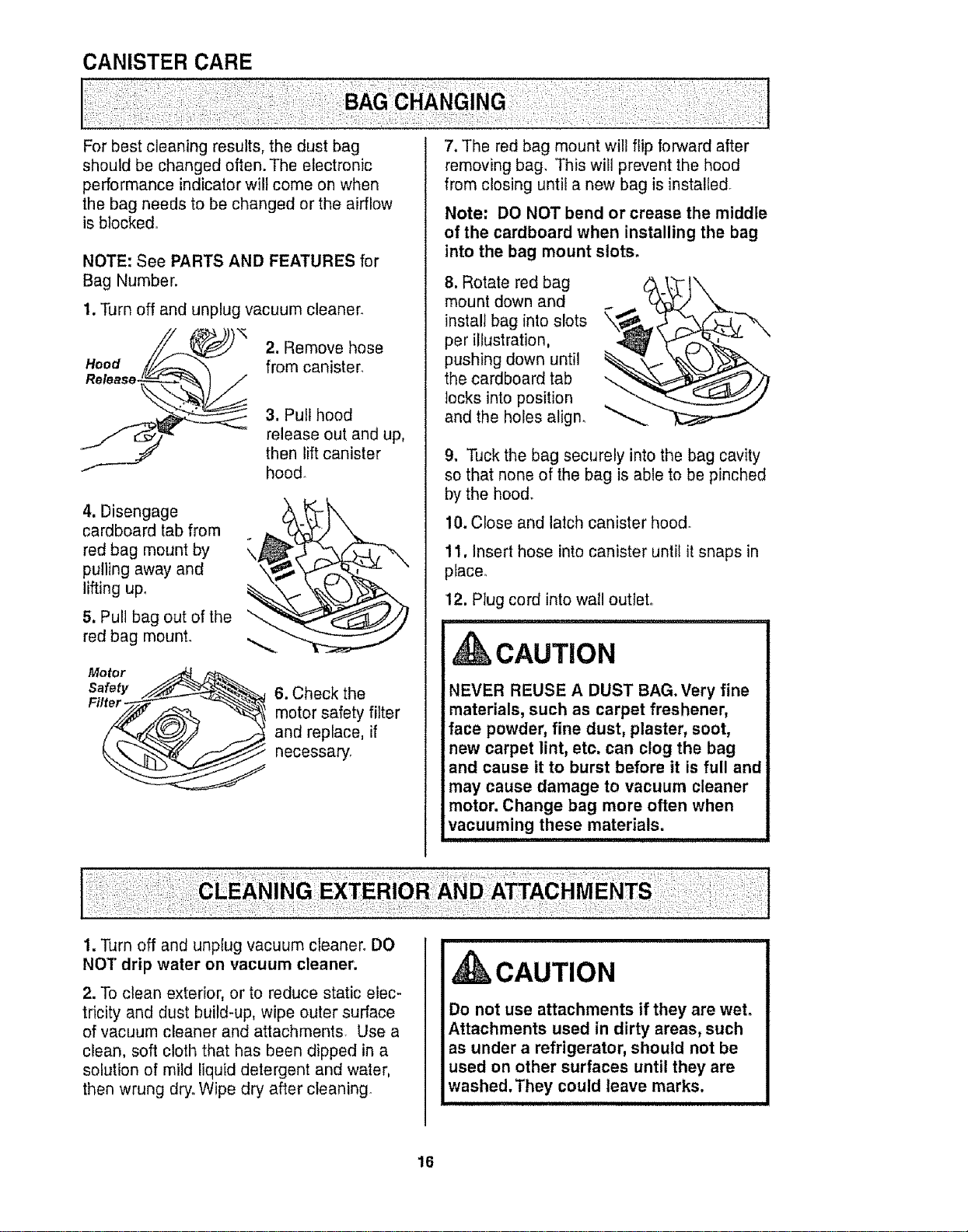
CANISTER CARE
For best cleaning results, the dust bag
should be changed often. The electronic
performance indicator will come on when
the bag needs to be changed or the airflow
is blocked.
NOTE: See PARTS AND FEATURES for
Bag Number.
1. Turn off and unplug vacuum cleaner.
Hood
Release.
2. Remove hose
from canister,
3. Pull hood
release out and up,
then lift canister
hood_
4. Disengage
cardboard tab from
red bag mount by
pulling away and
lifting up,
5. Pull bag out of the
red bag mount,
\
\
Motor
Safety
Filter -
6. Check the
motor safety filter
and replace, if
necessary,
7. The red bag mount will flip forward after
removing bag, This will prevent the hood
from closing until a new bag is installed.
Note: DO NOT bend or crease the middle
of the cardboard when installing the bag
into the bag mount slots.
8. Rotate red bag
mount down and
install bag into slots
per illustration,
pushing down until
the cardboard tab
locks into position
and the holes align.
9. Tuck the bag securely into the bag cavity
so that none of the bag is able to be pinched
by the hood.
10. Close and latch canister hood,
11, Insert hose into canister until it snaps in
place.
12, Plug cord into wall outlet,
CAUTION
NEVER REUSE A DUST BAG. Very fine
materials, such as carpet freshener,
face powder, fine dust, plaster, soot,
new carpet lint, etc. can clog the bag
and cause it to burst before it is full and
may cause damage to vacuum cleaner
motor. Change bag more often when
vacuuming these materials.
1. Turn off and unplug vacuum cleaner. DO
NOT drip water on vacuum cleaner.
2. To clean exterior, or to reduce static elec-
tricity and dust build-up, wipe outer surface
of vacuum cleaner and attachments. Use a
clean, soft cloth that has been dipped in a
solution of mild liquid detergent and water,
then wrung dry. Wipe dry after cleaning.
CAUTION
Do not use attachments if they are wet.
Attachments used in dirty areas, such
as under a refrigerator, should not be
used on other surfaces until they are
washed.They could leave marks.
16
WARNING
Electrical Shock Hazard
Turn off and unplug vacuum cleaner
from electrical outlet. Do not operate
the vacuum cleaner without the motor
safety filter. Be sure the filter is dry and
properly installed to prevent motor
failure and/or electrical shock.
MOTOR SAFETY FILTER
ELECTROSTATIC
This filter must be replaced when dirty. It
should be replaced regularly depending on
use conditions_ The filter CANNOT be
washed as it will lose its dust trapping
ability.
NOTE: See PARTS AND FEATURES for
Motor Safety Filter number,
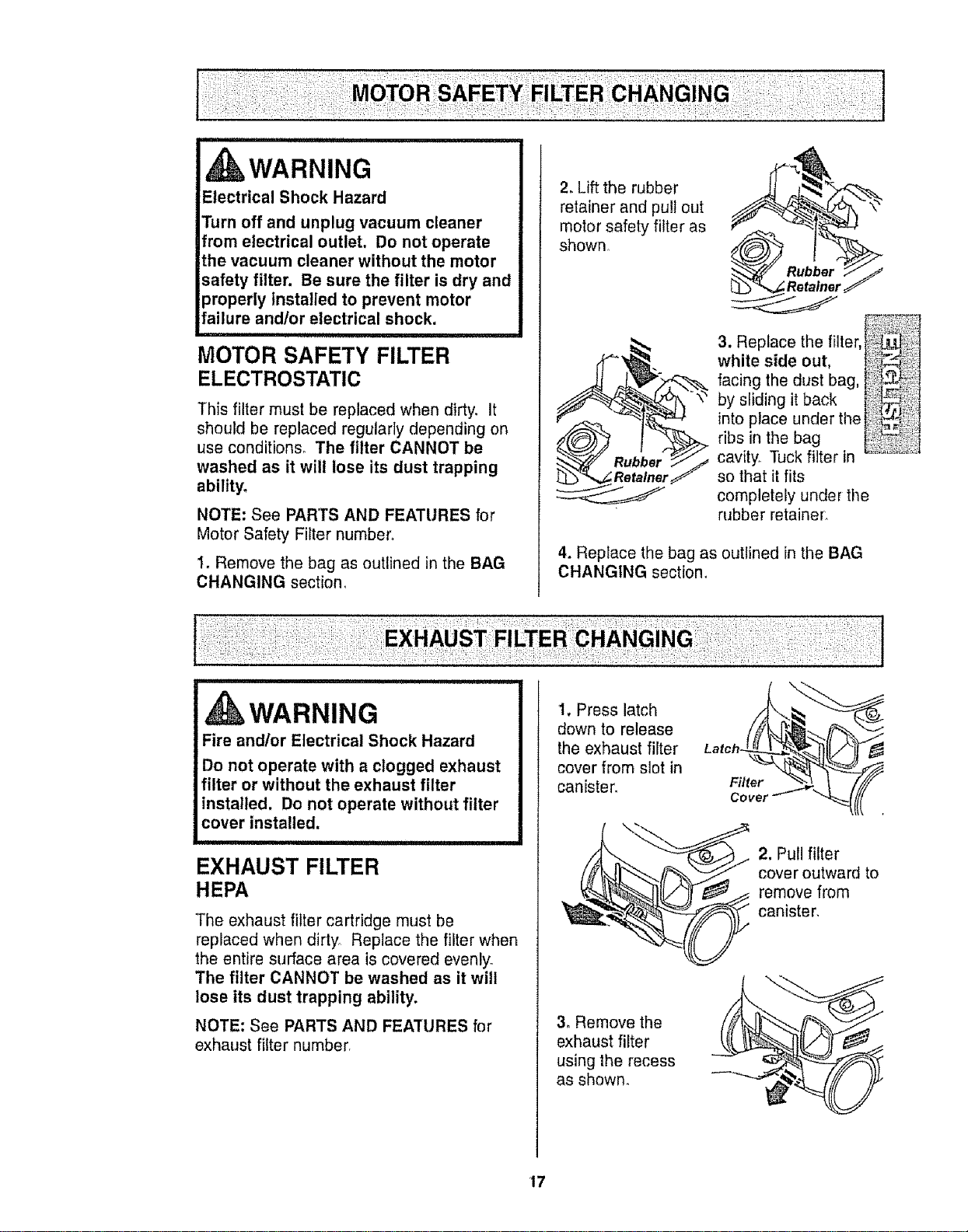
I, Remove the bag as outlined in the BAG
CHANGING section
2. Lift the rubber _ _L"_-_._-'>.:_-_-_-_-_-_-_-_-_-_
retainer and pull out
motor safety filter as
shown
3. Re ace the fter, l,_:;
white side out, l_i_
facing the dust bag,
by sliding it back i!_!!
Into place under the ¢_!i
ribs in the bag !I
cavity. Tuck filter in _'_'_'_"_"_"
rY so that it fits
completely under the
rubber retainer.
4. Replace the bag as outlined in the BAG
CHANGING section.
,WARNING
Fire and/or Electrical Shock Hazard
Do not operate with a clogged exhaust
filter or without the exhaust filter
installed, Do not operate without filter
cover installed.
EXHAUST FILTER
HEPA
The exhaust filter cartridge must be
replaced when dirty Replace the filter when
the entire surface area is covered evenly.
The filter CANNOT be washed as it will
lose its dust trapping ability.
NOTE: See PARTS AND FEATURES for
exhaust filter number
1. Press latch
down to release
the exhaust filter
cover from slot in
canister.
3, Remove the
exhaust filter
using the recess
as shown_
Filter
Covet'
2. Pull filter
cover outward to
remove from
canister.
17
Exhaust
Filter.
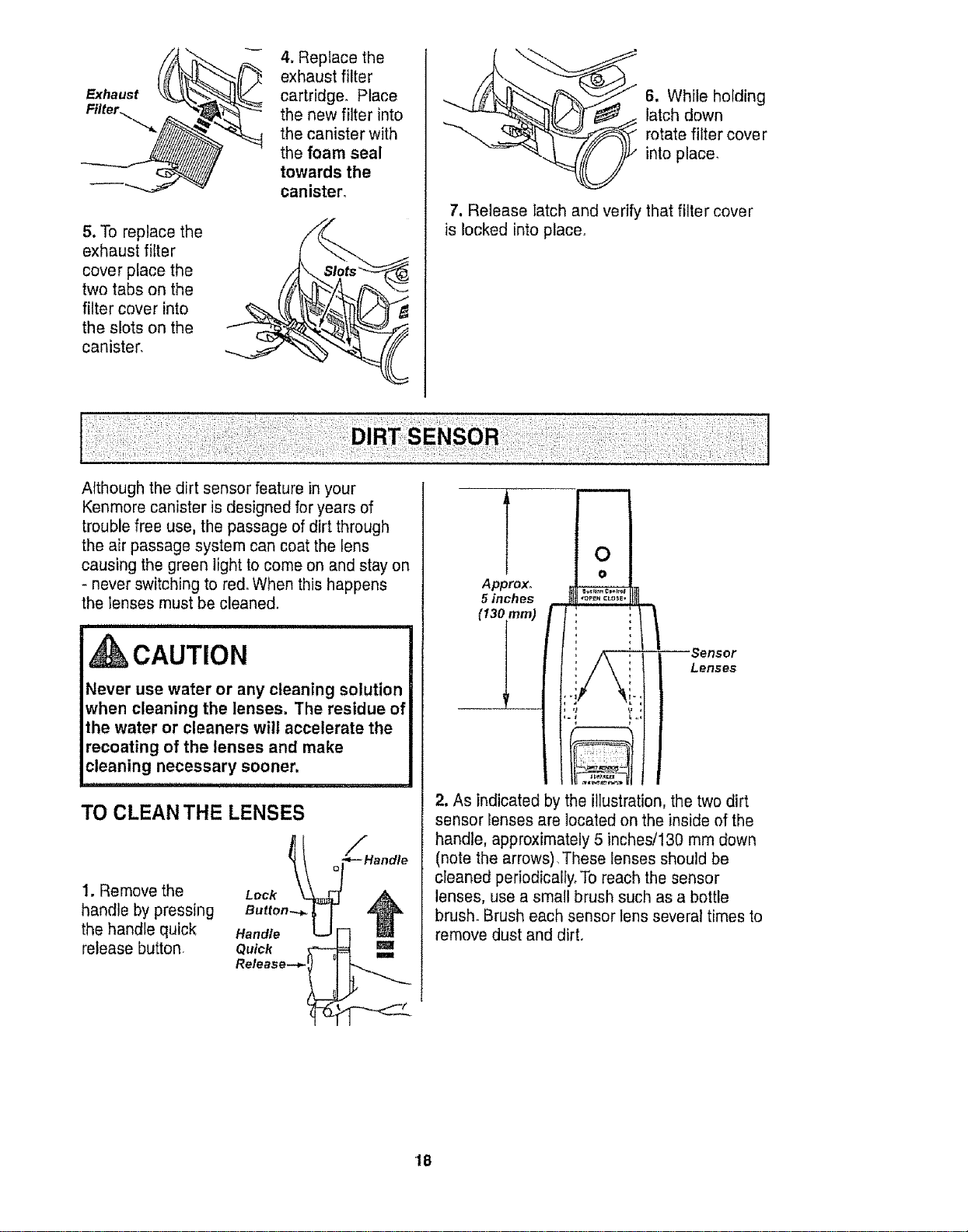
5. To replace the
exhaust filter
cover place the
two tabs on the
filter cover into
the slots on the
canister,
4. Replace the
exhaust filter
_ cartridge° Place
the new filter into
the canister with
the foam seal
towards the
canister.
6. While holding
latch down
rotate filter cove r
into place.
7. Release latch and verify that filter cover
is locked into place°
AIthough the dirt sensor feature in your
Kenmore canister is designed for years of
trouble free use, the passage of dirt through
the air passage system can coat the lens
causing the green light to come on and stay on
- never switching to red. When this happens
the ;enses must be cleaned.
i i i,n, I' i,, i ,
,CAUTION
Never use water or any cleaning solution
when cleaning the lenses. The residue of
the water or cleaners will accelerate the
recoating of the lenses and make
cleaning necessary sooner.
TO CLEAN THE LENSES
1. Remove the
handle by pressing
the handle quick
release button
Lock
Quick
Release--_ '_
/
;*-- Handle
!
0
o
Approx° ...,_._..,=,
5 inches "o,_,CL°=E..__...L
: )
', , Sensor
: i Lenses
2. As indicated by the illustration, the two dirt
sensor Ienses are located on the inside of the
handle, approximately 5 inches/130 mm down
(note the arrows), These lenses should be
cleaned periodically, To reach the sensor
lenses, use a small brush such as a bottle
brush. Brush each sensor lens several times to
remove dust and dirt.
I8
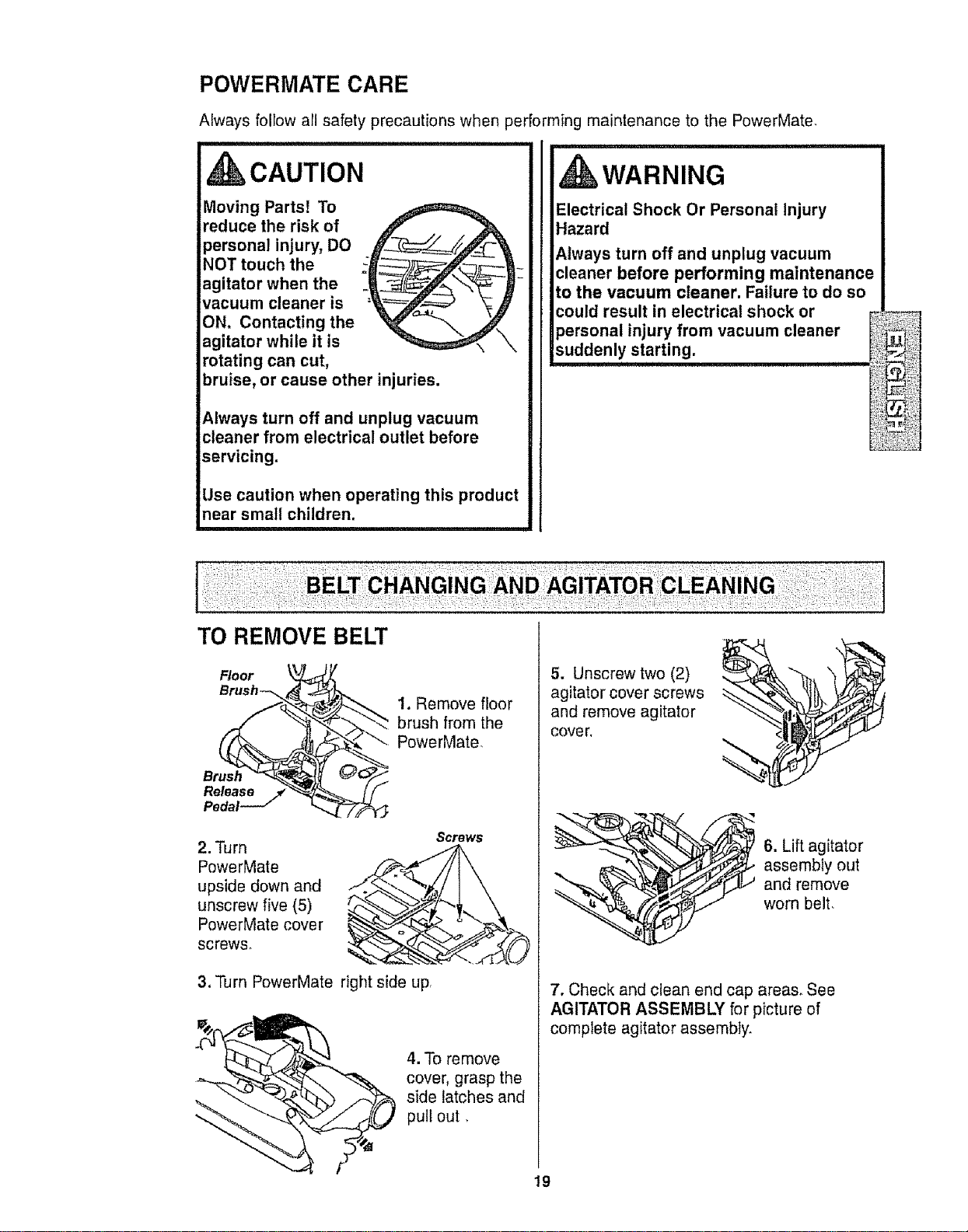
POWERMATE CARE
Always follow all safety precautions when performing maintenance to the PowerMate,
,CAUTION
Moving Parts! To
reduce the risk of
personal injury, DO
NOT touch the
agitator when the
vacuum cleaner is
ON. Contacting the
agitator while it is
rotating can cut,
bruise, or cause other injuries.
Always turn off and unplug vacuum
cleaner from electrical outlet before
servicing.
Use caution when operating this product
near small children.
I wARNING
Electrical Shock Or Personal Injury
Hazard
Always turn off and unplug vacuum
cleaner before performing maintenance
to the vacuum cleaner. Failure to do so
could result in electrical shock or
personal injury from vacuum cleaner
suddenly.starting. .........
L_t%]
TO REMOVE BELT
1. Remove floor
brush from the
PowerMate.
Brush
Releas_ejf
Pedal
2. Turn
PowerMate ._
upside down and _ "-,
unscrew five (5)
PowerMate cover _
screws_
3. Turn PowerMate right side Upr
4. TO remove
cover, grasp the
side latches and
pull out,
5. Unscrew two (2)
agitator cover screws
and remove agitator
cove r.
6. Lift agitator
assembly out
and remove
worn belt,
7. Check and clean end cap area& See
AGITATOR ASSEMBLY for picture of
complete agitator assembly.
19
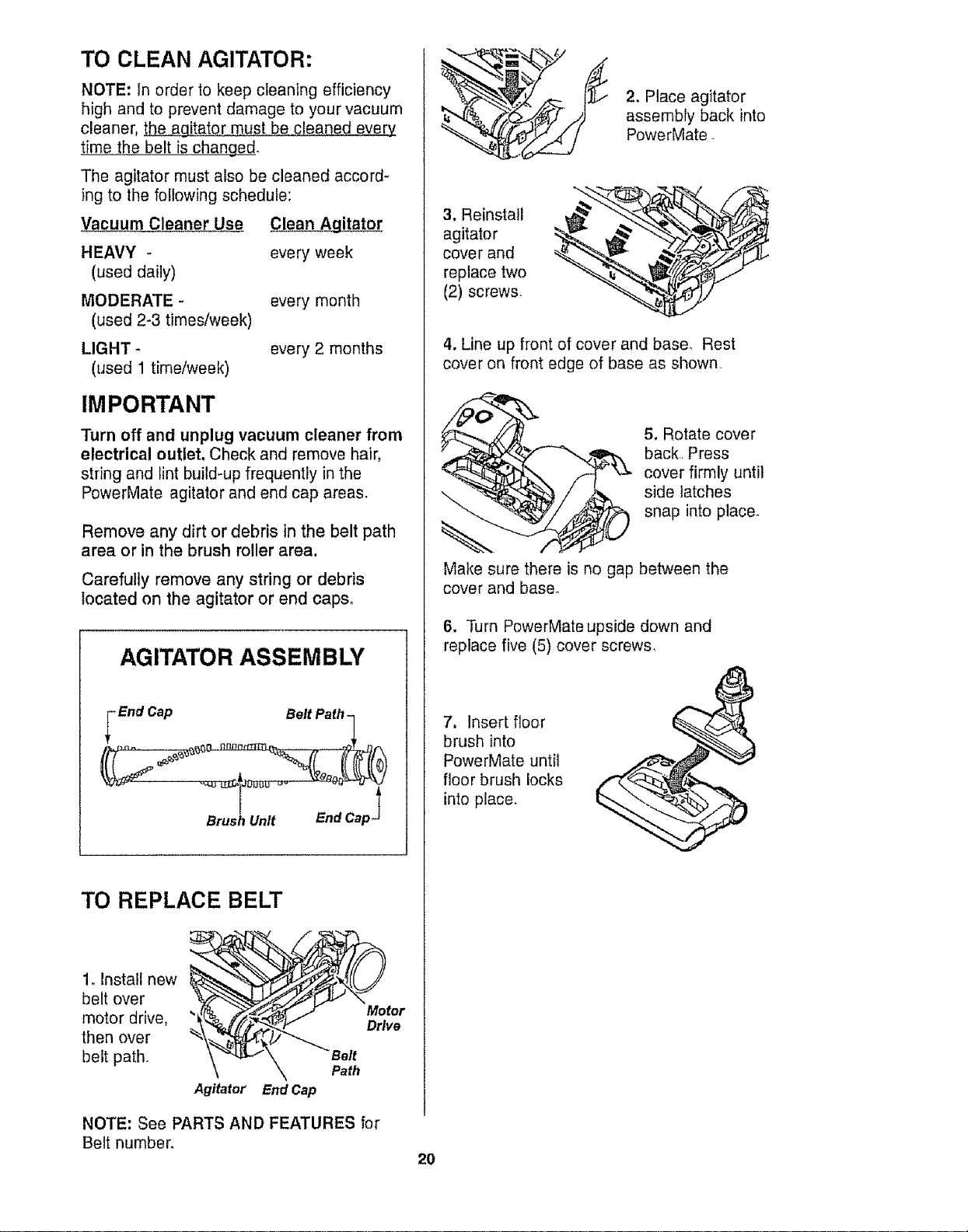
TO CLEAN AGITATOR:
NOTE: In order to keep cIeaning efficiency
high and to prevent damage to your vacuum
cleaner, _ must be cleaned every
time the belt is changed.
The agitator must also be cleaned accord-
ing to the following schedule:
Vacuum Cleaner Use Clean Agitator
HEAVY - every week
(used daily)
MODERATE -
(used 2-3 times/week)
LIGHT
(used 1 time/week)
every month
every 2 months
IMPORTANT
Turn off and unplug vacuum cleaner from
electrical outlet. Check and remove hair,
string and lint build-up frequently in the
PowerMate agitator and end cap areas.
Remove any dirt or debris in the belt path
area or in the brush roller area,
Carefully remove any string or debris
located on the agitator or end caps°
AGITATOR ASSEMBLY
_ End Cap
Belt Path
Brush Unit
End Cap_
TO REPLACE BELT
1, Install new
belt over
motor drive,
then over
belt path,
\ Path
Agitator End Cap
2. Place agitator
assembly back into
PowerMate.
3. Reinstall
agitator
cover and
replace two
(2) screws.
4. Line up front of cover and base° Rest
cover on front edge of base as shown,
Make sure there is no gap between the
cover and base°
5. Rotate cover
back, Press
cover firmly until
side latches
snap into place°
6, Turn PowerMate upside down and
replace five (5) cover screws,
7, Insert floor
brush into
PowerMate until
floor brush locks
into place.
NOTE: See PARTS AND FEATURES for
Belt number.
20
iii1.._.... H_........................................
kWARNING
Electrical Shock Or Personal Injury
Hazard
Always turn off and unplug vacuum
cleaner before performing
maintenance to the vacuum cleaner.
Failure to do so could result in electrical
shock or personal injury from vacuum
cleaner suddenlY starting.
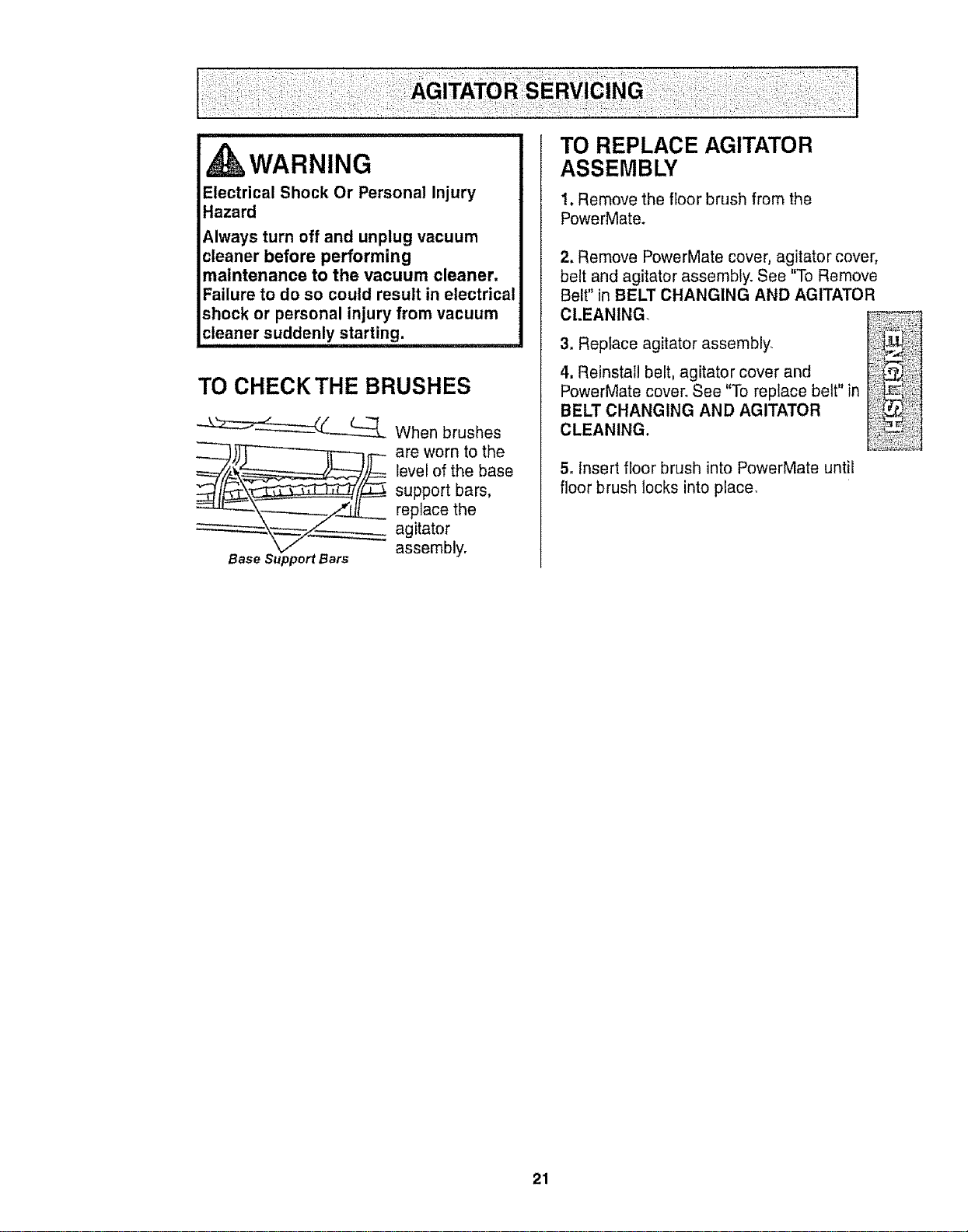
TO CHECKTHE BRUSHES
__ When brushes
__ are worn to the
level of the base
support bars,
replace the
agitator
assembly.
Base Support Bars
TO REPLACE AGITATOR
ASSEMBLY
1. Remove the floor brush from the
PowerMate.
2, Remove PowerMate cover, agitator cover,
belt and agitator assembly. See "To Remove
Belt" in BELT CHANGING AND AGITATOR
CLEANING
3. Repiace agitator assembly,
4. Reinstall belt, agitator cover and
PowerMate cover. See "To replace belt" in
BELT CHANGING AND AGITATOR
CLEANING.
5, Insert floor brush intoPowerMate until
floor brush locks into place,
21
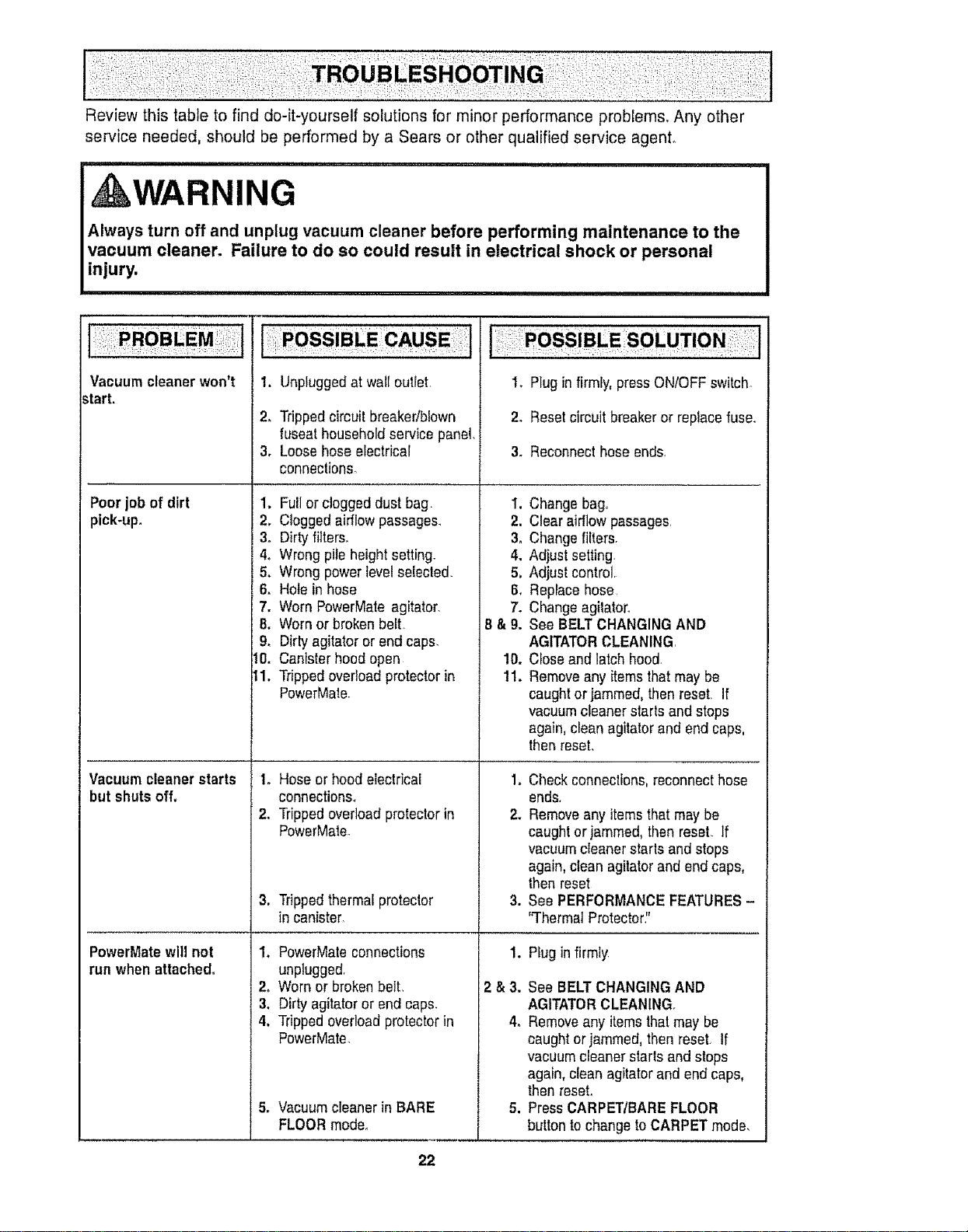
Review this table to find do-it-yourself solutions for minor performance problems. Any other
service needed, should be performed by a Sears or other qualified service agenL
i,, UlUlUlll iii nl nlUlll, i , ii,
A{ WARNING
i,lu'u,nunnnl,, ii i iii i
Always turn off and unplug vacuum cleaner before performing maintenance to the
vacuum cleaner. Failure to do so could result in electrical shock or personal
injury.
Vacuum cleaner won't
start,
Poorjob of dirt
pick.up.
Vacuum cleanerstarts
but shuts off.
PowerMate will not
run when attached,
!, Unpluggedat wat[outiet,
2. Trippedcircuit breakedblown
fuseathousehold service panel.
3. Loosehose electrical
connections.
1. Fujior clogged dust bag
2. Cloggedairflow passages.
3. Dirtyfilters.
4. Wrong pile heightsetting.
5. Wrong power levelselected.
6. Holein hose
7. Worn PowerMate agitator.
8. Worn or broken belt
9. Dirtyagitator or end caps.
I0. Canister hood open
tl. Trippedovedoadprotector in
PowerMale.
to Hose or hood electrical
connections.
2. Trippedoverloadprotector in
PowerMate.
3, Trippedthermal protector
in canister,
1, PowerMateconnections
unplugged,
2, Worn or brokenbelt,
3. Dirty agitator or end caps.
4. Trippedoverload protector in
PowerMate,
5o Vacuum cleaner inBARE
FLOORmode.
=
2.
3.
4.
5,
6.
7.
8&9.
10.
11.
1. Plug infirmly, press ON/OFFswitch_
2. Resetcircuitbreakeror replacefuse.
3. Reconnect hose ends,
Change bag°
Clear airflow passages,
Changefilters.
Adjust setting.
Adjust control,
Replace hose,
Changeagitator.
See BELTCHANGING AND
AGITATORCLEANING
Close and latch hood.
Removeany items thatmaybe
caught or jammed, then reset, If
vacuum cleaner starts and stops
again,clean agitator and end caps,
then reset.
1. Checkconnections,reconnect hose
ends.
2. Removeany itemsthat may be
caught or jammed,then reset If
vacuumcleaner starts and stops
again, clean agitator and end caps,
then reset
3. See PERFORMANCE FEATURES-
'q'hermal Protector,"
1,
2&3.
4,
Plug in firmly
See BELT CHANGINGAND
AGITATORCLEANING,
Removeany items that may be
caught or jammed, then reset, tf
vacuum cleaner starts and stops
again, clean agitator and end caps,
thenreseL
Press CARPET/BARE FLOOR
button to change to CARPET mode,
22
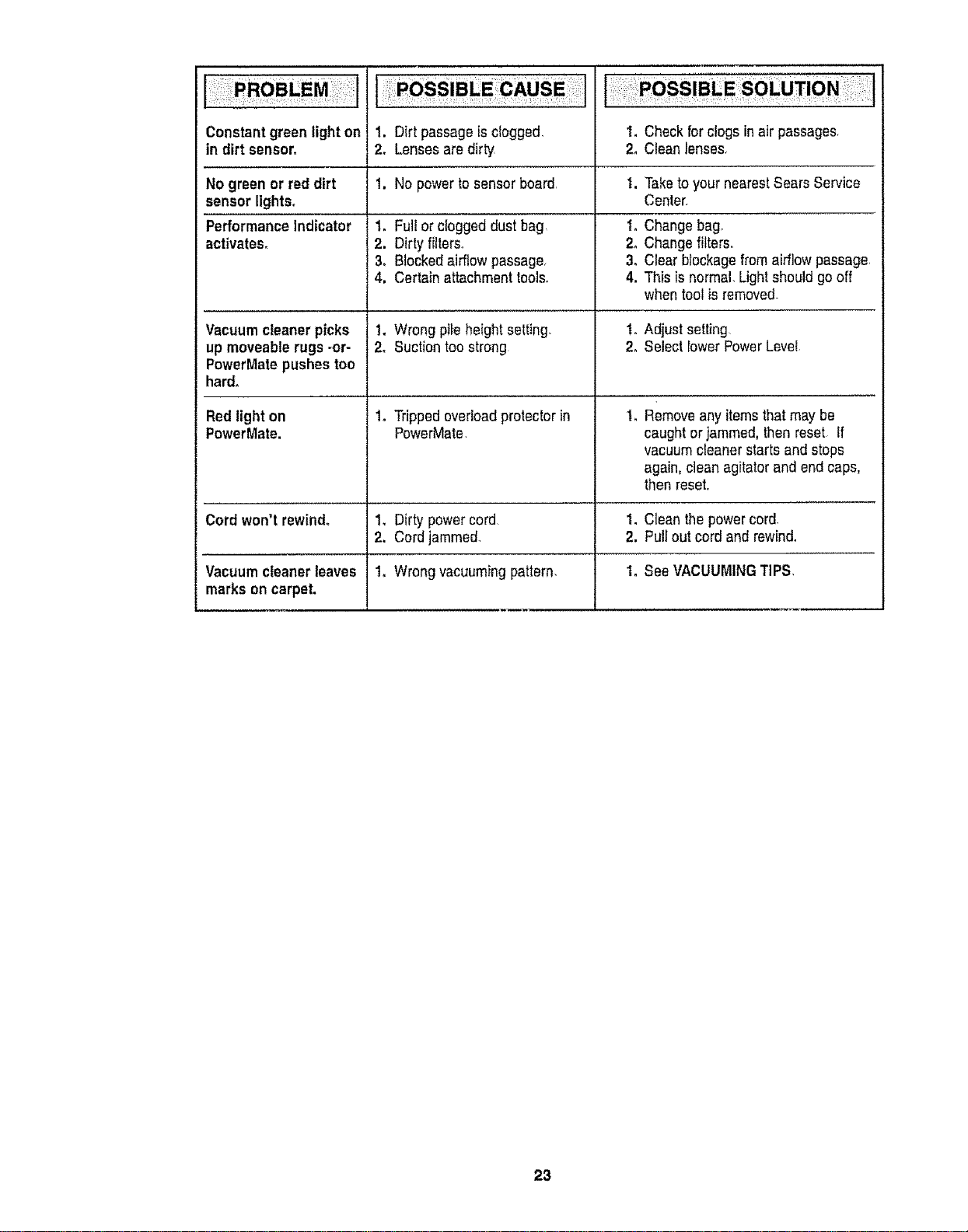
Constantgreenlighton
indirtsensor_
No green or red dirt
sensor lights°
Performance Indicator
activates_
Vacuumcleaner picks
up moveablerugs-or-
PowerMatepushestoo
hard.
Red light on
PowerMate.
Cord won't rewind_
Vacuum cleaner leaves
marks on carpet.
1. Dirt passage isclogged,
2, Lensesare dirty
1. No powerto sensor board,
1. Fullor clogged dust bag
2. Dirty filters°
3o Blockedairflow passage,
4. Certain attachment tools,
1, Wrong pile height setting_
2, Suction too strong
1o Trippedoverloadprotector in
PowerMate
1_ Dirty powercord
2, Cord jammed_
1o Wrong vacuuming pattern,
I. Check forclogs inair passages
2, Clean lenses,
1. Taketo your nearest Sears Service
Center,
1o Change bag,
2o Changefilters,
3. Clear blockagefrom airflow passage,
4. This is normal, Lightshould go off
when tool isremoved.
t, Adjust setting,
2oSelect lowerPowerLevel
Removeany itemsthat may be
caught or jammed,then reset If
vacuumcleaner starts and stops
again,clean agitator and end caps,
then reset.
1. Clean the powercord,
2. Pull out cord and rewind,
I. See VACUUMINGTIPS,
23
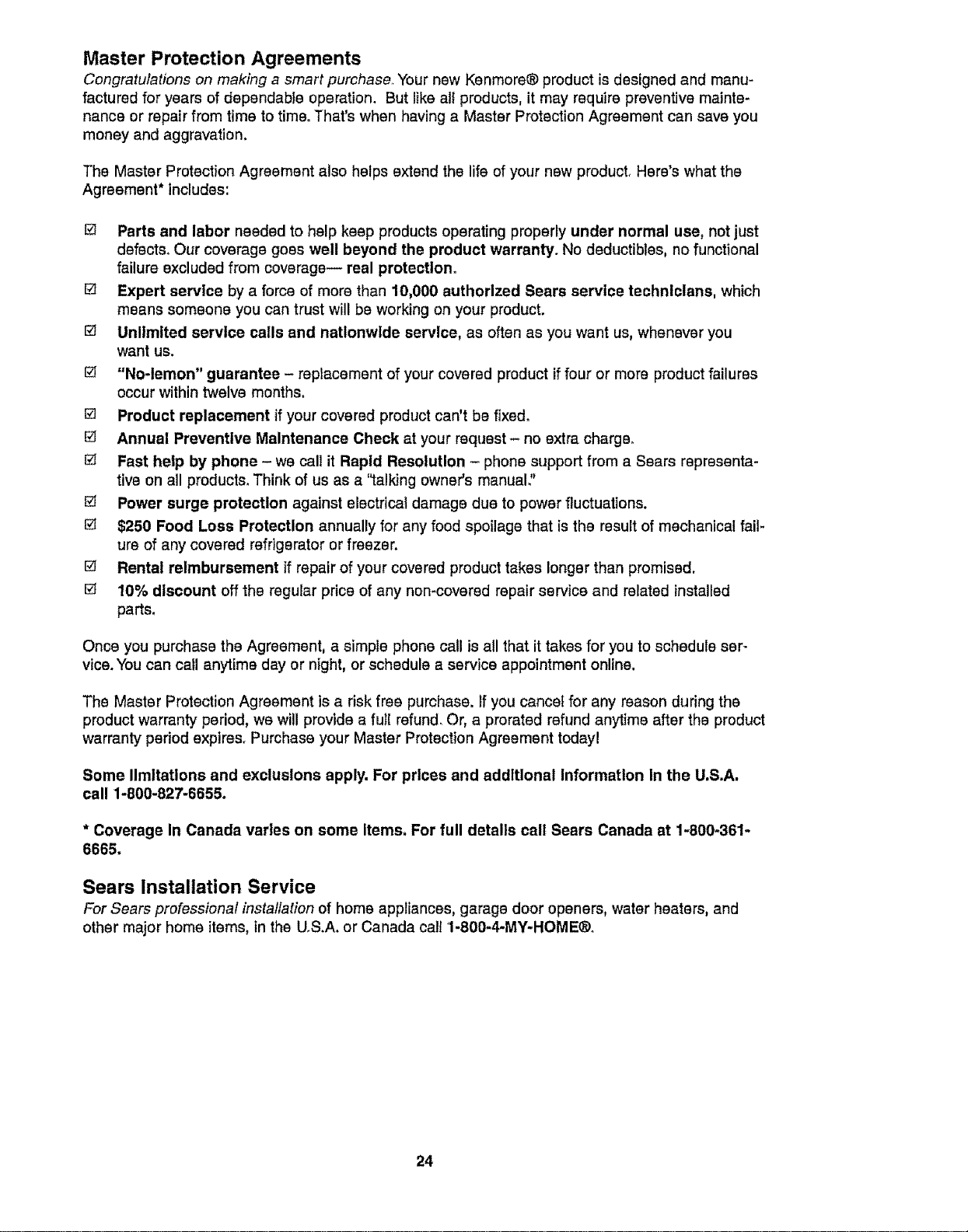
Master Protection Agreements
Congratulations on making a smart purchase Your new Kenmore® product is designed and manu-
factured for years of dependable operation. But like all products, it may require preventive mainte-
nance or repair from time to time. That's when having a Master Protection Agreement can save you
money and aggravation.
The Master Protection Agreement also helps extend the life of your new product. Here's what the
Agreement* includes:
@ Parts and labor needed to help keep products operating properly under normal use, not just
defects. Our coverage goes well beyond the product warranty. No deductibles, no functional
failure excluded from coverage-- real protection.
[] Expert service by a force of more than 10_000 authorized Sears service technicians, which
means someone you can trust will be working on your product.
[] Unlimited service calls and nationwide service, as often as you want us, whenever you
want us.
[] "No-lemon" guarantee - replacement of your covered product iffour or more product failures
occur within twelve months.
[] Product replacement if your covered product can't be fixed.
[] Annual Preventive Maintenance Check at your request- no extra charge.
[] Fast help by phone - we call it Rapid Resolution - phone support from a Sears representa-
tive on all products. Think of us as a '_talkJngowner's manual?
[] Power surge protection against electrical damage due to power fluctuations.
[] $250 Food Loss Protection annually for any food spoilage that is the result of mechanical fail-
ure of any covered refrigerator or freezer.
[] Rental reimbursement if repair of your covered product takes longer than promised.
[] 10% discount off the regular price of any non-covered repair service and related installed
parts.
Once you purchase the Agreement, a simple phone call is all that it takes for you to schedule ser-
vice. You can call anytime day or night, or schedule a service appointment online.
The Master Protection Agreement is a risk free purchase. If you cancel for any reason during the
product warranty period, we will provide a fu}l refund. Or, a prorated refund anytime after the product
warranty period expires. Purchase your Master Protection Agreement today!
Some limitations and exclusions apply. For prices and additional Information in the U.S,A.
call 1-800-827-6655,
* Coverage In Canada vsrles on some Items. For full details call Sears Canada at 1-800-361-
6665,
Sears Installation Service
For Sears professional installation of home appliances, garage door openers, water heaters, and
other major home items, in the U.S.A. or Canada call 1-860-4-MY-HOME®o
24
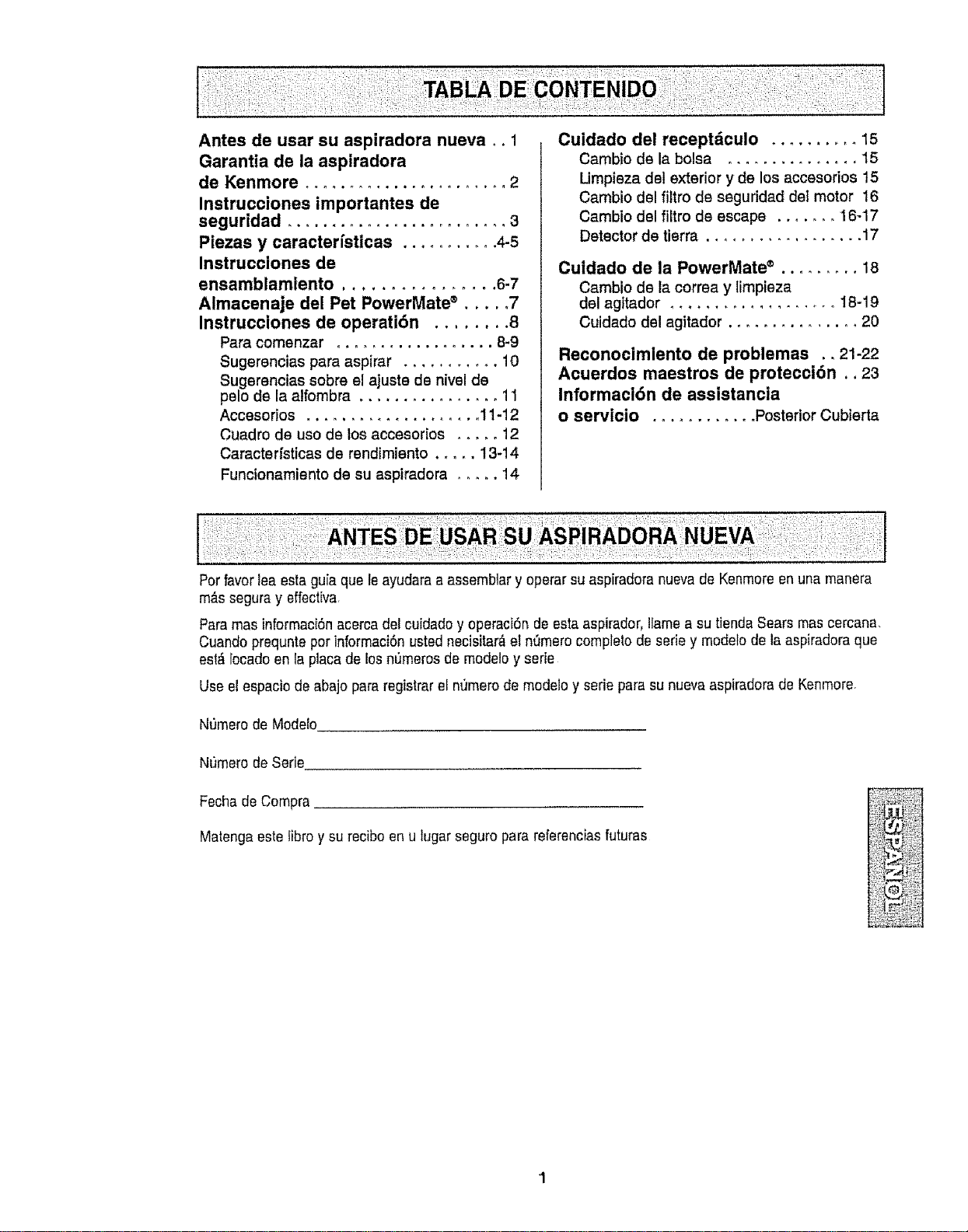
Antes de usar su aspiradora nueva °. 1
Garantia de la aspiradora
de Kenmore ....................... 2
Instrucciones importantes de
seguridad ......................... 3
Piezas y caracter[sticas ........... 4-5
Instrucciones de
ensamblamiento ................ 6-7
Almacenaje del Pet PowerMate ® ..... 7
Instrucciones de operati6n ........ 8
Para comenzar .................. 8-9
Sugerencias para aspirar ........... 10
Sugerencias sobre el ajuste de nivel de
pelo de la alfombra ................ 11
Accesorios .................... 11-12
Cuadro de use de los accesorios ..... 12
Caractedsticas de rendimiento ..... 13-14
Funcionamiento de su aspiradora ..... 14
Cuidado del receptdculo .......... 15
Cambio de la bolsa ............... 15
Umpieza del exterior y de los accesodos 15
Cambio del filtro de seguridad det motor 16
Cambio del filtro de escape ....... 16-17
Detector de tierra .................. 17
Cuidado de la PowerMate ® ......... 18
Cambio de la correa y limpieza
del agitador .................... 18-19
Cuidado del agitador ............... 20
Reconocimlento de problemas ., 21-22
Acuerdos maestros de protecci6n.. 23
informacl6n de assistancia
o servicio ............ PosteriorCubierta
Perfavorlea estaguia que le ayudara a assembtar y operar su aspiradora nuevade Kenmereenuna manera
m_s seguray effectiva,
Paramas informaci6nacerca del cuidadoy operaci6n deestaaspirador, llamea su tienda Sears mas cercana
Cuandoprequnte per informaci6n usted necisitar_el nt_msrocompletede serie y modelode la aspiradora que
est_ locado en la placa de losn_meros de modeloy serie
Use el espacio de abajo para registrar el n_merode modeloy serie parasu nuevaaspiradora de Kenmore.
NtJmerode Modefo
Numero de Serie
Fscha de Compra
Matenga este iibro y su reciboen u lugar seguro para referenciasfuturas
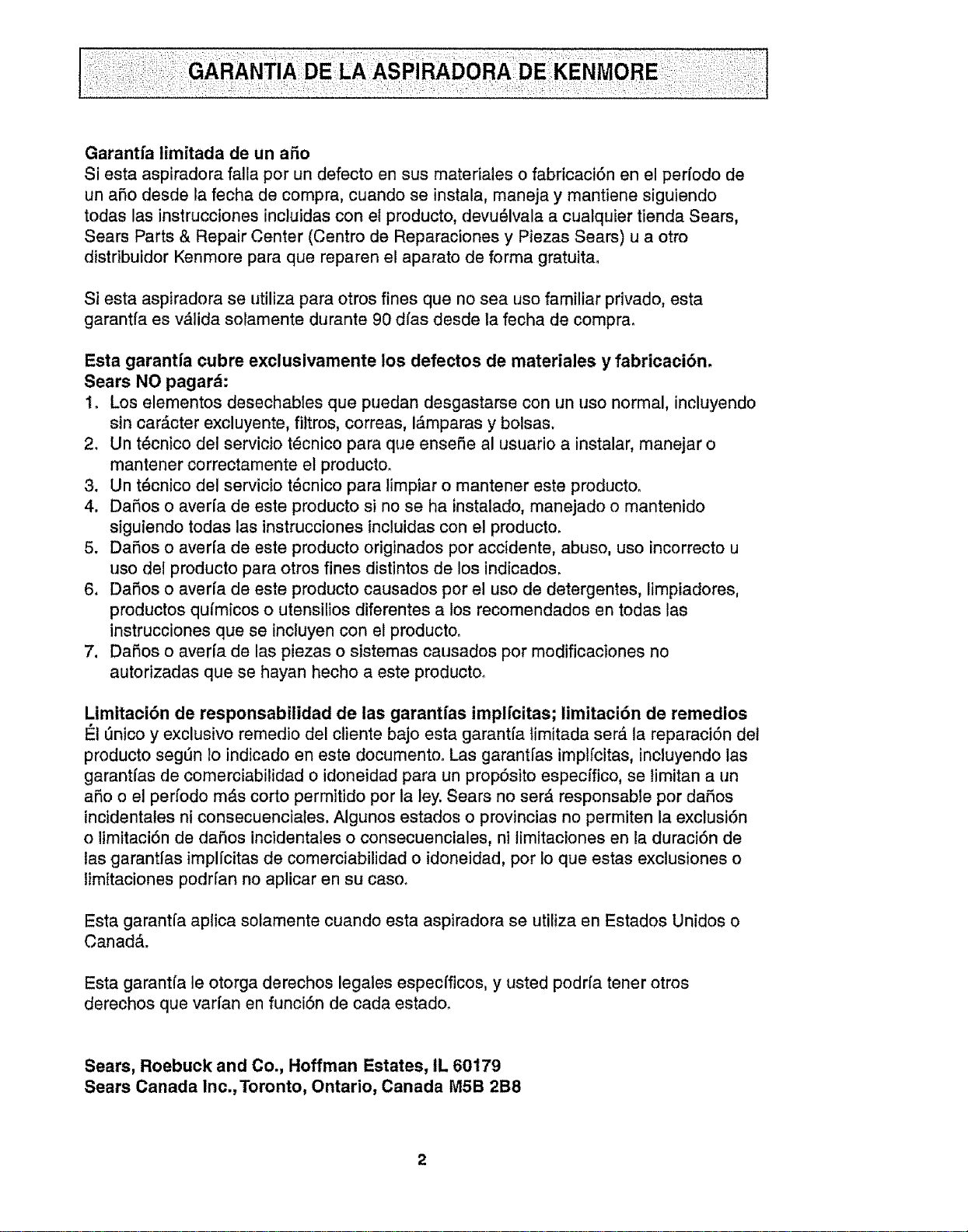
Garantfa limitada de un afio
Si esta aspiradora falla por un defecto en sus materiales o fabricaciSn en el perl'odo de
un aP,o desde la fecha de compra, cuando se instala, maneja y mantiene siguiendo
todas las instrucciones incluidas con el producto, devu_lvala a cualquier tienda Sears,
Sears Parts & Repair Center (Centro de Reparaciones y Piezas Sears) u a otro
distdbuidor Kenmore para que reparen el aparato de forma gratuita,
Si esta aspiradora se utiliza para otros fines que no sea uso familiar privado, esta
garantfa es vAlida solamente durante 90 dfas desde ta fecha de comprao
Esta garantfa cubre exclusivamente los defectos de materiales y fabricaci6n,
Sears NO pagard:
1o Los elementos desechables que puedan desgastarse con un uso normal, incluyendo
sin carActer excluyente, filtros, correas, i_.mparas y bolsas.
2. Un t_cnico del servicio t_cnico para que ensefie al usuario a instalar, manejar o
mantener correctamente el producto_
3. Un t_cnico del servicio t_cnico para timpiar o mantener este producto.
4. DaSos o aver[a de este producto si no se ha instalado, manejado o mantenido
siguiendo todas las instrucciones incluidas con el producto.
5. DaSos o averfa de este producto origtnados por accidente, abuso, uso incorrecto u
uso del producto para otros fines distintos de los indicados.
6. DaSos o aver[a de este producto causados por e! uso de detergentes, limpiadores,
productos qufmicos o utensilios diferentes a los recomendados en todas las
instrucciones que se incluyen con el producto.
7. DaSos o averfa de las piezas o sistemas causados por modificaciones no
autorizadas que se hayan hecho a este producto.
Limitaci6n de responsabilidad de las garantfas implfcitas; limitaci6n de remedios
#-IL_nicoy exclusive remedio del cliente bajo esta garantfa timitada serA la reparaci_n del
producto segt'm lo indicado en este documento. Las garant[as implfcitas, incluyendo las
garant[as de comerciabilidad o idoneidad para un propSsito especffico, se limitan a un
aSo o el perfodo m&s corto permitido por la ley. Sears no serA responsable por daSos
incidentales ni consecuencia{es, Algunos estados o provincias no permiten la exclusi6n
o limitaciSn de daSos incidentales o consecuenciales, ni timitaciones en la duraci6n de
las garantfas implfcitas de comerciabilidad o idoneidad, por Io que estas exctusiones o
limitaciones podrfan no aplicar en su caso_
Esta garantfa aplica solamente cuando esta aspiradora se utiiiza en Estados Unidos o
CanadA.
Esta garant(a le otorga derechos legales especfficos, y usted podrfa tener otros
derechos que vari'an en funciSn de cada estado.
Sears, Roebuck and Co., Hoffman Estates, IL 60179
Sears Canada Inc.,Toronto, Ontario, Canada M5B 2B8
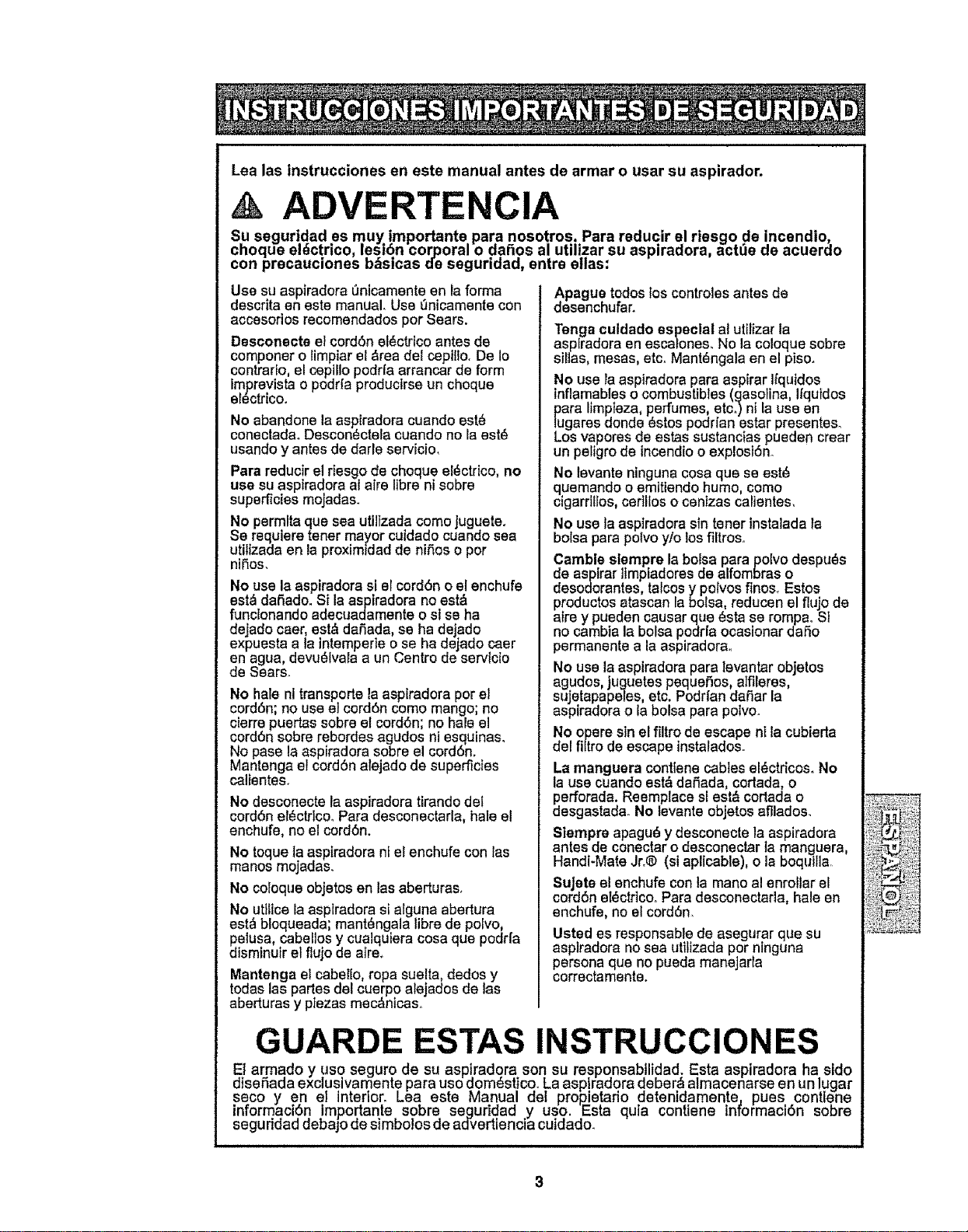
Lea las instrucciones en este manual antes de armar o usar su aspirador,
ADVERTENCIA
Su segurtdad es muy !mportante. para nosot.ros. Para reducir el riesgo de !ncendio,.
cnoque erect.rico, Lesion cor_ora= o aanos a! uulizar su asp=raaora, act_e ae acuerao
con precauclones Dasicas ue segurlaaa, entre elias:
Use su aspiradora 0ntcamente en la farina
descrita en este manual. Use 0nicamente con
accesorios recomendados per Sears.
Desconecte elcordSn el_ctrtco antes de
componero limpiar el _rea del ceptllo. De 1o
contrarEo,el ceptllo podrfa arrancar de form
imprevistao podrla producirse un cheque
el_ctdcoo
No abandone laaspiradora cuando est8
conectada°Descon_ctela cuando no la est@
usando y antes de darle servicio,
Para reducir el r}esgo de cheque el_ctrico, no
use su aspiradera al aire libra ni sabre
superficies mojadas.
No permftaque sea utiJtzadacome jugueteo
Se requiere tener mayor cuidado cuando sea
utilizada en laproximldad de niSes o per
niSos,
No use laaspiradora si ercord6n o el enchufe
est_ datfado. Si la aspiradora no est_
functonando adecuadamente o s_se ha
dejado caer, est,, daSada,se ha dejado
expuesta a ta intemperie o se ha dejado caer
en agua, devu_tvala a un Centre de servicio
de Sears°
No haleni transporte laasptradora per el
cord6n; no use el cord6n come mango; no
cierre puertassabre et cerd6n; no hale el
cord6n sabrerebordes agudos nt esquinas.
No pase la aspiradora sabre el cord6n.
Mantenga el cordSn atejado de superficies
calEentes.
No desconecte la aspiradora tirando del
cordbn el_ctrlco_Para desconectarla, hale el
enchufe, no el cordbn.
No toque laaspiradora nt el enchufe con las
manes mojadas.
No coloque objetos en las aberturas,
No utllice la asptradora si alguna abertura
est_ bloqueada; mant_ngala libre de polvo,
petusa, cabeflosy cualquiera cosaque podrfa
disminutr el flujo de atre_
Mantenga et cabetlo, ropa suelta, dedos y
todas las partes del cuerpo alejados de Ias
aberturas y pfezas mec&ntcaso
Apague todos los controlesantesde
desenchufar.
"renga culdado especial at utilizar la
aspfradora en escalones. No la coloque sabre
sillas, mesas, etc° Mant_ngala en el piso.
No use Faaspiradora para aspirar Ifquidos
lnflamables o combustibles (gasolina, Ifquidos
para limpleza, perfumes,etc_)nt la use en
lugares donde 8stos podrfan estar presenteso
Los vapores de estas sustanctas pueden crear
un peligrode incendio oexplosi6no
No tevante ninguna cosa que se est_
quemando o emlttendo humo, come
cigarrtllos, certllos o cenizas calientes.
No use la aspiradora sin tener tnstaladata
balsa parapotvo ylo los filtroso
Curable sternpre la balsa para polvo despu_s
de aspirar ltmpiadores de alfombras o
desodorantes, talcos y pelves finos. Estos
productos atascan la bofsa, reducen el flujo de
atrey puedencausar qua _sta se rompaoSI
no cambia la balsa podr[a ocasionar daSo
permanente a laaspiradorao
No use la aspiradora para tevantar objetos
agudos, juguetes pequeSos,atfileres,
sujetapapeles, etc. Podri'andaSar la
aspiradora o la balsa para polvoo
No opere sin el filtro de escape ni Iacubierta
del filtro de escape instatados.
La manguera conttene cables el_ctricos. No
la use cuando est&dafiada, cortada, o
perforada. Reemplace sl est_ cortada o
desgastada. No levante objetos afllados.
Slempre apagu_ y desconecte la aspiradora
antes de conectar o desconeclar la manguera
Handi-Mate Jr_®(si aplicable), o la boqui la,
SuJeteel enchufe con la mane a! enrollar el
cerdbn eI_ctrtCOoPara desconectarla, hale en
enchufe, no el cord6n
Usted es responsable de asegurar que su
asptradora no sea uttltzada per nlnguna
persona qua no pueda manejarla
ccrrectamente.
GUARDE ESTAS INSTRUCCIONES
dE_sarmadoy use segur,o de su asp!radora son su responsabilidad; Esta aspiradora ha.side
enaaa excluswameme para use oomem}co_Laasplra.aora qepera, almac.enarse en un lugar
seco yen el tmenor. Lea es_e Manual ael propie_rio ameniaament% pues contlene
inrormacion Imponame sabre seguriaaa .y use. _sta quia conttene mrormaciSn sabre
segu noao oeDajo ae s_mDoJosae aavertlenc_a cuiaaao.
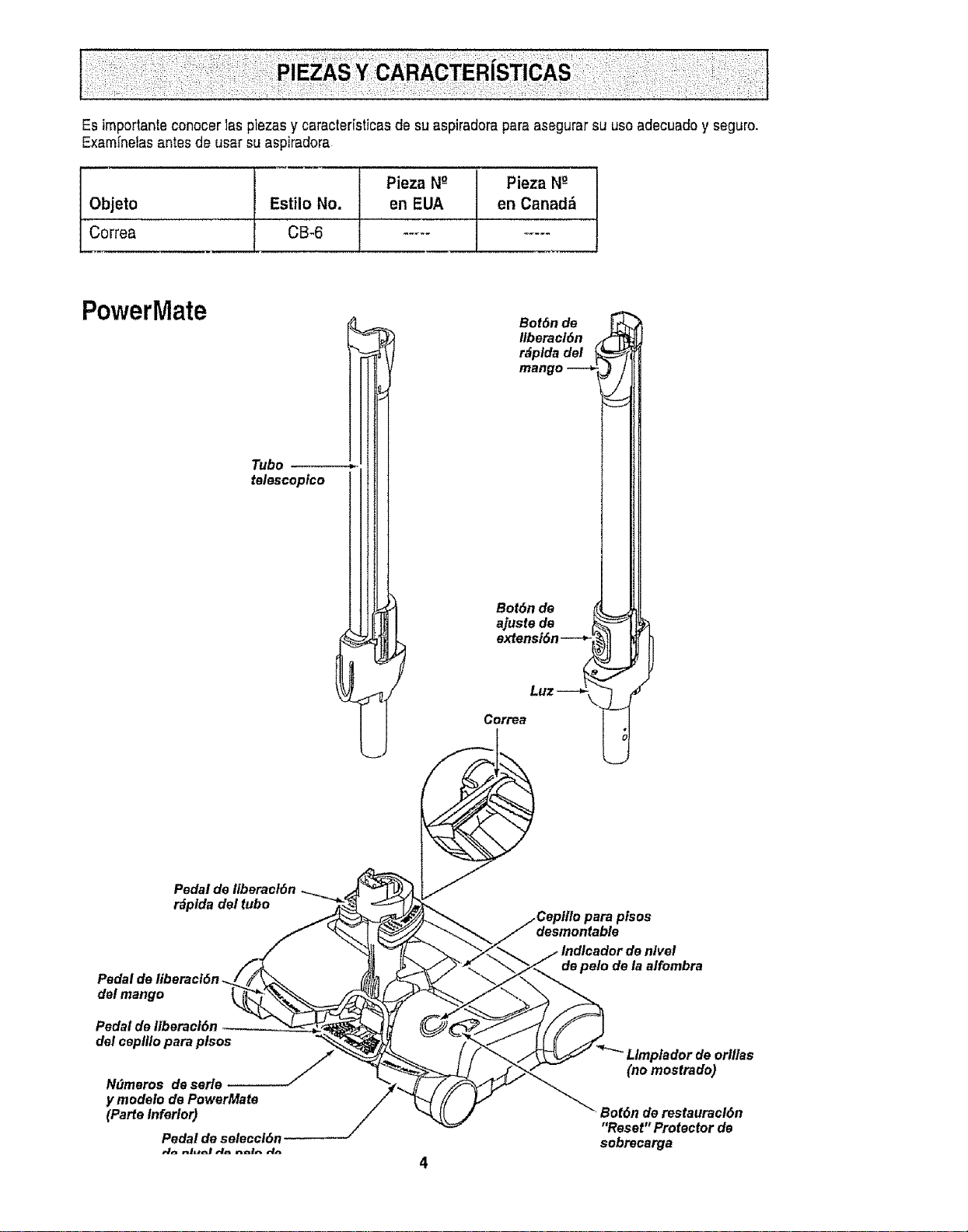
Es importante conocer 1aspiezas y caracter[sticas de su aspiradora para asegurar su use adecuado y seguro.
Exam_nelas antes de usar su aspiradora
Pieza Ng Pieza N_-
Objeto Estilo No, en EUA en Canad_
Correa CB-6 ..........
PowerMate
Tube
telescopico
Pedal de Ilberacl6n
r_plda del tube
Pedal de liberaci6n
del mange
Pedal de Ilberacf6n
del ceplllo para plsos
/
Ndmeres de eerie
y modefo de PowerMate
(ParteInferler)
Pedal de selecci6n
Bet6n de
Itberacl6n
r_plda del
mango
Bet6n de
ajuste de
extensi6n---**
LLIZ --4
Correa
I
desmentabte
de pale de la aifombra
LImptador de erlltas
(no mestrado)
Bet6n de restauracl6n
"Reset" Protector de
sebrecarga
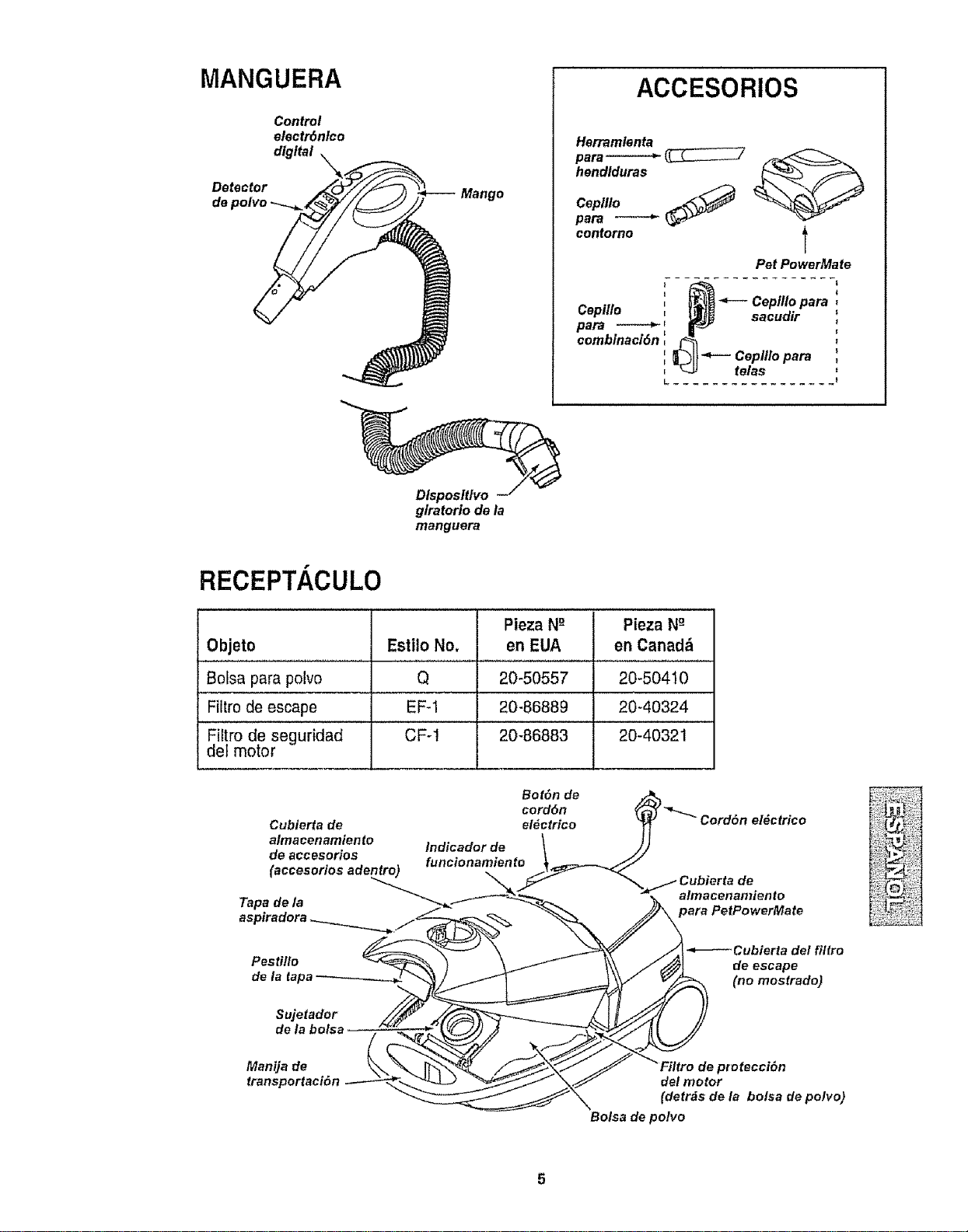
MANGUERA
Control
electr6nlco
digital
Detector Mango
de polvo
ACCESORIOS
Herramlenta
para------"_ __7
hendtduras
Ceplllo _._
para
contorno l
Pet PowerMate
' _ Cepfllo para :
• i
paraCeplHo_ ," _ sacudir ,"
combtnacidn ,, 4-- Ceplllo para '
E
, _.9 telas =
L ................. t
Dispositlvo
g/ratorio de ta
manguera
RECEPT.i CULO
Pieza N-° Pieza N_-
Objeto Estilo No, en EUA en Canada1
Bolsa para polvo Q 20-50557 20_50410
Fiitro deescape EF-1 20-86889 20-40324
Fiitro de seguridad CF-1 20-86883 20-40321
del motor
Bot6n de
cord6n
Cubierta de el_ctrico
almacenamiento
Indicador de
de accesorios funcionamiento
(accesorios adentro)
Tapa de la
Pes ti!lo
de la tapa
Sujetador
de la bolsa
Manija de
transportaci6n
atmacenamien to
para PetPowerMate
Cubierta del filtro
de escape
(no mostrado)
protecci(_n
del motor
(detrds de la bolsa de polvo)
Bolsa de polvo
i ,#_ Perfavorponga especialatenciOna _stos recuadroscon alerta de riesgo.Advertencla:Este I
I
informaciOnle alertar_del petigrode fuego, cheques etectricos,quemadasy tesionesoCuidado:
I
Este informaciOnle alertarade peligroscome lesiones y daOosde propiedad
I ADVERTENCIA
Peligro de cheque el_ctrico
No conecte laaspiradora hastaque termine de
armarla, De Io contrario podda causar un
cheque el_ctrico o lesion corporal
i
Antes de armar la aspiradora,chequee la LISTA
DE EMBALAJE en tacubierta separada de la
Lista de Partes pare RepareciOn. Use esta lisle
pare verificar que ha recibidolodes las compo-
nentes de su nuevaaspiradoraKenmore,
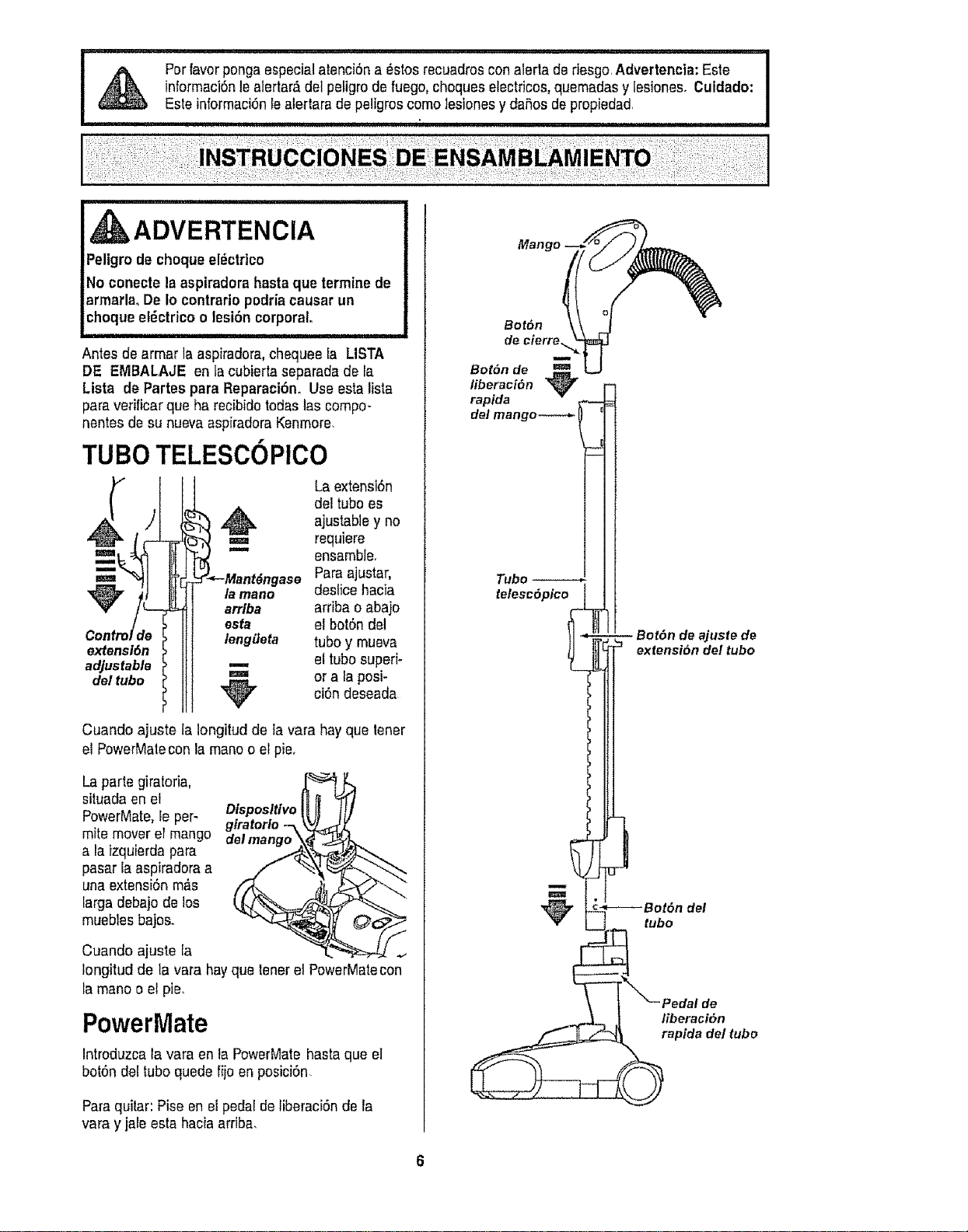
TUBe TELESCOPlCO
extension
adjustable
del tube
La extension
del tubees
,,_ ajustabley no
=== requiere
=" ensamble.
Para ajustar,
la mane deslice hacia
arrlba arriba o aba}o
esta el botOndel
lengiJeta tube y mueva
el tube superi-
=== or ala posi-
"_ ciOndeseada
Cuando ajuste la Iongitud de la vara hay que tenet
el PowerMalecon la maneo el pie,
La parle giratoria,
situada en el
PowerMate,le per-
mite mover el mango
ala izquierdapara
pasar laaspiradoraa
una extension m_s
large debajo de los
muebles bajos.
Olsposftlvo
giratorio
Cuando ajuste fa
Iongitud de la vara hayque tenerel PowerMatecon
la mane o el pie,
PowerMate
Introduzca la vara en ta PowerMatehasta que e]
botOndeetube quede fijo enposici0n
Paraquitar: Pise en el pedal de liberaciOnde la
vara y jaie esta hacia arriba,
Tube
tetescOpico
_juste de
extensibn del tube
tube
liberaciOn
raplda del tube
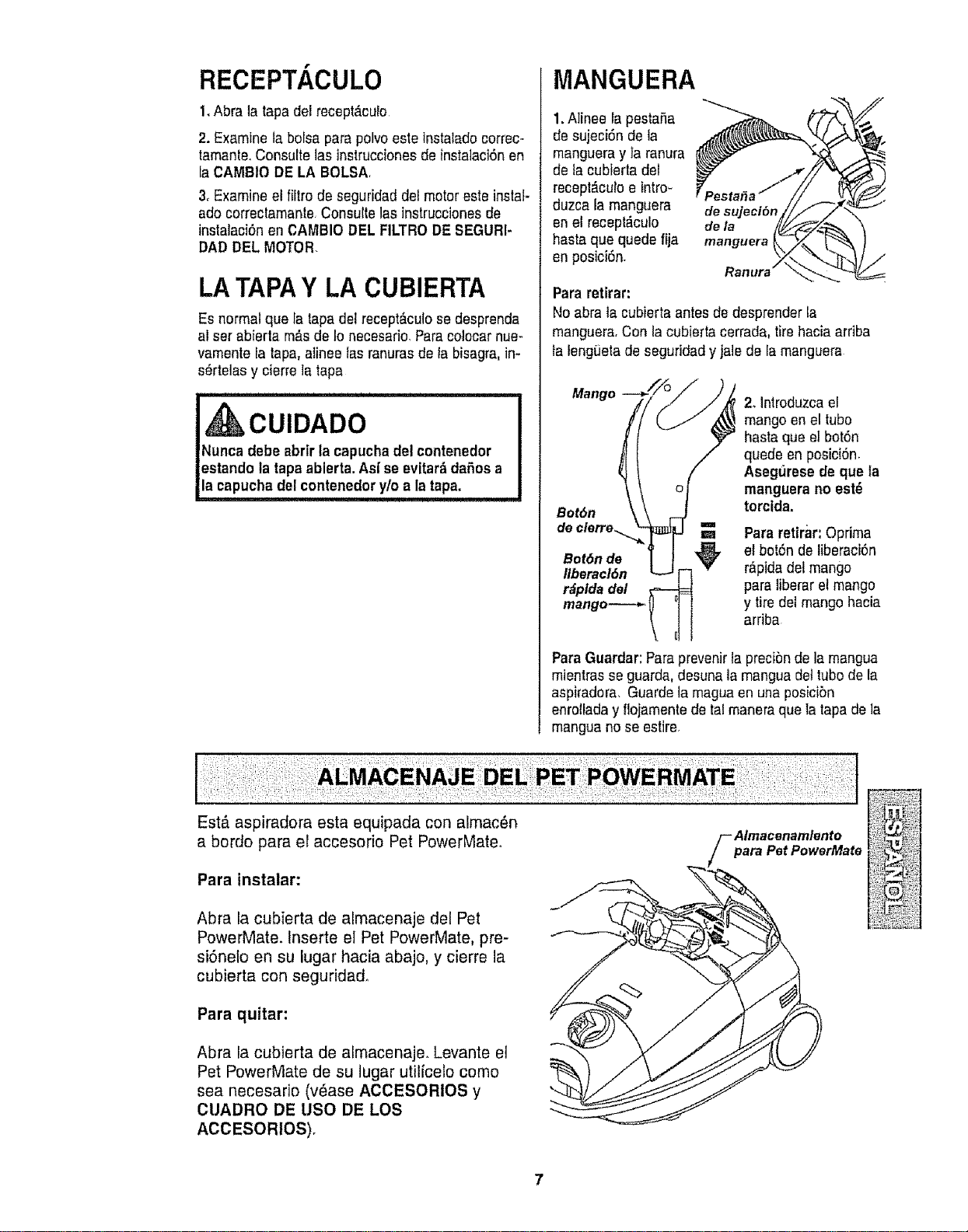
RECEPT, CULO
1.Abra la tapa del recept_culo
2. Examine la bolsa para polvo este instalado correc-
tamanteoConsuttelas instruccionesde instalaci6nen
[aCAMBIO DE LA BOLSA
3, Examine el filtro de seguridad de!motor este instal-
ado correclamante,Consulte las instruccionesde
instalaci6n en CAI_BIO DEL FILTRODE SEGURI-
DAD DEL MOTOR.
LATAPAY LA CUBIERTA
Es normal qua la tapadel recept_,culose desprenda
al set abierta rn&sde 1onecesafio. Faracolocar nue-
vamente Fatapa, alinee las ranurasde la bisagra, in-
s_rtelas y cierre la tapa
,,,,,,,, ,,,,,, ,, ,,,,, ,, ,,,, ,, ,, ,, , , ,
I, CU'DADO
!Nunca debe abrlr tacapucha del contenedor
lestando la tapaablerta. As[ se evitar& dafos a
[/a capuchade! contenedory/o a la tapa.
MANGUERA
1.Alinee rapestaRa
de sujeci6n de la
mangueray ta ranura
de tacubierta del
recept_culo e intro-
duzca la manguera
en el recept_culo
hasta qua quede fija
enposici6n.
Para retirar:
manguera L_/Z_,.(_
No abra ta eubierta antes de desprender ia
manguera,Con la cubierta cerrada, tirehacia arfiba
la leng0eta de seguridady jale de la manguera
Mango
Bot6n
de cterre._. ==
Bot6n de
Ilberacl6n
r_plda del
mango----*,:
2. lntroduzca el
mango en el tubo
hasta que el bot6n
quede en posici6n,
Asegfirese de que la
manguera no est6
torctda.
Para retirar:Optima
et bot6nde liberaci6n
r_pida del mango
parafiberarel mango
y tire del mango hacia
arriba
Para Guardar:Paraprevenir la precibnde la mangua
mientras se guarda,desuna lamangua dettubode la
aspiradora, Guards ia magua en una pos[cibn
enrollada y flojamente de tal maneraqua ]a tapa de la
mangua no se estire.
Est,. aspiradora esta equipada con almac_n
a bordo para el accesorio Pet PowerMateo
Para instalar:
Abra la cubierta de almacenaje del Pet
PowerMate. Inserte ei Pet PowerMate, pre-
si6nelo en su lugar hacia abajo, y cierre la
cubierta con seguridad_
Para quitar:
Abra la cubierta de almacenaje. Levante e]
Pet PowerMate de su lugar utilfcelo como
sea necesafio (v6ase ACOESORIOS y
CUADRO DE USO DE LOS
ACCESORIOS).
fAImacenamlento
para Pet PowerMate
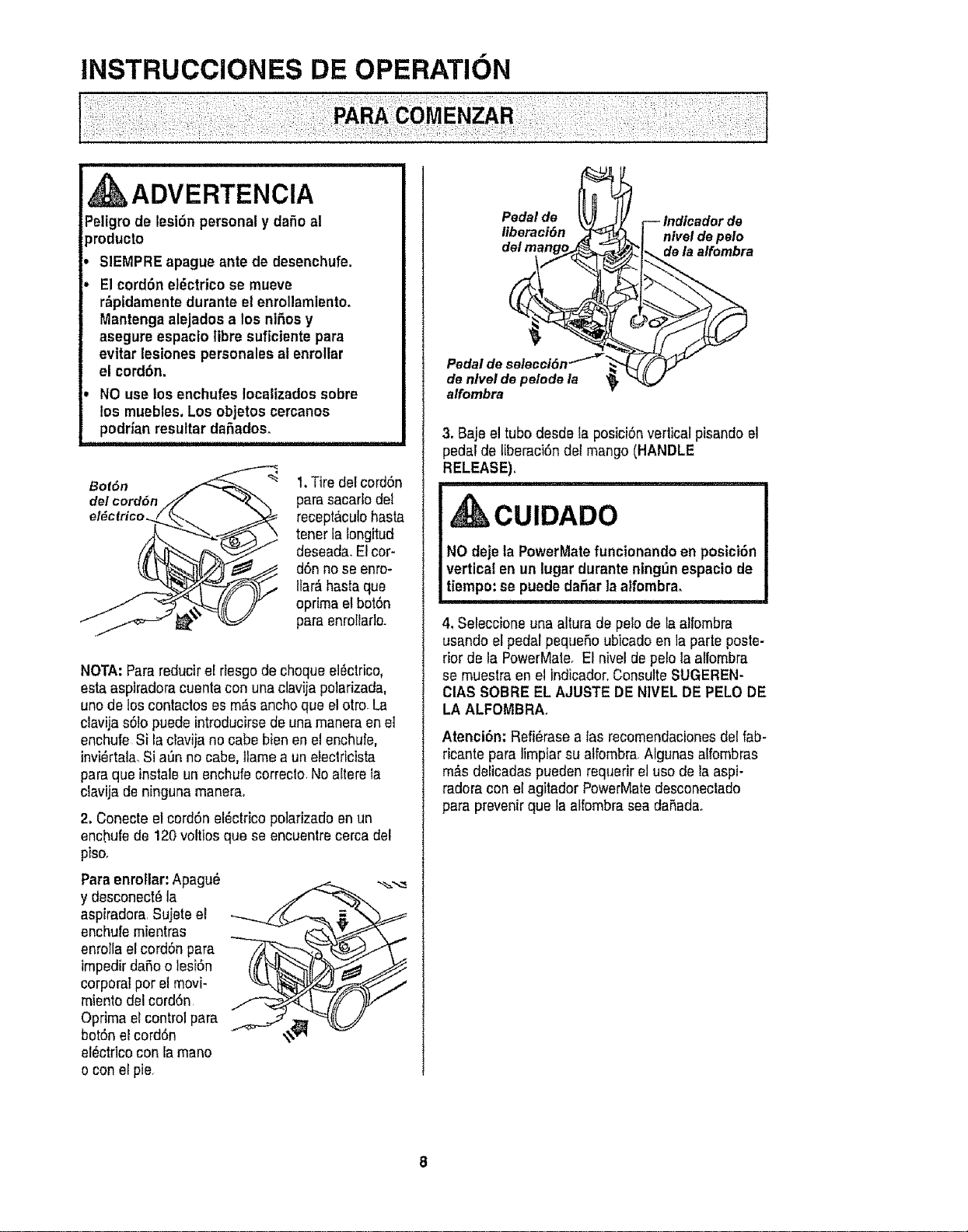
INSTRUCCIONES DE OPERATION
, ADVERTENCIA
Peligrode lesi6n personaly daSo al
_roducto
SIEMPRE apague ante de desenchufe.
E1cord6n eldctrico se mueve
r_pidamentedurante el enrollamiento.
Mantenga alejados a los nines y
asegure espacio libre suficiente para
evitar lesiones personalesal enrollar
el cord6n.
NO use los enchufes locatizadossobre
los muebles. Los objetos cercanos
podrian resultar da_ados_
Bot6n
del cord6n
el_cfrico.
1.Tire del cord6n
para sacarlo det
recept&culohasta
tener lafongitud
deseada. Elcor-
d6n no se enro-
llar_ hasta que
oprima el bot6n
paraenro_larle.
NOTA:Para reducirel riesgode chequeei_ctrico,
estaasptradora cuenta con una clavija polafizada,
uno de los contactos es m_.sanchoque el otro_La
clavija s6lo puede introducirsede una maneraen e]
enchufe Si laclavija no cabe bien en el enchufe,
invi_rtala,Si a0n no cabe, llame a un eiecldcista
para que instaleunenchufe correclo.Noaltere la
clavija de ninguna manerao
2, Conecte el cord6n el_ctdco polarizado en un
enchufe de !20 voltios que se encuentre cerca del
piso.
Para enroflar:Apagu_
y desconect_la
aspiradora.Sujeteel
enchufe mientras
enrotlael cord6n para
impedirdafio o lesi6n
corporalper elmovi-
miento del cord6n
Optima el control para
bot6nel cord6n
el_ctricocon la mane
o con el pie
Pedal de Indicador de
Itberaci6n nivel de pelo
de la alfombra
Pedal de
de nlvel de pelode la
alfombra
3, Baje el tube desde fa posici6n verticalpisando el
pedal de tiberaci6n del mango(HANDLE
RELEASE),
CUIDADO
NO deje la PowerMatefuncionando en posici6n
vertical en un lugar durante ning_n espaciode
tiempo:se puededaSar laalfombra.
4, Seleccione una altura de pelo de la alfombra
usando el pedal peque5o ubicadoen la parte poste-
rior de la PowerMate, Et nivelde pelo la aflombra
se muestra en el indicador.Consulte SUGEREN-
CIAS SOBRE EL AJUSTE DENIVEL DE PELO DE
LA ALFOMBRA_
Atenci6n: Refi_rasea las recomendacionesdel fab-
ricante para]impiarsu atfombra.Algunas alfombras
m_s delicadas pueden requerir el use de la aspi-
radora con el agftador PowerMatedesconectado
para prevenirque la alfombra sea daSada_
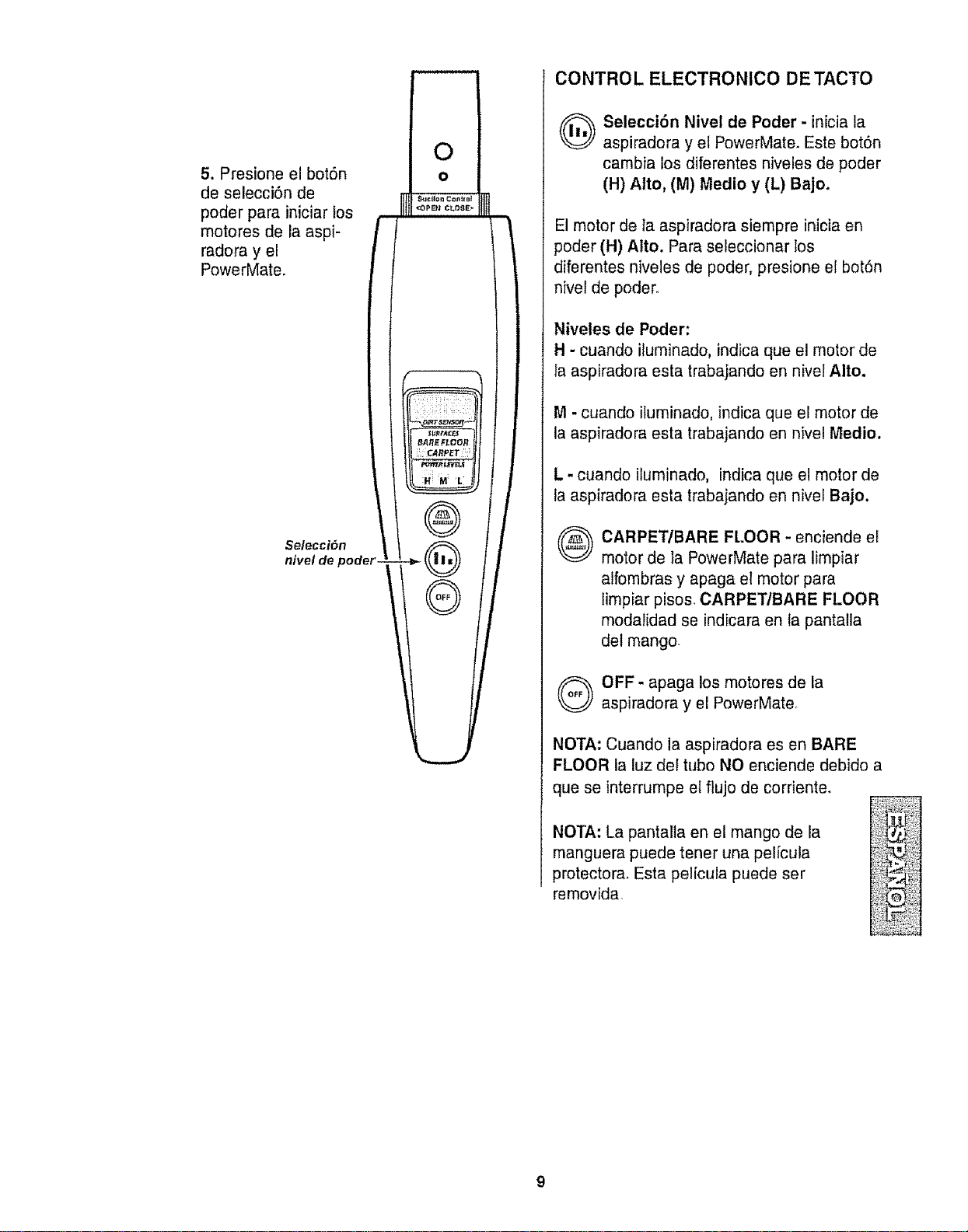
5. Presione el bot6n
de selecciSn de
poder para iniciar tos
motores de la aspi-
radora y el
PowerMate.
Selecci_n
nivel de poder
CONTROL ELECTRONICO DE TACTO
O eleccibn Nivel de Poder - inicia la
aspiradora y el PowerMate. Este bot6n
cambia los diferentes niveles de poder
(H) Alto, (M) Medio y (L) Bajo.
El motor de la aspiradora siempre inicia en
poder (H) Alto. Para seleccionar los
diferentes niveles de poder, presione el bot6n
nivel de poder.
Niveles de Poder:
H - cuando iluminado, indica que e! motor de
la aspiradora esta trabajando en nivel Alto.
M - cuando iluminado, indica que el motor de
la aspiradora esta trabajando en nivel Medio.
L- cuando iluminado, indica que el motor de
la aspiradora estatrabajando en nivei Bajo.
®
CARPET/BARE FLOOR - enciende el
motor de la PowerMate para limpiar
alfombras y apaga el motor para
limpiar pisos_ CARPET/BARE FLOOR
modalidad se indicara en Ia pantalla
del mango.
Q FF - apaga los motores de la
aspiradora y el PowerMate
NOTA: Cuando la aspiradora es en BARE
FLOOR la luz del tubo NO enciende debido
que se interrurnpe el flujo de corriente_
NOTA: La pantalta en el mango de la
manguera puede tenet una pel[cula
protectora. Esta pel[cula puede ser
removida
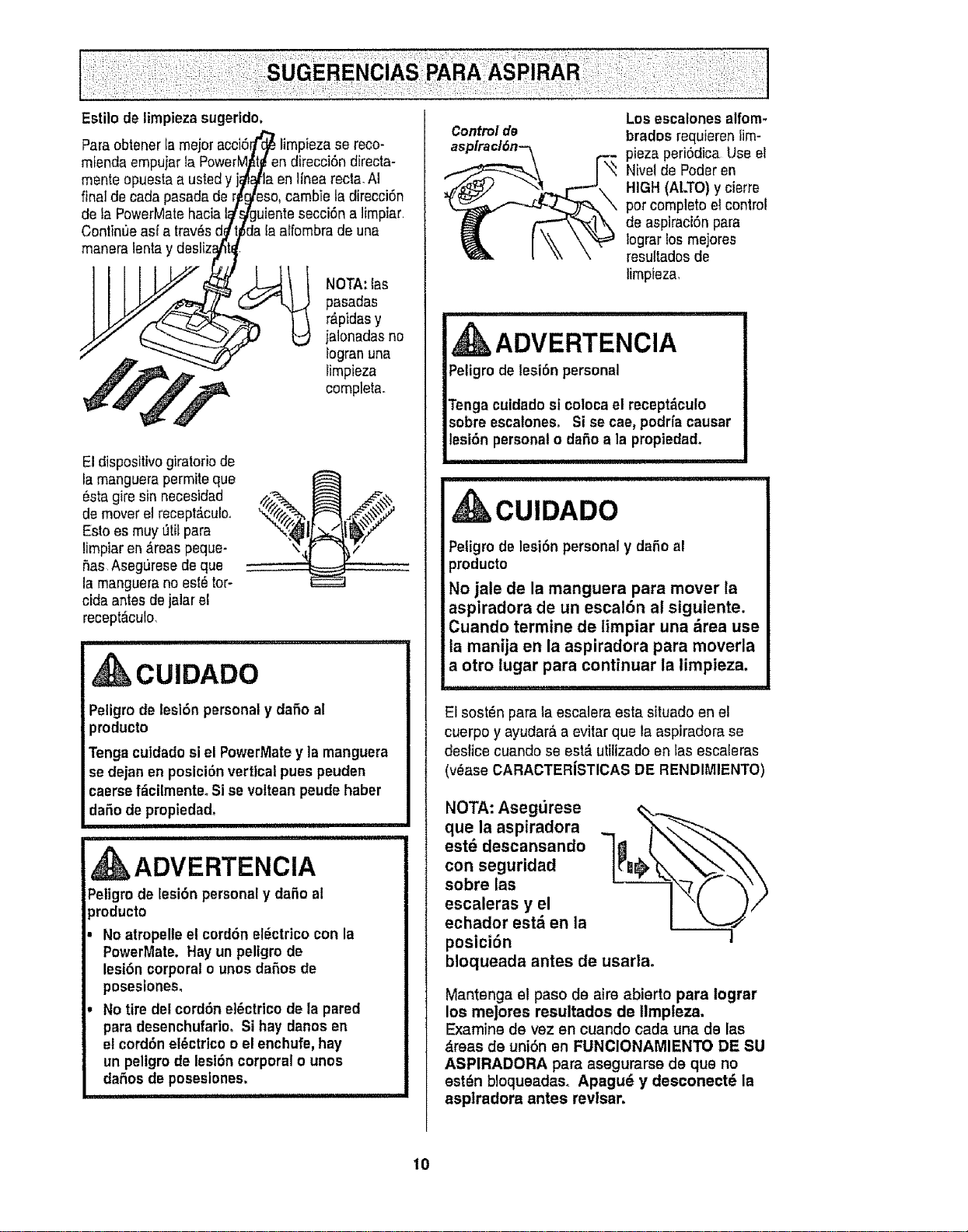
Estilo de limpiezasugerido.
Controlde
Para obtener tamejoracci6rfCc_limpieza se reco-
mienda empujarla PowerM_t_endirecci6n directa-
mente opuesta a ustedy j_/t_la en linea recta,AI
final de cada pasadade r_eso, cambie la direcci6n
de la PowerMatehacial_'guiente secci6n a limpiar,
Continue as[ a trav_sd,_t_da la attombrade una
manara Isntay desliz_l/_t_.
pasadas
_" .=_ _""--_,._ fogranuna
,_t'_ ,_ -----,,.s limpieza
El dispositivogiratorio de
la manguerapermits que
_sta gire sin necesidad
de mover el recept_cuic,
Esto es muy L_tilpara
limpiaren &reaspeque-
5as Aseguresede que
la manguerano est_ tor-
cida antesdejalar e!
recept_culo
CUIDADO
Peligro de lesi6n personaly dafio al
producto
Tenga cutdadosi el PowerMatey la manguera
se dejan en posici6nvertical puss peuden
caersef_cilmenteo Si se voltean peude haber
dafiode propiedad.
ADVERTENCIA
Peligro de lesi6n personaly daSo al
_roducto
No atropelleel cord6n el_ctrico con la
PowerMate. Hay un peligro do
lesi6n corporal o unos daSos de
posesiones,
No tire del cord6n el6ctrico de la pared
para desenchufarioo Si hay danos en
el cord6n el_ctrico o el enchufe, hay
un peligro de lesi6n corporal o unos
dafios de poseslones.
i iiiiiiiiii i i ,111 i1,111111,1,111,1
Los escalones alfom-
brados requieren lira-
plaza peri6dica Use el
Nivelde Poderen
HIGH (ALTO)y cierre
por compieto el control
de aspiraci6n para
iograr los mejores
resu_tadosde
timpieza,
ADVERTENCIA
CUIDADO
Petigrode lesibn personal y dafio al
producto
No jale de la manguera para mover la
aspiradora de un escal6n al siguiente.
Cuando termine de limpiar una &rea use
la manija en la aspiradora para moverla
a otro lugar para continuar la limpieza,
El sost_n para ta escalera esta situado en el
cuerpo y ayudar& a evitar qua la aspiradora se
deslice cuando se est& utilizado en las escaferas
(v_ase CARACTERiSTICAS DE RENDIMIENTO)
NOTA: Asegt_rese
que la aspiradora
est_ descansando
con seguridad
sobre las
escaleras y el
echador est_ en la
posici6n
bloqueada antes de usarla.
Mantenga el paso de airs abierte para logrer
los mejores resultados de llmpteza.
Examine de vez en cuando cada una de las
&reas de uni6n en FUNClONAMIENTO DE SU
ASPIRADORA para asegurarse de qua no
est_n bloqueadas_ Apagu_ y desconectd la
asplradora antes revlsar,
10
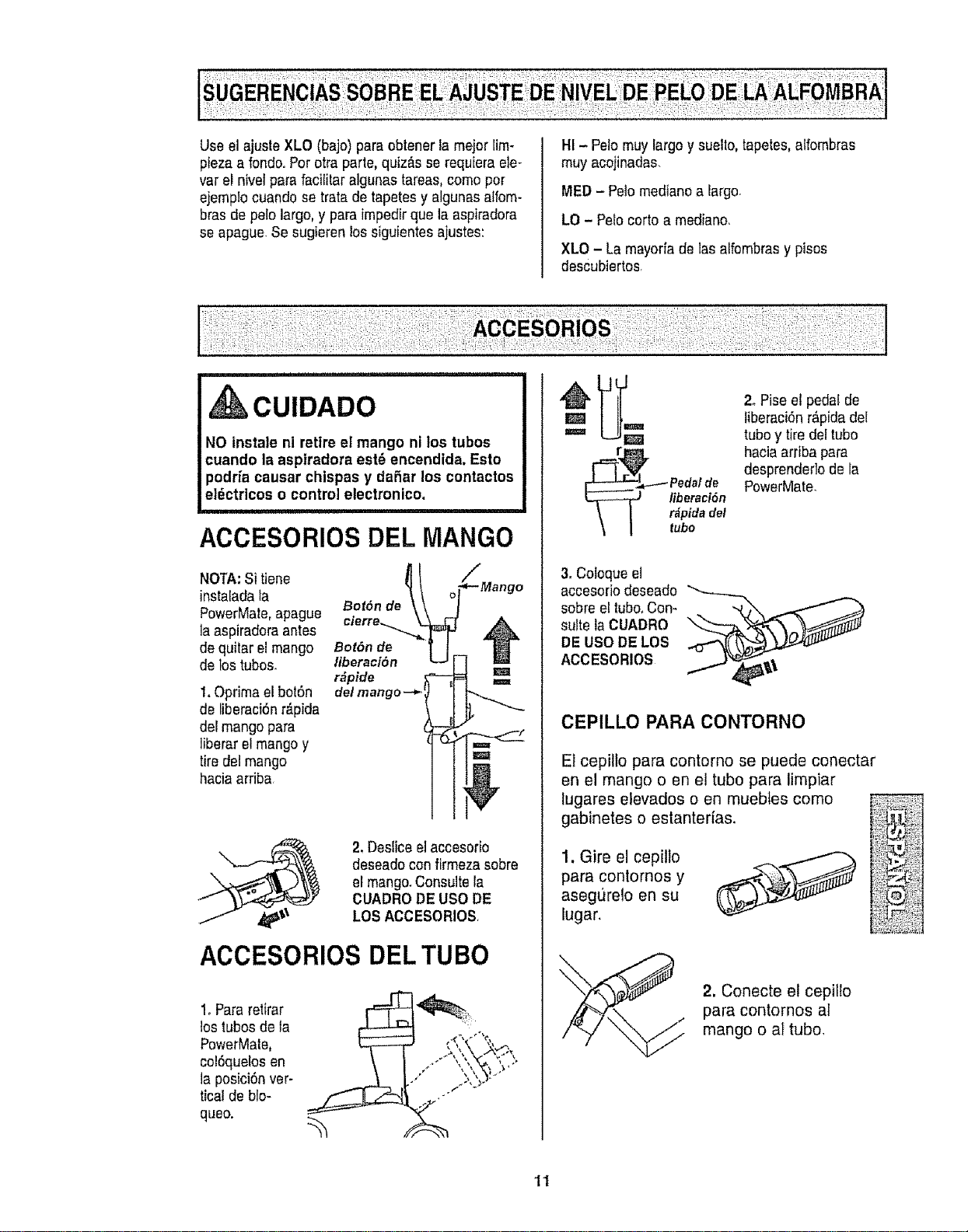
UseelajusteXLO(bajo)paraobtenerlamejorlim-
piezaafondooPorotraparle,quiz_sserequieraele-
varelnivelparafacililaralgunastareas,comopor
ejemplocuandosetratadetapetesyalgunasaffom-
brasdepelolargo,yparaimpedirquelaaspiradora
seapague_Sesugierenlossiguientesajustes:
HI- Pelomuylargoysuello,lapetes,alfombras
muyacojinadas.
MED - Pelomediano a largo.
LO - Pelo corto a mediano_
XLO - La mayoria de las alfombrasy pisos
descubiertos
,CUIDADO
NO instale ni retire el mango ni los tubos
cuando la aspiradora est6 encendida. Esto
podria causar chispas y daSar los contactos
eldctricos o control etectronico,
i i ii ,,111,
ACCESORIOSDELMANGO
NOTA:Si tiene
instaladata
PowerMate,apague
A
la aspiradoraantes A
de quitar el mango Bot6n de
J
de los tubos, liberaciSn
r_pide
t. Oprimaelbot6n de/mango-_
de liberaci6nr_pida
del mango para
liberar el mango y
tire del mango
haciaarriba
2, Desliceel accesorio
deseadocon firmeza sobre
el mango.Consulte la
CUADRODE USODE
LOS ACCESORIOS
ACCESORIOS DEL TUBO
1.Para retirar
los iubosde la
PowerMale,
col6quelos en
la posici6n ver-
tical de blo-
queo.
r_pida del
tubo
2. Pise et pedalde
liberaci6nr_pida del
tuboy tiredel tubo
haciaarriba para
desprenderlo de la
PowerMate.
3. Coloque el
accesorio deseado _
sobre el tubo, Con-
suite la CUADRO
DE USO DE LOS
ACCESORIOS
CEPILLO PARA CONTORNO
El cepilto para contorno se puede conectar
en el mango o en el tubo para limpiar
lugares elevados o en muebtes como
gabinetes o estanterias.
para contornos y ;:_;:F_?:i
asegt_relo en su _:'_i_..;_
2. Conecte el cepillo
para contornos al
mango o al tubo,
'11
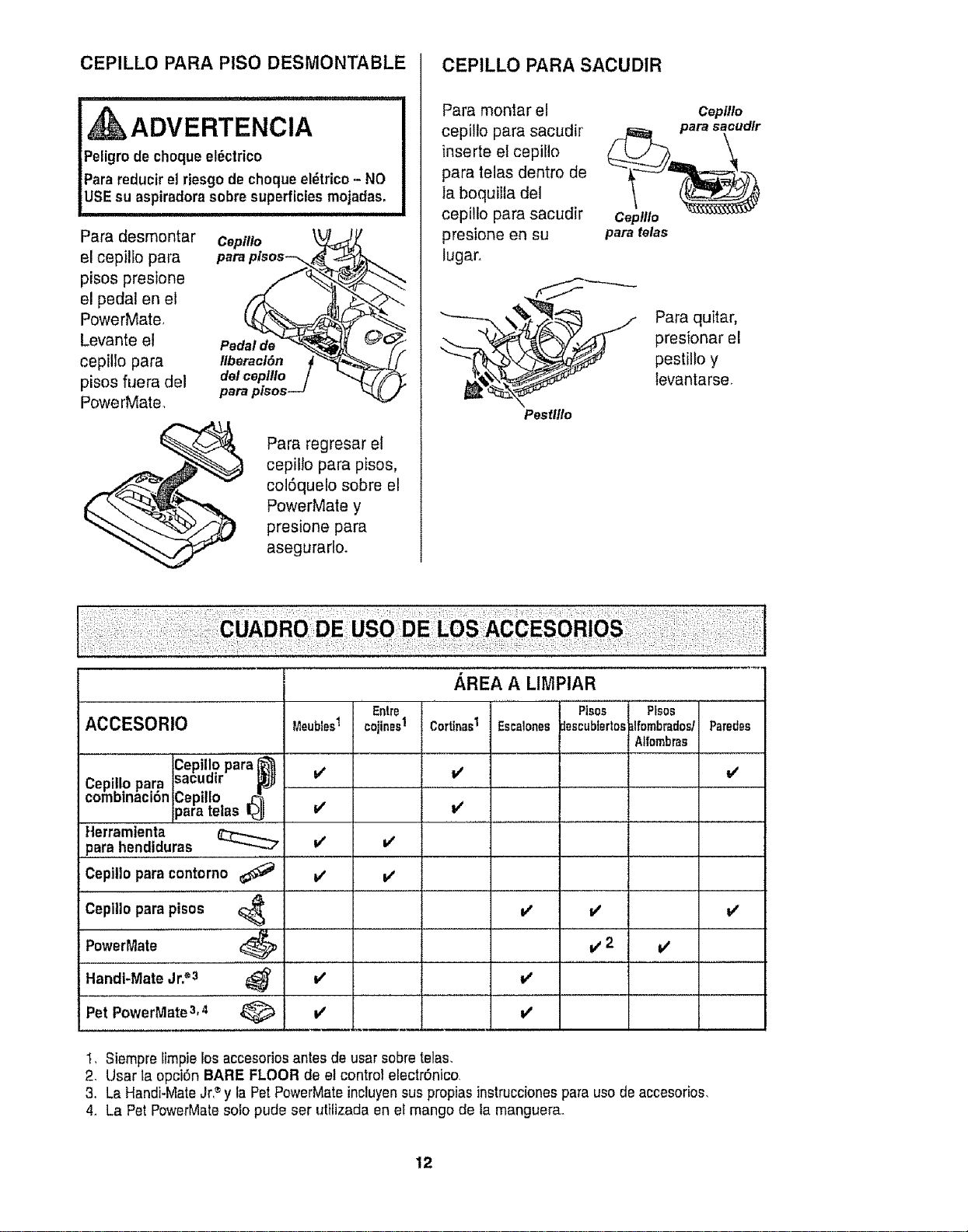
CEPILLO PARA PISO DESMONTABLE
ADVERTENCIA
Peligrode choqueel6ctrico
Parareducirel riesgo de choque eldtrico- NO
USEsu aspiradorasobre superficies mojadas,
Para desmontar Cepillo
el cepillo para para pisos-_
pisos presione
el pedal en el
PowerMate_
Levante el Pedalde
cepillo para Ilberacl6n
pisos fuera del delceplllo
PowerMate,
Para regresar et
cepillo para pisos,
col6quelo sobre el
PowerMate y
presione para
asegurarlo,
CEPILLO PARA SACUDIR
Para montar el
cepillo para sacudir
inserte el cepiIIo
para telas dentro de
ta boquilfa del
cepilto para sacudir
presione en su
lugar.
Cepilto
Ceplllo
para telas
Pestltlo
AREA A LIMPIAR
Para quitar,
presionar el
pestillo y
levantarse.
ACCESORIO Meubles1
cepiil..opara_'_
Cepillopara sacumr _j
comoinaci6n Cepillo _
taratetas I_
Herramienta
para hendiduras
Ceplllo para contorno
Ceplllo para pisos
PowerMate
Handi-Mate Jr.®3
v'
v'
v'
Entre
cojines1
v'
v'
Cortinas1
v'
EscaloNes
v'
I Pisos
escubtertos
I
i#'2 v'
v" v'
Pet PowerMate 3,4 V' V'
Plsos
_lfombradosl
Alfombras
Paredes
i/
v"
1, 8iempre limpie los accesoriosantes de usar sobretelas.
2. Usar la opci6n BARE FLOOR de el control electr6nico,
3. La Handi-MateJr,'_y la PetPowerMateincluyen sus propias instruccionespara uso de accesorios,
4. La Pet PowerMatesolo pude ser utilizada en el mango de la manguer&
12
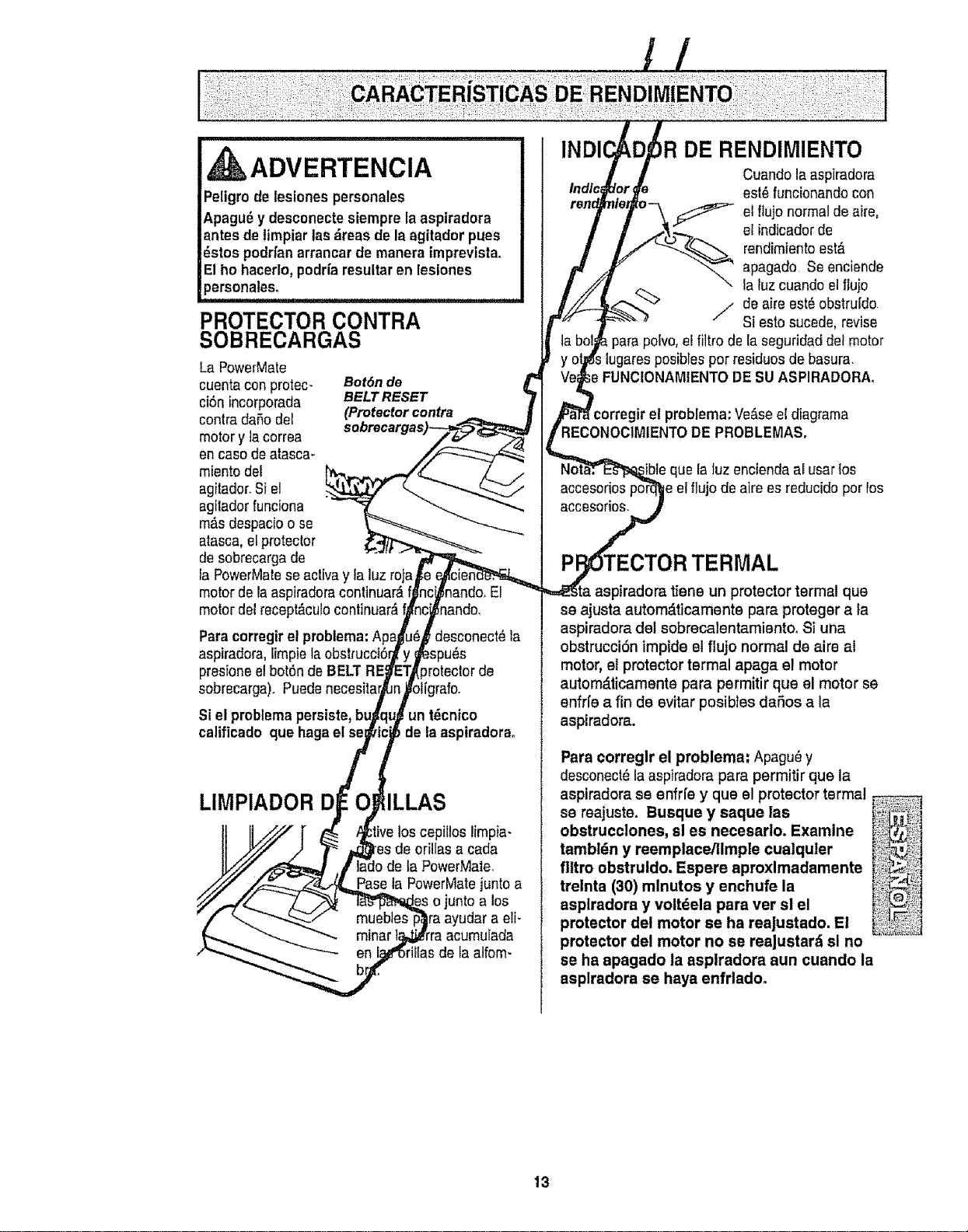
,i tk ADVERTENCIA
Peligrode lesionespersonales
Apagu_y desconecteslempre laaspiradora
antes de timpiarlasdreas de la agitador pues
_stos podrfanarrancar de manera Imprevista_
Elho hacerlo,podrfa resultaren lesiones
personales.
PROTECTOR CONTRA
SOBRECARGAS
La PowerMate
cuentaconprotec- Bot6n de
ci6nincorporada BELTRESET
contradaSo del (Protectorcontra
motory ]acorrea
en caso de alasca-
miento del
agitador.8i el
agilador funciona
mils despacioo se
atasca,el protector
de sobrecargade
la PowerMaleseacliva y la luz roja
motorde la aspiradoracontinuar,_
motor del recept_cutocontinuar_, nando,
Paracorregirel problema:Ap_
aspiradora, lim;
presfoneel bot6nde BELT
sobrecarga). Puedenecesitar
:Jesconect_la
)rotector de
Si el problemapersiste,
calificado que hagaet se
un t_cnico
de la aspiradorao
LIMPIADOR D
los cepillos limpia-
de orillas a cada
la PowerMate.
Pass la PowerMatejunto a
unto a los
a eli_
minar
en la atfom-
DE RENDIMIENTO
Cuando laaspiradora
est_ funcionando con
el flujo normalde aire,
el indicadorde
rendimientoest&
apagado Se enciende
la luzcuando el flujo
%.
./_ de aire est_ obstru[do
Si esto sucede,revise
para polvo,el filtro de la seguridad detmotor
iugaresposiblespor residuos de basura.
le FUNCIONAMIENTODE SUASPIRADORA,
• el problema: Verse el diagrama
RECONOCIMIENTODE PROBLEMAS,
accesorios
accesorios,
ue la luz encienda al usar los
el flujo de aire esreduddo por los
TERMAL
tiene un protectortermal que
se ajusta autom_ticamente para proteger a ta
aspiradora del sobrecalentamiento_ Si una
obstrucci6n impide el flujo normal de aire at
motor, el protector termal apaga el motor
automdticamente para permitir que el motor se
enfrfe a fin de evitar posibtes daSos a la
aspiradora.
Pata cotreglr el problema: Apagu_ y
desconect_la aspiradora para permitir que la
aspiradora se enfrfe y que el protector termal
se reajuste. Busque y saque las
obstrucclones, sl es necesarlo. Examine
tambldn y reemplace/llmple cualquler
fl|tro obstruldo, Espere aproxlmadamente
trelnta (30) mlnutos y enchufe la
asplradora y voltdela para vet si el
protector del motor se ha reajustado. El
protector del motor no se reaJustard sl no
se ha apagado la aspiradora aun cuando la
asplradora se haya enfrladoo
13
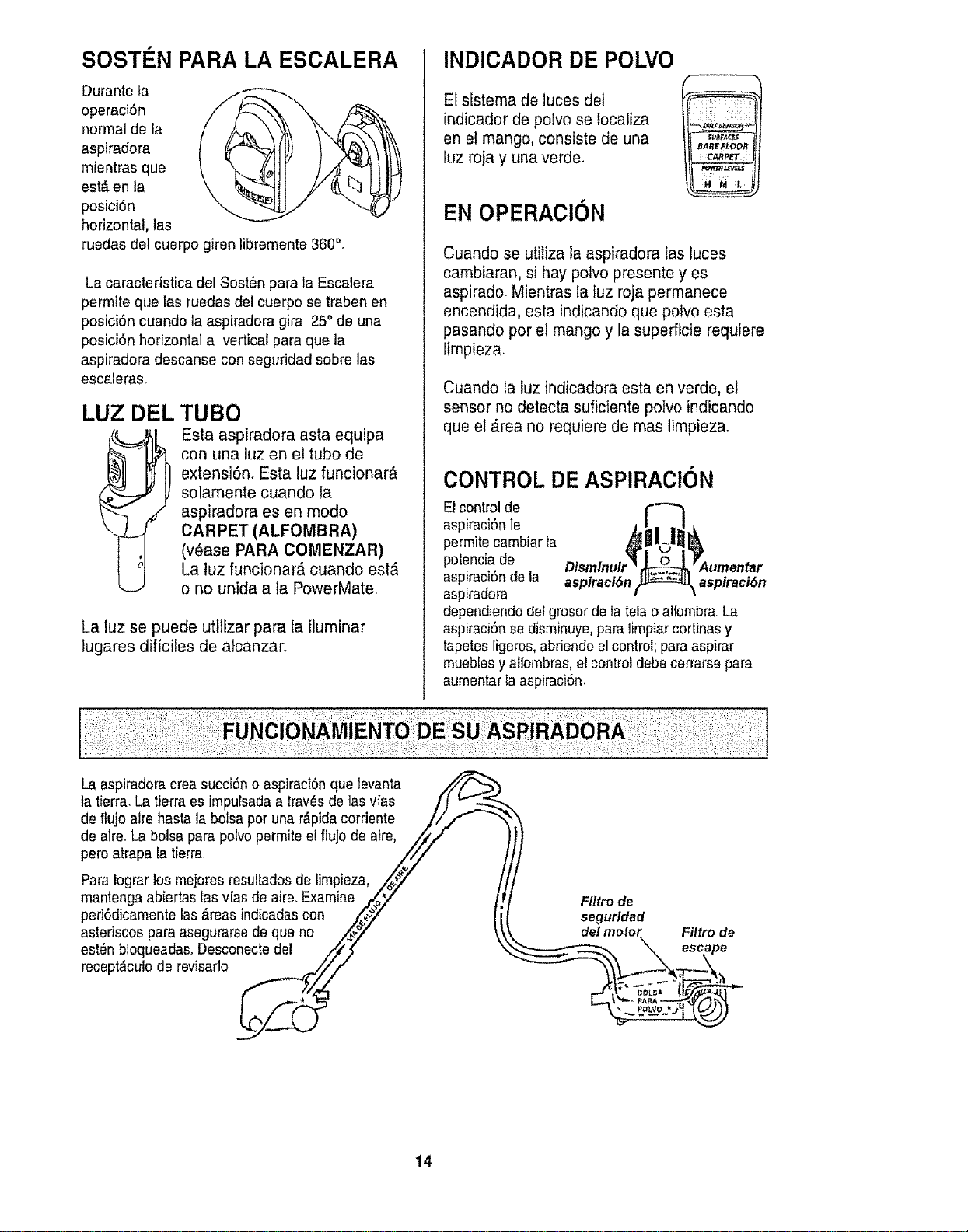
SOSTi N PARA LA ESCALERA
Durante fa
operaciSn
normal de ta
aspiradora
mientras que
est_ en la
posici6n
horizontal, las
ruedas del cuerpo giren libremente 360°.
La caracterfstica del Sost_n para la Escalera
permite que las ruedas del cuerpo se trabenen
posiciSn cuando la aspiradora gira 25° de una
posiciSn horizontal a vertical para que la
aspiradora descanse con seguridad sobre las
escaleras
LUZ DI=L TUBO
Esta aspiradora asta equipa
con una luz en el tubo de
extensi6n. Esta luz funcionar_
solamente cuando la
aspiradora es en modo
CARPET (ALFOMBRA)
(v_ase PARA COMENZAR)
La luz funcionar_ cuando estD,
o no unida a ta PowerMate_
La luz se puede utilizar para la iluminar
lugares diffciles de alcanzar.
INDICADOR DE POLVO
El sistema de luces del
indicador de polvo se localiza
en et mango, consiste de una
luz roja y cina verde.
EN OPERACION
BAREFIOOR
i r_A_!'ET
Cuando se utitiza la aspiradora las luces
cambiaran, si hay polvo presente yes
aspirado. Mientras la luz roja permanece
encendida, esta indicando que polvo esta
pasando por el mango y la superficie requiere
iimpieza_
Cuando la luz indicadora esta en verde, el
sensor no delecta suficiente potvo indicando
que el D.reano requiere de mas limpieza.
CONTROL DE ASPIRAClON
El control de
aspiraciSnle
permite cambiar la
polencia de
aspiraciSnde la aspiraci6n
aspiradora
dependiendo del grosor de la tela o alfombra..La
aspiraciSnse disminuye,para limpiar cortinasy
tapetesligeros, abriendo el control;para aspirar
muebfesy alfombras,el controldebe cerrarse para
aumentar la aspiraci6n.
aspiraci6n
La aspiradora crea succiSno aspiraci6n que levanta _-)
la lierra,La tierra es impulsada a tray,s de ias vfas /j _"-.-._
de ffujo aire hasta la bolsa por una r&pidacorriente ///""-
de aire_La bolsa para polvopermite el ffujo de aire, /i_
peteatrapa la tierra. ZF
Para lograrlos mejores resultadosde limpieza, /@_// /
mantenga abiertas lasvlas de aire..Examine .r_.oT" ,/. Fittrode
periSdicamentelas_reas indicadas con .,t_y {i seguridad
asteriscos para asegurarse de que no /_._" \' de/molor F#trode
- _ _ escape
recept,cu,o de revisarlo _fi,__ I_ :tl_;_,_\.._,-__2_°-'_1"[_-.._-_
14
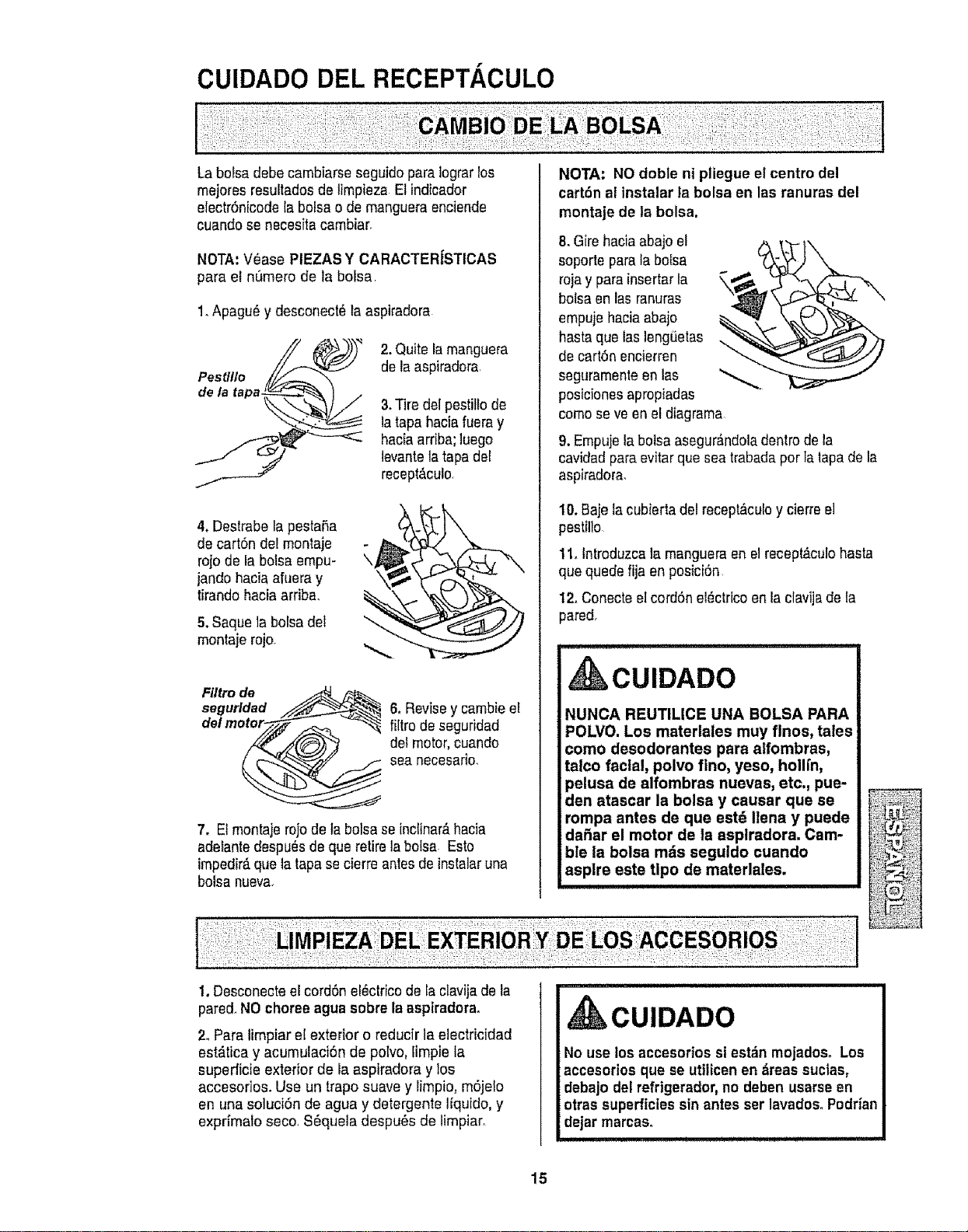
La boisa debecambiarse seguido para Iograrlos
mejores resuitadosde limpieza El indicador
e{ectrOnicodela bolsa o de mangueraenciende
cuando se necesitacambiar.
NOTA:V_ase PIEZAS Y CARACTER|STICAS
para e! numero de la boisa
1.Apagu_ y desconect_ la aspiradora
2. Quite la manguera
de la aspiradora
3.Tire del pestitlode
la tapahacia fueray
haciaarriba;luego
levantela tapa del
recept&culo,
4. Destrabela pesta£ta
de carton del montaje
rojo de la bolsaempu-
jando hacia afuera y
tirandohacia arriba,
5.Saque la bolsadel
montaje rojo
Fi/tro de
segurtdad
del ,
6. Revisey cambie eE
filtro de seguridad
del motor,cuando
sea necesario,
7. Etmontaje rojo de fabolsa seinclinar&hacia
adetantedespu_s de que retirela botsa Esto
impedir_,que latapa secierre antes de instalaruna
bolsa nueva_
NOTA: NO doble ni pliegue el centro del
carton al instalar ta bolsa en las ranuras del
montaje de la bolsa.
8,Gire haciaabajo el
soporte para la bo[sa
roja y para insertarla
bolsaen lasranuras
empujehaciaabajo
hasta que las]engi_etas
de carton encierren
seguramenteen las
posicionesapropiadas
%
como seve en el diagrama
9, Empujela bolsaasegur_.ndoladentrode la
cavidadpara evitar que sea trabadapor Ialapa de la
aspiradora,
t0. Baje la cubierta del recept&culoy cierree]
pestillo
11. Introduzcala mangueraen elrecept_culobasra
que quede fija en posiciOn
12.Conecte etcordonelOctricoen la clavijade la
pared.
CUIDADO
NUNCA REUTILICE UNA BOLSA PARA
POLVO. Los materlales muy flnos, tales
como desodorantes para alfombras,
tatco facial, polvo flno, yeso, hollrn,
pelusa de alfombras nuevas, etc., pue-
den atascar la bolsa y causar que se
rompa antes de que est_ Ilena y puede
dahar el motor de la asplradora. Cam-
ble la bolsa m_s seguldo cuando
asplre este tlpo de materlales.
1. Desconectee[cordon ef_ctricode la clavija de la
pared.NO choreeagua sobre la aspiradora,
2. Para limpiar el exterior o reducir laelectricidad
est_tica y acumulaciOn de polvo, fimpiela
superficie exterior de la aspiradora y los
accesofios. Use un traposuave y limpio, mOjelo
en una soluciOn de agua y detergente I{quido,y
expri'malo seco SOquela despu_s de limpiar,
CUIDADO
No use los accesorios si est_n mojadoso Los
accesorios que se utilicen en _reas suclas,
debajo del refrtgerador,no deben usarseen
otras superficies sin antes ser lavados°Poddan
dejar marcas.
15
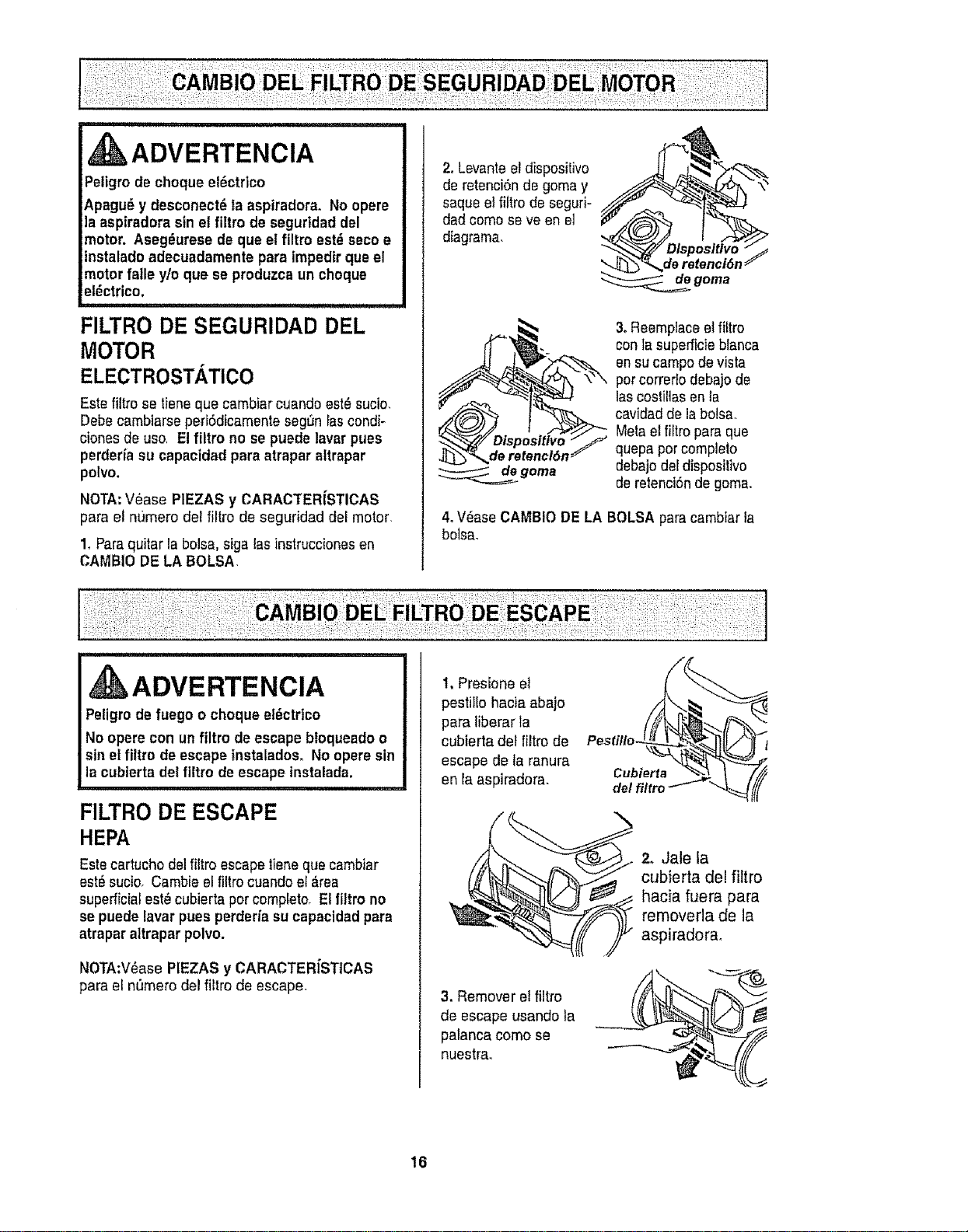
ADVERTENCIA
Peligro de choque ef_ctrico
Apagu_ y desconect6ta aspiradora. No opere
la aspiradora sin el filtro de segurtdad del
motor. Aseg_urese de que el filtro est_ seco e
instaladoadecuadamente para impedir queel
motorfalle y/o que se produzca un choque
el_ctrico.
FILTRO DE SEGURIDAD DEL
MOTOR
ELECTROSTATICO
Este filtro se fiene que cambiar cuando est_ sucio
DebecambiarseperiSdicamenteseg_n Iascondi-
clones de use, Elfiltro no se puede lavar pues
perderia su capacidad para atrapar altrapar
polvo.
NOTA:V6ase PIEZAS y CARACTERiSTICAS
para e! re)mere del filtro de seguridad del motor,
1. Para quitar la bolsa, siga lasinstruccionesen
CAMBIO DE LA BOLSA
2. Levante el dispositivo
de retenci6n de goma y
saque el filtro de segud-
dad come seve en e]
diagrama,
de retenci6n J
de goma
3. Reemptaceel _tro
con la superficie blanca
en sucampo de vista
per corredo debajo de
las costillas en ta
cavidad de labolsa,
Metael filtro para que
quepa par complelo
debajo del diepositivo
de retenci6nde gema.
4. Vdase CAMBIO DE LA BOLSApara cambiar la
bolsa.
ii,,, uullllulll,,ll,, ii i,i i i ..........
ADVERTENCIA
Peligrodefuego o choque el6ctrico
No opere con un filtro de escape bloqueadoo
sin et filtro de escape instalados. No opere sin
la cubierta del filtro de escape instalada.
FILTRO DE ESCAPE
HEPA
Este cartucho del filtro escape liene que cambiar
est# sucio. Cambie el filtro cuando el #,tea
superficial est_ cubierta per completooEl filtro no
se puede lavar pues perderfa su capacidadpara
atrapar altrapar polvo.
NOTA:V_ase PIEZAS y CARACTERfSTICAS
para el nt_merodel filtro de escape.
1, Presione el
pestillo hacia abajo
para liberar la
cubierta det filtro de
escape de la ranura
en la aspiradora.
3. Remover el filtro
de escape usando la
palanca come se
nuestra.
2, Jale la
cubierta del filtro
hacia fuera para
removerla de la
aspiradorao
16
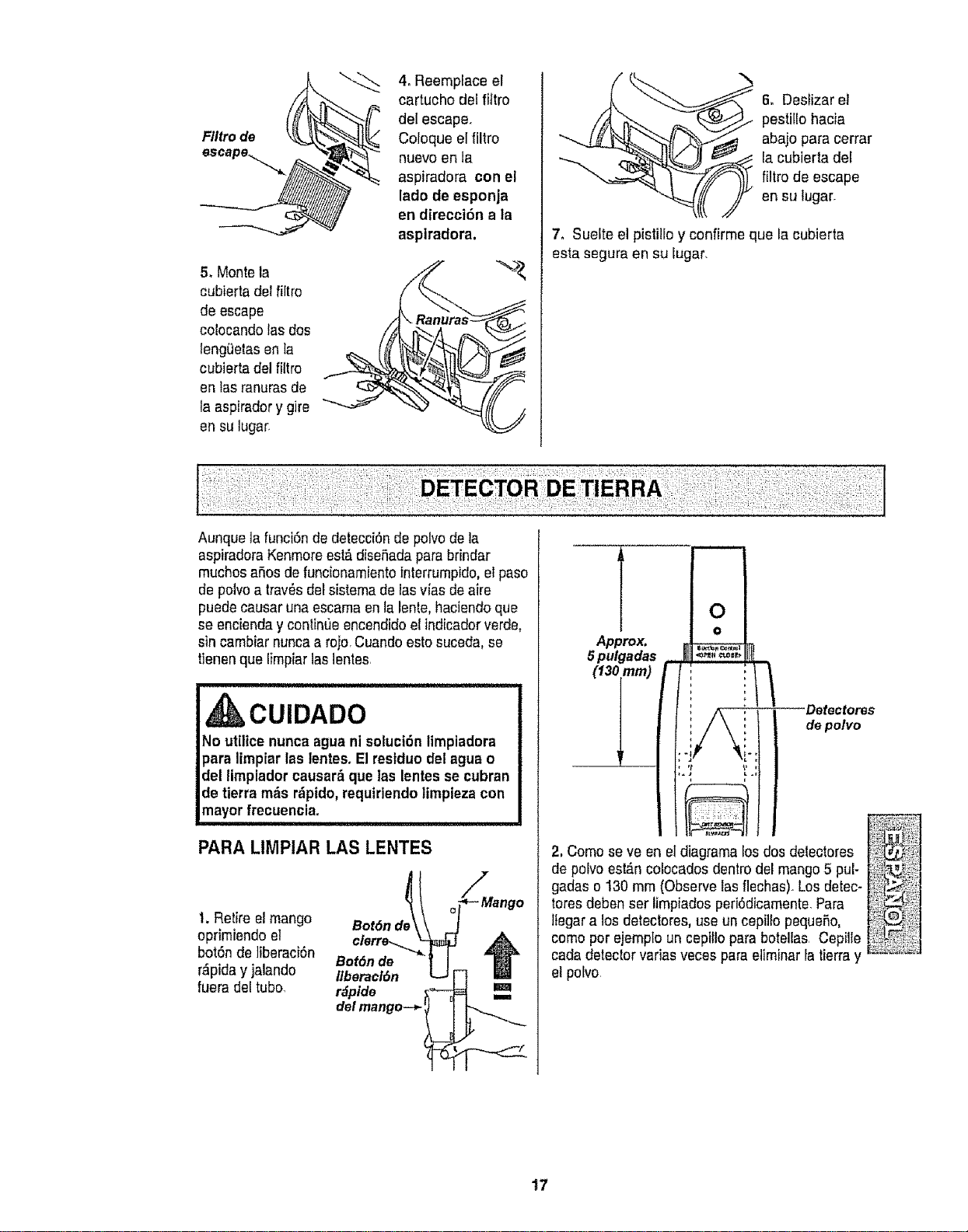
5_Montela
cubiertadel_tro
deescape
colocandolasdos
leng_etasenla
cubiertadelfiltro
enlasranurasde
taaspiradorygire
ensulugar,
4. Reemplace el
cartucho del filtro
del escape,
Coloque elfiltro
nuevo en la
aspiradora con el
lado do esponja
en direccl6n ala
aspiradora,
6, Deslizar el
pestillo hacia
abajo para cerrar
la cubierta del
filtro do escape
en su lugar.
7, Suelte el pistillo y confirme que la cubierta
esta segura en su lugar,
Aunque la funci6n de detecci6nde polvode la
aspiradoraKenmoreest_ diseSadaparabrindar
muchosaSosde funcionamiento interrumpido,el paso
de polvoa tray,s del sistema de lasvias de aire
puede causar una escamaen la lento,haciendo que
se encienday contint]e encendidoel indicadorverde.
sin cambiar nuncaa rejo,Cuandoesto suceda,se
t]enen que lirnpiar laslentes,
CUIDADO
No utilice nuncaague ni soluci6n limpiadora
pare limpiar las lentes,El restduo del ague o
del limpiador causar_ que las lentes se cubran
de tierra m_s r_ptdo,requiriendolimpiezacon
mayor frecuencia=
i i
PARA LIMPIAR LAS LENTES
1. Retire e!mango
oprimiendo et
bot6n de ]iberaci6n
r_pida y jalando
fuera del tubo,
Bot6nd_l _
Bot6nde -'_ ]
Ilberaci6n __3
r_pide _'-_
del mango--+,-_
Mango
m
m
Approx.
5pulgadas
(13imm)
m
O
o
t
.1# .,
Detectores
de polvo
2, Como seve en el diagramalos dos delectores
de polvoestD.ncolocades dentrodel mango5 pul-
gadas o 130 mm (Observe lasflechas)_Losdetec* _!_t
toresdeben ser limpiados peri6dicamente,Pare
llegar a los detectores, use un cepillo pequeSo, il]
como pot ejemplo un cepillo pare botellas Cepille I_
cada detectorvafias veces para eliminar la tierray _'_'_;J
et polvo
t7
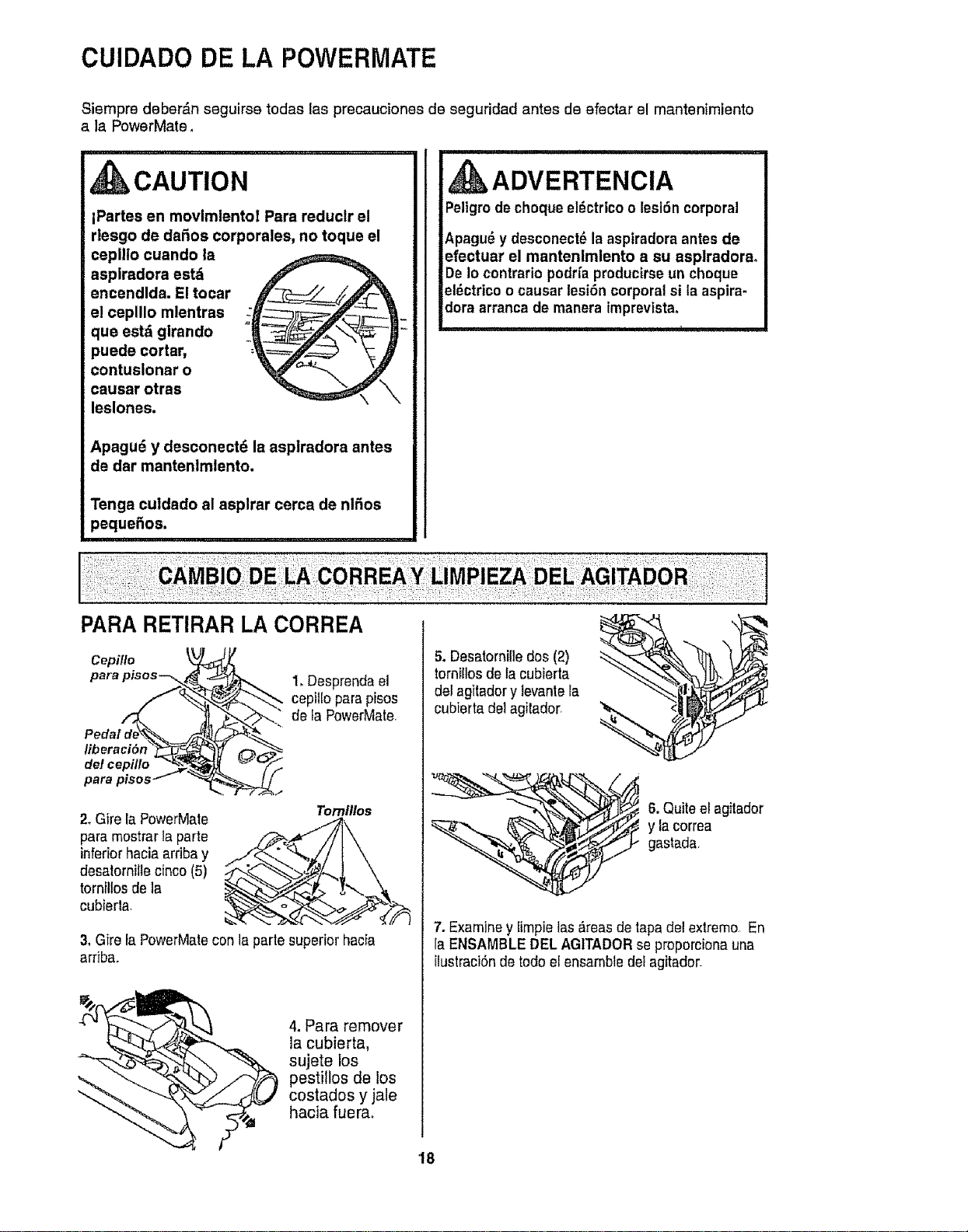
CUIDADO DE LA POWERMATE
Siempre deber&n seguirse todas las precauciones de seguridad antes de efectar el mantenimiento
a la PowerMate.
CAUTION
iPartes en movimlentol Para reduclr el
rlesgo de daSos corporales, no toque el
ceplllo cuando la
aspiradora est_i
encendlda. El tocar
el ceplllo mlentras
que est_ girando
puede cortar,
contuslonar o
causar otras
leslones.
Apagu6 y desconect_ la asplradora antes
de dar mantenlmlento.
Tenga culdado al asplrar cerca de nlfios
peque5os.
PARA RETIRAR LA CORREA
m
ADVERTENCIA
Peligrodechoque el_ctrico o lesi6n corporal
Apagu_ y desconect_ la aspiradora antesde
efectuar el mantenimlento a su asplradora,
De Io contrario podda producirseun choque
el6ctrico o causar lesi6n corporal si la aspira-
dora arranca de manera imprevista.
Cepi/Io
para pisos--_
del cepillo
1.Desprenda el
cepilio para pisos
de IaPowerMate
2_Gire la PowerMate
para mostrartaparte
inferior haciaardba y
desatornille cinco (5)
tornillos de la
cubierla
Tomll/os
3. Gfrela PowerMatecon la parte superior hacia
arriba
4. Para remover
__ la cubierta,
", sujete los
pestillos de los
t costados y jale
hacia fuerao
5. Desatornilledos (2)
torniflosde la cubierta
del agitadory levantera
cubierta del agilador
6. Quiteel agilador
y la correa
gastada
7. Examine y [impielas &teas de tapadel extreme En
la ENSAMBLE DEL AGITADOR se proporcionauna
ilustraci6nde redo el ensamble del agitador
18
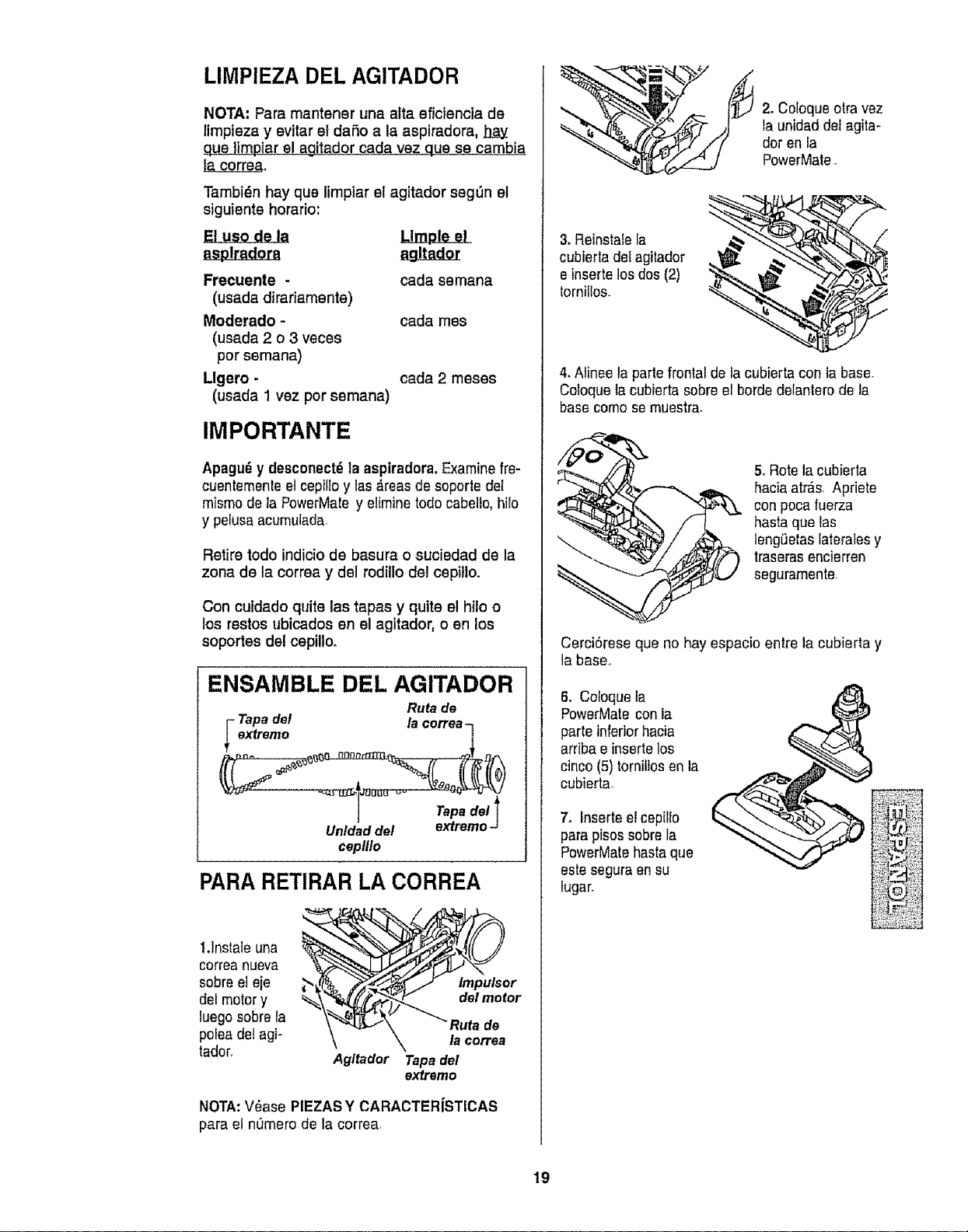
LIMPIEZA DEL AGITADOR
NOTA: Para mantener una alta eficiencia de
limpieza y evitar el daSo a la aspiradora,
que ]irnpiare! agitador cada vez que se cambia
Tambidn hay que limpiar el agitador segg_nel
siguiente horario:
El use de la Llmple el
asplradora
Frecuente -
(usada dirariamente)
Moderado -
(usada 2 o 3 veces
per eemana)
Llgero -
(usada 1 vez per semana)
cada semana
cada rues
cada 2 meses
IMPORTANTE
Apagu_ y desconect_ta aspiradora. Examine fre-
cuentemente el cepilloy las_reas de soporte det
mismode la PowerMate y eiiminetodo cabe]!o,bile
y pelusaacumulada.
Retire rode indiciode basura o suciedad de la
zona de la correa y del rodillo de! cepillo,
Con cuidado quite las tapas y quite el hilo o
los restos ubicados en el agitador, o en los
soportes del cepillo.
ENSAMBLE DEL AGITADOR
Ruta de
Tapadel la correa-
extreme
Unldad del
ceplllo
Tapadel_
extreme J
PARA RETIRAR LA CORREA
1,1nstaleuna
correanueva
sobreel eje
del motor y
luego sobre la
polea dei agi-
tador.
Agltador
lmpulsor
del motor
de
la correa
Tapa del
extremo
NOTA:V_ase PIEZASY CARACTERfSTICAS
para ei nOmerode la correa.
2, Coloqueotra vez
la unidad del agitm
dor en la
PowerMale.
3,Reinstalela _Z"
cubierta de! agitador
®
e insertelos dos(2) ,,
tornitlos.
4. Alinee la parte frontal de la cubierta con la base.
Coloquelacubierta sobreel horde delantero de la
basecome semuestra.
5, Rote la cubierta
hacia atr&s. Apriete
con pocafuerza
hasta que las
leng6etas lateralesy
traseras encierren
seguramenle
CerciSrese que no hay espacio entre la cubierta y
la base°
6oColoque la
PowerMate con la
parteinferiorhacia
arribae insertelos
cinco (5) tornillos en la
cubierla_
7o Inserteel cepillo
para pisos sobre la
PowerMatehasta que
este segura en su
lugar.
19
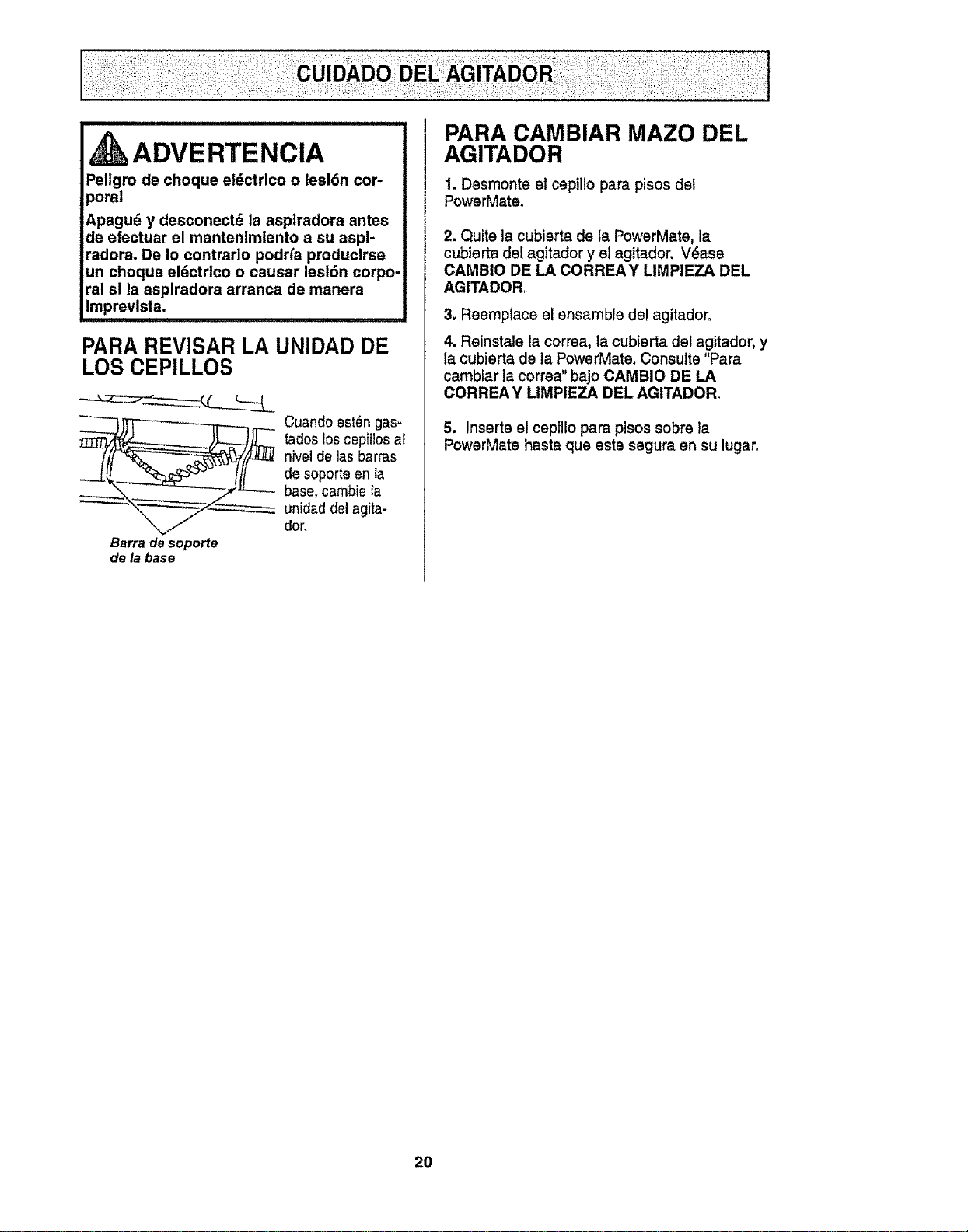
ii,ll,l,,i ................. ii ],ll Ill
ADVERTENCIA
Pellgro de choque el_ctrlco o lesl6n cor-
poral
Apagud y desconect6 la asplradora antes
de efectuar el mantenlmlento a su aspl-
radora. De Io contrarlo podrfa produclrse
un choque eldctrlco o causar lesl6n corpo-
ral sl la asplradora arranca de manera
Imprevlsta.
PARA REVISAR LA UNIDAD DE
LOS CEPILLOS
__ Cuandoest_ngas-
tadosloscepillos al
nivelde las barras
de soporte en la
base,cambie Ia
_ unidad del agita-
dor,
Barra desoporte
de labase
PARA CAMBIAR MAZO DEL
AGITADOR
1. Desmonte el cepillo para pisos del
PowerMate.
2. Quite la cubierta de ta PowerMate, la
cubierta del agitador y el agitador. V_ase
CAMBIO DE LA CORREAY LIMPIEZA DEL
AGITADOR.
3. Reemplace el ensamble del agitadoro
4. Reinstale la correa, la cubierta del agitador, y
la cubierta de la PowerMate. Consulte "Para
cambiar la correa" bajo CAMBIO DE LA
CORREA Y LIMPIEZA DEL AGITADOR.
5. Inserte el cepillo para pisos sobre la
PowerMate hasta que este segura en su lugar.
20
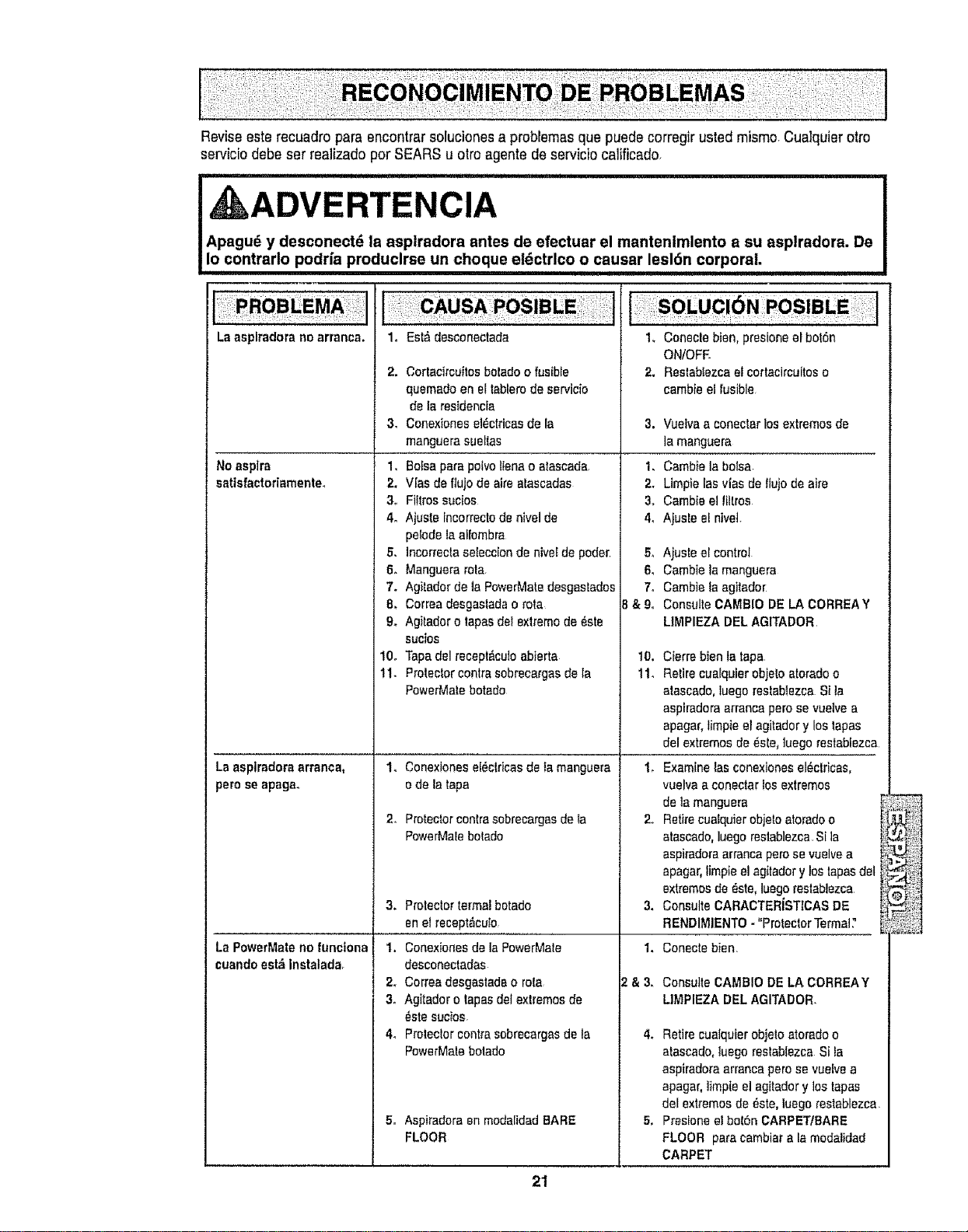
Reviseeste recuadro para encontrar solucionesa problemasque puede corregir usted mismo_Cualquier otto
servbio debe ser realizado per SEARS u otroagente de servicio califbado.
i ADVERTENCiA
Apagud y desconect_ la asp|radora antes de efectuar el mantenlmlento a su asplradora. De
Io contrarlo podda produclrse un choque el_ctrlco o causar lesldn corporal.
La asplradorano arranca,
No aspire
satisfactoriamenteo
1, Est_ desconectada
2. Cortacircuitosboladoo fusible
quemadoen eltablerode servicio
de la residencia
3. Conexienesel_ctricasde la
manguera suettas
1, Bolsapare potvotienao atascada,
2, V[as de ftujo de atreatascadas
3, Filtrossucios
4° Ajuste incorrectode nivelde
pelode laalfombra
5. Incorrectaseieccionde nive_de poder
6° Manguera rote
7. Agi_adorde la PowerMatedesgastados
8, Correadesga_ladao rote
9. Ag}_adoro tapesdel extremede _ste
sucios
10. Tapedel recept_cutoabierta
11. Protectorcentresobrecargasde la
PewerMatebotado
La aspimdoraarranea,
pero seapaga.
La PowerMate no functona
cuando est_ instalada_
1. Conexionesel_ctricasde famanguera
ode la tape
2_ Protectorcentresebreeargasdeta
PowerMalebotado
3. Protectortermal betado
en el _ecept_cuto
1. Conexionesde le PowerMate
desconectadas
2_ Correadesgastada o rote
3. Agitador o tapesdelextremesde
_ste sucios.
4_ Proleclor centresobrecargasde la
PowerMatebotado
5o Aspiradoraen modalidadBARE
FLOOR
SOLUC
1, Conecle bien, presioneel bot6n
ON/OFE
2, Restablezcael cortacircuiteso
cambie el fusible
3. Vuelvaa conectar los extremesde
la manguera
1. Cambiela bolsa
2. Limpie Iasvies de Ilujo de aire
3. Cambieel Iiltros
4, Ajuste el nbeI.
5, Ajuste ei control
6, Cambie la manguera
7. Cambie la agitado[
& 9, Consulte CAMBIO DE LA CORREAY
LIMPIEZA DEL AGITADOR
3,
1.
&3.
10. Cierrebien la tape
11. Retirecualquierobjetoatorado o
atascado,luegoreslablezca Sita
aspiradoraarrancapero se vuelve a
apagar,timpie el agitadory los tapes
del extremesde _s_e,luegorestablezca
t_ Examinelos conexioneeel_clricas,
vuelva aconectarlos extremes
de lamanguera
2_ Retirecualquierobjetoatoradoo
atascado,luegorestablezcaSIla
aspiradoraarrancaperosevuelvea
apagar,fimpieel agitadory los tapesdet
extremesde _ste, luegorestabiezca
ConsulteCARACTER{STtCASDE
RENDIMIENTO- "ProtectorTermal:'
Conecte bien,
Consutte CAMBIODE LACORREAY
LIMPIEZA DELAGITADOR,
4_ Retirecualquierobjeto atoradoo
atascado,luego restablezca Sila
aspiradoraarrancapetesevuelvea
apagar, limpieel agitadory los tapes
del extremesde _,ste,luego restablezca
5, Presloneel botSnCARPETtBARE
FLOOR pare cambiarala modalidad
CARPET
21
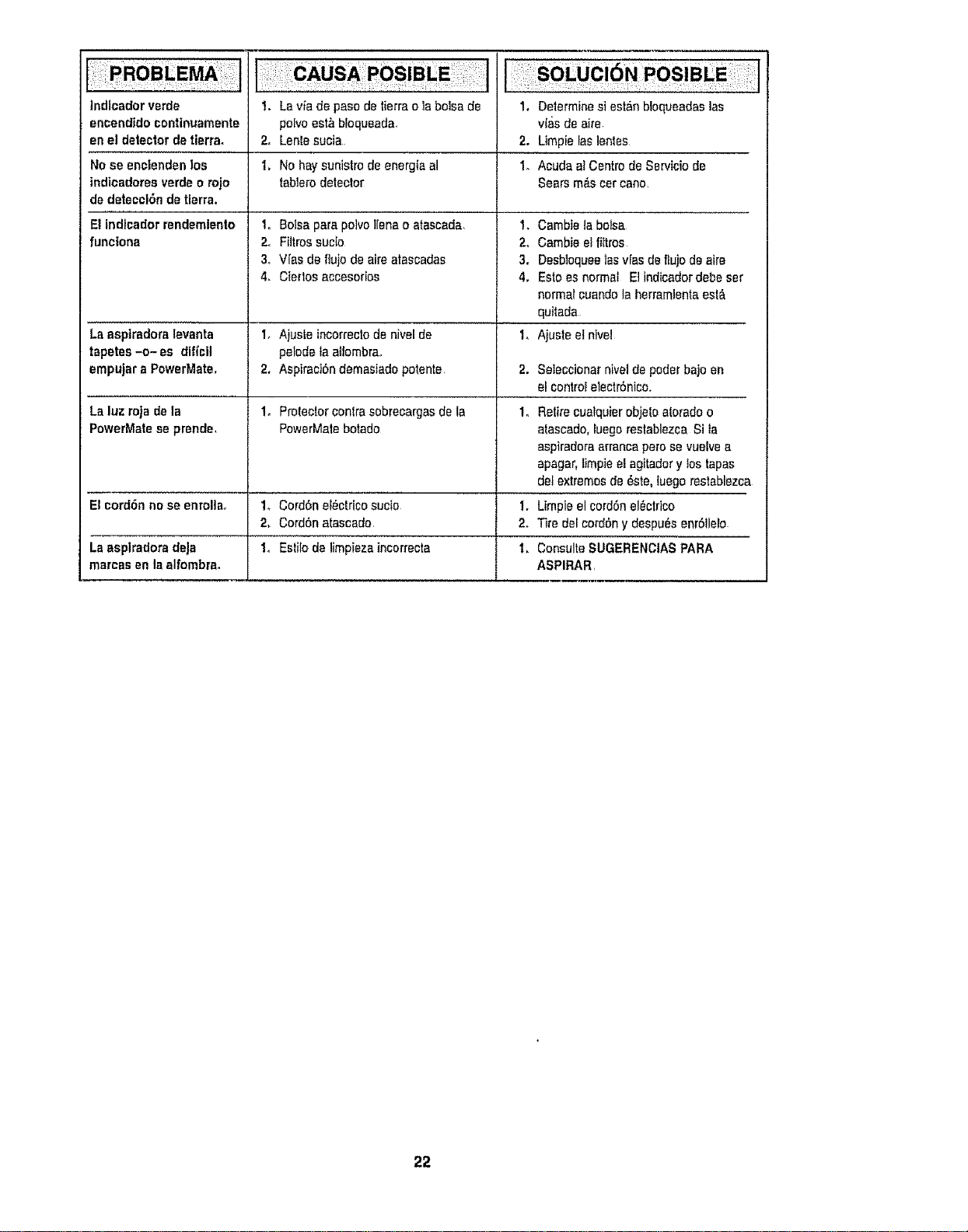
Indicador verde
encendtdocontinuamente
en el detectorde tierra,
No se enciendenlos
indicadoresverde o rojo
de detecci6ndetierra.
E|indicador rendemiento
UrtC|Ona
La aspiradoralevanta
tapetes-o- es diflcil
empujar a PowerMate,
La luz rojade Is
PowerMateseprende,
El cord6nno se enrolla,
La asplradora deJa
marcas en Isalfombre.
I. Laviade pasodeIierrao labolsade
peeveest_bloqueada.
2. Lenlesucia.
1, No haysunistro de energIaal
Iablerodetector
Io Boisepare polvo |lenao atascada.
2. Filtrossucio
3o Vies de flujo de aire atascadas
4. Clerics accesorios
1. Ajusle incorrectode nivel de
pelode taaltombra,
2. Aspiraci6n demasiadopotente.
1. Prolec!orcentresobrecargasde ta
PowerMaiebotado
1o Cord6n el_ctricosucio
2. Cord6n atascado.
1. EstiIode limpieza incorrecta
1, Determinesi est_n bloqueadaslas
vies de aire
2. Llmpie faslenles
1. Acuda el Centre de Serviciode
Sears m_s car cane
!. Cambieta balsa
2. Cambieel filtros
3. Desbloquee|asvres deflujode elre
4. Estoes normal EIindicadordebe set
normal cuandola herramlentaeel_.
quitada
I,Ajusteelnlvel
2, Seleccionarnivelde pealerbajo en
elcontrol electr6nice.
1o Retirecualquierobjetoatorado o
alascado, iuegoreslablezca Si ta
aspiradorearrancape_'osevuelve e
apagar,timpie el agftadery los tapes
detextremesde _ste, luegorestablezca
I. Utopia el cord6nel_ctdco
2. Tire delco_d6ny despu_senr611elo
i. ConsulteSUGERENCIASPARA
ASPIRAR,
22
Acuerdos Maestros de Protecci6n
Enhorabuena por hacer una compra inteligente_ Su nuevo producto Kenmora® est_ dise_ado y fabri-
cado para ofrecerle aSos de funcionamiento confiable. Pero at igual qua todos los productos pueden
precisar un mantenimiento preventivo o alguna reparaci6n de vez en cuando, Por este motivo, tener
un Acuerdo Maestro de Protecci6n puede ahorrarle dinero e inconvenienteso
El Acuerdo Maestro de Protecci6n tambi_n le ayuda a prolongar la vida 5til de su nuevo productoo A
continuaci6n indicamos Io qua el Acuerdo* incluye:
[]
[]
[]
[]
[]
[]
[]
[]
[]
[]
[]
Partes y mano de obra necesarios para ayudar a qua estos productos funcione correctamente
baJo condlclonales normales de uso, no sirnplemente defectos. Nuestra cobertura va mucho
m_s all=_de la garantfa del producto. NingOn deducible, ninguna averfa funcional queda exclu-
ida de la cobertura- proteccl6n real,
Servlclo experto ofrecido por una lista de m_s de 10.000 t(_cnlcos autorizados dei servlclo
t6cnlco de Sears, Io qua significa qua alguien sn quien ustsd puede confiar estar_ trabajando
en su producto.
Ndmero ltimltado de Ilamadas al servlclo tdcnlco y servlclo en toda la nacl6n, tan continuo
como usted nos to solicits, sin importar donds est,,
Garantfa serla de sustltuc!6n del producto. La sustituci6n de su productocubierto si se pro-
ducen cuatro o mds avsdas en doce meses.
Sustitucl6n del producto por otro nuevo si su producto cubierto no puede repararee.
Revlsi6n y mantenlmlento anual preventlvo siempre qua lo deses y sin cargo alguno.
Ayuda r=iplda por tel_fono - Nosotros to Ilamamos Resolucl6n r_iptda. Soporte telef6nico de
un representante de Sears en todoe los productos° Pisnse en nosotros como un "manual del
usuario parlante".
Proteccl6n contra subldas de tensl6n qua provoquen daSos el_ctricos causados por las fluc_
tuaciones de la corriente.
$250 de proteccl6n contra la pdrdida de alimentos anualmente en case de que se estropse
algSn alimento como resultado de una averfa mec,_nica de cualquier congelador o refrigerador
cubierto.
Reembolso del alquller sila reparaci6n de su producto cubierto toma rods tiempo del prometi-
do.
10% de descuento en el precio regular de cualquier servicio de reparaci6n no cubisrto y de las
piezas instatadas relacionadas.
Una vez qua compre el Acuerdo, s61obastard, una simple llamada telef6nica para qua pueda progra-
mar un servicio. Puede Ilamar a cualquier hora del dfa o de la noche, o concertar una cita de servicio
en llnea.
El Acuerdo maestro de protecci6n es una compra libra de riesgos. Si por cualquier raz6n cancela
durante el perfodo de garantfa del producto, le devotveremos todo el dinero. O, un reembolso pror-
rateado despues del perfodo de vencimiento de la garantfa, iCompre su Acuerdo maestro hoy!
Apllcan algunas Ilmltaclones y excluslones. Para preclos y mds Informacl6n en EE.UU., game
al 1-800-827-6655.
* La cobertura en Canad_ varia en atgunos articulos. Para obtener todos los detalles, Ilame a
Sears Canada al 1-800-36%6665.
Servicio de lnstalaci6n de Sears
Para latnstalaci6n profesional por parts de Sears de electrodom_sticos, abridores de puertas de gara-
jes, calentadores de agua y otros articulos princtpales para el hogar, en EE°UU. o Canad_ llama al 1-
800-4-MY-HOME®.

Get it fixed, at your home or ours!
Your Home
For expert troubleshooting and home solutions advice:
manage home
www.managemyhome,com
For repair - in your home - of all major brand appliances,
lawn and garden equipment, or heating and cooling systems,
no matter who made it, no matter who sold itl
For the replacement parts, accessories and
owner's manuals that you need to do-it-yourself
For Sears professional installation of home appliances
and items like garage door openers and water heaters
1-800-4-MY-HOME ® ca, anytime, day or night
(!-800-469-4663) (USoAo and Canada)
www.sears,com wwwosears,ca
Our Home
For repair of carry-in items like vacuums, Kawn equipment,
and electronics, call anyti me for the location of the nearest
Sears Parts & Repair Service Center
1-800.,488-1222 (U.S.A.) 1-800-469-4663 (Canada)
www.sears,com www.sears,ca
To purchase a protection agreement on a product serviced by Sears:
1-800-827-6655 (U3.A)
Para pedir servicio de reparaci6n
a domicilio, y para ordenar piezas.
1-888-SU-HOGAR®
(1-888-784-6427)
1-800-361-6665(Canada)
Au Canada pour service en fran_ais:
1-800-LE-FOYER Mc
(1-800-533-6937)
WWW sea!'s ca
Se llf'S
© Sears Stands, LLC
® Registered Trademark t TMTrademark I sM Service Mark or Bears Brands, LLC
® Marca Registrada t T_ Marca de F_brica t SMMarca de Servicio de Sears Brands, LLC
MCMarque de commerce / MDMarque d_pos_e de Sears Brands, LLC