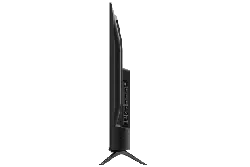
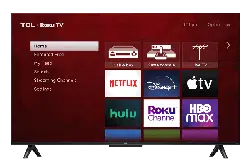
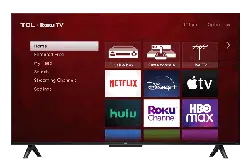
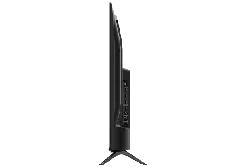
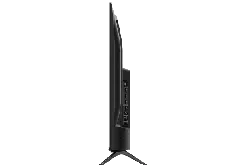
User Manual TCL 65S453 series 4k Roku TV
Ready for the step-by-step? You’re only minutes away from TV bliss!
Be careful, it’s heavy!
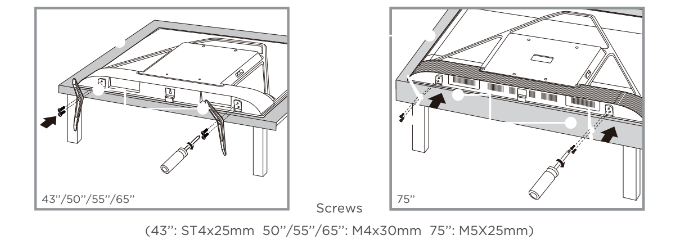
To prevent damage to the screen, carefully place your TV on a soft, cushioned surface.
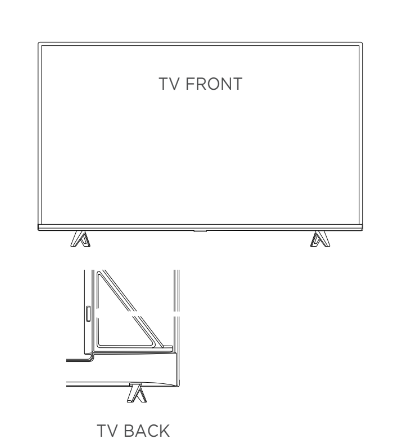
Put the column of the stands into the TV, align the stands with the screw holes located on the TV. Secure the stands to the TV with four (4) screws.
Note: Make sure the installation direction of the stand is the same as illustrated.
If you are mounting your TV to the wall, don’t attach the stands.

The VESA number is the horizontal and vertical measurement of the mounting holes. For example, 200X200 refers to the fact that the mounting measurements are 200mm horizontally and 200mm vertically. Follow the instructions that come with the wall mount. Your wall mount must be able to bear a minimum of five times the TV’s net weight to avoid causing damage.
Never place a television set in an unstable location. A television set may fall, causing serious personal injury or death. Many injuries, particularly to children, can be avoided by taking simple precautions such as:
- Using cabinets or stands recommended by the manufacturer of the television set.
- Only using furniture that can safely support the television set.
- Ensuring the television set is not overhanging the edge of the supporting furniture.
- Not placing the television set on tall furniture (for example, cupboards or bookcases) without anchoring both the furniture and the television set to a suitable support.
- Not placing the television set on cloth or other materials that may be located between the television set and supporting furniture.
- Educating children about the dangers of climbing on furniture to reach the television set or its controls.
If your existing television set is being retained and relocated, the same considerations as above should be applied.
In this step, we’ll make sure all systems are GO!

Always replace depleted batteries with two same brand-new batteries from the same manufacturer. Never use damaged batteries.
If your remote gets warm/hot during use, discontinue use and contact customer support immediately at support.tcl.com/us
The TV remote should feel right at home in your hand. We designed it to be incredibly intuitive for watching TV and navigating on-screen menus.

- Turn TV on and off
- Return to previous screen
- Return to Roku Home Screen
- Raise and lower volume
- Replay the last few seconds of streming video
- View more options
- Rewind streaming video, scroll left one page at a time
- Fast forward streaming video, scoll right one page at a time
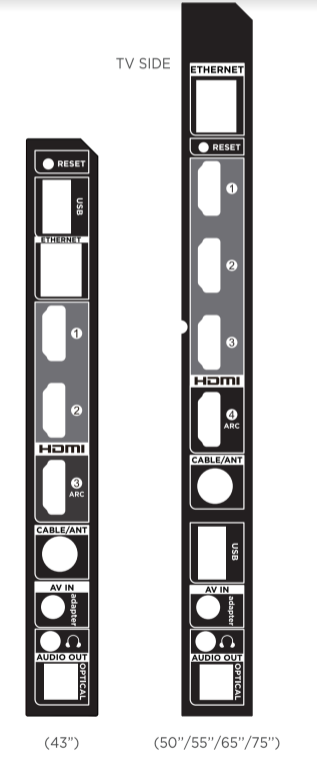
- Press once to restart your TV.
- Press and hold for factory reset, and careful, you will lose all your settings!
- Connect a USB device to access photos, music and movies.
- Connect an Ethernet cable to your home Internet router or switch.
- Highest quality audio/video connection. Connect cable box, Blu-ray player, gaming console, or other devices to your TV using HDMI cables.
- Connect HDMI ARC (audio return channel) capable audio devices like sound bars or AV receivers.
- Connect an outdoor VHF/ UHF antenna or Cable TV feed.
- AV Input (analog audio/video). The AV Input can be used to connect older devices that use analog audio/video outputs. Compatible adapter (not included) connects to the RCA cable video - yellow and audio - white and red) that you normally use to connect to that device.
- Connect headphones or other external speakers.
- Connect an optical cable to an external digital audio system.
- Glows when the
- TV is in standby.
- Receives signal from the TV remote.
- Press once to open the menu.
- Press and hold to turn o the TV.
- Connect your TV to the power source with the included power cable.
Your TV will automatically detect wireless networks in your area. Have your network name and password handy and follow the easy on-screen instructions.
Activate your TCL Roku TV using your computer, smartphone, or tablet to link to a Roku account. You need a Roku account to activate your TV and access entertainment across thousands of streaming channels.
Roku doesn’t charge for activation support - beware of scams. Roku accounts are free and while a valid credit card number is not required to create a Roku account, saving your credit card information makes renting, purchasing, and subscribing to entertainment from the Roku Channel Store fast and convenient.
Once connected to your account, your TV will automatically update with the latest software, and you can start streaming immediately.
If you aren't ready to connect your TV to a wireless network, you can still use it as a regular TV.
Continue using the remote to personalize your Home screen and channel line-up, stream movies, and so much more. If you have an antenna or cable connected, just click the tuner tile to watch broadcast TV channels. The fun has just begun!
The Roku 4K UHD
The Roku 4K UHD Spotlight channel features many movies and TV shows available in 4K UHD resolution from streaming services such as Netflix, Prime Video, VUDU, and more.
Key things to know: A paid subscription or other payments may be required for some channels. Channel availability subject to change and varies by country. 4K content will not be available on all channels.
With HDMI inputs supporting the latest HDMI standards, connect next-gen game systems, Ultra HD blu-ray and more to enjoy highest-quality 4K high dynamic range sources.

Enjoy your favorite shows upscaled to near 4K Ultra HD quality with TCL Creative Pro upscaling.
Access more than 500,000 movies and TV episodes across major streaming services like Netflix, Hulu, GooglePlay, VUDU, and more. Choose from free, rental, and subscription services.*
Choose from over 140 sports channels like WatchESPN, FOX Sports GO, NBA, NFL, MLB.TV, WWE Network, CBS Sports, and more.
In addition to popular streaming channels like HBO NOW, Showtime, PBS Kids and ESPN, your TCL Roku TV also offers hundreds of streaming channels to fuel your passions - including fitness, cooking, religion, outdoors, international programming, and much more.
Your TCL Roku TV has hundreds of popular free channels like The CW, The Roku Channel and more. Plus free trials** to popular subscription services like HBO NOW, Showtime, Netflix and Hulu.
Find movie titles, launch or change channels, even switch inputs, using the voice control feature available through the Roku mobile app (iOS or Android mobile device required), or with compatible third-party voice assistant devices and voice-enabled remote controls that can be purchased separately. This feature works with both Alexa and Google Assistant and will require a free Roku account to set up.
You can use Google Assistant-enabled devices to search and control playback of content, and the ability to launch select streaming channels. Additionally, you can turn your TV on and off, turn up the volume, mute, switch inputs and channels, if there is an Over-The-Air antenna connected.
Netflix is currently not supported when using Google Assistant on TCL Roku TVs. Below is the list of Netflix-related restrictions:
- Netflix cannot be launched by voice using Google Assistant.
- Voice commands are not supported while on the Netflix channel.
- Netflix results will not appear when searching using Google Assistant.
To use the Google Assistant to search and control your TCL Roku TV, you need to link your Roku account to your Google account using the Google Home mobile app on your iOS or Android device. Here are the step-by-step instructions:
- Launch the Google Home mobile app.
- Tap the Add button.
- Tap “Set up device.”
- Select “Have something already set up?”
- Search and select “Roku” from the list.
- When prompted, sign in to your Roku account.
- Select the Roku device you wish to control with the Google Assistant.
NOTE: If multiple Roku devices are linked to your Roku account, you can only select one Roku device to control with the Google Assistant. Select a location for your Roku device.
Amazon Alexa
You can use Amazon devices, or the Amazon and Alexa Apps to search and control playback of content, and the ability to launch select streaming channels. Plus you can power the TV screen on and off, adjust the volume, switch between different input devices such as Over-The-Air antenna, cable box, game consoles, etc. once connected.
- The Roku skill for Amazon Alexa is currently only supported in the United States.
- Using your voice to launch Netflix or access Netflix content is not currently supported when using the Roku skill for Amazon Alexa.
- The Roku skill for Amazon Alexa does not support all Roku voice capabilities.
To use Alexa to search and control your TCL Roku TV, you need to link your Roku account to your Alexa account using the following steps:
- From your mobile device, launch the Alexa Mobile app.
- Tap or select “Menu” followed by “Skills & Games”.
- Search for “Roku” in the search bar.
- Find and select “Roku” from the list.
- Tap or select “Enable Skill”.
- When prompted, sign in to your Roku account.
- Select the Roku device you wish to control with Alexa. Note: If multiple Roku devices are linked to your
- Roku account, you can only select one Roku device to control with Alexa.
- Close your Roku account.
- The Alexa app will look for your Roku device on the Device Discovery screen. Make sure your TCL Roku.
- TV is powered on otherwise the Alexa app will NOT find/see it.
- When prompted select the TCL Roku TV you would like to control with Alexa.
- Select the Alexa device you would like to control your TCL Roku TV.
- Proceed to the home control tab of the Alexa app. (The house icon with controls on the bottom right).
- Tap on the existing group you wish to add your Roku device to or create a new group by tapping on the add button on the top right corner.
- Tap on the Roku device and ensure the Enabled switch is turned on.
All LCD/LED Models.
What your warranty covers: Defects in materials or workmanship to the original owner of this TCL product when purchased as new from an Authorized Dealer of TCL brand products in the United States and packaged with this warranty statement.
One (1) year from date of purchase for parts and labor for non-commercial use.
Six (6) months from date of purchase for parts and labor for commercial use. Commercial use includes, but is not limited to, the use of this product in a commercial or business environment, the use of this product in an institution or for institutional purposes, or other commercial purposes including rental purposes.
What we will do:
At TCL North America’s discretion, (1) pay an Authorized TCL Service Center for both labor charges and parts to repair your television, or (2) replace your television with a new or refurbished / remanufactured equivalent value product. The decision to repair or replace will be made solely by TCL North America. See “How to get service”.
How to get service:
Call 1-877-300-8837. Please have your original purchase receipt or proof of purchase (bill of sale or receipted invoice), the unit’s date of purchase, place of purchase and model/serial number ready. The model/serial number information can be found on the back of your unit. A representative will troubleshoot your problem over the telephone. If it is determined that your unit requires service, the service location will be at the sole discretion of TCL North America based upon the TCL North America Limited Warranty Statement. At the sole discretion of TCL North America, television screen sizes 43’’ and smaller will either be repaired at an Authorized TCL Service Center or directly exchanged for a new or refurbished/remanufactured unit. At the sole discretion of TCL North America, television screen sizes 44’’ or larger will either be repaired at an Authorized TCL Service Center or repaired in-home. If repaired at an Authorized TCL Service Center, a pre-paid shipping label will be provided and TCL North America will pay for return shipping. Proof of purchase in the form of a bill of sale or receipted invoice from an Authorized Dealer which is evidence that the product is within the warranty period must be presented to obtain warranty service. PRE-AUTHORIZATION MUST BE OBTAINED BEFORE (1) SENDING ANY PRODUCT TO AN AUTHORIZED TCL SERVICE CENTER, OR (2) OBTAINING ANY IN-HOME REPAIR/REPLACEMENT/RENTAL SERVICES.
What your warranty does not cover:
- Customer instruction. (Your Owner’s Manual describes how to install, adjust, and operate your unit. Any additional information should be obtained from your Authorized Dealer).
- Installation and related adjustments, or damage resulting from installation.
- Damage resulting from non-approved installation methods.
- Signal reception problems not caused by your unit.
- Damage from misuse, abuse, neglect, normal wear and tear, cosmetic damage, mishandling, faulty installation, or power line surges.
- Markings or images on the television’s panel resulting from viewing fixed images (including but not limited to certain 4:3 images on wide screen televisions, or data or images in fixed screen locations from banners, video games, or certain broadcast networks).
- A television that has been modified or incorporated into other products.
- A unit purchased or serviced outside the USA.
- A unit sold in “As-Is”, “Factory Reconditioned”, “Factory Re-Certified”, or “Refurbished” condition or with faults.
- Acts of nature or God, such as but not limited to earthquake or lightning damage.
- Special, incidental or consequential damages.
Product Registration:
Please register your TCL TV purchase on-line at www.tcl.com. It will make it easier to contact you should it ever be necessary. Registration is not required for warranty coverage.
THE WARRANTY STATED ABOVE IS THE ONLY WARRANTY APPLICABLE TO THIS PRODUCT. NO VERBAL OR WRITTEN INFORMATION GIVEN BY TCL NORTH AMERICA, ITS AGENTS OR EMPLOYEES SHALL CREATE A GUARANTEE OR IN ANY WAY INCREASE OR MODIFY THE SCOPE OF THIS WARRANTY. REPAIR OR REPLACEMENT AS PROVIDED UNDER THIS WARRANTY IS THE EXCLUSIVE REMEDY OF THE CONSUMER. TCL NORTH AMERICA SHALL NOT BE LIABLE FOR SPECIAL, INCIDENTAL, OR CONSEQUENTIAL DAMAGES RESULTING FROM THE USE OF THIS PRODUCT OR ARISING OUT OF ANY BREACH OF ANY EXPRESS OR IMPLIED WARRANTY ON THIS PRODUCT. THIS DISCLAIMER OF WARRANTIES AND LIMITED WARRANTY ARE GOVERNED BY THE LAWS OF THE STATE OF CALIFORNIA. EXCEPT TO THE EXTENT PROHIBITED BY APPLICABLE LAW, ANY IMPLIED WARRANTY OF MERCHANTABILITY OR FITNESS FOR A PARTICULAR PURPOSE ON THIS PRODUCT IS LIMITED TO THE APPLICABLE WARRANTY AND WARRANTY PERIOD SET FORTH ABOVE. THIS WARRANTY IS SUBJECT TO CHANGE WITHOUT NOTICE. PLEASE VISIT WWW.TCL.COM TO VIEW THE MOST CURRENT VERSION.
Some states do not allow the exclusion or limitation of incidental or consequential damages, or limitations on how long an implied warranty lasts, so the above limitations or exclusions may not apply to you. This warranty gives you specific legal rights, and you also may have other rights that vary from state to state. This warranty does not apply. Contact your dealer for warranty information.