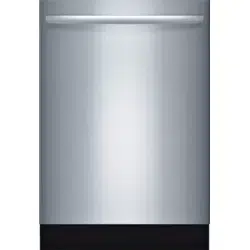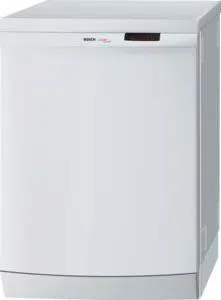
DISHWASHER USE AND CARE MANUAL
MODEL: SHE4AM, SHE5AM, SHX3AM, SHE5AL, SHX5AL, SHX6AP
YOUR LIFE. OUR INSPIRATION.
GUIDE D'ENTRETIEN ET D'UTILISATION DU LAVE-VAISSELLE
MODEL: SHE4AM, SHE5AM, SHX3AM, SHE5AL, SHX5AL, SHX6AP
MANUAL DE USO Y CUIDADO PARA LAVADORA DE PLATOS
MODEL: SHE4AM, SHE5AM, SHX3AM, SHE5AL, SHX5AL, SHX6AP
9000421703 Rev A 01/09
Congratulations, and Thank You from Bosch!
Thank you for selecting a Bosch dishwasher. You have joined the many consumers who demand quiet and superior performance from their
dishwashers.
This manual was written with your safety and convenience in mind, and the information contained herein is very important. We highly
recommend that you read this manual before you use your dishwasher for the first time.
To learn even more about your dishwasher and available accessories, as well as many other top-quality Bosch appliances, visit our website at
www.boschappliances.com.
Please contact us if you have any questions or comments. Call 1-800-944-2904, or write to:
BSH Home Appliances, Corp.
5551 McFadden Avenue
Huntington Beach, CA 92649
Enjoy!
IMPORTANT SAFETY INSTRUCTIONS ..................................................................................................................................................... 3
Dishwasher Components ........................................................................................................................................................................ 4
Dishwasher Features and Options ........................................................................................................................................................ 4-5
Dishware Materials ................................................................................................................................................................................. 6
Preparing and Loading the Dishware ................................................................................................................................................... 6-8
Dishware Preparation ..................................................................................................................................................................... 6
Loading the Dishwasher ............................................................................................................................................................... 6-8
Adding Detergent and Rinse Agent .................................................................................................................................................... 9-10
Wash Cycles and Options ..................................................................................................................................................................... 10
Operating the Dishwasher ............................................................................................................................................................... 11-13
Operating the SHX3AM ................................................................................................................................................................. 11
Operating the SHE5AM ................................................................................................................................................................. 12
Operating the SHE4AM ................................................................................................................................................................. 13
Care and Maintenance .................................................................................................................................................................... 14-16
Detailed Wash Cycle Information/Sanitized ........................................................................................................................................... 16
Self Help ......................................................................................................................................................................................... 17-19
Customer Service ................................................................................................................................................................................. 20
Statement of Warranties ....................................................................................................................................................................... 21
2
lmportant Safety Instructions - Save This Information
NOTICE
Never use steam cleaning products to clean your dishwasher. The manufacturer will not be liable for possible damages or conse-
quences.
Never use harsh chemicals to clean your dishwasher. Some chloride-containing cleaning products can damage your dishwasher
and may present health hazards!
It is highly recommended for the end use consumer to become familiar with the procedure to shut off the incoming water supply
and the procedure to shut off the incoming power supply. See the Installation Instructions or speak with your installer for more
information.
WARNING
Misuse of the dishwasher can result in serious injury or death. Do not use the dishwasher in any way not covered in this manual or
for any purpose other than those explained on the following pages.
Severe product damage and/or injury could result from the use of unqualified service technicians or non-original replacement parts.
All repairs must be performed by a qualified service technician using only original equipment factory replacement parts.
Electrical shock or fire could result if the electrical supply for the dishwasher covered in this manual is incorrectly installed or if the
dishwasher has been improperly grounded. Do not use the dishwasher covered in this manual if you are not certain the electrical
supply has been correctly installed or the dishwasher has been properly grounded.
WARNING: To reduce the risk of fire, electrical shock, or serious injury, observe
the following:
• This appliance must be grounded to a metal, permanent wir-
ing system, or an equipment grounding conductor must be
run with the circuit conductors and connected to the equip-
ment grounding terminal or lead on the dishwasher. See the
Installation Instructions included with this dishwasher for
more information on electrical requirements.
• Use this dishwasher only for its intended function, which is
the washing of household dishware and kitchenware.
• This dishwasher is provided with Installation Instructions
and this Use and Care Manual. Read and understand all
instructions before using the dishwasher.
• Use only detergents or rinsing agents recommended for use in
a dishwasher, and keep them out of the reach of children.
• When loading items to be washed:
Locate sharp items so that they are not likely to damage
the door seal.
Load knives and other sharp utensilswiththeirHANDLES
UPto reduce the risk of cut-type injuries.
• Do not wash plastic items unless they are marked "dishwasher
safe"or the equivalent. For plastic items not so marked, check
the manufacturer's recommendations.
• Do not operate your dishwasher unless all enclosure panels
are in place.
• Do not tamper with or override controls and interlocks.
• Do not abuse, sit on, or stand on the door or dish racks of the
dishwasher.
• To reduce the risk of injury, do not allow children to play in
or on the dishwasher.
• When children become old enough to operate the appliance,
it is the legal responsibility of the parents or legal guardians to
ensure that they are instructed in safe practices by qualified
persons.
• Under certain conditions, hydrogen gas may be produced in
a hot water system that has not been used for two weeks or
more. Hydrogen gas is explosive. Before using a dishwasher
that is connected to a hot water system that has been unused
for two weeks or longer, turn on all hot water faucets and let
the water flow from each for several minutes. This will release
any accumulated hydrogen gas. As the gas is explosive, do
not smoke or use an open flame during this time.
• Remove the door to the washing compartment when remov-
ing an old dishwasher from service or discarding.
• To avoid floor damage and possible mold growth, do not allow
wet areas to remain around or under the dishwasher.
• Protect your dishwasher from the elements. Protect against
freezing to avoid possible damage to the fill valve. Damage
caused by freezing is not covered by the warranty.
• When you dispose your old appliance make sure you remove
the door or disable the latch.
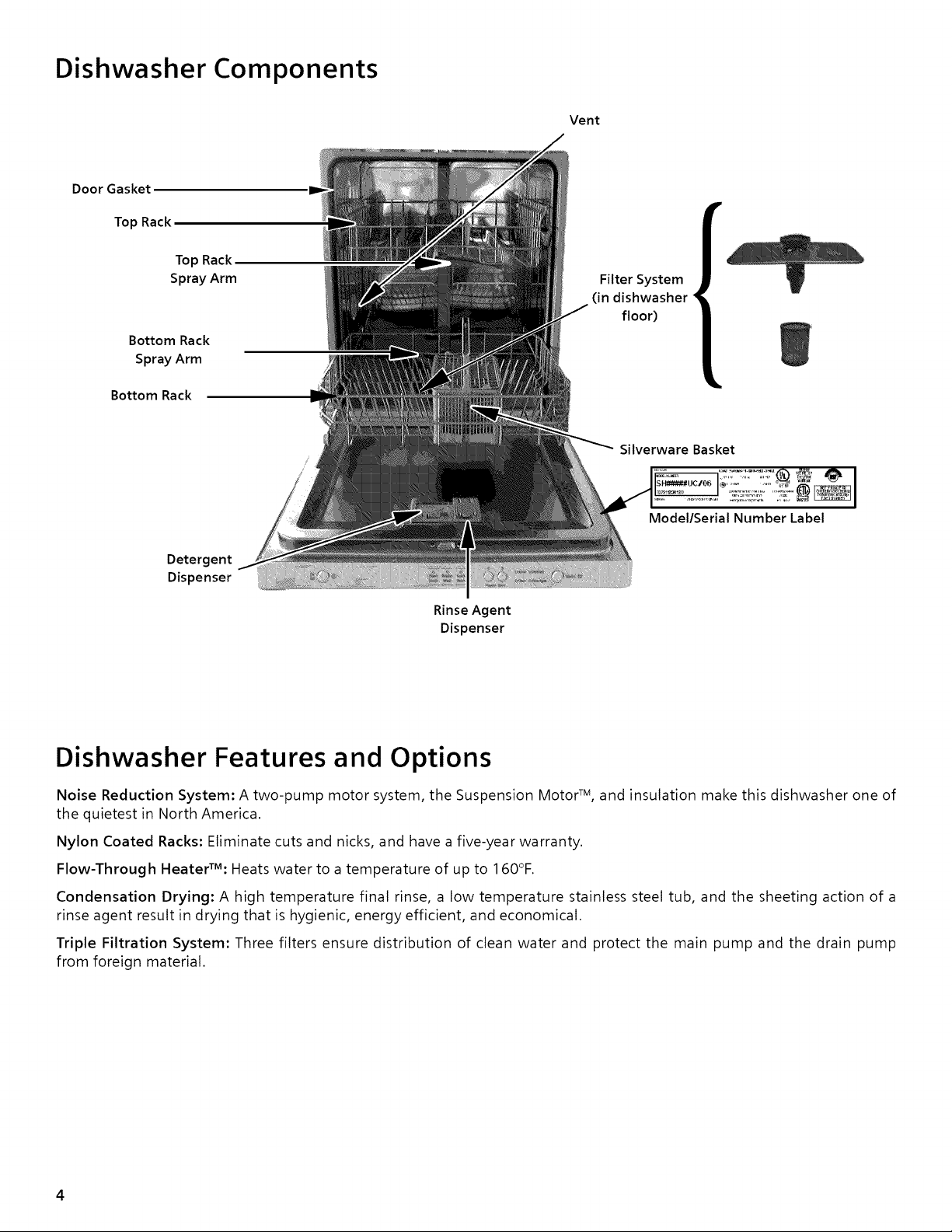
Dishwasher Components
Vent
Door Gasket
Top Rack
Top Rack
Spray Arm
Bottom Rack
Spray Arm
Bottom Rack
Detergent
Dispenser
Rinse Agent
Dispenser
r
Filter System
(in dishwasher
floor)
Silverware Basket
Model/Serial Number Label
Dishwasher Features and Options
Noise Reduction System: A two-pump motor system, the Suspension Motor TM, and insulation make this dishwasher one of
the quietest in North America.
Nylon Coated Racks: Eliminate cuts and nicks, and have a five-year warranty.
Flow-Through HeaterZM: Heats water to a temperature of up to 160°F.
Condensation Drying: A high temperature final rinse, a low temperature stainless steel tub, and the sheeting action of a
rinse agent result in drying that is hygienic, energy efficient, and economical.
Triple Filtration System: Three filters ensure distribution of clean water and protect the main pump and the drain pump
from foreign material.
4
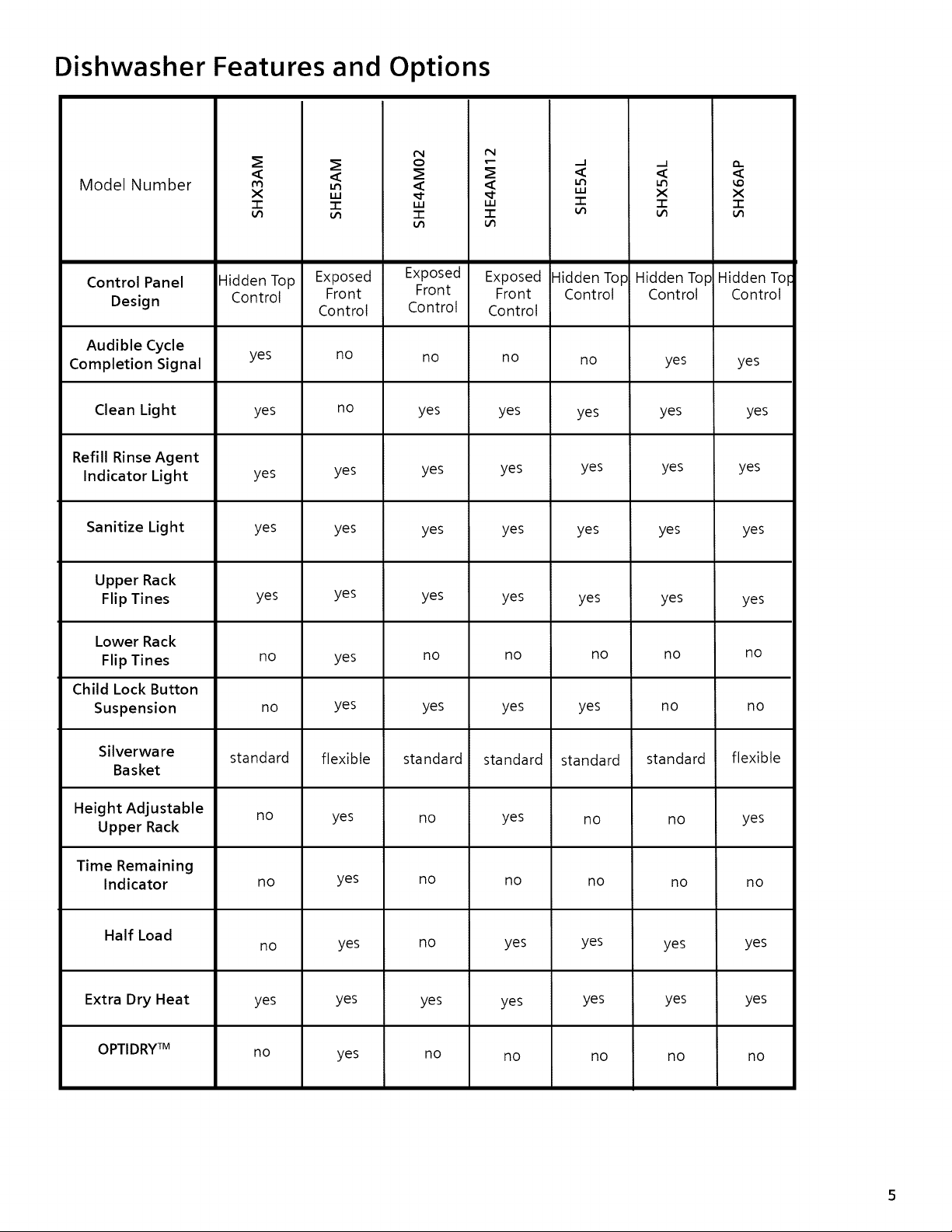
Dishwasher Features and Options
Model Number
Control Panel
Design
Audible Cycle
Completion Signal
Clean Light
Refill Rinse Agent
Indicator Light
Sanitize Light
Upper Rack
Flip Tines
Lower Rack
Flip Tines
Child Lock Button
Suspension
Silverware
Basket
Height Adjustable
Upper Rack
Time Remaining
Indicator
Half Load
Extra Dry Heat
OPTIDRY TM
<
x
3:
Hidden Top
Control
yes
yes
yes
yes
yes
no
no
standard
no
no
no
yes
no
<
uJ
"1-
Exposed
Front
Control
no
no
yes
yes
yes
yes
yes
flexible
yes
yes
yes
yes
yes
IN
o
iii
:I::
Exposed
Front
Control
no
yes
yes
yes
yes
no
yes
standard
no
no
no
yes
no
IN
<
uJ
-r"
Exposed
Front
Control
no
yes
yes
yes
yes
no
yes
standard
yes
no
yes
yes
no
.J .j
< <
'" x
"1" "1"
Hidden Top
Control
no
yes
yes
yes
no
yes
yes
standard
no
no
yes
yes
Hidden Top
Control
yes
yes
yes
yes
yes
no
no
standard
no
no
yes
no
yes
no
<
x
"1-
Hidden Tolc
Control
yes
yes
yes
yes
yes
no
no
flexible
yes
no
yes
yes
no
Dishware Materials
NOTE: Before using your dishwasher for the first time, check the information in this section.
Some items are not dishwasher safe and should be hand-washed; others require special loading.
Contact the item's manufacturer if you are unsure about the item's dishwasher suitability.
Recommended
Aluminum: Colored anodized aluminum may fade over time. Minerals in your water may
cause the aluminum to darken or spot. This can usually be removed by using a soap-filled steel
wool pad.
China, Crystal, Stoneware: Some hand-painted pieces may discolor, fade, or spot. Hand-
wash these pieces. Position fragile glassware so that it will not topple over or contact other
pieces during the wash cycle.
Glass: Milk glass may yellow.
Non-Stick Coatings: Apply a light coating of vegetable oil to non-stick surfaces after
drying.
Plastics: Make sure the piece is dishwasher safe.
Stainless Steel, Sterling Silver, and Silver Plate: Place these pieces so that they do not
contact dissimilar metals.
Not Recommended
Acrylic: Crazing (small cracks throughout the acrylic) may occur.
Adhesive-Joined Pieces: Adhesives that join materials such as plastic, wood, bone, steel
copper, tin, etc. may loosen.
Bone-Handled Utensils: Handles may separate.
Iron: Iron will rust. Hand-wash and dry immediately.
Non-Dishware Items: Your dishwasher is intended for use in cleaning ONLY standard
household dishware and kitchenware.
Pewter, Brass, Bronze: Pewter will tarnish. Hand-wash and dry immediately.
Tin: Tin will rust. Hand-wash and dry immediately.
Wood: Wooden bowls, wooden utensils, and wood-handled utensils can crack, warp, and
lose their finish.
Preparing and Loading the Dishware
Dishware Preparation
Do not pro-wash items having loosely-attached soiling. Remove large food particles, bones,
seeds, toothpicks, and excessive grease. Items having burned-on, baked-on or starchy soils
may require pro-treatment.
Loading the Dishwasher
Check the Materials section of this manual if you are unsure about an item's dishwasher
suitability.
Load only dishwasher-safe items into the dishwasher. Load dishes in the dishwasher racks so
that the insides of bowls, pots, and pans are face downwards. Avoid nesting and contact points
between dishes. Separate items of dissimilar metals.
Loading the Top Rack
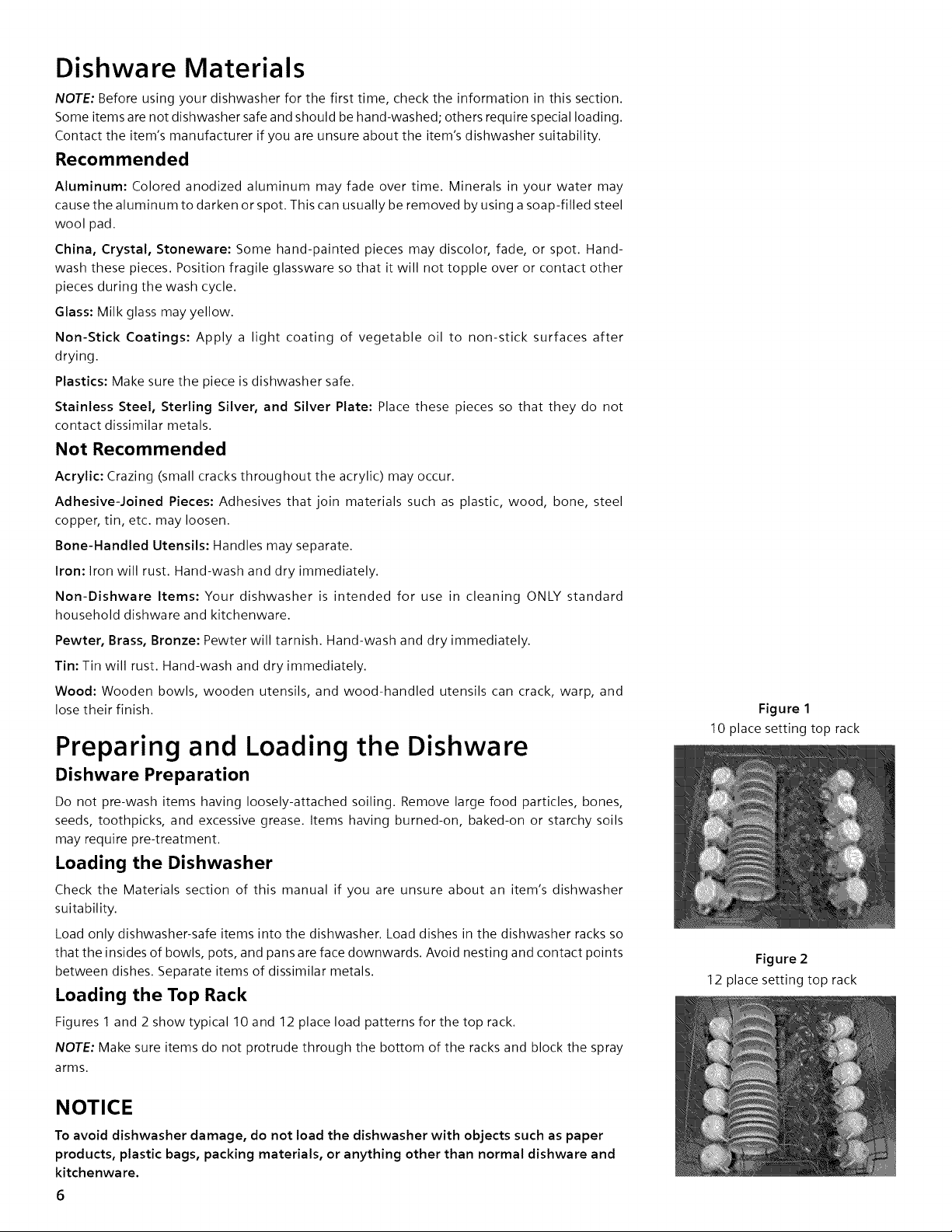
Figures 1 and 2 show typical 10 and 12 place load patterns for the top rack.
NOTE: Make sure items do not protrude through the bottom of the racks and block the spray
arms.
Figure 1
10 place setting top rack
Figure 2
12 place setting top rack
NOTICE
To avoid dishwasher damage, do not load the dishwasher with objects such as paper
products, plastic bags, packing materials, or anything other than normal dishware and
kitchenware.
6
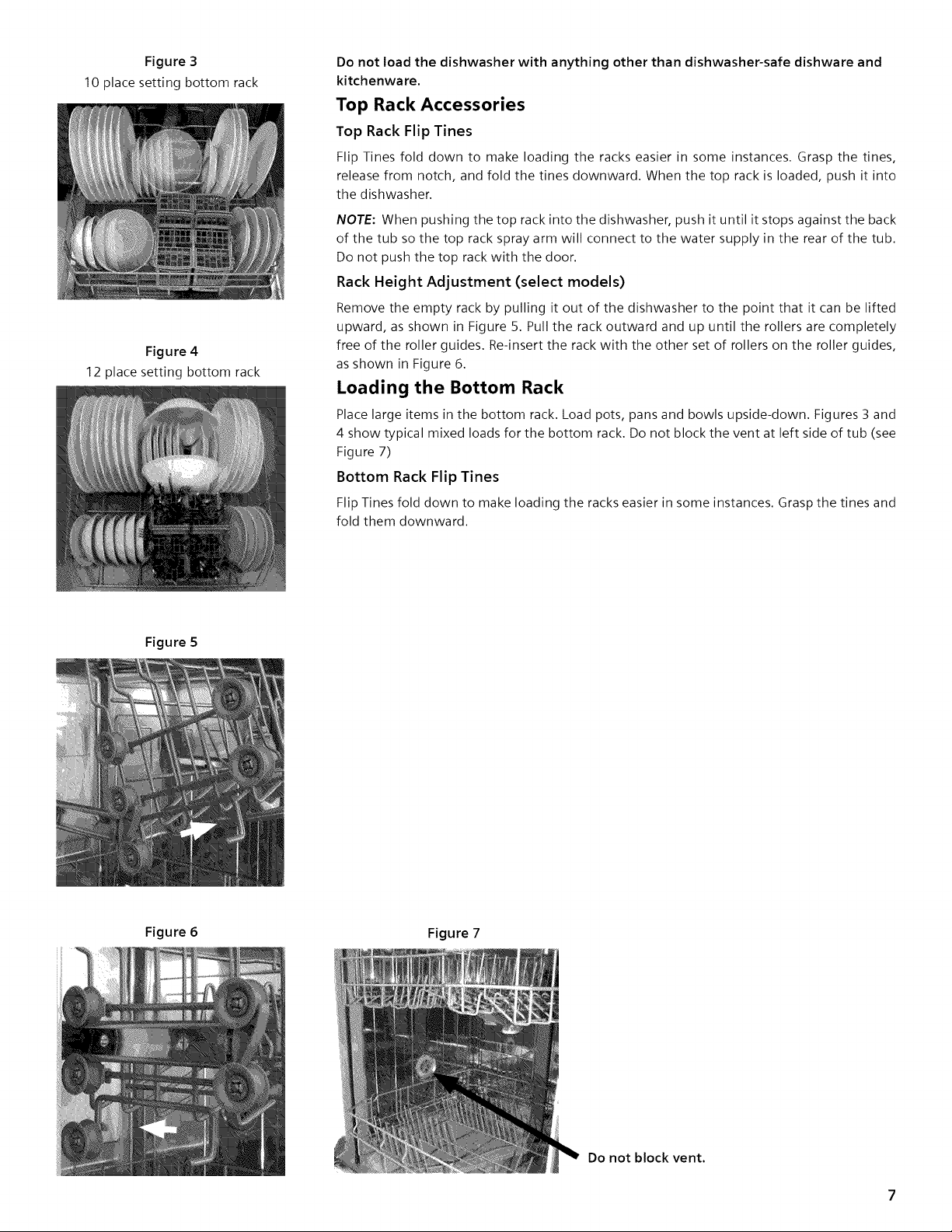
Figure 3
10 place setting bottom rack
Figure 4
12 place setting bottom rack
Do not load the dishwasher with anything other than dishwasher-safe dishware and
kitchenware.
Top Rack Accessories
Top Rack Flip Tines
Flip Tines fold down to make loading the racks easier in some instances. Grasp the tines,
release from notch, and fold the tines downward. When the top rack is loaded, push it into
the dishwasher.
NOTE: When pushing the top rack into the dishwasher, push it until it stops against the back
of the tub so the top rack spray arm will connect to the water supply in the rear of the tub.
Do not push the top rack with the door.
Rack Height Adjustment (select models)
Remove the empty rack by pulling it out of the dishwasher to the point that it can be lifted
upward, as shown in Figure 5. Pull the rack outward and up until the rollers are completely
free of the roller guides. Re-insert the rack with the other set of rollers on the roller guides,
as shown in Figure 6.
Loading the Bottom Rack
Place large items in the bottom rack. Load pots, pans and bowls upside-down. Figures 3 and
4 show typical mixed loads for the bottom rack. Do not block the vent at left side of tub (see
Figure 7)
Bottom Rack Flip Tines
Flip Tines fold down to make loading the racks easier in some instances. Grasp the tines and
fold them downward.
Figure 5
Figure 6
Figure 7
Do not block vent.
Loading the Silverware Basket
NOTE: The silverware basket tops can be folded up to accommodate large or oddly-shaped items.
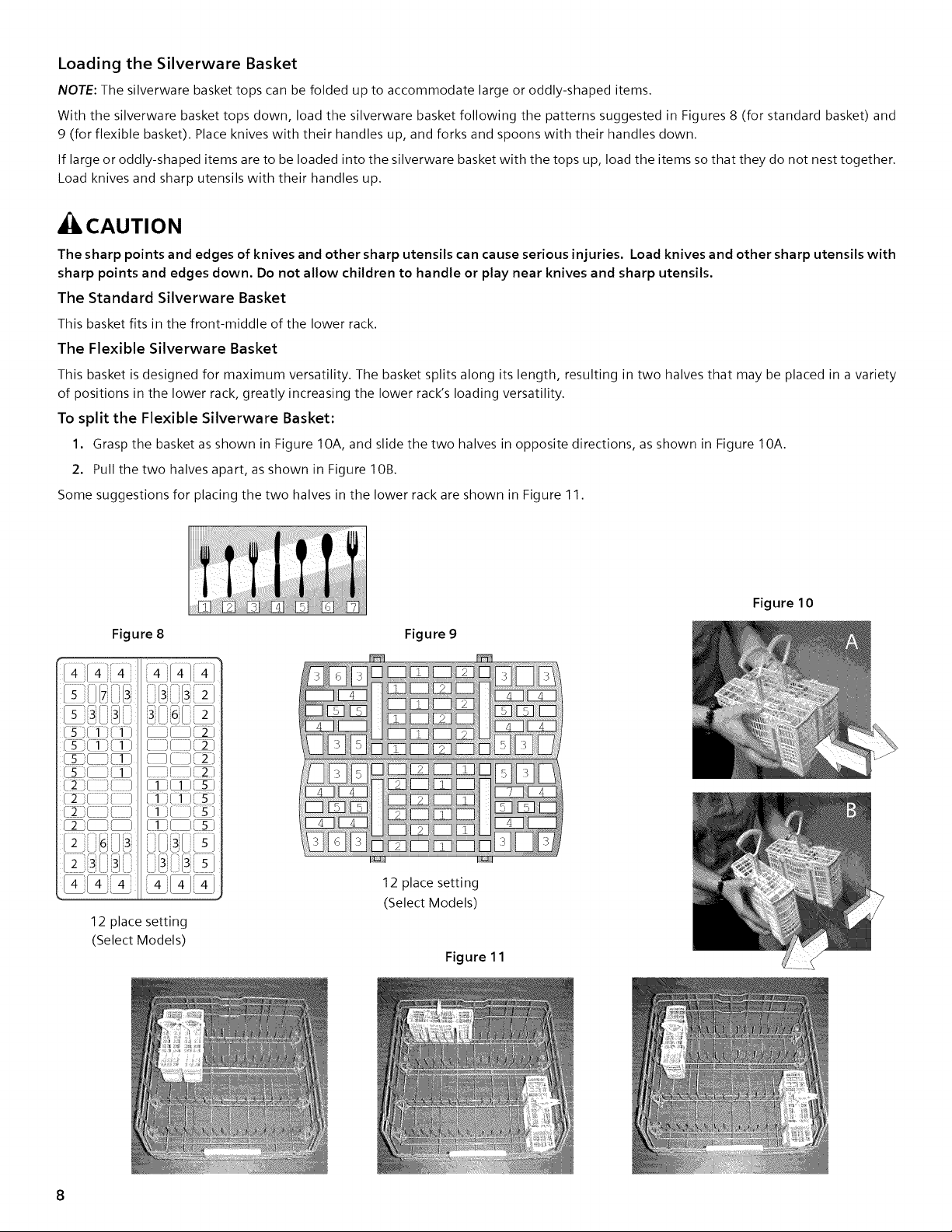
With the silverware basket tops down, load the silverware basket following the patterns suggested in Figures 8 (for standard basket) and
9 (for flexible basket). Place knives with their handles up, and forks and spoons with their handles down.
If large or oddly-shaped items are to be loaded into the silverware basket with the tops up, load the items so that they do not nest together.
Load knives and sharp utensils with their handles up.
,CAUTION
The sharp points and edges of knives and other sharp utensils can cause serious injuries. Load knives and other sharp utensils with
sharp points and edges down. Do not allow children to handle or play near knives and sharp utensils.
The Standard Silverware Basket
This basket fits in the front-middle of the lower rack.
The Flexible Silverware Basket
This basket is designed for maximum versatility. The basket splits along its length, resulting in two halves that may be placed in a variety
of positions in the lower rack, greatly increasing the lower rack's loading versatility.
To split the Flexible Silverware Basket:
1. Grasp the basket as shown in Figure 10A, and slide the two halves in opposite directions, as shown in Figure 10A.
2. Pull the two halves apart, as shown in Figure 10B.
Some suggestions for placing the two halves in the lower rack are shown in Figure 1 1.
Figure 8 Figure 9
Figure 10
Ls: /_
[ 2 i[ '[_
[ i!_[ 2 J
[ ][ ]2)
[ / J[2 ]
/1 :_(s)
_1)C5)
_3
/ 1i/ 3i 5i
12 place setting
(Select Models)
L;_J._I L;JO.,J
12 place setting
(Select Models)
Figure 1 1
8
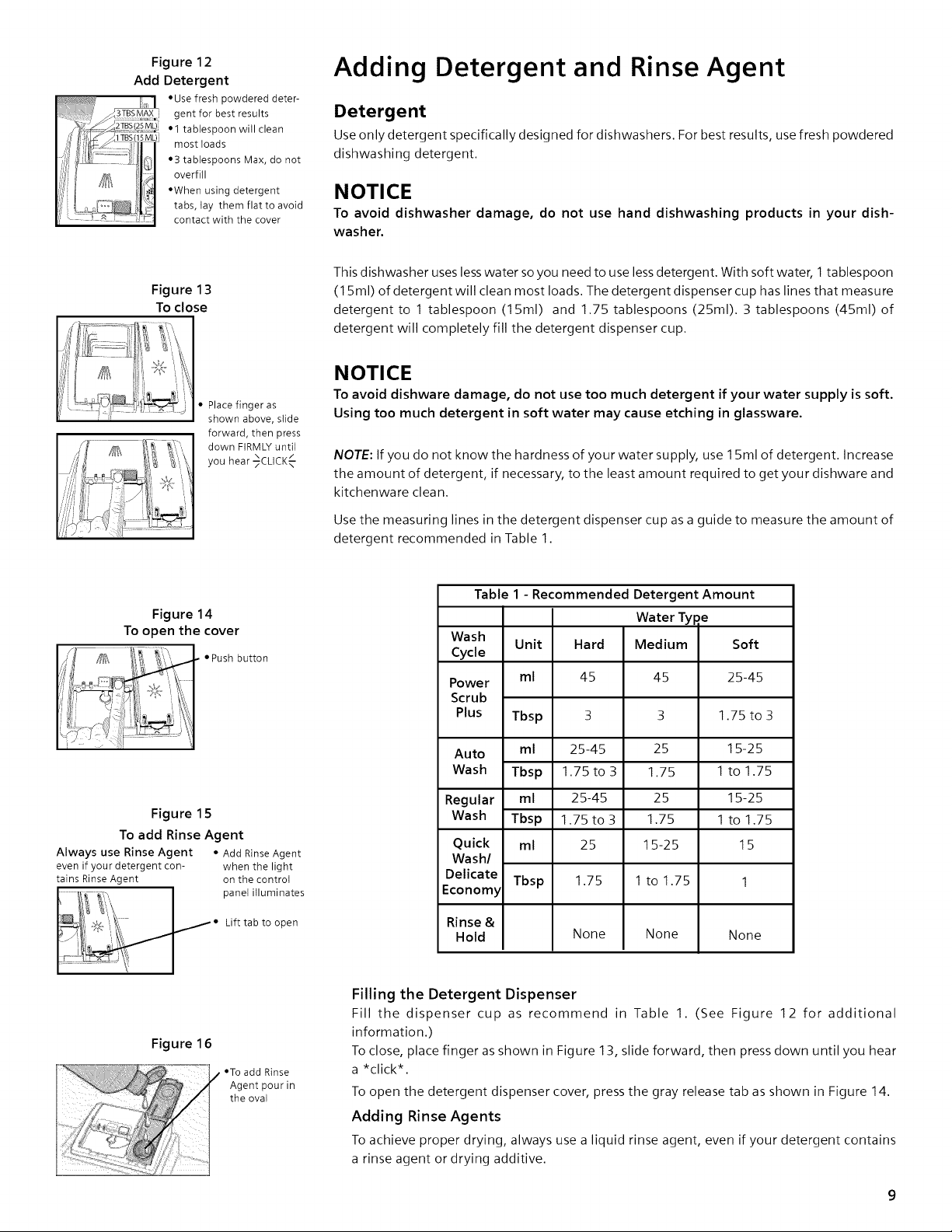
Figure 12
Add Detergent
• Use fresh powdered deter-
_3TBSMAX gent for best results
• 1 tablespoon will clean
_' most loads
•3 tablespoons Max, donot
,_ _;_ IF_tl overfill
', I /_/_ _l#qJ
l ii •When using detergent
/ [ :: .... ,
,y L[_i _ ,, tabs, lay them flat to avoid
<.... contact with the cover
Adding Detergent and Rinse Agent
Detergent
Use only detergent specifically designed for dishwashers. For best results, use fresh powdered
dishwashing detergent.
NOTICE
To avoid dishwasher damage, do not use hand dishwashing products in your dish-
washer.
Figure 13
To close
This dishwasher uses less water so you need to use less detergent. With soft water, 1 tablespoon
(15ml) of detergent will clean most loads. The detergent dispenser cup has lines that measure
detergent to 1 tablespoon (15ml) and 1.75tablespoons (25ml). 3tablespoons (45ml) of
detergent will completely fill the detergent dispenser cup.
• Place finger as
shown above, slide
forward, then press
down FIRMLY until
you hear _CLICKx/--
NOTICE
To avoid dishware damage, do not use too much detergent if your water supply is soft.
Using too much detergent in soft water may cause etching in glassware.
NOTE: If you do not know the hardness of your water supply, use 15ml of detergent. Increase
the amount of detergent, if necessary, to the least amount required to get your dishware and
kitchenware clean.
Use the measuring lines in the detergent dispenser cup as a guide to measure the amount of
detergent recommended in Table 1.
Figure 14
To open the cover
• Push button
Figure 15
To add Rinse Agent
Always use Rinse Agent • Add RinseAgent
even if your detergent con- when the light
tains RinseAgent on the control
panel illuminates
Lift tab to open
Table 1 - Recommended Detergent Amount
Water Type
Wash
Cycle
Power
Scrub
Plus
Auto
Wash
Regular
Wash
Quick
Wash/
Delicate
Economy
Tbsp
ml 25-45
Tbsp 1.75 to 3
ml 25-45
Tbsp 1.75 to 3
ml 25
Unit Hard Medium Soft
ml 45 45 25-45
3 3 1.75 to 3
25
1.75
25
1.75
15-25
15-25
1 to 1.75
15-25
1 to 1.75
15
Tbsp 1.75 1 to 1.75 1
None
Rinse &
Hold None
None
Figure 16
•To add Rinse
Agent pour in
the oval
Filling the Detergent Dispenser
Fill the dispenser cup as recommend in Table 1. (See Figure 12 for additional
information.)
To close, place finger as shown in Figure 13, slide forward, then press down until you hear
a *click*.
To open the detergent dispenser cover, press the gray release tab as shown in Figure 14.
Adding Rinse Agents
To achieve proper drying, always use a liquid rinse agent, even if your detergent contains
a rinse agent or drying additive.
RinseAgentDispenser
Opentherinseagentdispenserbyliftingthetabwithyourthumb.
NOTE: The dishwasher indicates low rinse agent either by showing the symbol _T¢ in the
countdown display, or illuminating the refill rinse agent light (model dependent).
Add liquid rinse agent to the dispenser as shown in Figure 1 6 until the rinse agent reservoir
is full. Wipe up any excess rinse agent that puddles when the dispenser reservoir is full.
NOTE: After filling the rinse agent dispenser, the indicator light will go out in a few minutes
after the dishwasher door is shut (select models only).
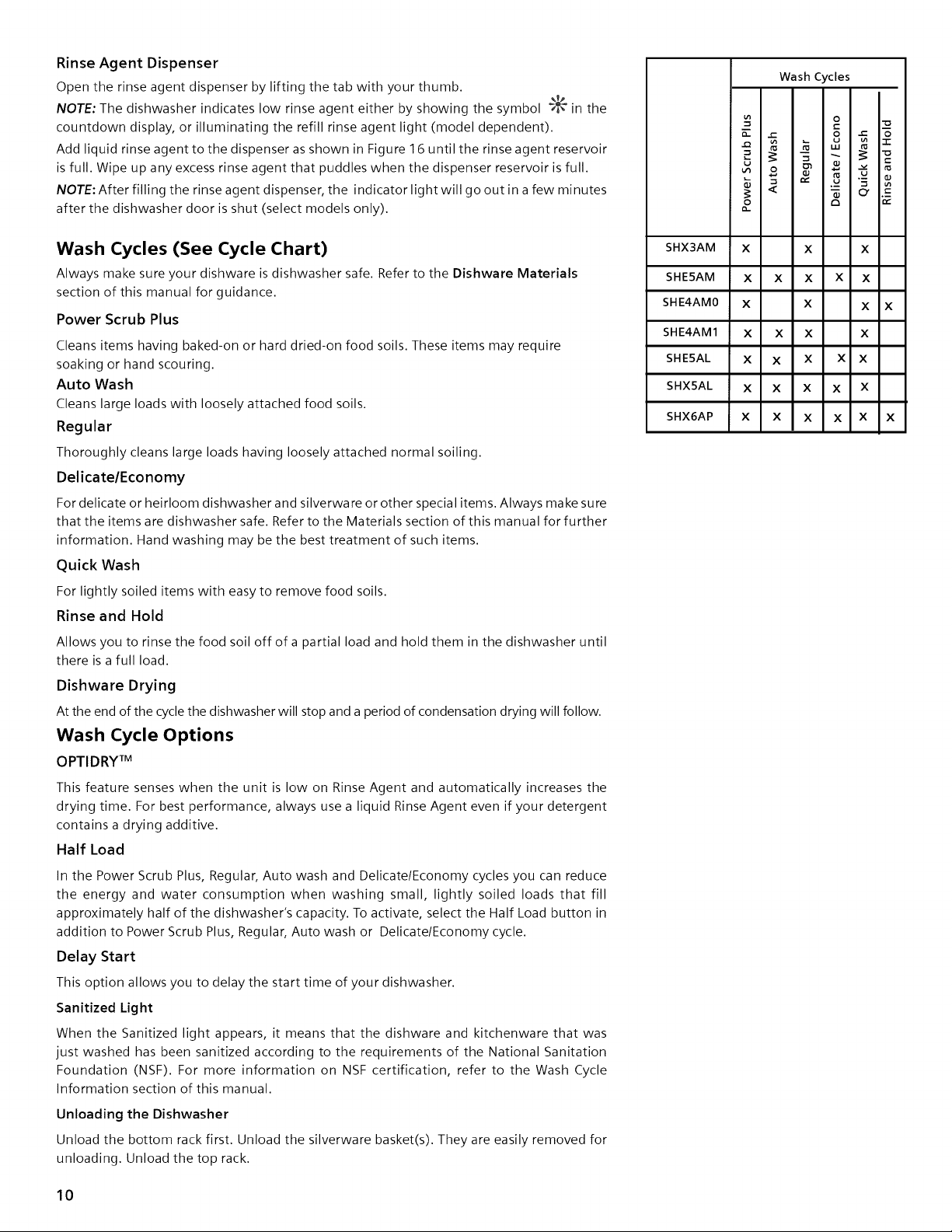
Wash Cycles (See Cycle Chart)
Always make sure your dishware is dishwasher safe, Refer to the Dishware Materials
section of this manual for guidance.
Power Scrub Plus
Cleans items having baked-on or hard dried-on food soils. These items may require
soaking or hand scouring.
Auto Wash
Cleans large loads with loosely attached food soils.
Regular
Thoroughly cleans large loads having loosely attached normal soiling.
Delicate/Economy
For delicate or heirloom dishwasher and silverware or other special items. Always make sure
that the items are dishwasher safe. Refer to the Materials section of this manual for further
information. Hand washing may be the best treatment of such items.
Quick Wash
For lightly soiled items with easy to remove food soils.
Rinse and Hold
Allows you to rinse the food soil off of a partial load and hold them in the dishwasher until
there is a full load.
Dishware Drying
At the end of the cycle the dishwasher will stop and a period of condensation drying will follow.
Wash Cycle Options
OPTIDRY TM
This feature senses when the unit is low on Rinse Agent and automatically increases the
drying time. For best performance, always use a liquid Rinse Agent even if your detergent
contains a drying additive.
Half Load
In the Power Scrub Plus, Regular, Auto wash and Delicate/Economy cycles you can reduce
the energy and water consumption when washing small, lightly soiled loads that fill
approximately half of the dishwasher's capacity. To activate, select the Half Load button in
addition to Power Scrub Plus, Regular, Auto wash or Delicate/Economy cycle.
Delay Start
This option allows you to delay the start time of your dishwasher.
Sanitized Light
When the Sanitized light appears, it means that the dishware and kitchenware that was
just washed has been sanitized according to the requirements of the National Sanitation
Foundation (NSF). For more information on NSF certification, refer to the Wash Cycle
Information section of this manual.
Unloading the Dishwasher
Unload the bottom rack first. Unload the silverware basket(s). They are easily removed for
unloading. Unload the top rack.
Wash Cycles
O
_- = S =_
u
2 c_
SHX3AM X X X
SHE5AM X X X X X
SHE4AM0 X X X X
SHE4AM1 X X X X
SHE5AL X X X X X
SHX5AL X X X X X
SHX6AP X X X X X X
10
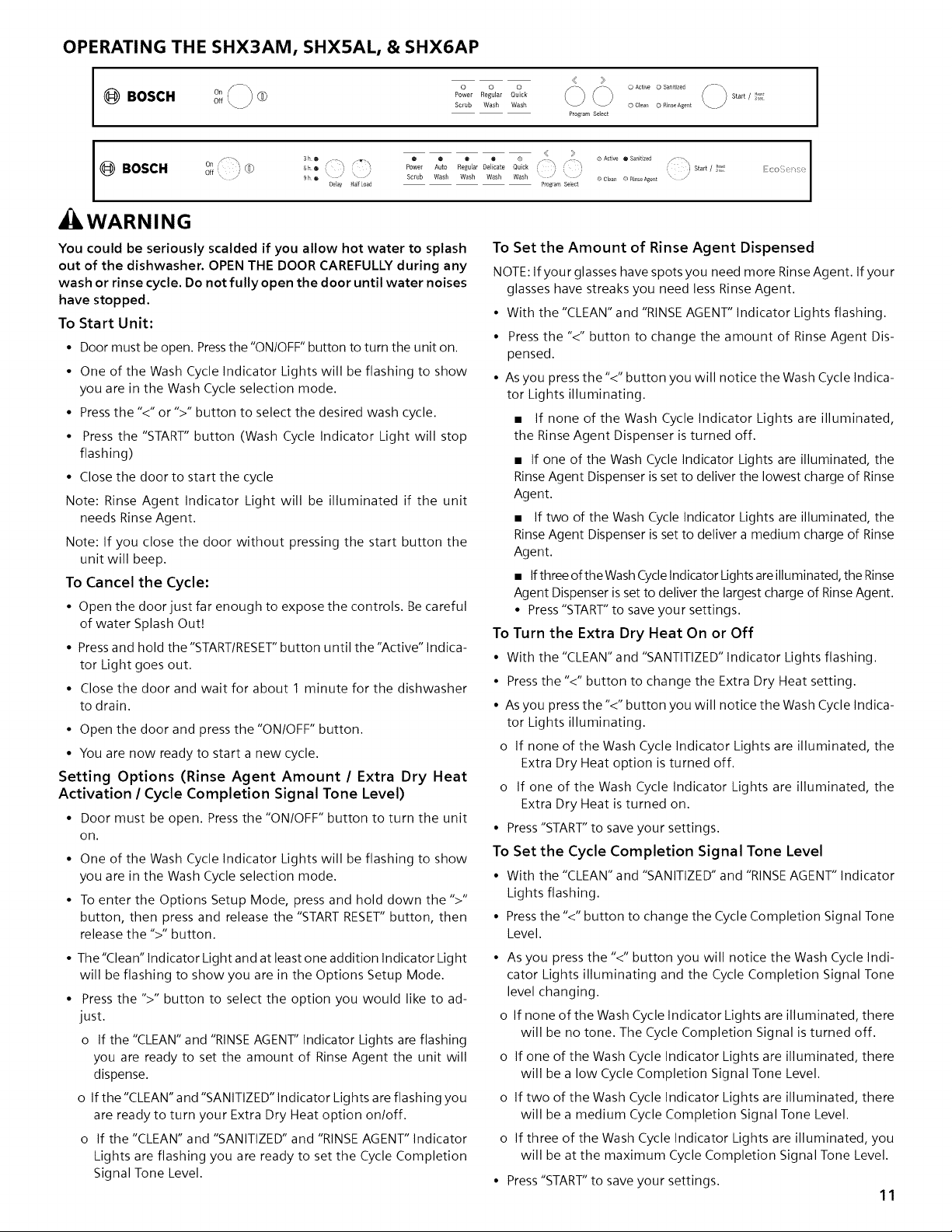
OPERATING THE SHX3AM, SHX5AL, & SHX6AP
I @BOSCH oo<_®
off
< >
o o o __ .................
Power RegWar Quick
tgLJ
Scrub Wash Wash 0 Clear 0 RbseAgent
Program Select
i @ 3he
BOSCH _"®
9 h • \ / ' /
Delay Half load
WARNING
@ o @ o o :. //_:,\ ® Active @ Sanitized _ Start/ }_!
Power Auto Regular Delicate Quick i_ i i
Scrub Wash Wash Wash Wash -/ \ ...... 0 Clean 0 RinseAgent " _'
Preg[am Select
You could be seriously scalded if you allow hot water to splash
out of the dishwasher. OPEN THE DOOR CAREFULLY during any
wash or rinse cycle. Do not fully open the door until water noises
have stopped.
To Start Unit:
• Door must be open. Press the "ON/OFF" button to turn the unit on.
• One of the Wash Cycle Indicator Lights will be flashing to show
you are in the Wash Cycle selection mode.
• Press the "<" or ">" button to select the desired wash cycle.
• Press the "START" button (Wash Cycle Indicator Light will stop
flashing)
• Close the door to start the cycle
Note: Rinse Agent Indicator Light will be illuminated if the unit
needs Rinse Agent.
Note: If you close the door without pressing the start button the
unit will beep.
To Cancel the Cycle:
• Open the door just far enough to expose the controls, Be careful
of water Splash Out!
• Press and hold the"START/RESET" button until the "Active" indica-
tor Light goes out,
• Close the door and wait for about 1 minute for the dishwasher
to drain.
• Open the door and press the "ON/OFF" button.
• You are now ready to start a new cycle.
Setting Options (Rinse Agent Amount / Extra Dry Heat
Activation / Cycle Completion Signal Tone Level)
• Door must be open. Press the "ON/OFF" button to turn the unit
on.
• One of the Wash Cycle Indicator Lights will be flashing to show
you are in the Wash Cycle selection mode.
• To enter the Options Setup Mode, press and hold down the ">"
button, then press and release the "START RESET" button, then
release the ">" button.
• The"Clean" Indicator Light and at least one addition Indicator Light
will be flashing to show you are in the Options Setup Mode.
• Press the ">" button to select the option you would like to ad-
just.
o If the "CLEAN" and "RINSE AGENT" Indicator Lights are flashing
you are ready to set the amount of Rinse Agent the unit will
dispense.
o If the "CLEAN" and "SANITIZED" Indicator Lights are flashing you
are ready to turn your Extra Dry Heat option on/off.
o If the "CLEAN" and "SANITIZED" and "RINSE AGENT" Indicator
Lights are flashing you are ready to set the Cycle Completion
Signal Tone Level.
C0 /
To Set the Amount of Rinse Agent Dispensed
NOTE: If your glasses have spots you need more Rinse Agent. If your
glasses have streaks you need less Rinse Agent.
• With the "CLEAN" and "RINSEAGENT" Indicator Lights flashing.
• Press the "<" button to change the amount of Rinse Agent Dis-
pensed.
• As you press the "<" button you will notice the Wash Cycle Indica-
tor Lights illuminating.
• If none of the Wash Cycle Indicator Lights are illuminated,
the Rinse Agent Dispenser is turned off.
• If one of the Wash Cycle Indicator Lights are illuminated, the
Rinse Agent Dispenser is set to deliver the lowest charge of Rinse
Agent.
• If two of the Wash Cycle Indicator Lights are illuminated, the
Rinse Agent Dispenser is set to deliver a medium charge of Rinse
Agent.
• Ifthree ofthe WashCycleIndicator Lights areilluminated, the Rinse
Agent Dispenser is set to deliver the largest charge of Rinse Agent.
• Press "START"to save your settings.
To Turn the Extra Dry Heat On or Off
• With the "CLEAN" and "SANTITIZED" Indicator Lights flashing.
• Press the "<" button to change the Extra Dry Heat setting.
• As you press the "<" button you will notice the Wash Cycle Indica-
tor Lights illuminating.
o If none of the Wash Cycle Indicator Lights are illuminated, the
Extra Dry Heat option is turned off.
o If one of the Wash Cycle Indicator Lights are illuminated, the
Extra Dry Heat is turned on.
• Press"START"to save your settings.
To Set the Cycle Completion Signal Tone Level
• With the "CLEAN" and "SANITIZED" and "RINSEAGENT" Indicator
Lights flashing.
• Press the "<" button to change the Cycle Completion Signal Tone
Level.
• As you press the "<" button you will notice the Wash Cycle Indi-
cator Lights illuminating and the Cycle Completion Signal Tone
level changing.
o If none of the Wash Cycle Indicator Lights are illuminated, there
will be no tone. The Cycle Completion Signal is turned off.
o If one of the Wash Cycle Indicator Lights are illuminated, there
will be a low Cycle Completion Signal Tone Level.
o If two of the Wash Cycle Indicator Lights are illuminated, there
will be a medium Cycle Completion Signal Tone Level.
o If three of the Wash Cycle Indicator Lights are illuminated, you
will be at the maximum Cycle Completion Signal Tone Level.
• Press"START"to save your settings.
11
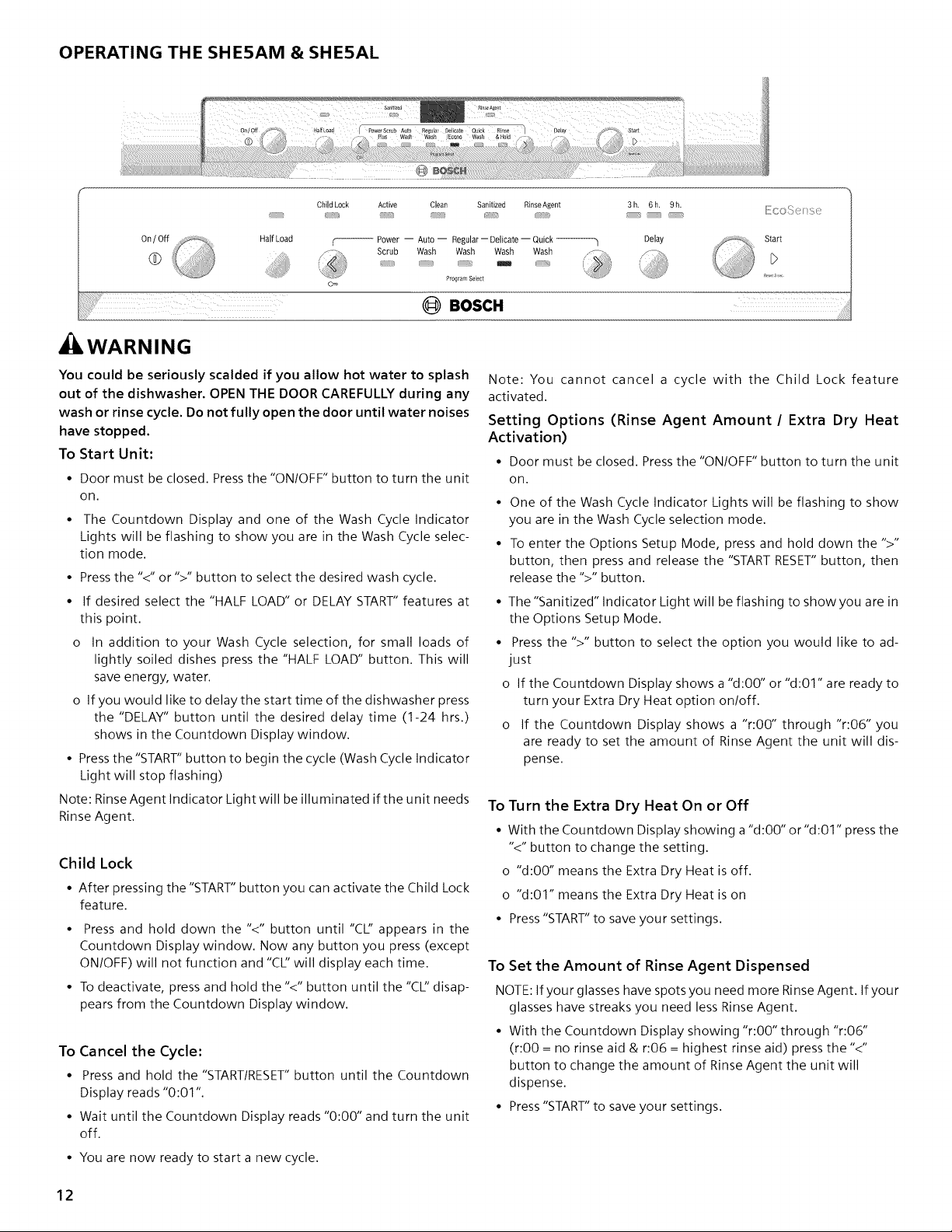
OPERATING THE SHE5AM & SHE5AL
@i@D
Child Lock
Active Clean Sanitized RinseAgent 3h. 6h. 9h.
_{!iCO!>( ]_i ({}
Half Load
,WARNING
-- Power -- Auto -- Regular -- Delicate -- Quick --------h
Scrub Wash Wash Wash Wash
Program Select
Delay
Start
(_ BOSCH .......
You could be seriously scalded if you allow hot water to splash
out of the dishwasher. OPEN THE DOOR CAREFULLY during any
wash or rinse cycle. Do not fully open the door until water noises
have stopped.
To Start Unit;
• Door must be closed. Press the "ON/OFF" button to turn the unit
on.
• The Countdown Display and one of the Wash Cycle Indicator
Lights will be flashing to show you are in the Wash Cycle selec-
tion mode.
• Press the "<" or ">" button to select the desired wash cycle.
• If desired select the "HALF LOAD" or DELAY START" features at
this point.
o In addition to your Wash Cycle selection, for small loads of
lightly soiled dishes press the "HALF LOAD" button. This will
save energy, water.
o If you would like to delay the start time of the dishwasher press
the "DELAY" button until the desired delay time (1-24 hrs.)
shows in the Countdown Display window.
• Press the "START" button to begin the cycle (Wash Cycle Indicator
Light will stop flashing)
Note: Rinse Agent Indicator Light will be illuminated if the unit needs
Rinse Agent.
Child Lock
• After pressing the "START" button you can activate the Child Lock
feature.
• Press and hold down the "<" button until "CL" appears in the
Countdown Display window. Now any button you press (except
ON/OFF) will not function and '%12will display each time.
• To deactivate, press and hold the "<" button until the "C12disap-
pears from the Countdown Display window.
To Cancel the Cycle:
• Press and hold the "STARTIRESET"button until the Countdown
Display reads "0:01".
• Wait until the Countdown Display reads "0:00" and turn the unit
off.
Note: You cannot cancel a cycle with the Child Lock feature
activated.
Setting Options (Rinse Agent Amount / Extra Dry Heat
Activation)
• Door must be closed. Press the "ON/OFF" button to turn the unit
on.
• One of the Wash Cycle Indicator Lights will be flashing to show
you are in the Wash Cycle selection mode.
• To enter the Options Setup Mode, press and hold down the ">"
button, then press and release the "START RESET"button, then
release the ">" button.
• The "Sanitized" Indicator Light will be flashing to show you are in
the Options Setup Mode.
• Press the ">" button to select the option you would like to ad-
just
o If the Countdown Display shows a "d:00" or "d:01" are ready to
turn your Extra Dry Heat option on/off.
o If the Countdown Display shows a "r:00" through "r:06" you
are ready to set the amount of Rinse Agent the unit will dis-
pense.
To Turn the Extra Dry Heat On or Off
• With the Countdown Display showing a "d:00" or"d:01" press the
"<" button to change the setting.
o "d:00" means the Extra Dry Heat is off.
o "d:01" means the Extra Dry Heat is on
• Press "START" to save your settings.
To Set the Amount of Rinse Agent Dispensed
NOTE: If your glasses have spots you need more Rinse Agent. If your
glasses have streaks you need less Rinse Agent.
• With the Countdown Display showing "r:00" through "r:06"
(r:00 = no rinse aid & r:06 = highest rinse aid) press the "<"
button to change the amount of Rinse Agent the unit will
dispense.
• Press "START" to save your settings.
• You are now ready to start a new cycle.
12
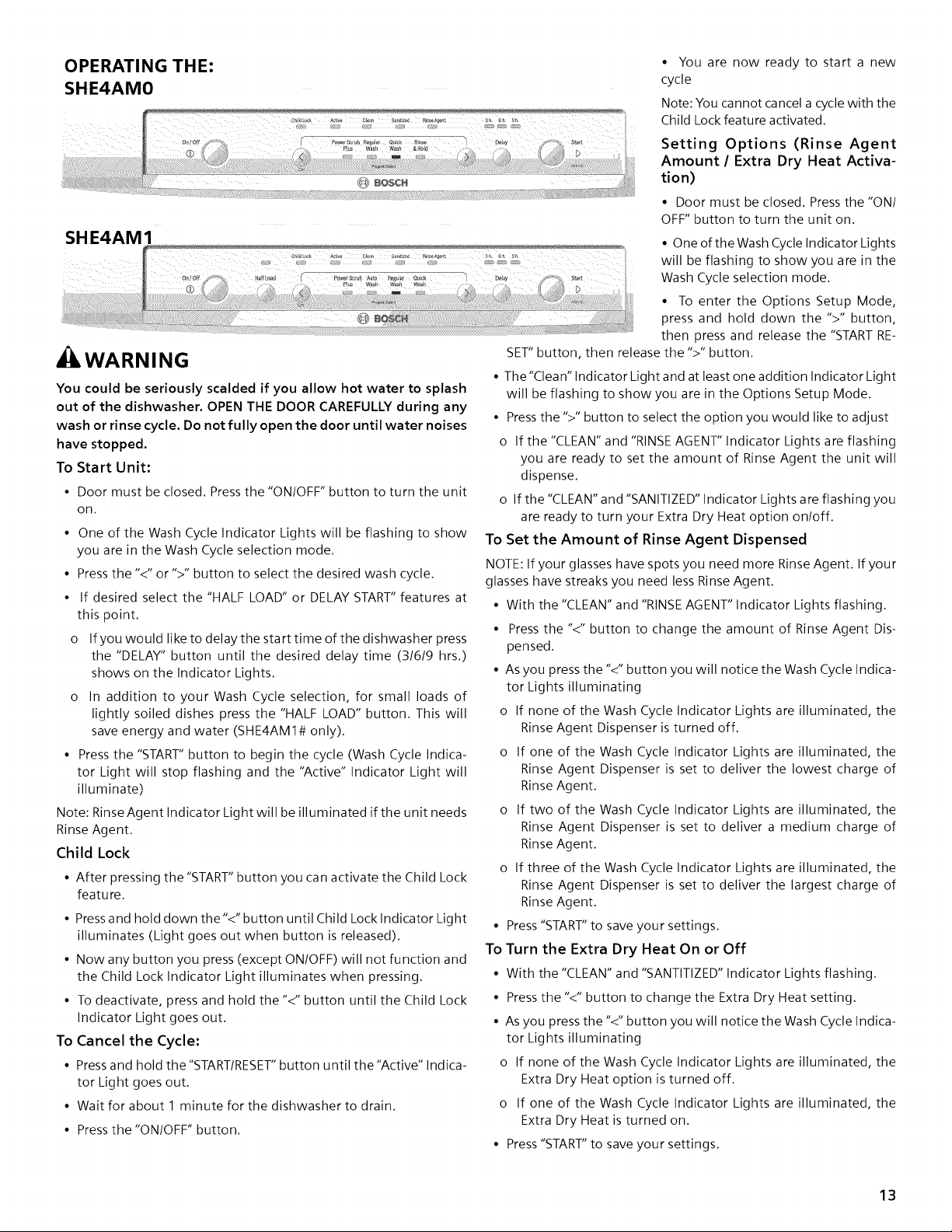
OPERATING THE:
SHE4AMO
SHE4AM1
WARNING
You could be seriously scalded if you allow hot water to splash
out of the dishwasher. OPEN THE DOOR CAREFULLY during any
wash or rinse cycle. Do not fully open the door until water noises
have stopped.
To Start Unit:
• Door must be closed. Press the "ON/OFF" button to turn the unit
on.
One of the Wash Cycle Indicator Lights will be flashing to show
you are in the Wash Cycle selection mode.
Press the "<" or ">" button to select the desired wash cycle.
If desired select the "HALF LOAD" or DELAY START" features at
this point.
If you would like to delay the start time of the dishwasher press
the "DELAY" button until the desired delay time (3/6/9 hrs.)
shows on the Indicator Lights.
In addition to your Wash Cycle selection, for small loads of
lightly soiled dishes press the "HALF LOAD" button. This will
save energy and water (SHE4AMI# only).
Press the "START" button to begin the cycle (Wash Cycle Indica-
tor Light will stop flashing and the "Active" Indicator Light will
illuminate)
Note: Rinse Agent Indicator Light will be illuminated if the unit needs
Rinse Agent.
Child Lock
• After pressing the "START" button you can activate the Child Lock
feature.
• Press and hold down the'<" button until Child Lock Indicator Light
illuminates (Light goes out when button is released).
• Now any button you press (except ON/OFF) will not function and
the Child Lock Indicator Light illuminates when pressing.
• To deactivate, press and hold the "<" button until the Child Lock
Indicator Light goes out.
To Cancel the Cycle:
• Press and hold the"START/RESET" button until the "Active" Indica-
tor Light goes out.
• Wait for about 1 minute for the dishwasher to drain.
• Press the "ON/OFF" button.
• You are now ready to start a new
cycle
Note: You cannot cancel a cycle with the
Child Lock feature activated.
Setting Options (Rinse Agent
Amount / Extra Dry Heat Activa-
tion)
• Door must be closed. Pressthe "ONI
OFF" button to turn the unit on.
• One of the Wash Cycle Indicator Lights
will be flashing to show you are in the
Wash Cycle selection mode.
• To enter the Options Setup Mode,
press and hold down the ">" button,
then press and release the "START RE-
SET" button, then release the ">" button.
• The"Clean" Indicator Light and at least one addition Indicator Light
will be flashing to show you are in the Options Setup Mode.
• Pressthe ">" button to select the option you would like to adjust
o If the "CLEAN" and "RINSEAGENT" Indicator Lights are flashing
you are ready to set the amount of Rinse Agent the unit will
dispense.
o If the "CLEAN" and "SANITIZED" Indicator Lights are flashing you
are ready to turn your Extra Dry Heat option on/off.
To Set the Amount of Rinse Agent Dispensed
NOTE: If your glasses have spots you need more Rinse Agent. If your
glasses have streaks you need less Rinse Agent.
• With the "CLEAN" and "RINSEAGENT" Indicator Lights flashing.
• Press the "<" button to change the amount of Rinse Agent Dis-
pensed.
• As you press the "<" button you will notice the Wash Cycle Indica-
tor Lights illuminating
o If none of the Wash Cycle Indicator Lights are illuminated, the
Rinse Agent Dispenser is turned off.
o If one of the Wash Cycle Indicator Lights are illuminated, the
Rinse Agent Dispenser is set to deliver the lowest charge of
Rinse Agent.
o If two of the Wash Cycle Indicator Lights are illuminated, the
Rinse Agent Dispenser is set to deliver a medium charge of
Rinse Agent.
o If three of the Wash Cycle Indicator Lights are illuminated, the
Rinse Agent Dispenser is set to deliver the largest charge of
Rinse Agent.
• Press"START"to save your settings.
To Turn the Extra Dry Heat On or Off
• With the "CLEAN" and "SANTITIZED" Indicator Lights flashing.
• Pressthe "<" button to change the Extra Dry Heat setting.
• As you press the "<" button you will notice the Wash Cycle Indica-
tor Lights illuminating
o If none of the Wash Cycle Indicator Lights are illuminated, the
Extra Dry Heat option is turned off.
o If one of the Wash Cycle Indicator Lights are illuminated, the
Extra Dry Heat is turned on.
• Press"START"to save your settings.
13
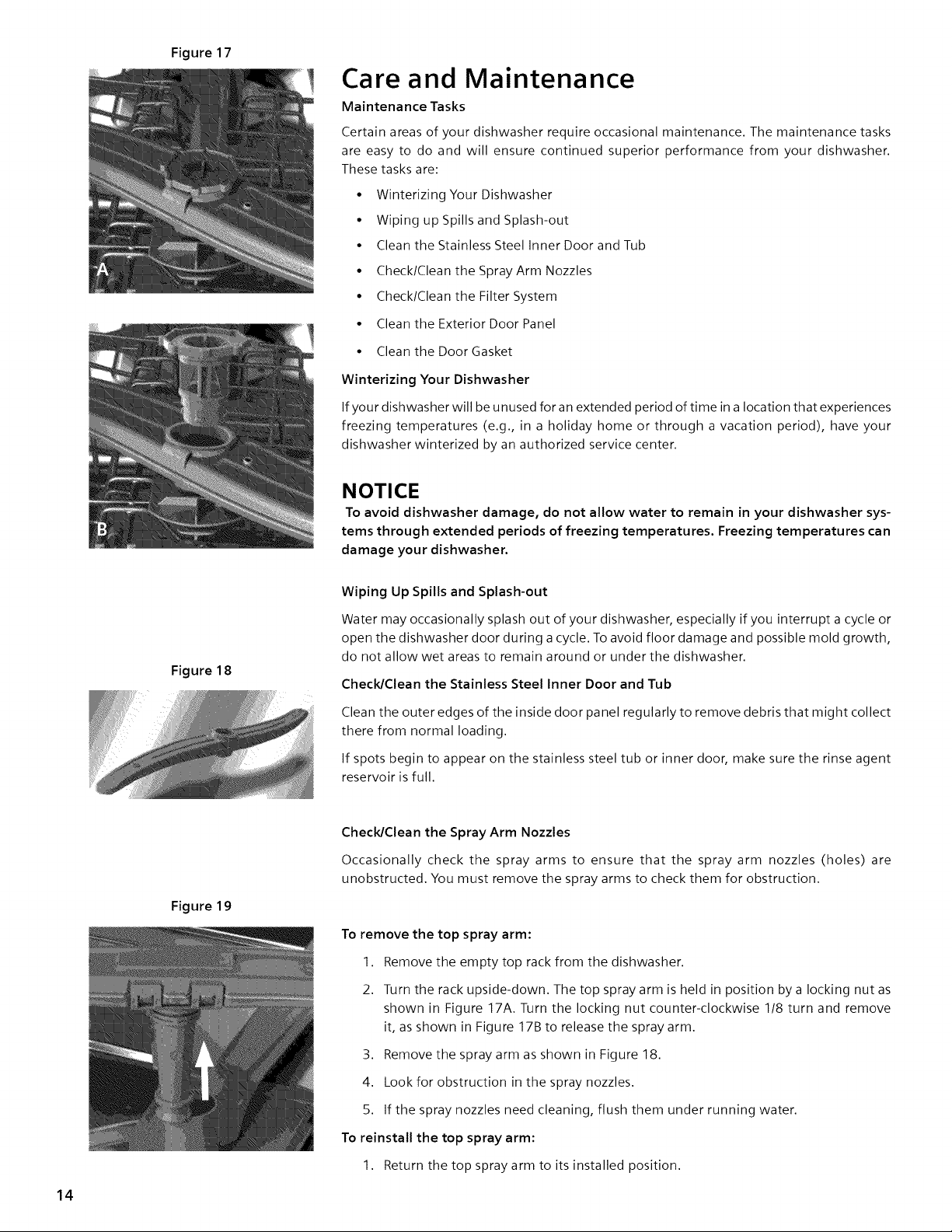
Figure 17
Figure 18
Care and Maintenance
Maintenance Tasks
Certain areas of your dishwasher require occasional maintenance. The maintenance tasks
are easy to do and will ensure continued superior performance from your dishwasher.
These tasks are:
• Winterizing Your Dishwasher
• Wiping up Spills and Splash-out
• Clean the Stainless Steel Inner Door and Tub
• Check/Clean the Spray Arm Nozzles
• Check/Clean the Filter System
• Clean the Exterior Door Panel
• Clean the Door Gasket
Winterizing Your Dishwasher
If your dishwasher will be unused for an extended period of time in a location that experiences
freezing temperatures (e.g., in a holiday home or through a vacation period), have your
dishwasher winterized by an authorized service center.
NOTICE
To avoid dishwasher damage, do not allow water to remain in your dishwasher sys-
tems through extended periods of freezing temperatures. Freezing temperatures can
damage your dishwasher.
Wiping Up Spills and Splash-out
Water may occasionally splash out of your dishwasher, especially if you interrupt a cycle or
open the dishwasher door during a cycle. To avoid floor damage and possible mold growth,
do not allow wet areas to remain around or under the dishwasher.
Check/Clean the Stainless Steel Inner Door and Tub
Clean the outer edges of the inside door panel regularly to remove debris that might collect
there from normal loading.
If spots begin to appear on the stainless steel tub or inner door, make sure the rinse agent
reservoir is full.
14
Figure 19
Check/Clean the Spray Arm Nozzles
Occasionally check the spray arms to ensure that the spray arm nozzles (holes) are
unobstructed. You must remove the spray arms to check them for obstruction.
To remove the top spray arm:
1. Remove the empty top rack from the dishwasher.
2. Turn the rack upside-down. The top spray arm is held in position by a locking nut as
shown in Figure 17A. Turn the locking nut counter-clockwise 1/8 turn and remove
it, as shown in Figure 17B to release the spray arm.
3. Remove the spray arm as shown in Figure 18.
4. Look for obstruction in the spray nozzles.
5. If the spray nozzles need cleaning, flush them under running water.
To reinstall the top spray arm:
1. Return the top spray arm to its installed position.
2. Returnthelockingnuttoitsinstalledpositionandturnit 1/8turnclockwise.
3. Returnthetopracktothetoprackrollerguides.
Toremovethebottomsprayarm:
1. Removetheemptybottomrackfromthedishwashertub.
2. GraspandliftthebottomsprayarmasshowninFigure19.
3. Lookforobstructioninthespraynozzles.
4. If thespraynozzlesneedcleaning,flushthemunderrunningwater.
Toreinstallthebottomsprayarm:
1. Returnthebottomsprayarmto itsinstalledpositionandpressit sothatit snapsinto
place.
2. Returnthebottomracktoitsinstalledposition.
Check/Clean the Filter System
This dishwasher has a filter system that consists of a Large Object Trap/Cylinder Filter assembly
and a Fine Filter, Select models have an additional Micro Filter, The filter system is located on the
inside of your dishwasher under the lower rack and is easily accessible,
During normal use, the filter system is self-cleaning. You should occasionally inspect it for foreign
objects and clean it when necessary.
,CAUTION
To avoid injury, do not reach into the large object trap with your fingers. The large object
trap could contain sharp objects.
To Remove the Large Object Trap/Cylinder Filter Assembly:
1. Remove the bottom rack.
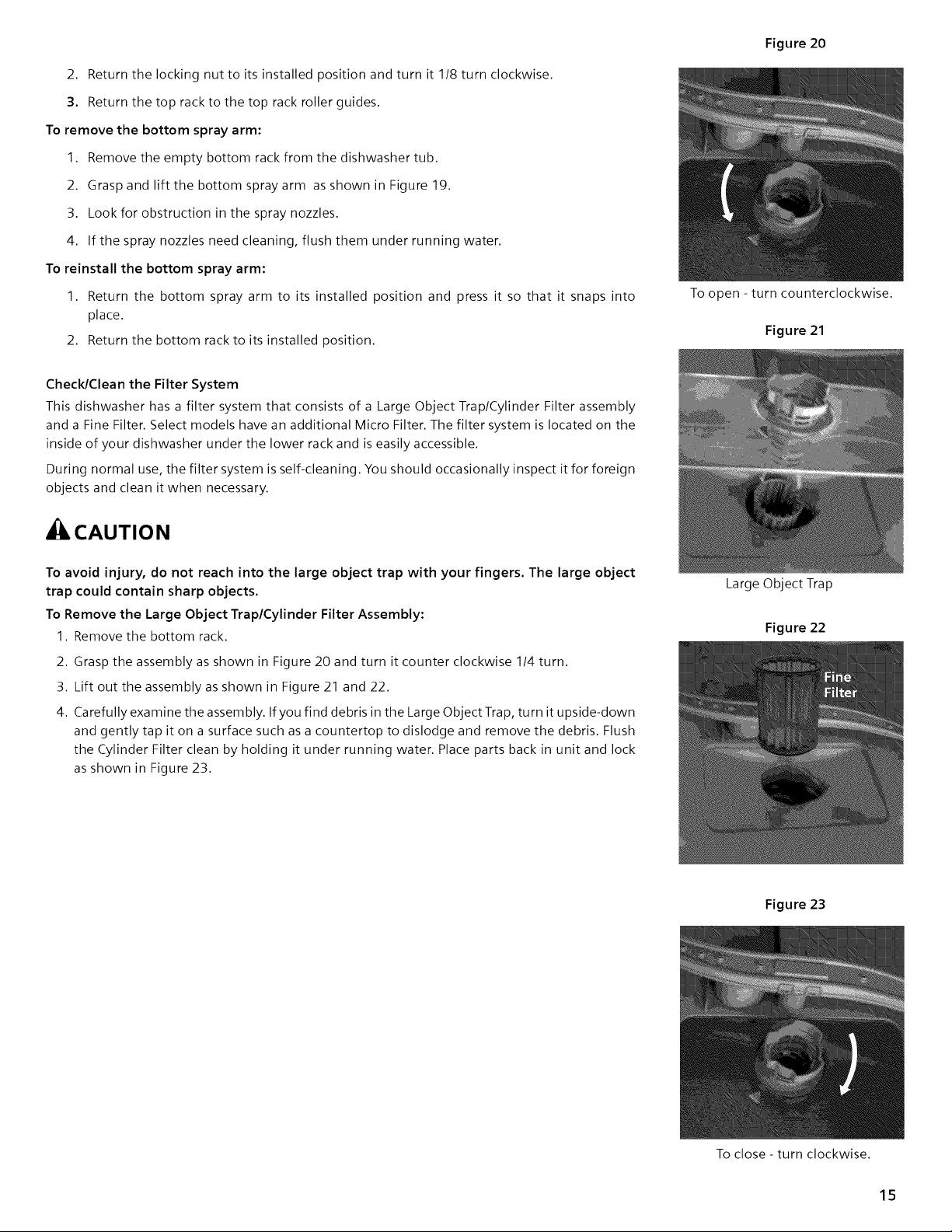
2. Grasp the assembly as shown in Figure 20 and turn it counter clockwise 1/4 turn.
3. Lift out the assembly as shown in Figure 21 and 22.
4. Carefully examine the assembly. If you find debris in the Large Object Trap, turn it upside-down
and gently tap it on a surface such as a countertop to dislodge and remove the debris. Flush
the Cylinder Filter clean by holding it under running water. Place parts back in unit and lock
as shown in Figure 23.
Figure 20
To open - turn counterclockwise.
Figure 21
Large Object Trap
Figure 22
Figure 23
To close - turn clockwise.
15
Clean the Exterior Door Panel
Colored Doors
Use only a soft cloth that is lightly dampened with soapy water.
Stainless Steel Doors
Use a soft cloth with a non-abrasive cleaner (preferably a liquid
spray) made for cleaning stainless steel. For the best results, apply
the stainless steel cleaner to the cloth, then wipe the surface.
Clean the Door Gasket and Door Seal
Regularly clean the door gasket with a damp cloth to remove food
particles and other debris. Also clean the door seal, located inside
the dishwasher at the bottom of the door.
Wash Cycle Information
NOTE: To save energy, this dishwasher has a "Smart Control" that
automatically adjusts the cycle based on soil loads and incoming
water temperature. The "Smart Control" makes decisions that can
cause the cycle time and water usage to adjust intermittently. The
cycle times listed in the Use and Care manual are based on normal
soil loads and 120°F incoming water and will vary based on your
actual conditions.
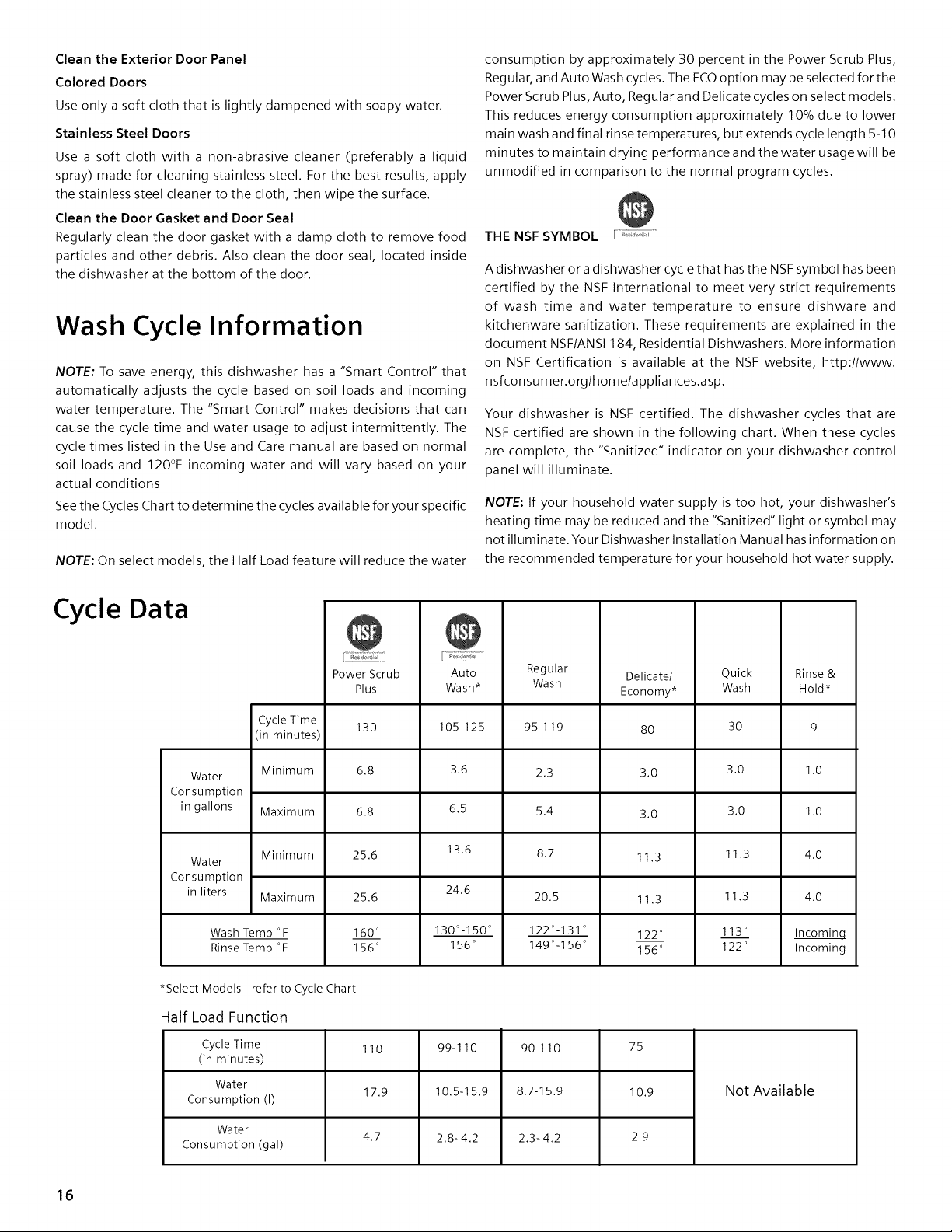
See the Cycles Chart to determine the cycles available for your specific
model.
NOTE: On select models, the Half Load feature will reduce the water
consumption by approximately 30 percent in the Power Scrub Plus,
Regular, and Auto Wash cycles. The ECOoption may be selected for the
Power Scrub Plus, Auto, Regular and Delicate cycles on select models.
This reduces energy consumption approximately 10% due to lower
main wash and final rinse temperatures, but extends cycle length 5-t0
minutes to maintain drying performance and the water usage will be
unmodified in comparison to the normal program cycles.
THE NSF SYMBOL
A dishwasher or a dishwasher cycle that has the NSF symbol has been
certified by the NSF International to meet very strict requirements
of wash time and water temperature to ensure dishware and
kitchenware sanitization. These requirements are explained in the
document NSF/ANS1184, Residential Dishwashers. More information
on NSF Certification is available at the NSF website, http://www.
nsfconsumer.org/home/appliances.asp.
Your dishwasher is NSF certified. The dishwasher cycles that are
NSF certified are shown in the following chart. When these cycles
are complete, the "Sanitized" indicator on your dishwasher control
panel will illuminate.
NOTE: If your household water supply is too hot, your dishwasher's
heating time may be reduced and the "Sanitized" light or symbol may
not illuminate. Your Dishwasher Installation Manual has information on
the recommended temperature for your household hot water supply.
Cycle hta
Power Scrub
Plus
Regular
Wash
Delicate/
Economy*
Quick
Wash
Auto
Wash*
105-125
3.6
6.5
13.6
24.6
130°-150 °
156 °
Rinse &
Hold*
Cycle Time
130 95-119 80 30 9
(in minutes)
Water Minimum 6.8 2.3 3.0 3.0 1.0
Consumption
in gallons Maximum 6.8 5.4 3.0 3.0 1.0
Minimum 25.6 8.7 11.3 11.3 4.0
Water
Consumption
in liters Maximum
25.6
160 °
156 °
11.3
122 °
156 °
Wash Temp °F
Rinse Temp °F
11.3
113 °
122 °
20.5
122o_131 o
149 °-1 56 °
4.0
Incominq
Incoming
*Select Models - refer to Cycle Chart
Half Load Function
Cycle Time
(in minutes)
Water
Consumption (I)
Water
Consumption (gal)
110
17.9
4.7
99-110
10.5-15.9
2.8-4.2
90-110
8.7-15.9
2.3-4.2
75
10.9
2.9
Not Available
16
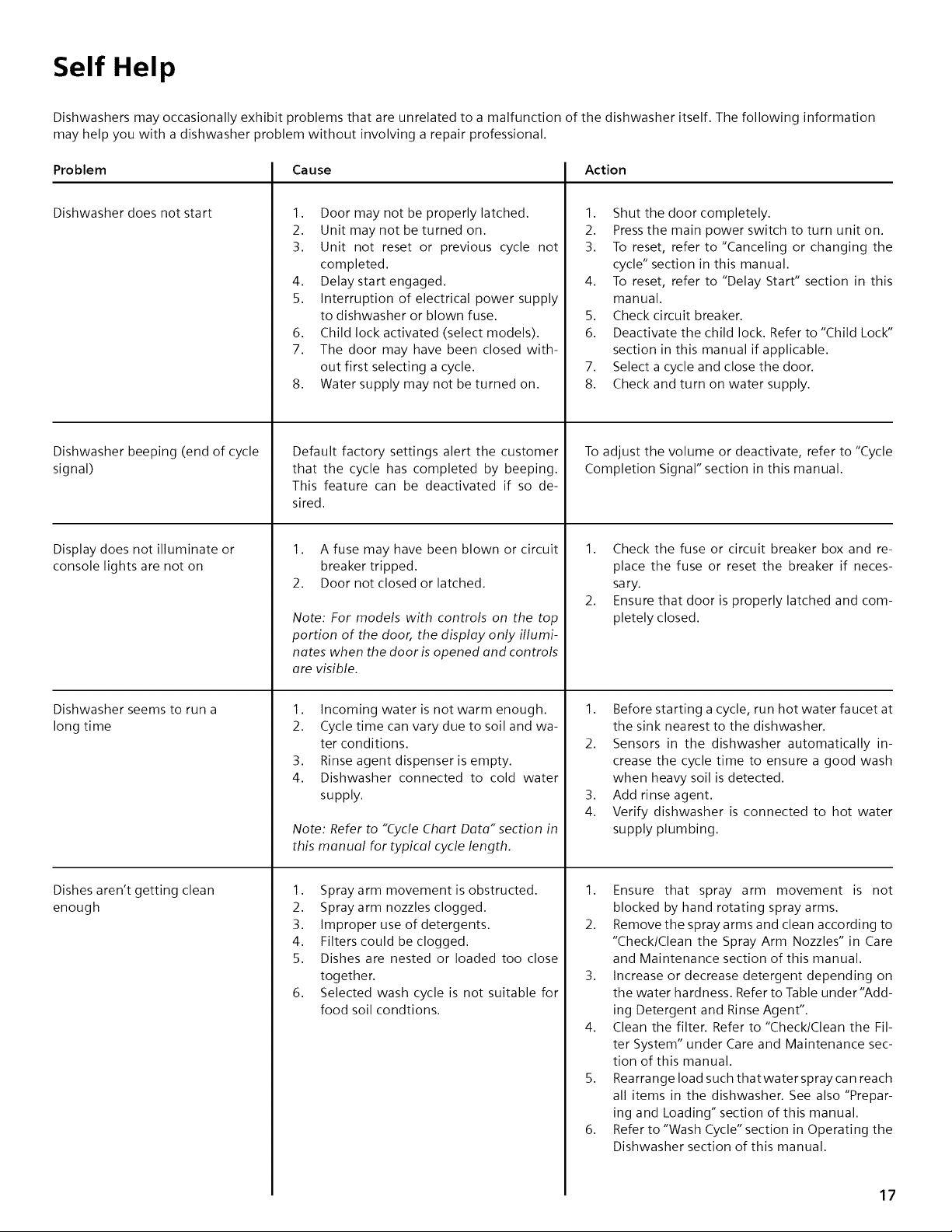
Self Help
Dishwashers may occasionally exhibit problems that are unrelated to a malfunction of the dishwasher itself. The following information
may help you with a dishwasher problem without involving a repair professional.
Problem
Dishwasher does not start
Dishwasher beeping (end of cycle
signal)
Display does not illuminate or
console lights are not on
Dishwasher seems to run a
long time
Dishes aren't getting clean
enough
Cause
1. Door may not be properly latched.
2. Unit may not be turned on.
3. Unit not reset or previous cycle not
completed.
4. Delay start engaged.
5. Interruption of electrical power supply
to dishwasher or blown fuse.
6. Child lock activated (select models).
7. The door may have been closed with-
out first selecting a cycle.
8. Water supply may not be turned on.
Default factory settings alert the customer
that the cycle has completed by beeping.
This feature can be deactivated if so de-
sired.
1. A fuse may have been blown or circuit
breaker tripped.
2. Door not closed or latched.
Note: For models with controls on the top
portion of the door, the display only illumi-
nates when the door is opened and controls
are visible.
1. Incoming water is not warm enough.
2. Cycle time can vary due to soil and wa-
ter conditions.
3. Rinse agent dispenser is empty.
4. Dishwasher connected to cold water
supply.
Note: Refer to "Cycle Chart Data" section in
this manual for typical cycle length.
1. Spray arm movement is obstructed.
2. Spray arm nozzles clogged.
3. Improper use of detergents.
4. Filters could be clogged.
5. Dishes are nested or loaded too close
together.
6. Selected wash cycle is not suitable for
food soil condtions.
Action
1. Shut the door completely.
2. Pressthe main power switch to turn unit on.
3. To reset, refer to "Canceling or changing the
cycle" section in this manual.
4. To reset, refer to "Delay Start" section in this
manual.
5. Check circuit breaker.
6. Deactivate the child lock. Refer to "Child Lock"
section in this manual if applicable.
7. Select a cycle and close the door.
8. Check and turn on water supply.
To adjust the volume or deactivate, refer to "Cycle
Completion Signal" section in this manual.
1. Check the fuse or circuit breaker box and re-
place the fuse or reset the breaker if neces-
sary.
2. Ensure that door is properly latched and com-
pletely closed.
1. Before starting a cycle, run hot water faucet at
the sink nearest to the dishwasher.
2. Sensors in the dishwasher automatically in-
crease the cycle time to ensure a good wash
when heavy soil is detected.
3. Add rinse agent.
4. Verify dishwasher is connected to hot water
supply plumbing.
1. Ensure that spray arm movement is not
blocked by hand rotating spray arms.
2. Remove the spray arms and clean according to
"ChecklClean the Spray Arm Nozzles" in Care
and Maintenance section of this manual.
3. Increase or decrease detergent depending on
the water hardness. Refer to Table under "Add-
ing Detergent and Rinse Agent".
4. Clean the filter. Refer to "ChecklClean the Fil-
ter System" under Care and Maintenance sec-
tion of this manual.
5. Rearrangeload suchthatwaterspraycan reach
all items in the dishwasher. See also "Prepar-
ing and Loading" section of this manual.
6. Refer to "Wash Cycle" section in Operating the
Dishwasher section of this manual.
17
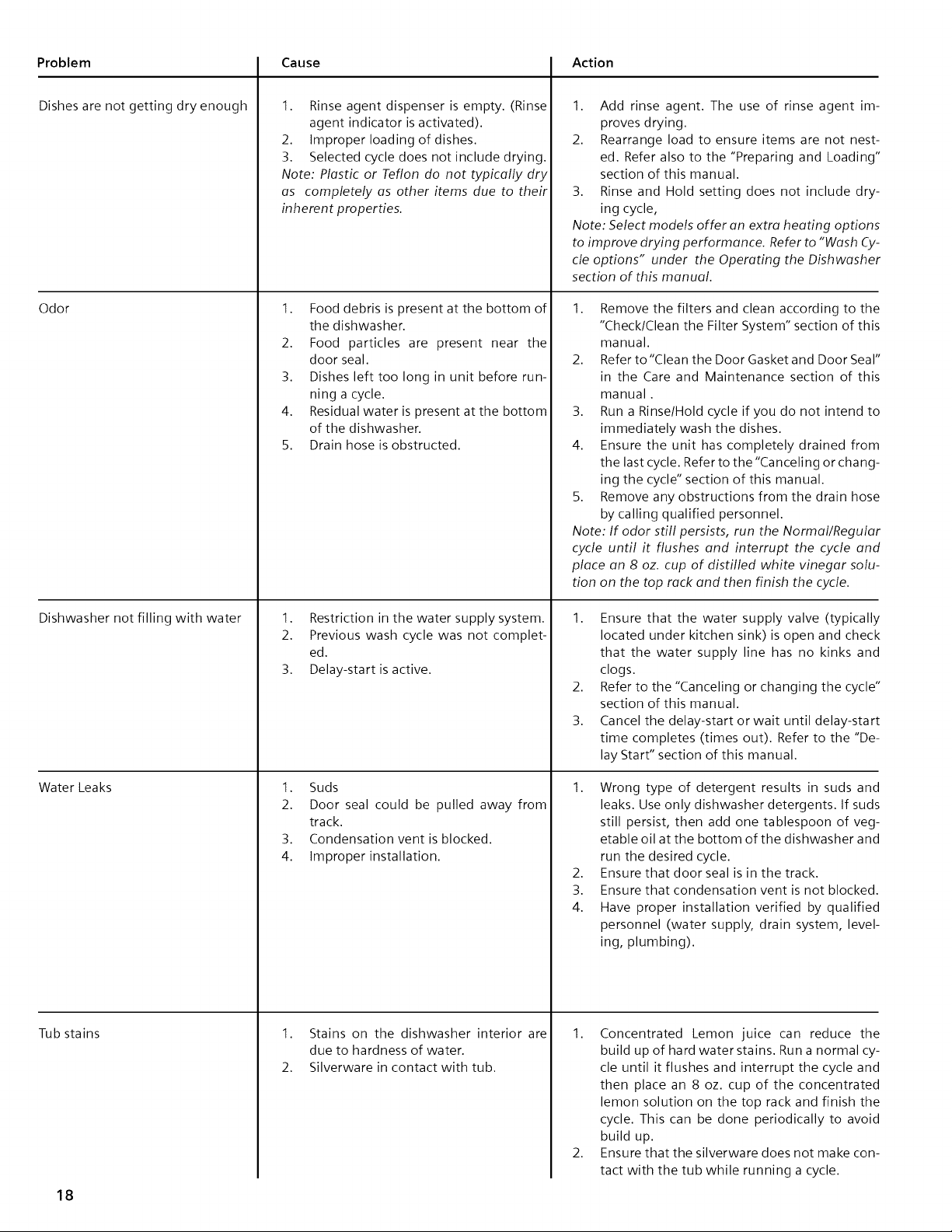
Problem
Dishes are not getting dry enough
Odor
Dishwasher not filling with water
Cause
1. Rinse agent dispenser is empty. (Rinse
agent indicator is activated).
2. Improper loading of dishes.
3. Selected cycle does not include drying.
Note: Plastic or Teflon do not typically dry
as completely as other items due to their
inherent properties.
1. Food debris is present at the bottom of
the dishwasher.
2. Food particles are present near the
door seal.
3. Dishes left too long in unit before run-
ning a cycle.
4. Residual water is present at the bottom
of the dishwasher.
5. Drain hose is obstructed.
Water Leaks
Tub stains
1. Restriction in the water supply system.
2. Previous wash cycle was not complet-
ed.
3. Delay-start is active.
1. Suds
2. Door seal could be pulled away from
track.
3. Condensation vent is blocked.
4. Improper installation.
1. Stains on the dishwasher interior are
due to hardness of water.
2. Silverware in contact with tub.
Action
1. Add rinse agent. The use of rinse agent im-
proves drying.
2. Rearrange load to ensure items are not nest-
ed. Refer also to the "Preparing and Loading"
section of this manual.
3. Rinse and Hold setting does not include dry-
ing cycle,
Note: Select models offer on extra heating options
to improve drying performance. Refer to "Wash Cy-
cle options" under the Operating the Dishwasher
section of this manual.
1. Remove the filters and clean according to the
"ChecklClean the Filter System" section of this
manual.
2. Refer to "Clean the Door Gasket and Door Seal"
in the Care and Maintenance section of this
manual.
3. Run a Rinse/Hold cycle if you do not intend to
immediately wash the dishes.
4. Ensure the unit has completely drained from
the last cycle. Refer to the "Canceling or chang-
ing the cycle" section of this manual.
5. Remove any obstructions from the drain hose
by calling qualified personnel.
Note: If odor still persists, run the Normal/Regular
cycle until it flushes end interrupt the cycle end
place on 8 oz. cup of distilled white vinegar solu-
tion on the top rock end then finish the cycle.
1. Ensure that the water supply valve (typically
located under kitchen sink) is open and check
that the water supply line has no kinks and
clogs.
2. Refer to the "Canceling or changing the cycle"
section of this manual.
3. Cancel the delay-start or wait until delay-start
time completes (times out). Refer to the "De-
lay Start" section of this manual.
1. Wrong type of detergent results in suds and
leaks. Use only dishwasher detergents. If suds
still persist, then add one tablespoon of veg-
etable oil at the bottom of the dishwasher and
run the desired cycle.
2. Ensure that door seal is in the track.
3. Ensure that condensation vent is not blocked.
4. Have proper installation verified by qualified
personnel (water supply, drain system, level-
ing, plumbing).
1, Concentrated Lemon juice can reduce the
build up of hard water stains. Run a normal cy-
cle until it flushes and interrupt the cycle and
then place an 8 oz. cup of the concentrated
lemon solution on the top rack and finish the
cycle. This can be done periodically to avoid
build up.
2. Ensure that the silverware does not make con-
tact with the tub while running a cycle.
18
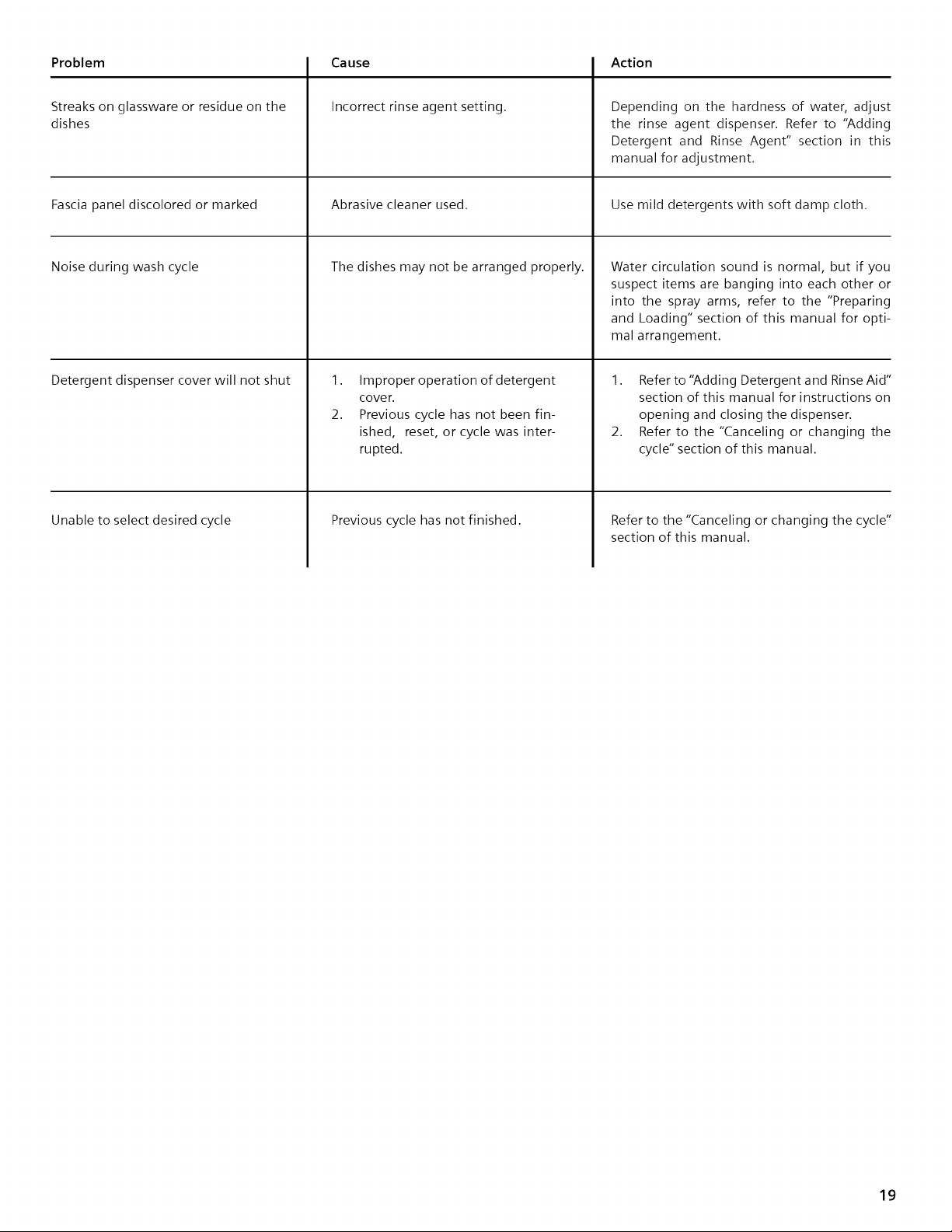
Problem
Streaks on glassware or residue on the
dishes
Fascia panel discolored or marked
Noise during wash cycle
Detergent dispenser cover will not shut
Unable to select desired cycle
Cause
Incorrect rinse agent setting.
Abrasive cleaner used.
The dishes may not be arranged properly.
1. Improper operation of detergent
cover.
2. Previous cycle has not been fin-
ished, reset, or cycle was inter-
rupted.
Previous cycle has not finished.
Action
Depending on the hardness of water, adjust
the rinse agent dispenser. Refer to "Adding
Detergent and Rinse Agent" section in this
manual for adjustment.
Use mild detergents with soft damp cloth.
Water circulation sound is normal, but if you
suspect items are banging into each other or
into the spray arms, refer to the "Preparing
and Loading" section of this manual for opti-
mal arrangement.
1. Refer to "Adding Detergent and RinseAid"
section of this manual for instructions on
opening and closing the dispenser.
2. Refer to the "Canceling or changing the
cycle" section of this manual.
Refer to the "Canceling or changing the cycle"
section of this manual.
19
Customer Service
Your Bosch dishwasher requires no special care other than that described in the Care and Maintenance section. If you are having a
problem with your dishwasher, before calling for service please refer to the Self Help section. If service is necessary, contact your
dealer or installer or an authorized service center. Do not attempt to repair the appliance yourself. Any work performed by unau-
thorized personnel may void the warranty.
If you are having a problem with your Bosch dishwasher and are not pleased with the service you have received, please take the
following steps (in the order listed below) until the problem is corrected to your satisfaction:
1. Contact your installer or the Bosch Authorized Service Contractor in your area.
2. Contact customer service through our website, www.boschappliances.com.
3. Write us at the address below:
BSH Home Appliances, Corporation
5551 McFadden Avenue
Huntington Beach, CA 92649
4. Call us at 1-800-944-2904.
Please be sure to include your model information listed below as well as an explanation of the problem and the date it originated.
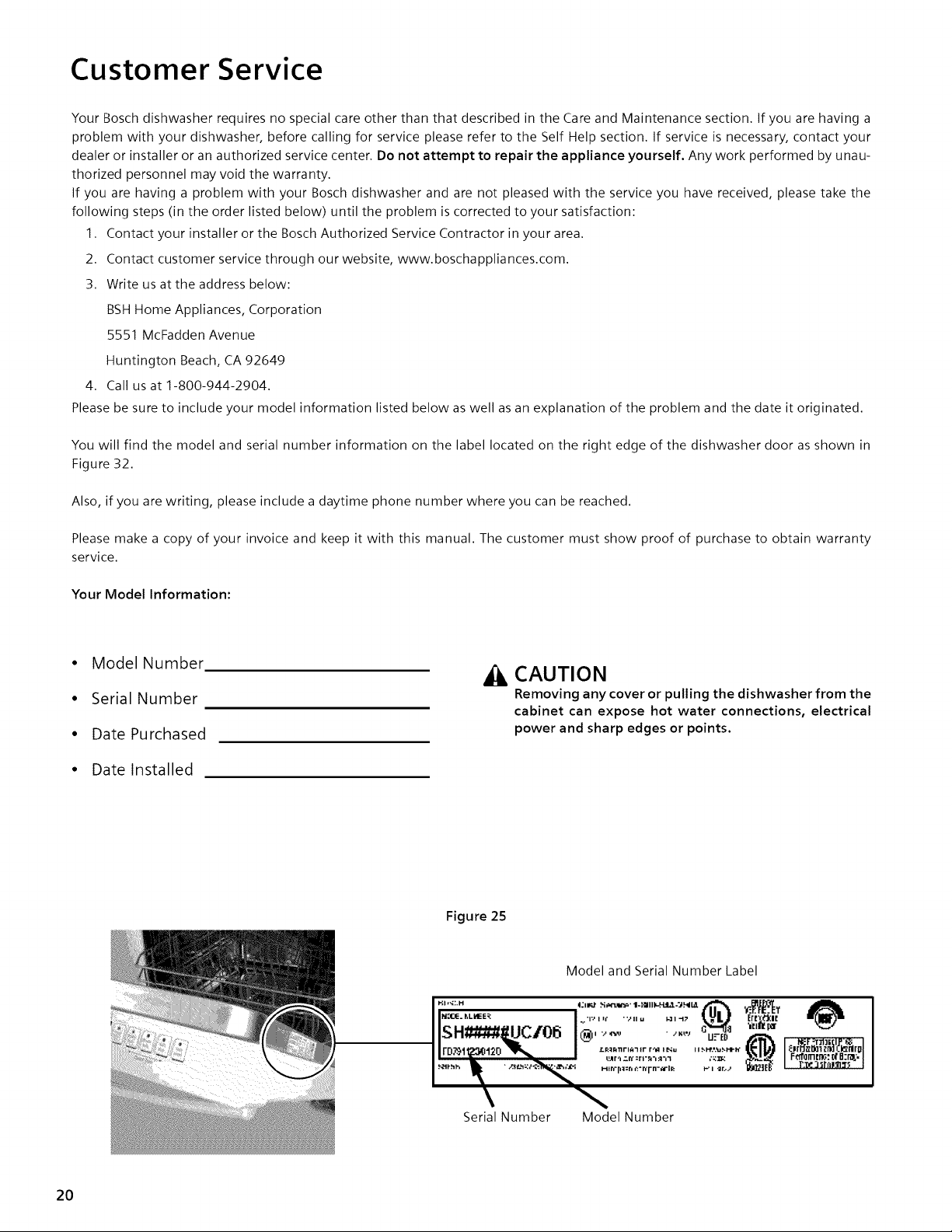
You will find the model and serial number information on the label located on the right edge of the dishwasher door as shown in
Figure 32.
Also, if you are writing, please include a daytime phone number where you can be reached.
Please make a copy of your invoice and keep it with this manual. The customer must show proof of purchase to obtain warranty
service.
Your Model Information:
• Model Number
• Serial Number
• Date Purchased
• Date Installed
CAUTION
Removing any cover or pulling the dishwasher from the
cabinet can expose hot water connections, electrical
power and sharp edges or points.
Figure 25
Serial Number Model Number
20
Statement of Limited Product Warranty
Bosch Dishwashers
What this Warranty Covers & Who it Applies to: The limited warranty
provided BSH Home Appliances ("Bosch") in this Statement of Limited Product
Warranty applies only to Bosch dishwashers ("Product") sold to you, the
first using purchaser, provided that the Product was purchased: (1) for your
normal, household (non-commercial) use, and has in fact atall times only
been used for normal household purposes; (2) new at retail (not a display,
"as is", or previously returned model), and not for resale, or commercial use;
and (3) within the United States or Canada, and has at all times remained
within the country of original purchase. The warranties stated herein
apply only to the first purchaser of the Product and are not transferable.
• Please make sure to return your registration card; while not necessary
to effectuate warranty coverage, it is the best way for Bosch to
notify you in the unlikely event of a safety notice or product recall.
How Long the Warranty Lasts: Bosch warrants that the Product is
free from defects in materials and workmanship for a period of three
hundred sixty five (365) days (i.e., 1 year) from the date of purchase.
The foregoing timeline begins to run upon the date of purchase, and
shall not be stalled, tolled, extended, or suspended, for any reason
whatsoever. Labor and shipping costs are included in this basic coverage.
Extended Limited Warranty: Bosch also provides these additional limited
warranties:
• 2 Year Limited Warranty: Bosch will repair or replace any
component that proves to be defective in materials or workmanship
(excludes labor charges).
• 5 Year Limited Warranty on Electronics: Bosch will repair or
replace any Bosch microprocessor or printed circuit board if it
proves to be defective in materials or workmanship (excludes labor
charges).
• 5 Year Limited Warranty on Dish Racks: Bosch will replace the
upper or lower dish rack (excluding rack components), if the rack
proves defective in materials or workmanship (excludes labor
charges).
• Lifetime Warranty against Stainless Steel Rust Through: Bosch
will replace your dishwasher with the same model or a current
model that is substantially equivalent or better in functionality, if
the inner liner should rust through (excludes labor charges). Bosch
will replace the stainless steel door if the door should rust th rough
(excludes labor charges).
The foregoing timeline begins to run upon the date of purchase, and shall
not be stalled, tolled, extended, or suspended, for any reason whatsoever.
Repair/Replace as Your Exclusive Remedy: During this warranty period,
Bosch or one of its authorized service providers will repair your Product
without charge to you (subject to certain limitations stated herein) if your
Product proves to have been manufactured with a defect in materials or
workmanship. If reasonable attempts to repair the Product have been
made without success, then Bosch will replace your Product (upgraded
models may be available to you, in Bosch's sole discretion, for an additional
charge). All removed parts and components shall become the property
of Bosch at its sole option. All replaced and/or repaired parts shall assume
the identity of the original part for purposes of this warranty and this
warranty shall not be extended with respect to such parts. Bosch's sole
liability and responsibility hereunder is to repair manufacturer-defective
Product only, using a Bosch-authorized service provider during normal
business hours. For safety and property damage concerns, Bosch highly
recommends that you do not attempt to repair the Product yourself, or
use an un-authorized servicer; Bosch will have no responsibility or liability
for repairs or work performed by a non-authorized servicer. If you choose
to have someone other than an authorized service provider work on your
Product THIS WARRANTY WILL AUTOMATICALLY BECOME NULL AND VOID.
Authorized service providers are those persons or companies that have been
specially trained on Bosch products, and who possess, in Bosch's opinion,
a superior reputation for customer service and technical ability (note that
they are independent entities and are not agents, partners, affiliates or
representatives of Bosch). Notwithstanding the foregoing, Bosch will not
incur any liability, or have responsibility, for the Product if it is located in a
remote area (more than 100 miles from an authorized service
provider) or is reasonably inaccessible, hazardous, threatening, or
treacherous locale, surroundings, or environment; in any such event, if
you request, Bosch would still pay for labor and parts and ship the parts to
the nearest authorized service provider, but you would still be fully liable
and responsible for any travel time or other special charges by the service
company, assuming they agree to make the service call.
Out of Warranty Product: Bosch is under no obligation, at law or
otherwise, to provide you with any concessions, including repairs,
pro-rates, or Product replacement, once this warranty has expired.
Warranty Exclusions: The warranty coverage described herein excludes
all defects or damage that are not the direct fault of Bosch, including
without limitation, one or more of the following: (1) use of the Product
in anything other than its normal, customary and intended manner
(including without limitation, any form of commercial use, use or storage
of an indoor product outdoors, use of the Product in conjunction with air
or water-going vessels); (2) any party's willful misconduct, negligence,
misuse, abuse, accidents, neglect, improper operation, failure to maintain,
improper or negligent installation, tampering, failure to follow operating
instructions, mishandling, unauthorized service (including self-performed
"fixing" or exploration of the appliance's internal workings); (3) adjustment,
alteration or modification of any kind; (4) a failure to comply with any
applicable state, local, city, or county electrical, plumbing and/or building
codes, regulations, or laws, including failure to install the product in
strict conformity with local fire and building codes and regulations; (5)
ordinary wear and tear, spills of food, liquid, grease accumulations, or
other substances that accumulate on, in, or around the Product; and (6)
any external, elemental and/or environmental forces and factors, including
without limitation, rain, wind, sand, floods, fires, mud slides, freezing
temperatures, excessive moisture or extended exposure to humidity,
lightning, power surges, structural failures surrounding the appliance,
and acts of God. In no event shall Bosch have any liability or responsibility
whatsoever for damage to surrounding property, including cabinetry,
floors, ceilings, and other structures or objects around the Product.
Also excluded from this warranty are scratches, nicks, minor dents, and
cosmetic damages on external surfaces and exposed parts; Products
on which the serial numbers have been altered, defaced, or removed;
service visits to teach you how to use the Product, or visits where there
is nothing wrong with the Product; correction of installation problems
(you are solely responsible for any structure and setting for the Product,
including all electrical, plumbing or other connecting facilities, for proper
foundationlflooring, and for any alterations including without limitation
cabinetry, walls, floors, shelving, etc.); and resetting of breakers or fuses.
TO THE EXTENT ALLOWED BY LAW, THIS WARRANTY SETSOUT YOUR
EXCLUSIVE REMEDIES WITH RESPECT TO PRODUCT, WHETHER THE
CLAIM ARISES IN CONTRACT OR TORT (INCLUDING STRICT LIABILITY,
OR NEGLIGENCE) OR OTHERWISE. THIS WARRANTY IS IN LIEU OF ALL
OTHERWARRANTIES, WHETHER EXPRESSOR IMPLIED. ANY WARRANTY
IMPLIED BY LAW, WHETHER FOR MERCHANTABILITY OR FITNESS
FOR A PARTICULAR PURPOSE, OR OTHERWISE, SHALL BE EFFECTIVE
ONLY FOR THE PERIOD THAT THIS EXPRESS LIMITED WARRANTY IS
EFFECTIVE. IN NO EVENT WILL THE MANUFACTURER BE LIABLE FOR
CONSEQUENTIAL, SPECIAL, INCIDENTAL, INDIRECT, "BUSINESS LOSS",
AND/OR PUNITIVE DAMAGES, LOSSES, OR EXPENSES, INCLUDING
WITHOUT LIMITATION TIME AWAY FROM WORK, HOTELS AND/OR
RESTAURANT MEALS, REMODELLING EXPENSES IN EXCESS OF DIRECT
DAMAGES WHICH ARE DEFINITIVELY CAUSED EXCLUSIVELY BY BOSCH,
OR OTHERWISE. SOME STATES DO NOT ALLOW THE EXCLUSION OR
LIMITATION OF INCIDENTAL OR CONSEQUENTIAL DAMAGES, AND
SOME STATESDO NOT ALLOW LIMITATIONS ON HOW LONG AN IMPLIED
WARRANTY LASTS, SO THE ABOVE LIMITATIONS MAY NOT APPLY TO
YOU. THIS WARRANTY GIVES YOU SPECIFIC LEGAL RIGHTS, AND YOU
MAY ALSO HAVE OTHER RIGHTS WHICH VARY FROM STATETO STATE.
No attempt to alter, modify or amend this warranty shall
be effective unless authorized in writing by an officer of BSH.
How to Obtain Warranty Service: TO OBTAIN WARRANTY SERVICEFOR
YOURPRODUCT,YOU SHOULD CONTACTTHE NEARESTBOSCHAUTHORIZED
SERVICECENTER, OR CALL 800-944-2904, or write Bosch at: BSH Home
Appliances - 5551 McFadden Avenue, Huntington Beach, CA 92649 /
21