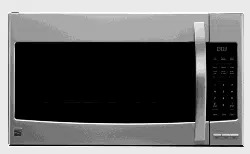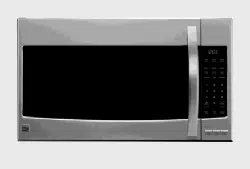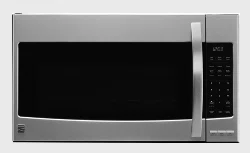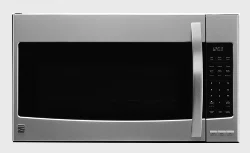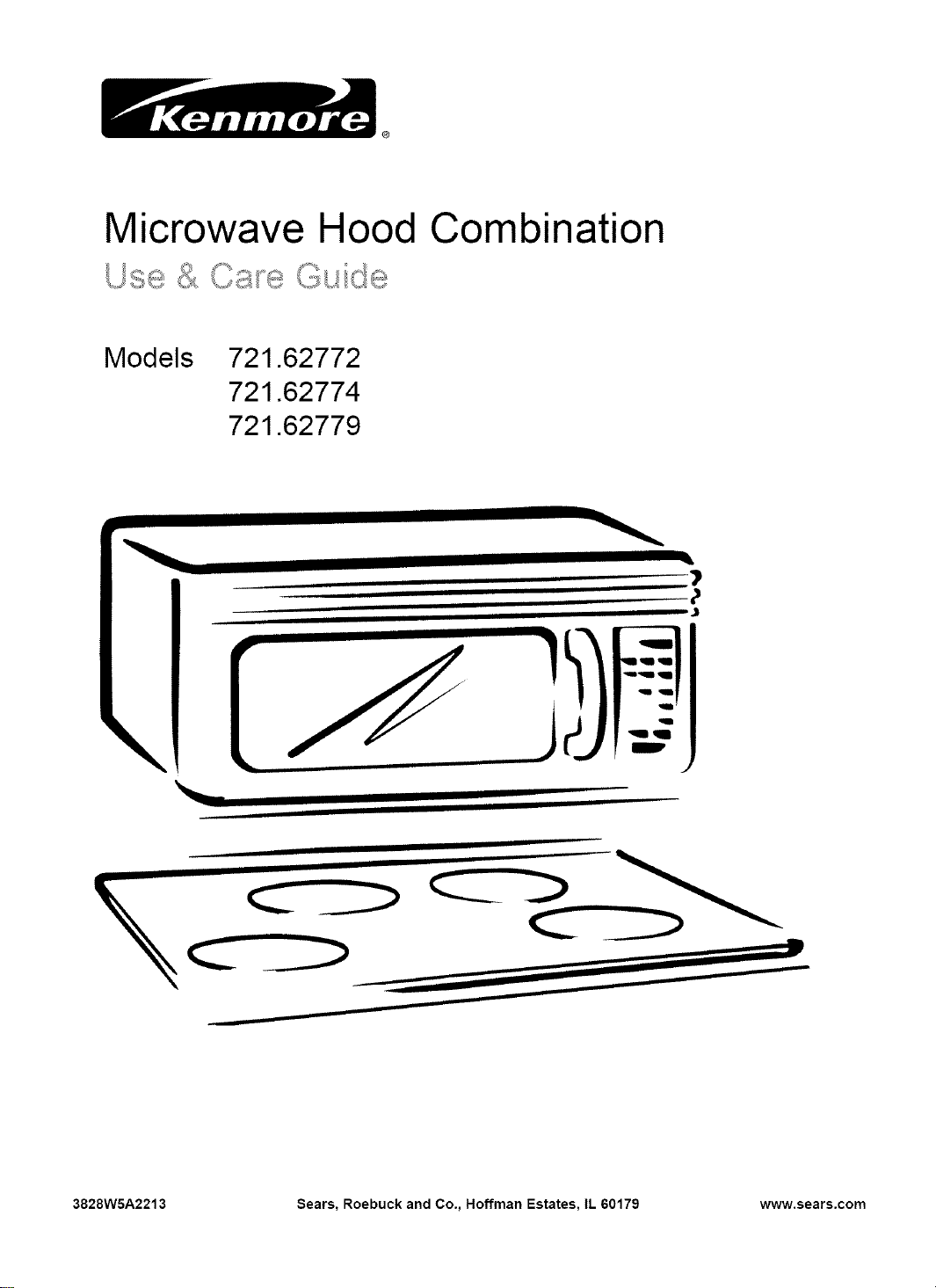
Microwave Hood Combination
U ...._
Models 721.62772
721.62774
721.62779
\
3828WSA2213 Sears, Roebuck and Co., Hoffman Estates, IL 60179 www.sears.com
Table of
Contents
Warranty ........................................................... 2
Sears Service .................................................. 3
Microwave Oven Safety .................................. 4
Getting to Know Your
Microwave Oven .............................................. 7
How your microwave oven works ................... 7
Radio interference .......................................... 7
For the best cooking results ........................... 7
Testing your microwave oven ......................... 7
Testing your dinnerware or cookware ............ 8
Operating safety precautions .......................... 8
Electrical connection ...................................... 8
Microwave oven features ............................... 9
Control panel features ................................... 10
Audible signals .............................................. 12
Interrupting cooking ...................................... 12
Using Your Microwave Oven ....................... 12
Using the safety lock ..................................... 12
Using the fan ................................................. 13
Using the cooktop/countertop light ................ 13
Using the bi-level cooking rack ..................... 13
Setting the clock ............................................ 14
Using the kitchen timer ................................. 14
Cooking at high cook power .......................... 14
Cooking at different cook powers .................. 15
Cooking at different cook powers(cont.) ....... 16
Cooking with more than one cook cycle ....... 16
Using AUTO DEFROST ................................ 17
Defrosting tips .............................................. 18
SENSOR cooking guide ................................ 18
Using SENSOR COOK ................................. 19
Using SENSOR REHEAT ............................. 19
Using SENSOR BAKED POTATO ................ 20
Using SENSOR POPCORN ......................... 20
Using SENSOR PIZZA ................................. 20
Using SENSOR VEGETABLE ...................... 21
Using ADD MINUTE ..................................... 21
Adding or subtracting cook time .................... 21
Caring for Your Microwave Oven ................. 22
Caring for the filters ....................................... 23
Replacing the cooktop and oven lights ......... 24
Cooking Guide ............................................... 26
Questions and Answers ................................ 28
Troubleshooting ............................................. 29
Sevice .............................................. Back cover
Microwave
Oven Warranty
FULL ONE-YEAR WARRANTY ON
MICROWAVE OVEN
For one year from the date of purchase, if this
Kenmore Microwave Oven fails due to a defect in
material or workmanship, Sears will repair it free of
charge.
FULL FIVE-YEAR WARRANTY ON THE
MAGNETRON
Forfive yearsfrom the date of purchase, ifthe
magnetron in this Kenmore Microwave Oven fails
due to a defect in material or workmanship, Sears
will repair it free of charge.
The above warranty coverage applies only to
Microwave Ovens which are used for private
household purposes.
WARRANTY SERVICE 18AVAILABLE BY
SIMPLY CONTACTING THE NEAREST SEARS
STORE OR SERVICE CENTER IN THE UNITED
STATES.
This warranty applies only while this product is in
use in the United States.
This warranty gives you specific legal rights, and
you may also have other rights which vary from
state to state.
Sears, Roebuck and Co.,
Dept. 817WA,
Hoffman Estates, IL 60179
For service call:
1-800-4-MY-HOME sM
(1-800-469-4663)
Please record your model's information.
Whenever you call to request service for your appli-
ance, you need to know your complete model
number and serial number. You can find this
information on the model and serial number
label/plate (see "Microwave oven features" in the
"Getting to Know Your Microwave Oven" section).
Also, record the other information shown below.
Model Number
Serial Number
Purchase Date
Sears Service
"We service what we sell"
"We service what we sell" is our assurance to you that you can depend on Sears for service because Sears
Service is nationwide.
Your Sears Kenmore Microwave Oven has added value when you consider that Sears has a service unit
near you, staffed by Sears Trained Technicians - professional technicians specifically trained on Sears
Kenmore Microwave Ovens, having the parts, tools and equipment to insure that we meet our pledge to you
- "We service what we sell!"
To further add to the value of your microwave
oven, buy a Sears Maintenance Agreement.
Sears Kenmore Microwave Ovens are designed, manufactured and tested for years of dependable
operation. Yet, any modern appliance may require service from time to time. A Sears Maintenance
Agreement is more than an extension of the Warranty. tt provides complete protection from unexpected
repair bills and undue inconvenience, ttassures you of maximum efficiency from your Microwave Oven.
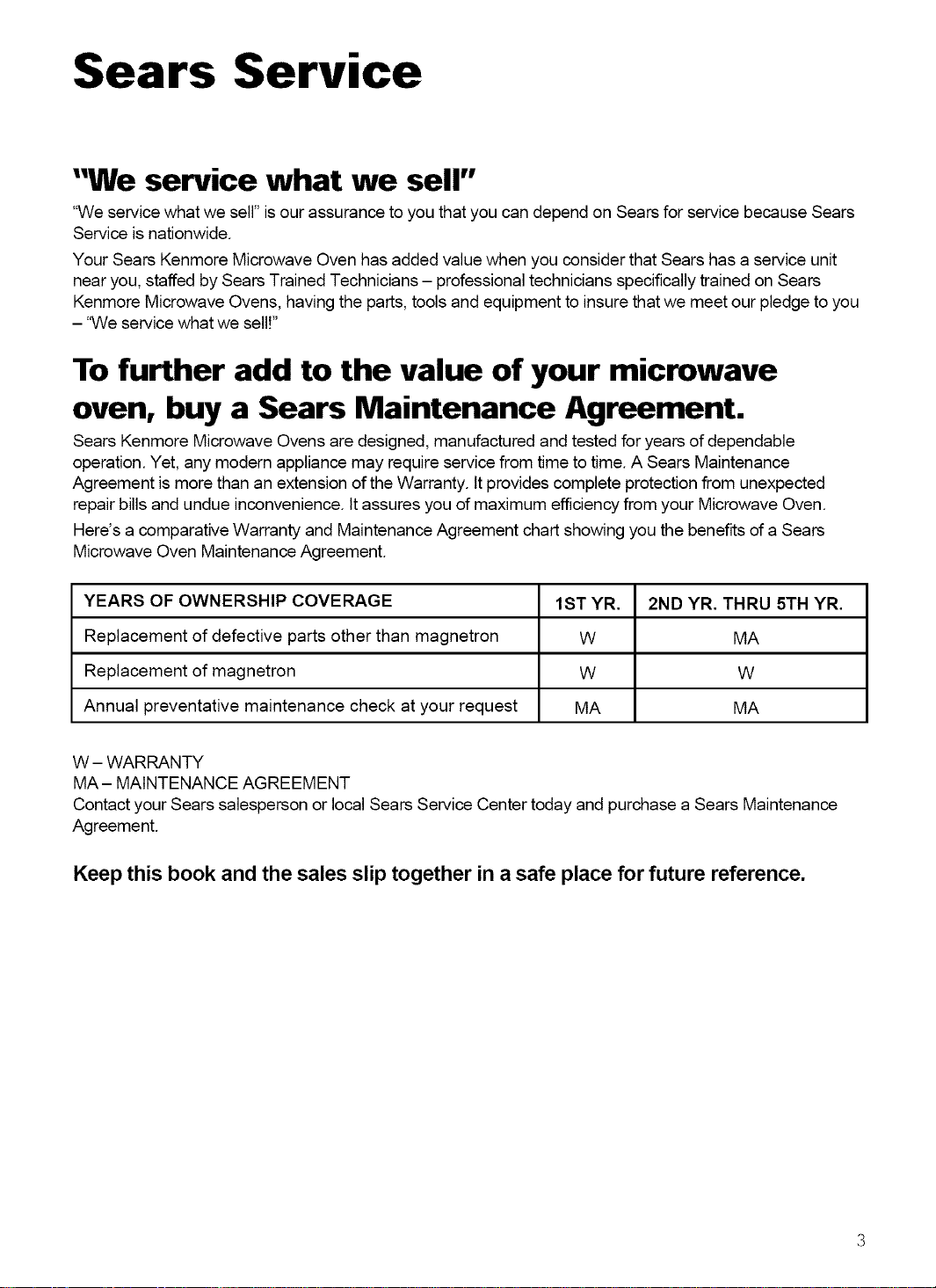
Here's a comparative Warranty and Maintenance Agreement chart showing you the benefits of a Sears
Microwave Oven Maintenance Agreement.
YEARS OF OWNERSHIP COVERAGE 1ST YR. 2ND YR. THRU 5TH YR.
Replacement of defective parts other than magnetron W MA
Replacement of magnetron W W
Annual preventative maintenance check at your request MA MA
W - WARRANTY
MA- MAINTENANCE AGREEMENT
Contact your Sears salesperson or local Sears Service Center today and purchase a Sears Maintenance
Agreement.
Keep this book and the sales slip together in a safe place for future reference.
Microwave Oven Safety
Your safety and the safety of others are very important.
We have provided many important safety messages in this manual and on your appliance.
Always read and obey all safety messages.
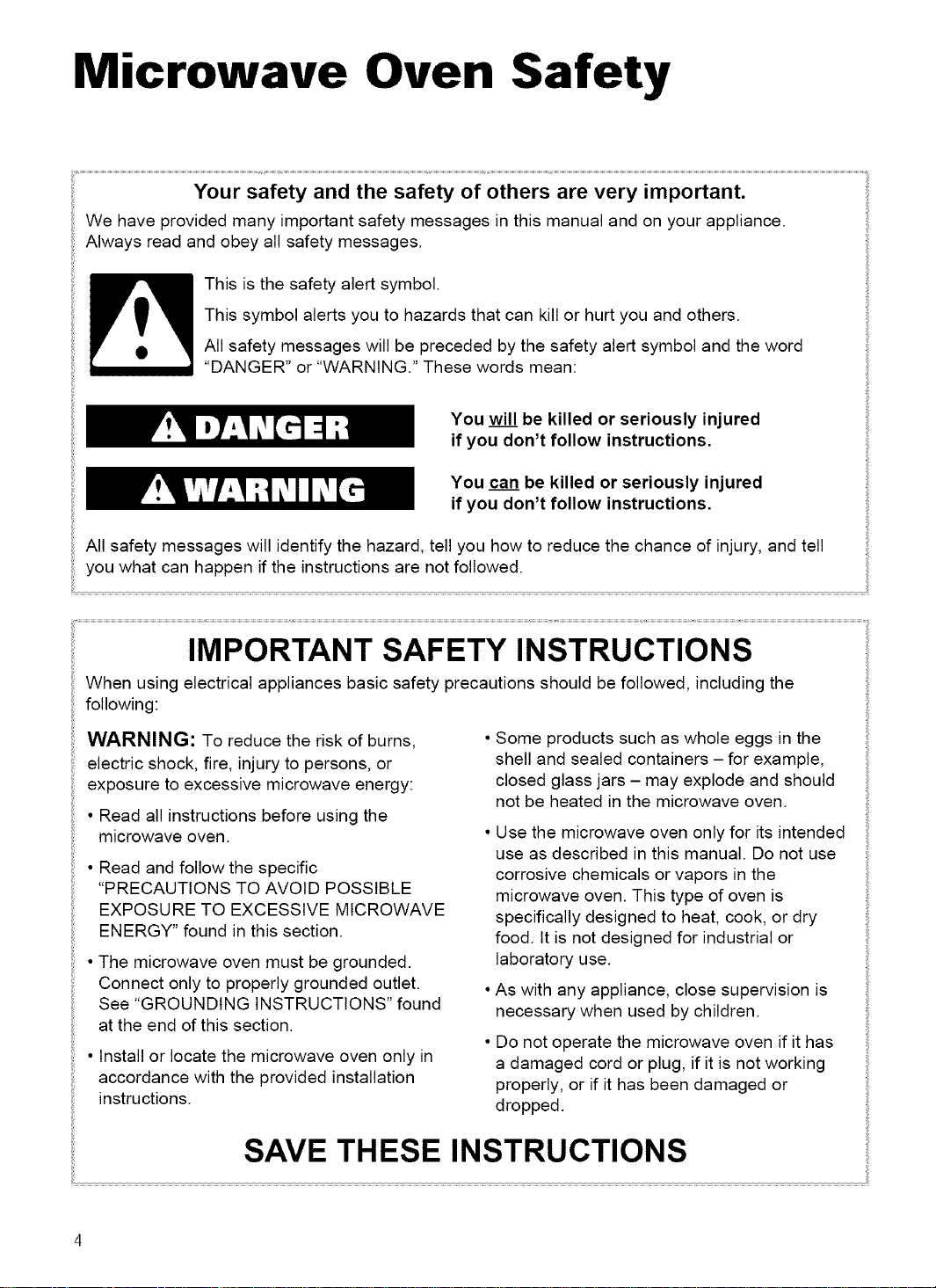
This is the safety alert symbol.
This symbol alerts you to hazards that can kill or hurt you and others.
All safety messages will be preceded by the safety alert symbol and the word
"DANGER" or "WARNING." These words mean:
You will be killed or seriously injured
if you don't follow instructions.
You can be killed or seriously injured
if you don't follow instructions.
All safety messages will identify the hazard, tell you how to reduce the chance of injury, and tell
you what can happen if the instructions are not followed.
IMPORTANT SAFETY INSTRUCTIONS
When using electrical appliances basic safety precautions should be followed, including the
following:
WARNING: To reduce the risk of burns,
electric shock, fire, injury to persons, or
exposure to excessive microwave energy:
• Read all instructions before using the
microwave oven.
• Read and follow the specific
"PRECAUTIONS TO AVOID POSSIBLE
EXPOSURE TO EXCESSIVE MICROWAVE
ENERGY" found in this section.
• The microwave oven must be grounded.
Connect only to properly grounded outlet.
See "GROUNDING INSTRUCTIONS" found
at the end of this section.
• Install or locate the microwave oven only in
accordance with the provided installation
instructions.
Some products such as whole eggs in the
shell and sealed containers - for example,
closed glass jars - may explode and should
not be heated in the microwave oven.
• Use the microwave oven only for its intended
use as described in this manual. Do not use
corrosive chemicals or vapors in the
microwave oven. This type of oven is
specifically designed to heat, cook, or dry
food. It is not designed for industrial or
laboratory use.
•As with any appliance, close supervision is
necessary when used by children.
• Do not operate the microwave oven if it has
a damaged cord or plug, if it is not working
properly, or if it has been damaged or
dropped.
SAVE THESE INSTRUCTIONS
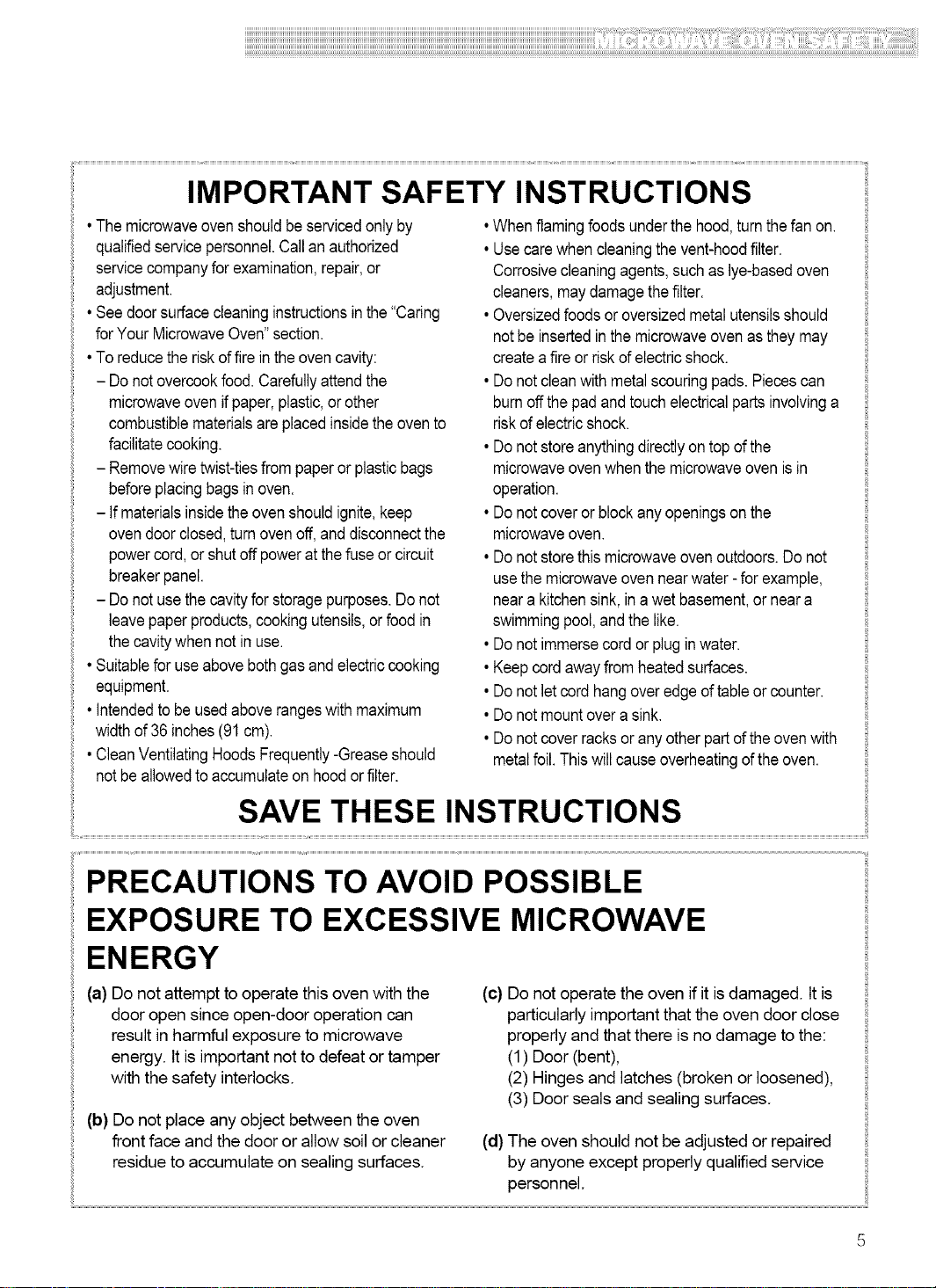
IMPORTANT SAFETY INSTRUCTIONS
•Themicrowaveovenshouldbe servicedonly by
qualifiedservicepersonnel.Callan authorized
servicecompanyforexamination,repair,or
adjustment.
•Seedoorsurfacecleaninginstructionsinthe"Caring
forYour MicrowaveOven"section.
•To reducetheriskoffirein theovencavity:
- Donotovercookfood.Carefullyattendthe
microwaveovenifpaper,plastic,or other
combustiblematerialsareplacedinsidethe ovento
facilitatecooking.
- Removewiretwist-tiesfrom paperor plasticbags
beforeplacingbagsinoven.
- Ifmaterialsinsidetheovenshouldignite,keep
ovendoor closed,turnovenoff,and disconnectthe
powercord,or shutoff poweratthefuse orcircuit
breakerpanel.
- Donotusethecavityfor storagepurposes.Donot
leavepaperproducts,cookingutensils,orfood in
the cavitywhennotin use.
•Suitableforuseabovebothgasand electriccooking
equipment.
• Intendedto be usedaboverangeswithmaximum
widthof 36inches(91cm).
•CleanVentilatingHoods Frequently-Greaseshould
notbe allowedtoaccumulateon hoodorfilter.
•Whenflamingfoodsunderthe hood,turnthefan on.
• Usecarewhencleaningthe vent-hoodfilter.
Corrosivecleaningagents,such aslye-basedoven ::i
cleaners,maydamagethefilter. ::i
•Oversizedfoodsor oversizedmetalutensilsshould ::i
notbe insertedin themicrowaveovenasthey may ::i
createa fireorriskof electricshock.
• Donotcleanwithmetalscouringpads. Piecescan ::i
burnoff thepadand touchelectricalparts involvinga :
riskofelectricshock. ::i
• Donotstoreanythingdirectlyon topofthe ::i
microwaveovenwhenthe microwaveoven isin ::i
operation. ::i
• Donotcoveror blockanyopeningsonthe ::i
m crowaveoven
• Donotstorethis microwaveovenoutdoors.Donot :
usethemicrowaveovennearwater- forexample, ::i
neara kitchensink,in awet basement,or neara
swimmingpool,andthe like. ::i
• Donotimmersecordor plugin water. ::i
•Keepcordawayfrom heatedsurfaces. ::i
• Donotletcordhangoveredgeof tableor counter. ::i
• Donotmountovera sink.
• Donotcover racksor anyotherpartoftheovenwith :
metalfoil.Thiswillcauseoverheatingoftheoven. ::i
SAVE THESE INSTRUCTIONS
PRECAUTIONS TO AVOID POSSIBLE
EXPOSURE TO EXCESSIVE MICROWAVE
ENERGY
(a) Do not attempt to operate this oven with the
door open since open-door operation can
result in harmful exposure to microwave
energy. It is important not to defeat or tamper
with the safety interlocks.
(b) Do not place any object between the oven
front face and the door or allow soil or cleaner
residue to accumulate on sealing surfaces.
(c) Do not operate the oven if it isdamaged, tt is
particularly important that the oven door close
properly and that there is no damage to the:
(1) Door (bent),
(2) Hinges and latches (broken or loosened),
(3) Door seals and sealing surfaces.
(d) The oven should not be adjusted or repaired
by anyone except properly qualified service
personnel.
Electrical
requirements
Observe all governing codes and
ordinances. A 120 Volt, 60 Hz, AC only,
15 or 20 amp fused electrical supply is
required. (A time-delay fuse is recommended.)
It is recommended that a separate circuit
serving only this appliance be provided.
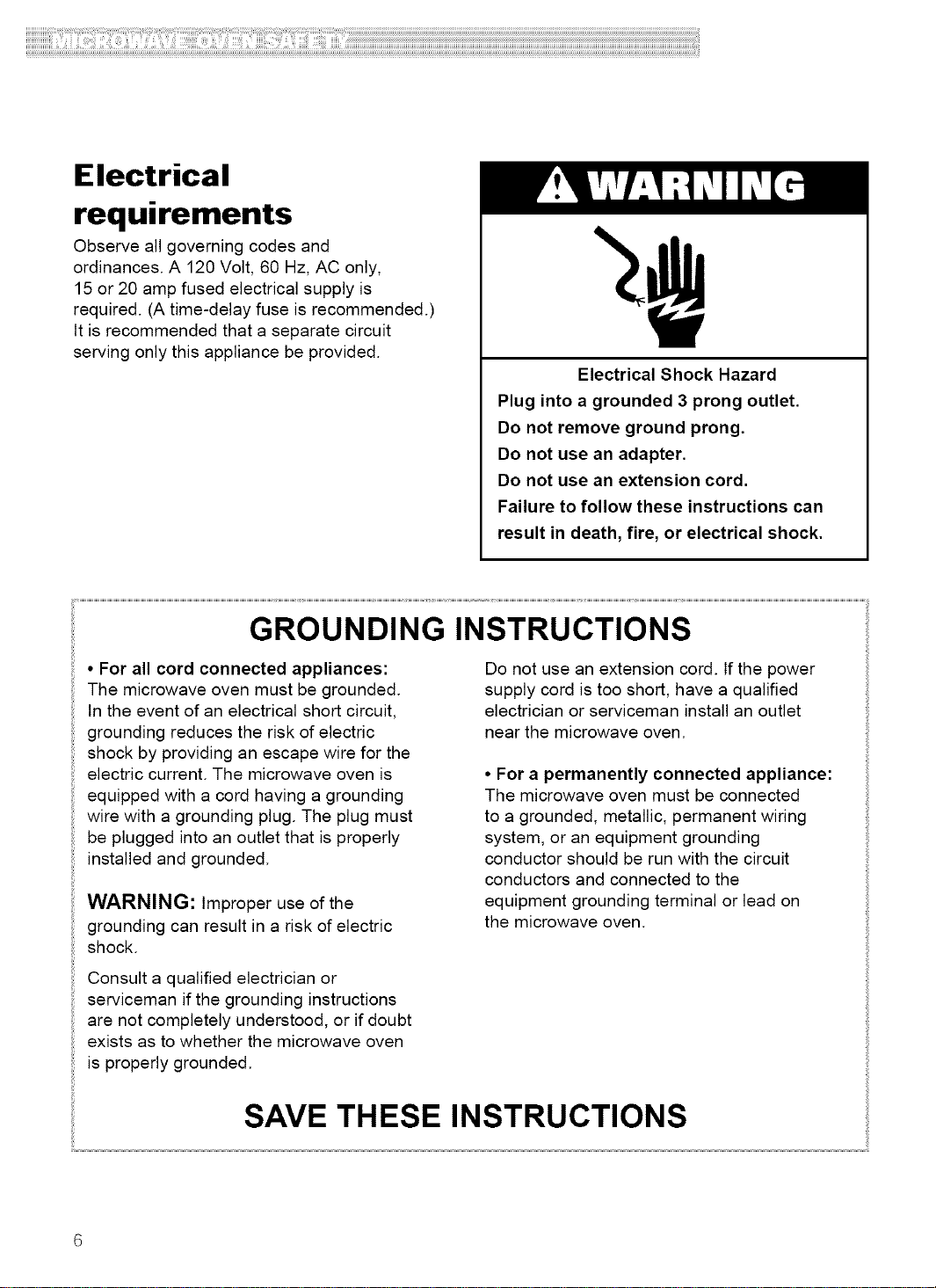
Electrical Shock Hazard
Plug into a grounded 3 prong outlet.
Do not remove ground prong.
Do not use an adapter.
Do not use an extension cord.
Failure to follow these instructions can
result in death, fire, or electrical shock.
GROUNDING INSTRUCTIONS
• For all cord connected appliances:
The microwave oven must be grounded.
In the event of an electrical short circuit,
grounding reduces the risk of electric
shock by providing an escape wire for the
electric current. The microwave oven is
equipped with a cord having a grounding
wire with a grounding plug. The plug must
be plugged into an outlet that is properly
installed and grounded.
WARNING: Improper use of the
grounding can result in a risk of electric
shock.
Consult a qualified electrician or
serviceman if the grounding instructions
are not completely understood, or if doubt
exists as to whether the microwave oven
is properly grounded.
Do not use an extension cord. tf the power
supply cord is too short, have a qualified
electrician or serviceman install an outlet
near the microwave oven.
• For a permanently connected appliance:
The microwave oven must be connected
to a grounded, metallic, permanent wiring
system, or an equipment grounding
conductor should be run with the circuit
conductors and connected to the
equipment grounding terminal or lead on
the microwave oven.
SAVE THESE INSTRUCTIONS
Getting to Know Your
Microwave Oven
This section discusses the concepts behind microwave cooking. It also shows you the
basics you need to know to operate your microwave oven. Please read this information before you
use your oven.
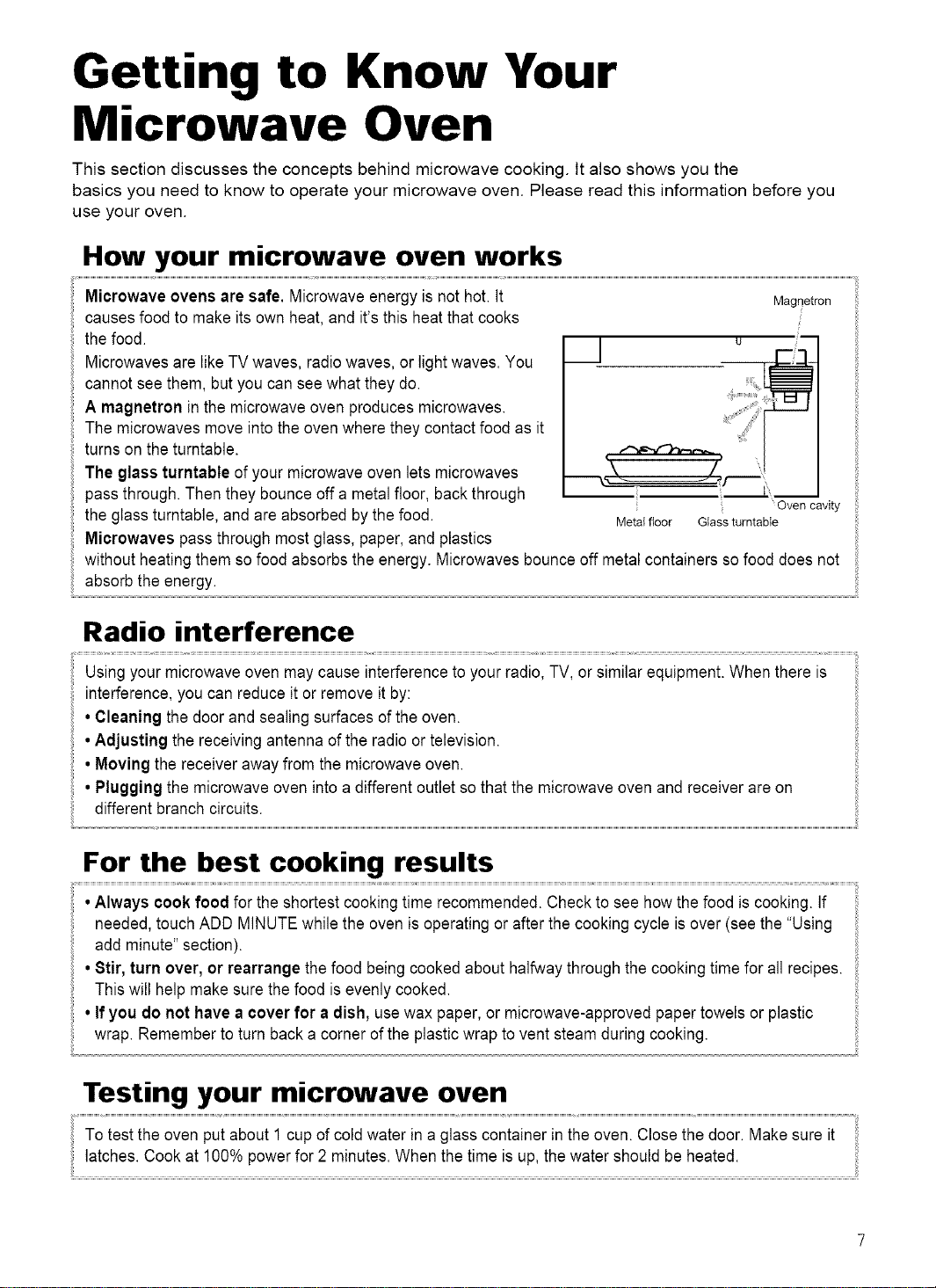
How your microwave oven works
Microwave ovens are safe. Microwave energy is not hot.It
causes food to make its own heat, and it's this heat that cooks
the food.
Microwaves are likeTV waves, radio waves, or lightwaves. You
cannot see them, but you can seewhat they do.
A magnetron in the microwave oven produces microwaves.
The microwaves move into the ovenwhere they contact food as it
turns on the turntable.
The glass turntable of your microwave oven lets microwaves
pass through. Then they bounce off a metal floor, back through
the glass turntable, and are absorbed bythe food.
Microwaves pass through most glass, paper, and plastics
Magnetron
u
Oven cavity
Metal floor Glass tumtable
without heating them sofood absorbs the energy. Microwaves bounce off metalcontainers sofood does not
absorb the energy.
Radio interference
Using your microwave oven may cause interference to your radio, TV, or similar equipment. Whenthere is
interference, you can reduce itor remove itby:
• Cleaning the door and sealing surfaces of the oven.
•Adjusting the receivingantenna of the radio ortelevision.
• Moving the receiver away from the microwave oven.
• Plugging the microwave oven intoa different outletso that the microwaveoven and receiver are on
different branch circuits.
For the best cooking results
•Always cook food for the shortest cooking time recommended. Checkto see how the food iscooking. If
needed,touch ADD MINUTEwhile the oven isoperating orafter the cooking cycle isover (see the "Using
add minute"section).
• Stir, turn over, or rearrange the food being cooked about halfwaythrough the cooking time for all recipes.
This will help make sure the food isevenly cooked.
• If you do not have a cover for a dish, usewax paper, or microwave-approved papertowels or plastic
wrap. Remember to turn back a corner of the plastic wrap to vent steam during cooking.
Testing your microwave oven
To test the oven put about 1 cup of coldwater in a glass container in the oven.Closethe door. Make sure it
latches. Cook at 100% powerfor 2 minutes. When the time is up, the water should be heated.
ii!i!i!i!i!i!i!i!i!i!i!i!i!i!i!i!iliiiiiiii!!il!iiliiiiiii!ii!iiiiiiiilfilliili!ii!iiiiiiliiiliiiiiiii!i!i!iiiiii!iiiiiiiiiilii!!iiiiiii!i!iiiiiiiilliii!iiiiiii!i!iiiiiiiii!i!!!i!ii!ii!iiiii!ii!ii!ii!if!ii!il!ii!ii!iiiiii!i!i!i!iiiiiii!ii!ii!ii!ililliiiiili!ii!ii!ii!iiiii!illiiiiiiiiiiiiii!ii!i!!i!iiliiiiiilliii!iiiiiiii!i!iiiiiiiiii!!ii!ii!i!iiiiiiiii!iiilliii!iiiiiililiiiii!iiiiiiiiii!ii!il!ii!ii!ii!iliiiiiiii!iiililiiii!!ii!iiiiiiii!!ii!ii!iililiiiiiii!iliiiiii!i!!ii!i!illiii!ii!iiiiiiiiiilliiiiiiii!ii!ii!ii!ii!ii!ii!iiiiliilliiiii!ii!iiiiiiiiiii!!iiiiiii!iiiiiiii!i!!il!i!!ii!ii!ii!i!!iiiiiililliiiiiilliiiiiilliiiiiiiii!i!!ii!if!iiilliiii!!iiiiilli!iiiiiiiliiiiiiiiiiiiii!il!iiiiiiii;iiiiiiiill!if!illiiiiiiiiiiiiiiiii!!!iiiiiiii!i!i!i!!i!!i!!i!!i!!i!!ii!iiiiiiiiililii!ii!ililliiiiii!ililiiliii!il!iiiiiiiiii!iiliiiiiiililiiii!ii!ii!iiiiiiiiiiiiiii!ili!i!i!i!i!i!i!i!i!i!i!i!i!i!i!i!i!i!i!i!i!i!i!i!i!i!i!i!i!i!i!i!i!i!i!i!i!i!i!i!i!i!i!i!i!i!i!i!i!i!i!i!i!i!i!i!i!i!i!i!i!i!i!i!i!i!i!i!i!i!i!i!i!i!i!i!i!i!i!i!i!i!i!i!i!i!i!i!i!i!i!i!i!i!i!i!i!i!i!i!i!iil
Testing your dinnerware or cookware
Test dinnerware or cookware before using. To testa dishfor safe use, put itinto the oven witha cupof
water beside it. Cook at 100%cook power forone minute. If the dish gets hot and water stays cool, do not
use it. Some dishes (melamine,some ceramic dinnerware, etc.) absorb microwave energy, becoming too hot
to handle and slowing cooking times. Cooking in metalcontainersnot designed for microwaveuse could
damage theoven, as couldcontainers with hidden metal (twist-ties,foil lining,staples,metallicglaze ortrim).
0 )erating safety precautions
• Never lean on the door or allow a childto swingon itwhen thedoor isopen.
• Use hot pads. Microwave energy does notheat containers,but the heatfromthe food can make the
container hot.
• Do not use newspaper or other printedpaper inthe oven.
• Do not dryflowers, fruit, herbs, wood, paper,gourds, or clothes intheoven.
• Do not starta microwave oven when it isempty. Productlife maybeshortened. Ifyou practice programming
the oven, put a container ofwater in the oven. Itis normalfor the oven door to lookwavy after the oven has
been runningfor a while.
• Do not try to melt paraffin wax in theoven. Paraffinwaxwill not meltina microwave oven because itallows
microwaves to pass through it.
• Do not operatethe microwave oven unless the glassturntableis securelyin placeand can rotate freely.The
turntable can rotate in either direction.Make sure the turntable is correct-side up in the oven. Handle your
turntablewith carewhen removing itfrom the oven to avoidpossibly breaking it. If your turntablecracks or
breaks, contact your dealerfor a replacement.
• When you use abrowning dish, the browning dish bottom mustbe at least3/16 inchabove the turntable.
Followthe directionssupplied with the browning dish.
• Never cook or reheat awhole egg inside the shell. Steam buildup in whole eggs may cause them to burst,
and possiblydamage the oven. 81icehard-boiled eggs beforeheating. In rare cases, poachedeggs have
been known to explode. Cover poached eggs and allow a standing time ofone minute beforecutting into
them.
• Forbest results, stir any liquid several times during heating or reheating. Liquids heated in certain
containers (especiallycontainersshaped likecylinders) may become overheated.The liquid may splash out
with a loud noiseduring or after heating or when adding ingredients (coffeegranules, tea bags, etc.). This can
harmthe oven.
• Microwaves may not reach thecenter ofa roast.The heat spreads to the center from the outer, cooked
areasjust as in regular oven cooking. This is one of the reasons for letting some foods (forexample, roastsor
baked potatoes)stand for a while aftercooking, or for stirring some foods during the cooking time.
• Do not deep fry in the oven. Microwavable utensils are not suitable and itis difficultto maintain appropriate
deep-frying temperatures.
• Do not overcook potatoes. At the end of the recommended cooking time, potatoesshould be slightlyfirm
because they will continue cooking during standing time.After microwaving, let potatoes standfor 5
minutes. They will finish cooking while standing.
Electrical connection
If your electric power line or outlet voltage isless than 110 volts, cooking times may be longer. Have a
qualified electrician checkyour electrical system.
ii!i!i!i!i!i!i!i!i!i!i!i!i!i!i!i!i!i!i!i!i!i!i!i!i!i!i!i!i!i!i!i!i!i!i!i!i!i!i!i!i!i!i!i!i!i!i!i!i!i!i!i!i!i!i!i!i!i!i!i!i!i!i!i!i!i!i!i!i!i!i!i!i!i!i!i!i!i!i!i!i!i!i!i!i!i!i!i!i!i!i!i!i!i!i!i!i!i!il!i!iiiiiiili!iilli!iiiilliiiii!i!!i!iiiiii!i!i!i!ii!i!iiiiiiiliiiiiili!ii!ii!i!i!i!!iiii!ii!ii!i!!iiiiii!i!iiiiiliiiiiiiiiiiiii!iiiiiiiiii!il!ii!ii!ii!iii!i!ii!ii!ii!ii!iiiiiiiiliiiii!ii!ii!ii!iiiiiilil!ii!ii!ii!iilliiii!!i!!i!!i!!i!if!i!iiiiiiiiiiiiiii!i!ii!ii!ii!iliiiliii!iiii!iiiiiii!iiiiiiiiilii!ii!iifilliiiilii!ii!illiiii!iiiiiiiiiiiiiiiiiiiiiiiii!!i!!i!!i!!i!!i!iiiiiiliiii!iiii!ii!i!!iliiiiiiii!i!!if!i!iiilliiiiii!ii!iiiiili!!il!i!illiiiii!iiiiiiiii!ii!ii!iiiiiiiii!!i!!i!!i!!i!!i!i!iliiiliiiiii!ii!iiiiiiiiiii!!iiiili!iiiiilliii!ii!ii!ii!ii!iiiii!ii!i!iiiiililiiiiillilii!!i!iiiiiiiii!il!ii!iiiliiiiili!iiiilliiiiiiiiililiii!iiiiiliii!iiiiiiiiii!iiiiiiiii!i!iiiiiiliiiiiii!illiiiliii!i!iiiiiiiiliilii!if!ii!ii!ii!ii!ii!i!filliiiiiii!il!ii!ii!iiiilliiiii!ii!ililliiiiiilliiiiiiiii!!!iiiiiiii!i!i!i!!ii!i!!iliiiiiii!iiiiiiii!ii!ii!ii!ii!ii!ii!ii!ii!ii!ii!ii!ii!ii!ii!iliiiii
Microwave oven features
®
l
®
®
® ®
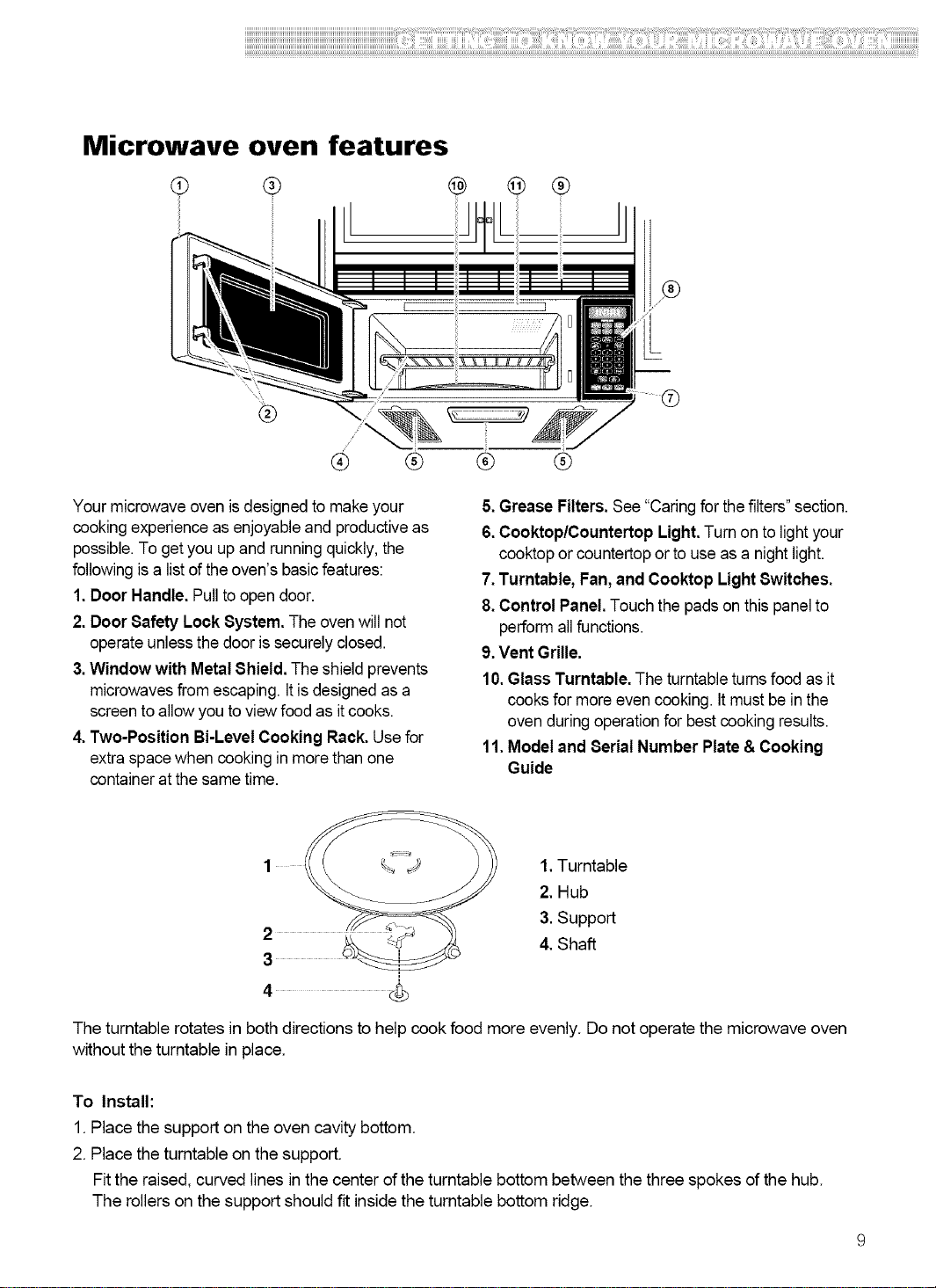
Your microwave oven isdesigned to make your
cooking experience as enjoyable and productiveas
possible.To get you up and running quickly, the
following isa list of theoven's basic features:
1.Door Handle. Pullto open door.
2. Door Safety Lock System. The ovenwill not
operate unless the door is securelyclosed.
3.Window with Metal Shield. The shield prevents
microwavesfrom escaping. It isdesigned as a
screen to allowyou to view food as itcooks.
4. Two-Position Bi-Level Cooking Rack. Use for
extra space when cooking in more than one
container atthe same time.
® ®
5.Grease Filters.See "Caring for thefilters" section.
6.Cooktop/Countertop Light.Turn on to light your
cooktop or countertopor to useas a night light.
7.Turntable, Fan,and Cooktop Light 8witches.
8.Control Panel. Touchthe pads onthis panelto
perform all functions.
9.Vent Grille.
10.Glass Turntable. The turntable turns food as it
cooks for more even cooking. It must be in the
oven during operationfor best cooking results.
11. Model and Serial Number Plate& Cooking
Guide
1. Turntable
2. Hub
3. Support
4. Shaft
The turntable rotates in both directions to help cook food more evenly. Do not operate the microwave oven
without the turntable in place.
To Install:
1. Place the support on the oven cavity bottom.
2. Place the turntable on the support.
Fit the raised, curved lines in the center of the turntable bottom between the three spokes of the hub.
The rollers on the support should fit inside the turntable bottom ridge.
ii!i!i!i!i!i!i!i!i!i!i!i!i!i!i!i!iliiiiiiii!!il!iiliiiiiii!ii!iiiiiiiilfilliili!ii!iiiiiiliiiliiiiiiii!i!i!iiiiii!iiiiiiiiiilii!!iiiiiii!i!iiiiiiiilliii!iiiiiii!i!iiiiiiiii!i!!!i!ii!ii!iiiii!ii!ii!ii!if!ii!il!ii!ii!iiiiii!i!i!i!iiiiiii!ii!ii!ii!ililliiiiili!ii!ii!ii!iiiii!illiiiiiiiiiiiiii!ii!i!!i!iiliiiiiilliii!iiiiiiii!i!iiiiiiiiii!!ii!ii!i!iiiiiiiii!ii{iii!iiiiiililiiiii!iiiiiiiiii!ii!il!ii!ii!ii!iliiiiiiii!iiililiiii!!ii!iiiiiiii!!ii!ii!iililiiiiiii!iliiiiii!i!!ii!i!illiii!ii!iiiiiiiiiilliiiiiiii!ii!ii!ii!ii!ii!ii!iiiiliilliiiii!ii!iiiiiiiiiii!!iiiiiii!iiiiiiii!i!!il!i!!ii!ii!ii!i!!iiiiiililliiiiiilliiiiiilliiiiiiiii!i!!ii!if!iiilliiii!!iiiiilli!iiiiiiiliiiiiiiiiiiiii!il!iiiiiiiiiiiiiiiiill!if!illiiiiiiiiiiiiiiiii!!!iiiiiiii!i{!i!!i!!i!!i!!i!!i!!ii!iiiiiiiiililii!ii!ililliiiiii!ililiiliii!il!iiiiiiiiii!iiliiiiiiililiiii!ii!ii!iiiiiiiiiiiiiii!ili!i!i!i!i!i!i!i!i!i!i!i!i!i!i!i!i!i!i!i!i!i!i!i!i!i!i!i!i!i!i!i!i!i!i!i!i!i!i!i!i!i!i!i!i!i!i!i!i!i!i!i!i!i!i!i!i!i!i!i!i!i!i!i!i!i!i!i!i!i!i!i!i!i!i!i!i!i!i!i!i!i!i!i!i!i!i!i!i!i!i!i!i!i!i!i!i!i!i!i!i!iil
Control panel features
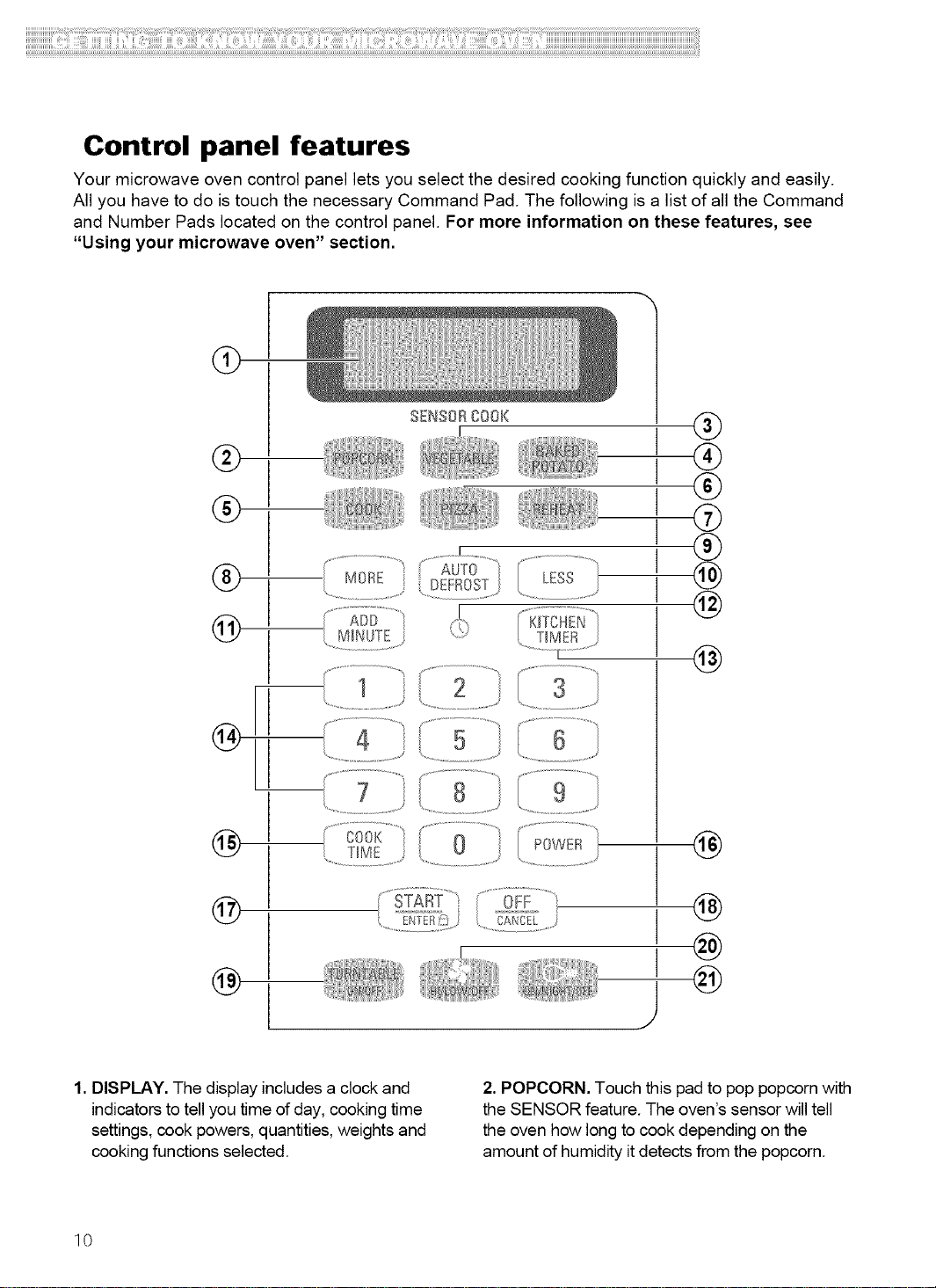
Your microwave oven control panel lets you select the desired cooking function quickly and easily.
All you have to do is touch the necessary Command Pad. The following is a list of all the Command
and Number Pads located on the control panel. For more information on these features, see
"Using your microwave oven" section.
@
®
®
®
@
l_
@
@
@
SENSORC00K
......... J .........
(AUTO "l ....................................
I ®
I ®
I ®
I @
I @
@
4 _/ 5
®
@
I @
1. DISPLAY. The display includes a clock and
indicators to tell you time of day, cooking time
settings, cook powers, quantities, weights and
cooking functions selected.
2. POPCORN. Touch this pad to pop popcorn with
the SENSOR feature. The oven's sensor will tell
the oven how long to cook depending on the
amount of humidity it detects from the popcorn.
10
ii!i!i!i!i!i!i!i!i!i!i!i!i!i!i!i!i!i!i!i!i!i!i!i!i!i!i!i!i!i!i!i!i!i!i!i!i!i!i!i!i!i!i!i!i!i!i!i!i!i!i!i!i!i!i!i!i!i!i!i!i!i!i!i!i!i!i!i!i!i!i!i!i!i!i!i!i!i!i!i!i!i!i!i!i!i!i!i!i!i!i!i!i!i!i!i!i!i!il!i!iiiiiiili!iilli!iiiilliiiii!i!!i!iiiiii!i!i!i!ii!i!iiiiiiiliiiiiili!ii!ii!i!i!i!!iiii!ii!ii!i!!iiiiii!i!iiiiiliiiiiiiiiiiiii!iiiiiiiiii!il!ii!ii!ii!iii!i!ii!ii!ii!ii!iiiiiiiiliiiii!ii!ii!ii!iiiiiilil!ii!ii!ii!iilliiii!!i!!i!!i!!i!if!i!iiiiiiiiiiiiiii!i!ii!ii!ii!iliiiliii!iiii!iiiiiii!iiiiiiiiilii!ii!iifilliiiilii!ii!illiiii!iiiiiiiiiiiiiiiiiiiiiiiii!!i!!i!!i!!i!!i!iiiiiiliiii!iiii!ii!i!!iliiiiiiii!i!!if!i!iiilliiiiii!ii!iiiiili!!il!i!illiiiii!iiiiiiiii!ii!ii!iiiiiiiii!!i!!i!!i!!i!!i!i!iliiiliiiiii!ii!iiiiiiiiiii!!iiiili!iiiiilliii!ii!ii!ii!ii!iiiii!ii!i!iiiiililiiiiillilii!!i!iiiiiiiii!il!ii!iiiliiiiili!iiiilliiiiiiiiililiii!iiiiiliii!iiiiiiiiii!iiiiiiiii!i!iiiiiiliiiiiii!illiiiliii!i!iiiiiiiiliilii!if!ii!ii!ii!ii!ii!i!filliiiiiii!il!ii!ii!iiiilliiiii!ii!ililliiiiiilliiiiiiiii!!!iiiiiiii!i!i!i!!ii!i!!iliiiiiii!iiiiiiii!ii!ii!ii!ii!ii!ii!ii!ii!ii!ii!ii!ii!ii!ii!iliiiii
3. VEGETABLE. Touch this pad to cook
vegetables with the SENSOR feature. The
oven's sensor will tell the oven how long to cook
depending on the amount of humidity itdetects
from the vegetables.
4. BAKED POTATO. Touch this pad to cook
potatoes with the SENSOR feature. The oven's
sensors will tell the oven how long to cook
depending on the amount of humidity itdetects
from the potatoes.
5. COOK. Touch this pad to cook common
microwave-prepared foods with the SENSOR
feature. The oven's sensors will tell the oven
how long to cook depending on the amount of
humidity itdetects from the food.
6. PIZZA. Touch this pad to reheat one or several
slices of pizza with the SENSOR feature. The
oven's sensor will tell the oven how long to cook
depending on the amount of humidity itdetects
from the pizza.
7. REHEAT. Touch this pad to reheat food with the
SENSOR feature. The oven's sensor will tell the
oven how long to heat depending on the amount
of humidity it detects from the food.
8. MORE. Touch this pad to add 10 seconds of
cook time each time you press it.
9. AUTO DEFROST. Touch this pad followed by
Number Pads to thaw frozen meat by weight.
10. LESS. Touch this pad to subtract 10 seconds
of cook time each time you press it.
11. ADD MINUTE. Touch this pad to cook for 1
minute, at 100% Cook Power, or to add an
extra minute, at the set Cook Power to your
cooking cycle.
12. _i_)(CLOCK). Touch this pad to enter the
correct time of day.
13. KITCHEN TIMER. Touch this pad to set or
cancel the Kitchen Timer.
14. Number Pads. Touch Number Pads to enter
cooking times, Cook Powers, quantities,
weights, or food categories.
15. COOK TIME. Touch this pad followed by
Number Pads to set a cooking time.
16. POWER. Touch this pad after the cook time
has been set, followed by a Number Pad to set
the amount of microwave energy released to
cook the food. The higher the number, the
higher the microwave power or "cooking
speed."
17. START/ENTER. Touch this pad to start a
function, tfyou open the door after the oven
begins to cook, retouch START/ENTER.
18. OFF/CANCEL. Touch this pad to erase an
incorrect command, cancel a program during
cooking, or to clear the Display.
19. TURNTABLE ON/OFF. Touch this pad to stop
the turntable only during cook time functions.
Stop the turntable only ifthe dish you are using
istoo long to turn inside the oven. To stop the
turntable, touch TURNTABLE ON/OFF before
or after touching START/ENTER. The word
OFF will scroll across the display and T/TABLE
OFF will appear during cooking. Ifyou do not
program a function within 1 minute of pressing
TURNTABLE ON/OFF, the turntable will
automatically turn back on. To turn the
turntable back on, touch TURNTABLE
ON/OFF at any time during the programmed
cycle.
20. FAN. Touch this pad to turn the fan on or off.
21. LIGHT. Touch this pad to turn on the
cooktop/countertop light.
NOTE: If you try to enter incorrect instructions,
you will not hear any tones. Touch CANCEL/OFF
and re-enter the instructions.
11
Audible signals
Audible signals are available to guide you when
setting and using your oven:
• A programming tone will sound each time
you toucha pad.
• Seven tones signal the end of a Kitchen Timer
countdown.
• Four tones signal theend of a cooking cycle.
•Three tones sound once every minute after an
End-of-Cooking signal as a reminder iffood has
not been removed from oven.
Interrupting cooking
You can stop the oven during a cycle by opening If you do not want to continue cooking:
the door. The oven stops heating and the fan • Close the door and the light goes off.
stops, but the light stays on. OR
To restart cooking, close the door and Touch •Touch OFF/CANCEL
START/ENTER
Using Your Microwave Oven
This section gives you instructions for operating each function. Please read these instructions
carefully.
Using the safety lock
Thesafety lockpreventsunwanteduseofthe To cancelthe safety lock:
microwaveovenby disablingthecontrolpanel
CommandPads.
To lockor deactivatethecontrolpanel:
Touch andhold START/ENTERfor4 seconds.Two
toneswillsoundand LOCKEDwillappearon the
display.
Touchand holdSTART/ENTERfor4 seconds.Two
toneswillsoundand LOCKEDwill beclearedfrom
thedisplay.
12
Using the fan
The Fan pad on the bottom right of the control
panel controls the 2-speed Fan.
1.Touch FAN
(once for HIGH, twice for LOW)
NOTE: If the temperature gets too hot around
the microwave oven, the fan inthe vent hood
will automatically turn on at the
LOW setting to protect the oven. It may stay on
up to an hour to cool the oven. When this
occurs, the FAN pad will not turn the fan off.
2. Turn offfan when desired.
Touch FAN
(twice if on HIGH, once ifon LOW)
Using the cooktop/countertop light
The pad on the bottom center of the control
panel controls the cooktop/countertop light.
1.Touch LIGHT.
(once for high, twice for low [night light]).
2. Turn off light when desired.
Touch LIGHT.
(twice if on HIGH, once if on LOW)
Using the bi-level cooking rack
The Bi-Level Cooking Rack gives you extra
space when cooking in more than one container
at the same time. The metal rack can be turned
upside-down to help fit taller containers on the
bottom of the oven. If you need a replacement
rack, you can order one from your Sears Service
Center. Make sure to have your model number
when ordering.
Inserting the rack
Firstposition:
Insert the rack
securely into the
rack supports on
the side walls of the
oven.
Second position:
Turn rack upside-
down when using a
taller container on
the bottom of the
NOTES:
• Do not store the metal rack in the oven. Arcing
and damage to the oven could result if
someone accidentally starts the oven.
• Do not operate the oven with the metal rack
stored on the floor of the oven. Damage to the
interior finish will result.
• Use rack only in the microwave oven.
• Do not use rack with browning dish.
• Do not let food container on rack touch the
top or sides of the oven.
•Do not cook foods directlyon rack without
putting them in containersfirst.
•Do not place a metal cooking container on rack.
Placea microwave-safe plateunder container.
•Only use the Bi-Level Cooking Rackwhen
cooking at more than one level.
oven.
13
Setting the clock
When your microwave oven is firstplugged in or after
a powerfailure, the Displaywill show "PLEASE SET
TIME OF DAY". Ifa timeof day is notset, ":"will
show on the Displayuntil you touch C_.
NOTES:
• Ifyou enter in an incorrecttime and touch _,
you cannot set time of day. Enter thecorrect time.
• Ifyou touch OFF/CANCEL while settingthe clock,
the Displaywill show the lasttime of dayset or ":"
if no time of day has been set.
To settime:
1.Touch _!_.
2. Entertimeof day.
Example for 3:25: Touch "32 5".
Then touch _ or START/ENTER.
Using the Kitchen Timer
You can use your microwave oven as a kitchen
timer. Use the Kitchen Timer for timing up to
99 minutes, 99 seconds.
NOTES:
•The oven can operatewhile the KitchenTimer is in
use. To see the Kitchen Timer while the oven is
cooking, touch KITCHENTIMER.
The Displaywill return tothe cooking time
countdown while touching.
•To see the timeof day while thetimer iscounting
down, touch _.
• Ifyou want to useother command pads while the
timer iscounting down, touch OFF/CANCEL to
cancel the Kitchen Timer.
1. Touch KITCHEN TIMER.
2. Enter time to be counted down.
Example for 3 minutes:Touch "30 0".
3. Touch START/ENTER
(display counts down set time)
At the end ofcountdown, "END"will be displayed
and seven toneswill sound. To restore time of day,
touch OFF/CANCEL.
Cooking at high cook power
1. Put food in oven and close
the door.
2. Touch COOK TIME
ENTER COOKING TIME scrolls across display.
Examplefor 1 minute, 30 seconds:
Touch "13 0".
TOUCH START OR POWER scrollsacross
display.
3. Touch START/ENTER.
(display countsdown cookingtime)
At end of cooking time, "END"will be
displayed and four tones will sound. The
display will show thetime of day after you
open the door or touch OFF/CANCEL.
14
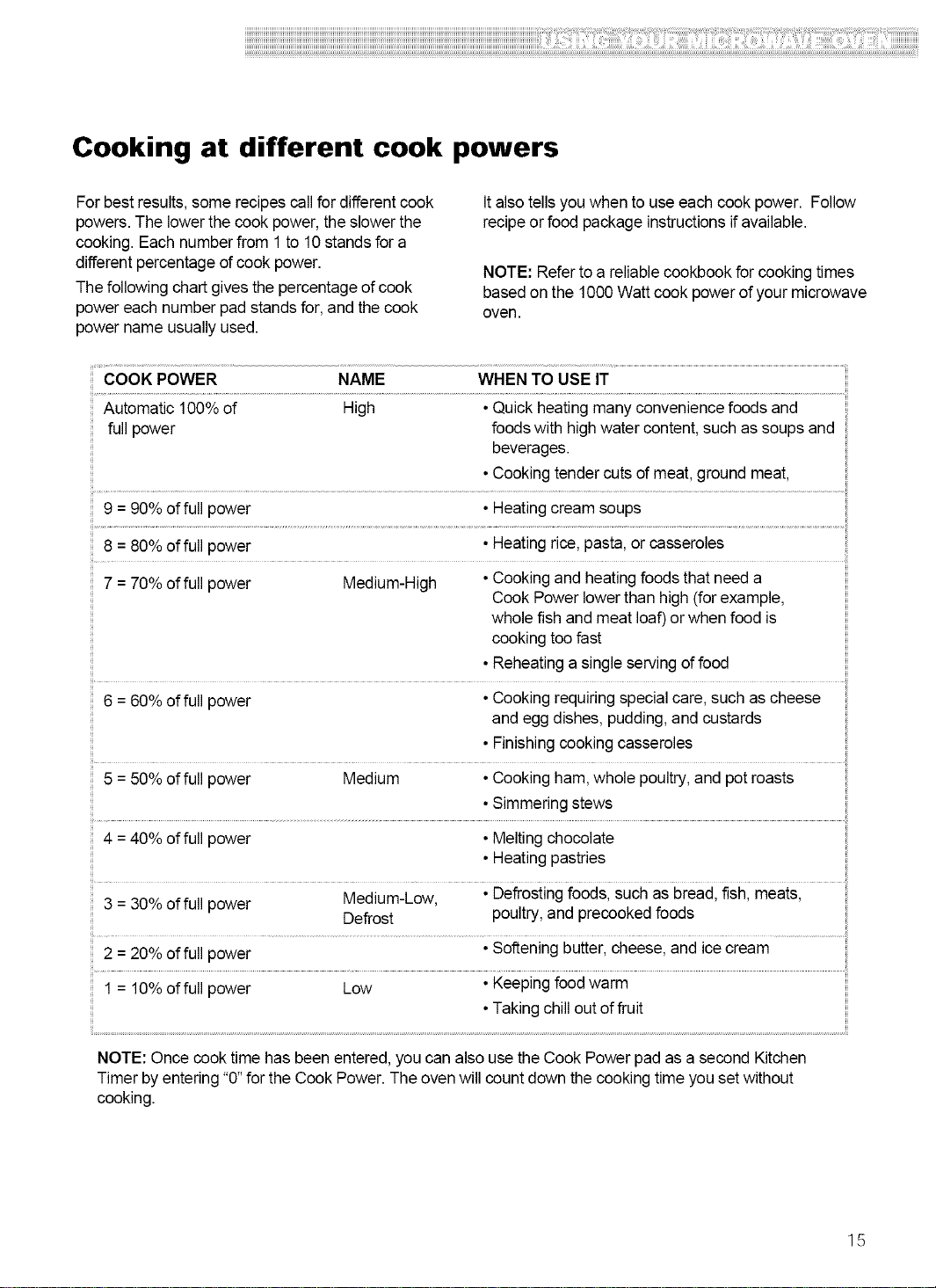
Cooking at different cook powers
For best results, some recipes callfor differentcook
powers.The lowerthe cook power, the slower the
cooking. Each numberfrom 1 to 10stands for a
differentpercentage of cook power.
Thefollowing chart gives the percentage of cook
power each number pad stands for, and the cook
power name usually used.
Italso tells you when to use each cook power. Follow
recipeor food package instructionsifavailable.
NOTE: Refer to a reliablecookbook for cooking times
basedon the 1000 Watt cook power of your microwave
oven.
COOK POWER NAME WHEN TO USE IT
Automatic 100% of High •Quickheating manyconvenience foodsand
full power foods with high water content, such as soups and
beverages.
•Cookingtender cuts of meat,ground meat,
9 = 90% of full power •Heatingcreamsoups
8 = 80% of full power •Heatingrice,pasta, orcasseroles
ii i!_i!
7 = 70% of full power Medium-High •Cookingand heatingfoods that need a
Cook Power lower than high (forexample,
whole fish and meat loaf)or when food is
cooking toofast
• Reheatingasingle servingof food
6 = 60% of full power •Cookingrequiringspecialcare,such as cheese
and egg dishes, pudding, and custards
•Finishingcookingcasseroles
5 = 50% of full power Medium •Cookingham,whole poultry,and pot roasts
•Simmeringstews
4 = 40%of full power • Melting chocolate
•Heatingpastries
ii ili
3 = 30% of full power Medium-Low, •Defrostingfoods, such as bread,fish, meats,
Defrost poultry,and precookedfoods
ii iil
2 = 20% of full power •Softeningbutter,cheese, and icecream
1 = 10%of full power Low •Keepingfoodwarm
•Takingchillout of fruit
NOTE: Once cook time has been entered, youcan also use the Cook Power pad as a second Kitchen
Timer by entering "0"for the Cook Power. The oven will count down the cooking time you set without
cooking.
15
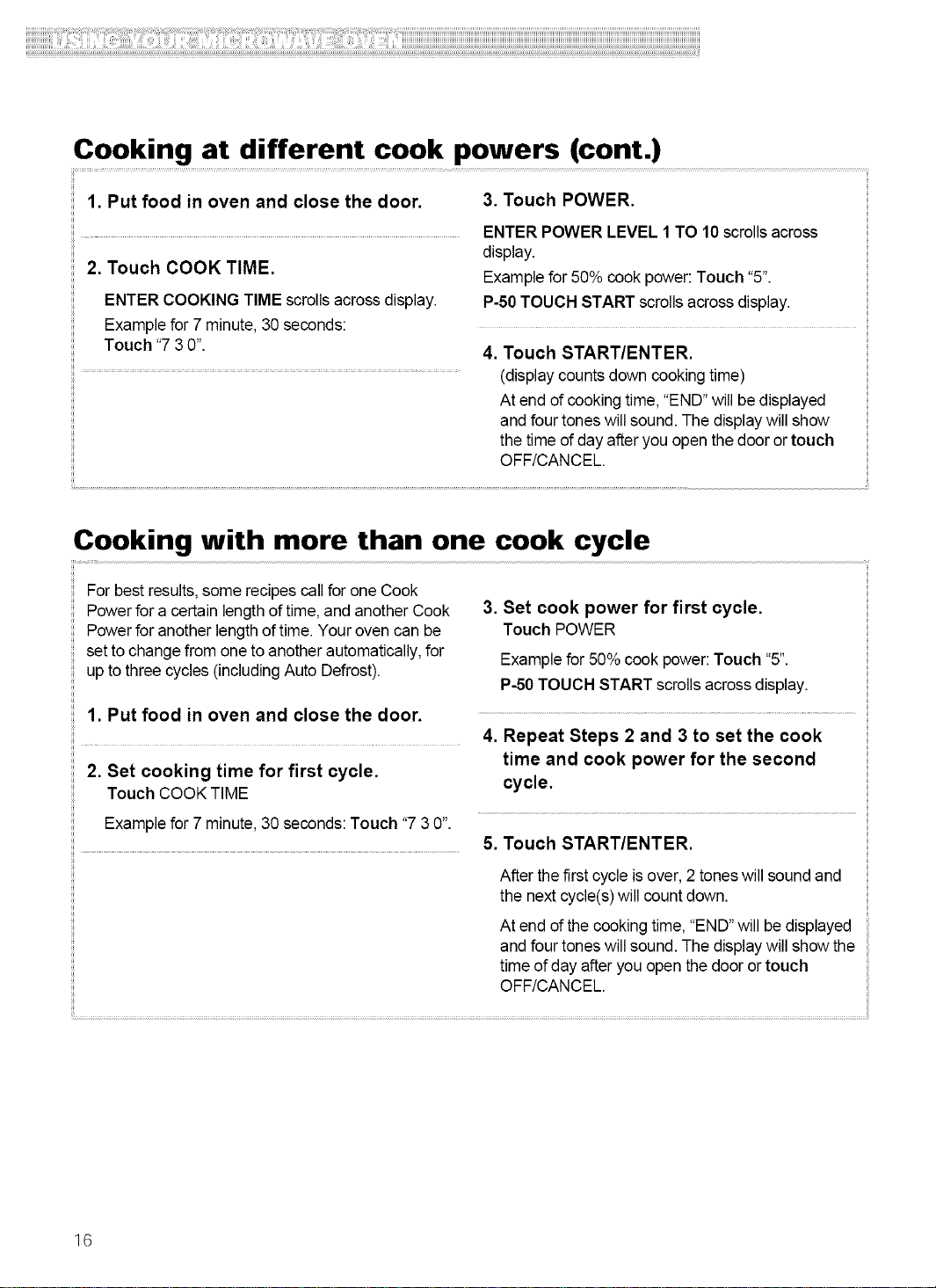
Cooking at different cook powers (cont.)
1. Put food in oven and close the door. 3. Touch POWER.
ENTER POWER LEVEL 1 TO 10 scrollsacross
2. Touch COOK TIME.
ENTER COOKING TIME scrolls acrossdisplay.
Example for 7 minute,30 seconds:
Touch "7 30".
display.
Examplefor 50% cook power: Touch "5".
P-50 TOUCH START scrolls acrossdisplay.
4. Touch START/ENTER.
(display counts down cooking time)
At end ofcooking time, "END"will be displayed
and four tones will sound. The displaywill show
the time of day after you open the door ortouch
OFF/CANCEL.
Cooking with more than one cook cycle
For best results, some recipes callfor one Cook
Powerfor a certain lengthof time, and another Cook
Powerfor another length oftime. Your oven can be
set to changefrom one to another automatically,for
up to three cycles (includingAuto Defrost).
1. Put food in oven and close the door.
2. Set cooking time for first cycle.
Touch COOK TIME
Example for 7 minute,30 seconds: Touch "7 3 0".
3. Set cook power for first cycle.
Touch POWER
Examplefor 50% cook power: Touch "5".
P-50 TOUCH START scrolls acrossdisplay.
4. Repeat Steps 2 and 3 to set the cook
time and cook power for the second
cycle.
5. Touch START/ENTER.
After the firstcycle isover, 2 toneswill sound and
the next cycle(s) will count down.
At end ofthe cooking time, "END"will be displayed
and four tones will sound. The displaywill show the
time of day after you open thedoor or touch
OFF/CANCEL.
16
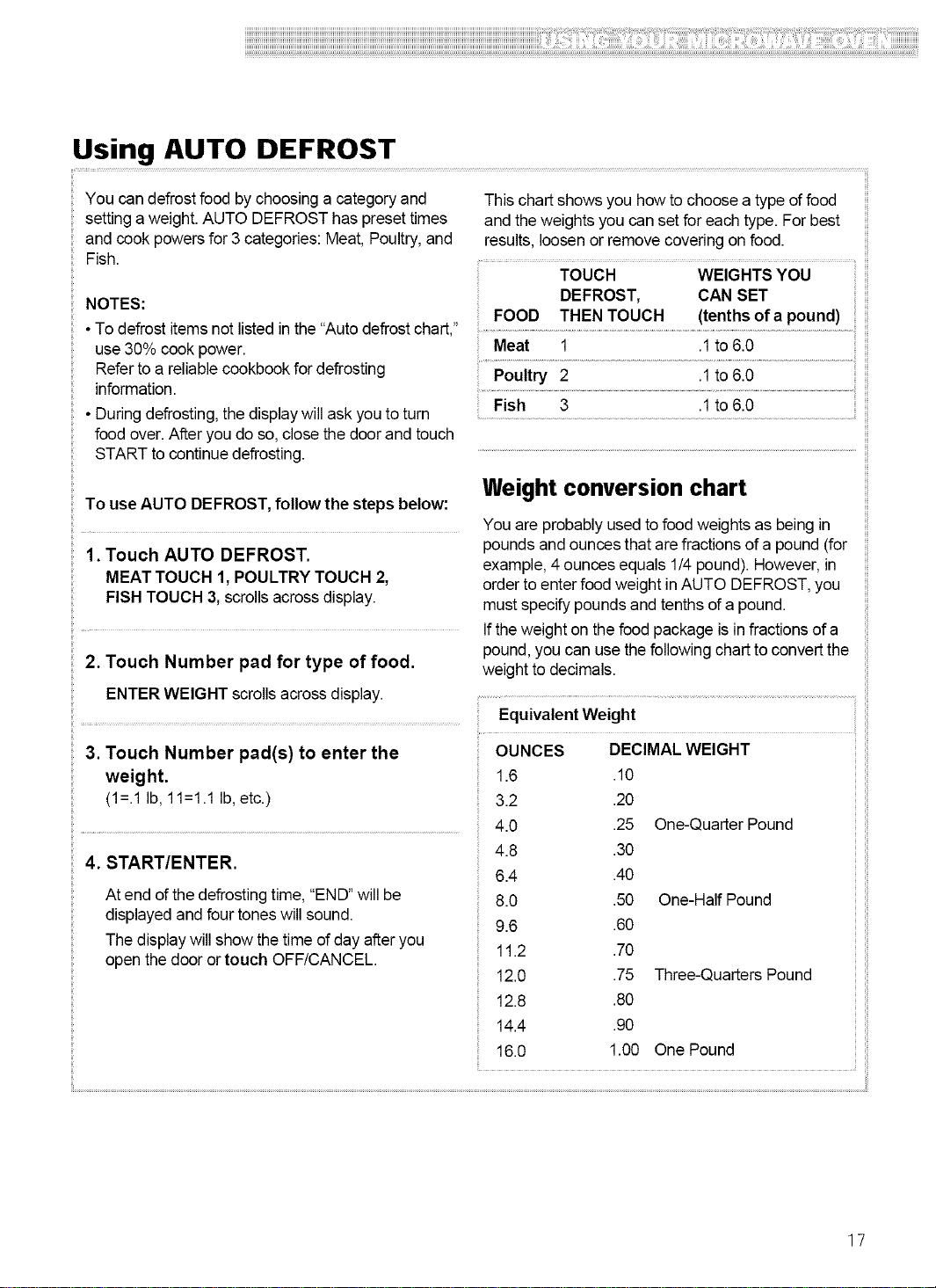
Using AUTO DEFROST
You can defrostfood by choosing a categoryand
setting a weight. AUTO DEFROST has preset times
and cook powers for 3 categories: Meat, Poultry,and
Fish.
This chart shows you how tochoose a type of food
and theweights you can set for each type. For best
results, loosenor remove covering on food.
TOUCH WEIGHTS YOU
NOTES:
• To defrost itemsnot listedinthe "Auto defrostchart,"
use 30% cook power.
Refer to a reliable cookbook for defrosting
information.
• Duringdefrosting,the displaywill askyou to turn
food over.After you do so, close the doorandtouch
START to continue defrosting.
To useAUTO DEFROST, follow the steps below:
1. Touch AUTO DEFROST.
Weight conversion chart
You are probably used tofood weights as being in
poundsand ounces that are fractions of a pound (for
example, 4 ounces equals 1/4 pound). However, in
MEAT TOUCH 1, POULTRY TOUCH 2, order to enter foodweight in AUTO DEFROST,you
FISH TOUCH 3,scrolls across display, mustspecify pounds and tenthsof a pound.
Ifthe weight on thefood package is infractions of a
pound,you can use thefollowing chart toconvert the
2. Touch Number pad for type of food. weight to decimals.
ENTER WEIGHT scrollsacross display....................................................................................
Equivalent Weight
3. Touch Number pad(s) to enter the
weight.
(1=.1 Ib, 11=1.1 Ib,etc.)
4. START/ENTER.
At end of thedefrosting time, "END"will be
displayed and four tones will sound.
The displaywill show thetime of day afteryou
open the door or touch OFF/CANCEL.
OUNCES DECIMAL WEIGHT
1.6 .10
3.2 .20
4.0 .25 One-Quarter Pound
4.8 .30
6.4 .40
8.0 .50 One-Half Pound
9.6 .60
11.2 .70
12.0 .75 Three-Quarters Pound
12.8 .80
14.4 .90
16.0 1.00 One Pound
17
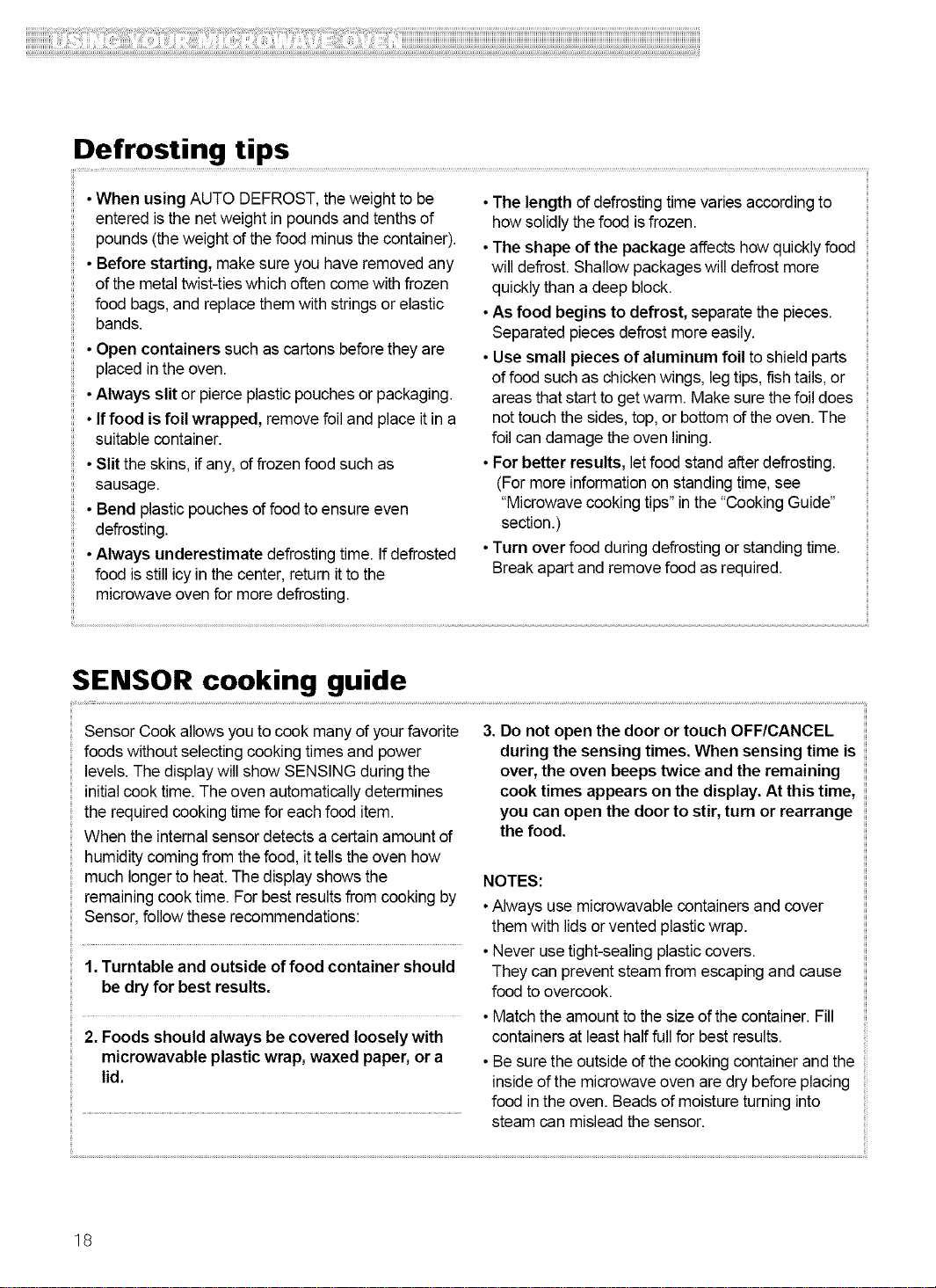
Defrosting tips
• When using AUTO DEFROST, theweight to be
entered isthe netweight in poundsand tenths of
pounds (theweight of thefood minus the container).
• Before starting, make sure you have removed any
of the metal twist-tieswhich often come with frozen
food bags, and replacethem with stringsor elastic
bands.
•Open containers such as cartons beforethey are
placed in the oven.
•Always slit or pierce plasticpouches or packaging.
• Iffood is foil wrapped, removefoil and place itin a
suitable container.
•Slit the skins, if any, of frozen food such as
sausage.
• Bend plasticpouches of food toensure even
defrosting.
•Always underestimate defrostingtime. If defrosted
food isstill icy in the center, returnitto the
microwave oven for more defrosting.
•The length ofdefrosting time varies according to
howsolidly thefood isfrozen.
•The shape of the package affects howquickly food
will defrost. Shallow packageswill defrost more
quickly than a deep block.
•As food begins to defrost, separate the pieces.
Separated pieces defrost moreeasily.
•Use small pieces of aluminum foil to shieldparts
of food such as chickenwings, leg tips, fish tails,or
areas that start to getwarm. Make sure thefoil does
nottouch the sides,top, or bottom ofthe oven. The
foil can damage the oven lining.
•For better results, letfood stand afterdefrosting.
(For more informationon standing time,see
"Microwavecookingtips" in the "CookingGuide"
section.)
•Turn over food during defrosting or standing time.
Breakapart and remove food as required.
SENSOR cooking guide
Sensor Cook allows you to cook many of yourfavorite
foods without selectingcooking times and power
levels.The display will show SENSING duringthe
initialcook time. The oven automaticallydetermines
the required cooking time for eachfood item.
When the internalsensor detects a certain amount of
humiditycoming from the food, it tells theoven how
much longerto heat.The display showsthe
remainingcook time. For best resultsfrom cooking by
Sensor, follow these recommendations:
3. Do not open the door or touch OFF/CANCEL
during the sensing times. When sensing time is
over, the oven beeps twice and the remaining
cook times appears on the display. At this time,
you can open the door to stir, turn or rearrange
the food.
NOTES:
•Always use microwavable containersand cover
them with lidsor vented plasticwrap.
• Never use tight-sealing plastic covers.
1, Turntable and outside of food container should They can prevent steam from escaping and cause
be dry for best results, food to overcook.
Match theamount to the size ofthe container. Fill
2, Foods should always be covered loosely with containers at least halffull for best results.
microwavable plastic wrap, waxed paper, or a •Besure the outsideof thecooking containerandthe
lid, insideof the microwave oven are dry before placing
food in the oven. Beads of moistureturning into
steam can mislead the sensor.
18
Using SENSOR COOK
Using COOK lets you heat common microwave-
prepared foods without needingto programtimes and
Cook Powers. COOK has preset Cook Powers for 3
food categories: Number 1for Frozen Entree,
Number 2 for Casserole, or Number 3 for Rice.
1. Put food in oven and close the door.
2. Touch COOK.
SELECT MENU 1 TO 3 -- SEE COOKING
GUIDE BEHIND DOOR scrolls across display.
Example for casserole: Touch "2".
Four secondsafter you complete your selection,
the oven will start.
When sensor detects a certain amount of humidity
from food, cooking time isdisplayed. The display
will show SENSING and the remaining cooking
time.
At end of cooking time, "END"will be displayed
and four tones will sound. The display willshow
the time of day after you open the door or touch
OFF/CANCEL
Using SENSOR REHEAT
REHEAT lets you heatfoods without needing to
program times and Cook Powers. REHEAT has
preset Cook Powers for 3 categories: Number 1for
Casserole, Number 2 for DinnerPlate, or Number3
for Soup/Sauce.
NOTE: See "Reheating chart"inthe "CookingGuide"
section for reheatingwith cookingtime and Cook
Power.
2. Touch REHEAT.
SELECT MENU 1 TO 3 - - SEE
COOKING GUIDE BEHIND DOOR
scrolls acrossdisplay.
Examplefor reheatingsoup/sauce: Touch "3".
Fourseconds after you complete your selection,
the oven will start.
When sensor detects a certain amount of humidity
from food, cooking time isdisplayed. Thedisplay will
show SENSING and the remainingheatingtime.
1. Put food in oven and close the door. At end of reheatingtime, "END"will bedisplayedand
four tones will sound. The display will show the time
of day after you open the door or touch
OFF/CANCEL
19
Using SENSOR BAKED POTATO
Cooking with BAKED POTATO lets you bakeone or 2. Touch RAKED POTATO.
several potatoes by touching one pad.
Fourseconds laterthe oven will start.
NOTES:
• Before baking, pierce potatowith fork several
times. Do notcover.
• After baking, letstand for 5 minutes.
1. Put potato in oven and close the door.
When sensor detects a certain amount of humidity
from potato,cooking time isdisplayed. The display
willshow SENSING and the remainingcooking
time.
At end of cooking time, "END"will be displayed
and four tones will sound. The display will show
the time of day after you open the door or touch
OFF/CANCEL.
Using SENSOR POPCORN
POPCORN lets you pop commercially packaged
microwave popcornby touching just one pad.
Pop only one package at a time. If you are using a
microwave popcornpopper,follow manufacturer's
instructions.
Cooking performance may vary with brand and fat
content. Try several brandsto decidewhich gives
best popping results.
For best results, usefresh bags of popcorn.
1. Place bag in oven and close the door.
2. Touch POPCORN.
Four seconds later,the oven willstart.
When sensor detects a certain amount of humidity
from popcorn, popping time is displayed.The display
will show SENSING and the remainingcooking time.
At end of cooking time, "END"will be displayed and
four tones will sound. The displaywill show the time
ofday after you open the door or touch
OFF/CANCEL.
Using SENSOR PIZZA
Reheating pizza with PIZZA letsyou reheatone or
several slicesof pizza bytouching one pad.
1. Place pizza in oven and close door.
2. Touch PIZZA.
Four seconds laterthe ovenwill start heating.
When sensor detects a certain amount of humidity
from pizza, heatingtime isdisplayed.
At end of heatingtime, "END"will be displayed and
four tones will sound. The displaywill show the time
ofday after you open the door or touch
OFF/CANCEL.
20
Using SENSOR VEGETABLE
Cooking with VEGETABLE lets you heatcommon
microwave-prepared vegetableswithout needing to
program times and Cook Powers. VEGETABLE has
preset cook powers for 3 food categories: Number 1
to select Fresh, Number 2 for Frozen,or Number 3
for Canned.
1. Place vegetables in oven and close
door.
2. Touch VEGETABLE.
FRESH TOUCH 1, FROZEN TOUCH 2,
CANNED TOUCH 3 scrolls acrossdisplay.
Example forfrozen vegetables: Touch "2".
Four secondsafter you complete your selection,
the oven will start.
When sensor detects a certain amount of humidity
from vegetables, cooking time isdisplayed. The
display will show SENSING and theremaining
cooking time.
At end of cooking time, "END"will be displayed
and four tones will sound. The display willshow
the time of day after you open the door or touch
OFF!CANCEL
Using ADD MINUTE
ADD MINUTE lets you cook food for 1 minute at
100% Cook Poweror add an extra minute to your
cooking cycle. You can also use itto extend cooking
time in multiplesof 1 minute,up to 99 minutes.
• You can only useADD MINUTE with non-sensor
functions.
1. Put food in oven and close door.
NOTES:
• To extend cooking time in multiplesof 1minute,
touch ADD MINUTE repeatedly during cooking.
•You can enter ADD MINUTE only after closing the
door,after touching OFF/CANCEL, or during
cooking.
• If you touch ADD MINUTE during cooking,the
ovenwill cook atthe currently selectedCook Power.
If you touch ADD MINUTE after cooking is over, the
ovenwill cook at 100% Cook Power.
2. Touch ADD MINUTE.
Examplefor cooking for 3 minutes: Touch ADD
MINUTEthree times.
At end of cooking time, "END"will be displayed and
four tones will sound. The display will show the time
of day after you open the door or touch
OFF/CANCEL.
Adding or subtracting cook time
Ifthe SENSOR function istoo long or too short,you
can increase or decrease the cook time by 10% after
choosing the function. You can only increase or
decrease cook time beforecooking starts.
To increasecook time by 10%:Touch "9".
To decrease cook time by 10%:Touch "7".
To resetto the normal cook time: Touch "8".
21
Caring for Your Microwave
Oven
To make sureyour microwave oven looks good and works well for a longtime, you should
maintain it properly. For proper care, please follow these instructions carefully.
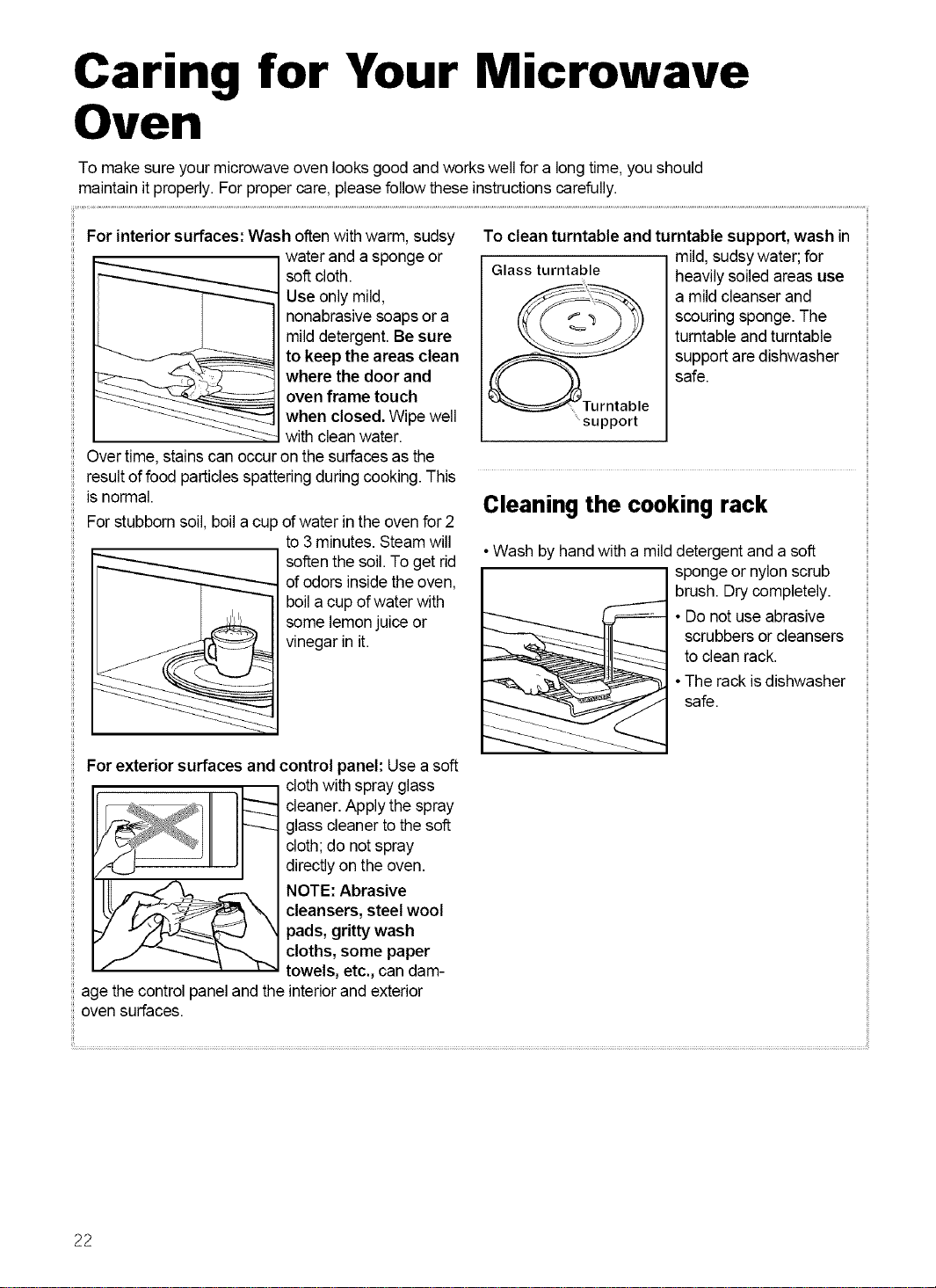
For interior surfaces: Wash oftenwithwarm, sudsy
water and a sponge or
soft cloth.
Use only mild,
nonabrasivesoaps or a
milddetergent. Be sure
to keep the areas clean
where the door and
oven frame touch
when closed. Wipe well
with clean water.
Over time,stains can occur on the surfaces as the
result offood particlesspatteringduring cooking. This
is normal.
For stubborn soil, boil a cup of water in the oven for 2
to 3 minutes. Steam will
soften the soil. To get rid
of odors insidethe oven,
boila cup ofwater with
some lemonjuice or
vinegar in it.
To clean turntable and turntable support, wash in
mild, sudsywater; for
Glass turntable heavilysoiled areas use
a mild cleanser and
scouring sponge. The
turntable and turntable
support are dishwasher
safe.
.....support
Cleaning the cooking rack
• Wash by hand with a milddetergent and a soft
sponge or nylon scrub
brush. Drycompletely.
• Do notuse abrasive
scrubbers or cleansers
to clean rack.
•The rack isdishwasher
safe.
For exterior surfaces and
control panel: Use a soft
cloth with spray glass
cleaner. Apply the spray
glass cleanerto the soft
cloth; do notspray
directlyon the oven.
NOTE: Abrasive
cleansers, steel wool
pads, gritty wash
cloths, some paper
towels, etc., can dam-
age the control panel and the interiorand exterior
oven surfaces.
22
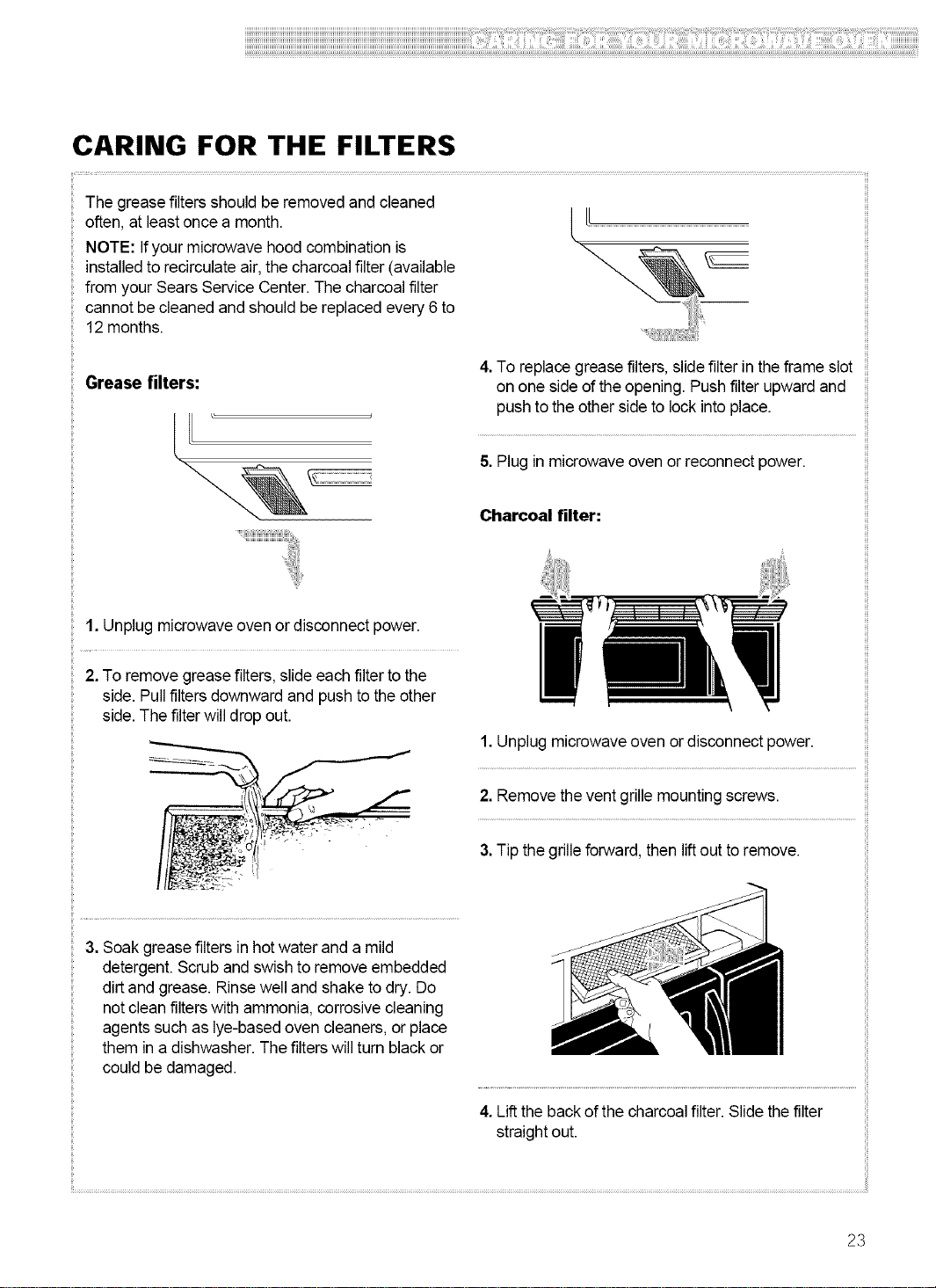
CARING FOR THE FILTERS
The grease filtersshould be removed and cleaned
often, at least once a month.
NOTE: Ifyour microwave hood combination is
installed to recirculateair, the charcoalfilter (available
from your Sears Service Center.The charcoal filter
cannot be cleaned and should be replacedevery 6 to
12 months.
Grease filters:
4.To replace greasefilters, slidefilter in theframe slot
on one side ofthe opening. Push filter upward and
push to the otherside to lock into place.
5. Plug in microwave oven or reconnect power.
Charcoal filter:
1. Unplug microwave oven or disconnect power.
2. To remove grease filters, slide eachfilter to the
side. Pull filters downward and push tothe other
side. The filter willdrop out.
1. Unplugmicrowave oven or disconnect power.
2. Removethe vent grille mountingscrews.
3.Tip the grilleforward, then lift out to remove.
3. Soak greasefilters in hotwater and a mild
detergent. Scrub and swish to remove embedded
dirtand grease. Rinsewell and shake to dry. Do
not cleanfilters with ammonia, corrosive cleaning
agents such as lye-based oven cleaners,or place
them in a dishwasher. The filterswill turn black or
could be damaged.
4. Lift the back of the charcoal filter.Slide the filter
straightout.
23
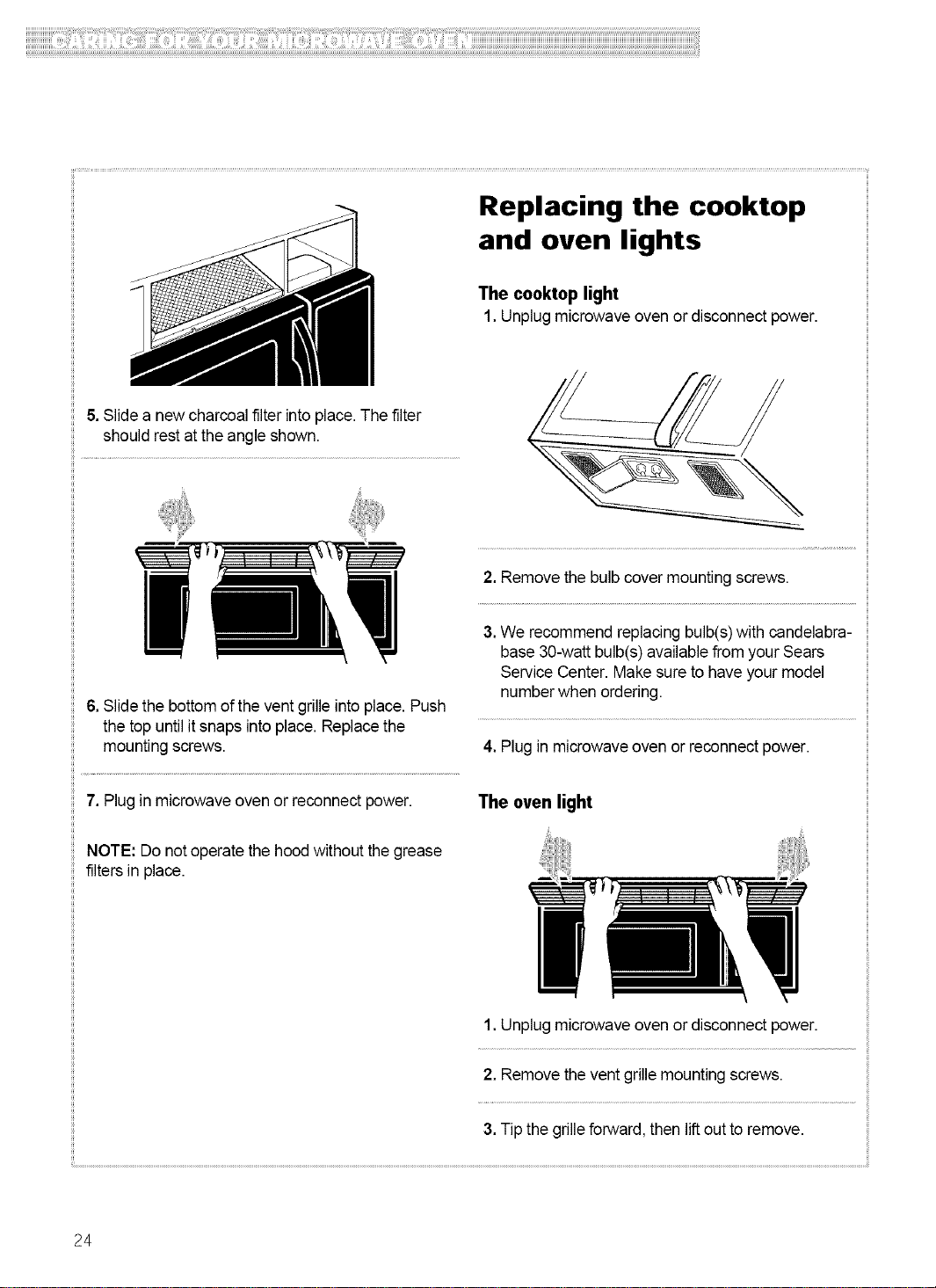
Replacing the cooktop
and oven lights
The cooktol) light
1. Unplugmicrowave oven or disconnect power.
& Slidea new charcoal filter into place. Thefilter
should rest at the angle shown.
6, Slidethe bottomof the vent grille into place. Push
the top until itsnaps intoplace. Replace the
mounting screws.
7, Plug in microwave oven or reconnect power.
NOTE: Do notoperate the hood without the grease
filters in place.
2, Removethe bulb cover mounting screws.
3,We recommend replacingbulb(s)with candelabra-
base30-watt bulb(s) availablefrom your Sears
Service Center. Make sure to haveyour model
numberwhen ordering.
4, Plug in microwave oven or reconnect power.
The oven light
1, Unplugmicrowave oven or disconnect power.
2, Remove thevent grille mounting screws.
3,Tip the grilleforward, then lift out to remove.
24
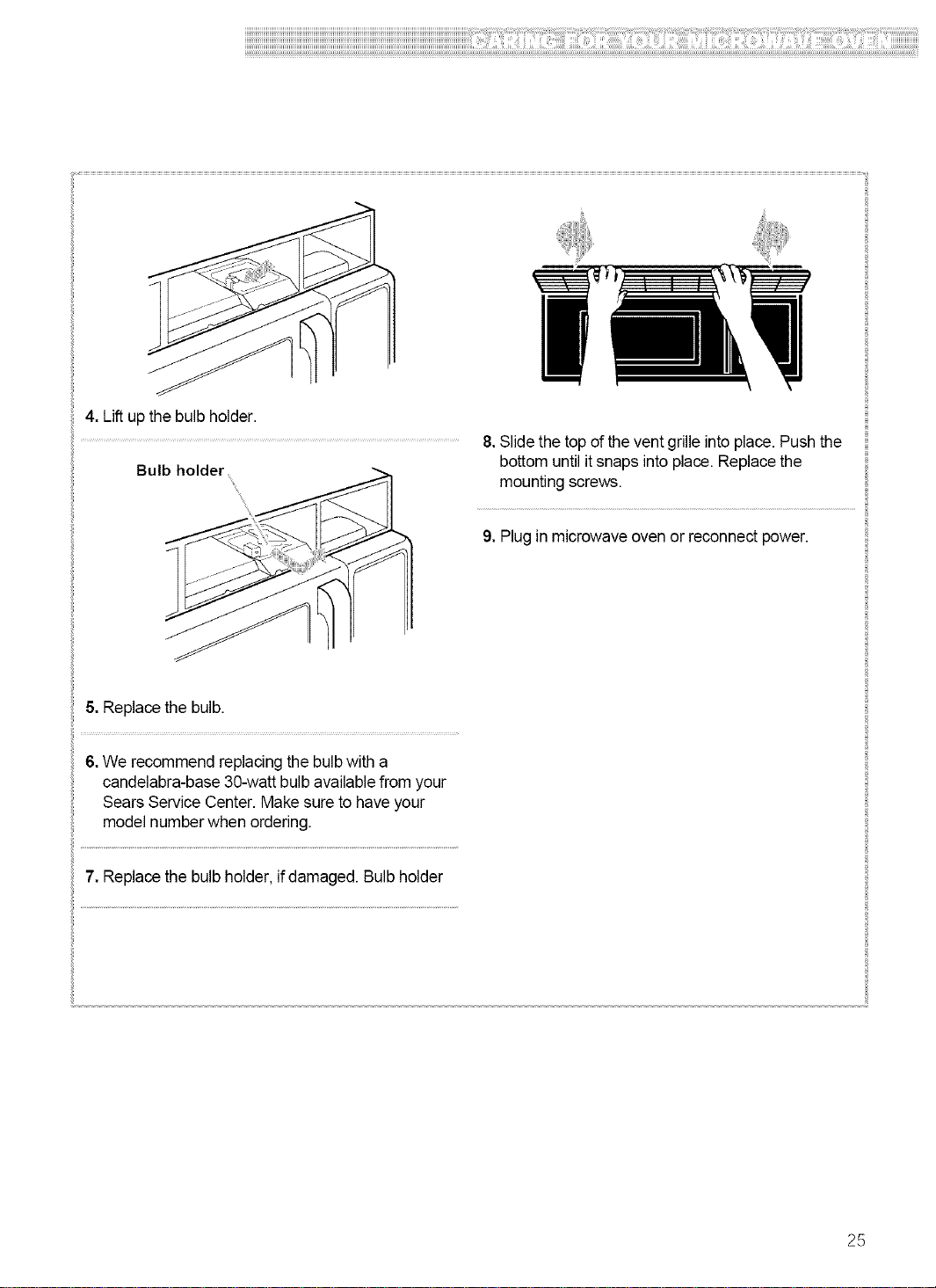
4.Liftupthebulbholder.
8.Slidethetopoftheventgrilleintoplace.Pushthe
Bulb holder bottom until it snaps into place. Replace the
mounting screws.
9. Plugin microwave oven or reconnect power.
5, Replace the bulb.
i!
6. We recommend replacing the bulbwith a
candelabra-base 30-watt bulb availablefrom your
Sears Service Center. Make sure to have your
model number when ordering.
7. Replacethe bulb holder,if damaged. Bulb holder
25
Cooking Guide
MICROWAVE COOKING TIPS
Amount of food
• If you increase or decrease the amount of food
you prepare, thetime ittakes to cook that food will
also change. Forexample, ifyou double a recipe,
add a little morethan halfthe original cooking time.
Check for doneness and, if necessary,add more
time in small increments.
Starting temperature of food
•The lower the temperature ofthe food being put
into the microwave oven, the longer it takes to cook.
Foodat roomtemperature will be re-heatedmore
quickly thanfood at refrigerator temperature.
Composition of food
•Food with a lot of fat and sugar will be heated
faster thanfood containing a lotof water. Fat and
sugar will also reacha higher temperaturethan
water inthe cooking process.
•The more dense the food, the longer ittakes to
heat. "Very dense" food like meat takes longer to
reheat than lighter, more porousfood like sponge
cakes.
Size and shape
•Smaller pieces of food will cook fasterthan larger
pieces.Also, same shaped pieces cook more
evenly than different-shaped pieces.
•With foods that have different thicknesses, the
thinner parts willcook faster than the thicker parts.
Place the thinner parts ofchicken wings and legs in
the center of the dish.
Stirring, turning foods
•Stirring and turning foods spreads heatquicklyto
the center of the dishand avoids overcooking at the
outer edges ofthe food.
Covering food
Cover food to:
• Reducesplattering
•Shorten cookingtimes
• Keep food moist
You can use any covering that lets microwaves pass
through. See "Gettingto KnowYour Microwave
Oven"for materialsthat microwaveswill pass
through. Ifyou are using the Sensor function, be sure
to vent.
Releasing pressure in foods
•Several foods (for example: baked potatoes,
sausages, egg yolks, and some fruits) are tightly
covered bya skin or membrane. Steam can build up
under the membrane during cooking, causing the
food to burst.To relievethe pressure and to prevent
bursting, pierce these foods before cookingwith a
fork,cocktail pick,or toothpick.
Using standing time
•Always allow food to stand after cooking.
Standing time after defrosting and cooking allows
the temperature toevenly spreadthroughout the
food, improving the cooking results.
•The length of the standing time depends on how
much food you are cooking and howdense itis.
Sometimes itcan be as short asthe time ittakes
you to remove the foodfrom the oven and take itto
the serving table. However, with larger,denser food,
the standing time may be as long as 10 minutes.
Arranging food
For best results, placefood evenly on the plate. You
can do this in several ways:
•Ifyou are cooking several items of the same
food, such as baked potatoes, place them ina ring
pattern for uniform cooking.
•When cooking foods of uneven shapes or
thickness, such as chicken breasts, place the
smaller or thinner area of the food towardsthe
center of the dishwhere itwill be heated last.
• Layer thin slices of meat ontop of each other.
•When you cook or reheat whole fish, score the
skin - this preventscracking.
•Do not letfood or acontainertouch thetop orsides
of the oven. This will prevent possible arcing.
Using aluminum foil
Metal containers should notbe used in a microwave
oven. There are, however, some exceptions. If you
have purchased food which is prepackaged in an
aluminum foil container,refer tothe instructionson
the package.When usingaluminum foilcontainers,
cooking times may be longer because microwaves
will only penetrate the top of thefood. If you use
aluminum containerswithout package instructions,
follow these guidelines:
26
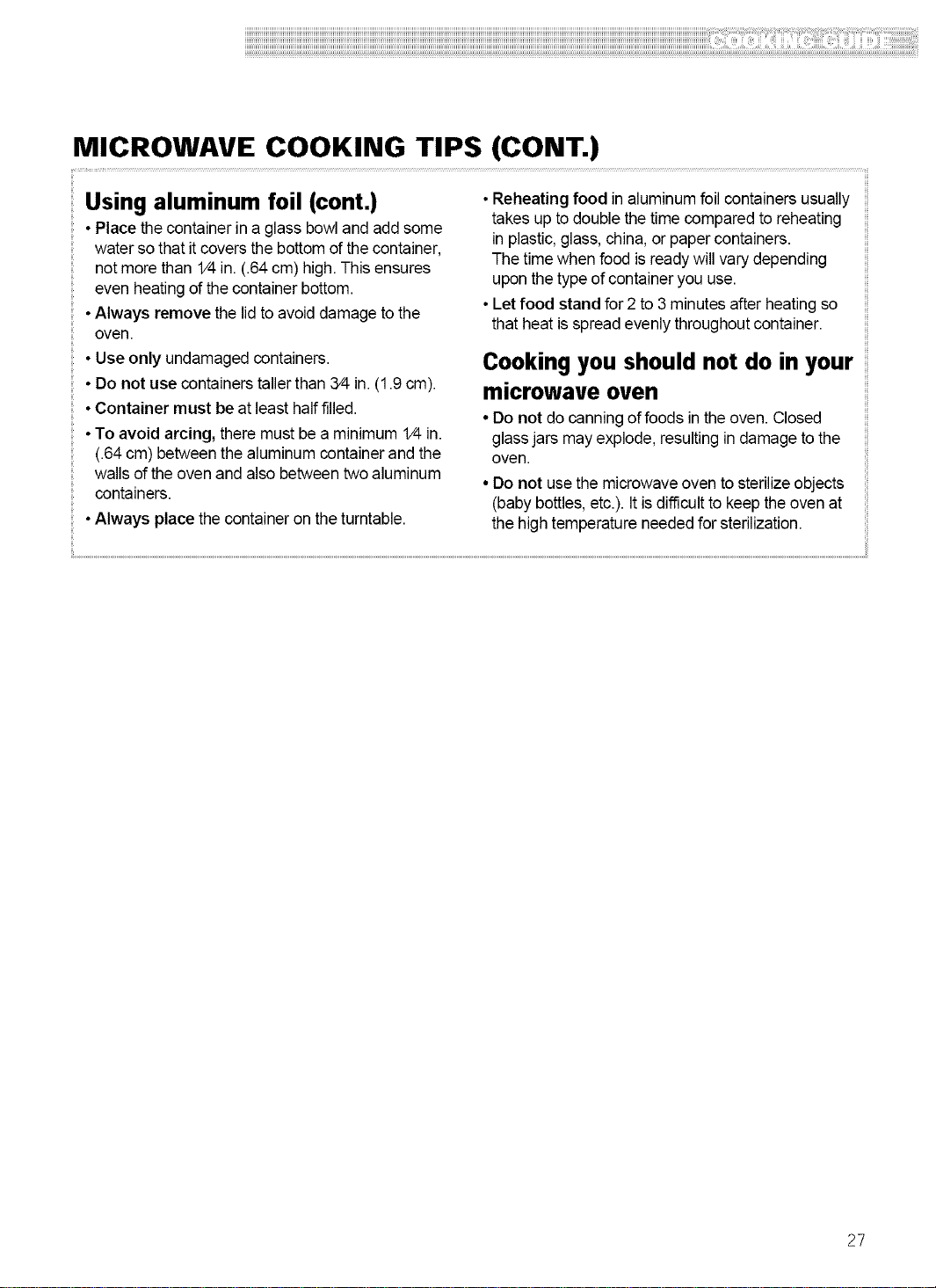
MICROWAVE COOKING TIPS (CONT.)
Using aluminum foil (cont.)
• Place thecontainer in a glass bowland add some
water so that it coversthe bottom of thecontainer,
not morethan 1/4in. (.64cm) high.This ensures
even heatingof the container bottom.
• Always remove the lid to avoid damage to the
oven.
• Use only undamaged containers.
• Do not use containerstallerthan 3/4in. (1.9cm).
• Container must be at least half filled.
• To avoid arcing, there must beaminimum 1/4in.
(.64cm) between the aluminum containerand the
walls of theoven and also between two aluminum
containers.
•Always place thecontainer on the turntable.
•Reheating food in aluminum foil containersusually
takes up to double the time compared to reheating
in plastic, glass,china, or paper containers.
The time when food is readywill vary depending
upon the type of container you use.
•Let food stand for 2 to 3 minutes after heating so
that heat isspread evenly throughout container.
Cooking you should not do in your
microwave oven
• Do not do canning offoods in the oven. Closed
glass jars may explode, resulting in damage to the
oven.
• Do not usethe microwaveoven tosterilizeobjects
(babybottles, etc.). It isdifficult to keepthe oven at
the high temperature neededfor sterilization.
27
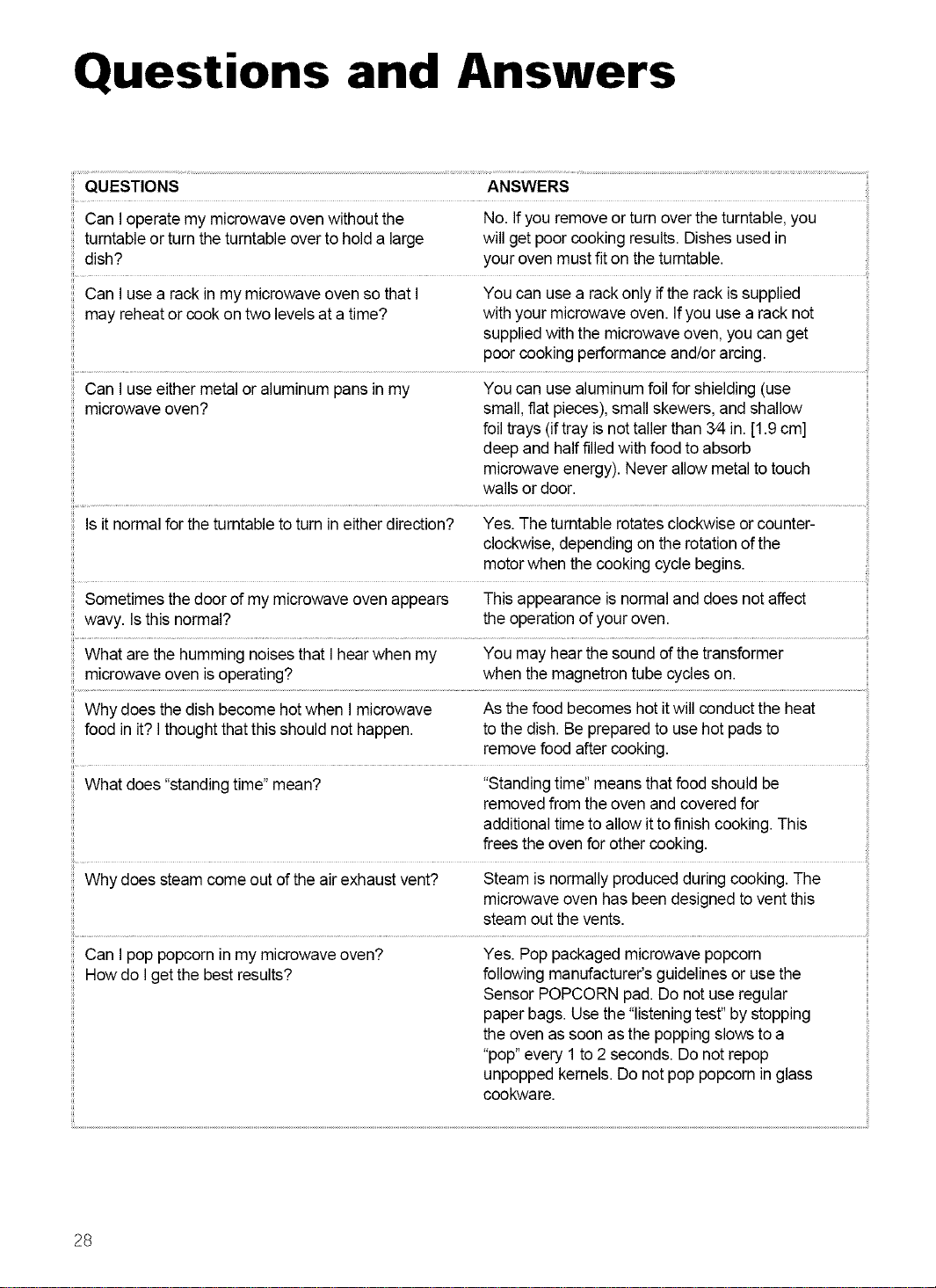
Questions and Answers
QUESTIONS ANSWERS
Can I operatemy microwave oven without the No. Ifyou remove or turn overthe turntable,you
turntable or turn the turntable overto hold a large will get poor cooking results. Dishes usedin
dish? youroven mustfit on theturntable.
Can I usea rack in my microwave oven so that I You can use a rackonly ifthe rack is supplied
may reheator cook on two levels ata time? with your microwave oven. Ifyou usea rack not
suppliedwith the microwave oven, you can get
poor cooking performance and/or arcing.
Can I useeither metalor aluminum pansin my You can use aluminum foil for shielding(use
microwave oven? small,fiat pieces),small skewers, and shallow
foil trays (iftray isnot tallerthan 3/4in. [1.9 cm]
deep and halffilledwith food to absorb
microwave energy). Never allowmetal totouch
walls or door.
Is it normalfor the turntable to turn in eitherdirection? Yes. The turntable rotatesclockwise or counter-
clockwise, depending on the rotation of the
motor when the cooking cycle begins.
Sometimes the door of my microwave oven appears This appearance is normaland does not affect
wavy. Isthis normal? the operationof your oven.
What are the humming noises that I hearwhen my You may hear the sound of thetransformer
microwave oven isoperating? when the magnetron tube cycles on.
Why does thedish become hotwhen I microwave As thefood becomes hotitwill conduct the heat
food in it? Ithought that this should not happen, to the dish. Be prepared to use hot padsto
remove food after cooking.
What does"standingtime" mean? "Standingtime" means that food should be
removed from the oven and covered for
additionaltime to allow itto finish cooking. This
frees the ovenfor other cooking.
Why does steamcome out of theair exhaust vent? Steam is normally produced during cooking. The
microwave oven has been designed to vent this
steam outthe vents.
Can I pop popcorn in my microwave oven? Yes. Pop packaged microwave popcorn
How do Igetthe best results? following manufacturer'sguidelines oruse the
Sensor POPCORN pad. Do not use regular
paper bags. Use the"listeningtest" by stopping
the ovenas soon as the popping slows to a
"pop"every 1 to2 seconds. Do not repop
unpopped kernels. Do not pop popcorn in glass
cookware.
28
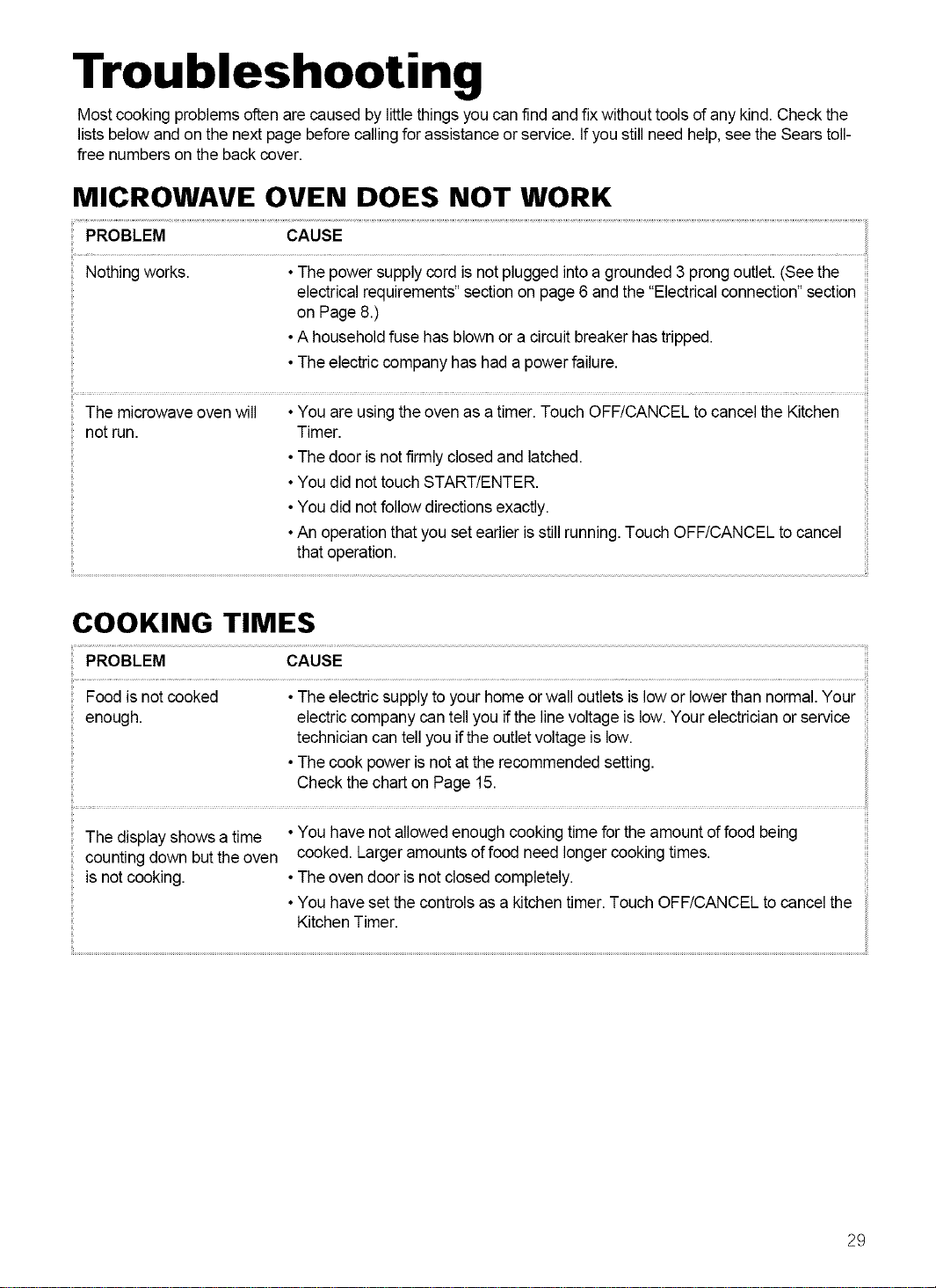
Troubleshooting
Mostcooking problems often are caused by little things you canfind and fix withouttools of any kind. Check the
listsbelow and on the next page beforecallingfor assistance or service. Ifyou still need help,see the Sears toll-
free numbers on the back cover.
MICROWAVE OVEN DOES NOT WORK
PROBLEM CAUSE
Nothing works. •The power supplycord is notplugged intoa grounded 3 prong outlet. (See the
electricalrequirements" sectionon page6and the "Electricalconnection" section
on Page 8.)
•Ahousehold fuse has blownor a circuit breakerhas tripped.
•The electriccompany has had apower failure.
ii........................................ iil
The microwave ovenwill • You are usingthe oven as a timer. Touch OFF/CANCEL to cancel the Kitchen
not run. Timer.
•The dooris notfirmly closedand latched.
•Youdid nottouch START/ENTER.
•Youdid notfollow directions exactly.
•Anoperation thatyou setearlier isstillrunning.Touch OFF/CANCEL to cancel
that operation.
COOKING TIMES
PROBLEM CAUSE
Food isnot cooked •The electricsupplyto your home orwall outlets is lowor lowerthan normal.Your
enough, electriccompany can tellyou ifthe line voltage is low. Your electrician or service
techniciancan tell you ifthe outlet voltage is low.
•The cook poweris not atthe recommended setting.
Check thechart on Page 15.
The display shows a time • You havenot allowed enough cooking time for theamount offood being
cooked. Larger amounts offood need longer cooking times.
counting down butthe oven
is not cooking. •The oven dooris not closedcompletely.
•You haveset thecontrols as a kitchentimer.Touch OFF/CANCEL to cancel the
Kitchen Timer.
29
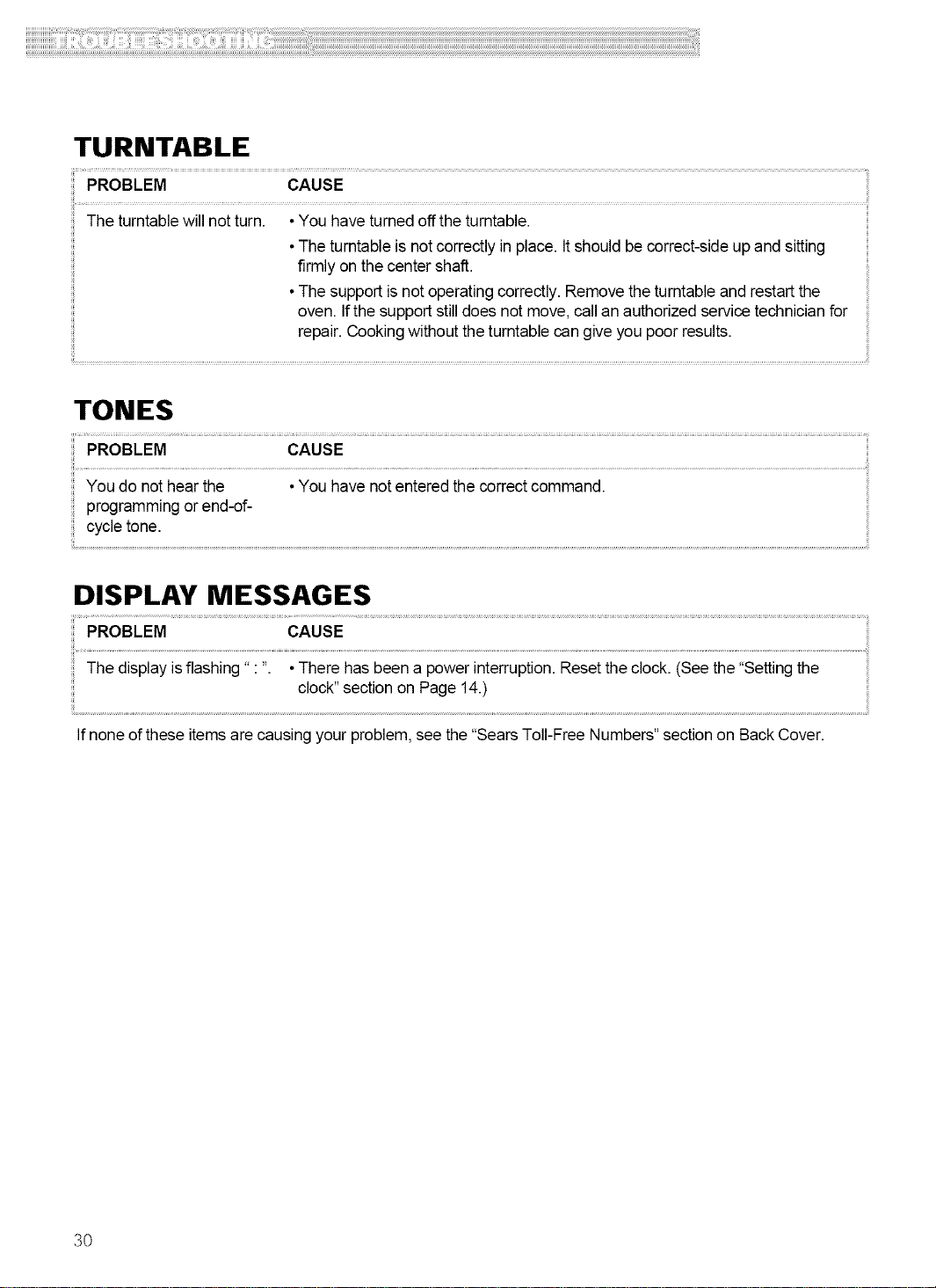
TURNTABLE
PROBLEM CAUSE
The turntablewill not turn. • You have turnedoff the turntable.
•The turntableis not correctlyinplace. Itshould be correct-sideupandsitting
firmly on the center shaft.
•The support isnot operating correctly.Remove the turntableand restartthe
oven. If thesupport stilldoes not move,call anauthorizedservice technicianfor
repair. Cooking withoutthe turntable cangive you poor results.
TONES
PROBLEM CAUSE
...................................................
You do not hear the •You have notentered the correct command.
programming or end-of-
cycle tone.
DISPLAY MESSAGES
CAUSE
The display isflashing" : ". • clock"TheresectionhaSbeenonapagePOwerl4.)interrupti°nResetthe clock. (See the "Settingthe
Ifnone ofthese items are causing your problem, see the "Sears Toll-FreeNumbers" sectionon Back Cover.
30
Get it fixed, at your home or ours!
For repair of major brand appliances in your own home ...
no matter who made it. no matter who sold it!
1-800-4-MY-HOME _ Anytime, day or night
(1-800-469-4663) (U.S.A. and Canada)
www.sears.com www.sears.ca
For repair of carry-in products like vacuums, lawn equipment, and
electronics, call for the nearest Sears Parts and Repair Center.
1-800-488-1222 Anytime, day or night(U.S.A, only)
www.sears.com
For the replacement parts, accessones and owner's manuals
that you need to do-it-yourself, cal Sears PartsDirectSM!
1-800-366-PART 6 a.m. - 11 p.m., 7 days a week
(1-800-366-7278) (U.S.A.only)
www.sears.com/partsdirect
To purchase or inquire about a Sears Service Agreement
or Sears Maintenance Agreement:
1-800-827-6655 (U.S.A.) 1-800-361-6665 (Canada)
7 a.m. - 5p.m., CST. Mon.- Sat. 9 a.m. - 8p.m., EST, M- E 4 p.m. Sat.
Parapedirserviciode reparaci6na
domicilio,y paraordenarpiezas:
1-888-SU-HOGARsM
(1-888-784-6427)
Au Canadapourserviceenfran;als:
1-800-LE-FOYERMc
(1-800-533-6937)
www.sears.ca
Home Central
Part No. 3828W5A2213
© Sears, Roebuck and Co.
® Registered Trademark / TMTrademark / SMService Mark of Sears, Roebuck and Co.
SM
® Marca Registrada / TM Marca de Fabrica / Marca de Servicio de Sears, Roebuck and Co.
MCMarque de commerce / MDMarque depos6e de Sears, Roebuck and Co.