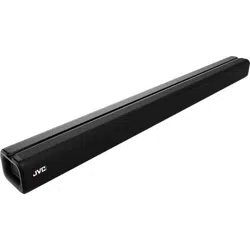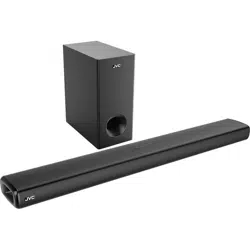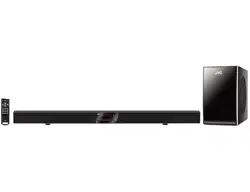
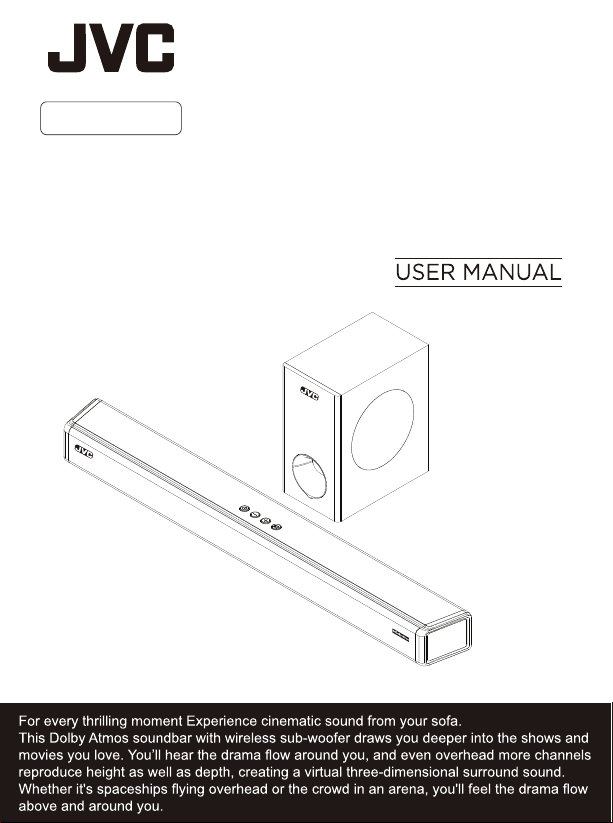
Audio Home Theater System
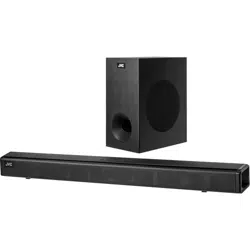
Soundbar With Wireless Subwoofer
TH-S560B

Bluetooth SIG, Inc. and any use of such marks by AJS Electronics Limited is
under license. Other trademarks and trade names are those of their
respective owners.
by E & S International Enterprises, Inc. “JVC” is the trademark of
JVCKENWOOD Corporation, used by such company under license."
NOTE: For Spanish and French Manual, please visit www.jvcproducts.com/support
NOTA: Para el Manual de Español y Francés, por favor visite www.jvcproducts.com/support
REMARQUE: Pour l’espagnol et Français manuel,
s’il vous plaît visitez
www.jvcproducts.com/support

IC: 26551-AT212560B
IC: 26551-AT212S560B
FCC Warning
This device complies with part 15 of the FCC Rules. Operation is subject to the following two
conditions: (1) This device may not cause harmful interference, and (2) this device must accept
any interference received, including interference that may cause undesired operation.
Note: This equipment has been tested and found to comply with the limits for a Class B digital
device, pursuant to part 15 of the FCC Rules. These limits are designed to provide reasonable
protection against harmful interference in a residential installation. This equipment generates,
uses and can radiate radio frequency energy and, if not installed and used in accordance with
the instructions, may cause harmful interference to radio communications. However, there is no
guarantee that interference will not occur in a particular installation. If this equipment does cause
harmful interference to radio or television reception, which can be determined by turning the
equipment off and on, the user is encouraged to try to correct the interference by one or more of
the following measures:
—Reorient or relocate the receiving antenna.
—Increase the separation between the equipment and receiver.
—Connect the equipment into an outlet on a circuit different from that to which the receiver is
connected.
—Consult the dealer or an experienced radio/TV technician for help.
Note: The Grantee is not responsible for any changes or modifications not expressly approved
by the party responsible for compliance. such modifications could void the user's authority to
operate the equipment.
The device has been evaluated to meet general RF exposure requirement.
To maintain compliance with FCC's RF exposure guidelines, the distance must be at least 20 cm
between the radiator and your body, and fully supported by the operating and installation
configurations of the transmitter and its antenna(s).
IC Warning
This device complies with Industry Canada license-exempt RSS standard(s). Operation is
subject to the following two conditions: (1) this device may not cause interference, and (2) this
device must accept any interference, including interference that may cause undesired operation
of the device.
Le présent appareil est conforme aux CNR d'Industrie Canada applicables aux appareils radio
exempts de licence. L'exploitation est autorisée aux deux conditions suivantes : (1) l'appareil ne
doit pas produire de brouillage, et (2) l'utilisateur de l'appareil doit accepter tout brouillage
radioélectrique subi, même si le brouillage est susceptible d'en compromettre le fonctionnement.
The device has been evaluated to meet general RF exposure requirement. To maintain
compliance with RSS-102 — Radio Frequency (RF) Exposure guidelines, this equipment should
be installed and operated with a minimum distance of 20cm between the radiator and your body.
le dispositif de a été évalué à répondre général rf exposition exigence.pour maintenir la
conformité avec les directives d'exposition du RSS-102-Radio Fréquence (RF). ce matériel doit
être installé et exploité à une distance minimale de 20 cm entre le radiateur et votre corps.
Supplier’s Declaration of Conformity
Model No. TH-S560B
Trade Name: JVC
Responsible Party: Russell Distribution Company
Address: 7801 Hayvenhurst Avenue, Van Nuys, Ca 91406 USA
Telephone No. 888-582-8870
Contact Information:
https://jvcproducts.com
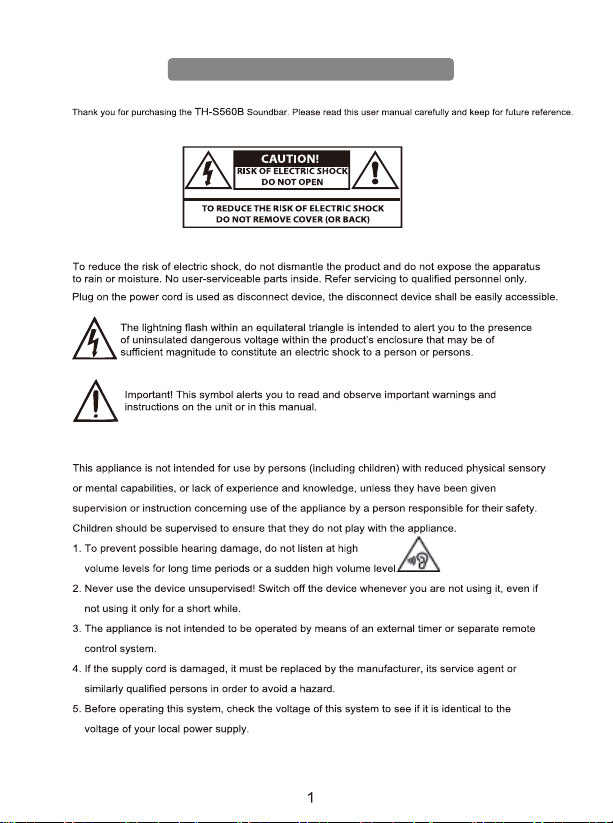
Warning
Caution:
Notice:
Important Safety Instruction
Important Safety Instructions
Preparation for Use
Unpacking and Set Up
Protect Your Furniture
Power Source
Important Notes
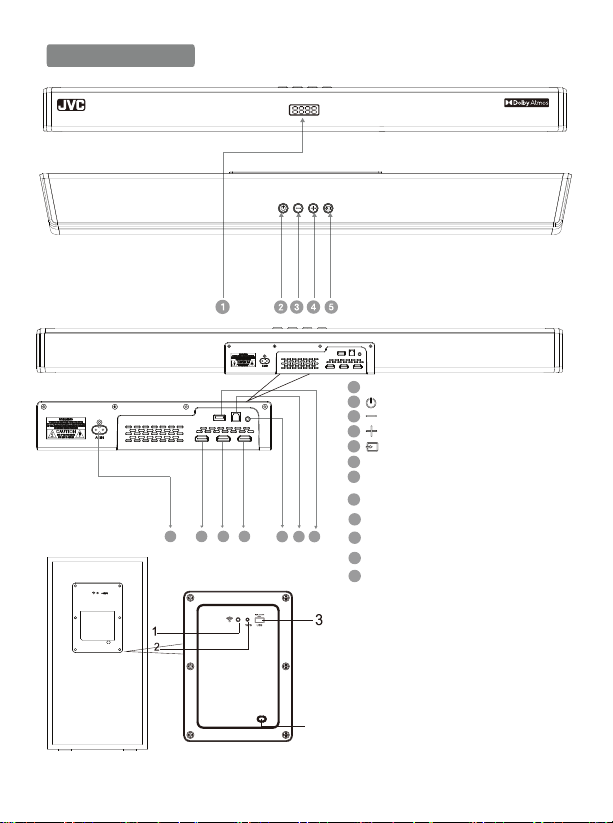
DISPLAY PANEL.
AC IN: Connect to power supply.
HDMI OUT (ARC):Connect to HDMI (ARC)/HDMI IN on TV.
HDMI IN 1 : Connect to HDMI OUT of Satellite/Network/
Set-top box/BD/Blue Ray DVD/DVD player.
HDMI IN 2 : Connect to HDMI OUT of Satellite/
Network/Set-top box/BD/Blue Ray DVD/DVD player.
USB PORT: Audio input from a USB storage device.
Upgrade software of this product.
OPTICAL: Connect to an optical audio output on TV or digital devices.
AUX: Auxiliary Audio input from Mp3/Phone/set-top box devices.
Product Diagram
5
1
2
3
4
5
6
7
6 7 8 9
10 11 12
8
9
10
11
12
INPUT: Select an input source for the Soundbar.
Volume: Decrease the volume.
Volume: Increase the volume.
Standby-on: Switch the Soundbar On or to standby.
4
1. LED Subwoofer indicator: It indicates pairing and paired between the
soundbar and the subwoofer. (Make sure that both soundbar and
subwoofer are connected to the power supply at the same time,
and then switch on sound bar and subwoofer.)
2. WPS Button: It automatically pairs the sound bar with subwoofer.
Press and hold it to reset the connection between the sound bar
and subwoofer.
3. USB Port (CAN'T PLAY MP3 MUSIC, FOR SOFTWARE
UPGRADE ONLY)
4. AC IN (Connect to the power supply.)
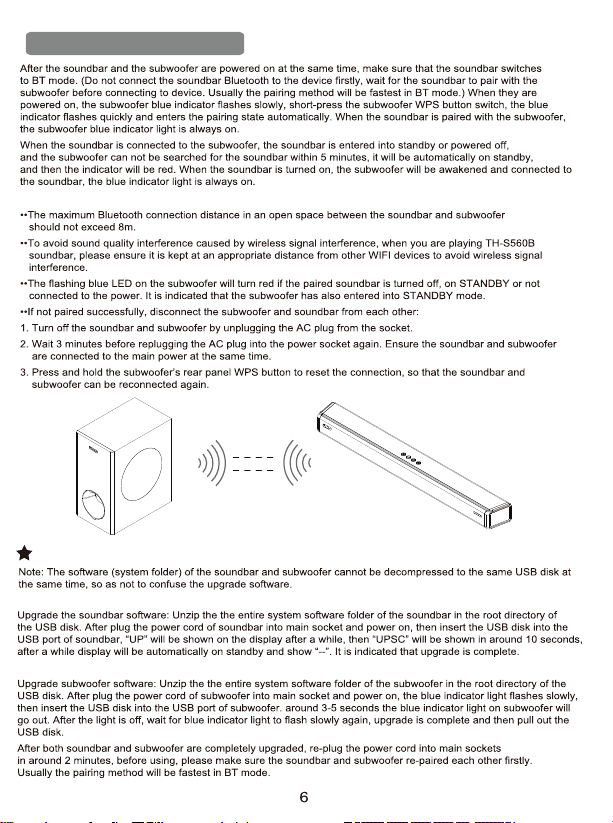
Pair up with the subwoofer
Note:
Software upgrading
Soundbar Upgrade
Subwoofer upgrade
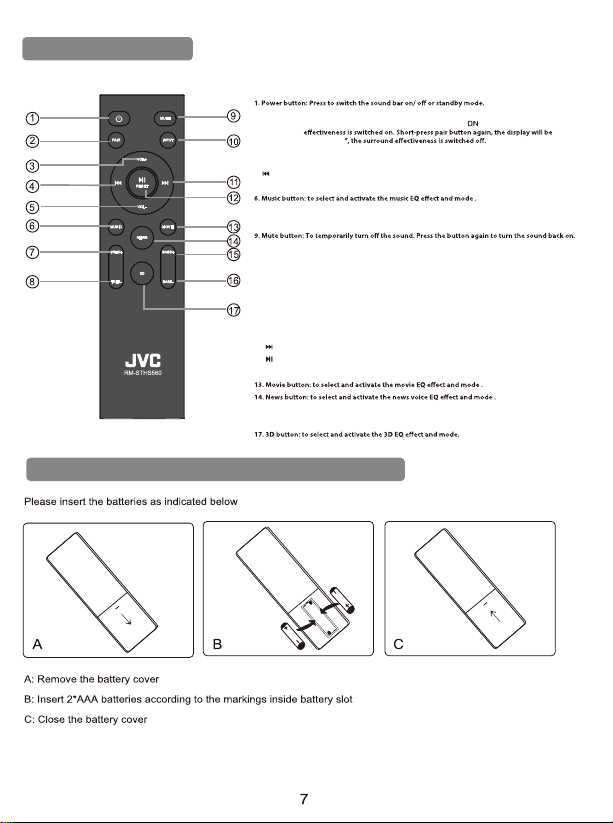
REMOTE CONTROL BATTERY REPLACEMENT
REMOTE CONTROL
2. Pair button: long-press pair button more than 2 seconds to conect and disconect last device.
short-press pair button, the display will be shown “
Surround eectiveness will only work when the signal source is from a Dolby Atmos device
”, it is indicated that the surround
shown “OFF
3. VOL+: to increase the volume.
4. Previous button: Skip to the previous track in USB & BT mode.
5. VOL-: to decrease the volume.
7. Treble-up button: to increase the treble volume.
8. Treble-down button: to decrease the treble volume.
10. Source input button: to select an input source for playback:
ARC: sound from connected HDMI ARC device
Hd 1: sound from connected HDMI 1 port
Hd 2: sound from connected HDMI 2 port
bLUE: sound from connected Bluetooth drive.
AUX: sound from connected Auxiliary Line-in
USb: sound from connected USB driver
OPTI: Sound from connected Digital Optical device.
11. Next button: Skip to the next track in USB & BT mode.
12. Play/Pause button: Start, pause or resume play in USB & BT mode.
Reset button: Press and hold the button more than 2 seconds to restore factory default settings.
15. Bass+ button: To increase the bass.
16. Bass- button: To decrease the bass.
Risk of explosion if the battery is replaced by an incorrect type
Handling the battery
Handling the Remote Control
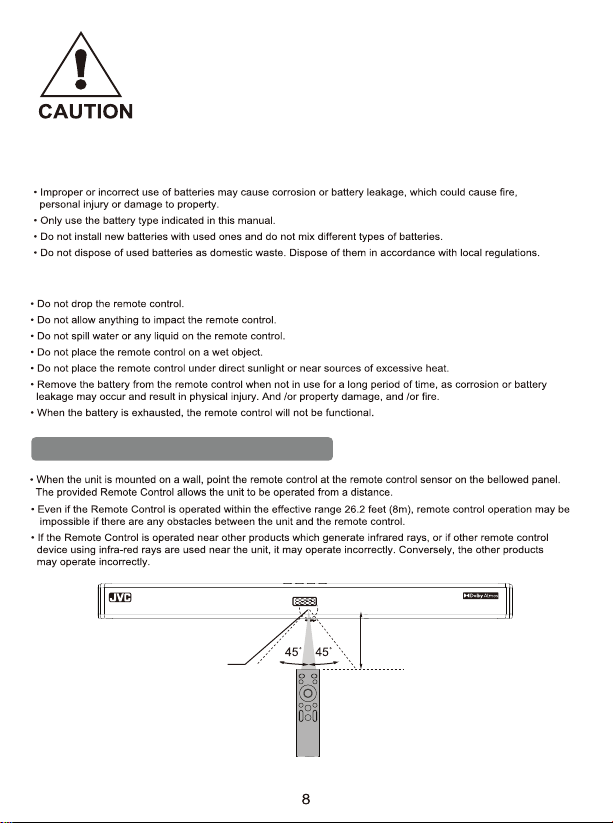
Operating range of the remote control
Remote control sensor
Within 8 m (26.2 feet )
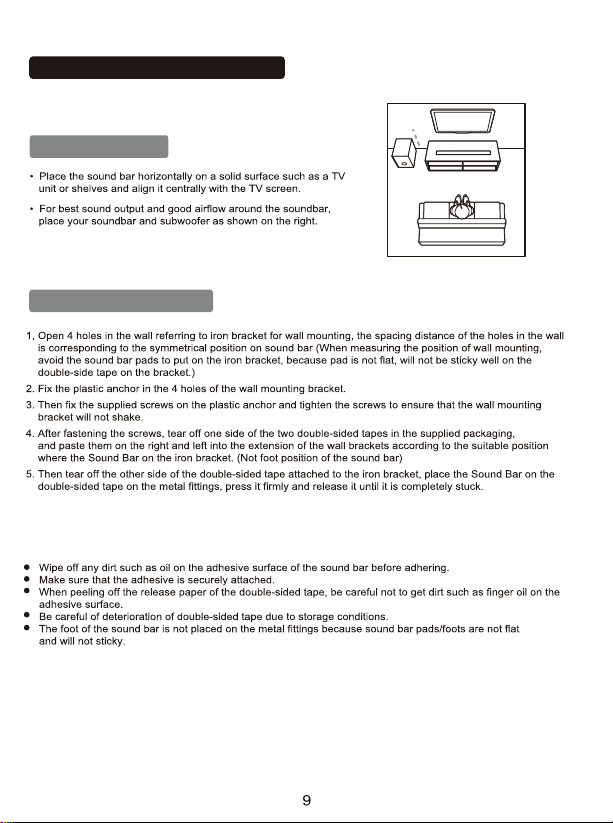
Table Placement
Wall Mount Installation
Positioning the Sound Bar
Please note
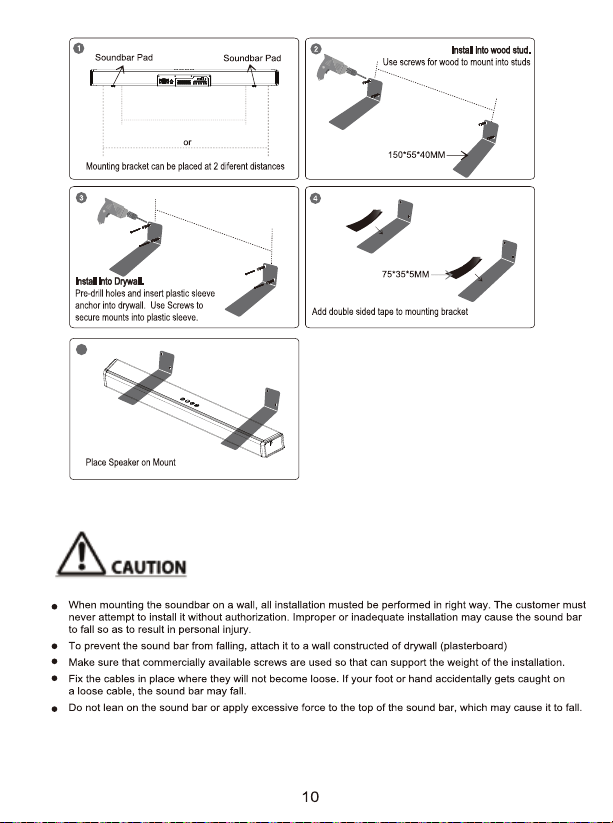
Mount the unit on a wall
5
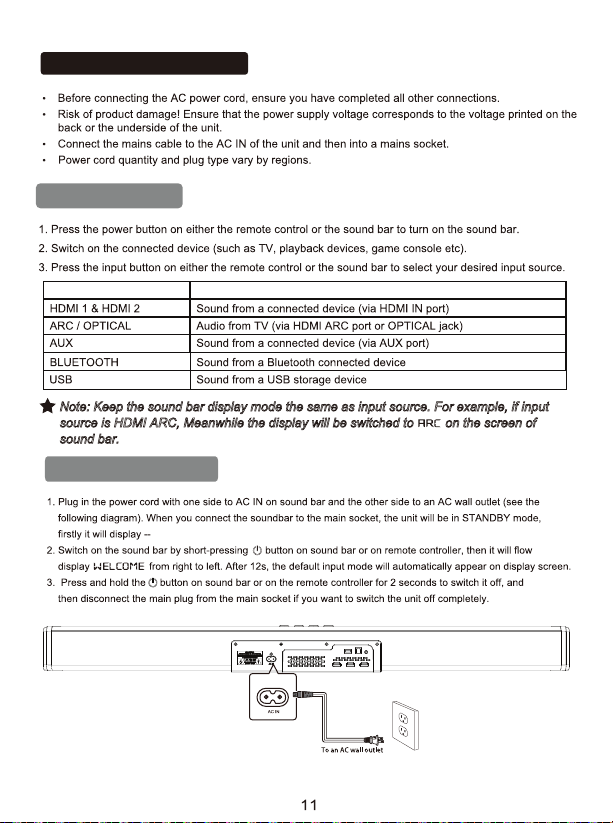
Note: Keep the sound bar display mode the same as input source. For example, if input
source is HDMI ARC, Meanwhile the display will be switched to on the screen of
sound bar.
Power ON and OFF
Basic Operation
Using the Soundbar
Input Source
Description
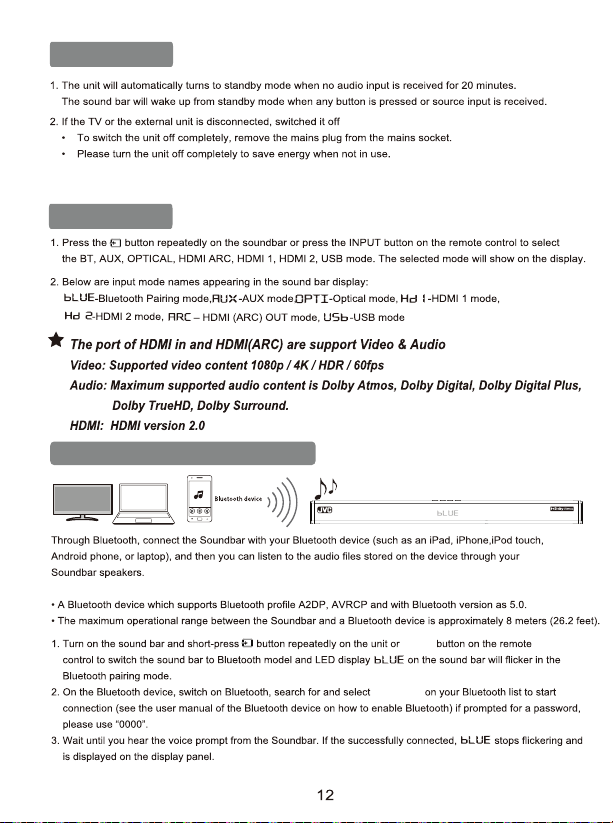
Auto Standby
Select Modes
What you need
INPUT
3. After 10 seconds with no input the screen will go black. Pressing the power or increasing/decreasing the volume
on either the remote or soundbar will wake up the screen.
TH-S560B
Playing Audio via BT Connection
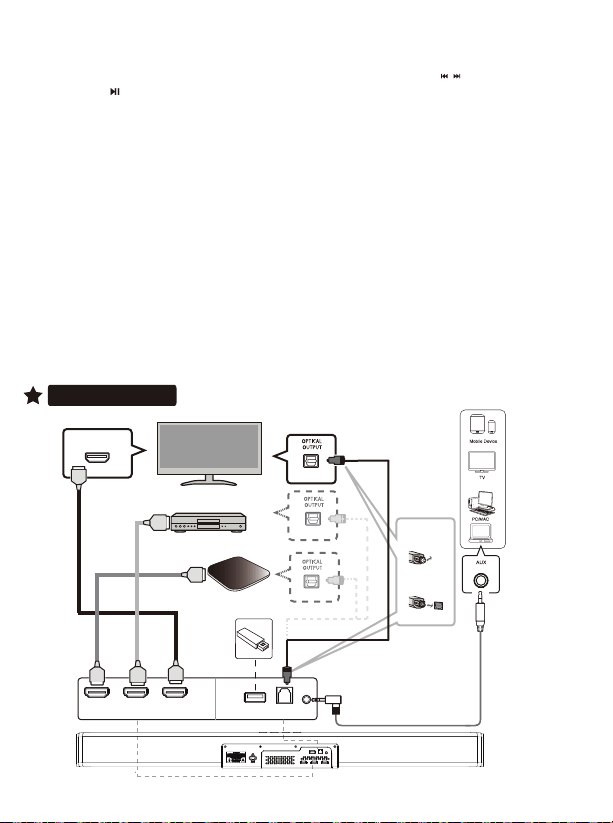
Connections
N
otes:
• Having connection problems? Remove TH-S560B from your device's Bluetooth history and ensure it’s less
than 8 meters away. Then try pairing again. To get the best sound quality, make sure there is a clear line of sight
between the connected device and your sound bar.
• If your pairing device or connected device is switched off or manual disconnected, the sound bar will
automatically enter pairing mode.
•The music streaming may be interrupted by obstacles between the device and Soundbar, such as wall,
metallic casing that covers the device, or other devices nearby that operate in the same frequency.
• If you want to connect your Soundbar with another Bluetooth device, press and hold Pair on the remote control
to disconnect the currently connected Bluetooth device.
13
4. Select and play audio files or music on your Bluetooth device.
• During play, if a call is coming, music play is paused. Play resumes when the call ends
• If your Bluetooth device supports AVRCP profile, on the remote control you can press / to skip to a track,
or short-press to pause/ resume play; Press and hold the RESET button more than 2 seconds to restore factory
default settings; Hold Pair button on the remote control for more than 2 seconds to disconnect paired BT device or
connect back last disconnect BT device.
5. You can use the volume buttons on the sound bar or on the remote controller to adjust the volume to your requirements
6. To exit Bluetooth, select other relevant input source.
• When your switch back to Bluetooth mode, Bluetooth connection remains active.
7. Press the VOL +/– buttons to adjust the volume to your desired level.
STB(Set Top Box)
HDMI OUT
HDMI(ARC)
/HDMI IN
HDMI OUT
USB flash driver
satellite or network set-top
box, or BD/Blue Ray DVD player
TV
1. Remove the cap
2. Check the
direction of the
plug
HDMI OUT
(ARC)
HDMI IN 1HDMI IN 2
USB
OPTICAL
AUX
OUTPUT
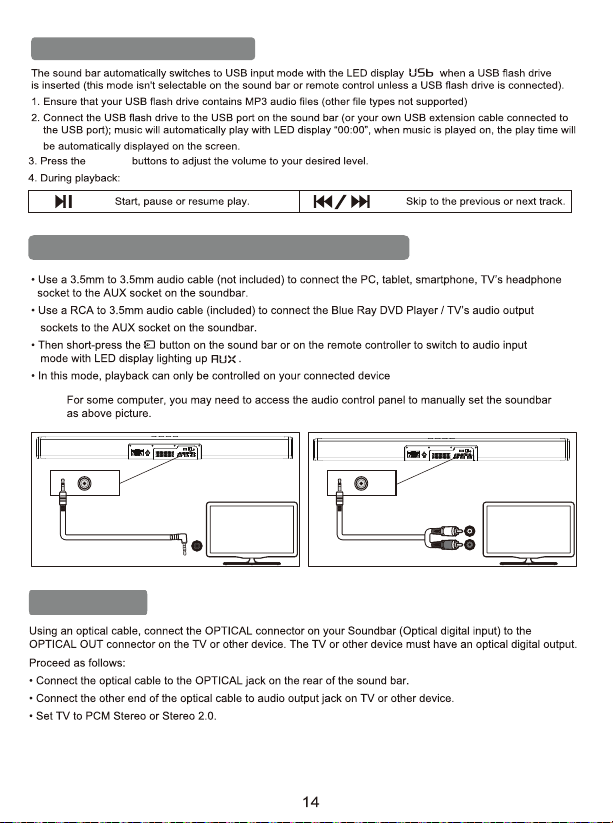
Playing Audio via USB Port
VOL +/–
Playing Audio via Audio input(Aux)Connection
Note:
Optical Mode
Headphone
AUX
AUX
R
L
AUDIO OUT
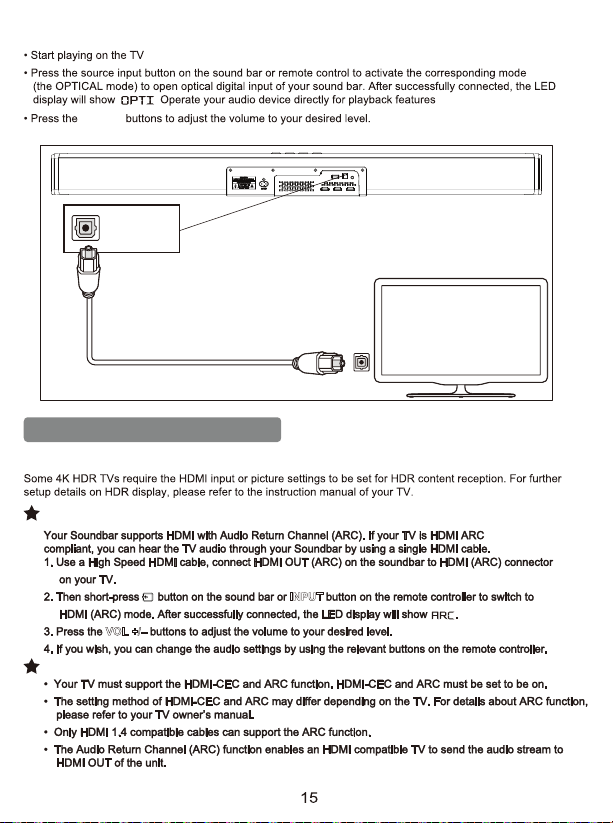
Connect to HDMI (ARC) Socket
INPUT
VOL +/–
Option 1: ARC (Audio Return Channel)
Note:
HDMI IN & HDMI (ARC) MODE
. .
VOL +/–
OPTICAL OU T
OPTICAL
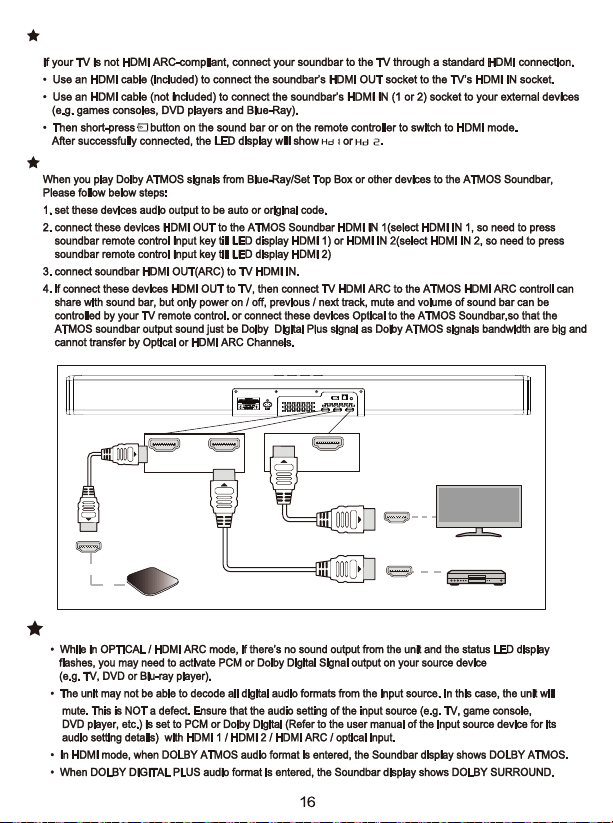
TIPS: (OPTICAL / HDMI ARC / HDMI 1 / HDMI 2 / DOLBY ATMOS)
HDMI OUT(ARC)
HDMI IN 1HDMI IN 2
HDMI IN
HDMI OUT
satellite or network set-top
box, or BD/Blue Ray DVD player
TV
HDMI OUT
STB(Set Top Box)
Important Note:
Option 2: Standard HDMI
.
.
Audio
Bluetooth
Remote control
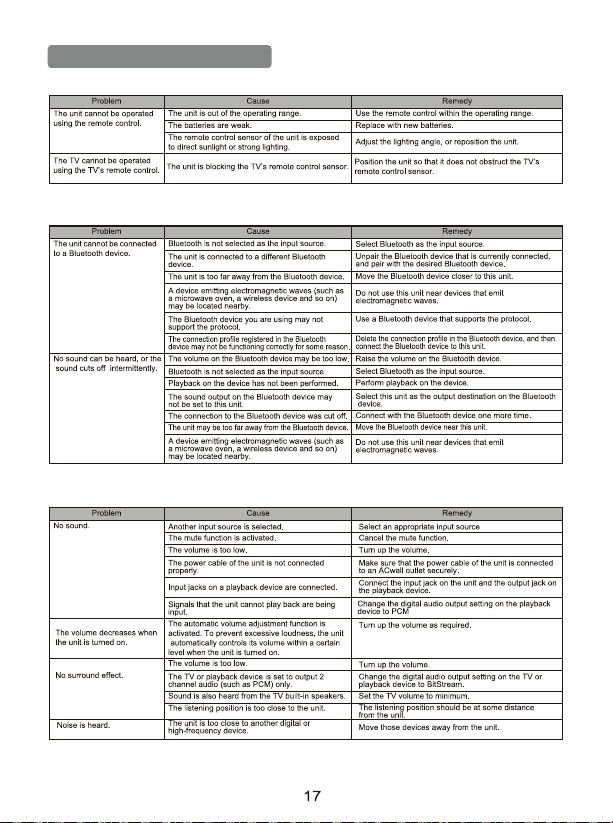
Troubleshooting

18
Select predefined sound modes to suit your video or music
Movie/Music/News/3D:
Select Equalizer (EQ) Effect
• The Soundbar will still function when connected via other methods (such as a Digital Optical cable) but
these are unable to support all of the Dolby features. Given this, our recommendation is to connect via
HDMI, in order to ensure full Dolby support.
Note:
1. To use Dolby Atmos in HDMI 1 /HDMI 2 / HDMI ARC mode, your TV has to support Dolby Atmos.
2. Make sure that “No Encoding” is selected for bistram in the digital audio output of the connected
external device (e.g. Blu-ray DVD Player, etc.)
3. While entering Dolby Atmos / Dolby Digital Plus format, the soundbar will show Dolby Atmos.
4. Set the audio output sampling rate to 192 kHz if you can adjust it. Then you can play wish supports
4K video signal, the signal can be delivered to your TV.
Supports the pass-through function of 4K and Dolby vision signals.
Dolby Atmos
®
transport you from the ordinary into the extraordinary with breathtaking, moving audio
that fills your room and flows above and around you. Dolby Atmos® gives you amazing experience you
have never hear before by overheard sound, and all
the richness, clarity and power of Dolby Sound.
Dolby Atmos
®
is only available in HDMI IN and HDMI OUT (ARC) mode. For details of the connection,
please refer to “HDMI Connection”.
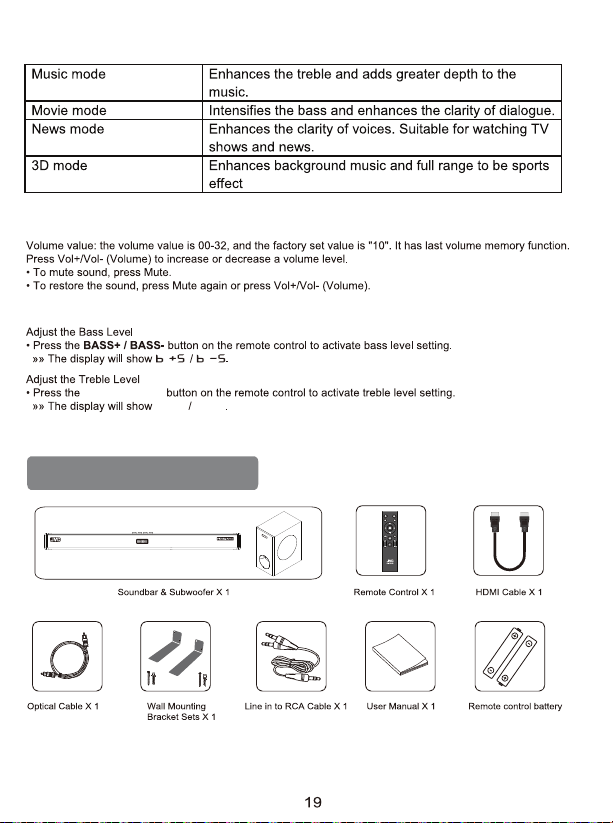
Adjust the Volume
TREB+ / TREB-
T +5 T –5
Adjust the Bass/Treble Level
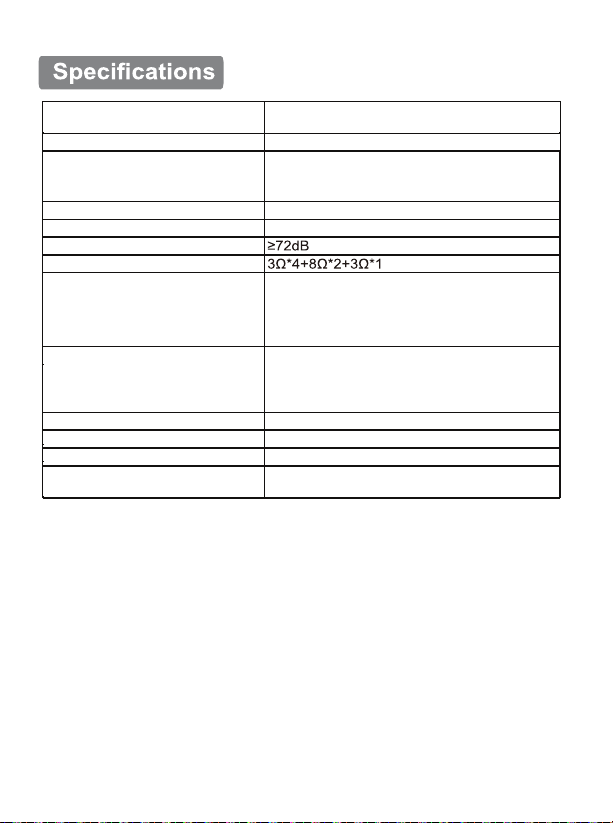
Package Contents
20
Power Supply
TH-S560B
Model
Power output
Drivers
Frequency Response
Signal –to –Noise Ratio
Impedance
Decoder
Input jack
Output jack
Additional jack
Bluetooth
Product size
AC 110-240V 50/60Hz
500W Peak Power
2.5”*4+2”*2+6.5*1
45Hz-20Khz
Dolby Surround
Dolby Digital
Dolby TrueHD
Dolby Digital Plus
Dolby Atmos
HDMI IN X 2
HDMI (ARC)
OPT X 1
AUX IN X 1
HDMI(ARC) OUTx1
USB (Only Support MP3 Playback function)
Version 5.0 Rang: up to 8m
Soundbar: 81HX108DX960Lmm
Subwoofer: 190WX370HX306D mm
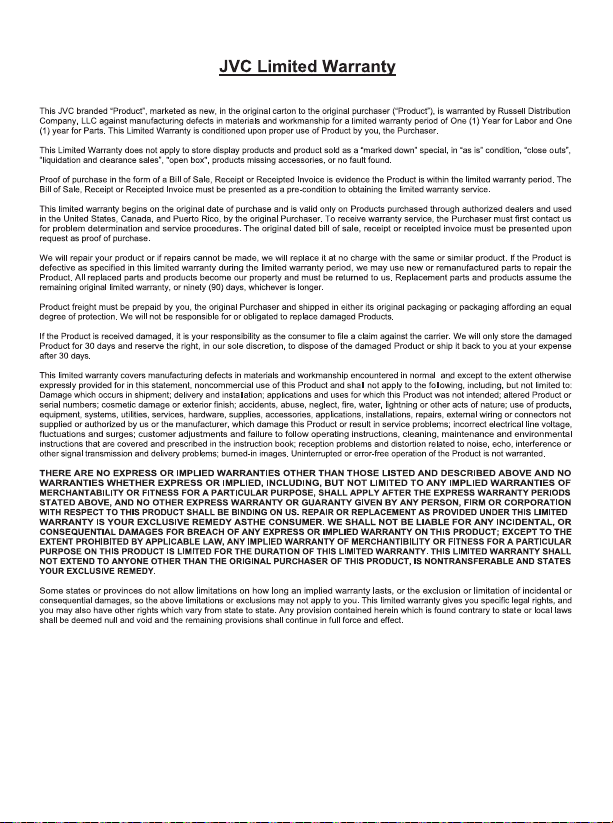
This product is manufactured, distributed, serviced and warranted exclusively by E & S International Enterprises, Inc.
“JVC” is the trademark of JVCKENWOOD Corporation, used by such company under license.
To obtain a warranty service, please call 1 (888) 582-8870 or send an email to

Claims and Dispute Resolution
RUSSELL DISTRIBUTION COMPANY, LLC AND YOU AGREE THAT ALL CLAIMS OR DISPUTES
ARISING IN ANY WAY FROM THIS LIMITED WARRANTY OR THE SALE, CONDITION OR
PERFORMANCE OF THE PRODUCT, WHETH- ER BASED IN CONTRACT, TORT, STATUTORY,
FRAUD, MISREPRESENTATION OR ANY OTHER LEGAL THEORY, AND ALL CLAIMS THAT ARE
SUBJECT OFA PURPORTED CLASS ACTION LITIGATION THAT YOU ARE NOT A MEMBER OF
THE CERTIFIED CLASS, SHALL BE RESOLVED THROUGH ARBITRATION AS PROVIDED FOR
HEREIN, OR IN SMALL CLAIMS COURT, AND NOT BY A TRIAL BY JURY. YOU WAIVE THE
RIGHT TO A TRIAL BY JURY, AND WAIVE THE RIGHT TO PARTICIPATE IN CLASS ACTIONS
ARISING FROM OR RELATING TO ANY AND ALL CLAIMS AND DISPUTES WITH Russell
Distribution. YOU AGREE THAT YOU MAY ARBITRATE CLAIMS AGAINST Russell Distribution
ONLY IN YOUR INDIVIDUAL CAPACITY AND NOT AS A PLAINTIFF, A CLASS REPRE-
SENTATIVE, OR CLASS MEMBER IN ANY CLASS OR REPRESENTATIVE PROCEEDING. THIS
AGREEMENT EVIDENCES A TRANSACTION IN INTERSTATE COMMERCE, AND THUS THE
FEDERAL ARBITRATION ACT GOVERNS THE INTERPRETATION AND ENFORCEMENT OF THIS
PROVISION. THIS PARAGRAPH SHALL SURVIVE THE TERMINATION OF THIS LIMITED
WARRANTY.
RUSSELL DISTRIBUTION REQUIRES THAT YOU ARBITRATE YOUR CLAIMS AGAINST
RUSSELL DISTRIBUTION PURSUANT TO THE ARBITRATION DESCRIBED BELOW PRIOR TO
YOUR EXERCISE OF YOUR RIGHTS PURSUANT TO TITLE I OF THE MAGNUSON-MOSS
WARRANTY ACT. TITLE I OF THE MAGNUSONMOSS WARRANTY ACT DOES NOT REQUIRE
YOU TO PURSUE RIGHTS AND REMEDIES AVAILABLE TO YOU THAT ARE NOT PROVIDED BY
TITLE I OF THE MAGNUSON- MOSS WARRANTY ACT.
Any such arbitration shall not be combined or consolidated with a claim or dispute involving any other
person's or entity's product or claim or dispute, and specifically, without limitation of the foregoing,
shall not under any circumstances proceed as part of a class action or class arbitration. If you intend
to seek arbitration you must first email Russell Distribution at [email protected] a notice of dispute,
at least thirty (30) days in advance of initiating the arbitration. The notice must include: (i) a
description of your claim and the basis of the dispute; and (ii) a description of the relief you are
seeking. If Russell Distribution and you do not reach an agreement to resolve the claim within thirty
(30) days after Russell Distribution receives your notice, you or Russell Distribution may commence
an arbitration proceeding.
The arbitration will take place in Los Angeles, California or a mutually agreed upon location.
Arbitration shall be administered by JAMS, or alternatively a mutually agreed upon arbitrator or
arbitration service, under the applicable commercial arbitration rules for JAMS or the mutually agreed
upon arbitration service, excluding any rules or procedures governing or permitting class actions. The
arbitrator, and not any federal, state or local court or agency, shall have exclusive authority to resolve
all disputes arising out of or relating to the interpretation, applicability, enforceability or formation of
this Limited Warranty, including, but not limited to any claim that all or any part of this Limited
Warranty is void or voidable, or whether a claim is subject to arbitration. The arbitrator shall be
empowered to grant whatever relief would be available in a court under law or in equity. The
arbitrator's award shall be written. and binding on the parties and may be entered as a judgment in
any court of competent jurisdiction. To the extent the filing fee for the arbitration exceeds the cost of
filing a lawsuit; Russell Distribution will pay the additional cost. The arbitration rules also permit you to

recover attorney's fees in certain cases. The parties understand that, absent this mandatory provision, they
would have the right to sue in court and have a jury trial. They further understand that, in some instances.
the costs of arbitration could exceed the costs of litigation and the right to discovery may be more limited in
arbitration than in court.
This arbitration provision also applies to claims and disputes by you, the purchaser of the Product. and all
those in privity with you, including your family members, beneficiaries and assigns against Russell
Distribution subsidiaries and affiliates and any person or entity that licensed, supplied, sold or distributed
the Product and each of their officers, employee, representatives, licensors/licensees, Agents,
beneficiaries, predecessors in interest, successors, and/or assigns. You may opt out of this dispute
resolution procedure by providing notice to Russell Distribution no later than thirty (30) calendar days after
the date of the first consumer purchaser's purchase of the Product. To opt out you must send notice by
e-mail to [email protected]. The opt-out notice must include (a) your name, email address. mailing
address and phone number; (b) the date on which the product was purchased; (c) the product model name
or model number; and (d) the Serial Number. Opting out of this dispute resolution procedure will not affect
the coverage of the Limited Warranty in any way, and you will continue to enjoy the benefits of the Limited
Warranty. If you opt-out of these arbitration provisions, Russell Distribution also will not be bound by them.

TH-S560B
Use our Customer Service to assist you in setting up your new product.
Visit: or Call:
Notre personnel d'assistance expérimenté est là pour vous aider!
nouveau produit
Visitez: or Appelez:
Audio Home Theater System
Soundbar With Wireless Subwoofer