EN
cod. EI33960020000EN
IT18/2018
AU07/2021
V SERIES, PRO-LINE, PROFESSIONAL
PLUS, NOSTALGIE & MAJESTIC SERIES
FREESTANDING COOKERS
(ALL MODELS, ALL COOKTOP OPTIONS & ALL OVEN TYPES)
USER, OPERATING &
INSTALLATION MANUAL

Although we encourage you to dive right in, as the owner of a brand new ILVE oven we’d also
like to invite you to attend a complimentary 2 hour masterclass. As part of the class you’ll
learn how to prepare and cook a number of delicious signature ILVE dishes, not to mention
our top tips for getting the most out of your ILVE oven. From improving cooking results to
general maintenance information, we know you’ll enjoy this comprehensive, fun masterclass.
Simply go to ilve.com.au/bookings or Phone 1300 MY ILVE (694 583)
YOUR
FREE MASTERCLASS
Congratulations, you are now the proud owner of an ILVE cooking appliance. Thank you for
purchasing ILVE and welcome to the exciting world of cooking the ILVE way.
This instruction manual has been specially created to inform you of the full range of features
your ILVE appliance has to offer and serves as an introduction to the wonderful benefits of
ILVE’s dynamic cooking systems.
We present detailed information on each of the advanced cooking systems built into ILVE
appliances. Once you have read this section you will be able to choose the most appropriate
settings for your appliance when cooking different types of food.
We ask you to read the instructions in this booklet very carefully as this will allow you to get
the best results from using your appliance.
KEEP THE DOCUMENTATION OF THIS PRODUCT FOR FUTURE REFERENCE.
FOR EXCLUSIVE ILVE RECIPES SCAN THE
QR CODE OR VISIT www.ilve.com.au

OPEN 24
/
7
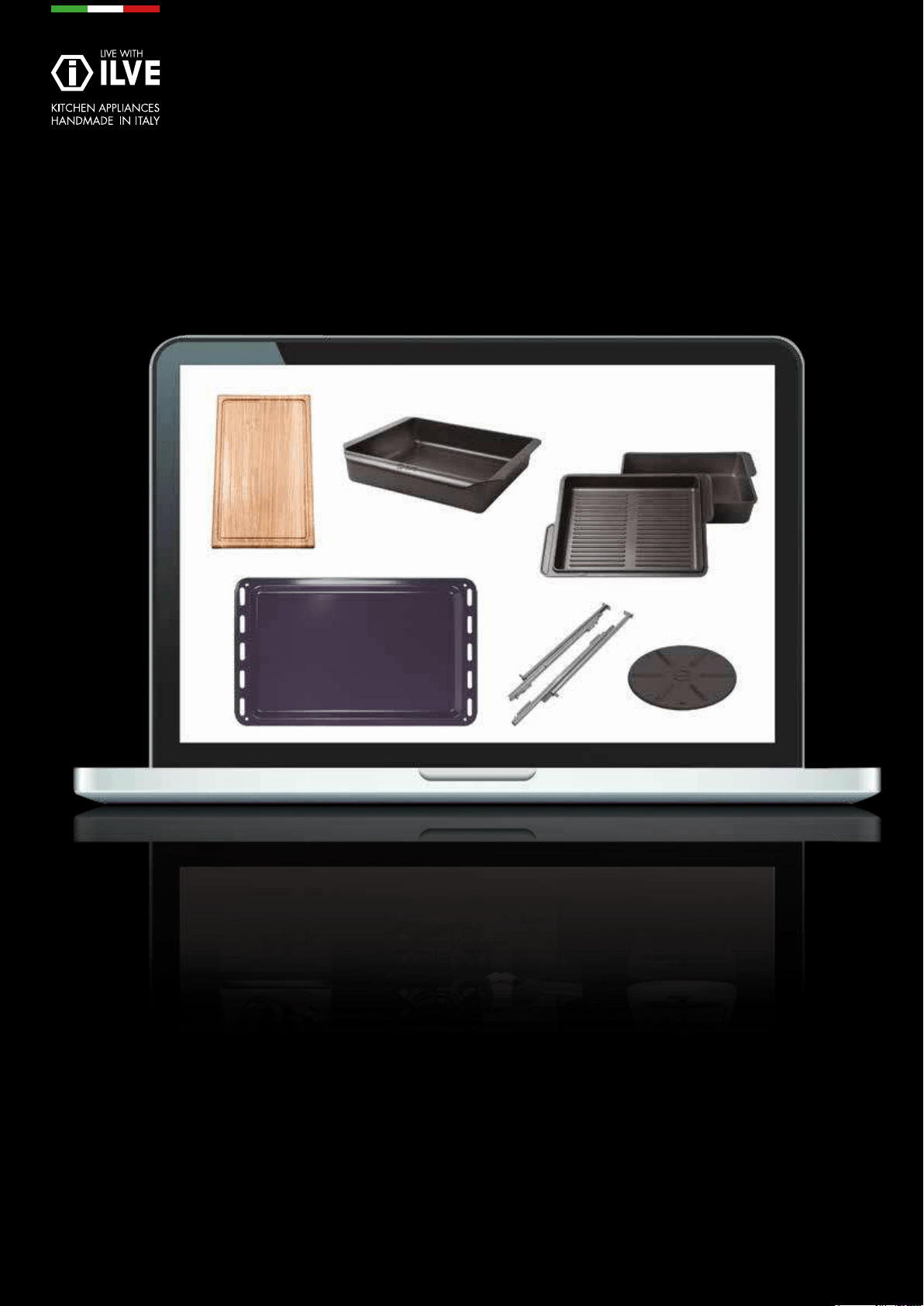
ILVE ACCESSORIES ONLINE SHOP
For a wide range of Genuine ILVE accessories at the
click of a button go to ilve.com.au

iWarranty
REGISTER YOUR WARRANTY ONLINE NOW
GO TO: ilve.com.au > support > product registration
As a part of our continued customer service offering, you can
now register your ILVE products online at
ilve.com.au > support > product registration
Just follow our simple online registration process.
Please ensure that you always keep your proof of
purchase in order for your warranty to remain valid should
you ever need to use it.
As always, you can contact us on
1300 856 411

7
OPERATION / USER
IMPORTANT SAFETY WARNINGS
First operation of the oven
INSTRUCTIONS FOR USE
Using the hob
Use of a steak grill
Proper use of burners
Use of the gas fry-top
Induction Cooktop
Electric Multifunction Oven
Professional PLUS ‘E3’ Series
Majestic Series
Hybrid (Gas & Electric) Multifunction Oven
CLEANING AND MAINTENANCE
Bulb replacement
Removing the door
Door cleaning and Glasses
Tips for cleaning the hob
Tips for cleaning the oven and front panel
Recommendations for cleaning the cooktop
PROBLEM SOLVING
General problems
COOKING CHART
Ventilated convection oven
Static oven
8
15
16
16
17
18
21
23
31
36
42
48
52
53
54
55
56
57
58
60
61
63
67
68
68
68
69
70
71
71
74
74
77
79
79
101
103
105
CONTENTS
INFORMATION - To be reminded to the user
INSTALLATION
Installation of the cooker
Room ventilation
Positioning of the appliance between furniture
How to install the xing bracket
ELECTRICAL CONNECTIONS
Groups of cooking
ADJUSTMENT
Replacement of the injectors for models
Adjustments minimum GAS ow
WIRING DIAGRAM
Key
NOTES
WARRANTY
EUROLINX CONTACT INFORMATION
USER GUIDE
INSTALLATION

8
IMPORTANT SAFETY
WARNINGS
• This appliance is not intended for use by persons (including children) with
reduced physical, sensory or mental capabilities, or lack of experience and
knowledge, unless they have been given supervision or instruction concerning
use of the appliance by a person responsible for their safety. Children should
be supervised to ensure that they do not play with appliance. Cleaning and user
maintenance shall not be made by children.
• This appliance must be installed by suitably qualied technicians and in line with
local regulations.
• As well as being shown on the packaging, the data plate is applied to the oven
door frame and is visible with the door open.
• These warnings refer to different models of appliances. Make sure you identify
the model you own (see the data plate).
• These warnings are valid for the countries mentioned on the data plate.
• Before using the cooker, read the instructions booklet carefully. It contains very
important information regarding safety during installation, use and maintenance.
• The instructions booklet must be kept with care for later consultation.
• Electrical safety of this cooker is guaranteed only if it is correctly grounded as
required by local regulations. It is important to ensure that these regulations
have been enforced; if in doubt, contact a skilled technician to have the electric
system checked. The manufacturer is not responsible for damage caused by a
bad grounding system.

9
OPERATION / USER
IMPORTANT SAFETY
WARNINGS
• Before powering the appliance, check that the technical features shown on the
data plate match those of the electrical system.
• Installation / adjustment must be carried out by qualied personnel.
• Make sure that air around the appliance can circulate freely.
• This appliance is not connected to an evacuation device for combustion
products, therefore ventilation of the room must be considered carefully and
meet local regulations.
• When using a gas appliance, heat and moisture are generated. Good ventilation
of the kitchen must be guaranteed by keeping the natural aeration vents open or
by installing a mechanical aeration device (range-hood). An intensive and
prolonged use of the appliance may result in the need for supplementary
ventilation such as opening a window or increasing the power of the hood (if
present).
• Do not block ventilation or heat dissipation openings.
• The supply cable (if tted) is supplied without a plug. To connect It, please refer
to the paragraph “electric connection” in the installation guide. It is
recommended to not use adapters, multiple-outlet plugs or extensions. If the
supply cable is damaged it must be replaced by an authorised service person.
• When the appliance is not in use for a prolonged time, switch off the electrical
supply and turn off the gas.
• The appliance must be used only for the purposes for which it was intended i.e.
cooking food in a domestic or similar to domestic environment. Any other use
(for example, heating a room) is incorrect and may be dangerous. The
manufacturer declines all responsibilities for damage caused by incorrect uses.
• The appliance is not destined to be activated by means of an external timer or a
remote control.

10
IMPORTANT SAFETY
WARNINGS
• The use of any electrical appliances requires that a number of fundamental rules
must be respected:
1. Never touch the appliance when you have wet or damp hands or feet;
2. Never use the appliance barefoot;
3. Avoid using extension cables;
4. Never pull the electric cable to remove it from the power socket;
5. Do not expose the appliance to atmospheric agents (rain, sun, etc...);
• CAUTION: During use of the appliance some parts may become very hot. Keep
out of reach of children. Absolutely do not touch the elements inside the oven
during or immediately after use.
• Before cleaning the appliance or carrying out maintenance, disconnect the power
supply by removing the plug from the socket or switching off the switch.
• In case of breakdown or malfunction, switch off the appliance. Do not attempt
any repairs; these must only be performed by an authorised service centre.
Always request original parts. Failure to comply with these instructions may
compromise the appliance’s safety.
• Never place unstable or deformed pans on the burners or on the electric hot-
plates as they could topple accidentally.
• When the appliance is not being used, make sure the knobs are exactly in
the “ ”/“ ”/ position.
• Don’t leave the hotplate on with no pans on it, as it would reach the temperature
fast and possibly damage the appliance and your counter tops.
• The electric plates remain hot after using them. Be careful not to touch them.

11
OPERATION / USER
IMPORTANT SAFETY
WARNINGS
• Inammable liquids, like alcohol or gasoline, must be kept away from the
appliance.
• Should you use small household appliances near the cook top, please make
sure that the electrical cable is not in contact with hot parts of the appliance.
• The materials used in producing our appliance are compatible with the
environment and therefore recyclable. The packaging waste must not be left
within reach of children and must be disposed by using the appropriate recycling
channels. To scrap your appliance, use your retailer and/or your local council’s
facilities. Remember to make your appliance unusable before scrapping it.
• If the rotation of the gas knobs is difcult, close the gas supply and call After
Sales Service for advice.
• Do not use a steam cleaner to clean the inside parts of the oven.
• Don’t use any abrasive detergent or sharp device to clean the oven glass door.
This may cause damage or breakage.
• Don’t modify the appliance.
• Fire danger: do not store items on the cooking surfaces. In case of re never
attempt to extinguish a ame/ re with water but turn the appliance off and cover
the ame with a lid or with a reproof blanket. If the re is inside the oven
cavity close the oven door to starve the re of oxygen. Be especially careful
when cooking with fat or oil as these can catch re.
• Do not use gas burners if the ame is unstable.
• Ensure that the ame diffusers and burner caps are properly positioned.
• Do not leave the cooker unattended during any cooking that can spit fats or oils
or when grilling.
• Do not use plastic or aluminium foil containers on hot cooking zones.

12
IMPORTANT SAFETY
WARNINGS
• Do not cover the burners or the hob with aluminium foil.
• Do not use the appliance’s surface as a work top, sharp objects might scratch it.
• Do not use frying pans, saucepans, grills or stones for grilling of a greater size
than the maximum ones indicated for each single burner. They must not cover
more than one burner at the same time. The heat accumulation might damage
the cooker or restrict access to oxygen for proper combustion.
• In case of liquid spilling over, remove the pot from the hob.
• Do not place empty saucepans on the cooking areas. Cooking areas must not
work empty (without saucepans).
• Do not cover the base of the oven with anything, (e.g. aluminium foil, oven liner,
cooking tray) as a build up of heat can irreparably damage the enamel; coating.
Avoid placing heavy items on the oven oor as this too can damage the enamel.
• Do not rest heavy items or lean on the door as this can damage the hinge and or
hinge sockets. Open and close the door with reasonable force only.
First use
• When using the oven for the rst time, let it work empty for about 1 hour
(230 °C), leaving the kitchen windows open if possible. When you rst turn the
oven on, an unpleasant smell is emitted due to production residues such as
grease, oils or resins. When the oven has cooled clean it following the
instructions in the «Cleaning and care section».
• After this procedure, the oven is ready to perform its rst use.
• Additional warnings for models with glass / ceramic zones
• Remove the adhesive labels from the glass on the hob.

13
OPERATION / USER
IMPORTANT SAFETY
WARNINGS - INDUCTION HOBS
• Do not use the hob as a working zone.
• Remember to turn off the cooking zone after use.
• Magnetised objects such as credit cards, oppy disks and calculators should not
be placed near the appliance when it is being used.
• Do not use any type of metallic object except pots used for induction.
• Do not cover the cooking zone with inammable materials.
• Metallic objects such as knives, spoons, forks or lids should not be placed on the
hob as they can become overheated.
• Damaged or unsuitable pots could ruin the surface of the hob.
• Do not use abrasive substances to clean the appliance.
• Avoid dropping heavy objects on the hob. Place pots on the hob gently.
• Do not place empty pots on the hob.
• Sugar, synthetic materials or aluminium objects should not come into contact
with the cooking zones.
• DO NOT USE OR STORE FLAMMABLE MATERIALS IN THE APPLIANCE
STORAGE DRAWER OR NEAR THIS APPLIANCE.
• DO NOT SPRAY AEROSOLS IN THE VICINITY OF THIS APPLIANCE WHILE IT
IS IN OPERATION
• DO NOT USE THIS APPLIANCE AS A SPACE HEATER
• DO NOT MODIFY THIS APPLIANCE
• DO NOT PLACE ARTICLES ON OR AGAINST THIS APPLIANCE

14
• When a malfunction occurs turn off and disconnect the
appliance.
• If cracks appear on the glass or it is broken,
• disconnect the appliance and contact your authorized
service centre.
• Any repairs should be made by authorized personnel.
• Make sure that the pot is in the middle of the cooking
zone. Ideally, the bottom of the pot should cover the
entire cooking zone.
• The magnetic eld produced by the induction hob
could affect the proper working of pacemakers.
• Detailed information should be obtained from your doc-
tor.
• Avoid placing synthetic materials or aluminium objects
in contact with the cooking zone.
IMPORTANT SAFETY
WARNINGS
- Models with glass-ceramic zones
In case of
malfunction
Suggestions
15
OPERATION / USER
Any of the following are considered to be abnormal operation and may require servicing:
• Yellow tipping of the hob burner ame.
• Burners failing to remain alight.
• Sooting up of cooking utensils.
• Burners extinguished by cupboard doors.
• Burners not igniting properly.
• Gas valves, which are difcult to turn.
In case the appliance fails to operate correctly, contact the authorised service provider
in your area.
DANGER OF FIRE: Do not store items on the cooking surfaces.
CAUTION: The cooking process has to be supervised. A short term cooking
process has to be supervised continuously.
WARNING: Unattended cooking on a hob with fat or oil can be dangerous and
may result in a re.
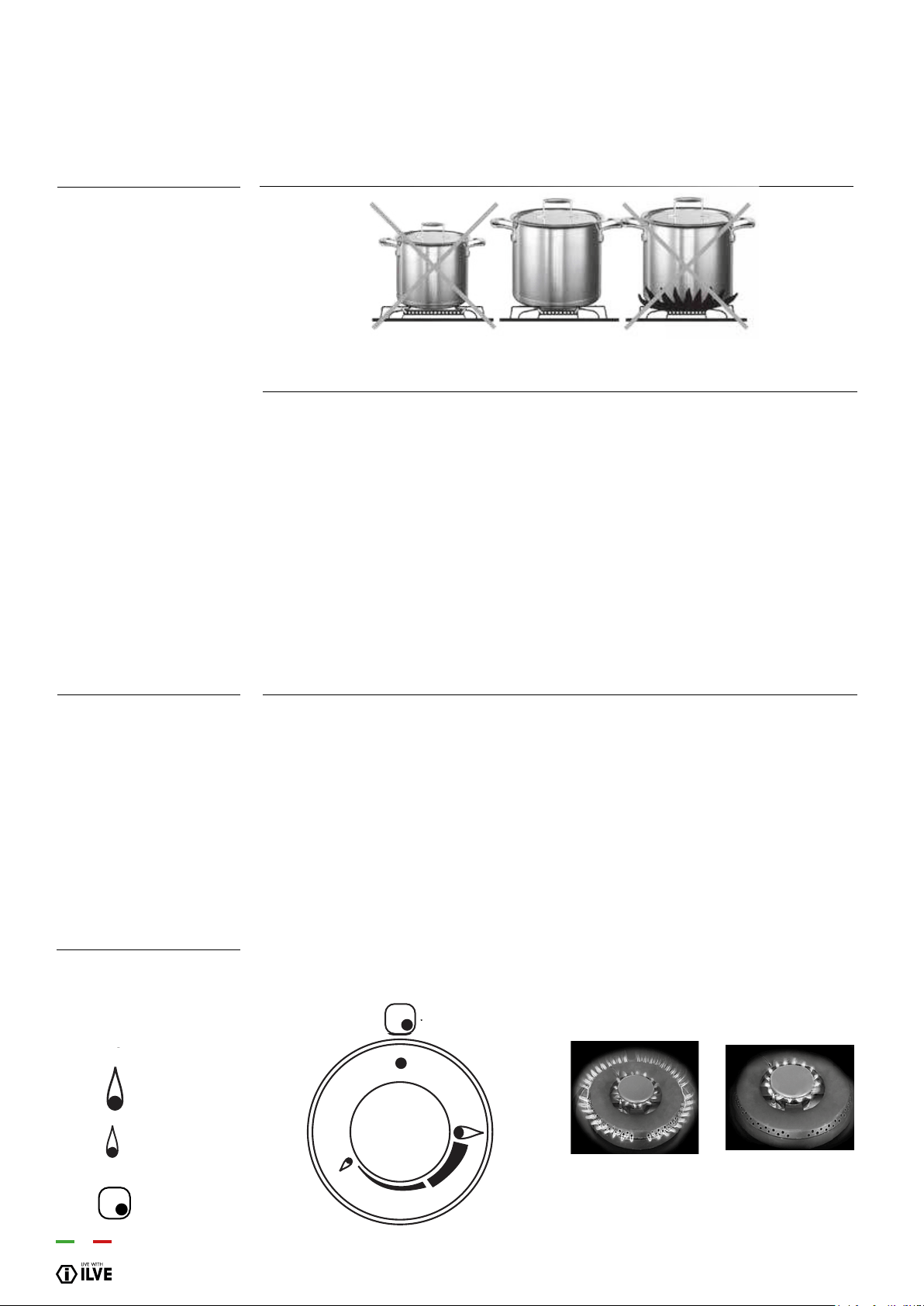
The index above the knobs will help you to nd the corresponding burner. Press the
knob by turning it anti- clockwise and bring it to the ignition position; keep the knob
pressed for about 5 seconds so that upon its release the ame remains alight (in case
of unsuccessful ignition repeat the operation).
Abnormal Operation
IMPORTANT
IMPORTANT
Lighting the burners
Symbol Function
off
maximum
minimum
index
INSTRUCTIONS FOR USE
- First system start up of the hob
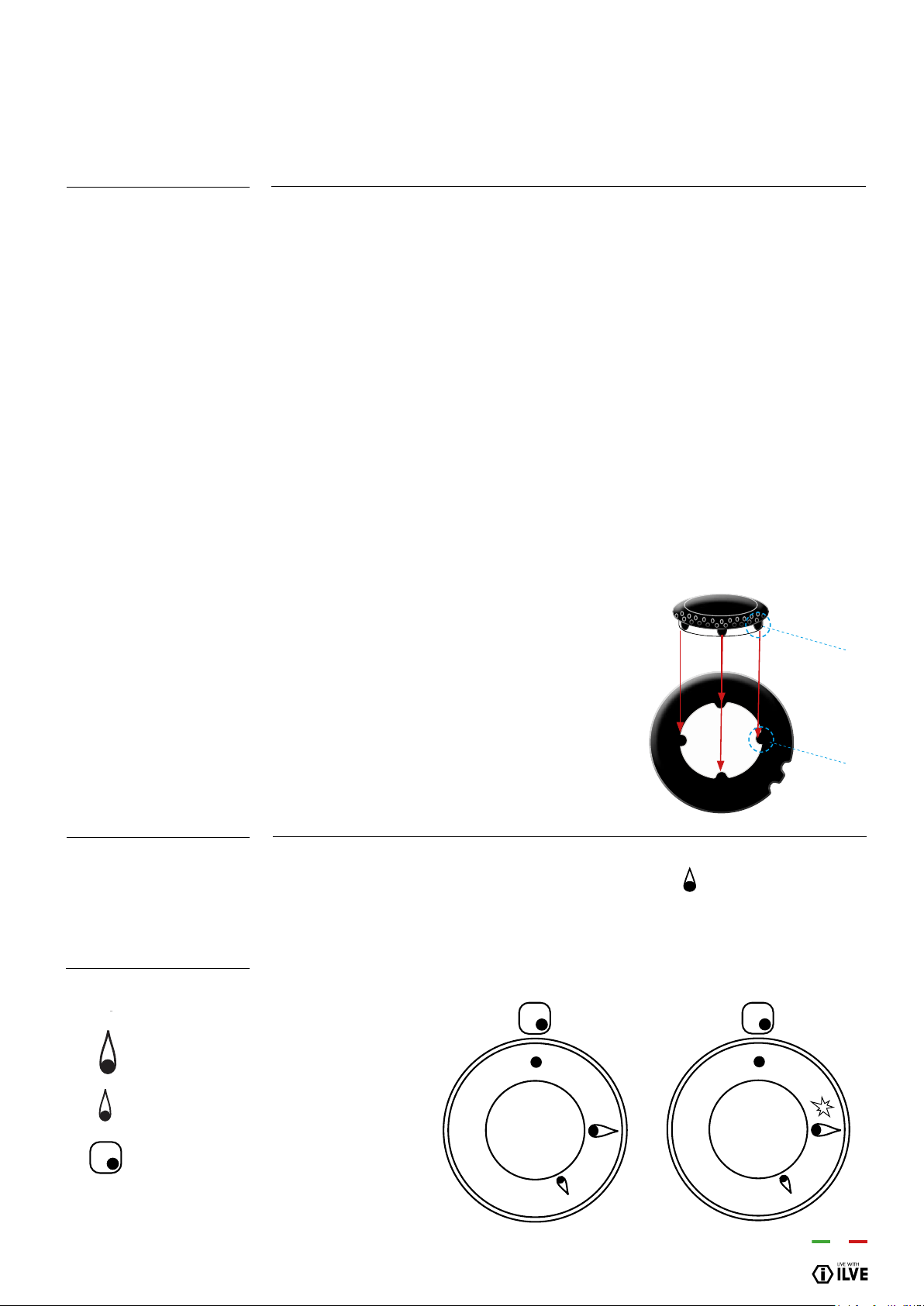
Position the ame divider “b” correctly. To do this,
align the 4 teeth “c” of the ame divider with the
recess “d” of the aluminium Cup “a”.
●
●
●
b
a
b
c
d
V Series
16
ID Diameter Ø (cm)
SR 10 ÷ 20
R 20 ÷ 24
P oval pans (380 x 185)
TC/DCC 22 ÷ 28
DUAL 24 ÷ 30
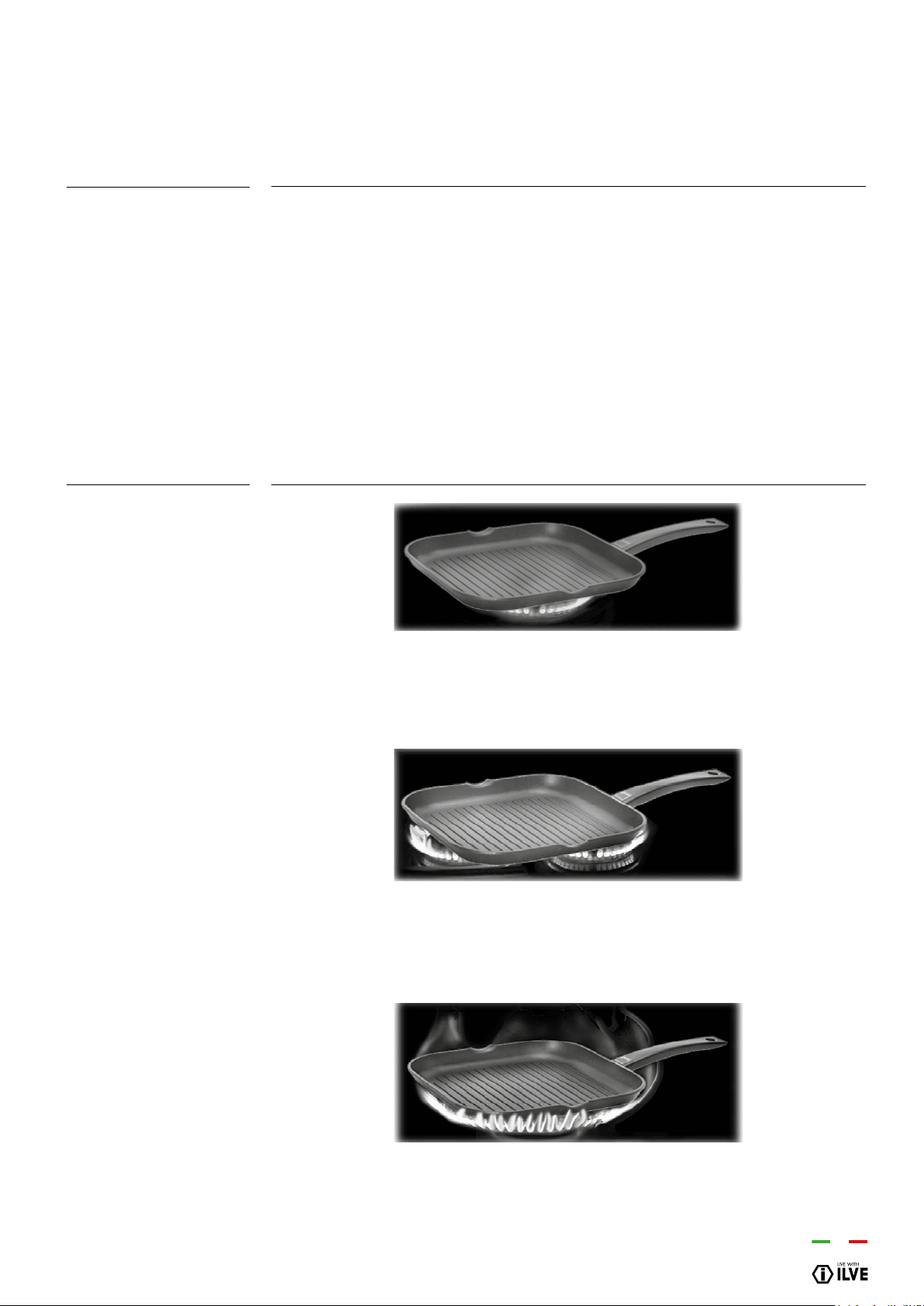
Identify the knob with the help of the index near the knobs. Press and turn the knob to
the maximum ame symbol for 5 seconds. Once the burner is lit, turn the knob counter
clockwise. You will note some resistance halfway between the large and small ame.
Turn the know past this point of resistance towards the small ame. The auxiliary (inner)
ring will light and the outer ring will extinguish. To adjust the auxiliary burner to a min-
imum, rotate the knob counter clockwise. To turn the outer burner back on, rotate the
knob clockwise up to the desired value
Recommended pans
according to burner
size:
Dual wok burner ignition
Symbol Function
off
maximum
minimum
index
INSTRUCTIONS FOR USE
- First system start-up of the hob
Burners
Medium
Large
Fish burner
Ring
Dual - Ring
●
●
●
●
●
17
OPERATION / USER
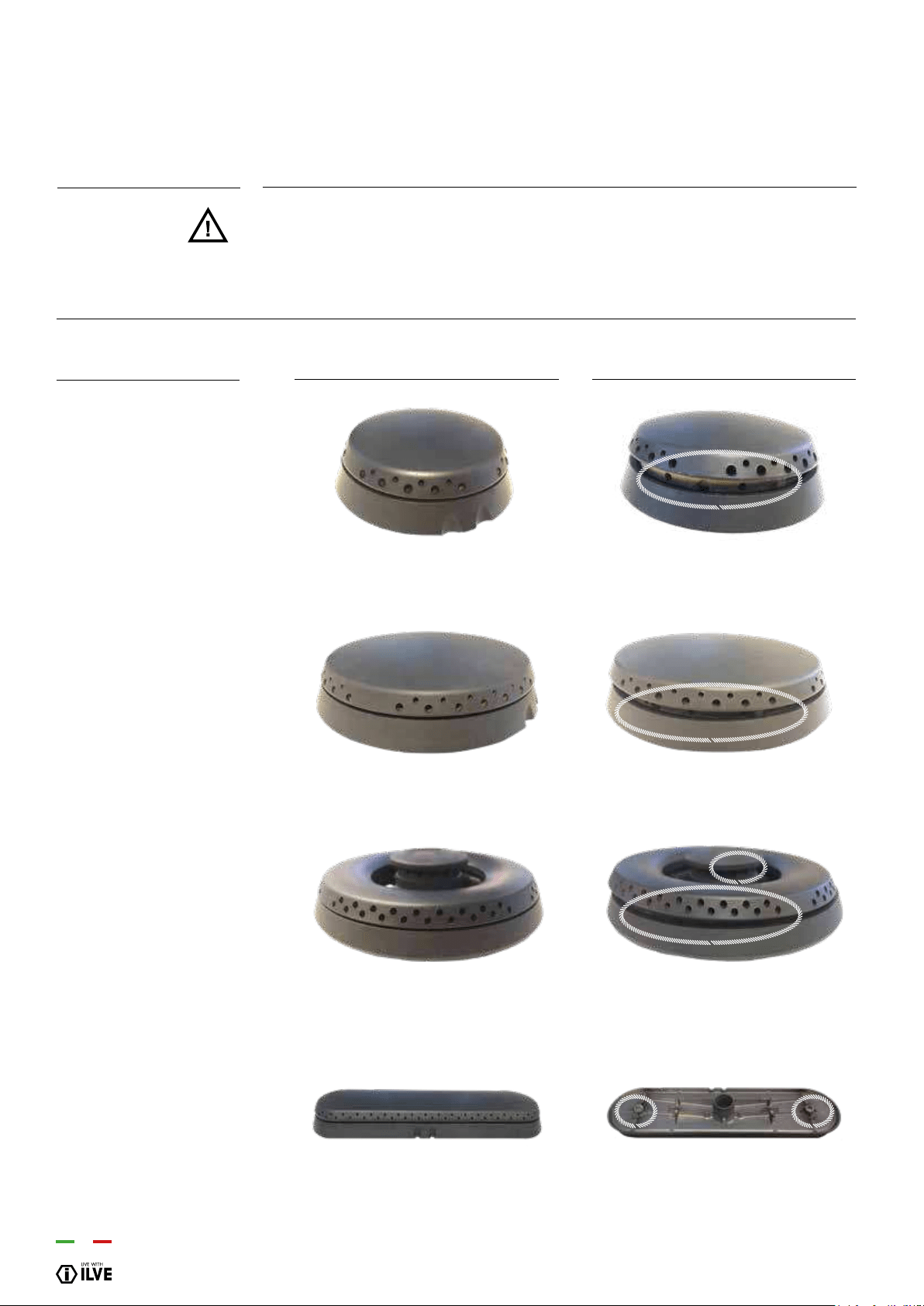
If you want to use a grill pan a few things must be taken into account:
- it is possible to preheat the grill pan on the burner’s maximum power for no more than
10 minutes;
- we recommend cooking foods with reduced power;
- keep at least a distance of 150 mm from the side wall to the grill pan’s rim;
- do not position the grill pan on more than one burner at the same time.
Gridiron
Correct
Be careful: wrong
Be careful: wrong
INSTRUCTIONS FOR USE
– Use of a grill pan
18
INSTRUCTIONS FOR USE
– Positioning placement of the burners
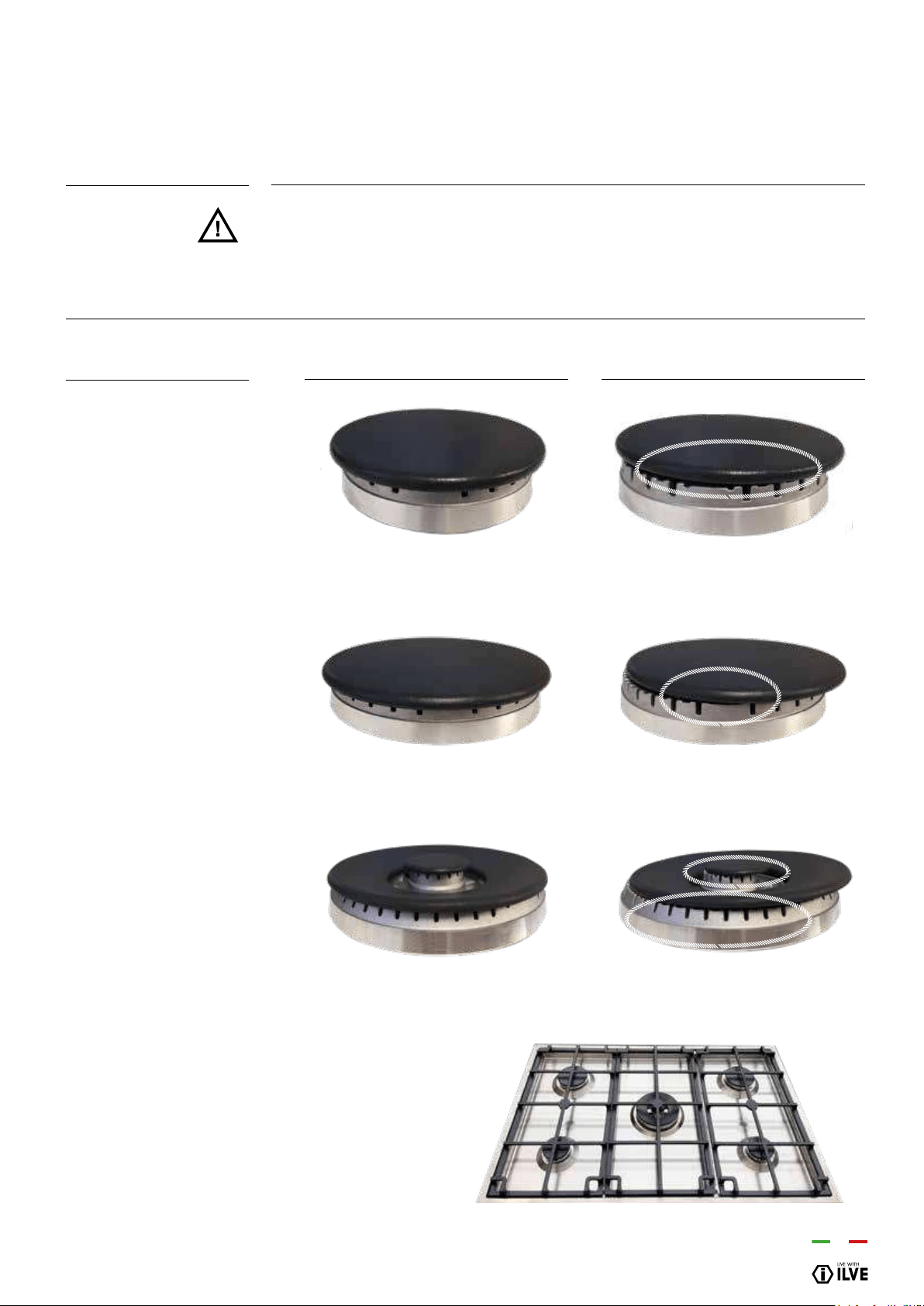
BE CAREFUL: always check that the burners are properly positioned), with a uniform
ame that is not noisy.
RIGHT WRONG
Positioning of the
burners
BURNERS
Medium
Large
Dual Ring
Fish burner
Always check that the screws
below the burner are xed
19
OPERATION / USER
INSTRUCTIONS FOR USE
– Positioning placement of the burners
BE CAREFUL: always check that the burners are properly positioned, with a uniform
ame that is not noisy.
RIGHT WRONG
Positioning of the
burners
BURNERS
Medium
Large
Dual Ring
Correct Placement of
Trivets
Ensure the trivets are
placed in the same
conguration shown.
20
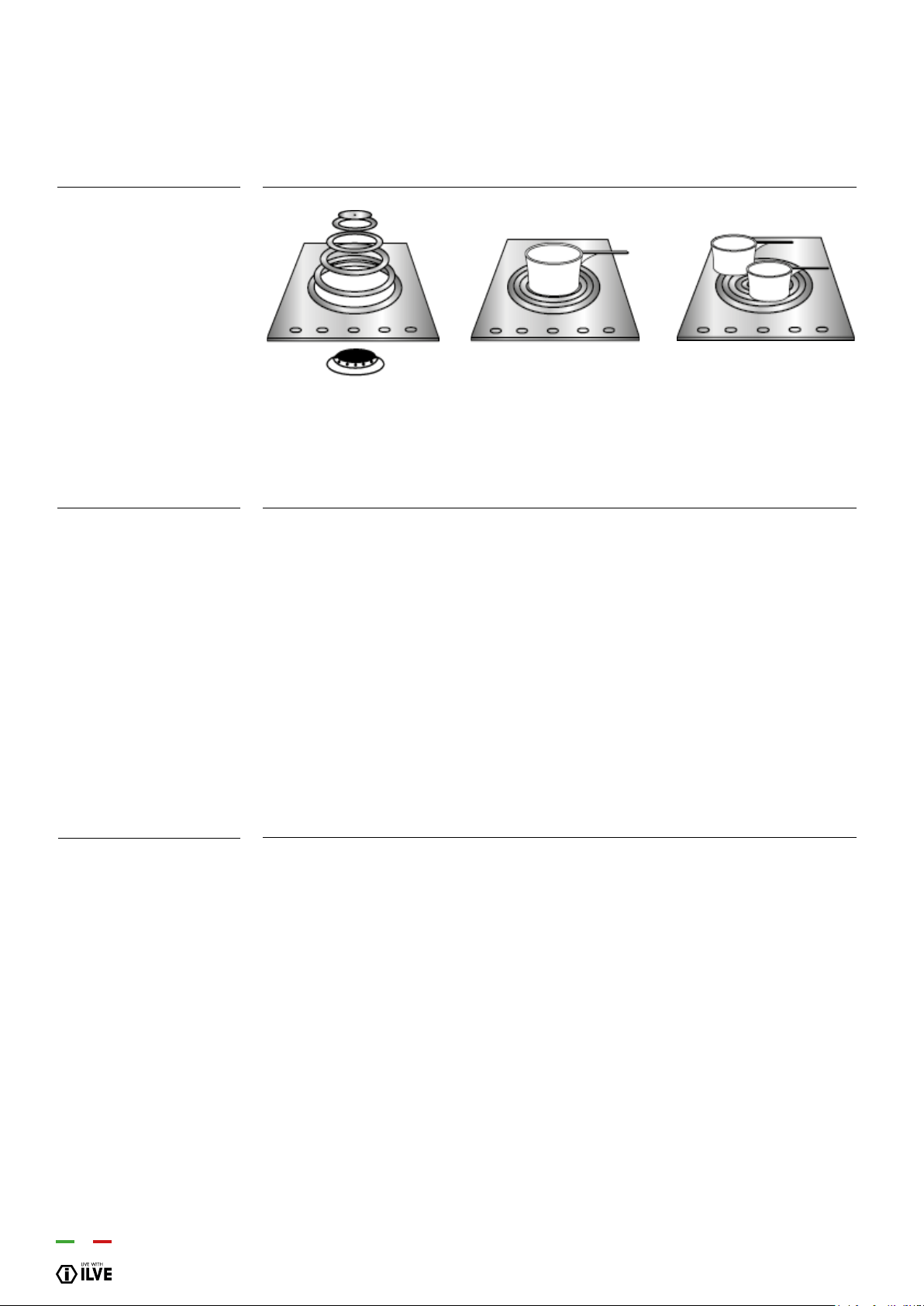
The large “Coup feu” solid cast iron plate made of concentric rings allows you to rest
the pan (or even several pans) directly on the surface (g. B, C). It is heated by means
of a gas burner (g. A). The plate is designed to provide a moderately intense heat
which is well distributed over the surface.
This is ideal for slow cooking and particularly for sauces, browning and grilling, heating
dishes or keeping them warm. Switch the burner on 15/20 minutes before use to allow
the cast iron plate to accumulate heat.
You will then be able to use the plate even when switched off for a further 10/15
minutes. The middle of the plate is the area where the highest temperatures are
reached whereas the outer part is cooler. By simply moving the pan from the middle to
the outside of the plate, you can obtain different cooking intensities without regulating
the ame. Pan dimensions permitting, several dishes can be cooked at the same time
(g. C). If necessary it can be used as a handy top, providing ample space for resting
pots and pans.
The hotplate should be cleaned while still warm using the products normally used in
the kitchen for metal surfaces. Rub with a wire pad, following the direction of the satin
nish. Dry well immediately. If you want to give the plate a better appearance, after
cleaning, apply a coat of a specialist cleaning paste / cream.
If you do not intend to use the hotplate for long periods, after normal cleaning apply
a thin lm of liquid parafn (Vaseline oil) with a wad of cotton wool This treatment is
necessary to prevent any formation of surface oxides.
When next turning on the plate you will notice the evaporation of the parafn oil used.
This phenomenon will disappear in a few seconds.
The hotplate may sometimes present phenomena of surface oxidation due to the
presence of humidity, but above all due to lack of use. You are therefore advised to
use it frequently to prevent any oxidation. Never leave the hotplate damp. If the oxi-
dation phenomenon still appears, use lightly abrasive paper to remove the oxidation,
taking care to rub gently, always in the direction of the plate satin nish.
Do not cook food directly on the plate surface. Always use suitable containers.
COUP FEU
Using the Coup de Feu
Cleaning the Coup feu
plate
INSTRUCTIONS FOR USE
– Use of the Coup feu
Fig. A Fig. B Fig. C
21
OPERATION / USER
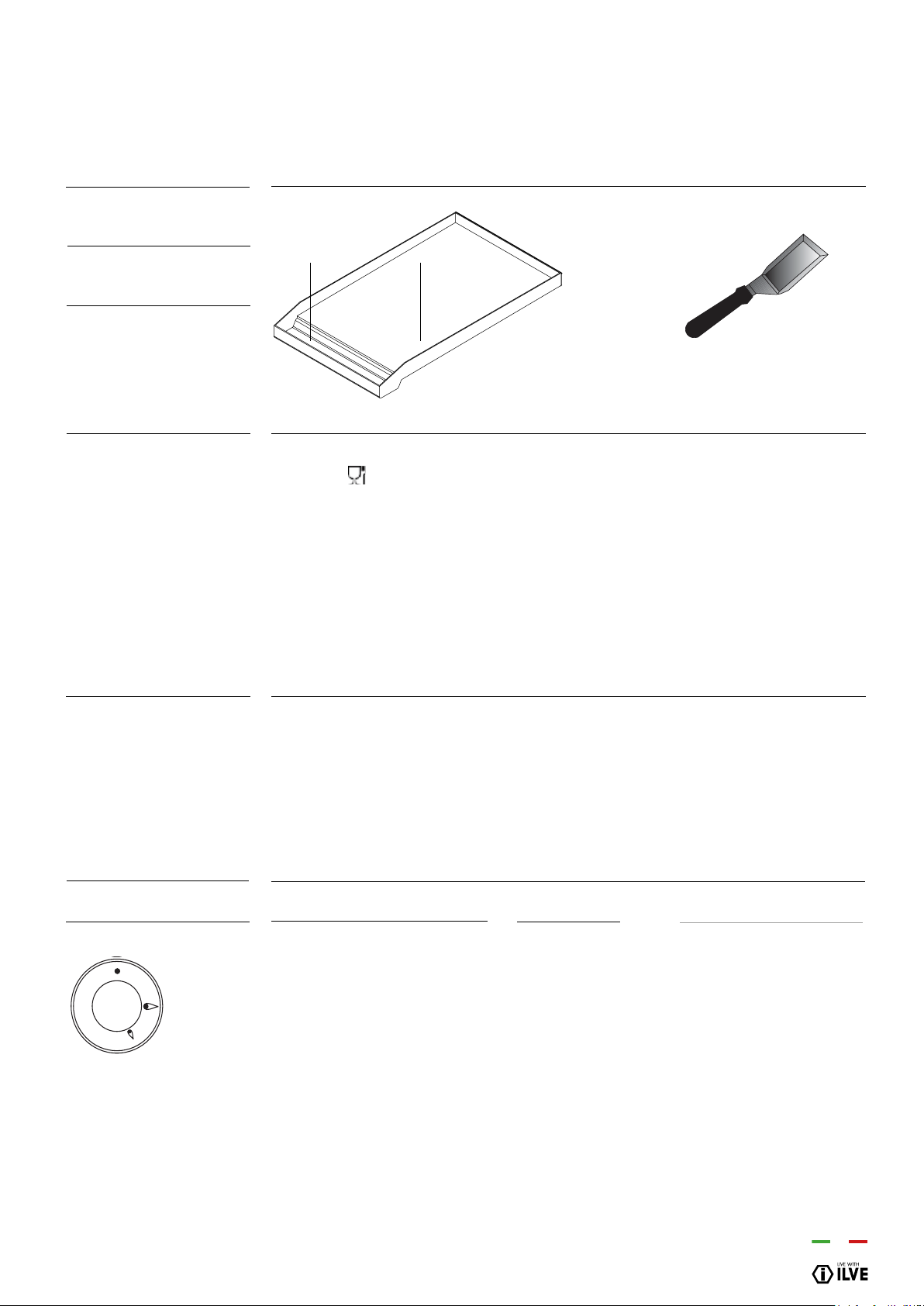
The Tepanyaki Plate (g. 14) consists of a stainless-steel plate, suitable for contact
with food [ ] with a uniformity of temperature on the cooking surface and with very
low heat loss. To use the appliance, light the ame below the plate by means of the
corresponding knob (see “Lighting the burners”) and ensure that there is a ame.
Turn the knob to maximum for about 10 minutes and wait for the plate to heat up.
Once this time has elapsed, the plate is ready to start cooking.
By adjusting the ame, there is no limit to your culinary imagination. If you turn the
control knob to the low setting, this allows slow or dietetic cooking. Higher
temperatures are suitable for cooking meat, sh and vegetables. The Tepanyaki Plate
is ideal for Oriental cooking with an optional accessory (lid) needed for this type of
cooking. Some models are supplied with the spatula shown in gure 15, which is
useful both for cooking and for cleaning the plate.
It is recommended to clean the plate thoroughly at the end of each cooking session.
With the plate hot and the ame at minimum, remove the cooking residue using the
scraper provided (g. 15). Pour a little water onto the plate and, still using the scraper,
continue cleaning the plate. Once the water has completely evaporated, repeat the
same operation even several times until the desired result is obtained. It is extremely
important to clean the plate when it is quite hot.
The black enamel ue may be cleaned with a soft cloth soaked with a solution of
luke warm soapy water. Rinse and dry after cleaning.
Type of cooking Knob posit Time min.
Egg B 2
Sliced aubergines (0.5 cm thick) B 9 ÷ 13
Sliced potatoes B 5 ÷ 73
Sliced courgettes B 3 ÷ 5
Fish
(sea bream weighing about 200 g) B 15
Hamburger B 10
Beef steak B 3
Porterhouse (2 cm thick) A 5
Gas Tepanyaki Plate
A = cooking area
B = drip tray
Use of the Tepanyaki
Plate
Cleaning and care
Adjuster (Knob)
INSTRUCTIONS FOR USE
– Use of the gas Tepanyaki plate
Fig. 14 Fig. 15
A
B
A max
B medium
C minimum
22
The ceramic hob remains hot for a long time after use. Do not touch the hob with your
hands or let children near it. The residual heat indicator will remain on until the hob
has cooled down.
If any cracks appear in the ceramic material, disconnect the appliance immediately
from the mains and call an authorized technical service centre.
The positions are clearly indicated by the rings.
Area Diameter
Ø Power
P1 180 mm 1800 W
P2 180 mm 1800 W
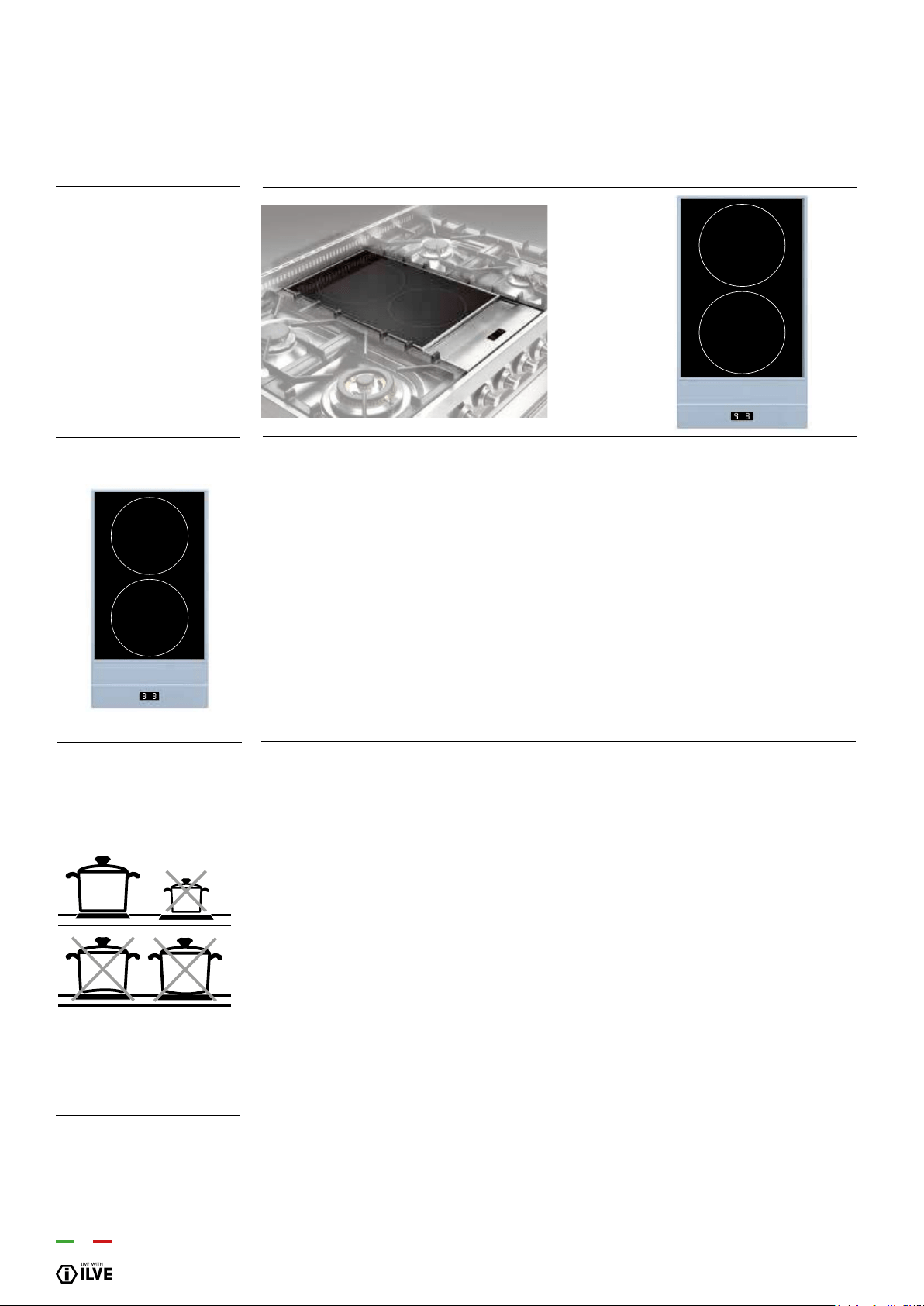
Heat zones are clearly indicated by these circular areas. When one or more cooking
areas are being used, the remaining surface stays cold. Each cooking area is designed
to work with the cookware specic for induction cooking, with a diameter just less than
the diameter of the selected cooking area.
The bottom of the pan must be thick and at. Its diameter must be as similar as possible
to that of the cooking ring. The surface of the hob and the bottom of the pan must be
kept clean.
Do not wet or overheat the heating plates.
Avoid sudden changes in temperature on the ceramic hob. For example, do not pour
cold water onto the hot hob.
Do not leave the pan handles sticking out as they could be spilled accidentally.
It is preferable not to cook on the ceramic hob with pans that have been used on gas
burners. The ames will have deformed the bottom of the pans.
The cooling fan is positioned under the hob works at low speed when the hob is in
use. When a certain temperature is reached, the speed of the fan increases. The fan
will switch off once the hob has cooled down.
INDUCTION PLATE
ATTENTION!
Precautions to avoid
damaging the appliance
Ventilation
INSTRUCTIONS FOR USE
– Use of the inductive electric plate
•
•
•
•
P1
P2

23
OPERATION / USER
INSTRUCTIONS FOR USE
– Use of the inductive electric plate
Clean the hob’s surfaces with a damp cloth.
A cooking area is turned on by turning the relative knob clockwise. On the hob’s display
the set power level (from 1 to 9) appears.
A cooking area is turned off by turning the relative knob anti-clockwise. On the hob’s
display a [0] appears for 3 seconds, after which it disappears from the display
The appliance switches off automatically when there are overheating or supply error
conditions.
Each cooking area is designed to work with specic pots for induction cooking with a
diameter just less than the diameter of the selected cooking area.
If the pot is unsuitable, the display shows the symbol for the area without a pot (U) and
the appliance will not operate. This prevents the switching on until a pan is placed on
the cooking area or until a suitable pot for induction is used. If you remove the pot during
operation, the area is switched off.
Pot recognition lasts 9 minutes, if after this time no suitable pot is used, the area is
switched off. The area’s display changes from “absent pot” to [-].
If the cooking area, when turned off, is still very hot, the display shows the symbol H.
The heat-up, or quick heat function, is available on each cooking area. This means that
for a well de ned time, the cooking area operates at maximum power and at the end
of this time the power is automatically adjusted to the set level. The duration is, in this
case, according to the set power level. The heat-up function starts by turning the knob
anti-clockwise, from 0 up to its end [*] (Fig. 10). Once the control is turned left, an [A]
appears on the relative area’s display. After initiation a power level must be set within 3
seconds by turning the knob clockwise for the cooking’s duration; if this does not
happen, the heat-up function is interrupted.
First use
Switching on one
cooking area
Switching off a cooking
area
Automatic switching off
Cookware presence
recognition
Afterheat indication
“Heat-up” function
g. 10
*

24
The child-lock function is useful where children are present. However, the presence of
an adult is advisable when the appliance is working.
Activating the child-lock function, all cooking areas are off and cannot be accidentally
turned on. The child-lock function is activated, with the knobs at 0, by rotating one of the
two induction area’s controls anticlockwise for 3 seconds. [L][L] appears on the display.
By repeating this operation the child-lock function is deactivated. [0] appears on the
display.
If a control is turned with the child-lock on, [L][L] appears on the display.
The display shows information of the two cooking areas (Fig. 11).
Each cooking area has its own maximum continuous working time. This depends on the
set power level. In case
the limitation of the duration of operation is reached, the relative area is switched off.
Child-lock function
Display
g. 11
Limitation of the
duration of operation
Limitation Level
approximate duration of
operating power (hours)
INSTRUCTIONS FOR USE
– Use of the inductive electric plate
Value
1-9
A
H
U
E
Level
1
2
3
4
5
6
7
8
9
Value
1-9 (heat setting)
A (heating)
H (residual heat)
U (no pot)
E (error)
Duration (hours)1-9
8.5
6.5
5
4
3.5
2.5
2
1.5
1.5
_
25
OPERATION / USER
INSTRUCTIONS FOR USE
– Use of the induction hob
C
B
A
C
B
A
F
F
E
G
E
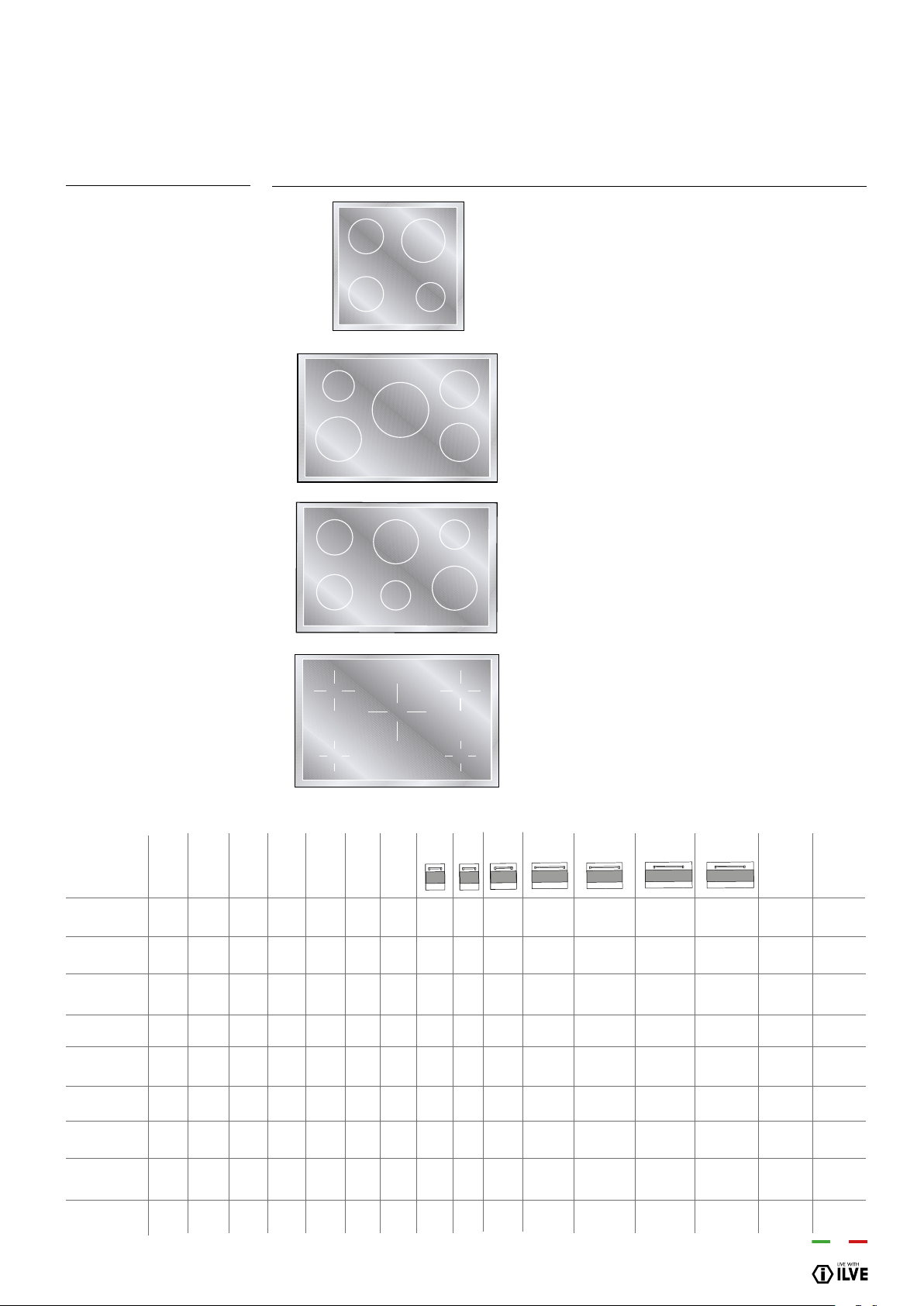
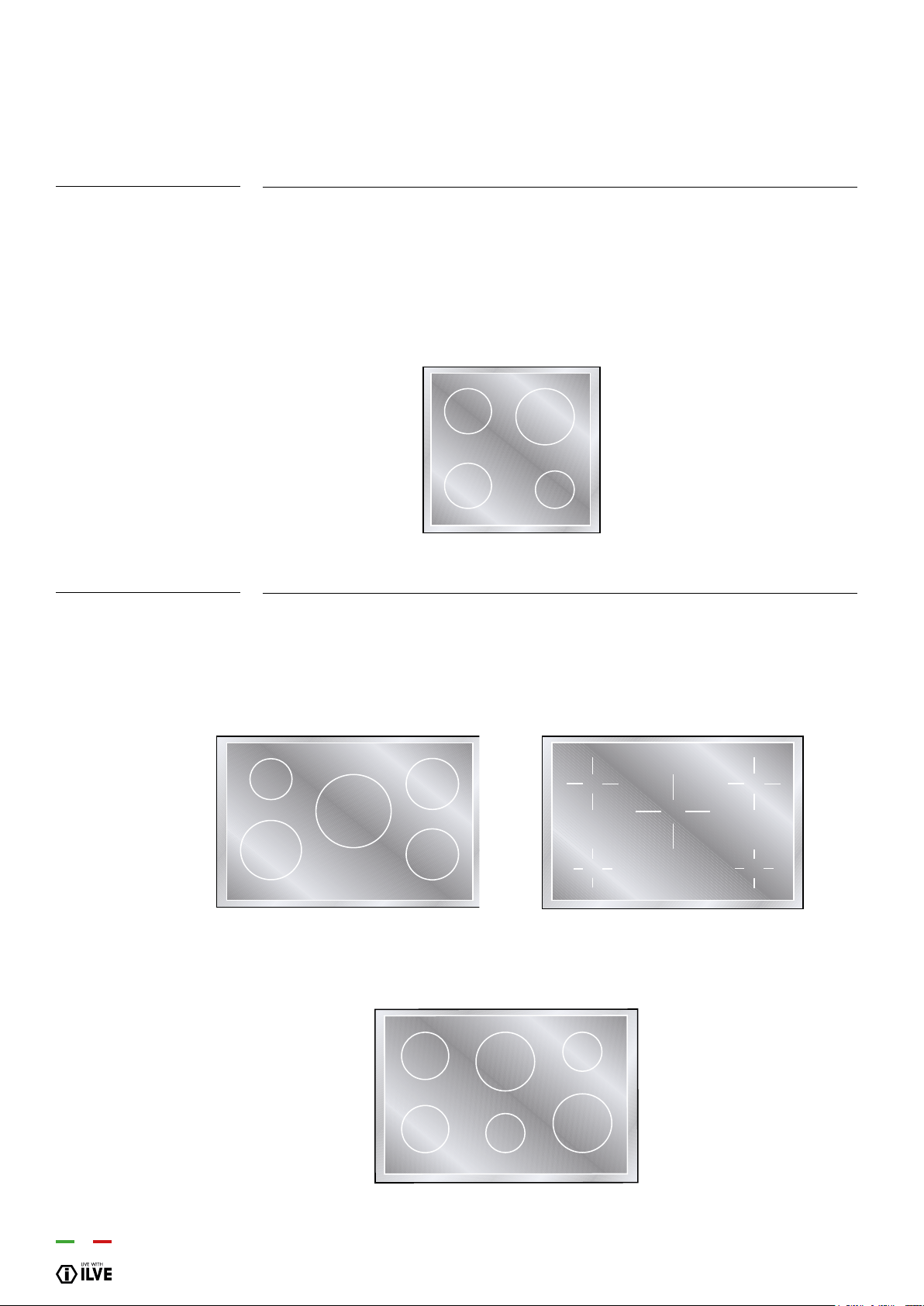
INDUCTION HOB
Mod. PI06....
Mod. PI09 - MI09 - PDI09
HNFI - NTI - LBI09
Mod. PDI10 - MDI10....
Mod. PBI09 - MBI09 -
PDBI09 - LBI09....
B
A
C
B
A
B
C
D
B
Key
A - ø145 - Cooking area ø 145mm
(1400W / Booster 2200W)
B - ø180 - Cooking area ø 180mm
(1850W / Booster 3000W)
C - ø210 - Cooking area ø 210mm
(2300W / Booster 3700W)
D - ø260 - Cooking area ø 260mm
(2600W / Booster 3700W)
E - ø175 - Cooking areaa ø 175mm
(1400W / Booster 2000W)
F - ø215 - Cooking area ø 215mm
(2300W / Booster 3000W)
G - ø265 - Cooking area ø 265mm
(2300W / Booster 3000W)
2
2
-
-
2
-
-
2
2
1
1
-
-
1
-
-
2
2
-
1
-
-
1
-
-
-
-
-
-
2
2
-
2
2
-
-
-
-
2
2
-
2
2
-
-
-
-
1
1
-
1
1
-
-
-
-
-
-
1
1
-
-
1
-
-
-
-
-
-
1
-
-
-
-
-
-
-
-
-
1
-
1
-
-
-
1
1
-
1
1
-
1
1
-
-
-
-
-
-
-
-
-
-
-
-
1
-
-
-
-
-
1
-
-
-
-
-
9,85
13,85
13,85
13,85
15,85
15,85
15,15
16,10
15,85
10,60
14,50
14,50
14,50
16,60
16,60
15,90
16,85
16,60
1
1
-
-
1
-
-
2
2
Modelli
PI06 - MI06
PI09 - MI09
PBI09 - MBI09
LBI09...
PDI09 ...
PDBI09...
LDBI09...
PDI10...
MDI10 ...
A B C D E F G E03E E03 E04E M06E3 M06MP M09E3 M09MP kW kW
ø145 ø180 ø210 ø260 ø175 ø215 ø265 (230V) Quick Start
26
Before the rst use
Induction
Adjuster (Knob)
Switching on a cooking
area
Switching off a cooking
area
Automatic switching off
of the device
*
Clean your hob with a damp cloth, and then dry the surface thoroughly.
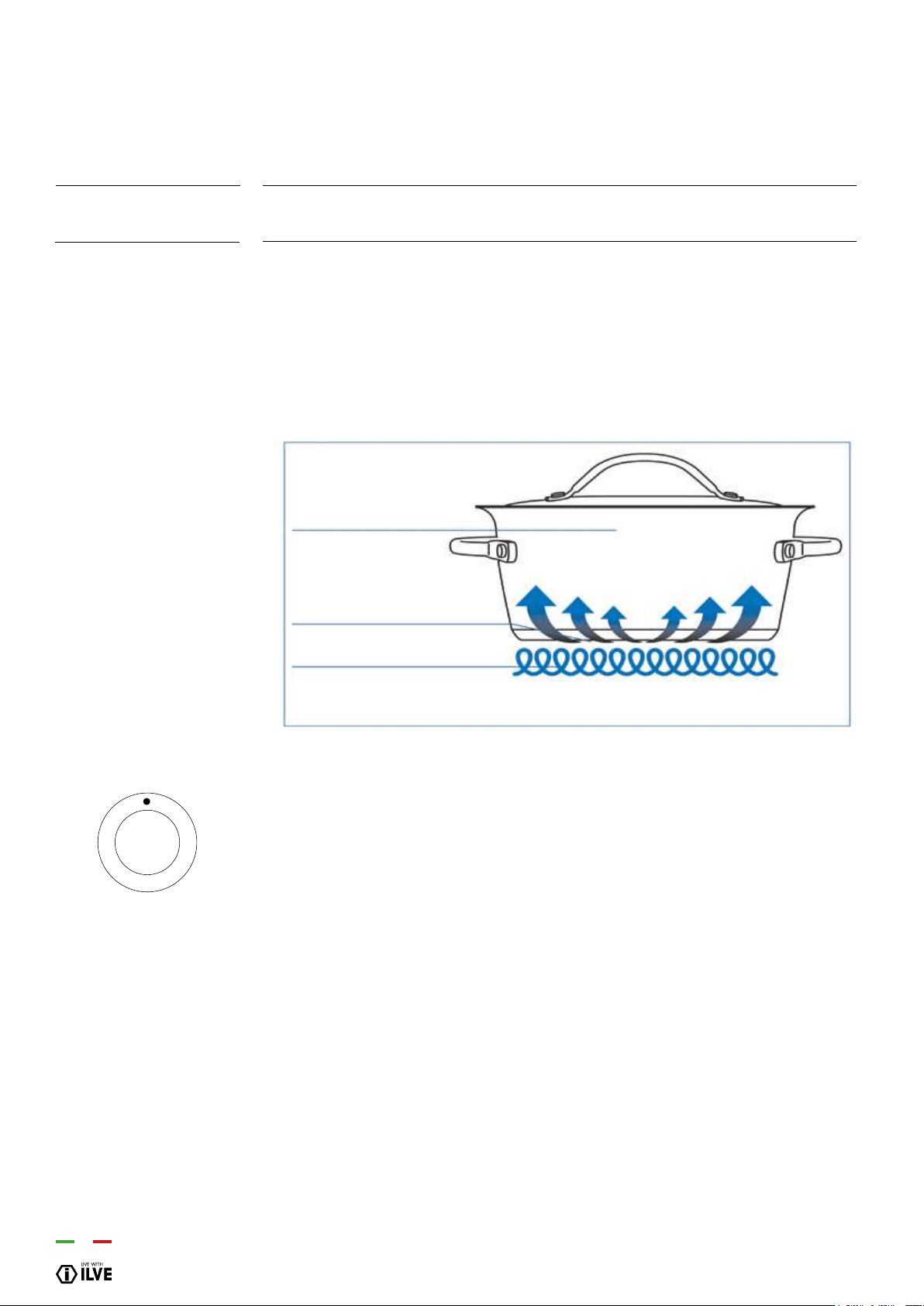
There is a coil underneath each cooking zone which, when a pot is placed on it,
generates a variable electromagnetic eld, producing inductive power of a
ferromagnetic substance on the bottom of the pot. The end result is that the bottom of
the pot placed above the cooking zone is heated. The type of material constituting the
pot is fundamental:
- All pots with a ferromagnetic bottom are suitable (this can be veried with a magnet)
- The following pots should not be used: copper, stainless steel, aluminium, glass,
wood, ceramics
The knob does not show any numbers, the power level will be visible on the display.
Turn the relevant knob clockwise. On the hob display the set power level will appear
(from 1 to 9)
A cooking area is switched off by turning the respective knob counter clockwise. The
symbol [0] appears on the hob display for 15 seconds, then it disappears from the
display or changes to the symbol [H] if the cooking area is still hot.
The device switches off automatically if any conditions of excess temperature or errors
in the power supply occur.
INSTRUCTIONS FOR USE
– Use of the induction hob
Pot of magnetic material
Induction hob
Electromagnetic coil
g. A

27
OPERATION / USER
The purpose of the booster function is to give more power to a determined area in order
to reduce the necessary cooking time. This function is activated by turning the knob
clockwise from position 0 (off) to the nal position (* g. A). After short acoustic signal,
the symbol [P] appears on the display, meaning that the booster function is activated.
The Booster function has a maximum duration of 10 minutes. The area concerned then
returns to level [9].The Booster function ends before this time when:
- a lower power level is set;
- the pan is removed;
- there is overheating of the appliance or of the heating area.
The Booster function has precedence over the “Heat-up” function. This means that, if
the heat-up function has been activated in an area at the time of activating the Booster
function, the heat-up function will be interrupted.
Each cooking area is designed to operate with specic pans for induction cooking,
having a diameter just smaller than the diameter of the chosen cooking area. If the pan
is not suitable, the display for the area shows the symbol indicating absence of the pan
(U) and the appliance does not start up. This prevents the appliance from
being switched on until a container is placed on the cooking area, or until a container
suitable for induction is used. If the container is removed during the operation, the area
is switched off. The duration of pan recognition is 10 minutes; if no suitable container is
used on the cooking area during this time, the area is switched off. The indication on the
display changes from the “pan absent” symbol to [-].
If the cooking area is still very hot, even though it is switched off, the symbol H appears
on the display. The Heat-up function, or quick heating, is available on each cooking
area. This means that for a well-dened time the cooking area works at maximum power
and at the end of this time the power is automatically brought to the set level. In this case
the duration depends on the selected power level.
The Heat-up function is activated by turning the knob counter clockwise from position
0 to the nal position (* g. A) for 2 seconds. After short acoustic signal, a letter [A] is
shown on the display for the correspondent area. After it has been activated you must
set a power level to continue cooking within 10 seconds; if this is not done, the Heat-up
function is interrupted.
The Key-lock function is useful if there are children at home. However, it is always
advisable for an adult to be pre- sent when the appliance is in operation. When the
Key-lock function is activated all the cooking areas are switched off and they cannot be
switched on accidentally
Booster function
Recognising the
presence of a pan
Residual heat indication
“HEAT-UP” function
Child-LOCK function
INSTRUCTIONS FOR USE
– Use of the induction hob
_
28
A
B
C
D
B
The child-lock function is activated, with the knobs in position 0, by turning the controls
2 and 3 in a counter clockwise direction.
The letters [L][L][L][L] appear on the display. The child-lock function is deactivated by re-
peating the same operation. The letters [O][F] appear on the display. If a knob is turned
when the key-lock function is active, the letters [L][L][L]
[L] appear on the display.
The child-lock function is activated, with the knobs in position 0, by turning the controls
1 and 2 simultaneously in an counter clockwise direction.
4 zones models only
5 or 6 zones models only
INSTRUCTIONS FOR USE
– Use of the induction hob
2
4
3
1
5
2
4
3
1
6
2
3
1
5
4

29
OPERATION / USER
Turn the knob (A) clockwise. Between the off position (0) and the power position (1)
there is the position (u) which identies the function for heating food at 42°. Only for 5
and 6-zone models: turn the knob (A) clockwise again. Between the (u) position and
the power position (1) there is the position (U) which identies the function for heating
food at 65°. The maximum time of use for both functions is limited to 120 minutes. Both
functions are prioritized over the ‘HEAT-UP’ mode.
A display is associated with each cooking area.
- Set power level: (1-9)
- Food heating 42°-65° (U)
- Booster: (P)
- Heat-up: (A)
- Residual heat: (H)
- Pan absent or not suitable: (U)
- External error: (E)
- Fault: (F)
- Knob permanent rotation: ( │ )
A maximum time of continuous operation is associated with each cooking area. This
depends on the selected power level. If the limit of the duration of operation is reached,
the respective area is switched off.
Power level Approximate limit of the duration of operation (hours)
(10 min. [P], later 80 min. [9])
Heating function 42°
AND 65°
Display
Limit of the duration of
operation
INSTRUCTIONS FOR USE
– Use of the induction hob
U
1
2
3
4
5
6
7
8
9
P
2
6
6
5
5
4
1,5
1,5
1,5
1,5
_

30
The purpose of the booster function is to temporarily increase power to a selected area
in order to reduce the necessary cooking time. This function is activated by turning the
knob clockwise from position 0 (off) to the maximum position (* g. A). After a short
beep, the symbol [P] appears on the display, meaning that the booster function is acti-
vated. The Booster function has a maximum duration of 10 minutes. After 10 minutes,
the area concerned then returns to level [9].
The Booster function ends before this time when:
- a lower power level is set;
- the pan is removed;
- there is overheating of the appliance or of the heating area.
The Booster function has precedence over the “Heat-up” function. This means that, if
the heat-up function has been activated in an area at the time of activating the Booster
function, the heat-up function will be interrupted.
During operation, if a cooking zone overheats too much, the power is reduced automat-
ically and the display shows the new level just edited. At this point it is only possible to
decrease the power level. As soon as the temperature of the cooking zone falls below
the critical value it will possible to restart the cooking normally.
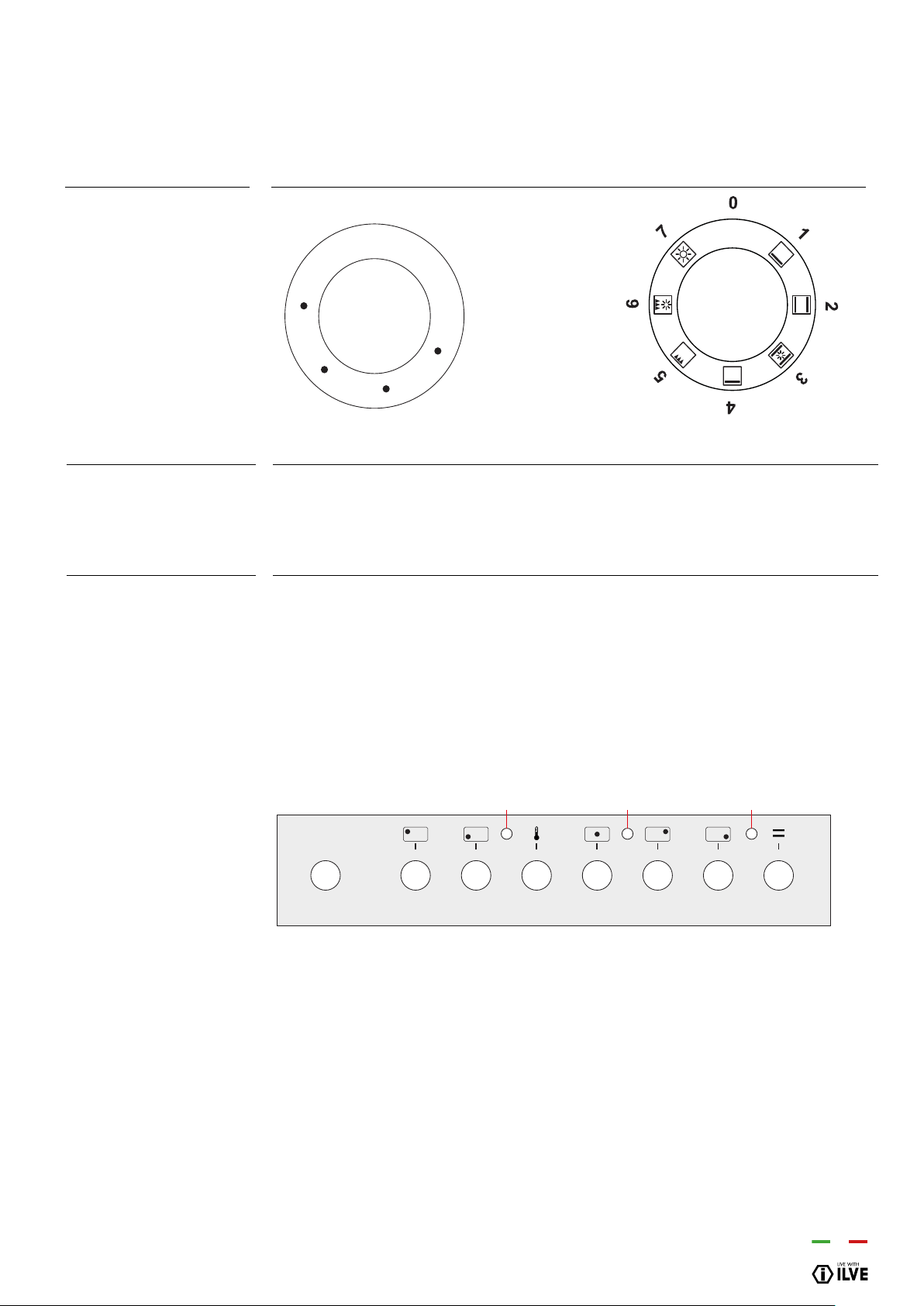
Knob position Type of cooking
Power management
Overheating of cooking
zone
Suggested cooking
functions (purely
indicative)
INSTRUCTIONS FOR USE
– Use of the induction hob
1-2
2-3
4-5
5-6
6-7
8-9
Melting butter, chocolate, etc.
Heating small amounts of liquids, keeping food
warm, preparing sauces.
Heating small amounts of liquids, keeping food
warm, preparing sauces.
Cooking meat and sh, pulses in sauces, dishes
with water, making jam.
Roasting meat or sh, steaks, liver, eggs.
Boiling large amounts of water, frying chips, etc.
31
OPERATION / USER
INSTRUCTIONS FOR USE
V SERIES (ELECTRIC OVEN)
– Use of the electric oven multifunction
The thermostat (Fig. T) allows to choose the temperature of the oven from 50°C to
250°C, turning the knob clockwise. The pilot lamp will turn off when the selected
temperature has been reached. It will turn on again when the internal temperature of the
oven is decreased more than 10°C.
Choose one of the 6 cooking functions by turning the selector (S) and adjust the
temperature (from 50°C to 250°C) with the thermostat (T). If your model has a
programmer, set it for cooking.
Using the ventilated
electrical oven
Use of the electric
thermostat
Use of the ventilated
oven
0
250
200
150
100
50
OFF
0
Thermostat T Selector S
D
H H T H H SH
L V
32
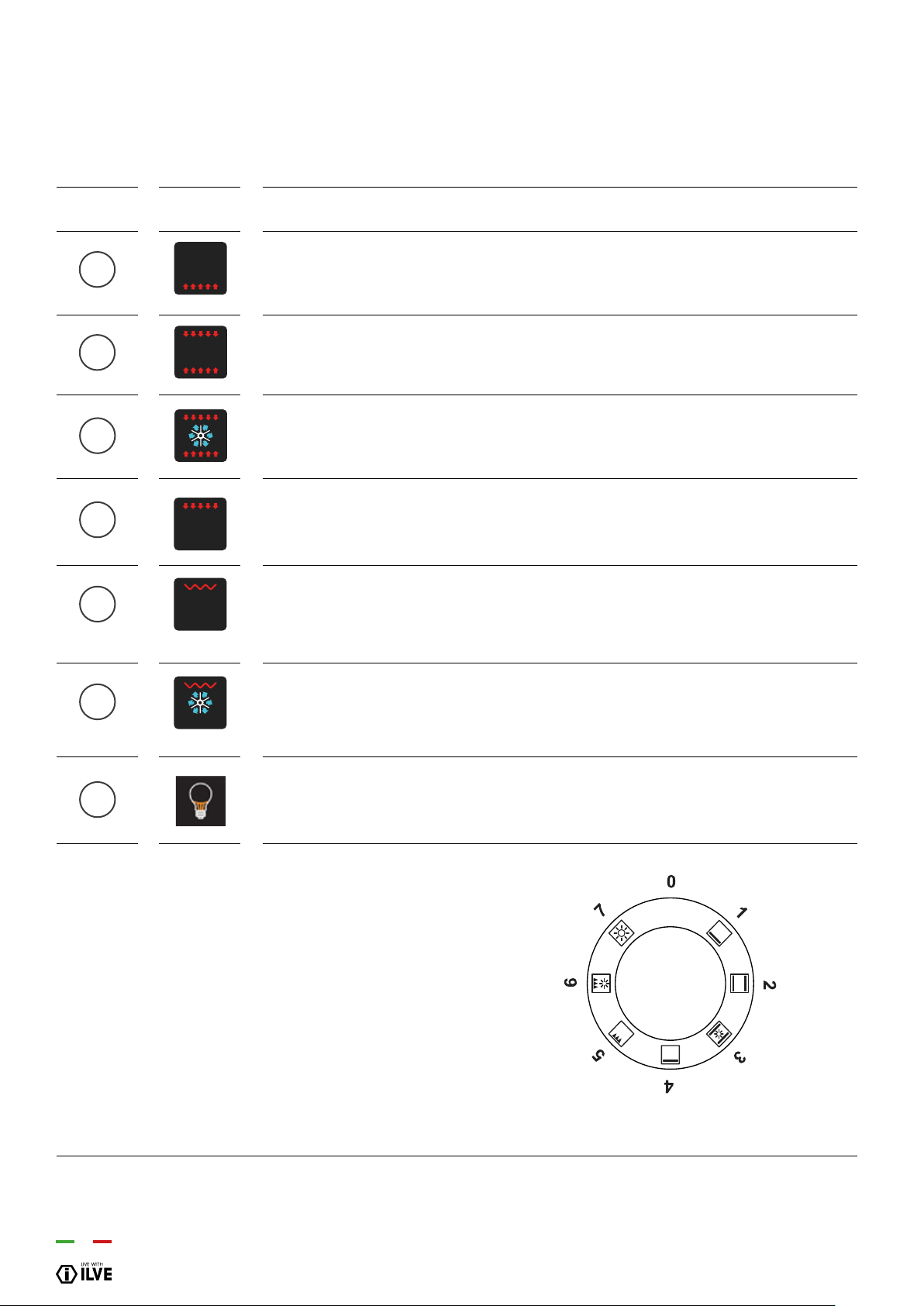
Pos. Symbol
Function
Cooking from underneath
This is the most suitable mode to nish the food cooking, in particular confectionery (biscuits, meringues,
leavened cakes, fruit desserts, etc.) and other foods.
Normal static cooking
It is the oven’s classic function particularly suited to cooking the following foods: pork chops, sausages, cod,
braised beef, game, roast veal, meringues and biscuits, baked fruit, etc.
Intensive cooking
Is the quick and intense cooking function for various dishes; best for: baked sh, braised vegetables, spits,
duck, chicken, etc.
Cooking from above
Especially suitable for browning and to give the nal touch of colour to many foods; it is recommended for
hamburgers, pork chops, veal steaks, sole, cuttlesh, etc.
Closed door grill cooking
The suitable function for fast and deep grilling, to brown and roast meats in general, llet steaks, Florentine
steaks, grilled sh and also grilled vegetables. Cooking with the electric grill must be made with the thermostat
at 180 °C.
Fan grill cooking
Particularly fast and deep with signicant energy savings, this function is suitable for many foods such as pork
chops, sausages, pork or mixed spits, game, gnocchi alla romana, etc. Cooking with the electric grill must be
made with the thermostat at 180 °C.
Light
This function will activate the cavity light inside the oven. This can be helpful when cleaning the oven interior
INSTRUCTIONS FOR USE V SERIES (ELECTRIC OVEN)
– Use of the electric oven multifunction
–
Functions list
1
2
3
4
5
6
7
COOKING INSPECTION
If you need to inspect the food being cooked, you can open the oven door. In this case the lights come on and the forced fan stops (in case of
ventilated cooking) and the spit rotation. (in case of grill cooking with the door closed). Closing the door re-activates the previously set function.
OFF
0

33
OPERATION / USER
S. Multifunction electric oven selector
T. Temperatures, from 50°C to 250°C, can be selected by using this knob.
Turn the selector to the chosen cooking function and the thermostat to the desired
temperature. The warning light turns on and stays on until the oven heats up. As soon as
it reaches the selected temperature, the light goes off. It turns on every time the
resistances are entered. If you plan to preheat the oven, only place the food to be
cooked in the oven when this light has gone off. To turn the oven off bring both knobs
back to the starting position (0).
The oven is equipped with a safety thermostat, which switches off the electric power.
The resetting of the thermostat, according to the decrease in the temperature of the
oven, is automatic. The oven can be used again when cooled down. In case the safety
thermostat acts because of a defect of the components, you are requested to call the
After Sales Service.
Choose one of the 9 cooking functions by turning the selector (S) and adjust the
temperature (50 ° C to 250 ° C) with the thermostat (T). See page 29 for suggested
settings.
To turn the light off or on gently press the selector knob (S). The light does not work if
the selector is set to (0).
0
9
8
7
6
5
4
3
2
1
OFF
0
0
250
200
150
100
50
Description
S. Selector
T. Thermostat
Control of the oven
multifunction
Turning on and off
Safety thermostat
Function oven
Oven light
INSTRUCTIONS FOR USE - PRO-LINE (ELECTRIC OVEN)
– Use of the electric oven multifunction
T
S
34
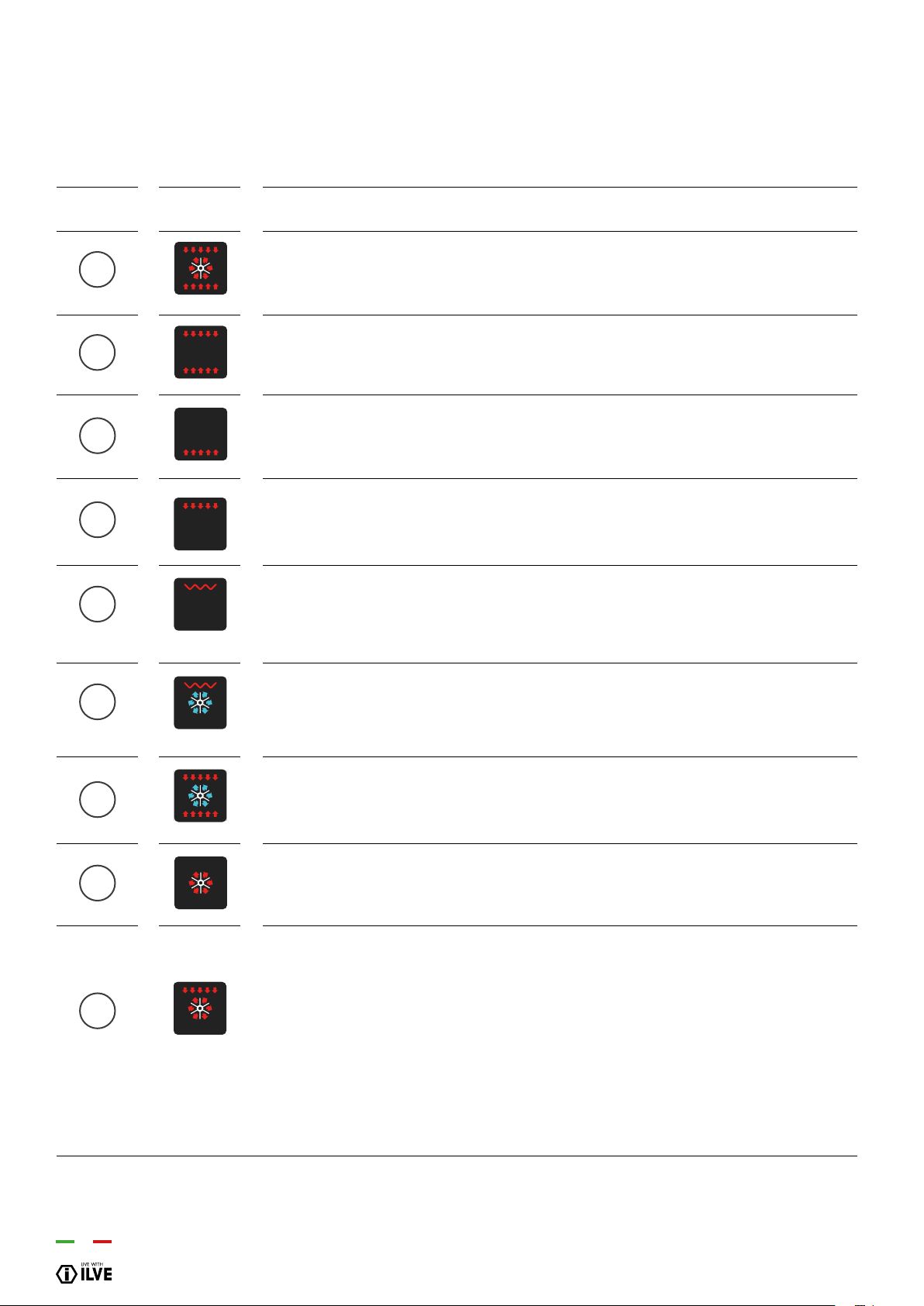
Pos. Symbol
Function
Pizza cooking
This function is particularly suitable for cooking pizza, focaccia and bread. The main source of heat is from the
bottom heating element that works in combination with the oven’s other resistances.
Normal static cooking
It is the oven’s classic function particularly suited to cooking the following foods: pork chops, sausages, cod,
braised beef, game, roast veal, meringues and biscuits, baked fruit, etc.
Cooking from underneath
This is the most suitable mode to nish the food cooking, in particular confectionery (biscuits, meringues,
leavened cakes, fruit desserts, etc.) and other foods.
Cooking from above
Especially suitable for browning and to give the nal touch of colour to many foods; it is recommended for
hamburgers, pork chops, veal steaks, sole, cuttlesh, etc.
Closed door grill cooking
The suitable function for fast and deep grilling, to brown and roast meats in general, llet steaks, Florentine
steaks, grilled sh and also grilled vegetables. Cooking with the electric grill must be made with the thermostat
at 180 °C.
Fan grill cooking
Particularly fast and deep with signicant energy savings, this function is suitable for many foods such as pork
chops, sausages, pork or mixed spits, game, gnocchi alla romana, etc. Cooking with the electric grill must be
made with the thermostat at 180 °C.
Intensive cooking
Is the quick and intense cooking function for various dishes; best for: baked sh, braised vegetables, spits,
duck, chicken, etc.
Multiple fan cooking
It is the function that allows simultaneous cooking of different dishes without the smells blending; you can cook
lasagne, pizza, croissants and brioches, tarts, cakes, etc.
Quick Start
This function speeds up your oven’s pre-heating. We suggest you use this function when you set a cooking
temperature from between 200 and 250 ° C. Use of the QuickStart function for temperatures under 200 ° C is
not advantageous. To use QuickStart, rotate the selector knob
(S) until it is positioned on the symbol (9), then set the desired temperature with the thermostat knob (T). Once
the oven has reached the temperature, the thermostat’s orange light will turn off and the oven is ready for
accepting the food to be cooked. At this point set the desired cooking function with selector knob (S).
WARNING: the Quick Start function is not suitable for cooking foods, it is only for quickly pre-heating
the oven.
DO NOT USE THE QUICK START FUNCTION FOR MORE THAN TWENTY MINUTES.
INSTRUCTIONS FOR USE - PRO-LINE (ELECTRIC OVEN)
– Use of the electric oven multifunction
–
Functions list
1
2
3
4
5
6
7
8
9
COOKING INSPECTION
If you need to inspect the food being cooked, you can open the oven door. In this case the lights come on and the forced fan stops (in case of
ventilated cooking) and the spit rotation. (in case of grill cooking with the door closed). Closing the door re-activates the previously set function.
35
OPERATION / USER
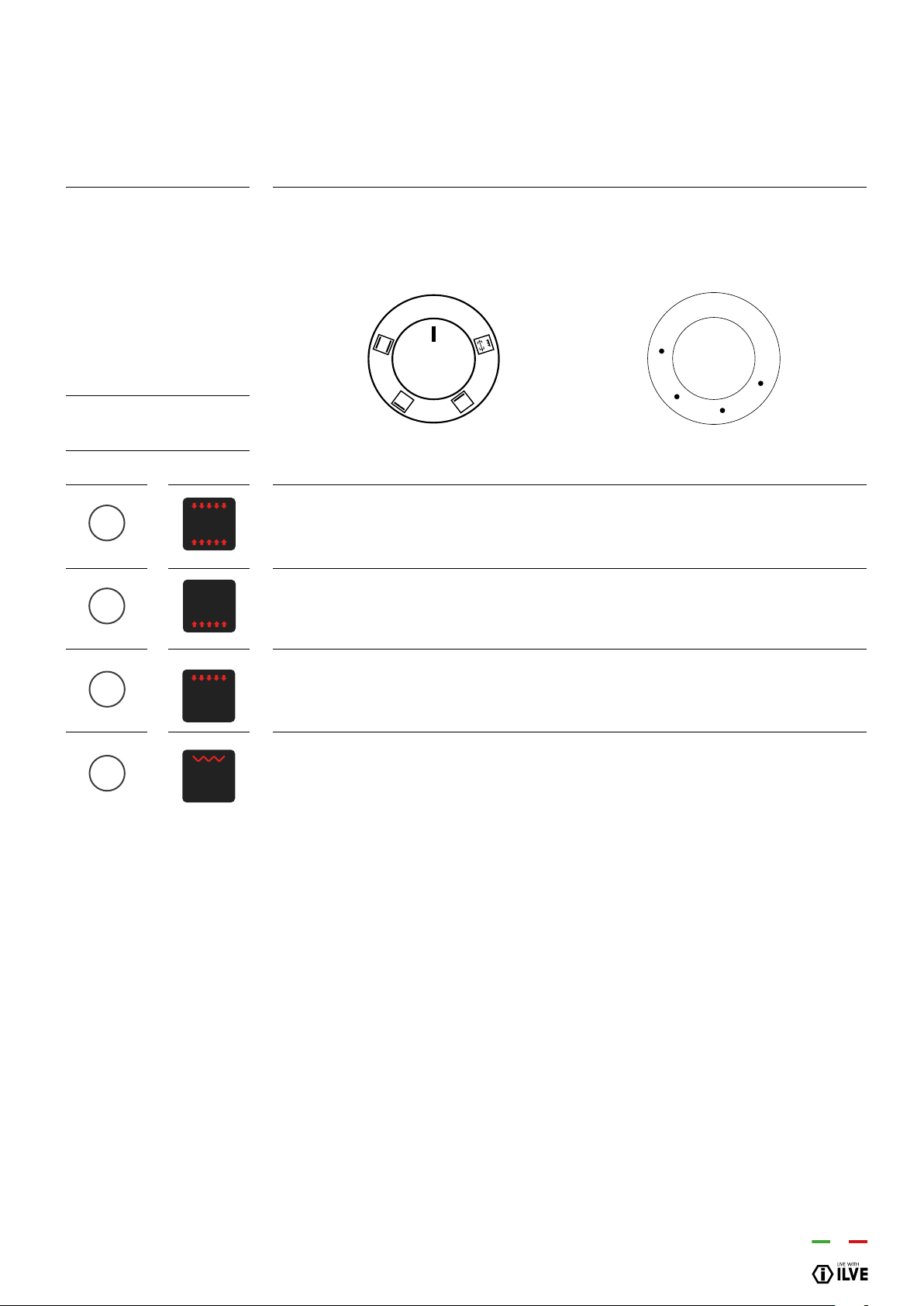
Choose one of the 4 cooking functions by turning the selector (S) and adjust the
temperature (from 50˚C to 250˚C) with the thermostat (T). If your model has a
programmer, set it for cooking.
Upper & lower elements
Is the classical function of the electric oven and particularly adapted for cooking: pork chops, sausages, dried
salt-cured cod, pot roast, game, roast veal, meringues and biscuits, baked fruit, etc.
Lower element
This setting is most suitable for nishing cooking, particularly pastries (biscuits, meringues,
desserts, puff pastry, fruit cakes, etc.) and other foods.
Upper element
Especially suitable for browning and to add the nishing touches of colour to different dishes.
We suggest this setting when cooking hamburgers, pork cutlets, steaks, sole, cuttlesh, etc.
Grill-baking
A suitable setting for grilling au gratin and roasting quickly and well, meat in general, llet,
T-bone steak, grilled sh and vegetables too. Cooking by electric grill must be done with the
thermostat set at 180°C.
Description
S. Selector
T. Thermostat
Functions list
Pos. Symbol
INSTRUCTIONS FOR USE - PRO-LINE (ELECTRIC OVEN)
– Use of the conventional electric oven
T
0
OFF
0
250
200
150
100
50
S
1
2
3
4
36
Cooking time • end of cooking • clock • timer • manual function
Symbols indicating functions in progress:
Timer
Duration and manual function
Automatic program
Button for timer and buzzer
Automatic cooking duration
End of cooking time
Setting time and cooking time.
With the “+” button, the time increases, with the “-” button the time
decreases at a speed directly proportional to the length of time the
button is pressed.
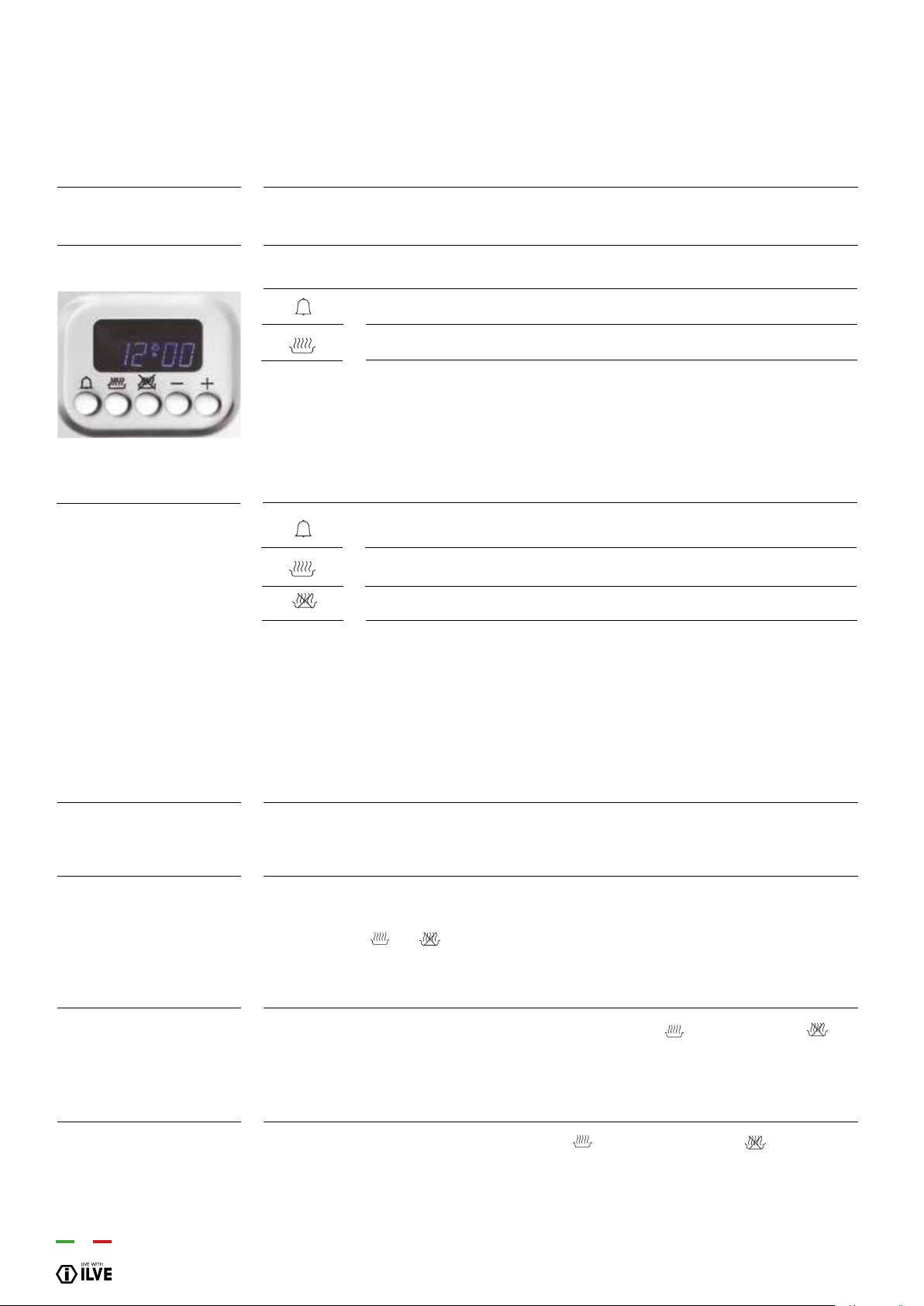
Select the desired function by pressing the corresponding button and set the time using
the +/- buttons.
At rst control turning on, the display shows the ashing clock that increases by one unit
every minute. Follow the “Setting the clock” procedure in the next paragraph.
By pressing the and buttons simultaneously you enter the “Manual operation”. You
can set the temperature using the thermostat knob (T) and select the function using the
selector (S).
The clock function is activated by simultaneously pressing cooking duration and
end buttons. The time is then set by adjusting the +/- keys. Any previously set programs
are automatically deleted.
To set this function simultaneously press the cooking duration and end buttons.
The “A” symbol goes out and the pan symbol appears. The previously set programs
are deleted.
Functions
Display
Button legend
Setting a function
Appliance operation
Setting the clock
Manual operation
INSTRUCTIONS FOR USE
– MP & VP models with 5 button programmer
[–]/[+]
A

37
OPERATION / USER
Select the duration function (button ) and set the time with the +/- buttons. The “A”
symbol and the symbol appear. The oven switches on. When the hour of the day
coincides with the nal time, viewable through the end of cooking button , the oven
will turn off and the pan symbol will disappear. The buzzer will sound.
The “A” symbol will ash.
Select the duration function (button ) and set the end time with the +/- buttons. The
“A” symbol and the pan symbol appear. The oven switches on. When the hour of the day
coincides with the nal time the oven will turn off and the pan symbol will disappear. The
buzzer will sound. The “A” symbol will ash.
Select the duration function and set the end time with the +/- buttons. The “A” symbol
appears. The oven switches on and the pan symbol appears. Wait a few seconds
until the current time appears. Set the end time by pressing the end of cooking button.
The display shows an approximate end time. Use the +/- buttons to set the end time
actually required. The oven switches off and the pan symbol disappears. The pan
symbol will appear again when the time of day coincides with the end time less the
cooking time. At the end of the automatic program, the “A” symbol will ash. The buzzer
will sound, the oven and the pan symbol will turn off.
Select the timer function (button ) and set the desired time with the +/- buttons. The
bell symbol will stay on while the set time is counting down. When the time comes
to an end, the buzzer will sound.
The buzzer operates at the end of the cooking duration and timer function, and remains
active for 7 minutes. The buzzer can be stopped by pressing any button .
The intensity of the buzzer can be changed by pressing the “-” button without selecting
a function. You can choose from 3 different sound intensities and duration depends on
the time pressure is exerted on the button “-”.
The selected program starts after the time has been set. The time remaining can be
displayed at any time by selecting the corresponding function again.
There is a programming error if the time shown by the clock is between the cooking start
time and the cooking end time.
The error is signaled by the buzzer sounding and by the intermittent ashing of the
symbol “A”.
The cancellation of a program is done by selecting the manual mode. At the end of the
selected program, this will automatically cancel.
Semi-automatic
operation with cooking
duration
Semi-automatic
operation with end of
cooking
Automatic operation
with duration and end of
cooking
Timer
Buzzer
Starting a program and
control
Identifying a
programming error
Cancellation of a
program
INSTRUCTIONS FOR USE
– 5 button electronic programmer MP & VP
38
INSTRUCTIONS FOR USE
– 5 button electronic programmer E3 (ELECTRIC OVEN)
–
Functions list
COOKING INSPECTION
If you need to inspect the food being cooked, you can open the oven door. In this case the lights come on and the forced fan stops (in case of
ventilated cooking) and the spit rotation. (in case of grill cooking with the door closed). Closing the door re-activates the previously set function.
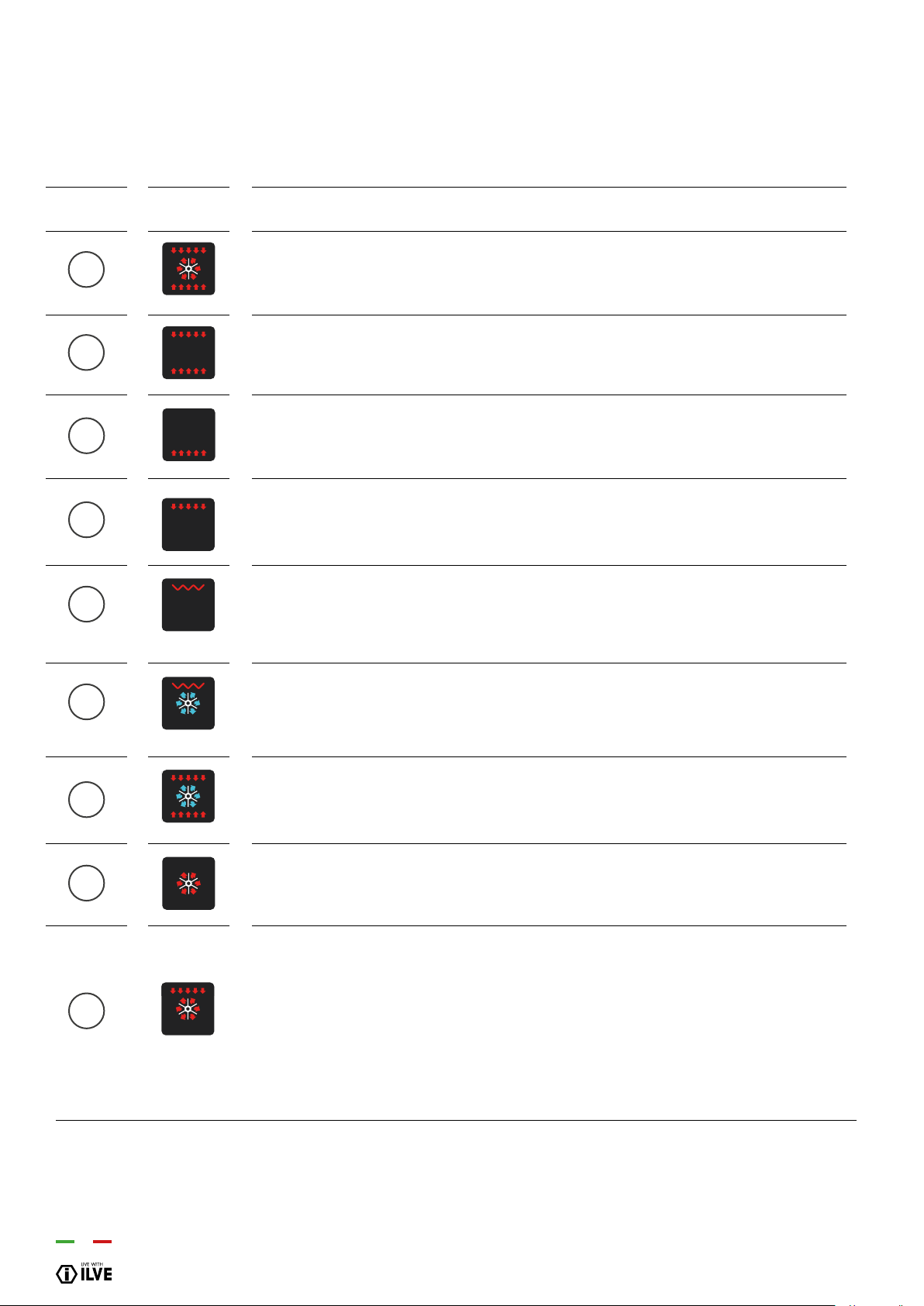
Pos. Symbol
Function
Pizza cooking
This function is particularly suitable for cooking pizza, focaccia and bread. The main source of heat is from the
bottom heating element that works in combination with the oven’s other resistances.
Normal static cooking
It is the oven’s classic function particularly suited to cooking the following foods: pork chops, sausages, cod,
braised beef, game, roast veal, meringues and biscuits, baked fruit, etc.
Cooking from underneath
This is the most suitable mode to nish the food cooking, in particular confectionery (biscuits, meringues,
leavened cakes, fruit desserts, etc.) and other foods.
Cooking from above
Especially suitable for browning and to give the nal touch of colour to many foods; it is recommended for
hamburgers, pork chops, veal steaks, sole, cuttlesh, etc.
Closed door grill cooking
The suitable function for fast and deep grilling, to brown and roast meats in general, llet steaks, Florentine
steaks, grilled sh and also grilled vegetables. Cooking with the electric grill must be made with the thermostat
at 180 °C.
Fan grill cooking
Particularly fast and deep with signicant energy savings, this function is suitable for many foods such as pork
chops, sausages, pork or mixed spits, game, gnocchi alla romana, etc. Cooking with the electric grill must be
made with the thermostat at 180 °C.
Intensive cooking
Is the quick and intense cooking function for various dishes; best for: baked sh, braised vegetables, spits,
duck, chicken, etc.
Multiple fan cooking
It is the function that allows simultaneous cooking of different dishes without the smells blending; you can cook
lasagne, pizza, croissants and brioches, tarts, cakes, etc.
Quick Start
This function speeds up your oven’s pre-heating. We suggest you use this function when you set a cooking
temperature from between 200 and 250 ° C. Use of the QuickStart function for temperatures under 200 ° C is
not advantageous. To use QuickStart, rotate the selector knob
(S) until it is positioned on the symbol (9), then set the desired temperature with the thermostat knob (T). Once
the oven has reached the temperature, the thermostat’s orange light will turn off and the oven is ready for
accepting the food to be cooked. At this point set the desired cooking function with selector knob (S).
WARNING: the Quick Start function is not suitable for cooking foods, it is only for quickly pre-heating
the oven.
DO NOT USE THE QUICK START FUNCTION FOR MORE THAN TWENTY MINUTES.
1
2
3
4
5
6
7
8
9

39
OPERATION / USER
If you need to inspect the food being cooked, you can open the oven door. In this case
the lights come on and the cooking process stops. Closing the door re-activates the
previously set function.
The oven has an automatic device which allows steam from cooking, in some
functions, to be expelled from the oven: this is dry cooking (dry). If the cooking requires
that the moisture remains inside the oven, (moist cooking), the automatic device can be
switched off as follows:
after selecting the desired cooking function, when [ON] appears on the display hold
down the “-” programmer button for about 2 seconds until [HUM] appears on the display.
This involves a choice that allows you to modify dry cooking with moist cooking to your
liking.
The functions concerned are:
N.B. Cooking with probe cannot be used in the “DEFROST”, “QUICK START”,
“PIZZA” and “ECO” functions. When the oven is in stand-by insert the meat probe into
the connecting socket on the right hand wall of the oven: the clock displays “MEAT” for
2 seconds and the “probe” symbol ashes. Next the probes default temperature(75°C)
appears on the display. By turning and then pressing the adjustment button, select the
end of cooking temperature from the 2 limit values of 40° and 100°C (the food’s internal
temperature). After 4 seconds from the last setting, the set value is memorized and the
probe symbol stays on. Turn on the oven, select the cooking function and the desired
temperature using the appropriate knobs. The display will show the probes temperature
reading.
Upon reaching the programmed temperature the oven will turn off, a buzzer sounds and
the display shows the message “End” and you enter the cooking over mode.
During cooking it is always possible to change the probes temperature by pressing and
then turning the adjustment knob 3 times.
NOTE: If you insert the probe into the special socket during cooking, the oven will turn
off and “Off” appears on the display.
If, during cooking, the probe is removed from the special socket, the oven will turn off
and “Off” appears on the display.
Cooking inspection
Dry/moist cooking
Cooking with probe
(only available on some
models)
INSTRUCTIONS FOR USE
– 5 button electronic programmer E3 (ELECTRIC OVEN)
2 3
4 7 8
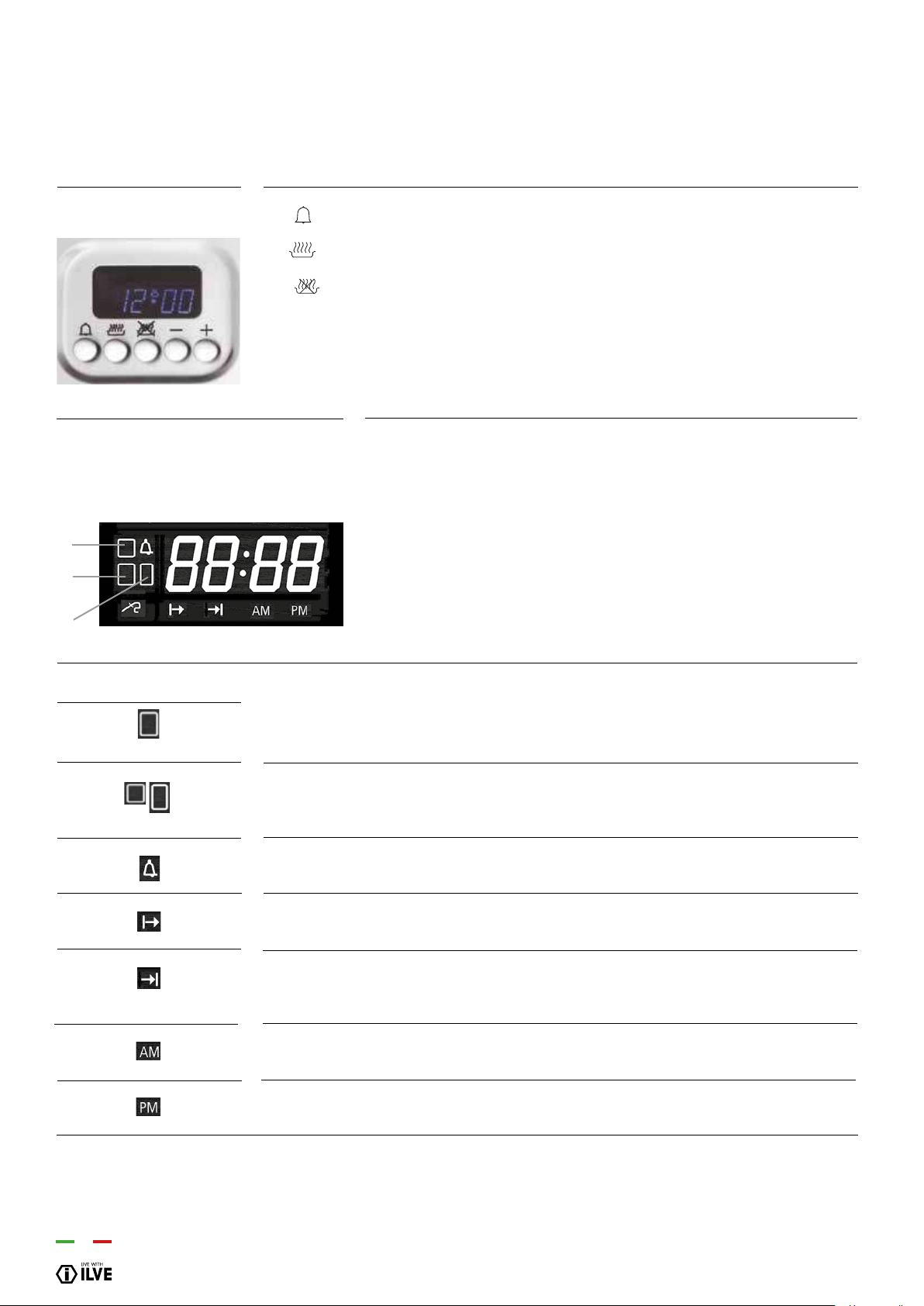
40
INSTRUCTIONS FOR USE
– 5 button electronic programmer E3 (ELECTRIC OVEN)
Set minute minder
Setting the cooking start time
Setting the cooking end time
[ - ] Decreases the selected parameter
[ + ] Increases the selected parameter
• In stand-by: the actual time.
• During manual cooking: the set temperature.
• During timed automatic cooking: remaining time to end of cooking.
• During meat probe cooking: the probe’s temperature.
• With timer on and oven in stand-by: the remaining time.
Main oven icon [1]. If ashing the display shows the temperature and cooking duration
settings of the main oven (only in the double oven)*
Secondary oven icon [3]. If ashing the display shows the temperature and cooking
duration settings of the secondary oven (only in the double oven).*
If lit, the timer is on. If ashing, time has elapsed. Flashes while the timer is being set.
If lit, the oven is working in delayed start mode. During the delayed start, it stays on.
If lit, the oven is working in automatic end of cooking mode. It ashes during the delayed
start mode, and then stays on when cooking is over.
If lit, the clock is in 12-hour a.m. mode.
If lit, the clock is in 12-hour p.m. mode.
Button legend
Display
F4-digit format, shows:
2
1
3
Icons
(*) In the case of simultaneous use of ovens and to display the temperature and cooking time settings of the primary
or secondary oven, press the corresponding thermostat knob.
1
2 / 3

41
OPERATION / USER
The rst time the unit is switched on, the display shows a ashing clock that increases
by one unit every minute. The oven cannot operate until the clock has been set. See
paragraph below “Setting the clock”
Simultaneously press buttons and for 5’’ (the display ashes) and alter the time
using the keys [+] and [-]. The clock can only be set with the oven on stand-by.
The time display mode can be altered: during time setting by pressing the button for
4 seconds; with the [+] button you can choose the 24 hours or 12 hours AM/PM option.
Turn selector [S]. The display shows “On”. The light inside the oven comes on after two
seconds and the display shows the default temperature expected from the selected
cooking mode. To turn off during cooking, turn back the selector to [0], the display shows
“OFF”.
The function does not interact with the loads, and is available regardless of the oven’s
status. Press the button : the bell symbol lights up and the display shows “0’ 00”. Set
the time with [+] and [-], up to a maximum of 180 minutes, after 4 seconds without any
increase or decrease the information is accepted, the bell remains on. By pressing the
button after changing the timer value it reverts to clock mode, having accepted the
just altered value. Upon expiry of the set time a buzzer sounds together with the symbol
ashing. To stop the buzzer and the ashing, simply press any button.
Turn the oven on. Select a cooking function from those available. With knob [T] select
the desired temperature. After 4 seconds after the last setting the oven operates for an
indenite time and the selected temperature remains on the display.
Turn the oven on. Press button , the display shows “End”. Set the end of cooking time
with [+] and [-] buttons (the maximum cooking time is 10 hours). By pressing the button
after changing the duration value it reverts to clock mode, having accepted the just
altered value. After 4 seconds from the last setting the oven is on for the set time. Having
reached the programmed time you enter cooking nished mode.
Turn the oven on. Press button and select the cooking start time with [+] and [-]
buttons. Press button , the display shows “End”. Set the end of cooking time with [+]
and [-] buttons. If no cooking time is selected, the oven remains in manual cooking mode
indenitely. After 4 seconds from the last setting the oven is on up to the specied time.
You can always select a cooking function from those available and the temperature can
be changed. Having reached the programmed time you enter cooking nished mode.
Appliance operation
Setting the clock
Turning the oven on and
off
Timer
Indenite manual
operation
Semi-automatic end of
cooking operation
Automatic operation
INSTRUCTIONS FOR USE
– 5 button electronic programmer E3 (ELECTRIC OVEN)

42
At the end of the cooking time the oven switches off all heating elements and the unit
emits an intermittent acoustic signal. The display shows the time and the cavity symbol
ashes. To unlock the oven, simply press any key on the programme. The acoustic
signal ends and the oven is now ready to receive new commands.
At the end of the cooking time, the oven switches off all heating elements, a triple
intermittent buzzer of medium intensity sounds, the display shows the time, the cavity
symbol ashes. To unlock the oven, simply press any button on the programmer: the
buzzer ends and the oven is ready to receive new instructions. When adjusting the
temperature (in increments of 5°C) it is possible to change the format from Celsius to
Fahrenheit by pressing the (t) knob for 8 seconds.
The oven light remains on for 1 minute when the oven is turned on, and again for 1
minute at the end of preheating. Whilst waiting for a delayed start, the oven light is off.
The oven light can always be turned on by pressing knob [T] and turns off automatically
after 1 minute.
During cooking, you can always leave the light on by pressing the knob [T] for
3 seconds.
The oven is equipped with a safety device that prevents unwanted or accidental
starting. To activate the safety: with oven off press and hold knob [T] for 3 seconds.
A short beep sounds and the screen displays the symbol “n-0”. In this situation it
is impossible to start the oven. To remove the previously activated safety, keep
knob[T] pressed for 3 seconds.
Cooking over mode
Selecting the
temperature for the oven
Oven light control
Child lock
INSTRUCTIONS FOR USE
– 5 button electronic programmer E3 (ELECTRIC OVEN)

43
OPERATION / USER
Food
Beef
• Roast beef / beef llet
rare
medium
well done
• Roast meat
Pork
• Loin
• Roast / bacon
• Neck / trotter
• Cutlet without bone
• Cutlet
• Marinated cutlet
• Meat loaf
Veal
• Roast veal
• Roast veal with kidney
• Veal feet
Game
• Game meat
• Back
• Rare llet
• Medium
• Well done llet
Lamb
Stuffed roasts
Poultry
Fish
Temperature (°C)
40-45
50-55
60-65
80-85
65-70
80-85
80-85
75-80
70
65-70
70-75
70-75
75-80
80-85
75-80
60-70
40-45
50-55
60-65
80-85
70-75
85-90
85-90
COOKING CHART
INSTRUCTIONS FOR USE
– 5 button electronic programmer E3 (ELECTRIC OVEN)
Inside food temperature (°C)
NOTE
Probe must be in the middle of the roast and not close to the bone or to any fat part
44
INSTRUCTIONS FOR USE
– Display TFT touch
–
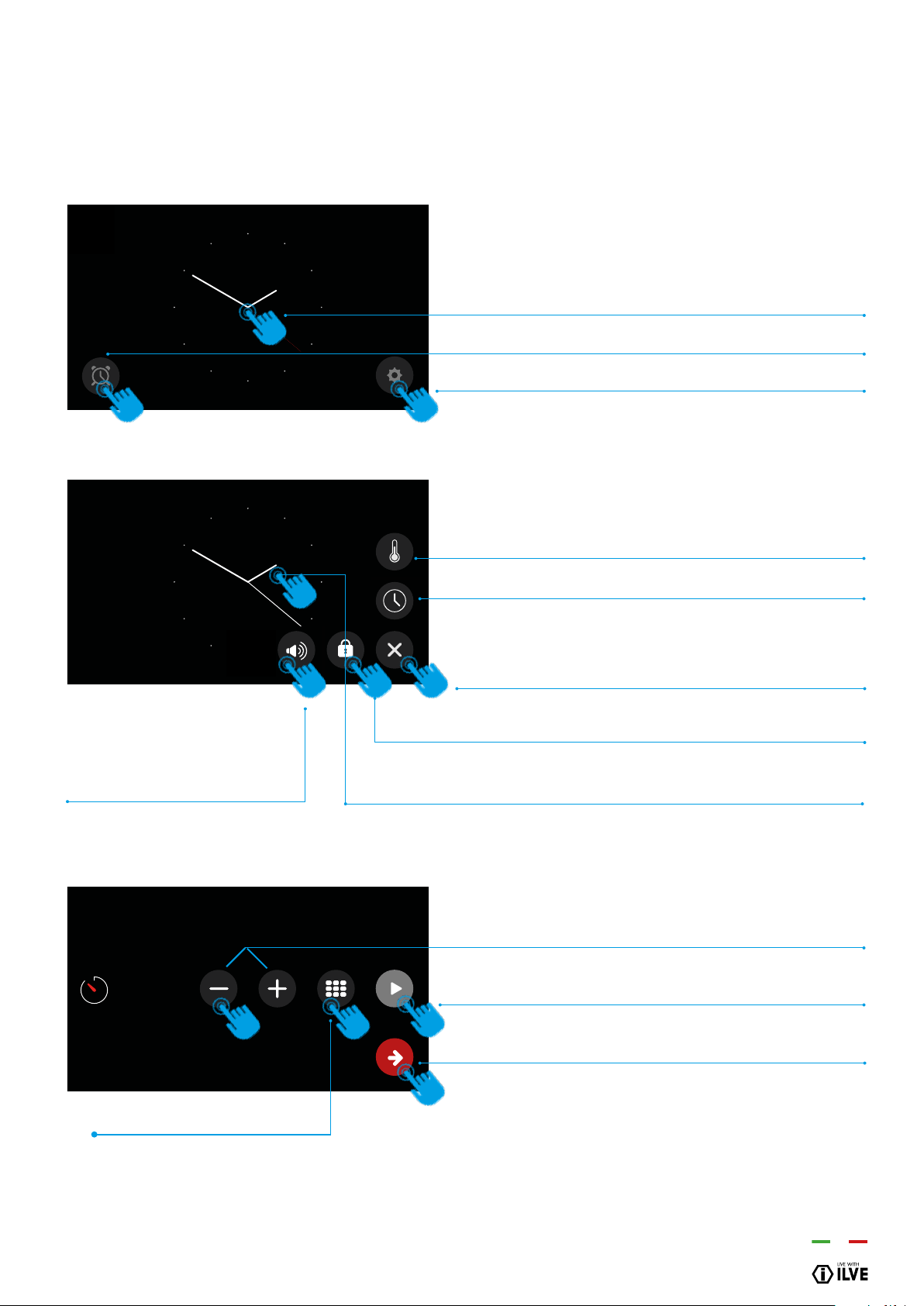
Icon legend
Knob present in some models.
(It allows to set and conrm the functions of the TFT in addition to the Touch display)
Home
Light
Timer
Exit - Terminate
Clock
Conrm Settings
Switch off
Break
Start
°C - °F
Screen lock
Settings
Settings
Meat probe
OFF
45
OPERATION / USER
INSTRUCTIONS FOR USE
– Display TFT touch
–
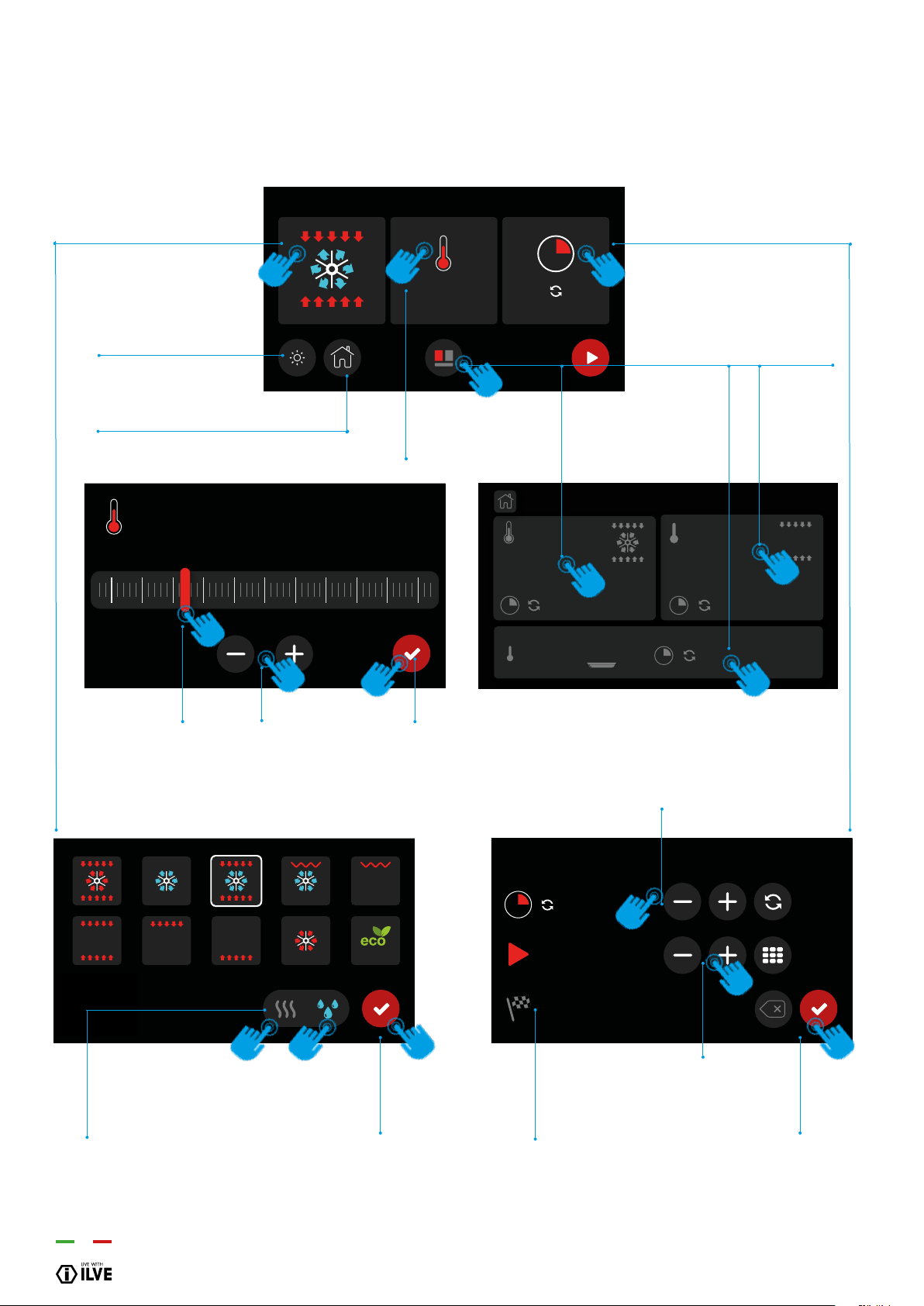
Settings
Home: display homepage.
3 options
Allows you to proceed to the screen setting of the cavity
Allows you to set the timer
Gives you direct access to the settings
Settings
Choice of degree scale (°C or °F).
Time settings.
Exit the settings page.
Allows you to lock the screen.
To unlock touch on the display for 10 seconds
Setting a timer
Increase or decrease the time.
Conrm once you have set the desired time. An audible
signal will indicate the end.
Conrm and return to the home page.
PM
11:48 AM
10m
Allows you to set the volume of
the beep and choose a sound
when touching the display
Numeric keyboard
46
INSTRUCTIONS FOR USE
– Mod. static oven E3 with TFT touch
–
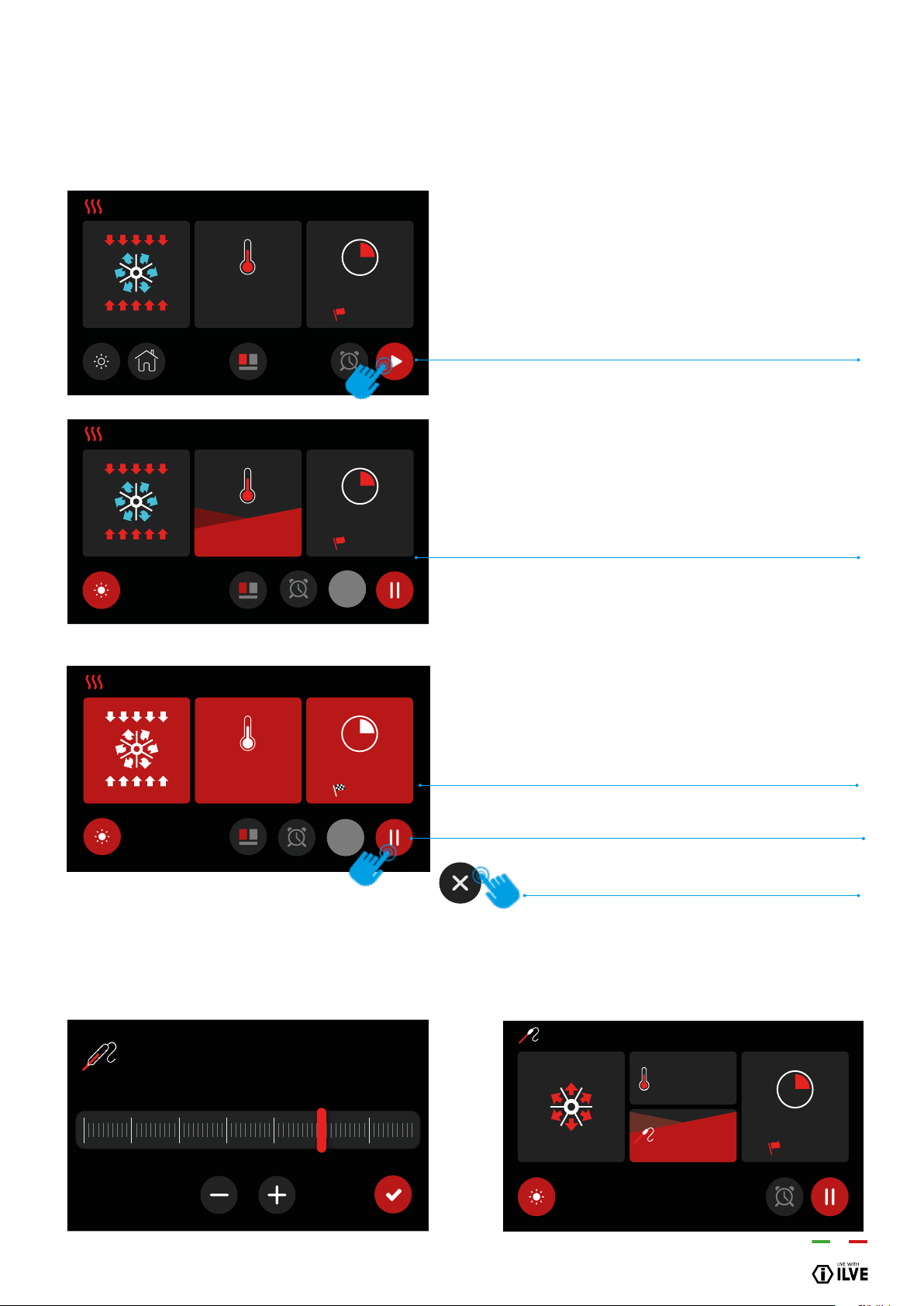
Cooking function setting
11:48 AM
320
°C
11:48 AM
__:__
__:__
120
°c
50 100150 200250 300
0
1- Choose the cooking
function
Light (on or off)
Home (Return to home page)
2- Set the cooking temperature
3- 3- Set the cooking time and
the programmed start
4- Cavity selection
(only for multiple cavity models)
1b - Conrm the cooking
function
3d - Conrm the cooking
function
3a - Set the cooking time
3c - Set the start time
3b -Shows the time
of the cooking time
2a - There are two options for
setting the temperature:
- Scrolling the bar
- -With + or
-
2b - Conrm the
temperature
1a - Choose dry/wet
cooking
NOTE: Possible only in
certain cooking modes (see p.39)
11:4 8
AM
180
°F
80°F
180
°F
47
OPERATION / USER
INSTRUCTIONS FOR USE
– Mod. static oven E3 with TFT touch
–
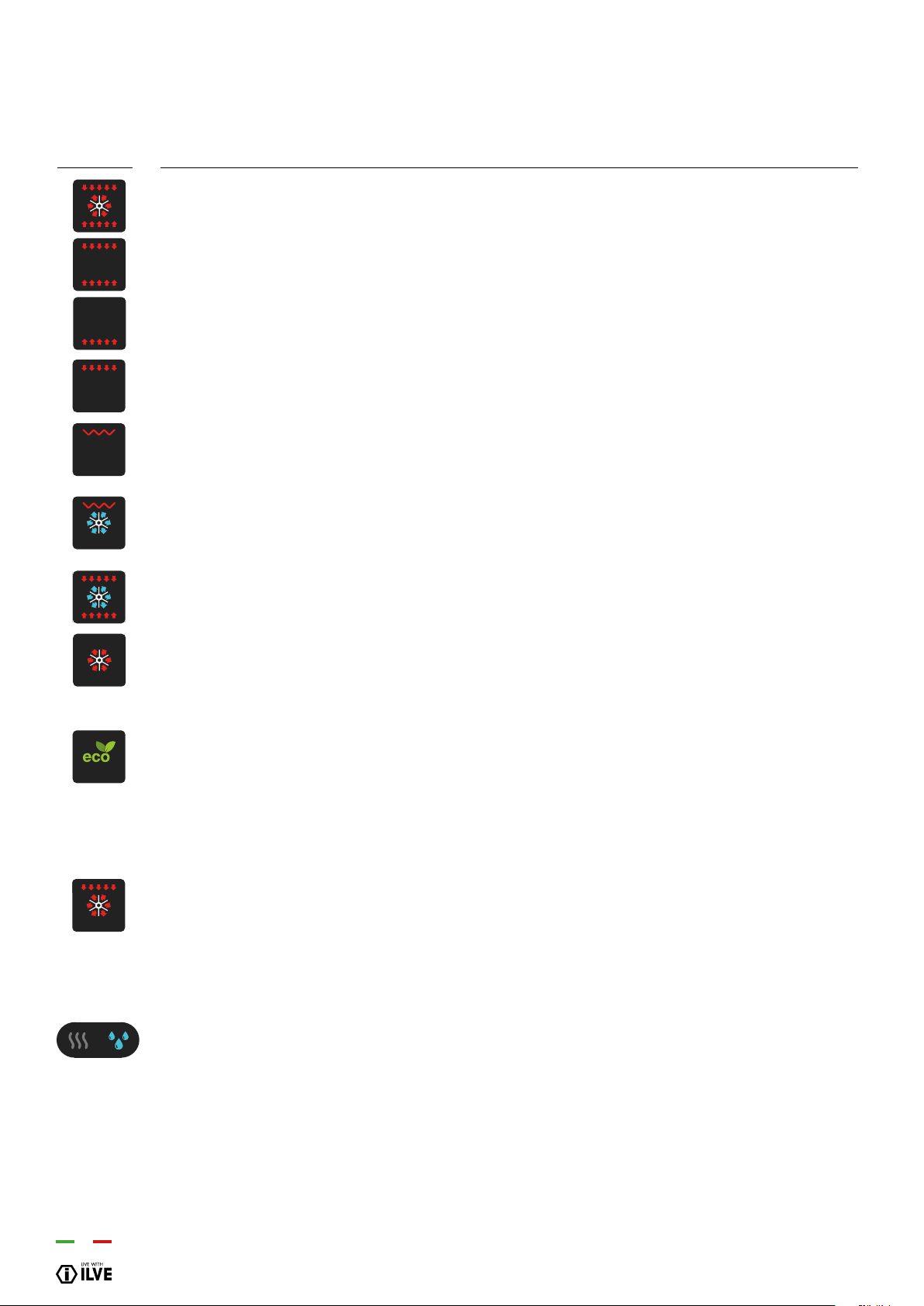
Cooking process
11:4 8
280
8m 02s
°C
AM
12:58
OFF
80
°c
30 40 50 60 70 80 90
8
8
0
0
0
11:48 AM
180
80
°C
°C
61°
9m 15s
12:58
11:48
280
9m 15s
°C
AM
12:58
11:48 AM
280
°C
10m
12:58
CAVITY SET
Once the cavity has been set (cooking function, temper-
ature and timer), conrm to start the preheating. At this
point the display will switch to the preheating mode
PREHEATING PHASE
There are four levels that allow you to monitor the pre-
heating process. The red part will gradually increase to
ll the display.
PREHEATING TERMINATED
When the set temperature is reached, the display will turn
red to indicate the end of the preheating phase, and the
start of the cooking phase.
If a cooking time has been set, the oven will automatically
switch off at the end of the time.
In case of no set cooking time it is possible to suspend
the cooking
and then nish it
PROBE TEMPERATURE SELECTOR
AND THEN FINISH IT
PREHEATING MODE WITH MEAT PROBE
OFF
48
INSTRUCTIONS FOR USE
– Mod. oven E3 with TFT touch
–
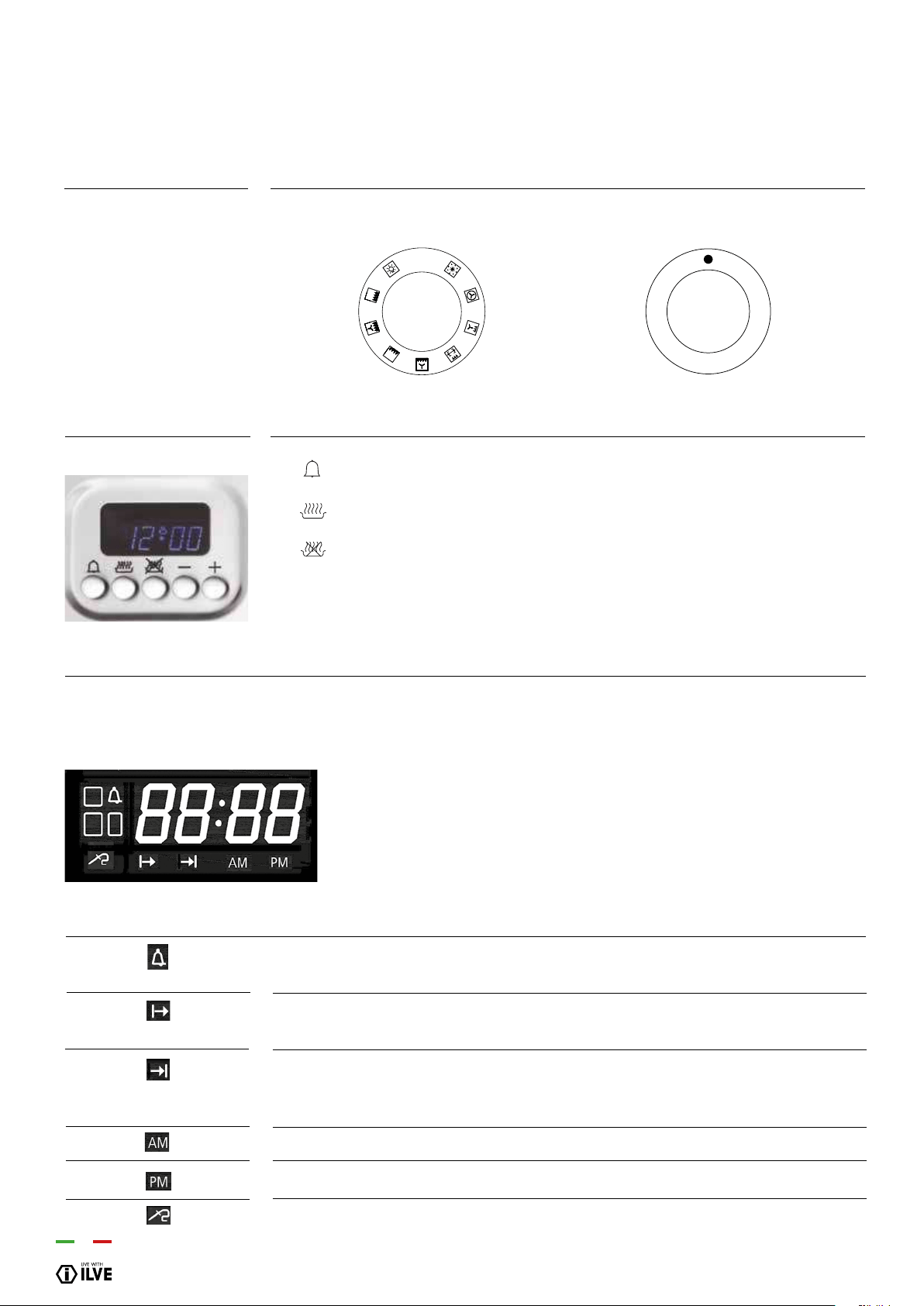
Functions list
Pizza cooking
This function is particularly suitable for cooking pizza, focaccia and bread. The main source of heat is from the bottom heating
element that works in combination with the oven’s other resistances.
Normal static cooking
It is the oven’s classic function particularly suited to cooking the following foods: pork chops, sausages, cod, braised beef, game,
roast veal, meringues and biscuits, baked fruit, etc.
Cooking from underneath
This is the most suitable mode to nish the food cooking, in particular confectionery (biscuits, meringues, leavened cakes, fruit
desserts, etc.) and other foods.
Cooking from above
Especially suitable for browning and to give the nal touch of colour to many foods; it is recommended for hamburgers, pork
chops, veal steaks, sole, cuttlesh, etc.
Closed door grill cooking
The suitable function for fast and deep grilling, to brown and roast meats in general, llet steaks, Florentine steaks, grilled sh
and also grilled vegetables. Cooking with the electric grill must be made with the thermostat at 180 °C.
Fan grill cooking
Particularly fast and deep with signicant energy savings, this function is suitable for many foods such as pork chops, sausages,
pork or mixed spits, game, gnocchi alla romana, etc. Cooking with the electric grill must be made with the thermostat at 180 °C.
Intensive cooking
Is the quick and intense cooking function for various dishes; best for: baked sh, braised vegetables, spits, duck, chicken, etc.
Multiple fan cooking
It is the function that allows simultaneous cooking of different dishes without the smells blending; you can cook lasagne, pizza,
croissants and brioches, tarts, cakes, etc.
Eco cooking:
Is the function that allows you to cook with considerable energy savings. To take advantage of this feature, place the dish in the
centre of the oven before starting the ECO function. With the ECO function, cooking times can be adapted to slow cooking as:
braised meats, white meats, baked pasta, delicate pastry.
This cooking cycle is not recommended for frozen food.
To select Eco cooking turn selector knob “S” to 8 and, when “ON” appears on the display, hold down
the programmer’s “+” key for about 2 seconds until “ECO” appears on the display. With Eco cooking the temperature that can be
programmed goes from a minimum of 30° C up to a maximum of 300° C.
Note: Eco cooking cannot be selected with the meat probe inserted.
Quick Start
This function speeds up your oven’s pre-heating. We suggest you use this function when you set a cooking temperature from
between 200 and 250 ° C. Use of the QuickStart function for temperatures under 200 ° C is not advantageous. To use QuickStart,
rotate the selector knob
(S) until it is positioned on the symbol (9), then set the desired temperature with the thermostat knob (T). Once the oven has
reached the temperature, the thermostat’s orange light will turn off and the oven is ready for accepting the food to be cooked. At
this point set the desired cooking function with selector knob (S).
WARNING: the Quick Start function is not suitable for cooking foods, it is only for quickly pre-heating the oven.
DO NOT USE THE QUICK START FUNCTION FOR MORE THAN TWENTY MINUTES.
Dry/wet Cooking
The oven is equipped with an automatic device that allows the condensation vapours of the rings, in some functions, to be ex-
pelled from the oven: This involves dry cooking (dry). Should the need for cooking require that moisture remain inside the oven,
moist cooking (moisture)
COOKING INSPECTION
If you need to inspect the food being cooked, you can open the oven door. In this case the lights come on and the forced fan stops (in case of
ventilated cooking) and the spit rotation. (in case of grill cooking with the door closed). Closing the door re-activates the previously set function.

49
OPERATION / USER
INSTRUCTIONS FOR USE
– Mod. oven static with TFT touch
–
Functions list
Upper & lower elements
Is the classical function of the electric oven and particularly adapted for cooking: pork chops, sausages, dried salt-cured cod, pot
roast, game, roast veal, meringues and biscuits, baked fruit, etc.
Lower element
This setting is most suitable for nishing cooking, particularly pastries (biscuits, meringues,
desserts, puff pastry, fruit cakes, etc.) and other foods.
Upper element
Especially suitable for browning and to add the nishing touches of colour to different dishes.
We suggest this setting when cooking hamburgers, pork cutlets, steaks, sole, cuttlesh, etc.
Grill-baking
A suitable setting for grilling au gratin and roasting quickly and well, meat in general, llet,
T-bone steak, grilled sh and vegetables too. Cooking by electric grill must be done with the
thermostat set at 180°C.
50
Description
S. Selector
T. Thermostat
Button legend
Display
Formed by 4-digit
indicates:
Icons
Set minute minder
Setting the cooking start time
Setting the cooking end time
[ - ] Decreases the selected parameter
[ + ] Increases the selected parameter
• Standby indicates the current time.
• When cooking manual in place: the set temperature.
• When automatic cooking time: at the end of cooking time remaining.
• When cooking with meat probe: the probe temperature.
• With active and oven timer function on standby: the remaining time
When lighted indicates that the timer is active. When ashing it indicates the end. During
the phase of setting the timer ashes.
If lighted, indicates that the oven works in a delayed start. During the delayed start, stay
on.
If lighted, indicates that the oven works in automatic mode at the end of cooking. During
the late start, is ashing, then turn on when the actual cooking.
If lighted, indicates the clock and ‘in 12 hours, anti-meridian period.
If lighted, indicates the clock and ‘in 12 hours, the post-meridian.
If lighted, indicates that the cooking probe is inserted.
INSTRUCTIONS FOR USE
– 5-button electronic programmer H3 (HYBRID OVEN)
0
9
8
7
6
5
4
3
2
1
OFF
0
T
S

51
OPERATION / USER
At rst control turning on, the display shows the ashing clock that increases by one
unit every minute. The oven cannot operate and the possible operations to release it
are: “Setting the clock” procedure through the [+] and [-] buttons or alternatively directly
turning on the oven which involves the acceptance of the current clock value whatever
it is. Detailed clock setting, timer, duration and end of cooking operations are indicated
in the respective para-graphs below. Through the various setting buttons ( , , )
you enter the display and changing mode (indicated by a ashing display), in which [+]
and [-] buttons are enabled to adjust the value shown on the display. This value is still
accepted after 4 seconds from the last press of a button (the display remains lit). All
settings are can be cancelled by pressing keys and .
Simultaneously press buttons and for 5’’ (the display ashes) and alter the time
using the keys [+] and [-]. The clock can only be set with the oven on stand-by.
The time display mode can be altered: during time setting by pressing the button for
4 seconds; with the [+] button you can choose the 24 hours or 12 hours AM/PM option.
Turn selector [S]. The display shows “On”. The light inside the oven comes on after two
seconds and the display shows the default temperature expected from the selected
cooking mode and the corresponding resistive loads are activated: in the case of
gas functions the burner’s ame turns on automatically thanks to a particular electric
component which controls the ame. If, after 3 attempts (each attempt has a duration
of 10’’ with a pause of 5’’ in between), the ame does not remain inserted, the system is
blocked, and the orange LED of the thermostat starts ashing. To reset the system just
turn off the oven turning the selector [S] back the selector to [0] (the display shows
“OFF”), and repeat the procedure.
The function does not interact with the loads, and is available regardless of the oven’s
status. Press the button : the bell symbol lights up and the display shows “0’ 00”. Set
the time with [+] and [-], up to a maximum of 180 minutes, after 4 seconds without any
increase or decrease the information is accepted, the bell remains on. By pressing the
button after changing the timer value it reverts to clock mode, having accepted the
just altered value. Upon expiry of the set time a buzzer sounds together with the symbol
ashing. To stop the buzzer and the ashing, simply press any button.
Turn the oven on. Select a cooking function from those available. With knob [T] select
the desired temperature. After 4 seconds after the last setting the oven operates for an
indenite time and the selected temperature remains on the display.
Turn the oven on. Press button , the display shows “End”. Set the end of cooking time
with [+] and [-] buttons (the maximum cooking time is 10 hours). By pressing the button
after changing the duration value it reverts to clock mode, having accepted the just
altered value. After 4 seconds from the last setting the oven is on for the set time. Having
reached the programmed time you enter cooking nished mode.
Turn the oven on. Press button and select the cooking start time with [+] and [-]
buttons. Press button , the display shows “End”. Set the end of cooking time with [+]
and [-] buttons. If no cooking time is selected, the oven remains in manual cooking mode
indenitely. After 4 seconds from the last setting the oven is on up to the specied time.
You can always select a cooking function from those available and the temperature can
be changed. Having reached the programmed time you enter cooking nished mode.
Appliance operation
Setting the clock
Turning the oven on and
off
Timer
Indenite manual
operation
Semi-automatic end of
cooking operation
Automatic operation
INSTRUCTIONS FOR USE
– 5-button electronic programmer H3 (HYBRID OVEN)

52
At the end of the cooking time, the oven switches off all loads, a triple intermittent buzzer
of medium intensity sounds, the display shows the time, the cavity symbol ashes. To
unlock the oven, simply press any button on the programmer: the buzzer ends and the
oven is ready to receive new instructions.
The maximum temperature varies depending on the type of function. When turned on,
the oven is given a default temperature for each function: the cooking temperature can
be changed. Turning the knob [T] slightly clockwise increases the temperature (in 5 °C
steps), counter clockwise decreases the temperature (in 5 °C steps). During temperature
setting (ashing display) you can change the unit of measurement from °C to °F and
vice versa by holding down the knob [T] for 8’’.
The oven light remains on for 1 minute when the oven is turned on, and again for 1
minute at the end of preheating. Whilst waiting for a delayed start, the oven light is off.
The oven light can always be turned on by pressing knob [T] and turns off automatically
after 1 minute.
During cooking, you can always leave the light on by pressing the knob [T] for 3 seconds.
The oven is equipped with a safety device that prevents unwanted or accidental starting.
To activate the safety: with oven off press and hold knob [T] for 3 seconds. A short beep
sounds and the screen displays the symbol “n-0”. In this situation it is impossible to
start the oven. To remove the previously activated safety, keep knob[T] pressed for 3
seconds.
N.B. Cooking with probe cannot be used in the “DEFROST”, “QUICK START”, “PIZZA”
and “ECO” functions. When the oven is in stand-by insert the meat probe into the
connecting socket on the right hand wall of the oven: the clock displays “MEAt” for 2
seconds and the “probe” symbol ashes. Next the probes default temperature(75°C)
appears on the display. By turning and then pressing the adjustment button, select the
end of cooking temperature from the 2 limit values of 40° and 100°C (the food’s internal
temperature). After 4 seconds from the last setting, the set value is memorized and the
probe symbol stays on. Turn on the oven, select the cooking function and the desired
temperature using the appropriate knobs. The display will show the probes temperature
reading.
Upon reaching the programmed temperature the oven will turn off, a buzzer sounds and
the display shows the message “End” and you enter the cooking over mode.
During cooking it is always possible to change the probes temperature by pressing and
then turning the adjustment knob 3 times.
NOTE: If you insert the probe into the special socket during cooking, the oven will turn
off and “Off” appears on the display.
If, during cooking, the probe is removed from the special socket, the oven will turn off
and “Off” appears on the dis-play.
Cooking over mode
Selecting cooking
temperature
Oven light control
Child safety lock
Cooking with probe
(only available on some
models)
INSTRUCTIONS FOR USE
– 5-button electronic programmer H3 (HYBRID OVEN)
53
OPERATION / USER
Pos./Pr. Symbol
Function
Light oven
This function will turn the oven cavity light on.
Other instances where the oven light will turn on for 1 minute are:
• the desired function is selected;
• when the oven reaches the set temperature;
• when the handle grip of the thermostat is pressed;
• when the + button on the timer is pressed;
• when the oven door is opened.
Lower Gas Flame (gas burner)
This function is used for rapid and intense cooking of various dishes; it is suitable for: sh in a bag, braised
vegetables, skewers, duck, chicken, etc. You programmable maximum temperature is 300°C. To optimise
the cooking we advise to position the dish in the centre of the oven (third rack).
Ventilated (gas burner + rear fan ventilation) cooking
This function uses the simultaneous cooking of different dishes without the odours mixing among them. The
forced circulation of the warm air inside the oven cavity assures an uniform division of the heat. Lasagna
can be cooked in the oven, pizza, croissant and brioches, tarts, cakes, etc. You programmable maximum
temperature is 250°C. Note: when the oven is activated for the rst time, it operates for 10 seconds,
turns off for the next 15 seconds and then re-starts up to the set temperature for use
Soft Lower Gas Flame (gas burner)
This function is a suitable function for the cooking of delicate foods as sweets and desserts.
The combination between programmed temperature and time of cooking avoids burning food and
fundamentally, before beginning cooking it is advised to preheat the oven to the desired temperature. The
programmable maximum temperature is of 200°C. To optimise the cooking we advise to position the dish in
the centre of the oven (third position). Note: when the oven is activated for the rst time, it operates for
10 seconds, turns off for the next 15 seconds and then re-starts up to the set temperature for use
Soft Ventilated (gas burner + rear fan ventilation) cooking
This function is a suitable function for the simultaneous cooking of particularly delicate foods without the
odours mixing among them. The combination between programmed temperature and time of cooking
avoids burning food. The forced circulation of the warm air inside the oven cavity assures a uniform
division of the heat. Before beginning cooking it is advised to preheat the oven to the desired temperature.
The programmable maximum temperature is of 200°C. Note: when the oven is activated for the rst
time, it operates for 10 seconds, turns off for the next 15 seconds and then re-starts up to the set
temperature for use
Grilling (closed door) & Rotisserie
This function is a suitable function for cooking/grilling in the provided baking deep dish, for grilling and
roasting meat on the electric rotisserie, you can also use this for nishing off dishes like pasta bakes or roast
vegetables. Use of the rotisserie (select models): support the cut of meat on the special support using the spit
rod and spikes provided in the motor of the roaster. Ideal for chicken, pork belly roll, etc.
Grilling (closed door) & Fan
This function is a suitable function for multi level cooking/grilling of meat where the heat is generated from
the grill and the fan will circulate the air. Great for: cuts of pork, sausages, skewers, game, potato dumplings
to the Roman, etc.
Multiple fan cooking
It is the function that allows simultaneous cooking of different dishes without the smells blending; you can cook
lasagne, pizza, croissants and brioches, tarts, cakes, etc.
Defrost
This function is a suitable function for rapid defrosting of all the foods generally frozen that they are brought
to the correct cooking temperature in a natural way. The programmable maximum temperature is of 60° Cs.
INSTRUCTIONS FOR USE
– 5-button electronic programmer H3 (HYBRID OVEN)
–
Functions list
1/PR1
3/PR3
2/PR2
4/PR4
5/PR5
6/PR6
7/PR7
8/PR8
9/PR9
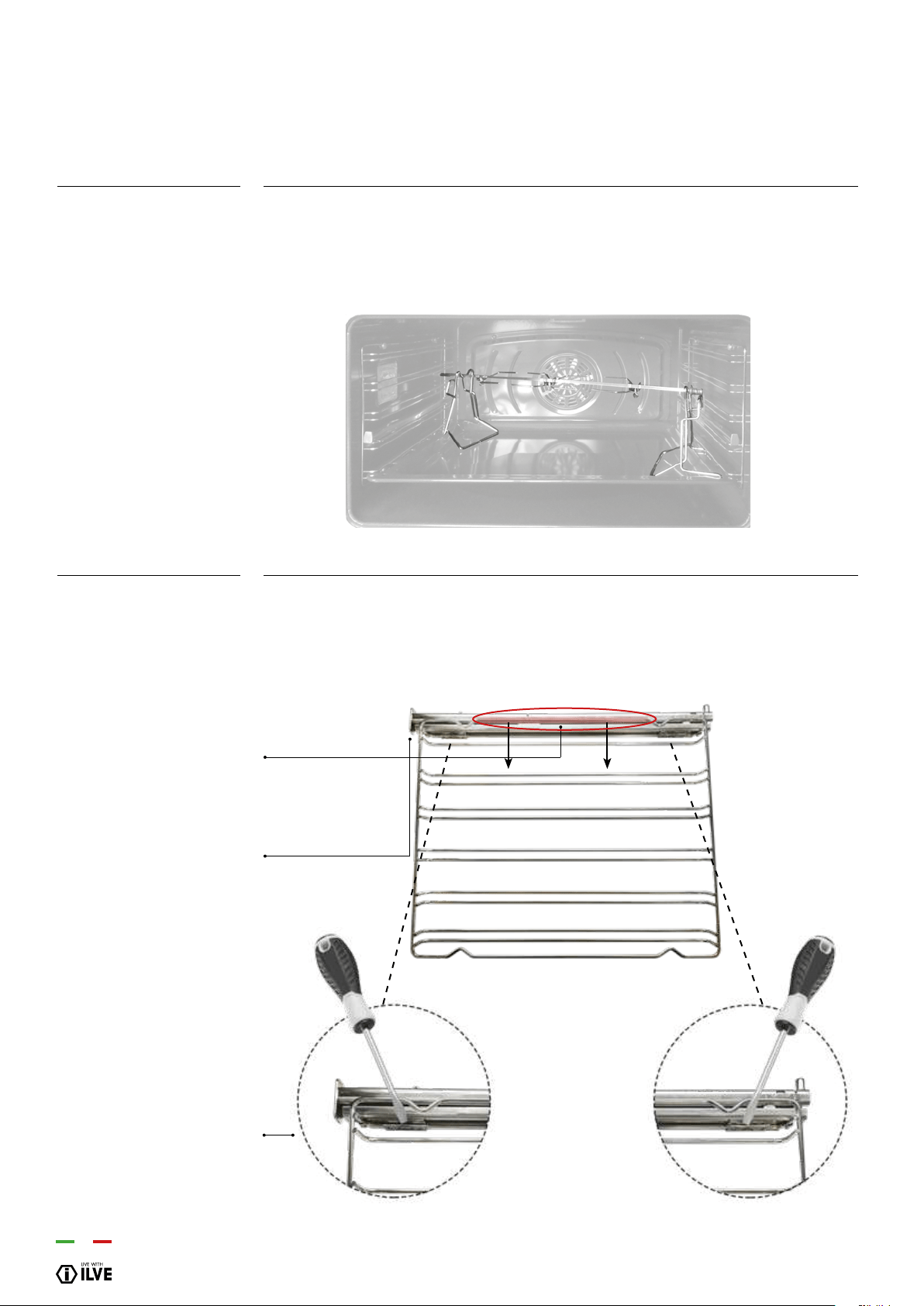
54
Slide the meat to be cooked onto the spit, blocking it with the special forks. Place the spit
on the special supports previously inserted in the drip pan and insert it in the spit-roast
horn. Turn on the static grill with closed door function. To extract the spit together with
the drip pan pull it out just enough to allow complete extraction.
Telescopic runners make it easier and safer to remove baking trays and to take a closer
look at how cooking is progressing. The telescopic runner kit includes 2 lateral runners
which slide on ball bearings. The runners can be removed for cleaning as shown in the
pictures below.
Repeat the operations backwards to repositions the grills.
turn-spit
(only on some models)
Telescopic runners
(only in certain models)
Pul down the part highlighted in
red to remove it from the oven.
Turn over the grill and place it on
a at surface whit the telescopic
runner facing down.
To un hook the clip, loosen whit a
athead screwdriver
INSTRUCTIONS FOR USE
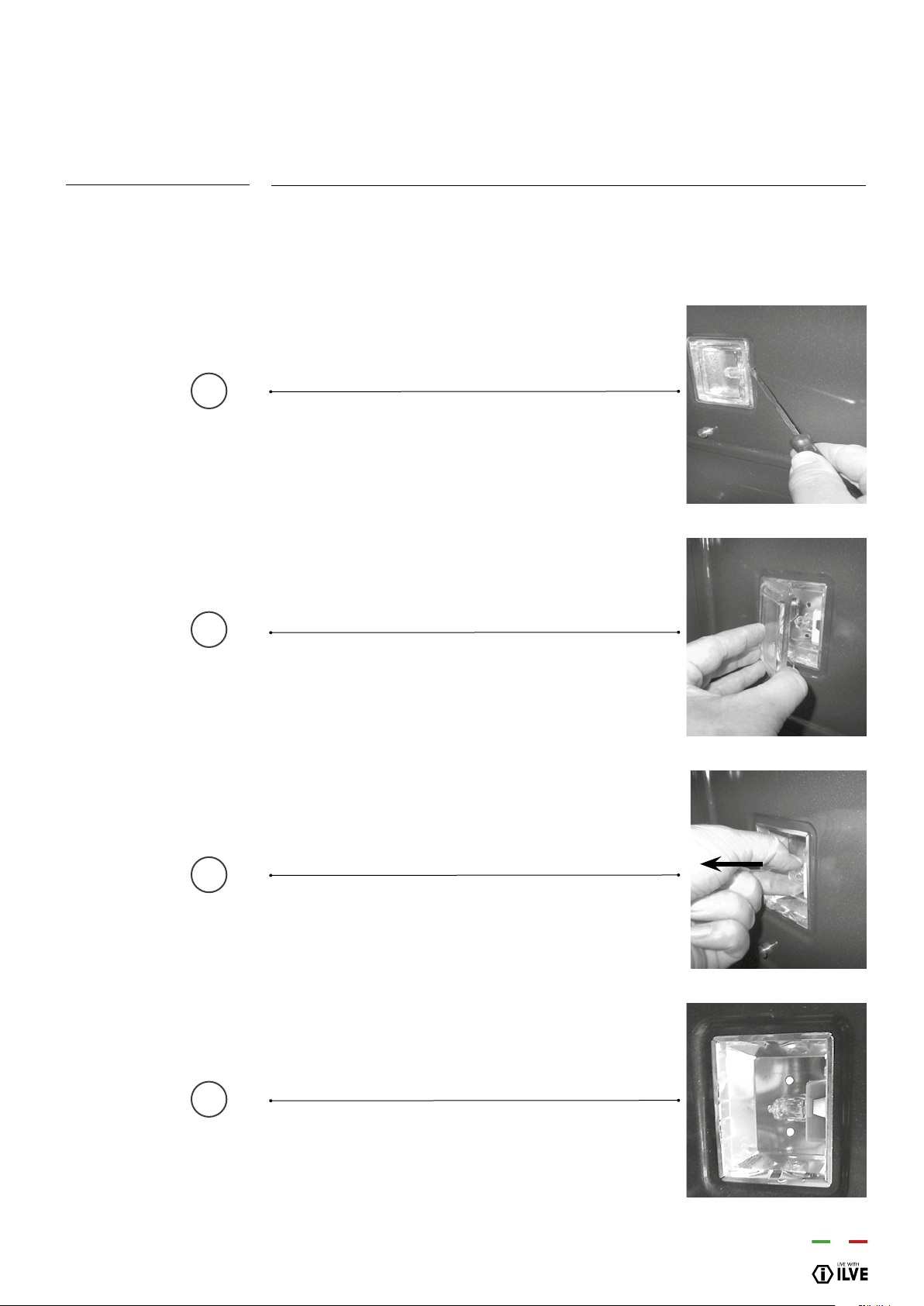
55
OPERATION / USER
Should the oven light not work, disconnect the appliance from the mains, remove the
lamp protection glass and replace the bulb. The new bulb must, naturally, be suitable
for use at high temperatures.
Loosen whit a at-head screwdriver
Remove the glass cover
Pull out the light
Replace and close again
Procedure to follow
CLEANING AND MAINTENANCE
– Replacing the bulb
1
2
3
4
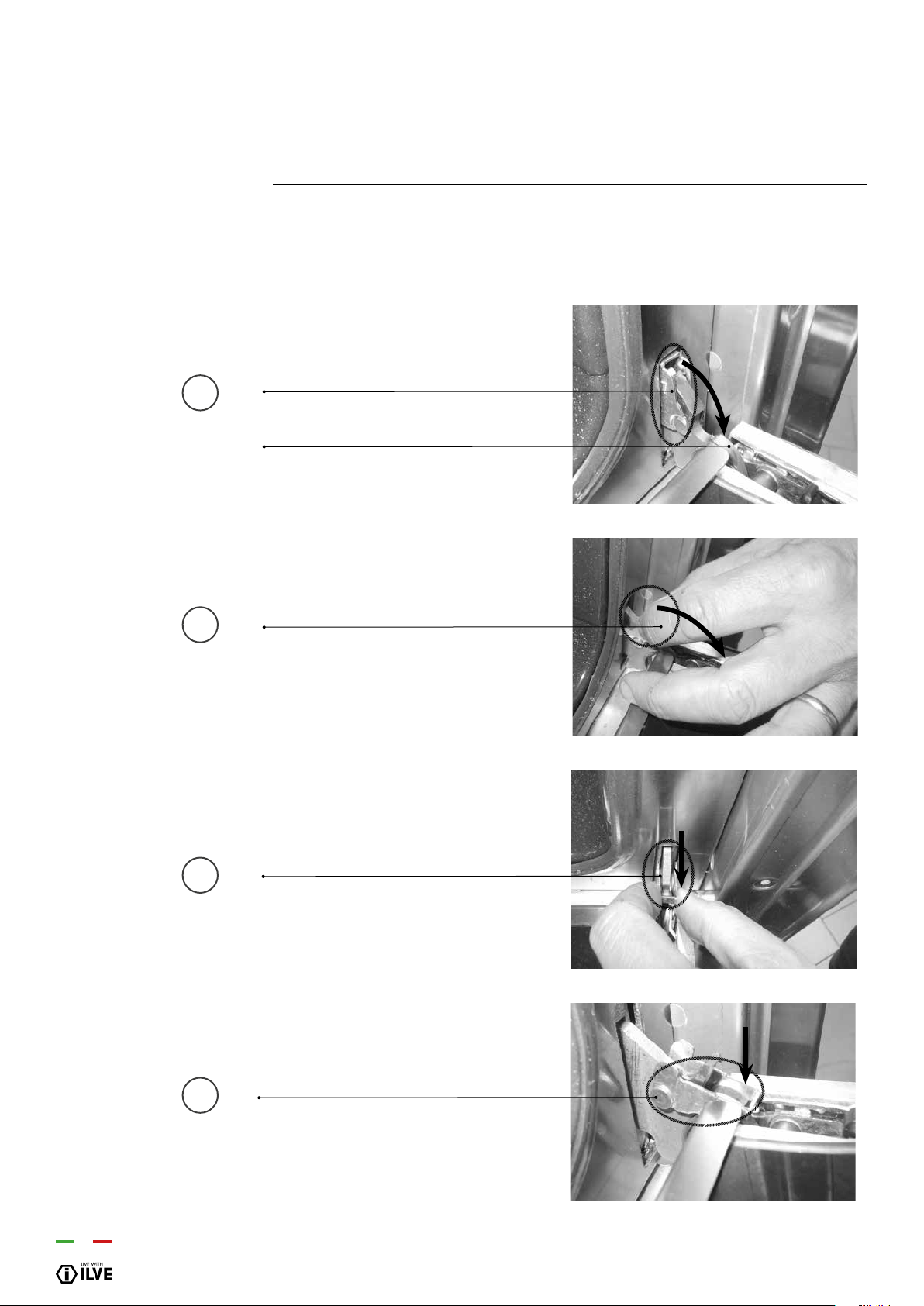
56
For ease of intensive cleaning it is useful to dismantle the door following these
instructions:
- open the door
- move the hook C to the hinge zone d, following the steps below
Zone C
Zone D
Procedure to follow
CLEANING AND MAINTENANCE
– Door removal
1
2
3
4
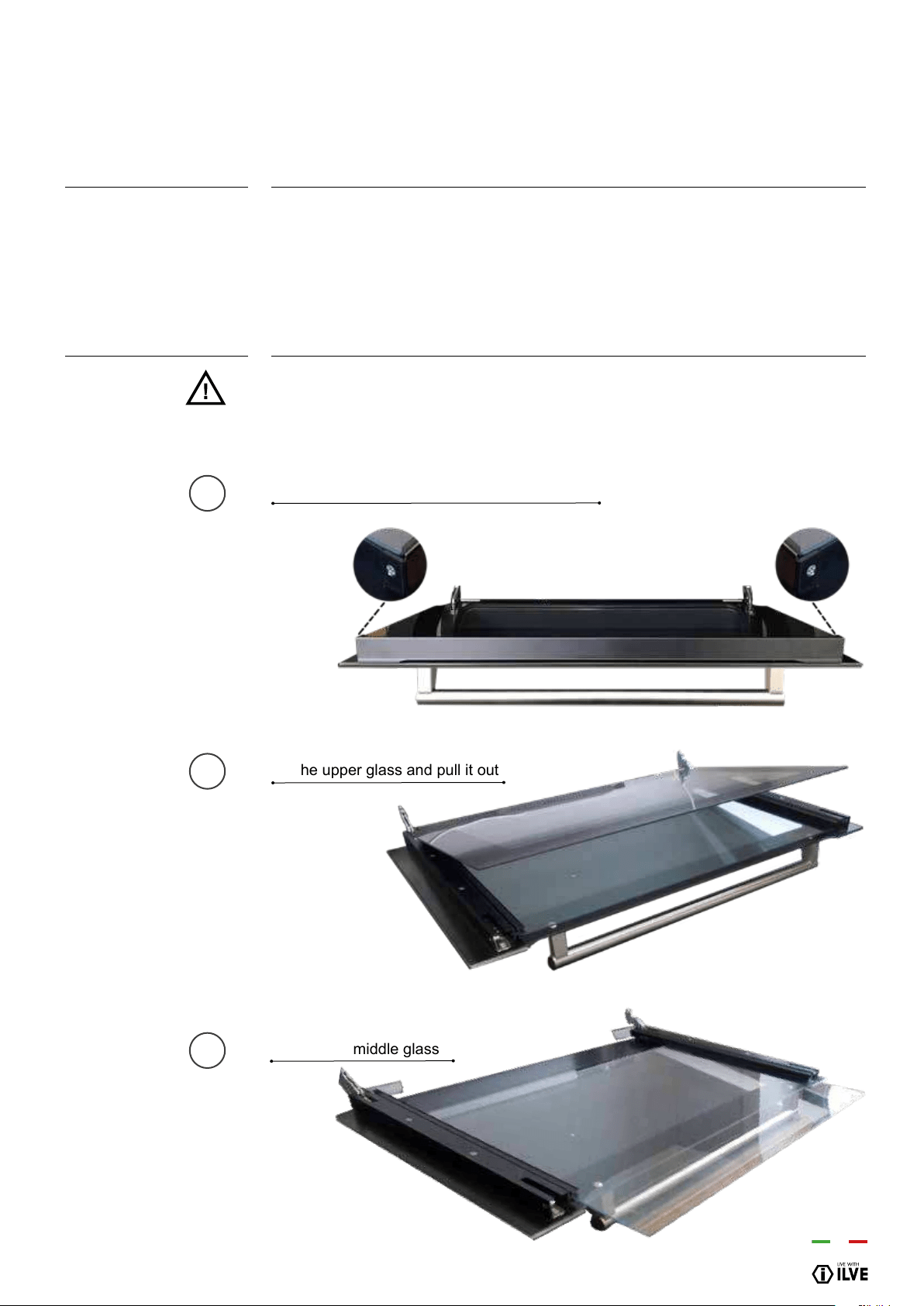
57
OPERATION / USER
The oven door is composed of 3 sheets of plate glass (two in some cases). The plate
glass parts may be cleaned using absorbent kitchen paper and an ordinary non-abra-
sive detergent. Do not use coarse abrasive cleaning materials or sharp metal scrapers
to clean the oven’s glass doors since they can scratch the surface and cause the glass
to shatter
The inside glass may be removed to facilitate cleaning. To do this it is necessary to
dismantle the oven door or, alternatively, to set it in the intermediate click position.
ATTENTION! every procedure must be done with the door removed and placed
on an suitable surface in order to not damage the door’s facade.
Before carrying out any cleaning operations, disconnect the appliance from the
mains and close the gas valve. The cooktop must be cleaned after it has been
cooled down.
Unscrew the 2 screws
Lift the upper glass and pull it out
Pull out the middle glass
Procedure to follow
Sequence for
removing the
glasses
CLEANING AND MAINTENANCE
– Cleaning the door and glasses
(for more detailed information, go to www.ilve.com.au/cleaning
1
2
3

58
COMPONENT
Steel surfaces
Enamelled surfaces
Cooktop grills
Spark plugs and
thermocouples
Crowns, gas rings, and
caps
Induction or breglass
WARNINGS
Brilliance is maintained through regular
cleaning with specic commercially
available products which can be found in
commerce. Never use abrasive powders.
Avoid leaving acidic or alkaline
substances (vinegar, lemon juice, salt,
tomato juice, etc.) on enamelled parts and
washing them when are still hot.
Do not wash them in the dish washer.
Spark plugs and thermocouples must be
cleaned and checked regularly.
Carefully remove every encrustation and
ensure they are completely dry. In the
case of malfunctioning, make sure that
the holes in the external crown are
perfectly cleaned.
Don’t clean with abrasive products. Don’t
use any object that could ruin the
breglass top.
Make sure that the bottom of the pan is
dry and clean, and that glass surface has
no dust. Moving the pan may scratch the
glass. Immediately remove residual
sugar, jam and jelly to prevent damaging
the glass.
COOKTOP
CLEANING METHOD
Clean the details with warm water and
non-abrasive detergent. Dry with a soft
microbre cloth.
To maintain the characteristics of the
enamelled surfaces it is necessary to
regularly clean them with soapy water.
Remove the grills and wash them with
warm water and non-abrasive detergent.
Carefully remove every encrustation. Dry
before placing them back on the cooktop.
Clean with a damp cloth. If necessary,
remove dry dirt with a toothpick or a
needle.
Gas rings and caps are removable to
allow easy cleaning. Wash them with hot
water and non-abrasive detergent.
Remove light stains with a damp cloth and
dry with a soft cloth.
Clean with commercially available product
designed for cleaning ceramic cooktops
(e.g. hillmark)
CLEANING AND MAINTENANCE
– Recommendations for cleaning the cooktop
ATTENTION:
Before carrying out any cleaning operations, disconnect the appliance from the mains
and close the gas valve. The cooktop must be cleaned after it has been cooled down.

59
OPERATION / USER
WARNINGS
Do not use a steam cleaner to clean the
interior of the oven. Do not use abrasive/
corrosive detergents or sharp tools to
clean the glass of the door as they could
damage and break the surface.
Remove residual food immediately after
use.
Acidic substances such as lemon juice or
other acidic detergents may permanently
damage the enamel of the grills.
Carefully dry the grills with a cloth right
after the cleansing. It is not recommended
to wash them in the washing machine.
WARNINGS
Brilliance is maintained through regular
cleaning with specic products
commercially available. Never use
abrasive powders
Avoid leaving acidic or alkaline
substances (vinegar, lemon juice, salt,
tomato juice, etc.) on enamelled parts and
washing them when are still hot.
COMPONENT
Oven inside
Tray
Grills
COMPONENT
Steel surfaces
Enamelled surfaces
OVEN
CLEANING METHOD
It is recommended to clean the oven
after every use. Dirt is cleaned more
easily avoiding to let it burn several times
at high temperatures. Remove every
removable part and clean it separately
with hot water and non-abrasive
detergent. The cavity is cleaned with a
soft cloth soaked with a solution made of
soapy. Rinse and dry.
Immerse in a solution made of water and
neutral soap. Dry afterwards.
Clean with a NON-acidic detergent.
FRONT PANEL
CLEANING METHOD
Clean the parts with lukewarm water and
non-corrosive liquid detergent and then
dry them with a soft cloth or microbre
cloth.
To maintain the characteristics of the
enamelled parts it is necessary to clean
frequently with soapy water.
Before carrying out any cleaning operations, disconnect the appliance from the mains
and close the gas valve. The cooktop must be cleaned after it has been cooled down.
CLEANING AND MAINTENANCE
– Recommendations for cleaning the oven and the front panel
ATTENTION:
60
ATTENTION!
Some cleaning and washing methods are recommended in order to preserve the quality of the coating.
• Allow the product to cool down at room temperature before cleaning it. It is recommended not to dip it in cold
water when it is still hot.
• Wash with warm soapy water. Rub with a natural bre cloth, or non-abrasive sponge.
• Do not use powder, iron wool, cloths and abrasive sponges.
• Do not let food be charred on the burner. In case stains/colorations may appear on the surface. These traces do
not alter the functionality of the product, and in some cases can be eliminated with this procedure: immerse the
product in hot water, with detergent, wipe gently with a natural bre cloth; in any case, do not use abrasive cloths
or sponges. For the most resistant stains, it is advisable to warm white vinegar and rub as indicated above.
• Avoid leaving the burners in contact with food for a long time, especially if acidic, such as tomato sauce.
• Avoid contact with metal objects; if really needed, use wooden or plastic objects.
• Avoid washing in the dishwasher, a part of the product is not coated and would get irreparably damaged.
• In case of malfunction, make sure that the holes in the outer crown are perfectly clean.
CLEANING AND MAINTENANCE
– Maintenance and cleaning of total black burners with
nano-technological coating
61
OPERATION / USER
To preserve the quality of the nano coating please observe these guidelines.
• Allow the burners to cool down to room temperature before cleaning. Do not dip them
in cold water to speed up the cooling down process.
• Wash with warm, soapy water. Rub with a soft cloth or non-abrasive sponge. Do not
use abrasive powder, steel wool or abrasive sponges.
• Avoid leaving food or splatter on the burner. This will result in charred deposits that will
be more difcult to remove and may cause stains or discolourations to appear on the
surface. These blemishes do not alter the functionality of the product. In some cases
they can be eliminated by immersing the burners in hot, soapy water and then wiping
them gently with a soft cloth or non-abrasive sponge. For stubborn stains, use warm
white vinegar and wiping them as above.
• Avoid leaving the burners in contact with food for a long time, especially if acidic, such
as tomato sauce, lemon juice.
• Avoid contact with metal objects; if you must touch them, use wooden or plastic
utensils.
• Avoid washing in the dishwasher, the underside of the burner is not coated and would
get irreparably damaged.
• In case of malfunction, make sure that the holes in the outer crown are perfectly dry
and clean.
Annual service by an authorised person is recommended, or if any of the following
conditions are noticed. Incomplete ignition, appreciable yellow tipping, carbon
deposition, lifting, oating, lighting back or objectionable odour.
Contact 1300 856 411 or [email protected]
ATTENTION:
CLEANING AND MAINTENANCE
– Maintenance and cleaning of total black burners with
nano-technological coating
Problem Cause Solution
The ame is uneven /
unstable
Wrong gas type Have an expert check the gas supply
The ame from the burners
suddenly changes
Wrongly assembled burner
parts
Ensure burner parts are in the correct
position
Burner extinguishes after
lighting
Insufcient time for the
sensor to detect that the
burner is on
Push the burner knob a little longer (no
more than 10 seconds)
Spark is uneven Food residues between
the electrode and the
burner
Make sure both the burner components
and the ignition electrode are clean

62
Causes
- The hob has not been properly connected to the electrical network.
- The protection fuse is broken or has tripped
- child lock is active.
- The pot was not placed on the cooking zone.
- The pot is not compatible with induction.
- The diameter of the bottom of the pot is too small.
- The safety system is in operation.
- The pot is not compatible with induction.
- The diameter of the bottom of the pot is too small.
- The safety system is in operation.
- The pot is empty and the bottom has overheated.
- This is not a malfunction. The fan continues to function to
protect and cool down the electronics.
- The automatic ventilation will stop automatically.
Problem
The appliance and the hob do not switch
on
The “U” symbol appears on the display
The “E” symbol appears on the display
The cooking zones do not work
Ventilation remains on when the hob is
switched off
PROBLEM SOLVING
– Glass ceramic malfunction
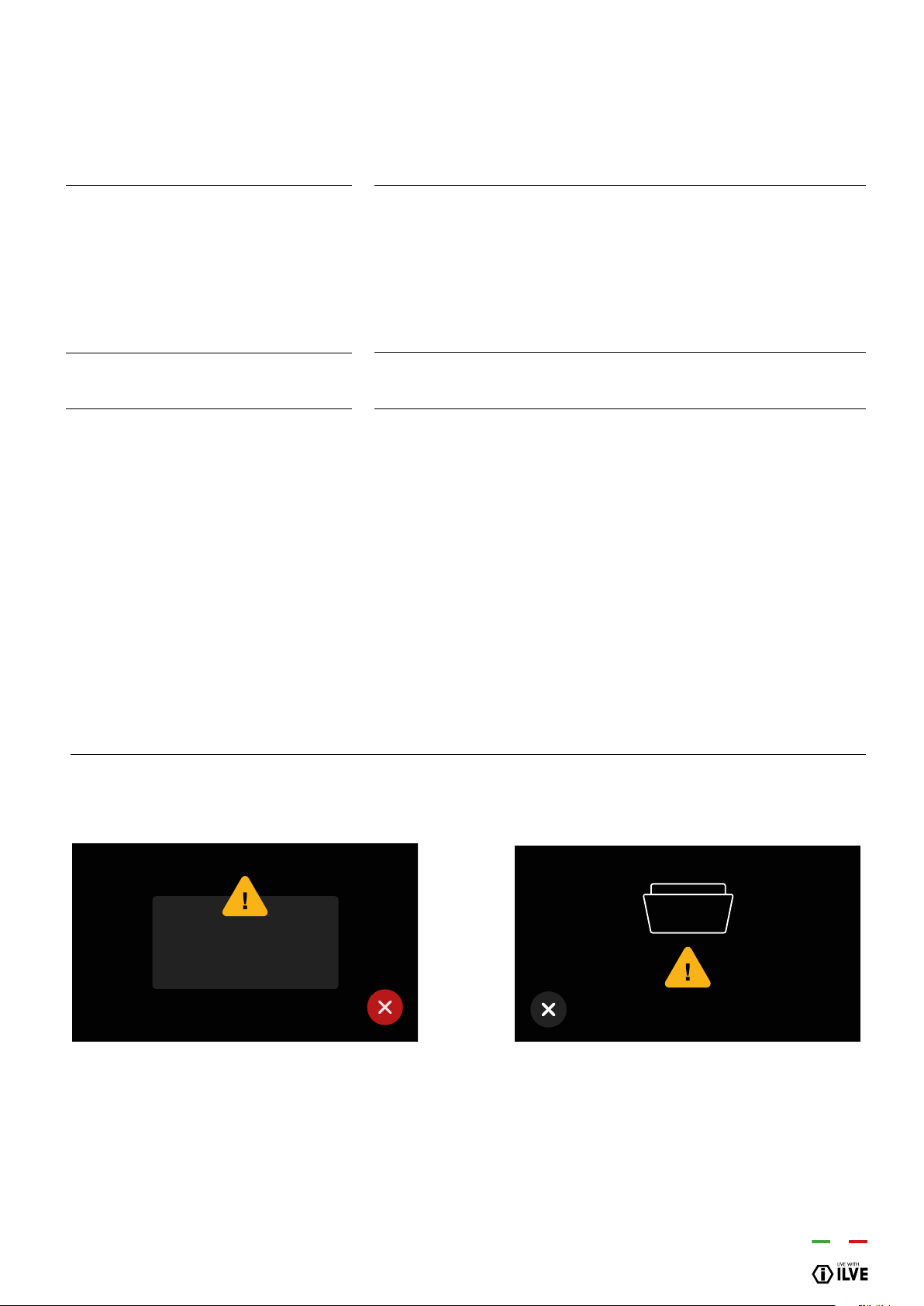
63
OPERATION / USER
The following errors are detected:
The error code syntax is: “E YY X”, where:
YY = error code
x = cavity number when error occurred or ‘ 0 ‘ for general errors
Error ID Error types(*)
Attention(*)
System errors
Description
Cavity probe in open circuit
Cavity probe in short circuit
Meat probe in open circuit
Meat probe in short circuit
Overheating
Tangential fan not working
Incorrect mapping card
Communication error
Attention(*)
PROBLEM SOLVING
– TFT display errors
WE
WE
WE
WE
WE
WE
WE
WE
00
01
04
05
08
16
19
20
error
123456
DOOR OPEN
In case of error disconnect and reconnect the
appliance.
If the error is present again you will need the
intervention of an authorized technician
Close the oven door.
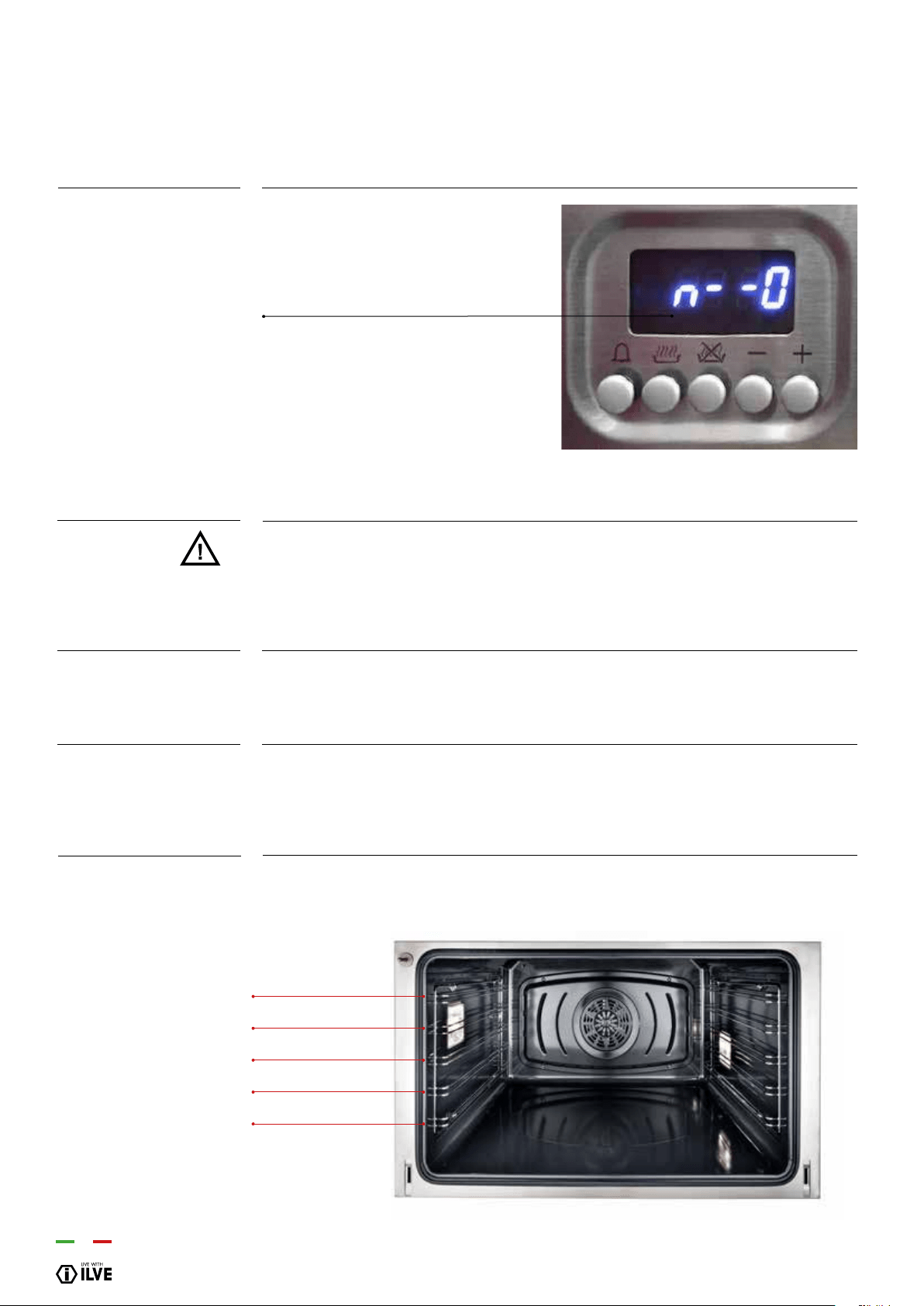
64
Symbol that represents the children lock
If this symbol shows up in your oven. The child lock may have accidentally been
selected.
The oven is equipped with a safety feature which prevents the unwanted start-up of the
oven.
To disable the child lock, hold the thermostat knob which regulates the temperature for
5’’. The display will show “n—o” followed by “OFF”.
To activate the safety lock, hold down the thermostat knob for 5’’, with the oven turned
off. You’ll hear a short beep signal and the display, will show “n—o” followed by “ON”.
It will then not be possible to start up the oven.
Feed the oven shelf or drip tray into the desired position from 1 to 5 on the
support racks and push all the way into the oven until it comes to a stop.
How to resolve
ATTENTION:
How to disable
How to activate
Oven Shelves
PROBLEM SOLVING
– Child Lock
self position 5
self position 4
self position 2
self position 1
self position 3

65
OPERATION / USER
COOKING CHART
– Fan oven
(purely indicative values)
DISH
MEATS
Roast beef
Roast ox
Roast veal
Roast lamb
Rare roast beef
Roast hare
Roast rabbit
Roast turkey
Roast goose
Roast duck
Roast chicken
FISH
CAKES
Fruit cake
Plain square cake
Brioches
Sponge cake
Plain ring cake
Sweet biscuits
Yeast cake
Strudel
Savoy biscuits
Apple fritters
Biscuits pudding
TEMP. C°
170-180
170-190
160-180
140-160
180-190
170-180
160-170
160-170
160-180
170-180
180
160-180
180-200
180-190
170-180
190-200
160-180
180-200
190-200
160
150-180
180-200
170-180
2/3
2/3
2/3
2
2/3
2/3
2
2
2/3
2/3
2/3
2/3
2
2
2
2
2
2
2
2
2
2
2
MIN.
40/50
40/60
65/90
100/130
40/45
80/100
80/100
160/240
120/160
100/160
90/120
15/25
40/50
40/45
40/60
25/35
35/45
20/30
30/40
25/35
50/60
18/25
30/40
4
3
2
1
5

66
COOKING CHART
– Fan oven
(purely indicative values)
4
3
2
1
5
DISH
Bread
Pizza
Toast
TEMP. C°
180-200
250
185-195
3
3
2
MIN.
45
10/20
7
Insert foods when the oven is hot.
When appliances are equipped with a grill, baking can be done by keeping the door
closed. By using the grill, you can cook meat, sh and even vegetables. At rst, we
suggest
using the upper runner (4). Position the selector on grill and set the temperature at
180°C.
IMPORTANT
«Grill» baking

67
OPERATION / USER
COOKING CHART
– Natural convection
(purely indicative values)
DISH
MEATS
Roast beef
Roast ox
Roast veal
Roast lamb
Rare roast beef
Roast hare
Roast rabbit
Roast turkey
Roast goose
Roast duck
Roast chicken
FISH
CAKES
Fruit cake
Plain square cake
Brioches
Sponge cake
Plain ring cake
Sweet biscuits
Yeast cake
Strudel
Savoy biscuits
Apple fritters
Biscuits pudding
TEMP. C°
225
250
225
225
230
250
250
250
225
250
250
200-225
225
175-200
175-200
220-250
180-200
200-220
250
180
180-200
200-220
200-220
2/3
2/3
2/3
2
2/3
2/3
2
2
2/3
2/3
2/3
1/2
2
2
2
2
2
2
2
2
2
2
2
MIN.
60/80
50/60
60/80
40/50
50/60
40/50
40/50
50/60
60/70
45/60
40/45
15/25
35/40
50/60
25/30
20/30
30/40
15/20
25/35
20/30
40/50
15/20
20/30
4
3
2
1
5

68
COOKING CHART
– Static oven
(purely indicative values)
Bakery
Bread
Pizza
Pizza
Toast
220
250
250
250
3
2
3
3
30
15/20
10/20
5
Insert foods when the oven is hot.
When appliances are equipped with a grill, baking can be done by keeping the door
closed. By using the grill, you can cook meat, sh and even vegetables. At rst, we
suggest using the upper runner (4). Position the selector on grill and set the temperature
at 180°C.
IMPORTANT
«Grill» baking

INSTALLATION
69
IMPORTANT INFORMATION
- For the user
ATTENTION
LEAKING GAS
THE INSTALLER MUST GIVE THE FOLLOWING INFORMATION TO THE USER
- Verify the integrity of the appliance and the presence of all the product
documentation.
- Verify that the appliance has all the expected accessories.
- Verify the correct use of the appliance (use of the oven, thermostat, ignition of the
burners).
- Fill out the warranty form.
- Suggest that a periodic maintenance service has to be carried out at least every two
years.
In case of gas leaking close the gas supply and disconnect the appliance
from the mains. Call the authorised assistance service. Maintenance must be
carried out exclusively by authorised and qualied personnel.
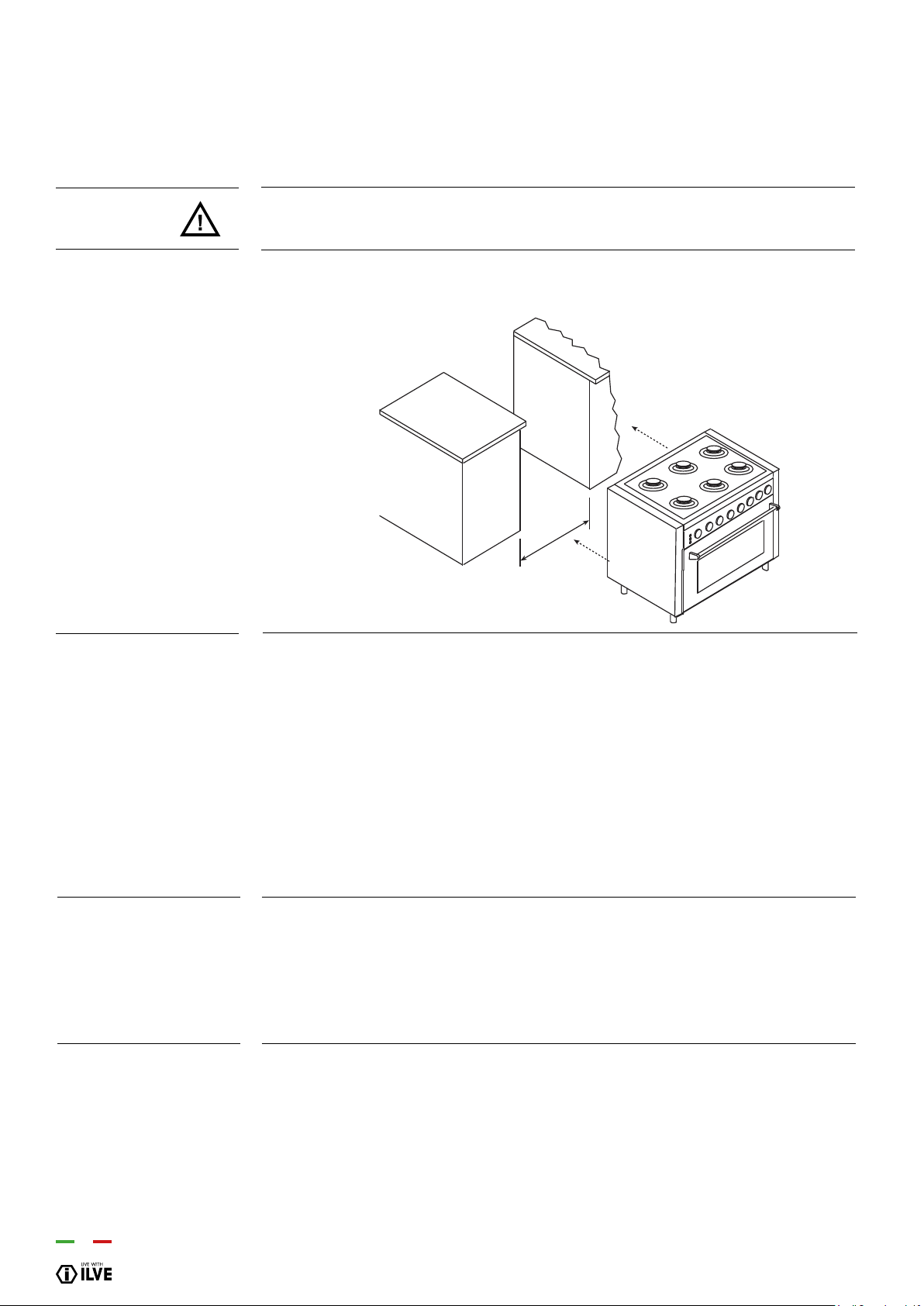
70
ATTENTION
Measures to be
respected
Directives/regulations
Room ventilation
The appliance weighs more than 60 kg, therefore it must be moved of appropriate
instruments.
Do not drag the cooker as this will bend the supporting feet. Lift the appliance when
positioning it. DO NOT LIFT BY THE HANDLE
a (mm) Models
600 P06... K06... T06... L06...
700 P07... M07...
800 P08...
900 P09... K06... K09... L09... HNF... NT... V09...
911 M09...
- This appliance is in compliance with the applicable standards.
- Installation must only be carried out by qualied persons in compliance with the
regulations and standards in force
This is a type “A” appliance which does not need to be joined to an exhaust system for
combustion waste but must be installed under a hood or other smoke extraction system
in compliance with the standards in force.
The knowledge and consultation of the standards are a key factor for a qualied
technician. Indicatively the amount of air necessary for burner combustion is 2 m3/h for
each KW of nominal power installed (see plate).
Should the appliance be subjected to intensive and prolonged use, supplementary
ventilation may be necessary; in such cases open a window or increase the extractor
fan’s power.
INSTALLATION
- Installation of the cooker
a

INSTALLATION
71
This appliance must be installed by an authorised person in accordance with this instruction manual, AS/NZS 5601
– Gas installations (installation and pipe sizing), local gas tting regulations, local electrical regulations, local water
regulations, local health regulations, Building Code of Australia and any other government authority.
This appliance is suitable for connection with rigid pipe or exible hose. The isolating manual shut-off valve connection
point must be accessible when the appliance is installed. Flexible hose assembly must be certied to AS/NZS 1869
class B or D, be of appropriate internal diameter for the total gas consumption, be kept as short as possible (not ex-
ceeding 1200mm), must not be in contact with the oor or any hot or sharp surfaces. The hose assembly must not be
subject to strain, abrasion, kinking or deformation.
Natural Gas: the supplied regulator must be tted to the appliance inlet connection. Gas pressure must be adjusted to
1.0 kPa when approximately 50% of the burners are on high ame, the appliance test point is located on the regulator.
ULPG: the supplied test point adaptor must be tted to the appliance inlet connection. Gas pressure must be adjusted
to 2.75 kPa, the appliance test point is located on the test point adaptor.
Gas leakage and operation of the appliance must be tested by the installer before leaving. Check burner ames are
blue in colour, stable and completely ignite at both high and low ame settings with no appreciable yellow tipping,
carbon deposition, lifting, oating, lighting back or objectionable odour. Test burners individually and in combination,
When satised with the operation of the cooker, please instruct the user on the correct method of operation.
Where the data plate is obscured by cabinetry when the cooker is in the installed position, place the supplied duplicate
data plate to a suitable
adjacent surface or within the instruction manual for future reference.
Removing Legs and placing oven on a plinth
If the legs are removed and the oven is placed on a plinth, then suitable ventilation from the plinth area
is required. It is recommended that an air vent 20 mm wide and a length of 100mm less than the width of
the oven it is be located at the rear in the base of the plinth. If the area under the plinth is sealed it is also
recommended that an additional vent be included at the top of kick panel under the plinth to provide
adequate circulation. The vent size should be 10mm high and 100mm less than the width of the oven.
INSTALLATION
- Installation of the cooker
Any maintenance operation, etc. It must be carried out by an authorized technician
after disconnecting the appliance from the mains and closing the gas supply.
ATTENTION
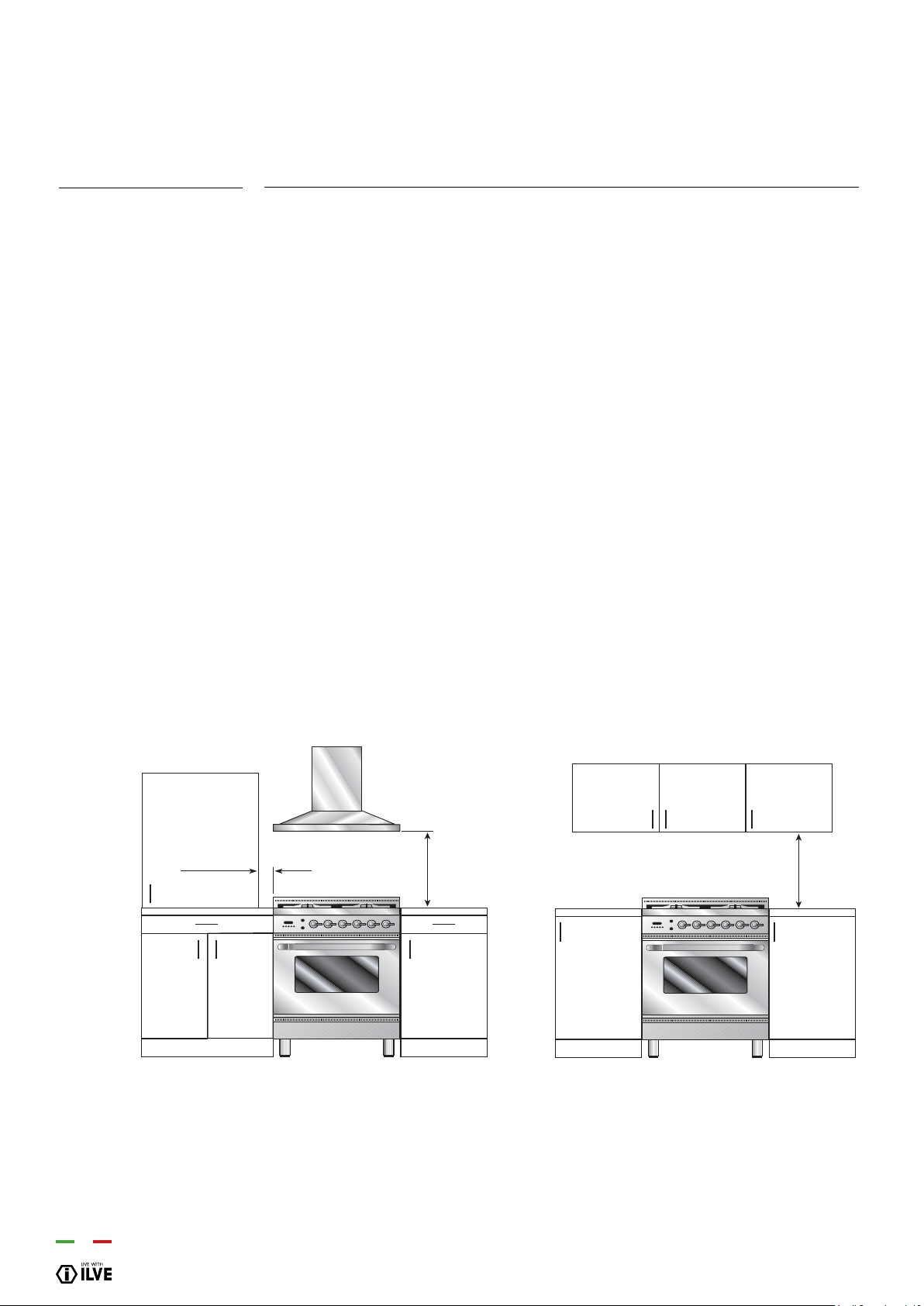
72
- The appliance can be installed singularly: class 1.
- The appliance can be installed between two pieces of furniture: class 2/1.
- The cooker is protected against excessive overheating, so it may be installed next
to furniture with a height no higher than that of the worktop. The wall in contact with
the back of the cooker must be made of re-resistant material. To install the cooker
correctly, take the following precautions.
*A. The clearance between the highest part of the highest burner of the gas cooking
appliance and a range hood should be no less than 600 mm or 700mm for models
more than 900mm wide. For an overhead exhaust fan the minimum clearance is 750
mm.
**B. Where the distance from the periphery of the nearest burner to any vertical
combustible surface, or vertical combustible surface covered with toughened glass or
sheet metal, is less than 200 mm, the surface shall be protected to a height C of not
less than 150 mm above the hob for the full dimension (width or depth) of the cooking
surface area. Where the gas cooking appliance is tted with a ‘splash back’, protection
of the rear wall is not required.
C. If the cooker is installed under a wall unit, the minimum distance between this unit
and the worktop must be 700 mm.
D. Zero clearance to bench surfaces at the same height as the top edge of the cooker
is permitted
INSTALLATION
- Installation of the cooker
Positioning of the
appliance between
furniture
Min.
50 mm
Min.
650 mm
Min.
700 mm
B** A*
700mm
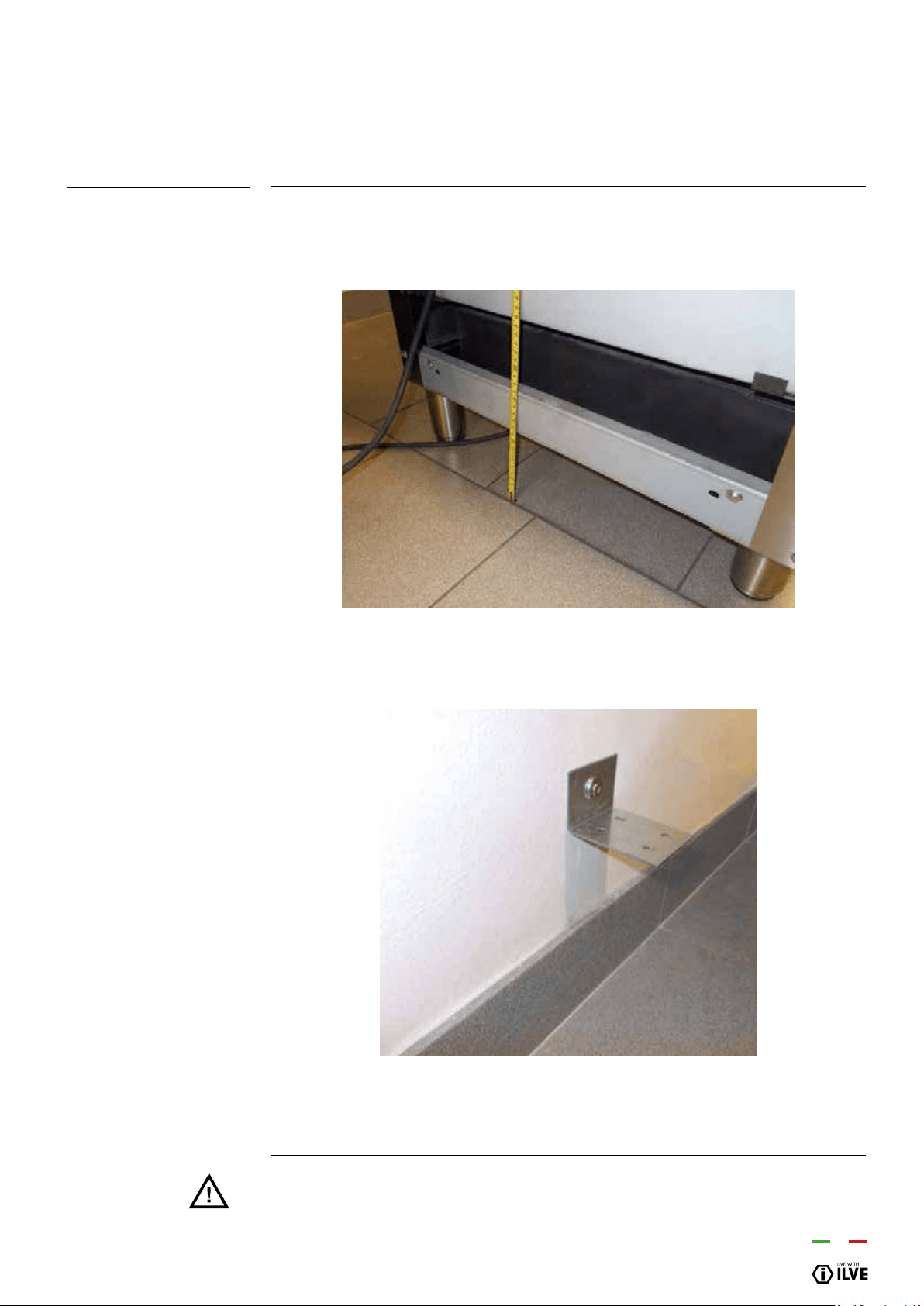
INSTALLATION
73
Model: 60, 70, 80, 90 cm.
ATTENTION
- Unpack the cooker and mount the feet by adjusting the height.
- Measure the height from the oor to the top edge of the back-cross bar (picture 5) and
add 15mm.
- Sign the total height on the supporting back wall at the centre of the cooker width.
Make a hole by means of a 6 diam. point and install the xing bracket (picture 6).
- Check that the cooker is leaning against the back wall to avoid tipping.
The anti-turnover system is assured only if the cooker is installed with the back
part leaned against the back wall.
INSTALLATION
- How to install the xing bracket
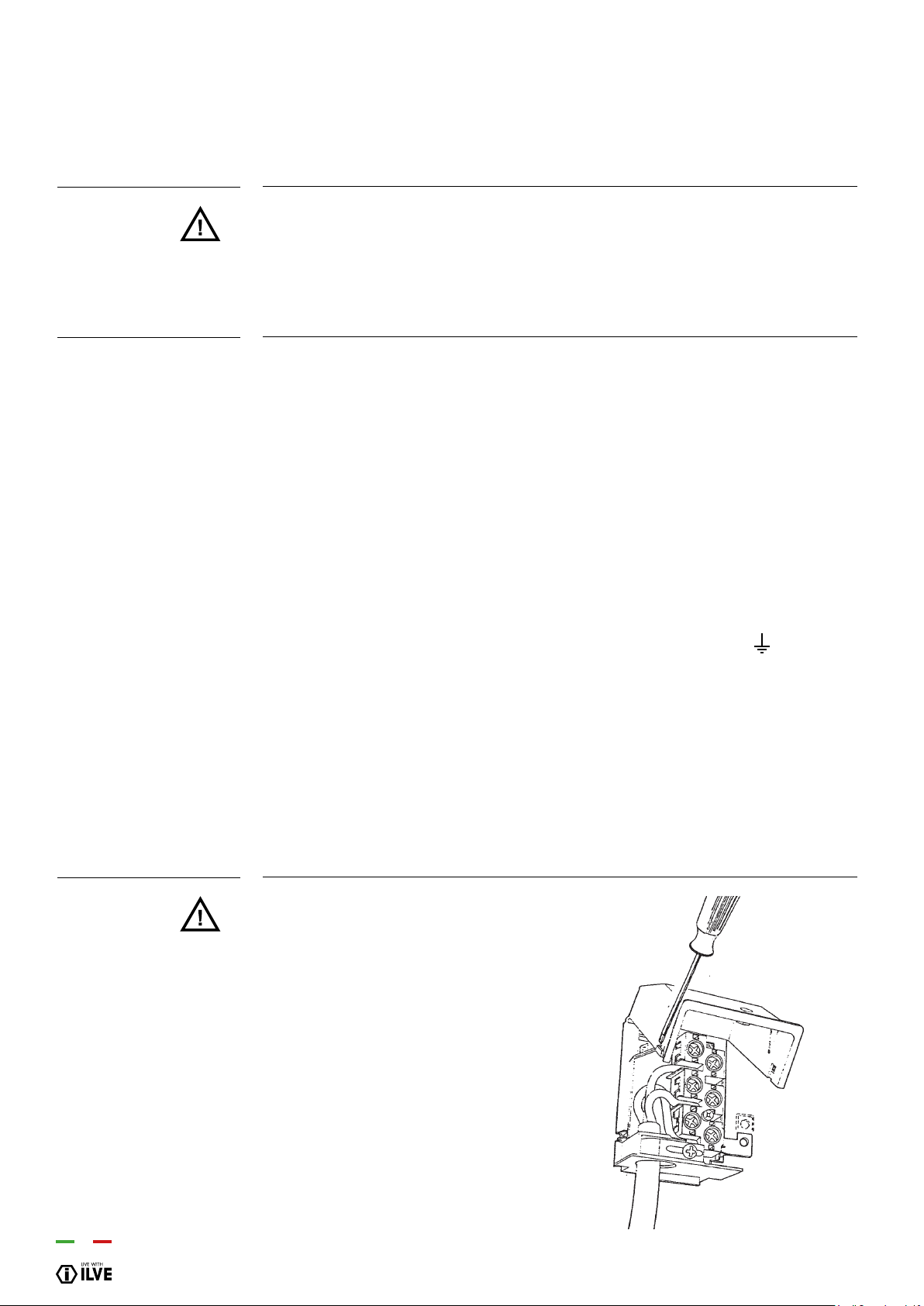
74
ATTENTION
Rules for installation
ATTENTION
The instructions below are intended for the skilled technician who will install the cooker,
regulate it and perform technical maintenance and who will ensure that these operations
are carried out in the most correct way possible, in compliance with the regulations in
force.
Important: the cooker must be disconnected from the electric socket before
performing all regulating or maintenance operations.
• Installation must be carried out in a workmanlike manner, fully complying with the
legislation in force regarding electrical installations. Otherwise, the manufacturer
disclaims any responsibility. You will nd your appliance’s wiring diagram in this booklet.
• The appliances are prepared for connection to the voltage shown on the data plate.
• Before connecting the appliance to the mains check that:
- the electromagnetic switch or the socket are able to support the appliance’s load
(see data plate);
- the power supply system must have an efcient grounding system.
The appliance is supplied with a cable but without a plug: the connection must be made
taking into account that the green-yellow cable is the ground conductor and it must
never be interrupted.
The socket must be visible and easily reachable so that the appliance can easily be
disconnected. For direct connection to the mains, it is necessary that:
-the relief valve and domestic system can support the equipment’s load (see data plate)
-the power supply system must have an efcient grounding system
-the socket or omni polar switch, with a minimum 3 mm contact opening, must be easily
reachable once the appliance has been installed.
- means for disconnection must be incorporated in the xed wiring in accordance with
the wiring rules
The yellow-green ground wire must never
be interrupted even by the switch. The
power cable should be positioned so that it
does not come into contact with surfaces
that have a temperature of 50 °C higher
than the environment. In case replacement
of the power cable is necessary, contact
the support service.
ELECTRICAL CONNECTIONS
- Groups of cooking

INSTALLATION
75
The appliance is supplied without a plug: The power supply cable should not reach
above 50°C ambient
(*) calculated by applying the coincidence factor EN60335-2-6
POWER SUPPLY CONNECTION CABLE SECTION CABLE TYPE
230V a.c. 1P+N 1 phase + N 3 x 4* H05RR
50/60 Hz
400V a.c. 3P+N 3 phase + N 5 x 1,5 H05RR
50/60Hz
230V a.c. 1P+N 1 phase + N 3 x 6 H07RN
50/60Hz
400V a.c. 3P+N 3 phase + N 5 x 4 H05RR
50/60Hz
ATTENTION
Data concerning the
power cable
Mod. P..I06
Mod. LBI09... HNF... NT...
P..I09.. M..I09..
Mod. PDI09..
Mod. MDI10..
Mod. PDI10..
ELECTRICAL CONNECTIONS
- Cookers with induction top
230V a.c. 1P+N
50/60 Hz
400V a.c. 3P+N
50/60 Hz
230V a.c. 1P+N
50/60 Hz
400V a.c. 3P+N
50/60 Hz
230V a.c. 1P+N
50/60 Hz
400V a.c. 3P+N
50/60 Hz
1 phase + N
3 phase + N
1 phase + N
3 phase + N
1 phase + N
3 phase + N
3 x 6*
5 x 4
3 x 10*
5 x 4
3 x 10*
5 x 4
H07RN
H05RR
H07RN
H05RR
H07RN
H05RR
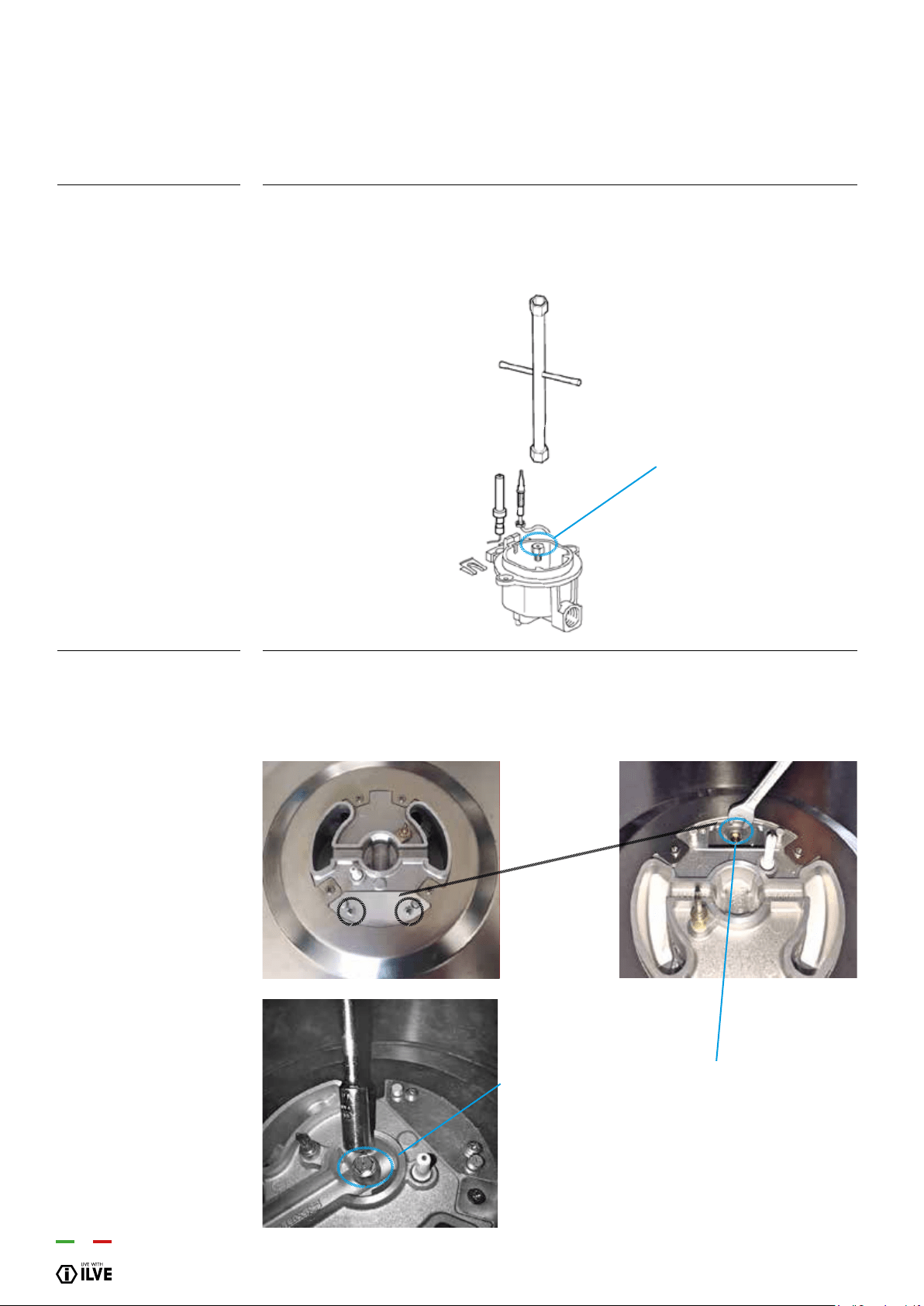
76
Procedure:
SR - R - P
Procedure:
DCC (DUAL WOK)
• Remove the grill and the burners from the hob.• SR – R – P :
SR – R – P burners: unscrew injectors “U” using a 7-mm spanner (g. 1) and replace
them with those for the new gas according to table number 2 on page 20.
• DCC – Dual burners: unscrew the 2 screws “P” and remove cover “C” g.2.
• unscrew injectors “U” using a 7 mmspanner (g.3, g.4) and replace them with those
for the new gas according to table number 1 below 13.
ADJUSTMENT
- Replacement of the injectors for models
2
1
3
4
U
U
U
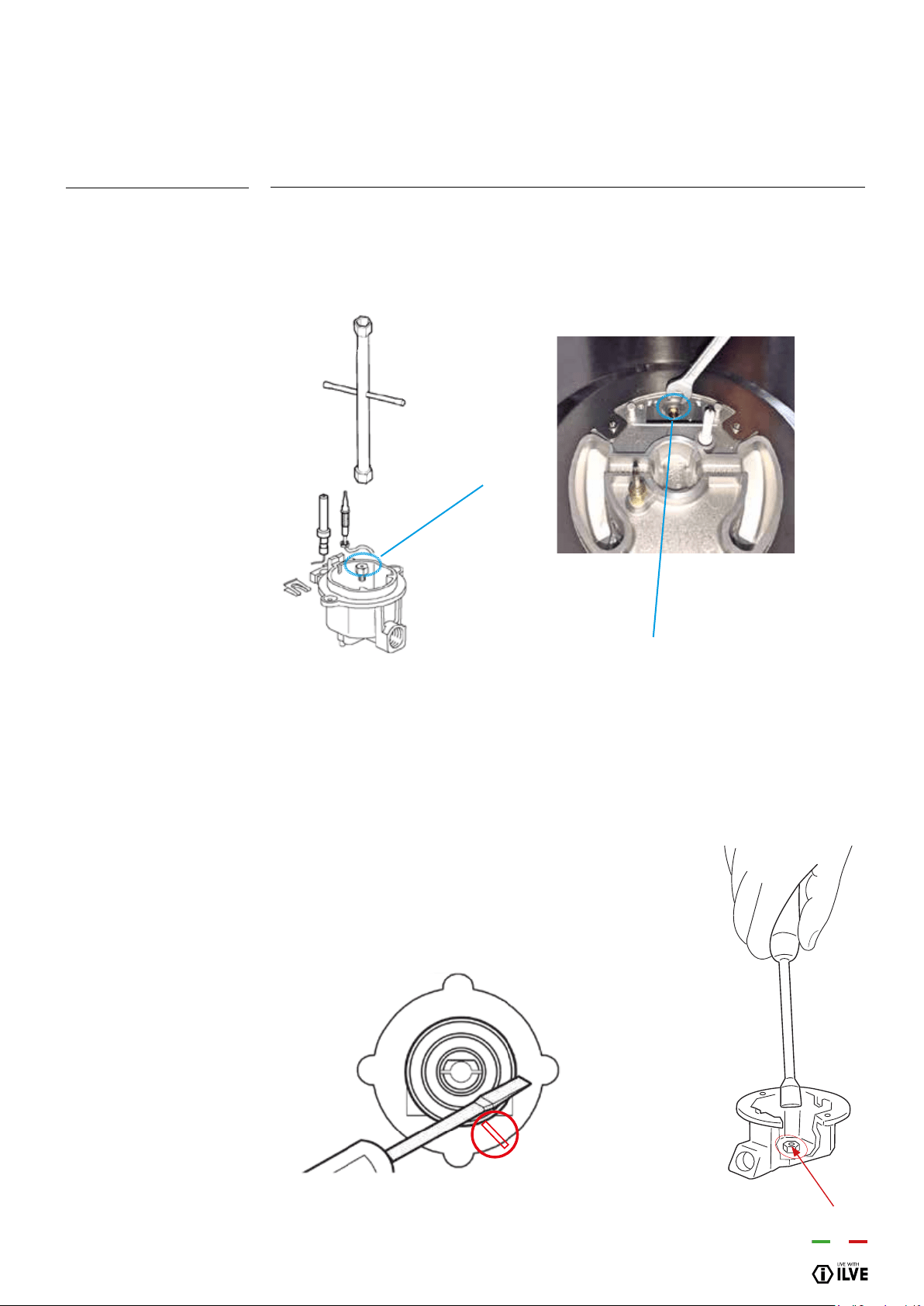
INSTALLATION
77
Procedure
• Remove the grill and the burners from the hob.
• Unscrew injectors “U” using a 7-mm spanner (g. 8, g 10) and replace them with
those for the new gas according to table number 3.
ADJUSTMENT
- Replacement of the injectors for models “K” “V” Series
1
2
U
U
When installing the cooker you must check that the minimum gas ow of the burners
on the hob and in the oven is correctly regulated.
If the type of gas is changed the minimum ow must also be adjusted.
The regulating procedure is as follows.
Burners on the hob:
1. Light one burner at a time and turn the ame up to maximum.
2. Remove the knob of the corresponding gas tap and insert a screwdriver in the
end part of the tap or in the screw (g. below).
3. Turn the tap to minimum position.
4. Unscrew, turning to the left, to increase the ame, or screw
to the right to decrease it.
5. Refer to the table below for adjustment settings.
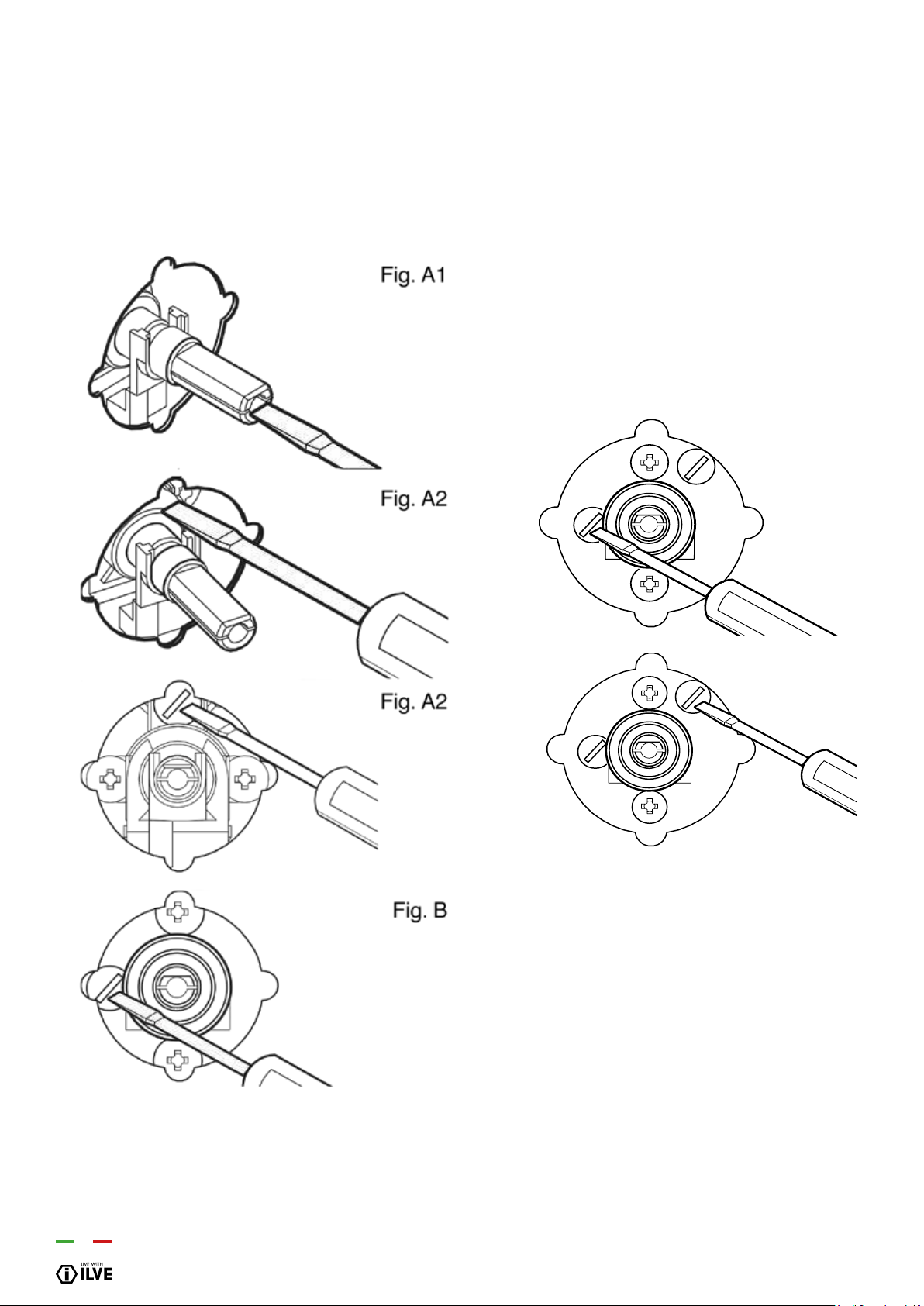
78
ADJUSTMENTS
- Adjustments minimum GAS ow
Fig. C2
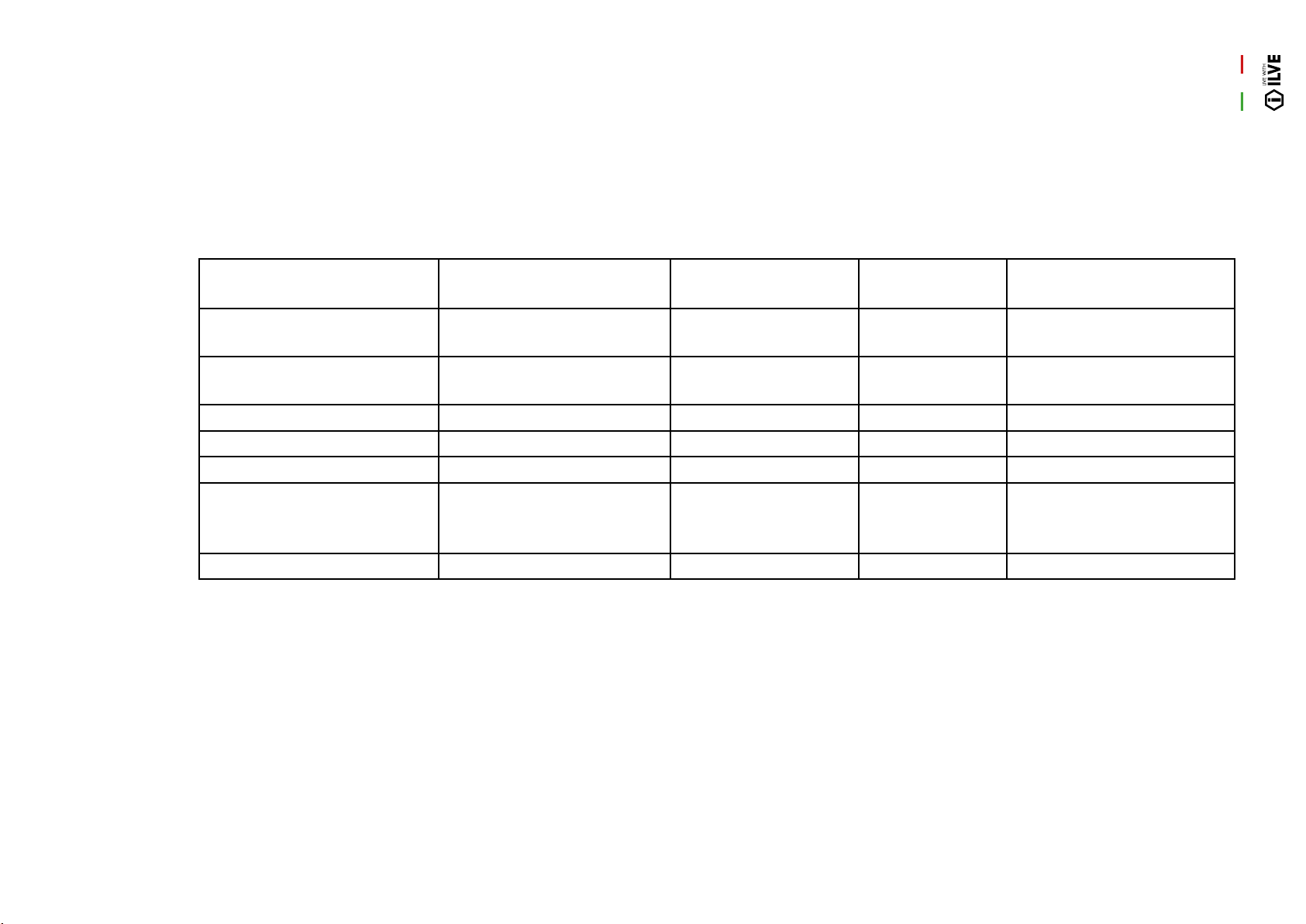
INSTALLATION
79
Burner Chart
ADJUSTMENT
Burner Injector Size (mm) NG consumption
@ 1kPa (MJ/h)
Injector
Size (mm)
ULPG consumption
@ 2.75kPa (MJ/h)
Dual Wok 1.75 / 0.80 17 1.10 / 0.50 20
Wok 1.9 18 1.12 18
Large 1.55 12.5 0.92 12.5
Medium 1.18 7.5 0.68 7
Fish 1.55 12.5 0.95 13
Tepanyaki Plate (medium
and large burner)
1.18, 1.55 7.5, 12.5 0.68, 0.92 7.0, 12.5
Simmer Plate (large) 1.55 12.5 0.92 12.5
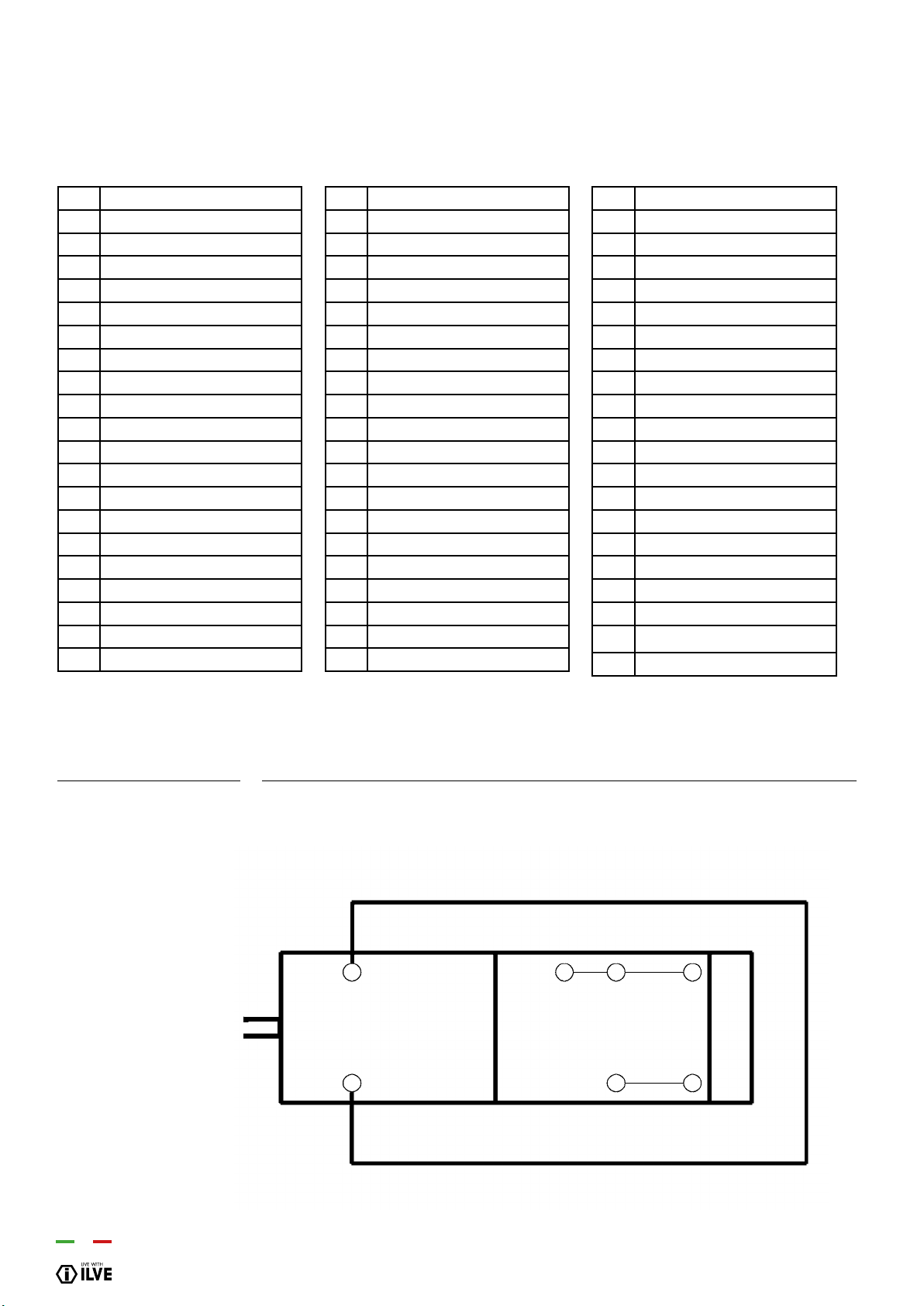
80
WIRING DIAGRAM
- Key
00 Black
11 Brown
22 Red
33 White
44 Yellow
45 Yellow-green
55 Grey
66 Blue
AA Electrical ignition transformer
C Switch
F Fase
K1 Earth wire for terminal board
K2 ” ” lower resistance
K3 ” ” for oven fan
K4 ” ” circular resistance
K5 ” ” upper resistance
K6 ” ” oven lamp 1
K7 ” ” oven lamp 2
K8 ” ” rotisserie
K9 ” ” cooling fan
K10 ” ” selector
K11 ” ” oven thermostat
K12 ” ” programmer/timer
K13 ” ” grill
K14 ” ” el. hotplate
K15 ” ” frame
K16 ” ” barbecue
K17 ” ” fryer
L1 oven lamp
L2 oven lamp
M Terminal board
MA Electrical ignition microswitch
MD Grill microswitch
MG Rotisserie
MP Door microswitch
N Neutral
P Timer/Programmer
P
Timer/Clock
PE Electric hotplate
R1 Upper heating element
R2 Lower heating element
R3 Grill heating element
R4 Circular heating element
R5 Barbecue heating element
R6 Fryer heating element
RE Energy regulator
S1 Oven warning light
S2 Mains power warning light
S3 Grill warning light
S4 Cooling fun warning
S5 Barbecue warning light
S6 El. hotplate warning light
S7 Turnsplit warning light
S8 Residual heat warning light
S9 Fryer warning light
SP Sparking plug
T Grill thermostat
TF Oven thermostat
TR Fryer thermostat
TS Safety thermostat
TT Cooling fan thermostat
V Oven fan
VT Cooling fan
e
-
I
J
K
E M
H p
2 O
QUICK START
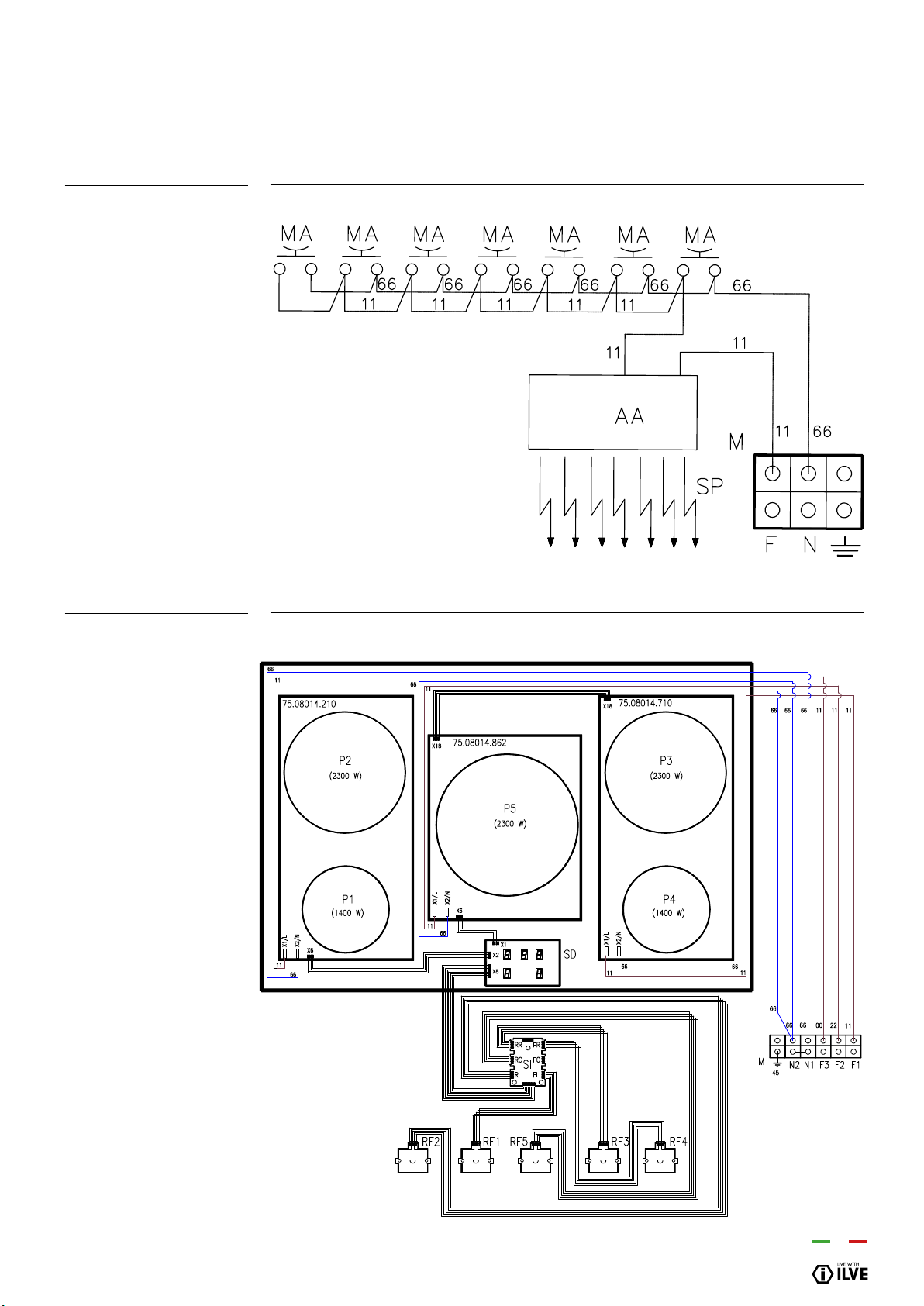
INSTALLATION
81
HOB GAS
BASIC INDUCTION HOB
AREA 5
WIRING DIAGRAM
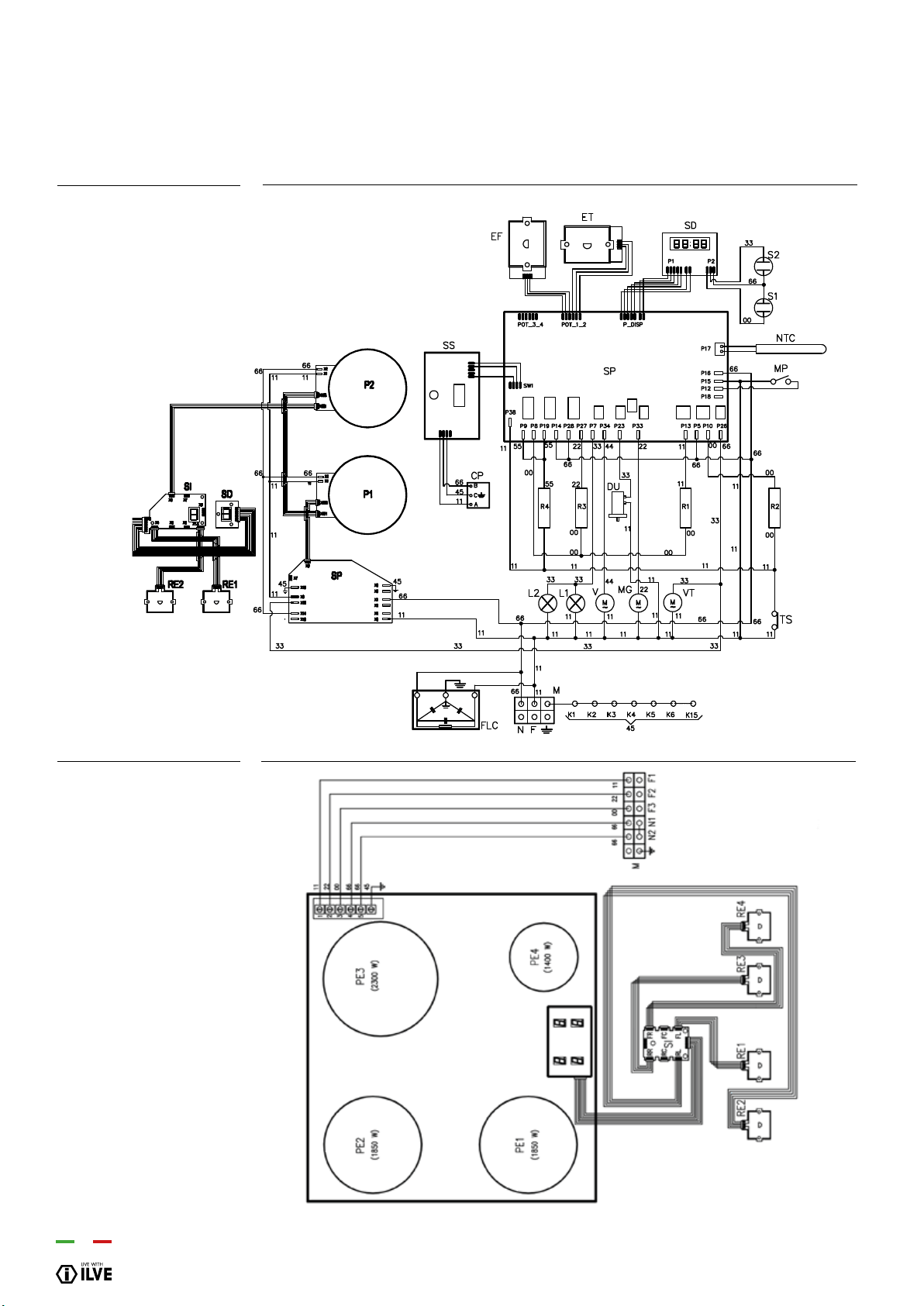
82
WIRING DIAGRAM
P09I...E3
INDUCTION HOB AREA 4
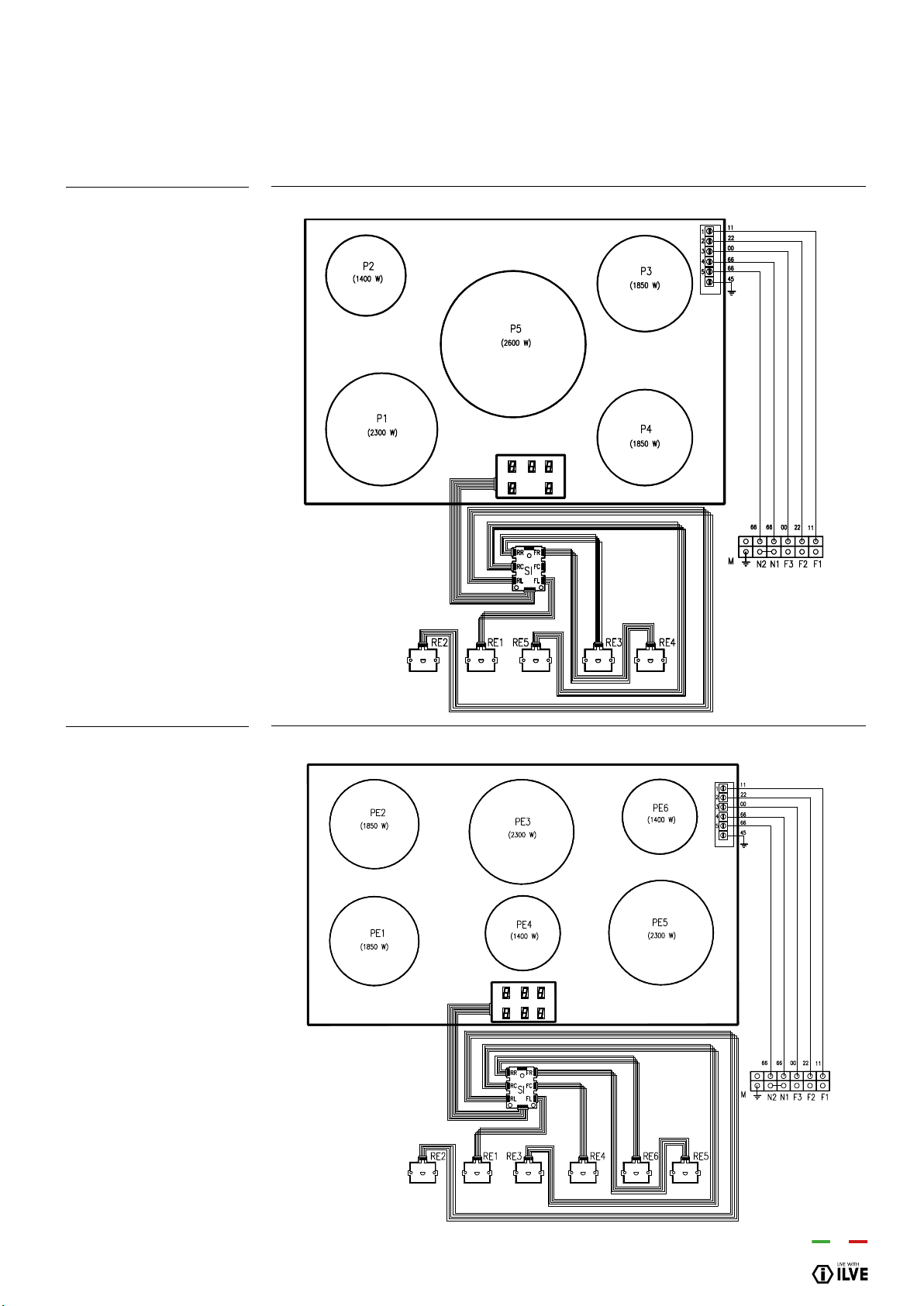
INSTALLATION
83
INDUCTION HOB AREA 5
INDUCTION HOB AREA 6
WIRING DIAGRAM
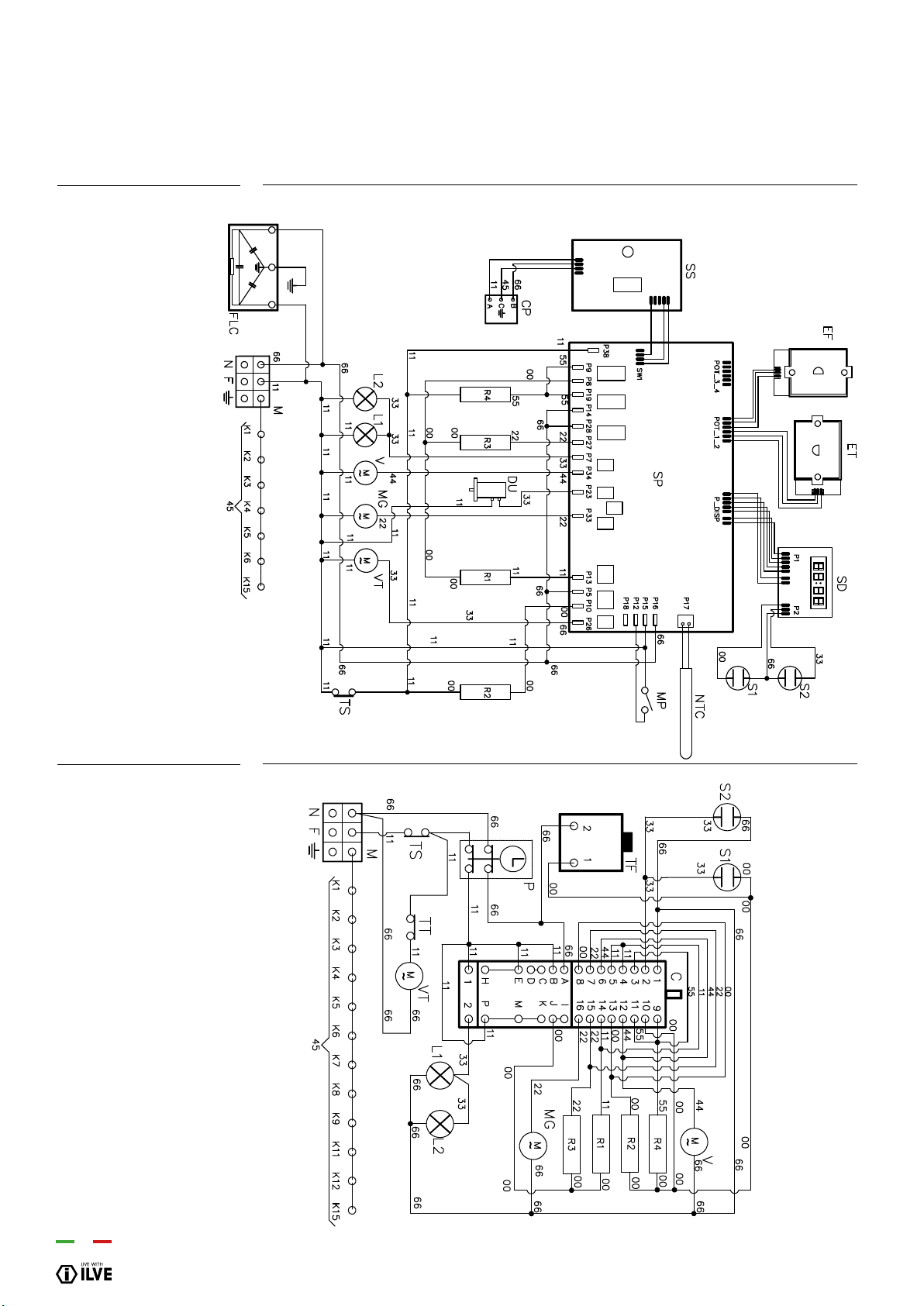
84
WIRING DIAGRAM
P (06-07-30”-08-09)...E3
K/L (06-09)...MP
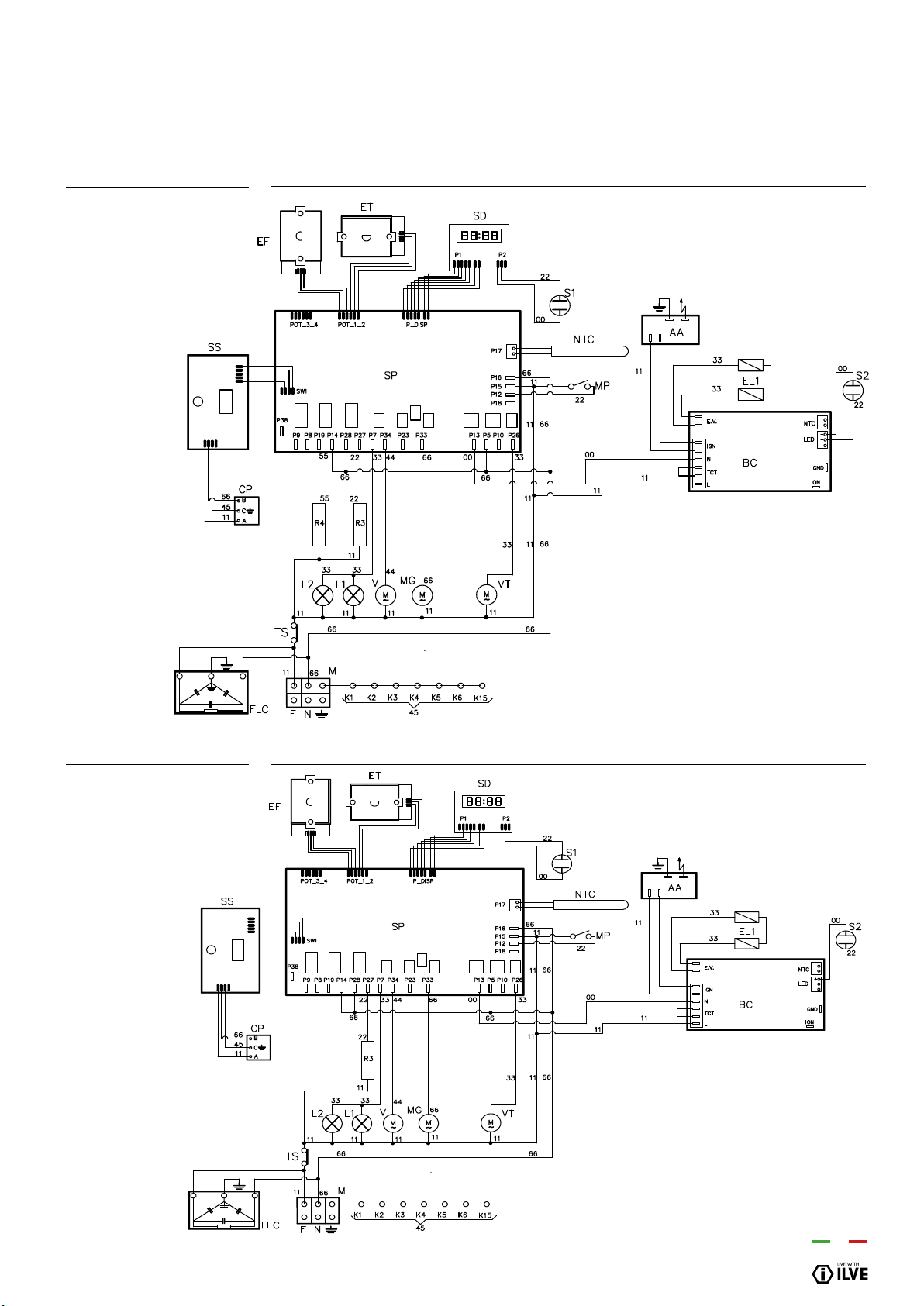
INSTALLATION
85
WIRING DIAGRAM
P (06-07-30”-08-09)...H3
P (06-07-30”-08-09)...G3
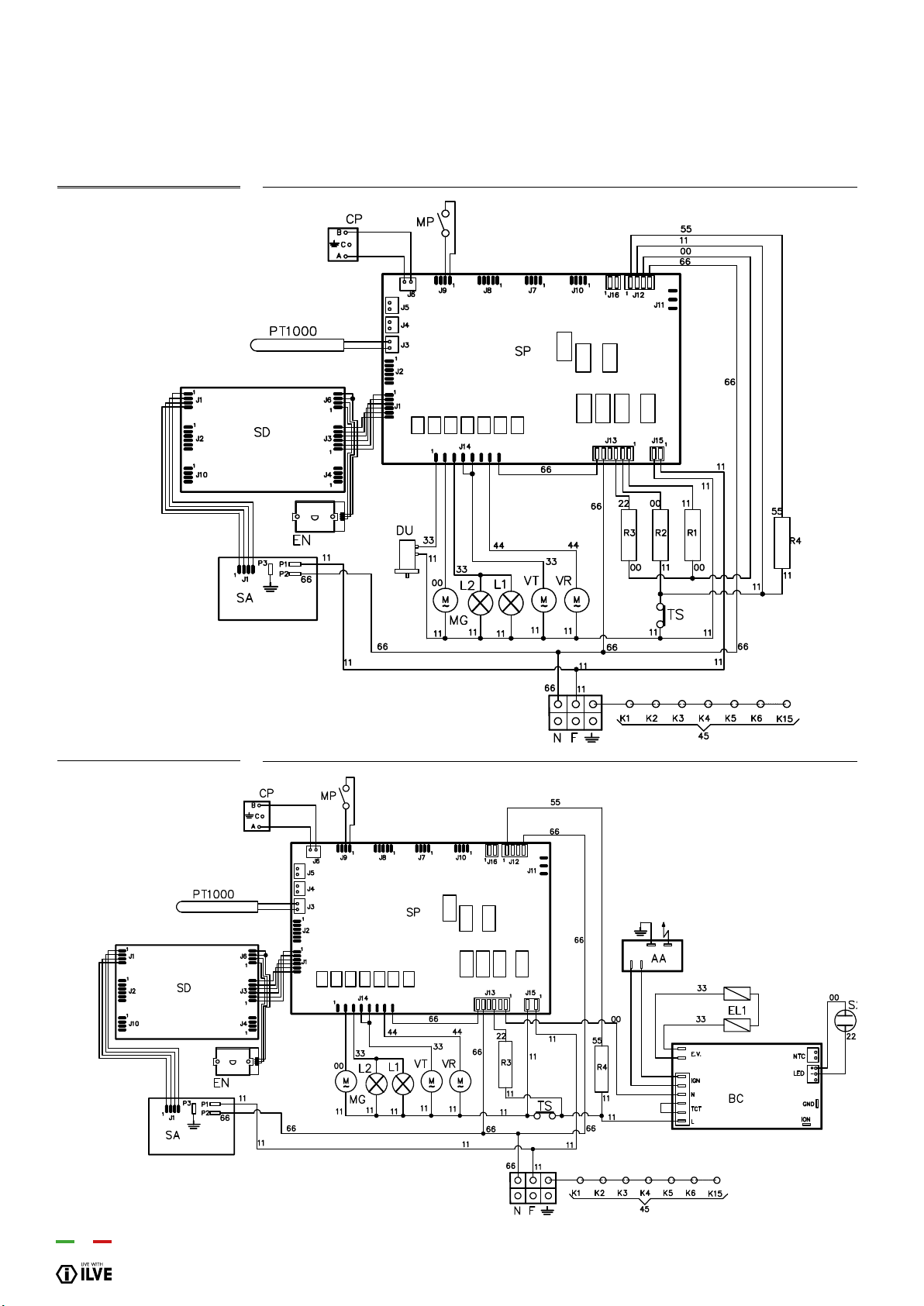
86
WIRING DIAGRAM
M(07-30”-09)...E3
M(07-30”-09)...H3
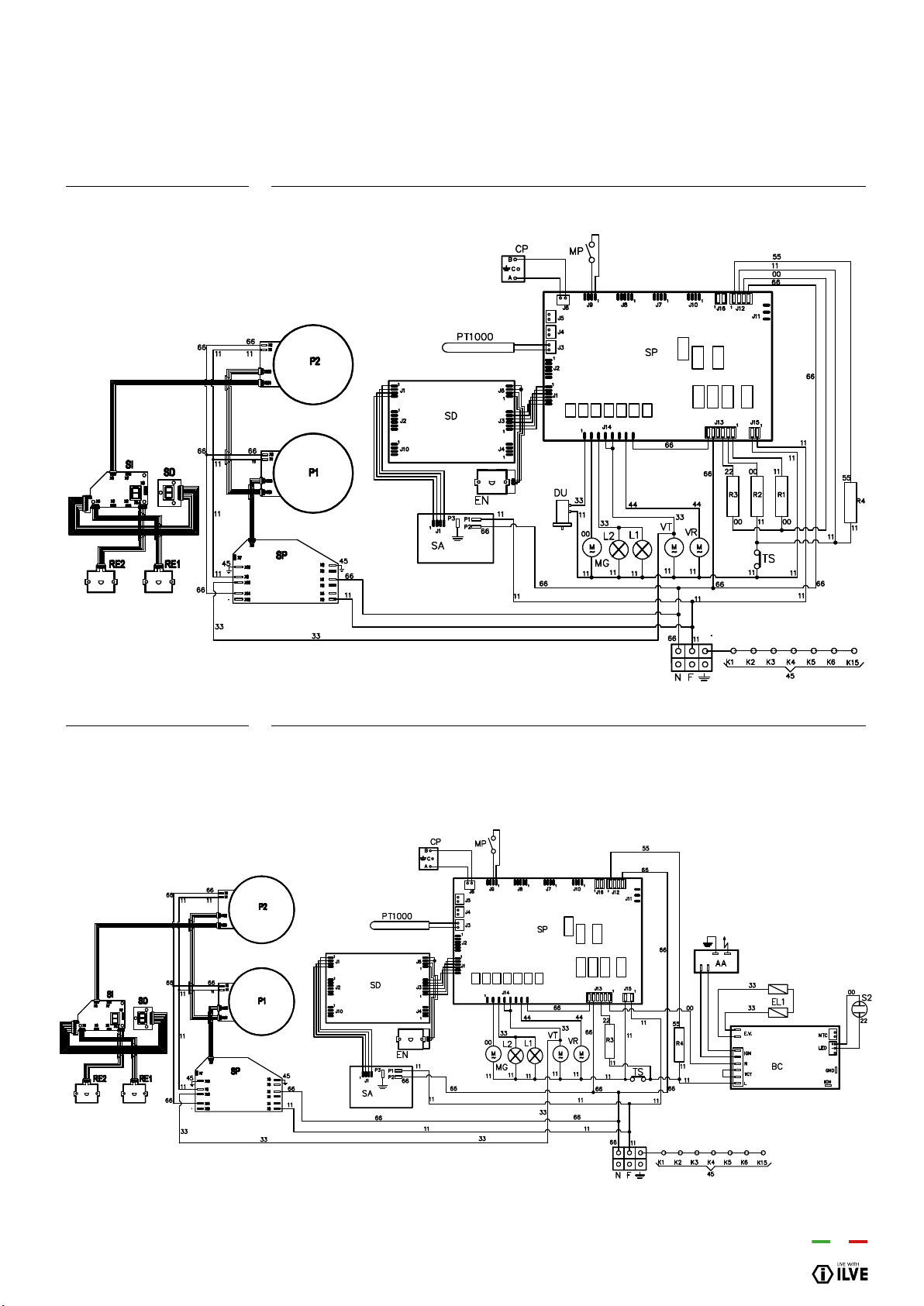
INSTALLATION
87
WIRING DIAGRAM
M09I..E3
M09I..H3
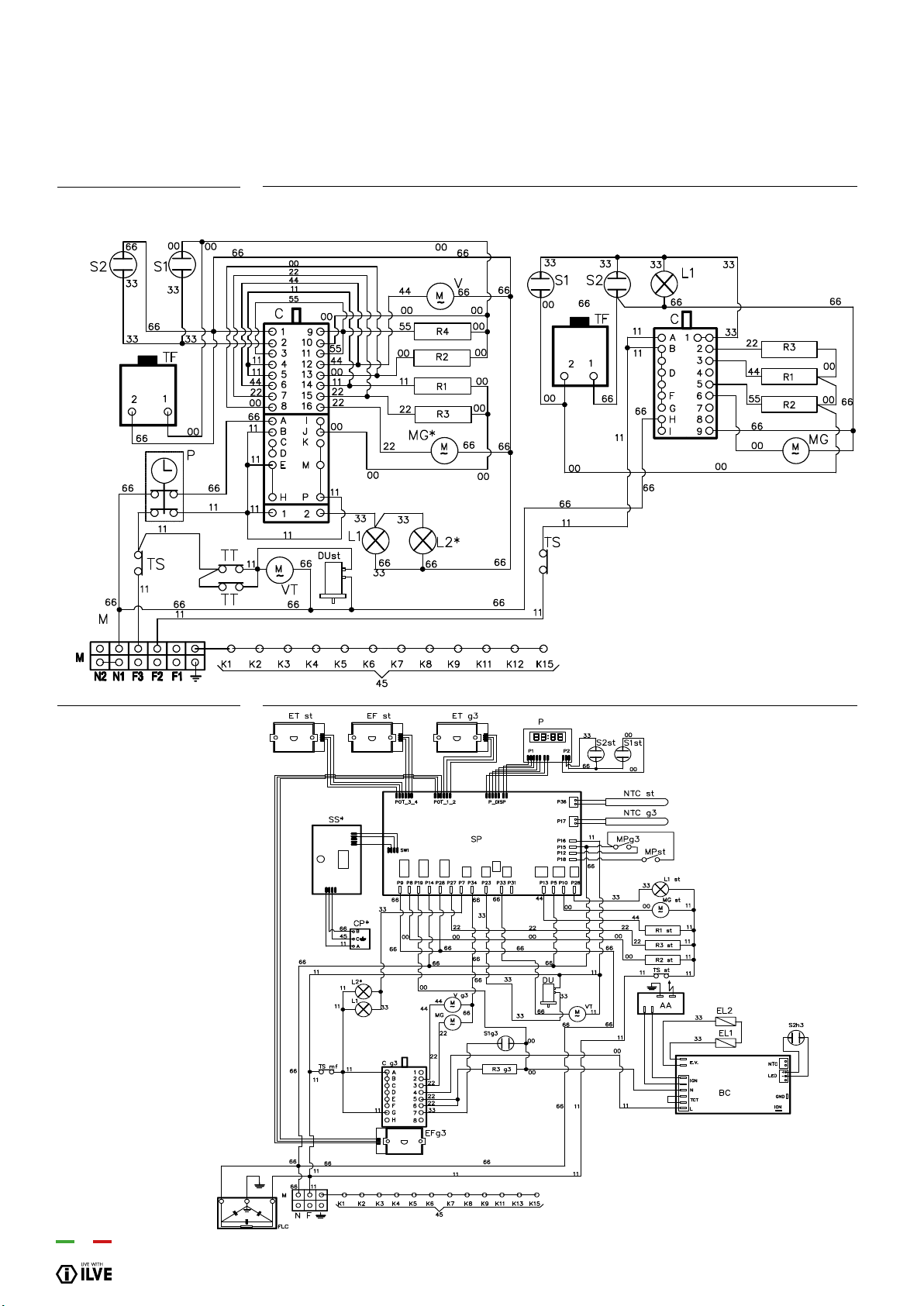
88
WIRING DIAGRAM
KD/LD (09-10)...MP
LD (09-10)...G3
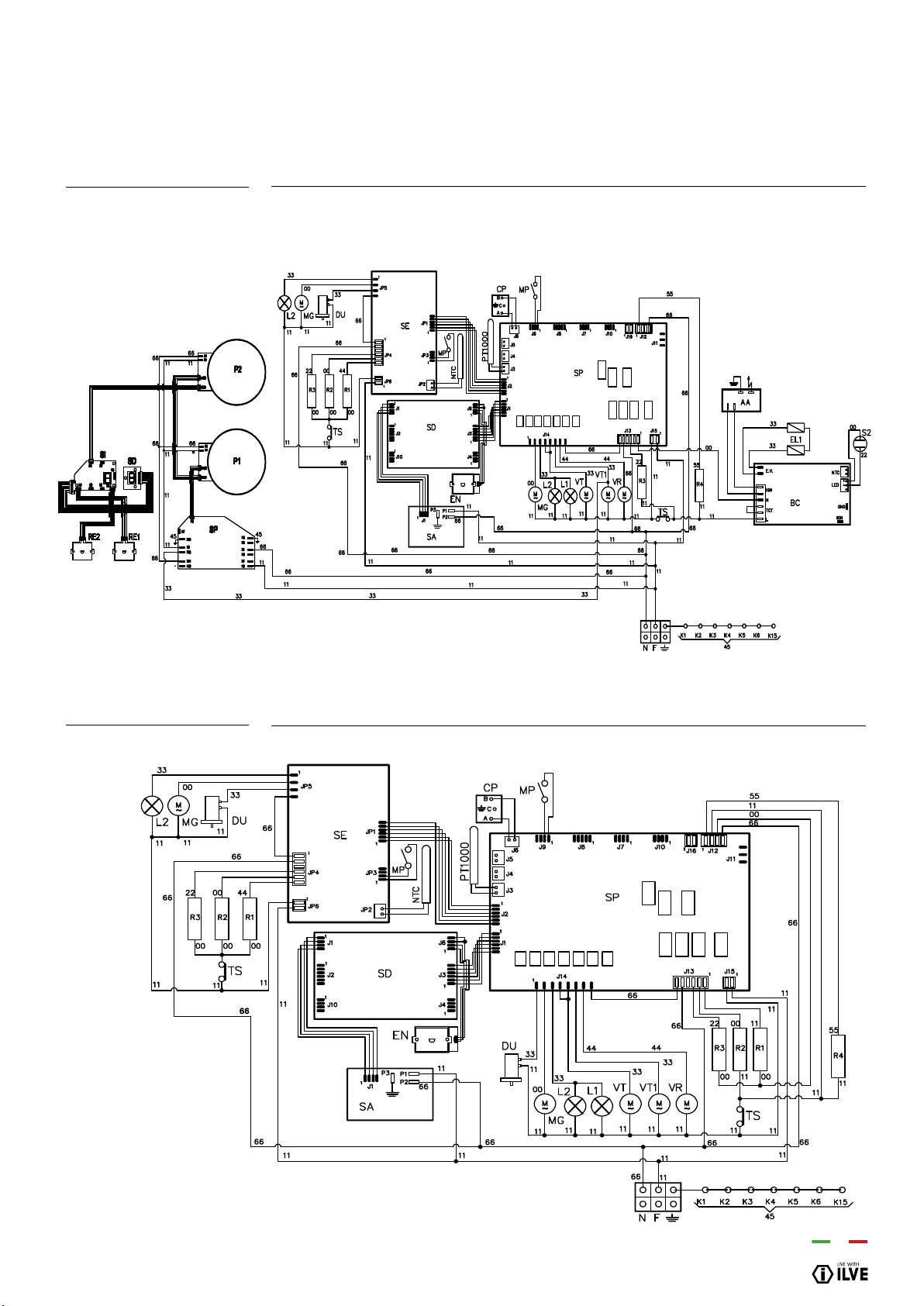
INSTALLATION
89
WIRING DIAGRAM
M12I...H3
M12...E3
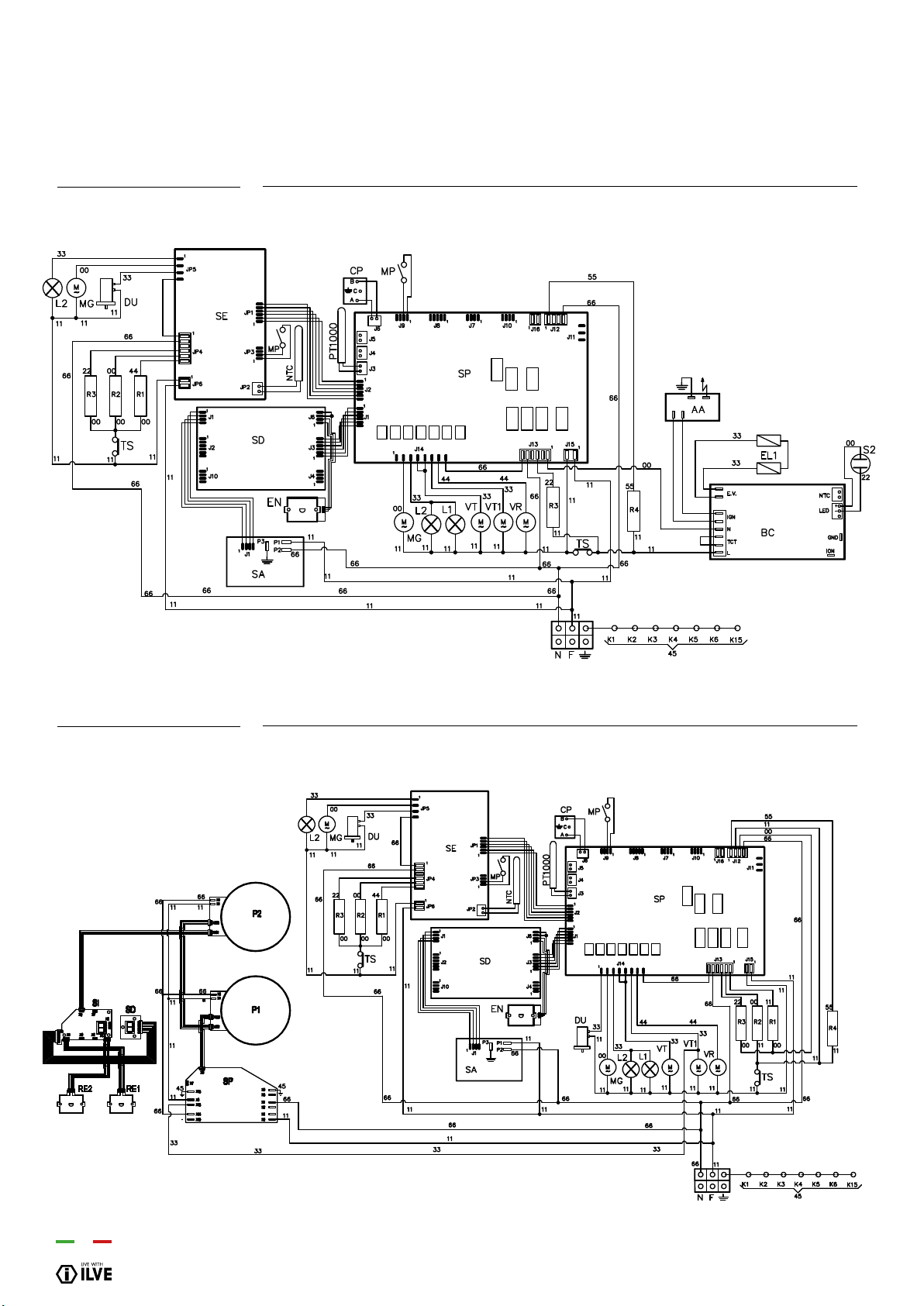
90
M12...H3
M12I...E3
WIRING DIAGRAM
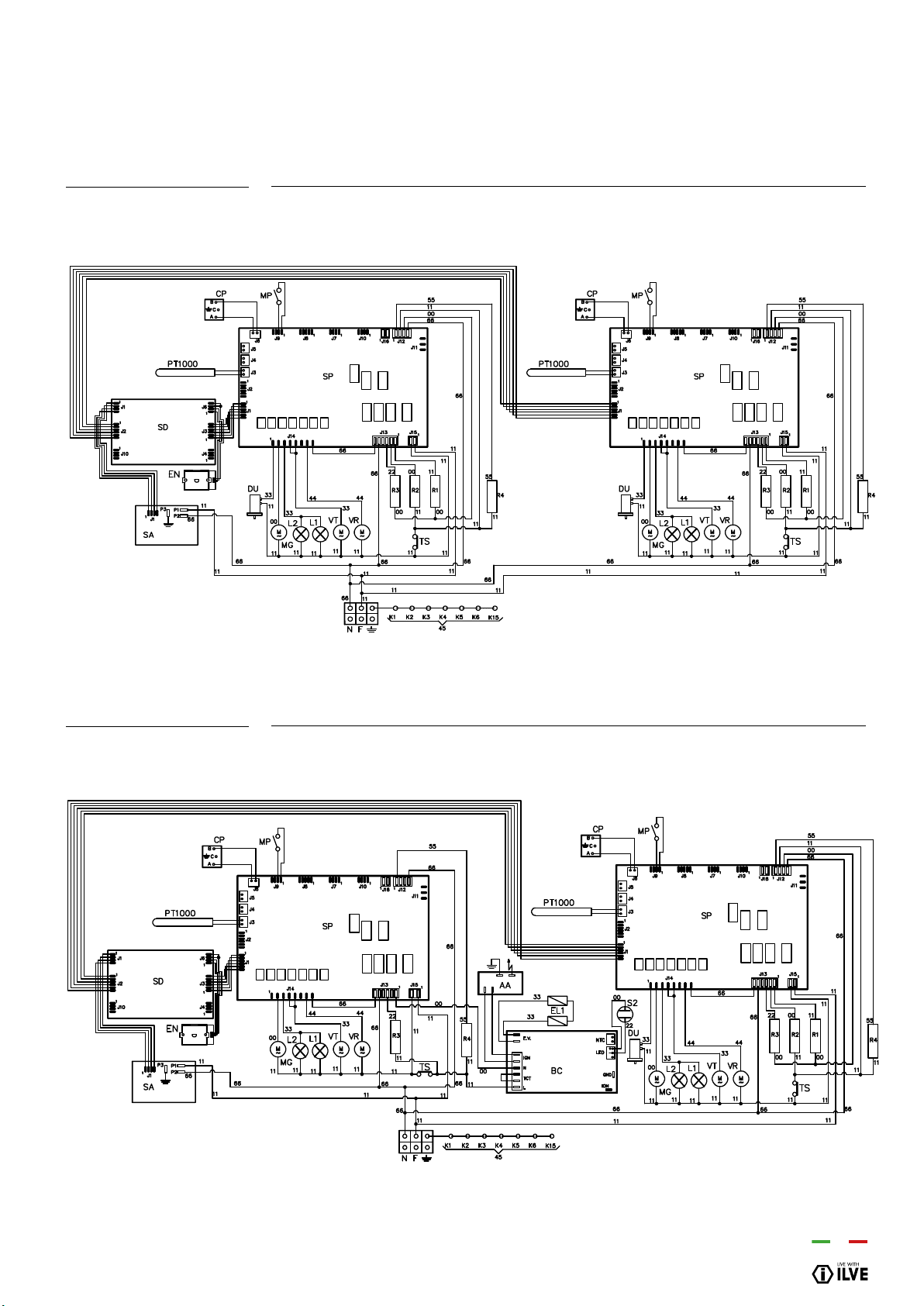
INSTALLATION
91
M15...E3
M15...H3
WIRING DIAGRAM
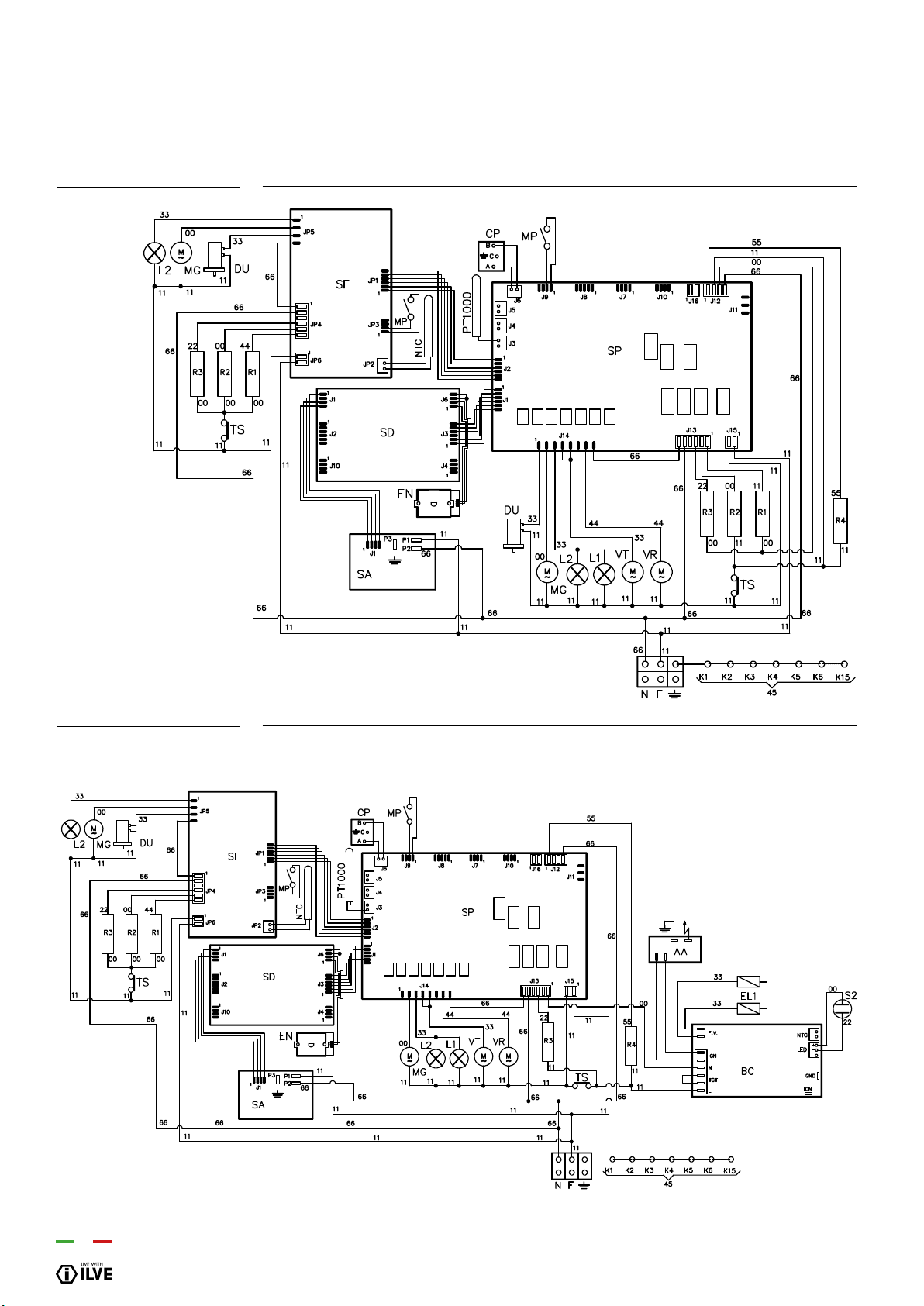
92
MD10...E3
MD10...H3
WIRING DIAGRAMWIRING DIAGRAM
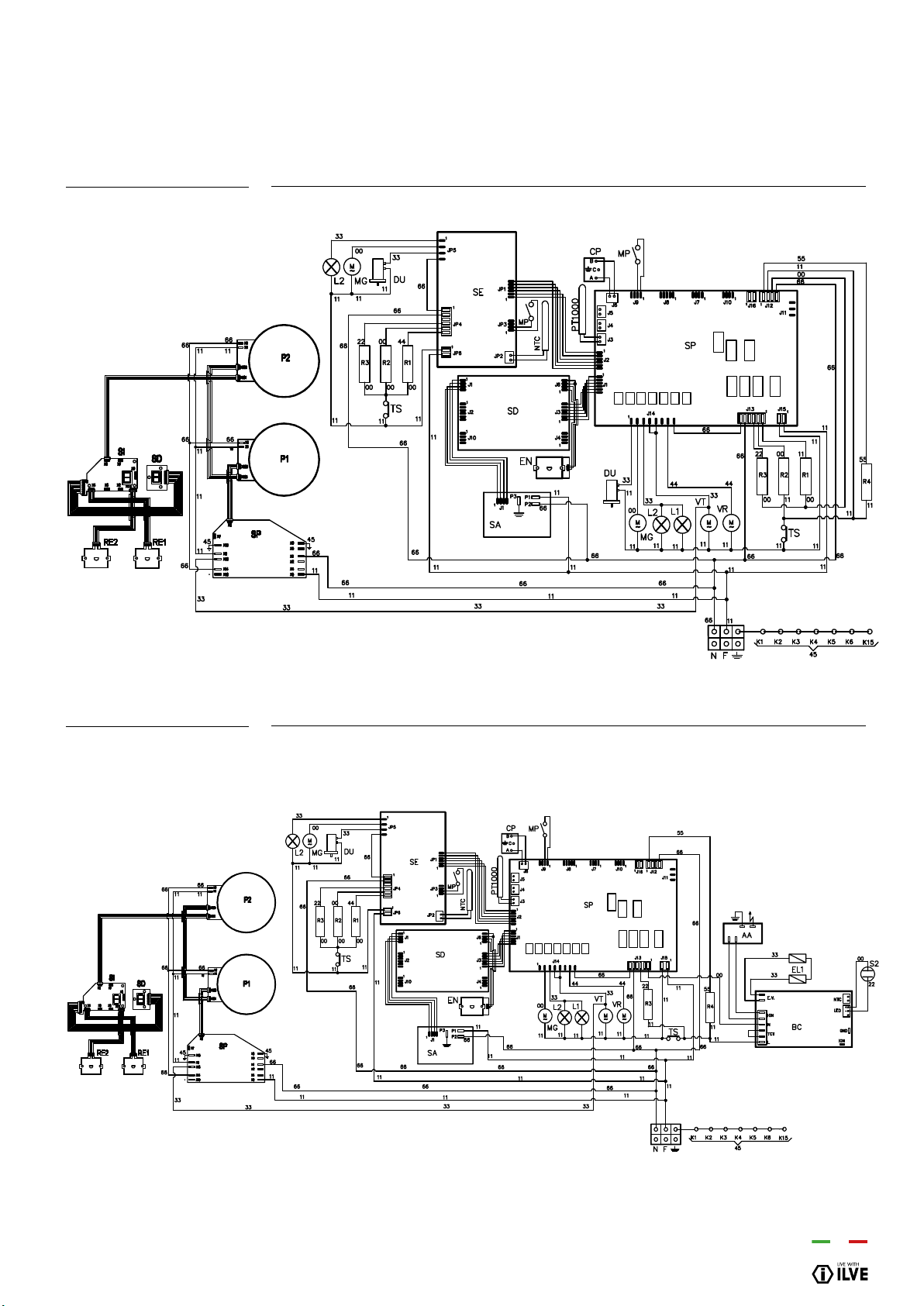
INSTALLATION
93
MD10I...E3
MD10I...H3
WIRING DIAGRAMWIRING DIAGRAM
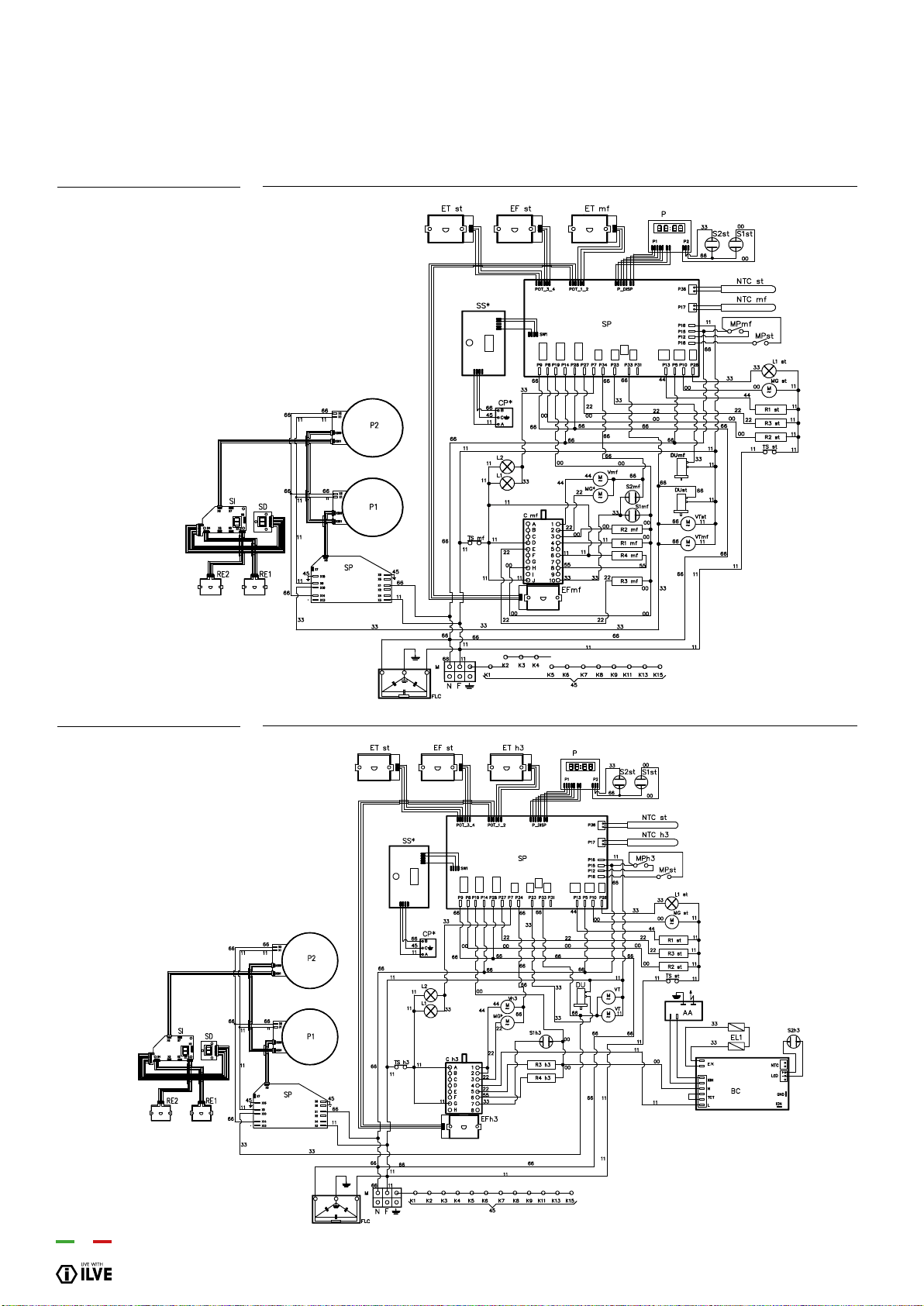
94
MD12I...E3
MD12I...H3
WIRING DIAGRAM
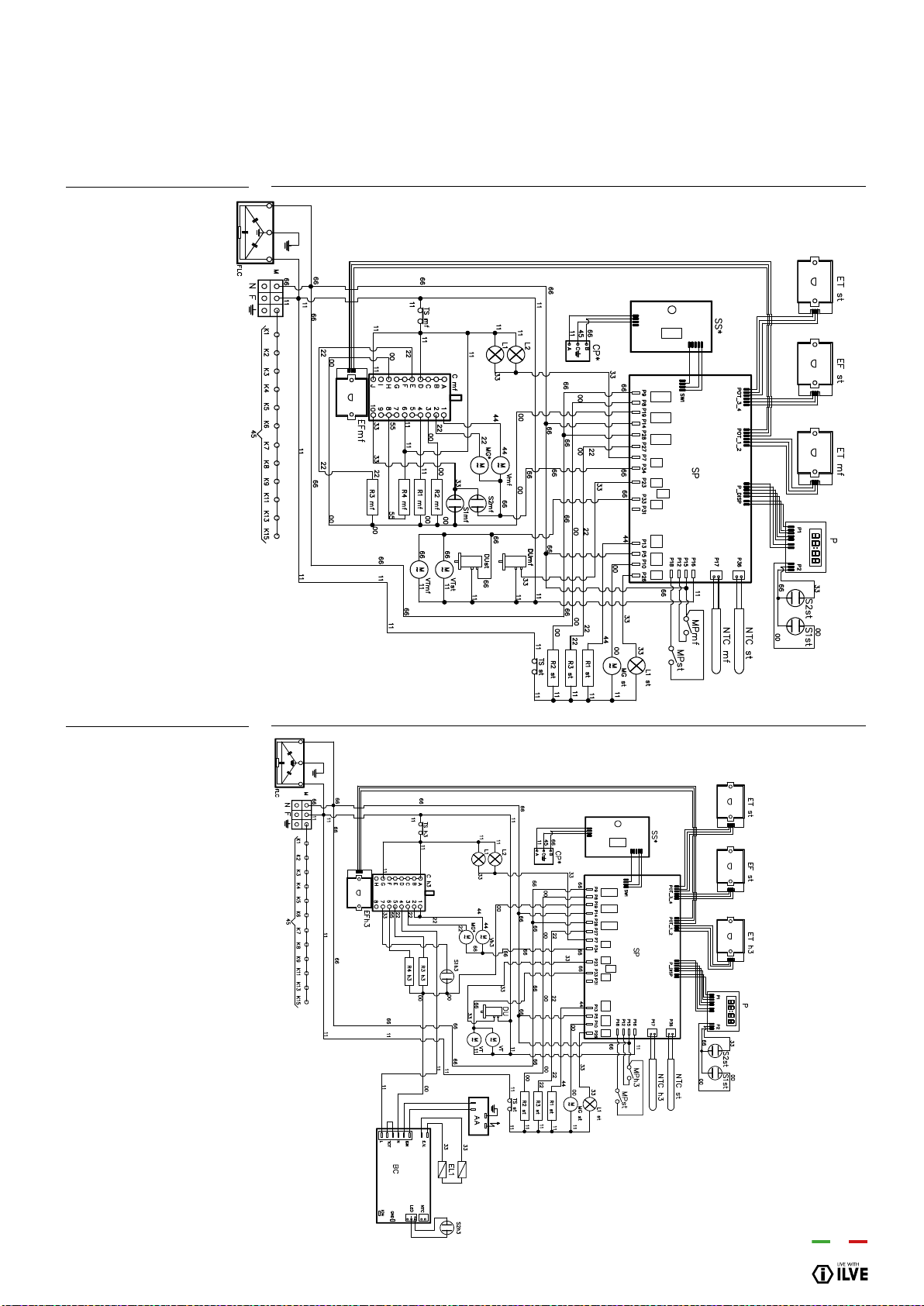
INSTALLATION
95
MD12...E3
MD12...H3
WIRING DIAGRAM
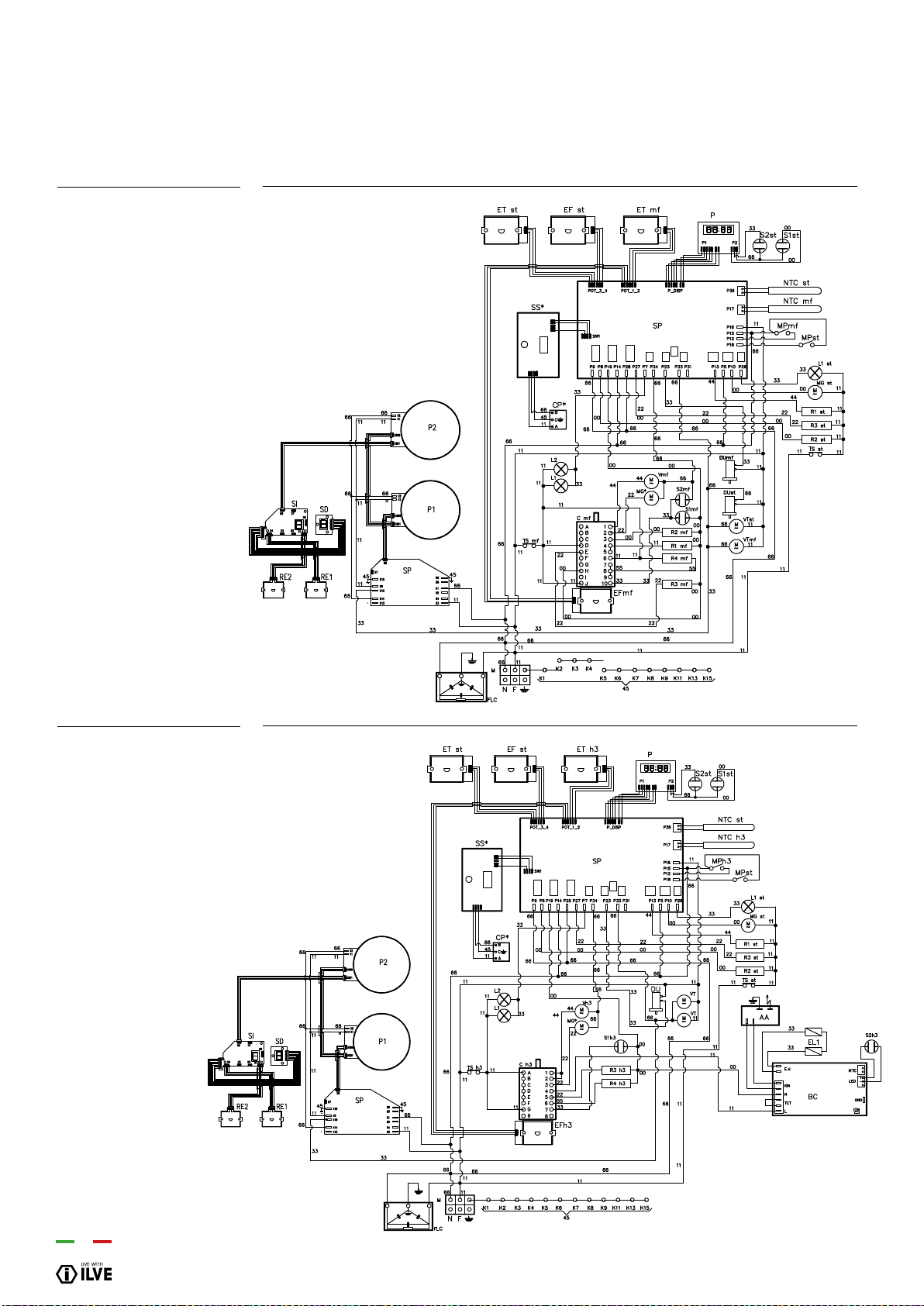
96
WIRING DIAGRAMWIRING DIAGRAM
P12...IE3
P12...IH3
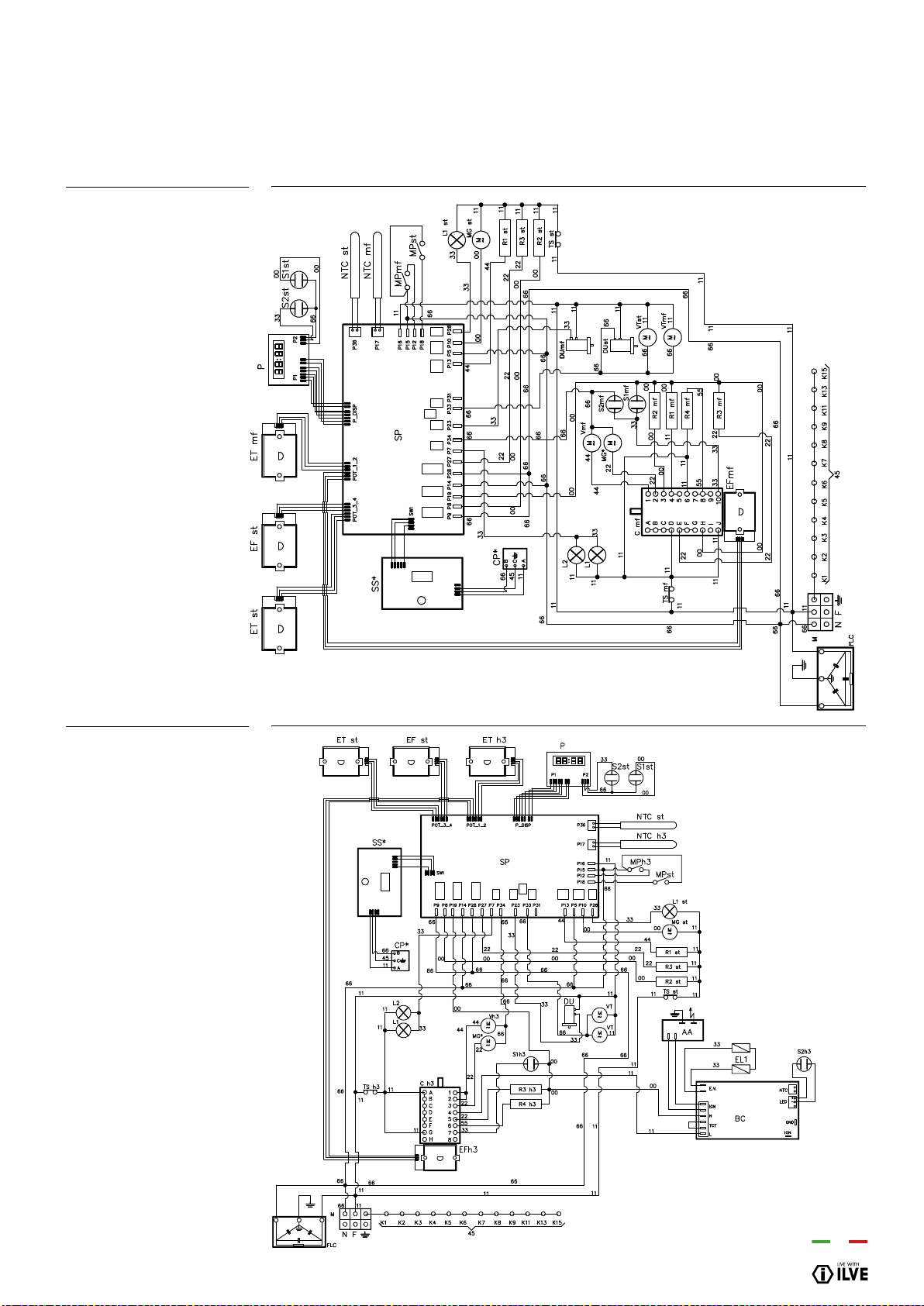
INSTALLATION
97
WIRING DIAGRAMWIRING DIAGRAM
P12...E3
P12...H3
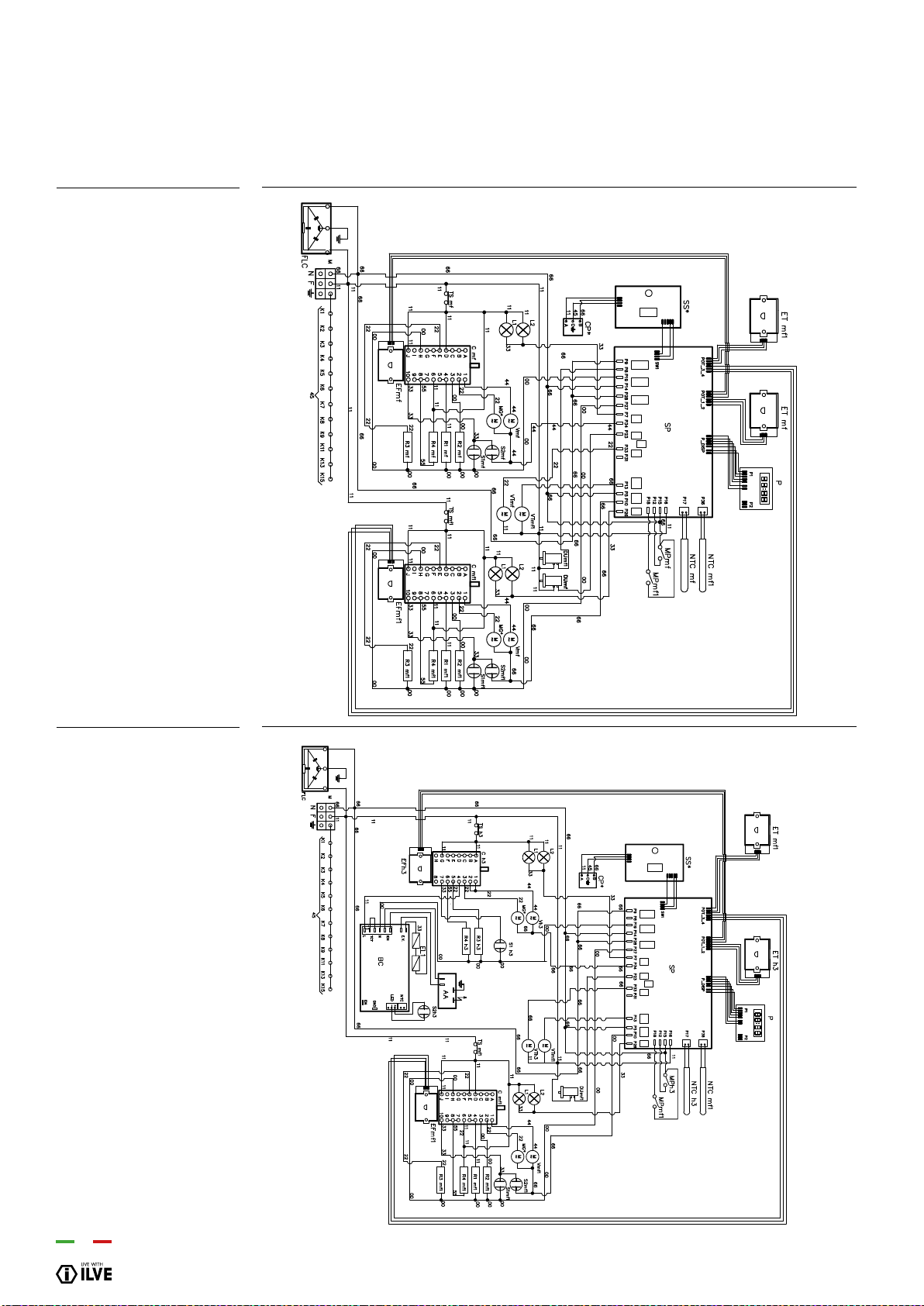
98
P15/PD12...E3
P15/PD12...H3
WIRING DIAGRAM
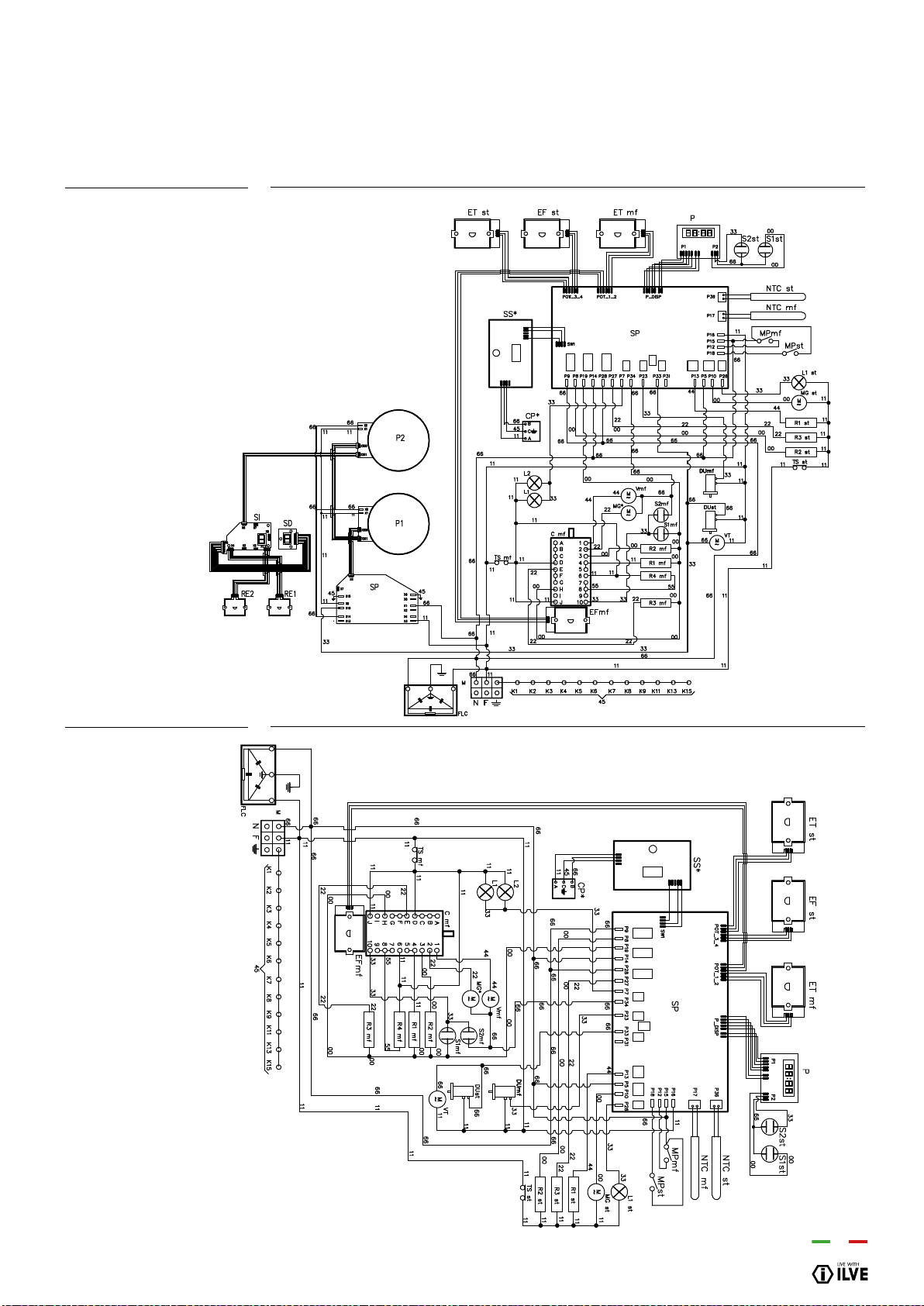
INSTALLATION
99
PD(09/10)I...E3
PD(09/10)...E3
WIRING DIAGRAM
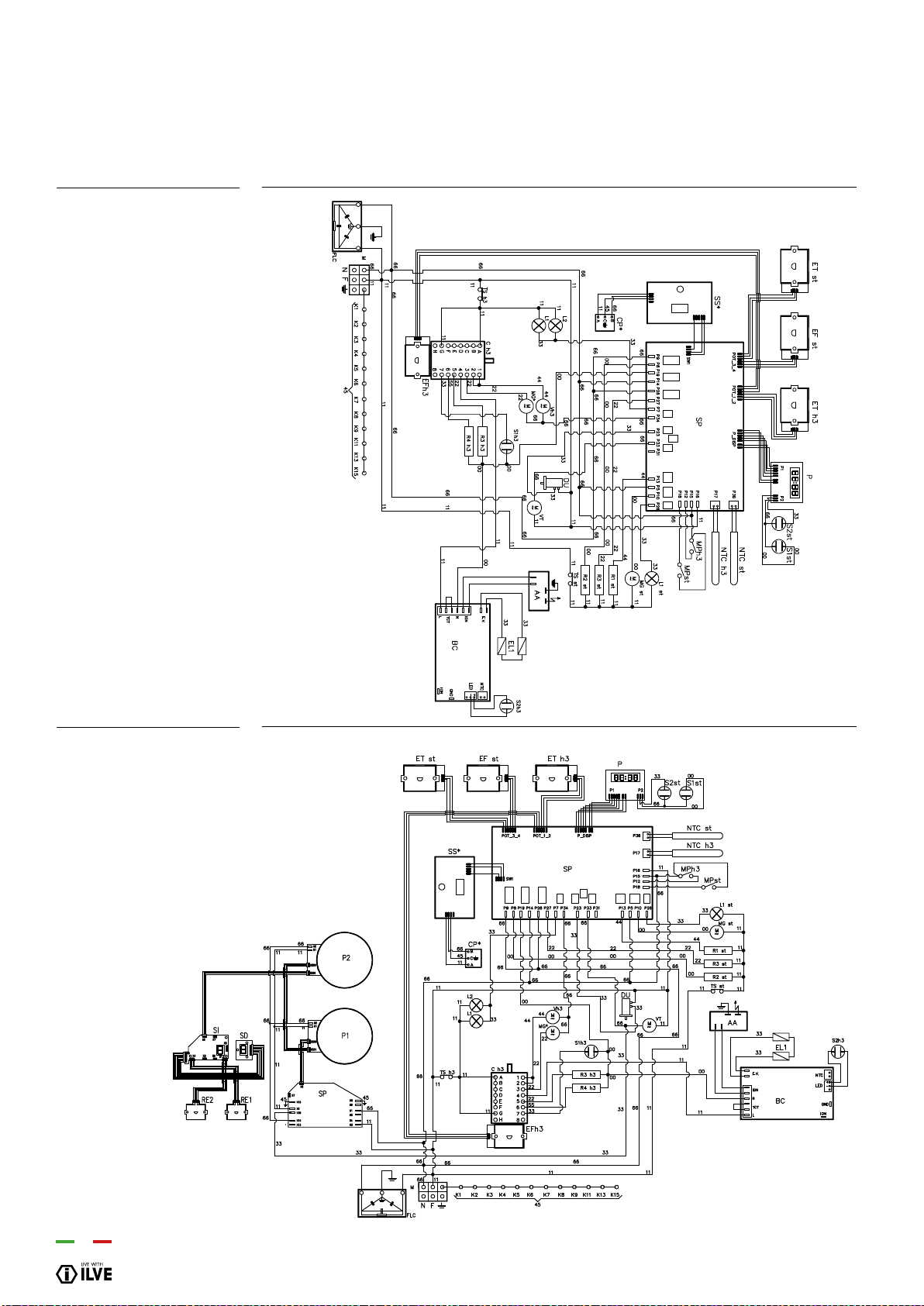
100
PD/LD(09-10)...H3
PD/LD(09-10)I...H3
WIRING DIAGRAM
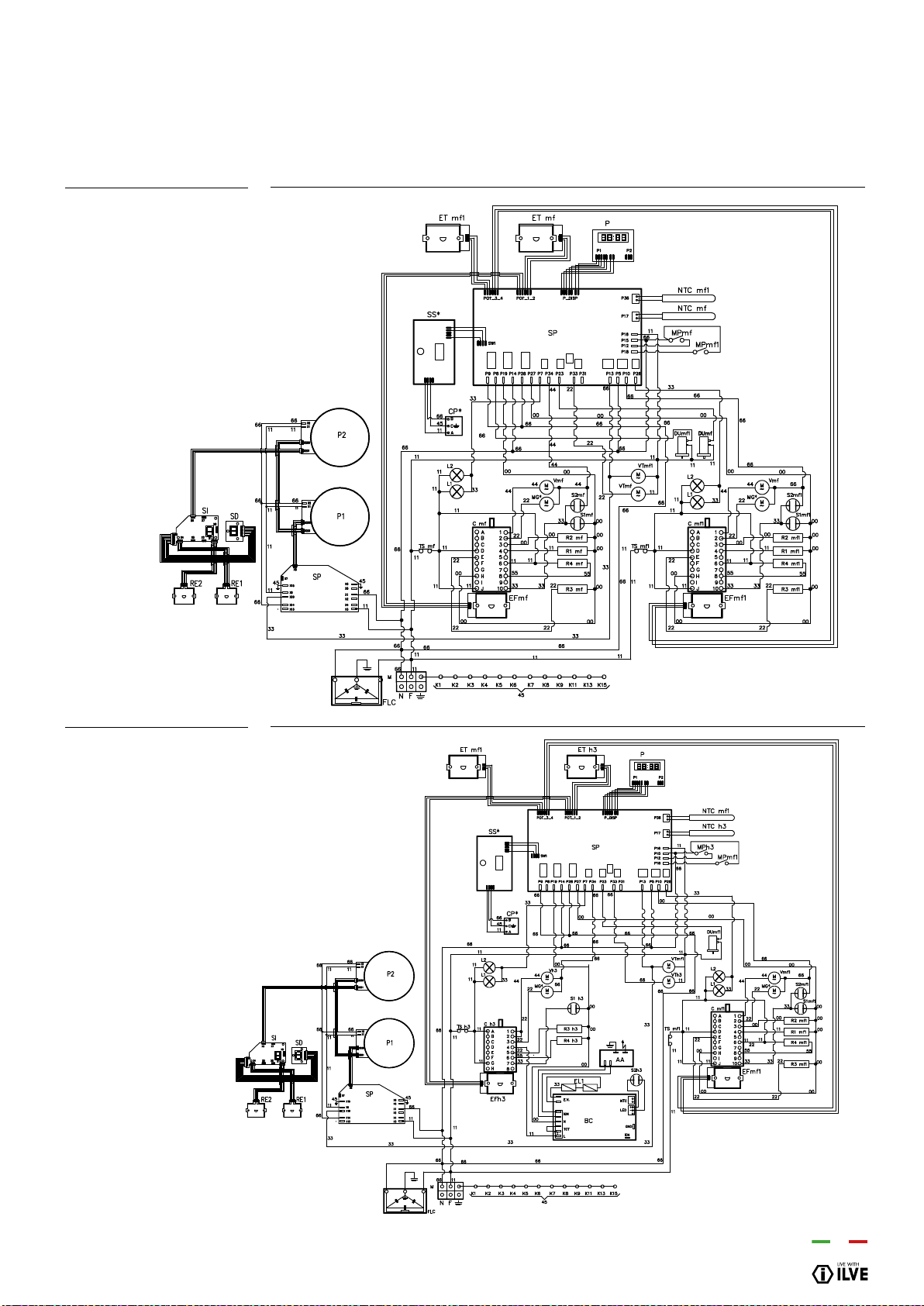
INSTALLATION
101
PD12I...E3
PD12I...H3
WIRING DIAGRAM
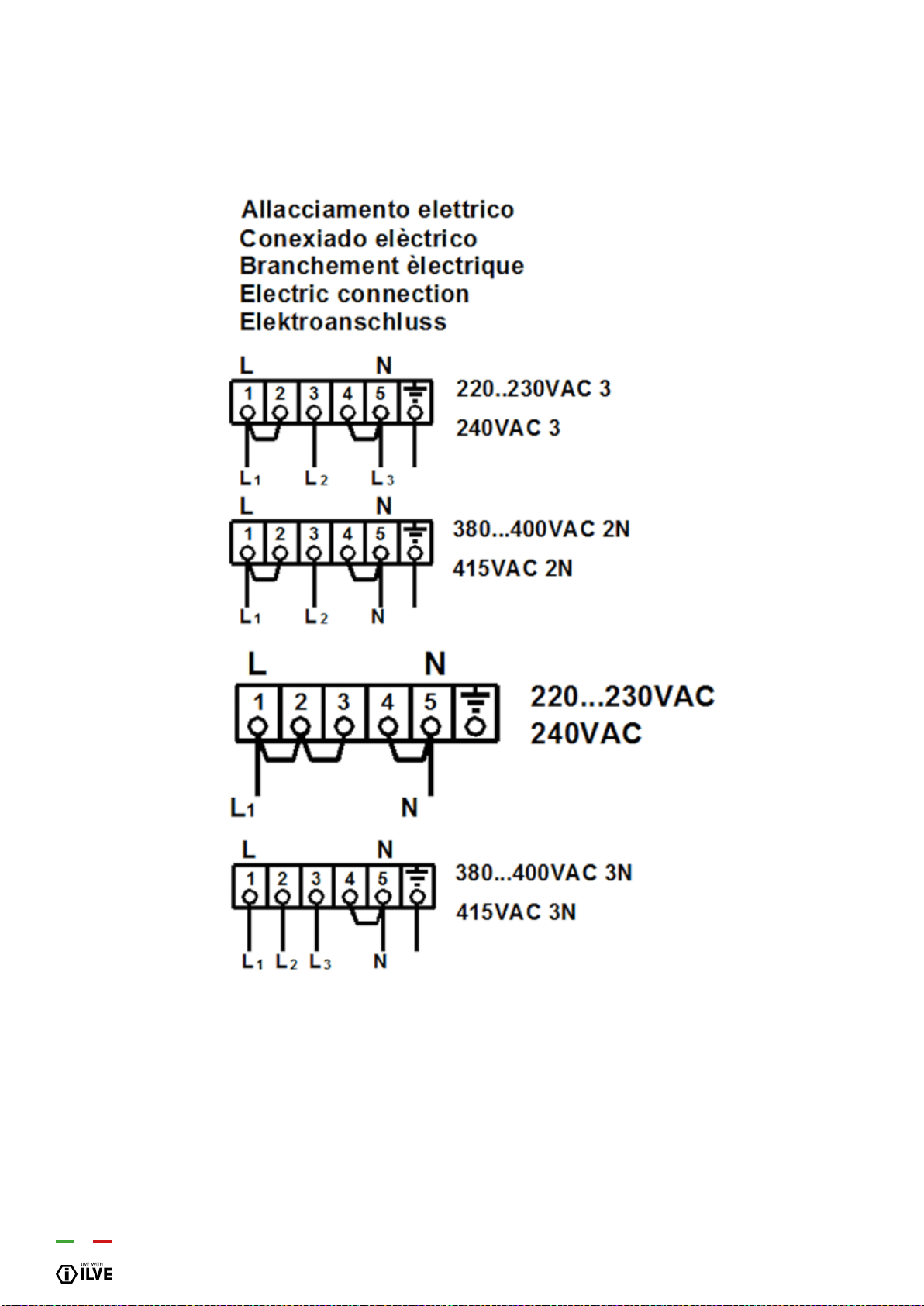
102
WIRING DIAGRAM
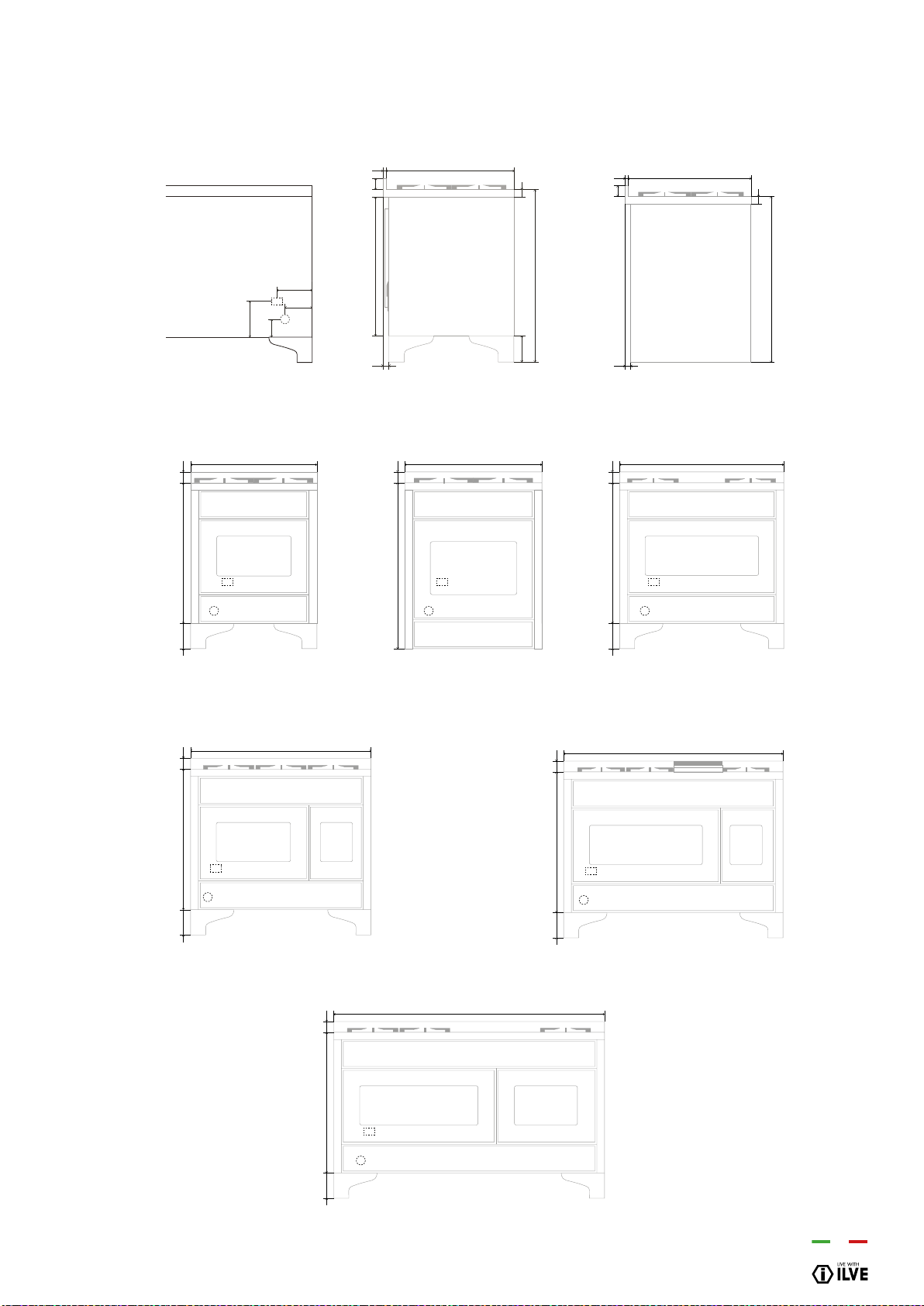
INSTALLATION
103
INSTALLATION & CONNECTION
MAJESTIC
E
G
200
100
A
B
60740
40 140
920
30
15
700
G
E
780 60140
700
E
G
780 60140
911
E
G
780 60140
1216
E
G
780 60140
1511
G
E
880 60
760
60
40
880
30
15
700
E
G
780 60140
1000
Majestic - Rear View Majestic - Side (except M30) Majestic - Side (only M30)
Majestic - M07 Majestic - M30 Majestic - M09
Majestic - M10 Majestic - M12
Majestic - M15
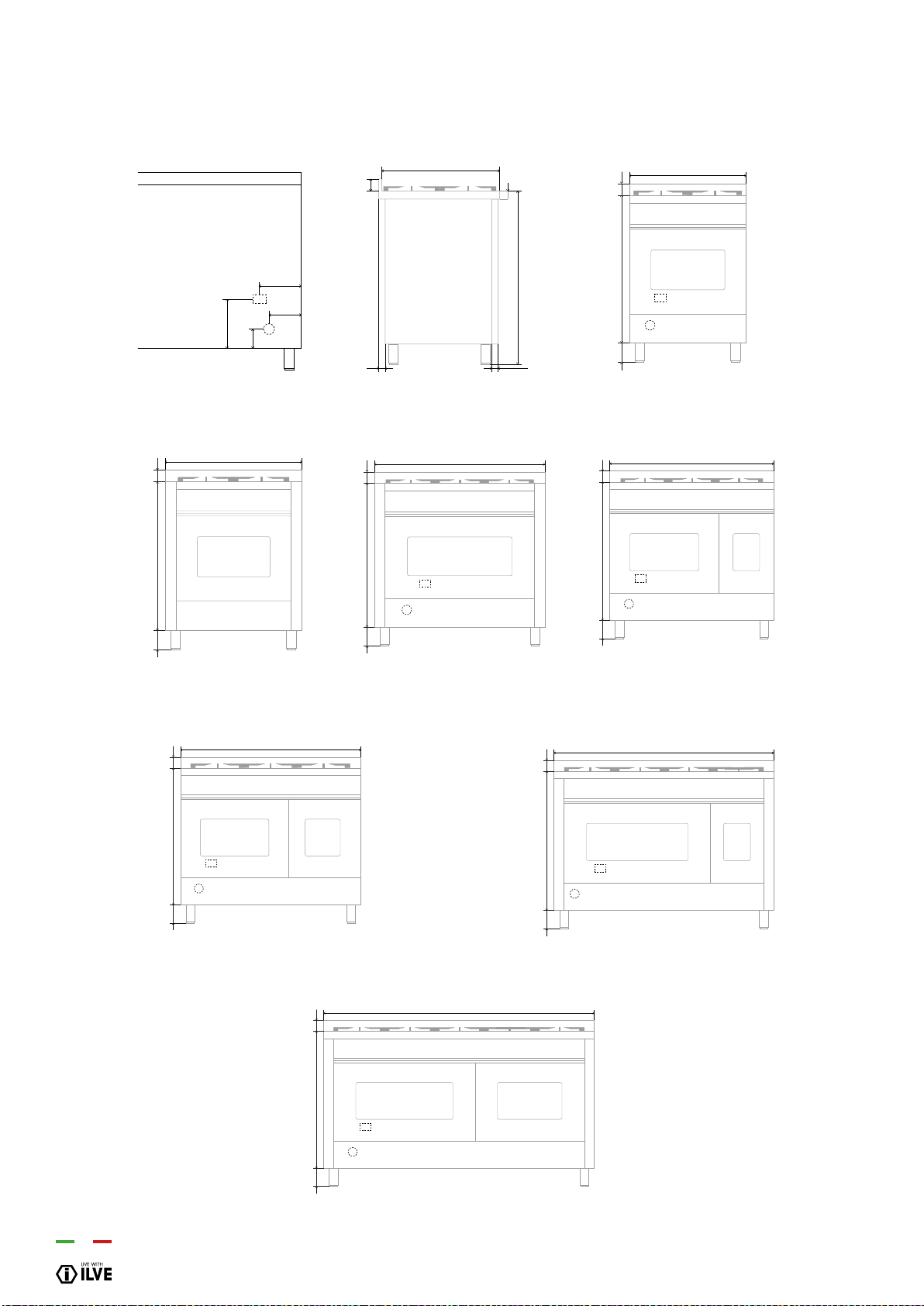
104
INSTALLATION & CONNECTION
PROFESSIONAL PLUS, PRO-LINE & V LINE
700
760 60
100÷160
70cm Wide
E
G
230
90
A
B
60
35 45
600
40
860÷920
E
G
760 60
900
100÷160
E
G
760 60
1200
100÷160
E
G
760 60
1500
100÷160
E
G
100÷160 760 60
1000
Rear View
Side View
90cm Wide (double oven)
100cm Wide 120cm Wide
E
G
760 60
600
100÷160
60cm Wide
E
G
760 60
900
100÷160
90cm Wide
150cm Wide

105
Eurolinx Pty Limited A.B.N. 50 001 473 347
trading as ILVE (“ILVE”)
Ofce:
48-50 Moore Street, Leichhardt N.S.W 2040
Post:
Locked Bag 3000, Annandale, N.S.W 2038
P: 1300 856 411
WARRANTY REGISTRATION
Your ongoing satisfaction with your ILVE product
is important to us. We ask that you complete the
enclosed Warranty Registration Card and return
it to us so that we have a record of the ILVE
product purchased by you, Alternitivley, you can
now register your warranty online at
http://support.eurolinx.com.au/
PRIVACY
ILVE respects your privacy and is committed
to handling your personal information in
accordance with the National Privacy Principles
and the Privacy Act 1988 (Cth). A copy of the
ILVE Privacy Policy is available at www.ilve.
com.au. ILVE will not disclose any personal
information set out in the Warranty Registration
Card (“Personal Information”) without your
consent unless required by:
1. law;
2. any ILVE related company;
3. any service provider which provide services
to ILVE or assist ILVE in providing services
(including repair and warranty services) to
customers. Our purpose in collecting the
Personal Information is to keep a record of
the ILVE product purchased by you, in order
to provide a better warranty service to you in
the unlikely event that there is a problem with
your ILVE product. ILVE may contact you at any
one or more of the addresses, email addresses
or telephone numbers set out in the Warranty
Registration Card. Please contact ILVE on 1300
694 583 should you not wish to be contacted by
ILVE.
WARRANTY
1. Warranty
ILVE warrants that each ILVE product will
remain, for a period of twenty four (24) months
computed from the date of purchase of the
ILVE product, free from defects arising in the
manufacture of the ILVE product (“Warranty”).
Except for consumer guarantees set
out in the Competition and Consumer Act 2010
(Cth) (“Act”), ILVE does not make any further
warranties or representations in relation to ILVE
products.
2. What is not Covered by the Warranty.
The Warranty does not apply if an ILVE product
is defective by a factor other than a defect
arising in the manufacture of the ILVE product,
including but not limited to:
(a) damage through misuse (including failure
to maintain, service or use with proper care),
neglect, accident or ordinary wear and tear
(including deterioration of parts and accessories
and glass breakage);
(b) use for purpose for which the ILVE product
was not sold or designed;
(c) use or installation which is not in accordance
with any specied instructions for use or
installation;
(d) use or operation after a defect has occurred or
been discovered;
(e) damage through freight, transportation or
handling in transit (other than when ILVE is
responsible);
(f) damage through exposure to chemicals, dusts,
residues, excessive voltage, heat, atmospheric
conditions or other forces or environmental
factors outside the control or ILVE;
(g) repair, modication or tampering by the
purchaser or any person other than ILVE, an
employee of ILVE or an authorised ILVE service
contractor*;
(h) use of parts, components or accessories
which have not been supplied or specically
approved by ILVE.
(i) damage to surface coatings caused by cleaning
or maintenance using products not recommended
in the ILVE product handbook provided to the
purchaser upon purchase of the ILVE product;
(j) damage to the base of an electric oven due to
items having been placed on the base of the oven
cavity or covering the base, such as aluminium
foil (this impedes the transfer of heat from the
element to the oven cavity and can result in
irreparable damage); or
(k) damages, dents or other cosmetic
imperfections not aecting the performance of the
ILVE in respect of an ILVE product purchased as a
“factory second” or from display
The Warranty does not extend to light globes
used in ILVE products.
3. Domestic Use
Each ILVE product is made for domestic use. This
Warranty may not extend to ILVE products used
for commercial purposes.
4. Time for Claim under the Warranty
You must make any claim under this Warranty
within twenty eight (28) days after the occurrence
of an event which gives rise to a claim pursuant
to the Warranty, by booking a service call on the
telephone number below.
Continued over...
WARRANTY

106
5. Proof of Purchase
Customers must retain proof of purchase in order
to be eligible to make a warranty claim in respect
of an ILVE product.
6. Claiming under the Warranty
Customers will bear the cost of claiming under this
Warranty unless ILVE determines the expenses
are reasonable, in which case the customer
must claim those expenses by providing written
evidence of each expense to ILVE at the address
on the Warranty Registration Card.
7. Statutory Rights
(a) These terms and conditions do not aect your
statutory rights.
(b) The limitations on the Warranty set out in this
document do not exclude or limit the application
of the consumer guarantees set out in the Act or
any other equivalent or corresponding legislation
in the relevant jurisdiction where to do so would:
(i) contravene the law of the relevant jurisdiction;
or
(ii) cause any part of the Warranty to be void.
(c) ILVE excludes indirect or consequential loss
of any kind (including, without limitation, loss of
use of the ILVE product) and (other than expressly
provided for in these terms and conditions)
subject to all terms,
conditions and warranties implied by custom, the
general law, the Act or other statute.
(d) The liability of ILVE to you for a breach of any
express or non-excludable implied term, condition
or warranty is limited at the option of ILVE to:
(i) replacing or repairing the defective part of the
ILVE product;
(ii) paying the cost of replacing or repairing the
defective part of the ILVE product;
(iii) replacing the ILVE product; or
(iv) paying the cost of replacing the ILVE product.
(e) Our goods come with guarantees that cannot
be excluded under the Australian Consumer
Law. You are entitled to a replacement or refund
for a major failure and for compensation for any
other reasonably foreseeable loss or damage.
You are also entitled to have the goods repaired
or replaced if the goods fail to be of acceptable
quality and the failure does not amount to a
major failure.
8. Defects
Any part of an ILVE product deemed to be
defective and replaced by ILVE is the property of
ILVE. ILVE reserves the right to inspect and test
ILVE products in order to determine the extent of
any defect and the validity of a claim under the
Warranty.
*For your closest ILVE authorised service
agent go to
https://support.eurolinx.com.au/#/map/retailers
All warranty service calls must be booked
through ILVE’s Customer Care Centre on
1300 85 64 11 option 1
01072021
106ILVE Operating Manual
Please complete and send to ILVE at: REPLY PAID 83617
LEICHHARDT NSW 2040
Last Name: First Name:
Address:
State: Postcode: Email:
Home Phone: Mobile:
Purchase Date: / /
(Please attach proof of purchase to validate warranty)
MODEL NUMBER
SERIAL NUMBER
(if you cannot locate the serial number please call ILVE on 1300 85 64 11)
1
2
3
4
WARRANTY REGISTRATION CARD
01072021
01072021
Warranty Card tear off
WARRANTY
P: 1300 694 583 E: [email protected] W: eurolinx.com.au
NATIONAL SERVICE CENTRE
Our high quality appliances are designed and manufactured to give you many years of cooking pleasure.
Should you have any questions or issues with your appliance please email our national service centre
[email protected] or phone us on 1300 85 64 11.
Our experienced staff are on hand to log your service request and ensure any matter is attended to promptly.
For after sales enquiries please contact us at [email protected] or 1.300 85 64 11 option 1
For spare parts contact us at [email protected] or 1.300 85 64 11 option 2
Technical support is available to authorised and licensed service providers only by contacting us at
[email protected] All other technical enquiries should be directed to [email protected]
10/55 Howe St
Osborne Park, WA
1/42 Cavendish Rd
Coorparoo, QLD
48-50 Moore St
Leichhardt, NSW
LUXURY KITCHEN APPLIANCES