®
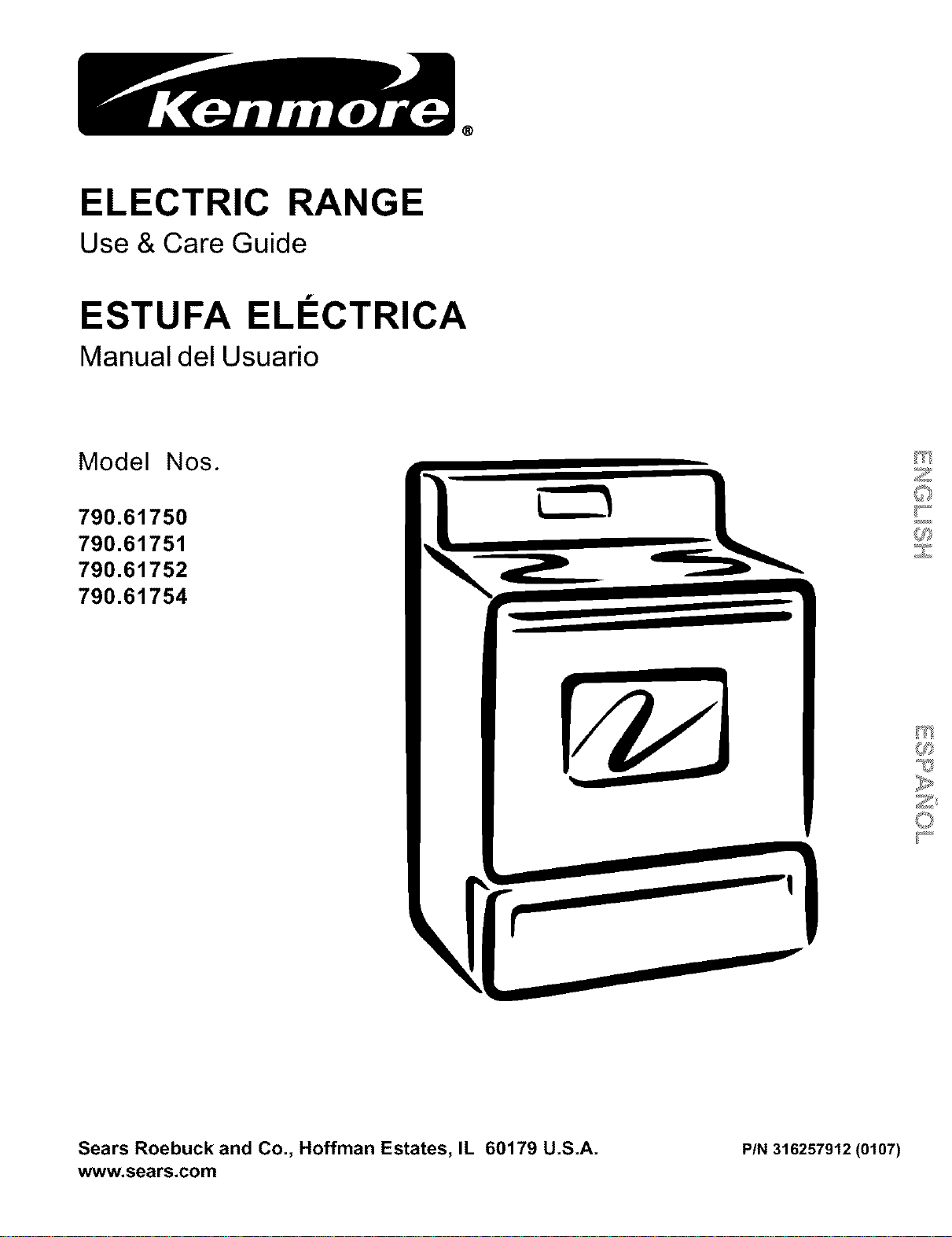
ELECTRIC RANGE
Use & Care Guide
ESTUFA ELI:I:CTRIC A
Manual del Usuario
Model Nos.
790.61750
790.61751
790.61752
790.61754
V
Sears Roebuck and Co., Hoffman Estates, IL 60179 U.S.A.
www.sears.com PIN 316257912 (0107)
Table of Contents Product Record
Free-Standing Range Warranty ......................................... 2
Product Record ................................................................. 2
IMPORTANT SAFETY INSTRUCTIONS .......................... 3-5
Serial Plate Location ........................................................... 5
Range Features .................................................................. 6
Before Setting Oven Controls .............................................. 7
Setting Surface Controls ..................................................... 7
Oven Control Functions ...................................................... 8
Setting Oven Controls .................................................... 8-10
Care & Cleaning ........................................................... 11-13
Before You Make a Service Call ................................... 14-15
Sears Service ................................................................... 16
Espafiol ........................................................................ 17-32
In this space below, record the date of purchase, model and
serial number of your product. You will find the model and
serial number printed on an identification plate. This serial
plate is located on the right side of the oven front frame inthe
storage drawer or lower panel compartment area. See page 5
of this Use & Care Guide for the serial plate location.
Model No. 790.
Serial No.
Date of Purchase
Save these instructions and your sales receipt for future
reference.
Free-Standing Range Warranty
FULL ONE YEAR WARRANTY ON ALL PARTS
If,within one year from the date of installation, any part fails to function properly due to a defect in material or workmanship,
Sears will repair or replace it, at our option, free of charge.
If the product is subjected to other than private family use, the above warranty is effective for only 90 days.
WARRANTY SERVICE IS AVAILABLE BY CONTACTING THE NEAREST SEARS SERVICE CENTER IN THE UNITED
STATES.
This warranty gives you specific legal rights, and you may also have other rights which vary from state to state.
Sears Roebuck and Co., Dept. 817WA Hoffman Estates, IL 60179
WE SERVICE WHAT WE SELL
Your purchase has added value because you can depend on Sears HomeCentral® for service. With over 12,000 trained
repair specialists and access to over 4.2 million parts and accessories, we have the tools, parts, knowledge and skills to
ensure our pledge: We Service What We Sell.
Sears Maintenance Agreements
Your Kenmore appliance is designed, manufactured and tested to provide years of dependable operation. Yet any major
appliance may require service from time to time. The Sears Maintenance Agreement offers you an outstanding service
program, affordably priced.
The Sears Maintenance Agreement
Is your way to buy tomorrow's service at today's price.
Eliminates repair bills resulting from normal wear and tear.
Provides for non-technical and instructional assistance.
Even if you don't need repairs, provides an annual Preventive Maintenance Check,
at your request, to ensure that your appliance is in proper running condition.
Some limitations apply. For more information, call 1-800-827-6655.
For information concerning Sears Canada Maintenance Agreements, call 1-800-361-6665.
Important Safety Instructions
Read all instructions before using this appliance.
Save these instructions for future reference.
This manual contains important safety symbols and instructions, Please pay attention to these symbols and follow all instructions given.
_!_,W.'IzI#II_ [€11This symbol will help alert you to Situations that may cause serious bodily harm, death or property damage
This Symbol Will help alert you to Situations that may Cause bodily injury or property damage
• Remove all tape and packaging before using the range. Destroy
the carton and plastic bags after unpacking the range. Never
allow children to play with packaging material,
• Proper Installation--Be sure your appliance is properly
installed and grounded by a qualified technician in accordance
with the National Electrical Code ANSI/NFPA No. 70 latest
edition and local electrical code requirements. Install only per
installation instructions provided in the literature package for this
range.
Ask your dealer to recommend a qualified technician and an
authorized repair service, Know how to disconnect the power to
the range atthe circuit breaker orfuse box in case of an emergency.
• User servicingiDo not repair or replace any part of the
appliance unless specifically recommended in the manuals.
All other servicing should be done only by a qualified technician.
This may reduce the risk of personal injury and damage to the
range.
• Never modify or alter the construction of a range by removing
leveling legs, panels, wire covers, anti-tip brackets/screws, or
any other part of the product.
rl V,V_*_H_ll_[e
All ranges can tip.
Injury to persons could result.
Install anti-tip device packed with range.
See Installation Instructions.
_'!'W-'I3_II_[L1 To reduce the risk of tipping,
the range must be secured by properly instal led
anti-tip bracket provided with the range, To
check ifthe bracket isinstalled properly, visually
check that rear leveling leg is inserted into and
fully secu red by the anti-tip bracket by removing
lower panel or storage drawer. For models with
awarmer drawer, grasp the top rear edge of the
range and carefully attempt to tilt it forward,
Refer to the Installation Instructions for proper
anti-tip bracket installation.
_lVJV-'1:t_ll_[tR Stepping, leaning or sitting on the doors or
drawers of this range can result in serious injuries and also
cause damage to the range. Do not allow children to climb or play
around the range. The weight of a child on an open door may cause
the range to tip, resulting in serious burns or other injury.
r'IvJv,-l:i_ll_[_ll Do not use the oven or warmer drawer (if
equipped) for storage,
Do not store items of interest to children in the
cabinets above a range or on the backguard of a range. Children
climbing on the range to reach items could be seriously injured.
Never Use Your Appliance for Warming or
Heating the Room.
• Storage in or on Appliance--Flammable materials should not
be stored in an oven, warmer drawer, near surface units or in
the storage drawer. This includes paper, plastic and cloth items, _,
such as cookbooks, plasticware and towels, as well as flammable *_:/
liquids. Do not store explosives, such as aerosol cans, on or near
the range. _
• Do Not Leave Children Alone--Children should not be left _"
alone or unattended in the area where appliance isin use. They G©
should never be allowed to sit or stand on any part of the _'_
appliance.
• DO NOT TOUCH SURFACE UNITS, AREAS NEAR THESE
UNITS, HEATING ELEMENTS OR INTERIOR SURFACES OF
THE OVEN. Both surface units and oven heating elements may
be hot even though they are dark in color, Areas near surface units
may become hot enough to cause burns, During and after use, do
not touch, or let clothing or other flammable materials touch these
areas until they have had sufficient time to cool. Among these
areas are the cook top, surfaces facing the cook top, the oven vent
openings and surfaces near these openings, oven door and
window.
• Wear Proper AppareliLoose-fitting or hanging garments
should never be worn while using the appliance. Do not let
clothing or other flammable materials contact hot surfaces,
• Do Not Use Water or Flour on Grease FiresiSmother the fire
with a pan lid, or use baking soda, a dry chemical or foam-type
extinguisher.
• When heating fat or grease, watch it closely. Fat or grease may
catch fire if allowed to become too hot.
• Use Only Dry PotholdersiMoist or damp potholders on hot
surfaces may result in burns from steam. Do not let potholders
touch hot heating elements. Do not use atowel or other bulky cloth
instead of a potholder.
• Do Not Heat Unopened Food ContainersiBuildup of pressure
may cause container to burst and result in injury.
• Remove the oven door from any unused range if it is to be
stored or discarded.
IMPORTANTiDo not attempt to operate the range during a
power failure. If the power falls, always turn off the range. If the
range is not turned off and the power resumes, the range will begin
to operate again. Once the power resumes, reset the clock and
oven function.
3
Important Safety Instructions
IMPORTANT INSTRUCTIONS FOR USING YOUR
COOKTOP
• Know which knob controls each surface heating unit. Place a
pan of food on the unit before turning it on, and turn the unit off
before removing the pan.
• Use Proper Pan Size--This appliance is equipped with one or
more surface units of different sizes. Select utensils having flat
bottoms large enough to cover the surface unit heating element.
The use of undersized utensils will expose a portion of the heating
element to direct contact and may result in ignition of clothing.
Proper relationship of utensil to element will also improve efficiency.
• Utensil Handles Should Be Turned Inward and Not Extend Over
Adjacent Surface Elements_Te reduce the risk of burns, ignition
of flammable materials, and spillage due to unintentional contact
with the utensil, the handle of the utensil should be positioned so
that it is turned inward, and does net extend over adjacent surface
units.
• Never Leave Surface Elements Unattended at High Heat
Settings--Boilevers cause smoking and greasy spillevers that
may ignite, or a pan that has boiled dry may melt.
• Do Not Immerse or Soak Removable Heating Elements--
Heating elements should never be immersed in water. Heating
elements clean themselves during normal operation.
• Glazed Cooking Utensils--Only certain types of glass, glass/
ceramic, ceramic, earthenware, or other glazed utensils are
suitable for cook top service without breaking due to the sudden
change in temperature. Check the manufacturer's
recommendations for cook top use,
• When flaming foods under a ventilating hood, turn the fan on.
IMPORTANT INSTRUCTIONS FOR USING YOUR
OVEN
• Use Care When Opening Oven Door or Warmer Drawer (if
equipped)--Stand to the side of the range when opening the door
of a hot oven. Let hot air or steam escape before you remove or
replace food in the oven.
• Keep Oven Vent Ducts Unobstructed. The oven vent is located
under the left rear surface element if your model is equipped with
coil elements. The oven vent is located below the backguard for
models equipped with ceramic-glass cook tops. Touching the
surfaces in this area when the oven is operating may cause
severe burns. Also, de net place plastic or heat-sensitive items on
or near the oven vent. These items could melt or ignite.
• Placement of Oven Racks. Always place oven racks in desired
location while oven is cool. If rack must be moved while oven is
hot use extreme caution. Use pethelders and grasp the rack with
both hands to repositien. De not let potholders contact the hot
heating elements in the oven. Remove all utensils from the rack
before moving.
• Do not use the broiler pan without its insert. The broiler pan and
its insert allow dripping fat to drain and be kept away from the high
heat of the broiler.
• Do not cover the broiler insert with alumin um foil. Exposed fat
and grease could ignite.
• Protective Liners--Do not use aluminum foil to line the oven
bottom. Only use aluminum foil as recommended in this manual.
Improper installation of these liners may result in risk of electric
shock, or fire.
IMPORTANT INSTRUCTIONS FOR CLEANING YOUR RANGE
• Clean the range regularly to keep all parts free of grease that could catch fire. Pay particular attention to the area underneath each
surface element. Do not allow grease to accumulate.
• Kitchen cleaners and aerosols--Always follow the manufacturer's recommended directions for use. Be aware that excess
residue from cleaners and aerosols may ignite causing damage and injury.
• Clean Ventilating Hoods Frequently--Grease should not be allowed to accumulate on the hood or filter. Follow manufacturer's
instructions for cleaning.
COIL COOK TOP MODELS
• Make Sure Reflector Pans or Drip Bowls Are in Place--Absence of these pans or bowls during cooking may subject wiring or
components underneath to damage.
• Protective Liners--De not use aluminum foil to line surface unit drip bowls, or reflector pans. Only use aluminum foil as recommended
in this manual. Improper installation of these liners may result in risk of electric shock, or fire. Improper installation of these liners may
result in risk of electric shock, or fire.
4
Important Safety Instructions
IMPORTANT SAFETY NOTICE
The California Safe Drinking Water and Toxic Enforcement Act requires the Governor of California to publish a list of substances known
to the state to cause cancer, birth defects or other reproductive harm, and requires businesses to warn customers of potential exposure
to such substances.
SERIAL
PLATE
LOCATION
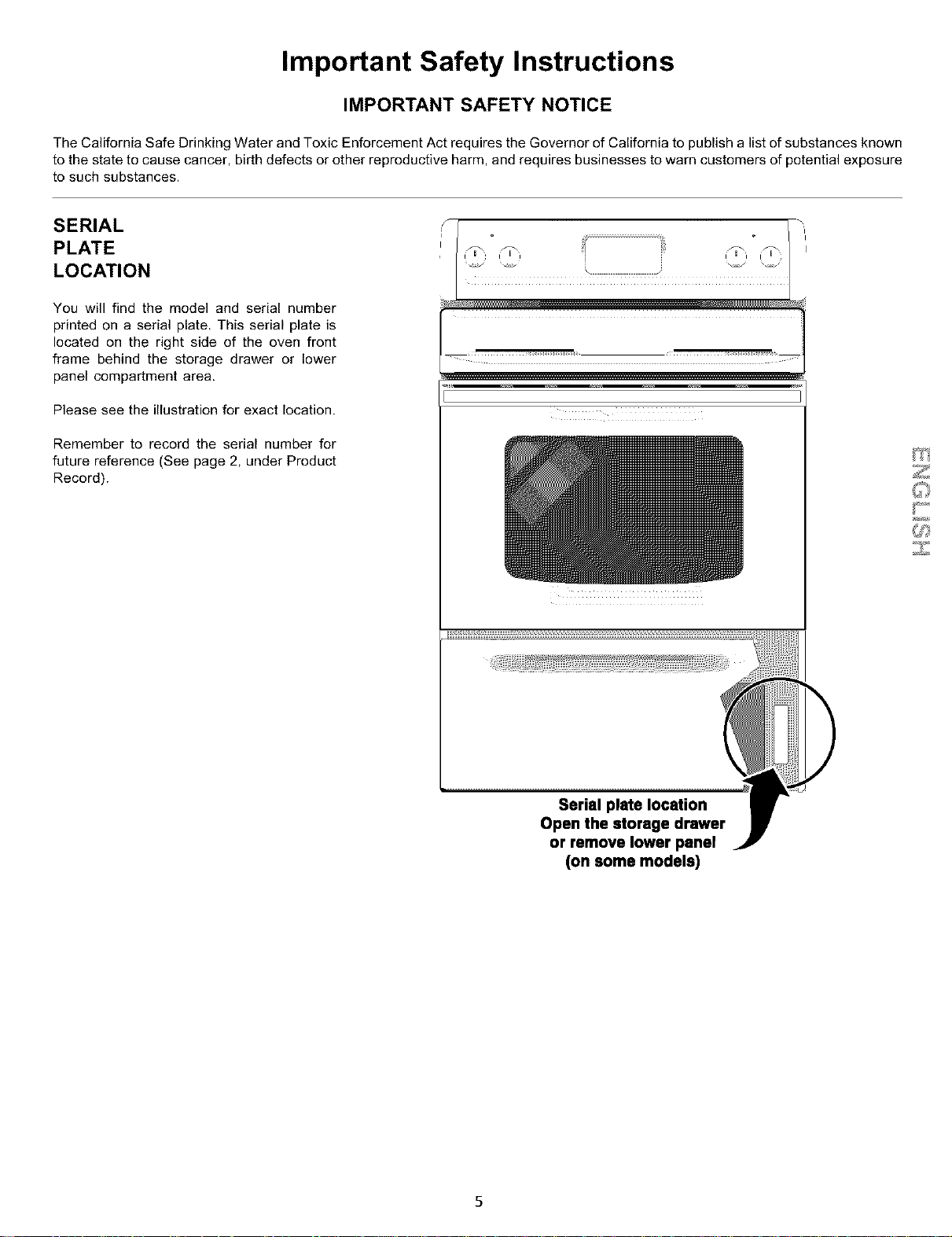
You will find the model and serial number
printed on a serial plate. This serial plate is
located on the right side of the oven front
frame behind the storage drawer or lower
panel compartment area.
Please see the illustration for exact location.
Remember to record the serial number for
future reference (See page 2, under Product
Record).
l _:: _:: _:: _:: _xi
[
i i i _ i i i
U_
Serial plate location
Open the storage drawer
or remove lower panel
(on some models)
5
Your
Electric
Range
Features
At a Glance
Range Features
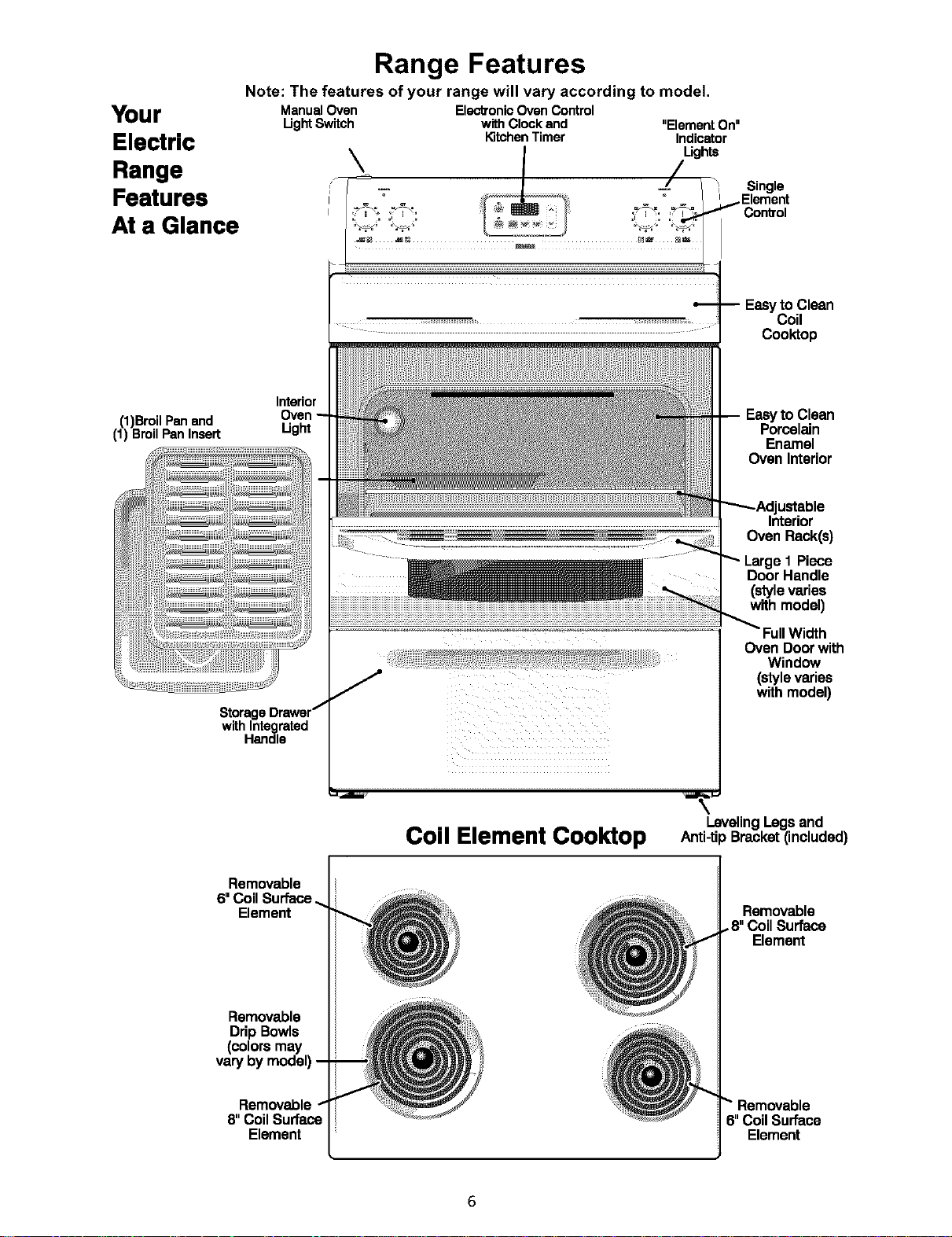
Note: The features of your range will vary according to model.
ManualOven ElectTonicOven Control
Ught Switch with Clockand "Element On"
KitchenTimer Indicator
Coo_op
(1)BroilPanand
(1) BroilPanInsert
Interior
Ught
Clean
Porcelain
Enamel
Oven Interior
ustable
Interior
Oven Rack(s)
Piece
Door Handle
(style varies
with model)
Storag
with Integrated
Handle
Oven Door with
Window
(style varies
with model)
Removable
Element
Removable
DripBowls
(colorsmay
varybymodel),
Removable
Element
Coil Element Cooktop
LevelingLegsand
Anti-ti) Bracket(included)
Removable
•8" CoilSurface
Element
"_"Removable
6"Coil Surface
Element
Before Setting Oven Controls
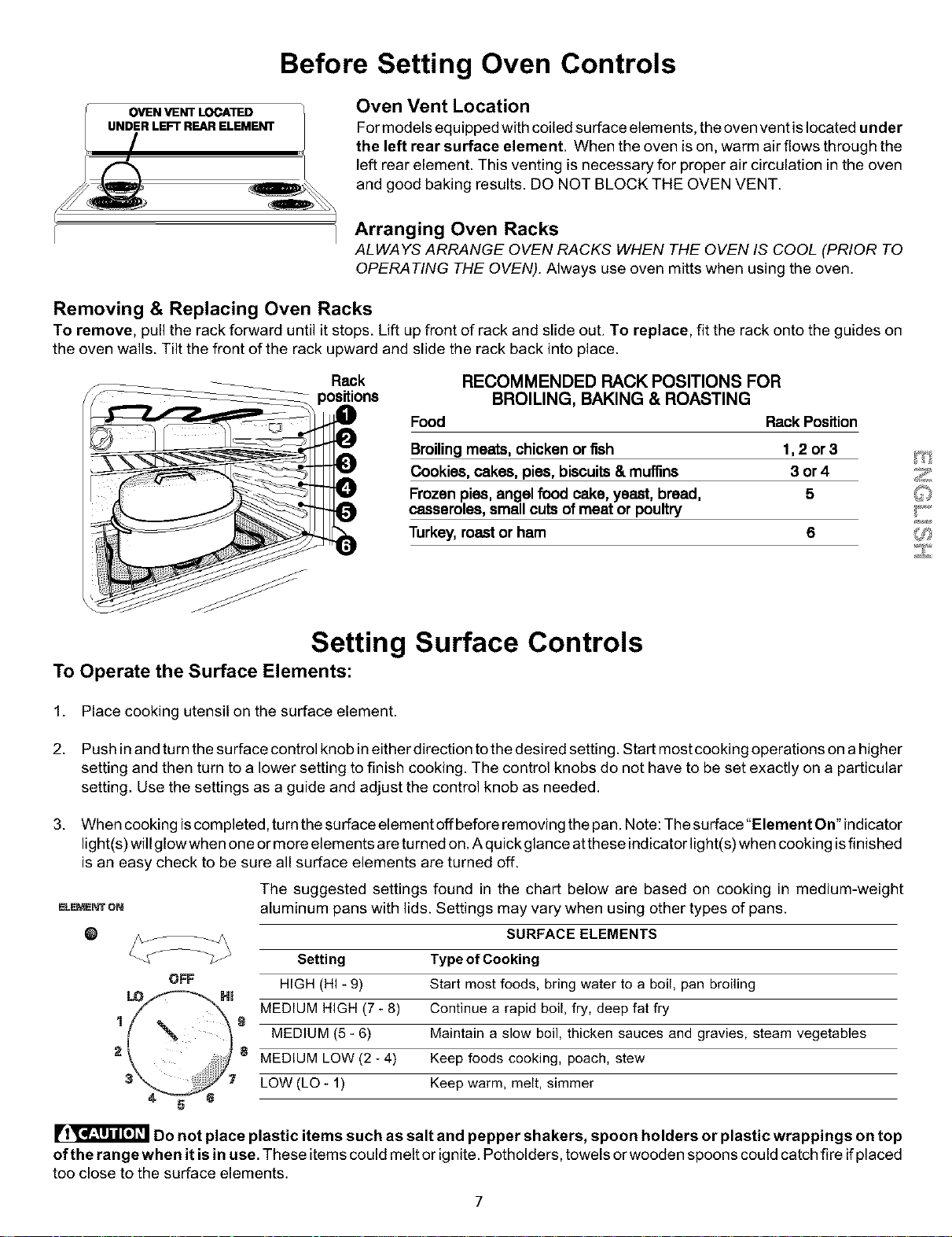
OVEN VENT LOCATED
UNDER LEFT REAR ELEMENT
Oven Vent Location
For models equipped with coiled surface elements, the oven vent is located under
the left rear surface element. When the oven is on, warm air flows through the
left rear element. This venting is necessary for proper air circulation in the oven
and good baking results. DO NOT BLOCK THE OVEN VENT.
Arranging Oven Racks
ALWAYS ARRANGE OVEN RACKS WHEN THE OVEN IS COOL (PRIOR TO
OPERATING THE OVEN). Always use oven mitts when using the oven.
Removing & Replacing Oven Racks
To remove, pull the rack forward until it stops. Lift up front of rack and slide out. To replace, fit the rack onto the guides on
the oven walls. Tilt the front of the rack upward and slide the rack back into place.
Rack RECOMMENDED RACK POSITIONS FOR
BROILING, BAKING & ROASTING
Food Rack Position
Broilingmeats, chicken or fish 1,2 or 3
Cookies, cakes, pies, biscuits& muffins 3 or 4
Frozen pies, angel food cake, yeast, bread, 5
casseroles, small cuts of meat or poultry
Turkey, roast or ham 6
Setting Surface Controls
To Operate the Surface Elements:
1. Place cooking utensil on the surface element.
2. Push in and turn the surface control knob in either direction tothe desired setting. Start most cooking operations on a higher
setting and then turn to a lower setting to finish cooking. The control knobs do not have to be set exactly on a particular
setting. Use the settings as a guide and adjust the control knob as needed.
3. When cooking iscompleted, turn the surface element offbefore removing the pan. Note: The surface"Element On" indicator
light(s) will glowwhen one or more elements are turned on. A quickglance atthese indicator light(s) when cooking isfinished
is an easy check to be sure all surface elements are turned off.
The suggested settings found in the chart below are based on cooking in medium-weight
_L_r eN aluminum pans with lids. Settings may vary when using other types of pans.
O SURFACE ELEMENTS
1
2
OFF
Setting Type of Cooking
HIGH (HI _9)
Hm
MEDIUM HIGH (7- 8)
g
MEDIUM (5 _6)
8 MEDIUM LOW (2 _4)
Start most foods, bring water to a boil, pan broiling
Continue a rapid boil, fry, deep fat fry
Maintain a slow boil, thicken sauces and gravies, steam vegetables
Keep foods cooking, poach, stew
LOW (LO - 1) Keep warm, melt, simmer
Do not place plastic items such as salt and pepper shakers, spoon holders or plastic wrappings on top
of the range when it is in use. These items could melt or ignite. Potholders, towels or wooden spoons could catch fire if placed
too close to the surface elements.
7
Oven Control Functions
READ THE INSTRUCTIONS CAREFULLY BEFORE USING THE OVEN. For satisfactory use of your oven, become familiar
with the various functions of the oven as described below.
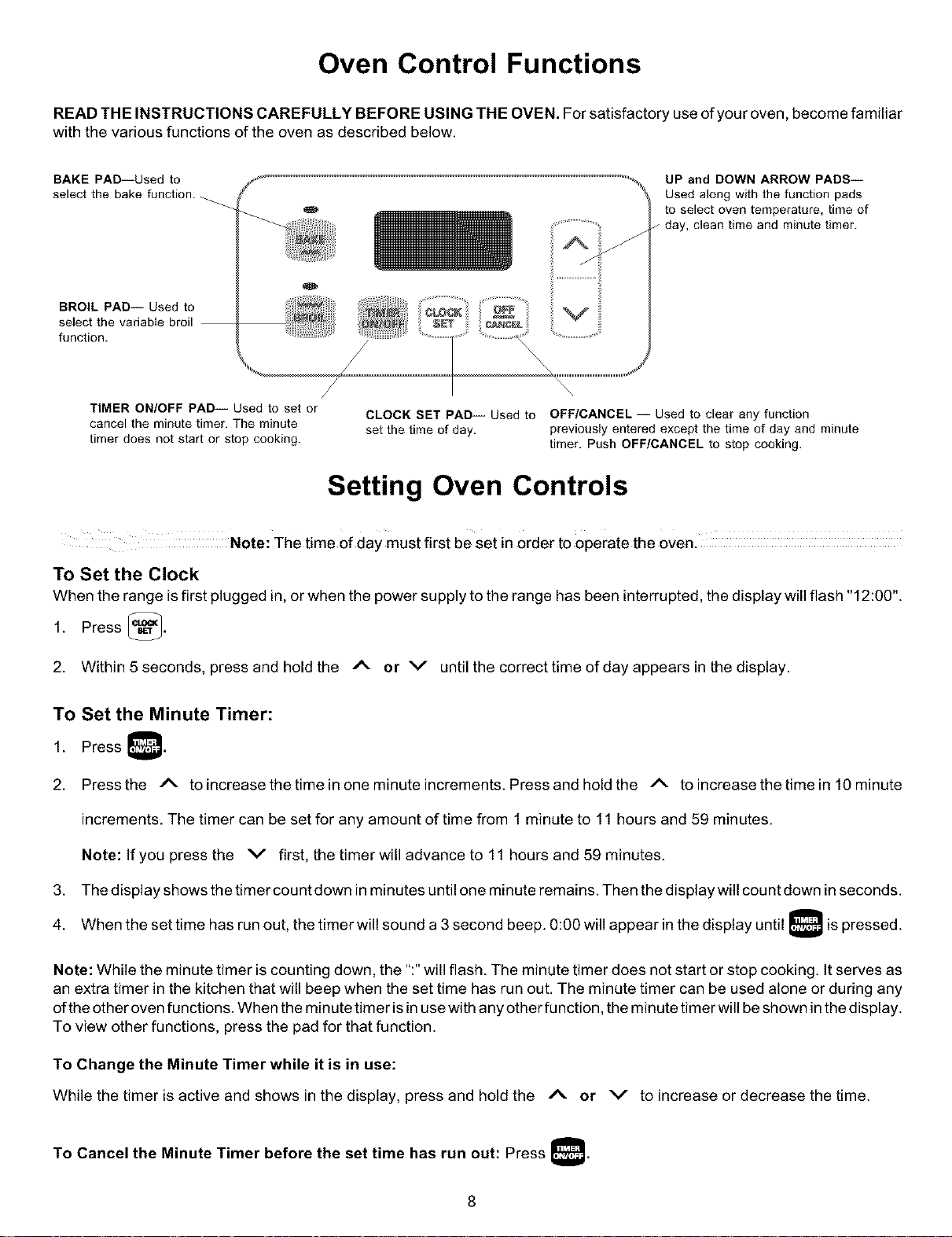
BAKE PAD--Used to
select the bake function.
BROIL PAD-- Used to
select the variable broil
function.
UP and DOWN ARROW PADS--
Used along with the function pads
to select oven temperature, time of
day, clean time and minute timer.
/
TIMER ON/OFF PAD-- Used to set or
cancel the minute timer. The minute
timer does not start or stop cooking.
CLOCK SET PAD-- Used to OFF/CANCEL -- Used to clear any function
set the time of day. previously entered except the time of day and minute
timer. Push OFF/CANCEL to stop cooking.
Setting Oven Controls
Note: The time of daY must first be set in order to operate the oven.
TO Set the Clock
When the range isfirst plugged in,or when the power supply to the range has been interrupted, the display will flash "12:00".
1. Press _.
2. Within 5 seconds, press and hold the /k or v until the correct time of day appears in the display.
To Set the Minute Timer:
1. Press
2. Pressthe /_ to increase the time in one minute increments. Press and hold the /_ to increase the time in l 0minate
increments. The timer can be set for any amount of time from 1 minute to 11 hours and 59 minutes.
Note: If you press the v first, the timer will advance to 11 hours and 59 minutes.
3. The display shows the timer count down inminutes until one minute remains. Then the display will count down in seconds.
4. When the set time has run out, the timer will sound a 3 second beep. 0:00 will appear in the display until is pressed.
Note: While the minute timer is counting down, the ":" will flash. The minute timer does not start or stop cooking. It serves as
an extra timer in the kitchen that will beep when the set time has run out. The minute timer can be used alone or during any
of the other oven functions. When the minute timer is in use with any other function, the minute timer will be shown in the display.
To view other functions, press the pad for that function.
To Change the Minute Timer while it is in use:
While the timer is active and shows in the display, press and hold the A or v to increase or decrease the time.
To Cancel the Minute Timer before the set time has run out: Press
Setting Oven Controls
_iiiii!ii;if_ _i .....
_i i i i iiiii: ii
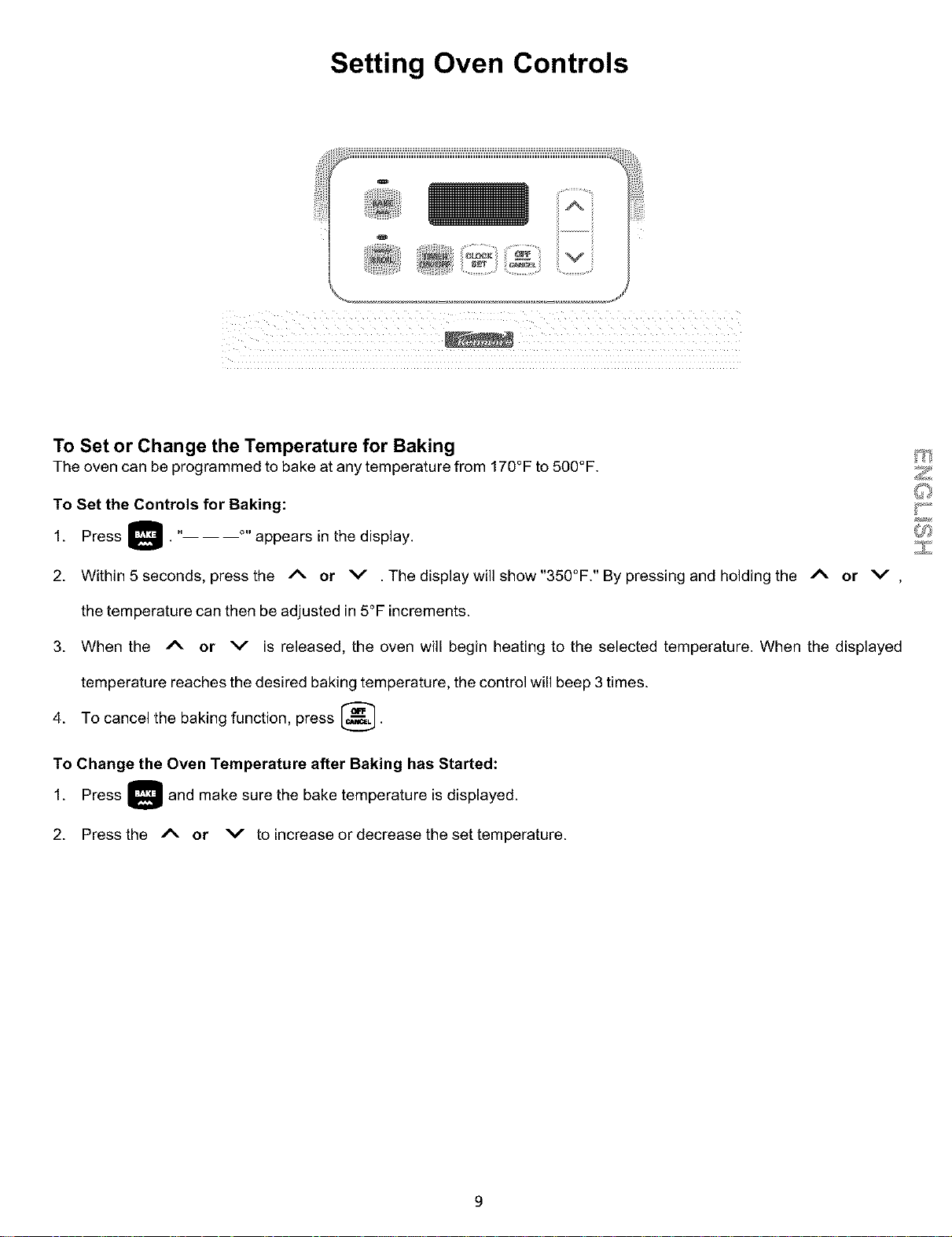
To Set or Change the Temperature for Baking
The oven can be programmed to bake at any temperature from 170°F to 500°F.
To Set the Controls for Baking:
1. Press _. "-- ----°" appears in the display.
2. Within 5 seconds, press the A or V .The display will show"350°F." By pressing and holding the _- or v ,
the temperature can then be adjusted in 5°F increments.
3. When the Ix. or v is released, the oven will begin heating to the selected temperature. When the displayed
temperature reaches the desired baking temperature, the control will beep 3 times.
4. To cancel the baking function, press _.
To Change the Oven Temperature after Baking has Started:
1. Press _ and make sure the bake temperature is
displayed.
2. Press the A or v to increase or decrease the set temperature.
V
9
Setting Oven Controls
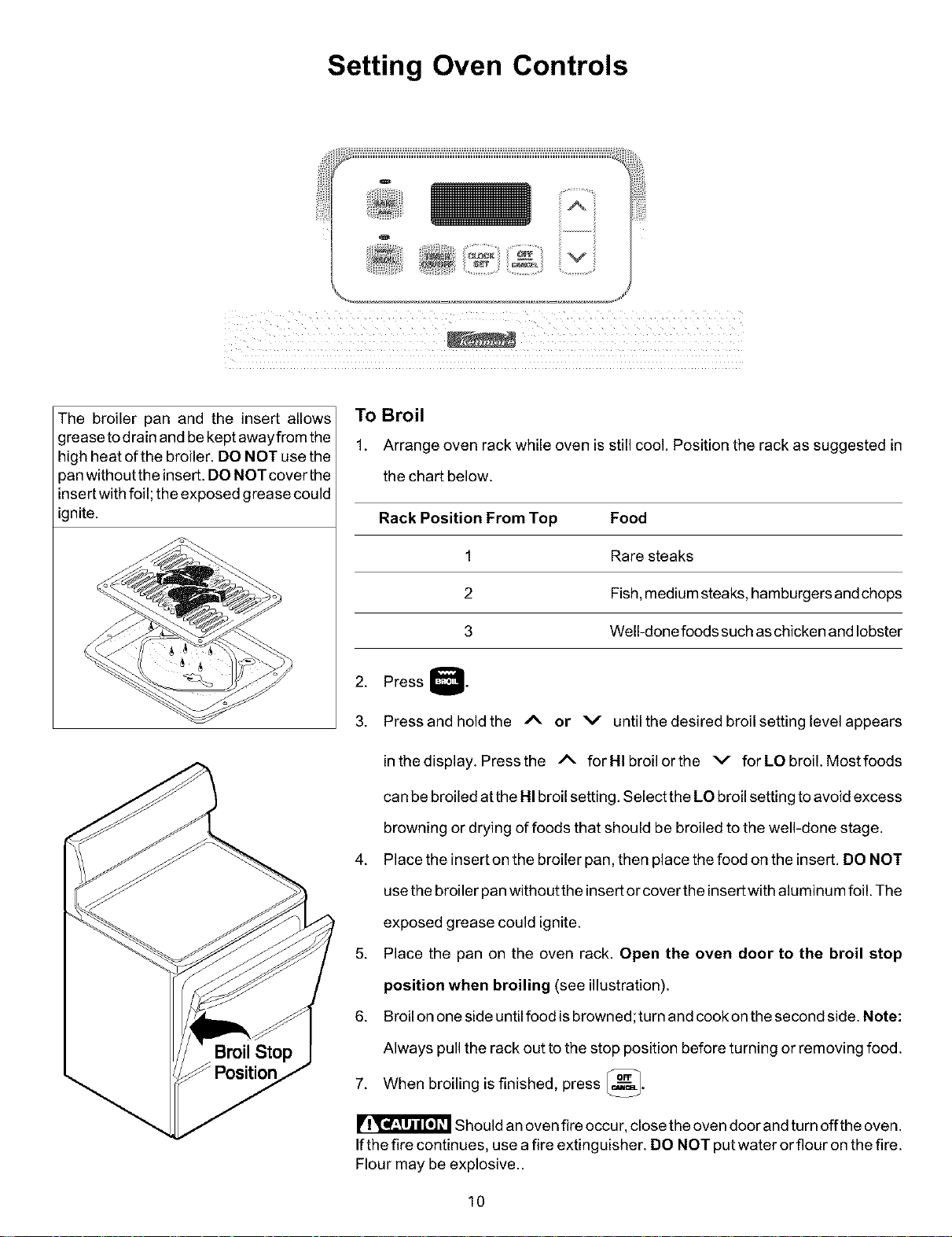
The broiler pan and the insert allows
grease todrain and be kept awayfrom the
high heat of the broiler. DO NOT use the
pan withoutthe insert. DO NOT cover the
insertwith foil; the exposed grease could
ignite.
To Broil
1. Arrange oven rack while oven is still cool. Position the rack as suggested in
the chart below.
Rack Position From Top Food
1 Rare steaks
2 Fish, medium steaks, hamburgers and chops
3 Well-done foods such as chicken and lobster
2. Press Q.
3. Press and hold the I_. or v until the desired broil setting level appears
in the display. Press the /_- for HI broil or the v for LO broil. Most foods
can be broiled atthe HI broil setting. Select the LO broil setting to avoid excess
browning or drying of foods that should be broiled to the well-done stage.
4. Place the insert on the broiler pan, then place the food on the insert. DO NOT
use the broiler pan without the insert or cover the insert with aluminum foil. The
exposed grease could ignite.
5. Place the pan on the oven rack. Open the oven door to the broil stop
position when broiling (see illustration).
6. Broil on one side until food isbrowned;turn and cook on the second side. Note:
Always pull the rack out to the stop position before turning or removing food.
7. When broiling is finished, press _.
Should an oven fire occu r,close the oven door and turn off the oven.
Ifthe fire continues, use a fire extinguisher. DO NOT put water or flour on the fire.
Flour may be explosive..
10
Care & Cleaning
Surfaces How to Clean
Aluminum (Trim Pieces) & Vinyl Use hot, soapy water and a cloth. Dry with a clean cloth.
Painted and Plastic Control Knobs, Body
Parts, and Decorative Trim
Chrome Control Panel, Decorative Trim
Porcelain Enamel Broiler Pan and Insert,
Door Liner, Body Parts, Warmer Drawer
(ifequipped)
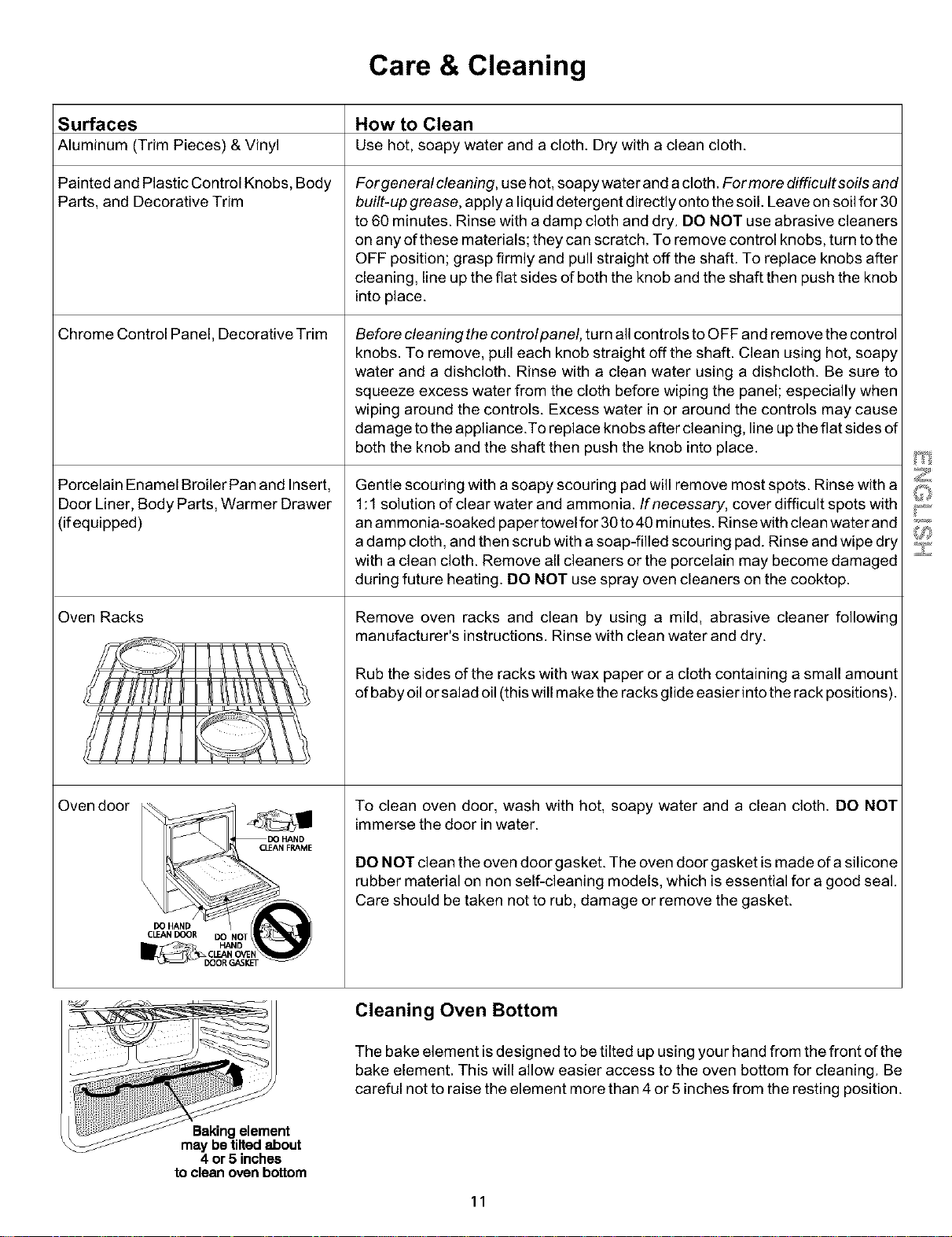
Oven Racks
Oven door
I CLEAN FRAME
CLEANDOOR DOHA_NOT_ ._p)
Forgeneral cleaning, use hot, soapy water and a cloth. Formore difficultsoils and
built-up grease, apply a liquid detergent directly onto the soil. Leave on soil for 30
to 60 minutes. Rinse with a damp cloth and dry. DO NOT use abrasive cleaners
on any of these materials; they can scratch. To remove control knobs, turn to the
OFF position; grasp firmly and pull straight off the shaft. To replace knobs after
cleaning, line up the fiat sides of both the knob and the shaft then push the knob
into place.
Before cleaning the controlpanel, turn allcontrols to OFF and remove the control
knobs. To remove, pull each knob straight off the shaft. Clean using hot, soapy
water and a dishcloth. Rinse with a clean water using a dishcloth. Be sure to
squeeze excess water from the cloth before wiping the panel; especially when
wiping around the controls. Excess water in or around the controls may cause
damage to the appliance .To replace knobs after cleaning, line up the fiat sides of
both the knob and the shaft then push the knob into place.
Gentle scouring with a soapy scouring pad will remove most spots. Rinse with a
1:1 solution of clear water and ammonia. If necessary, cover difficult spots with
an ammonia-soaked paper towel for 30 to40 minutes. Rinse with clean water and
a damp cloth, and then scrub with a soap-filled scouring pad. Rinse and wipe dry
with a clean cloth. Remove all cleaners or the porcelain may become damaged
during future heating. DO NOT use spray oven cleaners on the cooktop.
Remove oven racks and clean by using a mild, abrasive cleaner following
manufacturer's instructions. Rinse with clean water and dry.
Rub the sides of the racks with wax paper or a cloth containing a small amount
of baby oil or salad oil (this will make the racks glide easier into the rack positions).
To clean oven door, wash with hot, soapy water and a clean cloth. DO NOT
immerse the door in water.
DO NOT clean the oven door gasket. The oven door gasket is made of a silicone
rubber material on non self-cleaning models, which is essential for a good seal.
Care should be taken not to rub, damage or remove the gasket.
i!iiiiii ...........
nt
maybetiltedabout
4 or5 inches
to cleanovenbottom
Cleaning Oven Bottom
The bake element is designed to be tilted up using your hand from the front of the
bake element. This will allow easier access to the oven bottom for cleaning. Be
careful not to raise the element more than 4 or 5 inches from the resting position.
11
Care & Cleaning
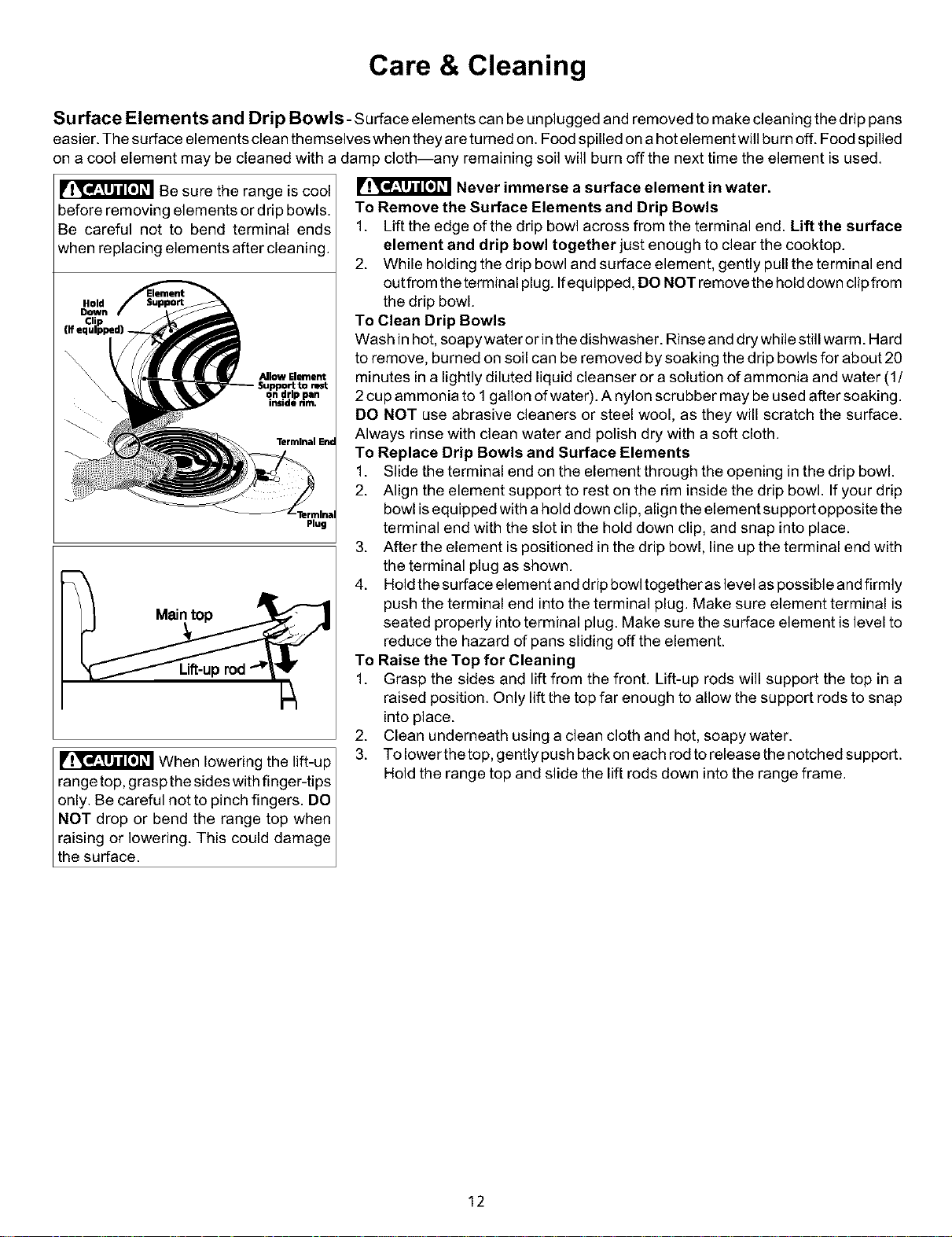
Surface Elements and Drip Bowls - surface elements can be unplugged and removed to make cleaning the drip pans
easier. The surface elements clean themselves when they are tureed on. Food spilled on a hot element will burn off. Food spilled
on a cool element may be cleaned with a damp cloth--any remaining soil will burn off the next time the element isused.
Be sure the range is cool
before removing elements or drip bowls.
Be careful not to bend terminal ends
when replacing elements after cleaning.
Allow Element
Plug
Hold
Down
When lowering the lift-up
range top, grasp the sides with finger-tips
only. Be careful not to pinch fingers. DO
NOT drop or bend the range top when
raising or lowering. This could damage
the surface.
Never immerse a surface element in water.
To Remove the Surface Elements and Drip Bowls
1. Liftthe edge of the drip bowl across from the terminal end. Lift the surface
element and drip bowl together just enough to clear the cooktop.
2. While holding the drip bowl and surface element, gently pull the terminal end
outfrom the terminal plug. Ifequipped, DO NOT remove the hold down clip from
the drip bowl.
To Clean Drip Bowls
Wash in hot, soapy water or in the dishwasher. Rinse and dry while still warm. Hard
to remove, burned on soil can be removed by soaking the drip bowls for about 20
minutes in a lightly diluted liquid cleanser or a solution of ammonia and water (1/
2 cup ammonia to 1 gallon of water). A nylon scrubber may be used after soaking.
DO NOT use abrasive cleaners or steel wool, as they will scratch the surface.
Always rinse with clean water and polish dry with a soft cloth.
To Replace Drip Bowls and Surface Elements
1. Slide the terminal end on the element through the opening in the drip bowl.
2. Align the element support to rest on the rim inside the drip bowl. If your drip
bowl isequipped with a hold down clip, align the element support opposite the
terminal end with the slot in the hold down clip, and snap into place.
3. After the element ispositioned in the drip bowl, line up the terminal end with
the terminal plug as shown.
4. Hold the surface element and drip bowl together as level aspossible and firmly
push the terminal end into the terminal plug. Make sure element terminal is
seated properly intoterminal plug. Make sure the surface element islevel to
reduce the hazard of pans sliding off the element.
To Raise the Top for Cleaning
1. Grasp the sides and lift from the front. Lift-up rods will support the top in a
raised position. Only lift the top far enough to allow the support rods to snap
intoplace.
2. Clean underneath using a clean cloth and hot, soapy water.
3. To lower the top, gently push back on each rod to release the notched support.
Hold the range top and slide the lift rods down intothe range frame.
12
Care & Cleaning
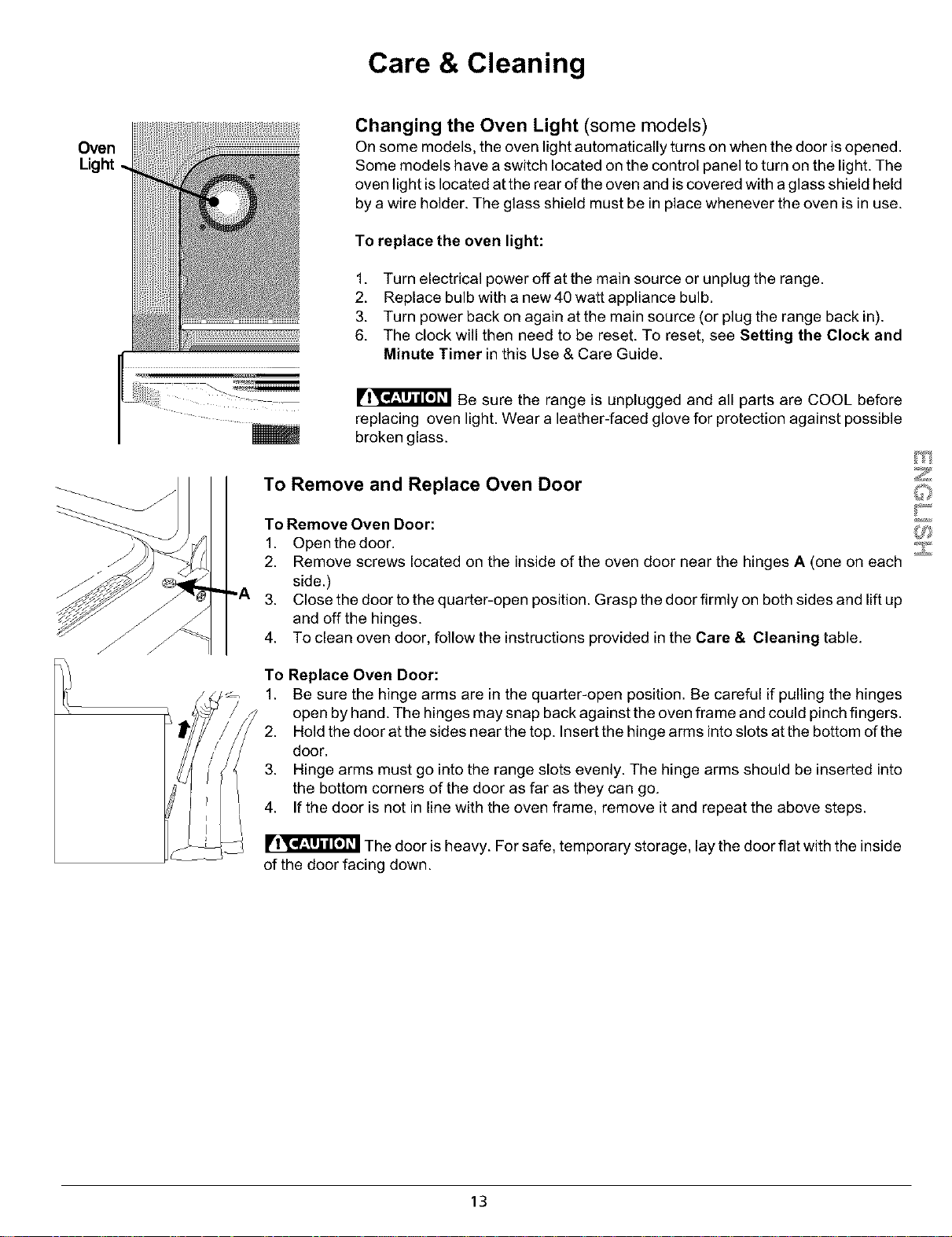
Oven
Changing the Oven Light (some models)
On some models, the oven light automatically turns on when the door isopened.
Some models have a switch located on the control panel to turn on the light. The
oven light islocated at the rear of the oven and iscovered with a glass shield held
by a wire holder. The glass shield must be in place whenever the oven is in use.
To replace the oven light:
1. Turn electrical power off at the main source or unplug the range.
2. Replace bulb with a new 40 watt appliance bulb.
3. Turn power back on again at the main source (or plug the range back in).
6. The clock will then need to be reset. To reset, see Setting the Clock and
Minute Timer in this Use & Care Guide.
Be sure the range is unplugged and all parts are COOL before
replacing oven light. Wear a leather-faced glove for protection against possible
broken glass.
To Remove and Replace Oven Door
To Remove Oven Door:
1. Open the door.
2. Remove screws located on the inside of the oven door near the hinges A (one on each
side.)
3. Close the door to the quarter-open position. Grasp the door firmly on both sides and lift up
and off the hinges.
4. To clean oven door, follow the instructionsprovided in the Care & Cleaning table.
To Replace Oven Door:
1. Be sure the hinge arms are in the quarter-open position. Be careful if pulling the hinges
open by hand. The hinges may snap back against the oven frame and could pinch fingers.
2. Hold the door at the sides near the top. Insert the hinge arms intoslots at the bottom of the
door.
3. Hinge arms must go into the range slots evenly. The hinge arms should be inserted into
the bottom corners of the door as far as they can go.
4. If the door is not in line with the oven frame, remove itand repeat the above steps.
The door isheavy. For safe, temporary storage, lay the door flat with the inside
of the door facing down.
t_3_
13
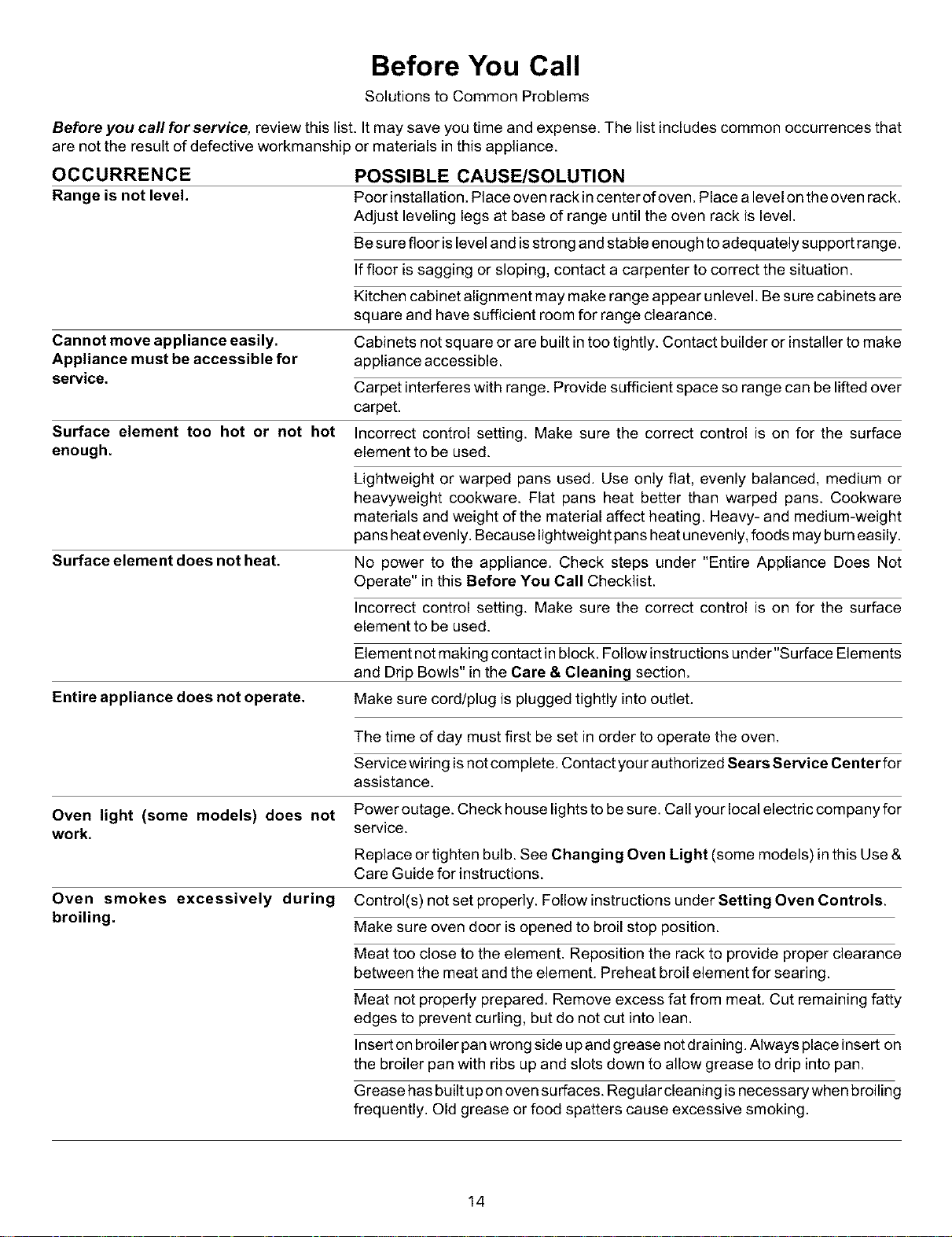
Before You Call
Solutions to Common Problems
Before you call for service, review this list. It may save you time and expense. The list includes common occurrences that
are not the result of defective workmanship or materials in this appliance.
OCCURRENCE
Range is not level.
Cannot move appliance easily.
Appliance must be accessible for
service.
Surface element too hot or not hot
enough.
Surface element does not heat.
Entire appliance does not operate.
POSSIBLE CAUSE/SOLUTION
Poor installation.Place oven rack incenter of oven. Place a level on the oven rack.
Adjust leveling legs at base of range until the oven rack is level.
Be sure floor islevel and isstrong and stable enough to adequately support range.
If floor is sagging or sloping, contact a carpenter to correct the situation.
Kitchen cabinet alignment may make range appear unlevel. Be sure cabinets are
square and have sufficient room for range clearance.
Cabinets not square or are built in too tightly. Contact builder or installer to make
appliance accessible.
Carpet interferes with range. Provide sufficient space so range can be lifted over
carpet.
Incorrect control setting. Make sure the correct control is on for the surface
element to be used.
Lightweight or warped pans used. Use only flat, evenly balanced, medium or
heavyweight cookware. Flat pans heat better than warped pans. Ceokware
materials and weight of the material affect heating. Heavy- and medium-weight
pans heat evenly. Because lightweight pans heat unevenly, foods may burn easily.
No power to the appliance. Check steps under "Entire Appliance Does Not
Operate" inthis Before You Call Checklist.
Incorrect control setting. Make sure the correct control is on for the surface
element to be used.
Element not making contact in block. Follow instructions under"Surface Elements
and Drip Bowls" in the Care & Cleaning section.
Make sure cord/plug is plugged tightly into outlet.
Oven light (some models) does not
work.
Oven smokes excessively during
broiling.
The time of day must first be set in order to operate the oven.
Service wiring isnot complete. Contact your authorized Sears Service Centerfor
assistance.
Power outage. Check house lights to be sure. Call your local electric company for
service.
Replace or tighten bulb. See Changing Oven Light (some models) in this Use &
Care Guide for instructions.
Control(s) not set properly. Follow instructions under Setting Oven Controls.
Make sure oven door is opened to broil stop position.
Meat too close to the element. Reposition the rack to provide proper clearance
between the meat and the element. Preheat broil element for searing.
Meat not properly prepared. Remove excess fat from meat. Cut remaining fatty
edges to prevent curling, but de not cut into lean.
Insert on broiler pan wrong side upand grease not draining. Always place insert on
the broiler pan with ribs up and slots down to allow grease to drip into pan.
Grease has built up on oven surfaces. Regular cleaning is necessary when broiling
frequently. Old grease or food spatters cause excessive smoking.
14
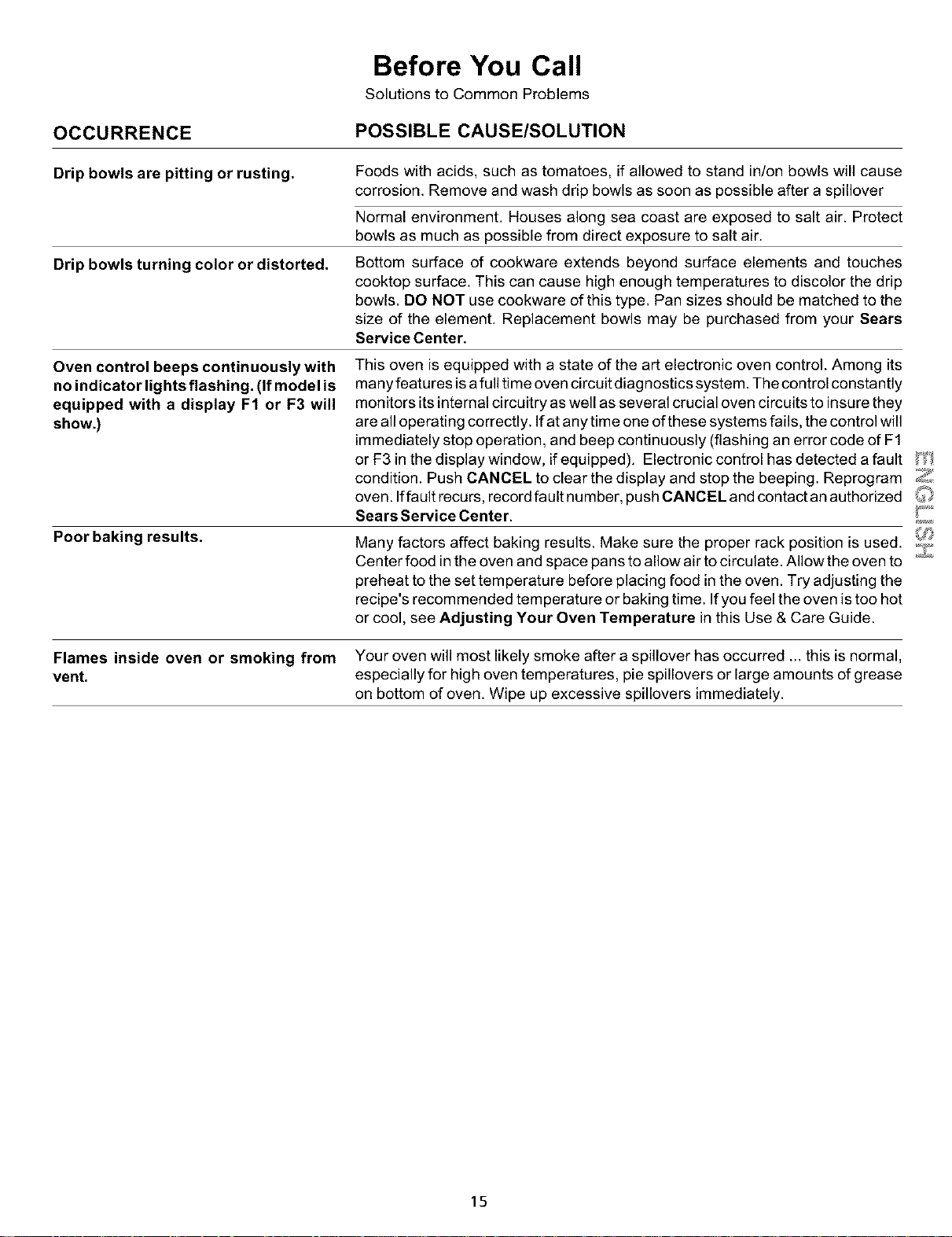
Before You Call
Solutions to Common Problems
OCCURRENCE
POSSIBLE CAUSE/SOLUTION
Drip bowls are pitting or rusting.
Drip bowls turning color or distorted.
Foods with acids, such as tomatoes, ifallowed to stand in/on bowls will cause
corrosion. Remove and wash drip bowls as soon as possible after a spillover
Normal environment. Houses along sea coast are exposed to salt air. Protect
bowls as much as possible from direct exposure to salt air.
Bottom surface of cookware extends beyond surface elements and touches
cooktop surface. This can cause high enough temperatures to discolor the drip
bowls. DO NOT use cookware of this type. Pan sizes should be matched to the
size of the element. Replacement bowls may be purchased from your Sears
Service Center.
Oven control beeps continuously with
no indicator lights flashing. (If model is
equipped with a display F1 or F3 will
show.)
Poor baking results.
This oven is equipped with a state of the art electronic oven control. Among its
many features isafull time oven circuit diag nostics system. The control constantly
monitors itsinternalcircuitry as well as several crucial oven circuits to insure they
are all operating correctly. If at any time one of these systems fails, the control will
immediately stop operation, and beep continuously (flashing an error code of F1
or F3 in the display window, if equipped). Electronic control has detected a fault _':/
condition. Push CANCEL to clear the display and stop the beeping. Reprogram
oven. Iffault recurs, record fault number, push CANCEL and contact an authorized
Sears Service Center. _"_
Many factors affect baking results. Make sure the proper rack position is used.
Center food inthe oven and space pans to allow air to circulate. Allow the oven to
preheat to the set temperature before placing food in the oven. Try adjusting the
recipe's recommended temperature or baking time. If you feel the oven is too hot
or cool, see Adjusting Your Oven Temperature in this Use & Care Guide.
Flames inside oven or smoking from Your oven will most likely smoke after a spillover has occurred ... this is normal,
vent, especially for high oven temperatures, pie spillovers or large amounts of grease
on bottom of oven. Wipe up excessive spillovers immediately.
15
For repairof major brand appliancesin your own home...
nomatterwhomadeit,nomatterwhosoldit!
1-800-4-MY-HOME ® Anytime,dayor night
(1-800-469-4663) (U.S.A.andCanada)
www.sears.com www.sears.ca
Forrepairofcarry-inproductslikevacuums,lawnequipment,
andelectronics,callfor thelocationofyournearest
Sears Parts and Repair Center.
1-800-488-1222 Anytime,day or night(U.S.A.only)
www.sears.com
Forthereplacementparts,accessoriesandowner'smanuals
thatyou needtodo-it-youmelf,cell Sears PartsDirect_!
1-800-366-PART 6 a.m. - 11 p.m. CST, 7 days a week
(1-800-366-7278) (U.S.A. only)
www.sears.com/partsdirect
To purchaseorinquireabouta SearsServiceAgreement
orSears MaintenanceAgreement:
1-800-827-6655 (U.S.A.) 1-800-361-6665 (Canada)
7 a.m.- 5 p.m.CST, Mon.- Sat. 9 a.m.- 8 p.m. EST, M - F,4 p.m.Sat.
Para pedirserviciode reparaci6na AuCanada pourserviceenfran¢,ais:
dornicilio,y paraordenarpiezas: 1-800-LE-FOYER ic
1-888-SU-HOGAR si (1-800-533-6937)
(1-888-784-6427) www.sears.ca
HomeCentral®J
® Registered Trademark / _a Trademark / sa Service Mark of Sears, Roebuck end Co.
® Marea Registrada/ TMMarea de Fdbdce/ SMMama de Servicio de Seers, Roebuck and Co.
MC MD
Marque de commerce / Marque d_pos_e de Sears, Roebuck and Co. O Sears, Roebuck and Co.