Manual v1.2
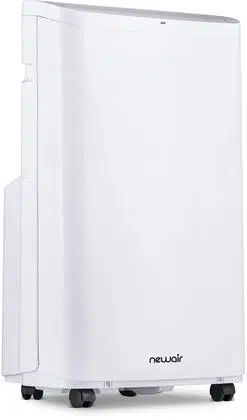
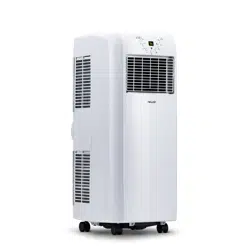
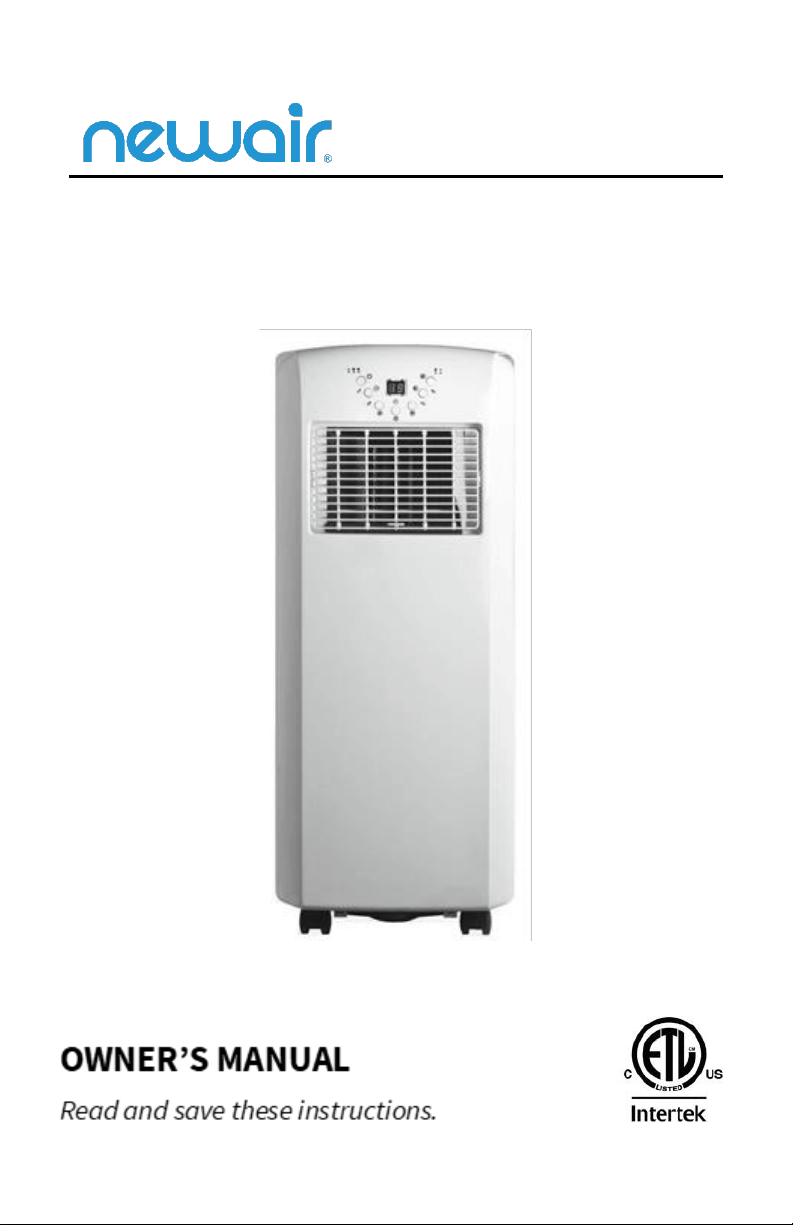
Portable Air Conditioner
SKU: AC-10100E
2
newair.com
READ AND SAVE THESE INSTRUCTIONS.
TABLE OF CONTENTS
Register Your Product Online ............................................................................... 3
Safety Information & Warnings ........................................................................... 4
Parts List ............................................................................................................... 5
Assembly Instructions .......................................................................................... 6
Operating Instructions ......................................................................................... 9
Cleaning And Maintenance ................................................................................ 15
Troubleshooting ................................................................................................. 16
Limited Manufacturer’s Warranty ..................................................................... 17
SPECIFICATIONS
MODEL NO.
AC-10100E
RATED VOLTAGE
115V, 60Hz
COOLING CAPACITY (US DOE)
5950 BTU/hr
RATED CURRENT
874W/ 8.12A
REFRIGERANT
R410A
FAN SPEEDS
2
TEMPERATURE RANGE
64.4 – 89.6 F
NET WEIGHT
55 LBS
PRODUCT DIMENSIONS
12.1” W x 15.3” D x 29.6” H
CEER
6.80
NOISE RATING
57 dB
3
newair.com
REGISTER YOUR PRODUCT ONLINE
Register Your NewAir Product Online Today!
Take advantage of all the benefits product registration has to offer:
Service and Support
Diagnose troubleshooting and service issues faster and more
accurately
Recall Notifications
Stay up to date for safety, system updates and recall notifications
Special Promotions
Opt-in for NewAir promotions and offers
Registering your product information online is safe & secure and takes less
than 2 minutes to complete:
0
Alternatively, we recommend you attach a copy of your sales receipt below and
record the following information, located on the manufacturer’s nameplate on
the rear of the unit. You will need this information if it becomes necessary to
contact the manufacturer for service inquiries.
Date of Purchase: ___________________________________________
Serial Number: ____________________________________________
Model Number: ____________________________________________
newair.com/register

4
newair.com
SAFETY INFORMATION & WARNINGS
• Read all instructions before using this appliance.
• For indoor use only.
• Leave the unit to stand for 12 hours before connecting to the main supply
after transport or when it has been tilted (e.g., during cleaning).
• Only use in the upright position on a flat level surface and with at least a 20
inches (50cm) clearance from any objects.
• Do not use the unit in a potentially explosive environment containing
combustible liquids, gases or dusts.
• Do not place objects on the unit or restrict air flow.
• Avoid the unit from getting wet.
• Closely supervise any children and pets when unit is in use.
• This appliance is not intended for use by persons (including children) with
reduced physical, sensory or mental capabilities, unless they have been
given supervision by a person responsible for their safety.
• Switch off and unplug when not in use.
• Avoid over-twisting, coiling, pulling the power cord.
• If the unit has fallen in water, have it checked before using it again.
• Do not use extension cords.
• If the unit or any parts are damaged contact a qualified technician for
repairs.
• Close the doors and windows when unit is in use.
• Keep filters clean.
• The machine is to be used only for its prescribed purpose. The warranty
will be void if any damage occurs when used differently than stated in this
manual.
SAVE THESE INSTRUCTIONS
5
newair.com
PARTS LIST
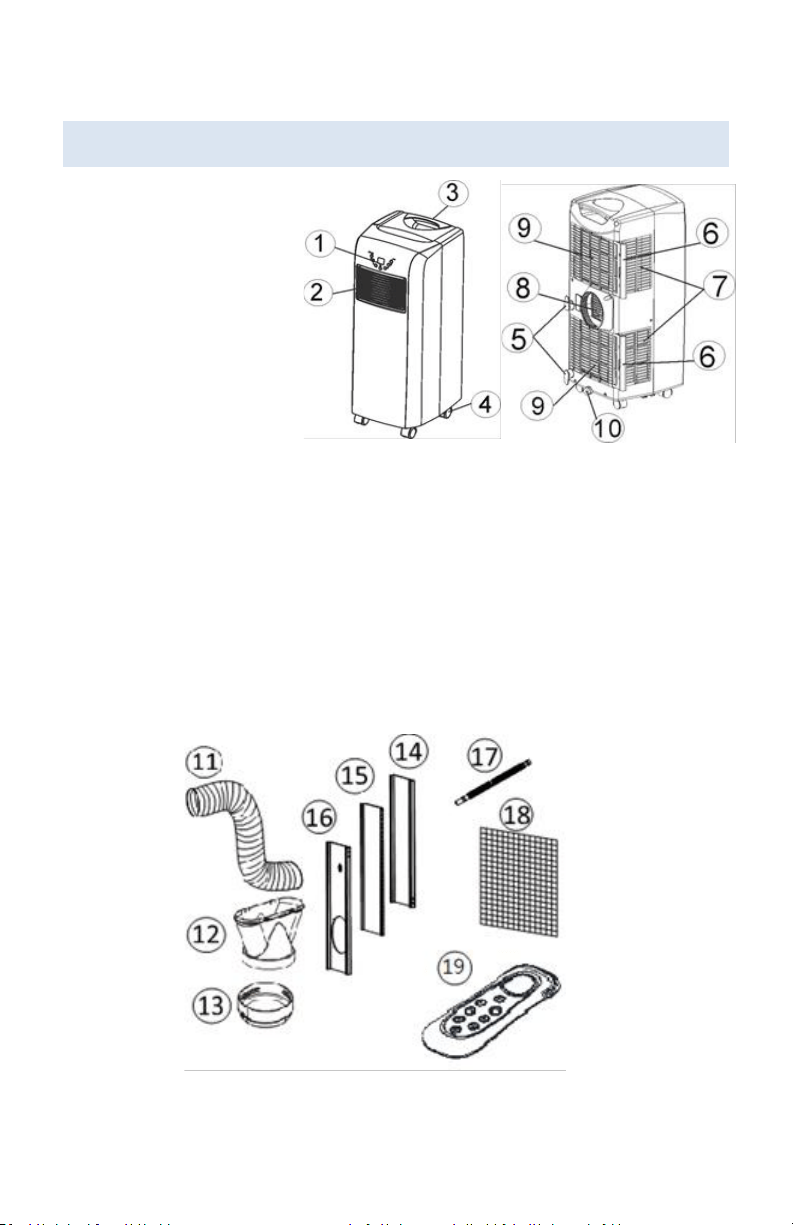
1. Control panel
2. Air outlet
3. Carrying handle
4. Caster wheels
5. Cord storage
6. Air filter
7. Air inlet
8. Exhaust air outlet
9. Air inlet
10. Rubber plug/ drainage
point
11. Exhaust hose
12. Flat Type Adaptor - for insertion over hose & connected with PVC window
kit (or into hole in the wall/window)
13. Inward adaptor (connected unit & exhaust hose)
14. PVC Window Kit 1 – for filling the open window space.
15. PVC Window Kit 2 – for filling the open widow space
16. PCV Window Kit 3 – for filling the open window space & with hole for
connection with exhaust hose
17. Continuous drainage tube
18. Active carbon filter
19. Remote control
FIG 3
6
newair.com
ASSEMBLY INSTRUCTIONS
Before using your air conditioner, you will need to install the exhaust hose so
that the heat from the appliance is released into an open area.
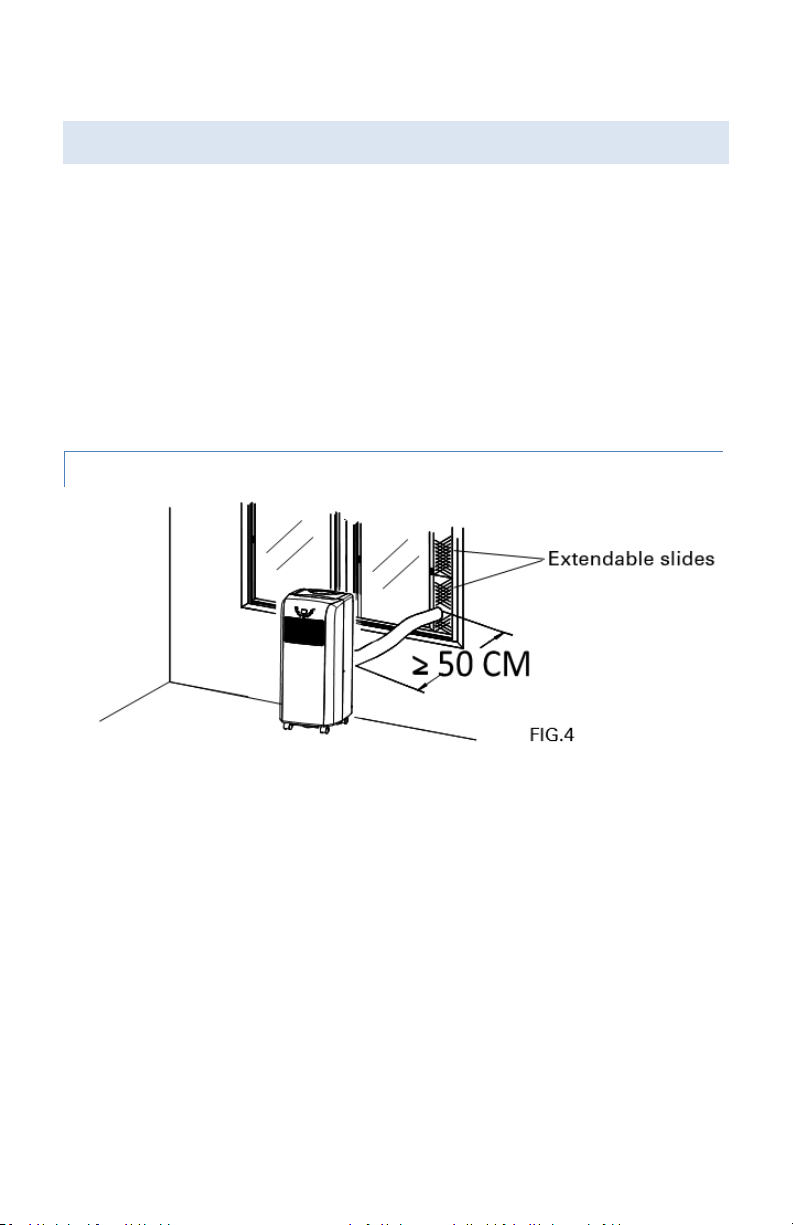
To install the exhaust hose, feed the end of the hose through any available
window and secure it into place using the included adapter. Ensure the
distance between the unit and the window is at least 20 inches (50cm).
To seal the gap around the adapter, you may utilize the extendable slides
(supplied along with the appliance) as below:
USING THE EXTENDABLE SLIDES
1. Place the extendable slides in the window gap and adjust the length as you
need.
2. Feed exhaust hose through the slide and the window so that spacer is held
securely. This technique may also be used for sash windows.
Note: Take care to maintain protection against intruders
7
newair.com
MOUNTING OF THE EXHAUST PIPE
1. Use only the hose provided and clip exhaust hose to the back of the air
conditioner.
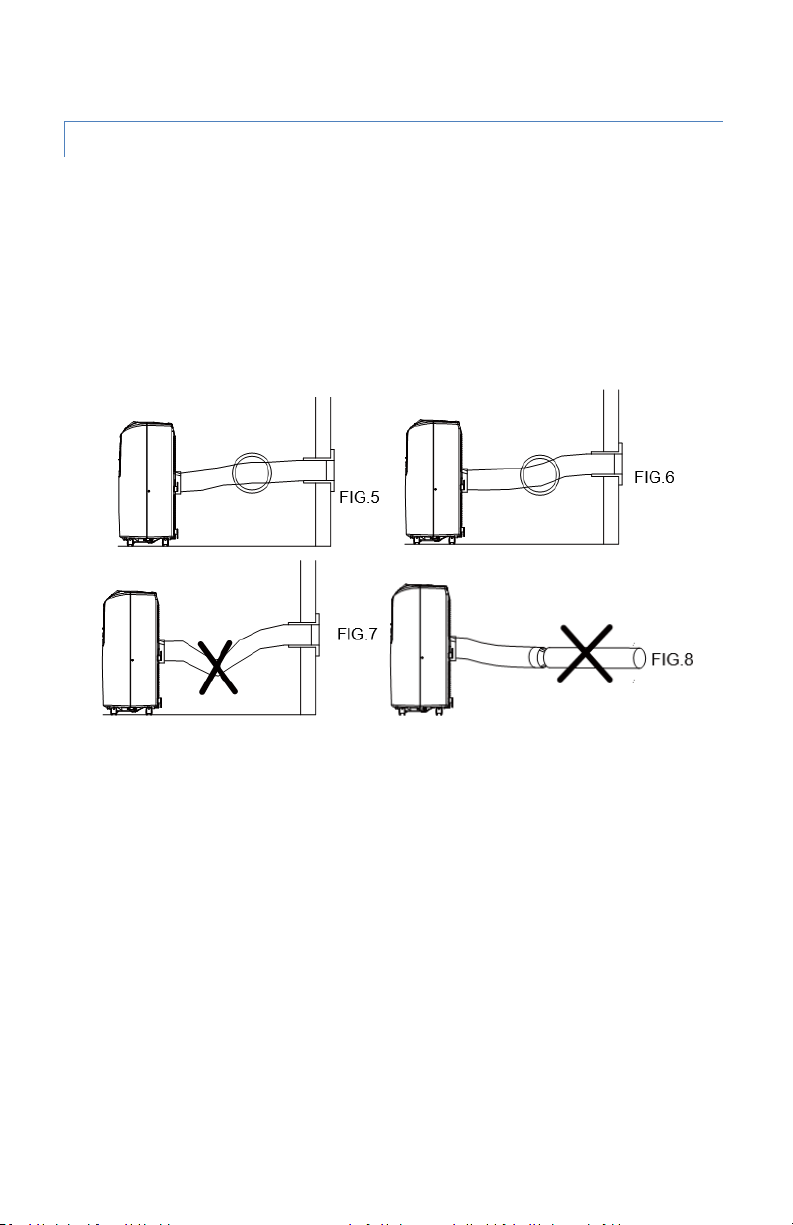
2. Avoid kinks and bends in the exhaust hose as this will cause expelled moist
air to build up causing the unit to overheat and shut down. Fig 5 & 6 show
correct position.
3. The hose may be extended from 12 inches to 60 inches but for maximum
efficiency use the shortest length possible.
WARNING!
The length of the exhaust pipe is specially designed according to the
specification of this product. Do not replace or extend with different off
branded parts as this could cause the unit to malfunction and void the
manufacturer’s warranty.
8
newair.com
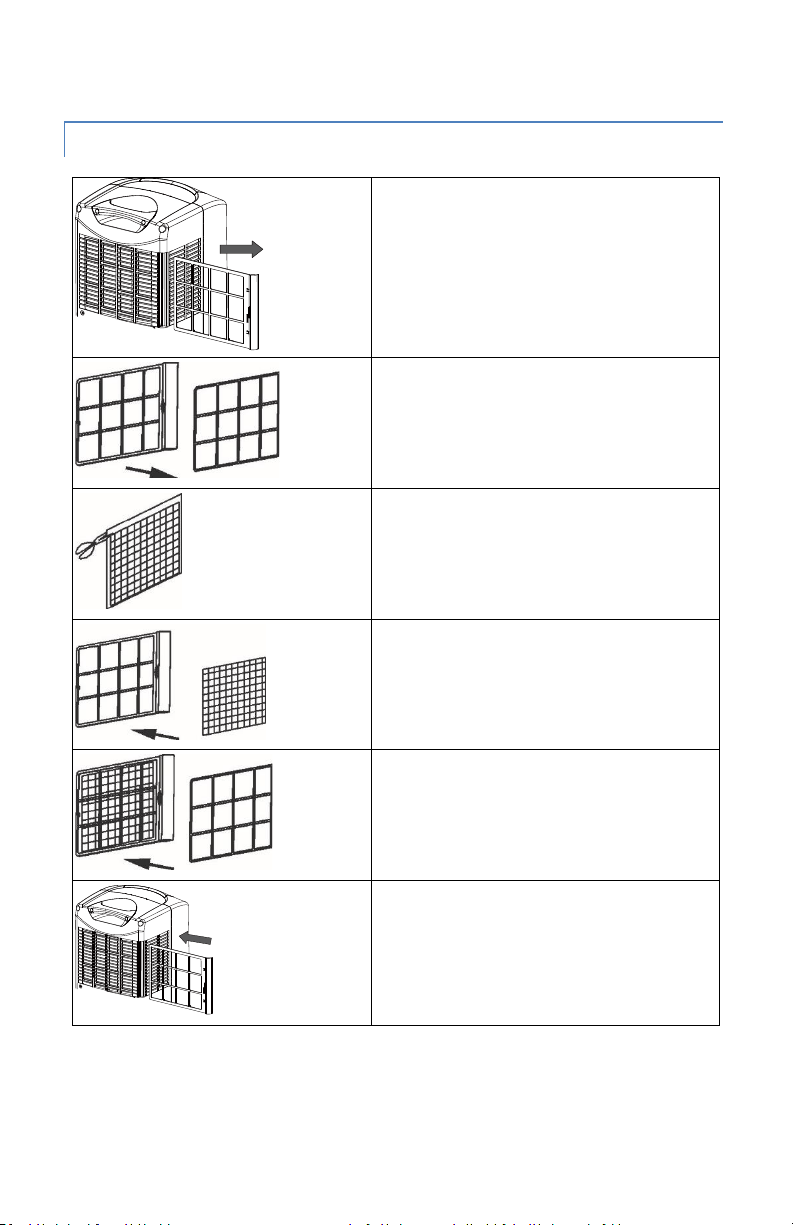
INSTALLATION OF THE CARBON FILTER
FIG.9
Remove the filter frame from the unit.
FIG.10
Remove the filter fixer from the filter
frame.
FIG.11
Remove the active carbon filter from its
plastic bag.
FIG.12
Attach the active carbon filter to the filter
frame.
FIG.13
Attach the filter fixer to the filter frame
(the active carbon filter should be held
between the filter frame and filter fixer
firmly).
FIG.14
Insert the filter set (filter frame + active
carbon filter + filter fixer ) into the back of
the unit.
9
newair.com
OPERATING INSTRUCTIONS
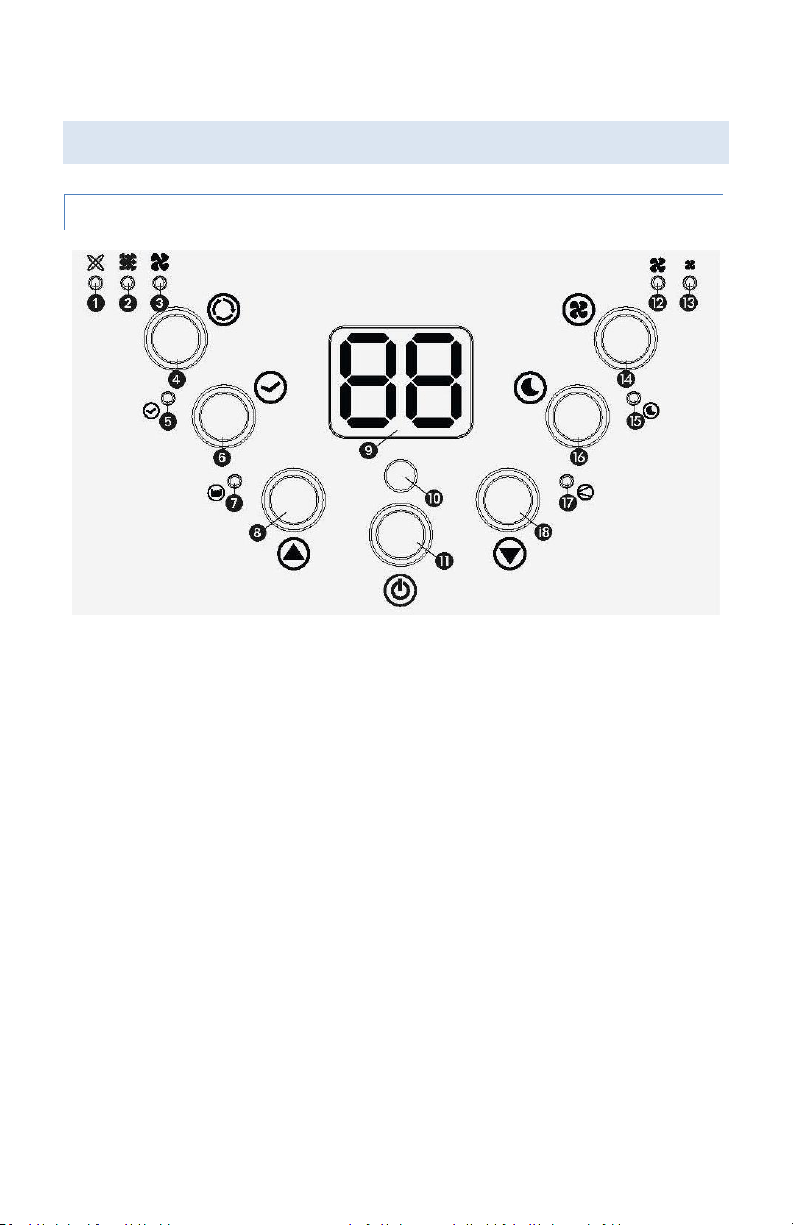
CONTROL PANEL
FIG 15
1. Automatic mode indicator
2. Cooling mode indicator
3. Fan mode indicator
4. Mode selection button
5. Timer operation indicator
6. Timer button
7. Full water tank indicator
8. Temperature up button
9. Display window
10. Remote control receiver
11. ON/OFF (power) button
12. High fan speed indicator
13. Low fan speed indicator
14. Fan speed button
15. Sleep mode indicator
16. Sleep button
17. Compressor indicator
18. Temperature down button

10
newair.com
TURNING ON/OFF
1. Press ON/OFF button, the unit will start automatically.
2. If the ambient temperature is
• higher than 73
o
F (22
o
C), the unit will work in cooling mode.
• higher than 68
o
F (20
o
C) but below or equal to 73
o
F (22
o
C), the unit will
work in ventilation mode.
3. The display window shows the ambient room temperature from 32
o
F (0
o
C)
to 122
o
F (50
o
C).
4. To turn the unit off, press ON/OFF button again.
SETTING MODE/FUNCTION
Press MODE button to select required working mode: automatic, cooling, or
fan. The indicator of your selected mode comes on.
SETTING TEMPERATURE
1. Press 'Temperature up' or 'Temperature down' button to set the desired
temperature.
2. The display window will show the temperature you set as you press
'Temperature up' or 'Temperature down' button. Otherwise, it will always
show the ambient temperature.
3. The pre-setting temperature of this machine is 75.2
o
F (24
o
C) for cooling.
SETTING FAN SPEED
1. Press SPEED button to choose the fan speed you need, high or low. The
indicator of high or low ventilation will light on at the same time.
2. If the unit is in AUTO mode, it will choose the fan speed automatically
according to the ambient temperature (the related indicators will light on),
at this time, the speed switch is invalid.
11
newair.com
SETTING TIMER
1. Press TIMER button to set the operating hours you desire (1 to 12 hours,
the timer indicator will light on). When the set time has been reached, the
machine will turn off automatically. The display window will show the
hour(s) you set as you press TIMER button. If the timer button is not
pressed, the unit will work continuously.
2. By pressing the timer with the unit off, you can PRE-SET the time for the
machine to work. For example, if you set the timer to '2', the unit will turn
on automatically after 2 hours.
SLEEP FUNCTION
1. In cooling mode, by pressing the SLEEP button, the set temperature will
increase by one degree at the 1st hour, another degree at the second hour,
and will stay on that set temperature.
2. In sleep mode, the fan will keep at low speed. Re-press the SLEEP button,
the setting temperature and fan speed will return to the pre-selected one.
3. The unit will shut down automatically after the SLEEP function has been
running for 12 hours.
4. Please note, the sleep function is not available while the machine is
working in AUTO or FAN mode.
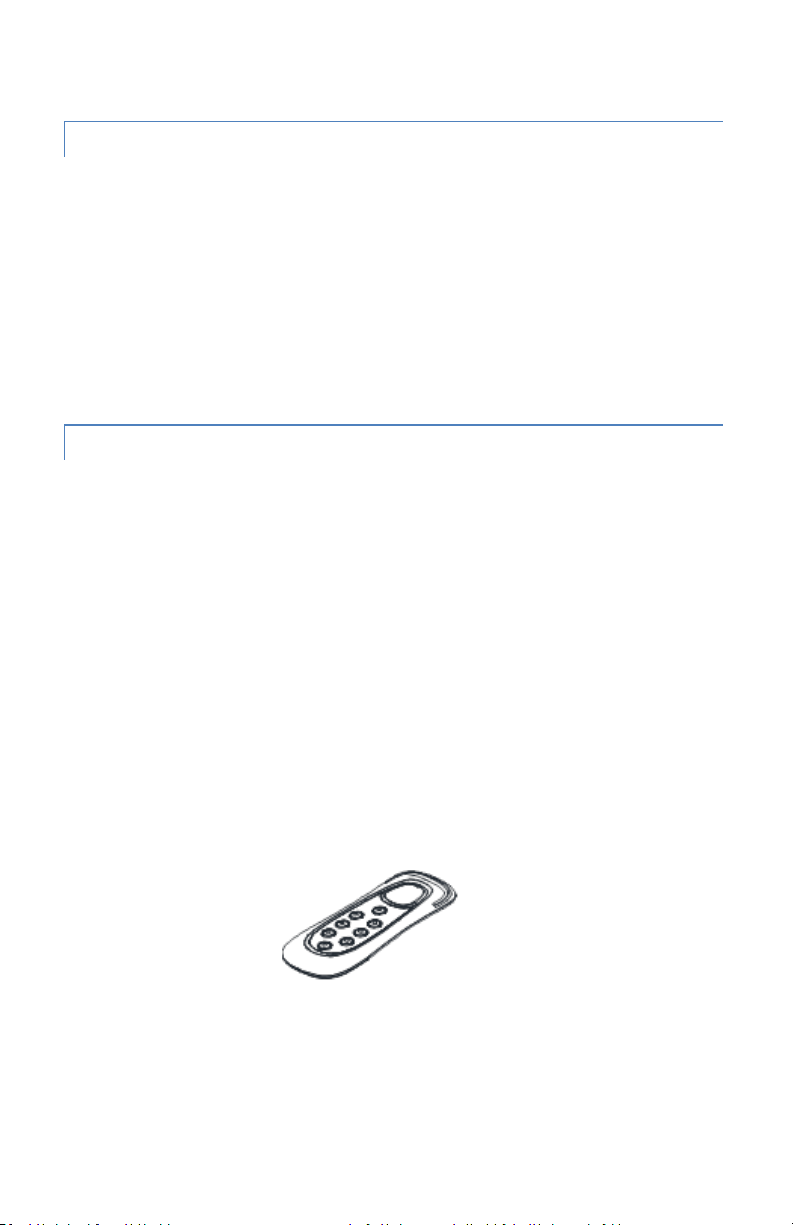
All the above functions can also be performed with the supplied remote
control. This remote control requires 2pcs AAA batteries to operate.
FIG 16
12
newair.com
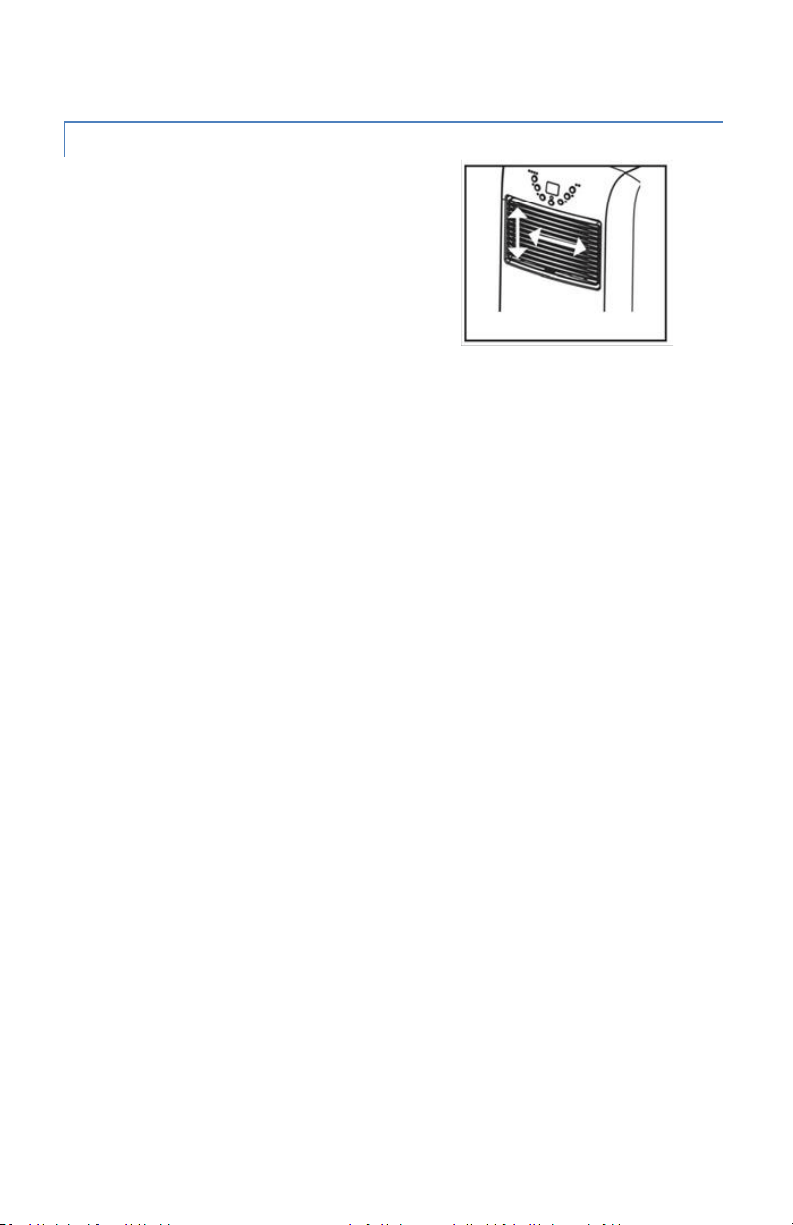
REGULATING AIR FLOW DIRECTION
Turn the vertical louvers left & right by
moving the roller on the air vent. For
horizontal louvers, adjust them up & down
by hand to control the air flow direction.
NOTICE:
1. To protect the compressor, after you turn off the unit, please wait for 3
minutes (at least) before turning it back on if needed.
2. The cooling system will switch off if the ambient temperature is lower than
the set one. The fan, however, keeps working on the set level. If the
ambient temperature rises above the selected level, the cooling will work
again.
FIG 17
13
newair.com
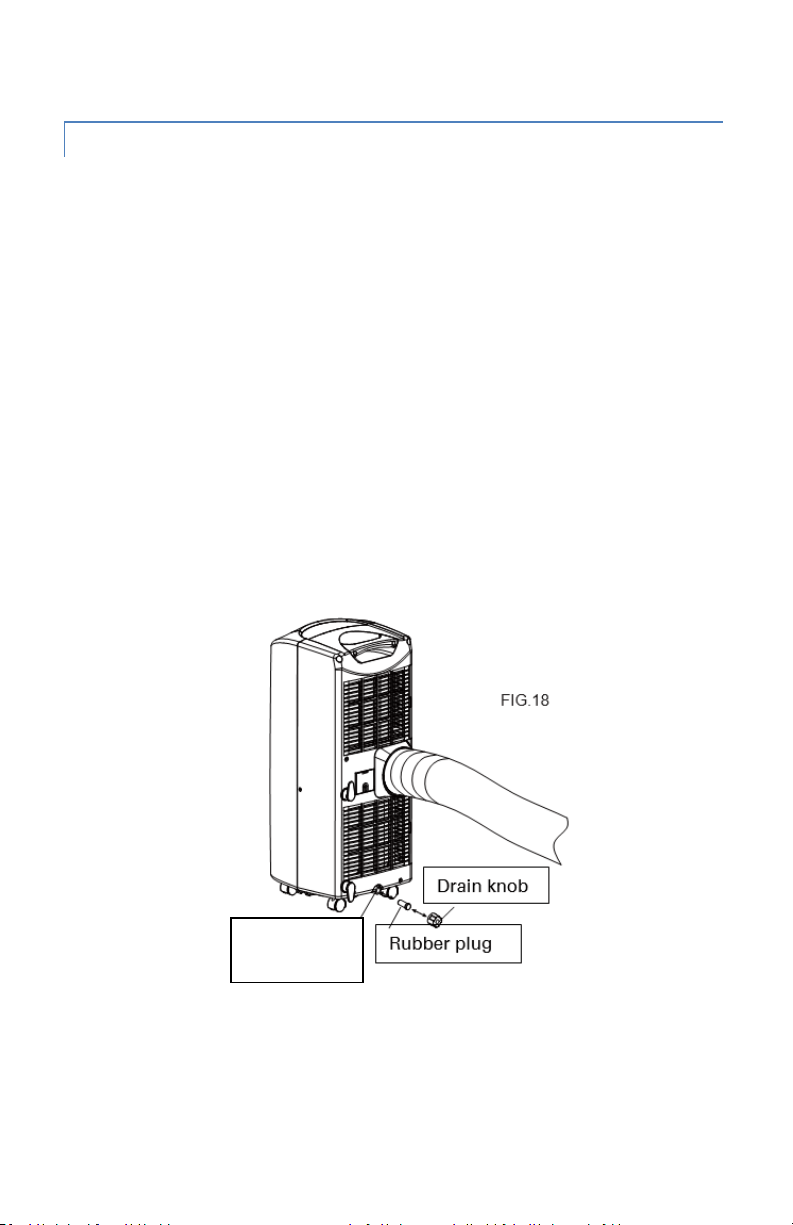
DRAINING THE UNIT
During the process of cooling, some water will be extracted from the air into
the unit. If the water reservoir is full, both the compressor and motor will stop,
and the unit will buzz (you can press any button to stop the buzz). The Full
Water indicator will flash on.
To make the cooling work again, please drain the unit by following these
instructions:
1. Turn off the air conditioner and avoid moving it when full.
2. Position a container (e.g., a tray) underneath the drain hole.
3. Remove the drain knob & rubber plug from the drain hole and allow the
water to drain out.
4. Replace the rubber plug and tighten the drain knob firmly once all the
water has drained out.
5. Switch on the unit and check the Full Water indicator. If all the water has
been removed from the reservoir, the indicator will not be flashing.
Drain Hole
14
newair.com
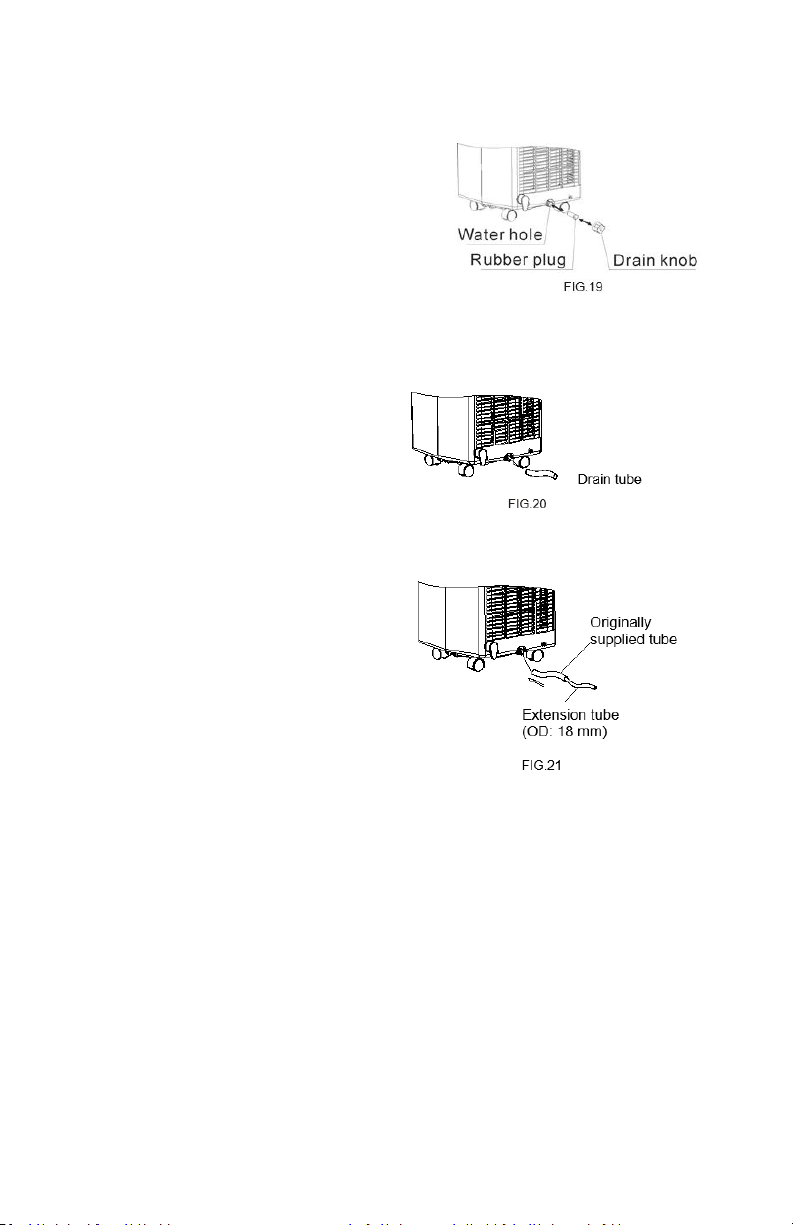
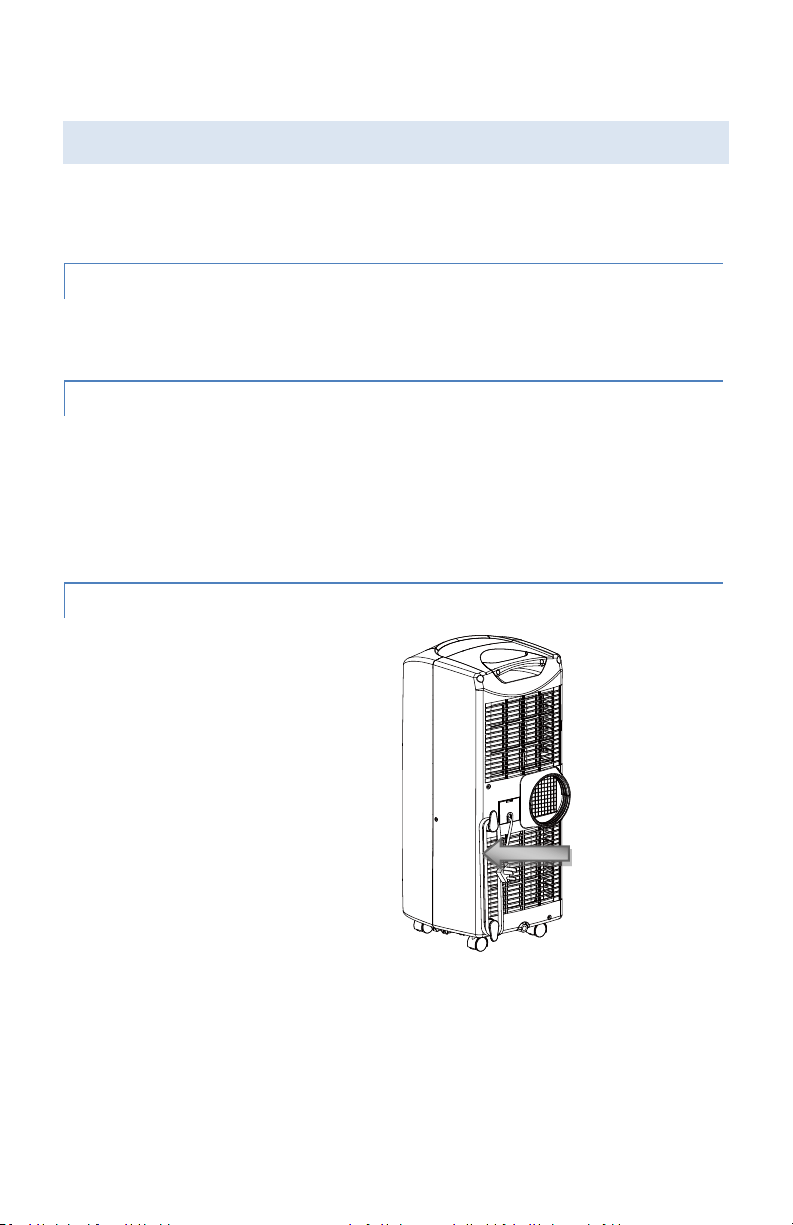
To operate the unit without having to
empty the water tank continually, please:
• Remove the drain knob and rubber
plug and retain from future use.
• Connect the drain tube provided to the
water outlet as shown and place the
other end into a water reciever.
The drain tube may be extended by
adding an extension tube and using a
suitable connector.
Please note
1. The drain must be at or below the
outlet level.
2. The Full Water indicator will not
function when using an extension
tube.
3. If you want to extend the water
tube, you can connect it with
another tube (OD: 18mm)
15
newair.com
CLEANING AND MAINTENANCE
Always unplug the air conditioner from the main power line before cleaning. To
maximize the efficiency of the air conditioner, clean regularly.
CLEANING THE HOUSING
• Use a soft, damp cloth to wipe the body clean.
• Never use aggressive chemicals as cleaning solutions.
CLEANING THE FILTERS
• Use a vacuum cleaner or tap the filter lightly to remove loose dust and dirt
from the filters and then rinse thoroughly under running warm water.
• Dry thoroughly before replacing.
• Never operate the unit without the filters.
END OF SEASON STORAGE
• Drain any water in the unit before
completely operating the unit on
fan mode for a few hours, to
thoroughly dry the inside.
• Clean or change the filter.
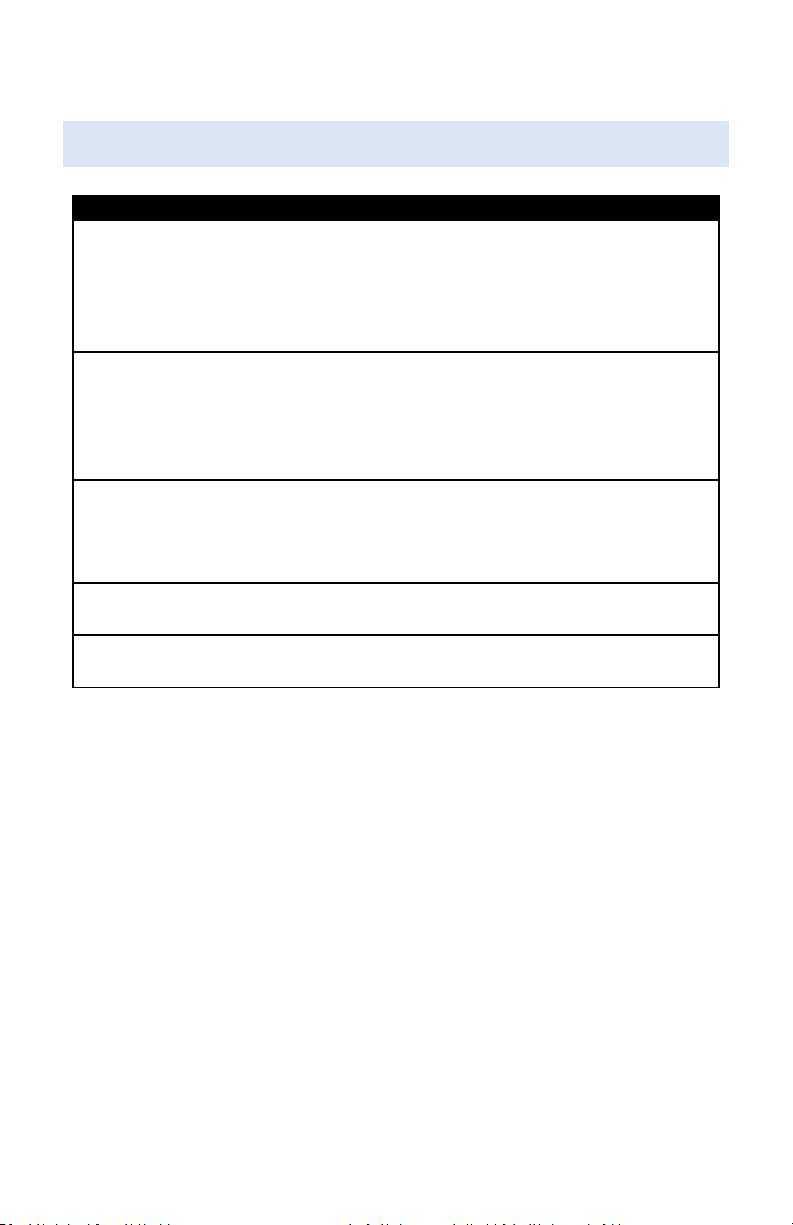
• Unplug and store the power cord
as shown.
• Place in the original carton or
plastic cover for storage.
Power cord
FIG 22
16
newair.com
TROUBLESHOOTING
Problem
Possible Causes and Solution
The air conditioner
will not run.
• Make sure the air conditioner is plugged in.
• Check the Full Water indicator. If it is flashing,
please drain the unit.
• Make sure the room temperature is not below the
set temperature.
The air conditioner is
not cooling enough.
• Check that there is no direct sunlight on the unit.
Pull down the curtains if need be.
• Close all open windows and/or doors.
• Make sure there is nothing in the room producing
heat.
The air conditioner is
on but will not cool.
• Check the filter. Clean if dusty or dirty.
• Make sure the air intake or output is not blocked.
• Make sure the room temperature is not below the
set temperature.
The air conditioner is
too noisy.
• Make sure the unit is positioned evenly.
• Make sure the unit is level on the floor.
The compressor will
not run.
• Wait for the temperature to drop and for the
compressor to kick in.
NEVER TRY TO REPAIR OR DISMANTLE THE UNIT YOURSELF

17
newair.com
LIMITED MANUFACTURER’S WARRANTY
This appliance is covered by a limited manufacturer’s warranty. For one year
from the original date of purchase, the manufacturer will repair or replace any
parts of this appliance that prove to be defective in materials and
workmanship, provided the appliance has been used under normal operating
conditions as intended by the manufacturer.
Warranty Terms:
During the first year, any components of this appliance found to be defective
due to materials or workmanship will be repaired or replaced, at the
manufacturer’s discretion, at no charge to the original purchaser. The
purchaser will be responsible for any removal or transportation costs.
Warranty Exclusions:
The warranty will not apply if damage is caused by any of the following:
• Power failure
• Damage in transit or when moving the appliance
• Improper power supply such as low voltage, defective household
wiring or inadequate fuses
• Accident, alteration, misuse or abuse of the appliance such as using
non-approved accessories, inadequate air circulation in the room or
abnormal operating conditions (extreme temperatures)
• Use in commercial or industrial applications
• Fire, water damage, theft, war, riot, hostility or acts of God such as
hurricanes, floods, etc.
• Use of force or damage caused by external influences
• Partially or completely dismantled appliances
• Excess wear and tear by the user
Obtaining Service:
When making a warranty claim, please have the original bill of purchase with
purchase date available. Once confirmed that your appliance is eligible for
warranty service, all repairs will be performed by a NewAir™ authorized repair
facility. The purchaser will be responsible for any removal or transportation
costs. Replacement parts and/or units will be new, re-manufactured or
refurbished and is subject to the manufacturer’s discretion. For technical
support and warranty service, please email support@newair.com