User Manual Kenmore 79574023411 Elite Refrigerator
PART AND FEATURES

Use this page to become more familiar with the parts and features of your refrigerator.
NOTE: This guide covers several different models. The refrigerator you have purchased may have some or all of the items listed below. The locations of the features shown below may not match your model.
- Refrigerator Light
- Water Filter
- Fixed Door Bins
- Ice Compartment
- Icemaker and Ice Bin)
- Refrigerator Light (side)
- Articulating Mullion
- Water Tank Cover
- Humidity Controlled Crisper
- Temperature Controlled Pantry Drawer
- Durabase Divider
- Control Panel
- Kenmore Connect TM Speaker
- Air Filter
- Adjustable Dairy Bin
- Refrigerator Shelves
- Adjustable Door Bins
- Air Tight Crisper
- Top Pullout Drawer
- Middle Pullout Drawer
- Durabase

REFRIGERATOR INSTALLATION
UNPACKING YOUR REFRIGERATOR
Remove tape and any temporary labels from your refrigerator before using. Do not remove any warning- type labels, the model and serial number label, or the Tech Sheet that is located under the front of the refrigerator.
To remove any remaining tape or glue, rub the area briskly with your thumb. Tape or gtue residue can also be easily removed by rubbing a small amount of liquid dish soap over the adhesive with your fingers. Wipe with warm water and dry.
Do not use sharp instruments, rubbing alcohol, flammable fluids, or abrasive cleaners to remove tape or glue. These products can damage the surface of your refrigerator.
Refrigerator shelves are installed in the shipping position. Please reinstall shelves according to your individual storage needs.
PRIOR TO USE
- Clean your refrigerator thoroughly and wipe off all dust that accumulated during shipping.
- Install accessories such as ice cube bin, drawers, shelves, etc., in their proper places. They are packed together to prevent possible damage during shipment.
- Allow your refrigerator to run for at least two to three hours before putting food in it. Check the flow of cold air in the freezer compartment to ensure proper cooling. Your refrigerator is now ready for use.
INSTALLATION
The refrigerator should always be plugged into its own individual properly grounded electrical outlet rated for Volts, 60 Hz, AC only, and fused at 15 or 20 amperes. This provides the best performance and also prevents overloading house wiring circuits which could cause a fire hazard from overheated wires. It is recommended that a separate circuit serving only this appliance be provided.
1. To avoid noise and vibration, the unit must be leveled and installed on a solidly constructed floor. If required, adjust the leveling legs to compensate for unevenness of the floor. The front should be slightly higher than the rear to aid in door closing. Leveling legs can be turned easily by tipping the cabinet slightly. Turn the leveling legs to the left to raise the unit or to the right to lower it. (See LEVELING AND DOOR ALIGNMENT.)
NOTE: Installing on carpeting, soft tile surfaces, a platform or weakly supported structure is not recommended.
2. Install this appliance in an area where the temperature is between 55°F (13°C) and 110°F (43°C). If the temperature around the appliance is too low or high, cooling ability may be adversely affected.
3. Select a place where a water supply can be easily connected for the automatic icemaken
NOTE: The water pressure must be from 20-120 psi or kPa or 1.4-8.4 kgf/cm 2. If the refrigerator is installed in an area with low water pressure (below 20 psi), you can install a booster pump to compensate for the low pressure.
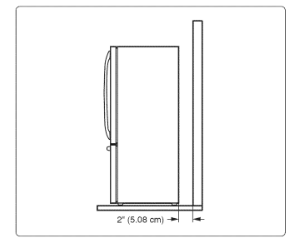
4. Too small of a distance from adjacent items may result in lowered freezing capability and increased electricity consumption charges. Allow at least 24 inches (61 cm) in front of the refrigerator to open the doors and at least 2 inches (5.08 cm) between the back of the refrigerator and the wall.
NOTE: Removing the doors is always recommended when it is necessary to move the refrigerator through a narrow opening, if it is necessary to remove the handles, follow the directions below.
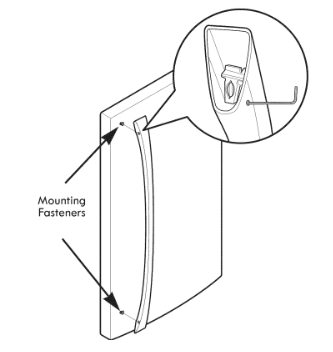
HOW TO REMOVE REFRIGERATOR DOOR HANDLE
NOTE: Handle appearance may vary from the illustrations on this page.
Removing Refrigerator Handle
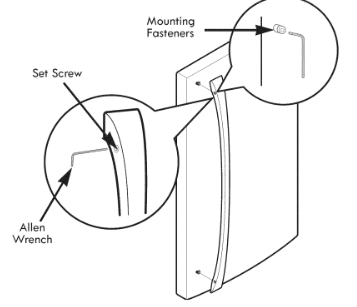
Loosen the set screws with a 3/32 in. Allen wrench and remove the handle.
NOTE: If the handle mounting fasteners need to be tightened or removed, use a 1/4 in. Alien wrench.
HOW TO REPLACE REFRIGERATOR DOOR HANDLE
NOTE: Handle appearance may vary from the illustrations on this page.
Replaclng Refrigerator Door Handle
Place the handle on the door by fitting the handle footprints over the mounting fasteners and tightening the set screws with a 3/32 in Allen wrench.
NOTE: If the handle mounting fasteners need to be tightened or removed, use a in. Allen wrench.
NOTE: Removing the doors is always recommended when it is necessary to move the refrigerator through a narrow opening, if it is necessary to remove the handles, follow the directions below.
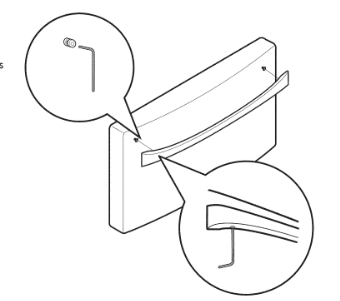
HOW TO REMOVE FREEZER DOOR HANDLE
NOTE: Handle appearance may vary from the illustrations on this page.
Removing Freezer Drawer Handle
Loosen the set screws located on the lower side of the handle with a 1/8 in. Alien wrench and remove the handle.
NOTE: If the handle mounting fasteners need to be tightened or removed, use a 1/4 in. Alien wrench.
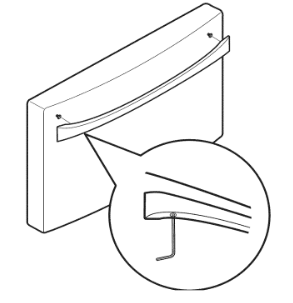
HOW TO REPLACE FREEZER DOOR HANDLE
NOTE: Handle appearance may vary from the illustrations on this page.
Replacing Freezer Drawer Handle
Place the handle on the door by fitting the handle footprints over the mounting fasteners and tightening the set screws with a 1/8 in. Allen wrench.
NOTE: If the handle mounting fasteners need to be tightened or removed, use a 1/4in. Alien wrench.
REMOVING AND REPLACING REFRIGERATOR DOORS
To remove the left refrigerator door:
On the back of the refrigerator, pull the water tube out of the cotlet fitting on the connector by pressing the fltting release ring (see picture below).
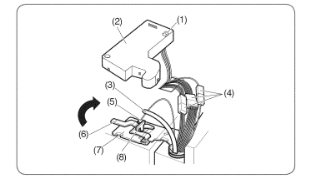
- Open the door. Remove the top hinge cover screw (1).
- Lift up the cover (2).
- Pull out the tube (3).
- Disconnect all wire harnesses (4).
- Remove the grounding screw (5).
- Rotate hinge lever (6) counterclockwise. Lift the top hinge (7) free of the hinge lever latch (8)
- Lift the door from the middle hinge pin and remove the door.
- Place the door, inside facing up, on a non-scratching surface.
To remove the right refrigerator door:
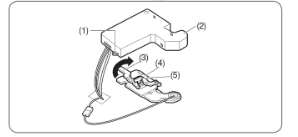
- Open the door. Remove the top hinge cover screw (1). Lift up the cover (2).
- Remove the cover.
- Rotate the hinge lever (3) clockwise. Lift the top hinge free of the hinge lever latch (5).
- Lift the door from the middle hinge pin and remove the door.
- Place the door, inside facing up, on a non-scratching surface.
Relnstalllng the Refrigerator Door
Left Door
- Lower the door onto the middle hinge pin (10).
- Fit the top hinge (7) over the hinge lever latch (8) and into place. Rotate the lever (6) clockwise to secure the hinge.
- Install the grounding screw (5) and connect the two wire harnesses (4).
- Push the water tube (3) located at the top of the left door into the hole beside the left hinge on the top of the cabinet until it exits through the back.
- Insert the water supply tube (3) into the connector until you see only one scale mark. Fully insert the tube over s/8 in. (15 mm).
- Hook the tabs on the left side of the hinge cover (t) under the edge of the top hinge (7) and position the cover in place, insert and tighten the cover screw (1).
Right Door
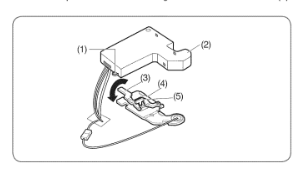
- Lower the door onto the middle hinge pin (9).
- Fit the top hinge (4) over the hinge lever latch (5) and into place. Rotate the lever (3) counterclockwise to secure the hinge.
- Hook the tabs on the right side of hinge cover (2) under the edge of the top hinge (4) and position the cover in place, insert and tighten the cover screw (1).
HOW TO REMOVE THE FREEZER DRAWER
WARNING: Use two or more people to remove and install the freezer drawer. Failure to do so can result in back or other injury.
CAUTION: Do not hold the handle when removing or replacing the drawer. The handle may come off and it could cause personal injury.
NOTE: In the following figures, the Pullout Drawer located above the freezer drawer is not shown for clarity.
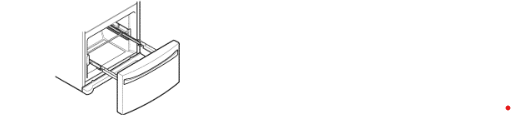
Pull the drawe open to futt extension. Remove the lower basket C) by lifting the basket from the rail system.
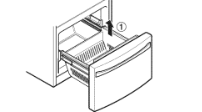
Remove the screws C) from the rail on both sides.
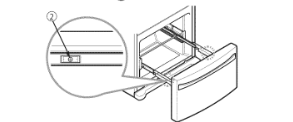
Grasp the drawer on each side and putt it up to separate it from the rails.
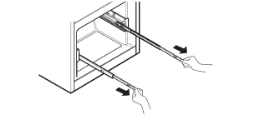
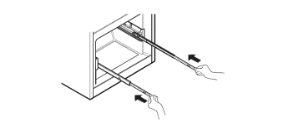
With both hands, slide each bar in simultaneously.
HOW TO INSTALL THE FREEZER DRAWER
Putt out each rait to futt extension.
Grasp the drawer on each side and hook drawer supports 1 into rail tabs 2 located on both sides.
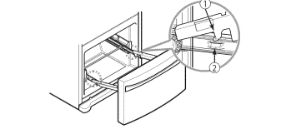
Lower the door into its final position and tighten the screws 3 located on both sides.
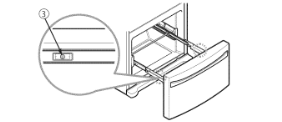
With the drawer pulled out to futt extension, insert the lower basket 4 in the rail assembly.
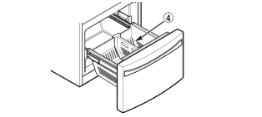
WARNING: If the Durabase divider is removed, there is enough open space for children or pets to crawl inside. To prevent accidental child and pet entrapment or suffocation risk, DO NOT allow them to touch or go near the freezer drawer.
WARNING: DO NOT step or sit down on the freezer drawer.
LEVELING AND DOOR ALIGNMENT
Leveling
After installing, plug the refrigerator's power cord into a prong grounded outlet and push the refrigerator into the final position.
Your refrigerator has two front leveling legs--one on the right and one on the left. Adjust the legs to alter the tilt from front-to-back or side-to-side. If your refrigerator seems unsteady, or you want the doors to close more easily, adjust the refrigerator's tilt using the instructions below=
NOTE: Tools Required= 11/16" wrench or fiat blade screwdriver.
1. Turn the leveling leg to the left to raise that side of the refrigerator or to the right to lower it. It may take several turns of the leveling leg to adjust the tilt of the refrigerator.
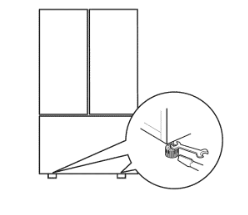
NOTE: Having someone push backward against the top of the refrigerator takes some weight off: of the leveling legs.
2. This makes it easier to adjust the legs. o Open both doors again and check to make sure that they close easily. If the doors do not close easily, tilt the refrigerator slightly more to the rear by turning both leveling legs to the left. It may take several more turns, and you should turn both leveling legs the same amount.
NOTE: Your refrigerator is uniquely designed with two fresh food doors. Either door can be opened or closed independently of the other. You may have to exert slight pressure on the doors to get them to close completely.
Door Ailgnment
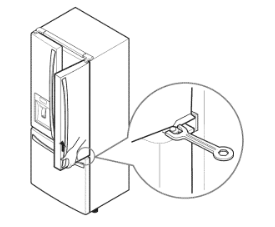
Both the left and right refrigerator doors have an adjustable nut, located on the bottom hinge, to raise and lower them to align properly.
If the space between your doors is uneven, follow the instructions below to align the doors evenly=
Use the wrench (included with the Use & Care Guide) to turn the nut in the door hinge to adjust the height. To the right to raise or to the left to lower the height.
USING YOUR REFRIGERATOR
SETTING THE CONTROLS
Temperature

- The Refrigerator Temp Control ranges from 33°F to 46° F (1°C to 8°C). Press the Refrigerator Temp button to cycle through the available temperature settings one increment at a time.
- The Freezer Temp Control range is from -6°F to 8°F C to -13°C). Press the Freezer Temp button to cycle through the available temperature settings one increment at a time.
NOTE: When changing control settings, wait 24 hours before making additional adjustments. The controls are set correctly when milk or juice is as cold as you would like and when ice cream is firm. If the temperature in either compartment is too cold or too warm, change the setting one increment at a time. Wait 24 hours for the change to stabilize before adjusting again.
Airflow
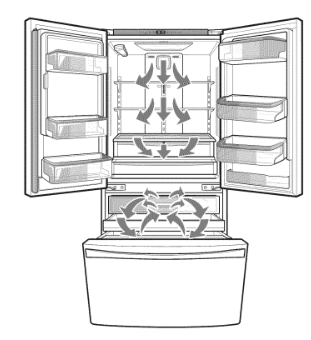
Be sure not to block vents while packing your refrigerator, Doing so will restrict airflow and may cause the refrigerator temperature to become too warm or cause interior moisture buildup, (See air flow diagram below,)
Dispenser
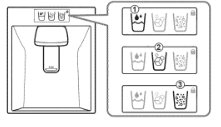
The dispenser will dispense water, cubed ice or crushed ice. Press the appropriate icon of your choice: 1 water cubed ice 2 crushed ice. When pressed the icon will illuminate.
NOTE: The dispenser will not work if any door is left open or if the control lock is engaged.
NOTE: If the Control Lock icon is illuminated, the Dispenser will not work. Disable the Control Lock to use the Dispenser again.
CAUTION: The control display is operated by touch. Excessive moisture on the display may cause a malfunction. Please keep the display clean and dry.
Air Filter
The Air Filter helps remove odors from the refrigerator. The Air Filter has two settings, Auto and MAX. In Auto mode, the Air Filter will cycle on and off in increments of ten minutes on and one hundred and ten minutes of{. if set to the MAX mode, the Air Filter will stay on continuously for four hours, cycling on and of{ in increments of ten minutes on and five minutes of{. After four hours, the Air Filter will switch to Auto mode.
- Auto mode is the default mode.
- Press the Air Filter button once for MAX mode.
Dispenser Light
This light has three settings: On, Off: and Dim. Select the Dim option at night. The light will automatically turn on at full brightness when the dispenser pad is pushed.
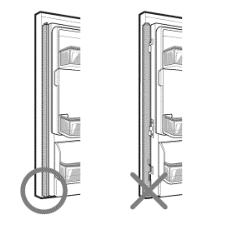
Articulating Mullion
This feature is a metal strip attached to the left door that articulates (rotates) 90 degrees as the door is closed, forming a mullion (base) for the left and right door gaskets to seal against.
Air Filter Reset
When the CHANGE icon turns on, the air filter needs to be replaced. After replacing the air filter, press and hold the Air Filter button for three seconds to turn the icon light off. It is recommended to change the air filter approximately every 6 months.
Ice Maker ON/OFF
- To switch the icemaker ON or OFF, press the Ice Maker button.
Ultra ice
- When you press and hold the Ice Maker button for three seconds, the graphic will illuminate in the display and will continue for 24 hours. The function will automatically shut of{ after 24 hours.
NOTE: While you are selecting the Ultra Ice function, the Ice Maker icon will briefly switch to OFF, then return to ON. This is normal.
- You can stop this function manually by pressing and holding the button one more time.
- This function increases both ice making and freezing capabilities.
Water Filter Reset
When the CHANGE icon turns on, you need to change the water filter. After changing the water filter, press and hold the Water Filter button for three seconds to turn the indicator light of{. You need to change the water filter approximately every six months.
CAUTION
To reduce the risk of scratching the door or breaking the door mullion, make sure that the refrigerator door mullion is always folded in.
Door Alarm
- When power is connected to the refrigerator, the door alarm is initially set to ON. When you press the Door Alarm button, the display will change to OFF and the Door Alarm function will deactivate.
- When either the refrigerator or the freezer door is left open for more than 60 seconds, the alarm tone will sound to let you know that the door is open.
- When you close the door, the door alarm will stop.
Demo Mode (For Store Use Only)
The Demo Mode disables all cooling in the refrigerator and freezer sections to conserve energy while on display in a retail store. When activated, OFF will display on the control panel.
Control Lock
- When power is initially connected to the refrigerator, the Lock function is off. if you want to activate the Lock function to lock other buttons, press and hold the Control Lock button for three seconds or more. The Control Lock button will illuminate and the Lock function is now enabled.
- When the Lock function is activated, no other buttons will work. The dispenser pad is also deactivated.
- To disable the Lock function, press and hold the Control Lock button for approximately three seconds.
To deactivate:
With either refrigerator door opened, press and hold the Refrigerator Temp and Ice Maker buttons at the same time for five seconds. The control panel will beep and the temperature settings will display to confirm that Demo Mode is deactivated. Use the same procedure to activate the Demo Mode.
Temperature Mode Switch Function (°F <->°C)
If you want to convert °F to °C or vice versa, press and hold the Freezer Temp and Refrigerator Temp buttons at the same time for approximately five seconds.
IN-DOOR ICE BIN
CAUTION
Keep hands and tools out of the ice compartment door and dispenser chute. Failure to do so may result in damage or personal injury.
The icemaker will stop producing ice when the in-door ice bin is full. if you need more ice, empty the ice bin into the extra ice bin in the freezer compartment. During use, the ice can become uneven causing the icemaker to misread the amount of ice cubes and stop producing ice. Shaking the ice bin to level the ice within it can reduce this problem.
NOTE: Storing cans or other items in the ice bin will damage the icemaker.
Keep the ice compartment door closed tightly. If the ice compartment door is not closed tightly, the cold air in the ice bin will freeze food in the refrigerator compartment. This could also cause the icemaker to stop producing ice.
NOTE: Emptying the ice bin is recommended if the icemaker ON/OFF button on the controt panel is set to OFF for an extended period of time.
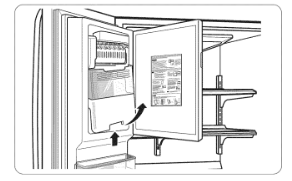
1. Putt or push the door handle to open or close the ice compartment.
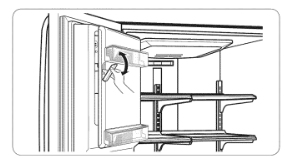
2. To remove the in-door ice bin, grip the front handle, slightly lift the lower part, and slowly putt out the bin as shown.
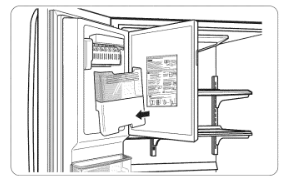
3. To reinstall the in-door ice bin, slightly slant the bin during replacement to avoid contact with the icemaker.
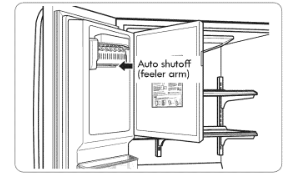
4. Avoid touching the auto shutoff (feeler arm) when replacing the ice bin. See the label on the ice compartment door for details.
AUTOMATIC ICEMAKER
Ice is made in the automatic icemaker and sent to the dispenser. The icemaker will produce 70-182 cubes in a 24-hour period, depending on freezer compartment temperature, room temperature, number of door openings and other operating conditions.
- It takes about 12 to 24 hours for a newly installed refrigerator to begin making ice. Wait 72 hours for full ice production to occur.
- Ice making stops when the in-door ice bin is full. When full, the in-door ice bin holds approximately 6 to oz or 340-455 cc) glasses of ice.
- Foreign substances or frost on the auto shutoff (feeler arm) can interrupt ice production. Make sure the feeler arm is clean at all times for proper operation.
- To increase ice production, use the Ultra Ice function. This function increases both ice making and freezing capabilities.
WHEN TO SET ICEMAKER TO OFF
- When the water supply will be shut off for several hours.
- When the ice bin is removed for more than one or two minutes.
- When the refrigerator will not be used for several days.
NOTE: The ice bin should be emptied when the icemaker ON/OFF button is turned to the OFF mode.
NORMAL SOUNDS YOU MAY HEAR
- If the icemaker ON/OFF button is set to ON, the valve will buzz even if the icemaker has not het been hooked up to water. To stop the buzzing, switch the button to OFF.
NOTE: Keeping the icemaker ON/OFF button set to ON before the water is connected can damage the icemaker.
- You will hear the sound of cubes dropping into the bin and water running in the pipes as the icemaker refills.
PREPARING FOR VACATION
Set the icemaker ON/OFF button to OFF and shut off the water supply to the refrigerator.
NOTE: The ice bin should be emptied any time the icemaker ON/OFF button is turned OFF.
If the ambient temperature will drop below freezing, have a qualified technician drain the water supply system to prevent serious property damage due to flooding caused by ruptured water lines or connections.
STORING FROZEN FOOD
NOTE: Check a freezer guide or a reliable cookbook for further information about preparing food for freezing or food storage times.
Freezing
Your freezer will not quick-freeze a large quantity of food. Do not put more unfrozen food into the freezer than will freeze within 24 hours (no more than 2 to 3 lbs. of food per cubic foot of freezer space). Leave enough space in the freezer for air to circulate around packages. Be careful to leave enough room at the front so the door can close tightly.
Storage times will vary according to the quality and type of food, the type of packaging or wrap used how airtight and moisture-proof) and the storage temperature. Ice crystals inside a sealed package are normal. This simply means that moisture in the food and air inside the package have condensed, creating ice crystals.
NOTE: Allow hot foods to cool at room temperature for 30 minutes, then package and freeze. Cooling hot foods before freezing saves energy.
Packaging
Successful freezing depends on correct packaging. When you close and seat the package, it must not allow air or moisture in or out. If it does, you could have food odor and taste transfer throughout the refrigerator and could also dry out frozen food.
Packaging recommendations:
- Rigid plastic containers with tight-fitting lids
- Straight-sided canning/freezing jars
- Heavy-duty aluminum foil
- Plastic-coated paper
- Non-permeable plastic wraps
- Specified freezer-grade self-sealing plastic bags
Follow package or container instructions for proper freezing methods.
Do nat use
- Bread wrappers
- Non-polyethylene plastic containers
- Containers without tight lids
- Wax paper or wax-coated freezer wrap
- Thin, semi-permeable wrap
CAUTION: Do not keep beverage cans or plastic food containers in the freezer compartment. They may break or burst if they freeze.
REFRIGERATOR SECTION
WATER DISPENSER
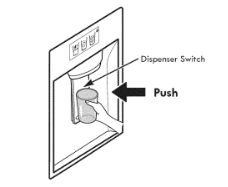
To dispense cold water, push on the dispenser switch with a glass.
NOTE: The dispenser is equipped with a light that turns on when the dispenser pad is engaged.
WARNING: Do not put your fingers up the ice chute opening. Doing so can result in severe injury.
CAUTION: Do not dispense ice into fine china or crystal glasses. China or crystal can break.
Some dripping may occur after dispensing. Hold your cup beneath the dispenser for a few seconds after dispensing to catch all of the drops.
WATER FILTER
WATER FILTER
It is recommended that you replace the water filter:
- Approximately every six months.
- When the water filter indicator turns on.
- When the water dispenser output decreases.
- When the ice cubes are smaller than normal.
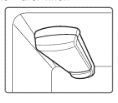
Before Replaclng the Water Filter:
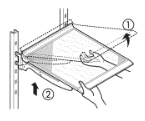
If the top shelf, located below the water filter, is in the highest position, it will need to be removed prior to replacing the water filter.
To remove any shelf-Tilt up the front of the shelf 1 and lift it 2 Putt the shelf out.
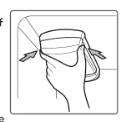
1. Remove the aid water filter.
- Lower or remove the top left shelf to allow the water filter to rotate all the way down.
- Pinch the sides to open the water filter cover.
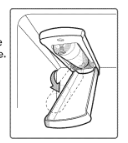
NOTE: Replacing the water filter causes a small amount of water around 1 oz. or 25 cc) to drain. Place a cup under the front end of the water filter cover to collect any leaking water. Hold the water filter upright, once it is removed, to prevent any remaining water from spilling out of the water filter.
- Putt the water filter downward and putl out. Make sure to rotate the filter down completely before pulling it out of the manifold hole.
2. Replace wlth a new water filter
- Take the new water filter out of its packing and remove the protective cover from the o-rings. With water filter tabs in the horizontal position, push the new water filter into the manifold hole until it stops.
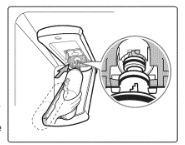
- Rotate the water filter up into position and close the cover. The cover will click when closed correctly.
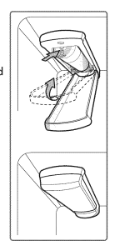
3. After the water filter is replaced, dispense 2.5 gallons of water (flush for approximately 5 minutes) to remove trapped air and contaminants from the system. Do not dispense the entire 2.5 gallon amount continuously. Depress and release the dispenser pad for cycles of 30 seconds ON and 60 seconds OFF.
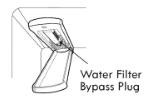
4. Water Filter Bypass Plug
Keep the water filter bypass plug. You MUST use the water filter bypass plug when a replacement water filter cartridge is not available.
CARE AND CLEANING
Both the refrigerator and freezer sections defrost automatically; however, clean both sections about once a month to prevent odors. Wipe up spills immediately.
GENERAL CLEANING TIPS
- Unplug refrigerator or disconnect power.
- Remove all removable parts, such as shelves, crispers, etc. Refer to sections in Using Your Refrigerator for removal instructions.
- Use a clean sponge or soft cloth and a mild detergent in warm water. Do not use abrasive or harsh cleaners.
- Hand wash, rinse and dry all surfaces thoroughly.
- Plug in refrigerator or reconnect power.
EXTERIOR
Waxing external painted metal surfaces helps provide rust protection. Do not wax plastic parts. Wax painted metal surfaces at least twice a year using appliance wax or auto paste wax). Apply wax with a clean, soft cloth.
For products with a stainless steel exterior, use a clean sponge or soft cloth and a mild detergent in warm water. Do not use abrasive or harsh cleaners. Dry thoroughly with a soft cloth.
INSIDE WALLS (allow freezer to warm up so the cloth will not slick)
To help remove odors, you can wash the inside of the refrigerator with a mixture of baking soda and warm water. Mix 2 tablespoons of baking soda to 1 quart of water (26 g soda to 1 liter water.) Be sure the baking soda is completely dissolved so it does not scratch the surfaces of the refrigerator.
CAUTION: While cleaning the inside, do not spray water.
DOOR LINERS AND GASKETS
Use a clean sponge or soft cloth and a mild detergent in warm water. Do not use cleaning waxes, concentrated detergents, bleaches, or cleaners containing petroleum on plastic refrigerator parts.
PLASTIC PARTS (Covers and Panels)
Use a clean sponge or soft cloth and a mild detergent in warm water. Do not use window sprays, abrasive cleansers, or flammable fluids. These can scratch or damage the material.
CONDENSER COILS
Use a vacuum cleaner with an attachment to clean the condenser cover and vents. Do not remove the panel covering the condenser coil area.
LIGHT BULB REPLACEMENT
NOTE: The refrigerator and freezer compartment lights have LED interior lighting, and service should be performed by a qualified technician.
POWER INTERRUPTIONS
- If the power will be out for 24 hours or less, keep all refrigerator doors closed to help foods stay cold and frozen.
- If the power will be out for more than 24 hours, remove all frozen food and store it in a frozen food locker.
WHEN YOU GO ON VACATION
If you choose to leave the refrigerator on while you are away, follow these steps to prepare your refrigerator before you leave.
- Use up any perishables and freeze other items.
- Turn off the icemaker and empty the ice bin.
If you choose to turn the refrigerator off before you leave, follow these steps.
- Remove all food from the refrigerator.
- Depending on your model, set the thermostat controt refrigerator control) to OFF. See the Setting the Controls section.
- Clean the refrigerator, wipe it and dry well.
- Tape rubber or wood blocks to the tops of both doors to prop them open far enough for air to get in. This stops odor and mold from building up.
WHEN YOU MOVE
When you are moving your refrigerator to a new home, follow these steps to prepare it for the move.
- Remove all food from the refrigerator and pack all frozen food in dry ice.
- Unplug the refrigerator.
- Clean, wipe and dry thoroughly.
- Take out all removable parts, wrap them well and tape them together so they do not shift and rattle during the move. Refer to the Using your Refrigerator section for removable instructions.
- Depending on the model, raise the front of the refrigerator so it rolls easier OR screw in the leveling legs all the way so they do not scrape the floor. See the Door Closing section.
- Tape the doors shut and tape the power cord to the refrigerator cabinet.
When you get to your new home, put everything back and refer to the Refrigerator Installation section for preparation instructions.
CONNECTING THE WATER LINE
BEFOREYOU BEGIN
This water line installation is not covered by the refrigerator warranty. Follow these instructions carefully to minimize the risk of expensive water damage.
Water hammer (water banging in the pipes) in house plumbing can cause damage to refrigerator parts and can lead to water leakage or flooding. Catt a qualified plumber to correct water hammer before installing the water supply line to the refrigerator.
CAUTION: To prevent burns and product damage, only connect the refrigerator water line to a cold water supply.
If you use your refrigerator before connecting the water line, make sure the icemaker is turned OFF at the control panel.
CAUTION: Do not install the icemaker tubing in areas where temperatures fall below freezing.
WATER PRESSURE
A cold water supply. The water pressure must be between and 120 psi. If the refrigerator is installed in an area with low water pressure (below 20 psi), you can install a booster pump to compensate for the low pressure.
If a reverse osmosis water filtraflon system is connected to your cold water supply, this water line installation is not covered by the refrigerator warranty. Follow the following instructions carefully to minimize the risk of expensive water damage.
If a reverse osmosis water filtraflon system is connected to your cold water supply, the water pressure to the reverse osmosis system needs to be a minimum of 40 to psi (276-414 kPa or 2.8-4.2 kgf/cm 2, less than 2.0-3.0 sec. to fill a cup of 7 oz or 198 cc capacity).
If the water pressure from the reverse osmosis system is Jess than 20 psi or 138 kPa or 1.4 kgf/cm 2 (takes more than 4.0 sec to fill a cup of 7 oz or 198 cc capacity):
- Check to see if the sediment filter in the reverse osmosis system is blocked. Replace the filter if necessary.
- Allow the storage tank on the reverse osmosis system to refill after heavy usage.
- If the issue concerning water pressure from reverse osmosis remains, call a licensed, qualified plumber.
- All installations must be in accordance with local plumbing code requirements.
CAUTION: Wear eye protection during installation to prevent injury.
WHAT YOU WILL NEED
- Copper Tubing, 1/4 in. outer diameter, to connect the refrigerator to the water supply. Be sure both ends of the tubing are cut square.
- To determine how much tubing you need: measure the distance from the water valve on the back of the refrigerator to the water supply pipe. Then, add 8 feet (2.4 m). Be sure there is sufficient extra tubing about 8 feet [2.4 m] coiled into 3 turns of about 10 in. cm] diameter) to allow the refrigerator to move out from the wall after installation.
- Power drilll
- 1/2 in or adjustable wrench.
- Flat blade and Philllps head screwdrivers.
- Two 1⁄4 in. outer diameter compression nuts and 2 ferrules (sleeves) to connect the copper tubing to the shutoff valve and the refrigerator water valve.
- If your existing copper water line has a flared fitting at the end, you will need an adapter available at plumbing supply stores) to connect the water line to the refrigerator OR you can cut off the flared fitting with a tube cutter and then use a compression fitting.
- Shutoff valve to connect to the cold water line. The shutoff valve should have a water inlet with a minimum inside diameter of s/32 in. at the point of connection to the COLD WATER LINE. Saddle-type shutoff valves are included in many water supply kits. Before purchasing make sure a saddle-type valve complies with your local plumbing codes.
NOTE: A Self Piercing Saddle Type Water Valve should not be used.
INSTALLATiON INSTRUCTIONS
Instatl the shutoff valve on the nearest frequently used drinking water line.
1. SHUT OFF THE MAIN WATER SUPPLY
Turn on the nearest faucet to relieve the pressure on the line.
2. CHOOSE THE VALVE LOCATION
Choose a location for the valve that is easily accessible, it is best to connect into the side of a vertical water pipe. When it is necessary to connect into a horizontai water pipe, make the connection to the top or side, rather than at the bottom, to avoid drawing off any sediment from the water pipe.
3. DRILL THE HOLE FOR THE VALVE
Drill a I/4 in. hole in the water pipe using a sharp bit. Remove any burrs resulting from drilling the hole in the pipe. Be careful not to allow water to drain into the drill. Failure to drill a 1/4 in. hole may result in reduced ice production or smaller cubes.
NOTE: The hookup line cannot be white, plastic tubing. Licensed plumbers must use only copper tubing (NDA tubing #49595 or #49599) or Cross Link Polyethylene (PEX) tubing.
4. FASTEN THE SHUTOFF VALVE
Fasten the shutoff valve to the cold water pipe with the pipe clamp.
5. TIGHTEN THE PiPE CLAMP
Tighten the clamp screws until the sealing washer begins to swell.
NOTE: Do not overfighten damp or you may crush the tubing.
6. ROUTE THE TUBING
Route the tubing between the cold water line and the refrigerator. Route the tubing through a hole drilled in the wall or floor (behind the refrigerator or adjacent base cabinet) as close to the wall as possible.
NOTE: Be sure there is sufficient extra tubing (about feet coiled into 3 turns of about 10 in. diameter) to allow the refrigerator to move out from the wall after installation.
7. CONNECT THE TUBING TO THE VALVE
Place the compression nut and ferrule (sleeve) for copper tubing onto the end of the tubing and connect it to the shutoff valve. Make sure the tubing is fully inserted into the valve. Tighten the compression nut securely.
8. FLUSH OUT THE TUBING
Turn the main water supply on and flush out the tubing until the water is clear. Shut the water off at the water valve after about one quart of water has been flushed through the tubing.
9. CONNECT THE TUBING TO THE REFRIGERATOR
- Remove the plastic flexible cap from the water valve.
- Place the compression nut and ferrule (sleeve) onto the end of the tubing as shown.
- Insert the end of the copper tubing into the connection as far as possible. While holding the tubing, tighten the fitting.
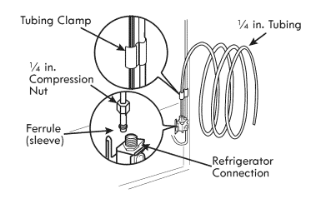
10. TURN THE WATER ON AT THE SHUTOFF VALVE
Tighten any connections that leak.
11. PLUG IN THE REFRIGERATOR
Arrange the coil of tubing so that it does not vibrate against the back of the refrigerator or against the wall. Push the refrigerator back to the wall.
12. START THE ICEMAKER
Turn the icemaker ON at the control panel. The icemaker win not begin to operate until it reaches its operating temperature of 15°F (-9°C) or below. It will then begin operation automatically if the icemaker button has been turned ON.