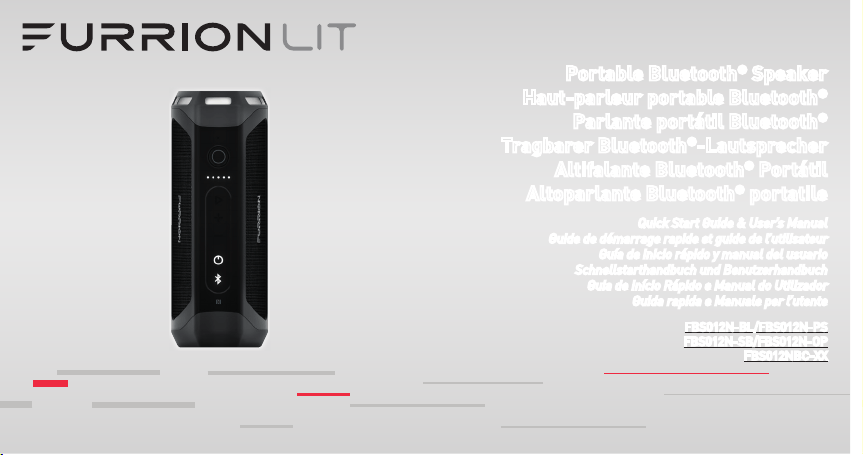
Portable Bluetooth
®
Speaker
Haut-parleur portable Bluetooth
®
Parlante portátil Bluetooth
®
Tragbarer Bluetooth
®
-Lautsprecher
Altifalante Bluetooth
®
Portátil
Altoparlante Bluetooth
®
portatile
Quick Start Guide & User’s Manual
Guide de démarrage rapide et guide de l’utilisateur
Guía de inicio rápido y manual del usuario
Schnellstarthandbuch und Benutzerhandbuch
Guia de Início Rápido e Manual do Utilizador
Guida rapida e Manuale per l’utente
FBS012N-BL/FBS012N-PS
FBS012N-SB/FBS012N-OP
FBS012NBC-XX

3
Contents ............................................................................................ 3
Welcome ............................................................................................ 4
Important Safety Instructions ............................................................ 4
FCC Statement .................................................................................. 5
Important Battery Precautions......................................................... 6
IC Statement ..................................................................................... 6
Care of the Environment ................................................................... 6
Product Features ............................................................................... 7
Getting Started .................................................................................. 8
What’s in the Box .............................................................................. 8
Installation ........................................................................................ 8
Wall-Mount Charging Base Installation (FBS012NBC-XX only) ...... 8
Before Using ...................................................................................... 9
Charging your Speaker ..................................................................... 9
Tabletop Charging Base Installation (FBS012NBC-XX only) ............ 9
Operation ........................................................................................... 10
Turn On/Off your Speaker ................................................................. 10
Pairing your Speaker to a Mobile Device.......................................... 10
Playing Audio .................................................................................... 11
Using Party Mode ............................................................................. 11
Using the Speaker ............................................................................ 12
Using Google Now
®
and
Siri
®
Service ............................................... 12
Using Flashlight ................................................................................ 12
Using SOS ......................................................................................... 12
Care and Maintenance ....................................................................... 13
Using AUX IN..................................................................................... 13
Reset ................................................................................................. 13
Troubleshooting ................................................................................. 14
Specifications .................................................................................... 15
Warranty ............................................................................................ 16
Contents
4
CAUTION
RISK OF ELECTRIC SHOCK
DO NOT OPEN
CAUTION: TO REDUCE THE RISK OF ELECTRIC SHOCK, DO NOT
REMOVE COVER (OR BACK). NO USER-SERVICEABLE PARTS INSIDE.
REFER SERVICING TO QUALIFIED SERVICE PERSONNEL.
This ‘bolt of lightning’ indicates uninsulated material within
your unit may cause an electrical shock. For the safety of
everyone in your household, please do not remove product
covering.
The ‘exclamation mark’ calls attention to features for which
you should read the enclosed literature closely to prevent
operating and maintenance problems.
Thank you for purchasing this Furrion Bluetooth
®
Speaker. Before
operating your new device, please read these instructions carefully. This
instruction manual contains information for safe use, installation and
maintenance of the device.
Please keep this instruction manual in a safe place for future reference.
This will ensure safe use and reduce the risk of injury. Be sure to pass on
this manual to new owners of this device.
The manufacturer does not accept responsibility for any damages due to
not observing these instructions.
If you have any questions regarding our products, please contact us at
Welcome Important Safety Instructions
5
1. Read these instructions.
2. Keep these instructions.
3. Heed all warnings.
4. Follow all instructions.
5. Clean only with a dry cloth.
6. Do not block any of the ventilation openings. Install in accordance
with the manufacturer’s instructions.
7. Do not install near any heat sources such as radiators, heat
registers, stoves or other apparatus (including amplifiers) that
produce heat.
8. Do not defeat the safety purpose of the polarized or grounding-type
plug. A polarized plug has two blades with one wider than the other.
A grounding type plug has two blades and a third grounding prong.
The wide blade or the third prong are provided for your safety. When
the provided plug does not fit into your outlet, consult an electrician
for replacement of the obsolete outlet.
9. Protect the power cord from being walked on or pinched, particularly
at plugs, convenience receptacles and the point where they exit from
the apparatus.
10. Only use attachments/accessories specified by the manufacturer.
11. Use only with a cart, stand, tripod, bracket or table specified by the
manufacturer or sold with the apparatus. When a cart is used, use
caution when moving the cart/apparatus combination to avoid injury
from tip-over.
12. Unplug this apparatus during lightning storms or when
unused for long periods of time.
13. Refer all servicing to qualified service personnel.
Servicing is required when the apparatus has been
damaged in any way, such as if the power-supply cord or plug is
damaged, liquid has been spilled or objects have fallen into the
apparatus, or when the apparatus has been exposed to rain or
moisture, does not operate normally, or has been dropped.
14. Do not expose batteries to excessive heat such as sunshine, fire or
the like.
FCC Statement
WARNING: Changes or modifications not expressly approved by the party
responsible for compliance could void the user’s authority to operate the
equipment.
NOTE: This equipment has been tested and found to comply with the
limits for a Class B digital device, pursuant to Part 15 of the FCC Rules.
These limits are designed to provide reasonable protection against
harmful interference in a residential installation. This equipment
generates, uses and can radiate radio frequency energy and, if not
installed and used in accordance with the instructions, may cause
harmful interference to radio communications. However, there is no
Important Safety Instructions
6
guarantee that interference will not occur in a particular installation.
If this equipment does cause harmful interference to radio or television
reception, which can be determined by turning the equipment off and on,
the user is encouraged to try to correct the interference by one or more
of the following measures:
● Reorient or relocate the receiving antenna.
● Increase the separation between the equipment and receiver.
● Connect the equipment into an outlet on a circuit different from that to
which the receiver is connected.
● Consult an experienced radio/TV technician for help.
Important Battery Precautions
This device contains a non-removable Lithium-Ion battery. The battery
must be recycled or disposed of properly. Contact your local waste
management office for information on battery recycling or disposal.
IC Statement
This device complies with Industry Canada licence-exempt RSS
standard(s). Operation is subject to the following two conditions: (1) this
device may not cause interference, and (2) this device must accept any
interference, including interference that may cause undesired operation
of the device.
Care of the Environment
Your product is designed and manufactured with high quality materials
and components, which can be recycled and reused.
Never dispose of your product with other household waste. Please
familiarize yourself with the local rules on the separate collection of
electrical and electronic products and batteries.
The correct disposal of these products helps prevent potentially negative
consequences on the environment and human health.
Your product contains batteries which cannot be disposed of with normal
household waste.
Important Safety Instructions
7
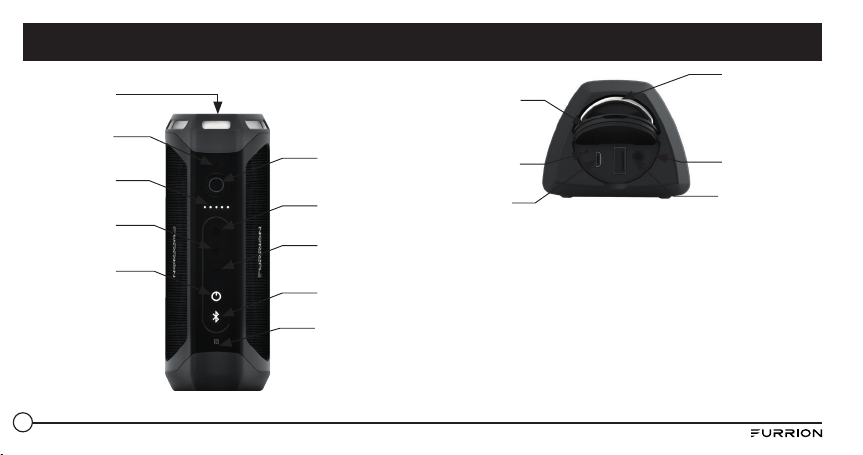
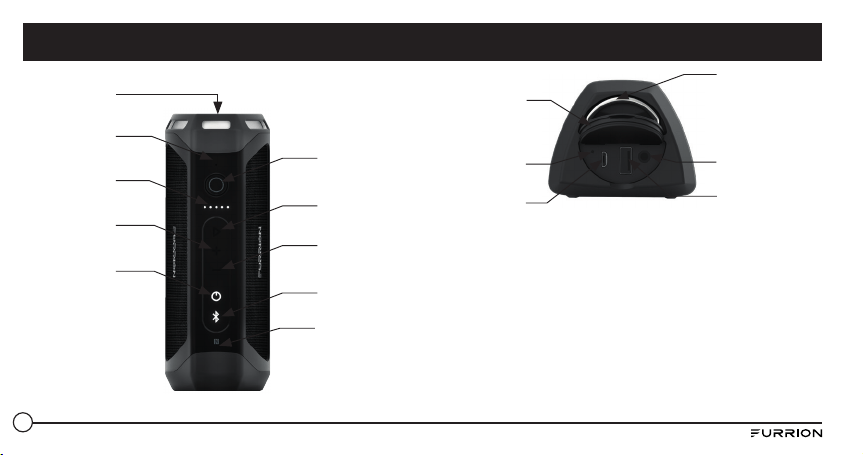
Flashlight
Power Detective
Indicator
Volume Increase
Power Button
Microphone
Volume Decrease
Bluetooth Button
NFC Detective
Area
Playback/Pause
Button
Torch/SOS
Button
Metal Ring
Rubber Cap
Reset Button
Micro USB Port
(Charge in Only)
AUX 3.5mm
USB Port Type A
(Charging Out Only)
Product Features
8
What’s in the Box
Make sure you have all the following items included in the packaging. If
any item is damaged or missing contact place of purchase.
● Bluetooth Speaker x1
● USB Charging Cable x1
● Wireless Charging Dock*
* For FBS012NBC-XX model only
NOTE: The contents included may be different base on the kit you
purchased. Please take the actual product as standard.
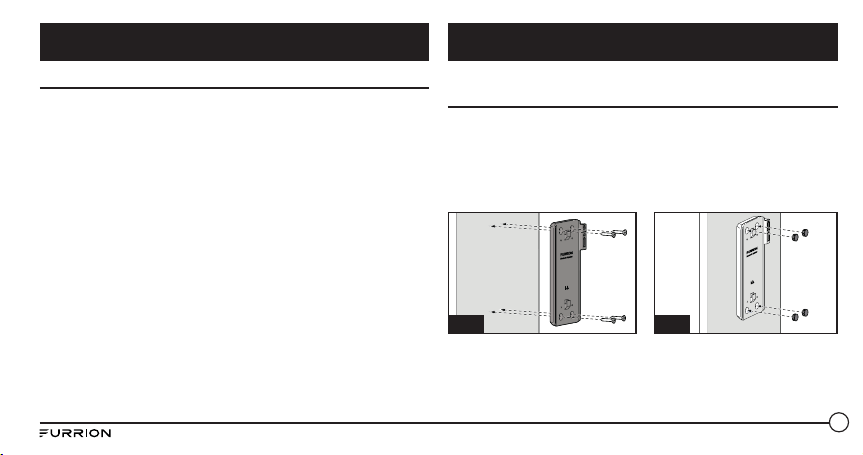
Wall-Mount Charging Base Installation (FBS012NBC-XX
only)
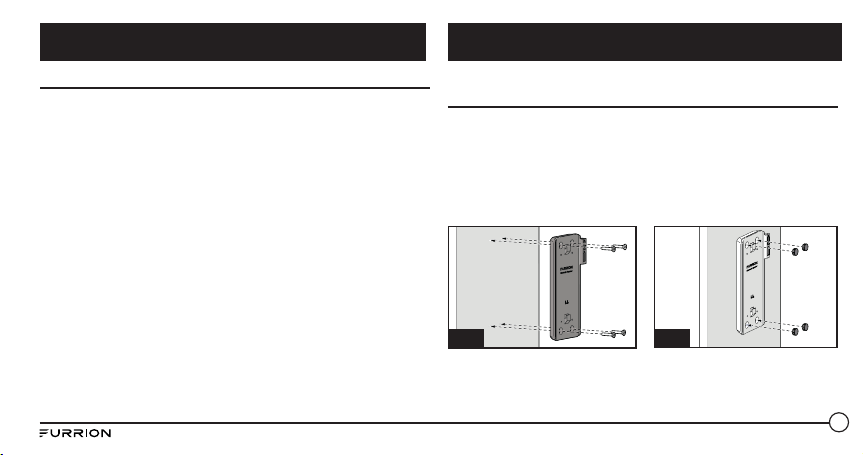
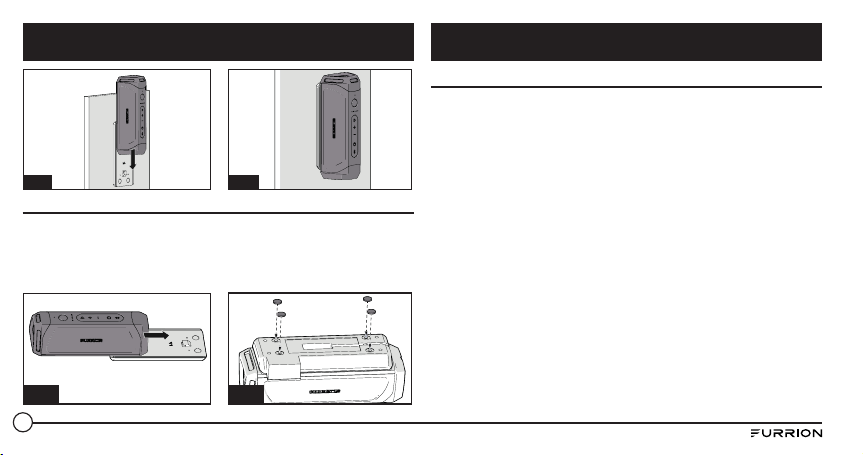
1. Select a suitable position that is not susceptible to moisture.
2. Install the speaker charging base onto the wall and secure with
4 tapping screws provided. (Fig. A)
NOTE: Make sure the word Furrion inside the charging base is facing
up while installing.
3. Install 4 rubber caps provided over the screw holes. (Fig. B)
Fig. B
Fig. A
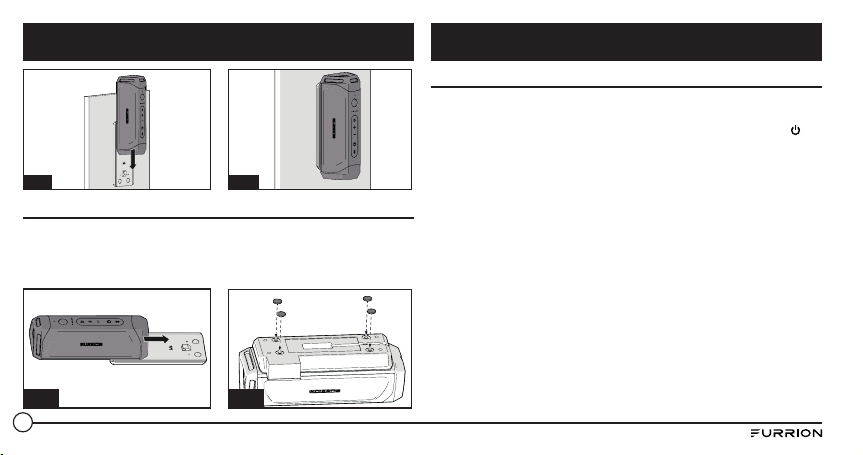
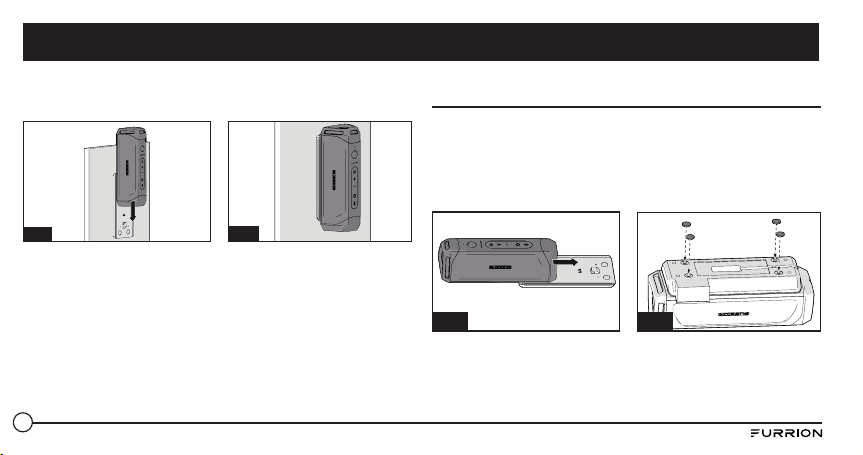
4. Slide the speaker into the charging base until securely attached onto
the charging base as shown below. Do not installed inversed. (Fig. C
and Fig. D)
Getting Started Installation
9
Fig. C
Fig. D
Tabletop Charging Base Installation (FBS012NBC-XX only)
1. Slide the speaker into the charging base until securely attached onto
the charging base as shown below. Do not installed inversed. (Fig. E)
2. Turnover the speaker with the bottom of the charging base facing up
and install 4 rubber feet onto the charging base as shown. (Fig. F)
Fig. E
Fig. F
Charging your Speaker
Before using the speaker, you must charge the device for a minimum of
5 hours using Micro USB Charing Port or 3.5 hours (minimum) using the
charging base. You may check the power level by short pressing the
button before operating your speaker each time. The power indicator will
be illuminated in white for 3 seconds to show the current power level and
then disappear.
– 5 Light: 80%-100%
– 4 Light: 60%-80%
– 3 Light: 40%-60%
– 2 Light: 20%-40%
– 1 Light: 0-20%
It is recommended you fully charge the battery before using for the fi rst
time. The speaker can be charged in three ways:
● If a genuine Furrion charging base is installed, place the speaker
into the charging base to charge. The speaker will be fully charged in
approximately 3.5 hours.
● Lift to open the rubber cap at the end of the speaker. Connect one end
of the adapter to the Micro USB Port on the speaker and the other end
to a 5V DC outlet. The speaker will be fully charged in approximately
5 hours.
Installation Before Using
10
● Connect one end of the provided power adapter to the power inlet at
the bottom of the speaker, connect the other end to a 5V DC power
source. The speaker will be fully charged in approximately 3.5 hours.
NOTE: The
button remains white during the charging process and
turns off after fully charged.
Turn On/Off your Speaker
Turning On: When speaker is in Off mode
● Press and hold the button for 3 seconds. A ‘power on’ tone will
sound. The LED will flash white for a second and then disappear.
Turning Off: When speaker is in On mode
● Press and hold the button for 3 seconds. A ‘power off’ tone will
sound.
NOTES:
● If the speaker is not connected to a source device and is not plugged
into a power source, the speaker turns off after 15 minutes of
inactivity.
● If the speaker is not connected to a source device and is plugged into a
power source, the speaker turns off after 30 minutes of inactivity.
● If the speaker is connected to a source device and is not plugged into a
power source, the speaker turns off after 1 hour of inactivity.
● If the speaker is connected to a source device and is plugged into a
power source, the speaker turns off after 1 hour of inactivity.
Pairing your Speaker to a Mobile Device
Prior to using the speaker for the first time, you must pair it with a
mobile device. The following steps describe the pairing instructions for
a typical mobile device. Refer to your device’s owners manual for details
Before Using
Operation
11
if necessary.
Pairing your device with Bluetooth
1. Place the speaker to the Bluetooth enabled device no more than 33
feet (10 meters) apart. Make sure the speaker is in ‘On’ mode.
2. Press and hold
button for one second until the button is
illuminated and flashing white.
3. Activate your mobile device’s Bluetooth function by referring to
your mobile device’s user guide for details. Find the device named
“Furrion LIT” in your mobile Bluetooth device’s list and select to
connect.
NOTE: The button will flash white during the searching process. If
connected successfully, the button will be illuminated in white for 3
seconds and then disappear.
4. Press and hold the button for 3 seconds to cancel the pairing mode.
NOTE: The speaker will automatically remember the last 10 paired
devices. Press both and - buttons for 5 seconds to clear the memory.
Pairing your Speaker with NFC
1. Enable your mobile device for NFC pairing. Refer to your device’s
owner’s manual for details if necessary.
2. Place the mobile device close to the NFC detective area on the
speaker. Search “Furrion LIT” from the available NFC devices list.
3. Confirm the connection on your device.
Playing Audio
Make sure at least one mobile device has been connected to the speaker
before playing audio.
1. Press and hold the
button until the ‘power on’ tone sounds, the
speaker will be connected to the mobile devices automatically if it
has been previously paired.
2. Use the controls on your mobile device to control the audio playback
or use the buttons on the speaker to pause audio, navigate tracks
and control volume.
● Press button to pause or resume the playback.
● Press + button to increase the audio volume. Press and hold +
button to go to the next track.
● Press - button to decrease the audio volume. Press and hold -
button to go to the previous track.
Using Party Mode
Two speakers can be paired for stereo.
1. Identify which speaker will be the main speaker and which speaker
will be the auxiliary speaker. Your device only needs to pair with the
main speaker.
2. Pair your device with the main speaker. See section “Pairing your
Speaker to a Mobile Device” for details.
Operation
12
3. With the auxiliary speaker on, press both and + buttons on the
auxiliary speaker until tone sounds.
NOTE: Do not put the auxiliary speaker into device pairing mode.
4. Press both and + buttons on the main speaker (the speaker that is
paired with your mobile device) until tone sounds. The main speaker
and the auxiliary speaker will be connected automatically within
approximately 10 seconds and a tone sounds. The speakers will be in
stereo mode.
5. Press button on either speaker to pause or resume audio. Press +
or - buttons on either speaker to increase or decrease the volume.
6. To exit party mode, press and hold the power button on either
speaker to turn the speaker off.
Using the Speaker
When the speaker is paired to a device and a call is received, the incoming
call tone will sound. If there is audio playing when a call is answered, the
audio will pause and only the call will be audible. When the call is ended,
audio will resume.
Answering a call:
● To answer an incoming call, press button on the speaker.
Reject a call:
● To reject an incoming call, press and hold button on the speaker.
Ending a call:
● To end an active call, press button on the speaker.
Mute a call:
● During a call, press both + and - buttons to mute the call, press again
to resume.
Using Google Now
®
and Siri
®
Service
Press and hold button to activate the Google Now and Siri function.
Press again to end.
Using Flashlight
Your speaker can be used as a flashlight. When your speaker is in On
mode, short press button to turn on the flashlight, press again to turn
off.
Using SOS
● Press and hold button to turn on the SOS signal. The flashlight will
be turned on and flash every 2 seconds and the devices connected will
end automatically.
● When SOS light is in on mode, press button to turn on/off the
buzzer.
● Press and hold button for 3 seconds to quit the SOS mode. The
Operation
13
speaker will return to Bluetooth mode and reconnect to the last
connected device automatically.
Using AUX IN
1. Plug one end of a 3.5mm-to-3.5mm cable (not included) into your
mobile device, just like you would a pair of headphones.
2. Lift and open the rubber cap at the end of the speaker and plug the
other end of the cable into the AUX IN port.
3. Use your mobile device to control media playback.
4. Use your mobile device or use the buttons on the speaker to pause
audio, navigate tracks and control volume.
NOTE: If more than one device is paired to the speaker with Bluetooth,
the wired device takes precedence over a Bluetooth device connection.
Reset
1. Lift and open the rubber cap at the end of the speaker.
2. Press the reset button using a sharp object.
● Do not use abrasive cleaning solvents to clean the speaker.
● Do not expose the speaker to high temperatures.
● Do not attempt to disassemble the speaker, as it does not contain
serviceable components inside.
● If you do not use the speaker for long periods, be sure to store it in a
dry place, free from extreme temperature, humidity and dust.
● Only use the Furrion supplied charger when charging the speaker.
● Only charge the speaker’s built-in battery in accordance with the
instructions in this user guide.
● Avoid charging the speaker in extreme high or low temperatures.
Operation Care and Maintenance
14
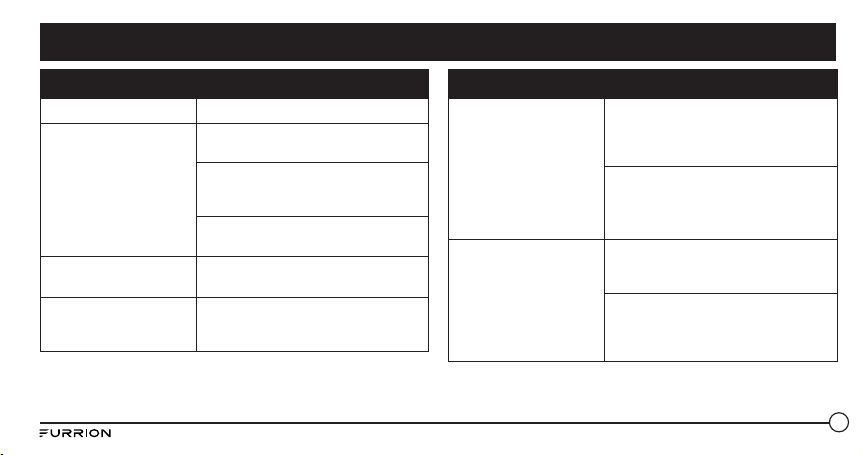
Issue Solution
No power Recharge your speaker.
No sound
Adjust volume on the connected device
or on the speaker.
When you listen to audio through
Bluetooth, make sure that no audio input
cable is connected to the AUX IN socket.
Make sure that your Bluetooth device is
within the effective operational range.
No response from the
speaker
Restart the speaker.
Poor audio quality
after connection with a
Bluetooth enabled device.
The Bluetooth reception is poor. Move
the device closer to this product or
remove any obstacles between them.
Issue Solution
Cannot connect with the
device
The Bluetooth function of the device is
not enabled. Refer to the user manual
of the device for how to enable the
function.
This product is already connected
with another Bluetooth enabled
device. Disconnect that device and
try again.
The paired device
connects and disconnects
constantly
Bluetooth reception is poor. Move the
device closer to this product or remove
any obstacles between them.
For some devices, Bluetooth connection
may be deactivated automatically as
a power-saving feature. This does not
indicate any malfunction of this product.
Troubleshooting
15
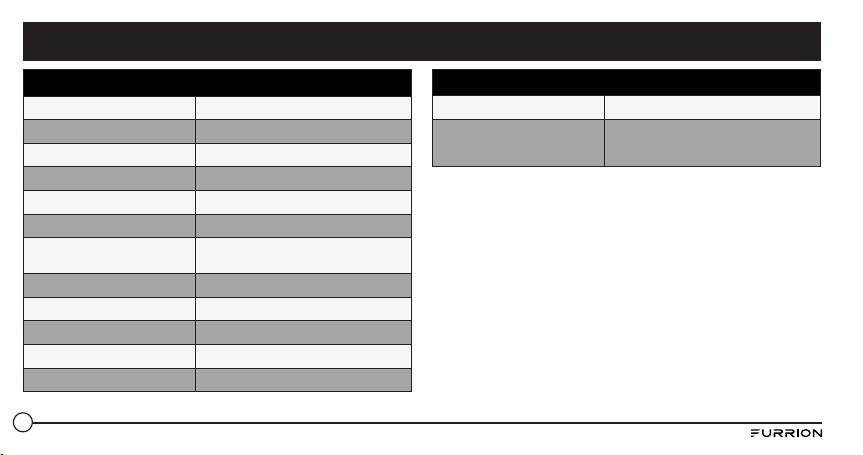
Technical Specifications
Dimension (L/M/S) 194.5 x 73.6 x 58 mm
Speaker Enclosure Type 39-40mm x 2
Rated Power 10W x2 RMS
Signal to Noise Ratio >=80dB
System Total Harmonic Distortion 1%
Bluetooth Version STEREO CSR 8670 (4.1)
Bluetooth Maximum
Communication Range
10m
Bluetooth Frequency Band 2.4GHz
Operation Temperature Range 45
o
C to -10
o
C
Battery Capacity 7.4v/1800mAh
Torch Light Effect Focus
Torch Light Standard >500 Lumens
Technical Specifications
Waterproof IPX 7
Playtime Up to 15 hours playtime (playtime can
vary depending on volume level and audio
content)
Specifications
16
Furrion warrants for a period of 1 year from date of retail purchase by the
original end-use purchaser, that this product, when delivered to you in
new condition, in original packaging, from a Furrion authorized reseller
and used in normal conditions, is free from any defects in manufacturing,
materials, and workmanship. In case of such defect, Furrion shall
replace or repair the product at no charge to you. This warranty does not
cover: products where the original serial numbers have been removed,
altered or cannot readily be determined; damage or loss caused by
accident, misuse, abuse, neglect, product modification, failure to follow
instructions in owner’s manual, commercial or industrial use; damage or
loss caused to the decorative surface of product; to any data, software or
information; and normal wear and tear. This warranty only protects the
original end-user (“you”) and is not transferrable; any attempt to transfer
this warranty shall make it immediately void. This warranty is only valid
in the country of purchase.
THIS WARRANTY AND REMEDIES SET FORTH ABOVE ARE
EXCLUSIVE AND IN LIEU OF ALL OTHER WARRANTIES, REMEDIES
AND CONDITIONS, WHETHER ORAL OR WRITTEN, EXPRESS OR
IMPLIED. FURRION SPECIFICALLY DISCLAIMS ANY AND ALL IMPLIED
WARRANTIES, INCLUDING, WITHOUT LIMITATION, WARRANTIES OF
MERCHANTABILITY AND FITNESS FOR A PARTICULAR PURPOSE.
IF FURRION CANNOT LAWFULLY DISCLAIM IMPLIED WARRANTIES
UNDER THIS LIMITED WARRANTY, ALL SUCH WARRANTIES, INCLUDING
WARRANTIES OF MERCHANTABILITY AND FITNESS FOR A PARTICULAR
PURPOSE ARE LIMITED IN DURATION TO THE DURATION OF THIS
WARRANTY.
No Furrion reseller, agent, or employee is authorized to make any
modification, extension, or addition to this warranty.
FURRION IS NOT RESPONSIBLE FOR DIRECT, INDIRECT, SPECIAL,
INCIDENTAL OR CONSEQUENTIAL DAMAGES RESULTING FROM ANY
BREACH OF WARRANTY OR CONDITION, OR UNDER ANY OTHER LEGAL
THEORY, INCLUDING BUT NOT LIMITED TO LOST PROFITS, DOWNTIME,
GOODWILL, DAMAGE TO OR REPLACEMENT OF ANY EQUIPMENT OR
PROPERTY, ANY COSTS OF RECOVERING, REPROGRAMMING, OR
REPRODUCING ANY PROGRAM OR DATA STORED IN OR USED WITH
FURRION PRODUCTS. FURRION’S TOTAL LIABILITY IS LIMITED TO THE
REPAIR OR REPLACEMENT OF THIS PRODUCT PURSUANT TO THE
TERMS OF THIS WARRANTY.
SOME STATES DO NOT ALLOW THE EXCLUSION OR LIMITATION OF
INCIDENTAL OR CONSEQUENTIAL DAMAGES OR EXCLUSIONS OR
LIMITATIONS ON THE DURATION OF IMPLIED WARRANTIES OR
CONDITIONS, SO THE ABOVE LIMITATIONS OR EXCLUSIONS MAY NOT
APPLY TO YOU. THIS WARRANTY GIVES YOU SPECIFIC LEGAL RIGHTS,
AND YOU MAY ALSO HAVE OTHER RIGHTS THAT VARY BY STATE OR
(WHERE APPLICABLE IN THE COUNTRIES WHERE FURRION HAS NON-
Warranty

17
US/CANADIAN AUTHORIZED DEALERS) COUNTRY. NO ACTION OR CLAIM
TO ENFORCE THIS WARRANTY SHALL BE COMMENCED AFTER THE
EXPIRATION OF THE WARRANTY PERIOD.
Keep your receipt, delivery slip, or other appropriate payment record
to establish the warranty period. Service under this warranty must be
obtained by contacting Furrion at [email protected]
Product features or specifications as described or illustrated are subject
to change without notice.
Warranty

18
Contenu ............................................................................................. 18
Bienvenue .......................................................................................... 19
Consignes importantes sur la sécurité .............................................. 19
Consignes de sécurité........................................................................ 20
Déclaration – FCC ............................................................................. 20
Précautions importantes: Batterie ................................................. 21
Énoncé – Industrie Canada .............................................................. 21
Considérations environnementales ................................................. 21
Fonctionnalités du produit ................................................................. 22
Premières étapes .............................................................................. 23
Contenu de l’emballage .................................................................... 23
Installation ........................................................................................ 23
Installation de la base de chargement murale (FBS012NBC-XX
uniquement) ...................................................................................... 23
Installation de la base de chargement sur une table (FBS012NBC-XX
uniquement) ...................................................................................... 24
Avant l’utilisation ............................................................................... 25
Chargement du haut-parleur ........................................................... 25
Utilisation .......................................................................................... 26
Mise sous/hors tension du haut-parleur ......................................... 26
Couplage de votre haut-parleur avec un appareil portable............. 26
Lecture audio .................................................................................... 27
Utilisation du mode stéréo ............................................................... 27
Utilisation du haut-parleur ............................................................... 28
Utilisation du service Siri
®
................................................................ 28
Utilisation de la lampe de poche ...................................................... 28
Utilisation de la fonction SOS ........................................................... 28
Utilisation de AUX IN ........................................................................ 28
Réinitialisation .................................................................................. 29
Soin et entretien ................................................................................ 29
Dépannage ......................................................................................... 30
Fiche technique ................................................................................. 31
Garantie ............................................................................................. 32
Contenu
19
ATTENTION
RISQUE DE CHOC ÉLECTRIQUE
NE PAS OUVRIR
ATTENTION : POUR RÉDUIRE LES RISQUES DE CHOC ÉLECTRIQUE,
NE PAS ENLEVER LE COUVERCLE (OU LA PARTIE ARRIÈRE). AUCUNE
PIÈCE SE TROUVANT À L’INTÉRIEUR NE PEUT ÊTRE RÉPARÉE
PAR L’UTILISATEUR. POUR LES RÉPARATIONS, VEUILLEZ VOUS
ADRESSER À UN TECHNICIEN QUALIFIÉ.
Ce symbole de l’«éclair» indique la présence d’un matériau
non isolé dans l’appareil, qui pourrait causer un choc
électrique. Pour la sécurité de tous, veuillez ne pas enlever le
couvercle du boîtier du produit.
Le symbole de « point d’exclamation » devrait attirer votre
attention sur des fonctionnalités qui exigent la lecture
attentive des documents joints afin de prévenir les problèmes
d’utilisation ou d’entretien.
Merci d’avoir acheté le haut-parleur Bluetooth
®
Furrion. Avant utiliser
votre nouvel appareil, veuillez lire ces consignes attentivement. Le
présent guide d’utilisation contient des informations permettant
l’utilisation, l’installation et l’entretien en toute sécurité de l’appareil.
Veuillez conserver le présent guide d’utilisation en lieu sûr pour vous
y référer ultérieurement, afin d’assurer votre sécurité et de réduire les
risques de blessure. Veuillez aussi remettre le présent manuel à tout
nouveau propriétaire de cet appareil.
Le fabricant décline toute responsabilité en cas de dommages dus au
non-respect des présentes consignes.
Si vous avez des questions sur nos produits, veuillez nous contacter :
Bienvenue Consignes importantes sur la sécurité
20
1. Bien lire ces consignes.
2. Conserver ces consignes.
3. Respecter tous les avertissements.
4. Suivre toutes les consignes.
5. Nettoyer uniquement avec un linge sec.
6. Ne bloquer aucune ouverture de ventilation. Installer conformément
aux consignes du fabricant.
7. Ne pas installer à proximité d’une source de chaleur telle qu’un
radiateur, un registre de chaleur, un poêle ou un autre appareil
(incluant les amplificateurs) qui génère de la chaleur.
8. Ne pas tenter de modifier les dispositifs de sécurité que constituent
la fiche polarisée ou la fiche de terre. Une fiche polarisée est munie
de deux lames, dont l’une est plus large que l’autre. Une fiche de
terre est munie de deux lames et d’une troisième fiche de terre. La
lame la plus large ou la troisième fiche ont une fonction sécuritaire.
Si la fiche fournie ne peut pénétrer dans votre prise de courant,
veuillez consulter un électricien pour faire remplacer l’ancienne prise
de courant.
9. Protéger le fil d’alimentation contre le piétinement ou le pincement,
surtout au niveau des prises, des dispositifs de branchement et des
connecteurs de l’appareil.
10. Utiliser uniquement les fixations/accessoires identifiés par le
fabricant.
11. Utiliser uniquement avec un chariot, un support, un trépied, une
structure ou une table identifié(e) par le fabricant ou
vendu(e) avec l’appareil. Si vous utilisez un chariot, soyez
très prudent lorsque vous déplacez ensemble le chariot et
l’appareil afin d’éviter de les renverser et de vous blesser.
12. Débrancher l’appareil pendant les orages et les longues
périodes de non-utilisation.
13. Confier tout entretien à un technicien qualifié, notamment si
l’appareil a été endommagé de quelque manière que ce soit, par
exemple si le câble d’alimentation ou la fiche a été endommagé(e), si
des liquides ou des objets ont pénétré l’appareil, ou si l’appareil a été
exposé à l’eau ou à l’humidité, ne fonctionne pas normalement, ou
est tombé par terre.
14. Ne pas exposer les piles à une chaleur excessive comme le soleil, le
feu ou autres.
Déclaration – FCC
Avertissement : Tout changement ou modification qui n’a pas été
expressément approuvé par la partie responsable de la conformité
pourrait révoquer l’autorisation d’utiliser l’appareil.
AVIS : Cet appareil a fait l’objet d’essais qui ont permis de conclure qu’il
est conforme aux restrictions définies pour les appareils numériques
de Catégorie B, conformément à la Partie 15 des règles de la FCC. Ces
Consignes de sécurité
21
restrictions ont pour objet d’assurer une protection raisonnable contre
les interférences nuisibles dans les installations résidentielles. Cet
appareil génère, utilise et peut dégager de l’énergie radioélectrique.
S’il n’est pas installé et utilisé conformément aux consignes, il pourrait
causer des interférences nuisibles aux communications radio. Cependant,
rien ne garantit que des interférences ne se produiront pas dans une
installation particulière.
Si cet appareil cause des interférences nuisibles à la réception radio ou
télé, ce qui peut être déterminé en allumant et en éteignant l’appareil,
l’utilisateur peut tenter de résoudre le problème de l’une des façons
suivantes :
● Changer l’orientation ou l’emplacement de l’antenne de réception.
● Éloigner l’appareil du récepteur.
● Brancher l’appareil dans une prise de courant qui se trouve sur un
autre circuit que celui auquel est branché le récepteur.
● Demander conseil à un technicien radio/télé qualifié.
Précautions importantes: Batterie
Cet appareil contient une batterie non-amovible au lithium-ion. La
batterie doit être recyclée ou éliminée correctement. Contactez les
autorités locales de gestion des déchets pour savoir où recycler ou
éliminer la batterie.
Énoncé – Industrie Canada
Le présent appareil est conforme aux CNR d’Industrie Canada applicables
aux appareils radio exempts de licence. L’exploitation est autorisée
aux deux conditions suivantes : (1) l’appareil ne doit pas produire de
brouillage, et (2) l’utilisateur de l’appareil doit accepter tout brouillage
radioélectrique subi, même si le brouillage est susceptible d’en
compromettre le fonctionnement.
Considérations environnementales
Votre produit a été conçu et fabriqué avec des matériaux et des
composants de grande qualité qui peuvent être recyclés et réutilisés.
Ne jamais jeter votre produit avec les autres déchets ménagers. Veuillez
prendre connaissance des règles en vigueur dans votre région sur
la collecte sélective des produits électriques et électroniques et des
batteries.
La bonne façon d’éliminer ces produits permet d’éviter des effets
potentiellement négatifs sur l’environnement et la santé humaine.
Votre produit contient des batteries qui ne doivent pas être jetées avec les
autres déchets ménagers.
Consignes de sécurité
22
Lampe de
poche
Indicateur de
puissance
Augmentation
du volume
Bouton
d’alimentation
Microphone
Diminution du
volume
Bouton Bluetooth
Aire de détection
NFC
Bouton de
lecture/pause
Lampe-torche/
SOS
Anneau
métallique
Capuchon de
caoutchouc
Bouton de
réinitialisation
Port micro-USB
(charge d’entrée
seulement)
Port USB de Type
A (charge de
sortie)
AUX 3.5mm
Fonctionnalités du produit
23
Contenu de l’emballage
Assurez-vous que votre emballage contient tous les articles suivants.
Si un article est endommagé ou n’est pas dans l’emballage, veuillez le
signaler au point de vente.
● 1 x Haut-parleur Bluetooth
● 1 x Câble d’alimentation USB
● Station de recharge sans fi l*
* Modèle FBS012NBC-XX uniquement.
AVIS : Les articles de votre emballage pourraient différer de ceux
illustrés. Ces illustrations doivent être considérées comme une référence
visuelle uniquement.
Installation de la base de chargement murale
(FBS012NBC-XX uniquement)
1. Choisissez un emplacement qui n’est pas exposé à l’humidité.
2. Installez la base de chargement du haut-parleur sur le mur, et fi xez-
la avec les 4 vis autotaraudeuses fournies (Image A).
AVIS : Pendant l’installation, veillez à ce que le mot « Furrion » à
l’intérieur la base de chargement soit orienté vers le haut.
3. Installez les 4 capuchons de caoutchouc fournis au-dessus des trous
de fi xation (Image B).
Fig. B
Fig. A
Premières étapes Installation
24
4. Glissez le haut-parleur dans la base de chargement jusqu’à ce qu’il
soit solidement fi xé à la base de chargement de la manière illustrée
ci-dessous. Ne pas installer en sens inverse (Image C et Image D).
Fig. C
Fig. D
Installation de la base de chargement sur une table
(FBS012NBC-XX uniquement)
1. Glisser le haut-parleur dans la base de chargement jusqu’à ce qu’il
solidement fi xé à la base de chargement, tel qu’illustré ci-dessous.
Ne pas installer en sens inverse (Image E).
2. Renverser le haut-parleur, en orientant vers le haut la partie
inférieure de la base de chargement, et installer 4 pieds de
caoutchouc dans la base de chargement tel qu’illustré (Image F).
Fig. E
Fig. F
Installation
25
Chargement du haut-parleur
Avant d’utiliser le haut-parleur, il faut charger l’appareil pendant au
moins 5 heures à l’aide du port de chargement micro USB, ou au moins
3,5 heures sur la base de chargement. Vous pouvez suivre le progrès du
chargement en appuyant rapidement sur le bouton. Les indicateurs de
puissance restent allumés en blanc pendant 3 secondes pour indiquer le
niveau de puissance, avant de s’éteindre.
– 5 voyants : 80 %-100 %
– 4 voyants : 60 %-80 %
– 3 voyants : 40 %-60 %
– 2 voyants : 20 %-40 %
– 1 voyant : 0-20 %
Il est recommandé de charger complètement la batterie avant la
première utilisation. Le haut-parleur peut être chargé de trois manières :
● Si une base de chargement officielle Furrion a été installée, placez le
haut-parleur sur la base de chargement pour le recharger. Le haut-
parleur prend environ 3,5 heures à se recharger complètement.
● Soulevez pour ouvrir le capuchon de caoutchouc à l’extrémité du
haut-parleur. Branchez une extrémité de l’adaptateur dans le port
micro-USB du haut-parleur, et l’autre dans une prise de courant
CC de 5 V. Le haut-parleur prendra environ 5 heures à se recharger
complètement.
● Branchez une extrémité de l’adaptateur de puissance fourni dans
l’entrée de puissance de la partie inférieure du haut-parleur, et
branchez l’autre extrémité dans une source de puissance en CC
de 5 V. Le haut-parleur prendra environ 3,5 heures à se recharger
complètement.
Avis : Le bouton
demeure blanc pendant la recharge et s’éteint
lorsqu’il est complètement rechargé.
Avant l’utilisation
26
Mise sous/hors tension du haut-parleur
● Mise sous tension : Lorsque haut-parleur est en mode OFF,
maintenez appuyé le bouton pendant 3 secondes. Le son « sous
tension » retentit. Le voyant LED blanc clignote pendant une seconde
avant de s’éteindre.
● Mise hors tension : Lorsque haut-parleur est en mode On
maintenez appuyé le bouton pendant 3 secondes. Un son « hors
tension » retentit.
AVIS :
● Si le haut-parleur n’est pas branché à un dispositif de source et n’est
pas branché dans une source d’alimentation, le haut-parleur s’éteint
après 15 minutes d’inactivité.
● Si le haut-parleur n’est pas branché à un dispositif de source et est
branché dans une source d’alimentation, le haut-parleur s’éteint
après 30 minutes d’inactivité.
● Si le haut-parleur est branché à un dispositif de source et n’est pas
branché dans une source d’alimentation, le haut-parleur s’éteint
après 1 heure d’inactivité.
● Si le haut-parleur est branché à un dispositif de source et est branché
dans une source d’alimentation, le haut-parleur s’éteint après 1 heure
d’inactivité.
Couplage de votre haut-parleur avec un appareil
portable
Avant d’utiliser le haut-parleur pour la première fois, vous devrez le
coupler à un appareil portable. Veuillez trouver ci-après les consignes de
couplage avec un appareil portable courant. Veuillez consulter le guide
d’utilisation de votre appareil pour plus de détails.
Couplage de votre appareil avec Bluetooth
1. Placer le haut-parleur à un maximum de 10 mètres/33 pieds de
l’appareil relié au Bluetooth, en vous assurant que le haut-parleur
est en mode « On ».
2. Appuyez sur le bouton
pendant une seconde jusqu’à ce que le
bouton s’allume et clignote en blanc.
3. Activez la fonction Bluetooth de votre appareil portable en suivant les
consignes du manuel de votre appareil portable. Identifiez l’appareil
« Furrion LIT » sur la liste des appareils en Bluetooth et choisissez
la connexion.
AVIS : Le bouton continue de clignoter en blanc pendant le
processus de recherche. Si la connexion a réussi, le bouton reste
allumé en blanc pendant 3 secondes avant de s’éteindre.
4. Maintenir appuyé le bouton pendant 3 secondes pour annuler le
couplage.
Avis : Le haut-parleur reconnaît automatiquement les dix derniers
Utilisation
27
appareils couplés. Appuyez en même temps sur les boutons et -
pendant 10 secondes pour effacer la mémoire.
Couplage du haut-parleur avec NFC
1. Activez votre appareil portable pour le couplage NFC, selon les
consignes définies dans le manuel d’utilisation de votre appareil.
2. Rapprochez l’appareil portable de l’aire de détection NFC du haut-
parleur. Identifiez l’appareil « Furrion LIT » sur la liste des appareils
NFC.
3. Confirmez la connexion sur votre appareil.
Lecture audio
Veillez à ce qu’au moins un appareil portable ait été branché au haut-
parleur avant la lecture audio.
1. Maintenez appuyé le bouton jusqu’à ce que le signal sonore « Sous
tension » retentisse. Le haut-parleur se branchera automatiquement
à l’appareil portable s’il lui a déjà été couplé.
2. Utilisez les commandes de votre appareil portable pour contrôler
la lecture (Playback) audio ou utilisez les boutons du haut-parleur
pour suspendre la lecture audio, naviguer d’une piste à l’autre, ou
contrôler le volume.
● Appuyez sur le bouton pour arrêter ou reprendre la lecture.
● Appuyez sur le bouton + pour augmenter le volume sonore.
Maintenez appuyé le bouton + pour passer à la piste suivante.
● Appuyez sur le bouton – pour diminuer le volume sonore.
Maintenez appuyé le bouton – pour passer à la piste précédente.
Utilisation du mode stéréo
Deux haut-parleurs peuvent être couplés pour un son stéréo.
1. Choisissez le haut-parleur principal et le haut-parleur auxiliaire.
Votre appareil ne se couplera qu’au haut-parleur principal.
2. Couplez votre appareil avec le haut-parleur principal. Veuillez vous
référer à la section intitulée « Couplage de votre haut-parleur avec
un appareil portable » pour en savoir plus.
3. Après avoir mis sous tension le haut-parleur auxiliaire, appuyez sur
les boutons et + du haut-parleur auxiliaire jusqu’à ce que l’indicatif
sonore retentisse.
Avis : Ne pas mettre le haut-parleur auxiliaire en mode couplage
avec l’appareil.
4. Appuyez sur les boutons et + du haut-parleur principal (le haut-
parleur qui est couplé avec votre appareil portable) jusqu’à ce qu’un
signal sonore retentisse. Le haut-parleur principal et le haut-parleur
auxiliaire se brancheront automatiquement en 10 secondes environ
et un signal sonore retentira. Les haut-parleurs seront en mode
stéréo.
5. Appuyez sur le bouton sur l’un ou l’autre des haut-parleurs pour
Utilisation
28
suspendre ou reprendre la lecture audio. Appuyez sur le bouton + ou
– sur l’un ou l’autre des haut-parleurs pour augmenter ou diminuer
le volume.
6. Pour quitter le mode stéréo, maintenez appuyé le bouton
d’alimentation de l’un ou l’autre des haut-parleurs pour mettre le
haut-parleur hors tension.
Utilisation du haut-parleur
Si un appel doit être reçu lorsque le haut-parleur est couplé à un
appareil, la tonalité d’appel entrant retentit. Lorsque l’appel entre
pendant la lecture audio, celle-ci est suspendue et seul l’appel est
audible. À la fin de l’appel, la lecture audio reprend.
Répondre à un appel :
● Pour répondre à un appel entrant, appuyez sur le bouton du haut-
parleur.
Refuser un appel :
● Pour refuser un appel entrant, maintenez appuyé le bouton du
haut-parleur.
Raccrocher :
● Pour terminer un appel, appuyez sur le bouton du haut-parleur.
Couper le son d’un appel :
● Pendant l’appel, appuyez sur les boutons + et – pour couper le son de
l’appel; appuyez sur les boutons de nouveau pour remettre le son.
Utilisation du service Google Now
®
et Siri
®
Appuyez une fois sur le bouton pour activer la fonction Google Now et
Siri. Appuyez sur le bouton de nouveau pour désactiver la fonction.
Utilisation de la lampe de poche
Lorsque votre haut-parleur est en mode On, appuyez brièvement sur
le bouton pour allumer la lampe de poche, appuyez sur le bouton de
nouveau pour l’éteindre.
Utilisation de la fonction SOS
● Maintenez appuyé le bouton pour émettre un signal SOS. La lampe
de poche s’allumera et clignotera toutes les 2 secondes, et les
appareils branchés s’éteindront automatiquement.
● Lorsque le voyant SOS est allumé, appuyez sur le bouton pour
activer l’avertisseur sonore.
● Maintenez appuyé le bouton pendant 3 secondes pour quitter
le mode SOS. Le haut-parleur reviendra en mode Bluetooth et se
reconnectera automatiquement au dernier appareil raccordé.
Utilisation de AUX IN
1. Branchez une extrémité d’un câble de 3,5 mm/3,5 mm (non inclus)
Utilisation
29
dans votre appareil portable, comme vous le feriez pour une paire
d’écouteurs.
2. Soulevez et ouvrez le capuchon de caoutchouc à l’extrémité du haut-
parleur et branchez l’autre extrémité du câble dans le port AUX IN
de l’appareil.
3. Utilisez votre appareil portable pour contrôler le playback.
4. Utilisez votre appareil portable ou les boutons du haut-parleur pour
arrêter la lecture audio, changer de piste ou régler le volume.
Avis : Si plus d’un appareil est couplé au haut-parleur avec Bluetooth,
l’appareil connecté par câble aura priorité sur un appareil en connexion
Bluetooth.
Réinitialisation
1. Soulevez et ouvrez le capuchon de caoutchouc à l’extrémité du
haut-parleur.
2. Appuyez sur le bouton « reset » à l’aide d’un objet pointu.
● Ne pas utiliser de solvants nettoyants abrasifs pour nettoyer le haut-
parleur.
● Ne pas exposer le haut-parleur aux températures extrêmes.
● Ne pas tenter de désassembler le haut-parleur : aucun composant ne
pouvant être réparé par l’utilisateur se trouve à l’intérieur.
● Pendant les longues périodes de non-utilisation, rangez le haut-
parleur dans un endroit sec, à l’abri des températures extrêmes, de
l’humidité et de la poussière.
● Utilisez uniquement le chargeur fourni par Furrion pour charger le
haut-parleur.
● Toujours suivre les consignes définies dans le présent guide pour
charger la batterie intégrée du haut-parleur.
● Évitez de charger le haut-parleur lorsque les températures sont
extrêmement chaudes ou froides.
Utilisation
Soin et entretien
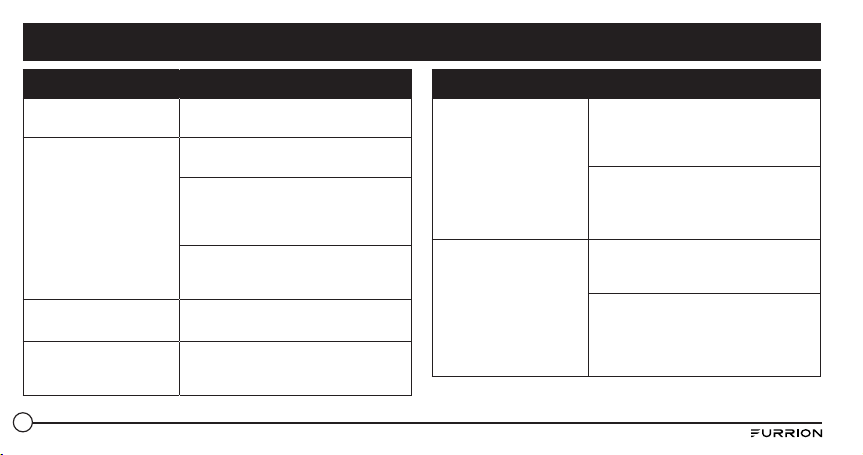
30
Problème Solution
L’appareil ne se met pas
sous tension
Rechargez le haut-parleur.
Aucun son
Réglez le volume sur l’appareil connecté
ou sur le haut-parleur.
Pendant la lecture audio en Bluetooth,
veillez à ce qu’aucun câble d’entrée
audio ne soit branché dans la prise
AUX IN.
Veillez à ce que votre appareil en
Bluetooth se trouve dans les limites des
conditions de fonctionnement efficace.
Le haut-parleur ne
répond pas
Redémarrez le haut-parleur.
Mauvaise qualité audio
après la connexion à un
appareil en Bluetooth.
Mauvaise réception Bluetooth.
Rapprochez l’appareil du produit ou
enlever les obstacles qui les séparent.
Problème Solution
Connexion impossible
avec l’appareil
La fonction Bluetooth de l’appareil n’a
pas été activée. Veuillez vous référer au
guide de l’utilisateur pour activer cette
fonction.
Ce produit est déjà branché à un
autre appareil compatible avec
Bluetooth. Débranchez l’autre
appareil et essayez de nouveau.
L’appareil couplé ne
cesse d’établir et de
rompre la connexion
Mauvaise réception Bluetooth.
Rapprochez l’appareil de ce produit ou
enlevez les obstacles qui les séparent.
Avec certains appareils, la connexion
Bluetooth peut se désactiver
automatiquement pour économiser
l’énergie. Cela ne correspond pas à un
mauvais fonctionnement de ce produit.
Dépannage
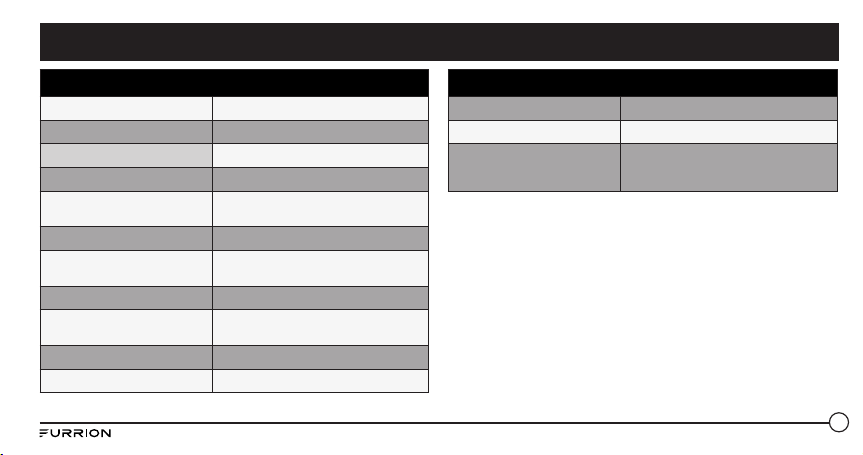
31
Spécifications techniques
Dimensions (G/M/P) 194.5 x 73.6 x 58 mm
Type d’enceinte de haut-parleur 39-40mm x 2
Puissance nominale 10 X 2 RMS
Rapport signal/bruit >=80dB
Distorsion harmonique totale du
système
1%
Version de Bluetooth STEREO CSR 8670 (4.1)
Portée maximale de
communication Bluetooth
10m
Bande de fréquences Bluetooth 2.4GHz
Plage de température de
fonctionnement
45
o
C to -10
o
C
Capacité de la batterie 7.4v/1800mAh
Effet lampe-torche Focalisation
Spécifications techniques
Norme lampe-torche >500 Lumens
Étanche IPX 7
Autonomie
Jusqu’à 15 heures d’autonomie (la durée
d’autonomie peut varier avec le volume audio
et le contenu audio).
Fiche technique

32
Furrion garantit, pendant une période d’un an à partir de la date de
l’achat au détail par l’utilisateur final initial, que ce produit, s’il est livré
à l’état neuf, dans son emballage original, par un revendeur Furrion
autorisé et utilisé en conditions normales, est libre de tout défaut de
fabrication, de matériel et de main-d’œuvre. En cas de défaut, Furrion
s’engage à remplacer ou à réparer le produit gratuitement. Cette garantie
exclut ce qui suit : produits dont le numéro de série original a été enlevé,
modifié ou rendu illisible, les dommages ou les pertes causés par un
accident, une mauvaise utilisation, la négligence, la modification du
produit ou le manquement à suivre les consignes du guide de l’utilisateur,
l’utilisation commerciale ou industrielle, les dommages ou les pertes
causées à la surface décorative du produit, les dommages causés aux
données, logiciels ou renseignements, ainsi que l’usure normale. La
présente garantie protège uniquement l’utilisateur final initial («vous»),
et ne peut être cédée à quiconque. Toute tentative de cession de la
présente garantie aura pour effet son annulation immédiate. La présente
garantie est uniquement valide dans le pays d’achat.
LA PRÉSENTE GARANTIE ET LES RECOURS PRÉCÉDEMMENT DÉFINIS
SONT EXCLUSIFS ET REMPLACENT TOUTES LES AUTRES RECOURS,
GARANTIES ET CONDITIONS, QU’ILS SOIENT ORAUX OU ÉCRITS,
EXPLICITES OU IMPLICITES. FURRION DÉCLINE SPÉCIFIQUEMENT
TOUTES LES GARANTIES IMPLICITES, Y COMPRIS, SANS S’Y LIMITER,
LES GARANTIES DE QUALITÉ MARCHANDE ET D’ADÉQUATION À UN
USAGE PARTICULIER. SI FURRION NE PEUT LÉGALEMENT DÉCLINER
LES GARANTIES IMPLICITES DÉCOULANT DE LA PRÉSENTE GARANTIE
LIMITÉE, TOUTES CES GARANTIES, Y COMPRIS LES GARANTIES DE
QUALITÉ MARCHANDE ET D’ADAPTATION À UN USAGE PARTICULIER,
SONT LIMITÉES À LA DURÉE DE VALIDITÉ DE LA PRÉSENTE GARANTIE.
AUCUN REVENDEUR, AGENT OU EMPLOYÉ DE FURRION N’EST
AUTORISÉ À MODIFIER, PROLONGER OU ÉLARGIR LA PRÉSENTE
GARANTIE.
FURRION DÉCLINE TOUTE RESPONSABILITÉ POUR TOUT
PRÉJUDICE DIRECT, INDIRECT, SPÉCIAL, ACCESSOIRE OU
CONSÉCUTIF RÉSULTANT DE TOUT MANQUEMENT DE GARANTIE
OU DE CONDITION, OU RECONNU PAR TOUTE THÉORIE JURIDIQUE,
INCLUANT SANS LIMITATION LES PERTES DE BÉNÉFICES, DE
TEMPS DE FONCTIONNEMENT, DE BIENS INCORPORELS, LES
DOMMAGES À TOUT APPAREIL OU BIEN OU LE REMPLACEMENT DE
TOUT BIEN OU ÉQUIPEMENT, TOUT COÛT DE RÉCUPÉRATION, DE
REPROGRAMMATION OU DE REPRODUCTION DE TOUT PROGRAMME
OU DE TOUTE DONNÉE ENREGISTRÉ DANS LES PRODUITS FURRION
OU UTILISÉS AVEC CEUX-CI. LA RESPONSABILITÉ TOTALE DE FURRION
SE LIMITE À LA RÉPARATION OU AU REMPLACEMENT DE CE PRODUIT
CONFORMÉMENT AUX CONDITIONS DE LA PRÉSENTE GARANTIE.
CERTAINS ÉTATS N’AUTORISENT PAS LES EXCLUSIONS OU LES
Garantie
33
LIMITATIONS DES PRÉJUDICES ACCESSOIRES OU CONSÉCUTIFS, NI
LES EXCLUSIONS OU LIMITATIONS DE LA DURÉE DES GARANTIES
OU CONDITIONS IMPLICITES. POUR CE MOTIF, LES LIMITES ET
EXCLUSIONS PRÉCÉDEMMENT ÉNONCÉES POURRAIENT NE PAS
S’APPLIQUER À VOUS. LA PRÉSENTE GARANTIE VOUS CONFÈRE
CERTAINS DROITS JURIDIQUES SPÉCIFIQUES, QUI POURRAIENT
S’AJOUTER À D’AUTRES DROITS QUI VOUS SONT CONFÉRÉS PAR VOTRE
JURIDICTION (DANS LES PAYS OÙ FURRION COMPTE DES DÉTAILLANTS
AUTORISÉS HORS CANADA ET ETATS-UNIS). AUCUNE ACTION OU
RÉCLAMATION POUR FAIRE APPLIQUER LA PRÉSENTE GARANTIE
NE POURRA ÊTRE INITIÉE APRÈS L’ÉCHÉANCE DE LA PÉRIODE DE
GARANTIE.
Conserver votre reçu d’achat, bon de livraison ou tout autre justificatif de
paiement pour établir la période de garantie. Les réparations aux termes
de la présente garantie doivent être réclamées auprès de Furrion:
Les fonctionnalités et les détails techniques du produit tels qu’ils sont
décrits ou illustrés peuvent changer sans préavis.
Garantie

34
Contenido .......................................................................................... 34
Bienvenido ......................................................................................... 35
Instrucciones de seguridad importantes ........................................... 35
Declaración de la Comisión Federal de Comunicaciones (FCC) ..... 36
Precauciones importantes acerca de la batería .............................. 37
Declaración de IC .............................................................................. 37
Cuidado del medio ambiente ............................................................ 37
Características del producto .............................................................. 38
Introducción ....................................................................................... 39
Contenido de la caja ......................................................................... 39
Instalación ......................................................................................... 39
Instalación de la base de carga con soporte de pared (solo para
FBS012NBC-XX)................................................................................ 39
Antes de usar ..................................................................................... 40
Carga del parlante ............................................................................ 40
Instalación de la base de carga de sobremesa (solo para FBS012NBC-XX)
40
Funcionamiento ................................................................................. 41
Encendido/apagado del parlante ..................................................... 41
Emparejamiento del parlante con un dispositivo móvil ................... 42
Reproducción de audio ..................................................................... 42
Uso del modo Fiesta ......................................................................... 43
Uso del parlante ............................................................................... 43
Uso del servicio Siri
®
........................................................................ 44
Uso de la linterna ............................................................................. 44
Uso de la función SOS ...................................................................... 44
Uso de la entrada auxiliar ................................................................ 44
Restablecimiento .............................................................................. 44
Cuidado y mantenimiento .................................................................. 45
Solución de problemas ...................................................................... 45
Especificaciones ................................................................................ 46
Garantía ............................................................................................. 47
Contenido
35
PRECAUCIÓN
RIESGO DE DESCARGA ELÉCTRICA
NO ABRIR
PRECAUCIÓN: PARA REDUCIR EL RIESGO DE DESCARGA ELÉCTRICA,
NO QUITE LA TAPA (O CUBIERTA POSTERIOR). NO CONTIENE
PIEZAS REPARABLES POR EL USUARIO. PARA EL MANTENIMIENTO,
RECURRA A PERSONAL DE SERVICIO CALIFICADO.
Este “rayo” indica que el material sin aislamiento dentro de
la unidad podría causar una descarga eléctrica. Para la
seguridad de todos en el hogar, no quite la cubierta del
producto.
El “signo de exclamación” destaca las funciones acerca de
las cuales se debe leer detenidamente en la documentación
incluida para prevenir problemas operativos y de
mantenimiento.
Gracias por comprar este parlante inalámbrico Bluetooth
®
de
Furrion. Antes de operar su nuevo dispositivo, lea estas instrucciones
cuidadosamente. Este manual de instrucciones contiene información
para el uso, la instalación y el mantenimiento seguros del dispositivo.
Conserve este manual de instrucciones en un lugar seguro para futuras
referencias. Esto le garantizará un uso seguro y reducirá el riesgo
de lesiones. Asegúrese de proporcionar este manual a los nuevos
propietarios de este dispositivo.
El fabricante no asume responsabilidad alguna por los daños producidos
como consecuencia de no haber respetado estas instrucciones.
Si tiene alguna pregunta relacionada con nuestros productos, escríbanos
Bienvenido
Instrucciones de seguridad importantes
36
1. Lea estas instrucciones.
2. Conserve estas instrucciones.
3. Respete todas las advertencias.
4. Siga todas las instrucciones.
5. Limpie solo con un paño seco.
6. No bloquee ninguna abertura de ventilación. Realice la instalación
según las instrucciones del fabricante.
7. No lo instale cerca de fuentes de calor como radiadores, sensores de
temperatura, estufas u otros aparatos (incluidos amplificadores) que
produzcan calor.
8. No ignore el propósito de seguridad que conlleva el uso de un
enchufe polarizado o con toma a tierra. Un enchufe polarizado tiene
dos clavijas, una más ancha que la otra. Un enchufe con conexión a
tierra tiene tres clavijas, una de ellas con conexión a tierra. La clavija
ancha en el enchufe polarizado o la tercera clavija en el enchufe
con toma a tierra se proporcionan para su seguridad. Si el enchufe
suministrado no encaja en la toma de corriente, póngase en contacto
con un electricista para sustituir la toma antigua.
9. Proteja el cable de alimentación de forma que nadie lo pise o quede
apretado, particularmente cerca de los enchufes, los receptáculos de
tomas múltiples y en el lugar en que sale del aparato.
10. Use solo los aditamentos/accesorios especificados por el fabricante.
11. Utilícelo solo con el carrito, el soporte, el trípode, la abrazadera o la
mesa especificados por el fabricante o vendidos con el dispositivo.
Cuando utilice un carrito, tenga cuidado al mover el
conjunto de carrito/dispositivo para evitar lesiones
producidas por un volcado.
12. Desenchufe el dispositivo durante tormentas eléctricas o
si no lo va a utilizar durante periodos largos de tiempo.
13. Solicite las reparaciones al personal de servicio cualificado. Las
reparaciones deberán realizarse si el dispositivo se estropea de
alguna manera, si se daña el enchufe o el cable de alimentación, si
se derraman líquidos o caen objetos dentro del dispositivo, si este se
expuso a la lluvia o a la humedad, si no funciona normalmente o si
sufrió una caída.
14. No exponga las baterías al calor excesivo como el sol, el fuego o
similares.
Declaración de la Comisión Federal de Comunicaciones (FCC)
ADVERTENCIA: Cualquier cambio o modificación que no esté aprobado
expresamente por la parte responsable del cumplimiento con el
reglamento de FCC puede anular la autoridad del usuario para operar este
equipo.
NOTA: Las pruebas realizadas a este equipo ponen de manifiesto su
adecuación a los límites estipulados para un dispositivo digital de
clase B, según la Sección 15 de las Normas de la FCC. Estos límites se
diseñaron para proporcionar protección razonable contra interferencia en
una instalación residencial. Este equipo genera, utiliza y puede irradiar
Instrucciones de seguridad importantes
37
energía de radiofrecuencia y, si no se instala y se utiliza de acuerdo
con las instrucciones suministradas, podría ocasionar interferencias
perjudiciales para las comunicaciones por radio. Sin embargo, no
hay garantía de que esta interferencia no ocurra en una instalación
determinada.
Si este equipo interfiere la recepción de programas de radio o televisión,
lo que se puede determinar mediante su activación o desactivación, se
sugiere que el usuario intente corregir la interferencia aplicando una o
varias de las siguientes medidas:
● Vuelva a orientar o a colocar la antena de recepción.
● Aumente la separación entre el equipo y el receptor.
● Conecte el equipo en la salida de un circuito diferente al que se
encuentra conectado el receptor.
● Póngase en contacto con un técnico experto en radio y televisión para
obtener ayuda.
Precauciones importantes acerca de la batería
Este dispositivo contiene una batería de iones de litio no desmontable. La
batería debe reciclarse o desecharse de manera apropiada. Póngase en
contacto con sus autoridades locales de manejo de residuos para recibir
información relacionada con el reciclaje o la eliminación de la batería.
Declaración de IC
Este dispositivo cumple con los estándares RSS de Industry Canada que
no exigen licencia. El funcionamiento está sujeto a las dos condiciones
siguientes: (1) que este dispositivo no cause interferencia y (2) que este
dispositivo acepte cualquier interferencia recibida, incluida la interferencia
que pueda causar el funcionamiento no deseado del dispositivo.
Cuidado del medio ambiente
Su producto está diseñado y fabricado con materiales y componentes
reciclables y reutilizables de alta calidad.
Nunca deseche su producto con otros residuos domésticos. Familiarícese con
las normas locales sobre recogida selectiva de baterías y productos eléctricos
y electrónicos.
La eliminación adecuada de estos productos ayuda a prevenir consecuencias
potencialmente negativas para el entorno y la salud humana.
Su producto contiene baterías que no se pueden desechar junto a los residuos
domésticos comunes.
Instrucciones de seguridad importantes
38
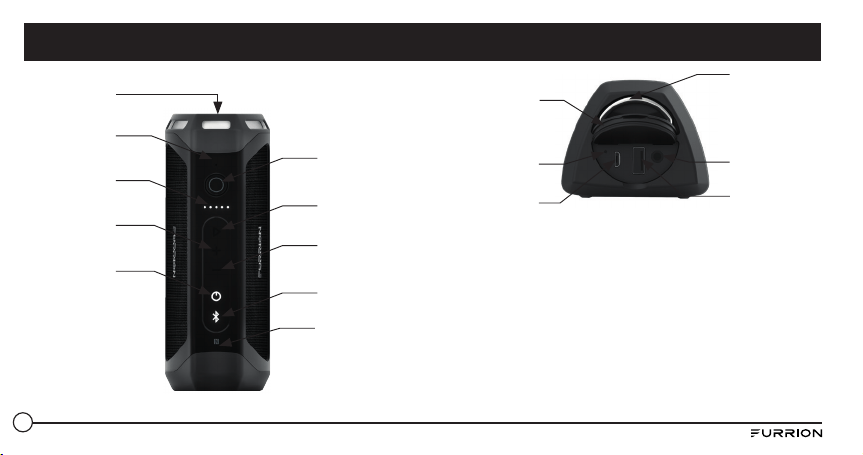
Linterna
Indicador de
detección de
energía
Aumento del
volumen
Botón de
encendido
Micrófono
Disminución del
volumen
Botón de
Bluetooth
Área de
detección NFC
Botón de
reproducción/
pausa
Botón de
linterna/SOS
Anillo metálico
Tapa de goma
Botón de
reinicio
Puerto micro USB
(solo para la
entrada de carga)
Entrada auxiliar
de 3,5mm
Puerto USB tipo
A (solo para la
salida de carga)
Características del producto
39
Contenido de la caja
Asegúrese de que el paquete incluya los siguientes elementos. Si hay
algún elemento dañado o faltante, comuníquese con el lugar donde
realizó la compra.
● 1 parlante Bluetooth
● 1 cable de carga USB
● Estación de acoplamiento de carga inalámbrica*
* Solo para el modelo FBS012NBC-XX
NOTA: Los contenidos incluidos pueden variar según el kit adquirido.
Considere el producto real como estándar.
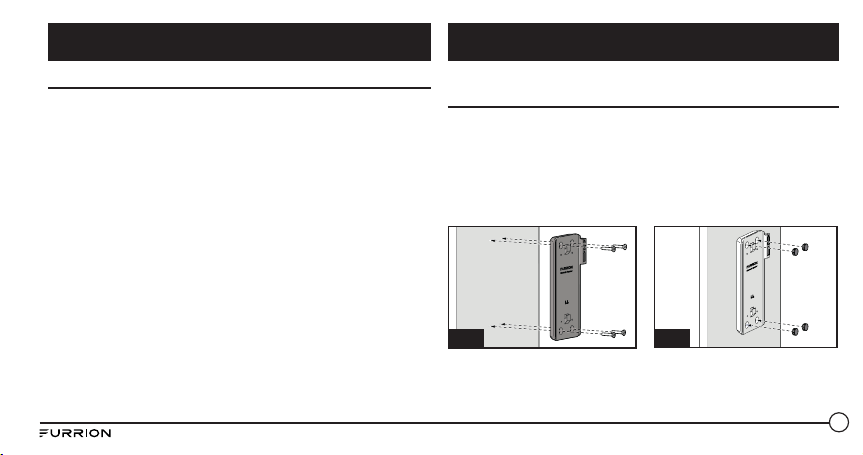
Instalación de la base de carga con soporte de pared
(solo para FBS012NBC-XX)
1. Elija una posición adecuada que no sea susceptible a la humedad.
2. Instale la base de carga del parlante en la pared y fíjela con los 4
tornillos de rosca proporcionados. (Fig. A)
3. NOTA: Asegúrese de que la palabra Furrion al interior de la base de
carga quede boca arriba durante la instalación.
4. Instale las 4 tapas de goma proporcionadas sobre los orifi cios para
tornillos. (Fig. B)
Fig. B
Fig. A
5. Deslice el parlante en la base de carga hasta que se acople de forma
segura como se muestra a continuación. No lo instale al revés. (Fig.
C y Fig. D)
Introducción Instalación
40
Fig. C
Fig. D
Instalación de la base de carga de sobremesa (solo para FBS012NBC-XX)
6. Deslice el parlante en la base de carga hasta que se acople de forma
segura como se muestra a continuación. No lo instale al revés. (Fig. E)
7. De vuelta el parlante con la parte inferior de la base de carga boca
arriba e instale las 4 patas de goma en la base de carga como se
muestra en la fi gura. (Fig. F)
Fig. E
Fig. F
Carga del parlante
Antes de usar el parlante, debe cargarlo por un mínimo de 5 horas
mediante el puerto de carga micro USB o 3,5 horas (mínimo) a través
de la base de carga. Puede verifi car el nivel de energía presionando
brevemente el botón antes de utilizar el parlante. El indicador de energía
se iluminará en blanco por 3 segundos para mostrar el nivel de energía
actual y luego se apagará.
– 5 luces: 80%-100%
– 4 luces: 60%-80%
– 3 luces: 40%-60%
– 2 luces: 20%-40%
– 1 luz: 0-20%
Se recomienda que cargue completamente la batería antes de usarlo por
primera vez. El parlante se puede cargar de tres formas:
● Si se instaló una base de carga Furrion original, ubique el parlante
en la base de carga. El parlante alcanzará la carga máxima en
aproximadamente 3,5 horas.
● Levántelo para abrir la tapa de goma en el extremo del parlante.
Conecte un extremo del adaptador al puerto micro USB del parlante
y el otro extremo a una toma de corriente de 5V CC. El parlante
alcanzará la carga máxima en aproximadamente 5 horas.
● Conecte un extremo del adaptador de corriente proporcionado a la
entrada de alimentación que se encuentra en la parte inferior del
Instalación
Antes de usar
41
parlante, conecte el otro extremo a una fuente de alimentación de 5
V CC. El parlante alcanzará la carga máxima en aproximadamente
3,5 horas.
NOTA: El botón
permanecerá iluminado en blanco durante el proceso
de carga y se apagará cuando el parlante alcance la carga máxima.
Encendido/apagado del parlante
Encendido: Cuando el parlante se encuentre en el modo Apagado
● Mantenga presionado el botón por 3 segundos. Sonará un tono de
“encendido”. El LED parpadeará en blanco por un segundo y luego se
apagará.
Apagado: Cuando el parlante se encuentra en el modo encendido
● Mantenga presionado el botón por 3 segundos. Sonará un tono de
“apagado”.
NOTAS:
● Si el parlante no está conectado a un dispositivo fuente ni a una fuente
de alimentación, se apagará después de 15 minutos de inactividad.
● Si el parlante no está conectado a un dispositivo fuente, pero sí a
una fuente de alimentación, se apagará después de 30 minutos de
inactividad.
● Si el parlante está conectado a un dispositivo fuente, pero no a una
fuente de alimentación, se apagará después de 1 hora de inactividad.
● Si el parlante está conectado a un dispositivo fuente y a una fuente de
alimentación, se apagará después de 1 hora de inactividad.
Antes de usar Funcionamiento
42
Emparejamiento del parlante con un dispositivo móvil
Antes de utilizar el parlante por primera vez, debe emparejarlo con
su dispositivo móvil. Los pasos siguientes describen las instrucciones
de emparejamiento para un dispositivo móvil típico. Si es necesario,
consulte el manual del propietario del dispositivo para obtener más
detalles.
Pairing your device with Bluetooth
1. Ubique el parlante a no más de 10 metros (33 pies) del dispositivo
compatible con Bluetooth. Asegúrese de que el parlante esté en el
modo “Encendido”.
2. Mantenga presionado el botón
por un segundo hasta que el botón
se ilumine y comience a parpadear en blanco.
3. Active la función Bluetooth del dispositivo móvil consultando la
guía del usuario de su dispositivo móvil para obtener más detalles.
Busque el dispositivo llamado “Furrion LIT” en la lista de su
dispositivo móvil Bluetooth y selecciónelo para conectarse.
NOTA: El botón parpadeará en blanco durante el proceso de
búsqueda. Si la conexión resulta exitosa, el botón se iluminará en
blanco por 3 segundos y luego se apagará.
4. Mantenga presionado el botón por 3 segundos para cancelar el
modo de emparejamiento.
NOTA: El parlante recordará automáticamente los últimos 10 dispositivos
emparejados. Presione los botones y - por 10 segundos para borrar la
memoria.
Emparejamiento del parlante con NFC
1. Active su dispositivo móvil para el emparejamiento con NFC. Si es
necesario, consulte el manual del propietario del dispositivo para
obtener más detalles.
2. Ubique el dispositivo móvil cerca del área de detección NFC del
parlante. Busque “Furrion LIT” en la lista de dispositivos NFC
disponibles.
3. Confirme la conexión en su dispositivo.
Reproducción de audio
Asegúrese de que haya al menos un dispositivo móvil conectado al
parlante antes de reproducir audio.
1. Mantenga presionado el botón hasta que suene el tono de
“encendido”; el parlante se conectará automáticamente a los
dispositivos móviles si se emparejó previamente.
2. Use los controles de su dispositivo móvil para manejar la
reproducción de audio o utilice los botones del parlante para pausar
el audio, navegar por las pistas y controlar el volumen.
● Presione el botón para pausar o reanudar la reproducción.
● Presione el botón + para subir el volumen del audio. Mantenga
Funcionamiento
43
presionado el botón + para ir a la pista siguiente.
● Presione el botón - para bajar el volumen del audio. Mantenga
presionado el botón - para ir a la pista anterior.
Uso del modo Fiesta
Es posible emparejar dos parlantes para disfrutar de un sonido estéreo.
1. Identifique el parlante que será el parlante principal y aquel que
será el parlante auxiliar. Su dispositivo solo debe emparejarse con el
parlante principal.
2. Empareje su dispositivo con el parlante principal. Consulte la sección
“Emparejamiento del parlante con un dispositivo móvil” para
obtener más detalles.
3. Con el parlante auxiliar encendido, presione los botones y + de
dicho parlante hasta que suene un tono.
NOTA: No ponga el parlante auxiliar en el modo de emparejamiento
con dispositivos.
4. Presione los botones y + del parlante principal (el parlante que
se encuentra emparejado al dispositivo móvil) hasta que suene
un tono. El parlante principal y el parlante auxiliar se conectarán
automáticamente transcurridos 10 segundos aprox. y sonará un
tono. Los parlantes estarán en modo estéreo.
5. Presione el botón en cualquiera de los parlantes para pausar o
reanudar el audio. Presione los botones + o - en cualquiera de los
parlantes para subir o bajar el volumen.
6. Para salir del modo Fiesta, mantenga presionado el botón de
encendido en cualquiera de los parlantes para apagarlo.
Uso del parlante
Cuando el parlante se encuentra emparejado a un dispositivo y este
recibe una llamada, sonará el tono de llamada entrante. Si hay audio en
reproducción cuando se contesta la llamada, el audio se pausará y solo
se podrá escuchar la llamada. El audio se reanudará cuando finalice la
llamada.
Responder una llamada:
● Para responder una llamada entrante, presione el botón
del
parlante.
Rechazar una llamada:
● Para rechazar una llamada entrante, mantenga presionado el botón
del parlante.
Finalizar una llamada:
● Para finalizar una llamada activa, presione el botón
del parlante.
Silenciar una llamada:
● Durante una llamada, presione los botones + y - para silenciar la
llamada; presiónelos nuevamente para reanudar.
Funcionamiento
44
Uso de los servicios Google Now
®
y Siri
®
Mantenga presionado el botón para activar las funciones Google Now y
Siri. Presiónelo nuevamente para desactivarlas.
Uso de la linterna
Cuando su parlante se encuentre en el modo Encendido, presione
brevemente el botón para encender la linterna. Presiónelo nuevamente
para apagarla.
Uso de la función SOS
● Mantenga presionado el botón para activar la señal SOS. La linterna
se encenderá y parpadeará cada 2 segundos, y los dispositivos
conectados se finalizarán automáticamente.
● Cuando la luz de SOS se encuentre en el modo encendido, presione el
botón para activar la chicharra.
● Mantenga presionado el botón por 3 segundos para salir del
modo SOS. El parlante volverá al modo Bluetooth y se conectará
nuevamente al último dispositivo conectado de manera automática.
Uso de la entrada auxiliar
1. Conecte un extremo de un cable de 3,5mm a 3,5mm (no incluido) en
su dispositivo móvil, tal como lo haría con un par de auriculares.
2. Levante y abra la tapa de goma que se ubica en el extremo del
parlante y conecte el otro extremo del cable al puerto de entrada
auxiliar.
3. Use su dispositivo móvil para controlar la reproducción de medios.
4. Use su dispositivo móvil o los botones del parlante para pausar el
audio, navegar por las pistas y controlar el volumen.
NOTA: Si hay más de un dispositivo emparejado al parlante con
Bluetooth, el dispositivo cableado tendrá prioridad sobre la conexión con
un dispositivo Bluetooth.
Restablecimiento
1. Levante y abra la tapa de goma que se encuentra en el extremo del
parlante.
2. Presione el botón de restablecimiento con un objeto punzante.
Funcionamiento
45
● No use disolventes de limpieza abrasivos para limpiar el parlante.
● No exponga el parlante a altas temperaturas.
● No intente desarmar el parlante, ya que no contiene componentes
reparables en su interior.
● Si no utiliza el parlante por un período de tiempo prolongado,
asegúrese de guardarlo en un lugar seco, libre de temperaturas
extremas, humedad y polvo.
● Use únicamente el cargador Furrion proporcionado a la hora de
cargar el parlante.
● Cargue la batería incorporada del parlante siguiendo únicamente las
instrucciones de esta guía del usuario.
● Evite cargar el parlante bajo temperaturas extremadamente altas o
bajas.
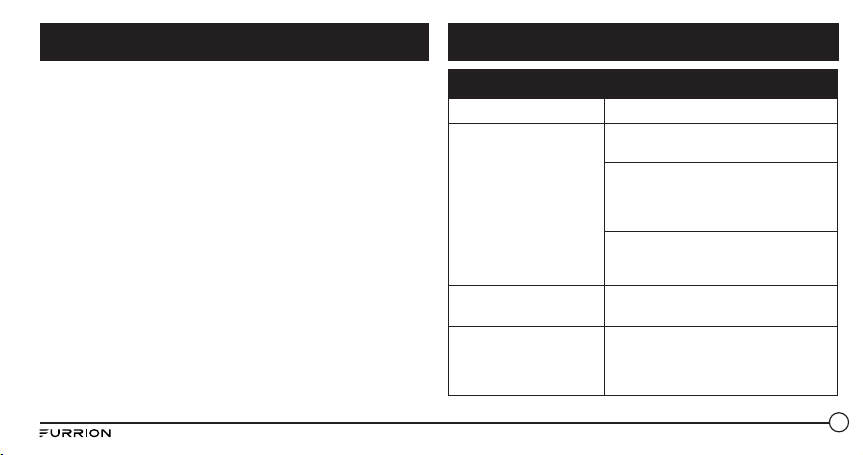
Problema Solución
No hay energía Recargue su parlante.
No hay sonido
Ajuste el volumen del dispositivo
conectado o del parlante.
Cuando escuche audio vía Bluetooth,
asegúrese de que no haya ningún cable
de entrada de audio conectado a la
entrada auxiliar.
Asegúrese de que el dispositivo
Bluetooth se encuentre dentro del rango
operacional eficaz.
El parlante no
responde
Reinicie el parlante.
Mala calidad de audio
después de conectarse a
un dispositivo compatible
con Bluetooth.
La recepción Bluetooth es mala.
Acerque el dispositivo a este producto o
elimine cualquier obstáculo entre ellos.
Cuidado y mantenimiento Solución de problemas
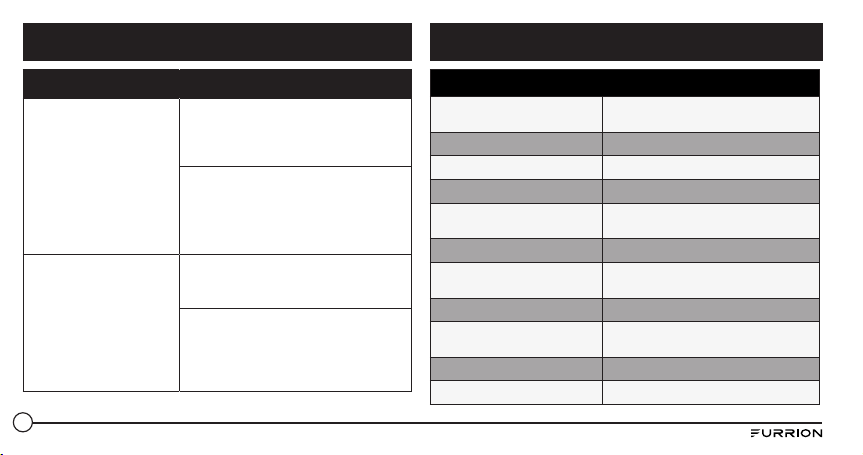
46
Problema Solución
No es posible conectarse
al dispositivo
La función Bluetooth del dispositivo no
está activada. Consulte el manual del
usuario del dispositivo para averiguar
cómo activar la función.
Este producto ya se encuentra
conectado a otro dispositivo
compatible con Bluetooth.
Desconecte ese dispositivo e
inténtelo nuevamente.
El dispositivo
emparejado se conecta
y se desconecta
constantemente
La recepción Bluetooth es mala.
Acerque el dispositivo a este producto o
elimine cualquier obstáculo entre ellos.
En algunos dispositivos, es posible
que la conexión Bluetooth se desactive
automáticamente como una función de
ahorro de energía. Esto no indica ningún
tipo de avería en el producto.
Especificaciones técnicas
Dimensión (grande/mediano/
pequeño)
194.5 x 73.6 x 58 mm
Tipo de gabinete del parlante 39-40mm x 2
Potencia nominal 10 X 2 RMS
Relación señal/ruido >=80dB
Distorsión armónica total del
sistema
1%
Versión de Bluetooth STEREO CSR 8670 (4.1)
Rango de comunicación máximo
de Bluetooth
10m
Banda de frecuencia de Bluetooth 2.4GHz
Rango de temperaturas de
servicio
45
o
C to -10
o
C
Capacidad de la batería 7.4v/1800mAh
Efecto de antorcha Enfoque
Solución de problemas
Especificaciones
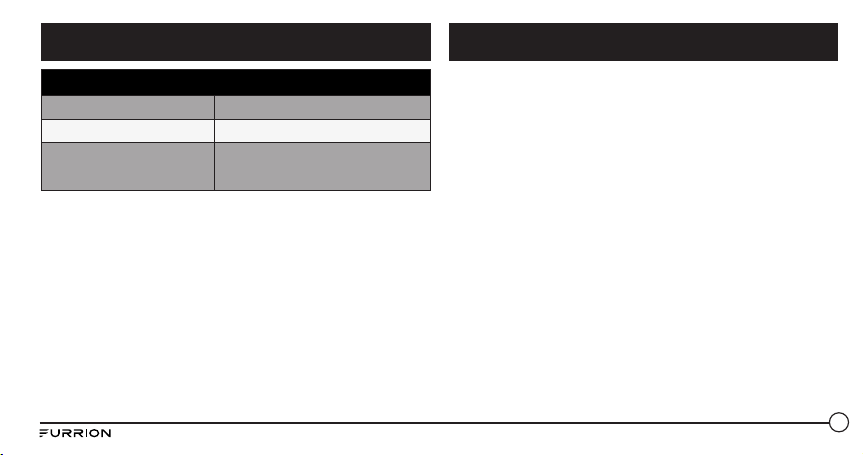
47
Furrion garantiza por un período de un año a partir de la fecha de
compra realizada por el comprador final original, que este producto,
cuando se entrega como nuevo, en su empaque original, de un reseller
autorizado de Furrion y utilizado bajo condiciones normales, no posee
defectos de fábrica, de materiales ni de mano de obra. Si se presentan
dichos defectos, Furrion deberá reemplazar o reparar el producto sin
cargo para usted. Esta garantía no cubre: productos cuyos números de
serie originales se hayan eliminado, alterado o no se puedan determinar
fácilmente; daños o pérdidas causados por accidentes, mal uso, abuso,
descuido, modificación del producto, incumplimiento de las instrucciones
del manual del propietario, uso comercial o industrial; daños o pérdidas
causados a la superficie decorativa del producto; a cualquier tipo de
datos, software o información; y el desgate normal. Esta garantía solo
protege al usuario final original (“usted”) y no es transferible; cualquier
intento de transferencia resultará en la anulación inmediata. Esta
garantía solo es válida en el país donde se realizó la compra.
ESTA GARANTÍA Y LOS RECURSOS ESTIPULADOS ANTERIORMENTE
SON EXCLUSIVOS Y REEMPLAZAN TODAS LAS DEMÁS GARANTÍAS,
RECURSOS Y CONDICIONES, YA SEAN VERBALES O ESCRITOS,
EXPRESOS O IMPLÍCITOS. FURRION RECHAZA ESPECÍFICAMENTE
CUALQUIER GARANTÍA IMPLÍCITA, INCLUSIVE, ENTRE OTRAS, LAS
GARANTÍAS DE COMERCIABILIDAD E IDONEIDAD PARA UN USO EN
PARTICULAR. SI FURRION NO PUEDE RECHAZAR LEGALMENTE LAS
Especificaciones técnicas
Linterna estándar >500 lúmenes
A prueba de agua IPX 7
Tiempo de reproducción
Hasta 15 horas de reproducción (puede
variar según el nivel de volumen y el
contenido de audio)
GarantíaEspecificaciones

48
LIMITACIONES O EXCLUSIONES ANTERIORES PODRÍAN NO APLICARSE
A USTED. ESTA GARANTÍA LE OTORGA DERECHOS LEGALES
ESPECÍFICOS, Y PUEDE QUE TENGA OTROS DERECHOS DEPENDIENDO
DE CADA ESTADO O PAÍS (SI SE APLICA EN LOS PAÍSES DONDE
FURRION POSEE DISTRIBUIDORES AUTORIZADOS CANADIENSES
O NO ESTADOUNIDENSES). NINGUNA ACCIÓN O RECLAMACIÓN
PARA APLICAR ESTA GARANTÍA SE DEBE COMENZAR DESPUÉS DEL
VENCIMIENTO DEL PERÍODO DE GARANTÍA.
Conserve su recibo, comprobante de entrega u otro registro de pago
adecuado para establecer el período de garantía. El servicio bajo esta
garantía se debe obtener por medio de Furrion escribiendo a
Las funciones o especificaciones del producto tal como se describen o se
ilustran están sujetas a cambios sin previo aviso.
GARANTÍAS IMPLÍCITAS BAJO ESTA GARANTÍA LIMITADA, DICHAS
GARANTÍAS, INCLUIDAS LAS GARANTÍAS DE COMERCIABILIDAD E
IDONEIDAD PARA UN USO EN PARTICULAR, TENDRÁN UNA DURACIÓN
LIMITADA A LA DURACIÓN DE ESTA GARANTÍA.
Ningún revendedor, agente o empleado de Furrion está autorizado a
realizar modificaciones, extensiones o adiciones a esta garantía.
FURRION NO SE HACE RESPONSABLE DE LOS DAÑOS DIRECTOS,
INDIRECTOS, ESPECIALES, INCIDENTALES O DERIVADOS QUE
PUEDAN SURGIR DE CUALQUIER INCUMPLIMIENTO DE LA GARANTÍA
O CONDICIÓN, O BAJO CUALQUIER OTRA TEORÍA LEGAL, INCLUIDOS,
ENTRE OTROS, PÉRDIDAS DE GANANCIAS, TIEMPO DE INACTIVIDAD,
FONDO DE COMERCIO, DAÑO O REEMPLAZO DE CUALQUIER
EQUIPO O PROPIEDAD, TODOS LOS COSTOS DE RECUPERACIÓN,
REPROGRAMACIÓN O REPRODUCCIÓN DE CUALQUIER PROGRAMA O
DATO ALMACENADO EN LOS PRODUCTOS DE FURRION O USADO POR
ESTOS. LA RESPONSABILIDAD TOTAL DE FURRION SE LIMITA A LA
REPARACIÓN O SUSTITUCIÓN DE ESTE PRODUCTO CONFORME A LOS
TÉRMINOS DE ESTA GARANTÍA.
ALGUNOS ESTADOS NO ADMITEN LA EXCLUSIÓN O LIMITACIÓN
DE RESPONSABILIDAD POR DAÑOS INCIDENTALES O DERIVADOS,
O EXCLUSIONES O LIMITACIONES SOBRE LA DURACIÓN DE LAS
GARANTÍAS IMPLÍCITAS O CONDICIONES, EN CUYO CASO LAS
Garantía

49
Inhalt ................................................................................................. 49
Willkommen ...................................................................................... 50
Wichtige Sicherheitshinweise ............................................................ 50
FCC-Bestimmungen ........................................................................ 51
Wichtige Batterie-Sicherheitsanweisungen .................................... 52
IC-Bestimmung ................................................................................ 52
Umweltschutz ................................................................................... 52
Produktmerkmale ............................................................................. 53
Erste Schritte .................................................................................... 54
Was beinhaltet die Box? ................................................................... 54
Installation ........................................................................................ 54
Wandbefestigung der Ladestation (Nur FBS012NBC-XX) ............... 54
Vor der Verwendung .......................................................................... 55
Laden des Lautsprechers ................................................................. 55
Tischbefestigung der Ladestation (Nur FBS012NBC-XX) ............... 55
Betrieb ............................................................................................... 56
Ein- und Ausschalten des Lautsprechers ........................................ 56
Koppeln des Lautsprechers an ein Mobilgerät ................................ 57
Wiedergeben von Audio .................................................................... 57
Verwenden des Partymodus ............................................................. 58
Verwenden des Lautsprechers ......................................................... 58
Verwenden des Dienstes Siri® ........................................................ 59
Verwenden der Taschenlampe ......................................................... 59
Verwenden von SOS ......................................................................... 59
Verwenden von AUX-IN..................................................................... 59
Zurücksetzen .................................................................................... 59
Pflege und Wartung ........................................................................... 60
Problembehandlung .......................................................................... 60
Spezifikationen .................................................................................. 61
Garantie ............................................................................................. 62
Inhalt
50
ACHTUNG
GEFAHR EINES STROMSCHLAGS
NICHT ÖFFNEN
ACHTUNG: UM DIE GEFAHR EINES ELEKTROSCHOCKS ZU
VERMINDERN, DIE ABDECKUNG (ODER RÜCKSEITE) NICHT
ABNEHMEN. ES BEFINDEN SICH KEINE TEILE IM GERÄT, DIE VOM
BENUTZER SELBST GEWARTET WERDEN KÖNNEN. WENDEN SIE
SICH AN QUALIFIZIERTES FACHPERSONAL.
Dieses Blitzsymbol weist auf vor unisoliertes Material im
Inneren des Gerätes hin, die einen elektrischen Schlag
verursachen kann. Bitte entfernen Sie für die Sicherheit aller
Personen in Ihrem Haushalt nicht die Abdeckung des
Produkts.
Das Ausrufezeichen weist auf Funktionen hin, für die Sie die
beiliegende Lektüre sorgfältig lesen sollten, um Betriebs-
und Wartungsprobleme zu vermeiden.
Vielen Dank, dass Sie sich für den Kauf eines Furrion Bluetooth
®
-
Lautsprechers entschieden haben. Lesen Sie bitte vor der
Inbetriebnahme Ihres neuen Geräts diese Anleitung sorgfältig durch.
Diese Bedienungsanleitung enthält Informationen für den sicheren
Gebrauch, die Installation und Wartung des Geräts. Bewahren Sie diese
Anleitung für zukünftige Referenzzwecke sorgfältig auf. Dadurch stellen
Sie einen sicheren Gebrauch sicher und reduzieren das Risiko von
Verletzungen. Vergessen Sie nicht, dieses Handbuch an neue Besitzer
des Geräts weiterzugeben.
Der Hersteller übernimmt keine Haftung für Schäden, die aufgrund von
Nichtbeachtung dieser Anleitung entstehen.
Sollten Sie Fragen zu einem unserer Produkte haben, kontaktieren Sie
uns bitte unter [email protected]
Willkommen Wichtige Sicherheitshinweise
51
1. Lesen Sie diese Anleitung.
2. Bewahren Sie diese Anleitung sorgfältig auf.
3. Beachten Sie alle Warnhinweise.
4. Befolgen Sie alle Anweisungen.
5. Reinigen Sie das Gerät nur mit einem trockenen Tuch.
6. Blockieren Sie keine der Lüftungsöffnungen. Installieren Sie das
Gerät in Übereinstimmung mit den Herstelleranweisungen.
7. Stellen Sie das Gerät nicht in der Nähe von Wärmequellen, wie
Heizlüftern, Heizungen, Öfen oder anderen Apparaten (einschließlich
Verstärkern), die Wärme abgeben, auf.
8. Beeinträchtigen Sie die Schutzfunktion des polarisierten oder
geerdeten Steckers nicht durch Manipulation am Stecker. Ein
polarisierter Stecker ist mit zwei flachen Stiften unterschiedlicher
Breite versehen. Ein geerdeter Stecker hat zwei Kontakte und
einen dritten Erdungsanschluss. Der längere Kontakt bzw. der
Erdungsanschluss dienen Ihrer Sicherheit. Wenn der mitgelieferte
Stecker nicht in die Steckdose passt, beauftragen Sie einen
Elektriker mit dem Austauschen der veralteten Steckdose.
9. Achten Sie insbesondere im Bereich von Steckern, Steckdosen und
am Geräteausgang darauf, dass nicht auf das Netzkabel getreten
oder das Kabel eingeklemmt werden kann.
10. Verwenden Sie nur die vom Hersteller angegebenen Anschlüsse/
Zubehörteile.
11. Verwenden Sie nur Wagen, Ständer, Stative, Halterungen oder
Tische, die vom Hersteller empfohlen oder zum
Lieferumfang des Geräts gehören. Wenn Sie einen Wagen
verwenden, gehen Sie beim Bewegen des Wagens/Geräts
äußerst vorsichtig vor, um Verletzungen durch Unfälle zu
vermeiden.
12. Ziehen Sie den Netzstecker des Geräts während eines Gewitters oder
wenn Sie das Gerät längere Zeit nicht benutzen.
13. Überlassen Sie alle Wartungsarbeiten qualifiziertem
Wartungspersonal. Wartungsarbeiten oder Reparaturen sind
erforderlich, wenn das Netzkabel oder der Stecker beschädigt
ist, wenn Flüssigkeit oder andere Gegenstände wenn Flüssigkeit
oder andere Gegenstände in das Geräteinnere gefallen sind, wenn
das Gerät Regen oder Feuchtigkeit ausgesetzt war, sich nicht
erwartungsgemäß verhält oder wenn es gefallen ist.
14. Setzen Sie Batterien nicht übermäßiger Hitze wie Sonnenschein,
Feuer oder dergleichen aus.
FCC-Bestimmungen
WARNUNG: Veränderungen oder Modifikationen, die nicht ausdrücklich
von der für die Erfüllung der Bedingungen verantwortlichen Partei
genehmigt wurden, können dazu führen, dass der Anwender die
Genehmigung für den Betrieb des Geräts verlieren kann.
HINWEIS: Das vorliegende Gerät wurde getestet und erfüllt die
Wichtige Sicherheitshinweise
52
Grenzwertbestimmungen für digitale Geräte der Klasse B nach Teil 15
der FCC-Regeln zur Funkentstörung. Diese Grenzwerte sollen einen
angemessenen Schutz vor gesundheitsgefährdenden Strahlungen in
Wohngebieten sicherstellen. Dieses Gerät erzeugt, nutzt und strahlt
Energie in Form von Funkfrequenzen ab und kann, wenn es nicht in
Übereinstimmung mit mit den Bedienungsanweisungen installiert
und verwendet wurde, schädliche Störungen der Funkkommunikation
verursachen. Es kann jedoch nicht in jedem Fall garantiert werden, dass
bei ordnungsgemäßer Installation keine Empfangsstörungen auftreten.
Wenn dieses Gerät beim Radio- oder Fernsehempfang Störungen
verursacht, was Sie feststellen können, indem Sie das Gerät ein- und
ausschalten, empfehlen wir, die Störung durch eine oder mehrere der
folgenden Maßnahmen zu beheben:
● Richten Sie die Empfangsantenne neu aus oder stellen Sie sie an
einen anderen Ort.
● Vergrößern Sie den Abstand zwischen Produkt und Receiver.
● Schließen Sie das Gerät und den Receiver an getrennte Stromkreise an.
● Bitten Sie einen erfahrenen Radio-/Fernsehtechniker um
Unterstützung.
Wichtige Batterie-Sicherheitsanweisungen
Dieses Produkt ist mit einem Lithium-Ionen-Akku ausgestattet. Der Akku
muss ordnungsgemäß entsorgt oder wiederverwertet werden. Wenden
Sie sich an Ihr örtliches Entsorgungsunternehmen, wo Sie Informationen
zur Wiederverwertung oder Entsorgung von Akkus erhalten.
IC-Bestimmung
Dieses Gerät entspricht den Anforderungen der RSS-Standards von
Industry Canada für genehmigungsfreie Geräte. Der Betrieb unterliegt
folgenden beiden Bedingungen: (1) Dieses Gerät darf keine schädlichen
Interferenzen verursachen, und (2) dieses Gerät muss empfangende
Interferenzen aufnehmen können, auch Interferenzen, die eventuell einen
unerwünschten Betrieb des Geräts verursachen.
Umweltschutz
Ihr Gerät wurde unter Verwendung hochwertiger Materialien
und Komponenten entwickelt und hergestellt, die recycelt und
wiederverwendet werden können.
Entsorgen Sie Ihr Gerät nicht im normalen Hausmüll. Machen Sie sich
bitte mit den örtlichen Regeln zur getrennten Sammlung von Elektro-
und Elektronikgeräten sowie Akkus vertraut.
Die korrekte Entsorgung dieser Produkte hilft, möglichen negativen
Auswirkungen auf die Umwelt und menschliche Gesundheit vorzubeugen.
Ihr Gerät enthält Akkus, die nicht im normalen Hausmüll entsorgt werden
können.
Wichtige Sicherheitshinweise
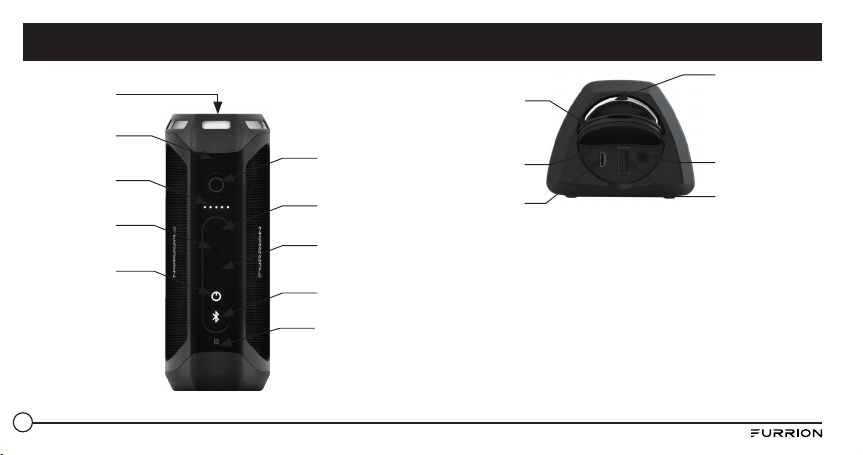
53
Blitzlicht
Stromanzeige
Zunahme der
Lautstärke
Power-Taste
Mikrofon
Verringerung der
Lautstärke
Bluetooth-Taste
Bereich zur NFC-
Ermittlung
Wiedergabe-/
Pause-Taste
Licht-/SOS-Taste
Metallring
Gummikappe
Reset-Taste
Micro-USB-
Anschluss
(nur
Ladungseingang)
3,5-mm-AUX-
Stecker
USB-Anschluss
Typ A (nur
Ladungsausgang)
Produktmerkmale
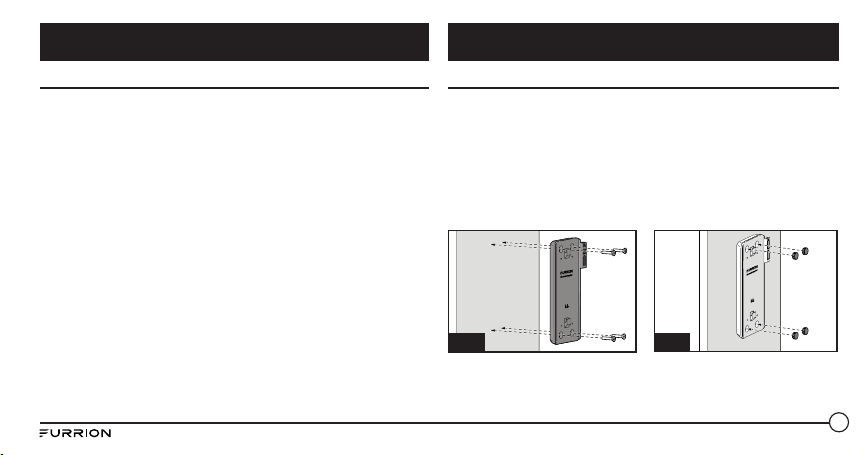
54
Was beinhaltet die Box?
Stellen Sie sicher, dass die folgenden Artikel in der Verpackung enthalten
sind. Sollte eines der Teile Beschädigungen aufweisen oder fehlen,
wenden Sie sich bitte an den Händler, bei dem das Gerät gekauft wurde.
● Bluetooth Lautsprecher 1 x
● USB-Ladekabel 1 x
● Drahtlose Ladestation*
* Nur für das Modell FBS012NBC-XX
HINWEIS: Der Inhalt kann basierend auf dem Kit, das Sie erworben
haben, variieren.
Wandbefestigung der Ladestation (Nur FBS012NBC-XX)
1. Wählen Sie eine geeignete Stelle, die nicht anfällig für Feuchtigkeit
ist.
2. Installieren Sie die Ladestation des Lautsprechers an der Wand
und sichern Sie sie mit den 4 im Lieferumfang enthaltenen
Schneidschrauben. (Abb. A)
HINWEIS: Stellen Sie sicher, dass das Wort “Furrion” bei der
Installation in der Ladestation nach oben zeigt.
3. Befestigen Sie die 4 bereitgestellten Gummikappen auf den
Schraubenlöchern. (Abb. B)
Fig. B
Fig. A
4. Schieben Sie den Lautsprecher in die Ladestation, bis er sicher
mit der Ladestation verbunden ist, wie weiter unten gezeigt. Nicht
umgekehrt installieren. (Abb. C und Abb. D)
Erste Schritte Installation
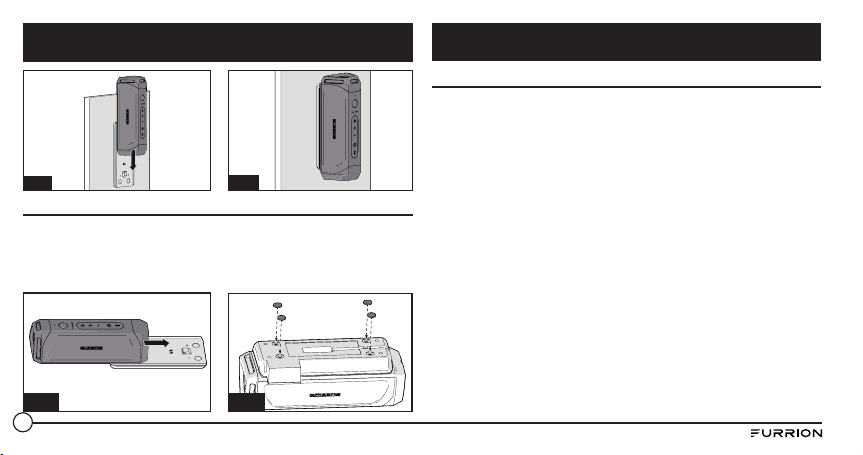
55
Fig. C
Fig. D
Tischbefestigung der Ladestation (Nur FBS012NBC-XX)
1. Schieben Sie den Lautsprecher in die Ladestation, bis er sicher
mit der Ladestation verbunden ist, wie weiter unten gezeigt. Nicht
umgekehrt installieren. (Abb. E)
2. Drehen Sie den Lautsprecher, sodass die Ladestation nach oben zeigt, und
befestigen Sie den Gummifuß wie abgebildet an der Ladestation. (Abb. F)
Fig. E
Fig. F
Laden des Lautsprechers
Bevor Sie den Lautsprecher verwenden, müssen Sie das Gerät für
mindestens 5 Stunden mithilfe des Micro-USB-Ladeanschlusses oder für
3,5 Stunden mit der Ladestation aufl aden. Sie können den Stromstand
jedes Mal überprüfen, bevor Sie den Lautsprecher in Betrieb nehmen,
indem Sie kurz die Taste drücken. Die Stromanzeige leuchtet für 3
Sekunden in Weiß, um den aktuellen Stromstand anzuzeigen, und
erlischt dann.
– 5 Lichter: 80 %–100 %
– 4 Lichter: 60 %–80 %
– 3 Lichter: 40 %–60 %
– 2 Lichter: 20 %–40 %
– 1 Licht: 0 %–20 %
Wir empfehlen, dass Sie den Akku vor der ersten Verwendung vollständig
aufl aden. Für das Laden des Lautsprechers haben Sie drei Möglichkeiten:
● Falls Sie eine Original-Ladestation von Furrion installiert haben,
platzieren Sie den Lautsprecher zum Laden in der Ladestation. Der
Lautsprecher ist in ungefähr 3,5 Stunden vollständig geladen.
● Heben Sie die Gummikappe hinten am Lautsprecher ab. Schließen Sie
ein Ende des Adapters an den Micro-USB-Anschluss am Lautsprecher
an und das andere Ende an einem 5 V DC Ausgang. Der Lautsprecher
Installation
Vor der Verwendung
56
ist in ungefähr 5 Stunden vollständig geladen.
● Schließen Sie ein Ende des im Lieferumfang enthaltenen
Netzadapters an den Netzanschluss unten am Lautsprecher an. Der
Lautsprecher ist in ungefähr 3,5 Stunden vollständig geladen.
HINWEIS: Die
Taste leuchtet während des Ladevorgangs weiß und
schaltet sich nach dem vollständigen Laden ab.
Ein- und Ausschalten des Lautsprechers
Einschalten: Wenn sich der Lautsprecher im „OFF“-Modus befindet
● Halten Sie die Taste für 3 Sekunden gedrückt. Es ist ein „Power-
on“-Ton zu hören. Die LED leuchtet für eine Sekunde weiß auf und
erlischt dann.
Ausschalten: Wenn sich der Lautsprecher im „On“-Modus befindetPress
● Halten Sie die Taste für 3 Sekunden gedrückt. Es ist ein „Power-
off“-Ton zu hören.
HINWEISE:
● Wenn der Lautsprecher nicht an ein Quellgerät oder eine Stromquelle
angeschlossen ist, schaltet er sich nach 15 Minuten Nichtbetrieb
automatisch ab.
● Wenn der Lautsprecher nicht an ein Quellgerät, aber eine Stromquelle
angeschlossen ist, schaltet er sich nach 30 Minuten Nichtbetrieb
automatisch ab.
● Wenn der Lautsprecher an ein Quellgerät, aber nicht eine Stromquelle
angeschlossen ist, schaltet er sich nach 1 Stunde Nichtbetrieb
automatisch ab.
● Wenn der Lautsprecher an ein Quellgerät und eine Stromquelle
angeschlossen ist, schaltet er sich nach 1 Stunde Nichtbetrieb
automatisch ab.
Vor der Verwendung Betrieb
57
Koppeln des Lautsprechers an ein Mobilgerät
Bevor Sie den Lautsprecher das erste Mal verwenden, müssen Sie
ihn mit einem mobilen Endgerät koppeln. In den folgenden Schritten
werden die Anweisungen zum Koppeln für ein typisches mobiles
Endgerät beschrieben. Detaillierte Informationen finden Sie in der
Bedienungsanleitung für Ihr Gerät.
Koppeln des Geräts mit Bluetooth
1. Stellen Sie den Lautsprecher nicht weiter als 10 Meter von dem
Bluetooth-fähigen Gerät entfernt auf. Stellen Sie sicher, dass sich der
Lautsprecher im „ON“-Modus befindet.
2. Halten Sie die
Taste für eine Sekunde gedrückt, bis sie weiß
aufleuchtet.
3. Aktivieren Sie die Bluetooth-Funktion Ihres mobilen Endgeräts,
indem Sie das Benutzerhandbuch des Geräts zurate ziehen. Suchen
Sie das Gerät „Furrion LIT“ in der Liste Ihres mobile Bluetooth-
Geräts und wählen Sie es aus, um eine Verbindung herzustellen.
HINWEIS: Die Taste leuchtet während des Suchvorgangs weiß auf.
Bei erfolgreicher Verbindung leuchtet die Taste für 3 Sekunden in
Weiß und erlischt dann.
4. Halten Sie die Taste für 3 Sekunden gedrückt, um den
Kopplungsmodus zu beenden.
HINWEIS: Der Lautsprecher speichert automatisch die letzten 10
gekoppelten Geräte. Drücken Sie für 10 Sekunden gleichzeitig die Tasten
und -, um den Speicher zu löschen.
Koppeln des Lautsprechers mit NFC
1. Aktivieren Sie Ihr Gerät für die NFC-Kopplung. Detaillierte
Informationen finden Sie in der Bedienungsanleitung für Ihr Gerät.
2. Stellen Sie das mobile Endgerät in der Nähe des Bereichs zur
NFC-Ermittlung auf. Suchen Sie nach „Furrion LIT“ in der Liste der
verfügbaren NFC-Geräte.
3. Bestätigen Sie die Verbindung auf Ihrem Gerät.
Wiedergeben von Audio
Stellen Sie vor der Wiedergabe von Audio sicher, dass mindestens ein
Mobilgerät mit dem Lautsprecher verbinden ist.
1. Drücken Sie die Taste, bis der „Power-On“-Ton zu hören ist. Der
Lautsprecher wird automatisch mit dem Mobilgerät verbunden, wenn
er zuvor damit gekoppelt wurde.
2. Verwenden Sie Steuerungen an Ihrem Mobilgerät oder die Tasten
am Lautsprecher, um ein Audio anzuhalten, zwischen Titeln zu
navigieren und die Lautstärke zu regeln.
● Drücken Sie die Taste, um die Wiedergabe anzuhalten oder
zu starten.
● Drücken Sie die + Taste, um die Lautstärke des Audios zu
Betrieb
58
erhöhen. Drücken Sie die + Taste, um zum nächsten Titel zu
wechseln.
● Drücken Sie die - Taste, um die Lautstärke des Audios zu
erhöhen. Drücken Sie die - Taste, um zum vorherigen Titel zu
wechseln.
Verwenden des Partymodus
Für einen Stereoeffekt können zwei Lautsprecher gekoppelt werden.
1. Stellen Sie fest, welcher Lautsprecher der Hauptlautsprecher und
welcher der Zusatzlautsprecher ist. Ihr Gerät muss nur mit dem
Hauptlautsprecher gekoppelt werden.
2. Koppeln Sie Ihr Gerät mit dem Hauptlautsprecher. Weitere
Informationen finden Sie Abschnitt: „Koppeln des Lautsprechers an
ein Mobilgerät“.
3. Drücken Sie bei eingeschaltetem Zusatzlautsprecher gleichzeitig die
Tasten
und + auf dem Zusatzlautsprecher, bis ein Ton zu hören ist.
HINWEIS: Setzen Sie den Zusatzlautsprecher nicht in den
Koppelmodus des Geräts.
4. Drücken Sie gleichzeitig die Tasten
und + am Hauptlautsprecher
(der Lautsprecher, der an Ihr Mobilgerät gekoppelt ist), bis ein Ton
zu hören ist. Der Hauptlautsprecher und der Zusatzlautsprecher
werden automatisch innerhalb von etwa 10 Sekunden verbunden.
Danach ist ein Ton zu hören. Die Lautsprecher befinden sich nun im
Stereomodus.
5. Drücken Sie die Taste an einem der Lautsprecher, um das Audio
anzuhalten oder zu starten. Drücken Sie die Tasten + oder - an einem
der Lautsprecher, um die Lautstärke zu reduzieren oder zu erhöhen.
6. Um den Partymodus zu beenden, drücken Sie die Power-Taste an
einem der Lautsprecher.
Verwenden des Lautsprechers
Wenn der Lautsprecher an ein Gerät gekoppelt ist und ein Anruf
empfangen wird, ist der Ton für eingehende Anrufe zu hören. Wird ein
Audio wiedergegeben, während der Anruf entgegengenommen wird, hält
das Audio an, sodass nur der Anruf zu hören ist. Wenn der Anruf beendet
wird, wird das Audio fortgesetzt.
Entgegennehmen eines Anrufs:
● Um einen eingehenden Anruf entgegenzunehmen, drücken Sie die
Taste auf dem Lautsprecher.
Ablehnen eines Anrufs:
● Um einen eingehenden Anruf abzulehnen, drücken Sie die Taste auf
dem Lautsprecher.
Beenden eines Anrufs:
● Um ein laufendes Gespräch zu beenden, drücken Sie die Taste auf
dem Lautsprecher.
Stummschalten eines Anrufs:
Betrieb
59
● Drücken Sie während eines Gesprächs gleichzeitig die Tasten +- und
-, um den Anruf stummzuschalten. Drücken Sie noch einmal, um das
Gespräch fortzusetzen.
Verwenden von Google Now
®
und Siri
®
Drücken und halten Sie die Taste, um Google Now und die Siri-
Funktion zu aktivieren. Drücken Sie sie noch einmal, um sie zu beenden.
Verwenden der Taschenlampe
Wenn Ihr Lautsprecher eingeschaltet ist, drücken Sie kurz die Taste
, um die Taschenlampe einzuschalten. Drücken Sie noch einmal, um sie
auszuschalten.
Verwenden von SOS
● Drücken Sie die Taste, um das SOS-Signal einzuschalten.
Die Taschenlampe geht an und blinkt alle 2 Sekunden und die
verbundenen Geräte schalten sich automatisch ab .
● Wenn die SOS-Lampe angeschaltet ist, drücken Sie die Taste, um
den Signaltongeber einzuschalten.
● Drücken Sie die Taste für 3 Sekunden, um den SOS-Modus zu
beenden. Der Lautsprecher kehrt in den Bluetooth-Modus zurück
und stellt automatisch eine Verbindung zu dem zuletzt verbundenen
Gerät her.
Verwenden von AUX-IN
1. Schließen Sie ein Ende eines 3,5-mm-auf 3,5-mm-Kabels (nicht
enthalten) wie bei einem Paar Kopfhörer an Ihr mobiles Endgerät
an.
2. Heben Sie die Gummikappe am Ausgang des Lautsprechers ab
und verbinden Sie das andere Ende des Kabels mit dem AUX-IN-
Anschluss.
3. Verwenden Sie Ihr Mobilgerät zur Kontrolle der Medienwiedergabe.
4. Verwenden Sie Ihr Mobilgerät oder die Tasten Ihres Lautsprechers,
um das Audio anzuhalten, zwischen Titeln zu navigieren oder die
Lautstärke zu regeln.
HINWEIS: Wenn mehr als ein Gerät über Bluetooth an den Lautsprecher
gekoppelt ist, hat das drahtgebundene Gerät Vorrang vor einer
Bluetooth-Geräteverbindung.
Zurücksetzen
1. Heben Sie die Gummikappe am Ausgang des Lautsprechers ab.
2. Drücken Sie die Reset-Taste mit einem scharfen Gegenstand.
Betrieb
60
● Benutzen Sie keine aggressiven Reinigungsmittel, um den
Lautsprecher zu reinigen.
● Setzen Sie den Lautsprecher keinen heißen Temperaturen aus.
● Versuchen Sie nicht, den Lautsprecher auseinander zu bauen Er
enthält im Inneren keine brauchbaren Komponenten.
● Wenn Sie den Lautsprecher für längere Zeiten nicht verwenden,
bewahren Sie ihn an einem trockenen Platz ohne extreme
Temperaturen, Feuchtigkeit und Staub auf.
● Verwenden Sie nur das von Furrion bereitgestellte Ladegerät zum
Laden des Akkus.
● Laden Sie den im Lautsprecher integrierten Akku nur in
Übereinstimmung mit dem Benutzerhandbuch auf.
● Vermeiden Sie das Laden des Lautsprechers unter extrem hohen oder
niedrigen Temperaturen.
Problem Lösung
Kein Strom Laden Sie Ihren Lautsprecher wieder auf.
Kein Sound
Passen Sie die Lautstärke an dem
verbundenen Gerät oder dem
Lautsprecher an.
Wenn Sie über Bluetooth Audio
anhören, stellen Sie sicher, dass kein
Audioeingangskabel mit der AUX-IN-
Buchse verbunden ist.
Stellen Sie sicher, dass Ihr Bluetooth-
Gerät sich innerhalb einer effektiven
Reichweite befindet.
Keine Reaktion des
Lautsprechers
Starten Sie den Lautsprecher erneut.
Schlechte Audioqualität
nach der Verbindung mit
einem Bluetooth-fähigen
Gerät
Der Bluetooth-Empfang ist schlecht.
Schieben Sie das Gerät näher an dieses
Produkt oder entfernen Sie mögliche
Hindernisse zwischen den Geräten.
Pflege und Wartung Problembehandlung
61
Problem Lösung
Verbindung mit dem
Gerät kann nicht
hergestellt werden
Die Bluetooth-Funktion an dem
Gerät ist nicht aktiviert. Sehen Sie im
Benutzerhandbuch des Geräts nach, wie
Sie die Funktion aktivieren können.
Diese Produkt ist bereits mit einem
anderen Bluetooth-fähigen Gerät
verbunden.
Trennen Sie das Gerät von der
Verbindung und versuchen Sie es
erneut.
Das gekoppelte Gerät
stellt eine Verbindung
her und löst diese
Verbindung dauernd
wieder.
Der Bluetooth-Empfang ist schlecht.
Schieben Sie das Gerät näher an dieses
Produkt oder entfernen Sie mögliche
Hindernisse zwischen den Geräten.
Als Stromsparfunktion wird bei einigen
Geräten die Bluetooth-Verbindung
möglicherweise automatisch deaktiviert.
Dies weist nicht auf eine Fehlfunktion
dieses Produkts hin.
Technische Spezifikationen
Abmessungen 194.5 x 73.6 x 58 mm
Lautsprechergehäusetyp 39-40mm x 2
Nennleistung 10W X 2 RMS
Signal-Rausch-Verhältnis >=80dB
Klirrfaktor 1%
Bluetooth-Version STEREO CSSR 8670 (4.1)
Maximale Bluetooth-
Kommunikationsreichweite
10m
Bluetooth-Frequenzbereich 2.4GHz
Betriebstemperaturbereich 45
o
C to -10
o
C
Akkuleistung 7.4v/1800mAh
Taschenlampeneffekt Fokus
Taschenlampenstandard > 500 Lumen
Problembehandlung
Spezifikationen
62
Furrion gewährt dem Erstkäufer eine Garantie von 1 Jahr ab dem
Kaufdatum, dass dieses Produkt, wenn es von einem autorisierten
Händler im Neuzustand, in der Originalverpackung geliefert wird und es
unter normalen Betriebsbedingungen verwendet wird, frei von Material-,
Fertigungs- und Verarbeitungsfehlern ist. Im Falle eines solchen Fehlers
übernimmt Furrion die Reparatur oder ersetzt das Produkt kostenlos.
Von der Garantie ausgeschlossen sind:
Produkte, bei denen die Seriennummer entfernt, geändert oder nicht
ohne Weiteres ermittelt werden kann; durch Unfälle, Fehlgebrauch,
Missbrauch, Nachlässigkeit, Produktmodifikationen, Nichtbefolgen
der Anweisungen im Benutzerhandbuch, kommerzielle oder
industrielle Nutzung entstandene Schäden; Beschädigung oder Verlust
der dekorativen Oberfläche des Produkts; Daten, Software oder
Informationen und normale Abnutzung. Diese Garantie schützt nur
den ursprünglichen Endnutzer („Sie“) und ist nicht übertragbar; jeder
Versuch, diese Garantie zu übertragen, setzt sie unverzüglich außer
Kraft. Diese Garantie ist nur im jeweiligen Kaufland gültig.
DIESE GARANTIE UND DIE OBEN DARGELEGTEN RECHTMITTEL
SIND DIE EINZIG GÜLTIGEN UND ERSETZEN ALLE ANDEREN
STILLSCHWEIGENDEN ODER AUSDRÜCKLICHEN GARANTIEN
UND BEDINGUNGEN, GLEICH OB MÜNDLICH ODER SCHRIFTLICH,
AUSDRÜCKLICH ODER STILLSCHWEIGEND. FURRION SCHLIESST
INSBESONDERE JEDE STILLSCHWEIGENDE GARANTIE AUS,
Technische Spezifikationen
Wasserdicht IPX 7
Spieldauer
Bis zu 15 Stunden Spieldauer (kann je nach
Lautstärke und Audio-Inhalt variieren)
GarantieSpezifikationen

63
BESCHRÄNKUNG FÜR BEILÄUFIGE SCHÄDEN ODER FOLGESCHÄDEN
ODER DIE BESCHRÄNKUNG ODER DEN AUSSCHLUSS DER DAUER
VON STILLSCHWEIGENDEN GEWÄHRLEISTUNGEN AUS, SODASS
DIE OBEN GENANNTEN BESCHRÄNKUNGEN ODER AUSSCHLÜSSE
MÖGLICHERWEISE NICHT AUF SIE ZUTREFFEN. DIESE GARANTIE
GEWÄHRT IHNEN BESTIMMTE GESETZLICHE RECHTE, UND SIE HABEN
UNTER UMSTÄNDEN WEITERE RECHTE, DIE VON STAAT ZU STAAT
VARIIEREN KÖNNEN (GEGEBENENFALLS IN DEN LÄNDERN, IN DENEN
FURRION NICHT IN DEN USA ODER KANADA ANSÄSSIGE AUTORISIERTE
HÄNDLER HAT).
Bewahren Sie Ihre Quittung, Ihren Lieferschein oder anderen
entsprechenden Zahlungsbeleg auf, um die Gewährleistungsfrist
nachweisen zu können. Zur Inanspruchnahme der Garantieleistungen
kontaktieren Sie Furrion unter warr[email protected]
Die beschriebenen und abgebildeten Produktmerkmale oder
Spezifikationen können jederzeit und ohne Vorankündigung geändert
werden.
EINSCHLIESSLICH ABER NICHT BESCHRÄNKT AUF DIE
GEWÄHRLEISTUNG DER MARKTGÄNGIGKEIT UND DER EIGNUNG FÜR
EINEN BESTIMMTEN ZWECK. WENN FURRION STILLSCHWEIGENDE
GARANTIEN NICHT RECHTMÄSSIG IM RAHMEN DIESER
BESCHRÄNKTEN GARANTIE ABLEHNEN KANN, SIND ALLE GARANTIEN,
EINSCHLIESSLICH DER GEWÄHRLEISTUNG DER MARKTGÄNGIGKEIT
UND EIGNUNG FÜR EINEN BESTIMMTEN ZWECK, AUF DIE DAUER
DIESER BEGRENZTEN GARANTIE BESCHRÄNKT.
Kein Vertriebspartner, Handelsvertreter oder Mitarbeiter von Furrion ist
befugt, an dieser Garantie etwaige Modifikationen, Erweiterungen oder
Zusätze vorzunehmen.
FURRION IST NICHT VERANTWORTLICH FÜR DIREKTE, INDIREKTE,
SPEZIELLE, ZUFÄLLIGE ODER FOLGESCHÄDEN, DIE DURCH DIE
VERLETZUNG EINER GARANTIE ODER BEDINGUNG ENTSTEHEN,
SOWIE AUS SONSTIGEN RECHTGRÜNDEN, EINSCHLIESSLICH ABER
NICHT BESCHRÄNKT AUF ENTGANGENE GEWINNE, AUSFALLZEITEN,
VERLUST VON FIRMENWERT ODER SCHÄDEN AN GERÄTEN ODER
EIGENTUM, JEDWEDE KOSTEN FÜR WIEDERHERSTELLUNG,
NEUPROGRAMMIERUNG ODER VERVIELFÄLTIGUNG VON PROGRAMMEN
ODER DATEN, DIE IN PRODUKTEN VON FURRION GESPEICHERT SIND
ODER DAMIT VERWENDET WERDEN.
EINIGE STAATEN SCHLIESSEN DEN AUSSCHLUSS ODER DIE
Garantie

64
Conteúdo ........................................................................................... 64
Boas-vindas ....................................................................................... 65
Instruções de segurança importantes ............................................... 65
Declaração da FCC ........................................................................... 66
Precauções de bateria importantes ................................................. 67
Declaração da IC ............................................................................... 67
Cuidados com o ambiente ................................................................ 67
Características do produto ................................................................ 68
Introdução ......................................................................................... 69
Conteúdo da embalagem ................................................................. 69
Instalação .......................................................................................... 69
Instalação da base de carregamento na parede (apenas aplicável ao
modelo FBS012NBC-XX) .................................................................. 69
Antes de utilizar ................................................................................ 70
Carregar o altifalante ....................................................................... 70
Instalação da base de carregamento para tampo de mesa (apenas
aplicável ao modelo FBS012NBC-XX) .............................................. 70
Funcionamento .................................................................................. 71
Ligar/desligar o altifalante ............................................................... 71
Emparelhar o altifalante com um dispositivo móvel ....................... 72
Reproduzir áudio............................................................................... 72
Utilizar o modo de festa .................................................................... 73
Utilizar o altifalante .......................................................................... 73
Utilizar o serviço Siri
®
....................................................................... 73
Utilizar a lanterna ............................................................................. 74
Utilizar a funcionalidade SOS ........................................................... 74
Utilizar a entrada AUX IN.................................................................. 74
Reposição .......................................................................................... 74
Cuidados e manutenção ..................................................................... 75
Resolução de problemas.................................................................... 75
Especificações ................................................................................... 76
Garantia ............................................................................................. 77
Conteúdo
65
CUIDADO
RISCO DE CHOQUE ELÉTRICO
NÃO ABRIR
CUIDADO: PARA REDUZIR O RISCO DE CHOQUE ELÉTRICO NÃO
RETIRE A COBERTURA, NEM A PARTE POSTERIOR. NÃO CONTÉM
PEÇAS QUE REQUEIRAM MANUTENÇÃO NO INTERIOR. TODAS AS
OPERAÇÕES DE MANUTENÇÃO DEVERÃO SER REALIZADAS POR
PESSOAL TÉCNICO QUALIFICADO.
Este “raio” indica material não isolado no interior da sua
unidade que poderá causar um choque elétrico. Para a
segurança de todos os membros do seu agregado familiar,
não retire a cobertura do produto.
O “ponto de exclamação” chama a atenção para
características relativamente às quais deve ler atentamente
os documentos em anexo para evitar problemas de
funcionamento e manutenção.
Obrigado por comprar este Altifalante Furrion Bluetooth
®
. Antes de
utilizar o seu novo aparelho, leia estas instruções atentamente. Este
manual de instruções contém informações para a utilização, instalação e
manutenção seguras deste aparelho.
Conserve este manual de instruções num local seguro para referência
futura. Deste modo, irá assegurar a sua utilização segura e reduzir
o risco de lesões. Certifique-se de que passa este manual aos novos
proprietários deste aparelho.
O fabricante não aceita responsabilidade por quaisquer danos devido ao
incumprimento destas instruções.
Se tiver alguma questão relacionada com os nossos produtos, contacte-
nos em [email protected].
Boas-vindas
Instruções de segurança importantes
66
1. Leia estas instruções.
2. Guarde estas instruções.
3. Cumpra todos os avisos.
4. Siga todas as instruções.
5. Limpe apenas com um pano seco.
6. Não obstrua as aberturas de ventilação. Instale o aparelho em
conformidade com as instruções do fabricante.
7. Não instale perto de fontes de calor, tais como radiadores, saídas de
aquecimento, fogões ou outros aparelhos (incluindo amplificadores)
que produzem calor.
8. Não inutilize as características de segurança da ficha polarizada
ou de ligação à terra. Uma ficha polarizada tem duas pinos, sendo
um mais largo do que o outro. Uma ficha de ligação à terra tem três
pinos, sendo um de ligação à terra. O pino mais largo ou o adicional
são fornecidos para sua segurança. Se a ficha fornecida não entrar
na sua tomada, contacte um eletricista para substituir a tomada
obsoleta.
9. Proteja o cabo de alimentação de ser pisado ou entalado,
especialmente na zona das fichas, das tomadas múltiplas e no ponto
de saída do aparelho.
10. Utilize apenas componentes/acessórios especificados pelo
fabricante.
11. Utilize apenas carrinhos, suportes, tripés, apoios ou mesas
especificados pelo fabricante ou vendidos com o aparelho. Caso
utilize um carrinho, tenha cuidado ao deslocar o conjunto
carrinho/aparelho para evitar lesões devido a queda do
dispositivo.
12. Desligue este aparelho durante trovoadas ou quando não
for utilizado durante períodos de tempo prolongados.
13. Todas as operações de manutenção deverão ser realizadas por
pessoal de assistência qualificado. A assistência é necessária quando
o aparelho tiver sido danificado de algum modo. Por exemplo, em
caso de danos no cabo ou na ficha de alimentação, derrame de
líquidos, queda de objetos sobre o aparelho, exposição a chuva ou
humidade, funcionamento anormal ou em caso de queda do aparelho.
14. Não exponha as baterias a calor excessivo, como a luz do sol, fogo ou
semelhante.
Declaração da FCC
AVISO: alterações ou modificações não aprovadas expressamente pela
parte responsável pela conformidade poderão inibir o direito do utilizador
ao uso deste equipamento.
NOTA: este equipamento foi testado e considerado em conformidade
com os limites estipulados para um dispositivo digital de Classe B, ao
abrigo da Secção 15 das Regras da FCC. Estes limites destinam-se a
proporcionar uma proteção razoável contra interferências prejudiciais
numa instalação doméstica. Este equipamento gera, utiliza e pode
Instruções de segurança importantes
67
emitir energia de radiofrequência e, se não for instalado e utilizado
de acordo com as instruções, pode interferir prejudicialmente com as
comunicações via rádio. No entanto, não existe qualquer garantia de que
não ocorra interferência numa determinada instalação.
Se este equipamento causar interferências prejudiciais na receção de
rádio ou televisão (que pode ser determinada ligando e desligando o
equipamento), o utilizador deve tentar corrigir as interferências adotando
uma ou mais das seguintes medidas:
● Reorientar ou reposicionar a antena de receção.
● Aumentar a distância entre o equipamento e o recetor.
● Ligar o equipamento a uma tomada que faça parte de um circuito
diferente daquele onde o recetor está ligado.
● Contactar um técnico de rádio/TV experiente para obter ajuda.
Precauções de bateria importantes
Este dispositivo contém uma bateria de iões de lítio não removível.
A bateria deve ser reciclada ou eliminada corretamente. Contacte
o organismo responsável pela gestão de resíduos locais para obter
informações sobre a reciclagem ou eliminação da bateria.
Declaração da IC
Este dispositivo está em conformidade com as normas RSS de isenção
de licença da Industry Canada. O funcionamento está sujeito às duas
condições seguintes: (1) este dispositivo não pode causar interferência
e (2) este dispositivo deve aceitar todas as interferências, incluindo
interferências que possam provocar o funcionamento indesejado do
dispositivo.
Cuidados com o ambiente
Este produto foi concebido e fabricado com materiais e componentes de
alta qualidade, que podem ser reciclados e reutilizados.
Nunca elimine o seu produto juntamente com o lixo doméstico.
Familiarize-se com as regras locais de recolha seletiva de baterias e
produtos elétricos e eletrónicos.
A eliminação correta destes produtos ajuda a evitar consequências
potencialmente nocivas para o ambiente e a saúde humana.
O seu produto contém baterias que não podem ser eliminadas em
conjunto com o lixo doméstico.
Instruções de segurança importantes
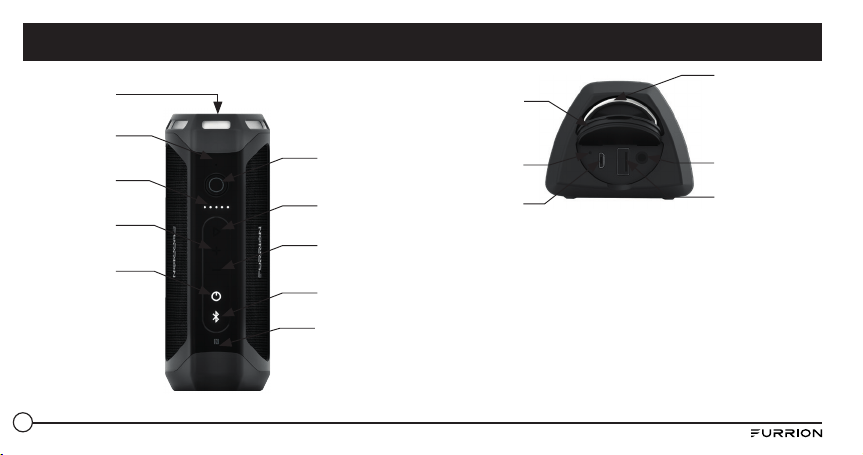
68
Lanterna
Indicador de
deteção de carga
Aumentar
volume
Botão de
alimentação
Microfone
Diminuir volume
Botão Bluetooth
Área de deteção
de NFC
Botão
Reproduzir/Parar
Botão Lanterna/
SOS
Anel metálico
Tampão de
borracha
Botão de
reposição
Porta Micro USB
(apenas entrada de
carga)
AUX de 3,5 mm
Porta USB de tipo
A (apenas saída de
carga)
Características do produto
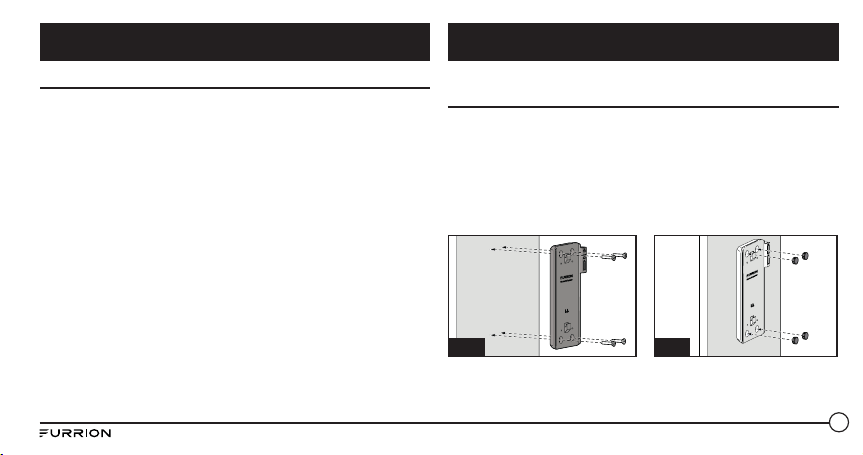
69
Conteúdo da embalagem
Certifi que-se de que a embalagem contém todos os elementos seguintes.
Se algum deles faltar ou estiver danifi cado, contacte o local de compra.
● 1 Altifalante Bluetooth
● 1 Cabo de carregamento USB
● Estação de ancoragem de carregamento sem fi os*
* Apenas aplicável ao modelo FBS012NBC-XX
NOTA: o conteúdo incluído pode ser diferente consoante o kit adquirido. O
produto descrito é o modelo padrão.
Instalação da base de carregamento na parede (apenas
aplicável ao modelo FBS012NBC-XX)
1. Selecione uma posição adequada que não seja suscetível à
humidade.
2. Instale a base de carregamento do altifalante na parede e fi xe-a com
os 4 parafusos autorroscantes. (Fig. A)
NOTA: certifi que-se de que a palavra Furrion no interior da base de
carregamento fi ca voltada para cima durante a instalação.
3. Instale os 4 tampões de borracha sobre os orifícios dos parafusos.
(Fig. B)
Fig. B
Fig. A
4. Introduza o altifalante na base de carregamento até fi car bem
encaixado na mesma, conforme é ilustrado abaixo. Não instale na
posição invertida. (Fig. C e Fig. D)
Introdução Instalação
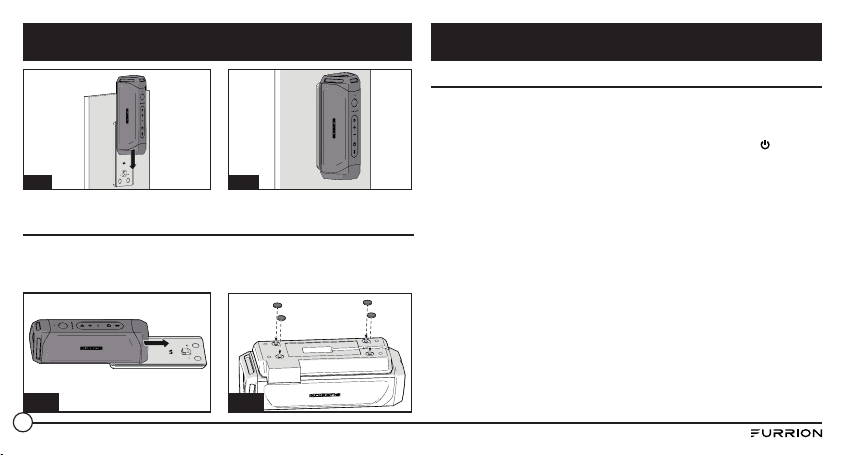
70
Fig. C
Fig. D
Instalação da base de carregamento para tampo de mesa
(apenas aplicável ao modelo FBS012NBC-XX)
1. Introduza o altifalante na base de carregamento até fi car bem encaixado na mesma,
conforme é ilustrado abaixo. Não instale na posição invertida. (Fig. E)
2. Vire o altifalante ao contrário com o fundo da base de carregamento voltado para cima e
instale os 4 pés de borracha na base de carregamento, conforme é ilustrado. (Fig. F)
Fig. E
Fig. F
Carregar o altifalante
Antes de utilizar o altifalante, tem de carregar o dispositivo durante
um mínimo de 5 horas através da porta de carregamento Micro USB ou
durante 3,5 horas (mínimo) utilizando a base de carregamento. Pode
verifi car o nível de alimentação premindo brevemente o botão antes de
cada utilização do altifalante. O indicador de alimentação irá acender-se
a branco durante 3 segundos para mostrar o nível atual da carga e, em
seguida, irá apagar-se.
– 5 Luzes: 80%-100%
– 4 Luzes: 60%-80%
– 3 Luzes: 40%-60%
– 2 Luzes: 20%-40%
– 1 Luz: 0-20%
Recomenda-se que carregue a bateria completamente quando a utilizar
pela primeira vez. O altifalante pode ser carregado de três formas
diferentes:
● Caso tenha uma base de carregamento genuína da Furrion instalada,
coloque o altifalante na base de carregamento para a carregar. O
altifalante fi cará totalmente carregado após cerca de 3,5 horas.
● Levante para abrir a tampa de borracha na extremidade do altifalante.
Ligue uma das extremidades do adaptador à porta Micro USB do
altifalante e a outra extremidade a uma tomada CC de 5 V. O altifalante
fi cará totalmente ligado após cerca de 5 horas.
Instalação Antes de utilizar
71
● Ligue uma das extremidades do adaptador de alimentação fornecido
à entrada de alimentação no base do altifalante e a outra extremidade
a uma fonte de alimentação CC de 5 V. O altifalante ficará totalmente
ligado após cerca de 3,5 horas.
NOTA: o botão
permanece a branco durante o processo de
carregamento e desliga-se após estar totalmente carregado.
Ligar/desligar o altifalante
Ligar: quando o altifalante está desligado
● Prima sem soltar o botão durante 3 segundos. Será emitido
um sinal sonoro de ligação. O LED irá piscar a branco durante um
segundo e, em seguida, irá apagar.
Desligar: quando o altifalante está ligar
● Prima sem soltar o botão durante 3 segundos. Será emitido um
sinal sonoro de fim de ligação.
NOTAS:
● Se o altifalante não estiver ligado a um dispositivo de alimentação e
não estiver ligado a uma fonte de alimentação, irá desligar-se após 15
minutos de inatividade.
● Se o altifalante não estiver ligado a um dispositivo de alimentação e
estiver ligado a uma fonte de alimentação, irá desligar-se após 30
minutos de inatividade.
● Se o altifalante estiver ligado a um dispositivo de alimentação e não
estiver ligado a uma fonte de alimentação, irá desligar-se após 1 hora
de inatividade.
● Se o altifalante estiver ligado a um dispositivo de alimentação e
estiver ligado a uma fonte de alimentação, irá desligar-se após 1 hora
de inatividade.
Antes de utilizar Funcionamento
72
Emparelhar o altifalante com um dispositivo móvel
Antes de utilizar o altifalante pela primeira vez, tem de o emparelhar
com um dispositivo móvel. Os passos seguintes descrevem as instruções
de emparelhamento para um dispositivo móvel típico. Se necessário,
consulte o manual do proprietário do dispositivo para obter informações
adicionais.
Emparelhar o dispositivo com Bluetooth
1. Coloque o altifalante a uma distância não superior a 10 metros (33
pés) do dispositivo ativado para Bluetooth. Certifique-se de que o
altifalante está ligado (modo “On”).
2. Prima sem soltar o botão
durante um segundo até o botão
acender e piscar a branco.
3. Para ativar a função Bluetooth do dispositivo móvel, consulte o
guia do utilizador do dispositivo móvel para obter informações
adicionais. Localize o dispositivo com o nome “Furrion LIT” na lista
de dispositivos móveis Bluetooth e selecione-o para ligar.
NOTA: o botão irá piscar durante o processo de pesquisa. Se a
ligação tiver êxito, o botão irá acender-se a branco durante 3
segundos e, em seguida, irá apagar-se.
4. Prima sem soltar o botão durante 3 segundos para cancelar o
modo de emparelhamento.
NOTA: o altifalante memoriza automaticamente os últimos 10 dispositivos
emparelhados. Prima os botões e - durante 10 segundos para limpar
a memória.
Emparelhar o altifalante com NFC
1. Prepare o dispositivo móvel para o emparelhamento por NFC. Se
necessário, consulte o manual do proprietário do dispositivo para
obter informações adicionais.
2. Coloque o dispositivo perto da área de deteção NFC no altifalante.
Procure por “Furrion LIT” na lista de dispositivos NFC disponíveis.
3. Confirme a ligação no dispositivo.
Reproduzir áudio
Certifique-se de que pelo menos um dispositivo móvel foi previamente
ligado ao altifalante antes de reproduzir áudio.
1. Prima sem soltar o botão até o sinal sonoro ligação ser emitido. O
altifalante será automaticamente ligado aos dispositivos móveis, se
já tiver sido emparelhado anteriormente.
2. Utilize os controlos do dispositivo móvel para controlar a reprodução
de áudio ou os botões no altifalante para parar o áudio, navegar pelas
faixas e controlar o volume.
● Prima o botão para parar ou retomar a reprodução.
● Prima o botão + para aumentar o volume de áudio. Prima sem
Funcionamento
73
soltar o botão + para ir para a faixa seguinte.
● Prima o botão - para diminuir o volume de áudio. Prima sem
soltar o botão - para ir para a faixa anterior.
Utilizar o modo de festa
É possível emparelhar dois altifalantes para produzir um som estéreo.
1. Identifique qual será o altifalante principal e qual será o altifalante
secundário. Só é necessário o seu dispositivo emparelhar com o
altifalante principal.
2. Consulte a secção “Emparelhar o altifalante com um dispositivo
móvel”, para obter informações adicionais.
3. Com o altifalante secundário ligado, prima os botões e + no
altifalante secundário até ser emitido um sinal sonoro.
Nota: não coloque o altifalante secundário no modo de
emparelhamento de dispositivo.
4. Prima os botões e + no altifalante principal (o altifalante que está
emparelhado com o dispositivo) até ser emitido um sinal sonoro.
O altifalante principal e o altifalante secundário irão estabelecer
ligação dentro de cerca de 10 segundos e será emitido um sinal
sonoro. Os altifalantes estão no modo estéreo.
5. Prima o botão em qualquer dos altifalantes para parar ou retomar
o áudio. Prima os botões + ou - em qualquer dos altifalantes para
diminuir ou aumentar o volume.
6. Para sair do modo de festa, prima sem soltar o botão de alimentação
em qualquer dos altifalantes para o desligar.
Utilizar o altifalante
Quando o altifalante está emparelhado com um dispositivo e é recebida
uma chamada, é emitido o sinal sonoro de chamada a receber. Se houver
áudio em reprodução ao receber uma chamada, este irá parar quando
a chamada for atendida e só se ouvirá o som da chamada. Quando a
chamada terminar, o áudio será retomado.
Atender uma chamada:
● Para atender uma chamada a receber, prima o botão no altifalante.
Rejeitar uma chamada:
● Para rejeitar uma chamada a receber, prima sem soltar no botão
do altifalante.
Terminar uma chamar:
● Para terminar uma chamada ativa, prima o botão no altifalante.
Silenciar uma chamada:
● Durante uma chamada, prima os botões + e - para silenciar a
chamada, prima de novo para retomar.
Funcionamento
74
Utilizar os serviços Google Now
®
e Siri
®
Prima sem soltar o botão para ativar as funções Google Now e Siri.
Prima de novo para terminar.
Utilizar a lanterna
Quando o altifalante estiver ligado (modo “On”), prima brevemente no
botão para ligar a lanterna. Prima de novo para desligar.
Utilizar a funcionalidade SOS
● Prima sem soltar o botão para ligar o sinal de SOS. A lanterna irá
acender-se e piscar a cada 2 segundos e os dispositivos ligados serão
automaticamente terminados.
● Quando a luz de SOS estiver acesa, prima o botão para ligar o
buzzer.
● Prima sem soltar o botão durante 3 segundos para sair do modo
SOS. O altifalante irá regressar ao modo Bluetooth e irá restabelecer a
ligação ao último dispositivo ligado automaticamente.
Utilizar a entrada AUX IN
1. Ligue uma extremidade de um cabo de 3,5 mm x 3,5 mm (não
incluído) ao seu dispositivo móvel, tal como faria com um par de
auscultadores.
2. Levante e abra a tampa de borracha na extremidade do altifalante e
ligue a outra extremidade do cabo à porta AUX IN.
3. Utilize o dispositivo móvel para controlar a reprodução multimédia.
4. Utilize o dispositivo móvel ou os botões do altifalante para parar o
áudio, navegar por faixas e controlar o volume.
NOTA: se existir mais do que um dispositivo emparelhado com o
altifalante com Bluetooth, o dispositivo com fios tem precedência numa
ligação de dispositivo Bluetooth.
Reposição
1. Levante e abra a tampa de borracha na extremidade do altifalante.
2. Prima o botão de reposição utilizando um objeto aguçado.
Funcionamento
75
● Não utilize solventes de limpeza abrasivos para limpar o altifalante.
● Não exponha o altifalante a temperaturas elevadas.
● Não tente desmontar o altifalante, pois não contém peças que exigem
manutenção no interior.
● Se não utilizar o altifalante durante períodos prolongados, certifique-
se de que o armazena num local seco, ao abrigo das temperaturas
extremas, da humidade e do pó.
● Utilize apenas o carregador fornecido pela Furrion para carregar o
altifalante.
● Carregue a bateria integrada no altifalante apenas em conformidade
com as instruções deste guia de utilizador.
● Evite carregar o altifalante sob temperaturas extremas altas ou
baixas.
Problema Solução
Não liga Volte a carregar o altifalante.
Sem som
Ajuste o volume do dispositivo ligado ou
do altifalante.
Quando ouvir rádio por Bluetooth,
certifique-se de que o cabo de entrada
de áudio está ligado à entrada AUX IN.
Certifique-se de que o dispositivo
Bluetooth se encontra dentro do raio
de alcance.
Sem resposta do
altifalante
Reinicie o altifalante.
Má qualidade de áudio
após a ligação a um
dispositivo ativado para
Bluetooth.
A receção Bluetooth é de má qualidade.
Aproxime o dispositivo deste produto ou
retire os obstáculos existentes no meio.
Cuidados e manutenção Resolução de problemas
76
Problema Solução
Não é possível ligar ao
dispositivo
A função Bluetooth do dispositivo não
está ativada. Consulte o manual de
utilização do dispositivo para saber
como ativar a função.
Este produto já está ligado a outro
dispositivo ativado para Bluetooth.
Desligue esse dispositivo e tente de
novo.
O dispositivo
emparelhado liga e
desliga constantemente.
A receção Bluetooth é de má qualidade.
Aproxime o dispositivo deste produto ou
retire os obstáculos existentes no meio.
Para alguns dispositivos, a ligação
Bluetooth pode ser desativada
automaticamente como uma
funcionalidade de economia de energia.
Isto não indica uma avaria deste
produto.
Especificações técnicas
Dimensão (L/M/S) 194.5 x 73.6 x 58 mm
Tipo de caixa do altifalante 39-40mm x 2
Potência nominal 10W X 2 RMS
Razão sinal/ruído >=80dB
Distorção harmónica total do
sistema
1%
Versão do Bluetooth ESTÉREO CSR 8670 (4.1)
Alcance máximo de comunicações
via Bluetooth
10m
Banda de frequência do Bluetooth 2.4GHz
Gama de temperaturas de
funcionamento
45
o
C to -10
o
C
Capacidade da bateria 7.4v/1800mAh
Efeito de luz da lanterna Foco
Resolução de problemas Especificações
77
A Furrion oferece uma garantia de 1 ano a contar da data de aquisição
pelo utilizador final original, de que este produto, quando entregue ao
Adquirente em estado novo, na embalagem original, proveniente de um
revendedor autorizado da Furrion e utilizado em condições normais,
está isento de defeitos de fabrico, material e mão-de-obra. Em caso
de um destes defeitos, a Furrion irá substituir ou reparar o produto
sem encargos para o Adquirente. Esta garantia não cobre: produtos em
que os números de série originais foram removidos, alterados ou não
podem ser prontamente determinados; perdas ou danos provocados por
acidente, utilização indevida, utilização abusiva, negligência, modificação
do produto, inobservância de instruções do manual do proprietário;
utilização comercial ou industrial; perdas ou danos provocados na
superfície decorativa do produto; perdas ou danos de quaisquer dados,
software ou informações; e desgaste normal. Esta garantia só protege
o utilizador final original (o “ Adquirente”) e não é transferível; qualquer
tentativa de transferir esta garantia resultará na sua anulação imediata.
Esta garantia só é válida no país de aquisição.
A PRESENTE GARANTIA E OS RESSARCIMENTOS ESTIPULADOS SUPRA
SÃO EXCLUSIVOS E EM LUGAR DE TODAS AS OUTRAS GARANTIAS,
RESSARCIMENTOS E CONDIÇÕES, ORAIS OU ESCRITOS, EXPRESSOS
OU IMPLÍCITOS. A FURRION REJEITA ESPECIFICAMENTE QUAISQUER
E TODAS AS GARANTIAS IMPLÍCITAS, INCLUINDO, SEM LIMITAÇÃO,
GARANTIAS DE COMERCIALIZAÇÃO E ADEQUAÇÃO A UM FIM
Especificações técnicas
Padrão de luz da lanterna > 500 Lúmenes
Resistente à água IPX 7
Tempo de reprodução
Até 15 horas de tempo de reprodução (pode
variar consoante o nível de volume e o
conteúdo de áudio)
Garantia
Especificações

78
PELO QUE AS LIMITAÇÕES OU EXCLUSÕES SUPRA PODERÃO NÃO SE
APLICAR AO ADQUIRENTE. A PRESENTE GARANTIA CONCEDE DIREITOS
LEGAIS ESPECÍFICOS AO ADQUIRENTE. O ADQUIRENTE TAMBÉM
PODE TER OUTROS DIREITOS QUE VARIAM CONSOANTE O ESTADO OU
PAÍS (ONDE APLICÁVEL NOS PAÍSES NOS QUAIS A FURRION TENHA
REVENDEDORES AUTORIZADOS NÃO AMERICANOS/CANADIANOS).
NENHUMA AÇÃO OU RECLAMAÇÃO PARA APLICAR ESTA GARANTIA
TERÁ INÍCIO APÓS A EXPIRAÇÃO DO PERÍODO DE GARANTIA.
Conserve o seu recibo, guia de entrega ou outro registo de pagamento
adequado para estabelecer o período de garantia. A assistência ao abrigo
desta garantia tem de ser obtida contactando a Furrion através do site
As características ou especificações do produto, conforme descritas ou
ilustradas, estão sujeitas a alteração sem aviso prévio.
ESPECÍFICO. CASO A FURRION NÃO CONSIGA EXCLUIR LEGALMENTE
AS GARANTIAS IMPLÍCITAS AO ABRIGO DESTA GARANTIA LIMITADA,
TODAS AS GARANTIAS REFERIDAS, INCLUINDO GARANTIAS DE
COMERCIALIZAÇÃO E ADEQUAÇÃO A UM FIM ESPECÍFICO, ESTÃO
LIMITADAS À VIGÊNCIA DA PRESENTE GARANTIA.
Nenhum revendedor, agente ou colaborador da Furrion está autorizado a
fazer qualquer modificação, extensão ou adição à presente garantia.
A FURRION NÃO É RESPONSÁVEL POR DANOS DIRETOS, INDIRETOS,
ESPECIAIS, ACIDENTAIS OU CONSEQUENTES RESULTANTES DE
QUALQUER VIOLAÇÃO DE GARANTIA OU CONDIÇÃO, OU AO ABRIGO
DE QUALQUER TEORIA LEGAL, INCLUINDO, SEM LIMITAÇÃO, PERDAS
DE LUCROS, PERÍODOS DE INDISPONIBILIDADE, “GOODWILL”, DANOS
OU SUBSTITUIÇÃO DE QUALQUER EQUIPAMENTO OU PROPRIEDADE,
QUAISQUER CUSTOS DE RECUPERAÇÃO, REPROGRAMAÇÃO
OU REPRODUÇÃO DE QUAISQUER PROGRAMAS OU DADOS
ARMAZENADOS EM OU UTILIZADOS COM PRODUTOS DA FURRION. A
RESPONSABILIDADE TOTAL DA FURRION ESTÁ LIMITADA À REPARAÇÃO
OU SUBSTITUIÇÃO DESTE PRODUTO NOS TERMOS PREVISTOS NESTA
GARANTIA.
ALGUNS ESTADOS NÃO PERMITEM A EXCLUSÃO OU LIMITAÇÃO
DE DANOS ACIDENTAIS OU CONSEQUENTES, OU EXCLUSÕES OU
LIMITAÇÕES NA DURAÇÃO DE GARANTIAS OU CONDIÇÕES IMPLÍCITAS,
Garantia

79
Contenuto .......................................................................................... 79
Benvenuto.......................................................................................... 80
Informazioni importanti sulla sicurezza ............................................ 80
Dichiarazione FCC ............................................................................ 81
Precauzioni importanti relative alla batteria ................................... 82
Dichiarazione IC ................................................................................ 82
Protezione dell’ambiente .................................................................. 82
Caratteristiche del prodotto .............................................................. 83
Introduzione ...................................................................................... 84
Contenuto della confezione .............................................................. 84
Installazione ...................................................................................... 84
Installazione della base di ricarica a parete (solo FBS012NBC-XX) 84
Prima dell’utilizzo.............................................................................. 85
Carica dell’altoparlante .................................................................... 85
Installazione della base di ricarica su un ripiano
(solo FBS012NBC-XX) ....................................................................... 85
Funzionamento .................................................................................. 86
Accensione/spegnimento dell’altoparlante ..................................... 86
Abbinamento dell’altoparlante a un dispositivo mobile .................. 87
Riproduzione audio ........................................................................... 87
Uso della modalità Party .................................................................. 88
Uso dell’altoparlante ........................................................................ 88
Uso del servizio Siri
®
........................................................................ 89
Uso della torcia ................................................................................. 89
Uso della funzione di emergenza ..................................................... 89
Uso della presa AUX IN .................................................................... 89
Reset ................................................................................................. 89
Cura e manutenzione ......................................................................... 90
Risoluzione dei problemi ................................................................... 90
Specifiche .......................................................................................... 91
Garanzia ............................................................................................ 92
Contenuto
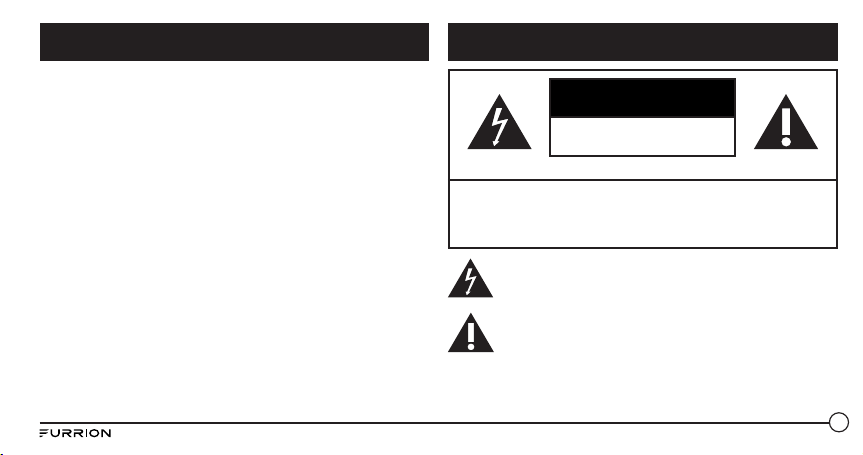
80
ATTENZIONE
RISCHIO DI SCOSSE ELETTRICHE
NON APRIRE
ATTENZIONE: PER RIDURRE IL RISCHIO DI SCOSSE ELETTRICHE,
NON RIMUOVERE IL COPERCHIO (O IL RETRO). ALL’INTERNO NON È
PRESENTE ALCUNA PARTE RIPARABILE DALL’UTENTE. RIVOLGERSI
SEMPRE A PERSONALE DI ASSISTENZA QUALIFICATO.
Il simbolo di ‘saetta’ indica materiale non isolato all’interno
dell’unità che potrebbe provocare una scossa elettrica. Per la
sicurezza di tutti i componenti del nucelo familiare, non
rimuovere la copertura del prodotto.
Il ‘punto esclamativo’ richiama l’attenzione su caratteristiche
per cui è necessario leggere la documentazione fornita per
evitare problemi di funzionamento e manutenzione.
Grazie per aver acquistato questo altoparlante Bluetooth
®
Furrion.
Prima di iniziare a utilizzare questo dispositivo, leggere attentamente
queste istruzioni. Questo manuale contiene informazioni per l’uso sicuro,
l’installazione e la manutenzione del dispositivo.
Conservare il manuale in un posto sicuro come riferimento futuro. Ciò
garantisce l’uso sicuro e riduce il rischio di danni. Assicurarsi di fornire il
manuale ai nuovi proprietari del dispositivo.
Il produttore non sarà responsabile di danni dovuti alla mancata
osservazione di queste istruzioni.
Per eventuali domande sui nostri prodotti, contattarci all’indirizzo
Benvenuto
Informazioni importanti sulla sicurezza
81
1. Leggere le istruzioni.
2. Conservare le istruzioni.
3. Osservare a tutte le avvertenze.
4. Seguire le istruzioni.
5. Pulire solo con un panno asciutto.
6. Non bloccare le aperture di ventilazione. Installare in conformità con
le istruzioni del produttore.
7. Non installare in prossimità di fonti di calore, quali radiatori,
termosifoni, stufe o altri apparati (compresi gli amplificatori) che
producono calore.
8. Non tentare di modificare la spina polarizzata o con un polo di terra,
inficiando così il suo scopo di sicurezza. Una spina polarizzata ha due
piedini, uno più largo dell’altro. Una spina con messa a terra, invece,
è composta di due lame e un terzo polo di messa a terra. Il piedino
ampio o il terzo piedino sono forniti per ragioni di sicurezza. Se la
spina fornita non si inserisce correttamente nella presa, consultare
un elettricista per farla sostituire.
9. Proteggere il cavo di alimentazione in modo che non venga
calpestato o schiacciato, specialmente in prossimità della spina,
degli alloggiamenti e dei punti di uscita dall’apparecchiatura.
10. Utilizzare solo gli fissaggi/accessori indicati dal produttore.
11. Usare solo il carrello, supporto, treppiedi, staffa o tavolino specificati
dal fabbricante o allegati al prodotto. Quando si usa un carrello,
prestare attenzione a non ferirsi durante gli spostamenti
del dispositivo.
12. Scollegare l’apparecchiatura dalla rete elettrica durante i
temporali o se viene lasciata inutilizzata per lunghi periodi
di tempo.
13. Per l’assistenza tecnica rivolgersi a personale qualificato. Gli
interventi di assistenza si rendono necessari quando l’apparato
ha subito danni, ad esempio se il cavo di alimentazione o la spina
sono danneggiati, è stato versato del liquido o sono caduti oggetti
nel dispositivo oppure se il dispositivo è stato esposto a pioggia o
umidità, non funziona normalmente o è caduto.
14. Non esporre le batterie a calore eccessivo, come il sole, il fuoco o
simili.
Dichiarazione FCC
AVVERTENZA: cambiamenti o modifiche non espressamente
approvati dalla parte responsabile della conformità possono invalidare
l’autorizzazione all’uso del dispositivo da parte dell’utente.
NOTA: Questo dispositivo è stato sottoposto a test ed è risultato conforme
ai limiti previsti per un dispositivo digitale di Classe B, Parte 15 delle
norme FCC. Questi limiti si propongono di fornire un ragionevole
livello di protezione contro le interferenze pericolose nell’installazione
residenziale. Questo dispositivo genera, usa e può irradiare energia
Informazioni importanti sulla sicurezza
82
a radiofrequenza e, se non installato e utilizzato in conformità alle
istruzioni, può causare interferenze dannose alle comunicazioni radio.
Non esiste tuttavia garanzia che tali interferenze non possano verificarsi
in impianti particolari.
Qualora questa apparecchiatura generasse interferenze dannose per la
ricezione di segnali radio o televisivi, condizione verificabile spegnendo e
riaccendendo l’apparecchio, è possibile risolvere il problema eseguendo
una delle operazioni indicate di seguito:
● Riorientare o riposizionare l’antenna.
● Aumentare la distanza di separazione tra il dispositivo e il ricevitore.
● Collegare il dispositivo a una presa su un circuito diverso da quella a
cui è collegato il ricevitore.
● Consultare il rivenditore o un tecnico radio/TV qualificato per
l’assistenza.
Precauzioni importanti relative alla batteria
Questo dispositivo contiene batterie agli ioni di litio (Li-Ion). La batteria
esaurita deve essere riciclata o smaltita correttamente. Per maggiori
informazioni sui centri di raccolta, contattare il proprio ufficio locale.
Dichiarazione IC
Questo dispositivo è conforme agli standard RSS di Industry Canada
per i dispositivi esenti da licenza. Il funzionamento è soggetto alle due
condizioni seguenti: (1) il dispositivo non può causare interferenze
dannose, e (2) deve accettare interferenze di ogni tipo, incluse quelle che
potrebbero causare un funzionamento indesiderato del dispositivo.
Protezione dell’ambiente
Questo prodotto è stato progettato e realizzato con materiali e
componenti di alta qualità, che possono essere riciclati e riutilizzati.
Non smaltire il prodotto tra i rifiuti domestici. Seguire le norme locali
sulla raccolta differenziata di prodotti elettrici ed elettronici e batterie.
Il corretto smaltimento di questo prodotto aiuterà a prevenire potenziali
conseguenze negative sull‘ambiente e sulla salute umana.
Il prodotto contiene batterie che non possono essere smaltite insieme ai
normali rifiuti domestici.
Informazioni importanti sulla sicurezza
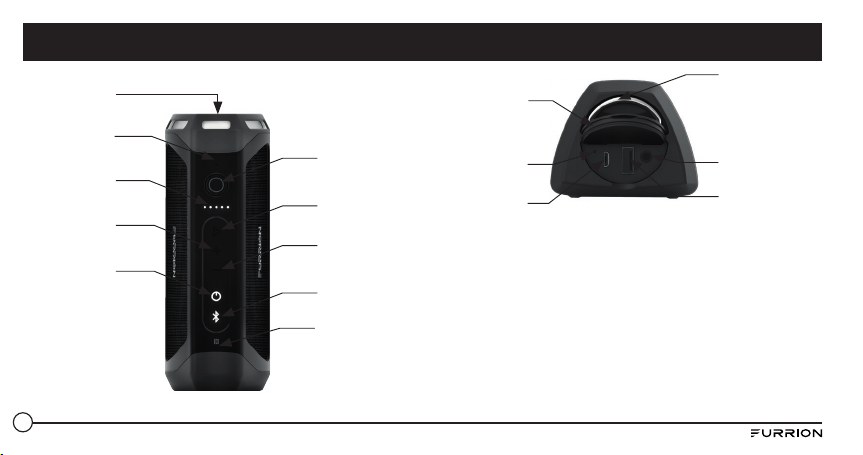
83
Torcia
Indicatore di
alimentazione
Aumento
volume
Pulsante di
accensione
Microfono
Diminuzione
volume
Tasto Bluetooth
Area di
rilevamento NFC
Tasto di
riproduzione/
pausa
Torcia/Tasto di
emergenza
Anello
metallico
Cappuccio in
gomma
Tasto di reset
Porta Micro USB
(solo carica)
AUX 3,5 mm
Porta USB tipo A
(solo scarica)
Caratteristiche del prodotto
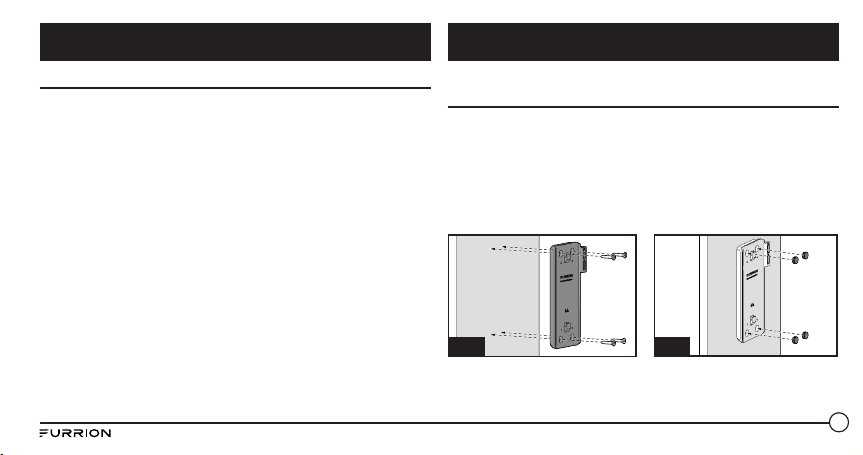
84
Contenuto della confezione
Assicurarsi che nella confezione siano inclusi tutti gli elementi riportati
di seguito. Nel caso in cui vi siano elementi danneggiati o mancanti,
contattare il rivenditore.
● 1 altoparlante Bluetooth
● 1 cavo di ricarica USB
● Base di ricarica wireless*
* Solo per il modello FBS012NBC-XX
NOTA: il contenuto incluso potrebbe essere diverso a seconda del kit
acquistato. Il prodotto qui descritto è il prodotto standard.
Installazione della base di ricarica a parete (solo
FBS012NBC-XX)
1. Scegliere una posizione non sensibile all’umidità.
2. Installare la base di ricarica dell’altoparlante sulla parete e fi ssarla
con le 4 viti autofi lettanti fornite. (Fig. A)
NOTA: durante l’installazione assicurarsi che la parola Furrion
all’interno della base di ricarica sia rivolta verso l’alto.
3. Montare i 4 cappucci di gomma forniti sui fori delle viti. (Fig. B)
Fig. B
Fig. A
4. Far scorrere l’altoparlante nella base di ricarica fi no al completo
fi ssaggio come mostrato di seguito. Non installare al contrario. (Fig.
C e Fig. D)
Introduzione Installazione
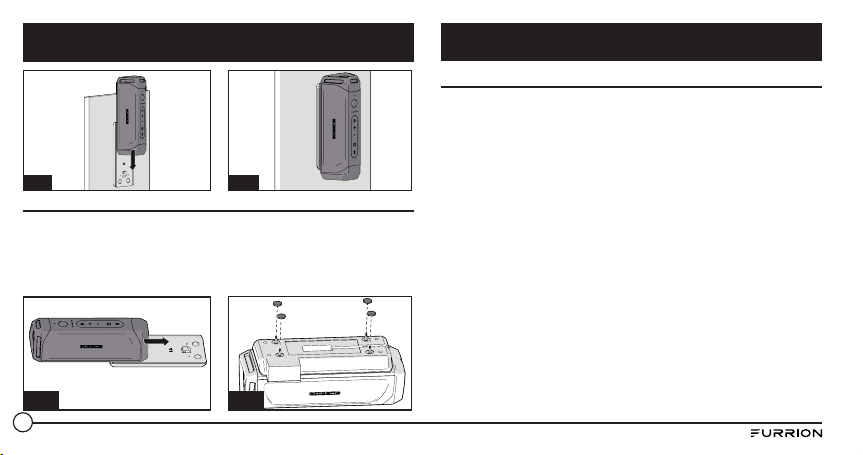
85
Fig. C
Fig. D
Installazione della base di ricarica su un ripiano (solo FBS012NBC-XX)
1. Far scorrere l’altoparlante nella base di ricarica fi no al completo
fi ssaggio come mostrato di seguito. Non installare al contrario. (Fig. E)
2. Ruotare l’altoparlante con la parte inferiore della base di ricarica
rivolta verso l’alto e montare i 4 cappucci di gomma sulla base come
mostrato. (Fig. F)
Fig. E
Fig. F
Carica dell’altoparlante
Prima di utilizzare l’altoparlante, è necessario caricare il dispositivo
per almeno 5 ore tramite la porta di ricarica Micro USB o per 3,5 ore
(minimo) mediante la base di ricarica. È possibile controllare il livello di
carica premendo brevemente il tasto prima di utilizzare l’altoparlante.
L’indicatore si accenderà di bianco per 3 secondi visualizzando il livello
di carica corrente e poi si spegnerà.
– Luce 5: 80%-100%
– Luce 4: 60%-80%
– Luce 3: 40%-60%
– Luce 2: 20%-40%
– Luce 1: 0-20%
Si consiglia di caricare completamente la batteria prima di utilizzare il
dispositivo per la prima volta. L’altoparlante può essere caricato in tre
modi:
● Se è installata una base di ricarica Furrion originale, posizionare
l’altoparlante sulla base; la carica sarà completata in circa 3,5 ore.
● Sollevare il cappuccio in gomma all’estremità dell’altoparlante.
Collegare un’estremità dell’adattatore alla porta Micro USB
sull’altoparlante e l’altra estremità a una presa di corrente da 5V.
L’altoparlante sarà caricato in circa 5 ore.
Installazione
Prima dell’utilizzo
86
● Collegare un’estremità dell’adattatore fornito alla presa di
alimentazione nella parte inferiore dell’altoparlante, collegare l’altra
estremità a una presa di corrente da 5V. L’altoparlante verrà caricato
in circa 3,5 ore.
NOTA: il tasto
rimarrà bianco per tutta la durata del processo di
ricarica e si spegnerà una volta completata la ricarica.
Accensione/spegnimento dell’altoparlante
Accensione: l’altoparlante è in modalità Off
● Tenere premuto il tasto per 3 secondi. Verrà emesso un suono
di accensione. il LED bianco lampeggerà per un secondo e poi si
spegnerà.
Spegnimento: l’altoparlante è in modalità On
● Tenere premuto il tasto per 3 secondi. Verrà emesso un suono
di spegnimento, il LED bianco lampeggerà per un secondo e poi si
spegnerà.
NOTE:
● Se l’altoparlante non è collegato né a un dispositivo sorgente né a una
fonte di alimentazione, si spegnerà dopo 15 minuti di inattività.
● Se l’altoparlante non è collegato a un dispositivo sorgente ma è
collegato a una fonte di alimentazione, si spegnerà dopo 30 minuti di
inattività.
● Se l’altoparlante è collegato a un dispositivo sorgente ma non a una
fonte di alimentazione, si spegnerà dopo 1 ora di inattività.
● Se l’altoparlante è collegato a un dispositivo sorgente e a una fonte di
alimentazione, si spegnerà dopo 1 ora di inattività.
Prima dell’utilizzo Funzionamento
87
Abbinamento dell’altoparlante a un dispositivo mobile
Prima di utilizzare l’altoparlante per la prima volta, è necessario
abbinarlo a un dispositivo mobile. La procedura di seguito riporta
le istruzioni per l’abbinamento di un dispositivo mobile tipico. Se
necessario, fare riferimento al manuale del dispositivo per i dettagli.
Abbinamento del dispositivo con Bluetooth
1. Posizionare l’altoparlante a non più di 10 metri dal dispositivo
Bluetooth. Assicurarsi che la modalità dell’altoparlante sia ‘On’.
2. Tenere premuto il tasto
per un secondo fino a che si illumina di
bianco e inizia a lampeggiare.
3. Attivare la funzione Bluetooth del dispositivo mobile consultando la
guida per l’utente del dispositivo mobile per i dettagli. Individuare il
dispositivo denominato “Furrion LIT” tra i dispositivi Bluetooth mobili
e selezionarlo per connettersi.
NOTA: il tasto lampeggerà durante il processo di ricerca. In seguito
al collegamento, il tasto si illuminerà di bianco per 3 secondi e poi
si spegnerà.
4. Tenere premuto il tasto per 3 secondi per uscire dalla modalità di
abbinamento.
Nota: l’altoparlante ricorda automaticamente gli ultimi 10 dispositivi
abbinati. Premere entrambi i pulsanti e - per 10 secondi per cancellare
la memoria.
Abbinamento dell’altoparlante con NFC
1. Abilitare il dispositivo mobile per l’abbinamento NFC. Se necessario,
fare riferimento al manuale del dispositivo per i dettagli.
2. Posizionare il dispositivo mobile in prossimità dell’area di rilevamento
NFC sull’altoparlante. Ricercare “Furrion LIT” nell’elenco di
dispositivi NFC disponibili.
3. Confermare il collegamento sul dispositivo.
Riproduzione audio
Prima di riprodurre l’audio, assicurarsi che almeno un dispositivo mobile
sia collegato all’altoparlante.
1. Tenere premuto il tasto fino all’emissione del suono di accensione;
l’altoparlante sarà collegato automaticamente ai dispositivi mobili se
è stato abbinato correttamente.
2. Utilizzare i controlli sul dispositivo mobile per controllare la
riproduzione audio oppure utilizzare i tasti sull’altoparlante per
interrompere l’audio, spostarsi tra le tracce e controllare il volume.
● Premere il tasto per interrompere o riprendere la riproduzione.
● Premere il tasto + per aumentare il volume. Tenere premuto il
tasto + per passare alla traccia successiva.
● Premere il tasto - per diminuire il volume. Tenere premuto il
tasto - per tornare alla traccia precedente.
Funzionamento
88
Uso della modalità Party
È possibile abbinare due altoparlanti per un ascolto stereo.
1. Determinare quale sarà l’altoparlante principale e quale quello
ausiliario. Il dispositivo dovrà essere abbinato solo all’altoparlante
principale.
2. Abbinare il dispositivo all’altoparlante principale. Fare riferimento
alla sezione “Abbinamento dell’altoparlante a un dispositivo
mobile” per maggiori dettagli.
3. Con l’altoparlante ausiliario acceso, premere i tasti e + fino
all’emissione di un suono.
NOTA: non attivare la modalità di abbinamento dispositivo
dell’l’altoparlante ausiliario.
4. Premere i tasti e + sull’altoparlante principale (l’altoparlante
abbinato al dispositivo mobile) fino all’emissione di un suono.
L’altoparlante principale e quello ausiliario saranno collegati
automaticamente in circa 10 secondi e verrà emesso un suono. Gli
altoparlanti saranno in modalità stereo.
5. Premere il tasto su uno degli altoparlanti per interrompere o
ripristinare l’audio. Premere i tasti + o - su uno degli altoparlanti per
aumentare o diminuire il volume.
6. Per uscire dalla modalità Party, tenere premuto il tasto di accensione
su uno degli altoparlanti in modo da spegnerlo.
Uso dell’altoparlante
Quando l’altoparlante è abbinato a un dispositivo e viene ricevuta una
chiamata, verrà emesso il tono della chiamata in entrata. Se l’audio è in
riproduzione quando si risponde a una chiamata, l’audio verrà messo in
pausa e sarà possibile ascoltare solo la chiamata. Una volta terminata la
chiamata, l’audio riprenderà da dove interrotto.
Risposta a una chiamata:
● Per rispondere a una chiamata in entrata, premere il tasto
sull’altoparlante.
Rifiuto di una chiamata:
● Per rifiutare una chiamata in entrata, tenere premuto il tasto
sull’altoparlante.
Fine di una chiamata:
● Per terminare una chiamata attiva, premere il tasto sull’altoparlante.
Disattivazione dell’audio di una chiamata:
● Durante una chiamata, premere entrambi i tasti + e - per disattivare
l’audio della chiamata e premere di nuovo per riattivarlo.
Uso di Google Now
®
e Siri
®
Tenere premuto il tasto per attivare Google Now e Siri. Premere di
nuovo per terminare.
Funzionamento
89
Uso della torcia
Se l’altoparlante è acceso, premere brevemente il tasto per accendere
la torcia e premerlo di nuovo per spegnerla.
Uso della funzione di emergenza
● Tenere premuto il tasto per attivare il segnale SOS. Si accenderà la
torcia che lampeggerà ogni 2 secondi e i dispositivi connessi saranno
terminati automaticamente.
● Quando la luce di emergenza è abilitata, premere il tasto per
attivare il cicalino.
● Tenere premuto il tasto per 3 secondi per uscire dalla modalità
di emergenza. L’altoparlante tornerà in modalità Bluetooth e si
ricollegherà automaticamente all’ultimo dispositivo connesso.
Uso della presa AUX IN
1. Collegare un’estremità di un cavo 3,5 mm-3,5 mm (non incluso) al
dispositivo mobile, come nel caso di una coppia di cuffie.
2. Sollevare e aprire il cappuccio di gomma all’estremità
dell’altoparlante e collegare l’altra estremità del cavo alla porta AUX
IN.
3. Utilizzare il dispositivo mobile per controllare la riproduzione
multimediale.
4. Utilizzare il dispositivo mobile o i tasti sull’altoparlante per
interrompere l’audio, spostarsi tra le tracce e controllare il volume.
NOTA: se più di un dispositivo è abbinato all’altoparlante via Bluetooth, il
dispositivo collegato avrà la precedenza sulla connessione del dispositivo
Bluetooth.
Reset
1. Sollevare e aprire il tappo di gomma all’estremità dell’altoparlante.
2. Premere il tasto reset utilizzando un oggetto appuntito.
Funzionamento
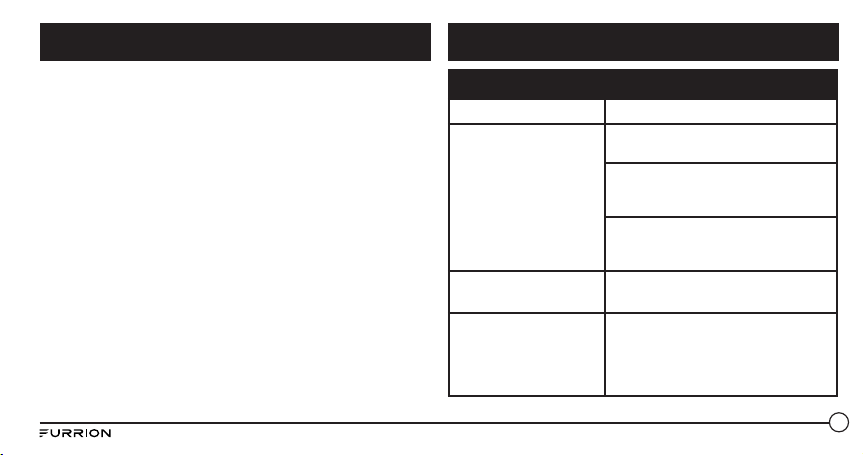
90
● Non utilizzare solventi abrasivi per pulire l’altoparlante.
● Non esporre l’altoparlante ad alte temperature.
● Non provare a smontare l’altoparlante in quanto non contiene alcun
componente utilizzabile.
● Se l’altoparlante non viene utilizzato per lunghi periodi, conservarlo
in un luogo asciutto, a temperature non estreme e privo di umidità e
polvere.
● Per la ricarica dell’altoparlante, utilizzare soltanto il caricabatteria
Furrion fornito.
● Caricare la batteria integrata dell’altopalante seguendo le istruzioni
riportate in questa guida per l’utente.
● Evitare di caricare l’altoparlante a temperature troppo alte o troppo
basse.
Problema Soluzione
Nessuna alimentazione Ricaricare l’altoparlante.
Nessun suono
Regolare il volume sul dispositivo
collegato o sull’altoparlante.
Quando si ascolta l’audio via Bluetooth,
assicurarsi che nessun cavo di input
audio sia collegato alla presa AUX IN.
Assicurarsi che il dispositivo Bluetooth
sia compreso nell'intervallo operativo
effettivo.
Nessuna risposta
dall’altoparlante
Riavviare l’altoparlante.
Bassa qualità audio
in seguito a un nuovo
collegamento con un
dispositivo abilitato per
Bluetooth.
Scarsa ricezione del segnale Bluetooth.
Avvicinare il dispositivo al prodotto
oppure rimuovere eventuali ostacoli
nel mezzo.
Cura e manutenzione Risoluzione dei problemi
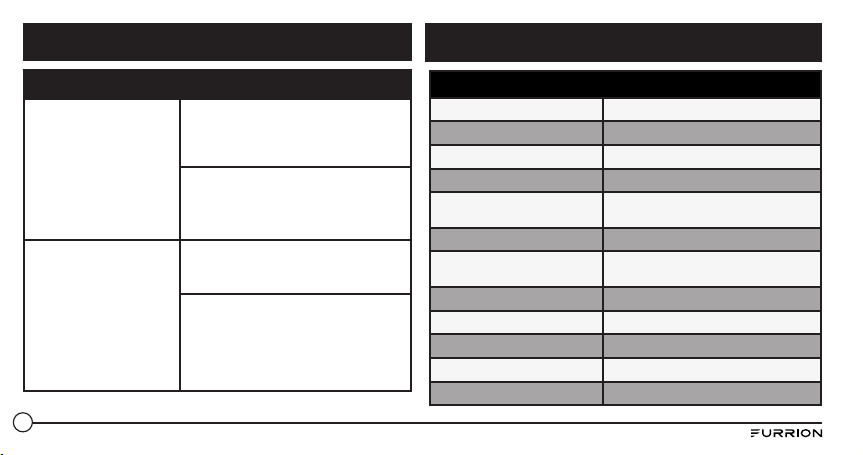
91
Problema Soluzione
Impossibile collegarsi al
dispositivo
La funzione Bluetooth sul dispositivo
non è abilitata. Fare riferimento alla
guida per l’utente del dispositivo per
abilitare la funzione.
Questo prodotto è già collegato
a un altro dispositivo Bluetooth.
Scollegare il dispositivo e provare
di nuovo.
Il dispositivo abbinato
si collega e si scollega
continuamente
Scarsa ricezione Bluetooth. Avvicinare il
dispositivo al prodotto oppure rimuovere
eventuali ostacoli nel mezzo.
Per alcuni dispositivi, il collegamento
Bluetooth potrebbe essere disattivato
automaticamente secondo le
impostazioni di risparmio energetico.
Ciò non indica un malfunzionamento
del prodotto.
Specifiche tecniche
Dimensioni (L/M/S) 194.5 x 73.6 x 58 mm
Tipo di custodia dell’altoparlante 39-40mm x 2
Potenza stimata 10W X 2 RMS
Rapporto segnale/rumore >=80dB
Distorsione armonica totale del
sistema
1%
Versione Bluetooth STEREO CSR 8670 (4.1)
Intervallo di comunicazione
massima Bluetooth
10m
Banda di frequenza Bluetooth 2.4GHz
Intervallo temperature operative 45
o
C to -10
o
C
Capacità batteria 7.4v/1800mAh
Effetto torcia Focus
Torcia standard >500 Lumen
Risoluzione dei problemi
Specifiche
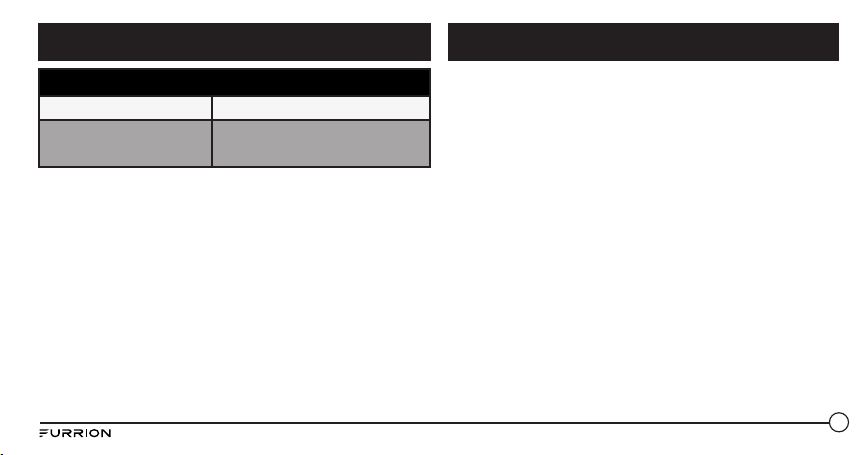
92
Furrion garantisce per un periodo di 1 anno dalla data di acquisto al
dettaglio da parte dell’acquirente finale, che questo prodotto, consegnato
in nuove condizioni, in imballaggi originali, da un rivenditore autorizzato
Furrion e utilizzato in condizioni normali, è privo di difetti di fabbricazione,
materiali e lavorazione. In caso di tale difetto, Furrion sostituirà o riparerà
il prodotto senza alcun costo. La presente garanzia non comprende: i
prodotti in cui i numeri di serie originali sono stati rimossi, modificati
o non possono essere facilmente determinati; danni o perdite causati
da incidenti, uso non corretto, abusi, negligenza, modifica del prodotto,
mancato rispetto delle istruzioni riportate nel manuale del proprietario,
uso commerciale o industriale; danni o perdite causati alla superficie
decorativa del prodotto; a qualsiasi dato, software o informazione e
normale usura. Questa garanzia protegge solo l’utente finale (“tu”) e
non è trasferibile; qualsiasi tentativo di trasferimento della garanzia la
renderà immediatamente nulla. Questa garanzia è valida solo nel paese
d’acquisto.
QUESTA GARANZIA E LE RIDUZIONI PREVISTE SOPRA SONO ESCLUSIVE
E SOSTITUITE DA TUTTE LE ALTRE GARANZIE, RIMEDI E CONDIZIONI,
SIA ORALI CHE SCRITTE, ESPRESSE O IMPLICITE. FURRION
SPECIFICAMENTE DECLINA QUALUNQUE GARANZIA IMPLICITA,
INCLUSE, MA SENZA LIMITAZIONI, GARANZIE DI COMMERCIABILITÀ
E IDONEITÀ PER UNO SCOPO PARTICOLARE. SE FURRION NON PUÒ
ESCLUDERE LEGALMENTE TUTTE LE GARANZIE IMPLICITE IN BASE A
Specifiche tecniche
Impermeabile IPX 7
Gioco
Fino a 15 pre di gioco (il tempo di gioco
può variare in base al livello di volume e al
contenuto audio)
Garanzia
Specifiche

93
O AL PAESE (LADDOVE APPLICABILE NEI PAESI IN CUI FURRION
HA RIVENDITORI AUTORIZZATI NON STATUNITENSI NÉ CANADESI).
NESSUNA AZIONE O RICHIESTA DI APPLICAZIONE DI QUESTA GARANZIA
SARÀ POSSIBILE DOPO LA SCADENZA DEL PERIODO DI GARANZIA.
Conservare la ricevuta, il buono di consegna o altre prove di pagamento
per stabilire il periodo di garanzia. Il servizio di garanzia deve essere
ottenuto contattando Furrion all’indirizzo [email protected]
Le funzioni o le caratteristiche del prodotto descritte o illustrate sono
soggette a modifiche senza preavviso.
QUESTA GARANZIA LIMITATA, TALI GARANZIE, COMPRESE LE GARANZIE
DI COMMERCIABILITÀ E IDONEITÀ PER UN PARTICOLARE SCOPO,
SARANNO LIMITATE IN BASE ALLA DURATA DI QUESTA GARANZIA.
Nessun rivenditore, agente o dipendente di Furrion è autorizzato a
apportare qualsiasi modifica, estensione o aggiunta a questa garanzia.
FURRION NON È RESPONSABILE PER DANNI DIRETTI, INDIRETTI,
SPECIALI, ACCIDENTALI O CONSEQUENZIALI DERIVANTI DA QUALSIASI
VIOLAZIONE DI GARANZIA O CONDIZIONE, O IN BASE A UN’ALTRA
TEORIA GIURIDICA, INCLUSI, MA NON LIMITATI ALLA PERDITA
DI PROFITTO, A PERIODI DI INATTIVITÀ, AVVIAMENTO, DANNI O
SOSTITUZIONE DI QUALSIASI ATTREZZATURA O PROPRIETÀ, QUALSIASI
COSTO DI RECUPERO, RIPROGRAMMAZIONE O RIPRODUZIONE DI
QUALSIASI PROGRAMMA O DEI DATI MEMORIZZATI O UTILIZZATI CON
I PRODOTTI FURRION. LA RESPONSABILITÀ TOTALE DI FURRION
È LIMITATA ALLA RIPARAZIONE O ALLA SOSTITUZIONE DI QUESTO
PRODOTTO SECONDO I TERMINI RIPORTATI IN QUESTA GARANZIA.
ALCUNI STATI NON CONSENTONO L’ESCLUSIONE O LA LIMITAZIONE DI
DANNI ACCIDENTALI O CONSEQUENZIALI O ESCLUSIONI O LIMITAZIONI
SULLA DURATA DI GARANZIE IMPLICITE O CONDIZIONI, PERCHÈ TALI
LIMITAZIONI O ESCLUSIONI POTREBBERO NON ESSERE APPLICABILI.
QUESTA GARANZIA FORNISCE DIRITTI LEGALI SPECIFICI E ALTRI
EVENTUALI DIRITTI CHE POSSONO VARIARE IN BASE ALLO STATO
Garanzia
Furrion Innovation Center & Institute of Technology
● 52567 Independence Ct., Elkhart, IN 46514, USA ● Toll free:1-888-354-5792
● Email: [email protected]
©2007-2017 Furrion Ltd. Furrion, the Furrion logo and Furrion LIT™ are trademarks licensed for use by Furrion Ltd. and registered in the U.S. and other countries. The Bluetooth word mark and logo are registered trademarks of
Bluetooth SIG, Inc. N-Mark is a trademark of NFC Forum, Inc. registered in the U.S. and other countries. Google Now is a trademark of Google, Inc. registered in the U.S. and other countries. Siri is a trademark of Apple, Inc. registered
in the U.S. and other countries.
©2007-2017 Furrion Ltd. Furrion, le logo Furrion et Furrion LIT™ sont des marques déposées par Furrion Ltd. et enregistrées aux Etats-Unis et ailleurs. La marque verbale et les logos Bluetooth sont des marques de commerce
déposées et détenues par Bluetooth SIG, Inc. N-Mark est une marque enregistrée par NFC Forum, Inc. aux Etats-Unis et ailleurs. Google Now est une marque de commerce appartenant à Google, Inc. et enregistrée aux Etats-Unis et
ailleurs. Siri est une marque de commerce appartenant à Apple et enregistrée aux Etats-Unis et ailleurs.
©2007-2017 Furrion Ltd. Furrion, el logotipo de Furrion y Furrion LIT™ son marcas comerciales con licencia de uso de Furrion Ltd. y están registradas en los Estados Unidos y en otros países. La palabra Bluetooth y sus logotipos son
marcas comerciales registradas de propiedad de Bluetooth SIG, Inc. N-Mark es una marca comercial o marca comercial registrada de NFC Forum, Inc. en los Estados Unidos y en otros países. Google Now son marcas comerciales de
Google, Inc. registradas en los Estados Unidos y en otros países. Siri son marcas comerciales de Apple Inc. registradas en los Estados Unidos y en otros países.
©2007-2017 Furrion Ltd. Furrion, das Furrion-Logo und Furrion LIT™ sind für die Verwendung durch Furrion Ltd. lizenzierte Warenzeichen in den Vereinigten Staaten und anderen Ländern. Der Name Bluetooth und die Logos sind
eingetragene Marken der Bluetooth SIG, Inc. Das N-Zeichen ist ein in den Vereinigten Staaten und anderen Ländern eingetragenes Warenzeichen von NFC Forum, Inc. Siri ist ein in den Vereinigten Staaten und anderen Ländern
eingetragenes Warenzeichen von Apple, Inc.
©2007-2017 Furrion Ltd. Furrion, o logótipo da Furrion e Furrion LIT™ são marcas comerciais licenciadas para utilização pela Furrion Ltd. e registadas nos E.U.A. e noutros países. O logótipo e a marca da palavra Bluetooth são
marcas registadas da Bluetooth SIG, Inc. A Marca N é uma marca comercial do NFC Forum, Inc., registada nos Estados Unidos e noutros países. Google Now é uma marca da Google, Inc., registada nos E.U.A. e noutros países. Siri é
uma marca comercial da Apple, Inc., registada nos E.U.A. e noutros países.
©2007-2017 Furrion Ltd. Furrion, il logo Furrion e Furrion LIT™ sono marchi concessi su licenza per l’uso da Furrion Ltd e sono registrati negli Stati Uniti e in altri paesi. La parola Bluetooth e il logo sono marchi registrati di proprietà
di Bluetooth SIG, Inc. N-Mark è un marchio registrato di NFC Forum, Inc. negli Stati Uniti e in altri paesi. Google Now è un marchio di Google, Inc. registrato negli Stati Uniti e in altri paesi. Siri è un marchio di Apple, Inc. registrato
negli Stati Uniti e in altri paesi.
FURRION.COM
IM-FAV00001 V1.2