
INDEX
™
BPM
Owner’s Manual

© 2022 Garmin Ltd. or its subsidiaries
All rights reserved. Under the copyright laws, this manual may not be copied, in whole or in part, without the written consent of Garmin. Garmin reserves the right to change
or improve its products and to make changes in the content of this manual without obligation to notify any person or organization of such changes or improvements. Go to
www.garmin.com for current updates and supplemental information concerning the use of this product.
Garmin
®
and the Garmin logo are trademarks of Garmin Ltd. or its subsidiaries, registered in the USA and other countries. Garmin Connect
™
and Index
™
are trademarks of Garmin
Ltd. or its subsidiaries. These trademarks may not be used without the express permission of Garmin.
American Heart Association
®
is a registered trademark of American Heart Association, Inc. The BLUETOOTH
®
word mark and logos are owned by Bluetooth SIG, Inc. and any use of
such marks by Garmin is under license. Wi‑Fi
®
is a registered trademark of Wi-Fi Alliance Corporation. Other trademarks and trade names are those of their respective owners.
This device was manufactured by Ya Horng Electronic Co., Ltd.
M/N: BP707

Table of Contents
Important Safety and Product
Information...................................... 1
Warning................................................0
Notice.................................................. 0
Intended Use............................................2
Device Overview............................... 2
Activating the Device.............................. 3
Tips for Getting a Good
Measurement.......................................... 3
Tips for Adjusting the Cuff..................... 4
Measuring Your Blood Pressure and
Pulse Rate................................................ 5
Blood Pressure Categories..................... 6
Smart Features.................................7
Connecting to a Wi‑Fi Network............... 7
Changing the Wi‑Fi Network................... 7
Garmin Connect App............................... 7
Inviting Secondary Users........................ 8
Changing the User Profile....................... 8
Device Information........................... 8
Resetting the Device............................... 8
Replacing the Batteries........................... 9
Troubleshooting...................................... 9
Device Care.............................................. 9
Specifications........................................11
Symbol Definitions................................ 12
Error Codes............................................ 14
Manufacturer Information.................... 14
Radio Frequency Radiation Exposure.. 14
RF Exposure Information (SAR)........... 14
FCC Compliance....................................15
FCC RF Radiation Exposure
Statement.............................................. 15
RF Statement......................................... 15
Software License Agreement............... 16
Limited Warranty................................... 16
Disposal................................................. 17
Guidance and Manufacturer's
Declaration - Electromagnetic
Emissions.............................................. 18
Declaration - Electromagnetic Emissions
and Immunity.........................................19
Maintenance.......................................... 22
Table of Contents i


Important Safety and Product Information
WARNING
Read all instructions carefully before installing and using the Index BPM device.
WARNING
Failure to heed the following warnings could result in death, serious injury, or property damage.
Health Warnings
• Do not use this product if you have a pacemaker or other internal electronic device.
• Do not use this product if you are pregnant, if you think you may be pregnant, or if you are pregnant and
experiencing pre-eclampsia or toxemia.
• Always consult your physician before beginning or modifying any exercise program.
• Measurements provided by this device are for reference only. Garmin
®
is not responsible for the
consequences of erroneous information. This device is not intended to diagnose, treat, cure, or prevent
any disease.
• Do not adjust your medication based on measurements provided by this device. Take medication as
prescribed by your physician. Only a physician is qualified to diagnose and treat high blood pressure.
• This device is not for use in an oxygen-rich environment.
• This product is not intended to undergo medical device sterilization.
• Do not use this device on the same limb as another health monitoring device.
• If you have had a mastectomy, do not use this device on the arm on the same side as your mastectomy.
Battery Warnings
Replaceable alkaline batteries should be used with this device.
If these guidelines are not followed, batteries may experience a shortened life span or may present a risk of
damage to the device, fire, chemical burn, electrolyte leak, and/or injury.
• Do not expose the device or batteries to fire, explosion, or other hazard.
•
BATTERIES ARE HAZARDOUS AND MUST BE KEPT AWAY FROM CHILDREN.
NEVER PUT NEW OR USED BATTERIES IN MOUTH OR IN ANY PART OF THE BODY. Severe or fatal
injuries can occur within 2 hours if swallowed or placed inside the body. If this occurs or is suspected,
seek medical attention immediately.
• Do not disassemble, modify, remanufacture, puncture or damage the device or batteries.
• Only replace batteries with correct replacement batteries. Using other batteries presents a risk of fire or
explosion.
• Do not mix battery types.
• Do not mix old and new batteries.
NOTICE
Failure to heed the following notices could result in personal or property damage, or negatively impact the
device functionality.
User Restrictions
This product is not intended for use by children under the age of 18.
Battery Notice
Contact your local waste disposal department to dispose of the device/batteries in accordance with applicable
local laws and regulations.
Important Safety and Product Information 1

Intended Use
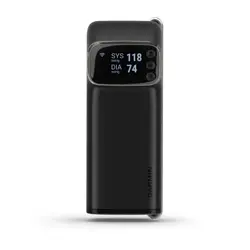
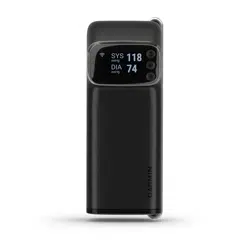
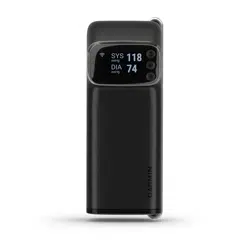
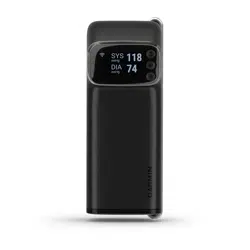
The Index BPM device is a tubeless blood pressure monitor. This is a medical device intended to measure
systolic and diastolic blood pressure and pulse rate. The device is designed for measurement and operation by
adults age 18 to 75. The device is designed to measure adults (age 18 to 75) with an upper arm circumference
of 22 to 42 cm (8.6 to 16.5 in.). This is a not a diagnostic device. You should contact your physician if the device
displays hypertensive or high blood pressure values. There are no known side effects for using this device.
The Index BPM device is a standalone device that measures and displays blood pressure and pulse rate. You
are not required to connect the device to a smartphone app. The optional smartphone app can only be used to
store data for personal record keeping.
Device Overview
User
Measurement
Menu
Display
Retaining bar
Battery cover
Cuff
Tab
2 Device Overview
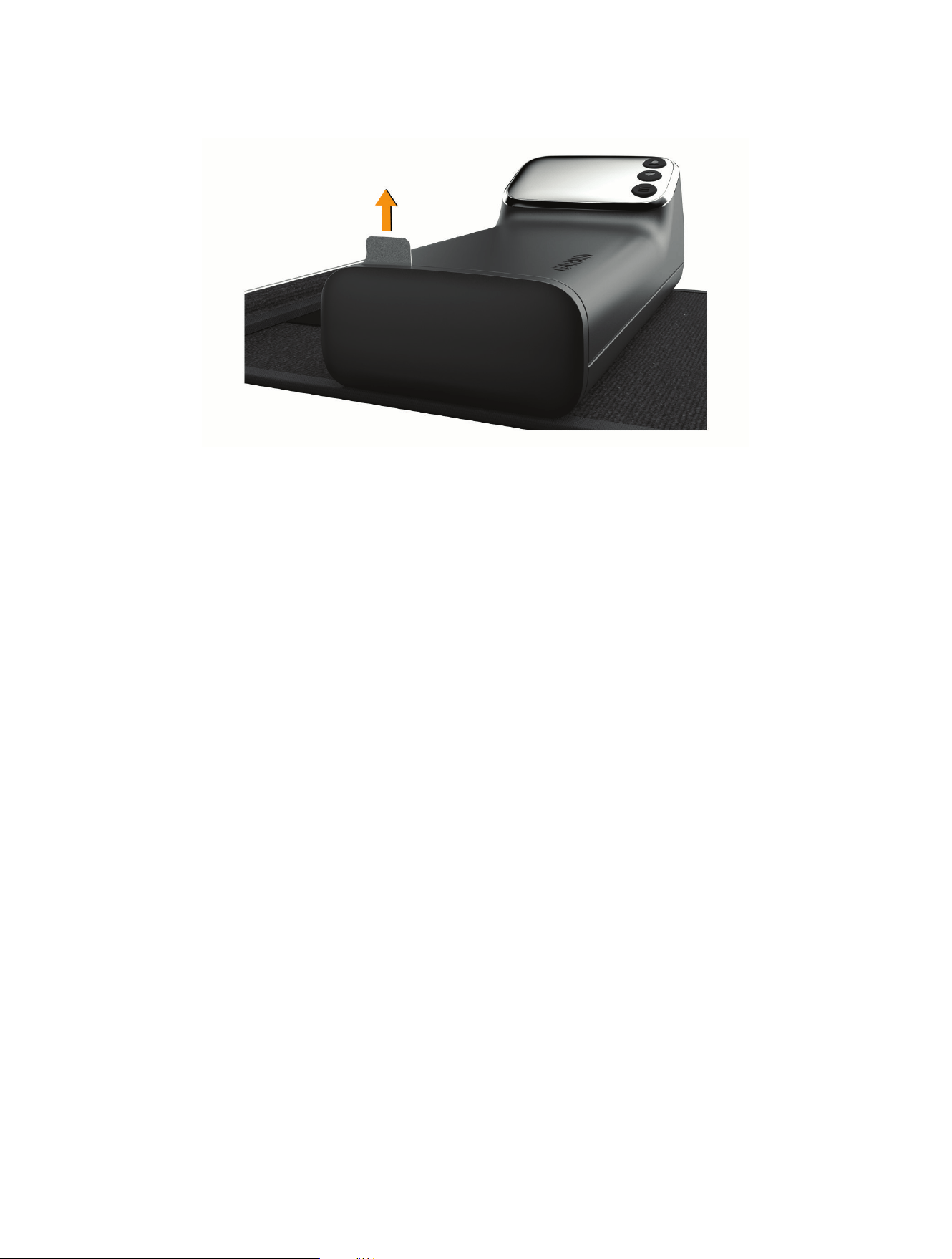
Activating the Device
1 Remove the pull tab from the battery cover.
2 Press any button.
Tips for Getting a Good Measurement
The Index BPM device displays your results for few seconds and automatically powers off.
• Read all of the instructions before measuring.
• Avoid eating, smoking, or exercise before measuring.
• Relax for at least 5 minutes before measuring.
• Use the same arm each time you measure.
• Measure at a consistent time of day.
• Avoid tight or bulky clothing that could constrict blood flow.
• Avoid talking during measurements.
• Avoid distractions during measurements.
Device Overview 3

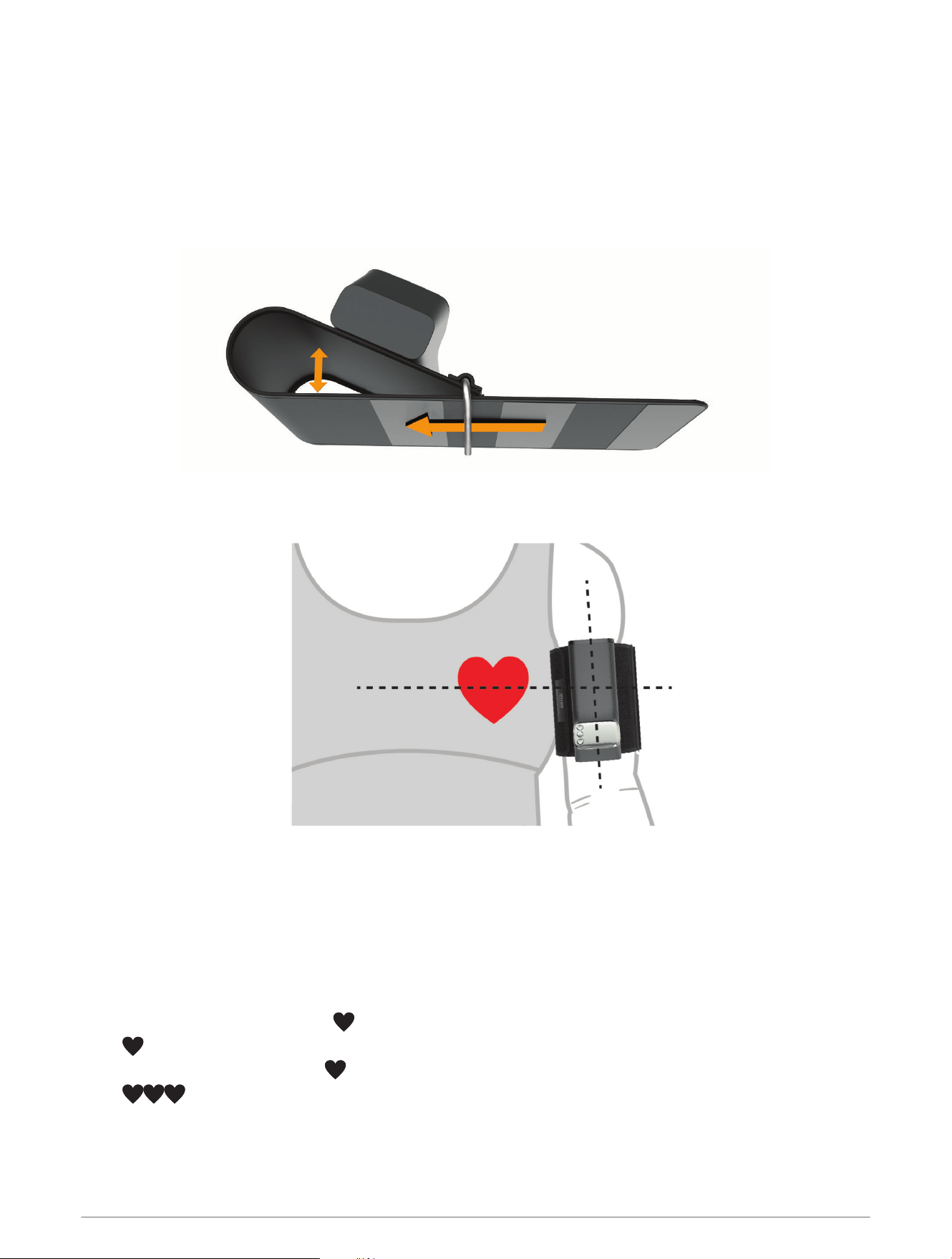
Tips for Adjusting the Cuff
The Index BPM cuff should be snug but comfortable.
• For smaller arms, slide the retaining bar to the right of the first section of hook material .
• For medium arms, slide the retaining bar between the first and second section of hook material .
• For large arms, slide the retaining bar to the right of the second section of hook material .
4 Device Overview
Measuring Your Blood Pressure and Pulse Rate
You can take a single measurement (1X), or you can take three consecutive measurements and calculate the
average (3X).
1 Unfold the cuff strap.
2 Grip the retaining bar, and loosen the cuff strap by pulling the cuff strap through the retaining bar until it
forms a loop.
TIP: If necessary, pull the retaining bar away from the device to begin forming the loop.
3 Fold the cuff strap over the retaining bar, and fasten the hook and loop strap.
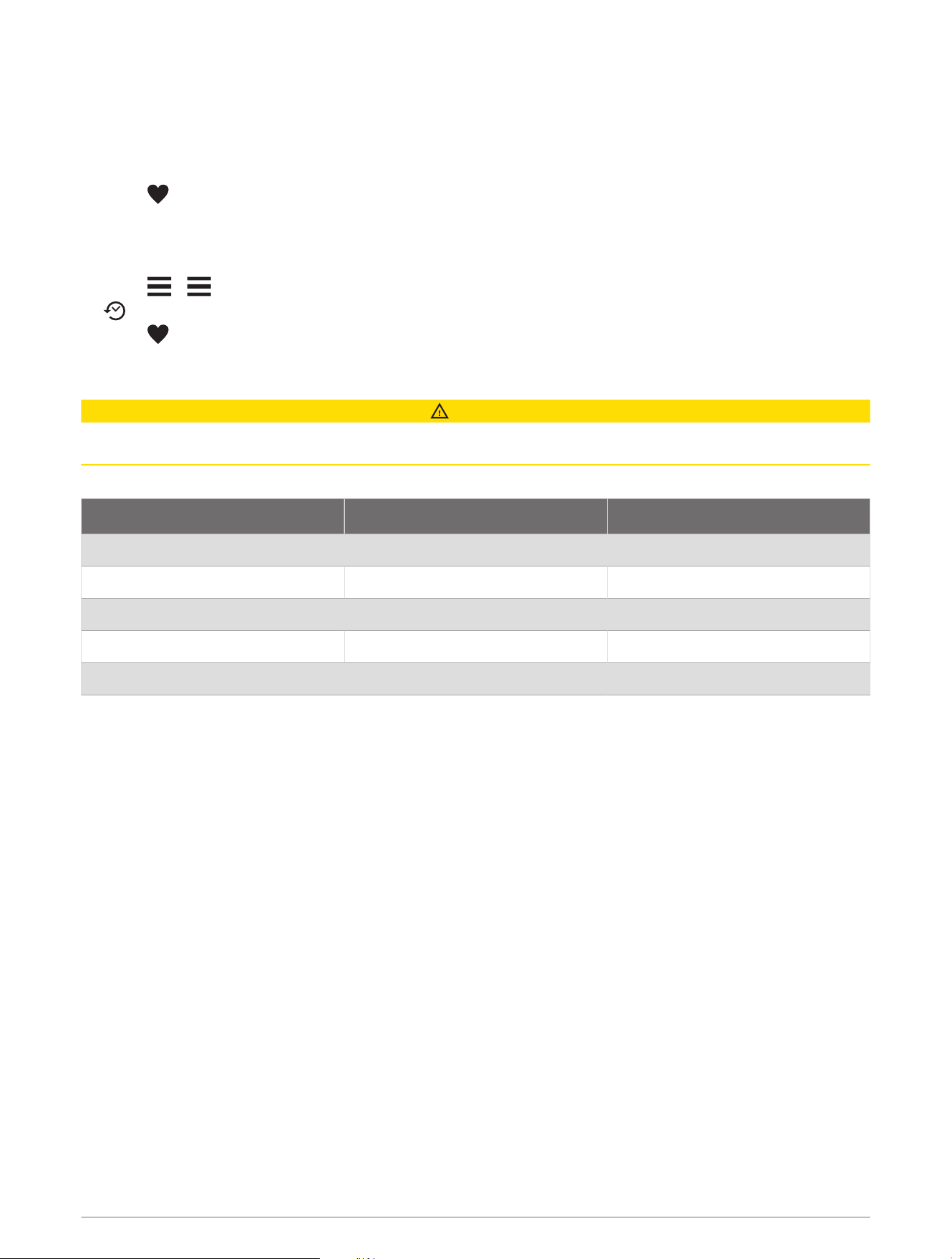
4 Place your arm into the cuff loop, and slide the device to your upper arm.
The device should be above your elbow and level with your heart. The display should face you.
TIP: You should be able to remove the fastened cuff without adjusting it each time.
5 If necessary, remove the cuff from your arm and readjust the cuff.
6 Sit down with your feet flat on the floor.
7 Place your arm on a table or flat surface.
8 Press any button to wake up the device.
9 Select an option:
• For a 1X measurement, press .
appears.
• For a 3X measurement, hold .
appears.
NOTE: There is a one minute rest period between each measurement. Do not move or talk until the third
measurement is complete.
The arm cuff automatically inflates and deflates for each measurement. The results appear on the display.
Device Overview 5
If you have set up your device with an optional Wi‑Fi
®
connection, the measurements are uploaded automatically
to your Garmin Connect
™
account.
Stopping a Measurement
You can stop a measurement at any time.
1 Press .
2 Slide the fastened cuff off of your upper arm.
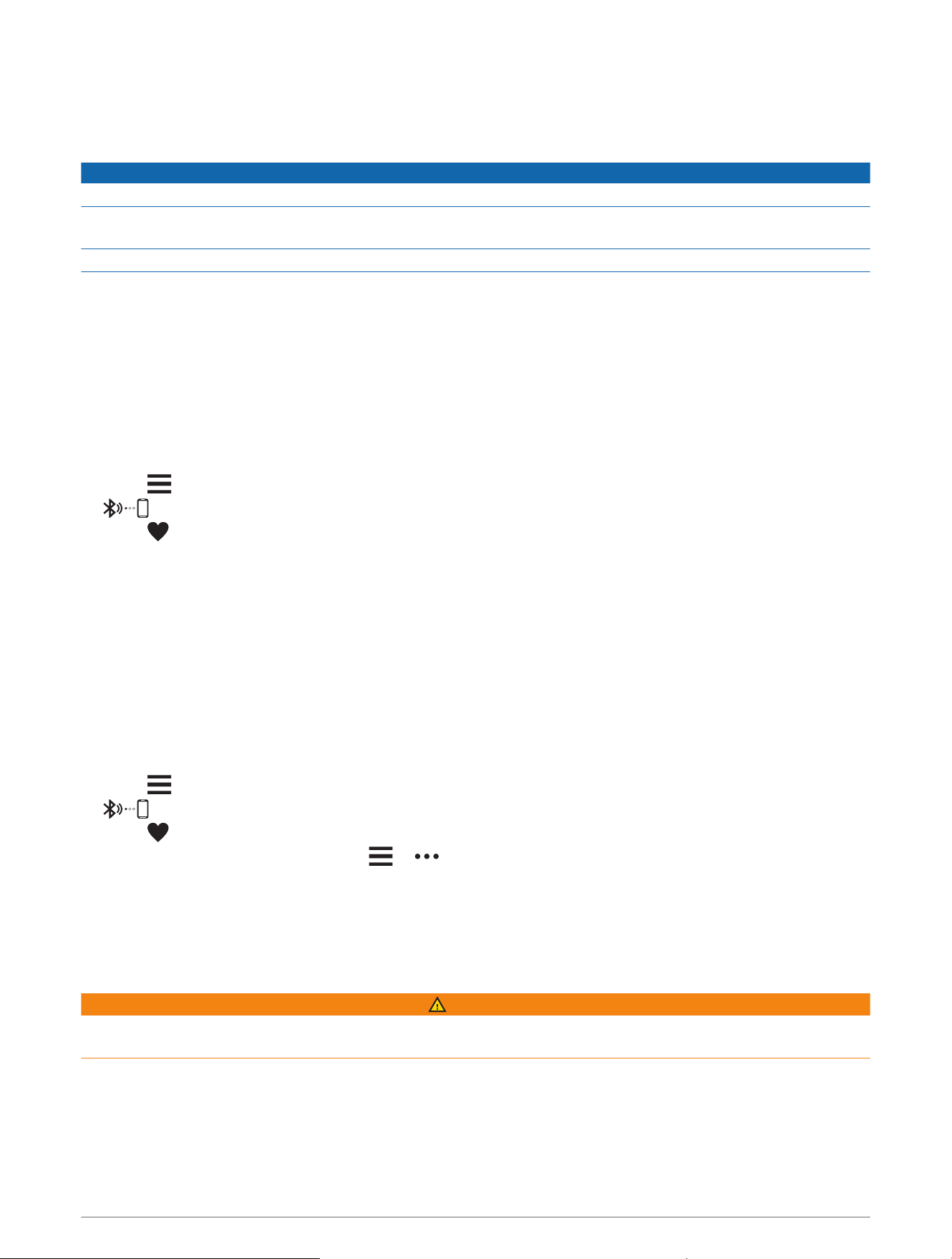
Viewing Your Last Measurement
1 Press > .
appears on the screen.
2 Press .
Blood Pressure Categories
CAUTION
This chart is not intended to provide medical diagnosis. You must consult your physician to interpret the
measurements.
The data in this chart is provided by the American Heart Association
®
.
Category Systolic (mmHg) Diastolic (mmHg)
Normal < 120 and < 80
Elevated 120 to 129 and < 80
High blood pressure, stage 1 130 to 139 or 80 to 89
High blood pressure, stage 2 ≥ 140 or ≥ 90
Hypertensive crisis >180 and/or > 120
6 Device Overview
Smart Features
Connecting to a Wi‑Fi Network
NOTICE
Do not attempt to pair the device with a smartphone that is not your personal device.
Do not attempt to connect the device to an unsecured Wi‑Fi network, or a Wi‑Fi network that does not have a
password.
Do not share your account credentials or password.
You must connect your device to the Garmin Connect app on your smartphone before you can connect to a
Wi‑Fi network.
It is optional and not required to use a Wi‑Fi network with your Index BPM device. Your Index BPM device can
sync measurements with the Garmin Connect app while connected to a Wi‑Fi network.
The Index BPM device uses security measures to prevent data breaches. For example, the Garmin Connect app
uses an authentication key to ensure that you can only pair the device to one smartphone at a time, and you
must enter a 6-digit pairing code displayed on your device to complete secured and bonded pairing.
1 Move within range of a Wi‑Fi network.
2 Press any button to wake up the device.
3 Press .
appears.
4 Press .
5 From the Garmin Connect app, select the options menu, and select Add Device.
6 Enter the security code displayed on your device.
7 Enter a name for your device.
8 Select an available Wi‑Fi network, and enter the login details.
Changing the Wi‑Fi Network
You can add or change connected Wi‑Fi networks from the Garmin Connect app on your phone. Secondary
users cannot manage Wi‑Fi networks.
1 Move within range of a Wi‑Fi network.
2 Press any button to wake up the device.
3 Press .
appears.
4 Press .
5 From the Garmin Connect app, select or .
6 Select Garmin Devices, and select your device.
7 Select Connectivity > Wi-Fi > My Networks.
8 Follow the on-screen instructions.
Garmin Connect App
WARNING
See the important safety and product information in the quick start manual for product warnings and other
important information.
It is optional and not required to use the Garmin Connect app with your Index BPM device. The Garmin Connect
app allows you to view blood pressure measurements, create notes for your measurements, invite people to use
your device, and manage blood pressure reading reminders.
The Index BPM device runs in standalone mode until you download and pair the device with the Garmin Connect
app.
Smart Features 7

Dowloading the App
It is optional and not required to use the Garmin Connect app with your Index BPM device.
1 On your compatible smartphone, open the application store, and search for the Garmin Connect app.
2 Install the app.
See the owner's manual for your smartphone for more information.
Pairing Your Device with the Garmin Connect App
You can add the Index BPM device to your Garmin Connect account.
1 From the app store on your smartphone, install and open the Garmin Connect app.
2 Select an option to add your device to your Garmin Connect account:
• If this is the first device you have paired with the Garmin Connect app, follow the on-screen instructions.
• If you have already paired another device with the Garmin Connect app, from the settings menu, select
Garmin Devices > Add Device, and follow the on-screen instructions.
3 To enter pairing mode on your device, press any button to wake up the device, and press .
appears.
4 Press .
5 Follow the on-screen instructions on the Garmin Connect app.
New measurements automatically upload to the Garmin Connect app.
Inviting Secondary Users
Before you can invite secondary users, the secondary users must install the Garmin Connect app on their
smartphone and create an account.
You can invite up to 15 secondary users to create a profile and take measurements on your device using the
Garmin Connect app.
1 From the Garmin Connect app on your smartphone, follow the on-screen instructions to invite secondary
users.
The secondary user receives an email inviting them to use your device.
2 From the secondary user's smartphone, accept the email invitation, and follow the on-screen instructions.
3 Take a measurement on your Index BPM device.
The Index BPM device syncs and the new user's profile becomes available.
Changing the User Profile
Before you can change the user profile, you must complete the invitation process for secondary users and sync
the device with your Garmin Connect account.
1 Press any button to wake up the device.
2 Press until the user's name appears.
3 Take a measurement.
If you have set up your device with an optional Wi‑Fi connection, the measurements upload to the secondary
user's Garmin Connect account automatically.
Device Information
Resetting the Device
Resetting the device erases all data and connections.
While the device is off, hold and for 10 seconds.
appears, and the device resets.
8 Device Information
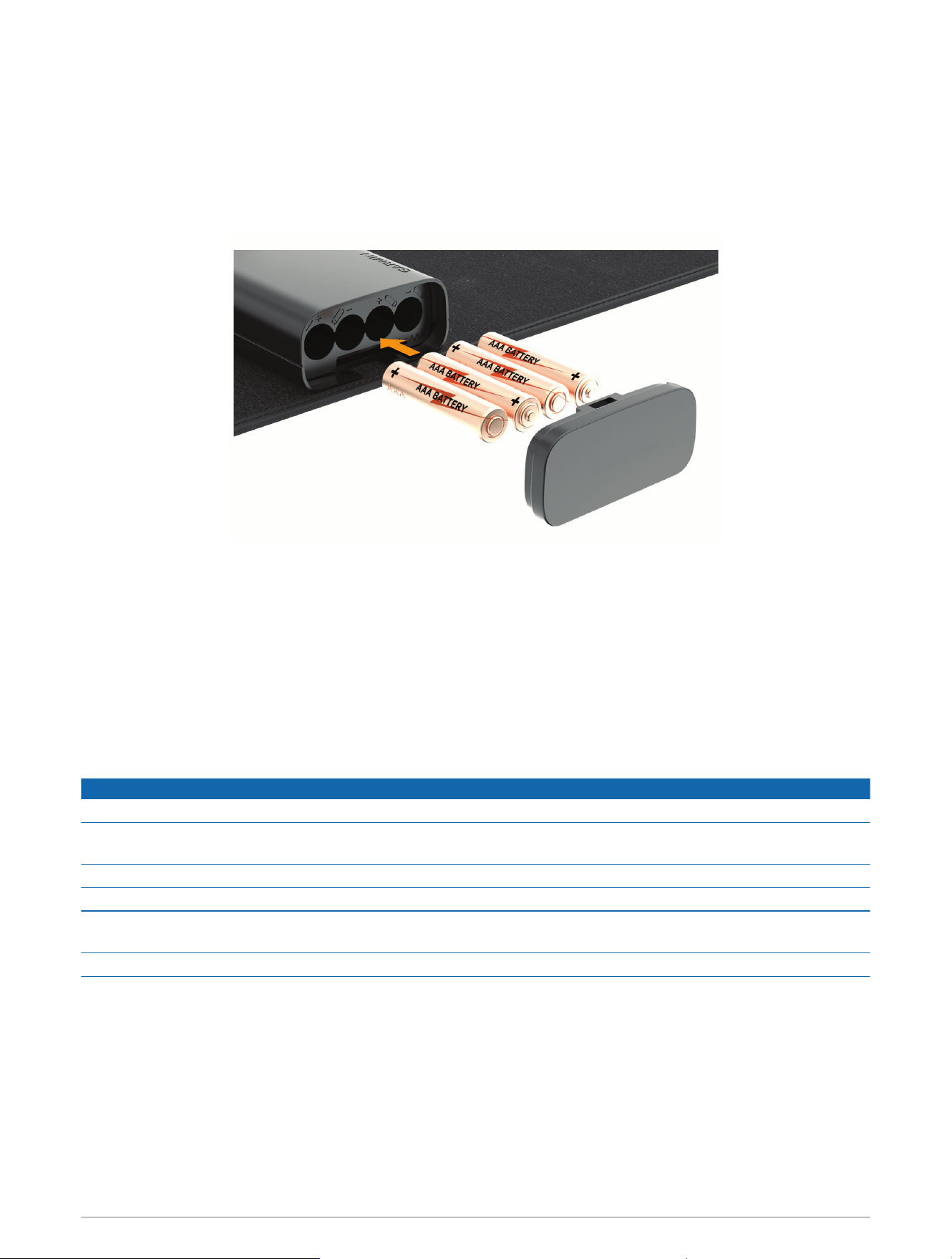
Replacing the Batteries
The device operates on four AAA batteries.
1 Press the battery cover button located behind the cuff.
2 Remove the battery cover.
3 Remove the batteries from the device.
4 Insert the new batteries, observing polarity.
5 Replace the battery cover.
Troubleshooting
My device will not sync my measurements with the app
• Verify that you have completed the setup process and the device is connected using Wi‑Fi technology.
After you take a measurement, the device automatically attempts to sync through programmed Wi‑Fi networks.
Measurements are stored in the user's account until the device syncs successfully with the app.
Device Care
NOTICE
Avoid extreme shock and harsh treatment, because it can degrade the life of the product.
Do not store the device where prolonged exposure to extreme temperatures can occur, because it can cause
permanent damage.
When you do not plan to use the device for several months, remove the batteries.
Do not use a sharp or abrasive object to clean the device.
Avoid chemical cleaners, abrasive cleaners, solvents, and insect repellents that can damage plastic
components and finishes.
Avoid leaving the device in direct sunlight.
Cleaning the Device
If necessary, you can clean the surface of the device to remove unwanted residue, lint, and dust.
NOTE: You should clean the device at least once a year.
1 Clean the surface of the device using a cloth dampened with a mild detergent solution or clean water.
2 Wipe the device dry.
Device Information 9

Storing the Device
• Roll the cuff strap until it is against the device, and secure the cuff with the hook and loop tab.
• Store the device in a cool, dry place, away from direct sunlight.
• Remove the batteries if you do not plan to use the device for more than 3 months to prevent battery leakage.
10 Device Information

Specifications
Display 3.3 cm (1.3 in.) OLED
Cuff pressure range From 0 to 280 mmHg
Measurement range
Systolic blood pressure: from 60 to 250 mmHg
Diastolic blood pressure: from 40 to 180 bpm
Measurement method Oscillometric
Accuracy
Blood pressure value: ± 3 mmHg or ± 2%
Pulse: ± 5%
Power rating DC 6 V, 4 1.5 V LR03 AAA batteries
Arm circumference From 22 to 42 cm (from 8.6 to 16.5 in.)
Weight 280 grams (0.62 lb.) without batteries
Dimensions 150 x 60 x 80 mm
Battery life Up to 9mo.
Operating temperature range
From 10° to 40°C (from 50° to 104°F)
From 15% to 90% relative maximum humidity
Maximum altitude: 2,000 m (6561.68 ft.)
Storage temperature range
From -25° to 50°C (from -13° to 122°F)
From 10% to 95% relative maximum humidity
Maximum altitude: 2,000 m (6561.68 ft.)
From 800 to 1,060 hPa
Transmission method Bluetooth
®
low energy 5.0
Wireless network capability IEEE 802.11 b/g/n
Warranty One yr.
Applied part Type BF (upper arm cuff)
Contents
BP707
4 AAA batteries
Cuff (attached)
Quick start manual
Expected service life 3 yr.
Power on or wake up time 5 sec.
Measurement cycle time From 50 to 60 sec., according to pressure value
Wireless frequency
Wi-Fi: 2412 to 2462 MHz @18.04 dBm
Bluetooth Low Energy: 2402 to 2480 MHz @ -2.33 dBm
Bluetooth Low Energy 5.0
Bluetooth Low Energy range <30 ft. (typical)
Maximum number of connections 1 smartphone
Wireless networks b/g/n 2.4 GHz only
Device Information 11

Wireless network security WPA2
Wireless network range <100 ft. (typical)
Maximum number of wireless networks 7 stored
Symbol Definitions
These symbols and abbreviations may appear on the device labels.
12 Device Information
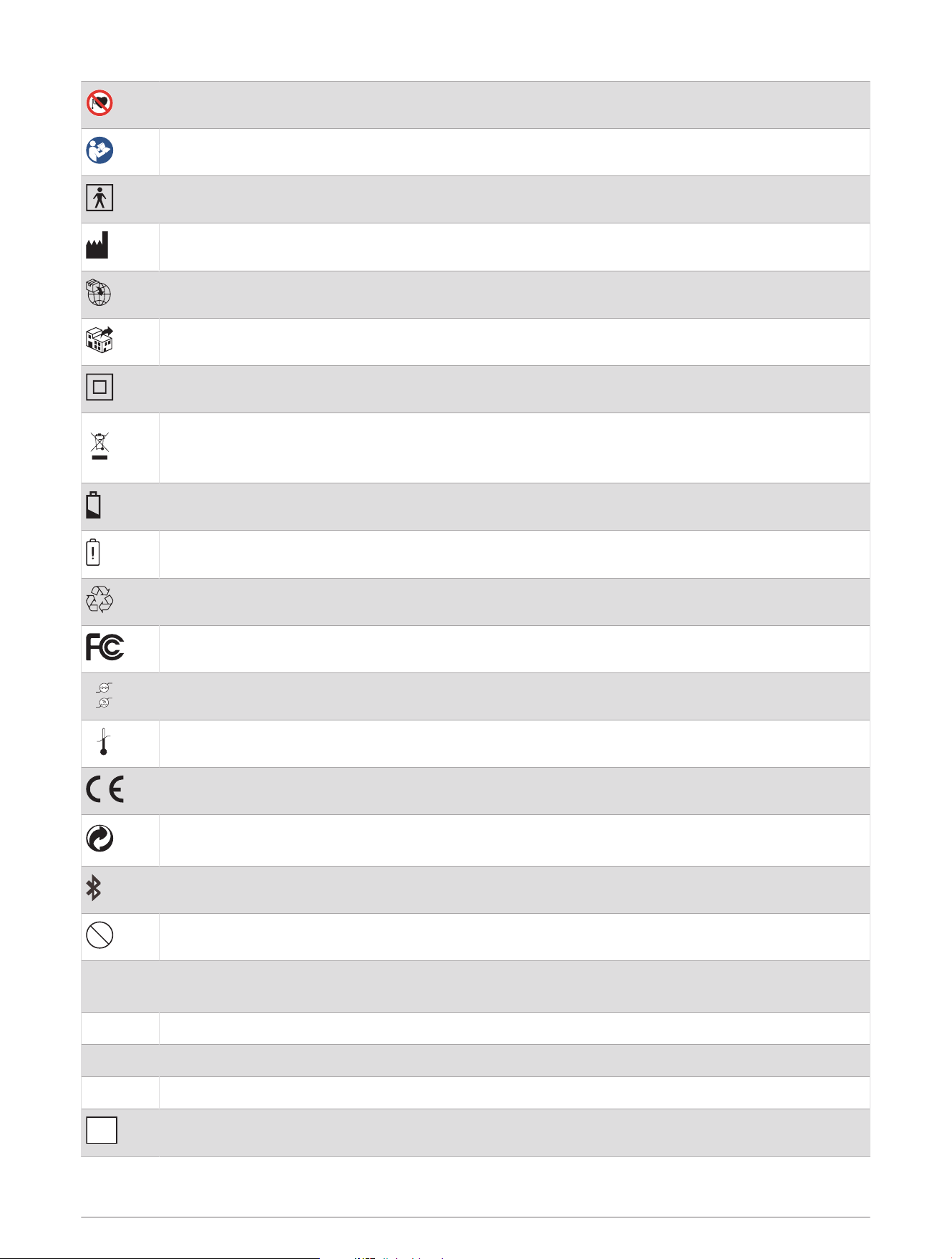
Do not use this product if you have an implanted pacemaker.
Read the instructions before use.
Applied part, type BF.
Manufacturer
Importer
Distributor
Class II symbol
WEEE disposal and recycling symbol. The WEEE symbol is attached to the product in compliance
with the EU directive 2012/19/EU on Waste Electrical and Electronic Equipment (WEEE). It is
intended to deter the improper disposal of this product and to promote reuse and recycling.
Low battery warning. Indicates that the battery is lower than 50%.
Battery is too low to switch the device on and should be changed immediately.
Universal recycling symbol.
FCC certification mark.
800hPa
1060hPa
95%
10%
Storage and transportation conditions.
-25°C
(-13°F)
70°C
(158°F)
Storage and transportation conditions.
CE certification mark.
Green Dot packaging. A financial contribution has been paid to a qualified national packaging
recovery organization.
Bluetooth symbol.
MR
Do not use this device in an MR (magnetic resonance) environment.
IP22
The device is protected against solid foreign objects greater than 12.5 mm (0.49 in.). The device is
protected against water sprayed up to 15° from vertical.
S/N Serial number.
SYS / DIA Systolic blood pressure in mmHg/ diastolic blood pressure in mmHg.
BPM Heart beats per minute during a measurement.
MD
Medical device.
Device Information 13

UDI
Unique device identification.
Error Codes
Error codes may appear on the device screen to indicate a problem with the device (Tips for Getting a Good
Measurement, page3). If your Index BPM device displays an error code, you should remove the device from your
arm and turn the device off and on before attempting another measurement.
The device battery level is low.
E1 The device did not detect a measurement.
E2 The cuff did not inflate properly or has a leak.
E3 The measurement is incorrect.
E4 The device timed out while the cuff was inflating or deflating.
E5 The cuff is partially inflated.
E6 The measurement exceeded the maximum blood pressure value.
Manufacturer Information
• Ya Horng Electronics Co., Ltd.
• www.yahorng.com
• +886-6593-2201
• No. 35, Shalun, Anding Dist., Tainan City, TAIWAN
Radio Frequency Radiation Exposure
This device is a portable transmitter and receiver that uses an internal antenna to send and receive low levels
of radio frequency (RF) energy for data communications. The device emits RF energy below the published limits
for portable use when operating in its maximum output power mode and when used with Garmin authorized
accessories. To comply with RF exposure compliance requirements, the device should be used as described in
the manual. The device should not be used in other configurations.
RF Exposure Information (SAR)
This device meets the government's requirements for exposure to radio waves. This device is designed and
manufactured not to exceed the emission limits for exposure to radio frequency (RF) energy set by the Federal
Communications Commission of the U.S. Government. The exposure standard employs a unit of measurement
known as the Specific Absorption Rate, or SAR. The SAR limit set by the FCC is 1.6 W/kg. Tests for SAR are
conducted using standard operating positions accepted by the FCC with the EUT transmitting at the specified
power level in different channels. The FCC has granted an Equipment Authorization for this device with all
reported SAR levels evaluated as in compliance with the FCC RF exposure guidelines. SAR information on this
device is on file with the FCC and can be found under the Display Grant section of www.fcc.gov after searching
on FCC ID:Z5O-BP707.
14 Device Information

FCC Compliance
This device complies with part 15 of the FCC Rules. Operation is subject to the following two conditions: (1) this
device may not cause harmful interference, and (2) this device must accept any interference received, including
interference that may cause undesired operation.
This equipment has been tested and found to comply with the limits for a Class B digital device, pursuant
to part 15 of the FCC rules. These limits are designed to provide reasonable protection against harmful
interference in a residential installation. This equipment generates, uses, and can radiate radio frequency energy
and may cause harmful interference to radio communications if not installed and used in accordance with the
instructions. However, there is no guarantee that interference will not occur in a particular installation. If this
equipment does cause harmful interference to radio or television reception, which can be determined by turning
the equipment off and on, the user is encouraged to try to correct the interference by one of the following
measures:
• Reorient or relocate the receiving antenna.
• Increase the separation between the equipment and the receiver.
• Connect the equipment into an outlet on a circuit different from that to which the receiver is connected.
• Consult the dealer or an experienced radio/TV technician for help.
This product does not contain any user-serviceable parts. Repairs should only be made by an authorized Garmin
service center. Unauthorized repairs or modifications could result in permanent damage to the equipment, and
void your warranty and your authority to operate this device under Part 15 regulations.
FCC RF Radiation Exposure Statement
This equipment complies with FCC radiation exposure limits set forth for an uncontrolled environment.
End users must follow the specific operating instructions for satisfying the RF exposure compliance. This
transmitter must not be co-located or operated in conjunction with any other antenna or transmitter.
RF Statement
Medical Electrical Equipment requires special precautions regarding ElectroMagnetic Compatibility (EMC) and
needs to be installed and put into service according to the following EMC information.
• Interference may occur in the vicinity of equipment marked with portable and mobile RF communication
equipment (e.g. cell phones) and can affect Medical Electrical Equipment.
• The device uses RF energy only for its internal function. Therefore, its RF emissions are very low and are not
likely to cause any interference in nearby electronic equipment.
• The device is suitable for use in all establishments, including domestic establishments and those directly
connected to the public low-voltage power supply network that supplies buildings used for domestic
purposes.
• Portable and mobile RF communications equipment should be used no closer to any part of the device
than the recommended separation distance, calculated from the equation applicable to the frequency of
the transmitter. The device is intended for use in an electromagnetic environment in which radiated RF
disturbances are controlled.
• Use of this equipment adjacent to or stacked with other equipment should be avoided because it could result
in improper operation. If such use is necessary, this equipment and the other equipment should be observed
to verify that they are operating normally.
Device Information 15

Software License Agreement
BY USING THE DEVICE, YOU AGREE TO BE BOUND BY THE TERMS AND CONDITIONS OF THE FOLLOWING
SOFTWARE LICENSE AGREEMENT. PLEASE READ THIS AGREEMENT CAREFULLY.
Garmin Ltd. and its subsidiaries (“Garmin”) grant you a limited license to use the software embedded in this
device (the “Software”) in binary executable form in the normal operation of the product. Title, ownership rights,
and intellectual property rights in and to the Software remain in Garmin and/or its third-party providers.
You acknowledge that the Software is the property of Garmin and/or its third-party providers and is protected
under the United States of America copyright laws and international copyright treaties. You further acknowledge
that the structure, organization, and code of the Software, for which source code is not provided, are valuable
trade secrets of Garmin and/or its third-party providers and that the Software in source code form remains
a valuable trade secret of Garmin and/or its third-party providers. You agree not to decompile, disassemble,
modify, reverse assemble, reverse engineer, or reduce to human readable form the Software or any part thereof
or create any derivative works based on the Software. You agree not to export or re-export the Software to any
country in violation of the export control laws of the United States of America or the export control laws of any
other applicable country.
Limited Warranty
THIS LIMITED WARRANTY GIVES YOU SPECIFIC LEGAL RIGHTS, AND YOU MAY HAVE OTHER LEGAL RIGHTS,
WHICH VARY FROM STATE TO STATE (OR BY COUNTRY OR PROVINCE). GARMIN DOES NOT EXCLUDE, LIMIT
OR SUSPEND OTHER LEGAL RIGHTS YOU MAY HAVE UNDER THE LAWS OF YOUR STATE (OR COUNTRY OR
PROVINCE). FOR A FULL UNDERSTANDING OF YOUR RIGHTS YOU SHOULD CONSULT THE LAWS OF YOUR
STATE, COUNTRY OR PROVINCE.
Non-aviation products are warranted to be free from defects in materials or workmanship for one year from the
date of purchase. Within this period, Garmin will, at its sole option, repair or replace any components that fail in
normal use. Such repairs or replacement will be made at no charge to the customer for parts or labor, provided
that the customer shall be responsible for any transportation cost. This Limited Warranty does not apply to: (i)
cosmetic damage, such as scratches, nicks and dents; (ii) consumable parts, such as batteries, unless product
damage has occurred due to a defect in materials or workmanship; (iii) damage caused by accident, abuse,
misuse, water, flood, fire, or other acts of nature or external causes; (iv) damage caused by service performed
by anyone who is not an authorized service provider of Garmin; (v) damage to a product that has been modified
or altered without the written permission of Garmin, or (vi) damage to a product that has been connected to
power and/or data cables that are not supplied by Garmin. In addition, Garmin reserves the right to refuse
warranty claims against products or services that are obtained and/or used in contravention of the laws of any
country. Garmin products are intended to be used only as an aid and must not be used for any purpose requiring
precise measurement of direction, distance, location or topography. For navigation products, Garmin makes no
warranty as to the accuracy or completeness of the map data.
TO THE MAXIMUM EXTENT PERMITTED BY APPLICABLE LAW, THE WARRANTIES AND REMEDIES CONTAINED
IN THIS LIMITED WARRANTY ARE EXCLUSIVE AND IN LIEU OF, AND GARMIN EXPRESSLY DISCLAIMS,
ALL OTHER WARRANTIES AND REMEDIES, WHETHER EXPRESS, IMPLIED, STATUTORY, OR OTHERWISE,
INCLUDING WITHOUT LIMITATION ANY IMPLIED WARRANTY OF MERCHANTABILITY OR FITNESS FOR
A PARTICULAR PURPOSE, STATUTORY REMEDY OR OTHERWISE. THIS LIMITED WARRANTY GIVES YOU
SPECIFIC LEGAL RIGHTS, AND YOU MAY HAVE OTHER LEGAL RIGHTS, WHICH VARY FROM STATE TO STATE
AND FROM COUNTRY TO COUNTRY. IF IMPLIED WARRANTIES CANNOT BE DISCLAIMED UNDER THE LAWS OF
YOUR STATE OR COUNTRY, THEN SUCH WARRANTIES ARE LIMITED IN DURATION TO THE DURATION OF THIS
LIMITED WARRANTY. SOME STATES (AND COUNTRIES AND PROVINCES) DO NOT ALLOW LIMITATIONS ON
HOW LONG AN IMPLIED WARRANTY LASTS, SO THE ABOVE LIMITATION MAY NOT APPLY TO YOU.
IN NO EVENT SHALL GARMIN BE LIABLE IN A CLAIM FOR BREACH OF WARRANTY FOR ANY INCIDENTAL,
SPECIAL, INDIRECT OR CONSEQUENTIAL DAMAGES, WHETHER RESULTING FROM THE USE, MISUSE OR
INABILITY TO USE THIS PRODUCT OR FROM DEFECTS IN THE PRODUCT. SOME STATES (AND COUNTRIES
AND PROVINCES) DO NOT ALLOW THE EXCLUSION OF INCIDENTAL OR CONSEQUENTIAL DAMAGES, SO THE
ABOVE LIMITATIONS MAY NOT APPLY TO YOU.
16 Device Information

If during the warranty period you submit a claim for warranty service in accordance with this Limited Warranty,
then Garmin will, at its option: (i) repair the device using new parts or previously used parts that satisfy Garmin's
quality standards, (ii) replace the device with a new device or a refurbished device that meets Garmin's quality
standards, or (iii) exchange the device for a full refund of your purchase price. SUCH REMEDY SHALL BE YOUR
SOLE AND EXCLUSIVE REMEDY FOR ANY BREACH OF WARRANTY. Repaired or replaced devices have a 90 day
warranty. If the unit sent in is still under its original warranty, then the new warranty is 90 days or to the end of
the original 1 year warranty, whichever is longer.
Before seeking warranty service, please access and review the online help resources available on support
.garmin.com. If your device is still not functioning properly after making use of these resources, contact a
Garmin Authorized service facility in the original country of purchase or follow the instructions on support
.garmin.com to obtain warranty service. If you are in the United States, you can also call 1-800-800-1020.
If you seek warranty service outside of the original country of purchase, Garmin cannot guarantee that the
parts and products needed to repair or replace your product will be available due to differences in product
offerings and applicable standards, laws and regulations. In that case, Garmin may, in its sole discretion and
subject to applicable laws, repair or replace your product with comparable Garmin products and parts, or require
you to ship your product to a Garmin Authorized service facility in the country of original purchase or to a
Garmin Authorized service facility in another country that can service your product, in which case you will be
responsible for complying with all applicable import and export laws and regulations and for paying all custom
duties, V.A.T., shipping fees and other associated taxes and charges. In some cases, Garmin and its dealers
may be unable to service your product in a country outside of the original country of purchase or return a
repaired or replaced product to you in that country due to applicable standards, laws or regulations in that
country.
Online Auction Purchases: Online auction confirmations are not accepted for warranty verification. To obtain
warranty service, an original or copy of the sales receipt from the original retailer is required. Garmin will not
replace missing components from any package purchased through an online auction.
International Purchases: A separate warranty may be provided by international distributors for devices
purchased outside the United States depending on the country. If applicable, this warranty is provided by the
local in-country distributor and this distributor provides local service for your device. Distributor warranties are
only valid in the area of intended distribution.
Australian Purchases: Our goods come with guarantees that cannot be excluded under the Australian
Consumer Law. You are entitled to a replacement or refund for a major failure and for compensation for any
other reasonably foreseeable loss or damage. You are also entitled to have the goods repaired or replaced if the
goods fail to be of acceptable quality and the failure does not amount to a major failure. The benefits under our
Limited Warranty are in addition to other rights and remedies under applicable law in relation to the products.
Garmin Australasia, 30 Clay Place, Eastern Creek, NSW 2766, Australia. Phone: 1800 235 822.
Disposal
Actuation of European directives 2011/65/EU, 2012/19/EU, and 2015/863/EU, for the reduction in use of
dangerous substances in electric and electronic devices and for waste disposal. The symbol applied on the
device or its packaging means that at the end of its useful life, the product must not be disposed of with
domestic waste. At the end of the device's useful life, the user must deliver it to a designated collection point for
electric and electronic waste, or give the device back to the retailer when purchasing a new device. Disposing
of the product separately helps protect human health and the environment. The collection and recycling of your
device also helps conserve natural resources. The device and its parts are marked with regard to disposal, as
appropriate, in accordance with national or regional regulations.
Device Information 17

Guidance and Manufacturer's Declaration - Electromagnetic Emissions
The Index BPM is intended for use in the electromagnetic environment specified below. The customer or the
user of the Index BPM device should assure that it is used in such an environment.
Emissions Test Compliance
Electromagnetic Environment -
Guidance
CE emission CISPR11 Group 2
The Index BPM device uses RF
energy only for its internal function.
Therefore, its RF emissions are very
low and are not likely to cause any
interference in nearby electronic
equipment.
RE emissions CISPR11 Class B
The Index BPM device uses RF
energy only for its internal function.
Therefore, its RF emissions are very
low and are not likely to cause any
interference in nearby electronic
equipment.
Harmonic emissions CISPR11 Not applicable
The Index BPM device is suitable
for use in all establishments,
including domestic establishments
and those directly connected to
the public low-voltage power supply
network that supplies buildings
used for domestic purposes.
Voltage fluctuations/Flicker
emissions
IEC 61000-3-3
Not applicable
The Index BPM device is suitable
for use in all establishments,
including domestic establishments
and those directly connected to
the public low-voltage power supply
network that supplies buildings
used for domestic purposes.
18 Device Information

Declaration - Electromagnetic Emissions and Immunity
For equipment and systems that are not life-supporting and are specified for use only in a shielded location.
Use of this equipment adjacent to or stacked with other equipment should be avoided because it could result
in improper operation. If such use is necessary, this equipment and the other equipment should be observed
to verify that they are operating normally. Portable RF communications equipment (including peripherals such
as antenna cables and external antennas) should be used no closer than 30 cm (12 in.) to any part of the unit,
including cables specified by the manufacturer. Otherwise, degradation of the performance of this equipment
could result.
The Index BPM device is intended for use in the electromagnetic environment specified in the following table.
The customer or the user of the Index BPM device should assure that it is used in such an environment.
Immunity Test IEC 60601 Test Level Compliance Level
Electromagnetic Environment -
Guidance
Electrostatic Discharge
(ESD)
IEC 61000-4-2
Contact: ±8 kV
Air: ±2 kV, ±4 kV,
±8 kV, ±15 kV
Contact: ±8 kV
Air: ±2 kV, ±4 kV, ±8 kV,
±15 kV
Floors should be wood, concrete,
or ceramic tile. If floors are
covered with synthetic material,
the relative humidity should be
at least 30%.
Electrical fast transient/
burst
IEC 61000-4-4
± 2 kV for power supply
lines
± 1 kV for input/ output
lines
N/A
1
Mains power quality should be
that of a typical commercial or
hospital environment.
Surge
IEC 61000-4-5
+ 0.5kV, +1kV line(s) to
line(s)
+0.5kV, +1kV,+ 2kV
line(s) to earth
N/A
Mains power quality should be
that of a typical commercial or
hospital environment.
Voltage dips, short inter
ruptions, and voltage
variations on power
supply input lines
IEC 61000-4-11
Voltage dips:
0 % UT; 0,5 cycle
0 % UT; 1 cycle
70 % UT; 25/30 cycles
Voltage interruptions:
0 % UT; 250/300 cycles
Voltage dips: N/A
Mains power quality should
be that of a typical commer
cial or hospital environment.
If the user of the Index BPM
requires continued operation
during power mains interrup
tions, it is recommended that the
Index BPM be powered from an
uninterruptible power supply or a
battery.
Power frequency (50/60
Hz) magnetic field
IEC 61000-4-8
30 A/m
50 Hz or 60 Hz
30 A/m
50 Hz and 60 Hz
The Index BPM power frequency
magnetic fields should be at
levels characteristic of a typical
location in a typical commercial
or hospital environment.
The Index BPM device is intended for use in the electromagnetic environment specified in the following table.
The customer or the user of the Index BPM device should assure that it is used in such an environment.
NOTE: These guidelines may not apply in all situations. Electromagnetic propagation is affected by absorption
and reflection from structures, objects, and people.
1
Not Applicable. The Index BPM is battery-powered, not AC powered.
Device Information 19

Immunity Test IEC 60601 Test Level Compliance Level
Electromagnetic
Environment - Guidance
Conducted
RFIEC 61000-4-6
3 Vrms
150 kHz to 80MHz
6 Vrms:
In ISM and amateur radio
bands between 0,15MHz
and 80MHz 80 % AM at
1kHz
N/A
2
Portable and mobile
RF communications
equipment should be
used no closer to any
part of the INDEX BPM,
including cables, than the
recommended separation
distance calculated from
the equation applicable to
the frequency of the trans
mitter.
Radiated RF IEC
61000-4-3
10 V/m
80MHz - 2,7GHz
80 % AM at 1kHz
10 V/m
80MHz - 2,7GHz
80 % AM at 1kHz
Recommended separation
distance:
d = 1,2
d = 1,2 80MHz to
800MHz
3
d = 2,3 800MHz to
2,7GHz
Where P is the maximum
output power rating of the
transmitter in watts (W)
according to the trans
mitter manufacturer and
d is the recommended
separation distance in
meters (m).
Interference may occur in
the vicinity of equipment
marked with the following
symbol:
The Index BPM is intended for use in an electromagnetic environment (for home healthcare) in which radiated
RF disturbances are controlled. The customer or the user of the Index BPM can help prevent electromagnetic
interference by maintaining a minimum distance between portable and mobile RF communications equipment
(transmitters) and the Index BPM as recommended in the following table, according to the maximum output
power of the communications equipment.
2
Not Applicable. The EUT is operating by battery, no supply for AC mains.
3
At 80 MHz and 800 MHz, the higher frequency range applies.
20 Device Information
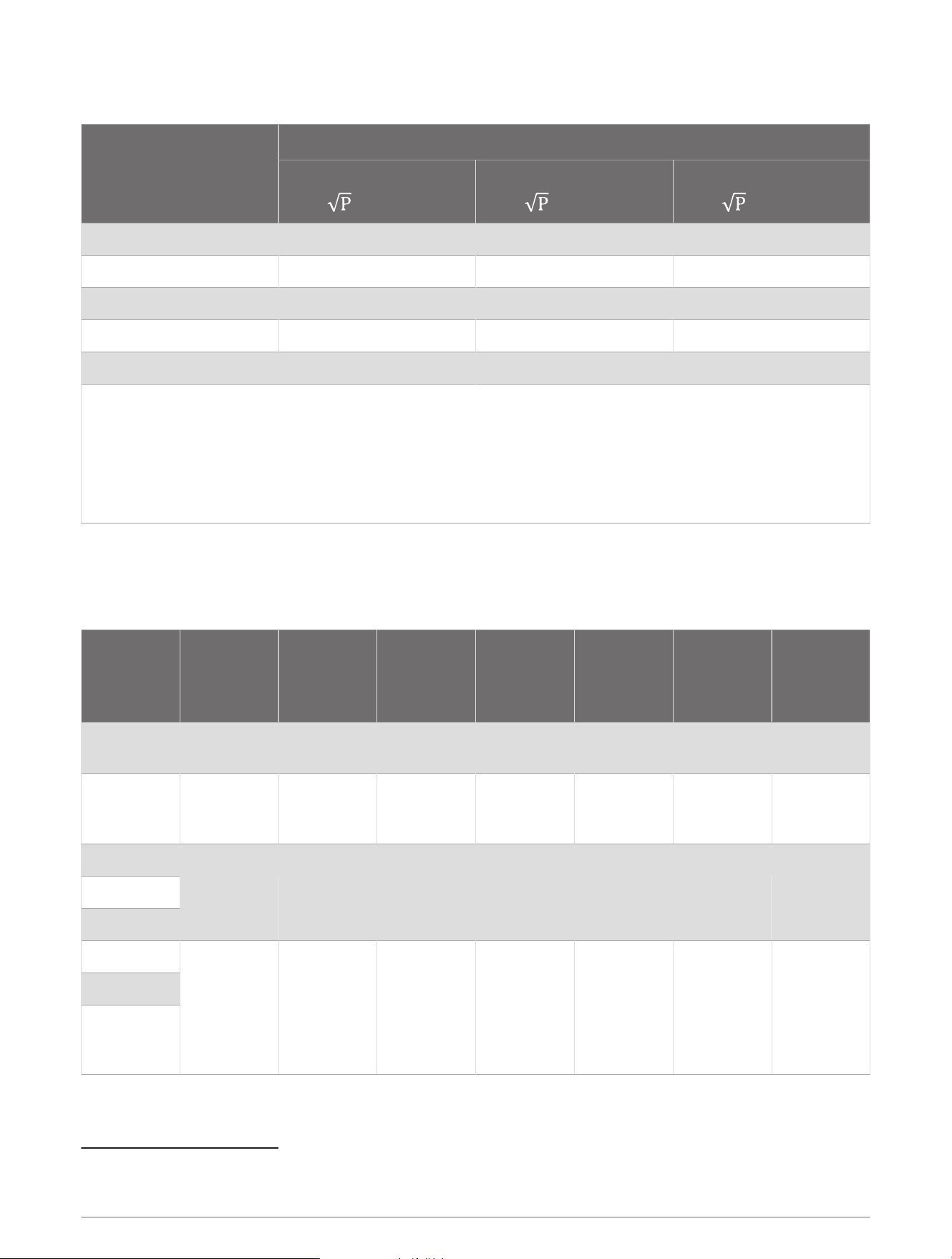
Recommended separation distance between portable and mobile RF communications equipment and the
Index BPM
Rated maximum output
power of transmitter W
Separation distance according to frequency of transmitter m
150kHz to 80MHz
d =1,2
80MHz to 800MHz
d =1,2
800MHz to 2,7GHz
d =2,3
0,01 N/A 0,12 0,23
0,1 N/A 0,38 0,73
1 N/A 1,2 2,3
10 N/A 3,8 7,3
100 N/A 12 23
For transmitters rated at a maximum output power not listed above, the recommended separation distance d
in meters (m) can be estimated using the equation applicable to the frequency of the transmitter, where p is
the maximum output power rating of the transmitter in watts (W) according to the transmitter manufacturer.
NOTE: At 80MHz and 800MHz, the separation distance for the higher frequency range applies.
NOTE: These guidelines may not apply in all situations. Electromagnetic propagation is affected by absorption
and reflection from structures, objects and people.
The Index BPM is intended for use in the electromagnetic environment (for home healthcare) specified in the
following table. The customer or the user of the Index BPM should assure that it is used in such an environment.
Manufacturer's declaration-electromagnetic immunity test specifications for ENCLOSURE PORT IMMUNITY to
RF wireless communications equipment
Test
frequency
(MHz)
Band (MHz) Service Modulation
Maximum
power (W)
Distance
(m)
IMMUNITY
TEST LEVEL
(V/m)
Compliance
level (V/m
for home
healthcare)
385 380-390 TETRA 400
Pulse modu
lation 18Hz
1,8 0,3 27 27
450 430-470
GMRS 460,
FRS 460
FM
4
±5 kHz
deviation
1kHz sine
2 0,3 28 28
710
704-470
LTE Band
13,17
Pulse modu
lation
217Hz
0,2 0,3 9 9745
780
810
800-960
GSM
800/900
TETRA 800
iDEN 820
CDMA 850
LTE Band 5
pulse modu
lation 18Hz
2 0,3 28 28
870
930
4
As an alternative to FM modulation, 50% pulse modulation at 18 Hz may be used because while it does not represent actual modulation, it would be worst
case.
Device Information 21

Test
frequency
(MHz)
Band (MHz) Service Modulation
Maximum
power (W)
Distance
(m)
IMMUNITY
TEST LEVEL
(V/m)
Compliance
level (V/m
for home
healthcare)
1 720
1 700-1 990
GSM 1800
CDMA 1900
GSM 1900
DECT
LTE Band 1,
2, 3, 4, 25
UMTS
Pulse modu
lation
217Hz
2 0,3 28 28
1 845
1 970
2 450 2 400-2 570
Bluetooth,
WLAN,
802.11
b/g/n, RFID,
2450, LTE
Band 7
Pulse modu
lation
217Hz
2 0,3 28 28
5 240
5 100-5 800
WLAN
802.11 a/n
Pulse modu
lation
217Hz
0,2 0,3 9 95 500
5 785
NOTE: If necessary to achieve the IMMUNITY TEST LEVEL, the distance between the transmitting antenna
and the ME EQUIPMENT or ME SYSTEM may be reduced to 1 m. The 1 m test distance is permitted by IEC
61000-4-3.
NOTE: For some services, only the uplink frequencies are included.
NOTE: The carrier shall be modulated using a 50% duty cycle square wave signal.
Maintenance
• No firmware update is needed during the service life of this product.
• On very rare occasions, you might need to reinstall the firmware on the device due to hardware malfunction.
In this case, the intended use remains unchanged.
• Any modification or change to the firmware is prohibited.
22 Device Information


support.garmin.com
GUID-E72F728A-C9B4-4294-967D-EA17F5462A5C v1September 2022