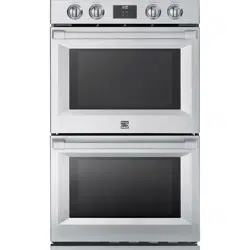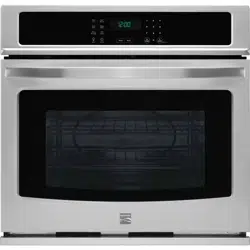
TM
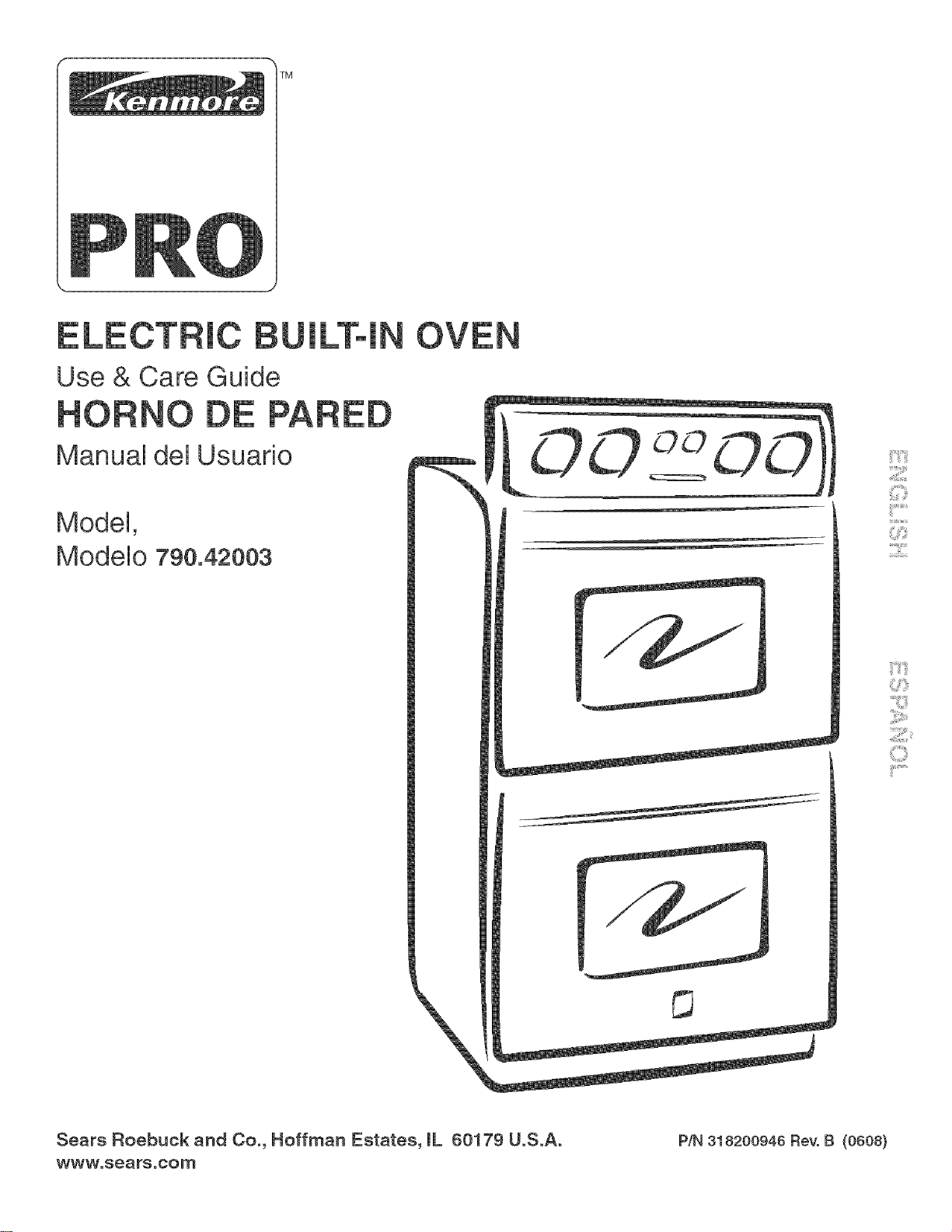
Use & Care Guide
Manual del Usuario
Model,
Modelo 790.42003
Sears Roebuck and Co., Hoffman Estates, mL60179 U.S.A.
www.sears.com P/N 318200948 Revo B (0808)
TabRe of Contents
Wail Oven Warranty ......................................................... 2
iMPORTANT SAFETY iNSTRUCTiONS ......................... 3-4
Product Record ............................................................... 4
Serial PJate Location ....................................................... 4
Protection Agreements ................................................... 5
Wall Oven Features ......................................................... 6
Oven Vent and Racks ...................................................... 7
Air Circulation in the Oven ............................................. 7
Oven Ladder Racks Positions ........................................ 7
Control Pad Features ...................................................... 8
Setting the Ctock ........................................................... 8-9
Consumer Defined Control Features .............................. 9
Setting the Oven Controls .......................................... 9-13
Self-Cleaning ............................................................. 14-15
Adjusting the Oven Temperature ................................... 15
Genera! Care & Cleaning ............................................... 18
Cleaning Various Parts of Your Oven ............................. 16
Care and Cleaning of Stainless Steel ............................ 17
To Remove and Replace Oven Door ............................. 17
Special Door Care instructions ...................................... 17
Changing the oven light ................................................ 17
BeforeYou Cait .......................................................... 18-19
Sears Service ................................................................. 22
EspaSol .......................................................................... 23
Kenmore Pro Appliance Warranty
OneYear Limited Warranty
When installed, operated and maintained according to all instructions supplied with the product, if this appliance fails due to
a defect in material or workmanship within one year from the date of purchase, call 1-800=4=MYoHOME ®to arrange for free
repair, If this appliance is used for other than private family purposes, this warranty applies for only 90 days from the date of
purchase,
This warranty covers onJy defects in material and workmanship. Sears wilt NOT pay for:
1, Expendable items that can wear out from normal use, including but not limited to filters, belts, light bulbs, and bags,
2, A service technician to instruct the user in correct product installation, operation or maintenance,
3, A service technician to clean or maintain this product,
4, Damage to or failure of this product if it is not installed, operated or maintained according to all instructions supplied with
the product,
5, Damage to or failure of this product resulting from accident, abuse, misuse or use for other than its intended purpose,
6, Damage to or failure of this product caused by the use of detergents, cleaners, chemicals or utensils other than those
recommended in all instructions supplied with the product,
7, Damage to or failure of parts or systems resulting from unauthorized modifications made to this product,
Disclaimer of implied warranties; Hmitation of remedies
Customer's sole and exclusive remedy under this limited warranty shall be product repair as provided herein, Implied
warranties, including warranties of merchantability or fitness for a particular purpose, are limited to one year or the shortest
period allowed by law, Sears shall not be liable for incidental or consequential damages, Some states and provinces do not
allow the exclusion or limitation of incidental or consequential damages, or limitations on the duration of implied warranties
of merchantability or fitness, so these exclusions or limitation may not apply to you,
This warranty applies only while this appliance is used in the United States and Canada,
This warranty gives you specific legal rights, and you may also have other rights which vary from state to state,
Sears, Roebuck and Co., Hoffman Estates, IL 60179
Sears Canada inc.,Toronto, Ontario, Canada M5B 2B8
Printed in United States 2
important Safety instructions
Read aH instructions before using this appliance.
Save these instructions for future reference.
This manuaUcontains important safety symbob and instructions. Phase pay attention to these symbob and follow aH
_This symboUwHUheUpabrt you to situations that may cause serious bodily harm, death or property damage,
This symboUwHUheUpabrt you to situations that
o Remove all tape and packaging before using the
appliance. Destroy the carton and plastic bags after
unpacking the appliance. Never allow children to play with
packaging material.
*Proper Installation. Be sure your appJiance is
property installed and grounded by a qualified
technician in accordance with NationaJ Electrical
Code ANSl/NFPA No.70 (USA} or CSA 022.1, PART 1
(Canada}qatest edition and locaJ code requirements.
Install only per installation instructions provided in the
literature package for this appliance,
may cause bodily injury or property damage,
o Storage on Appliance. Flammable matedaJs should
not be stored near surface unite. This includes paper,
plastic and cloth items, such as cookbooks,
plasticware and towels, as well as flammable liquids,
Do not store explosives, such as aerosol cans, on or
near the appliance, Flammable materials may explode
and result in fire or property damage,
Electronic controllers can be damaged by
cold temperatures. When you use your appliance for the
first time, or if it has not been used for a long period of
time, make sure that it has been exposed to a
temperature above 0°0/32°F for at least 3 hours before
connecting it to the power supply.
o In case of an emergency, know how to disconnect
the etectrica! power to the appliance at the circuit
breaker or fuse box.
o User Servicing--Do not repair or replace any part of
the appliance untess specifically recommended in
the manuaJs. All other servicing should be done only by
a qualified technician to reduce the risk of personal injury
and damage to the cooktop, Sears Parts & Repair is the
recommended repair service for this appliance,
, Never modify or aJter the construction of an appliance
by removing paneJs, wire covers or any other part of
the product.
o Remove the oven door from any unused appliance if it
is to be stored or discarded.
Stepping, Jeaning, sitting or pulling down
on the door of this appJiance can result in serious injuries
and may aJso cause damage to the appliance. Do not allow
children to climb or play around the appliance,
To reduce the risk of tipping, the wall
oven must be secured by propedy
installed anti-tip bracket provided with
the wall oven. Refer to the Installation
Instructions for proper anti-tip bracket
installation.
Do not use the oven for storage.
Do not store items of interest to
children in the cabinets above an appliance. Children
climbing on the appliance to reach items could be _'_iii'iii
o Do not leave children a_one. Children shouJd not be
teft aJone or unattended in the area where an m,,,,,,,..........
appliance is in use. They should never be allowed to
sit or stand on any part of the appliance,
o DO NOTTOUCH BAKEAND BROILING ELEMENTS
OR AREAS NEAR THESE ELEMENTS. Baking and
broiling elements may be hot even though they are dark in
color, Areas near elements may become hot enough to
cause burns, During and after use, do not touch, or let
clothing or other flammable materials touch these areas
until they have had sufficient time to cool,
o Wear Proper Apparel Loose-fitting or hanging
garments should never be worn while using the
appJiance. Do not let clothing or other flammable
materials contact hot surfaces.
Never use your appliance for warming
or heating the room.
o Do Not Use Water or FJour on Grease Fires.
Smother the fire with a pan lid, or use baking soda,
a dry chemicaJ or foam-type extinguisher.
o When heating fat or grease, watch it ctoseJy. Fat or
grease may catch fire if allowed to become too hot,
o Use Onty Dry Pothotders. Moist or damp potholders
on hot surfaces may resuJt in burns from steam. Do
not let the potholders touch hot heating elements, Do
not use a towel or other bulky cloth instead of a
potholder,
o Do Not Heat Unopened Food Containers. Buildup of
pressure may cause the container to burst and
resuJt in injury.
IMPORTANT--Do not attempt to operate the appliance
during a power failure. If power fails, always turn off the
appliance, If the appliance is not turned off and the power
resumes, it will begin to operate again, Once the power
resumes, reset the clock and oven function,
important Safety instructions
mMPORTANT mNSTRUCTmONS FOR USING
YOUR OVEN
o Use Care When Opening an Oven Door--Stand to the
side of the appliance when opening the door of ahot oven,
Let hot air or steam escape before you remove or replace
food in the oven,
o Keep Oven Vent Ducts Unobstructed. The wall oven is
vented through the center trim of the oven, Touching the
surfaces in this area when the wall oven is operating may
cause severe burns, Also, do not place plastic or heat°
sensitive items near the oven vent, These items could
mMPORTANT mNSTRUCTmONS FOR CLEANmNG
YOUR OVEN
o CJean the appJiance regularJy to keep aH parts free of
grease that could catch fire. Exhaust fan ventilation
hoods and grease filters should be kept clean, Do not
allow grease to accumulate, Greasy deposits in the fan
could catch fire, Refer to the hood manufacturer's
o Cleaners/Aerosols--Always follow the manufacturer's
recommended directions for use, Be aware that excess
residue from cleaners and aerosols may ignite causing
o Placement of Oven Racks. Always place oven racks in
desired location while oven is cool, Remove all utensils
from the rack before removing rack, If rack must be
moved while oven is hot, use extreme caution, Use pot
holders and grasp the rack with both hands to reposition,
Do not let pot holders contact the hot oven element or
interior of the oven.
Do not use the broiler pan without its insert. The
broiler pan and grid allow dripping fat to drain and be kept
away from the high heat of the broiler.
o Do not cover the broiter grid or oven bottom with
aJuminum foil Exposed fat and grease could ignite,
o Do not touch a hot oven Jight bulb with a damp ctoth.
Doing so could cause the bulb to break, Disconnect the
appliance or shut off the power to the appliance before
removing and replacing the bulb,
o Protective Jiners--Do not use aluminum foil to line the
oven bottom, Only use aluminum foil as recommended in
this manual, improper installation of these liners may
result in risk of electric shock, or fire,
SELF CLEANmNG OVEN MODELS
o CJean in the seff-cJeaning cycle onty the parts of the
appliance Jisted in this Owner's Guide. Before using the
self-cleaning cycle of the appliance, remove the broiler pan
and any utensils stored in the appliance,
o Do not ctean the oven door gasket. The door gasket is
essential for a good seal, Care should be taken not to rub,
damage or move the gasket,
o Do not use oven cJeaners. No oven cleaner or oven liner
protective coating of any kind should be used inoraround any
The health of some birds is extremely
sensitive to the fumes given off during the self-clean cycle of
any wall oven. Move birds to another well ventilated room.
mMPORTANT SAFETY NOTmCE
The California Safe Drinking Water and Toxic Enforcement
Act requires the Governor of California to publish a list of
substances known to the state to cause cancer, birth
defects or other productive harm, and requires businesses
to warn customers of potential exposure to such
substances.
Product Record
In this space below, record the date of purchase, model and serial
number of your product, You will find the model and serial number
printed on the serial plate,
Model No, 790.42003
Serial No,
Date of purchase
Save these instructions and your sales receipt for future reference.
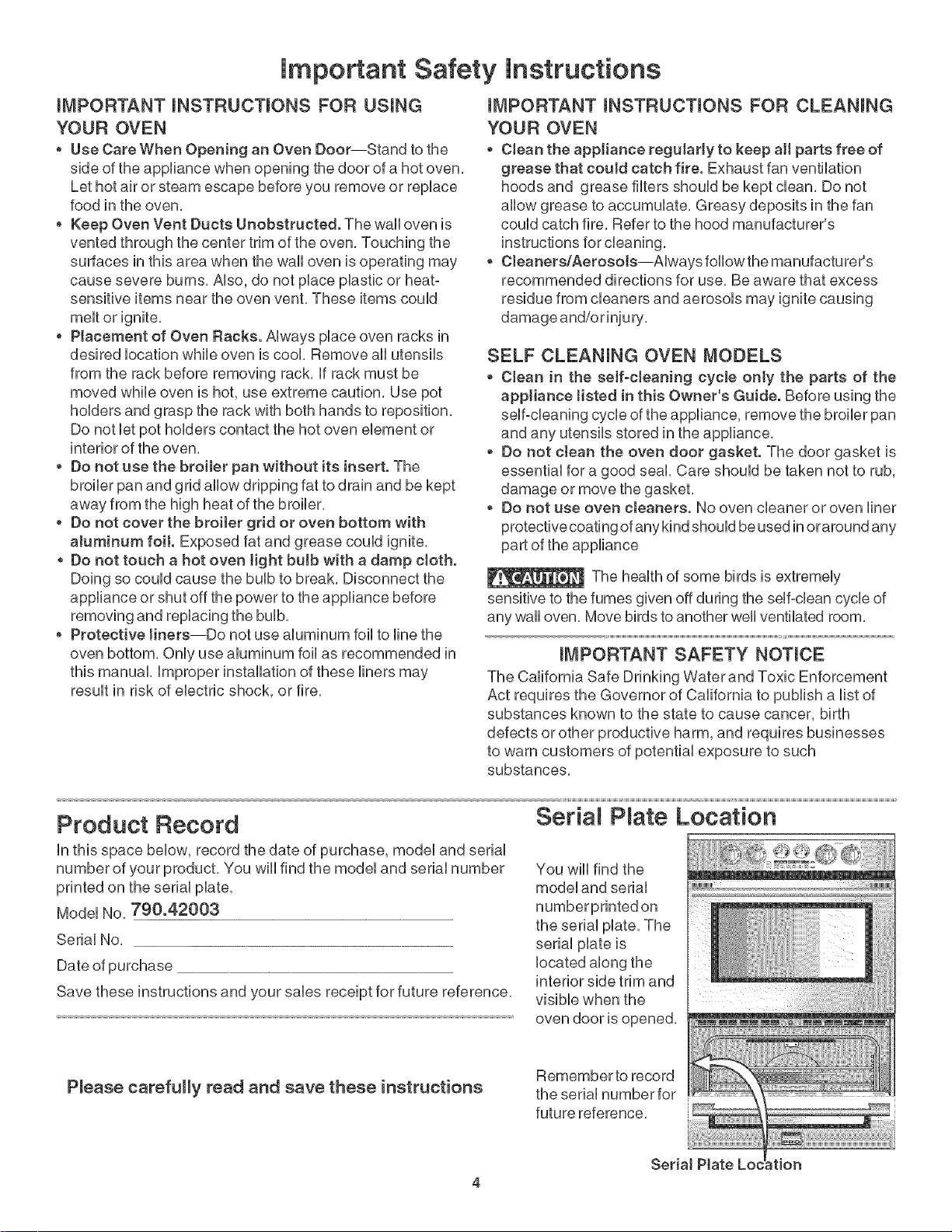
Seria P ate Location
You wiii find the
model and serial
the serial plate. The
serial plate is
located along the
interior side trim and .................
visible when the ......................................................
oven door is opened.
Pmease carefully read and save these instructions Remember to record
the serial number for
future reference.
SeriaJ _tion
4
PROTECTION AGREEMENTS
h the U.S.A.
Master Protection Agreements
CongratuUations on making a smart purchase, Your new
Kenmord _product is designed and manufactured for
years of dependabb operation, But HkeaHproducts, it
may require preventive maintenance or repair from time to
time, That's when having a Master Protection Agreement
can save you money and aggravation,
Purchase a Master Protection Agreement now and protect
yourself from unexpected hassle and expense.
The Master Protection Agreement abo heUpsextend the
Hfeof your new product, Here's what's incUudedin the
Agreement:
5_ Expert service by our 12,000 professionaU repair
specialists
5_ Unlimited service and no charge for parts and Uabor
on aHcovered repairs
5_ "Noqemon" guarantee- repUacement
of your covered product if four or more product
failures occur within twelve months
5_ Product replacement if your covered product can't
be fixed
5_ AnnuaJ Preventive Maintenance Checkatyour
request- no extra charge
5_ Fast help by phone- phone support from a Sears
representative on products requiring
plus convenient repair scheduling
[_ Power surge protection against electrical damage
due to power fluctuations
[_ RentaJ reimbursement if repairof yourcovered
product takes longer than promised
In Canada
Maintenance Agreements
Your purchase has added value because you can depend
on Sears HomeCentraPfor service, With over 2400
Service Technicians and more than a million parts and
accessories, we have the tools, parts, knowledge and
skills to ensure our pledge: We Service What We Sell,
Your Kenmore®product isdesigned, manufactured
and tested to provide years of dependable operation, But
like all products, it may require service from time to time,
The Sears Maintenance Agreement offers you an
outstanding service program, affordably priced,
The Sears Maintenance Agreement:
Is your way to buy tomorrow's service at today's price
Eliminates repair bills resulting from normal wear and
tear
Provides phone support from a Sears representative on
products requiring in-home repair
Even if you don't need repairs, provides an annual
Preventive Maintenance Check, at your request, to
ensure that your product is in proper running condition,
Some Jimitations appJy. For more information about
Sears Canada Maintenance Agreements,
call 1-800-361-6665
Once you purchase the Agreement, a simple phone call is
all that it takes for you to schedule service, You can call
anytime day or night, or schedule a service appointment
online,
Sears has over 12,000 professional repair specialists,
who have access to over 4,5 million quality parts and
accessories, That's the kind of professionalism you can
count on to help prolong the life of your new purchase for
years to come, Purchase your Master Protection
Agreement today!
Some limitations and exclusions apply.
For prices and additional information call
1-800-827-6855.
_'_iii'iii
Sears mnstallation Service
For Sears professional installation of home
appliances, garage door openers, water heaters,
and other major home items, in the U,S,A, call
1-800-44*_Y-HOME® REV. 030509
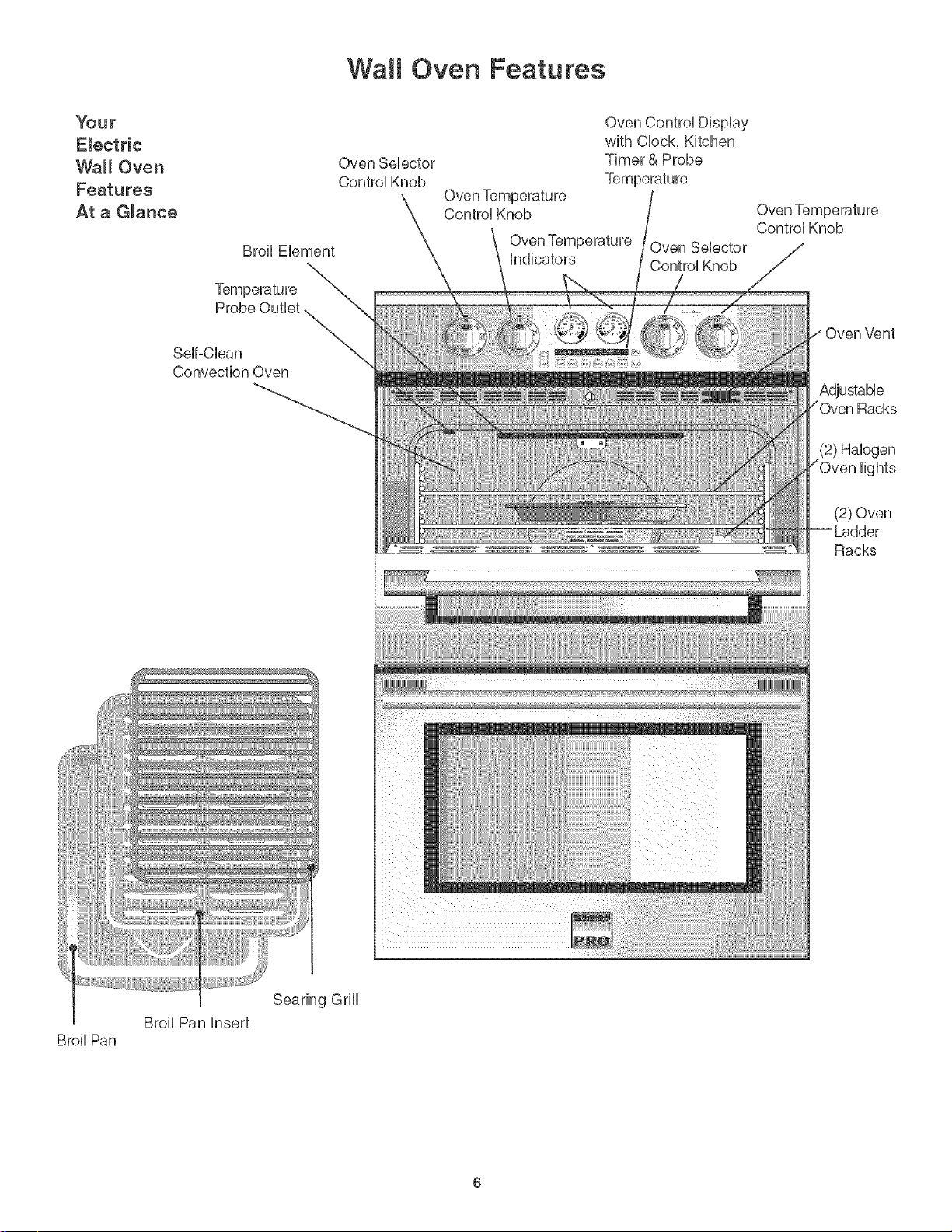
Wa t Oven Features
Your
Electric
Wall Oven
Features
At aG_ance
Broil Pan
Oven Selector
Contro] Knob
Broil Element
Oven Temperature
Control Knob
indicators
Oven Control Display
with Clock, Kitchen
Timer & Probe
Control Knob
Probe Outlet
Self-Clean
Convection Oven
Oven Vent
Adjustable
Racks
(2) Halogen
lights
(2) Oven
Ladder
Racks
Searing Grill
Broil Pan insert
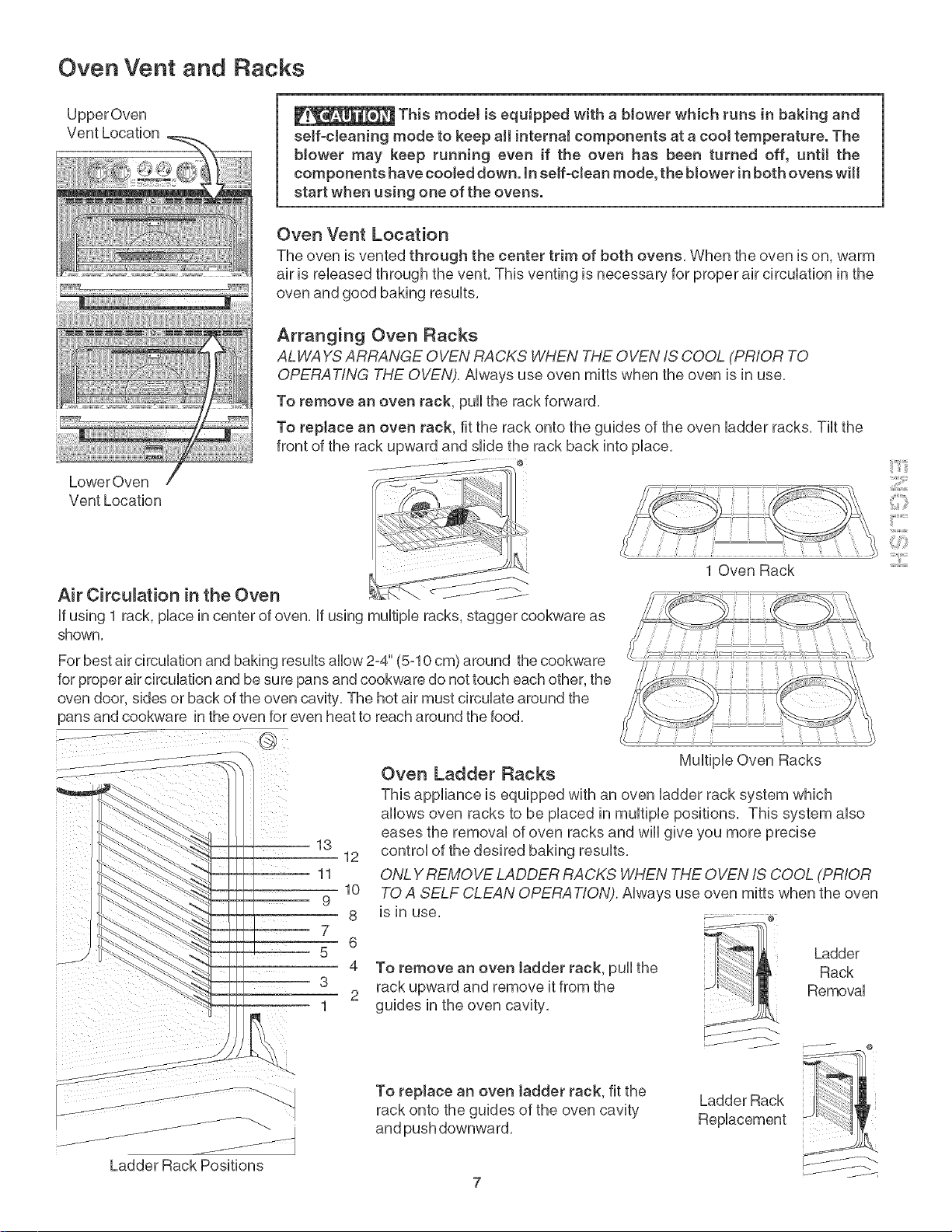
Oven Vent and Racks
UpperOven
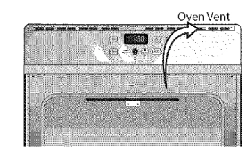
Vent Location This modeJ is equipped with a blower which rune in baking and
seff-cbaning mode to keep aH interna! components at a cool temperature. The
b!ower may keep running even if the oven has been turned off, until the
components have cooled down. In self-clean mode, the blower in both ovens wilt
start when using one of the ovens.
Oven Vent Location
The oven is vented through the center trim of both ovens, When the oven is on, warm
air is released through the vent, This venting is necessary for proper air circulation in the
oven and good baking results,
LowerOven
Vent Location
Arranging Oven Racks
ALWAYS ARRANGE OVEN RACKS WHEN THE OVEN IS COOL (PRIOR TO
OPERATING THE OVEN). Always use oven mitts when the oven is in use,
To remove an oven rack, pull the rack forward,
To replace an oven rack, fit the rack onto the guides of the oven ladder racks, Tilt the
front of the rack upward and slide the rack back into place,
@
Air Circulation in the Oven
If using 1 rack, place in center of oven, If using multiple racks, stagger cookware as
shown,
_;;ii'_i,¸....
iilYii:_
1 Oven Rack
For best air circulation and baking results allow 2=4"(5=10cm) around the cookware
for proper air circulation and be sure pans and cookware do not touch each other, the
oven door, sides or back of the oven cavity, The hot air must circulate around the
pans and cookware in the oven for even heat to reach around the food,
Multiple Oven Racks
Oven Ladder Racks
This appliance is equipped with an oven ladder rack system which
allows oven racks to be placed in multiple positions, This system also
eases the removal of oven racks and will give you more precise
control of the desired baking results,
ONLY REMOVE LADDER RACKS WHEN THE OVEN IS COOL (PRIOR
TO A SELF CLEAN OPERA T!ON). Always use oven mitts when the oven
iS in use, _ e
To remove an oven ladder rack, pull the
rack upward and remove it from the
guides in the oven cavity,
Ladder
Rack
Removal
j_
Ladder Rack Positions
To replace an oven ladder rack, fit the
rack onto the guides of the oven cavity
and push downward,
Ladder Rack
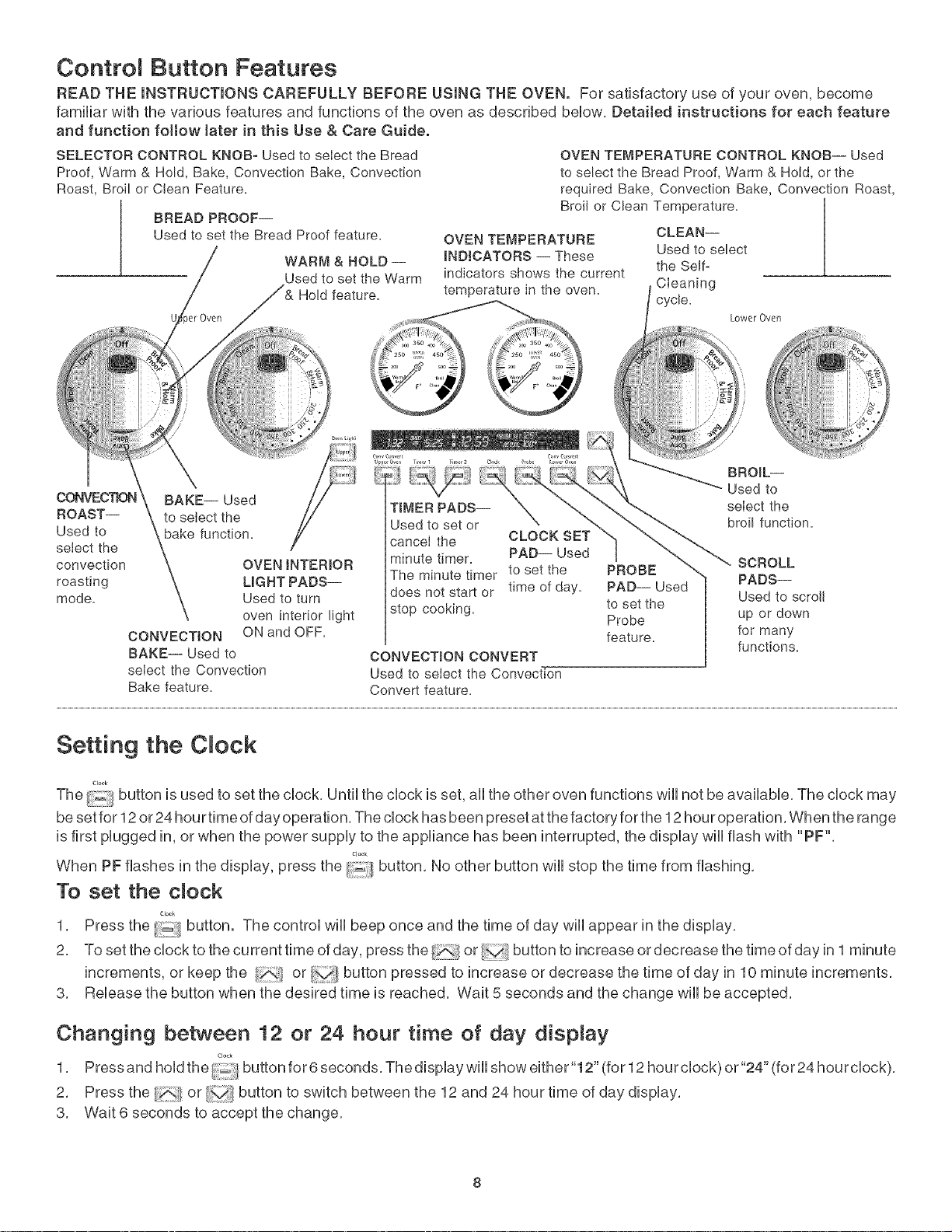
Contro Button Features
READ THE iNSTRUCTiONS CAREFULLY BEFORE USING THE OVEN. For satisfactory use of your oven, become
familiar with the various features and functions of the oven as described bebw, Detailed instructions for each feature
and function follow later in this Use &Care Guide.
SELECTOR CONTROL KNOB- Used to select the Bread
Proof, Warm & Hold, Bake, Convection Bake, Cenvection
Roast, Broil or Clean Feature.
BREAD PROOF--
Used to set the Bread Proof feature.
WARM & HOLD --
Used to set the Warm
Hold feature.
CONVEC'RON BAKE-- Used
ROAST-- to select the
Used to bake function.
select the
convection OVEN INTERIOR
roasting LIGHT PADS--
mode. Used to turn
oven interior light
CONVECTION ON and OFF.
BAKE-- Used to
select the Convection
Bake feature.
OVEN TEMPERATURE CONTROL KNOB-- Used
to select the Bread Proof, Warm & Hold, or the
required Bake, Convection Bake, Convection Roast,
Broil or Clean Temperature.
OVEN TEMPERATURE
INDICATORS -- These the Self-
indicators shows the current
temperature in the oven. CIeaning
cycle,
TIMER PADS--
Used to set or
cancel the CLOCK SET
minute timer. PAD-- Used
The minute timer to set the
time of day.
does not start or
stop cooking.
CONVECTION CONVERT
Used to select the Convection
Convert feature.
PROBE
PAD-- Used
to set the
Probe
feature.
CLEAN--
Used to select
Lower Oven
i,:
2"
BROIL--
Used to
select the
broil function.
SCROLL
PADS--
Used to scroll
up or down
for many
functions.
Setting the C ock
Clo_k
The button is used to set the clock, Until the clock is set, aii the other oven functions wiii not be available, The clock may
be set for 12 or 24 hourtime of day operation, The clock has been preset at the factory for the 12 hour operation, When the range
is first plugged in, or when the power supply to the appliance has been interrupted, the display will flash with "PF",
Cl_k
When PF flashes in the display, press the :_ button No other button will stop the time from flashing,
To set the dock
1, Press the i_iil/button. The control will beep once and the time of day will appear in the display,
2, Tosettheclocktothecurrenttimeofday, pressthe _;,</or buttontoincreaseordecreasethetimeofdayinl minute
increments, or keep the or button pressed to increase or decrease the time of day in 10 minute increments,
3, Release the button when the desired time is reached, Wait 5 seconds and the change will be accepted,
Changing between 12 or 24 hour time of day dispnay
1, Pressandhodthe/_buttonfor6seconds Thedspayw showeither"12"(for12hourclock)or"24"(for24hourclock),
2, Press the or v;/button to switch between the 12 and 24 hour time of day display,
3, Wait 6 seconds to accept the change,
Setting the Clock (cont'd)
Setting Continuous Bake or 12 Hour Energy Saving
The ovencontrol has a factory preset built-in 12 HourEnergySaving featurethat wiiIshut off the oven if the ovencontrol is left on for
more than 11 hours and 59 minutes. The ovencan be programmedto overridethis feature for Continuous Baking.
To set the control for Continuous Bake or 12 Hour Energy Saving features
Tiller 2
1. Press and hold the/i_' button for 6 seconds. The display will show either"12h" (for 12 hour maximum cooking time) or
"-h" (for continuous cooking).
2. Press the _ or/_ button to switch between the 12 hour and 24 hours continuous cooking mode.
3. Wait 6 seconds to accept the change.
Setting the Timer
The Timer serves as an extra timer in the kitchen that will beep when the set time has run out. itcan be set in1 minute increments
up to 11:59 (11 hours, 59 minutes), it does not start or stop cooking. The Kitchen Timer feature can be used during any of the other
oven control functions, except the self=clean function.
To set the Kitchen Timer
ii:!_iiii_i
1, Pressthe or button,ThecontroUw,Ube÷p,thedispUayw,Ushow...."andthetimerindicatorlightlocated
on the button will start flashing.
1! t /
2. Tosetthetimer, pressthe_ or/;_lbuttontoincreaseordecreasethetimeinl minute increments, orkeepthe i]
or button increase or decrease the time in 10 minute increments.
pressed to
3. When the set time has run out,"End" will show in the display. The control will sound with 3 beeps every 5 seconds
T_r I Timer 2
until the :-_!/or button is pressed.
To cancet the Kitchen Timer before the set time has run out
Tme I [m{r
Press the ,_ or _[ button. The display will return to the time of day.
Setting Oven Lockout Feature
TheOven Lockout feature automatically Iocksthe oven door and prevents the Ovenfrom being turned on. It does notdisable theclock,
Kitchen Timer or the interior oven lights.
To activate the Oven Lockout feature
0v,.,,Ugh Or,,, ught
1. Press and hold the or _ for 3 seconds.
2. Allow 20 seconds for the door to lock. The icon will flash while the door is locking.
To deactivate the Oven Lockout feature:
0w,, Light ow. Lght
1. Press and hold the _ or for 3 seconds.
2. Allow 20 seconds for the door to unlock. The icon will flash while the door is unlocking,
After 20 seconds the icon will disappear in the display,
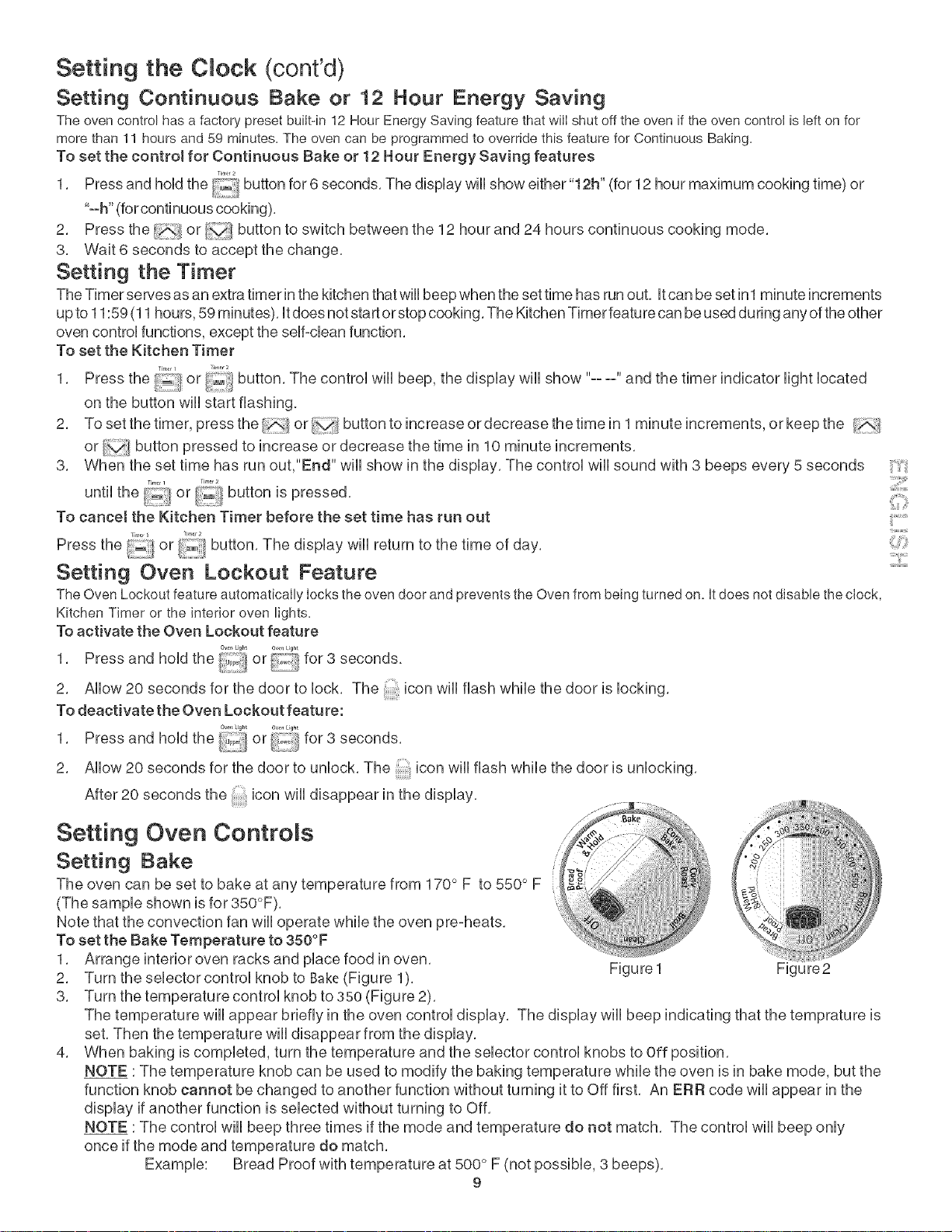
Setting Oven Controls
Setting Bake
The oven can be set to bake at any temperature from 170 ° F to 550° F
(The sample shown is for 350°F).
Note that the convection fan will operate while the oven pre-heats.
To set the Bake Temperature to 350°F
1. Arrange interior oven racks and place food in oven.
2. Turn the selector control knob to Bake(Figure 1).
3. Turn the temperature control knob to 35o (Figure 2).
4.
Figure 1 Figure2
The temperature wiii appear briefly in the oven control display, The display wiii beep indicating that the temprature is
set, Then the temperature will disappear from the display,
When baking is completed, turn the temperature and the selector control knobs to Off position,
NOTE :The temperature knob can be used to modify the baking temperature while the oven is in bake mode, but the
function knob cannot be changed to another function without turning it to Off first, An ERR code wiii appear in the
display if another function is selected without turning to Off,
NOTE :The control will beep three times if the mode and temperature do not match, The control will beep only
once if the mode and temperature do match,
Bread Proof with temperature at 500 ° F (not possible, 3 beeps),
9
iilYii:_
Setting Oven Controls
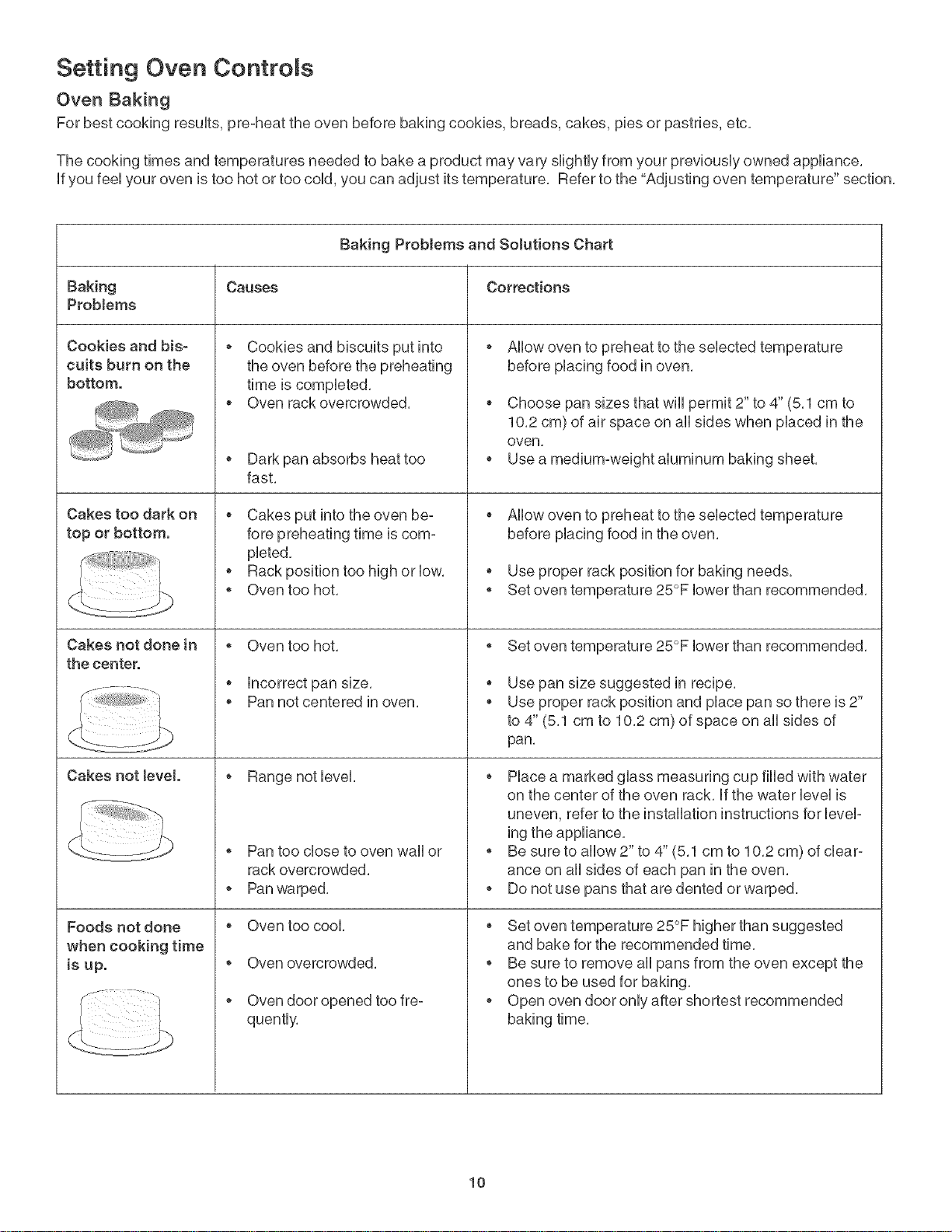
Oven Baking
For best cooking results, pre-heat the oven before baking cookies, breads, cakes, pies or pastries, etc.
The cooking times and temperatures needed to bake a product may van, slightly from your previously owned appliance,
if you feel your oven is too hot or too cold, you can adjust its temperature, Refer to the "Adjusting oven temperature" section,
Baking Problems and Solutions Chart
Baking Causes Corrections
ProbJems
Cookies and bis=
cults burn on the
bottom.
Cakes too dark on
top or bottom.
Cakes not done in o
the center.
Cakes not level. *
Foods not done *
when cooking time
is up. °
Cookies and biscuits put into
the oven before the preheating
time is completed,
Oven rack overcrowded,
o Dark pan absorbs heat too
fast,
Cakes put into the oven be-
fore preheating time is com-
pleted,
o Rack position too high or low,
o Oven too hot,
Oven too hot,
incorrect pan size,
Pan not centered in oven,
Pan too close to oven wall or
rack overcrowded,
Pan warped,
Oven too cool,
Oven overcrowded,
Oven door opened too fre°
quently,
Allow oven to preheat to the selected temperature
before placing food in oven,
Choose pan sizes that wiii permit 2" to 4" (5,1 cm to
10,2 cm) of air space on all sides when placed in the
oven,
o Use a medium-weight aluminum baking sheet,
Allow oven to preheat to the selected temperature
before placing food in the oven,
o Use proper rack position for baking needs,
o Set oven temperature 25°F lower than recommended,
o Set oven temperature 25°F lower than recommended,
Use pan size suggested in recipe,
Use proper rack position and place pan so there is 2"
to 4" (5,1 cm to 10,2 cm) of space on all sides of
pan,
o Place a marked glass measuring cup filled with water
on the center of the oven rack, if the water level is
uneven, refer to the installation instructions for level-
ing the appliance,
Be sure to allow 2" to 4" (5,1 cm to 10,2 cm) of clear-
ance on all sides of each pan in the oven,
o Do not use pans that are dented or warped,
Set oven temperature 25°F higher than suggested
and bake for the recommended time,
o Be sure to remove all pans from the oven except the
ones to be used for baking,
o Open oven door only after shortest recommended
baking time,
10
Setting Oven Controls
Setting Convection Bake
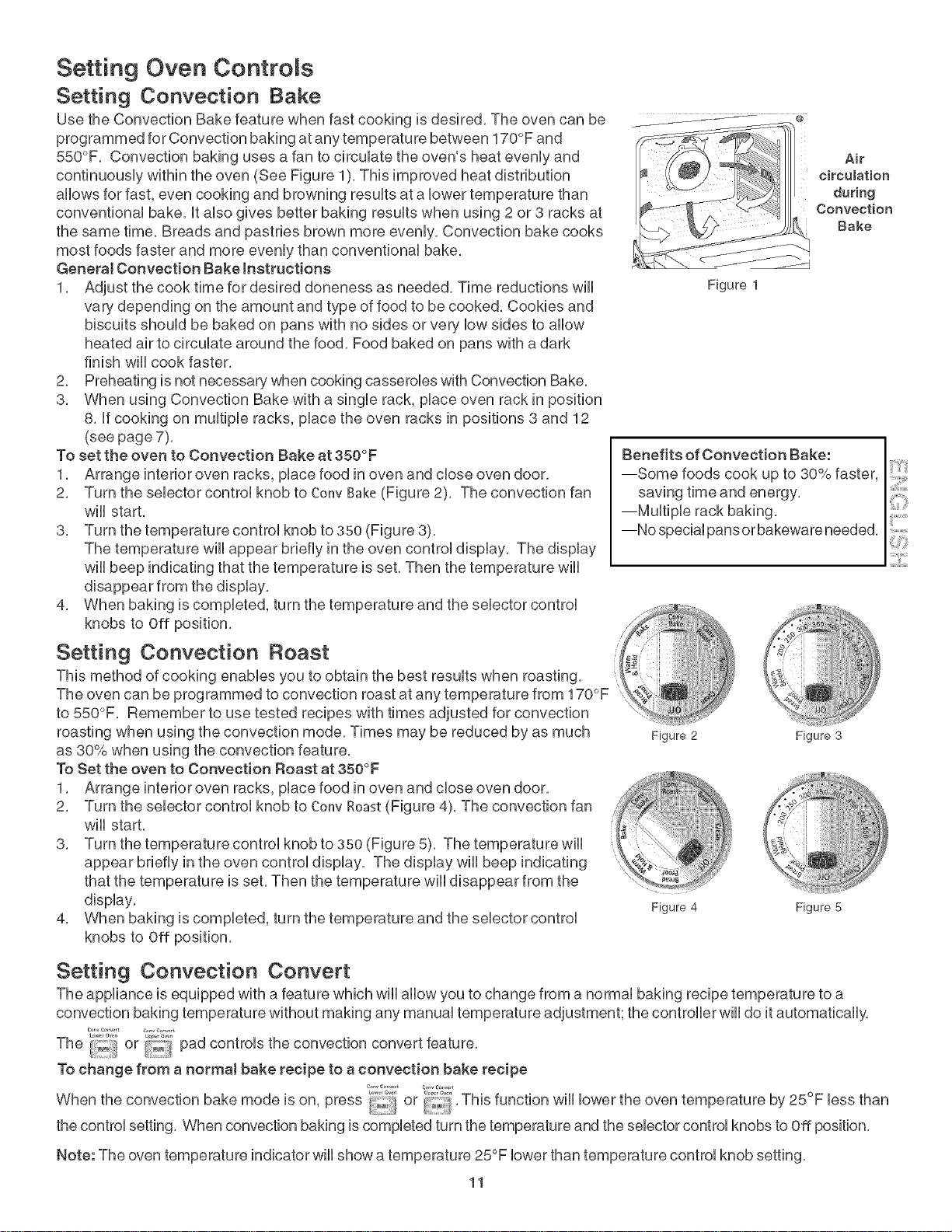
Use the Convection Bake feature when fast cooking is desired, The oven can be
programmed for Convection baking at any temperature between 170°F and
550°F. Convection baking uses a fan to circulate the oven's heat evenly and
continuously within the oven (See Figure 1). This improved heat distribution
allows for fast, even cooking and browning results at a lower temperature than
conventional bake, It also gives better baking results when using 2 or 3 racks at
the same time, Breads and pastries brown more evenly. Convection bake cooks
most foods faster and more evenly than conventional bake,
Genera[ Convection Bake instructions
1. Adjust the cook time for desired doneness as needed, Time reductions w[[[
vary depending on the amount and type of food to be cooked, Cookies and
biscuits should be baked on pans with no sides or very low sides to allow
heated air to circulate around the food, Food baked on pans with a dark
finish w[[[ cook faster,
2. Preheating is not necessary when cooking casseroles with Convection Bake,
3. When using Convection Bake with a single rack, place oven rack in position
8. If cooking on multiple racks, place the oven racks in positions 3 and 12
(see page 7). o
To set the oven to Convection Bake at 350 F
1. Arrange interior oven racks, place food in oven and dose oven door,
2. Turn the selector control knob to Conv Bake(Figure 2). The convection fan
w[[[ start,
3. Turn the temperature control knob to 35o (Figure 3).
The temperature w[[[ appear briefly in the oven control display. The display
w[[[ beep indicating that the temperature is set. Then the temperature w[[[
disappear from the display.
4. When baking is completed, turn the temperature and the selector control
knobs to Off position,
Setting Convection Roast
This method of cooking enables you to obtain the best results when roasting,
The oven can be programmed to convection roast at any temperature from 170°F
to 550°F. Remember to use tested recipes with times adjusted for convection
roasting when using the convection mode, Times may be reduced by as much
as 30% when using the convection feature, o
To Set the oven to Convection Roast at 350 F
1. Arrange interior oven racks, place food in oven and dose oven door.
2. Turn the selector control knob to Conv Roast(Figure 4). The convection fan
will start.
3. Turn the temperature control knob to 350 (Figure 5). The temperature w[[[
appear briefly in the oven control display. The display wi[[ beep indicating
that the temperature is set. Then the temperature wi[[ disappear from the
display.
4. When baking is completed, turn the temperature and the selector control
knobs to Off position.
Figure 1
Air
circumation
during
Convection
Bake
Benefits of Convection Bake:
--Some foods cook up to 30% faster,
saving time and energy,
--Multiple rack baking.
--No special pans or bakeware needed, !!!...............
Z[i !ii!ii!i!ii:iiiiii,!i,iiiiiii
_", !;iii!;i}:;}iii_iii
i
Figure 2
;;;i?i! r'
N
Fi,lure 3
Figure 4 Figure 5
Setting Convection Convert
The appliance is equipped with a feature which wi[[ allow you to change from a normal baking recipe temperature to a
convection baking temperature without making any manual temperature adjustment; the controller wi[[ do it automatically.
The ',°"°"ior '_-,_ pad controls the convection convert feature,
To change from a normal bake recipe to a convection bake recipe
When the convection bake mode is on, press or This function wi[[ lower the oven temperature by 25°F less than
the control setting, When convection baking is completed turn the temperature and the selector control knobs to Off position,
Note: The oven temperature indicator wiii show a temperature 25°F lower than temperature control knob setting,
11
Setting Oven Controls
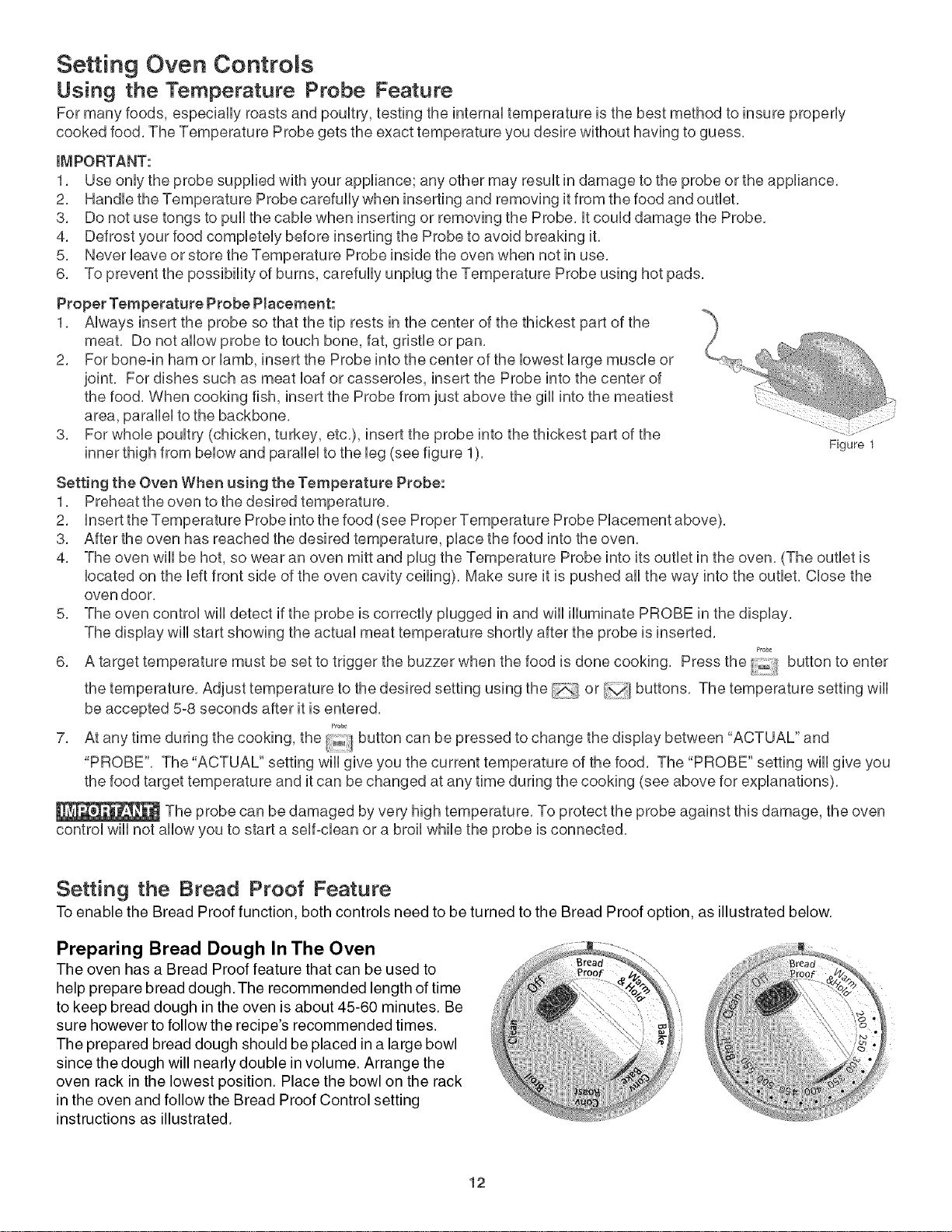
Using the Temperature Probe Feature
For many foods, especially roasts and poultry, testing the internaUtemperature is the best method to insure properUy
cooked food. The Temperature Probe gets the exact temperature you desire without having to guess.
IMPORTANT:
1. Use onUythe probe supplied with your appliance; any other may resuUtin damage to the probe or the appliance.
2. HandUethe Temperature Probe carefully when inserting and removing it from the food and outUet.
3. Do not use tongs to pull the came when inserting or removing the Probe. UtcouUddamage the Probe.
4. Defrost your food compUeteUybefore inserting the Probe to avoid breaking it.
5. Never Ueaveor store the Temperature Probe inside the oven when not in use.
6. To prevent the possibility of burns, carefully unplug the Temperature Probe using hot pads.
Proper Temperature Probe Placement:
1. Always insert the probe so that the tip rests in the center of the thickest part of the
meat. Do not allow probe to touch bone, fat, gristle or pan.
2. For bone-in ham or lamb, insert the Probe into the center of the lowest large muscle or
joint. For dishes such as meat loaf or casseroles, insert the Probe into the center of
the food. When cooking fish, insert the Probe from just above the gill into the meatiest
area, parallel to the backbone.
3. For whole poultry (chicken, turkey, etc.), insert the probe into the thickest part of the
inner thigh from below and parallel to the leg (see figure 1). Figure 1
Setting the Oven When using the Temperature Probe:
1. Preheat the oven to the desired temperature.
2. Insert the Temperature Probe into the food (see Proper Temperature Probe Placement above).
3. After the oven has reached the desired temperature, place the food into the oven.
4. The oven will be hot, so wear an oven mitt and plug the Temperature Probe into its outlet in the oven. (The outlet is
located on the left front side of the oven cavity ceiling). Make sure it is pushed all the way into the outlet. Close the
oven door,
5. The oven control will detect if the probe is correctly plugged in and will illuminate PROBE in the display.
The display will start showing the actual meat temperature shortly after the probe is inserted.
Probe
6. A target temperature must be set to trigger the buzzer when the food is done cooking. Press the button to enter
the temperature. Adjust temperature to the desired setting using the or buttons. The temperature setting will
be accepted 5-8 seconds after it is entered.
probe
7. At any time during the cooking, the button can be pressed to change the display between "ACTUAL" and
"PROBE". The "ACTUAL" setting will give you the current temperature of the food. The "PROBE" setting will give you
the food target temperature and it can be changed at any time during the cooking (see above for explanations).
The probe can be damaged by very high temperature. To protect the probe against this damage, the oven
control will not allow you to start a self-clean or a broil while the probe is connected.
Setting the Bread Proof Feature
To enable the Bread Proof function, both controls need to be turned to the Bread Proof option, as illustrated below.
Preparing Bread Dough In The Oven
The oven has a Bread Proof feature that can be used to
help prepare bread dough.The recommended length of time
to keep bread dough in the oven is about 45-60 minutes. Be
sure however to follow the recipe's recommended times.
The prepared bread dough should be placed in a large bowl
since the dough will nearly double in volume. Arrange the
oven rack in the lowest position. Place the bowl on the rack
in the oven and follow the Bread Proof Control setting
instructions as illustrated.
12
Setting Oven ControRs
Setting the Warm & HondTMFeature
The Warm & Hold feature wHimaintain an oven temperature of 170°F, and wHikeep even baked foods warm for serving for 3
hours after cooking has finished, The Warm &Hoid feature may be used without any other cooking operations or can be used
after cooking has finished,
To set Warm & Hold
1, Arrange interior oven racks and piace food in oven,
2, Turn both the selector and the temperature controi knobs to Warm HoHdposition,
3, To turn the Warm &Hoid OFF at any time, turn the temperature and the selector controi knobs to Off position,
Setting Broil
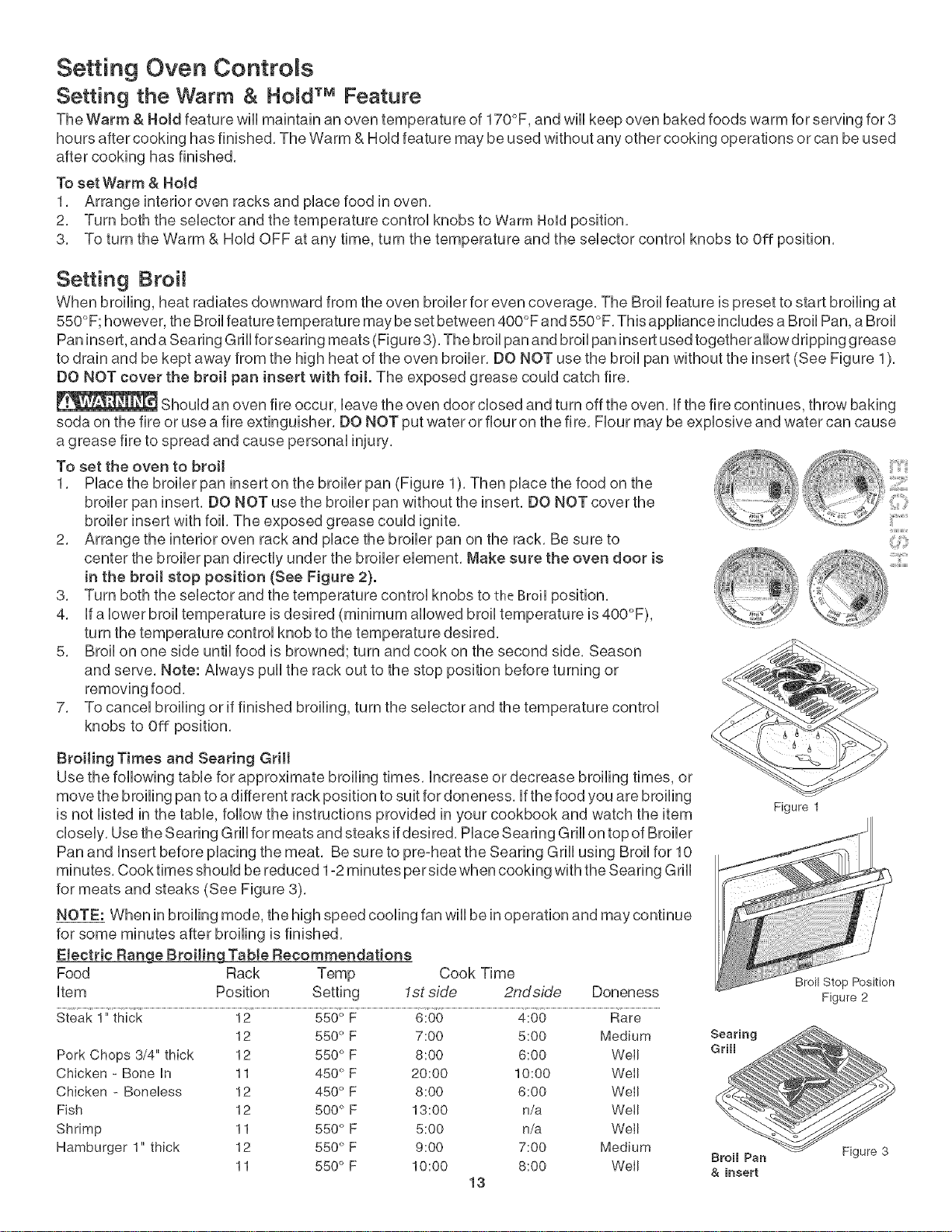
When broiling, heat radiates downward from the oven broiler for even coverage, The BroHfeature is preset to start broiling at
550°F; however, the Broil feature temperature may be set between 400°F and 550°F, This appliance inciudes a Broii Pan, a Broii
Pan insert, and a Searing Grili for searing meats (Figu re 3), The broii pan and broii pan insert used together allow dripping grease
to drain and be kept away from the high heat of the oven broiler, DO NOT use the broii pan without the insert (See Figure 1),
DO NOT cover the broit pan insert with foit. The exposed grease couid catch fire,
Shouid an oven fire occur, Heavethe oven door dosed and turn off the oven, if the fire continues, throw baking
soda on the fire or use a fire extinguisher, DO NOT put water or flour on the fire, Fiour may be expiosive and water can cause
a grease fire to spread and cause personai injury,
To set the oven to broil
1, insert on the broiler pan (Figure 1), Then place the food on the
insert, DO NOT use the broiler pan without the insert, DO NOT cover the
broiler insert with foil, The exposed grease could ignite,
2, Arrange the interior oven rack and place the broiler pan on the rack, Be sure to
center the broiler pan directly under the broiler element, Make sure the oven door is
in the broit stop position (See Figure 2).
3, Turn both the selector and the temperature controi knobs to the groinposition,
4, ifa Hewerbroii temperature is desired (minimum aiiowed broii temperature is 400°F),
turn the temperature controi knob to the temperature desired,
5, Broii on one side untii food is browned; turn and cook on the second side, Season
and serve, Note: Aiways puli the rack out to the stop position before turning or
removing food,
7, To cancei broiling or if finished broiling, turn the selector and the temperature controi
knobs to Off position,
i' i
4 ......... iiii;.......
Broiling Times and Searing Grin
Use the following table for approximate broiling times, increase or decrease broiling times, or
move the broiling pan to a different rack position to suit for doneness, ifthe food you are broiling
is not listed in the table, follow the instructions provided in your cookbook and watch the item
closely, Use the Searing Grill for meats and steaks ifdesired, Place Searing Grill on top of Broiler
Pan and insert before placing the meat, Be sure to pre-heat the Searing Grill using Broil for 10
minutes, Cook times should be reduced 1-2 minutes per side when cooking with the Searing Grill
for meats and steaks (See Figure 8),
NOTE: When in broiling mode, the high speed cooling fan wiii be in operation and may continue
for some minutes after broiling is finished,
Etectric Range BroiJing TabJe Recommendations
Food Rack Temp Cook Time
item Position Setting 1st side 2ndside Doneness
Steak 1"thick 12 550° F 6:00 4:00 Rare
12 550° F 7:00 5:00 Medium
Pork Chops 3/4" thick 12 550 ° F 8:00 6:00 WeII
Chicken - Bone in 11 450°F 20:00 10:00 WeII
Chicken - Boneless 12 450 ° F 8:00 6:00 WeII
Fish 12 500 ° F 13:00 n/a We!l
Shrimp 11 550 ° F 5:00 n/a WeII
Hamburger 1" thick 12 550°F 9:00 7:00 Medium
11 550 ° F 10:00 8:00 Well
13
Figure 1
Broil Stop Position
Figure 2
Searing
Grimm
Broil Pan Figure 3
& insert
Seff-C eaning
During the self-cleaning cycle,
the outside of the wall oven can become very
hot to the touch, DO NOT leave small
children unattended near the appliance,
The health of some birds is
extremely sensitive to the fumes given off
during the self-clean cycle of any wall oven,
Move birds to another well ventilated room,
DO NOT line the oven walls,
racks, bottom or any other part of the
appliance with aluminum foil, Doing so wiii
destroy heat distribution, produce poor baking
results and cause permanent damage to the
interior (aluminum foil will melt to the interior
surface of the oven),
DO NOT force the oven door
open, This can damage the automatic door
locking system, Use caution when opening
the door after the Self-Cleaning cycle is
completed, The oven may still be VERY
HOT,
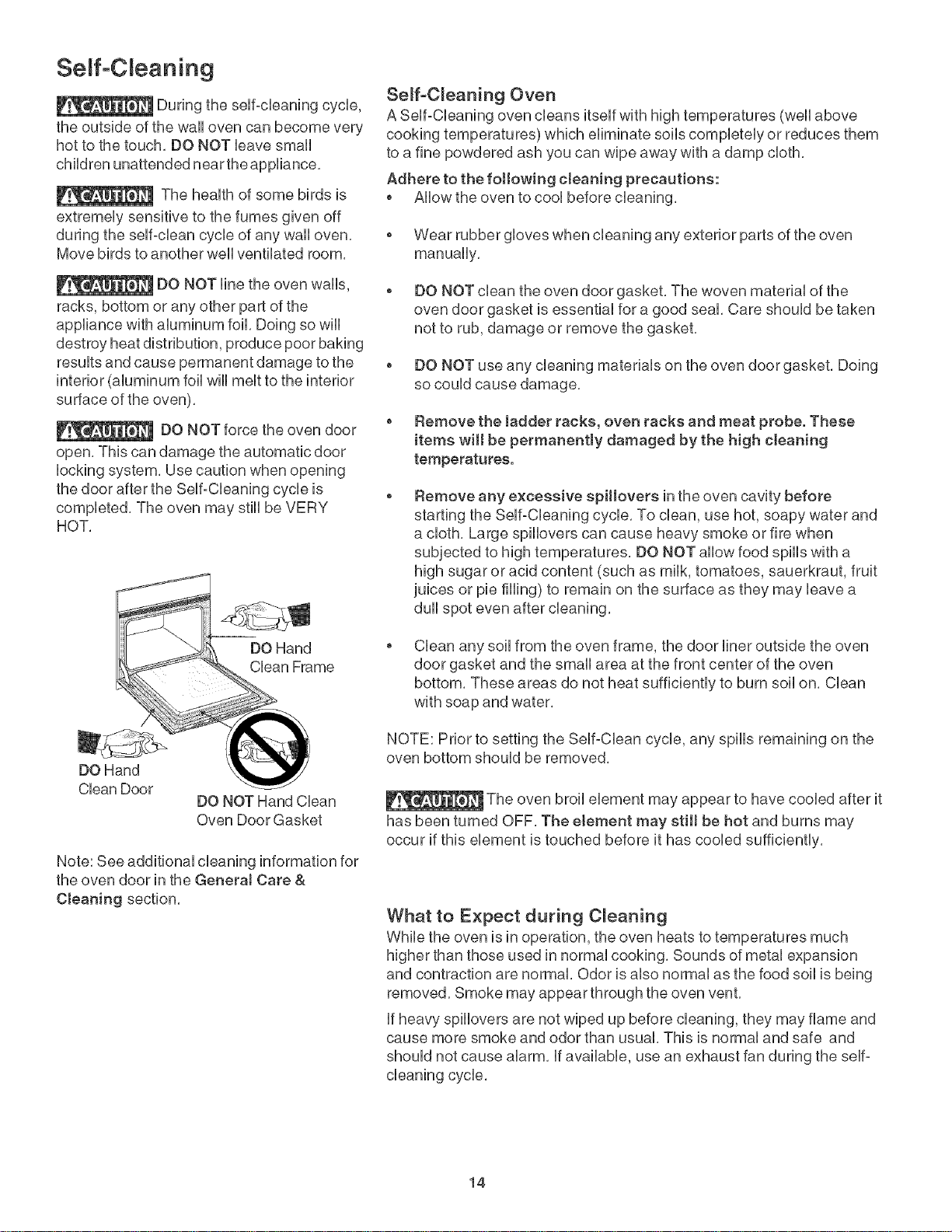
Clean Door DO NOT Hand Clean
Oven Door Gasket
Note: See additional cleaning information for
the oven door in the GeneraJ Care &
Cleaning section,
Semf-C_eaning Oven
A Seff-CUeaning oven deans itseff with high temperatures (weU]above
cooking temperatures) which eUiminate soiUscompUeteUyor reduces them
to a fine powdered ash you can wipe away with a damp cloth,
Adhere to the following cteaning precautions:
o Allow the oven to cool before cleaning,
o Wear rubber gloves when cleaning any exterior parts of the oven
manually,
o DO NOT clean the oven door gasket, The woven material of the
oven door gasket is essential for a good seal, Care should be taken
not to rub, damage or remove the gasket,
o DO NOT use any cleaning materials on the oven door gasket, Doing
so could cause damage,
o Remove the Jadder racks, oven racks and meat probe. These
items wilt be permanently damaged by the high cteaning
temperatures.
Remove any excessive spiHovers in the oven cavity before
starting the Self-Cleaning cycle, To clean, use hot, soapy water and
a cloth, Large spillovers can cause heavy smoke or fire when
subjected to high temperatures, DO NOT allow food spills with a
high sugar or acid content (such as milk, tomatoes, sauerkraut, fruit
juices or pie filling) to remain on the surface as they may leave a
dull spot even after cleaning,
Clean any soil from the oven frame, the door liner outside the oven
door gasket and the small area at the front center of the oven
bottom, These areas do not heat sufficiently to burn soil on, Clean
with soap and water,
NOTE: Prior to setting the Self-Clean cycle, any spills remaining on the
oven bottom should be removed,
The oven broil element may appear to have cooled after it
has been turned OFF, The etement may still be hot and burns may
occur if this element is touched before it has cooled sufficiently,
What to E×peet during C_eaning
While the oven is in operation, the oven heats to temperatures much
higher than those used in normal cooking, Sounds of metal expansion
and contraction are normal, Odor is also normal as the food soil is being
removed, Smoke may appear through the oven vent,
if heavy spillovers are not wiped up before cleaning, they may flame and
cause more smoke and odor than usual, This is normal and safe and
should not cause alarm, if available, use an exhaust fan during the self°
cleaning cycle,
14
Self-Cleaning
Self-Clean Cycle Time Length
if you are planning to use the oven directly after a self-clean cycle remember to allow
time for the oven to cool down and the oven door to unlock, This normally takes
about lSS hour, So a self-clean cycle (3 hours) wiii actually take about 4V2hours to
complete, The time remaining for the self-clean cycle wiii be displayed in the oven
control display,
To avoid possible
burns use care when opening the
oven door after the Self-Cleaning
cycle, Stand to the side of the
oven when opening the door to
allow hot air or steam to escape,
To set the controls for a Serf-Cleaning cycle
1, Be sure the oven door is closed,
2, Turn both the selector and the temperature control knobs to Cleanposition,
3, As soon as the control is set, the motor driven oven door lock will begin to close
automatically, While the door is locking, the icon will flash and then will
remain visible for the entire self-clean cycle,
Note: Allow about 20 seconds for the oven door lock to close,
DO NOT force the
oven door open, This can damage
the automatic door locking
system, Use caution and avoid
possible burns when opening the
door after the Self°Cleaning cycle
has completed, The oven may
still be VERY HOT,
When the Self-Clean Cycle is Completed
1. Turn the selector and the temperature control knobs back to Off position.
2. Once the oven has cooled down for approximately 1V2HOUR, the oven door can
then be opened. While the door is unlocking, the _ icon will flash and then will
disappear from the oven control display.
Stopping or Interrupting a Self-Cleaning Cycle
if it becomes necessary to stop or interrupt a self-cleaning cycle due to excessive
smoke or fire in the oven:
1, Turn the selector and the temperature control knobs to Off position,
2, The oven door can only be opened after the oven has cooled down for approximately 1V2HOUR,
ii:Z:_
Adiusting Oven Temperature
The temperature in the oven has been pre-set at the factory, When first using the oven, be sure to follow recipe times and
temperatures, if you think the oven is cooking too hot or too coo[ for the temperature you select, you can adjust the actual
oven temperature to be more or less than what is displayed, Before adjusting, test a recipe by using a temperature setting
that is higher or lower than the recommended temperature, The baking results should help you to decide how much of an
adjustment is needed,
To adjust the oven temperature
C_uvCo,,v,_t
1. Press and hold the button until "00" appears in the oven control display.
2. To increase the temperature use the button to enter the desired change; and to decrease the temperature use the
button (a minus sign will appear in the display indicating the temperature is decreased).
3. Wait 5 seconds for the change to be accepted by the oven controls.
Note: The oven temperature adjustments made with this feature wiii not change the Self-Clean cycle or the Broil temperature,
Once the temperature has been changed, the temperature indicator will still display the value set from the
temperature knob but the actual temperature in the oven will be higher or lower,
15
Genera Care & CReaning
Cleaning Various Parts of Your Oven
Before deaning any >artof the oven, be sure all controls are turned OFF and the oven is COOL, REMOVE SPILLOVERS
AND HEAVY BOiLiNG AS SOON AS POSSIBLE, REGULAR CLEANINGS NOW WiLL REDUCE THE EXTENT AND
DiFFiCULTY OF MAJOR CLEANING LATER,
Surfaces How to C_ean
Aluminum (Trim Pieces) Use hot, soapy water and a doth, Dry with adean cloth, Do not scour or use all-
& Vinyt purpose cleaners, ammonia, powdered cleaners or commercial oven cleaner, They can
scratch and discolor aluminum,
Painted and Plastic,
ControJ Panet, Body Parts,
and Decorative Trim
For general cleaning, use hot, soapy water and a cloth, For more difficult softs and
built-up grease, apply a liquid detergent directly onto the soil, Leave on soil for 30 to
60 minutes, Rinse with a damp cloth and dry, DO NOT use abrasive cleaners on any
of these materialsl they can scratch,
To remove control knobs, turn to the OFF position; grasp firmly and pull straight off
the shaft, To replace knobs after cleaning, fine up the fiat sides of both the knob and
the shaftl then push the knob into place,
StainJess Steel, Chrome,
Control Panet, Decorative
Trim
Before cleaning the controlpanel, turn all controls to OFF and remove the control
knobs, To remove, pull each knob straight off the shaft, Clean using hot, soapy water
and a dishcloth, Rinse with a clean water using a dishcloth, Be sure to squeeze
excess water from the cloth before wiping the panel; especially when wiping around
the controls, Excess water in or around the controls may cause damage to the
appliance,To replace knobs after cleaning, line up the fiat sides of both the knob and
the shaft; then push the knob into place,
Clean stainless steeJ with hot, soapy water and a dishcloth, Rinse with clean water
and a cloth, Do not use cteaners with high concentrations of chlorides or
cHorines. Always clean on the same direction as the stainless steel grain, Do not
use harsh scrubbing cleaners, Only use kitchen cleaners that are especially made for
cleaning stainless steel, Always be sure to rinse the cleaners from the surface as
bluish stains may occur during heating that cannot be removed,
Porcelain EnameJ.
Broiler Pan and insert,
Door Liner, Body Parts
Gentle scouring with a soapy scouring pad wiii remove most spots, Rinse with a 1:1
solution of clear water and ammonia,/f necessary, cover difficult spots with an
ammonia-soaked paper towel for 30 to 40 minutes, Rinse with clean water and a damp
cloth, and then scrub with a soap-filled scouring pad, Rinse and wipe dry with a clean
cloth, Remove all cleaners or the porcelain may become damaged during future
heating, DO NOT use spray oven cleaners on the cooktop,
Oven Racks Oven racks, oven rack ladders and meat probe must be removed from
the oven during the self-clean cycle for cleaning, if they are not removed, the self-
clean cycle will damage the racks permanently, causing them to discolor and making
them difficult to slide, if this occurs, coat the racks with cooking oil to make them
easier to slide again,
Oven Door Use soap & water to thoroughly clean the top, sides and front of the oven door, Rinse
well, You may use a glass cleaner on the outside glass of the oven door, DO NOT
immerse the door in water, DO NOT spray or allow water or the gJass cleaner to
enter the door vents. DO NOT use oven cleaners, cleaning powders or any harsh
abrasive cleaning materials on the outside of the oven door,
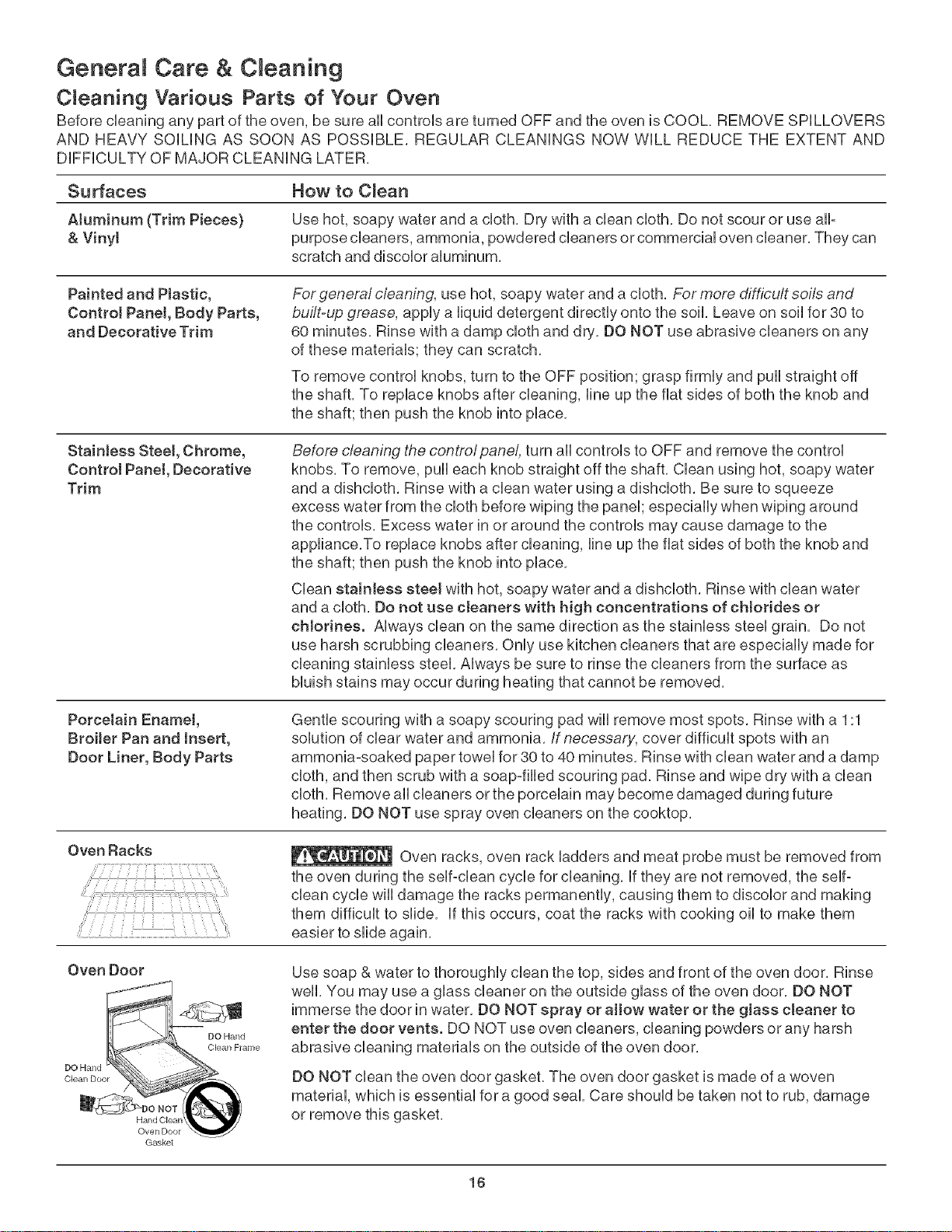
DO NOT clean the oven door gasket, The oven door gasket is made of a woven
material, which is essential fora good seal, Care should be taken not to rub, damage
or remove this gasket,
Gaskel
16
Genera Care & C eaning
Care and CWeaning of Stainless Steel
This modeUis equipped with stainUess steeUexterior parts, SpeciaU care and cUeaning
are required for maintaining the appearance of stainUessparts, Please refer to the
table provided at the beginning of the GeneraJ Care & Cleaning section in this Use &
Care Guide,
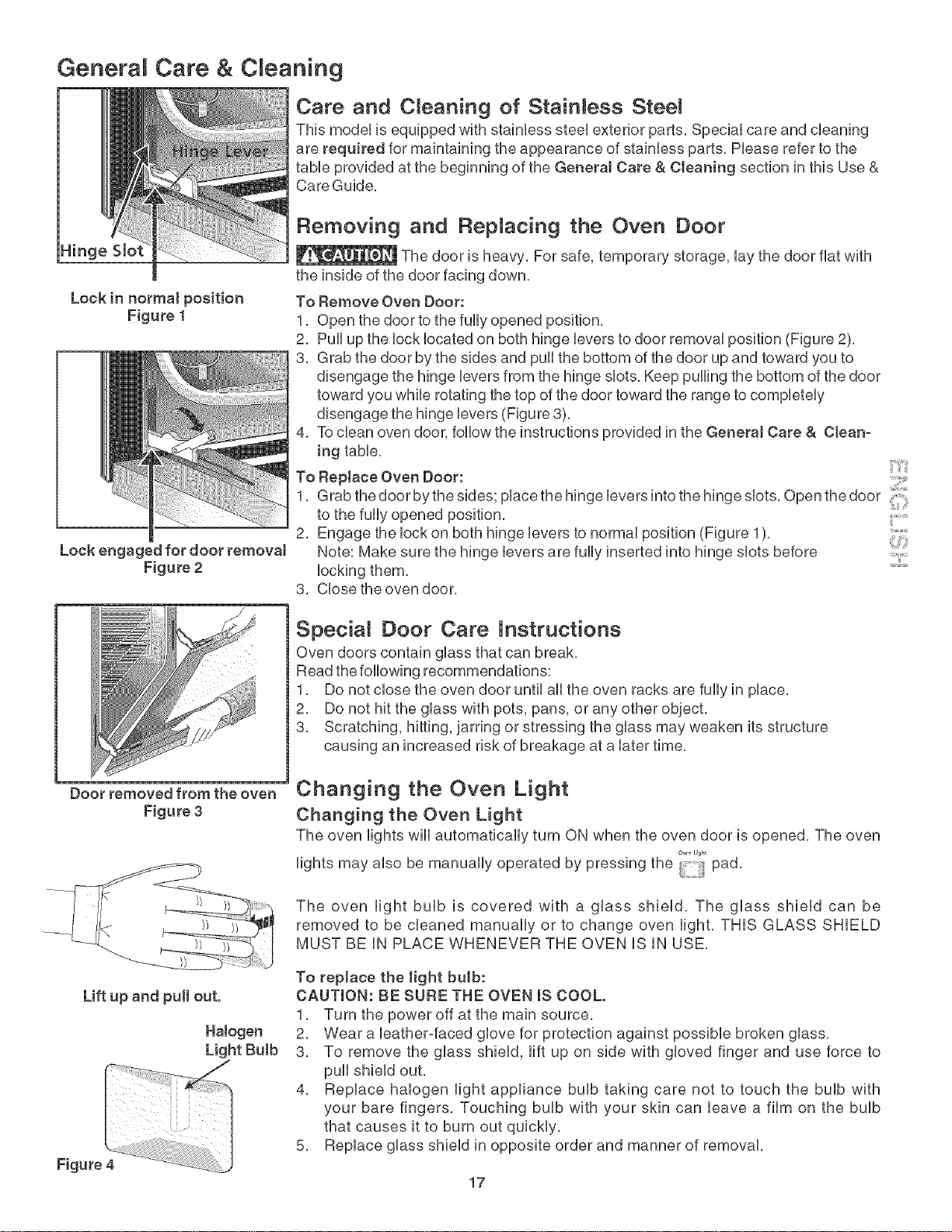
Hinge Slot
Lock in normal position
Figure 1
Lock engaged for door removaJ
Figure 2
Removing and Repnacing the Oven Door
The door is heavy, For safe, temporary storage, lay the door flat with
the inside of the door facing down,
To Remove Oven Door:
1, Open the door to the fully opened position,
2, Pull up the lock located on both hinge levers to door removal position (Figure 2),
3, Grab the door by the sides and pull the bottom of the door up and toward you to
disengage the hinge levers from the hinge slots, Keep pulling the bottom of the door
toward you while rotating the top of the door toward the range to completely
disengage the hinge levers (Figure 3),
To clean oven door, follow the instructions provided in the General Care & Clean-
ing table,
RepJace Oven Door:
4.
To
1, Grab the door by the sides; place the hinge levers into the hinge slots, Open the door !
to the fully opened position,
2, Engage the lock on both hinge levers to normal position (Figure 1),
Note: Make sure the hinge levers are fully inserted into hinge slots before ....../
locking them,
3, Close the oven door,
Special Door Care instructions
Oven doors contain glass that can break,
Read the following recommendations:
1, Do not close the oven door until all the oven racks are fully in place,
2, Do not hit the glass with pots, pans, or any other object,
3, Scratching, hitting, jarring or stressing the glass may weaken its structure
causing an increased risk of breakage at a later time,
Door removed from the oven
Figure 3 Changing the Oven Light
Changing the Oven Light
The oven lights will automatically turn ON when the oven door is opened, The oven
lights may also be manually operated by pressing the !} pad,
The oven light bulb is covered with a glass shield, The glass shield can be
removed to be cleaned manually or to change oven light, THIS GLASS SHIELD
MUST BE IN PLACE WHENEVER THE OVEN IS IN USE,
Lift up and pull out.
HaJogen
Light Bulb
To repJace the light bulb:
CAUTION: BE SURE THE OVEN IS COOL.
1, Turn the power off at the main source,
2, Wear a leather-faced glove for protection against possible broken glass,
3, To remove the glass shield, lift up on side with gloved finger and use force to
pull shield out,
4, Replace halogen light appliance bulb taking care not to touch the bulb with
your bare fingers, Touching bulb with your skin can leave a film on the bulb
that causes it to burn out quickly,
5, Replace glass shield in opposite order and manner of removal,
17
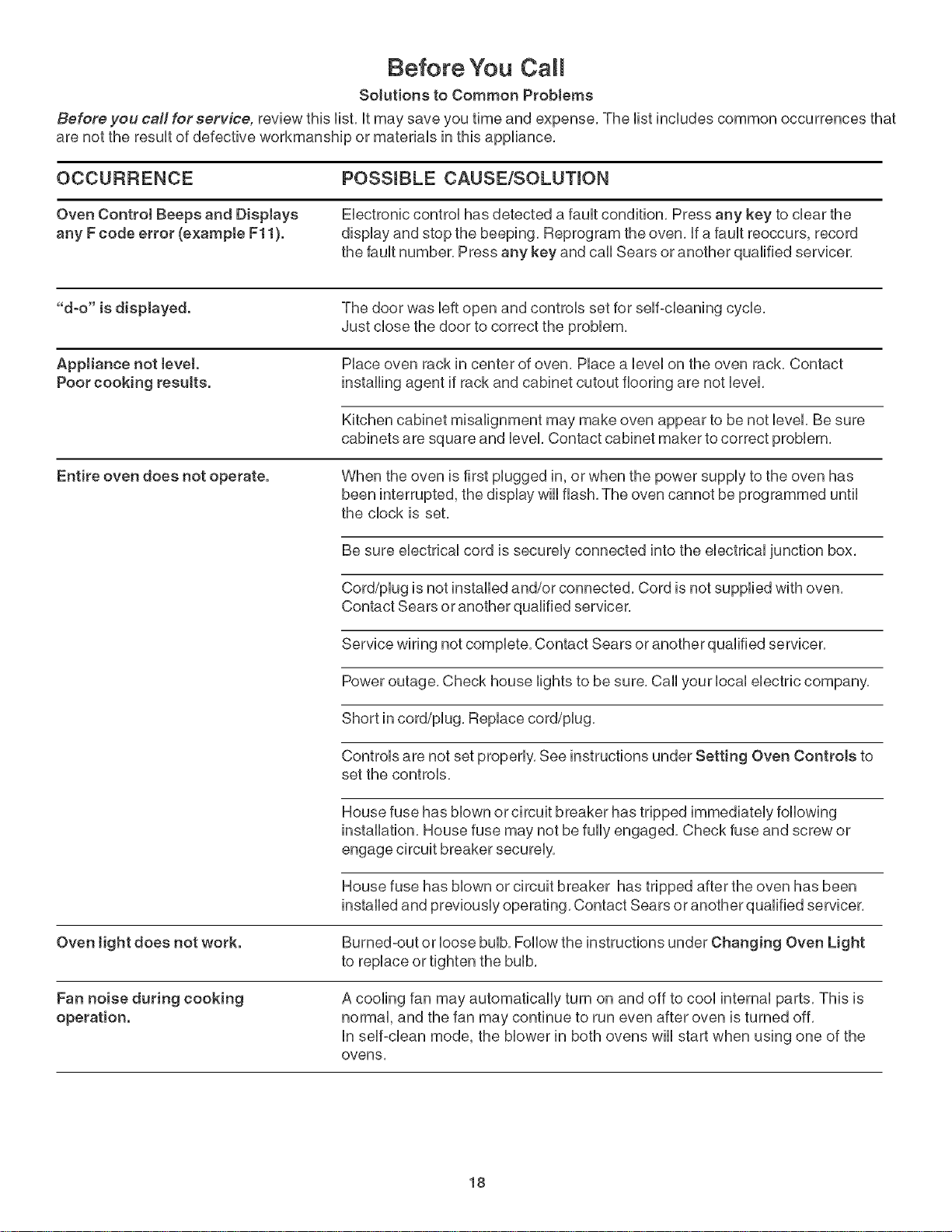
Before You Call
Solutions to Common Problems
Before you call for service, review this Hst, it may save you time and expense, The Hstinciudes common occurrences that
are not the resuit of defective workmanship or materiais in this appliance,
OCCURRENCE POSStBLE CAUSE/SOLUTmON
Oven Control Seeps and DispJays EHectronb controi has detected a fauit condition, Press any key to dear the
any Fcode error (example Fll). dispiay and stop the beeping, Reprogram the oven, if a fauit reoccurs, record
the fauit number, Press any key and cali Sears or another qualified servicer,
"d-o" is displayed. The door was Heftopen and controis set for seif-cieaning cycie,
Just chose the door to correct the probiem,
AppJiance not tevet. Piace oven rack in center of oven, Piace a ievei on the oven rack, Contact
Poor cooking results, installing agent if rack and cabinet cutout flooring are not ievei,
Kitchen cabinet misalignment may make oven appear to be not level, Be sure
cabinets are square and level, Contact cabinet maker to correct problem,
Entire oven does not operate. When the oven is first plugged in, or when the power supply to the oven has
been interrupted, the display wiii flash, The oven cannot be programmed until
the clock is set,
Be sure electrical cord is securely connected into the electrical junction box,
Cord/plug is not installed and/or connected, Cord is not supplied with oven,
Contact Sears or another qualified servicer,
Service wiring not complete, Contact Sears or another qualified servicer,
Power outage, Check house lights to be sure, Call your local electric company,
Short in cord/plug, Replace cord/plug,
Controls are not set properly, See instructions under Setting Oven Controls to
set the controls,
House fuse has blown or circuit breaker has tripped immediately following
installation, House fuse may not be fully engaged, Check fuse and screw or
engage circuit breaker securely,
House fuse has blown or circuit breaker has tripped after the oven has been
installed and previously operating, Contact Sears or another qualified servicer,
Oven tight does not work. Burned-out or loose bulb, Follow the instructions under Changing Oven Light
to replace or tighten the bulb,
Fan noise during cooking
operation. A cooling fan may automatically turn on and off to cool internal parts, This is
normal, and the fan may continue to run even after oven is turned off,
in self-clean mode, the blower in both ovens will start when using one of the
ovens,
18
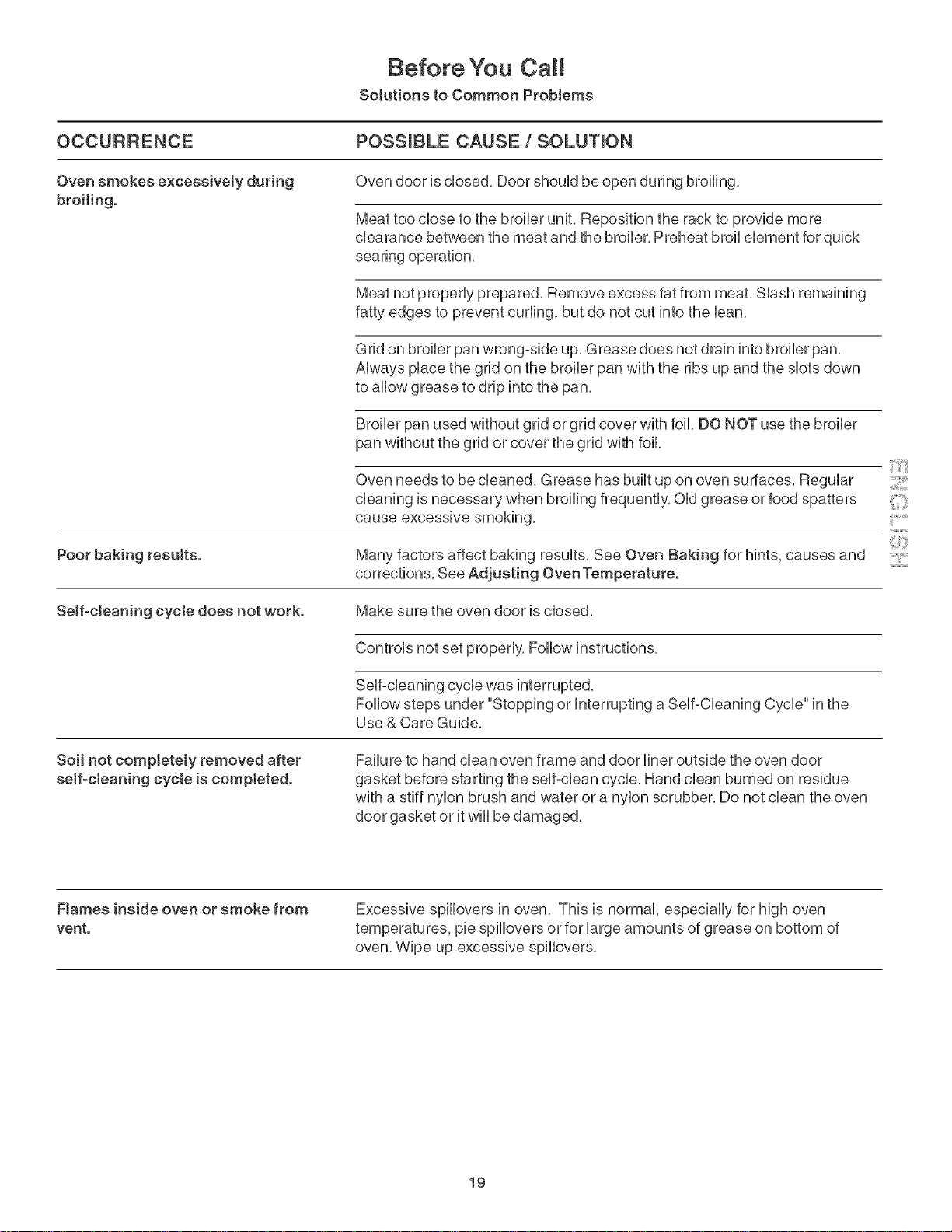
Before You Call
Solutions to Common Problems
OCCURRENCE POSS{BLE CAUSE fSOLUT{ON
Oven smokes e×cess[ve[y during
broiling. Oven door is closed. Door should be open during broiling.
Meat too close to the broiler unit. Reposition the rack to provide more
clearance between the meat and the broiler. Preheat broil element for quick
searing operation.
Meat not properly prepared. Remove excess fat from meat. Slash remaining
fatty edges to prevent curling, but do not cut into the ban.
Grid on broiler pan wrong-side up. Grease does not drain into broiler pan.
Always place the grid on the broiler pan with the ribs up and the slots down
to allow grease to drip into the pan.
Broiler pan used without grid or grid cover with foil. DO NOT use the broiler
pan without the grid or cover the grid with foil.
Oven needs to be cleaned. Grease has built up on oven surfaces. Regular
cleaning is necessary when broiling frequently. Old grease or food spatters
cause excessive smoking.
Poor baking resu{ts. Many factors affect baking results. See Oven Baking for hints, causes and
corrections. See Adjusting Oven Temperature.
Self-cleaning eyete does not work. Make sure the oven door is closed.
Controls not set properly. Follow instructions.
Self-cleaning cycle was interrupted.
Follow steps under "Stopping or interrupting a Self-Cleaning Cycle" in the
Use & Care Guide.
Soil not completely removed after
self-cleaning cycle is completed. Failure to hand clean oven frame and door liner outside the oven door
gasket before starting the self-clean cycle. Hand clean burned on residue
with a stiff nylon brush and water or a nylon scrubber. Do not clean the oven
door gasket or itwiii be damaged.
iilYii:_
F}ames inside oven or smoke from
vent. Excessive spillovers in oven. This is normal, especially for high oven
temperatures, pie spillovers or for large amounts of grease on bottom of
oven. Wipe up excessive spillovers.
19

NOTES:
20

NOTES:
21
Your Home
For repair- in your home- of aimmajor brand appliances.
lawn and garden equipment, or heating and cooling systems.
no matter who made it, no matter who sold it!
For the replacement parts, accessories and
owner's manuals that you need to do-it-yourself.
For Sears professional installation of home appliances
and items like garage door openers and water heaters.
1=800-4-MY-HOME ® (1-800-4694663)
Call anytime, day or night (U.S.A. and Canada)
www.sears.corn www.sears.ca
Our Home
For repair of carry-in items like vacuums, lawn equipment.
and electronics, call or go onqine for the location of your nearest
Sears Parts & Repair Service Center.
Call anytime, day or night (U.S.A. only)
www. sears.corn
To purchase a protection agreement (U.S.A.)
or maintenance agreement (Canada) on a product serviced by Sears:
1°800°827°6655 (U.S.A.) 1o800o361°6665 (Canada)
Para pedk servicio de reparacion
a domicilio, y para ordenar piezas
1-888-SU-HOGAR _
11-888-784-6427_
Au Canada pour service en fran_?ais:
1-800-LE°FOYER Mc
11-800-533-6937 _
www, sears,ca
TM SM
® Registered Trademark /Trademark /Service Mark of Sears Brands, LLC
TM SM
® Marca Registrada /Marca de Fabrica /Marca de Servicio de Sears Brands, LLC
MD
MC Marque de commerce /Marque deposee de Sears Brands, LLC ® Sears Brands, LLC