Viking Range Corporation
111 Front Street
Greenwood, Mississippi 38930 USA
(662) 455-1200
For product information
call 1-888-VIKING1 (845-4641),
or visit the Viking Web site at
vikingrange.com
F20413 EN (040908J)
Viking Use & Care Manual
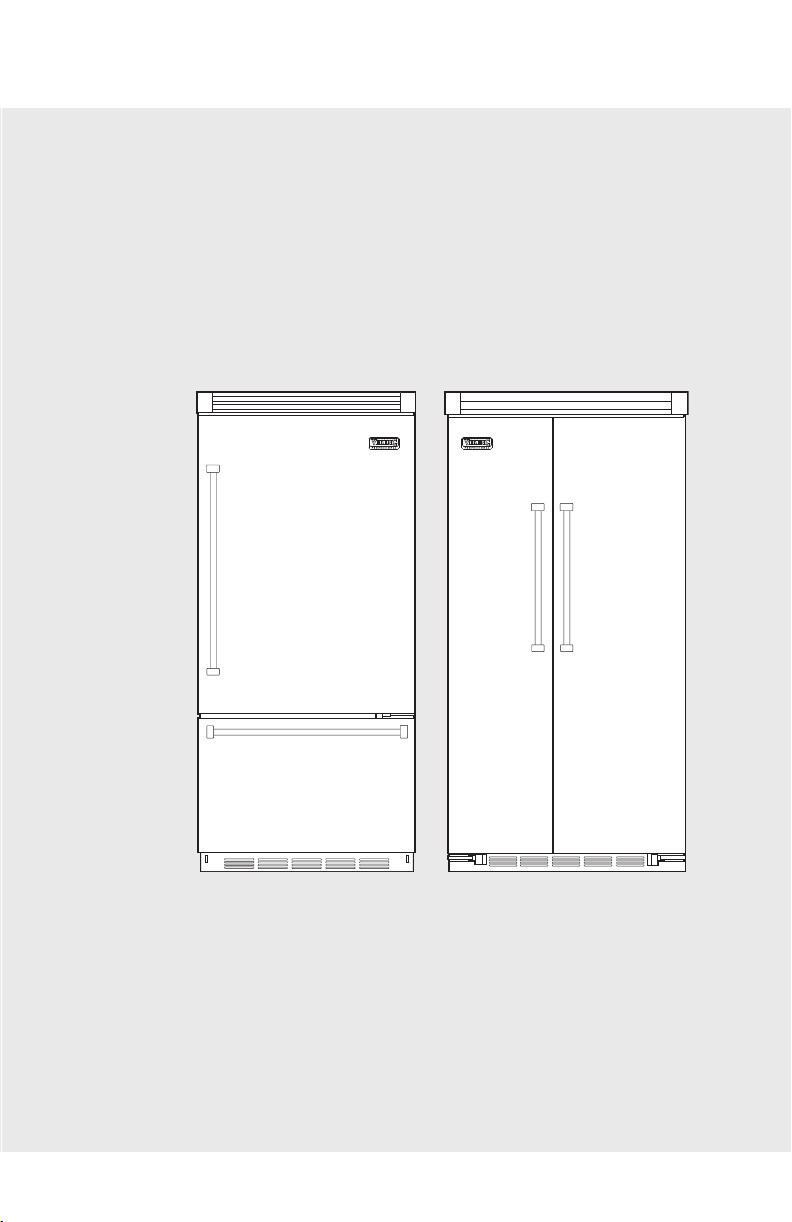
Built-In Refrigerator/Freezer
Viking Range Corporation
111 Front Street
Greenwood, Mississippi 38930 USA
(662) 455-1200
For product information
call 1-888-VIKING1 (845-4641),
or visit the Viking Web site at
vikingrange.com
F20413 EN (040908J)
Viking Use & Care Manual
Built-In Refrigerator/Freezer

3
Warnings
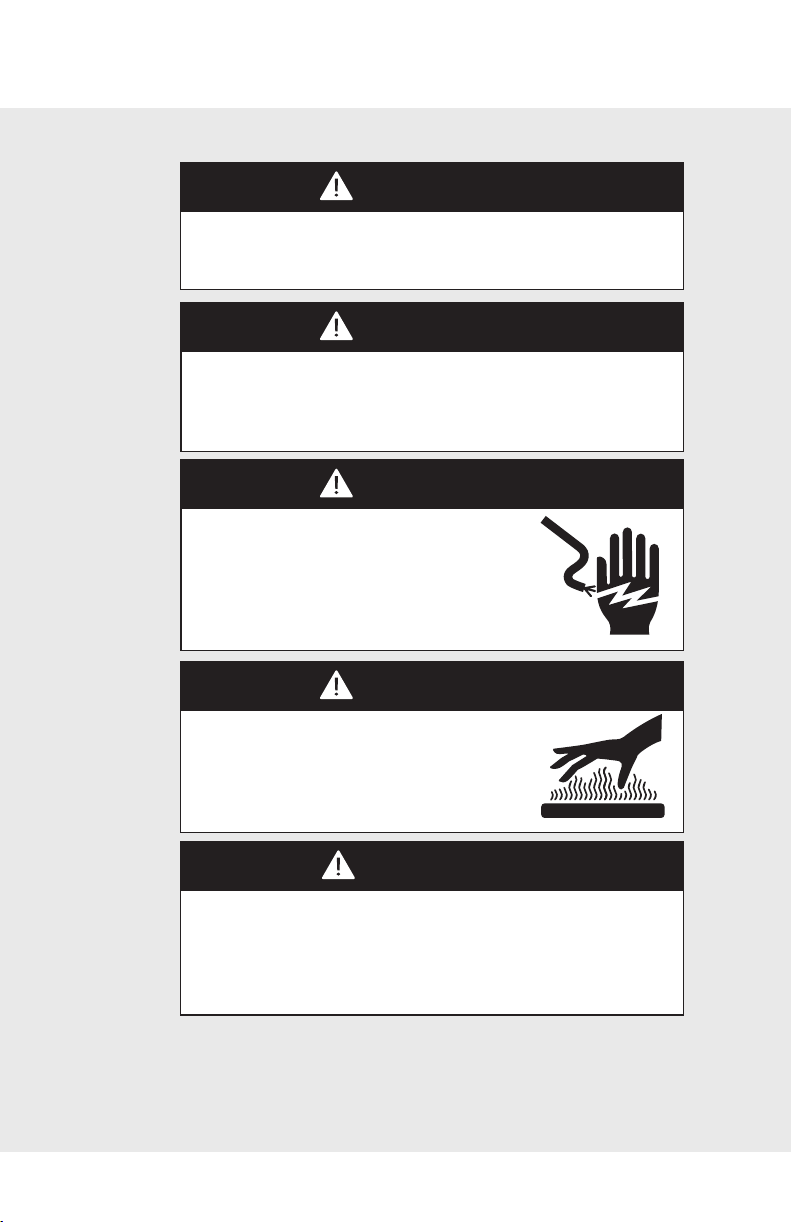
WARNING
To reduce the risk of fire, electric shock, or injury when using
your unit, follow these basic precautions:
• Read all instructions before using the unit.
• Never allow children to operate, play with, or crawl inside
the unit.
• Never clean unit parts with flammable fluids. The fumes can
create a fire hazard or explosion.
• Always turn the power on/off switch (located behind the air
grille on top right side) to the OFF position before
attempting to change light bulbs, clean, or service the unit.
FOR YOUR SAFETY
DO NOT STORE OR USE GASOLINE OR OTHER
FLAMMABLE VAPORS AND LIQUIDS IN THE VICINITY OF
THIS OR ANY OTHER APPLIANCE. THE FUMES CAN
CREATE A FIRE HAZARD OR EXPLOSION.
WARNING
ELECTRICAL SHOCK HAZARD
Plug into a grounded 3-prong outlet.
If a 2-prong wall receptacle is encountered,
contact a qualified electrician.
Do not remove ground prong.
Unit must be grounded at all times.
Do not use an adapter.
Do not use an extension cord.
Failure to follow these instructions can result in death, fire, or
electrical shock.
Your safety is important to us. This use and care manual
contains safety symbols and statements. Please pay special
attention to these symbols and follow any instructions given.
This symbol alerts you to hazards such as fire,
electrical shock or other injuries.
Congratulations and welcome to the elite world of Viking
ownership. We hope you will enjoy and appreciate the care
and attention we have put into every detail of your new,
state-of-the-art refrigerator.
Your Viking appliance is designed to offer years of reliable
service. This Use and Care Guide will provide you with the
information you need to become familiar with your
refrigerator’s care and operation.
Your complete satisfaction is our ultimate goal. If you have any
questions or comments about this product, please contact the
dealer from whom you purchased it, or contact our Consumer
Support Center at 1-888-VIKING1.
We appreciate your choice of a Viking refrigerator and hope
that you will again select our products for your other major
appliance needs.
For more information about the complete and growing
selection of Viking products, contact your dealer or visit us
online at vikingrange.com.
Congratulations
2
3
Warnings
WARNING
To reduce the risk of fire, electric shock, or injury when using
your unit, follow these basic precautions:
• Read all instructions before using the unit.
• Never allow children to operate, play with, or crawl inside
the unit.
• Never clean unit parts with flammable fluids. The fumes can
create a fire hazard or explosion.
• Always turn the power on/off switch (located behind the air
grille on top right side) to the OFF position before
attempting to change light bulbs, clean, or service the unit.
FOR YOUR SAFETY
DO NOT STORE OR USE GASOLINE OR OTHER
FLAMMABLE VAPORS AND LIQUIDS IN THE VICINITY OF
THIS OR ANY OTHER APPLIANCE. THE FUMES CAN
CREATE A FIRE HAZARD OR EXPLOSION.
WARNING
ELECTRICAL SHOCK HAZARD
Plug into a grounded 3-prong outlet.
If a 2-prong wall receptacle is encountered,
contact a qualified electrician.
Do not remove ground prong.
Unit must be grounded at all times.
Do not use an adapter.
Do not use an extension cord.
Failure to follow these instructions can result in death, fire, or
electrical shock.
Your safety is important to us. This use and care manual
contains safety symbols and statements. Please pay special
attention to these symbols and follow any instructions given.
This symbol alerts you to hazards such as fire,
electrical shock or other injuries.
Congratulations and welcome to the elite world of Viking
ownership. We hope you will enjoy and appreciate the care
and attention we have put into every detail of your new,
state-of-the-art refrigerator.
Your Viking appliance is designed to offer years of reliable
service. This Use and Care Guide will provide you with the
information you need to become familiar with your
refrigerator’s care and operation.
Your complete satisfaction is our ultimate goal. If you have any
questions or comments about this product, please contact the
dealer from whom you purchased it, or contact our Consumer
Support Center at 1-888-VIKING1.
We appreciate your choice of a Viking refrigerator and hope
that you will again select our products for your other major
appliance needs.
For more information about the complete and growing
selection of Viking products, contact your dealer or visit us
online at vikingrange.com.
Congratulations
2
Warnings
4 5
WARNING
To avoid serious illness or death, do not use unit where water
is unsafe or of unknown quality without adequate disinfection
before or after use of filter.
WARNING
To avoid electrical shock which can cause severe personal
injury or death, turn power disconnect switch to OFF before
cleaning. After cleaning, return power disconnect switch to
ON position.
WARNING
ELECTRICAL SHOCK HAZARD
Disconnect power or turn power
disconnect switch to OFF position before
removing top grille. Failure to do so can
result in death or electrical shock.
WARNING
BURN HAZARD
Do not touch condenser coils near
defrost pan.
Doing so can result in burns.
DANGER
RISK OF CHILD ENTRAPMENT
Before You Throw Away Your Old Refrigerator or Freezer:
• Take off the doors.
• Leave the shelves in place so that children may not easily
climb inside.
IMPORTANT: Child entrapment and suffocation are not
problems of the past. Junked or abandoned refrigerators are
still dangerous... even if they will sit for “just a few days.”
Table of Contents
Getting Started
Important Safety Instructions ______________________ 6
Proper Disposal (of old refrigerator) ________________ 7
Features __________________________________________ 8
Product Controls
Settings and Functions ____________________________ 14
Operation
Refrigerator (all units) _____________________________ 19
Freezer (all units) __________________________________ 24
Automatic Ice Maker ______________________________ 25
Automatic Dispenser ______________________________ 27
Installing Water Filter ______________________________ 28
Replacing Water Filter _____________________________ 29
Food Storage Guide _______________________________ 30
Product Care
Cleaning and Maintenance ________________________ 32
Troubleshooting ___________________________________ 39
Service Information ________________________________ 42
Warranty __________________________________________ 43

Warnings
4 5
WARNING
To avoid serious illness or death, do not use unit where water
is unsafe or of unknown quality without adequate disinfection
before or after use of filter.
WARNING
To avoid electrical shock which can cause severe personal
injury or death, turn power disconnect switch to OFF before
cleaning. After cleaning, return power disconnect switch to
ON position.
WARNING
ELECTRICAL SHOCK HAZARD
Disconnect power or turn power
disconnect switch to OFF position before
removing top grille. Failure to do so can
result in death or electrical shock.
WARNING
BURN HAZARD
Do not touch condenser coils near
defrost pan.
Doing so can result in burns.
DANGER
RISK OF CHILD ENTRAPMENT
Before You Throw Away Your Old Refrigerator or Freezer:
• Take off the doors.
• Leave the shelves in place so that children may not easily
climb inside.
IMPORTANT: Child entrapment and suffocation are not
problems of the past. Junked or abandoned refrigerators are
still dangerous... even if they will sit for “just a few days.”
Table of Contents
Getting Started
Important Safety Instructions ______________________ 6
Proper Disposal (of old refrigerator) ________________ 7
Features __________________________________________ 8
Product Controls
Settings and Functions ____________________________ 14
Operation
Refrigerator (all units) _____________________________ 19
Freezer (all units) __________________________________ 24
Automatic Ice Maker ______________________________ 25
Automatic Dispenser ______________________________ 27
Installing Water Filter ______________________________ 28
Replacing Water Filter _____________________________ 29
Food Storage Guide _______________________________ 30
Product Care
Cleaning and Maintenance ________________________ 32
Troubleshooting ___________________________________ 39
Service Information ________________________________ 42
Warranty __________________________________________ 43

7
Proper Disposal (of old refrigerator)
Important Safety Instructions
6
• Install and level your refrigerator on a floor that will hold its
weight, plus food weight (approximately 1200 pounds
[540kg]) and in an area suitable for its size and use.
• Do not install a refrigeration unit near a heat source, nor in a
location where the surrounding temperature will fall below
60° F (16° C).
• Do not allow your refrigerator to be exposed to the weather
or outdoor elements.
• Connect your refrigerator only to the appropriate kind of
electrical outlet, with the correct power supply and
grounding. (Refer to the Electrical Requirements section
of the Installation Instructions.)
• Use the refrigerator only for the uses described in this
manual.
• Properly maintain the refrigerator.
• Be sure the refrigerator is not used by anyone unable to
operate it properly.
Getting Started
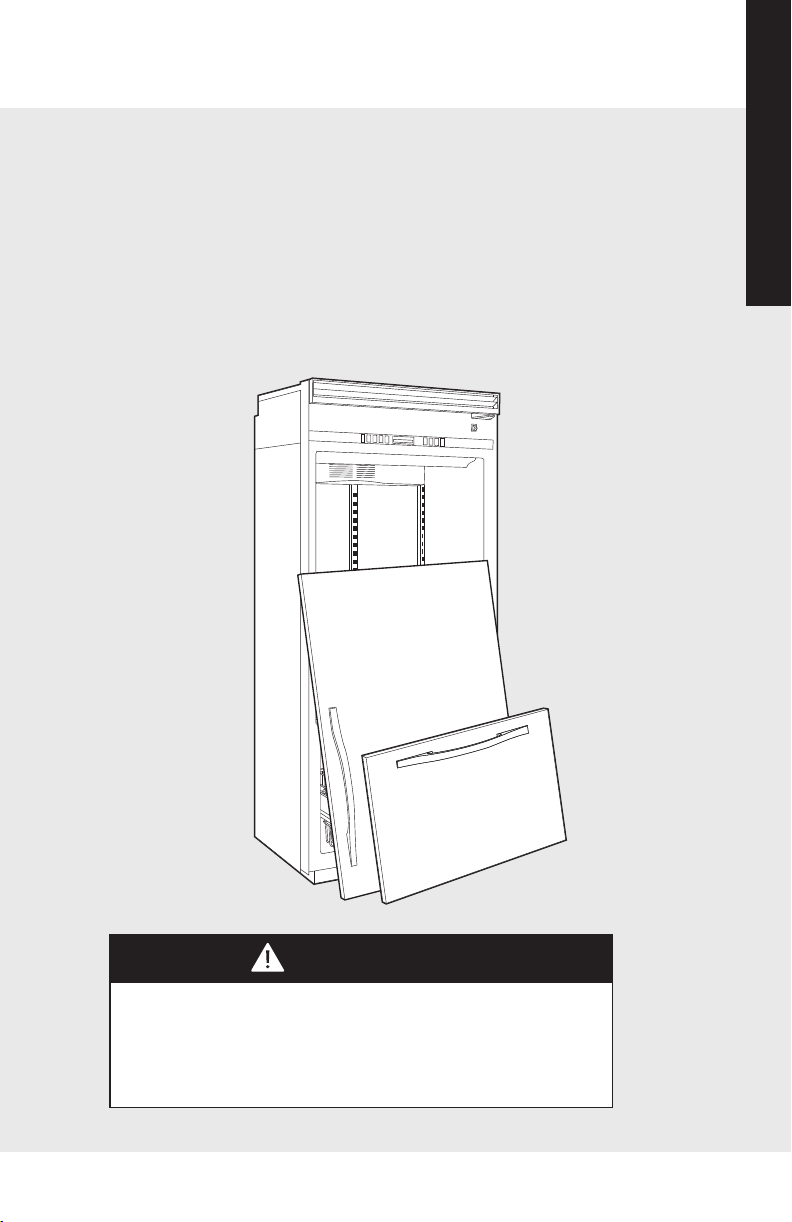
DANGER
RISK OF CHILD ENTRAPMENT
Before You Throw Away Your Old Refrigerator or Freezer:
• Take off the doors.
• Leave the shelves in place so that children may not easily
climb inside.
IMPORTANT:
Now that you have a new refrigerator, it is extremely important
that you dispose of your old appliance in a way that minimizes
the possibility that children will find it. There have been many
cases in years past of children crawling inside junked and
abandoned refigerators and becoming trapped or suffocated.
Contact your municipal waste disposal authority to find out the
best and safest way to dispose of your old refrigerator.
Getting Started
7
Proper Disposal (of old refrigerator)
Important Safety Instructions
6
• Install and level your refrigerator on a floor that will hold its
weight, plus food weight (approximately 1200 pounds
[540kg]) and in an area suitable for its size and use.
• Do not install a refrigeration unit near a heat source, nor in a
location where the surrounding temperature will fall below
60° F (16° C).
• Do not allow your refrigerator to be exposed to the weather
or outdoor elements.
• Connect your refrigerator only to the appropriate kind of
electrical outlet, with the correct power supply and
grounding. (Refer to the Electrical Requirements section
of the Installation Instructions.)
• Use the refrigerator only for the uses described in this
manual.
• Properly maintain the refrigerator.
• Be sure the refrigerator is not used by anyone unable to
operate it properly.
Getting Started
DANGER
RISK OF CHILD ENTRAPMENT
Before You Throw Away Your Old Refrigerator or Freezer:
• Take off the doors.
• Leave the shelves in place so that children may not easily
climb inside.
IMPORTANT:
Now that you have a new refrigerator, it is extremely important
that you dispose of your old appliance in a way that minimizes
the possibility that children will find it. There have been many
cases in years past of children crawling inside junked and
abandoned refigerators and becoming trapped or suffocated.
Contact your municipal waste disposal authority to find out the
best and safest way to dispose of your old refrigerator.
Getting Started

98
Getting Started
Getting Started
General Features
• ProChill™ Temperature Management System
The variable speed single compressor system
includes the quietest, most technologically
advanced compressor available. Electronic controls
maintain temperatures to within 1° F
and the multi-channel airflow system removes
odors and excess humidity.
• Convertible Meat Savor™/Produce Drawer
(all models except all freezer)
Equipped with a separate temperature control, the
Meat Savor/Produce Drawer can be set for either
produce or long-term fresh meat storage.
• Adaptive Defrost
Controls the timing of the defrost periods based
on refrigerator usage and can extend the defrost
up to 96 hours.
• Factory Installed Automatic Ice Maker
All models have an automatic ice maker with large
capacity ice buckets.
• Door Alarm
Sounds and glows to warn that fresh food and/or
freezer door have been ajar for three minutes.
• True 24” Depth
Keeps items in back within easy reach and allows
refrigerator to fit flush into 24” deep installation
cutout (Designer and Full Overlay models).
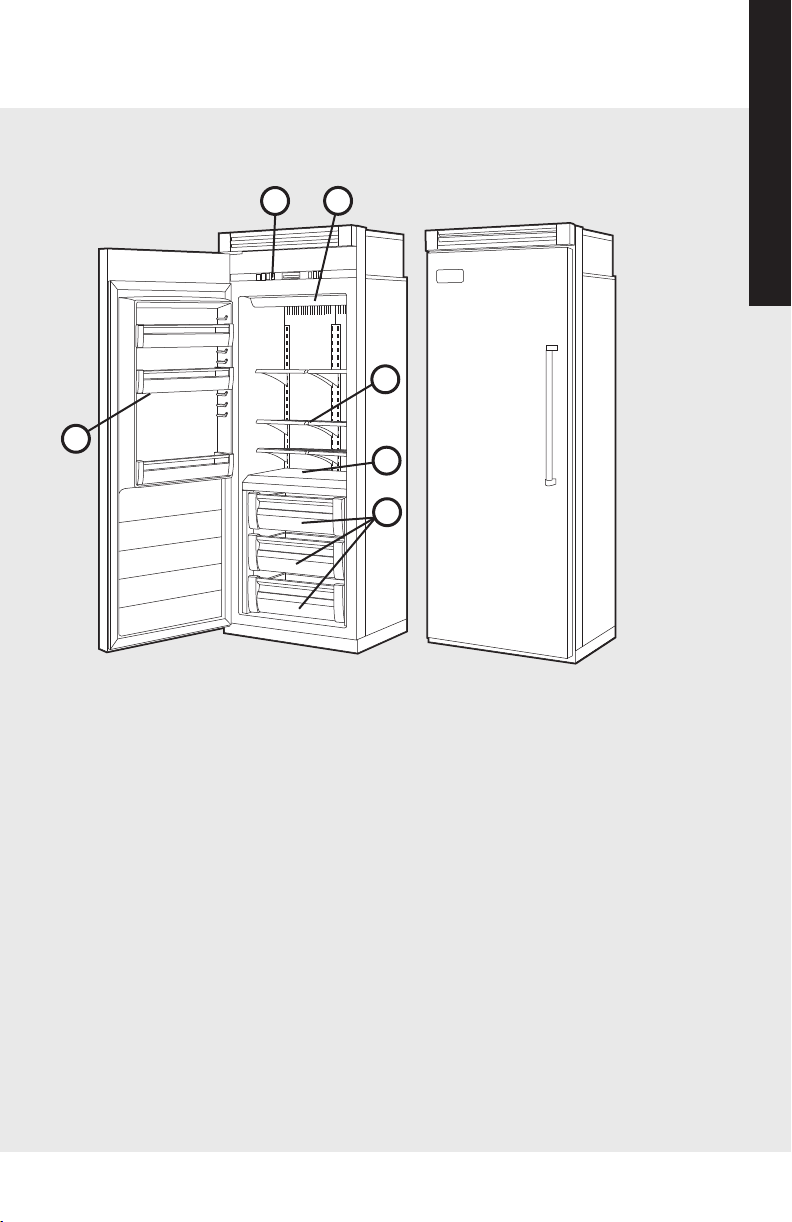
30” W. Model Shown
1. Electronic Controls
2. Lights
3. Wire Shelves (6)
4. Non-Adjusting Freezer
Shelf (1)
5. Patented Modular
Storage System
• Gliding Ice Drawer
with 2 Ice Bins
• Gliding Freezer
Baskets (2)
6. Adjustable Door Bins
(Patent Pending)
30” W. Models–
Full-Width Bins (3)
36” W. Models–
Full-Width Bin (1)
Half-Width Bins (4)
Features (built-in all freezer)
1
2
3
4
6
5
98
Getting Started
Getting Started
General Features
• ProChill™ Temperature Management System
The variable speed single compressor system
includes the quietest, most technologically
advanced compressor available. Electronic controls
maintain temperatures to within 1° F
and the multi-channel airflow system removes
odors and excess humidity.
• Convertible Meat Savor™/Produce Drawer
(all models except all freezer)
Equipped with a separate temperature control, the
Meat Savor/Produce Drawer can be set for either
produce or long-term fresh meat storage.
• Adaptive Defrost
Controls the timing of the defrost periods based
on refrigerator usage and can extend the defrost
up to 96 hours.
• Factory Installed Automatic Ice Maker
All models have an automatic ice maker with large
capacity ice buckets.
• Door Alarm
Sounds and glows to warn that fresh food and/or
freezer door have been ajar for three minutes.
• True 24” Depth
Keeps items in back within easy reach and allows
refrigerator to fit flush into 24” deep installation
cutout (Designer and Full Overlay models).
30” W. Model Shown
1. Electronic Controls
2. Lights
3. Wire Shelves (6)
4. Non-Adjusting Freezer
Shelf (1)
5. Patented Modular
Storage System
• Gliding Ice Drawer
with 2 Ice Bins
• Gliding Freezer
Baskets (2)
6. Adjustable Door Bins
(Patent Pending)
30” W. Models–
Full-Width Bins (3)
36” W. Models–
Full-Width Bin (1)
Half-Width Bins (4)
Features (built-in all freezer)
1
2
3
4
6
5
1110
Getting Started
Getting Started
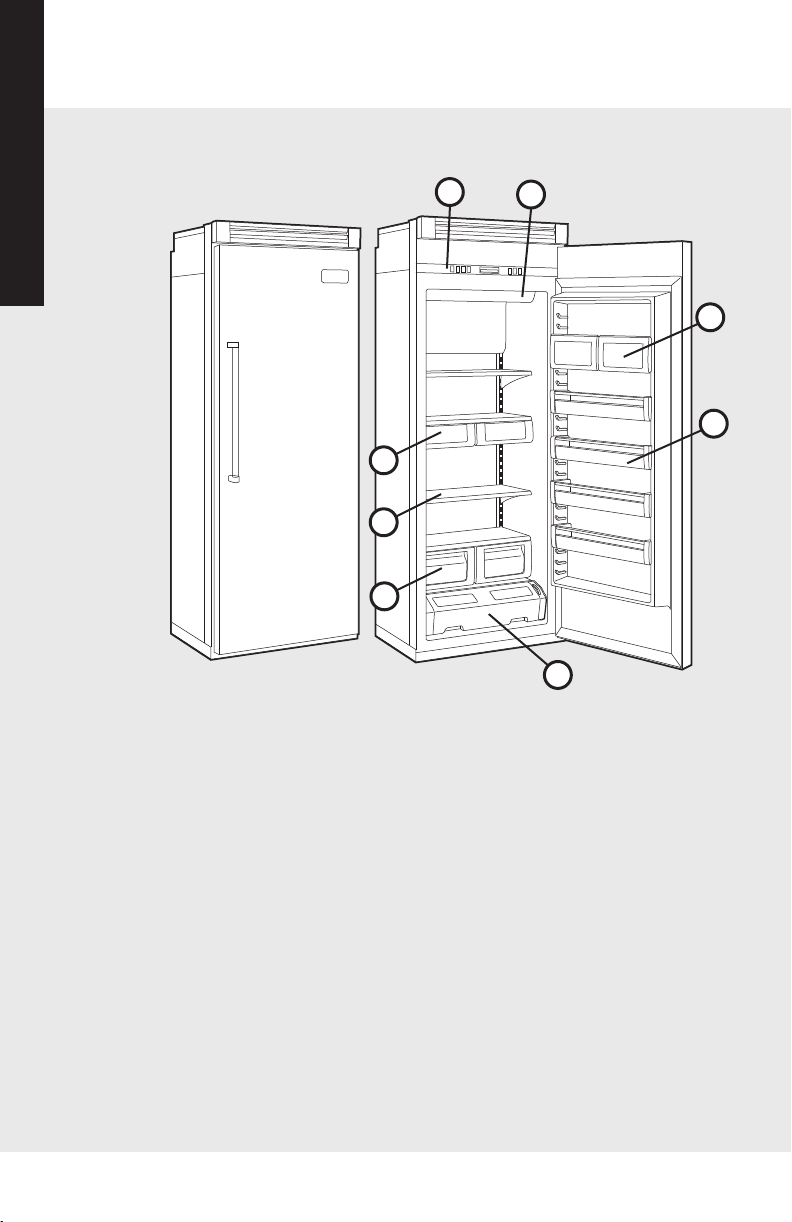
Features (built-in all refrigerator)
30” W. Model Shown
1. Electronic Controls
2. Lights
3. Dairy Compartments (2)
4. Adjustable Door Bins
(Patent Pending)
30” W. Models–
Full-Width (4)
36” W. Models–
Half-Width (2)
Full-Width (3)
5. MEAT SAVOR™/PRODUCE
Drawer
6. Moisture-Controlled
Produce Drawers (2)
7. Spillproof Shelves
30” W. Models–
Full-Width (4)
36” W. Models–
Half-Width (4)
Full-Width (2)
8. Deli Compartment
Drawers (2)
1
2
3
4
5
6
7
8
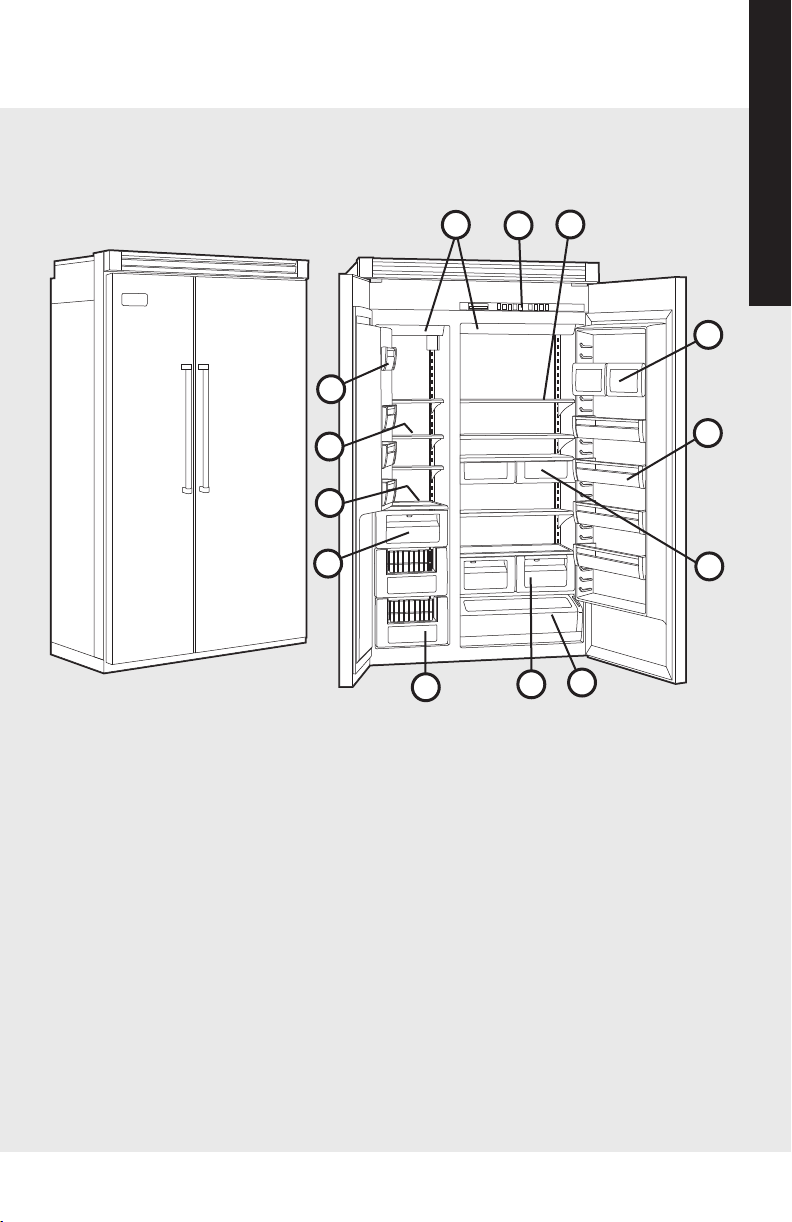
Features (built-in side-by-side, non-dispenser)
1. Electronic Controls
2. Spillproof Shelves (5)
3. Lights
4. Dairy Compartments (2)
5. Adjustable Door Bins (4)
(Patent Pending)
6. Deli Compartment(s)
42” W.– Full-Width (1)
48” W.– Half-Width (2)
7. MEAT SAVOR™/PRODUCE
Drawer (1)
8. Moisture-Controlled
Produce Drawer(s)
42” W.– Full-Width (1)
48” W.– Half-Width (2)
9. Glide-Out Freezer
Baskets (2)
10. Ice Bucket (1)
11. Non-Adjusting Freezer
Shelf (1)
12. Adjustable Freezer
Shelves (3)
13. Adjustable Freezer Door
Bins (3)
48” W. Model Shown
3
4
5
7
1
8
2
9
11
13
12
6
10
1110
Getting Started
Getting Started
Features (built-in all refrigerator)
30” W. Model Shown
1. Electronic Controls
2. Lights
3. Dairy Compartments (2)
4. Adjustable Door Bins
(Patent Pending)
30” W. Models–
Full-Width (4)
36” W. Models–
Half-Width (2)
Full-Width (3)
5. MEAT SAVOR™/PRODUCE
Drawer
6. Moisture-Controlled
Produce Drawers (2)
7. Spillproof Shelves
30” W. Models–
Full-Width (4)
36” W. Models–
Half-Width (4)
Full-Width (2)
8. Deli Compartment
Drawers (2)
1
2
3
4
5
6
7
8
Features (built-in side-by-side, non-dispenser)
1. Electronic Controls
2. Spillproof Shelves (5)
3. Lights
4. Dairy Compartments (2)
5. Adjustable Door Bins (4)
(Patent Pending)
6. Deli Compartment(s)
42” W.– Full-Width (1)
48” W.– Half-Width (2)
7. MEAT SAVOR™/PRODUCE
Drawer (1)
8. Moisture-Controlled
Produce Drawer(s)
42” W.– Full-Width (1)
48” W.– Half-Width (2)
9. Glide-Out Freezer
Baskets (2)
10. Ice Bucket (1)
11. Non-Adjusting Freezer
Shelf (1)
12. Adjustable Freezer
Shelves (3)
13. Adjustable Freezer Door
Bins (3)
48” W. Model Shown
3
4
5
7
1
8
2
9
11
13
12
6
10
1312
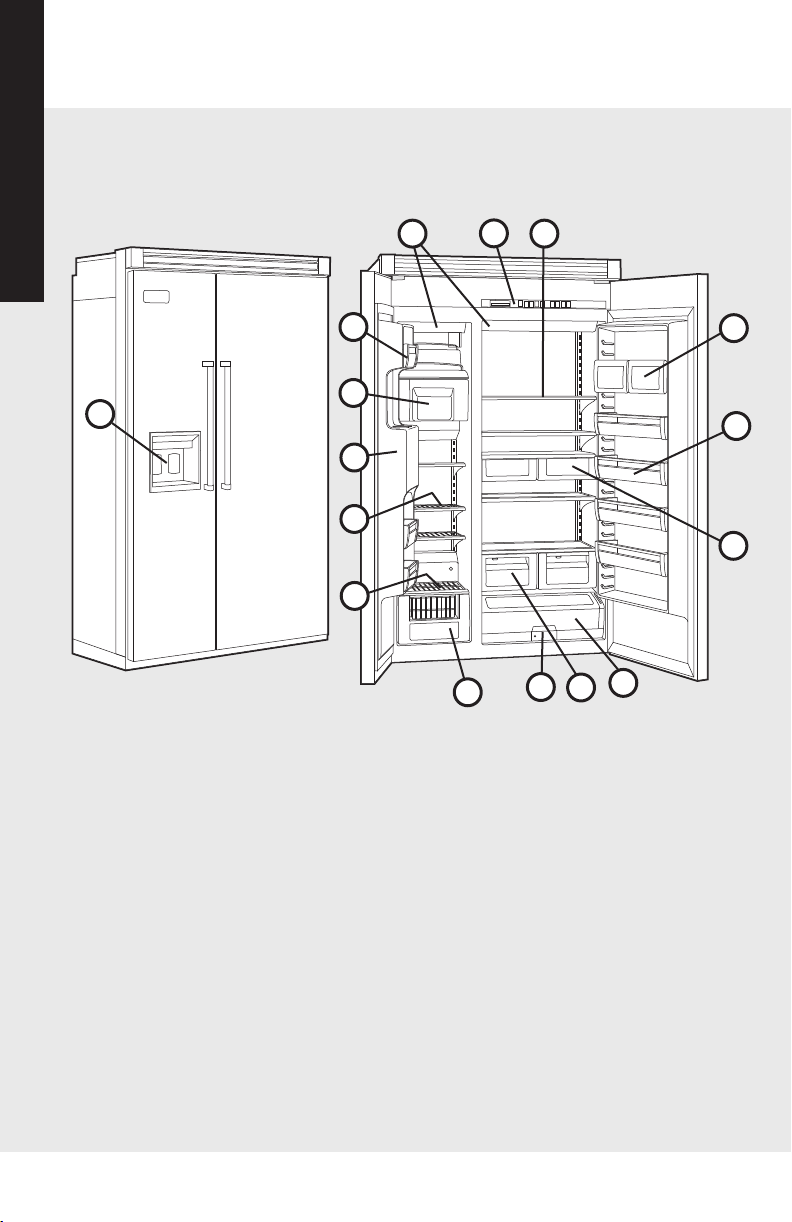
1. Electronic Controls
2. Spillproof Shelves (5)
3. Lights
4. Dairy Compartments (2)
5. Adjustable Door Bins (4)
(Patent Pending)
6. Deli Compartment(s)
42” W.– Full-Width (1)
48” W.– Half-Width (2)
7.
MEAT SAVOR™/PRODUCE
Drawer (1)
8. Moisture-Controlled Produce
Drawer(s)
42” W.– Full-Width (1)
48” W.– Half-Width (2)
9. Water Filter (1)
10. Glide-Out Freezer
Basket (1)
11. Non-Adjustable Freezer
Shelf (1)
12. Adjustable Freezer Shelves
(3)
13. Ice and Water Dispenser (1)
14. Ice and Storage Bucket (1)
15. Adjustable Freezer Door
Bins (3)
16. Built-In Ice and Water
w/Motorized Ice Dispenser
(Patent Pending)
48” W. Model Shown
1
2
4
5
8
9
11
12
13
14
15
3
10
7
6
Features (built-in side-by-side, dispenser)
Getting Started
Getting Started
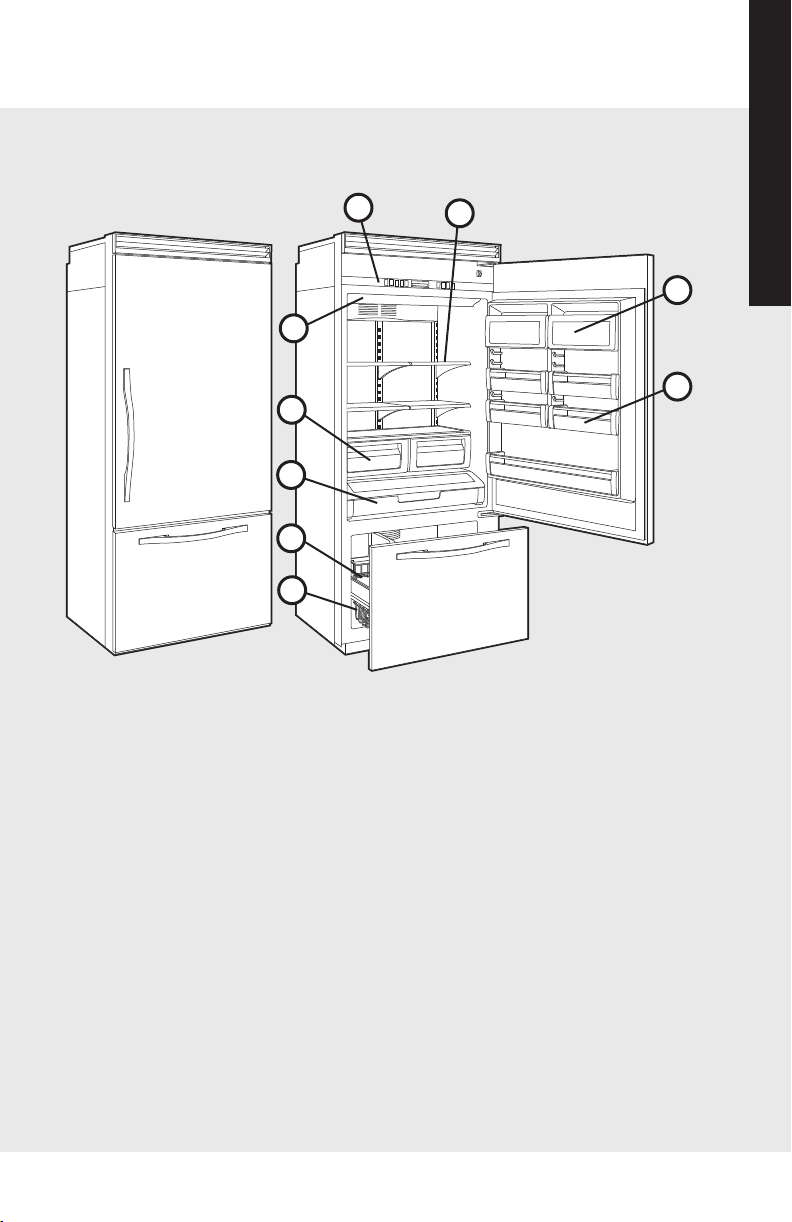
Features (built-in bottom-mount)
1
2
3
4
5
6
7
8
9
1. Electronic Controls
2. Spillproof Shelves (5)
Half-Width (4)
Full-Width (1)
3. Dairy Compartments (2)
4. Adjustable Door Bins (5)
(Patent Pending)
Half-Width (4)
Full-Width (1)
5. Wire Freezer Baskets (2)
6. Ice Bucket (1)
7. MEAT SAVOR™/PRODUCE
Drawer (1)
8. Moisture-Controlled
Produce Drawers (2)
9. Lights
36” W. Model Shown
16
1312
1. Electronic Controls
2. Spillproof Shelves (5)
3. Lights
4. Dairy Compartments (2)
5. Adjustable Door Bins (4)
(Patent Pending)
6. Deli Compartment(s)
42” W.– Full-Width (1)
48” W.– Half-Width (2)
7.
MEAT SAVOR™/PRODUCE
Drawer (1)
8. Moisture-Controlled Produce
Drawer(s)
42” W.– Full-Width (1)
48” W.– Half-Width (2)
9. Water Filter (1)
10. Glide-Out Freezer
Basket (1)
11. Non-Adjustable Freezer
Shelf (1)
12. Adjustable Freezer Shelves
(3)
13. Ice and Water Dispenser (1)
14. Ice and Storage Bucket (1)
15. Adjustable Freezer Door
Bins (3)
16. Built-In Ice and Water
w/Motorized Ice Dispenser
(Patent Pending)
48” W. Model Shown
1
2
4
5
8
9
11
12
13
14
15
3
10
7
6
Features (built-in side-by-side, dispenser)
Getting Started
Getting Started
Features (built-in bottom-mount)
1
2
3
4
5
6
7
8
9
1. Electronic Controls
2. Spillproof Shelves (5)
Half-Width (4)
Full-Width (1)
3. Dairy Compartments (2)
4. Adjustable Door Bins (5)
(Patent Pending)
Half-Width (4)
Full-Width (1)
5. Wire Freezer Baskets (2)
6. Ice Bucket (1)
7. MEAT SAVOR™/PRODUCE
Drawer (1)
8. Moisture-Controlled
Produce Drawers (2)
9. Lights
36” W. Model Shown
16
1514
In order for your new refrigerator to work properly, it is
important that you understand its various features, controls,
and how to use them.
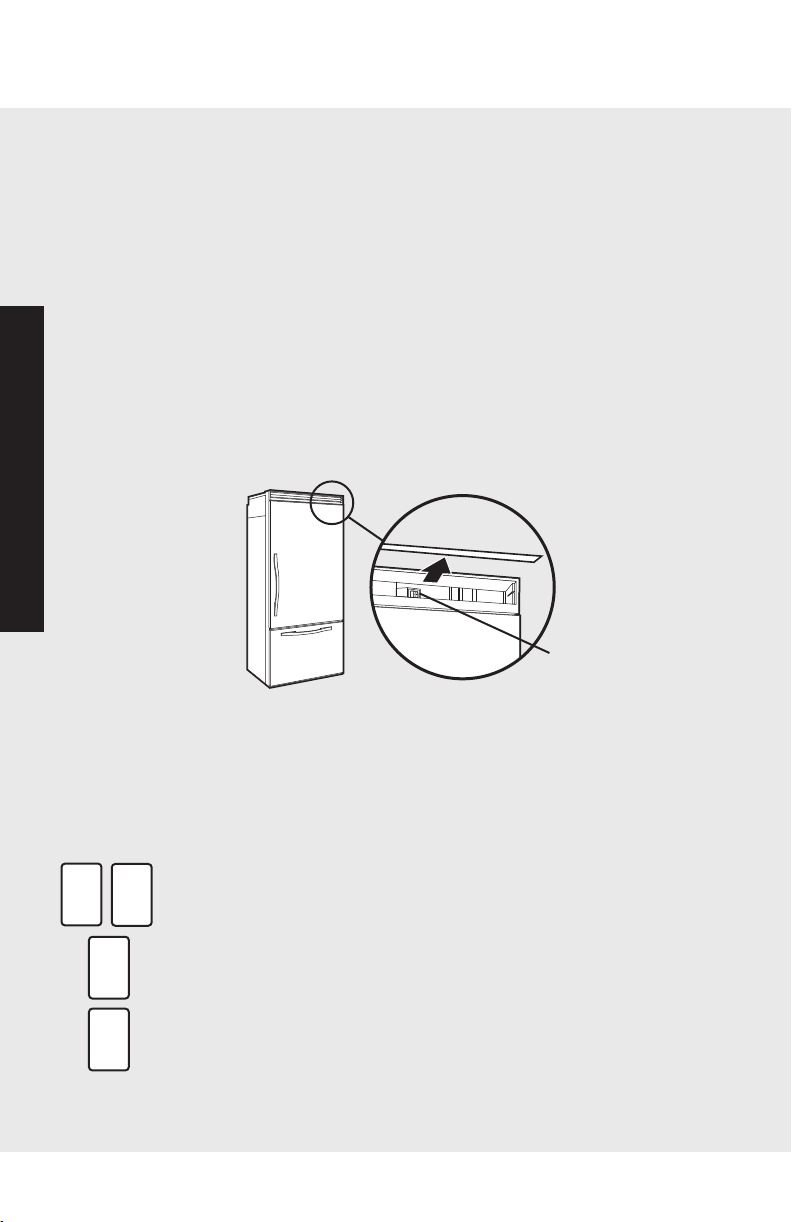
Power On/Off Switch (Power Interruption Switch)
The power on/off switch is located behind your refrigerator's
top grille. It is used to turn the power off when cleaning the
refrigerator or changing the light bulbs. Your refrigerator
arrives from the factory with the power interruption switch on.
To turn power off, remove the center grille blade. Press the
power on/off switch to the off position.
To turn power on, press power on/off switch to the on
position. Replace the center grille blade.
IMPORTANT: Be sure the power on/off switch is in the on
position after cleaning or changing light bulbs.
Showroom Mode Initiation
Showroom mode allows electronic controls and interior lights
to function independently of refrigeraton system.
To enter the showroom mode: Press and hold “DISPLAY
ON”/”ACTIVATE CONTROLS” pads; while holding, press and
hold “HIGHER TEMP” and “ALARM OFF” pads together.
Three beeps will sound and unmarked blue light will be lit.
Showroom mode is entered.
To exit the showroom mode: press and hold “DISPLAY
ON”/”ACTIVATE CONTROLS” pads; while holding, press and
hold “HIGHER TEMP” and “ALARM OFF” pads together.
Three beeps will sound and control will revert to normal
operation and display.
Product Controls
Power Switch
DISPLAY
ON
HIGHER
TEMP
ALARM
OFF
ACTIVATE
CONTROLS
Settings and Functions
Electronic Temperature Settings
Your refrigerator's electronic controls are located behind the
door above the cabinet interior. To activate the electronic
control panel, press “DISPLAY ON”/“ACTIVATE CONTROLS”
pads. All other pads, except the “ALARM OFF” pad, will
remain inactive until the “DISPLAY ON”/”ACTIVATE
CONTROLS” pads are pressed. Once activated, pads remain
programmable for at least ten minutes.
When you first plug your new refrigerator in, you will find that
five bars of nine are displayed. This means that all unit
controls are pre-set at the mid-range setting. Wait 24 hours
after plug-in for the cabinets to reach this setting. After 24
hours, you may adjust controls as desired. The warmest
setting displays one bar, while the coldest setting shows nine
bars.
To adjust the refrigerator or freezer temperature, simply press
the “DISPLAY ON”/”ACTIVATE CONTROLS” pads, then “REF
TEMP” pad or “FREEZER TEMP” pad. Press “HIGHER TEMP”
or “LOWER TEMP” pad to adjust temperature setting one
level at a time. Holding down “HIGHER TEMP” or “LOWER
TEMP” pad adjusts temperature more than one level at a
time.
Entry Tone
The entry tone is the “beep” you will hear when you press
one of the control pads.
You can deactivate the entry tone by pressing and holding the
“DISPLAY ON”/”ACTIVATE CONTROLS” pads for three to
five seconds. You will hear three short beeps to let you know
that the entry tone feature has been deactivated.
To activate the entry tone, simply press and hold the
“DISPLAY ON”/”ACTIVATE CONTROLS” pads for three to
five seconds.
Max Refrigerator Mode
Max refrigerator mode adjusts the refrigerator temperature to
the coldest setting for four hours, at the end of which the
refrigerator's temperature automatically returns to its previous
setting.
ACTIVATE
C
ONTROLS
DISPLAY
ON
D
ACTIVATE
CONTROLS
DISPLAY
ON
ACTIVATE
CONTROLS
DISPLAY
ON
D
H
IGHER
TEMP
L
LOWER
T
EMP
A
ACTIVATE
CONTROLS
A
MAX REF
A
DISPLAY
ON
M
Product Controls
Settings and Functions
1514
In order for your new refrigerator to work properly, it is
important that you understand its various features, controls,
and how to use them.
Power On/Off Switch (Power Interruption Switch)
The power on/off switch is located behind your refrigerator's
top grille. It is used to turn the power off when cleaning the
refrigerator or changing the light bulbs. Your refrigerator
arrives from the factory with the power interruption switch on.
To turn power off, remove the center grille blade. Press the
power on/off switch to the off position.
To turn power on, press power on/off switch to the on
position. Replace the center grille blade.
IMPORTANT: Be sure the power on/off switch is in the on
position after cleaning or changing light bulbs.
Showroom Mode Initiation
Showroom mode allows electronic controls and interior lights
to function independently of refrigeraton system.
To enter the showroom mode: Press and hold “DISPLAY
ON”/”ACTIVATE CONTROLS” pads; while holding, press and
hold “HIGHER TEMP” and “ALARM OFF” pads together.
Three beeps will sound and unmarked blue light will be lit.
Showroom mode is entered.
To exit the showroom mode: press and hold “DISPLAY
ON”/”ACTIVATE CONTROLS” pads; while holding, press and
hold “HIGHER TEMP” and “ALARM OFF” pads together.
Three beeps will sound and control will revert to normal
operation and display.
Product Controls
Power Switch
DISPLAY
ON
HIGHER
TEMP
ALARM
OFF
ACTIVATE
CONTROLS
Settings and Functions
Electronic Temperature Settings
Your refrigerator's electronic controls are located behind the
door above the cabinet interior. To activate the electronic
control panel, press “DISPLAY ON”/“ACTIVATE CONTROLS”
pads. All other pads, except the “ALARM OFF” pad, will
remain inactive until the “DISPLAY ON”/”ACTIVATE
CONTROLS” pads are pressed. Once activated, pads remain
programmable for at least ten minutes.
When you first plug your new refrigerator in, you will find that
five bars of nine are displayed. This means that all unit
controls are pre-set at the mid-range setting. Wait 24 hours
after plug-in for the cabinets to reach this setting. After 24
hours, you may adjust controls as desired. The warmest
setting displays one bar, while the coldest setting shows nine
bars.
To adjust the refrigerator or freezer temperature, simply press
the “DISPLAY ON”/”ACTIVATE CONTROLS” pads, then “REF
TEMP” pad or “FREEZER TEMP” pad. Press “HIGHER TEMP”
or “LOWER TEMP” pad to adjust temperature setting one
level at a time. Holding down “HIGHER TEMP” or “LOWER
TEMP” pad adjusts temperature more than one level at a
time.
Entry Tone
The entry tone is the “beep” you will hear when you press
one of the control pads.
You can deactivate the entry tone by pressing and holding the
“DISPLAY ON”/”ACTIVATE CONTROLS” pads for three to
five seconds. You will hear three short beeps to let you know
that the entry tone feature has been deactivated.
To activate the entry tone, simply press and hold the
“DISPLAY ON”/”ACTIVATE CONTROLS” pads for three to
five seconds.
Max Refrigerator Mode
Max refrigerator mode adjusts the refrigerator temperature to
the coldest setting for four hours, at the end of which the
refrigerator's temperature automatically returns to its previous
setting.
ACTIVATE
C
ONTROLS
DISPLAY
ON
D
ACTIVATE
CONTROLS
DISPLAY
ON
ACTIVATE
CONTROLS
DISPLAY
ON
D
H
IGHER
TEMP
L
LOWER
T
EMP
A
ACTIVATE
CONTROLS
A
MAX REF
A
DISPLAY
ON
M
Product Controls
Settings and Functions
1716
Product Controls
Product Controls
Settings and Functions
To activate the max refrigerator mode, simply press the
“DISPLAY ON”/”ACTIVATE CONTROLS” pads, followed by
the “MAX REF” pad. The indicator light will glow to let you
know you've turned on the max refrigerator mode.
To deactivate the max refrigerator mode before the end of
the four hour cycle, press the “DISPLAY ON”/”ACTIVATE
CONTROLS” pads, followed by the “MAX REF” pad.
Max Freezer Mode
Max freezer mode adjusts the freezer temperature to the
coldest setting for 24 hours, at the end of which, the freezer
temperature automatically returns to its previous setting.
To activate the max freezer mode, press the “DISPLAY
ON”/”ACTIVATE CONTROLS” pads, followed by the “MAX
FRZ” pad. The indicator light will glow to let you know you
have turned on the max freezer mode.
To deactivate the max freezer mode before the end of the 24
hours cycle, simply press the “DISPLAY ON”/”ACTIVATE
CONTROLS” pads, followed by the “MAX FRZ” pad.
Door Open Alarm
Door open alarm sounds and an indicator light blinks if either
door is left open for more than three minutes.
To deactivate the door open alarm, press the “ALARM OFF”
pad or close the door that is open.
High Temperature Alarm
High temperature alarm sounds and an indicator light glows if
the refrigerator or the freezer temperature is too high for two
hours. A blinking light signals which part of the appliance is
affected. The alarm will end when the temperature is brought
back to a proper setting.
To deactivate the high temperature alarm, press the “ALARM
OFF” pad.
ACTIVATE
CONTROLS
A
MAX REF
A
DISPLAY
ON
A
CTIVATE
CONTROLS
M
DISPLAY
O
N
MAX FRZ
ALARM
OFF
ALARM
OFF
Thermistor Alarm
Thermistor alarm is a special feature that electronically senses
temperatures. The thermistor alarm will sound and indicator
lights will scroll if the thermistor is not operating properly. The
alarm can be deactivated by pressing the “ALARM OFF” pad on
your refrigerator's control panel.
If the alarm continues to
sound, contact an authorized Viking Range Corporation
technician immediately.
Display Lights
To activate temperature display lights, press the “DISPLAY
ON”/”ACTIVATE CONTROLS” pads.
To deactivate temperature display lights, press the “DISPLAY
ON”/”ACTIVATE CONTROLS” pads, followed by the “DISPLAY
OFF” pad.
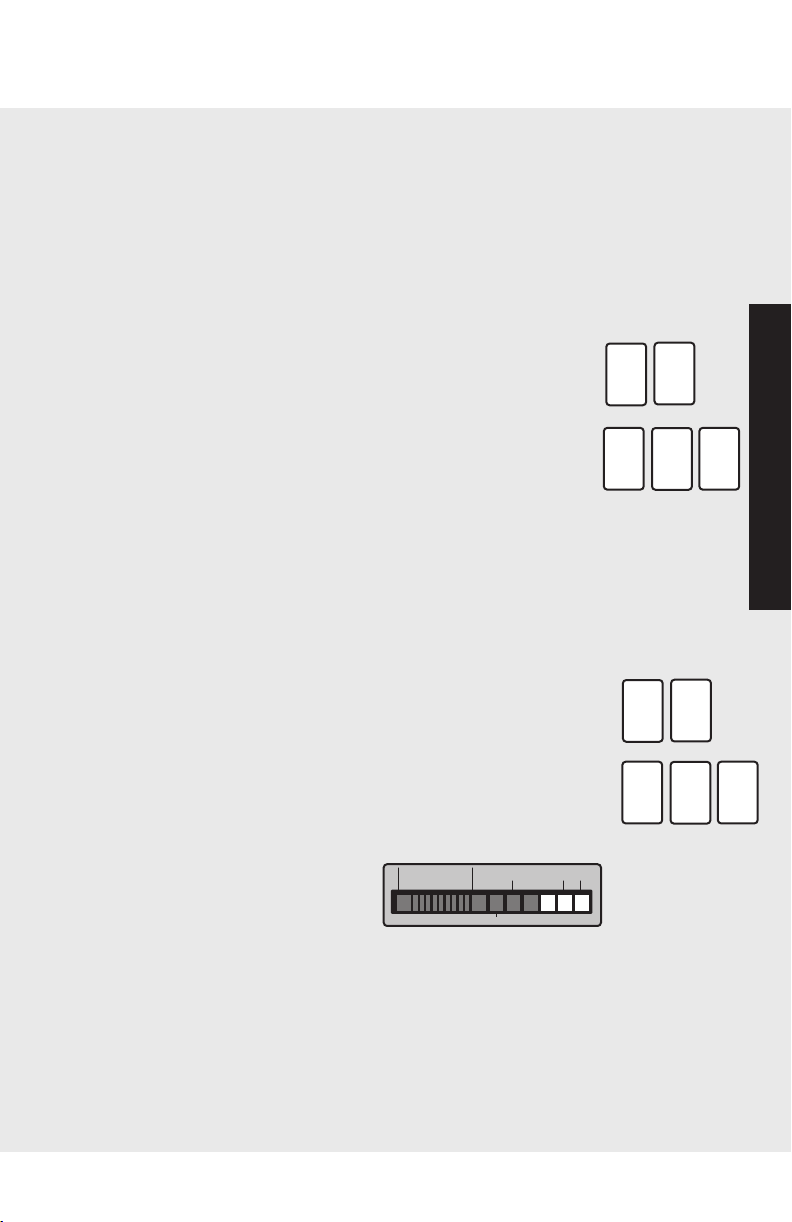
Sabbath Mode
Sabbath mode is used to disable interior lights and alarms for
observance of the Sabbath.
Before the Sabbath mode is engaged, the bale arm of the ice
maker needs to be raised until it clicks into the detent. This
turns off the power to the ice maker.
To enter Sabbath mode, press the “DISPLAY ON”/”ACTIVATE
CONTROLS” pads to activate the control panel. Then, press
and hold “DISPLAY ON”/“ACTIVATE CONTROLS” and
“DISPLAY OFF” pads simultaneously for three seconds. It will
beep three times and light the three right blue
squares so you
will know that you have activated Sabbath mode.
When your refrigerator is in Sabbath mode, interior lights,
display (excluding the three right
hand side lit blue squares), and
alarms are disabled.
If your refrigerator loses power
while in Sabbath mode, it will return to the Sabbath mode
when power is reestablished.
To exit the Sabbath mode, press the “DISPLAY ON”/ ”ACTIVATE
CONTROLS” pads. Then, press and hold “DISPLAY
ON”/“ACTIVATE CONTROLS” and “DISPLAY OFF” pads
simultaneously for three seconds. You will then hear three
beeps
letting you know that you have turned the Sabbath mode off.
FRZ
TEMP
FRZ
TEMP
HIGH
TEMP
MAX
REF
MAX
FRZ
COLDEST
...........
DOOR OPEN
Settings and Functions
ACTIVATE
CONTROLS
M
DISPLAY
ON
ACTIVATE
CONTROLS
DISPLAY
OFF
DISPLAY
ON
A
CTIVATE
CONTROLS
A
DISPLAY
O
N
ACTIVATE
CONTROLS
DISPLAY
OFF
DISPLAY
ON
1716
Product Controls
Product Controls
Settings and Functions
To activate the max refrigerator mode, simply press the
“DISPLAY ON”/”ACTIVATE CONTROLS” pads, followed by
the “MAX REF” pad. The indicator light will glow to let you
know you've turned on the max refrigerator mode.
To deactivate the max refrigerator mode before the end of
the four hour cycle, press the “DISPLAY ON”/”ACTIVATE
CONTROLS” pads, followed by the “MAX REF” pad.
Max Freezer Mode
Max freezer mode adjusts the freezer temperature to the
coldest setting for 24 hours, at the end of which, the freezer
temperature automatically returns to its previous setting.
To activate the max freezer mode, press the “DISPLAY
ON”/”ACTIVATE CONTROLS” pads, followed by the “MAX
FRZ” pad. The indicator light will glow to let you know you
have turned on the max freezer mode.
To deactivate the max freezer mode before the end of the 24
hours cycle, simply press the “DISPLAY ON”/”ACTIVATE
CONTROLS” pads, followed by the “MAX FRZ” pad.
Door Open Alarm
Door open alarm sounds and an indicator light blinks if either
door is left open for more than three minutes.
To deactivate the door open alarm, press the “ALARM OFF”
pad or close the door that is open.
High Temperature Alarm
High temperature alarm sounds and an indicator light glows if
the refrigerator or the freezer temperature is too high for two
hours. A blinking light signals which part of the appliance is
affected. The alarm will end when the temperature is brought
back to a proper setting.
To deactivate the high temperature alarm, press the “ALARM
OFF” pad.
ACTIVATE
CONTROLS
A
MAX REF
A
DISPLAY
ON
A
CTIVATE
CONTROLS
M
DISPLAY
O
N
MAX FRZ
ALARM
OFF
ALARM
OFF
Thermistor Alarm
Thermistor alarm is a special feature that electronically senses
temperatures. The thermistor alarm will sound and indicator
lights will scroll if the thermistor is not operating properly. The
alarm can be deactivated by pressing the “ALARM OFF” pad on
your refrigerator's control panel.
If the alarm continues to
sound, contact an authorized Viking Range Corporation
technician immediately.
Display Lights
To activate temperature display lights, press the “DISPLAY
ON”/”ACTIVATE CONTROLS” pads.
To deactivate temperature display lights, press the “DISPLAY
ON”/”ACTIVATE CONTROLS” pads, followed by the “DISPLAY
OFF” pad.
Sabbath Mode
Sabbath mode is used to disable interior lights and alarms for
observance of the Sabbath.
Before the Sabbath mode is engaged, the bale arm of the ice
maker needs to be raised until it clicks into the detent. This
turns off the power to the ice maker.
To enter Sabbath mode, press the “DISPLAY ON”/”ACTIVATE
CONTROLS” pads to activate the control panel. Then, press
and hold “DISPLAY ON”/“ACTIVATE CONTROLS” and
“DISPLAY OFF” pads simultaneously for three seconds. It will
beep three times and light the three right blue
squares so you
will know that you have activated Sabbath mode.
When your refrigerator is in Sabbath mode, interior lights,
display (excluding the three right
hand side lit blue squares), and
alarms are disabled.
If your refrigerator loses power
while in Sabbath mode, it will return to the Sabbath mode
when power is reestablished.
To exit the Sabbath mode, press the “DISPLAY ON”/ ”ACTIVATE
CONTROLS” pads. Then, press and hold “DISPLAY
ON”/“ACTIVATE CONTROLS” and “DISPLAY OFF” pads
simultaneously for three seconds. You will then hear three
beeps
letting you know that you have turned the Sabbath mode off.
FRZ
TEMP
FRZ
TEMP
HIGH
TEMP
MAX
REF
MAX
FRZ
COLDEST
...........
DOOR OPEN
Settings and Functions
ACTIVATE
CONTROLS
M
DISPLAY
ON
ACTIVATE
CONTROLS
DISPLAY
OFF
DISPLAY
ON
A
CTIVATE
CONTROLS
A
DISPLAY
O
N
ACTIVATE
CONTROLS
DISPLAY
OFF
DISPLAY
ON

19
Settings and Functions
18
Product Controls
Operation
Once your refrigerator has left the Sabbath mode, the bale
arm of the ice maker needs to be pushed downward until it is
no longer in the detent. This will restore power to the ice
maker.
Setting the Controls
Set controls precisely with a household thermometer that
includes temperatures between -5° to 50° F (-21° to 10° C).
Checking the Temperature (freezer)
Place the thermometer snugly between frozen packages in
freezer section. Wait five to eight hours, then check the
temperature. If the freezer temperature is not 0° to 2° F
(-17° to -16° C), adjust the temperature control one number
at a time. Then, check the temperature again in five to
8 hours.
Checking the Temperature (refrigerator)
Place the thermometer in a glass of water in the middle of
the refrigerator. Wait five to eight hours, and then check the
temperature. If the refrigerator temperature is not 38° to 40° F
(3° to 4° C), adjust the control one number at a time. Check
again after five to eight hours.
Refrigerator (all units)
CAUTION
To avoid personal injury and property damage, confirm shelf is
secure before placing items on shelf.
CAUTION
To avoid personal injury or property damage, handle tempered glass
shelves carefully. Shelves may break suddenly if nicked, scratched, or
exposed to sudden temperature change.
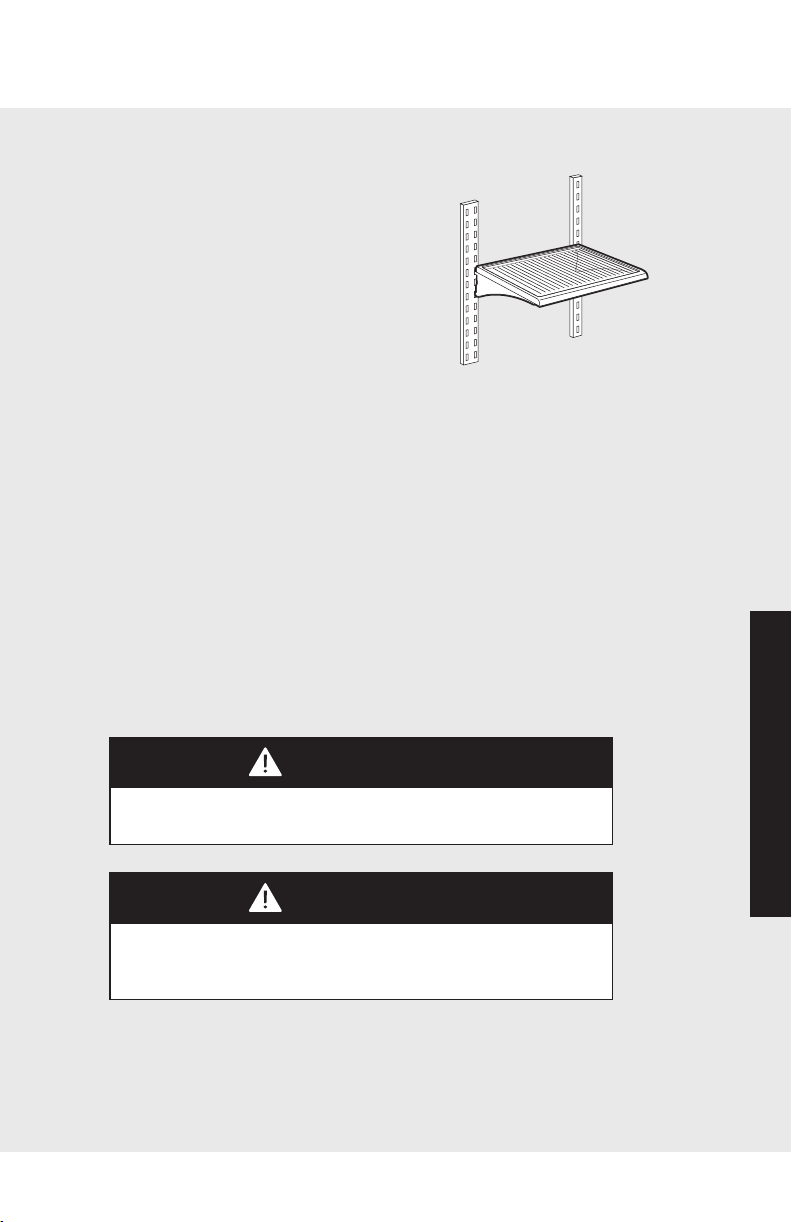
Spillproof Shelves
Your refrigerator's spillproof shelves are
constructed of polypropylene molded
around the glass and metal rail. This
design means that the shelves are
completely enclosed and liquids can't
seep under the glass. This localizes spills
and makes clean-up easier. Spillproof
shelves also adjust to meet individual
storage needs.
NOTE: Foods and beverages placed on
the uppermost shelf under the air vent may freeze.
Shelf Adjustment
You can adjust the shelves to match the way you use your
refrigerator. To remove the shelves, tilt the shelf up at the front
releasing the hooks from the shelf support, then pull the shelf
straight out.
To replace shelves, guide the rear hooks of the shelf into the
slots in the shelf supports. Then, tilt the shelf up at the front
until the hooks drop into the slots, and lower the front of shelf
to level position.
19
Settings and Functions
18
Product Controls
Operation
Once your refrigerator has left the Sabbath mode, the bale
arm of the ice maker needs to be pushed downward until it is
no longer in the detent. This will restore power to the ice
maker.
Setting the Controls
Set controls precisely with a household thermometer that
includes temperatures between -5° to 50° F (-21° to 10° C).
Checking the Temperature (freezer)
Place the thermometer snugly between frozen packages in
freezer section. Wait five to eight hours, then check the
temperature. If the freezer temperature is not 0° to 2° F
(-17° to -16° C), adjust the temperature control one number
at a time. Then, check the temperature again in five to
8 hours.
Checking the Temperature (refrigerator)
Place the thermometer in a glass of water in the middle of
the refrigerator. Wait five to eight hours, and then check the
temperature. If the refrigerator temperature is not 38° to 40° F
(3° to 4° C), adjust the control one number at a time. Check
again after five to eight hours.
Refrigerator (all units)
CAUTION
To avoid personal injury and property damage, confirm shelf is
secure before placing items on shelf.
CAUTION
To avoid personal injury or property damage, handle tempered glass
shelves carefully. Shelves may break suddenly if nicked, scratched, or
exposed to sudden temperature change.
Spillproof Shelves
Your refrigerator's spillproof shelves are
constructed of polypropylene molded
around the glass and metal rail. This
design means that the shelves are
completely enclosed and liquids can't
seep under the glass. This localizes spills
and makes clean-up easier. Spillproof
shelves also adjust to meet individual
storage needs.
NOTE: Foods and beverages placed on
the uppermost shelf under the air vent may freeze.
Shelf Adjustment
You can adjust the shelves to match the way you use your
refrigerator. To remove the shelves, tilt the shelf up at the front
releasing the hooks from the shelf support, then pull the shelf
straight out.
To replace shelves, guide the rear hooks of the shelf into the
slots in the shelf supports. Then, tilt the shelf up at the front
until the hooks drop into the slots, and lower the front of shelf
to level position.
2120
Operation
Operation
Refrigerator (all units)
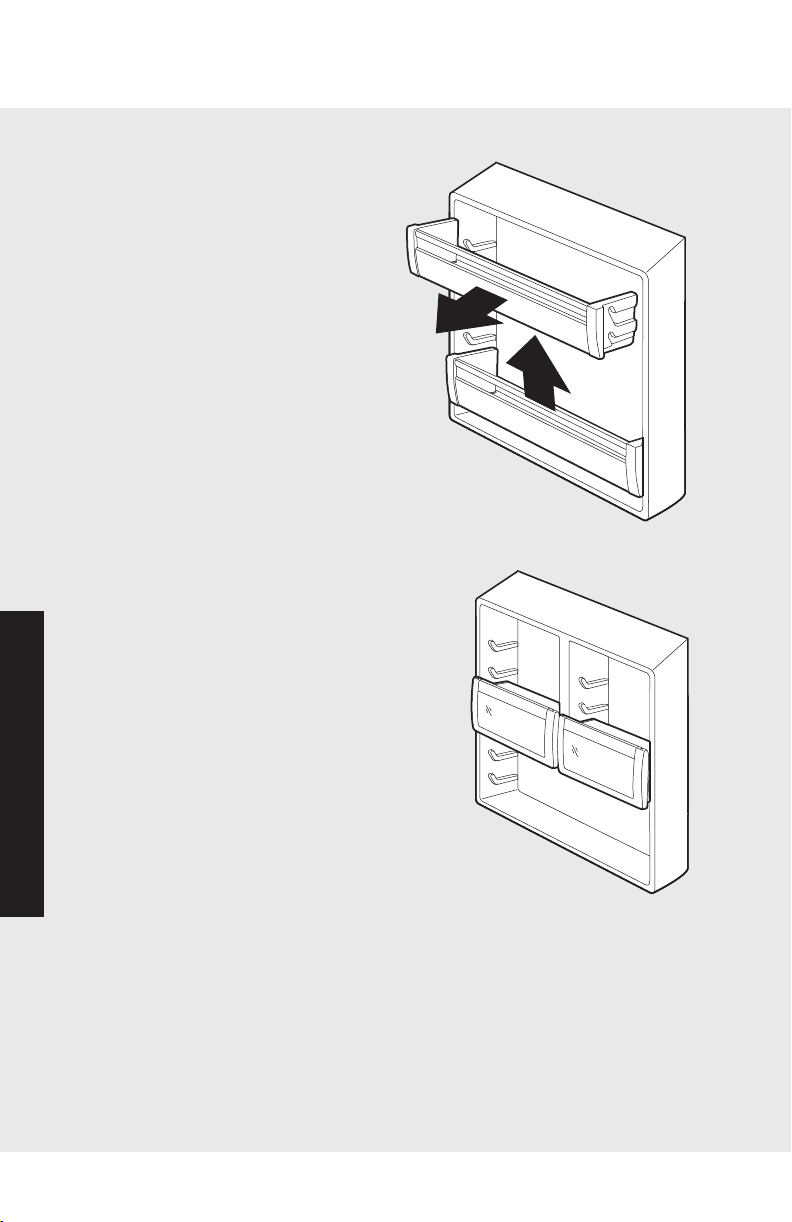
Door Bin Adjustment
Your refrigerator's door bins hold
two-liter bottles and can be placed
in any position on the refrigerator
door. To remove a bin, simply grasp
it, lift the bin up, and pull it out.
To replace the bin, place it over the
glides in the refrigerator door, and
push the door bin down to lock it
into place.
1
2
Dairy Compartments
Your refrigerator's dairy compartment doors
are surrounded by gaskets for a tighter seal.
This allows items to stay fresh much longer.
The dairy compartments can be adjusted to
meet your unique storage needs.
To remove the dairy compartments, simply
grasp, lift up and pull out. To replace,
position the dairy compartment over the
glides in the refrigerator door, and push the
compartment down to lock it into place.
Refrigerator (all units)
Chill Zone
Your new refrigerator's chill zone features the moisture-
controlled
produce drawer(s) and the MEAT SAVOR™/PRODUCE
drawer. Freezer air
circulating in the chill zone is contained by gaskets in the air duct above
the drawer. This area keeps food 3° to 5° F colder than average
refrigerator temperatures.
The chill zone temperature control is located to the right of the MEAT
SAVOR™/PRODUCE drawer. The control adjusts the amount of freezer
air circulating in this area. For normal refrigerator temperature, slide the
control down. To cool down the chill zone, slide the control up. The
uppermost control position is quick chill. This can be used to quickly chill
foods and beverages.
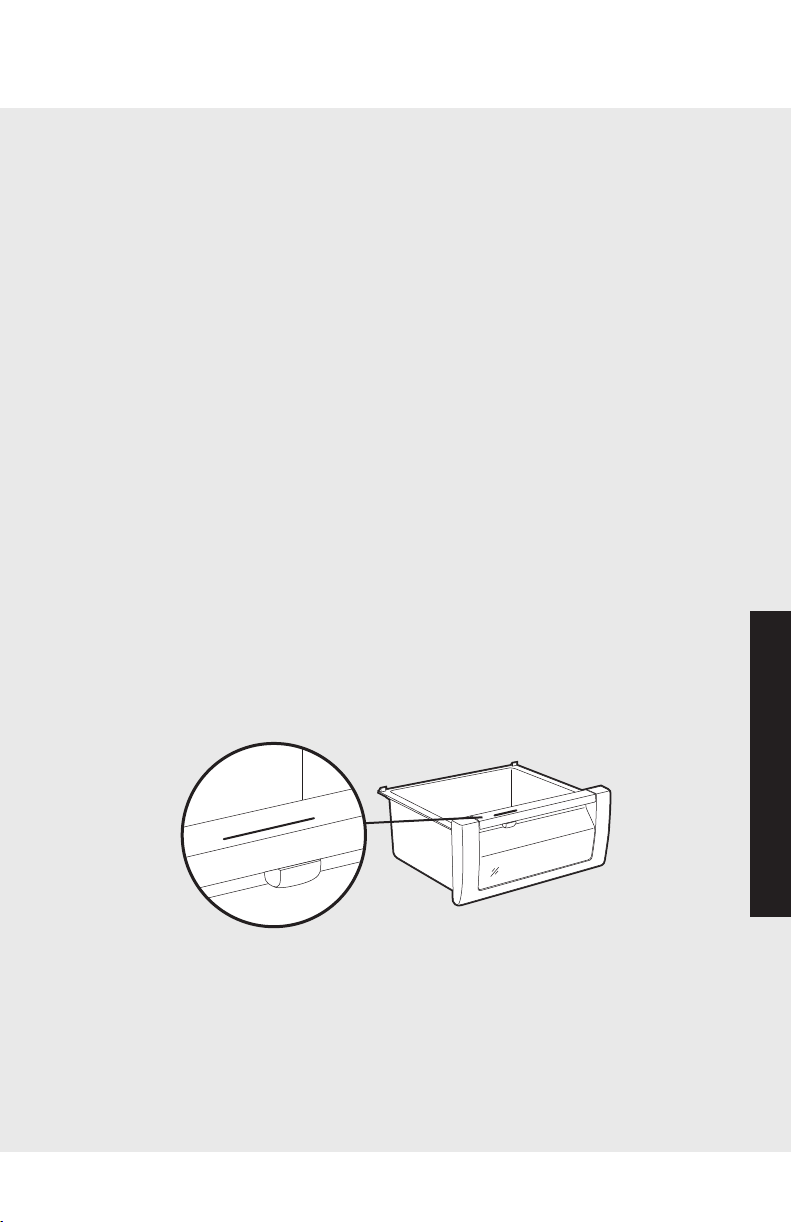
Moisture-Controlled Produce Drawer(s)
The moisture control on your refrigerator produce drawer(s) gives you
the ability to change the amount of moisture or humidity in a drawer,
and the clear top section allows you to see into a drawer without
opening it.
The moisture control for the produce drawer(s) is located underneath
the front trim. Slide the control to a higher setting for storing deli items
or produce with leaves, such as lettuce, spinach, or cabbage. Slide the
control to a lower setting for storing fruits and vegetables with skins,
such as apples, corn, or tomatoes. See “Food Storage Guide” (pg. 30)
for more information on storing foods properly.
To remove a produce drawer from refrigerators with glides, roll the
drawer out to the stop. Then, on each side of the drawer, locate the
black leveler on the glides and lift up until the drawer disengages from
the glides. Pull the drawer out the rest of the way. To replace the drawer,
extend the glides out to the stop. Next, place the drawer onto the glides
and push it back until the drawer engages the hook. Lower the front part
of the drawer, grasp the glides/drawer and lightly squeeze until the
drawer snaps onto the glides. Then slide the drawer back until it stops.
M
O
I
S
T
U
R
E
C
O
N
T
R
O
L
L
O
W
H
I
G
H
MOI
S
TU
R
E
CON
TR
O
L
L
O
W
H
IGH
2120
Operation
Operation
Refrigerator (all units)
Door Bin Adjustment
Your refrigerator's door bins hold
two-liter bottles and can be placed
in any position on the refrigerator
door. To remove a bin, simply grasp
it, lift the bin up, and pull it out.
To replace the bin, place it over the
glides in the refrigerator door, and
push the door bin down to lock it
into place.
1
2
Dairy Compartments
Your refrigerator's dairy compartment doors
are surrounded by gaskets for a tighter seal.
This allows items to stay fresh much longer.
The dairy compartments can be adjusted to
meet your unique storage needs.
To remove the dairy compartments, simply
grasp, lift up and pull out. To replace,
position the dairy compartment over the
glides in the refrigerator door, and push the
compartment down to lock it into place.
Refrigerator (all units)
Chill Zone
Your new refrigerator's chill zone features the moisture-
controlled
produce drawer(s) and the MEAT SAVOR™/PRODUCE
drawer. Freezer air
circulating in the chill zone is contained by gaskets in the air duct above
the drawer. This area keeps food 3° to 5° F colder than average
refrigerator temperatures.
The chill zone temperature control is located to the right of the MEAT
SAVOR™/PRODUCE drawer. The control adjusts the amount of freezer
air circulating in this area. For normal refrigerator temperature, slide the
control down. To cool down the chill zone, slide the control up. The
uppermost control position is quick chill. This can be used to quickly chill
foods and beverages.
Moisture-Controlled Produce Drawer(s)
The moisture control on your refrigerator produce drawer(s) gives you
the ability to change the amount of moisture or humidity in a drawer,
and the clear top section allows you to see into a drawer without
opening it.
The moisture control for the produce drawer(s) is located underneath
the front trim. Slide the control to a higher setting for storing deli items
or produce with leaves, such as lettuce, spinach, or cabbage. Slide the
control to a lower setting for storing fruits and vegetables with skins,
such as apples, corn, or tomatoes. See “Food Storage Guide” (pg. 30)
for more information on storing foods properly.
To remove a produce drawer from refrigerators with glides, roll the
drawer out to the stop. Then, on each side of the drawer, locate the
black leveler on the glides and lift up until the drawer disengages from
the glides. Pull the drawer out the rest of the way. To replace the drawer,
extend the glides out to the stop. Next, place the drawer onto the glides
and push it back until the drawer engages the hook. Lower the front part
of the drawer, grasp the glides/drawer and lightly squeeze until the
drawer snaps onto the glides. Then slide the drawer back until it stops.
M
O
I
S
T
U
R
E
C
O
N
T
R
O
L
L
O
W
H
I
G
H
MOI
STU
R
E
CON
TR
O
L
L
O
W
H
IGH
2322
Operation
Operation
Refrigerator (all units)
For refrigerators without
glides, remove the produce
drawer by lifting it up
slightly and pulling it out.
Replace the drawer by
simply positioning it in
place and sliding it back
until it stops.
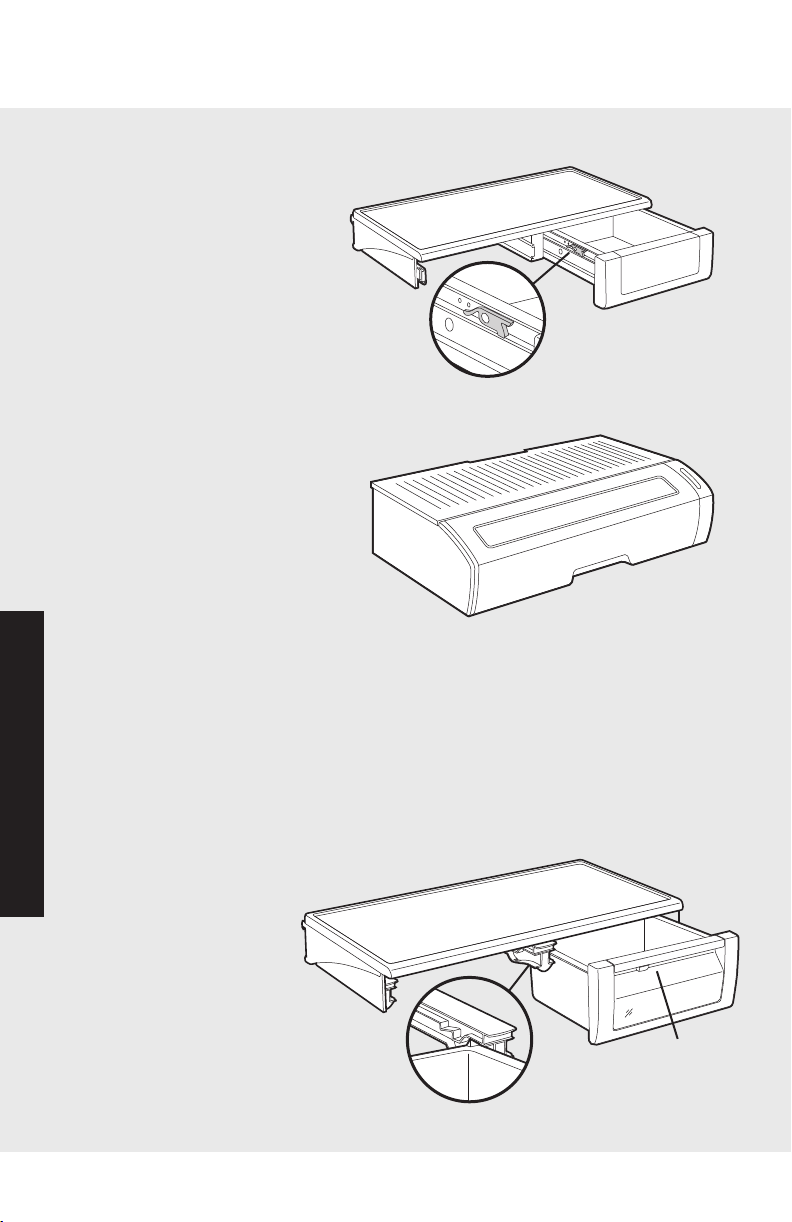
MEAT
SAVOR™/PRODUCE Drawer
Your refrigerator's MEAT
SAVOR™/PRODUCE drawer
glides forward on an inner and
outer track, and the lid raises
for easy access. This special
feature holds extra-large deli
trays, wine bottles, etc. The lid
can also be removed for tall
items such as tiered cakes and
flower arrangements. To open
the drawer, simply grasp the molded handle and pull forward.
For Refrigerators With Plastic Glides:
To remove, slide drawer out to the stop. Lifting up on the
handle molded into the drawer, pull drawer out the rest
of the way.
To replace, place the drawer onto the glides and push back
until drawer engages. Lift up the drawer
by the handle and push back.
Slide drawer back until
it stops.
Black Leveler
Lid
Molded
Handle
Handle
Glides
Refrigerator (all units)
Refrigerators With Ball-Bearing Glides:
To remove, roll drawer out to the stop. Remove lid by lifting to
release hoods then pulling out. Remove the drawer by lifting
slightly and pulling out.
To replace, position drawer rollers behind the track roller.
Push drawer up and onto the track. Slide drawer back slightly.
Replace cover by inserting hooks into drawer then placing back
and front down. Slide drawer back until it stops.
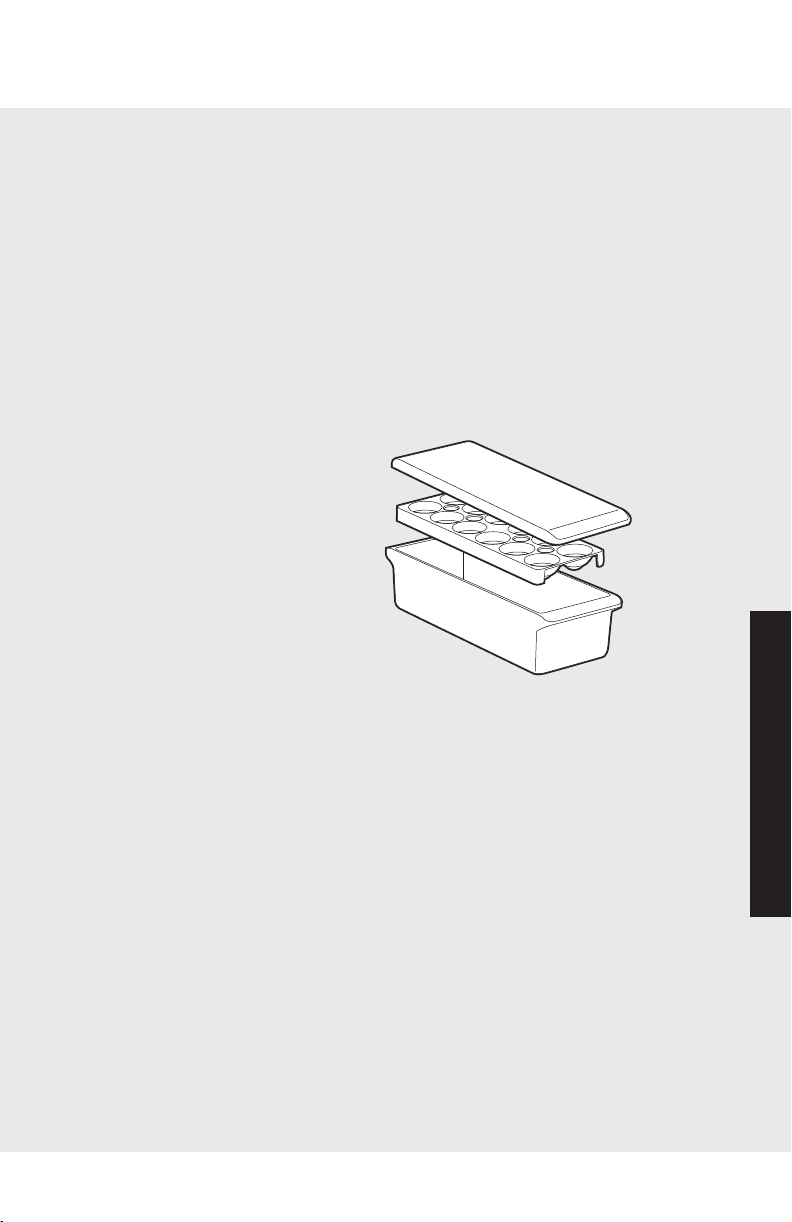
Egg Bin
Your refrigerator's egg bin has three pieces: the lid, the egg
tray, and the bin. The egg bin
can hold up to two dozen eggs.
To hold one dozen eggs, place
twelve eggs into the egg carrier.
Then place the egg carrier into
the bin and cover with the lid.
With two dozen eggs, place
twenty-four eggs loose in the
bin and cover them with the lid.
Use the carrier to transport eggs
between the bin and your
cooking area.
When the egg tray is removed, the bin will accept items such
as a standard egg carton, ice, etc.
Lid
Egg Tray
Bin
2322
Operation
Operation
Refrigerator (all units)
For refrigerators without
glides, remove the produce
drawer by lifting it up
slightly and pulling it out.
Replace the drawer by
simply positioning it in
place and sliding it back
until it stops.
MEAT
SAVOR™/PRODUCE Drawer
Your refrigerator's MEAT
SAVOR™/PRODUCE drawer
glides forward on an inner and
outer track, and the lid raises
for easy access. This special
feature holds extra-large deli
trays, wine bottles, etc. The lid
can also be removed for tall
items such as tiered cakes and
flower arrangements. To open
the drawer, simply grasp the molded handle and pull forward.
For Refrigerators With Plastic Glides:
To remove, slide drawer out to the stop. Lifting up on the
handle molded into the drawer, pull drawer out the rest
of the way.
To replace, place the drawer onto the glides and push back
until drawer engages. Lift up the drawer
by the handle and push back.
Slide drawer back until
it stops.
Black Leveler
Lid
Molded
Handle
Handle
Glides
Refrigerator (all units)
Refrigerators With Ball-Bearing Glides:
To remove, roll drawer out to the stop. Remove lid by lifting to
release hoods then pulling out. Remove the drawer by lifting
slightly and pulling out.
To replace, position drawer rollers behind the track roller.
Push drawer up and onto the track. Slide drawer back slightly.
Replace cover by inserting hooks into drawer then placing back
and front down. Slide drawer back until it stops.
Egg Bin
Your refrigerator's egg bin has three pieces: the lid, the egg
tray, and the bin. The egg bin
can hold up to two dozen eggs.
To hold one dozen eggs, place
twelve eggs into the egg carrier.
Then place the egg carrier into
the bin and cover with the lid.
With two dozen eggs, place
twenty-four eggs loose in the
bin and cover them with the lid.
Use the carrier to transport eggs
between the bin and your
cooking area.
When the egg tray is removed, the bin will accept items such
as a standard egg carton, ice, etc.
Lid
Egg Tray
Bin
2524
Operation
Operation
Freezer (all units except bottom-mount)
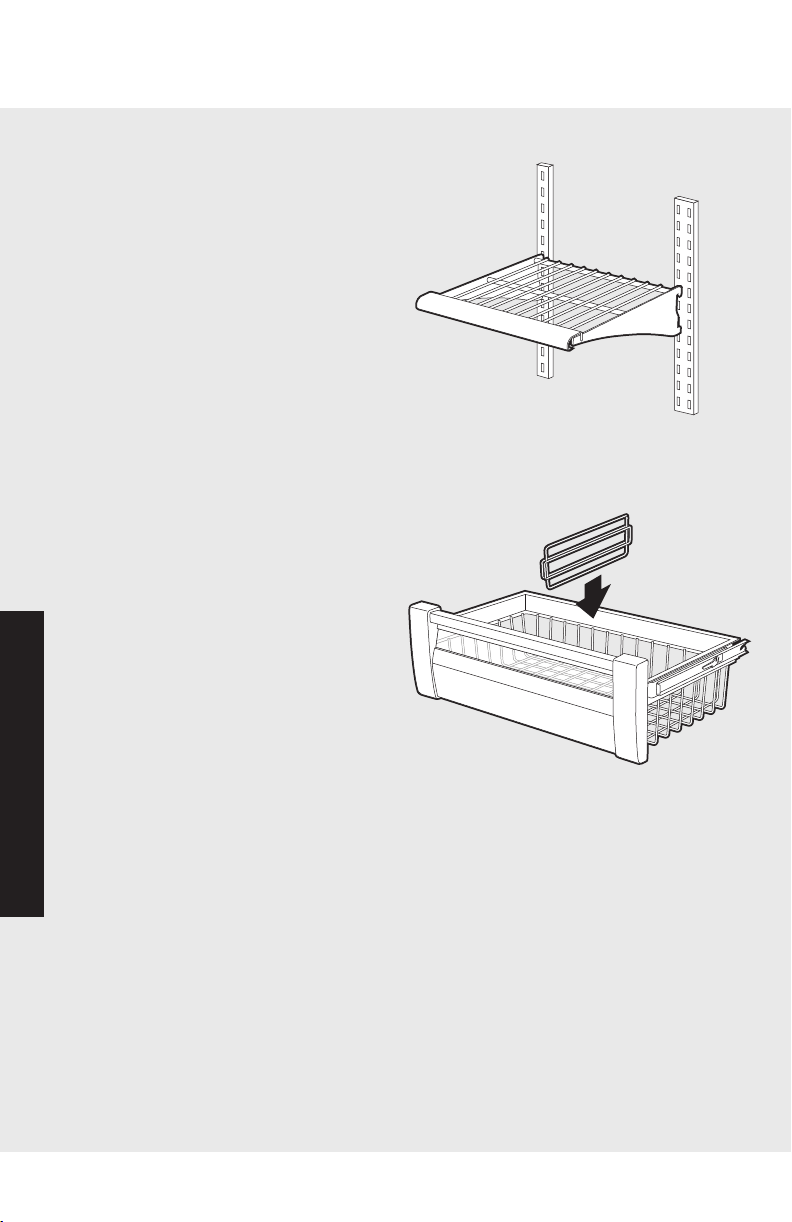
Wire Shelf Adjustment
You can easily adjust your freezer's
shelves. To remove a shelf, simply
tilt it up at the front, releasing the
hooks from the shelf support. Then,
pull the shelf straight out. To
replace, guide the rear hooks of the
shelf into the slots in the shelf
supports. Then, tilt the shelf up at
the front until the hooks drop into
the slots. Next, lower the front of
the shelf to a level position.
Wire Basket Adjustment (all freezer model only)
You can easily adjust your freezer's
wire baskets by moving the
dividers. To remove a divider,
simply grasp it in the center, and
pull the divider straight up. To
replace, guide the divider around
the basket wires in the desired
location, then push the divider
down until it stops.
Automatic Ice Maker (all units except all refrigerator)
The ice maker and slide-out ice drawer on your refrigerator are
not adjustable, but the ice drawer slides forward for easy access
to ice.
After the refrigerator reaches normal temperature, the ice
maker fills with water and begins operating. Under normal
conditions, the ice maker will produce seven to nine batches of
ice per 24 hour period.
NOTE: Allow 24 to 48 hours after installation before looking for
ice in your ice drawer. You should discard the first three
full drawers of ice produced by your refrigerator, and should
also throw out the first drawer full of ice your refrigerator
produces after extended periods of non-use.
During ice production, the ice maker
arm raises and lowers. When the ice
bin is full, the ice maker arm
automatically turns the ice maker off.
To manually stop ice production, raise
the ice maker arm. You will hear a
definite click when you have the arm
in the right position. The ice maker
won't produce any more ice until you
push the ice bin all the way back into
place.
Ice Bin Adjustment (all freezer model only)
Ice bins can be adjusted to match the way you use your freezer.
The ice bin on the left-hand side is used for collecting ice from
the ice maker. Once the left-hand ice bin is full, the bins can be
reversed so additional ice is made. If the ice maker is not
operating, the ice bin can be used for cold storage.
CAUTION
To avoid damage to ice maker, observe the following:
• Do not force ice maker arm down or up past stop position.
• Do not place or store anything in ice bucket.
Off
Position
On
Position
Ice
Maker
Arm
2524
Operation
Operation
Freezer (all units except bottom-mount)
Wire Shelf Adjustment
You can easily adjust your freezer's
shelves. To remove a shelf, simply
tilt it up at the front, releasing the
hooks from the shelf support. Then,
pull the shelf straight out. To
replace, guide the rear hooks of the
shelf into the slots in the shelf
supports. Then, tilt the shelf up at
the front until the hooks drop into
the slots. Next, lower the front of
the shelf to a level position.
Wire Basket Adjustment (all freezer model only)
You can easily adjust your freezer's
wire baskets by moving the
dividers. To remove a divider,
simply grasp it in the center, and
pull the divider straight up. To
replace, guide the divider around
the basket wires in the desired
location, then push the divider
down until it stops.
Automatic Ice Maker (all units except all refrigerator)
The ice maker and slide-out ice drawer on your refrigerator are
not adjustable, but the ice drawer slides forward for easy access
to ice.
After the refrigerator reaches normal temperature, the ice
maker fills with water and begins operating. Under normal
conditions, the ice maker will produce seven to nine batches of
ice per 24 hour period.
NOTE: Allow 24 to 48 hours after installation before looking for
ice in your ice drawer. You should discard the first three
full drawers of ice produced by your refrigerator, and should
also throw out the first drawer full of ice your refrigerator
produces after extended periods of non-use.
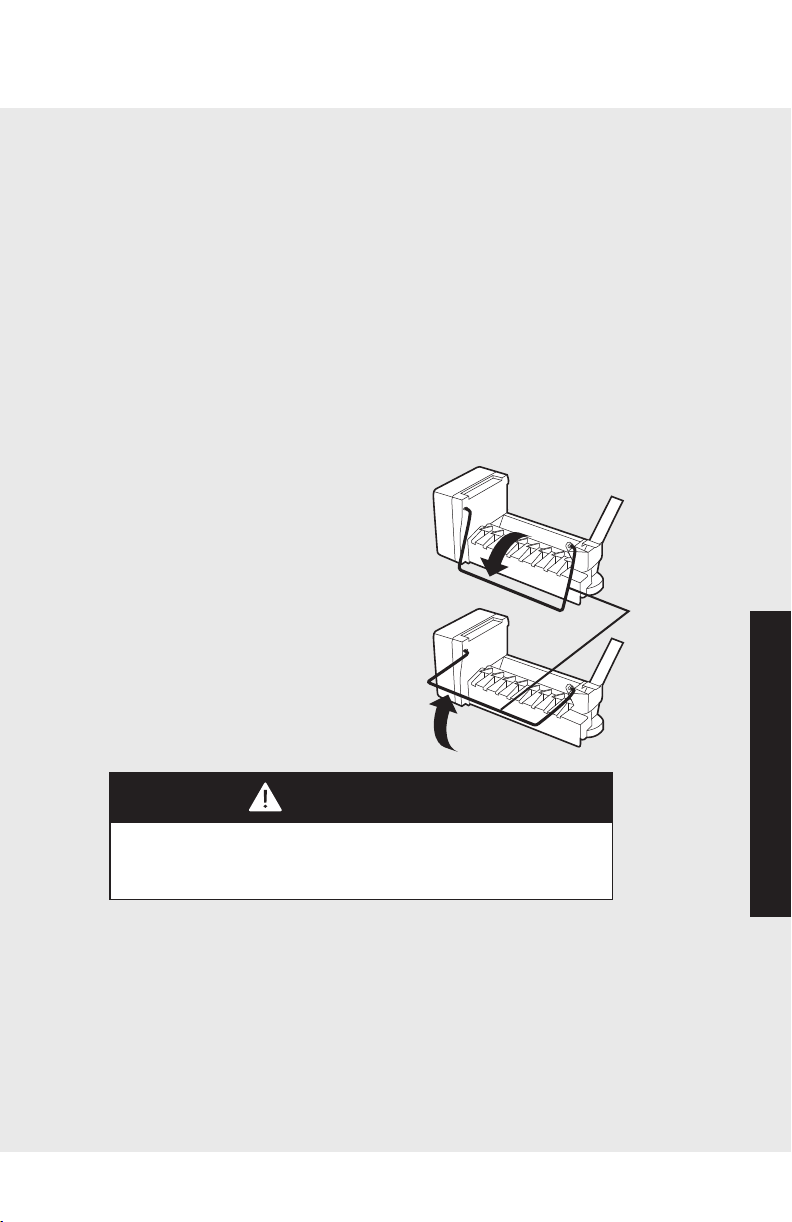
During ice production, the ice maker
arm raises and lowers. When the ice
bin is full, the ice maker arm
automatically turns the ice maker off.
To manually stop ice production, raise
the ice maker arm. You will hear a
definite click when you have the arm
in the right position. The ice maker
won't produce any more ice until you
push the ice bin all the way back into
place.
Ice Bin Adjustment (all freezer model only)
Ice bins can be adjusted to match the way you use your freezer.
The ice bin on the left-hand side is used for collecting ice from
the ice maker. Once the left-hand ice bin is full, the bins can be
reversed so additional ice is made. If the ice maker is not
operating, the ice bin can be used for cold storage.
CAUTION
To avoid damage to ice maker, observe the following:
• Do not force ice maker arm down or up past stop position.
• Do not place or store anything in ice bucket.
Off
Position
On
Position
Ice
Maker
Arm
2726
Automatic Ice Maker
Operation
Operation
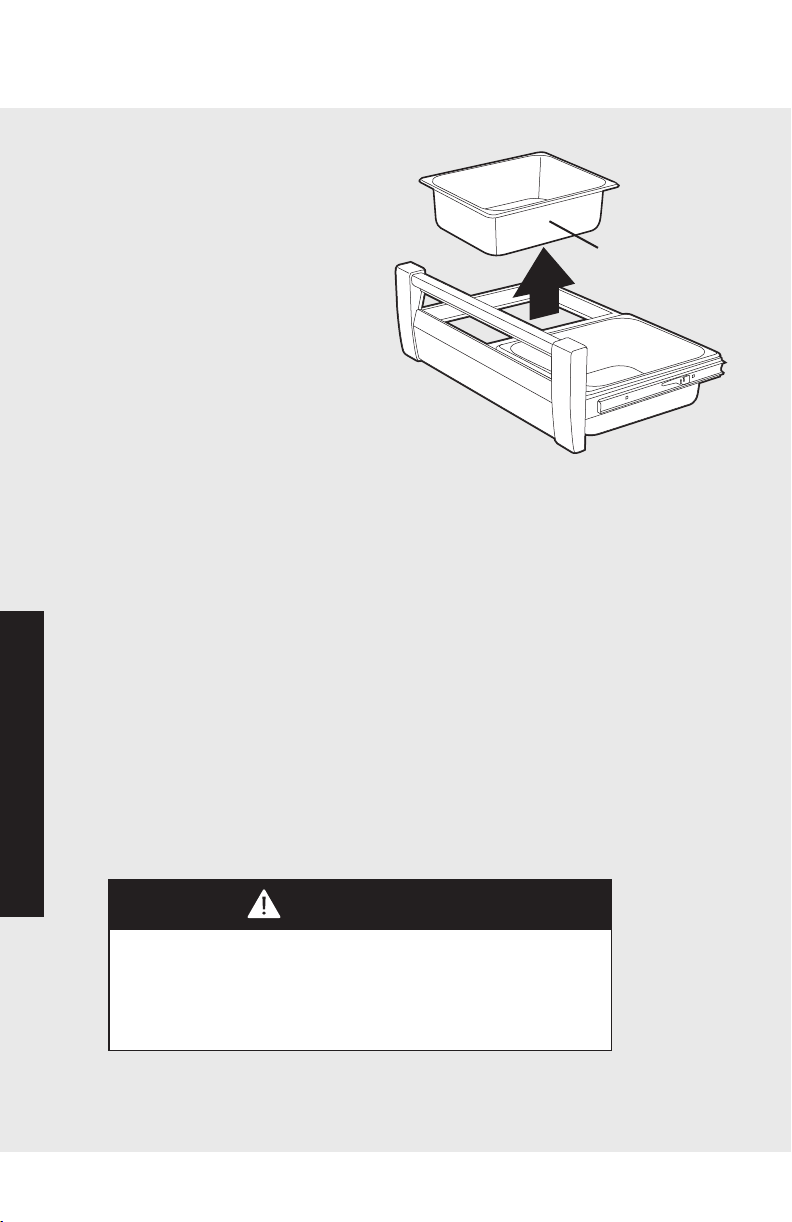
To remove ice bins, extend ice
drawer fully. Place hand
underneath ice bin. Push ice bin
upward. Grab ice bin edge and
lift upward. Store ice bin in safe
place.
To replace ice bins, lower ice bin
in cutout on drawer frame.
Adjust forward or backward
as needed.
Water Dispenser Operation (dispenser models only)
Wait a couple of minutes after connecting your refrigerator to
the household water supply before attempting to use the water
dispenser.
NOTE: Discard first ten to fourteen containers of water
dispensed after initially connecting your refrigerator to the
water supply. Do the same after your refrigerator has an
extended period of non-use.
You will be able to dispense water by pressing a sturdy, wide-
mouth drinking glass or container against the water dispensing
pad. To stop the flow of water, release the pressure. A small
amount of water may continue to fall into the spill shelf located
just below the dispenser. The spill shelf is not self draining, so
large spills should be wiped dry.
CAUTION
To avoid personal injury or property damage, observe the following:
• Do not operate dispenser with freezer door open.
• Do not put fingers, hands, or any foreign object into dispenser
opening.
• Do not use sharp objects to break ice
Ice Bin below
Icemaker
Automatic Dispenser
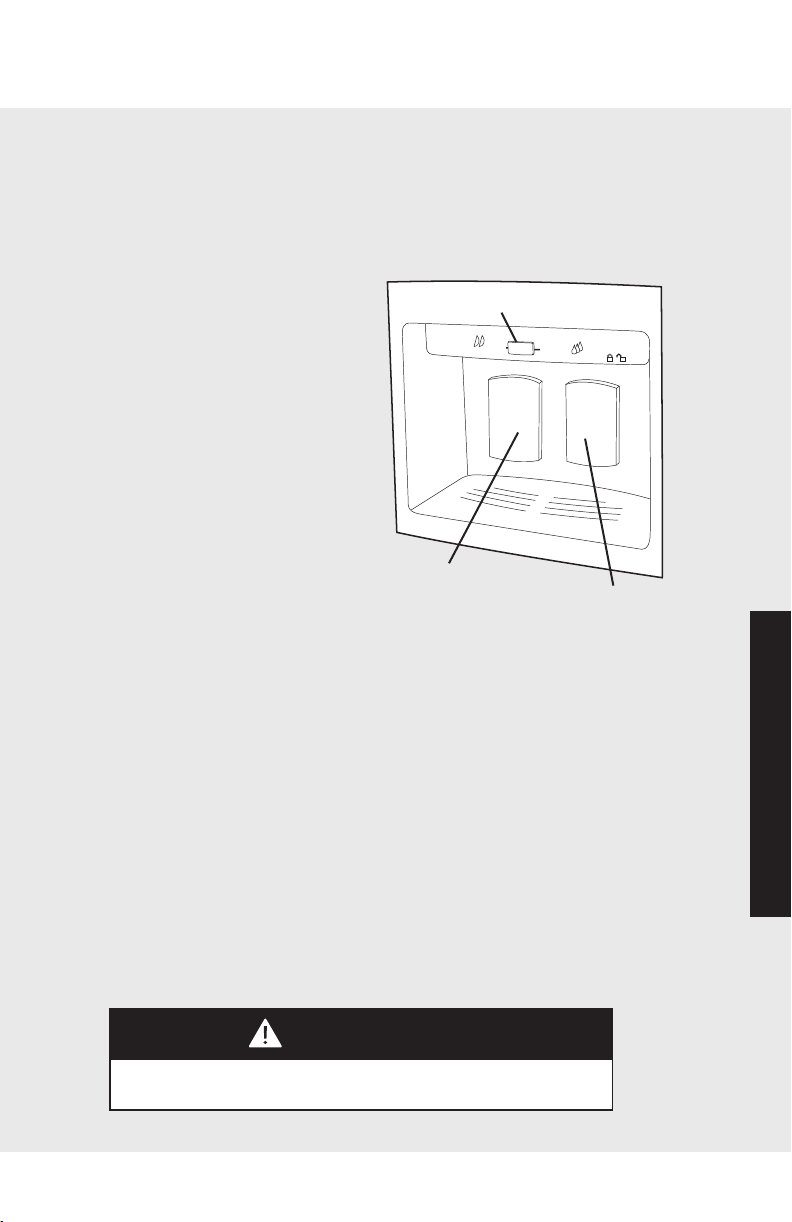
Ice Dispenser Operation (dispenser models only)
Your refrigerator's ice dispenser allows you to select either
cubed or crushed ice by sliding the lever on the ice dispenser
panel. A slight delay occurs when switching between cubed
and crushed modes, and pieces of crushed ice will vary in size
and shape.
Once you have made your
selection, dispense ice by
pressing a sturdy, wide mouth
drinking glass or container
against the ice dispenser pad.
You should release pressure
before the container is full
because some ice will continue
to fall.
NOTE: You can reduce the spray
of crushed ice by holding the
wide-mouth container directly
under the ice chute and as high
as possible in the dispenser area.
If your refrigerator is dispensing ice continuously, the
dispenser’s motor is designed to shut off automatically after
three to five minutes. The motor will then reset after three
minutes and dispensing can continue.
When you repeatedly dispense crushed ice, “snow” may form
on your the door and on the ice chute. You should allow
“snow” to evaporate on its own, or you can wipe it dry.
NOTE: The ice and water dispensers will shut off if the
refrigerator or freezer door has been left ajar for ten minutes.
Operation will resume when the door is closed.
Removing Ice Bucket
You can remove the Ice Bucket by simply lifting the bucket and
pulling it out. To replace it, slide it back in until the bucket locks
in place. If the freezer door will not close, the bucket is not in
the proper position.
CAUTION
To avoid property damage, do not dispense ice directly into a thin
glass, fine china, or delicate crystal.
I
CE
WA
T
E
R
C
r
u
s
h
e
d
C
u
b
e
d
Ice Pad
Water Pad
Sliding Lever
2726
Automatic Ice Maker
Operation
Operation
To remove ice bins, extend ice
drawer fully. Place hand
underneath ice bin. Push ice bin
upward. Grab ice bin edge and
lift upward. Store ice bin in safe
place.
To replace ice bins, lower ice bin
in cutout on drawer frame.
Adjust forward or backward
as needed.
Water Dispenser Operation (dispenser models only)
Wait a couple of minutes after connecting your refrigerator to
the household water supply before attempting to use the water
dispenser.
NOTE: Discard first ten to fourteen containers of water
dispensed after initially connecting your refrigerator to the
water supply. Do the same after your refrigerator has an
extended period of non-use.
You will be able to dispense water by pressing a sturdy, wide-
mouth drinking glass or container against the water dispensing
pad. To stop the flow of water, release the pressure. A small
amount of water may continue to fall into the spill shelf located
just below the dispenser. The spill shelf is not self draining, so
large spills should be wiped dry.
CAUTION
To avoid personal injury or property damage, observe the following:
• Do not operate dispenser with freezer door open.
• Do not put fingers, hands, or any foreign object into dispenser
opening.
• Do not use sharp objects to break ice
Ice Bin below
Icemaker
Automatic Dispenser
Ice Dispenser Operation (dispenser models only)
Your refrigerator's ice dispenser allows you to select either
cubed or crushed ice by sliding the lever on the ice dispenser
panel. A slight delay occurs when switching between cubed
and crushed modes, and pieces of crushed ice will vary in size
and shape.
Once you have made your
selection, dispense ice by
pressing a sturdy, wide mouth
drinking glass or container
against the ice dispenser pad.
You should release pressure
before the container is full
because some ice will continue
to fall.
NOTE: You can reduce the spray
of crushed ice by holding the
wide-mouth container directly
under the ice chute and as high
as possible in the dispenser area.
If your refrigerator is dispensing ice continuously, the
dispenser’s motor is designed to shut off automatically after
three to five minutes. The motor will then reset after three
minutes and dispensing can continue.
When you repeatedly dispense crushed ice, “snow” may form
on your the door and on the ice chute. You should allow
“snow” to evaporate on its own, or you can wipe it dry.
NOTE: The ice and water dispensers will shut off if the
refrigerator or freezer door has been left ajar for ten minutes.
Operation will resume when the door is closed.
Removing Ice Bucket
You can remove the Ice Bucket by simply lifting the bucket and
pulling it out. To replace it, slide it back in until the bucket locks
in place. If the freezer door will not close, the bucket is not in
the proper position.
CAUTION
To avoid property damage, do not dispense ice directly into a thin
glass, fine china, or delicate crystal.
I
CE
WA
T
E
R
C
r
u
s
h
e
d
C
u
b
e
d
Ice Pad
Water Pad
Sliding Lever
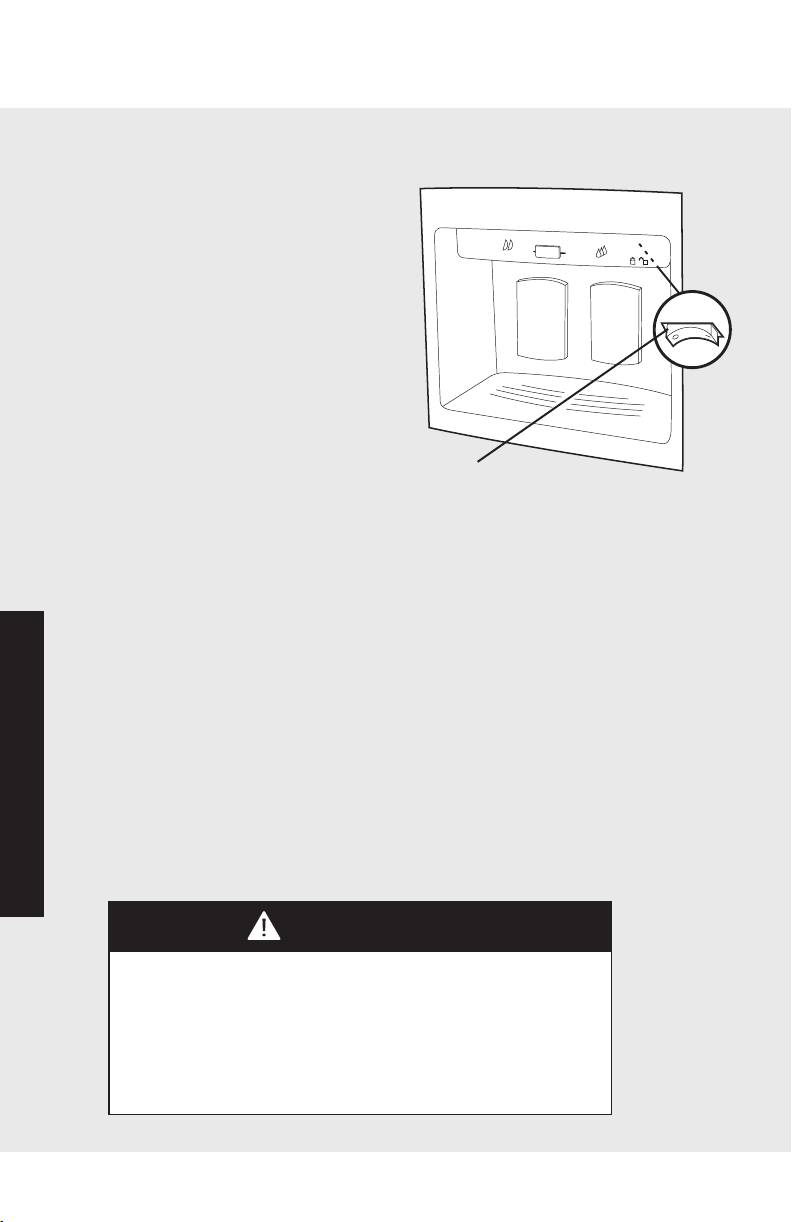
2928
Automatic Dispenser
Operation
Operation
Child Lock Feature (dispenser models only)
When engaged, your refrigerator's
child lock feature prevents water or
ice from being dispensed. This
feature is useful when cleaning the
dispenser or to keep children from
dispensing ice and water. To activate
the child lock, push the child lock
switch to the left (see illustration). To
deactivate, push the child lock switch
to the right. Your appliance is shipped
from the factory with the child lock in
the off position.
Installing the Water Filter
Locate water filter door. The door is located under the MEAT
SAVOR™/PRODUCE drawer handle. Push the upper left corner
of the door to release the door latch. Pull the door downward.
Insert the filter cartridge into circular opening in filter housing.
Move the filter cartridge horizontally until the filter head is
engaged. Rotate gently clockwise until the filter stops. Flush air
from the system by running water through the dispenser
continuously for three minutes. If water spurts occur, continue
to run water until flow is steady. Additional flushing may be
required in areas with poor water quality.
NOTE: Allow a one to two minute delay to allow internal water
tank to fill.
CAUTION
• Be sure to have replacement cartridges available when filter
change is required.
• If water filtration system has been allowed to freeze, replace filter
cartridge.
• If system has not been used for several months, and water has
unpleasant taste or odor, flush system by dispensing two-three
glasses of water. If unpleasant taste or odor persists, change filter
cartridge.
I
C
E
W
AT
E
R
C
r
u
s
h
e
d
C
u
b
ed
Child Lock Switch
Replacing Water Filter
IMPORTANT: Air trapped in your refrigerator's water filtration
system may cause water and the cartridge to eject. Use caution
when removing the filter.
Locate water filter door. The door is located under the MEAT
SAVOR™/PRODUCE drawer handle. Push the upper left corner
of the door to release the door latch. Pull the door downward.
Turn filter cartridge counterclockwise until it releases from filter
head. Drain water from the filter into a sink and dispose of the
cartridge. Wipe up excess water at filter location and insert the
filter cartridge into circular
opening in filter housing. Move
the filter cartridge horizontally
until the filter head is engaged.
Rotate gently clockwise until the
filter stops. Flush air from the
system by running water through
the dispenser continuously for
three minutes. If water spurts
occur, continue to run water until
flow is steady. Additional
flushing may be required in areas
with poor water quality.
When to Change the Water Filter
Your water filter provides a cleaner ice and water supply by
filtering bad tastes, odors, sediment and harmful contaminants.
To ensure proper filtration, the water filter cartridge should be
changed
every nine months or after 750 gallons of water are used,
whichever
comes first.
IMPORTANT: The condition of water and amount used
determines the life span of your water filter cartridge. If water
use is high, or if water is of poor quality, you may have to
replace the cartridge more frequently.
How to Order Replacement Filter Cartridges
Replacement filters are available through your local Viking
Range dealer. You may also order filters by calling Viking Range
Preferred Service at 1-888-845-4641, or online at
www.vikingrange.com.
WARNING
To avoid serious illness or death, do not use unit where water is
unsafe or of unknown quality without adequate disinfection before or
after use of filter.
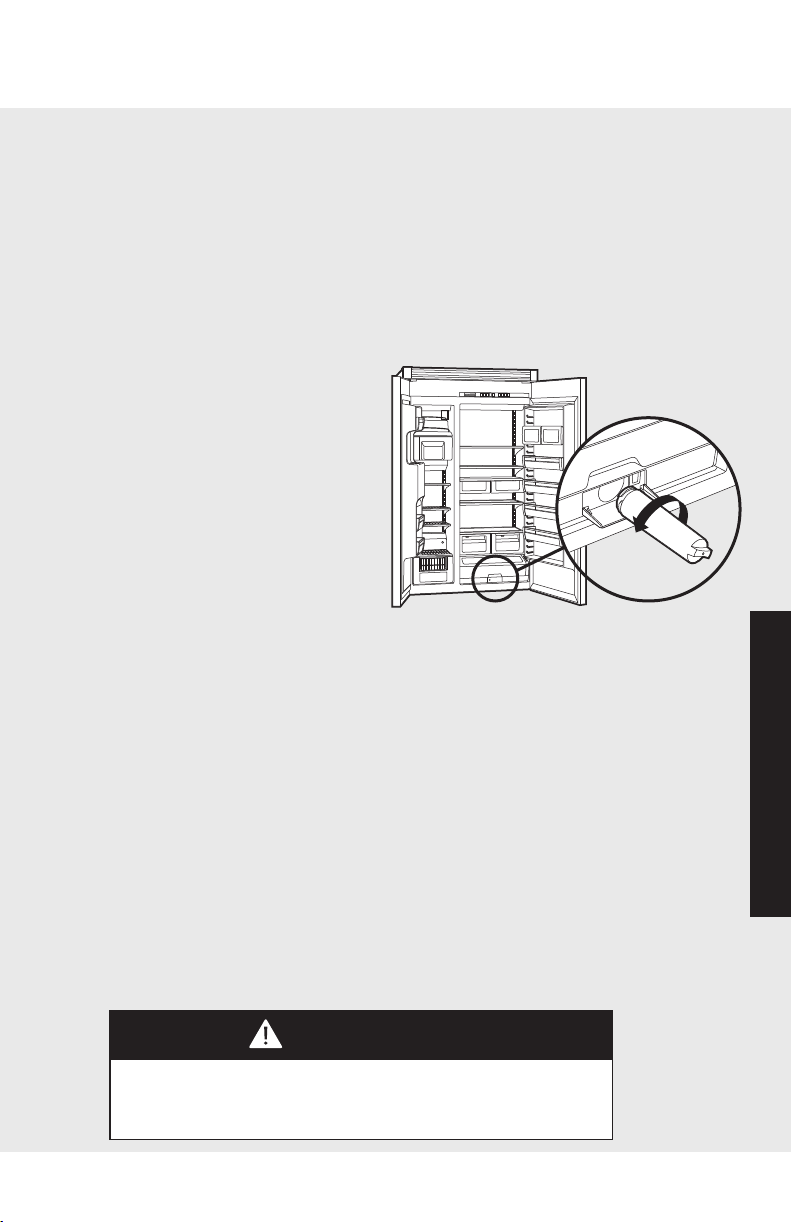
2928
Automatic Dispenser
Operation
Operation
Child Lock Feature (dispenser models only)
When engaged, your refrigerator's
child lock feature prevents water or
ice from being dispensed. This
feature is useful when cleaning the
dispenser or to keep children from
dispensing ice and water. To activate
the child lock, push the child lock
switch to the left (see illustration). To
deactivate, push the child lock switch
to the right. Your appliance is shipped
from the factory with the child lock in
the off position.
Installing the Water Filter
Locate water filter door. The door is located under the MEAT
SAVOR™/PRODUCE drawer handle. Push the upper left corner
of the door to release the door latch. Pull the door downward.
Insert the filter cartridge into circular opening in filter housing.
Move the filter cartridge horizontally until the filter head is
engaged. Rotate gently clockwise until the filter stops. Flush air
from the system by running water through the dispenser
continuously for three minutes. If water spurts occur, continue
to run water until flow is steady. Additional flushing may be
required in areas with poor water quality.
NOTE: Allow a one to two minute delay to allow internal water
tank to fill.
CAUTION
• Be sure to have replacement cartridges available when filter
change is required.
• If water filtration system has been allowed to freeze, replace filter
cartridge.
• If system has not been used for several months, and water has
unpleasant taste or odor, flush system by dispensing two-three
glasses of water. If unpleasant taste or odor persists, change filter
cartridge.
I
C
E
W
AT
E
R
C
r
u
s
h
e
d
C
u
b
ed
Child Lock Switch
Replacing Water Filter
IMPORTANT: Air trapped in your refrigerator's water filtration
system may cause water and the cartridge to eject. Use caution
when removing the filter.
Locate water filter door. The door is located under the MEAT
SAVOR™/PRODUCE drawer handle. Push the upper left corner
of the door to release the door latch. Pull the door downward.
Turn filter cartridge counterclockwise until it releases from filter
head. Drain water from the filter into a sink and dispose of the
cartridge. Wipe up excess water at filter location and insert the
filter cartridge into circular
opening in filter housing. Move
the filter cartridge horizontally
until the filter head is engaged.
Rotate gently clockwise until the
filter stops. Flush air from the
system by running water through
the dispenser continuously for
three minutes. If water spurts
occur, continue to run water until
flow is steady. Additional
flushing may be required in areas
with poor water quality.
When to Change the Water Filter
Your water filter provides a cleaner ice and water supply by
filtering bad tastes, odors, sediment and harmful contaminants.
To ensure proper filtration, the water filter cartridge should be
changed
every nine months or after 750 gallons of water are used,
whichever
comes first.
IMPORTANT: The condition of water and amount used
determines the life span of your water filter cartridge. If water
use is high, or if water is of poor quality, you may have to
replace the cartridge more frequently.
How to Order Replacement Filter Cartridges
Replacement filters are available through your local Viking
Range dealer. You may also order filters by calling Viking Range
Preferred Service at 1-888-845-4641, or online at
www.vikingrange.com.
WARNING
To avoid serious illness or death, do not use unit where water is
unsafe or of unknown quality without adequate disinfection before or
after use of filter.

31
30
Operation
Operation
Food Storage Guide
Storing Fresh Food
Wrap or store food in the refrigerator in airtight and moisture-
proof material. This prevents food odor and taste transfer. For
dated products, check use-by date to ensure freshness.
To store leafy vegetables, remove store wrapping. Then tear off
bruised and discolored areas. Wash the vegetables in cold
water and drain, and then place them in a plastic bag or plastic
container and store in your produce drawer.
For vegetables with skins, such as carrots and peppers, store in
plastic bags or containers.
When refrigerating or freezing fruit, wash the fruit and then let
it dry. Store the fruit in plastic bags. Don't wash or hull berries
until they are ready to use. Instead, sort and keep berries in
their original container in the produce drawer, or store in a
loosely closed paper bag on the refrigerator shelf.
Store eggs without washing them. Keep eggs in their original
carton or in your refrigerator's egg bin.
Wipe milk cartons. For best storage, place milk on an interior
shelf.
Keep opened butter in covered dish or closed compartment.
When storing butter in the freezer, wrap it in freezer packaging.
When you have leftovers, cover then with plastic wrap,
aluminum foil, or store the leftovers in plastic containers with
tight lids.
Store meat in its original wrapping, as long as it's airtight and
moisture-proof. Rewrap meat if necessary.
NOTE: When storing meat longer than the recommended
times, freeze the meat.
The Meat Savor™/PRODUCE Drawer is ideal for longer term
meat storage because the temperature can be set 3˚ to 5˚
colder.
Recommended storage times:
Chicken 1-2 days Bacon 5-7 days
Ground Beef 1-2 days Cold Cuts 3-5 days
Steaks/Roasts 3-5 days Variety Meats 1-2 days
Cured Meats 7-10 days
NOTE: Use fresh fish and shellfish the same day as purchased.
Food Storage Guide
Packaging Food for Freezing
The secret of successful freezing is in the packaging; the way
you close and seal a package of food must not allow air or
moisture in or out, or the quality of the food will deteriorate
while frozen.
Packaging you should not use for freezing includes:
• Bread wrappers
• Non-polyethylene plastic containers
• Containers without lids
• Wax paper or wax-coated freezer wrap
• Thin, semi-permeable wrap
Recommended packaging:
• Rigid plastic containers with tight-fitting lids
• Straight-sided canning/freezing jars
• Heavy-duty aluminum foil
• Plastic-coated paper
• Non-permeable plastic wraps (made from saran film)
• Zip-top freezer bags
Follow package or container instructions for proper freezing
methods.
Freezing Foods
Do not expect your freezer to quick-freeze large quantities of
food; do not load more than two to three pounds of unfrozen
food per cubic foot within 24 hours. Leave enough space for air
to circulate around packages, and be careful to leave enough
room at the front so the freezer door can close tightly.
A full freezer stays cold longer than a partially filled one, and a
freezer full of meat stays cold longer than a freezer full of baked
goods. If food contains ice crystals, it may be safely refrozen,
although the quality and flavor may be affected. If the
condition of the food is poor, or if you feel it is unsafe, dispose
of it.
Storage times will vary according to the quality of food, the
type of packaging or wrap used (airtight and moisture-proof),
and the storage temperature, which should be
0° to 2° F (-18° to -17° C).

31
30
Operation
Operation
Food Storage Guide
Storing Fresh Food
Wrap or store food in the refrigerator in airtight and moisture-
proof material. This prevents food odor and taste transfer. For
dated products, check use-by date to ensure freshness.
To store leafy vegetables, remove store wrapping. Then tear off
bruised and discolored areas. Wash the vegetables in cold
water and drain, and then place them in a plastic bag or plastic
container and store in your produce drawer.
For vegetables with skins, such as carrots and peppers, store in
plastic bags or containers.
When refrigerating or freezing fruit, wash the fruit and then let
it dry. Store the fruit in plastic bags. Don't wash or hull berries
until they are ready to use. Instead, sort and keep berries in
their original container in the produce drawer, or store in a
loosely closed paper bag on the refrigerator shelf.
Store eggs without washing them. Keep eggs in their original
carton or in your refrigerator's egg bin.
Wipe milk cartons. For best storage, place milk on an interior
shelf.
Keep opened butter in covered dish or closed compartment.
When storing butter in the freezer, wrap it in freezer packaging.
When you have leftovers, cover then with plastic wrap,
aluminum foil, or store the leftovers in plastic containers with
tight lids.
Store meat in its original wrapping, as long as it's airtight and
moisture-proof. Rewrap meat if necessary.
NOTE: When storing meat longer than the recommended
times, freeze the meat.
The Meat Savor™/PRODUCE Drawer is ideal for longer term
meat storage because the temperature can be set 3˚ to 5˚
colder.
Recommended storage times:
Chicken 1-2 days Bacon 5-7 days
Ground Beef 1-2 days Cold Cuts 3-5 days
Steaks/Roasts 3-5 days Variety Meats 1-2 days
Cured Meats 7-10 days
NOTE: Use fresh fish and shellfish the same day as purchased.
Food Storage Guide
Packaging Food for Freezing
The secret of successful freezing is in the packaging; the way
you close and seal a package of food must not allow air or
moisture in or out, or the quality of the food will deteriorate
while frozen.
Packaging you should not use for freezing includes:
• Bread wrappers
• Non-polyethylene plastic containers
• Containers without lids
• Wax paper or wax-coated freezer wrap
• Thin, semi-permeable wrap
Recommended packaging:
• Rigid plastic containers with tight-fitting lids
• Straight-sided canning/freezing jars
• Heavy-duty aluminum foil
• Plastic-coated paper
• Non-permeable plastic wraps (made from saran film)
• Zip-top freezer bags
Follow package or container instructions for proper freezing
methods.
Freezing Foods
Do not expect your freezer to quick-freeze large quantities of
food; do not load more than two to three pounds of unfrozen
food per cubic foot within 24 hours. Leave enough space for air
to circulate around packages, and be careful to leave enough
room at the front so the freezer door can close tightly.
A full freezer stays cold longer than a partially filled one, and a
freezer full of meat stays cold longer than a freezer full of baked
goods. If food contains ice crystals, it may be safely refrozen,
although the quality and flavor may be affected. If the
condition of the food is poor, or if you feel it is unsafe, dispose
of it.
Storage times will vary according to the quality of food, the
type of packaging or wrap used (airtight and moisture-proof),
and the storage temperature, which should be
0° to 2° F (-18° to -17° C).
32
33
Product Care
Product Care
Cleaning and Maintenance
Your refrigerator is built to give you many years of dependable
service. However, there are a few things you can do to help
extend its life. This section tells you how to clean your
refrigerator and what to do when going on vacation, moving,
or during a power outage.
Interior Surfaces
Wash the interior surfaces of your refrigerator with four
tablespoons of baking soda dissolved in one quart of warm
water. Use a soft, clean cloth. Rinse these surfaces with warm
water, and dry with a soft clean cloth.
Do not use the following to clean interior surfaces:
• Abrasive or harsh cleaners, such as ammonia or chlorine
bleach
• Concentrated detergents or solvents
• Metal scouring pads
These products can scratch, crack and discolor your
refrigerator's surfaces.
Also, never wash the ice bucket or shelves in the dishwasher.
They must be cleaned by hand.
CAUTION
To avoid personal injury or property damage, read and follow all
cleaning product manufacturer’s directions.
WARNING
To avoid electrical shock which can cause severe personal injury or
death, turn power disconnect switch to OFF before cleaning. After
cleaning, return power disconnect switch to ON position.
Cleaning Chart
Part What to Use How to Clean
Removable parts Sponge or cloth with mild Hand wash,
(shelves, drawers) detergent and warm water rinse, and
dry thoroughly.
Front door panels
• Stainless steel Stainless steel cleaner Wipe with soft cloth.
• Painted Sponge or cloth with mild Hand wash,
detergent and warm water rinse, and
dry thoroughly.
Interior walls Sponge, soft cloth or paper Hand wash,
(allow freezer to towel with baking soda or rinse, and
warm up so cloth or mild detergent and dry thoroughly.
will not stick) warm water
Door liners and Sponge, soft cloth or paper Wash, wipe and dry
gaskets towel with mild detergent thoroughly.
and warm water
Do not use cleaning waxes,
concentrated detergents,
or cleaners containing
chlorine bleach
Plastic parts Soft, clean sponge or soft Wash, wipe
(covers, panels) clean cloth with mild and dry
detergent and warm water thoroughly.
Do not use paper towels,
window sprays, or scouring
pads. These can scratch
and damage the
finish.
Condenser coil Vacuum cleaner with Vacuum coils
extended narrow when dusty or
attachment dirty.
Cleaning and Maintenance
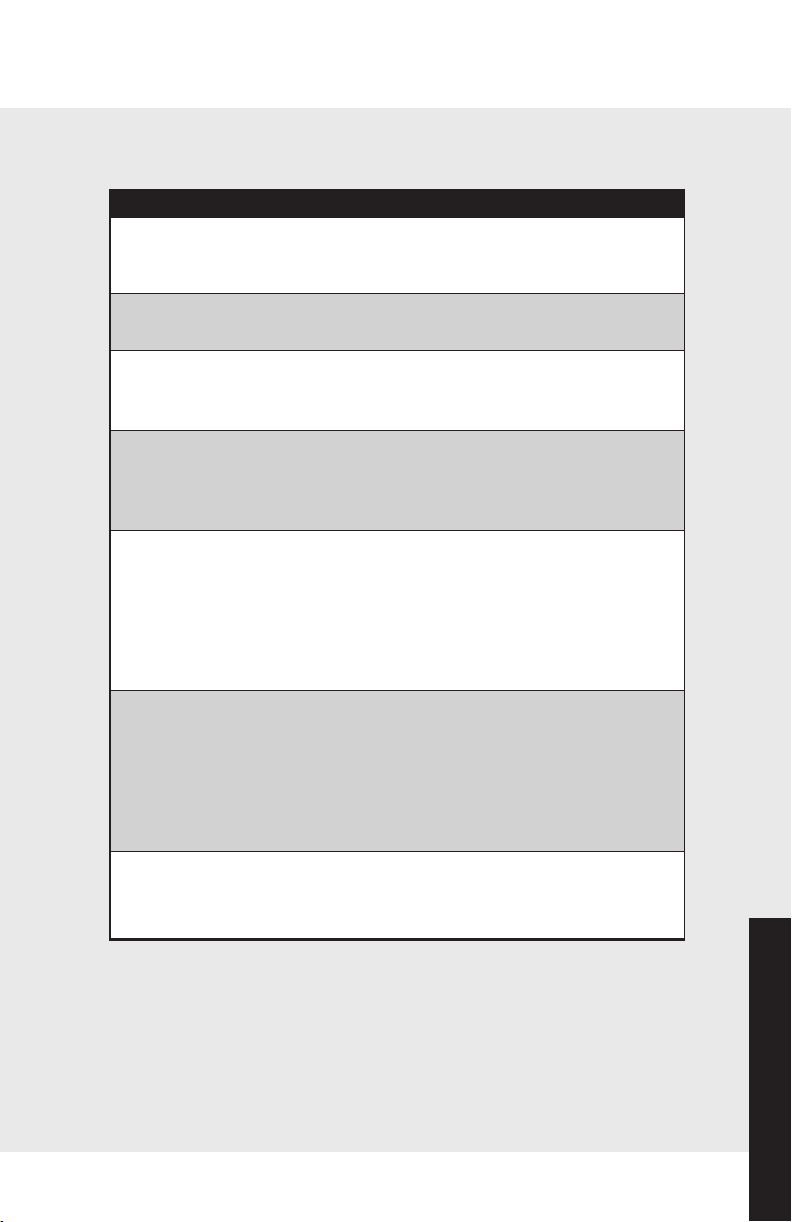
32
33
Product Care
Product Care
Cleaning and Maintenance
Your refrigerator is built to give you many years of dependable
service. However, there are a few things you can do to help
extend its life. This section tells you how to clean your
refrigerator and what to do when going on vacation, moving,
or during a power outage.
Interior Surfaces
Wash the interior surfaces of your refrigerator with four
tablespoons of baking soda dissolved in one quart of warm
water. Use a soft, clean cloth. Rinse these surfaces with warm
water, and dry with a soft clean cloth.
Do not use the following to clean interior surfaces:
• Abrasive or harsh cleaners, such as ammonia or chlorine
bleach
• Concentrated detergents or solvents
• Metal scouring pads
These products can scratch, crack and discolor your
refrigerator's surfaces.
Also, never wash the ice bucket or shelves in the dishwasher.
They must be cleaned by hand.
CAUTION
To avoid personal injury or property damage, read and follow all
cleaning product manufacturer’s directions.
WARNING
To avoid electrical shock which can cause severe personal injury or
death, turn power disconnect switch to OFF before cleaning. After
cleaning, return power disconnect switch to ON position.
Cleaning Chart
Part What to Use How to Clean
Removable parts Sponge or cloth with mild Hand wash,
(shelves, drawers) detergent and warm water rinse, and
dry thoroughly.
Front door panels
• Stainless steel Stainless steel cleaner Wipe with soft cloth.
• Painted Sponge or cloth with mild Hand wash,
detergent and warm water rinse, and
dry thoroughly.
Interior walls Sponge, soft cloth or paper Hand wash,
(allow freezer to towel with baking soda or rinse, and
warm up so cloth or mild detergent and dry thoroughly.
will not stick) warm water
Door liners and Sponge, soft cloth or paper Wash, wipe and dry
gaskets towel with mild detergent thoroughly.
and warm water
Do not use cleaning waxes,
concentrated detergents,
or cleaners containing
chlorine bleach
Plastic parts Soft, clean sponge or soft Wash, wipe
(covers, panels) clean cloth with mild and dry
detergent and warm water thoroughly.
Do not use paper towels,
window sprays, or scouring
pads. These can scratch
and damage the
finish.
Condenser coil Vacuum cleaner with Vacuum coils
extended narrow when dusty or
attachment dirty.
Cleaning and Maintenance
35
34
Product Care
Product Care
Cleaning and Maintenance
Glass Shelves
To clean your refrigerator's glass shelves, lift the shelf out by
lifting the front and releasing the hooks from the metal track.
Then pull the shelf out. Be sure to allow the glass shelves to
adjust to room temperature before cleaning.
To clean crevices, dilute mild detergent with water. Brush this
solution into crevices using a plastic bristle brush. Let set for
five minutes. Spray warm water into crevices using faucet spray
attachment. Dry glass shelf thoroughly and replace shelf by
inserting hooks into metal track and lowering front.
Door Gaskets
Clean the door gaskets every three months using the same
procedures used for interior surfaces. You should apply a light
film of petroleum jelly to keep gaskets pliable.
CAUTION
To avoid personal injury or property damage, handle tempered glass
shelves carefully. Shelves may break suddenly if nicked, scratched, or
exposed to sudden temperature changes.
WARNING
ELECTRICAL SHOCK HAZARD
Disconnect power or turn power
disconnect switch to OFF position before
removing top grille. Failure to do so can
result in death or electrical shock.
WARNING
BURN HAZARD
Do not touch condenser coils near
defrost pan.
Doing so can result in burns.
Defrost Pan
To prevent condensation from overflowing, check defrost pan
periodically.
To check defrost pan, remove two screws securing kickplate to
unit. Pull defrost pan forward until it stops. Remove any excess
water from pan. Wipe and clean defrost pan with a sponge.
Return defrost pan to original position. Return kickplate to unit
by securing with two screws.
Door Stop Adjustment
Your refrigerator is factory set at 110° door stop position.
To change to either the 90° or 120° position, remove the door
stop pin located in the bottom hinge using a 3/16” allen
wrench. For 120° swing, move the pin to stop hole closest to
the unit. For 90° swing, move pin to stop hole farthest from the
unit.
Cleaning and Maintenance
WARNING
ELECTRICAL SHOCK HAZARD
Disconnect power or turn power
disconnect switch to OFF position before
removing top grille. Failure to do so can
result in death or electrical shock.
CAUTION
To avoid personal injury or property damage, handle tempered glass
shelves carefully. Shelves may break suddenly if nicked, scratched, or
exposed to sudden temperature changes.
110˚
120˚
Door Stop Pin
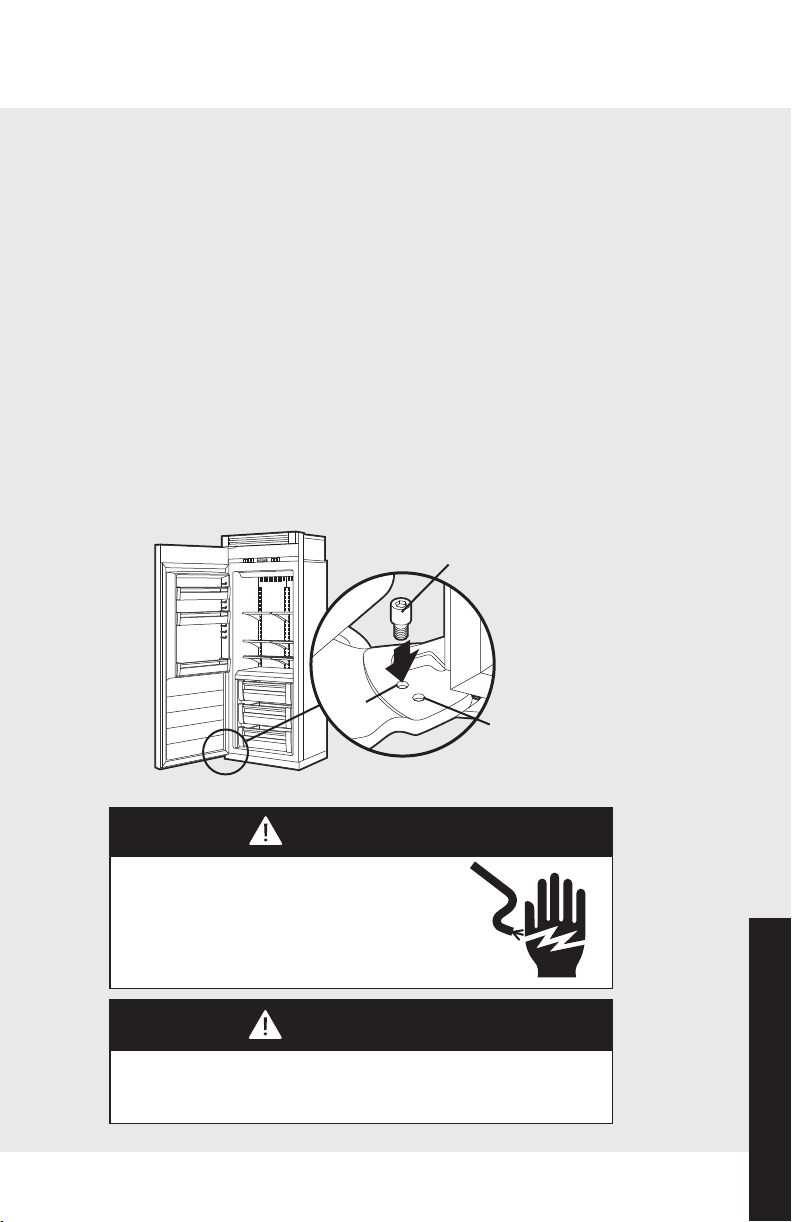
35
34
Product Care
Product Care
Cleaning and Maintenance
Glass Shelves
To clean your refrigerator's glass shelves, lift the shelf out by
lifting the front and releasing the hooks from the metal track.
Then pull the shelf out. Be sure to allow the glass shelves to
adjust to room temperature before cleaning.
To clean crevices, dilute mild detergent with water. Brush this
solution into crevices using a plastic bristle brush. Let set for
five minutes. Spray warm water into crevices using faucet spray
attachment. Dry glass shelf thoroughly and replace shelf by
inserting hooks into metal track and lowering front.
Door Gaskets
Clean the door gaskets every three months using the same
procedures used for interior surfaces. You should apply a light
film of petroleum jelly to keep gaskets pliable.
CAUTION
To avoid personal injury or property damage, handle tempered glass
shelves carefully. Shelves may break suddenly if nicked, scratched, or
exposed to sudden temperature changes.
WARNING
ELECTRICAL SHOCK HAZARD
Disconnect power or turn power
disconnect switch to OFF position before
removing top grille. Failure to do so can
result in death or electrical shock.
WARNING
BURN HAZARD
Do not touch condenser coils near
defrost pan.
Doing so can result in burns.
Defrost Pan
To prevent condensation from overflowing, check defrost pan
periodically.
To check defrost pan, remove two screws securing kickplate to
unit. Pull defrost pan forward until it stops. Remove any excess
water from pan. Wipe and clean defrost pan with a sponge.
Return defrost pan to original position. Return kickplate to unit
by securing with two screws.
Door Stop Adjustment
Your refrigerator is factory set at 110° door stop position.
To change to either the 90° or 120° position, remove the door
stop pin located in the bottom hinge using a 3/16” allen
wrench. For 120° swing, move the pin to stop hole closest to
the unit. For 90° swing, move pin to stop hole farthest from the
unit.
Cleaning and Maintenance
WARNING
ELECTRICAL SHOCK HAZARD
Disconnect power or turn power
disconnect switch to OFF position before
removing top grille. Failure to do so can
result in death or electrical shock.
CAUTION
To avoid personal injury or property damage, handle tempered glass
shelves carefully. Shelves may break suddenly if nicked, scratched, or
exposed to sudden temperature changes.
110˚
120˚
Door Stop Pin
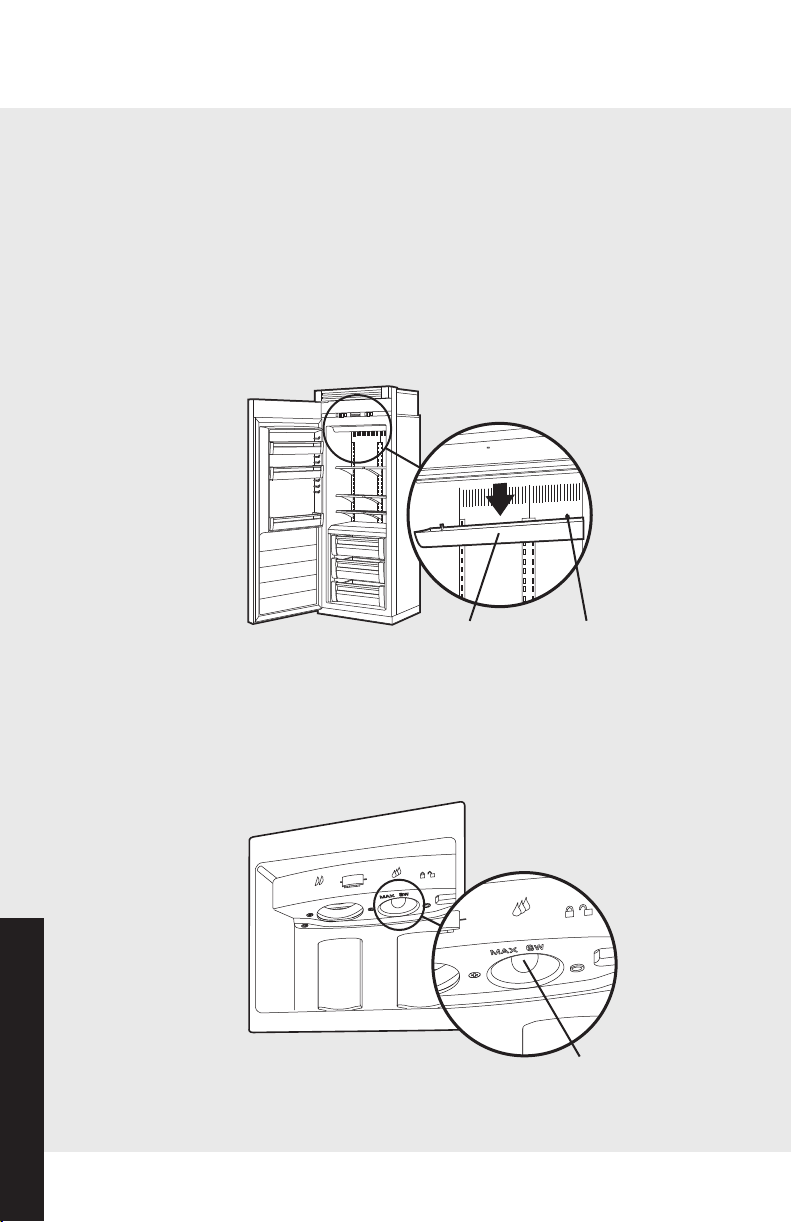
37
Cleaning and Maintenance
36
Product Care
Product Care
Upper Light Bulb
Disconnect power at breaker or turn power disconnect switch
to the off position. Lightly grasp light cover with both hands
and pull down. Replace bulb with an incandescent, medium
base tubular bulb with a maximum of 40 watts. Replace cover
by engaging light bracket with the back fingers on the light
cover. Once engaged, snap the front fingers on the light cover.
(Note: The clear section of the light cover is considered the
back section.) Reconnect power or turn power disconnect
switch to the on position.
Dispenser Light Bulb
Disconnect power at breaker or turn power disconnect switch
to the off position. Replace with an incandescent bulb with a
maximum of 6 watts.
Light Cover
Cover Fingers
Cleaning and Maintenance
Lower Light Bulbs (all freezer only)
Disconnect power at breaker or turn power disconnect switch
to off. Remove center freezer basket and frame by lifting up on
the black leveler on each side until drawer disengages from
glide. Lightly grasp light cover on the underneath side and pull
up. Replace with an incandescent, medium base tubular bulb
with a maximum of 40 watts.
Replace cover by engaging
the top of the light cover
over the light bracket. Once
engaged, snap the bottom of
the light cover over the light
bracket with light pressure.
Replace center freezer basket
and frame by aligning the
inner glide on the basket with
the outer glide in the unit.
Slide freezer basket and frame back until black leveler “clicks.”
Reconnect power or turn power disconnect switch to the on
position.
Lower Light Bulbs (refrigerator and freezer)
Disconnect power at breaker or
turn power disconnect switch
to the off position. Lightly
grasp light cover on the
underneath side and pull up.
Replace with an incandescent,
medium base tubular bulb with
a maximum of 40 watts.
Replace cover by engaging the
top of the light cover over the
light bracket. Once engaged,
snap the bottom of the light
cover over the light bracket
with light pressure. Reconnect
power or turn power
disconnect switch to the on
position.
Black
Leveler
Inner Glide
Attaches to Outer
Glide in Unit
Light Bulb
Light Bulb
Cover
Light Bracket
I
C
E
WA
T
E
R
C
r
u
s
he
d
C
u
b
ed
WAT
E
R
C
ru
she
d
Light Bulb
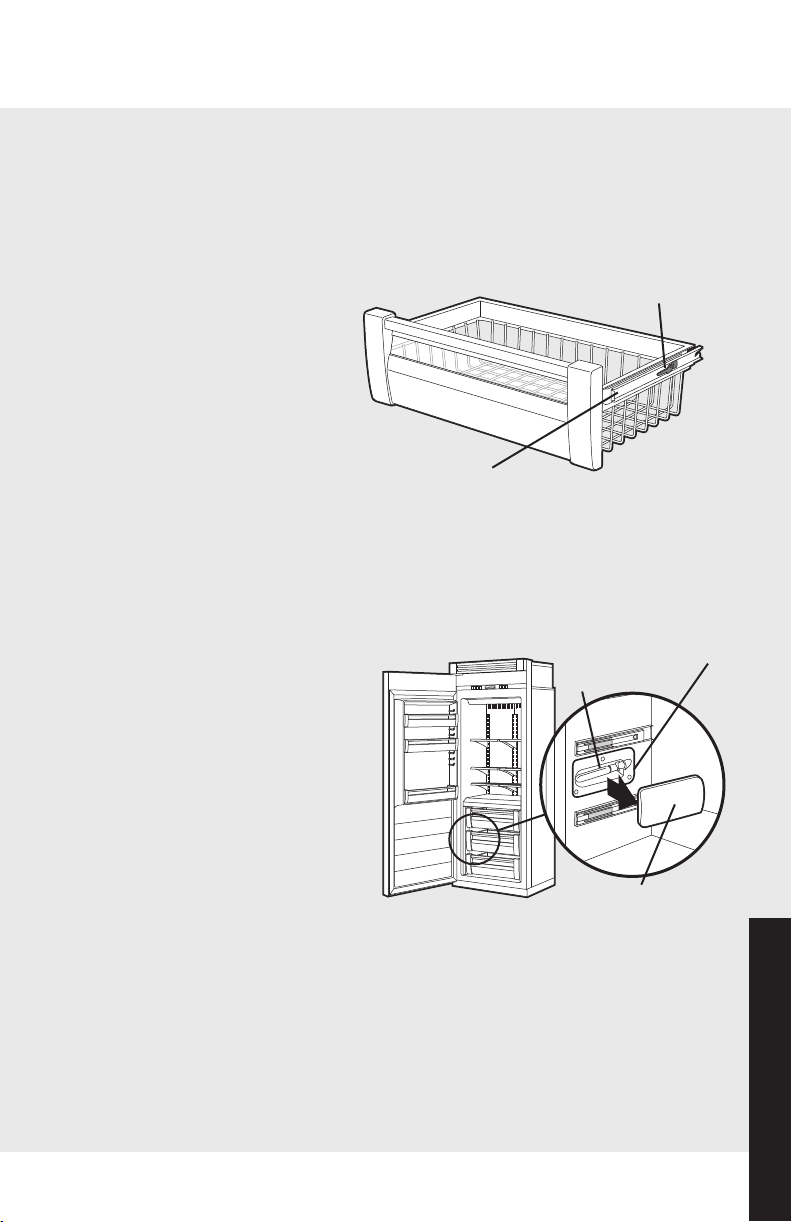
37
Cleaning and Maintenance
36
Product Care
Product Care
Upper Light Bulb
Disconnect power at breaker or turn power disconnect switch
to the off position. Lightly grasp light cover with both hands
and pull down. Replace bulb with an incandescent, medium
base tubular bulb with a maximum of 40 watts. Replace cover
by engaging light bracket with the back fingers on the light
cover. Once engaged, snap the front fingers on the light cover.
(Note: The clear section of the light cover is considered the
back section.) Reconnect power or turn power disconnect
switch to the on position.
Dispenser Light Bulb
Disconnect power at breaker or turn power disconnect switch
to the off position. Replace with an incandescent bulb with a
maximum of 6 watts.
Light Cover
Cover Fingers
Cleaning and Maintenance
Lower Light Bulbs (all freezer only)
Disconnect power at breaker or turn power disconnect switch
to off. Remove center freezer basket and frame by lifting up on
the black leveler on each side until drawer disengages from
glide. Lightly grasp light cover on the underneath side and pull
up. Replace with an incandescent, medium base tubular bulb
with a maximum of 40 watts.
Replace cover by engaging
the top of the light cover
over the light bracket. Once
engaged, snap the bottom of
the light cover over the light
bracket with light pressure.
Replace center freezer basket
and frame by aligning the
inner glide on the basket with
the outer glide in the unit.
Slide freezer basket and frame back until black leveler “clicks.”
Reconnect power or turn power disconnect switch to the on
position.
Lower Light Bulbs (refrigerator and freezer)
Disconnect power at breaker or
turn power disconnect switch
to the off position. Lightly
grasp light cover on the
underneath side and pull up.
Replace with an incandescent,
medium base tubular bulb with
a maximum of 40 watts.
Replace cover by engaging the
top of the light cover over the
light bracket. Once engaged,
snap the bottom of the light
cover over the light bracket
with light pressure. Reconnect
power or turn power
disconnect switch to the on
position.
Black
Leveler
Inner Glide
Attaches to Outer
Glide in Unit
Light Bulb
Light Bulb
Cover
Light Bracket
I
C
E
WA
T
E
R
C
r
u
s
he
d
C
u
b
ed
WAT
E
R
C
ru
she
d
Light Bulb

39
38
Product Care
Product Care
Cleaning and Maintenance
Saving Energy
You can help your refrigerator use less electricity with these
simple tips:
• Open the door as few times as possible. Think about what
you need before you open the door. Get everything out at
one time. Keep food organized so you will not have to
search for what you want. Close door as soon as food is
removed.
• Do not overcrowd the unit so air movement is blocked.
• Do not set the unit to temperature colder than necessary.
Vacation Tip
When you will be gone from home a short time (less than four
weeks), there is no need to shut off your refrigerator.
However, be sure to:
• Use any perishables.
• Freeze other items.
• Raise the signal arm in the automatic ice maker to the off
(up) position and shut off water supply to the ice maker.
If you will be away from home for a month or more, follow
these guidelines:
• Remove all food.
• Turn the power disconnect switch to the off position.
• Clean the unit and door gaskets according to the
“Cleaning and Maintenance” section on page 33.
• Prop doors open with rubber or wood blocks so air can
circulate inside. This will keep odor and mold from
building up.
• Raise the signal arm in the automatic ice maker to the off
(up) position and shut off water supply to the
ice maker.
Power Interruptions
If electric service to your refrigerator will be interrupted for 24
hours or less, keep the doors to the freezer closed. This helps
food stay frozen.
If service will be interrupted longer than 24 hours, remove all
frozen food and store it in a frozen food locker, or place two
pounds of dry ice inside the freezer for every cubic foot of
interior volume. This will keep food frozen for two to four days.
Be sure to wear gloves to protect your hands from dry ice
burns. If neither a food locker or dry ice is available, you should
use or can your perishable food at once.
Troubleshooting
Understanding Sounds You May Hear
Your new refrigerator may make different sounds than your old
one. Hard surfaces, such as the ceilings, walls, and cabinets
around the unit can make these sounds seem louder. However,
these sounds are normal and will soon become familiar; they
indicate that your refrigerator is working properly.
Here are some of the noises you may hear and what they are:
• Freezer or refrigerator fresh food fan: sounds like air
rushing or whirling
• Sealed system (evaporator and heat exchanger)
refrigerant flow: sounds like gurgles, pops or boiling
water
• Defrost heater: sizzles, hisses or pops
• Condenser fan: air rushes and whirls
• Compressor: has a high pitched hum or pulsating sound
• Ice maker valve hookup: buzzes when ice maker fills with
water. This occurs whether or not the unit is connected to
water supply. If the unit is not connected to water supply,
stop sound by raising ice maker arm to off position.

39
38
Product Care
Product Care
Cleaning and Maintenance
Saving Energy
You can help your refrigerator use less electricity with these
simple tips:
• Open the door as few times as possible. Think about what
you need before you open the door. Get everything out at
one time. Keep food organized so you will not have to
search for what you want. Close door as soon as food is
removed.
• Do not overcrowd the unit so air movement is blocked.
• Do not set the unit to temperature colder than necessary.
Vacation Tip
When you will be gone from home a short time (less than four
weeks), there is no need to shut off your refrigerator.
However, be sure to:
• Use any perishables.
• Freeze other items.
• Raise the signal arm in the automatic ice maker to the off
(up) position and shut off water supply to the ice maker.
If you will be away from home for a month or more, follow
these guidelines:
• Remove all food.
• Turn the power disconnect switch to the off position.
• Clean the unit and door gaskets according to the
“Cleaning and Maintenance” section on page 33.
• Prop doors open with rubber or wood blocks so air can
circulate inside. This will keep odor and mold from
building up.
• Raise the signal arm in the automatic ice maker to the off
(up) position and shut off water supply to the
ice maker.
Power Interruptions
If electric service to your refrigerator will be interrupted for 24
hours or less, keep the doors to the freezer closed. This helps
food stay frozen.
If service will be interrupted longer than 24 hours, remove all
frozen food and store it in a frozen food locker, or place two
pounds of dry ice inside the freezer for every cubic foot of
interior volume. This will keep food frozen for two to four days.
Be sure to wear gloves to protect your hands from dry ice
burns. If neither a food locker or dry ice is available, you should
use or can your perishable food at once.
Troubleshooting
Understanding Sounds You May Hear
Your new refrigerator may make different sounds than your old
one. Hard surfaces, such as the ceilings, walls, and cabinets
around the unit can make these sounds seem louder. However,
these sounds are normal and will soon become familiar; they
indicate that your refrigerator is working properly.
Here are some of the noises you may hear and what they are:
• Freezer or refrigerator fresh food fan: sounds like air
rushing or whirling
• Sealed system (evaporator and heat exchanger)
refrigerant flow: sounds like gurgles, pops or boiling
water
• Defrost heater: sizzles, hisses or pops
• Condenser fan: air rushes and whirls
• Compressor: has a high pitched hum or pulsating sound
• Ice maker valve hookup: buzzes when ice maker fills with
water. This occurs whether or not the unit is connected to
water supply. If the unit is not connected to water supply,
stop sound by raising ice maker arm to off position.
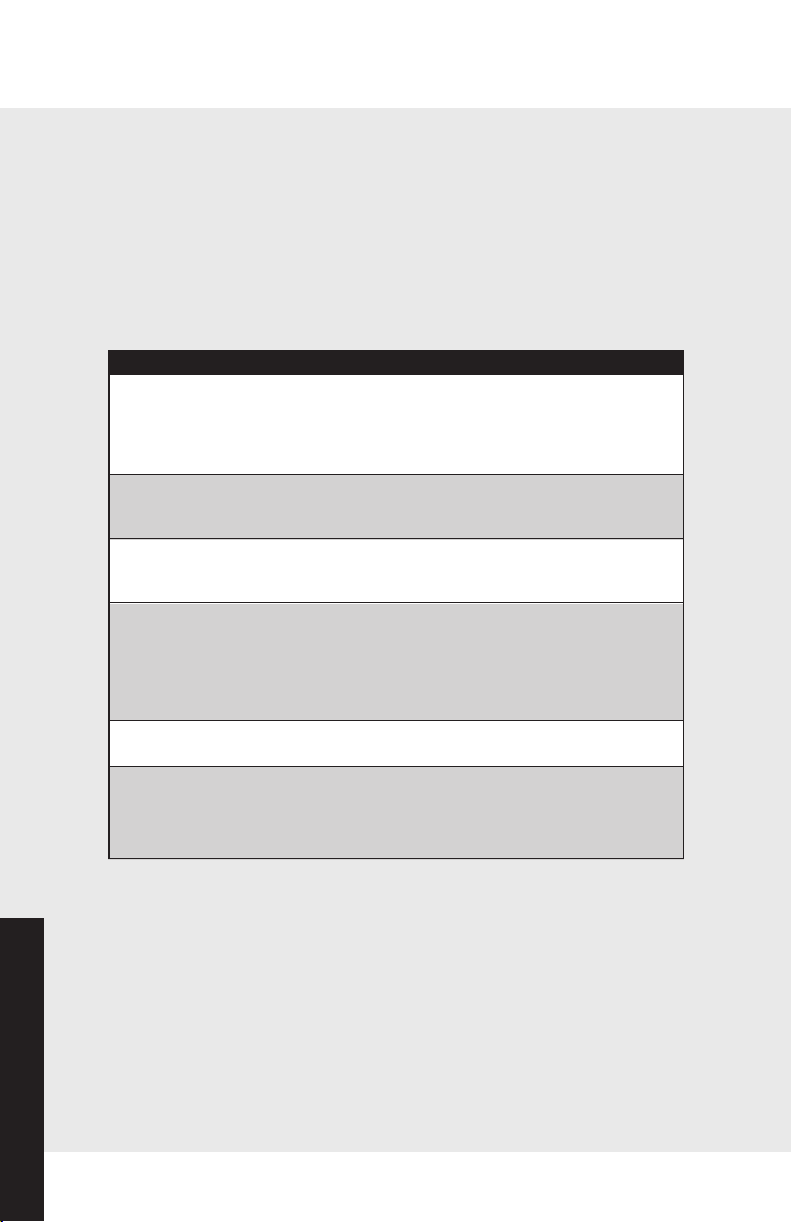
4140
Product Care
Product Care
Troubleshooting
Common Ice Maker Problems
PROBLEM POSSIBLE CAUSE AND/OR REMEDY
Ice crescents attached at This is normal. They break apart easily.
corners Shake bin occasionally to keep cubes
separated.
Ice maker will not operate • on/off lever is in the off (up)
or ice is not made fast position. Lower lever to on (down)
enough position.
• Freezer is not cold enough. Adjust
temperature controls and wait 24 hours.
Off-taste or odor in ice • New plumbing connections can cause
discolored or off-flavored ice.
Discard the first three harvests of ice.
• Cubes are stored too long. Throw them
away and make a new supply.
• Food is not wrapped properly.
• Freezer and ice bin need to be cleaned.
• Water may contain minerals. A filter may
be needed to remove them.
PROBLEM POSSIBLE CAUSE AND/OR REMEDY
Unit will not Is the power cord plugged into a live
operate circuit with the proper voltage?
Has a household fuse blown or circuit
breaker tripped? Is the power switch in the
on position?
Unit makes See “Understanding the sounds you
unfamiliar sounds may hear” for descriptions of normal
sounds and what makes them.
Water in the defrost This is normal in hot, muggy weather.
pan Make sure the pan is level so it does not
overflow.
Ice Maker will not Is the freezer cold enough to make ice? It
operate could take overnight for the freezer to reach
the proper temperature. Is the signal arm in
the on (down) position? Is the water valve
turned on? Is water getting to the water
valve? Check water line for leaks.
Lights do not work Has a household fuse blown or circuit
breaker tripped? Is a bulb burned out?
Motor seems to run The motor naturally runs longer on hot days,
too long if the room is too warm, if a large amount
of food has been added, or if the doors are
opened often.
Troubleshooting
Most performance problems you might encounter with your Viking
referigerator will be minor and you should be able to fix them
yourself without tools.
Listed in these charts are the most common problems consumers run
into with their appliances. Please read through this and see if it can solve
your problem before calling for service.
Common Refrigerator Problems
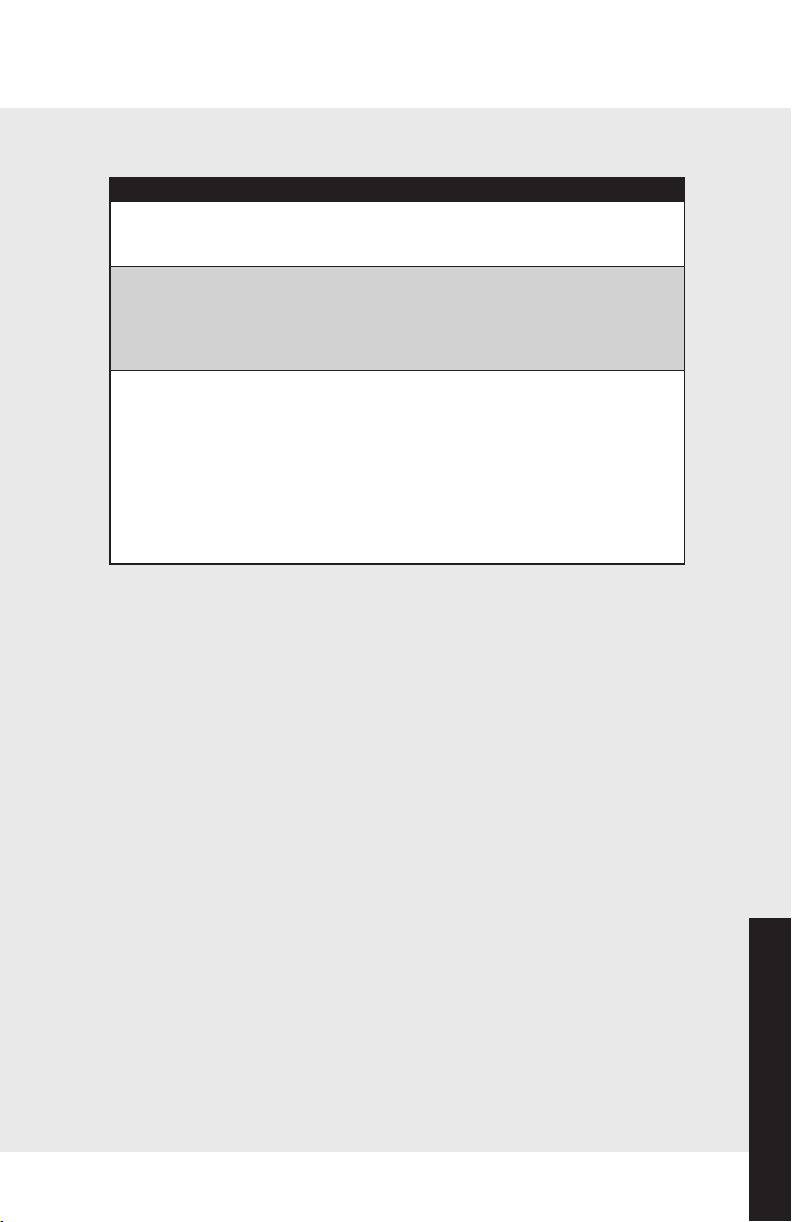
4140
Product Care
Product Care
Troubleshooting
Common Ice Maker Problems
PROBLEM POSSIBLE CAUSE AND/OR REMEDY
Ice crescents attached at This is normal. They break apart easily.
corners Shake bin occasionally to keep cubes
separated.
Ice maker will not operate • on/off lever is in the off (up)
or ice is not made fast position. Lower lever to on (down)
enough position.
• Freezer is not cold enough. Adjust
temperature controls and wait 24 hours.
Off-taste or odor in ice • New plumbing connections can cause
discolored or off-flavored ice.
Discard the first three harvests of ice.
• Cubes are stored too long. Throw them
away and make a new supply.
• Food is not wrapped properly.
• Freezer and ice bin need to be cleaned.
• Water may contain minerals. A filter may
be needed to remove them.
PROBLEM POSSIBLE CAUSE AND/OR REMEDY
Unit will not Is the power cord plugged into a live
operate circuit with the proper voltage?
Has a household fuse blown or circuit
breaker tripped? Is the power switch in the
on position?
Unit makes See “Understanding the sounds you
unfamiliar sounds may hear” for descriptions of normal
sounds and what makes them.
Water in the defrost This is normal in hot, muggy weather.
pan Make sure the pan is level so it does not
overflow.
Ice Maker will not Is the freezer cold enough to make ice? It
operate could take overnight for the freezer to reach
the proper temperature. Is the signal arm in
the on (down) position? Is the water valve
turned on? Is water getting to the water
valve? Check water line for leaks.
Lights do not work Has a household fuse blown or circuit
breaker tripped? Is a bulb burned out?
Motor seems to run The motor naturally runs longer on hot days,
too long if the room is too warm, if a large amount
of food has been added, or if the doors are
opened often.
Troubleshooting
Most performance problems you might encounter with your Viking
referigerator will be minor and you should be able to fix them
yourself without tools.
Listed in these charts are the most common problems consumers run
into with their appliances. Please read through this and see if it can solve
your problem before calling for service.
Common Refrigerator Problems

42
Product Care
Warranty
BUILT-IN BOTTOM-MOUNTS/SIDE-BY-SIDES/ALL REFRIGERATORS AND ALL FREEZERS WARRANTY
TWO YEAR FULL WARRANTY
Built-in bottom-mounts/side-by-sides/all refrigerators/all freezers and all of their components and accessories,
except as detailed below*, are warranted to be free from defects in material or workmanship under normal
household use for a period of two (2) years from the date of original retail purchase. Viking Range Corporation,
warrantor, agrees to repair or replace, at its option, any part which fails or is found to be defective during the
warranty period
*
Painted and decorative items are warranted to free from defective materials or workmanship for a period of
ninety (90) days from the date of original retail purchase. ANY DEFECTS MUST BE REPORTED TO THE SELLING
DEALER WITHIN NINETY (90) DAYS FROM DATE OF ORIGINAL RETAIL PURCHASE.
Viking Range Corporation uses the most up-to-date processes and best materials available to produce all color
finishes. However, slight color variation may be noticed because of the inherent differences in painted parts and
porcelain parts as well as differences in kitchen lighting, product locations, and other factors.
SIX YEAR FULL WARRANTY
Any sealed refrigeration system component, as listed below, or any automatic ice maker is warranted to be free
from defective materials or workmanship in normal household use during the third through the sixth year from
the date of original retail purchase. Viking Range Corporation, warrantor, agrees to repair or replace, at its option,
any part which fails or is found to be defective during the warranty period.
Sealed Refrigeration System Components:
Compressor, Evaporator,
Condenser, Connecting Tubing, Dryer/Strainer
TWELVE YEAR LIMITED WARRANTY
Any sealed refrigeration system component, as listed above, which fails due to defective materials or
workmanship in normal household use during the seventh through the twelfth year from the date of original retail
purchase will be repaired or replaced, free of charge for the part itself, with the owner paying all other costs,
including labor.
NINETY (90) DAY RESIDENTIAL PLUS WARRANTY
This warranty applies to applications where use of the product extends beyond normal residential use. Examples
are, but not limited to, bed and breakfasts, fire stations, private clubs, churches, etc. This warranty excludes all
commercial locations such as restaurants, food service locations and institutional food service locations.
This warranty extends to the original purchaser of the product warranted hereunder and to each transferee owner
of the product during the term of the warranty.
This warranty shall apply to products purchased and located in the United States and Canada. Products must be
purchased in the country where service is requested. Warranty labor shall be performed by an authorized Viking
Range Corporation service agency or representative. Warranty shall not apply to damage resulting from abuse,
accident, natural disaster, loss of electrical power to the product for any reason, alteration, improper installation,
improper operation or repair or service to the product by anyone other than an authorized Viking Range
Corporation service agency or representative. Warranty shall not apply to damage resulting from indoor units
being used in outdoor situations. This warranty does not apply to commercial usage. This warranty does not
cover any food or medicine loss due to product failure. Warrantor is not responsible for consequential or
incidental damage whether arising out of breach of warranty, breach of contract, or otherwise. Some jurisdictions
do not allow the exclusion or limitation of incidental or consequential damages, so the above limitation or
exclusion may not apply to you.
Owner shall be responsible for proper installation, providing normal care and maintenance, providing proof of
purchase upon request, and making the appliance reasonably accessible for service. If the product or one of its
component parts contains a defect or malfunction during the warranty period, after a reasonable number of
attempts by the warrantor to remedy the defects or malfunctions, the owner is entitled to either a refund or
replacement of the product or its component part or parts. Replacement of a component part includes its free
installation. Warrantor’s liability on any claim of any kind, with respect to the goods or services covered hereunder,
shall in no case exceed the price of the goods or service or part there of which gives rise to the claim.
WARRANTY SERVICE: Under the terms of this warranty, service must be performed by a factory authorized
Viking Range Corporation service agent or representative. Service will be provided during normal business hours,
and labor performed at overtime or premium rates shall not be covered by this warranty. To obtain warranty
service, contact the dealer from whom the product was purchased, an authorized Viking Range Corporation
service agent, or Viking Range Corporation. Provide model and serial number and date of original purchase. For
the name of your nearest authorized Viking Range Corporation service agency, call the dealer from whom the
product was purchased or Viking Range Corporation. IMPORTANT: Retain proof of original purchase to establish
warranty period.
The return of the Owner Registration Card is not a condition of warranty coverage. You, however, should return
the Owner Registration Card so that Viking Range Corporation can contact you should any question of safety
arise which could affect you.
Any implied warranties of merchantability and fitness applicable to the above described built-in all refrigerators/all
freezers are limited in duration to the period of coverage of the applicable express written limited warranties set
forth above. Some jurisdictions do not allow limitations on how long an implied warranty lasts, so the above
limitation may not apply to you. This warranty gives you specific rights, and you may also have other rights which
may vary from jurisdiction to jurisdiction.
Specifications subject to change without notice.
Service Information
If service is required after checking the troubleshooting guide,
call your Viking dealer or authorized service agency. The name
of the authorized service agency can be obtained from the
dealer or distributor in your area.
When you make a service call, be sure to have the following
information handy:
• Model Number
• Serial Number
• Date of Purchase
• Name of dealer from whom purchased
Be ready to clearly describe the problem that you are having
with your Viking refrigerator.
If you are unable to obtain the name of an authorized service
agency, or if you continue to have service problems, contact
Viking Range Corporation at (888) 845-4641 or write to:
Viking Preferred Service
111 Front Street
Greenwood, Mississippi 38930 USA
If you ever need service, you will need to have the following
information readily available. Take a few moments now to
record this information.
The serial number and model numbers for your refrigerator
are located on the upper wall, behind the lighting:
Model No. ____________________ Serial No. ________________
Date of Purchase __________ Date Installed ________________
Dealer’s Name __________________________________________
Address ________________________________________________
_______________________________________________________
If service requires installation of parts, use only authorized
parts to insure protection under the warranty.
NOTE: Keep this manual with your refrigerator for future
reference.
43

42
Product Care
Warranty
BUILT-IN BOTTOM-MOUNTS/SIDE-BY-SIDES/ALL REFRIGERATORS AND ALL FREEZERS WARRANTY
TWO YEAR FULL WARRANTY
Built-in bottom-mounts/side-by-sides/all refrigerators/all freezers and all of their components and accessories,
except as detailed below*, are warranted to be free from defects in material or workmanship under normal
household use for a period of two (2) years from the date of original retail purchase. Viking Range Corporation,
warrantor, agrees to repair or replace, at its option, any part which fails or is found to be defective during the
warranty period
*
Painted and decorative items are warranted to free from defective materials or workmanship for a period of
ninety (90) days from the date of original retail purchase. ANY DEFECTS MUST BE REPORTED TO THE SELLING
DEALER WITHIN NINETY (90) DAYS FROM DATE OF ORIGINAL RETAIL PURCHASE.
Viking Range Corporation uses the most up-to-date processes and best materials available to produce all color
finishes. However, slight color variation may be noticed because of the inherent differences in painted parts and
porcelain parts as well as differences in kitchen lighting, product locations, and other factors.
SIX YEAR FULL WARRANTY
Any sealed refrigeration system component, as listed below, or any automatic ice maker is warranted to be free
from defective materials or workmanship in normal household use during the third through the sixth year from
the date of original retail purchase. Viking Range Corporation, warrantor, agrees to repair or replace, at its option,
any part which fails or is found to be defective during the warranty period.
Sealed Refrigeration System Components:
Compressor, Evaporator,
Condenser, Connecting Tubing, Dryer/Strainer
TWELVE YEAR LIMITED WARRANTY
Any sealed refrigeration system component, as listed above, which fails due to defective materials or
workmanship in normal household use during the seventh through the twelfth year from the date of original retail
purchase will be repaired or replaced, free of charge for the part itself, with the owner paying all other costs,
including labor.
NINETY (90) DAY RESIDENTIAL PLUS WARRANTY
This warranty applies to applications where use of the product extends beyond normal residential use. Examples
are, but not limited to, bed and breakfasts, fire stations, private clubs, churches, etc. This warranty excludes all
commercial locations such as restaurants, food service locations and institutional food service locations.
This warranty extends to the original purchaser of the product warranted hereunder and to each transferee owner
of the product during the term of the warranty.
This warranty shall apply to products purchased and located in the United States and Canada. Products must be
purchased in the country where service is requested. Warranty labor shall be performed by an authorized Viking
Range Corporation service agency or representative. Warranty shall not apply to damage resulting from abuse,
accident, natural disaster, loss of electrical power to the product for any reason, alteration, improper installation,
improper operation or repair or service to the product by anyone other than an authorized Viking Range
Corporation service agency or representative. Warranty shall not apply to damage resulting from indoor units
being used in outdoor situations. This warranty does not apply to commercial usage. This warranty does not
cover any food or medicine loss due to product failure. Warrantor is not responsible for consequential or
incidental damage whether arising out of breach of warranty, breach of contract, or otherwise. Some jurisdictions
do not allow the exclusion or limitation of incidental or consequential damages, so the above limitation or
exclusion may not apply to you.
Owner shall be responsible for proper installation, providing normal care and maintenance, providing proof of
purchase upon request, and making the appliance reasonably accessible for service. If the product or one of its
component parts contains a defect or malfunction during the warranty period, after a reasonable number of
attempts by the warrantor to remedy the defects or malfunctions, the owner is entitled to either a refund or
replacement of the product or its component part or parts. Replacement of a component part includes its free
installation. Warrantor’s liability on any claim of any kind, with respect to the goods or services covered hereunder,
shall in no case exceed the price of the goods or service or part there of which gives rise to the claim.
WARRANTY SERVICE: Under the terms of this warranty, service must be performed by a factory authorized
Viking Range Corporation service agent or representative. Service will be provided during normal business hours,
and labor performed at overtime or premium rates shall not be covered by this warranty. To obtain warranty
service, contact the dealer from whom the product was purchased, an authorized Viking Range Corporation
service agent, or Viking Range Corporation. Provide model and serial number and date of original purchase. For
the name of your nearest authorized Viking Range Corporation service agency, call the dealer from whom the
product was purchased or Viking Range Corporation. IMPORTANT: Retain proof of original purchase to establish
warranty period.
The return of the Owner Registration Card is not a condition of warranty coverage. You, however, should return
the Owner Registration Card so that Viking Range Corporation can contact you should any question of safety
arise which could affect you.
Any implied warranties of merchantability and fitness applicable to the above described built-in all refrigerators/all
freezers are limited in duration to the period of coverage of the applicable express written limited warranties set
forth above. Some jurisdictions do not allow limitations on how long an implied warranty lasts, so the above
limitation may not apply to you. This warranty gives you specific rights, and you may also have other rights which
may vary from jurisdiction to jurisdiction.
Specifications subject to change without notice.
Service Information
If service is required after checking the troubleshooting guide,
call your Viking dealer or authorized service agency. The name
of the authorized service agency can be obtained from the
dealer or distributor in your area.
When you make a service call, be sure to have the following
information handy:
• Model Number
• Serial Number
• Date of Purchase
• Name of dealer from whom purchased
Be ready to clearly describe the problem that you are having
with your Viking refrigerator.
If you are unable to obtain the name of an authorized service
agency, or if you continue to have service problems, contact
Viking Range Corporation at (888) 845-4641 or write to:
Viking Preferred Service
111 Front Street
Greenwood, Mississippi 38930 USA
If you ever need service, you will need to have the following
information readily available. Take a few moments now to
record this information.
The serial number and model numbers for your refrigerator
are located on the upper wall, behind the lighting:
Model No. ____________________ Serial No. ________________
Date of Purchase __________ Date Installed ________________
Dealer’s Name __________________________________________
Address ________________________________________________
_______________________________________________________
If service requires installation of parts, use only authorized
parts to insure protection under the warranty.
NOTE: Keep this manual with your refrigerator for future
reference.
43