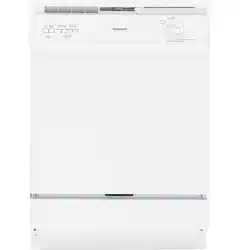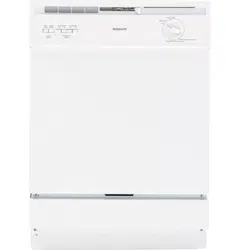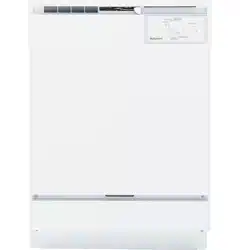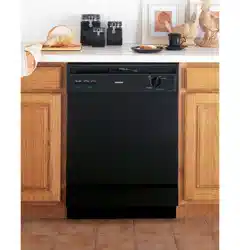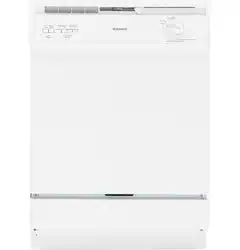

ge.com
ADW1000 Series
GHDA300 Series
GSD1000 Series
GSD2000 Series
GSD3000 Series
GSD4000 Series
GSM2000 Series
HDA1000 Series
HDA2000 Series
HDA3000 Series
Owner’s Manual
Dishwashers
165D4700P343 49-55023-1 04-07 JR
Safety Instructions . . . . . . . . 2, 3
Operating Instructions
Care and Cleaning . . . . . . . . . . . . . .12
Control Panels . . . . . . . . . . . . . . . . . . .6
Control Settings . . . . . . . . . . . . . . 4–5
Dial Cycles . . . . . . . . . . . . . . . . . . . . . .7
Flashing Display Lights . . . . . . . . . . .8
Loading the
Dishwasher Racks . . . . . . . . . . . . . .10
Loading Place Settings . . . . . . . . . .11
Optional Accessories . . . . . . . . . . . .12
Using the Dishwasher . . . . . . . . . .8, 9
Troubleshooting Tips . . . 13, 14
Consumer Support
Consumer Support . . . . . Back Cover
Warranty . . . . . . . . . . . . . . . . . . . . . 15
Write the model and serial
numbers here:
Model #____________________
Serial # ____________________
You can find them on a label on the
tub wall just inside the door.
Downloaded from www.ManualsFile.com manuals search engine
2
Operating Instructions Safety InstructionsConsumer Support Troubleshooting Tips
IMPORTANT SAFETY INFORMATION
READ ALL INSTRUCTIONS BEFORE USING —
SAVE THESE INSTRUCTIONS
WARNING!
For your safety, the information in this manual must be followed to minimize the risk of fire,
explosion, electric shock, and to prevent property damage, personal injury, or death.
WATER HEATER SAFETY
PROPER INSTALLATION AND MAINTENANCE
This dishwasher must be properly installed and located in accordance with the Installation
Instructions before it is used. If you did not receive an Installation Instructions sheet with
your dishwasher, you can receive one by visiting our website at ge.com.
■ Contents washed in Anti-bacterial mode, if
available, may be hot to the touch. Use care
before handling.
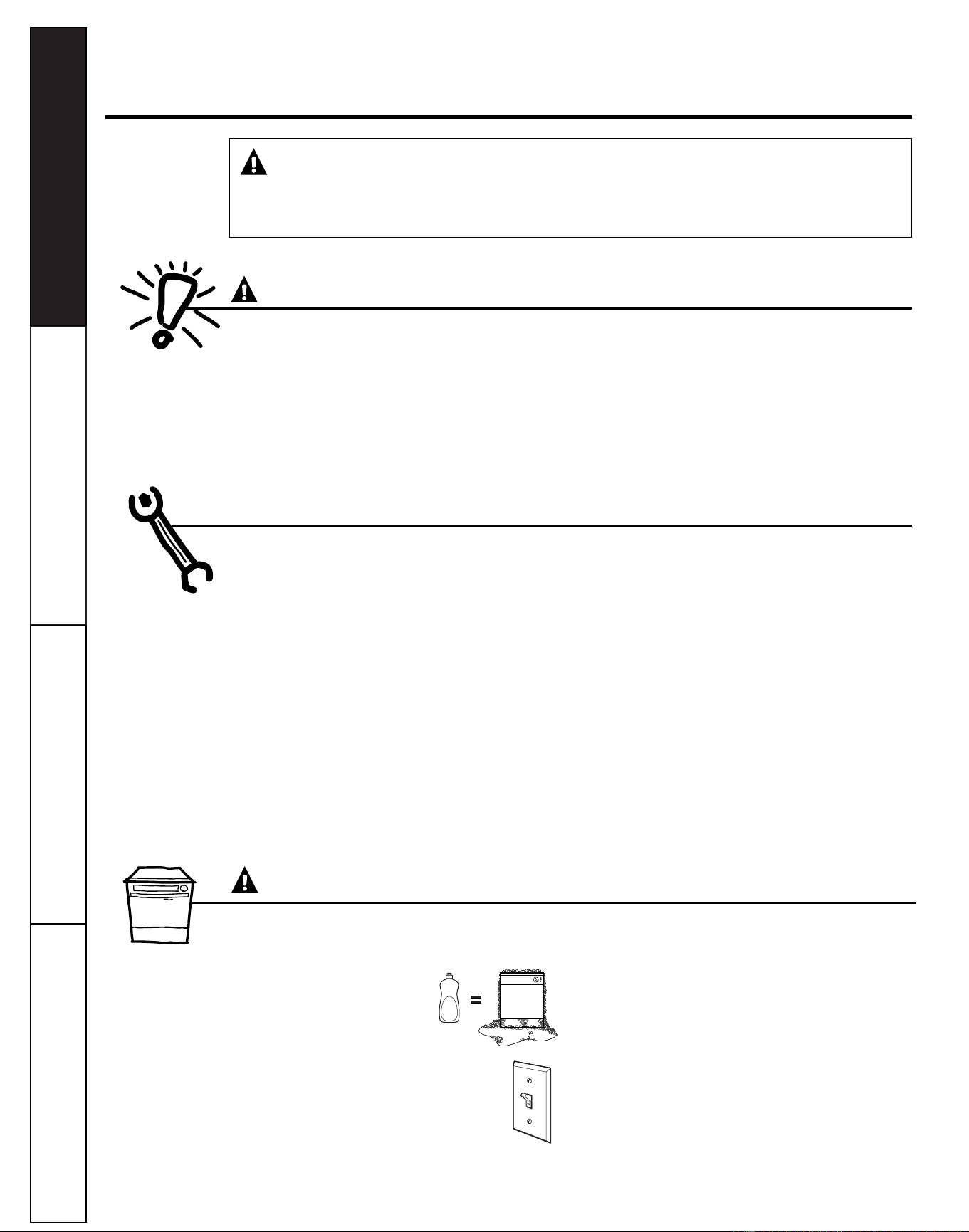
■ Using a detergent that is
not specifically designed
for dishwashers will cause
the dishwasher to fill with
suds.
■ If your dishwasher is connected to a
wall switch, ensure that the switch is
on prior to use.
■ On dishwashers with electronic controls,
if you choose to turn the wall switch off
between wash cycles, allow 5-10
seconds after turning the switch on before
touching START/RESET to allow the control
to initialize.
■ Non-Dishware Items: Do not wash items such
as electronic air cleaner filters, furnace filters and
paint brushes in your dishwasher. Damage to the
dishwasher and discoloration or staining of the
dishwasher may result.
■ Close supervision is necessary if this appliance
is used by or near children.
■ Load light, plastic items so they do not
become dislodged and drop to the bottom of
the dishwasher—they might come into contact
with the heating element and be damaged.
■ Connect the dishwasher/appliance to a grounded
metal, permanent wiring system; or run an
equipment-grounding conductor with the circuit
conductors and connect to the equipment-
grounding terminal or lead of the appliance.
■ Improper connection of the equipment-grounding
conductor can result in a risk of electric shock.
Check with a qualified electrician or service
representative if you are in doubt whether the
appliance is properly grounded.
■ Dispose of discarded appliances and shipping
or packing material properly.
■ Do not attempt to repair or replace any part
of your dishwasher unless it is specifically
recommended in this manual. All other servicing
should be referred to a qualified technician.
■ To minimize the possibility of electric shock,
disconnect this appliance from the power supply
before attempting any maintenance.
NOTE: Turning the dishwasher off does not
disconnect the appliance from the power supply.
We recommend having a qualified technician
service your appliance.
WARNING!
CAUTION: To prevent minor injury and property damage
Under certain conditions, hydrogen gas may be produced in a water heater that has not been used
for two or more weeks. HYDROGEN GAS IS EXPLOSIVE.
If the hot water has not been used for two or more weeks, prevent the possibility of damage or injury
by turning on all hot water faucets and allow them to run for several minutes. Do this before using any
electrical appliance connected to the hot water system. This simple procedure will allow any built-up
hydrogen gas to escape. Since the gas is flammable, do not smoke, use an open flame, or use the appliance
during this process.
Downloaded from www.ManualsFile.com manuals search engine
Consumer Support
Troubleshooting TipsOperating InstructionsSafety Instructions
3
PROPER DISPOSAL OF THE DISHWASHER
Junked or abandoned dishwashers are
dangerous…even if they will sit for “just a few
days.” If you are getting rid of your old
dishwasher, please follow the instructions below
to help prevent accidents.
Before You Throw Away Your Old
Dishwasher:
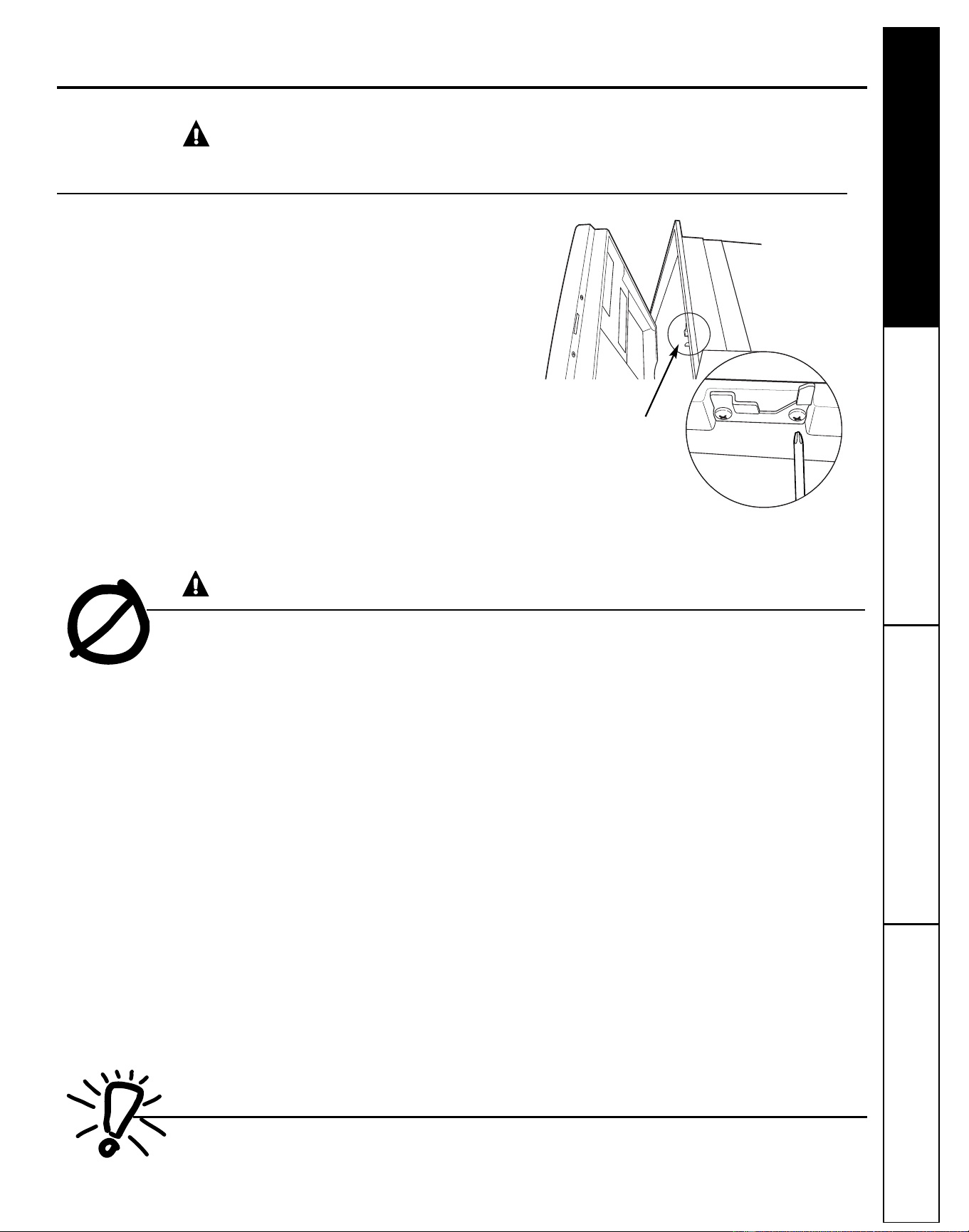
■ Take off the door of the washing compartment
or remove the door latch keeper (as shown).
WARNING! RISK OF CHILD ENTRAPMENT
Door latch keeper
ge.com
READ AND FOLLOW THIS SAFETY INFORMATION
CAREFULLY.
SAVE THESE INSTRUCTIONS
■ Use this appliance only for its intended purpose
as described in this Owner's Manual.
■ Use only powder, tabs, liquid detergents or rinse
agents recommended for use in a dishwasher and
keep them out of the reach of children. Cascade
®
,
Cascade
®
Complete and Electrasol
®
Automatic
Dishwashing Detergents, and Jet-Dry
®
and
Cascade Crystal Clear
®
rinse agents have
been approved for use in all GE dishwashers.
■ Locate sharp items so that they are not likely
to damage the door seal.
■ Load sharp knives with the handles up to reduce
the risk of cut-type injuries.
■ Do not wash plastic items unless marked
dishwasher safe or the equivalent. For plastic
items not so marked, check the manufacturer's
recommendations.
■ Do not touch the heating element during or
immediately after use.
■ Do not operate your dishwasher unless all
enclosure panels are properly in place.
■ Do not tamper with controls.
■ Do not abuse, sit on or stand on the door or dish
rack of the dishwasher.
■ Do not allow children to play around the
dishwasher when opening or closing the door due
to the possibility of small fingers being pinched in
the door.
■ Do not discard a dishwasher without first removing
the door of the washing compartment or the latch
keeper.
■ Do not store or use combustible materials, gasoline
or other flammable vapors and liquids in the
vicinity of this or any other appliance.
■ Do not allow children to play with, on or inside this
or any discarded appliance.
WARNING!
When using your dishwasher, follow basic precautions,
including the following:
Downloaded from www.ManualsFile.com manuals search engine
Operating Instructions Safety InstructionsConsumer Support Troubleshooting Tips
4
About the dishwasher control panel
Cycles
An indicator light above the selected pad will be ON to indicate which CYCLE has been selected, on some models.
POTS & PANS/ For heavily soiled dishes or cookware with dried-on or baked-on soils.
Everyday dishes may be included.
HEAVY WASH This cycle will not remove burned-on foods.
(on some models)
NORMAL/
For loads of everyday dishes, glasses and cookware with medium soils. NOTE: Many dishes have lighter
NORMAL WASH
soil than normal. Choosing
a cycle other than NORMAL WASH will save energy and water.
SHORT WASH For quickly washing loads of everyday dishes with medium soils
that have not dried on, such as loads
(on some models)
consisting mostly of glasses.
WATER SAVER For dishes with light soils.
LIGHT WASH
(on some models)
RINSE ONLY For rinsing partial loads that will be washed later. Do not use detergent.
DRYING For warming clean dishes and serving plates. This cycle will take approximately 30 minutes.
PLATE WARMER
HOT PREWASH Preheats wash water to the correct temperature.
HOT START
CHINA CRYSTAL For lightly soiled china and crystal.
(on some models)
Control Settings
Options
An indicator light above the selected pad will be ON to indicate which OPTION has been selected, on some models.
HI TEMP Turns on the heater in all final rinse cycles to help prevent spotting on dishware. This option may be
RINSE turned ON or OFF during the wash cycle.
(on some models)
HI TEMP Energizes the heater to boost water temperature in prewash and main wash fill cycles. Recommended
WASH for use with heavily soiled dishes. Option may be turned ON or OFF during the wash cycle.
HEATED DRY Shuts off the drying heat option. Dishes air dry naturally and energy is saved. Open the dishwasher door
OFF to speed drying.
HEATED DRY Turns the heater on for fast drying. This cycle will extend the time to your wash cycle by 30 minutes.
ON DO NOT use with RINSE ONLY cycle.
LOCK
When the LOCK pad is touched twice within 3 seconds, all pads become inoperative. You can lock the controls to
(electronic models
prevent any selections from being made. Or you can lock the controls after you have
started a cycle or selected
only)
DELAY START so the cycle or DELAY START is not interrupted.
Children cannot accidentally start dishwasher by touching pads with this option selected.
To unlock the dishwasher after it has been locked, touch the
LOCK
pad twice within 3 seconds. The light above
the
LOCK
pad will turn off.
DELAY HOURS Delays the start of a wash cycle for up to 8 hours.
(on some models)
RESET Touch RESET to cancel options.
(timer models)
START/RESET Touch START/RESET one time to start dishwasher cycle. Touch START/RESET a second time to pump out
(electronic models) and then turn off the dishwasher. Do not touch START/RESET more than one time unless you intend to
end the cycle.
Downloaded from www.ManualsFile.com manuals search engine
Consumer Support
Troubleshooting TipsOperating InstructionsSafety Instructions
5
ge.com
Cycle Chart
Model Cycle Water Usage (gal.) Cycle Time (min.)
GSD1100 Hot Start Option
1
2.5 10
Heavy Wash 7.0 120
Normal Wash 5.7 117
Rinse Only 2.2 53
Plate Warmer 0.0 40
HDA1100 Hot PreWash Option
1
2.5 10
ADW1100 Normal Wash 5.7 117
Drying 0.0 40
GSD1300 Hot Start Option
1
2.5 10
GSD2100 Heavy Wash 7.0 120
GSD2101 Normal Wash 5.7 117
Light Wash 4.5 113
Rinse Only 2.2 53
Plate Warmer 0.0 40
HDA2100 Hot PreWash Option
1
2.5 10
Heavy Wash 7.0 120
Normal Wash 5.7 117
Water Saver 4.5 113
Rinse Only 2.2 53
Drying 0.0 40
HDA3500 Hot PreWash Option
1
2.5 12
Heavy Wash 7.0 118
Normal Wash* 5.7 118
Water Saver* 4.5 114
Rinse Only* 2.2 53
Plate Warmer 0.0 40
GSD2300 Hot Start Option
1
2.5 12
GSD2301 Pots & Pans 7.0 118
GSM2200 Normal Wash* 5.7 118
Light Wash* 4.5 114
Rinse Only* 2.2 53
Plate Warmer 0.0 40
GSD2700 Hot Start Option
1
2.5 12
Heavy Wash 7.0 118
Normal Wash* 5.7 118
Rinse Only* 2.2 53
Plate Warmer 0.0 40
GSD3300 Hot Start Option
1
2.5 12
Pots & Pans 7.0 118
Normal Wash* 5.7 118
Rinse Only* 2.2 53
Plate Warmer 0.0 40
GHDA350 Hot Start Option
1
1.3 3
Pots & Pans 8.2 103
Heavy Wash 7.0 103
Normal Wash* 5.7 103
Light Wash* 3.4 95
Rinse Only* 2.2 42
Plate Warmer 0.0 33
GSD4000 Pots & Pans 8.8 112
Heavy Wash 7.5 108
Normal Wash 5.7 105
China/Crystal 6.3 80
Rinse Only 1.3 3
1
Hot Start Option adds water amount and cycle time shown when selected.
* Normal Wash button should be pushed to run this cycle.
Control Settings
NOTE: Not all models have every cycle listed.
Downloaded from www.ManualsFile.com manuals search engine
6
About the dishwasher control panel
Operating Instructions Safety InstructionsConsumer Support Troubleshooting Tips
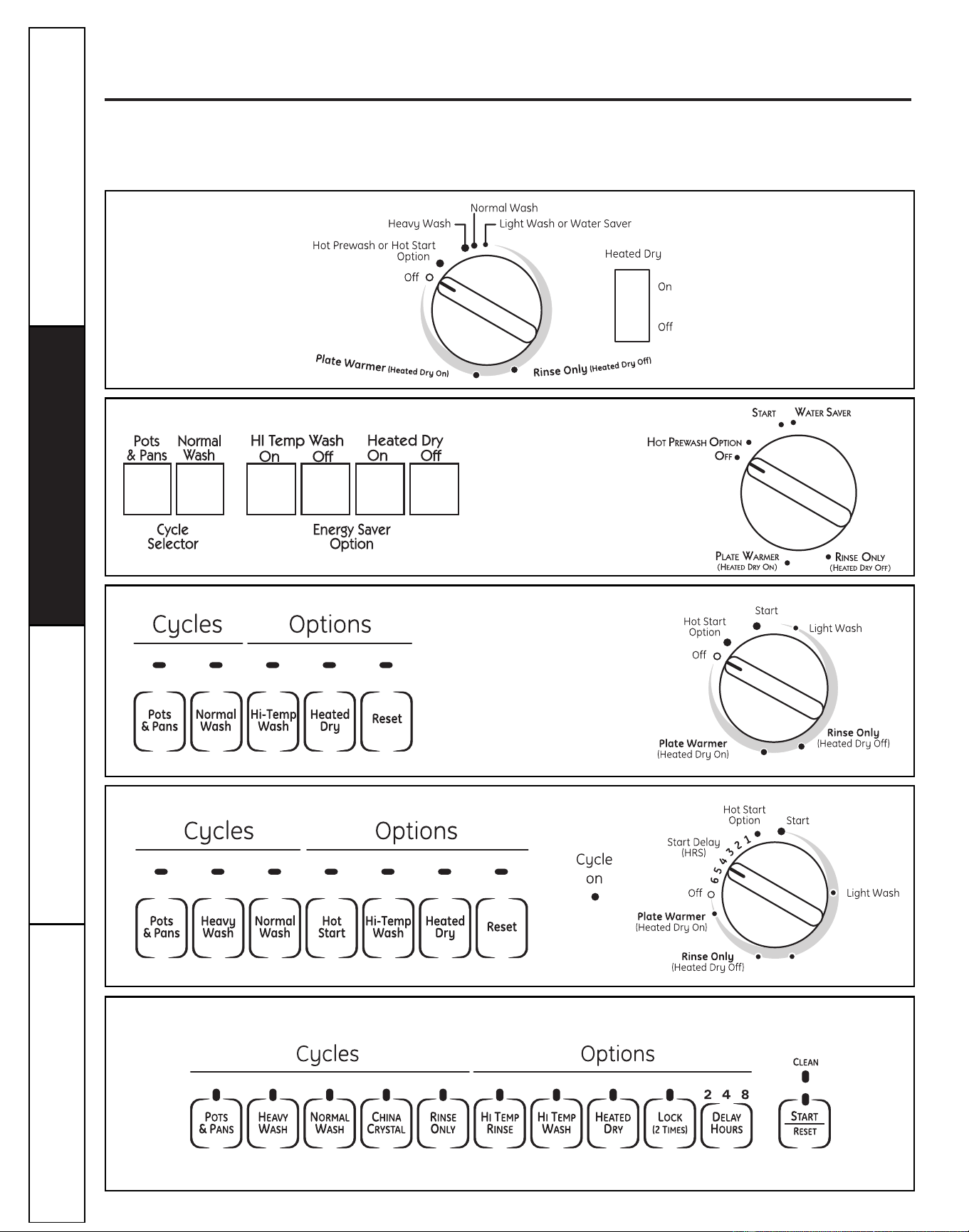
You can locate your model number on the left tub wall just inside the door. Throughout this manual,
features and appearance may vary from your model.
Please match the control panel for your unit to a similar control panel below.
Downloaded from www.ManualsFile.com manuals search engine
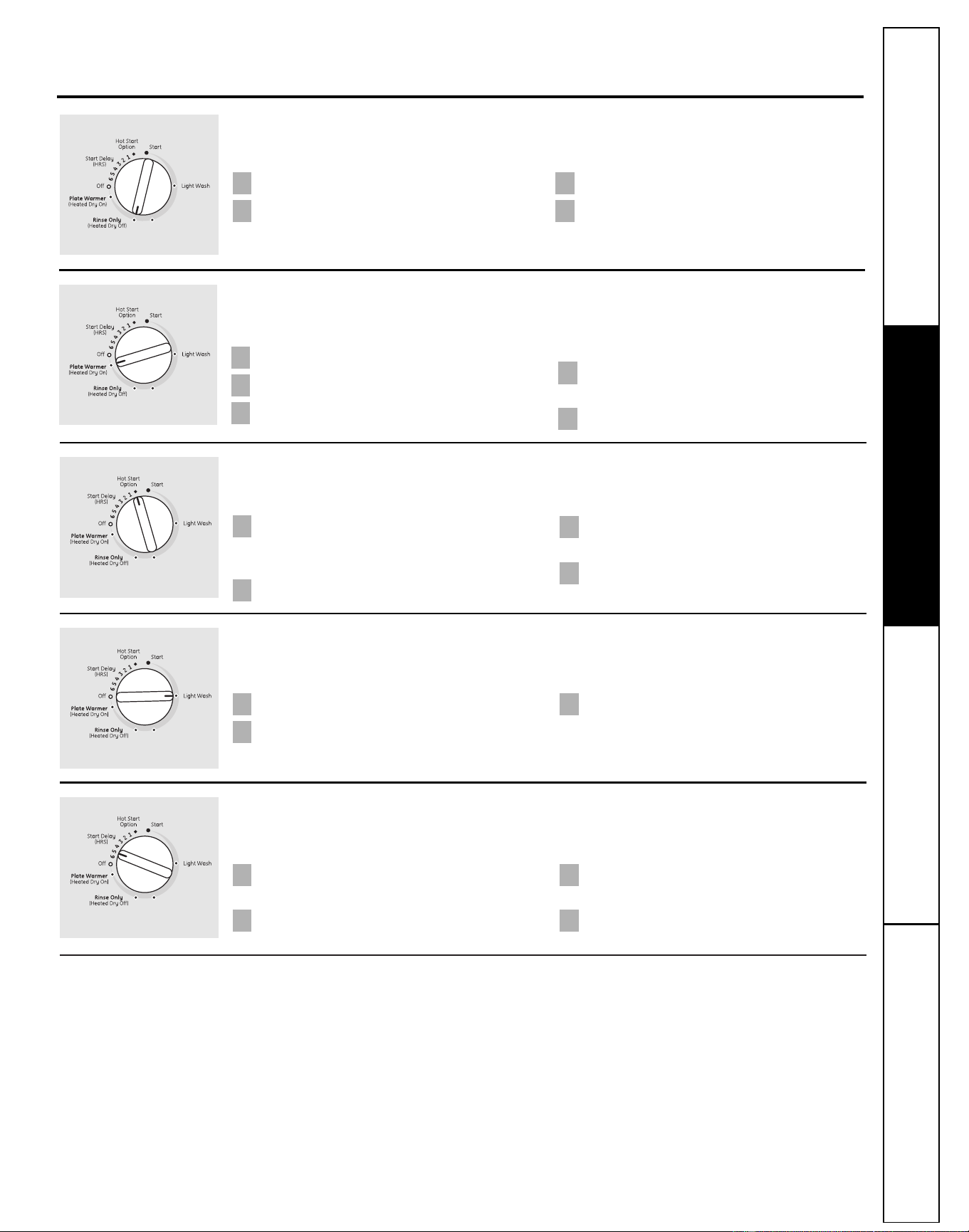
Start (Models with a Dial)
Slowly turn the Dial to the START or ON position, or the selected cycle. Don’t turn it past the START,
ON or cycle position; you could accidentally miss a prewash.
There is a time delay between start-up and water fill so you will not hear any wash action right
away.
■ Latch the door to begin the cycle.
7
Consumer Support
Troubleshooting TipsOperating InstructionsSafety Instructions
Operation of models with cycle dial
ge.com
Rinse Only
For rinsing partial loads that will be washed later. Do not use detergent.
Make sure HEATED DRY is not selected.
Slowly turn the Dial to RINSE ONLY.
Be sure the door is unlatched. Latch the door to start the cycle.
42
31
Be sure the door is unlatched.
Slowly turn the Dial to SHORT WASH,
LIGHT WASH or WATER SAVER.
Latch the door to start the cycle.
3
2
1
Plate Warmer or Drying
Load clean dishware to be warmed.
Select HEATED DRY ON.
Be sure the door is unlatched.
Slowly turn the Dial to PLATE WARMER or
DRYING.
Latch the door to start the cycle.
5
4
3
2
1
Start Delay (on some models)
The START DELAY will allow you to delay the start time of any cycle automatically up to 6 hours.
Hot Start or Hot Prestart Option
Preheats wash water.
Select the HOT START or HOT PRESTART
cycle and any other option on the push
button pad.
Be sure the door is unlatched.
Slowly turn the Dial to HOT START or
HOT PRESTART.
Latch the door to start the cycle.
4
3
2
1
For warming clean dishes and serving plates. This cycle will take approximately 39 minutes.
Short Wash or Light Wash or Water Saver
For quickly washing loads of everyday dishes with light to medium soils that have not dried on.
Be sure the door is unlatched.
Select the wash cycle and option you want.
Slowly turn the Dial to the desired time.
The CYCLE ON light will come on.
Latch the door to start the cycle.
4
3
2
1
Downloaded from www.ManualsFile.com manuals search engine
Operating Instructions Safety InstructionsConsumer Support Troubleshooting Tips
8
Operation of electronic models (model GSD4000 Only)
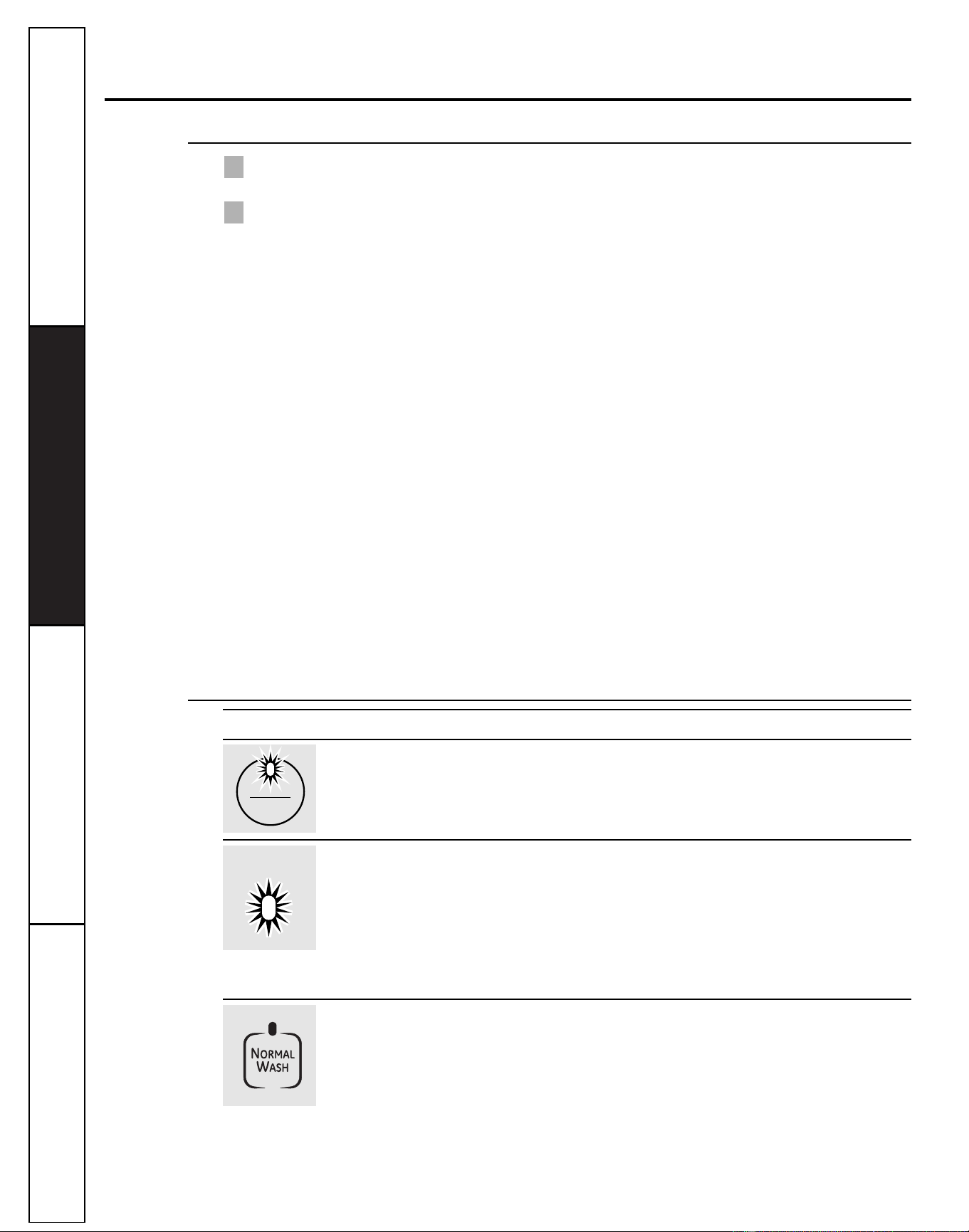
Lights What It Means What To Do
This is normal. Allow the dishwasher to drain and reset before you start a new
The START/RESET pad wash cycle.
has been pressed.
Control Error Press the START/RESET pad to turn off the beeper. If the CLEAN
light continues to flash, call for service.
Control Error Press the START/RESET pad to turn off the beeper and the
dishwasher will attempt to reset. Restart the wash cycle.
If this error continues, turn off the power to the dishwasher at
the circuit breaker for 30 seconds. Try the dishwasher again.
If the error is still present, call for service.
PLUS A
BEEPING
SOUND
RESET
STARTSTART
CLEANCLEAN
PLUS A
BEEPING
SOUND
Using the Dishwasher Door
The door must be closed and locked into place to select a LOAD SELECTION or an OPTION.
If the door is opened during a cycle and left open, the dishwasher will beep once every 30 seconds until the
door is closed and latched into place.
2
1
Start
Close and latch the door. Touch the START/RESET pad to begin the cycle. Water fill begins and
approximately 60 seconds later the wash action begins.
NOTE: The dishwasher remembers your last cycle so you don’t have to reprogram each time. When
the dishwasher is loaded and the door latch is in the locked position, the control panel lights will be ON
and display the last settings you selected.
If you don’t want to change any of the settings, simply touch the START/RESET pad to begin
the cycle.
Also, if a power failure occurs, NORMAL and HEATED DRY will automatically be programmed.
Make any new selections and touch the START/RESET pad to begin the cycle.
Clean
This light is illuminated when a wash cycle is complete. The light will stay ON until the door is opened.
Flashing Display Lights
Downloaded from www.ManualsFile.com manuals search engine
Consumer Support
Troubleshooting TipsOperating InstructionsSafety Instructions
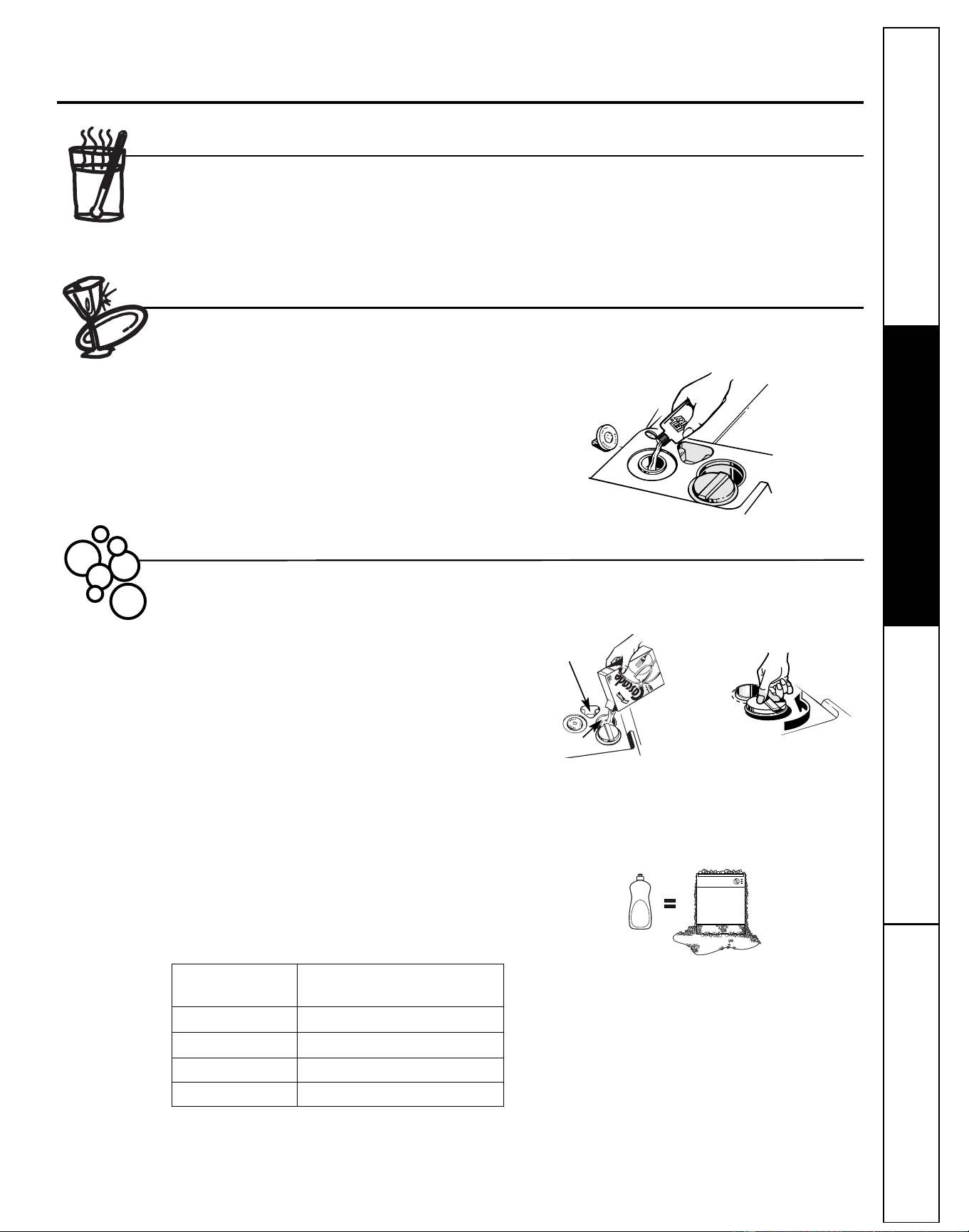
Filling the Dispenser
Fill the rinse agent dispenser until it reaches the bottom of
lip inside the opening. Replace cap.
To check if rinse agent is needed, remove the cap and look
into the dispenser.
A full dispenser should last about one month.
If the rinse agent spills, wipe up the excess.
Check the Water Temperature
The entering water must be at least 120°F and
not more than 150°F, for effective cleaning and to
prevent dish damage. Check the water temperature
with a candy or meat thermometer. Turn on the
hot water faucet nearest the dishwasher, place
the thermometer in a glass and let the water
run continuously into the glass until the temperature
stops rising.
Adjust the maximum/minimum temperature of the
water heater if necessary to deliver water at the
proper temperature.
Use Jet-Dry
®
Rinse Agent
Proper Use of Detergent
Jet-Dry
®
or Cascade Crystal Clear
®
rinse agents remove spots and prevent new film buildup on dishes,
glasses, flatware, cookware and plastic.
Use only detergent specifically made for use in
dishwashers. Cascade
®
and Electrasol
®
Automatic
Dishwashing Detergents have been approved for use
in all GE dishwashers. Keep your detergent fresh and
dry. Don’t put powder detergent into the dispenser
until you’re ready to wash dishes.
The amount of detergent to use depends on whether
your water is hard or soft. With hard water, you need
extra detergent. With soft water, you need less
detergent.
Protect your dishes and dishwasher by contacting
your water department and asking how hard your
water is. Twelve or more grains is extremely hard
water. A water softener is recommended. Without it,
lime can build up in the water valve, which could
stick while open and cause flooding. Too much
detergent with soft water can cause a permanent
cloudiness of glassware, called etching.
Use the information in the table below as a guideline
to determine the amount of automatic dishwasher
detergent to place in the dispenser.
You’ll find two detergent dispensers on the inside door
of your dishwasher. All wash cycles require detergent
in the main cup.
When
using automatic dishwashing
detergent tabs, simply place one tab in the main cup
and close.
Be sure the Dial is OFF before adding detergent.
Otherwise, the
detergent cup will not close and latch
properly.
Add detergent then close the main cup.
NOTE: To open detergent cup after it has been
closed, simply turn the detergent cup handle
counterclockwise until it releases. A snapping
sound may be heard.
DO NOT USE HAND DISH DETERGENT
NOTE: Using a detergent that is not specifically
designed for dishwashers will cause the dishwasher
to fill with suds. During operation, these suds will spill
out of the dishwasher vents, covering the kitchen floor
and making the floor wet.
Because so many detergent containers look alike,
store the dishwasher detergent in a separate space
from all other cleaners. Show anyone who may use
the dishwasher the correct detergent and where it
is stored.
While there will be no lasting damage to the
dishwasher, your dishes will not get clean using
a dishwashing detergent that is not formulated
to work with dishwashers.
Using the dishwasher
ge.com
Detergent Cups to Fill
Fill to 1/3 of main cup
Fill to 2/3 of main cup
Fill main cup
Fill
main cup and open cup
Number
of Grains
Less than 4
4 to 8
8 to 12
Greater than 12
Open cup
Main cup
9
Downloaded from www.ManualsFile.com manuals search engine
Loading the dishwasher racks
10
Operating Instructions Safety InstructionsConsumer Support Troubleshooting Tips
Upper Rack
The upper rack is for glasses, cups and
saucers. Cups and glasses fit best along
the sides. This is also a secure place for
dishwasher-safe plastics. The upper rack is
good for all kinds of odd-shaped utensils.
Saucepans, mixing bowls and other items
should be placed face down.
Secure larger dishwasher-safe plastics over
two fingers when possible.
Make sure small plastic items are secure so
they can’t fall onto the heating element.
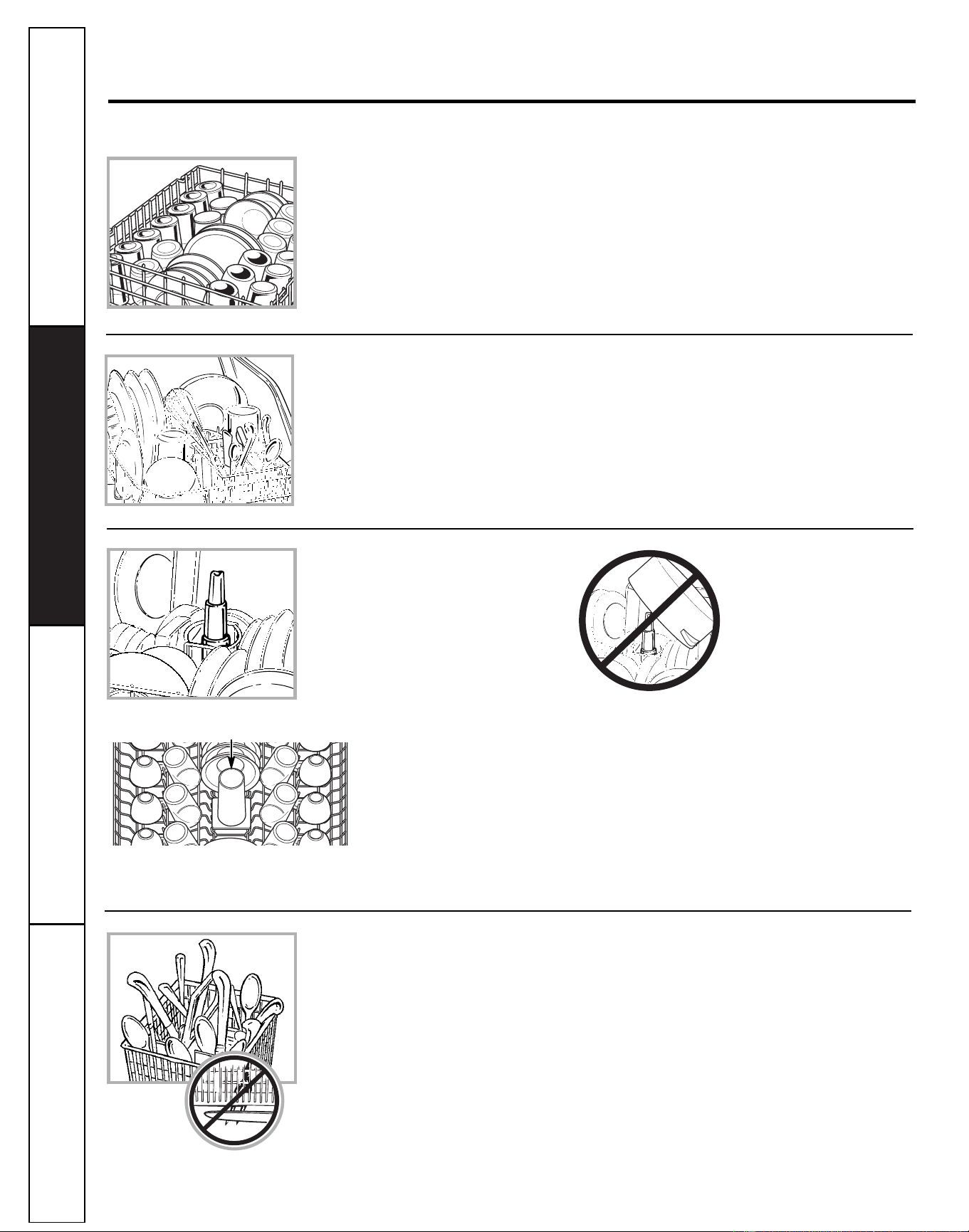
Wash Tower
Keep the center area clear in the lower
rack.
The wash tower rises through the
center of the lower rack during the
wash and rinse portions of the cycle.
Lower Rack
When loading the lower rack, do not load
large platters or trays in the front right
corner. They may prevent detergent from
circulating during the wash cycle.
The lower rack is best used for plates,
saucers and cookware. Large items such as
broiler pans and racks should go along the
sides. Load platters, pots and bowls along
the sides, in corners or in the back. The
soiled side of items should face the center
of the rack.
For best dishwashing results, follow these loading guidelines. Features and appearance of racks and silverware
baskets may vary from your model.
Don’t block the wash
tower or load tall things
next to it.
Be sure items don’t fall
through rack and block
rotation of the spray arm.
Also, be careful not to
let a portion of an item
such as a pot or dish
handle extend through
the bottom rack. This
could block the wash
arm and cause poor
washing results.
Silverware Basket
Put flatware in the removable basket with
fork and knife handles up to protect your
hands. Place spoons in the basket with
handles down. Mix knives, forks and spoons
so they don’t nest together. Distribute
evenly. Small plastic items, such as
measuring spoons and lids from small
containers, should go in the bottom of the
silverware basket with silverware on top.
DON’T LET ANY ITEM EXTEND THROUGH
BOTTOM OF SILVERWARE BASKET AND
RACK, TO ENSURE PROPER FUNCTION
OF SPRAY ARM.
Do not cover upper rack tower
(not present on all models)
Tower
Don’t block the upper rack
wash tower.
Downloaded from www.ManualsFile.com manuals search engine
Consumer Support
Troubleshooting TipsOperating InstructionsSafety Instructions
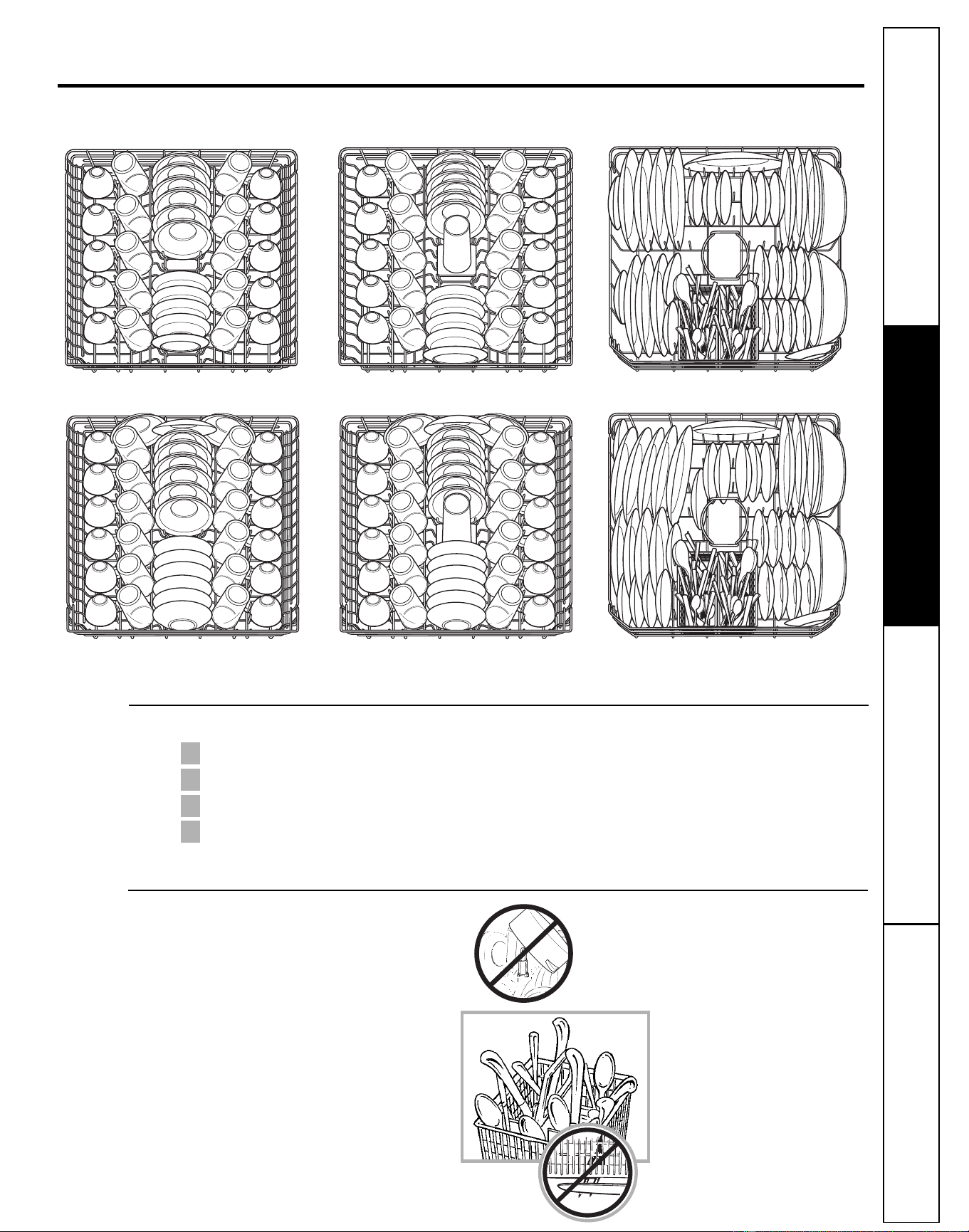
Follow these guidelines for loading 10 place settings. Features and appearance of racks and silverware baskets
may vary from your model.
Upper Rack—10 place settings Upper Rack—10 place settings Lower Rack—10 place settings
Loading place settings… ge.com
Forget to Add a Dish?
A forgotten dish can be added any time before the main wash.
Push the door latch to the left.
Once the water calms, open the door. Steam may rise out of the dishwasher.
Add forgotten dish.
Close the door and push the latch to the far right.
4
3
2
1
Tips for Loading and Good Wash Performance
■ Don’t block the lower rack wash tower.
■ Don’t let items fall through rack and
block spray arms.
11
Upper Rack—12 place settings Upper Rack—12 place settings Lower Rack—12 place settings
Downloaded from www.ManualsFile.com manuals search engine
Caring for the dishwasher
To clean the control panel, use a lightly dampened cloth, then dry thoroughly. To clean the exterior, use a good appliance
polish. Never use sharp objects, scouring pads or harsh cleaners on any part of the dishwasher.
If your dishwasher is left in an unheated place
during the winter, ask a service technician to:
Cut off electrical power to the dishwasher.
Remove fuses or trip circuit breaker.
Turn off the water supply and disconnect the
water inlet line from the water valve.
Drain water from the inlet line and water
valve. (Use a pan to catch the water.)
Reconnect the water inlet line to the
water valve.
Remove the plastic sump cover in the tub
bottom and use a sponge to soak up water
in the rubber boot.
5
4
3
2
1
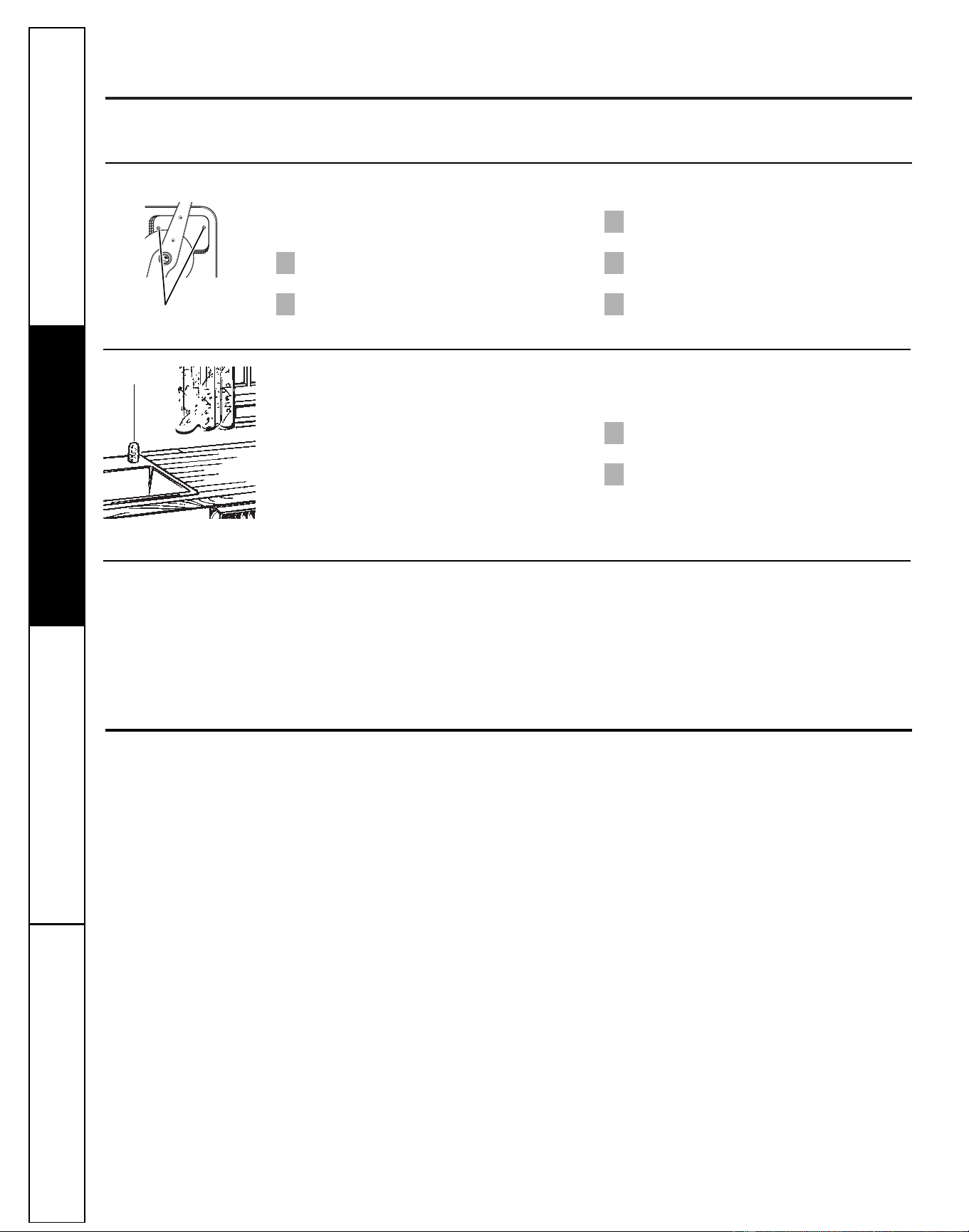
Sump cover screws
An air gap protects your dishwasher against
water backing up into it if a drain clogs.
The air gap is not a part of the dishwasher.
It is not covered by your warranty. Not all
plumbing codes require air gaps, so you may
not have one.
The air gap is easy to clean.
Turn off the dishwasher and lift off the
chrome cover.
Unscrew the plastic cap and clean with
a toothpick.
2
1
Check the air gap any time your
dishwasher isn’t draining well.
Air gap
Does Your Dishwasher Have an Air Gap?
Protect Against Freezing
Operating Instructions Safety InstructionsConsumer Support Troubleshooting Tips
12
The stainless steel panels can be cleaned
with Stainless Steel Magic or a similar
product using a clean, soft cloth.
You can order Stainless Steel Magic
#WX10X15 through GE Parts by calling
800.626.2002.
Stainless Steel Panels
You can change the appearance of your
dishwasher by adding a custom panel trim kit.
1/4″ Wood panel trim kit—This accessory
contains trim and instructions for you to supply
and install a 1⁄ 4″ thick decorative wood door:
■ GPF25B (Black) GPF325B/GPF425B
■ GPF25W (White) GPF325W/GPF425W
■ GPF25C (Bisque) GPF325C/GPF425C
3/4″ Trimless wood panel kit—This accessory
contains parts and instructions for you to supply
and install a 3 ⁄ 4″ thick decorative wood door:
■ GPF375/GPF475
NOTE: The GPF100 dishwasher door spring kit
must also be ordered and installed when the
door panel weighs four lbs. or more. This kit is
included with the 3/4” trim kits.
Non-wood countertop bracket kit—This is for
installations which have non-wood countertops
and includes side-mounting brackets and
instructions for securing the dishawasher:
■ GPF65
Consult your GE Appliance dealer to get the correct
kit for your model.
These accessories are available at extra cost
from GE. Call 800.626.2002 to order, or see your
authorized GE Appliance dealer. Visa, MasterCard or
Discover cards are accepted. Specify accessory
number when ordering.
Optional accessories
Downloaded from www.ManualsFile.com manuals search engine
Problem Possible Causes What To Do
Dishwasher won’t run Fuse is blown, or the • Replace fuse or reset circuit breaker. Remove any other appliances
circuit breaker tripped from the circuit.
• Try pressing the START/RESET pad (Electronic models) two times.
Power is turned off • In some installations, power to the dishwasher is provided through a wall
switch, often located next to the disposer switch. Make sure it is on.
Noise Some of the sounds • Soft food disposal shredding action.
you’ll hear are normal
• Drain valve opening to pump water out.
• Timer control as cycle progresses.
• Detergent cup opening.
• The motor stopping during the drying period.
• Water draining out of tub immediately after touching the START/RESET pad.
Utensils are not secure • Make sure everything is secured in dishwasher.
in rack or something small
has dropped into rack
Rattling dishes when • Make sure dishes are properly loaded. See the Loading the
the spray arm rotates dishwasher racks section.
Motor hums • Dishwasher has not been used on a regular basis. If you do not use
your dishwasher often, set it to fill and pump out once every week.
This will help keep the seal moist.
Water standing in This is normal • A small amount of clean water around the outlet on the tub bottom
the bottom of the tub at the back of the tub keeps the water seal lubricated.
Water won’t pump Drain is clogged • If you have an air gap, clean it.
out of the tub
• Check to see if your kitchen sink is draining well. If not, you may need
a plumber.
• If the dishwasher drains into a disposer, run disposer clear.
Suds in the tub Wrong detergent • Use only automatic dishwasher detergents to avoid sudsing.
was used Cascade
®
, Cascade
®
Complete and Electrasol
®
Automatic Dishwashing
Detergents have been approved for use in all GE dishwashers.
• To remove suds from the tub, open the dishwasher and let suds
dissipate. Add 1 gallon of cold water to the tub. On Models with a Dial:
Close and latch the dishwasher. Pump out water by slowly turning the
Dial until a drain period is reached. Repeat if necessary. On Models with
Electronic Control: Pump out water by pressing the START/RESET pad,
then 10 seconds later, press START/RESET pad again. Repeat if necessary.
Rinse agent was spilled • Always wipe up rinse agent spills immediately.
Stained tub interior Some tomato-based • Use of the RINSE ONLY cycle after adding the dish to the load
foods can cause reddish can decrease the level of staining. GE recommends Cascade
®
stains Plastic Booster to help remove these types of stains.
Tea or coffee stains • Remove the stain by hand, using a solution of 1/2 cup bleach
and 3 cups warm water.
WARNING
Before cleaning interior, wait at least 20 minutes after a cycle for the
heating elements to cool down. Failure to do so can result in burns.
An overall yellow or • A special filter in the water supply line is the only way to correct
brown film can be this problem. Contact a water softener company.
caused by iron deposits
in water
White film on inside • GE recommends Jet-Dry
®
or Cascade Crystal Clear
®
to help
surface—hard water prevent hard water mineral deposits from forming.
minerals
• Run dishwasher with citric acid to remove mineral deposits. Citric
acid (Part number: WD35X151) can be ordered through GE Parts.
See back cover for ordering information.
Consumer Support
Troubleshooting TipsOperating InstructionsSafety Instructions
13
Before you call for service… ge.com
Troubleshooting Tips
Save time and money! Review the charts on
the following pages, or visit ge.com. You may
not need to call for service.
Downloaded from www.ManualsFile.com manuals search engine
Problem Possible Causes What To Do
Dishes don’t dry Low inlet water • Make sure inlet water temperature is at least 120°F.
temperature
• Select HEATED DRY.
• Use HOT START and ADDED HEAT options.
• Select a higher cycle, such as POTS & PANS or HEAVY WASH.
Rinse agent dispenser • Check the rinse agent dispenser and fill as required.
is empty
Dishes and flatware Inlet water temperature • Raise the water heater temperature to 120°F.
not clean is below 120°F.
• Use HOT START, POTS & PANS or HEAVY WASH and HI TEMP WASH.
Too little detergent • See Using the dishwasher section, refer to Proper Use of Detergent for
detergent recommendations.
Old or damp powdered • See Using the dishwasher section, refer to Proper Use of Detergent for
detergent detergent recommendations.
Water pressure is • Turn on a faucet. Is water coming out more slowly than usual? If so,
temporarily low wait until pressure is normal before using your dishwasher.
Air gap is clogged • Clean the air gap.
Improper rack loading • Make sure large dishware does not block detergent dispenser or wash arm.
No air gap or high • Verify that you have an air gap or a high drain loop. Refer to
drain loop the Installation Instructions.
Spots and filming • Use Jet-Dry
®
or Cascade Crystal Clear
®
rinse agents to remove spots
on glasses and and prevent new film buildup.
flatware • To remove stubborn spots and pre-existing film from glassware:
1 Remove all metal utensils from the dishwasher.
2 Do not add detergent.
3 Select the longest cycle.
4 Start the dishwasher and allow to run for 18 to 22 minutes.
Dishwasher will now be in the main wash.
5 Open the door and pour 2 cups (500 ml) of white vinegar into the
bottom of the dishwasher.
6 Close the door and allow to complete the cycle. If vinegar rinse
doesn’t work: Repeat as above, except use 1/4 cup (60 ml) of citric
acid crystals instead of vinegar.
Cloudiness on Combination of soft • This is called etching and is permanent. To prevent this from
glassware water and too much happening, use less detergent if you have soft water. Wash glassware in
detergent the shortest cycle that will get it clean.
Water temperature • Lower the water heater temperature.
entering the dishwasher
exceeds 150°F.
Detergent cup lid Dial is not in the OFF • Turn the Timer Dial to OFF.
won’t latch position
Detergent left in Dishes are blocking the • Reposition the dishes.
dispenser cups detergent cups
Steam This is normal • Steam comes through the vent by the door latch during drying and
when water is being pumped out.
Black or gray Aluminum utensils have • Remove marks with a mild, abrasive cleaner.
marks on dishes rubbed against dishes
Control panel lights Time too long between • Each pad must be touched within 30 seconds of the others. To relight,
go off when you are touching or selecting touch any pad again or unlatch and relatch the door.
setting controls pads
Control panel Door latch may not • Call for service.
responded to inputs be properly seated
but dishwasher never
filled with water
14
Operating Instructions Safety InstructionsConsumer Support Troubleshooting Tips
Before you call for service…
Extremely hard water
Low inlet water
temperature
Overloading the
dishwasher
Improper loading
Old or damp powder
detergent
Rinse agent dispenser
empty
Too little detergent
Downloaded from www.ManualsFile.com manuals search engine
15
Consumer Support
Troubleshooting TipsOperating InstructionsSafety Instructions
What Is Not Covered:
For The Period Of: GE Will Replace:
One Year Any part of the dishwasher which fails due to a defect in materials or workmanship. During
From the date of the this limited one-year warranty, GE will also provide, free of charge, all labor and in-home service
original purchase to replace the defective part.
GE Dishwasher Warranty
■ Service trips to your home to teach you how to use
the product.
■ Improper installation, delivery or maintenance.
■ Failure of the product if it is abused, misused, or used for
other than the intended purpose or used commercially.
■ Replacement of house fuses or resetting of circuit
breakers.
■ Damage to the product caused by accident, fire, floods
or acts of God.
■ Incidental or consequential damage caused by possible
defects with this appliance.
■ Cleaning or servicing of the air gap device in the
drain line.
■ Damage caused after delivery.
■ Product not accessible to provide required service.
This warranty is extended to the original purchaser and any succeeding owner for products purchased for
home use within the USA. If the product is located in an area where service by a GE Authorized Servicer is not
available, you may be responsible for a trip charge or you may be required to bring the product to an Authorized GE
Service location. In Alaska, the warranty excludes the cost of shipping or service calls to your home.
Some states do not allow the exclusion or limitation of incidental or consequential damages. This warranty
gives you specific legal rights, and you may also have other rights which vary from state to state. To know
what your legal rights are, consult your local or state consumer affairs office or your state’s Attorney General.
Warrantor: General Electric Company. Louisville, KY 40225
All warranty service provided by our Factory Service Centers,
or an authorized Customer Care
®
technician. To schedule
service, on-line, 24 hours a day, visit us at ge.com, or call
800.GE.CARES (800.432.2737). Please have serial number and
model number available when calling for service.
Staple your receipt here.
Proof of the original purchase
date is needed to obtain service
under the warranty.
EXCLUSION OF IMPLIED WARRANTIES—Your sole and exclusive remedy is product repair as provided in this Limited
Warranty. Any implied warranties, including the implied warranties of merchantability or fitness for a particular
purpose, are limited to one year or the shortest period allowed by law.
Downloaded from www.ManualsFile.com manuals search engine
Consumer Support
GE Appliances Website
ge.com
Have a question or need assistance with your appliance? Try the GE Appliances Website 24 hours a day,
any day of the year! For greater convenience and faster service, you can now download Owner’s Manuals,
order parts or even schedule service on-line.
Schedule Service ge.com
Expert GE repair service is only one step away from your door. Get on-line and schedule your service
at your convenience 24 hours any day of the year! Or call 800.GE.CARES (800.432.2737) during normal
business hours.
Real Life Design Studio ge.com
GE supports the Universal Design concept—products, services and environments that can be used by
people of all ages, sizes and capabilities. We recognize the need to design for a wide range of physical and
mental abilities and impairments. For details of GE’s Universal Design applications, including kitchen design ideas
for people with disabilities, check out our Website today. For the hearing impaired, please call 800.TDD.GEAC
(800.833.4322).
Extended Warranties ge.com
Purchase a GE extended warranty and learn about special discounts that are available while your warranty
is still in effect. You can purchase it on-line anytime, or call 800.626.2224 during normal business hours.
GE Consumer Home Services will still be there after your warranty expires.
Parts and Accessories ge.com
Individuals qualified to service their own appliances can have parts or accessories sent directly to their homes
(VISA, MasterCard and Discover cards are accepted). Order on-line today, 24 hours every day or by phone at
800.626.2002 during normal business hours.
Instructions contained in this manual cover procedures to be performed by any user. Other servicing
generally should be referred to qualified service personnel. Caution must be exercised, since improper
servicing may cause unsafe operation.
Contact Us ge.com
If you are not satisfied with the service you receive from GE, contact us on our Website with all the details
including your phone number, or write to: General Manager, Customer Relations
GE Appliances, Appliance Park
Louisville, KY 40225
In Canada write to: Director, Customer Relations, Mabe Canada Inc.
Suite 310, 1 Factory Lane
Moncton, N.B. E1C 9M3
Register Your Appliance ge.com
Register your new appliance on-line—at your convenience! Timely product registration will allow
for enhanced communication and prompt service under the terms of your warranty, should the need arise.
You may also mail in the pre-printed registration card included in the packing material.
Printed in the United States
Printed on Recycled Paper
Downloaded from www.ManualsFile.com manuals search engine
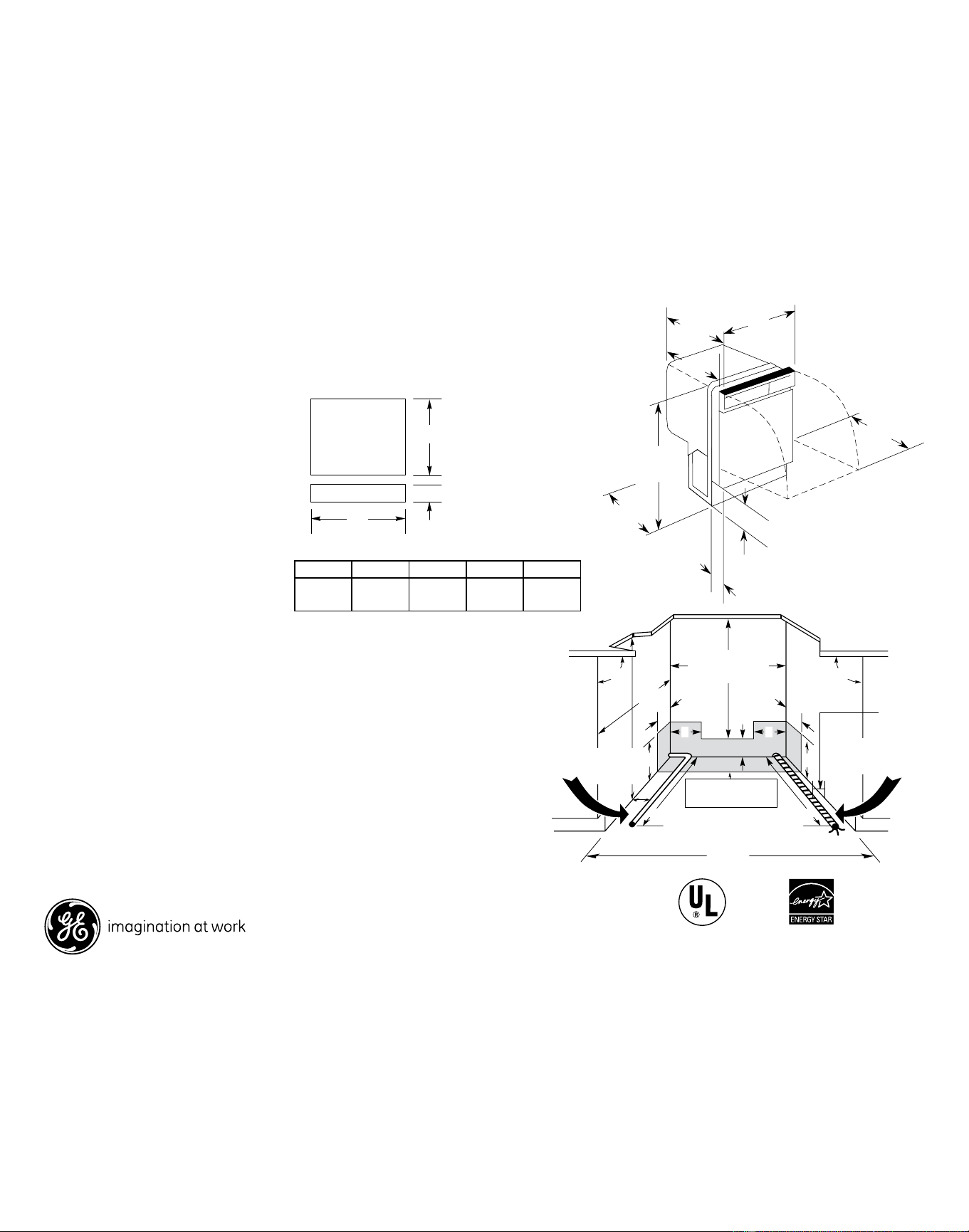
Dimensions and Installation Information (in inches)
For answers to your Monogram,
®
GE Profile
™
or
GE
®
appliance questions, visit our website at
ge.com or call GE Answer Center
®
service,
800.626.2000.
As an EnErgy StAr
®
partner, gE has determined
that this product meets the
EnErgy StAr
guidelines
for energy efficiency.
Specification Created 4/07
350261
Panel
Thickness
Kit A B C
GPF325 18-7/8" 23-9/16" 3-11/16" 1/4"
GPF375 18-15/16" 23-5/8"* 4-1/4" to
3-3/4"**
3/4"
Listed by
Underwriters
Laboratories
This wall area
must be free of
pipes or wires
Countertop
4
6
Hot
water
line on
left
44
2
Plumbing and electrical
service must enter
inside shaded area
24" From wall
24" MIN.
90°
19" MIN. from wall
24"
MIN.
6
34" to 34-3/4"
Underside
of countertop
to floor
5 5
90°
Electrical
wiring on
right
Electrical
wiring is
3" from
cabinet
24
25-3/4
MAX.
21-1/2
3-1/4
4 (Adjustable)
34 MIN.
adj. to 35
24-3/4
23-3/8
B
Access insert
Door insert
A
C
Models/Kits A B C Thickness
GE Models
GPF325 Kit 18-7/8” 23-9/16” 3-11/16” 1/4”
GPF375 Kit 18-15/16” 23-5/8”* 3-3/4”** 3/4”
*Bottom of panel must be notched 1-1/2"x1/2" to clear
across panel
**Adjustment required to match adjcent cabinets fronts due to
leveling leg adjustment, 4" nominal.
4-1/4" to
Electrical Rating
Voltage AC.......................................................... 120
Hertz..................................................................... 60
Total connected load amperage............. 6.2
Calrod® heater watts max........................ 500
For use on adequately wired 120-volt,
15-amp circuit having 2-wire service
with a separate ground wire. This appliance
must be grounded for safe operation.
Note: Dishwasher must not be installed
more than 10 feet from sink for proper
drainage. All plumbing and electrical work
must be in accordance with local codes.
GSD2300/2301N
GE
®
Built-In Dishwasher
* Bottom of panel must be notched 1-1/2" x 1/2" to clear across panel
** Adjustment required to match adjacent cabinet fronts due
to leveling leg adjustment, 4" nominal
Downloaded from www.ManualsFile.com manuals search engine
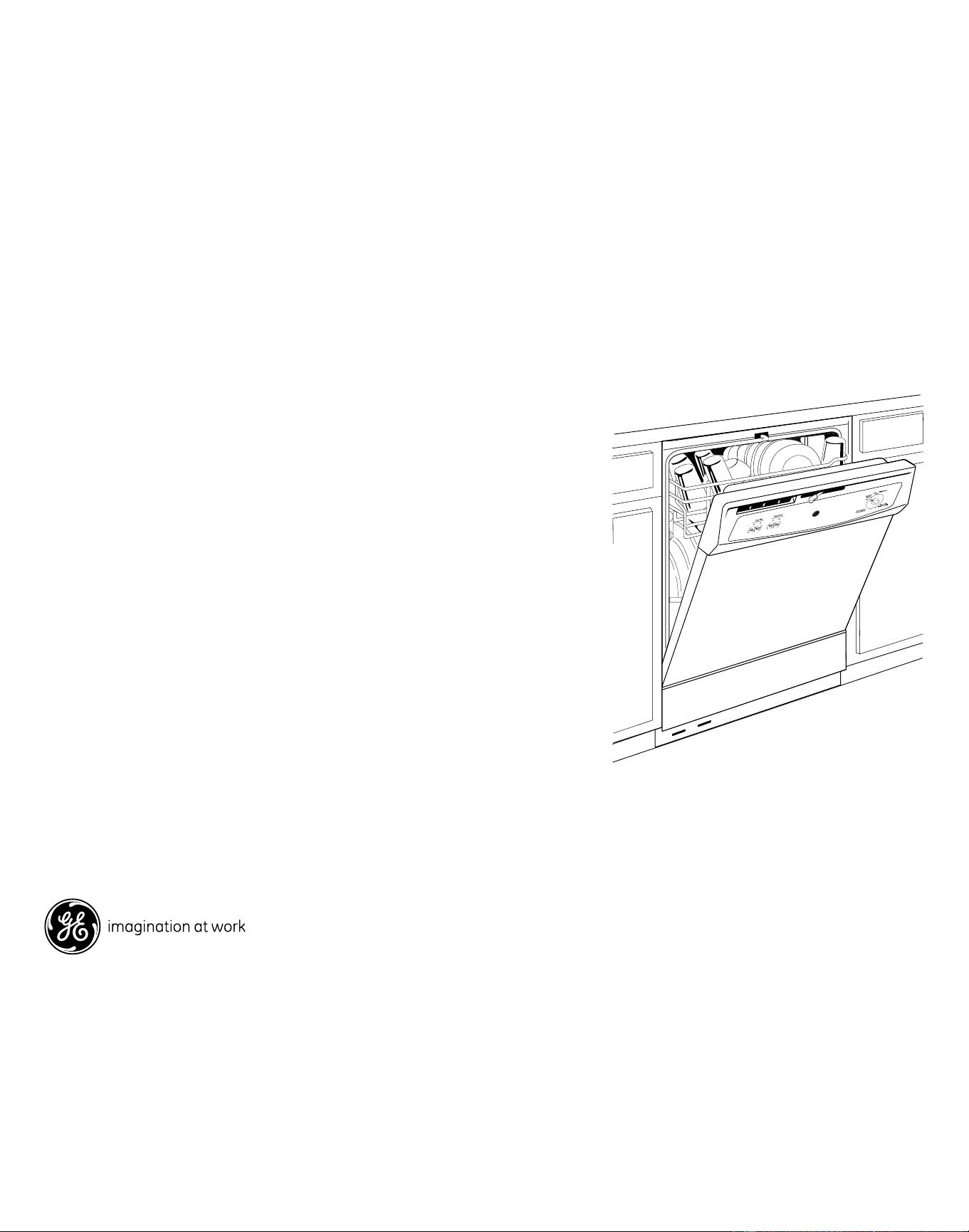
Features and Benefits
• Meets 2007 ENERGY STAR® Criteria - Can reduce utility bill by using less water
to get dishes clean
• 4-level PowerScrub™ wash system - Four wash levels quietly and efficiently
scrub dishes clean
• HotStart™ Option - Preheats water before the main wash cycle for dependable
performance every time
• Piranha™ Hard Food Disposer - Grinds leftover food into small particles that
are easily washed away
• Pots and Pans Cycle - Scours off baked-on food with a wall of water
• Heated Dry Option - Circulates warm air to quickly and gently dry dishes
• Plate Warmer cycle - Gently warms dinner plates for serving food at the
optimal temperature
• Model GSD2300NWW - White on white
• Model GSD2300NCC - Bisque on bisque
• Model GSD2300NBB - Black on black
• Model GSD2301NWW - White on white, has power cord attached
Specification Created 4/07
350261
GSD2300/2301N
GE
®
Built-In Dishwasher
GSD2300NWW/BB/CC
GSD2201NWW
GSD2400NWW/BB/CC
Downloaded from www.ManualsFile.com manuals search engine
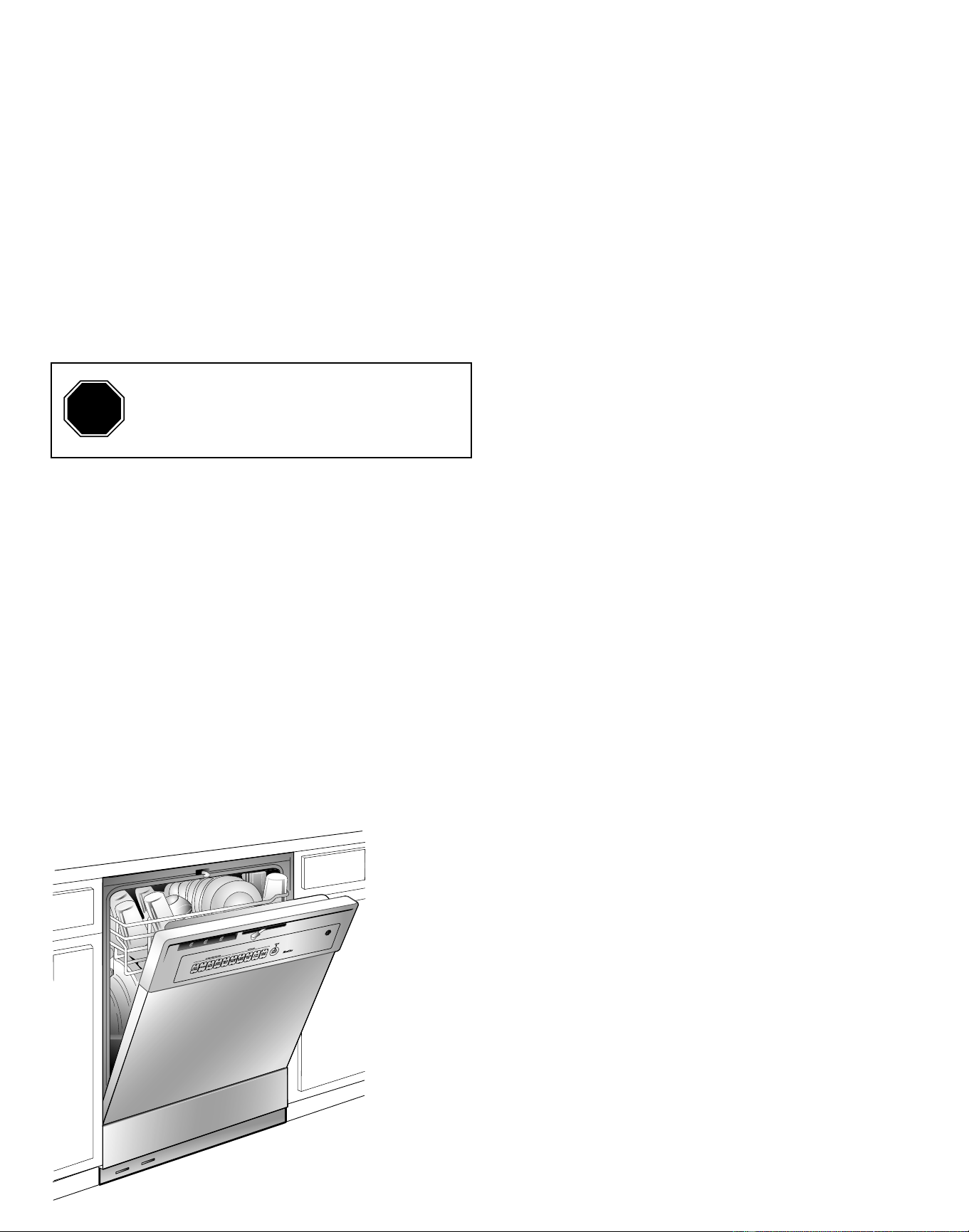
GSD2000
GE Consumer & Industrial
Appliances
Installation Instructions
Built-In Dishwasher
If you have questions, call 800.GE.CARES (800.432.2737) or visit our website at: www.ge.com
IMPORTANT – The dishwasher MUST be
installed to allow for future removal from the
enclosure if service is required.
If you received a damaged dishwasher, you should
immediately contact your dealer or builder.
Optional Accessories – See the Owner’s Manual for
available custom panel kits.
FOR YOUR SAFETY
Read and observe all CAUTIONS and WARNINGS
shown throughout these instructions. While
performing installations described in this booklet,
gloves and safety glasses should be worn.
READ CAREFULLY.
KEEP THESE INSTRUCTIONS.
IMPORTANT – Observe all governing codes
and ordinances.
• Note to Installer – Be sure to leave these
instructions for the consumer and local inspector’s
use.
• Note to Consumer – Keep these instructions with
your Owner’s Manual for future reference.
• Skill Level – Installation of this dishwasher requires
basic mechanical, electrical and plumbing skills.
Proper installation is the responsibility of
the installer. Product failure due to improper
installation is not covered under the GE
Appliance Warranty. See warranty information.
• Completion Time – 1 to 3 Hours. New installations
require more time than replacement installations.
STOP
BEFORE YOU BEGIN
Read these instructions completely and
carefully.
Downloaded from www.ManualsFile.com manuals search engine
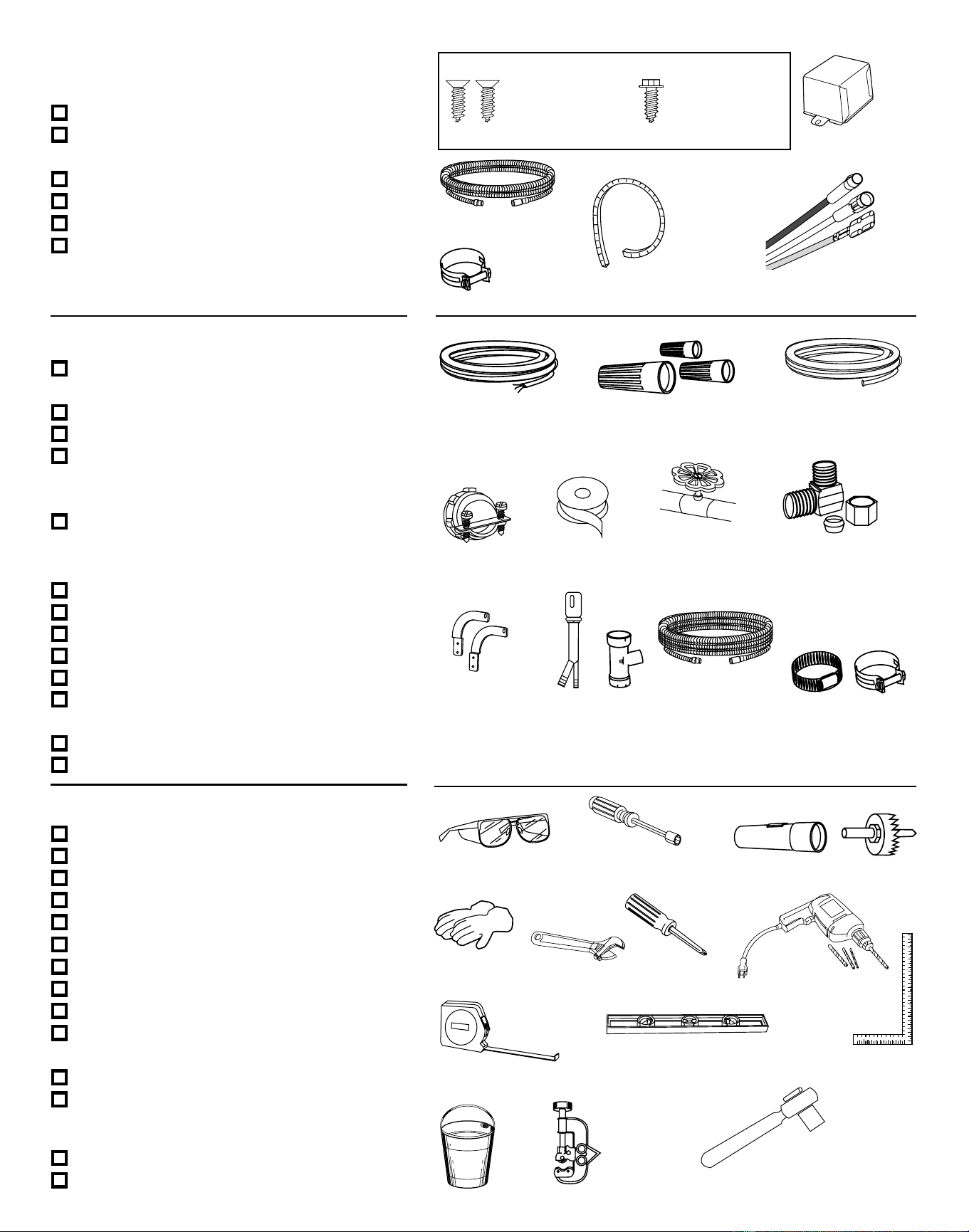
TOOLS YOU WILL NEED:
■ Safety glasses
■ 1/4" and 5/16" nutdrivers
■ Flashlight
■ Gloves
■ Adjustable wrench (6”)
■ Phillips head screwdriver
■ Measuring tape
■ Level
■ Carpenters square
■ Bucket to catch water when flushing
water line
■ Tubing cutter
■ 15/16" socket wrench
FOR NEW INSTALLATIONS:
■ Hole saw set
■ Drill and appropriate bits
PARTS SUPPLIED IN INSTALLATION
PACKAGE:
■ Two 8-18 x 5/8" Phillips head wood screws
■ Junction box cover and #10 hex head
screw
■ Drain hose (78" long) and hose clamp
■ Cord protector (Power Cord Models Only)
■ Conversion leads (Power Cord Models Only)
■ Literature, product samples, and/or
coupons
MATERIALS YOU WILL NEED:
■ WX09X70910 power cord if applicable to
your installation
■ UL Listed wire nuts (3)
■ Thread seal tape
■ 90° elbow, ferrule and compression nut
– (3/8" NPT external thread on one end
and opposite end sized to fit water supply)
■ GPF65 Side-mount bracket kit for use with
granite countertops
FOR NEW INSTALLATIONS:
■ Electrical cable
■ Water line–3/8" minimum copper tubing
■ Strain relief for electrical connection
■ Hand shut-off valve (recommended)
■ Air gap for drain hose, if required
■ Waste tee for house plumbing, if
applicable
■ GPF10S drain hose (10' long), if needed
■ Screw type hose clamps
90 ϒ Elbow
Carpenters Square
Drill & Bits
Electrical Cable
Flashlight
Hole Saw Bit
Level 2
Measuring Tape
Safety Glasses
Screw Driver II
Tape
Tubing Cutter
Hose Clamps
Hose Clamp
78" Drain Hose
90° Elbow, Ferrule and
Compression Nut
Thread
Seal Tape
Wire Nuts
3 Wire Nuts
Hot Water Line–3/8"
Minimum Copper
Tubing
Electrical Cable
or WR09X70910
Power Cord
Waste Tee
Optional 10'
Drain Hose
GPF10S
Air
Gap
Hose Clamps
Screw Type
Hose Clamps
Strain Relief
Phillips Head
Screwdriver
Level
Carpenters
Square
Measuring Tape
Safety Glasses
Flashlight
Gloves
Hole Saw Set
Drill and
Bits
Drain Hose
Waste Tee
Strain Relief
Hot Water Line
GLOVES
Shut-Off
Valve
1/4" and 5/16" Nutdrivers
Crescent Wrench
Adjustable
Wrench
Tubing
Cutter
GPF65 Side-Mount
Bracket Kit
#8
Phillips Head
Wood Screws
5/8" long
Screw Kit
#10
Hex Head
Junction Box Screw
1/2" long
�������������
Drain Hose 10ft.
������������
Junction Box Cover
2
Cord Protector
(Power Cord Models Only)
Conversion Leads
(Power Cord Models Only)
Cord Protector
Conversion Leads
15/16
15/16"
Socket Wrench
307Dia11
Air Gap
Bucket
Bucket
Nutdriver
Downloaded from www.ManualsFile.com manuals search engine
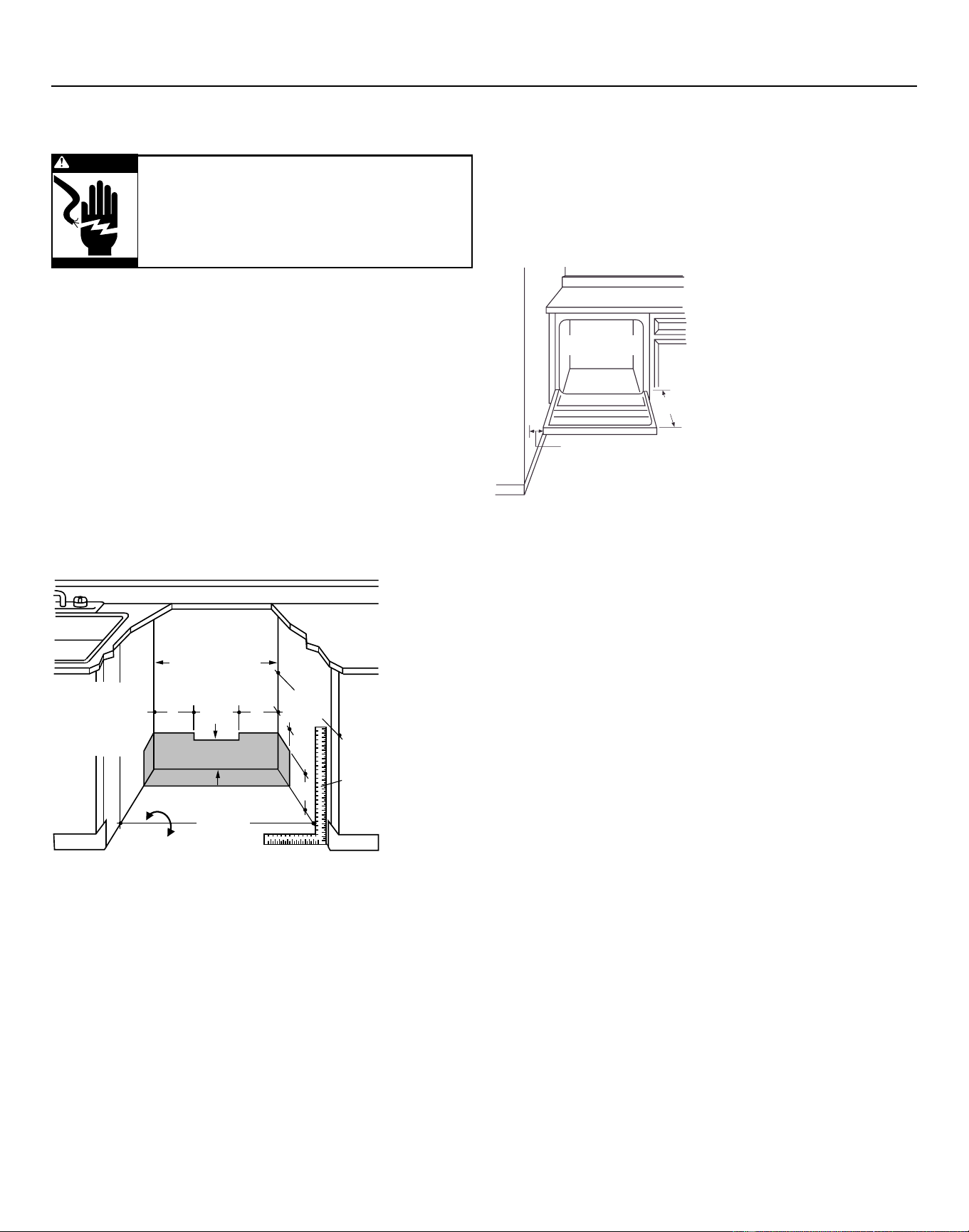
Installation Preparation–Enclosure
PREPARE DISHWASHER ENCLOSURE
Figure A
To reduce the risk of shock, fire, or injury
to persons, the installer must ensure that
the dishwasher is completely enclosed at
the time of installation.
#282 French
WARNING
• The rough cabinet opening must have a minimum
width and depth of 24" and height of 34-1/2" ± 1/4"
from the floor to the underside of the countertop.
• The back wall should be free of pipes or wires.
• Adjacent cabinets should be square and plumb to
ensure a good fit. Refer to Figure A
• For a corner installation, allow 2" minimum
clearance between the dishwasher and the
adjacent wall.
• Provide at least 27" in front of the dishwasher to
allow the dishwasher door to open fully. Refer to
Figure B
• Make sure the floor is level inside the opening and
even with the finished floor of the kitchen. This will
facilitate removal of the dishwasher at a later date
for service, if needed.
��������
������
���
�����
����������
������������
����������
��������������
���������������
���������������
�����������������������������
����������������������
��������������
������������
����������
��������
���
����
��������
�� ��
��
��
��
���������
3
Figure B
• The dishwasher must be installed no more than
10 feet from sink for proper drainage.
• The dishwasher must be fully enclosed on the top,
sides, and back.
• The dishwasher must not support any part of the
enclosure.
2" Minimum
Countertop
Dishwasher
27" Minimum
05A-1183F
Clearances:
In a corner installation, provide
at least 2" clearance between
the dishwasher and the adjacent
cabinet, wall, or other appliance.
Provide at least 27" of clearance
in front of the dishwasher.
Downloaded from www.ManualsFile.com manuals search engine
���������
���������
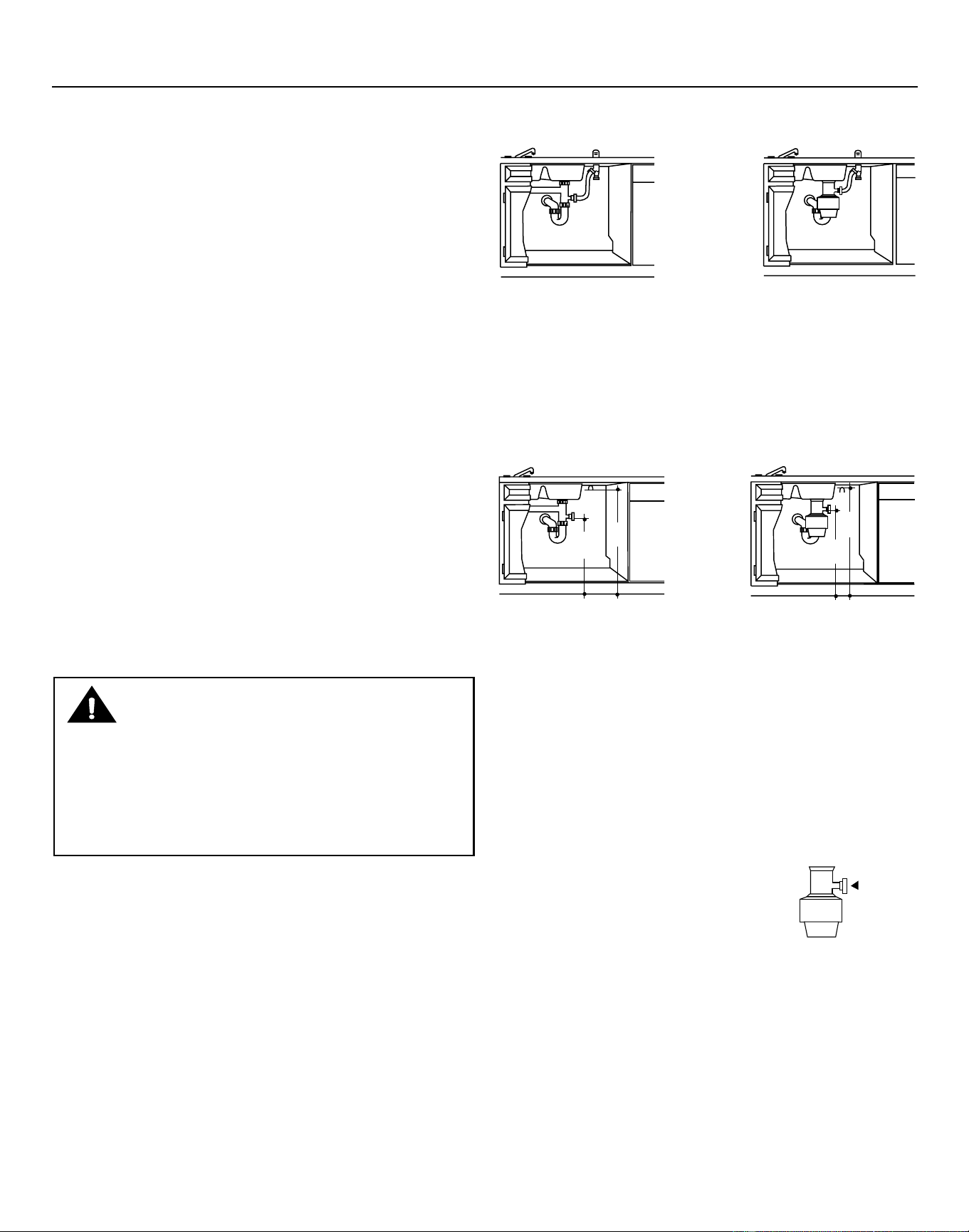
METHOD 1–Air Gap with Waste Tee or Disposer
Disposer Installation
METHOD 2–High Drain Loop with Waste Tee
or Disposer
Provide a method to attach the drain hose to the
underside of countertop. Attachment will be made in
a later step.
Waste Tee Installation
Figure C
Waste Tee Installation
Disposer Installation
Figure D
Install waste tee or disposer and the air gap
according to the manufacturer’s instructions.
Cabinet Preparation
Drill a 1-1/2" diameter hole in the cabinet wall within
the shaded area shown in Figure A for the drain
hose. Make sure there are no sharp edges. The drain
hose will be passed through this hole and connected
to the drain in a later step.
IMPORTANT – When
connecting the drain line to a
disposer, check to be sure that
drain plug has been removed.
Dishwasher will not drain if
plug is left in place.
307Dia50
32"
Min.
18"
Min.
307Dia51
32"
Min.
18"
Min.
CAUTION
An air gap MUST BE USED if the drain hose is connected to
waste tee or disposer lower than 18" above the floor level.
Failure to provide the proper drain connection height with
an air gap or 32" minimum, high drain loop will result in
improper draining of the dishwasher, which may cause
damage.
Installation Preparation–Drain
4
Remove
Drain
Plug
1871 Art1
PREPARE DRAIN PLUMBING
Drain Requirements
• Follow local codes and ordinances.
• Drain hose must not exceed 10 feet in length.
• A high drain loop or air gap is required. See below.
Drain Method
The type of drain installation depends on the
following:
• Do local codes or ordinances require an air gap?
• Is waste tee less than 18" above the floor?
If the answer to either question is YES, an air gap
(Method 1) must be used. If both answers are NO,
either an air gap or a high drain loop (Method 2)
may be used.
Special consideration for a dishwasher installed
on a pedestal
lf the dishwasher is installed on an elevated
platform, a high drain loop of at least 32" above the
platform must be provided in addition to the air gap
requirement determined above. This is necessary for
proper drain performance.
Downloaded from www.ManualsFile.com manuals search engine
#282 French
The improper connection of the equipment
grounding conductor can result in electric
shock. Check with a qualified electrician or
service representative if you are in doubt
that the appliance is properly grounded.
Do not modify the plug provided with the
appliance; if it will not fit the outlet, have
a proper outlet installed by a qualified
technician.
WARNING
5
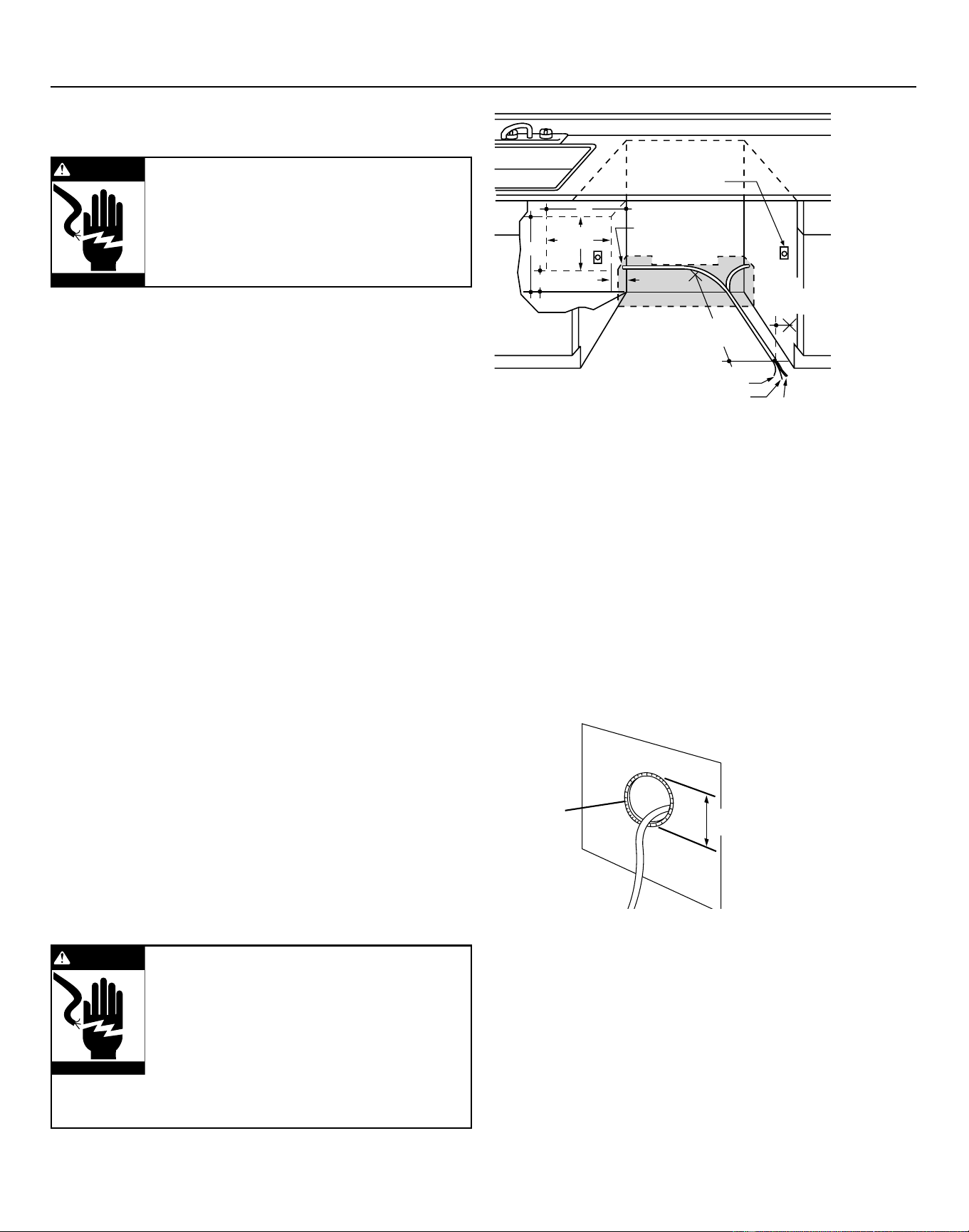
Cabinet Preparation & Wire Routing
• The wiring may enter the opening from either side,
rear, or floor within the shaded area illustrated
above in Figure E and defined in Figure A.
• Cut a 1-1/2" maximum diameter hole to insert the
electrical cable. Permanent wiring connections
may pass through the same hole as the drain
hose and hot water line, if convenient. Hole edges
must be smooth and rounded. If the cabinet wall is
metal, the hole edge must be covered with a cord
protector.
NOTE: Power cords with plug must pass through a
separate hole.
PREPARE ELECTRICAL WIRING
Electrical Requirements
• This appliance must be supplied with 120V, 60 Hz.,
and connected to an individual properly grounded
branch circuit, protected by a 15 or 20 ampere
circuit breaker or time delay fuse.
• Wiring must be 2 wire with ground.
• If the electrical supply does not meet the above
requirements, call a licensed electrician before
proceeding.
Grounding Instructions–Permanent Connection
This appliance must be connected to a grounded
metal, permanent wiring system, or an equipment
grounding conductor must be run with the circuit
conductors and be connected to the equipment
grounding terminal or lead on the appliance.
Grounding Instructions–Power Cord Models
This appliance must be grounded. In the event of a
malfunction or breakdown, grounding will reduce
the risk of electric shock by providing a path of
least resistance for electric current. This appliance
is equipped with a cord having an equipment
grounding conductor and a grounding plug. The plug
must be plugged into an appropriate outlet that is
installed and grounded in accordance with all local
codes and ordinances.
661Dia56A
White
18"
6"
24"
from Wall
3"
from
Cabinet
Alternate
Receptacle
Location
Ground
Black
1-1/2" Dia. Hole (Max.)
18"
6"
Receptacle
Location
Area
Figure E
Installation Preparation–Electrical Supply
#282 French
WARNING
FOR PERSONAL SAFETY: Remove house
fuse or open circuit breaker before
beginning installation. Do not use an
extension cord or adapter plug with this
appliance.
Electrical Connection to Dishwasher
Electrical connection is on the right front of
dishwasher.
• For permanent connections, the cable must be
routed as shown in Figure E. The cable must extend
a minimum of 24" from the rear wall.
• For power cord connections, install a 3-prong
grounding type receptacle in the adjacent cabinet
rear wall, between 6" and 18" from the opening, 6"
to 18" above the floor as shown in Figure E.
Hole Diameter
1-1/2" Maximum
Cord
Protector
(Provided
with Power
Cord Models Only)
Metal Cabinet
Wall
Downloaded from www.ManualsFile.com manuals search engine
6
Installation Preparation–Hot Water Supply
PREPARE HOT WATER SUPPLY
Hot Water Line
• The line may enter from either side, rear, or floor
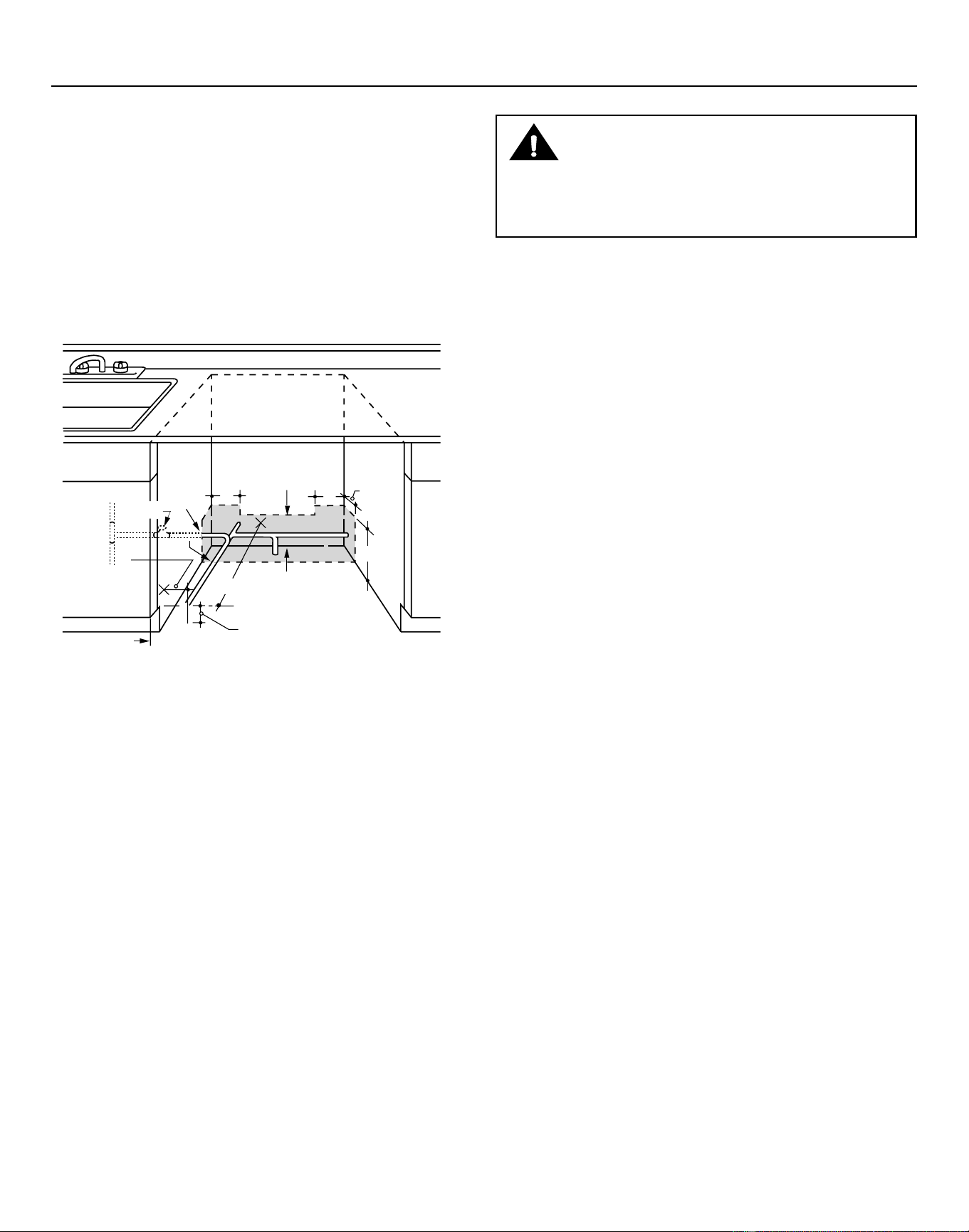
within the shaded area shown in Figure F.
• The line may pass through the same hole as the
electrical cable and drain hose, or cut an additional
1-1/2" diameter hole to accommodate the water
line. If a power cord with plug is used, the water line
must not pass through the power cord hole.
Figure F
Water Line Connection
• Turn off the water supply.
• Install a hand shut-off valve in an accessible
location, such as under the sink. (Optional, but
strongly recommended and may be required by
local codes.)
• The water connection is on the left side of the
dishwasher. Install the hot water inlet line, using
3/8" or larger copper tubing. Route the line as
shown in Figure F and extend forward at least 19"
from rear wall.
• Adjust the water heater to deliver water between
120°F and 150°F.
• Flush water line to clean out debris. Use a bucket
to catch water and debris.
• The hot water supply line pressure must be
between 20 and 120 PSI.
6"
661Dia56
5"
5"
4"
Cabinet Face
Shut-off
Valve
4"
2" From Floor
19" From Wall
2"
From
Cabinet
1-1/2" Dia.
Hole
Hot
CAUTION
The hot water supply line pressure must be at least 20 PSI.
Lower pressures could cause the water valve to leak and
cause water damage.
Downloaded from www.ManualsFile.com manuals search engine
7
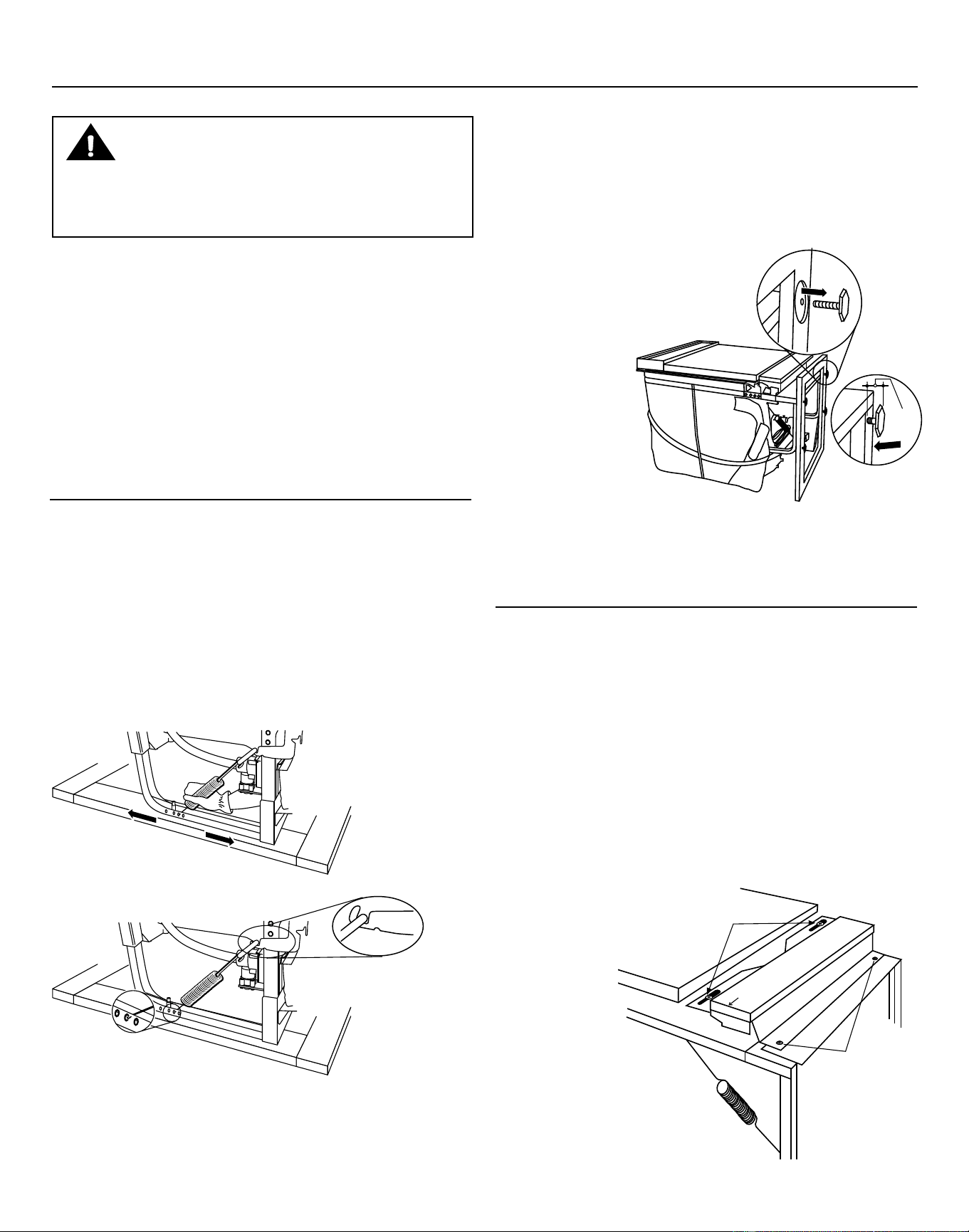
STEP 2: CHECK DOOR BALANCE
• With the dishwasher on the wood base, check the
door balance by opening and closing the door.
• The door is properly balanced if it gently drops
from a 1/2 open position and does not rise from
the full open position.
• If necessary, increase or decrease tension as
shown. Latch the door and adjust springs to
correct balance.
Dishwasher Installation
CAUTION
Do not remove the wood base until you are ready to
install the dishwasher. The dishwasher will tip over
when the door is opened if the base is removed.
STEP 4: REMOVE ACCESS PANEL
AND TOEKICK
The top mounting holes in the access panel are
slotted.
• Remove the lower two 10-16x3/8" sheet metal
screws. Do not remove the two top 8-32x1/4"
machine thread screws.
• Slide the access panel to the left as far as it will go.
• Gently pull the access panel forward to remove
it from the top screws.
Set access panel, toekick, and screws aside for use
in Step 20.
Tip: Prevent
tub damage
Remove only
the 3/8" sheet
metal screws
in this step.
This will help
prevent a mix
up with the
1/4" machine
thread screws
in Step 20.
Figure G
Figure H
STEP 1: PREPARATION
Locate the items in the installation package and set
them aside for use in the listed steps.
• Screw kit–Steps 5 or 16 and 13
• Junction box cover–Steps 5 or 16
• Drain hose and drain hose clamp–Step 7
• Owners’ Manual–Steps 18 and 21
• Product Samples and/or coupons–Step 21
• Conversion leads (Factory-equipped Power Cord
Models Only) –Appendix
STEP 3: REMOVE WOOD BASE
IMPORTANT – Do not kick off wood base!
Damage will occur.
• Move the dishwasher close to the installation
location and lay it on its back.
• Remove the four leveling
legs from the underside of
the wood base
with a 15/16"
socket wrench.
• Remove and
discard wood
base.
Tip: Avoid service calls for door balance problems
Make sure the spring end is fully engaged in a
frame hole and the spring link is fully seated in the
hinge arm.
• Screw leveling legs back into the dishwasher
frame, approximately 3/4" from the frame, as
shown.
06F-1847C
Approx
3/4"
06F-1847G
T
oe
k
ic
k
S
l
i
de
p
a
n
e
l
t
o
t
h
e
l
e
f
t
a
n
d
th
e
n
g
e
n
t
l
y
p
u
l
l
f
o
r
w
a
r
d
t
o
r
e
m
o
v
e
Do not remove 1/4”
machine thread screws
in this step
Remove two
3/8” Sheet Metal
Thread Screws
558Dia6
Inser
t Hook Th
r
ough
Hole fr
om Inside of Frame
Link
fully seated
in hinge arm
558Dia7
Increase
T
ensio
n
Decrease
T
ensio
n
Figure I
Downloaded from www.ManualsFile.com manuals search engine
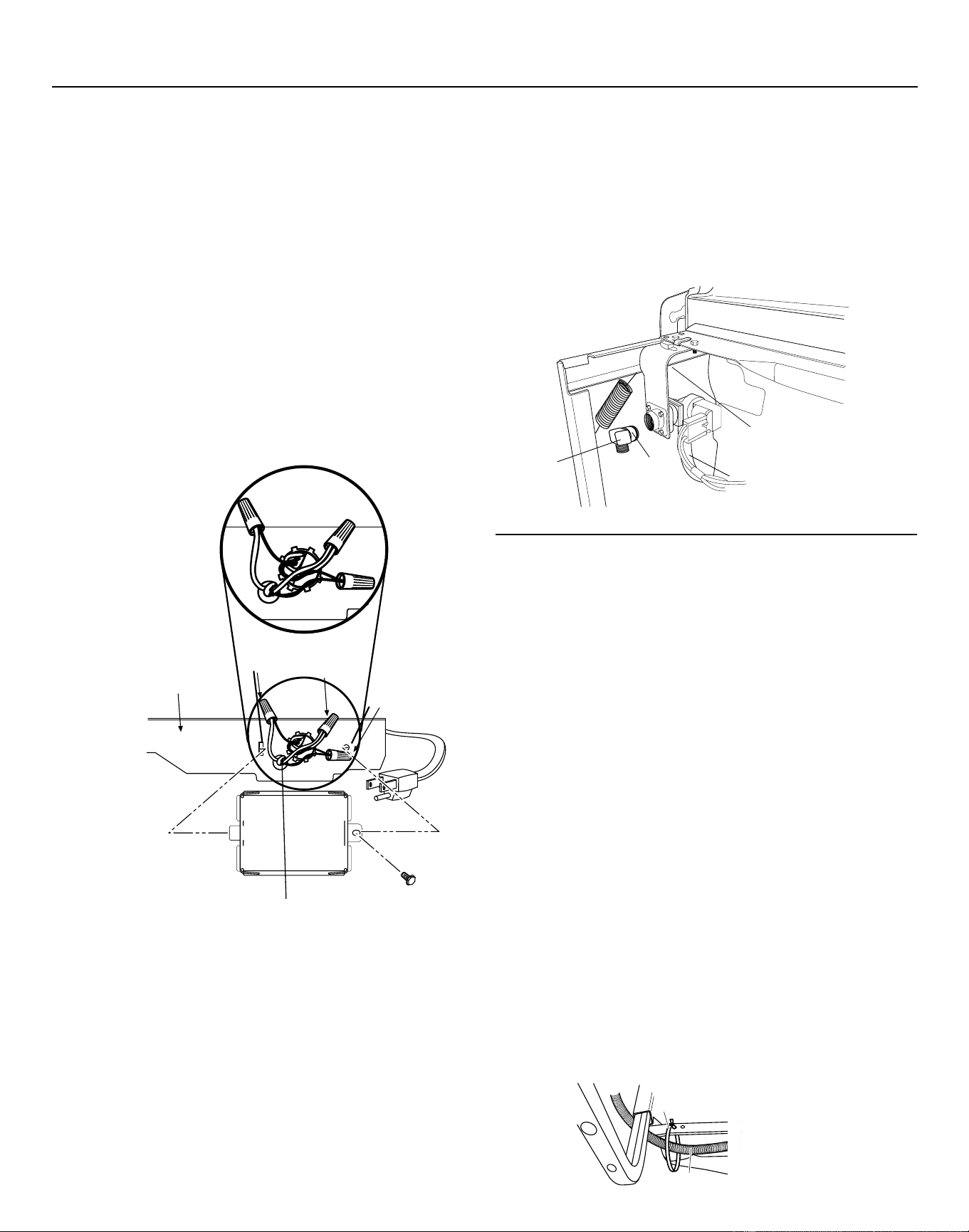
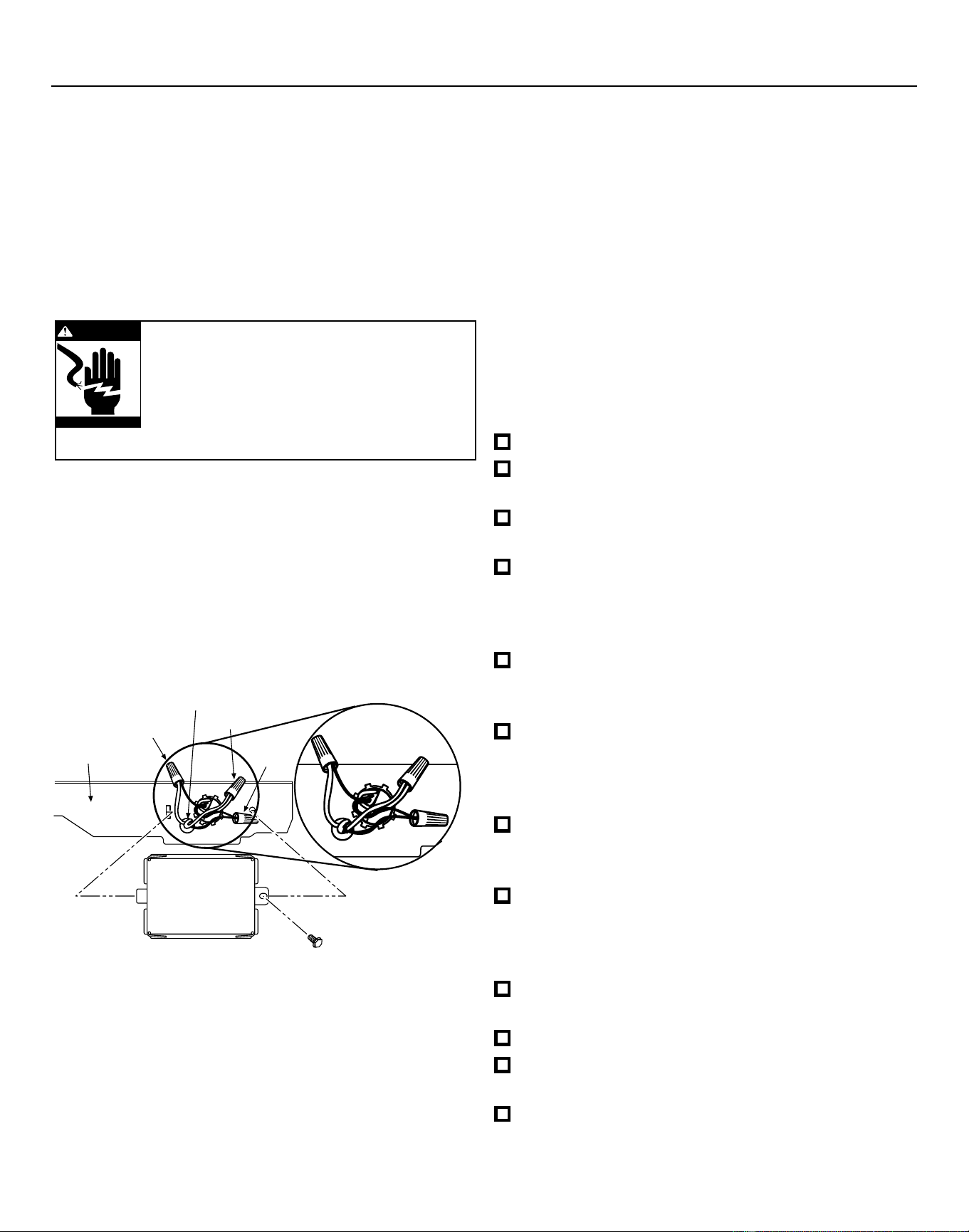
• Install strain relief in the junction box bracket.
• Insert the power cord through the strain relief and
tighten.
• Make sure black, white, and green dishwasher
wires are threaded through the small hole in the
junction box bracket.
• Connect power cord white (or ribbed) to
dishwasher white, black (or smooth) to dishwasher
black and ground to dishwasher green wire. Use
UL listed wire nuts of appropriate size.
• Install junction box cover using the #10 hex head
screw. Be sure wires are not pinched under the
cover.
STEP 5: INSTALL POWER CORD
Skip this step if the dishwasher will be
permanently connected to the house electrical
system or has a factory installed power cord.
In this step you will need the junction box cover and
the #10 x 1/2" hex head screw from the screw kit set
aside in Step 1.
The power cord and connections must comply
with the National Electrical Code, Section 422 and/
or local codes and ordinances. Maximum power
cord length is 6 feet. Power Cord Kit WX09X70910,
available for purchase from an authorized GE
Appliance Dealer, meets these requirements.
Dishwasher Installation
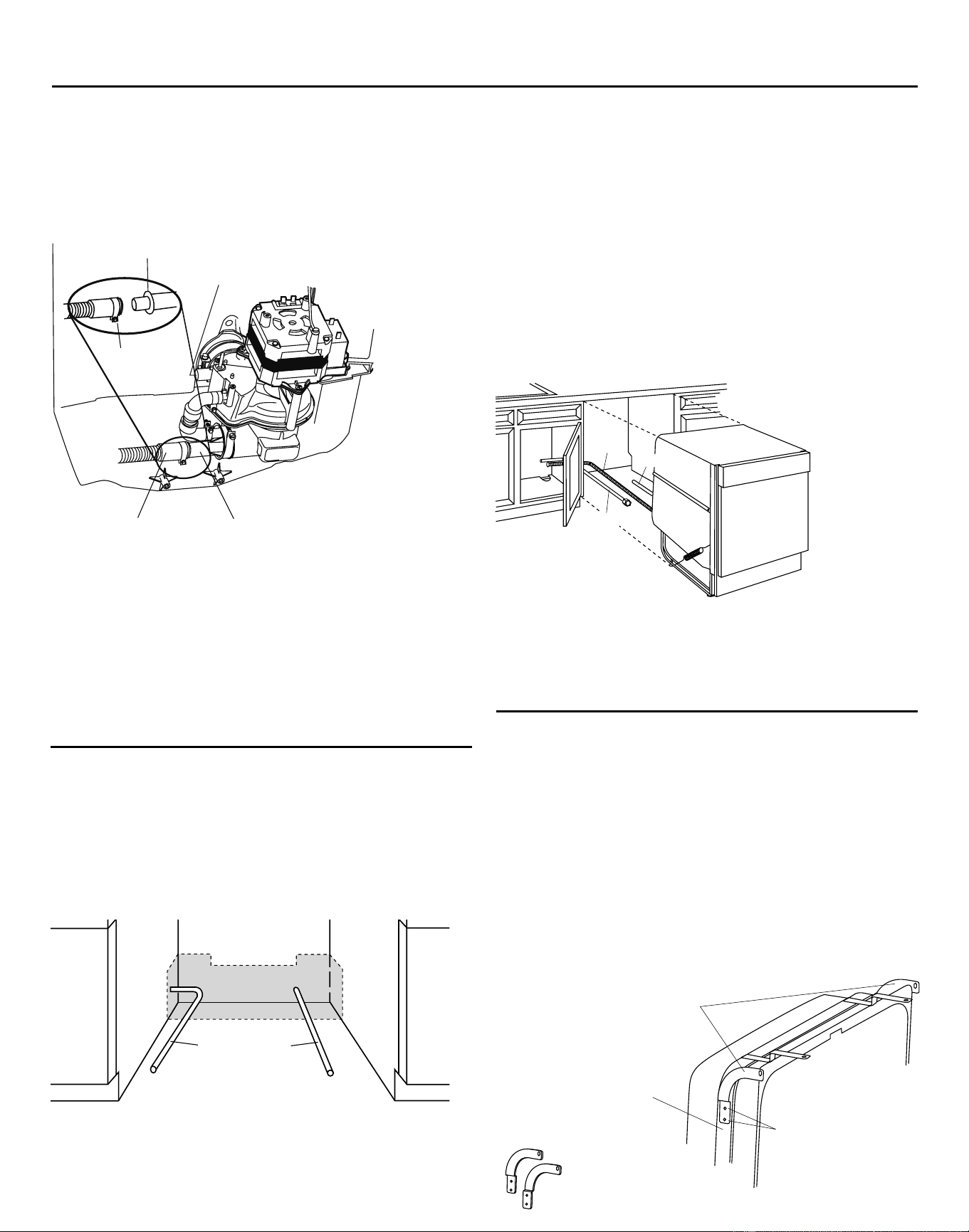
STEP 7:
INSTALL DRAIN HOSE TO
DISHWASHER DRAIN PORT
Skip this step if drain hose has been pre-installed.
In this step you will need the drain hose and clamp
set aside in Step 1.
IMPORTANT – Prevent drain hose damage
and possible leaks. Be careful not to nick or cut
the drain hose.
• Route the small end of the drain hose from the left
side of the dishwasher through the strain relief
attached to the dishwasher frame and toward
the center of the dishwasher as shown in Figures
L and M.
• Place the hose clamp over the small end of the
drain hose.
• Push the small end of the drain hose over the drain
port on the collection chamber making sure it is
fully seated against the hose stop.
• Tighten the hose clamp to at least 15 inch-pounds
of torque.
Note: The drain hose supplied with the dishwasher
Figure K
STEP 6: INSTALL 90° ELBOW
• Wrap a 90° elbow with thread seal tape.
• Thead the 90° elbow into the water valve.
• Do not over tighten the elbow; water valve bracket
could bend or the valve fitting could break.
• Position the end of the elbow to face the rear of
the dishwasher.
8
Figure J
White
Ground
Black
No
te: Check That Harness Leads Are
Th
readed Thru Small Hole in Bracket
06F1847J
Junction
Box Bracket
923-09Z
Strain
Relief
Drain Hose
Figure L
90° Elbow
Fill Hose
Water Valve
Bracke
t
Thread Seal
Tape
06H-1949 Elbow Install
Downloaded from www.ManualsFile.com manuals search engine
Bracket
Attachment
Screws
(2 Each
Side)
Side-
Mounting
Brackets
Tub Frame
06F-1847H
Skip this step if the underside of countertop is
wood or wood like material.
• Purchase and install the GPF65 side mount bracket
kit if the underside of counter is granite or a
similar material that will not accept wood screws.
The GPF65 kit is available from authorized GE
appliance dealers.
• Refer to Figure P and follow the instructions
included in
the kit.
9
is approximately 78" long. If a longer hose is needed,
a 10 foot long hose may be purchased from an
authorized GE appliance dealer. The 10 foot long
hose is part number GPF10S.
STEP 8: POSITION WATER LINE AND
POWER SUPPLY
• Position the water supply line and house wiring on
the floor of the opening to avoid interference with
the base of dishwasher and components under
the dishwasher.
Figure N
STEP 9: INSERT DRAIN HOSE AND POWER
CORD, IF USED, THROUGH CABINET
• Upright the dishwasher and position it in front of
the cabinet opening.
• Insert the drain hose into the hole previously drilled
in the cabinet wall.
• If a power cord is used, guide the end of the cord
through a separate hole cut for the power cord.
The power cord should be routed directly to the rear
of the junction box avoiding contact with the door
spring and other dishwasher components.
307Dia32
Water
Line
Power
Supply
307Dia33
Water
Power
Drain
Figure O
STEP 10: INSTALL OPTIONAL GPF65 SIDE
MOUNT BRACKETS
Figure P
Dishwasher Installation
Tip: Avoid unnecessary service charges for no fill,
drain, or noise concerns
Position utility lines so they do not interfere with
anything under or behind the dishwasher.
���������
Optional
Side-Mount
Bracket Kit
Drain Hose
Do not use
this port if
present
Collection Chamber
Drain Port
06H_1949_Drain Hose
Hose Clamp
Hose Stop
Tip: Avoid unnecessary service charges for drain
issues
Make sure the drain hose connection is leak free
and the hose is routed through the strain relief so
it will not kink when the dishwasher is installed into
the cabinet.
Figure M
Downloaded from www.ManualsFile.com manuals search engine
10
Dishwasher Installation
923-10V
Turn Legs
to Adjust
Figure S
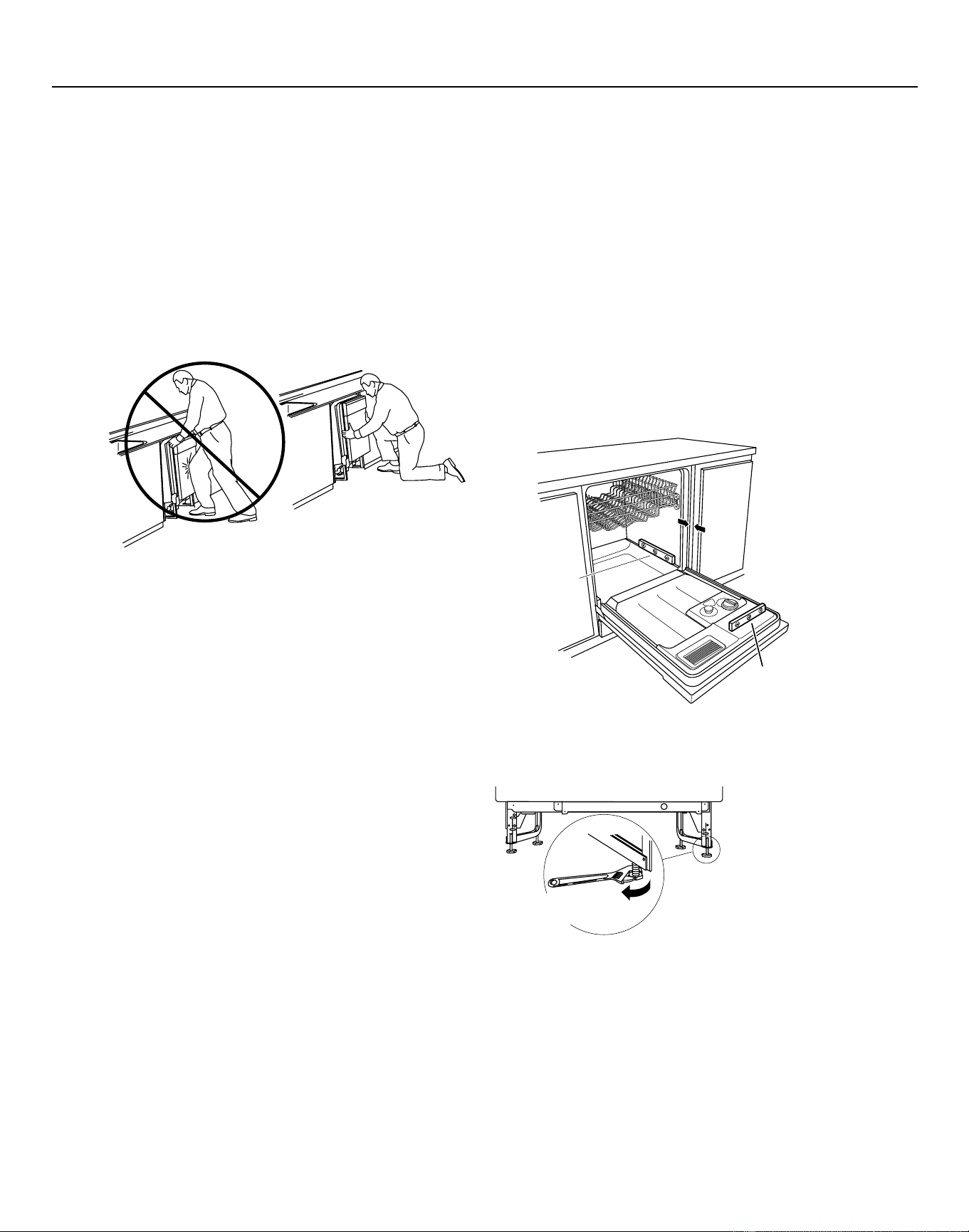
STEP 11: SLIDE DISHWASHER INTO CABINET
IMPORTANT – Do not push against the front
panel with knees. Damage will occur.
• Grasp the sides of the front panel and slide the
dishwasher into the opening a few inches at
a time. Pull the drain hose and power cord, if
equipped, through the holes in the adjacent
cabinet while sliding the dishwasher into position.
• Check the tub insulation blanket, if equipped, to
be sure it is smoothly wrapped around the tub.
It should not be “bunched up” and it must not
interfere with the door springs. If the insulation
is “bunched up” or interfering with the springs,
straighten and re-center the blanket prior to sliding
the dishwasher into its final position.
• Make sure the drain hose is not kinked under or
behind the dishwasher.
• Make certain the house wiring, drain line, and
water line do not interfere with components under
the dishwasher.
• The dishwasher tub flange should be
approximately 3/4" behind the face of the adjacent
cabinet. Refer to Figure R.
Tip: Avoid unnecessary service charges for panel
damage.
Do not press on the center of panel with hands or
knees when sliding dishwasher into position.
Figure Q
Do not push against
front door panel with
knee. Damage to the
door panel will occur.
05A-1183T
STEP 12: POSITION AND LEVEL
DISHWASHER
IMPORTANT – Dishwasher must be level for
proper dish rack operation, wash performance,
and door operation. The dishwasher must be
leveled left to right and front to back. This assures
that the dish racks will not roll in or out on their
own, circulation water will flow to the pump inlet,
and the door will close without hitting the side of
the tub.
• Remove the lower dish rack and place a level on
the door and lower rack track as shown in Figure R.
3/4"
Check Le
vel
Front-to-Back
Check Le
vel
Side-to-Side
06F-1847Da
Figure R
• Adjust the level of the dishwasher by individually
turning the four legs on the bottom of the
dishwasher as illustrated in Figure S.
• The dishwasher is properly leveled when the level
indicator is centered left to right and front to back.
The dishwasher door should close without hitting
the sides of the tub.
• Replace the lower rack.
Tip: Avoid unnecessary service charges for poor
wash performance and rack operation.
Pull the dish racks half way out. They should remain
stationary. Open and close the door. The door should
fit in the tub opening without hitting the side of the
tub. If the racks roll on their own, or the door hits the
side of the tub, re-level the dishwasher.
Downloaded from www.ManualsFile.com manuals search engine
3/4"
Countertop
Bracket
06F-1847D
Side Mount
Brackets (optional)
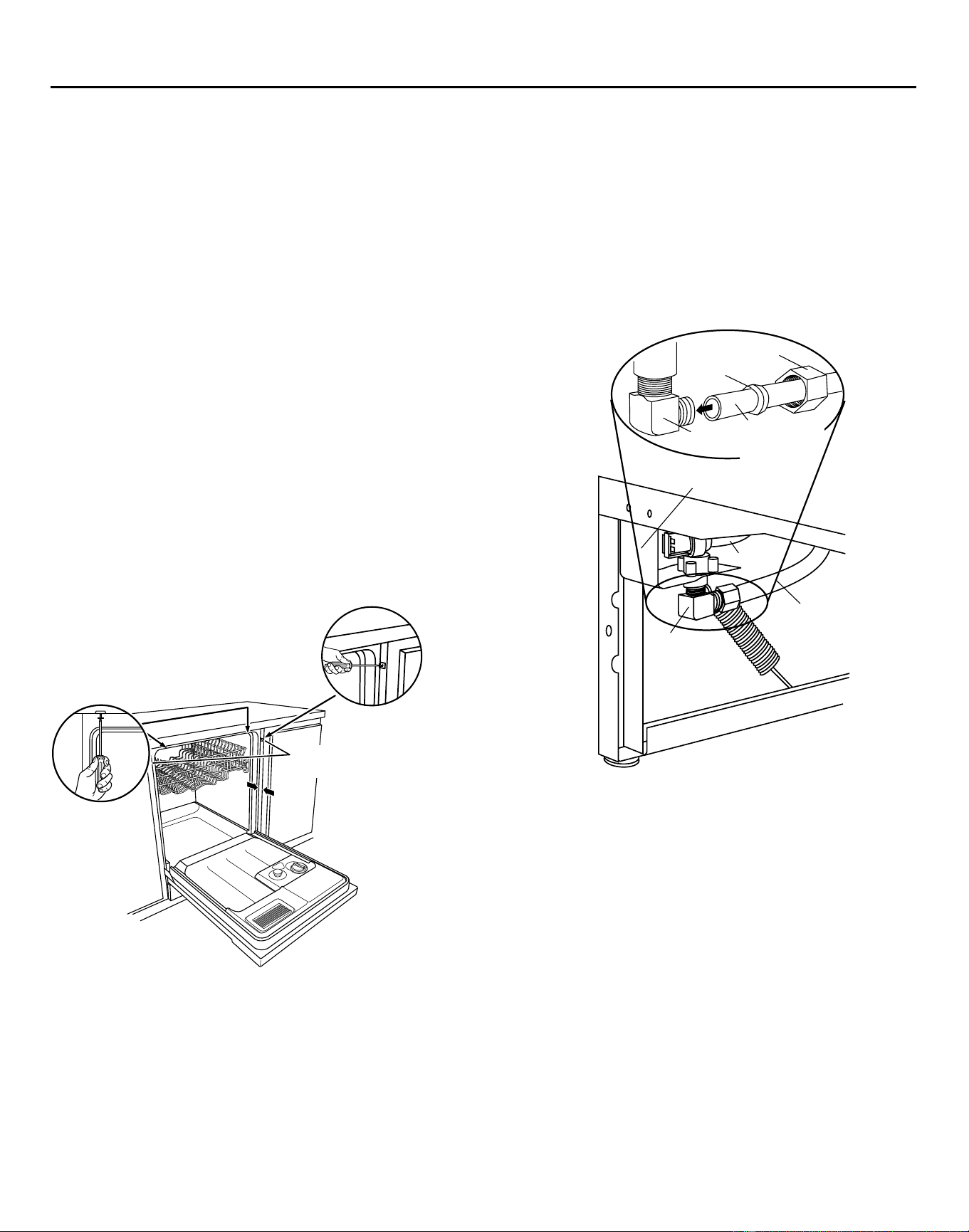
STEP 13: FASTEN DISHWASHER TO
UNDERSIDE OF COUNTERTOP OR SIDES
OF CABINET
In this step you will need the two 5/8" Phillips head
wood screws set aside in Step 1.
IMPORTANT – Dishwasher must be centered
in cabinet opening. Interference with cabinets or
countertop will cause leaks and damage to the
door panel and/or control panel.
• If countertop is wood or woodlike material, fasten
the dishwasher to the countertop by driving the
Phillips head screws through the countertop
brackets and into the countertop.
• If the countertop is granite or similar material,
drive Phillips screws through side mount brackets
and into the adjacent cabinets.
• Make sure screws are driven straight and flush
to prevent interference with door operation and
damage to the control panel. See Figure T.
Figure T
11
Dishwasher Installation
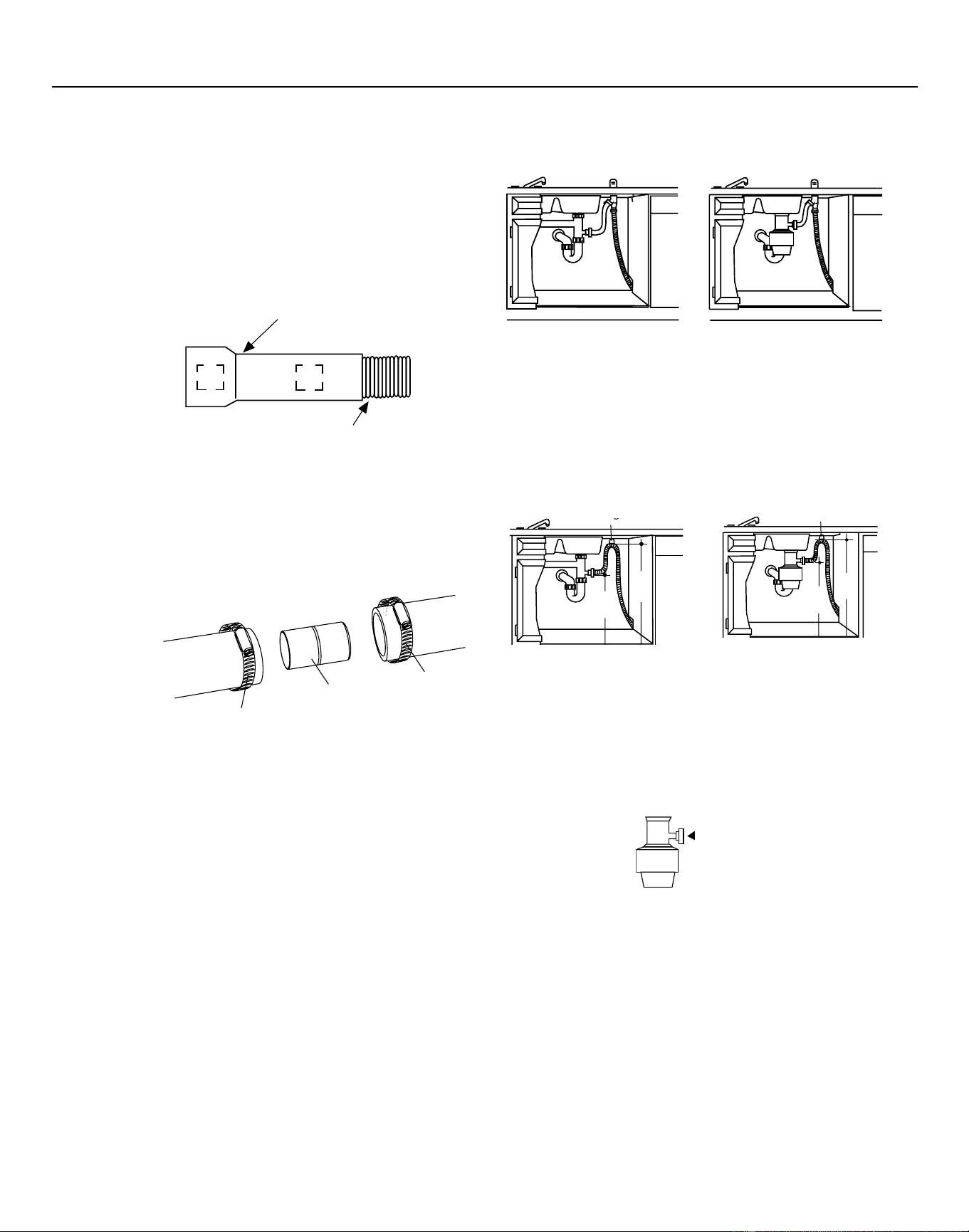
STEP 14: CONNECT WATER SUPPLY
Connect the water supply line to the 90° elbow
installed in Step 6.
• Slide the compression nut and then the ferrule over
end of the water line.
• Insert the water line into the 90° elbow.
• Slide the ferrule against the elbow and secure
with the compression nut.
Figure U
IMPORTANT – Check to be sure the door
spring does not rub or contact the fill hose or
water supply line. Test by opening and closing the
door. Re-route the water supply lines or slightly
bend the water valve bracket if a rubbing noise or
interference occurs.
Tip: Avoid unnecessary service charges for noise
or leaks
Make sure the door spring does not rub against the
fill hose or water supply line.
Tip: Avoid unnecessary service charges for leaks
or control panel damage.
Make sure the dishwasher is centered in the cabinet
and the door opens and closes freely without hitting
the adjacent cabinets. Drive mounting screws
straight and flush.
488Dia2
90° Elbow
Hot Water
Supply Line
Fill Hose
Water Valve Bracket
Ferrule
Hot Water
Supply Line
Compression Nut
90°
Elbow
Downloaded from www.ManualsFile.com manuals search engine
����������
�������
����������
����������
Dishwasher Installation
12
Waste Tee Installation
Method 1 – Air gap with waste tee or disposer
Disposer Installation
Waste Tee Installation
Method 2 – “High drain loop” with waste tee or
disposer
Fasten the drain hose to the underside of the
countertop with a hanger.
Disposer Installation
Figure X
Figure Y
IMPORTANT – When connecting the drain
line to a disposer, check to be sure that the drain
plug has been removed. Dishwasher will not drain
if plug is left in place.
756Dia60
756Dia61
STEP 15: CONNECT DRAIN LINE
The molded end of the drain hose will fit 5/8"
through 1" diameter inlet ports on the air gap, waste
tee or disposer.
• Determine the size of the inlet port
• Cut the drain hose connector on the marked line, if
required, to fit the inlet port.
• If a longer drain hose is required, and you did not
purchase the GPF10S drain hose, add up to 42"
length, for a total of 120" (10 feet) to the factory
installed hose. Use 5/8" or 7/8" inside diameter
hose and a coupler to connect
the two hose ends.
Secure the
connection
with hose
clamps.
Figure V
IMPORTANT – Total drain hose length must
not exceed 10 feet for proper drain operation.
• Connect drain line to air gap, waste tee, or disposer
using the previously determined method. Secure
the hose with a screw type clamp.
Tip: Avoid unnecessary service call charges
for a no drain complaint
Make sure any excess drain hose has been pulled
through the cabinet opening. This will prevent
excess hose in the dishwasher cavity from
becoming kinked or crushed by the dishwasher.
Make sure the disposer plug has been removed if
the drain hose is connected to a disposer.
1871 Art4
Cutting Line
1"
5/8"
IMPORTANT: Do not cut corrugated
portion of hose
Fasten to Underside of Countertop
with Hanger
32"
Min.
18"
Min.
05D-1294B
Remove
Drain
Plug
1871 Art1
Figure W
Fasten to Underside of Countertop
with Hanger
18"
Min.
32"
Min.
05D-1294C
Downloaded from www.ManualsFile.com manuals search engine
Dishwasher Installation
#282 French
If house wiring is not 2-wire with a ground
wire, a ground must be provided by the
installer.
When house wiring is aluminum, be
sure to use U.L. listed anti-oxidant compound
and aluminum-to-copper connectors.
STEP 17: INSTALL JUNCTION BOX COVER
If junction box cover is already installed, skip to
Step 18.
In this step you will need the junction box cover and
the #10 hex head screw from the screw kit set aside
in Step 1.
• Install the junction box cover using the #10 hex
head screw. Check to be sure that wires are not
pinched under the cover.
STEP 18: PRE-TEST CHECK LIST
■ Verify that power is turned off at the source.
■ Open the dishwasher door and remove all foam
and cardboard packaging.
■ Read the Owner’s Manual to familiarize yourself
with the operation of the dishwasher.
■ Check to be sure that the wiring is secure
under the dishwasher, and not pinched or in
contact with door springs or other dishwasher
components.
■ Check that the door spring does not contact the
water line, fill hose, or adjacent cabinets. See
Steps 13 and 14
■ Pull lower rack about halfway out. Check to be
sure it does not roll back into dishwasher or
further out. If it does, re-level the dishwasher.
See Step 12
■ Check to be sure control panel does not touch
adjacent cabinets. If it does, reposition the
dishwasher. See Step 13
■ Turn on the hot water faucet at the sink to verify
that the water temperature is at least 120°F
and not more than 150°F. Adjust water heater
if necessary.
■ Add two quarts of water to the bottom of the
dishwasher to lubricate the pump seal.
■ Turn on water supply.
■ Check for water leaks. Tighten connections if
necessary. See Step 14
■ Remove the protective film if present from the
control panel, access panel and door panel.
WARNING
13
STEP 16: CONNECT POWER SUPPLY
If a power cord with plug is already installed,
proceed to Step 17.
If the dishwasher came with a factory-installed
power cord and you want to convert it to a
permanent connection, refer to the instructions on
page 16.
White
Ground
Black
Note: Check that harness leads are
threaded through small hole in bracke
t
06F-1847E
Junction
Box Bracket
• Secure house wiring to the back of the junction
box bracket with a strain relief.
• Locate the three dishwasher wires, (white, black
and green) with stripped ends. Insert dishwasher
wires through the small hole in the junction box
bracket. Use UL listed wire nuts of appropriate size
to connect incoming ground to green, white to
white and black to black.
Downloaded from www.ManualsFile.com manuals search engine
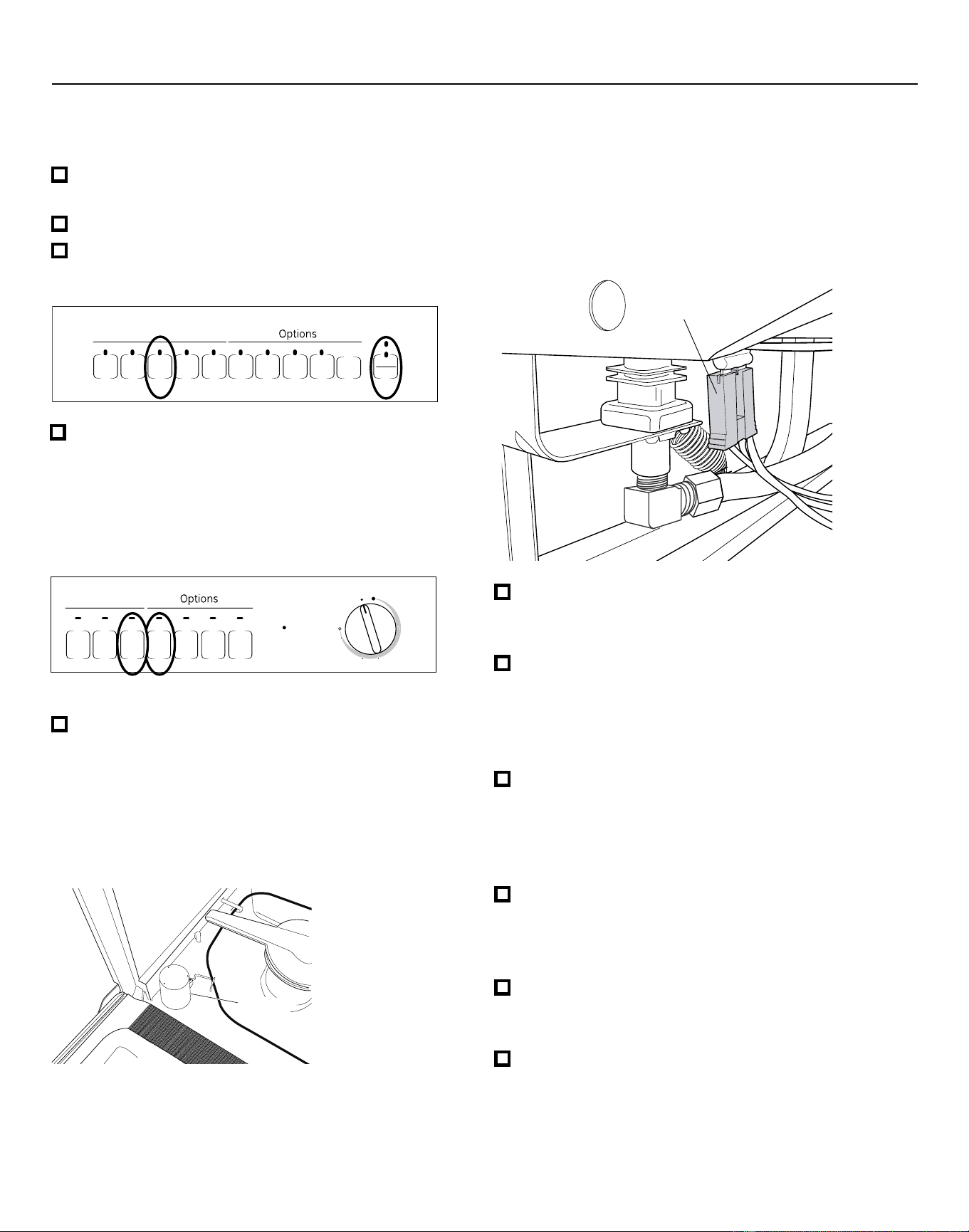
Dishwasher Installation
– Check the electrical connection to the water
valve. The red electrical connector should be
plugged into the dishwasher water valve. If it is
not plugged in, turn off electrical power to the
dishwasher. Plug the red connector into the dish-
washer water valve and then restore power.
■ Check for leaks under the dishwasher. If a leak is
found, turn off power, tighten connections and
restore power.
■ Check for leaks around the door. A leak around
the door could be caused by the dishwasher door
rubbing or hitting adjacent cabinets. Reposition
the dishwasher if necessary. See Steps 11, 12
and 13.
■ Most dishwasher models will drain about 3 min-
utes after the first fill. Check the drain line for
leaks when dishwasher drains. If leaks are found,
turn off power, correct as necessary and then
restore power.
■ Open the dishwasher door and make sure most
of the water has drained. If the water does not
drain, check to be sure disposer plug has been
removed and/or air gap is free of debris.
■ Let the dishwasher run through another fill and
drain cycle. Check again to be sure there are no
leaks.
■ At the end of the second drain, push the reset pad
on electronic models. For dial models, unlatch the
door and rotate the dial to the “OFF” position.
14
STEP 19: DISHWASHER WET TEST
CHECK LIST
■ Turn on power supply or if power cord is used,
plug it into the wall outlet.
■ Latch dishwasher door.
■ For electronic dishwashers, select the normal
cycle and press the start pad one time.
■ Check to be sure that water enters the dish-
washer. This could take up to 4 minutes.
If water does not enter the dishwasher
– Check to be sure that the water is turned on
– Lightly tap the flood float cover to
dislodge a stuck flood float.
Flood Float
Cover
■ For dial models, press the normal and hot start
pads, if model has them, and then turn control
dial just enough to start dishwasher. Be careful
not to turn the dial past the first water fill. Dial
should point to “Hot Start Option” or “Hot Pre-
wash Option” depending on model.
Hi- T emp
W ash
Heavy
W ash
P ots
&
P ans
Cycles
Normal
W ash
Hot
S ta r
t
Hea
t ed
D r y
Hot Star
t
Option
S ta r t Delay
(HRS)
Cycle
on
Off
1
3
2
4
6
5
Pla t e W armer
(Heated D r y On)
Rinse Only
(Heated D r y Of f )
S ta r t
Light W ash
R eset
HEAVY
WASH
POTS
&
PANS
Cycles
NORMAL
WASH
CHINA
CRYSTAL
RINSE
ONLY
START
RESET
CLEAN
CLEAN
HI TEMP
RINSE
HI TEMP
WASH
HEATED
DRY
DELAY
HOURS
LOCK
(2 TIMES)
2 4 8
Appearance varies by model. Not all models have pushbuttons.
Red Connector
Downloaded from www.ManualsFile.com manuals search engine
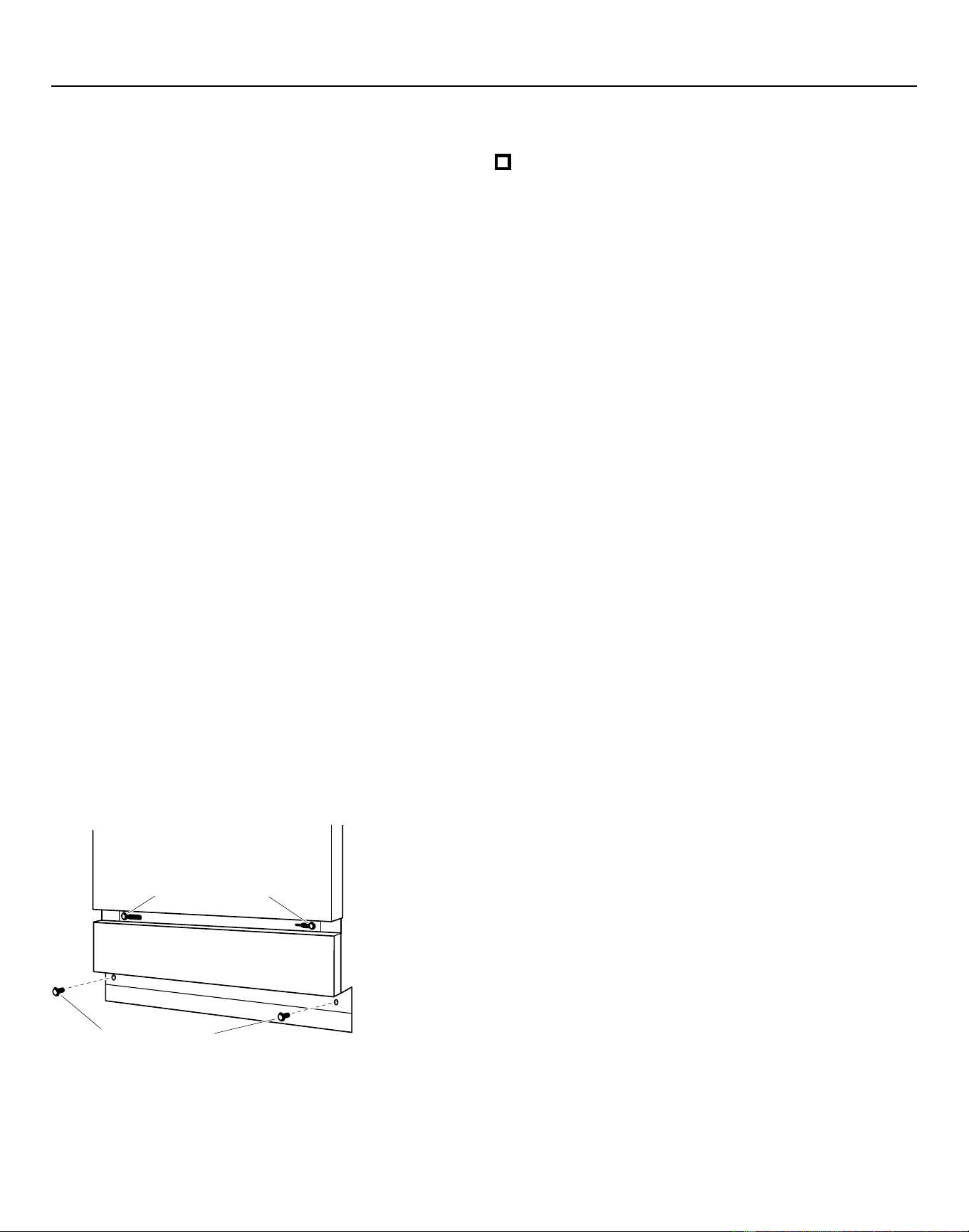
Figure AA
Dishwasher Installation
STEP 20: REPLACE ACCESS PANEL AND
TOEKICK
In this step you will need the panels and the two
screws set aside in Step 4.
There are two types of screws used. The 8-32 x 1/4"
screws are used at the top of the access panel and
should still be in place. The 10-16 x 3/8" screws are
used at the bottom of the access panel and secure
both the access panel and toekick.
IMPORTANT – Screws are not
interchangeable. To prevent damage to your
dishwasher, use the proper screw in the proper
location. Do not mix screw types or lengths.
• Place the toekick against the legs of the
dishwasher.
• Remove the two 8-32 x 1/4" machine thread
screws.
• Align the access panel to the dishwasher.
• Select the two 8-32 x 1/4" machine thread screws
just removed and insert them through the top
holes in the access panel and into the dishwasher
frame.
• Tighten these screws.
• Align the toekick and make sure the bottom edge
is against the floor.
• Insert and tighten the two 10-16 x 3/8" sheet metal
thread screws, making sure the bottom edge of
the toekick stays in contact with the floor.
STEP 21: LITERATURE
■ Leave the Owners’ Manual, Installation
Instructions, samples, and/or coupons with
consumer.
15
Tip: Prevent tub damage and reduce sound from
under the dishwasher
Use the machine thread screws in the top holes and
the sheet metal thread screws in the bottom holes.
Make sure the toekick is against the floor.
Access Pane
l
Toekick
Remove, then Reinstall and Tighten
8-32 x 1/4”
Machine Thread Screws
Install and Tighten
10-16 x 3/8”
Sheet Metal Thread Screws
Downloaded from www.ManualsFile.com manuals search engine
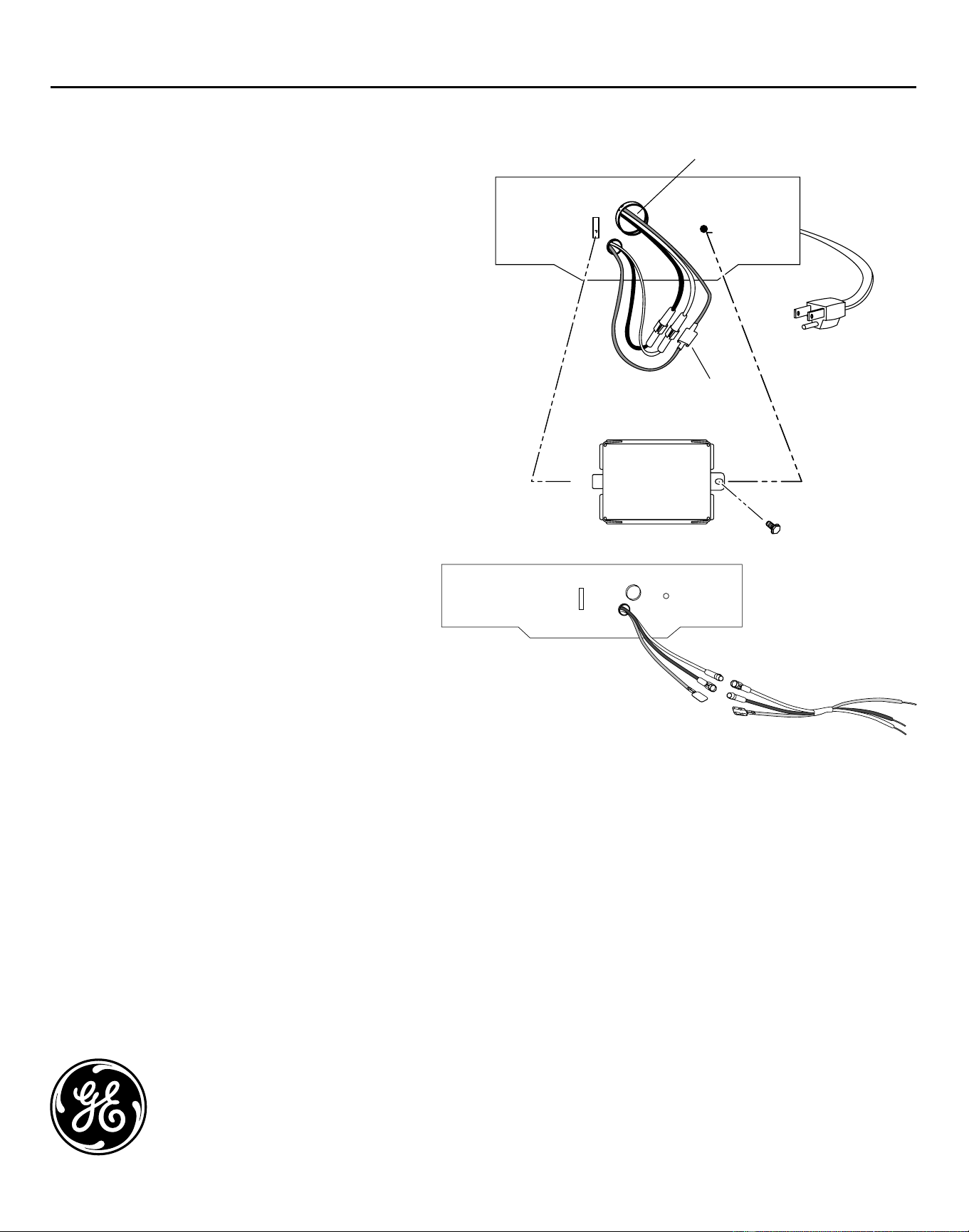
GE Consumer & Industrial
General Electric Company
Louisville, Kentucky 40225
ge.com
Pub. No. 31-30218
Dwg. No. 206C1559P158
ND 06H-1949 (10/06)
SPECIFICATIONS SUBJECT TO CHANGE WITHOUT NOTICE
�������������������
Appendix
CONVERTING DISHWASHER WITH FACTORY
EQUIPPED POWER CORD TO A PERMANENT
CONNECTION
This procedure requires the conversion leads set
aside in Step 1.
• Make sure the power cord for the dishwasher is
unplugged from the wall outlet.
• Remove screw from junction box cover and
remove cover if present.
• Disconnect the three power cord conductors from
the dishwasher harness. Figure BB
• Remove and discard the power cord.
• Connect the conversion harness (included with
dishwasher) to the dishwasher harness by
connecting like-colored wires. Figure CC
• Return to Step 16 in these instructions to complete
the conversion.
Figure CC
Disconnect
Powercor
d
Remove
Strain Relief
Figure BB
06H-1949_Conversion Harness
Conversion Harness
16
Downloaded from www.ManualsFile.com manuals search engine