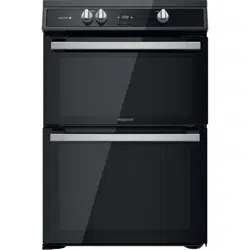
HDT67I9HM2C/UKHDT67I9HM2C/UK

EN
ENGLISH
Health and Safety guide
Installation guide
Quick guide
2
!"
#$
#
%$
!" $
– $$
! " & "&
$
#' ("$
$
!")
$ – $
*+* ,
$
&$
– $
+-./01$
2-0/%
1$
#%
$
,$
3 #
#
!"
#$
#
%$
/$
/$
$
/$'
$
/ $ &
/$
*,
#' ("
,
"
$$
44
5$
-1
&
&,
-1
/ $
/$6'
$/$
-1
7&
$
$
8(
$-
1
/$
/$$
& $
/$
$(
&
&
/ $
,
3
!"
- 1
/
$
&,$
&
&
$
73/
$ $
3
!"*
$
!"*
4 7 /
$ $
&
&
/
9$
/ $
!"8
/$$
$:..;$
$
&
4
<
$*
&=.:=>:?>*'***7-***1
7
$
7
($'
$7 $
and with the Waste Electrical and Electronic Equipment regulations
2013 (as amended).
Regulation 66/2014; Energy Labelling Regulation 65/2014;
This appliance meets: Ecodesign requirements of European
Ecodesign for Energy-Related Products and Energy Information
(Amendment) (EU Exit) Regulations 2019, in compliance with the
European standard EN 60350-1.
This appliance meets Ecodesign requirements of European Regulation
Information (Amendment) (EU Exit) Regulations 2019 in compliance with the
European standard EN 60350-2.
66/2014 and The Ecodesign for Energy-Related Products and Energy
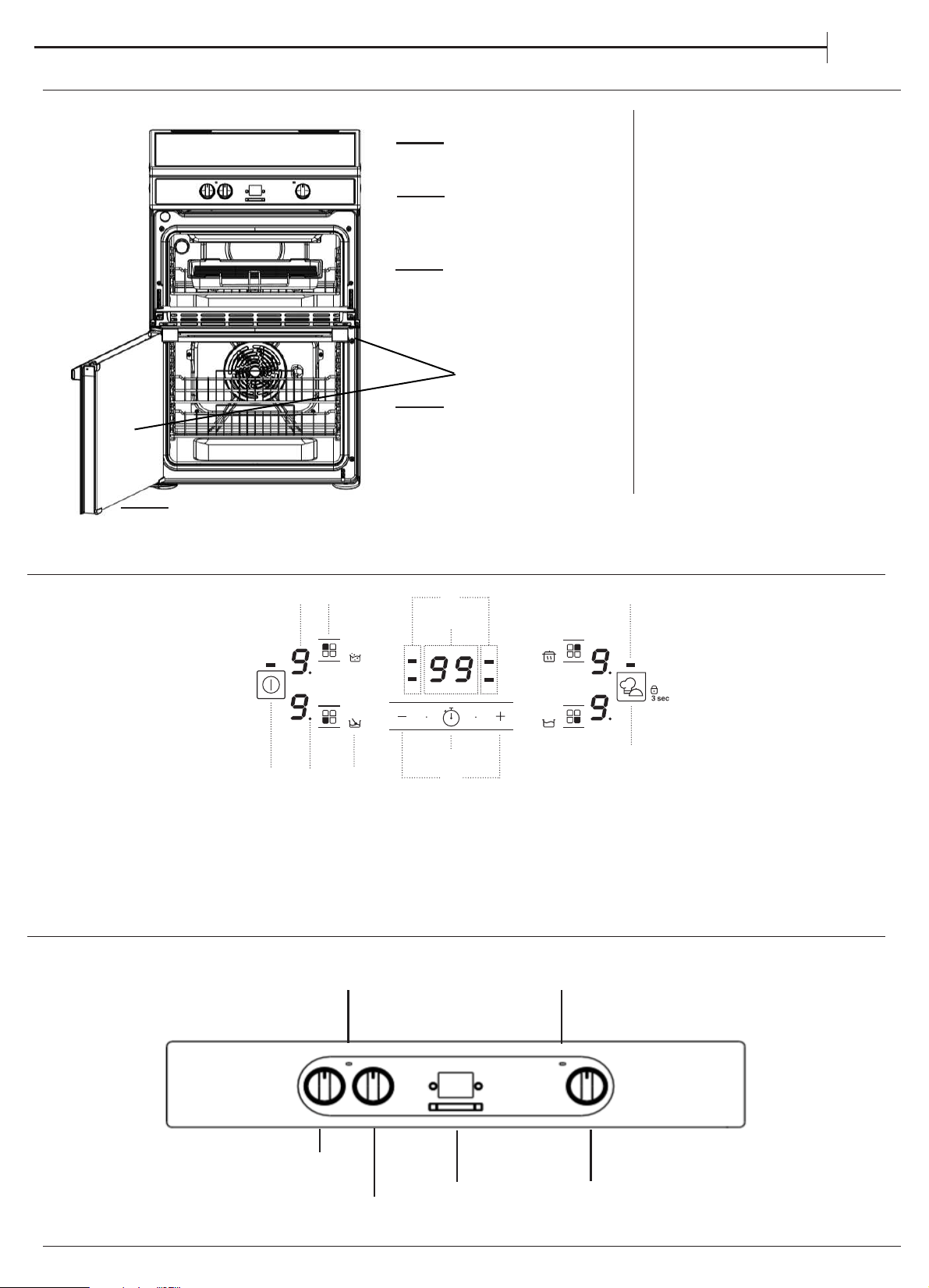
1.
2. Control panel
3. Runners for accessories
(the level is indicated on the wall
of the cooking compartment)
5.
Main oven door
Removable Inner Door Glass
5
1.
2.
3.
3.
EN
Induction hob
CONTROL PANEL HOB
5.
PRODUCT DESCRIPTION
CONTROL PANEL
4.
4.
1
2
3
7
6
140
59
8
11
1. On/O button
2. Cooking level selected
3. Zone selection indicator
4. Cooking zone selection button
5. Special function icon
6. Timer indicators active for the selected zone
7. Cooking time indicator
8. Activate timer button
9. Power and cooking time adjustment buttons
10. Indicator light – function active
11. My menu button/Key lock button – 3 seconds
MAIN
OVEN
MAIN OVEN
PILOT LIGHT
TOP OVEN/GRILL
PILOT LIGHT
TOP OVEN/
ELECTRONIC
TIMER
GRILL ELECTOR
S
TOP OVEN/
GRILL
THERMOSTAT

6
EN
INSTALLATION TIPS
Positioning
Important: this unit may be installed and used only in
permanently ventilated rooms according to the
British Standards Codes Of Practice: B.S. 6172/B.S. 5440, Par.
2 and B.S. 6891 Current Editions. The following
requirements must be observed:
a) The cooker should not be installed in a bed sitting
room with a volume of less than 20m
3
. If it is installed in a
room of volume less than 5m
3
an air vent of effective area
of 110cm
2
is required, if it is installed in a room of volume
between 5m
3
and 10m
3
a supplementary airvent area of
50cm2 is required, if the volume exceeds 11m
3
no airvent is
required. However, if the room has a door or a window which
opens directly to the outside no air vent is required even
when the volume is between 5m
3
and 11m
3
.
b) During prolonged use of the appliance you may
consider it necessary to open a window to the outside to
improve ventilation.
c) If there are other fuel burning appliances in the
same room, B.S.5440 Part 2 Current Edition, should, be
consulted to determine the requisite air vent requirements.
This appliance must be earthed.
Mains Connection
Your cooker should have been checked to ensure that
the voltage corresponds with your supply voltage,
this is stated on the rating plate, which is situated on
the outer rear panel.
The model number and serial number are located on the
front of the cooker, as shown on the Feature's page.
The cooker must be connected by a competent person
such as one who is a, NICEIC registered contractor to a
suitable double-pole control unit with a minimum rating
of 32A and a minimum contact clearance of 3mm
(applicable to newer properties, older properties where a
30A double pole control unit and a minimum contact
clearance of 3mm is acceptable).
The double pole control unit should be fitted
adjacent to the cooker, in accordance with IEE regulations.
The control unit must be within 2 meters of but not
directly above the appliance and should be easily
accessible in the event of an emergency. The power
supply cable should conform to B.S.6004 with a
conductor size of 6mm2, minimum.
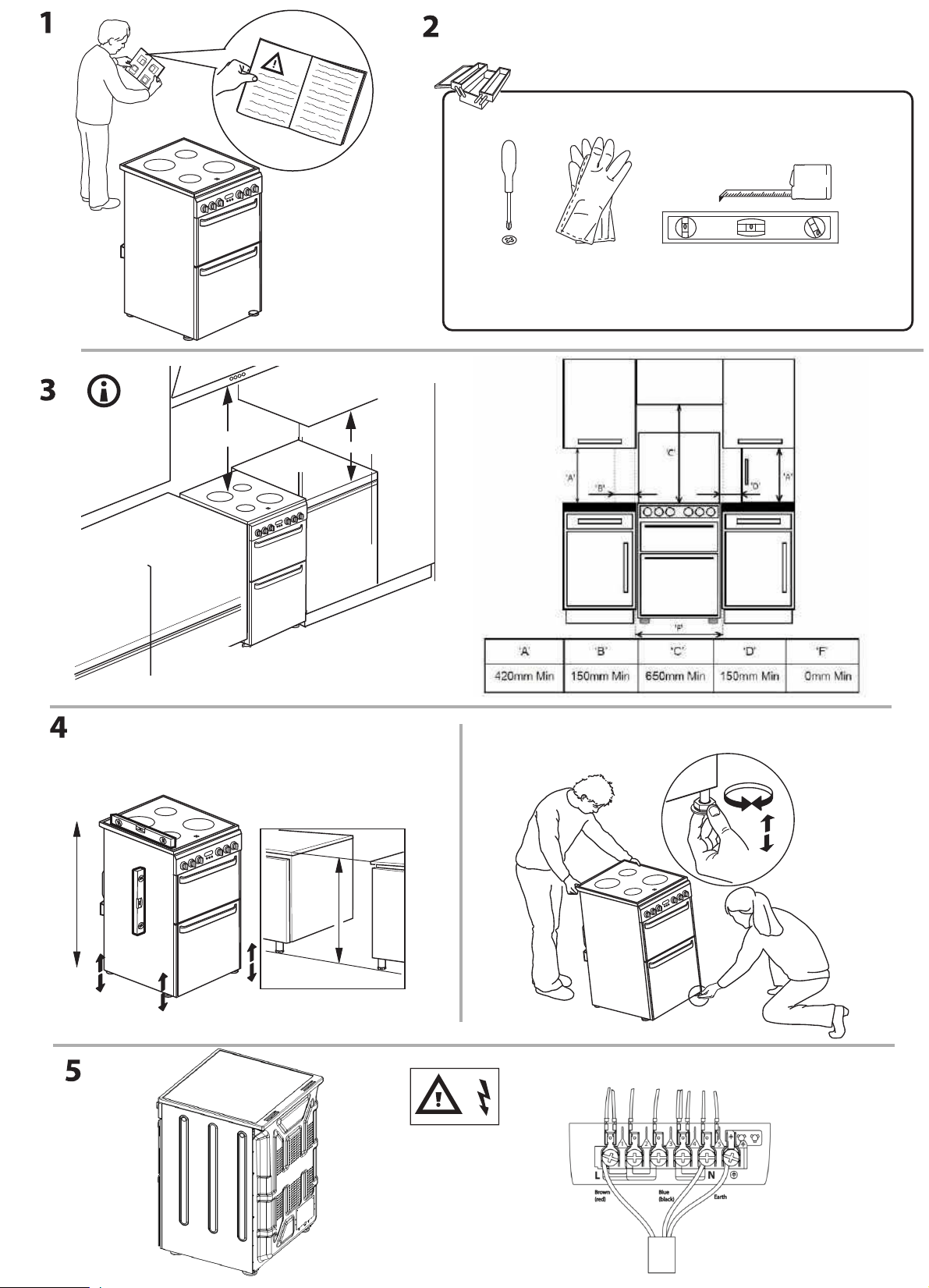
Access to the mains terminals is gained by removing the
rear access cover. The mains cable must pass through
the cable clamp adjacent to the terminal block.
Sufficient cable should be used to allow the cooker to
be pulled out for servicing.
Ensure that the mains cable is routed away from any
brackets affixed to the rear panel and is not trapped to
the rear wall when pushing the cooker into position
between cabinets.
This operation must be performed by a
qualified technician.
Before moving your cooker check that it is cool, and switch off
at the cooker control unit. Movement of your cooker is
most easily achieved by lifting the front as follows:
Open the grill door sufficiently to allow a comfortable grip on
the underside front edge of the oven roof, avoiding any grill
elements.
Take care in moving the cooker as it is heavy. Take care
to ensure that any floor covering is not damaged.
Splashplate optional, apply to Parts Department (see
Back Cover for contact number.)
The following instructions should be read by a qualified
technician to ensure that the appliance is installed,
regulated and technically serviced correctly in
compliance with current regulations.

EN
7
MAIN OVEN
To heat the oven turn the knob clockwise, selecting the
require temperature between 80°C (176°F) and 250°C
(482°F) as recommended in the temperature chart. The
pilot light will immediately come on and remain on
until the oven reaches the required temperature. This
light will then automatically go off and on during
cooking as the oven thermostat maintains the correct
temperature.
FIRST TIME USE
DAILY USE
Since a circulaire fan oven heats up more quickly,and
generally cooks food at a lower temperature than a
conventional oven, pre-heating is often
unnecessary.However, foods such as bread,
scones,Yorkshire pudding,do benefit from being
placed in a pre-heated oven.
The 'oven temperature charts' are a guide only,
giving approximate cooking temperatures and
times.To suit personal taste and requirements, it may
be necessary to increase or decrease temperatures
by 10°C.
Unless otherwise indicated in the charts food should be
placed in a cold oven, i.e. without pre-heating. If food is
placed in an already hot oven, the
suggested cooking time should be reduced,
depending on the type and quantity of food being
cooked.
Oven positions
Since the distribution of heat in the circulaire fan oven
is very even, most foods will cook satisfactorily on any
shelf position, but the shelves should be evenly
spaced.
The top oven rod shelf can be used in the main oven
when cooking large quantities of food.
Food or utensils should Never be placed directly an
the floor of the oven for cooking.
Never use more than 4 shelves in the oven as air
circulation will be seriously restricted.To ensure oven
circulation do not use meat pans larger than 390 x
300mm (15"x12") and baking trays no larger than 330
255mm (13"x 10"), these should be positioned centrally on
the oven shelf.
Food should not be placed directly on the floor of
the oven. To avoid unnecessary cleaning, rod shelves
which are not in use, should be removed from the
oven.
Temperature and time
When all four shelves are used to cook large
quantities of food for home freezing or parties, it
be necessary to increase the cooking times given in
the temperature charts by a few minutes, to allow f
loss of heat due to extra time taken to load the oven,
and the larger mass of food. Baking trays should ha
equal gap at either side of the oven.
TOP OVEN
The top oven should be used to cook small
quantities of food.The oven is designed so that the grill
element operates at a reduced heat output, this is
combined with a heating element situated underneath
the floor of the oven.
To ensure even cooking of the food it is important
that cooking utensils are positioned correctly on the
oven shelf so that the element is directly above.
There are two cooking positions, the shelf placed on
runner 1 or 2 (from the base), do not use shelves upside
down.
Food/utensils must not be placed directly on the oven
floor.
There should always be at least 25mm (1in) between the
top of the food and the grill element.
Warning: Items stored in top oven will get hot when
main oven is in use.
Operation
Do not use the grill pan as a meat pan in the top
oven as air circulation will be seriously
restricted.
Top oven as a warming compartment for plates Place
the plates/dishes on the shelf, positioned on runner 1,
turn top oven control to 100°C for 10-15 minutes.Never
use grill control.
Technical Characteristics
Voltage and Frequency:
230-240V 50 Hz
When the cooker is first used an odour may be emitted,
When first using the cooker ensure that the room is well
this will cease after a period of use.
ventilated (e.g. open a window or use an extractor fan)
and that persons who may be sensitive to the odour avoid
any fumes. It is suggested that any pets be removed from
the room until the smell has ceased. This odour is due to
temporary finish on oven liners and elements and also any
moisture absorbed by the insulation.
While the top oven is heating up, the pilot light
will come on and remain on until the oven
reaches the required temperature. The pilot light
will automatically go on and off during cooking
as the thermostat maintains the correct temperature.
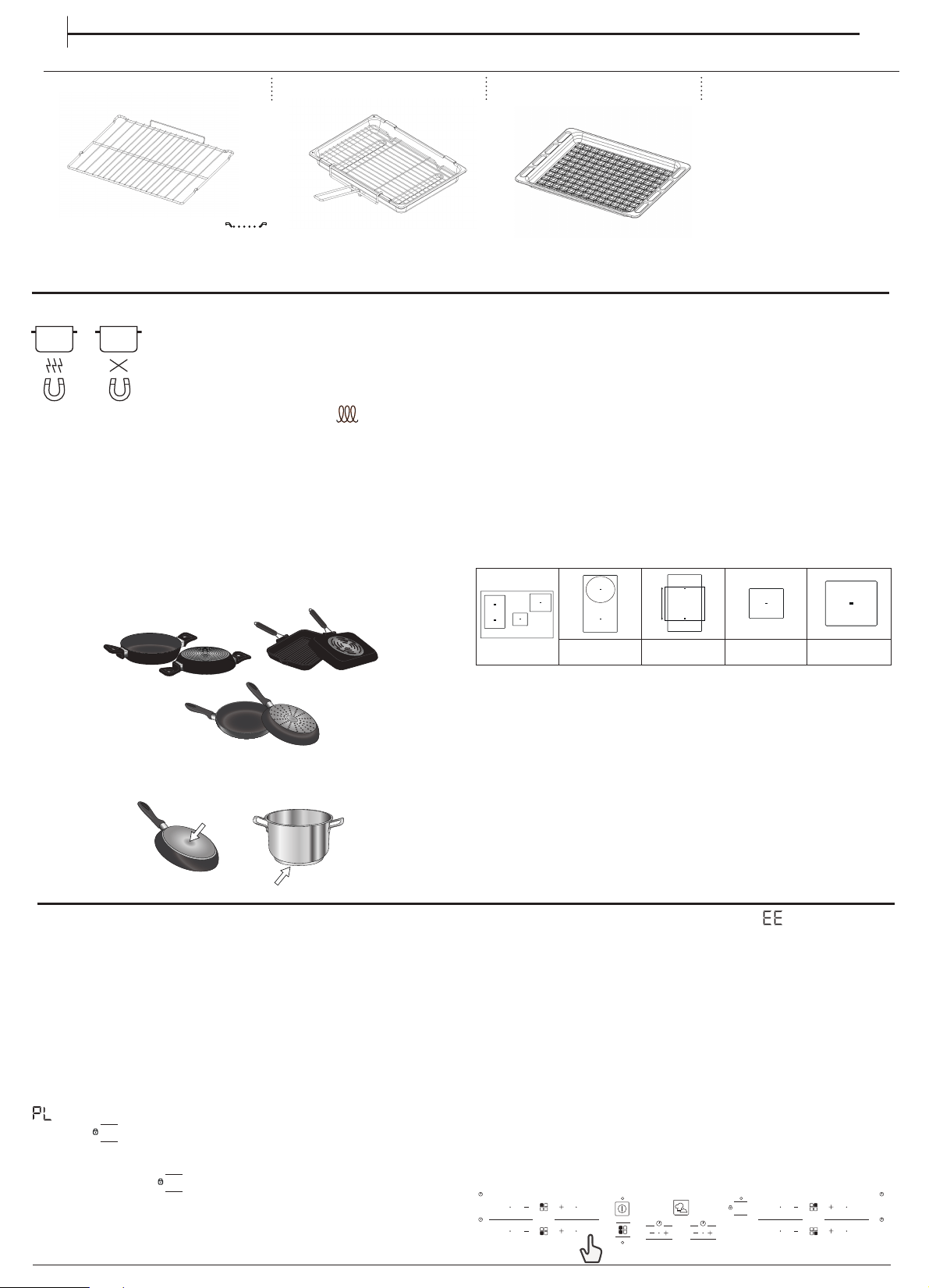
POTS AND PANS
Only use pots and pans made from ferromagnetic
material which are suitable for use with induction hobs:
tenamelled steel
tcast iron
tspecial pots and pans in stainless steel, suitable
for induction cooking
To determine whether a pot is suitable, check for the
symbol (usually
stamped on the bottom). A magnet may be used to check whether pots are
magnetic.
The quality and the structure of the pot base can alter cooking performance.
Some indications for the diameter of the base do not correspond to the
actual diameter of the ferromagnetic surface.
Some pots and pans have only a part of the bottom in ferromagnetic
material, with parts in another material that is not suitable for induction
cooking. These areas may heat up at different levels or with lower
temperatures. In certain cases, where the bottom is made mainly of
non-ferromagnetic materials, the hob might not recognise the pan and
therefore not switch on the cooking zone.
To ensure optimum efficiency, always use pots and pans with a flat bottom
that distributes the heat evenly. If the bottom is uneven, this will affect
power and heat conduction.
NOOK
Empty pots or pots with a thin base
Do not use empty pots or pans when the hob is on. The hob is equipped with
an internal safety system that constantly monitors the temperature, activating
the ”automatic off” function where high temperatures are detected. When
used with empty pots or pots with thin bases, the temperature may rise very
quickly, and the ”automatic off” function may not be triggered immediately,
damaging the pan or the hob surface. If this occurs, do not touch anything,
and wait for all components to cool down.
If any error messages appear, call the service centre.
ADAPTER FOR POTS/PANS UNSUITABLE FOR INDUCTION
Using this accessory makes it possible to use pots and pans that are not
suitable for induction hobs. It is important to bear in mind that using it
affects efficiency and consequently the time needed to heat food. Its
use should be limited because the temperatures reached on its surface
depend significantly on the pot/pan used, its flatness and the type of
food being cooked. Using a pot or pan with a smaller diameter than the
adapter disc may cause heat to build up that is not transmitted to the
pot or pan and this could blacken both the hob and the disc. Adapt the
diameter of your pots/pans and the hob to the diameter of the adapter.
Minimum diameter of pot/pan base for the different cooking areas
To ensure that the hob functions properly, the pot must cover one or
more of the reference points indicated on the surface of the hob, and
must be of a suitable minimum diameter.
Always use the cooking zone that best corresponds to the diameter of
the bottom of the pan.
EN
The number and type of accessories may vary depending on which model
is purchased. Other accessories that are not supplied can be purchased
separately from the After-sales Service.
The number and type of accessories may vary depending on which model
is purchased. Other accessories that are not supplied can be purchased
separately from the After-sales Service.
ACCESSORIES
STANDARD TRAY
FIRST TIME USE
100 mm
120 mm
220
mm
150 mm
POWER MANAGEMENT
At the time of purchase, the hob is set to the maximum possible power.
Adjust the setting in relation to the limits of the electrical system in your
home as described in the following paragraph.
N.B: Depending on the power selected for the hob, some of the cooking
zone power levels and functions (e.g. boil or quick reheating) could be
automatically limited, in order to prevent the selected limit from being
exceeded.
To set the power of the hob:
Once you have connected the device to the mains power supply, you
can set the power level within 60 seconds.
Press the far right timer “+“ button for at least 5 seconds. The display shows
.
Press the
3 sec
OK
button until the last power level selected appears.
Use the “+“
and
“−“
buttons to select the desired power level. The power
levels available are: 2.5 kW – 4.0 kW – 6.0 kW – 7.2 kW.
Conrm by pressing
3 sec
OK
.
The power level selected will stay in the memory even if the power supply
is interrupted.
To change the power level, disconnect the appliance from the mains for at
least 60 seconds, then plug it back in and repeat the steps above.
If an error occurs during the setting sequence, the
symbol will appear,
and you will hear a beep. If this happens, repeat the operation.
If the error persists, contact the After-Sales Service.
ACOUSTIC SIGNAL ON / OFF
To switch the acoustic signal on/o:
•Connect the hob to the power supply;
•Wait for the switch-on sequence;
•Press the “P“ button of the rst keypad at the top left for 5 seconds.
Any alarms set will remain active.
DEMO MODE
To switch the demo mode on and o:
•Connect the hob to the power supply;
•Wait for the switch-on sequence;
•Within the rst minute, press the quick heating button “P“ of the
bottom left keypad for 5 seconds (as shown below).
•”DE” will show on the display.
OFF
OFF
OFF
OFF
OK
3 sec
P
P
P
P
8
ANTISTICKANTISTICKANTISTICK
GRID
KIT GRILL PAN
9
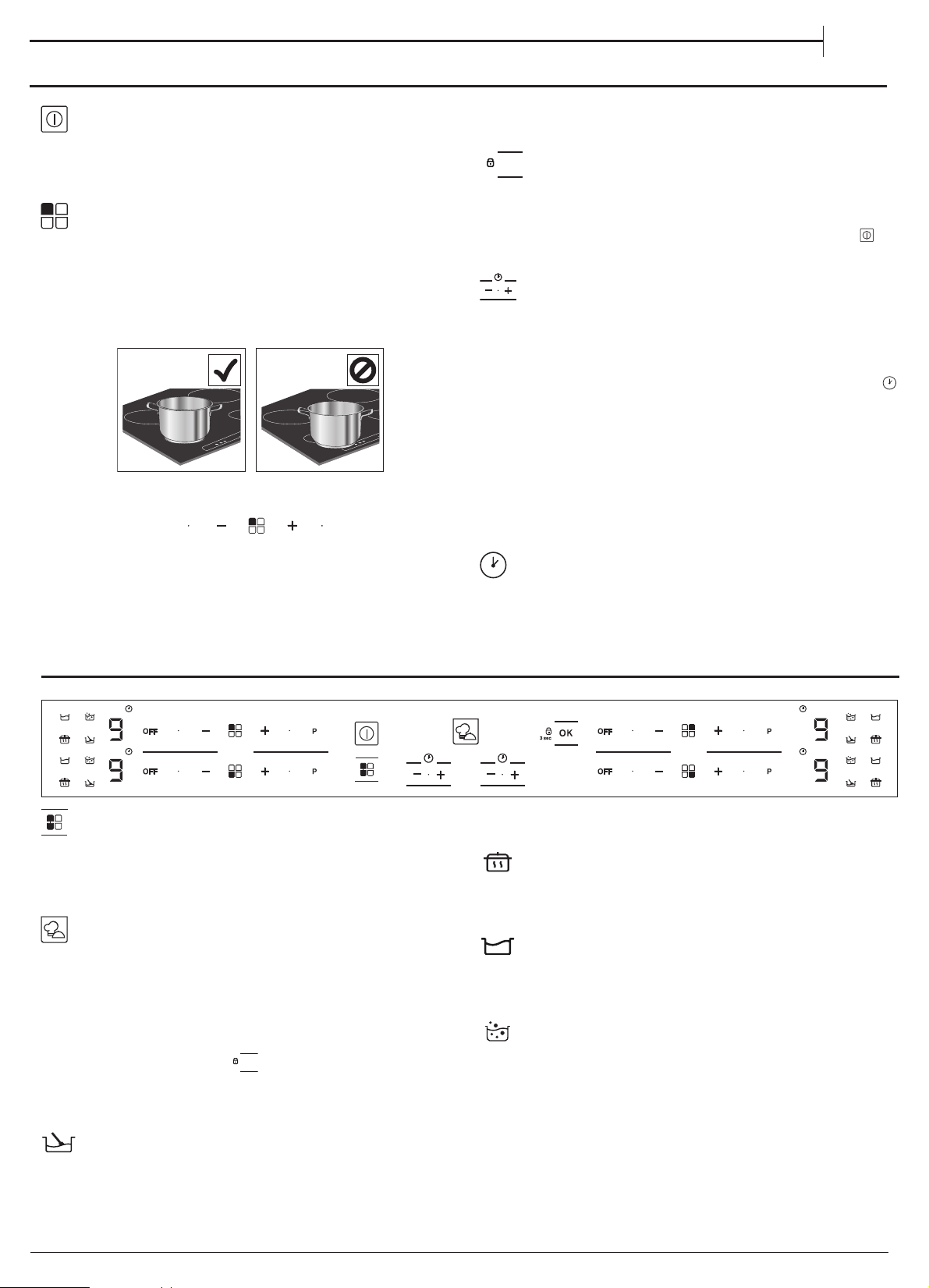
DA I LY US E
SWITCHING THE HOB ON/OFF
To turn the hob on, press the power button for around 1 second.
To turn the hob o, press the same button again, and all cooking zones
will be deactivated.
POSITIONING
Locate the desired cooking zone by referring to the position symbols.
Do not cover the control panel symbols with the cooking pot.
Please note: In the cooking zones close to the control panel, it is advisable to
keep pots and pans inside the markings (taking both the bottom of the pan
and the upper edge into consideration, as this tends to be larger).
This prevents excessive overheating of the keypad. When grilling or frying,
please use the rear cooking zones wherever possible.
ACTIVATING/DEACTIVATING COOKING ZONES AND ADJUSTING
POWER LEVELS
P
OFF
To activate the cooking zones:
Press the “+“ or “−“ button of the required cooking zone to activate it and
adjust the power. The level will be shown in line with the area, along with
the indicator light identifying the active cooking zone. The “P“ button
can be used to select the quick heating function.
To deactivate the cooking zones:
Press the “OFF“ button to the left of the power adjustment.
3 sec
OK
CONTROL PANEL LOCK
To lock the settings and prevent it being switched on accidentally, press
and hold the OK/Key lock button for 3 seconds. A beep and a warning
light above the symbol indicate that this function has been activated.
The control panel is locked except for the switching o function (
). To
unlock the controls, repeat the activation procedure.
TIMER
There are two timers - one controls the left-hand cooking zones, while
the other controls the right-hand cooking zones.
To activate the timer:
Press the “+“ or “−“ button to set the desired time on the cooking zone in
use. An indicator light will be activated in line with the specic symbol
.
Once the set time has elapsed, a beep will sound, and the cooking zone
will switch o automatically.
The time can be changed at any point, and several timers can be
activated simultaneously.
In case 2 timers on the same side of the hob are activated simultaneously,
“Zone selection indicator“ ashes and the relative cooking time selected
is displayed on the central display“.
To deactivate the timer:
Press the
“+“
and
“−“
buttons together until the timer is deactivated.
TIMER INDICATOR
This LED (when ON) indicates that the timer has been set for the cooking
zone.
FUNCTIONS
COMBI DUO
It allows to combine two cooking zones and use them as a single large
area. Ideal for sh kettles, pots or grilles that cover the entire cooking
surface. The function is de-activated if the bridge area is not entirely
covered. Either of the keypads on the left can be used.
MY MENU
The “Mymenu“ button activates the special functions.
Place the pot in position and select the cooking zone.
Press the “Mymenu“ button. “A“ will appear on the display.
The indicator for the rst special feature available for the cooking zone
will light up.
Select the desired special function by pressing the “Mymenu“ button
one or more times.
The function is activated once the
3 sec
OK
button has been pressed to conrm.
If you want to change the special function press the “OFF“ button and
then the “Mymenu“ button to select the desired function.
To deactivate the special functions, press and hold down the “OFF“ button.
MELTING
This function allows you to bring food to the ideal temperature for
melting and to maintain the condition of the food without risk of
burning. This method is ideal, as it does not damage delicate foods such
as chocolate, and prevents them from sticking to the pot.
KEEP WARM
This feature allows you to keep your food at an ideal temperature,
usually after cooking is complete, or when reducing liquids very slowly.
Ideal for serving foods at the perfect temperature.
SLOW COOKING
This function is ideal for maintaining a simmering temperature, allowing
you to cook food for long periods with no risk of burning. Ideal for long-
cooking recipes (rice, sauces, roasts) with liquid sauces.
BOILING
This function allows you to bring water to the boil and keep it boiling,
with lower energy consumption.
About 2 litres of water (preferably at room temperature) should be placed
in the pan, and left uncovered. In all cases, users are advised to monitor the
boiling water closely, and check the amount of water remaining regularly.
EN
10
INDICATORS
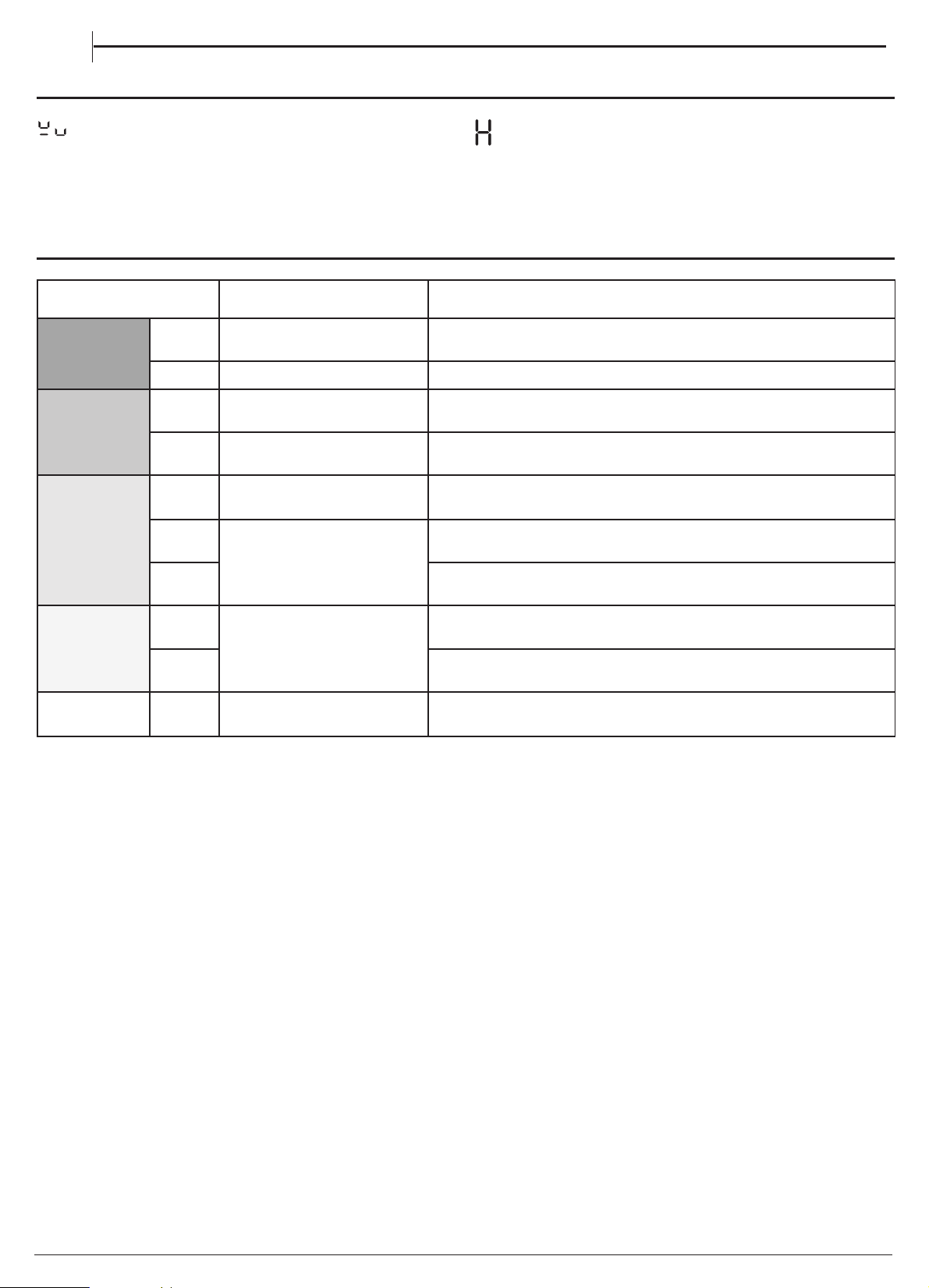
POT INCORRECTLY POSITIONED OR MISSING
This symbol appears if the pot is not suitable for induction cooking, is
not positioned correctly or is not of an appropriate size for the cooking
zone selected. If no pot is detected within 30 seconds of making the
selection, the cooking zone switches off.
RESIDUAL HEAT
If the display shows ”H”, the cooking zone is still hot. When the cooking
zone cools down, the display goes off.
COOKING TABLE
POWER LEVEL TYPE OF COOKING
LEVEL USE
(indicating cooking experience and habits)
Maximum
power
P Fast heating
Ideal for rapidly increasing the temperature of food to fast boiling in the case of
water or rapidly heating cooking liquids.
8
−
9 Frying
−
boiling Ideal for browning, starting to cook, frying deep frozen products, fast boiling.
High power
7
−
8
Browning
−
sautéing
−
boiling
−
grilling
Ideal for sautéing, maintaining a lively boil, cooking and grilling (for a short
period of time, 5-10 minutes).
6
−
7
Browning
−
cooking
−
stewing
−
sautéing
−
grilling
Ideal for sautéing, maintaining a light boil, cooking and grilling (for a medium
period of time, 10-20 minutes), preheating accessories.
Medium
power
4
−
5
Cooking
−
stewing
−
sautéing
−
grilling
Ideal for stewing, maintaining a gentle boil, cooking (for a long period of time).
Creaming pasta.
3
−
4
Cooking
−
simmering
−
thickening
−
creaming
Ideal for long-cooking recipes (rice, sauces, roasts, fish) with liquids (e.g. water,
wines, broth, milk), creaming pasta.
2
−
3
Ideal for long-cooking recipes (less than a litre in volume: rice, sauces, roasts, fish)
with liquids (e.g. water, wines, broth, milk).
Low power
1
−
2
Melting
−
defrosting
−
keeping
food warm
−
creaming
Ideal for softening butter, gently melting chocolate, thawing small products
and keeping just-cooked food warm (e.g. sauces, soups, minestrone).
1
Ideal for keeping just-cooked food warm, for creaming risottos and for
keeping serving dishes warm (with induction-suitable accessory).
Zero power OFF Support surface
Hob in stand-by or off mode (possible end-of-cooking residual heat, indicated
by an “H“).
EN
11
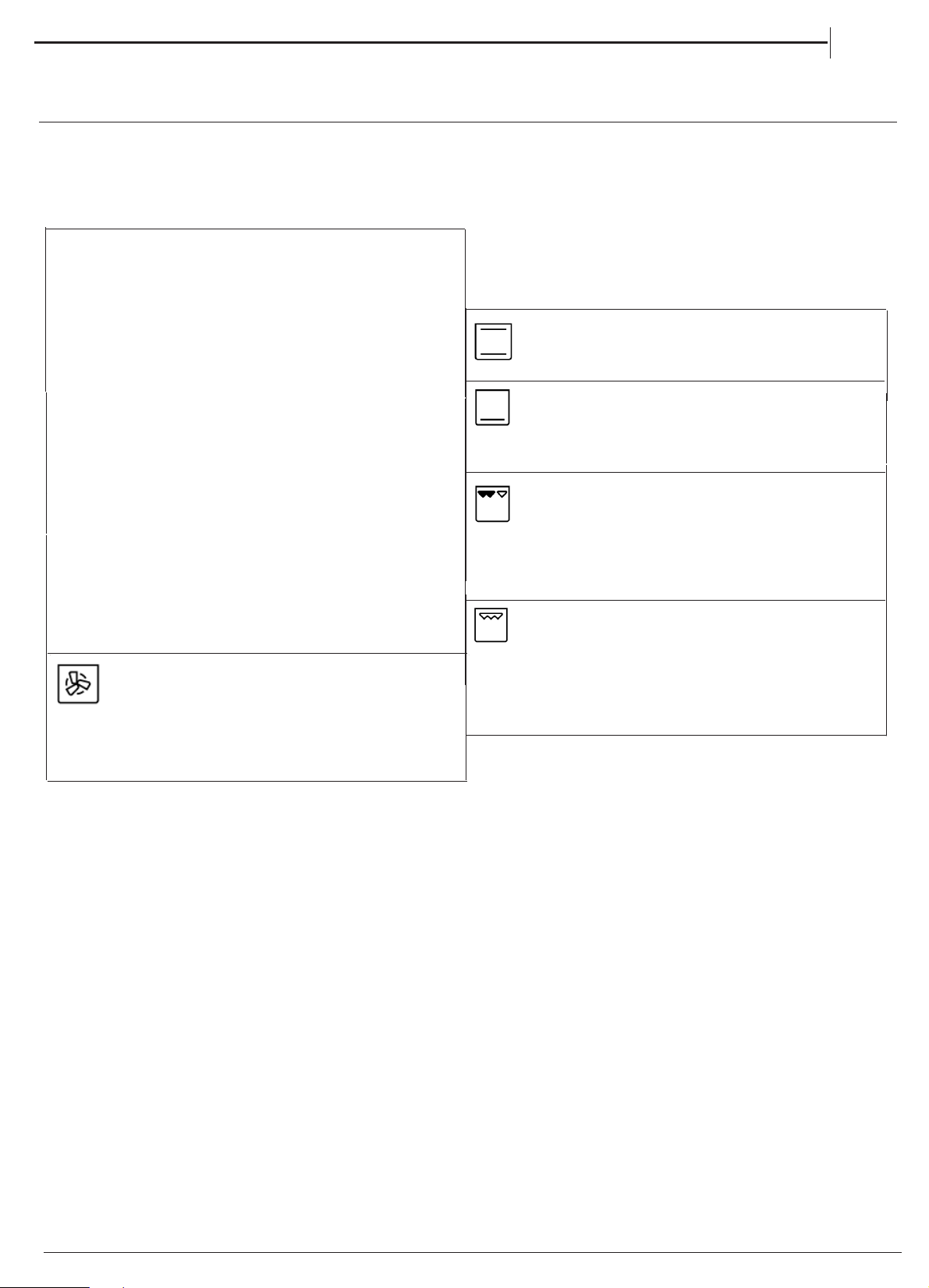
USING THE OVEN
TOP OVEN
For cooking any kind of dish on one shelf only.
CONVENTIONAL
BOTTOM
This function can be used to finish cooking
filled pies or to thicken soups. Use this function
the last 10/15 minutes of cooking.
HALF GRILL
GRILL
For grilling steaks, kebabs and sausages,
cooking vegetables au gratin or toasting bread.
When grilling meat, we recommend using a drip tray
to collect the cooking juices: Position the pan on
of the levels below the wire shelf and add 200 ml o
drinking water.
FORCED AIR
For cooking different foods on multiple shelves
(maximum of four) at the same time. This function
can be used to cook different foods without odours being
transferred from one food to another.
FUNCTIONS
1. SELECT A FUNCTION
For grilling small food like bacon or toasting bread.
The grill pan is placed on top of the top oven cavity shelf.
The shelf position can be adjusted to allow for grilling
different types of food.
MAIN OVEN - FAN COOKING
This control switches on the main oven. Fan Cooking - Turn
the control clockwise and select any temperature between
°C and Max. As the control is turned the fan will start.
The main oven light will immediately come on.
The thermostat light indicates that the main oven is heating.
When it turns off, the temperature inside the oven has
reached the setting made with the main oven knob. At this
point, the light will turn on and off as the oven maintains the
temperature at a constant level.
The fan and the oven interior light will remain on
throughout cooking.
The heat for fan cooking in the main oven is
provided by an element situated at the back of the oven,
around the fan.
Fan cooking is ideal for large poultry or joints of meat,
reducing cooking times and often eliminating the need for
pre-heating the oven. It is also ideal for batch cooking where
food is cooked on more than one level, because the forced
circulation of hot air gives aneven temperature from the top
to the bottom of the oven.
EN
80
To select a function, turn the Top Oven/Grill Selection Knob to the
symbol for the function you require, then select the required
temperature by turning the Top Oven/Grill Temperature Knob.

12
SOLARPLUS GRILL
Your cooker is not fitted with a conventional type of grill. The
solarplus grill is designed to reduce your grilling times. It is
quicker because it takes less time to warm up from cold.
Conventional grills require 5 minutes pre-heat before food
is placed beneath them, but for normal grilling the solarplus
grill can be used from cold without any pre-heat. However,
when toasting, optimum performance is achieved by pre-
heating the grill for about 1 minute.
You will notice that the grill elements are protected by a wire
mesh.
This stops you from touching live parts.
DO NOT under any circumstances insert objects into
the grill mesh as this could damage or break the
element tubes OR if the grill is on cause an electric
shock.
During use the mesh may become soiled. Do not attempt to
clean it while the grill is still on. Turn the cooker off at the
control unit and wait until it has cooled down before
cleaning.
Care must be taken to ensure the grill mesh is not distorted -
DO NOT store the grill pan handle on the grill pan grid when
the grill pan runners are on the top runner position.
There are two halves to the grill, one on the left and one on
the right. You can choose to have both sides on or just the left
side on.
To operate the grill proceed as follows:
1.
Open the grill/top oven door fully and position
the rod shelf as re commended, in the chart (next
page), for the food being cooked.
2.
Place the grill pan on the rod shelf, ensuring it is •
positioned centrally under the element.
3.
Never line the grill pan with aluminium foil as this may
cause overheating of fat in the grill pan.
EN
Turn the Top Oven/Grill Function Selector Knob to the
required setting of Half Grill (left) or Full Grill.
Then turn the Top Oven/Grill Temperature Knob to the
required temperature (see the Top Oven Cooking Table)
Turn the Top Oven/Grill Function Selector Knob to the
required setting of Half Grill (left) or Full Grill.
Then turn the Top Oven/Grill Temperature Knob to the
required temperature (see the Top Oven Cooking Table)
13
EN
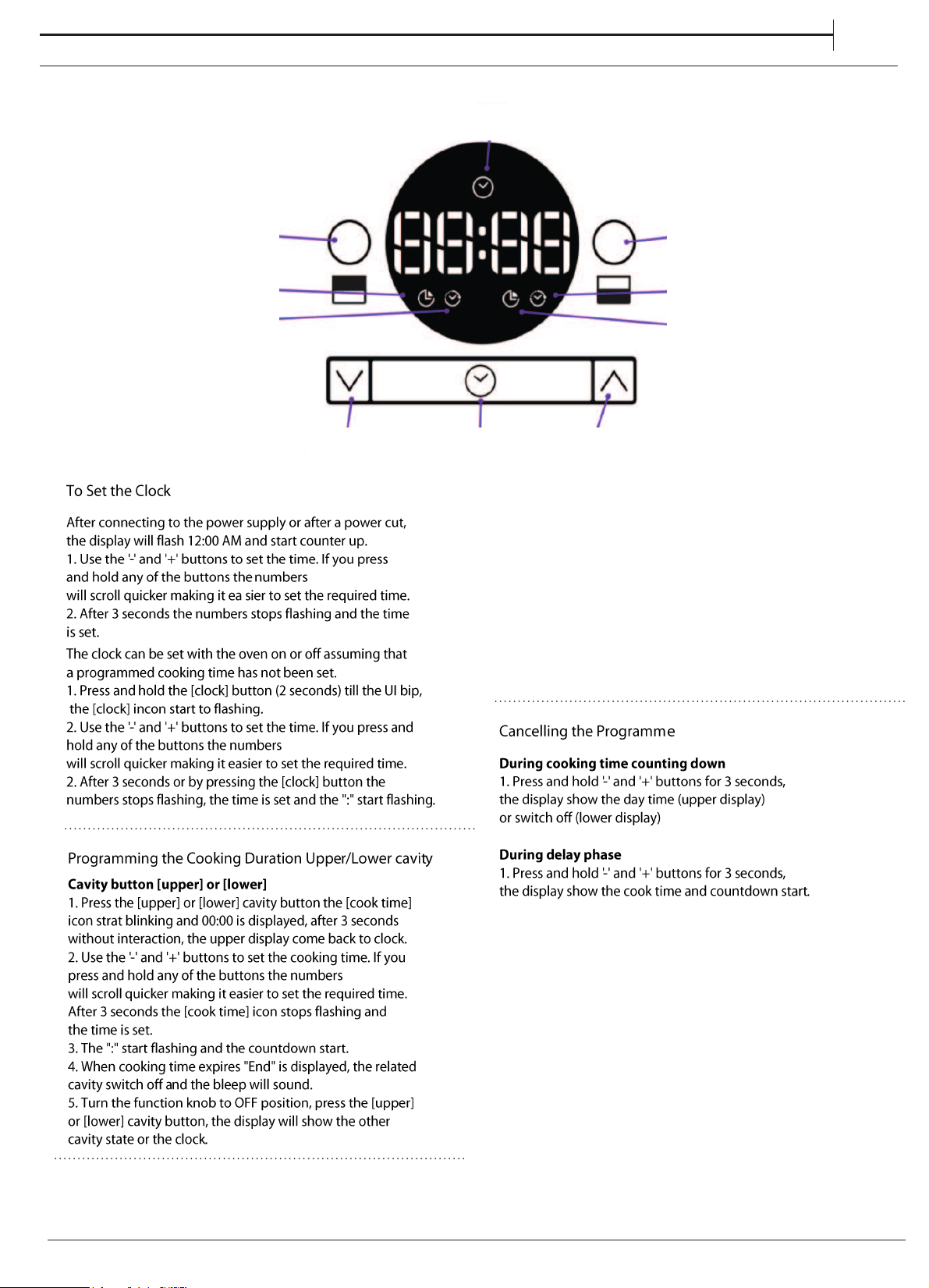
1. Set a cooking time
2. Press [upper/lower cavity] buttn, 00:00 is displayed
and [delay] icon start blinking, after 3 seconds without
interaction the cooking time start counting down.
3. Use the '-' and '+' buttons to set the delay time.
If you press and hold any of the buttons the numbers
will scroll quicker making it easier to set the required time.
4. After 3 seconds without interaction the [delay time]
icon stops flashing and the delay time is set.
5. The ":" start flashing and countdown start.
Clock button functions
Continued pressing will loop displayed information
on the display with appropriated icon:
1. day time
2. upper cavity end time of cooking process, including
delay if setted (if not running skip status)
3. lower cavity end time of cooking process, including
delay if setted (if not running skip status)
After 3 seconds without interaction the display come
back to the running state.
Clock button functions Clock button functions
Setting the Delay of Cooking ModeSetting the Delay of Cooking ModeSetting the Delay of Cooking Mode
Lower cavity button
Delay icon (Lower cavity)
Duration icon (Lower cavity)
Upper arrow
Clock Button
Lower arrow
Upper cavity button
Duration icon (Upper cavity)
Delay icon (Upper cavity)
Clock icon
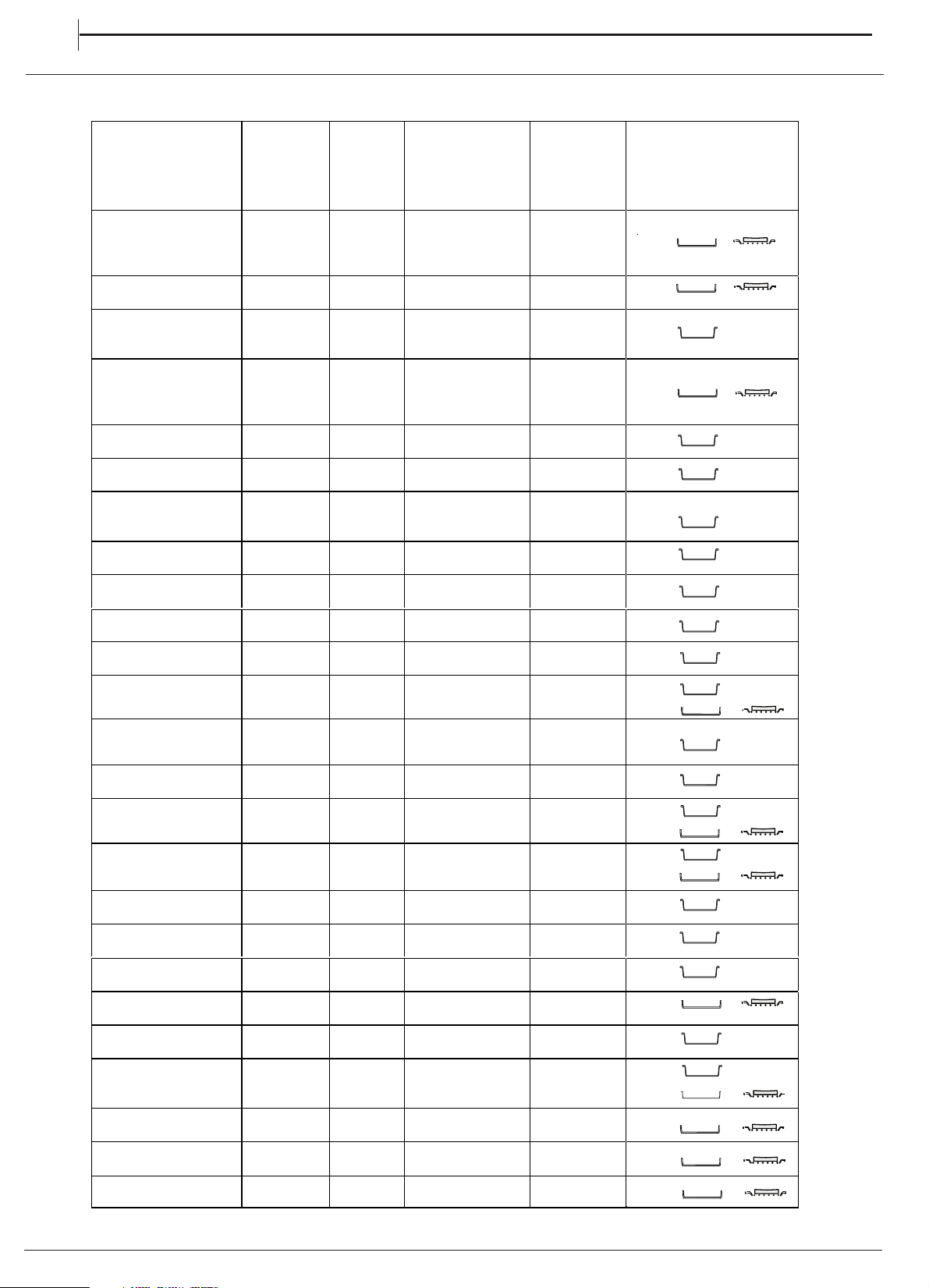
COOKING TABLE
14
MAIN OVEN
EN
RECIPE FUNCTION PREHEAT
TEMPERATURE
(°C)
DURATION
(Min)
LEVEL (L-number) AND
ACCESSORIES
Leavened cakes / Sponge
cakes
FORCED
AIR
YES 160-170 30-50 2
Leavened cakes / Sponge
cakes
FORCED
AIR
YES 160-170 30-50 2 /4
Filled cake
(cheese cake, strudel,
fruit pie)
FORCED
AIR
YES 160-180 50-70 2
Filled cake
(cheese cake, strudel,
fruit pie)
FORCED
AIR
YES 150-170 40-70 2/4
Cookies / Shortbread
FORCED
AIR
YES 140-150 40-50 3
Cookies / Shortbread
FORCED
AIR
YES 140-150 40-60 2/4
Cookies / Shortbread
FORCED
AIR
YES 140-150 35-50 2/4/5
Small cakes / Muffin
FORCED
AIR
YES 160-170 30-50 3
Small cakes / Muffin
FORCED
AIR
YES 150-160 30-50 2/5
Choux buns
FORCED
AIR
YES 170-200 30-60 3
Choux buns
FORCED
AIR
YES 170-200 20-50
Meringues
FORCED
AIR
YES 80-100 120-200 3
Meringues
FORCED
AIR
YES 80-100 120-200
Pizza / Bread / Focaccia
FORCED
AIR
YES 190-250 15-50 2
Pizza / Bread / Focaccia
FORCED
AIR
YES 190-230 20-50 2/4
Savoury pies (vegetable
pie, quiche)
FORCED
AIR
YES 180 30-60 3
Vols-au-vent / Puff
pastry crackers
FORCED
AIR
YES 180-210 15-40 3
Vols-au-vent / Puff
pastry crackers
FORCED
AIR
YES 180-210 15-40
Lasagne / Flans / Baked
pasta / Cannelloni
FORCED
AIR
YES 180-200 40-75 3
Lamb / Veal / Beef /
Pork 1 kg
FORCED
AIR
YES 190-200 80-110 3
Chicken / Rabbit / Duck
1 kg
FORCED
AIR
YES 200-230 50-100 3
2
4
2
4
2
4
Small cakes / Muffin
FORCED
AIR
YES 150-160 40-60 1/3/5
Choux buns
FORCED
AIR
YES 170-200 20-50 1/3/5
Meringues
FORCED
AIR
YES 80-100 120-200
1/3
5
Pizza / Bread / Focaccia
FORCED
AIR
YES 190-230 20-50 2/4/5
15
EN
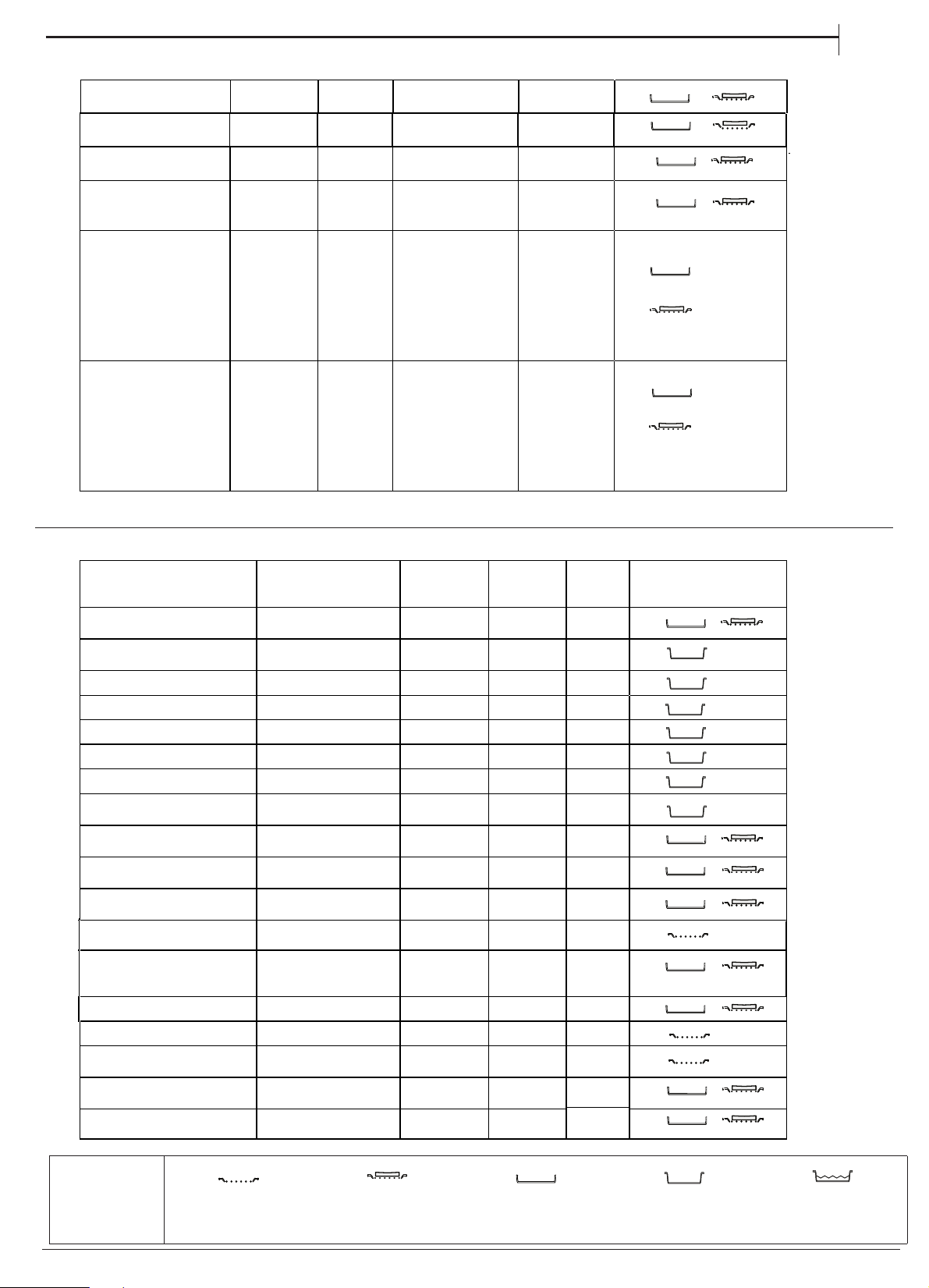
COOKING TABLE
TOP OVEN
RECIPE FUNCTION
PREHEAT
TEMPERA
TURE
(°C)
DURATI
ON
(MIN)
LEVEL (L –number and
accessories)
Leavened cakes / Sponge cakes CONVENTIONAL YES 170 20-50 1
Filled cake
(cheese cake, strudel, fruit pie)
CONVENTIONAL YES 160-180 40-60 2
Cookies / Shortbread CONVENTIONAL YES 140-150 20-50 2
Small cakes / Muffin CONVENTIONAL YES 160-170 20-50 2
Choux buns CONVENTIONAL YES 170-200 20-50 2
Meringues CONVENTIONAL YES 80-100 120-200 2
Pizza / Bread / Focaccia CONVENTIONAL YES 190-250 15-50 2
Vols-au-vent / Puff pastry
crackers
CONVENTIONAL YES 180-210 15-40 2
Lasagne / Flans / Baked pasta /
Cannelloni
CONVENTIONAL YES 180-200 30-65 2
Lamb / Veal / Beef / Pork 1 kg CONVENTIONAL YES 190-200 20-50 2
Chicken / Rabbit / Duck 1 kg CONVENTIONAL YES 200-230 50-100 2
Fish fillets / Steaks GRILL - 230 - MAX 15 - 35 2
Vegetable gratin GRILL - 230-MAX 10-30 2
Toast GRILL 5' MAX 0.5-1.5 2
Sausages / Kebabs / Spare ribs
/ Hamburgers
GRILL - 230 - MAX 15-30
Roast potatoes CONVENTIONAL YES 190-220 40-80 2
Vegetable gratin
FORCED
AIR
YES 180-200 20-30 3
Stuffed vegetables
(tomatoes, courgettes,
aubergines)
FORCED
AIR
YES 190-220 40-80 3
Complete meal: (Cook3)
Fruit tart
Lasagna
Roast
FORCED
AIR
- 180-190 40-100
Complete meal (Cook4)
Fruit tart
Lasagna
Cuts of meat
Roasted vegetables
FORCED
AIR
- 180-190 40-80
ACCESSORIES
Wire shelf
Baking dish or cake tin on
the wire shelf
Baking tray/Drip tray or
Baking dish on the wire
shelf
Drip tray / Baking tray
Drip tray / Baking tray with
00 ml of water
5
2
2
Stuffed vegetables (tomatoes, CONVENTIONAL YES 190-220 40 - 80 2
courgettes, aubergines)
Leg of lamb/Shanks CONVENTIONAL YES 200-230 50-100 2
Roast potatoes
FORCED
AIR
YES 190-220 40-80 3
Fish fillets / Steaks
FORCED
AIR
YES 180-200 20-30 3
1
3/5
1/2
3/5
CLEANING AND MAINTENANCE
EN
16
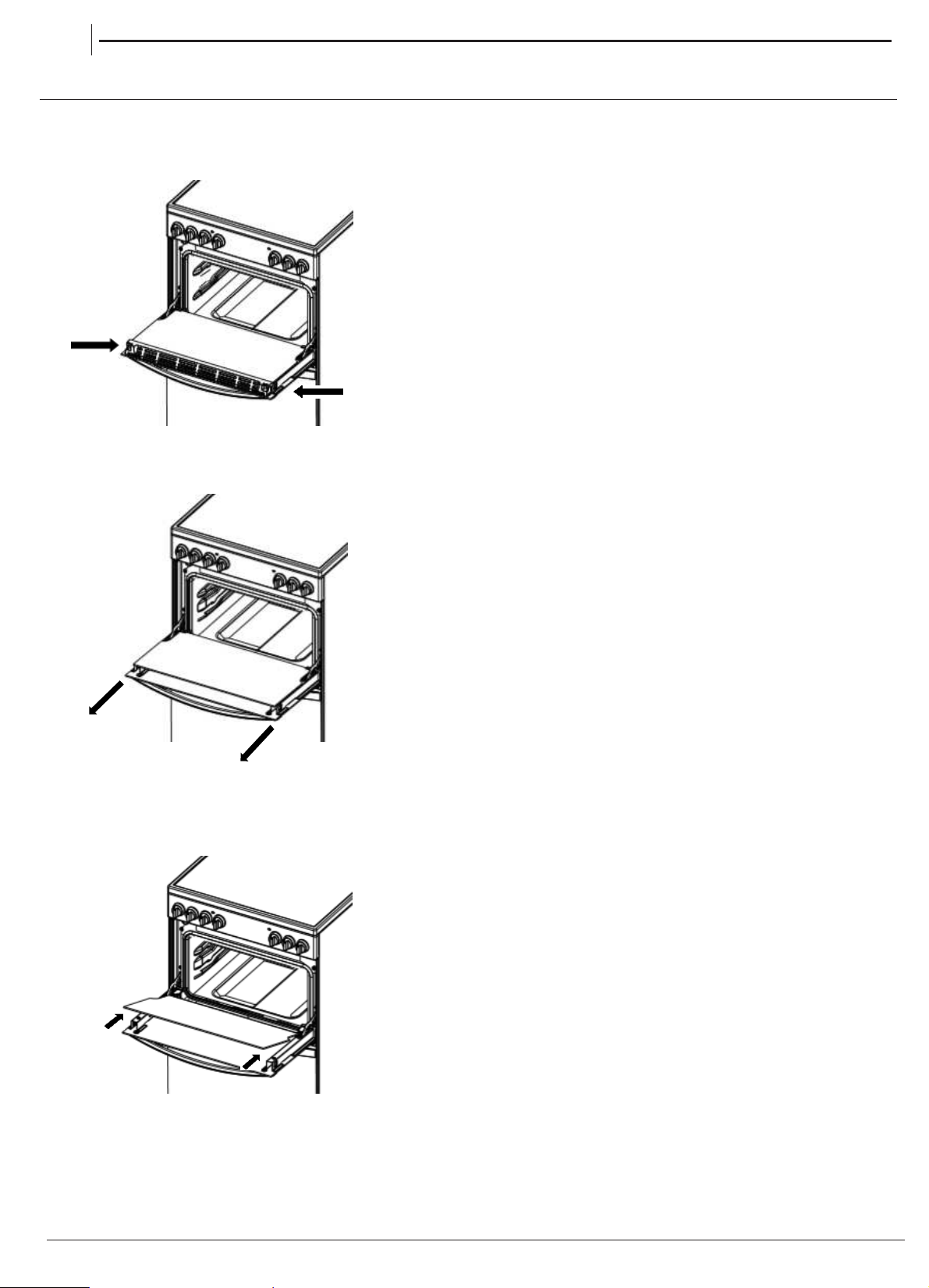
Carefully slide the first
inner glass towards you,
taking care not to allow the
glass to fall.
Now the external glass
panel can be washed.
2. 2. 2. 2. 2.
3.3.3.3.
Ensure the glass panel is not subjected toEnsure the glass panel is not subjected to
Ensure the glass panel is not subjected toEnsure the glass panel is not subjected to
Ensure the glass panel is not subjected to
any sharp mechanical blows. any sharp mechanical blows.
any sharp mechanical blows. any sharp mechanical blows.
any sharp mechanical blows. Take particular
care not to damage the inner surface which is coated
with a heat reflective layer. After cleaning, rinse and
dry with a soft cloth. For slight soiling the inner glass
panel may be cleaned, while still warm, without
removing it from the door.
glass removed.
To reassemble the oven doors proceed with inserting
the glass panels in the reverse order, pushing gently
every panel directly into the liners, so that the warning
glass removed.glass removed.glass removed.glass removed.glass removed.
Oven must not be operated with inner door
glass removed.
sign printed on the glass is correctly legible.
4.
Oven must not be operated with inner doorOven must not be operated with inner doorOven must not be operated with inner doorOven must not be operated with inner door
Removing the retaining
Removing the retaining
bar
depress carefully
both sides of the bar.
Pull the trim up gently
until the retainer is
released.
the clips on
Open the door to .
1111
.....
Cleaning the glass door with 2 panels
TOP OVEN DOORS
30
°
TURN OFF THE MAIN SWITCH AND ENSURE
THE COOKER IS COLD BEFORE CLEANING.
BEFORE SWITCHING ON AGAIN, ENSURE THAT
ALL CONTROLS ARE IN THE OFF POSITION.
Do not use steam cleaning
equipment.
Use protective gloves during all
operations.
Carry out the required
operations when the oven is cold.
Disconnect the appliance from
the power supply.
Do not use wire wool, abrasive
scourers or abrasive/corrosive
cleaning agents, as these could
damage the surfaces of the
appliance.
CLEANING AND MAINTENANCE
Disconnect the appliance from the power supply.
CLEANING THE INDUCTION
ACCESSORIES
Soak the accessories in a washing-up liquid solution
after use, handling them with oven gloves if they
are still hot. Food residues can be removed using a
washing-up brush or a sponge.
EXTERIOR SURFACES
• Clean the surfaces with a damp microfibre cloth.
If they are very dirty, add a few drops of pH-neutral
detergent. Dry them with a dry cloth.
• Do not use corrosive or abrasive detergents. If any of
these products inadvertently comes into contact with
the surfaces of the appliance, clean immediately with
a damp microfibre cloth.
INTERIOR SURFACES
• After every use, leave the oven to cool and then
clean it, preferably while it is still warm, to remove any
deposits or stains caused by food residues To dry any
condensation that has formed as a result of cooking
foods with a high water content, let the oven to cool
completely and then wipe it with a cloth or sponge.
• Clean the glass in the door with a suitable liquid
detergent.
CLEANING THE OVEN SURFACE
3.
Reconnect the oven to the power supply.
Note: Use 40 W/230 V type
The bulb used in the product is specifically designed for
domestic appliances and is not suitable for general room
lighting within the home (EC Regulation 244/2009).
G9
Note: Use 40 W/230 V type
Light bulbs are available from our After-sales Service.
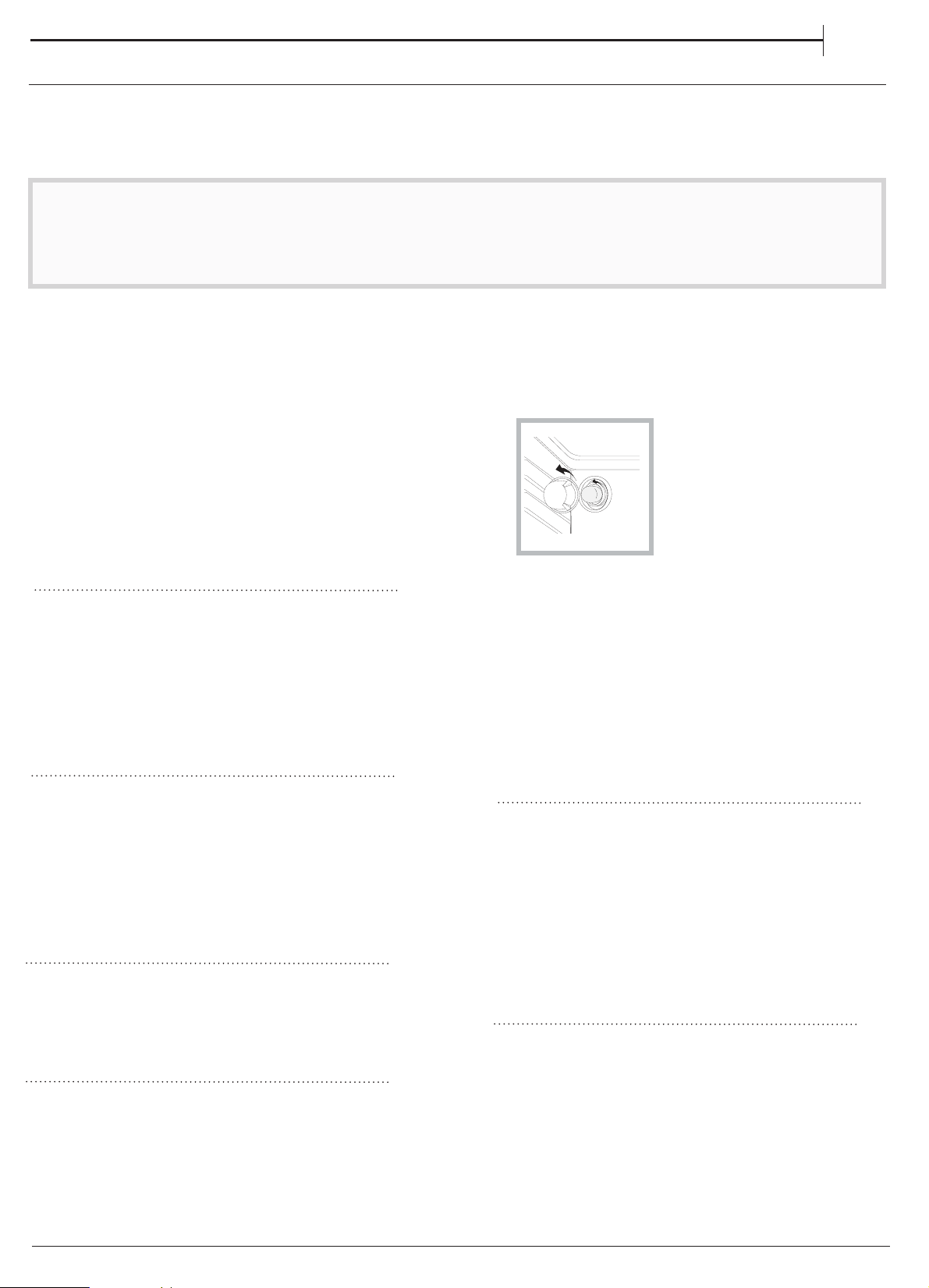
- Do not handle bulbs with your bare hands as your
fingerprints could damage them. Do not use the oven until
the light cover has been refitted.
The bulb used in the product is specifically designed for The bulb used in the product is specifically designed for The bulb used in the product is specifically designed for
domestic appliances and is not suitable for general room
lighting within the home (EC Regulation 244/2009).
Light bulbs are available from our After-sales Service.
- Do not handle bulbs with your bare hands as your
fingerprints could damage them. Do not use the oven until
the light cover has been refitted.
domestic appliances and is not suitable for general room
lighting within the home (EC Regulation 244/2009).
Light bulbs are available from our After-sales Service.
- Do not handle bulbs with your bare hands as your
fingerprints could damage them. Do not use the oven until
the light cover has been refitted.
domestic appliances and is not suitable for general room
lighting within the home (EC Regulation 244/2009).
Light bulbs are available from our After-sales Service.
- Do not handle bulbs with your bare hands as your
fingerprints could damage them. Do not use the oven until
the light cover has been refitted.
CATALYTIC CLEANING
These are panels coated with a special enamel, which
is able to absorb the fat released by food as it cooks.
This enamel is quite strong, so that the various
accessories (racks, dripping pans, etc.) can slide along
them without damaging them. White marks may appear
on the surfaces; these are not a cause for concern.
Nevertheless, the following should be avoided:
-scraping the enamel with sharp objects (a knife, for
example);
-using detergents or abrasive materials.
REPLACING THE LIGHT
1.
Disconnect the oven from the power supply.
2. Unscrew the cover from the light, replace the bulb
and screw the cover back on the light.
•Do not use abrasive sponges or scouring pads as they may damage
the glass.
•After each use, clean the hob (when it is cool) to remove any deposits
and stains from food residue.
•A surface that is not kept suitably clean may reduce the sensitivity of
control panel buttons.
•Use a scraper only if residues are stuck to the hob. Follow the scraper
manufacturer's instructions to avoid scratching the glass.
•Sugar or foods with a high sugar content can damage the hob and
must be immediately removed.
•Salt, sugar and sand could scratch the glass surface.
•Use a soft cloth, absorbent kitchen paper or a special hob cleaner (follow
the Manufacturer’s instructions).
•Spills of liquid in the cooking zones can cause the pots to move or vibrate.
•After cleaning the hob, dry thoroughly.
EN
17
This product contains a light source of energy
efficiency class G
HOW TO READ THE COOKING TABLE
The table lists the best function, accessories
and level to use to cook various different types
of food. Cooking times start from the moment
food is placed in the oven, excluding preheating
(where required). Cooking temperatures and times
are approximate and depend on the amount of
food and the type of accessory used. Use the
lowest recommended settings to begin with and,
if the food is not cooked enough, then switch
to higher settings. Use the accessories supplied
and preferably dark-coloured metal cake tins and
baking trays. You can also use Pyrex or stoneware
pans and accessories, but bear in mind that cooking
times will be slightly longer.
USEFUL TIPS
TROUBLESHOOTING
What to do if... Possible reasons Solutions
The oven is not working. Power cut.
Disconnection from the mains.
Check for the presence of mains electrical power and whether the
oven is connected to the electricity supply.
Turn off the oven and restart it to see if the fault persists.
18
WWW
A complete product specification, including the energy efficiency ratings for this oven, can be read and
downloaded from our website
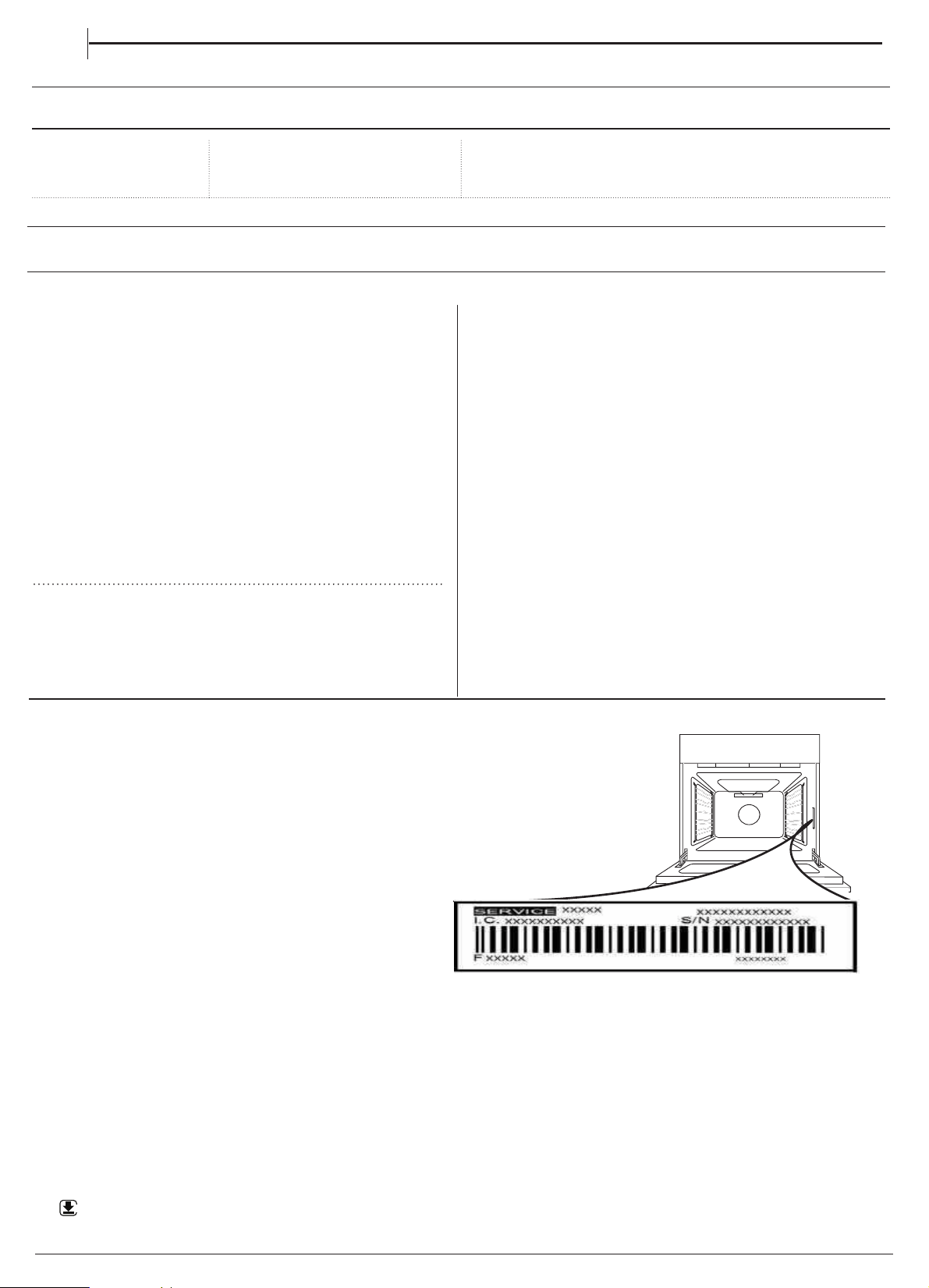
"'5&34"-&44&37*$&
5PSFDFJWFBTTJTUBODFDBMMUIFOVNCFSHJWFOPOUIF
XBSSBOUZMFBGMFUFODMPTFEXJUIUIFQSPEVDUPSGPMMPX
UIFJOTUSVDUJPOTPOPVSXFCTJUF#FQSFQBSFEUP
QSPWJEF
•
BCSJFGEFTDSJQUJPOPGUIFQSPCMFN
•
UIFFYBDUNPEFMUZQFPGZPVSQSPEVDU
•
UIFBTTJTUBODFDPEFUIFOVNCFSGPMMPXJOHUIFXPSE
4&37*$&POUIFJEFOUJGJDBUJPOQMBUFBUUBDIFEUPUIF
QSPEVDUXIJDIDBOCFTFFOPOUIFJOTJEFFEHFXIFO
UIFPWFOEPPSJTPQFO
•
ZPVSGVMMBEESFTT
•
BDPOUBDUUFMFQIPOFOVNCFS
1MFBTFOPUF*GSFQBJSTBSFSFRVJSFEDPOUBDUBO
BVUIPSJTFETFSWJDFDFOUSFUIBUJTHVBSBOUFFEUPVTF
PSJHJOBMTQBSFQBSUTBOEQFSGPSNSFQBJSTDPSSFDUMZ
1MFBTFSFGFSUPUIFFODMPTFEXBSSBOUZMFBGMFUGPSNPSF
JOGPSNBUJPOPOUIFXBSSBOUZ
www.hotpoint.co.ukwww.hotpoint.co.uk
EN
19
Min. 650 mm
Min. 420 mm
60
min. 10 mmmin. 10 mmmin. 10 mm
4.1
4.2
Whirlpool EMEA S.p.A.
Via Carlo Pisacane n.1
20016 Pero (MI), Italy
VAT number: IT00693740425
XEROX FABRIANO
www.hotpoint.co.uk
20
W11514503W11514503
10/2021 -
7
6.1
6.2
6.3
6.4
6.5
6.6
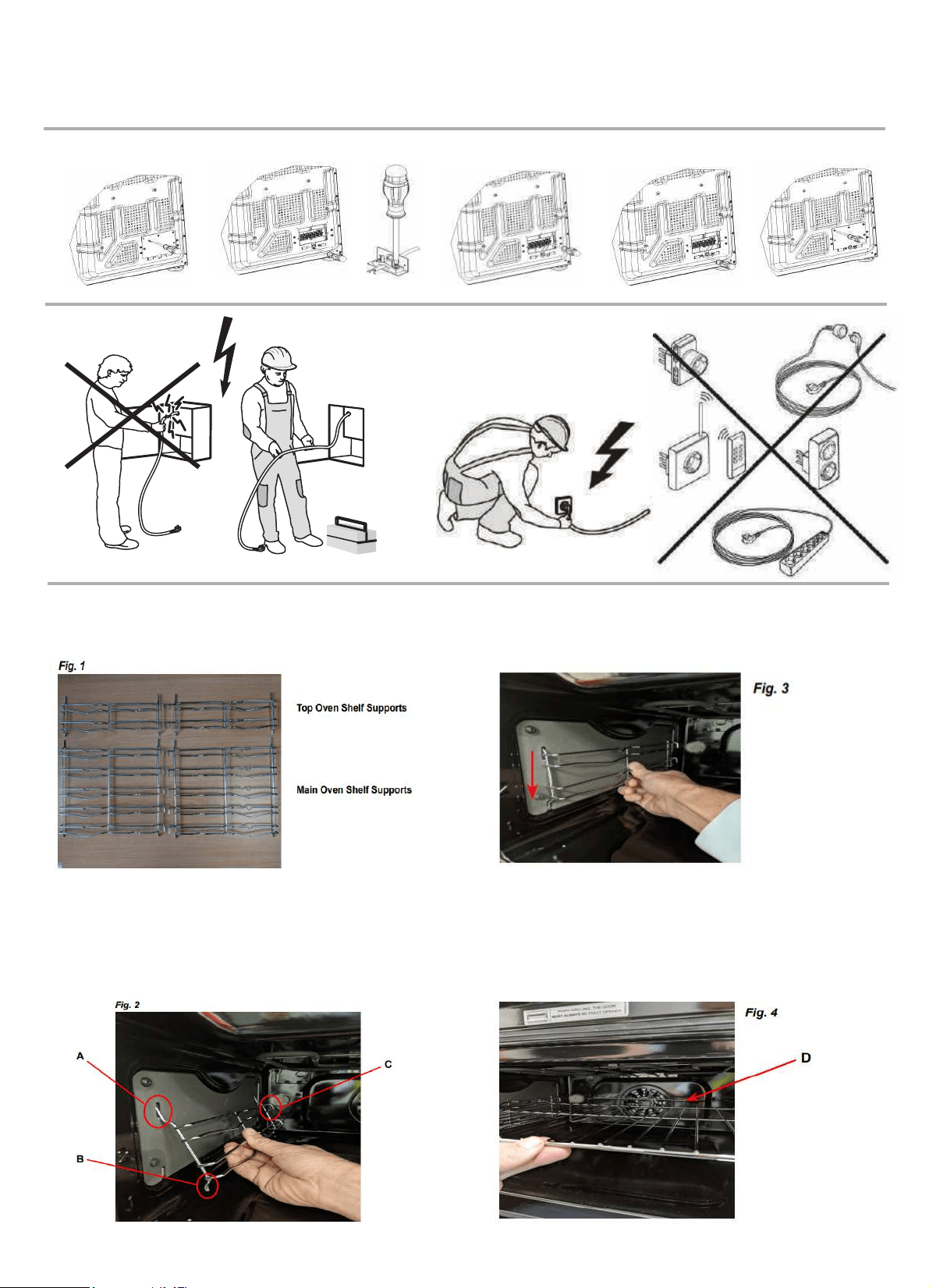
Your new cooker comes with 4 chrome shelf supports
There are 2 shelf supports for the top oven and 2
packed in the main oven along with the shelves.
for the bottom oven. See Fig. 1.
Fitting - Step 1
The top of the shelf supports engage in slots in the side
Note the rods ‘A’ are longer at the top than
‘B’ at the bottom, and the hooks ‘C’ are at the back of the
oven. It is important that the shelf supports
walls of the oven as in Fig. 2 below.
are fitted the correct way around!
Fitting - Step 2
Once engaged at the top, then push the bottom rods into
the shelf supports to lower slightly and engage. See Fig. 3.
the lower slots in the oven side walls. Now allow
This process should be repeated and all 4 shelf supports
fitted in the top and main ovens.
Fitting - Step 3
The shelves can now be fitted into the shelf supports
‘D’
that should be at the back of the oven as shown. See Fig. 4.
at the required heights. Note that there is pan guard
Your ovens are now ready to use !

