
Use & Care Manual
Column Refrigerator & Freezer
Part # R000045 revision 0 © Prizer Painter Stove Works, Blandon, PA 19510

2 (800) 449-8691
Thank You and Welcome
Thank you for your purchase and welcome to the BlueStar
®
family!
BlueStar
®
appliances are designed for discerning home chefs who demand restaurant-quality results in their own kitchens. As the
owner of a new BlueStar
®
appliance you can look forward to years of precise and even cooling in your home kitchen.
Here are a few ps to get started:
1. Review this Use & Care Manual, which includes instrucons and ps for geng the most out of your new appliance.
2. Register your product online at www.bluestarcooking.com/support/product-registraon to stay in touch and allow us to send
you valuable product news and updates.
3. Review our products and help us spread the word at hps://www.bluestarcooking.com/inspiraon/reviews. We’ll send you
some BlueStar gear to thank you for your me.
Thank you again for choosing BlueStar
®
.
The BlueStar
®
Team
Proudly Producing Quality Kitchen Appliances in the U.S.A. since 1880.

bluestarcooking.com 3
The model and serial numbers can be found on the serial plate,
which is located inside the product on the side wall. Please
complete the informaon below for warranty purposes and
future reference:
Model Number ______________________________________
Serial Number _______________________________________
Installaon Date _____________________________________
Dealer’s Name ______________________________________
Dealer’s Phone Number _______________________________
Date of Purchase _____________________________________
Register your product online at www.bluestarcooking.com/
support/product-registraon or call customer service at (800)
449-8691.
If service is required under the warranty, it must be performed
by authorized service personnel. BlueStar also recommends
using authorized service personnel if service is required aer
the warranty expires. To locate authorized service personnel in
your area, go to www.bluestarcooking.com/support/nd-a-
service-center or call customer service at (800) 449-8691.
Contents
Model Informaon
Safety Informaon .................................................................. 4
Refrigerator ............................................................................. 6
Freezer ..................................................................................... 7
Electronic Control
— Main Opons and Temperature Sengs ........................... 8
— Funcons ............................................................................ 9
— Sengs ............................................................................. 10
Refrigerator Features
— Alarms, Service, Pull-Out Tray, and Drawers ................... 11
Freezer Features
— Replacement Water Filters .............................................. 12
Operaon and Care and Cleaning ........................................ 13
Troubleshoong .................................................................... 14
Warranty ............................................................................... 15
4 (800) 449-8691
Safety Informaon
Electrical Shock Hazard
Follow these basic precauons:
• Plug into a grounded three-prong outlet.
• Do not remove ground prong.
• Do not use an adapter.
• Do not use an extension cord.
• Disconnect power before servicing.
• Replace all parts and panels before operang.
• Use nonammable cleaner.
• Keep ammable materials and vapors, such as gasoline,
away from appliance.
• Use two or more people to move and install appliance.
Failure to follow these instrucons can result in death,
electrical shock, or re.
Please read and obey the following types of safety messages to
ensure your refrigerator is installed and operated as safely as
possible:
WARNING
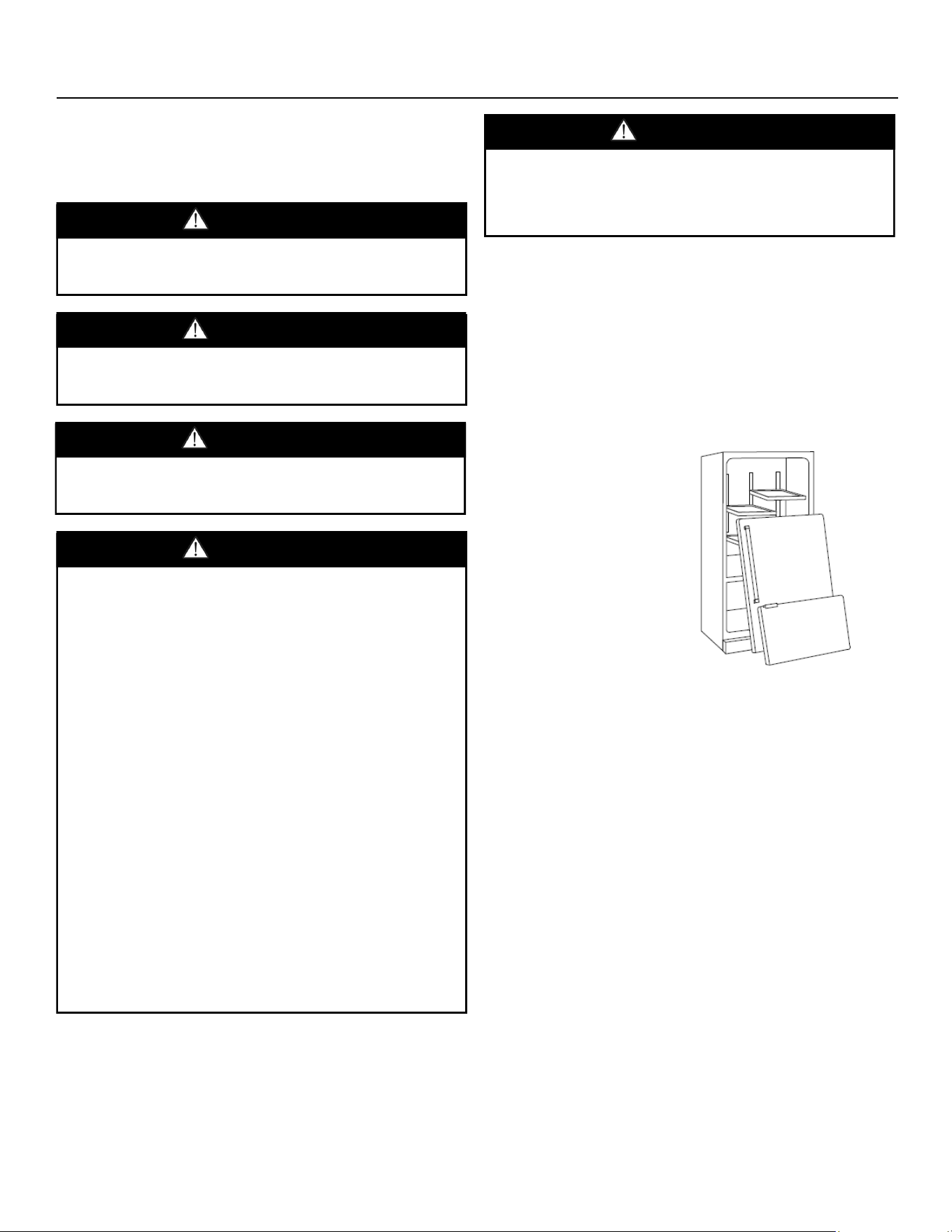
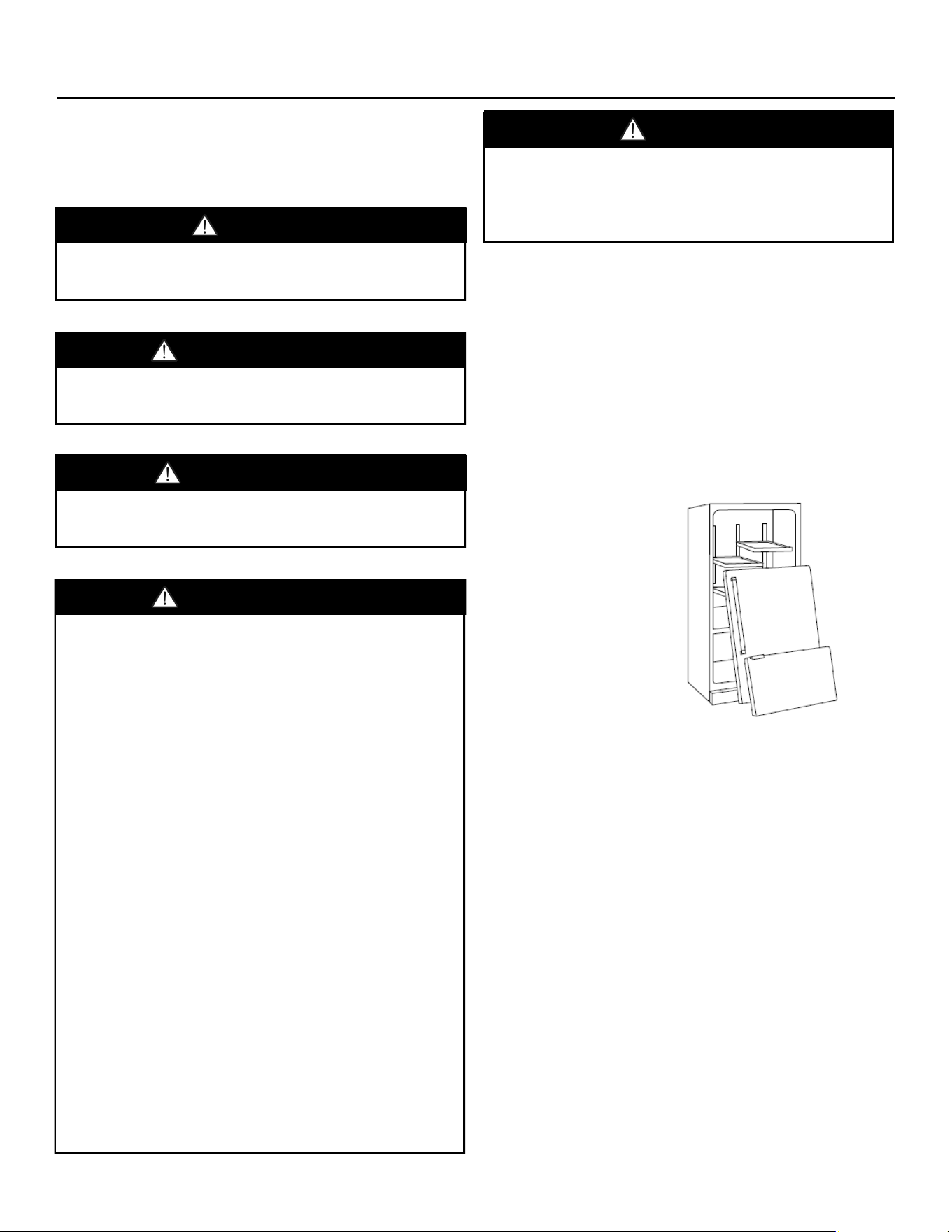
Important: Child entrapment and suocaon are not problems
of the past. Junked or abandoned appliances are sll danger-
ous even if they will sit for a few days. Before you throw away
your old refrigerator or freezer, do the following:
1. Take o the doors.
2. Leave the shelves in place so that children may not climb
inside easily.
Can cause minor injury or product damage if instrucons are
not followed.
CAUTION
Can cause serious injury or death if instrucons are not
followed.
WARNING
Will cause serious injury or death if instrucons are not
followed.
DANGER
Suocaon Hazard
Remove doors from old appliances. Failure to follow these
instrucons can cause death or brain damage.
DANGER
bluestarcooking.com 5
Renseignements sur la sécurité
Important: le piégeage et la suocaon des enfants ne sont pas
des problèmes du passé. Les appareils électroménagers en
mauvais état ou abandonnés sont toujours dangereux même
s'ils resteront assis pendant quelques jours. Avant de jeter
votre ancien réfrigérateur ou congélateur, procédez comme
suit:
1. Déposer les portes.
2. Laissez les étagères en place an que les enfants ne
puissent pas y pénétrer facilement .
Risque de choc électrique
Observer les précauons de base suivantes
• Brancher l'appareil à une prise triphasée mise à la terre.
• Ne pas retirer la broche de mise à la terre.
• Ne pas utiliser d'adaptateur.
• Ne pas utiliser de rallonge.
• Débrancher l'alimentation avant l'entretien.
• Remettre en place toutes les pièces et tous les panneaux
avant d'utiliser le produit.
• Déposer les portes de votre ancien réfrigérateur.
• Utiliser un nettoyant ininflammable.
• Tenez les matériaux et vapeurs inammables, comme
l'essence, à l'écart de l'appareil.
• Utilisez deux personnes ou plus pour déplacer et installer
l'appareil.
Le non-respect de ces instructions peut entraîner la mort, un
choc électrique ou un incendie.
Veuillez lire et observer les types suivants de messages de
sécurité pour vous assurer que votre réfrigérateur est installé
et ulisé de la façon la plus sécurisée possible:
Provoquera des blessures graves ou la mort si les instrucons
ne sont pas suivies.
DANGER
AVERTISSEMENT
Peut causer des blessures légères ou des dommages au
produit si les instrucons ne sont pas suivies.
MISE EN GARDE
Peut causer des blessures graves ou la mort si les instrucons
ne sont pas suivies.
AVERTISSEMENT
Risque d'étouement
Rerez les portes des vieux appareils. Le non-respect de ces
instrucons peut entraîner la mort ou des lésions cérébrales.
DANGER
6 (800) 449-8691
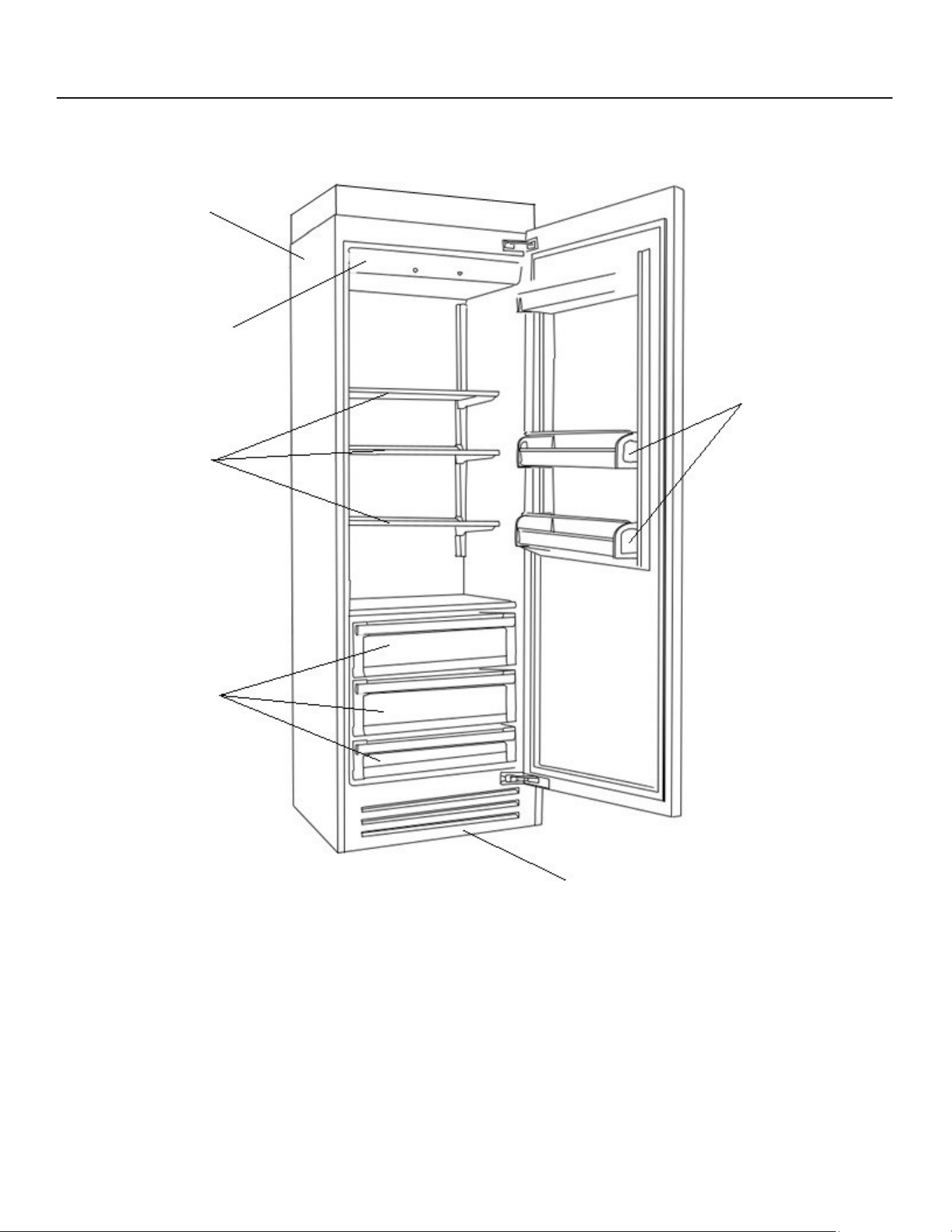
Refrigerator
1 Door Bins 4 Glass Shelves
2 Removable Grill 5 Electronic Control
3 Drawers 6 Stainless Steel Surface
1
2
3
4
5
6
bluestarcooking.com 7
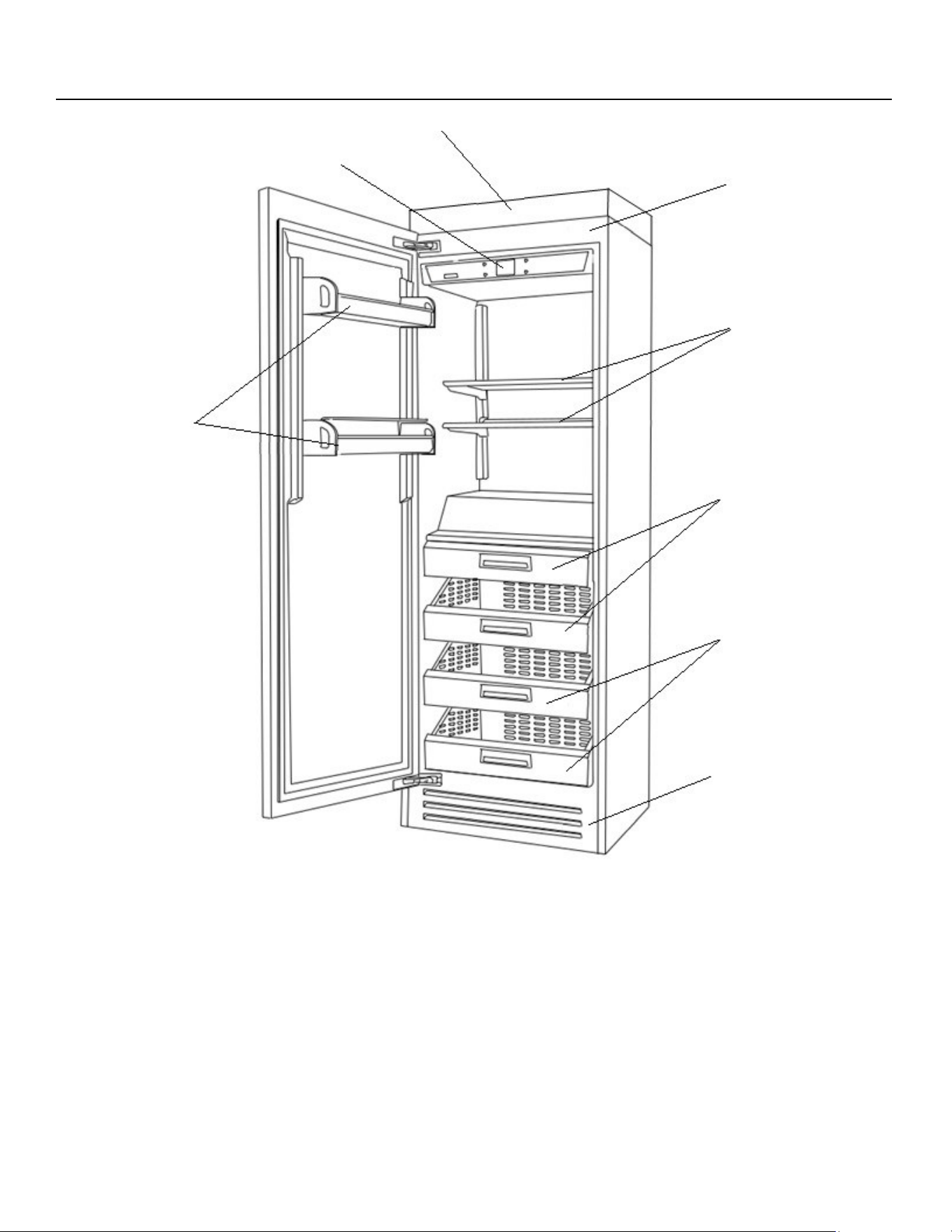
Freezer
1 Stainless Steel Surface 5 Removable Grill
2 Glass Shelves 6 Door Bins
3 Ice Maker and pan 7 Electronic Control
4 Drawers 8 Water Filter
1
2
3
4
5
6
7
8
8 (800) 449-8691
Electronic Control — Main Opons and Temperature Sengs
Home Screen
Displays the internal temperatures.
Main Opons
Swipe right or le to access the main opons.
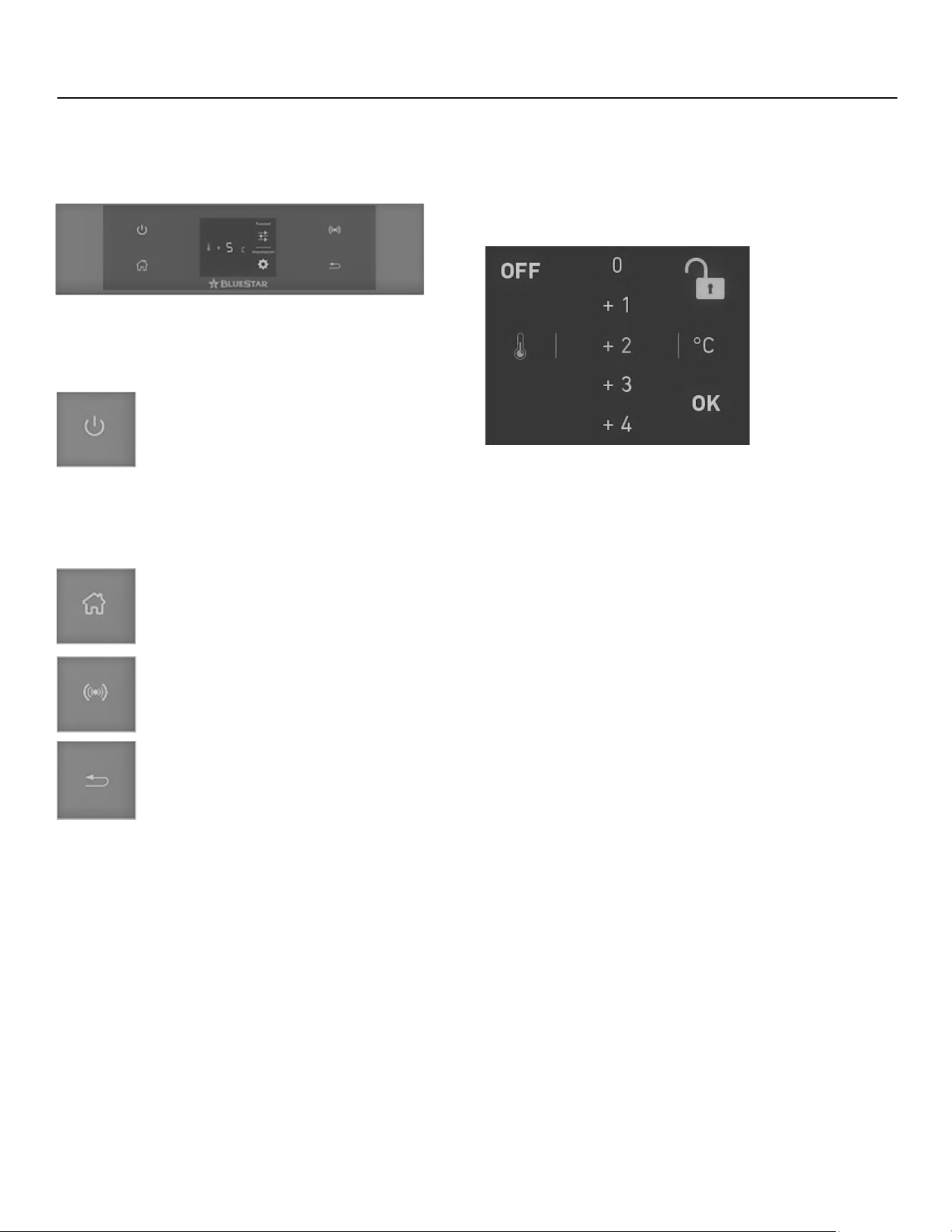
Power
Toggles the product on or o. When turning the
product on, the product will go into an inial test
mode that will last several minutes. When turning
the product o, there will be two conrmaon
requests to prevent the product from being
turned o accidentally.
Home
Press to return to the home screen.
Alarm
Press to toggle the alarm on or o and displays
the alarm tone funcons.
Back
Accesses the sengs opons.
Change Temperature Seng
The recommended freezer factory seng is 0° F (-18° C), and
can be set between –9° F and 8° F (–23° C and –13° C).
The recommended refrigerator factory seng is 37°F (3° C),
and can be set between 36° F and 46° F (2° C and 8° C).
Press the temperature icon (thermostat for the refrigerator or
snowake for the freezer). Scroll up to add to or scroll down to
subtract from the set temperature. Press the number, then
press OK to conrm. For example, if the temperature is set at
36° F (2° C), press the +2 to change it to 38° F (3° C).
Padlock
Press the padlock to open (unlock) access to the temperature
control. When the padlock is closed, it is locked to prevent you
from changing the temperature seng.
bluestarcooking.com 9
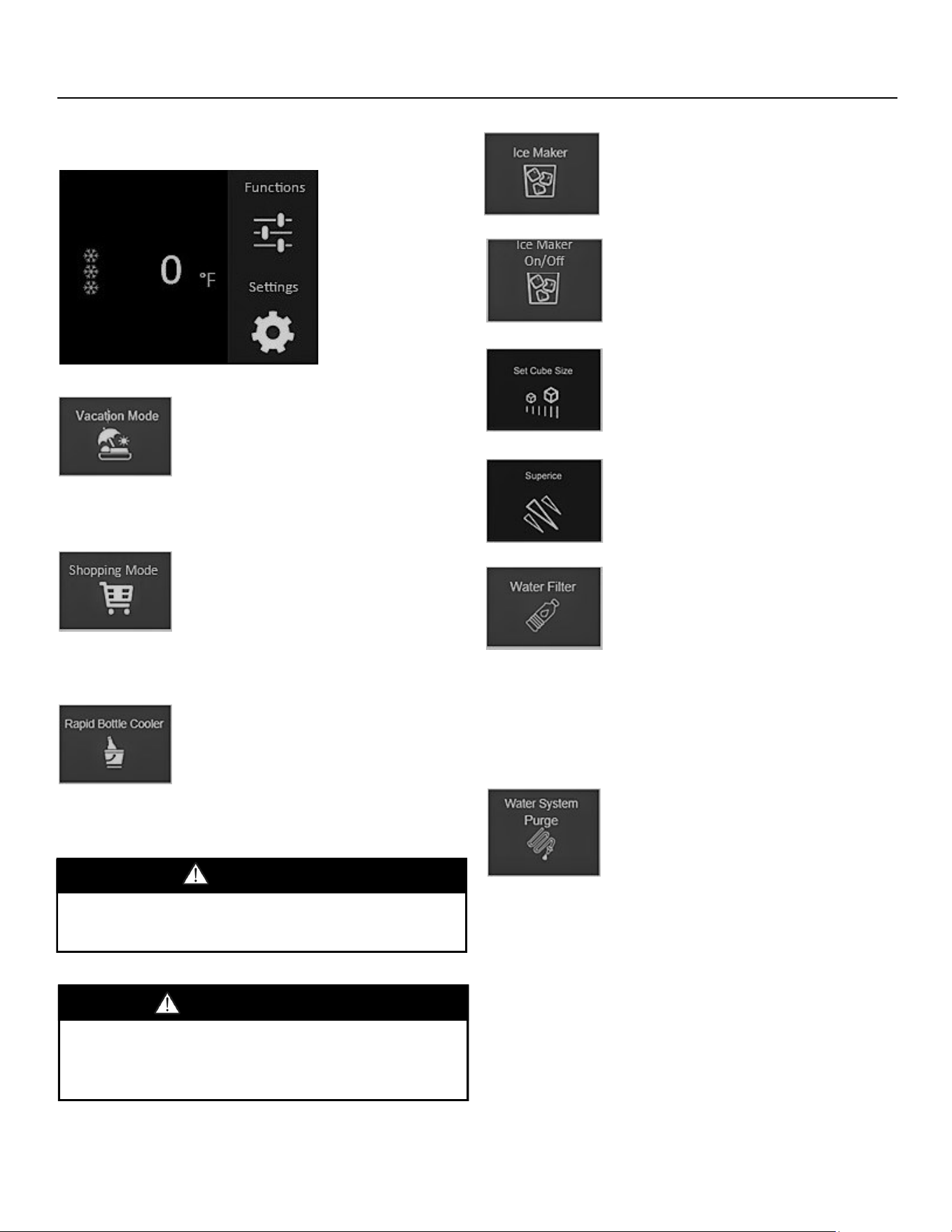
Press Funcons to access the icons on this page.
Vacaon Mode
This is recommended for prolonged absenc-
es to reduce energy usage. Program the
duraon for up to 90 days or manually de-
acvate. This remains acve even when
there is a prolonged power outage.
Shopping Mode
Lowers the product temperature for up to
12 hours. Press Yes to conrm the selec-
on. Aer the set amount of hours, the
temperature returns to the original set
temperature.
Rapid Bole Cooler (Freezer Only)
Sets a mer to cool o beverages quickly,
inside the freezer compartment, for up to
45 minutes. A sound will beep when the
me passes. Aer removing the beverages,
press Alarm to deacvate the sound.
Electronic Controls — Funcons
Ice Maker (Freezer Only)
Provides several opons for ice. Scroll right
to press the preferred opon, then press
Yes to conrm the selecon.
Ice Maker On/O (Freezer Only)
Toggles the ice maker o or on.
Set Cube Size (Freezer Only)
Changes the size of the ice cube. Press this,
then press Medium or Large for the ice
cube size.
Superice (Freezer Only)
Increases the ice producon to as much as
3.3 lbs (1.5 kg) per day. Press this, then
press Yes to conrm.
Water Filter (Freezer Only)
Toggles the countdown reminder on or o
and resets the reminder. Scroll right to
press this, then press On to conrm.
Press Yes to enable the countdown remind-
er. The screen will indicate the number of
days remaining.
Press O to disable the countdown or press
Reset to reset it, then press Yes to conrm.
Water System Purge (Freezer Only)
Purges the water lter system. Scroll right
to press this, press Yes to conrm, then
press OK to start the cleaning. Once the
cleaning is done, press OK to reset the
screen.
Important: At inial installaon, or if ice producon was
disabled or unused for a long period, it is recommended to
perform a water system purge funcon. Turn o the ice maker
before proceeding.
Placing glass containers in the freezer could cause the
container to rupture and cause damage or injury.
WARNING
Placer des récipients en verre dans le congélateur pourrait
provoquer la rupture du récipient et causer des dommages ou
des blessures.
AVERTISSEMENT
10 (800) 449-8691
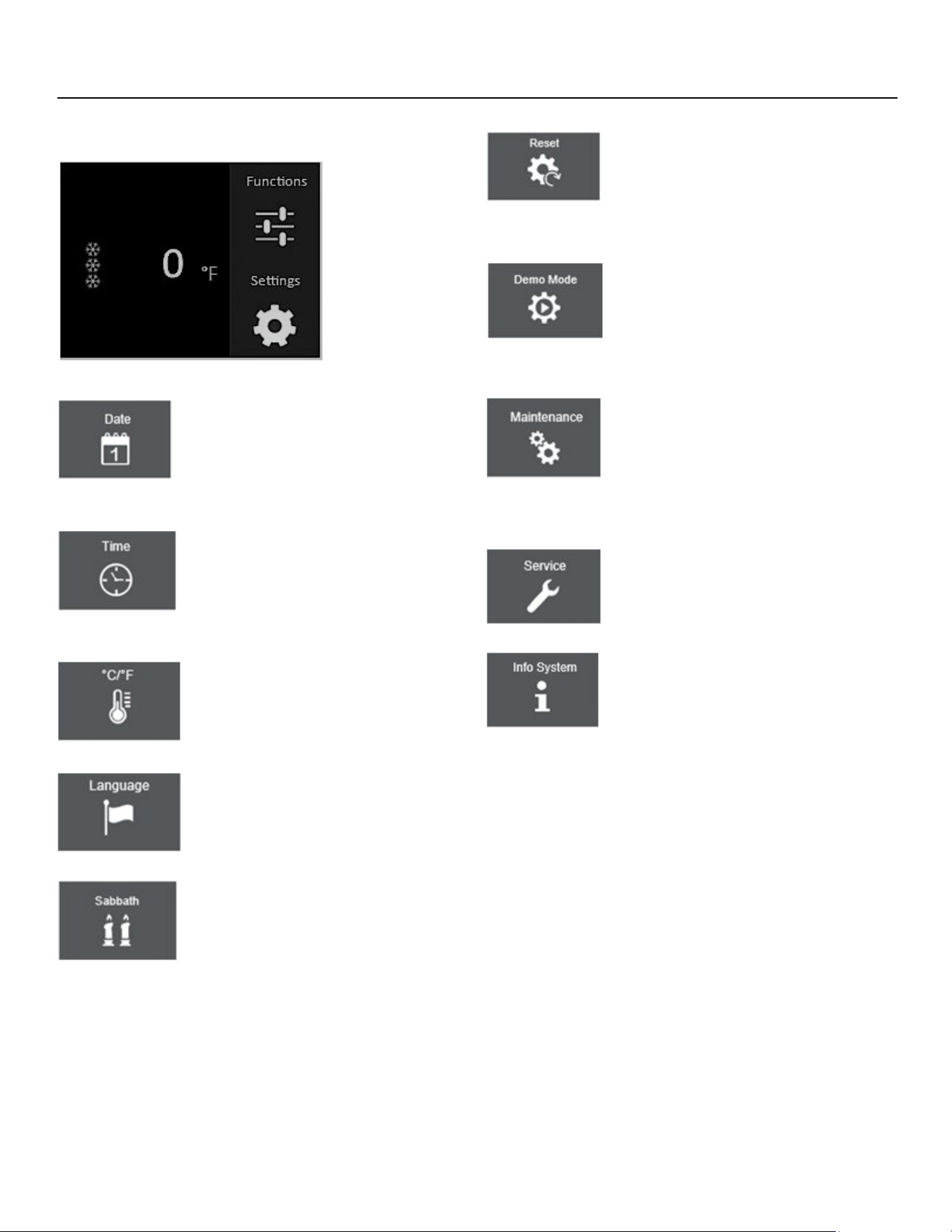
Press Sengs to access the icons on this page.
Date
Sets the day, month, and year. Press this,
then scroll up or down to select the year,
the month, then the date. Press OK to con-
rm.
Time
Sets the me of day. Press this, select 12- or
24-hours to set the format, then scroll up or
down to select the hour, then the minutes.
Press OK to conrm.
°C/°F (Celsius or Fahrenheit)
Changes the temperature scale. Press this,
then scroll up or down to select Fahrenheit
or Celsius. The selected scale is then lit.
Language
Sets the display language. Press this, then
scroll up or down to select the language.
Press OK to conrm.
Sabbath
Toggles Sabbath mode on or o. Press this,
press Yes to enable the Sabbath mode,
then press Yes again to conrm. When
turning o the Sabbath mode o, the prod-
uct will return to the inial test..
Electronic Controls — Sengs
Reset
Resets the electronic icons back to factory
sengs. Press this, press Yes to reset the
factory sengs, then press Yes again to
conrm.
Demo Mode (for dealers only)
Toggles Showroom mode on or o. Press
this, enter “1 2 3 4” for the password, then
press ON to acvate the demo mode or
press OFF to deacvate the mode.
Maintenance
Toggles the reminder to clean the conden-
ser. Press this, press Yes to set the remind-
er, then press Yes to conrm. The display
will show the me remaining before the
next cleaning is required.
Service
For authorized service personnel only.
Info System
Displays current soware and rmware
versions.
bluestarcooking.com 11
Door Alarm
Beeps when the refrigerator or freezer door is open longer
than three minutes and a warning message displays. Shut the
door to stop the alarm.
High Temperature Alarm
Beeps when either temperature is too warm and a warning
message is displayed.
Service
The electronic control manages the refrigerator operang
system. When there is an issue with this, a “Call for Service”
message and ashing dashes will display. Call customer service
at (800) 449-8691 for service.
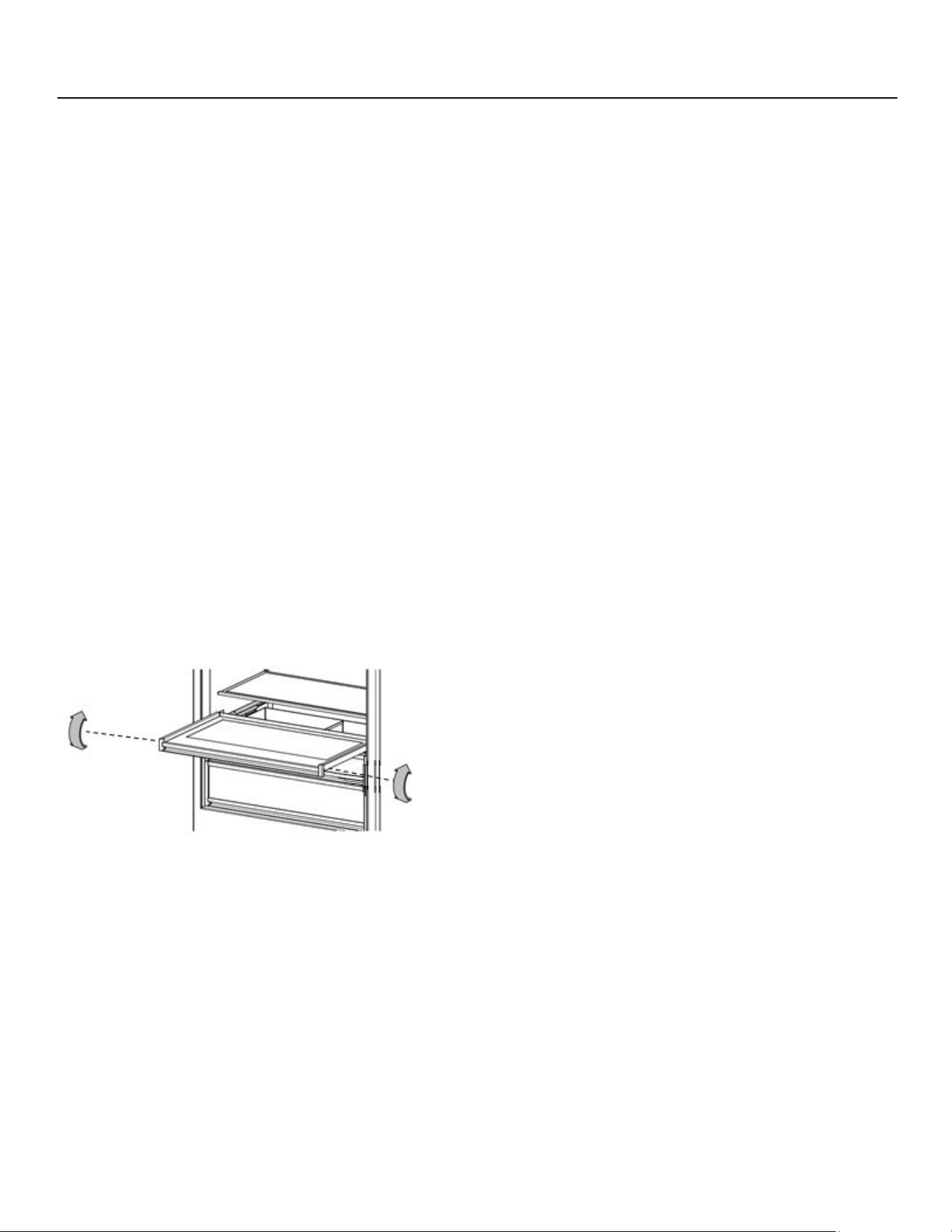
Pull-Out Tray
Remove:
Pull the tray forward unl it stops. Remove the glass by liing it
from underneath the tray. Loosen the thumb screws from both
sides of the tray (near the front). Li up the front of the tray,
then pull it gently towards you.
Replace:
Extend the slides. Align the tray on the slides and push back
unl the tray engages the rear hooks on the slides. Replace the
Phillips screws on both sides of the tray (near the front). Do
not over-ghten the screws. Set the glass on top of the tray.
Refrigerator Features — Alarms, Service, Pull-Out Tray, and Drawers
Drawers
Remove:
Pull the drawer forward unl it stops. Loosen the thumb screws
from both sides of the drawer (near the front). Li up on the
front of the drawer, then pull it gently towards you.
Replace:
Extend the slides. Align the drawer on the slides and push back
unl the drawer engages the rear hooks on the slides. Tighten
the thumb screws on both sides of the drawer (near the front).
Do not over-ghten the screws.
12 (800) 449-8691
Freezer Features — Replacement Water Filters
Pour réduire le risque lié à l'ingeson de contaminants, NE PAS
uliser une eau qui ne soit pas sûre d'un point de vue
microbiologique ou dont la qualité est inconnue sans une
désinfecon adéquate avant ou après le système. Les
systèmes cerés en maère de réducon des kystes peuvent
être ulisés pour l'eau désinfectée qui peut contenir des
kystes ltrables.
Établissement EPA 070595-MEX-001.
AVERTISSEMENT
To reduce the risk associated with the ingeson of
contaminants, DO NOT use with water that is microbiologically
unsafe or of unknown quality without adequate disinfecon
before or aer the system. Systems cered for cyst reducon
may be used on disinfected water that may container lterable
cysts.
EPA Establishment 070595-MEX-001.
WARNING
Replacement Filters (Freezer Only)
Important: Read and follow these instrucons before installing
and using this system. You MUST replace the water lter every
six months or sooner. Failure to replace the water lter at the
recommended intervals may lead to reduced water lter
performance and failure of the water lter, causing property
damage from water leakage or ooding.
You can order replacement lters at
www.bluestarcooking.com/support/contact/ or you can call
customer service at (800) 449-8691.
When the water lter needs replacing, the home screen will
display an alert.
1. Remove the metal top guard that is held by magnets.
2. Rotate the old lter counterclockwise unl it releases
from the lter head, then pull the lter all the way out.
3. Remove the new lter from its box, remove all packaging,
and insert the new lter in the lter head, then rotate it
half a turn.
4. Reinstall the metal top guard.
5. Press Reset on the Water Filter icon to reset the water
lter mer, then press Yes to conrm.
Important: When using the water lter for the rst me,
discard the rst two full pans of ice as there may be air or
impuries from the water line.
bluestarcooking.com 13
Operaon and Care and Cleaning
Ice Maker
The ice maker produces approximately 2 1/2 lbs (1.13 kg) of ice
every 24 hours. Use the Superice icon (via Ice Maker) to
increase ice producon.
When the refrigerator is shipped, the Ice Maker icon in the
electronic control is set to “on.”
Aer you inially connect the household water to the water
line, discard the rst two batches of ice as the ice may contain
air or impuries from the water line.
Lighng
Interior lighng is provided by LEDs. If one needs replacing, go
to www.bluestarcooking.com/support/contact/ or call
customer service at (800) 449-8691 to schedule a service call.
Vacaon
For extended vacaons, do the following:
1. Press Power on the electronic control to turn o the
appliance.
2. Turn o the water supply to the freezer.
3. Empty the appliance (including the ice pan in freezers).
4. Block the doors open to let air circulate and keep the
interior dry.
Important: Before cleaning, turn o the appliance. When
nished cleaning, turn the appliance back on.
Cleaning the Stainless Steel Doors and Interior
Use a non-abrasive stainless steel cleaner and a so cloth to
clean. Always follow the grain of the stainless steel.
Cleaning the Painted Doors and Other Surfaces
Use a mild soluon of soap and water and a micro ber cloth to
clean the doors and surfaces.
Cleaning the Condenser
Important: Clean the condenser every three to six months to
ensure proper operaon.
Risque de choc électrique
Coupez l'alimentaon avant de neoyer le condenseur. Le non
-respect de ces instrucons peut entraîner la mort, un choc
électrique ou un incendie.
MISE EN GARDE
Electrical Shock Hazard
Turn power o before cleaning the condenser. Failure to
follow these instrucons can result in death, electrical shock,
or re.
CAUTION

14 (800) 449-8691
Troubleshoong
The refrigerator or freezer makes unusual noises.
The following noises are normal:
• Whirring when the fans are operang. When the appliance
is inially turned on, the fan operates at a higher speed
unl it reaches the set temperatures.
• Raling during the ow of refrigerant or water.
• Claering when ice is dropped from the ice maker into the
ice pan.
• Buzzing when the water valve opens to ll the ice maker.
The refrigerator or freezer will not operate.
• Conrm whether the circuit breaker and electrical power
to the appliance are turned on.
The lights are not working.
• Verify whether the door is closed and was not recently le
open for a long me. If the doors were le open, the lights
will turn o aer ten minutes to eliminate excess heat.
The refrigerator or freezer seems to run too much
or the temperature is too warm.
• If a large amount of food was added; the door was opened
frequently; or the door was le open, the compressors and
fans will run to control the set temperatures.
• Verify whether the doors are closed or closing properly.
• Make sure there are no tears in the gaskets. If there are
any tears, call customer service at (800) 449-8691 for
service.
• Conrm whether the room temperature is hoer than
normal. Increased ambient temperatures may cause
compressors to run longer.
There is condensaon, frost, or ice on the inside of
the refrigerator or freezer.
• Verify whether the doors are closed.
• Make sure there are no tears in the gaskets. If there are
any tears, call customer service at (800) 449-8691 for
service.
The ice maker is not making ice.
• Conrm whether the water to the freezer is turned on.
• See whether the ice maker was on for at least 24 hours.
• Verify the freezer temperature is 0° F. (-18° C)
• Make sure there are no kinks in the household water line.
• Replace the water lter.
The ice is scking together in the ice bin.
• It is normal for ice to sck together if it is not used
frequently. Empty the ice bin.
The ice has a bad taste and/or odor.
• Throw away the ice if it was not used in a long me.
• Clean the freezer compartment.
• See whether the water lter was replaced and installed
correctly.
The refrigerator or freezer has an odor.
• Make sure food is adequately covered as uncovered food
could create odors.
• Clean the refrigerator thoroughly.
If assistance is sll required, please call customer service at
(800) 449-8691.

bluestarcooking.com 15
Warranty
Prizer-Painter Stove Works, Inc. (“Prizer-Painter”) warrants
your BlueStar appliance (“product”) purchased in the U.S. and
Canada and installed in residenal properes for normal
residenal use.
What Is Covered
Subject to the specic condions and limitaons below, this
warranty covers parts and/or labor necessary to repair or
replace any part of the product that contains defects in
materials and workmanship.
Two Year Warranty. For two (2) years from the date of
installaon, this warranty covers all parts and labor necessary
to repair or replace any part on the product except for the
Cosmec Component Warranty below.
Five Year Warranty-Sealed System. For ve (5) years from the
date of installaon, this warranty covers all parts and labor on
the compressor, condenser, evaporator, drier, and all
connecng tubing.
Thirteen Year Limited Warranty-Sealed System. For thirteen
(13) years from the date of installaon, this warranty covers
the following parts only: the compressor, condenser,
evaporator, drier, and all connecng tubing.
Cosmec Component Warranty. For thirty (30) days from the
date of installaon, this warranty covers scratches and dents,
paint and porcelain blemishes, visible chips, etc.
Limitaons of Coverage
• Floor Models. For one (1) year from the date of
installaon, this warranty covers all parts and labor
necessary to repair or replace any part on the product
except for cosmec parts for which there is no warranty.
• The replacement of a part under this warranty does not
extend the warranty period.
• Warranty service outside normal business hours and in
areas beyond y (50) miles one way from an authorized
BlueStar retailer or service provider The owner will be
responsible for any and all costs associated with addional
mileage, non-standard service or overme, and special
equipment required to remove the product so service may
be performed.
This warranty is void if the:
• Product is removed from where it was originally installed.
• Original factory installed serial number is altered or
removed from the product.
What Is Not Covered
This warranty does not cover, and specically excludes:
• Product installed or used in any commercial or other non-
residenal property such as, but not limited to, day care
facilies, re staons, hotels, nursing homes, etc.
• Installaon related issues including improper badge
placement or installaon inconsistent with the product
specicaons/installaon instrucons.
• Damage or repairs caused by alteraons or modicaons,
abuse, misuse, neglect, or improper installaon, mounng,
handling, operaon, maintenance, or storage.
• Normal adjustments aer installaon and setup.
• Normal wear, care, and maintenance of the product as
described in the use and care manual.
• Service calls to educate the customer on the proper use
and care of the product.
• Consumable parts such as water lters.
• Damage or repairs caused by unauthorized service or
repairs, including unauthorized adjustments or calibraons
performed on the product.
• Accidental or intenonal damage.
• Damage or repairs as a result of natural disasters, res,
oods, earthquakes, winds, lightning, corrosive
atmosphere, loss of electrical power to the product, or
other condions beyond Prizer-Painter’s control.
• Damage or repairs caused by alteraon for outdoor use.
• Damage or repairs caused by the use of harsh chemicals or
cleaning products improperly applied.
• Liability or responsibility for damage to surrounding
property including cabinetry, oors, ceilings, etc.
• Consequenal or incidental damage, including but not
limited to food or medicine loss, me away from work,
restaurant meals, etc.
The terms of this warranty provide for repair of the product
only. If the product cannot be repaired, Prizer-Painter, at its
sole discreon, will determine whether to exchange the
product.
Please see the Arbitraon Clause and Related Provisions, which
aect your legal rights. The Arbitraon Clause is available at
www.bluestarcooking.com.

Tested and veried by manufacturer’s laboratory. Tested in
accordance with NSF/ANSI Standard 42 for the reducon of
chlorine taste and odor.