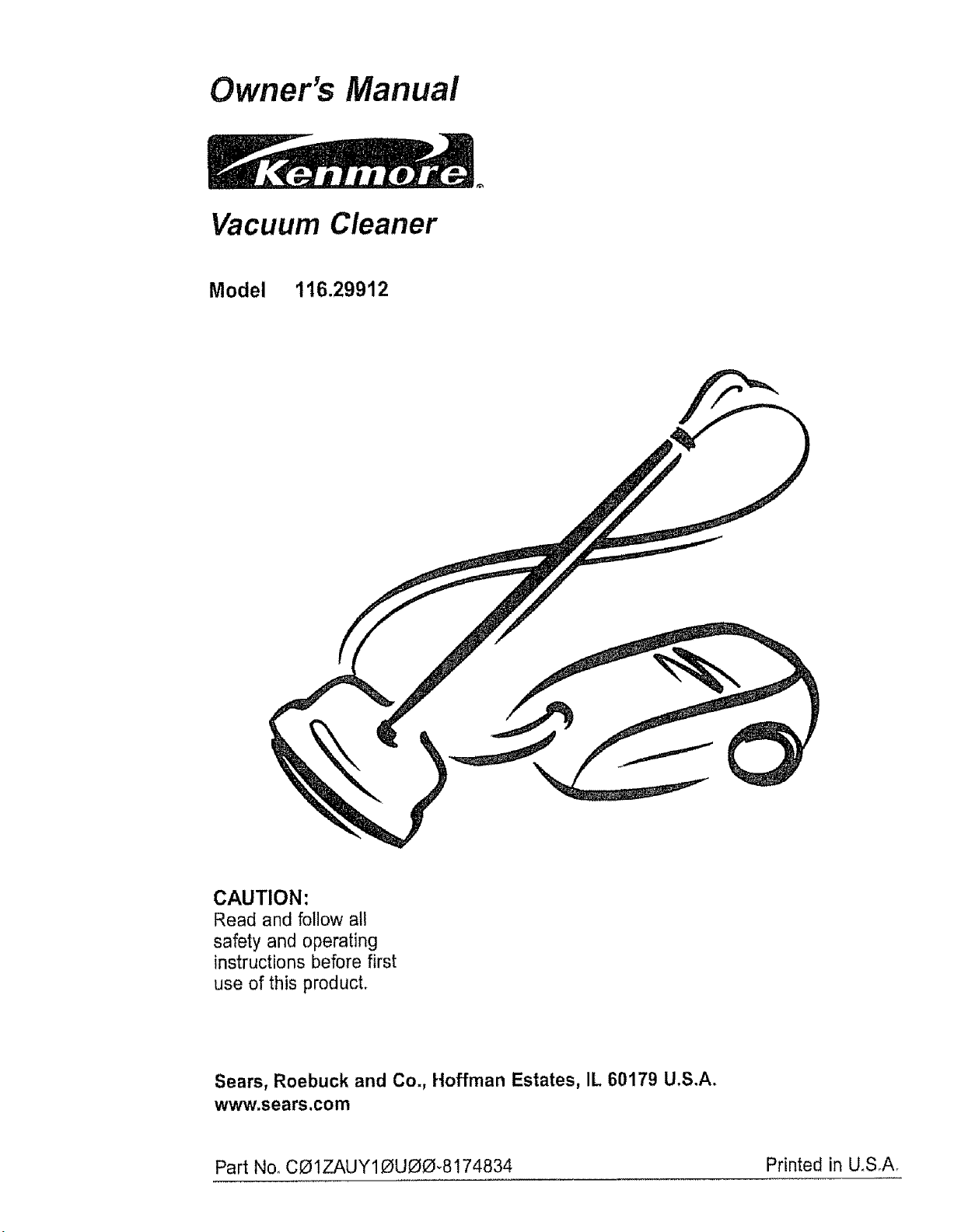
Owner's Manual
Vacuum Cleaner
Model 116.29912
CAUTION:
Read and follow all
safety and operating
instructions before first
use of this product.
Sears, Roebuck and Co., Hoffman Estates, IL 60179 U.S.A.
www.sears.com
Part No, CO1ZAUY10U00_8174834 Printed in U,SA

Before Using Your New Vacuum ....... 2
Kenmore Vacuum Cleaner Warranty .... 2
Important Safety instructions .......... 3
Parts and Features .................. 4-5
Assembly Instructions ............. 6-7
Use ................................. 8
How to Start ....................... 8
Vacuuming Tips ..................... 9
Suggested Pile Height Settings ......... 9
Dirt Sensor .................... 10
Attachments ...................... 11
Attachment Use Chart .................. 12
Performance Features ............ 12-13
HowYour Vacuum Works ............ 14
Canister Care ...................... I4
Bag Changing ................ ....... 14
Cleaning Exterior and Atlachments ..... 15
Motor Safety Filter Changing ........... i5
Exhaust Filter Changing ............... 16
Power-Mate ®Care .................. 16
Belt Changing and Agitator Cleaning o, 17-18
Light Bulb Changing .................... 18
Agitator Servicing ................... 19
Agitator Assembly ................ 19
Troubleshooting .......................... 20
Requesting Assistance Or Service ... 21
Please read this guide° It will help you assemble and operate your new Kenmore vacuum in
the safest and most effective way.
For more information about vacuum cleaner care and operation, call your nearest Sears store.
You will need the complete model and serial numbers when requesting information. Your vacu-
um's model and serial numbers are located on the Model and Serial Number Plate°
Use the space below to record the model number and serial number of your new Kenmore
vacuum.
Model Noo
Serial No.
Date of Purchase
Keep this book and your sales check (receipt) in a safe place for future reference.
LIMITED ONEYEARWARRANTY ON KENMOREVACUUM CLEANER
This warranty is for one year from the date of purchase, and includes only private household
vacuum cleaner use. During the warranty year, when this vacuum cleaner is operated and
maintained according to the owner's manual instructions, Sears will repair any defects in
material or workmanship free of charge°
This warranty excludes vacuum bags, belts, light bulbs, and filters, which are expendable parts
and become worn during normal use°
For warranty service, return this vacuum cleaner to the nearest Sears Service Center in
the United States,
This warranty applies only while this product is in use in the United States. This warranty gives
you specific tegal rights, and you may also have other rights which vary from state to state
Sears, Roebuck and Co,, DI817 WA, Heffman Estates, IL 60179
WARNING
Your safety is important to us.To reduce the risk of fire, electrical shock, injury to
persons or damage when using your vacuum cleaner, follow basic safety precau-
tions including the following:
Read this manual before assembling or
using your vacuum cleaner.
Use your cleaner only as described in this
manual Use only with Sears recommended
attachments_
To reduce the risk of electrical shock - Do
not use outdoors or on wet surfaces.
Disconnect electrical supply before servic-
ing or ctean[ng out brush area. Failure to do
so could result in electrical shock or brush
suddenly starting.
Always turn cleaner off before connecting or
disconnecting the hose or Power-Mate _
Always turn cleaner off before unplugging
Do not unplug by pulling on cord. To unplug,
grasp the plug, not the cord.
Hold plug when rewinding onto cord reel.
Do not a{Iow plug to whip when rewinding.
Do not use with damaged cord or plug If
cleaner is not working as it should, has been
dropped, damaged, left outdoors, or dropped
intowater, return it to a Sears Service
Center_
Do not pull or carry by cord, use cord as a
handle, close door on cord, or pull cord
around sharp edges or corners. Do not run
cleaner over cord Keep cord away from
heated surfaces
Do not leave cleaner when plugged in.
Unplug from outlet when not in use and
before servicing.
Do not allow to be used as a toy. Close
attention is necessary when used by or near
children.
Do not handle plug or cleaner with wet
hands.
Do not put any objects into openings.
SAVE THESE
Do not operate the cleaner with a punctured
hose. The hose contains electrical wires.
Replace ifcut or worn, Avoid picking up
sharp objects
Do not use with any opening blocked; keep
free of dust, tint, hair and anything that may
reduce air flow.
Keep hair, loose clothing, fingers, and all
parts of body away from openings and mov-
ing parts
Do not use cleaner without dust bag and/or
filters in place.
Always change the dust bag after vacuum-
ing carpet cleaners or freshener, powders
and fine dust. These products clog the bag,
reduce airflow and can cause the bag to
burst. Failure to change bag could cause
permanent damage to the cleaner.
Do not use the cleaner to pick up sharp hard
objects, small toys, pins, paper clips, etc.
They may damage the cleaner or dust bag.
Do not pick up anything that is burning or
smoking, such as cigarettes, matches, or hot
ashes.
Do not use cleaner to pick up flammable or
combustible liquids (gasoline, cleaning fluids,
perfumes, etc.), or use in areas where they
may be present. The fumes from these sub-
stances can create a fire hazard or explo-
sion,
Use extra care when cleaning on stairs. Do
not put on chairs, tables, etc Keep on floor.
You are responsible for making sure that
your vacuum cleaner is not used by anyone
unable to operate it properly,
Do not operate without exhaust filter or
exhaust filter cover installed.
iNSTRUCTiONS
Proper assembly and safe use of your vacuum cleaner are your responsibilities. Your cleaner
is intended only for household use_Read this Owner's Manual carefully for important use and
safety information. This guide contains safety statements under warning and caution symbols
Please pay special attention to Lheseboxes and follow any instructions given WARNING
statements alert you to such dangers as fire, electrical shock, burns and personal injury CAU-
TION statements alert you to such dangers as personal injury and/or property damage
3
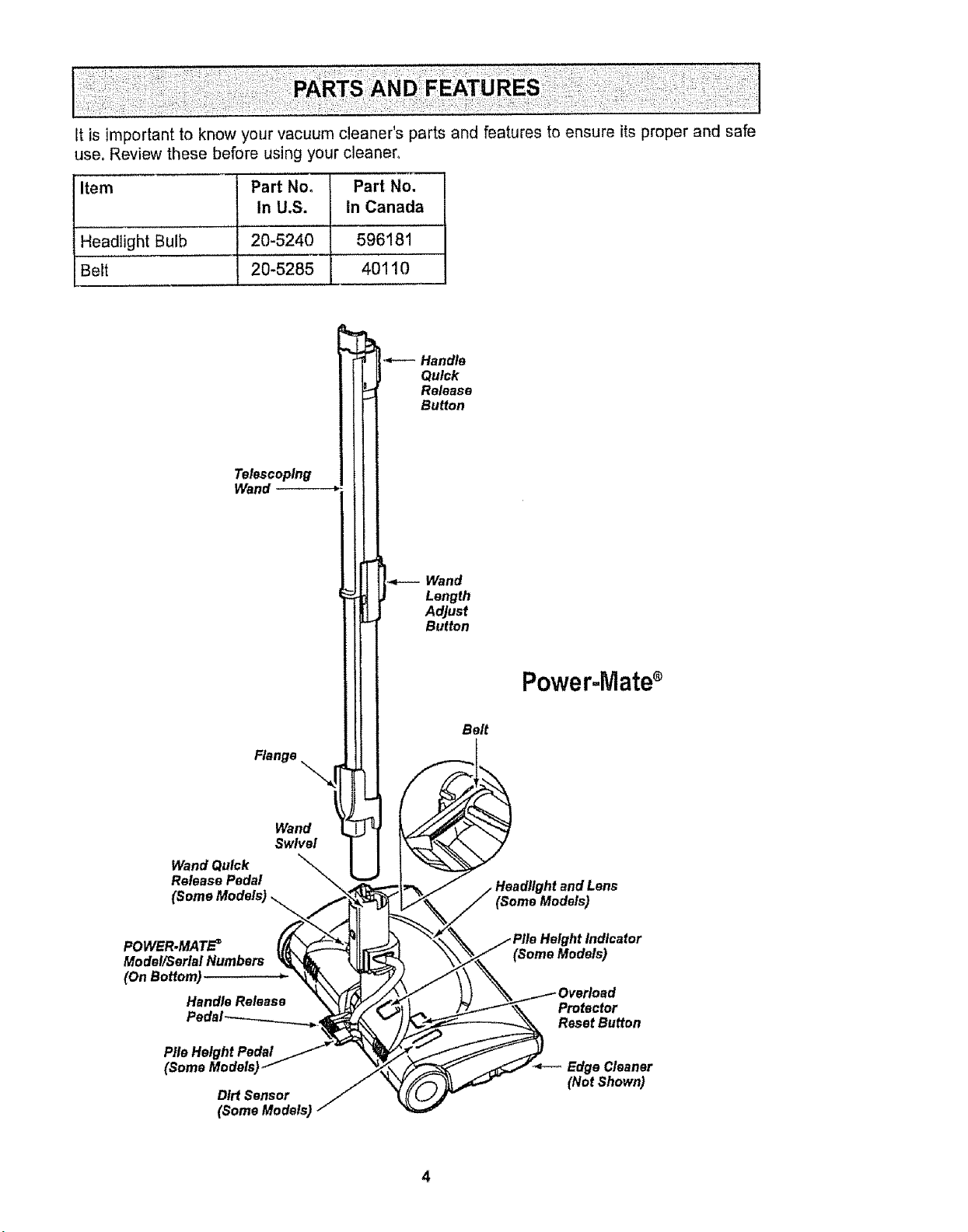
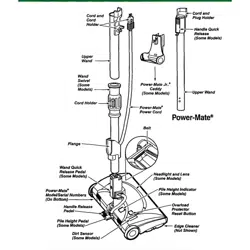
it isimportanttoknowyourvacuumcleaner'spartsandfeaturestoensureitsproperandsafe
use.Reviewthesebeforeusingyourcleaner°
Item Part No,
In U.S.
Part No.
In Canada
Headlight Bulb 20-5240 596181
Belt 20-5285 40110
*--- Handle
Quick
Release
Button
Telescoping
Wand
Wand
Flange "_
Wand
Swivel
Wand Quick "_
Release Pedal _
(SomeModels)__
Model/Serlal Numbers _'_ k_
OnBottom) " 'RXA
Handle Release _
Length
Adjust
Button
Power-Mates
Belt
t_ndtens
(Some Models)
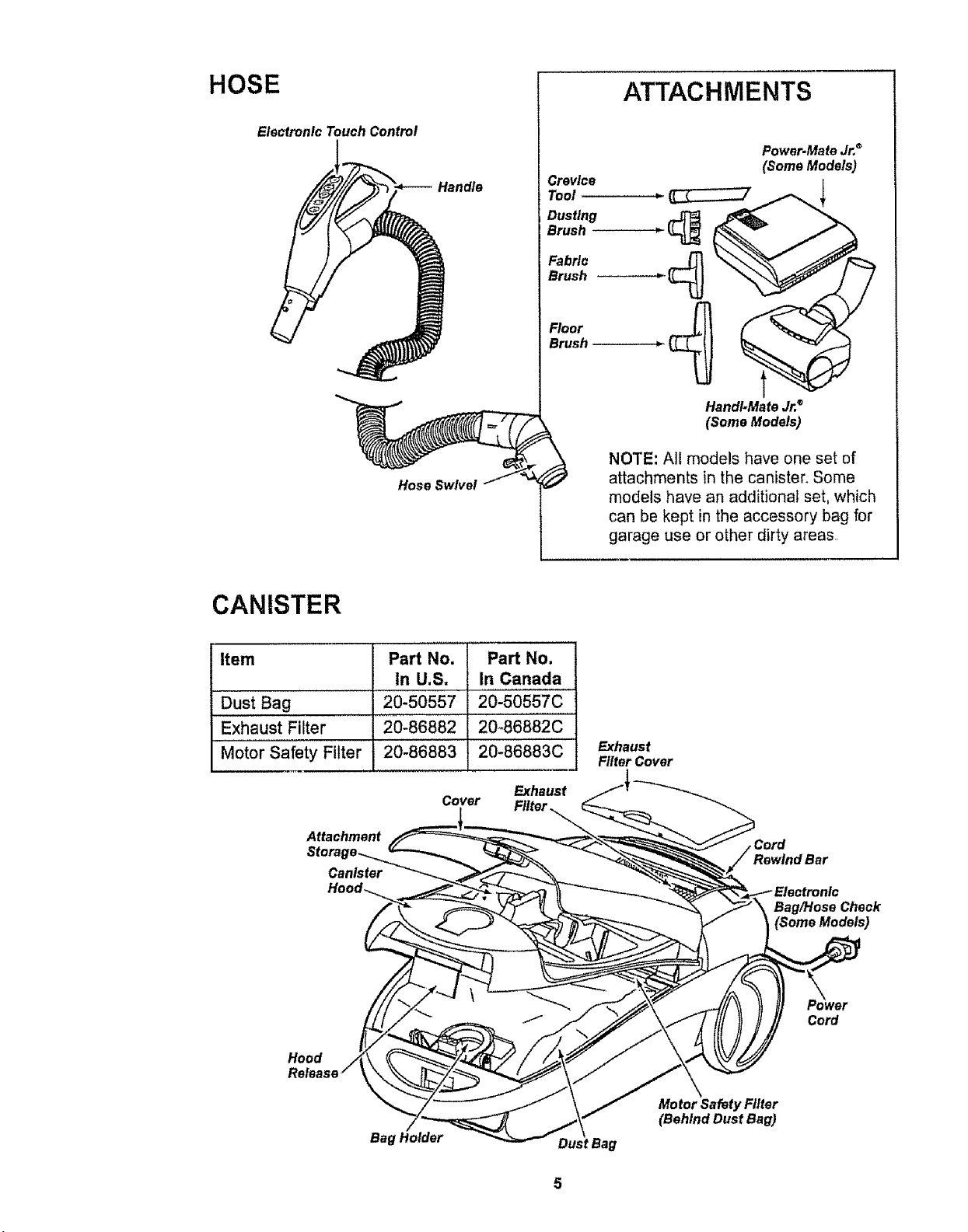
HOSE
Electronic Touch Control
Handle
Hose Swivel
ATTACHMENTS
Crevice
Tool
Dustlng
Brush
Fabric
Brush
Floor
Brush
Power.Mate Jr,®
(Some Models)
HandI-Mate Jr,®
(Some Models)
NOTE: All models have one set of
attachments in the canister. Some
models have an additional set, which
can be kept in the accessory bag for
garage use or other dirty areas.
CANISTER
Item
Dust Bag
Exhaust Filter
Motor Safety Filter
Part No.
In U.S,
20-50557
20-86882
20-86883
Attachment
Canister
Part No.
In Canada
20-50557C
20_86882C
20-86883C
Exhaust
Cover
Exhaust
Filter Cover
Rewind Bar
Bag/Hose Check
(Some Models)
Hood
Cord
Bag
Dust Bag
Motor Safety Filter
(Behind Dust Bag)
E
WARNING
Electrical Shock Hazard
DO NOT plug into electrical supply
until assembly is complete, Failure
to do so could result in electrical
shock or injury.
......................... i
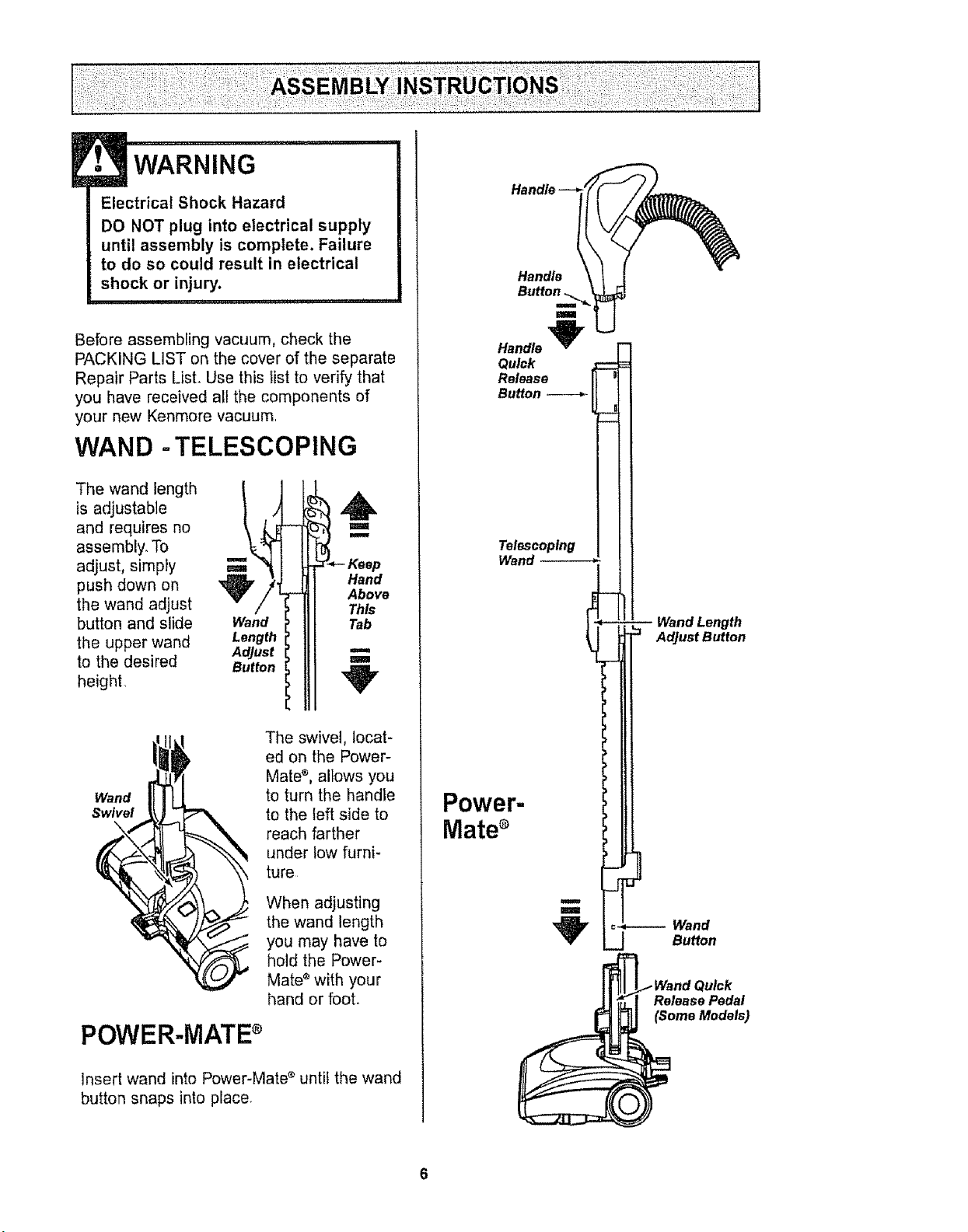
Before assembling vacuum, check the
PACKING LIST on the cover of the separate
Repair Parts List. Use this Fistto verify that
you have received all the components of
your new Kenmore vacuum.
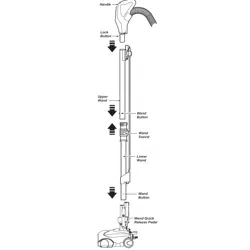
WAND -TELESCOPING
The wand length
is adjustable
and requires no
assembly. To
adjust, simpfy
push down on
the wand adjust
button and slide
the upper wand
to the desired
height.
Wand
Length
AdJust
Button
t
B
Hand
Above
This
Tab
m
m
Wand
Swivel
\
POWER-MATEs
The swivel, locat-
ed on the Power-
Mate ®, allows you
to turn the handle
to the left side to
reach farther
under low furni-
ture
When adjusting
the wand length
you may have to
hold the Power-
Mate ®with your
hand or foot.
Insert wand into Power-Mate e until the wand
button snaps into place.
Handle
Telescoping
Wand --
Power-
Mates
Wand Length
Adjust Button
_.Wand Quick
Release Pedal
(Some Models)
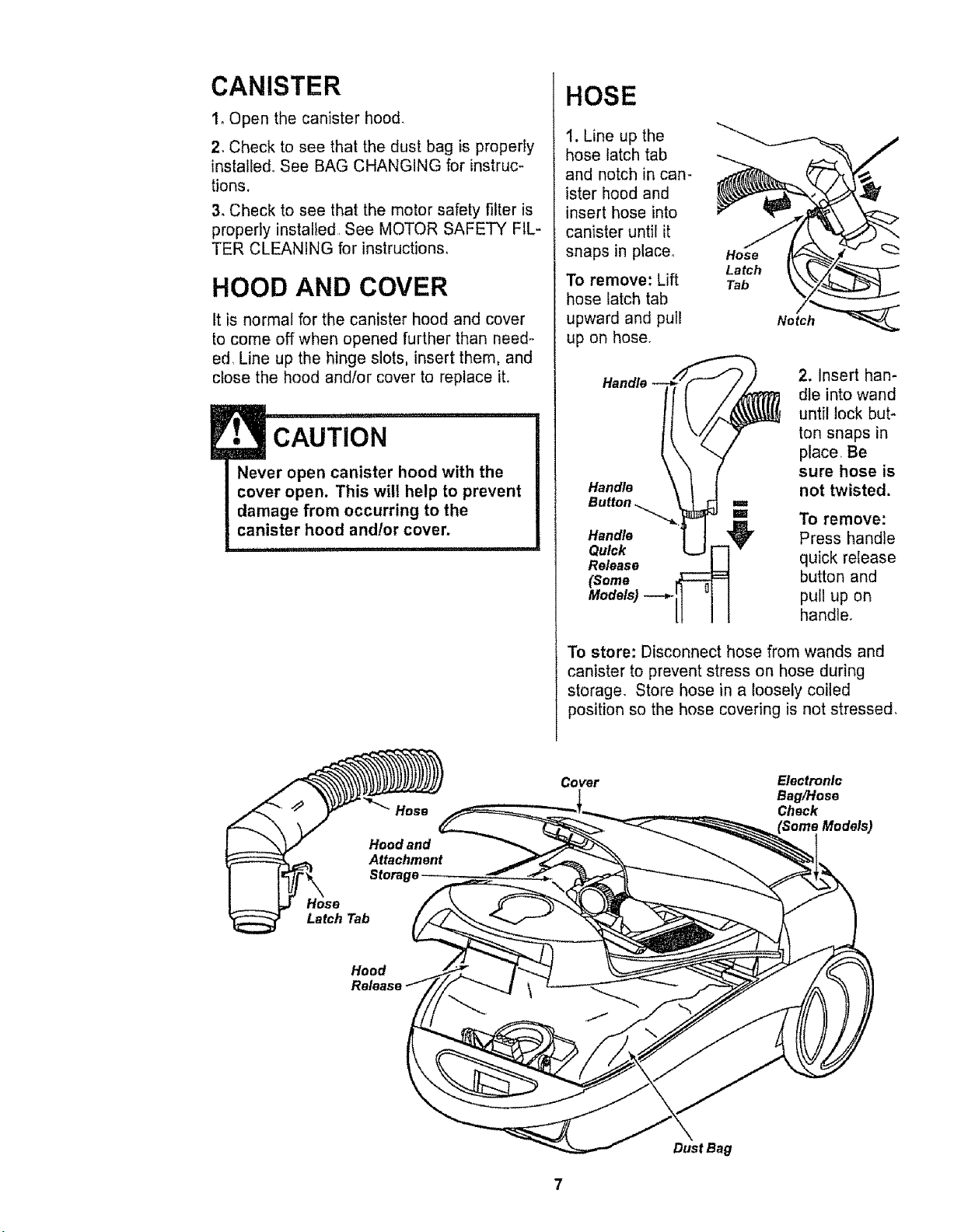
CANISTER
1oOpen the canister hood.
2. Check to see that the dust bag is properly
instalted. See BAG CHANGING for instruc-
tions,
3. Check to see that the motor safety filter is
properly installed See MOTOR SAFETY FIL-
TER CLEANING for instructions.
HOOD AND COVER
It is normal for the canister hood and cover
to come off when opened further than need-
ed, Line up the hinge slots, insert them, and
close the hood and/or cover to replace it.
CAUTION
Never open canister hood with the
cover open. This will help to prevent
damage from occurring to the
canister hood and!or cover.
Storage
HOSE
1. Line up the
hose latch tab
and notch in can-
ister hood and
insert hose into
canister until it
snaps in place_
To remove: Lift
hose latch tab
upward and pull
up on hose.
Hose
Latch
Tab
Notch__
2. Insert han-
dle into wand
until lock but-
ton snaps in
place Be
sure hose is
Handle not twisted.
Button ==
'=' To remove:
Handle _ Press handle
Quick r-] v
Release _ quick release
(Some _ button and
To store: Disconnect hose from wands and
canister to prevent stress on hose during
storage. Store hose in a loosely coiled
position so the hose covering is not stressed.
Hose
Latch Tab
Cover
Electronic
Bag/Hose
Chock
Hood
Release
Dust Bag
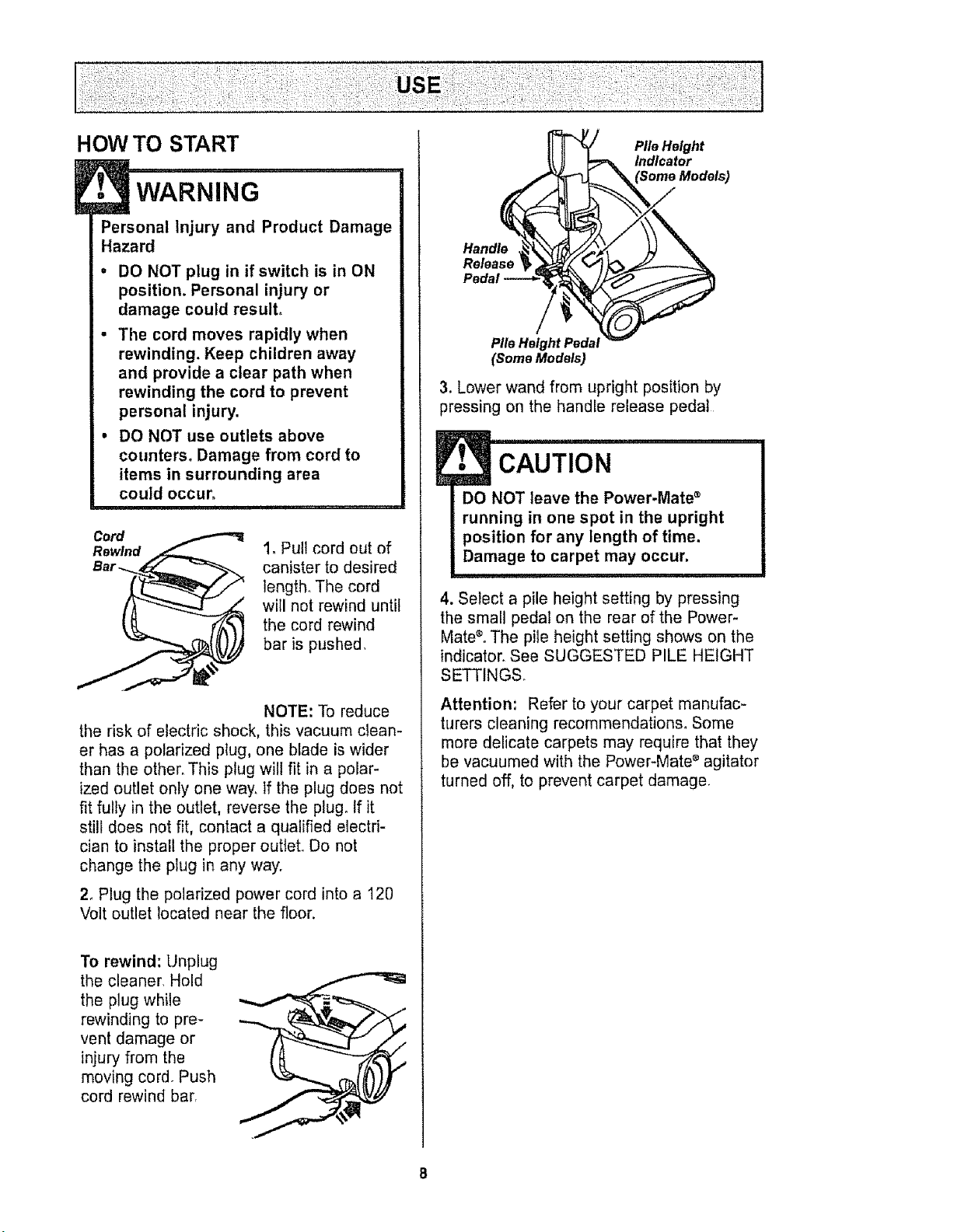
HOW TO START
Personal Injury and Product Damage
Hazard
o DO NOT plug in if switch is in ON
position, Personal injury or
damage could result,
• The cord moves rapidly when
rewinding, Keep children away
and provide a clear path when
rewinding the cord to prevent
personal injury.
• DO NOT use outlets above
counters° Damage from cord to
items in surrounding area
could occur_
Cord
Rewlnd
1. Pull cord out of
canister to desired
length,, The cord
will not rewind until
the cord rewind
bar is pushed.
NOTE: To reduce
the risk of electric shock, this vacuum clean-
er has a polarized plug, one blade is wider
than the other. This plug will fit in a polar-
ized outlet only one way. If the plug does not
fit fully in the outlet, reverse the plugo If it
still does not fit, contact a qualified electri-
cian to install the proper outlet, Do not
change the plug in any way.
2_ Plug the polarized power cord into a 120
Volt outlet located near the floor.
To rewind: Unplug
the cleaner, Hold
the plug while
rewinding to pre-
vent damage or
injury from the
moving cord. Push
cord rewind barr
Pile Height
Indicator
Handle
Pile Height Pedal
(Some Models)
3. Lower wand from upright position by
pressing on the handle release pedal
E• CAUTION ...........
DO NOT leave the Power-Mate ®
running in one spot in the upright
position for any length of time.
Damage to carpet may occur,
4. Select a pile height setting by pressing
the small pedal on the rear of the Power-
Mate®°The pile height setting shows on the
indicator. See SUGGESTED PILE HEIGHT
SETTINGS.
Attention: Refer to your carpet manufac-
turers cleaning recommendations. Some
more delicate carpets may require that they
be vacuumed with the Power-Mate s agitator
turned off, to prevent carpet damage.
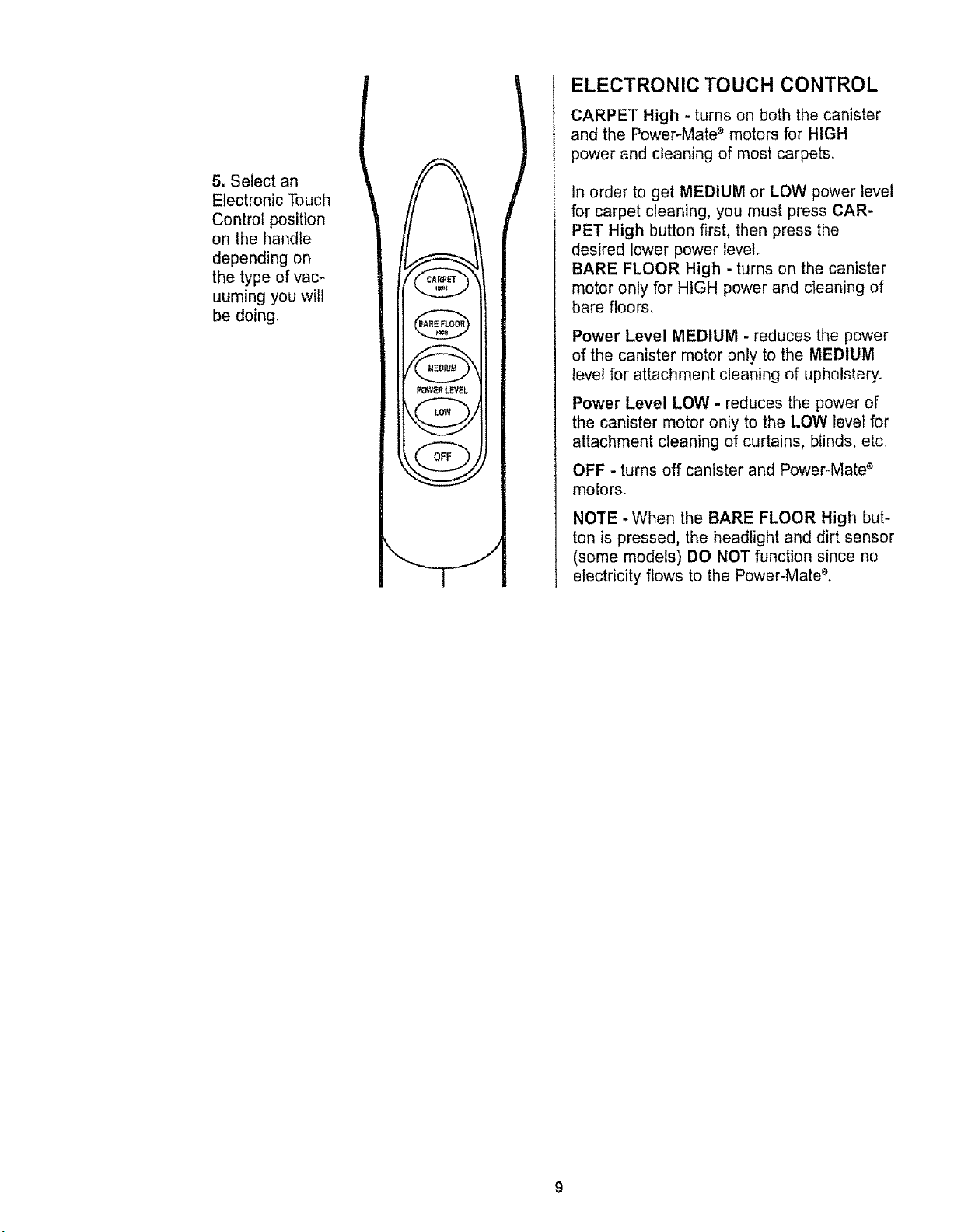
5, Select an
Electronic Touch
Control position
on the handle
depending on
the type of vac-
uuming you will
be doing
P_gE_ LEVEL
ELECTRONIC TOUCH CONTROL
CARPET High - turns on both the canister
and the Power-Mate _ motors for HIGH
power and cleaning of most carpets,
In order to get MEDIUM or LOW power level
for carpet cleaning, you must press CAR-
PET High button first, then press the
desired lower power level
BARE FLOOR High - turns on the canister
motor only for HIGH power and cleaning of
bare floors.
Power Level MEDIUM - reduces the power
of the canister motor only to the MEDIUM
level for attachment cleaning of upholstery.
Power Level LOW - reduces the power of
the canister motor only to the LOW level for
attachment cleaning of curtains, blinds, etc_
OFF - turns off canister and Power-Mate _
motors.
NOTE -When the BARE FLOOR High but-
ton is pressed, the headlight and dirt sensor
(some models) DO NOT function since no
electricity flows to the Power-Mate _,
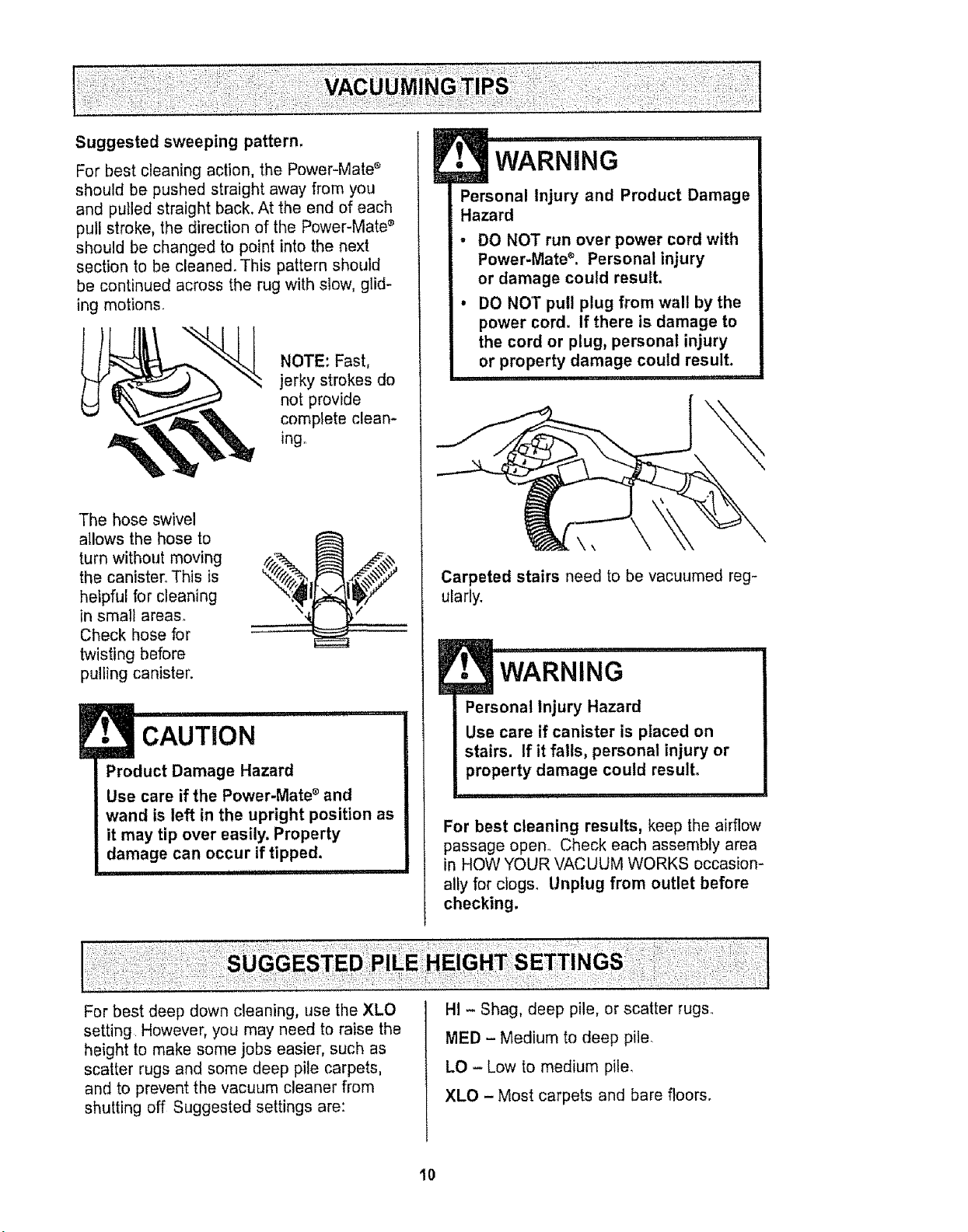
Suggested sweeping pattern.
For best cleaning action, the Power-Mate _
should be pushed straight away from you
and pulled straight back. At the end of each
pull stroke, the direction of the Power-Mate _
should be changed to point into the next
section to be cleaned. This pattern should
be continued across the rug with slow, glid-
ing motions.
NOTE: Fast,
jerky strokes do
not provide
complete clean-
ing.
The hose swivel
allows the hose to
turn without moving
the canister,, This is
helpful for cleaning
in small areas.
Check hose for
twisting before
pulling canister.
CAUTION
Product Damage Hazard
Use care if the Power-Mate ®and
wand is left in the upright position as
it may tip over easily. Property
damage can occur if tipped.
I !lUl!l"j'll , ii i1,1 .,,i , , i
E
• WARNING
Personal Injury and Product Damage
Hazard
DO NOT run over power cord with
Power.Mate e. Personal injury
or damage could result.
DO NO']" pull plug from wall by the
power cord. If there is damage to
the cord or plug, personal injury
or property damage could result.
Carpeted stairs need to be vacuumed reg-
ularly.
WARNING
Personal Injury Hazard
Use care if canister is placed on
stairs. If it falls, personal injury or
property damage could result.
For best cleaning results, keep the airflow
passage open,, Check each assembly area
in HOW YOUR VACUUM WORKS occasion-
ally for clog& Unplug from outlet before
checking.
For best deep down cleaning, use the XLO
setting However, you may need to raise the
height to make some jobs easier, such as
scatter rugs and some deep pile carpets,
and to prevent the vacuum cleaner from
shutting off Suggested settings are:
HI - Shag, deep pile, or scatter rugs.
MED - Medium to deep pile.
LO - Low to medium pile,
XLO - Most carpets and bare floors.
10
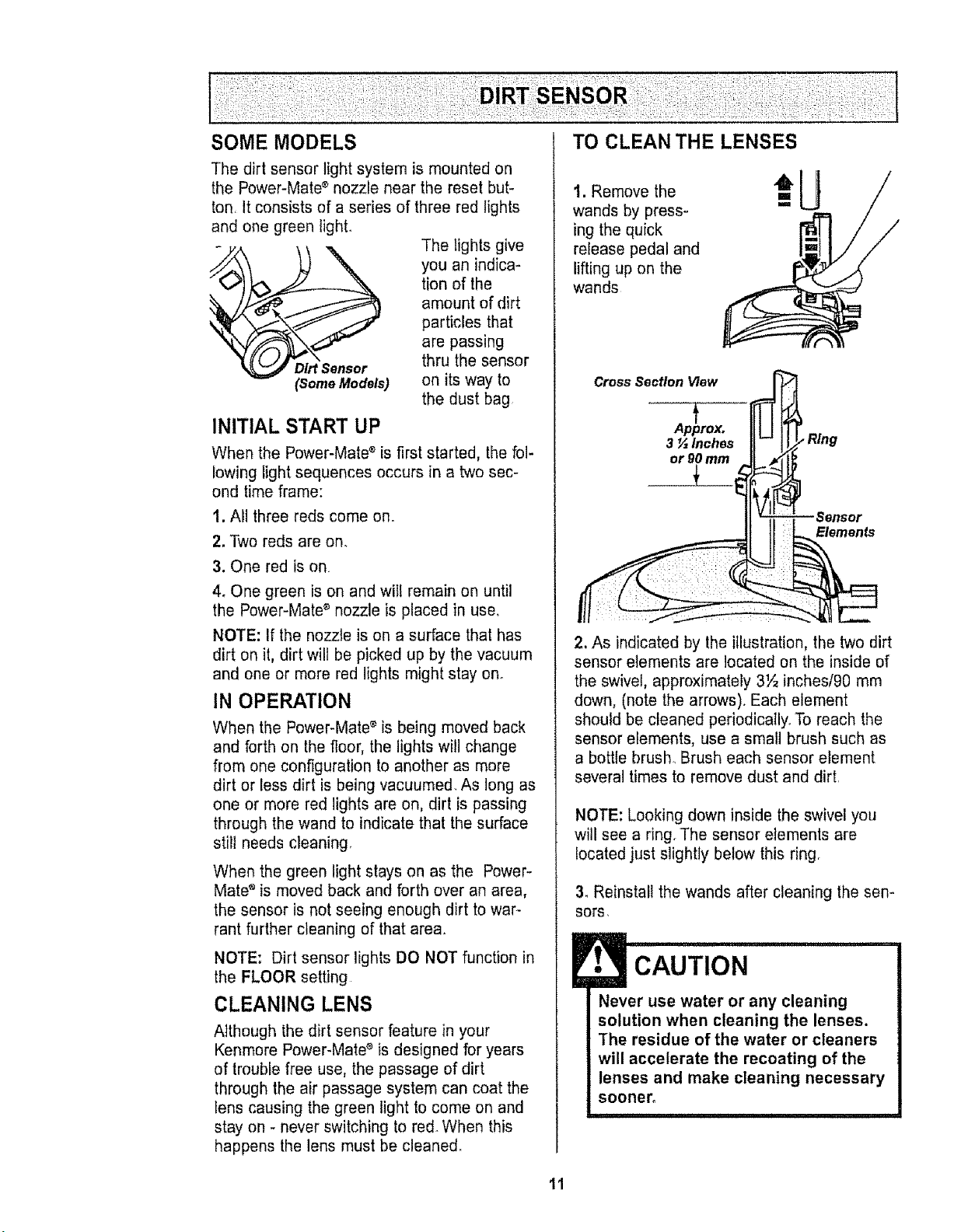
Thedirtsensorlightsystemismountedon
thePower-Mate®nozzleneartheresetbut-
ton,Itconsistsofaseriesofthreeredlights
andonegreenlight.
Thelightsgive
youanindica-
tionofthe
amountofdirt
particlesthat
arepassing
Dirt Sensor thru the sensor
(Some Models) on its way to
the dust bag
INITIAL START UP
When the Power-Mate _ is first started, the fol-
lowing light sequences occurs in a two sec-
ond time frame:
I. All three reds come on.
2.Two reds are on.
3. One red is on
4. One green is on and will remain on until
the Power-Mate ®nozzle is placed in use.
NOTE: If the nozzle is on a surface that has
dirt on it, dirt wilt be picked up by the vacuum
and one or more red lights might stay on.
IN OPERATION
When the Power-Mate _ is being moved back
and forth on the floor, the lights will change
from one configuration to another as more
dirt or less dirt is being vacuumed+ As long as
one or more red tights are on, dirt is passing
through the wand to indicate that the surface
still needs cleaning
When the green light stays on as the Power-
Mate '_is moved back and forth over an area,
the sensor is not seeing enough dirt to war-
rant further cleaning of that area.
NOTE: Dirt sensor lights DO NOT function in
the FLOOR setting
CLEANING LENS
Although the dirt sensor feature in your
Kenmore Power-Mate ®is designed for years
of trouble free use, the passage of dirt
through the air passage system can coat the
fens causing the green light to come on and
stay on - never switching to red+When this
happens the lens must be cleaned_
1. Remove the
wands by press-
ing the quick
release pedal and
lifting up on the
wands
Cross Section View
Ap_prox,
3 _ Inches
or gOmm
__L__.
Sensor
Elements
2, As indicated by the illustration, the two dirt
sensor elements are located on the inside of
the swivel, approximately 3½ inches/90 mm
down, (note the arrows). Each element
should be cleaned periodically+ To reach the
sensor elements, use a smalt brush such as
a bottle brush+lBrush each sensor element
several times to remove dust and dirt.
NOTE: Looking down inside the swivel you
will see a ring. The sensor elements are
located just slightly below this ring.
3. Reinstall the wands after cleaning the sen-
sots,
CAUTION
Never use water or any cleaning
solution when cleaning the lenses.
The residue of the water or cleaners
will accelerate the recoating of the
lenses and make cleaning necessary
sooner,
11
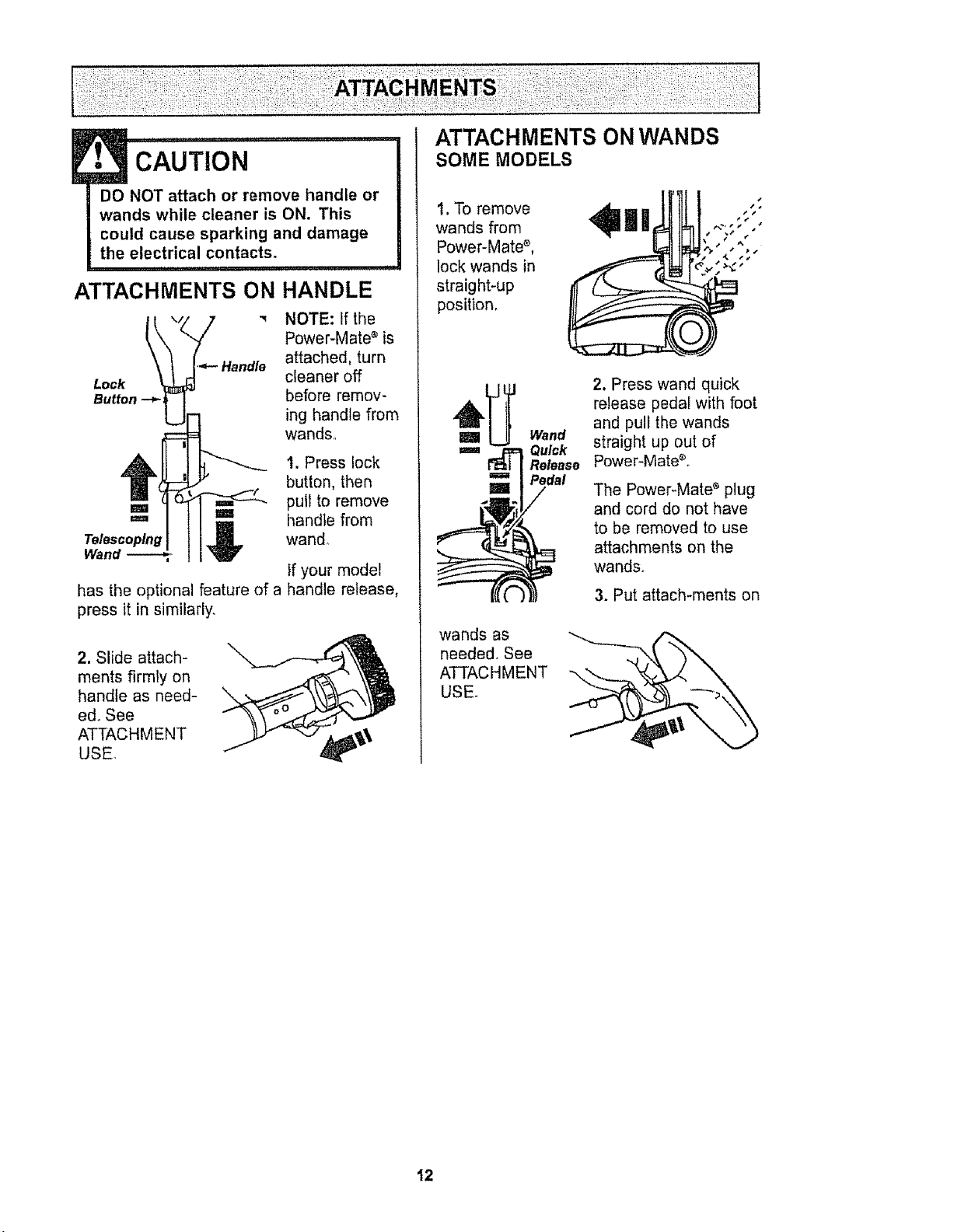
!
ATTACHMENTS ON
• cAUTION
DO NOT attach or remove handle or
wands while cleaner is ON. This
could cause sparking and damage
the electrical contacts,
iiii
HANDLE
NOTE: if the
Power-Mate s is
,'_- Handle attached, turn
Lock cleaner off
Button --_i before remov-
ing handle from
wands,
1. Press lock
button, then
pull to remove
'=' handle from
wand,
has the optional feature of a
press it in similarly,
Ifyour model
handle release,
2. Slide attach-
ments firmly on
handle as need-
ed, See
ATTACHMENT
USE.
ATTACHMENTS ON WANDS
SOME MODELS
1. To remove
wands from
Power-Mate s,
lock wands in
straight-up
position,
_ Wand
='= _ Quick
Release
Pedal
2. Press wand quick
release pedal with foot
and pull the wands
straight up out of
Power-Mate_.,
The Power-Mate e plug
and cord do not have
to be removed to use
attachments on the
wands,
3. Put attach-ments on
wands as
needed, See
ATTACHMENT --,
USE.
12
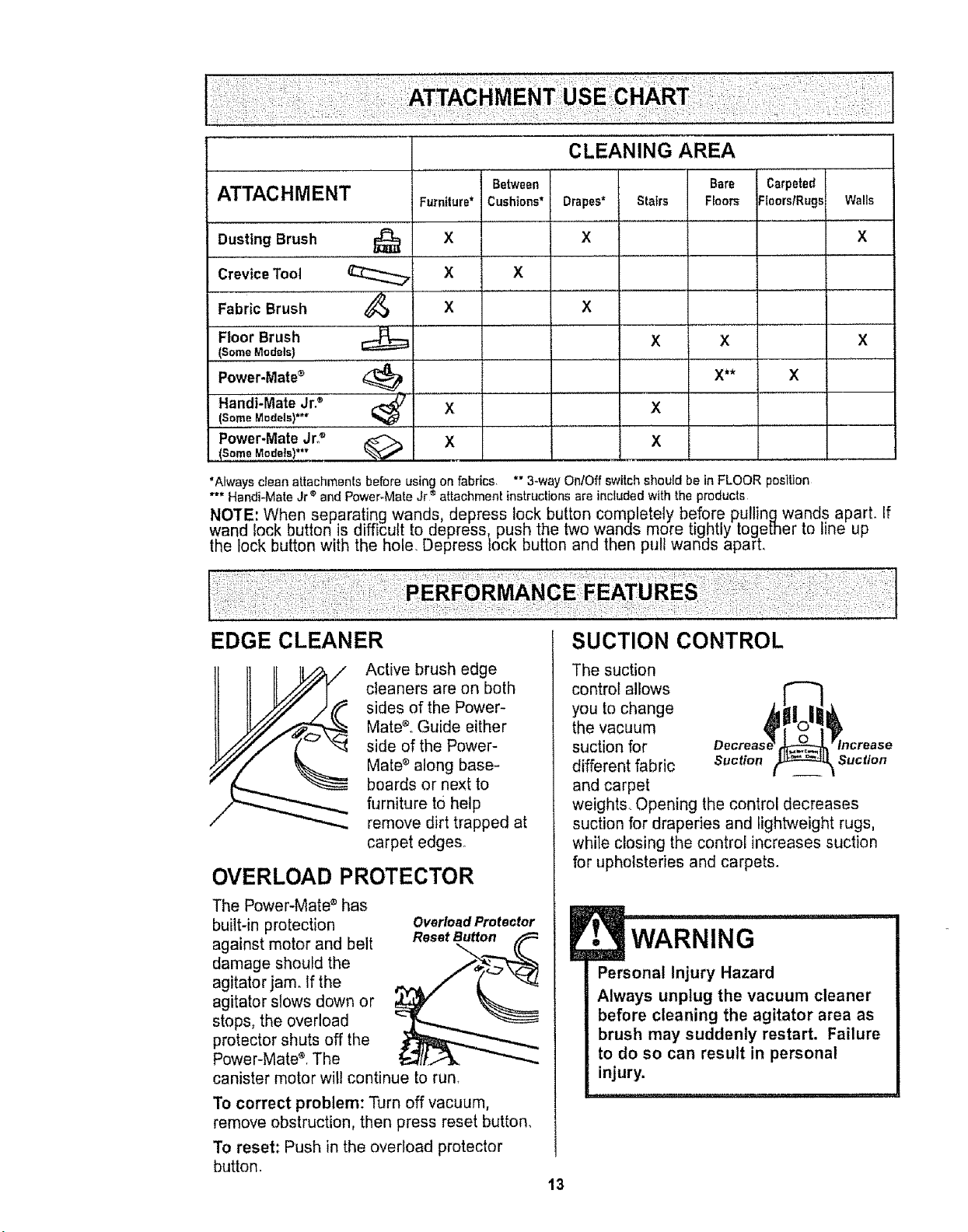
ATTACHMENT
Dusting Brush
Crevice Tool
Fabric Brush
Floor Brush
(Some Models)
Power'Mate_
Handi':"MateJr? ......
{Some Models)**"
Power-Mate Jr?
(Some Modefs)**"
Furniture*
X
x
X
X
X
Between
Cushions* Drapes*
x
x
X
CLEANING AREA
Bare
Stairs Floors
X X
X**
X
X
Carpeted
Floors/Rugs Walls
x
X
X
*Alwaysclean attachments before using on fabrics ** 3-way OntOff switch shouid be in FLOOR position
*** Handi-Mate Jr ®and Power-MateJr ®attachment instructions are includedwith the products
NOTE: When separating wands, depress lock button completely before pullingwands apart. If
wand lock button is difficult to depress push the two wands more tightly together to line up
the lock button with the hole. Depress lock button and then pu wands apart,
EDGE CLEANER SUCTION CONTROL
Active brush edge
cleaners are on both
sides of the Power-
Mate_, Guide either
side of the Power-
Mate _ along base=
boards or next to
furniture to help
remove dirt trapped at
carpet edges.
OVERLOAD PROTECTOR
The Power-Mate ®has
built-in protection
against motor and belt
damage should the
agitator jamo If the
agitator slows down or
stops, the overload
protector shuts off the
Power-Mate s,The
canister motor will continue to run,
Overload Protector
Reset Button
To correct problem: Turn off vacuum,
remove obstruction, then press reset button,
To reset: Push in the overload protector
button
13
The suction
control allows
you to change
the vacuum
suction for
different fabric Suction Suction
and carpet
weights. Opening the control decreases
suction for draperies and lightweight rugs,
while closing the control increases suction
for upholsteries and carpets.
WARNING
Personal Injury Hazard
Always unplug the vacuum cleaner
before cleaning the agitator area as
brush may suddenly restart. Failure
to do so can result in personal
injury.
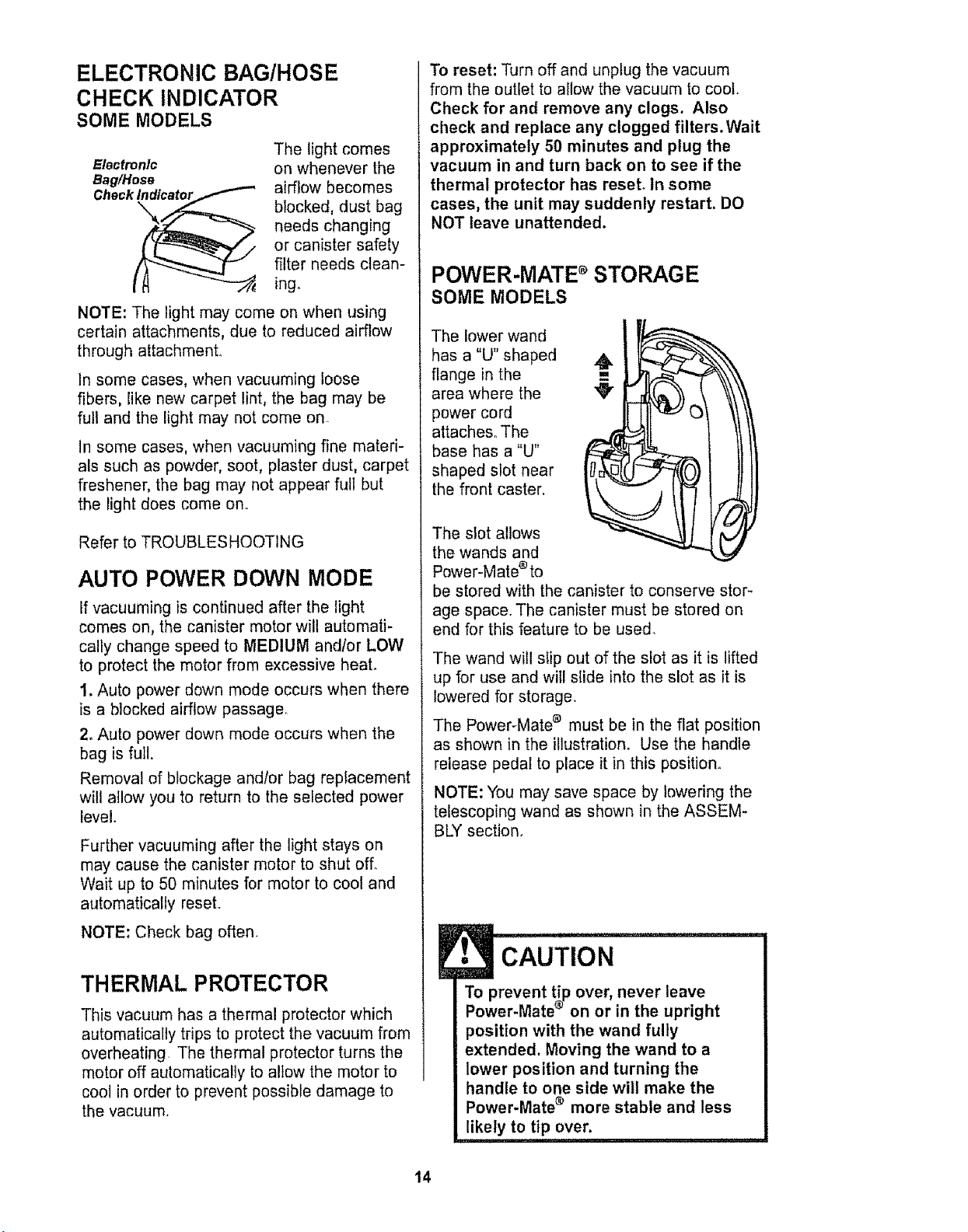
ELECTRONIC BAG/HOSE
CHECK INDICATOR
SOME MODELS
Electronic
Bag/Hose
Check_
The light comes
on whenever the
airflow becomes
blocked, dust bag
needs changing
or canister safety
filter needs clean-
ing.
NOTE: The light may come on when using
certain attachments, due to reduced airflow
through attachment.
In some cases, when vacuuming loose
fibers, like new carpet lint, the bag may be
full and the light may not come on.
In some cases, when vacuuming fine materi-
als such as powder, soot, plaster dust, carpet
freshener, the bag may not appear full but
the light does come on.
Refer to TROUBLESHOOTING
AUTO POWER DOWN MODE
If vacuuming is continued after the light
comes on, the canister motor will automati-
cally change speed to MEDIUM and/or LOW
to protect the motor from excessive heal
1, Auto power down mode occurs when there
is a blocked airflow passage.
2. Auto power down mode occurs when the
bag is full.
Removal of blockage andtor bag replacement
will allow you to return to the seiected power
level.
Further vacuuming after the light stays on
may cause the canister motor to shut off.
Wait up to 50 minutes for motor to cool and
automatically reset°
NOTE: Check bag often.
THERMAL PROTECTOR
This vacuum has a thermal protector which
automatically trips to protect the vacuum from
overheating The thermal protector turns the
motor off automatically to allow the motor to
cool in order to prevent possible damage to
the vacuum.
To reset: Turn off and unplug the vacuum
from the outlet to allow the vacuum to coot.
Check for and remove any clogs, Also
check and replace any clogged filters.Wait
approximately 50 minutes and plug the
vacuum in and turn back on to see if the
thermal protector has reset. In some
cases, the unit may suddenly restart. DO
NOT leave unattended.
POWER-MATE d STORAGE
SOME MODELS
The lower wand
has a "U" shaped
flange in the
area where the
power cord
attaches. The
base has a "U"
shaped slot near
the front caster.
The slot allows
the wands and
Power-Mate _ to
be stored with the canister to conserve stor-
age space. The canister must be stored on
end for this feature to be used.
The wand will s_ip out of the slot as it is lifted
up for use and will slide into the slot as it is
lowered for storage.
The Power-Mate e must be in the fiat position
as shown in the illustration. Use the handle
release pedal to place it in this position.
NOTE: You may save space by lowering the
telescoping wand as shown in the ASSEM-
BLY section.
! CAUTION
To prevent tip over, never leave
®
Power-Mate on or m the upright
position with the wand fully
extended. Moving the wand to a
lower position and turning the
handle to one side will make the
Power-Mate d more stable and less
likely to tip over.
14
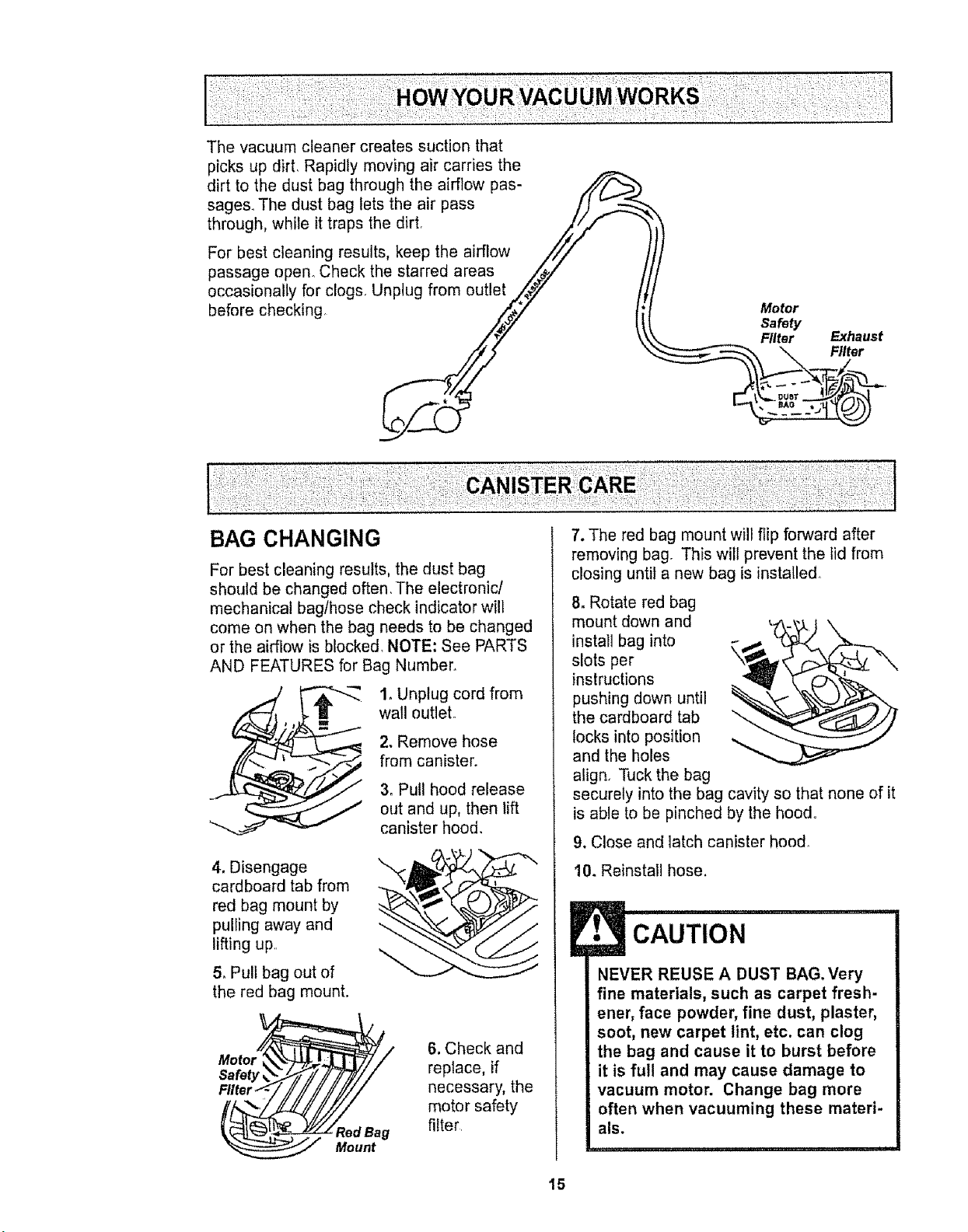
The vacuum cleaner creates suction that
picks up dirL Rapidly moving air carries the
dirt to the dust bag through the airflow pas-
sages. The dust bag lets the air pass /)
through, while it traps the dirt. iSF ",4
For best cleaning results, keep the airflow ///
1
passage open° Check the starred areas /_#,,/
occasionally for clogs. Unplug from outlet ,Z_7
before checking ,,_7 Motor
Safety
Filter Exhaust
\ Filter
BAG CHANGING
For best cleaning results, the dust bag
should be changed often, The electronic/
mechanica! baglhose check indicator wi!l
come on when the bag needs to be changed
or the airflow is blocked, NOTE: See PARTS
AND FEATURES for Bag Number.
1. Unplug cord from
wall outleL
2, Remove hose
from canister.
3. Pull hood release
out and up, then tiff
canister hood.
4. Disengage
cardboard tab from
red bag mount by
pulling away and
lifting up
& Pull bag out of
the red bag mount.
Safe
Fllter ,.I--/ // // // ///,
_edBag
Mount
6. Check and
replace, if
necessary, the
motor safety
filter
7. The red bag mount will flip forward after
removing bag. This will prevent the lid from
closing unlit a new bag is installed.
8. Rotate red bag
mount down and
install bag into
slots per
instructions
pushing down until
the cardboard tab
locks into position
and the holes
align. Tuck the bag
securely into the bag cavity so that none of it
is able to be pinched by the hood.
9. Close and latch canister hood°
10. Reinstall hose.
! cAUTIoN
NEVER REUSE A DUST BAG, Very
fine materials, such as carpet fresh-
ener, face powder, fine dust, plaster,
soot, new carpet lint, etc. can clog
the bag and cause it to burst before
it is full and may cause damage to
vacuum motor. Change bag more
often when vacuuming these materi-
als.
15
1, Unplug cord from wall outleL DO NOT
drip water on cleaner.
2, Clean exterior using a clean, soft cloth
that has been dipped in a solution of mild
liquid detergent and water, then wrung dry,
Wipe dry after cleaning.
3oTo reduce static electricity and dust build-
up, wipe outer surface of cleaner and
attachments.
Check motor safety filter occasionally and
E
........ "' # N
CAUTIO
Do not use attachments if they are
wet. Attachments used in dirty
areas, such as under a refrigerator,
should not be used on other
surfaces until they are washed,They
could leave marks.
I I 11111, _1 ii1,111,1=,,i,1,,i' , i
change when dirty.
!.13 ......
Electrical Shock Hazard
Unplug power cord from electrical
outlet. Do not operate the cleaner
without the motor safety filter. Be
sure the filter is dry and properly
installed to prevent motor failure
and/or electrical shock.
Remove the bag as outlined in the BAG
CHANGING section°
MOTOR SAFETY FILTER
ELECTROSTATIC
This white and grey filter must be replaced
when dirty It should be replaced regularly
depending on use conditions, The filter
CANNOT be washed as it will lose its
dust trapping ability.
NOTE: Use motor safety filter #20-86883,,
In Canada, #20-86883C.
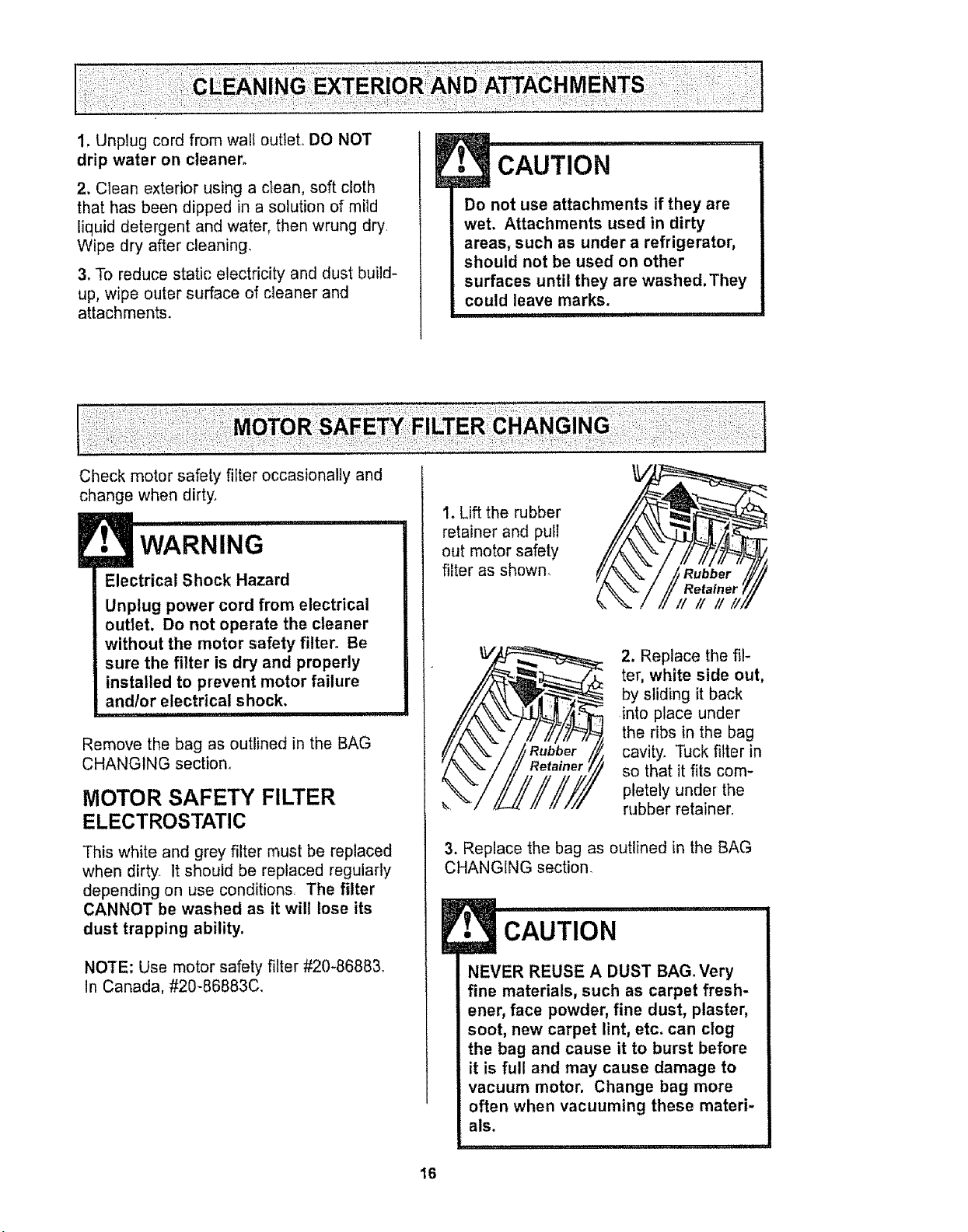
1. Lift the rubber
retainer and pull
out motor safety
filter as shown.
fA\" f
i/M,,
!
2. Replace the fil-
ter, white side out,
by sliding it back
into place under
the ribs in the bag
cavity. Tuck filter in
so that it fits com-
pletely under the
rubber retainer,
3. Replace the bag as outlined in the BAG
CHANGING section.
,i CAUTION
NEVER REUSE A DUST BAG. Very
fine materials, such as carpet fresh-
ener, face powder, fine dust, plaster,
soot, new carpet lint, etc. can clog
the bag and cause it to burst before
it is full and may cause damage to
vacuum motor, Change bag more
often when vacuuming these materi-
als.
16
WARNING .......
Fire and/or Electrical Shock Hazard
Do not operate with a clogged
exhaust filter or without the exhaust
filter or exhaust filter cover installed.
i ii iiii
EXHAUST FILTER
HEPA
The exhaust filter cartridge must be
replaced when dirty. Replace the filter when
the entire surface area is covered evenly.
The filter CANNOT be washed as it will
lose its dust trapping ability.
NOTE: Use exhaust filter #20-86882. In
Canada, #20-86882C_
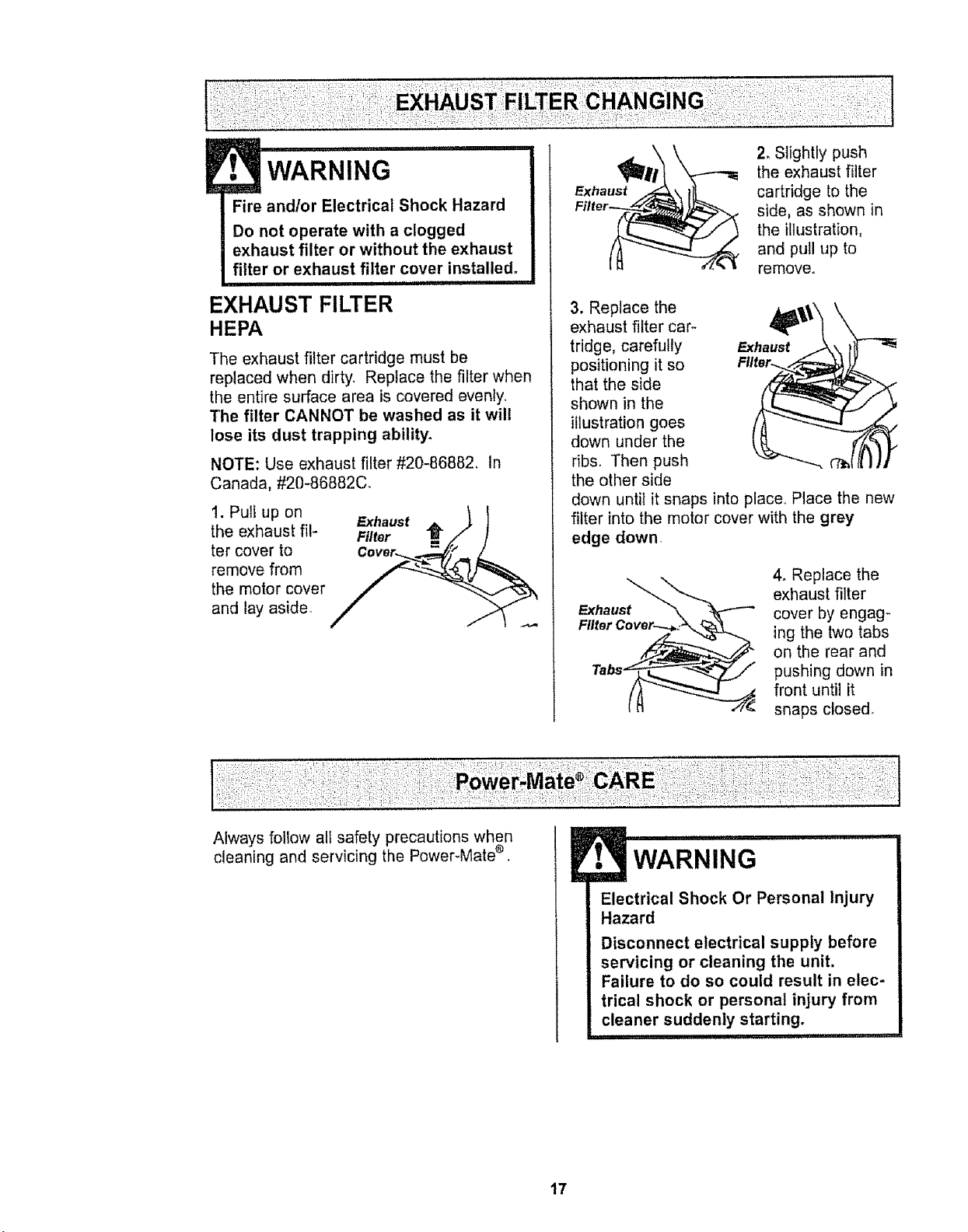
1. Pull up on
the exhaust fil-
ter cover to
remove from
the motor cover
and lay aside°
Exhaust _ _ I
Filter =./" J
Exhaust
2. Slightly push
the exhaust filter
cartridge to the
side, as shown in
the illustration,
and pull up to
remove.
3. Replace the ._,,,_\\
exhaust filter car-
q=,,|
tridge, carefully Exhaust
positioning it so Filter.
that the side
shown in the
illustration goes
down under the
ribs. Then push
the other side
down until it snaps into place,. Place the new
filter into the motor cover with the grey
edge down.
Exhaust_"_-._
Filter Cove__
To.
4. Replace the
exhaust filter
cover by engag-
ing the two tabs
on the rear and
pushing down in
front until it
snaps closed_
Always follow alt safety precautions when
cleaning and servicing the Power-Mate ®.
! ,, ,i i,i1,,,
WARNING
Electrical Shock Or Personal Injury
Hazard
Disconnect electrical supply before
servicing or cleaning the unit.
Failure to do so could result in elec-
trical shock or personal injury from
cleaner suddenly starting.
, ,' 'IHHI
17
• CAUTION
When you remove the end caps, a
small metal washer on each end
may come off, DO NOT lose these
two metal washers.
u
TO CLEAN AGITATOR
NOTE: In order to keep cleaning efficiency
high and to prevent damage to your vacu-
um, the agitator must be cleaned every time
the belt is chanqedd.
The agitator must also be cleaned accord-
ing to the following schedule:
Vacuum Use
Clean Agitator
HEAVY - every week
(used daily)
MODERATE - every month
(used 2-3 timeslweek)
LIGHT -
(used 1 timelweek)
every 2 months
Remove any dirt or debris in the belt path
area or in the brush roller area.
Carefully remove any string or debris
located on the agitator, end caps, wash-
ers or agitator shaft.
iMPORTANT
Replace the
washers and
the end caps.
See the explod-
ed view for cor-
rect
assembly.
Disconnect cleaner from electrical outlet.
Check and remove hair, string and lint build-
up frequently in the Power-Mate e agitator
and end cap areas_ If build-up becomes
excessive, disconnect Power-Mate ® from
wand and follow the steps below.
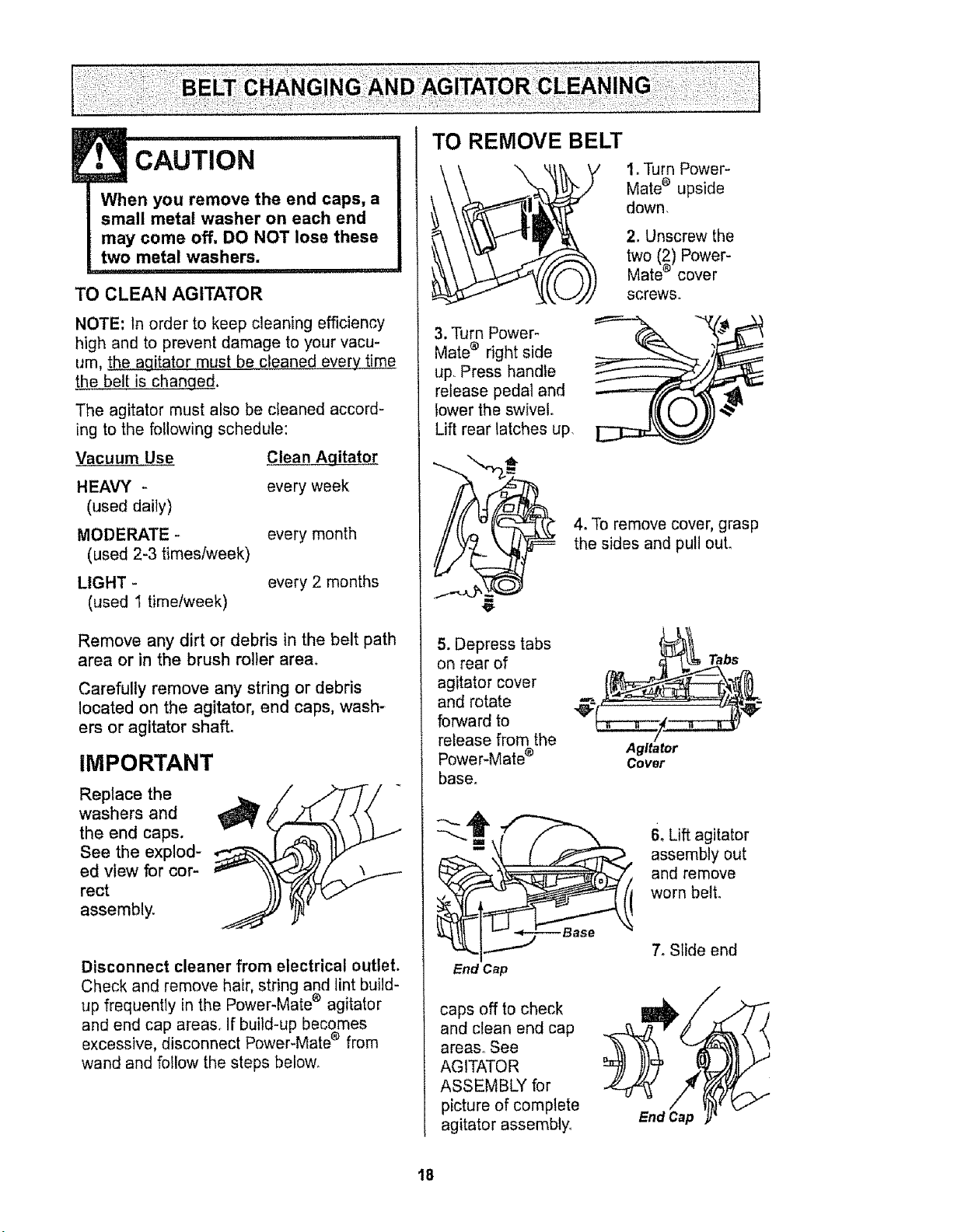
TO REMOVE BELT
i
3, Turn Power-
Mate ® right side
up Press handle
release pedal and
lower the swivel,
Lift rear latches up
1. Turn Power-
Mate e upside
down,
2. Unscrew the
two (2) Power-
Mate _ cover
screws.
4. To remove cover, grasp
the sides and pull out.
5. Depress tabs
on rear of
agitator cover
and rotate
forward to
release from the
Power-Mate _
base.
End Cap
Agitator
Covet
Tabs
6oLift agitator
assembly out
and remove
worn belt.
7. Slide end
caps off to check
and clean end cap
areas° See
AGITATOR
ASSEMBLY for
picture of complete
agitator assembly
End Cap
18
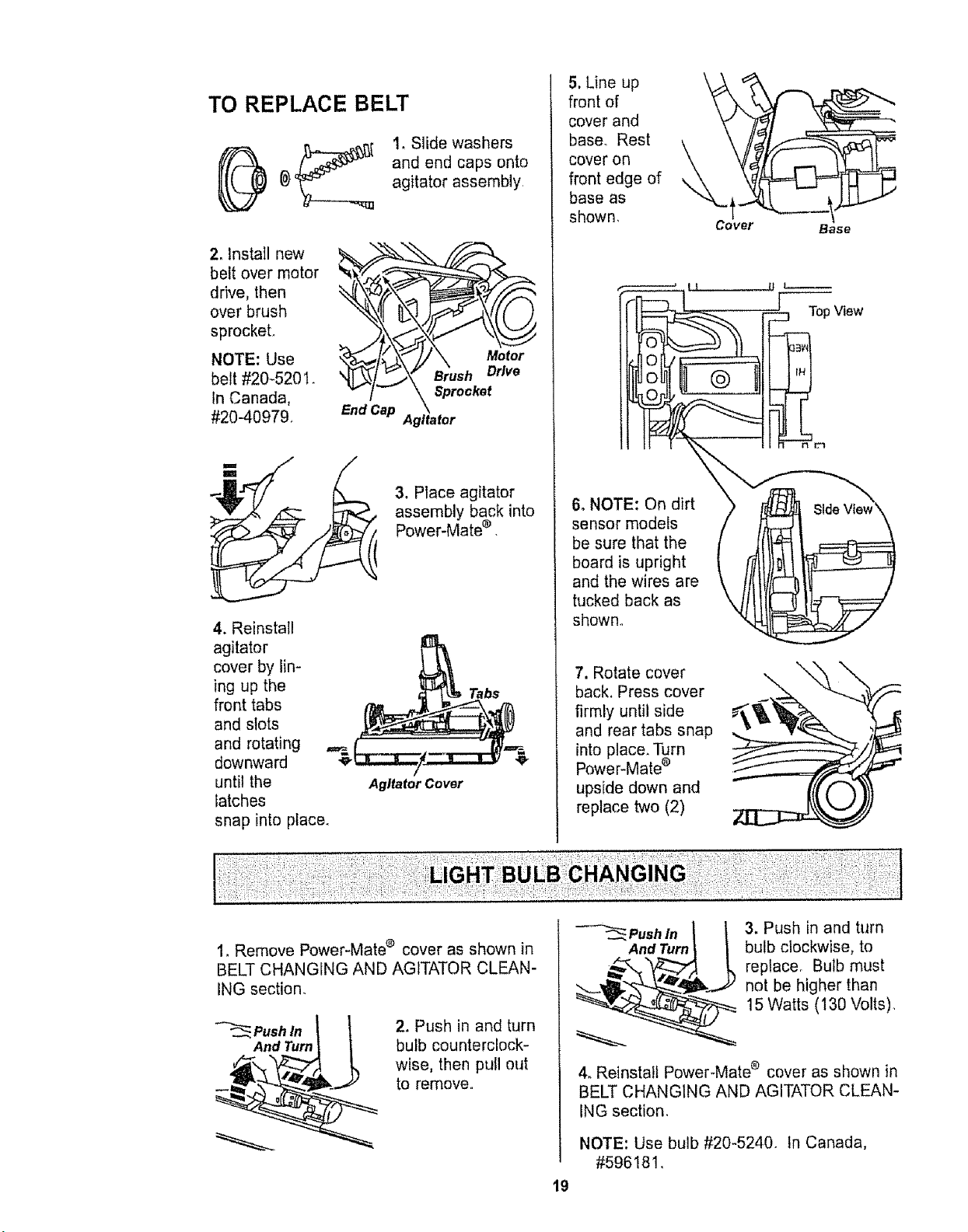
TO REPLACE BELT
1, Slide washers
and end caps onto
agitator assembly,
2. Install new
belt over motor
drive, then
over brush
sprocket.
NOTE: Use
belt #20-5201.
In Canada,
#20-4097&
End Cap
Motor
Brush Drive
3, Place agitator
assembly back into
Power-Mate ® ,
4. Reinstall
agitator
cover by lin-
ing up the
front tabs
and slots
and rotating
downward
until the
latches
Agitator Cover
snap into place.
:[
5, Line up
front of
cover and
base_ Rest
cover on
front edge of
base as
shown,
Cover
Base
i '
io
_o
6. NOTE: On dirt >
sensor models
be sure that the
board is upright
and the wires are
tucked back as k4
shown.
:::::3 Top View
rim
7, Rotate cover
back, Press cover
firmly until side
and rear tabs snap
into placer Turn
Power-Mate ®
upside down and
replace two (2)
1. Remove Power-Mate e cover as shown in
BELT CHANGING AND AGITATOR CLEAN-
ING section.
2. Push in and turn
bulb counterclock-
wise, then pull out
to remove.
PUSdhTnurnI
3. Push in and turn
bulb clockwise, to
replace° Bulb must
not be higher than
15 Watts (130 Volts),
4. Reinstall Power-Mate e cover as shown in
BELT CHANGING AND AGITATOR CLEAN-
ING section,
NOTE: Use bulb #20-5240. tn Canada,
#596!81.
19
,, i ii,
WARNING
Electrical Shock Or Personal Injury
Hazard
Disconnect electrical supply before
servicing or cleaning the unit°
Failure to do so could result in elec-
trical shock or personal injury from
cleaner suddenly starting.
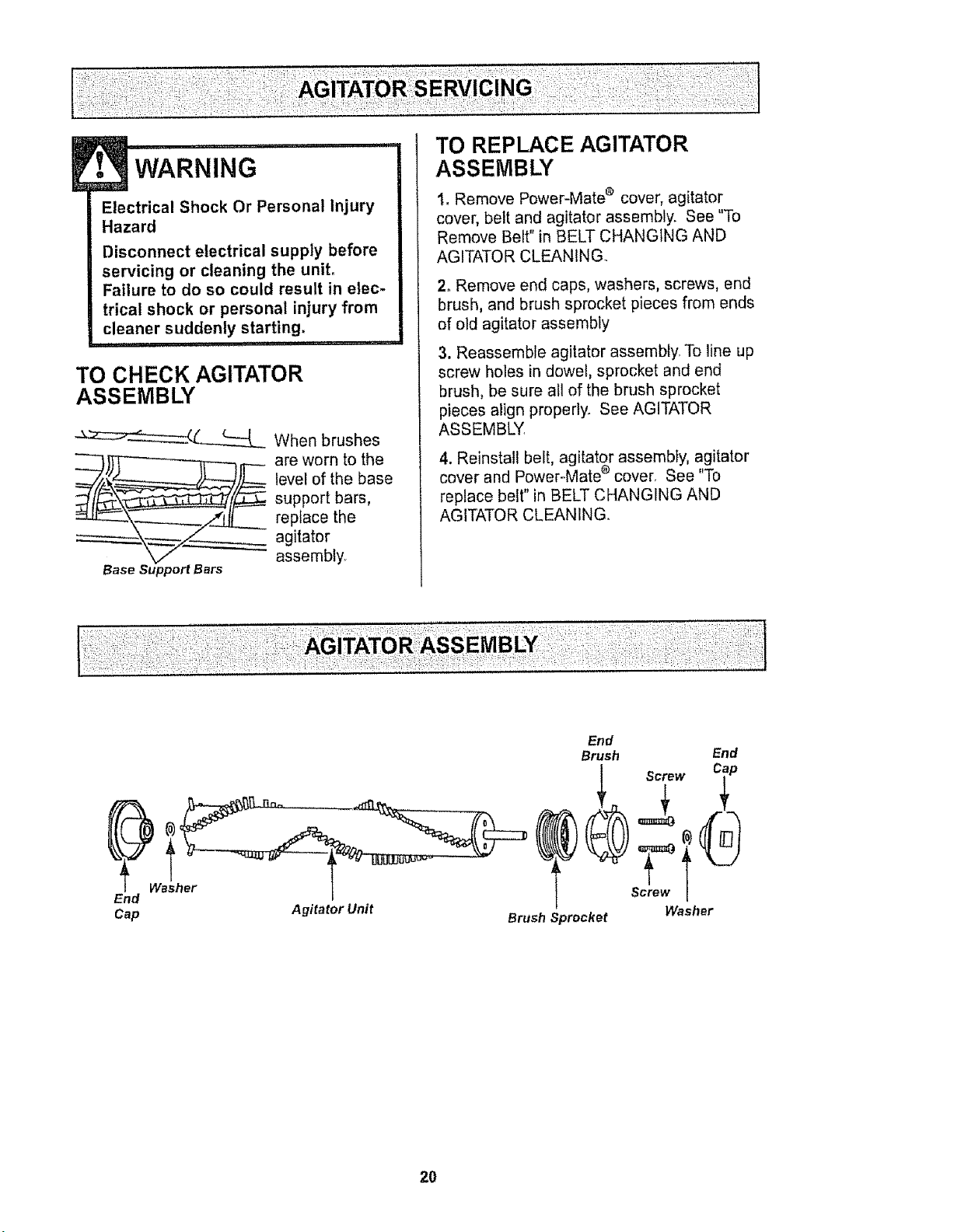
TO CHECK AGITATOR
ASSEMBLY
__ When brushes
___._ are worn to the
level of the base
support bars,
repface the
agitator
assembly.
Base Support Bars
TO REPLACE AGITATOR
ASSEMBLY
1, Remove Power-Mate ® cover, agitator
cover, belt and agitator assembly. See "To
Remove Belt" in BELT CHANGING AND
AGITATOR CLEANING.
2. Remove end caps, washers, screws, end
brush, and brush sprocket pieces from ends
of old agitator assembly
3, Reassemble agitator assembly. To line up
screw holes in dowel, sprocket and end
brush, be sure all of the brush sprocket
pieces align properly. See AGITATOR
ASSEMBLY,
4. Reinstall belt, agitator assembly, agitator
cover and Power-Mate ®cover. See "To
replace belt" in BELT CHANGING AND
AGITATOR CLEANING.
End
Cap Agitator Unit
End
Brush
Screw
Screw
Brush Sprocket
End
Washer
20
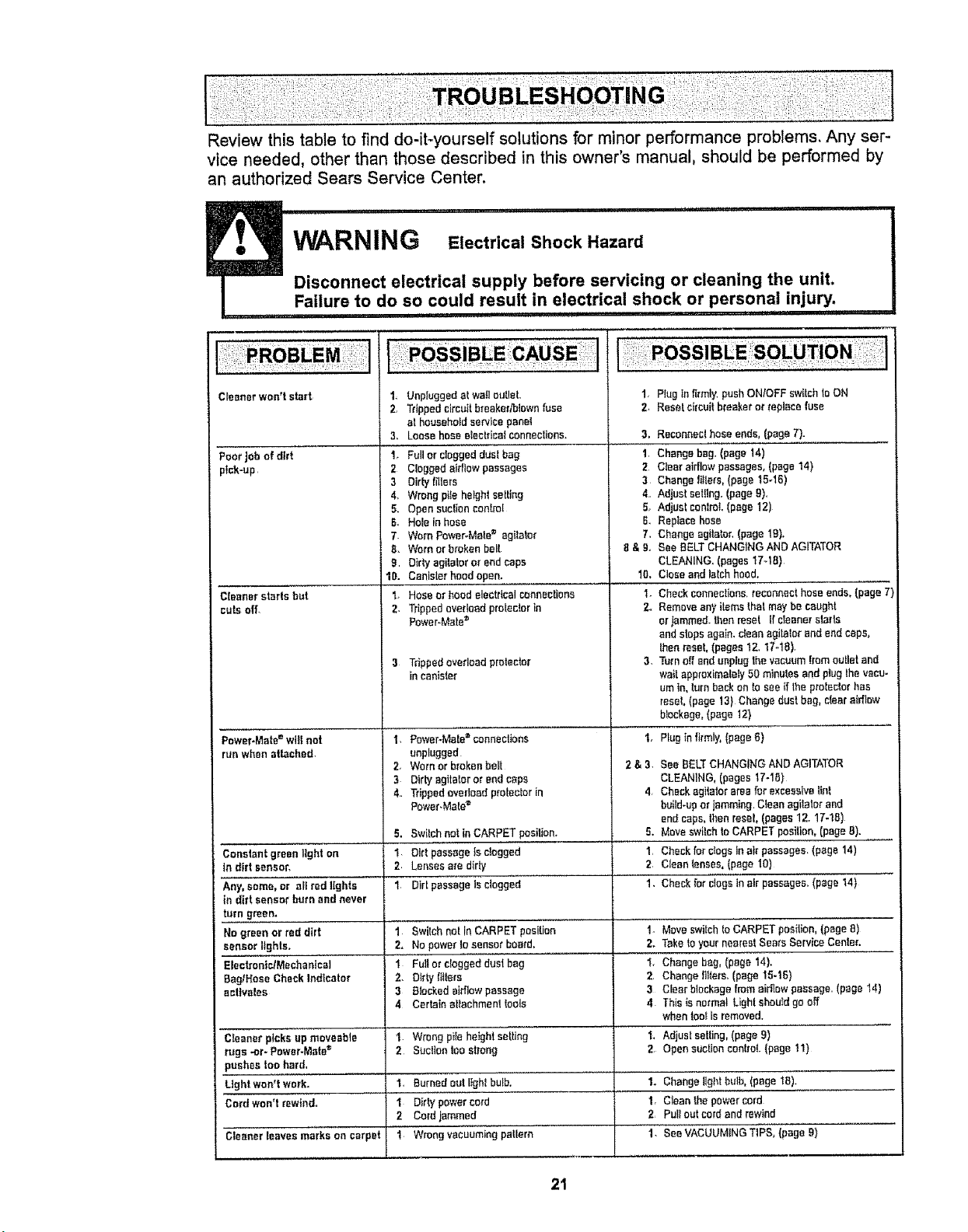
Review this table to find do-it-yourself solutions for minor performance problems. Any ser-
vice needed, other than those described in this owner's manual, should be performed by
an authorized Sears Service Center.
,u ......... i iiiii iiiii1,,i ir i
WARNING Electrical Shock Hazard
Disconnect electrical supply before servicing or cleaning the unit.
Failure to do so could result in electrical shock or personal injury.
i I i i,i1,1,,,i i iii ii1,111,111 I!'llllp
Cleanerwon't start 1_ Unpluggedat walloutlet. 1, Plugtnfirmly,pushON/OFFsw_lchtoON
2, Trippedcircuitbreaker/blownfuse 2. Resetcircuit breakererreplacefuse
at householdservicepanel
3. Loosehose electrical connections. 3. Reconneclhose ends,(page7).
1, Fullor cloggedduelbag 1, Changebag,(page 14)
Poor Job of dirt
pick-up
Cleanerstarts but
cuts off.
Power*Mate=wglnot
run whenattached,
Constantgreentight on
in dirt sensor,
Any.some. or all redlights
in dirt sensorburn and never
turn green.
Nogreenor red dirt
sensorIlghts.
Electronic/Mechanical
BaglHoseCheckIndicator
eettvelea
Cleaner picks up moveable
rugs .or- Power-Mate _
pushes too hard,
Light won't work,
Cord won't rewind,
Cleanerleaves markson carpet
2 Cloggedairflow passages
3 Dirtytigers
4. Wrongptle heightsetting
5. Opensuctionconh-o[
6_ HoleInhose
7. WornPower*Mate_ agitator
8. Wornor broken belt
9 Dirty agitatoror endcaps
2 Clear airflowpassages,(page14)
3 Change filters.(page 15-16)
4. Adjust setting,(page9).
5, Adjust conlreL(page12)
6. Repiacehose
7, Change agitator.(page19),
8 & g. See BELTCHANGINGANDAGITATOR
CLEANING,(pagest7-18)
10.
2,
Canislerhoodopen. 10.
Hoseor hood electricalconnections 1-
Trippedoverloadpro_ectorin 2_
Power-Mated
3 Trippedoverloadprotector
in canister
I, Power-Mete= conneclione
unplugged
2, Wornorbrokenbail
3 Dirtyegltafer orendcape
4. Trippedoverloadprotectorin
Power.Male=
Closeandlalch hoed.
Checkconnections,reconnecthess ends,(page7)
Removeany items thatmaybe caught
er tammed,thenreset Ifciesner starts
endstopsagain,cleanagitatorand endcaps,
Ihenreset.(pages12.17-18),
3. Turnoffand unplugthevacuumtrameuUetand
waitappreximalefy50 minutesandptugthevacu-
um in,turnbackonto seeif theprotectorhas
reseL(page 13) Changedust bag,clear airflow
blockage,(page 12)
1, Plugin firmly,(page6)
2&3,
4,
5. Switchnet in CARPETpasiliono 5.
"t Dirt passageIs c!ogged 1
2 Lensesaredirty 2,
1 Dirt passageIsclogged 1,
1 Swilch not InCARPETposition
2, No powerIosensor board_
1 Ful! or cloggeddust bag
2. D_rtyfilters
3 Blockedairflowpassage
4 Certainattachmenttools
1. Wrong pile height selling !_
2 Suclientee strong 2
1, Burned out I_ghl bulb,
I Dirty power cord
2 Cord jammed
1 Wrong vacuuming pattern
See BELTCHANGINGANDAGITATOR
CLEANING,(pages17-18}
Checkagitatorareaforexcessivelint
build-uporjammingClean agitatm"end
end caps,thenreseL(pages12.17-1B)
MoveswitchteCARPETposition. (page8).
Checkfor clogsInair passages,(page 14)
Cleantenses,(page 10)
Checkfor clogstn airpassages.(paget4)
1- MoveswitchIo CARPETpesilion.(page8)
2. TaketoyourneareslSearsServiceCenter.
1, Change beg.(page 14).
2, Change filters,(page 15-16)
3 Clearblockagefromairflowpassage (page 14)
4 This is normal Lightshouldgeoff
whentool isremoved.
Adjust selling,(page9)
OpensuctioneonlreL(page 11)
1. Changelightbulb,(page 18).
1. Cleanthe powercord
2 Pull outcordandrewind
1. SeeVACUUMINGTIPS, (page9)
21

For repair of major brand appliances in your own home ...
no matter who made it, no matter who sold it!
1-800-4-MY-H OM E® Anytime,dayor night
(1-800-469-4663) (U.SA and Canada)
www.sears.com www.sears,ca
For repair of carry-in products like vacuums, lawn equipment, and
electronics, call for the nearest Sears Parts and Repair Center.
1-800-488-1222 Anytime, day or night (USA. only)
www.sears,com
For the replacement parts, accessories and owner's manuals
that you need to do-it-yourself, call Sears PartsDirectSM!
1-800-366-PART
(1-800-366-7278)
6 a.m. - 11 pro., 7 days a week
(U S.A. only)
wwwosears.comipartsdirect
To purchase or inquire about a Sears Service Agreement
or Sears Maintenance Agreement:
1-800-827-6655 (USoA,) 1-800-361-6665 (Canada)
7 a m. - 5 p.m_,CST, Mort - Sat. 9 a mo- 8 p.m EST,M - F,4 pm SaL
Para pedir servic_ode reparaci6n a
domidiio, y para ordenar piezas:
1-888*SU-HOGAR su
(1-888-784-6427)
Au Canada pour service en fran£:ais:
'I-800-LE-FOYER Mc
(1-800-533-6937)
WWW sears.ca
HomeCentral®J
@Sears, Roebuck and Co
® Registered Trademark t "rMTrademark / sMService Mar!{ of Sears, Roebuck and Co
® Marca Registrada/TM Marea de F_brfca / su Marca de Servicio _e Sears, Roebuck and Co
_cMarque de commerce / _ Marque depos_e de Sears, Roebuck and Co,
22
Manual Del Propietario
Aspiradora
Modelo 1!6.29912
CUIDADO:
Lea y sigue todas las
instrucciones de operaci6n
y seguridad antes det uso de
este producto,
Sears,Roebuck and Coo,Hoffman Estates, IL 60179 U.S.A.
www.sears.com
Pieza NOCO1ZAUY10UOO-8174834 Impreso en EUA
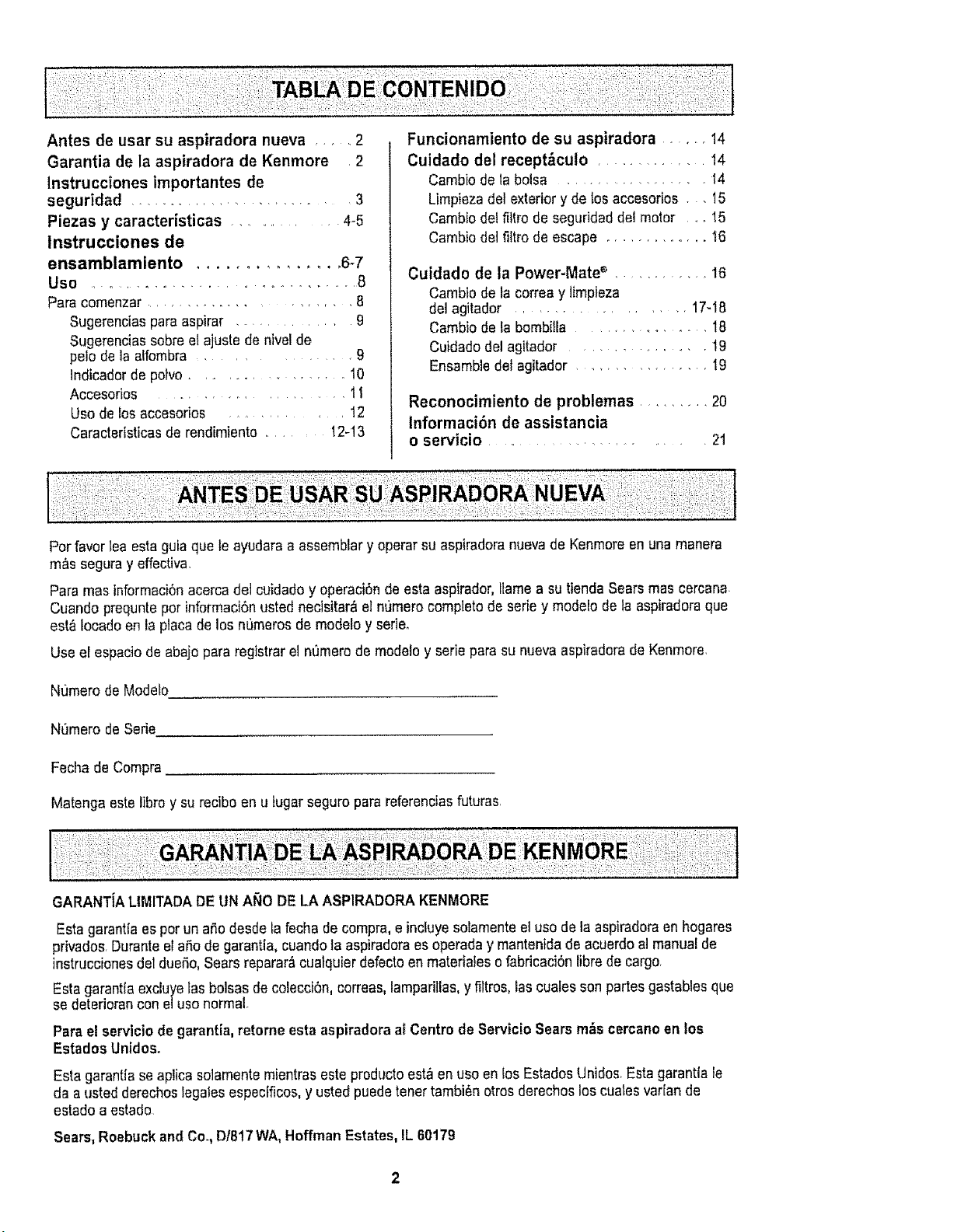
Antes de usar su aspiradora nueva .... 2
Garantia de la aspiradora de Kenmore 2
lnstrucciones importantes de
seguridad ........................ 3
Piezas y caracteristicas ........... 4-5
instrucciones de
ensamblamiento ............... 6-7
Use ................................. 8
Para comenzar ................. 8
Sugerencias pare aspirar ............ 9
Sugerencias sobre et ajuste de nivel de
peiode la alfombra ........... 9
Indicadorde potvo .................. 10
Accesorios ................. 11
Uso de los accesorios ........... 12
Caractertsticasde rendimiento ..... 12-13
Funcionamiento de su aspiradora ...... t4
Cuidado del recept&culo .......... 14
Cambio de la bolsa .................. 14
Limpieza det exterior y de los accesorios . . 15
Cambio del filtro de seguridaddel motor o. 15
Cambio del fittrode escape ............. 16
Cuidado de la Power-Mate '_ ............ 16
Cambio de la correay timpieza
del agitador .............. t7-18
Cambio de ta bombitla .................. 18
Cuidadodel agitador ........... 19
Ensambledel agitador ................. 19
Reconocimiento de problemas ......... 20
lnformaci6n de assistancia
o servicio .... .................. 21
Pot favor lea esta guia que te ayudaraa assemblary operar su aspiradoranuevade Kenmoreen una manera
m&s segura y effectiva,
Para mas informaci6nacerca del euidado y operaci6n de esta aspirador,ltame a su tienda Searsmas cercana,
Cuando prequntepot informaci6nusted necisitar_ el numero completode seriey modelode taaspiradora que
est&Iocado en la placa de los nt_merosde modeloy seri&
Use el espacio de abajo para registrar el nt_merode modeloy serie para su nuevaaspiradorade Kenmore,
Nt]mero de Modelo
Nt]mero de Serie
Fecha de Compra
Matenga este libro y su reciboen u tugarseguro para referenciasfuturas.
GARANTiALIMITADA DEUN ANO DELA ASPIRADORAKENMORE
Esta garantia espor un aSodesde la fecha de compra, e incluyesolamenteel uso de la aspiradoraen hogares
privados. Duranteel aSode garantla, cuandola aspiradoraesoperada y mantenida de acuerdo al manual de
instrucciones del dueSo,SearsrepararAcualquier defectoen materiates ofabricaciOnlibre de cargo,
Esta garantlaexcluyelas bolsas de colecci6n, correas, lamparillas,y filtros, lascuatesson partes gastables que
se deteriorancon elusonormal.
Parael servicio de garantia,retorne esta aspiradoraal Centro de Servicio Searsrobs cercanoen los
Estados Unidos.
Esta garantia se aplicasolamentemientras este producto est_ en uso en los EstadosUnidos.Esta garantla le
da a usted derechoslegales especfficos,y usted puede tenet tambi6n otros derechos loscuales vat[an de
estado a estado
Sears, Roebuckand Co, D1817WA, Hoffman Estates, IL 60179
i ,ll ii illl,lll,,i,,,,i ' ...................... ,,,
ADVERTENCIA
Su seguridad es muy irnportante pare nosotros. Pare reducir el riesgo de Incendio,cheque
el_ctrico, lesi6n corporal o defies al utilizer su asptradora, act_e de acuerdo con precauciones
b_sicas de segurldad,entre elias:
Leaeste manualantesde armaro utilizersu aspire-
dora.
Use suaspiradoraunicarnenteen la formadescrita
en este manual Use_nicamenteconaccesorios
recornendadosparSears
Para reducirel flesgade chequeet_ctrico,no use
suaspiradoraalaire libra ni sabresuperficiesrnoia-
des
Desconecte el cord6nel_ctricoantesde cornponer
olirnpiarel_rea de]cepillo.DeIocontrafio,ei cepillo
_oddaarrencardeform irnprevistaopodria
producirseun chequeef6ctrica,
Siernpre debe apagarla aspiradoraantes de
canectaro desconectarla rnanguerade la Power-
Mate®
Siernpredebe apagarsuaspiradoraantesde des-
conectarla
Nodesconectela aspiradoratirandadel cord6n
e!_ctrico Paredesconectaria,kale el enchufe,no el
cord6n.
Sujete el enchufeconfamaneal enrollaretcord6n
el_ctrico.Paradesconectafla,hale en enchufe,no et
cord6n.
No use]aaspiradorasi elcord6na el enchufeest_
dafiado Sila aspiradorano est&funcionandoade-
cuadarnenteo sise hadejadocaer, est_dafiada,se
ha dejadoexpuestaa la internperieo se ha dejado
caeren ague,devu_tvalaa unCentre de serviciode
Sears
Nohale ni transportela aspiradorapar el card6n;no
useel cord6ncomamango;nocierre puertassabre
el card6n;no hateefcord6nsabrerebordesagudos
ni esquinas.Nopesola aspiradorasoloreel cerd6n.
Mantengael eord6natejadode supedTciescalientes
No abandonela aspiradoracuandoest_conectada
Descan_ctelacuandono la est_ usandoy antesde
darle servicio.
No permitaque seautitizadacomajugueteSe
requieretenormayorcuidadocuandoseautilizada
enIaproximtdadde ntfieso par nifios.
Notoquetaaspiradorani el enchufeconlas manes
moiadas.
GUARDE ESTAS
Nouse laaspiradorasi famangueraest_rata La
mangueracontienealambresel_ctricos C_rnbielasi
est_ratao desgastada.Eviteaspirarobjetos
agudos.
No coloqueabjetosenlas aberturas.
No utilicela aspiradorasi algunaaberturaest_blo-
queada;mant_ngalalibrade polvo,pelusa,cabellos
y cualquieracase quapodria disrninuiretflujo de
aire.
Mantengael cabel]o,rope suelta,dodosytadas las
partes delcuerpoalejadosde fasaberturasy plazas
mec_nicas.
Nouseta aspiradorasintenorinstaladala balsa
parepolvoylo tosfiltros
Cambie siempre la balsaparepolvodespu_sde
aspirerlirnpiadoresdealfornbraso desodorantes,
talcosy potvosfines.Estosproductosatascanla
balsa,reducenel flujode aire y puedencauser que
_stase rompa.Si no cambiala balsapodrla ocasio-
nardafio permanentea laaspiradora.
No usela aspiradoraparelevantarobjetos agudos,
]uguelespequeSos,alfileres,sujetapapeles,etc
Podrfandafterla aspiradoraola balsapare polva
No levanteningunacasequa se estOquernandoo
emitiendohumo,cornocigarriltos,ceritloso cenizas
calientes
Nouse la aspiradorapareaspirartiquidosinflame-
biaso combustibles(gasoline,liquidosparetim-
plaza,perfumes,etc.)nila use enlugaresdonde
6stospodrianester presentes Losvaporesde estas
sustanciaspueden crearun peligro deincendioo
explosi6n,
Tongacuidadoespecialal utilizer la aspiradoraen
escalonesNo la coloquesabresilias,mesas,elc.
Mant_ngalaen el piso
Usted es responsabledeasegurarqua suaspire-
dora no seautilizadapar ningunapersonaquano
puedamanejarlacorrectarnente_
No opere sinel filtro de escape nila cubierla detfil-
trode escapeinstalados
INSTRUCClONES
El armaday usa segurode suaspiradora sonsu responsabilidad.Esta aspiradoraha side disefiada
exclusivamentepare usadarn6stico.La aspiradoradeber_ almacenarseen un Iugarseco yen el interio_
Lea este Manual detpropietariodetenidamente,pues contiene inDrrnaci6n importante sabre seguridady
usa. Estaquia contiene inforrnaci6nsabre seguridad debaio de simbolosde advertienciacuidado. Par
favor pongaatenci6n especial a estas instruccionesdadas Advertencta: Este inforrnaci6nle atertar_ con
et poligrode fuego, cheques electricos,quemadas y lesiones. Cuidado: Este inforrnaci6nfealertara a
petigroscomalesiones y da_5osde propiedad,
i, '1' i ,i ,i I' ' i, iiii ......... ' I 'i,_',_
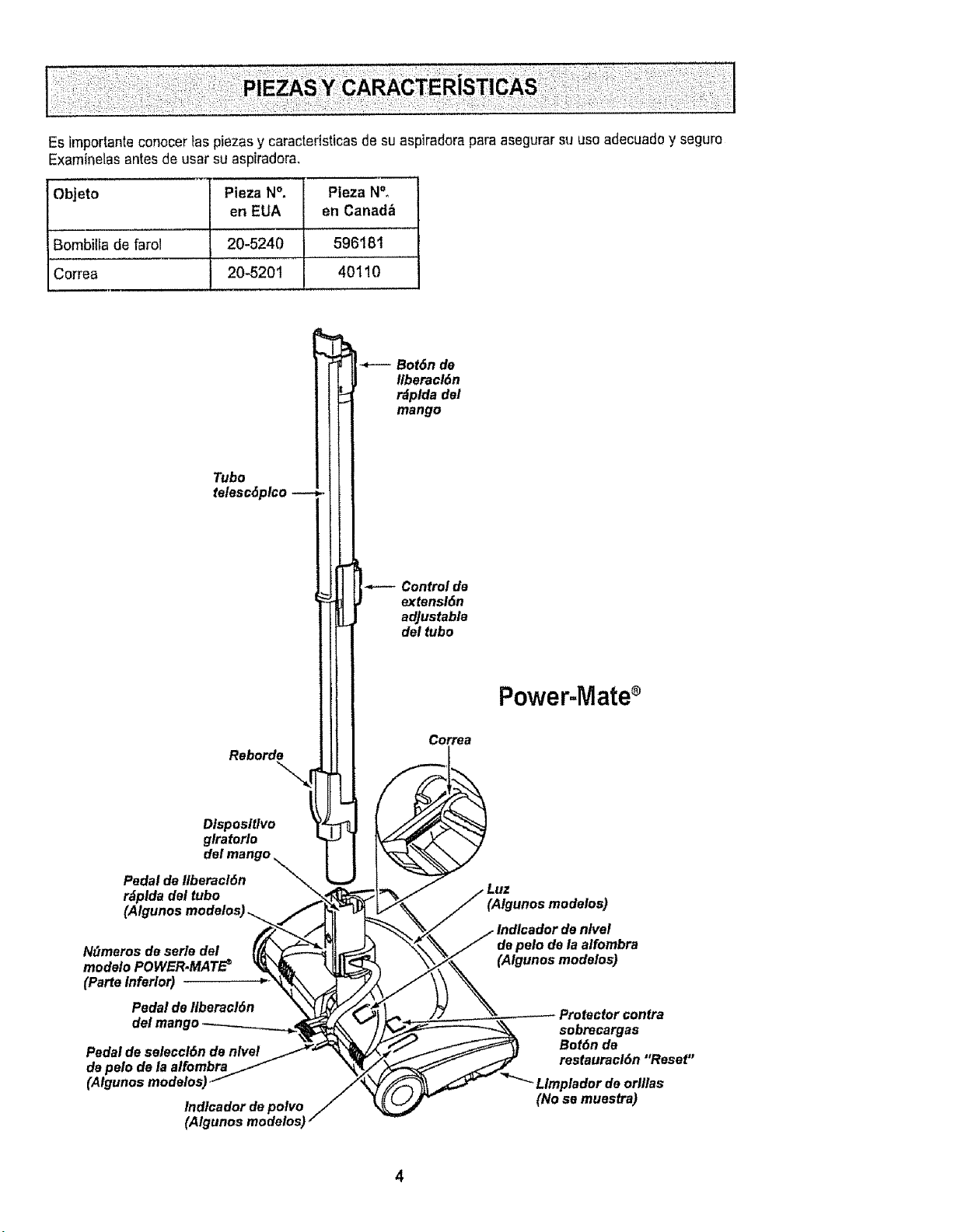
Es importanteconocer _aspiezas y caractedsticas de suaspiradora para asegurar su usa adecuadoy seguro
Examinelas antes de usar suaspiradora,
Objeto Plaza N°. Pieza N°.
en EUA en Canad_
Bombilta de farol 20-5240 596181
Correa 20-5201 40110
Nt_meros de serle del
modelo POWER.MATE _
(Parte Inferior)
Pedal de liberacl6n
Pedal de seleccl6n de nlvet
de pale de la alfombra
(Atgunos modelos,
Indlcador de polvo
(Algunos modelos)
Power-Mate
(Algunos modelos)
de pelo do la alfombra
(Algunos modelos)
Protector contra
sobrecargas
Bot6n de
restauracl6n "Reset"
Limplador de oflllas
(No se muestra)
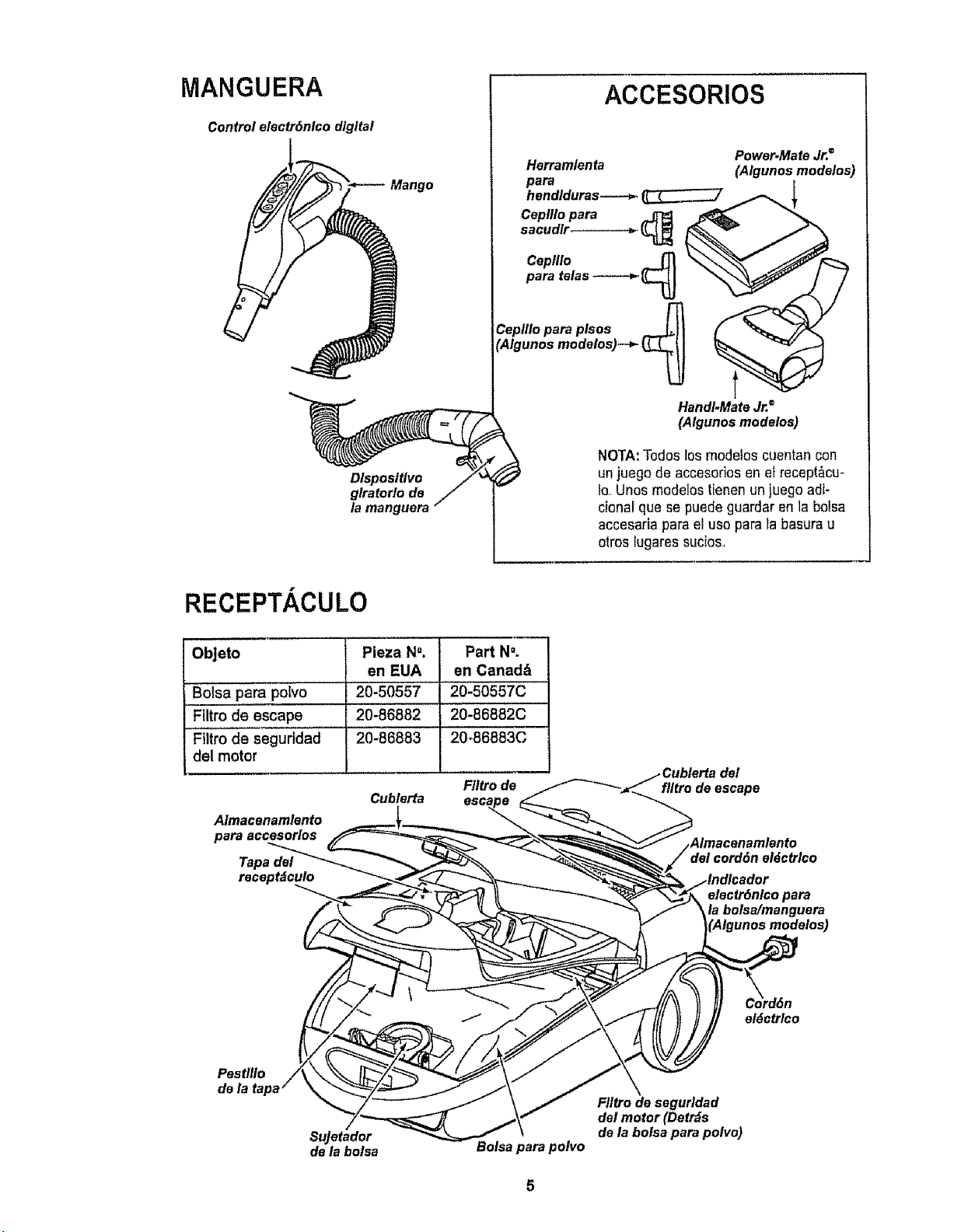
MANGUERA
Control electr6nlco digital
Dlsposltlvo
glratorlo de
la manguera
ACCESORIOS
Herram/enta
para
hendlduras-----_.
Caplllo para
sacudlr
Ceplllo ___
para telas -----_ _
r13
Ceplllo para plsos _11
'Algunos modelos)--_- _
Power.Mate Jr.®
(Algunos modelos)
HandI.Mate Jr.=
(Algunos modelos)
NOTA:Todos Iosmodelos cuentan con
unjuego de accesoriosen el recept_cu-
Io,,Unos modelos tienenun juego adi-
cional qua se puede guardar enla bolsa
accesaria parael uso para la basura u
otros lugares sucios,
RECEPTACULO
ObJeto Pieza N". Part NOo
en EUA en Canad&
Bolsa para poivo 20-50557 20-50557C
FUtro de escape 20-86882 20-86882C
Filtro de seguridad 20-86883 20-86883C
del motor
F/ttro de
A/macenamlento
para accesorlos
Tapa del
recept_culo
Cublerta
ftltro de escape
cord6n el_ctrlco
electr6nlco para
la bolsa/manguera
_Algunos modelos)
el6ctrlco
Pest/llo
de
Sujetador
de la bolsa
Bolsa para polvo
Ftltro de segurldad
del motor (Detr_s
de la bolsa para polvo)
!• ADVERTENCIA ' 'i
Peligro de choque et_ctrtco
No conecte la aspiradora hasta que termine
de armarla, De 1ocontrario podrfacausar
un choque eldctricoo lesi6n corporal°
Antes de armarla aspiradora, chequee la LISTA
DE EMBALAJE en la cubierta separada de la Lista
de Partes para ReparaciSn_Use esta lista paraveri-
ficarque ha recibido todas las componentesde su
nuevaaspiradora Kenmore
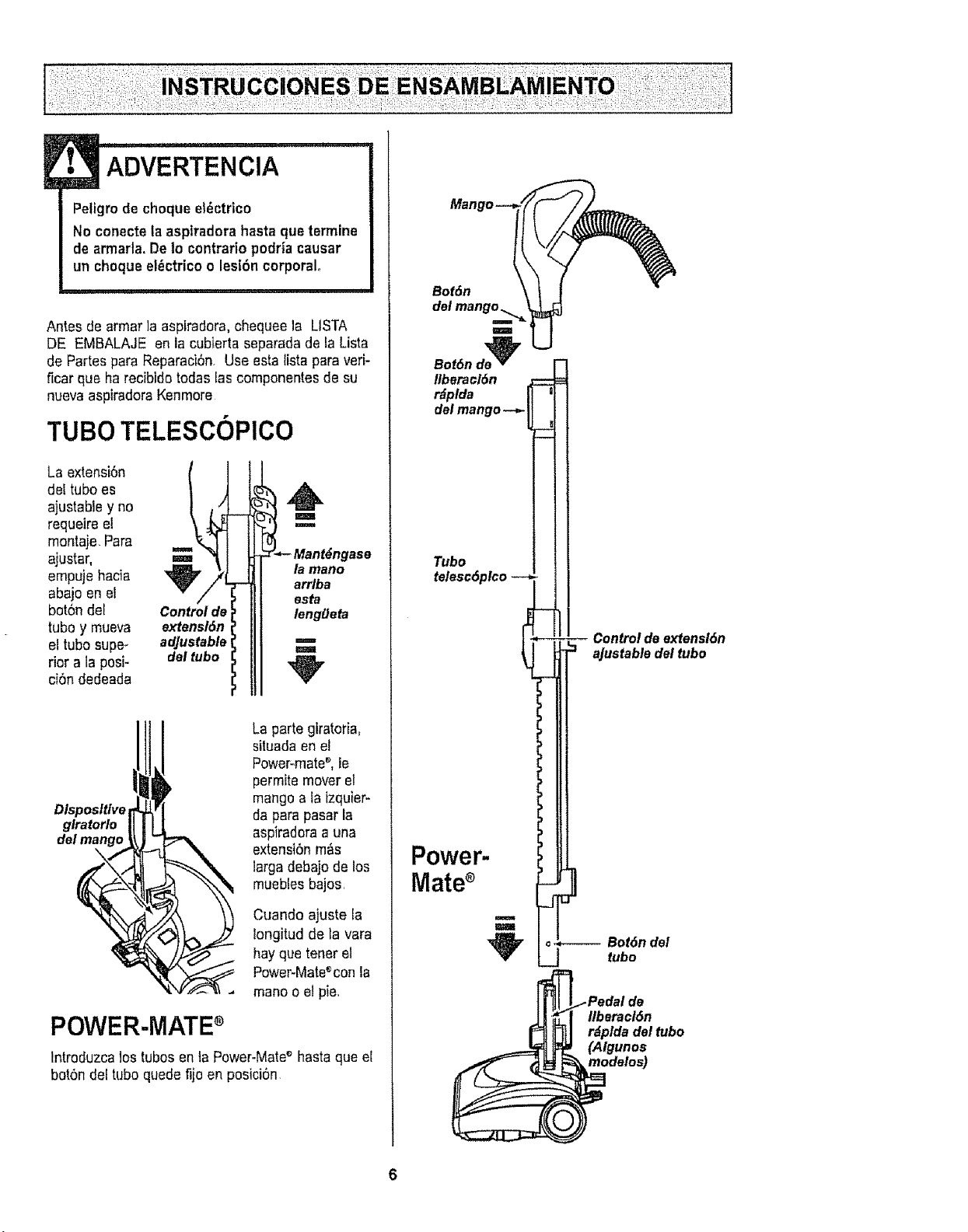
TUBO TELESCOPICO
La extension
del tubo es
ajustable y no
requeire el
montaje Para
ajustar,
empuje hacia
abajo en el
bot6n del
tubo y mueva
el tubo supe_
rior a la posi-
ci6n dedeada
Control de
extensl6n
adjustable
del tubo
H
la mano
arrlba
esta
lenggeta
m
Dlsposltlve
glratorlo
del mango
La parte giratofia,
situada en el
Power-mates,le
permite mover el
mango a la izquier-
da para pasar la
aspiradoraa una
extensiSnm&s
larga debajo de los
mueblesbajoSr
Cuando ajuste la
longitud de la vara
hayque tener el
Power-Mateeconla
manoo el pie.
POWER-MATEs
Intreduzca los tubes en ta Power-Mateshasta que e[
bot6n del tubo quede fijoen posici6n
Bot6n
del
Bot6nde'2_
Itberaol6n
r_plda
deimango--_
Tubo
telesc6plco --
Power-
Mates
m
m
Control de extensi6n
aJustable del tubo
.,----- Bot6n del
_J tubo
llberacl6n
rdplda del tubo
(Aigunos
modelos)
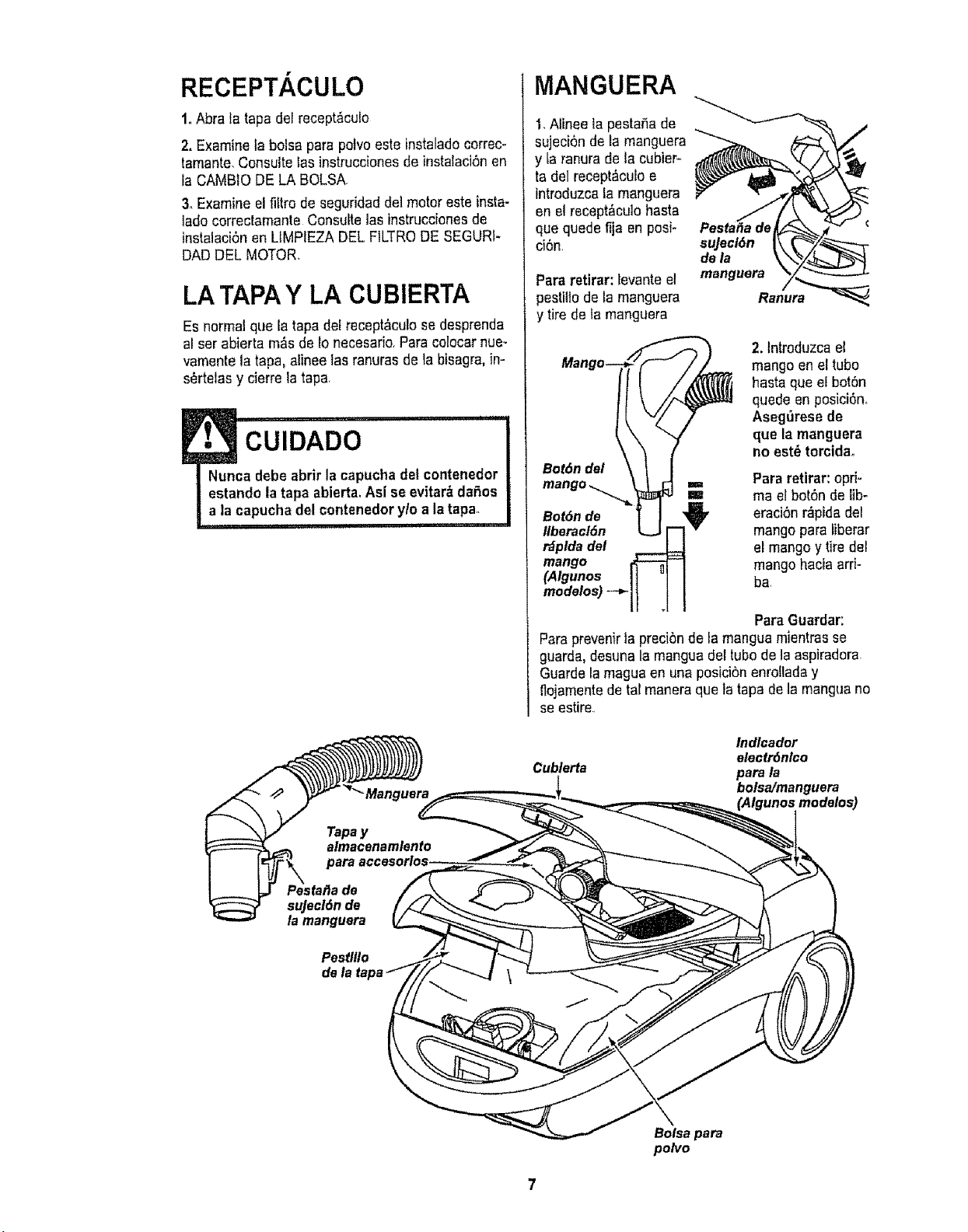
RECEPT. CULO
1.Abra la tapa del recept&cuEo
2. Examine ta bolsa para polvo este instalado correc-
tamante. Consulteias instruccionesde instalaci6nen
la CAMBIO DE LA BOLSA
3. Examine el filtro de seguridad de]motor este insta-
lado correctamante Consulte las instruccionesde
instalaci6nen LtMPIEZA DEL FILTRODE SEGURf-
DAD DEL MOTOR.
LATAPAY LA CUBIERTA
Es normalque la tapa del recept&culose desprenda
al serabierta m&s de Io necesario.Para colocar nue-
vamente la tapa, alinee las ranuras de ia bisagra,in-
sertelasy cierre la tapa.
!• CUIDADO '"
Nunca debe abrir la capucha del contenedor
estando la tapa abierta. Asi se evitar& da_3os
a la capucha del contenedorylo a la tapao
i,u, i i i
Tapa y
MANGUERA
1,Alinee la pesta_a de
sujeci6n de la manguera
y [aranura de la cubier-
ta dei recept&culoe
introduzcala manguera
en el recept_cuto hasta
que quede fija en posi-
ci6n
Para retirar: Eevanteel
pestillo de ta manguera
y tire de ta manguera
suJecl6n
de la
manguera
l_ 2. lntroduzca el
BmOiildlo mangoen eltubo
hasta que el bot6n
quede en posici6n.
Aseg_rese de
que Is manguera
no est_ torcida°
i_ _e_t =,= Pararetirar: opri-
== ma elbot6n de lib-
Bot
_: '_ eraci6nr_pida del
Ilberacl6n mango para liberar
r_plda del el mangoy tire del
mango mango haciaarfi-
(Algunos ha,
modelos)
T
ParaGuardar:
Paraprevenirtapreci6nde la mangua m]entrasse
guarda,desunala mangua deetubo de la aspiradora,
Guarde la maguaen una posicibn enro!laday
flojamentede tal maneraqueta tapa de la manguano
seestire,
Cublerta
Indlcador
electr6nlco
para la
bolsa/manguera
(Algunosmodelos)
afJade
sujecl6n de
la rnanguera
Pestlllo
dela
Bolsa para
polvo

PARA COMENZAR
! , ADVERTENOIA
Peligro de lesi6n personal y dafio al
producto
• NO enchufe la aspiradora si el
interrupter est_ en la posici6n ON.
Podriacausar lesl6n personal o dafio
al producto,
. El cord6n el_ctrico se mueve
r_ptdamentedurante el enrollamlento
Mantenga alejados a los nifios y
asegure espactolibre suflciente para
evitar lesiones personalesal enrollar
el cordbn.
• NO use los enchufes Iocalizadossobre
los muebles, Los objetos cercanos
podrian resultar dafiados,
L .,,L_
Almacenamtentoj,._.--'=J
del cord6n ,_..,_
el_ctrlco_
t, Tire detcord6n
para sacarlo del
receptaculohasta
tener la tongitud
deseada, E!cord6n
no se enrollarAhas-
ta qua oprimala ba-
rra para enrollado
NOTA:Para reducir el riesgo de chequeel_ctrico.
esta aspiradora cuentacon una clavija polarizada,
uno de los contactoses m_s ancho quael otro La
clavija s61opuede introducirse deuna maneraen el
enchufe Si la ctavijano cabe bien en el enchufe,
invi6rtala, Si a0n no cabe, Itamea un e]ectricista
para qua instaleun enchufecorrecto No alterela
ctavijade ninguna manera
2oConecte el cord6n el_ctrico polarizadoen un
enchufe de 120 voltiosqua se encuentre cerca def
piso
Para enmllar: des-
conecteta aspira-
dora Sujete el
enchufe mientras
enrolla el cord6n
para impedir daSoo
tesi6n corporal per el
movimiento del cor-
d6n,Oprima et
control para
rebobinar el cord6n
e!6ctrico conla mane o con el pie
Indlcador de nlvel
de pelo de la alfombra
(Algunos modelos)
Pedal de
denlveldepelo
dela alfombra
(Algunosmodalos)
3, Baje el tube desde la posici6n vertical pisandoel
pedal de liberaci6ndel mango
! CUlDADO
NO deje la Power-Mateefuncionando en
posicl6n vertical en un lugar durante ning,3n
espacio de tiempo: se puede dafiar la
alfombra,
4, Seleccioneuna attura de pale de la alfombra
usando el pedal pequefio ubicadoen la parte poste-
rior de la Power-Mate'_ El nivelde pale la alfombra
se muestra en el indicador,ConsulteSUGEREN-
CIAS SOBREEL AJUSTE DE NIVEL DEPELO DE
LA ALFOMBRA
AtenciOn: Refi6rasealas recomendacionesdel fab-
ricante para limpiar su alfombra Atgunas alfombras
m_s delicadas pueden requedr el use de la aspi-
radora con el agitador Power-mate_ desconectado
para prevenirqua la alfombra sea dafiada
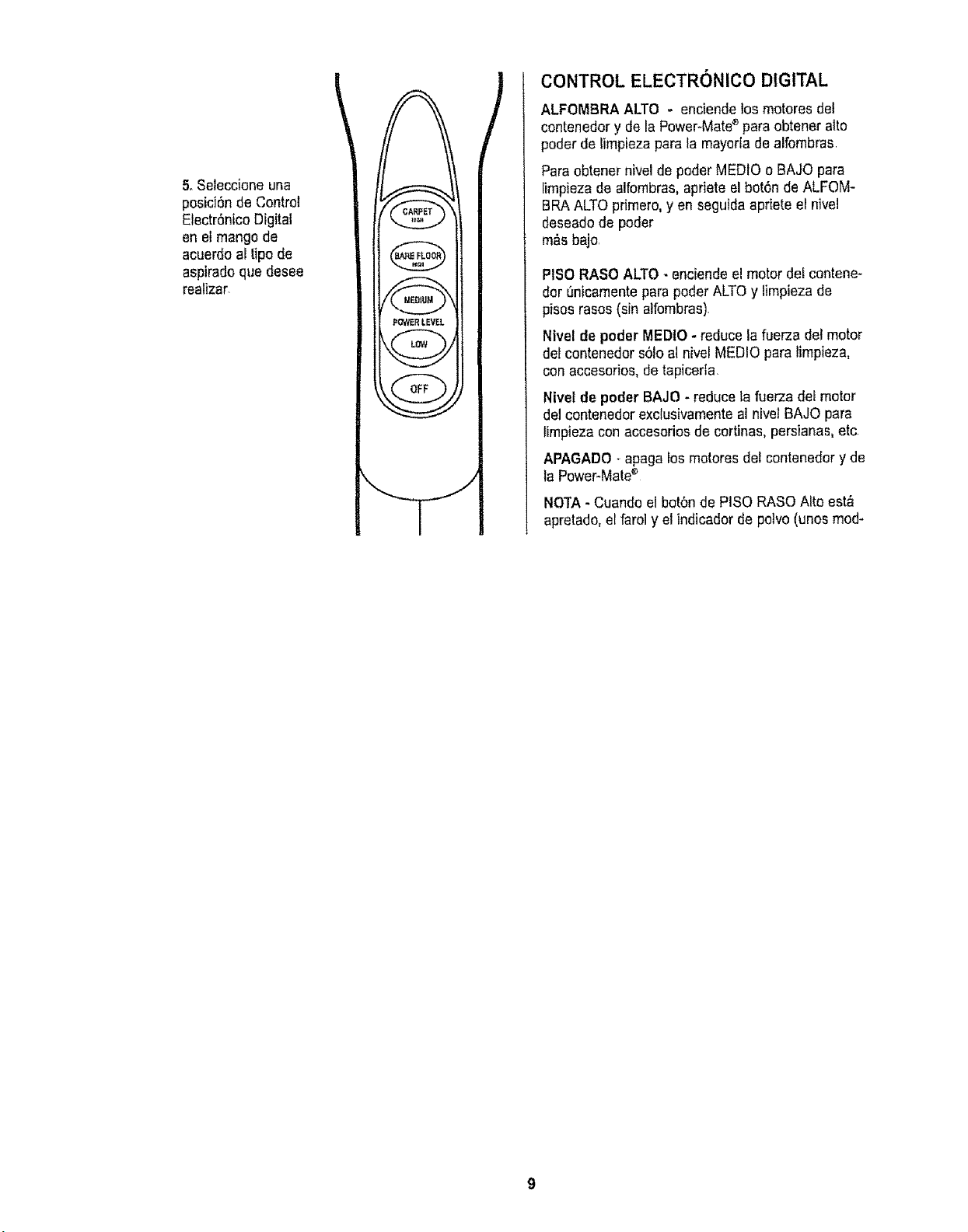
5,Seleccioneuna
posici6ndeControl
Electr6ntcoDigital
enelmangode
acuerdoaltipode
asp]redoquedesee
realizar,
POWERLEVEL
i
CONTROL ELECTRONICO DIGITAL
ALFOMBRA ALTO - enciende los motores del
contenedor y de la Power-Mate'_para obtener alto
poder de limpieza para la mayoriade alfombras
Para obtener nivel de poder MEDIOo BAJO para
limpieza de alfombras, apriete elbot6n de ALFOM-
BRAALTOprimero, y en seguidaapriete et nivel
deseadode poder
m_s bajo,
PlSO RASO ALTO- enciendeel motor de!contene-
dor 0nicamentepara poder ALTOy limpieza de
pisos rasos (sin alfombras),
Ntvel de poder MEDIO- reduce la fuerza del motor
del contenedor s61oal nivel MEDIO para limpieza,
conaccesorios, de tapicerla,
Nivet de poder BAJO - reduce la fuerza def motor
del contenedor exclusivamente al nive/BAJO para
limpieza con accesorios de cortinas, persianas,etc
APAGADO - apaga losmotores del contenedor y de
la Power-Matee
NOTA - Cuando el boronde PISO RASO Alto est_
apretado, el faro] y el indicador de potvo (unos rood-
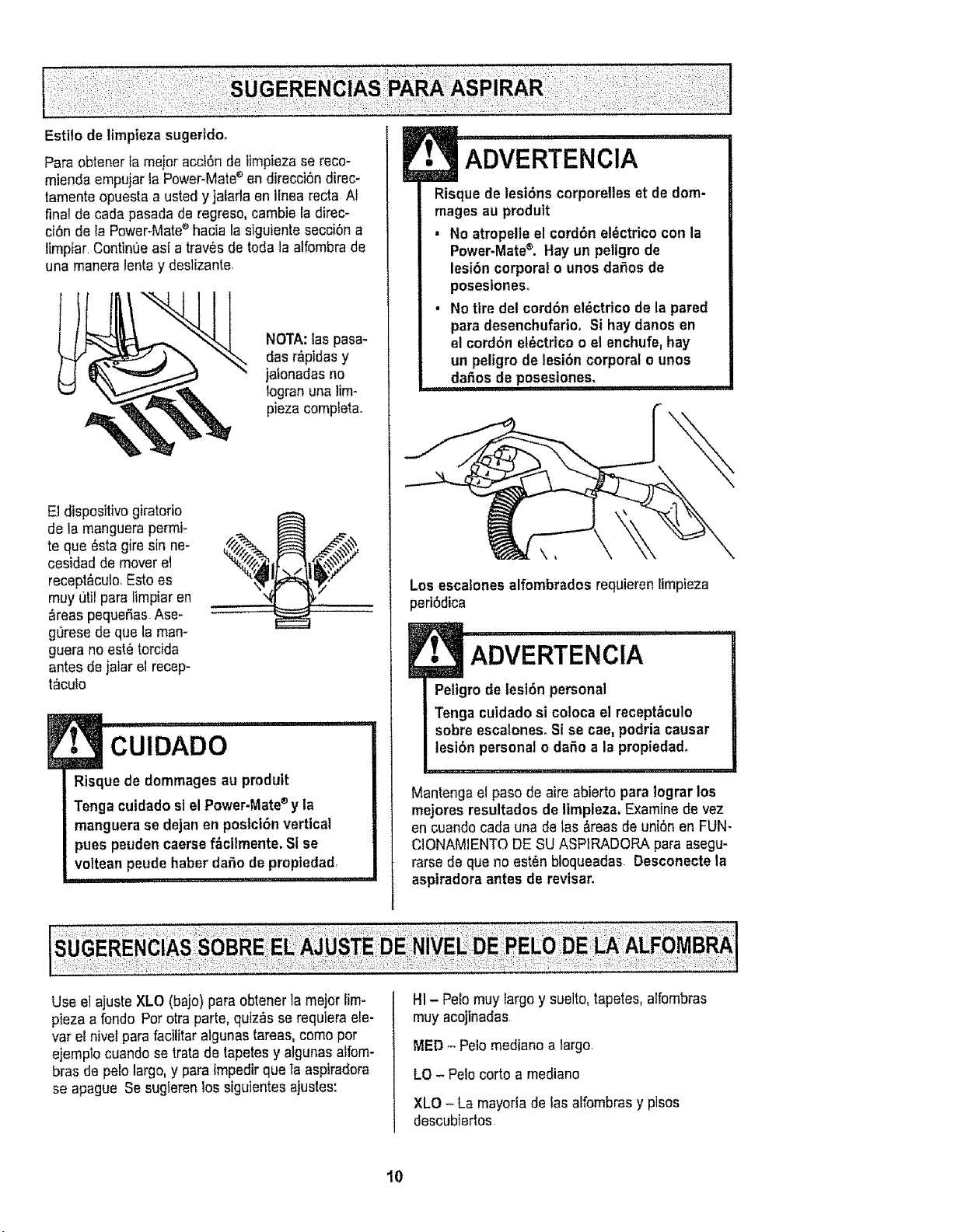
Estilode limplezasugertdo°
Pare obtenerla meier acct6nde limpiezase reco-
mienda empujarla Power-Mate_ en direcci6n direc-
tamenteopuesta a usted y jalarla en Ifnea recta AI
final de cada pasada de regreso,cambie la direc-
ci6n de la Power-Matee hacia la siguiente secci6n a
limpiar ContinOeasi a tray,s de toda la alfombra de
una maneralenta y deslizante.
NOTA:laspasa-
das r_,pidasy
jalonadasno
Iogranuna lira-
plaza complete.
El dispositivo giratorio
de la manguerapermi_
te qua _sta gire sin ne-
cesidad de mover el
recept&cuto.Esto es
muy util pare limpiar en
_reas pequeSas.Ase-
gL_resede que la man-
guera no ast_ torcida
antes dejalarel recep-
t_culo
E CUIDADO ............
Risque de dommages au produit
Tenga cuidadosi el Power-Mate®y la
manguera se dejan en postct6n vertical
pues peuden caersef_cilmente. Sise
voltean peude haber dafio de propiedad.
im "' " ""'" '
ADVERTENCIA
Risque de tesi6ns corporelles et dedom-
mages au produit
, No atropelle el cord6n et_ctricocon la
Power.Matee. Hay un peligro de
lesi6n corporal o unos da_os de
poseslones°
• No tire del cord6n el_ctdco de la pared
pare desenchufario, Si hay danes en
elcord6n et_ctricoo el enchufe,hay
un peligro de lesi6n corporal o unos
daSosde poseslones,
i i i ii1,111, .....
Los escalones alfombrados requieren limpieza
peri6dica
ADVERTENClA
Peligro de lesi6n personal
Tenga cuidadosi coloca el recept&culo
sobre escalonesoSi se cae, podria causer
lesibn personalo daSo ala propiedad,
Mantenga el paso de aire abierto para lograr los
mejores resultadosde limpleza. Examinede vez
en cuandocada una de las &teas de uni6n en FUN-
CIONAMIENTODE SU ASPIRADORA pare asegu-
rarse de qua no est6n bloqueadas Desconecte la
aspiradora antes de revisar.
Use el ajuste XLO (bajo) pare obtenerla major lim-
pieza a fondo Per otraparte, quiz&sse requiem ele-
var el nivel para facilitar algunastaraas, come per
ejemplo cuando setrata de tapetes y aigunas alfom-
bras de pelo largo,y pare impedirqua ta aspiradera
se apague Se sugierenlos siguientesajustes:
HI -Pelo muy largoy suelto,tapetes,alfombras
muy acojinedas
MED - Pale mediano a largo.
LO -Pelo corto a mediano
XLO - La mayoria de tas alfombras y pisos
descubiertos
10
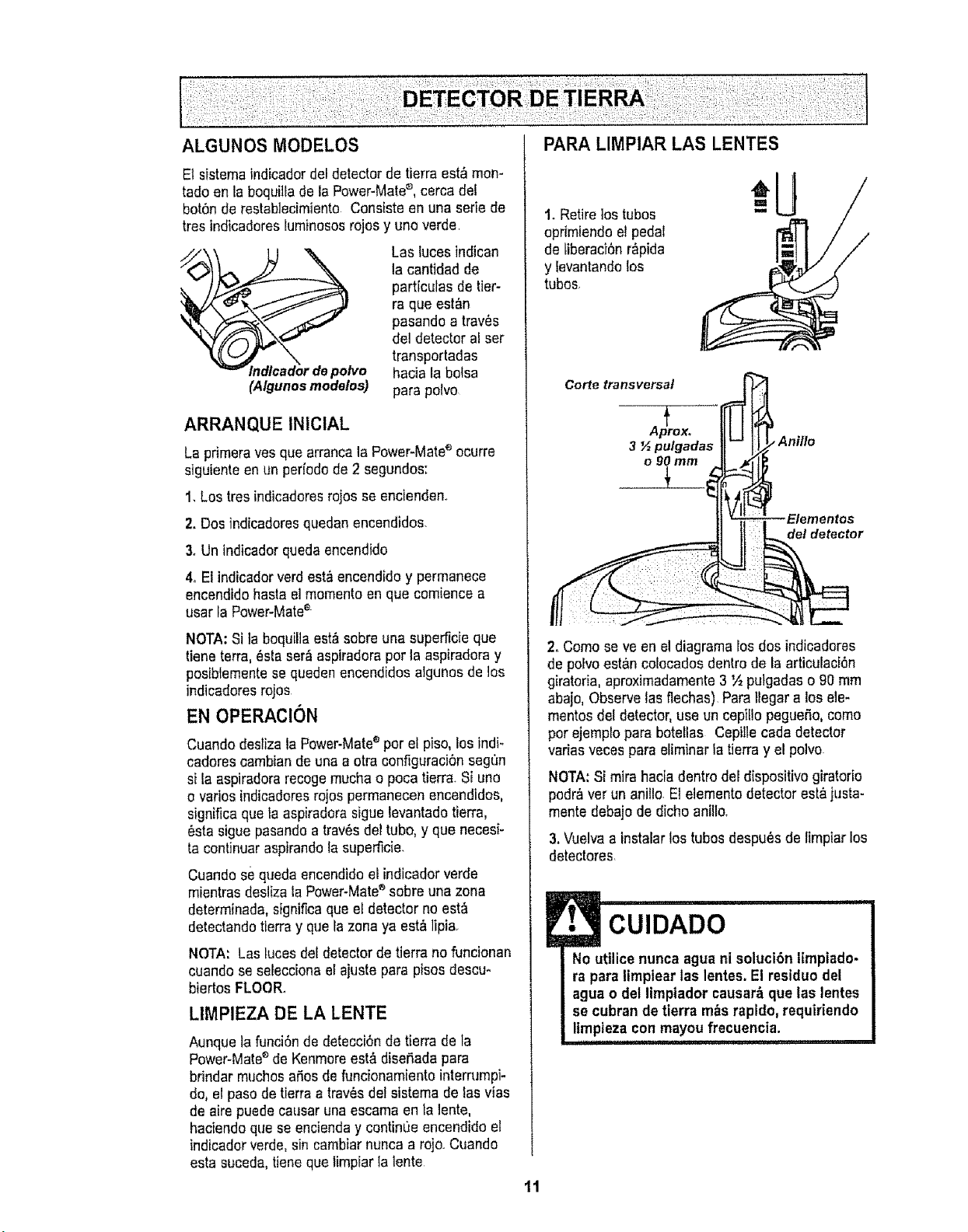
El sistemaindicador del detectorde tierra est_ mon-
tado en la boquiila de la Power-Mate_, cerca def
bot_n de restablecimiento Consiste en una serie de
tres indicadores fuminososrojos y uno verde,
(Algunosmodelos)
Las luces indican
la cantidad de
particulas de tier-
ra que est&n
pasando a trav_s
de!detector al ser
transportadas
hacia la botsa
para polvo
ARRANQUE INiCIAL
La primerayes qua arrancala Power-Matee ocurre
siguiente en un peHodode 2 segundos:
1, Lostres indicadoresrajas se encienden.
2. Dos indicadoresquedan encendidos.
3. Un indicadorqueda encendtdo
4. El indicadorverd est,_encendido y permanece
encendido basrael momentaen que comience a
usar la Power-Matee
NOTA:Si ta boquillaest&sobre una superficie que
tiene terra, esta ser_aspiradoraper la aspiradoray
posibtementese queden encendidos algunes de los
indicadores rojos
EN OPERAClON
Cuando deslizala Power-Matee par e_piso, los indi-
cadores cambian de una a otra configuraci6n segfm
si ta aspiradorarecogemucha o poca tierr& Si uno
o varies indicadoresrajas permanecen encendidos,
significa qua ta aspiradorasiguelevantado tierra,
_sta sigue pasandoa trav6sdel tuba, y que necesi-
ta continuaraspirandota superficie.
Cuando se queda encendidoeLindicadorverde
mientras desiiza iaPower-Mate®sabre unazona
determinada, significaqua el detector no est,,
detectandotierra y que Iazona ya est& lipia.
NOTA: Lastuces del detectorde tierra no funcionan
cuando se seleccionael ajuste para pisos descu*
biertos FLOOR.
LIMPIEZA DE LA LENTE
Aunque la funci6nde detecci6nde tierra de la
Power-Matee de Kenmoreest& dise#,adapara
brindar touchesaSosde funcionamiento interrumpi-
do,el pasode tierra a tray,s det sistema de lasvtas
de aire puede causar una escama en la lento,
haciendoque se encienday continQeencendido el
indicadorverde, sin cambiar nunca a rojo_Cuando
esta suceda,tieneque timpiar Ia lente
1. Retire lostubas
oprimiendoel pedaI
de liberaci_n r&pida
y levantandolos
tubes.
Carte transversal
A {jDrOX_
3 _ pulgadas
o 90 mm
Aniflo
Elementos
del detector
2, Coma se ve en el diagramalos dos indicadores
de pelvoest&ncofecados dentrode la articulaci_n
giratoria, aproximadamente3 ½ pulgadaso 90 mm
abajo,Observe las flechas)Para tlegara los ele-
mantasdel detector,use un cepiUopegueSo,come
par ejemplo para botetlas Cepille cada detector
varies veces para eliminar latierra y el polvo.
NOTA:Si mira haciadentro del dispositivo giratorio
podr&vet un ani!lo.E1elementodetector est&justa-
monte debajo de dicho anilIo.
3.Vue!vaa instalar los tubes despu_s de limpiar los
detectores.
!• CUIDADO
No utilice nunca agua ni soluci6n Iimpiado-
ra para limpiear las lentes.El residuo del
agua o del limpiador causar_ que las lentes
se cubran de tierra m&srapldo, requiriendo
ltmptezacon mayoufrecuencia.
11
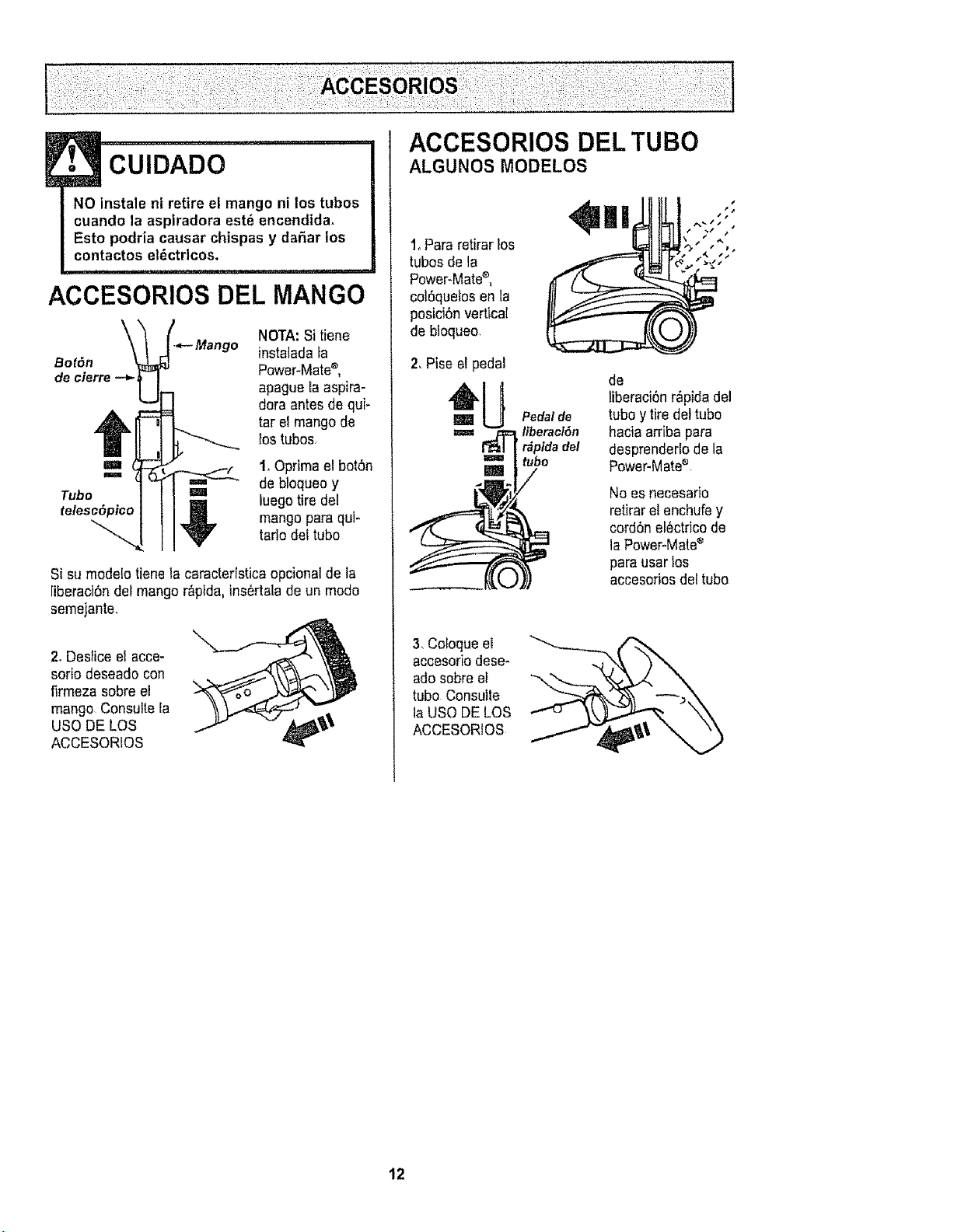
CUIDADO
NO instale ni retire el mango ni los tubes
cuando la aspiradora est_ encendida.
Esto podria causar chispas y da5ar los
contactos el_ctrlcos.
............... ii1,,11,i
ACCESORIOS DEL MANGO
Bot6n
de cierre -_
NOTA:Si tiene
instaladaLa
Power-Mate'_,
apague la aspira-
dora antes de qui-
tar el mangode
_ostubes,
=,m, 1,Oprimael bot6n
de bloqueo y
Tube u luegotire del
,_ mangopare qui-
tarlo cleftube
Si sumode!otiene la caracteristica opcionat de la
liberaci6n del mangor&plda,ins6rtalade un mode
semejante.
2, Des_iceel acce-
sorie deseado con
firmeza sobre el
mango Consuite la
use DE LOS ,_'
ACCESORfOS
ACCESORIOS DEL TUBe
ALGUNOS MODELOS
1, Pare retirarlos
tubes de la
P°wer_Mate_' t
col6quelos en la
posici6n vertical
de bloqueo.
2,Pise e!pedal
3. Celoqueel
accesoriodese-
ado sobre el
tube Consulte
la use DE LOS
ACCESORtOS
Pedal de
fiberacf6n
i r&pfdadel
tube
de
liberaci6nr_pida del
tubey tiredel tube
hacia arriba para
desprenderlode la
Power-Mate®
No es necesario
retirar e!enchufey
cord6n el6ctricode
la Power-Mate'_
para usertes
accesofiosdel tube
12
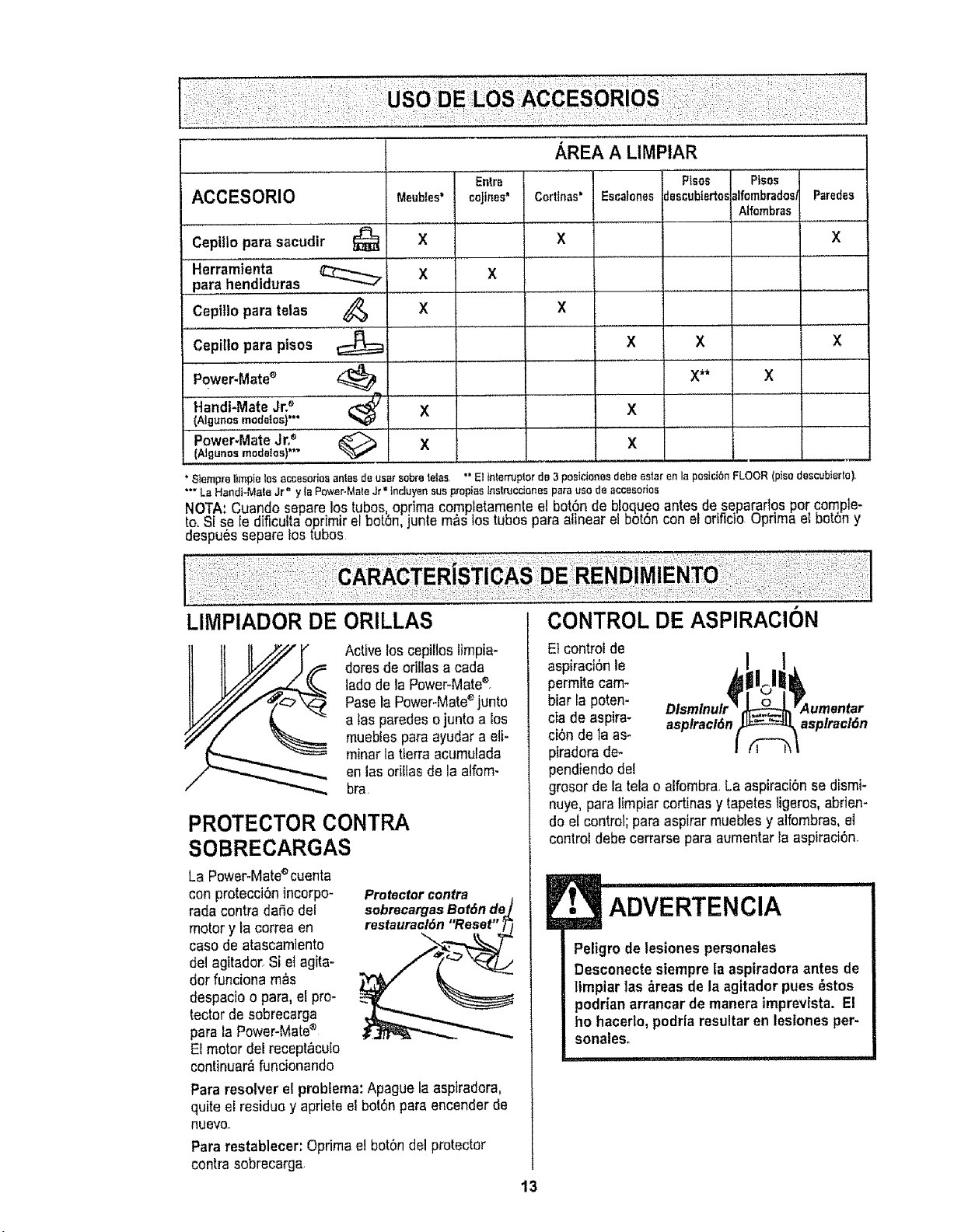
ACCESORIO
Ceplllo para sacudir
Herramienta
para hendiduras
Cepitlo para telas
Cepillo para pisos
Power.Mate®
Handi-Mate Jr2 ......
(Algunosmodelos)""
I Power.Mate Jr.'_
(Ngunos mode]as}**"
Meubles=
@ x
X
x
....x
Q x
* Slempreltmpfelos _,ccesodosantes deusarsabratelas
Entre
coJines'
AREA A LIMPIAR
I Corttnas'
X
X
X
Esca|ones
Pisos
descubie_os
X X
t ,,
X**
X
X
Ptsos
_lfombrados/IParades
Alfombras|....
X
X
X
"' El tnterruplorde 3posicionesdebe astorenla posidSn FLOOR(pisodescubierto),
**" La Handt-Mate Jr" y la Power.Mate Jr =tncluyen sus propias tns_rucdones para use de accesorios
NOTA:Cuando separe lostubes optima comp!etamenteel bot6n de bloqueoantes de separaflos per comple-
te,Si sele dificultaoprimir el bot_n,juntom_s los tu_es para alinear el bot6n con elorificio uprima el bot6ny
despu6s separe lostubes
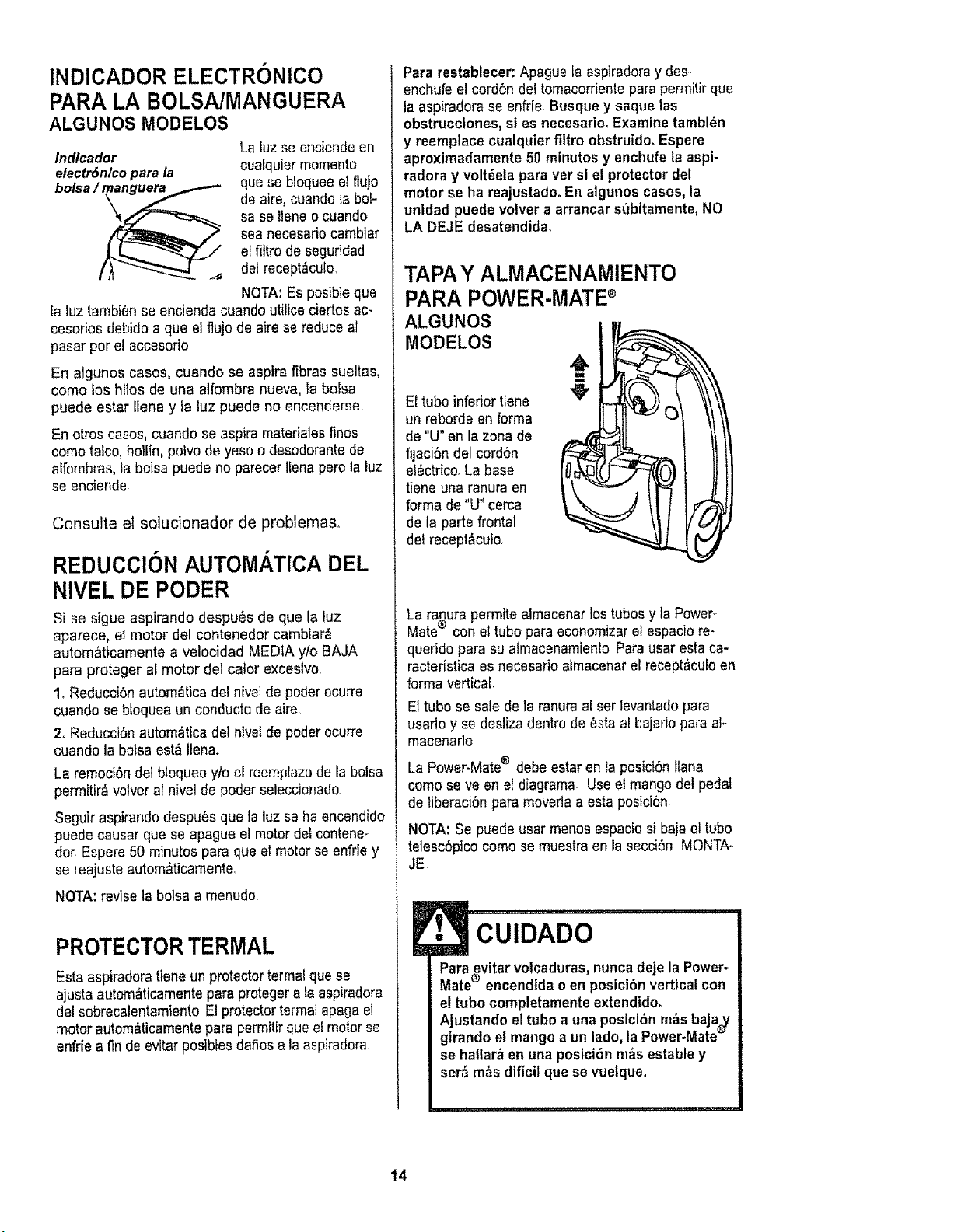
LIMPIADOR DE
ORILLAS
Activelos cepillos limpia-
daresde eritlas a cada
lade de la Power-Mate_o
Pasola Power-Mate'_junto
a tas paredes ojunto a Ios
muebles para ayudara eli-
minor la tierra acumulada
en los oriUasde la alfom-
bra
PROTECTOR CONTRA
SOBRECARGAS
La Power-Mateecuenta
con proteccibn incorpo- Protector contra
rada contra dafio del sobrecargasBof6nde
motor y la correa en restauracl6n"Reset"
case de atascamJento
del agitador, Si e{agita-
dor funciona m_s
despacio o para,e[ pro*
rector de sobrecarga
para la Power-Mate_
El motor del recept&cuio
continuar_ funcionando
Para resolver el problema: Apague [aaspiradora,
quite e[ residua y apriete el bot6npara encenderde
nueVO,r
Para restablecer: Optima e] bct6n del protector
contra sobrecarga,
CONTROL DE ASPIRAClON
Etcontrol de
aspiraci6n le
permite cam-
biar la poten-
cia de aspira- asplracl(_n asplracl6n
ci6n de la as_
piradora de-
pendiendo del
grosor de la tela o alfembra,La aspiraci6n se dismi-
nuye,para limpiar cortinasy tapetesligeros,abrien-
doel control; papaaspirar muebles y alfombras, e]
control debe cerrarse para aumentar la aspiraci6n_
E• ADVERTENClA
i
Peligm de lesiones personales
Desconectesiempre ta aspiradora antes de
limpiar las areas de la agitador pues _stos
podrJanarrancar de manera imprevista. El
he hacerlo,podria resultar en lesiones per-
sonales.
i i,i, i,iiii i,
13
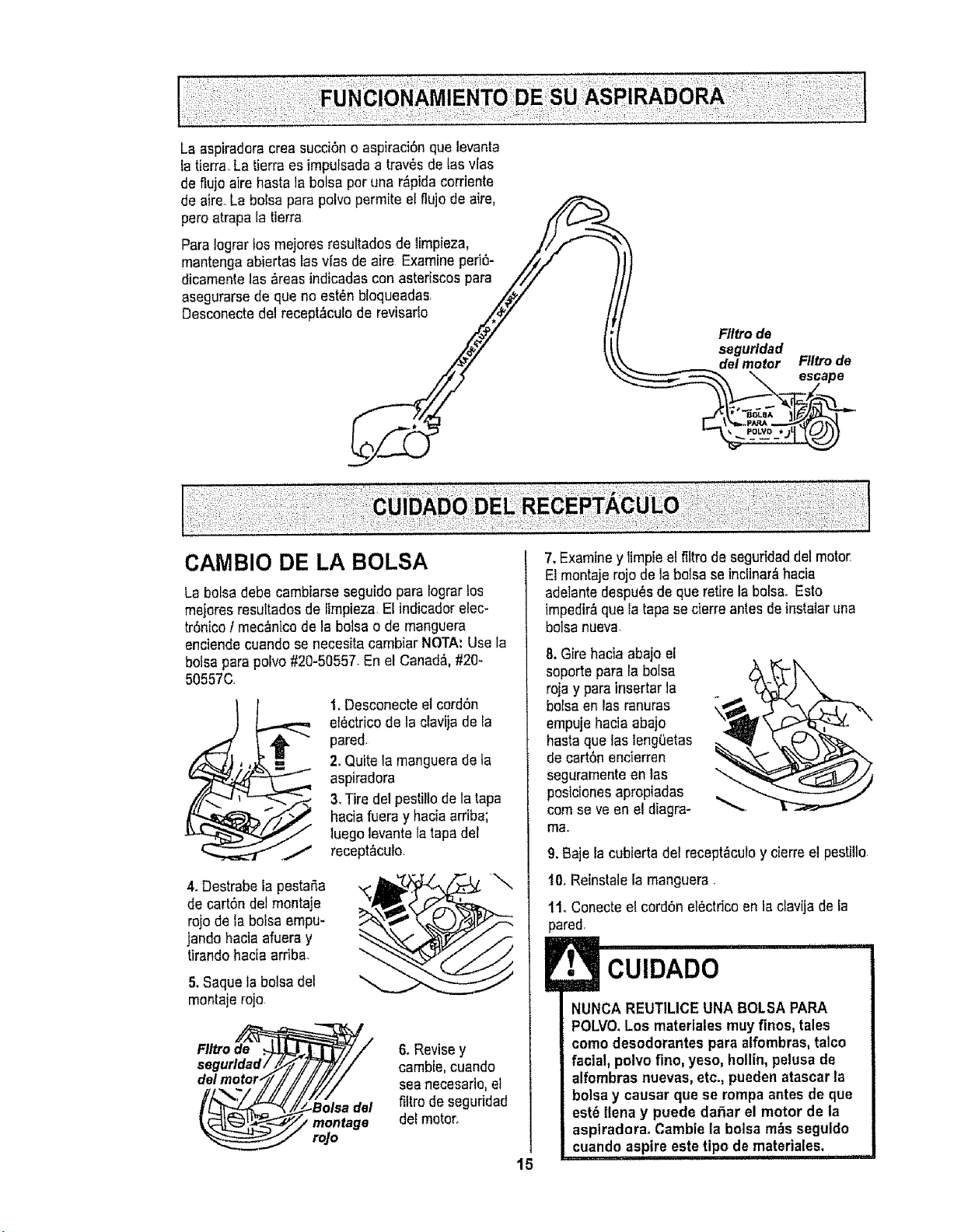
INDICADOR ELECTRONICO
PARA LA BOLSA/MANGUERA
ALGUNOS MODELOS
Indlcador
electr6nlco para la
bolsa/_
La luzse enciendeen
cuafquiermemento
que se bloqueeel flujo
de aire,cuando la bol-
sa se 13eneo cuando
sea necesario cambiar
el fittrode seguridad
del recept_culo.
NOTA:Es posibieque
la luz tambien seencienda cuando utilice ciertos ac-
cesorios debido a que el flujo de aire se reduceal
pasar per el accesodo
En algunos cases, cuando se aspira fibras sueltas,
come los hitos de una alfombra nueva, la bolsa
puede estar Ilena y Ia luz puede no encenderse.
En otros casos, cuando se aspira materiatesfinos
como talco, holltn, polvo de yeso o desodorantede
alfombras, fabolsa puede no parecertLenapero la luz
se enciende,
Consulte el solucionador de problemas.
REDUCCION AUTOMATICA DEL
NIVEL DE PODER
Si se sigue aspirando despu6s de que la luz
aparece, el motor del contenedor cambiar_
autom_ticamente a velocidad MEDIA y/o BAJA
para proteger al motor del cater excesivo
1_Reducci6n autom_tica del hive]de poder ocurre
cuando se btoqueaun conducte de aire
2. Reducci6nautom_tica del nivel de poder ocurre
cuando la botsa est&lien&.
La remociOndel bloqueo yfo el reemplazode la bolsa
permitir_ volver al nivel de poder seleccionado
Seguir aspirando despu6s que la luz se haencendido
puede causar que se apague el motordel contene-
tier Espere 50 minutespara que el motor seenfrie y
se reajuste autom_ticamente
NOTA: revise la bolsa a menudo.
PROTECTORTERMAL
Esta aspiradoratieneun protectortermal quese
ajusta autom_ticamente para protegera taaspiradora
del sobrecalentamiento E!protectortermal apaga el
motor autom&ticamentepara permitir que el motor se
enfrie a finde evitar posibles da_osa la aspiradora
Para restablecer: Apague la aspiradoray des-
enchufe el cord6n del tomacorriente para permitir que
la aspiradorase enfrfe Busque y saque las
obstrucclones, si es necesarioo Examine tambl_n
y reemplace cualquier filtro obstruido. Espere
aproximadamente 50 minutes y enchufe la aspi-
radora y volt_ela para ver st el protector del
motor se ha reajustado. En algunos cases, la
unldad puede velvet a arrancar s6bitamente, NO
LA DEJE desatendida.
TAPAY ALMACENAMIENTO
PARA POWER-MATE°
ALGUNOS
MODELOS
El tubo inferior tiene
un reborde en forma
de "U" en la zona de
fijaci6n del cordon
et_ctrico,La base
tiene una ranura en
forma de "U" cerca
de la parte frontal
del recept&culo
La raqura permite almacenar lostubes y la Power-
Mate"_con el tube paraeconomizar el espaciore-
querido para su afmacenamientoPara usar esta ca-
ractedstica es necesado almacenar el recept&culoen
forma vertical.
El tube se sale de la ranuraal ser levantadopara
usarlo y se desliza dentro de _sta al bajaric para al-
macenarlo
La Power-Mate® debe estar en la posici6n liana
come seve an el diagrama. Use el mango del pedal
de liberaci6npara moverla a esta posici6n
NOTA:Se puede usar menos espaciosi bajael tube
telesc6pico come se muestraen la secci6n MONTA-
JE.
CUIDADO
Para_vitar volcaduras,nuncadeje la Power-
Mate encendldao en poslcl6nvertical con
e! tube completamenteextendido.
Ajustando el tube a una poslcl6n m_s baja_/
girando el mango a un lade, la Power-Mate_
se hallar_ en una postci6n m&s estable y
ser& m_s dificil que se vuelque.
14
La aspiradoracrea sucd6n o aspiraci6nque levanta
la tierra La tierraes impulsada a trav6s de tas vies
de flujo aire hasta ]a bolsa per una r_pNa carriente
de aire, La bolsa pare polva permite etflujo de aire,
pero atrapa [atierra /?
Para lograr los mejores resultados de ]impieza, ..///""- _
mantenga abiertas ies vfas de aire Examine peri6- /_/,/-
Y
dicamente las _reas indicadas con astefiscos pare ///
asegurarse de que no est6n bloqueadas .Z/_J
Desconectedel recept_culo_ Ftltrode
segurldad
delmotor Filtrode
_ escape
CAMBIO DE LA BOLSA
La bofsadebe cambiarseseguido pare Iograrlos
mejores resuRadosde [impieza.E[indicador elec-
tr6nico I mec_nicode la botsa o de manguera
enciendecuando se necesitacambiar NOTA:Use la
boisepara potvo#20-50557_En el Canada, #20_
50557C,
1.Desconecte el cord6n
e]6ctrico de la clavijade Ia
pared,
2, Quite lamanguerade fa
aspiradora
3,Tire del pestillode tatapa
haciafuera y hacia arriba;
luego levante la tapa del
recept&culo,
4.Destrabe lapestana
de cart6n de]montaje
rojo de la bolsaempu-
jando hacia afuera y
tirando hac[a arriba.
5.Saque la bolsa dei
montajerojo
FIItro de
montage
roJo
6. Revisey
cambie,cuando
sea necesafio,el
filtro de seguridad
dot motor,
15
7. Examiney limpieel filtrode segufidad del motor
El montajerojo de la botsa se incUnar_hacia
adelantedespu6s de que retire la boise. Esto
impedir&que la tapase cierreantes deinstalar una
bolsanueva.
8. Gire hacia abajo el
saporte para la boise
roja y pare inserter ]a
boiseen las ranuras
empujehacia abajo
hasta que tas lengeetas
de cart6n encierren
seguramentean lee
posicionesapropiadas
cornse ve en el diagra-
me.
10. Reinstalela manguera•
1t. Conecteel cerd6n electriceen la clavijade Ia
pared.
E3 CUIDADO
NUNCA REUTILICE UNA BOLSAPARA
POLVO.los materiales muy finos, tales
como desodorantes para atfombras, talco
facial, polvo flno, yeso, hollin, pelusa de
alfombras nuevas, etc., pueden atascar la
bolsa y causar que se rompa antes de que
est_ ltena y puede da,3arel motor de la
asptradorao Cambiela bolsa m_s seguido
cuando aspire este tipo de materiales.
i i , ,, ,m,
9. Baje la cubierta del recept_culoy cierre el pestilto,
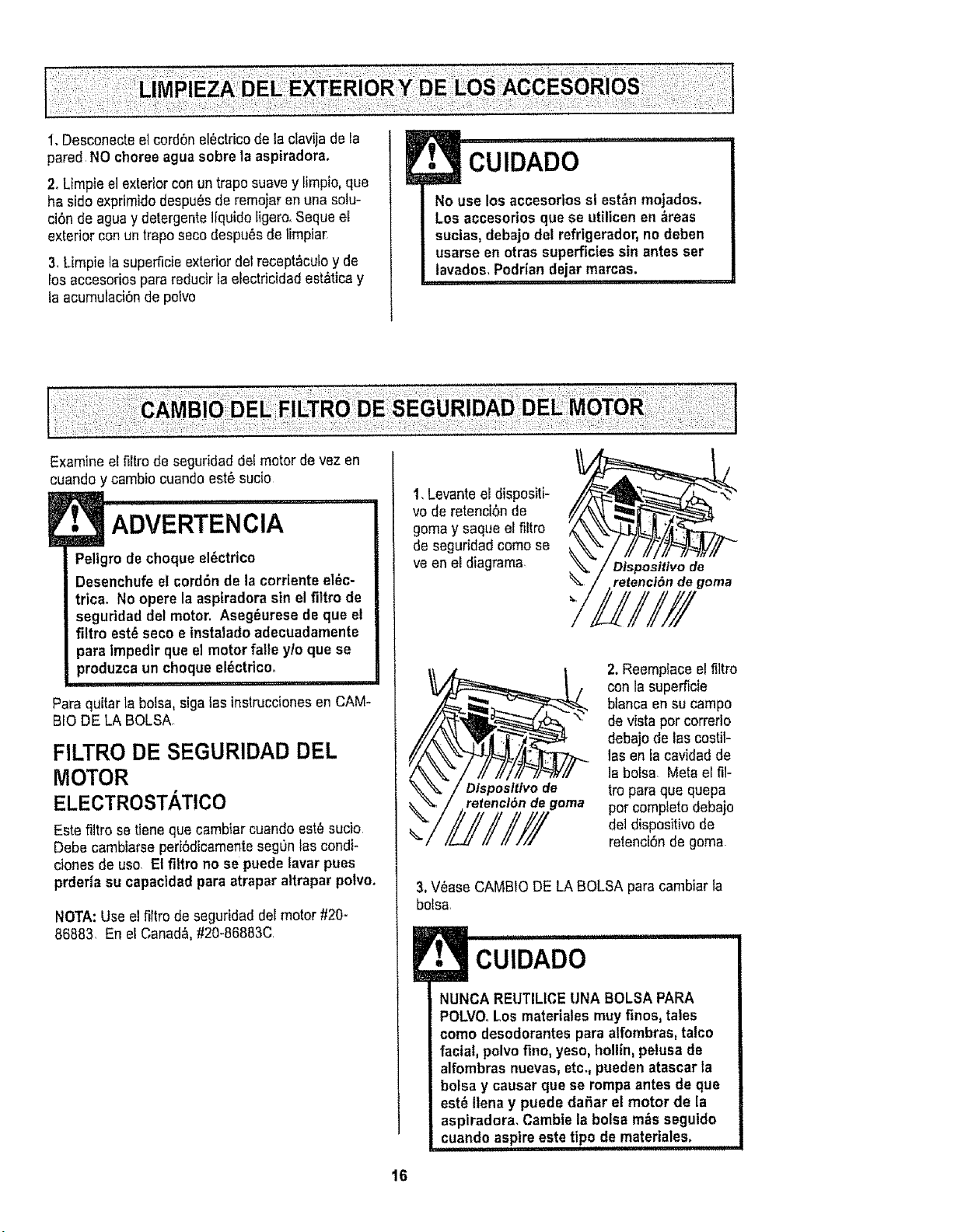
1.Desconecteelcord6nel_ctricodelaclavijadeEa
paredNOchoreeaguasobrelaaspiradora,
2. Limpie el exLeriorcon untrapo suave y limpio, que
ha sido exprimidodespu_s de remoiar en una solu-
ci6n de ague y detergenteItquido Iigero,Seque el
exterior conun trapo seco despu6s de timpia_
3,Limpie la superficieexterior del recept_cutoy de
Losaccesorios para reducirla electricidad est&ticay
la acumulaci6nde polvo
Examine eLfiltro de seguridaddot motor de vez en
!• CUIDADO............'..............
No use los accesorJos sl est_n mojados.
Los accesorios que se utilicen en areas
sucias, debajo del refrigerador, no deben
usarse en otras superficies sin antes set
lavados, Podrian dejar marcas.
i illll,
cuando y cambio cuandoest6 sucio
ADVERTENCIA
Pellgro de choque el_ctrico
Desenchufe el cord6n de la corrienteel_c-
trtca. No opere la asptradora sin el filtro de
seguridad del motor. AsegSurese de que et
filtro est_ seco e instaladoadecuadamente
pare impedtr que el motor falle ylo que se
produzca un choque el_ctdcoo
Para quitarla boise, siga 1asinstruccionesen CAM-
BIO DE LA BOLSA,
FILTRO DE SEGURIDAD DEL
MOTOR
ELECTROSTh,TICO
Este filtro se tieneque cambiar cuandoest_ sucio
Debe cambiarseperi6dicamenteseg[_ntas condi-
ciones de uso El filtro no se puede lavar pues
prderia su capacidad pare atrapar altrapar polvo.
NOTA: Use el filtro de seguridad del motor #20-
86883 En e;Canada, #20-86883C
1, Levanteel dispositi-
vo de retenci6n de
goma y saque el filtro
de seguridadcomo se
ve en el diagrama
Dispositivode
retenct6ndegoma
"IFI,III
Dlsposittvo de
retencl6n de goma
2. Reemplaceel filtro
con la superficie
bfanca en su campo
de vistapor correrlo
debajo de las costil-
las en la cavidad de
]a boise Mete el fil-
tro pare que quepa
por completo debajo
del dispositivo de
relenci6n degoma
3.V_ase CAMBIODE LA BOLSA pare cambiar la
bofsa,
E CUIDADO ..................
NUNCA REUTILtCE UNA BOLSA PARA
POLVO_Los materiales muy finos, tales
como desodorantes para alfombras, talco
faciat, polvo flno, yeso, hollin, pelusa de
alfombras nuevas,etc,, pueden atascarla
bolsa y causar que se rompaantes de que
est_ Ilena y puede daSar el motor de la
aspiradora, Cambiela bolsa m_s seguido
......cuando aspire este tipo de materiales_..................
16
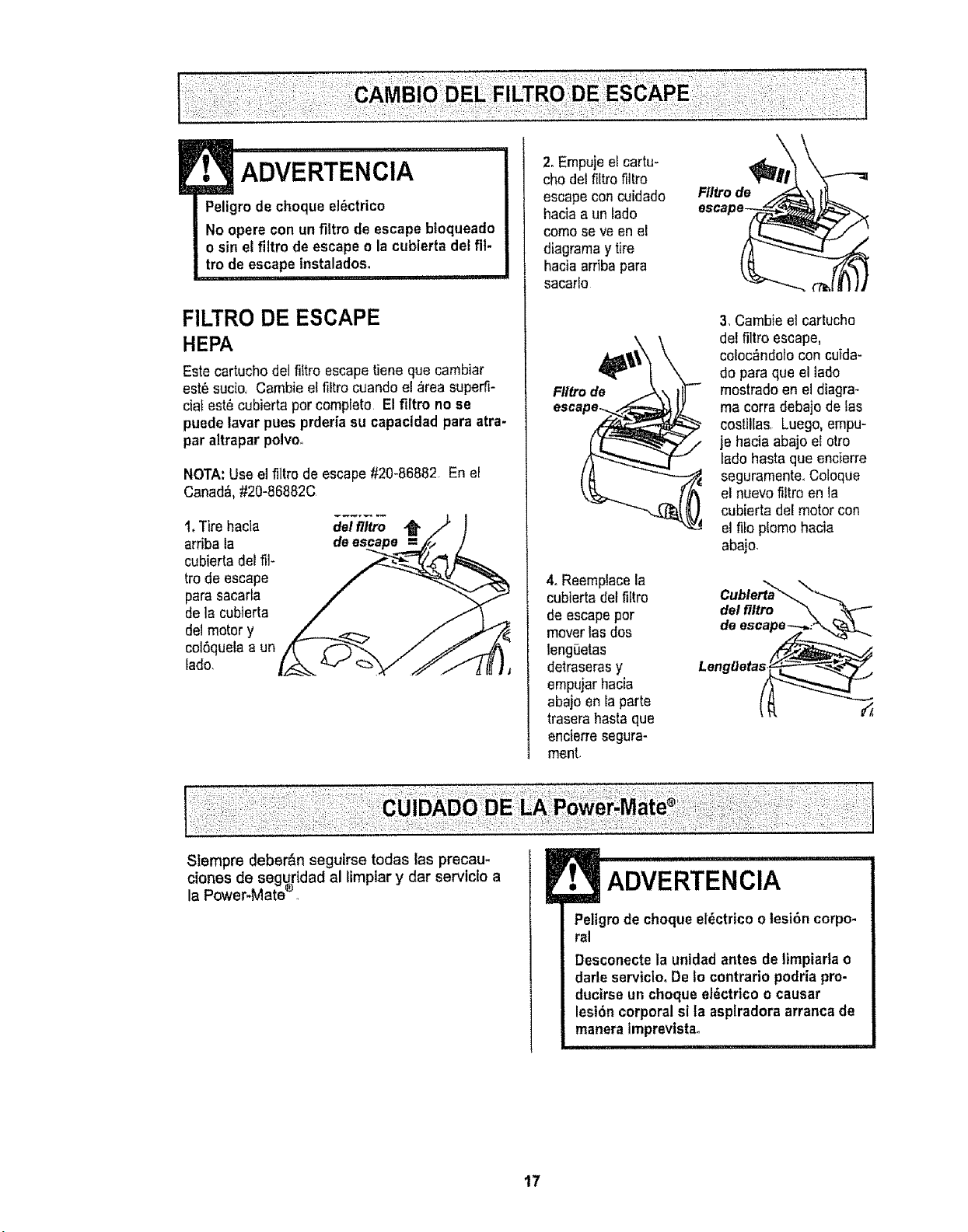
! ,, ,11,,1111
ADVERTENCIA
Peligrode cheque el_ctrico
No opere con un filtro de escape bloqueado
o sin el filtro de escapeo la cubierta de+fil-
tro de escape instalados.
i,
FILTRO DE ESCAPE
HEPA
Este cartucho del fittro escapetiene que cambiar
est_ suc{o+Cambie el filtro cuando el _rea superti-
ciat est0 cubierta per complete Elfiltro no se
puede lavar pues prderia su capacidad para atra-
par altrapar polvo.
NOTA:Use el filtre de escape#20-86882 En el
Canad&.#20-86882C
1+Tire hacia
arriba la
cubierta del ill-
frode escape
para sacarla
de la cubierta
del motor y
col6quelaa un
lade,
del filtro
2,Empuje elcartu-
cho del filtro filtro
escape concuidado
hacia a un lade
come se ve en el
diagramay tire
hacia arriba para
sacarlo
Ftltro de
4. Reemplacela
cubierta deffiltro
de escapeper
mover tas dos
lengiJetas
detraserasy
empujar hacia
abajo en Ia parte
trasera hasta que
encierresegura-
menL
Flltro de
3, Cambie el cartucho
del filtro escape,
ceLoc_ndolocon cuida-
do para que el lade
mostradoan el diagra+
ma corra debajo de las
costillas, Luego,empu-
je hacia abajo el otro
tadohasta que encierre
seguramenteoColoque
el nuevofiltro en ta
cubierta del motor con
el file plomo hacia
abajo.
Cublerta'_-..
del flltro
clones de segurldad al Iimplar y dar servtclo a
la Power-Matee _
Peligrode cheque el0ctrico olesi6n corpo-
ral
Desconectela unidad antes de limpiada o
darle serviciooDe Io contrario podria pro-
ducirse un cheque el_ctrico o causar
lesi6ncorporal si fa asplradora arranca de
manera imprevtsta+
i i i i,iii1,1111 i,i
17

!
m
. cu,DAD .....................
Puede que at retirar los soportes del
cepllio se desprenda una pequefia
arandela de metal de cada extremo,
NO pierda estas arandelas.
,1,1,,I
NOTA: Para mantener una alta eficiencia de
limpieza y evitar el daf_o ala aspiradora, _hay
que limp!at el agitador cada vez uq.u.Ase cambla
la correa.
Tambi6n hay que limpiar el agttador seg_n el
stguiente horario:
El uso de la LImDie el
a_gitador
Frecuente - cada semana
(usada dirariamente)
Moderado -
(usada 2 o 3 veces
por semana)
Ligero -
(usada I vez por semana)
cada mes
cada 2 meses
Retire todo tndicio de basura o sucledad de la
zona de la correa y del rodil!o del cepillo,
Con cuidado quite tas tapas y quite el hllo o los
restos ubicados en el agitador, en los soportes
del cepillo, en las arandelas o en el eJedel agi-
tatoro
IMPORTANTE
Cambie tas aran-
deles y luego las
soporte&
Vea la perspectiva
desptezada para
segulr el orden co-
rrecto de coloca-
clOn de las plezas,
Desconectela asplradora, Examinefrecuente-
mente el cepiltoy_as _reasde soporte det mismo
de la Power-Mate y eliminetodo cabello, hilo y
pelusa acumulada,Si_aacumulaci6nes excesiva,
separe la Power-Mate del tubo y realice los pasos
a continuaci6n
PARA RETIRAR LA CORREA
1, Co_oquela Power-
Mate con la parte
inferior hacia arriba
2. Quite los dos (2)
tornillos en la cub_rta
de la Power-Mate
3, Co_oquela Power-
Mate en la posiciSn
vertical. Apriete el
pedal del mangode lib-
eraci6ny beje la articu-
laciSngiratoria.Levante
los pestillos traseros
4. Para quitarla cubierta,
agarre los lados y tire afuera.
5,Apdete las
leng0etas en la
parte trasera de
facubierta del
agitadory gire
hacia adetante
para liberar de
la base de 1_
Power-Mate
del agltador
LengfJetas
& Levantela
unidad del agita-
dory quite la cor-
tea gastada.
Tapa del extremo
7, Retire los tapas del
extremos;examiney
limpie las _reasde
tapa de!extremo En
la ENSEMBLE DEL
AGITADORse propor-
ciona una ilustraci6n
de todoel ensemble
del agitador
Tapedel
extremo
18
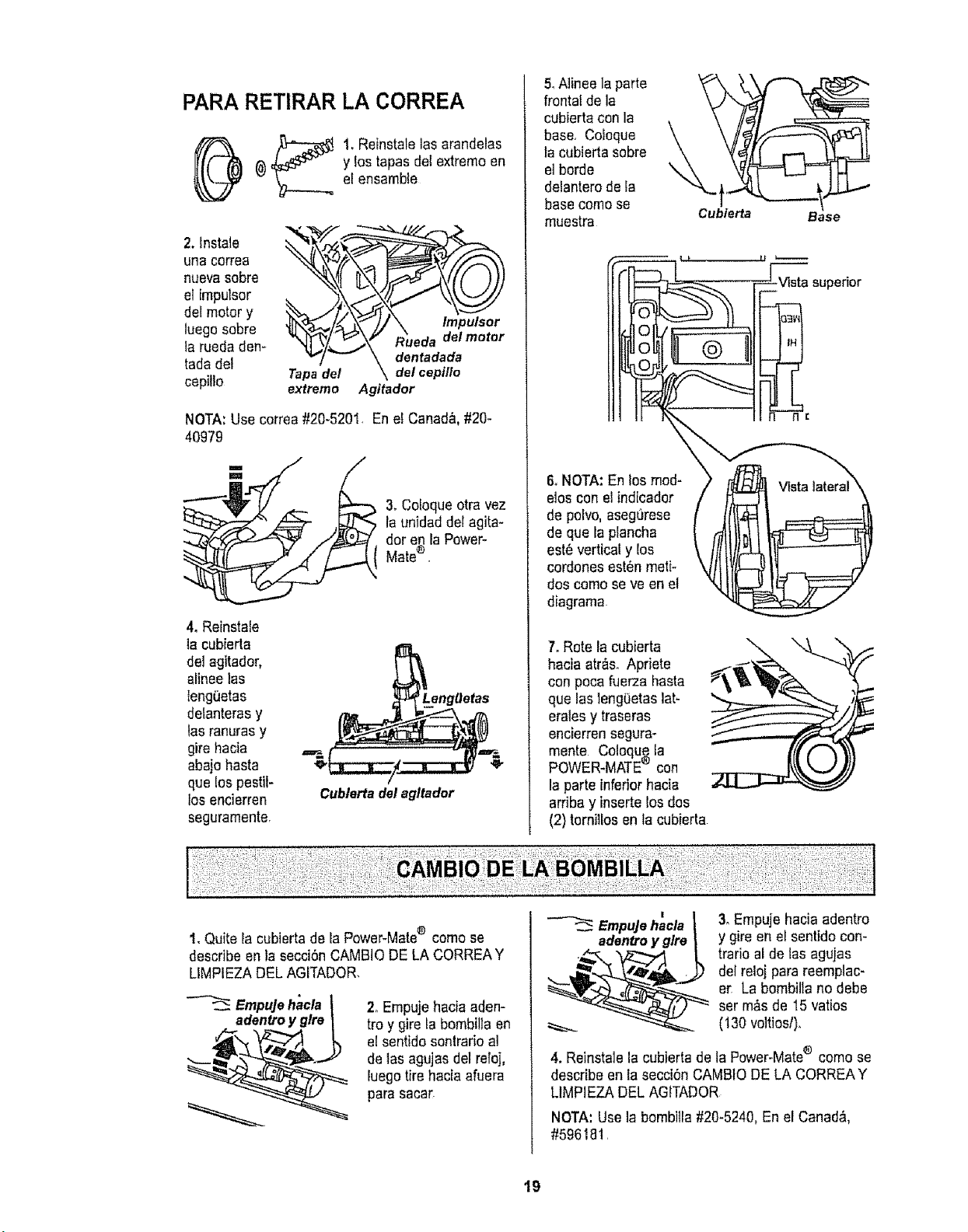
PARARETIRAR LA CORREA
_ 1. Reinstalelas arandelas
@ y los topos dei extreme en
el ensamble
2. lnstale
una correa
nuevasobre
el impulsor
del motor y
luego sobre
la rueda den-
tada del
cepitlo
'_ _ Rueda delmotor
Tapa del \ dot cepillo
extremo Agitador
NOTA:Use correa#20-5201. En e! Canad&,#20-
40979
3. Cotoqueotra vez
la unTdaddel agita-
dor e_ faPower-
Mate
4. Reinstale
lacubierta
deJagitador,
aHneelos
teng0etas
delanteras y
las ranurasy
gire hacia
abajo basra
que Eospestil-
los encierren
seguramente
Cublertadalagltador
5,Alinee la parte
frontal de la
cubierta con la
base, Coioque
la cubierta sobre
el borde
delanterode la
basecome se
muestra
\
Cubierta
Base
7. Rote la cubierta
hacia atr&soApriete
con poca fuerza hasta
que laslengOetaslat-
erates y traseras
encierren segura-
monte Coloque la
POWER-MATE® con
la parte inferior hacia
arriba y inserte los dos
(2) tornillosen la cubierta
1,Quite Ia cubierta de la Power-Mate® come se
describe en la secci6nCAMBIODE LA CORREAY
LIMPIEZADEL AGITADOR.
Empujehacla
adentroy glre
2oEmpujehacia aden-
tro y gire la bombillaen
el sentido sontrario al
de lasagujas del reloj,
iuegotire hacia afuera
para sacar
EmpuJehacla _ 3. Empuje hacia adentro
adentroyglre | y gire en el sentido con-
_ trario al de los agujas
.._ del reloj para reemplac-
_"-- " or, La bombillano debe
ser m&sde 15 vatios
(130 voltiosl).
4. Reinstalela cubierta de la Power-Mate® comese
describe en Iasecci6n CAMBtODE LA CORREAY
LIMPIEZA DEL AGITADOR
NOTA: Use la bombitla#20-5240, En el Canad&
#596181,
19
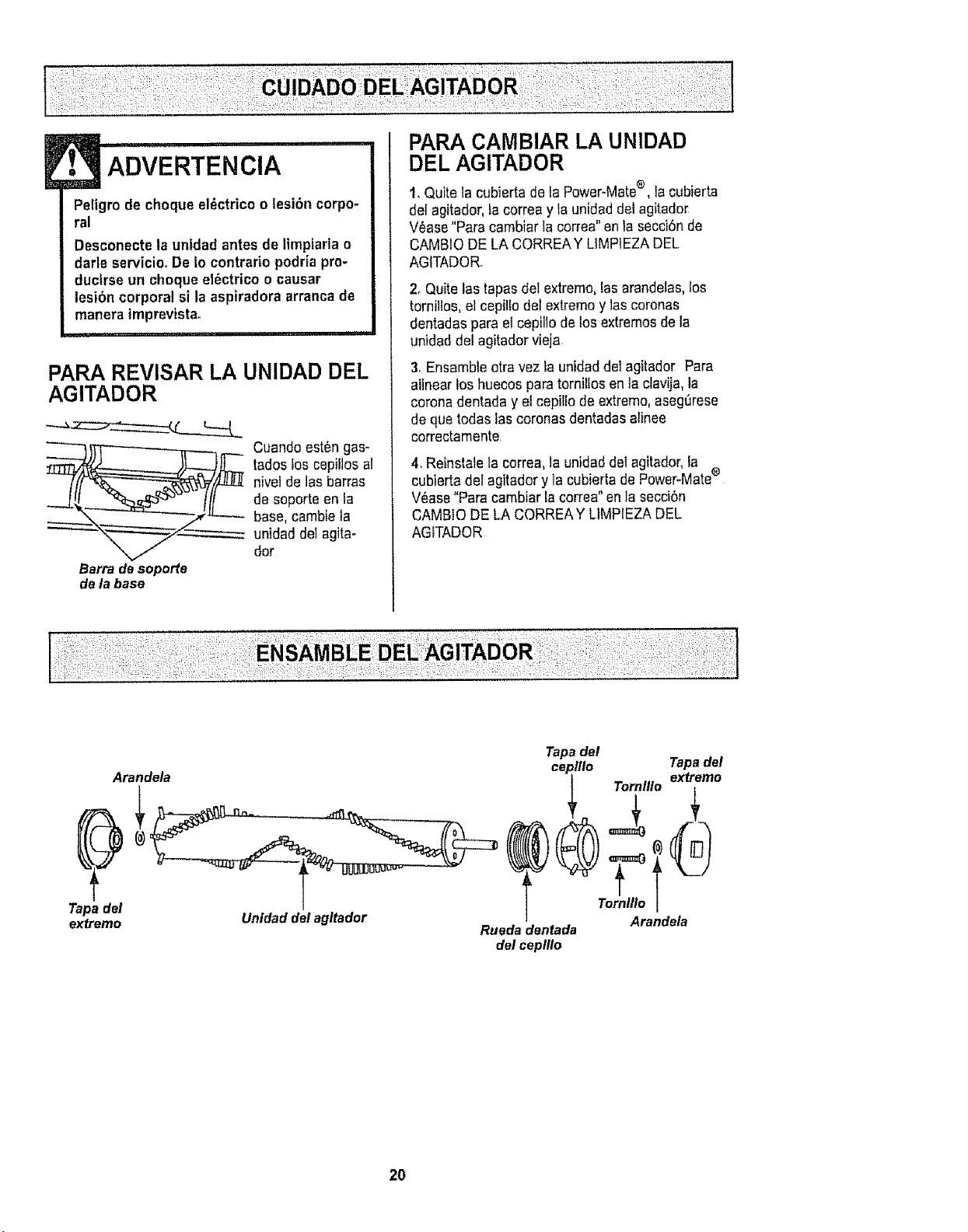
ADVERTENClA ........
Peligre de cheque el_ctrico o lesi6n corpo-
ral
Desconectela unidad antes de limpiarlao
darle servicio.De Io contrario podria pro-
ducirse un cheque elbctricoo causar
lesibn corporal si la aspiradora arranca de
manera imprevista_
................ i
PARA REVISAR LA UNIDAD DEL
AGITADOR
Barra de soporte
de la base
Cuandoest6n gas-
tadoslos cepillos al
nive!de lasbarras
de soporte en la
base, cambie la
unidad de1agita-
tier
PARA CAMBIAR LA UNIDAD
DEL AGITADOR
t. Quite la cubierta de LaPower-Mate®, la cubierta
del agitador, Lacorrea yla unidad del agitado_
Vease "Paracambiar Iacorrea" en tasecciSnde
CAMBIODE LA CORREAY LIMPIEZADEL
AGITADOR.
2. Quite las tapasdel extreme, lasarandelas,los
tornilfos, el cepilfo del extreme y1ascoronas
dentadas para el cepillo delos extremesde la
unidad del agitadorvieja
3. Ensambleotravez _aunidadde] agitador Para
aiinear los huecos paratornillos en ]a clavija,la
coronadentada y e!cepil[o de extreme,aseg_rese
de que todas lascoronas dentadasafinee
correctamente
4. Reinstalela correa, la unidaddetagitador, la
cubierta del agitadory ]a cubierta de Power-Mate®
V_ase"Paracambiar la correa"en la secci6n
CAMBIO DE LA CORREAY LIMPIEZA DEL
AGfTADOR
::: :;:;:: : :;; : :;: ;::::: ; ;:: : ' :
Arandela
Tapa del
extreme
Tapadel
ceplllo Tornlllo
Tornlllo
Unldaddelagltador Arandela
Ruedadentada
del ceplllo
Tapadel
extreme
2O
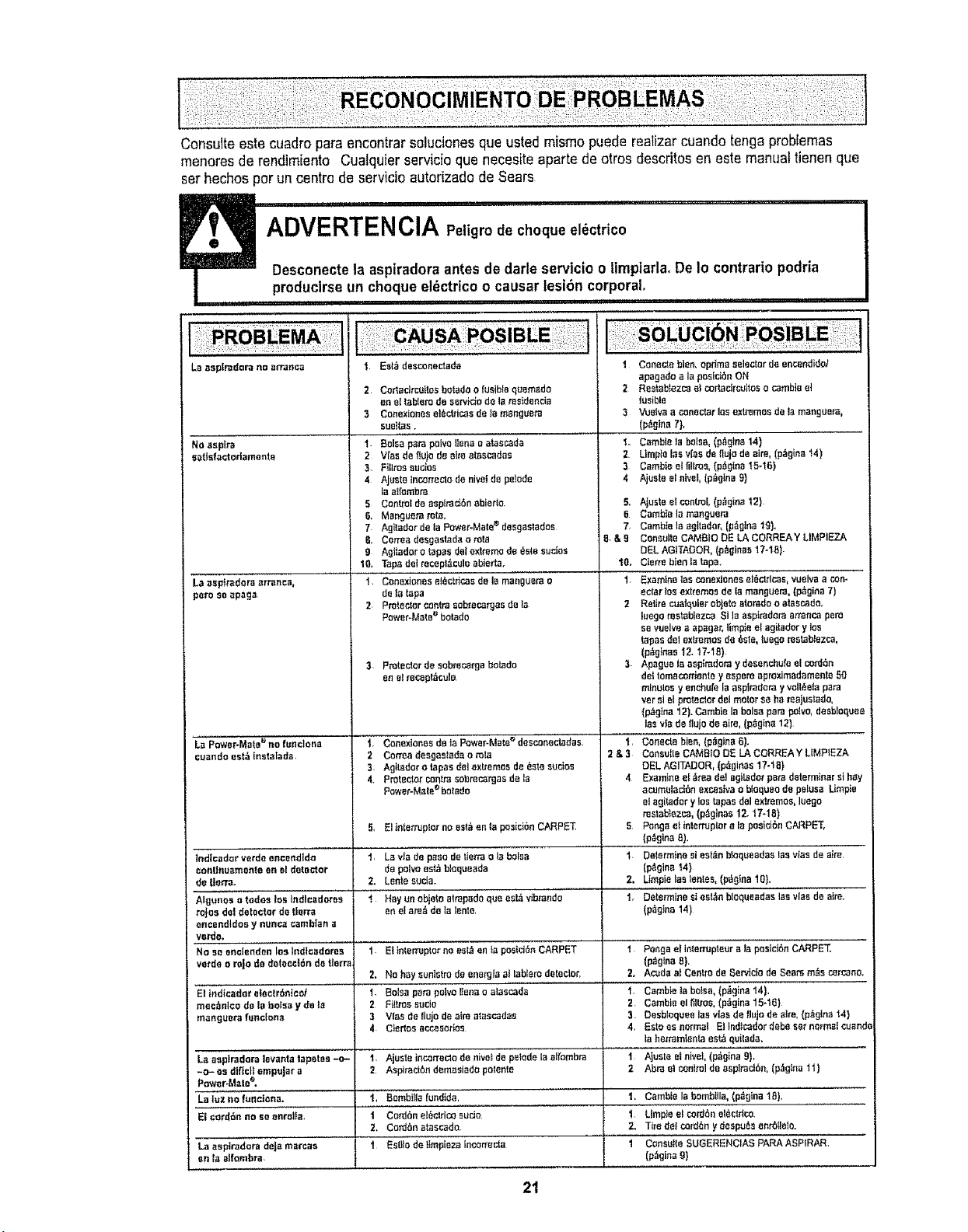
ConsuIte estecuadro pare encontrarsalucionesque usted raisins puede realizarcuando tonga problemas
menores de rendh[ento CualquJerservicio qua necesiteaparte de aires descritos en este manualtienen que
ser hechos per un centre de servicJoautorizado de Sears
i HIll, H
, ,,,,_,,,,,,,, ...............
u ,i
ADVERTENClA Peligrode cheque el_ctrico
Desconectela aspiradora antes de darleservicio o timpiarlaoDeIo contrails podria
produclrseun cheque el_ctrico o causer lesi6n corporal.
La aspiradera no arranca
No`1spire
eatisf`1eteriamenta
L`1aapfr`1doraerranca,
pore soapag`1
La Power-Matee no fundon`1
cu_ndo est5 [nsta|ada,
1 EsI0 desconeC:ada
2 CertedrcoItoe botado o fusibb quomado
enel labIero de servido de la msideneia
3 Conaxtoneset_ctticas de }`1mar,gttera
sueltas.
1 Boise parepolvoItena o a|aecada
2 Vfas de fiu}ode Bile at_,scadas
3. FillrossucJes
4 Ajuste tncorraclode hive!de pc]ode
la atrembra
5 ConL_oIde aspirad6nabierto,
6, M_nguera rata,
7 Agltadorde la Power-Mate_ desgastadee
B, Correadesgastada o m_
9 Agllador o _pas dotextreme de _ste suctos
10, Tape del recep10cule abieda.
i Conexiones ei_ctricosdole manguera o
de tatapa
2 Pralector centresobre_rgas de]a
Power-Matea botado
3 Pralectnr de sobre_rga betide
or, elrecept_culo
1. Conexionesdeta POWeFMale_ desconectadas.
1 Console bien. opdma selector de encendidol
apagado ala posfcieeON
2 Restablezcaelcortacircoitoso cornbie et
lusibla
3 Vuelvaa coneclarleeexL_mos de ]amar,gears,
(p0gina 7),
L Camb_ela boise,(p_gtna t4) ........
2 Utopia lee v{asde flujodeairs, (p_gina i4)
3 Cambia etl]ltros, (p0g[ns t5.16)
4 Ajueteet r,lvel,(p_g_na9}
5_
8
7,
B&9
10,
1,
AJusteel control,(p_gina t2)
Cembie lamenguera
Camb{e Isagttader, {p_gtna19).
Ceneotle CAMelS DE LA CORREAY LIMP1EZA
DEL AGtTADOR,(p_ginas 17-18)
Ctsrm bien tatape.
Examine t_scor,exlones el_cLdcas,vueiva ,1tory
eciar Insextremes de la manguera, (p0gina 7)
2 Retire cualqoieroh}aleatorado o atascado.
luego raeteblezca SI laasp{radarsarmnco pore
se vuelvea apegar, limpie el agitadory los
_pas delextremesde _ste, tuego rasl,_blezca,
(p_g_as I2. 17-18)
3 Apague la aspir_doray desenchufee!eolian
det Iomaconier,te y espera aproximadamenlo50
minutes y enehufe la aspt_dera yvelt,_atapare
versi el proteclcr dal motorse ha_aluelado,
(p_gfna 12).Cambtela balsa pare polvo,desb!oqoee
;asvia de daisde airs, (p0gina 12)
t, Conecta bien, (p0gina8).
lndtceder verde eneendido
cenlInuamente on el detecter
de Uerra.
AIgunes otodee los Indleadnres
ra_osdal detector de tisrr_
encendtdoe y nunea eamb]an a
verde.
No soenclanden los lndlcadores
verde o rojo de detecci_n de tto_
El tndieador electronics/
mee_nlco de la balsa y de la
m_ngoe_ fanclen_
Leaep_radoraIovanta tapstes -o-
-c- as dlflcI| empujar a
Power.Matee,
El cordon no soenrolls,
La aspir_dora deJa marcae
on ta alfombra,
2 Corraadeegasteda o rote 2 & 3
3. Agitador o tapesdelextremes de_s_esucios
4. Protector con_meobrac_gas de Ia
Power-Maleebotado
5, El Interrupterno est_en ta posiei6n CARPET
t, La via do pasode tietrao IBboise
de pelvo est_blequeade
2. Lante socia.
I Hayun obje_eatrapadequa ea_ vibrando
en elaraOde ta lenle
,,, ,, ,,,.
1 EthlenupIor no est_en _apostd6n CARPET
2. No hay aunistro de energ[a a_tabiamdetector,
1. Boise pare pelvo liens o atas_da
2 Fillies susie
3 Vies de{lujo do aim atasc_das
4 Cisr_osaecesor_os
l. Ajuste incorreclo de r,ive_de pelodela airembra
2 AspiratiOn dem_siado poleete
'_ '"i'i'"Bombiila _undide,'
i Cord6nel6ctrir._,sudo
2. Co_n atescado.
i EstI1odo IImpiezeIncorrecta ......
Consui[e CAbBie DE LA CQRREAY LIMPIEZA
eEL AGITADOR, (p_gieas 17-IB}
4 Examine ei _rea deI agitadet paredeterminers_h_,y
acumalacibn excesivaobisques de petusa LImpie
at agi_adory los _pas del extremes,luego
restablezca,(p_gir_s 12. 17-1B)
5 Pong_ et inlerruptorata posiciOnCARPET,
(p_Oln.,e!:.....
1 De,ermine si est_n bloqueadaa las v_asde aim,
(p,_gina 14)
2. Lhpie las leales, (p_gtna 10).
i. "[)etermine si est_n blequaadas lasvies de aim,
(p_gina14)
t Per,gaelInlerrupt;u;";'laposid6nCARPET,'
(p_gina 8).
2. Acoda at CenLrode Servicto de Sears rnOscareens.
i. Cambteta bo}sa, (p0gina 14),
2 Cambia el tilLros,(p_g[na15-16)
3 Oesblequea leevlas de tlujo de Bite,(p_gina 14}
4. EsIo asr,orm_l El Indic_dordebeset normalcobra
taherramientaes_ quilada,
t Alusta elnivei, (p0gina 9),
2 Abra el coniml de aspiracibn, (p_gina li}
1, Cambie la hornbills, (p_gtna 18),
1 Limpiee! ¢ord6neI_cldco.
2. Tire delcordon y despu_s enrbIlalo.
I Con'sutieSuGERENc'i,a,S PARA ASPtRARI
(p_gina9}
21

i_ ,i!:iii!_i!::_ii:i II :!! _i_ii'_i_!ili_ii_
i!!iUii2 _:ii i i:i=! i:i!i "¸¸¸
.....=.... ::' For repair of major brand appliances in your own home
no matter who made it, no matter who sold it!
: )
1-800-4-MY-HOME® An m°,dayoro ght
....... (1-800-469-4663) (U.S.A and Canada)
...... ,,,,.,,.,oa,,.oomwww.,oa,,.oo
For repair of carry-in products like vacuums, lawn equipment, and
electronics, call for the nearest Sears Parts and Repair Center.
1-800-488-1222 Anytime, dayor night (U.SA,, only)
www,sears.com
For the replacement parts, accessories and owner's manuals
that you need to do-it-yourself, call Sears PartsDirectS_!
1-800-366-PART 6 amo- 11 p.m,., 7 days a week
(1-800-366-7278) (U.S.A. only)
wwwosears.com/partsdirect
To purchase or inquire about a Sears Service Agreement
or Sears Maintenance Agreement:
1-800-827-6655 (US.A) 1-800-361-6665 (Canada)
7 a.m. - 5 p.m. CST, Mon. - Sat,
Pars pedir servicio de reparaci6n a
domicilio, y pars ordenar piezas:
1-888-SU-HOGAR sM
(1-888-784-6427)
::_:_I!IL! i;
9 a.m.- 8 p.m. EST, M - F,4 p.m,,Sat° ' _
Au Canada pour service en frangais: ......,
1.800-LE.FOYER _c
(!_800_533_6937)
w_v,sears ca
HomeCentral j
© Sears, Roebuck and Co.
® Registered Trademark t -mTrademark t s_ Service Mark ot Sears, Roebuck and Co
® Marca Registrada / TMMarca de F&brica t s_ Marca de Servtcio de Sears, Roebuck and Co
no
8c Marque de commerce / Marque d6pos_e de Sears, Roebuck and Co
22