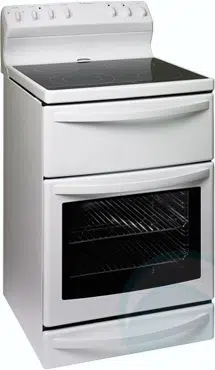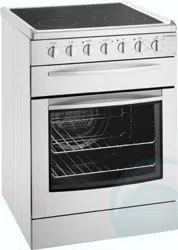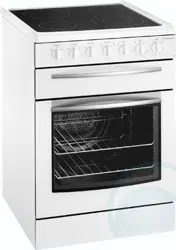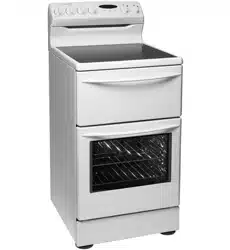
Electric Cookers - Rear Control
User Guide and Installation Instructions

2 general warnings
CONDITIONS OF USE
This appliance is intended to be used in household and
similar applications such as:
• Staff kitchen areas in shops, offices and other
working environments
• Farm houses
• By clients in hotels, motels and other residential
type environments
• Bed and breakfast type environments.
This appliance complies with the requirements of Australian
Standard AS/NZ 60335.2.6
Read the following carefully to avoid an electric shock or fire.
General Warnings
• This appliance is not suitable for use by young children
or infirm persons, without supervision.
• Young children should be supervised to ensure they
do not play with this appliance.
• During use, this appliance becomes hot. Care should be
taken to avoid touching hot surfaces.
• This appliance must not be used as a space heater.
• Keep vents clear of obstructions.
• In order to avoid a fire, the appliance must be kept
clean and vents kept unobstructed.
• Do not spray aerosols in the vicinity of the appliance
when it is in operation.
• Do not store flammable materials in or under the
appliance, e.g. Aerosols.
• Accessible parts will become hot when in use.
To avoid burns and scalds children should be kept away.
• If the supply cord is damaged it must be replaced by
a suitably qualified person in order to avoid a hazard.
• Oven gloves should be worn when accessing hot
internal parts.
• The warming drawer MUST not be used to warm, heat
or preheat food due to health regulations
Grill
• Always turn the grill off immediately after use as fat
left there may catch fire.
• Do not cover the insert with foil, as fat left there may
catch fire.
• Always keep the grill dish clean as any fat left may
catch fire.
• Do not leave the grill on unattended.
• To avoid a fire, ensure that grill trays and fittings are
always inserted into the appliance in accordance with
the instructions.
• Do not place thick portions of food under the grill.
Foods may curl, catch and ignite.
• Do not store flammable materials in the grill.
Oven
• During use the appliance becomes hot. Care should be
taken to avoid touching hot surfaces inside the oven.
• Switch the appliance off before removing the oven light
glass for globe replacement.
• To avoid an accident, ensure that oven shelves and
fittings are always inserted into the appliance in
accordance with the instructions.
• Do not use the oven door as a shelf.
• Do not push down on the open oven door.
Hotplates (Generally)
• Do not allow pots to boil dry, as damage to both pan
and hotplate may result.
• Do not operate the hotplates for an extended period
of time without a utensil on the hotplate.
• Do not allow large cookware to overhang the hob
onto the adjacent benchtop. This will cause scorching
to the benchtop surface.
• Do not allow cooking utensils to intrude into the
area which is close to the controls.
Ceramic Glass
• If the ceramic glass is accidentally cracked switch off
the appliance to avoid the possibility of electric shock.
• Do not place heat resistant mats, wire mats or aluminium
foil under pots or pans.
• Do not cook food directly on the ceramic glass surface.
• Do not use round bottom woks or similar utensils which
could lead to over heating of hotplates and possible
damage to the cooking surface.
• Do not use the ceramic cooktop as extra bench space
or as a cutting board.
Installation, Cleaning and Servicing
• An authorised person must install this appliance.
(Certificate of Compliance to be retained)
• Before using the appliance, ensure that all packing
materials are removed from the appliance.
• In order to avoid any potential hazard, the enclosed
installation instructions must be followed.
• Ensure that all specified vents, openings and airspaces
are not blocked.
• In order to avoid accidental tipping of the appliance
(for example, by a child climbing onto the open
oven door), the anti-tilt bracket must be installed.
• Where the appliance is built into a cabinet, the cabinet
material must be capable of withstanding 85 deg C.
• Only authorised personnel should carry out servicing.
(Certificate of Compliance to be retained)
• Always ensure the appliance is switched off before
cleaning or replacing parts.
• This appliance contains aluminium fittings. Do not
use caustic based cleaners.
• Do not use steam cleaners, as this may cause
moisture build up.
• Always clean the appliance immediately after any
food spillage.
• Do not use harsh abrasive cleaners or sharp metal
scrapers to clean the oven door glass since they can
scratch the surface, which may result in shattering of
the glass.
• To maintain safe operation, it is recommended that
the product be inspected every five years by an
authorised serviceperson.
• This appliance must be earthed.
Rear control electric cookers
contents 3
Installation 4
Controls 7
Understanding the cooker 13
Using the hotplates 14
Understanding the functions 15
Cooking guide for ovens 18
Get to know your oven 19
Handling baking &
grilling problems
20
Clocks 21
Cleaning and caring for the cooker 23
Cleaning and caring for the oven 24
Solving problems 25
Warranty 27
Contents
The symbols you will see in this booklet have these
meanings:
WARNING
warning
Indicates information concerning your personal safety
WARNING
caution
Indicates information on how to avoid damaging the appliance
TIPS & INFORMATION
tips & information
Indicates tips and information about use of the appliance
ENVIRONMENTAL TIPS
environmental tips
Indicates tips and information about economical and
ecological use of the appliance
TIPS & INFORMATION
tips & information
Important – check for any damage or marks
If you find the appliance is damaged or marked, you must
report it within 7 days if you wish to claim for damage/marks
under the manufacturer’s warranty. This does not
affect your statutory rights.
ENVIRONMENTAL TIPS
environmental tips
Information on disposal for users
• Most of the packing materials are recyclable. Please dispose
of those materials by contacting your local authorities
and ask for the correct method of disposal.
Plastic clip
Plastic clip
securing points
4 installation
This appliance must be installed by an authorised
person in compliance with
local municipal building codes and any
other relevant statutory regulation.
Wiring connections must be made in accordance with:
New Zealand & Australian Requirements, including AS/NZS
3000 WIRING RULES
Refer to data plate for rating information. The data plate
is positioned on the bottom left corner of the oven front,
viewable with the oven door open. The circuit diagram is
positioned on the control panel back cover.
• Electrical connection is 220-240 volts AC 50 Hz.
• To gain access to the mains connection terminals,
remove the rear cover by unscrewing the two
assembly screws.
• For New Zealand Only:
The cooking range must be connected to the supply by
a supply cord fitted with the appropriately rated plug
that is compatible with the socket-outlet fitted to the
final sub-circuit in the fixed wiring that is intended to
supply this cooking range.
• The cooker requires a means of all pole disconnection
incorporated into the fixed wiring. This MUST have a
disconnection gap of 3 mm.
• The cooker MUST be earthed. Any damage caused
by failure to earth will not be covered by warranty.
Note: Where connection is made to a multi-phase
220/240V supply, the bridge piece must be removed from
between the active connections on the main terminal block.
Fuse
Should the fuse need servicing it is accessible through
the fuse opening located in the back cover.
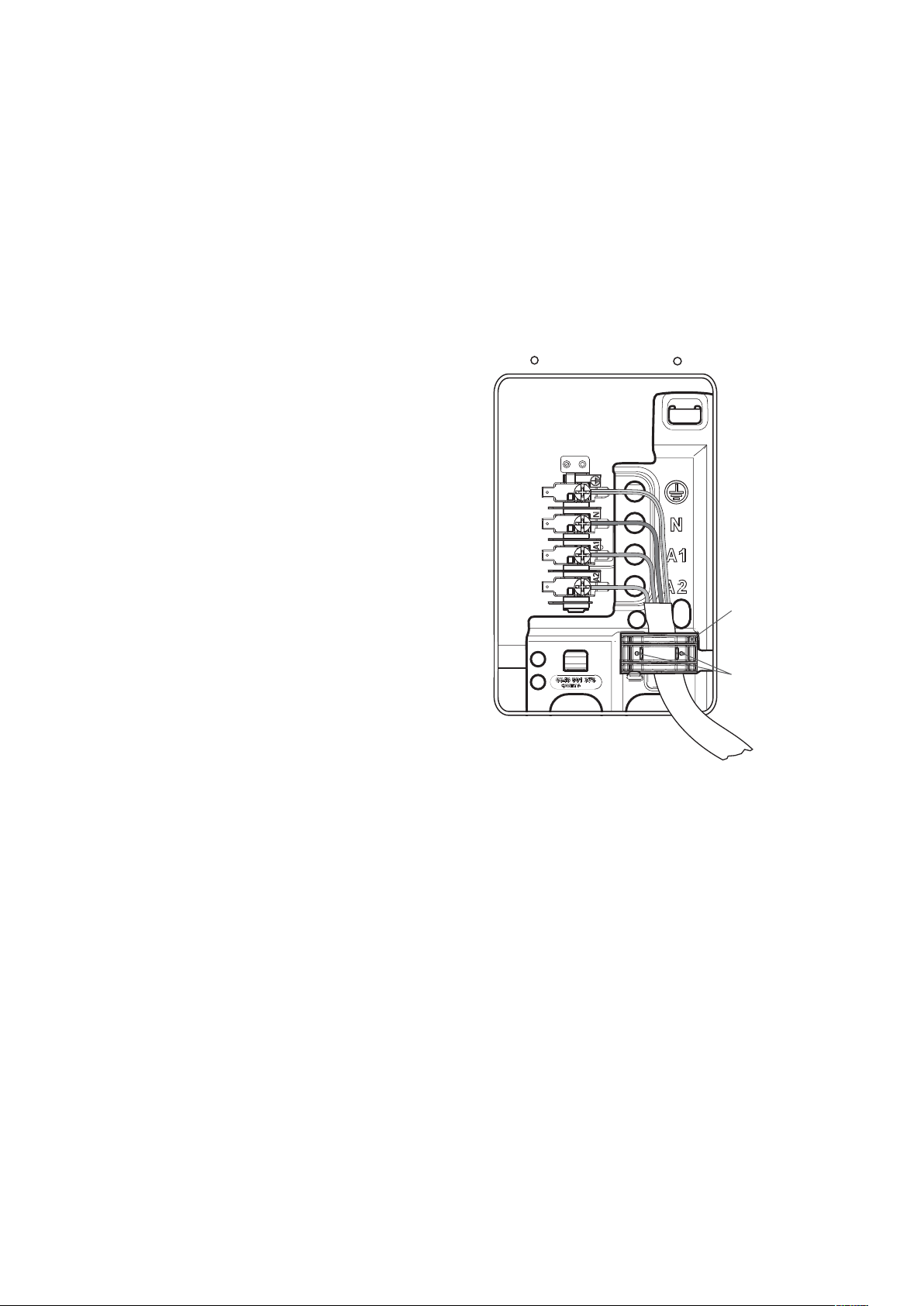
Hard wiring detail
1 Remove terminal cover plate from rear panel
of appliance.
2 Fit wires through hole in cover plate and make
connections to terminals.
3 Engage wires into plastic clip. Secure plastic clip with
two long silver screws (supplied in separate bag).
4 Replace cover plate onto rear panel.
Installation
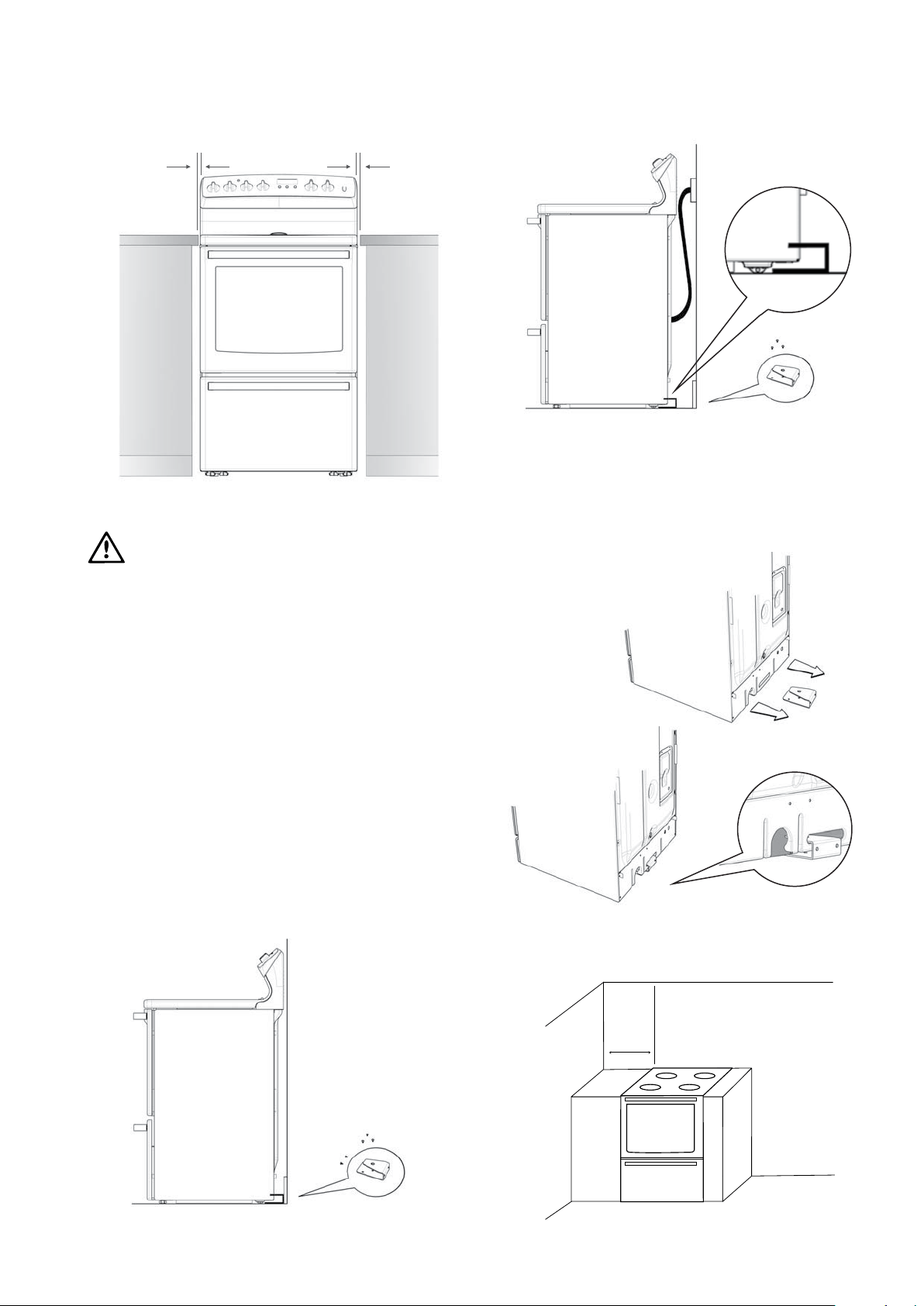
3 Anchors
Minimum
Alternative
Method
Floor
mounted
Floor & skirting
mounted
Preferred
Method
5 Anchors
warning
5mm Clearance min.5mm Clearance min. 596mm
100mm
Minimum
installation 5
Installation dimensions
IMPORTANT NOTICE
Installers responsibility
In ALL cases the anti-tilt bracket MUST be securely
anchored to the floor with suitable fasteners,
and the stability bolt fixed.
The anti-tilt bracket is a mandatory safety restraint.
In order to prevent accidental tipping of the appliance;
for example by a child climbing onto the open door,
the anti-tilt bracket supplied with the cooker MUST be
installed. ALWAYS ensure that the cooker is located so
that the anti-tilt bracket is engaged into the cooker.
Step 1: Positioning
Choose the most practical bracket mounting option
for your cooker.
The anti-tilt bracket can be floor mounted or floor and
skirting mounted depending on the location of the range
plug / socket / connection.
Step 2: Fixing anti-tilt bracket
Position the anti-tilt bracket so that it will fully
engage into the slot at the rear of the cooker. The
bracket is mounted centrally at the rear of the cooker.
Anchor the bracket into position using appropriate fasteners.
The appliance must not be installed in a corner. It
must be installed at least 100mm from the side wall.
Installation
6 installation
Installation
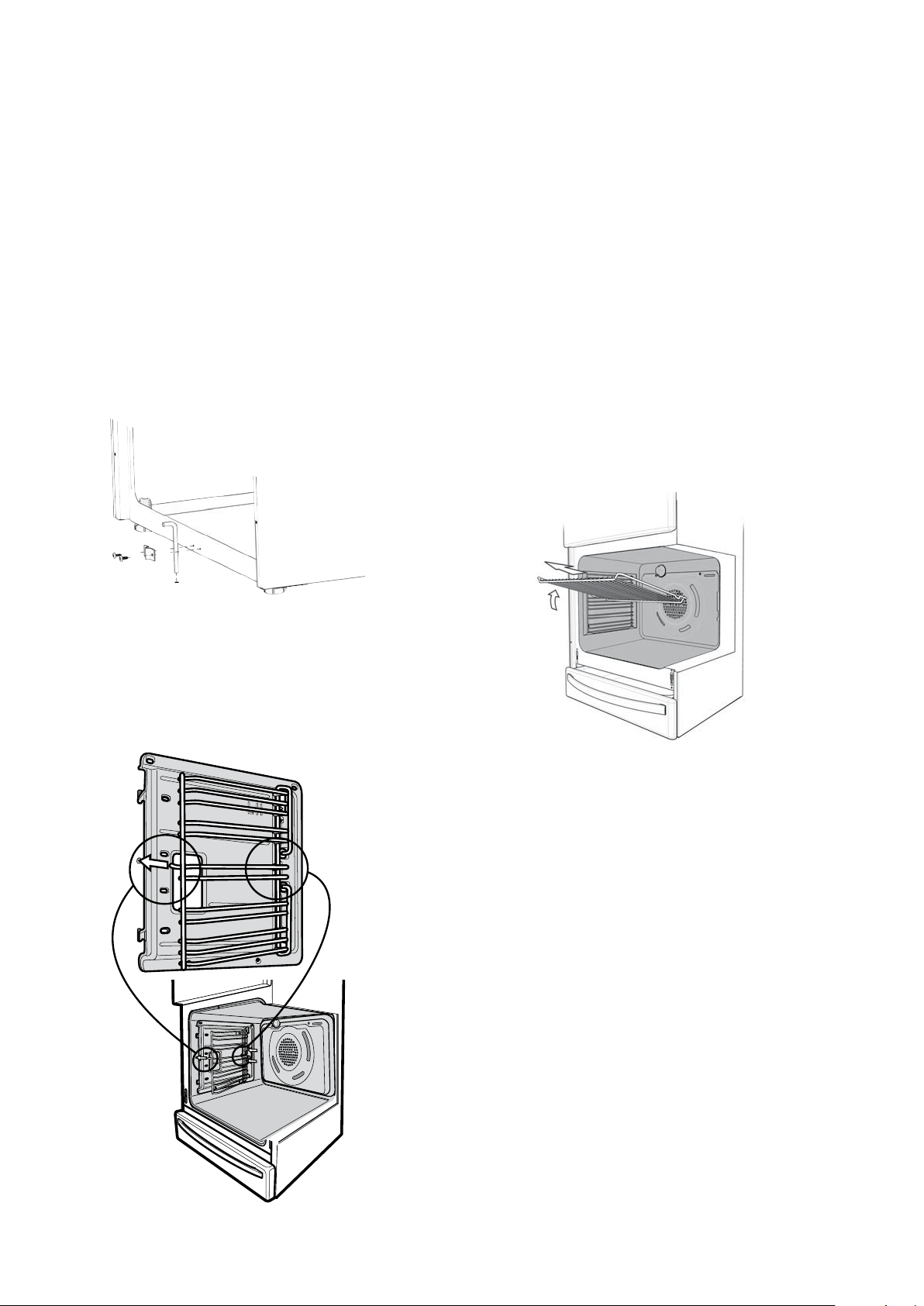
Step 3: Stability bolt
• Fasten the stability bolt bracket to the front frame
with the 2 screws supplied.
• Reposition the cooker back into the anti-tilt bracket
and then mark the position of the stability bolt hole.
• Pull the cooker back out and drill the bolt location hole.
Use a 6.5mm masonry or wood drill. When drilling into
concrete ensure a minimum hole depth of 40mm.
• Reposition the cooker back into the anti-tilt bracket,
aligning the stability bolt bracket with the 6.5mm drilled
hole. Then slide the bolt through the bracket into
the hole.
Side rack (fitted to selected models only)
• Insert the twin pegged side into the rear access
holes provided, ensuring the pegs are fully inserted.
• Then locate the front peg into the front access hole
and push in firmly.
Shelves and trays
The shelves are designed so that they have maximum travel
but cannot be accidentally pulled right out. The trays are
designed the same way and fit straight into the side racks.
• Locate the rear edge of the shelf/tray in between 2 guide
rails of the side rack – see diagram. Ensure the same rail
positions on both sides of the oven are being engaged.
• With the front edge raised, begin to slide the shelf into
the oven.
• Once the detents have passed the front edge of the
side rack, the shelf can be pushed completely in.
• When fully inserted the shelf/tray should not interfere
with the closed oven door.
• To insert the grill tray in a separate grill product, fully
open the drawer and position the tray so that the slots
on the outer edges fit over the tabs on the slides.
• Remove extra trays and dishes before roasting or baking.
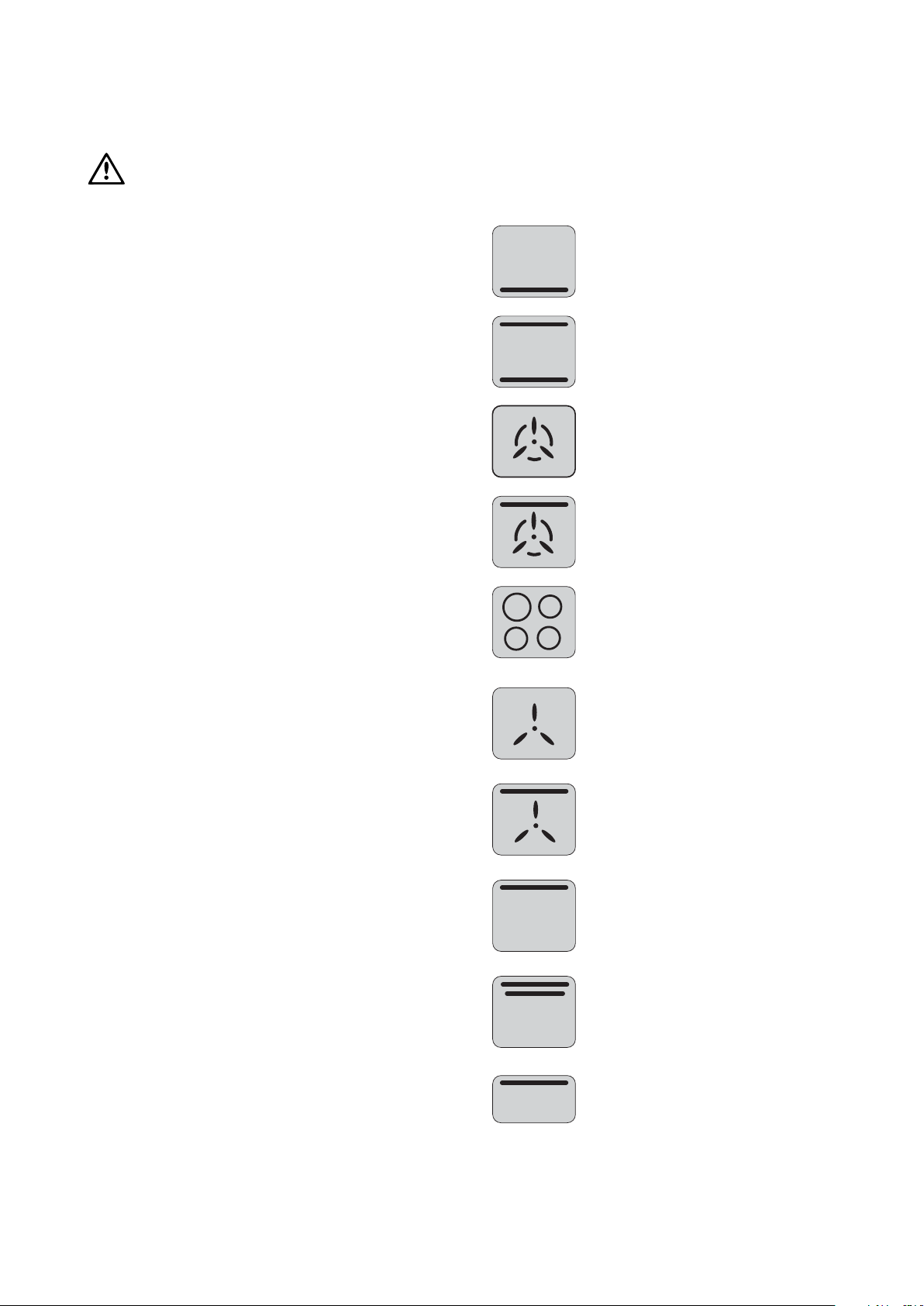
Thermowave
Grill - In oven
Maxi Grill
Base Heat
(Heat comes from element
below the food)
Defrost
Separate Compartment
Bake
(Heat comes from 2 elements
one above and below the food)
Ceramic Hob
Rapid Heat
Fan Grill
Grill - in oven
Thermowave
Grill - In oven
Maxi Grill
Base Heat
(Heat comes from element
below the food)
Defrost
Separate Compartment
Bake
(Heat comes from 2 elements
one above and below the food)
Ceramic Hob
Rapid Heat
Fan Grill
Grill - in oven
warning
controls 7
Controls
• The clock where fitted must be set before your oven
will operate.
• This appliance is not suitable for use by young children
or infirm persons, without supervision.
• Young children should be supervised to ensure they
do not play with this appliance.
• Accessible parts will become hot when in use.
To avoid burns & scalds children should be kept away.
• Care should be taken to avoid touching hot surfaces,
heating elements on the hob, inside the oven,
grill and at the top of the warming drawer.
• This appliance must not be used as a space heater.
• Keep vents clear of obstructions.
• In order to avoid a fire, the appliance must be kept
clean and vents kept unobstructed.
• Do not spray aerosols in the vicinity of the appliance
when it is in operation.
• Do not store flammable materials in the appliance,
eg aerosols.
• Do not allow pots to boil dry, as damage to both
pan and cooktop may result.
• Before using the appliance ensure that all packing
materials are removed from the appliance.
• In order to avoid any potential hazard, the installation
instructions must be followed.
• Only authorised personnel should carry out servicing.
(Certificate of Compliance to be retained).
• Always ensure the appliance is switched off before
cleaning or replacing parts.
• Do not use steam cleaners, as this may cause moisture
build up.
• Always clean the appliance immediately after any
food spillage.
• Cooker is designed to be placed on the floor.
It should not be placed on a base.
• If the supply cord is damaged, it must be replaced by
a qualified person to avoid a hazard.
Do not place ANY object on the oven floor
including cooking vessels or foil liners as
extensive damage to the oven liner may occur.
Cooking Guide Symbols (to help you understand the
instructions more easily)
General warnings and advice
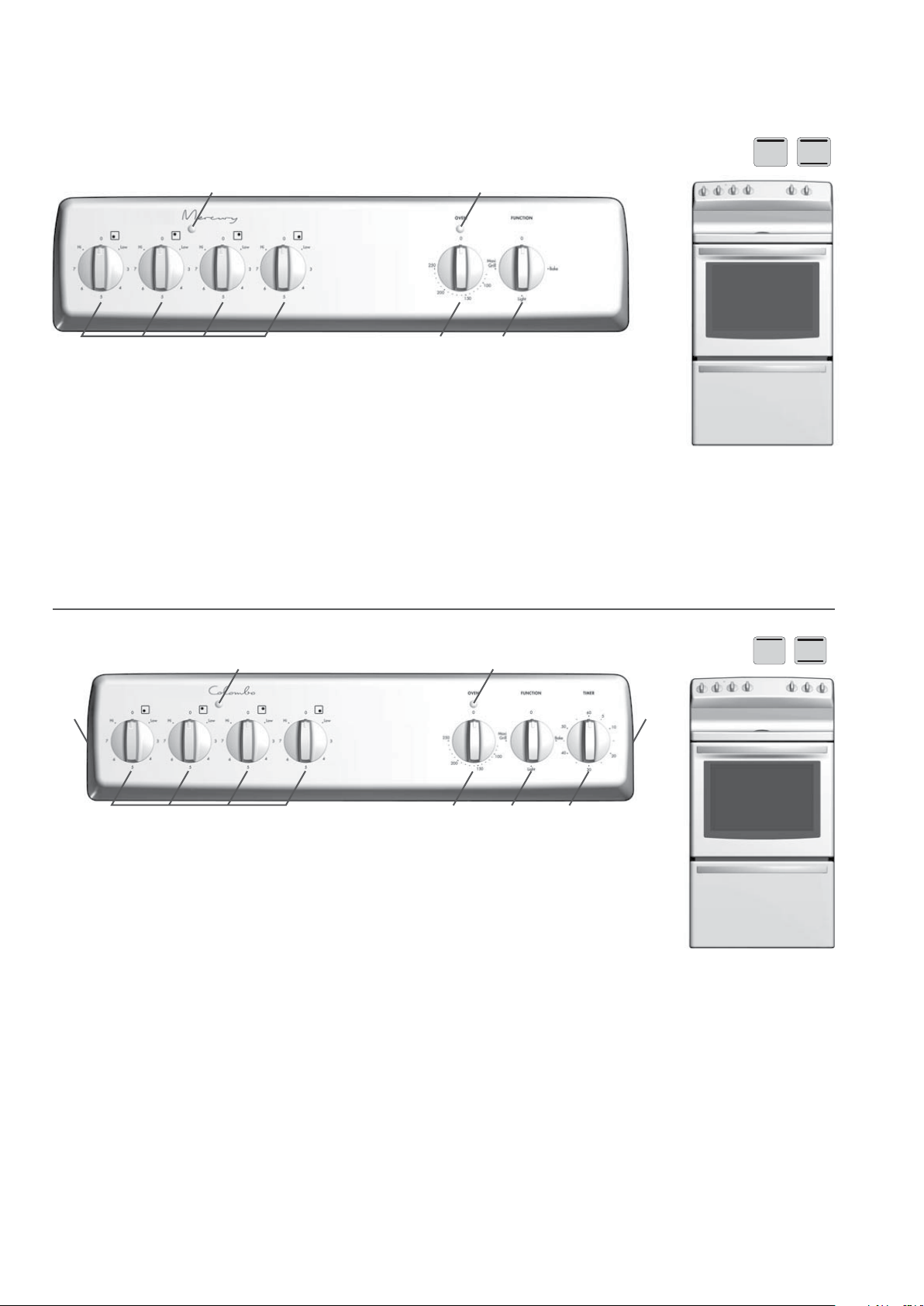
1
2
3
4
5 6
7
7
1
2
3
4
5
8 controls
Mercury model 4U600
Colombo model 4U601
1 Hotplate Control Knobs
• Adjusts temperature of hotplate. Can be rotated in
either direction.
2 Hotplate Indicator Lamp
• Comes on when you turn a hotplate on.
3 Temperature Control Knob
• Sets temperature for baking.
4 Oven Indicator Lamp
• Comes on when you operate
the oven temperature control
knob. Cycles on and off
automatically when you are
cooking/baking.
5 Function Switch
• Sets oven functions.
Bake - with light
Grill - with light
Light - light only
1 Hotplate Control Knobs
• Adjusts temperature of hotplate. Can be rotated in
either direction.
2 Hotplate Indicator Lamp
• Comes on when you turn a hotplate on.
3 Temperature Control Knob
• Sets temperature for baking.
4 Oven Indicator Lamp
• Comes on when you operate the oven temperature
control knob. Cycles on and off automatically when
you are cooking/baking.
5 Function Switch
• Sets oven functions.
Bake - with light
Grill - with light
Light - light only
6 Timer
• Sets reminder time.
7 General Purpose Outlet Switch
Controls (cont.)
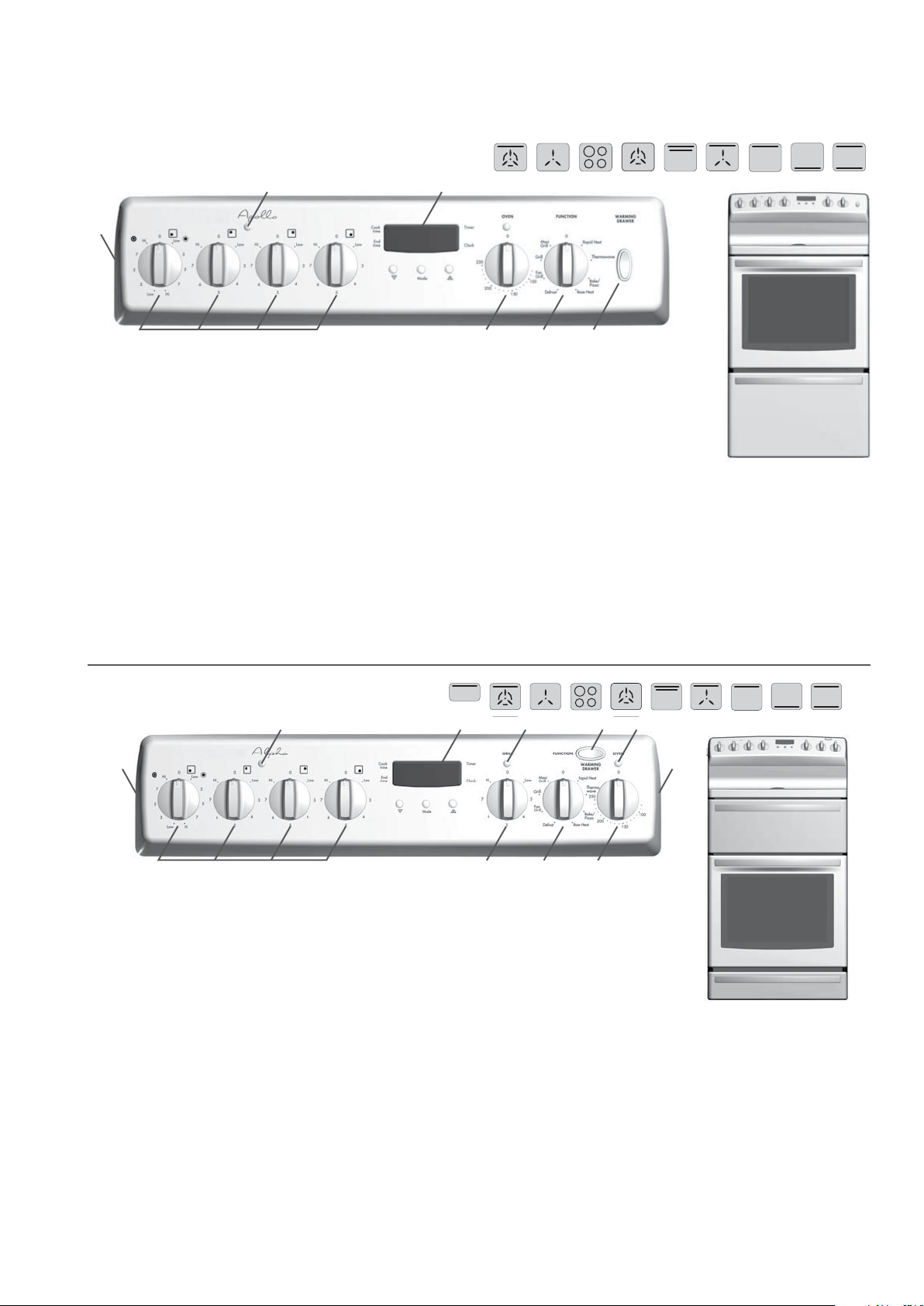
4 6 8
7953
2
10
10
1
controls 9
8
1
4 6 7
32
Apollo model 4U606 and Gemini model 4U604
1 Hotplate Control Knobs
• Adjusts temperature of hotplate.
Can be rotated in either direction.
2 Hotplate Indicator Lamp
• Comes on when you turn a hotplate on.
3 Programmable Clock
• Sets baking/grilling reminder times.
• Sets automatic cooking duration and
stop time.
Note: Clock time must be set before oven
can operate.
4 Temperature Control Knob
• Sets temperature for baking.
5 Oven Indicator Lamp
• Comes on when you
operate the oven
temperature control
knob. Cycles on and off
automatically when you
are cooking/baking.
6 Function Switch
• Sets oven cooking function including
oven light.
7 Warming Drawer Switch
• Turns warming drawer on/off.
8 General Purpose Outlet Switch
1 Hotplate Control Knobs
• Adjusts temperature of hotplate. Can be rotated in
either direction.
2 Hotplate Indicator Lamp
• Comes on when you turn a hotplate on.
3 Programmable Clock
• Sets baking/grilling reminder times.
• Sets automatic cooking duartion and stop time.
Note: Clock time must be set before oven can operate.
4 Grill Temperature Control Knob
• Sets grilling temperature for seperae grill. Can be rotated
in either direction
5 Grill Indicator Lamp
• Comes on when you
are grilling.
6 Function Switch
• Sets oven cooking function
including oven light.
7 Oven Indicator Lamp
• Comes on when you operate
the oven temperature control
knob. Cycles on and off automatically
when you are cooking/baking.
8 Temperature Control Knob
• Sets temperature for baking.
9 Warming Drawer Switch
• Turns warming drawer on/off.
10 General Purpose Outlet Switch
Alpha model 4U608
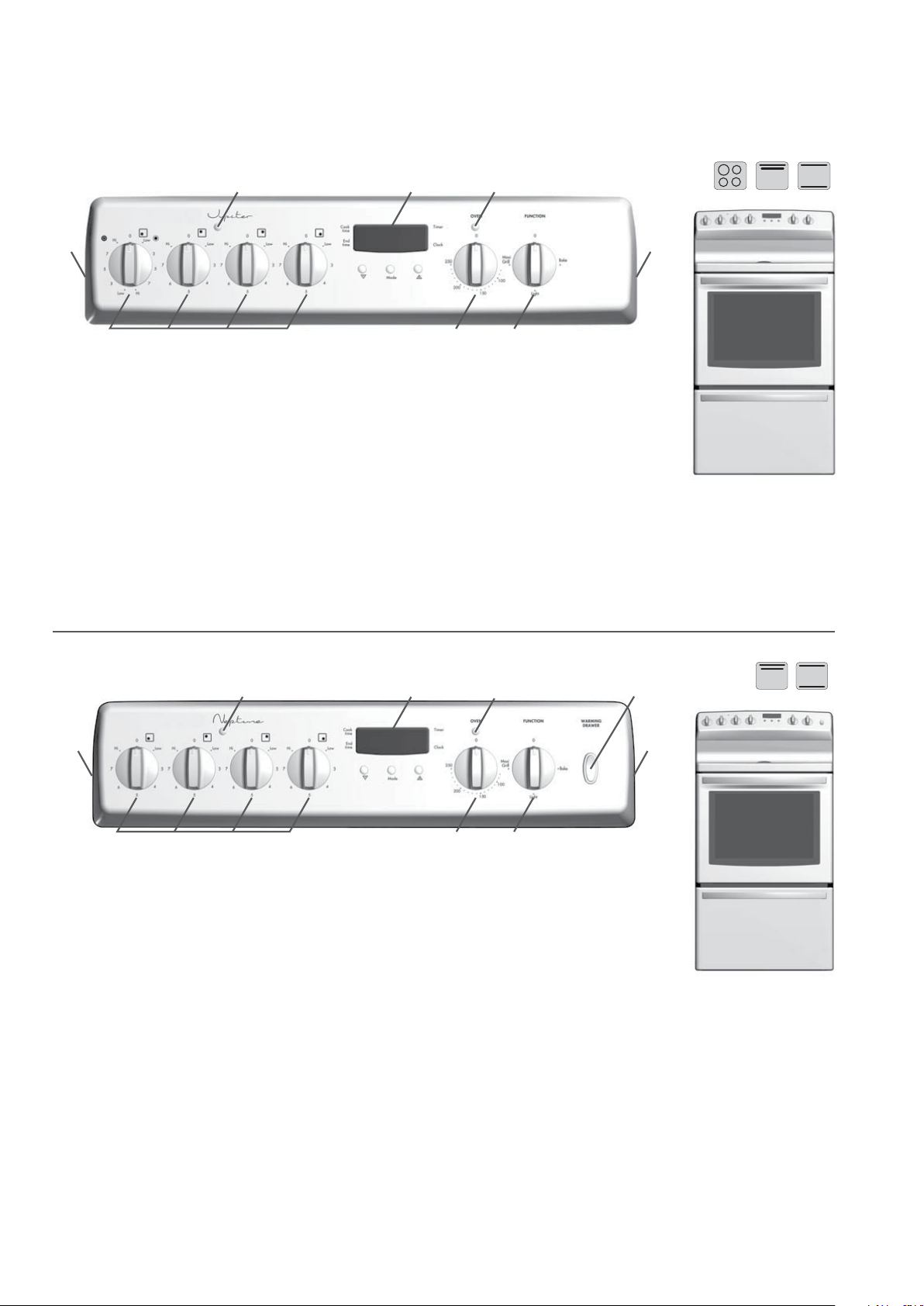
8
1 4 6
8
7532
7
7
1 4 6
532
10 controls
Controls (cont.)
Neptune model 4U612
1 Hotplate Control Knobs
• Adjusts temperature of hotplate. Can be rotated
in either direction.
2 Hotplate Indicator Lamp
• Comes on when you turn a hotplate on.
3 Programmable Clock
• Sets baking/grilling reminder times.
• Sets automatic cooking duration and stop time.
Note: Clock time must be set before oven can operate.
4 Temperature Control Knob
• Sets temperature for baking.
5 Oven Indicator Lamp
• Comes on when you operate
the oven temperature control
knob. Cycles on and off
automatically when you are
cooking/baking.
6 Function Switch
• Sets oven functions.
Bake - with light
Grill - with light
Light - light only
7 Warming Drawer Switch
• Turns warming drawer on/off.
8 General Purpose Outlet Switch
1 Hotplate Control Knobs
• Adjusts temperature of hotplate. Can be rotated in
either direction.
2 Hotplate Indicator Lamp
• Comes on when you turn a hotplate on.
3 Programmable Clock
• Sets baking/grilling reminder times.
• Sets automatic cooking duartion and stop time.
Note: Clock time must be set before oven can operate.
4 Temperature Control Knob
• Sets temperature for baking.
5 Oven Indicator Lamp
• Comes on when you operate
the oven temperature control
knob. Cycles on and off
automatically when you are
cooking/baking.
6 Function Switch
• Sets oven functions.
Bake - with light
Grill - with light
Light - light only
7 General Purpose Outlet Switch
Jupiter model 4U609
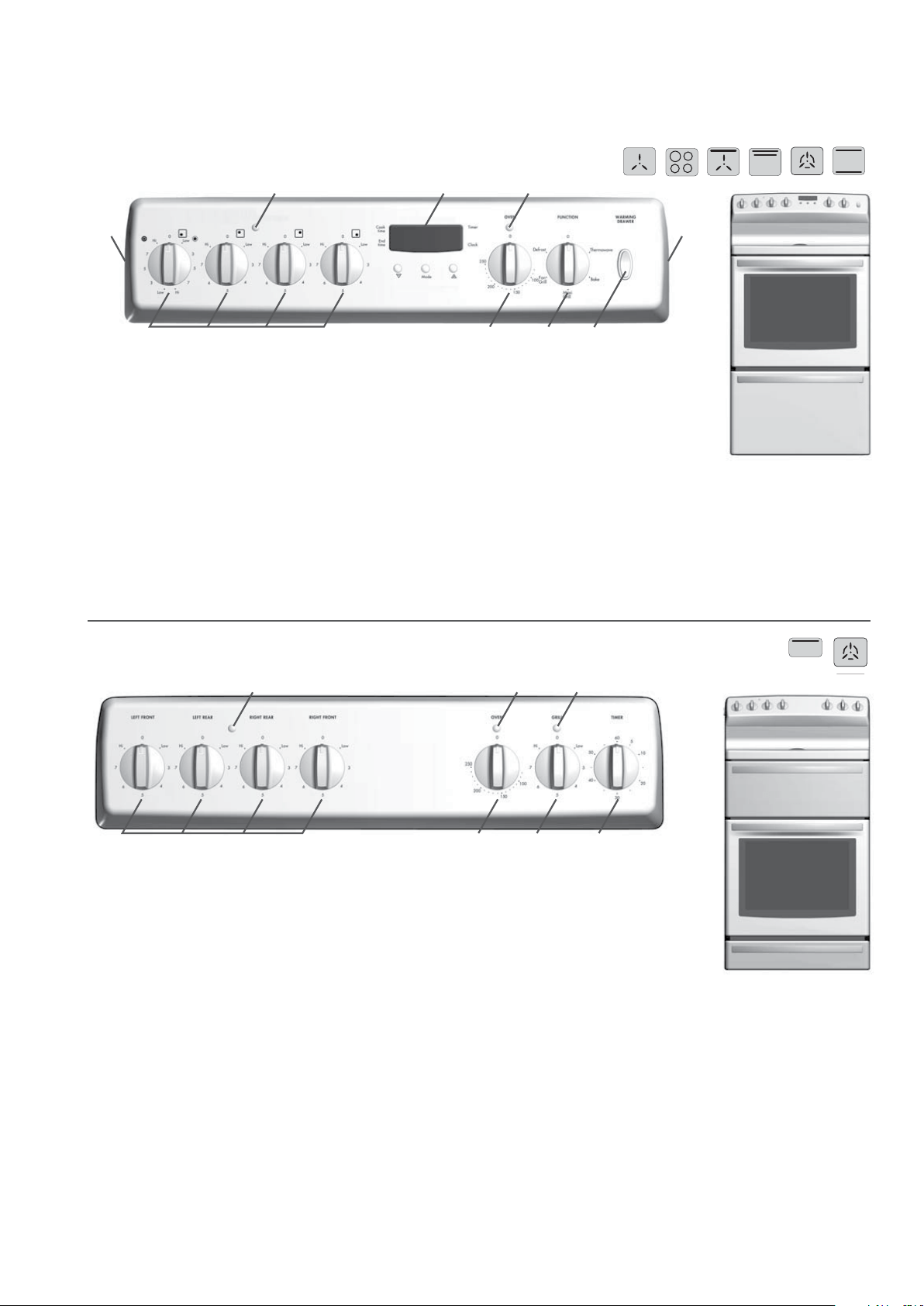
8
1 64 7
8
532
2 4 6
1 3 5 7
controls 11
PAK model 804
Saturn model 4U613
1 Hotplate Control Knobs
• Adjusts temperature of hotplate. Can be rotated
in either direction.
2 Hotplate Indicator Lamp
• Comes on when you turn a hotplate on.
3 Temperature Control Knob
• Sets temperature for baking.
4 Oven Indicator Lamp
• Comes on when you operate the oven temperature
control knob. Cycles on and off automatically when
you are cooking/baking.
5 Grill Temperature
Control Knob
• Sets grilling temperature for
separate grill. Can be rotated
in either direction.
6 Grill Indicator Lamp
• Comes on when you are grilling.
7 60 Minute Ringer Time
• Sets reminder time.
1 Hotplate Control Knobs
• Adjusts temperature of hotplate. Can be rotated in
either direction.
2 Hotplate Indicator Lamp
• Comes on when you turn a hotplate on.
3 Programmable Clock
• Sets baking/grilling reminder times.
• Sets automatic cooking duartion and stop time.
Note: Clock time must be set before oven can operate.
4 Temperature Control Knob
• Sets temperature for baking.
5 Oven Indicator Lamp
• Comes on when you operate
the oven temperature control
knob. Cycles on and off
automatically when you are
cooking/baking.
6 Function Switch
• Sets oven cooking function including oven light.
7 Warming Drawer Switch
• Turns warming drawer on/off.
8 General Purpose Outlet Switch
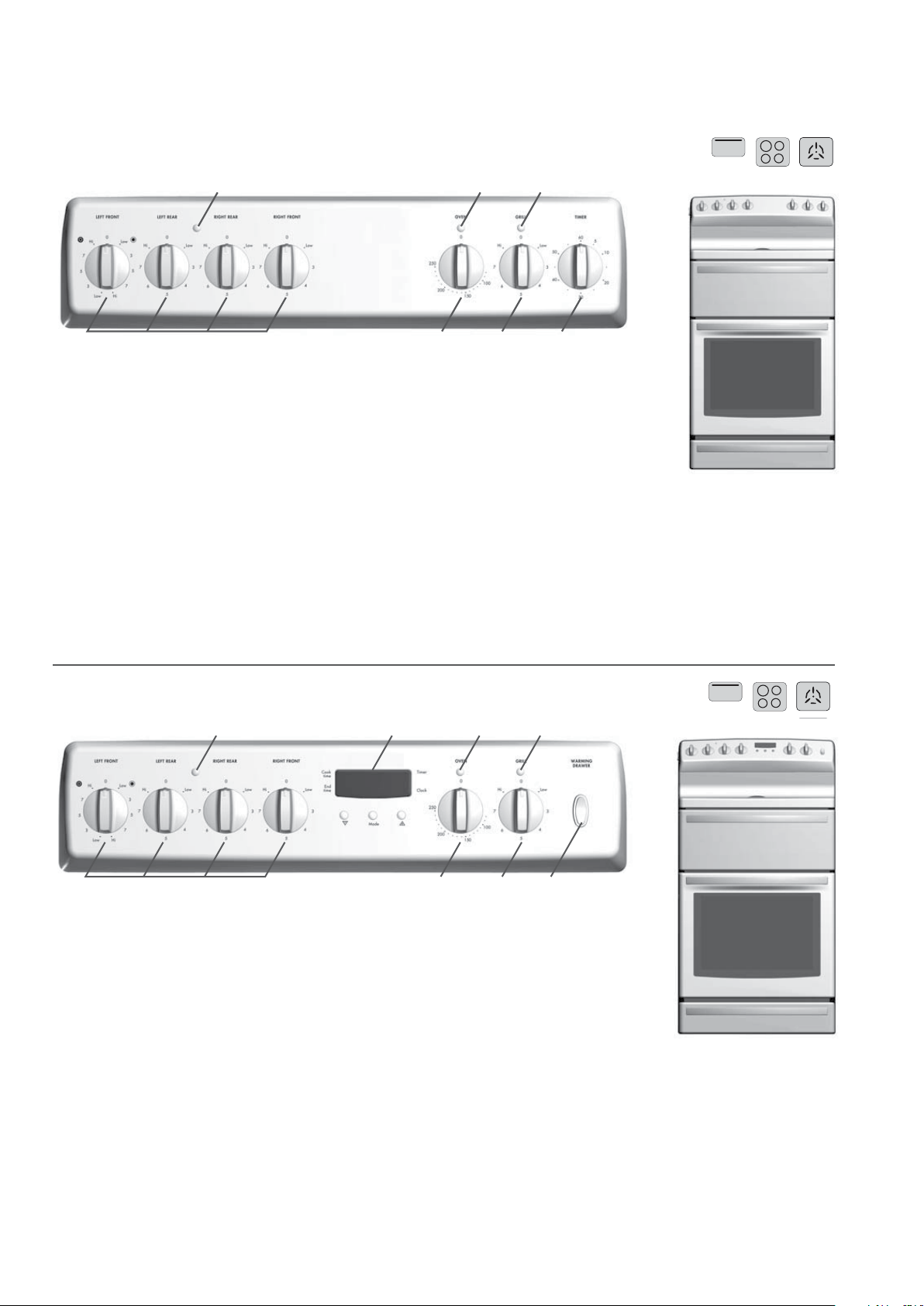
2 3 5 7
8641
2 4 6
1 3 5 7
12 controls
Controls (cont.)
PAK model 808
1 Hotplate Control Knobs
• Adjusts temperature of hotplate.
Can be rotated in either direction.
2 Hotplate Indicator Lamp
• Comes on when you turn a hotplate on.
3 Programmable Clock
• Sets baking/grilling reminder times.
• Sets automatic cooking duration and
stop time
Note: Clock time must be set before oven
can operate.
4 Temperature Control Knob
• Sets temperature for baking.
5 Oven Indicator Lamp
• Comes on when you
operate the oven
temperature control knob.
Cycles on and off
automatically when
you are cooking/baking.
6 Grill Temperature
Control Knob
• Sets grilling temperature
for separate grill. Can be rotated in either direction.
7 Grill Indicator Lamp
• Comes on when you are grilling.
8 Warming Drawer Switch
• Turns warming drawer on/off.
PAK model 806
1 Hotplate Control Knobs
• Adjusts temperature of hotplate. Can be rotated
in either direction.
2 Hotplate Indicator Lamp
• Comes on when you turn a hotplate on.
3 Temperature Control Knob
• Sets temperature for baking.
4 Oven Indicator Lamp
• Comes on when you operate the oven temperature
control knob. Cycles on and off automatically when
you are cooking/baking.
5 Grill Temperature
Control Knob
• Sets grilling temperature for
separate grill. Can be rotated
in either direction.
6 Grill Indicator Lamp
• Comes on when you are grilling.
7 60 Minute Ringer Time
• Sets reminder time.
1
10
6
7
11
12
8
9
2
3
4
5
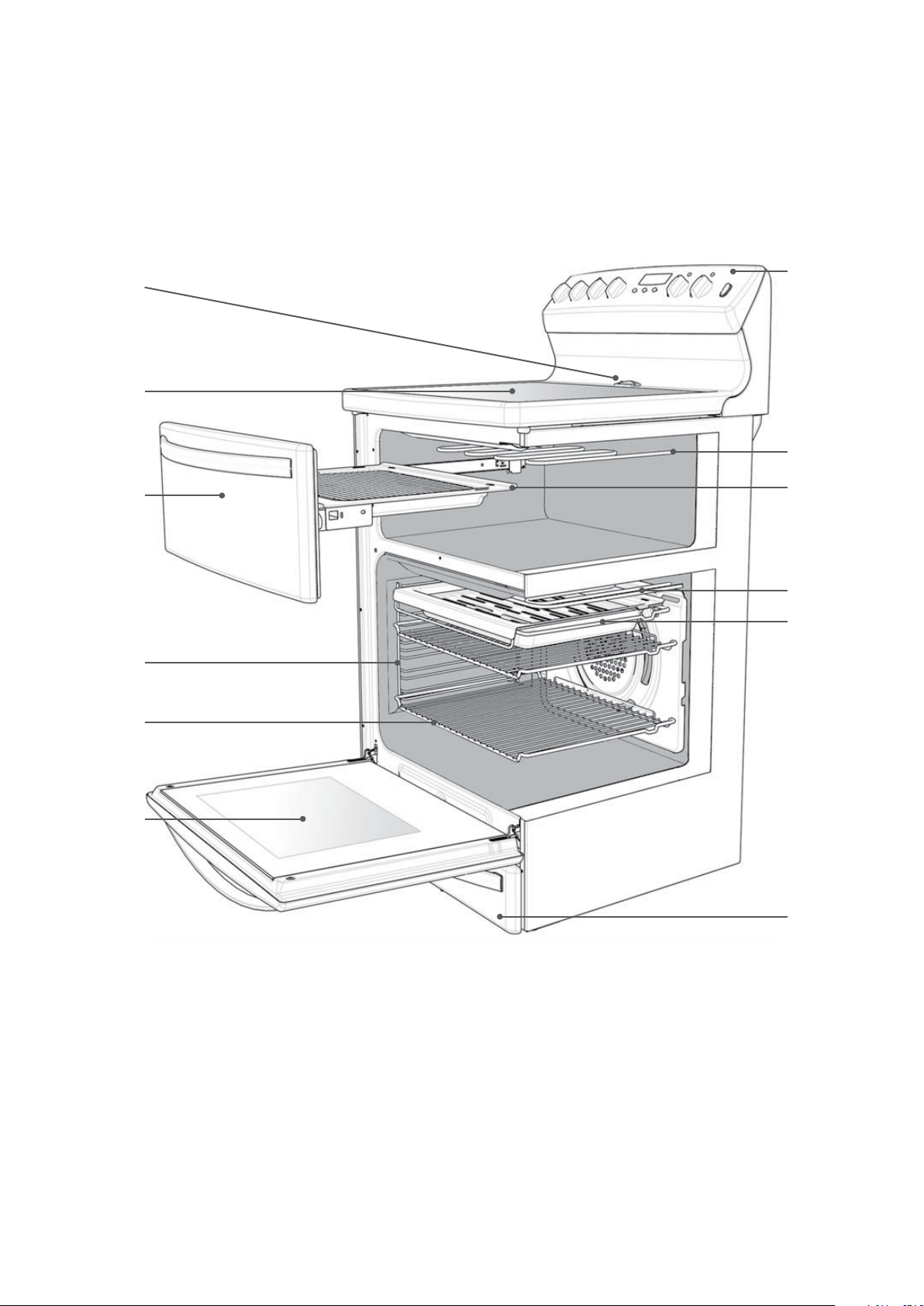
understanding the cooker 13
1 Hob (Ceramic or Radiant hotplates)
2 Grill Door
(fitted on selected models only)
3 Removable Shelf Side Support
(fitted on selected models only)
4 Removable Shelf
5 Removable Oven Door
6 Control Panel
7 Grill Element
(fitted on selected models only)
8 Removable Grill Tray
(fitted on selected models only)
9 Warming Drawer
(fitted on selected models only)
10 Oven Vent
11 Grill/Boost
12 Removeable Grill Tray
Some models have a separate grill compartment. On other models the grill element is included in the oven
cavity.
Understanding the cooker
GOOD
BAD
(moisture on hotplate)
BAD
(convex base)
BAD
(oversize)
BAD
(recessed base)
BAD
(undersize)
BAD
(no utensil)
GOOD BAD
(moisture on hotplate)
BAD
(convex base)
BAD
(oversize)
BAD
(recessed base)
BAD
(undersize)
BAD
(no utensil)
GOOD BAD
(moisture on hotplate)
BAD
(convex base)
BAD
(oversize)
BAD
(recessed base)
BAD
(undersize)
BAD
(no utensil)
GOOD
BAD
(moisture on hotplate)
BAD
(convex base)
BAD
(oversize)
BAD
(recessed base)
BAD
(undersize)
BAD
(no utensil)
warning
Hotplate indicator lamp
Hot Surface Warning Light
14 understanding the hotplates
Using the hotplates
Radiant Hotplates
The high-speed radiant coil hotplates heat rapidly
from a cold start to give you economic use of power.
Radiant hotplate models have a bowl under each element
for collecting spillage.
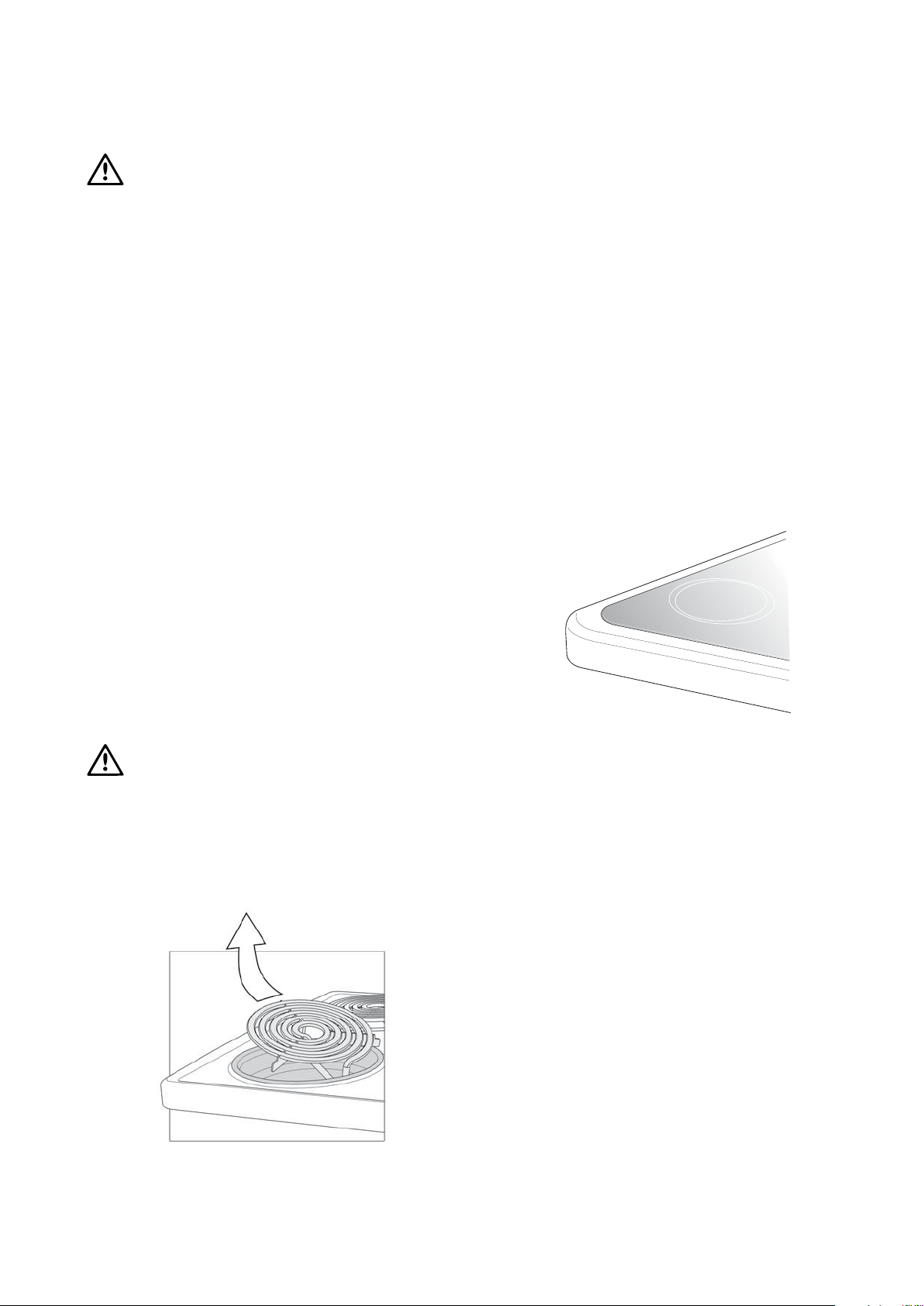
The radiant elements are removable to aid in cleaning the
hob and spillage bowls. The spillage bowl can be removed
by first removing the element and then removing the
spillage bowl.
Ceramic Hotplates
The ceramic cooktop is made from ceramic glass, a tough
durable material that withstands heating and cooling without
breaking. However it must be remembered that it is glass, it
may break. Treat it accordingly!
Should you have any questions about the glass in your
appliance, please contact the customer service centre
by calling:
1300 363 640 (Australia)
09 573 2384 (New Zealand)
Warning: If the ceramic glass is cracked,
switch off the appliance to avoid the
possibility of electric shock.
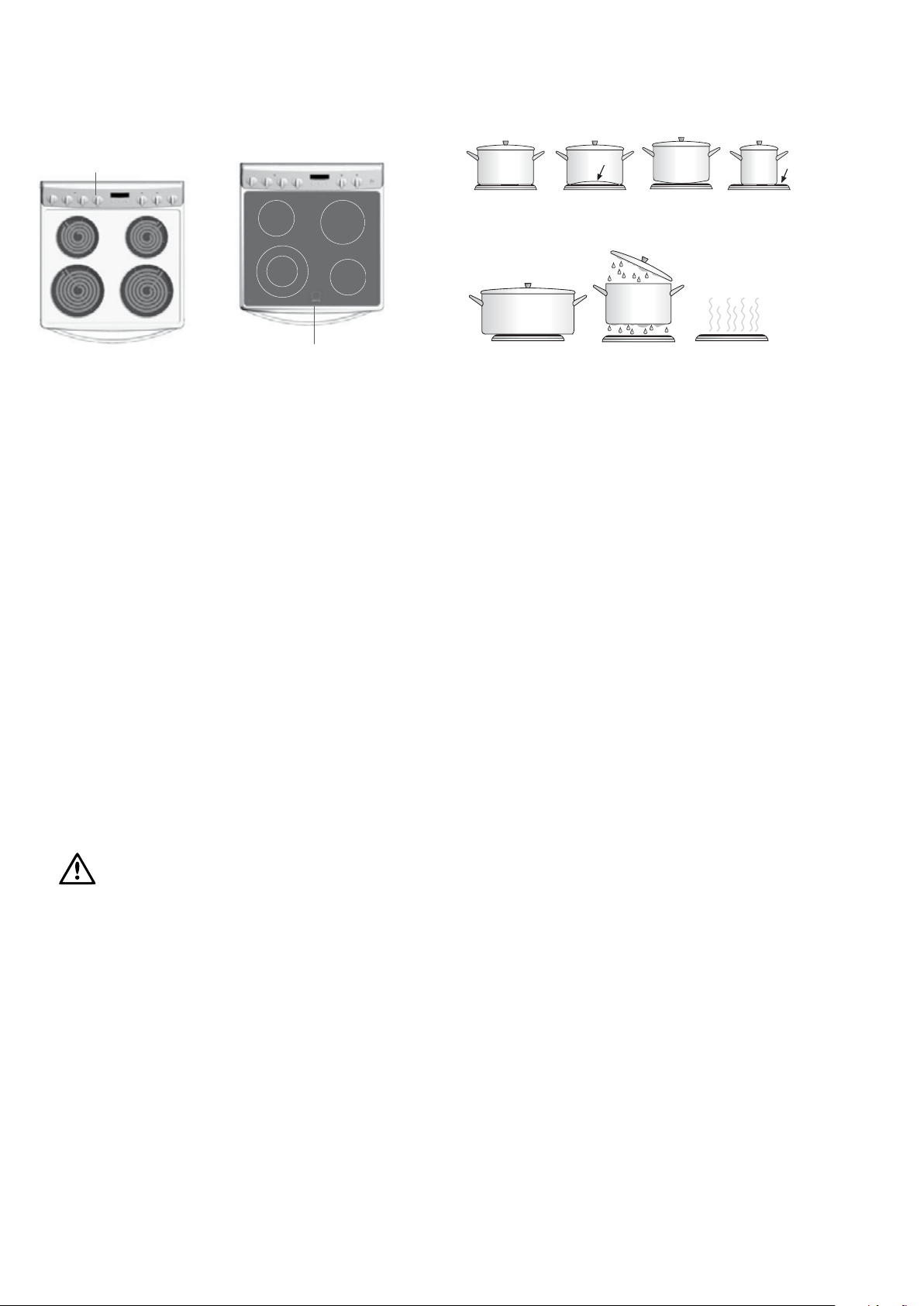
Utensils
• Use pans with flat bottoms. Uneven or thin bottoms
will waste energy and result in slow cooking.
• Use pans slightly larger than the hotplates. Small pans
will waste energy.
• Do not use oversize pans. More than 50mm overhang
can overheat cooktop components and can cause fine
cracks in the enamel hob which will trap dirt.
• Use only dry utensils. Do not place wet or steamy
parts (eg. Lids) on the hotplates.
• Do not use pots and pans that are unsteady and likely
to rock or over balance.
• Do not operate the cooktop for an extended time
without a utensil on the hotplate.
Cooking Do’s and Don’ts
• Do use the stored heat in the hotplate by turning the
control to “0“ before the final few minutes of cooking.
• Do not place heat resistant mats, wire mats or aluminium
foil under pots and pans.
• Do not allow pots and pans to boil dry, as damage to
both pan and hotplate may result.
• Do not use round bottom woks or similar utensils
which could lead to overheating of the hotplates and
possible damage to the cooking surface.
• Do not use the cooktop as extra bench space or as
a cutting board.
• Do not allow children on or near the cooktop at
any time.
warning
understanding the functions 15
Understanding the functions
CAUTION: Do not line the bottom of the
oven with foil or place anything on bottom
surface of oven liner as trapped heat will
crack or craze oven liner.
Always remove unnecessary trays or dishes from
oven when baking or roasting.
Preheating Oven
1. For best results when baking preheat your apppliance for
30 minutes
2. when the oven indicator light goes out, put your food in
the oven and close the door. Once your food is placed in
the oven adjust the temperature back to the required setting.
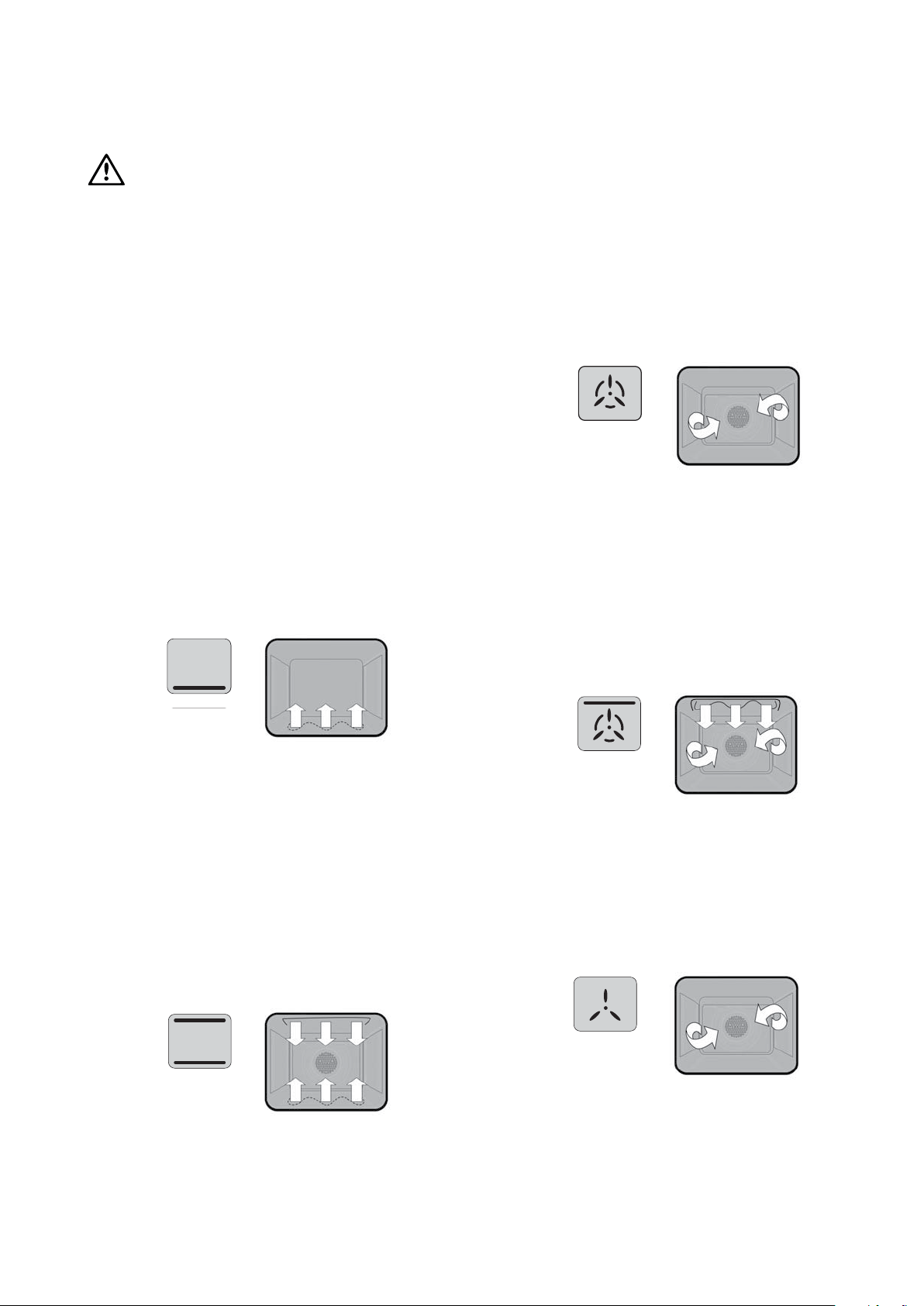
Base Heat
Heat comes from the element below the food.
The element is controlled by the thermostat and will turn
on and off to maintain the set temperature. You can use the
“Base Heat” function for single trays of biscuits, cakes,
slices, pies, pizzas & quiches, anything that requires more
cooking on the bottom. Cook in the lower half of your
oven when you are using only one shelf.
Bake
Heat comes from two elements, one above and one below
the food. The bottom element is a clean heat element and
is below the floor of the oven. Both elements are controlled
by the thermostat and will turn on and off to maintain the
set temperature.
You can use the “Bake” function for single trays of biscuits,
scones, muffins, cakes, slices, casseroles, baked puddings,
roasts, delicate egg dishes, anything that requires delicate
baking.
Thermowave
Heat comes from the element surrounding the fan. This fan
circulates the hot air around the oven cavity so that you can
put your food in different places in the oven and still cook
them at the same time.
You can use the “Thermowave” function for multi shelf
cooking, reheating cooked foods, pastries and complete oven
meals. Thermowave may cook at a lower temperature and
be faster than the ’bake or base heat“ option. Please note
that some variation in browning
is normal.
Rapid Heat
“Rapid Heat” allows you to preheat your oven quickly
before cooking with thermowave. With “Rapid Heat”
the fan, fan element and the top bake elements turn on to
heat the oven to the required temperature. “Rapid Heat”
can also be used to quickly cook convenience meals and
provide browning.
Defrosting
The “Defrost” function uses ambient temperature air that
is circulated by the fan. You can defrost (thaw) your food
before you cook it. You can also use “Defrost” to raise
your yeast dough and to dry fruit, vegetables and herbs.
warning
warning
warning
warning
16 understanding the functions
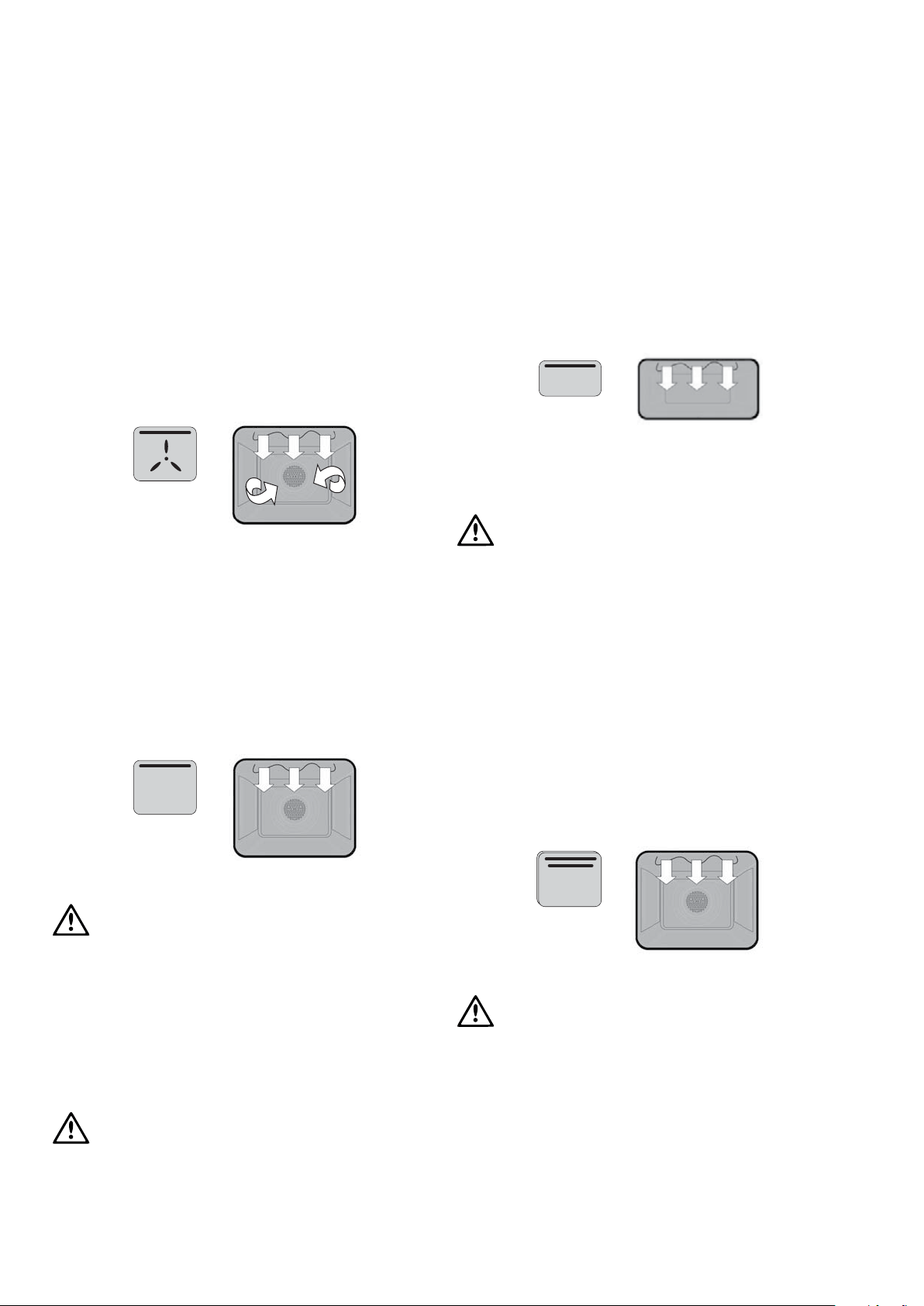
Fan Grilling
“Fan grill” offers you the benefits of both “Bake” and
traditional “Grill” functions. The grill element turns on and
off to maintain the set temperature while the fan circulates
the heated air. The oven door remains closed for fan grill. In
this mode it is recommended that the thermostat is set to
180°C.
You can use “Fan grill” for large cuts of meat, which gives
you a result that is similar to “Rotisserie” cooked meat.
The cooker is supplied with a grill tray that fits into the meat
dish. When fan grilling, position tray in lower section of the
oven. (Position will depend on thickness of food being grilled).
Grilling (In Oven)
The “Grill” directs radiant heat from the powerful upper
element onto the food. You can use the “Grill” function
for tender cuts of meat, steak, chops, sausages, fish, cheese
toasties and other quick cooking foods. Preheat your grill
for 3 minutes to get the best results. This will help seal in the
natural juices of steak, chops etc. for a better flavour. Grill
with the door open to the first stop position.
Warning: Accessible parts may
become hot when the grill is in use. Children
should be kept away.
Do not cover the grill rack with foil.
The cooker is supplied with a grill tray that fits into the
meat dish. When grilling, use one of the top two side
runner positions. (Position will depend on thickness of
food being grilled).
IMPORTANT: Always turn your grill off
immediately after use, as fat left there may
catch fire.
Grilling (Separate)
The “Grill” works by directing radiant heat which comes
from the powerful upper element onto the food. The grill
function is suitable for tender cuts of meat, steak, chops,
sausages, fish, cheese toasties and other quick cooking foods.
Best results are obtained after 3 minutes preheat. This will
help seal in the natural juices of steak, chops etc. for a
better flavour.
Do not cover the grill rack with foil.
IMPORTANT: Always turn your grill off
immediately after use, as fat left there may
catch fire.
Grilling - Maxi Grill (In Oven)
The “Maxi Grill” directs radiant heat from the powerful
upper grill element and the upper bake element onto
the food.
You can use the “Maxi Grill” function for tender cuts of
meat, steak, chops, sausages, fish, cheese toasties and other
quick cooking foods.
Preheat your grill for 3 minutes to get the best results.
This will help seal in the natural juices of steak, chops etc.
for a better flavour. Grill with the door open to the first
stop position.
Warning: Accessible parts may
become hot when the grill is in use. Children
should be kept away.
Do not cover the grill rack with foil.
The cooker is supplied with a grill tray that fits into the
meat dish. When grilling, use one of the top two side
runner positions. (Position will depend on thickness of food
being grilled). IMPORTANT: Always turn your grill off
immediately after use, as fat left there may catch fire.
Understanding the functions (cont)
warning
understanding the functions 17
Self-Clean Panels (Fitted in Selected Ovens
& available as an optional extra)
Catalytic self-clean panels are treated with a specially
formulated enamel coating. This enamel coating is baked
on at over 800 degrees and has a slightly rough surface,
which is also porous. During normal cooking, fats are partially
absorbed into the surface and are then oxidised. Over a
period of time this oxidisation may not entirely be complete
at most common cooking temperatures (150 - 200°C)
and a build up may result.
It will then be necessary to select 290°C for approximately
one hour to remove the build up.
General Purpose Socket Outlets (If fitted)
The socket outlet may be used for general applications.
A 15A fuse mounted in the rear of the appliance protects
the socket outlet.
7
Fuse
Fuse Housing
Warming Drawer
The warming drawer may be used to warm crockery
prior to use.
Recommend warming times 30 minutes, Refer to
general warnings.
Do not use the drawer for heating food.
Do not place flammable material in the drawer.
Do not store areosols or cleaning products in
the drawer.
Do not store plastic items in the drawer.
Do not place more than the maximum weight
of 10kg in drawer.
Understanding the functions (cont)

18 cooking guide for ovens
Food Bake Thermowave Base Heat Grill Fan Grill Maxi Grill Rapid Heat
Baked Products
Single trays R R A A
3 trays R A
2 trays R
Scones/small cakes R R R R
Muffins R R R
Slices R R A R
Cakes R A A
Fruit Cakes R R A
Egg Recipes
Baked Custards R R
Pavlova A A
Meringues A R
Pies & Pastry R A A
Fish R R
Meats
Beef Roast A A R
Beef Steaks A R R
Beef Patties A R R
Lamb Roast A A R R
Lamb Chops A R
Pork Roast A A A R
Pork Chops R R
Pork Fillets R R A R R
Sausages A A R
Poultry
Chicken Whole A A A R R
Chicken Pieces R R A A A R
Turkey A A A A R
Casseroles A R R A R
Complete Oven Meals R A R R A R R
R Recommended Method
A Alternative Method
Cooking guide for ovens

get to know your oven 19
Get to know your new oven with this
‘Simple Test Cake’
Although we strive for a perfect performing oven, it’s possible
that there will be some variation in colour when baking.
Therefore, we suggest this simple, easy and delicious to make
Simple Test Cake, it can help you understand your new oven.
All ovens do sometimes have hot or cold spots, therefore it
is important to judge with your eye as you may require to
rotate during baking.
‘Simple Test Cake’
125g butter, softened to room temperature
1 cup caster sugar
1 teaspoon pure vanilla essence
4 large eggs
2 cups self-raising flour
pinch of salt
4 tablespoons (80mL) full-cream milk
Method:
1. Butter base and sides of two, 20cm straight-sided round
or square cake pans. Then line the base with grease proof
or baking paper.
2. Preheat oven to moderate ‘180ºC’ (170ºC fan forced)
and ensure oven shelf is in the centre position of oven.
3. Cream softened butter and sugar until light in colour.
4. Add vanilla essence.
5. Then eggs on at a time, beating well after each addition.
6. Sift flour and salt into the mixture and beat until well
combined.
7. Add milk and beat or stir to combine.
8. Spoon mixture equally between prepared cake pans.
9. Bake in preheated oven, middle shelf for about 25 to 35
minutes or until when tested with a fine cake skewer it
comes out clean or the edges of the cakes have come
away slightly from the sides of the cake pans.
10. Remove from oven to wire cake rack and rest for
5 minutes before removing from cake pans. Cool
completely.
To Serve: sandwich together with your favourite jam or
conserve, and dust top with pure icing sugar.
FOOT NOTE: if desired substitute butter for either
margarine or olive oil spread.
Recipe is based on the Australian standard metric 250mL cup
and 20mL tablespoon sets.
Get to know your oven

20 handling baking & grilling problems
PROBLEM CAUSES REMEDIES
Uneven cooking: • Incorrect shelf position. - Select shelf that puts food in the centre
of the oven.
• Oven tray too large. - Experiment with other trays or dishes.
• Trays not centralised. - Centre trays.
• Food has not been rotated. - Rotate food during cooking.
Baked products too brown on top: • Oven not preheated. - Preheat until the oven indicator lamp
goes off.
• Aluminium foil in oven. - Remove foil.
• Baking tins too large for the recipe. - Use correct size tins.
• Baking tins not evenly spaced. - Stagger baking tins at least 3cm between
tins and the oven walls.
• Products not evenly sized or spaced
on trays.
- Make into same size and shape, & spread
evenly over trays.
• Baking temperature too high. - Lower the temperature.
• Food too high in oven. - Cook on shelf lower.
Baked products too brown on bottom: • Baking tins too large for the recipe. - Use correct size tins.
• Baking tins are dark metal or glass. - Change to shiny, light tins or lower the
temperature by 10oC.
• Food too low in the oven. - Cook one shelf higher.
• Oven door opened too frequently
during baking.
- Don’t open the oven door until at least
half the cooking time has passed.
• Baking temperature too high. - Lower the temperature.
Cakes have a cracked, thick crust: • Baking temperature too high. - Lower the temperature.
• Food to high in oven. - Cook one shelf lower.
• Cake batter over mixed. - Mix just long enough to combine
ingredients.
• Pan too deep. - Check size of pan and use
recommended size.
• Baking pans dark. - Change to shiny pans.
Baked products are pale, flat and
undercooked
• Baking temperature too high. - Lower the temperature.
• Food too low in the oven - Cook one shelf higher.
• Baking time too short. - Increase cooking time.
• Incorrect tin size. - Use correct size tin.
Cakes fallen in the centre: • Baking temperature too high. - Lower the temperature.
• Baking time too short. - Increase cooking time.
• Proportions of ingredients incorrect
in the recipe.
- Check recipe.
• Opening door too early in baking. - Do not open the door until the last
quarter of cooking time.
Roast meat & potatoes not browning
in fan oven:
• Poor hot air circulation - Elevate food onto a rack to allow air
circulation.
Juices running out of meat: - Do not pierce meat with fork.
- Turn with tongs.
Grilled meats overcooked on outside
& raw in the centre:
- Grill at lower shelf position.
Grilled chops & steaks buckling: - Cut fat with knife towards the meat.
Handling baking & grilling problems

clocks 21
Before operating your
appliance for the first time
3 button programmable clock
After the appliance has been switched on “12.00“ will be
displayed and the “clock indicator“
will flash.
1. To set the time of day in hours and minutes, press the –
or + buttons. 5 seconds after the last change, the “clock
indicator“
will disappear, confirming the time has been
set. Once the time has been entered, the clock advances
minute by minute.
Note: The clock has a 24-hour display.
The clock must be set to operate the oven.
Operating the
programmable clock
3 button programmable clock
General features
Your 3 button programmable clock has the following features:
• Timer – your 3 button programmable timer allows you to
set a countdown time that will beep when the set time has
elapsed.
• Cooking duration – You can set a cooking duration. A timer
will count down the preset cooking time, beep when the
time has elapsed and turn the oven off.
• End cooking time – you can set a cooking finish time. A
timer will count down the preset cooking time, beep when
the finish time has been reached and turn the oven off.
• Delayed start cooking time – You can combine the cooking
time and stop cooking time to switch the oven on and off
at a specific time during the day.
Note: Your 3 button programmable timer only operates with
your main oven.
Change the time of day (Daylight saving)
1. Press the “mode” button until the “clock” indicator
begins
flashing.
2. Press the – or + buttons to change the time. 5 seconds
after the last change, the “clock” indicator
will disappear,
confirming the time has been set.
Setting the timer
1. Press the “mode“ button until the “timer” indicator begins
flashing.
2. Set the countdown time you want by using the – and
+ buttons. 5 seconds after the last change the “timer”
indicator
will stop flashing, confirming the timer has been
set.
3. To stop the beeper, press any button.
PROGRAM TIMER
cook time
end time
timer
clock
MODE
—
+
PROGRAM TIMER
cook time
end time
timer
clock
MODE
—
+
PROGRAM TIMER
cook time
end time
timer
clock
MODE
—
+
PROGRAM TIMER
cook time
end time
timer
clock
MODE
—
+
Clocks
22 clocks
Setting the cooking duration
1. Check the clock displays the correct time of day.
2. Select the desired oven function and temperature. The
oven indicator light will glow and the heating source will
come on.
3. Press the “mode“ button until the “cook time” indicator
begins flashing.
4. Set the cooking duration you want by using the – or +
buttons. 5 seconds after the last change, the “cook time”
indicator
will stop flashing, and the time of day will be
displayed.
Note: Do not forget to add preheating time if necessary.
Setting the cooking end time
1. Check the clock displays the correct time of day.
2. Select the desired oven function and temperature. The
oven indicator light will glow and the heating source will
come on.
3. Press the “mode“ button until the “end time” indicator
begins flashing.
4. Enter the time of day you want to finish cooking by
pressing the – or + buttons. 5 seconds after the last
change, the “end time” indicator
will stop flashing and the
current time of day will be displayed.
Setting the delayed start cooking time
1. Program the “cook time“ and “end time“ as described
in the relevant sections. Once both the “cook time“ and
“end time“ have been set, the “cook time“ and “end time”
indicators will stop flashing and the current time of day will
be displayed.
To check or cancel settings
1. To check your settings, press the mode button until the
setting you want is displayed. A red light will flash next to
the mode (cook time, end time, etc) that is currently on
display.
2. To cancel “delayed start” press the mode button until
a light flashes next to “end time”. Press and hold the –
button until the clock no longer reverses (you will hear a
beep). If you have left the temperature and function knobs
at a setting the oven will start once the “end time” light
stops flashing.
3. To cancel “auto shut off” press the mode button until a
light flashes next to “cook time”. Press and hold the –
button until the clock no longer reverses at (“0:00” and
you will hear a beep). This automatically cancels “delayed
start”. If you have left the temperature and function knobs
at a setting, the oven will start once the “cook time” light
stops flashing. Because you have cancelled “auto off” the
oven will continue to heat until you manually turn it off.
On completion of cooking
The oven will turn off, the timer will beep and the “end time“
and/or “cook time“ indicators will flash.
1. Turn the function and temperature controls to the off
position.
2. Press any button to stop the timer from beeping.
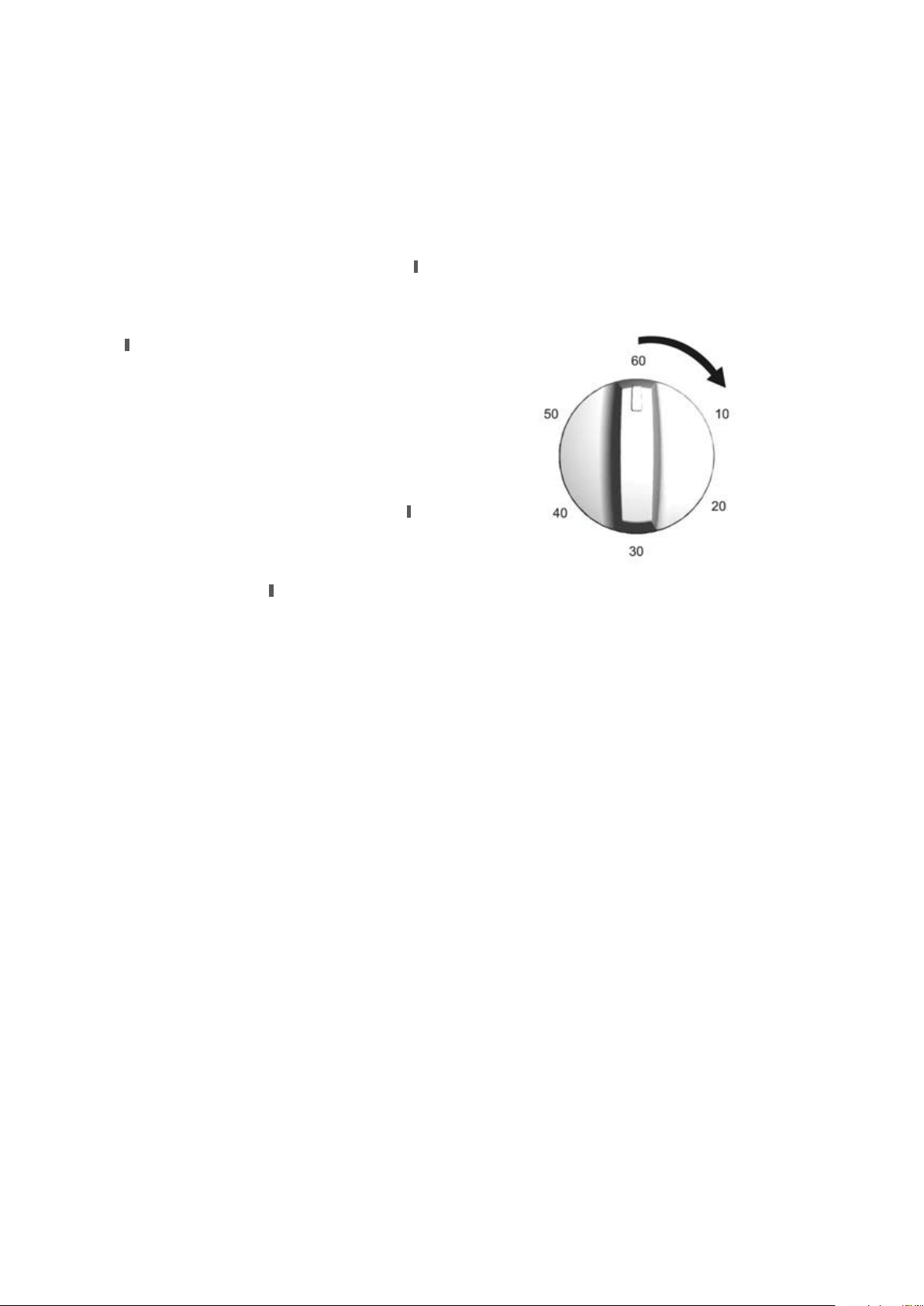
To set the timer, simply turn the knob clockwise to the
required number of minutes.
Note: For any time below ten minutes turn the knob past
the ten then turn it back to the required number of minutes.
When the timer returns to zero, the timer gives a short ring.
Operating your
60 minute ringer timer
Clocks (cont)
IMPORTANT: Always make sure that the appliance
is turned off before you clean it.
All surfaces should be kept clean to reduce the risk
of damage or fire.
Cleaning Enamel and Glass Doors Panels
Keep it clean by wiping it regularly with a soft cloth dipped
in warm soapy water. Rub persistent stains vigorously with a
creamed powder cleanser.
Note: You can also use household oven enamel cleaners -
follow the manufacturer’s instructions carefully. Do not use
harsh abrasive cleaners, nylon scourers, powder cleaners,
steel wool, steam cleaners or wax polishes. Always check
manufacturers recommendations before using their product.
When cleaning glass door panels harsh abrasive cleaners and
sharp metal scrapers should not be used, as they can scratch
the surface and result in premature failure.
Cleaning your Control Panel
• Make sure control knobs are in the OFF position.
• Clean control panel with a soft damp cloth dipped in warm
soapy water.
Do not use excess water when cleaning control panel.
Cleaning your Hotplates
Radiant Hotplates
These hotplates are self-cleaning, so any boil over material will
burn to ash and may be wiped
away when the hotplate is cold.
The elements are removable so the spillage bowls can be
removed for cleaning.
Isolate the appliance before removing the hotplates.
• Ensure elements are cold to touch.
• Lift front of element to clear spillage bowl and pull towards
you.
• Remove spillage bowl.
• Wash spillage bowl in hot soapy water.
Ceramic Hotplates
1. Remove all spilt food and fat with the supplied razor blade
scraper, while the ceramic glass is still warm but not hot.
Wipe clean with dishwashing detergent on a damp cloth.
2. If aluminium foil, plastic items or high sugar content
liquids/foods are allowed to melt on the ceramic glass,
these should be removed immediately with the supplied
razor blade scraper before the surface has cooled down,
otherwise pitting of the surface can occur.
Note: Items with high sugar content not only include jam
and fruit, but also vegetables such as peas, tomatoes and
carrots. When the ceramic glass is cool wipe clean with
dishwashing detergent on a damp cloth.
3. Do not use abrasive sponges or scourers, as they may
scratch the cooktop.
4. Do not use oven sprays or stain removers as these
products may also damage the surface.
Cleaning and caring for the cooker
warning
warning
Ceramic Hotplate
Radiant Hotplate
cleaning and caring 23
Cleaning and caring for your oven
warning
warning
warning
warning
warning
24 cleaning and caring
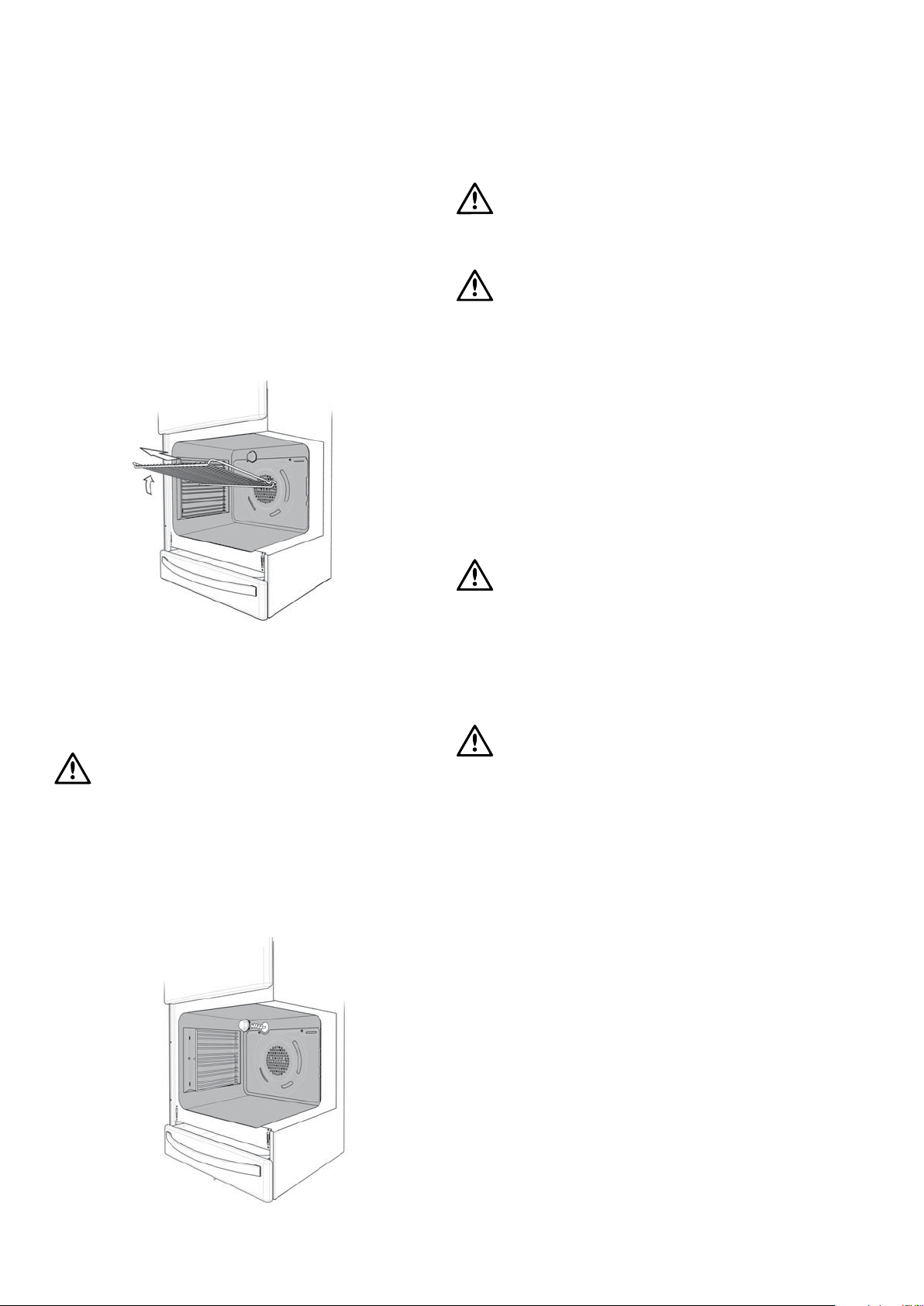
Removing the Oven Shelves
Slide the oven shelves towards you until they reach the front
stop. Tilt them up at the front to clear the side supports. Lift
them clear. Wash the shelves in hot soapy water. For heavy
baked-on-stains soaking of the shelves may be required. To
install the oven shelves, fit the guide between the two side
rack rails. This will ensure the shelves remain stable.
Removing the Side Racks (shelf supports)
Grasp the shelf support at the front and pull it firmly inwards.
To install the shelf, refer to Installation Section.
Removing the Oven Light Glass
Switch the oven off before removing the oven light glass.
Turn Oven Light Glass anticlockwise to remove it for globe
replacement, if necessary use a tea towel, etc for extra grip.
WARNING
Ensure the appliance is switched off at the function
switch before replacing the lamp to avoid the
possibility of electric shock.
When replacing the Light Bulb ensure the replacement is
suitable for high temperatures. We recommend using a
genuine replacement available from Electrolux spare parts.
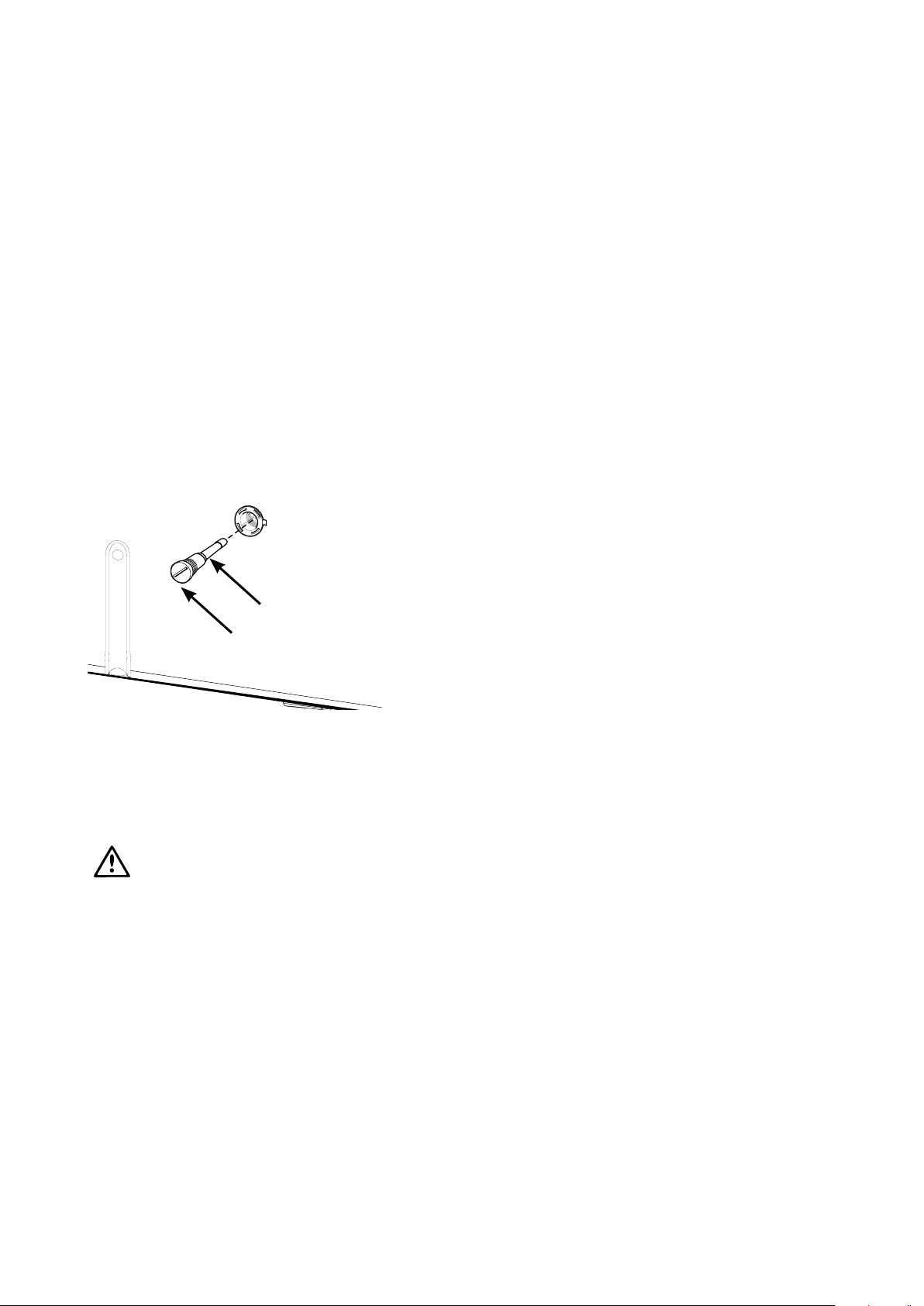
Cleaning
The cooker can be disengaged and engaged from the
anti-tilt bracket for cleaning access. At all other times
the cooker MUST be engaged onto the
anti-tilt bracket.
WARNING
The door glass on this appliance is made from tough
durable material that withstands heating and cooling
without breaking. However it must be remembered
that it is Glass, it may break. Treat it accordingly!
Should you have any questions about the glass in
your appliance, please contact the customer care
centre by calling 1300 363 640 (Australia) 09 573
2384 (New Zealand). Do not use harsh cleaners or
sharp metal scrapers to clean the oven door since
they can scratch the surface, which may result in the
shattering of the glass.
Grill Tray and Grill Pan
Wash the Grill Tray and Grill Pan in hot soapy water.
IMPORTANT: Always keep the grill pan clean as
any fat left in it may catch fire.
Grill Compartment
Clean the grill compartment with hot soapy water.
If stronger action is needed use a non-abrasive oven cleaner
applied with a nylon scourer.
Warming Drawer
Note: This compartment will become hot when in
use. Do not store flammable components such as
aerosols or plastic components in this compartment.
Clean the Warming Drawer compartment with hot soapy
water.

Solving problems
solving problems 25
Faults
If you have a problem with your oven and/or grill, please:
• Check the points listed below before calling for service. You
may be able to avoid a service call by fixing the problem
yourself - and so continue cooking.
Note: We may charge you for service even in the
guarantee period if your problem is due to the causes listed
below.
Data Plate
When you need information, service or replacement
parts please:
• Quote the; 1 Model; 2 Model Number & 3 Serial Number.
You can find these on the data plate which is at the bottom
of the oven front. The data plate is visible when the door is
open.
If you need more information, please contact the Customer
Care Centre on 1300 363 640
(Australia - Centre is open 8.00am - 5.00pm Monday
to Friday Eastern Standard Time)
or 09 573 2384 (New Zealand - Centre is open
8.00am - 5.00pm Monday to Friday).
If you have a warranty or spare parts enquiry, you should
call the number listed on the back page.
Problem Possible causes
Oven or grill not working: Power not turned on.
Controls or clock are incorrectly set.
Household fuse has blown or power supply is off.
Note: If the household fuse continues to blow, call the
Service Centre.
Oven light not working: Lamp blown or loose in socket.
Household fuse has blown or power supply is off.
Note: If the household fuse continues to blow, call the
Service Centre.
Oven not heating enough: Foil or trays on bottom of oven. (Remove immediately)
Oven not working: Clock is in Auto mode. (Refer to operating instructions)
Household fuse has blown or power supply is off.
Note: If the household fuse continues to blow, call the
Service Centre.
Timer flashing on display: Power failure or interruption.
Household fuse has blown or power supply is off.
Note: If the household fuse continues to blow, call the
Service Centre.
Unit smoking when first used: Protective oils being removed. This is normal conditioning of
the oven on first use.
Condensation building up: Reduce the amount of water used in cooking.
Odours on first use of oven: This is normal conditioning of the oven insulation for the first
30 minutes.
Power points not working: Fuse at rear has blown.
Note: Only authorised service centres should carry out servicing.
Otherwise warranty may be void.

26 notes
Notes
This document sets out the terms and conditions of the product
warranties for Electrolux Appliances. It is an important document.
Please keep it with your proof of purchase documents in a safe place
for future reference should you require service for your Appliance.
1. In this warranty
(a) ‘acceptable quality’ as referred to in clause 10 of this warranty has
the same meaning referred to in the ACL;
(b) ‘ACL’ means Trade Practices Amendment (Australian Consumer
Law) Act (No.2) 2010;
(c) ‘Appliance’ means any Electrolux product purchased by you
accompanied by this document;
(d) ‘ASC’ means Electrolux’ authorised serviced centres;
(e) ‘Electrolux’ means Electrolux Home Products Pty Ltd of 163
O’Riordan Stree
t, Mascot, NSW 2020, ABN 51 004 762 341 in
respect of Appliances purchased in Australia and Electrolux (NZ)
Limited of 3-5 Niall Burgess Road, Mount Wellington, in respect
of Appliances purchased in New Zealand;
(f) ‘major failure’ as referred to in clause 10 of this warranty has the
same meaning referred to in the ACL and includes a situation when
an Appliance cannot be repaired or it is uneconomic for Electrolux, at
its discretion, to repair an Appliance during the Warranty Period;
(g) ‘Warranty Period’ means:
(i) where the Appliance is used for personal, domestic or household
use (i.e. normal single family use) as set out in the instruction
manual, the Applian
ce is warranted against manufacturing
defects in Australia for 24 months and in New Zealand for 24
months, following the date of original purchase of the Appliance;
(ii) where the Appliance is used for commercial purposes (including
being used to directly assist a business or where the Appliance is
used in a multi-family communal or share type environment), the
Appliance will then be warranted against manufacturing defects
in Australia for 3 months and in New Zealand for 3 months,
following the date of original purchase of the Appliance.
(h) ‘you’ means the purchaser of the Appliance not having purchased
the Appliance for re-sale, and ‘your’ has a corresponding meaning.
2. This warranty only applies to Appliances purchased and used in Australia
or New Zealand and is in addition to (and does not exclude, restrict, or
modify in any way) any non-excludable statutory warranties in Australia
or New Zealand.
3. During the Warranty Period Electrolux or its ASC will, at no extra charge
if your Appliance is readily accessible for service, without special
equipment and subject to these terms and conditions, repair or replace
any parts which it considers to be defective. Electrolux or its ASC may
use remanufactured parts to repair your Appliance. You agree that
any replaced Appliances or parts become the property of Electrolux.
or similar
perishable parts.
4. Parts and Appliances not supplied by Electrolux are not covered by
this warranty.
5. You will bear the cost of transportation, travel and delivery of the
Appliance to and from Electrolux or its ASC. If you reside outside of the
service area, you will bear the cost of:
(a) travel of an authorised representative;
(b) transportation and delivery of the Appliance to and from Electrolux or
its ASC,
In all instances, unless the Appliance is transported by Electrolux or an
Electrolux authorised representative, the Appliance is transported at the
owner’s cost and risk while in transit to and from Electrolux or its ASC.
6. Proof of pur
chase is required before you can make a claim under
this warranty.
7. You may not make a claim under this warranty unless the defect claimed
is due to faulty or defective parts or workmanship. Electrolux is not liable
in the following situations (which are not exhaustive):
(a) the Appliance is damaged by:
(i) accident
(ii) misuse or abuse, including failure to properly maintain or service
(iii) normal wear and tear
(iv) power surges, electrical storm damage or incorrect power supply
(v) incomplete or improper installation
(vi) incorrect, improper or inappropriate operation
(vii) insect or vermin infestation
(viii) failure to comply
with any additional instructions supplied with
the Appliance;
(b)
(c) the Appliance’s serial number or warranty seal has been removed
or defaced;
(d) the Appliance was serviced or repaired by anyone other than
Electrolux, an authorised repairer or ASC.
8. This warranty, the contract to which it relates and the relationship
between you and Electrolux are governed by the law applicable where
the Appliance was purchased. Where the Appliance was purchased in
New Zealand for business purposes the Consumer Guarantee Act does
not apply.
9. To the extent permitted by law, Electrolux excludes all warranties and
liabilities (other than as contained in this document) including liability for
any loss or damage whether direct or indirect arising from your purchase,
use
or non use of the Appliance.
10. For Appliances and services provided by Electrolux in Australia,
the Appliances come with a guarantee by Electrolux that cannot be
excluded under the Australian Consumer Law. You are entitled to a
replacement or refund for a major failure and for compensation for any
other reasonably foreseeable loss or damage. You are also entitled to
have the Appliance repaired or replaced if the Appliance fails to be of
acceptable quality and the failure does not amount to a major failure.
rights and remedies under a law in relation to the Appliances or services
to which the warranty relates.
11. At all times during the Warranty Period, Electrolux shall, at its discretion,
determine whether repair, replacement or refund will apply if an
Appliance has a valid warranty claim applicable to it.
12. For Appliances and services provided by Electrolux in New Zealand,
the Appliances come with a guarantee by Electrolux pursuant to the
provisions of the Consumer Guarantees Act, the Sale of Goods Act and
the Fair Trading Act.
13. To enquire about claiming under this warranty, please follow these steps:
(a) carefully check the operating instructions, user manual and the terms
of this warr
anty;
(b) have the model and serial number of the Appliance available;
(c) have the proof of purchase (eg an invoice) available;
(d) telephone the numbers shown below.
14. You accept that if you make a warranty claim, Electrolux and its ASC
may exchange information in relation to you to enable Electrolux to meet
its obligations under this warranty.
Warranty
FOR SALES IN AUSTRALIA AND NEW ZEALAND
APPLIANCE: BUILT-IN OVEN, COOKTOP
AND UPRIGHT RANGE COOKER
Important Notice
Before calling for service, please ensure that the steps listed in point 13 above have been followed.
FOR SERVICE
state service centre in Australia
PLEASE CALL 13 13 49
For the cost of a local call (Australia only)
SERVICE AUSTRALIA
ELECTROLUX HOME PRODUCTS
www.electrolux.com.au
FOR SPARE PARTS
state spare parts centre in Australia
PLEASE CALL 13 13 50
For the cost of a local call (Australia only)
FOR SERVICE
authorised service centre in New Zealand
FREE CALL 0800 10 66 10
(New Zealand only)
SERVICE NEW ZEALAND
ELECTROLUX HOME PRODUCTS
www.electrolux.co.nz
FOR SPARE PARTS
state spare parts centre in New Zealand
FREE CALL 0800 10 66 20
(New Zealand only)
GOV_Warr_Apr11

For more information on all Westinghouse and Simpson appliances,
or for dimension and installation information, call into your retailer,
phone or email our customer care team or visit our website.
AUSTRALIA
phone: 1300 363 640
email: [email protected]
web: www.westinghouse.com.au
www.simpson.com.au
NEW ZEALAND
phone: 09 573 2230
email: [email protected]
web: www.westinghouse.co.nz
www.simpson.co.nz
Top Service
Top Service encompasses the after sales service provided
by The Electrolux Group to customers including delivery,
home service and spare parts.
We are part of the Electrolux family.
Share more of our thinking at www.electrolux.com.au
© 2012 Electrolux Home Products Pty Ltd ABN 51 004 762 341
SMAN_ECOOK_Oct12
Part Number: 0342 001 573 Rev C and ECN 12Q009A