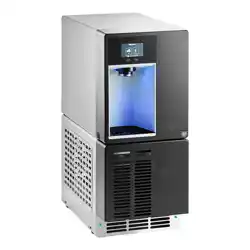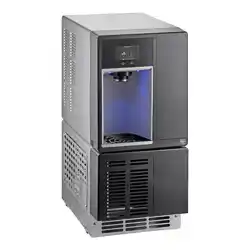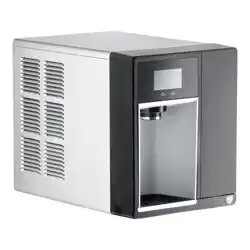
Operation and Service Manual
After serial number K39863
Please visit https://www.follettice.com/technicaldocuments
for the Operation and Service manual for your unit.
Symphony Plus
™
110 Series
Ice and Water Dispensers
110CT425A/W, 110FB425A/W
Installation and Service Videos:
www.follettice.com/servicevideolibrary
01234632R00
801 Church Lane • Easton, PA 18040, USA
Toll free (877) 612-5086 • +1 (610) 252-7301
www.follettice.com
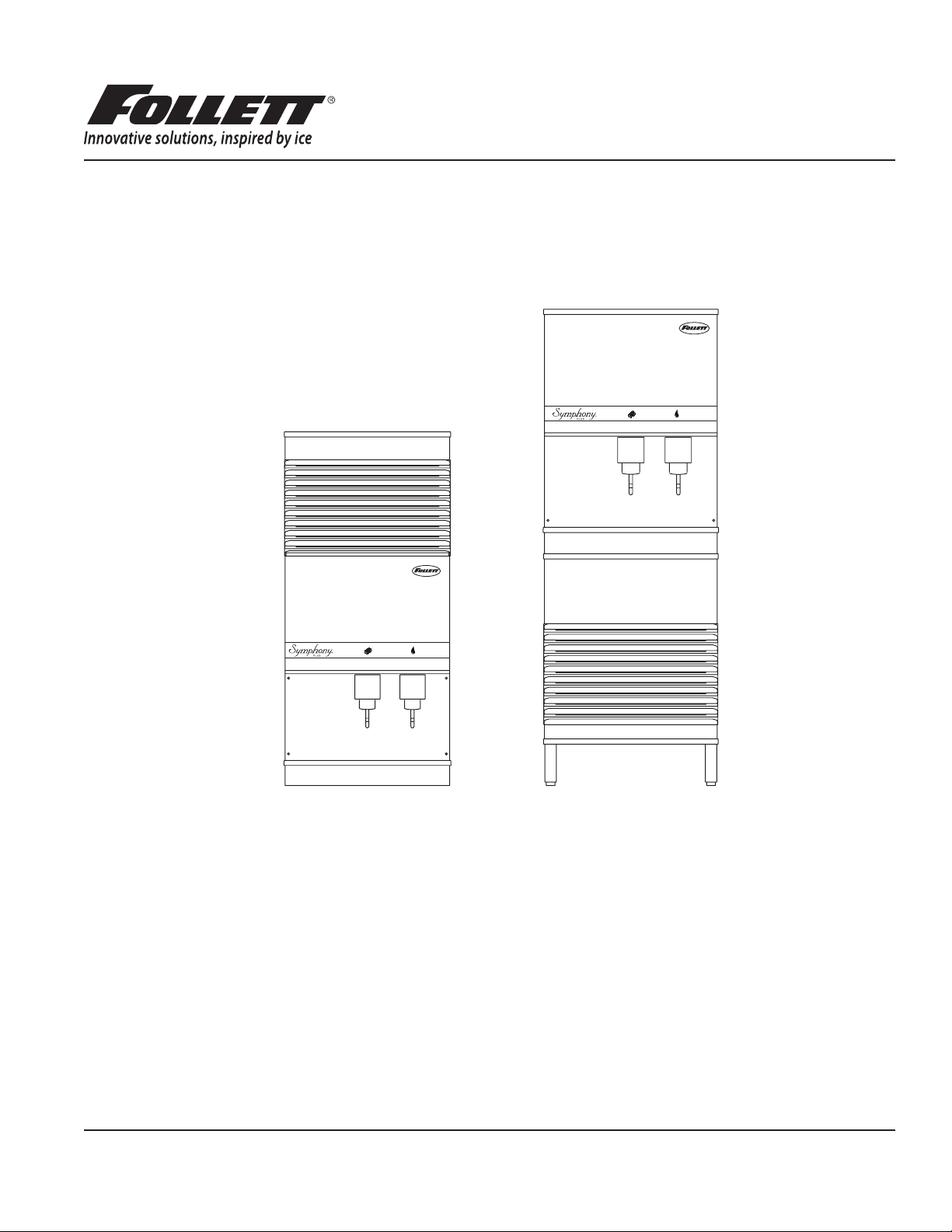
110CT425A/W 110CR425A/W 110FB425A/W
110CT425A/W 110CR425A/W 110FB425A/W
Welcome to Follett
Follett equipment enjoys a well-deserved reputation for excellent performance, long-term reliability and outstanding
after-the-sale support. To ensure that this equipment delivers that same degree of service, review this guide carefully
before you begin your installation.
Should you have need technical help, please call our Technical Service group at (877) 612-5086 or (610) 252-7301.
Please have your model number, serial number and complete and detailed explanation of the problem when
contacting Technical Service.
Getting Started
After uncrating and removing all packing material. Inspect the equipment for concealed shipping damage. All freight
is to be inspected upon delivery. If visible signs of damage exist, please refuse delivery or sign your delivery receipt
"damaged." Follett Customer Service must be notied within 48 hours. Wherever possible, please include detailed
photos of the damage with the original packaging so that we may start the freight claim process.

2 110CT425A/W, 110FB425A/W
Contents
Welcome to Follett. . . . . . . . . . . . . . . . . . . . . . . . . . . . . . . . . . . . . . . . . . . . . . . . . . . . . . . . . . . . . . . . . . . . . . . . . . . 3
Before you begin .......................................................................... 3
Specications .............................................................................. 4
Electrical ................................................................................ 4
Ambient ................................................................................. 4
Plumbing ................................................................................ 4
Ventilation clearances ...................................................................... 5
Approximate shipping weight ................................................................ 5
Installation ................................................................................. 5
Before you begin .......................................................................... 5
Installing freestanding dispensers ............................................................ 5
Installing countertop dispensers .............................................................. 7
Installing top mount ice machines ............................................................ 9
User information ........................................................................... 11
How the dispenser works ...................................................................11
How SensorSAFE infrared dispensing works ...................................................11
Quiet Night™/Sleep cycle (does not apply to CR units) ...........................................11
Cleaning and sanitizing ..................................................................... 12
Weekly ................................................................................ 12
Monthly ................................................................................ 12
Semi-Annually (more often if conditions dictate) ................................................ 13
Ice Machine and Dispenser ................................................................ 13
Service ................................................................................... 16
Lever models ........................................................................... 16
SensorSAFE models ..................................................................... 16
Wiring diagram - Lever .................................................................... 17
Wiring diagram - SensorSAFE .............................................................. 18
Dispenser troubleshooting .................................................................. 19
Lever model troubleshooting guide .......................................................... 19
SensorSAFE model troubleshooting guide .................................................... 20
Disassembly and replacement instructions ..................................................... 21
Ice transport tube replacement – Top mount units ............................................... 22
Ice transport tube replacement – Freestanding and RIDE models .................................. 22
Thermostat replacement ................................................................... 23
Replacement parts ......................................................................... 24
Dispenser exterior ........................................................................ 24
Wheelmotor and drive system .............................................................. 25
Dispense chute and splash panel (models with lever dispensing) .................................. 26
Dispense chute and splash panel (models with SensorSAFE infrared dispensing) ..................... 27
Electrical components .................................................................... 28
Hopper components ...................................................................... 29
Ice transport tubing ....................................................................... 30
Chilled water components ................................................................. 30
Dispenser plumbing connections ............................................................ 31
Solenoid dispense assembly ............................................................... 32
Water treatment accessories for Symphony Plus ice and water dispensers .......................... 33
110CT425A/W, 110FB425A/W 3
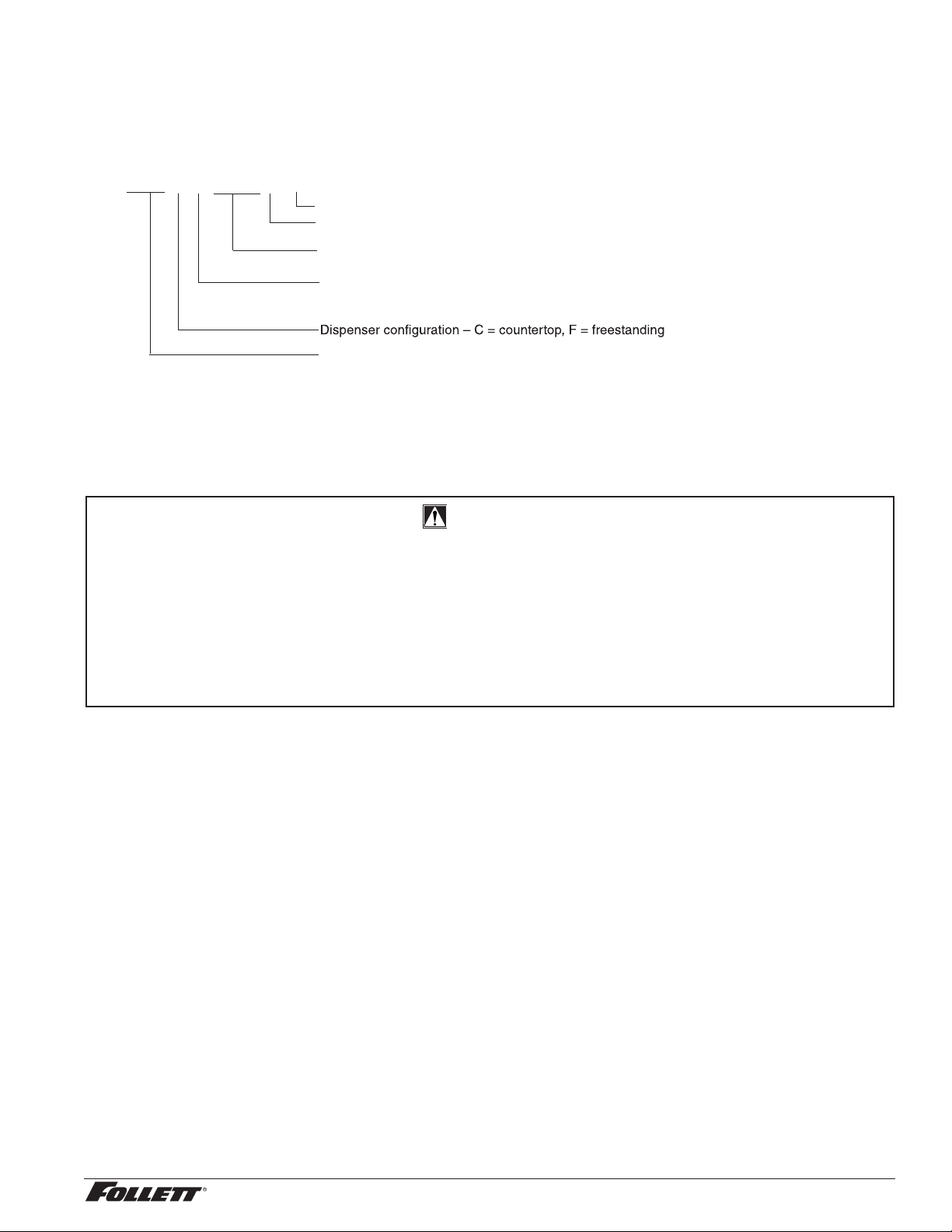
Check your paperwork to determine which model you have. Follett model numbers are designed to provide
information about the type and capacity of Follett ice dispensing equipment. Following is an explanation of the
different model numbers.
Condenser type – A = air-cooled, W = water-cooled
110CT425A-L
Ice machine capacity and refrigerant – 425 = 425 lbs (193 kg)/day, R404a refrigerant
Ice machine location – R = RIDE ice machine, T = integral ice machine in top of cabinet,
B = ice machine in base of freestanding units
Approximate storage capacity in lbs
L = Lever dispensing, S = SensorSAFE infrared dispensing
CAUTION!
§ Do not tilt unit further than 30° off vertical during uncrating or installation.
§ Dispenser bin area contains mechanical, moving parts. Keep hands and arms clear of this area at all times. If
access to this area is required, power to unit must be disconnected rst.
§ Follett recommends a Follett water lter system be installed in the ice machine inlet water line (standard capacity
#00130229, high capacity #00978957, carbonless high capacity #01050442).
§ Prior to operation clean the dispenser in accordance with instructions found in this manual.
§ Ice is slippery. Be sure counters and oors around dispenser are clean, dry and free of ice.
§ Do not block right side air intake or top air exhaust.
4 110CT425A/W, 110FB425A/W
Specications
Electrical
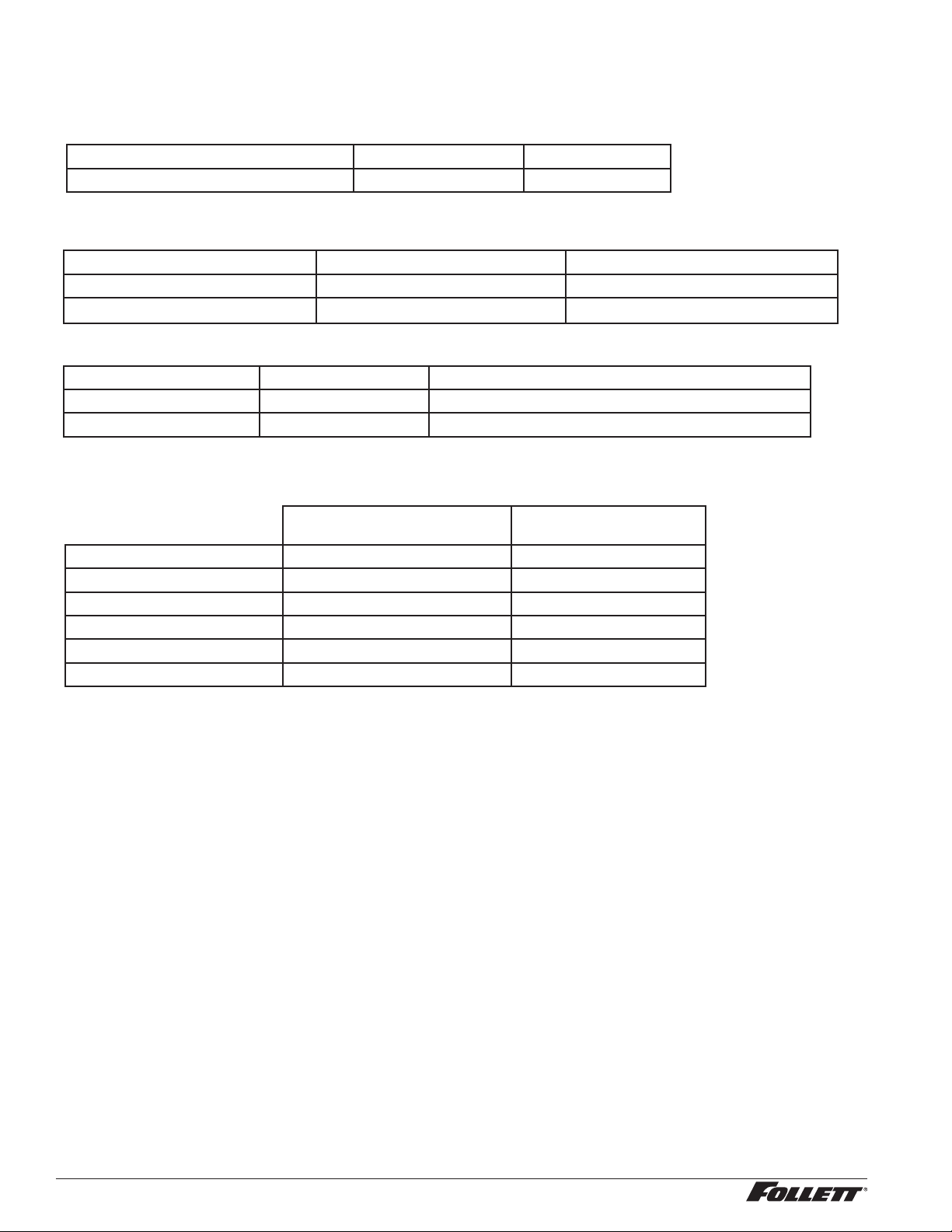
§ Freestanding and countertop models (110FB425A/W, 110CT425A/W) require a dedicated circuit.
Total system Max. circuit
Basic electrical: 115 V/60 Hz/1 phase 11.0A 20A
§ Dispensers and ice machines are supplied with 7-foot power cord with NEMA 5-15 hospital-grade plug. Connect
to a dedicated 15A circuit.
Model Electrical connection Circuits required
110FB425A/W cord & plug provided 115/60/1, 15A max. fuse size
110CT425A/W cord & plug provided 115/60/1, 15A max. fuse size
Ambient
Air temp* 100 F/38 C Max. 50 F/10 C Min. (Best performance below 80 F/27 C)
Water temp
†
90 F/32 C Max. 45 F/7.2 C Min. (Best performance below 70 F/21 C)
Water pressure (psi/bar) 70/5 Max. 10/0.7 Min.
*
Ambient air temperature is measured at the air-cooled condenser coil inlet.
†
Ambient water temperature is measured in the ice machine reservoir.
Plumbing
110CT with integral ice
machine
110FB with ice machine
in base
Dispenser drain 3/4" MPT 3/4" MPT
Ice machine drain 3/4 MPT 3/4" MPT
Dispenser water inlet 3/8" FPT 3/8" FPT
Ice machine water inlet 3/8" FPT —
Cond. inlet – w/c only 3/8" FPT 3/8" FPT
Cond. drain – w/c only 3/8" FPT 3/8" FPT
Note: Water shut-off recommended within 10 ft (3 m) of dispenser. Drain to be hard-piped and insulated. Maintain at
least 1/4" per foot (20 mm per 1 m) run of slope.
Ventilation clearances
§ 110CT425A/W: 6" (15.2 cm) required at top.
Note: 6" (15.2 cm) at each side advised for service.
§ 110FB425A/W: 4" (10.2 cm) required at rear .
Note: 12" (30.5 cm) at top advised for service.
Approximate shipping weight
§ 290 lb (132 kg), base stand: 140 lb (64 kg)

110CT425A/W, 110FB425A/W 5
Installation
Before you begin
§ All dispensers must be installed level in both directions to ensure proper operation.
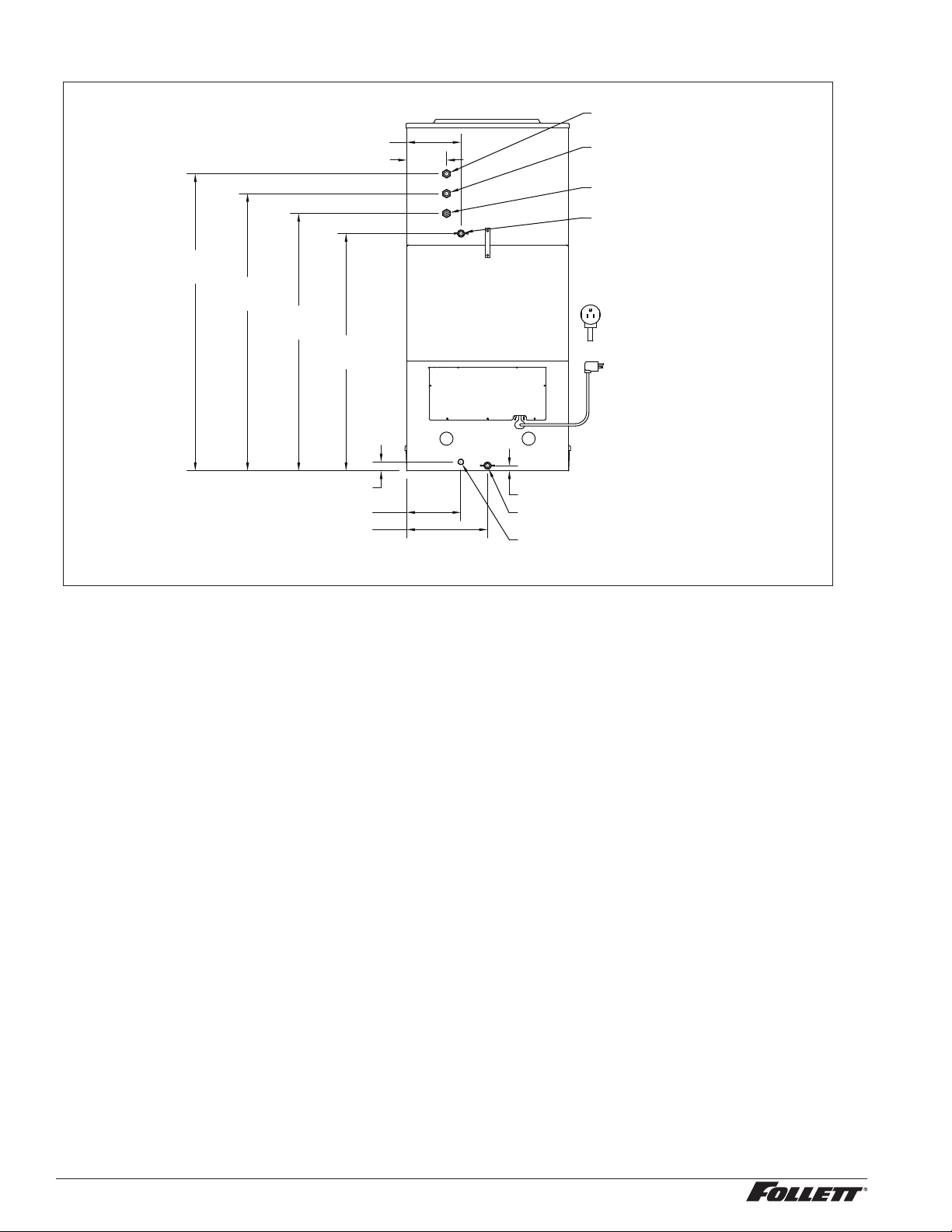
§ All countertop dispensers provide the option of taking utilities out the bottom or back of the dispenser.
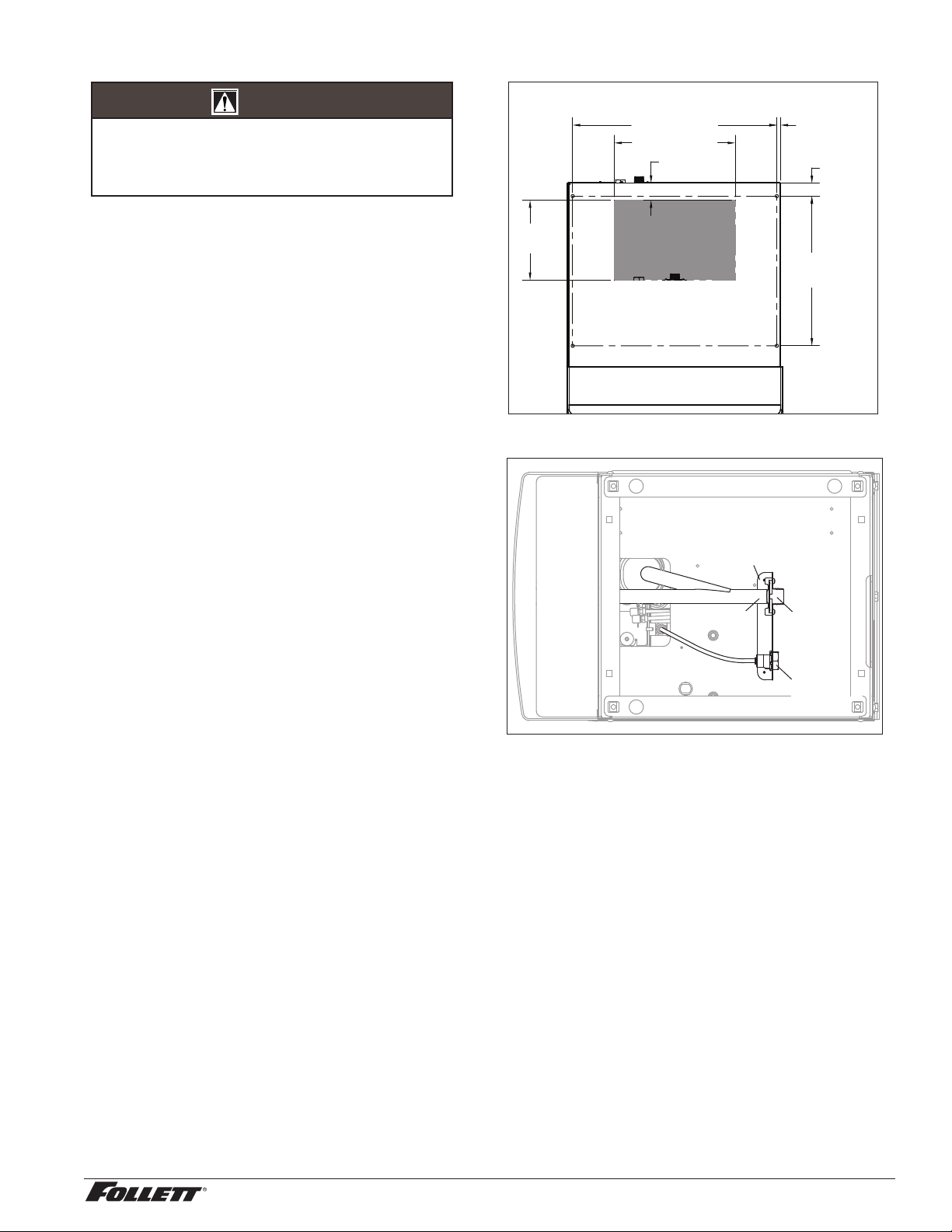
See counter cut-out (Fig. 2) for bottom exiting utilities on units with and without drain pans. For installations
where utilities will exit through back of dispenser, refer to back view drawings.
Installing freestanding dispensers
1. Position dispenser in desired location and adjust legs to level in both directions.
2. Connect water supply to 3/8" FPT tting on back of dispenser (Fig. 1).
3. Connect separate drain lines to 3/4" MPT dispenser drain tting, and 3/4" MPT ice machine drain tting
on back of dispenser.
4. Run drain lines to wall or oor drain. If ice machine drain tting is below an intended wall drain, a
condensate pump must be used.
5. If ice machine is a water-cooled unit, connect water-cooled condenser supply line to 3/8" FPT condenser
inlet tting on back of dispenser.
Note: Do not run condenser supply water through ice machine water lter system.
6. Connect condenser drain line to 3/8" FPT condenser outlet tting on back of dispenser.
Important: Do not connect condenser drain line to any other drain lines.
7. Plug dispenser into 15A rated NEMA 5-15 circuit.
8. Remove front cover of base section by removing two screws at bottom corners of cover. Allow cover to
drop approximately 3/8" (5 mm) and pull forward.
9. Turn on water supply and check for leaks.
6 110CT425A/W, 110FB425A/W
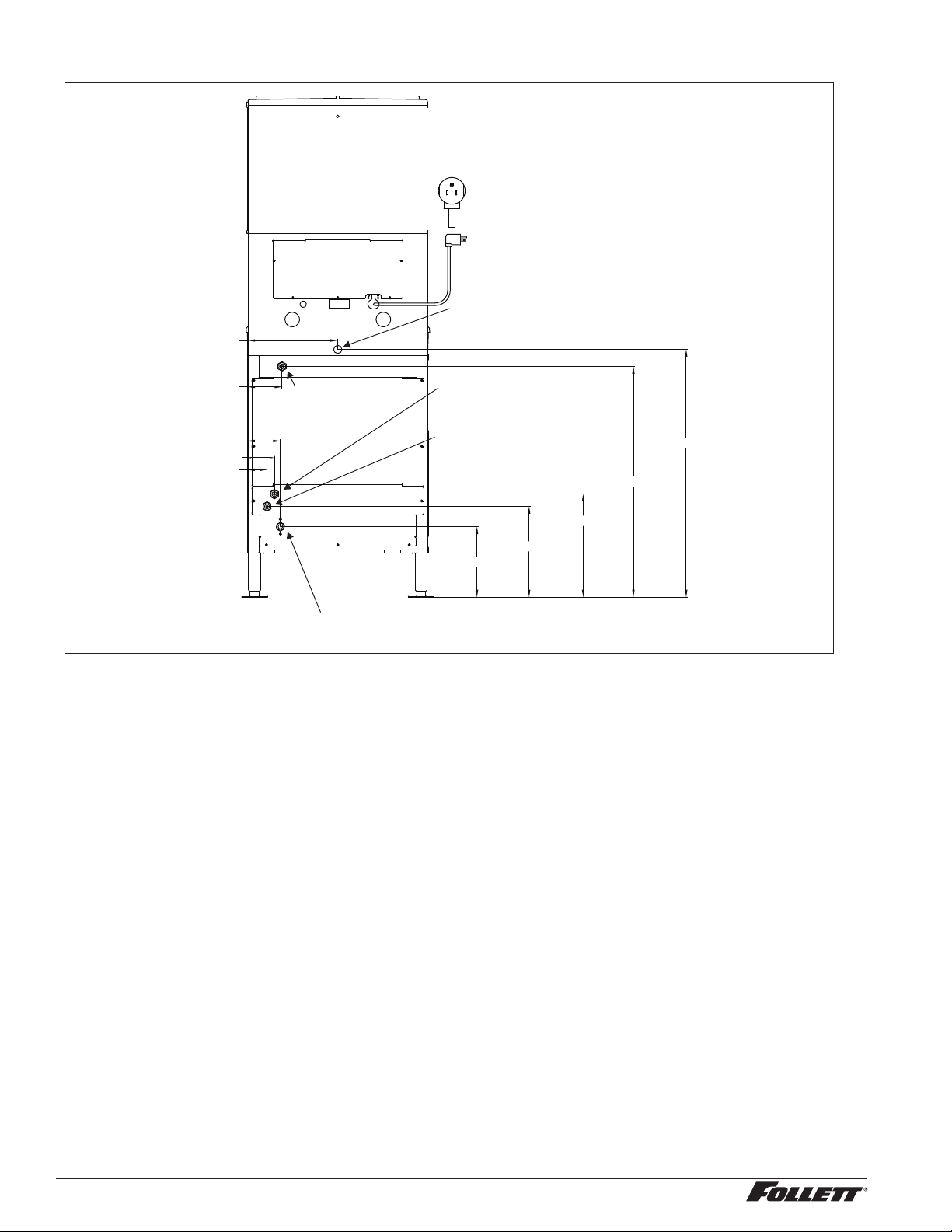
Fig. 1 – Rear connections, freestanding models
3/8" FPT condenser outlet location
(water-cooled only)
3/4" MPT ice machine drain location
access panel
3/8" FPT
water inlet
3/4" MPT drain
power cord
NEMA 5-15
3/8" FPT condenser inlet location
(water-cooled only)
2.75" (6.8 cm)
3.75" (9.3 cm)
4.5" (11.4 cm)
4.75" (11.9 cm)
12.25" (31.2 cm)
33.75" (85.8 cm)
31.5" (80 cm)
14" (35.7 cm)
12.38" (31.4 cm)
9.62" (24.4 cm)
10. Remove top front cover by removing two screws at bottom corners of cover. Lift cover slightly and pull
forward.
11. If dispenser is equipped with SensorSAFE™, remove protective plastic coating from dispense sensor
labels.
12. Turn on dispenser power and bin signal rocker switches. Check dispenser and ice machine operation.
13. Clean ice machine according to instructions in the Cleaning section. Discard ice made during cleaning
process.
14. Turn off ice machine bin signal switch.
15. Remove dispenser hopper lid; clean dispenser according to instructions.
16. Turn ice machine bin signal switch on and replace front covers, securing with screws.
110CT425A/W, 110FB425A/W 7
Installing countertop dispensers
CAUTION!
Dispensers with top mount ice machines cannot
be mounted on legs. They must be bolted to
counter. Use gloves when lifting ice machine to
protect hands from sheet metal edges.
1. Position dispenser in desired location, mark
dispenser outline on counter and remove
dispenser.
2. Regardless of whether utilities will exit
through back or bottom of dispenser, drill
four (4) 3/8" holes in counter to anchor
dispenser to counter (Fig. 2).
Note: Follett countertop dispensers can have any
or all utilities run directly through counter or
out rear of dispenser. For dispensers with
any utilities exiting through counter, make
counter cut-out (Fig. 2).
3. For utilities exiting through bottom only:
(a) Make cut out as shown (Fig. 2).
(b) Move drain tting from back of dispenser
and mount where shown (Fig.3).
(c) Cut drain tube to length and attach to barbed
connection.
(d) Move inlet water tting from back of
dispenser and mount where shown (Fig.3).
(e) Cut water tubing to length and re-insert into
water tting.
Note: Utility connections can be accessed through
front of dispenser by removing stainless
steel splash panel, or by removing access
panel (Fig. 4) on back of dispenser.
Fig. 2
14.00" (35.6 cm)
9.25"
(23.5 cm)
2.00" (5.1 cm)
17.31"
(44.0 cm)
23.63" (60.0 cm)
UNDERSIDE VIEW OF DISPENSER
1.50"
(3.8 cm)
0.44"
(11 mm)
CUTOUT
Fig. 3 – Bottom exiting utilities (countertop units)
bracket
inlet
tting
drain
tting
drain tube
8 110CT425A/W, 110FB425A/W
Fig. 4 – Rear connections, countertop models
12.25" (31 cm)
0.78" (20 mm)
8.22" (20.8 cm)
1.34" (35 mm)
35.91" (91 cm)
38.97" (99 cm)
41.97" (106 cm)
44.97" (114 cm)
6.06" (15.5 cm)
8.22" (201 cm)
DRAIN
3/4" NPT MALE
WATER INLET
(INTERNAL)
3/8" NPT FEMALE
DRAIN
3/4" NPT MALE
POTABLE WATER INLET
3/8" NPT FEMALE
CONDENSER OUTLET
3/8" NPT FEMALE
WATER COOLED ONLY
CONDENSER INLET
3/8" NPT FEMALE
WATER COOLED ONLY
ACCESS PANEL
4. If power is to be supplied through counter cut-out, complete steps 6-9. If power is to be supplied through
rear of dispenser, proceed to step 10.
5. Temporarily remove rear access panel (Fig. 4) from rear of dispenser.
6. Loosen junction box mounting screws. Lift junction box and power cord up until cord and mounting
screws clear notches on rear panel of dispenser. Remove Phillips-head screws from right side of junction
box.
7. Rotate junction box 90 degrees so that screw holes on right side of junction box align with holes on rear
dispenser panel. Secure junction box to dispenser using Phillips-head screws.
8. Place power cord inside dispenser and replace access panel (Fig. 4) to rear of dispenser.
Note: For dispensers to be installed with utilities connected through rear of dispenser, it may be easier to make
preliminary connections before dispenser is set in place.
9. Apply a thick bead, approximately. 1/4" (7 mm) diameter, of NSF listed silicone sealant (Dow-Corning
®
RTV-732 or equivalent) 1/4" (7 mm) inside marked outline of dispenser.
10. Carefully position dispenser on counter.
11. Remove four screws securing splash panel to front of dispenser and gently lay splash panel on counter.
(Water line to solenoid valve can be disconnected from water inlet valve by pushing on ring at end of inlet
tting while pulling on tubing.)
12. Secure dispenser to counter with four 3/8" bolts (supplied by others).
13. Smooth excess sealant around outside of dispenser.
110CT425A/W, 110FB425A/W 9
Installing top mount ice machines
Models 110CT425A/W
CAUTION!
Dispensers with top mount ice machines cannot be mounted on legs. They must be bolted to counter. Use gloves
when lifting ice machine to protect hands from sheet metal edges.
1. Remove dispenser top front cover by removing two screws at bottom corners of cover, lifting cover slightly
and pulling forward.
2. Remove ice machine compartment top and side panels.
3. Remove ice machine hold-down bracket from front of ice machine compartment.
4. Lift ice machine onto dispenser top and slide ice machine completely into position, compressor end rst.
5. Reinstall hold-down bracket on front of ice machine with power cord and bin signal cords in notch. Do not
cut or pinch cords.
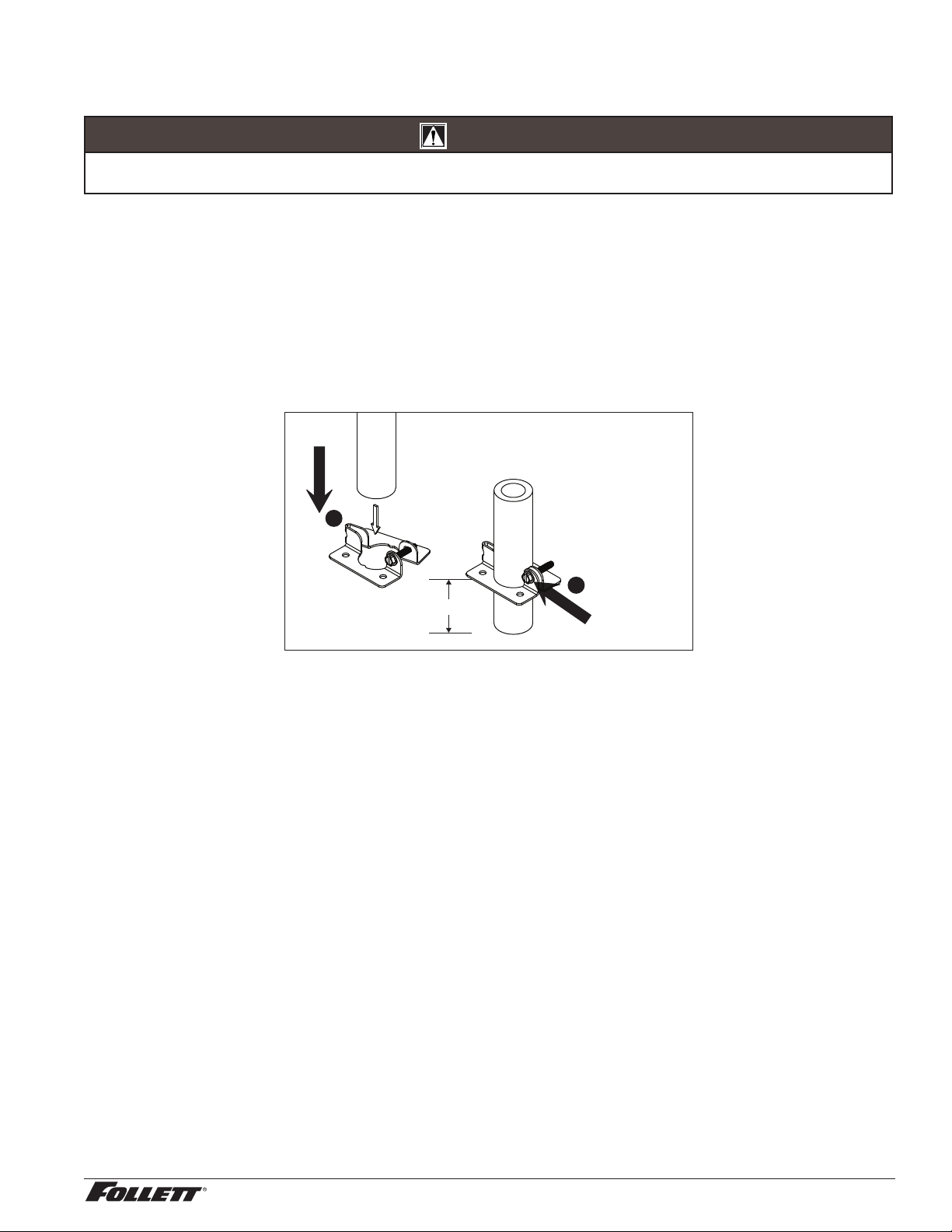
6. Insert loose end of ice transport tube through bracket (on ice machine base) into hopper access hole.
Tighten transport tube clamp screw to secure ice transport tube.
7. Connect plastic water supply line to water ll solenoid.
Tighten clamp
screw
1.00" (2.54 cm)
2
1
3
10 110CT425A/W, 110FB425A/W
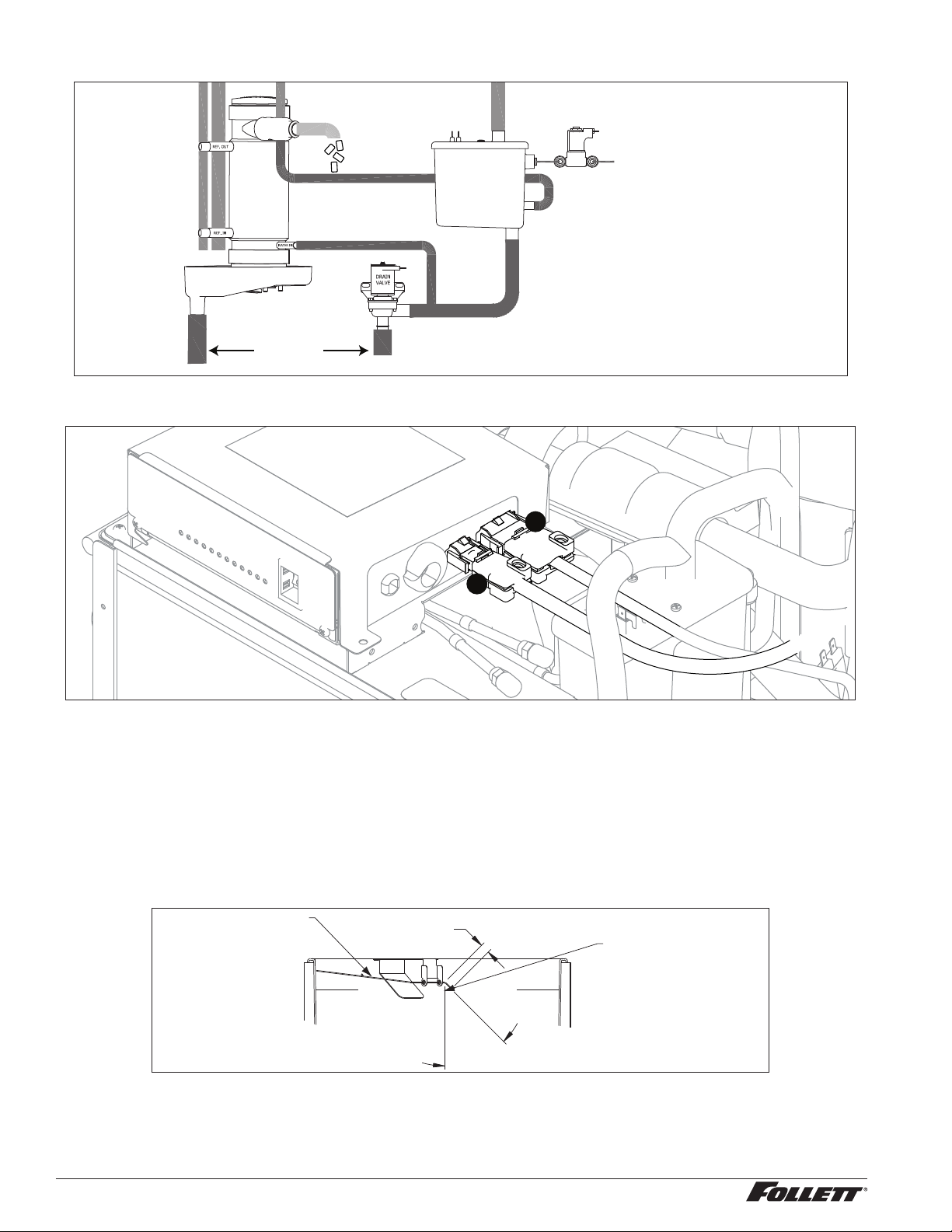
8. Connect molded drain tube to evaporator drain pan, purge solenoid and rear drain tting.
CLEANING CUP
WATER SUPPLY
3/8" FPT, 45-90 F (7-32 C)
10-70 PSI (69-483 KPA)
RESERVOIR FILL
SOLENOID
WATER
RESERVOIR
EVAPORATOR
ICE
NOZZLE
DRAIN PAN
VENT
TO DRAIN CUP
9. Connect dispenser bin signal cable to two-pin receptacle on the ice machine electrical box ➊ and
connect the three-pin receptacle to the ice machine electrical box ➋.
1
2
10. On dispensers equipped with water-cooled ice machines, connect condenser water supply and drain
lines to condenser ttings on ice machine.
11. Turn on water supply and check for leaks.
12. Plug dispenser power cord into 15A rated NEMA 5-15 circuit.
13. If dispenser is equipped with SensorSAFE, remove protective plastic coating from dispense sensor
labels.
14. Turn on power and bin signal rocker switches and test operation.
15. Clean ice machine following instructions in Cleaning section.
16. Remove dispenser hopper access lid and clean dispenser according to instructions.
1 7. Replace front cover and secure with screws. Installation is complete.
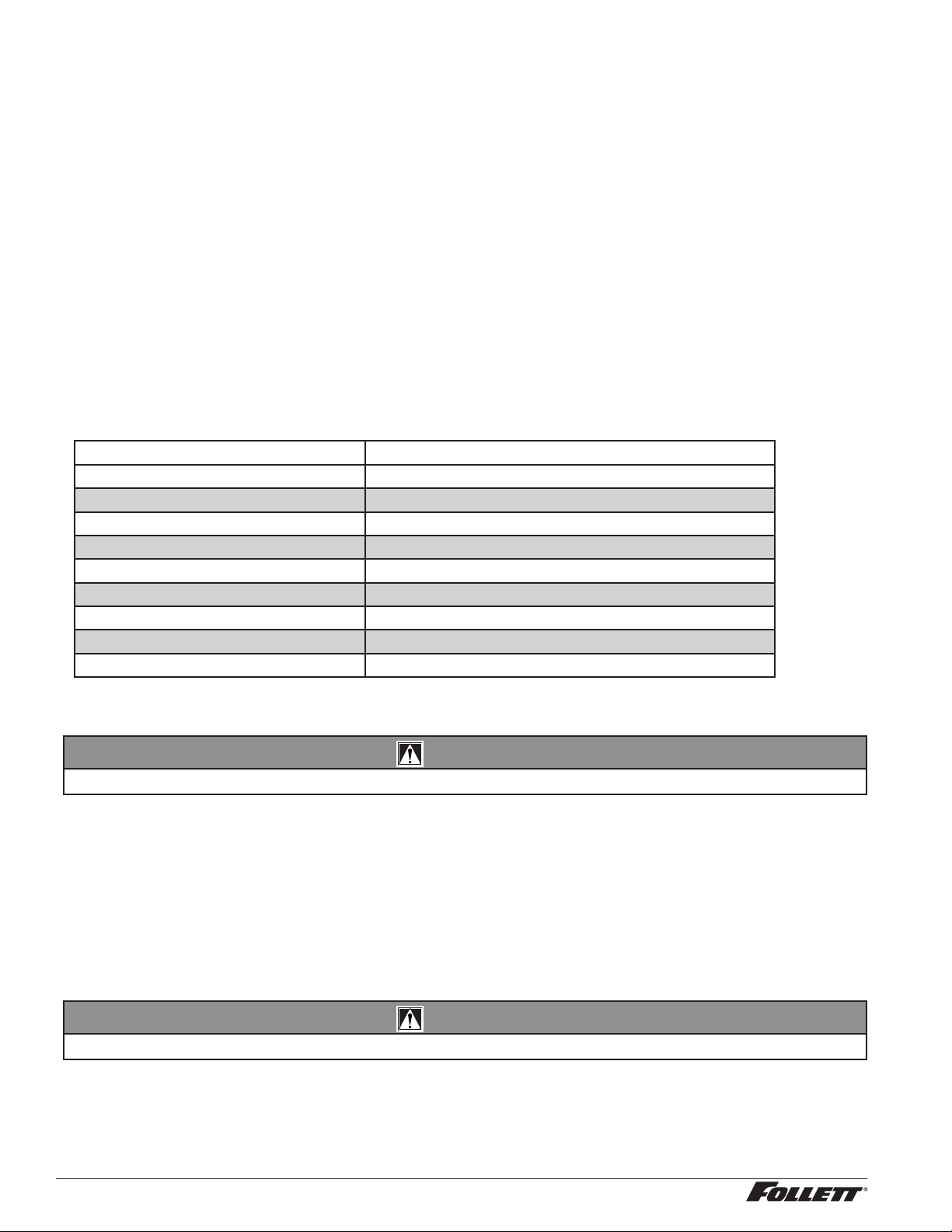
ice level control thermostat
0.75" (19 mm)
Hand bend cap tube
end to approximately
45° as shown
45°

110CT425A/W, 110FB425A/W 11
User information
How the dispenser works
Follett’s 110 series automatic-load ice and water dispensers are equipped with Follett’s 425 lb (193 kg)/day ice
machine. In the continuous icemaking process, water freezes to the inside wall of the evaporator. A rotating
stainless steel auger carries the ice to the top of the evaporator where it is compressed and extruded through an
outlet port. The ice is then pushed through a tube to the storage hopper. When the hopper is full, a bin thermostat
opens and shuts the ice machine off. When the dispense mechanism is activated, a dispense motor is turned on,
causing the wheel to turn. This moves ice to the dispense chute where it drops by gravity into the container held
below the chute.
How SensorSAFE infrared dispensing works
Follett’s SensorSAFE infrared dispensing maximizes sanitation and minimizes the possibility of cross-
contamination by eliminating physical contact between the cup or container and dispenser. Sensors in the panel
use reected infrared light to detect the presence of the container and send a signal to a control board which then
activates the appropriate components for ice or water dispensing.
The SensorSAFE infrared dispensing package includes a cleaning switch under the left side of the front cover
which temporarily shuts off dispensing to allow cleaning of the panel and lenses. If the switch is not turned back on
after cleaning, the dispenser automatically resets after two minutes for normal operation.
SensorSAFE infrared dispensing also includes a time limit safety feature which automatically stops ice dispensing
after one minute of continuous dispensing. Dispensing can be resumed by moving the container away from the
dispenser and returning it to the activation zone.
Quiet Night™/Sleep cycle
The board monitors ice dispensing through a line voltage input to P15. If the ice dispense has not been initiated for
more than 5 seconds during the 20 minute time delay, the SLEEP CYCLE LED comes on. The machine will stay
off for 12 hours unless 5 seconds of dispensing is seen. After 12 hours, the SLEEP CYCLE LED goes out and the
ice making will resume if the bin thermostat is closed. The sleep cycle can be deated using the DIP switches on
the ice machine control board.
12 110CT425A/W, 110FB425A/W
Cleaning and sanitizing
Follett ice machines and dispensers, and their associated cleaning and sanitizing procedures, are designed for
use with potable water sources. The presence, or suspected presence, of infectious agents may call for additional
measures, including the replacement of components and more comprehensive disinfection measures. Follett
recommends that these cleaning and sanitizing procedures be reviewed with the appropriate infectious agent
subject matter experts to assure complete remediation.
Periodic cleaning of Follett’s ice and water dispenser and ice machine system is required to ensure peak
performance and delivery of clean, sanitary ice. The recommended cleaning procedures that follow should be
performed at least as frequently as recommended and more often if environmental conditions dictate.
Follett recommends sanitizing the pressurized water lines prior to cleaning the ice machine/dispenser. Follett
offers two kits: order P/N 01089572 when a Follett lter system with a pre-lter bowl is present, or P/N 01089580
when a Follett lter system is not present. Follow the instructions provided with the respective kits to sanitize the
pressurized water lines immediately before cleaning the ice machine/dispenser.
Cleaning of the condenser can usually be performed by facility personnel. Cleaning of the ice machine system
should be performed by your facility’s trained maintenance staff or a Follett authorized service agent. Regardless
of who performs the cleaning, it is the operator’s responsibility to see that this cleaning is performed according to
the schedule below. Service problems resulting from lack of preventive maintenance will not be covered under the
Follett warranty.
Recommended cleaning intervals*
Symphony Plus Frequency
Drain Line weekly
Drain Pan/Drip Pan weekly
Exterior, Water Station Tube as needed
Condenser monthly (air-cooled only)
Dispenser and Components semi-annually
Ice Machine semi-annually
Transport Tube semi-annually
Ice Storage Area/Bin semi-annually
Pressurized Water Sanitizing semi-annually
* Ice machine and dispenser must be cleaned prior to start-up.
Weekly
CAUTION!
§ Do not use solvents, abrasive cleaners, metal scrapers or sharp objects to clean any part of the dispenser.
Dispenser drain pan and drain line
§ Pour 1 gal. (3.8 L) of hot tap water into drain pan to ush drains.
Splash panel front, SensorSAFE infrared dispensing
1. Deactivate dispensing by pressing and releasing clean switch located on left side of unit under top front
cover.
2. Clean lens and splash panel front using a soft cloth and mild, non-abrasive, non-chlorine based cleaner.
3. Reactivate dispensing by pressing and releasing clean switch again.
Monthly
CAUTION!
§ Do not use solvents, abrasive cleaners, metal scrapers or sharp objects to clean any part of the dispenser.
Condenser (air-cooled ice machine only)
§ Use a vacuum cleaner or stiff brush to carefully clean condenser coils of lint and debris to ensure optimal
performance.
110CT425A/W, 110FB425A/W 13
Semi-Annually (more often if conditions dictate)
§ A cleaning procedure should always include both the ice machine and dispenser.
§ Icemaking system can be cleaned in place.
CAUTION!
§ Wear rubber gloves and safety goggles (or face shield) when handling SafeCLEAN Plus™ and IMS-III solutions.
§ Use only Follett approved cleaners.
§ It is a violation of Federal law to use the Nu-Calgon
®
IMS-III solution in a manner inconsistent with its labeling.
§ Do not use solvents, abrasive cleaners, metal scrapers or sharp objects to clean any part of the dispenser.
Cleaning Tool Checklist
§ (1 or 2) 1.5 gallon (or larger) plastic bucket
§ (2) clean cloths
§ Sanitary gloves
§ Safety glasses
§ (2) SaniSponge™ (P/N 00131524 - single sponge)
§ SafeCLEAN Plus ice machine cleaner
§ [OPTIONAL] Nu-Calgon IMS-III no-rinse sanitizer (P/N 00979674 – 16 oz. bottle)
SafeCLEAN Plus Solution: Follow the directions on the SafeCLEAN Plus packaging to mix 1 gal. (3.8 L) of
Follett SafeCLEAN Plus solution. Use 100 F (38 C) water.
[OPTIONAL] No-rinse Sanitizing Solution: Follow the directions on the Nu-Calgon IMS-III packaging to mix
1gal. (3.8 L) of IMS-III solution. Use 100 F (38 C) water.
Ice Machine and Dispenser
Cleaning Procedure
Note: Check drains and drain cup to ensure they are open and owing freely.
1. If ice machine was running recently, ensure that the evaporator is completely free of ice before
proceeding. If there is ice in the evaporator, complete steps 2-7 using only hot water to remove the ice,
then begin Cleaning Procedure again.
2. Remove front cover and turn OFF bin signal switch.
3. Dispense all ice from storage hopper and discard.
4. Remove splash panel.
5. Press CLEAN switch. The MAINTENANCE light will turn on and the machine will drain. Wait for the LOW
WATER light to turn on.
6. Remove lid from cleaning cup and ll (about 1 quart) until SafeCLEAN Plus solution completely lls the
reservoir. Place lid back on cup. Save remainder of SafeCLEAN Plus solution.
7. CLEANER FULL light will turn on and machine will start cleaning cycle then rinse three times; this
process takes approximately 15 minutes.

14 110CT425A/W, 110FB425A/W
8. While ice machine is cleaning, clean dispenser as follows:
a. Turn OFF dispenser power.
b. Remove hopper lid.
c. Remove knurled nuts from front of storage hopper.
d. Remove stud assembly, baffle, wheel, and any remaining ice.
e. Remove dispense chutes from splash panel.
f. Submerse drain grille in SafeCLEAN Plus solution and allow to soak to remove any scale buildup.
g. Wipe inside of hopper lid, stud assembly, baffle, wheel, inside of storage area, dispense chutes, drain grille
and drain pan with damp cloth wrung out in SafeCLEAN Plus solution. Thoroughly rinse all parts with damp
cloth wrung out with clean water.
Note: To avoid possible damage to motor assembly, only use a damp cloth to clean storage hopper. Do
not allow water to run through motor shaft hole in bottom of hopper.
9. When machine is nished cleaning, the MAINTENANCE light will turn off.
Finish cleaning – SafeCLEAN Plus only
10. If the dispenser is not equipped with a Chilled Water Accessory, skip to Step11.
a. Remove four screws securing splash panel.
b. Disconnect 3/4" (19 mm) drain line from bottom of chilled water canister.
c. Loosen (do not remove) screw securing front bracket of chilled water canister to bottom of dispenser
hopper.
d. Rotate canister clockwise to release front bracket, then pull canister forward to disengage rear bracket.
e. Remove chilled water coil from canister and clean with cloth wrung out in
SafeCLEAN Plus
solution.
f. Wipe inside of chilled water canister with cloth wrung out in
SafeCLEAN Plus
solution.
g. Rinse all above items with damp cloth wrung out in clear water.
h. Reinstall chilled water coil into canister (rubber alignment grommet on coil tubing must be located outside
chilled water canister to hold coil securely against canister wall).
i. Reinstall chilled water assembly on dispenser and tighten screw securing front bracket.
j. Reconnect 3/4" (19 mm) drain line to chilled water canister.
11. Reinstall dispense chutes, wheel, baffle, stud assembly and knurled nuts.
12. Remove top bearing insulation. Loosen Phillips-head screw on nozzle connected to evaporator. Remove
nozzle from evaporator side only, leave other side of nozzle connected to transport tube.
13. Soak one SaniSponge in remaining SafeCLEAN Plus solution.
14. Insert the sponge soaked in cleaning solution into nozzle then insert a dry sponge into the nozzle.
15. Replace nozzle onto evaporator and tighten screw. Ensure drain is connected to reservoir and vent tubes
are connected to evaporator drain pan. Replace top bearing insulation.
16. Turn ON bin signal switch. Wait for ice to push sponges through transport tube.
1 7. Collect sponges from ice storage bin.
18. Replace hopper lid, machine top, turn ON dispenser power and install front cover.
19. After 10 minutes, dispense all ice and discard.

110CT425A/W, 110FB425A/W 15
[OPTIONAL] Finish cleaning – No-rinse sanitizing with Nu-Calgon IMS-III
10. Press CLEAN switch. The MAINTENANCE light will turn on and the machine will drain. Wait for the LOW
WATER light to turn on.
11. Remove lid from cleaning cup and ll (about 1 quart) until sanitizing solution completely lls the reservoir.
Place lid back on cup. Save remainder of sanitizing solution.
12. CLEANER FULL light will turn on and machine will start sanitizing cycle then rinse three times; this
process takes approximately 15 minutes.
13. While ice machine is sanitizing, clean dispenser as follows:
a. Wipe inside of hopper lid, stud assembly, baffle, wheel, inside of storage area, dispense chutes, drain grille
and drain pan with damp cloth wrung out in sanitizing solution. Do not rinse off the sanitizing solution.
Note: To avoid possible damage to motor assembly, only use a damp cloth to clean storage hopper. Do
not allow water to run through motor shaft hole in bottom of hopper.
14. Reinstall dispense chutes, wheel, baffle, stud assembly and knurled nuts.
15. When machine is nished rinsing, the MAINTENANCE light will turn off.
16. If the dispenser is not equipped with a Chilled Water Accessory, skip to Step17.
a. Remove four screws securing splash panel.
b. Disconnect 3/4" (19 mm) drain line from bottom of chilled water canister.
c. Loosen (do not remove) screw securing front bracket of chilled water canister to bottom of dispenser
hopper.
d. Rotate canister clockwise to release front bracket, then pull canister forward to disengage rear bracket.
e. Remove chilled water coil from canister and clean with cloth wrung out in sanitizing solution.
f. Wipe inside of chilled water canister with cloth wrung out in sanitizing solution.
g. Do not rinse off the sanitizing solution.
h. Reinstall chilled water coil into canister (rubber alignment grommet on coil tubing must be located outside
chilled water canister to hold coil securely against canister wall).
i. Reinstall chilled water assembly on dispenser and tighten screw securing front bracket.
j. Reconnect 3/4" (19 mm) drain line to chilled water canister.
1 7. Remove top bearing insulation. Loosen Phillips-head screw on nozzle connected to evaporator. Remove
nozzle from evaporator side only, leave other side of nozzle connected to transport tube.
18. Soak one SaniSponge in remaining sanitizing solution. Insert the sponge soaked in sanitizing solution
into nozzle then insert a dry sponge into the nozzle.
19. Replace nozzle onto evaporator and tighten screw. Ensure drain is connected to reservoir and vent tubes
are connected to evaporator drain pan. Replace top bearing insulation.
20. Turn ON bin signal switch. Wait for ice to push sponges through transport tube.
2 1. Collect sponges from ice storage bin.
22. Replace hopper lid, machine top, and install front cover.
23. After 10 minutes, dispense all ice and discard.
User Interface and Exterior Cabinet
§ Clean stainless steel panels with stainless steel cleaner.

16 110CT425A/W, 110FB425A/W
Service
Lever models
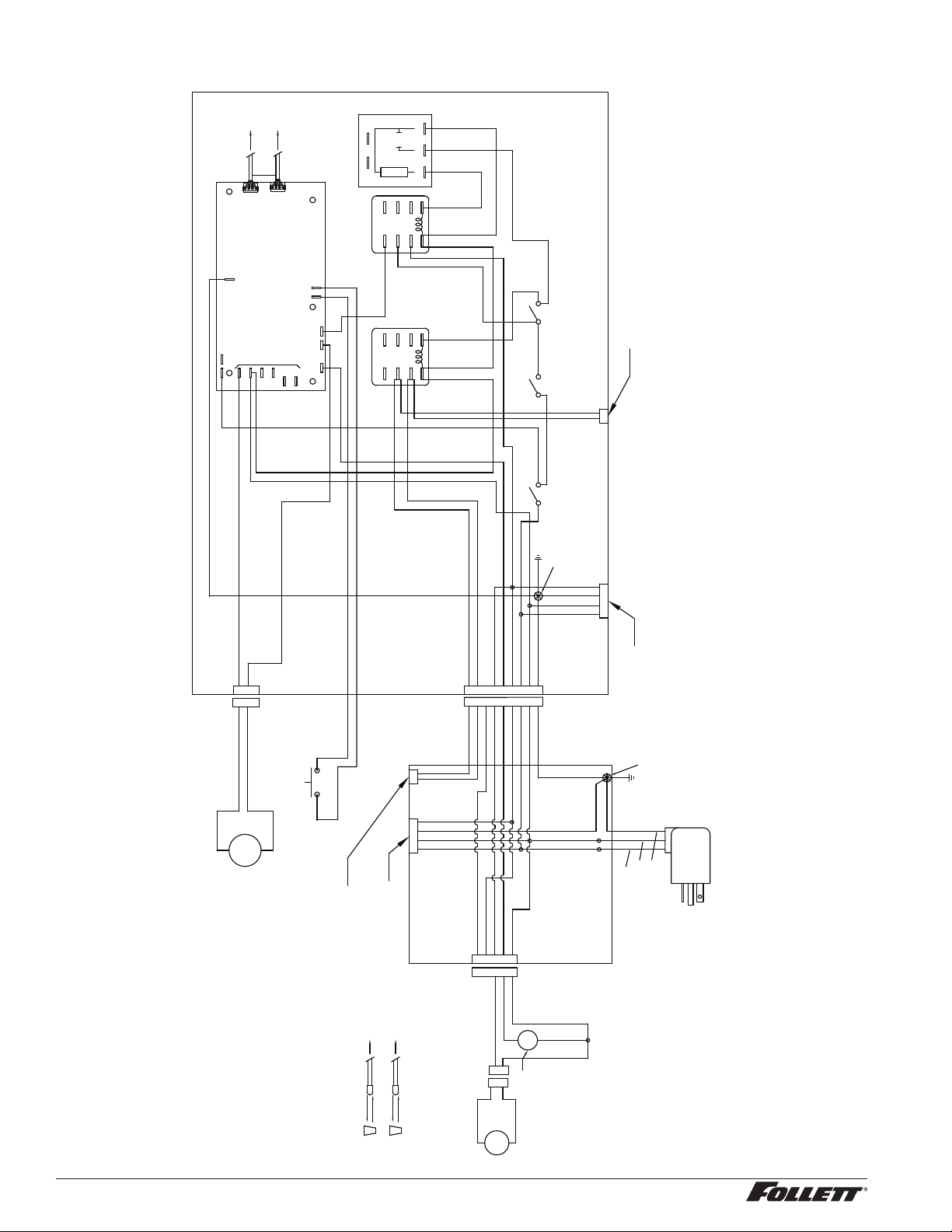
The dispense wheelmotor is energized through the power and ice dispense switches. The water solenoid valve is
energized through the power and water dispense switches. The ice machine is controlled through an unpowered
contact closure bin thermostat circuit. When ice builds up around the bin thermostat, the contacts open, cutting the
bin signal to the ice machine.
SensorSAFE models
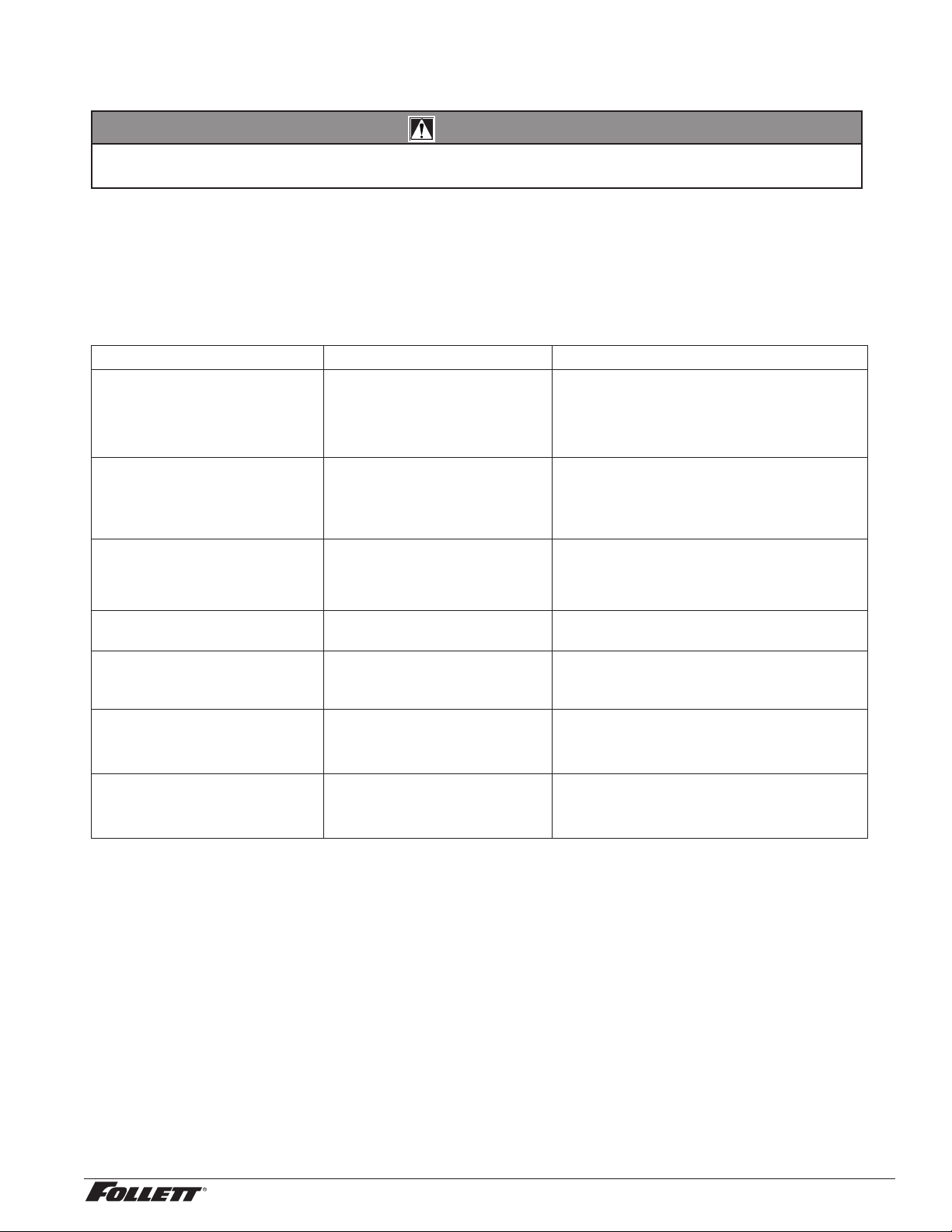
SensorSAFE models provide “touchless” ice and water dispensing. When a container is placed within the actuation
zone below the ice or water chute on SensorSAFE dispenser models, an infrared signal reects off the container
and is detected by the sensor. The sensor then sends a signal to the control board to activate the appropriate
components to dispense ice or water. LEDs on the board indicate when the board is receiving a signal from the
sensors.
A safety, shut-off feature automatically shuts off dispensing after one minute of continuous activation. Dispensing
can be restarted by moving the container away and then returning it to the actuation zone.
Dispensing can be temporarily suspended for cleaning by depressing and releasing the clean switch, located
under the left side of the top front cover. Depressing and releasing the button a second time will return the
dispenser to normal operating state. If the clean switch is not depressed a second time, the dispenser will
automatically resume normal dispense operation (CLN LED goes out) after two minutes. An LED on the control
board will light to indicate that the dispensing has been suspended by activation of the clean switch.
110CT425A/W, 110FB425A/W 17
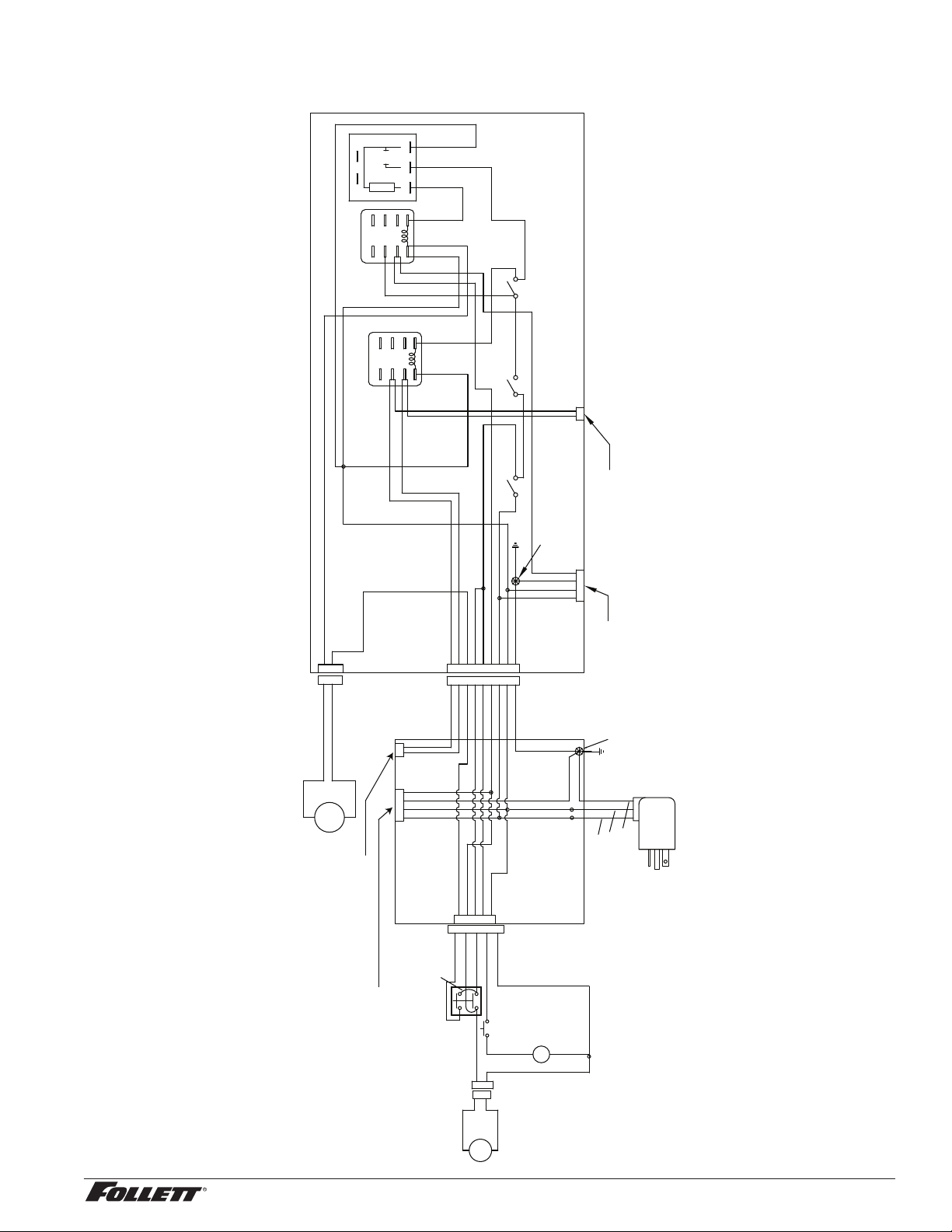
Wiring diagram - Lever
4
2
3
1
8
9
5
7
6
T-STAT
BIN
SIGNAL
SWITCH
1 2 3 4
POWER
SWITCH
1 2
NO
NC
COM
RELAY 2
7
A
1
4
INPUT
LOAD
9
B
1 2 3
3
6
TIMER
NO
NC
COM
RELAY 1
7
A
1
4
9
B
3
6
107 BLACK41GREEN
43 BLACK
49 BLACK
44 RED
45 BLUE
46 PURPLE
42 WHITE
48 WHITE
93 BLACK
94 WHITE
95 GREEN
96 BLACK
117 BLACK
114 WHITE
117 BLACK
110 PURPLE
118 WHITE
104 WHITE
44 RED
108 BLACK
109 BLACK
99 BLACK
102 WHITE
101 BLACK
98 BLACK
97 WHITE
100 BLUE
111 WHITE
47 ORANGE
CT ICE
MACHINE
POWER
CT ICE MACHINE
BIN SIGNAL
(CONTACT CLOSURE)
2
3
1
102 WHITE
104 WHITE
114 WHITE
118 WHITE
111 WHITE
47 ORANGE
110 PURPLE
4
SCREW
GROUND
1
3
2
1 2
7
6
5
8
39 BLACK
38 BLACK
9
31 GREEN
32 WHITE
33 BLACK
39 BLACK
38 WHITE
34 RED
35 BLUE
36 PURPLE
37 ORANGE
1 2 3 4
74 GREEN
75 BLACK
72 BLACK
73 WHITE
NEUTRAL-WHITE
GROUND-GREEN
115/1/60-BLACK
1
POWER
BOX
4x4
4
2
3
5
77 RED
35 BLUE
37 ORANGE
76 WHITE
36 PURPLE
74 GREEN
79 BLACK
78 WHITE
100 BLUE
96 BLACK
GROUND
SCREW
1
2
M
DISPENSE
MOTOR
91 WHITE
92 PURPLE
LEVER DISPENSERS
SPLASH PANEL
LEVER DISPENSERS
CONTROL BOX
S
2
3
1
WHITE
ORANGE
DISPENSE GATE SOLENOID
FB/CR ICE MACHINE BIN SIGNAL
(CONTACT CLOSURE)
FB/CR ICE MACHINE POWER
1
4
2
3
5
S
87 WHITE
86 WHITE
88 BLUE
89 PURPLE
85 ORANGE
82 BLUE
83 PURPLE
81 WHITE
84 RED
ICE
STATION
SWITCH
WATER
SOLENOID
90 PURPLE
WATER
STATION
SWITCH
1
2
18 110CT425A/W, 110FB425A/W
Wiring diagram - SensorSAFE
ICE
NEUTRAL
WM
SOL
WTR
CLN
WTR
TO
SPLASH
PANEL
L1
GND
4
2
3
1
8
9
5
7
6
T-STAT
BIN
SIGNAL
SWITCH
1 2 3 4
POWER
SWITCH
1 2
NO
NC
COM
RELAY 2
7
A
1
4
INPUT
LOAD
9
B
1 2 3
3
6
TIMER
NO
NC
COM
RELAY 1
7
A
1
4
9
B
3
6
107 BLACK41 GREEN
43 BLACK
49 BLACK
44 RED
45 BLUE
46 PURPLE
42 WHITE
48 WHITE
93 BLACK
94 WHITE
95 GREEN
96 BLACK
45 BLUE
116 PURPLE
108 BLACK
117 BLACK
118 WHITE
114 WHITE
117 BLACK
110 PURPLE
118 WHITE
110 PURPLE
114 WHITE
104 WHITE
116 PURPLE
108 BLACK
119 PURPLE
109 BLACK
104 WHITE
102 WHITE
99 BLACK
102 WHITE
101 BLACK
98 BLACK
97 WHITE
100 BLACK
103 GREEN
100 BLACK
111 WHITE
112 ORANGE
105 WHITE
106 BLACK
CT ICE
MACHINE
POWER
CT ICE MACHINE
BIN SIGNAL
(CONTACT CLOSURE)
2
3
1
GROUND
SCREW
WATER SENSOR
ICE SENSOR
BOX
TO
SensorSAFE
DISPENSERS
SPLASH PANEL
SensorSAFE
DISPENSERS
CONTROL BOX
CLEAN
SWITCH
4
SCREW
GROUND
1
3
2
1 2
7
6
5
8
39 BLACK
38 BLACK
9
31 GREEN
32 WHITE
33 BLACK
39 BLACK
38 WHITE
34 RED
35 BLUE
36 PURPLE
37 ORANGE
1 2 3 4
74 GREEN
75 BLACK
72 BLACK
73 WHITE
NEUTRAL-WHITE
GROUND-GREEN
115/1/60-BLACK
FB/CR ICE
MACHINE
POWER
FB/CR ICE
MACHINE
BIN SIGNAL
(CONTACT CLOSURE)
1
POWER
BOX
4x4
4
2
3
5
77 RED
35 BLUE
37 ORANGE
76 WHITE
36 PURPLE
74 GREEN
79 BLACK
78 WHITE
1
4
2
3
5
S
1
2
87 WHITE
86 WHITE
82 BLUE
83 PURPLE
81 WHITE
WATER
SOLENOID
1
2
M
DISPENSE
MOTOR
91 WHITE
92 PURPLE
S
2
3
1
WHITE
ORANGE
DISPENSE GATE SOLENOID
110CT425A/W, 110FB425A/W 19
Dispenser troubleshooting
CAUTION!
§ Disconnect power to unit before putting hands or arms in storage area or attempting any repair or service to
equipment.
Before calling for service
1. Check that no ice is in the dispenser bin area.
2. Check that congealed ice is not causing a jam.
3. Check that all switches and circuit breakers are on.
4. Check that all drains are clear.
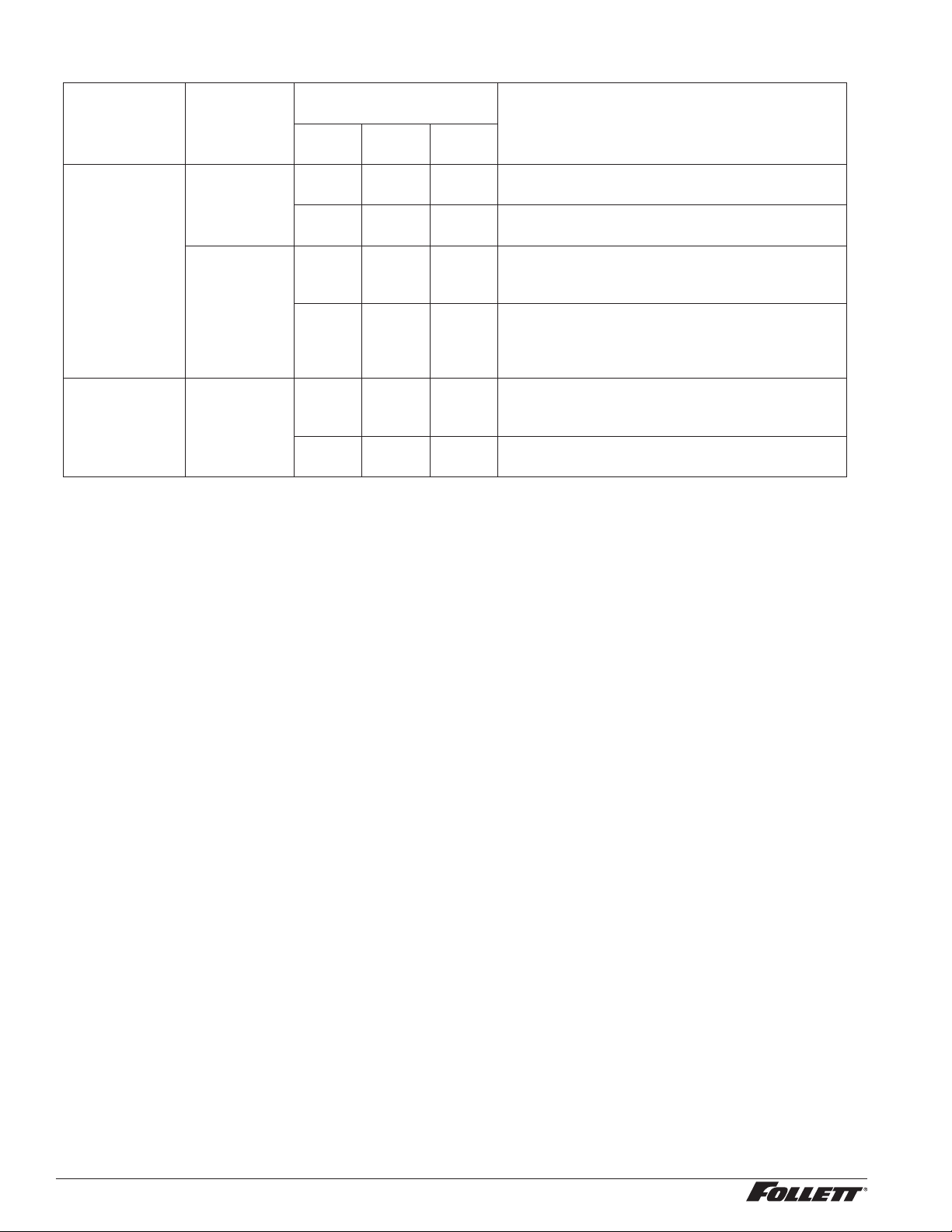
Lever model troubleshooting guide
Problem Indicators Corrective Action
Does not dispense ice. 1. Power switch off or faulty.
2. Faulty dispense switch.
3. Wheel motor malfunction.
1. Check switch – turn on or replace if
faulty.
2. Replace switch.
3. Check motor and capacitor and replace.
Does not dispense water. 1. Dispense switch contacts
burned shut.
2. Debris preventing valve from
closing.
1. Replace water solenoid valve.
2. Replace dispense switch.
3. Check switch - turn on or replace if faulty.
Water runs continuously. 1. Faulty water solenoid valve.
2. Faulty dispense switch.
3. Power switch off or faulty.
1. Check switch and replace if faulty.
2 Remove and clean valve.
Dispense wheel rotates
continuously.
Dispense switch contacts are
burned out.
Replace dispense switch.
Ice machine runs continuously. Faulty or incorrectly positioned
bin stat.
Check for proper positioning. If stat does
not open when ice is placed on capillary
tube, replace stat.
Ice dispenses by itself. 1. Baffle not adjusted properly.
2. Faulty dispense switch.
1. See Adjustment Instructions in Operation
and Service manual.
2. Replace dispense switch.
Not making ice. 1. Dispenser is in sleep mode. 1. Verify sleep mode LED is illuminated on
control board.
2. Dispense ice for 5 seconds to reset.
20 110CT425A/W, 110FB425A/W
SensorSAFE model troubleshooting guide
Problem Action
SensorSAFE Board LED
Status
Corrective ActionPWR CLN
ICE/
WTR
Does not
dispense ice
and/or water.
Check
LEDs on the
SensorSAFE
control board.
OFF OFF OFF Check circuit breakers and power switch.
Restore power or replace defective switch.
ON ON OFF Press clean switch on lower left side of electrical
enclosure to return board to normal operation.
Place cup
under drop
zone (in front
of lens).
ON OFF OFF Troubleshoot appropriate lens/sensor
and replace if required (see lens/sensor
troubleshooting).
ON OFF ON Verify power on appropriate output terminal
(WTR or WM) on control board and replace
board if required. If board tests okay,
troubleshoot appropriate dispenser component.
Dispenses ice
and/or water
continuously.
Check LEDs
on control
board.
ON OFF ON Troubleshoot appropriate lens/sensor
and replace if required (see lens/sensor
troubleshooting).
ON OFF OFF If there is power on any output terminal (WTR or
WM) on control board, replace board.
Board guide
LEDs, when illuminated, indicate the following: PWR (board power), CLN (cleaning, no dispensing cycle), ICE (ice
dispensing activated), WTR (water dispensing activated).
Terminals: LI (incoming power, hot), L2 (neutral terminals), WTR (power terminal for water solenoid), WM (power
terminal for wheelmotor), CLN (terminals for clean cycle switch).
Note: SOL terminal not used in 12 series dispensers.
Lens/sensor troubleshooting
1. Turn dispenser power switch off and remove splash panel.
2. Disconnect wires from WTR and WM terminals on board.
3. Gently remove sensor/mounting block from splash panel.
4. Inspect lens and sensor, clean if necessary.
5. Restore dispenser power and test sensor by passing hand in front of sensor.
6. If LED on board turns on, sensor is operational. Re-assemble dispenser.
7. If LED does not come on switch sensor leads on board and retest.
8. If opposite LED comes on – replace defective board.
9. If opposite LED does not come on – replace defective sensor.
110CT425A/W, 110FB425A/W 21
Disassembly and replacement instructions
Dispense chute removal
1. Remove dispenser front cover.
2. Slide plastic dispense chute up and out to
remove.
Dispense wheel and drive bar removal
1. Remove all ice from storage area of
dispenser.
2. Remove center thumbnut from dispense
wheel.
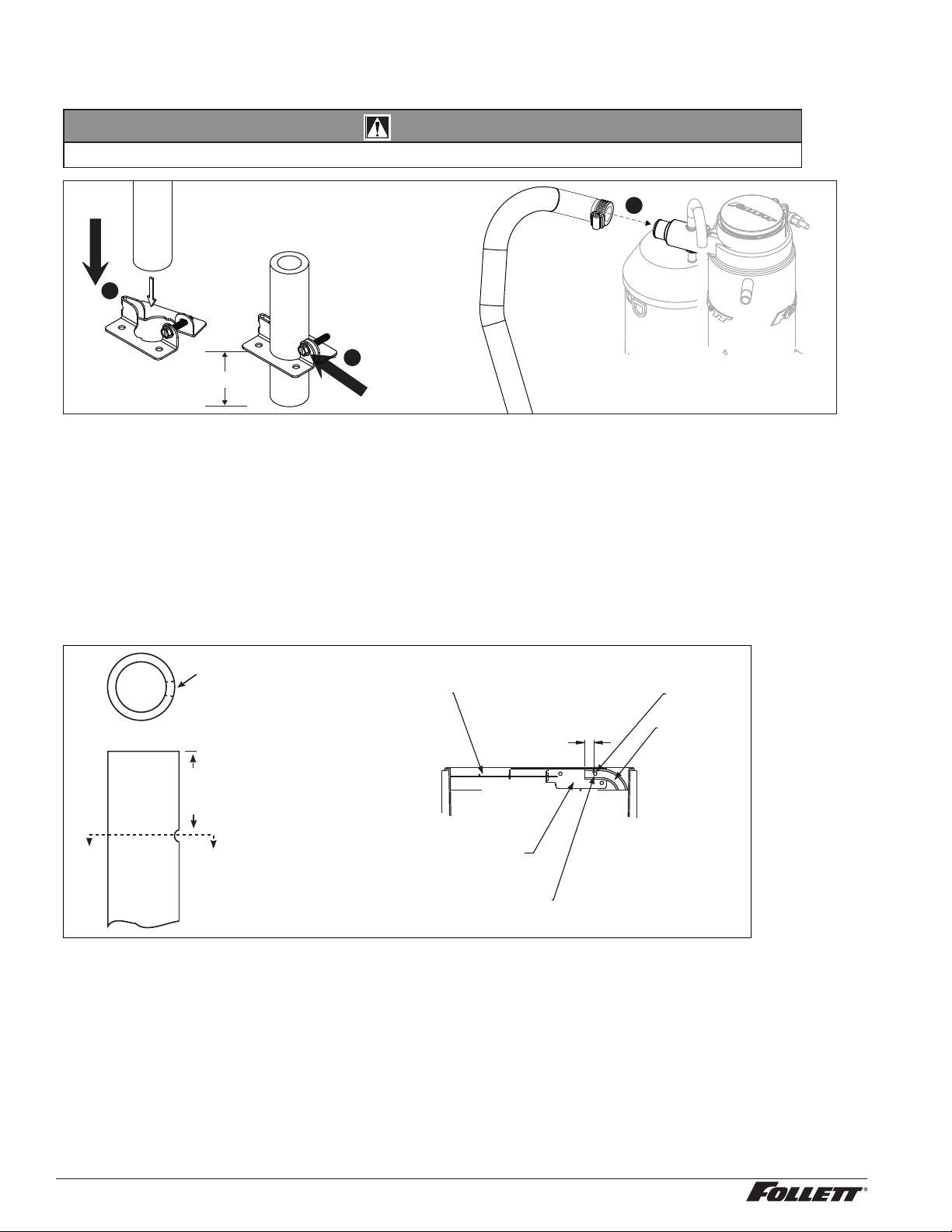
3. Remove thumbnuts holding baffle inside bin
and remove baffle.
4. Tilt rear of wheel up and lift off motor drive
shaft.
5. After reinstalling wheel, secure baffle
loosely with thumbnuts, but do not tighten.
6. Place a 1/8" (3.2 mm) spacer against wheel
and allow baffle to drop until it touches
spacer.
7. Tighten thumbnuts and remove spacer.
Drive bar removal
1. Remove dispense wheel from dispenser
(see above).
2. Pull drive bar out of its channel in bottom of
wheel.
Wheelmotor removal
1. Shut water off. Remove front cover.
2. Remove dispense wheel and dispense
chute covers (see above).
3. Remove splash panel. Water line to
solenoid valve can be disconnected from
water inlet valve by pulling on ring at end of
inlet tting.
4. Disconnect wiring to panel and set panel
aside.
5. Disconnect wires on motor.
6. Remove four bolts (7/16" socket) holding
motor assembly to bottom of dispenser.
7. Remove motor assembly.
Fig. 5
side view wheel section
dispenser
front
baffle
3.2mm (1/8")
spacer
22 110CT425A/W, 110FB425A/W
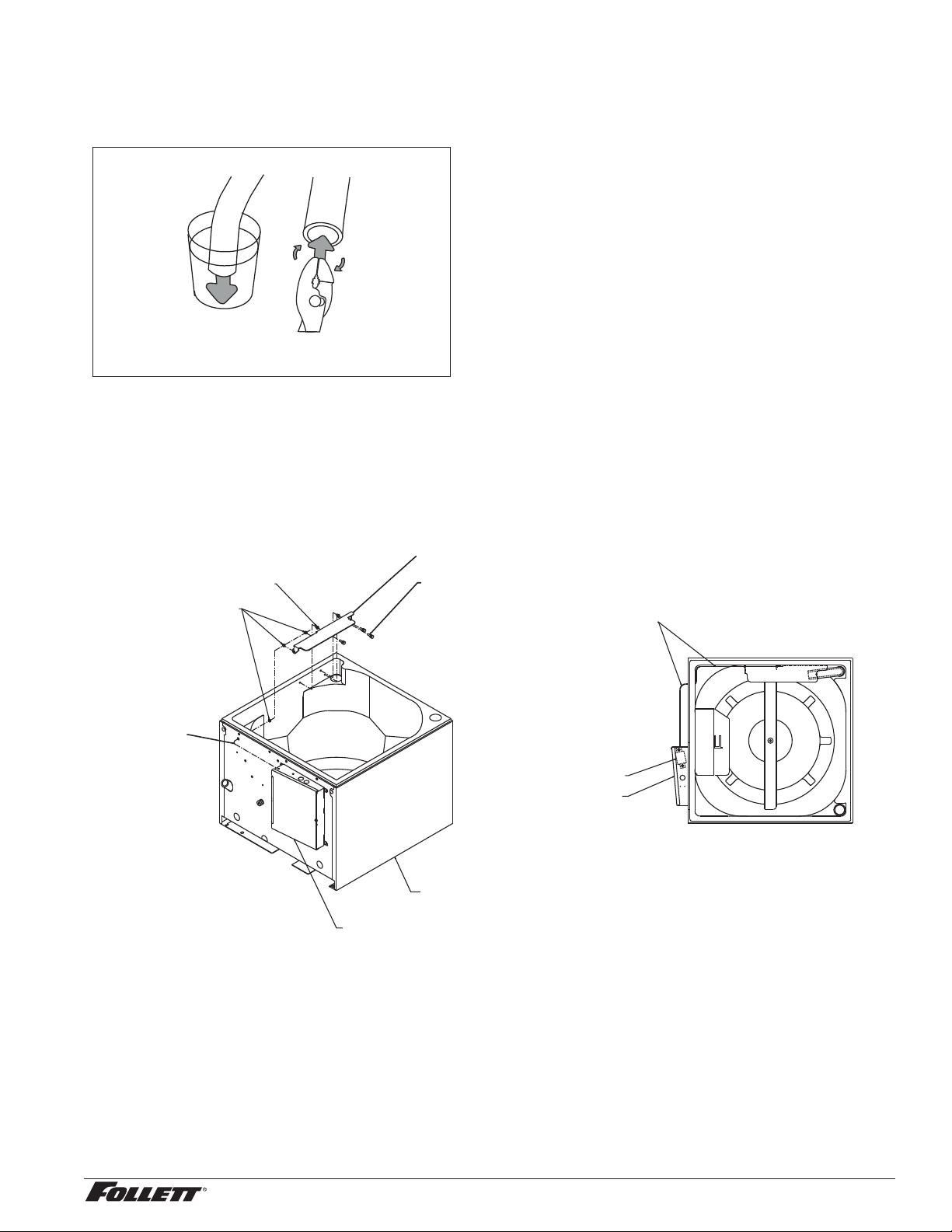
Ice transport tube replacement – Top mount units
Models 110CT425A/W
CAUTION!
§ Use only tubing supplied by Follett Corporation.
Tighten clamp
screw
1.00" (2.54 cm)
2
1
3
Ice transport tube replacement – Freestanding units
Models 110FB425A/W
1. Remove top and rear access panel from dispenser (lower front panel in freestanding unit).
2. Disconnect existing ice tube from engaging pin on transport tube bracket in ice storage bin and pull down
through dispenser chase.
3. Disconnect opposite end of tube from ice machine.
4. Run end of new ice transport tube with 3/16" (5 mm) hole through internal chase in rear inside corner of
dispenser (left side as you face dispenser) and push up into storage area.
5. Push the 3/16" (5 mm) hole near end of tube into pin on ice tube bracket (Fig 6).
Fig. 6
A
A
1.00"
(2.54 cm)
Section A – A
3/16" (5 mm)
dia. hole
engaging pin
3/16" (5 mm) ice tube hole
ice hose mounting bracket
ice level control stat
ice tube
1.00"
(2.54 cm)
110CT425A/W, 110FB425A/W 23
6. Slip supplied hose clamp on opposite end of new ice transport tube. Place end of tube in cup of hot
water to soften and spread with pliers to ease assembly and prevent coupler edge from cutting inner wall
of tube (Fig 7).
Fig. 7
Hot Water
160 F (71 C)
7. Carefully push tube onto icemaker. Do not twist hose when securing to evaporator.
Note: Only use tubing supplied by Follett Corporation.
8. Fasten tube on port with hose clamp, ensure that clamp is positioned on evaporator side of nozzle ange.
9. Tighten clamp.
Thermostat replacement
well nut
ice level
control stat
rubber grommet
control box assembly
hopper assembly
knurled screw
bin thermostat
control box assembly
ice level control stat
ice mounting hose bracket
24 110CT425A/W, 110FB425A/W
Replacement parts
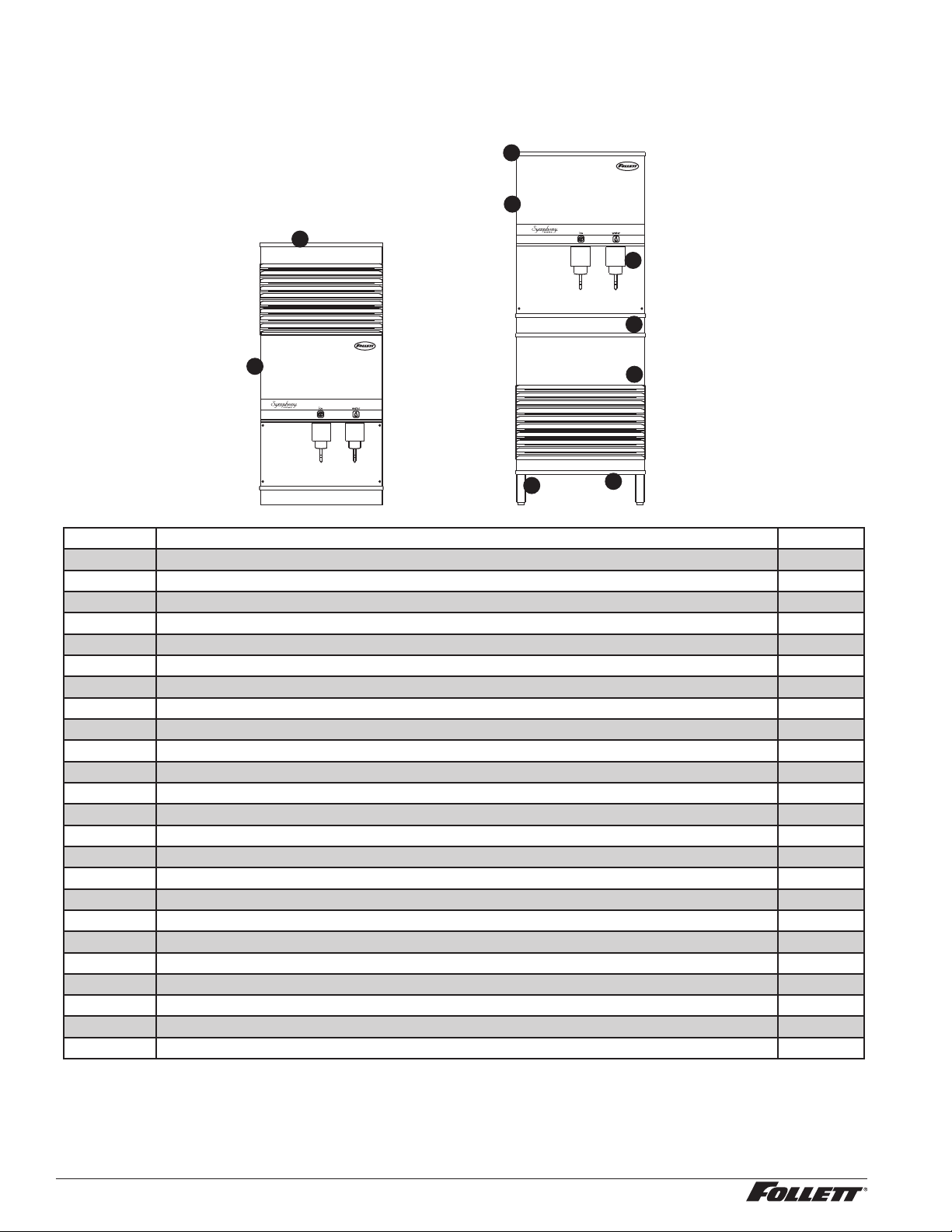
Dispenser exterior
3
1
6
5
4
2
7
8
9
Reference Description Part #
1 Cover, top front, CT, ice and water 01072818
2 Cover, top front, FB, ice and water 01072792
3 Cover, lower section, FB 502704
4 Cover, dispense chute 502681
Not shown Knurled screws, front cover 01085703
5 Drain pan 502705
Not shown Grille, drain pan 502706
6 Lid, ice machine, 110, countertop (CT) 502709
7 Lid, secured, 110 freestanding (FB) 01072784
Not shown Leg kit, for freestanding units – set of 4 502088
8 Single leg, for freestanding units 502298
Not shown Drain tube assembly 502711
Not shown Cover, top front, CT, ice only 01072826
Not shown Cover, top front, FB, ice only 01072800
Not shown Tee, water inlet, 1/4" 502923
Not shown Valve, water shut-off, 1/4" 01035526
Not shown Drain tting, plastic, ice machine (includes screws) 00109728
Not shown Cord, power, dispenser 01027648
Not shown Cord & plug, bin signal, RIDE ice machine, 20' 01074202
Not shown Cord & plug, bin signal, top mount and freestanding 01074210
Not shown Clean switch, SensorSAFE 502359
Not shown Cord & plug, ice machine power, FB and CT (dispenser box to ice machine box) 01074848
Not shown Caster 502805
9 Screw, knurled, 1/4-20 x 1" 01059855
110CT425A/W, 110FB425A/W 25
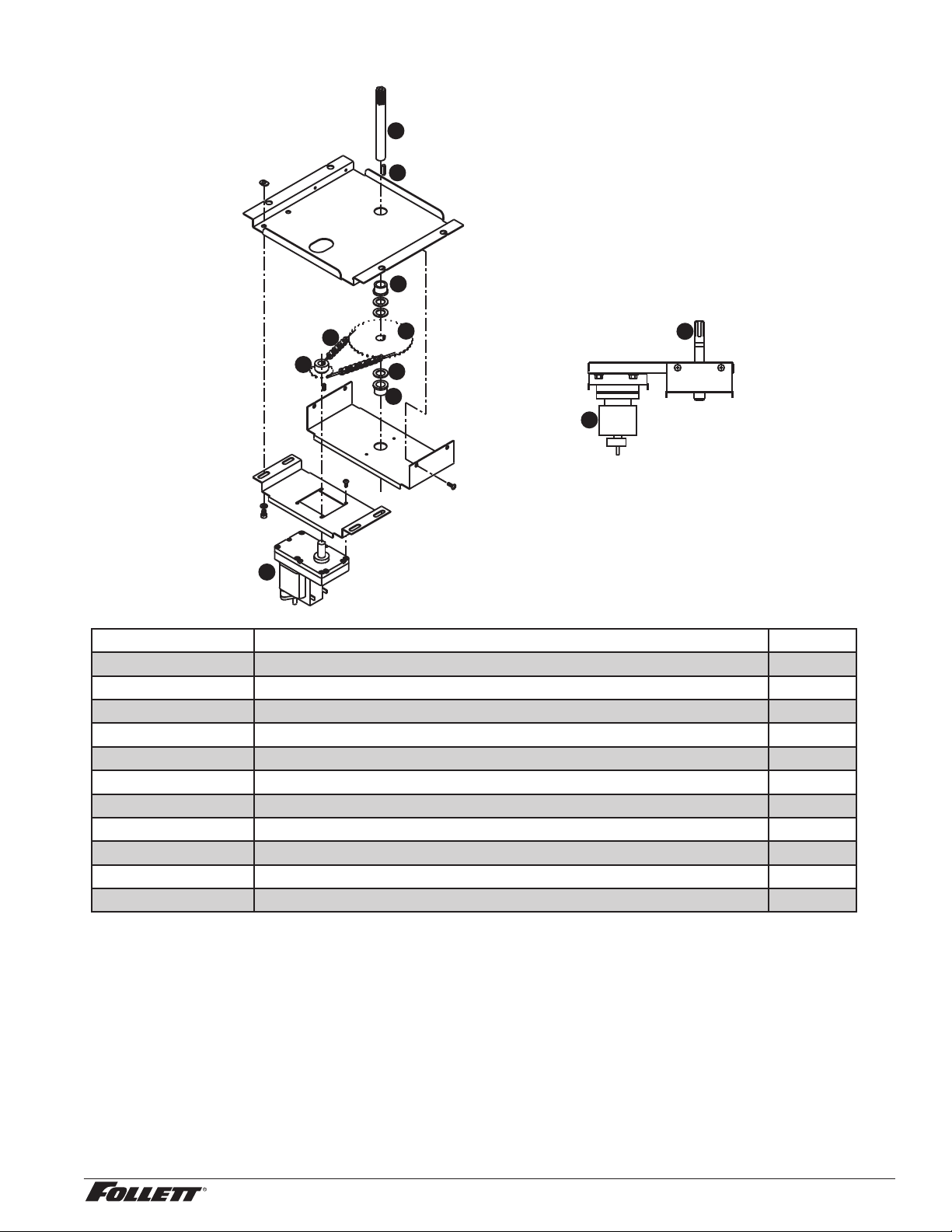
Wheelmotor and drive system
3
7
5
6
1
7
2
1
7
8
4
Reference Description Part #
1 Wheelmotor, 120 V, 60 Hz 501861
2 Washer, thrust 501026
Not shown Fan blade, wheelmotor 501607
3 Drive shaft (includes key and stud) 501619
4 Chain, pitch 54, link 502691
5 Sprocket, drive shaft, 35T 502692
6 Sprocket, wheelmotor, 10T 501019
7 Bearing, drive shaft 501024
Not shown Connecting link, chain 500799
8 Key, drive shaft 500637
Parts 1-8 above Dispenser drive assembly 502020
26 110CT425A/W, 110FB425A/W
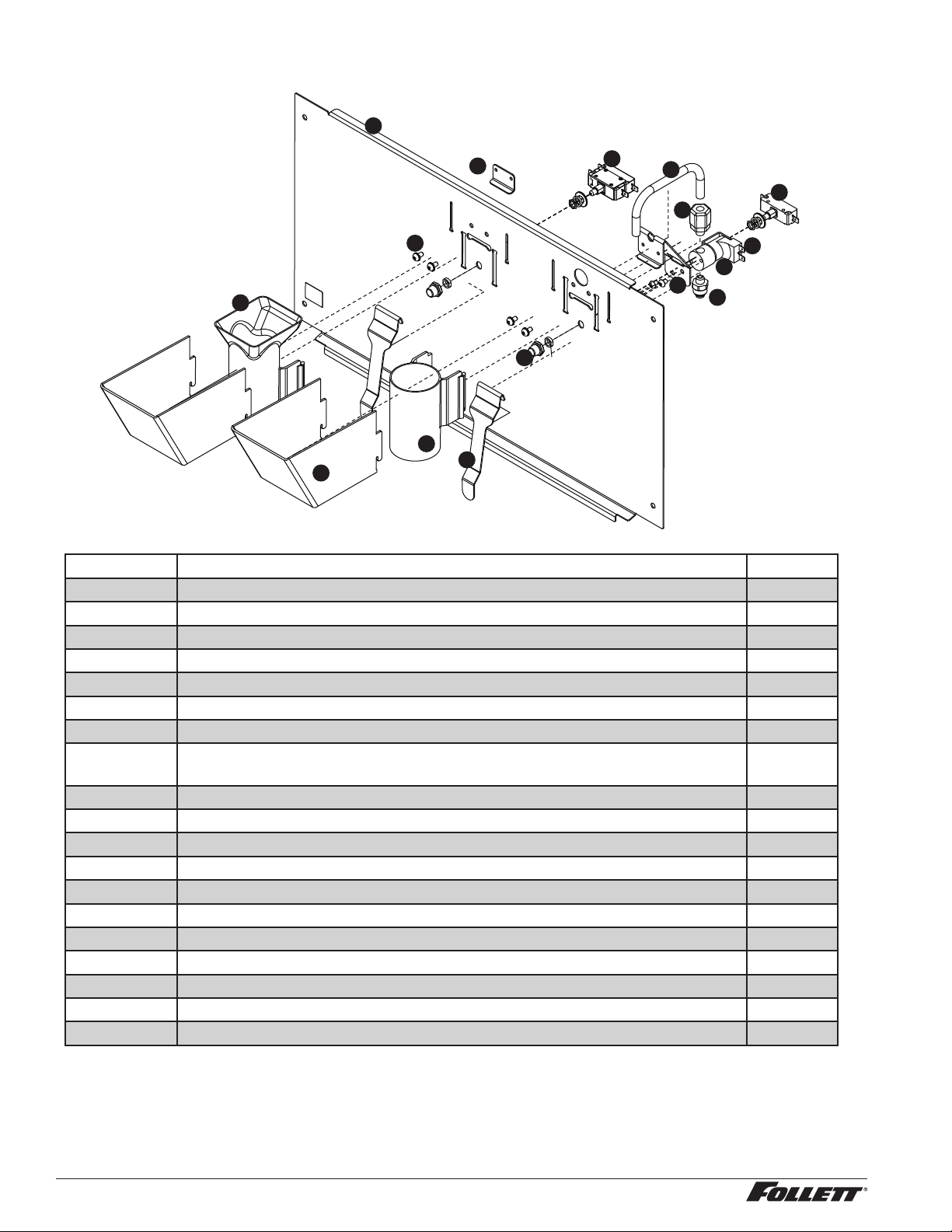
Dispense chute and splash panel (models with lever dispensing)
15
14
16
6
3
1
11
4
8
12
10
9
13
5
7
2
Reference Description Part #
1 Tube, water station 502356
2 Cover, dispense chute 502681
3 Switch, dispense, ice, lever actuated (includes 501841) 501829
4 Switch, dispense, water, lever actuated (includes 501841) 502359
5 Lever, dispense 00976845
6 Chute, ice (with Agion
®
antimicrobial product protection
1
) 01042787
7 Chute, water (with Agion) 01042795
8 Solenoid assembly, water, 120V, 60Hz (includes solenoid valve, tube, bracket,
inlet and outlet ttings)
01049121
9 Bracket, lever and water solenoid 01039635
10 Fitting, inlet, 1/4" tube x 1/8 MNPT straight 00991232
11 Fitting, outlet, 1/8" MPT x 3/8" comp 502246
12 Solenoid valve, water, 120 V, 60Hz 502243
13 Boot, dispense switch button 501841
14 Bracket, lever 00958793
15 Splash panel, lever dispense 01039742
16 Fastener, 10-32 x 3/8" stainless steel 00982421
Not shown Tubing, water station, thermoplastic, 1/4" OD (sold by the foot) 502079
Not shown Splash panel, lever dispense complete assembly 01049055
Not shown Splash panel, lever dispense, ice only, complete assembly 01049063
1
Disclaimer: Antimicrobial protection is limited to the treated components and does not treat water or ice.
110CT425A/W, 110FB425A/W 27
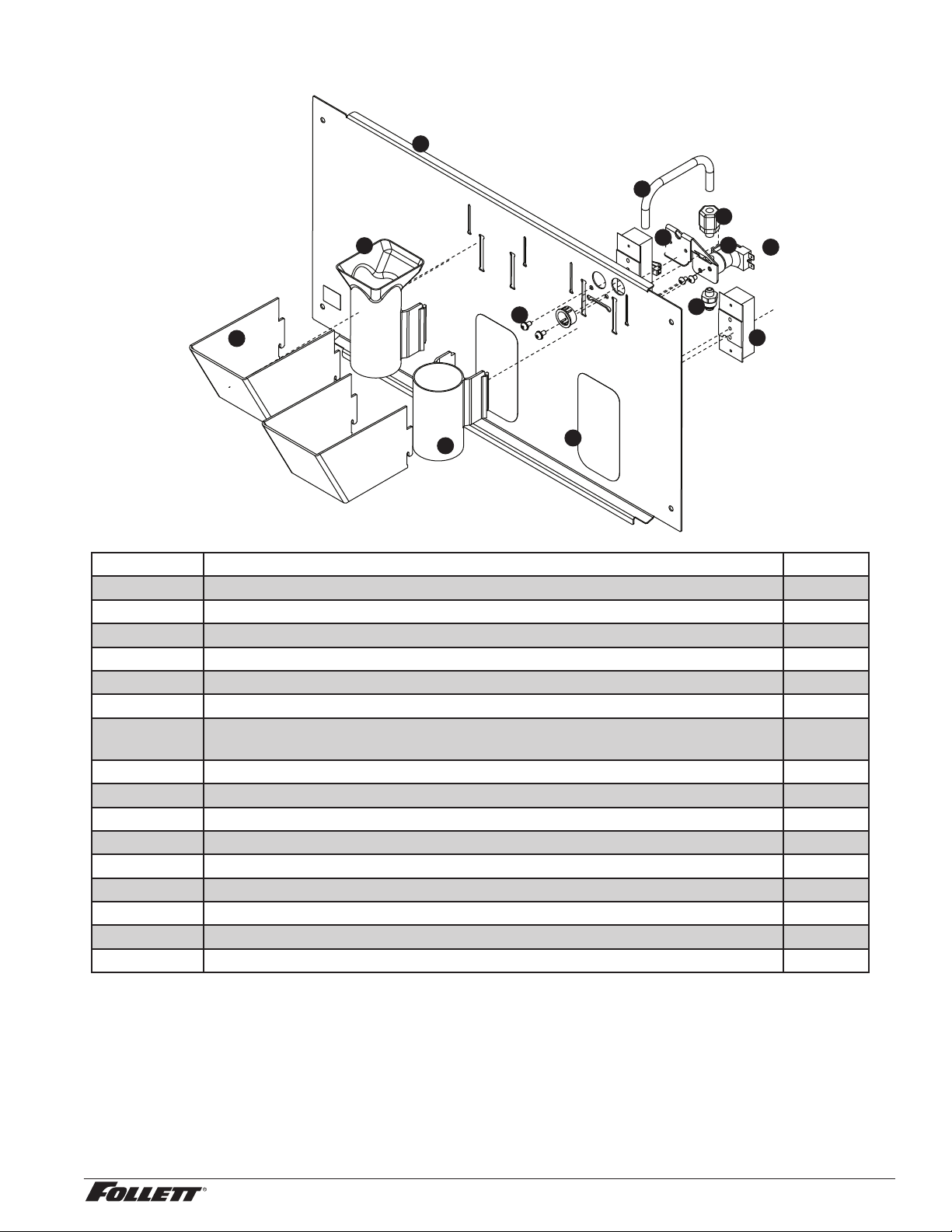
Dispense chute and splash panel (models with SensorSAFE infrared dispensing)
5
1
2
3
4
13
8
7
12
9
11
10
6
Reference Description Part #
1 Cover, dispense chute 502681
2 Chute, ice (with Agion
®
antimicrobial product protection
1
) 01042787
3 Chute, water (with Agion) 01042795
4 Lens, sensor 502690
5 Splash panel (includes 2 of 502690) 01049162
Not shown Splash panel, SensorSAFE, ice only (includes 2 of 502690) 01049170
6 Solenoid assembly, water, 120V, 60Hz (includes solenoid valve, tube, bracket, inlet
and outlet ttings) 120V 60Hz
01049121
7 Bracket, lever and water solenoid 01039635
8 Tube, water station 502356
9 Fitting, inlet, 1/4" tube x 1/8 MNPT straight 00991232
10 Fitting, outlet, 1/8" MPT x 3/8" comp 502246
11 Solenoid valve, water, 120V, 60Hz 502243
12 Sensor (includes lens and ty-rap) 00122978
13 Fastener, 10-32 x 3/8" stainless steel 00982421
Not shown Splash panel, SensorSAFE, complete assembly 01049030
Not shown Splash panel, SensorSAFE, ice only, complete assembly 01049048
1
Disclaimer: Antimicrobial protection is limited to the treated components and does not treat water or ice.
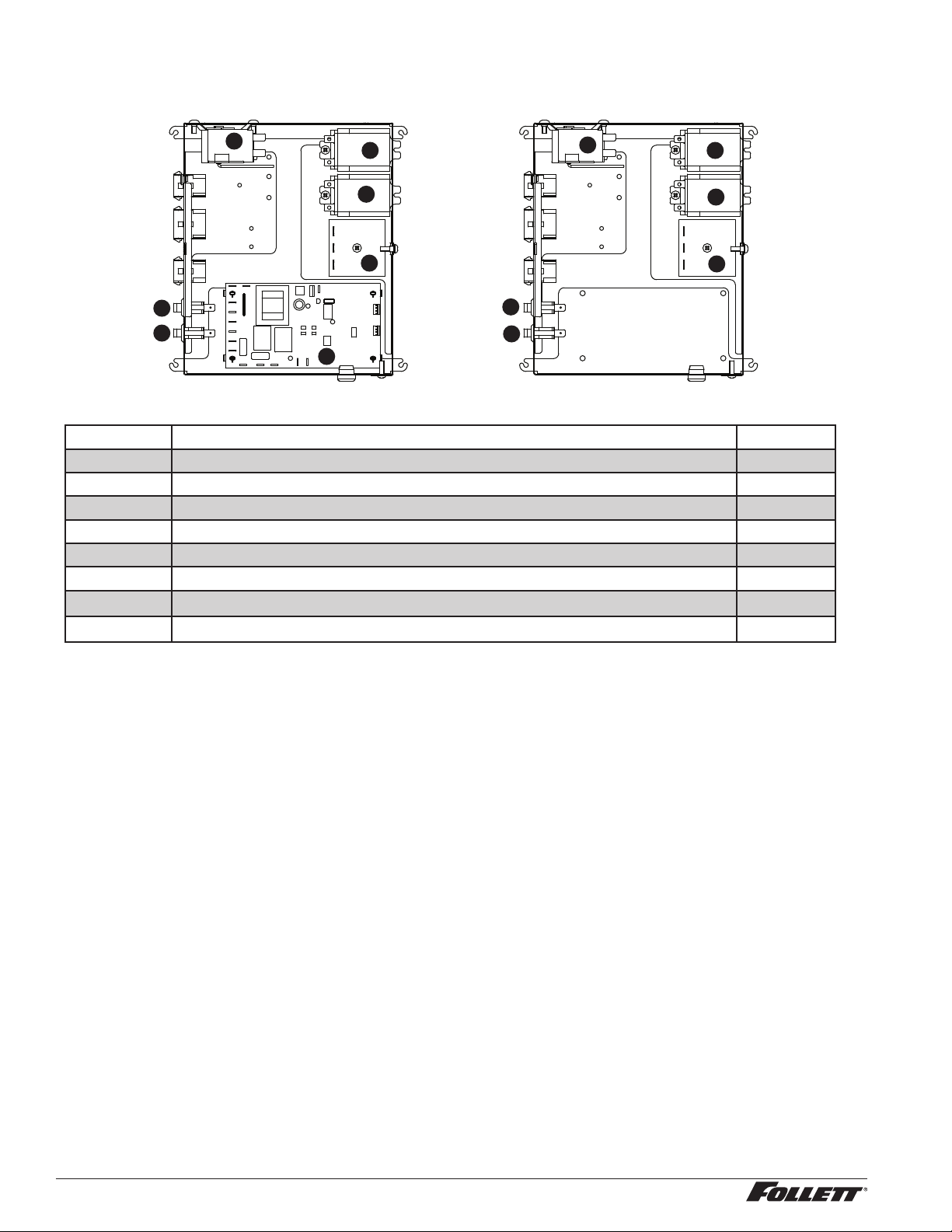
28 110CT425A/W, 110FB425A/W
Electrical components
1
5
4
4
3
2
2
1
2
2
4
4
5
Reference Description Part #
1 Thermostat, bin level 500514
2 Switch, dispenser power 502209
2 Switch, ice machine bin signal 502209
3 Control board, SensorSAFE 502242
Not shown Clean switch, SensorSAFE 502359
Not shown Boot, clean switch 501841
4
Relay, bin signal contact closure and level ll 501369
5
Timer, level ll 501601
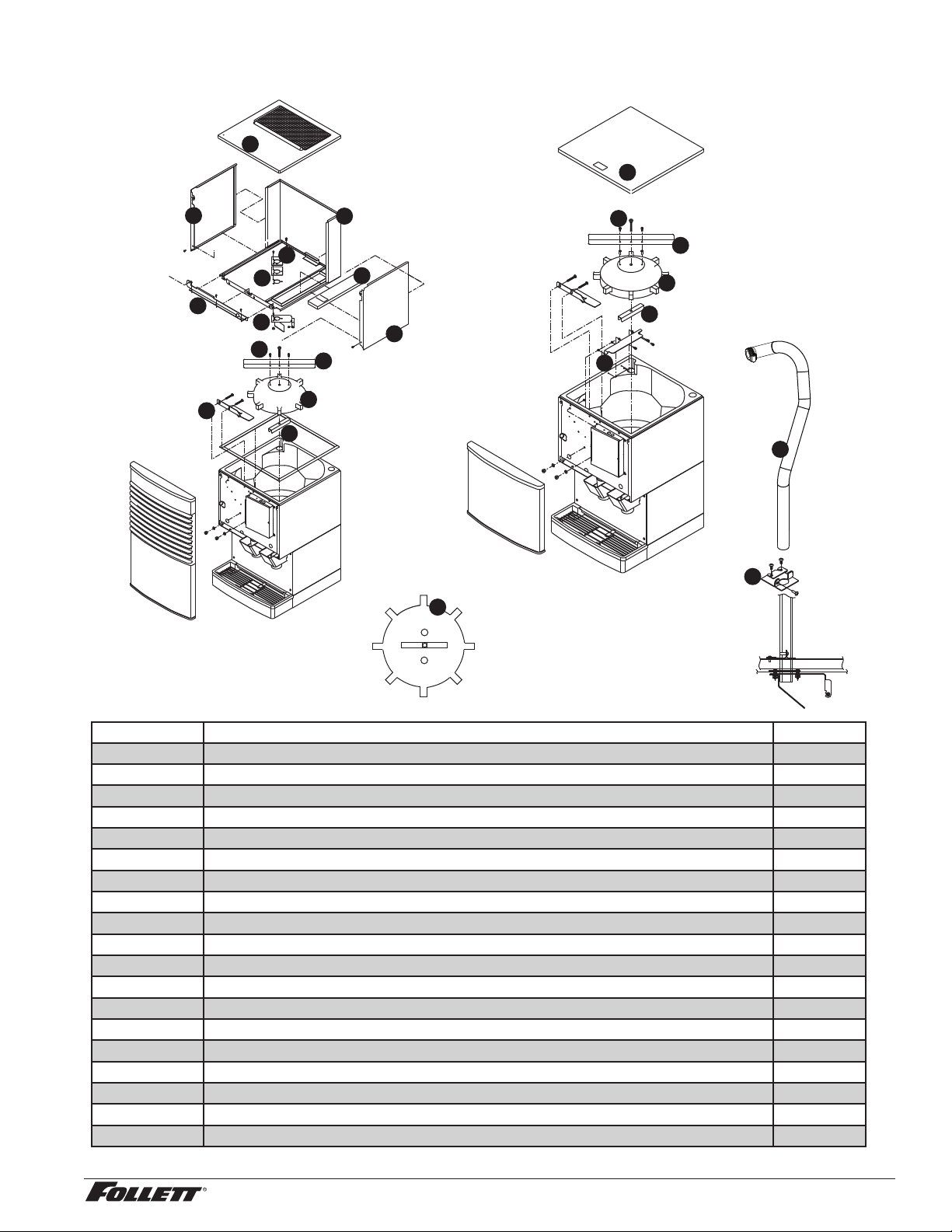
110CT425A/W, 110FB425A/W 29
Hopper components
2
10
9
4
2
7
3
5
11
14
15
12
8
9
17
16
18
5
3
2
7
4
13
Reference Description Part #
1 Baffle, ice 501802
2 Wheel, dispense (includes drive bar, rotating agitator, threaded bar & rod) 501493
3 Agitator, rotating 501494
4 Bracket, ice tube 502712
5 Screw 501100
6 Rod, threaded (includes knurled nut) 501612
7 Drive bar assembly (includes threaded rod and nut) 501617
8 Ice deector/cap tube bracket (units with top mounted ice machine) 501616
9 Bracket, ice tube entry (units with top mounted ice machine) 01067644
10 Ice transport tube assembly (units with top mounted ice machines) 01003532
11 Side panel, RH 502723
12 Side panel, LH 502722
13 Bracket, ice machine hold-down 01074871
14 Cover, hopper access 502717
15 Cover, hopper, CT 01074889
16 Lid, Ice machine, CT 502709
17 Gasket, ice entry 502824
18 Lid, secured, FB 01072784
Not shown Drain pan, hopper 00115196
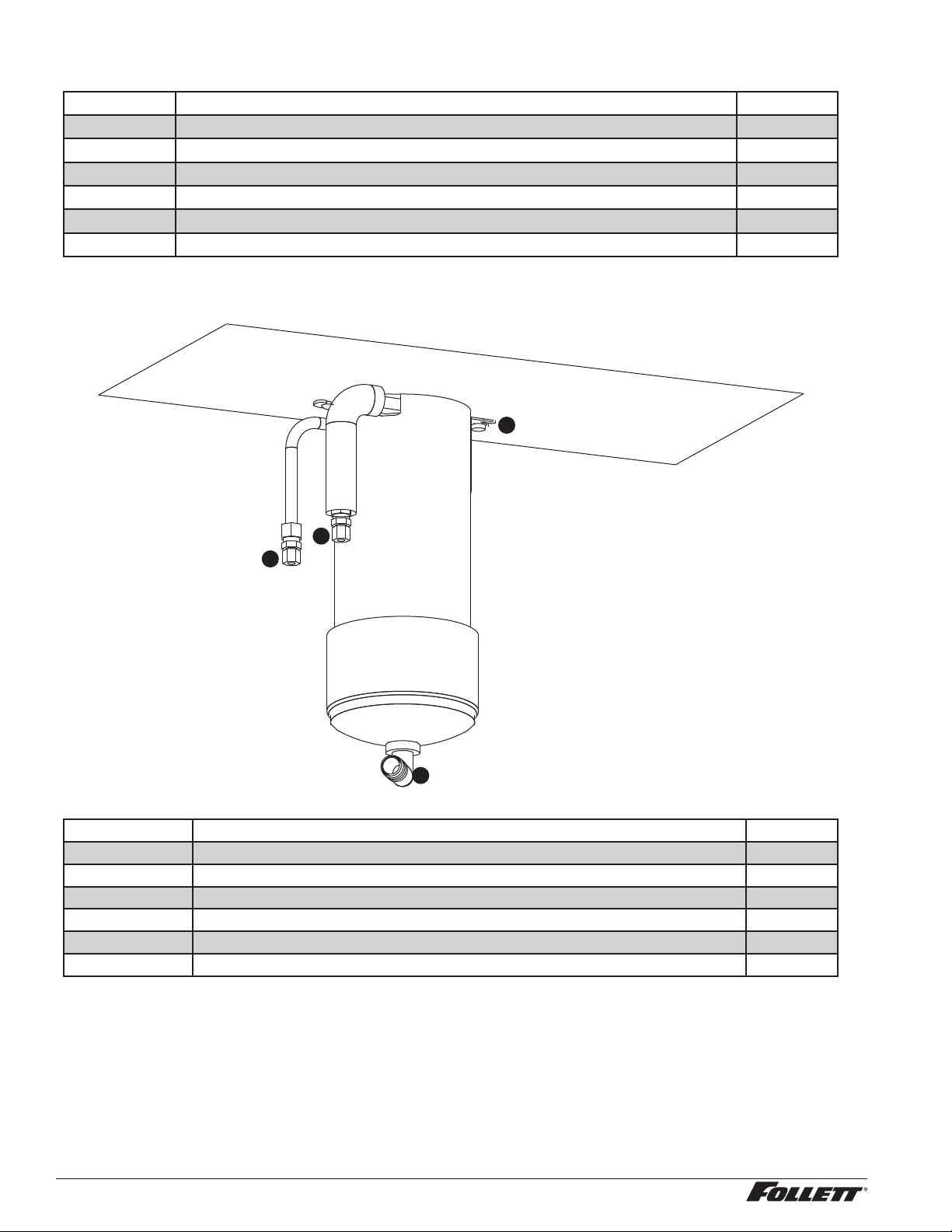
30 110CT425A/W, 110FB425A/W
Ice transport tubing
Reference Description Part #
Not shown Ice transport tube (RIDE units) - 10 ft 502522
Not shown Ice transport tube (RIDE units) - 20 ft 502523
Not shown Ice transport tube insulation (RIDE units only) - sold by the foot 501176
Not shown Ice transport tube assembly (50 FB units) 502328
Not shown Ice transport tube assembly (25 FB units) 502329
Not shown Ice transport tube assembly (top mount units) 01003532
Chilled water components
1
1
3
2
Reference Description Part #
Not shown Coil, chilled water (includes two 502599) 010 74 111
1 Fitting, water coil 502599
2 Brackets, chilled water canister, pair (includes screws) 502600
3 Elbow, drain 502605
Not shown Assembly, chilled water 01074137
Not shown Tubing 01055011
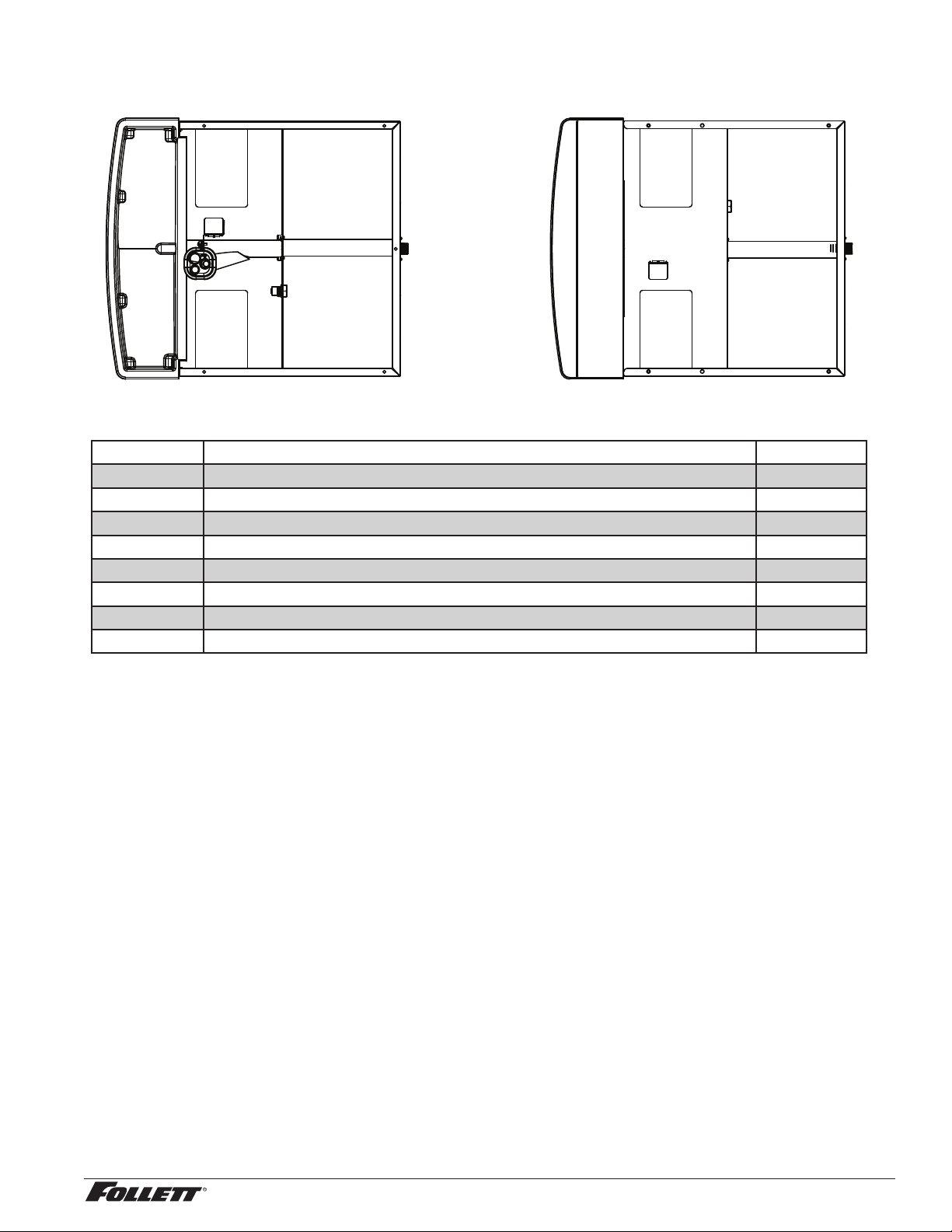
110CT425A/W, 110FB425A/W 31
Dispenser plumbing connections
TOP VIEW
BOTTOM VIEW
Reference Description Part #
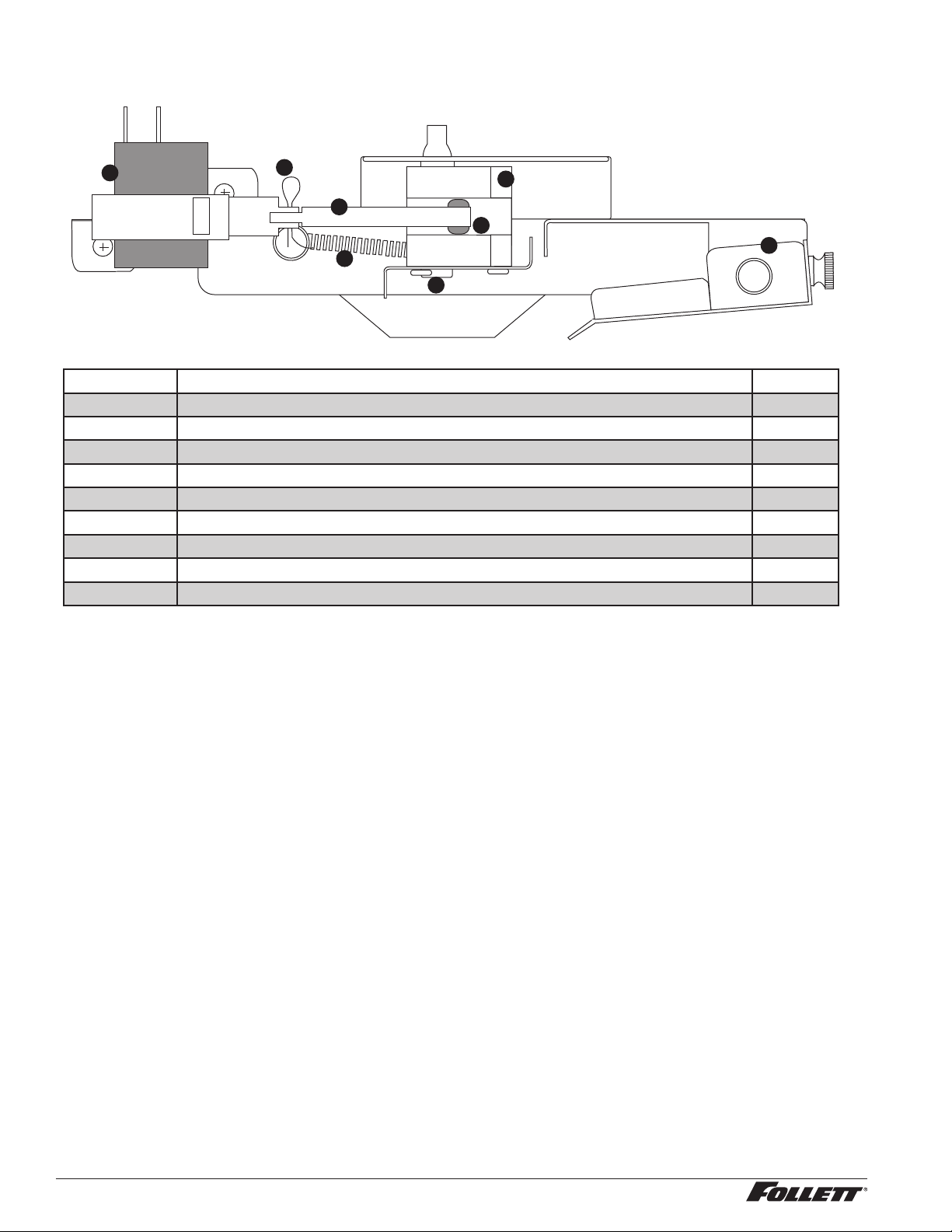
Not shown Valve, water shut-off 01035526
1 Drain tube assembly 01074285
2 Fitting, water inlet 01065275
3 Cup, cleaning 01065226
4 Drain pan 502705
5 Fitting, drain 00109728
Not shown Tee, water inlet, 1/4" 502923
Not shown Grille, drain pan 502706
32 110CT425A/W, 110FB425A/W
Solenoid dispense assembly
1
4
7
8
3
2
5
6
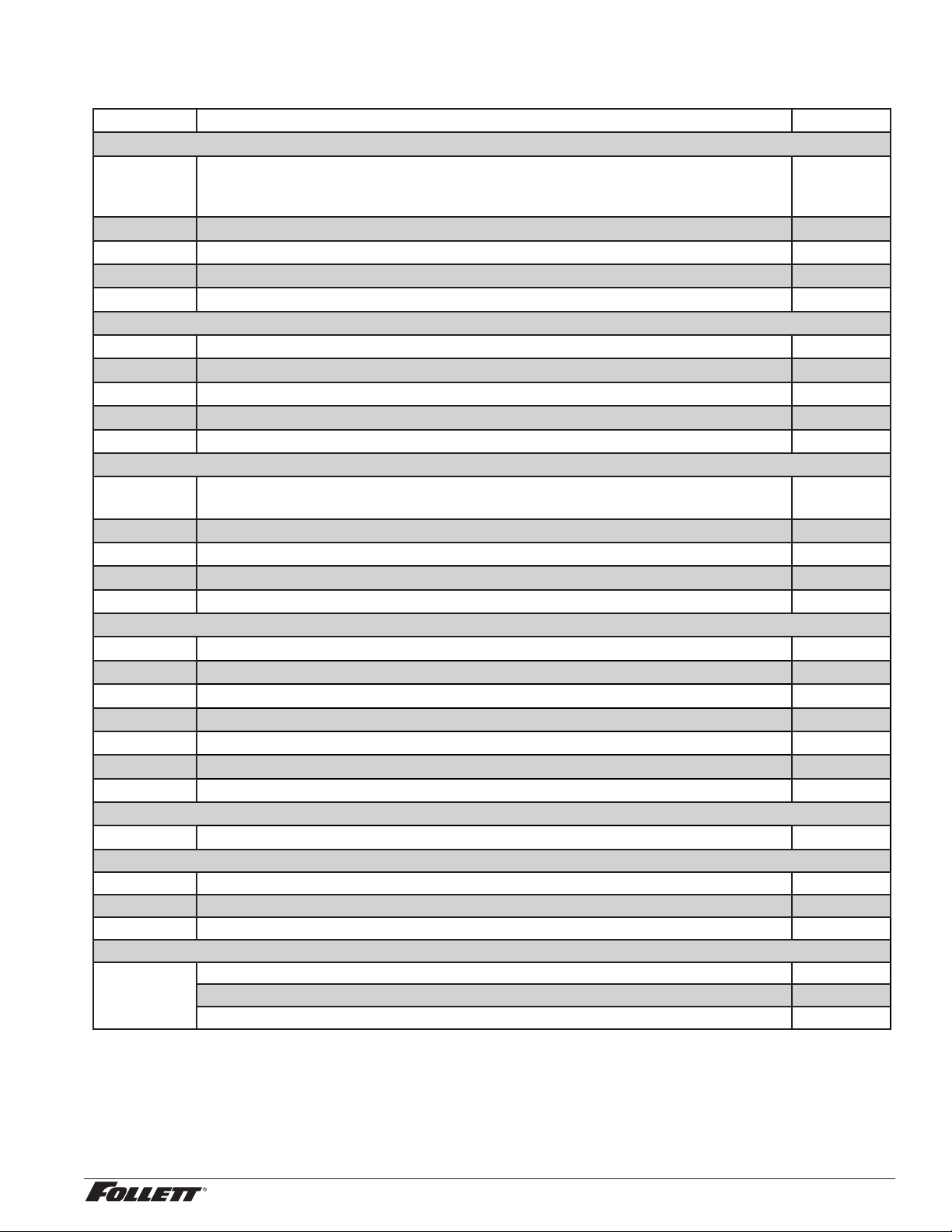
Reference # Description Part #
1 Solenoid, dispense 501830
2 Cotter pin 502040
3 Linkage, solenoid (includes 502054 grommet) 502039
4 Block, dispense gate 502042
5 Grommet 502054
6 Splash pan, gate assembly 502045
7 Shoulder screw and washer 502038
8 Spring, gate assembly 501824
— Gate assembly, 115V (includes reference numbers 1 through 8 above) 502043
110CT425A/W, 110FB425A/W 33
Water treatment accessories for Symphony Plus ice and water dispensers
Reference # Description Part #
Standard capacity lter system
Not shown Follett QC4-FL4S water lter system (includes FL4S primary cartridge and head,
coarse pre-lter and head, pressure gauge, ushing valve; assembled and installed
on mounting bracket), one per ice machine
00130229
Not shown Follett FL4S primary replacement cartridge 00130245
Not shown Water lter cartridge – primary, carton of 6 00954297
Not shown Everpure coarse pre-lter cartridge 00130211
Not shown Water pre-lter cartridge – pre-lter, carton of 12 00954305
High capacity lter system
Not shown High capacity water lter system (one per ice machine) 00978957
Not shown High capacity water lter cartridge – primary, single 00978965
Not shown High capacity water lter cartridge – primary, carton of 6 00978973
Not shown Water pre-lter cartridge – pre-lter, single 00130211
Not shown Water pre-lter cartridge – pre-lter, carton of 12 00954305
Carbonless high capacity lter system
Not shown Carbonless high capacity water lter system (one per ice machine) – Horizon™ and
MaestroPlus series ice machines
01050442
Not shown Carbonless high capacity water lter cartridge – primary, single 01050426
Not shown Carbonless high capacity water lter cartridge – primary, carton of 6 01050434
Not shown Water pre-lter cartridge – pre-lter, single 00130211
Not shown Water pre-lter cartridge – pre-lter, carton of 12 00954305
Other ltration
Not shown Claris hardness removal ltration system 00986059
Not shown Replacement lter for Claris system 00985127
Not shown Reverse osmosis system, 200 gallons per day 00986034
Not shown Replacement reverse osmosis cartridge 00985085
Not shown Replacement reverse osmosis pre-lter 00985077
Not shown Cleaning plug for reverse osmosis system 00985119
Not shown Cleaning cartridge for reverse osmosis system 00985101
Water pressure
Not shown Water pressure regulator (25 psi) 501781
Cleaning
Not shown SafeClean Plus, case of 6 0114 99 54
Not shown SafeClean Plus, case of 24 0114 99 62
Not shown Sponge, sanitary, each 00131524
IMS-III sanitizing concentrate
Not shown 16 oz. bottle 00979674
Case of 12 x 16 oz. bottles 01038652
Sponge, sanitary, pack of 24 01075431

34 110CT425A/W, 110FB425A/W

110CT425A/W, 110FB425A/W 35

01234632R00
© Follett Corporation 6/18
801 Church Lane • Easton, PA 18040, USA
Toll free (877) 612-5086 • +1 (610) 252-7301
www.follettice.com
Calgon is a licensed trademark distributed by Nu-Calgon, in the United States.
Agion is a registered trademark of Agion Technologies, Inc, Wakeeld, MA, USA.
SafeCLEAN, SaniSponge, SensorSAFE, and Symphony Plus are trademarks of Follett LLC.
Follett is a registered trademarks of Follett LLC, registered in US.
Warranty Registration and Equipment Evaluation
Thank you for purchasing Follett ® equipment. Our goal is to deliver high value products and services that earn your complete satisfaction by
delivering high-value products and services backed by outstanding customer and technical support.
Please review the installation instructions thoroughly. It is important that the installation be performed to factory specifications so your
equipment operates at its maximum efficiency.
Follett LLC will not be liable for any consequential damages, expenses, connecting or disconnecting charges, or any losses resulting from a
defect of the machine. For full warranty details, visit our website www.follettice.com/productwarranties.
Registering your equipments helps Follett track your equipment's service history should you need to contact us for technical support, and
your feedback helps us improve our products and services. Please visit www.follettice.com/support to complete the Warranty Registration
form.
Should you have any questions, please contact Follett's technical support group at (877) 612-5086 or (610) 252-7301 and we will be happy to
assist you.