
2016.11.18
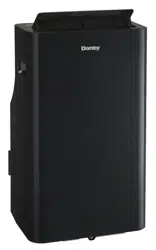
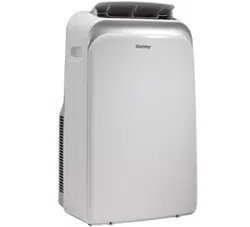
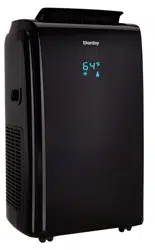
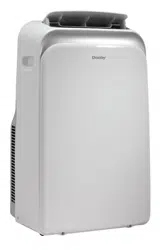
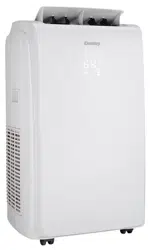
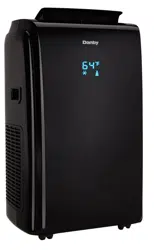
DPA140HEAUBDB
DPA140HEAUWDB
PORTABLE AIR CONDITIONER
CLIMATISEUR PORTATIF
OWNER’S USE AND CARE GUIDE
GUIDE D’UTILISATION ET D'ENTRETIEN
GUÍA DE UTILIZACIÓN Y CUIDADO PARA EL PROPIETARIO
MODEL • MODÈLE • MODELO
DANBY PRODUCTS LIMITED, ONTARIO, CANADA N1H 6Z9
DANBY PRODUCTS INC., FINDLAY, OHIO, USA 45840
TO OBTAIN WARRANTY SERVICE YOU MUST PROVIDE A VALID PROOF OF
PURCHASE. PLEASE STAPLE YOUR RECEIPT TO THIS PAGE FOR FUTURE
REFERENCE.
POUR OBTENIR LE SERVICE SUR GARANTIE, VOUS DEVEZ FOURNIR UNE
PREUVE D’ACHAT VALIDE. VEUILLEZ AGRAFER VOTRE REÇU À CETTE PAGE
POUR RÉFÉRENCE FUTURE.
This product is factory equipped with a power supply cord that has a three-pronged grounded plug. It must
be plugged into a mating grounding type receptacle in accordance with the National Electrical Code and
applicable local codes and ordinances. If the circuit does not have a grounding type receptacle, it is the
responsibility and obligation of the customer to exchange the existing receptacle in accordance with the
National Electrical Code and applicable local codes and ordinances. The third ground prong should not,
under any circumstances, be cut or removed. Never use the cord, the plug or the appliance when they show
any sign of damage. Do not use your appliance with an extension cord unless it has been checked and test-
ed by a qualifi ed electrician or electrical supplier.
IMPORTANT - GROUNDING METHOD
Ce produit arrive d’origine avec un cordon d’alimentation équipé d’une prise à trois fi ches. Il doit être
branché dans une prise avec une fi che de mise à la terre en conformité avec le Code national de l’électricité
et les codes et règles locaux applicables. Si la prise murale n’a pas de mise à la terre, il est de la
responsabilité et l’obligation du client de changer la prise existante pour la rendre conforme au Code
national de l’électricité et aux codes et règles locaux applicables. La fi che de mise à la terre ne doit pas, en
aucune circonstance, être coupée ou retirée. Si vous apercevez des signes de dommage, n’utilisez jamais le
cordon d’alimentation, la prise ou l’appareil. N’utilisez jamais l’appareil avec une rallonge sauf si elle a été
vérifi ée et testée par un électricien qualifi é ou un fournisseur de matériel électrique.
IMPORTANT - MÉTHODE POUR LA MISE À LA TERRE
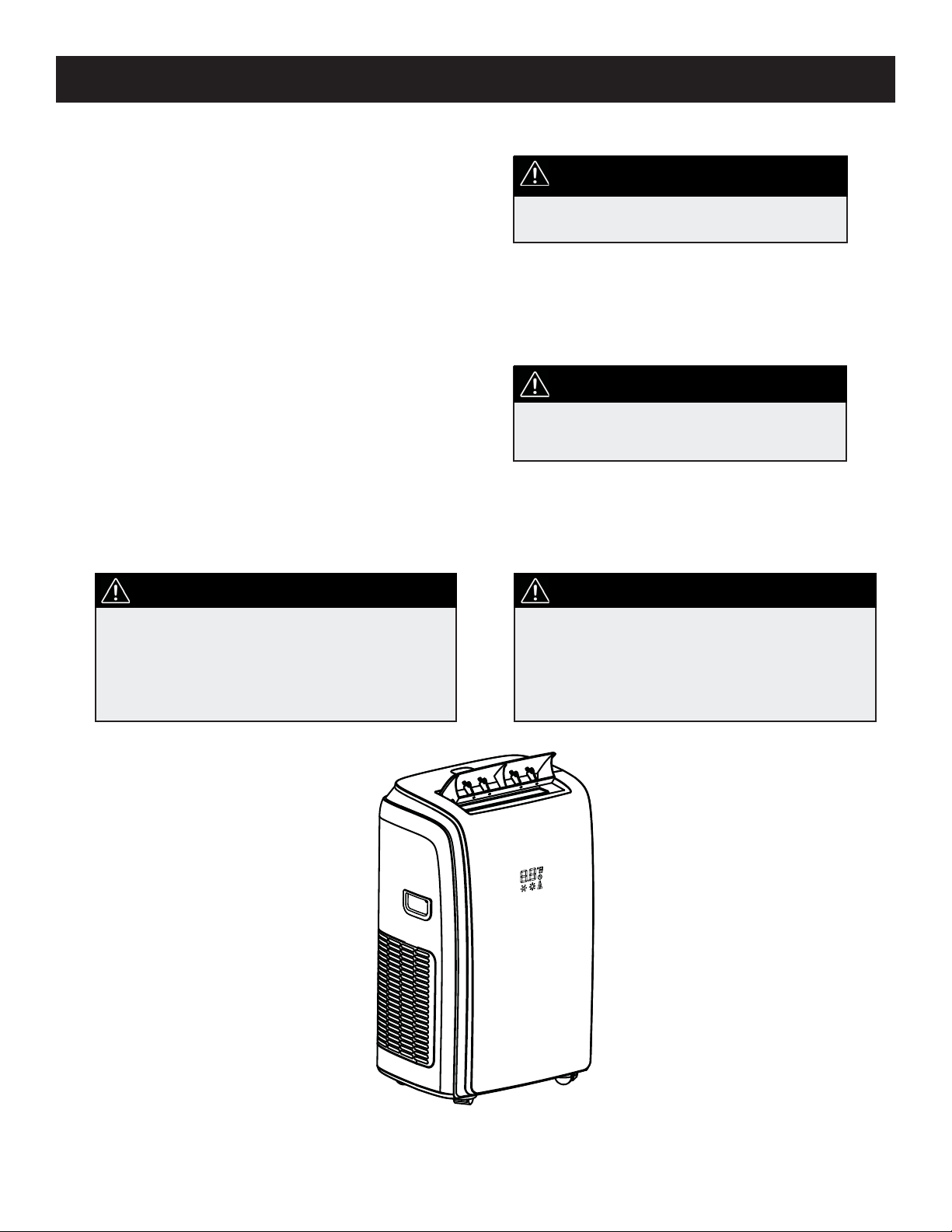
PORTABLE AIR CONDITIONER
Owner’s Use and Care Guide ................................1-19
• Welcome
• Important Safety Information
• Features
• Installation Instructions
• Operation Instructions
• Care and Maintenance
• Troubleshooting
• Warranty
CLIMATISEUR PORTATIF
Guide d’utilisation et d’entretien............................20-38
• Bienvenue
• Consignes de sécurité importantes
• Caractéristiques
• Consignes d’installation
• Consignes d’utilisation
• Soins et entretien
• Dépannage
• Garantie
CONTENTS / TABLE DES MATIÈRES
CAUTION:
Read and follow all safety rules and operating
instructions before fi rst use of this product.
AVERTISSEMENT :
Veuillez lire attentivement les consignes de
sécurité et les instructions d’utilisation avant
l’utilisation initiale de ce produit.
WARNING
Improper connection of the grounding plug can
result in risk of fi re, electric shock and/or injury to
persons associated with the appliance. Check with
a qualifi ed service representative if in doubt that
the appliance is properly grounded.
Model • Modèle
DPA140HEAUBDB / DPA140HEAUWDB
AVERTISSEMENT
Une fi che de mise à la terre mal branchée peut
entraîner un risque d’incendie, de choc électrique
ou de blessures aux personnes qui utilisent
l’appareil. Si vous n’êtes pas certain que l’appareil
est correctement mis à la terre, consultez un
préposé du service qualifi é.
1
Welcome
Welcome to the Danby family. We are proud of our quality products, and we believe in dependable service, like you will
find in this Owner’s Use and Care Guide, and like you will receive from our friendly customer service department. Best
of all, you will experience these values each and every time you use your Danby appliance. That is important, because
your new appliance will be a part of your family for a long time.
Note the information below; you will need this information to obtain service under warranty.
To receive service, you must provide the original receipt.
Model Number:
Serial Number:
Date of Purchase:
NEED HELP?
Before you call for service, here are a few things you can do to help
us serve you better:
Read this Owner’s Use and Care Guide:
It contains instructions to help you use and maintain your
appliance properly.
If you received a damaged appliance:
Immediately contact the retailer (or builder) that sold you the
appliance.
Save time and money:
Check the Troubleshooting section at the end of the guide before call-
ing. This section helps you solve common problems that may occur.
If you do need service, you can relax, knowing help is only a phone
call away.
1-800-26-
(1-800-263-2629)
Important Safety Information
READ AND FOLLOW ALL SAFETY INSTRUCTIONS
To prevent injury to the user or other people and property damage, the following instructions must be
followed. Incorrect operation resulting from ignoring these instructions may cause harm or damage.
SAFETY PRECAUTIONS
ALWAYS DO THIS
Your air conditioner should be used in such a way that it is protected from moisture, e.g. condensation,
splashed water, etc. Do not place or store your air conditioner where it can fall or be pulled into water or
any other liquid. Unplug unit immediately if this occurs.
Always transport your air conditioner in a vertical position and place on a stable, level surface during use.
If the unit is transported laying on its side it should be stood up and left unplugged for 6 hours.
Turn off the unit when not in use.
Always contact a qualifi ed person to perform repairs. If the power cord is damaged it must be repaired by
a qualifi ed technician.
Keep the unit away from walls, furniture and curtains with a clearance of at least 30 cm all around.
If the air conditioner is knocked over during use, turn off the unit and unplug it immediately.
Always use the switch on the control panel to turn the unit on or off.
NEVER DO THIS
Do not operate your air conditioner in a wet room such as a bathroom or laundry room.
Do not touch the unit with wet or damp hands.
Do not press the buttons on the control panel with anything other than your fi ngers.
Do not remove any fi xed components. Never use this appliance if it is not working properly, or if it has
been dropped or damaged.
Never use the plug to start and stop the unit.
Do not cover or obstruct the inlet or outlet grilles.
Do not use hazardous chemicals to clean or come into contact with the unit.
Do not use the unit in the presence of infl ammable substances or vapour such as alcohol, insecticides,
gasoline, etc.
Do not allow children to operate the unit unsupervised.
Do not use this product for functions other than those described in this instruction manual.
2
Important Safety Information
READ AND FOLLOW ALL SAFETY INSTRUCTIONS
To prevent injury to the user or other people and property damage, the following instructions must be
followed. Incorrect operation resulting from ignoring these instructions may cause harm or damage.
ENERGY SAVING TIPS
OPERATING CONDITIONS
TOOLS FOR WINDOW KIT
INSTALLATION
• Use the unit in the recommended room size.
• Locate the unit where furniture cannot obstruct the air fl ow.
• Keep blinds/curtains closed during the sunniest part of the day.
• Keep the fi lters clean.
• Keep doors and windows closed to keep cool air in and warm air out
(cooling mode)
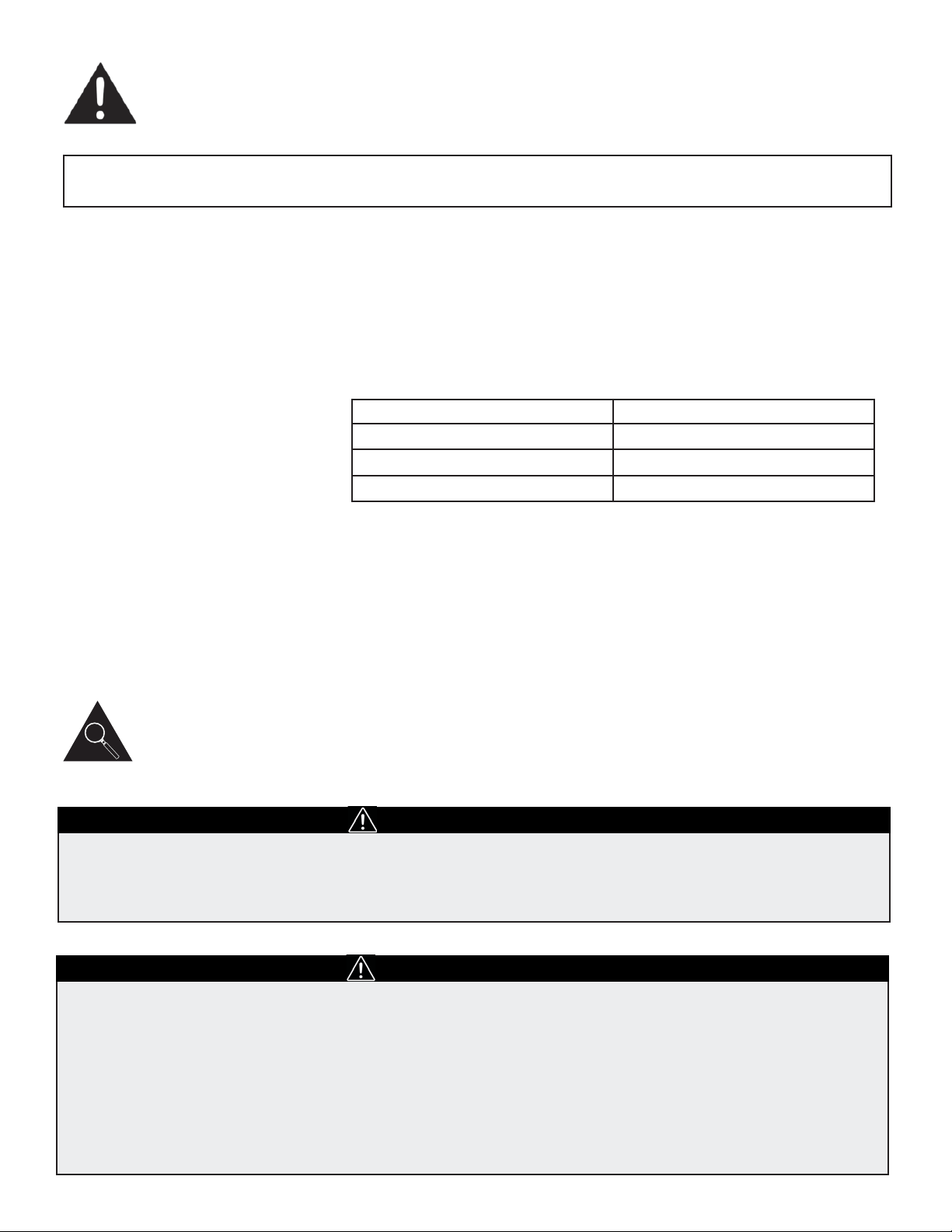
MODE ROOM TEMPERTURE
COOL 18°C (64°F) ~ 35°C (95°F)
DRY 18°C (64°F) ~ 35°C (95°F)
HEAT 13°C (55°F) ~ 27°C (81°F)
The air conditioner must be operated within the temperature range
indicated below:
Note: Performance may be reduced outside of these operating temperatures.
1. Screwdriver (medium size, Phillips)
2. Tape measure or ruler
3. Knife or scissors
4. Saw (In the event that the window kit needs to be cut down in size
because the window is too narrow for direct installation).
See www.danby.com for general instruction guide
Identifying Parts
WARNING
• Do not store or use gasoline or other fl ammable vapours and liquids in the vicinity of this or any other
appliance.
• Avoid fi re hazard or electric shock. Do not use an extension cord or an adaptor plug. Do not remove any
prong from the power cord.
ELECTRICAL INFORMATION
WARNING
• Be sure the electrical supply is adequate for the model you have chosen. This information can be found
on the serial plate, which is located on the side of the cabinet and behind the grille.
• Be sure the air conditioner is properly grounded. To minimize shock and fi re hazards, proper grounding
is important. The power cord is equipped with a three-prong grounding plug for protection against
shock hazards.
• Your air conditioner must be used in a properly grounded wall receptacle. If the wall receptacle you
intend to use is not adequately grounded or protected by a time delay fuse or circuit breaker, have a
qualifi ed electrician install the proper receptacle.
• Ensure the receptacle remains accessible after the unit is installed.
3
Identifying Parts
ACCESSORIES
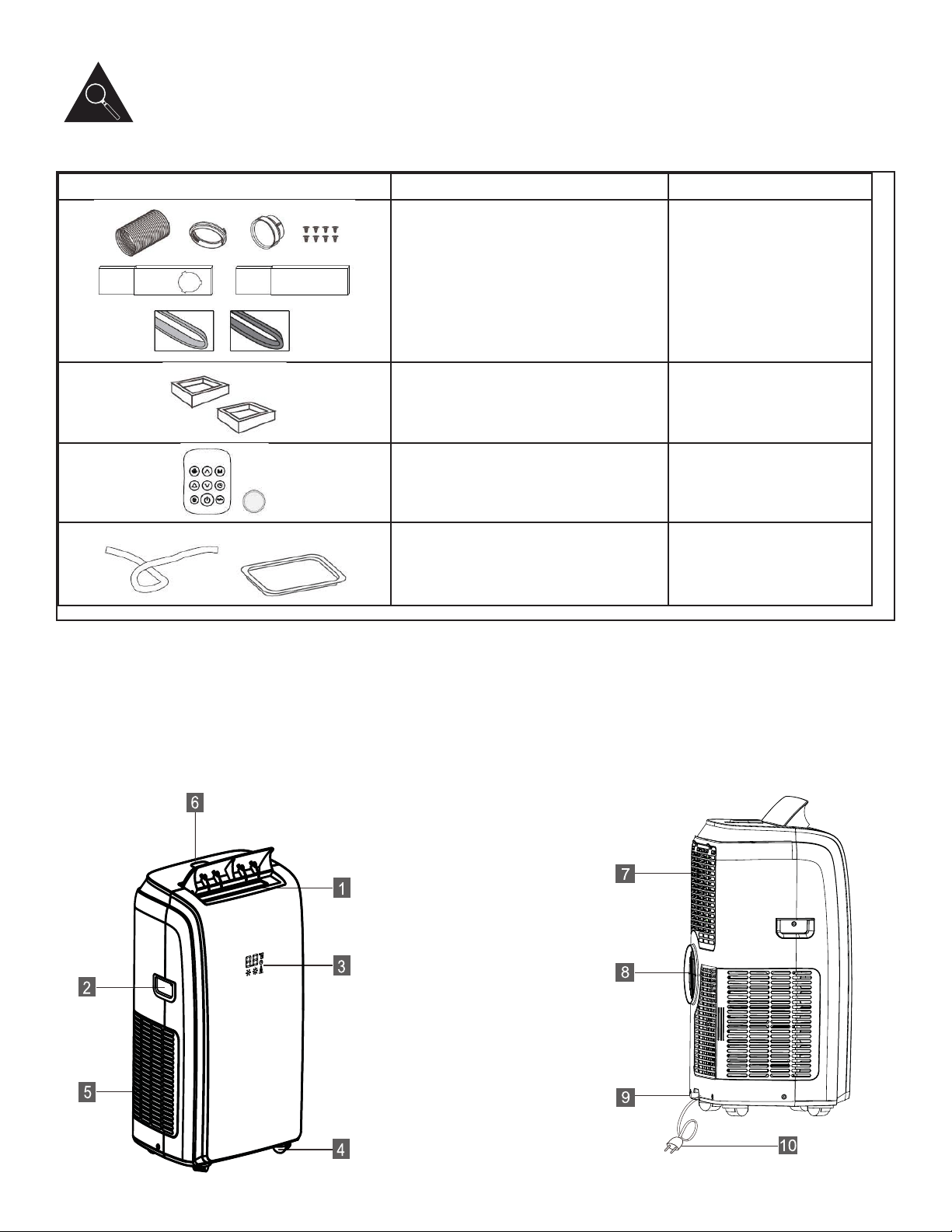
PARTS PART NAME QUANTITY
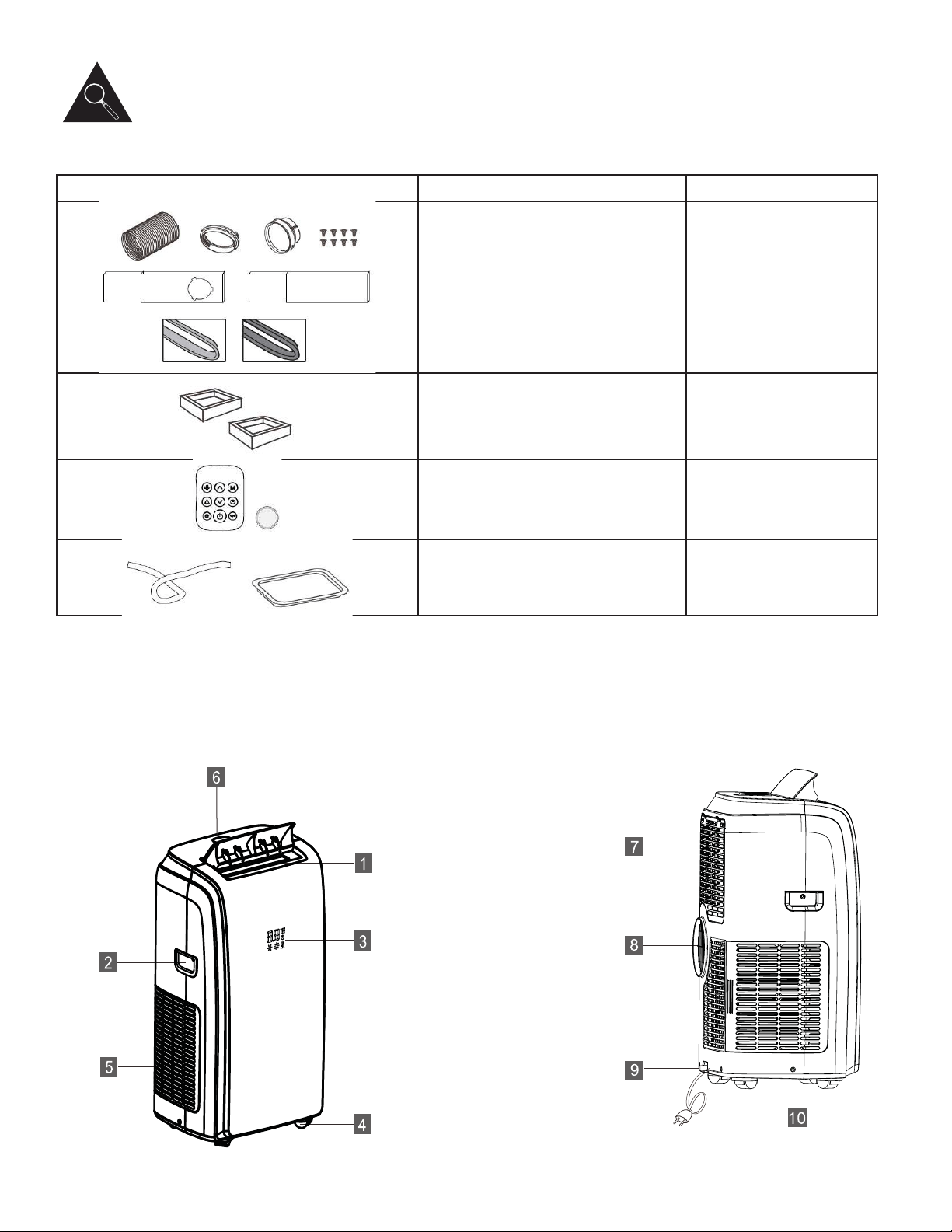
• Exhaust hose and adaptor
• Window kit
• Screws
• Foam Seal Type 1
• Foam Seal Type 2
1 set
• Castor lock 1 set
• Remote control
• Battery
1 set
• Drainage Hose
• Drain Pan
1 set
• Ensure that all the accessories are included in the package and refer to the installation instructions for their usage.
Note: All the illustrations in this manual are for explanatory purposes only. Your air conditioner may be slightly different.
UNIT STRUCTURE
4
1. Air outlet grill
2. Handle (both sides)
3. LED Display
4. Castor
5. Air intake grill
6. Control Panel
7. Air intake grill
8. Air outlet
9. Drainage outlet
10. Power cord
Features
ELECTRONIC CONTROL INSTRUCTIONS
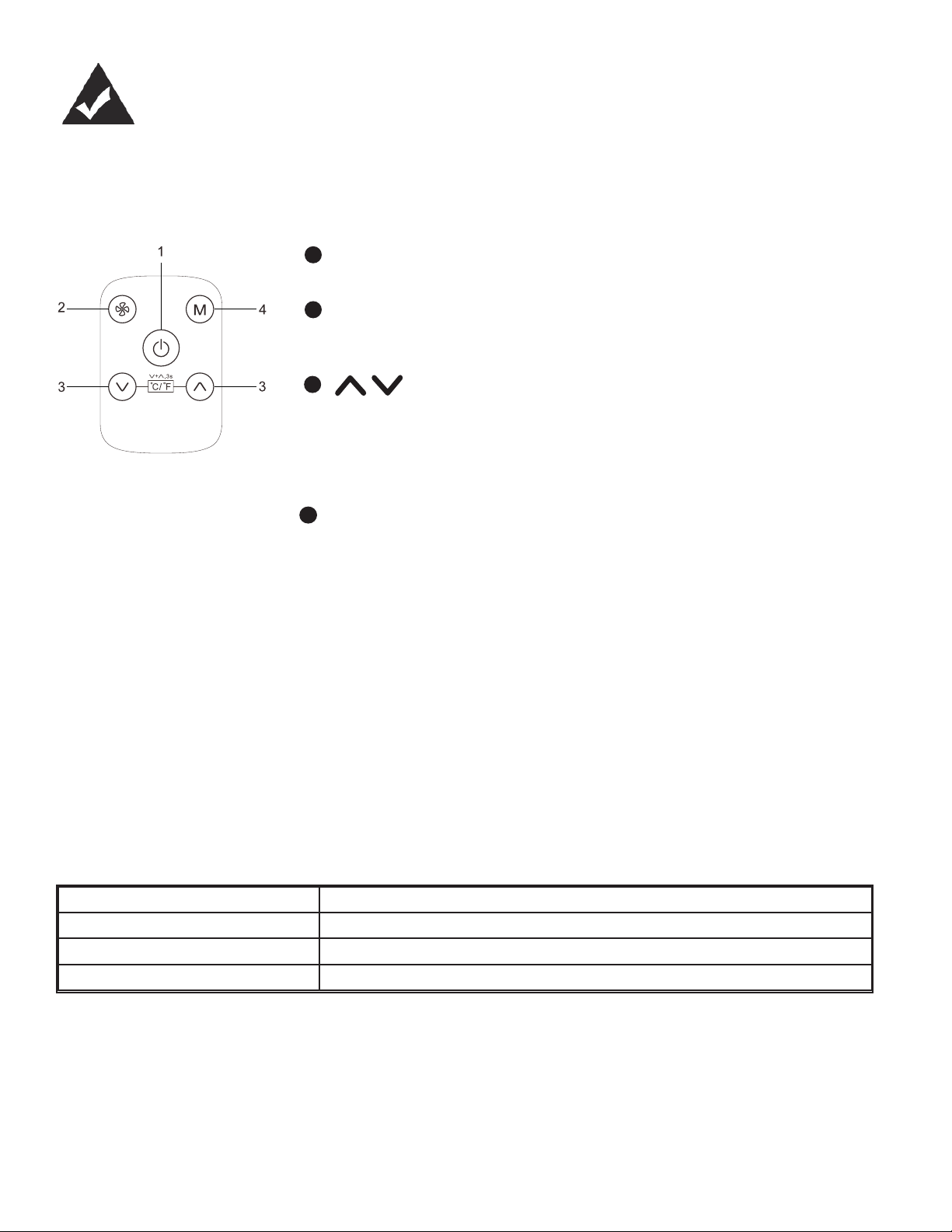
Before you begin, thoroughly familiarize yourself with the control panel and remote control and all its functions. Select the
functions you desire based on the associated symbol.
The unit can be controlled by the control panel alone or with the remote control.
5
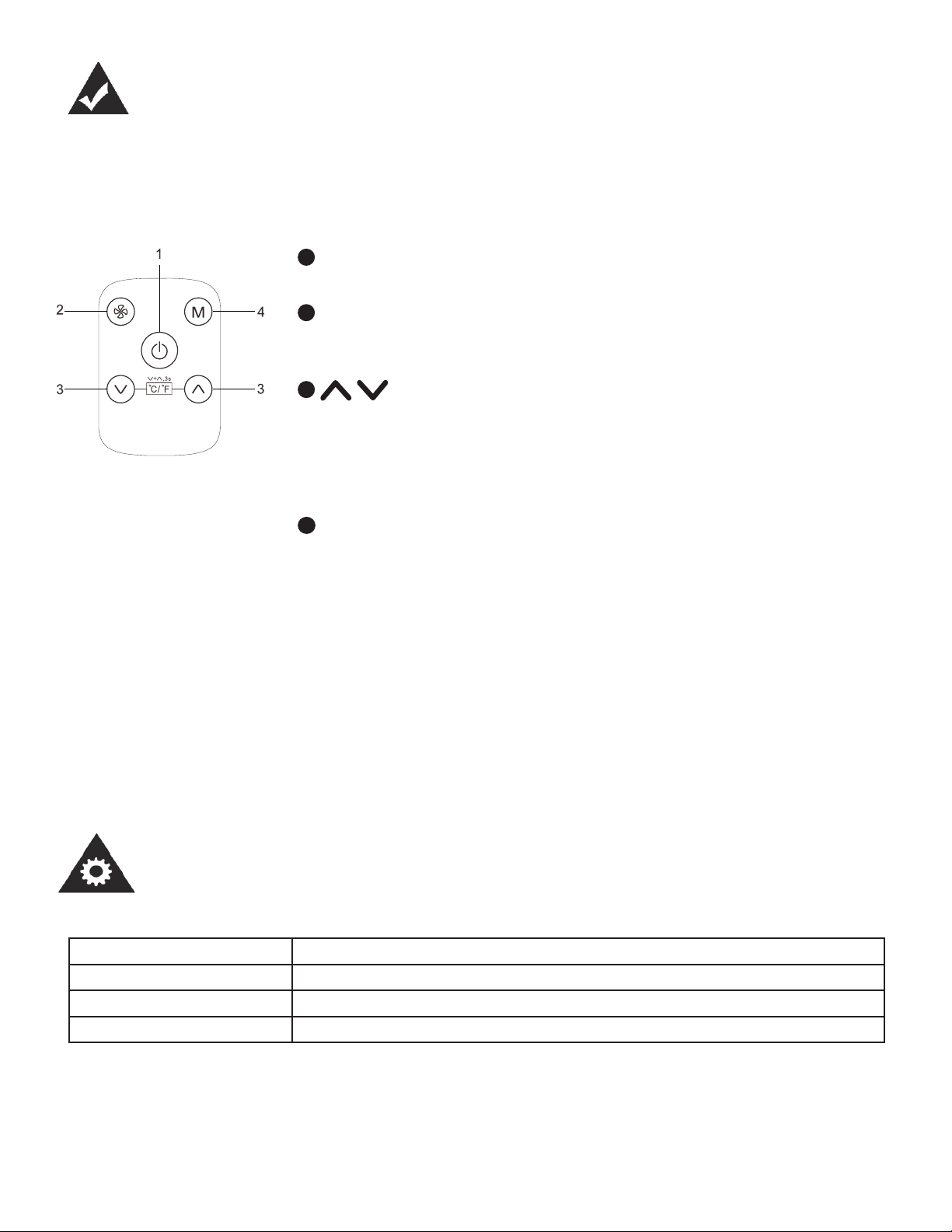
POWER button
Turns power on/off.
FAN button
Controls the fan speed. Press to toggle between three fan speeds,
Maximum, Medium and Low
UP and DOWN buttons
Used to adjust (increase / decrease) temperature settings (1°C/1°F increments)
or the TIMER setting in a range of 1~24hrs.
The control is capable of displaying temperature in degrees Fahrenheit or
degrees Celsius. *Converting from °C to °F can be done using the remote control
by pressing the °C/°F button.
MODE select button
Selects the appropriate operating mode. Each time you press
the button, a mode is selected in a sequence that goes from
COOL, DRY, HEAT and FAN. The mode indicator light illuminates
depending on the mode settings.
LED DISPLAY
Shows the set temperature in °C or °F (to toggle between °C and °F
press the °C/°F button on the remote control).
Error codes:
Lt - Low Temperature. The unit will defrost. The appliance will
start again once defrosting is complete.
PF - Probe failure, call for service.
Ft- Tank is full - Connect the drain hose and drain the
collected water away. If error repeats, call for service.
1
2
4
3
4
REMOTE CONTROL SPECIFICATIONS
Model Danby.00-UYKQ-46e (White) / Danby.01-UYKQ-46e(B) (Black)
Rated Voltage 3V
Signal Receiving Range 7m
Environment -5°C to 60°C (-41°F to 140°F)
Operating Instructions
1. Operating Mode: COOL, DRY, HEAT and FAN.
2. Timer Setting Function in 24 hours.
3. Indoor Setting Temperature Range COOL: 18°C~32°C (64°F~90°F).
4. Indoor Setting Temperature Range HEAT: 13°C~27°C (55°F~81°F)
CAUTION
• The air conditioner will not respond if curtains, doors or other materials block the signal from the
remote control to the unit.
• Prevent any liquid from contact with the remote control. Do not expose the remote control to direct
sunlight or heat.
• If the infrared signal receiver on the indoor unit is exposed to direct sunlight, the air conditioner
may not function properly. Use curtains to prevent the sunlight from falling on the receiver.
• If other electrical appliances react to the remote control, either move these appliances to another
location or consult your local dealer.
• Do not mix old and new batteries or batteries of different types (if applicable).
• Do not leave the batteries in the remote control if it is not going to be used for more than 2
months.
• Dispose of the old batteries in special containers such as those found in sales outlets that sell
batteries.
REMOTE CONTROL INSTRUCTIONS
NOTE: This equipment has been tested and found to comply with the limits for a Class B digital de-
vice, pursuant to Part 15 of the FCC Rules. These limits are designed to provide reasonable protec-
tion against harmful interference in a residential installation. This equipment generates, uses and can
radiate radio frequency energy and, if not installed and used in accordance with the instructions, may
cause harmful interference to radio communications. However, there is no guarantee that interference
will not occur in a particular installation.
If this equipment does cause harmful interference to radio or television reception, which can be deter-
mined by turning the equipment off and on, the user is encouraged to try to correct the interference by
one or more of the following measures:
1. Reorient or relocate the receiving antenna
2. Increase the separation between the equipment and receiver
3. Connect the equipment into an outlet on a circuit different from that to which the receiver is
connected
4. Consult the dealer or an experienced radio/TV technician for help
Changes or modifi cations not approved by the party responsible for FCC compliance could void the
user’s authority to operate the equipment.
This appliance complies with Part 15 of the FCC Rules.
Operation is subject to the following conditions:
1. This device may not cause harmful interference.
2. This device must accept any interference received, including interference that may cause
undesired operation.
This device complies with Canadian CAN ICES-3 (B) / NMB-3 (B)
6
Operating Instructions
7
REMOTE CONTROL INSTRUCTIONS
Operating Instructions
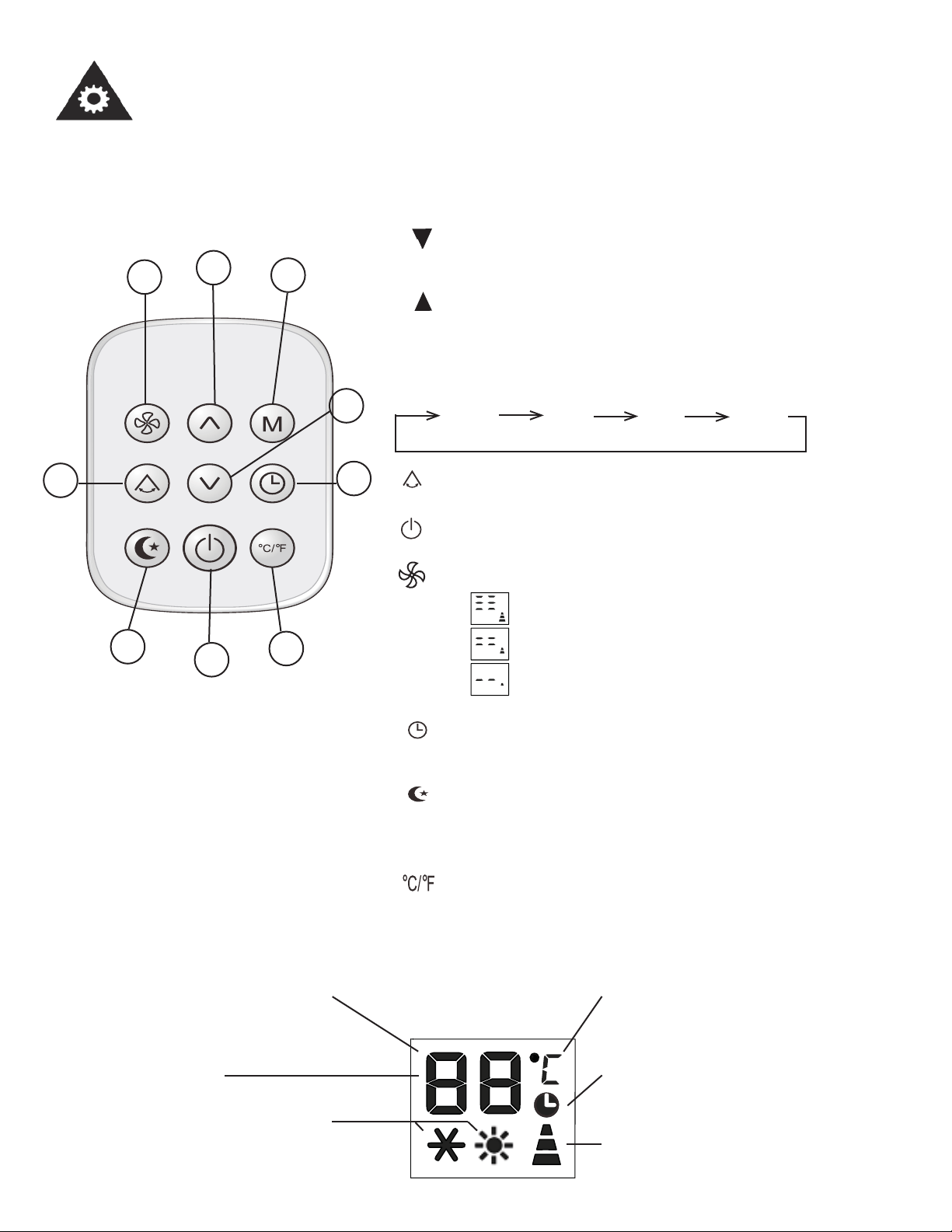
1. TEMP DOWN Button: Push this button to decrease
the indoor temperature setting by 1°C (1°F) increments.
2. TEMP UP Button: Push this button to increase the
indoor temperature setting by 1°C (1°F) increments.
3. M (Mode) Button: Each time the button is pressed, the
operation mode changes in the following sequence:
COOL DRY FAN HEAT
4. Button: Used to stop or start louver movement and
move the airfl ow direction up/down as desired.
5. Button: Unit operation starts when this button is
pressed and stops when the button is pressed again.
6. Button: Used to select the fan speed in 3 steps:
Maximum
Medium
Low
7. Button: Activates the Auto-on or Auto-off feature. See
page 10 for details.
8. Button: Select this function if you want the unit to
maintain a comfortable setting and save energy while you
sleep. This function is available on COOL and HEAT mode.
9. Button: Press this button to change from °C to °F.
• With the unit in stand-by, press the “M” button for 20 sec-
onds to change from °C to °F.
2
6
3
1
4
7
9
5
8
• Use the remote control within a distance of 7 m (23 ft.) from the appliance, pointing it towards the
receiver. Reception is confi rmed by a beep.
TIMER Display: This display area
shows the TIMER settings.
MODE Display: Displays the
current selected mode, including
COOL or HEAT.
Temp./Timer Display: The temperature setting in
Celcius or Farhenheit, or the timer setting from 0 to 24
hours.
Temperature Symbol: Indicates if
temperature is in °C or °F
FAN SPEED Display: Displays
the selected fan speed: Maximum,
Medium and Low.
DRY Mode: Dry mode will
display as dh.
8
REMOTE CONTROL INSTRUCTIONS
Operating Instructions
Cooling Operation
Ensure the unit is plugged in and has power.
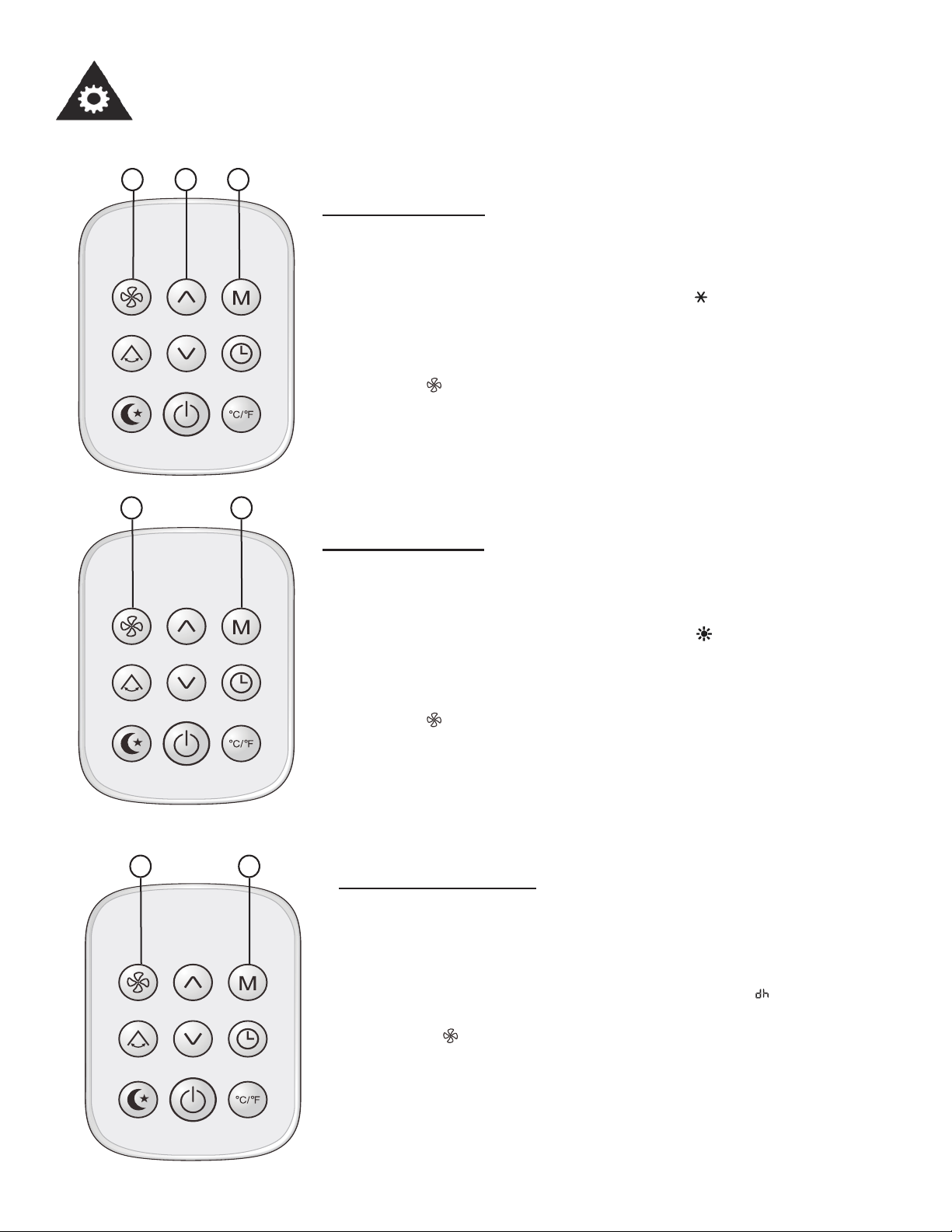
1. Press the M button to select COOL mode ( indicator will appear).
2. Use the up and down arrows to select the desired temperature.
The temperature can be set within a range of 18°C (64°F) to 32°C
(90°F) in 1°C (1°F) increments.
3. Press the button to select one of the 3 fan speeds, Maximum,
medium and minimum.
3 2 1
12
Heating Operation
Ensure the unit is plugged in and has power.
1. Press the M button to select HEAT mode ( indicator will appear).
2. Use the up and down arrows to select the desired temperature.
The temperature can be set within a range of 13°C (55°F) to 27°C
(81°F) in 1°C (1°F) increments.
3. Press the button to select one of the 3 fan speeds, Maximum,
medium and minimum.
12
Dehumidifying Setting
Ensure the unit is plugged in and has power. The OPERATION
indicator on the display panel of the unit illuminates.
1. Press the M button until DRY mode is selected ( indicator will
appear).
2. Press the button to select one of the 3 fan speeds, Maximum,
medium and minimum.
NOTE: You cannot set the temperature in dehumidifying mode.
9
REMOTE CONTROL INSTRUCTIONS
Operating Instructions
Fan Operation
Ensure the unit is plugged in and has power.
1. Press the M button to select FAN mode ( indicator will appear).
2. Press the button to select one of the 3 fan speeds, Maximum,
medium and minimum.
NOTE
In FAN mode, the temperature setting is not displayed and you are
not able to control the room temperature.
12
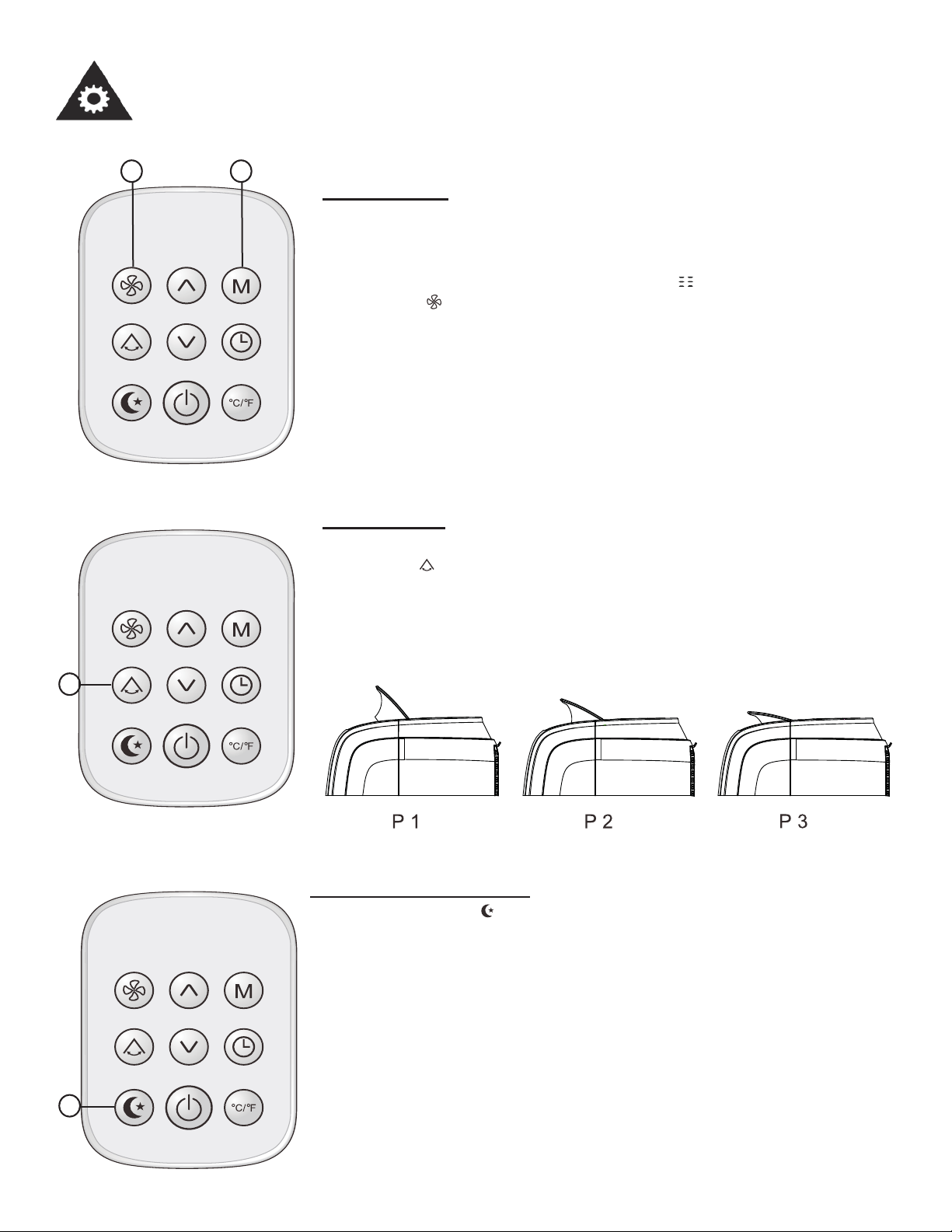
Swing Setting
1. Use the button to adjust the direction the air blows in. There are
three defl ector positions and the auto swing feature.
Note: Under auto swing, the air fl ow is continuously moving.
1
1
Economy (Sleep) Setting
When you press the button, the ECONOMY setting will be activat-
ed. The SLEEP function is available in COOL and HEAT modes. The
SLEEP function also dims the display.
When in COOL mode, the temperature setting will increase by 1°C
(1°F) over the next hour and by another 1°C (1°F) over another hour.
This new temperature will be maintained for the next several hours.
When in HEAT mode, the temperature setting will decrease by 1°C
(1°F) over the next hour and by another 1°C (1°F) over another hour.
This new temperature will be maintained for the next several hours.
10
REMOTE CONTROL INSTRUCTIONS
Operating Instructions
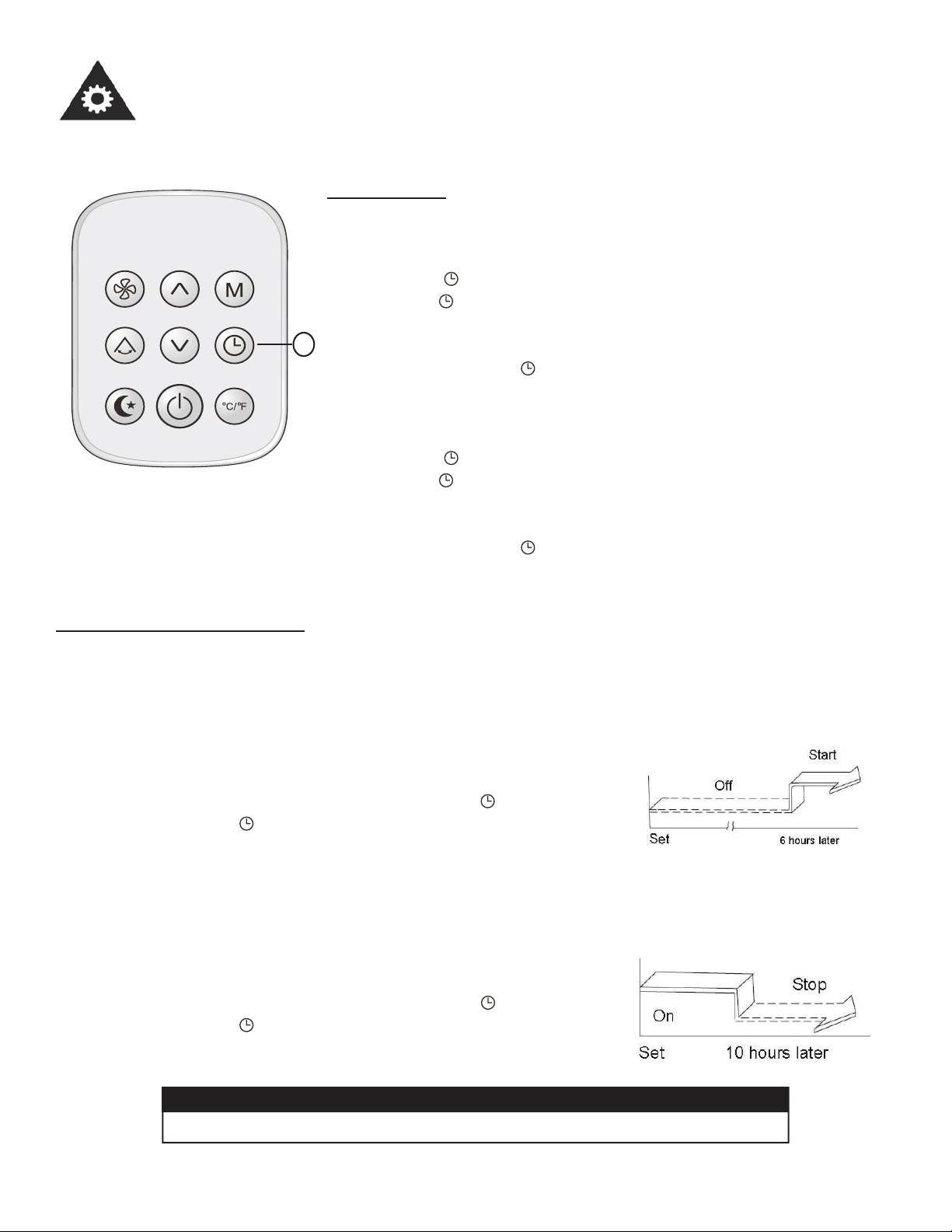
Timer Setting
To set the Auto-on time:
With the unit off:
1. Press the button, the time on the display will fl ash.
2. Press the button until the time you desire shows on the display.
The timer can be set anywhere between 1 and 24 hours.
3. The display will stop fl ashing and the time will be set.
4. To cancel press the button again.
To set the Auto-off time:
With the unit on:
1. Press the button, the time on the display will fl ash.
2. Press the button until the time you desire shows on the display.
The timer can be set anywhere between 1 and 24 hours.
3. The display will stop fl ashing and the time will be set.
4. To cancel press the button again.
1
CAUTION
• The timer setting must be cancelled before other settings can be applied.
Example of Timer Operation
Auto-on Operation
The Auto-on feature is useful when you want the unit to turn on automatically, for example, right
before you return home. The air conditioner will automatically start operating at the set time.
Example:
To start the air conditioner 6 hours ahead.
1. When the air conditioner is turned off, press the button.
2. Keep pressing the button until it displays “06” on the display.
Auto-off Operation
The Auto-off feature is useful when you want the unit to turn off automatically, for example, after you
go to bed. The air conditioner will stop automatically at the set time.
Example:
To turn off the air conditioner in 10 hours.
3. When the air conditioner is turned on, press the button.
4. Keep pressing the
button until it displays “10” on the display.
Operating Instructions
OPERATING MODES
11
COOL mode
- Press the “M” button until the “ ” indicator comes on.
- Press the UP or DOWN arrow buttons to select your desired room temperature.
- The temperature can be set within a range of 18-32°C / 64-90°F.
- Press the “ ” button to choose the fan speed.
Note: The hose should be exhausted in COOL mode.
HEAT mode
- Press the “M” button until the “
” indicator comes on.
- Press the UP or DOWN arrow buttons to select your desired room temperature.
- The temperature can be set within a range of 13-27°C / 55-81°F.
- Press the “ ” button to choose the fan speed.
Note: The hose should be exhausted in HEAT mode.
FAN operation
- Press the “M” button until the “ ” indicator appears.
- Press the “ ” button to choose the fan speed.
Maximum Speed
Medium Speed
Low Speed
DRY mode
- Press the “M” button until the “ ” indicator appears.
- Press the “
” button to choose the fan speed.
Note: The hose should be exhausted in DRY mode.
Note: To switch the temperature from °C to °F, press the °C/°F button on the remote.
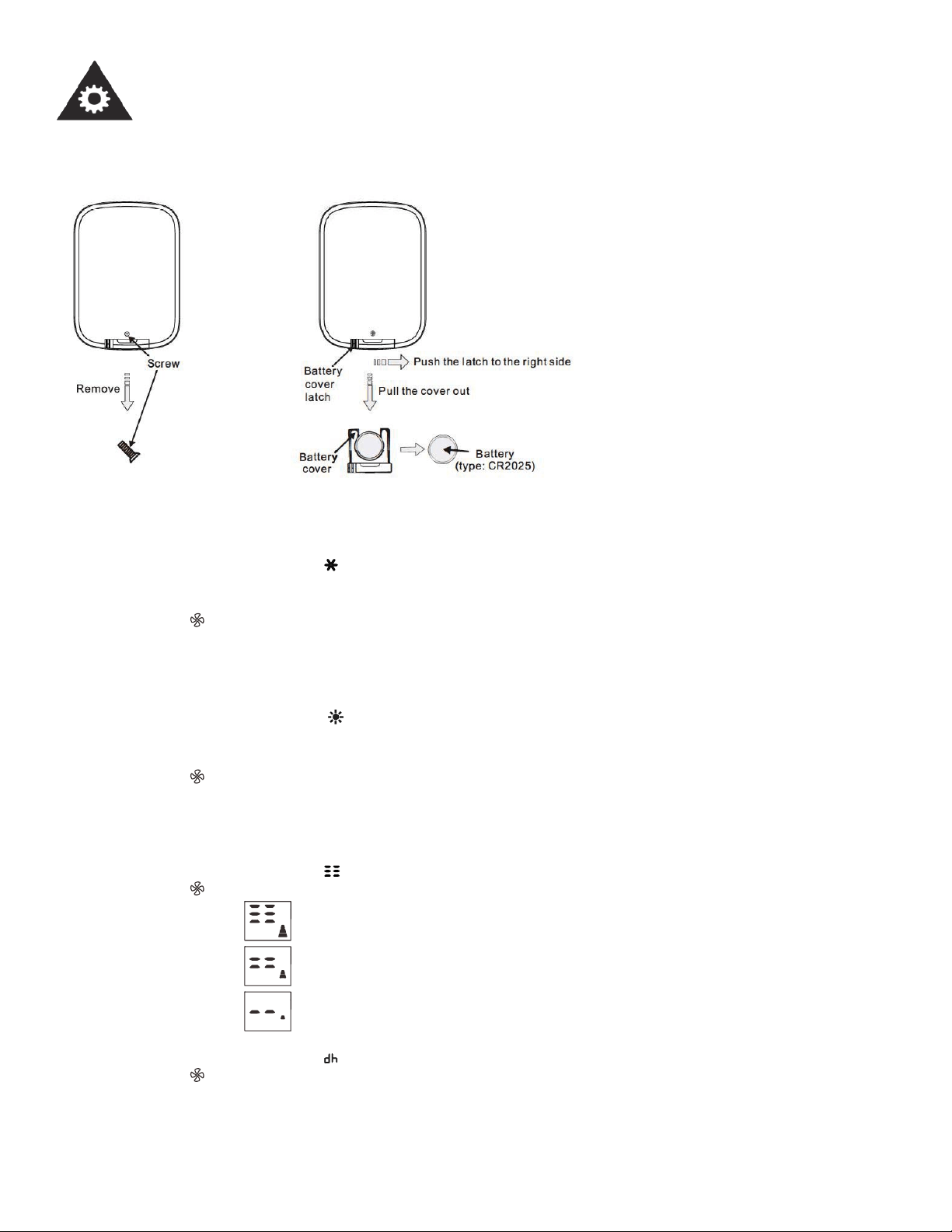
REPLACING THE REMOTE BATTERY
To replace the remote battery:
1. Use a screwdriver to remove the
screw that secures the battery
cover.
2. Push the latch to the right side
and pull the battery cover out.
3. Replace the battery and slide
the battery cover back into the
remote.
4. Replace the screw that secures
the battery cover.
POWER OUTAGE
In the case of a power outage, the unit will automatically re-start with the last setting after the power is restored.
Wait 3 minutes before resuming operation
After the unit has stopped, it cannot operate for the fi rst 3 minutes. This is to protect the unit. Operation of the compressor
will automatically start after 3 minutes.
12
Operating Instructions
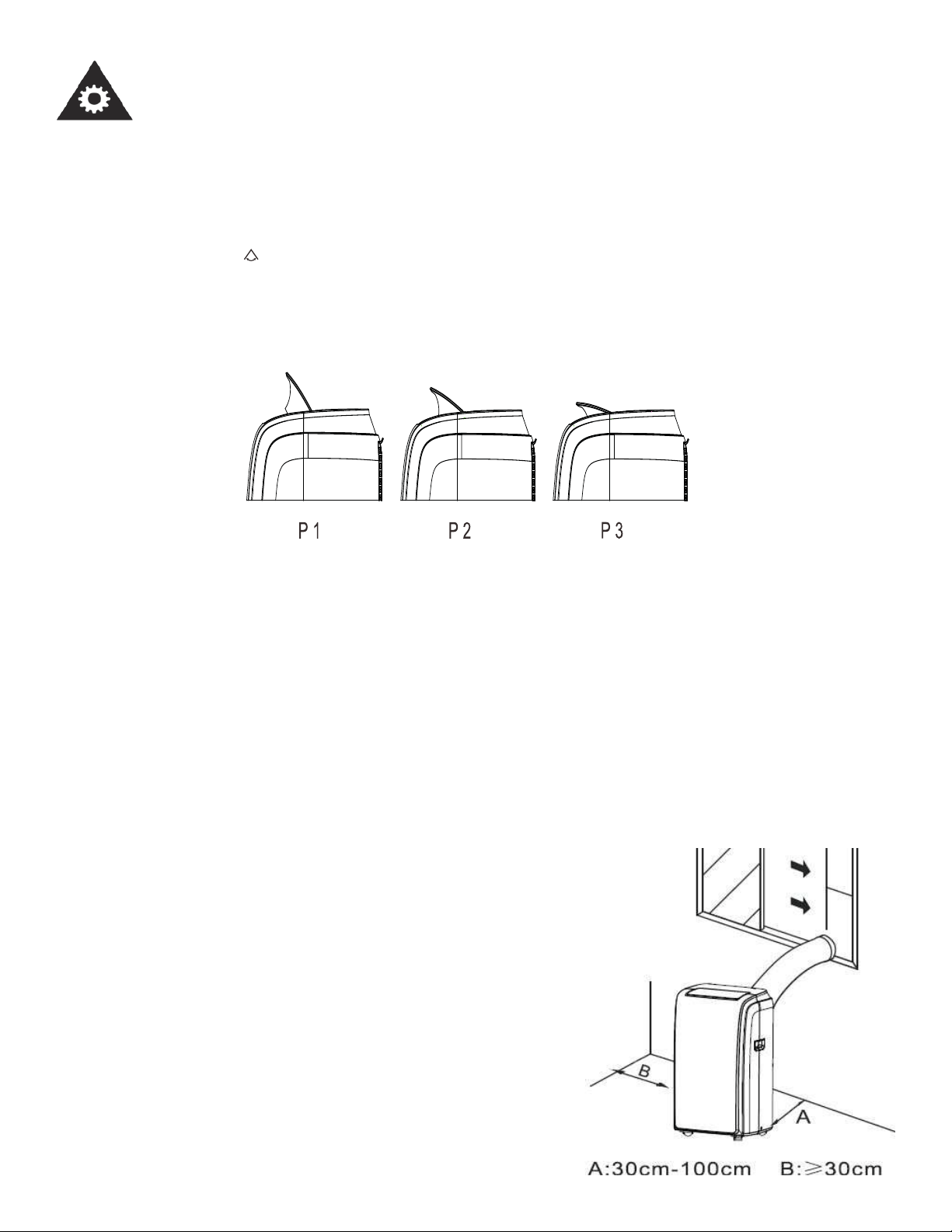
AIR FLOW DIRECTION ADJUSTMENT
Adjust the air fl ow direction automatically (Fig. 4):
- The louver can be adjusted automatically, to change the airfl ow direction. (Fig.4)
- When the power is ON, the louver opens fully.
- Press the SWING button on the remote control to initiate the swing feature.
- The swing feature has 3 positions plus auto, P1, P2, P3 and auto swing.
Please do not adjust the louver manually.
Note: Auto swing means the swing will be continuous.
Note: This function is available on the remote control only.
Fig. 4
LOCATION
• The air conditioner should be placed on a fi rm foundation to minimize noise and vibration. For safe and secure
positioning, place the unit on a smooth, level fl oor strong enough to support the unit.
• The unit has casters to aid placement, but it should only be rolled on smooth, fl at surfaces. Use caution when rolling
on carpeted surfaces. Use caution and protect fl oors when rolling over wood fl oors. Do not attempt to roll the unit over
objects.
• The unit must be placed within reach of a properly rated grounded
socket.
• Never place any obstacles around the air inlet or outlet of the unit.
• Allow at least 30 cm of space away from the wall for effi cient air
conditioning.
13
Installation Instructions
WINDOW SLIDER KIT INSTALLATION
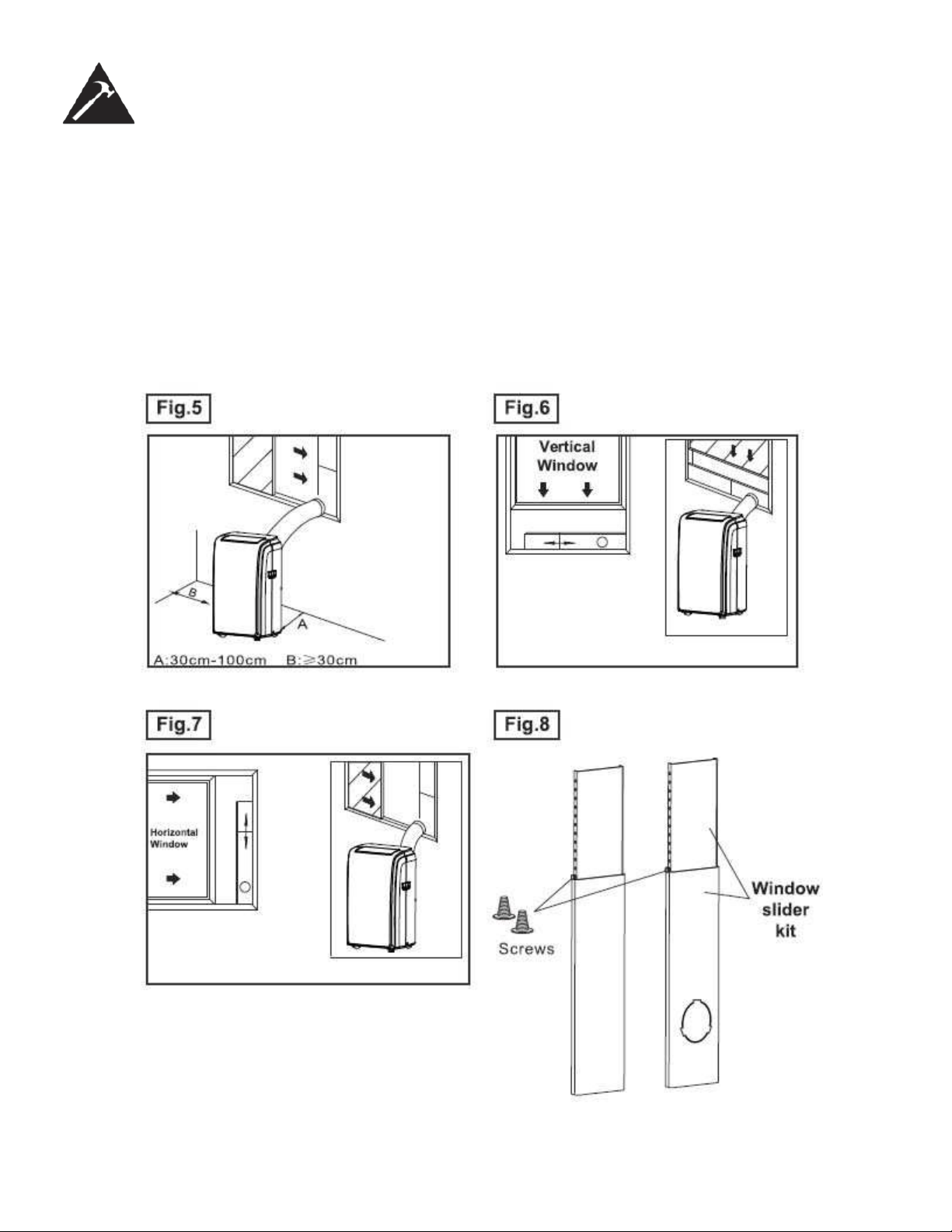
Your window slider kit has been designed to fi t most standard vertical and horizontal window applications, however, it may
be necessary for you to modify some aspects of the installation procedures for certain types of windows. The window
slider kit can be fastened with a screw (see Fig. 8)
NOTE: If the window opening is less than the minimum length of the window slider kit, cut the end without the hole in it
short enough to fi t in the window opening. Never cut out the hole in window slider kit (visit www.danby.com for general
instruction videos).
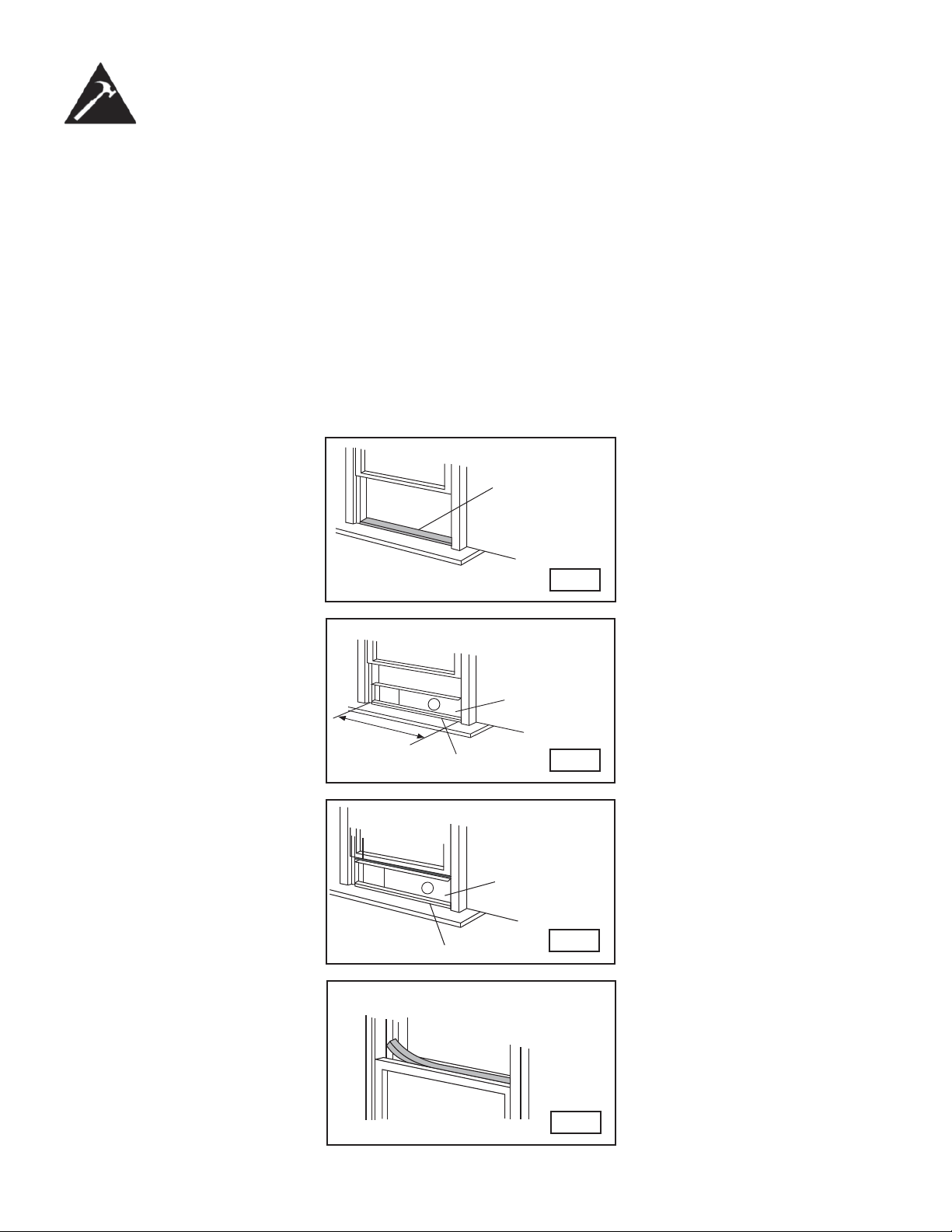
Foam seal A
(adhesive type)
Fig.9
Fig.12
Foam seal
Fig.10
Windowsill
Fig.11
Window Kit
Windowsill
Window Kit
28.3 in.
-
81.5 in.
72 cm - 2.07 m
14
Installation Instructions
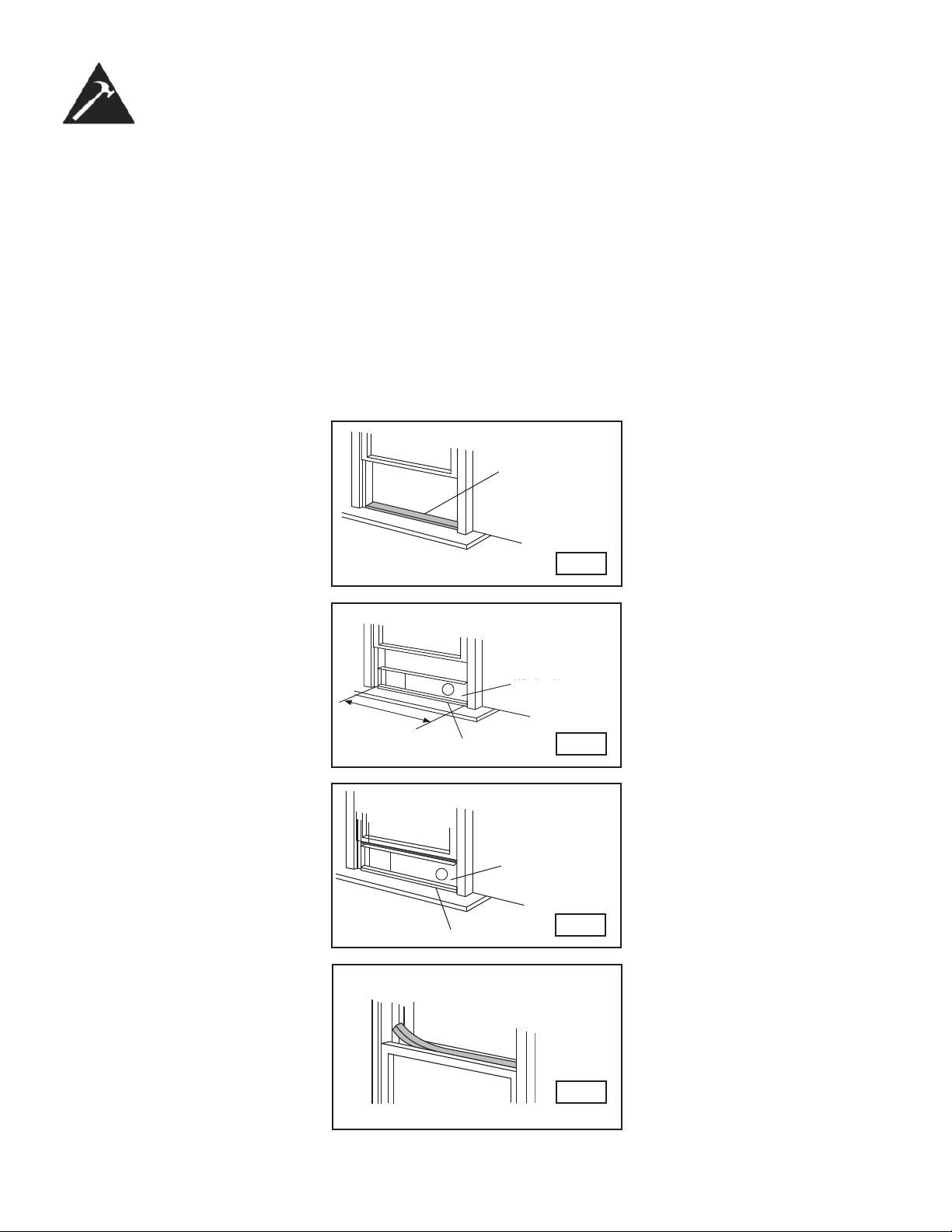
INSTALLATION IN A DOUBLE-HUNG SASH WINDOW
1. Measure the adhesive foam seal to fi t the windowsill. Then cut the foam seal to the proper length and attach it to the
windowsill. Fig.9
2. Adjust the length of the window slider kit to fi t the width of the window. Open the window sash and place the window
slider kit on the windowsill. Fig.10
3. Cut the foam seal (adhesive type) to the proper length and attach it on the top of the window. Shown in Fig.11
4. Close the window sash securely against the window.
5. Cut the foam seal to an appropriate length and seal the open gap between the top window sash and outer window
sash. Shown in Fig.12.
52 cm -
2 m
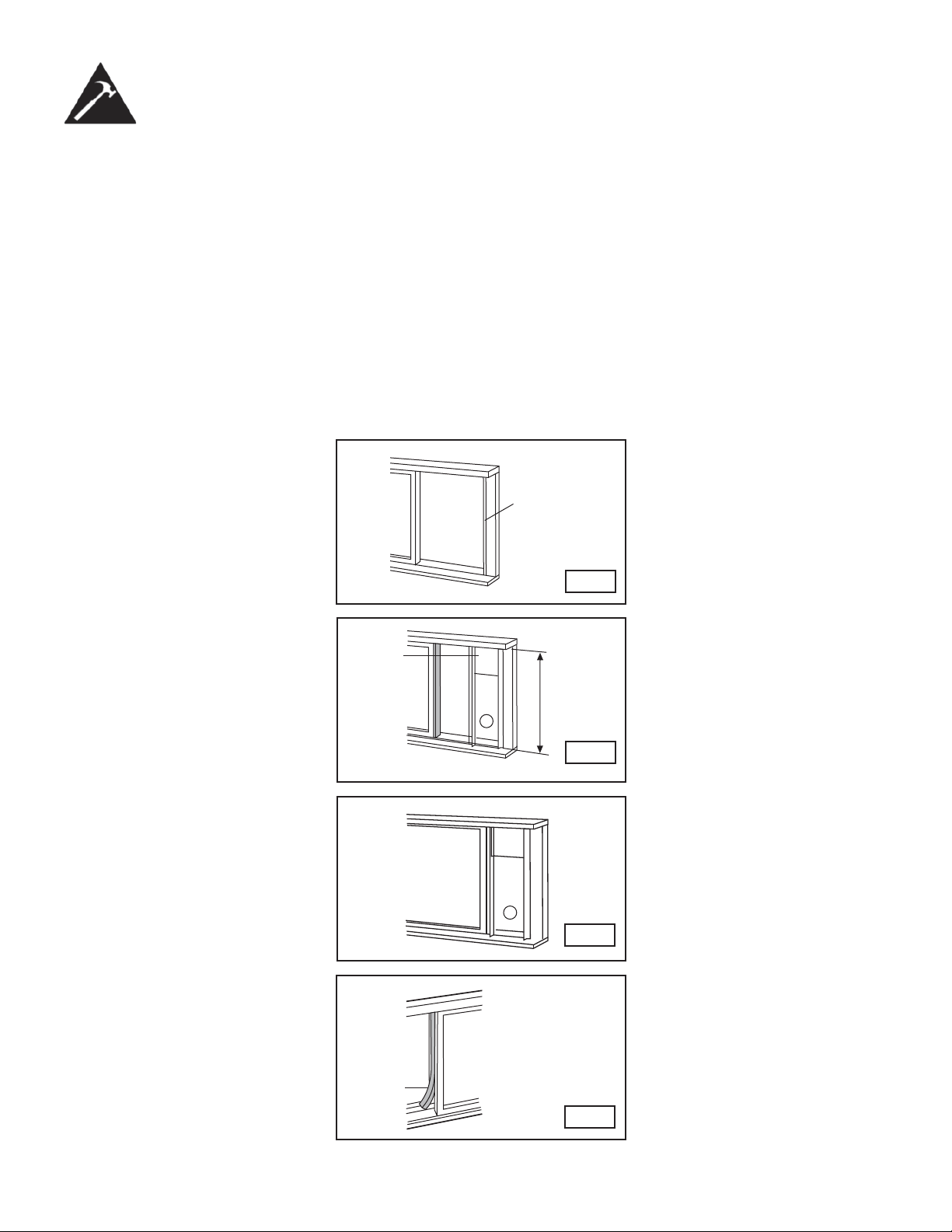
Foam seal A
(adhesive type)
Fig.13
Fig.14
Window
Panel
Fig.15
Foam
Seal
Fig.16
72 cm -2.07 m
(28.3 - 81.5 in.)
15
Installation Instructions
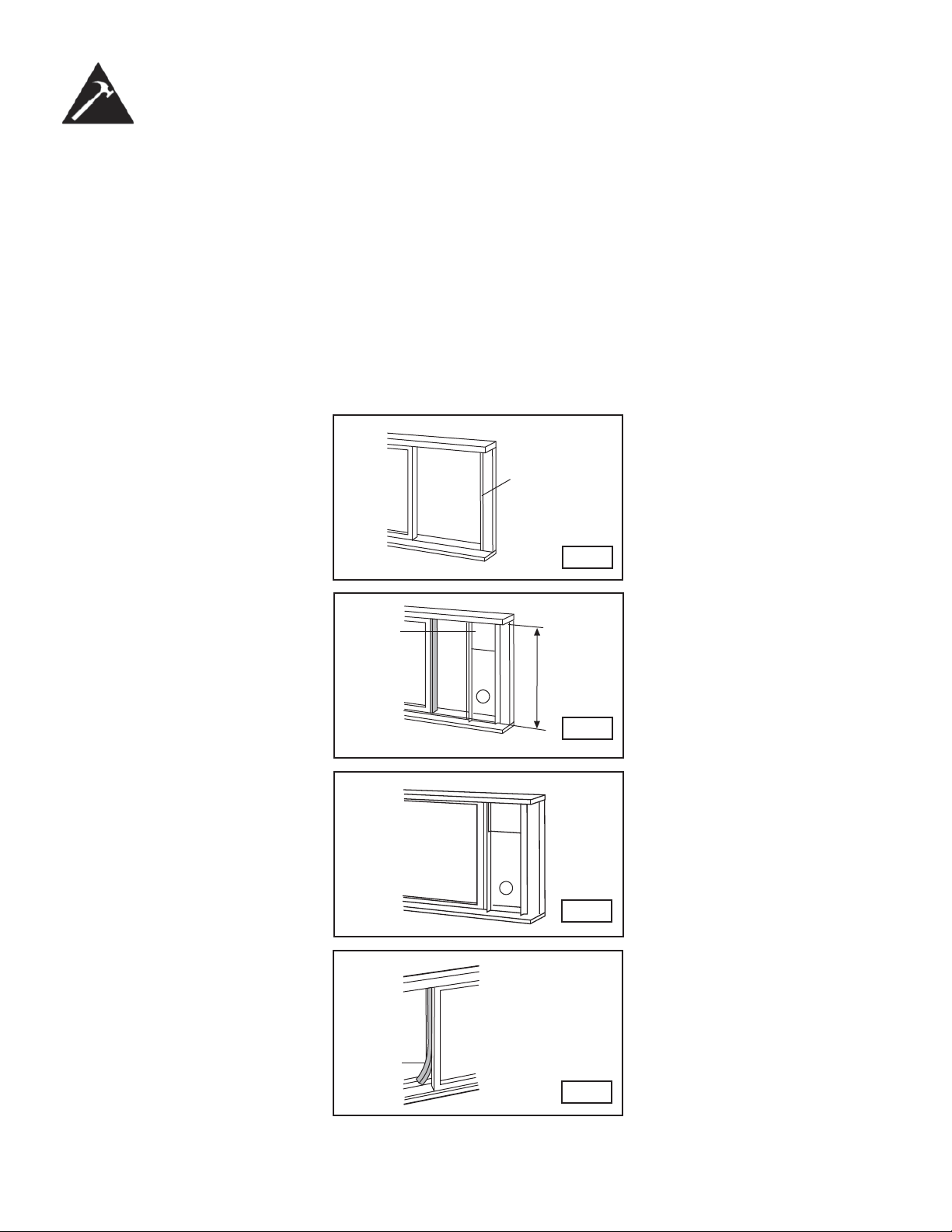
INSTALLATION IN A SLIDING SASH WINDOW
1. Measure the adhesive foam seal to fi t the windowsill. Cut the foam seal (adhesive type) to the proper length and
attach it to the window frame. See fi g. 13.
2. Adjust the length of the window slider kit according to the height of the window, shorten the adjustable window kit if
the height of the window slider is less than the opening. Open the window sash and place the window slider kit on the
windowsill. See fi g. 14.
3. Cut the foam seal (adhesive type) to the proper length and attach it to the top of the window. Shown in fi g. 15.
4. Close the sliding sash securely against the window.
5. Cut the foam seal to an appropriate length and seal the open gap between the top window sash and outer window
sash. Shown in fi g. 16.
52 cm -
2 m
16
Installation Instructions
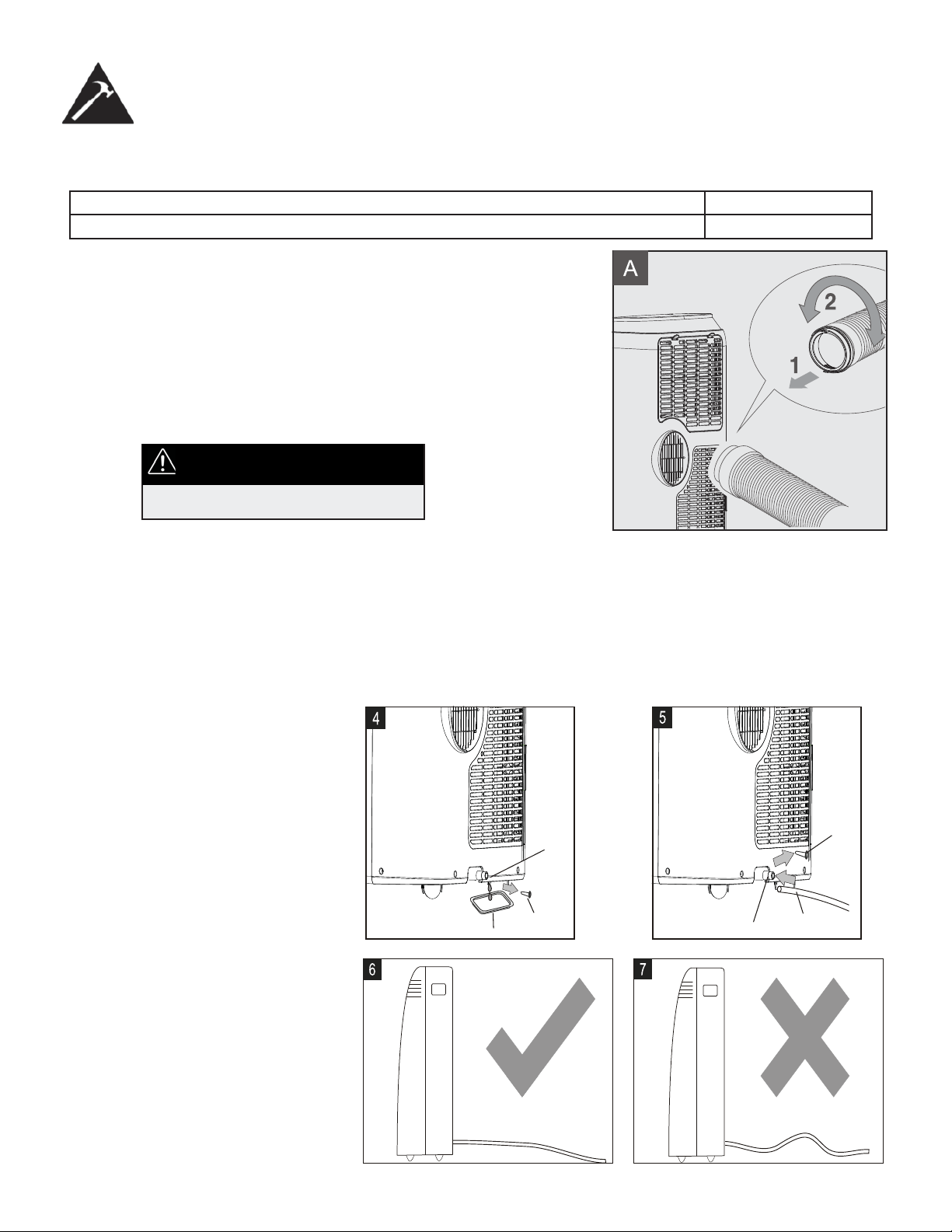
EXHAUST HOSE INSTALLATION
The exhaust hose and adaptor must be installed or removed in accordance with the
usage mode.
COOL, DRY, HEAT or AUTO mode Install
FAN Remove
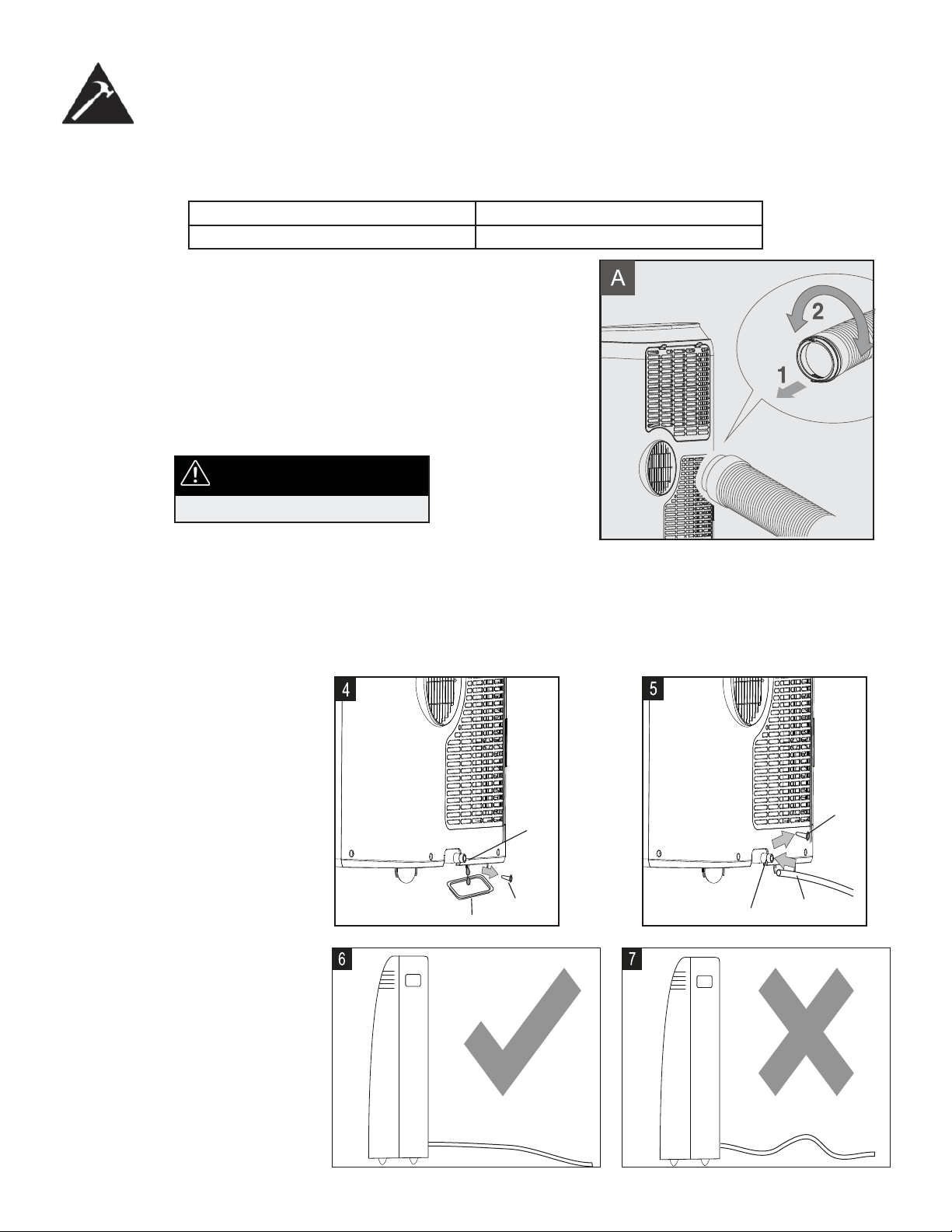
1. Install the window exhaust adaptor onto the exhaust hose as
shown in Fig. A. Refer to the previous pages for window kit
installation.
2. Insert the exhaust hose into the rear air outlet opening Fig. A.
• The hose can be compressed or extended moderately according
to the installation requirement, but it is desirable to keep the hose
length to a minimum.
IMPORTANT
DO NOT OVER BEND THE HOSE
WATER DRAINAGE
• During DRY modes, remove the drain plug from the back of the unit, attach the drain hose to the hole. Place the open
end of the hose directly over the drain area in your basement fl oor. Please refer to Fig. 5.
• For small amounts of water, remove the drain plug and place a pan under the drain outlet as shown in Fig. 4.
NOTE: Make sure the hose is secure
so there are no leaks. Direct the hose
toward the drain, making sure that
there are no kinks that will stop the wa-
ter from fl owing. Place the end of the
hose into the drain and make sure the
end of the hose is down to let the water
fl ow smoothly. (see Fig. 6). Never raise
it. (See Fig 7).
NOTE: When operating or draining wa-
ter, always protect carpeting or fl oors
from possible water spillage.
NOTE: Be sure to reinstall the bottom
drain plug before using the unit.
Drain outlet
Drain plug
Drain pan
Drain plug
Drain outlet
Drain hose
17
Care and Maintenance
IMPORTANT
1. Be sure to unplug the unit before cleaning or servicing.
2. Do not use gasoline, paint thinner or other chemicals to clean the unit.
3. Do not wash the unit directly under a tap or using a hose. It may cause electrical damage.
4. If the power cord is damaged, contact the service depot immediately.
AIR FILTER
UNIT ENCLOSURE
Use a lint-free cloth soaked with neutral detergent to clean the unit enclosure, be sure to wring the cloth of ex-
cess water. Finish by wiping with a clean dry cloth.
LONG-TERM STORAGE
• Remove the rubber plug at the back of the unit and attach a hose to the drain outlet. Place the open end of the hose
directly over the drain area in your basement fl oor
.
• Remove the plug from the bottom drain outlet, this means that all the water in the bottom drain tray will drain out.
• Keep the appliance running on FAN mode for half a day in a warm room to dry the appliance inside and prevent mold
formation.
• Turn off the appliance and unplug it, wrap the cord and bundle it with tape.
• Remove the batteries from the remote control.
• Clean the air fi lter and reinstall it.
Clean the air fi lter at least once every two weeks. Accumulation of dust will hinder fan operation.
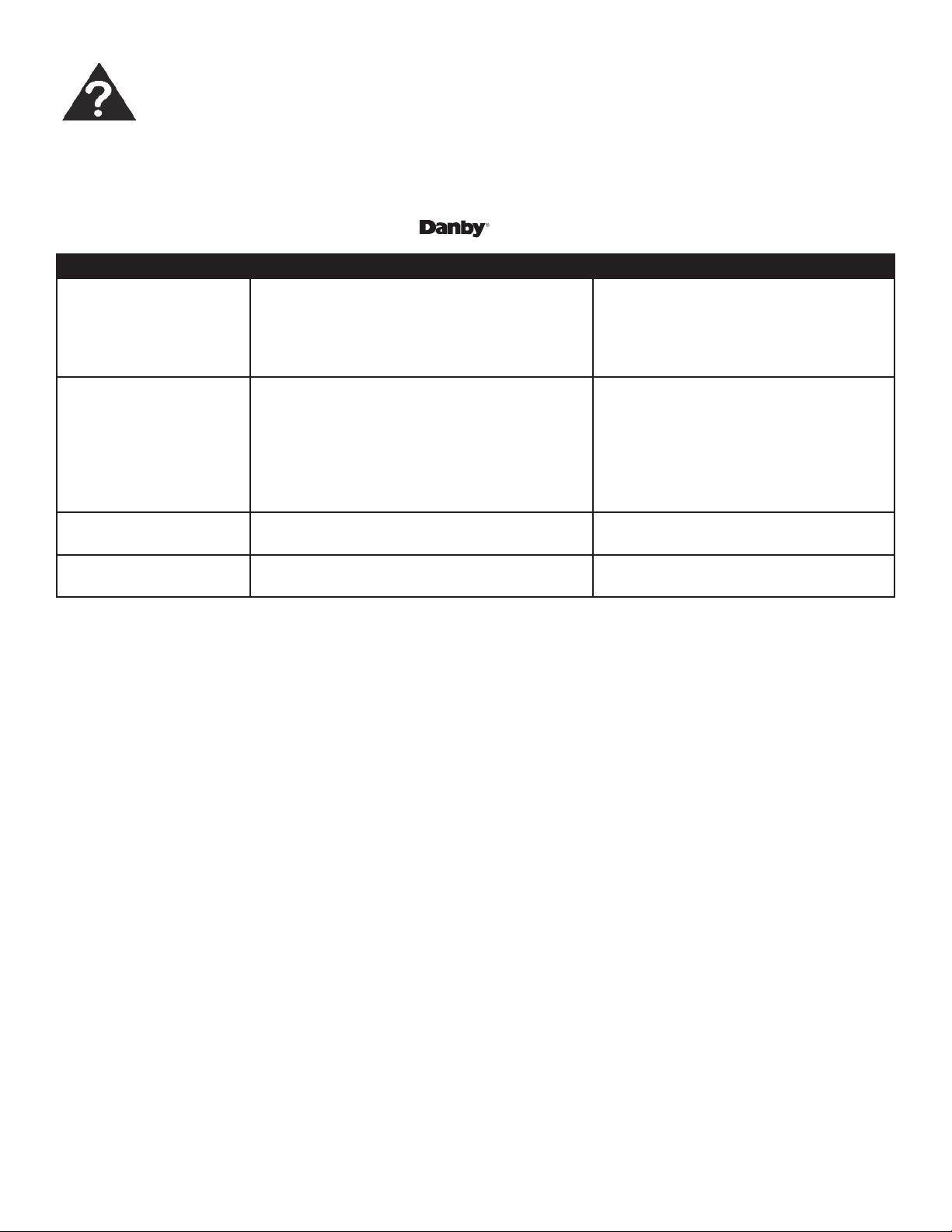
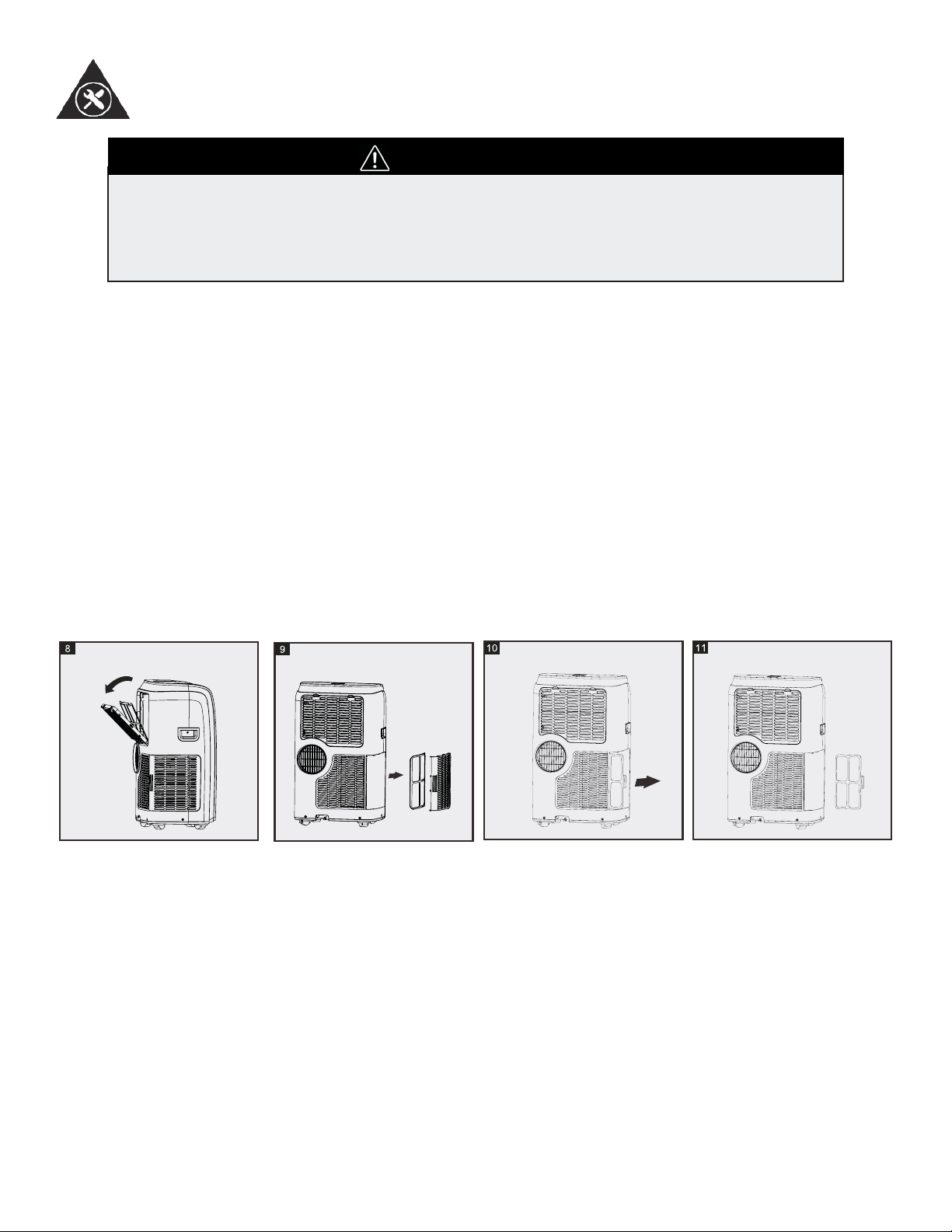
REMOVAL
This unit has three fi lters. Pull the upper grill out in the direction of the arrow (Fig. 8) and slide the fi lter out. Remove the
lower fi lters by removing the grill and then sliding it out the side in the direction of the arrow (Fig. 9-11).
CLEANING
1. Wash the air fi lter by submerging it gently in warm water (below 40°C / 104° F) with a neutral detergent.
2. Rinse the fi lter and let it dry.
REINSTALL
Install the upper air fi lter after cleaning, and install the lower fi lters after. *Filters should dry before installing*
18
Troubleshooting
Occasionally, a minor problem may arise, and a service call may not be necessary- use this troubleshooting guide for
a possible solution. If the unit continues to operate improperly, call an authorized service depot or Danby’s Toll Free
Number for assistance.
Tel: 1-800-26- (1-800-263-2629)
PROBLEM POSSIBLE CAUSE SOLUTION
Unit does not start
when pressing on/off
button
• Ft appears in the display window
• Room temperature is lower than the set
temperature. (Cooling mode)
• Room temperature is higher than the set
temperature (Heat mode)
• Drain the water in the bottom tray
• Reset the temperature
Not cool enough • The windows or doors in the room are not
closed
• There are heat sources inside the room
• Exhaust air hose is not connected or
blocked
• Temperature setting is too high
• Air fi lter is blocked by dust
• Make sure all the windows and doors
are closed
• Remove the heat sources if possible
• Connect the hose and make sure it
can function properly
• Decrease the set temperature
• Clean the air fi lter
Noisy or vibration • The ground is not level or not fl at enough • Place the unit on a fl at, level ground if
possible
Gurgling sound • The sound comes from the fl owing of the
refrigerant inside the air conditioner
• It is normal
DISPOSAL
Check for local regulatory compliance regarding the approved and safe disposal of this appliance.
LIMITED IN-HOME APPLIANCE WARRANTY
This quality product is warranted to be free from manufacturer’s defects in material and workmanship, provided that the unit is used under the normal operating
conditions intended by the manufacturer.
This warranty is available only to the person to whom the unit was originally sold by Danby Products Limited (Canada) or Danby Products Inc. (U.S.A.) (hereafter
“Danby”) or by an authorized distributor of Danby, and is non-transferable.
TERMS OF WARRANTY
Plastic parts, are warranted for thirty (30) days only from purchase date, with no extensions provided.
First Year
During the rst twelve (12) months, any functional parts of this product found to be defective, will be repaired or replaced, at warrantor’s
option, at no charge to the ORIGINAL purchaser.
To obtain
Danby reserves the right to limit the boundaries of “In Home Service” to the proximity of an Authorized Service Depot. Any app liance
Service
requiring service outside the limited boundaries of “In Home Service” , it will be the consumer’s responsibility to transport the appliance (at
their own expense) to the original retailer (point of purchase) or a service depot for repair. See “Boundaries of In Home Serv ice” below.
Contact your dealer from whom your unit was purchased, or contact your nearest authorized Danby service depot, where service
must be performed by a qualied service technician.
If service is performed on the units by anyone other than an authorized service depot, or the unit is used for commercial appli cation, all
obligations of Danby under this warranty shall be void.
Boundaries of
If the appliance is installed in a location that is 100 kilometers (62 miles) or more from the nearest service center your unit must be
In Home Service
delivered to the nearest authorized Danby Service Depot, as service must only be performed by a technician qualied and certif ied for
warranty service by Danby. Transportation charges to and from the service location are not protected by this warranty and are t he
responsibility of the purchaser.
Nothing within this warranty shall imply that Danby will be responsible or liable for any spoilage or damage to food or other c ontents of this appliance, whether due
to any defect of the appliance, or its use, whether proper or improper.
EXCLUSIONS
Save as herein provided, Danby, there are no other warranties, conditions, representations or guarantees, express or implied, m ade or intended by Danby or its
authorized distributors and all other warranties, conditions, representations or guarantees, including any warranties, conditio ns, representations or guarantees
under any Sale of Goods Act or like legislation or statue is hereby expressly excluded. Save as herein provided, Danby shall no t be responsible for any damages
to persons or property, including the unit itself, howsoever caused or any consequential damages arising from the malfunction o f the unit and by the purchase of
the unit, the purchaser does hereby agree to indemnify and hold harmless Danby from any claim for damages to persons or propert y caused by the unit.
GENERAL PROVISIONS
No warranty or insurance herein contained or set out shall apply when damage or repair is caused by any of the following:
1) Power failure.
2) Damage in transit or when moving the appliance.
3) Improper power supply such as low voltage, defective house wiring or inadequate fuses.
4) Accident, alteration, abuse or misuse of the appliance such as inadequate air circulation in the room or abnormal operating con ditions
(extremely high or low room temperature).
5) Use for commercial or industrial purposes (ie. If the appliance is not installed in a domestic residence).
6) Fire, water damage, theft, war, riot, hostility, acts of God such as hurricanes, oods etc.
7) Service calls resulting in customer education.
8) Improper Installation (ie. Building-in of a free standing appliance or using an appliance outdoors that is not approved for out door application).
Proof of purchase date will be required for warranty claims; so, please retain bills of sale. In the event warranty service is required, present this document to our
AUTHORIZED SERVICE DEPOT.
Danby Products Limited
PO Box 1778, Guelph, Ontario, Canada N1H 6Z9
Telephone: (519) 837-0920 FAX: (519) 837-0449
Danby Products Inc.
PO Box 669, Findlay, Ohio, U.S.A. 45840
Telephone: (419) 425-8627 FAX: (419) 425-8629
04/09
1-800-263-2629
Warranty Service
In-home
If the appliance is installed in a location that is 100 kilometers (62 miles) or more from the nearest
service center your unit must be delivered to the nearest authorized Danby Service Depot, as service
must only be performed by a technician qualified and certified for warranty service by Danby. Transpor-
tation charges to and from the service location are not protected by this warranty and are the responsi-
bility of the purchaser.
During the first twenty four (24) months, any functional parts of this product found to be defective, will be
repaired or replaced, at warrantor’s option, at no charge to the ORIGINAL purchaser.
Danby reserves the right to limit the boundaries of “In Home Service” to the proximity of an Authorized
Service Depot. Any appliance requiring service outside the limited boundaries of “In Home Service” ,it
will be the consumer’s responsibility to transport the appliance (at their own expense) to the original
retailer (point of purchase) or a service depot for repair. See “Boundaries of In Home Service” below.
Contact your dealer from whom your unit was purchased, or contact your nearest authorized Danby
service depot, where service must be performed by a qualified service technician. If service is performed
on the units by anyone other than an authorized service depot, or the unit is used for commercial
application, all obligations of Danby under this warranty shall be void.
First 24 months
To obtain
service
Boundaries of
in-home service
LIMITED IN HOME APPLIANCE WARRANTY
This quality product is warranted to be free from manufacturer’s defects in material and workmanship, provided that the unit is
used under the normal operating conditions intended by the manufacturer.
This warranty is available only to the person to whom the unit was originally sold by Danby Products Limited (Canada) or
Danby Products Inc. (U.S.A.) (hereafter “Danby”) or by an authorized distributor of Danby, and is non-transferable.
TERMS OF WARRANTY
Plastic parts, are warranted for thirty (30) days only from purchase date, with no extensions provided.
Nothing within this warranty shall imply that Danby will be responsible or liable for any spoilage or damage to food or other
contents of this appliance, whether due to any defect of the appliance, or its use, whether proper or improper.
EXCLUSIONS
Save as herein provided, by Danby, there are no other warranties, conditions, representations or guarantees, express or
implied, made or intended by Danby or its authorized distributors and all other warranties, conditions, representations or
guarantees, including any warranties, conditions, representations or guarantees under any Sale of Goods Act or like legislation
or statute is hereby expressly excluded. Save as herein provided, Danby shall not be responsible for any damages to persons
or property, including the unit itself, howsoever caused or any consequential damages arising from the malfunction of the unit
and by the purchase of the unit, the purchaser does hereby agree to indemnify and hold harmless Danby from any claim for
damages to persons or property caused by the unit.
GENERAL PROVISIONS
No warranty or insurance herein contained or set out shall apply when damage or repair is caused by any of the following:
1) Power failure.
2) Damage in transit or when moving the appliance.
3) Improper power supply such as low voltage, defective house wiring or inadequate fuses.
4) Accident, alteration, abuse or misuse of the appliance such as inadequate air circulation in the room or abnormal operating
conditions (extremely high or low room temperature).
5) Use for commercial or industrial purposes (ie. If the appliance is not installed in a domestic residence).
6) Fire, water damage, theft, war, riot, hostility, acts of God such as hurricanes, floods etc.
7) Service calls resulting in customer education.
8) Improper Installation (ie. Building-in of a free standing appliance or using an appliance outdoors that is not approved for
outdoor application). Proof of purchase date will be required for warranty claims; so, please retain bills of sale. In the event
warranty service is required, present this document to our AUTHORIZED SERVICE DEPOT.
Warranty Service
In Home
Danby Products Limited
PO Box 1778, Guelph, Ontario, Canada N1H 6Z9
Telephone: (519) 837-0920 FAX: (519) 837-0449
Danby Products Inc.
PO Box 669, Findlay, Ohio, U.S.A. 45840
Telephone: (419) 425-8627 FAX: (419) 425-8629
1-800-263-2629
07/14
20
Bienvenue
Bienvenue dans la famille Danby. Nous sommes fiers de la qualité de nos produits et nous croyons fermement au serv-
ice par une assistance fiable. Vous le découvrirez à la lecture de ce guide facile d’utilisation et vous en aurez la confir-
mation par notre service d’assistance à la clientèle. Mais ce qui est encore mieux, vous pourrez bénéficier de ces avan-
tages à chaque utilisation de votre appareil. Ceci est important parce que votre nouvel appareil fera partie de votre
famille pour longtemps.
Veuillez noter les informations ci-dessous; ces renseignements seront nécessaires si votre appareil a besoin
d’entretien ou pour les demandes de renseignements généraux. Pour bénéficier d’une opération de mainte-
nance ou de dépannage, le reçu original sera exigé.
Numéro de modèle :
Numéro de serie :
Date d’achat :
BESOIN D’ASSISTANCE ?
Veuillez trouver quelques conseils avant de faire appel à nos
services, cela nous aidera à mieux vous servir :
Lisez ce guide :
Il comprend des instructions pour l’utilisation et l’entretien
adapté de votre appareil.
Si votre nouvel appareil est endommagé :
Contactez immédiatement le revendeur (ou le fabricant).
Gagnez du temps et de l’argent :
Avant de faire appel à nos services, consultez à nouveau
la section « Dépannage ». Cette section vous aidera à
résoudre des problèmes courants.
Si une réparation est nécessaire, ne vous inquiétez pas, la
solution est au bout du fil.
1-800-26-
(1-800-263-2629)
21
Consignes de sécurité importantes
LISEZ TOUTE L’INFORMATION DE SÉCURITÉ AVANT UTILISATION
Pour votre sécurité : Lisez ces instructions attentivement avant d’utiliser l’appareil et conservez-les
afi n de pouvoir vous y référer ultérieurement.
PRÉCAUTIONS DE SÉCURITÉ
SUIVEZ TOUJOURS CES CONSIGNES
L’appareil doit être utilisé dans un endroit à l’abri de l’humidité, comme la condensation, les éclabous-
sures d’eau, etc. Ne le placez pas dans un endroit où il pourrait tomber dans l’eau ou d’autres liquides.
Transportez toujours l’appareil en position verticale. Utilisez-le sur une surface stable et de niveau. Si
l’appareil est transporté, couché, il faudra le remettre en position verticale et le garder débranché pen-
dant 6 heures.
Éteignez le produit s’il n’est pas utilisé.
Faites faire toute réparation par un technicien qualifi é. Si le cordon d’alimentation est endommagé, il doit
être réparé par un technicien qualifi é.
Laissez un espace libre d’au moins 30 cm (1 pied) autour de l’appareil (p.ex., des murs, des meubles et
des rideaux) pour permettre un bonne circulation de l’air.
Si le climatiseur tombe alors qu’il est en marche, éteindre l’appareil et le débrancher immédiatement.
Utilisez toujours l’interrupteur du panneau de commande pour éteindre l’appareil ou le mettre en marche.
MISES EN GARDE
Ne faites pas fonctionner le climatiseur dans une pièce humide, comme une salle de bain ou de lavage
Ne touchez pas à l’appareil les mains mouillées ou humides
N’appuyez sur les boutons du panneau de commande qu’avec les doigts
Ne retirez pas les couvercles fi xes. N’utilisez jamais cet appareil s’il fonctionne mal ou s’il a été échappé
ou endommagé
Ne couvrez pas les grilles d’entrée ou de sortie, et ne les obstruez pas
Ne nettoyez pas cet appareil à l’aide de produits, chimiques dangereux. Ne les mettez pas en contact
avec l’appareil
N’utilisez pas cet appareil en présence de substances infl ammables comme l’alcool, les insecticides, le
gaz, l’essence, etc.
Ne laissez pas les enfants utiliser cet appareil sans surveillance
N’utilisez pas ce produit pour des fonctions autres que celles décrites dans ce guide
Consignes de sécurité importantes
LISEZ TOUTE L’INFORMATION DE SÉCURITÉ AVANT UTILISATION
Pour votre sécurité: Lisez ces instructions attentivement avant d’utiliser l’appareil et conservez-les
afi n de pouvoir vous y référer ultérieurement.
ÉCONOMISEZ
L’ÉNERGIE
CONDITIONS DE
FONCTIONNEMENT
OUTILS POUR L’INSTAL-
LATION DE LA TROUSSE
POUR FENÊTRE
• Utilisez l’appareil dans des pièces des dimensions recommandées.
• Placez l’appareil dans un endroit où les meubles n’obstruent pas la circu-
lation d’air.
• Fermez les stores et rideaux pendant les moments les plus ensoleillés de
la journée.
• Gardez le fi ltre de l’appareil propre.
• Fermez les portes et les fenêtres pour garder l’air froid à l’intérieur et l’air
chaud à l’extérieur.
MODE TEMPÉRATURE DE LA PIÈCE
REFROIDISSEMENT 18°C (62 ° F) ~ 35°C (95°F)
DÉSHUMIDIFICATION 18 °C (62°F) ~ 35°C (95°F)
CHAUFFAGE 13 °C (55°F) ~ 27°C (81°F)
Le climatiseur doit être utilisé à l’intérieur de la plage de température
qui fi gure ci-dessous :
Remarque : Une température hors de ces plages peut réduire le rendement.
1. Tournevis (moyen, à lame plate)
2. Ruban à mesure ou règle
3. Couteau ou ciseaux
4. Scie (si la trousse pour fenêtre doit être coupée parce que la fenêtre est
trop étroite pour une installation directe.)
Voir www.danby.com pour obtenir un guide d’instrucions pour
l’installation générale.
Identifi cation des pièces
AVERTISSEMENT
• Ne conservez et n’utilisez ni essence, ni vapeurs ou substances liquides infl ammables à proximité de cet
appareil ou de tout autre appareil.
• Évitez les risques de feu ou de choc électrique. N’utilisez pas de rallonge ou d’adaptateur. N’enlevez pas
de broche sur le cordon d’alimentation.
RENSEIGNEMENTS RELATIFS À L’ÉLECTRICITÉ
AVERTISSEMENT
• Assurez-vous que l’alimentation en électricité correspond au modèle que vous avez choisi. Ces
informations sont disponibles sur la plaque signalétique, qui se trouve sur côté du châssis et derrière la
grille.
• Assurez-vous que le climatiseur est correctement mis à la terre. Une mis à la terre correcte est
importante pour minimiser les risques de choc et de feu. Le cordon d’alimentation est muni d’une prise
de mise à la terre à trois broches pour vous protéger contre les risques de choc.
• Votre climatiseur doit être branché sur une prise murale correctement mise à la terre. Si la prise murale
que vous prévoyez utiliser n’est pas mise à la terre correctement ou protégée par un fusible à fusion
lente ou un disjoncteur, demandez à un électricien qualifi é d’installer la bonne prise.
• Assurez-vous que la prise sera accessible après l’installation de l’appareil.
22
23
Identifi cation des pièces
ACCESSOIRES
PIÈCES NOM DES PIÈCES QUANTITÉ
- Tuyau d'évacuation et adaptateur
- Trousse de glissière pour fenêtre
- Vis
- Tuyau de vidange
- Pan de vindage
1 ensemble
6 vis
- Serrures 1 ensemble
- Télécommande
- Batterie
1 ensemble
- Tuyau de drainage
- Égouttoir
1 ensemble
• Assurez-vous que tous les accessoires sont inclus dans l’emballage et consultez la notice d’installation pour connaître
leur utilisation.
REMARQUE : Toutes les illustrations contenues dans ce manuel servent à des fi ns d’explication seulement. Votre climati-
seur peut être légèrement différent. La forme réelle aura préséance.
STRUCTURE DE L’APPAREIL
1. Sortie d’air
2. Poignée de transport
(sur les deux côtés)
3. LED Display
4. Roulette
5. Entrée d’air
6. Panneau de commande
7. Entrée d’air
8. Sortie d’air
9. Sortie de drainage
10. Cordon d’alimentation
Caractéristiques
INSTRUCTIONS RELATIVES AUX COMMANDES ÉLECTRONIQUES
Avant de commencer, familiarisez-vous avec le panneau de commande et la télécommande et toutes leurs fonctions, puis
suivez le symbole correspondant à la fonction désirée.
L’appareil peut être commandé par le panneau de commande seulement ou par la télécommande.
24
Bouton POWER (MARCHE/ARRÊT)
Allume/éteint l’appareil.
Bouton FAN (VENTILATEUR)
Contrôle la vitesse du ventilateur. Appuyez sur ce bouton pour sélectionner
la vitesse du ventilateur dans l’ordre suivant : maximum, moyenne et basse.
Boutons PLUS et MOINS
Utilisés pour régler (augmenter/diminuer) les réglages de température
(intervalles de 1°C/2°F) ou les réglages du minuteur sur une plage de 1 à 24
heures. La commange peut affi cher la température en degrés Fahrenheit out
en degrés Celsius. *Pour changer de °C vers °F il est nécessaire d’utiliser la
télécommande.
Bouton de sélection du MODE
Permet de sélectionner le mode de fonctionnement approprié. Chaque fois
que vous appuyez sur le bouton, un mode est sélectionné dans l’ordre
suivant : AUTO, COOL, (REFROIDISSEMENT), DRY (DÉSHUMIDIFICATION et
FAN (VENTILATEUR) HEAT (CHAUFFAGE). L’indicateur de mode correspondant
au mode sélectionné s’allume.
Affi cage à DEL
Indique la température réglée en °C ou °F (*Pour changer de °C vers °F il est
nécessaire d’utiliser la télécommande.
Codes d’erreur :
• Lt– Température trop basse. L’unité se met à dégivrer. L’appareil se remettra en
marche lorsque le dégivrage est fi ni.
• PF – Panne de la sonde, appelez au service.
• Ft – Le réservoir est plein – raccordez le tuyau de drainage et videz l’eau collectée.
Si le message d’erreur réapparait, appelez au service.
1
2
3
4
Caractéristiques de la télécommande
Modèle Danby.00-UYKQ-46e (Blanc) / Danby.01-UYKQ-46e(B) (Noir)
Tension norminale 3 V
Plage de réception du signal 7 m
Environnement De -5°C à 60°C (de -41°F à 140°F)
1. Modes de fonctionnement : FROID, DÉSHUM, et VENT.
2. Fonction de réglage de la minuterie sur 24 heures.
3. Plage de réglage des températures intérieures : de 18°C à 32°C (de 64°F à 90°F)
REMARQUE : Toutes les illustrations contenues dans ce manuel servent à des fi ns d’explication
seulement. Votre climatiseur peut être légèrement différent.
REMARQUE : Cet appareil a été testé et déclaré conforme aux limites imposées aux appareils
numériques de classe B, en vertu de l’alinéa 15 du règlement de la FCC. Ces limites sont destinées à
assurer une protection raisonnable contre les interférences nuisibles dans un environnement résiden-
tiel. Cet appareil génère, utilise et peut émettre de l’énergie radiofréquence et, s’il n’est pas installé
et utilisé conformément aux instructions, risque de provoquer des interférences nuidibles lors de la
réception d’émissions de radio ou de télévision (il suffi t, pour le vérifi er, d’allumer et d’éteindre suc-
cessivement l’appareil); s’il constate de telles interférences, l’utilisateur devra prendre les mesures
nécessaires pour les éliminer. À cette fi n, il devra :
1. Réorienter ou déplacer l’antenne réceptrice.
2. Accroître la distance entre l’appareil et le récepteur.
3. Brancher l’appareil sur une prise de courant appartenant à un autre circuit que celui du récepteur.
4. Chercher de l’aide auprès du détaillant ou d’un technicien en radio ou en télévision expérimenté.
Des changements ou modifi cations non approuvés par l’autorité ayant confi mé la conformité de l’ap-
pareil aux règlements de la FCC pourraient faire retirer l’autorisation d’utilisation de l’appareil.
Cet appareil est conforme à la Section 15 des réglementations de la FCC.
Son utilisation est soumise aux deux conditions suivantes:
1. Cet appareil ne doit pas causer d’interférences nuisibles, et
2. Cet appareil doit accepter toute interférence reçue, y compris les interférences qui pourraient caus-
er un fonctionnement non souhaité.
Cet appareil est conform à la norm CAN ICES-3 (B) / NMB-3 (B) du Canada.
MISES EN GARDE
• Le climatiseur ne fonctionne pas si le signal envoyé par la télécommande à l’appareil est bloqué
par des rideaux, des portes ou d’autres matériaux.
• Évitez que la télécommande n’entre en contact avec du liquide. N’exposez pas la télécommande à
la chaleur ou à la lumière directe du soleil.
• Si le récepteur du signal infrarouge qui se trouve sur l’unité intérieure est exposé à la lumière
directe du soleil, il est possible que le climatiseur ne fonctionne pas correctement. Tirez les rideaux
pour empêcher que la lumière ne tombe sur le récepteur.
• Si d’autres appareils électroménagers réagissent à la télécommande, déplacez ces appareils à un
autre endroit ou consultez votre détaillant local.
• Ne mélangez pas des piles neuves et des piles usées, ou de piles de types différents (si en vi-
gueur).
• Ne laissez pas les piles dans la télécommande si celle-ci ne servira pas plus de 2 mois.
• Jetez les piles dans des contenants spéciaux, comme ceux qui sont disponibles dans les ma-
gasins.
Consignes d’utilisation
Manipulation de la télécommande
25
Consignes d’utilisation
Manipulation de la télécommande
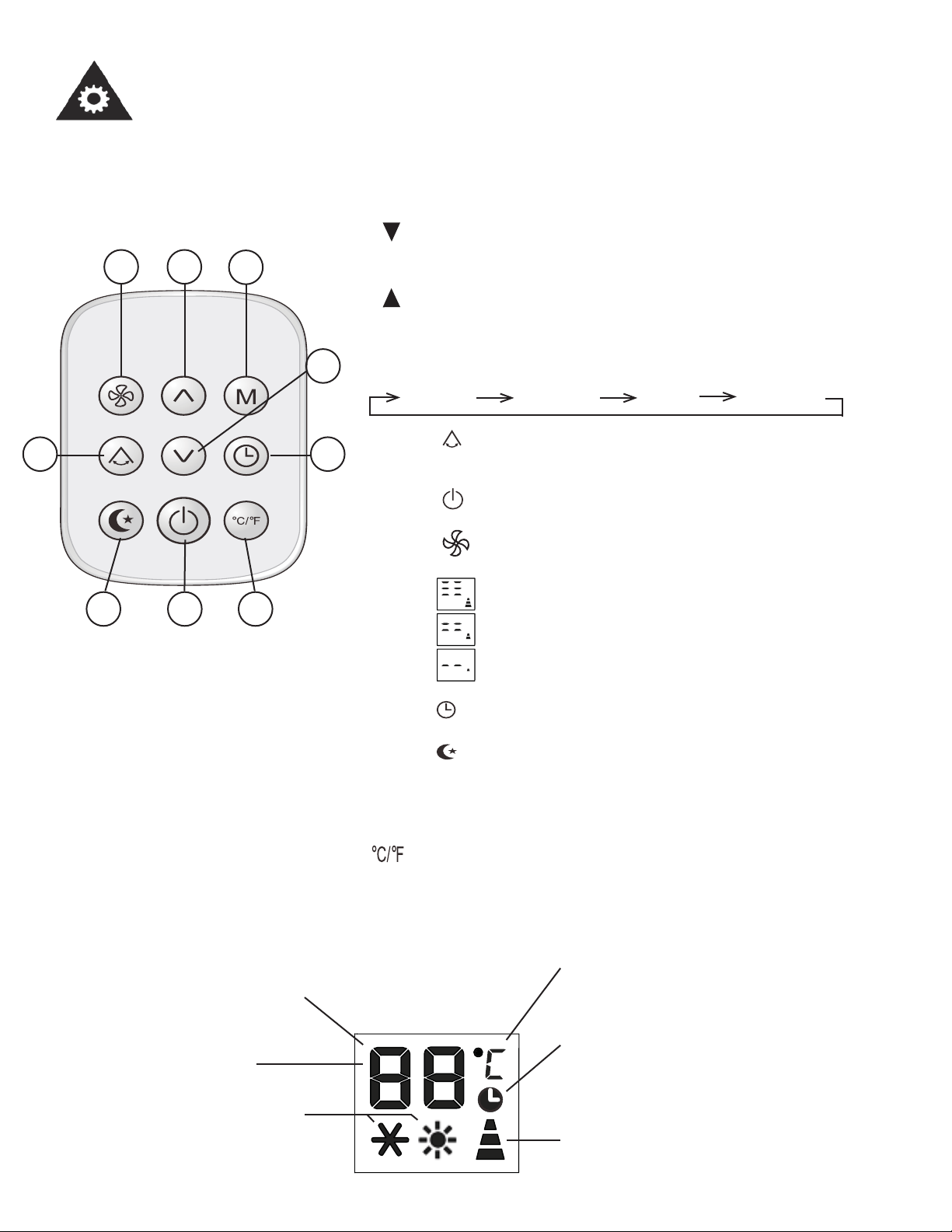
1. Bouton TEMP DOWN (BAISSER LA TEMPÉRATURE) : Appuyez
sur ce bouton pour baisser le réglage de la température intérieure par
paliers de 1°C (1°F).
2. Bouton TEMP UP (AUGMENTER LA TEMPÉRATURE) : Appuyez
sur ce bouton pour augmenter le réglage de la température intérieure
par paliers de 1°C (1°F).
3. Bouton MODE : Chaque fois que l’on appuie sur un bouton, le mode de
fonctionnement change dans l’ordre suivant :
REFOID.
DÉSHUM. VENT. CHAUFF.
4. Bouton : Utilisé pour/commencer ou arrêter le mouvement des
registres et changer la direction de la circulation de l’air vers le haut ou
les bas, au besoin.
5. Bouton : L’appareil se met en marche lorsque l;utilisateur appuie
sur ce bouton et s’arrête lorsque l’utilisateur appuie dessus à nouveau.
6. Bouton (VITESSE DU VENTILATEUR) : Utilisé pour choisir la
vitesse du ventilateur en trois étapes :
Élevée
Moyenne
Basse
7. Bouton
: Temps de démarrage : Appuyez sur ce bouton pour activer
le réglage du délai de mise en marche automatique.
8. Bouton : Choisissez cette fonction si vous souhaitez que l’appar-
eil maintienne une température confortable et économise de l’énergie
pendant que vous dormez/ Cette fonction est disponible en mode COOL
(FROID) seulement.
9. Button: Appuyez sur ce bouton pour passer de °C de °F.
• Lorsque l’appareil est en veille, appuyez sur le bouton « M » pendant 20
secondes pour passer de °C de °F.
26
3
1
4 7
958
• Utilisez la télécommande à une distance de 7 mètres (23 pi.) ou moins de l’appareil, en l’orientant
dans la direction du récepteur. La réception est confi rmée par un bip sonore.
26
Affi chage du MODE: Affi che le
mode actuellement sélectionné.
Y compris COOL (FROID) ou
HEAT (CHALEUR).
Affi chage de la minuterie.
Les réglages de la MINUTERIE s’affi chent
dans cette zone.
Affi chage de la température/minuterie: Le
réglage de la température, ou le réglage de la
minuterie (de 0 à 24h) s’affi chera.
La symbole de la température: Indique si
la température est en °C ou °F.
Affi chage de la vitesse du ventilateur
Affi che la vitesse sélectionnée du ventila-
teur : maximum, moyenne et basse.
Mode SEC: Le mode SEC
affi cher comme dh.
27
Consignes d’utilisation
Manipulation de la télécommande
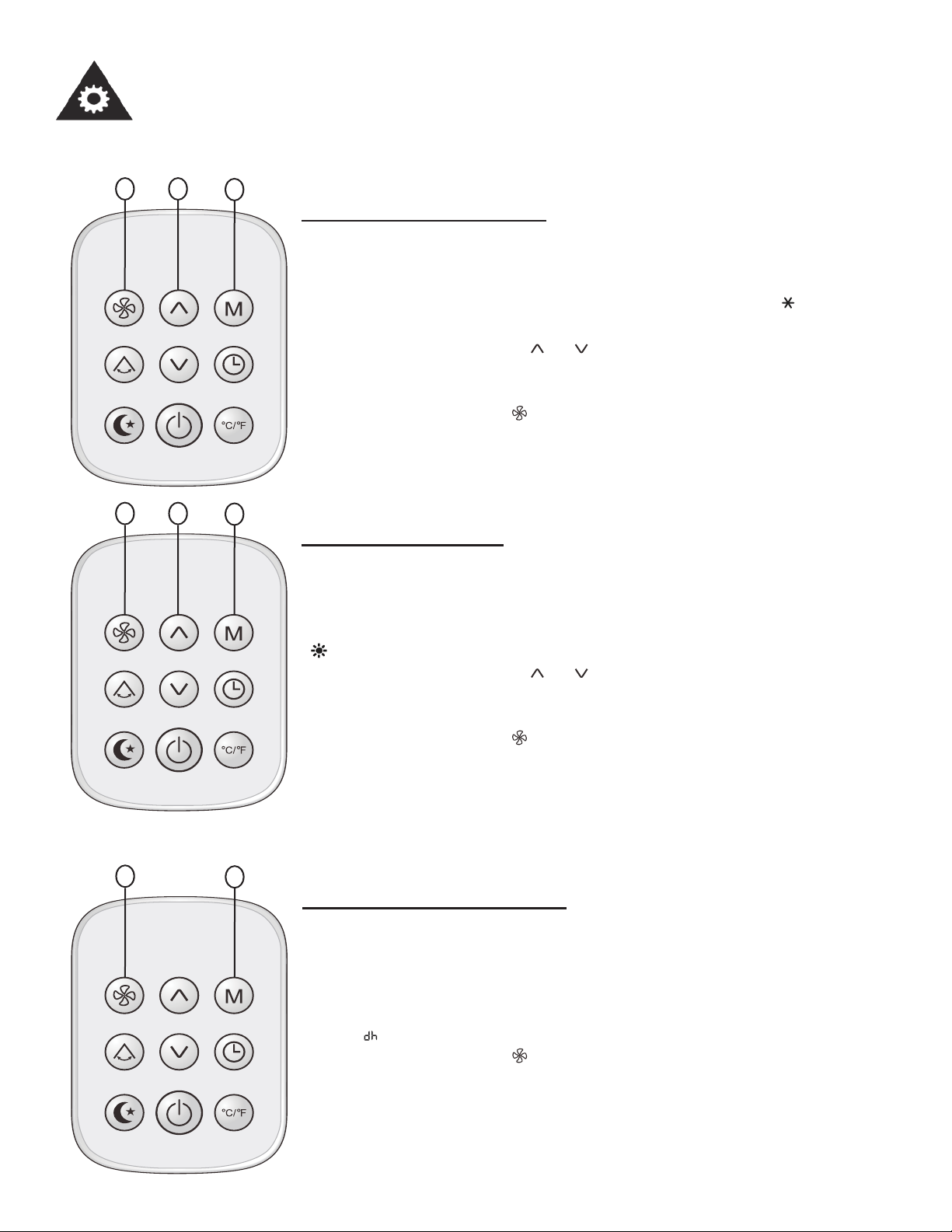
Réglage de refroidissement
Assurez-vous que l’appareil est branché et sous tension.
1. Appuyez sur le bouton M pour sélectionner « FROID » ( indicateur
apparaît).
2. Appuyez sur les boutons ou pour régler la température voulue.
La température peut être réglée entre 18°C (64°F) et 32°C (90°F), par
intervalles de 1°C (1°F).
3. Appuyez sur le bouton pour sélectionner l’une des 3 vitesses du
ventilateur, maximum, moyenne ou basse.
3 2
1
Réglage de la chaleaur
Assurez-vous que l’appareil est branché et sous tension.
1. Appuyez sur le bouton M pour sélectionner « CHALEUR »
( indicateur apparaît).
2. Appuyez sur les boutons ou pour régler la température voulue.
La température peut être réglée entre 13°C (55°F) et 27°C (81°F), par
intervalles de 1°C (1°F).
3. Appuyez sur le bouton pour sélectionner l’une des 3 vitesses du
ventilateur, maximum, moyenne ou basse.
3 2
1
2
1
Réglage de déshumidifi cation
Assurez-vous que l’appareil est branché et est sous tension.
L’indicateur FONCTIONNEMENT s’allume sur le panneau d’affi chage
de l’appareil.
1. Appuyez sure le bouton M jusqu’à ce que DRY (DÉSHUM) soit sélec-
tionné ( indicateur apparaît).
2. Appuyez sur le bouton pour sélectionner l’une des 3 vitesses du
ventilateur, maximum, moyenne ou basse.
REMARQUE : Vous ne pouvez pas régler la température en mode
déshumidifi cation.
28
Consignes d’utilisation
Manipulation de la télécommande
2
1
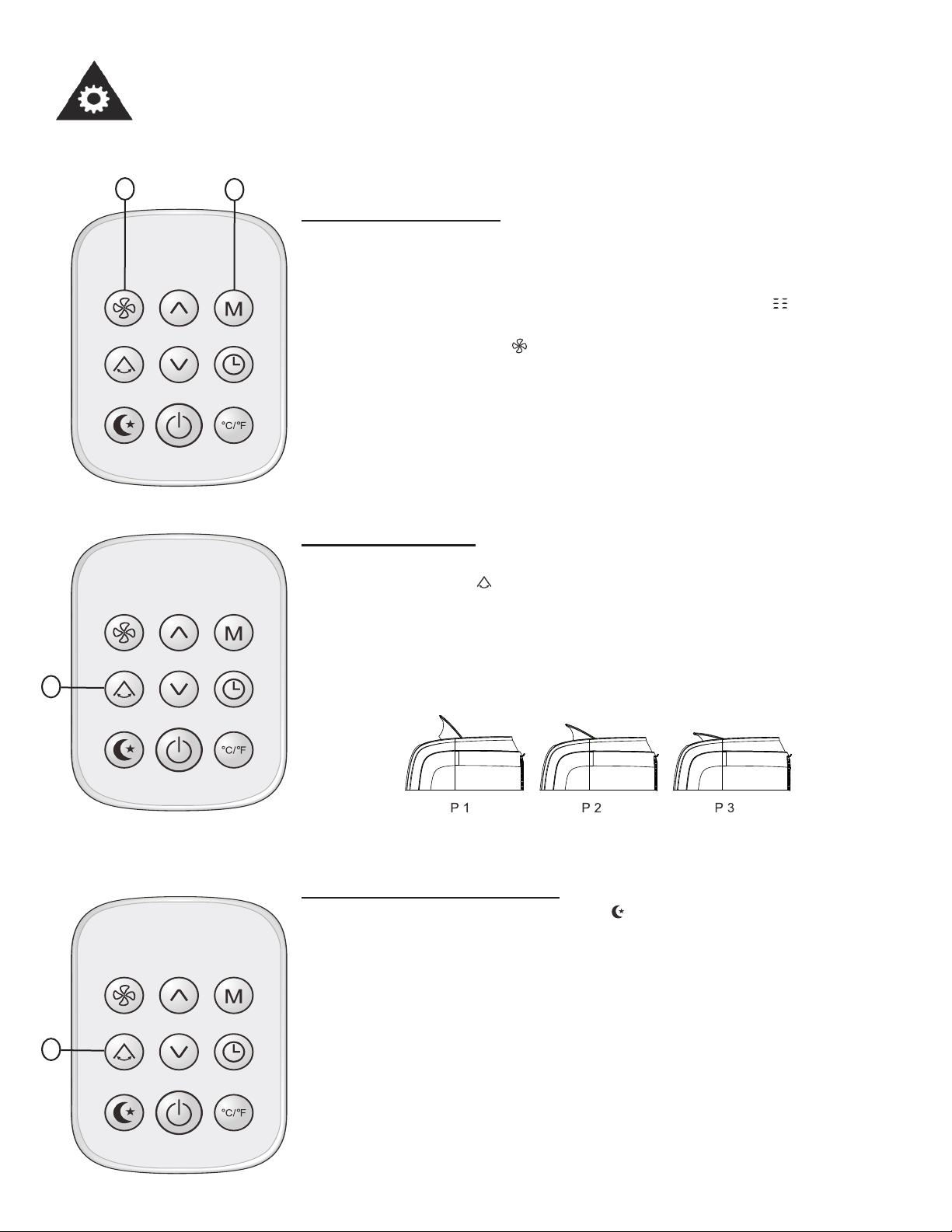
Réglage de ventilateur
Assurez-vous que l’appareil est branché et sous tension.
1. Appuyez sur le bouton M pour sélectionner « VENT » ( indicateur
apparaît).
2. Appuyez sur le bouton pour sélectionner l’une des 3 vitesses du
ventilateur, maximum, moyenne ou basse.
REMARQUE : En mode VENT, la température réglée ne s’affi che pas
sur la télécommande et il n’est pas non plus possible de contrôler la
température de la pièce.
1
Réglage de rotation
1. Utilisez le bouton pour ajuster la direction de la circulation de l’air.
Il y a trois positions possibles pour le défl ecteur, ainsi que l’option de
l’oscillation automatique.
Remarque : Lorsque le climatiseur est en mode « oscillation automa-
tique » la direction du courant d’air se change constamment.
Réglage économie (sommeil)
Lorsque vous appuyez sur la touche, le réglage ECONOMY est
activé. La fonction SLEEP est disponible en modes COOL et HEAT. La
fonction SLEEP diminue également l’affi chage.
En mode COOL, le réglage de la température augmente de 1 ° C (1 °
F) sur l’heure suivante et d’un autre 1 ° C (1 ° F) sur une autre heure.
Cette nouvelle température sera maintenue pendant les prochaines
heures.
En mode HEAT, la température diminue de 1 ° C (1 ° F) sur l’heure suiv-
ante et de 1 ° C (1 ° F) sur une heure de plus. Cette nouvelle tempéra-
ture sera maintenue pendant les prochaines heures.
1
29
Consignes d’utilisation
Manipulation de la télécommande
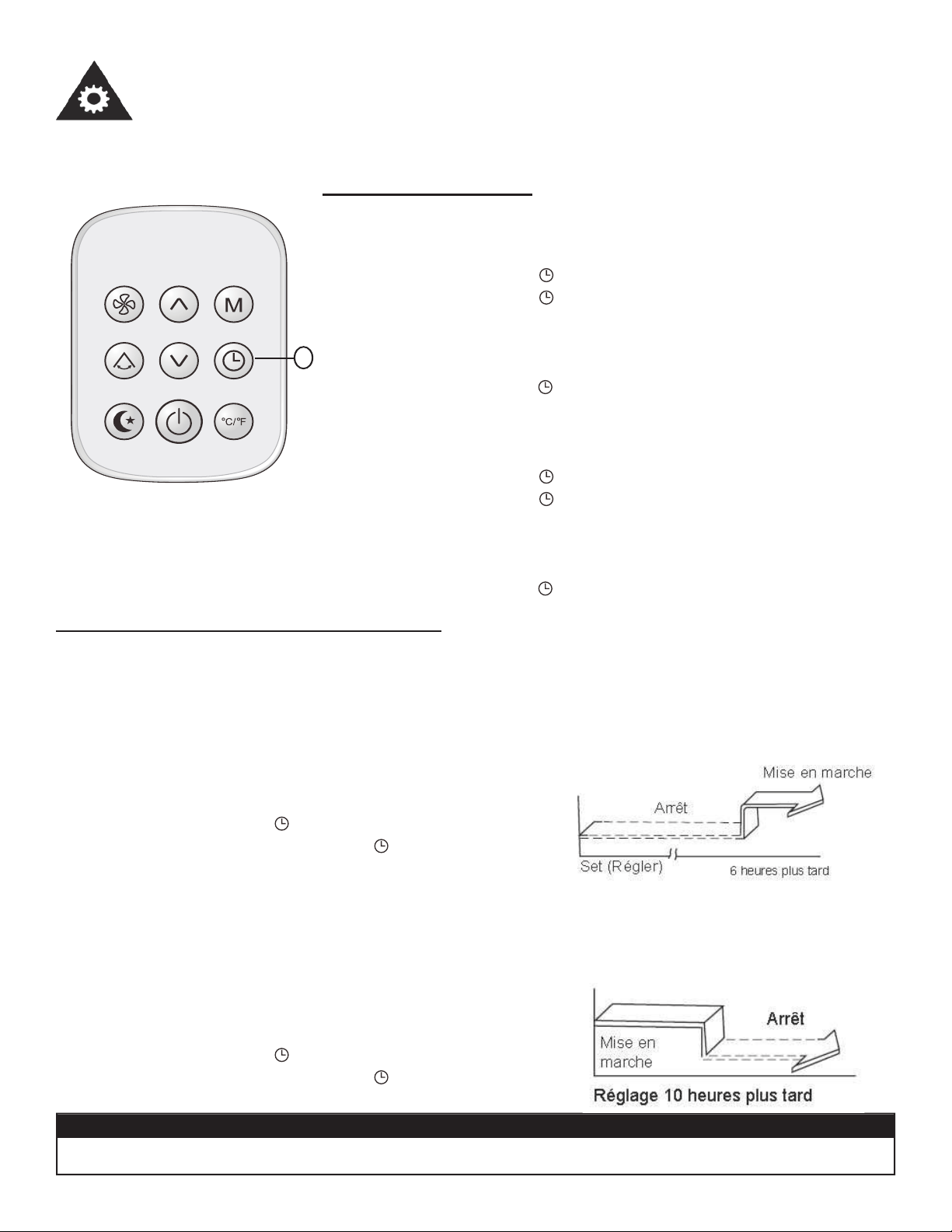
Réglage de la minuterie
Pour régler l’heure de démarrage :
Avec l’appareil éteint :
1. Poussez sur la touche , l’heure clignotera sur l’affi chage.
2. Poussez sur la touche jusqu’à ce que l’heure désirée appara-
isse sur l’affi chage. La minuterie peut être réglée entre 1 et 24
heures.
3. Lorsque l’affi chage arrêt de clignoter, la minuterie sera réglée.
4. Pour annuler, pousser de nouveau sur la touche.
Pour défi nir l’heure de début vers le bas :
Avec l’appareil sous tension :
1. Poussez sur la touche , l’heure clignotera sur l’affi chage.
2. Poussez sur la touche jusqu’à ce que l’heure désirée appara-
isse sur l’affi chage. La minuterie peut être réglée entre 1 et 24
heures.
3. Lorsque l’affi chage arrêt de clignoter, la minuterie sera réglée.
4. Pour annuler, pousser de nouveau sur la touche.
1
MISE EN GARDE
• Le réglage de la minuterie doit être annulé avant que d’autres réglages puissent être effectués.
Exemple de fonctionnement de la minuterie
« Auto-on » Commencez (Fonction de mise en marche automatique)
La fonction « Auto-on » (MISE EN MARCHE MINUTERIE) est utile lorsque vous souhaitez que l’ap-
pareil se mette en marche automatiquement, par exemple juste avant que vous rentriez à la maison.
Le climatiseur commencera automatiquement à fonctionner après le délai réglé.
Exemple :
Pour mettre en marche le climatiseur dans 6 heures :
1. Appuyez sur le bouton .
2. Continuez à appuyer sur le bouton jusqu’à ce que
« 06 » s’affi che dans l’affi chage.
« Auto-off » commencer vers le bas (fonction d’arrêt automatique)
La fonction « Auto-off » (ARRÊT MINUTERIE) est utile lorsque vous souhaitez que l’appareil
s’éteigne automatiquement, par exemple après que vous vous couchez. Le climatiseur cessera au-
tomatiquement de fonctionner après le délai réglé.
Exemple :
Pour arrêter le climatiseur dans 10 heures.
1. Appuyez sur le bouton .
2. Continuez à appuyer sur le bouton
jusqu’à ce que
« 10 » s’affi che dans l’affi chage.
Caractéristiques
30
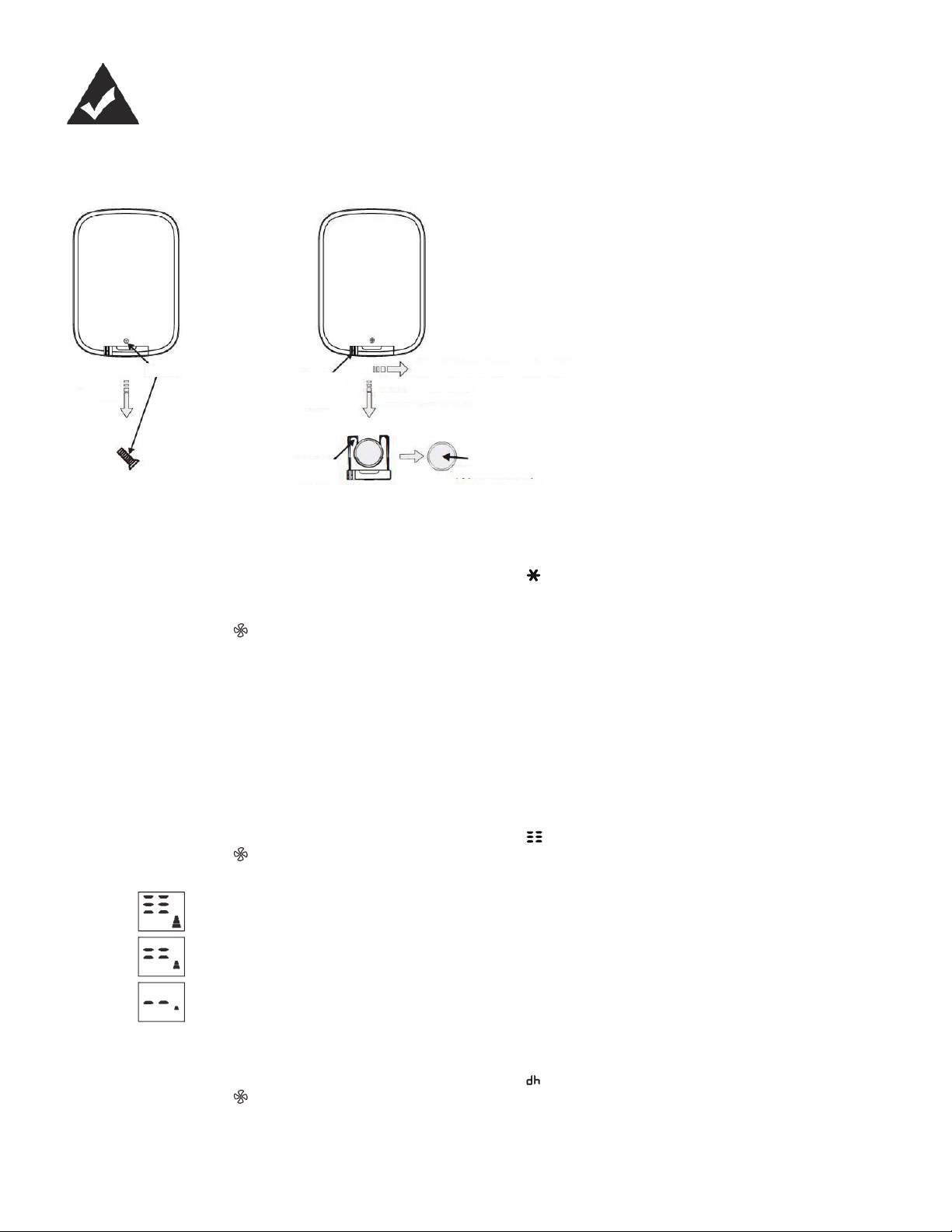
Pour replacer la pile:
1. Utiliser un tournevis pour en-
lever le vis qui retient la couver-
cle de la pile.
2. Poussez le loquet vers la droite
et retirez le couvercle de la pile.
3. Remettre la pile en place et
glisser la couvercle dans la
télécommande.
4. Remets le vis pour fi xer la cou-
vercle.
REPLACING THE REMOTE BATTERY
Enlever
Vis
Loquet du couvercle
de la pile
Poussez le loquet vers la droite
Retirez le couvercle
Couvercle de la pile
Pile
Fonction REFROIDISSEMENT
-Appuyez sur le bouton « M » jusqu’à ce que l’indicateur lumineux «
» s’allume.
-Appuyez sur les boutons fl èche ascendante ou descendante pour sélectionner la température de la pièce que vous dé-
sirez. La température peut être réglée entre 18°C et 32°C (64°F à 90°F).
-Appuyez sur le bouton « » pour sélectionner la vitesse du ventilateur.
Remarque : Le tuyau doit être épuisé en mode « REFROIDISSEMENT ».
Fonction CHAUFFAGE
- Appuyez sur le bouton « MODE » jusqu’à ce que l’indicateur lumineux « HEAT » s’allume.
-Appuyez sur la ascendante ou la descendante boutons pour sélectionner la température de la pièce que vous désirez.
La température peut être réglée entre 13°C et 27°C (55°F à 81°F).
-Appuyez sur le bouton « FAN SPEED » pour sélectionner la vitesse du ventilateur. Pour certains modèles, la vitesse du
ventilateur ne peut pas être sélectionnée en mode CHAUFFAGE.
Fonction VENTILATEUR
-Appuyez sur le bouton « M » jusqu’à ce que l’indicateur lumineux « » s’allume.
-Appuyez sur le bouton « » pour sélectionner la vitesse du ventilateur.
Maximum
Moyenne
Basse
Fonction DÉSHUMIDIFICATION
-Appuyez sur le bouton « M » jusqu’à ce que l’indicateur lumineux «
» s’allume.
-Appuyez sur le bouton « » pour sélectionner la vitesse du ventilateur.
Remarque : Le tuyau doit être épuisé en mode « DÉSHUMIDIFICATION ».
Remarque : Pour passer la température de °C à °F, appuyez sur la bouton °C/°F de la télécommande.
MODE D’EMPLOI
type: CR2025
Consignes d’utilisation
31
PANNE DE COURANT
RÉGLAGE DE LA DIRECTION DU COURANT D’AIR
En cas de panne ou d’interruption du courant, l’appareil se remet automatiquement en marche, selon les derniers réglag-
es utilisés, après le rétablissement du courant.
Attendez 3 minutes avant de reprendre le fonctionnement.
Après l’arrêt de l’appareil, il ne peut pas être remis en marche dans les 3 minutes qui suivent le rétablissement du cou-
rant. Cette caractéristique sert à protéger l’appareil. Le fonctionnement du compresseur reprendra automatiquement au
bout de 3 minutes.
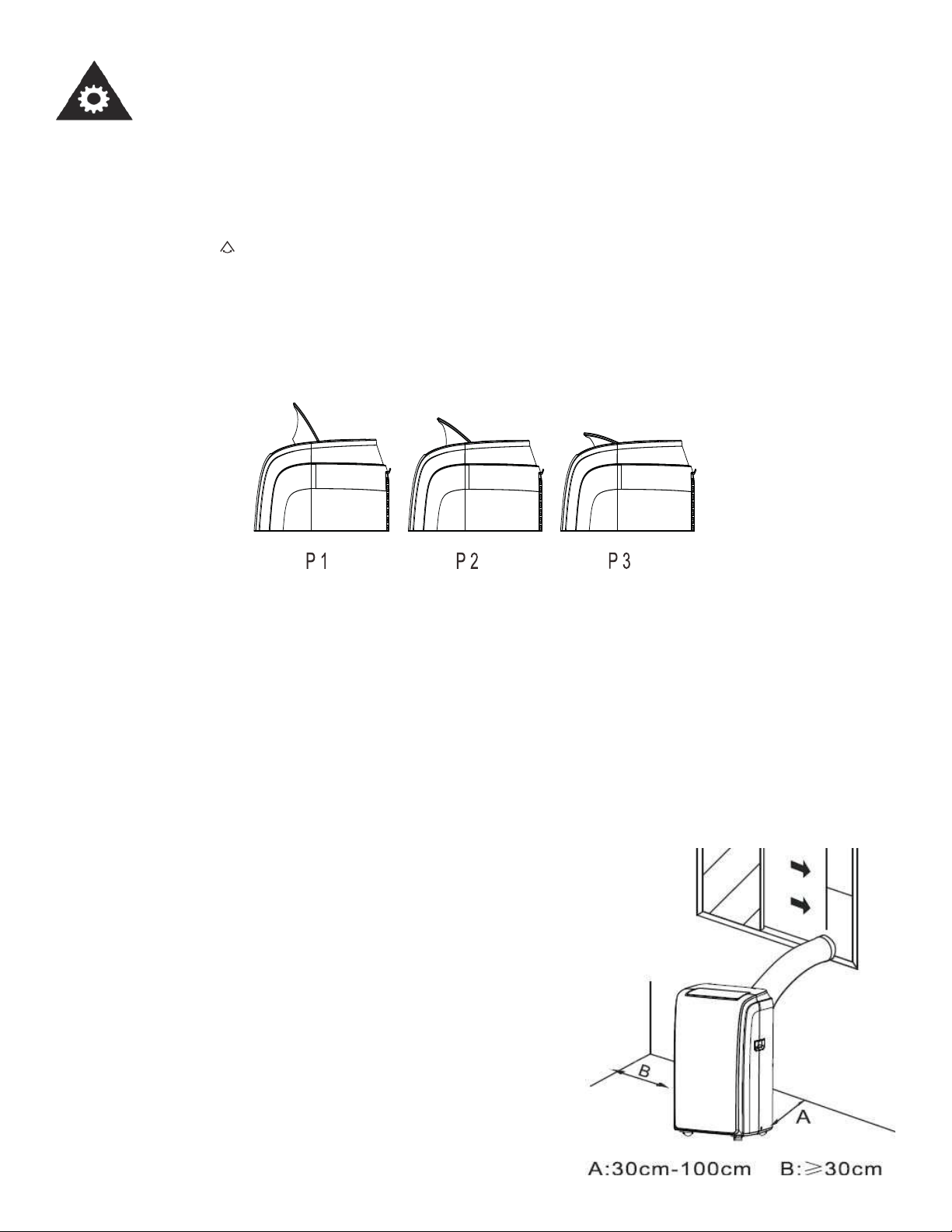
Ajustez la direction du courant d’air automatiquement (Fig. 4) :
-Les défl ecteurs peuvent être ajustés automatiquement pour changer la direction du courant d’air. (Fig. 4)
-Lorsque l’appareil est en marche, les défl ecteurs sont complètement ouverts.
-Appuyez sur le bouton de la télécommande pour activer la fonction d’auto swing (oscillant automatique).
-Les défl ecteurs peuvent être réglés en trois positions, ainsi que l’option d’oscillation automatique : P1, P2, P3 et « oscilla-
tion auto ».
Ne pas régler le défl ecteur manuellement.
Remarque : Lorsque le climatiseur est en mode « oscillation automatique » la direction du courant d’air se change con-
stamment.
Remarque : Cette fonction est disponible sur la télécommande seulement.
Fig. 4
EMPLACEMENT
• Le climatiseur doit être placé sur une fondation solide pour minimiser le bruit et les vibrations. Pour la sûreté, placez
l’appareil sur un plancher lisse et de niveau, assez fort pour le supporter.
• L’appareil est doté de roulettes pour faciliter son déplacement. Il ne doit
être roulé que sur des surfaces lisses et planes. Soyez prudent lorsque
vous roulez sur des tapis. Ne roulez pas l’appareil par-dessus des objets.
Soyez prudent et protégez les planchers en bois si vous faites rouler
l’appareil dessus.
• L’appareil doit être utilisé à distance d’une prise homologuée et mise à
la terre, ne dépassant pas la longueur du cordon d’alimentation.
• Ne placez jamais d’obstacles autour de l’entrée ou de la sortie d’air de
l’appareil.
• Laissez au moins 30 cm (1 pi) d’espace libre entre le mur et l’appareil
afi n de permettre une climatistion effi ciente.
32
Consignes d’installation
INSTALLATION DE LA TROUSSE DE GLISSIÈRE POUR FENÊTRE
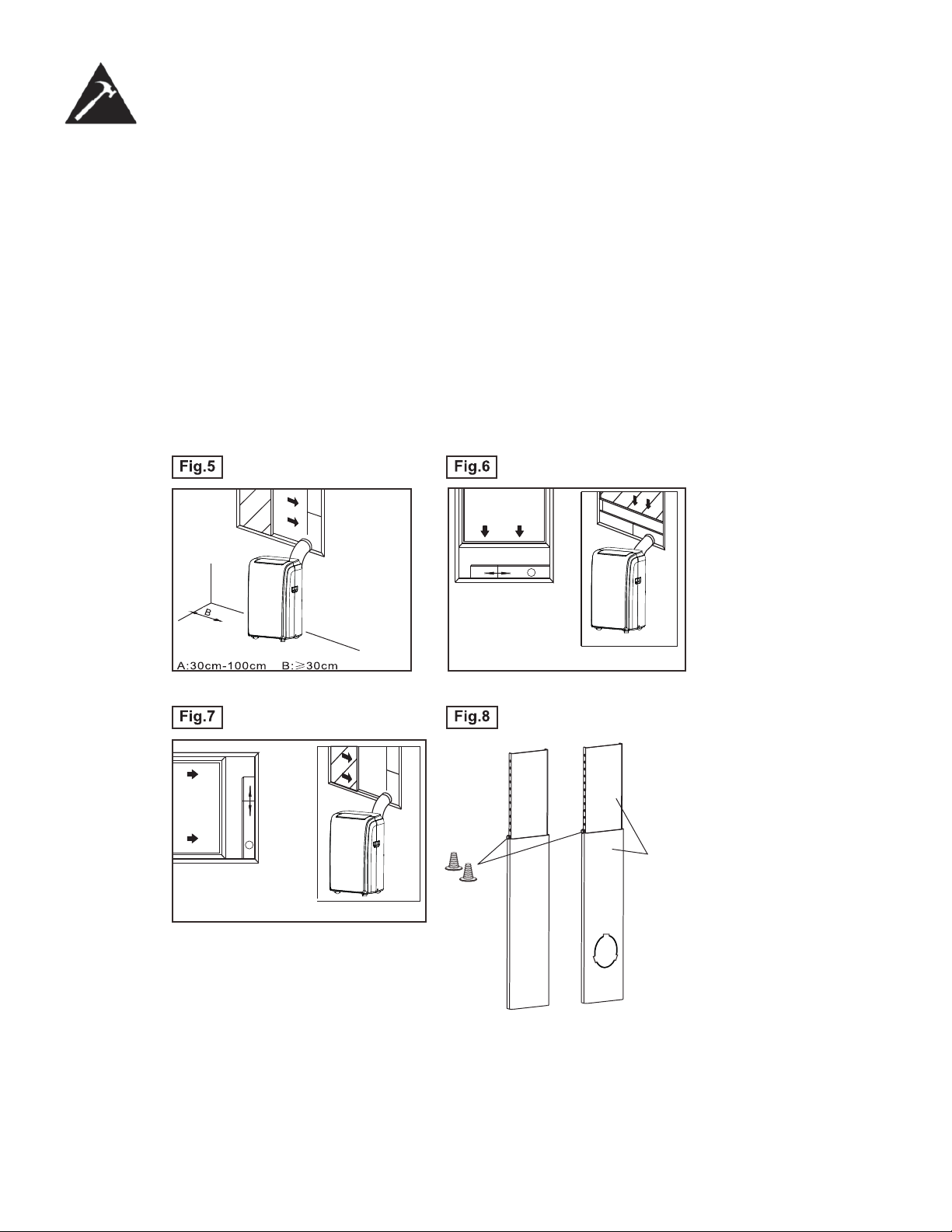
Votre trousse de glissière pour fenêtre est conçue pour s’adapter à la plupart des fenêtres à ouverture horizontale ou ver-
ticale. Toutefois, vous devrez peut-être improviser ou modifi er certains aspects des procédures d’installation pour certains
types de fenêtres. Veuillez consulter la Fig. 6 et la Fig. 7 pour obtenir les ouvertures maximales et minimales des fenêtres.
La trousse de glissière pour fenêtre peut être fi xée au moyen d’une vis (Fig. 8)
REMARQUE : Si l’ouverture de la fenêtre est inférieure à la longueur minimale indiquée pour la trousse de glissière pour
fenêtre, coupez celle qui contient un trou pour qu’elle entre dans l’ouverture de la fenêtre. Ne coupez jamais la section de
la trousse de glissière pour fenêtre où se trouve le trou. (Voir www.danby.com pour obtenir une vidéo d’instructions
générales.)
Vis
Trousse de
glissière de
fenêtre
Fenêtre
horizo-
ntale
Fenêtre
verticale
33
Consignes d’installation
INSTALLATION DANS UNE FENÊTRE À GUILLOTINE DOUBLE
1. Mesurer le joint adhésif en mousse à la longueur du rebord de la fenêtre. Coupez le joint d’étanchéité en mousse
(adhésif) à la longueur appropriée et fi xez-le au rebord de la fenêtre. Fig. 9.
2. Fixez la trousse de glissière pour fenêtre au rebord de la fenêtre. Ajustez la longueur de la trousse de glissière pour
fenêtre en fonction de la largeur de la fenêtre; raccourcissez la trousse réglable pour fenêtre si la largeur de la fenêtre
est inférieure à 72 cm (28.3 pouces). Ouvrez le châssis de fenêtre et posez la trousse de glissière pour fenêtre sur le
rebord de la fenêtre. Fig. 10.
3. Coupez le joint d’étanchéité en mousse (adhésif) à la longueur appropriée et fi xez-le au dessus de la fenêtre. Tel
qu’illustré dans la fi g. 11.
4. Fermez bien le châssis de fenêtre.
5. Coupez le joint d’étanchéité en mousse à la longueur appropriée et scellez l’espace ouvert entre le châssis supérieur
et le châssis extérieur de la fenêtre. Tel qu’illustré dans la fi g. 12.
Joint d’étanchéité
en mousse A
(adhésif)
Fig.9
Fig.12
Joint d’étanchéité
en mousse
Fig.10
Rebord de fenêtre
Fig.11
Trousse pour fenêtre
Rebord de fenêtre
Trousse pour
fenêtre
28.3 in. ~ 81.5 in.
72 cm à 2,07 m
52 cm - 2m
34
Consignes d’installation
INSTALLATION DANS UNE FENÊTRE COULISSANTE
1. Coupez le joint d’étanchéité en mousse (adhésif) à la longueur appropriée et fi xez-le au cardre de la fenêtre. Voir fi g.
13.
2. Fixez la trousse de glissière pour fenêtre au rebord de la fenêtre. Ajustez la longueur de la trousse de glissière pour
fenêtre en fonction de la hauteur de la fenêtre est inférieure à 72 cm (28.3 pouces). Ouvrez le châssis de fenêtre et
posez la trousse de glissière pour fenêtre sur le rebord de la fenêtre. Voir fi g. 14.
3. Coupez le joint d’étanchéité en mousse (adhésif) à la longueur appropriée et fi xez-le au dessus de la fenêtre, tel qu’il-
lustré à la fi g. 15
4. Fermez bien la fenêtre coulissante.
5. Coupez le joint d’étanchéité en mousse à la longueur appropriée et scellez l’espace ouvert entre le châssis supérieur
et le châssis extérieur de la fenêtre, tel qu’illustré à la fi g. 16.
Joint
d’étanchéité en
mousse A
(adhésif)
Fig.13
Fig.14
Panneau
de la
fenêtre
Fig.15
Joint
d’étanch-
éité en
mousse
Fig.16
28.3 in. ~ 81.5 in.
72 cm ~ 2,7 m
52 cm - 2m
35
Consignes d’installation
INSTALLATION DU TUYAU D’ÉVACUATION
Le tuyau d’évacuation et l’adaptateur doivent être installés ou enlevés, selon le mode d’utilisation.
Mode REFROIDISSEMENT, DÉSHUMIDIFICATION, CHAUFFAGE ou AUTOMATIQUE Installer
Mode VENTILATEUR Enlever
1. Installez l’adaptateur d’évacuation pour fenêtre dans le tuyau d’évac-
uation, tel qu’illustré dans la fi g. A. Reportez-vous aux pages précé-
dentes pour l’installation de la trousse pour fenêtre.
2. Insérez le tuyau d’évacuation dans l’ouverture de sortie de l’air, voir
Fig. A.
• La conduite peut être légèrement comprimée ou étirée selon les
besoins de l’installation, mais il est préférable d’en réduire la longueur
au minimum.
AVERTISSEMENT
NE PAS TROP PLIER LA CONDUITE
DRAINAGE DE L’EAU
• En mode déshumidifi cation, enlevez le supérieur bouchon de drainage A de l’arrière de l’appareil, fi xez directement le
tuyau à l’orifi ce. Placez l’extrémité ouverte du tuyau directement au-dessus de drain qui se trouve dans le plancher de
votre sous-sol. Veuillez-vous référer à la fi g. 5.
• Pour de petites quantités d’eau, retirez le bouchon de vidange et placez un récipient sous la sortie de vidange dans la
fi g. 4.
Sortie de
vidange
Bouchon de
vidange
Bac de récupération
Bouchon de
vidange
Sortie de vidange
Tuyau de
vidange
REMARQUE: S’assurer que le tuyau soit
bien fi xé pour éviter toute fuite. Diriger le
tuyau bers le drain, s’assurer que le tuyay
ne soit pas entortillé pour freiner le débit
de l’eau. Mettre le tuyay dans le drain et
s’assurer que le bout soit droit et dirigé
vers le bas pour laisser couler l’eau. (Voir
fi g. 6). Ne jamais le lever (Voir fi g. 7)
REMARQUE : Lors du fonctionnement ou
du drainage de l’eau, protégez toujours les
tapis et les planchers des renversements
d’eau possibles.
REMARQUE : Avant d’utiliser l’appareil,
assurez-vous de reposer le bouchon du
drain du bas.
36
Soins et entretien
AVERTISSEMENT
1. Veillez à débrancher l’appareil avant de le nettoyer ou de procéder à son entretien.
2. N’utilisez pas d’essence, de diluant ou d’autres produits chimiques pour nettoyer l’appareil.
3. Ne lavez pas l’appareil directment sous le robinet ou à l’aide d’un tuyau : vous pourriez vous
électrocuter ou causer un incendie.
4. Si le cordon d’alimentation est endommagé, il doit être réparé par le fabricant ou l’un de ses
représentants de l’entretien.
FILTRE À AIR
Comme le fi ltre accumule et expluse de la poussière, il doit être nettoyé toutes les deux semaines pour assurer le
fonctionnement de qualité supérieure du ventilateur.
RETRAIT DU FILTRE À AIR
Cette unité est dotée de trois fi ltres à air. Tirez la grille supérieure dans le sens indiqué par la fl èche (Fig. 8) et glissez le
fi ltre à air pour l’enlever de l’unité. Pour enlever le fi ltre inférieur, enlevez d’abord la grille, puis glissez le fi ltre latéralement
dans le sens indiqué par la fl èche (Fig. 9-11).
NETTOYAGE DU FILTRE À AIR
1. Nettoyez le fi ltre à air en l’immergeant dans l’eau tiède (en dessous 40°C/104°F) conenant un détergent doux.
2. Rincez le fi ltre et séchez-le dans un endroit ombragé.
REMPLACEMENT
Après le nettoyage, installez le fi ltre à air du haut et ensuite celui du bas. *Avant d’installer, les fi ltres doivent être secs.*
ENCEINTE DE L’APPAREIL
Pour nettoyer l’enceinte de l’appareil, servez-vous d’un chiffon non
pelucheux trempé dans un détergent neutre, assurez-vous d’aspirer le tissu de l’excès d’eau . Finissez le nettoy-
age en essuyant l’appareil avec un chiffon propre et sec.
ENTREPOSAGE À LONG TERME
• Enlevez le bouchon en caoutchouc qui se trouve à l’arrière de l’appareil, puis raccordez un tuyau à l’orfi ce de drain-
age. Placez l’extrémité ouverte du tuyau directement au-dessus du drain qui se trouve dans le plancher de votre
sous-sol.
• Enlevez le bouchon de l’orifi ce de sortie inférieur : toute l’eau contenue dans le plateau inférieur se videra.
• Faites fonctionner l’appareil en mode VENTILATEUR pendant un demi-journée dans une pièce chaude pour sécher
l’intérieur de l’appareil et empêcher la formation de moisissure.
• Arrêtez l’appareil et débranchez-le, enroulez le cordon et attachez-le au moyen du ruban adhésif.
• Retirez les piles de la télécommande.
• Nettoyez le fi ltre à air et remettez-le en place.
37
Dépannage
De temps en temps, un problème est mineur et un appel de service peut ne pas être nécessaire. Utilisez ce guide de
dépannage pour trouver une solution possible. Si l’unité continue de fonctionner incorrectement, appelez un dépôt de
service autorisé ou le numéro sans frais de Danby pour obtenir de l’assistance.
Tel: 1-800-26- (1-800-263-2629)
PROBLÈME CAUSE POSSIBLE SOLUTION
L’appareil ne se met pas en
marche après une pression sur
le bouton Marche/Arrêt
• Ft apparaît dans l’affi cheur
• La température de la pièce est
inférieure à la température réglée
(mode refroidissement)
• La température de la pièce est plus
haute à la température réglée (mode
chauffage)
• Drainez l’eau du plateau inférieur
• Réglez la température à nouveau
Pas assez frais • Les portes ou les fenêtres de la pièce
ne sont pas fermées
• Il y a des sources de chauffage dans
la pièce
• La conduite d’évacution n’est pas
raccordée ou est bloquée
• La température est réglée à une
température trop élevée
• Le fi ltre à air est bloqué par la pous-
sière
• Assurez-vous que toutes les
portes et les fenêtres sont fer-
mées
• Si possible, enlevez les sources
de chaleur
• Raccordez la conduite et as-
surez-vous qu’elle fonctionne
correctement
• Diminuez la température réglée
• Nettoyez le fi ltre à air
Bruits ou vibrations • Le sol n’est pas horizontal ou assez
plat
• Si possible, posez l’appareil sur
une surface plate et horizontale
Gargouillis • Ce son provient du mouvement du
fl uide frigorigène dans le climatiseur
• C’est normal
MISE AU REBUT
Vérifi ez le respect des réglementations locales concernant la mise au rebut approuvée et sécurisée de cet appareil.
LIMITED IN-HOME APPLIANCE WARRANTY
This quality product is warranted to be free from manufacturer’s defects in material and workmanship, provided that the unit is used under the normal operating
conditions intended by the manufacturer.
This warranty is available only to the person to whom the unit was originally sold by Danby Products Limited (Canada) or Danby Products Inc. (U.S.A.) (hereafter
“Danby”) or by an authorized distributor of Danby, and is non-transferable.
TERMS OF WARRANTY
Plastic parts, are warranted for thirty (30) days only from purchase date, with no extensions provided.
First Year
During the rst twelve (12) months, any functional parts of this product found to be defective, will be repaired or replaced, at warrantor’s
option, at no charge to the ORIGINAL purchaser.
To obtain
Danby reserves the right to limit the boundaries of “In Home Service” to the proximity of an Authorized Service Depot. Any app liance
Service
requiring service outside the limited boundaries of “In Home Service” , it will be the consumer’s responsibility to transport the appliance (at
their own expense) to the original retailer (point of purchase) or a service depot for repair. See “Boundaries of In Home Serv ice” below.
Contact your dealer from whom your unit was purchased, or contact your nearest authorized Danby service depot, where service
must be performed by a qualied service technician.
If service is performed on the units by anyone other than an authorized service depot, or the unit is used for commercial appli cation, all
obligations of Danby under this warranty shall be void.
Boundaries of
If the appliance is installed in a location that is 100 kilometers (62 miles) or more from the nearest service center your unit must be
In Home Service
delivered to the nearest authorized Danby Service Depot, as service must only be performed by a technician qualied and certif ied for
warranty service by Danby. Transportation charges to and from the service location are not protected by this warranty and are t he
responsibility of the purchaser.
Nothing within this warranty shall imply that Danby will be responsible or liable for any spoilage or damage to food or other c ontents of this appliance, whether due
to any defect of the appliance, or its use, whether proper or improper.
EXCLUSIONS
Save as herein provided, Danby, there are no other warranties, conditions, representations or guarantees, express or implied, m ade or intended by Danby or its
authorized distributors and all other warranties, conditions, representations or guarantees, including any warranties, conditio ns, representations or guarantees
under any Sale of Goods Act or like legislation or statue is hereby expressly excluded. Save as herein provided, Danby shall no t be responsible for any damages
to persons or property, including the unit itself, howsoever caused or any consequential damages arising from the malfunction o f the unit and by the purchase of
the unit, the purchaser does hereby agree to indemnify and hold harmless Danby from any claim for damages to persons or propert y caused by the unit.
GENERAL PROVISIONS
No warranty or insurance herein contained or set out shall apply when damage or repair is caused by any of the following:
1) Power failure.
2) Damage in transit or when moving the appliance.
3) Improper power supply such as low voltage, defective house wiring or inadequate fuses.
4) Accident, alteration, abuse or misuse of the appliance such as inadequate air circulation in the room or abnormal operating con ditions
(extremely high or low room temperature).
5) Use for commercial or industrial purposes (ie. If the appliance is not installed in a domestic residence).
6) Fire, water damage, theft, war, riot, hostility, acts of God such as hurricanes, oods etc.
7) Service calls resulting in customer education.
8) Improper Installation (ie. Building-in of a free standing appliance or using an appliance outdoors that is not approved for out door application).
Proof of purchase date will be required for warranty claims; so, please retain bills of sale. In the event warranty service is required, present this document to our
AUTHORIZED SERVICE DEPOT.
Danby Products Limited
PO Box 1778, Guelph, Ontario, Canada N1H 6Z9
Telephone: (519) 837-0920 FAX: (519) 837-0449
Danby Products Inc.
PO Box 669, Findlay, Ohio, U.S.A. 45840
Telephone: (419) 425-8627 FAX: (419) 425-8629
04/09
1-800-263-2629
Warranty Service
In-home
Si l'appareil est installé à plus de 100 kilomètres (62 milles) du centre de service le plus proche, il doit
être livré à l'atelier de réparation autorisé par Danby le plus proche, car l'entretien doit uniquement être
réalisé par un technicien qualifié et certifié pour effectuer un entretien couvert par la garantie de Danby.
Les frais de transport entre votre domicile et le lieu de l'entretien ne sont pas couverts par la présente
garantie et doivent être acquittés par l'acheteur.
Pendant les premiers vingt quatre (24) mois, toutes les pièces fonctionnelles de ce produit qui s’avèrent
défectueuses seront réparées ou remplacées, selon le choix du garant, sans frais à l’acheteur INITIAL.
Le client sera responsable pour le transport et tous les frais d’expédition de tout appareil exigeant le
service au dépot de service autorisé le plus proche. S’adresser au détaillant qui a vendu l’appareil, ou à
la station technique agréée de service la plus proche, où les réparations doivent être effectuées par un
technicien qualifié. Si les réparations sont effectuées par quiconque autre que la station de service
agréée où à des fins commerciales, toutes les obligations de Danby en vertu de cette garantie seront
annulées.
Premiers 24 mois
Pour bénéficier
du service
Limites de l’entre-
tien à domicile
GARANTIE LIMITÉE SUR
APPAREIL ÉLECTROMÉNAGER À DOMICILE
Cet appareil de qualité est garanti exempt de tout vice de matière première et de fabrication, s’il est utilisé dans les conditions
normales recommandées par le fabricant.
Cette garantie n’est offerte qu’à l’acheteur initial de l’appareil vendu par Danby Products Limited (Canada) ou Danby Products
Inc. (E.- U.A.) (ci-après « Danby ») ou par l’un des ses distributeurs agréés et elle ne peut être transférée.
CONDITIONS
Les pièces en plastique sont garanties pendant trente (30) jours seulement à partir de la date de l’achat, sans aucune prolon-
gation prévue.
Aucune partie de la garantie ne prévoit implicitement que le fabricant sera tenu responsable des dommages subis par les
aliments ou d’autres types de contenu, qu’ils soient causés par la défectuosité de l’appareil ou par son usage adéquat ou
inadéquat.
EXCLUSIONS
En vertu de la présente, il n’existe aucune autre garantie, condition ou représentation, qu’elle soit exprimée ou tacite, de façon
manifeste ou intentionnelle, par Danby ou ses distributeurs agréés. De même, sont exclues toutes les autres garanties,
conditions ou représentations, y compris les garanties, conditions ou représentations en vertu de toute loi régissant la vente
de produits ou de toute autre législation ou règlement semblables. En vertu de la présente, Danby ne peut être tenue respons-
able en cas de blessures corporelles ou des dégâts matériels, y compris à l’appareil, quelle qu’en soit les causes. Danby ne
peut pas être tenue responsable des dommages indirects dus au fonctionnement défectueux de l’appareil. En achetant
l’appareil, l’acheteur accepte de mettre à couvert et de dégager Danby de toute responsabilité en cas de réclamation pour
toute blessure corporelle ou tout dégât matériel causé par cet appareil.
CONDITIONS GÉNÉRALES
La garantie ou assurance ci-dessus ne s’applique pas si les dégâts ou réparations sont dus aux cas suivants :
1) Panne de courant.
2) Dommage subis pendant le transport ou le déplacement de l’appareil.
3) Alimentation électrique incorrecte (tension faible, câblage défectueux, fusibles incorrects).
4) Accident, modification, emploi abusif ou incorrect de l’appareil tel qu'une circulation d'air inadéquate dans la pièce ou des
conditions de fonctionnement anormales (température extrêmement élevée ou basse).
5) Utilisation dans un but commercial ou industriel (à savoir, si l'appareil n'est pas installé dans un domicile résidentiel).
6) Incendie, dommages causés par l’eau, vol, guerre, émeute, hostilités, cas de force majeure (ouragan, inondation, etc.).
7) Visites d’un technicien pour expliquer le fonctionnement de l’appareil au propriétaire.
8) Installation inappropriée (par exemple, encastrement d'un appareil autoportant, ou utilisation extérieure d'un appareil non
conçu à cet effet). Une preuve d’achat doit être présentée pour toute demande de réparation sous garantie. Prière de garder
le reçu. Pour faire honorer la garantie, présenter ce document à la station technique agréée ou s’adresser à :
Service sous garantie
Service au domicile
Danby Products Limited
PO Box 1778, Guelph, Ontario, Canada N1H 6Z9
Téléphone : (519) 837-0920 Télécopieur: (519) 837-0449
Danby Products Inc.
PO Box 669, Findlay, Ohio, U.S.A. 45840
Téléphone: (419) 425-8627 Télécopieur: (419) 425-8629
1-800-263-2629
03/14

NOTES / REMARQUES :
__________________________________________________________________________________________
__________________________________________________________________________________________
__________________________________________________________________________________________
__________________________________________________________________________________________
__________________________________________________________________________________________
__________________________________________________________________________________________
__________________________________________________________________________________________
__________________________________________________________________________________________
__________________________________________________________________________________________
__________________________________________________________________________________________
__________________________________________________________________________________________
__________________________________________________________________________________________
__________________________________________________________________________________________
__________________________________________________________________________________________
__________________________________________________________________________________________
__________________________________________________________________________________________
__________________________________________________________________________________________
__________________________________________________________________________________________
__________________________________________________________________________________________
__________________________________________________________________________________________
__________________________________________________________________________________________
__________________________________________________________________________________________

NOTES / REMARQUES :
__________________________________________________________________________________________
__________________________________________________________________________________________
__________________________________________________________________________________________
__________________________________________________________________________________________
__________________________________________________________________________________________
__________________________________________________________________________________________
__________________________________________________________________________________________
__________________________________________________________________________________________
__________________________________________________________________________________________
__________________________________________________________________________________________
__________________________________________________________________________________________
__________________________________________________________________________________________
__________________________________________________________________________________________
__________________________________________________________________________________________
__________________________________________________________________________________________
__________________________________________________________________________________________
__________________________________________________________________________________________
__________________________________________________________________________________________
__________________________________________________________________________________________
__________________________________________________________________________________________
__________________________________________________________________________________________
__________________________________________________________________________________________
PORTABLE AIR CONDITIONER
CLIMATISEUR PORTATIF
All repair parts are available for purchase or special
order when you visit your nearest service depot. To
request service and/or the location of the service depot
nearest you, call the TOLL FREE number.
When requesting service or ordering parts, always pro-
vide the following information:
• Product Type
• Model Number
• Part Number
• Part Description
Toutes les pièces de rechange ou commandes spécia-
les sont disponibles à votre centre de service régional
autorisé. Pour obtenir le service et/ou la localité de
votre centre de service régional, signalez le NUMÉRO
D’APPEL SANS FRAIS.
Ayez les renseignements suivants à la portée de la main
lors de la commande de pièce ou service:
• Type de produit
• Numéro de modèle
• Numéro de pièce
• Description de la pièce
1-800-26-
(1-800-263-2629)
Printed in China
Imprimé en Chine
Danby Products Limited, Guelph, ON, Canada N1H 6Z9
Danby Products Inc., Findlay, Ohio, USA 45840
Model • Modèle
DPA140HEAUBDB
DPA140HEAUWDB