
Date
File Name
Scale
Drawn By
Color
Paper
Artwork
6 October 2020
Polk_React_QSG_100620_EN-ES-FR.pdf
168mm x 124mm
KB
Full color
Tortilla smooth/80T (uncoated stock) (98 opacity, 10.6 caliper, 150 smoothness) Offset
Digital file
Revision Date Description
A 10/6/20 Intial release
TITLE BLOCK DOES NOT PRINT

Quick Start Guide
REACT
SOUND BAR

1
Thank you for your Polk purchase
If you have a question or comment, please feel free to contact us.
Technical Assistance
North America: 800-377-POLK(7655)
United Kingdom and Ireland: +44 202890279830
Netherlands customers: +31 402507800
Other countries: +1-410-358-3600
Email: polkcs@polkaudio.com
Polk FAQs: polk.custhelp.com
In all other countries, refer to polk-eu@mailmw.custhelp.com for support contact details.
The complete owner’s manual can be found online at
http://manuals.polkaudio.com/REACT/NA/EN/index.php.
2
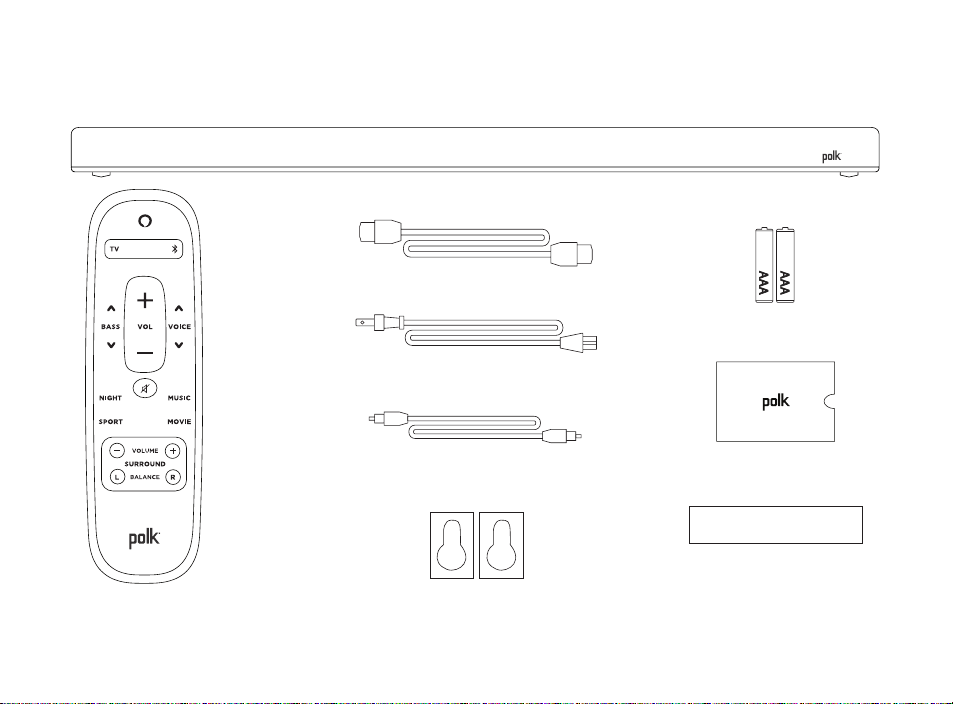
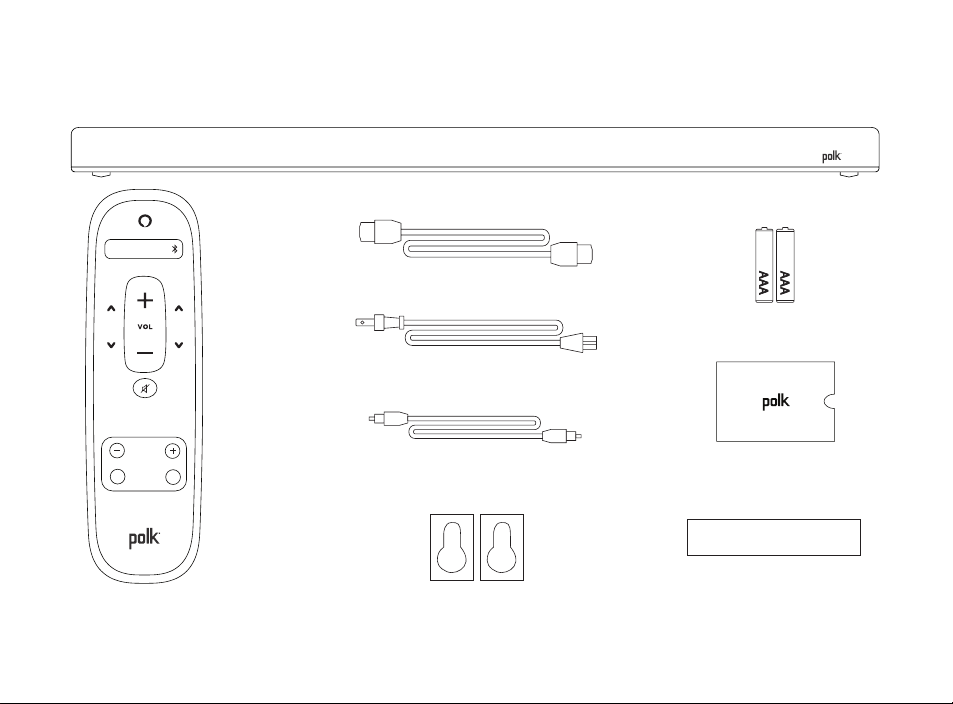
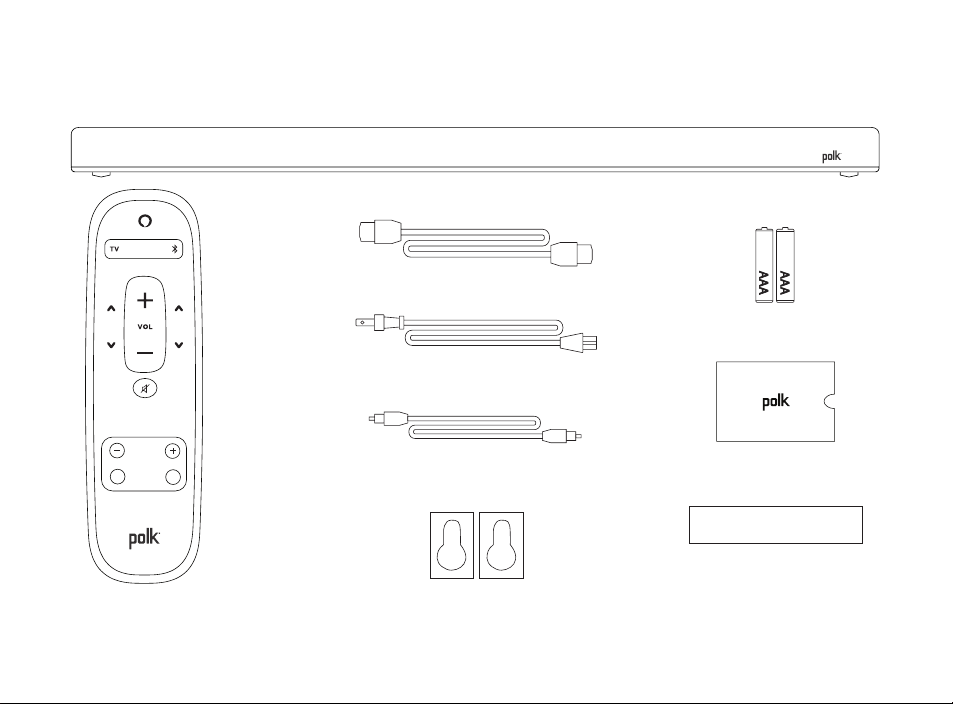
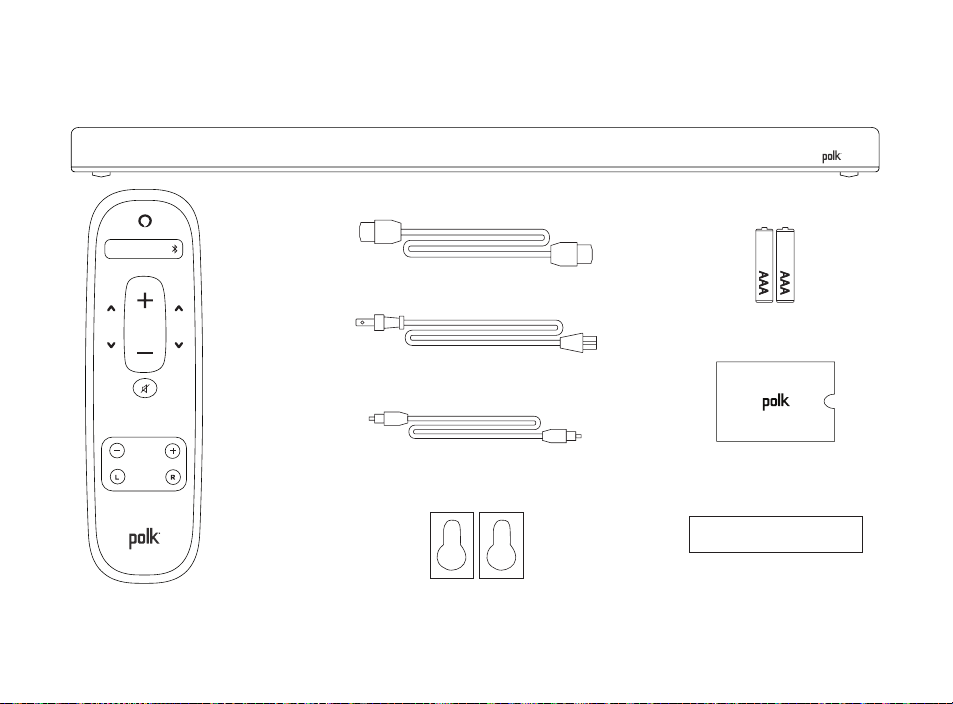
What’s in the Box
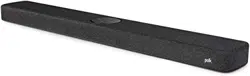
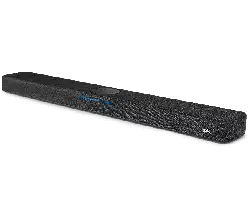
Polk React sound bar
Documentation
HDMI cable
Power cable
Remote
control
AAA batteries (2)
Optical cable
Wall-mount template
Wall-mount spacers

3
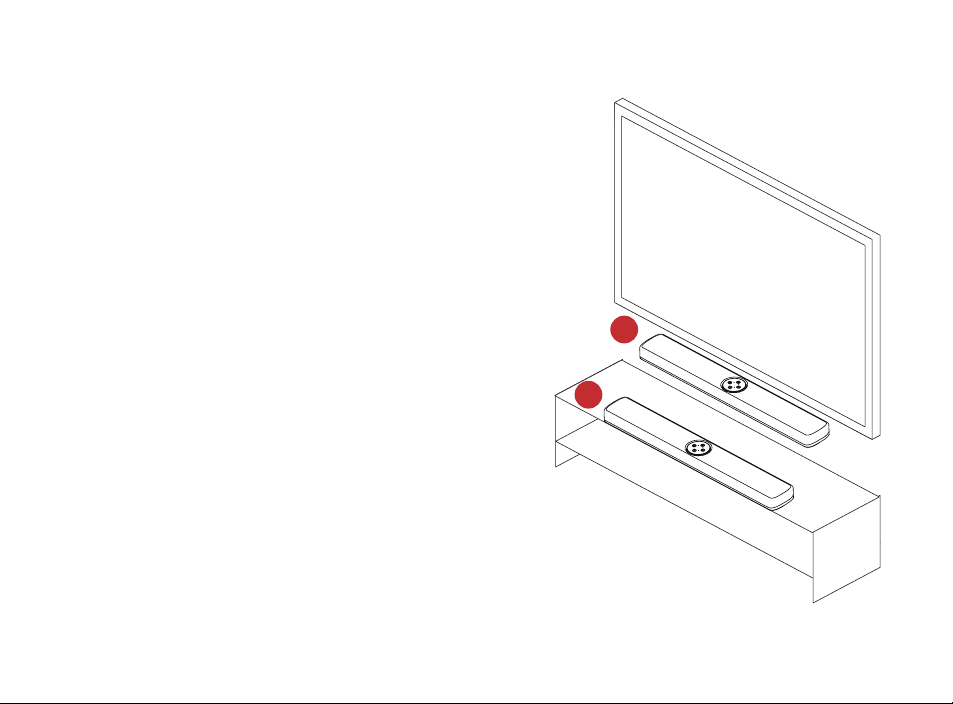
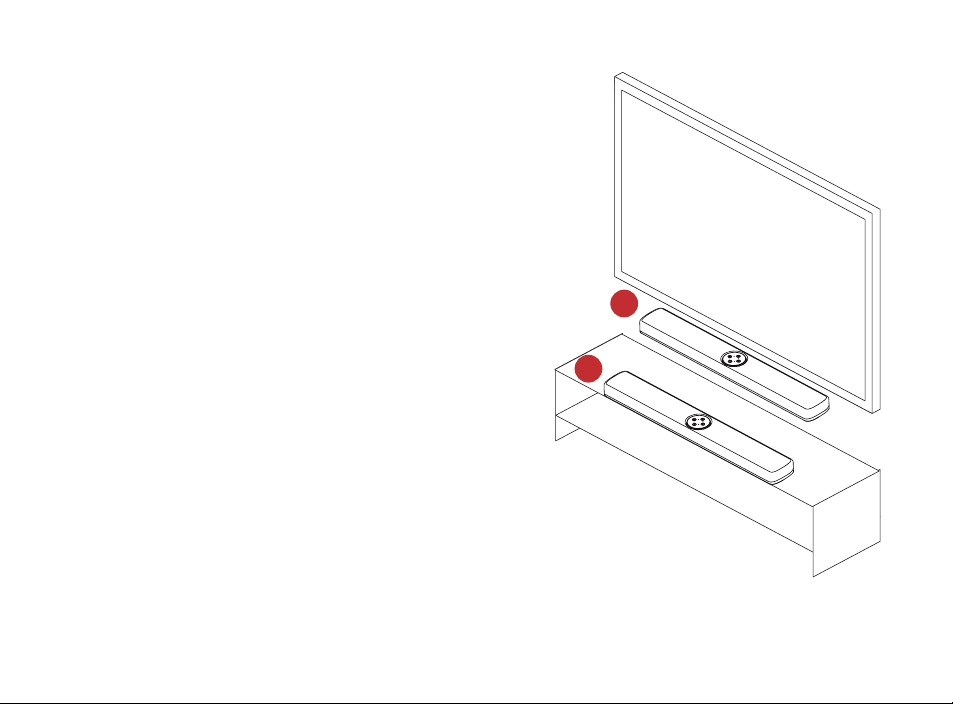
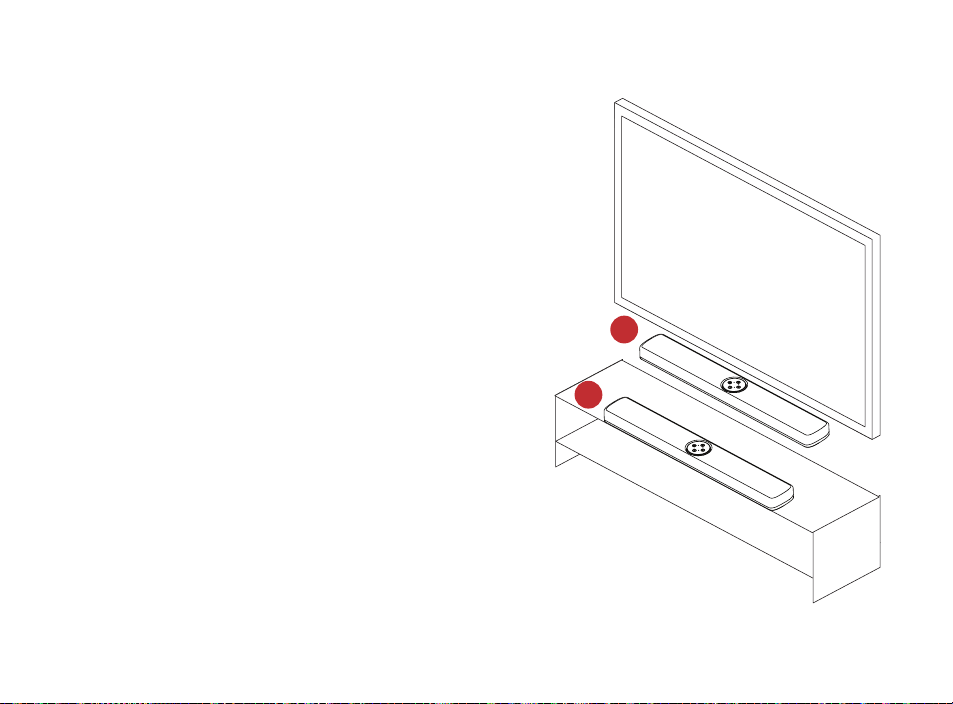
Position your sound bar
On A Cabinet
A. For the best listening experience,
position the sound bar centered under
your TV and flush with the front edge
of your cabinet.
wall mounted
B. Refer to the included wall mount
template if you wish to wall mount
your sound bar under your TV.
B
B
A

4
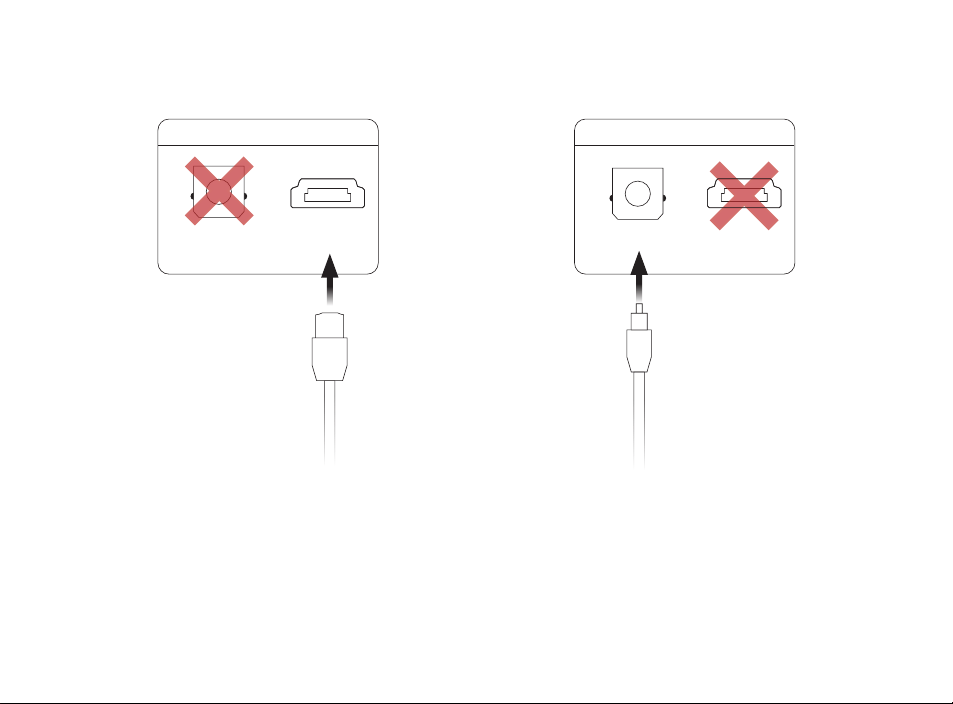
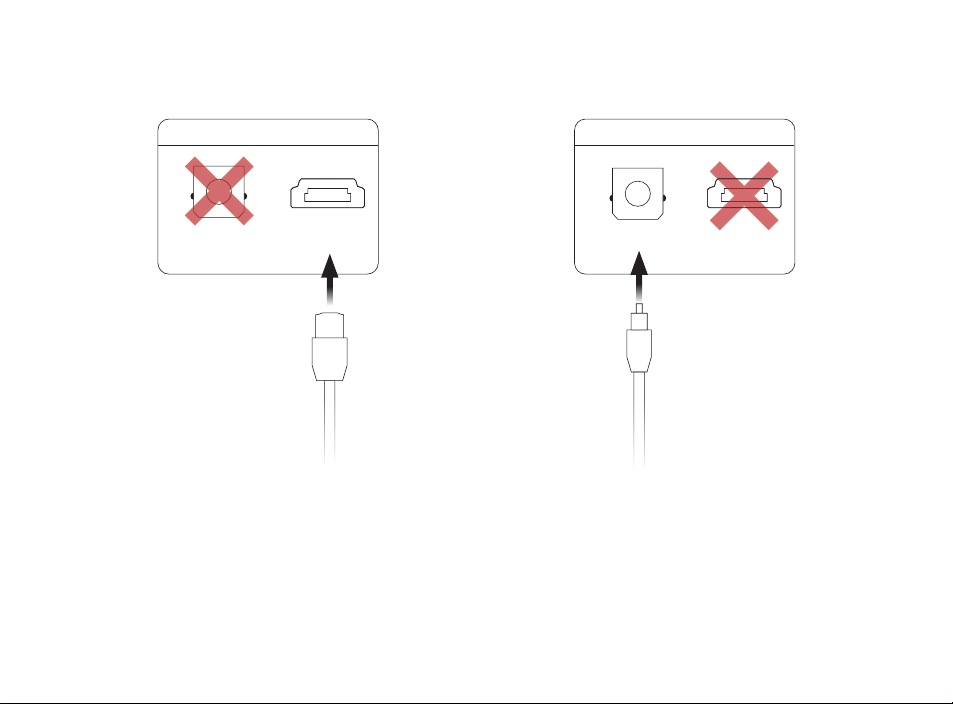
Connect the TV
Optical
1. Insert one end of the optical cable into
the TV (OPTICAL) port on the sound bar.
2. Insert the other end of the cable into
the optical port on the TV.
HDMI ARC (Recommended)
1. Insert one end of the HDMI cable into
the TV (ARC) port on the sound bar.
2. Insert the other end of the HDMI cable
into the HDMI port labeled TV (ARC) on
the TV.
TV
TV (ARC)TV (OPTICAL)
TV
TV (ARC)TV (OPTICAL)
5
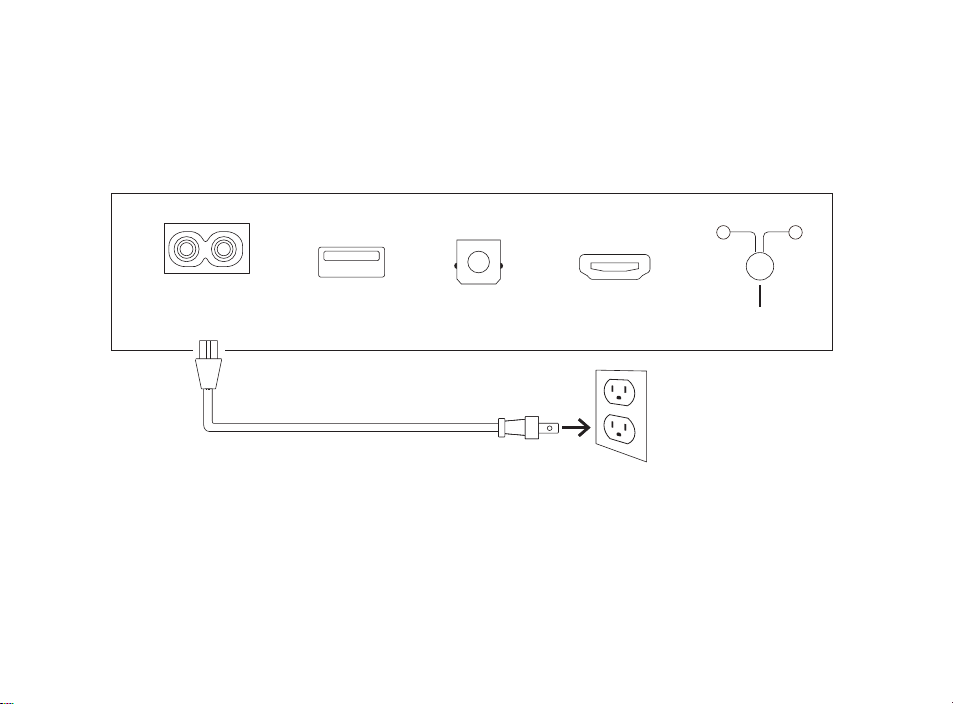
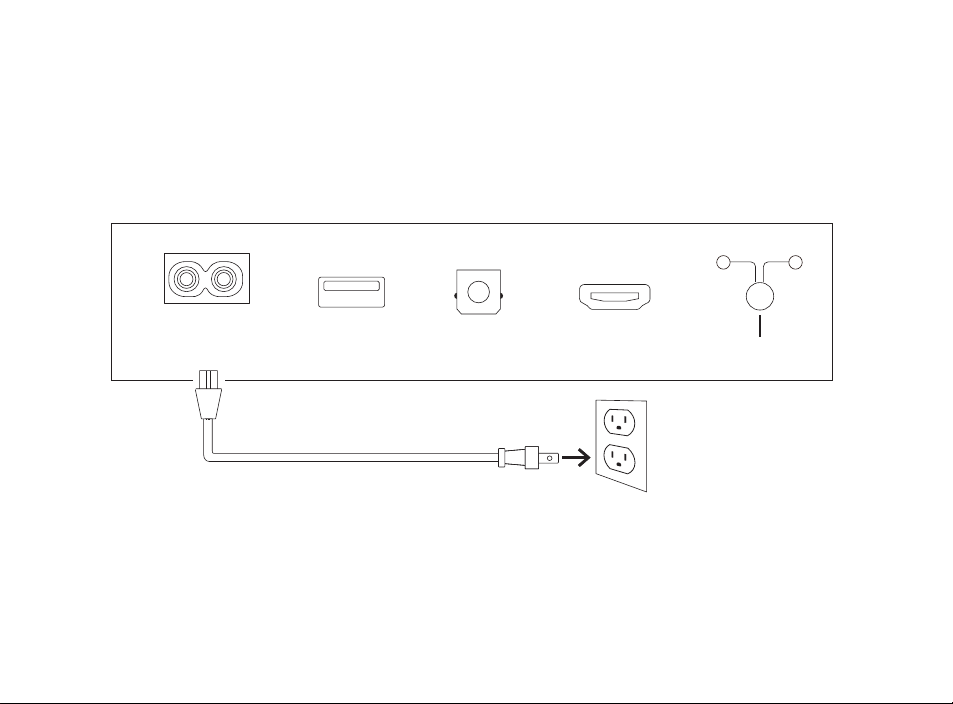
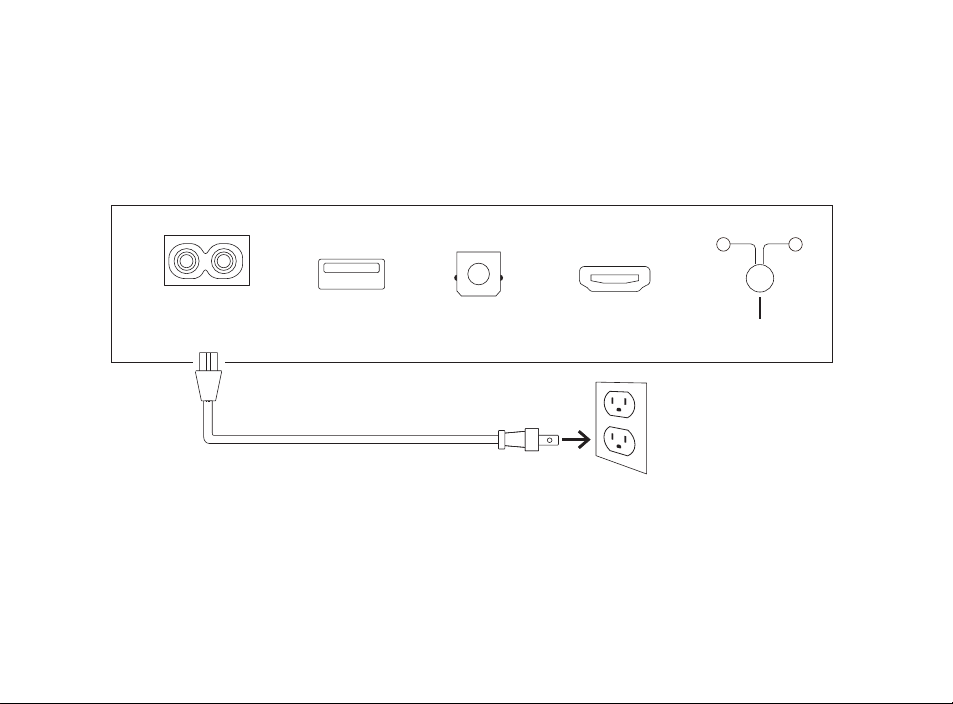
Connect the power
1. Connect the power cable to the power port on the back of the sound bar.
2. Connect the other end of the power cable into an AC power outlet.
TV (OPTICAL)
TV (ARC)USB
POWER
AC INPUT
100–240V - 50/60Hz
CONNECT
SUB SURR

6
Connect to the internet
1. Download the Alexa app on your phone and sign in.
2. Make sure Bluetooth permissions on your phone are turned on.
3. In the Alexa app, you should see a pop-up indicating that the device was discovered
and ready for setup. Continue to finish setup.
4. If you don’t see the popup, go to the Devices page in the Alexa app, click the ‘+’ sign
on the top right, and choose Add Device.
5. Choose the Speaker category and the Polk brand on the following screen.
6. Follow the instructions to connect the sound bar to the Internet.
For troubleshooting and more information, visit polkaudio.com/support.
7
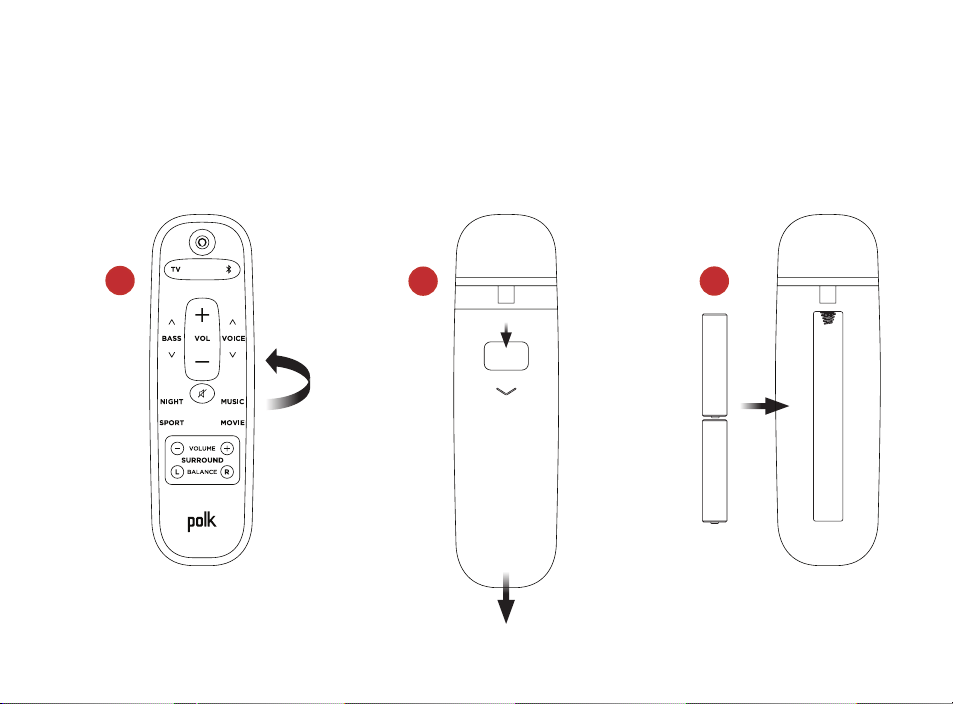
set up the remote
1. Turn the remote to view the back.
2. Open the back cover of the remote by sliding the bottom portion downward.
3. Insert the two AAA batteries into the remote, and replace the cover.
1
2
3

8
Get to know Polk React controls
Status LED
Microphone
on/off Volume upMicrophones
Volume
down
Action
+
–
Light bar
Light bar: The color indicates what Alexa is doing.
Volume buttons: Control the volume of the sound bar.
Action button: Multi-function button used to wake up Alexa.
Microphone on/off: When red, the microphones are disconnected and Alexa is not listening.
Status LED: White—TV input. Purple—Night mode. Orange—PCM audio. Green—Dolby audio.
Yellow—DTS audio. Blue—Bluetooth.
9
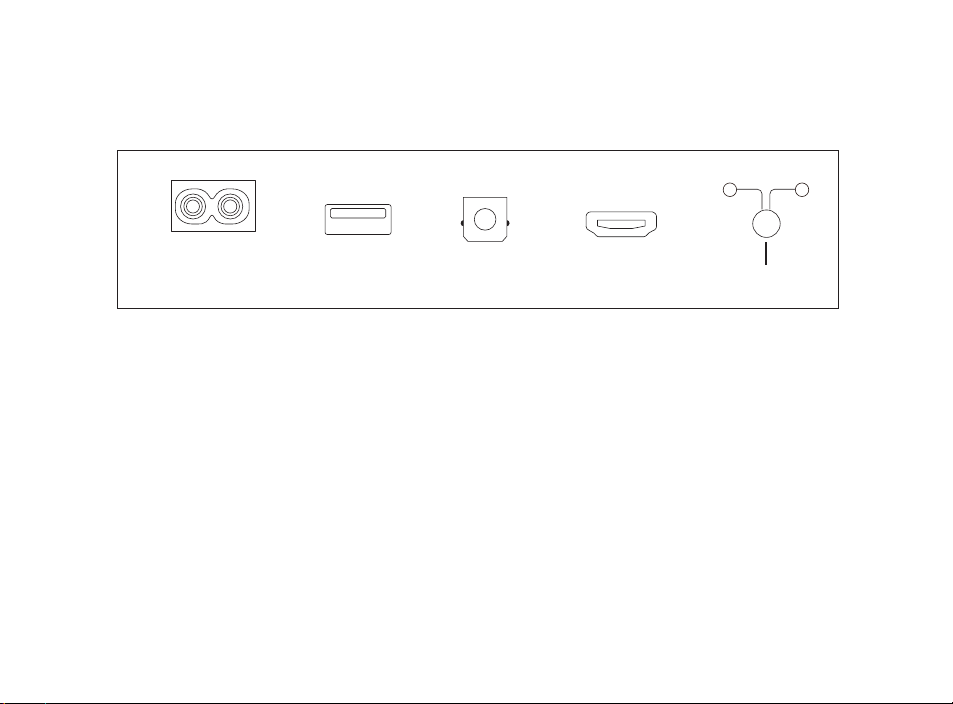
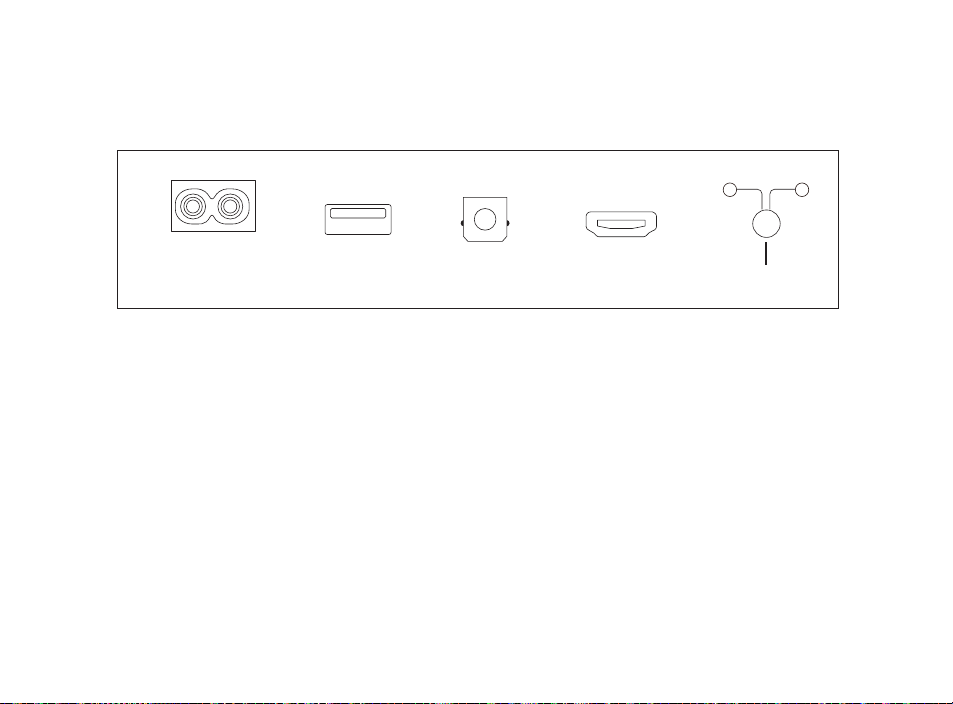
Get to know Polk React ports
Power: Connect to AC power source
USB: Service use only.
TV (optical): Connect to your TV’s optical input.
TV (ARC): Connect to your TV’s HDMI ARC input.
Connect: Used to pair the optional subwoofer and surround speakers with the sound bar.
TV (OPTICAL)
TV (ARC)USB
POWER
AC INPUT
100–240V - 50/60Hz
CONNECT
SUB SURR
10
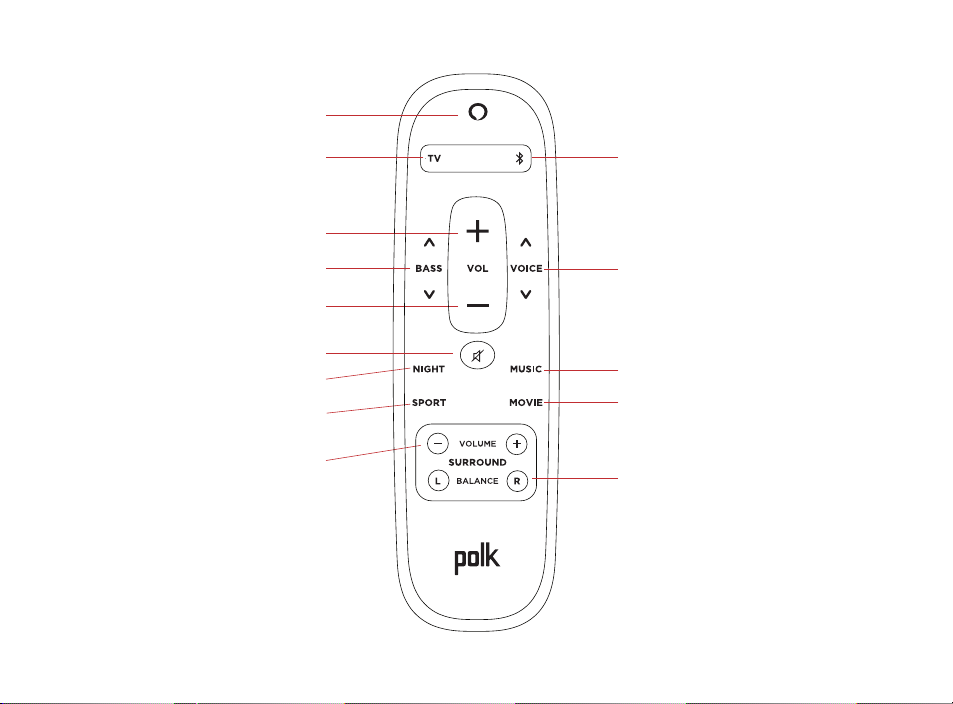
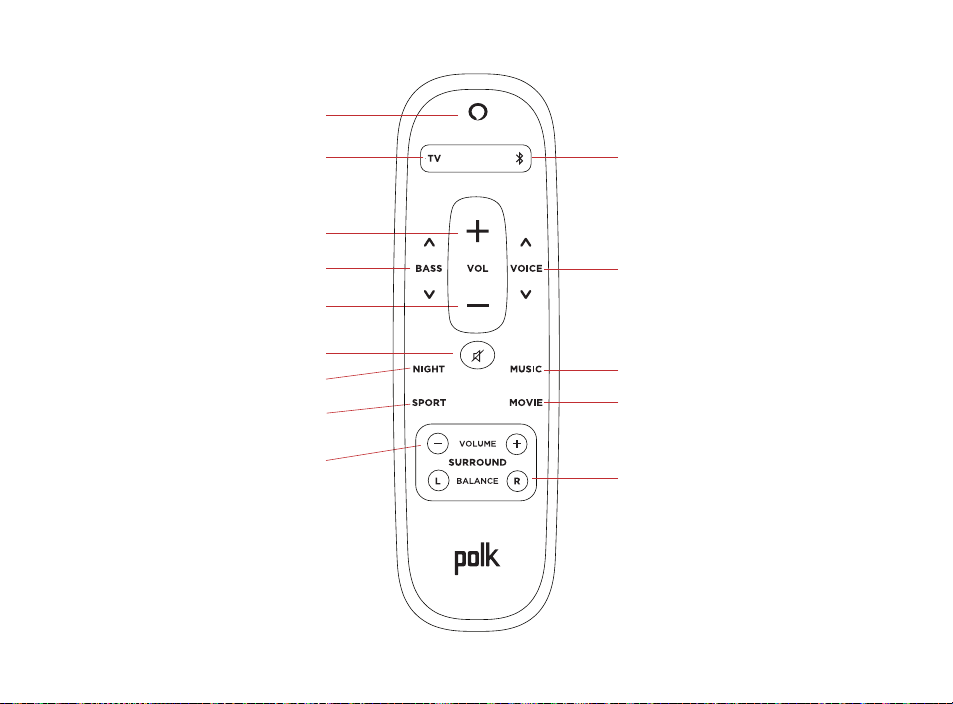
Remote Control
Bluetooth select
Voice Adjust
Music mode
Movie mode
Surround balance
Power
TV select
Volume up
Bass
Volume down
Mute
Night mode
Sport mode
Surround level

11
Get the most out of your polk React
Download the Amazon Alexa app
Download the Alexa app from the app store to manage your lists, news, skills, and more.
Talk to Alexa
To learn what phrases you can use with Polk React, say “Alexa, what can I say” or go to
Things to Try in the Alexa app.
News, weather, and more
Customize these feature in the Alexa app.
Alexa, what’s my Flash Briefing?
Alexa, what’s the weather?
listen out loud with spotify® connect
Spotify is all the music you’ll ever need. Millions of songs are available
instantly. Just search for the music you love, or let Spotify play you something great.
Spotify works on your phone, tablet, computer and home speakers, so you’ll always
have the perfect soundtrack for whatever you’re doing. Now you can enjoy Spotify with
your free account as well as Premium account. Use your phone, tablet or computer as a
remote control for Spotify. Go to spotify.com/connect to learn how.
The Spotify software is subject to third party licenses found here: www.spotify.com/connect/third-party-licenses

12
Tips and Troubleshooting
I don’t have an hdmi port labeled “arc” on my TV.
1. Connect an optical audio cable between the TV and sound bar.
2. Refer to your TV’s manual for instructions on how to turn off the TV’s internal
speakers.
How do I perform a Factory Reset?
Press and hold the Action button until the light bar turns orange (for about 25 seconds).
The light bar will turn blue indicating the boot sequence has started.
update the wi-fi settings.
1. Press and hold the Action button on the top of the sound bar (for about 10 seconds) until
Alexa announces “Now in setup mode”.
2. Follow the instructions in the Alexa app.
For best performance, use the 5GHz band on your wireless router if available. Do not place
your router in a cabinet, as it may impact wi-fi signal strength.
For more troubleshooting and information, go to www.polkaudio.com/support.

13
Merci pour votre achat
Si vous avez une question ou un commentaire, n’hésitez pas à nous contacter.
Assistance technique
Amérique du Nord: 800-377-POLK(7655)
Royaume-Uni et Irlande: +44 202890279830
Clients néerlandais: +31 402507800
Autres pays: +1-410-358-3600
Adresse électronique : polkcs@polkaudio.com
Polk FAQ : polk.custhelp.com
Pour tous les autres pays, veuillez adresser un e-mail à polk-eu@mailmw.custhelp.com
pour obtenir les coordonnées de l’assistance. Le manuel du propriétaire complet est
disponible en ligne à l’adresse http://manuals.polkaudio.com/REACT/NA/EN/index.php.
14
Qu’est-ce qui est dans la boîte
Barre de son Polk React
Documentation
Câble HDMI
Câble
d’alimentation
Télécommande
Piles AAA (2)
Gabarit pour montage
mural
Câble optique
Entretoises pour
montage mural
BASSE
NUIT
MUSIQUE
SPORT FILM
VOLUME
SURROUND
TÉLÉVISION
VOL
G
D
ÉQUILIBRE
15
B
B
A
Positionner votre barre de son
Sur un meuble
A. Pour une expérience d’écoute optimale,
placez la barre de son centrée sous
votre téléviseur et alignez-la avec le
bord avant de votre meuble.
Au mur
B. Reportez-vous au gabarit pour
montage mural inclus si vous souhaitez
monter votre barre de son au mur sous
votre téléviseur.
16
TV
TV (ARC)TV (OPTICAL)
TV
TV (ARC)TV (OPTICAL)
Connecter le téléviseur
Optique
1. Insérez une extrémité du câble optique
dans le port TV (optique) de la barre
de son.
2. Insérez l’autre extrémité du câble dans
le port optique du téléviseur.
HDMI ARC (recommandé)
1. Insérez une extrémité du câble HDMI
dans le port TV (ARC) de la barre
de son.
2. Insérez l’autre extrémité du câble HDMI
dans le port HDMI étiqueté TV (ARC)
du téléviseur.
17
TV (OPTICAL)
TV (ARC)USB
POWER
AC INPUT
100–240V - 50/60Hz
CONNECT
SUB SURR
Brancher l’alimentation
1. Branchez le câble d’alimentation au port d’alimentation situé à l’arrière de la barre
de son.
2. Branchez l’autre extrémité du câble d’alimentation sur une prise de courant alternatif.

18
Se connecter à Internet
1. Téléchargez l’application Alexa sur votre téléphone et connectez-vous.
2. Assurez-vous que les autorisations Bluetooth sur votre téléphone sont activées.
3. Dans l’application Alexa, vous devriez voir une fenêtre contextuelle indiquant que
l’appareil a été découvert et est prêt à être configuré. Continuez pour terminer la
configuration.
4. Si vous ne voyez pas la fenêtre contextuelle, accédez à la page Appareils dans
l’application Alexa, cliquez sur le signe « + » en haut à droite, puis choisissez Ajouter
un appareil.
5. Choisissez la catégorie Enceinte et la marque Polk sur l’écran suivant.
6. Suivez les instructions pour connecter la barre de son à Internet.
Pour plus d’informations et pour le dépannage, rendez-vous
sur le site polkaudio.com/support.
19
1
2
3
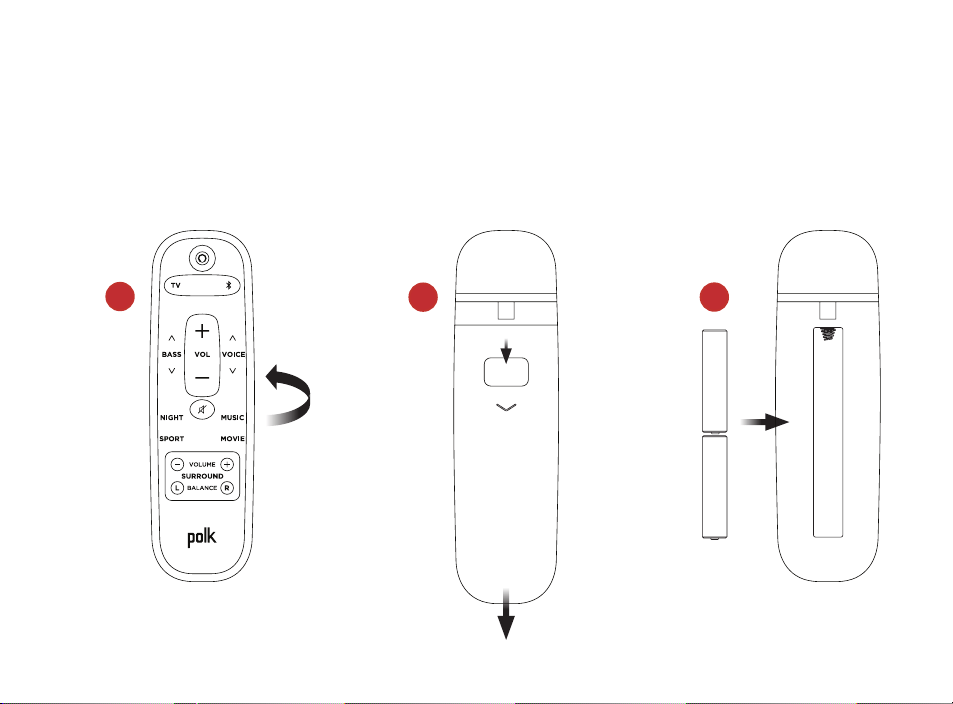
Configurer la télécommande
1. Retournez la télécommande pour voir l’arrière.
2. Ouvrez le capot arrière de la télécommande en faisant glisser la partie inférieure
vers le bas.
3. Insérez les deux piles AAA dans la télécommande et replacez le couvercle.
20
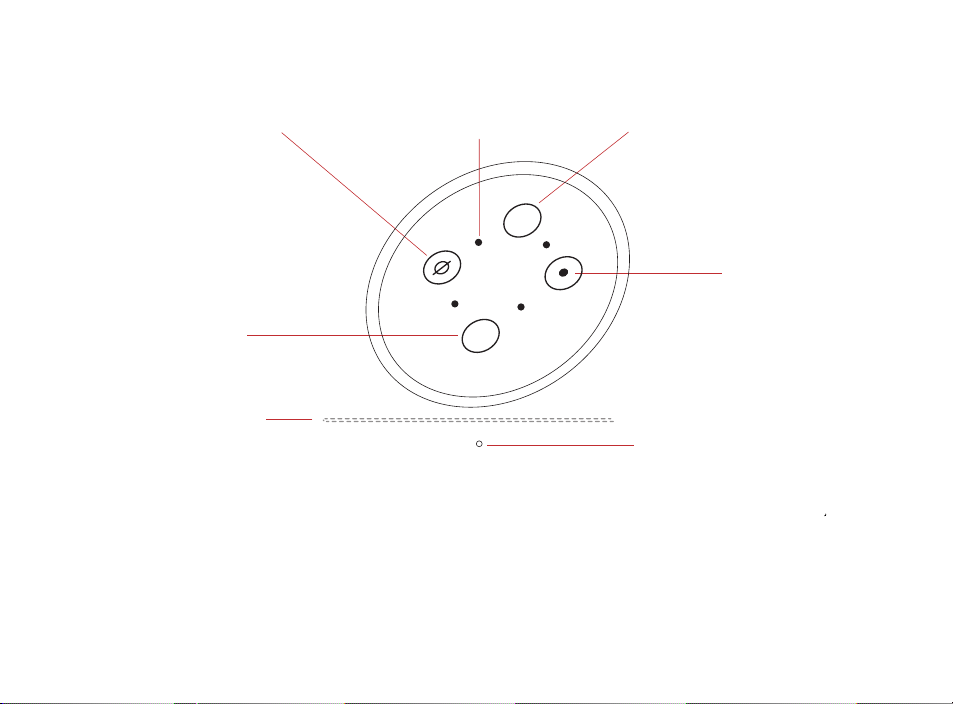
Barre lumineuse : La couleur indique ce qu’Alexa fait.
Boutons de volume : Contrôlent le volume de la barre de son.
Bouton d’action : Bouton multifonctions utilisé pour réveiller Alexa.
Micro activé/désactivé : Quand il est rouge, les microphones sont déconnectés et Alexa
n’écoute pas.
Voyant d’état: Blanc—entrée TV. Violet—mode nuit. Orange—audio PCM. Vert—son Dolby.
Jaune—audio DTS. Bleu—Bluetooth.
Voyant d’état
+
–
Barre lumineuse
Diminution
du volume
Action
Micro activé/
désactivé
Augmentation
du volume
Microphones
Apprendre à connaître les commandes Polk React
21
TV (OPTICAL)
TV (ARC)USB
POWER
AC INPUT
100–240V - 50/60Hz
CONNECT
SUB SURR
Apprendre à connaître les ports Polk React
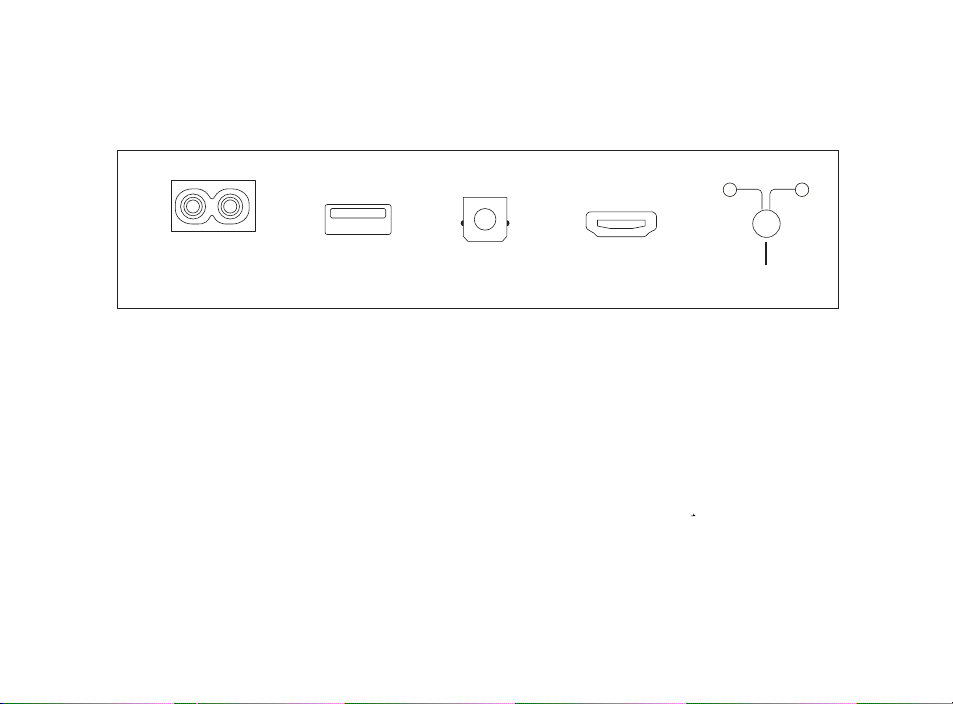
Power : Connexion à une source d’alimentation CA.
USB : Maintenance uniquement.
TV (optical) : Connexion à l’entrée optique de votre téléviseur.
TV (ARC) : Connexion à l’entrée HDMI ARC de votre téléviseur.
Connect : Permet d’apparier le caisson de graves et les haut-parleurs surround
en option avec la barre de son.
22
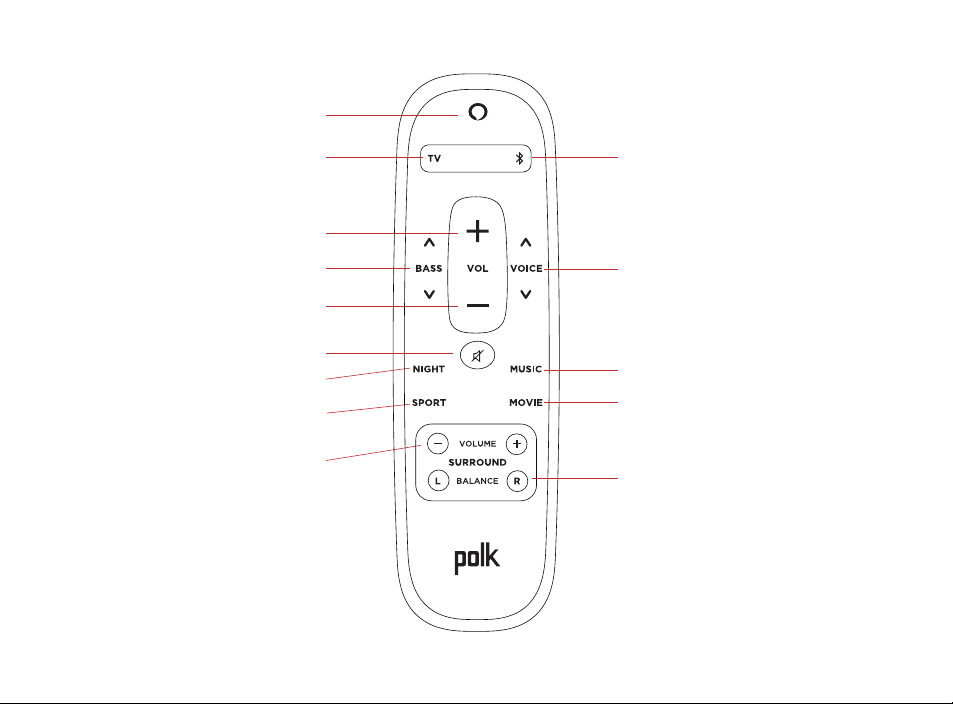
Télécommande
Sélection Bluetooth
Voice Adjust
Mode Musique
Mode Film
Équilibre du son surround
Marche/arrêt
Sélection de la télévision
Augmentation du volume
Basse
Diminution du volume
Sourdine
Mode Nuit
Mode Sport
Niveau surround

23
Tirer le meilleur parti de votre Polk React
Téléchargez l’application Amazon Alexa
Téléchargez l’application Alexa depuis l’App Store pour gérer vos listes, actualités,
compétences et plus.
Parlez à Alexa
Pour savoir quelles phrases vous pouvez utiliser avec Polk React, dites
« Alexa, que puis-je dire » ou allez sur Choses à essayer dans l’application Alexa.
Actualités, météo et plus
Personnalisez ces fonctionnalités dans l’application Alexa.
Alexa, quel est mon flash quotidien ?
Alexa, quel temps fait-il ?
Écouter tout haut avec spotify® connect
Spotify est toute la musique dont vous aurez besoin. Des millions de chansons sont disponibles
immédiatement. Recherchez simplement la musique que vous aimez ou laissez Spotify
vous jouer quelque chose de génial. Spotify fonctionne sur votre téléphone, votre
tablette, votre ordinateur et vos haut-parleurs, vous aurez donc toujours la bande-son
parfaite pour tout ce que vous faites. Vous pouvez maintenant profiter de Spotify avec
votre compte gratuit ainsi que votre compte Premium. Utilisez votre téléphone, tablette
ou ordinateur comme télécommande pour Spotify. Allez sur spotify.com/connect pour
savoir comment.
Le logiciel Spotify est soumis à des licences tierces disponibles ici : www.spotify.com/connect/third-party-licenses

24
Conseils et dépannage
Je n’ai pas de port HDMI étiqueté « ARC » sur mon téléviseur.
1. Connectez la barre de son au téléviseur à l’aide du câble optique.
2. Reportez-vous au manuel de votre téléviseur pour savoir comment éteindre les
haut-parleurs internes du téléviseur.
Comment puis-je effectuer une réinitialisation aux valeurs d’usine ?
Appuyez sur le bouton Action et maintenez-le enfoncé jusqu’à ce que la barre lumineuse
devienne orange (environ 25 secondes). La barre lumineuse devient bleue, indiquant que
la séquence de démarrage a commencé.
Mettre à jour les paramètres Wi-Fi
1. Appuyez et maintenez enfoncé le bouton Action en haut de la barre de son (pendant
environ 10 secondes) jusqu’à ce qu’Alexa annonce «Maintenant en mode configuration».
2. Suivez les instructions de l’application Alexa.
Pour de meilleures performances, utilisez la bande 5 GHz sur votre routeur sans fil si
disponible. Ne placez pas votre routeur dans un meuble, car cela pourrait affecter
l’intensité du signal Wi-Fi.
Pour plus d’informations et pour le dépannage, rendez-vous sur le site
www.polkaudio.com/support.

25
Gracias por comprar Polk.
Si tiene alguna pregunta o comentario, no dude en ponerse en contacto con nosotros.
Asistencia técnica
Norteamérica: 800-377-POLK(7655)
Reino Unido e Irlanda: +44 202890279830
Clientes holandeses: +31 402507800
Otros paises: +1-410-358-3600
Correo electrónico: polkcs@polkaudio.com
Preguntas frecuentes sobre Polk: polk.custhelp.com
En todos los demás países, consulte polk-eu@mailmw.custhelp.com para obtener
la información de contacto del servicio de asistencia técnica.
Puede encontrar el manual del propietario completo en línea en
http://manuals.polkaudio.com/REACT/NA/EN/index.php.
26
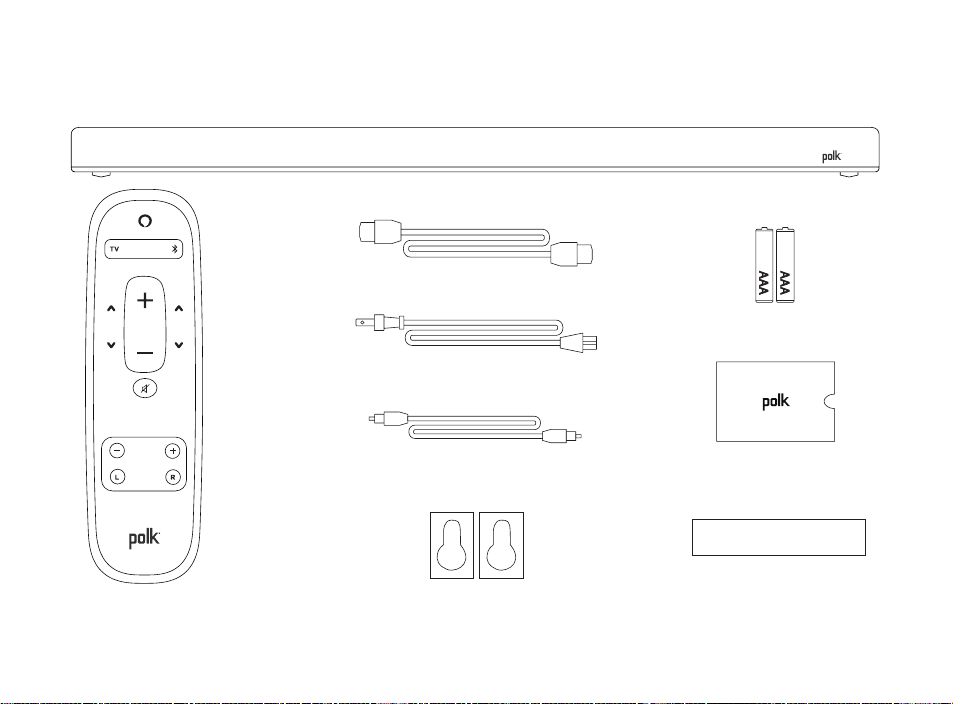
Contenido de la caja
Barra de sonido Polk React
Documentación
Cable HDMI
Cable de
alimentación
Mando
a distancia
Pilas AAA (2)
Plantilla de montaje
en pared
Cable óptico
Espaciadores para
montaje en pared
GRAVES VOZ
NOCTURNO
MÚSICA
DEPORTE PELÍCULA
VOLUMEN
ENVOLVENTE
EQUILIBRIO
I D
27
B
B
A
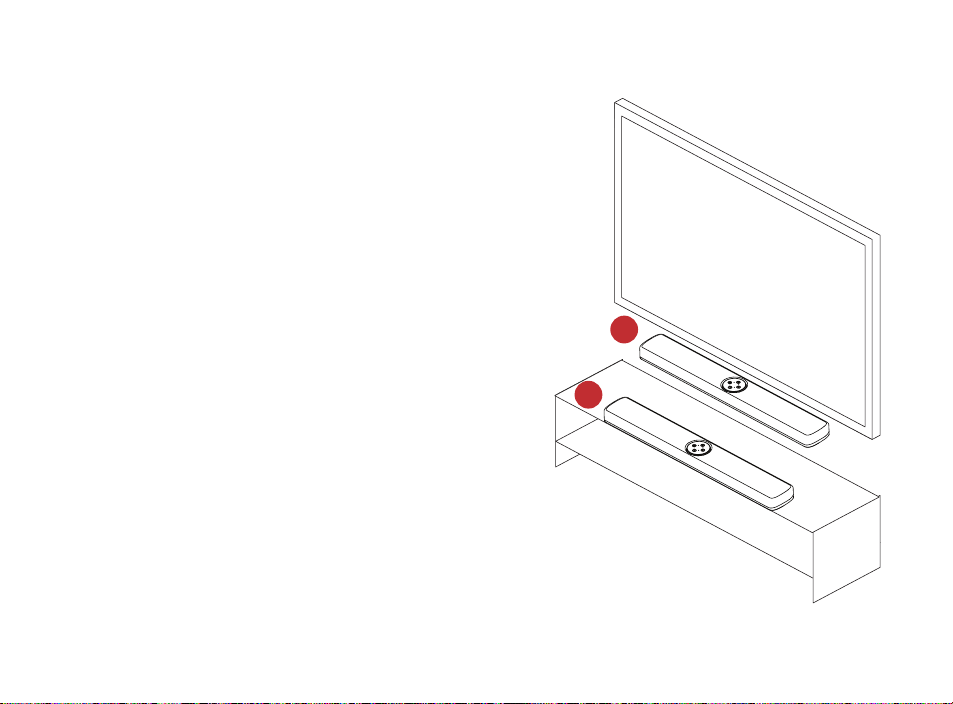
COLOCACIÓN DE LA BARRA DE SONIDO
EN UN MUEBLE
A. Para disfrutar de la mejor experiencia
auditiva, coloque la barra de sonido
centrada debajo del televisor y a ras
del borde delantero del mueble.
MONTADO EN LA PARED
B. Remítase a la plantilla de montaje en
pared que se incluye si desea montar
la barra de sonido en la pared bajo el
televisor.
28
TV
TV (ARC)TV (OPTICAL)
TV
TV (ARC)TV (OPTICAL)
CONEXIÓN DEL TELEVISOR
ÓPTICA
1. Inserte un extremo del cable óptico
en el puerto TV (OPTICAL) de la barra
de sonido.
2. Inserte el otro extremo del cable en
el puerto óptico del televisor.
HDMI ARC (RECOMENDADO)
1. Inserte un extremo del cable HDMI
en el puerto TV (ARC) de la barra
de sonido.
2. Inserte el otro extremo del cable HDMI
en el puerto HDMI con la etiqueta TV
(ARC) del televisor.
29
TV (OPTICAL)
TV (ARC)USB
POWER
AC INPUT
100–240V - 50/60Hz
CONNECT
SUB SURR
CONEXIÓN DE LA ALIMENTACIÓN
1. Conecte el cable de alimentación en el puerto de alimentación situado en la parte
posterior de la barra de sonido.
2. Conecte el otro extremo del cable de alimentación en una toma de corriente de CA.

30
CONEXIÓN A INTERNET
1. Descargue la aplicación Alexa a su teléfono e inicie sesión.
2. Asegúrese de que están activados los permisos de Bluetooth en su teléfono.
3. En la aplicación Alexa debería ver una ventana emergente que indica que el
dispositivo se ha detectado y está listo para la configuración. Continúe para
finalizar la configuración.
4. Si no ve la ventana emergente, vaya a la página Dispositivos de la aplicación Alexa,
haga clic en el signo “+” en la parte superior derecha y seleccione Añadir dispositivo.
5. Seleccione la categoría Altavoz y la marca Polk en la siguiente pantalla.
6. Siga las instrucciones para conectar la barra de sonido a Internet.
Para obtener más información y solucionar problemas, visite polkaudio.com/support.
31
1
2
3
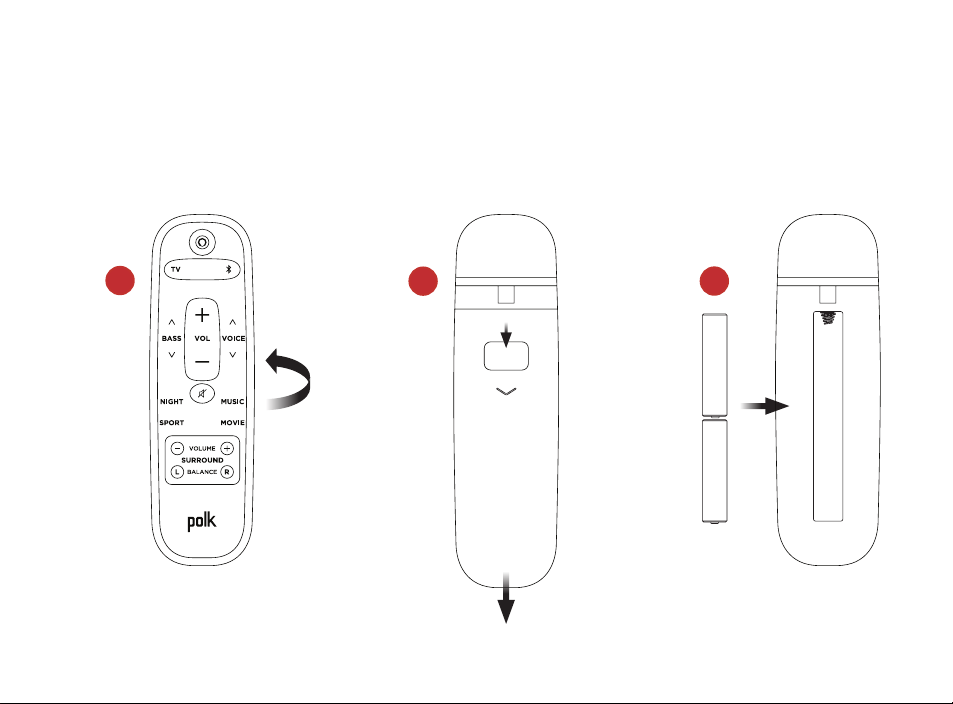
CONFIGURACIÓN DEL MANDO A DISTANCIA
1. Gire el mando a distancia para ver la parte posterior.
2. Abra la tapa posterior del mando a distancia deslizando la parte inferior hacia abajo.
3. Introduzca las dos pilas AAA en el mando a distancia y vuelva a colocar la tapa.
32
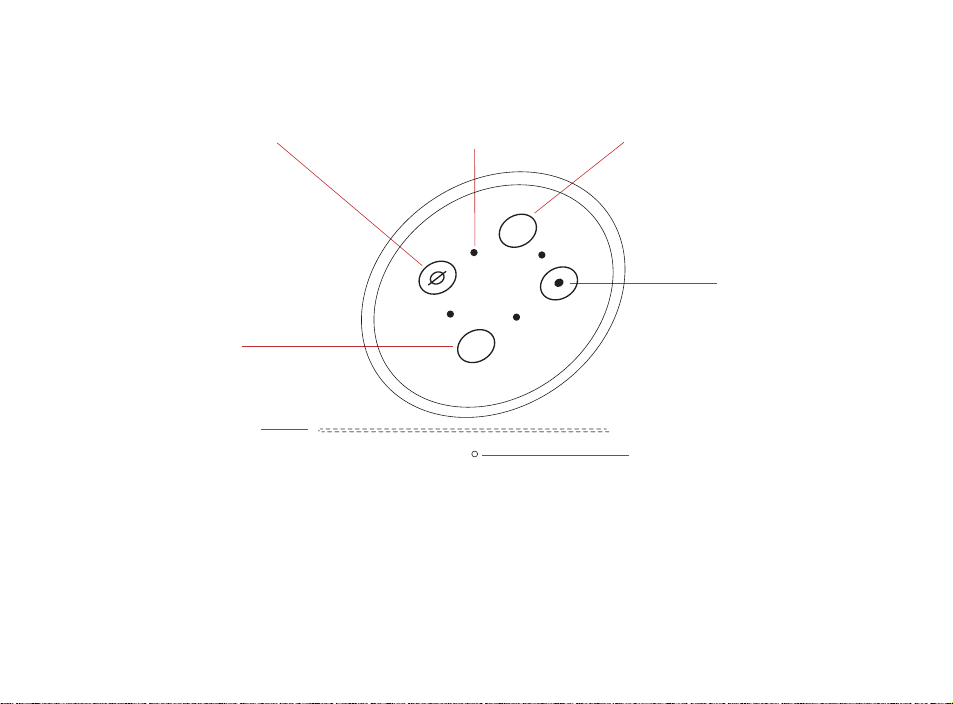
Barra de luces: el color indica qué está haciendo Alexa.
Botones de volumen: control del volumen de la barra de sonido.
Botón de acción: botón multifunción utilizado para activar Alexa.
Encendido/apagado de los micrófonos: cuando está en rojo, los micrófonos están
desconectados y Alexa no está escuchando.
LED de estado: blanco—entrada de TV. Morado—modo nocturno. Naranja—audio PCM.
Verde—audio Dolby. Amarillo—audio DTS. Azul—Bluetooth.
INFORMACIÓN SOBRE LOS CONTROLES DE POLK REACT
LED de estado
+
–
Barra de luces
Bajar el
volumen
Acción
Encendido/
apagado de los
micrófonos
Subir el volumen
Micrófonos

33
TV (OPTICAL)
TV (ARC)USB
POWER
AC INPUT
100–240V - 50/60Hz
CONNECT
SUB SURR
INFORMACIÓN SOBRE LOS PUERTOS DE POLK REACT
Power: conexión con la fuente de alimentación de CA.
USB: solo para servicio técnico.
TV (OPTICAL): conexión con la entrada óptica del televisor.
TV (ARC): conexión con la entrada HDMI ARC del televisor.
Connect: se utiliza para emparejar el altavoz de graves y los altavoces envolventes
opcionales con la barra de sonido.

34
MANDO A DISTANCIA
Selección de Bluetooth
Ajuste de voz
Modo música
Modo película
Equilibrio del sonido envolvente
Encendido/apagado
Selección de TV
Subir el volumen
Graves
Bajar el volumen
Silenciar
Modo nocturno
Modo deporte
Nivel envolvente

35
Saque el máximo partido de su Polk React
Descargar la aplicación Alexa de Amazon
Descargue la aplicación Alexa desde la tienda de aplicaciones para administrar sus
listas, noticias, skills y mucho más.
Hablar con Alexa
Para saber qué frases puede usar con Polk React, diga “Alexa, ¿qué puedo decir?”
o vaya a Sugerencias en la aplicación Alexa.
Noticias, tiempo y mucho más
Personalice estas funciones en la aplicación Alexa.
Alexa, ¿cuáles son las noticias del día?
Alexa, ¿qué tiempo hace?
Escuche con volumen con spotify® connect
Spotify es toda la música que necesitarás. Hay millones de canciones disponibles
instantáneamente. Simplemente busca la música que te gusta o deja que Spotify
te reproduzca algo genial. Spotify funciona en su teléfono, tableta, computadora y
altavoces domésticos, por lo que siempre tendrá la banda sonora perfecta para lo que
esté haciendo. Ahora puede disfrutar de Spotify con su cuenta gratuita y con su cuenta
Premium. Use su teléfono, tableta o computadora como control remoto para Spotify.
Ve a spotify.com/connect para aprender cómo.
El software Spotify está sujeto a licencias de terceros que se pueden encontrar aquí:
www.spotify.com/connect/third-party-licenses

36
Consejos y solución de problemas
No tengo un puerto hdmi con la etiqueta “arc” en mi televisor.
1. Conecte un cable de audio óptico entre el televisor y la barra de sonido.
2. Consulte en el manual de su televisor las instrucciones sobre cómo apagar
los altavoces internos del televisor.
¿Cómo realizo un restablecimiento de los ajustes de fábrica?
Mantenga pulsado el botón Action (Acción) hasta que la barra de luces se vuelva naranja
(unos 25 segundos). La barra de luces se volverá azul para indicar que se ha iniciado la
secuencia de inicio.
Actualización de la configuración wifi
1. Mantenga presionado el botón Acción en la parte superior de la barra de sonido (durante
unos 10 segundos) hasta que Alexa anuncie “Ahora en modo de configuración”.
2. Siga las instrucciones de la aplicación Alexa.
Para obtener el mejor rendimiento, utilice la banda de 5 GHz de su enrutador inalámbrico si
está disponible. No coloque el enrutador en un mueble, ya que puede afectar la intensidad
de la señal wifi.
Para obtener más información y solucionar problemas, visite www.polkaudio.com/support.

37
Vielen Dank, dass Sie sich für Polk entschieden haben.
Wenn Sie Fragen oder Anmerkungen haben, können Sie uns gerne kontaktieren.
Technische Hilfe
Noord Amerika: 800-377-POLK(7655)
Verenigd Koninkrijk en Ierland: +44 202890279830
Nederlandse klanten: +31 402507800
Andere landen: +1-410-358-3600
Email: polkcs@polkaudio.com
Polk FAQs: polk.custhelp.com
Für alle anderen Länder nutzen Sie die E-Mail-Adresse polk-eu@mailmw.custhelp.com
für Supportanfragen.Die vollständige Bedienungsanleitung finden Sie online unter
http://manuals.polkaudio.com/REACT/NA/EN/index.php.
38
Verpackungsinhalt
Polk React Soundbar
Technische
Dokumente
HDMI-Kabel
Netzkabel
Fernbedienung
AAA-Batterien (2)
Schablone für
Wandmontage
Lichtleiterkabel
Distanzstücke für
Wandmontage
NACHT
MUSIK
SPORT FILM
LAUTSTÄRKE
SURROUND
VOLBASS
SPRACHE
BALANCE
39
B
B
A
Positionierung der Soundbar
Auf einer Konsole
A. Positionieren Sie die Soundbar für
ein optimales Hörerlebnis mittig unter
Ihrem Fernsehgerät auf einer Konsole,
sodass sie bündig mit der Vorderkante
des Konsole abschließt.
Per Wandmontage
B. Wenn Sie die Soundbar unter Ihrem
Fernsehgerät an der Wand montieren
möchten, nutzen Sie bitte die
Schablone zur Wandmontage.
40
TV
TV (ARC)TV (OPTICAL)
TV
TV (ARC)TV (OPTICAL)
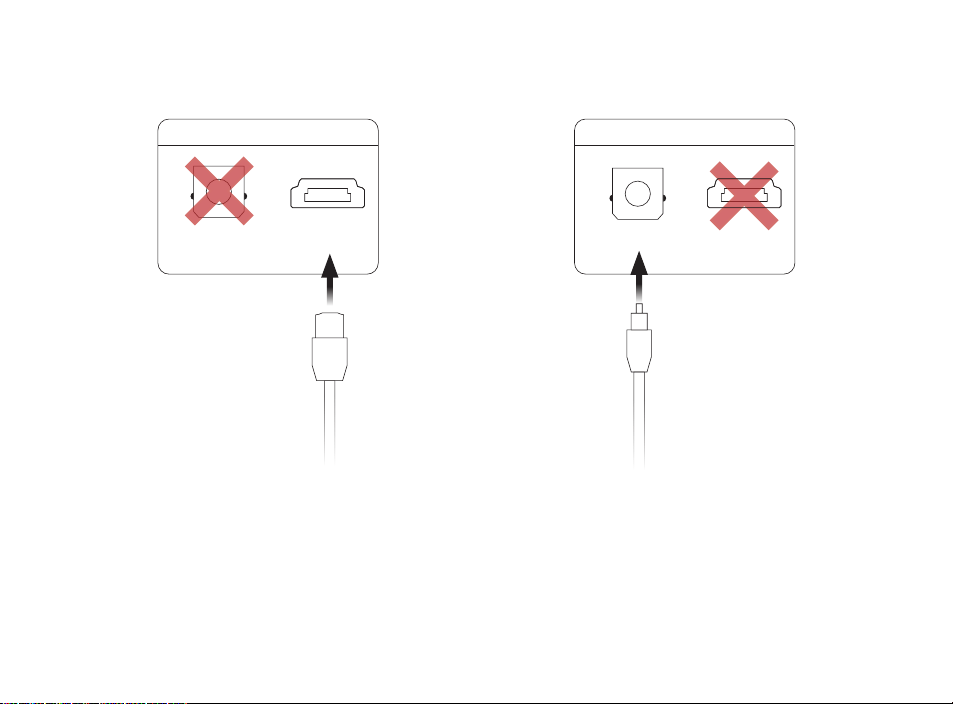
Anschluss an das TV-Gerät
Optisch per Lichtleiterkabel
1. Stecken Sie ein Ende des
Lichtleiterkabels in den TV (OPTICAL)-
Anschluss an der Soundbar.
2. Stecken Sie das andere Ende des
Kabels in den optischen Anschluss
des Fernsehers.
HDMI ARC (empfohlen)
1. Stecken Sie ein Ende des HDMI-Kabels
an der Soundbar in die Buchse TV (ARC).
2. Stecken Sie das andere Ende des HDMI-
Kabels in den HDMI-Anschluss (ARC) an
Ihrem TV-Gerät.
41
TV (OPTICAL)
TV (ARC)USB
POWER
AC INPUT
100–240V - 50/60Hz
CONNECT
SUB SURR
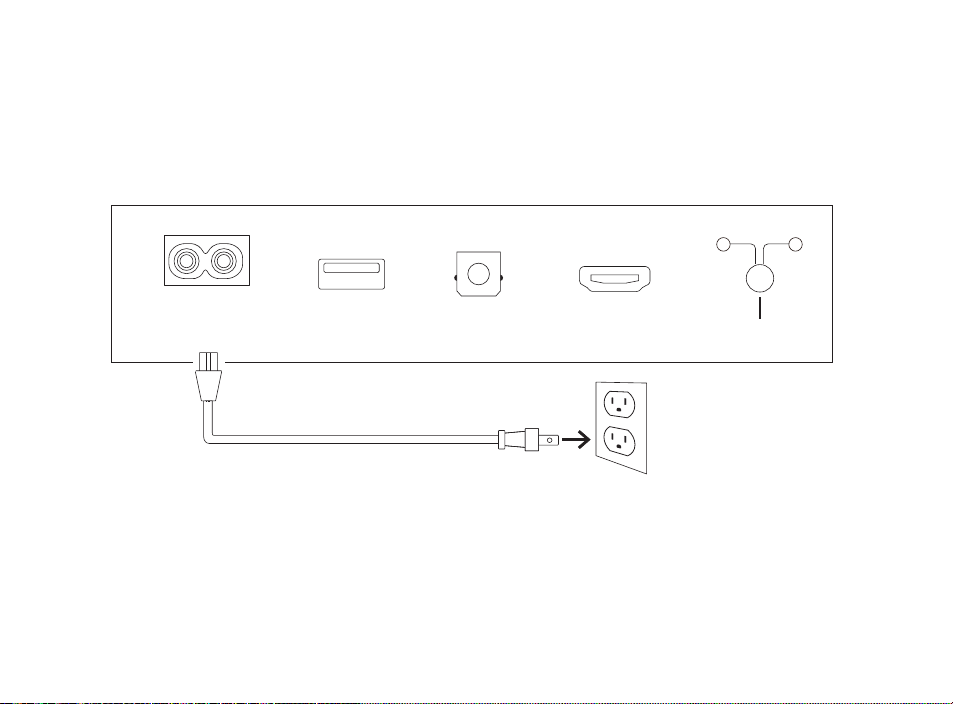
Stromanschluss
1. Verbinden Sie das Netzkabel mit dem Netzanschluss (POWER) an der Rückseite
der Soundbar.
2. Verbinden Sie das Netzkabel mit einer Steckdose.

42
Verbindung mit dem Internet
1. Installieren Sie die Alexa App auf Ihrem Mobiltelefon und melden Sie sich an.
2. Stellen Sie sicher, dass die Bluetooth-Berechtigungen auf Ihrem Mobiltelefon
aktiviert sind.
3. Sie sollten nun in der Alexa App eine Meldung sehen, dass das Gerät erkannt wurde
und konfiguriert werden kann. Fahren Sie fort, die Konfiguration abzuschließen.
4. Wenn keine Meldung angezeigt wird, gehen Sie in der Alexa App auf die Seite
„Geräte“ (Devices), klicken Sie oben rechts auf + und wählen Sie „Gerät hinzufügen“
(Add Device).
5. Wählen Sie die Lautsprecherkategorie und die Marke „Polk“ auf der folgenden Seite.
6. Folgen Sie den Anweisungen und verbinden Sie die Soundbar mit dem Internet.
Problemlösungen und weitere Informationen finden Sie unter polkaudio.com/support.
43
1
2
3
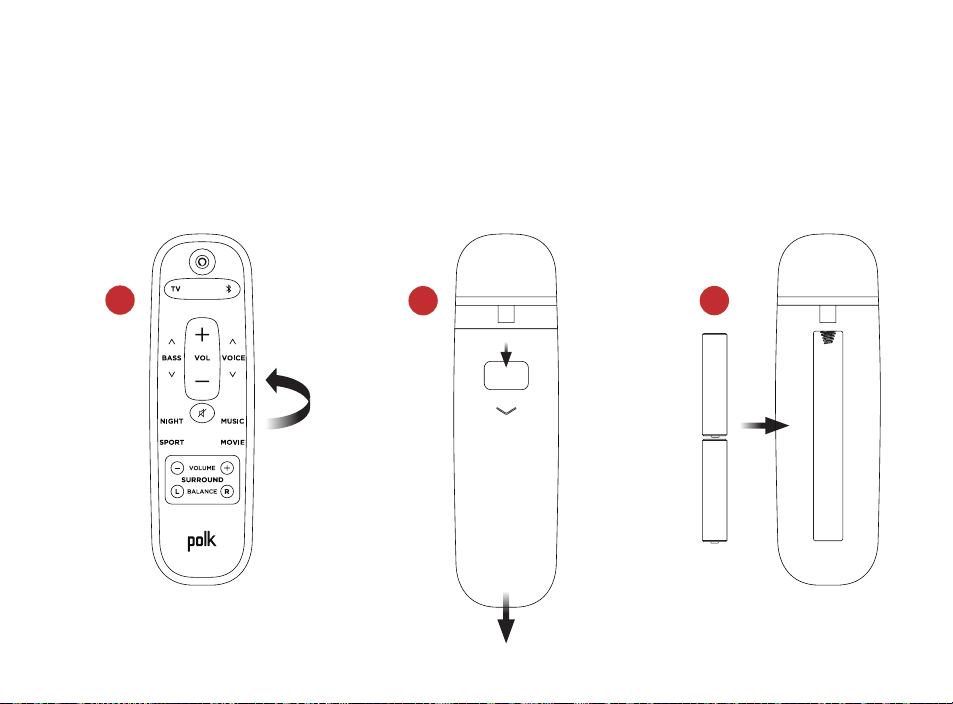
Einrichtung der Fernbedienung
1. Drehen Sie die Fernbedienung mit der Rückseite nach oben.
2. Öffnen Sie die hintere Abdeckung der Fernbedienung, indem Sie den unteren Teil
abwärts schieben.
3. Legen Sie Sie die zwei Batterien (AAA) in die Fernbedienung ein und schließen Sie
die Abdeckung.
44
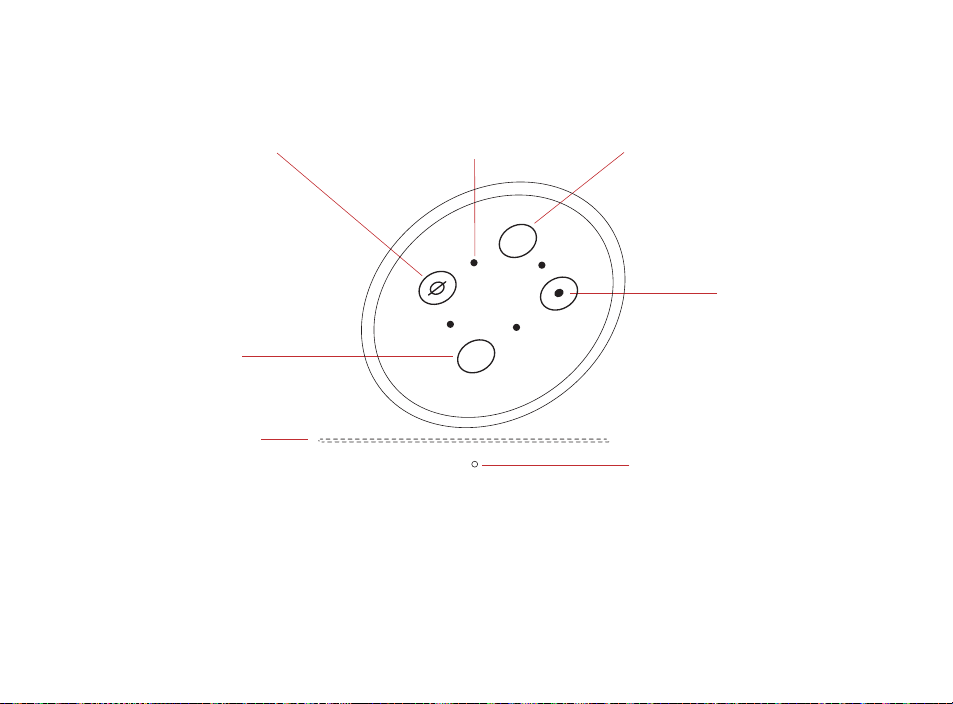
Status-LED
+
–
Leuchtbalken: Die Farbe zeigt den Status von Alexa an.
Lautstärketasten: Kontrolle der Soundbar-Lautstärke.
Aktionstaste: Multifunktionale Taste zum Aktivieren von Alexa.
Mikrofon ein/aus: Rot bedeutet, die Mikrofone sind nicht verbunden und Alexa hört nicht mit.
Status-LED: Wit—tv-ingang. Paars—Nachtmodus. Oranje—PCM-audio. Groen—Dolby-audio.
Geel—DTS-audio. Blauw—Bluetooth.
Übersicht der Polk React Bedienelemente
Leuchtbalken
Lautstärke
senken
Aktion
Mikrofon
ein/aus
Lautstärke
erhöhen
Mikrofone
45
TV (OPTICAL)
TV (ARC)USB
POWER
AC INPUT
100–240V - 50/60Hz
CONNECT
SUB SURR
Übersicht der Polk React Anschlüsse
Stromversorgung: Anschluss an die Wechselstromquelle.
USB: Nur für Servicearbeiten.
TV (optical): Anschluss an das TV-Gerät per Lichtleiterkabel.
TV (ARC): Anschluss an das TV-Gerät per HDMI-Kabel (ARC).
Verbindung: Zum optionalen Pairing der Soundbar mit einem Subwoofer und Surround-
Lautsprechern.
46
Fernbedienung
Bluetooth-Auswahl
Voice Adjust
Musikmodus
Filmmodus
Surround-Balance
Stromversorgung
TV-Auswahl
Lautstärke erhöhen
Bass
Lautstärke senken
Stumm schalten
Nachtmodus
Sportmodus
Surround niveau

47
Holen Sie das Maximum aus Ihrem Polk React
Download der Amazon Alexa App
Installieren Sie aus dem App Store die Alexa App für das Management Ihrer Playlists,
Nachrichten, Skills und vieles mehr.
Mit Alexa sprechen
Zum Verständnis, welche Befehle Sie zur Steuerung von Polk React nutzen können,
sagen Sie „Alexa, was kann ich sagen“ oder gehen Sie in der Alexa App zu „Things to Try“.
Nachrichten, Wetter und mehr
Passen Sie diese Funktionen in der Alexa App an.
Alexa, was gibt es Neues?
Alexa, wie ist das Wetter?
Musik hören mit Spotify® Connect
Spotify is alle muziek die u ooit nodig heeft. Er zijn miljoenen nummers beschikbaar
ogenblikkelijk. Zoek gewoon naar de muziek waar je van houdt, of laat Spotify iets
geweldigs voor je spelen. Spotify werkt op je telefoon, tablet, computer en speakers in
huis, dus je hebt altijd de perfecte soundtrack voor wat je ook doet. Nu kunt u genieten
van Spotify met zowel uw gratis account als uw Premium-account. Gebruik je telefoon,
tablet of computer als afstandsbediening voor Spotify. Ga naar spotify.com/connect
voor meer informatie.
Die Spotify Software unterliegt den hier aufgeführten Lizenzbestimmungen:
www.spotify.com/connect/third-party-licenses

48
Tipps und Fehlerbehebung
Ich habe an meinem TV-Gerät keinen HDMI-Anschluss mit der Bezeichnung „ARC“.
1. Verbinden Sie das mitgelieferte optische Audiokabel mit dem Fernsehgerät und
der Soundbar.
2. Beachten Sie die Bedienungsanweisung Ihres TV-Geräts, um die internen
Lautsprecher des Fernsehers auszuschalten.
Wie führe ich einen Factory Reset durch?
Halten Sie die Aktionstaste gedrückt, bis der Leuchtbalken orangefarben wird (etwa 25
Sekunden). Der Leuchtbalken wird blau. Dies zeigt an, dass die Boot-Sequenz gestartet wurde.
Aktualisierung der WLAN-Einstellungen
1. Houd de Action-knop aan de bovenkant van de soundbar ingedrukt (ongeveer 10
seconden) totdat Alexa aankondigt “Now in setup mode”.
2. Volg de instructies in de Alexa-app.
Für eine optimale Leistung stellen Sie Ihren WLAN-Router auf das 5-GHz-Band ein, sofern
möglich. Platzieren Sie Ihren Router nicht in einem Schrank, da dies die Signalstärke
beeinträchtigen kann.
Weitere Problemlösungen und Informationen finden Sie unter www.polkaudio.com/support.

49
Bedankt voor uw aankoop bij Polk
Als u een vraag of opmerking heeft, neem dan gerust contact met ons op.
Technische ondersteuning
Noord Amerika: 800-377-POLK(7655)
Verenigd Koninkrijk en Ierland: +44 202890279830
Nederlandse klanten: +31 402507800
Andere landen: +1-410-358-3600
E-mail: polkcs@polkaudio.com veelgestelde vragen
over Polk: polk.custhelp.com
Raadpleeg in alle andere landen polk-eu@mailmw.custhelp.com voor contactgegevens
voor ondersteuning. De volledige gebruikershandleiding is online te vinden op
http://manuals.polkaudio.com/REACT/NA/EN/index.php.
50
Wat zit er in de doos?
Polk React sound bar
Documentatie
HDMI-kabel
Voedingskabel
Afstands
bediening
AAA-batterijen (2)
Sjabloon voor
wandmontage
Optische kabel
Afstandhouders voor
wandmontage
NACHT
MUZIEK
SPORT FILM
VOLUME
SURROUND
Tv
VOL
(vol.-volume)
BALANS
BASS
-GELUID
SPRAAK
51
B
B
A
Plaats uw soundbar
Op een kast
A. Voor de beste luisterervaring plaatst
u de soundbar gecentreerd onder uw
tv en sluit u deze aan op de voorkant
van uw kast.
wandmontage
B. Raadpleeg het meegeleverde sjabloon
voor wandmontage als u uw soundbar
onder uw tv aan de wand wilt
bevestigen.
52
TV
TV (ARC)TV (OPTICAL)
TV
TV (ARC)TV (OPTICAL)
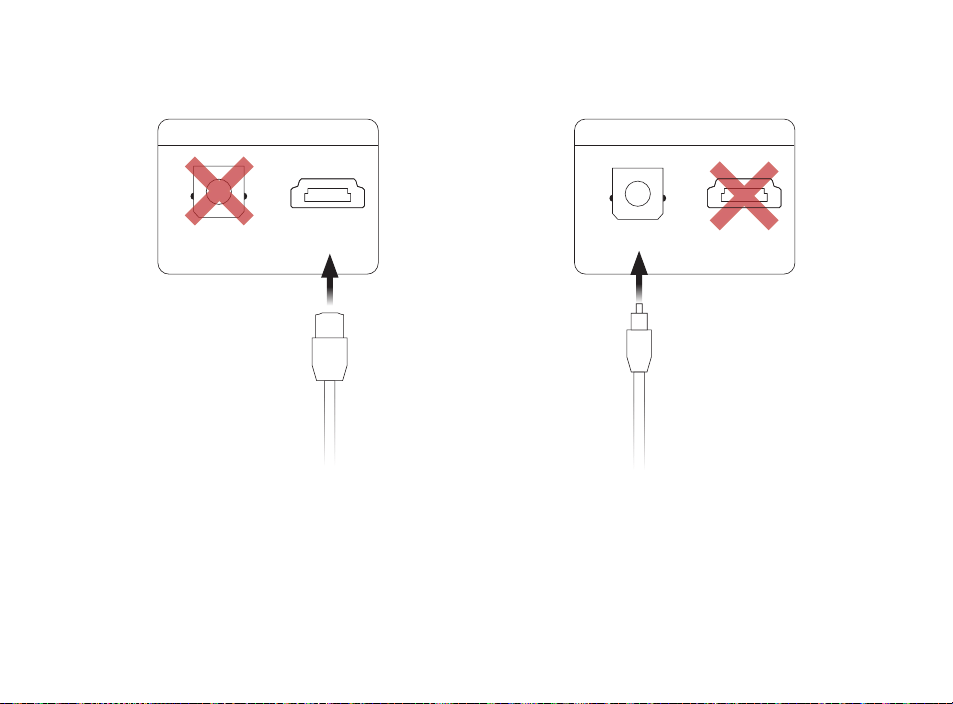
De tv aansluiten
Optische
1. Steek het ene uiteinde van de optische
kabel in de (OPTISCHE) poort van de tv
op de soundbar.
2. Steek het andere uiteinde van de kabel
in de optische poort op de tv.
HDMI ARC (aanbevolen)
1. Steek het ene uiteinde van de HDMI-
kabel in de TV-poort (ARC) op de
soundbar.
2. Steek het andere uiteinde van de HDMI-
kabel in de HDMI-poort met het label
TV (ARC) op de TV.
53
TV (OPTICAL)
TV (ARC)USB
POWER
AC INPUT
100–240V - 50/60Hz
CONNECT
SUB SURR
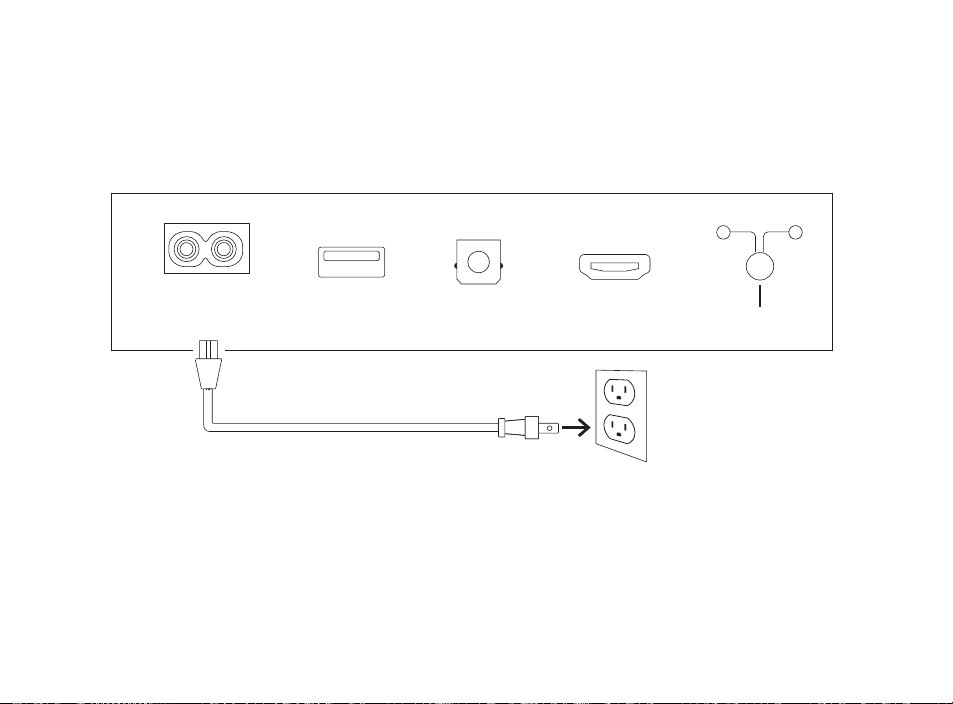
De stroom aansluiten
1. Sluit de stroomkabel aan op de stroompoort aan de achterkant van de soundbar.
2. Sluit het andere uiteinde van de stroomkabel aan op een stopcontact.

54
Verbinding maken met internet
1. Download de Alexa-app op uw telefoon en meld u aan.
2. Zorg ervoor dat de Bluetooth-toestemming op uw telefoon is ingeschakeld.
3. In de Alexa-app ziet u een pop-up die aangeeft dat het apparaat is ontdekt
en gereed is voor installatie. Ga verder om de installatie te voltooien.
4. Als u het pop-upvenster niet ziet, ga dan naar de pagina apparaten in de
Alexa-app, klik op het ‘+’-teken rechtsboven en kies Apparaat toevoegen.
5. Kies de categorie Luidspreker en het merk Polk op het volgende scherm.
6. Volg de instructies om de soundbar te verbinden met het internet.
Ga voor probleemoplossing en meer informatie naar polkaudio.com/support.
55
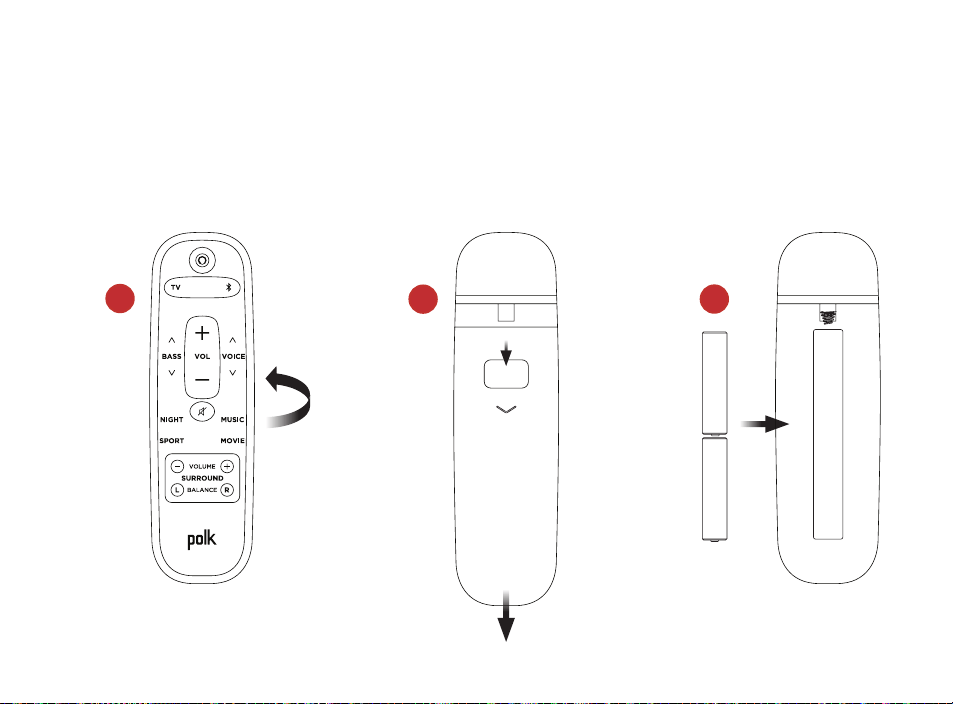
1
2
3
de afstandsbediening instellen
1. Draai de afstandsbediening om de achterkant te bekijken.
2. Open het achterdeksel van de afstandsbediening door het onderste gedeelte
omlaag te schuiven.
3. Plaats de twee AAA-batterijen in de afstandsbediening en plaats het deksel terug.
56
Status-LED
+
–
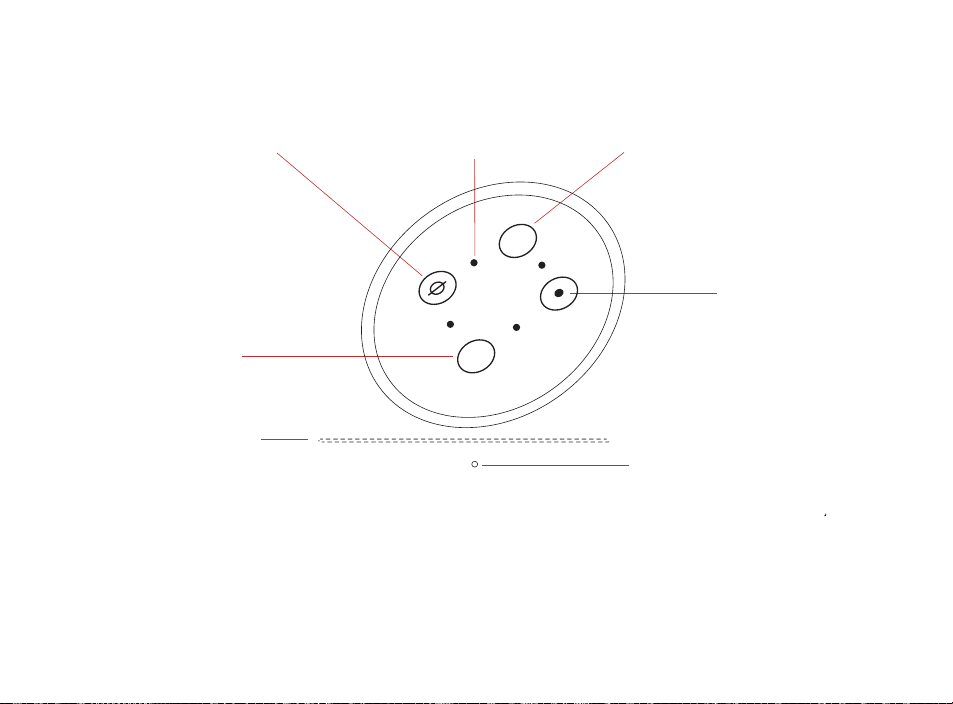
Maak kennis met Polk React-besturingselementen
Lichtbalk
Volume
omlaag
Actie
Microfoon
aan/uit
Volume omhoogMicrofoons
Lichtbalk: De kleur geeft aan wat Alexa doet.
Volumeknoppen: Regel het volume van de soundbar.
Actieknop: Multifunctionele knop om Alexa te activeren.
Microfoon aan/uit: Wanneer deze rood is, worden de microfoons losgekoppeld en luistert Alexa niet.
Status-LED: Wit—tv-ingang. Paars—Nachtmodus. Oranje—PCM-audio. Groen—Dolby-audio.
Geel—DTS-audio. Blauw—Bluetooth.

57
TV (OPTISCHE)
TV (ARC)
USB-aansluiting
STROOM
AC INPUT
100–240V - 50/60Hz
AANSLUITEN
SUB SURR
Maak kennis met Polk React-poorten
Stroom: Aansluiten op een stopcontact
USB-aansluiting: Uitsluitend servicegebruik.
TV (optische): Aansluiten op de optische ingang van uw tv.
TV (ARC): Aansluiten op de HDMI ARC-ingang van uw tv.
Verbinding maken: Wordt gebruikt om de optionele subwoofer
en surround-luidsprekers te koppelen aan de soundbar.
58
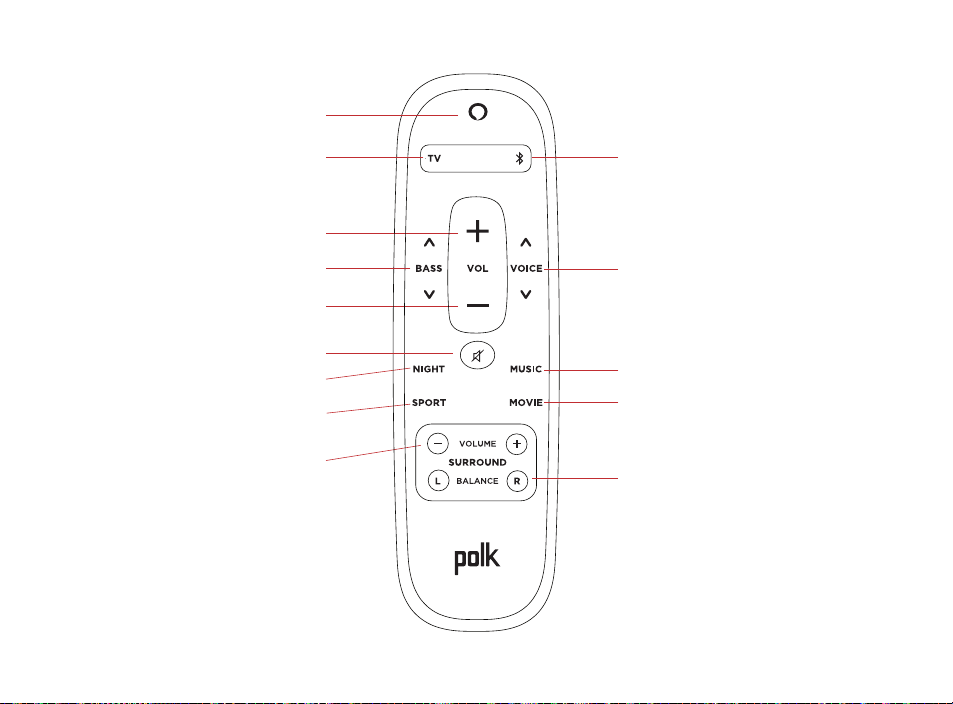
Afstandsbediening
Bluetooth selecteren
Stem aanpassen
Muziekmodus
Filmstand
Surround balans
Stroom
Tv-selectie
Volume omhoog
Basgeluid
Volume omlaag
Gedempt
Nachtmodus
Sportmodus
Surround niveau

59
Haal het meeste uit uw polk React
Download de Amazon Alexa-app
Download de Alexa-app vanuit de app store om uw lijsten, nieuws, vaardigheden
en meer te beheren.
Praat met Alexa
Om te weten te komen welke zinnen u kunt gebruiken met Polk React, zeg
“Alexa, wat kan ik zeggen” of ga naar Things to Try in de Alexa-app.
Nieuws, weerbericht en meer
pas deze functie aan in de Alexa-app.
Alexa, wat is mijn Flash Briefing?
Alexa, wat is het weer?
luister hardop met spotify® connect
Spotify is alle muziek die u ooit nodig heeft. Er zijn miljoenen nummers beschikbaar
ogenblikkelijk. Zoek gewoon naar de muziek waar je van houdt, of laat Spotify iets
geweldigs voor je spelen. Spotify werkt op je telefoon, tablet, computer en speakers in
huis, dus je hebt altijd de perfecte soundtrack voor wat je ook doet. Nu kunt u genieten
van Spotify met zowel uw gratis account als uw Premium-account. Gebruik je telefoon,
tablet of computer als afstandsbediening voor Spotify. Ga naar spotify.com/connect
voor meer informatie.
De Spotify software is onderhevig aan licenties van derden die hier te vinden zijn:
www.spotify.com/connect/licenties van derden

60
Tips en problemen oplossen
Ik heb geen hdmi-poort met het label “arc” op mijn tv.
1. Een optische audiokabel aansluiten tussen de TV en de soundbar.
2. Raadpleeg de handleiding van uw tv voor instructies voor het uitschakelen
van de interne luidsprekers van de tv.
Hoe voer ik een fabrieksreset uit?
Houd de actieknop ingedrukt totdat de lichtbalk oranje wordt (ongeveer 25 seconden).
De lichtbalk wordt blauw om aan te geven dat de opstartprocedure is gestart.
de wifi-instellingen bijwerken
1. Houd de Action-knop aan de bovenkant van de soundbar ingedrukt (ongeveer 10
seconden) totdat Alexa aankondigt “Now in setup mode”.
2. Volg de instructies in de Alexa-app.
Gebruik voor de beste prestaties de 5 GHz-band op uw draadloze router, indien beschikbaar.
Plaats uw router niet in een kast, omdat dit de sterkte van het wifi-signaal kan beïnvloeden.
Ga voor meer informatie naar www.polkaudio.com/support.

61
Grazie per aver scelto Polk
In caso di domande o commenti, non esitare a contattarci.
Assistenza tecnica
Nord America: 800-377-POLK(7655)
Regno Unito e Irlanda: +44 202890279830
Clienti olandesi: +31 402507800
Altri paesi: +1-410-358-3600
E-mail: polkcs@polkaudio.com
Domande frequenti Polk: polk.custhelp.com
In tutti gli altri Paesi, fare riferimento a polk-eu@mailmw.custhelp.com per i dettagli
di contatto dell’assistenza. Il manuale utente completo è disponibile online all’indirizzo
http://manuals.polkaudio.com/REACT/NA/EN/index.php.
62
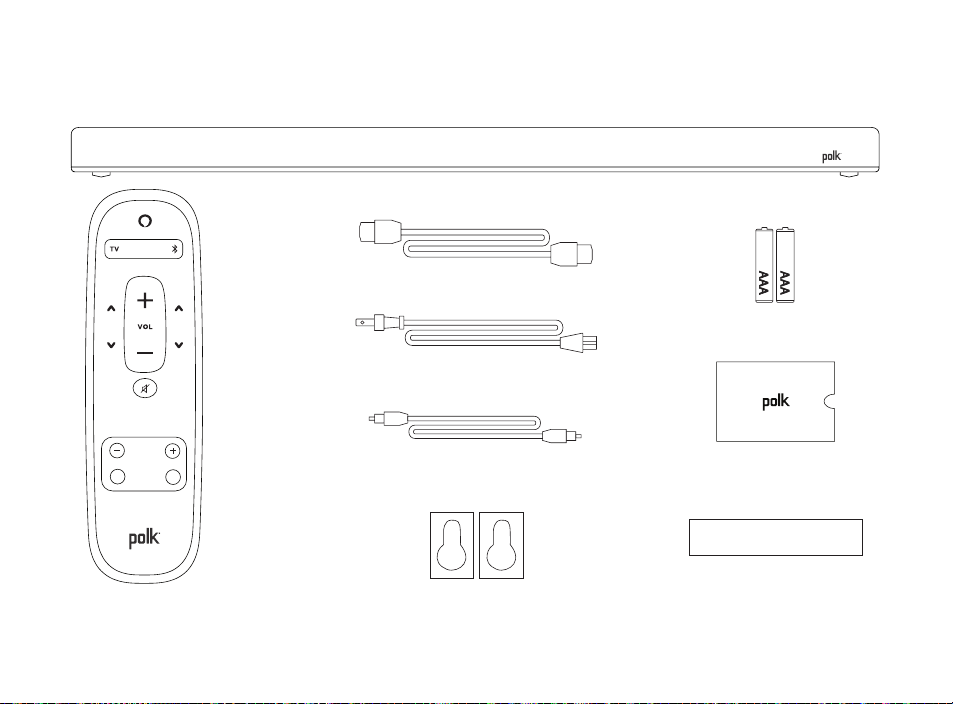
Contenuto della confezione
Soundbar Polk React
Documentazione
Cavo HDMI
Cavo di
alimentazione
Telecomando
2 batterie AAA
Sagoma per montaggio
a parete
Cavo ottico
Distanziali per
montaggio a parete
BASSI
NOTTURNA
MUSICA
SPORT FILM
VOLUME
SURROUND
S
D
BILANCIAMENTO
VOCE
63
B
B
A
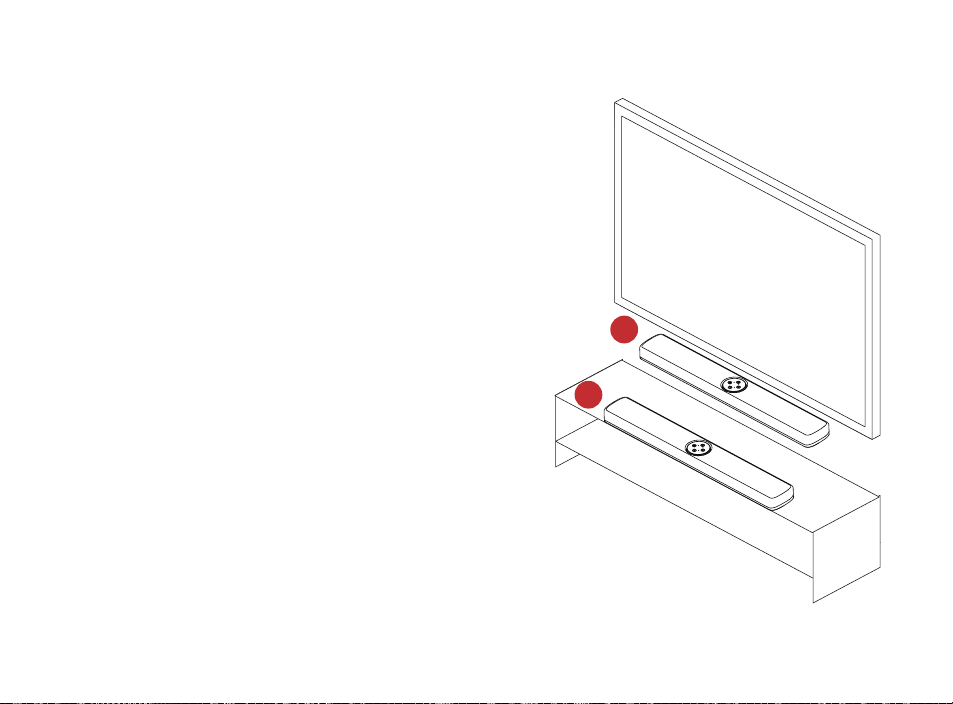
Posizionamento della soundbar
Su un armadio
A. Per un’esperienza di ascolto ottimale,
posizionare la soundbar centralmente
sotto la TV in corrispondenza del bordo
anteriore dell’armadio.
Montaggio a parete
B. Per montare la soundbar a parete
sotto il televisore, utilizzare l’apposita
sagoma in dotazione.
64
TV
TV (ARC)TV (OPTICAL)
TV
TV (ARC)TV (OPTICAL)
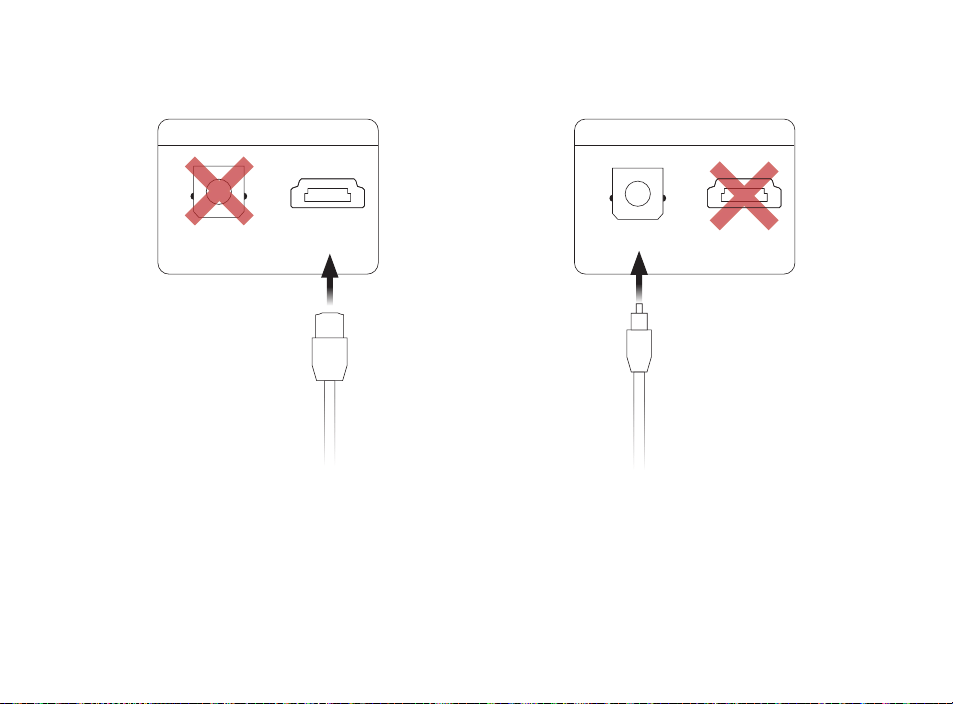
Collegamento alla TV
Optical
1. Inserire un’estremità del cavo ottico
nella porta TV (OPTICAL) della
soundbar.
2. Inserire l’altra estremità del cavo
nella porta ottica del televisore.
HDMI ARC (consigliato)
1. Inserire un’estremità del cavo HDMI
nella porta TV (ARC) della soundbar.
2. Inserire l’altra estremità del cavo HDMI
nella porta HDMI contrassegnata dalla
sigla TV (ARC) sulla TV.
65
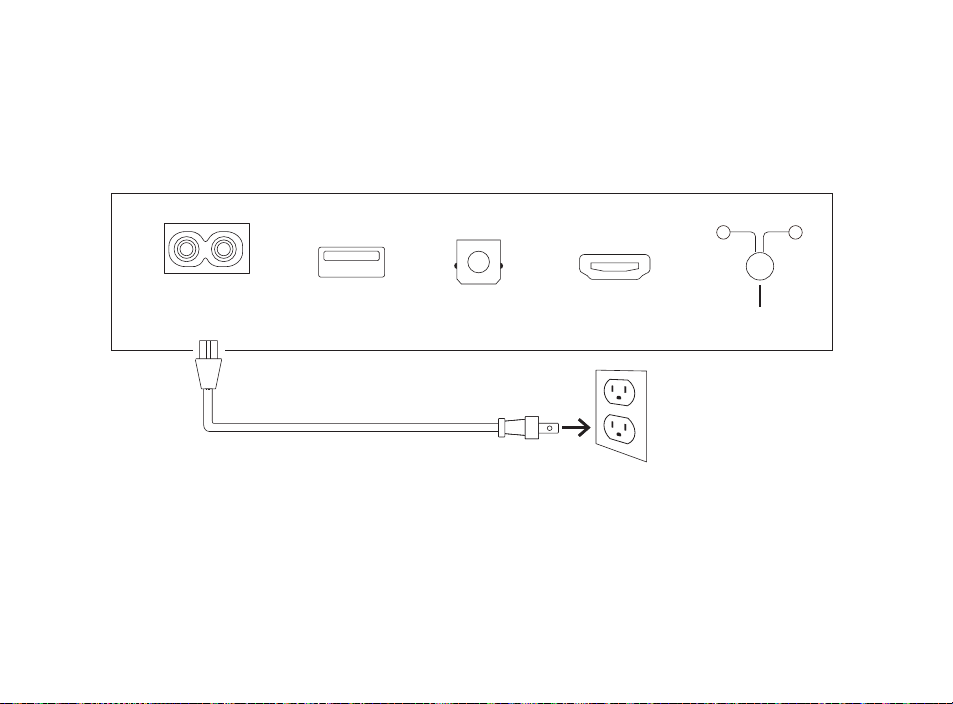
TV (OPTICAL)
TV (ARC)USB
POWER
AC INPUT
100–240V - 50/60Hz
CONNECT
SUB SURR
Collegare l’alimentazione
1. Collegare il cavo di alimentazione alla porta POWER sul retro della soundbar.
2. Collegare l’altra estremità del cavo a una presa di corrente CA.

66
Connessione a Internet
1. Scaricare l’app Alexa sul telefono ed effettuare l’accesso.
2. Assicurarsi che le autorizzazioni Bluetooth sul telefono siano attivate.
3. Nell’app Alexa, dovrebbe comparire un pop-up che conferma che il dispositivo
è stato rilevato ed è pronto per la configurazione. Continuare per completare
la configurazione.
4. Se il popup non viene visualizzato, andare alla pagina Devices (Dispositivi)
dell’app Alexa, fare clic sul segno “+” in alto a destra e scegliere Add Device
(Aggiungi dispositivo).
5. Scegliere la categoria Speaker (Diffusore) e il marchio Polk nella schermata
successiva.
6. Seguire le istruzioni per connettere la soundbar a Internet.
Per la risoluzione dei problemi e per ulteriori informazioni,
visitare il sito polkaudio.com/support.
67
1
2
3
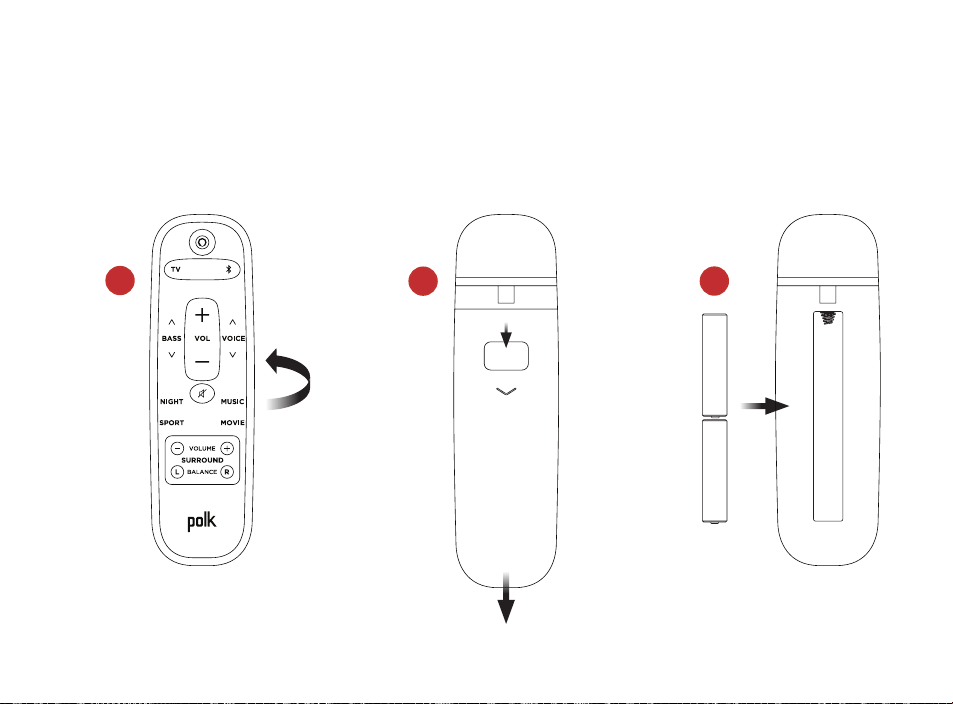
Impostazione del telecomando
1. Ruotare il telecomando per visualizzare la parte posteriore.
2. Aprire il coperchio del vano batterie facendolo scorrere verso il basso.
3. Inserire le due batterie AAA nel telecomando e riposizionare il coperchio.
68
LED di stato
+
–
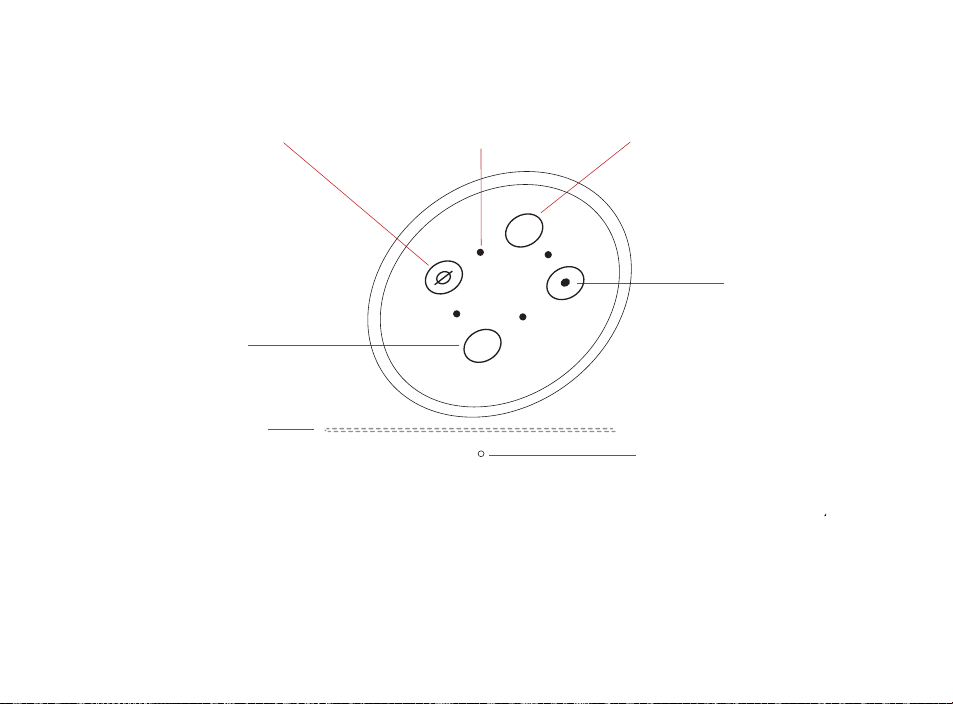
Panoramica dei comandi Polk React
Barra luminosa
Abbassare
il volume
Azione
Microfono
acceso/spento
Alzare il volumeMicrofoni
Barra luminosa: il colore indica ciò che Alexa sta facendo.
Pulsanti del volume: consentono di regolare il volume della soundbar.
Pulsante Action (Azione): pulsante multifunzione utilizzato per riattivare Alexa.
Attivazione/disattivazione microfono: quando la spia è rossa, i microfoni sono scollegati
e Alexa non è in ascolto.
LED di stato: bianco—ingresso TV. Viola—modalità notturna. Arancione—audio PCM.
Verde—audio Dolby. Giallo—audio DTS. Blu—Bluetooth.

69
TV (OPTICAL)
TV (ARC)USB
POWER
AC INPUT
100–240V - 50/60Hz
CONNECT
SUB SURR
Panoramica delle porte Polk React
Power: consente di collegare il dispositivo alla fonte di alimentazione CA
USB: disponibile solo per funzioni di assistenza/manutenzione.
TV (optical): consente di collegare il dispositivo all’ingresso ottico del televisore.
TV (ARC): consente di collegare il dispositivo all’ingresso HDMI ARC del televisore.
Connect: consente di associare il subwoofer opzionale e i diffusori surround
alla soundbar.
70
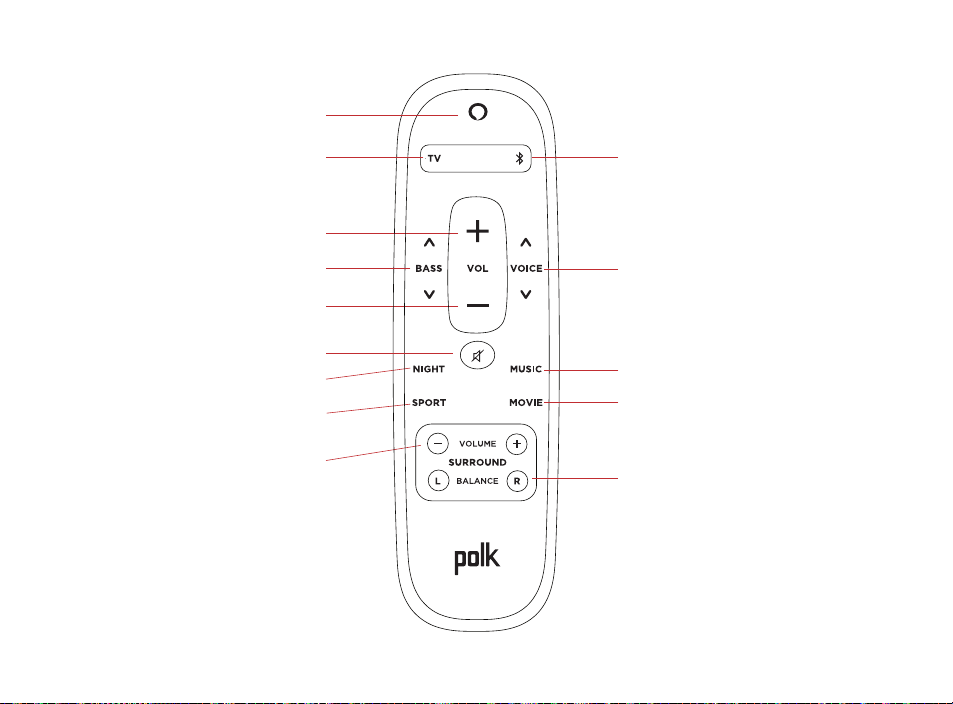
Telecomando
Selezione Bluetooth
Regolazione voce
Modalità musica
Modalità film
Bilanciamento surround
Power
Selezione TV
Alzare il volume
Bassi
Abbassare il volume
Muto
Modalità notturna
Modalità sport
Livello surround

71
Per ottenere prestazioni elevate da Polk React
Scaricare l’app Amazon Alexa
Scaricare l’app Alexa dall’App Store per gestire elenchi, notizie, competenze e altro
ancora.
Parlare con Alexa
Per scoprire quali frasi si possono usare con Polk React, pronunciare “Alexa, cosa
posso dire” oppure andare a Things to Try (Cose da provare) nell’app Alexa.
Notizie, meteo e altro
Personalizzare queste funzionalità nell’app Alexa.
Alexa, mostrami il flash briefing
Alexa, che tempo fa?
Ascoltare ad alta voce con spotify® connect
Spotify è tutta la musica di cui avrai bisogno. Sono disponibili milioni di canzoni
immediatamente. Cerca la musica che ami o lascia che Spotify ti suoni qualcosa di
eccezionale. Spotify funziona su telefono, tablet, computer e altoparlanti di casa, così
avrai sempre la colonna sonora perfetta per qualunque cosa tu stia facendo. Ora puoi
goderti Spotify con il tuo account gratuito e con l’account Premium. Usa il tuo telefono,
tablet o computer come telecomando per Spotify. Vai su spotify.com/connect per
scoprire come.
Il software Spotify è soggetto a licenze di terze parti disponibili qui: www.spotify.com/connect/third-party-licenses

72
Suggerimenti e risoluzione dei problemi
Non ho una porta HDMI con l’etichetta “arco” sulla mia TV.
1. Collegare un cavo audio ottico tra la TV e la soundbar.
2. Fare riferimento al manuale della TV per istruzioni su come disattivare gli altoparlanti
interni della TV.
Come si esegue un ripristino delle impostazioni di fabbrica?
Tieni premuto il pulsante Azione finché la barra luminosa non diventa arancione (per circa 25
secondi). La barra luminosa diventerà blu indicando che la sequenza di avvio è iniziata.
aggiorna le impostazioni wi-fi.
1. Tieni premuto il pulsante Azione nella parte superiore della barra audio (per circa 10
secondi) finché Alexa non annuncia “Ora in modalità di configurazione”.
2. Segui le istruzioni nell’app Alexa.
Per prestazioni ottimali, utilizzare la banda da 5 GHz sul router wireless, se disponibile.
Non posizionare il router all’interno di un armadio, poiché ciò potrebbe compromettere
la potenza del segnale Wi-Fi.
Per la risoluzione dei problemi e per ulteriori informazioni, visitare il sito
polkaudio.com/support.

5541 Fermi Court
Carlsbad, CA 92008
U.S.A.
800-377-7655(POLK)
www.polkaudio.com
Part No. 54111190000AK
HBP3915A
EU Importer: D&M Europe B.V.
Beemdstraat 11, 5653 MA
Eindhoven, The Netherlands