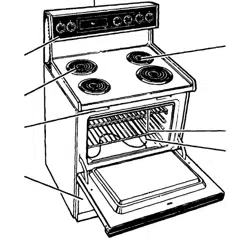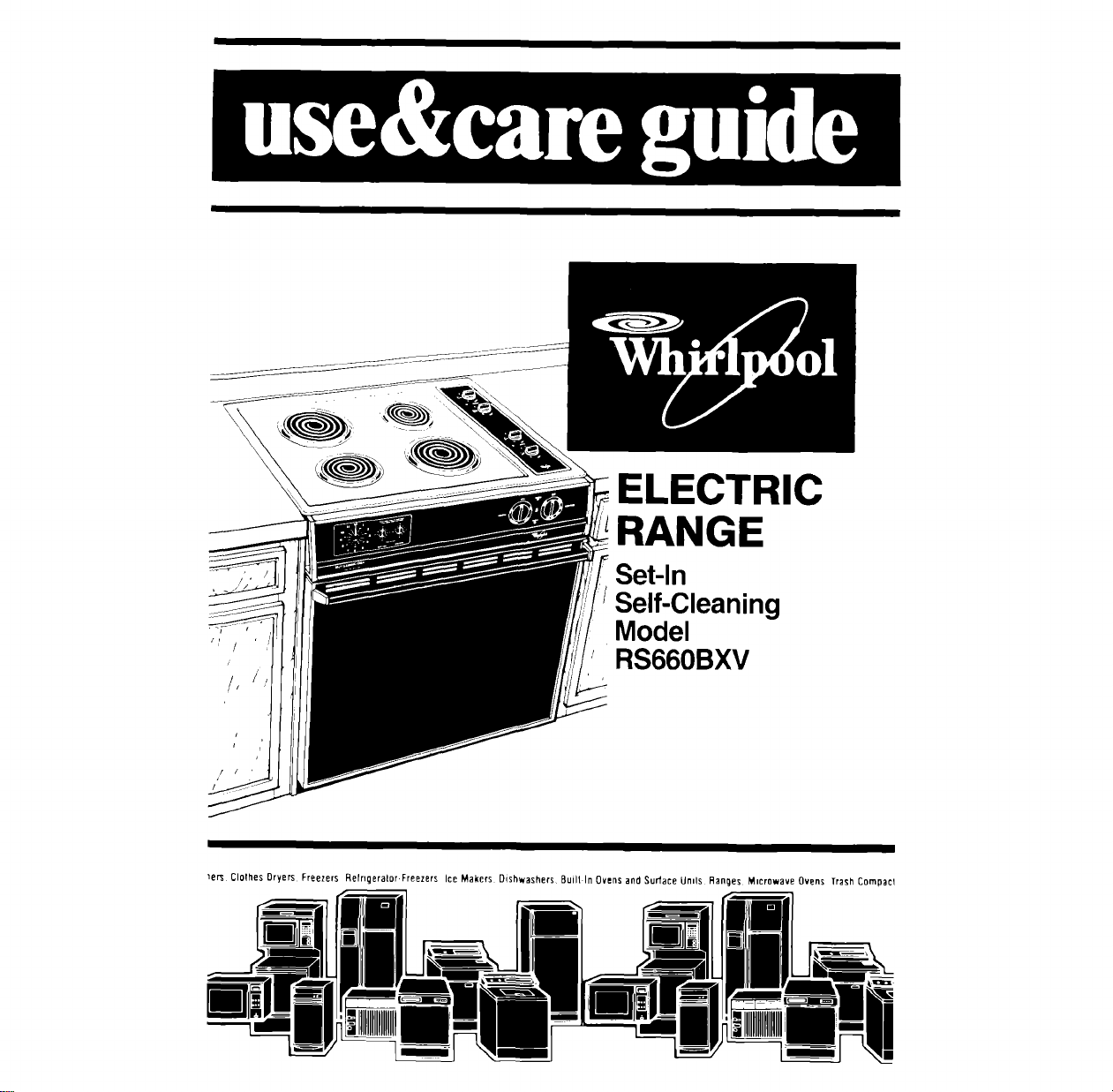
ELECTRIC
RANGE
Set-In
Self-Cleaning
Model
RS660BXV
_er_ Clolhes Dryers Freezers Refrlgeralor.Freezers Ice Makers Dishwashers Built In Ovens and Surlace Unds Ranges Microwave Ovens Trash Compacl
Contents po0o
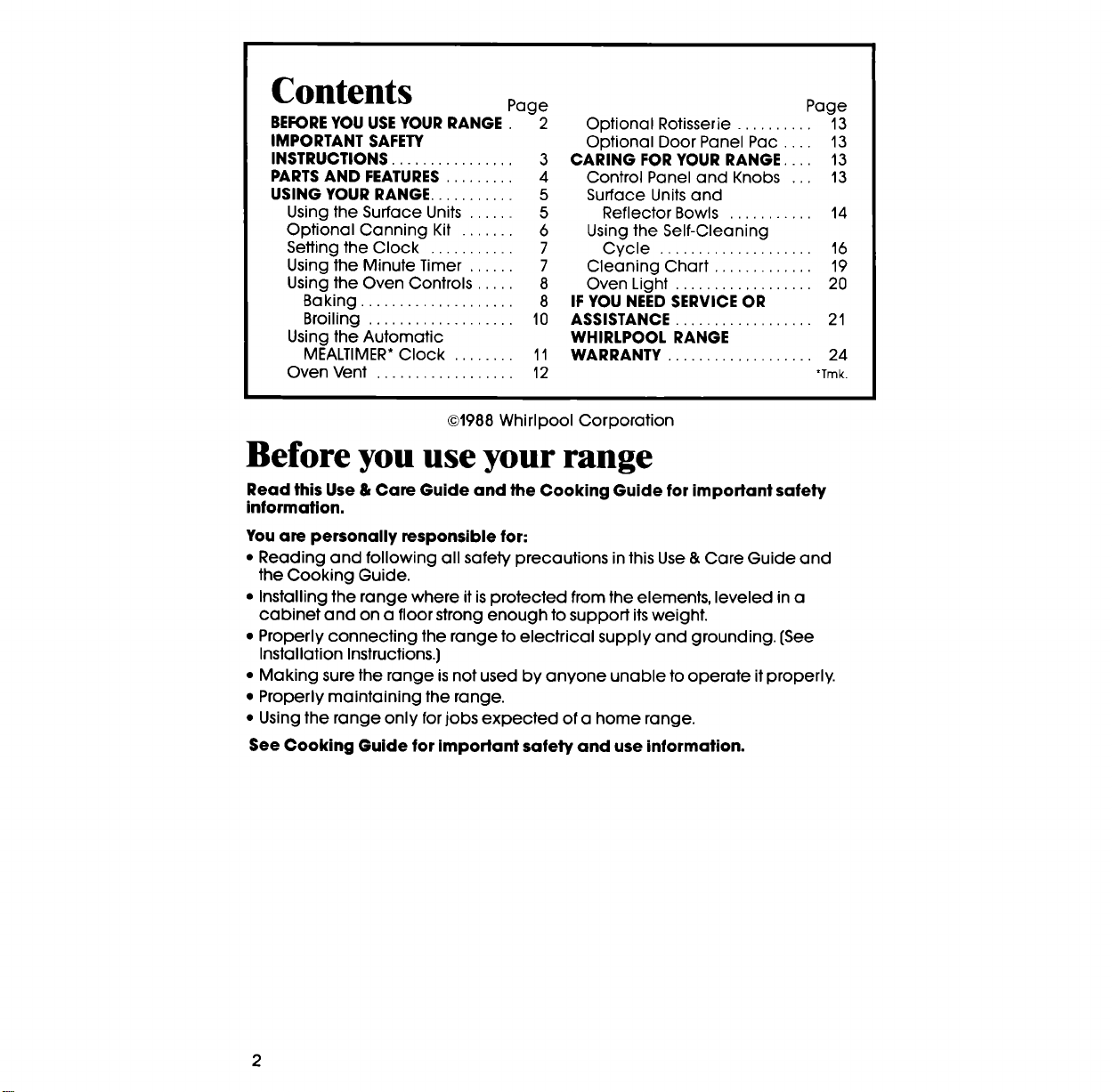
DErOREYOUUSEYOURRANGE.2
IMPORTANT SAFETY
INSTRUCTIONS ................ 3
PARTS AND FEATURES ......... 4
USING YOUR RANGE ........... 5
Using the Surface Units ...... 5
Optional Canning Kit ....... 6
Setting the Clock ........... 7
Using the Minute Timer ...... 7
Using the Oven Controls ..... 8
Baking .................... 8
Broiling ................... 10
Using the Automatic
MEALTIMER* Clock ........ 11
Oven Vent .................. 12
Page
Optional Rotisserie .......... 13
Optional Door Panel Pac .... 13
CARING FOR YOUR RANGE .... 13
Control Panel and Knobs ... 13
Surface Units and
Reflector Bowls ........... 14
Using the Self-Cleaning
Cycle .................... 16
Cleaning Chart ............. 19
Oven Light .................. 20
IF YOU NEED SERVICE OR
ASSISTANCE .................. 21
WHIRLPOOL RANGE
WARRANTY ................... 24
*Trek,
©1988 Whirlpool Corporation
Before you use your range
Read this Use & Care Guide and the Cooking Guide for important safety
information.
You am personally responsible for:
• Reading and following all safety precautions in this Use & Care Guide and
the Cooking Guide.
• Installing the range where it is protected from the elements, leveled in a
cabinet and on a floor strong enough to support its weight.
• Properly connecting the range to electrical supply and grounding. (See
Installation Instructions.)
• Making sure the range is not used by anyone unable to operate it properly.
• Properly maintaining the range.
• Using the range only for jobs expected of a home range.
See Cooking Guide for important safety and use information.
2

IMPORTANT
SAFETY INSTRUCTIONS
t. DO NOT allow children to use or 6.
play with any part of the range,
or leave them unattended near it.
They could be burned or injured.
2. DO NOT store things children
might want above the range. 7.
Children could be burned or
injured while climbing on it.
3. DO HOT allow anyone to touch
hot surface units or heating 8.
elements. Dark colored units and
elements can still be hot enough
to burn severely,
4. KEEPchildren away from the
range when it is on. The cooktop 9.
and oven walls, racks and
door can get hot enough to
cause burns.
5. DO NOT use the range to heat a
room. Persons in the room could
be burned or injured, or a fire
could start.
10.
KEEP pan handles turned in, but
not over another surface unit to
avoid burns, injury and to help
prevent the utensil from being
pushed off the surface units.
DO NOT use water on grease
fires. The fire will spread. Cover
fire with large lid or smother with
baking soda or salt.
DO NOT wear loose or hanging
garments when using the range,
They could ignite if they touch a
hot surface unit or heating ele-
ment and you could be burned.
DO NOT heat unopened con-
tainers. They could explode. The
hot contents could burn and
container particles could
cause injury.
When adding or removing food,
MAKE SUREto open the oven
door all the way to prevent burns.
• FOR YOUR SAFETY •
DO NOT STORE OR USE GASOLINE OR OTHER FLAMMABLE VAPORS AND
LIQUIDS IN THE VICINITY OF THIS OR ANY OTHER APPLIANCE.
THEY COULD IGNITE CAUSING EXPLOSION AND/OR FIRE.
-SAVE THESE INSTRUCTIONS-
Thank you for buying a Whlrlpool appliance. Please complete and mail
the Owner Registration Card provided with this product. Then complete
the form below Have this information ready if you need service or call with
a question.
• Copy model and serial numbers
from plate (behind the oven door
on the oven frame) and purchase
date from sales slip.
• Keep this book and sales slip to-
gether in a handy place.
Model Number
Serial Number
Purchase Date
Service Company Phone Number
Parts and features
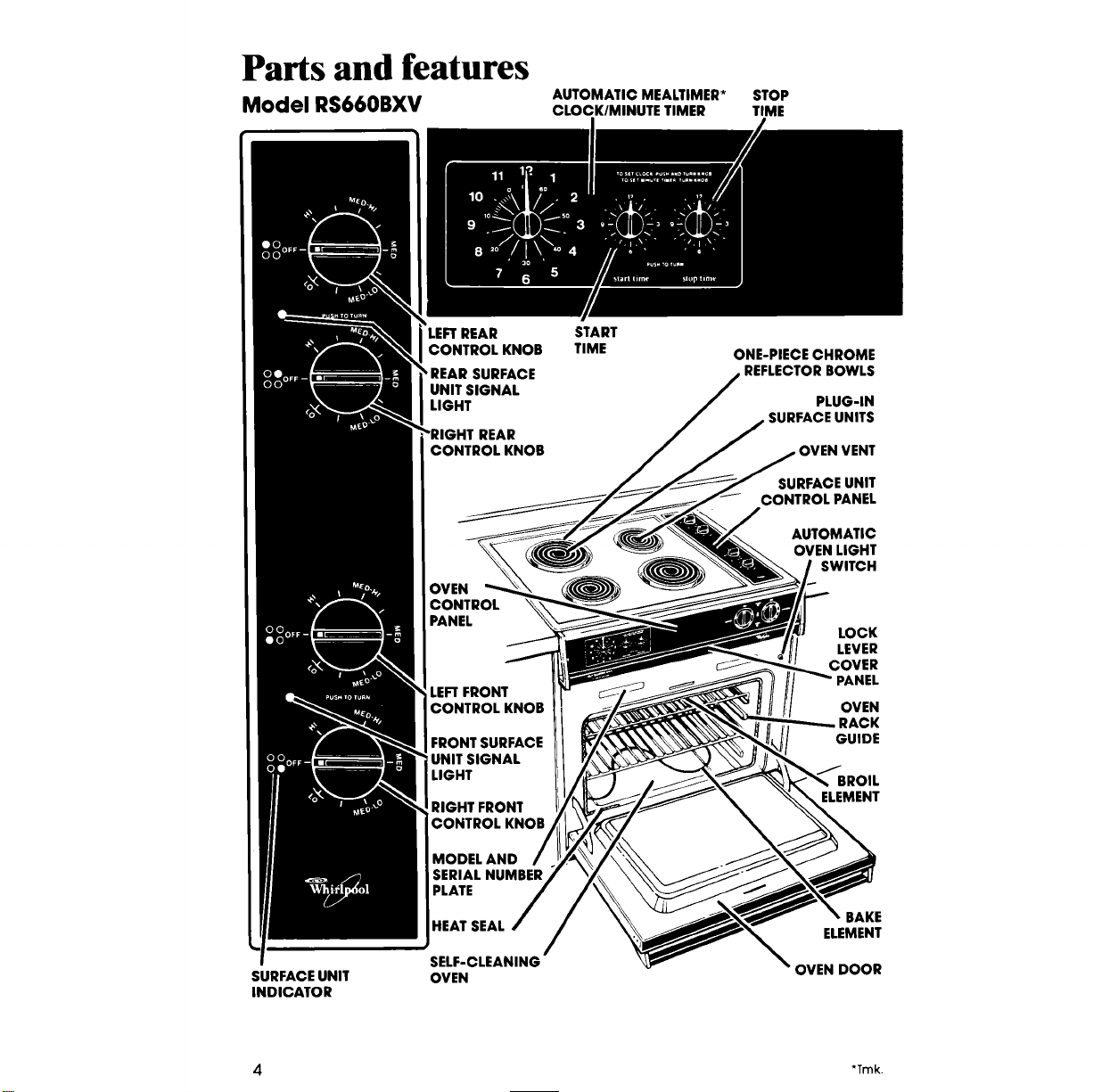
AUTOMATIC MEALTIMER* STOP
Model RS660BXV CLOCK/MINUTE TIMER TIME
SURFACEUNIT
INDICATOR
'LEFTREAR START
CONTROL KNOB TIME
'REAR SURFACE
UNIT SIGNAL
LIGHT
CONTROL KNOB
OVEN
CONTROL
PANEL
LEFTFRONT
CONTROL KNOB
FRONT SURFACE
UNIT SIGNAL
LIGHT
RIGHT FRONT
CONTROL KNOB
MODEL AND
SERIAL NUMBER
PLATE
HEAT SEAL
SELF-CLEANING
OVEN
ONE-PIECECHROME
REFLECTORBOWLS
PLUG-IN
SURFACE UNITS
SURFACE UNIT
CONTROL PANEL
AUTOMATIC
OVEN LIGHT
SWITCH
LOCK
LEVER
COVER
PANEL
OVEN
RACK
GUIDE
BROIL
ELEMENT
BAKE
ELEMENT
OVEN DOOR
4 "Trek.
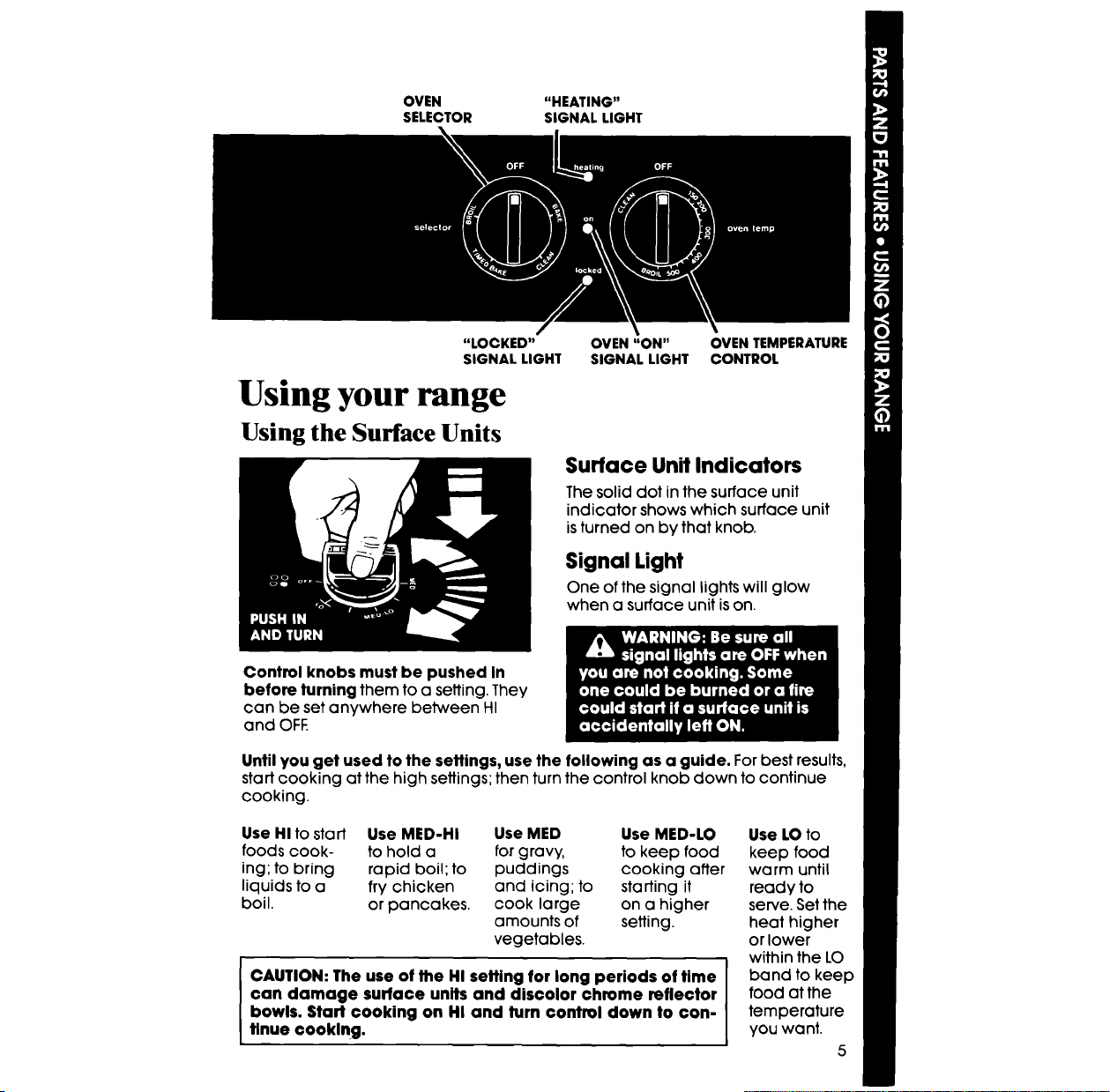
OVEN "HEATING"
SELECTOR SIGNAL LIGHT
"LOCKED" OVEN "ON" OVEN TEMPERATURE
SIGNAL LIGHT SIGNAL LIGHT CONTROL
Using your range
Using the Surface Units
Surface Unit Indicators
The solid dot in the surface unit
indicator shows which surface unit
is turned on by that knob.
Signal Light
One of the signal lights will glow
when a surface unit is on.
Control knobs must be pushed In
before turning them to a setting. They
can be set anywhere between HI
and OFE
Until you get used to the settings, use the following as a guide. For best results,
start cooking at the high settings; then turn the control knob down to continue
cooking.
Use HI to start Use MED-HI Use MED Use MED-LO
foods cook- to hold a for gravy, to keep food
ing; to bring rapid boil; to puddings cooking after
liquids to a fry chicken and icing; to starting it
boil. or pancakes, cook large on a higher
amounts of setting.
vegetables.
CAUTION: The use of the HI setting for long periods of time
can damage surface units and discolor chrome reflector
bowls. Start cooking on HI and turn control down to con-
tinue €ooking.
Use LO to
keep food
warm until
ready to
serve. Set the
heat higher
or lower
within the LO
band to keep
food at the
temperature
you want.
5
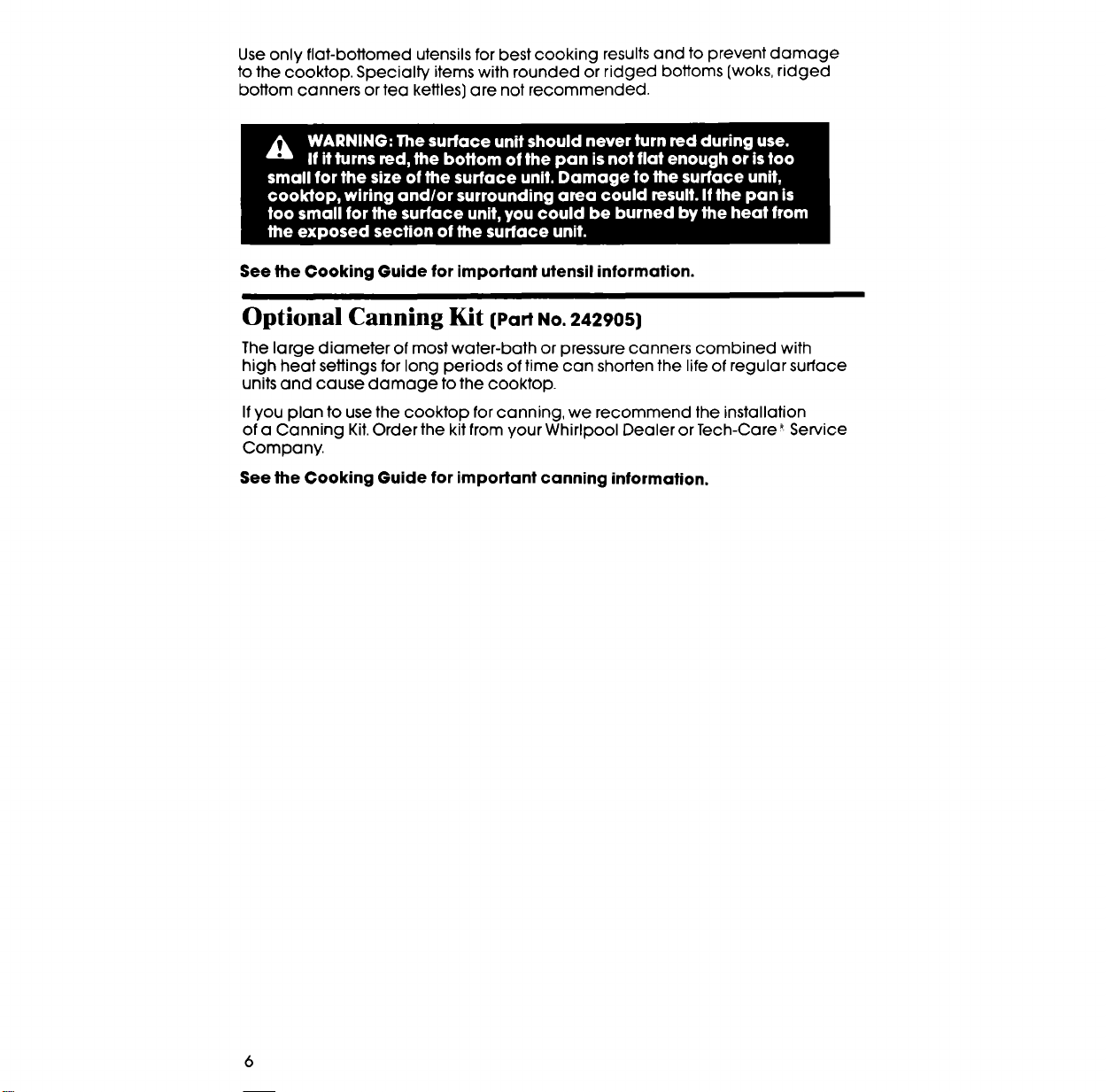
Useonlyfiat-bottomedutensilsforbestcookingresultsandtopreventdamage
tothecooktop.Specialtyitemswithroundedorridgedbottoms(woks,ridged
bottomcannersorteakettles)arenotrecommended.
See the Cooking Guide for important utensil information.
Optional Canning Kit {PartNo.242905)
The large diameter of most water-bath or pressure canners combined with
high heat settings for long periods of time can shorten the life of regular surface
units and cause damage to the cooktop.
Ifyou plan to use the cooktop for canning, we recommend the installation
of a Canning Kit.Order the kit from your Whirlpool Dealer or Tech-Care _ Service
Company.
See the Cooking Guide for important canning information.
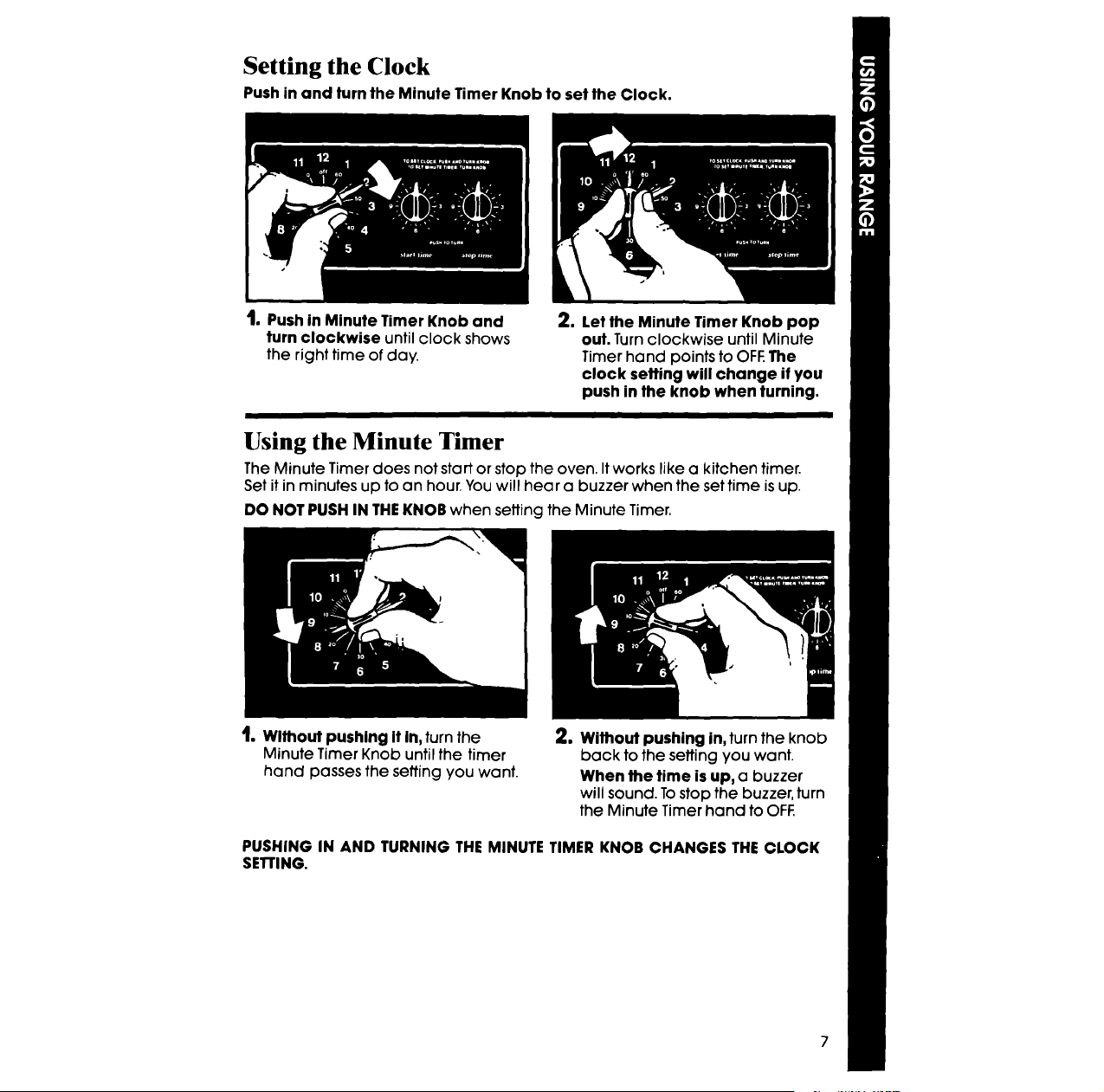
Setting the Clock
Push in and turn the Minute Timer Knob to set the Clock.
I. Push in Minute Timer Knob and
turn clockwise until clock shows
the right time of day.
2, Let the Minute Timer Knob pop
out. Turn clockwise until Minute
Timer hand points to OFE The
clock seffing will change if you
push in the knob when turning.
Using the Minute Timer
The Minute Timer does not start or stop the oven. It works like a kitchen timer.
Set it in minutes up to an hour, You will hear a buzzer when the set time is up.
DO NOT PUSH IN THEKNOB when setting the Minute Timer.
t, Without pushing It In, turn the
Minute Timer Knob until the timer
hand passes the setting you want.
2. Without pushing in, turn the knob
back to the setting you want.
When the time is up, a buzzer
will sound. To stop the buzzer, turn
the Minute Timer hand to OFF.
PUSHING IN AND TURNING THE MINUTE TIMER KNOB CHANGES THE CLOCK
SETrlNG.
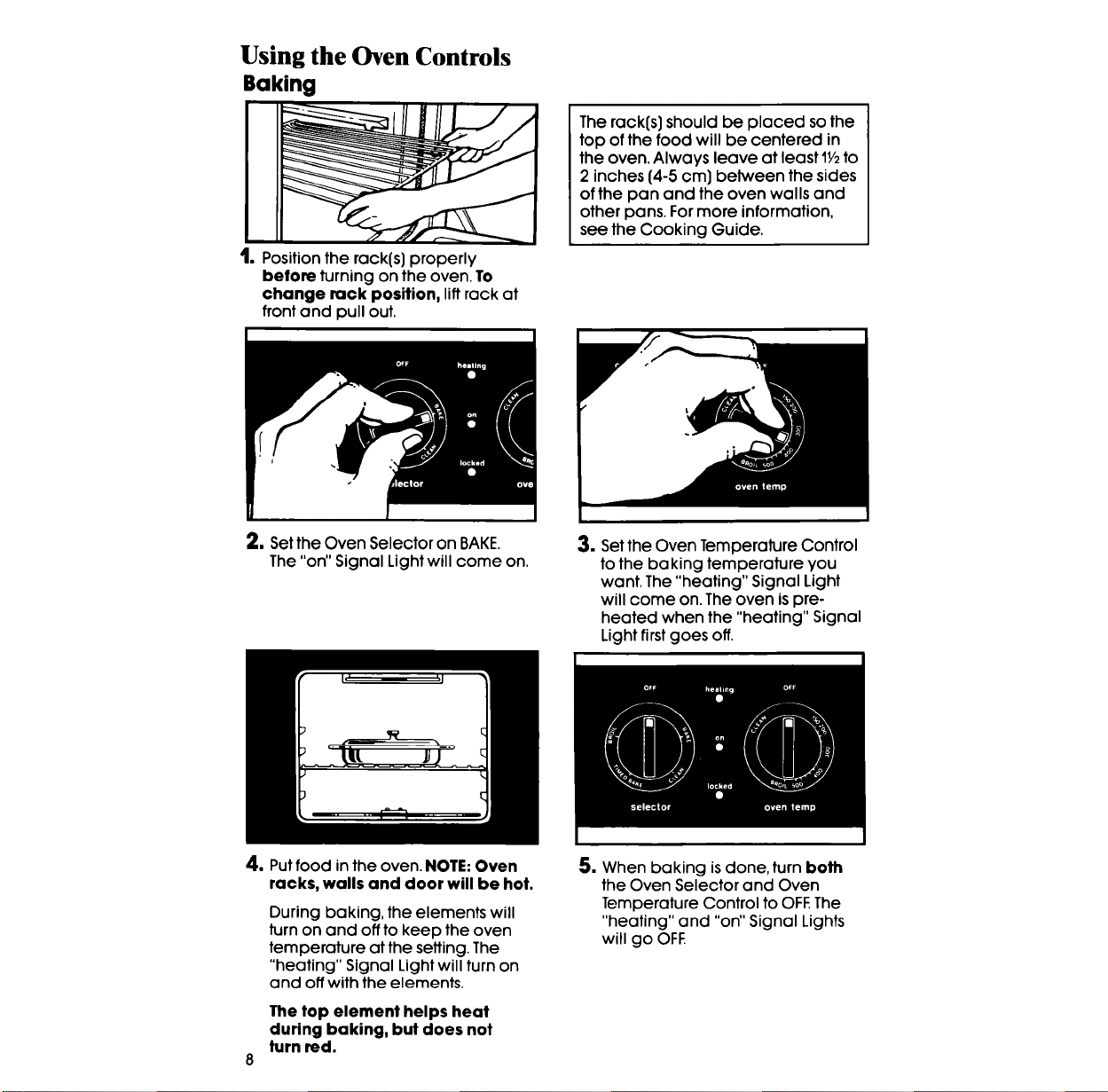
Using the Oven Controls
Baking
t. Position the rack(s) properly
before turning on the oven. To
change rack position, lift rack at
front and pull out.
The rack(s) should be placed so the
top of the food will be centered in
the oven. Always leave at least 11/2to
2 inches (4-5 cm) between the sides
of the pan and the oven walls and
other pans. For more information,
see the Cooking Guide.
2. Setthe Oven Selector on BAKE.
The "on" Signal Light will come on.
3. Set the Oven Temperature Control
to the baking temperature you
want. The "heating" Signal Light
will come on. The oven is pre-
heated when the "heating" Signal
Light first goes off.
4. Putfood inthe oven. NOTE:Oven
racks, walls and door will be hot.
During baking, the elements will
turn on and off to keep the oven
temperature at the setting. The
"heating" Signal Light will tum on
and off with the elements.
The top element helps heat
during baking, but does not
turn red.
5. When baking is done, turn both
the Oven Selector and Oven
Temperature Control to OFF.The
"heating" and "on" Signal Lights
will go OFF.
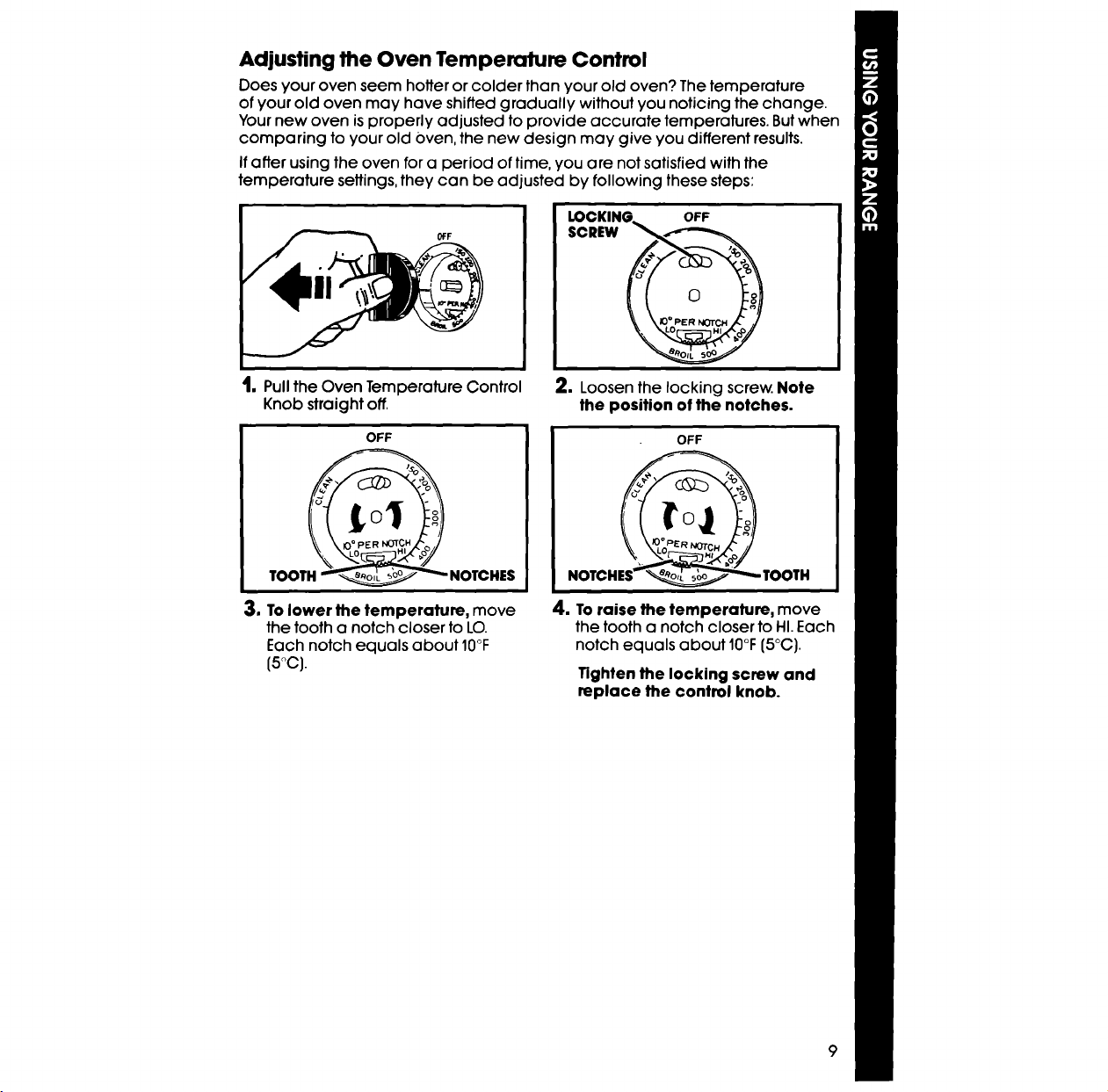
Adjusting the Oven Temperature Control
Does your oven seem hotter or colder than your old oven? The temperature
of your old oven may have shifted gradually without you noticing the change.
Your new oven is properly adjusted to provide accurate temperatures. But when
comparing to your old Oven, the new design may give you different results.
Ifafter using the oven for a period of time, you are not satisfied with the
temperature settings, they can be adjusted by following these steps:
t. Pull the Oven Temperature Control
Knob straight off.
OFF
LOCKING_ OFF
o
2. Loosen the locking screw. Note
the position of the notches.
OFF
TOOTH
3. To lower the temperature, move
the tooth a notch closer to LO.
Each notch equals about IO°F
{5oc}.
4. To raise the temperature, move
the tooth a notch closer to HI. Each
notch equals about IO°F(5°C).
Tighten the locking screw and
replace the control knob.
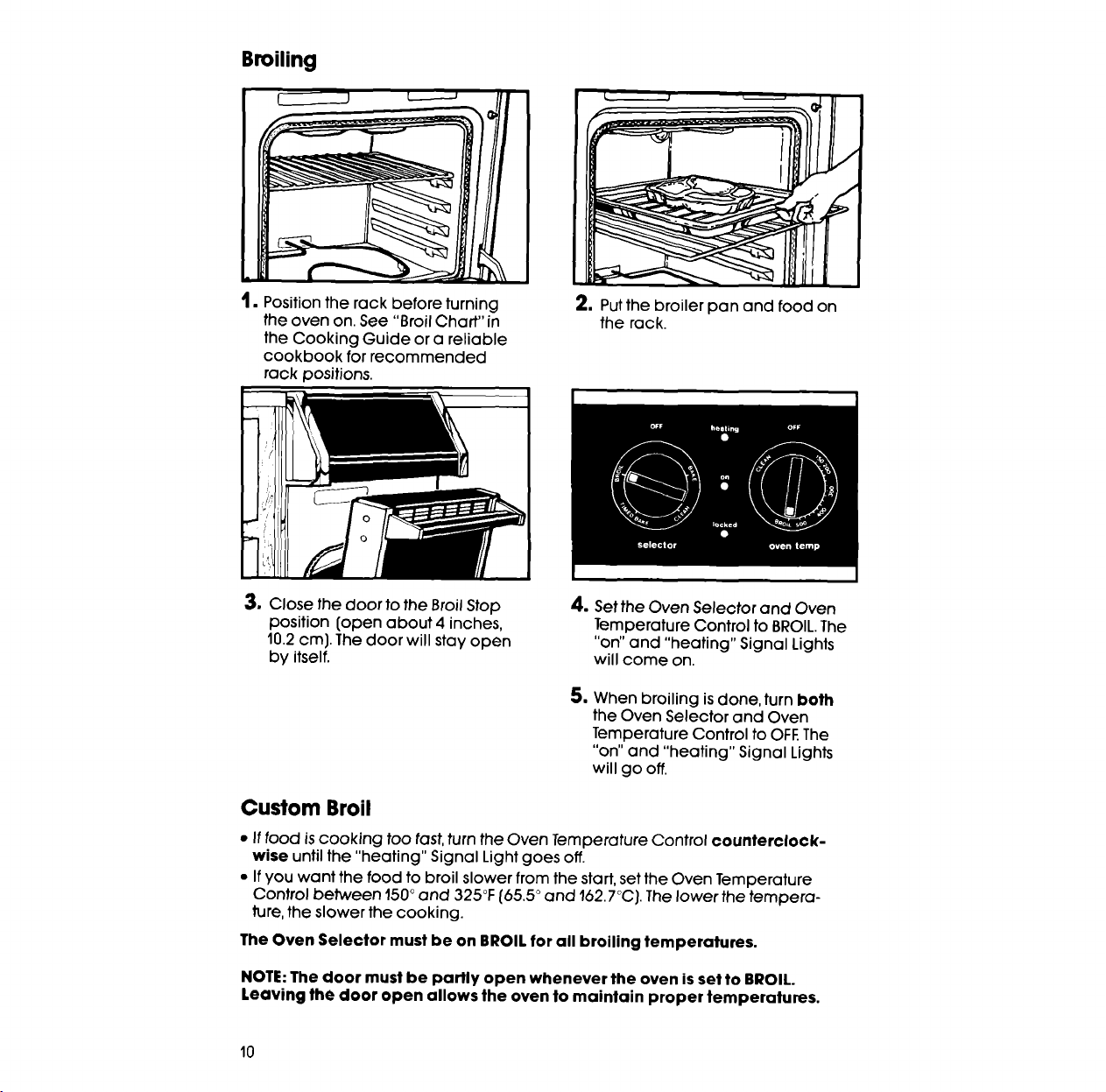
Broiling
1• Position the rack before turning
the oven on. See "Broil Chart" in
the Cooking Guide or a reliable
cookbook for recommended
rack positions.
2, Put the broiler pan and food on
the rack.
3. Close the door to the Broil Stop
position (open about 4 inches,
10.2 cm). The door will stay open
by itself.
4, Set the Oven Selector and Oven
Temperature Control to BROIL.The
"on" and "heating" Signal Lights
will come on.
5. When broiling is done, turn both
the Oven Selector and Oven
Temperature Control to OFE The
"on" and "heating" Signal Lights
will go off.
Custom Broil
• If food is cooking too tast, turn the Oven Temperature Control counterclock-
wise until the "heating" Signal Light goes off.
• If you want the food to broil slower from the start, set the Oven Temperature
Control between 150° and 325°F (65.5 ° and 162.7°CJ. The lower the tempera-
ture, the slower the cooking.
The Oven Selector must be on BROIL for all broiling temperatures.
NOTE: The door must be partly open whenever the oven isset to BROIL.
Leaving the door open allows the oven to maintain proper temperatures.
I0
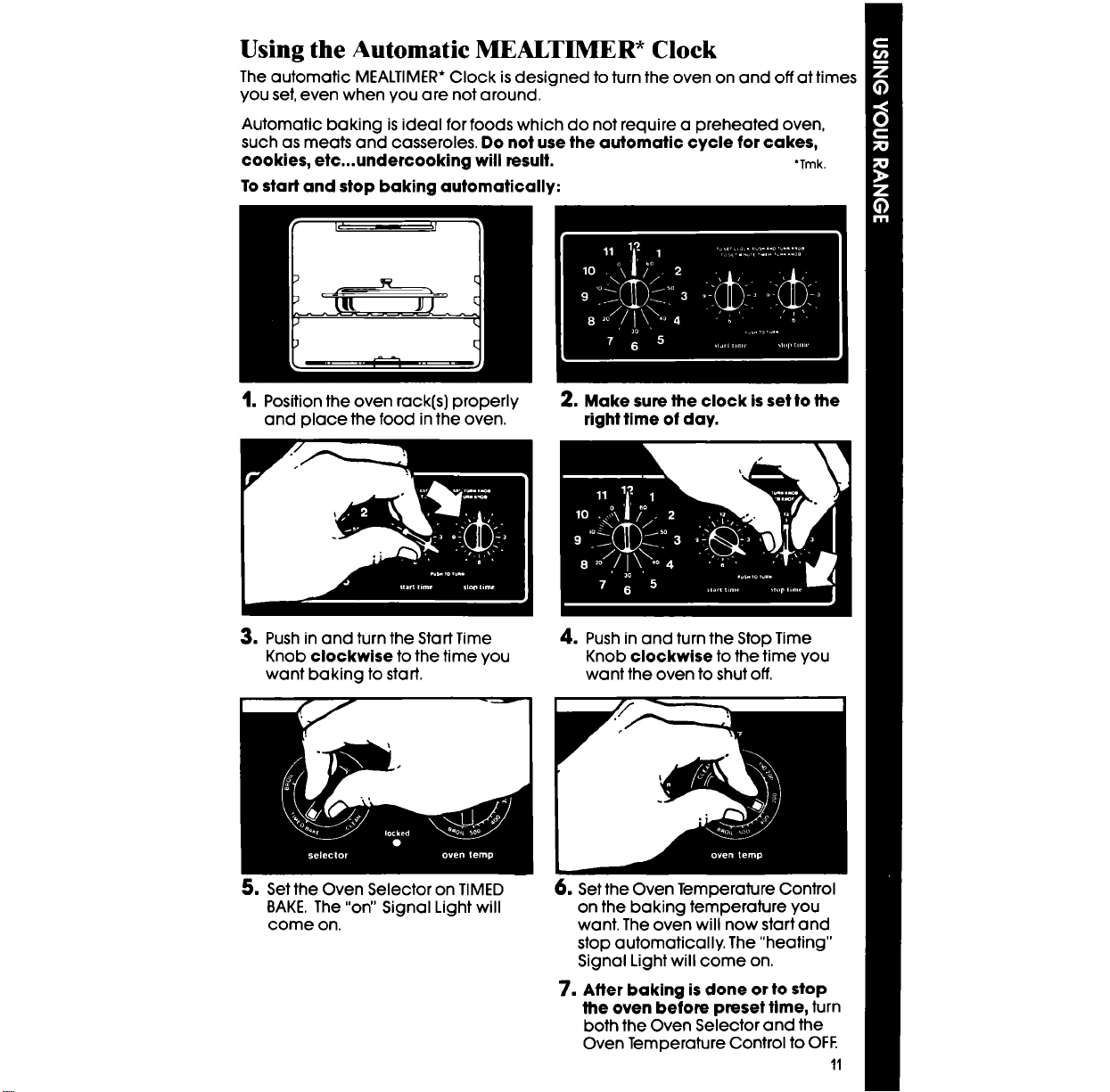
Using the Automatic MEALTIM R* Clock
The automatic MEALTIMER* Clock is designed to turn the oven on and off at times
you set, even when you are not around.
Automatic baking is ideal for foods which do not require a preheated oven,
such as meats and casseroles. Do not use the automatic cycle for cakes,
cookies, etc...undercccking will result. *Trek.
Tostart and stop baking automatically:
t. Position the oven rack(s) properly
and place the food in the oven.
3. Push in and turn the Start Time
Knob clockwise to the time you
want baking to start.
2. Make sure the clock isset to the
right time of day.
4. Push in and turn the Stop Time
Knob clockwise to the time you
want the oven to shut off.
5. Set the Oven Selector on TIMED
BAKE. The "on" Signal Light will
come on.
6. Set the Oven Temperature Control
on the baking temperature you
want. The oven will now start and
stop automatically. The "heating"
Signal Light will come on.
7. After baking is done or to stop
the oven before preset time, turn
both the Oven Selector and the
Oven Temperature Control to OFF.
11
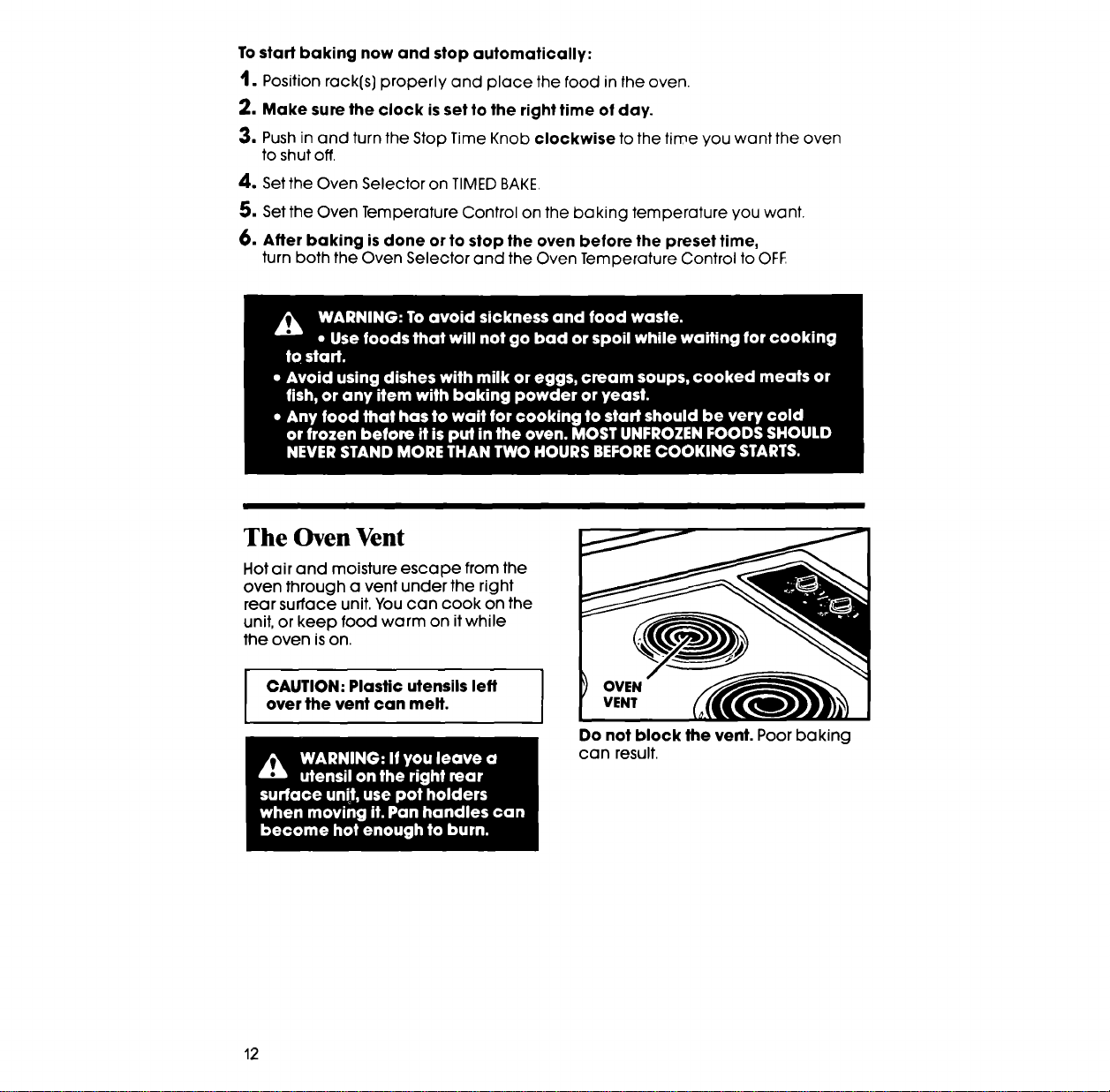
To start baking now and stop automatically:
1. Position rack(s) properly and place the food in the oven.
2. Make sure the clock is setto the right time of day.
3. Push in and turn the Stop Time Knob clockwise to the time you want the oven
to shut off.
4. Set the Oven Selector on TIMED BAKE,
5. Set the Oven Temperature Control on the baking temperature you want.
6. After baking is done or to stop the oven before the preset time,
turn both the Oven Selector and the Oven Temperature Control to OFF
The Oven Vent
Hot air and moisture escape from the
oven through a vent under the right
rear surface unit. You can cook on the
unit, or keep food warm on it while
the oven is on.
CAUTION: Plastic utensils left
over the vent can melt.
I
Do not block the vent. Poor baking
can result.
12
Optional Rotisserie
Ifyou would like a rotisserie for your oven, you can order a kit (Part No.
RCK-79/261881) from your Whirlpool Dealer. The kit includes easy installation
instructions,
Optional Door Panel Pac
Ifyou would like to change the color of your oven door glass to white or
almond, you can order one of these kits; White (Kit No. 814071)or Almond (Kit
No. 814072) from your Whirlpool Dealer. The kits include easy installation
instructions.
Caring for your range
Control Panels and Knobs
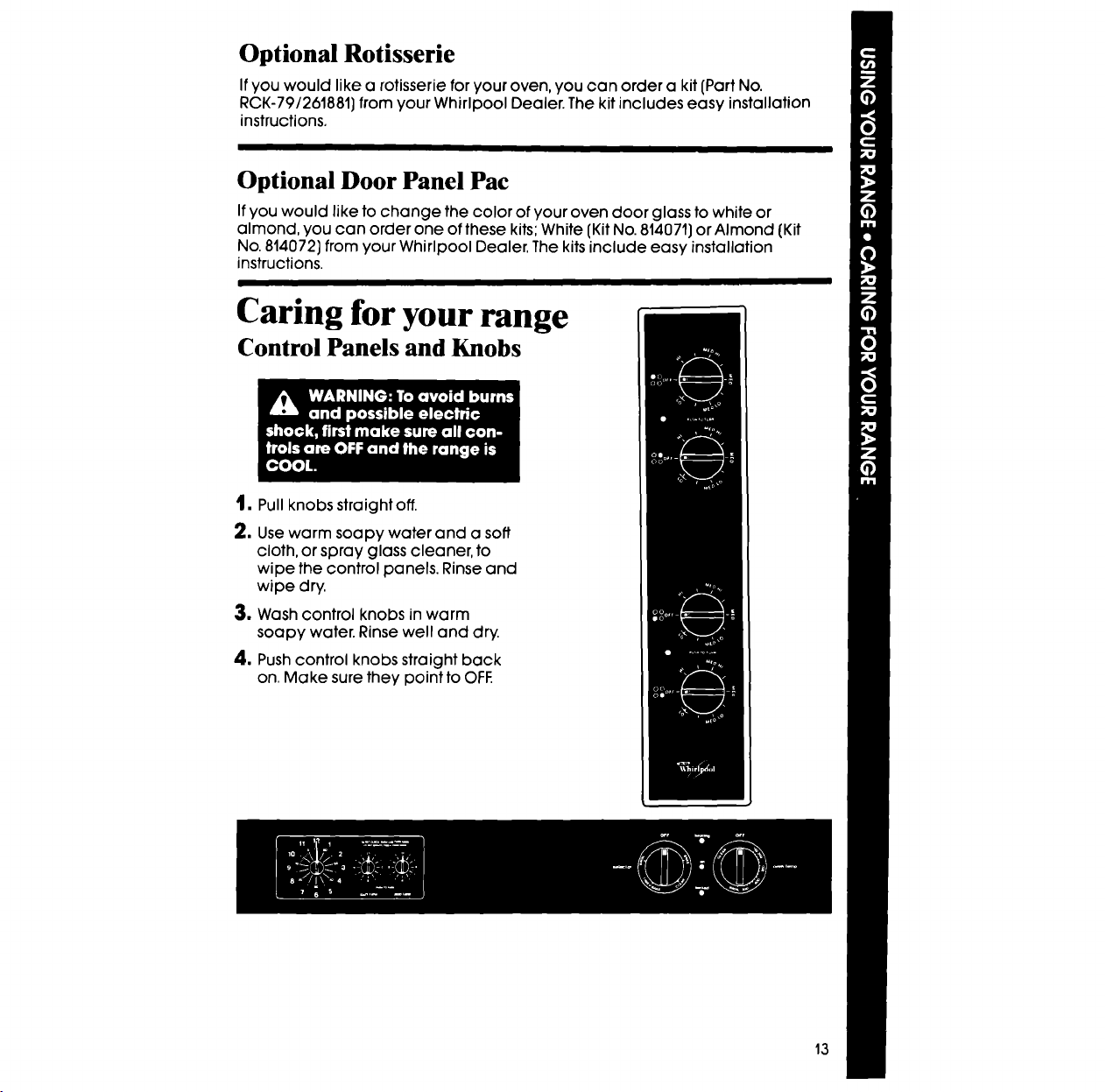
1. Pull knobs straight off.
2. Use warm soapy water and a soft
cloth, or spray glass cleaner, to
wipe the control panels. Rinse and
wipe dry.
3, Wash control knobs in warm
soapy water. Rinse well and dry.
4o Push control knobs straight back
on. Make sure they point to OFF.
13
Surface Units and Reflector Bowls
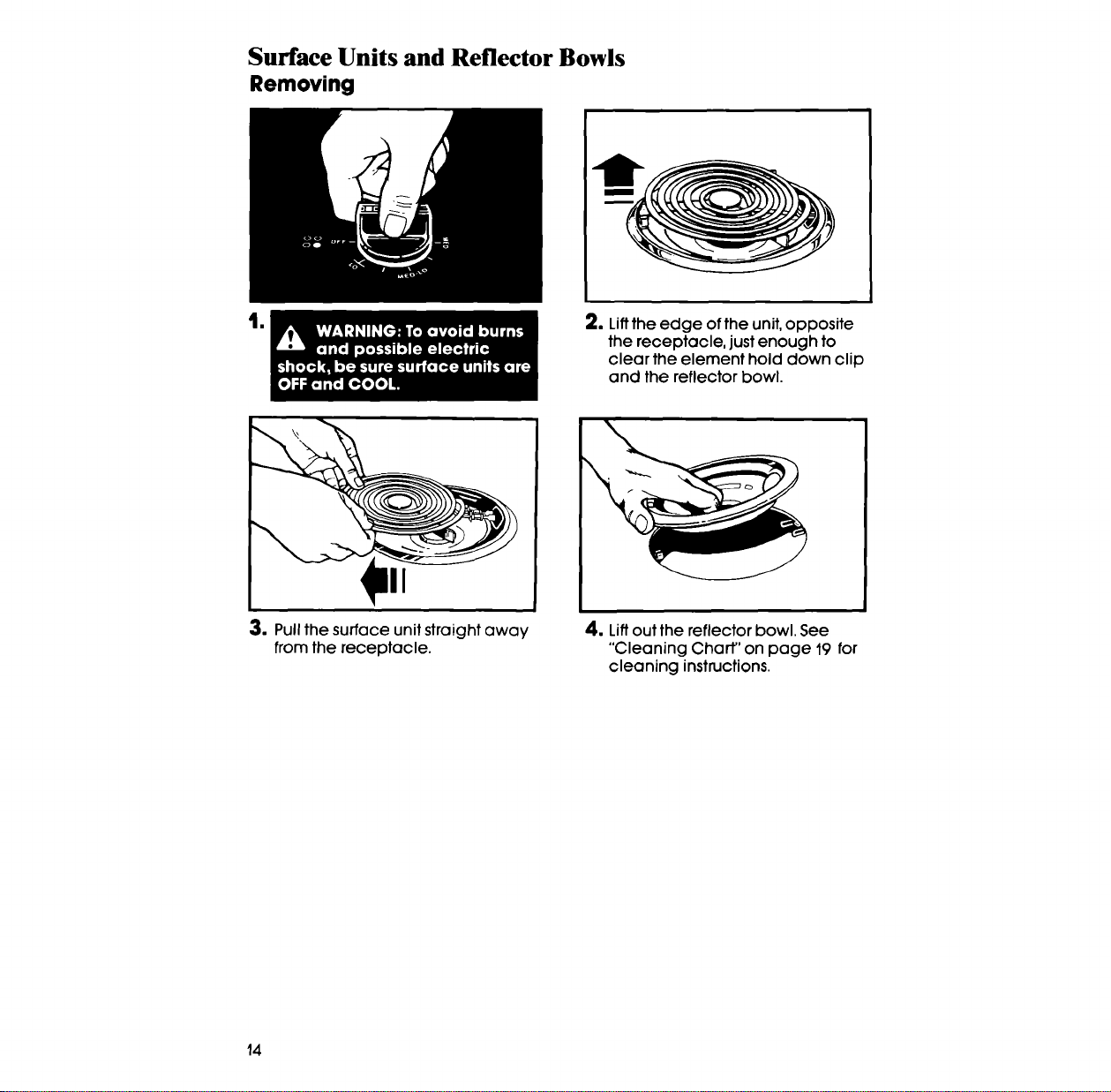
Removing
t|
2. Liftthe edge of the unit, opposite
the receptacle, just enough to
clear the element hold down clip
and the reflector bowl.
I
3. Pull the surface unit straight away
from the receptacle.
4. Lift out the reflector bowl, See
"Cleaning Chart" on page 19 for
cleaning instructions.
14
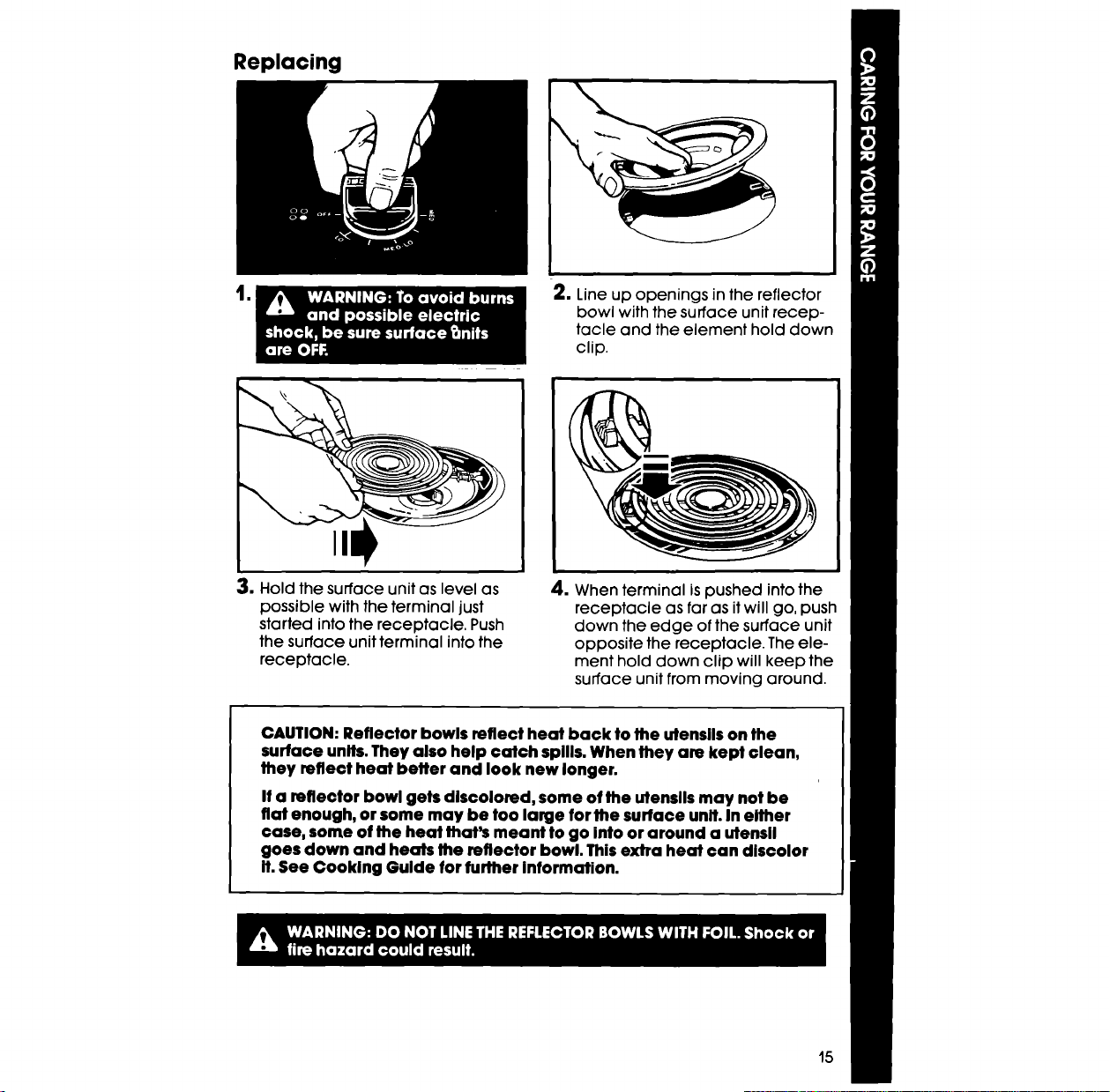
Replacing
lm
2. Line up openings in the reflector
bowl with the surface unit recep-
tacle and the element hold down
clip.
3, Hold the surface unit as level as
possible with the terminal just
started into the receptacle. Push
the surface unit terminal into the
receptacle.
4. When terminal is pushed into the
receptacle as far as it will go, push
down the edge of the surface unit
opposite the receptacle. The ele-
ment hold down clip will keep the
surface unit from moving around.
CAUTION: Reflector bowls reflect heat back to the utensils on the
surface units.They also help catch spllls. When they are kept clean,
they reflect heat beffer and look new longer.
If a reflector bowl gets discolored, some of the utensils may not be
fiat enough, or some may be too large for the surface unit. In either
case, some of the heat that's meant to go Into or around a utensil
goes down and heats the reflector bowl. Thisextra heat can discolor
It.See Cooking Gulde for further information.
15
Using the Self-Cleaning Cycle
The Self-Cleaning cycle uses very high heat to burn away soil. Before you start,
make sure you understand exactly how to use the Self-Cleaning cycle safely.
Before You Start
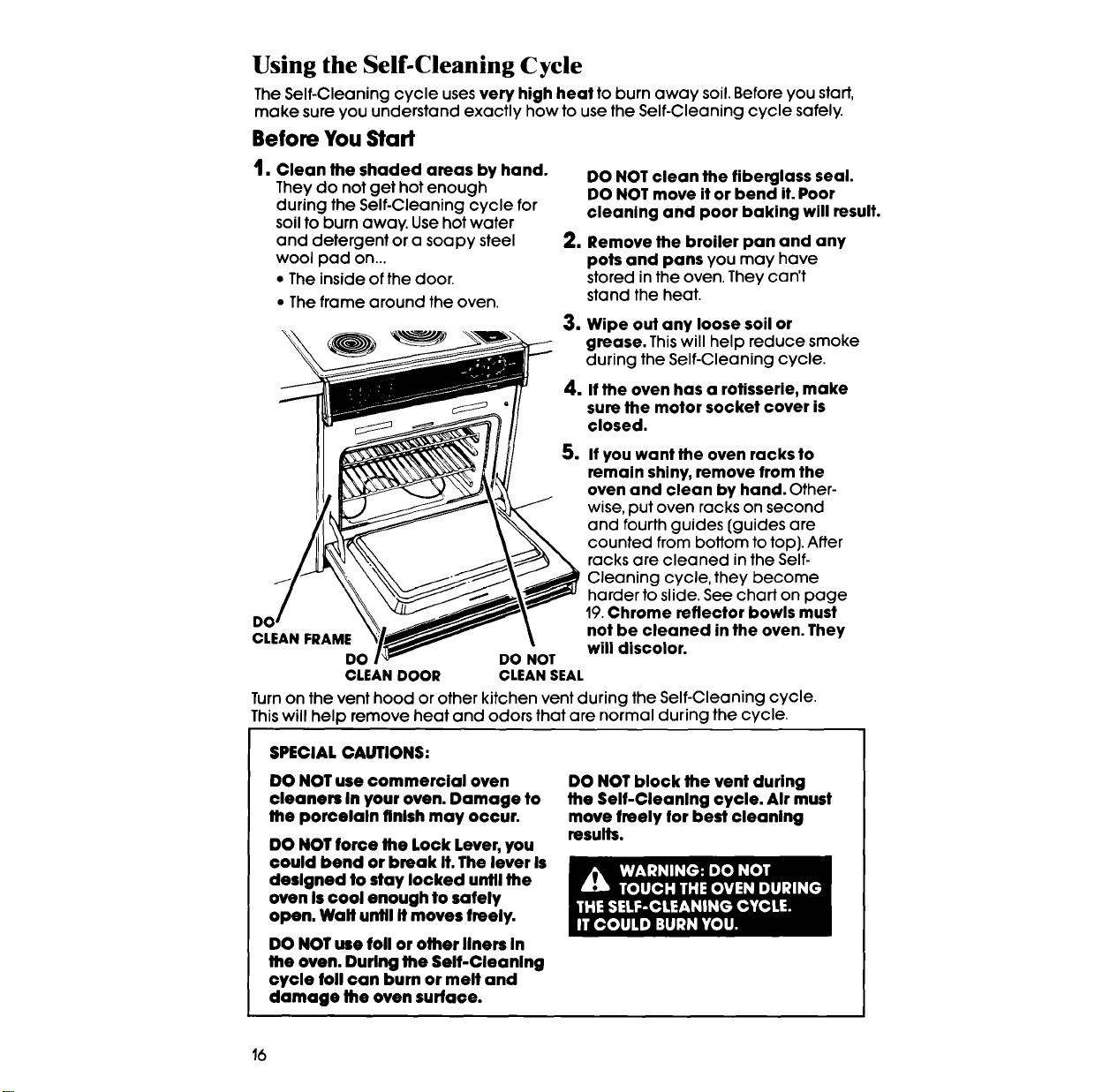
1. Clean the shaded areas by hand.
They do not get hot enough
during the Self-Cleaning cycle for
soil to burn away. Use hot water
and detergent or a soapy steel
wool pad on...
• The inside of the door.
• The frame around the oven.
DO NOT clean the fiberglass seal.
DO NOT move it or bend it. Poor
cleaning and poor baking will result.
2. Remove the broiler pan and any
pots and pans you may have
stored in the oven. They can't
stand the heat.
3. Wipe out any loose soil or
grease. This will help reduce smoke
during the Self-Cleaning cycle.
4. If the oven has a rotisserie, make
sure the motor socket cover is
closed.
5. If you want the oven racks to
remain shiny, remove from the
oven and clean by hand. Cffher-
wise, put oven racks on second
and fourth guides (guides are
counted from bottom to top). After
racks are cleaned in the Self-
Cleaning cycle, they become
harder to slide. See chart on page
19.Chrome reflector bowls must
CLEAN FRAME not be cleaned in the oven. They
will discolor.
DO DO NOT
CLEANDOOR CLEANSEAL
Turn on the vent hood or other kitchen vent during the Self-Cleaning cycle.
This will help remove heat and odors that are normal during the cycle.
SPECIAL CAUTIONS:
DO NOTuse commercial oven
cleaners In your oven. Damage to
the porcelaln finish may occur.
DO NOTforce the Lock Lever,you
could bend or break It. The lever Is
deslgned to stay locked until the
oven Is€ool enough to safely
open. Wall until It moves freely.
DO NOT use foil or other liners In
the oven. During the Self-Cleaning
cycle foil can burn or melt and
damage the oven surface.
DO NOT block the vent during
the Self-Cleanlng cycle. Air must
move freely for best cleaning
results.
16
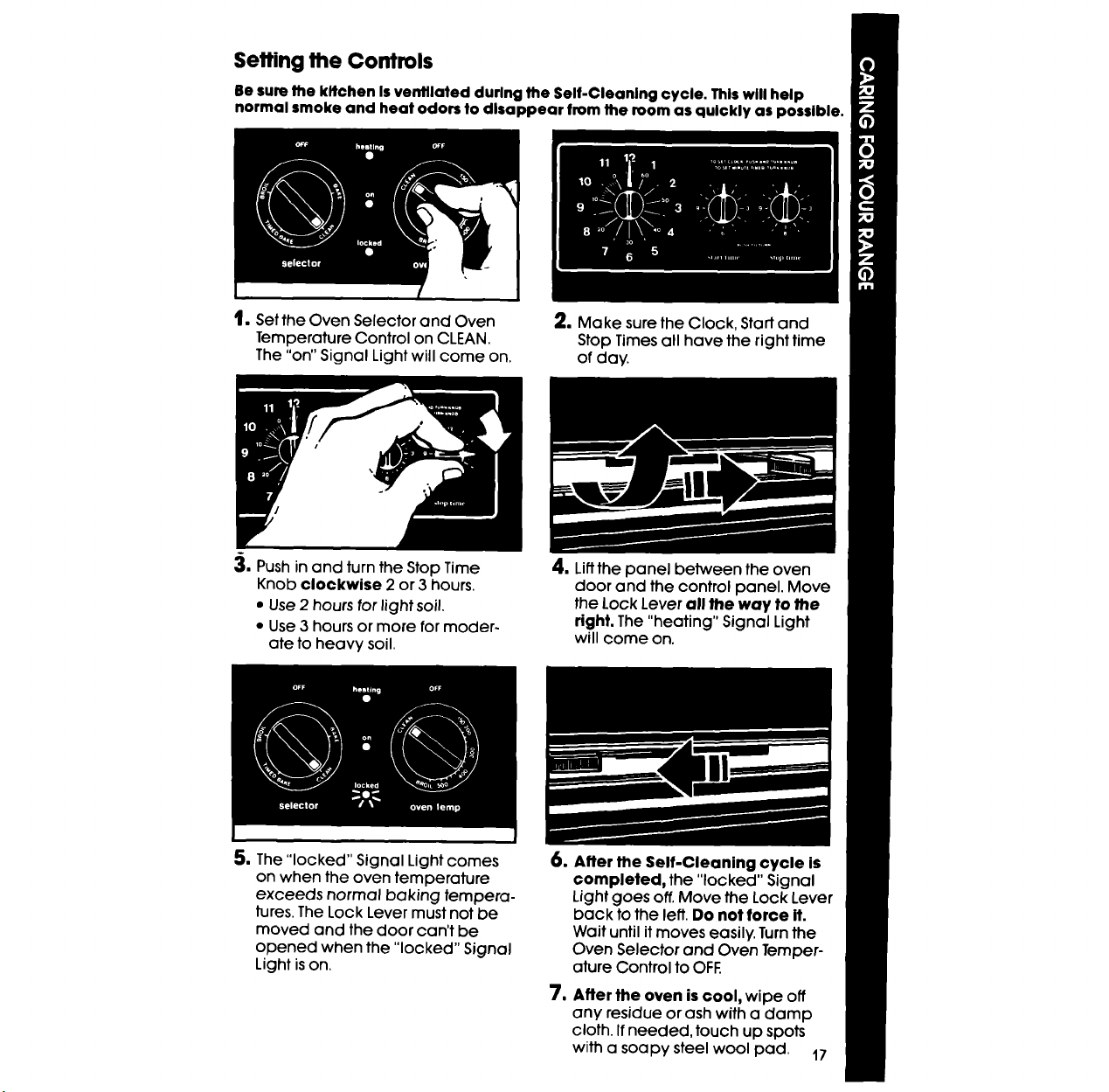
Setting the Controls
lle sum the kitchen Isventilated durlng the Self-Cleanlng cycle. Thlswill help
normal smoke and heat odors to disappear from the room as quickly as possible.
t, Set the Oven Selector and Oven
Temperature Control on CLEAN.
The "on" Signal Light will come on.
2, Make sure the Clock, Start and
Stop Times all have the right time
of day.
,_, Push in and turn the Stop Time
Knob clockwise 2 or 3 hours.
• Use 2 hours for light soil.
• Use 3 hours or more for moder-
ate to heavy soil.
4, Liftthe panel between the oven
door and the control panel. Move
the Lock Lever all the way to the
right. The "heating" Signal Light
will come on.
5, The "locked" Signal Light comes
on when the oven temperature
exceeds normal baking tempera-
lures. The Lock Lever must not be
moved and the door can't be
opened when the "locked" Signal
Light is on,
u
1
After the Self-Cleaning cycle is
completed, the "locked" Signal
Light goes off. Move the Lock Lever
back to the left. Do not force it.
Wait until it moves easily. Turn the
Oven Selector and Oven Temper-
ature Control to OFF.
After the oven is cool, wipe off
any residue orash with a damp
cloth. If needed, touch up spots
with a soapy steel wool pad. 17
Special Tips
• Keep the kitchen well ventilated during the Self-Cleaning cycle to help
get rid of normal heat, odors and smoke.
• Clean the oven before it gets heavily soiled. Cleaning a very soiled oven
takes longer and results in more smoke than usual.
• Ifthe Self-Cleaning cycle doesn't get the oven as clean as you expected,
the cycle may not have been set long enough or you may not have pre-
pared the oven properly. Set the Self-Cleaning cycle longer the next time
and hand clean areas noted on page 16.
Tostop the Self-Cleaning cycle
at anytime:
1. Push in and turn the Stop Time
Knob clockwise until it points to
the right time of day.
2. Turnthe Oven Selector and Oven
Temperature Control to OFE When
the "locked" Signal Light goes off,
move the Lock Lever back to the
left. DO NOT FORCE IT.Wait until it
moves easily.
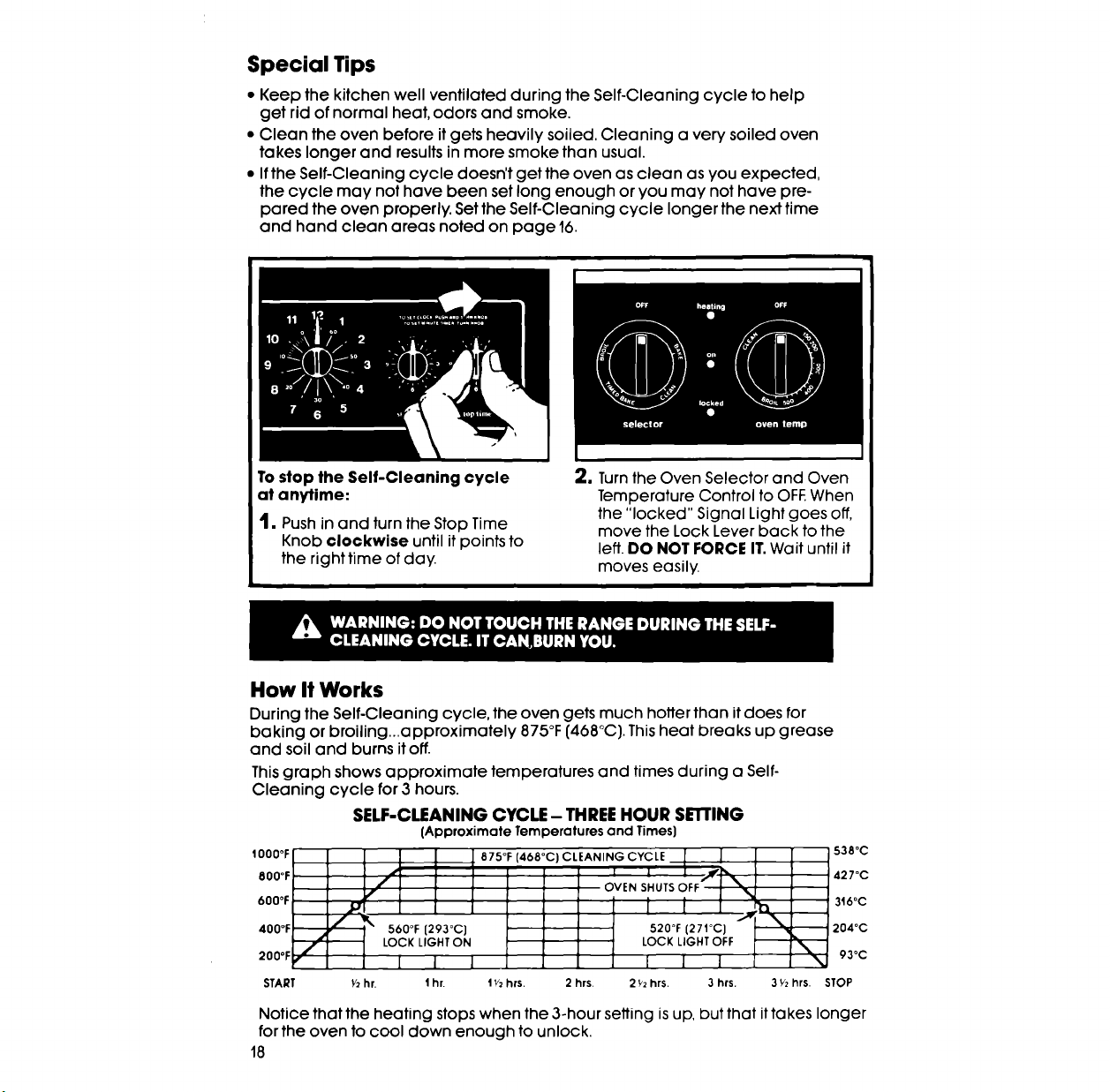
How It Works
During the Self-Cleaning cycle, the oven gets much hotter than it does for
baking or broiling_approximately 875°F [468°C]. This heat breaks up grease
and soil and burns it off.
This graph shows approximate temperatures and times during a Self-
Cleaning cycle for 3 hours.
SELF-CLEANING CYCLE - THREE HOUR SEI"rlNG
(ApproximateTemperaturesand Times}
IO00°F
800°F /
f
600°F
400°F ..'_ 560°F [293°0)
LOCK LIGHT ON
2°°°r • I l J 1
START _ hr. 1 hr.
87S°F (468°C) CLEANING CYCLE _ [ S38°C
I i I _,_.l,_ ,427o0
orE.s,.0TSOFFI\ 3,0°c
[2°"°°
.0oF(2,,oc
LOCK LIGHT OFF _.
I I J _ 93°C
1'_2hrs. 2 hrs. 2 _'2hrs. 3 hrs. 3 Y2hrs. STOP
Notice that the heating stops when the 3-hour setting is up, but that it takes longer
for the oven to cool down enough to unlock.
18
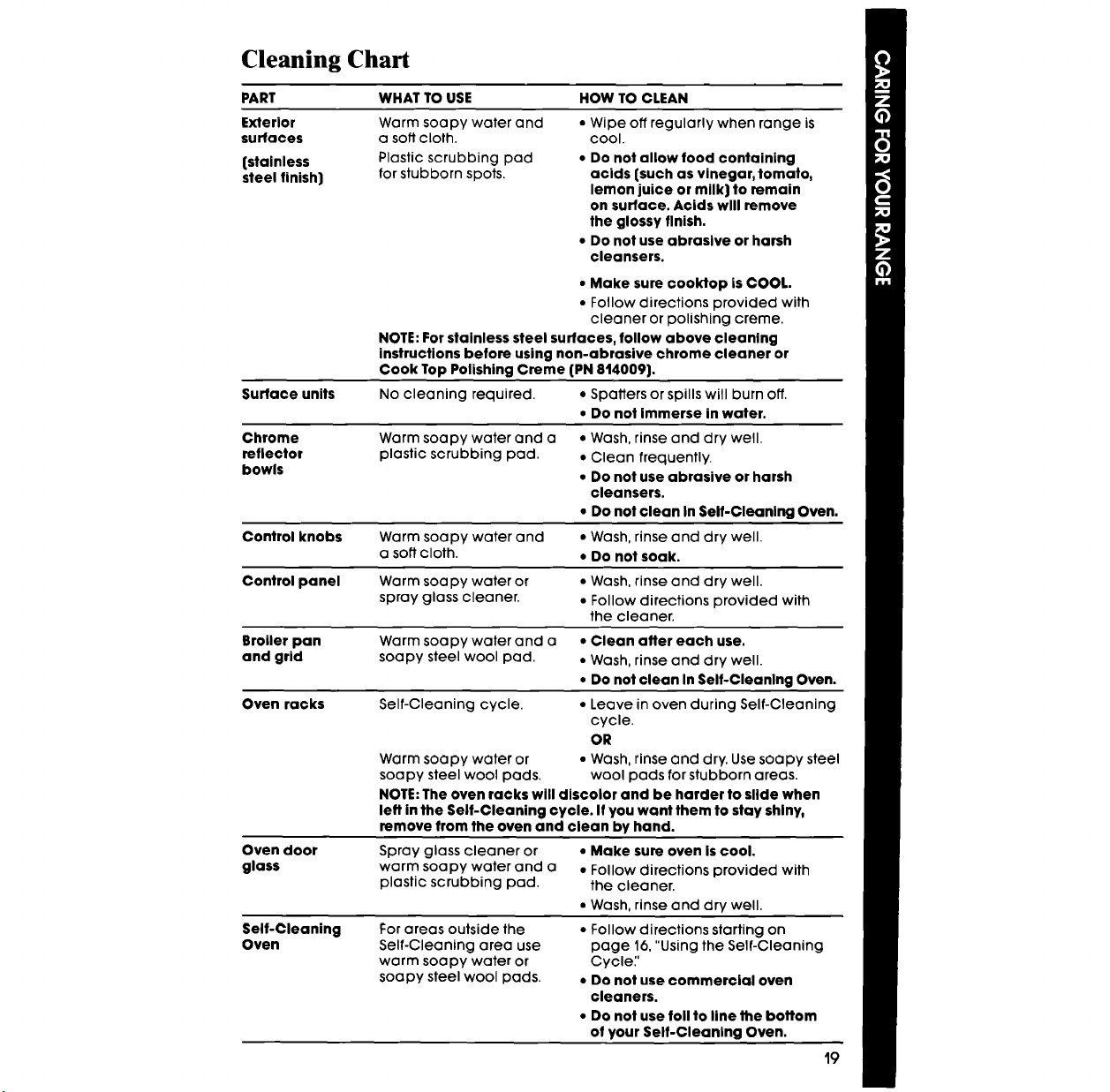
Cleaning Chart
PART
Exterior
surfaces
{stainless
steel finish)
WHAT TO USE HOW TO CLEAN
Warm soapy water and
a soft cloth.
Plastic scrubbing pad
for stubborn spots.
• Wipe off regularly when range is
cool.
• Do not allow food containing
acids {such as vinegar, tomato,
lemon juice or milk) to remain
on surface. Acids wlll remove
the glossy finish.
• Do not use abrasive or harsh
cleansers.
• Make sure cooktop is COOL.
• Follow directions provided with
cleaner or polishing creme.
NOTE: For stainless steel surfaces, follow above cleaning
instructions before using non-abrasive chrome cleaner or
Cook Top Polishing Creme {PN 814009).
Surface units No cleaning required. • Spatters or spills will burn off.
• Do flat immerse in water.
Chrome
reflector
bowls
• Wash, rinse and dry well.
• Clean frequently.
• Do not use abrasive or harsh
cleansers.
• Do not clean In Self-Cleaning Oven.
Control knobs Warm soapy water and • Wash, rinse and dry well.
a soft cloth. • Do not soak.
Control panel Warm soapy water or • Wash, rinse and dry well.
spray glass cleaner. • Follow directions provided with
the cleaner.
Broiler pan Warm soapy water and a • Clean after each use.
and grid soapy steel wool pad. • Wash, rinse and dry well.
• Do not clean In Self-Cleanlng Oven.
Oven racks Self-Cleaning cycle. • Leave in oven during Self-Cleaning
cycle.
OR
Warm soapy water or • Wash, rinse and dry. Use soapy steel
soapy steel wool pads. wool pads for stubborn areas.
NOTE: The oven racks will discolor and be harder to slide when
left in the Self-Cleaning cycle. If you want them to stay shiny,
remove from the oven and clean by hand.
Oven door
glass
Self-Cleaning
Oven
Warm soapy water and a
plastic scrubbing pad.
Spray glass cleaner or
warm soapy water and a
plastic scrubbing pad.
• Make sure oven Is cool.
• Follow directions provided with
the cleaner.
• Wash, rinse and dry well.
For areas outside the
Self-Cleaning area use
warm soapy water or
soapy steel wool pads.
• Follow directions starting on
page 16,"Using the Self-Cleaning
Cycle;'
• Do not use commercial oven
cleaners.
• Do not use foil to line the bottom
of your Self-Cleaning Oven.
19
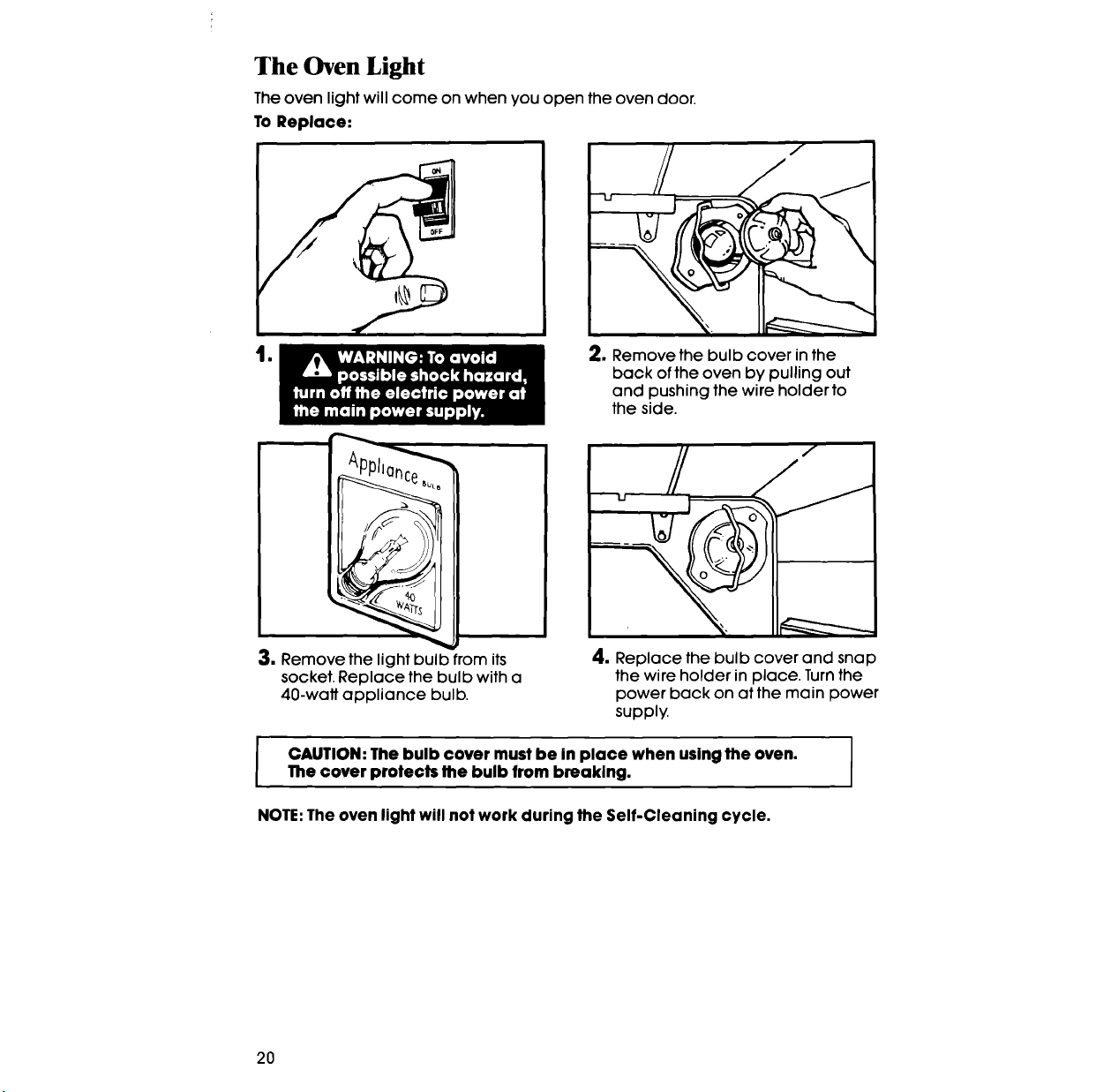
The Oven Light
Theoven light will come on when you open the oven door.
To Replace:
lo 2. Remove the bulb cover in the
back of the oven by pulling out
and pushing the wire holder to
the side.
3. Remove the light bulb from its 4. Replace the bulb cover and snap
socket. Replace the bulb with a the wire holder in place. Turn the
40-watt appliance bulb. power back on at the main power
supply.
I CAUTION: The bulb cover must be in place when using the oven. ]
i
The cover protects the bulb from breaking.
I
NOTE: The oven light will not work during the Self-Cleaning cycle.
20
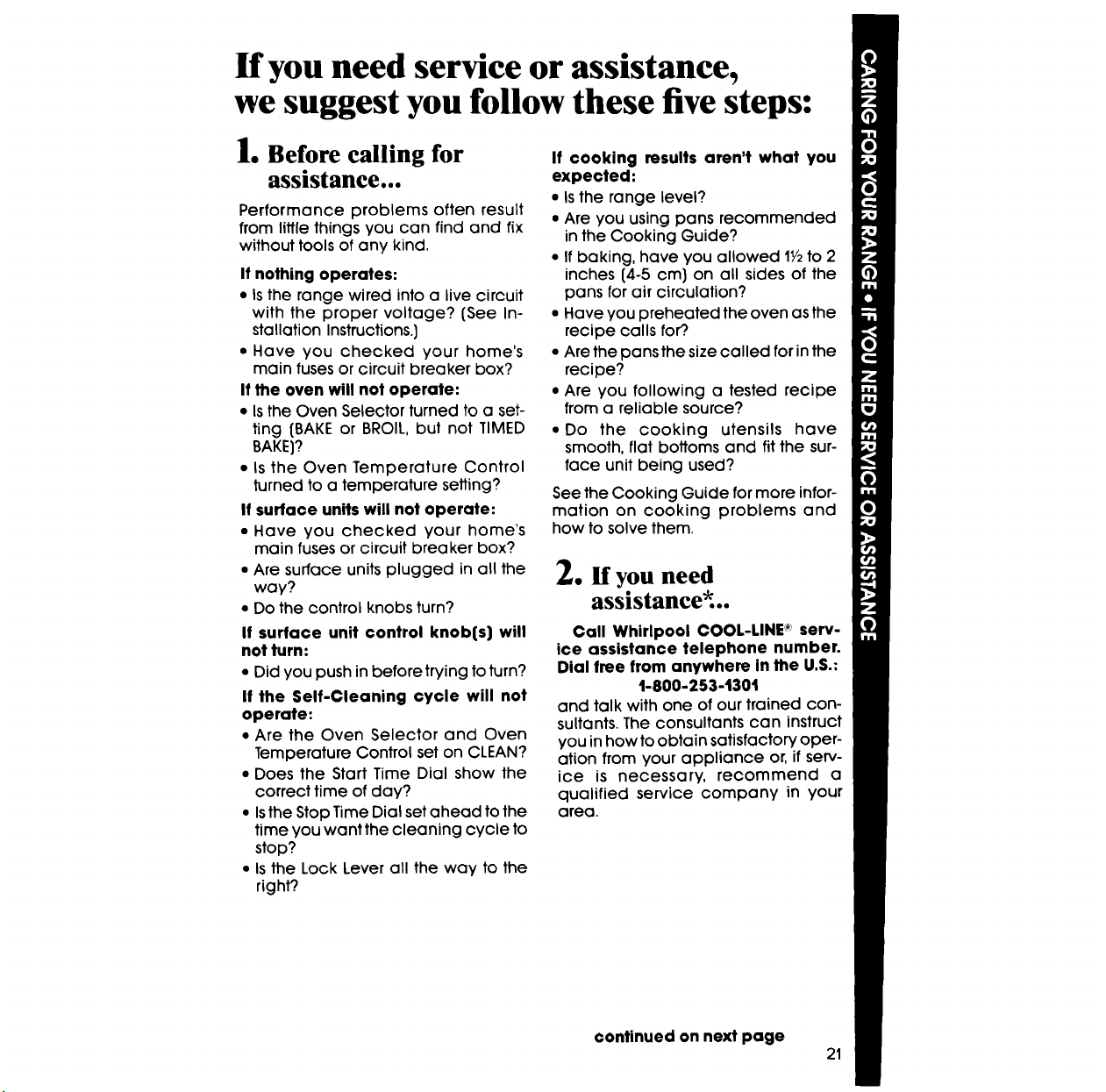
If you need service or assistance,
we suggest you follow these five steps:
1. Before calling for
assistance...
Performance problems often result
from little things you can find and fix
without tools of any kind.
If nothing operates:
• Is the range wired into a live circuit
with the proper voltage? {See In-
stallation Instructions.)
• Have you checked your home's
main fuses or circuit breaker box?
If the oven will not operate:
• Isthe Oven Selector turned to a set-
ting {BAKE or BROIL, but not TIMED
BAKE}?
• Is the Oven Temperature Control
turned to a temperature setting?
If surface units will not operate:
• Have you checked your home's
main fuses or circuit breaker box?
• Are surface units plugged in all the
way?
• Do the control knobs turn?
It surface unit control knob(s) will
not turn:
• Did you push in before trying to turn?
If the Self-Cleaning cycle will not
operate:
• Are the Oven Selector and Oven
Temperature Control set on CLEAN?
• Does the Start Time Dial show the
correct time of day?
• Is the Stop Time Dial set ahead to the
time you want the cleaning cycle to
stop?
• Is the Lock Lever all the way to the
righ_
If cooking results aren't what you
expected:
• Is the range level?
• Are you using pans recommended
in the Cooking Guide?
• If baking, have you allowed lY2to 2
inches (4-5 cm} on all sides of the
pans for air circulation?
• Have you preheated the oven as the
recipe calls for?.
• Are the pans the size called for in the
recipe?
• Are you following a tested recipe
from a reliable source?
• Do the cooking utensils have
smooth, flat bottoms and fit the sur-
face unit being used?
See the Cooking Guide for more infor-
mation on cooking problems and
how to solve them.
2. If you need
assistance*..
Call Whirlpool COOL-LINE _";serv-
ice assistance telephone number.
Dial free from anywhere In the U.S.:
1-800-253-1301
and talk with one of our trained con-
sultants. The consultants can instruct
you in how to obtain satisfactory oper-
ation from your appliance or, if serv-
ice is necessary, recommend a
qualified service company in your
area.
continued on next page
21
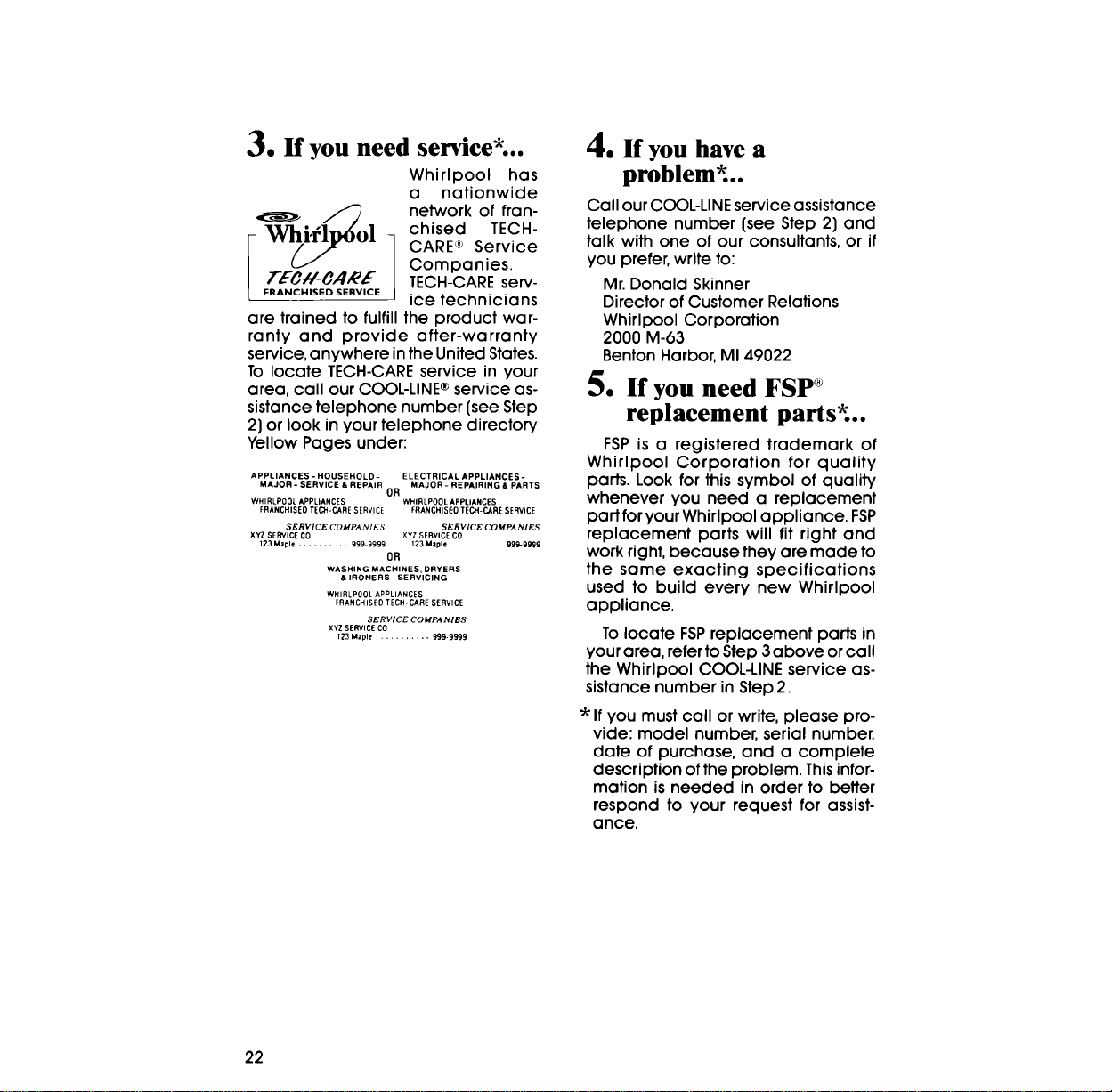
3. Ifyouneed service*..
Whirlpool has
a nationwide
"_i,_]_O 1 netw°rk°ffran-
_- l chised TECH-
CARE ® Service
Companies.
T/_//- _A,_'/ TECH-CARE serv-
[ FRANCHISED SERVICE ice technicians
are trained to fulfill the product war-
ranty and provide after-warranty
service, anywhere in the United States.
To locate TECH-CARE service in your
area, call our COOL-LINE ®service as-
sistance telephone number (see Step
2) or look in your telephone directory
Yellow Pages under:
APPLIANCES - HOUSEHOLD- ELECTRICAL APPLIANCES -
MAJOR - SERVICE & REPAIR MAJOR- REPAIRING & PARTS
OR
WHIRLPOOL APPLIANCES WHIRLPOOL APPLIANCES
ERANCHISEO TECH-CARE SERVICE FRANCH(SEO TECH-CARE SERVICE
SERVICE COMPA NIKS SERVICE COMPANIES
XYZ SERVICE C0 XYZSERVICE CO
123 Mzple ......... 999 9999 123 Maple ........... 999-9999
OR
WASHING MACHINES, DRYERS
& IRONERS- SERVICING
WHIRLPOOL APPLIANCES
FRANCHISED TECH-CARE SERVICE
SERVICE COMPANIES
XYZ SERVICECO
1_3 Maple ........... 999-9999
4. ff youhave a
problem*..
Call our COOL-LINE service assistance
telephone number (see Step 2) and
talk with one of our consultants, or if
you prefer, write to:
Mr. Donald Skinner
Director of Customer Relations
Whirlpool Corporation
2000 M-63
Benton Harbor, MI 49022
5. If you need FSP ®
replacement parts*..
FSP is a registered trademark of
Whirlpool Corporation for quality
parts. Look for this symbol of quality
whenever you need a replacement
part for your Whirlpool appliance. FSP
replacement parts will tit right and
work right, because they are made to
the same exacting specifications
used to build every new Whirlpool
appliance.
To locate FSPreplacement parts in
your area, refer to Step 3above or call
the Whirlpool COOL-LINE service as-
sistance number in Step 2.
*If you must call or write, please pro-
vide: model number, serial number,
date of purchase, and a complete
description of the problem. This infor-
mation is needed in order to better
respond to your request for assist-
ance.
22

Notes
23
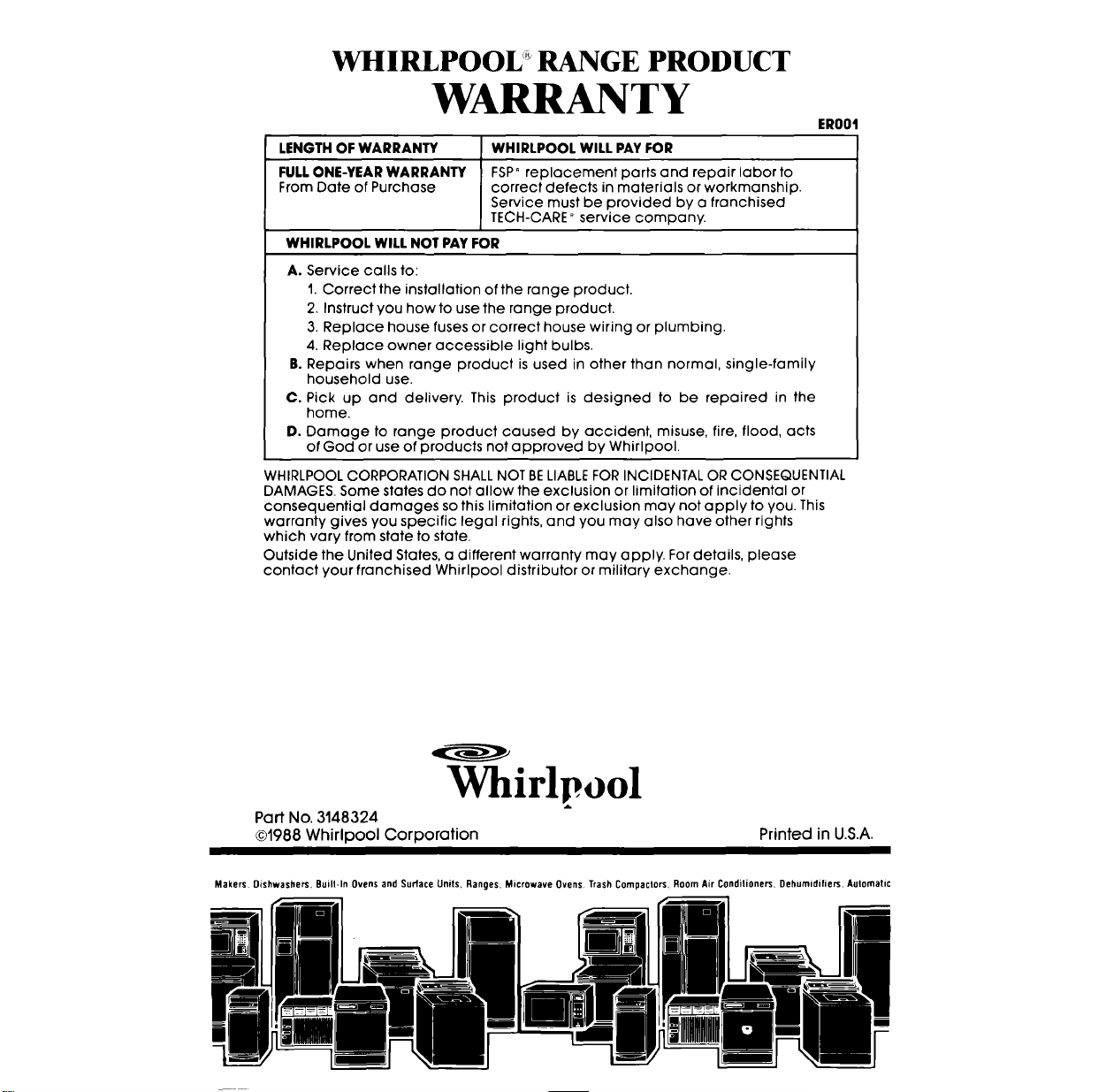
WHIRLPOOL RANGE PRODUCT
WARRANTY
ER001
LENGTH OF WARRANTY WHIRLPOOL WILL PAY FOR
FULL ONE-YEAR WARRANTY FSP° replacement parts and repair labor to
From Date of Purchase correct defects in materials or workmanship.
Service must be provided by a franchised
TECH-CARE" service company.
WHIRLPOOL WILL NOT PAY FOR
A. Service calls to:
1. Correct the installation of the range product.
2. Instruct you how to use the range product.
3. Replace house fuses or correct house wiring or plumbing.
4. Replace owner accessible light bulbs.
B. Repairs when range product is used in other than normal, single-family
household use.
C. Pick up and delivery. This product is designed to be repaired in the
home.
D. Damage to range product caused by accident, misuse, fire, flood, acts
of God or use of products not approved by Whirlpool.
WHIRLPOOL CORPORATION SHALL NOT BELIABLE FOR INCIDENTAL OR CONSEQUENTIAL
DAMAGES. Some states do not allow the exclusion or limitation of incidental or
consequential damages so this limitation or exclusion may not apply to you. This
warranty gives you specific legal rights, and you may also have other rights
which vary from state to state.
Outside the United States, a different warranty may apply. For details, please
contact your franchised Whirlpool distributor or military exchange.
Whirlpool
A
Part No. 3148324
©1988 Whirlpool Corporation
Printed in U.S.A.
Makers Dishwashers. Buill-ln Ovens and Surface Units, Ranges, Microwave Ovens, Trash Compaclors, Room Air Conditioners, Dehumidifiers. Automatic