
Hotpoint.com
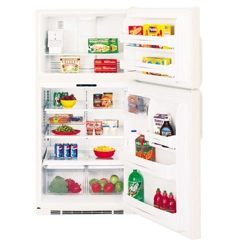
Refrigerators
Top-Freezer
200D2461P001 Rev. 1 39-60120-1 06-01 JR
Models 22, 25
Owner’s Manual &
Installation Instructions
Safety Information
Adapter Plugs . . . . . . . . . . . . . . . . . . .4
Connect Electricity . . . . . . . . . . . . . . .4
Extension Cords . . . . . . . . . . . . . . . . .3
Proper Disposal . . . . . . . . . . . . . . . . . . . .3
Safety Precautions . . . . . . . . . . . . . . . .2
Operating Instructions
Additional Features . . . . . . . . . . . . . .8
Automatic Icemaker . . . . . . . . . . . . . .9
Controls . . . . . . . . . . . . . . . . . . . . . . .5
Shelves and Bins . . . . . . . . . . . . . . .6, 7
Crispers and Pans . . . . . . . . . . . . . .8, 9
Care and Cleaning
Care and Cleaning . . . . . . . . . . .10, 11
Replacing the Lightbulbs . . . . . . . . .12
Installation Instructions
Preparing to Install
the Refrigerator . . . . . . . . . . . . . . . .13
Reversing the Door Swing . . . . . .19–23
Water Line Installation . . . . . . . .14–18
Troubleshooting Tips
Before You Call For Service . . . .25, 26
Normal Operating Sounds . . . . . . . .24
Consumer Support
Consumer Support . . . . . . .Back Cover
Product Registration . . . . . . . . . .27, 28
Warranty . . . . . . . . . . . . . . . . . . . . . .29
Write the model and serial numbers here:
Model # __________________________
Serial # __________________________
Find these numbers on the gray label
on the left side, near the top of the
refrigerator compartment.
Consumer Support Troubleshooting Tips
Operating Instructions
Safety InstructionsInstallation Instructions
2
IMPORTANT SAFETY INFORMATION.
READ ALL INSTRUCTIONS BEFORE USING.
WARNING!
Use this appliance only for its intended purpose as described in this Owner’s Manual.
SAFETY PRECAUTIONS
When using electrical appliances, basic safety precautions should be followed, including the following:
■
■This refrigerator must be properly installed
and located in accordance with the Installation
Instructions before it is used.
■
■Do not allow children to climb, stand or hang
on the shelves in the refrigerator. They could
damage the refrigerator and seriously injure
themselves.
■
■Do not touch the cold surfaces in the freezer
compartment when hands are damp or wet.
Skin may stick to these extremely cold surfaces.
■
■Do not store or use gasoline or other flammable
vapors and liquids in the vicinity of this or any
other appliance.
■
■In refrigerators with automatic icemakers, avoid
contact with the moving parts of the ejector
mechanism, or with the heating element located
on the bottom of the icemaker. Do not place
fingers or hands on the automatic icemaking
mechanism while the refrigerator is plugged in.
■
■Keep fingers out of the “pinch point” areas;
clearances between the doors and between
the doors and cabinet are necessarily small.
Be careful closing doors when children are
in the area.
■
■Unplug the refrigerator before cleaning and
making repairs.
NOTE: We strongly recommend that any servicing be
performed by a qualified individual.
■
■Setting either or both controls to the
O (off)
position does not remove power to the light
circuit.
■
■Do not refreeze frozen foods which have
thawed completely.
Consumer SupportTroubleshooting Tips
Operating Instructions
Safety Instructions Installation Instructions
www.Hotpoint.com
USE OF EXTENSION CORDS
Because of potential safety hazards under certain conditions, we strongly recommend against
the use of an extension cord.
However, if you must use an extension cord, it is absolutely necessary that it be a UL-listed (in the United
States) or a CSA-listed (in Canada), 3-wire grounding type appliance extension cord having a grounding
type plug and outlet and that the electrical rating of the cord be 15 amperes (minimum) and 120 volts.
DANGER! RISK OF CHILD ENTRAPMENT
3
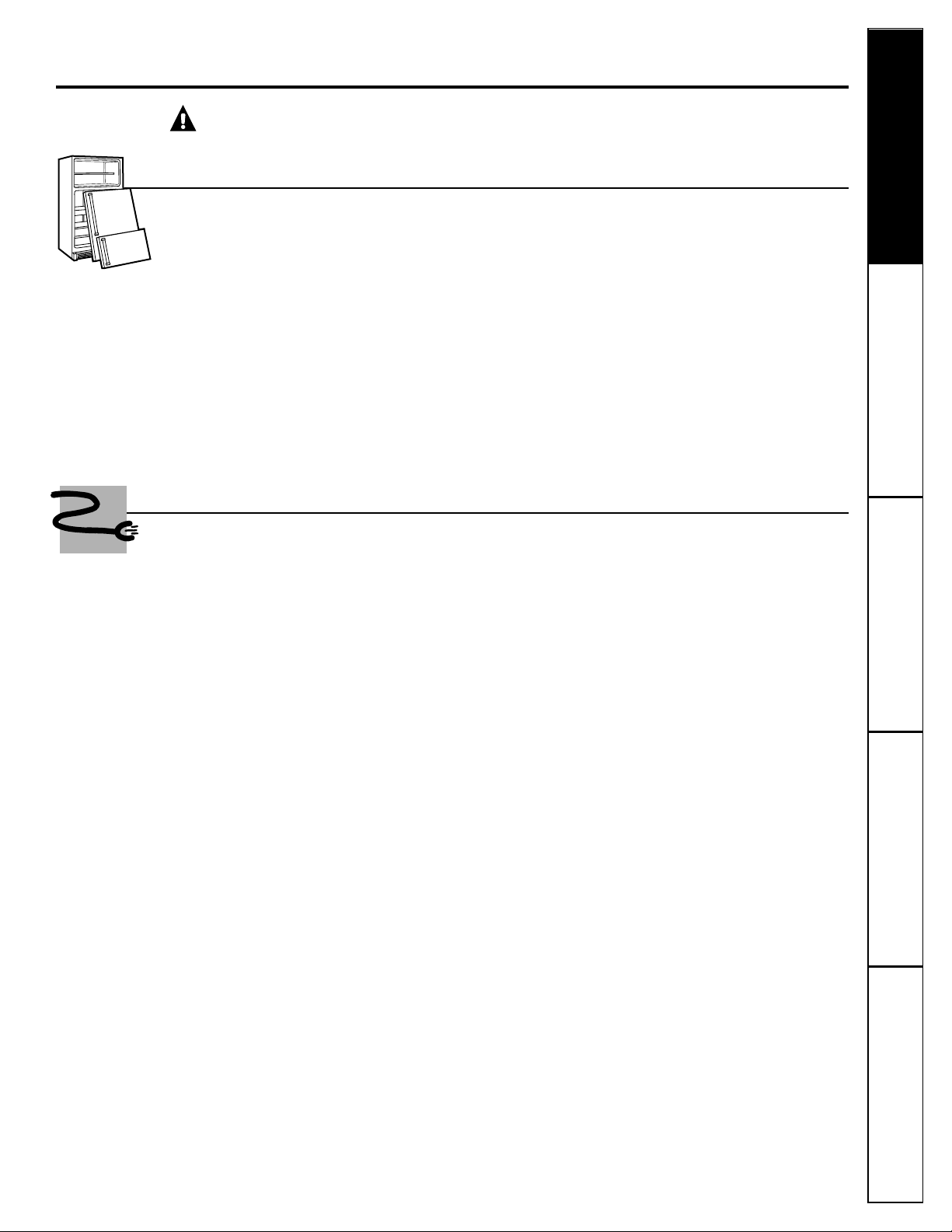
PROPER DISPOSAL OF THE REFRIGERATOR
Child entrapment and suffocation are not
problems of the past. Junked or abandoned
refrigerators are still dangerous…even if they
will sit for “just a few days.” If you are getting
rid of your old refrigerator, please follow the
instructions below to help prevent accidents.
Before You Throw Away Your Old
Refrigerator or Freezer:
■Take off the doors.
■Leave the shelves in place so that children
may not easily climb inside.
CFC Disposal
Your old refrigerator may have a cooling system
that used CFCs (chlorofluorocarbons). CFCs are
believed to harm stratospheric ozone.
If you are throwing away your old refrigerator,
make sure the CFC refrigerant is removed for
proper disposal by a qualified servicer. If you
intentionally release this CFC refrigerant you
can be subject to fines and imprisonment under
provisions of environmental legislation.
4
Troubleshooting Tips
Operating Instructions
Safety InstructionsInstallation InstructionsTroubleshooting Tips Installation Instructions Safety Instructions
Operating Instructions
Troubleshooting Tips Installation Instructions Safety Instructions
Operating Instructions
IMPORTANT SAFETY INFORMATION.
READ ALL INSTRUCTIONS BEFORE USING.
WARNING!
HOW TO CONNECT ELECTRICITY
Do not, under any circumstances, cut or remove the third (ground) prong from the power cord. For
personal safety, this appliance must be properly grounded.
The power cord of this appliance is equipped
with a 3-prong (grounding) plug which mates
with a standard 3-prong (grounding) wall outlet
to minimize the possibility of electric shock hazard
from this appliance.
Have the wall outlet and circuit checked by
a qualified electrician to make sure the outlet
is properly grounded.
If the outlet is a standard 2-prong outlet, it is
your personal responsibility and obligation
to have it replaced with a properly grounded
3-prong wall outlet.
The refrigerator should always be plugged into
its own individual electrical outlet which has
a voltage rating that matches the rating plate.
This provides the best performance and also
prevents overloading house wiring circuits which
could cause a fire hazard from overheated wires.
Never unplug your refrigerator by pulling on the
power cord. Always grip plug firmly and pull
straight out from the outlet.
Repair or replace immediately all power cords
that have become frayed or otherwise damaged.
Do not use a cord that shows cracks or abrasion
damage along its length or at either end.
When moving the refrigerator away from the
wall, be careful not to roll over or damage the
power cord.
USE OF ADAPTER PLUGS
(Adapter plugs not permitted in Canada)
Because of potential safety hazards under certain conditions, we strongly recommend against
the use of an adapter plug.
However, if you must use an adapter, where local
codes permit, a
temporary connection
may be made
to a properly grounded 2-prong wall outlet by
use of a UL-listed adapter available at most local
hardware stores.
The larger slot in the adapter must be aligned with
the larger slot in the wall outlet to provide proper
polarity in the connection of the power cord.
When disconnecting the power cord from the
adapter, always hold the adapter in place with one
hand while pulling the power cord plug with the
other hand. If this is not done, the adapter ground
terminal is very likely to break with repeated use.
If the adapter ground terminal breaks,
DO NOT USE
the refrigerator until a proper ground has been
established.
Attaching the adapter ground terminal to a wall outlet
cover screw does not ground the appliance unless the
cover screw is metal, and not insulated, and the wall
outlet is grounded through the house wiring. You should
have the circuit checked by a qualified electrician to make
sure the outlet is properly grounded.
READ AND FOLLOW THIS SAFETY INFORMATION CAREFULLY.
SAVE THESE INSTRUCTIONS
Consumer Support
Consumer SupportTroubleshooting Tips
Operating InstructionsSafety Instructions
Installation Instructions
5
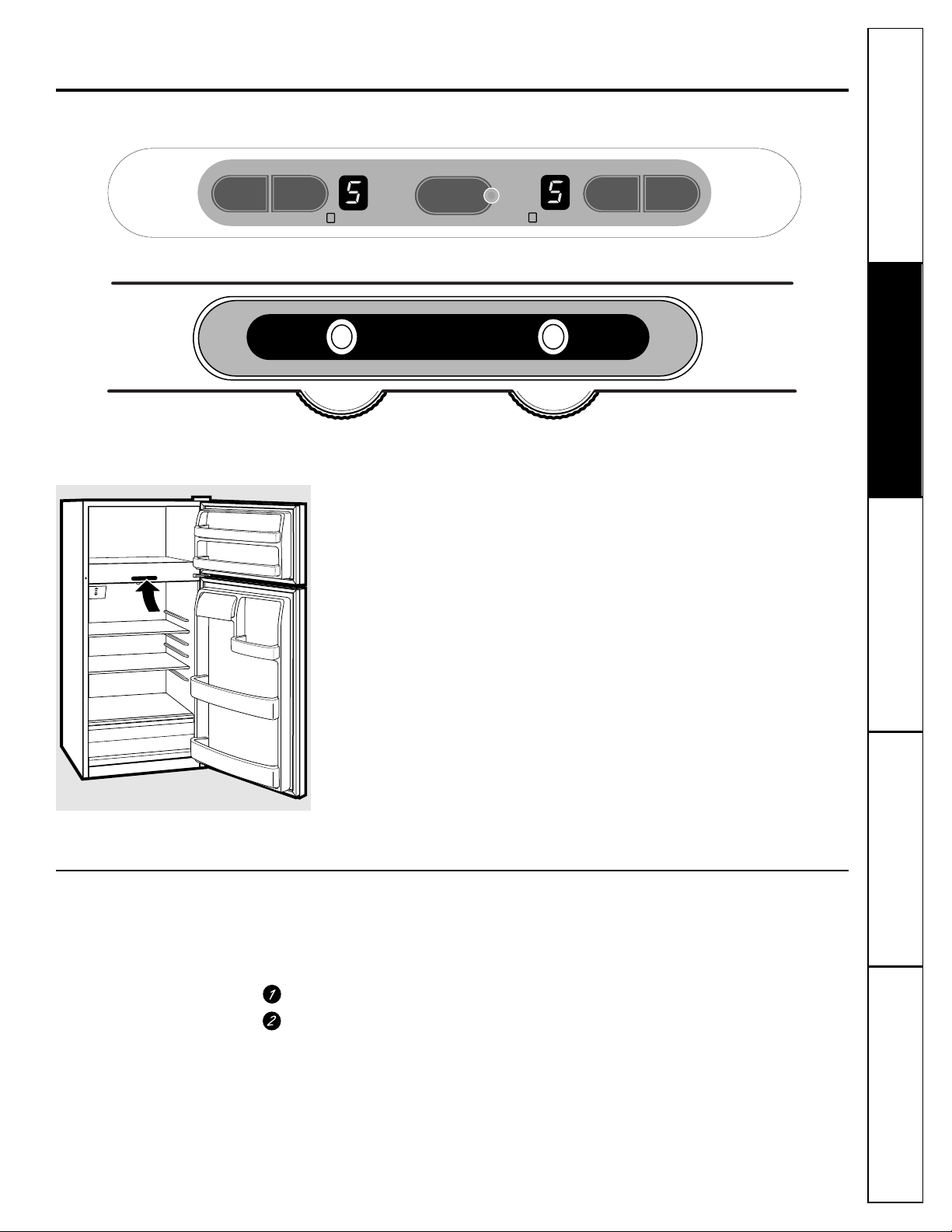
This feature allows you to lock the controls
so the settings cannot be changed.
To lock the controls:
Set the controls to the desired settings.
Press and hold the lock pad for
3 seconds.
When the controls are locked, the indicator
light will come on and the control settings
will not be displayed.
To unlock the controls:
Press and hold the lock pad for 3 seconds.
After unlocking the controls, the settings
will be displayed, the lock indicator light
will go out, and the settings can be
changed.
About the controls on the refrigerator.
www.Hotpoint.com
The controls will look like one of the following:
ADJUST REFRIGERATOR TEMP
ADJUST FREEZER TEMP
ACTIVATE LOCK
IS COLDEST
9
IS COLDEST
9
HOLD
3 SECS
COLDER
WARMER
COLDER
WARMER
Initially, set the refrigerator control at 5 and the freezer control
at 5 and allow 12 hours for the temperature to stabilize.
Several adjustments may be required. Adjust the controls one
increment at a time, and allow 12 hours after each adjustment for
the refrigerator to reach the temperature you have set.
Setting either or both controls to O stops cooling in both the
refrigerator and freezer compartments but does not shut off
electrical power to the refrigerator.
Touch pad controls
•
Setting either control at O will automatically set the other control
at O. The zeros will blink until you set the controls.
•
If both controls are set at O and either COLDER pad is pressed,
the controls will automatically reset to 5.
Control settings will vary based on personal preferences,
usage and operating conditions and may require more than
one adjustment.
9 IS COLDEST
ADJUST FREEZER TEMP ADJUST REFRIGERATOR TEMP
5
5
Locking the Controls
(on some models)
6
Consumer Support Troubleshooting Tips
Operating Instructions
Safety InstructionsInstallation InstructionsTroubleshooting Tips Installation Instructions Safety Instructions
Operating Instructions
Troubleshooting Tips Installation Instructions Safety Instructions
Operating Instructions
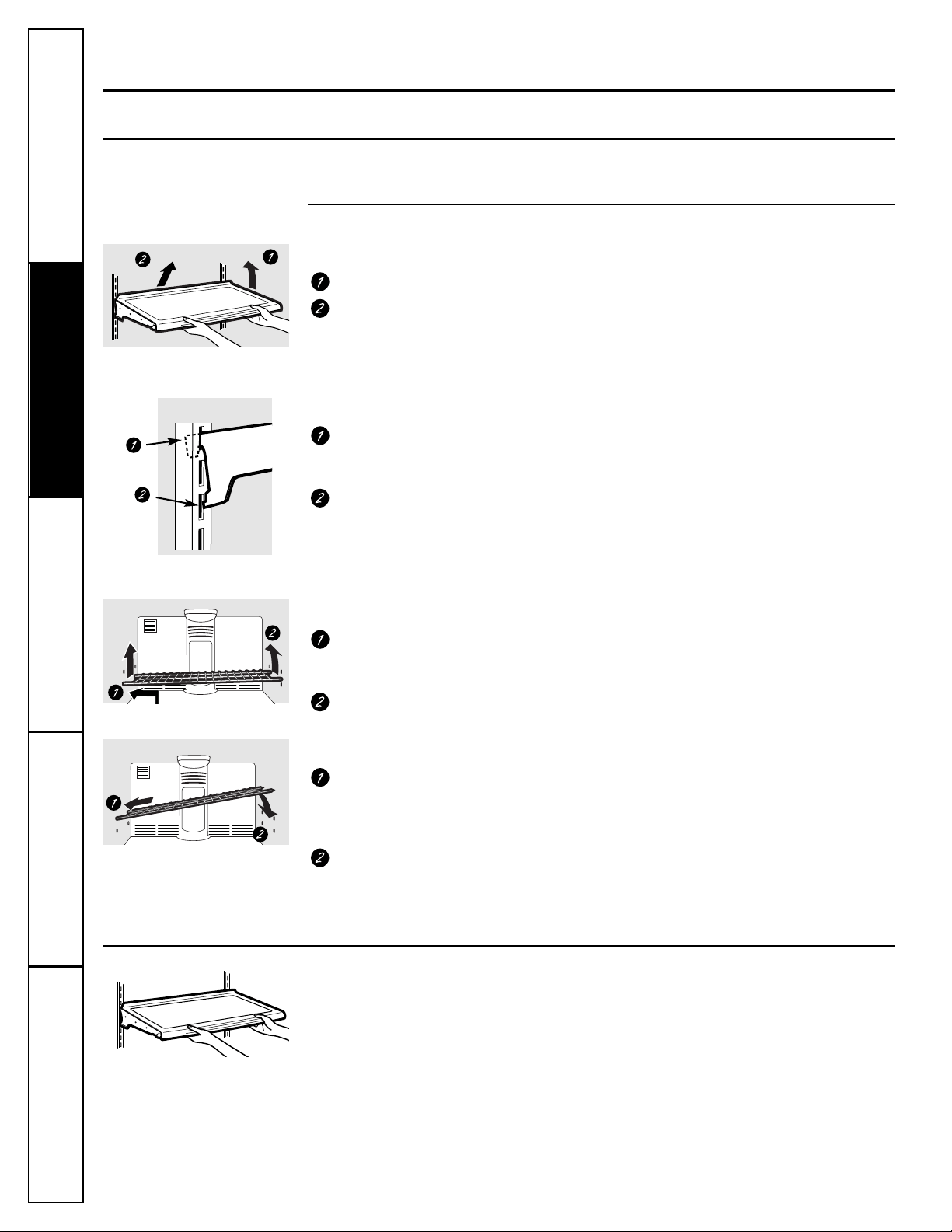
Rearranging the Shelves
To remove:
Tilt the shelf up at the front.
Lift the shelf up at the back and bring
the shelf out.
To replace:
While tilting the shelf up, insert the top
hook at the back of the shelf in a slot
on the track.
Lower the front of the shelf until the
bottom of the shelf locks into place.
Spillproof Shelves
(on some models)
Spillproof shelves have special edges to
help prevent spills from dripping to lower
shelves. To remove or replace the shelves,
see
Rearranging the Shelves
.
About the shelves and bins.
Not all features are on all models.
Some models have wire shelves that
can be adjusted in the same manner.
To remove:
Lift up the left side of the shelf and
slide it left into the center of the shelf
supports.
Rotate the right side of the shelf up and
out of the shelf supports.
Shelves in the refrigerator and freezer compartments are adjustable.
Refrigerator Compartment
Freezer Compartment
To replace:
Holding the shelf diagonally, insert the
left end of the shelf into the center of
the shelf supports on the side wall at
the desired level.
Insert the right end of the shelf into the
shelf supports at the same level. Rest
each end of the shelf on the bottom of
the shelf supports.
NOTE: For models with an automatic icemaker,
the freezer shelf must be in the lower position
for the ice cube bucket to catch the cubes.
7
Consumer SupportTroubleshooting Tips
Operating InstructionsSafety Instructions
Installation Instructions
www.Hotpoint.com
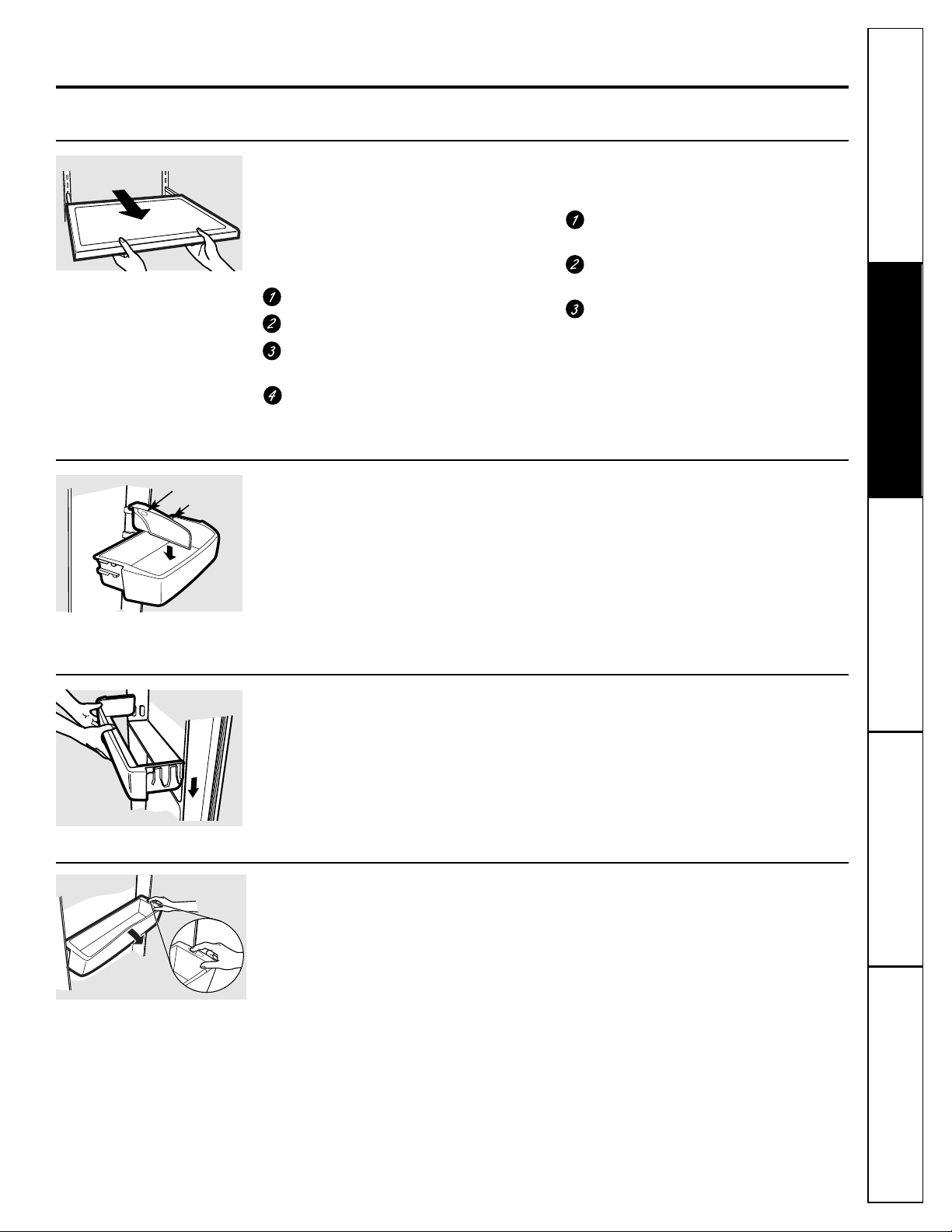
Non-Adjustable Shelves on the Door
To remove:
Lift the shelf straight up then
pull out.
To replace:
Engage the shelf in the molded
supports on the door and push down. It will
lock in place.
Adjustable Bins on the Door
Adjustable bins can easily be carried from
refrigerator to work area.
To remove:
Lift bin straight up, then
pull out.
To replace or relocate:
Engage the bin in
the molded supports of the door, and
push in. Bin will lock in place.
The snugger
helps prevent tipping, spilling
or sliding of small items stored on the door
shelf. Grip the finger hold near the rear of
the snugger and move it to fit your needs.
Snugger
Freezer Tilt Out Bin
(on some models)
Push the button as you tilt out the bin.
To remove:
Hold the sides of the bin and
lift it straight up, then pull out.
To replace:
Engage the ends of the bin in
the molded supports on the door, and
push down. It will lock in place.
NOTE: Do not overload the bin.
Slide-Out Spillproof Shelf
(on some models)
The slide-out spillproof shelf allows you
to reach items stored behind others. The
special edges are designed to help prevent
spills from dripping to lower shelves.
To remove:
Remove all items from shelf.
Slide the shelf out until it stops.
Lift the front edge of the shelf until the
central tabs are above the front bar.
Continue pulling the shelf forward
until it can be removed.
To replace:
Place the rear shelf tabs just in front of
the central notches on the shelf frame.
Slide the shelf in until the central tabs
are slightly behind the front bar.
Lower the shelf into place until it is
horizontal and slide the shelf in.
Make sure that the shelf sits flat after reinstallation
and doesn’t move freely from side to side.
Make sure you push the shelves all the way in
before you close the door.
Finger hold
Consumer Support Troubleshooting Tips
Operating Instructions
Safety InstructionsInstallation InstructionsTroubleshooting Tips Installation Instructions Safety Instructions
Operating Instructions
Troubleshooting Tips Installation Instructions Safety Instructions
Operating Instructions
8
About the crispers and pans.
Not all features are on all models.
About the additional features.
Not all features are on all models.
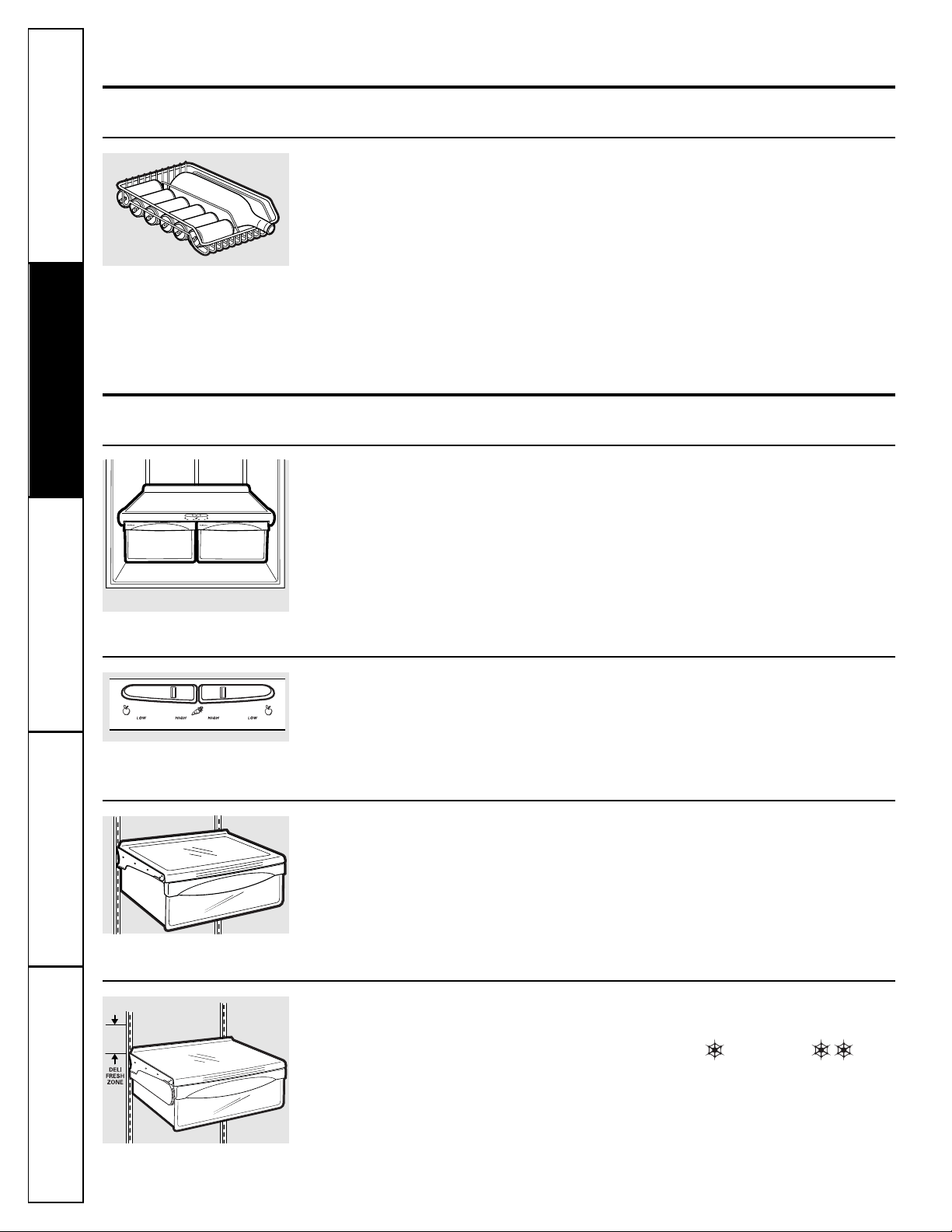
Fruit and Vegetable Crisper
Excess water that may accumulate in
the bottom of the drawers or under the
drawers should be wiped dry.
Adjustable Humidity Crisper
(on some models)
Slide the control all the way to the
HIGH
setting to provide high humidity
recommended for most vegetables.
Slide the control all the way to the
LOW
setting to provide lower humidity levels
recommended for most fruits.
Shelf Saver Rack
(on some models)
Slide-out beverage rack holds twelve cans of
soda or two wine/water bottles (lengthwise).
It can be removed for cleaning.
To remove,
slide the rack out to the
stop
position, lift the rack up and past the
stop
position and lift it out.
Snack Pan
(on some models)
This pan can be moved to the most useful
location for your family’s needs.
To remove,
slide the pan out to the
stop
position, lift the pan up and past the
stop
position and lift it out.
Adjustable Temperature Deli Pan
(on some models)
When the pan is placed in the top 6 slots
on the left side and the lever is set at
COLDEST,
air from the freezer is forced
around the pan to keep it very cold.
You can move the pan to any location if
you don’t want the extra cold storage.
The settings can be adjusted anywhere
between cold and coldest
.
When set at cold, the pan will stay at the
normal refrigerator temperature.
The coldest setting provides the coldest
storage area.
Automatic Icemaker
(on some models)
The icemaker will produce seven cubes
per cycle—approximately 100–130 cubes
in a 24-hour period, depending on freezer
compartment temperature, room
temperature, number of door openings
and other use conditions.
If the refrigerator is operated before the
water connection is made to the icemaker,
set the power switch to
O (off)
.
When the refrigerator has been connected
to the water supply, set the power switch to
I (on)
. The green light will come on.
The icemaker will fill with water when it
cools to 15°F. A newly-installed refrigerator
may take 12 to 24 hours to begin making
ice cubes.
Throw away the first few batches of ice to
allow the water line to clear.
Be sure nothing interferes with the sweep
of the feeler arm.
When the bin fills to the level of the feeler
arm, the icemaker will stop producing ice.
It is normal for several cubes to be joined
together.
If ice is not used frequently, old ice cubes
will become cloudy, taste stale and shrink.
If ice cubes get stuck in the icemaker, the
green power light will blink. To correct this,
set the power switch to
O (off)
and remove
the cubes. Set the power switch to
I (on)
to
restart the icemaker.
After the icemaker has been turned on
again, there will be a delay of about
45 minutes before the icemaker resumes
operations.
NOTE: In homes with lower-than-average water
pressure, you may hear the icemaker cycle multiple
times when making one batch of ice.
About crisper removal.
www.Hotpoint.com
Not all features are on all models.
Consumer SupportTroubleshooting Tips
Operating InstructionsSafety Instructions
Installation Instructions
About the automatic icemaker.
A newly-installed refrigerator may take 12–24 hours to begin making ice.
Crisper Removal
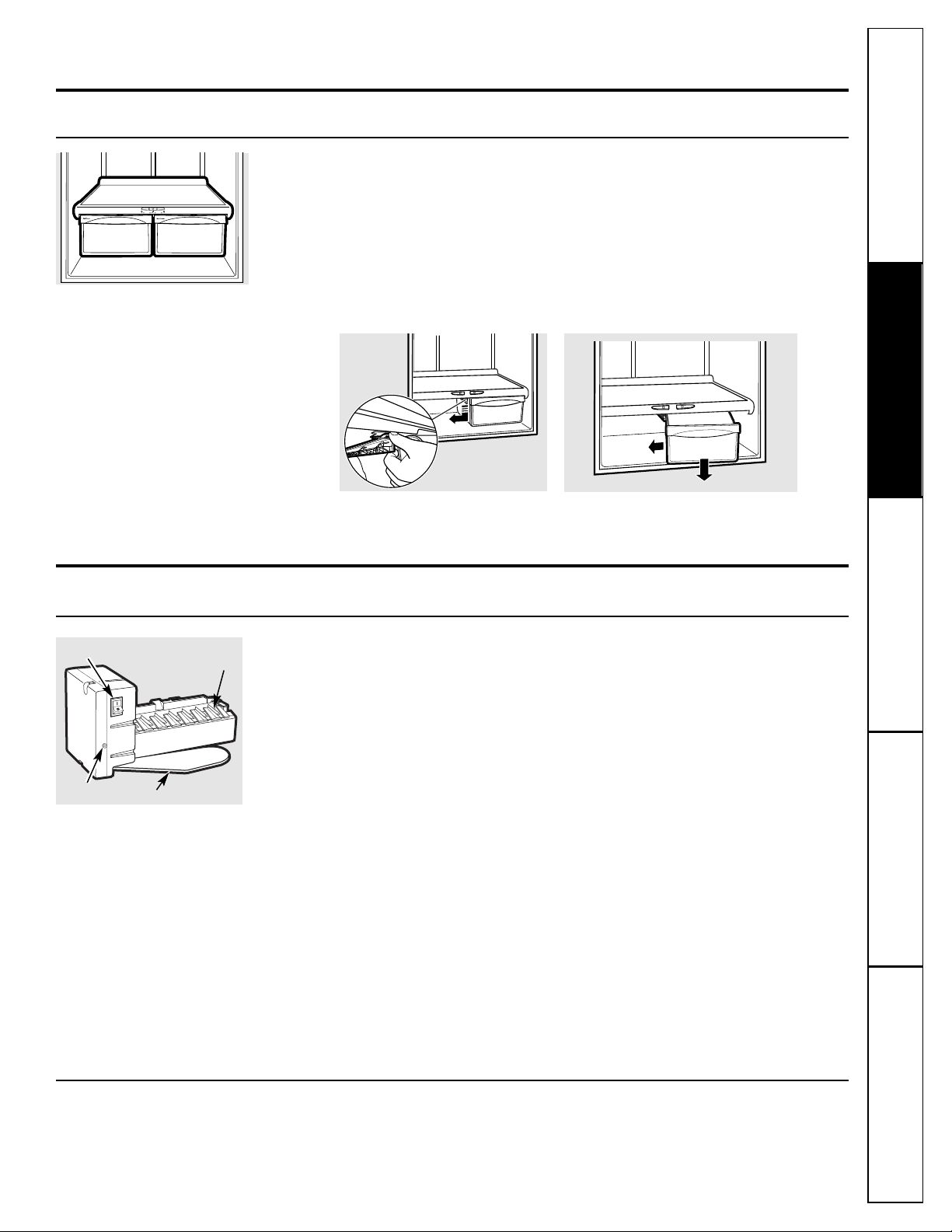
To Remove:
These drawers can be removed easily by
lifting up slightly while pulling the drawer
past the
stop
location.
When the door cannot be fully opened,
remove the drawer farthest from the door
first. Make sure the drawer closest to the
door is fully closed. There is a latch at the
front of the center slide rail. Push down on
the latch and slide the center slide rail, to
which the drawer is attached, away from the
door. Remove the drawer.
Icemaker Accessory Kit
If your refrigerator did not come already
equipped with an automatic icemaker,
an icemaker accessory kit is available at
extra cost.
Check the back of the refrigerator for
the specific icemaker kit needed for
your model.
9
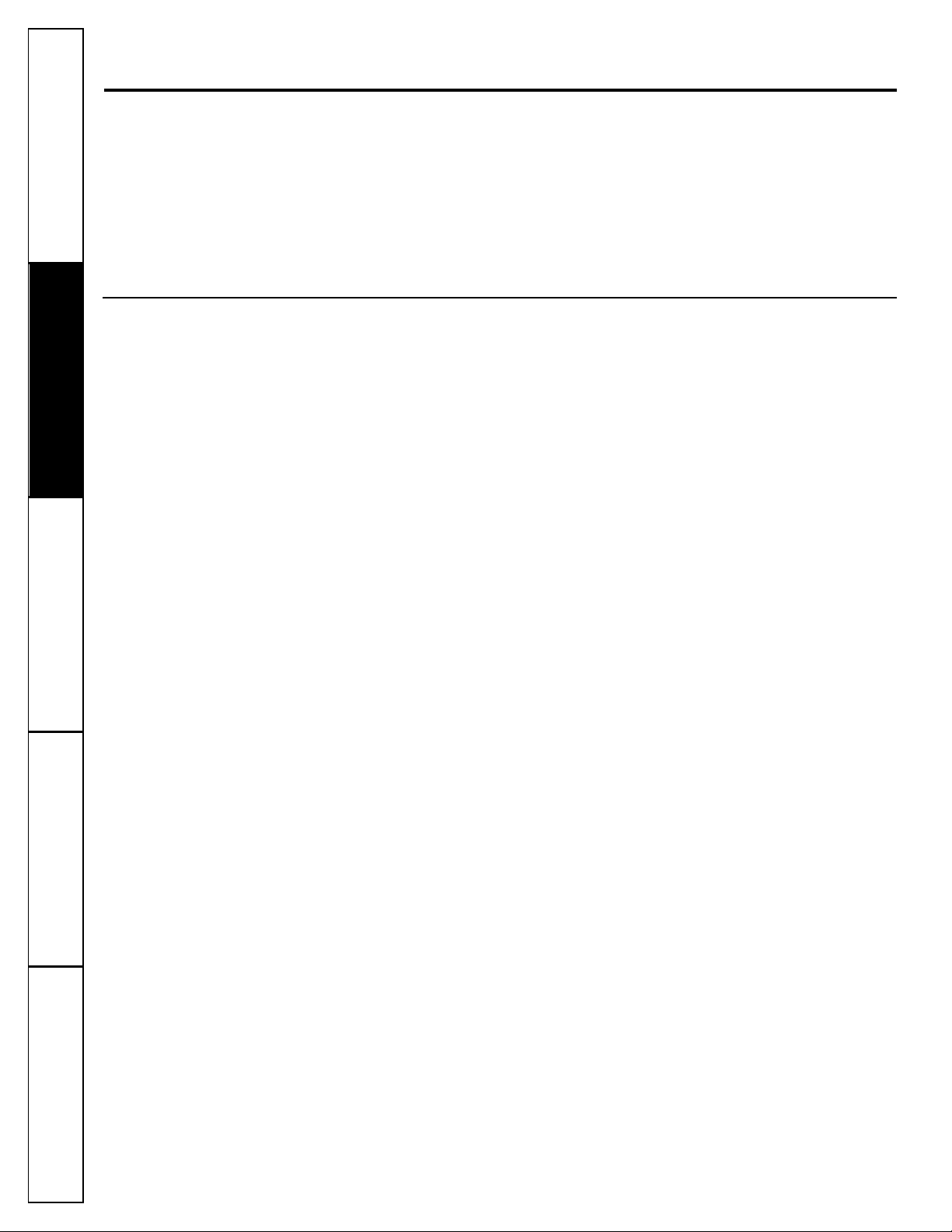
Icemaker
Feeler Arm
Power Switch
Green
Power Light
10
Consumer Support Troubleshooting Tips
Operating Instructions
Safety InstructionsInstallation InstructionsTroubleshooting Tips Installation Instructions Safety Instructions
Operating Instructions
Troubleshooting Tips Installation Instructions Safety Instructions
Operating Instructions
Care and cleaning of the refrigerator.
Cleaning the Outside
The door handles and trim.
Clean with
a cloth dampened with soapy water.
Dry with a soft cloth.
Keep the outside clean.
Wipe with a clean
cloth lightly dampened with mild liquid
dish detergent. Dry with a clean, soft cloth.
Do not wipe the refrigerator with a soiled dish
cloth or wet towel. These may leave a residue
that can erode the paint. Do not use scouring
pads, powdered cleaners, bleach or cleaners
containing bleach because these products can
scratch and weaken the paint finish.
Cleaning the Inside
To help prevent odors,
leave an open box of
baking soda in the refrigerator and freezer
compartments.
Unplug the refrigerator before cleaning.
If this
is not practical, wring excess moisture out of
sponge or cloth when cleaning around
switches, lights or controls.
Use warm water and baking soda solution—
about a tablespoon (15 ml) of baking soda
to a quart (1 liter) of water. This both cleans
and neutralizes odors. Thoroughly rinse
and wipe dry.
Avoid cleaning cold glass shelves (on some
models) with hot water because the extreme
temperature difference may cause them to break.
Handle glass shelves carefully. Bumping
tempered glass can cause it to shatter.
Do not wash any refrigerator parts in the
dishwasher.
Wash ice trays in lukewarm water only—
do not put them in an automatic dishwasher.
For long vacations or absences, remove
food and unplug the refrigerator. Clean
the interior with baking soda solution of
one tablespoon (15 ml) of baking soda to
one quart (1 liter) of water. Leave the
doors open.
Set the icemaker power switch to the
O (off)
position and shut off the water supply to
the refrigerator.
If the temperature can drop below
freezing, have a qualified servicer drain
the water supply system (on some models)
to prevent serious property damage due to
flooding.
11
www.Hotpoint.com
Behind the Refrigerator
Be careful when moving the refrigerator
away from the wall. All types of floor
coverings can be damaged, particularly
cushioned coverings and those with
embossed surfaces.
Pull the refrigerator straight out and return
it to position by pushing it straight in.
Moving the refrigerator in a side direction
may result in damage to the floor covering
or refrigerator.
When pushing the refrigerator back, make sure
you don’t roll over the power cord or icemaker
supply line (on some models).
Preparing for Vacation
Preparing to Move
Secure all loose items such as base grille,
shelves and drawers by taping them
securely in place to prevent damage.
Be sure the refrigerator stays in an upright
position during moving.
Consumer SupportTroubleshooting Tips
Operating Instructions
Safety Instructions Installation Instructions
12
Consumer Support Troubleshooting Tips
Operating Instructions
Safety InstructionsInstallation InstructionsTroubleshooting Tips Installation Instructions Safety Instructions
Operating Instructions
Troubleshooting Tips Installation Instructions Safety Instructions
Operating Instructions
Replacing the lightbulbs.
Turning the control to the O (off) position does not remove power to the light circuit.
Refrigerator Compartment
Freezer Compartment Dome Light
(on some models)
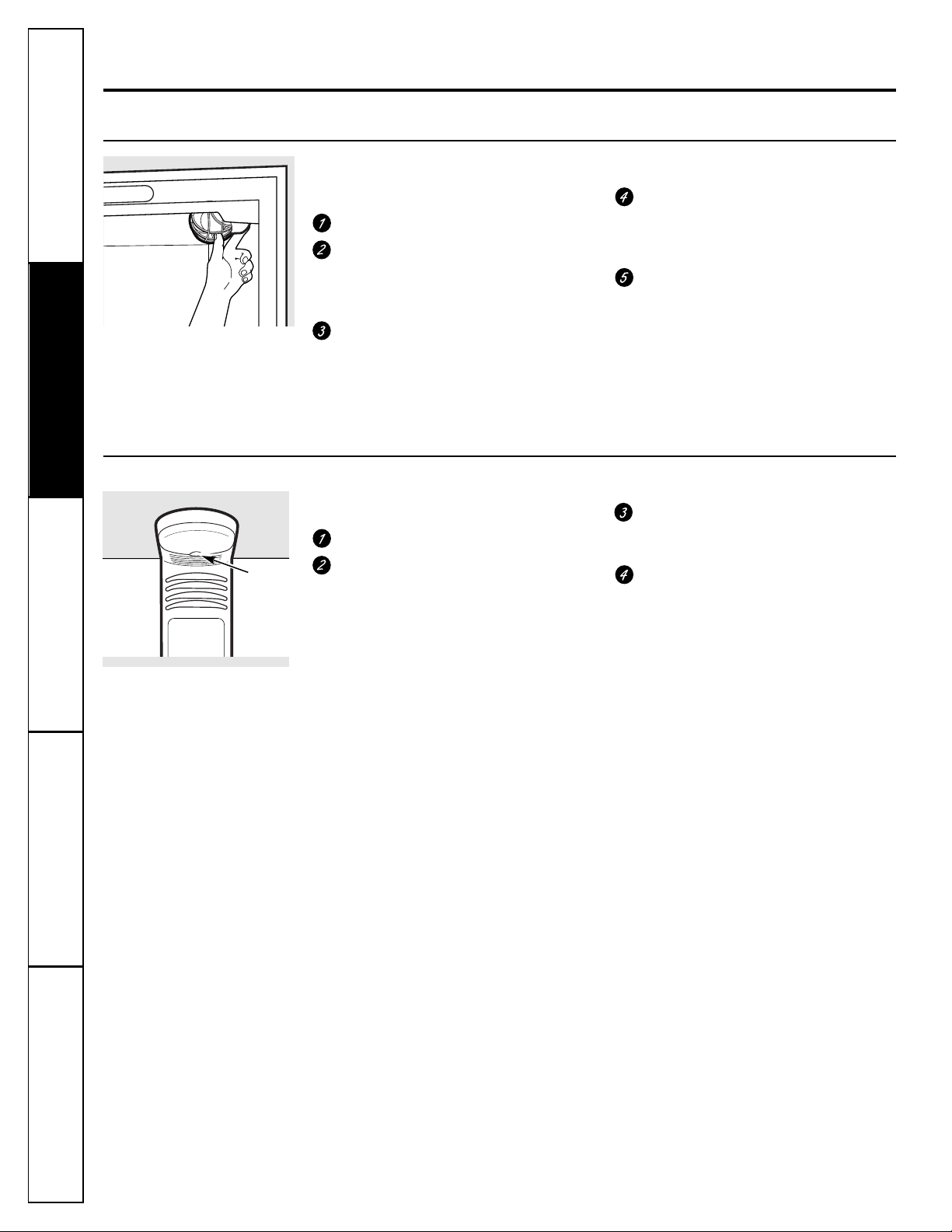
CAUTION: Lightbulbs may be hot.
Unplug the refrigerator.
The bulb is located at the top of the
freezer compartment inside the dome
light shield. To remove the shield, place
your finger in the pocket at the back
of the shield. Pull the shield forward
and down.
After replacing with an appliance
bulb of the same or lower wattage,
replace the shield.
Plug the refrigerator back in.
CAUTION: Lightbulbs may be hot.
Unplug the refrigerator.
The bulbs are located at the top of
the refrigerator compartment near
the opening. On some models, a light
shield will have to be removed.
To remove the light shield, grasp the
shield as shown. Squeeze the shield
and rotate the shield towards the back
of the refrigerator. The light shield will
pop out.
Replace the bulb with an appliance
bulb of the same or lower wattage.
On models with a light shield, replace
the light shield.
Plug the refrigerator back in.
Pocket
13
BEFORE YOU BEGIN
Read these instructions completely and carefully.
•
IMPORTANT
–
Save these
instructions for local inspector’s use.
•
IMPORTANT
–
Observe all
governing codes and ordinances.
• Note to Installer
–
Be sure to leave these
instructions with the Consumer.
• Note to Consumer
–
Keep these instructions
for future reference.
• Skill level – Installation of this appliance requires
basic mechanical skills.
• Completion time – Refrigerator Installation
15 minutes
• Proper installation is the responsibility of the
installer.
• Product failure due to improper installation is not
covered under the Warranty.
• Do not install the refrigerator where the temperature
will go below 60°F (16°C) because it will not run often
enough to maintain proper temperatures.
• Do not install the refrigerator where the temperature
will go above 100°F (37°C) because it will not perform
properly.
• Install it on a floor strong enough to support it fully
loaded.
REFRIGERATOR LOCATION
If you have questions, call 1.800.GE.CARES
or visit our Website at:
www.Hotpoint.com
Installation
Refrigerator
Instructions
Models 22 and 25
Allow the following clearances for ease of installation,
proper air circulation and plumbing and electrical
connections.
• Sides 1/8″ (4 mm)
• Top 1″ (25 mm)
• Back 1″ (25 mm)
If the refrigerator is against a wall on either side,
allow a 1/8″ (3 mm) door clearance.
CLEARANCES
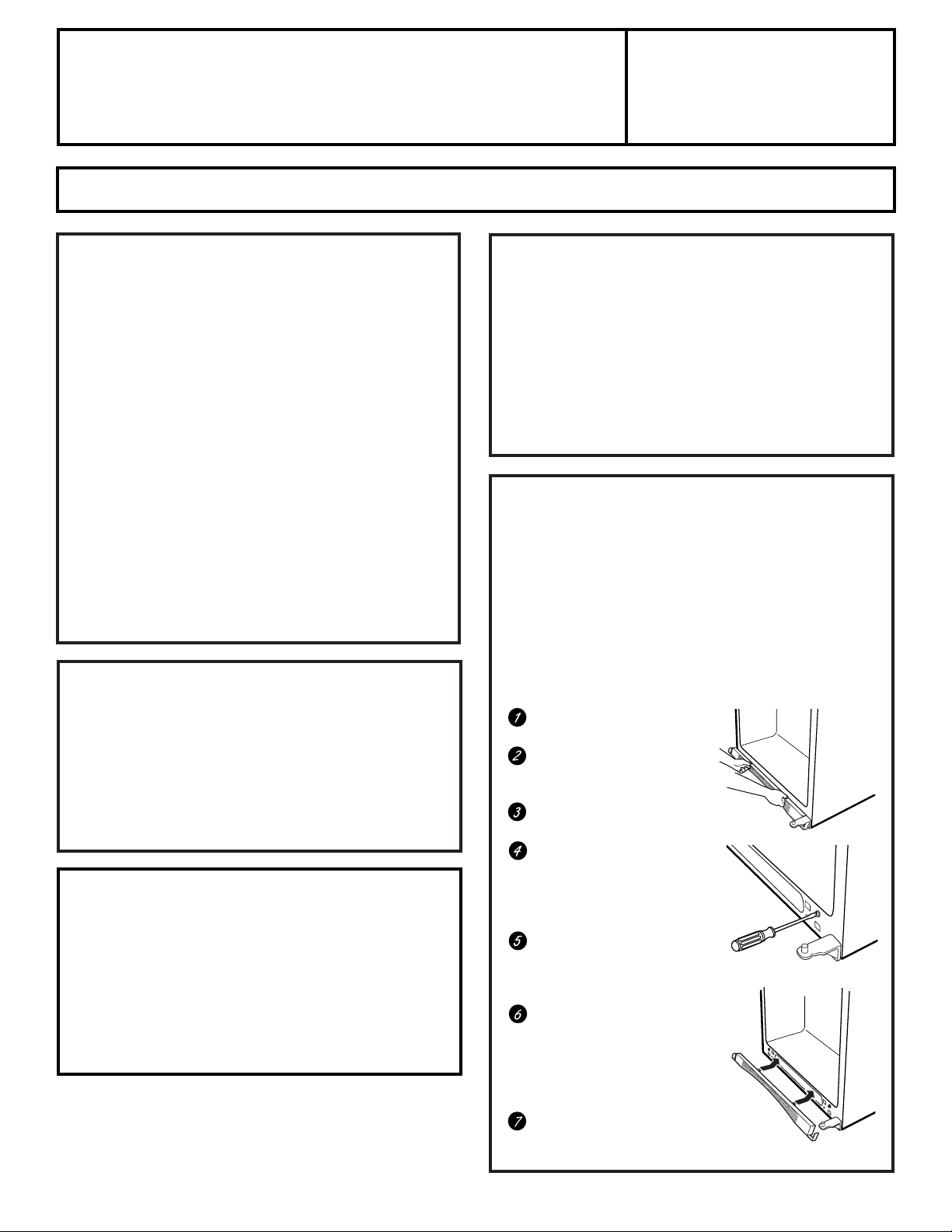
The rollers have 3 purposes:
■
Rollers adjust so the doors close on their own when
opened about 45°.
■
Rollers adjust so the refrigerator is firmly positioned
on the floor and does not wobble.
■
Rollers allow you to move the refrigerator away from
the wall for cleaning.
To adjust the rollers:
Remove the base grille by
positioning hands as shown.
Rotate the bottom of the
grille outward until the clips
snap out.
Pull the grille away from the
refrigerator.
Using a screwdriver, turn
the two front roller
adjusting screws clockwise
to raise the refrigerator,
counterclockwise to lower it.
Replace the grille so the
notch in the grille will fit
around the bottom door
hinge.
Tilt the top of the grille
toward the refrigerator and
insert the long metal clips
into the top of the oval
openings at the bottom of
the refrigerator.
Rotate the bottom of the
grille toward the refrigerator
until it snaps into place.
ROLLERS
If the refrigerator has an icemaker, it will have to be
connected to a cold water line. A GE water supply kit
(containing tubing, shutoff valve, fittings and
instructions) is available at extra cost from your dealer,
by visiting our Website at www.Hotpoint.com or from
Parts and Accessories, 800.626.2002.
WATER SUPPLY TO THE ICEMAKER
(on some models)
14
INSTALLING THE WATER LINE (ON SOME MODELS)
Installation Instructions
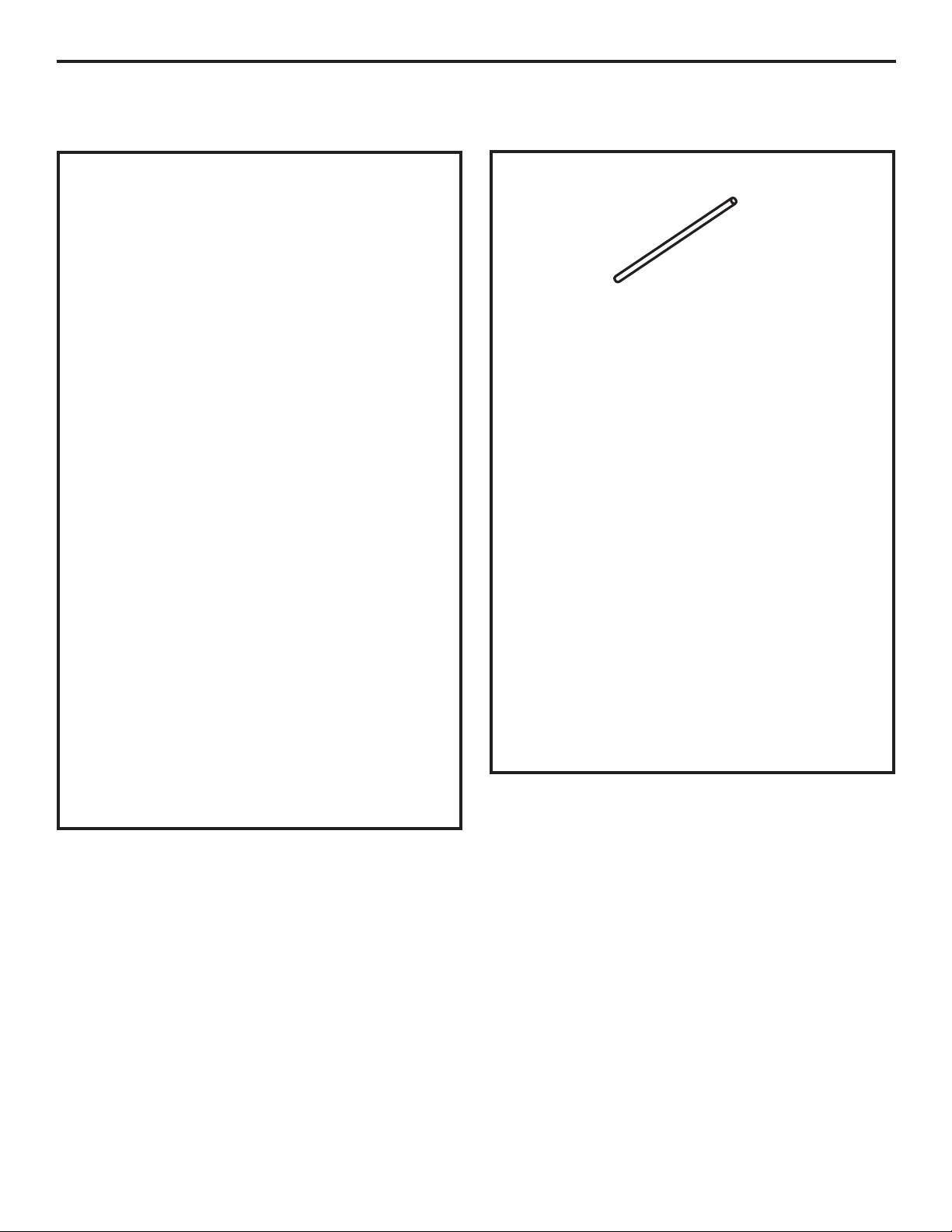
Recommended copper water supply kits are WX8X2,
WX8X3 or WX8X4, depending on the amount of
tubing you need. Approved plastic water supply
lines are GE SmartConnect™ Refrigerator Tubing
(WX08X10002, WX08X10006, WX08X10015
and WX08X10025).
When connecting your refrigerator to a GE Reverse
Osmosis Water System, the only approved installation
is with a GE RVKit. For other reverse osmosis water
systems, follow the manufacturer’s recommendations.
This water line installation is not warranted by the
refrigerator or icemaker manufacturer. Follow these
instructions carefully to minimize the risk of expensive
water damage.
Water hammer (water banging in the pipes) in house
plumbing can cause damage to refrigerator parts and
lead to water leakage or flooding. Call a qualified
plumber to correct water hammer before installing
the water supply line to the refrigerator.
To prevent burns and product damage, do not hook
up the water line to the hot water line.
If you use your refrigerator before connecting the
water line, make sure the icemaker power switch is in
the
O (off)
position.
Do not install the icemaker tubing in areas where
temperatures fall below freezing.
When using any electrical device (such as a power
drill) during installation, be sure the device is double
insulated or grounded in a manner to prevent the
hazard of electric shock, or is battery powered.
All installations must be in accordance with local
plumbing code requirements.
BEFORE YOU BEGIN WHAT YOU WILL NEED
• Copper or GE SmartConnect
™
Refrigerator Tubing kit,
1/4″ outer diameter to connect the refrigerator
to the water supply. If using copper, be sure both ends
of the tubing are cut square.
To determine how much tubing you need: measure the
distance from the water valve on the back of the
refrigerator to the water supply pipe. Then add
8′ (2.4 m). Be sure there is sufficient extra tubing
(about 8′ [2.4 m] coiled into 3 turns of about
10″ [25 cm] diameter) to allow the refrigerator to
move out from the wall after installation.
GE SmartConnect™ Refrigerator Tubing Kits are
available in the following lengths:
2′ (.6 m) – WX08X10002
6′ (1.8 m) – WX08X10006
15′ (4.6 m) – WX08X10015
25′ (7.6 m) – WX08X10025
Be sure that the kit you select allows at least 8 feet
(2.4 m) as described above.
NOTE: The only GE approved plastic tubing is that
supplied in GE SmartConnect™ Refrigerator Tubing
kits. Do not use any other plastic water supply line
because the line is under pressure at all times. Certain
types of plastic will crack or rupture with age and cause
water damage to your home.
15
Installation Instructions
• A GE water supply kit (containing tubing, shutoff
valve and fittings listed below) is available at extra
cost from your dealer or from Parts and Accessories,
800.626.2002.
• A cold water supply. The water pressure must be
between 20 and 120 p.s.i. (1.4–8.1 bar).
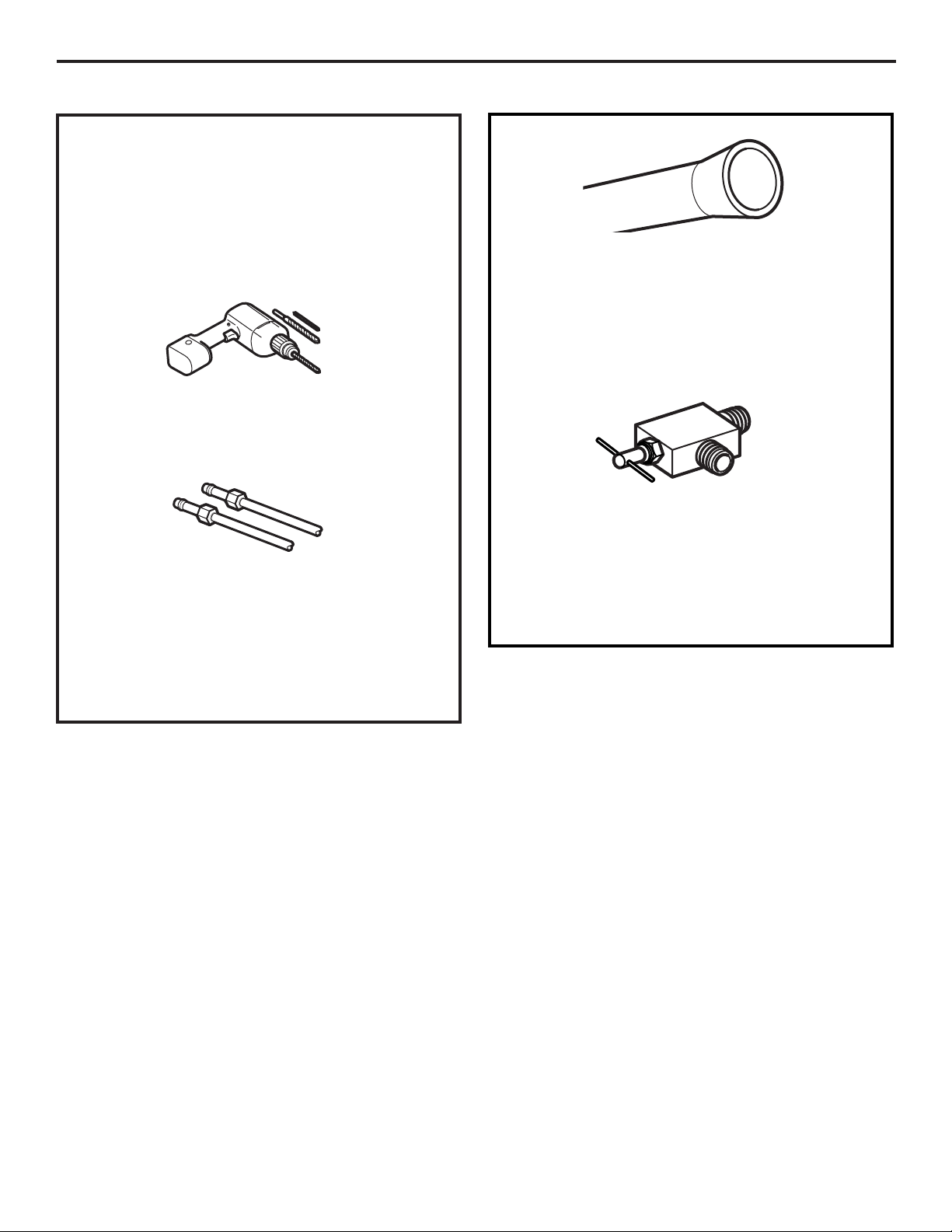
• Power drill.
• 1/2″ or adjustable wrench.
• Straight and Phillips blade screwdriver.
• Two 1/4 ″ outer diameter compression nuts and
2 ferrules (sleeves)—to connect the copper tubing
to the shutoff valve and the refrigerator water valve.
OR
• If you are using a GE SmartConnect™ Refrigerator
Tubing kit, the necessary fittings are preassembled
to the tubing.
WHAT YOU WILL NEED (CONT.)
• If your existing copper water line has a flared fitting
at the end, you will need an adapter (available at
plumbing supply stores) to connect the water line to
the refrigerator OR you can cut off the flared fitting
with a tube cutter and then use a compression fitting.
Do not cut formed end from GE SmartConnect™
Refrigerator tubing.
• Shutoff valve to connect to the cold water line.
The shutoff valve should have a water inlet with a
minimum inside diameter of 5/32″ at the point of
connection to the COLD WATER LINE. Saddle-type
shutoff valves are included in many water supply kits.
Before purchasing, make sure a saddle-type valve
complies with your local plumbing codes.
16
INSTALLING THE WATER LINE (CONT.)
Installation Instructions
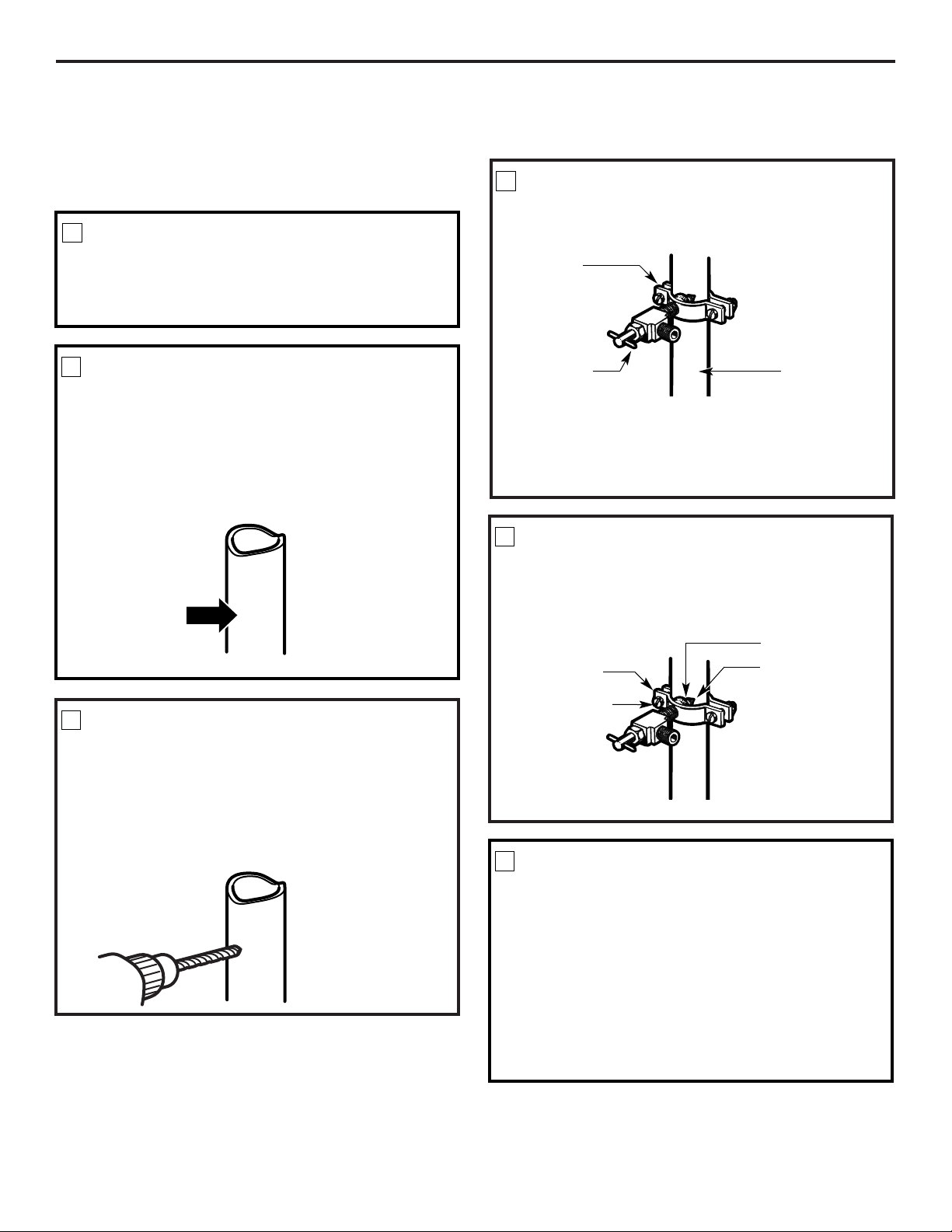
Fasten the shutoff valve to the cold water pipe with
the pipe clamp.
NOTE: Commonwealth of Massachusetts Plumbing
Codes 248CMR shall be adhered to. Saddle valves
are illegal and use is not permitted in Massachusetts.
Consult with your licensed plumber.
SHUT OFF THE MAIN WATER
SUPPLY
Turn on the nearest faucet long enough to clear
the line of water.
Install the shutoff valve on the nearest frequently used
drinking water line.
1
Choose a location for the valve that is easily
accessible. It is best to connect into the side of a
vertical water pipe. When it is necessary to connect
into a horizontal water pipe, make the connection
to the top or side, rather than at the bottom,
to avoid drawing off any sediment from the
water pipe.
CHOOSE THE VALVE LOCATION
2
Drill a 1/4″ hole in the water pipe (even if using a
self-piercing valve) using a sharp bit. Remove any
burrs resulting from drilling the hole in the pipe.
Take care not to allow water to drain into the drill.
Failure to drill a 1/4″ hole may result in reduced
ice production or smaller cubes.
DRILL THE HOLE FOR THE VALVE
3
FASTEN THE SHUTOFF VALVE
4
Tighten the clamp screws until the sealing washer
begins to swell.
NOTE: Do not overtighten or you may crush the
tubing.
TIGHTEN THE PIPE CLAMP
5
Vertical Cold
Water Pipe
Saddle-Type
Shutoff Valve
Washer
Inlet End
Pipe Clamp
Clamp Screw
Route the tubing between the cold water line and
the refrigerator.
Route the tubing through a hole drilled in the wall
or floor (behind the refrigerator or adjacent base
cabinet) as close to the wall as possible.
NOTE: Be sure there is sufficient extra tubing
[about 8 feet (244 cm) coiled into 3 turns of about
10″ (25 cm) diameter] to allow the refrigerator to
move out from the wall after installation
.
ROUTE THE TUBING
6
Pipe Clamp
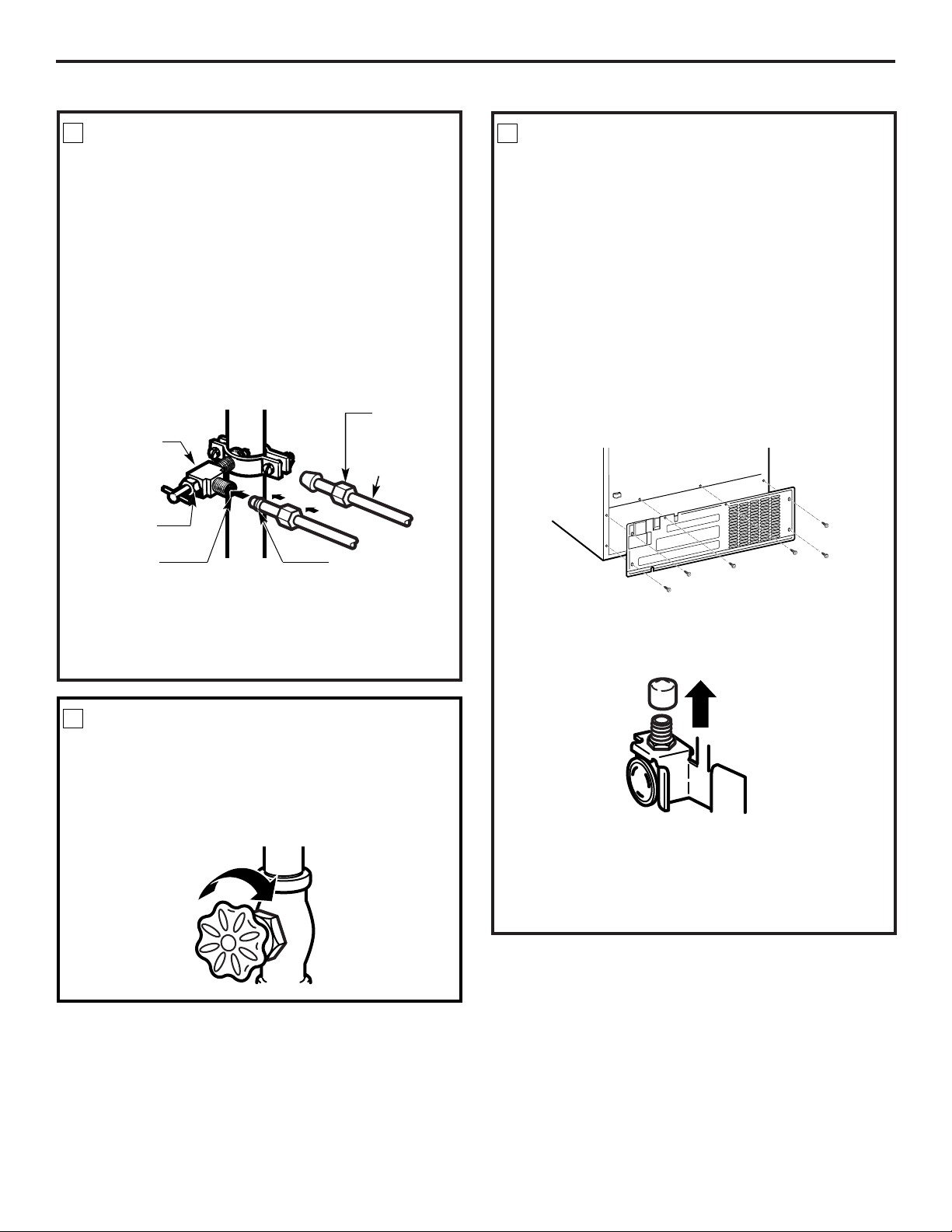
Installation Instructions
17
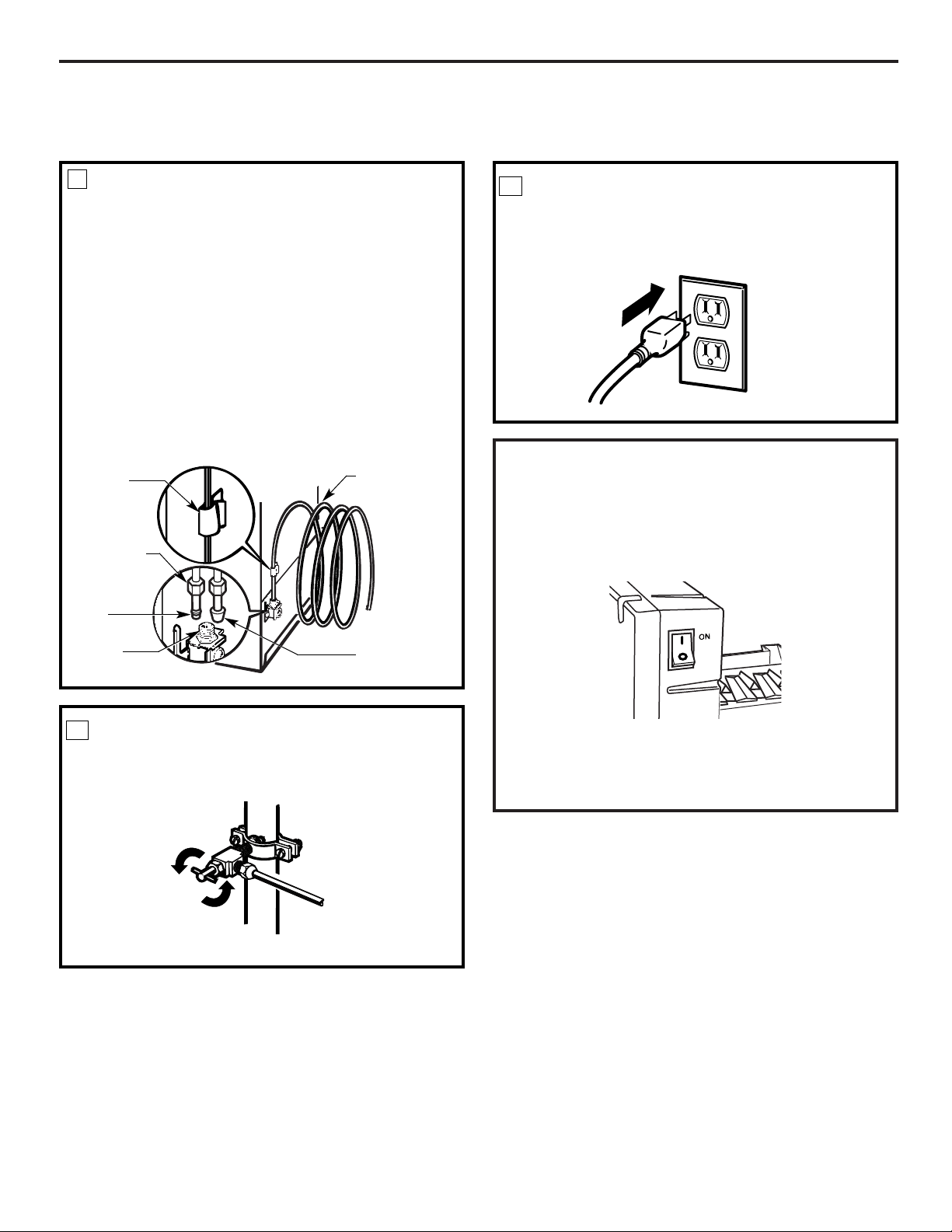
Place the compression nut and ferrule (sleeve)
onto the end of the tubing as shown. On GE
SmartConnect™ Refrigerator Tubing kit, the nuts
are already assembled to the tubing.
Remove the plastic flexible cap from the water valve
(refrigerator connection).
Place the compression nut and ferrule (sleeve) for
copper tubing onto the end of the tubing and
connect it to the shutoff valve.
Make sure the tubing is fully inserted into the valve.
Tighten the compression nut securely.
For plastic tubing from a GE SmartConnect™
Refrigerator Tubing kit, insert the molded end
of the tubing into the shutoff valve and tighten
compression nut until it is hand tight, then tighten
one additional turn with a wrench. Overtightening
may cause leaks.
CONNECT THE TUBING TO THE
VALVE
7
Turn the main water supply on and flush out the
tubing until the water is clear.
Shut the water off at the water valve after about
one quart (1 liter) of water has been flushed
through the tubing.
FLUSH OUT THE TUBING
8
NOTES:
• Before making the connection to the refrigerator,
be sure the refrigerator power cord is not
plugged into the wall outlet.
• We recommend installing a water filter if your
water supply has sand or particles that could clog
the screen of the refrigerator’s water valve. Install
it in the water line near the refrigerator. If using
GE SmartConnect Refrigerator Tubing kit, you
will need an additional tube (WX08X10002) to
connect the filter. Do not cut plastic tube to
install filter.
CONNECT THE TUBING TO THE
REFRIGERATOR
9
Remove the access cover.
NOTE: Commonwealth of Massachusetts Plumbing
Codes 248CMR shall be adhered to. Saddle valves
are illegal and use is not permitted in Massachusetts.
Consult with your licensed plumber.
Saddle-Type
Shutoff Valve
Compression
Nut
SmartConnect™
Tubing
Packing Nut
Outlet Valve
Ferrule (sleeve)
18
Installation Instructions
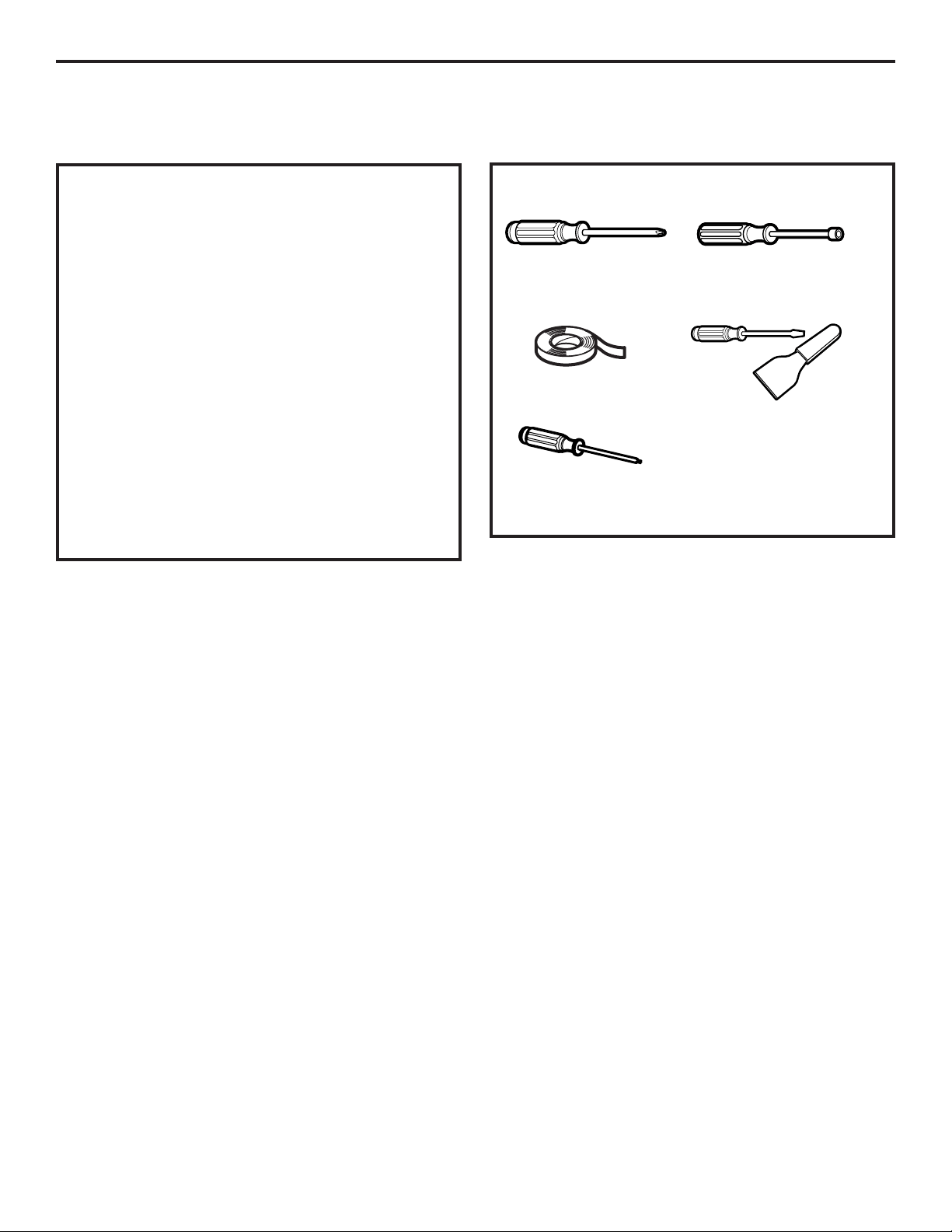
Tighten any connections that leak.
TURN THE WATER ON AT THE
SHUTOFF VALVE
10
Arrange the coil of tubing so that it does not vibrate
against the back of the refrigerator or against the
wall. Push the refrigerator back to the wall.
PLUG IN THE REFRIGERATOR
11
START THE ICEMAKER
Set the icemaker power switch to the
I (on)
position.
The icemaker will not begin to operate until it
reaches its operating temperature of 15°F (-9°C) or
below. It will then begin operation automatically if
the icemaker power switch is in the
I (on)
position.
NOTE: In lower water pressure conditions, the
water valve may turn on up to 3 times to deliver
enough water to the icemaker.
CONNECT THE TUBING TO THE
REFRIGERATOR
(CONT.)
9
Reattach the access cover.
Insert the end of the tubing into the water valve
connection as far as possible. While holding the
tubing, tighten the fitting.
For plastic tubing from a GE SmartConnect™
Refrigerator Tubing kit, insert the molded end
of the tubing into the refrigerator connection and
tighten compression nut until it is hand tight, then
tighten one additional turn with a wrench.
Overtightening may cause leaks.
Fasten the tubing into the clamp provided to hold
it in a vertical position. You may need to pry open
the clamp.
Tubing Clamp
1/4″Compression
Nut
Ferrule
(sleeve)
SmartConnect™ tubing
Refrigerator
Connection
1/4″Tubing
INSTALLING THE WATER LINE (CONT.)
19
Installation Instructions
REVERSING THE DOOR SWING
When reversing the door swing:
• Read the instructions all the way through before
starting.
• Handle parts carefully to avoid scratching paint.
• Set screws down by their related parts to avoid using
them in the wrong places.
• Provide a non-scratching work surface for
the doors.
IMPORTANT: Once you begin, do not move the
cabinet until door-swing reversal is completed.
These instructions are for changing the hinges from
the right side to the left side—if you ever want to change
the hinges back to the right side, follow these same
instructions and reverse all references to left and right.
Unplug the refrigerator from its electrical outlet.
Empty all door shelves, including the dairy
compartment.
IMPORTANT NOTES
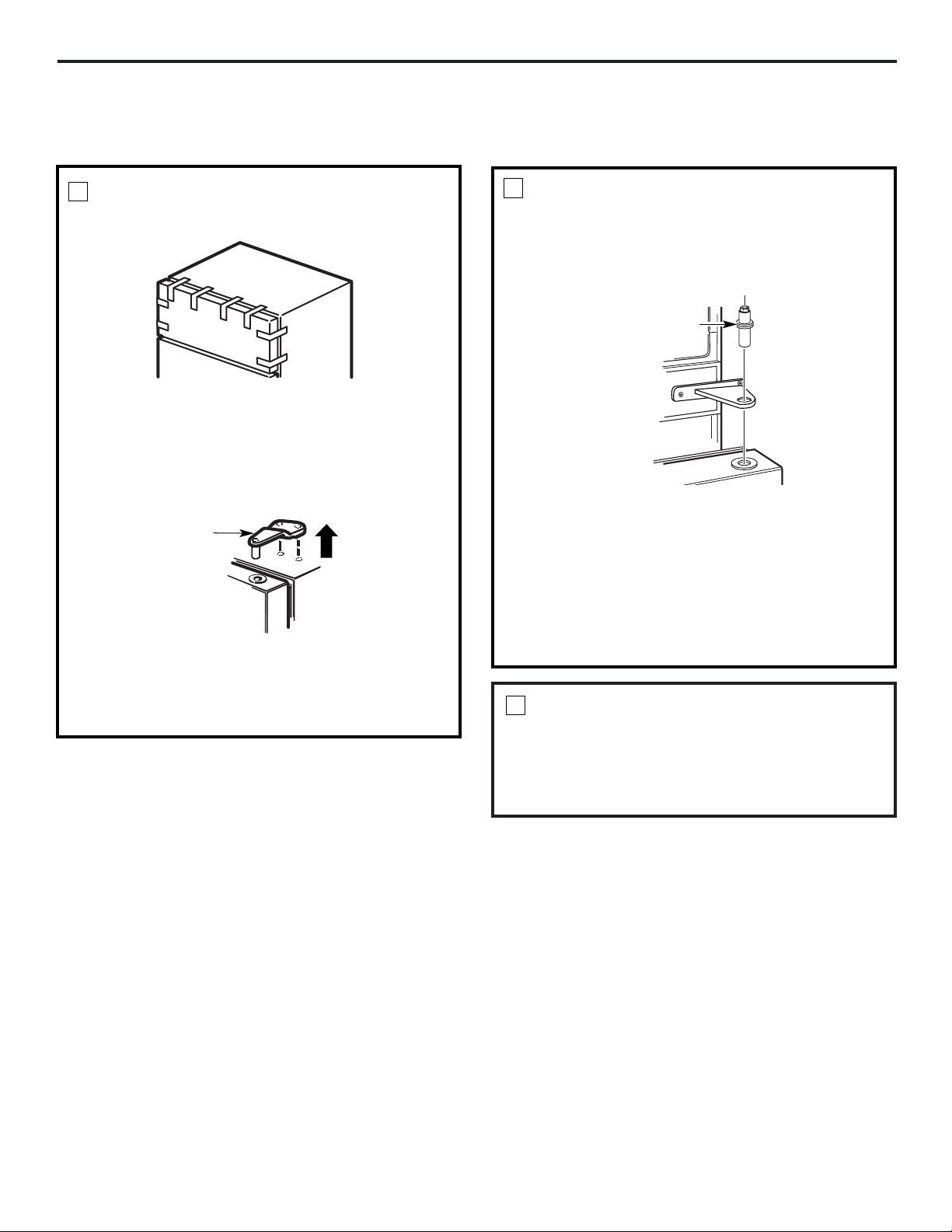
3/4″ Head socket driver
(a 6-point socket is
recommended)
TOOLS YOU WILL NEED
Phillips screwdriver
Putty knife or
thin-blade screwdriver
Masking tape
T20 or T25 Torxdriver,
whichever your model
requires
REVERSING THE DOOR SWING (CONT.)
20
Installation Instructions
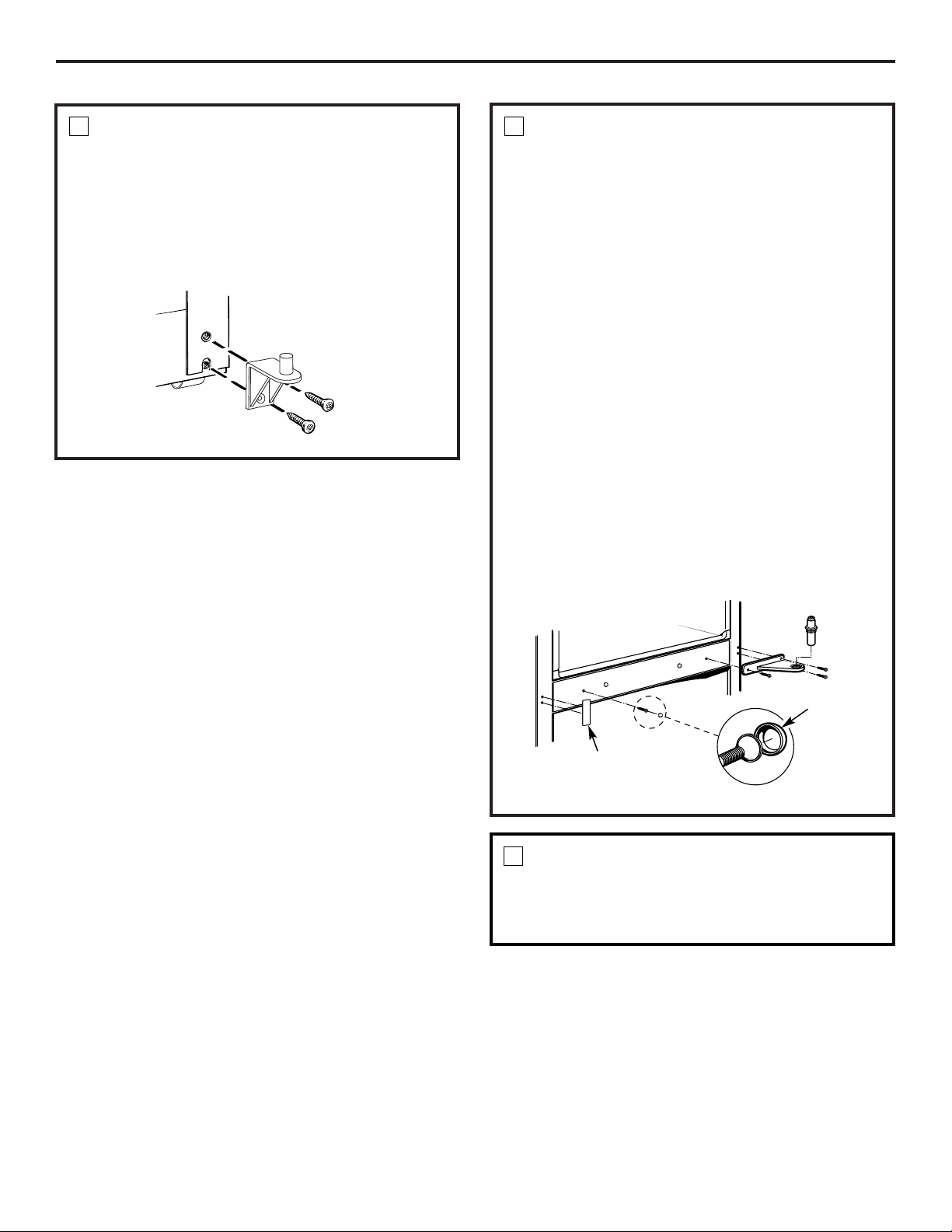
REMOVE THE REFRIGERATOR
DOOR
2
Tape the door shut with masking tape.
Remove the center hinge pin with a 3/4″ socket.
CAUTION: Do not let door drop to the floor.
To do so could damage the door stop.
Remove the tape and tilt the door away from the
cabinet. Lift the door straight off the bottom hinge
bracket.
Set the door on a non-scratching surface, with the
inside up.
TRANSFER TOP HINGE TO
THE LEFT
Interchange hinge and screws at top right with screws
at the top left of cabinet.
Do not tighten screws on hinge side at this time.
3
Hinge Pin
REMOVE THE FREEZER DOOR
1
Tape the door shut with masking tape.
Remove the tape and tilt the door away from the
cabinet. Lift it off the center hinge pin.
Set the door on a non-scratching surface with
the inside up.
Remove the hinge cover on top of the freezer door
(on some models).
Remove the two Torx screws, then lift the hinge
straight up to free the hinge pin from the socket in
the top of the door.
Top Hinge
Installation Instructions
21
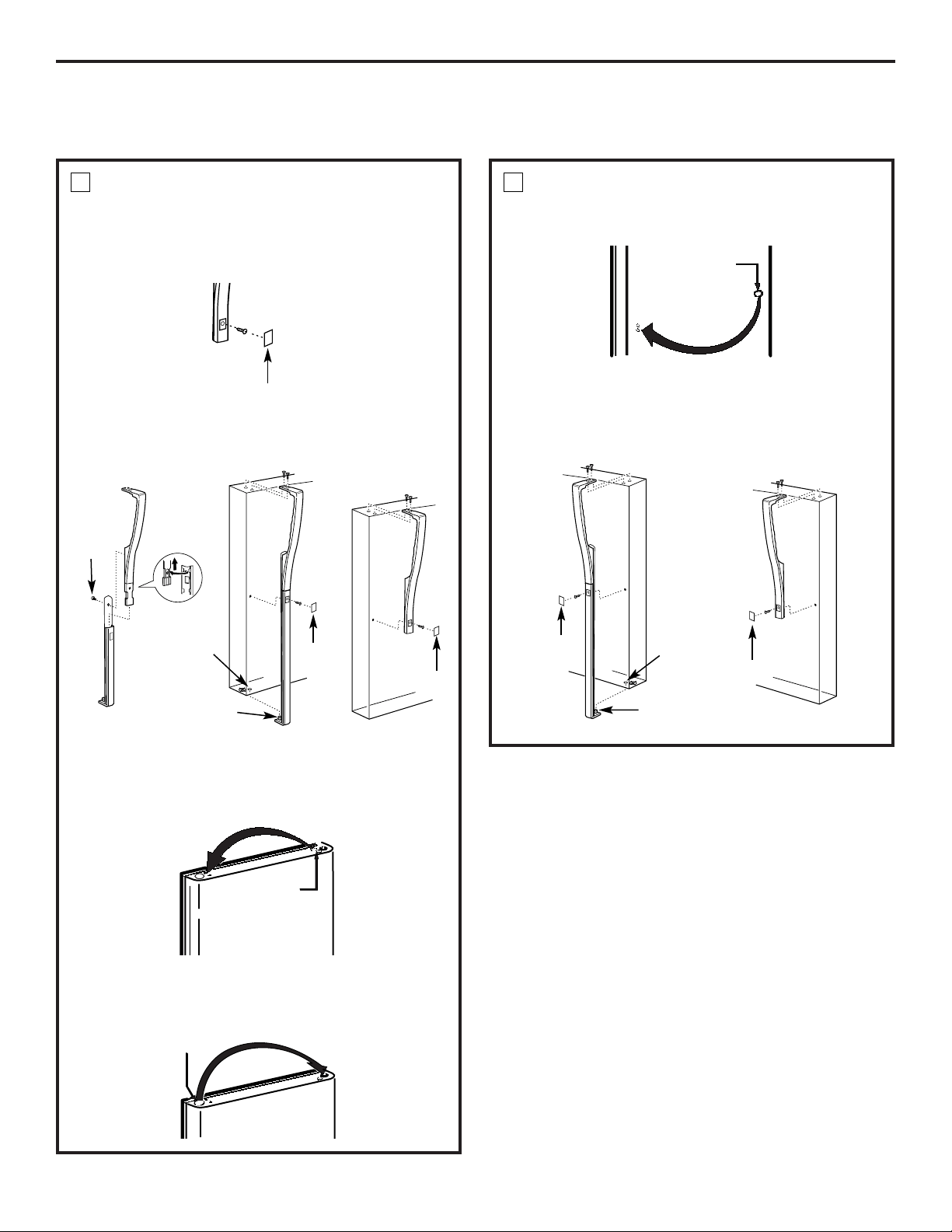
TRANSFER BOTTOM HINGE
BRACKET TO THE LEFT
Remove the base grille by pulling it straight out.
Using a Torx Driver, move the bottom hinge bracket
from the right side to the left side.
NOTE: If the washer is not on the hinge bracket, check
to see if it is stuck to the bottom of the door.
4
TRANSFER CENTER HINGE
BRACKET TO THE LEFT
Remove the center hinge bracket by removing the
three Torx screws
NOTE: Keep these screws with the hinge bracket.
They are long screws and will be used when installing
the hinge on the other side.
You will need to remove the color-matched cap from
the screw head before you can remove the screw.
Use the edge of a thin flat blade to gently pry the
caps off the screw heads. (A putty knife works well
for this.) Cover the blade with tape to prevent
scratching the paint.
Remove the mullion cover from the left side using
the thin flat blade. Assemble it to the right side.
Remove the Torx screw from the center left side
of the cabinet. Screw it into the holes on the
right side.
Place the center hinge bracket over the holes at
the center left side of the cabinet. Insert and
tighten the three long screws.
Replace the cap by snapping it over the screw with
your finger.
5
TRANSFER DOOR STOPS
On each door, move the metal door stop from the
right to the left.
Move any screws from the left to the right.
6
Screw Cap
Mullion Cover
REVERSING THE DOOR SWING (CONT.)
22
Installation Instructions
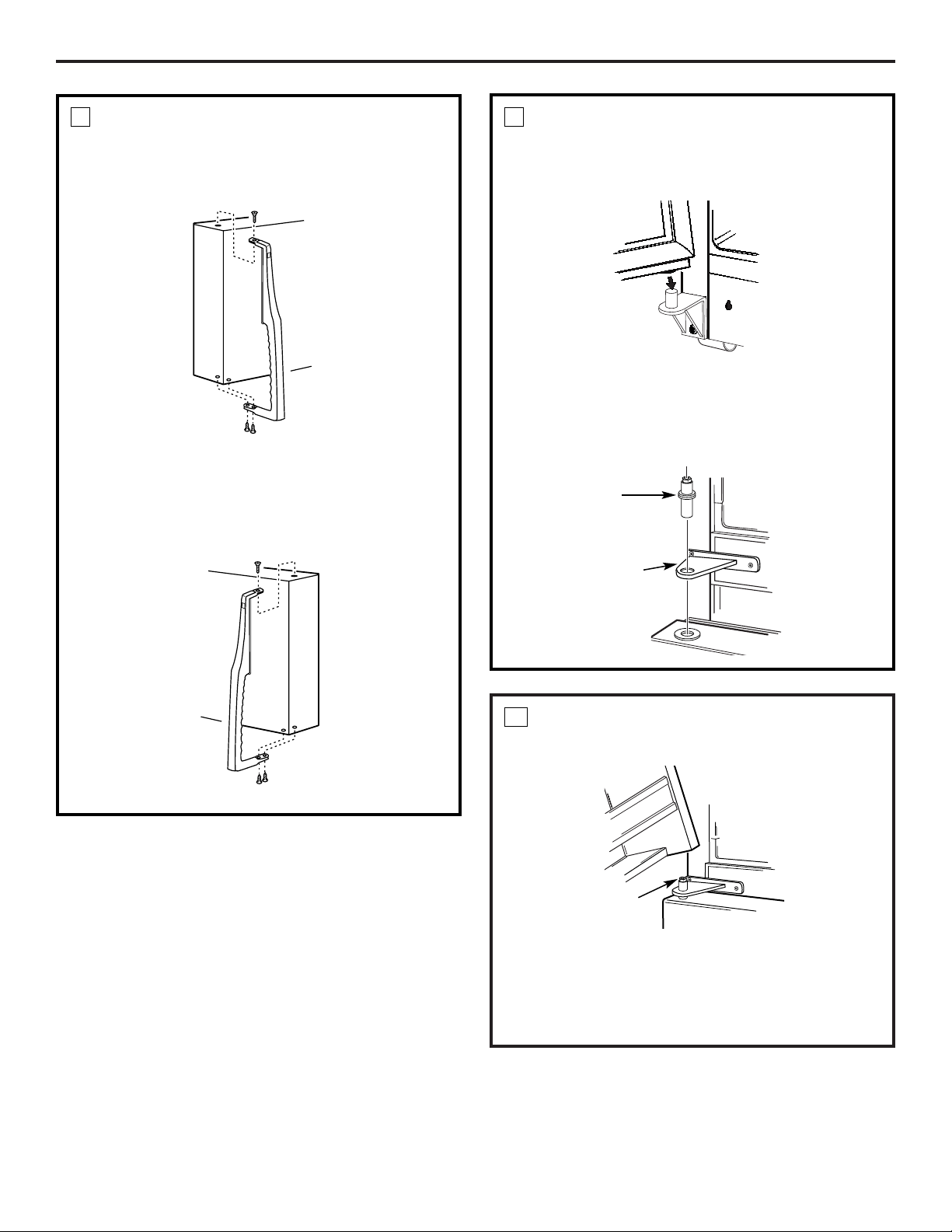
TRANSFER REFRIGERATOR
DOOR HANDLE TO THE RIGHT
To remove the handle: Remove the plug button by
carefully prying under the edge with a putty knife.
Remove the exposed screw holding the handle.
7
Remove the two screws holding the handle to the
top of the door.
After removing the handle: Move the small plug
buttons from the top right side of the door top and
insert them into the holes on the opposite side.
Small Plug
Buttons
Move the large plug button from the left edge of the
door and insert it into the hole on the opposite side.
Plug Button
TRANSFER REFRIGERATOR DOOR
HANDLE TO THE RIGHT (CONT.)
Transfer the door plug button to the opposite side.
7
Button
Reinstalling the handle: Attach the handle to the
right side of the door.
Handle
Plug
Handle
Plug
Pin
Hole
Handle Plug
Short
Screw
Short Handle
Long Handle
Long Handle
Handle
Plug
Handle
Plug
Pin
Hole
Short Handle
23
Installation Instructions
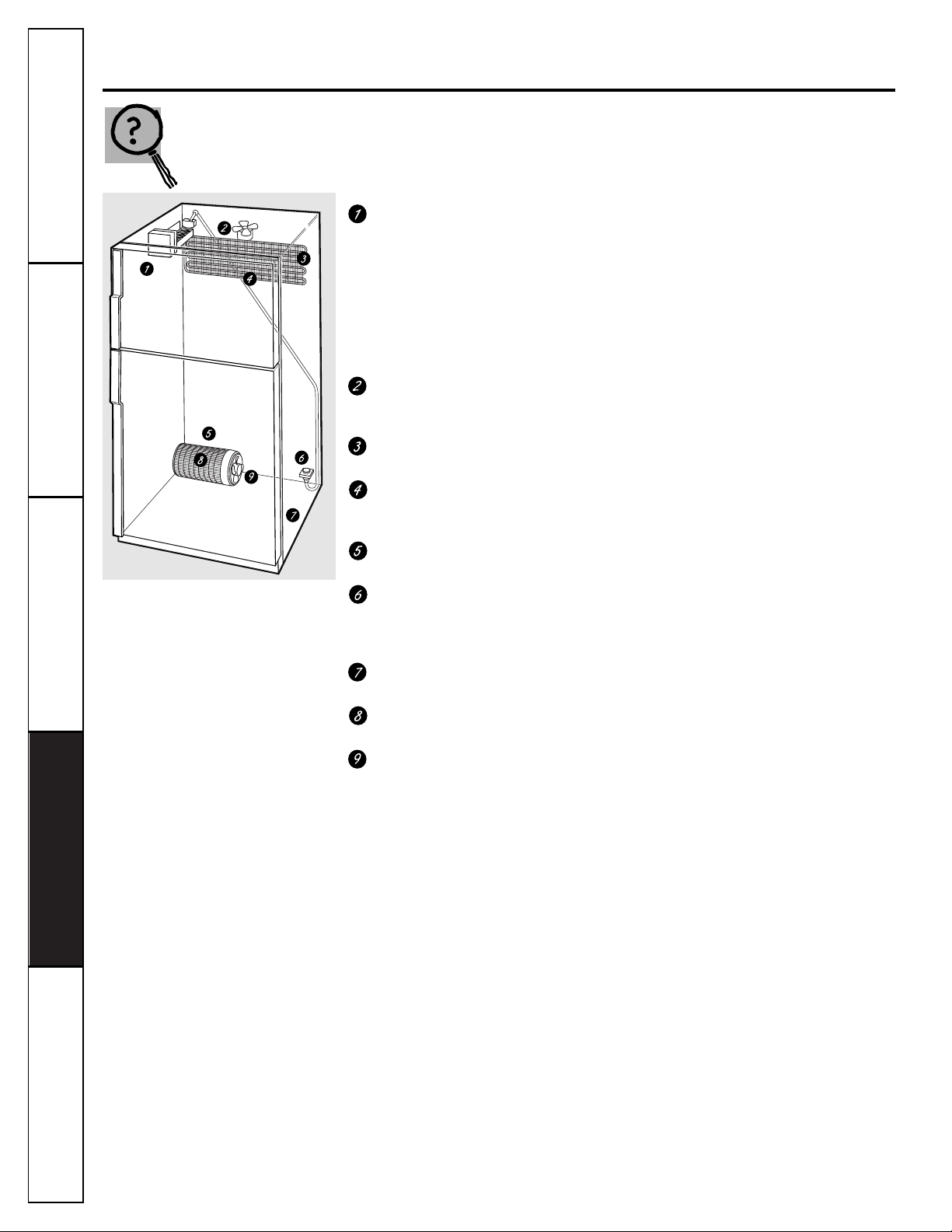
REHANG THE FREEZER DOOR
Lower the freezer door onto the center hinge pin.
10
Lift the top hinge so the pin fits into the door socket.
Support the door on the handle side and make sure
the door is straight and the gap between the doors is
even across the front. While holding the door in
place, tighten the top hinge screws.
Center Hinge Pin
REHANG THE REFRIGERATOR
DOOR
Lower the refrigerator door onto the bottom
hinge pin.
TRANSFER FREEZER DOOR
HANDLE TO THE RIGHT
Remove the screws holding the handle to the top and
bottom of the door. Remove handle.
8
Move the plug button on the right side of the door to
the handle screw hole on the left side.
Reattach the handle on the opposite side using the
holes closest to the edge of the door.
9
Straighten the door and line it up with the center
hinge bracket.
Reinstall the center hinge pin with a 3/4″ socket.
Turn it until it extends through the hinge bracket
and into the door.
Center Hinge
Bracket
Hinge Pin
24
Troubleshooting Tips
Operating Instructions
Safety InstructionsInstallation InstructionsTroubleshooting Tips Installation Instructions Safety Instructions
Operating Instructions
Troubleshooting Tips Installation Instructions Safety Instructions
Operating Instructions
Consumer Support
Normal operating sounds.
Icemaker (on some models).
Occasionally you will hear ice cubes dropping into
the ice bin. If this is your first icemaker, you’ll hear occasional sounds that may
be unfamiliar. They are normal icemaking sounds and are not a cause for
concern.
The icemaker water valve will buzz when the icemaker fills with water. If the
power switch is in the
I (on)
position it will buzz even if it has not yet been
hooked up to water. Keeping the power switch in the
I (on)
position before it is
hooked up to water can damage the icemaker. To prevent this, set the power
switch to the
O (0ff)
position. This will stop the buzzing.
Evaporator Fan.*
You may hear air being forced through the cabinet by the fan.
The fan operates at different speeds depending on cooling needs. If either door
remains open for more than 3 minutes, the fan will come on.
Evaporator.
The flow of refrigerant through the evaporator may create a slight
bubbling or gurgling sound.
Defrost Heater.
During defrost cycles, water dripping onto the heater may cause a
hissing or sizzling sound. After defrosting, a popping sound may occur and the
evaporator may create a slight bubbling or gurgling sound.
Plastic Liner.
Cracking or popping sounds due to expansion of the plastic liner.
This occurs mainly when cooling down from room temperature.
Water Valve (on models equipped with an automatic icemaker).
When the icemaker
fills with water, a buzzing sound and running water will be heard. If you have low
water pressure, you may hear the icemaker cycle several times when making one
batch of ice.
Water Pan.
Water may be heard running into the maintenance-free drain pan
during the defrost cycle.
Compressor.*
Modern, high efficiency compressors operate much faster than
older models. The compressor may have a high pitched hum or pulsating sound.
Condenser Fan.*
You may hear air being forced over the condenser by the fan.
* When the control settings are changed, the compressor and fans may not react immediately.
These sounds are normal and
are due mostly to highly efficient
operation.
25
Consumer SupportTroubleshooting TipsOperating InstructionsSafety Instructions Installation Instructions
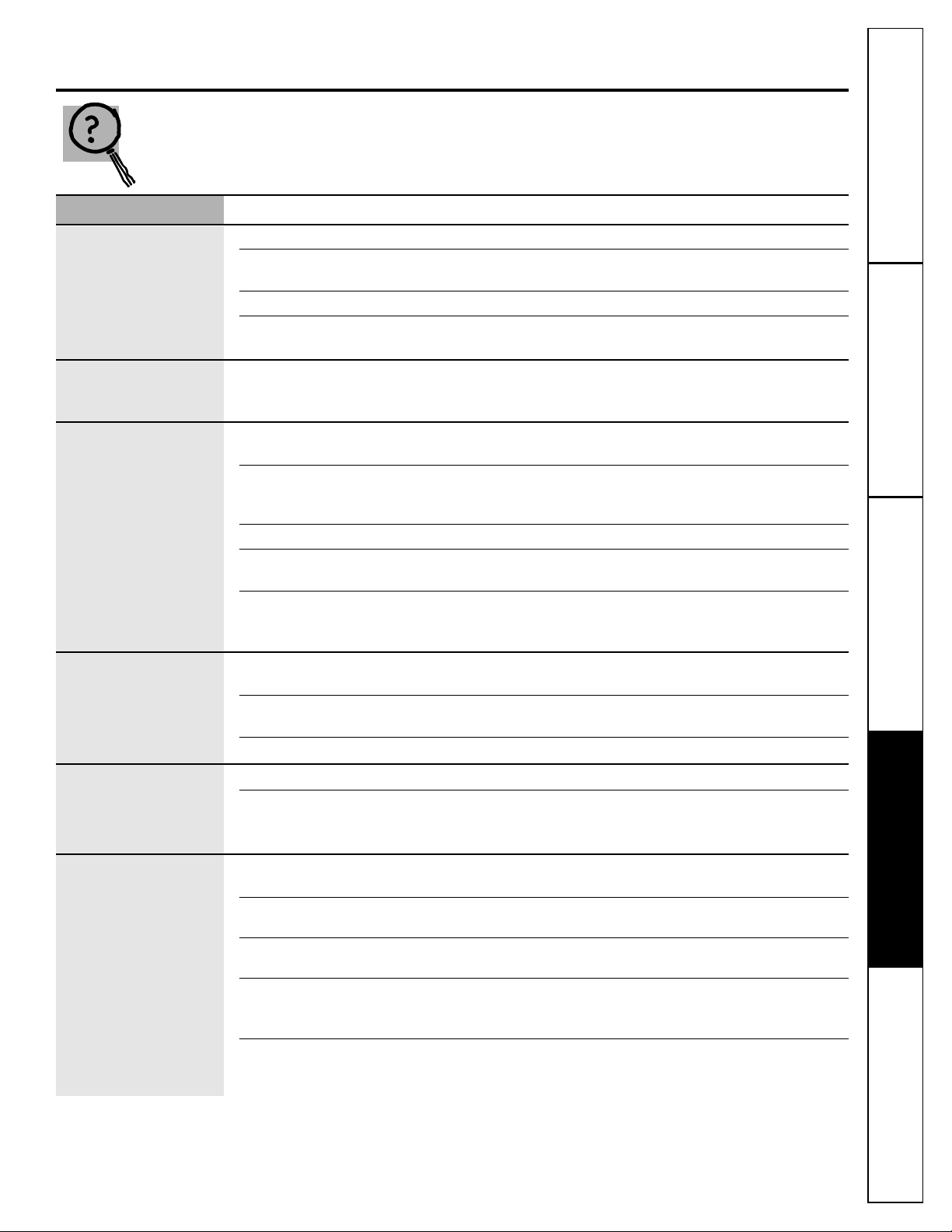
Before you call for service…
www.Hotpoint.com
Troubleshooting Tips
Save time and money! Review the charts on the following
pages first and you may not need to call for service.
Problem Possible Causes What To Do
Refrigerator does not
Refrigerator in defrost cycle. • Wait about 40 minutes for defrost cycle to end.
operate
Either or both controls • Move the refrigerator and freezer control to a
set to
O (off)
position. temperature setting.
Refrigerator is unplugged. • Push the plug completely into the outlet.
The fuse is blown/circuit •Replace fuse or reset the breaker.
breaker is tripped.
Vibration or rattling
Rollers need adjusting. •See
Rollers.
(slight vibration
is normal)
Motor operates for
Normal when refrigerator • Wait 24 hours for the refrigerator to completely
long periods or cycles
is first plugged in. cool down.
on and off frequently.
Often occurs when large • This is normal.
(Modern refrigerators
amounts of food are
with more storage
placed in refrigerator.
space and a larger
Door left open. • Check to see if package is holding door open.
freezer require more
Hot weather or frequent • This is normal.
operating time. They
door openings.
start and stop often
Temperature controls • See
About the controls.
to maintain even
set at the coldest
temperatures.)
setting.
Refrigerator or freezer
Temperature control not set • See
About the controls.
compartment too warm
cold enough.
Warm weather or frequent • Set the temperature control one step colder.
door openings. See
About the controls.
Door left open. •Check to see if package is holding door open.
Frost or ice crystals
Door left open. • Check to see if package is holding door open.
on frozen food
Too frequent or too long
(frost within package
door openings.
is normal)
Automatic icemaker
Icemaker power switch • Set the power switch to the
I (on)
position.
(on some models)
is in the
0 (off)
position.
does not work
Water supply turned off or • See
Installing the water line.
not connected.
Freezer compartment • Wait 24 hours for the refrigerator to completely
too warm. cool down.
Piled up cubes in the storage •Level cubes by hand.
bin cause the icemaker
to shut off.
Ice cubes stuck in icemaker. •Turn off the icemaker, remove cubes, and turn the
(Green power light on icemaker back on.
icemaker blinking).
Before you call for service…
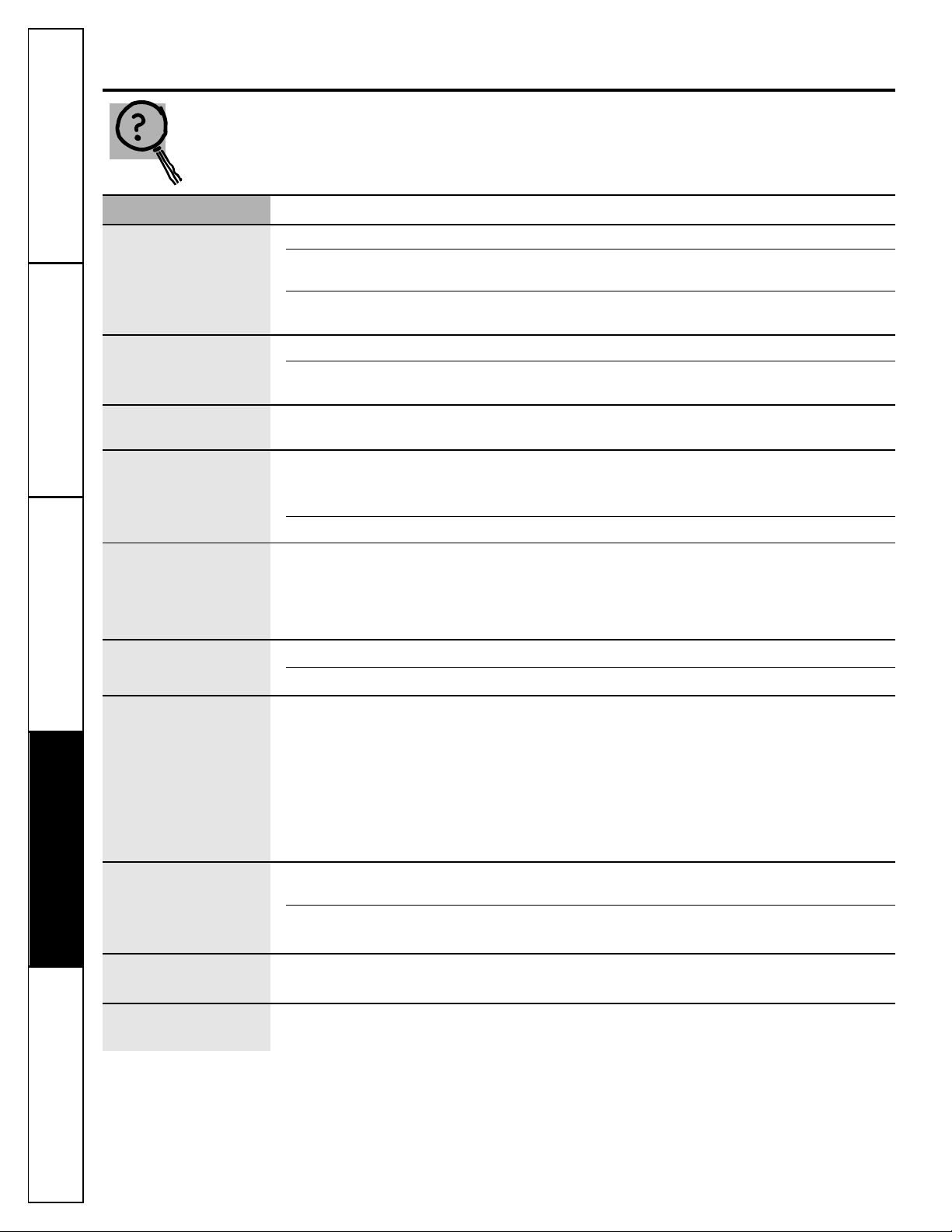
Problem Possible Causes What To Do
Ice cubes have
Ice storage bin needs cleaning. • Empty and wash bin. Discard old cubes.
odor/taste
Food transmitting odor/taste • Wrap foods well.
to ice cubes.
Interior of refrigerator •See
Care and cleaning.
needs cleaning.
Slow ice cube freezing
Door left open. • Check to see if package is holding door open.
Temperature control not set •See
About the controls.
cold enough.
No ice cube
Supply line or shutoff • Call a plumber.
production
valve is clogged.
Refrigerator has odor
Foods transmitting • Foods with strong odors should be tightly wrapped.
odor to refrigerator.
• Keep an open box of baking soda in the refrigerator;
replace every three months.
Interior needs cleaning. • See
Care and cleaning.
Moisture collects inside
Too frequent or too
(in humid weather, air
long door openings.
carries moisture into
refrigerator when doors
are opened)
Interior light does
No power at outlet. • Replace fuse or reset the breaker.
not work
Lightbulb burned out. •See
Replacing the lightbulbs.
Hot air from bottom
Normal air flow cooling
of refrigerator
motor. In the refrigeration
process, it is normal that
heat be expelled in the
area under the refrigerator.
Some floor coverings are
sensitive and will discolor
at these normal and
safe temperatures.
Food freezing in
Food too close to air vent. •Move the food away from the air vent (near the controls).
the refrigerator
Refrigerator control is set •Move the refrigerator control to a warmer temperature.
too cold.
Door does not close
Rollers need adjusting. •See
Rollers.
by itself
Orange glow in
Defrost heater is on. • This is normal.
the freezer
Consumer Support Troubleshooting Tips
Operating Instructions
Safety InstructionsInstallation InstructionsTroubleshooting Tips Installation Instructions Safety Instructions
Operating Instructions
Troubleshooting Tips Installation Instructions Safety Instructions
Operating Instructions
26
Troubleshooting Tips

27
General Electric Company
Warranty Registration Department
P.O. Box 32150
Louisville, KY 40232-2150
GE Service Protection Plus
™
GE, a name recognized worldwide for quality and dependability, offers you
Service Protection Plus
™
—comprehensive protection on all your appliances—
No Matter What Brand!
Benefits Include:
• Backed by GE
• All brands covered
• Unlimited service calls
• All parts and labor costs included
• No out-of-pocket expenses
• No hidden deductibles
• One 800 number to call
You will be completely satisfied with our service protection or you may request your money back
on the remaining value of your contract. No questions asked. It’s that simple.
Protect your refrigerator, dishwasher, washer and dryer, range, TV, VCR and much more—any brand!
Plus there’s no extra charge for emergency service and low monthly financing is available. Even icemaker
coverage and food spoilage protection is offered. You can rest easy, knowing that all your valuable
household products are protected against expensive repairs.
Place your confidence in GE and call us in the U.S. toll-free at 800.626.2224
for more information.
*All brands covered, up to 20 years old, in the continental U.S.
We’ll Cover Any Appliance.
Anywhere. Anytime.*
Please place in envelope and mail to:
✁
Cut here
Consumer Product Ownership Registration
Important
Mail
Today!
General Electric Company
Louisville, Kentucky
www.GEAppliances.com
First
Name
Mr. ■■ Ms. ■■ Mrs. ■■ Miss ■■
Street
Address
City
State
Date Placed
In Use
Month
Day
Year
Zip
Code
Apt. #
Last
Name
Phone
Number
_
_
Consumer Product Ownership Registration
Dear Customer:
Thank you for purchasing our product and thank you for placing your confidence in us.
We are proud to have you as a customer!
Follow these three steps to protect your new appliance investment:
Important: If you did not get a registration card with your
product, detach and return the form below to
ensure that your product is registered, or register
online at www.Hotpoint.com.
1
23
Model Number Serial Number
✁
Cut here
Complete and mail
your Consumer
Product Ownership
Registration today.
Have the peace of
mind of knowing we
can contact you in
the unlikely event of
a safety modification.
After mailing the
registration below,
store this document
in a safe place. It
contains information
you will need should
you require service.
Our service number is
800.GE.CARES
(800.432.2737).
Read your Owner’s
Manual carefully.
It will help you
operate your new
appliance properly.
Model Number Serial Number
E-mail Address*
* Please provide your e-mail address to receive, via e-mail, discounts, special offers and other important
communications from GE Appliances (GEA).
■■ Check here if you do not want to receive communications from GEA’s carefully selected partners.
28
29
Refrigerator Warranty.
(For customers in the United States)
www.Hotpoint.com
■Service trips to your home to teach you how to use
the product.
■Improper installation.
■Failure of the product if it is abused, misused, or
used for other than the intended purpose or
used commercially.
■Loss of food due to spoilage.
■Replacement of house fuses or resetting of circuit
breakers.
■Damage to the product caused by accident, fire, floods
or acts of God.
■Incidental or consequential damage caused by possible
defects with this appliance.
This warranty is extended to the original purchaser and any succeeding owner for products purchased for home
use within the USA. In Alaska, the warranty excludes the cost of shipping or service calls to your home.
Some states do not allow the exclusion or limitation of incidental or consequential damages. This warranty gives
you specific legal rights, and you may also have other rights which vary from state to state. To know what your
legal rights are, consult your local or state consumer affairs office or your state’s Attorney General.
Warrantor: General Electric Company. Louisville, KY 40225
For The Period Of: GE Will Replace:
One Year Any part
of the refrigerator (excluding water filter cartridge) which fails due to a defect in
From the date of the
materials or workmanship. During this
full one-year warranty,
GE will also provide,
free of charge
,
original purchase
all labor and in-home service to replace the defective part.
Five Years Any part of the sealed refrigerating system
(the compressor, condenser, evaporator and all
From the date of the
connecting tubing) which fails due to a defect in materials or workmanship. During this
original purchase full five-year sealed refrigerating system warranty,
GE will also provide,
free of charge,
all labor
and in-home service to replace the defective part in the sealed refrigerating system.
All warranty service provided by our Factory Service Centers, or an authorized
Customer Care
®
technician. To schedule service, on-line, 24 hours a day,
contact us at www.Hotpoint.com, or call 800.GE.CARES.
Staple your receipt here.
Proof of the original purchase
date is needed to obtain service
under the warranty.
What GE Will Not Cover:
Consumer SupportTroubleshooting Tips
Operating Instructions
Safety Instructions
Installation Instructions
30
Consumer Support Troubleshooting Tips
Operating Instructions
Safety InstructionsInstallation Instructions
Notes.
31
Consumer SupportTroubleshooting Tips
Operating InstructionsSafety Instructions
Installation Instructions
Notes.
www.Hotpoint.com
Printed in the United States
Consumer Support.
Hotpoint Website
www.Hotpoint.com
Have a question or need assistance with your appliance? Try the Hotpoint Website 24 hours a day,
any day of the year! You can also shop for more great Hotpoint products and take advantage of all
our on-line support services designed for your convenience.
Schedule Service
www.Hotpoint.com
Expert Hotpoint repair service is only one step away from your door. Get on-line and schedule your service
at your convenience 24 hours any day of the year! Or call 800.GE.CARES (800.432.2737) during normal
business hours.
Real Life Design Studio
www.GEAppliances.com
GE supports the Universal Design concept—products, services and environments that can be used by
people of all ages, sizes and capabilities. We recognize the need to design for a wide range of physical and
mental abilities and impairments. For details of GE’s Universal Design applications, including kitchen
design ideas for people with disabilities, check out our Website today. For the hearing impaired, please call
800.TDD.GEAC (800.833.4322).
Extended Warranties
www.GEAppliances.com
Purchase a Hotpoint extended warranty and learn about special discounts that are available while your
warranty is still in effect. You can purchase it on-line anytime, or call 800.626.2224 during normal business
hours. Hotpoint Consumer Home Services will still be there after your warranty expires.
Parts and Accessories
www.Hotpoint.com
Individuals qualified to service their own appliances can have parts or accessories sent directly to their
homes (VISA, MasterCard and Discover cards are accepted). Order on-line today, 24 hours every day or
by phone at 800.626.2002 during normal business hours.
Instructions contained in this manual cover procedures to be performed by any user. Other servicing generally
should be referred to qualified service personnel. Caution must be exercised, since improper servicing may cause
unsafe operation.
Contact Us
www.Hotpoint.com
If you are not satisfied with the service you receive from GE, contact us on our Website with all the details
including your phone number, or write to: General Manager, Customer Relations
Hotpoint, Appliance Park
Louisville, KY 40225
Register Your Appliance
www.Hotpoint.com
Register your new appliance on-line—at your convenience! Timely product registration will allow for
enhanced communication and prompt service under the terms of your warranty, should the need arise.
You may also mail in the pre-printed registration card included in the packing material, or detach and
use the form in this Owner’s Manual.

