
Hardware Installation
Now take win10_64 bit system as an example. Insert the
CD into the CD-ROM drive. Copy the zip files to your
computer, and then unzip the files. Double-click the
executable program prefixed with "WiFi", such as "WiFi-
22.90.0-Driver64-Win10-Win11.exe" to complete the
installation.
Nehmen wir nun das Win10_64-Bit-System als Beispiel. Legen Sie die CD
in das CD-ROM-Laufwerk ein. Kopieren Sie die ZIP-Dateien auf Ihren
Computer und entpacken Sie die Dateien. Doppelklicken Sie auf das
ausführbare Programm mit dem Präfix "WiFi", z. B. "WiFi-22.90.0-Driv-
er64-Win10-Win11.exe", um die Installation abzuschließen.
Prenons maintenant le système win10_64 bits comme exemple. Insérez le
CD dans le lecteur de CD-ROM. Copiez les fichiers zip sur votre ordina-
teur, puis décompressez les fichiers. Double-cliquez sur le programme
exécutable préfixé par "WiFi", tel que "WiFi-22.90.0-Driv-
er64-Win10-Win11.exe" pour terminer l'installation.
Ora prendi come esempio il sistema win10_64 bit. Inserire il CD nell'unità
CD-ROM. Copia i file zip sul tuo computer, quindi decomprimi i file. Fare
doppio clic sul programma eseguibile con il prefisso "WiFi", ad esempio
"WiFi-22.90.0-Driver64-Win10-Win11.exe" per completare l'installazione.
Ahora tome el sistema win10_64 bit como ejemplo. Inserte el CD en la
unidad de CD-ROM. Copie los archivos zip en su computadora y luego
descomprímalos. Haga doble clic en el programa ejecutable con el
prefijo "WiFi", como "WiFi-22.90.0-Driver64-Win10-Win11.exe" para
completar la instalación.
ここで、win1064ビットシステムを例として取り上げます。CDをCD-ROMド
ライブに挿入します。zipファイルをコンピューターにコピーしてから、ファイ
ルを解凍します。「WiFi-22.90.0-Driver64-Win10-Win11.exe」などの接頭辞「
WiFi」が付いた実行可能プログラムをダブルクリックして、インストールを完
了します。
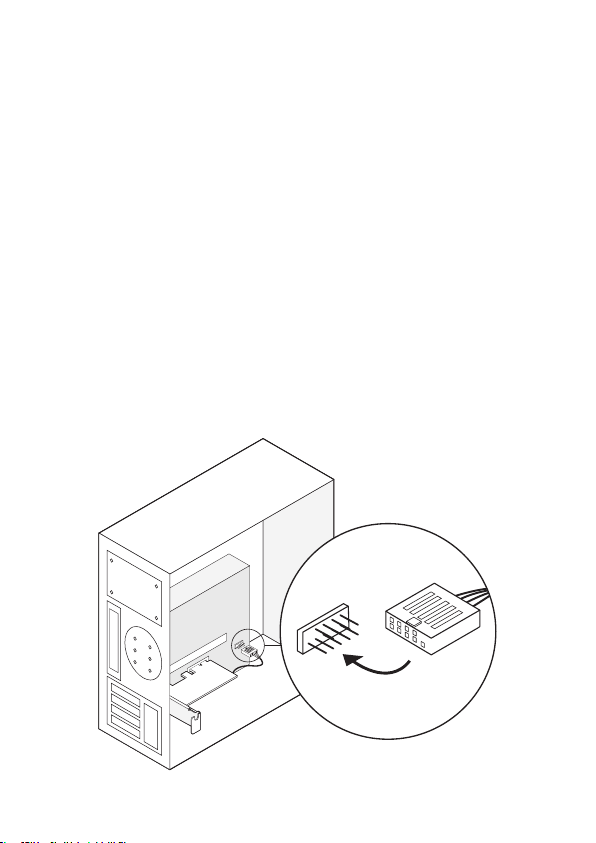
4. Locate an available F_USB connector and carefully plug
the Bluetooth USB cable into it.
Suchen Sie einen verfügbaren F_USB-Anschluss und stecken Sie das
Bluetooth-USB-Kabel vorsichtig ein.
Recherchez un connecteur F_USB disponible et branchez soigneuse-
ment le câble USB Bluetooth à celui-ci.
Individua un connettore F_USB disponibile e collega con cura il cavo
USB Bluetooth al suo interno.
Localice un conector F_USB disponible y conecte con cuidado el cable
USB Bluetooth.
使用可能なF_USBコネクタを見つけて、Bluetooth USBケーブルを慎重に差
し込みます。
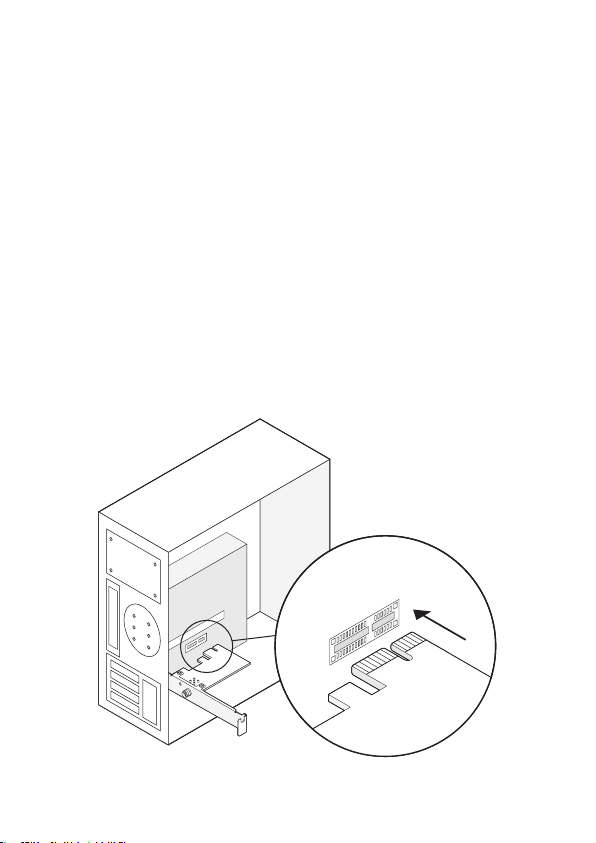
3. Locate an available PCIE X1 slot and carefully insert the
adapter.
Suchen Sie einen verfügbaren PCIE X1-Steckplatz und setzen Sie den
Adapter vorsichtig ein.
Recherchez un emplacement PCIE X1 disponible et insérez l’adaptateur
avec précaution.
Individuare uno slot PCIE X1 disponibile e inserire con cura l'adattatore.
Localice una ranura PCIE X1 disponible e inserte cuidadosamente el
adaptador.
使用可能なPCIE X1スロットを見つけて、アダプターを慎重に挿入します。
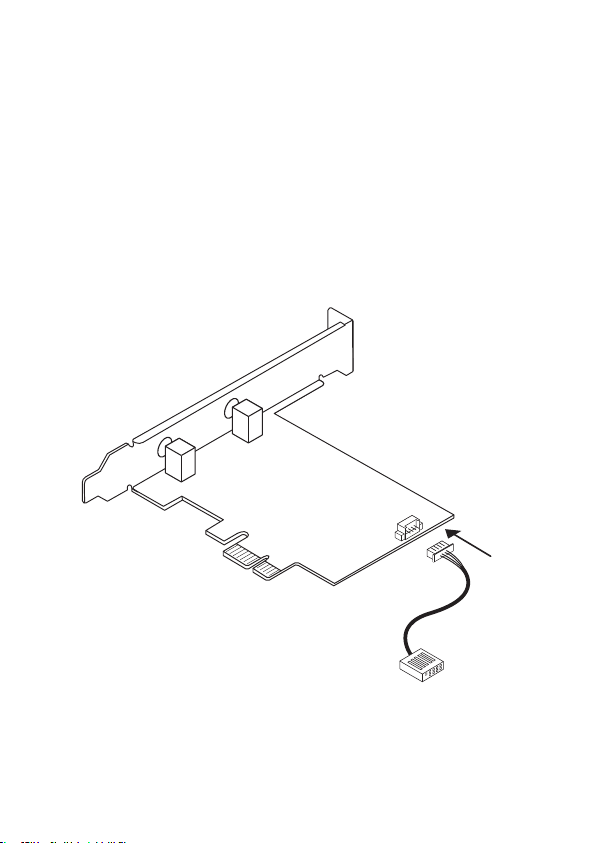
2. Connect the provided Bluetooth USB cable to the
adapter.
Schließen Sie das mitgelieferte Bluetooth-USB-Kabel an den Adapter an.
Connectez le câble USB Bluetooth fourni à l'adaptateur.
Collegare il cavo USB Bluetooth in dotazione all'adattatore.
Conecte el cable USB Bluetooth provisto al adaptador.
付属のBluetooth USBケーブルをアダプターに接続します。
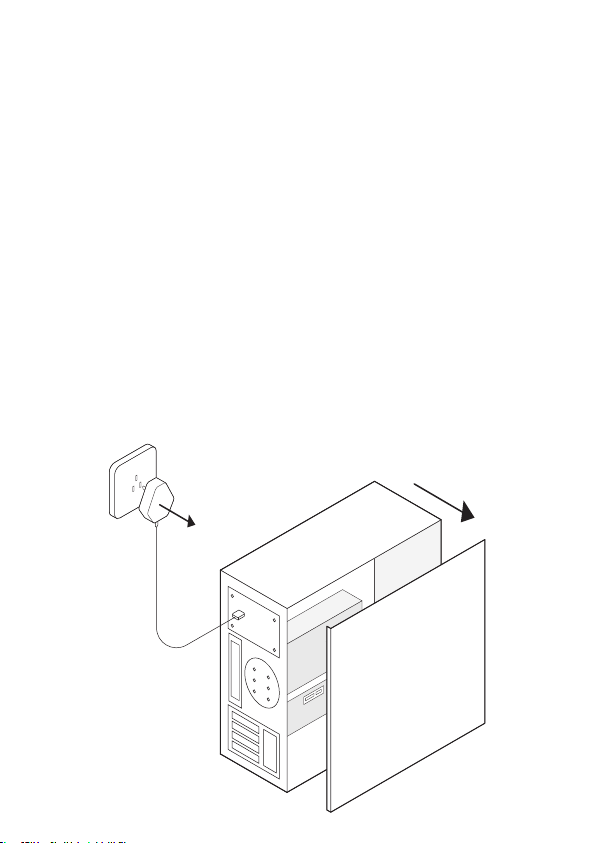
1. Turn off your computer, unplug the power cable then
remove the case panel.
Schalten Sie Ihren Computer aus, ziehen Sie das Netzkabel ab und
entfernen Sie die Gehäuseabdeckung.
Éteignez votre ordinateur, débranchez le câble d'alimentation, puis retirez
le panneau du boîtier.
Spegnere il computer, scollegare il cavo di alimentazione, quindi
rimuovere il pannello della custodia.
Apague la computadora, desconecte el cable de alimentación y luego
retire el panel de la carcasa.
コンピューターの電源を切り、電源ケーブルを抜き、ケースパネルを取り外します。
Note: If the bracket is not suitable for your computer, detach it from the
adapter's board and replace it with the low-profile bracket.
Note: If the Bluetooth USB cable is not correctly connected to the
motherboard, Bluetooth function won’t work even after driver installation.
Email:
support@cudy.com
Driver & manual:
www.cudy.com/download
Quick Installation Guide
English Deutsch
EspañolItaliano
Français
にほんご
5. Connect the antennas to the adapter.
Schließen Sie die Antennen an den Adapter an.
Connectez les antennes à l'adaptateur.
Collegare le antenne all'adattatore.
Conecte las antenas al adaptador.
アンテナをアダプターに接続します。
USB
Tip: To maximize performance, make sure the path between the antennas
and your router is clear.
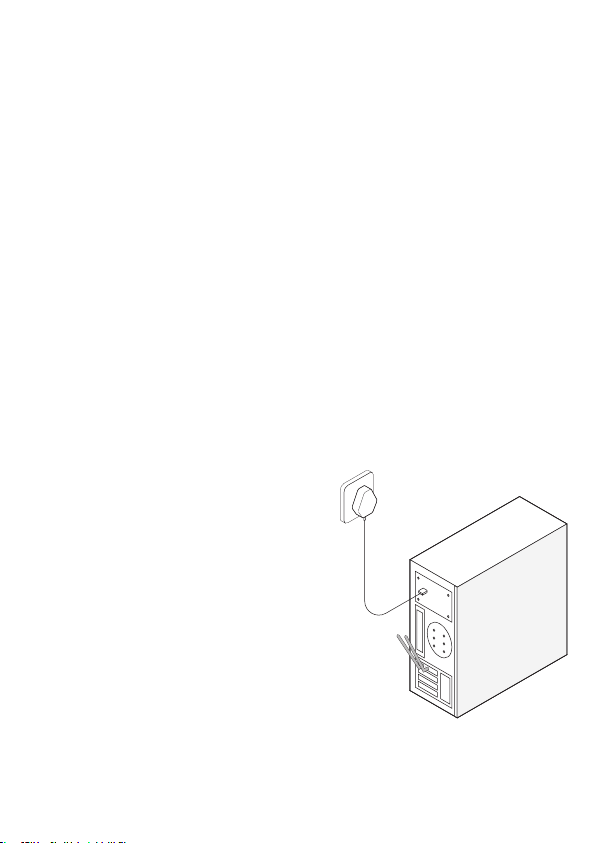
6. Replace the case panel, plug in the power cable and
turn on your computer.
Bringen Sie die Gehäuseabdeckung wieder an, schließen Sie das
Netzkabel an und schalten Sie den Computer ein.
Replacez le panneau du boîtier,
branchez le câble d'alimentation et
allumez votre ordinateur.
Riposizionare il pannello della custodia,
collegare il cavo di alimentazione e
accendere il computer.
Vuelva a colocar el panel de la carcasa,
conecte el cable de alimentación y
encienda la computadora.
ケースパネルを交換し、電源ケーブルを接続
して、コンピューターの電源を入れます。
Bluetooth USB cable
Adapter
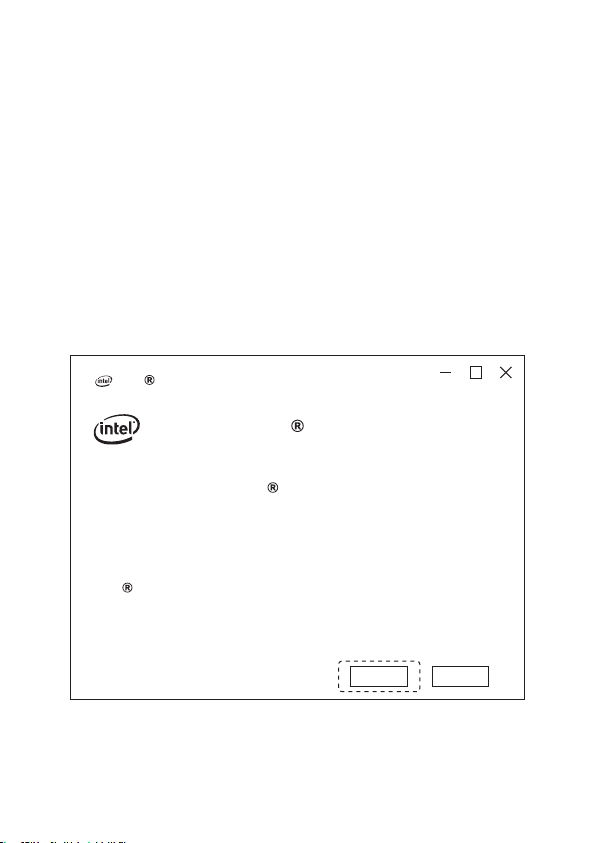
Wireless Adapter Driver Installation
Intel Software Installer
Welcome to Intel Software Installer
This installer will install Intel PROSet / Wireless WiFi Software
on your computer. Click “Next” to continue or Cancel to exit.
The following components will be installed:
Intel WiFi driver
Next
Cancel
Hardware Installation
Now take win10_64 bit system as an example. Insert the
CD into the CD-ROM drive. Copy the zip files to your
computer, and then unzip the files. Double-click the
executable program prefixed with "WiFi", such as "WiFi-
22.90.0-Driver64-Win10-Win11.exe" to complete the
installation.
Nehmen wir nun das Win10_64-Bit-System als Beispiel. Legen Sie die CD
in das CD-ROM-Laufwerk ein. Kopieren Sie die ZIP-Dateien auf Ihren
Computer und entpacken Sie die Dateien. Doppelklicken Sie auf das
ausführbare Programm mit dem Präfix "WiFi", z. B. "WiFi-22.90.0-Driv-
er64-Win10-Win11.exe", um die Installation abzuschließen.
Prenons maintenant le système win10_64 bits comme exemple. Insérez le
CD dans le lecteur de CD-ROM. Copiez les fichiers zip sur votre ordina-
teur, puis décompressez les fichiers. Double-cliquez sur le programme
exécutable préfixé par "WiFi", tel que "WiFi-22.90.0-Driv-
er64-Win10-Win11.exe" pour terminer l'installation.
Ora prendi come esempio il sistema win10_64 bit. Inserire il CD nell'unità
CD-ROM. Copia i file zip sul tuo computer, quindi decomprimi i file. Fare
doppio clic sul programma eseguibile con il prefisso "WiFi", ad esempio
"WiFi-22.90.0-Driver64-Win10-Win11.exe" per completare l'installazione.
Ahora tome el sistema win10_64 bit como ejemplo. Inserte el CD en la
unidad de CD-ROM. Copie los archivos zip en su computadora y luego
descomprímalos. Haga doble clic en el programa ejecutable con el
prefijo "WiFi", como "WiFi-22.90.0-Driver64-Win10-Win11.exe" para
completar la instalación.
ここで、win1064ビットシステムを例として取り上げます。CDをCD-ROMド
ライブに挿入します。zipファイルをコンピューターにコピーしてから、ファイ
ルを解凍します。「WiFi-22.90.0-Driver64-Win10-Win11.exe」などの接頭辞「
WiFi」が付いた実行可能プログラムをダブルクリックして、インストールを完
了します。
4. Locate an available F_USB connector and carefully plug
the Bluetooth USB cable into it.
Suchen Sie einen verfügbaren F_USB-Anschluss und stecken Sie das
Bluetooth-USB-Kabel vorsichtig ein.
Recherchez un connecteur F_USB disponible et branchez soigneuse-
ment le câble USB Bluetooth à celui-ci.
Individua un connettore F_USB disponibile e collega con cura il cavo
USB Bluetooth al suo interno.
Localice un conector F_USB disponible y conecte con cuidado el cable
USB Bluetooth.
使用可能なF_USBコネクタを見つけて、Bluetooth USBケーブルを慎重に差
し込みます。
3. Locate an available PCIE X1 slot and carefully insert the
adapter.
Suchen Sie einen verfügbaren PCIE X1-Steckplatz und setzen Sie den
Adapter vorsichtig ein.
Recherchez un emplacement PCIE X1 disponible et insérez l’adaptateur
avec précaution.
Individuare uno slot PCIE X1 disponibile e inserire con cura l'adattatore.
Localice una ranura PCIE X1 disponible e inserte cuidadosamente el
adaptador.
使用可能なPCIE X1スロットを見つけて、アダプターを慎重に挿入します。
2. Connect the provided Bluetooth USB cable to the
adapter.
Schließen Sie das mitgelieferte Bluetooth-USB-Kabel an den Adapter an.
Connectez le câble USB Bluetooth fourni à l'adaptateur.
Collegare il cavo USB Bluetooth in dotazione all'adattatore.
Conecte el cable USB Bluetooth provisto al adaptador.
付属のBluetooth USBケーブルをアダプターに接続します。
1. Turn off your computer, unplug the power cable then
remove the case panel.
Schalten Sie Ihren Computer aus, ziehen Sie das Netzkabel ab und
entfernen Sie die Gehäuseabdeckung.
Éteignez votre ordinateur, débranchez le câble d'alimentation, puis retirez
le panneau du boîtier.
Spegnere il computer, scollegare il cavo di alimentazione, quindi
rimuovere il pannello della custodia.
Apague la computadora, desconecte el cable de alimentación y luego
retire el panel de la carcasa.
コンピューターの電源を切り、電源ケーブルを抜き、ケースパネルを取り外します。
Note: If the bracket is not suitable for your computer, detach it from the
adapter's board and replace it with the low-profile bracket.
Note: If the Bluetooth USB cable is not correctly connected to the
motherboard, Bluetooth function won’t work even after driver installation.
Email:
support@cudy.com
Driver & manual:
www.cudy.com/download
Quick Installation Guide
English Deutsch
EspañolItaliano
Français
にほんご
5. Connect the antennas to the adapter.
Schließen Sie die Antennen an den Adapter an.
Connectez les antennes à l'adaptateur.
Collegare le antenne all'adattatore.
Conecte las antenas al adaptador.
アンテナをアダプターに接続します。
USB
Tip: To maximize performance, make sure the path between the antennas
and your router is clear.
6. Replace the case panel, plug in the power cable and
turn on your computer.
Bringen Sie die Gehäuseabdeckung wieder an, schließen Sie das
Netzkabel an und schalten Sie den Computer ein.
Replacez le panneau du boîtier,
branchez le câble d'alimentation et
allumez votre ordinateur.
Riposizionare il pannello della custodia,
collegare il cavo di alimentazione e
accendere il computer.
Vuelva a colocar el panel de la carcasa,
conecte el cable de alimentación y
encienda la computadora.
ケースパネルを交換し、電源ケーブルを接続
して、コンピューターの電源を入れます。
Bluetooth USB cable
Adapter
Wireless Adapter Driver Installation
Intel Software Installer
Welcome to Intel Software Installer
This installer will install Intel PROSet / Wireless WiFi Software
on your computer. Click “Next” to continue or Cancel to exit.
The following components will be installed:
Intel WiFi driver
Next
Cancel
Hardware Installation
Now take win10_64 bit system as an example. Insert the
CD into the CD-ROM drive. Copy the zip files to your
computer, and then unzip the files. Double-click the
executable program prefixed with "WiFi", such as "WiFi-
22.90.0-Driver64-Win10-Win11.exe" to complete the
installation.
Nehmen wir nun das Win10_64-Bit-System als Beispiel. Legen Sie die CD
in das CD-ROM-Laufwerk ein. Kopieren Sie die ZIP-Dateien auf Ihren
Computer und entpacken Sie die Dateien. Doppelklicken Sie auf das
ausführbare Programm mit dem Präfix "WiFi", z. B. "WiFi-22.90.0-Driv-
er64-Win10-Win11.exe", um die Installation abzuschließen.
Prenons maintenant le système win10_64 bits comme exemple. Insérez le
CD dans le lecteur de CD-ROM. Copiez les fichiers zip sur votre ordina-
teur, puis décompressez les fichiers. Double-cliquez sur le programme
exécutable préfixé par "WiFi", tel que "WiFi-22.90.0-Driv-
er64-Win10-Win11.exe" pour terminer l'installation.
Ora prendi come esempio il sistema win10_64 bit. Inserire il CD nell'unità
CD-ROM. Copia i file zip sul tuo computer, quindi decomprimi i file. Fare
doppio clic sul programma eseguibile con il prefisso "WiFi", ad esempio
"WiFi-22.90.0-Driver64-Win10-Win11.exe" per completare l'installazione.
Ahora tome el sistema win10_64 bit como ejemplo. Inserte el CD en la
unidad de CD-ROM. Copie los archivos zip en su computadora y luego
descomprímalos. Haga doble clic en el programa ejecutable con el
prefijo "WiFi", como "WiFi-22.90.0-Driver64-Win10-Win11.exe" para
completar la instalación.
ここで、win1064ビットシステムを例として取り上げます。CDをCD-ROMド
ライブに挿入します。zipファイルをコンピューターにコピーしてから、ファイ
ルを解凍します。「WiFi-22.90.0-Driver64-Win10-Win11.exe」などの接頭辞「
WiFi」が付いた実行可能プログラムをダブルクリックして、インストールを完
了します。
4. Locate an available F_USB connector and carefully plug
the Bluetooth USB cable into it.
Suchen Sie einen verfügbaren F_USB-Anschluss und stecken Sie das
Bluetooth-USB-Kabel vorsichtig ein.
Recherchez un connecteur F_USB disponible et branchez soigneuse-
ment le câble USB Bluetooth à celui-ci.
Individua un connettore F_USB disponibile e collega con cura il cavo
USB Bluetooth al suo interno.
Localice un conector F_USB disponible y conecte con cuidado el cable
USB Bluetooth.
使用可能なF_USBコネクタを見つけて、Bluetooth USBケーブルを慎重に差
し込みます。
3. Locate an available PCIE X1 slot and carefully insert the
adapter.
Suchen Sie einen verfügbaren PCIE X1-Steckplatz und setzen Sie den
Adapter vorsichtig ein.
Recherchez un emplacement PCIE X1 disponible et insérez l’adaptateur
avec précaution.
Individuare uno slot PCIE X1 disponibile e inserire con cura l'adattatore.
Localice una ranura PCIE X1 disponible e inserte cuidadosamente el
adaptador.
使用可能なPCIE X1スロットを見つけて、アダプターを慎重に挿入します。
2. Connect the provided Bluetooth USB cable to the
adapter.
Schließen Sie das mitgelieferte Bluetooth-USB-Kabel an den Adapter an.
Connectez le câble USB Bluetooth fourni à l'adaptateur.
Collegare il cavo USB Bluetooth in dotazione all'adattatore.
Conecte el cable USB Bluetooth provisto al adaptador.
付属のBluetooth USBケーブルをアダプターに接続します。
1. Turn off your computer, unplug the power cable then
remove the case panel.
Schalten Sie Ihren Computer aus, ziehen Sie das Netzkabel ab und
entfernen Sie die Gehäuseabdeckung.
Éteignez votre ordinateur, débranchez le câble d'alimentation, puis retirez
le panneau du boîtier.
Spegnere il computer, scollegare il cavo di alimentazione, quindi
rimuovere il pannello della custodia.
Apague la computadora, desconecte el cable de alimentación y luego
retire el panel de la carcasa.
コンピューターの電源を切り、電源ケーブルを抜き、ケースパネルを取り外します。
Note: If the bracket is not suitable for your computer, detach it from the
adapter's board and replace it with the low-profile bracket.
Note: If the Bluetooth USB cable is not correctly connected to the
motherboard, Bluetooth function won’t work even after driver installation.
Email:
support@cudy.com
Driver & manual:
www.cudy.com/download
Quick Installation Guide
English Deutsch
EspañolItaliano
Français
にほんご
5. Connect the antennas to the adapter.
Schließen Sie die Antennen an den Adapter an.
Connectez les antennes à l'adaptateur.
Collegare le antenne all'adattatore.
Conecte las antenas al adaptador.
アンテナをアダプターに接続します。
USB
Tip: To maximize performance, make sure the path between the antennas
and your router is clear.
6. Replace the case panel, plug in the power cable and
turn on your computer.
Bringen Sie die Gehäuseabdeckung wieder an, schließen Sie das
Netzkabel an und schalten Sie den Computer ein.
Replacez le panneau du boîtier,
branchez le câble d'alimentation et
allumez votre ordinateur.
Riposizionare il pannello della custodia,
collegare il cavo di alimentazione e
accendere il computer.
Vuelva a colocar el panel de la carcasa,
conecte el cable de alimentación y
encienda la computadora.
ケースパネルを交換し、電源ケーブルを接続
して、コンピューターの電源を入れます。
Bluetooth USB cable
Adapter
Wireless Adapter Driver Installation
Intel Software Installer
Welcome to Intel Software Installer
This installer will install Intel PROSet / Wireless WiFi Software
on your computer. Click “Next” to continue or Cancel to exit.
The following components will be installed:
Intel WiFi driver
Next
Cancel
Hardware Installation
Now take win10_64 bit system as an example. Insert the
CD into the CD-ROM drive. Copy the zip files to your
computer, and then unzip the files. Double-click the
executable program prefixed with "WiFi", such as "WiFi-
22.90.0-Driver64-Win10-Win11.exe" to complete the
installation.
Nehmen wir nun das Win10_64-Bit-System als Beispiel. Legen Sie die CD
in das CD-ROM-Laufwerk ein. Kopieren Sie die ZIP-Dateien auf Ihren
Computer und entpacken Sie die Dateien. Doppelklicken Sie auf das
ausführbare Programm mit dem Präfix "WiFi", z. B. "WiFi-22.90.0-Driv-
er64-Win10-Win11.exe", um die Installation abzuschließen.
Prenons maintenant le système win10_64 bits comme exemple. Insérez le
CD dans le lecteur de CD-ROM. Copiez les fichiers zip sur votre ordina-
teur, puis décompressez les fichiers. Double-cliquez sur le programme
exécutable préfixé par "WiFi", tel que "WiFi-22.90.0-Driv-
er64-Win10-Win11.exe" pour terminer l'installation.
Ora prendi come esempio il sistema win10_64 bit. Inserire il CD nell'unità
CD-ROM. Copia i file zip sul tuo computer, quindi decomprimi i file. Fare
doppio clic sul programma eseguibile con il prefisso "WiFi", ad esempio
"WiFi-22.90.0-Driver64-Win10-Win11.exe" per completare l'installazione.
Ahora tome el sistema win10_64 bit como ejemplo. Inserte el CD en la
unidad de CD-ROM. Copie los archivos zip en su computadora y luego
descomprímalos. Haga doble clic en el programa ejecutable con el
prefijo "WiFi", como "WiFi-22.90.0-Driver64-Win10-Win11.exe" para
completar la instalación.
ここで、win1064ビットシステムを例として取り上げます。CDをCD-ROMド
ライブに挿入します。zipファイルをコンピューターにコピーしてから、ファイ
ルを解凍します。「WiFi-22.90.0-Driver64-Win10-Win11.exe」などの接頭辞「
WiFi」が付いた実行可能プログラムをダブルクリックして、インストールを完
了します。
4. Locate an available F_USB connector and carefully plug
the Bluetooth USB cable into it.
Suchen Sie einen verfügbaren F_USB-Anschluss und stecken Sie das
Bluetooth-USB-Kabel vorsichtig ein.
Recherchez un connecteur F_USB disponible et branchez soigneuse-
ment le câble USB Bluetooth à celui-ci.
Individua un connettore F_USB disponibile e collega con cura il cavo
USB Bluetooth al suo interno.
Localice un conector F_USB disponible y conecte con cuidado el cable
USB Bluetooth.
使用可能なF_USBコネクタを見つけて、Bluetooth USBケーブルを慎重に差
し込みます。
3. Locate an available PCIE X1 slot and carefully insert the
adapter.
Suchen Sie einen verfügbaren PCIE X1-Steckplatz und setzen Sie den
Adapter vorsichtig ein.
Recherchez un emplacement PCIE X1 disponible et insérez l’adaptateur
avec précaution.
Individuare uno slot PCIE X1 disponibile e inserire con cura l'adattatore.
Localice una ranura PCIE X1 disponible e inserte cuidadosamente el
adaptador.
使用可能なPCIE X1スロットを見つけて、アダプターを慎重に挿入します。
2. Connect the provided Bluetooth USB cable to the
adapter.
Schließen Sie das mitgelieferte Bluetooth-USB-Kabel an den Adapter an.
Connectez le câble USB Bluetooth fourni à l'adaptateur.
Collegare il cavo USB Bluetooth in dotazione all'adattatore.
Conecte el cable USB Bluetooth provisto al adaptador.
付属のBluetooth USBケーブルをアダプターに接続します。
1. Turn off your computer, unplug the power cable then
remove the case panel.
Schalten Sie Ihren Computer aus, ziehen Sie das Netzkabel ab und
entfernen Sie die Gehäuseabdeckung.
Éteignez votre ordinateur, débranchez le câble d'alimentation, puis retirez
le panneau du boîtier.
Spegnere il computer, scollegare il cavo di alimentazione, quindi
rimuovere il pannello della custodia.
Apague la computadora, desconecte el cable de alimentación y luego
retire el panel de la carcasa.
コンピューターの電源を切り、電源ケーブルを抜き、ケースパネルを取り外します。
Note: If the bracket is not suitable for your computer, detach it from the
adapter's board and replace it with the low-profile bracket.
Note: If the Bluetooth USB cable is not correctly connected to the
motherboard, Bluetooth function won’t work even after driver installation.
Email:
support@cudy.com
Driver & manual:
www.cudy.com/download
Quick Installation Guide
English Deutsch
EspañolItaliano
Français
にほんご
5. Connect the antennas to the adapter.
Schließen Sie die Antennen an den Adapter an.
Connectez les antennes à l'adaptateur.
Collegare le antenne all'adattatore.
Conecte las antenas al adaptador.
アンテナをアダプターに接続します。
USB
Tip: To maximize performance, make sure the path between the antennas
and your router is clear.
6. Replace the case panel, plug in the power cable and
turn on your computer.
Bringen Sie die Gehäuseabdeckung wieder an, schließen Sie das
Netzkabel an und schalten Sie den Computer ein.
Replacez le panneau du boîtier,
branchez le câble d'alimentation et
allumez votre ordinateur.
Riposizionare il pannello della custodia,
collegare il cavo di alimentazione e
accendere il computer.
Vuelva a colocar el panel de la carcasa,
conecte el cable de alimentación y
encienda la computadora.
ケースパネルを交換し、電源ケーブルを接続
して、コンピューターの電源を入れます。
Bluetooth USB cable
Adapter
Wireless Adapter Driver Installation
Intel Software Installer
Welcome to Intel Software Installer
This installer will install Intel PROSet / Wireless WiFi Software
on your computer. Click “Next” to continue or Cancel to exit.
The following components will be installed:
Intel WiFi driver
Next
Cancel
Hardware Installation
Now take win10_64 bit system as an example. Insert the
CD into the CD-ROM drive. Copy the zip files to your
computer, and then unzip the files. Double-click the
executable program prefixed with "WiFi", such as "WiFi-
22.90.0-Driver64-Win10-Win11.exe" to complete the
installation.
Nehmen wir nun das Win10_64-Bit-System als Beispiel. Legen Sie die CD
in das CD-ROM-Laufwerk ein. Kopieren Sie die ZIP-Dateien auf Ihren
Computer und entpacken Sie die Dateien. Doppelklicken Sie auf das
ausführbare Programm mit dem Präfix "WiFi", z. B. "WiFi-22.90.0-Driv-
er64-Win10-Win11.exe", um die Installation abzuschließen.
Prenons maintenant le système win10_64 bits comme exemple. Insérez le
CD dans le lecteur de CD-ROM. Copiez les fichiers zip sur votre ordina-
teur, puis décompressez les fichiers. Double-cliquez sur le programme
exécutable préfixé par "WiFi", tel que "WiFi-22.90.0-Driv-
er64-Win10-Win11.exe" pour terminer l'installation.
Ora prendi come esempio il sistema win10_64 bit. Inserire il CD nell'unità
CD-ROM. Copia i file zip sul tuo computer, quindi decomprimi i file. Fare
doppio clic sul programma eseguibile con il prefisso "WiFi", ad esempio
"WiFi-22.90.0-Driver64-Win10-Win11.exe" per completare l'installazione.
Ahora tome el sistema win10_64 bit como ejemplo. Inserte el CD en la
unidad de CD-ROM. Copie los archivos zip en su computadora y luego
descomprímalos. Haga doble clic en el programa ejecutable con el
prefijo "WiFi", como "WiFi-22.90.0-Driver64-Win10-Win11.exe" para
completar la instalación.
ここで、win1064ビットシステムを例として取り上げます。CDをCD-ROMド
ライブに挿入します。zipファイルをコンピューターにコピーしてから、ファイ
ルを解凍します。「WiFi-22.90.0-Driver64-Win10-Win11.exe」などの接頭辞「
WiFi」が付いた実行可能プログラムをダブルクリックして、インストールを完
了します。
4. Locate an available F_USB connector and carefully plug
the Bluetooth USB cable into it.
Suchen Sie einen verfügbaren F_USB-Anschluss und stecken Sie das
Bluetooth-USB-Kabel vorsichtig ein.
Recherchez un connecteur F_USB disponible et branchez soigneuse-
ment le câble USB Bluetooth à celui-ci.
Individua un connettore F_USB disponibile e collega con cura il cavo
USB Bluetooth al suo interno.
Localice un conector F_USB disponible y conecte con cuidado el cable
USB Bluetooth.
使用可能なF_USBコネクタを見つけて、Bluetooth USBケーブルを慎重に差
し込みます。
3. Locate an available PCIE X1 slot and carefully insert the
adapter.
Suchen Sie einen verfügbaren PCIE X1-Steckplatz und setzen Sie den
Adapter vorsichtig ein.
Recherchez un emplacement PCIE X1 disponible et insérez l’adaptateur
avec précaution.
Individuare uno slot PCIE X1 disponibile e inserire con cura l'adattatore.
Localice una ranura PCIE X1 disponible e inserte cuidadosamente el
adaptador.
使用可能なPCIE X1スロットを見つけて、アダプターを慎重に挿入します。
2. Connect the provided Bluetooth USB cable to the
adapter.
Schließen Sie das mitgelieferte Bluetooth-USB-Kabel an den Adapter an.
Connectez le câble USB Bluetooth fourni à l'adaptateur.
Collegare il cavo USB Bluetooth in dotazione all'adattatore.
Conecte el cable USB Bluetooth provisto al adaptador.
付属のBluetooth USBケーブルをアダプターに接続します。
1. Turn off your computer, unplug the power cable then
remove the case panel.
Schalten Sie Ihren Computer aus, ziehen Sie das Netzkabel ab und
entfernen Sie die Gehäuseabdeckung.
Éteignez votre ordinateur, débranchez le câble d'alimentation, puis retirez
le panneau du boîtier.
Spegnere il computer, scollegare il cavo di alimentazione, quindi
rimuovere il pannello della custodia.
Apague la computadora, desconecte el cable de alimentación y luego
retire el panel de la carcasa.
コンピューターの電源を切り、電源ケーブルを抜き、ケースパネルを取り外します。
Note: If the bracket is not suitable for your computer, detach it from the
adapter's board and replace it with the low-profile bracket.
Note: If the Bluetooth USB cable is not correctly connected to the
motherboard, Bluetooth function won’t work even after driver installation.
Email:
support@cudy.com
Driver & manual:
www.cudy.com/download
Quick Installation Guide
English Deutsch
EspañolItaliano
Français
にほんご
5. Connect the antennas to the adapter.
Schließen Sie die Antennen an den Adapter an.
Connectez les antennes à l'adaptateur.
Collegare le antenne all'adattatore.
Conecte las antenas al adaptador.
アンテナをアダプターに接続します。
USB
Tip: To maximize performance, make sure the path between the antennas
and your router is clear.
6. Replace the case panel, plug in the power cable and
turn on your computer.
Bringen Sie die Gehäuseabdeckung wieder an, schließen Sie das
Netzkabel an und schalten Sie den Computer ein.
Replacez le panneau du boîtier,
branchez le câble d'alimentation et
allumez votre ordinateur.
Riposizionare il pannello della custodia,
collegare il cavo di alimentazione e
accendere il computer.
Vuelva a colocar el panel de la carcasa,
conecte el cable de alimentación y
encienda la computadora.
ケースパネルを交換し、電源ケーブルを接続
して、コンピューターの電源を入れます。
Bluetooth USB cable
Adapter
Wireless Adapter Driver Installation
Intel Software Installer
Welcome to Intel Software Installer
This installer will install Intel PROSet / Wireless WiFi Software
on your computer. Click “Next” to continue or Cancel to exit.
The following components will be installed:
Intel WiFi driver
Next
Cancel
Hardware Installation
Now take win10_64 bit system as an example. Insert the
CD into the CD-ROM drive. Copy the zip files to your
computer, and then unzip the files. Double-click the
executable program prefixed with "WiFi", such as "WiFi-
22.90.0-Driver64-Win10-Win11.exe" to complete the
installation.
Nehmen wir nun das Win10_64-Bit-System als Beispiel. Legen Sie die CD
in das CD-ROM-Laufwerk ein. Kopieren Sie die ZIP-Dateien auf Ihren
Computer und entpacken Sie die Dateien. Doppelklicken Sie auf das
ausführbare Programm mit dem Präfix "WiFi", z. B. "WiFi-22.90.0-Driv-
er64-Win10-Win11.exe", um die Installation abzuschließen.
Prenons maintenant le système win10_64 bits comme exemple. Insérez le
CD dans le lecteur de CD-ROM. Copiez les fichiers zip sur votre ordina-
teur, puis décompressez les fichiers. Double-cliquez sur le programme
exécutable préfixé par "WiFi", tel que "WiFi-22.90.0-Driv-
er64-Win10-Win11.exe" pour terminer l'installation.
Ora prendi come esempio il sistema win10_64 bit. Inserire il CD nell'unità
CD-ROM. Copia i file zip sul tuo computer, quindi decomprimi i file. Fare
doppio clic sul programma eseguibile con il prefisso "WiFi", ad esempio
"WiFi-22.90.0-Driver64-Win10-Win11.exe" per completare l'installazione.
Ahora tome el sistema win10_64 bit como ejemplo. Inserte el CD en la
unidad de CD-ROM. Copie los archivos zip en su computadora y luego
descomprímalos. Haga doble clic en el programa ejecutable con el
prefijo "WiFi", como "WiFi-22.90.0-Driver64-Win10-Win11.exe" para
completar la instalación.
ここで、win1064ビットシステムを例として取り上げます。CDをCD-ROMド
ライブに挿入します。zipファイルをコンピューターにコピーしてから、ファイ
ルを解凍します。「WiFi-22.90.0-Driver64-Win10-Win11.exe」などの接頭辞「
WiFi」が付いた実行可能プログラムをダブルクリックして、インストールを完
了します。
4. Locate an available F_USB connector and carefully plug
the Bluetooth USB cable into it.
Suchen Sie einen verfügbaren F_USB-Anschluss und stecken Sie das
Bluetooth-USB-Kabel vorsichtig ein.
Recherchez un connecteur F_USB disponible et branchez soigneuse-
ment le câble USB Bluetooth à celui-ci.
Individua un connettore F_USB disponibile e collega con cura il cavo
USB Bluetooth al suo interno.
Localice un conector F_USB disponible y conecte con cuidado el cable
USB Bluetooth.
使用可能なF_USBコネクタを見つけて、Bluetooth USBケーブルを慎重に差
し込みます。
3. Locate an available PCIE X1 slot and carefully insert the
adapter.
Suchen Sie einen verfügbaren PCIE X1-Steckplatz und setzen Sie den
Adapter vorsichtig ein.
Recherchez un emplacement PCIE X1 disponible et insérez l’adaptateur
avec précaution.
Individuare uno slot PCIE X1 disponibile e inserire con cura l'adattatore.
Localice una ranura PCIE X1 disponible e inserte cuidadosamente el
adaptador.
使用可能なPCIE X1スロットを見つけて、アダプターを慎重に挿入します。
2. Connect the provided Bluetooth USB cable to the
adapter.
Schließen Sie das mitgelieferte Bluetooth-USB-Kabel an den Adapter an.
Connectez le câble USB Bluetooth fourni à l'adaptateur.
Collegare il cavo USB Bluetooth in dotazione all'adattatore.
Conecte el cable USB Bluetooth provisto al adaptador.
付属のBluetooth USBケーブルをアダプターに接続します。
1. Turn off your computer, unplug the power cable then
remove the case panel.
Schalten Sie Ihren Computer aus, ziehen Sie das Netzkabel ab und
entfernen Sie die Gehäuseabdeckung.
Éteignez votre ordinateur, débranchez le câble d'alimentation, puis retirez
le panneau du boîtier.
Spegnere il computer, scollegare il cavo di alimentazione, quindi
rimuovere il pannello della custodia.
Apague la computadora, desconecte el cable de alimentación y luego
retire el panel de la carcasa.
コンピューターの電源を切り、電源ケーブルを抜き、ケースパネルを取り外します。
Note: If the bracket is not suitable for your computer, detach it from the
adapter's board and replace it with the low-profile bracket.
Note: If the Bluetooth USB cable is not correctly connected to the
motherboard, Bluetooth function won’t work even after driver installation.
Email:
support@cudy.com
Driver & manual:
www.cudy.com/download
Quick Installation Guide
English Deutsch
EspañolItaliano
Français
にほんご
5. Connect the antennas to the adapter.
Schließen Sie die Antennen an den Adapter an.
Connectez les antennes à l'adaptateur.
Collegare le antenne all'adattatore.
Conecte las antenas al adaptador.
アンテナをアダプターに接続します。
USB
Tip: To maximize performance, make sure the path between the antennas
and your router is clear.
6. Replace the case panel, plug in the power cable and
turn on your computer.
Bringen Sie die Gehäuseabdeckung wieder an, schließen Sie das
Netzkabel an und schalten Sie den Computer ein.
Replacez le panneau du boîtier,
branchez le câble d'alimentation et
allumez votre ordinateur.
Riposizionare il pannello della custodia,
collegare il cavo di alimentazione e
accendere il computer.
Vuelva a colocar el panel de la carcasa,
conecte el cable de alimentación y
encienda la computadora.
ケースパネルを交換し、電源ケーブルを接続
して、コンピューターの電源を入れます。
Bluetooth USB cable
Adapter
Wireless Adapter Driver Installation
Intel Software Installer
Welcome to Intel Software Installer
This installer will install Intel PROSet / Wireless WiFi Software
on your computer. Click “Next” to continue or Cancel to exit.
The following components will be installed:
Intel WiFi driver
Next
Cancel

Hardware Installation
Now take win10_64 bit system as an example. Insert the
CD into the CD-ROM drive. Copy the zip files to your
computer, and then unzip the files. Double-click the
executable program prefixed with "WiFi", such as "WiFi-
22.90.0-Driver64-Win10-Win11.exe" to complete the
installation.
Nehmen wir nun das Win10_64-Bit-System als Beispiel. Legen Sie die CD
in das CD-ROM-Laufwerk ein. Kopieren Sie die ZIP-Dateien auf Ihren
Computer und entpacken Sie die Dateien. Doppelklicken Sie auf das
ausführbare Programm mit dem Präfix "WiFi", z. B. "WiFi-22.90.0-Driv-
er64-Win10-Win11.exe", um die Installation abzuschließen.
Prenons maintenant le système win10_64 bits comme exemple. Insérez le
CD dans le lecteur de CD-ROM. Copiez les fichiers zip sur votre ordina-
teur, puis décompressez les fichiers. Double-cliquez sur le programme
exécutable préfixé par "WiFi", tel que "WiFi-22.90.0-Driv-
er64-Win10-Win11.exe" pour terminer l'installation.
Ora prendi come esempio il sistema win10_64 bit. Inserire il CD nell'unità
CD-ROM. Copia i file zip sul tuo computer, quindi decomprimi i file. Fare
doppio clic sul programma eseguibile con il prefisso "WiFi", ad esempio
"WiFi-22.90.0-Driver64-Win10-Win11.exe" per completare l'installazione.
Ahora tome el sistema win10_64 bit como ejemplo. Inserte el CD en la
unidad de CD-ROM. Copie los archivos zip en su computadora y luego
descomprímalos. Haga doble clic en el programa ejecutable con el
prefijo "WiFi", como "WiFi-22.90.0-Driver64-Win10-Win11.exe" para
completar la instalación.
ここで、win1064ビットシステムを例として取り上げます。CDをCD-ROMド
ライブに挿入します。zipファイルをコンピューターにコピーしてから、ファイ
ルを解凍します。「WiFi-22.90.0-Driver64-Win10-Win11.exe」などの接頭辞「
WiFi」が付いた実行可能プログラムをダブルクリックして、インストールを完
了します。
4. Locate an available F_USB connector and carefully plug
the Bluetooth USB cable into it.
Suchen Sie einen verfügbaren F_USB-Anschluss und stecken Sie das
Bluetooth-USB-Kabel vorsichtig ein.
Recherchez un connecteur F_USB disponible et branchez soigneuse-
ment le câble USB Bluetooth à celui-ci.
Individua un connettore F_USB disponibile e collega con cura il cavo
USB Bluetooth al suo interno.
Localice un conector F_USB disponible y conecte con cuidado el cable
USB Bluetooth.
使用可能なF_USBコネクタを見つけて、Bluetooth USBケーブルを慎重に差
し込みます。
3. Locate an available PCIE X1 slot and carefully insert the
adapter.
Suchen Sie einen verfügbaren PCIE X1-Steckplatz und setzen Sie den
Adapter vorsichtig ein.
Recherchez un emplacement PCIE X1 disponible et insérez l’adaptateur
avec précaution.
Individuare uno slot PCIE X1 disponibile e inserire con cura l'adattatore.
Localice una ranura PCIE X1 disponible e inserte cuidadosamente el
adaptador.
使用可能なPCIE X1スロットを見つけて、アダプターを慎重に挿入します。
2. Connect the provided Bluetooth USB cable to the
adapter.
Schließen Sie das mitgelieferte Bluetooth-USB-Kabel an den Adapter an.
Connectez le câble USB Bluetooth fourni à l'adaptateur.
Collegare il cavo USB Bluetooth in dotazione all'adattatore.
Conecte el cable USB Bluetooth provisto al adaptador.
付属のBluetooth USBケーブルをアダプターに接続します。
1. Turn off your computer, unplug the power cable then
remove the case panel.
Schalten Sie Ihren Computer aus, ziehen Sie das Netzkabel ab und
entfernen Sie die Gehäuseabdeckung.
Éteignez votre ordinateur, débranchez le câble d'alimentation, puis retirez
le panneau du boîtier.
Spegnere il computer, scollegare il cavo di alimentazione, quindi
rimuovere il pannello della custodia.
Apague la computadora, desconecte el cable de alimentación y luego
retire el panel de la carcasa.
コンピューターの電源を切り、電源ケーブルを抜き、ケースパネルを取り外します。
Note: If the bracket is not suitable for your computer, detach it from the
adapter's board and replace it with the low-profile bracket.
Note: If the Bluetooth USB cable is not correctly connected to the
motherboard, Bluetooth function won’t work even after driver installation.
Email:
support@cudy.com
Driver & manual:
www.cudy.com/download
Quick Installation Guide
English Deutsch
EspañolItaliano
Français
にほんご
5. Connect the antennas to the adapter.
Schließen Sie die Antennen an den Adapter an.
Connectez les antennes à l'adaptateur.
Collegare le antenne all'adattatore.
Conecte las antenas al adaptador.
アンテナをアダプターに接続します。
USB
Tip: To maximize performance, make sure the path between the antennas
and your router is clear.
6. Replace the case panel, plug in the power cable and
turn on your computer.
Bringen Sie die Gehäuseabdeckung wieder an, schließen Sie das
Netzkabel an und schalten Sie den Computer ein.
Replacez le panneau du boîtier,
branchez le câble d'alimentation et
allumez votre ordinateur.
Riposizionare il pannello della custodia,
collegare il cavo di alimentazione e
accendere il computer.
Vuelva a colocar el panel de la carcasa,
conecte el cable de alimentación y
encienda la computadora.
ケースパネルを交換し、電源ケーブルを接続
して、コンピューターの電源を入れます。
Bluetooth USB cable
Adapter
Wireless Adapter Driver Installation
Intel Software Installer
Welcome to Intel Software Installer
This installer will install Intel PROSet / Wireless WiFi Software
on your computer. Click “Next” to continue or Cancel to exit.
The following components will be installed:
Intel WiFi driver
Next
Cancel
Hardware Installation
Now take win10_64 bit system as an example. Insert the
CD into the CD-ROM drive. Copy the zip files to your
computer, and then unzip the files. Double-click the
executable program prefixed with "WiFi", such as "WiFi-
22.90.0-Driver64-Win10-Win11.exe" to complete the
installation.
Nehmen wir nun das Win10_64-Bit-System als Beispiel. Legen Sie die CD
in das CD-ROM-Laufwerk ein. Kopieren Sie die ZIP-Dateien auf Ihren
Computer und entpacken Sie die Dateien. Doppelklicken Sie auf das
ausführbare Programm mit dem Präfix "WiFi", z. B. "WiFi-22.90.0-Driv-
er64-Win10-Win11.exe", um die Installation abzuschließen.
Prenons maintenant le système win10_64 bits comme exemple. Insérez le
CD dans le lecteur de CD-ROM. Copiez les fichiers zip sur votre ordina-
teur, puis décompressez les fichiers. Double-cliquez sur le programme
exécutable préfixé par "WiFi", tel que "WiFi-22.90.0-Driv-
er64-Win10-Win11.exe" pour terminer l'installation.
Ora prendi come esempio il sistema win10_64 bit. Inserire il CD nell'unità
CD-ROM. Copia i file zip sul tuo computer, quindi decomprimi i file. Fare
doppio clic sul programma eseguibile con il prefisso "WiFi", ad esempio
"WiFi-22.90.0-Driver64-Win10-Win11.exe" per completare l'installazione.
Ahora tome el sistema win10_64 bit como ejemplo. Inserte el CD en la
unidad de CD-ROM. Copie los archivos zip en su computadora y luego
descomprímalos. Haga doble clic en el programa ejecutable con el
prefijo "WiFi", como "WiFi-22.90.0-Driver64-Win10-Win11.exe" para
completar la instalación.
ここで、win1064ビットシステムを例として取り上げます。CDをCD-ROMド
ライブに挿入します。zipファイルをコンピューターにコピーしてから、ファイ
ルを解凍します。「WiFi-22.90.0-Driver64-Win10-Win11.exe」などの接頭辞「
WiFi」が付いた実行可能プログラムをダブルクリックして、インストールを完
了します。
4. Locate an available F_USB connector and carefully plug
the Bluetooth USB cable into it.
Suchen Sie einen verfügbaren F_USB-Anschluss und stecken Sie das
Bluetooth-USB-Kabel vorsichtig ein.
Recherchez un connecteur F_USB disponible et branchez soigneuse-
ment le câble USB Bluetooth à celui-ci.
Individua un connettore F_USB disponibile e collega con cura il cavo
USB Bluetooth al suo interno.
Localice un conector F_USB disponible y conecte con cuidado el cable
USB Bluetooth.
使用可能なF_USBコネクタを見つけて、Bluetooth USBケーブルを慎重に差
し込みます。
3. Locate an available PCIE X1 slot and carefully insert the
adapter.
Suchen Sie einen verfügbaren PCIE X1-Steckplatz und setzen Sie den
Adapter vorsichtig ein.
Recherchez un emplacement PCIE X1 disponible et insérez l’adaptateur
avec précaution.
Individuare uno slot PCIE X1 disponibile e inserire con cura l'adattatore.
Localice una ranura PCIE X1 disponible e inserte cuidadosamente el
adaptador.
使用可能なPCIE X1スロットを見つけて、アダプターを慎重に挿入します。
2. Connect the provided Bluetooth USB cable to the
adapter.
Schließen Sie das mitgelieferte Bluetooth-USB-Kabel an den Adapter an.
Connectez le câble USB Bluetooth fourni à l'adaptateur.
Collegare il cavo USB Bluetooth in dotazione all'adattatore.
Conecte el cable USB Bluetooth provisto al adaptador.
付属のBluetooth USBケーブルをアダプターに接続します。
1. Turn off your computer, unplug the power cable then
remove the case panel.
Schalten Sie Ihren Computer aus, ziehen Sie das Netzkabel ab und
entfernen Sie die Gehäuseabdeckung.
Éteignez votre ordinateur, débranchez le câble d'alimentation, puis retirez
le panneau du boîtier.
Spegnere il computer, scollegare il cavo di alimentazione, quindi
rimuovere il pannello della custodia.
Apague la computadora, desconecte el cable de alimentación y luego
retire el panel de la carcasa.
コンピューターの電源を切り、電源ケーブルを抜き、ケースパネルを取り外します。
Note: If the bracket is not suitable for your computer, detach it from the
adapter's board and replace it with the low-profile bracket.
Note: If the Bluetooth USB cable is not correctly connected to the
motherboard, Bluetooth function won’t work even after driver installation.
Email:
support@cudy.com
Driver & manual:
www.cudy.com/download
Quick Installation Guide
English Deutsch
EspañolItaliano
Français
にほんご
5. Connect the antennas to the adapter.
Schließen Sie die Antennen an den Adapter an.
Connectez les antennes à l'adaptateur.
Collegare le antenne all'adattatore.
Conecte las antenas al adaptador.
アンテナをアダプターに接続します。
USB
Tip: To maximize performance, make sure the path between the antennas
and your router is clear.
6. Replace the case panel, plug in the power cable and
turn on your computer.
Bringen Sie die Gehäuseabdeckung wieder an, schließen Sie das
Netzkabel an und schalten Sie den Computer ein.
Replacez le panneau du boîtier,
branchez le câble d'alimentation et
allumez votre ordinateur.
Riposizionare il pannello della custodia,
collegare il cavo di alimentazione e
accendere il computer.
Vuelva a colocar el panel de la carcasa,
conecte el cable de alimentación y
encienda la computadora.
ケースパネルを交換し、電源ケーブルを接続
して、コンピューターの電源を入れます。
Bluetooth USB cable
Adapter
Wireless Adapter Driver Installation
Intel Software Installer
Welcome to Intel Software Installer
This installer will install Intel PROSet / Wireless WiFi Software
on your computer. Click “Next” to continue or Cancel to exit.
The following components will be installed:
Intel WiFi driver
Next
Cancel

Bluetooth Driver Installation
Now take win10_64 bit system as an example. Insert the
CD into the CD-ROM drive. Copy the zip files to your
computer, and then unzip the files. Double-click the
executable program prefixed with "BT", such as
"BT-22.90.2-32-64UWD-Win10-Win11.exe" to complete
the installation.
Nehmen wir nun das Win10_64-Bit-System als Beispiel. Legen Sie die
CD in das CD-ROM-Laufwerk ein. Kopieren Sie die ZIP-Dateien auf
Ihren Computer und entpacken Sie die Dateien. Doppelklicken Sie auf
das ausführbare Programm mit dem Präfix "BT", z. B.
"BT-22.90.2-32-64UWD-Win10-Win11.exe", um die Installation
abzuschließen.
Prenons maintenant le système win10_64 bits comme exemple. Insérez
le CD dans le lecteur de CD-ROM. Copiez les fichiers zip sur votre
ordinateur, puis décompressez les fichiers. Double-cliquez sur le
programme exécutable précédé de « BT », tel que «
BT-22.90.2-32-64UWD-Win10-Win11.exe » pour terminer l'installation.
Ora prendi come esempio il sistema win10_64 bit. Inserire il CD
nell'unità CD-ROM. Copia i file zip sul tuo computer, quindi decom-
primi i file. Fare doppio clic sul programma eseguibile con il prefisso
"BT", ad esempio "BT-22.90.2-32-64UWD-Win10-Win11.exe" per
completare l'installazione.
Ahora tome el sistema win10_64 bit como ejemplo. Inserte el CD en la
unidad de CD-ROM. Copie los archivos zip en su computadora y luego
descomprímalos. Haga doble clic en el programa ejecutable con el
prefijo "BT", como "BT-22.90.2-32-64UWD-Win10-Win11.exe" para
completar la instalación.
ここで、win1064ビットシステムを例として取り上げます。CDをCD-ROMドライ
ブに挿入します。zipファイルをコンピューターにコピーしてから、ファイルを解
凍します。「BT-22.90.2-32-64UWD-Win10-Win11.exe」などの接頭辞「BT」が付
いた実行可能プログラムをダブルクリックして、インストールを完了します。
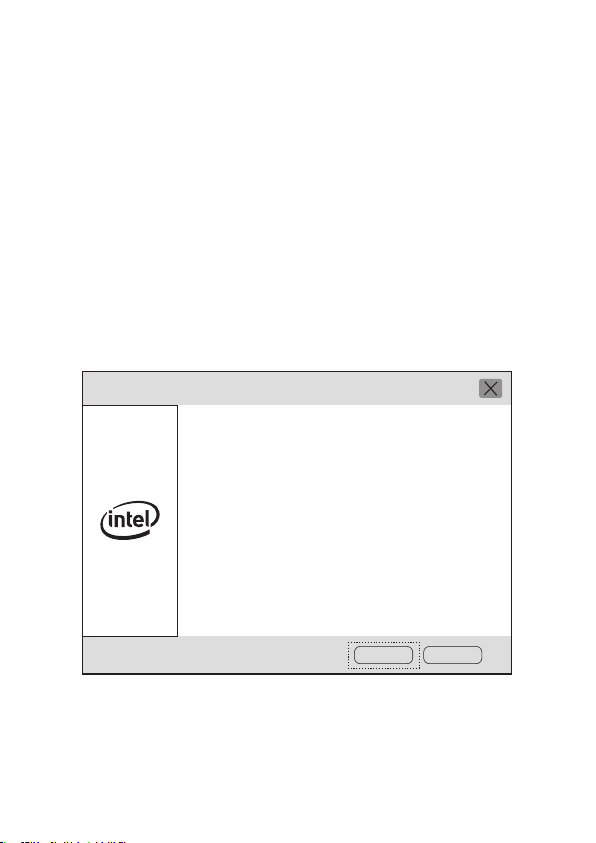
Intel(R) Wireless Bluetooth(R)
Welcome to the Intel(R) Wireless
Bluetooth(R) Setup Wizard
The installation wizard will install Intel(R)
Wireless Bluetooth(R) on your computer.
Click Next to continue, or click Cancel to
exit the installation wizard.
Next Cancel
Package Content
For technical support,the user guide and more informa-
tion,please visit.
http://www.cudy.com/support
Support
810600115
Email:
support@cudy.com
Driver & manual:
www.cudy.com/download
WiFi Driver Bluetooth Driver
EU Declaration of Conformity
1. English:
Cudy hereby declares that the device is in compliance with the
essential requirements and other relevant provisions of
directives 2014/53/EU, 2009/125/EC and 2011/65/EU.
The original EU declaration of conformity may be found at
http://www.cudy.com/ce.
2. Deutsch:
Cudy erklärt hiermit, dass dieses Gerät die Grundanforderun-
gen und andere relevante Vorgaben der Richtlinien
2014/53/EU, 2009/125/EG und 2011/65/EU erfüllt.
Die Original-EU-Konformitätserklärung kann in englischer
Sprache hier heruntergeladen werden:
http://www.cudy.com/ce.
3. Español:
Por la presente Cudy declara que este dispositivo cumple con
los requisitos esenciales y otras disposiciones relevantes de las
directivas 2014/53/UE, 2009/125/CE y 2011/65/UE.
La declaración original CE de la conformidad puede encon-
trarse en:
http://www.cudy.com/ce.
4. ltaliano:
Cudy dichiara che questo dispositivo è conforme ai requisti
fondamentali e alle altre disposizioni delle direttive
2014/53/UE, 2009/125/CE e 2011/65/UE.
La dichiarazione di conformità EU originale si trova in
http://www.cudy.com/ce.
5. Français:
Cudy par la présente déclare que cet appareil est conforme aux
exigences essentielles et autres dispositions pertinentes des
directives 2014/53/UE, 2009/125/CE et 2011/65/UE.
La déclaration CE de conformité originelle peut être trouvée à
l'adresse
http://www.cudy.com/ce.
6.Ελληνικό:
Δια του παρόντος η Cudy διακηρύσσει ότι αυτή η συσκευή
συμμορφώνεται με τις απαιτήσεις και άλλους σχετικούς
κανονισμούς των οδηγιών 2014/53/EE, 2009/125/EK και 2011/65/EE.
Μπορείτε να δείτε την αρχική δήλωση συμμόρφωσης με τους
κανονισμούς της Ε.Ε. στην ιστοσελίδα
http://www.cudy.com/ce.
7. Nederlands:
Cudy verklaart hierbij dat dit apparaat in overeenstemming is met de
essentiële eissen en andere relevante bepalingen van de richtlijnen
2014/53/EU, 2009/125/EG en 2011/65/EU.
De oorspronkelijke EU verklaring van overeenstemming is te vinden
op
http://www.cudy.com/ce.
8. Português:
A Cudy declara que este dispositivo está em conformidade com os
requisitos essenciais e outras disposições das Diretivas 2014/53/UE,
2009/125/CE e 2011/65/UE.
A declaração original de conformidade UE pode ser encontrada em
http://www.cudy.com/ce.
9. Polski:
Cudy deklaruje, że niniejsze urządzenie spełnia wszelkie stosowne
wymagania oraz jest zgodne z postanowieniami dyrektyw
2014/53/UE, 2009/125/WE i 2011/65/UE.
Pełna deklaracja zgodności UE znajduje się na stronie
http://www.cudy.com/ce.
10. Türkçe:
Cudy, işbu belgede bu cihazın temel gereksinimlerle ve ilgili
2014/53/EU, 2009/125/EC ve 2011/65/EU hükümlerinin direktifleri ile
uyumlu olduğunu beyan eder.
Orijinal AB uygun beyanını
http://www.cudy.com/ce adresinde bulabilirsiniz.
11. Norsk:
Cudy erklærer herved at denne enheten er i samsvar med de
nødvendige kravene og andre relevante bestemmelser fra
direktivene 2014/53/EU, 2009/125/EC og 2011/65/EU.
Den opprinnelige EU-samsvarserklæringen er tilgjengelig på
http://www.cudy.com/ce.
12. Dansk:
Cudy erklærer hermed, at denne enhed er i overensstemmelse med
de væsentlige krav og andre relevante bestemmelser i direktiverne
2014/53/EU, 2009/125/EF og 2011/65/EU.
Den oprindelige EU-overensstemmelseserklæringen kan findes på
http://www.cudy.com/ce.
13. Suomi:
Cudy ilmoittaa täten, että tämä laite noudattaa direktiivien
2014/53/EU, 2009/125/EY ja 2011/65/EU olennaisia vaatimuk-
sia ja muita asianmukaisia ehtoja.
Alkuperäinen EU-säädöstenmukaisuusilmoitus on osoitteessa
http://www.cudy.com/ce.
14. Svenska:
Cudy deklarerar att denna enhet är i överensstämmelse med de
grundläggande kraven och andra relevanta bestämmelser i
direktiv 2014/53/EU, 2009/125/EG och 2011/65/EU.
Den ursprungliga EU-försäkran om överensstämmelse kan
hittas på
http://www.cudy.com/ce.
15. Čeština:
Cudy tímto prohlašuje, že toto zařízení je ve shodě se
základními požadavky a dalšími příslušnými ustanoveními
směrnic 2014/53/EU, 2009/125/ES a 2011/65/EU.
Originál EU prohlášení o shodě lze nalézt na
http://www.cudy.com/ce.
16. Slovenčina:
Cudy týmto vyhlasuje, že toto zariadenie je v zhode so
základnými požiadavkami a ďalšími príslušnými ustanoveniami
smerníc 2014/53/EÚ, 2009/125/ES a 2011/65/EÚ.
Originál EU vyhlásenia o zhode možno nájsť na
http://www.cudy.com/ce.
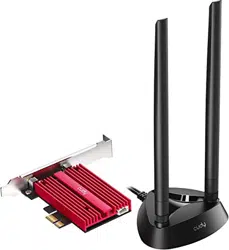
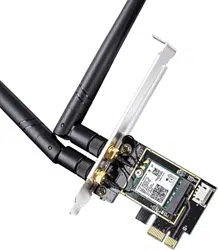
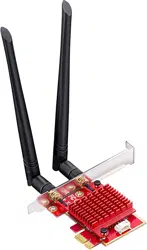
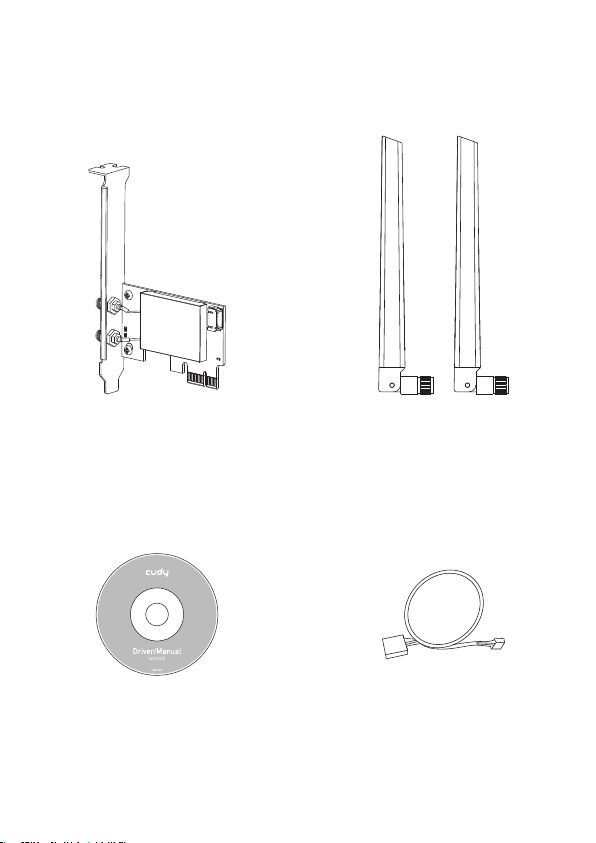
Wireless Adapterx1 Antennax2
CD x1 Bluetooth Cablex1
Bluetooth Driver Installation
Now take win10_64 bit system as an example. Insert the
CD into the CD-ROM drive. Copy the zip files to your
computer, and then unzip the files. Double-click the
executable program prefixed with "BT", such as
"BT-22.90.2-32-64UWD-Win10-Win11.exe" to complete
the installation.
Nehmen wir nun das Win10_64-Bit-System als Beispiel. Legen Sie die
CD in das CD-ROM-Laufwerk ein. Kopieren Sie die ZIP-Dateien auf
Ihren Computer und entpacken Sie die Dateien. Doppelklicken Sie auf
das ausführbare Programm mit dem Präfix "BT", z. B.
"BT-22.90.2-32-64UWD-Win10-Win11.exe", um die Installation
abzuschließen.
Prenons maintenant le système win10_64 bits comme exemple. Insérez
le CD dans le lecteur de CD-ROM. Copiez les fichiers zip sur votre
ordinateur, puis décompressez les fichiers. Double-cliquez sur le
programme exécutable précédé de « BT », tel que «
BT-22.90.2-32-64UWD-Win10-Win11.exe » pour terminer l'installation.
Ora prendi come esempio il sistema win10_64 bit. Inserire il CD
nell'unità CD-ROM. Copia i file zip sul tuo computer, quindi decom-
primi i file. Fare doppio clic sul programma eseguibile con il prefisso
"BT", ad esempio "BT-22.90.2-32-64UWD-Win10-Win11.exe" per
completare l'installazione.
Ahora tome el sistema win10_64 bit como ejemplo. Inserte el CD en la
unidad de CD-ROM. Copie los archivos zip en su computadora y luego
descomprímalos. Haga doble clic en el programa ejecutable con el
prefijo "BT", como "BT-22.90.2-32-64UWD-Win10-Win11.exe" para
completar la instalación.
ここで、win1064ビットシステムを例として取り上げます。CDをCD-ROMドライ
ブに挿入します。zipファイルをコンピューターにコピーしてから、ファイルを解
凍します。「BT-22.90.2-32-64UWD-Win10-Win11.exe」などの接頭辞「BT」が付
いた実行可能プログラムをダブルクリックして、インストールを完了します。
Intel(R) Wireless Bluetooth(R)
Welcome to the Intel(R) Wireless
Bluetooth(R) Setup Wizard
The installation wizard will install Intel(R)
Wireless Bluetooth(R) on your computer.
Click Next to continue, or click Cancel to
exit the installation wizard.
Next Cancel
Package Content
For technical support,the user guide and more informa-
tion,please visit.
http://www.cudy.com/support
Support
810600115
Email:
support@cudy.com
Driver & manual:
www.cudy.com/download
WiFi Driver Bluetooth Driver
EU Declaration of Conformity
1. English:
Cudy hereby declares that the device is in compliance with the
essential requirements and other relevant provisions of
directives 2014/53/EU, 2009/125/EC and 2011/65/EU.
The original EU declaration of conformity may be found at
http://www.cudy.com/ce.
2. Deutsch:
Cudy erklärt hiermit, dass dieses Gerät die Grundanforderun-
gen und andere relevante Vorgaben der Richtlinien
2014/53/EU, 2009/125/EG und 2011/65/EU erfüllt.
Die Original-EU-Konformitätserklärung kann in englischer
Sprache hier heruntergeladen werden:
http://www.cudy.com/ce.
3. Español:
Por la presente Cudy declara que este dispositivo cumple con
los requisitos esenciales y otras disposiciones relevantes de las
directivas 2014/53/UE, 2009/125/CE y 2011/65/UE.
La declaración original CE de la conformidad puede encon-
trarse en:
http://www.cudy.com/ce.
4. ltaliano:
Cudy dichiara che questo dispositivo è conforme ai requisti
fondamentali e alle altre disposizioni delle direttive
2014/53/UE, 2009/125/CE e 2011/65/UE.
La dichiarazione di conformità EU originale si trova in
http://www.cudy.com/ce.
5. Français:
Cudy par la présente déclare que cet appareil est conforme aux
exigences essentielles et autres dispositions pertinentes des
directives 2014/53/UE, 2009/125/CE et 2011/65/UE.
La déclaration CE de conformité originelle peut être trouvée à
l'adresse
http://www.cudy.com/ce.
6.Ελληνικό:
Δια του παρόντος η Cudy διακηρύσσει ότι αυτή η συσκευή
συμμορφώνεται με τις απαιτήσεις και άλλους σχετικούς
κανονισμούς των οδηγιών 2014/53/EE, 2009/125/EK και 2011/65/EE.
Μπορείτε να δείτε την αρχική δήλωση συμμόρφωσης με τους
κανονισμούς της Ε.Ε. στην ιστοσελίδα
http://www.cudy.com/ce.
7. Nederlands:
Cudy verklaart hierbij dat dit apparaat in overeenstemming is met de
essentiële eissen en andere relevante bepalingen van de richtlijnen
2014/53/EU, 2009/125/EG en 2011/65/EU.
De oorspronkelijke EU verklaring van overeenstemming is te vinden
op
http://www.cudy.com/ce.
8. Português:
A Cudy declara que este dispositivo está em conformidade com os
requisitos essenciais e outras disposições das Diretivas 2014/53/UE,
2009/125/CE e 2011/65/UE.
A declaração original de conformidade UE pode ser encontrada em
http://www.cudy.com/ce.
9. Polski:
Cudy deklaruje, że niniejsze urządzenie spełnia wszelkie stosowne
wymagania oraz jest zgodne z postanowieniami dyrektyw
2014/53/UE, 2009/125/WE i 2011/65/UE.
Pełna deklaracja zgodności UE znajduje się na stronie
http://www.cudy.com/ce.
10. Türkçe:
Cudy, işbu belgede bu cihazın temel gereksinimlerle ve ilgili
2014/53/EU, 2009/125/EC ve 2011/65/EU hükümlerinin direktifleri ile
uyumlu olduğunu beyan eder.
Orijinal AB uygun beyanını
http://www.cudy.com/ce adresinde bulabilirsiniz.
11. Norsk:
Cudy erklærer herved at denne enheten er i samsvar med de
nødvendige kravene og andre relevante bestemmelser fra
direktivene 2014/53/EU, 2009/125/EC og 2011/65/EU.
Den opprinnelige EU-samsvarserklæringen er tilgjengelig på
http://www.cudy.com/ce.
12. Dansk:
Cudy erklærer hermed, at denne enhed er i overensstemmelse med
de væsentlige krav og andre relevante bestemmelser i direktiverne
2014/53/EU, 2009/125/EF og 2011/65/EU.
Den oprindelige EU-overensstemmelseserklæringen kan findes på
http://www.cudy.com/ce.
13. Suomi:
Cudy ilmoittaa täten, että tämä laite noudattaa direktiivien
2014/53/EU, 2009/125/EY ja 2011/65/EU olennaisia vaatimuk-
sia ja muita asianmukaisia ehtoja.
Alkuperäinen EU-säädöstenmukaisuusilmoitus on osoitteessa
http://www.cudy.com/ce.
14. Svenska:
Cudy deklarerar att denna enhet är i överensstämmelse med de
grundläggande kraven och andra relevanta bestämmelser i
direktiv 2014/53/EU, 2009/125/EG och 2011/65/EU.
Den ursprungliga EU-försäkran om överensstämmelse kan
hittas på
http://www.cudy.com/ce.
15. Čeština:
Cudy tímto prohlašuje, že toto zařízení je ve shodě se
základními požadavky a dalšími příslušnými ustanoveními
směrnic 2014/53/EU, 2009/125/ES a 2011/65/EU.
Originál EU prohlášení o shodě lze nalézt na
http://www.cudy.com/ce.
16. Slovenčina:
Cudy týmto vyhlasuje, že toto zariadenie je v zhode so
základnými požiadavkami a ďalšími príslušnými ustanoveniami
smerníc 2014/53/EÚ, 2009/125/ES a 2011/65/EÚ.
Originál EU vyhlásenia o zhode možno nájsť na
http://www.cudy.com/ce.
Wireless Adapterx1 Antennax2
CD x1 Bluetooth Cablex1
Bluetooth Driver Installation
Now take win10_64 bit system as an example. Insert the
CD into the CD-ROM drive. Copy the zip files to your
computer, and then unzip the files. Double-click the
executable program prefixed with "BT", such as
"BT-22.90.2-32-64UWD-Win10-Win11.exe" to complete
the installation.
Nehmen wir nun das Win10_64-Bit-System als Beispiel. Legen Sie die
CD in das CD-ROM-Laufwerk ein. Kopieren Sie die ZIP-Dateien auf
Ihren Computer und entpacken Sie die Dateien. Doppelklicken Sie auf
das ausführbare Programm mit dem Präfix "BT", z. B.
"BT-22.90.2-32-64UWD-Win10-Win11.exe", um die Installation
abzuschließen.
Prenons maintenant le système win10_64 bits comme exemple. Insérez
le CD dans le lecteur de CD-ROM. Copiez les fichiers zip sur votre
ordinateur, puis décompressez les fichiers. Double-cliquez sur le
programme exécutable précédé de « BT », tel que «
BT-22.90.2-32-64UWD-Win10-Win11.exe » pour terminer l'installation.
Ora prendi come esempio il sistema win10_64 bit. Inserire il CD
nell'unità CD-ROM. Copia i file zip sul tuo computer, quindi decom-
primi i file. Fare doppio clic sul programma eseguibile con il prefisso
"BT", ad esempio "BT-22.90.2-32-64UWD-Win10-Win11.exe" per
completare l'installazione.
Ahora tome el sistema win10_64 bit como ejemplo. Inserte el CD en la
unidad de CD-ROM. Copie los archivos zip en su computadora y luego
descomprímalos. Haga doble clic en el programa ejecutable con el
prefijo "BT", como "BT-22.90.2-32-64UWD-Win10-Win11.exe" para
completar la instalación.
ここで、win1064ビットシステムを例として取り上げます。CDをCD-ROMドライ
ブに挿入します。zipファイルをコンピューターにコピーしてから、ファイルを解
凍します。「BT-22.90.2-32-64UWD-Win10-Win11.exe」などの接頭辞「BT」が付
いた実行可能プログラムをダブルクリックして、インストールを完了します。
Intel(R) Wireless Bluetooth(R)
Welcome to the Intel(R) Wireless
Bluetooth(R) Setup Wizard
The installation wizard will install Intel(R)
Wireless Bluetooth(R) on your computer.
Click Next to continue, or click Cancel to
exit the installation wizard.
Next Cancel
Package Content
For technical support,the user guide and more informa-
tion,please visit.
http://www.cudy.com/support
Support
810600115
Email:
support@cudy.com
Driver & manual:
www.cudy.com/download
WiFi Driver Bluetooth Driver
EU Declaration of Conformity
1. English:
Cudy hereby declares that the device is in compliance with the
essential requirements and other relevant provisions of
directives 2014/53/EU, 2009/125/EC and 2011/65/EU.
The original EU declaration of conformity may be found at
http://www.cudy.com/ce.
2. Deutsch:
Cudy erklärt hiermit, dass dieses Gerät die Grundanforderun-
gen und andere relevante Vorgaben der Richtlinien
2014/53/EU, 2009/125/EG und 2011/65/EU erfüllt.
Die Original-EU-Konformitätserklärung kann in englischer
Sprache hier heruntergeladen werden:
http://www.cudy.com/ce.
3. Español:
Por la presente Cudy declara que este dispositivo cumple con
los requisitos esenciales y otras disposiciones relevantes de las
directivas 2014/53/UE, 2009/125/CE y 2011/65/UE.
La declaración original CE de la conformidad puede encon-
trarse en:
http://www.cudy.com/ce.
4. ltaliano:
Cudy dichiara che questo dispositivo è conforme ai requisti
fondamentali e alle altre disposizioni delle direttive
2014/53/UE, 2009/125/CE e 2011/65/UE.
La dichiarazione di conformità EU originale si trova in
http://www.cudy.com/ce.
5. Français:
Cudy par la présente déclare que cet appareil est conforme aux
exigences essentielles et autres dispositions pertinentes des
directives 2014/53/UE, 2009/125/CE et 2011/65/UE.
La déclaration CE de conformité originelle peut être trouvée à
l'adresse
http://www.cudy.com/ce.
6.Ελληνικό:
Δια του παρόντος η Cudy διακηρύσσει ότι αυτή η συσκευή
συμμορφώνεται με τις απαιτήσεις και άλλους σχετικούς
κανονισμούς των οδηγιών 2014/53/EE, 2009/125/EK και 2011/65/EE.
Μπορείτε να δείτε την αρχική δήλωση συμμόρφωσης με τους
κανονισμούς της Ε.Ε. στην ιστοσελίδα
http://www.cudy.com/ce.
7. Nederlands:
Cudy verklaart hierbij dat dit apparaat in overeenstemming is met de
essentiële eissen en andere relevante bepalingen van de richtlijnen
2014/53/EU, 2009/125/EG en 2011/65/EU.
De oorspronkelijke EU verklaring van overeenstemming is te vinden
op
http://www.cudy.com/ce.
8. Português:
A Cudy declara que este dispositivo está em conformidade com os
requisitos essenciais e outras disposições das Diretivas 2014/53/UE,
2009/125/CE e 2011/65/UE.
A declaração original de conformidade UE pode ser encontrada em
http://www.cudy.com/ce.
9. Polski:
Cudy deklaruje, że niniejsze urządzenie spełnia wszelkie stosowne
wymagania oraz jest zgodne z postanowieniami dyrektyw
2014/53/UE, 2009/125/WE i 2011/65/UE.
Pełna deklaracja zgodności UE znajduje się na stronie
http://www.cudy.com/ce.
10. Türkçe:
Cudy, işbu belgede bu cihazın temel gereksinimlerle ve ilgili
2014/53/EU, 2009/125/EC ve 2011/65/EU hükümlerinin direktifleri ile
uyumlu olduğunu beyan eder.
Orijinal AB uygun beyanını
http://www.cudy.com/ce adresinde bulabilirsiniz.
11. Norsk:
Cudy erklærer herved at denne enheten er i samsvar med de
nødvendige kravene og andre relevante bestemmelser fra
direktivene 2014/53/EU, 2009/125/EC og 2011/65/EU.
Den opprinnelige EU-samsvarserklæringen er tilgjengelig på
http://www.cudy.com/ce.
12. Dansk:
Cudy erklærer hermed, at denne enhed er i overensstemmelse med
de væsentlige krav og andre relevante bestemmelser i direktiverne
2014/53/EU, 2009/125/EF og 2011/65/EU.
Den oprindelige EU-overensstemmelseserklæringen kan findes på
http://www.cudy.com/ce.
13. Suomi:
Cudy ilmoittaa täten, että tämä laite noudattaa direktiivien
2014/53/EU, 2009/125/EY ja 2011/65/EU olennaisia vaatimuk-
sia ja muita asianmukaisia ehtoja.
Alkuperäinen EU-säädöstenmukaisuusilmoitus on osoitteessa
http://www.cudy.com/ce.
14. Svenska:
Cudy deklarerar att denna enhet är i överensstämmelse med de
grundläggande kraven och andra relevanta bestämmelser i
direktiv 2014/53/EU, 2009/125/EG och 2011/65/EU.
Den ursprungliga EU-försäkran om överensstämmelse kan
hittas på
http://www.cudy.com/ce.
15. Čeština:
Cudy tímto prohlašuje, že toto zařízení je ve shodě se
základními požadavky a dalšími příslušnými ustanoveními
směrnic 2014/53/EU, 2009/125/ES a 2011/65/EU.
Originál EU prohlášení o shodě lze nalézt na
http://www.cudy.com/ce.
16. Slovenčina:
Cudy týmto vyhlasuje, že toto zariadenie je v zhode so
základnými požiadavkami a ďalšími príslušnými ustanoveniami
smerníc 2014/53/EÚ, 2009/125/ES a 2011/65/EÚ.
Originál EU vyhlásenia o zhode možno nájsť na
http://www.cudy.com/ce.
Wireless Adapterx1 Antennax2
CD x1 Bluetooth Cablex1
Bluetooth Driver Installation
Now take win10_64 bit system as an example. Insert the
CD into the CD-ROM drive. Copy the zip files to your
computer, and then unzip the files. Double-click the
executable program prefixed with "BT", such as
"BT-22.90.2-32-64UWD-Win10-Win11.exe" to complete
the installation.
Nehmen wir nun das Win10_64-Bit-System als Beispiel. Legen Sie die
CD in das CD-ROM-Laufwerk ein. Kopieren Sie die ZIP-Dateien auf
Ihren Computer und entpacken Sie die Dateien. Doppelklicken Sie auf
das ausführbare Programm mit dem Präfix "BT", z. B.
"BT-22.90.2-32-64UWD-Win10-Win11.exe", um die Installation
abzuschließen.
Prenons maintenant le système win10_64 bits comme exemple. Insérez
le CD dans le lecteur de CD-ROM. Copiez les fichiers zip sur votre
ordinateur, puis décompressez les fichiers. Double-cliquez sur le
programme exécutable précédé de « BT », tel que «
BT-22.90.2-32-64UWD-Win10-Win11.exe » pour terminer l'installation.
Ora prendi come esempio il sistema win10_64 bit. Inserire il CD
nell'unità CD-ROM. Copia i file zip sul tuo computer, quindi decom-
primi i file. Fare doppio clic sul programma eseguibile con il prefisso
"BT", ad esempio "BT-22.90.2-32-64UWD-Win10-Win11.exe" per
completare l'installazione.
Ahora tome el sistema win10_64 bit como ejemplo. Inserte el CD en la
unidad de CD-ROM. Copie los archivos zip en su computadora y luego
descomprímalos. Haga doble clic en el programa ejecutable con el
prefijo "BT", como "BT-22.90.2-32-64UWD-Win10-Win11.exe" para
completar la instalación.
ここで、win1064ビットシステムを例として取り上げます。CDをCD-ROMドライ
ブに挿入します。zipファイルをコンピューターにコピーしてから、ファイルを解
凍します。「BT-22.90.2-32-64UWD-Win10-Win11.exe」などの接頭辞「BT」が付
いた実行可能プログラムをダブルクリックして、インストールを完了します。
Intel(R) Wireless Bluetooth(R)
Welcome to the Intel(R) Wireless
Bluetooth(R) Setup Wizard
The installation wizard will install Intel(R)
Wireless Bluetooth(R) on your computer.
Click Next to continue, or click Cancel to
exit the installation wizard.
Next Cancel
Package Content
For technical support,the user guide and more informa-
tion,please visit.
http://www.cudy.com/support
Support
810600115
Email:
support@cudy.com
Driver & manual:
www.cudy.com/download
WiFi Driver Bluetooth Driver
EU Declaration of Conformity
1. English:
Cudy hereby declares that the device is in compliance with the
essential requirements and other relevant provisions of
directives 2014/53/EU, 2009/125/EC and 2011/65/EU.
The original EU declaration of conformity may be found at
http://www.cudy.com/ce.
2. Deutsch:
Cudy erklärt hiermit, dass dieses Gerät die Grundanforderun-
gen und andere relevante Vorgaben der Richtlinien
2014/53/EU, 2009/125/EG und 2011/65/EU erfüllt.
Die Original-EU-Konformitätserklärung kann in englischer
Sprache hier heruntergeladen werden:
http://www.cudy.com/ce.
3. Español:
Por la presente Cudy declara que este dispositivo cumple con
los requisitos esenciales y otras disposiciones relevantes de las
directivas 2014/53/UE, 2009/125/CE y 2011/65/UE.
La declaración original CE de la conformidad puede encon-
trarse en:
http://www.cudy.com/ce.
4. ltaliano:
Cudy dichiara che questo dispositivo è conforme ai requisti
fondamentali e alle altre disposizioni delle direttive
2014/53/UE, 2009/125/CE e 2011/65/UE.
La dichiarazione di conformità EU originale si trova in
http://www.cudy.com/ce.
5. Français:
Cudy par la présente déclare que cet appareil est conforme aux
exigences essentielles et autres dispositions pertinentes des
directives 2014/53/UE, 2009/125/CE et 2011/65/UE.
La déclaration CE de conformité originelle peut être trouvée à
l'adresse
http://www.cudy.com/ce.
6.Ελληνικό:
Δια του παρόντος η Cudy διακηρύσσει ότι αυτή η συσκευή
συμμορφώνεται με τις απαιτήσεις και άλλους σχετικούς
κανονισμούς των οδηγιών 2014/53/EE, 2009/125/EK και 2011/65/EE.
Μπορείτε να δείτε την αρχική δήλωση συμμόρφωσης με τους
κανονισμούς της Ε.Ε. στην ιστοσελίδα
http://www.cudy.com/ce.
7. Nederlands:
Cudy verklaart hierbij dat dit apparaat in overeenstemming is met de
essentiële eissen en andere relevante bepalingen van de richtlijnen
2014/53/EU, 2009/125/EG en 2011/65/EU.
De oorspronkelijke EU verklaring van overeenstemming is te vinden
op
http://www.cudy.com/ce.
8. Português:
A Cudy declara que este dispositivo está em conformidade com os
requisitos essenciais e outras disposições das Diretivas 2014/53/UE,
2009/125/CE e 2011/65/UE.
A declaração original de conformidade UE pode ser encontrada em
http://www.cudy.com/ce.
9. Polski:
Cudy deklaruje, że niniejsze urządzenie spełnia wszelkie stosowne
wymagania oraz jest zgodne z postanowieniami dyrektyw
2014/53/UE, 2009/125/WE i 2011/65/UE.
Pełna deklaracja zgodności UE znajduje się na stronie
http://www.cudy.com/ce.
10. Türkçe:
Cudy, işbu belgede bu cihazın temel gereksinimlerle ve ilgili
2014/53/EU, 2009/125/EC ve 2011/65/EU hükümlerinin direktifleri ile
uyumlu olduğunu beyan eder.
Orijinal AB uygun beyanını
http://www.cudy.com/ce adresinde bulabilirsiniz.
11. Norsk:
Cudy erklærer herved at denne enheten er i samsvar med de
nødvendige kravene og andre relevante bestemmelser fra
direktivene 2014/53/EU, 2009/125/EC og 2011/65/EU.
Den opprinnelige EU-samsvarserklæringen er tilgjengelig på
http://www.cudy.com/ce.
12. Dansk:
Cudy erklærer hermed, at denne enhed er i overensstemmelse med
de væsentlige krav og andre relevante bestemmelser i direktiverne
2014/53/EU, 2009/125/EF og 2011/65/EU.
Den oprindelige EU-overensstemmelseserklæringen kan findes på
http://www.cudy.com/ce.
13. Suomi:
Cudy ilmoittaa täten, että tämä laite noudattaa direktiivien
2014/53/EU, 2009/125/EY ja 2011/65/EU olennaisia vaatimuk-
sia ja muita asianmukaisia ehtoja.
Alkuperäinen EU-säädöstenmukaisuusilmoitus on osoitteessa
http://www.cudy.com/ce.
14. Svenska:
Cudy deklarerar att denna enhet är i överensstämmelse med de
grundläggande kraven och andra relevanta bestämmelser i
direktiv 2014/53/EU, 2009/125/EG och 2011/65/EU.
Den ursprungliga EU-försäkran om överensstämmelse kan
hittas på
http://www.cudy.com/ce.
15. Čeština:
Cudy tímto prohlašuje, že toto zařízení je ve shodě se
základními požadavky a dalšími příslušnými ustanoveními
směrnic 2014/53/EU, 2009/125/ES a 2011/65/EU.
Originál EU prohlášení o shodě lze nalézt na
http://www.cudy.com/ce.
16. Slovenčina:
Cudy týmto vyhlasuje, že toto zariadenie je v zhode so
základnými požiadavkami a ďalšími príslušnými ustanoveniami
smerníc 2014/53/EÚ, 2009/125/ES a 2011/65/EÚ.
Originál EU vyhlásenia o zhode možno nájsť na
http://www.cudy.com/ce.
Wireless Adapterx1 Antennax2
CD x1 Bluetooth Cablex1

Bluetooth Driver Installation
Now take win10_64 bit system as an example. Insert the
CD into the CD-ROM drive. Copy the zip files to your
computer, and then unzip the files. Double-click the
executable program prefixed with "BT", such as
"BT-22.90.2-32-64UWD-Win10-Win11.exe" to complete
the installation.
Nehmen wir nun das Win10_64-Bit-System als Beispiel. Legen Sie die
CD in das CD-ROM-Laufwerk ein. Kopieren Sie die ZIP-Dateien auf
Ihren Computer und entpacken Sie die Dateien. Doppelklicken Sie auf
das ausführbare Programm mit dem Präfix "BT", z. B.
"BT-22.90.2-32-64UWD-Win10-Win11.exe", um die Installation
abzuschließen.
Prenons maintenant le système win10_64 bits comme exemple. Insérez
le CD dans le lecteur de CD-ROM. Copiez les fichiers zip sur votre
ordinateur, puis décompressez les fichiers. Double-cliquez sur le
programme exécutable précédé de « BT », tel que «
BT-22.90.2-32-64UWD-Win10-Win11.exe » pour terminer l'installation.
Ora prendi come esempio il sistema win10_64 bit. Inserire il CD
nell'unità CD-ROM. Copia i file zip sul tuo computer, quindi decom-
primi i file. Fare doppio clic sul programma eseguibile con il prefisso
"BT", ad esempio "BT-22.90.2-32-64UWD-Win10-Win11.exe" per
completare l'installazione.
Ahora tome el sistema win10_64 bit como ejemplo. Inserte el CD en la
unidad de CD-ROM. Copie los archivos zip en su computadora y luego
descomprímalos. Haga doble clic en el programa ejecutable con el
prefijo "BT", como "BT-22.90.2-32-64UWD-Win10-Win11.exe" para
completar la instalación.
ここで、win1064ビットシステムを例として取り上げます。CDをCD-ROMドライ
ブに挿入します。zipファイルをコンピューターにコピーしてから、ファイルを解
凍します。「BT-22.90.2-32-64UWD-Win10-Win11.exe」などの接頭辞「BT」が付
いた実行可能プログラムをダブルクリックして、インストールを完了します。
Intel(R) Wireless Bluetooth(R)
Welcome to the Intel(R) Wireless
Bluetooth(R) Setup Wizard
The installation wizard will install Intel(R)
Wireless Bluetooth(R) on your computer.
Click Next to continue, or click Cancel to
exit the installation wizard.
Next Cancel
Package Content
For technical support,the user guide and more informa-
tion,please visit.
http://www.cudy.com/support
Support
810600115
Email:
support@cudy.com
Driver & manual:
www.cudy.com/download
WiFi Driver Bluetooth Driver
EU Declaration of Conformity
1. English:
Cudy hereby declares that the device is in compliance with the
essential requirements and other relevant provisions of
directives 2014/53/EU, 2009/125/EC and 2011/65/EU.
The original EU declaration of conformity may be found at
http://www.cudy.com/ce.
2. Deutsch:
Cudy erklärt hiermit, dass dieses Gerät die Grundanforderun-
gen und andere relevante Vorgaben der Richtlinien
2014/53/EU, 2009/125/EG und 2011/65/EU erfüllt.
Die Original-EU-Konformitätserklärung kann in englischer
Sprache hier heruntergeladen werden:
http://www.cudy.com/ce.
3. Español:
Por la presente Cudy declara que este dispositivo cumple con
los requisitos esenciales y otras disposiciones relevantes de las
directivas 2014/53/UE, 2009/125/CE y 2011/65/UE.
La declaración original CE de la conformidad puede encon-
trarse en:
http://www.cudy.com/ce.
4. ltaliano:
Cudy dichiara che questo dispositivo è conforme ai requisti
fondamentali e alle altre disposizioni delle direttive
2014/53/UE, 2009/125/CE e 2011/65/UE.
La dichiarazione di conformità EU originale si trova in
http://www.cudy.com/ce.
5. Français:
Cudy par la présente déclare que cet appareil est conforme aux
exigences essentielles et autres dispositions pertinentes des
directives 2014/53/UE, 2009/125/CE et 2011/65/UE.
La déclaration CE de conformité originelle peut être trouvée à
l'adresse
http://www.cudy.com/ce.
6.Ελληνικό:
Δια του παρόντος η Cudy διακηρύσσει ότι αυτή η συσκευή
συμμορφώνεται με τις απαιτήσεις και άλλους σχετικούς
κανονισμούς των οδηγιών 2014/53/EE, 2009/125/EK και 2011/65/EE.
Μπορείτε να δείτε την αρχική δήλωση συμμόρφωσης με τους
κανονισμούς της Ε.Ε. στην ιστοσελίδα
http://www.cudy.com/ce.
7. Nederlands:
Cudy verklaart hierbij dat dit apparaat in overeenstemming is met de
essentiële eissen en andere relevante bepalingen van de richtlijnen
2014/53/EU, 2009/125/EG en 2011/65/EU.
De oorspronkelijke EU verklaring van overeenstemming is te vinden
op
http://www.cudy.com/ce.
8. Português:
A Cudy declara que este dispositivo está em conformidade com os
requisitos essenciais e outras disposições das Diretivas 2014/53/UE,
2009/125/CE e 2011/65/UE.
A declaração original de conformidade UE pode ser encontrada em
http://www.cudy.com/ce.
9. Polski:
Cudy deklaruje, że niniejsze urządzenie spełnia wszelkie stosowne
wymagania oraz jest zgodne z postanowieniami dyrektyw
2014/53/UE, 2009/125/WE i 2011/65/UE.
Pełna deklaracja zgodności UE znajduje się na stronie
http://www.cudy.com/ce.
10. Türkçe:
Cudy, işbu belgede bu cihazın temel gereksinimlerle ve ilgili
2014/53/EU, 2009/125/EC ve 2011/65/EU hükümlerinin direktifleri ile
uyumlu olduğunu beyan eder.
Orijinal AB uygun beyanını
http://www.cudy.com/ce adresinde bulabilirsiniz.
11. Norsk:
Cudy erklærer herved at denne enheten er i samsvar med de
nødvendige kravene og andre relevante bestemmelser fra
direktivene 2014/53/EU, 2009/125/EC og 2011/65/EU.
Den opprinnelige EU-samsvarserklæringen er tilgjengelig på
http://www.cudy.com/ce.
12. Dansk:
Cudy erklærer hermed, at denne enhed er i overensstemmelse med
de væsentlige krav og andre relevante bestemmelser i direktiverne
2014/53/EU, 2009/125/EF og 2011/65/EU.
Den oprindelige EU-overensstemmelseserklæringen kan findes på
http://www.cudy.com/ce.
13. Suomi:
Cudy ilmoittaa täten, että tämä laite noudattaa direktiivien
2014/53/EU, 2009/125/EY ja 2011/65/EU olennaisia vaatimuk-
sia ja muita asianmukaisia ehtoja.
Alkuperäinen EU-säädöstenmukaisuusilmoitus on osoitteessa
http://www.cudy.com/ce.
14. Svenska:
Cudy deklarerar att denna enhet är i överensstämmelse med de
grundläggande kraven och andra relevanta bestämmelser i
direktiv 2014/53/EU, 2009/125/EG och 2011/65/EU.
Den ursprungliga EU-försäkran om överensstämmelse kan
hittas på
http://www.cudy.com/ce.
15. Čeština:
Cudy tímto prohlašuje, že toto zařízení je ve shodě se
základními požadavky a dalšími příslušnými ustanoveními
směrnic 2014/53/EU, 2009/125/ES a 2011/65/EU.
Originál EU prohlášení o shodě lze nalézt na
http://www.cudy.com/ce.
16. Slovenčina:
Cudy týmto vyhlasuje, že toto zariadenie je v zhode so
základnými požiadavkami a ďalšími príslušnými ustanoveniami
smerníc 2014/53/EÚ, 2009/125/ES a 2011/65/EÚ.
Originál EU vyhlásenia o zhode možno nájsť na
http://www.cudy.com/ce.
Wireless Adapterx1 Antennax2
CD x1 Bluetooth Cablex1

Bluetooth Driver Installation
Now take win10_64 bit system as an example. Insert the
CD into the CD-ROM drive. Copy the zip files to your
computer, and then unzip the files. Double-click the
executable program prefixed with "BT", such as
"BT-22.90.2-32-64UWD-Win10-Win11.exe" to complete
the installation.
Nehmen wir nun das Win10_64-Bit-System als Beispiel. Legen Sie die
CD in das CD-ROM-Laufwerk ein. Kopieren Sie die ZIP-Dateien auf
Ihren Computer und entpacken Sie die Dateien. Doppelklicken Sie auf
das ausführbare Programm mit dem Präfix "BT", z. B.
"BT-22.90.2-32-64UWD-Win10-Win11.exe", um die Installation
abzuschließen.
Prenons maintenant le système win10_64 bits comme exemple. Insérez
le CD dans le lecteur de CD-ROM. Copiez les fichiers zip sur votre
ordinateur, puis décompressez les fichiers. Double-cliquez sur le
programme exécutable précédé de « BT », tel que «
BT-22.90.2-32-64UWD-Win10-Win11.exe » pour terminer l'installation.
Ora prendi come esempio il sistema win10_64 bit. Inserire il CD
nell'unità CD-ROM. Copia i file zip sul tuo computer, quindi decom-
primi i file. Fare doppio clic sul programma eseguibile con il prefisso
"BT", ad esempio "BT-22.90.2-32-64UWD-Win10-Win11.exe" per
completare l'installazione.
Ahora tome el sistema win10_64 bit como ejemplo. Inserte el CD en la
unidad de CD-ROM. Copie los archivos zip en su computadora y luego
descomprímalos. Haga doble clic en el programa ejecutable con el
prefijo "BT", como "BT-22.90.2-32-64UWD-Win10-Win11.exe" para
completar la instalación.
ここで、win1064ビットシステムを例として取り上げます。CDをCD-ROMドライ
ブに挿入します。zipファイルをコンピューターにコピーしてから、ファイルを解
凍します。「BT-22.90.2-32-64UWD-Win10-Win11.exe」などの接頭辞「BT」が付
いた実行可能プログラムをダブルクリックして、インストールを完了します。
Intel(R) Wireless Bluetooth(R)
Welcome to the Intel(R) Wireless
Bluetooth(R) Setup Wizard
The installation wizard will install Intel(R)
Wireless Bluetooth(R) on your computer.
Click Next to continue, or click Cancel to
exit the installation wizard.
Next Cancel
Package Content
For technical support,the user guide and more informa-
tion,please visit.
http://www.cudy.com/support
Support
810600115
Email:
support@cudy.com
Driver & manual:
www.cudy.com/download
WiFi Driver Bluetooth Driver
EU Declaration of Conformity
1. English:
Cudy hereby declares that the device is in compliance with the
essential requirements and other relevant provisions of
directives 2014/53/EU, 2009/125/EC and 2011/65/EU.
The original EU declaration of conformity may be found at
http://www.cudy.com/ce.
2. Deutsch:
Cudy erklärt hiermit, dass dieses Gerät die Grundanforderun-
gen und andere relevante Vorgaben der Richtlinien
2014/53/EU, 2009/125/EG und 2011/65/EU erfüllt.
Die Original-EU-Konformitätserklärung kann in englischer
Sprache hier heruntergeladen werden:
http://www.cudy.com/ce.
3. Español:
Por la presente Cudy declara que este dispositivo cumple con
los requisitos esenciales y otras disposiciones relevantes de las
directivas 2014/53/UE, 2009/125/CE y 2011/65/UE.
La declaración original CE de la conformidad puede encon-
trarse en:
http://www.cudy.com/ce.
4. ltaliano:
Cudy dichiara che questo dispositivo è conforme ai requisti
fondamentali e alle altre disposizioni delle direttive
2014/53/UE, 2009/125/CE e 2011/65/UE.
La dichiarazione di conformità EU originale si trova in
http://www.cudy.com/ce.
5. Français:
Cudy par la présente déclare que cet appareil est conforme aux
exigences essentielles et autres dispositions pertinentes des
directives 2014/53/UE, 2009/125/CE et 2011/65/UE.
La déclaration CE de conformité originelle peut être trouvée à
l'adresse
http://www.cudy.com/ce.
6.Ελληνικό:
Δια του παρόντος η Cudy διακηρύσσει ότι αυτή η συσκευή
συμμορφώνεται με τις απαιτήσεις και άλλους σχετικούς
κανονισμούς των οδηγιών 2014/53/EE, 2009/125/EK και 2011/65/EE.
Μπορείτε να δείτε την αρχική δήλωση συμμόρφωσης με τους
κανονισμούς της Ε.Ε. στην ιστοσελίδα
http://www.cudy.com/ce.
7. Nederlands:
Cudy verklaart hierbij dat dit apparaat in overeenstemming is met de
essentiële eissen en andere relevante bepalingen van de richtlijnen
2014/53/EU, 2009/125/EG en 2011/65/EU.
De oorspronkelijke EU verklaring van overeenstemming is te vinden
op
http://www.cudy.com/ce.
8. Português:
A Cudy declara que este dispositivo está em conformidade com os
requisitos essenciais e outras disposições das Diretivas 2014/53/UE,
2009/125/CE e 2011/65/UE.
A declaração original de conformidade UE pode ser encontrada em
http://www.cudy.com/ce.
9. Polski:
Cudy deklaruje, że niniejsze urządzenie spełnia wszelkie stosowne
wymagania oraz jest zgodne z postanowieniami dyrektyw
2014/53/UE, 2009/125/WE i 2011/65/UE.
Pełna deklaracja zgodności UE znajduje się na stronie
http://www.cudy.com/ce.
10. Türkçe:
Cudy, işbu belgede bu cihazın temel gereksinimlerle ve ilgili
2014/53/EU, 2009/125/EC ve 2011/65/EU hükümlerinin direktifleri ile
uyumlu olduğunu beyan eder.
Orijinal AB uygun beyanını
http://www.cudy.com/ce adresinde bulabilirsiniz.
11. Norsk:
Cudy erklærer herved at denne enheten er i samsvar med de
nødvendige kravene og andre relevante bestemmelser fra
direktivene 2014/53/EU, 2009/125/EC og 2011/65/EU.
Den opprinnelige EU-samsvarserklæringen er tilgjengelig på
http://www.cudy.com/ce.
12. Dansk:
Cudy erklærer hermed, at denne enhed er i overensstemmelse med
de væsentlige krav og andre relevante bestemmelser i direktiverne
2014/53/EU, 2009/125/EF og 2011/65/EU.
Den oprindelige EU-overensstemmelseserklæringen kan findes på
http://www.cudy.com/ce.
13. Suomi:
Cudy ilmoittaa täten, että tämä laite noudattaa direktiivien
2014/53/EU, 2009/125/EY ja 2011/65/EU olennaisia vaatimuk-
sia ja muita asianmukaisia ehtoja.
Alkuperäinen EU-säädöstenmukaisuusilmoitus on osoitteessa
http://www.cudy.com/ce.
14. Svenska:
Cudy deklarerar att denna enhet är i överensstämmelse med de
grundläggande kraven och andra relevanta bestämmelser i
direktiv 2014/53/EU, 2009/125/EG och 2011/65/EU.
Den ursprungliga EU-försäkran om överensstämmelse kan
hittas på
http://www.cudy.com/ce.
15. Čeština:
Cudy tímto prohlašuje, že toto zařízení je ve shodě se
základními požadavky a dalšími příslušnými ustanoveními
směrnic 2014/53/EU, 2009/125/ES a 2011/65/EU.
Originál EU prohlášení o shodě lze nalézt na
http://www.cudy.com/ce.
16. Slovenčina:
Cudy týmto vyhlasuje, že toto zariadenie je v zhode so
základnými požiadavkami a ďalšími príslušnými ustanoveniami
smerníc 2014/53/EÚ, 2009/125/ES a 2011/65/EÚ.
Originál EU vyhlásenia o zhode možno nájsť na
http://www.cudy.com/ce.
Wireless Adapterx1 Antennax2
CD x1 Bluetooth Cablex1

Bluetooth Driver Installation
Now take win10_64 bit system as an example. Insert the
CD into the CD-ROM drive. Copy the zip files to your
computer, and then unzip the files. Double-click the
executable program prefixed with "BT", such as
"BT-22.90.2-32-64UWD-Win10-Win11.exe" to complete
the installation.
Nehmen wir nun das Win10_64-Bit-System als Beispiel. Legen Sie die
CD in das CD-ROM-Laufwerk ein. Kopieren Sie die ZIP-Dateien auf
Ihren Computer und entpacken Sie die Dateien. Doppelklicken Sie auf
das ausführbare Programm mit dem Präfix "BT", z. B.
"BT-22.90.2-32-64UWD-Win10-Win11.exe", um die Installation
abzuschließen.
Prenons maintenant le système win10_64 bits comme exemple. Insérez
le CD dans le lecteur de CD-ROM. Copiez les fichiers zip sur votre
ordinateur, puis décompressez les fichiers. Double-cliquez sur le
programme exécutable précédé de « BT », tel que «
BT-22.90.2-32-64UWD-Win10-Win11.exe » pour terminer l'installation.
Ora prendi come esempio il sistema win10_64 bit. Inserire il CD
nell'unità CD-ROM. Copia i file zip sul tuo computer, quindi decom-
primi i file. Fare doppio clic sul programma eseguibile con il prefisso
"BT", ad esempio "BT-22.90.2-32-64UWD-Win10-Win11.exe" per
completare l'installazione.
Ahora tome el sistema win10_64 bit como ejemplo. Inserte el CD en la
unidad de CD-ROM. Copie los archivos zip en su computadora y luego
descomprímalos. Haga doble clic en el programa ejecutable con el
prefijo "BT", como "BT-22.90.2-32-64UWD-Win10-Win11.exe" para
completar la instalación.
ここで、win1064ビットシステムを例として取り上げます。CDをCD-ROMドライ
ブに挿入します。zipファイルをコンピューターにコピーしてから、ファイルを解
凍します。「BT-22.90.2-32-64UWD-Win10-Win11.exe」などの接頭辞「BT」が付
いた実行可能プログラムをダブルクリックして、インストールを完了します。
Intel(R) Wireless Bluetooth(R)
Welcome to the Intel(R) Wireless
Bluetooth(R) Setup Wizard
The installation wizard will install Intel(R)
Wireless Bluetooth(R) on your computer.
Click Next to continue, or click Cancel to
exit the installation wizard.
Next Cancel
Package Content
For technical support,the user guide and more informa-
tion,please visit.
http://www.cudy.com/support
Support
810600115
Email:
support@cudy.com
Driver & manual:
www.cudy.com/download
WiFi Driver Bluetooth Driver
EU Declaration of Conformity
1. English:
Cudy hereby declares that the device is in compliance with the
essential requirements and other relevant provisions of
directives 2014/53/EU, 2009/125/EC and 2011/65/EU.
The original EU declaration of conformity may be found at
http://www.cudy.com/ce.
2. Deutsch:
Cudy erklärt hiermit, dass dieses Gerät die Grundanforderun-
gen und andere relevante Vorgaben der Richtlinien
2014/53/EU, 2009/125/EG und 2011/65/EU erfüllt.
Die Original-EU-Konformitätserklärung kann in englischer
Sprache hier heruntergeladen werden:
http://www.cudy.com/ce.
3. Español:
Por la presente Cudy declara que este dispositivo cumple con
los requisitos esenciales y otras disposiciones relevantes de las
directivas 2014/53/UE, 2009/125/CE y 2011/65/UE.
La declaración original CE de la conformidad puede encon-
trarse en:
http://www.cudy.com/ce.
4. ltaliano:
Cudy dichiara che questo dispositivo è conforme ai requisti
fondamentali e alle altre disposizioni delle direttive
2014/53/UE, 2009/125/CE e 2011/65/UE.
La dichiarazione di conformità EU originale si trova in
http://www.cudy.com/ce.
5. Français:
Cudy par la présente déclare que cet appareil est conforme aux
exigences essentielles et autres dispositions pertinentes des
directives 2014/53/UE, 2009/125/CE et 2011/65/UE.
La déclaration CE de conformité originelle peut être trouvée à
l'adresse
http://www.cudy.com/ce.
6.Ελληνικό:
Δια του παρόντος η Cudy διακηρύσσει ότι αυτή η συσκευή
συμμορφώνεται με τις απαιτήσεις και άλλους σχετικούς
κανονισμούς των οδηγιών 2014/53/EE, 2009/125/EK και 2011/65/EE.
Μπορείτε να δείτε την αρχική δήλωση συμμόρφωσης με τους
κανονισμούς της Ε.Ε. στην ιστοσελίδα
http://www.cudy.com/ce.
7. Nederlands:
Cudy verklaart hierbij dat dit apparaat in overeenstemming is met de
essentiële eissen en andere relevante bepalingen van de richtlijnen
2014/53/EU, 2009/125/EG en 2011/65/EU.
De oorspronkelijke EU verklaring van overeenstemming is te vinden
op
http://www.cudy.com/ce.
8. Português:
A Cudy declara que este dispositivo está em conformidade com os
requisitos essenciais e outras disposições das Diretivas 2014/53/UE,
2009/125/CE e 2011/65/UE.
A declaração original de conformidade UE pode ser encontrada em
http://www.cudy.com/ce.
9. Polski:
Cudy deklaruje, że niniejsze urządzenie spełnia wszelkie stosowne
wymagania oraz jest zgodne z postanowieniami dyrektyw
2014/53/UE, 2009/125/WE i 2011/65/UE.
Pełna deklaracja zgodności UE znajduje się na stronie
http://www.cudy.com/ce.
10. Türkçe:
Cudy, işbu belgede bu cihazın temel gereksinimlerle ve ilgili
2014/53/EU, 2009/125/EC ve 2011/65/EU hükümlerinin direktifleri ile
uyumlu olduğunu beyan eder.
Orijinal AB uygun beyanını
http://www.cudy.com/ce adresinde bulabilirsiniz.
11. Norsk:
Cudy erklærer herved at denne enheten er i samsvar med de
nødvendige kravene og andre relevante bestemmelser fra
direktivene 2014/53/EU, 2009/125/EC og 2011/65/EU.
Den opprinnelige EU-samsvarserklæringen er tilgjengelig på
http://www.cudy.com/ce.
12. Dansk:
Cudy erklærer hermed, at denne enhed er i overensstemmelse med
de væsentlige krav og andre relevante bestemmelser i direktiverne
2014/53/EU, 2009/125/EF og 2011/65/EU.
Den oprindelige EU-overensstemmelseserklæringen kan findes på
http://www.cudy.com/ce.
13. Suomi:
Cudy ilmoittaa täten, että tämä laite noudattaa direktiivien
2014/53/EU, 2009/125/EY ja 2011/65/EU olennaisia vaatimuk-
sia ja muita asianmukaisia ehtoja.
Alkuperäinen EU-säädöstenmukaisuusilmoitus on osoitteessa
http://www.cudy.com/ce.
14. Svenska:
Cudy deklarerar att denna enhet är i överensstämmelse med de
grundläggande kraven och andra relevanta bestämmelser i
direktiv 2014/53/EU, 2009/125/EG och 2011/65/EU.
Den ursprungliga EU-försäkran om överensstämmelse kan
hittas på
http://www.cudy.com/ce.
15. Čeština:
Cudy tímto prohlašuje, že toto zařízení je ve shodě se
základními požadavky a dalšími příslušnými ustanoveními
směrnic 2014/53/EU, 2009/125/ES a 2011/65/EU.
Originál EU prohlášení o shodě lze nalézt na
http://www.cudy.com/ce.
16. Slovenčina:
Cudy týmto vyhlasuje, že toto zariadenie je v zhode so
základnými požiadavkami a ďalšími príslušnými ustanoveniami
smerníc 2014/53/EÚ, 2009/125/ES a 2011/65/EÚ.
Originál EU vyhlásenia o zhode možno nájsť na
http://www.cudy.com/ce.
Wireless Adapterx1 Antennax2
CD x1 Bluetooth Cablex1

Bluetooth Driver Installation
Now take win10_64 bit system as an example. Insert the
CD into the CD-ROM drive. Copy the zip files to your
computer, and then unzip the files. Double-click the
executable program prefixed with "BT", such as
"BT-22.90.2-32-64UWD-Win10-Win11.exe" to complete
the installation.
Nehmen wir nun das Win10_64-Bit-System als Beispiel. Legen Sie die
CD in das CD-ROM-Laufwerk ein. Kopieren Sie die ZIP-Dateien auf
Ihren Computer und entpacken Sie die Dateien. Doppelklicken Sie auf
das ausführbare Programm mit dem Präfix "BT", z. B.
"BT-22.90.2-32-64UWD-Win10-Win11.exe", um die Installation
abzuschließen.
Prenons maintenant le système win10_64 bits comme exemple. Insérez
le CD dans le lecteur de CD-ROM. Copiez les fichiers zip sur votre
ordinateur, puis décompressez les fichiers. Double-cliquez sur le
programme exécutable précédé de « BT », tel que «
BT-22.90.2-32-64UWD-Win10-Win11.exe » pour terminer l'installation.
Ora prendi come esempio il sistema win10_64 bit. Inserire il CD
nell'unità CD-ROM. Copia i file zip sul tuo computer, quindi decom-
primi i file. Fare doppio clic sul programma eseguibile con il prefisso
"BT", ad esempio "BT-22.90.2-32-64UWD-Win10-Win11.exe" per
completare l'installazione.
Ahora tome el sistema win10_64 bit como ejemplo. Inserte el CD en la
unidad de CD-ROM. Copie los archivos zip en su computadora y luego
descomprímalos. Haga doble clic en el programa ejecutable con el
prefijo "BT", como "BT-22.90.2-32-64UWD-Win10-Win11.exe" para
completar la instalación.
ここで、win1064ビットシステムを例として取り上げます。CDをCD-ROMドライ
ブに挿入します。zipファイルをコンピューターにコピーしてから、ファイルを解
凍します。「BT-22.90.2-32-64UWD-Win10-Win11.exe」などの接頭辞「BT」が付
いた実行可能プログラムをダブルクリックして、インストールを完了します。
Intel(R) Wireless Bluetooth(R)
Welcome to the Intel(R) Wireless
Bluetooth(R) Setup Wizard
The installation wizard will install Intel(R)
Wireless Bluetooth(R) on your computer.
Click Next to continue, or click Cancel to
exit the installation wizard.
Next Cancel
Package Content
For technical support,the user guide and more informa-
tion,please visit.
http://www.cudy.com/support
Support
810600115
Email:
support@cudy.com
Driver & manual:
www.cudy.com/download
WiFi Driver Bluetooth Driver
EU Declaration of Conformity
1. English:
Cudy hereby declares that the device is in compliance with the
essential requirements and other relevant provisions of
directives 2014/53/EU, 2009/125/EC and 2011/65/EU.
The original EU declaration of conformity may be found at
http://www.cudy.com/ce.
2. Deutsch:
Cudy erklärt hiermit, dass dieses Gerät die Grundanforderun-
gen und andere relevante Vorgaben der Richtlinien
2014/53/EU, 2009/125/EG und 2011/65/EU erfüllt.
Die Original-EU-Konformitätserklärung kann in englischer
Sprache hier heruntergeladen werden:
http://www.cudy.com/ce.
3. Español:
Por la presente Cudy declara que este dispositivo cumple con
los requisitos esenciales y otras disposiciones relevantes de las
directivas 2014/53/UE, 2009/125/CE y 2011/65/UE.
La declaración original CE de la conformidad puede encon-
trarse en:
http://www.cudy.com/ce.
4. ltaliano:
Cudy dichiara che questo dispositivo è conforme ai requisti
fondamentali e alle altre disposizioni delle direttive
2014/53/UE, 2009/125/CE e 2011/65/UE.
La dichiarazione di conformità EU originale si trova in
http://www.cudy.com/ce.
5. Français:
Cudy par la présente déclare que cet appareil est conforme aux
exigences essentielles et autres dispositions pertinentes des
directives 2014/53/UE, 2009/125/CE et 2011/65/UE.
La déclaration CE de conformité originelle peut être trouvée à
l'adresse
http://www.cudy.com/ce.
6.Ελληνικό:
Δια του παρόντος η Cudy διακηρύσσει ότι αυτή η συσκευή
συμμορφώνεται με τις απαιτήσεις και άλλους σχετικούς
κανονισμούς των οδηγιών 2014/53/EE, 2009/125/EK και 2011/65/EE.
Μπορείτε να δείτε την αρχική δήλωση συμμόρφωσης με τους
κανονισμούς της Ε.Ε. στην ιστοσελίδα
http://www.cudy.com/ce.
7. Nederlands:
Cudy verklaart hierbij dat dit apparaat in overeenstemming is met de
essentiële eissen en andere relevante bepalingen van de richtlijnen
2014/53/EU, 2009/125/EG en 2011/65/EU.
De oorspronkelijke EU verklaring van overeenstemming is te vinden
op
http://www.cudy.com/ce.
8. Português:
A Cudy declara que este dispositivo está em conformidade com os
requisitos essenciais e outras disposições das Diretivas 2014/53/UE,
2009/125/CE e 2011/65/UE.
A declaração original de conformidade UE pode ser encontrada em
http://www.cudy.com/ce.
9. Polski:
Cudy deklaruje, że niniejsze urządzenie spełnia wszelkie stosowne
wymagania oraz jest zgodne z postanowieniami dyrektyw
2014/53/UE, 2009/125/WE i 2011/65/UE.
Pełna deklaracja zgodności UE znajduje się na stronie
http://www.cudy.com/ce.
10. Türkçe:
Cudy, işbu belgede bu cihazın temel gereksinimlerle ve ilgili
2014/53/EU, 2009/125/EC ve 2011/65/EU hükümlerinin direktifleri ile
uyumlu olduğunu beyan eder.
Orijinal AB uygun beyanını
http://www.cudy.com/ce adresinde bulabilirsiniz.
11. Norsk:
Cudy erklærer herved at denne enheten er i samsvar med de
nødvendige kravene og andre relevante bestemmelser fra
direktivene 2014/53/EU, 2009/125/EC og 2011/65/EU.
Den opprinnelige EU-samsvarserklæringen er tilgjengelig på
http://www.cudy.com/ce.
12. Dansk:
Cudy erklærer hermed, at denne enhed er i overensstemmelse med
de væsentlige krav og andre relevante bestemmelser i direktiverne
2014/53/EU, 2009/125/EF og 2011/65/EU.
Den oprindelige EU-overensstemmelseserklæringen kan findes på
http://www.cudy.com/ce.
13. Suomi:
Cudy ilmoittaa täten, että tämä laite noudattaa direktiivien
2014/53/EU, 2009/125/EY ja 2011/65/EU olennaisia vaatimuk-
sia ja muita asianmukaisia ehtoja.
Alkuperäinen EU-säädöstenmukaisuusilmoitus on osoitteessa
http://www.cudy.com/ce.
14. Svenska:
Cudy deklarerar att denna enhet är i överensstämmelse med de
grundläggande kraven och andra relevanta bestämmelser i
direktiv 2014/53/EU, 2009/125/EG och 2011/65/EU.
Den ursprungliga EU-försäkran om överensstämmelse kan
hittas på
http://www.cudy.com/ce.
15. Čeština:
Cudy tímto prohlašuje, že toto zařízení je ve shodě se
základními požadavky a dalšími příslušnými ustanoveními
směrnic 2014/53/EU, 2009/125/ES a 2011/65/EU.
Originál EU prohlášení o shodě lze nalézt na
http://www.cudy.com/ce.
16. Slovenčina:
Cudy týmto vyhlasuje, že toto zariadenie je v zhode so
základnými požiadavkami a ďalšími príslušnými ustanoveniami
smerníc 2014/53/EÚ, 2009/125/ES a 2011/65/EÚ.
Originál EU vyhlásenia o zhode možno nájsť na
http://www.cudy.com/ce.
Wireless Adapterx1 Antennax2
CD x1 Bluetooth Cablex1