
DAP-1610
User Manual
AC1200 Mesh Wi-Fi Range Extender
Version 1.00 | 2020/11/20
iD-Link DAP-1610 User Manual
D-Link reserves the right to revise this publication and to make changes in the content hereof without obligation to notify any
person or organization of such revisions or changes.
Manual Revisions
Hardware Revision Date Description
A1 v1.00 20 November, 2020 Initial release
Trademarks
D-Link and the D-Link logo are trademarks or registered trademarks of D-Link Corporation or its subsidiaries in the United States or other countries.
All other company or product names mentioned herein are trademarks or registered trademarks of their respective companies.
Apple®, Apple logo®, Safari®, iPhone®, and Macintosh® are trademarks of Apple Inc., registered in the U.S. and other countries. App Store
SM
is a service
mark of Apple Inc.
Chrome™ browser, Google Play™ and Android™ are trademarks of Google Inc.
Internet Explorer®, Windows® and the Windows logo are trademarks of the Microsoft group of companies.
Copyright © 2020 by D-Link Corporation. All rights reserved. This publication may not be reproduced, in whole or in part, without prior expressed
written permission from D-Link Corporation.
Preface
Power Usage
ErP Power Usage
This device is an Energy Related Product (ErP) with High Network Availability (HiNA), and automatically switches to a power-saving Network
Standby mode within 1 minute of no packets being transmitted. If it is not needed during certain periods of time, it can be unplugged to save
energy.
Network Standby: 3.7072 watts

iiD-Link DAP-1610 User Manual
Table of Contents
Preface ................................................................................. i
Product Overview ..............................................................1
Package Contents .........................................................................1
System Requirements ................................................................. 2
Introduction ................................................................................... 3
Features ....................................................................................3
What is a Wireless Extender? ............................................ 4
Hardware Overview .....................................................................5
Front .......................................................................................... 5
Status/WPS LED Indicator ..................................................6
Bottom ......................................................................................7
Back............................................................................................8
Installation ......................................................................... 9
Wireless Installation Considerations ...................................... 9
Hardware Setup ..........................................................................10
Getting Started ................................................................11
WPS-PBC Conguration ...........................................................12
Assessing Uplink Signal Strength .........................................13
D-Link Wi-Fi App .........................................................................14
Wireless Setup Wizard ...............................................................16
Access Point Mode Settings ....................................................23
Conguration ...................................................................24
Home ..............................................................................................24
Home - Connected to a Wi-Fi Mesh Router .......................27
Settings ..........................................................................................28
Extender Settings ...............................................................28
Existing Network ............................................................29
Smart Connect ................................................................30
Network Settings ................................................................32
Management ................................................................................ 34
Time .........................................................................................34
Schedule ................................................................................35
Admin .....................................................................................36
System ....................................................................................37
Upgrade .................................................................................38
Statistics .................................................................................39
Wi-Fi Mesh Setup .............................................................40
Setup Using the D-Link Wi-Fi App ........................................41
Setup Using an Ethernet Cable .............................................42
Connecting Wireless Clients to the Extender ................43
WPS Button ...................................................................................43
Windows® 10 ................................................................................44
Windows® 8 - WPA/WPA2 ......................................................... 45
Troubleshooting ..............................................................47
Wireless Basics .................................................................49
Tips ...................................................................................................50
Technical Specications ..................................................51
GPL Code Statement........................................................52
Regulatory Statements ...................................................67
Table of Contents
1D-Link DAP-1610 User Manual
Section 1 - Product Overview
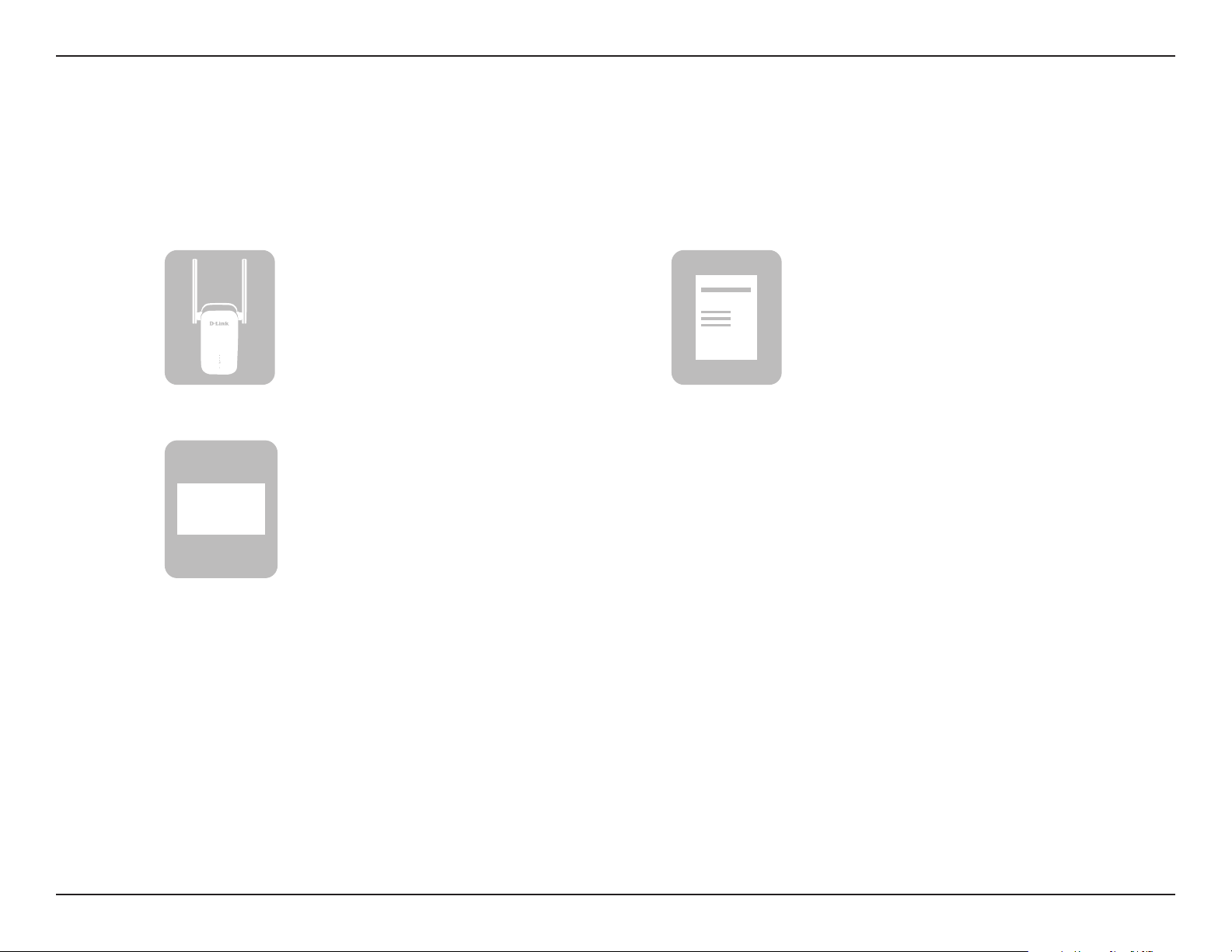
If any of the above items are missing, please contact your reseller.
DAP-1610
AC1200 Mesh Wi-Fi Range Extender
Simple Setup Guide
Product Overview
Package Contents
Quick Installation Card
QIC
2D-Link DAP-1610 User Manual
Section 1 - Product Overview
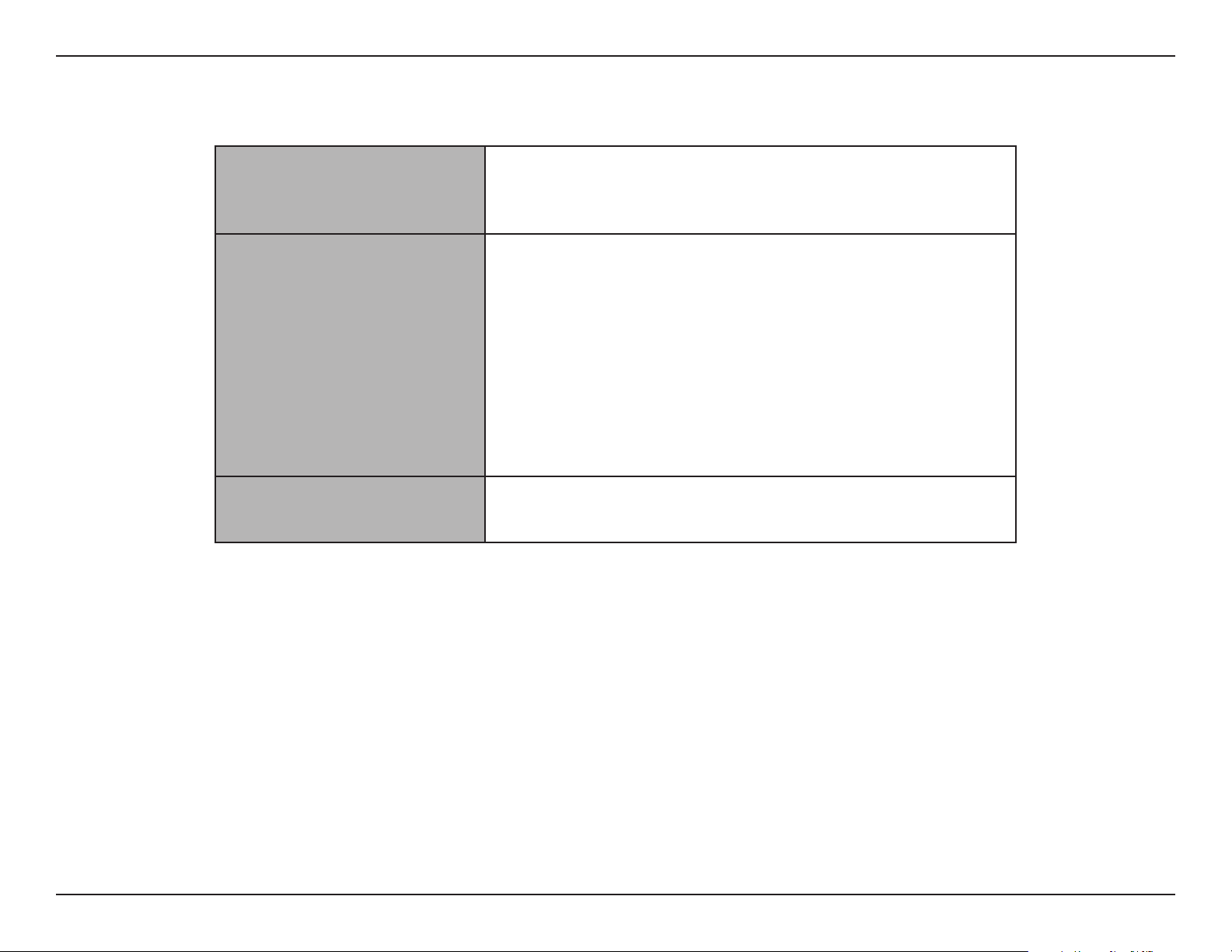
Network Requirements
• A wireless router with an active Internet connection.
• IEEE 802.11ac, 802.11n, 802.11g, 802.11b, or 802.11a
wireless clients/devices
Web-based Conguration
Utility Requirements
A Computer or Mobile Device with the following:
• Windows®, Apple® Mac OS®, or Linux-based operating system
• Wireless adapter or Wi-Fi functionality
• An Apple® iOS® or Android™ device
Browser Requirements:
• Internet Explorer® 10 or later
• Firefox® 28 or later
• Safari® 6.0 or later
• Google Chrome™ 28 or later
D-Link Wi-Fi App
Requirements
• iOS® or Android™ device (Please refer to the app’s store page to
check whether your device is compatible.)
System Requirements

3D-Link DAP-1610 User Manual
Section 1 - Product Overview
Introduction
Features
High-speed Wireless Performance With Wireless 802.11ac Technology
Thanks to the latest wireless AC technology, the DAP-1610 provides a wireless connection at up to 1300 Mbps* with other 802.11ac wireless
devices. This feature lets you participate in real-time activities online, such as video streaming, online gaming, and real-time audio with
smooth performance.
Compatibility
The DAP-1610 is fully compatible with the latest 802.11ac standard, but is also backwards compatible with IEEE 802.11n/g/b/a wireless
devices, so you can use your existing devices without sacricing performance.
Compact, Convenient Design
The DAP-1610 is a compact device that is ideal for use at home or a small oce, as it does not take up much space and is ready to use by
simply plugging it in. The bright Signal Indicator LED makes nding a suitable location a cinch. Its diminutive wall-plug design easily saves you
the hassle of dealing with a power cord.
Latest Wireless Network Security and Encryption
The DAP-1610 supports wireless security features to prevent unauthorized access from the wireless network. Support for WPA/WPA2
standards ensure that you’ll be able to use the best possible encryption methods with your compatible wireless devices.
Extend and Customize Your High-speed Wireless AC Network with Wi-Fi Mesh
D-Link’s Wi-Fi Mesh is a scalable solution that allows you to easily increase the coverage of your wireless AC network when connected to a
D-Link Wi-Fi Mesh router. Setup is eortless; conguration of multiple DAP-1610’s can be done in minutes as settings can be passed on to
other access points once the rst is congured.
Easy to Set Up, Easy to Use
Setting up the AC1200 Mesh Wi-Fi Range Extender is simple. You can use the supported D-Link Wi-Fi app on your compatible iOS or Android
device to utilize the built in set up wizard. The DAP-1610 can also receive automatic over-the-air rmware updates, which ensures the best
protection and the latest features for your device.
* Maximum wireless signal rate derived from standard IEEE specications. Actual data throughput will vary. Network conditions and environmental factors, including volume of network trac,
building materials and construction, and network overhead may lower actual data throughput rate. Environmental conditions will adversely aect wireless signal range.
4D-Link DAP-1610 User Manual
Section 1 - Product Overview
What is a Wireless Extender?
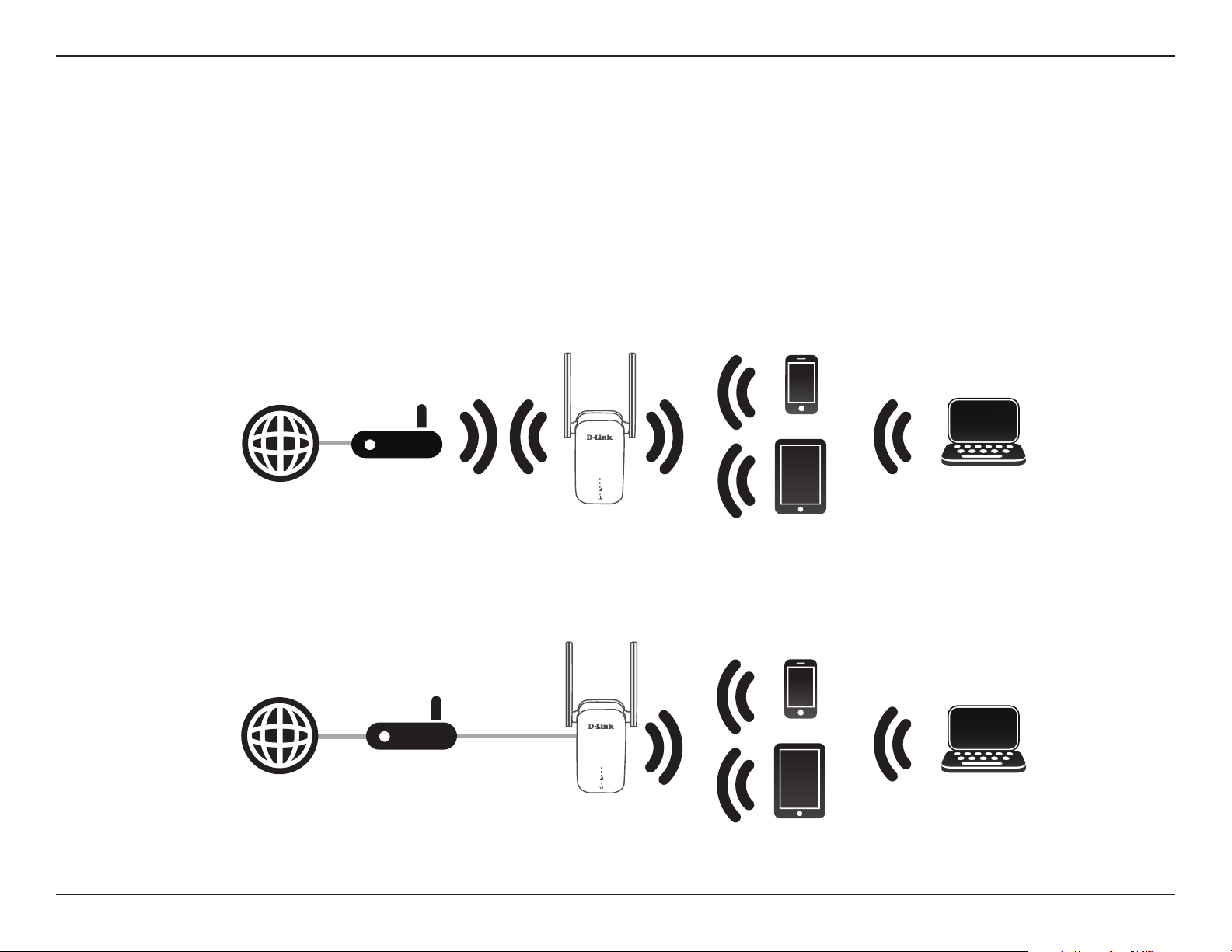
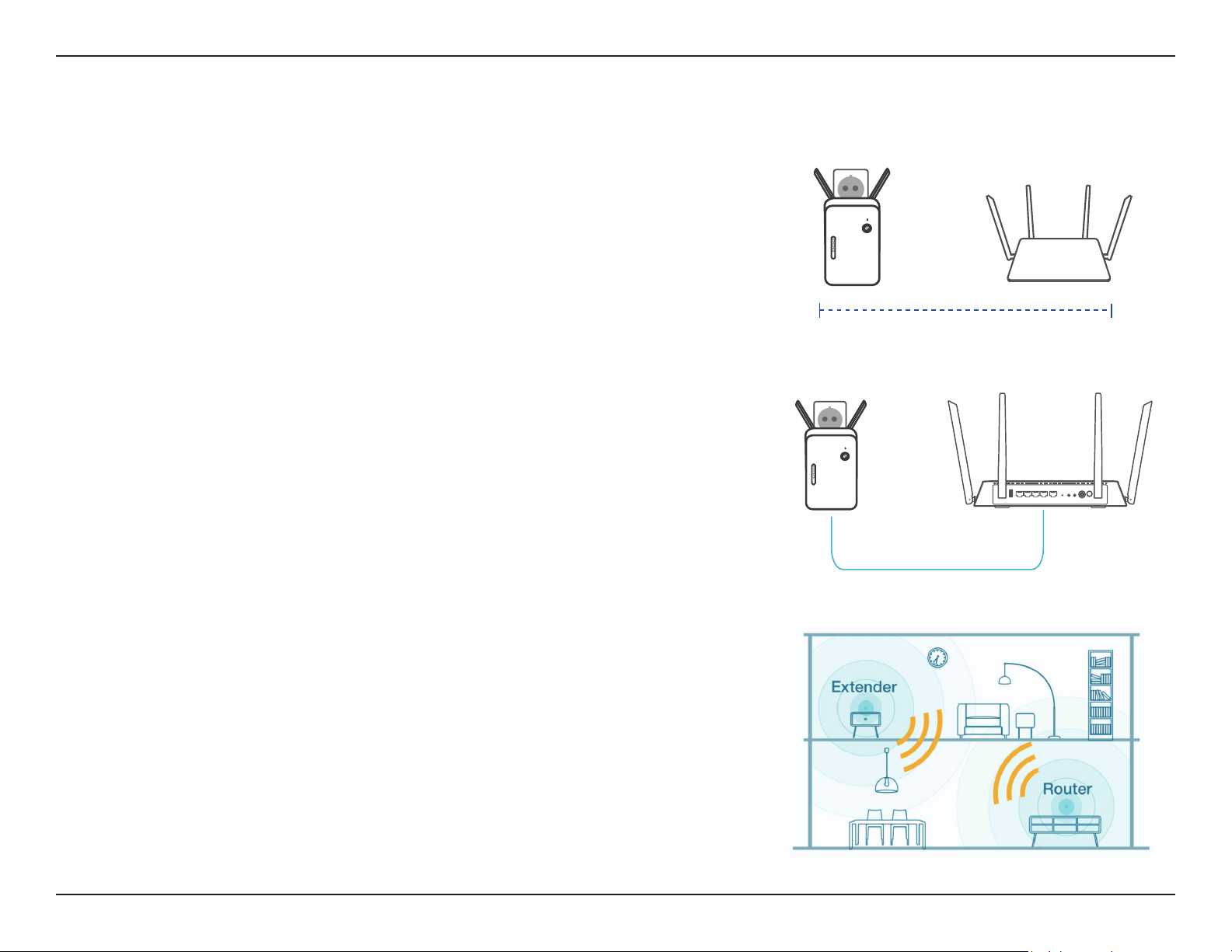
The DAP-1610 acts as a repeater to extend the range of an existing wireless network to provide a better signal for parts of your
home or oce that may have poor or no reception. Your existing wireless signal will be re-broadcast by the DAP-1610, allowing
you to reach the farthest corners of your home or oce. The extended network can simply use the same network credentials as the
existing network, or you can specify a dierent network name and password, giving you the exibility to control network access.
You may also use the DAP-1610 as a wireless access point by connecting an Ethernet cable.
Extend Your Wireless Network using Wi-Fi
Router
Internet
DAP-1610
Extender
Wireless Devices
Computer
Create a Wireless Network using Ethernet
Router
Internet
DAP-1610
Extender
Wireless Devices
Computer
5D-Link DAP-1610 User Manual
Section 1 - Product Overview
Hardware Overview
Front
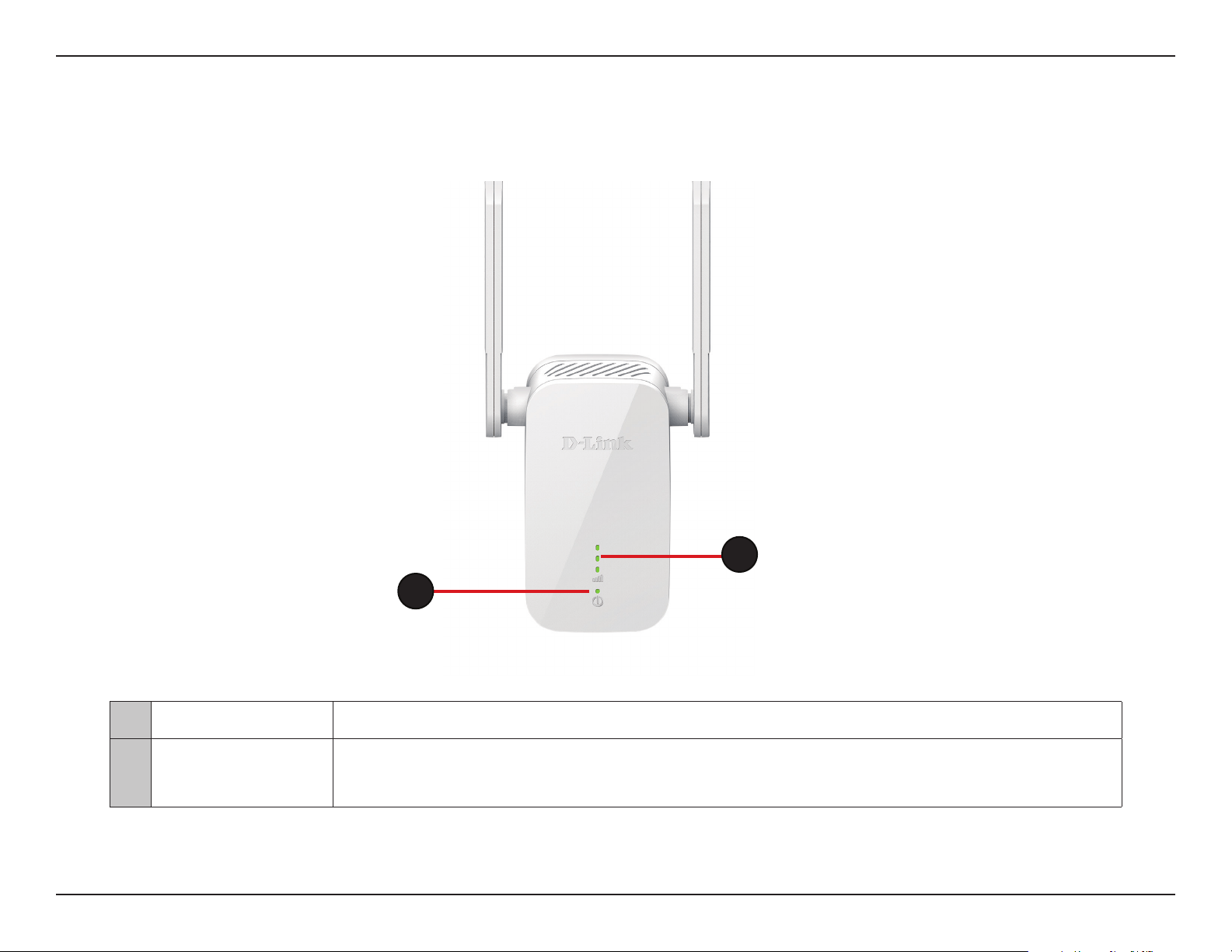
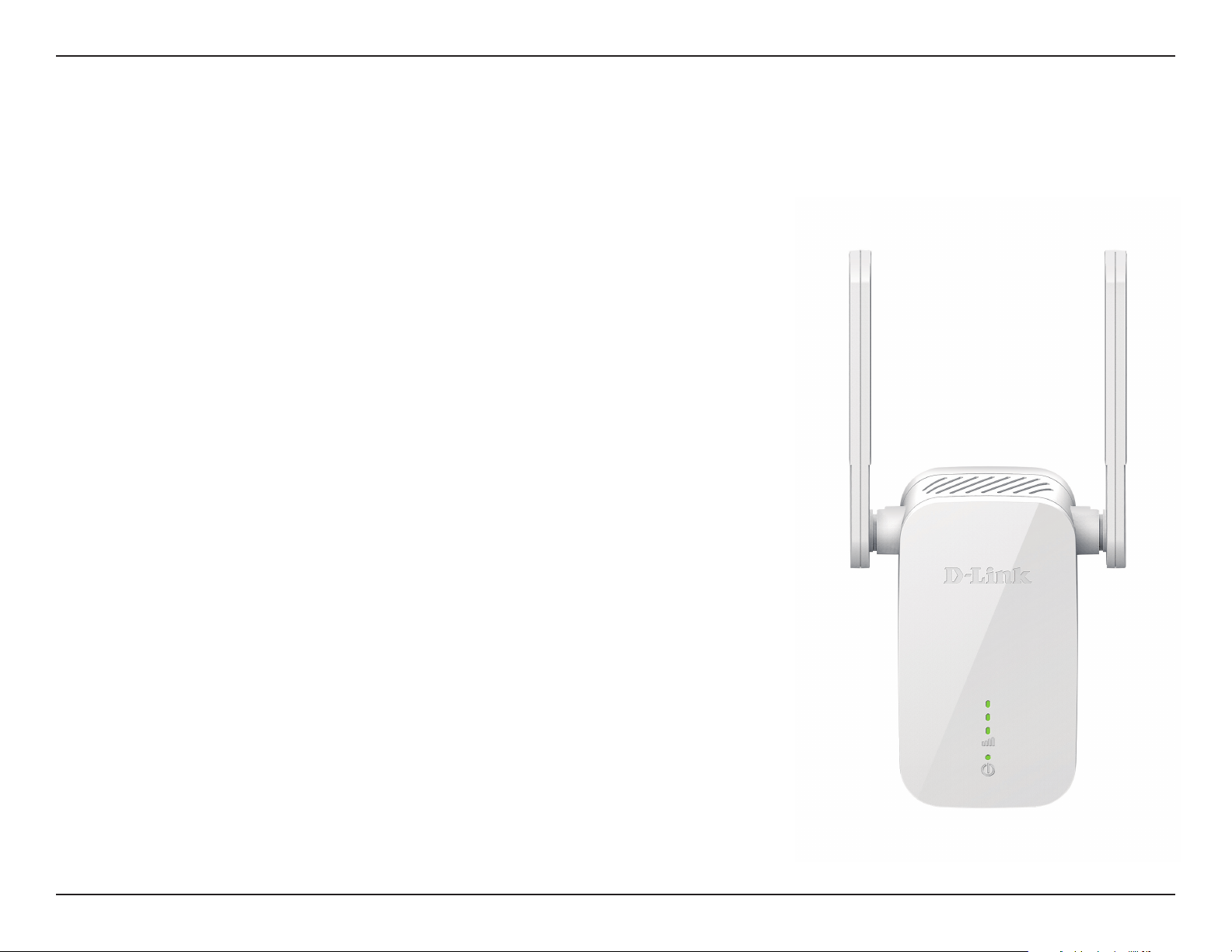
1 Status/WPS LED This LED indicates the current status of the DAP-1610, as detailed on the next page.
2
Signal Indicator
LED
The more lit green bars on the Signal Indicator LED, the better the wireless signal to the host network. A
single solid orange LED indcates a weak Wi-Fi signal.
2
1
6D-Link DAP-1610 User Manual
Section 1 - Product Overview
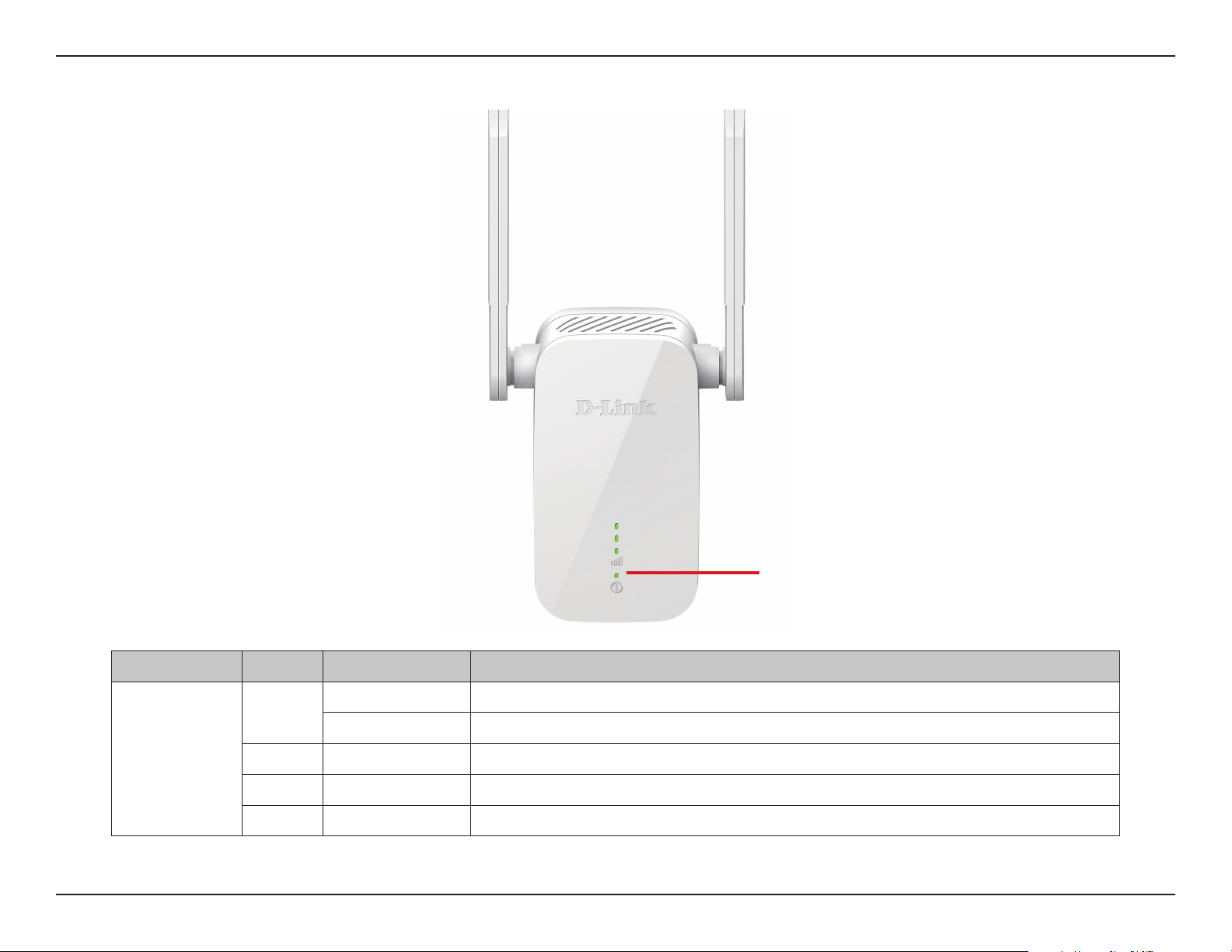
LED Indicator Color Status Description
Power/Status
Green
Solid The DAP-1610 is receiving power and connected to a host network.
Blinking WPS mode is active and is searching for another WPS device.
Red Solid The DAP-1610 is booting or an error has occurred.
Orange Blinking The DAP-1610 is not connected to a host network.
None O Device is not receiving power. Check the power outlet.
Status/WPS LED Indicator
Status/WPS LED Indicator
7D-Link DAP-1610 User Manual
Section 1 - Product Overview
Bottom
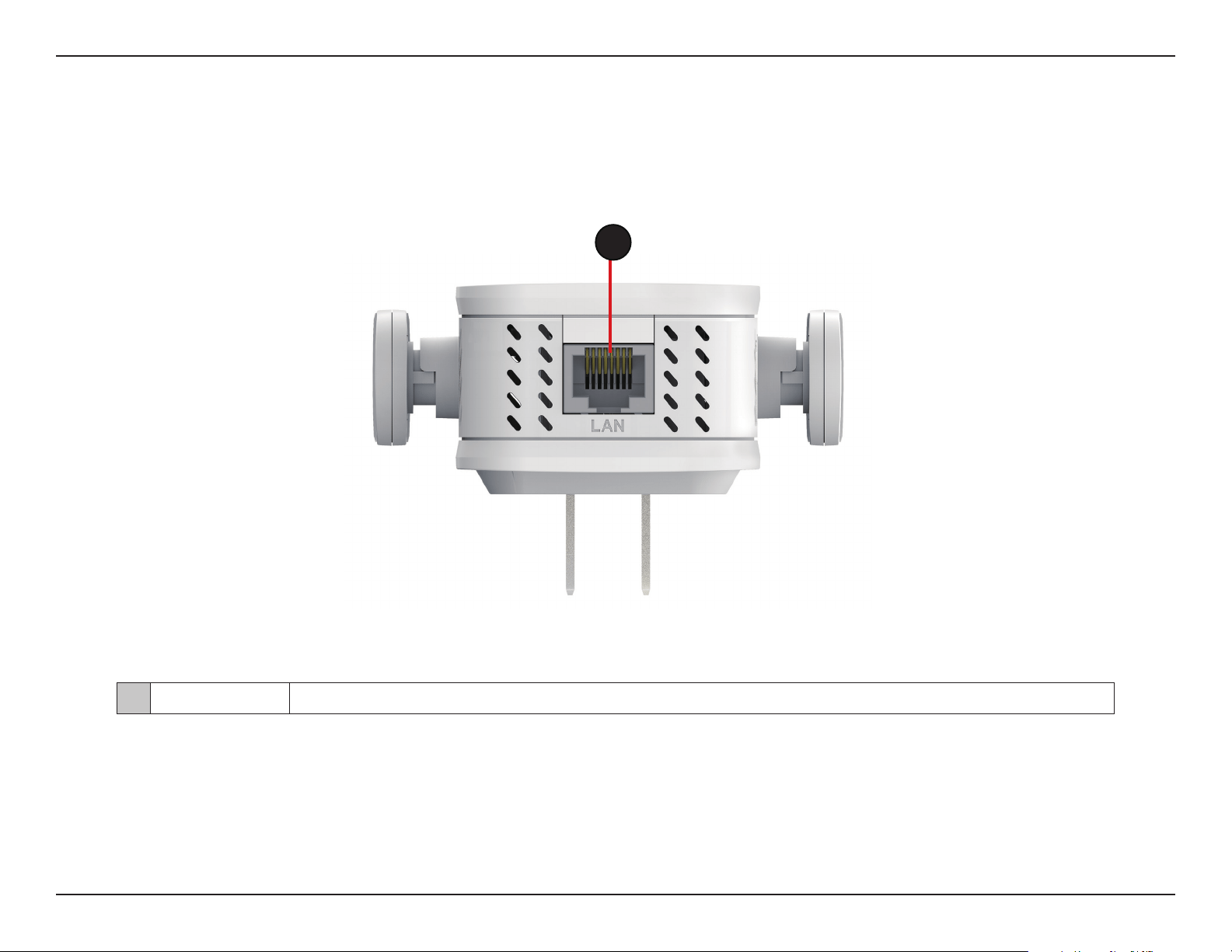
1 LAN Connect an Ethernet cable if you are adding wireless to wired network.
1
2 WPS Button
Press to establish a connection with another WPS compatible device. See page “WPS Button” on page 43
for more information.
2 Reset Button
Use an unfolded paperclip to press and hold the reset button on the bottom of DAP-1610 for 10 seconds
to restore the factory default settings.
8D-Link DAP-1610 User Manual
Section 2 - Installation
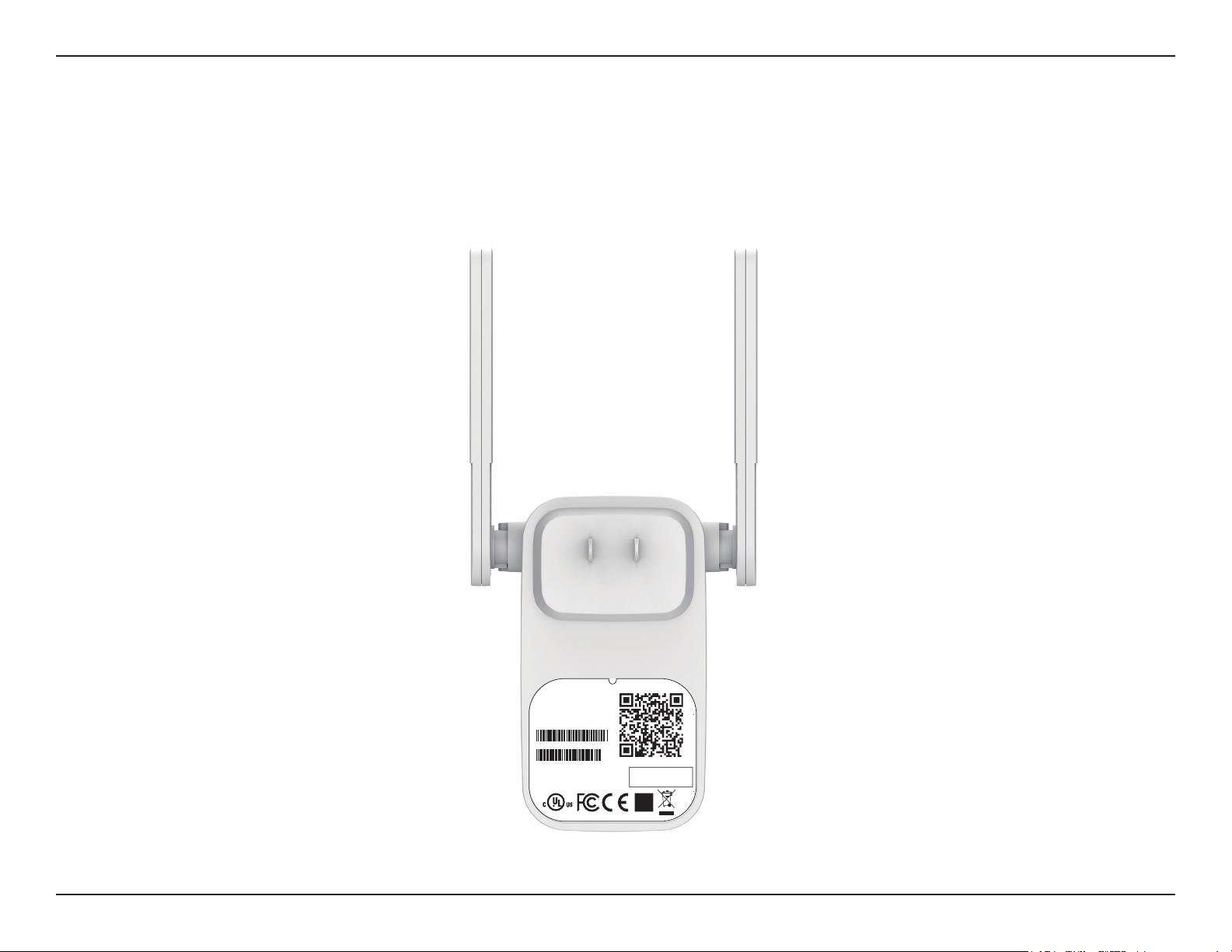
You may locate the Wi-Fi name (SSID) and password for your DAP-1610. This information is printed on the specication sticker on
the back of the device. You will need this information to connect your computer or mobile device to the default network (SSID) of
your DAP-1610. This information is also provided on the Quick Installation Card.
Back
FCC ID :KA2AP1610B1
I
C:4216A-AP1610B1
M/N:DAP-1610B1
CAN ICES-3 (B)/NMB-3(B)
P/N: CAP1610LCA....B1
S/N: S81P1YMXXXXXX
MAC ID: XXXXXXXXXXXX
H/W Ver.: B1 F/W Ver.: XXXX
Wi-Fi Name(SSID): dlink-xxxx
Wi-Fi Password: XXXXXXXX
DAP-1610
Input: 100-240Vac, 50/60 Hz, 0.3A Max
http://dlinkapwxyz.local./
Username: Admin
Device Password: password
Made In China

9D-Link DAP-1610 User Manual
Section 2 - Installation
Installation
Wireless Installation Considerations
The DAP-1610 lets you extend your existing wireless network’s coverage as long as it is within range of the uplink network. Keep in
mind that the DAP-1610’s extension network’s range may be limited by the number, thickness and location of walls, ceilings, or other
objects that the wireless signals must pass through. Typical ranges vary depending on the types of materials and background RF (radio
frequency) noise in your home or business. The key to maximizing wireless range is to follow these basic guidelines:
1. Keep the number of walls and ceilings between the D-Link extender and other network devices to a
minimum - each wall or ceiling can reduce your adapter’s range from 3-90 feet (1-30 meters.) Position your
devices so that the number of walls or ceilings is minimized.
2. Be aware of the direct line between network devices. A wall that is 1.5 feet thick (0.5 meters), at a 45-degree
angle appears to be almost 3 feet (1 meter) thick. At a 2-degree angle it looks over 42 feet (14 meters) thick!
Position devices so that the signal will travel straight through a wall or ceiling (instead of at an angle) for
better reception.
3. Building materials make a dierence. A solid metal door or aluminum studs may have a negative eect on
range. Try to position extenders, access points, wireless routers, and computers so that the signal passes
through drywall or open doorways. Materials and objects such as glass, steel, metal, walls with insulation,
water (sh tanks), mirrors, le cabinets, brick, and concrete will degrade your wireless signal.
4. Keep your product away (at least 3-6 feet or 1-2 meters) from electrical devices or appliances that generate RF
noise.
5. If you are using 2.4 GHz cordless phones or X-10 (wireless products such as ceiling fans, lights, and home
security systems), your wireless connection may degrade dramatically or drop completely. Make sure your 2.4
GHz phone base is as far away from your wireless devices as possible. The base transmits a signal even if the
phone is not in use.
10D-Link DAP-1610 User Manual
Section 2 - Installation
Hardware Setup
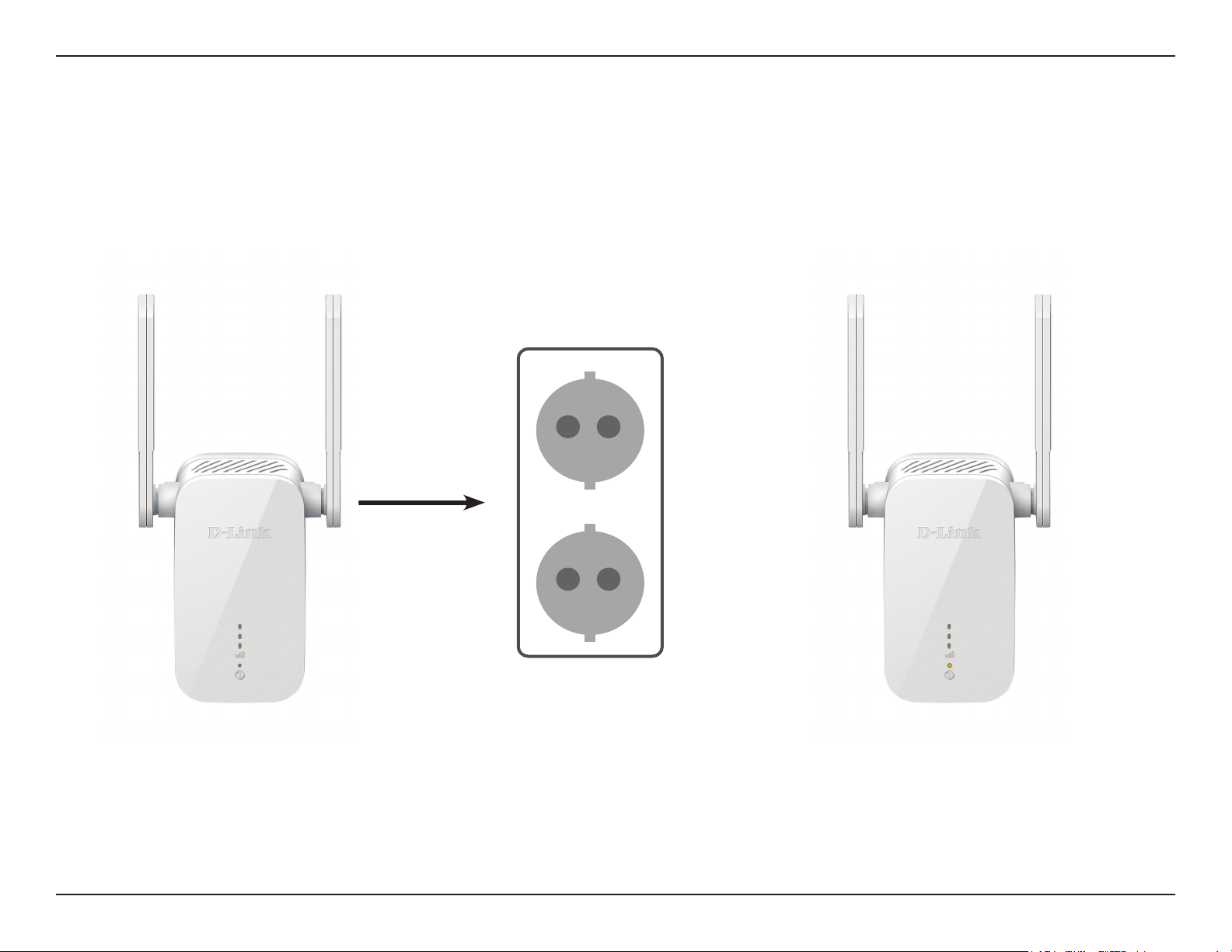
Plug in the DAP-1610 to a power outlet. Verify that the power LED is blinking orange before continuing with conguration.
OUTLET

11D-Link DAP-1610 User Manual
Section 3 - Conguration
There are several conguration tools you can use to set up your DAP-1610.
• WPS PBC - To easily extend an existing wireless network refer to “WPS-PBC Conguration” on page 12 for setup
instructions.
• D-Link Wi-Fi App - Use your Android device, iPhone or iPad to congure your extender. Refer to “D-Link Wi-Fi App” on
page 14 for setup instructions.
• Web-based Wireless Setup Wizard - This wizard will launch when you log into the extender’s web conguration utility
for the rst time. Refer to “Wireless Setup Wizard” on page 16 for setup instructions.
• Access Point Mode Settings- This section will go through how to setup your extender as an access point. Refer to “Access
Point Mode Settings” on page 23.
Getting Started
12D-Link DAP-1610 User Manual
Section 3 - Conguration
WPS-PBC Conguration
Step 1 - Initiate WPS Mode
While the Status/WPS LED is blinking orange, push the WPS button on the source
wireless router or AP, and then push the WPS button on the DAP-1610. The
Status/WPS LED will start to ash green. Please allow up to two minutes for the
process to nish. The Status/WPS LED will turn solid green when the DAP-1610
has connected successfully to the source wireless router or access point.
Step 2 - Connecting Devices to the DAP-1610
The DAP-1610 is now ready to share the extended Wi-Fi network with your PCs
and mobile devices. You may use the WPS method to connect devices to the
extended network created by the DAP-1610 using the following network names
(SSID). The password will be the same as the wireless network you are extending.
• (Your router’s SSID)-EXT
The Smart Connect feature will present a single wireless network. When
connecting clients to the extended network, they will be automatically added to
the best band, either 2.4 GHz or 5 GHz. To disable the Smart Connect feature and
individually congure 2.4 GHz and 5 GHz SSIDs, refer to “Extender Settings” on
page 28.
Wireless Protected Setup (WPS) makes connecting your DAP-1610 easy. To use WPS, rst make sure the source router or access point
features a WPS Button or has a virtual WPS Button.
13D-Link DAP-1610 User Manual
Section 2 - Installation
Assessing Uplink Signal Strength
Poor Ok Good Best
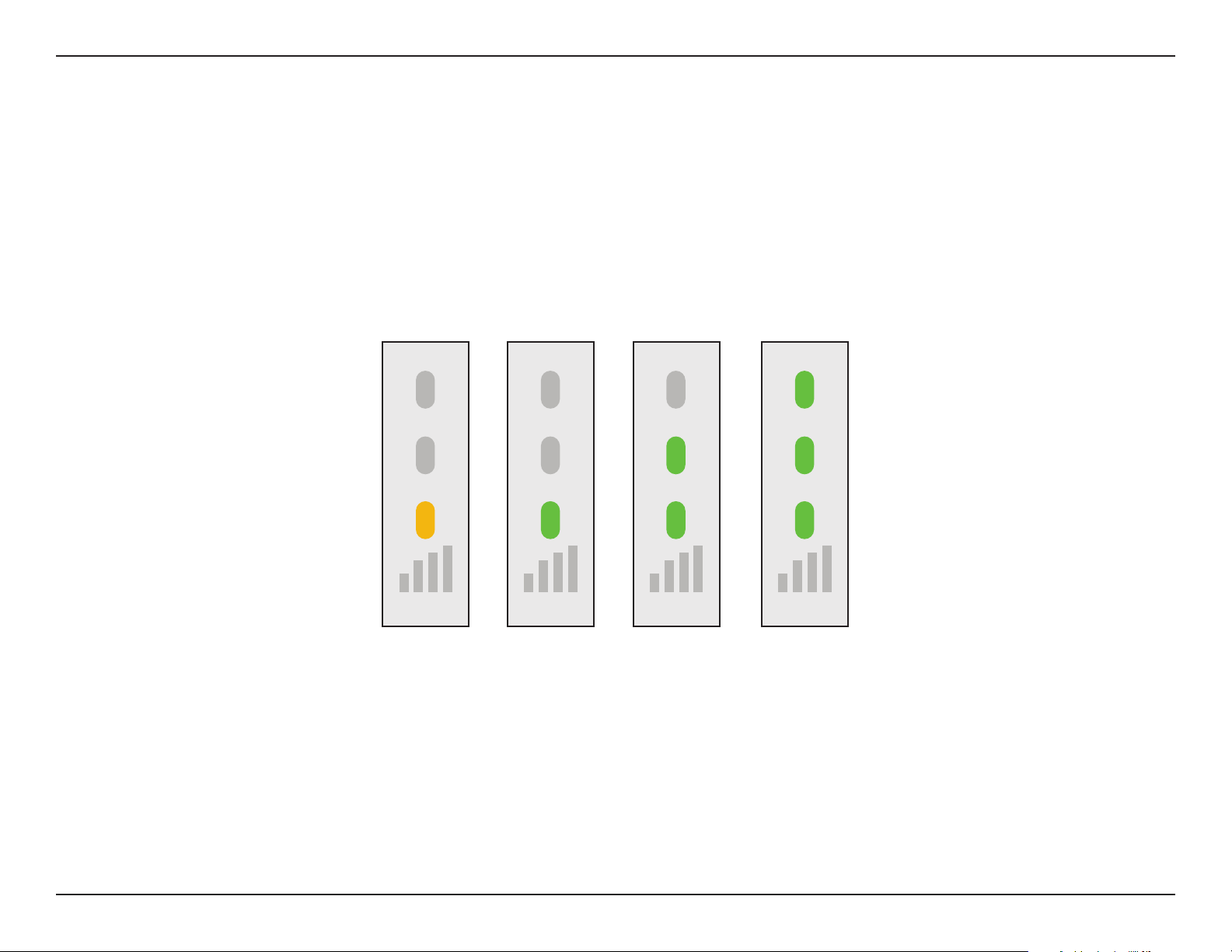
The Status/WPS LED will turn solid green when the DAP-1610 has connected successfully to a wireless network and is extending
that network. If the Smart Signal LED has a single orange bar after the connection process has nished, the DAP-1610 has
established a poor quality connection. The more lit bars on the Signal Indicator LED, the better the wireless signal. To improve the
connection quality, the DAP-1610 should be relocated closer to the source wireless router. Using the 5 GHz extension network
is recommended in order to achieve the fastest wireless speeds. If the extender has been congured as an Access Point and is
connected via Ethernet cable to an uplink network, the Smart Signal LED will not be lit.
14D-Link DAP-1610 User Manual
Section 2 - Installation
D-Link Wi-Fi App
The DAP-1610 can be set up from your iPhone, iPad, or Android smartphone or tablet device using the D-Link Wi-Fi app.
Note: The screenshots may be dierent depending on your mobile device’s OS version.
Step 1
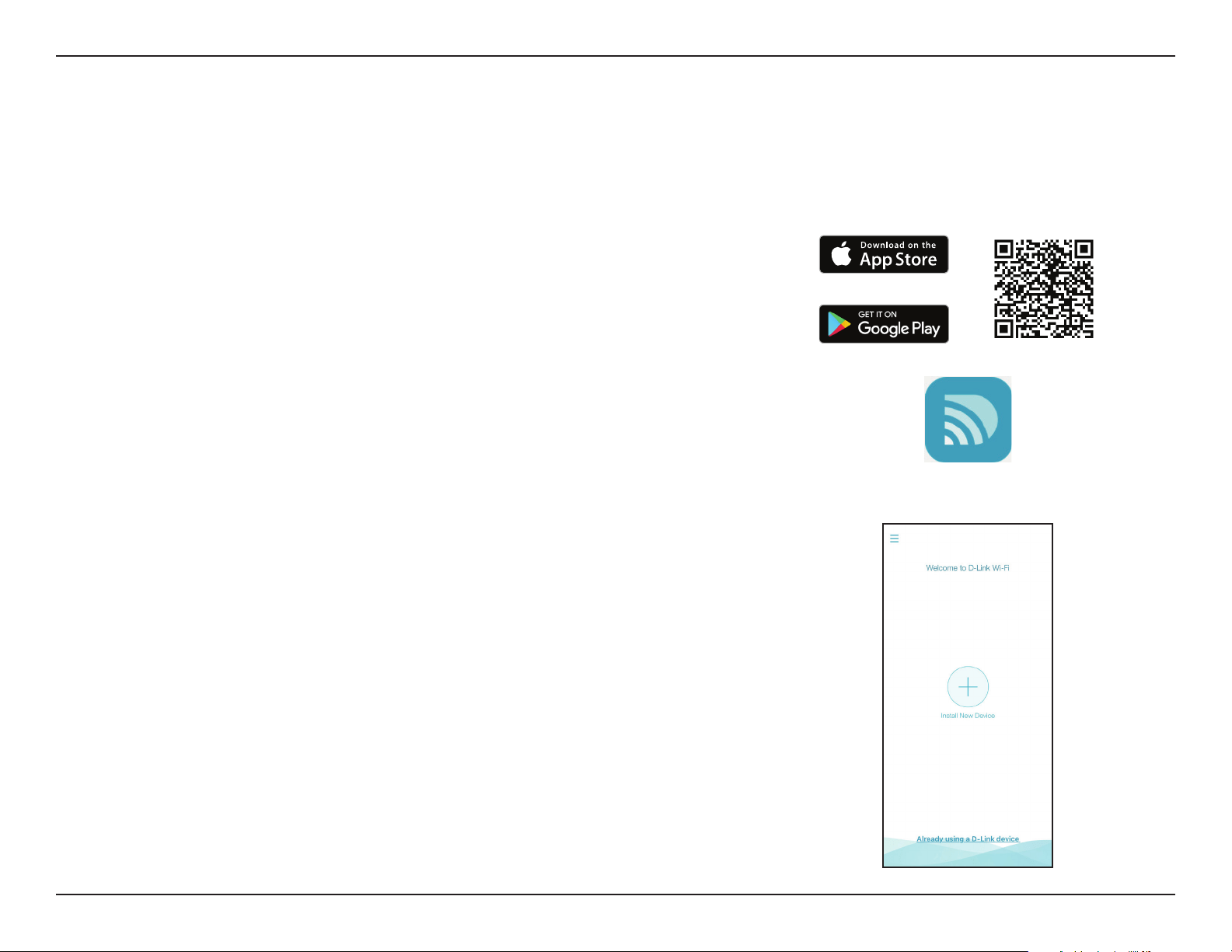
Search for the free D-Link Wi-Fi App on the Apple App Store or Google Play and
install. You can also scan the QR code on the right, which will take you to the
respective D-Link Wi-Fi app store page directly.
Step 2
Launch the D-Link Wi-Fi App from the Home screen of your device.
Step 3
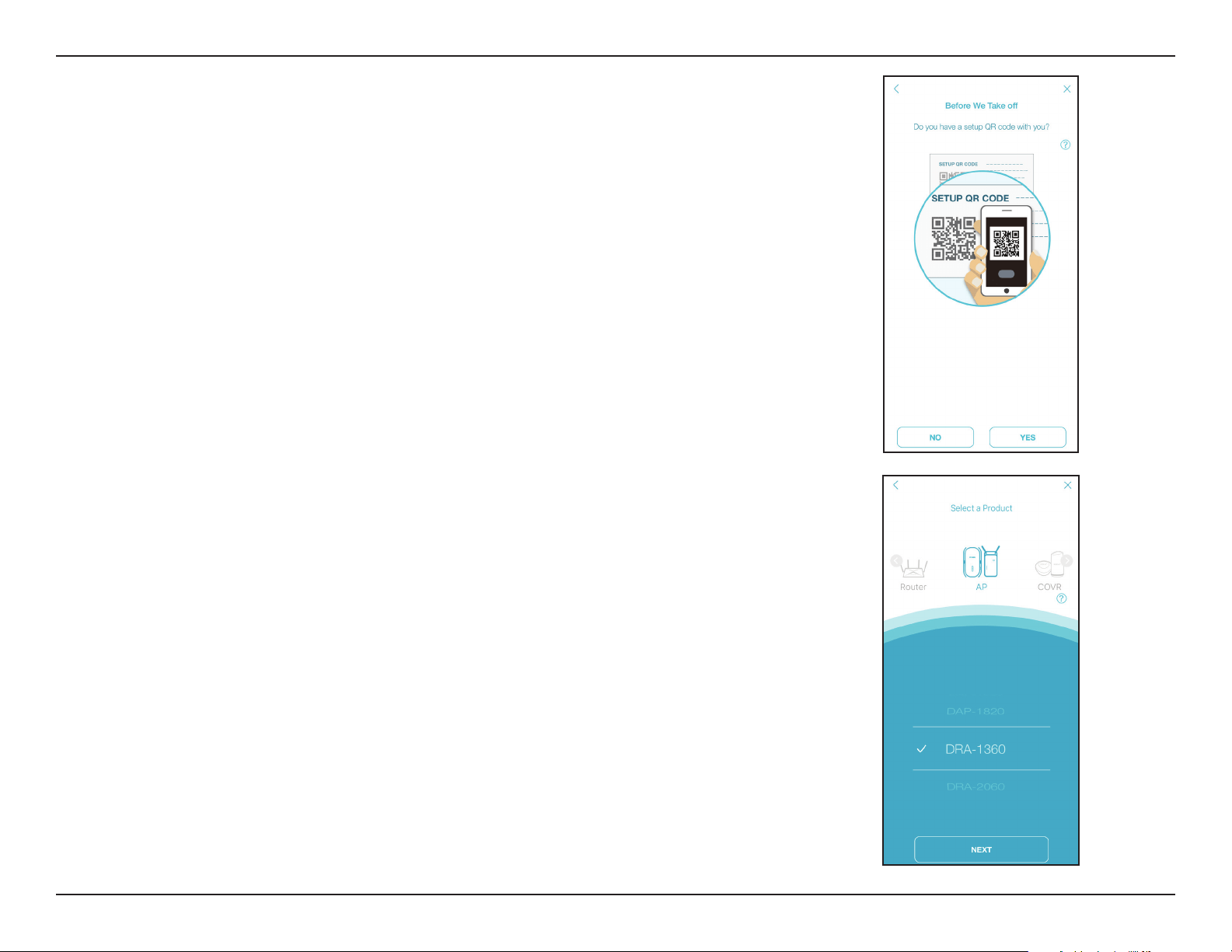
Click on the Install New Device button at the middle of the screen (or click on
the Menu button on the top left corner of the app to do the same).
D-Link Wi-Fi
15D-Link DAP-1610 User Manual
Section 3 - Conguration
Step 5
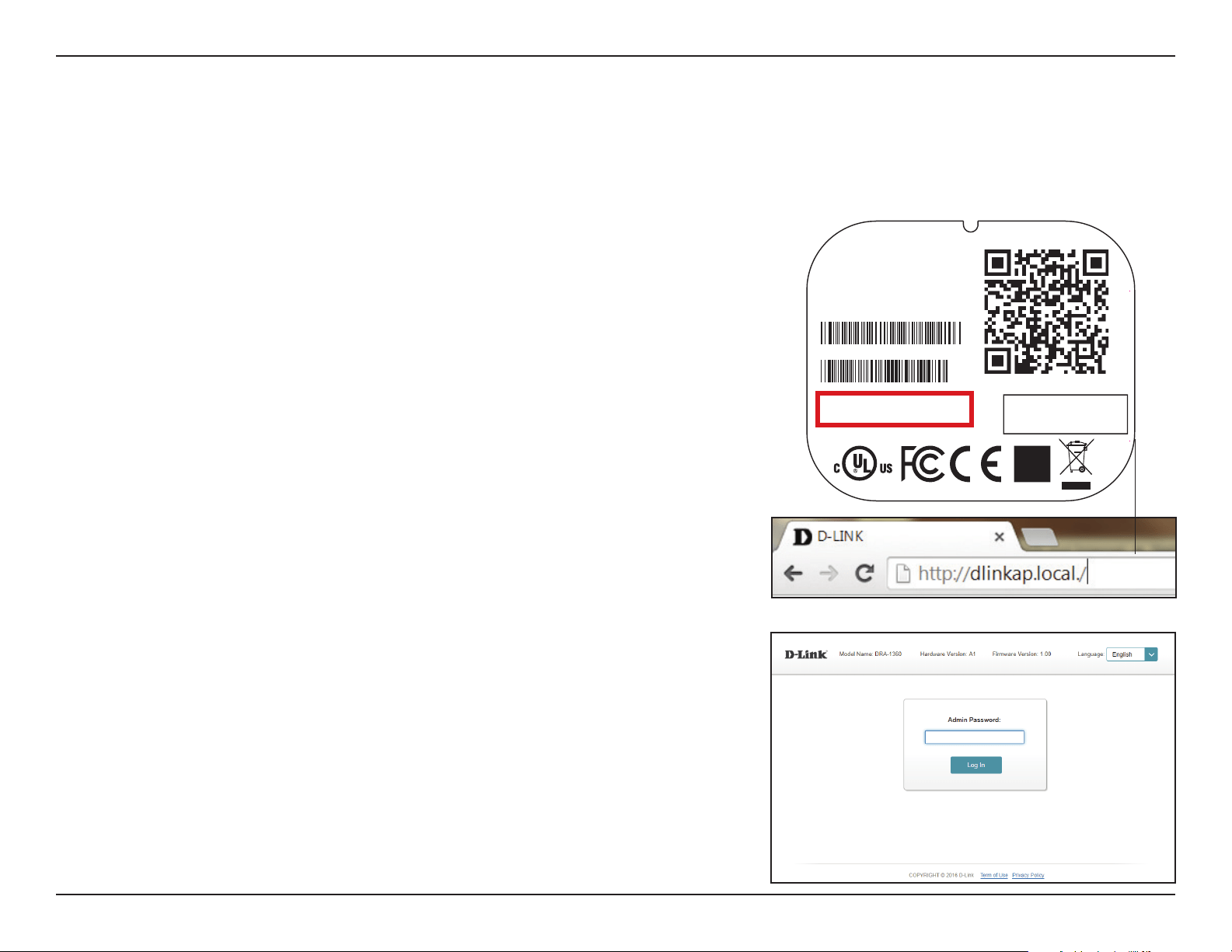
Slide the product options to AP and select DAP-1610 from the list of available
devices. Click Next to continue.
Step 6
You will now be guided through a step-by-step process for setting up your
device. Simply follow the on-screen instructions to complete the installation and
DAP-1610 conguration process.
Step 4
Click Yes if you have the setup QR code with you to scan the QR code and
proceed to step 6. If not, click No and proceed to step 5.
16D-Link DAP-1610 User Manual
Section 3 - Conguration
Wireless Setup Wizard
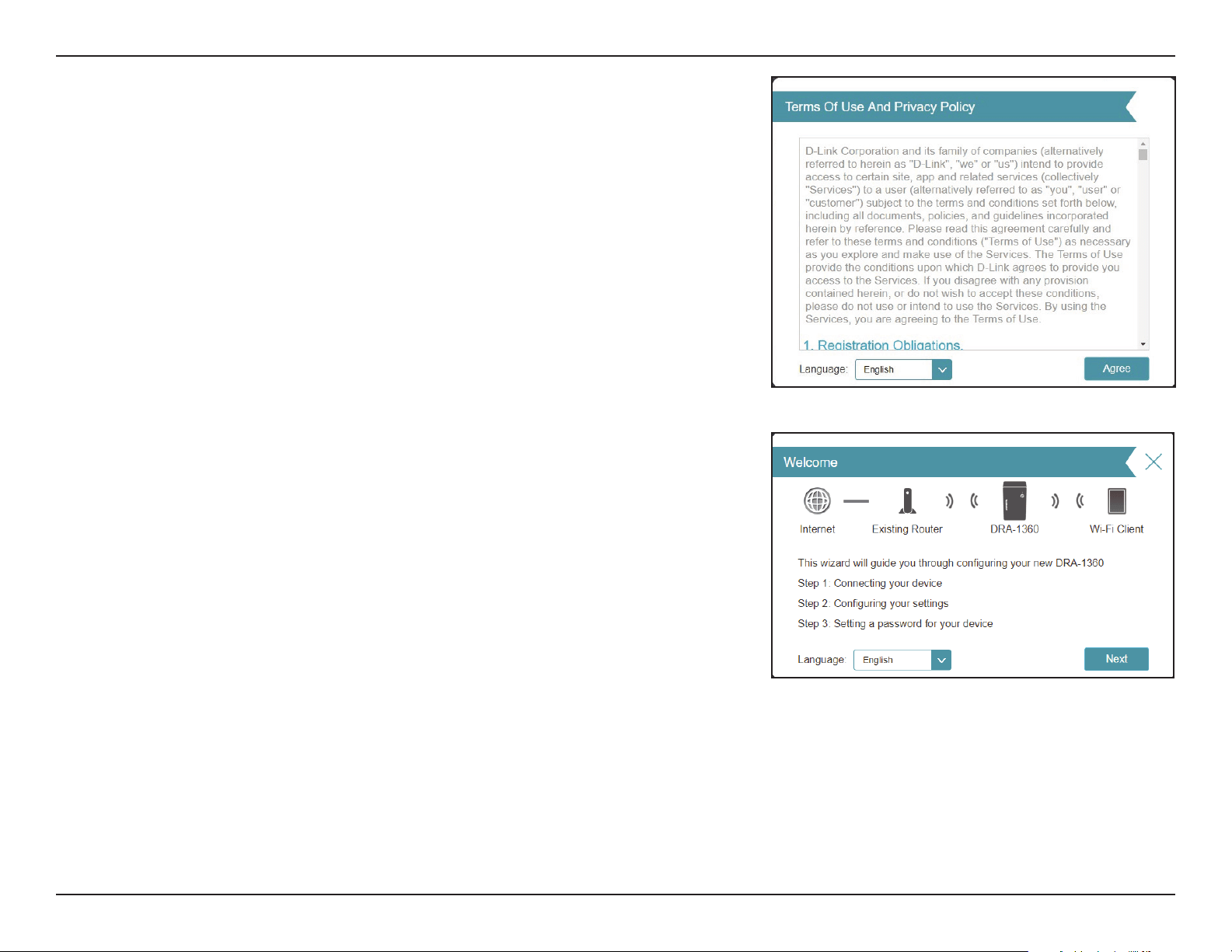
To access the setup utility for the DAP-1610 AC1200 Mesh Wi-Fi Range Extender-
on your PC, rst connect to the DAP-1610 wirelessly using the Wi-Fi name (SSID)
and password located on the back of your DAP-1610. Then open a web browser
and enter http://dlinkap.local./ in your browser’s URL eld. You may also enter
the IP address* of the DAP-1610.
* The default IP address is 192.168.0.50. Once your DAP-1610 connects to the host network,
it will be assigned a new IP address based on your network’s DHCP settings. You will need
to log in to your router to see what IP address is assigned to your DAP-1610. For multiple
DAP-1610s, go to http://dlinkapxxxx.local. as shown on the included Quick Installation
Card, with “xxxx” being the last four digits of the DAP-1610’s MAC address.
If this is your rst time logging in to the extender and no connection has been
established, the setup wizard will automatically appear. If the setup process was
not previously completed, then log in to the interface by leaving the password
eld blank.
The setup wizard is designed to guide you through a step-by-step process to congure your new DAP-1610
AC1200 Mesh Wi-Fi Range Extender to extend your wireless network and connect to the Internet via a wireless setup process. To set
your DAP-1610 using an ethernet cable, please refer to “Access Point Mode Settings” on page 23.
FCC ID :KA2AP1610B1
I
C:4216A-AP1610B1
M/N:DAP-1610B1
CAN ICES-3 (B)/NMB-3(B)
P/N: CAP1610LCA....B1
S/N: S81P1YMXXXXXX
MAC ID: XXXXXXXXXXXX
H/W Ver.: B1 F/W Ver.: XXXX
Wi-Fi Name(SSID): dlink-xxxx
Wi-Fi Password: XXXXXXXX
DAP-1610
Input: 100-240Vac, 50/60 Hz, 0.3A Max
http://dlinkapwxyz.local./
Username: Admin
Device Password: password
Made In China
17D-Link DAP-1610 User Manual
Section 3 - Conguration
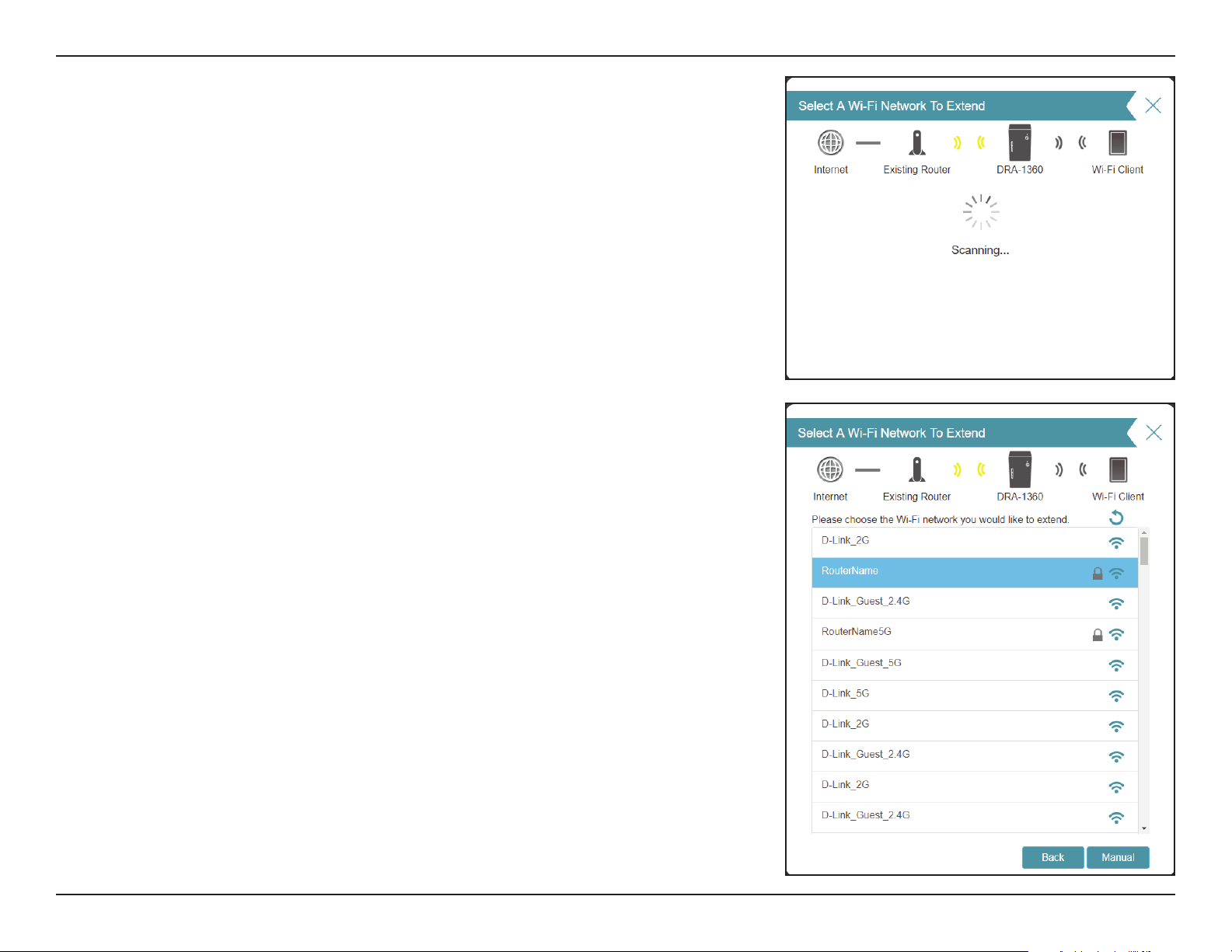
This wizard will guide you through conguring your new DAP-1610 by wireless
means.
Click Next to begin.
Agree to the Terms of Use and Privacy Policy to continue.
18D-Link DAP-1610 User Manual
Section 3 - Conguration
Please wait while your DAP-1610 scans for available Wi-Fi networks.
The DAP-1610 will scan for available wireless networks and display a list of results.
You may choose one of the following options to proceed:
• If the wireless network you wish to extend was detected by the scan, click on
the network to select it. The extender will automatically forward you to the
next step.
• If the network you would like to extend was not detected by the scan, click the
Manual button.
Note: If the wireless network you would like to extend was not detected by the
scan, your DAP-1610 might be out of range and you may need to reposition the
extender closer to the host network device.
19D-Link DAP-1610 User Manual
Section 3 - Conguration
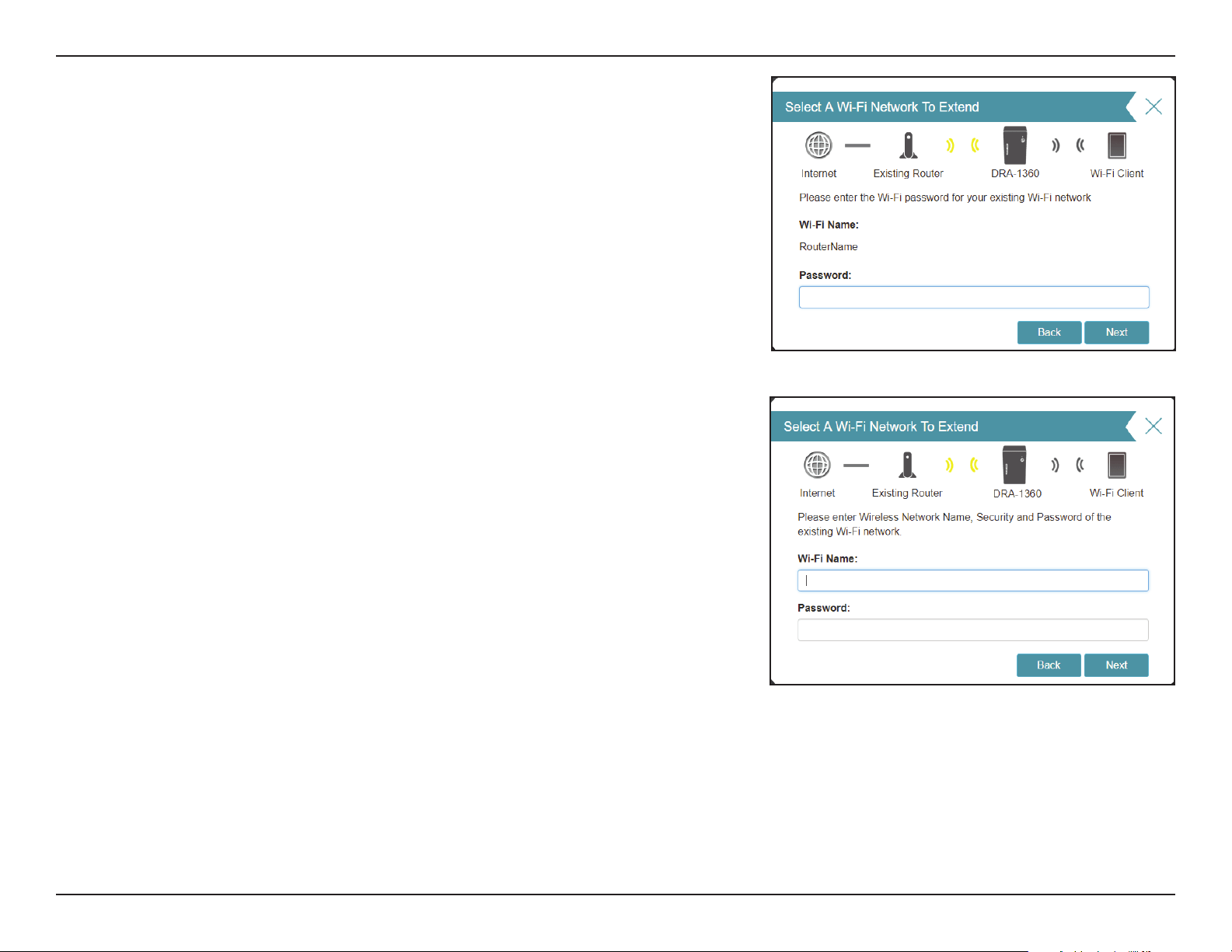
If the wireless network you wish to extend was detected by the scan, enter the
password to your router now.
Click Next to continue on to congure your extension network settings, or click
Back to return to the previous step.
If you chose Manual , enter the Wireless Network Name (SSID) and Password of
the existing Wi-Fi network you wish to connect to.
Click Next to continue on to congure your extension network settings, or click
Back to return to the previous step.
20D-Link DAP-1610 User Manual
Section 3 - Conguration
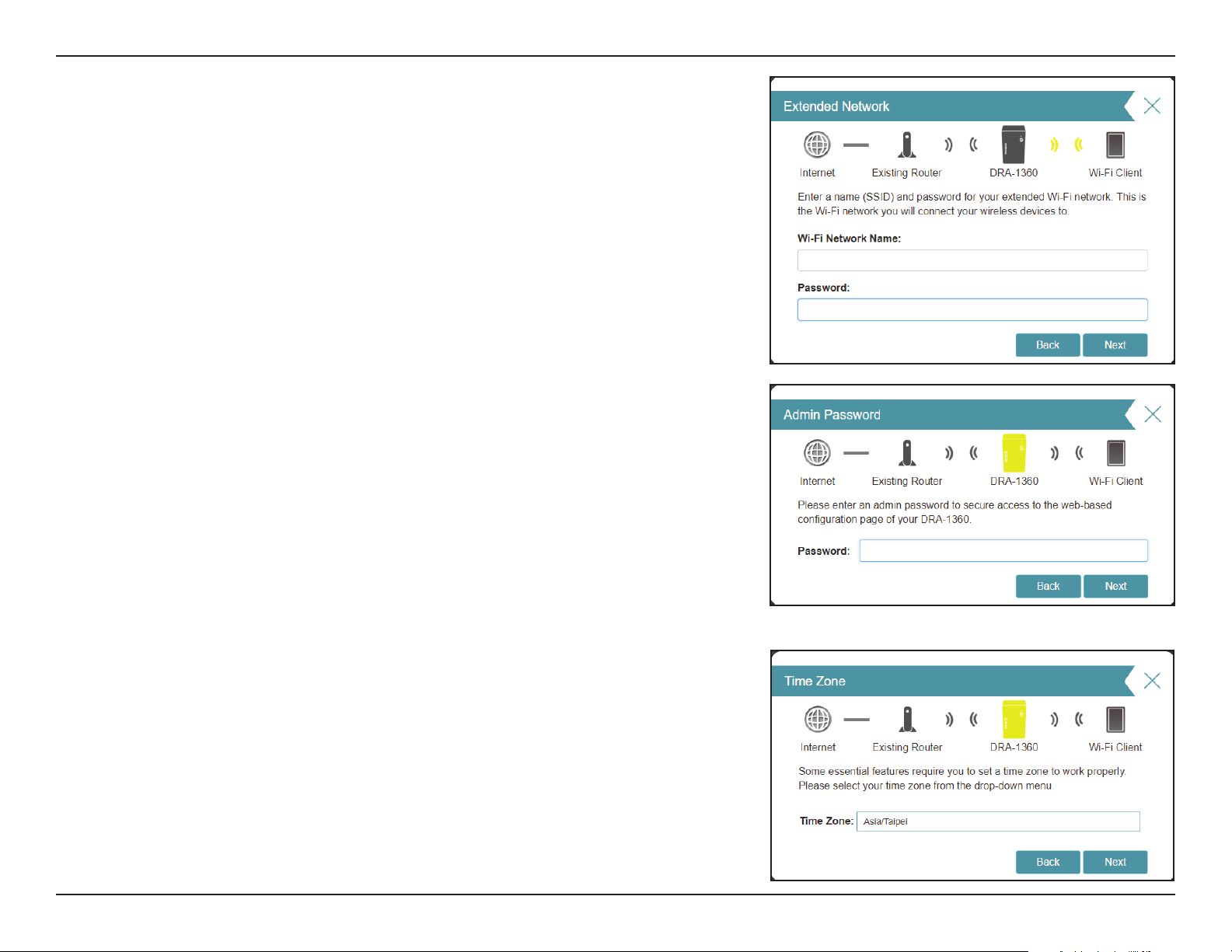
In order to secure the extender’s web conguration utility, please enter an admin
password. You will be prompted for this password each time you want to use the
extender’s web conguration utility.
Click Next to continue.
Select your time zone from the drop-down menu.
Click Next to continue.
Enter the Wireless Network Name (SSID) and Password for your extended Wi-Fi
network. This is the Wi-Fi network you will connect your wireless devices to.
Click Next to continue.
21D-Link DAP-1610 User Manual
Section 3 - Conguration
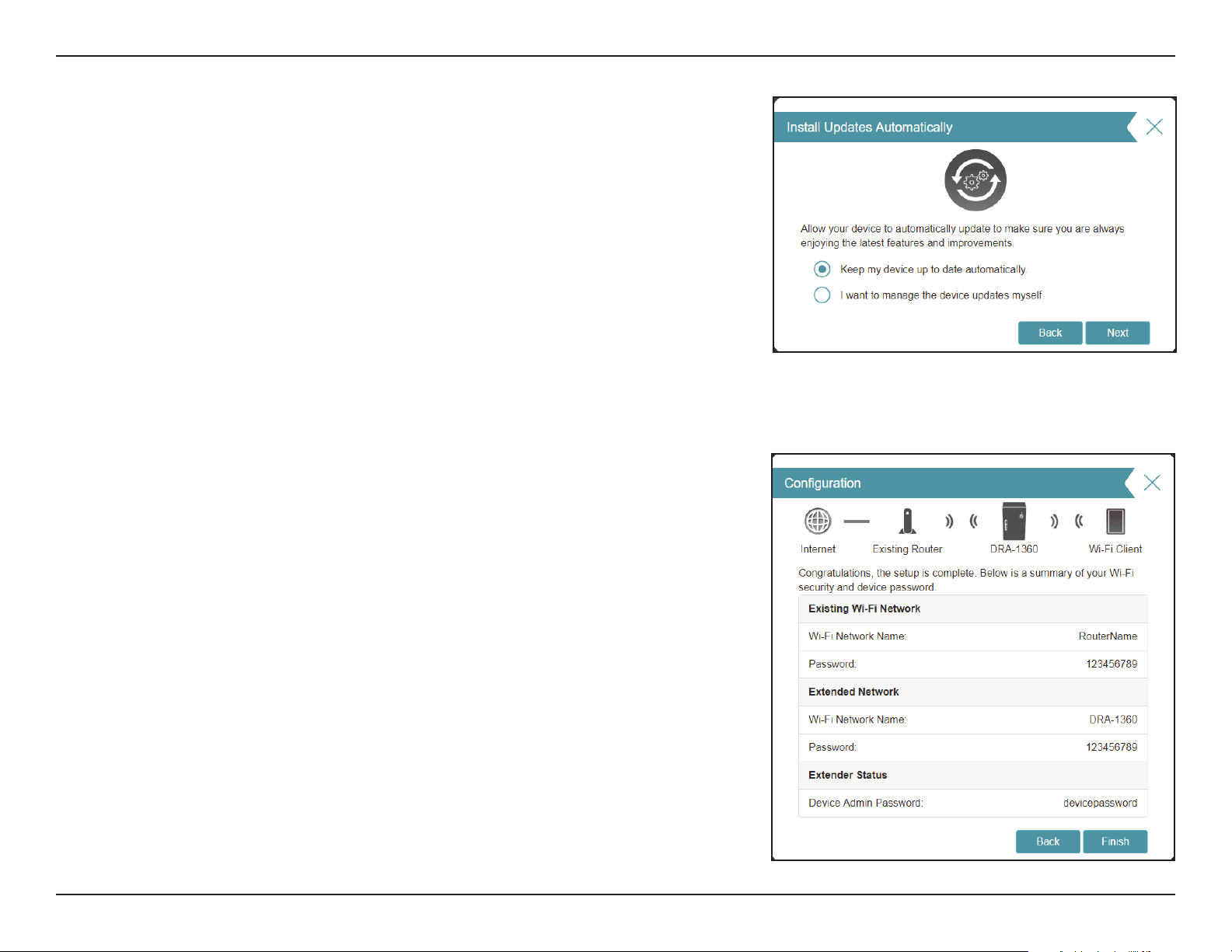
At the end of the wizard, you will be presented with a nal summary of
your settings. It is recommended that you record this information for future
reference.
Click Finish to close the wizard.
*Wireless network names and passwords are shown for example only.
Keeping your DAP-1610 rmware up to date provides you with the latest
protection and new features over the air. Choose whether to keep your device up
to date automatically or to manage the device updates by yourself.
Click Next to continue.
22D-Link DAP-1610 User Manual
Section 3 - Conguration
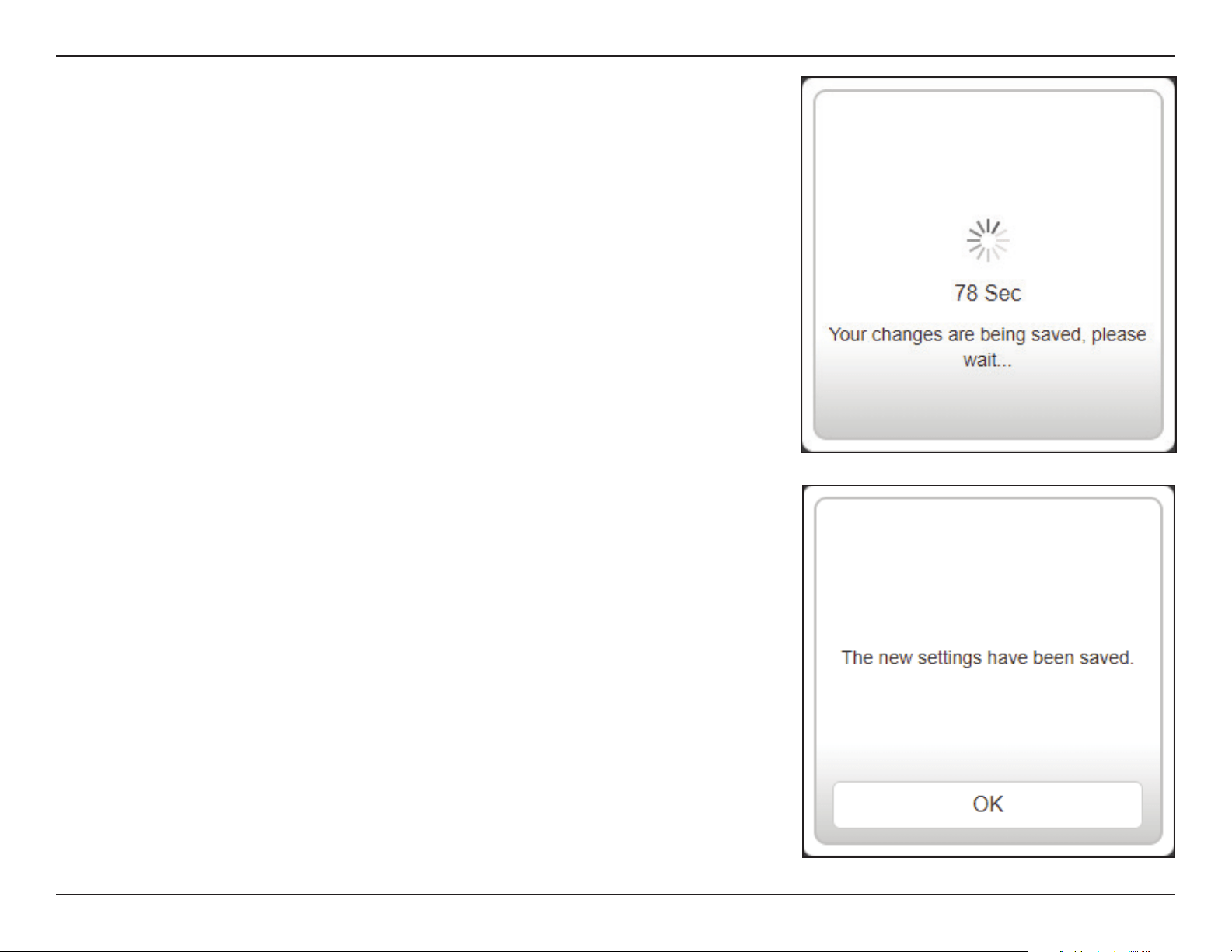
Click OK to exit the Setup Wizard. You will be redirected to the log in page.
You can now place the DAP-1610 in a place where you require Internet access.
Your changes will be saved and the extender will reboot.
Devices may be connected to the new wireless extension network(s) once the
extender successfully reboots.
23D-Link DAP-1610 User Manual
Section 3 - Conguration
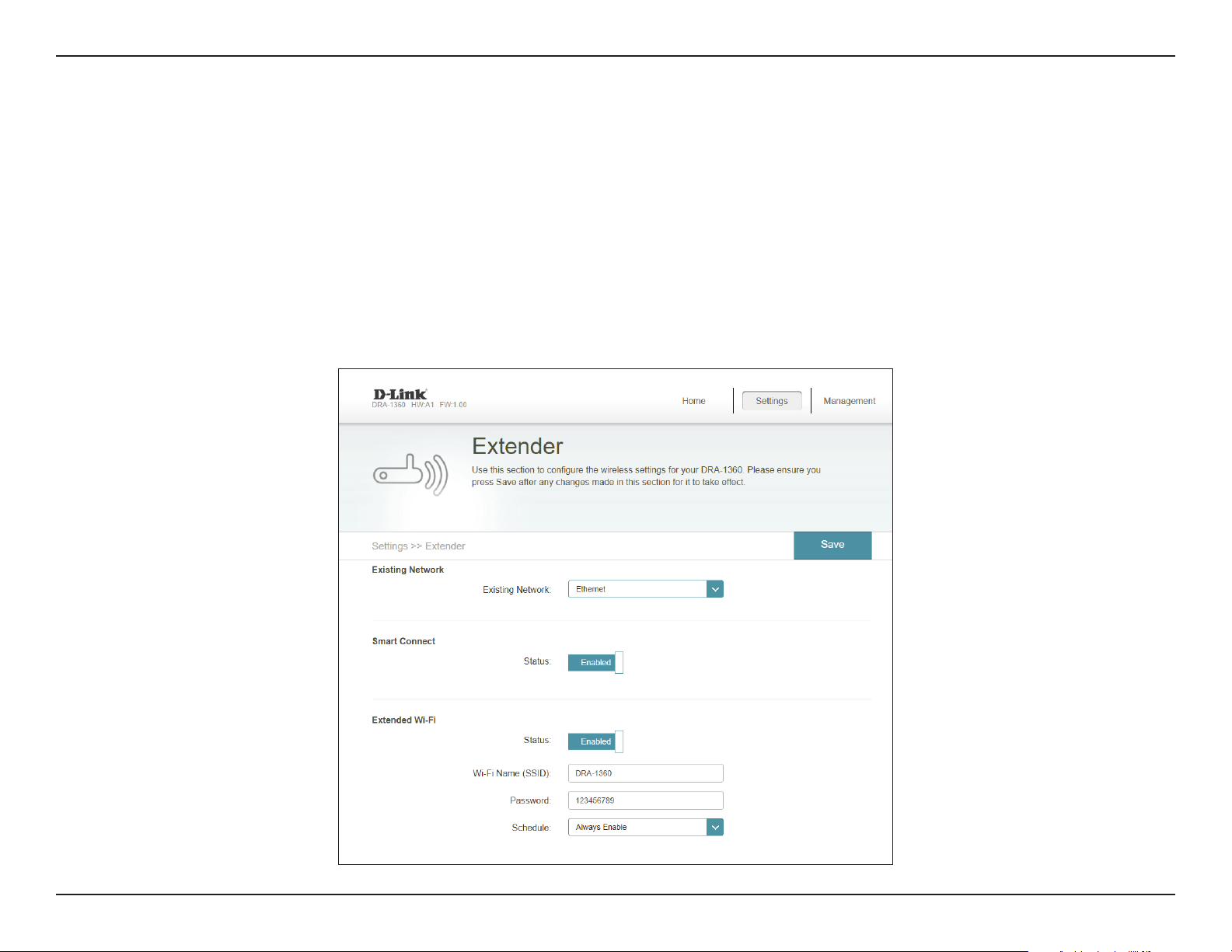
Access Point Mode Settings
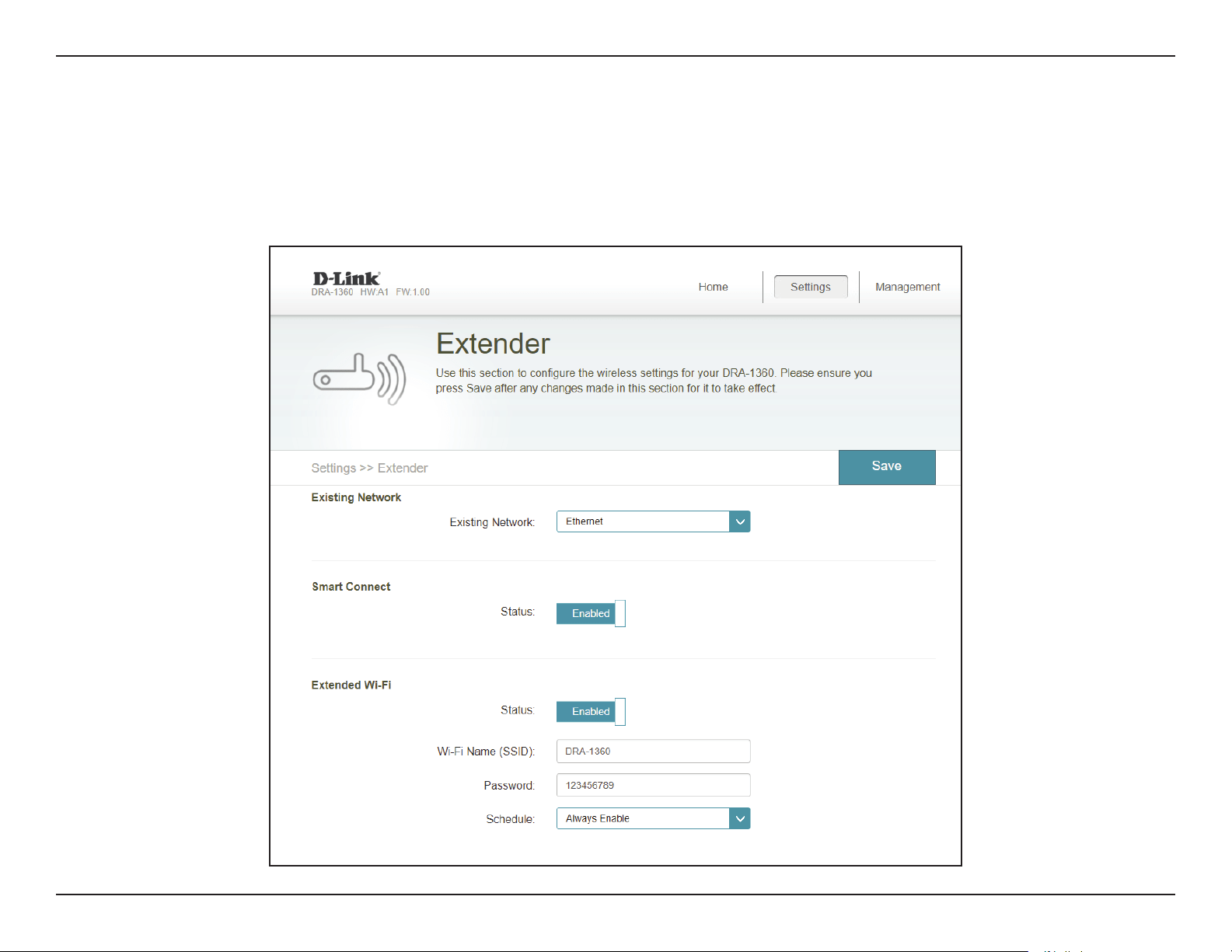
This page lets you congure the settings to use the DAP-1610 as an access point. Connect an Ethernet cable from a LAN port in your
router to the LAN port at the bottom of the DAP-1610.
To access this page, click the Settings drop-down menu at the top of the page, and select Extender. Click Save to apply the settings
and return to the home page.
Under Existing Network, choose Ethernet to utilize the DAP-1610 as an access point. Refer to “Extender Settings” on page 28 for
more information regarding conguration options.
24D-Link DAP-1610 User Manual
Section 3 - Conguration
Conguration
Home
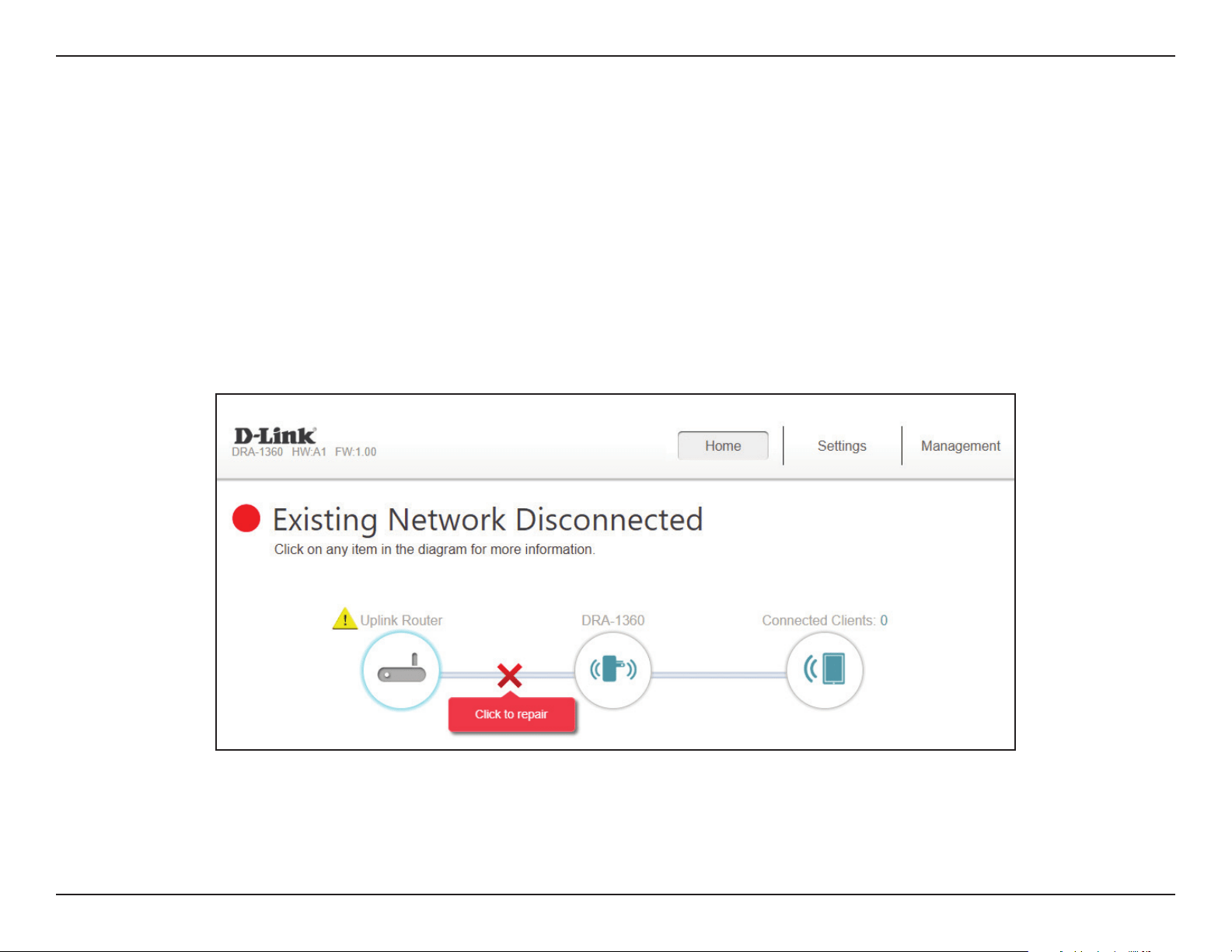
The home screen gives a summary of the current status of devices connected to the DAP-1610. A green check between the device
and the uplink router indicates that there is an active connection. A red cross indicates that there is no connection present, or there
is a connection error. If there’s no active uplink connection, click on the Click to Repair button to start the setup wizard.
Note: If the DAP-1610 is connected to a Wi-Fi Mesh supported router, then the home screen will only show the Firmware Upgrade
function. Other functions for the DAP-1610 can be congured from the router’s conguration page. For more details, refer to “Home
- Connected to a Wi-Fi Mesh Router” on page 27.
Uplink Router This icon shows the status of the Internet connection to the uplink router. It is grey if the DAP-1610 is not connected
to an uplink router. Once connected, click on it to see its connection details.
DAP-1610 Click on this icon to see details of the uplink network the DAP-1610 is connected to or connect to another uplink router.
Connected Clients Click on the Connected Clients icon to see client details.
25D-Link DAP-1610 User Manual
Section 3 - Conguration
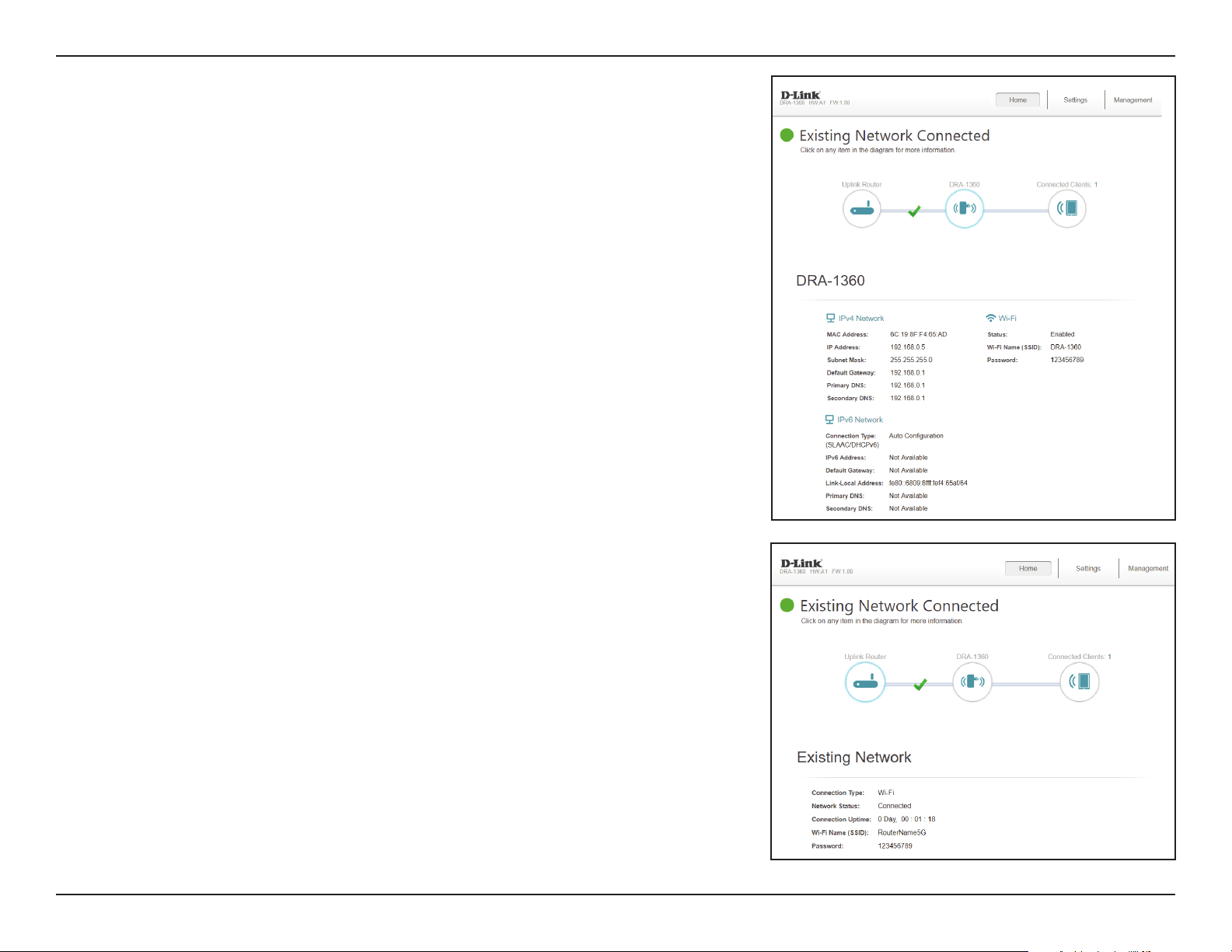
Once your Internet connection is set up, you can view the details of the IPv4
Network, the IPv6 Network and the Wi-Fi network by clicking on the DAP-1610
icon.
Upon clicking the Uplink Router icon, you will see the details of the Existing
Network. This contains information regarding the Connection Type, Network
Status, Connection Uptime, Wi-Fi name (SSID), and Password.
26D-Link DAP-1610 User Manual
Section 3 - Conguration
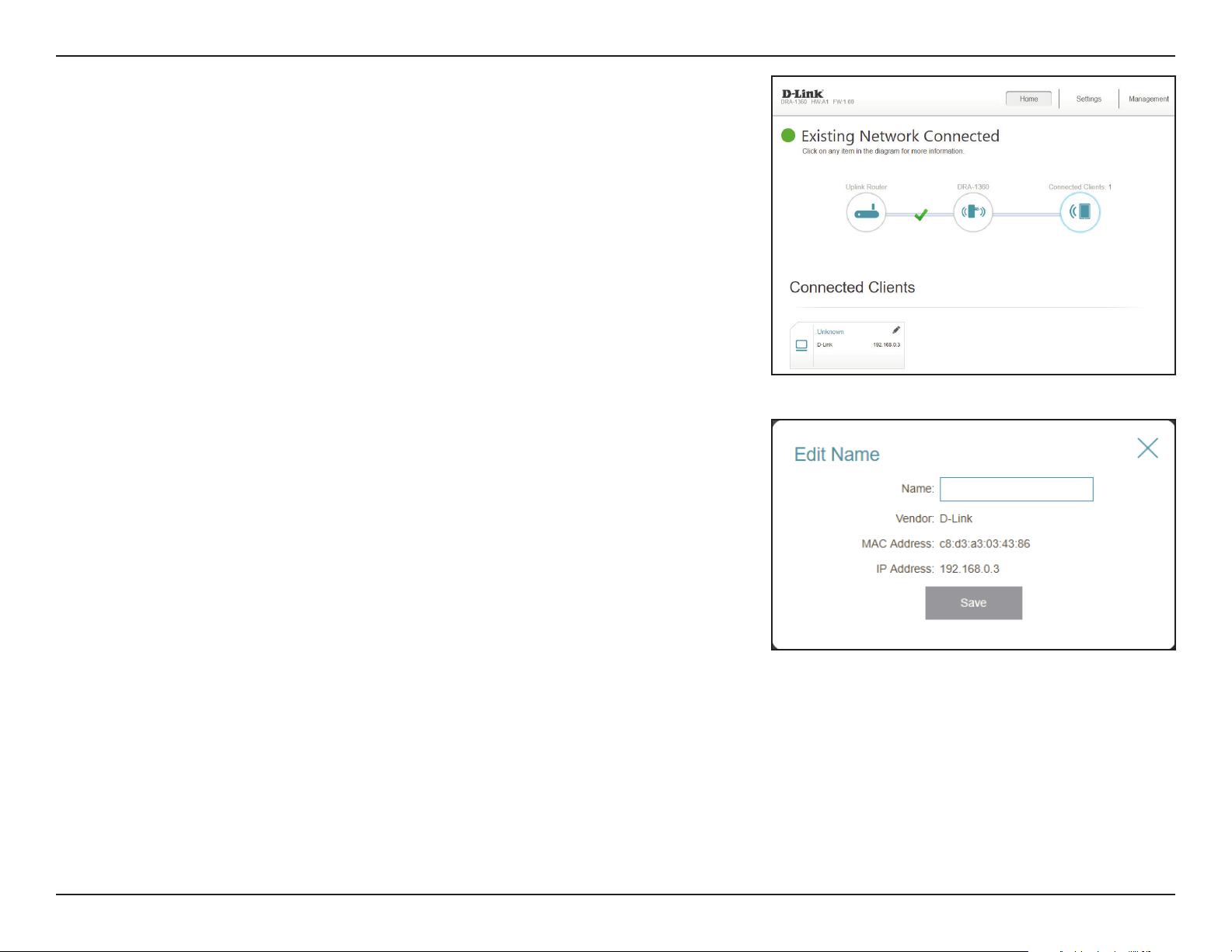
Clicking the Connected Clients icon will show you the devices that are
currently connected to the DAP-1610, the network they are connected to,
and their IP addresses.
To edit each client’s settings, click the pencil icon on the client you want to
edit.
Name Enter a custom name for this client.
Vendor Displays the vendor of the device.
MAC Address Displays the MAC address of the device.
IP Address Displays the current IP address of this client.
Click Save when you are done.
27D-Link DAP-1610 User Manual
Section 3 - Conguration
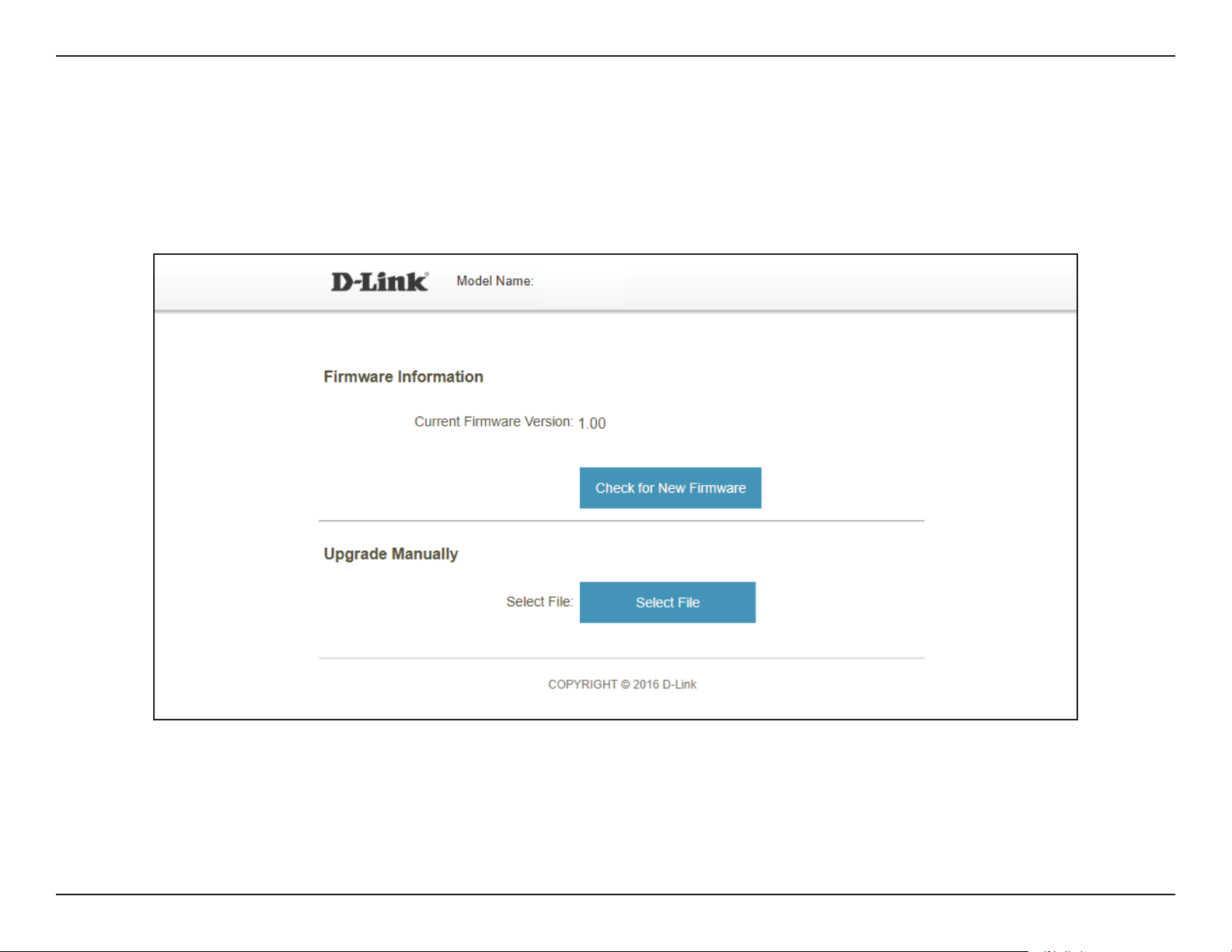
Home - Connected to a Wi-Fi Mesh Router
If the DAP-1610 is connected to a Wi-Fi Mesh supported router, login to the DAP-1610’s homescreen by typing in your router’s
Admin Password. The DAP-1610’s home screen will only show the rmware information for the DAP-1610. Other functions for the
DAP-1610 can be congured from the main router’s conguration page. Please make sure that the Wi-Fi Mesh feature is enabled in
your compatible router’s wireless settings.
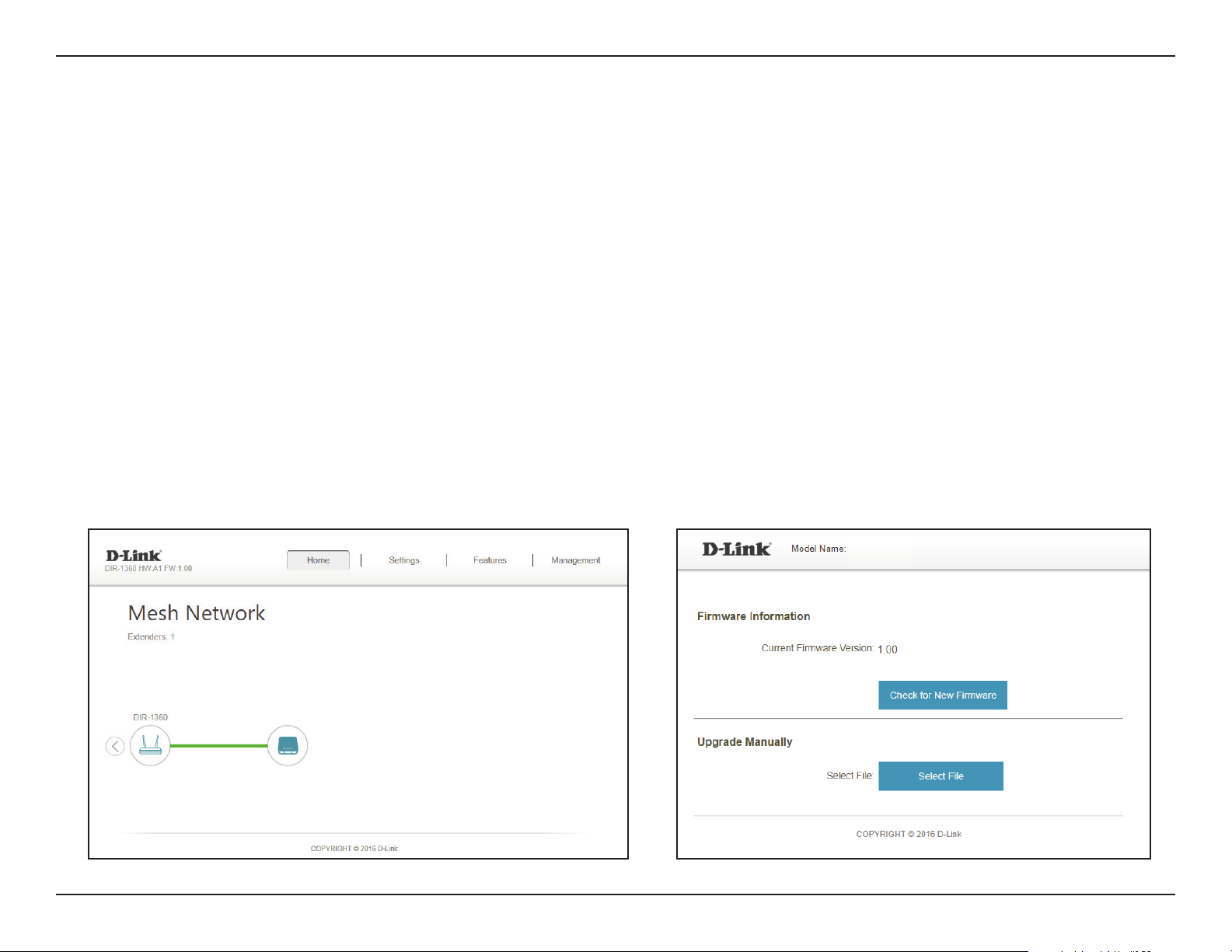
Firmware Information The current rmware version of your DAP-1610. Click Check for New Firmware to see if your DAP-1610 is up to date.
Upgrade Manually If you wish to upgrade manually, rst download the rmware le you wish to upgrade to. Next, click the Select File button
to browse to the le and click Upload to install the new rmware.
DAP-1610
28D-Link DAP-1610 User Manual
Section 3 - Conguration
Settings
Extender Settings
This page lets you congure the settings for the DAP-1610’s extended wireless network. To access this page, click the Settings drop-
down menu at the top of the page, and select Extender. Click Save to apply the settings and return to the home page.
29D-Link DAP-1610 User Manual
Section 3 - Conguration
Existing Network
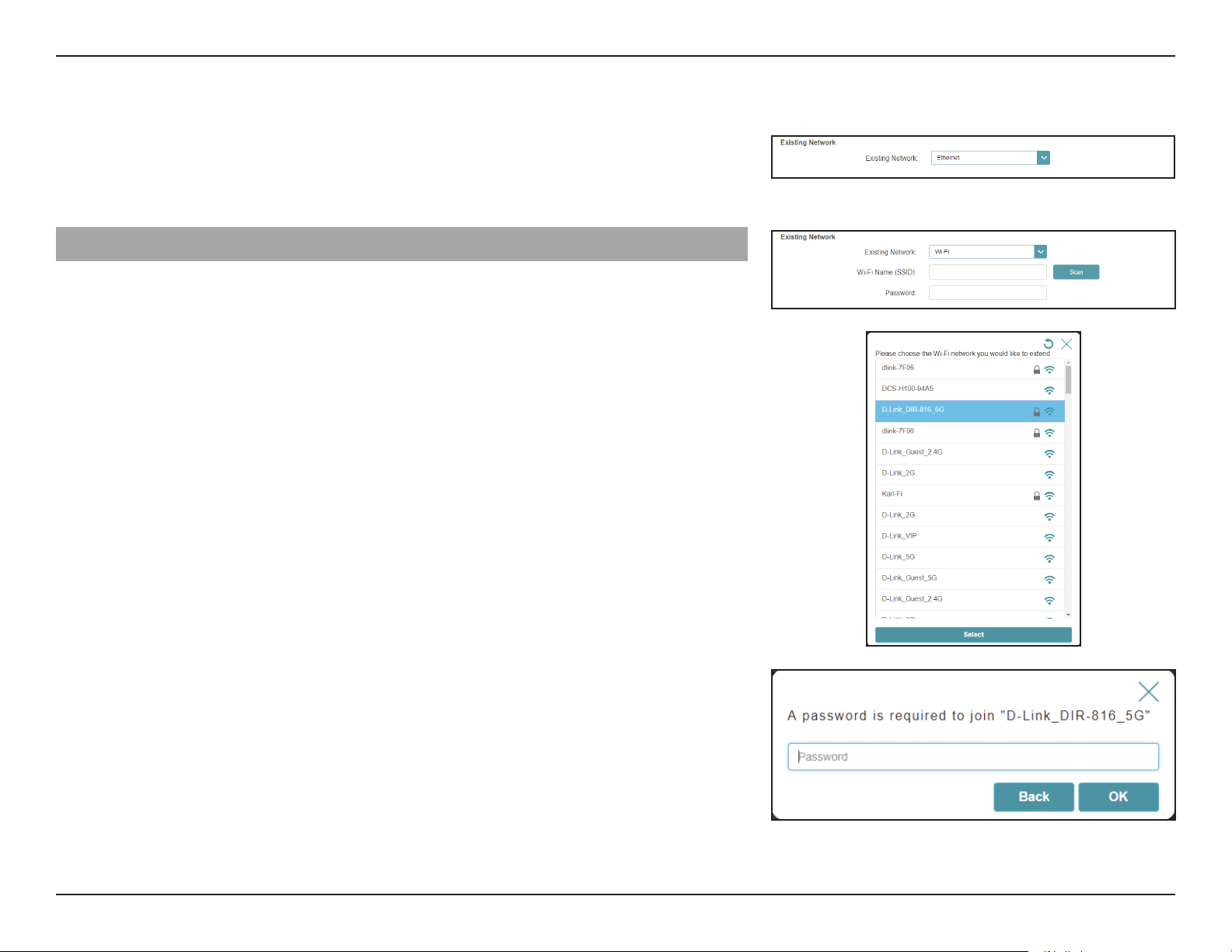
Existing Network Select the type of existing network, either Ethernet or Wi-Fi
you want the DAP-1610 to connect to. Select Ethernet if you
are connecting to your network via an Ethernet cable. Select
Wi-Fi if you are connecting to your network by wireless means.
Wi-Fi - Existing Network
If
Wi-Fi is selected, the following Wi-Fi Existing Network options will appear.
Wi-Fi Name (SSID) Type in the Wi-Fi Name of the network you would like to
extend.
Password Type in the password of the network you would like to extend.
Scan If Scan is pressed, a window will pop up showing you available
Wi-Fi networks. You can choose the network you would like to
extend. After selecting the network option, press Select and
you will be prompted to enter a password if required. Press
OK to conrm your selection.
30D-Link DAP-1610 User Manual
Section 3 - Conguration
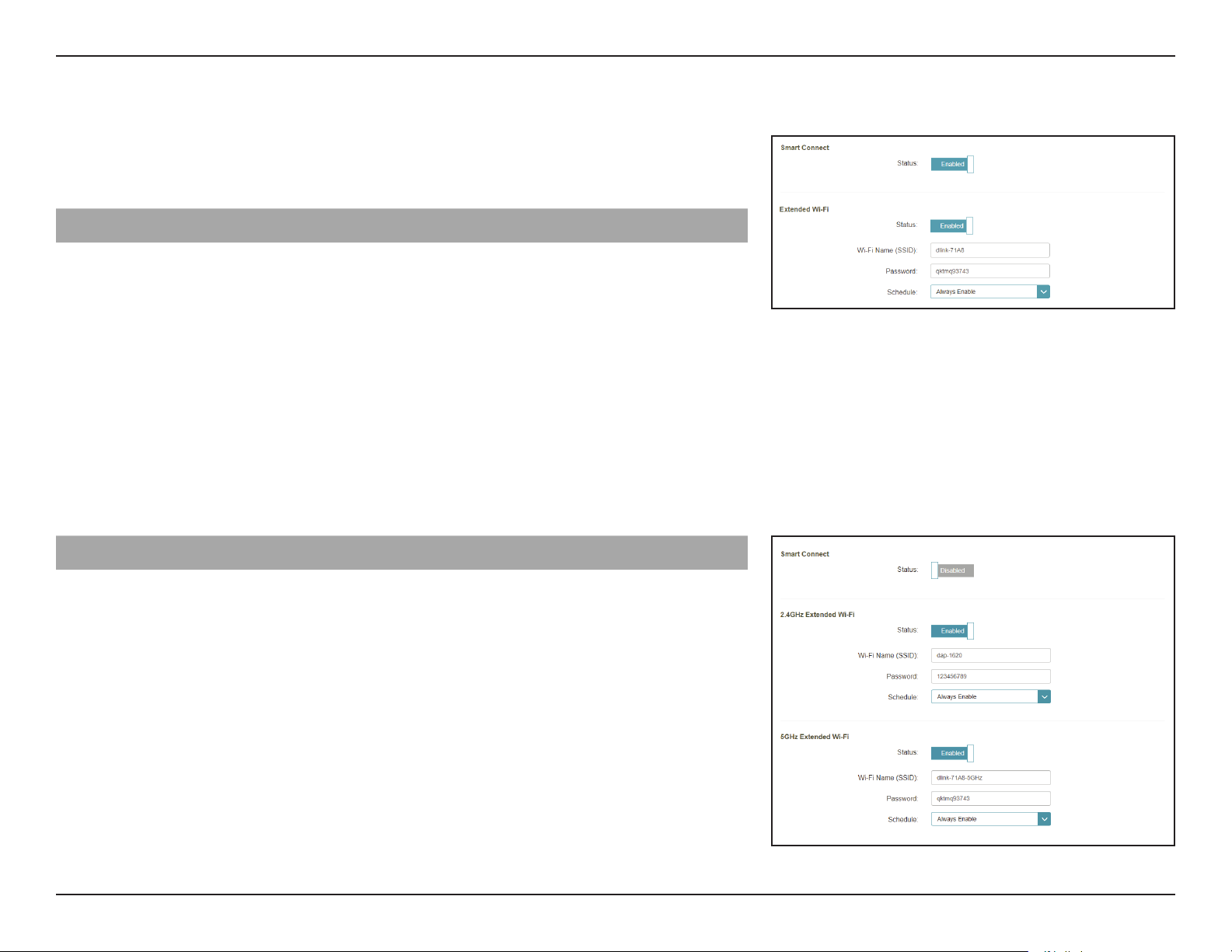
Smart Connect
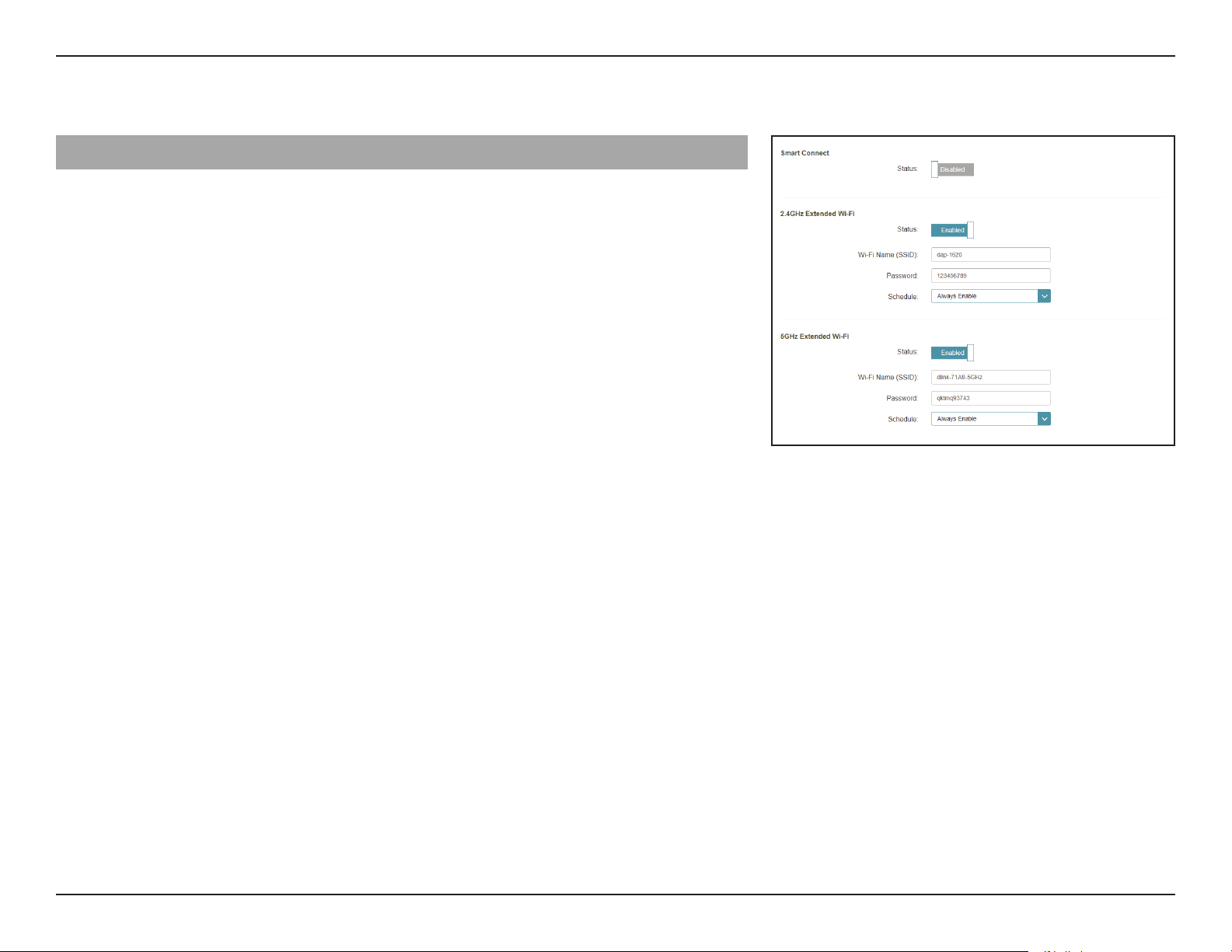
Smart Connect Enable or disable the Smart Connect Feature. When enabled,
only a few conguration options are available to simplify
conguration.
Extended Wi-Fi - Smart Connect Enabled
Status Enable or disable the Extended Wi-Fi wireless network.
Wi-Fi Name (SSID) This is the name of the DAP-1610’s extended network. If
using Wi-Fi, the DAP-1610 will rebroadcast the uplink router’s
Internet connection under this SSID. You may also manually
set the SSID of the extended network.
Password Enter the password or network key that you wish to use for
the extended Wi-Fi network.
Schedule Use the drop-down menu to select the time schedule that
the rule will be enabled for. The schedule may be set to
Always Enable or you can create your own schedules in the
Schedules
section. Refer to “Schedule” on page 35 for more
information.
Wireless - Smart Connect Disabled
2.4 GHz Extended Wi-Fi
Status Enable or disable the 2.4 GHz network by toggling this slider.
Wi-Fi Name (SSID) This is the name of the DAP-1610’s extended network. If
using Wi-Fi, the DAP-1610 will rebroadcast the uplink router’s
Internet connection under this SSID. You may also manually
set the SSID of the extended network.
Password Enter the password or network key that you wish to use for
the extended 2.4 GHz network.
Schedule Use the drop-down menu to select the time schedule that the
rule will be enabled for. The schedule may be set to Always
Enable or Always.
31D-Link DAP-1610 User Manual
Section 3 - Conguration
Wireless - Smart Connect Disabled (Continued)
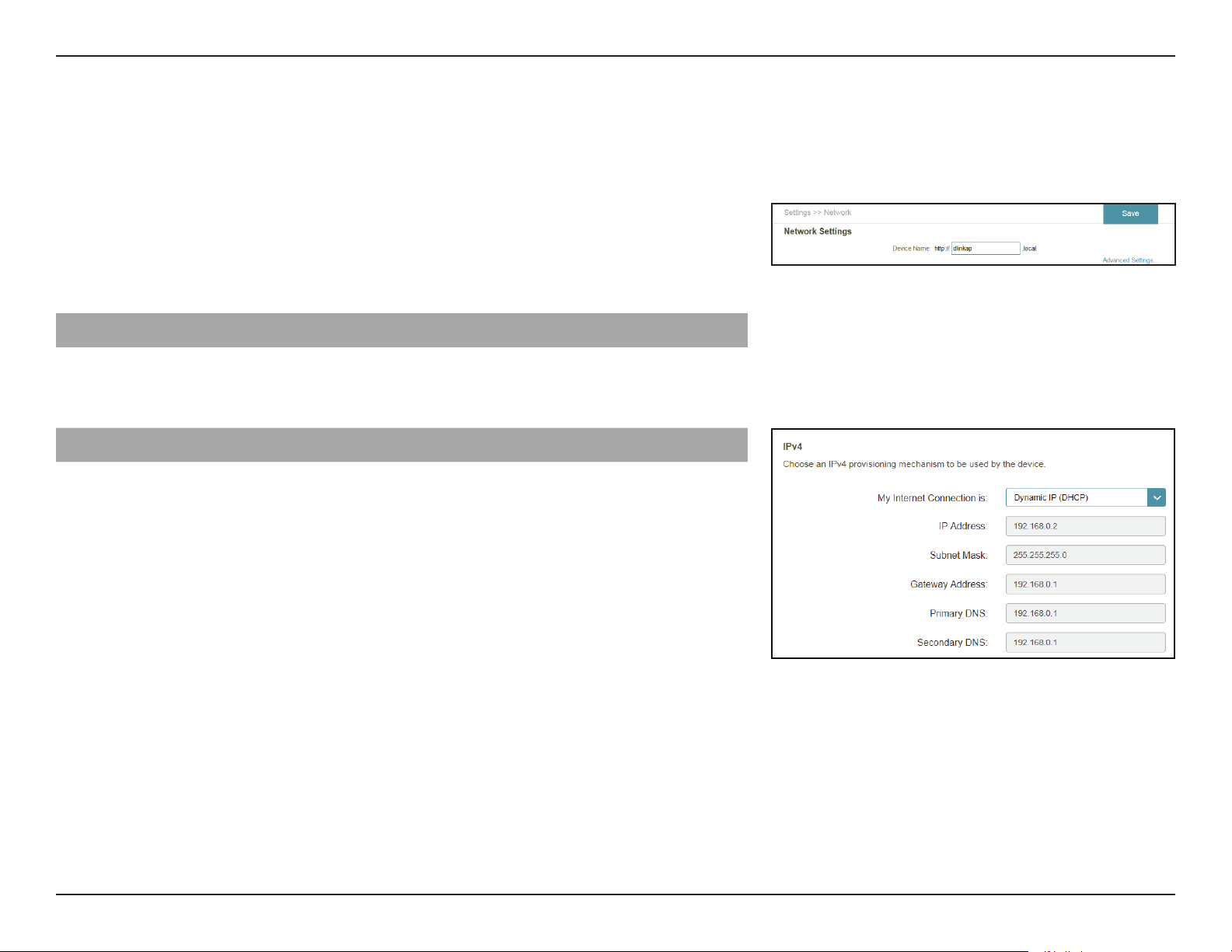
5 GHz Extended Wi-Fi
Status Enable or disable the 5 GHz network by toggling this slider.
Wi-Fi Name (SSID) This is the name of the DAP-1610’s extended network. If
using Wi-Fi, the DAP-1610 will rebroadcast the uplink router’s
Internet connection under this SSID. You may also manually
set the SSID of the extended network.
Password Enter the password or network key that you wish to use for
the extended 5 GHz network.
Schedule Use the drop-down menu to select the time schedule that the
rule will be enabled for. The schedule may be set to Always
Enable or Always.
32D-Link DAP-1610 User Manual
Section 3 - Conguration
Network Settings
This page lets you congure the network settings for the DAP-1610. To access this page, click the Settings drop-down menu at the
top of the page, then select Network. Click Save at any time to save the changes you have made on this page.
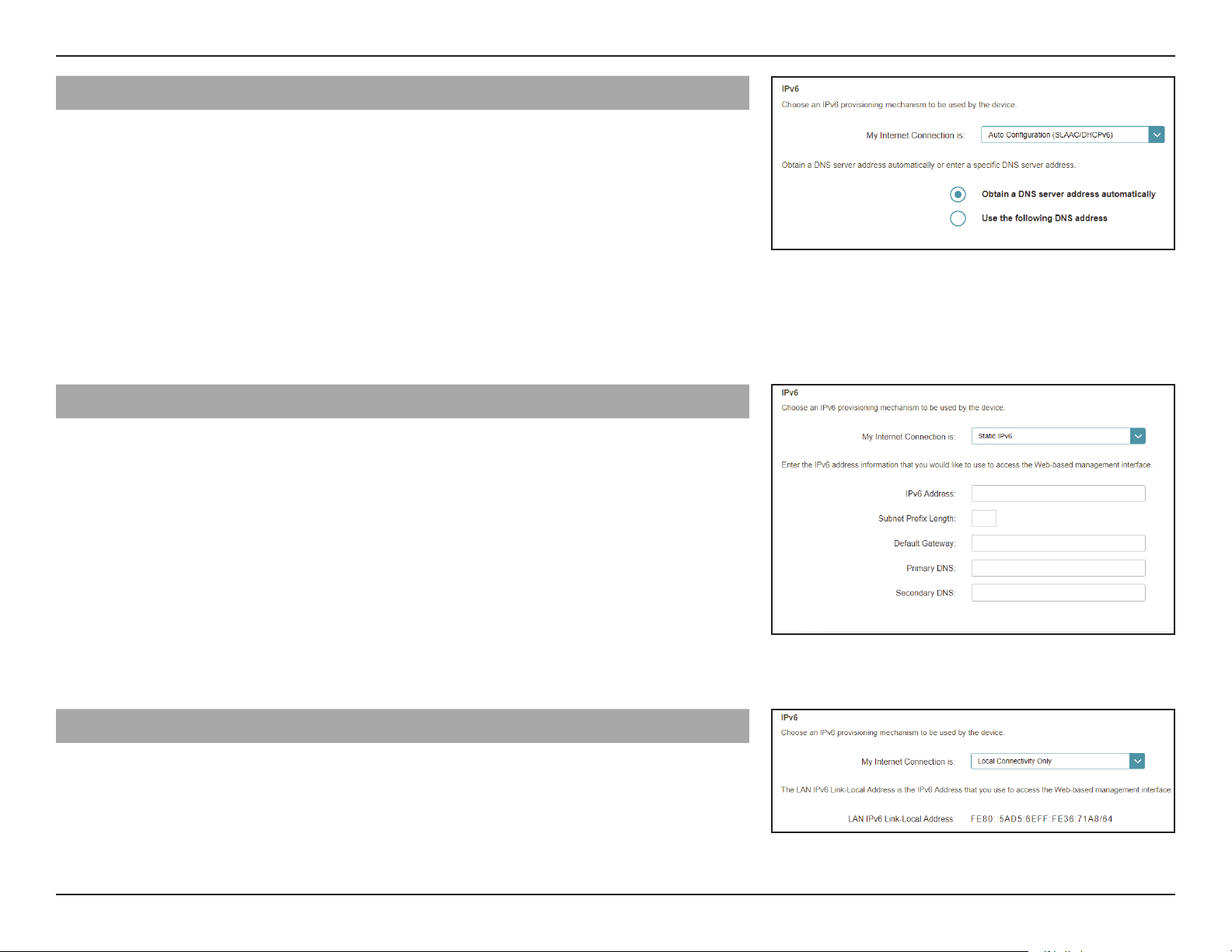
Management Link You can change the URL name of the device by editing the text
in the text box. If you change the name of the device, you will
need to enter “http://xxxx.local.” (where “xxxx” corresponds to
the name of the device) in the address bar of your web browser
in order to access the conguration utility.
Advanced Settings
The Advanced Settings section of the Network Settings page allows you to
congure both IPv4 and IPv6 settings that will be used by the DAP-1610’s
extended network.
IPv4
My LAN Connection is Here you can select whether you want the IP to have a
Dynamic IP or Static IP address. If you select Dynamic IP, the
options below will not be available.
IP Address Enter the Static IP address that you want to assign to the
extended network AP. This address should be outside of the
uplink router’s DHCP address pool.
Subnet Mask Enter the subnet mask.
Gateway Address
Enter the gateway address. This is usually the IP address of
the uplink router.
Primary DNS Server Enter the address of the primary DNS server.
Secondary DNS Server Enter the address of the secondary DNS server. This is optional
but will provide backup if the primary server fails.
33D-Link DAP-1610 User Manual
Section 3 - Conguration
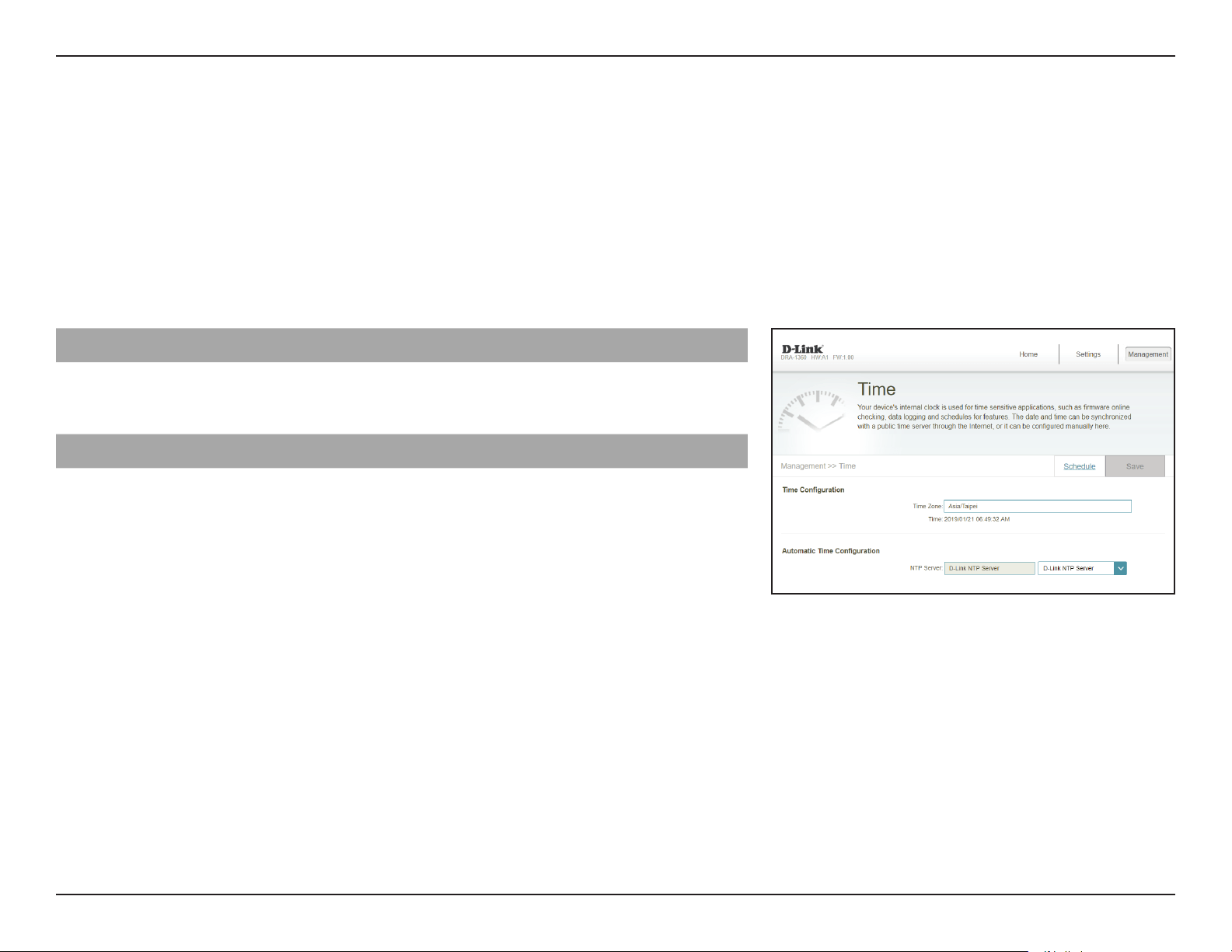
IPv6 - Autoconguration (SLAAC/DHCPv6)
My Internet Connection
is
Select Autoconfiguration (SLAAC/DHCPv6) to have the
DAP-1610 automatically receive an IPv6 address from the
uplink router.
Obtain a DNS server
address automatically
You can select to obtain IPv6 DNS server information
automatically, or you can select to congure DNS servers
manually by selecting next to the option Use the following
DNS address.
Primary DNS Server For manual settings, enter the primary IPv6 DNS server address.
Secondary DNS Server For manual settings, enter the secondary IPv6 DNS server
address. This is optional but will provide backup if the primary
server fails.
IPv6 - Static IPv6
My Internet Connection
is
Select Static IPv6 to manually assign an IP address to the
DAP-1610.
IPv6 Address Enter the IPv6 address that you want to assign to the extended
network AP. This address should be outside of the uplink
router’s DHCP address pool.
Subnet Prex Length Enter the length of the IPv6 subnet prex.
Default Gateway Enter the default gateway.
Primary DNS Server Enter the primary IPv6 DNS server address.
Secondary DNS Server Enter the secondary IPv6 DNS server address. This is optional
but will provide backup if the primary server fails.
IPv6 - Local Connectivity Only
My Internet Connection
is
Select Local Connectivity Only to set an IPv6 address only
for the local network.
LAN IPv6 Link-Local
Address
The link-local address of the DAP-1610.
34D-Link DAP-1610 User Manual
Section 3 - Conguration
Management
Time
The Time page allows you to congure, update, and maintain the correct time on the internal system clock. From here you can set
the time zone and the Network Time Protocol (NTP) server.
In the Management menu on the bar on the top of the page, click Time & Schedule. Click Save at any time to save the changes you
have made on this page.
Time Conguration
Time Zone Select your time zone from the drop-down menu.
Time Displays the current date and time of the router.
Automatic Time Conguration
NTP Server Select from the drop-down menu to either use the D-Link
NTP Server to synchronize the time and date for your router,
or choose Manual to set the NTP server’s IP address.
35D-Link DAP-1610 User Manual
Section 3 - Conguration
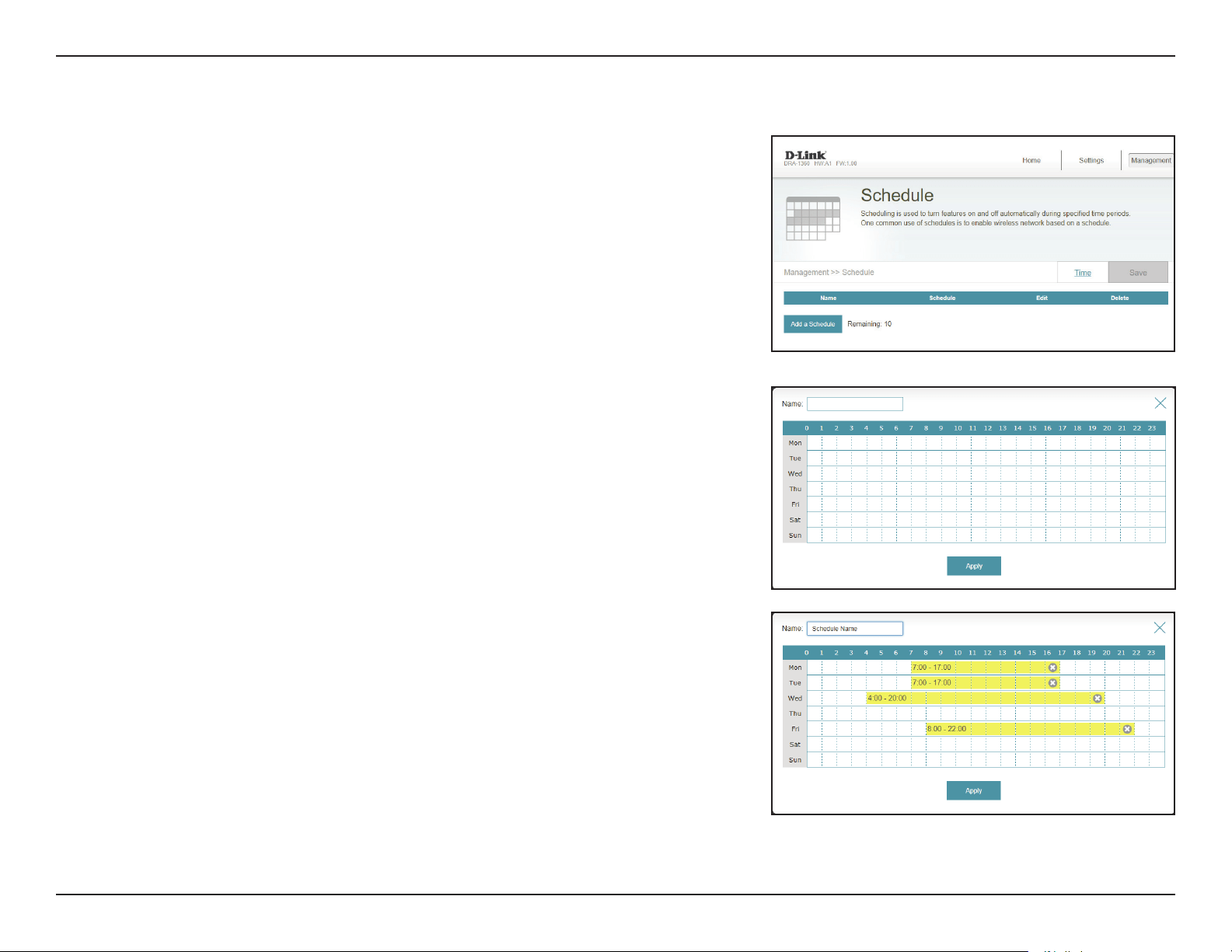
Schedule
Some router functions can be controlled through a pre-congured schedule. To
create, edit, or delete schedules, from the Time page click Schedule. To return to
the Time page, click Time.
If you wish to remove a rule, click on its trash can icon in the Delete column. If you
wish to edit a rule, click on its pencil icon in the Edit column. If you wish to create
a new rule, click the Add a Schedule button. Click Save when you are done.
If you edit or create a rule, the following screen will appear:
First, enter the name of your schedule in the Name eld.
Each box represents one hour, with the time at the top of each column. To add
a time period to the schedule, simply click on the starting hour and drag to the
ending hour. You can add multiple days to the schedule, but only one period per
day.
To remove a time period from the schedule, click on the cross icon.
Click Apply when you are done.
The above shows an example of a schedule.
36D-Link DAP-1610 User Manual
Section 3 - Conguration
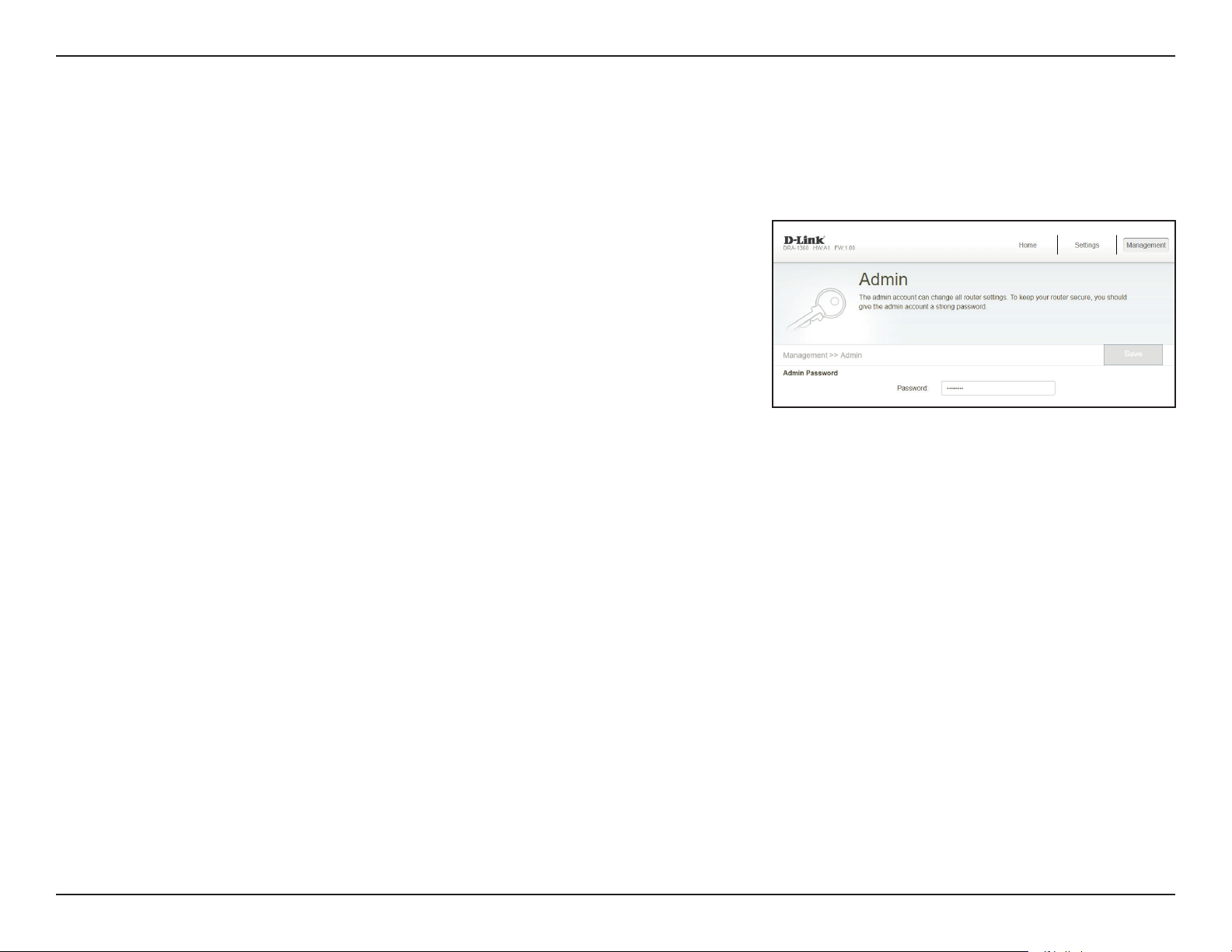
This page will allow you to set a new password for the administrator account used to congure the DAP-1610. To access this page,
click the Management drop down menu at the top of the page, and select Admin. Click Save at any time to save the changes you
have made on this page.
Admin
Password Enter the Admin password.
37D-Link DAP-1610 User Manual
Section 3 - Conguration
System
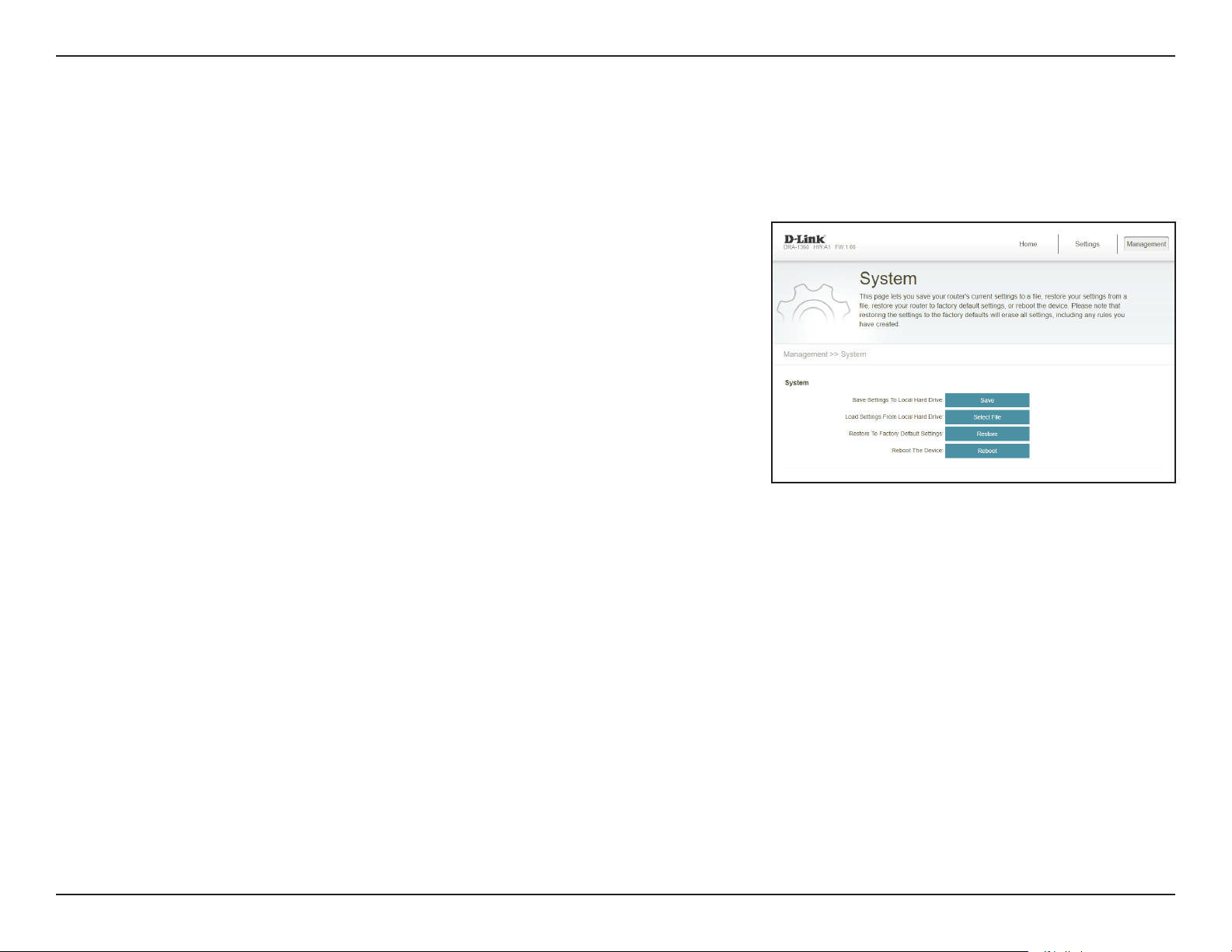
This page allows you to save or restore your system conguration, reset, or reboot the DAP-1610. To access this page, click the
Management drop down menu at the top of the page, and select System.
Save Settings To Local
Hard Drive
Save the system settings onto a le to the local hard drive. You
will then see a le dialog where you can select a location and
enter a le name for the conguration le.
Load Settings From
Local Hard Drive
Load the system settings from a previously saved le on the
local hard drive. Click the Restore button that appears after
loading the system settings le to load the settings.
Restore to Factory
Default Settings
Restore the system settings to factory default settings. This
will erase all currently stored settings.
Reboot the Device Click Reboot to reboot the DAP-1610.
38D-Link DAP-1610 User Manual
Section 3 - Conguration
Upgrade
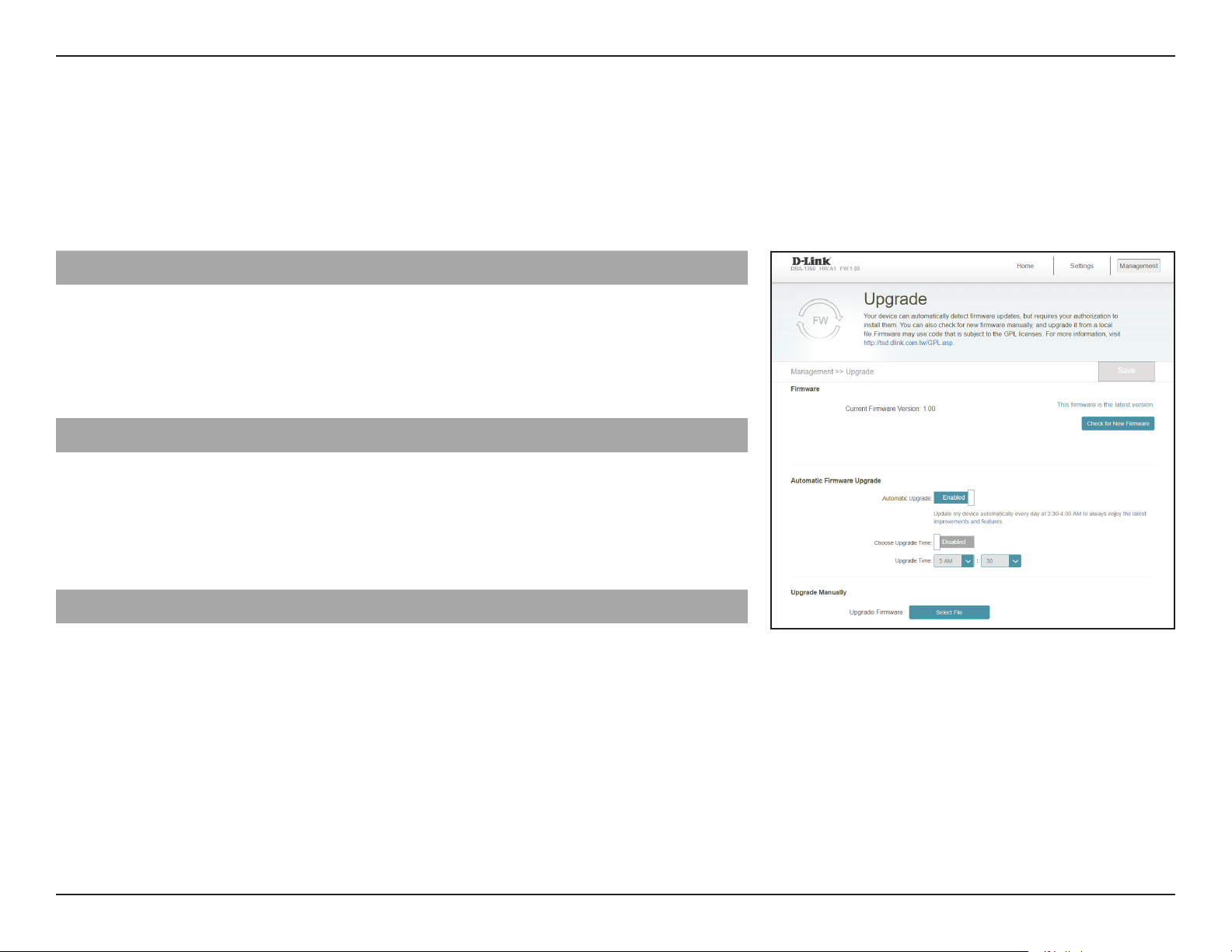
Firmware upgrades may be provided for the DAP-1610 in the future. This page will allow you to upgrade the router’s rmware,
either automatically or manually. To manually upgrade the rmware, you must rst download the relevant le from http://support.
dlink.com. To access this page, click the Management drop down menu at the top of the page, and select Upgrade. Click Save at
any time to save the changes you have made on this page.
Firmware
Current Firmware
Version
The current rmware's version will be displayed.
Check for New
Firmware
Click this button to prompt the router to automatically check
for a new rmware version. If a newer version is found, it will
prompt you to install it.
Automatic Firmware Upgrade
Automatic Upgrade If enabled, the router will automatically check for and upgrade
to the newest rmware.
Choose Upgrade Time You may set the DAP-1610 to automatically upgrade its rmware
at a set time by enabling the function. Set the hour and minute
to automatically upgrade by using the drop-down menus.
Upgrade Manually
Upgrade Firmware If you wish to upgrade manually, rst download the rmware
le you wish to upgrade to. Next, click the Select File button to
browse to the le and click Upload to install the new rmware.
39D-Link DAP-1610 User Manual
Section 3 - Conguration
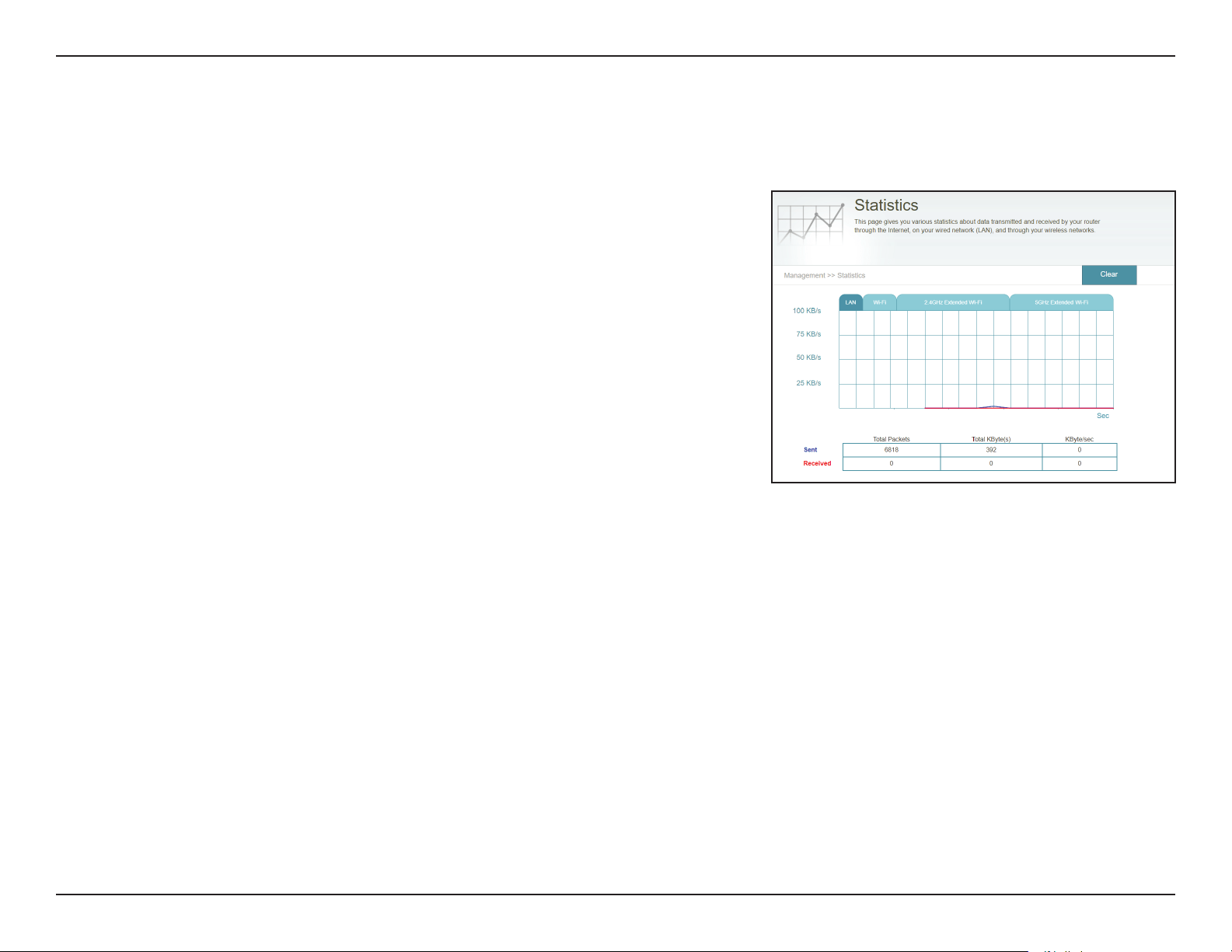
This page displays details about your wireless and network connections. To access this page, click the Management drop-down
menu at the top of the page, and select Statistics. Click Clear to reset the statistics.
Statistics
On the Statistics page you can view the amount of packets that pass through
the router on the WAN, LAN, and wireless segments.
You can view the LAN, Wi-Fi, 2.4 GHz Extended Wi-Fi, or 5 GHz Extended Wi-Fi
by clicking on the respective tabs at the top. The graph will update in real time. To
clear the information on the graph, click Clear.
The trac counter will reset if the device is rebooted.
40D-Link DAP-1610 User Manual
Section 4 - Wi-Fi Mesh Setup
Wi-Fi Mesh Setup
D-Link’s Wi-Fi Mesh is a scalable solution that allows you to easily increase the coverage of your home or oce wireless AC
network. Expand your Wi-Fi coverage by adding compatible D-Link access points. Mix and match suitable D-Link devices
according to your budget and preferences to t any oorplan. Setup is eortless; conguration of multiple access points can
be done in minutes as settings can be passed on to other access points once the rst access point is congured.
Wi-Fi Mesh intelligently nds the shortest/fastest path to your router. So even if you have eight mesh nodes, you can count
on Wi-Fi Mesh to push your 4K streaming movies and intense VR games to your device at lightning speeds. Wi-Fi Mesh can
also automatically detect malfunctioning nodes and reroute the connection to your working mesh devices.
Once the mesh network has been established, you can refer to your Wi-Fi Mesh router’s conguration settings to see your
mesh topology report. The DAP-1610’s home screen will show the rmware information for the DAP-1610. Functions for the
DAP-1610 can be congured from the main router’s conguration page. Refer to “Home - Connected to a Wi-Fi Mesh Router” on
page 27 for more information.
DAP-1610
41D-Link DAP-1610 User Manual
Section 4 - Wi-Fi Mesh Setup
Setup Using the D-Link Wi-Fi App
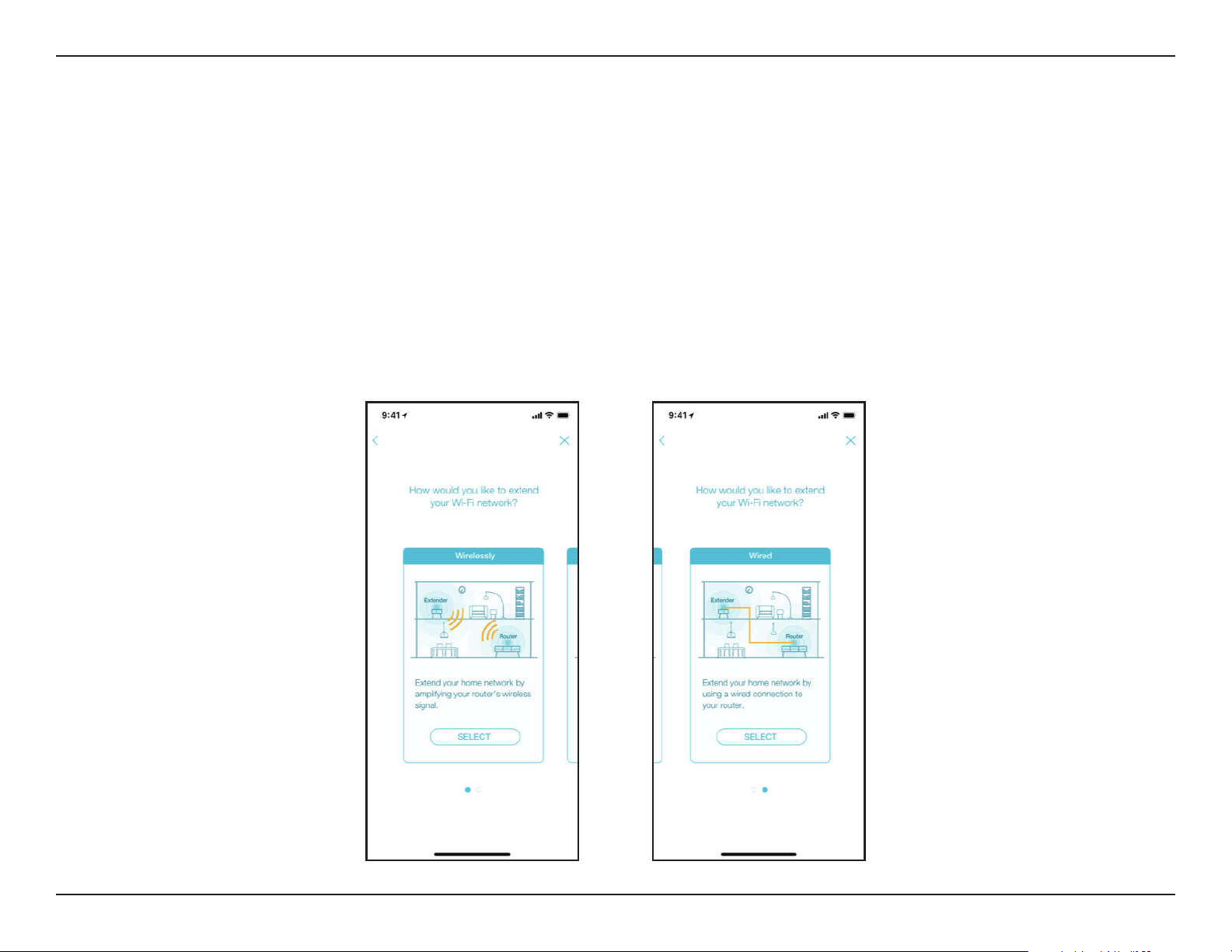
To set up your Wi-Fi Mesh network using the D-Link Wi-Fi app, rst refer to “D-Link Wi-Fi App” on page 14. When the app
leads you to the setup wizard of the device, you can choose to either
• Extend your home network by amplifying your router’s wireless signal OR
• Extend your home network by using a wired connection to your router.
To utilize your DAP-1610 with Wi-Fi Mesh, select “Wirelessly” as the setup option and follow the app’s instructions to
complete the setup.
42D-Link DAP-1610 User Manual
Section 4 - Wi-Fi Mesh Setup
< 1 m
Setup Using an Ethernet Cable
Step 1
Connect and plug in the DAP-1610 close to your Wi-Fi Mesh router and wait
for the LED light to blink orange.
Step 2
Use the Ethernet cable to connect the DAP-1610 to one of the LAN ports on
the Wi-Fi Mesh router. The pairing process may take a few minutes. The status
and the signal indicator LEDs on the DAP-1610 will turn solid green once it
has nished pairing with your Wi-Fi Mesh router.
Step 3
Disconnect the Ethernet cable and place the Wi-Fi Mesh compatible device
anywhere in your home to extend your home Wi-Fi.

43D-Link DAP-1610 User Manual
Section 5 - Connecting a Wireless Client
Connecting Wireless Clients to the Extender
WPS Button
Once an uplink network has been established, you may use the DAP-1610’s WPS function to add additional wireless clients to your
extender’s network. Many wireless devices such as wireless routers, media players, printers, and cameras will have a WPS button (or
a software utility with WPS) that you can press to connect to the DAP-1610. Please refer to the user manual for the wireless device
you want to connect to make sure you understand how to enable WPS. Once you are certain, follow the steps below:
Step 1 - Press the WPS button on the DAP-1610 for about 1 second. The LED on the device will start to blink.
Step 2 - Within 120 seconds, press the WPS button on your wireless device.
Step 3 - Allow up to 1 minute to congure. Once the LED light stops blinking and turns solid green, you will be connected and your
wireless connection will be secured with WPA2.
44D-Link DAP-1610 User Manual
Section 5 - Connecting a Wireless Client
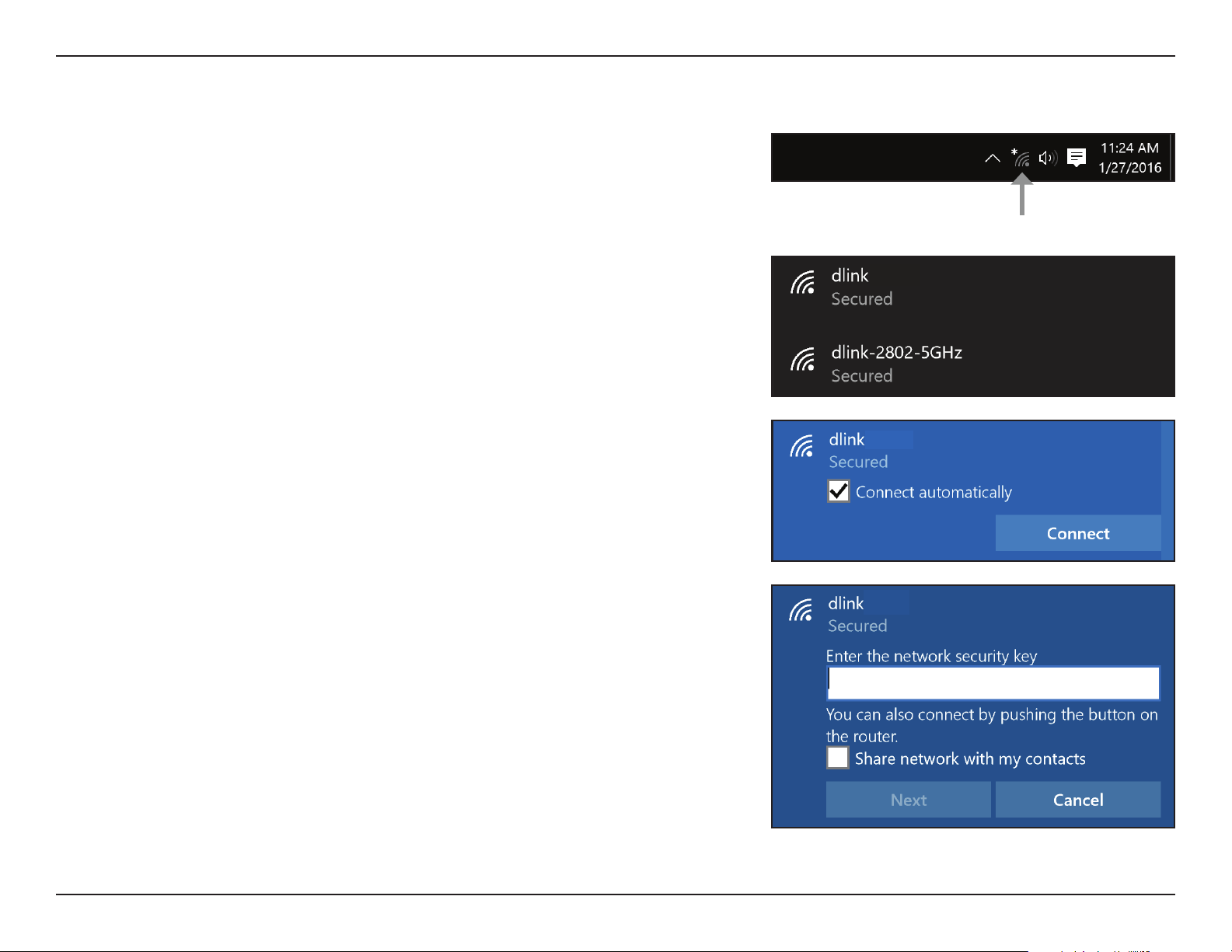
To join an existing network, locate the wireless network icon in the taskbar,
next to the time display and click on it.
Clicking on this icon will display a list of wireless networks which are within
range of your computer. Select the desired network by clicking on the SSID.
Windows® 10
Wireless Icon
To connect to the SSID, click Connect.
To automatically connect with the router when your device next detects the
SSID, check the Connect Automatically check box.
You will then be prompted to enter the Wi-Fi password (network security
key) for the wireless network. Enter the password into the box and click Next
to connect to the network. Your computer will now automatically connect to
this wireless network when it is detected.
45D-Link DAP-1610 User Manual
Section 5 - Connecting a Wireless Client
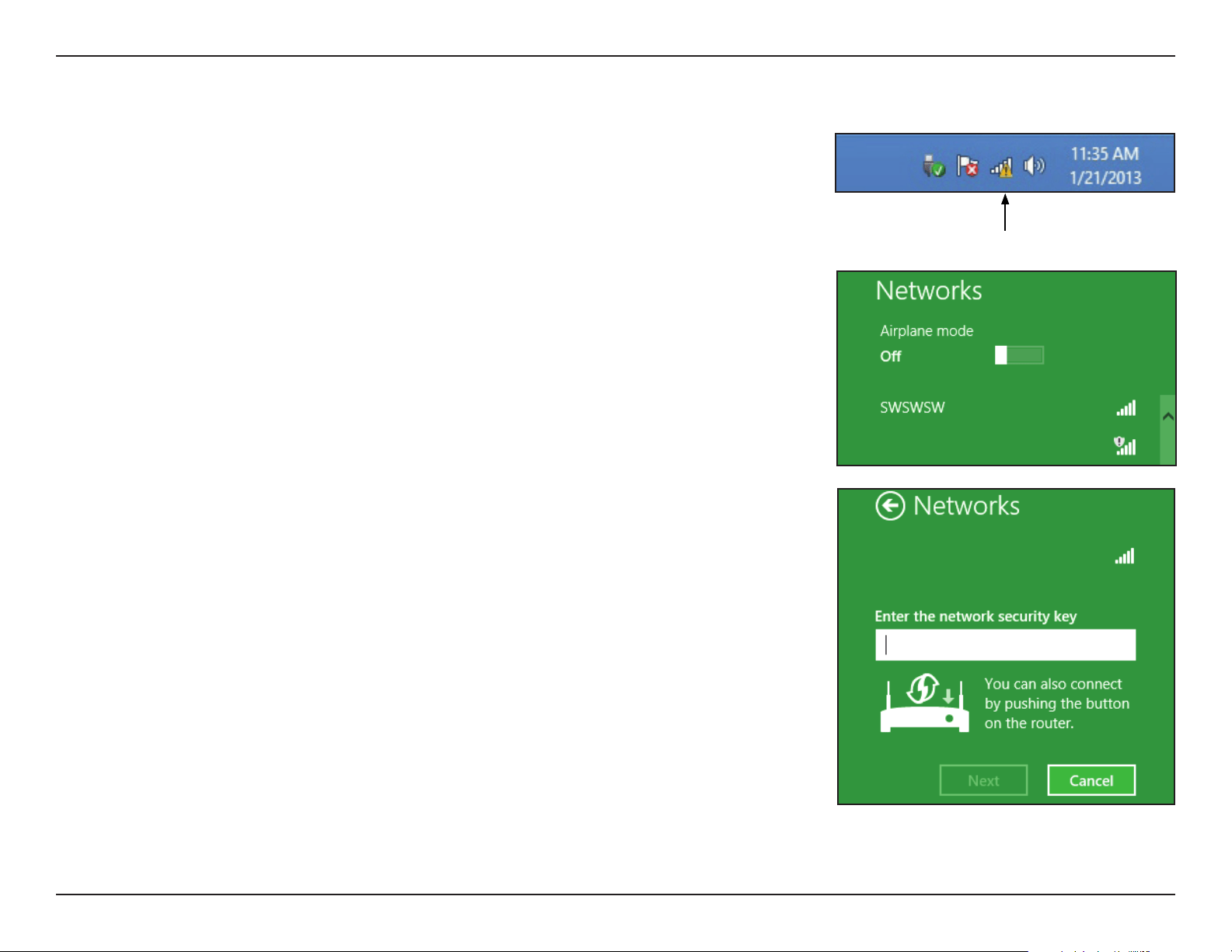
Windows® 8 - WPA/WPA2
Clicking on this icon will display a list of wireless networks which are within
connecting proximity of your computer. Select the extender’s network by clicking
on the network name.
To join an existing network, locate the wireless network icon in the taskbar, next
to the time display.
Wireless Icon
dlink
You will then be prompted to enter the network security key (Wi-Fi password) for
the wireless network. Enter the password into the box and click Next.
If you wish to use Wi-Fi Protected Setup (WPS) to connect to the router, you
can also press the WPS button on your router at this point to enable the WPS
function.
dlink
46D-Link DAP-1610 User Manual
Section 5 - Connecting a Wireless Client
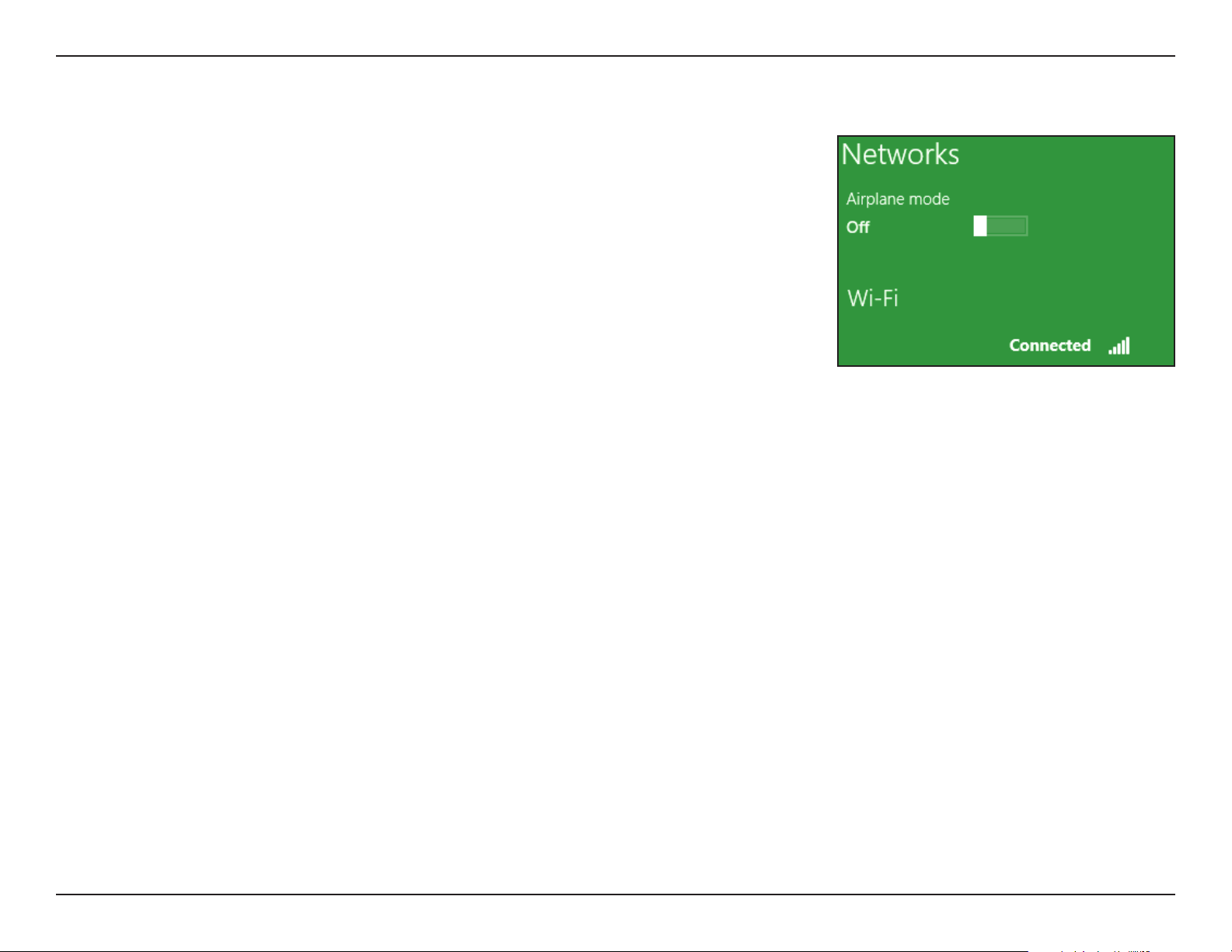
When you have established a successful connection with a wireless network, the
word Connected will appear next to the name of the network to which you are
connected.
dlink

47D-Link DAP-1610 User Manual
Section 6 - Troubleshooting
Troubleshooting
This chapter provides solutions to problems that can occur during the installation and operation of the DAP-1610. Read the
following descriptions if you are having problems.
1. Why can’t I access the web-based conguration utility?
When entering the IP address of the AC1200 Mesh Wi-Fi Range Extender (dlinkap.local./), you are not connecting to a website nor
do you have to be connected to the Internet. The device has the utility built-in to a ROM chip in the device itself. Your computer
must be on the same IP subnet to connect to the web-based utility.
• Make sure you have an updated Java-enabled web browser. We recommend the following:
• Internet Explorer® 10 or later
• Firefox® 28 or later
• Safari® 6.0 or later
• Google Chrome™ 28 or later
• Make sure that you are connected to the same wireless network which is listed on the base of the DAP-1610. If you have an active
wired LAN Ethernet connection, try temporarily unplugging the Ethernet cable from the computer you are using, as this may
eliminate possible conicts from having two simultaneous connections on the same computer.
• Disable any Internet security software running on the computer. Software rewalls such as ZoneAlarm, BlackICE, Sygate, Norton
Personal Firewall, and Windows
®
XP rewall may block access to the conguration pages. Check the help les included with your
rewall software for more information on disabling or conguring it.

48D-Link DAP-1610 User Manual
Section 6 - Troubleshooting
• Congure your Internet settings:
• Go to the Control Panel. Search for Internet Options. From the Security tab, click the button to restore the settings to their defaults.
• Click the Connection tab and set the dial-up option to Never Dial a Connection. Click the LAN Settings button. Make sure nothing
is checked. Click OK.
• Go to the Advanced tab and click the button to restore these settings to their defaults. Click OK three times.
• Close your web browser (if open) and open it.
• Access the web management interface. Open your web browser and enter the address of your extender
(http://dlinkap.local) in the address bar. This should open the login page for your web management. If the DAP-1610 is not
connected to an uplink router, you can try accessing the web interface using the default IP address http://192.168.0.50.
• If you still cannot access the conguration, unplug the extender from the power outlet for at least 10 seconds and plug it back
in. Wait about 30 seconds and try accessing the conguration. If you have multiple computers, try connecting using a dierent
computer.
2. What can I do if I forgot my password?
If you forgot your password, you must reset your extender. Unfortunately this process will change all your settings back to the
factory defaults.
To reset the extender, locate the reset button (hole) on the underside panel of the unit. With the extender powered on, use
a paperclip to hold the button down for 10 seconds. Release the button and the extender will go through its reboot process
(indicated by the LED turning red). Wait about 30 seconds to access the extender. The default IP address is
http://dlinkap.local. When logging in, the username is admin and leave the password box empty.

49D-Link DAP-1610 User Manual
Appendix A - Wireless Basics
D-Link wireless products are based on industry standards to provide easy-to-use and compatible high-speed wireless connectivity
within your home, business or public access wireless networks. Strictly adhering to the IEEE standard, the D-Link wireless family
of products will allow you to securely and conveniently access your network. You will be able to enjoy the freedom that wireless
networking delivers.
A wireless local area network (WLAN) is a cellular computer network that transmits and receives data with radio signals instead of
wires. Wireless LANs are used increasingly in both home and oce environments, and public areas such as airports, coee shops
and universities. Innovative ways to utilize WLAN technology are helping people to work and communicate more eciently.
Increased mobility and the absence of cabling and other xed infrastructure have proven to be benecial for many users.
Wireless users can use the same applications they use on a wired network. Wireless adapters used on laptop and desktop systems
support the same protocols as Ethernet adapter cards.
Under many circumstances, it may be desirable for mobile network devices to link to a conventional Ethernet LAN in order to use
servers, printers or an Internet connection supplied through the wired LAN. A wireless router is a device used to provide this link.
Wireless Basics

50D-Link DAP-1610 User Manual
Appendix A - Wireless Basics
Tips
Here are a few things to keep in mind when you are installing your AC1200 Mesh Wi-Fi Range Extender.
Centralize the extender’s location
For best performance, make sure you place the extender in a centralized location within your desired usage area. Try to place the
extender so that there are minimal obstructions between it and the uplink router. If possible, use an elevated power outlet, so the
signal can be dispersed more easily. If you have a large home or usage area, you may need several extenders in order to achieve
optimal coverage.
Eliminate Interference
Place home appliances such as cordless telephones, microwaves, and televisions as far away as possible from the extender. This can
signicantly reduce any interference that the appliances might cause since they operate on same frequency.
Security
Don’t let your neighbors or intruders connect to your wireless network. Secure your wireless network by utilizing the WPA or WEP
security feature on the extender and uplink router. Refer to the relevant sections of this manual for further details.

51D-Link DAP-1610 User Manual
Appendix B - Technical Specications
Technical Specications
Standards
• IEEE 802.11ac
• IEEE 802.11a
• IEEE 802.11n
• IEEE 802.11g
• IEEE 802.11b
Wireless Frequency Range
1
• 2.4 GHz to 2.4835 GHz
• 5.18 MHz to 5.85 MHz
Device Interfaces
• 802.11ac/n/g/b/a Wireless LAN
• 10/100/1000 Gigabit Ethernet Port
• Reset Button
• WPS Button
Antenna
• Two external antennas
Wireless Security
• Wi-Fi Protected Access (WPA/WPA2)
• Wi-Fi Protected Setup (WPS)
Advanced Features
• D-Link Wi-Fi setup app
• Compatible with D-Link
Wi-Fi Mesh routers
Device Management
• Web UI
• D-Link Wi-Fi App
Diagnostic LEDs
• Status/WPS
• 3 Segment Wi-Fi Signal Strength Indicator
Operating Temperature
• 0 to 40 ˚C (32 to 104 ˚F)
Storage Temperature
• Storage: -20 to 65 °C (-4 to 149 °F)
Operating Humidity
• 10% to 90% non-condensing
Storage Humidity
• 5% to 95% non-condensing
1
Frequency range varies depending on local regulations
Power Input
• 110 to 240 V AC, 50/60 Hz
Maximum Power Consumption
• 4.3 W
Dimensions
• 105.0 x 63.5 x 50.0 mm
(4.13 x 2.50 x 1.97 in)
Weight
• 165 grams (5.8 oz)
Certications
• FCC
• IC
• CE
• RCM
• NCC
• UL
• LVD
• BSMI

52D-Link DAP-1610 User Manual
Appendix C - GPL Code Statement
GPL Code Statement
This D-Link product includes software code developed by third parties, including software code subject to the GNU General
Public License (“GPL”) or GNU Lesser General Public License (“LGPL”). As applicable, the terms of the GPL and LGPL, and
information on obtaining access to the GPL code and LGPL code used in this product, are available to you at:
http://tsd.dlink.com.tw/GPL.asp
The GPL code and LGPL code used in this product is distributed WITHOUT ANY WARRANTY and is subject to the copyrights
of one or more authors. For details, see the GPL code and the LGPL code for this product and the terms of the GPL and LGPL.
WRITTEN OFFER FOR GPL AND LGPL SOURCE CODE
Where such specic license terms entitle you to the source code of such software, D-Link will provide upon written request
via email and/or traditional paper mail the applicable GPL and LGPLsource code les via CD-ROM for a nominal cost to cover
shipping and media charges as allowed under the GPL and LGPL.
Please direct all inquiries to:
Email: GPLCODE@DLink.com
Snail Mail:
Attn: GPLSOURCE REQUEST
D-Link Systems, Inc.
17595 Mt. Herrmann Street
Fountain Valley, CA 92708
GNU GENERAL PUBLIC LICENSE
Version 3, 29 June 2007
Copyright (C) 2007 Free Software Foundation, Inc. http://fsf.org/ Everyone is permitted to copy and distribute verbatim copies
of this license document, but changing it is not allowed.

53D-Link DAP-1610 User Manual
Appendix C - GPL Code Statement
Preamble
The GNU General Public License is a free, copyleft license for software and other kinds of works.
The licenses for most software and other practical works are designed to take away your freedom to share and change the
works. By contrast, the GNU General Public License is intended to guarantee your freedom to share and change all versions
of a program--to make sure it remains free software for all its users. We, the Free Software Foundation, use the GNU General
Public License for most of our software; it applies also to any other work released this way by its authors. You can apply it to
your programs, too.
When we speak of free software, we are referring to freedom, not price. Our General Public Licenses are designed to make
sure that you have the freedom to distribute copies of free software (and charge for them if you wish), that you receive source
code or can get it if you want it, that you can change the software or use pieces of it in new free programs, and that you know
you can do these things.
To protect your rights, we need to prevent others from denying you these rights or asking you to surrender the rights. Therefore,
you have certain responsibilities if you distribute copies of the software, or if you modify it: responsibilities to respect the
freedom of others.
For example, if you distribute copies of such a program, whether gratis or for a fee, you must pass on to the recipients the
same freedoms that you received. You must make sure that they, too, receive or can get the source code. And you must show
them these terms so they know their rights.
Developers that use the GNU GPL protect your rights with two steps:
(1) assert copyright on the software, and (2) oer you this License giving you legal permission to copy, distribute and/or
modify it.
For the developers’ and authors’ protection, the GPL clearly explains that there is no warranty for this free software. For both
users’ and authors’ sake, the GPL requires that modied versions be marked as changed, so that their problems will not be
attributed erroneously to authors of previous versions.
Some devices are designed to deny users access to install or run modied versions of the software inside them, although
the manufacturer can do so. This is fundamentally incompatible with the aim of protecting users’ freedom to change the
software. The systematic pattern of such abuse occurs in the area of products for individuals to use, which is precisely where it
is most unacceptable. Therefore, we have designed this version of the GPL to prohibit the practice for those products. If such
problems arise substantially in other domains, we stand ready to extend this provision to those domains in future versions of
the GPL, as needed to protect the freedom of users.

54D-Link DAP-1610 User Manual
Appendix C - GPL Code Statement
Finally, every program is threatened constantly by software patents. States should not allow patents to restrict development
and use of software on general-purpose computers, but in those that do, we wish to avoid the special danger that patents
applied to a free program could make it eectively proprietary. To prevent this, the GPL assures that patents cannot be used
to render the program non-free.
The precise terms and conditions for copying, distribution and modication follow.
TERMS AND CONDITIONS
0. Denitions.
“This License” refers to version 3 of the GNU General Public License.
“Copyright” also means copyright-like laws that apply to other kinds of works, such as semiconductor masks.
“The Program” refers to any copyrightable work licensed under this License. Each licensee is addressed as “you”. “Licensees”
and “recipients” may be individuals or organizations.
To “modify” a work means to copy from or adapt all or part of the work in a fashion requiring copyright permission, other
than the making of an exact copy. The resulting work is called a “modied version” of the earlier work or a work “based on” the
earlier work.
A “covered work” means either the unmodied Program or a work based on the Program.
To “propagate” a work means to do anything with it that, without permission, would make you directly or secondarily liable
for infringement under applicable copyright law, except executing it on a computer or modifying a private copy. Propagation
includes copying, distribution (with or without modication), making available to the public, and in some countries other
activities as well.
To “convey” a work means any kind of propagation that enables other parties to make or receive copies. Mere interaction with
a user through a computer network, with no transfer of a copy, is not conveying.
An interactive user interface displays “Appropriate Legal Notices” to the extent that it includes a convenient and prominently
visible feature that (1) displays an appropriate copyright notice, and (2) tells the user that there is no warranty for the work
(except to the extent that warranties are provided), that licensees may convey the work under this License, and how to view a
copy of this License. If the interface presents a list of user commands or options, such as a menu, a prominent item in the list
meets this criterion.

55D-Link DAP-1610 User Manual
Appendix C - GPL Code Statement
1. Source Code.
The “source code” for a work means the preferred form of the work for making modications to it. “Object code” means any
non-source form of a work.
A “Standard Interface” means an interface that either is an ocial standard dened by a recognized standards body, or, in the
case of interfaces specied for a particular programming language, one that is widely used among developers working in that
language.
The “System Libraries” of an executable work include anything, other than the work as a whole, that (a) is included in the
normal form of packaging a Major Component, but which is not part of that Major Component, and (b) serves only to enable
use of the work with that Major Component, or to implement a Standard Interface for which an implementation is available
to the public in source code form. A “Major Component”, in this context, means a major essential component (kernel, window
system, and so on) of the specic operating system (if any) on which the executable work runs, or a compiler used to produce
the work, or an object code interpreter used to run it.
The “Corresponding Source” for a work in object code form means all the source code needed to generate, install, and (for
an executable work) run the object code and to modify the work, including scripts to control those activities. However, it
does not include the work’s System Libraries, or general-purpose tools or generally available free programs which are used
unmodied in performing those activities but which are not part of the work. For example, Corresponding Source includes
interface denition les associated with source les for the work, and the source code for shared libraries and dynamically
linked subprograms that the work is specically designed to require, such as by intimate data communication or control ow
between those subprograms and other parts of the work.
The Corresponding Source need not include anything that users can regenerate automatically from other parts of the
Corresponding Source.
The Corresponding Source for a work in source code form is that same work.

56D-Link DAP-1610 User Manual
Appendix C - GPL Code Statement
2. Basic Permissions.
All rights granted under this License are granted for the term of copyright on the Program, and are irrevocable provided
the stated conditions are met. This License explicitly arms your unlimited permission to run the unmodied Program. The
output from running a covered work is covered by this License only if the output, given its content, constitutes a covered
work. This License acknowledges your rights of fair use or other equivalent, as provided by copyright law.
You may make, run and propagate covered works that you do not convey, without conditions so long as your license other-
wise remains in force. You may convey covered works to others for the sole purpose of having them make modications exclu-
sively for you, or provide you with facilities for running those works, provided that you comply with the terms of this License
in conveying all material for which you do not control copyright. Those thus making or running the covered works for you
must do so exclusively on your behalf, under your direction and control, on terms that prohibit them from making any copies
of your copyrighted material outside their relationship with you.
Conveying under any other circumstances is permitted solely under the conditions stated below. Sublicensing is not allowed;
section 10 makes it unnecessary.
3. Protecting Users’ Legal Rights From Anti-Circumvention Law.
No covered work shall be deemed part of an eective technological measure under any applicable law fullling obligations
under article 11 of the WIPO copyright treaty adopted on 20 December 1996, or similar laws prohibiting or restricting
circumvention of such measures.
When you convey a covered work, you waive any legal power to forbid circumvention of technological measures to the extent
such circumvention is eected by exercising rights under this License with respect to the covered work, and you disclaim any
intention to limit operation or modication of the work as a means of enforcing, against the work’s users, your or third parties’
legal rights to forbid circumvention of technological measures.

57D-Link DAP-1610 User Manual
Appendix C - GPL Code Statement
4. Conveying Verbatim Copies.
You may convey verbatim copies of the Program’s source code as you receive it, in any medium, provided that you conspicuously
and appropriately publish on each copy an appropriate copyright notice; keep intact all notices stating that this License and
any non-permissive terms added in accord with section 7 apply to the code; keep intact all notices of the absence of any
warranty; and give all recipients a copy of this License along with the Program.
You may charge any price or no price for each copy that you convey, and you may oer support or warranty protection for a
fee.
5. Conveying Modied Source Versions.
You may convey a work based on the Program, or the modications to produce it from the Program, in the form of source
code under the terms of section 4, provided that you also meet all of these conditions:
a) The work must carry prominent notices stating that you modied it, and giving a relevant date.
b) The work must carry prominent notices stating that it is released under this License and any conditions added
under section 7. This requirement modies the requirement in section 4 to “keep intact all notices”.
c) You must license the entire work, as a whole, under this License to anyone who comes into possession of a
copy. This License will therefore apply, along with any applicable section 7 additional terms, to the whole of
the work, and all its parts, regardless of how they are packaged. This License gives no permission to license the
work in any other way, but it does not invalidate such permission if you have separately received it.
d) If the work has interactive user interfaces, each must display Appropriate Legal Notices; however, if the Program
has interactive interfaces that do not display Appropriate Legal Notices, your work need not make them do so.
A compilation of a covered work with other separate and independent works, which are not by their nature extensions of
the covered work, and which are not combined with it such as to form a larger program, in or on a volume of a storage or
distribution medium, is called an “aggregate” if the compilation and its resulting copyright are not used to limit the access or
legal rights of the compilation’s users beyond what the individual works permit. Inclusion of a covered work in an aggregate
does not cause this License to apply to the other parts of the aggregate.

58D-Link DAP-1610 User Manual
Appendix C - GPL Code Statement
6. Conveying Non-Source Forms.
You may convey a covered work in object code form under the terms of sections 4 and 5, provided that you also convey the
machine-readable Corresponding Source under the terms of this License, in one of these ways:
a) Convey the object code in, or embodied in, a physical product (including a physical distribution medium),
accompanied by the Corresponding Source xed on a durable physical medium customarily used for software
interchange.
b) Convey the object code in, or embodied in, a physical product (including a physical distribution medium),
accompanied by a written oer, valid for at least three years and valid for as long as you oer spare parts or
customer support for that product model, to give anyone who possesses the object code either (1) a copy
of the Corresponding Source for all the software in the product that is covered by this License, on a durable
physical medium customarily used for software interchange, for a price no more than your reasonable cost of
physically performing this conveying of source, or (2) access to copy the Corresponding Source from a network
server at no charge.
c) Convey individual copies of the object code with a copy of the written oer to provide the Corresponding
Source. This alternative is allowed only occasionally and noncommercially, and only if you received the object
code with such an oer, in accord with subsection 6 b.
d) Convey the object code by oering access from a designated place (gratis or for a charge), and oer equivalent
access to the Corresponding Source in the same way through the same place at no further charge. You need
not require recipients to copy the Corresponding Source along with the object code. If the place to copy the
object code is a network server, the Corresponding Source may be on a dierent server (operated by you or
a third party) that supports equivalent copying facilities, provided you maintain clear directions next to the
object code saying where to nd the Corresponding Source. Regardless of what server hosts the Corresponding
Source, you remain obligated to ensure that it is available for as long as needed to satisfy these requirements.
e) Convey the object code using peer-to-peer transmission, provided you inform other peers where the object
code and Corresponding Source of the work are being oered to the general public at no charge under
subsection 6d.
A separable portion of the object code, whose source code is excluded from the Corresponding Source as a System Library,
need not be included in conveying the object code work.

59D-Link DAP-1610 User Manual
Appendix C - GPL Code Statement
A “User Product” is either (1) a “consumer product”, which means any tangible personal property which is normally used for
personal, family, or household purposes, or (2) anything designed or sold for incorporation into a dwelling. In determining
whether a product is a consumer product, doubtful cases shall be resolved in favor of coverage. For a particular product
received by a particular user, “normally used” refers to a typical or common use of that class of product, regardless of the status
of the particular user or of the way in which the particular user actually uses, or expects or is expected to use, the product. A
product is a consumer product regardless of whether the product has substantial commercial, industrial or non-consumer
uses, unless such uses represent the only signicant mode of use of the product.
“Installation Information” for a User Product means any methods, procedures, authorization keys, or other information required
to install and execute modied versions of a covered work in that User Product from a modied version of its Corresponding
Source. The information must suce to ensure that the continued functioning of the modied object code is in no case
prevented or interfered with solely because modication has been made.
If you convey an object code work under this section in, or with, or specically for use in, a User Product, and the conveying
occurs as part of a transaction in which the right of possession and use of the User Product is transferred to the recipient in
perpetuity or for a xed term (regardless of how the transaction is characterized), the Corresponding Source conveyed under
this section must be accompanied by the Installation Information. But this requirement does not apply if neither you nor any
third party retains the ability to install modied object code on the User Product (for example, the work has been installed in
ROM).
The requirement to provide Installation Information does not include a requirement to continue to provide support service,
warranty, or updates for a work that has been modied or installed by the recipient, or for the User Product in which it has
been modied or installed. Access to a network may be denied when the modication itself materially and adversely aects
the operation of the network or violates the rules and protocols for communication across the network.
Corresponding Source conveyed, and Installation Information provided, in accord with this section must be in a format that is
publicly documented (and with an implementation available to the public in source code form), and must require no special
password or key for unpacking, reading or copying.

60D-Link DAP-1610 User Manual
Appendix C - GPL Code Statement
7. Additional Terms.
“Additional permissions” are terms that supplement the terms of this License by making exceptions from one or more of its
conditions. Additional permissions that are applicable to the entire Program shall be treated as though they were included in
this License, to the extent that they are valid under applicable law. If additional permissions apply only to part of the Program,
that part may be used separately under those permissions, but the entire Program remains governed by this License without
regard to the additional permissions.
When you convey a copy of a covered work, you may at your option remove any additional permissions from that copy, or
from any part of it. (Additional permissions may be written to require their own removal in certain cases when you modify
the work). You may place additional permissions on material, added by you to a covered work, for which you have or can give
appropriate copyright permission.
Notwithstanding any other provision of this License, for material you add to a covered work, you may (if authorized by the
copyright holders of that material) supplement the terms of this License with terms:
a) Disclaiming warranty or limiting liability dierently from the terms of sections 15 and 16 of this License; or
b) Requiring preservation of specied reasonable legal notices or author attributions in that material or in the
Appropriate Legal Notices displayed by works containing it; or
c) Prohibiting misrepresentation of the origin of that material, or requiring that modied versions of such material
be marked in reasonable ways as dierent from the original version; or
d) Limiting the use for publicity purposes of names of licensors or authors of the material; or
e) Declining to grant rights under trademark law for use of some trade names, trademarks, or service marks; or
f) Requiring indemnication of licensors and authors of that material by anyone who conveys the material (or
modied versions of it) with contractual assumptions of liability to the recipient, for any liability that these
contractual assumptions directly impose on those licensors and authors.

61D-Link DAP-1610 User Manual
Appendix C - GPL Code Statement
All other non-permissive additional terms are considered “further restrictions” within the meaning of section 10. If the Program
as you received it, or any part of it, contains a notice stating that it is governed by this License along with a term that is a
further restriction, you may remove that term. If a license document contains a further restriction but permits relicensing
or conveying under this License, you may add to a covered work material governed by the terms of that license document,
provided that the further restriction does not survive such relicensing or conveying.
If you add terms to a covered work in accord with this section, you must place, in the relevant source les, a statement of the
additional terms that apply to those les, or a notice indicating where to nd the applicable terms.
Additional terms, permissive or non-permissive, may be stated in the form of a separately written license, or stated as
exceptions; the above requirements apply either way.
8. Termination.
You may not propagate or modify a covered work except as expressly provided under this License. Any attempt otherwise to
propagate or modify it is void, and will automatically terminate your rights under this License (including any patent licenses
granted under the third paragraph of section 11).
However, if you cease all violation of this License, then your license from a particular copyright holder is reinstated (a)
provisionally, unless and until the copyright holder explicitly and nally terminates your license, and (b) permanently, if the
copyright holder fails to notify you of the violation by some reasonable means prior to 60 days after the cessation.
Moreover, your license from a particular copyright holder is reinstated permanently if the copyright holder noties you of the
violation by some reasonable means, this is the rst time you have received notice of violation of this License (for any work)
from that copyright holder, and you cure the violation prior to 30 days after your receipt of the notice.
Termination of your rights under this section does not terminate the licenses of parties who have received copies or rights
from you under this License. If your rights have been terminated and not permanently reinstated, you do not qualify to receive
new licenses for the same material under section 10.

62D-Link DAP-1610 User Manual
Appendix C - GPL Code Statement
9. Acceptance Not Required for Having Copies.
You are not required to accept this License in order to receive or run a copy of the Program. Ancillary propagation of a covered
work occurring solely as a consequence of using peer-to-peer transmission to receive a copy likewise does not require
acceptance. However, nothing other than this License grants you permission to propagate or modify any covered work. These
actions infringe copyright if you do not accept this License. Therefore, by modifying or propagating a covered work, you
indicate your acceptance of this License to do so.
10. Automatic Licensing of Downstream Recipients.
Each time you convey a covered work, the recipient automatically receives a license from the original licensors, to run, modify
and propagate that work, subject to this License. You are not responsible for enforcing compliance by third parties with this
License.
An “entity transaction” is a transaction transferring control of an organization, or substantially all assets of one, or subdividing
an organization, or merging organizations. If propagation of a covered work results from an entity transaction, each party
to that transaction who receives a copy of the work also receives whatever licenses to the work the party’s predecessor in
interest had or could give under the previous paragraph, plus a right to possession of the Corresponding Source of the work
from the predecessor in interest, if the predecessor has it or can get it with reasonable eorts.
You may not impose any further restrictions on the exercise of the rights granted or armed under this License. For example,
you may not impose a license fee, royalty, or other charge for exercise of rights granted under this License, and you may not
initiate litigation (including a cross-claim or counterclaim in a lawsuit) alleging that any patent claim is infringed by making,
using, selling, oering for sale, or importing the Program or any portion of it.

63D-Link DAP-1610 User Manual
Appendix C - GPL Code Statement
11. Patents.
A “contributor” is a copyright holder who authorizes use under this License of the Program or a work on which the Program is
based. The work thus licensed is called the contributor’s “contributor version”.
A contributor’s “essential patent claims” are all patent claims owned or controlled by the contributor, whether already acquired
or hereafter acquired, that would be infringed by some manner, permitted by this License, of making, using, or selling its
contributor version, but do not include claims that would be infringed only as a consequence of further modication of
the contributor version. For purposes of this denition, “control” includes the right to grant patent sublicenses in a manner
consistent with the requirements of this License.
Each contributor grants you a non-exclusive, worldwide, royalty-free patent license under the contributor’s essential patent
claims, to make, use, sell, oer for sale, import and otherwise run, modify and propagate the contents of its contributor version.
In the following three paragraphs, a “patent license” is any express agreement or commitment, however denominated, not to
enforce a patent (such as an express permission to practice a patent or covenant not to sue for patent infringement). To “grant”
such a patent license to a party means to make such an agreement or commitment not to enforce a patent against the party.
If you convey a covered work, knowingly relying on a patent license, and the Corresponding Source of the work is not available
for anyone to copy, free of charge and under the terms of this License, through a publicly available network server or other
readily accessible means, then you must either (1) cause the Corresponding Source to be so available, or (2) arrange to deprive
yourself of the benet of the patent license for this particular work, or (3) arrange, in a manner consistent with the requirements
of this License, to extend the patent license to downstream recipients. “Knowingly relying” means you have actual knowledge
that, but for the patent license, your conveying the covered work in a country, or your recipient’s use of the covered work in a
country, would infringe one or more identiable patents in that country that you have reason to believe are valid.
If, pursuant to or in connection with a single transaction or arrangement, you convey, or propagate by procuring conveyance
of, a covered work, and grant a patent license to some of the parties receiving the covered work authorizing them to use,
propagate, modify or convey a specic copy of the covered work, then the patent license you grant is automatically extended
to all recipients of the covered work and works based on it.

64D-Link DAP-1610 User Manual
Appendix C - GPL Code Statement
A patent license is “discriminatory” if it does not include within the scope of its coverage, prohibits the exercise of, or is
conditioned on the non-exercise of one or more of the rights that are specically granted under this License. You may not
convey a covered work if you are a party to an arrangement with a third party that is in the business of distributing software,
under which you make payment to the third party based on the extent of your activity of conveying the work, and under which
the third party grants, to any of the parties who would receive the covered work from you, a discriminatory patent license (a)
in connection with copies of the covered work conveyed by you (or copies made from those copies), or (b) primarily for and in
connection with specic products or compilations that contain the covered work, unless you entered into that arrangement,
or that patent license was granted, prior to 28 March 2007.
Nothing in this License shall be construed as excluding or limiting any implied license or other defenses to infringement that
may otherwise be available to you under applicable patent law.
12. No Surrender of Others’ Freedom.
If conditions are imposed on you (whether by court order, agreement or otherwise) that contradict the conditions of this
License, they do not excuse you from the conditions of this License. If you cannot convey a covered work so as to satisfy
simultaneously your obligations under this License and any other pertinent obligations, then as a consequence you may not
convey it at all. For example, if you agree to terms that obligate you to collect a royalty for further conveying from those to
whom you convey the Program, the only way you could satisfy both those terms and this License would be to refrain entirely
from conveying the Program.
13. Use with the GNU Aero General Public License.
Notwithstanding any other provision of this License, you have permission to link or combine any covered work with a work
licensed under version 3 of the GNU Aero General Public License into a single combined work, and to convey the resulting
work. The terms of this License will continue to apply to the part which is the covered work, but the special requirements of
the GNU Aero General Public License, section 13, concerning interaction through a network will apply to the combination
as such.

65D-Link DAP-1610 User Manual
Appendix C - GPL Code Statement
14. Revised Versions of this License.
The Free Software Foundation may publish revised and/or new versions of the GNU General Public License from time to time.
Such new versions will be similar in spirit to the present version, but may dier in detail to address new problems or concerns.
Each version is given a distinguishing version number. If the Program species that a certain numbered version of the GNU
General Public License “or any later version” applies to it, you have the option of following the terms and conditions either of
that numbered version or of any later version published by the Free Software Foundation. If the Program does not specify
a version number of the GNU General Public License, you may choose any version ever published by the Free Software
Foundation. If the Program species that a proxy can decide which future versions of the GNU General Public License can
be used, that proxy’s public statement of acceptance of a version permanently authorizes you to choose that version for the
Program.
Later license versions may give you additional or dierent permissions. However, no additional obligations are imposed on
any author or copyright holder as a result of your choosing to follow a later version.
15. Disclaimer of Warranty.
THERE IS NO WARRANTY FOR THE PROGRAM, TO THE EXTENT PERMITTED BY APPLICABLE LAW. EXCEPT WHEN OTHERWISE
STATED IN WRITING THE COPYRIGHT HOLDERS AND/OR OTHER PARTIES PROVIDE THE PROGRAM “AS IS” WITHOUT WARRANTY OF
ANY KIND, EITHER EXPRESSED OR IMPLIED, INCLUDING, BUT NOT LIMITED TO, THE IMPLIED WARRANTIES OF MERCHANTABILITY
AND FITNESS FOR A PARTICULAR PURPOSE. THE ENTIRE RISK AS TO THE QUALITY AND PERFORMANCE OF THE PROGRAM IS
WITH YOU. SHOULD THE PROGRAM PROVE DEFECTIVE, YOU ASSUME THE COST OF ALL NECESSARY SERVICING, REPAIR OR
CORRECTION.

66D-Link DAP-1610 User Manual
Appendix C - GPL Code Statement
16. Limitation of Liability.
IN NO EVENT UNLESS REQUIRED BY APPLICABLE LAW OR AGREED TO IN WRITING WILL ANY COPYRIGHT HOLDER, OR ANY
OTHER PARTY WHO MODIFIES AND/OR CONVEYS THE PROGRAM AS PERMITTED ABOVE, BE LIABLE TO YOU FOR DAMAGES,
INCLUDING ANY GENERAL, SPECIAL, INCIDENTAL OR CONSEQUENTIAL DAMAGES ARISING OUT OF THE USE OR INABILITY TO
USE THE PROGRAM (INCLUDING BUT NOT LIMITED TO LOSS OF DATA OR DATA BEING RENDERED INACCURATE OR LOSSES
SUSTAINED BY YOU OR THIRD PARTIES OR A FAILURE OF THE PROGRAM TO OPERATE WITH ANY OTHER PROGRAMS), EVEN IF
SUCH HOLDER OR OTHER PARTY HAS BEEN ADVISED OF THE POSSIBILITY OF SUCH DAMAGES.
17. Interpretation of Sections 15 and 16.
If the disclaimer of warranty and limitation of liability provided above cannot be given local legal eect according to their
terms, reviewing courts shall apply local law that most closely approximates an absolute waiver of all civil liability in connection
with the Program, unless a warranty or assumption of liability accompanies a copy of the Program in return for a fee.

67D-Link DAP-1610 User Manual
Appendix D - Regulatory Statements
Regulatory Statements
Federal Communication Commission Interference Statement
This equipment has been tested and found to comply with the limits for a Class B digital device, pursuant to Part 15 of the FCC Rules. These limits
are designed to provide reasonable protection against harmful interference in a residential installation. This equipment generates, uses and
can radiate radio frequency energy and, if not installed and used in accordance with the instructions, may cause harmful interference to radio
communications. However, there is no guarantee that interference will not occur in a particular installation. If this equipment does cause harmful
interference to radio or television reception, which can be determined by turning the equipment o and on, the user is encouraged to try to
correct the interference by one of the following measures:
- Reorient or relocate the receiving antenna.
- Increase the separation between the equipment and receiver.
- Connect the equipment into an outlet on a circuit dierent from that to which the receiver is connected.
- Consult the dealer or an experienced radio/TV technician for help.
Non-modications Statement:
Any changes or modications not expressly approved by the party responsible for compliance could void the user’s authority to operate this
equipment.
Caution:
This device complies with Part 15 of the FCC Rules. Operation is subject to the following two conditions:
(1) This device may not cause harmful interference, and (2) this device must accept any interference received, including interference that
may cause undesired operation.
This device and its antenna(s) must not be co-located or operating in conjunction with any other antenna or transmitter except in accordance
with FCC multi-transmitter product procedures. For product available in the USA/Canada market, only channel 1~11 can be operated. Selection
of other channels is not possible.
Note
The country code selection is for non-USA models only and is not available to all USA models. Per FCC regulations, all WiFi product marketed in
the USA must be xed to USA operational channels only.

68D-Link DAP-1610 User Manual
Appendix D - Regulatory Statements
IMPORTANT NOTICE:
FCC Radiation Exposure Statement
This equipment complies with FCC radiation exposure limits set forth for an uncontrolled environment. This equipment should be installed and
operated with minimum distance 20 cm between the radiator and your body.

69D-Link DAP-1610 User Manual
Appendix D - Regulatory Statements
Industry Canada statement
This device complies with Industry Canada license-exempt RSS standard(s). Operation is subject to the following two conditions:
1) this device may not cause interference, and
2) this device must accept any interference, including interference that may cause undesired operation of the device.
Le présent appareil est conforme aux CNR d'Industrie Canada applicables aux appareils radio exempts de licence. L'exploitation est autorisée aux
deux conditions suivantes:
1) l'appareil ne doit pas produire de brouillage, et
2) l'utilisateur de l'appareil doit accepter tout brouillage radioélectrique subi, même si le brouillage est susceptible d'en compromettre le
fonctionnement.
This Class B digital apparatus complies with Canadian ICES-003.
Cet appareil numérique de la classe B est conforme à la norme NMB-003 du Canada.
This device complies with RSS-310 of Industry Canada. Operation is subject to the condition that this device does not cause harmful interference.
Cet appareil est conforme à la norme RSS-310 d'Industrie Canada. L'opération est soumise à la condition que cet appareil ne provoque aucune
interférence nuisible.
This device and its antenna(s) must not be co-located or operating in conjunction with any other antenna or transmitter, except tested built-in
radios.
Cet appareil et son antenne ne doivent pas être situés ou fonctionner en conjonction avec une autre antenne ou un autre émetteur, exception
faites des radios intégrées qui ont été testées.
The County Code Selection feature is disabled for products marketed in the US/ Canada.
La fonction de sélection de l'indicatif du pays est désactivée pour les produits commercialisés aux États-Unis et au Canada.

70D-Link DAP-1610 User Manual
Appendix D - Regulatory Statements
FOR WLAN 5GHZ DEVICE:
Caution:
i. the device for operation in the band 5150–5250 MHz is only for indoor use to reduce the potential for harmful interference to co-channel
mobile satellite systems;
ii. for devices with detachable antenna(s), the maximum antenna gain permitted for devices in the bands 5250-5350 MHz and 5470-5725
MHz shall be such that the equipment still complies with the e.i.r.p. limit
iii. for devices with detachable antenna(s), the maximum antenna gain permitted for devices in the band 5725-5850 MHz shall be such that
the equipment still complies with the e.i.r.p. limits as appropriate;
iv. where applicable, antenna type(s), antenna models(s), and worst-case tilt angle(s) necessary to remain compliant with the e.i.r.p.
elevation mask requirement set forth in section 6.2.2.3 shall be clearly indicated. <for 5G B2 with DFS band, EIRP > 200 mW>
Avertissement:
i. les dispositifs fonctionnant dans la bande de 5 150 à 5 250 MHz sont réservés uniquement pour une utilisatin à l’intérieur an de réduire
les risques de brouillage préjudiciable aux systèmes de satellites mobiles utilisant les mêmes canaux
ii. pour les dispositifs munis d’antennes amovibles, le gain maximal d’antenne permis pour les dispositifs utilisant les bandes de 5 250 à 5
350 MHz et de 5 470 à 5 725 MHz doit être conforme à la limite de la p.i.r.e;
iii. pour les dispositifs munis d’antennes amovibles, le gain maximal d’antenne permis (pour les dispositifs utilisant la bande de 5 725 à 5
850 MHz) doit être conforme à la limite de la p.i.r.e. spéciée, selon le cas;
iv. lorsqu’il y a lieu, les types d’antennes (s’il y en a plusieurs), les numéros de modèle de l’antenne et les pires angles d’inclinaison
nécessaires pour rester conforme à l’exigence de la p.i.r.e. applicable au masque d’élévation, énoncée à la section 6.2.2.3, doivent être
clairement indiqués. <for 5G B2 with DFS band, EIRP > 200 mW>

71D-Link DAP-1610 User Manual
Appendix D - Regulatory Statements
以下警語適用台灣地區
依據 低功率電波輻射性電機管理辦法
第十二條: 經型式認證合格之低功率射頻電機,非經許可,公司、商號或使用者均不得擅自變更頻率、加大功率或變更原設計之特性及功
能。
第十四條: 低功率射頻電機之使用不得影響飛航安全及干擾合法通信;經發現有干擾現象時,應立即停用,並改善至無干擾時方得繼續使
用。前項合法通信,指依電信法規定作業之無線電通信。低功率射頻電機須忍受合法通信或工業、科學及醫療用電波輻射性電機設備之干
擾。
應避免影響附近雷達系統之操作。
高增益指向性天線只得應用於固定式點對點系統。
本產品電磁波曝露量(MPE)標準值1 mW/cm²,送測產品實測值為0.218 mW/cm²,建議使用時至少距離人體20cm。
NCC
警語 :
72D-Link DAP-1610 User Manual
Appendix D - Regulatory Statements
Frequency Band(s)
Frequenzband
Fréquence bande(s)
Bandas de Frecuencia
Frequenza/e
Frequentie(s)
Max. Output Power (EIRP)
Max. Output Power
Consommation d’énergie max.
Potencia máxima de Salida
Potenza max. Output
Max. Output Power
5 G
5.15 – 5.25 GHz 200 mW
5.25 – 5.35 GHz 200 mW
5.47 – 5.725 GHz 1 W
2.4 G 2.4 – 2.4835 GHz 100 mW
73D-Link DAP-1610 User Manual
Appendix D - Regulatory Statements
European Community Declaration of Conformity:
Česky [Czech]
Tímto D-Link Corporation prohlašuje, že tento produkt, jeho příslušenství a software jsou v souladu se směrnicí
2014/53/EU. Celý text ES prohlášení o shodě vydaného EU a o rmwaru produktu lze stáhnout na stránkách k
produktu www.dlink.com.
Dansk [Danish]
D-Link Corporation erklærer herved, at dette produkt, tilbehør og software er i overensstemmelse med direktiv
2014/53/EU. Den fulde tekst i EU-overensstemmelseserklæringen og produktrmware kan wnloades fra
produktsiden hos www.dlink.com.
Deutsch [German]
Hiermit erklärt die D-Link Corporation, dass dieses Produkt, das Zubehör und die Software der Richtlinie 2014/53/
EU entsprechen. Der vollständige Text der Konformitätserklärung der Europäischen Gemeinschaft sowie die
Firmware zum Produkt stehen Ihnen zum Herunterladen von der Produktseite im Internet auf www.dlink.com zur
Verfügung.
Eesti [Estonian]
Käesolevaga kinnitab D-Link Corporation, et see toode, tarvikud ja tarkvara on kooskõlas direktiiviga 2014/53/EL.
Euroopa Liidu vastavusdeklaratsiooni täistekst ja toote püsivara on allalaadimiseks saadaval tootelehel www.dlink.
com.
English
Hereby, D-Link Corporation, declares that this product, accessories, and software are in compliance with directive
2014/53/EU. The full text of the EU Declaration of Conformity and product rmware are available for download
from the product page at www.dlink.com
Español [Spanish]
Por la presente, D-Link Corporation declara que este producto, accesorios y software cumplen con las directivas
2014/53/UE. El texto completo de la declaración de conformidad de la UE y el rmware del producto están
disponibles y se pueden descargar desde la página del producto en www.dlink.com.
Ελληνική [Greek]
Με την παρούσα, η D-Link Corporation δηλώνει ότι αυτό το προϊόν, τα αξεσουάρ και το λογισμικό
συμμορφώνονται με την Οδηγία 2014/53/ΕΕ. Το πλήρες κείμενο της δήλωσης συμμόρφωσης της ΕΕ και το
υλικολογισμικό του προϊόντος είναι διαθέσιμα για λήψη από τη σελίδα του προϊόντος στην τοποθεσία www.dlink.
com.
Français [French]
Par les présentes, D-Link Corporation déclare que ce produit, ces accessoires et ce logiciel sont conformes aux
directives 2014/53/UE.Le texte complet de la déclaration de conformité de l'UE et le icroprogramme du produit
sont disponibles au téléchargement sur la page des produits à www.dlink.com.
Italiano [Italian]
Con la presente, D-Link Corporation dichiara che questo prodotto, i relativi accessori e il software sono conformi
alla direttiva 2014/53/UE. Il testo completo della dichiarazione di conformità UE e il rmware del prodotto sono
disponibili per il download dalla pagina del prodotto su www.dlink.com.
74D-Link DAP-1610 User Manual
Appendix D - Regulatory Statements
Latviski [Latvian]
Ar šo uzņēmums D-Link Corporation apliecina, ka šis produkts, piederumi un programmatūra atbilst direktīvai
2014/53/ES. ES atbilstības deklarācijas pilno tekstu un produkta aparātprogrammatūru var lejupielādēt attiecīgā
produkta lapā vietnē www.dlink.com.
Lietuvių [Lithuanian]
Šiuo dokumentu „D-Link Corporation“ pareiškia, kad šis gaminys, priedai ir programinė įranga atitinka direktyvą
2014/53/ES. Visą ES atitikties deklaracijos tekstą ir gaminio programinę aparatinę įrangą galima atsisiųsti iš gaminio
puslapio adresu www.dlink.com.
Nederlands [Dutch]
Hierbij verklaart D-Link Corporation dat dit product, accessoires en software voldoen aan de richtlijnen 2014/53/
EU. De volledige tekst van de EU conformiteitsverklaring en productrmware is beschikbaar voor download van de
productpagina op www.dlink.com.
Malti [Maltese]
Bil-preżenti, D-Link Corporation tiddikjara li dan il-prodott, l-aċċessorji, u s-software huma konformi mad-Direttiva
2014/53/UE. Tista’ tniżżel it-test sħiħ tad-dikjarazzjoni ta’ konformità tal-UE u l-rmware tal-prodott mill-paġna tal-
prodott fuq www.dlink.com.
Magyar [Hungarian]
Ezennel a D-Link Corporation kijelenti, hogy a jelen termék, annak tartozékai és szoftvere megfelelnek a 2014/53/
EU sz. rendeletek rendelkezéseinek. Az EU Megfelelőségi nyilatkozat teljes szövege és a termék rmware a termék
oldaláról tölthető le a www.dlink.com címen.
Polski [Polish]
D-Link Corporation niniejszym oświadcza, że ten produkt, akcesoria oraz oprogramowanie są zgodne z
dyrektywami 2014/53/EU. Pełen tekst deklaracji zgodności UE oraz oprogramowanie sprzętowe do produktu
można pobrać na stronie produktu w witrynie www.dlink.com.
Português [Portuguese]
Desta forma, a D-Link Corporation declara que este produto, os acessórios e o software estão em conformidade
com a diretiva 2014/53/UE. O texto completo da declaração de conformidade da UE e do rmware
Slovensko[Slovenian]
Podjetje D-Link Corporation s tem izjavlja, da so ta izdelek, dodatna oprema in programnska oprema skladni z
direktivami 2014/53/EU. Celotno besedilo izjave o skladnosti EU in vdelana programska oprema sta na voljo za
prenos na strani izdelka na www.dlink.com.
Slovensky [Slovak]
Spoločnosť D-Link týmto vyhlasuje, že tento produkt, príslušenstvo a softvér sú v súlade so smernicou 214/53/
EÚ. Úplné znenie vyhlásenia EÚ o zhode a rmvéri produktu sú k dispozícii na prevzatie zo stránky produktu www.
dlink.com.
Suomi [Finnish]
D-Link Corporation täten vakuuttaa, että tämä tuote, lisävarusteet ja ohjelmisto ovat direktiivin 2014/53/EU
vaatimusten mukaisia. Täydellinen EU-vaatimustenmukaisuusvakuutus samoin kuin tuotteen laiteohjelmisto ovat
ladattavissa osoitteesta www.dlink.com.
Svenska[Swedish]
D-Link Corporation försäkrar härmed att denna produkt, tillbehör och programvara överensstämmer med
direktiv 2014/53/EU. Hela texten med EU-försäkran om överensstämmelse och produkt-rmware kan hämtas från
produktsidan på www.dlink.com.
75D-Link DAP-1610 User Manual
Appendix D - Regulatory Statements
Íslenska [Icelandic]
Hér með lýsir D-Link Corporation því yr að þessi vara, fylgihlutir og hugbúnaður eru í samræmi við tilskipun
2014/53/EB. Sækja má ESB-samræmisyrlýsinguna í heild sinni og fastbúnað vörunnar af vefsíðu vörunnar á www.
dlink.com.
Norsk [Norwegian]
Herved erklærer D-Link Corporation at dette produktet, tilbehøret og programvaren er i samsvar med direktivet
2014/53/EU. Den fullstendige teksten i EU-erklæring om samsvar og produktets fastvare er tilgjengelig for
nedlasting fra produktsiden på www.dlink.com.
Warning Statement:
The power outlet should be near the device and easily accessible.

76D-Link DAP-1610 User Manual
Appendix D - Regulatory Statements
NOTICE OF WIRELESS RADIO LAN USAGE IN THE EUROPEAN COMMUNITY FOR WIRELESS PRODUCT ONLY:
• This device is restricted to indoor use when operated in the European Community using channels in the 5.15-5.35 GHz band to reduce the
potential for interference.
• This device is a 2.4 GHz wideband transmission system (transceiver), intended for use in all EU member states and EFTA countries. This
equipment may be operated in AL, AD, BE, BG, DK, DE, FI, FR, GR, GW, IS, IT, HR, LI, LU, MT, MK, MD, MC, NL, NO, AT, PL, PT, RO, SM, SE, RS, SK, ES,
CI, HU, and CY.
Usage Notes:
• To remain in conformance with European National spectrum usage regulations, frequency and channel limitations will be applied on the
products according to the country where the equipment will be deployed.
• This device is restricted from functioning in Ad-hoc mode while operating in 5 GHz. Ad-hoc mode is direct peer-to-peer communication
between two client devices without an Access Point.
• Access points will support DFS (Dynamic Frequency Selection) and TPC (Transmit Power Control) functionality as required when operating in
5 GHz band within the EU.
• Please refer to the product manual or datasheet to check whether your product uses 2.4 GHz and/or 5 GHz wireless.
HINWEIS ZUR VERWENDUNG VON DRAHTLOS-NETZWERK (WLAN) IN DER EUROPÄISCHEN GEMEINSCHAFT ( NUR FÜR
EIN DRAHTLOSES PRODUKT )
• Der Betrieb dieses Geräts in der Europäischen Gemeinschaft bei Nutzung von Kanälen im 5,15-5,35 GHz Frequenzband ist ausschließlich auf
Innenräume beschränkt, um das Interferenzpotential zu reduzieren.
• Bei diesem Gerät handelt es sich um ein zum Einsatz in allen EU-Mitgliedsstaaten und in EFTA-Ländern - ausgenommen Frankreich. Der
Betrieb dieses Geräts ist in den folgenden Ländern erlaubt: AL, AD, BE, BG, DK, DE, FI, FR, GR, GW, IS, IT, HR, LI, LU, MT, MK, MD, MC, NL, NO, AT,
PL, PT, RO, SM, SE, RS, SK, ES, CI, HU, CY
Gebrauchshinweise:
• Um den in Europa geltenden nationalen Vorschriften zum Nutzen des Funkspektrums weiterhin zu entsprechen, werden Frequenz und
Kanalbeschränkungen, dem jeweiligen Land, in dem das Gerät zum Einsatz kommt, entsprechend, auf die Produkte angewandt.
• Die Funktionalität im Ad-hoc-Modus bei Betrieb auf 5 GHz ist für dieses Gerät eingeschränkt. Bei dem Ad-hoc-Modus handelt es sich um eine
Peer-to-Peer-Kommunikation zwischen zwei Client-Geräten ohneeinen Access Point.
• Access Points unterstützen die Funktionen DFS (Dynamic Frequency Selection) und TPC (Transmit Power Control) wie erforderlich bei Betrieb
auf 5 GHz innerhalb der EU.
• Bitte schlagen Sie im Handbuch oder Datenblatt nach nach, ob Ihr Gerät eine 2,4 GHz und / oder 5 GHz Verbindung nutzt.

77D-Link DAP-1610 User Manual
Appendix D - Regulatory Statements
AVIS CONCERNANT L'UTILISATION DE LA RADIO SANS FIL LAN DANS LA COMMUNAUTÉ EUROPÉENNE (UNIQUEMENT
POUR LES PRODUITS SANS FIL)
• Cet appareil est limité à un usage intérieur lorsqu'il est utilisé dans la Communauté européenne sur les canaux de la bande de 5,15 à 5,35 GHz
an de réduire les risques d'interférences.
• Cet appareil est un système de transmission à large bande (émetteur-récepteur) de 2,4 GHz, destiné à être utilisé dans tous les États-
membres de l'UE et les pays de l'AELE. Cet équipement peut être utilisé dans les pays suivants : AL, AD, BE , BG, DK, DE, FI, FR, GR, GW, IS, IT,
HR, LI, LU, MT , MK, MD, MC, NL, NO, AT, PL, PT, RO, SM, SE, RS, SK, ES, CI, HU, CY
Notes d'utilisation:
• Pour rester en conformité avec la réglementation nationale européenne en matière d'utilisation du spectre, des limites de fréquence et de
canal seront appliquées aux produits selon le pays où l'équipement sera déployé.
• Cet appareil ne peut pas utiliser le mode Ad-hoc lorsqu'il fonctionne dans la bande de 5 GHz. Le mode Adhoc fournit une communication
directe pair à pair entre deux périphériques clients sans point d'accès.
• Les points d'accès prendront en charge les fonctionnalités DFS (Dynamic Frequency Selection) et TPC (Transmit Power Control) au besoin lors
du fonctionnement dans la bande de 5 GHz au sein de l'UE.
• Merci de vous référer au guide d'utilisation ou de la che technique an de vérier si votre produit utilise 2.4 GHz et/ou 5 GHz sans l.
AVISO DE USO DE LA LAN DE RADIO INALÁMBRICA EN LA COMUNIDAD EUROPEA (SOLO PARA EL PRODUCTO
INALÁMBRICO)
• El uso de este dispositivo está restringido a interiores cuando funciona en la Comunidad Europea utilizando canales en la banda de 5,15-5,35
GHz, para reducir la posibilidad de interferencias.
• Este dispositivo es un sistema de transmisión (transceptor) de banda ancha de 2,4 GHz, pensado para su uso en todos los estados miembros
de la UE y en los países de la AELC. Este equipo se puede utilizar en AL, AD, BE, BG, DK, DE, FI, FR, GR, GW, IS, IT, HR, LI, LU, MT, MK, MD, MC, NL,
NO, AT, PL, PT, RO, SM, SE, RS, SK, ES, CI, HU, CY
Notas de uso:
• Para seguir cumpliendo las normas europeas de uso del espectro nacional, se aplicarán limitaciones de frecuencia y canal en los productos
en función del país en el que se pondrá en funcionamiento el equipo.
• Este dispositivo tiene restringido el funcionamiento en modo Ad-hoc mientras funcione a 5 Ghz. El modo Ad-hoc es la comunicación directa
de igual a igual entre dos dispositivos cliente sin un punto de acceso.
• Los puntos de acceso admitirán la funcionalidad DFS (Selección de frecuencia dinámica) y TPC (Control de la potencia de transmisión) si es
necesario cuando funcionan a 5 Ghz dentro de la UE.
• Por favor compruebe el manual o la cha de producto para comprobar si el producto utiliza las bandas inalámbricas de 2.4 GHz y/o la de 5
GHz.

78D-Link DAP-1610 User Manual
Appendix D - Regulatory Statements
AVVISO PER L’USO DI LAN RADIO WIRELESS NELLA COMUNITÀ EUROPEA (SOLO PER PRODOTTI WIRELESS)
• Nella Comunità europea, l’uso di questo dispositivo è limitato esclusivamente agli ambienti interni sui canali compresi nella banda da 5,15 a
5,35 GHz al ne di ridurre potenziali interferenze. Questo dispositivo è un sistema di trasmissione a banda larga a 2,4 GHz (ricetrasmittente),
destinato all’uso in tutti gli stati membri dell’Unione europea e nei paesi EFTA.
• Questo dispositivo può essere utilizzato in AL, AD, BE, BG, DK, DE, FI, FR, GR, GW, IS, IT, HR, LI, LU, MT, MK, MD, MC, NL, NO, AT, PL, PT, RO, SM,
SE, RS, SK, ES, CI, HU, CY
Note per l’uso
• Al ne di mantenere la conformità alle normative nazionali europee per l’uso dello spettro di frequenze, saranno applicate limitazioni sulle
frequenze e sui canali per il prodotto in conformità alle normative del paese in cui il dispositivo viene utilizzato.
• Questo dispositivo non può essere attivato in modalità Ad-hoc durante il funzionamento a 5 Ghz. La modalità Ad-hoc è una comunicazione
diretta peer-to-peer fra due dispositivi client senza un punto di accesso.
• I punti di accesso supportano le funzionalità DFS (Dynamic Frequency Selection) e TPC (Transmit Power Control) richieste per operare a 5 Ghz
nell’Unione europea.
• Ti invitiamo a fare riferimento al manuale del prodotto o alla scheda tecnica per vericare se il tuo prodotto utilizza le frequenze 2,4 GHz e/o
5 GHz.
KENNISGEVING VAN DRAADLOOS RADIO LAN-GEBRUIK IN DE EUROPESE GEMEENSCHAP (ALLEEN VOOR
DRAADLOOS PRODUCT)
• Dit toestel is beperkt tot gebruik binnenshuis wanneer het wordt gebruikt in de Europese Gemeenschap gebruik makend van kanalen in de
5.15-5.35 GHz band om de kans op interferentie te beperken.
• Dit toestel is een 2.4 GHz breedband transmissiesysteem (transceiver) dat bedoeld is voor gebruik in alle EU lidstaten en EFTA landen. Deze
uitrusting mag gebruikt worden in AL, AD, BE, BG, DK, DE, FI, FR, GR, GW, IS, IT, HR, LI, LU, MT, MK, MD, MC, NL, NO, AT, PL, PT, RO, SM, SE, RS, SK,
ES, CI, HU, CY
Gebruiksaanwijzingen:
• Om de gebruiksvoorschriften van het Europese Nationale spectrum na te leven, zullen frequentie- en kanaalbeperkingen worden toegepast
op de producten volgens het land waar de uitrusting gebruikt zal worden.
• Dit toestel kan niet functioneren in Ad-hoc mode wanneer het gebruikt wordt in 5 GHz. Ad-hoc mode is directe peer-to-peer communicatie
tussen twee klantenapparaten zonder een toegangspunt.
• Toegangspunten ondersteunen DFS (Dynamic Frequency Selection) en TPC (Transmit Power Control) functionaliteit zoals vereist bij gebruik
in 5 GHz binnen de EU.
• Raadpleeg de handleiding of de datasheet om te controleren of uw product gebruik maakt van 2.4 GHz en/of 5 GHz.

79D-Link DAP-1610 User Manual
Appendix D - Regulatory Statements
SAFETY INSTRUCTIONS
The following general safety guidelines are provided to help ensure your own personal safety and protect your product from potential damage.
Remember to consult the product user instructions for more details.
• Static electricity can be harmful to electronic components. Discharge static electricity from your body (i.e. touching grounded bare metal)
before touching the product.
• Do not attempt to service the product and never disassemble the product. For some products with a user replaceable battery, please read
and follow the instructions in the user manual.
• Do not spill food or liquid on your product and never push any objects into the openings of your product.
• Do not use this product near water, areas with high humidity, or condensation unless the product is specically rated for outdoor application.
• Keep the product away from radiators and other heat sources.
• Always unplug the product from mains power before cleaning and use a dry lint free cloth only.
SICHERHEITSVORSCHRIFTEN
Die folgenden allgemeinen Sicherheitsvorschriften dienen als Hilfe zur Gewährleistung Ihrer eigenen Sicherheit und zum Schutz Ihres Produkts.
Weitere Details nden Sie in den Benutzeranleitungen zum Produkt.
• Statische Elektrizität kann elektronischen Komponenten schaden. Um Schäden durch statische Auadung zu vermeiden, leiten Sie
elektrostatische Ladungen von Ihrem Körper ab,
(z. B. durch Berühren eines geerdeten blanken Metallteils), bevor Sie das Produkt berühren.
• Unterlassen Sie jeden Versuch, das Produkt zu warten, und versuchen Sie nicht, es in seine Bestandteile zu zerlegen. Für einige Produkte mit
austauschbaren Akkus lesen Sie bitte das Benutzerhandbuch und befolgen Sie die dort beschriebenen Anleitungen.
• Vermeiden Sie, dass Speisen oder Flüssigkeiten auf Ihr Produkt gelangen, und stecken Sie keine Gegenstände in die Gehäuseschlitze oder
-önungen Ihres Produkts.
• Verwenden Sie dieses Produkt nicht in unmittelbarer Nähe von Wasser und nicht in Bereichen mit hoher Luftfeuchtigkeit oder Kondensation,
es sei denn, es ist speziell zur Nutzung in Außenbereichen vorgesehen und eingestuft.
• Halten Sie das Produkt von Heizkörpern und anderen Quellen fern, die Wärme erzeugen.
• Trennen Sie das Produkt immer von der Stromzufuhr, bevor Sie es reinigen und verwenden Sie dazu ausschließlich ein trockenes fusselfreies
Tuch.

80D-Link DAP-1610 User Manual
Appendix D - Regulatory Statements
CONSIGNES DE SÉCURITÉ
Les consignes générales de sécurité ci-après sont fournies an d’assurer votre sécurité personnelle et de protéger le produit d’éventuels
dommages. Veuillez consulter les consignes d’utilisation du produit pour plus de détails.
• L’électricité statique peut endommager les composants électroniques. Déchargez l’électricité statique de votre corps (en touchant un objet
en métal relié à la terre par exemple) avant de toucher le produit.
• N’essayez pas d’intervenir sur le produit et ne le démontez jamais. Pour certains produits contenant une batterie remplaçable par l’utilisateur,
veuillez lire et suivre les consignes contenues dans le manuel d’utilisation.
• Ne renversez pas d’aliments ou de liquide sur le produit et n’insérez jamais d’objets dans les orices.
• N’utilisez pas ce produit à proximité d’un point d’eau, de zones très humides ou de condensation sauf si le produit a été spéciquement
conçu pour une application extérieure.
• Éloignez le produit des radiateurs et autres sources de chaleur.
• Débranchez toujours le produit de l’alimentation avant de le nettoyer et utilisez uniquement un chion sec non pelucheux.
INSTRUCCIONES DE SEGURIDAD
Las siguientes directrices de seguridad general se facilitan para ayudarle a garantizar su propia seguridad personal y para proteger el producto
frente a posibles daños. No olvide consultar las instrucciones del usuario del producto para obtener más información.
• La electricidad estática puede resultar nociva para los componentes electrónicos. Descargue la electricidad estática de su cuerpo (p. ej.,
tocando algún metal sin revestimiento conectado a tierra) antes de tocar el producto.
• No intente realizar el mantenimiento del producto ni lo desmonte nunca. Para algunos productos con batería reemplazable por el usuario,
lea y siga las instrucciones del manual de usuario.
• No derrame comida o líquidos sobre el producto y nunca deje que caigan objetos en las aberturas del mismo.
• No utilice este producto cerca del agua, en zonas con humedad o condensación elevadas a menos que el producto esté clasicado
especícamente para aplicación en exteriores.
• Mantenga el producto alejado de los radiadores y de otras fuentes de calor.
• Desenchufe siempre el producto de la alimentación de red antes de limpiarlo y utilice solo un paño seco sin pelusa.

81D-Link DAP-1610 User Manual
Appendix D - Regulatory Statements
ISTRUZIONI PER LA SICUREZZA
Le seguenti linee guida sulla sicurezza sono fornite per contribuire a garantire la sicurezza personale degli utenti e a proteggere il prodotto da
potenziali danni. Per maggiori dettagli, consultare le istruzioni per l’utente del prodotto.
• L’elettricità statica può essere pericolosa per i componenti elettronici. Scaricare l’elettricità statica dal corpo (ad esempio toccando una parte
metallica collegata a terra) prima di toccare il prodotto.
• Non cercare di riparare il prodotto e non smontarlo mai. Per alcuni prodotti dotati di batteria sostituibile dall’utente, leggere e seguire le
istruzioni riportate nel manuale dell’utente.
• Non versare cibi o liquidi sul prodotto e non spingere mai alcun oggetto nelle aperture del prodotto.
• Non usare questo prodotto vicino all’acqua, in aree con elevato grado di umidità o soggette a condensa a meno che il prodotto non sia
specicatamente approvato per uso in ambienti esterni.
• Tenere il prodotto lontano da caloriferi e altre fonti di calore.
• Scollegare sempre il prodotto dalla presa elettrica prima di pulirlo e usare solo un panno asciutto che non lasci lacce.
VEILIGHEIDSINFORMATIE
De volgende algemene veiligheidsinformatie werd verstrekt om uw eigen persoonlijke veiligheid te waarborgen en uw product te beschermen
tegen mogelijke schade. Denk eraan om de gebruikersinstructies van het product te raadplegen voor meer informatie.
• Statische elektriciteit kan schadelijk zijn voor elektronische componenten. Ontlaad de statische elektriciteit van uw lichaam (d.w.z. het
aanraken van geaard bloot metaal) voordat uhet product aanraakt.
• U mag nooit proberen het product te onderhouden en u mag het product nooit demonteren. Voor sommige producten met door de
gebruiker te vervangen batterij, dient u de instructies in de gebruikershandleiding te lezen en te volgen.
• Mors geen voedsel of vloeistof op uw product en u mag nooit voorwerpen in de openingen van uw product duwen.
• Gebruik dit product niet in de buurt van water, gebieden met hoge vochtigheid of condensatie, tenzij het product speciek geclassiceerd is
voor gebruik buitenshuis.
• Houd het product uit de buurt van radiators en andere warmtebronnen.
• U dient het product steeds los te koppelen van de stroom voordat u het reinigt en gebruik uitsluitend een droge pluisvrije doek.
82D-Link DAP-1610 User Manual
Appendix D - Regulatory Statements
Disposing and Recycling Your Product
ENGLISH EN
This symbol on the product or packaging means that according to local laws and regulations this product should be not be disposed
of in household waste but sent for recycling. Please take it to a collection point designated by your local authorities once it has
reached the end of its life, some will accept products for free. By recycling the product and its packaging in this manner you help to
conserve the environment and protect human health.
D-Link and the Environment
At D-Link, we understand and are committed to reducing any impact our operations and products may have on the environment. To minimise
this impact D-Link designs and builds its products to be as environmentally friendly as possible, by using recyclable, low toxic materials in both
products and packaging.
D-Link recommends that you always switch o or unplug your D-Link products when they are not in use. By doing so you will help to save energy
and reduce CO2 emissions.
To learn more about our environmentally responsible products and packaging please visit www.dlinkgreen.com.
DEUTSCH DE
Dieses Symbol auf dem Produkt oder der Verpackung weist darauf hin, dass dieses Produkt gemäß bestehender örtlicher Gesetze
und Vorschriften nicht über den normalen Hausmüll entsorgt werden sollte, sondern einer Wiederverwertung zuzuführen ist. Bringen
Sie es bitte zu einer von Ihrer Kommunalbehörde entsprechend amtlich ausgewiesenen Sammelstelle, sobald das Produkt das Ende
seiner Nutzungsdauer erreicht hat. Für die Annahme solcher Produkte erheben einige dieser Stellen keine Gebühren. Durch ein auf
diese Weise durchgeführtes Recycling des Produkts und seiner Verpackung helfen Sie, die Umwelt zu schonen und die menschliche
Gesundheit zu schützen.
D-Link und die Umwelt
D-Link ist sich den möglichen Auswirkungen seiner Geschäftstätigkeiten und seiner Produkte auf die Umwelt bewusst und fühlt sich verpichtet,
diese entsprechend zu mindern. Zu diesem Zweck entwickelt und stellt D-Link seine Produkte mit dem Ziel größtmöglicher Umweltfreundlichkeit
her und verwendet wiederverwertbare, schadstoarme Materialien bei Produktherstellung und Verpackung.
D-Link empehlt, Ihre Produkte von D-Link, wenn nicht in Gebrauch, immer auszuschalten oder vom Netz zu nehmen. Auf diese Weise helfen
Sie, Energie zu sparen und CO2-Emissionen zu reduzieren.
Wenn Sie mehr über unsere umweltgerechten Produkte und Verpackungen wissen möchten, nden Sie entsprechende Informationen im Internet
unter www.dlinkgreen.com.
83D-Link DAP-1610 User Manual
Appendix D - Regulatory Statements
FRANÇAIS FR
Ce symbole apposé sur le produit ou son emballage signie que, conformément aux lois et règlementations locales, ce produit ne
doit pas être éliminé avec les déchets domestiques mais recyclé. Veuillez le rapporter à un point de collecte prévu à cet eet par les
autorités locales; certains accepteront vos produits gratuitement. En recyclant le produit et son emballage de cette manière, vous
aidez à préserver l’environnement et à protéger la santé de l’homme.
D-Link et l’environnement
Chez D-Link, nous sommes conscients de l'impact de nos opérations et produits sur l'environnement et nous engageons à le réduire. Pour limiter
cet impact, D-Link conçoit et fabrique ses produits de manière aussi écologique que possible, en utilisant des matériaux recyclables et faiblement
toxiques, tant dans ses produits que ses emballages.
D-Link recommande de toujours éteindre ou débrancher vos produits D-Link lorsque vous ne les utilisez pas. Vous réaliserez ainsi des économies
d’énergie et réduirez vos émissions de CO2.
Pour en savoir plus sur les produits et emballages respectueux de l’environnement, veuillez consulter le www.dlinkgreen.com.
ESPAÑOL ES
Este símbolo en el producto o el embalaje signica que, de acuerdo con la legislación y la normativa local, este producto no se debe
desechar en la basura doméstica sino que se debe reciclar. Llévelo a un punto de recogida designado por las autoridades locales una
vez que ha llegado al n de su vida útil; algunos de ellos aceptan recogerlos de forma gratuita. Al reciclar el producto y su embalaje
de esta forma, contribuye a preservar el medio ambiente y a proteger la salud de los seres humanos.
D-Link y el medio ambiente
En D-Link, comprendemos y estamos comprometidos con la reducción del impacto que puedan tener nuestras actividades y nuestros productos
en el medio ambiente. Para reducir este impacto, D-Link diseña y fabrica sus productos para que sean lo más ecológicos posible, utilizando
materiales reciclables y de baja toxicidad tanto en los productos como en el embalaje.
D-Link recomienda apagar o desenchufar los productos D-Link cuando no se estén utilizando. Al hacerlo, contribuirá a ahorrar energía y a reducir
las emisiones de CO2.
Para obtener más información acerca de nuestros productos y embalajes ecológicos, visite el sitio www.dlinkgreen.com.
84D-Link DAP-1610 User Manual
Appendix D - Regulatory Statements
ITALIANO IT
La presenza di questo simbolo sul prodotto o sulla confezione del prodotto indica che, in conformità alle leggi e alle normative locali,
questo prodotto non deve essere smaltito nei riuti domestici, ma avviato al riciclo. Una volta terminato il ciclo di vita utile, portare il
prodotto presso un punto di raccolta indicato dalle autorità locali. Alcuni questi punti di raccolta accettano gratuitamente i prodotti
da riciclare. Scegliendo di riciclare il prodotto e il relativo imballaggio, si contribuirà a preservare l'ambiente e a salvaguardare la
salute umana.
D-Link e l'ambiente
D-Link cerca da sempre di ridurre l'impatto ambientale dei propri stabilimenti e dei propri prodotti. Allo scopo di ridurre al minimo tale impatto,
D-Link progetta e realizza i propri prodotti in modo che rispettino il più possibile l'ambiente, utilizzando materiali riciclabili a basso tasso di
tossicità sia per i prodotti che per gli imballaggi.
D-Link raccomanda di spegnere sempre i prodotti D-Link o di scollegarne la spina quando non vengono utilizzati. In questo modo si contribuirà
a risparmiare energia e a ridurre le emissioni di anidride carbonica.
Per ulteriori informazioni sui prodotti e sugli imballaggi D-Link a ridotto impatto ambientale, visitate il sito all'indirizzo www.dlinkgreen.com.
NEDERLANDS NL
Dit symbool op het product of de verpakking betekent dat dit product volgens de plaatselijke wetgeving niet mag worden weggegooid
met het huishoudelijk afval, maar voor recyclage moeten worden ingeleverd. Zodra het product het einde van de levensduur heeft
bereikt, dient u het naar een inzamelpunt te brengen dat hiertoe werd aangeduid door uw plaatselijke autoriteiten, sommige
autoriteiten accepteren producten zonder dat u hiervoor dient te betalen. Door het product en de verpakking op deze manier te
recyclen helpt u het milieu en de gezondheid van de mens te beschermen.
D-Link en het milieu
Bij D-Link spannen we ons in om de impact van onze handelingen en producten op het milieu te beperken. Om deze impact te beperken, ontwerpt
en bouwt D-Link zijn producten zo milieuvriendelijk mogelijk, door het gebruik van recycleerbare producten met lage toxiciteit in product en
verpakking.
D-Link raadt aan om steeds uw D-Link producten uit te schakelen of uit de stekker te halen wanneer u ze niet gebruikt. Door dit te doen bespaart
u energie en beperkt u de CO2-emissies.
Breng een bezoek aan www.dlinkgreen.com voor meer informatie over onze milieuverantwoorde producten en verpakkingen.
85D-Link DAP-1610 User Manual
Appendix D - Regulatory Statements
POLSKI PL
Ten symbol umieszczony na produkcie lub opakowaniu oznacza, że zgodnie z miejscowym prawem i lokalnymi przepisami
niniejszego produktu nie wolno wyrzucać jak odpady czy śmieci z gospodarstwa domowego, lecz należy go poddać procesowi
recyklingu. Po zakończeniu użytkowania produktu, niektóre odpowiednie do tego celu podmioty przyjmą takie produkty
nieodpłatnie, dlatego prosimy dostarczyć go do punktu zbiórki wskazanego przez lokalne władze. Poprzez proces recyklingu i
dzięki takiemu postępowaniu z produktem oraz jego opakowaniem, pomogą Państwo chronić środowisko naturalne i dbać o
ludzkie zdrowie.
D-Link i środowisko
D-Link podchodzimy w sposób świadomy do ochrony otoczenia oraz jesteśmy zaangażowani w zmniejszanie wpływu naszych działań i produktów
na środowisko naturalne. W celu zminimalizowania takiego wpływu rma D-Link konstruuje i wytwarza swoje produkty w taki sposób, aby były
one jak najbardziej przyjazne środowisku, stosując do tych celów materiały nadające się do powtórnego wykorzystania, charakteryzujące się
małą toksycznością zarówno w przypadku samych produktów jak i opakowań.
Firma D-Link zaleca, aby Państwo zawsze prawidłowo wyłączali z użytku swoje produkty D-Link, gdy nie są one wykorzystywane. Postępując w
ten sposób pozwalają Państwo oszczędzać energię i zmniejszać emisje CO2.
Aby dowiedzieć się więcej na temat produktów i opakowań mających wpływ na środowisko prosimy zapoznać się ze stroną Internetową www.
dlinkgreen.com.
ČESKY CZ
Tento symbol na výrobku nebo jeho obalu znamená, že podle místně platných předpisů se výrobek nesmí vyhazovat do komunálního
odpadu, ale odeslat k recyklaci. Až výrobek doslouží, odneste jej prosím na sběrné místo určené místními úřady k tomuto účelu.
Některá sběrná místa přijímají výrobky zdarma. Recyklací výrobku i obalu pomáháte chránit životní prostředí i lidské zdraví.
D-Link a životní prostředí
Ve společnosti D-Link jsme si vědomi vlivu našich provozů a výrobků na životní prostředí a snažíme se o minimalizaci těchto vlivů. Proto své
výrobky navrhujeme a vyrábíme tak, aby byly co nejekologičtější, a ve výrobcích i obalech používáme recyklovatelné a nízkotoxické materiály.
Společnost D-Link doporučuje, abyste své výrobky značky D-Link vypnuli nebo vytáhli ze zásuvky vždy, když je nepoužíváte. Pomůžete tak šetřit
energii a snížit emise CO2.
Více informací o našich ekologických výrobcích a obalech najdete na adrese www.dlinkgreen.com.
86D-Link DAP-1610 User Manual
Appendix D - Regulatory Statements
MAGYAR HU
Ez a szimbólum a terméken vagy a csomagoláson azt jelenti, hogy a helyi törvényeknek és szabályoknak megfelelően ez a termék
nem semmisíthető meg a háztartási hulladékkal együtt, hanem újrahasznosításra kell küldeni. Kérjük, hogy a termék élettartamának
elteltét követően vigye azt a helyi hatóság által kijelölt gyűjtőhelyre. A termékek egyes helyeken ingyen elhelyezhetők. A termék és
a csomagolás újrahasznosításával segíti védeni a környezetet és az emberek egészségét.
A D-Link és a környezet
A D-Linknél megértjük és elkötelezettek vagyunk a műveleteink és termékeink környezetre gyakorolt hatásainak csökkentésére. Az ezen hatás
csökkentése érdekében a D-Link a lehető leginkább környezetbarát termékeket tervez és gyárt azáltal, hogy újrahasznosítható, alacsony károsanyag-
tartalmú termékeket gyárt és csomagolásokat alkalmaz.
A D-Link azt javasolja, hogy mindig kapcsolja ki vagy húzza ki a D-Link termékeket a tápforrásból, ha nem használja azokat. Ezzel segít az energia
megtakarításában és a széndioxid kibocsátásának csökkentésében.
Környezetbarát termékeinkről és csomagolásainkról további információkat a www.dlinkgreen.com weboldalon tudhat meg.
NORSK NO
Dette symbolet på produktet eller forpakningen betyr at dette produktet ifølge lokale lover og forskrifter ikke skal kastes sammen
med husholdningsavfall, men leveres inn til gjenvinning. Vennligst ta det til et innsamlingssted anvist av lokale myndigheter når
det er kommet til slutten av levetiden. Noen steder aksepteres produkter uten avgift. Ved på denne måten å gjenvinne produktet
og forpakningen hjelper du å verne miljøet og beskytte folks helse.
D-Link og miljøet
Hos D-Link forstår vi oss på og er forpliktet til å minske innvirkningen som vår drift og våre produkter kan ha på miljøet. For å minimalisere denne
innvirkningen designer og lager D-Link produkter som er så miljøvennlig som mulig, ved å bruke resirkulerbare, lav-toksiske materialer både i
produktene og forpakningen.
D-Link anbefaler at du alltid slår av eller frakobler D-Link-produkter når de ikke er i bruk. Ved å gjøre dette hjelper du å spare energi og å redusere
CO2-utslipp.
For mer informasjon angående våre miljøansvarlige produkter og forpakninger kan du gå til www.dlinkgreen.com.
87D-Link DAP-1610 User Manual
Appendix D - Regulatory Statements
DANSK DK
Dette symbol på produktet eller emballagen betyder, at dette produkt i henhold til lokale love og regler ikke må bortskaes som
husholdningsaald, mens skal sendes til genbrug. Indlever produktet til et indsamlingssted som angivet af de lokale myndigheder,
når det er nået til slutningen af dets levetid. I nogle tilfælde vil produktet blive modtaget gratis. Ved at indlevere produktet og dets
emballage til genbrug på denne måde bidrager du til at beskytte miljøet og den menneskelige sundhed.
D-Link og miljøet
Hos D-Link forstår vi og bestræber os på at reducere enhver indvirkning, som vores aktiviteter og produkter kan have på miljøet. For at minimere
denne indvirkning designer og producerer D-Link sine produkter, så de er så miljøvenlige som muligt, ved at bruge genanvendelige materialer
med lavt giftighedsniveau i både produkter og emballage.
D-Link anbefaler, at du altid slukker eller frakobler dine D-Link-produkter, når de ikke er i brug. Ved at gøre det bidrager du til at spare energi og
reducere CO2-udledningerne.
Du kan nde ere oplysninger om vores miljømæssigt ansvarlige produkter og emballage på www.dlinkgreen.com.
SUOMI FI
Tämä symboli tuotteen pakkauksessa tarkoittaa, että paikallisten lakien ja säännösten mukaisesti tätä tuotetta ei pidä hävittää
yleisen kotitalousjätteen seassa vaan se tulee toimittaa kierrätettäväksi. Kun tuote on elinkaarensa päässä, toimita se lähimpään
viranomaisten hyväksymään kierrätyspisteeseen. Kierrättämällä käytetyn tuotteen ja sen pakkauksen autat tukemaan sekä ympäristön
että ihmisten terveyttä ja hyvinvointia.
D-Link ja ympäristö
D-Link ymmärtää ympäristönsuojelun tärkeyden ja on sitoutunut vähentämään tuotteistaan ja niiden valmistuksesta ympäristölle mahdollisesti
aiheutuvia haittavaikutuksia. Nämä negatiiviset vaikutukset minimoidakseen D-Link suunnittelee ja valmistaa tuotteensa mahdollisimman
ympäristöystävällisiksi käyttämällä kierrätettäviä, alhaisia pitoisuuksia haitallisia aineita sisältäviä materiaaleja sekä tuotteissaan että niiden
pakkauksissa.
Suosittelemme, että irrotat D-Link-tuotteesi virtalähteestä tai sammutat ne aina, kun ne eivät ole käytössä. Toimimalla näin autat säästämään
energiaa ja vähentämään hiilidioksiidipäästöjä.
Lue lisää ympäristöystävällisistä D-Link-tuotteista ja pakkauksistamme osoitteesta www.dlinkgreen.com.
88D-Link DAP-1610 User Manual
Appendix D - Regulatory Statements
SVENSKA SE
Den här symbolen på produkten eller förpackningen betyder att produkten enligt lokala lagar och föreskrifter inte skall kastas i
hushållssoporna utan i stället återvinnas. Ta den vid slutet av dess livslängd till en av din lokala myndighet utsedd uppsamlingsplats,
vissa accepterar produkter utan kostnad. Genom att på detta sätt återvinna produkten och förpackningen hjälper du till att bevara
miljön och skydda människors hälsa.
D-Link och miljön
På D-Link förstår vi och är fast beslutna att minska den påverkan våra verksamheter och produkter kan ha på miljön. För att minska denna påverkan
utformar och bygger D-Link sina produkter för att de ska vara så miljövänliga som möjligt, genom att använda återvinningsbara material med
låg gifthalt i både produkter och förpackningar.
D-Link rekommenderar att du alltid stänger av eller kopplar ur dina D-Link produkter när du inte använder dem. Genom att göra detta hjälper
du till att spara energi och minska utsläpp av koldioxid.
För mer information om våra miljöansvariga produkter och förpackningar www.dlinkgreen.com.
PORTUGUÊS PT
Este símbolo no produto ou embalagem signica que, de acordo com as leis e regulamentações locais, este produto não deverá ser
eliminado juntamente com o lixo doméstico mas enviado para a reciclagem. Transporte-o para um ponto de recolha designado pelas
suas autoridades locais quando este tiver atingido o m da sua vida útil, alguns destes pontos aceitam produtos gratuitamente. Ao
reciclar o produto e respectiva embalagem desta forma, ajuda a preservar o ambiente e protege a saúde humana.
A D-Link e o ambiente
Na D-Link compreendemos e comprometemo-nos com a redução do impacto que as nossas operações e produtos possam ter no ambiente.
Para minimizar este impacto a D-Link concebe e constrói os seus produtos para que estes sejam o mais inofensivos para o ambiente possível,
utilizando meteriais recicláveis e não tóxicos tanto nos produtos como nas embalagens.
A D-Link recomenda que desligue os seus produtos D-Link quando estes não se encontrarem em utilização. Com esta acção ajudará a poupar
energia e reduzir as emissões de CO2.
Para saber mais sobre os nossos produtos e embalagens responsáveis a nível ambiental visite www.dlinkgreen.com.