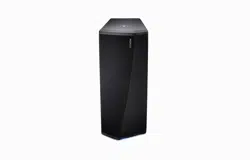
Introduction
4
Before your begin
5
System requirements
5
Network requirements
5
Hardware Requirements
6
Controller requirements
7
Getting to know your DSW-1H
8
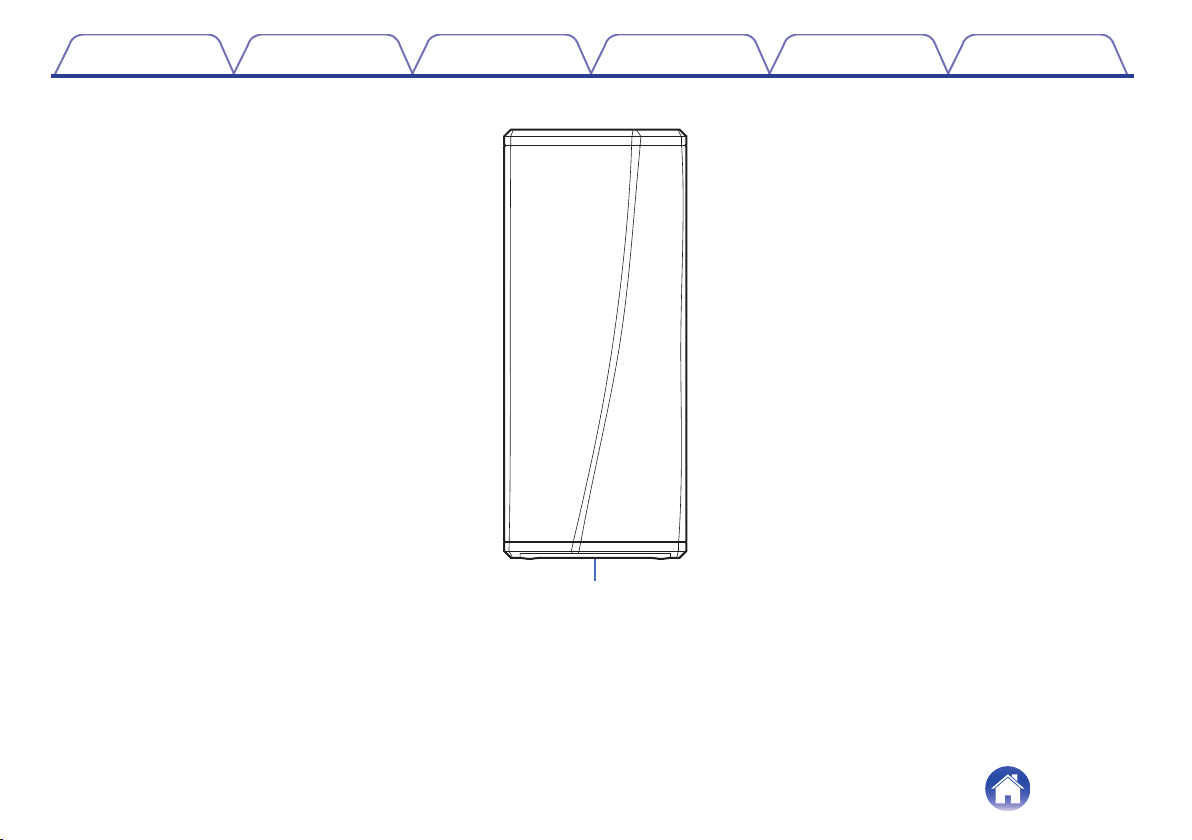
Front panel
9
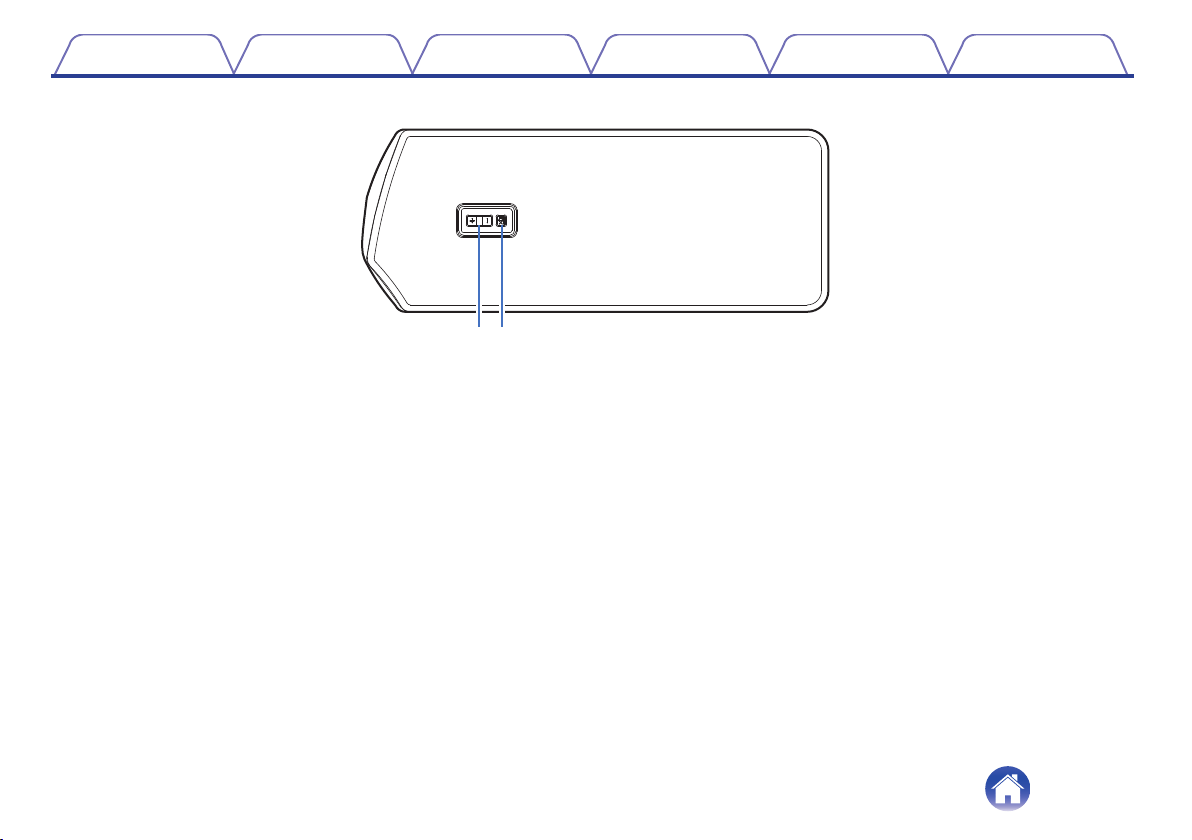
Controls
10
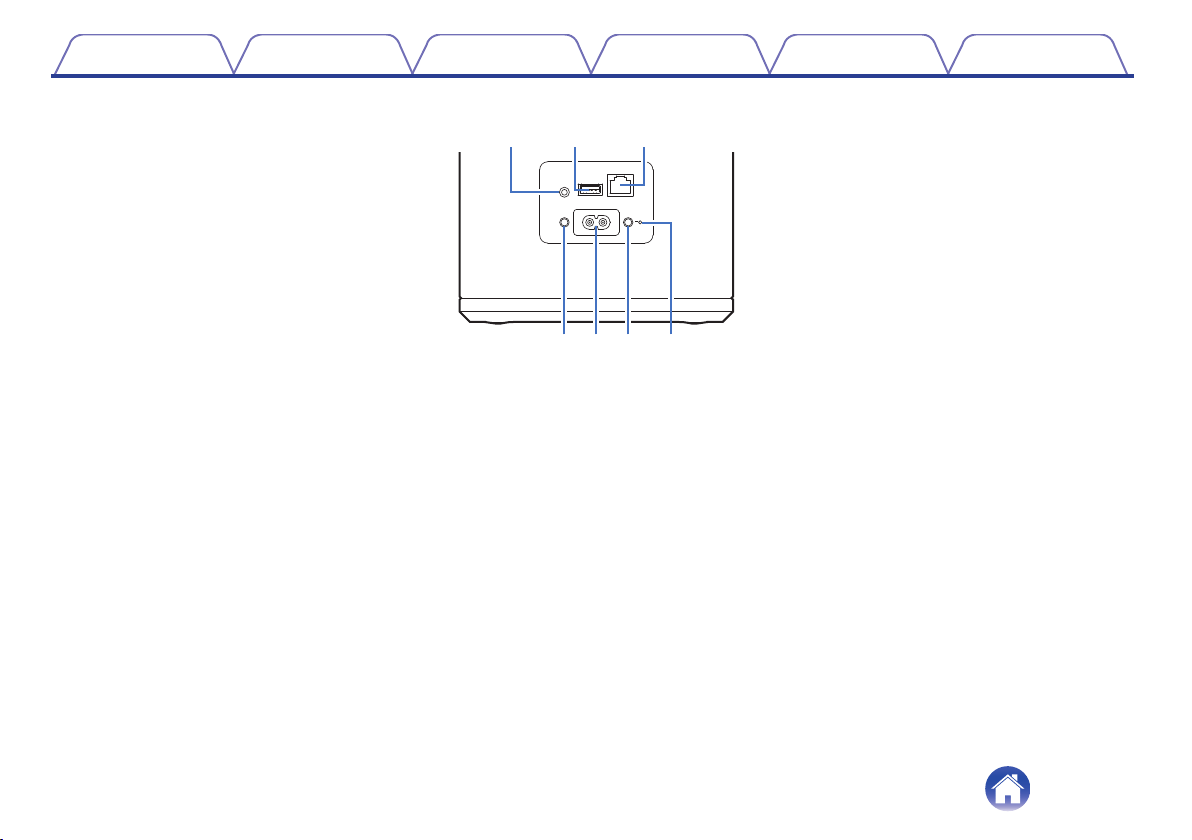
Back panel
11
Placing your DSW-1H
12
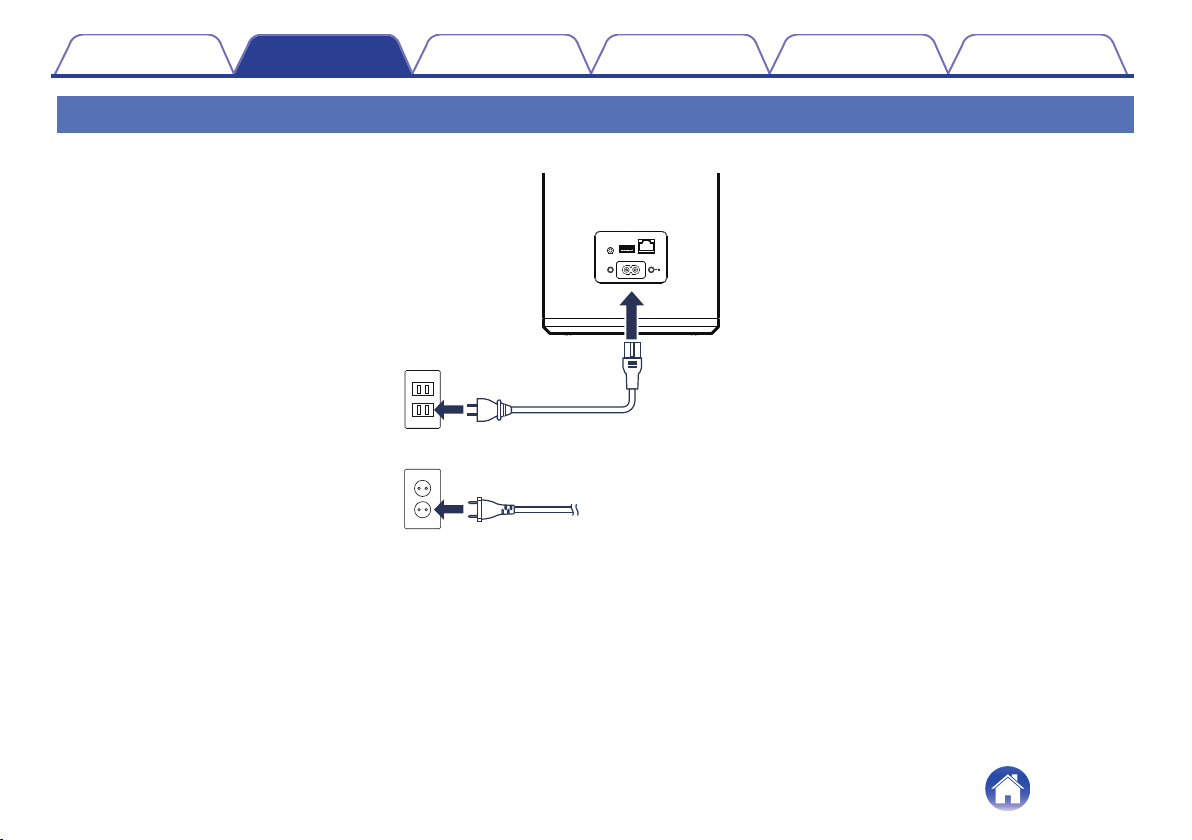
Powering your DSW-1H
13
Getting the HEOS app
14
Setting up your first DSW-1H
15
Adding more HEOS devices
16
Adding wired HEOS devices
16
Adding wireless HEOS devices
16
Connecting devices
17
Pairing a DSW-1H to a HEOS device
17
Pairing DSW-1H to DHT-S716H
17
Pairing DSW-1H to other HEOS device
18
Unpairing the DSW-1H
19
Making adjustments
20
Adjusting the Level
20
Adjusting the Low Pass Filter
20
Adjusting the Phase
21
Adjusting the status light brightness
21
Contents Setup Use Troubleshooting Status LED Appendix
Contents
2
Updating your system
22
Advanced features
23
Wireless performance
23
Power management
24
Power modes
24
Quick Start Mode
24
Deep Standby
24
Off
24
Basic troubleshooting
25
My HEOS device won’t connect to my network using the audio
cable
25
My HEOS device turns off and the status LED flashes in red
25
Connecting to a WPS network
26
Resetting your HEOS device
26
Status LED table
27
Supported file types and codecs
33
Specifications
34
Information
36
Trademarks
36
License
37
License information for the software used in the unit
37
Contents Setup Use Troubleshooting Status LED Appendix
3
Thank you for purchasing this Denon product. To ensure proper operation, please read this owner’s manual carefully before using the product.
NOTE
0
THIS DOCUMENT CONTAINS INFORMATION THAT IS SUBJECT TO CHANGE WITHOUT NOTICE.
Introduction
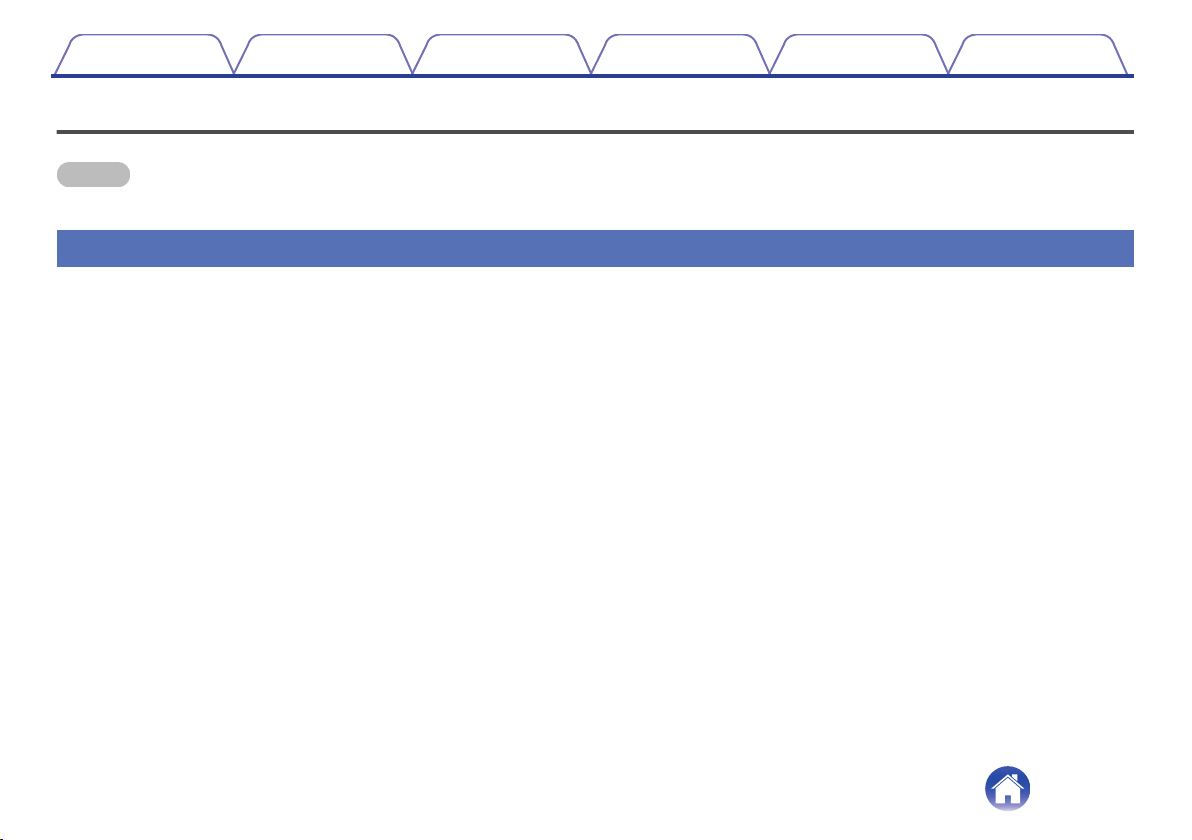
The DSW-1H is part of the HEOS wireless multi-room sound system that enables you to enjoy your favorite music anywhere and everywhere around your
home. By utilizing your existing home network and the HEOS app on your iOS or Android™ device, you can explore, browse, and play music from your
own music library or from many online streaming music services.
0
True multi-room audio - play different songs in different rooms or the same song in every room
0
Utilizes your existing home wireless network for quick and easy setup
0
Industry leading microsecond audio synchronization between HEOS device
0
Legendary Denon audio quality
0
If you are in a hurry, you can be enjoying great sounding music in no time by following the steps outlined in the Quick Start Guide (supplied).
.
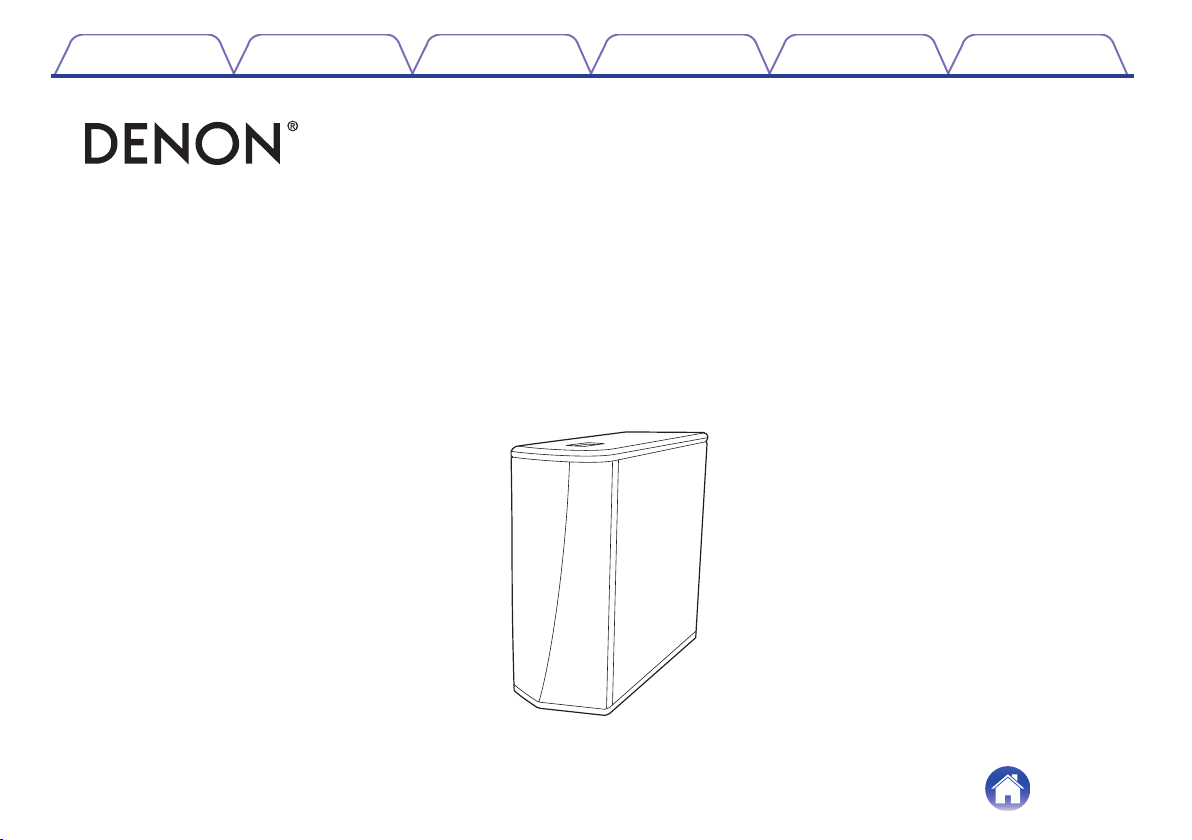
DSW-1H
Wireless Subwoofer
Quick Start Guide
Please continue reading this Owner’s Manual for more detailed information about the features and benefits of your DSW-1H.
Contents
Setup Use Troubleshooting Status LED Appendix
4
Before your begin
NOTE
0
If you have already installed at least one HEOS device, please skip to the section “Adding more HEOS devices” (v p. 16).
System requirements
Before you begin installing your first HEOS device, please make sure you understand and meet a few basic requirements.
o
Network requirements
Wireless Router - In order to use your HEOS music system, you must have a working wireless (Wi-Fi) or ethernet network in your home. Even when
connected to an Ethernet network, a Wi-Fi connection to the router is required to control the system using the HEOS Control app. If you do not have a
wireless network, please contact your local Denon dealer or electronics retailer to assist you with purchasing and installing a wireless network in your
home.
High Speed Internet Connection - HEOS accesses the Internet to stream music to your home from many popular online music services. HEOS is
also designed to provide you with software updates, which are delivered via your home Internet connection. DSL, Cable, and Fiber services will
provide the best experience and reliability. You may experience performance issues with slower Internet connections like satellite based services.
Contents
Setup Use Troubleshooting Status LED Appendix
5
o
Controller requirements
You can control your HEOS wireless multi-room sound system using the free HEOS app on any iOS or Android mobile device that meets these
minimum requirements:
.
iOS Minimum Requirements
0
iOS version 8.0 or later
0
iPhone
®
4S or newer
0
iPad
®
2 or newer
0
iPod touch
®
(5th generation) or newer
.
Android Minimum Requirements
0
Android OS version 4.0 or later
0
All resolutions
Contents Setup Use Troubleshooting Status LED Appendix
7
Getting to know your DSW-1H
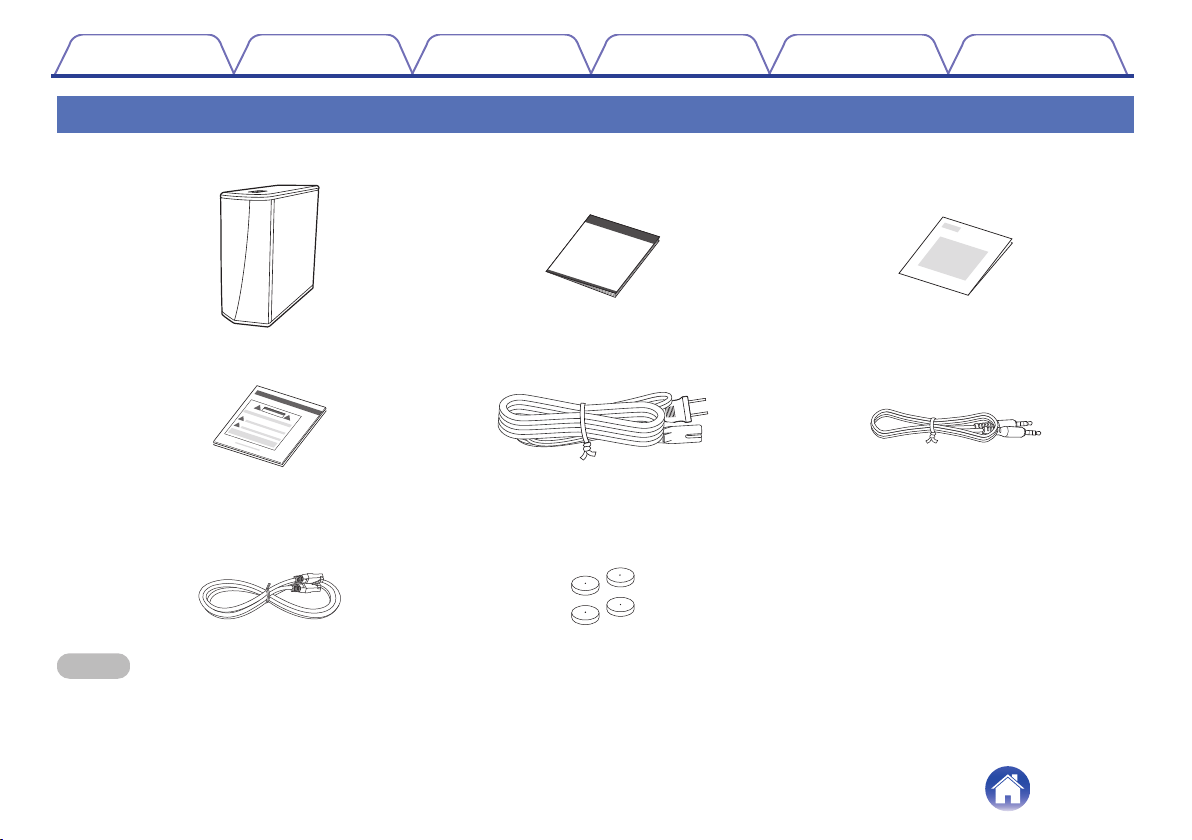
Unpack your DSW-1H from the box and verify that the following items are included:
.
DSW-1H
Quick Start Guide Warranty
(North America model only)
Power cord
Safety instructions
1/8 inch (3.5 mm) setup cable
Ethernet cable Feet
NOTE
0
Please use the power cord included in the box for your device.
Contents Setup Use Troubleshooting Status LED Appendix
8
o
Back panel
.
AUX IN
5V/1A---
USB
RESET
CONNECT
NETWORK
AC IN
w eq
r t y u
A
AUX jack (AUX IN)
Used to add the HEOS device to your wireless network.
(v p. 15)
B
USB port
Used to connect USB storage devices.
C
NETWORK connector
Used to connect this unit to a wired Ethernet network. (v p. 15)
D
RESET button
Various settings are reset to the factory default values.
(v p. 26)
E
AC inlet (AC IN)
Used to connect the power cord. (v p. 13)
F
CONNECT button
Used for Wi-Fi setup.
G
Connect in status LED
Indicates the status of this unit. (v p. 27)
Contents Setup Use Troubleshooting Status LED Appendix
11
Placing your DSW-1H
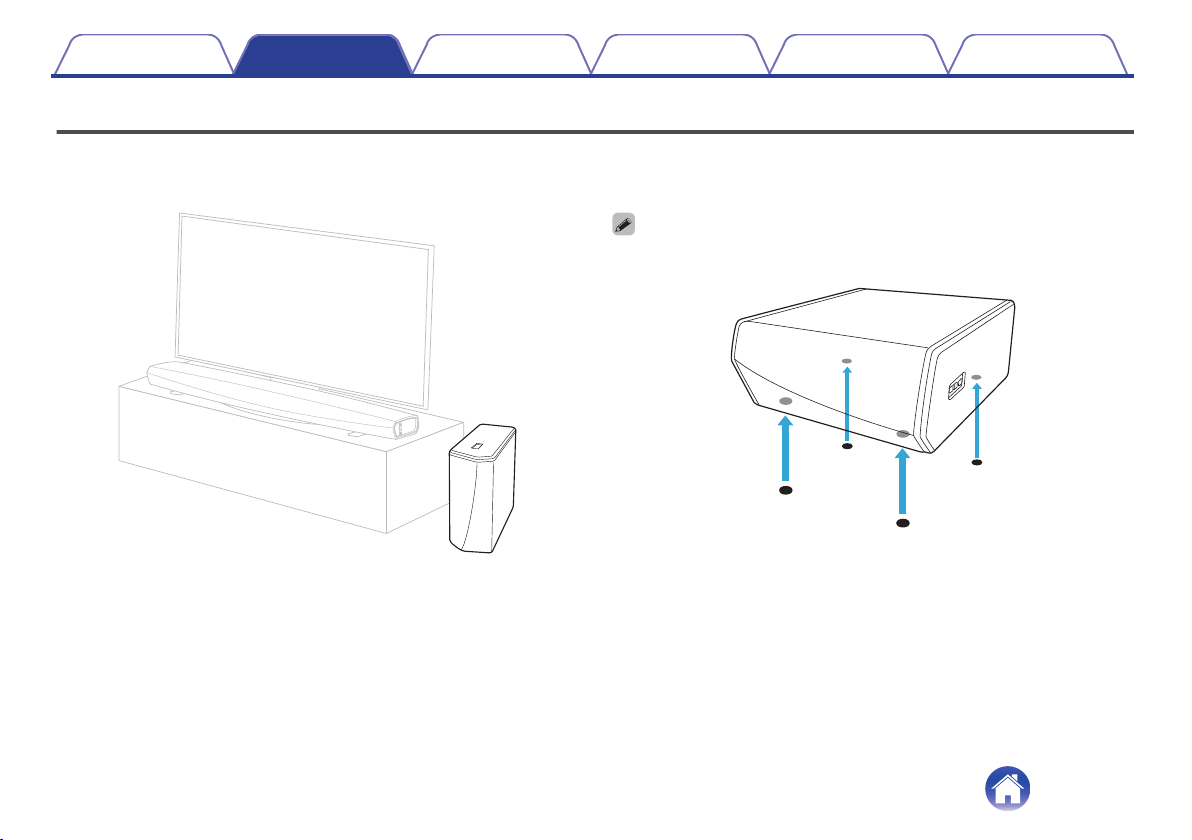
The DSW-1H is designed to add HEOS multi-room audio functionality to an external device which offers audio amplification. You should place your
DSW-1H in a convenient location near the speakers you are connecting it to.
0
The DSW-1H must be within range of your wireless network.
.
0
Attach the included feet to the four corners of the DSW-1H’s side if you are placing
it on horizontally.
.
Contents
Setup Use Troubleshooting Status LED Appendix
Setup
12
Getting the HEOS app
The HEOS app is the heart of the HEOS experience. Using your mobile device and the HEOS app, you can setup, browse, explore, and control your
HEOS system right in the palm of your hand, from anywhere in your home.
Download the HEOS app for iOS or Android by searching App Store
®
, Google Play™ store or Amazon for “HEOS”.
.
For the purpose of improvement, the specifications and design are subject to change without notice.
NOTE
0
The HEOS app and brand is not affiliated with any manufacturer of any mobile device. Availability of music services may vary by region. Not all services may be available at
time of purchase. Some services may be added or discontinued from time to time based on decisions of the music service providers or others.
Contents Setup Use Troubleshooting Status LED Appendix
14
Setting up your first DSW-1H
Once you have placed your DSW-1H in your listening room and have downloaded the HEOS app, you are ready to configure your DSW-1H for music
playback. This involves following a few simple steps to get the DSW-1H connected to your existing home network:
Caution
0
DO NOT connect the Ethernet cable if you are connecting your DSW-1H to a wireless network. If you are connecting the DSW-1H to a wired network,
use an Ethernet cable to connect the DSW-1H to your network or router.
1
Make sure your mobile device is connected to your
wireless network (the same network you want your
DSW-1H connected to).
You can check this in the Settings - Wi-Fi menu of your iOS or
Android device.
NOTE
0
If your wireless network is secure, make sure you know the password to join
your network.
2
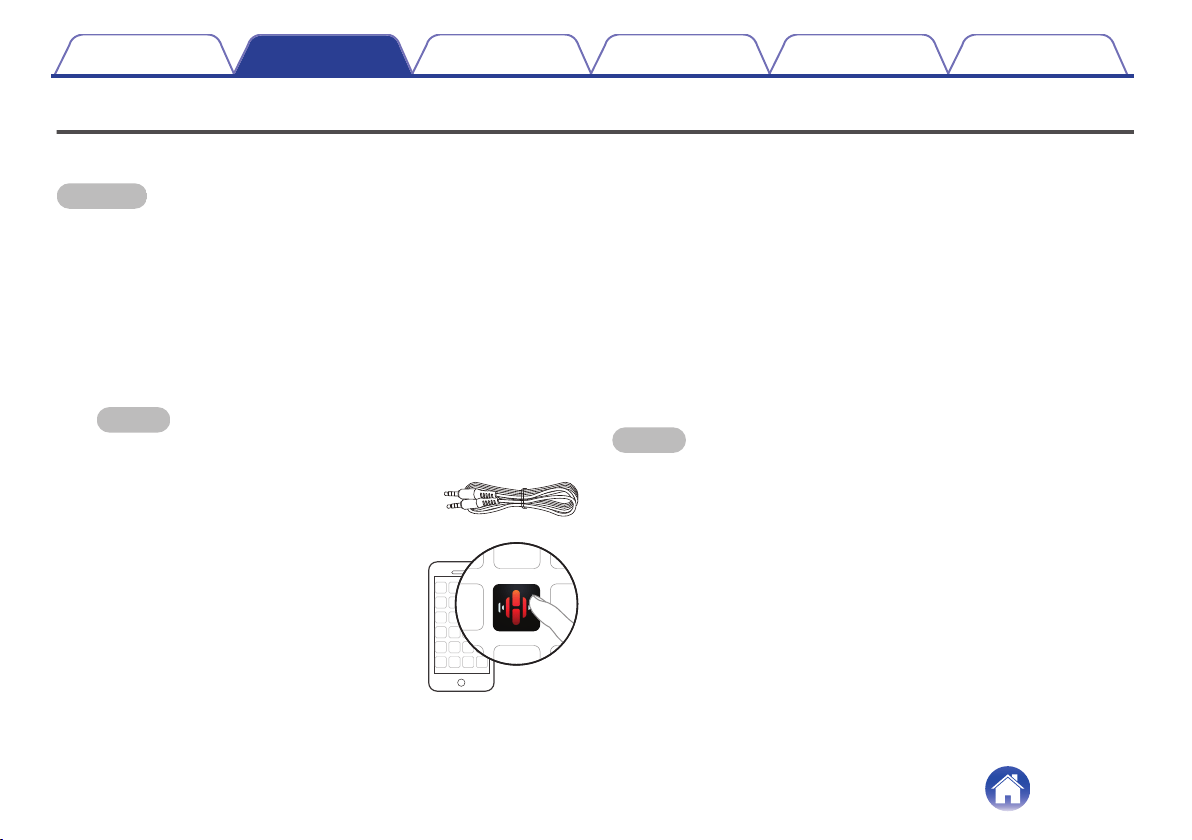
Make sure you have the included 1/8
inch (3.5 mm) setup cable handy.
3
Launch the HEOS app on your
mobile device.
4
Tap the “Setup Now” button at the top of the screen.
5
Follow the instructions to add the DSW-1H to your
wireless network.
The Wi-Fi settings from your mobile device will be copied to the
DSW-1H via the audio cable.
NOTE
0
If you have any problems connecting your HEOS device, jump to the
Troubleshooting section. (v p. 25)
Contents Setup Use Troubleshooting Status LED Appendix
15
Adding more HEOS devices
The HEOS wireless multi-room sound system is a true multiroom audio system that automatically synchronizes audio playback between multiple HEOS
devices so that the audio coming from different rooms is perfectly in sync and always sounds amazing! You can easily add up to 32 devices to your HEOS
system.
Adding wired HEOS devices
Just connect the HEOS devices to your home network using an Ethernet cable and the HEOS devices will appear on your HEOS app as a new room in
the “Rooms” screen.
At your convenience, you can assign a name to the HEOS devices to indicate which room you have it placed in.
0
Use only a shielded STP or ScTP LAN cable which is easily available at electronics stores (CAT-5 or greater recommended).
0
Do not connect a Network Connector directly to the LAN port/Ethernet connector on your computer.
Adding wireless HEOS devices
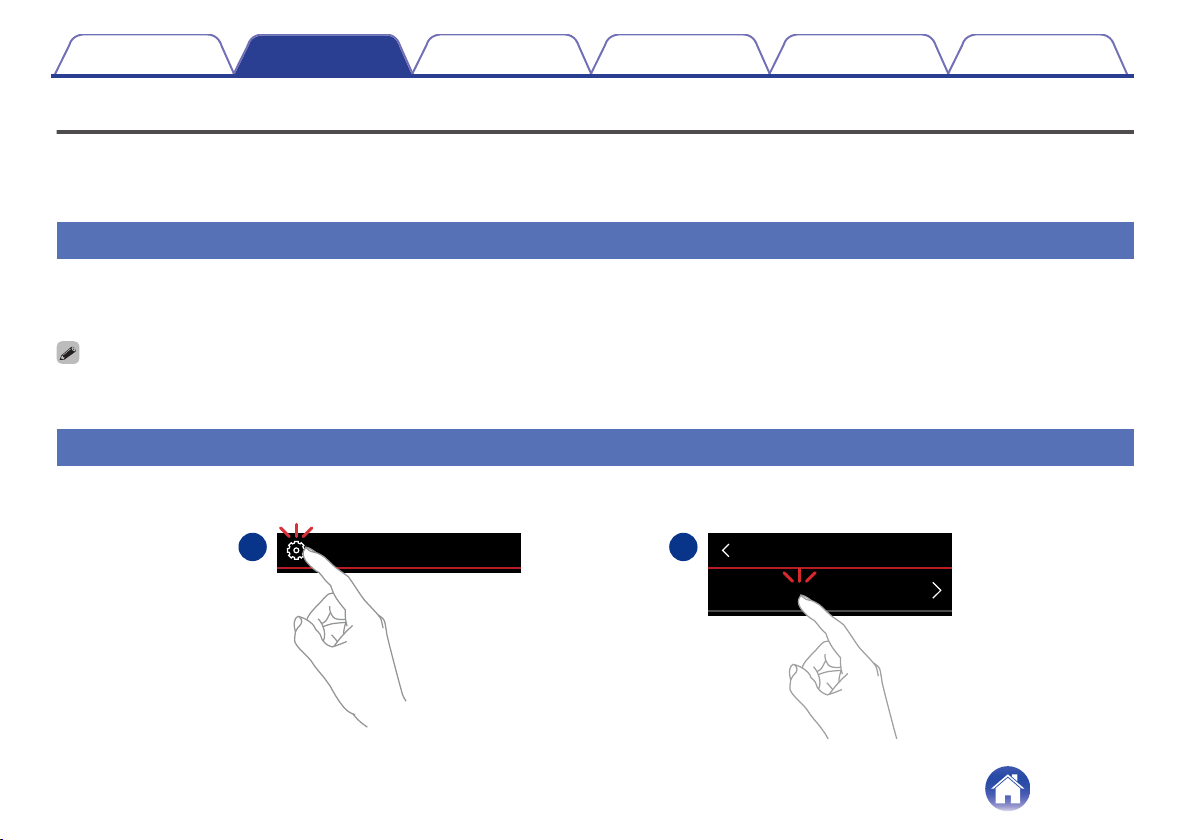
You can add additional wireless HEOS devices to your HEOS system by selecting “Add Device” from the HEOS app’s settings menu and follow the
instructions:
.
1
2
Add Device
SettingsMusic
Contents
Setup Use Troubleshooting Status LED Appendix
16
Connecting devices
Pairing a DSW-1H to a HEOS device
The DSW-1H needs to be paired with another HEOS device.
o
Pairing DSW-1H to DHT-S716H
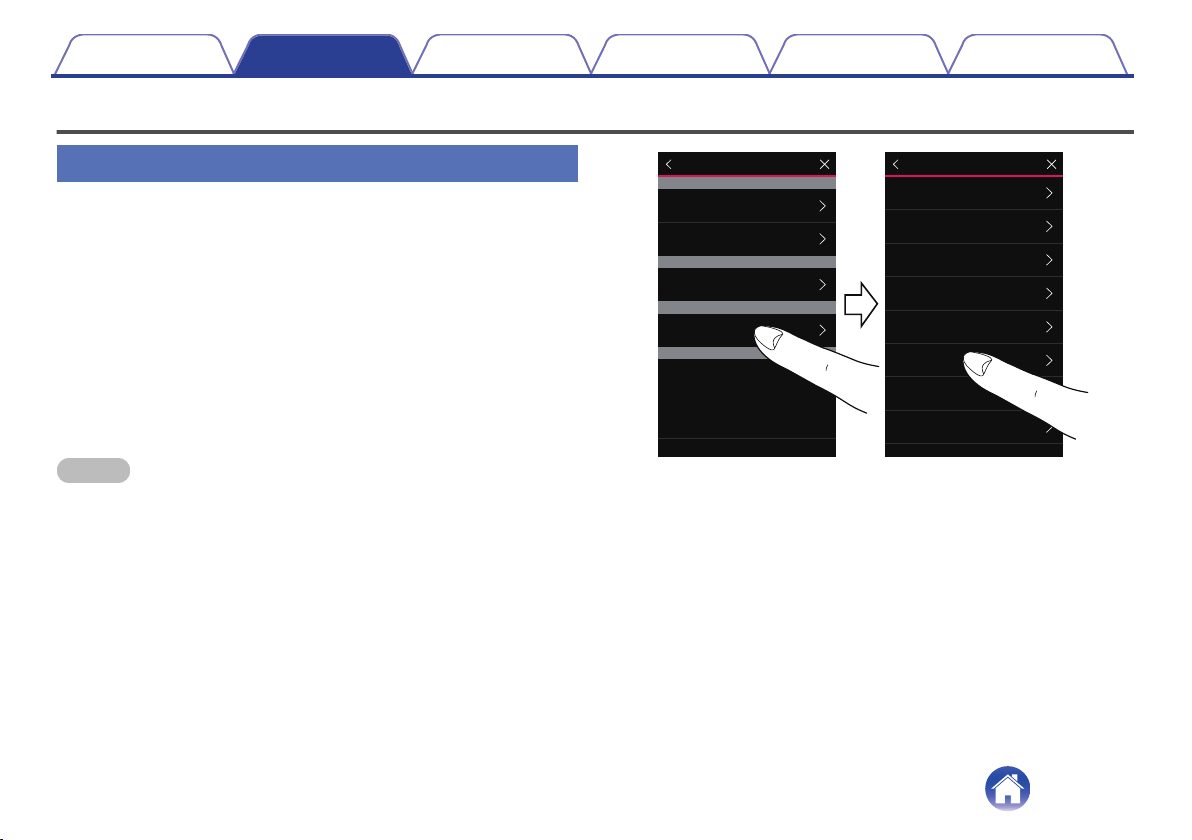
1
Select the Settings a icon located in the upper left
corner of the main “Music” menu to display the
Settings menu.
2
Select the DHT-S716H from "My Devices".
3
Select Setup Assistant and add the DSW-1H.
Follow the instructions in the menu to complete the setup.
NOTE
0
A DSW-1H can not playback any audio unless it is paired with some other HEOS
device.
0
A DSW-1H needs to connect your wireless network before pairing.
.
HEOS 3 Left
HEOS 3 Right
HEOS Link
Denon DHT-S716H
Denon DSW-1H
Speakers
Links
Soundbars
Subwoofers
My Devices
Denon DHT-S716H
xxxxxxxx
Normal
On Table
Name
Network
EQ
Quality
Status Light
Setup Assistant
Placement
TV Input
Denon DHT-S716H
Contents
Setup Use Troubleshooting Status LED Appendix
17
o
Pairing DSW-1H to other HEOS device
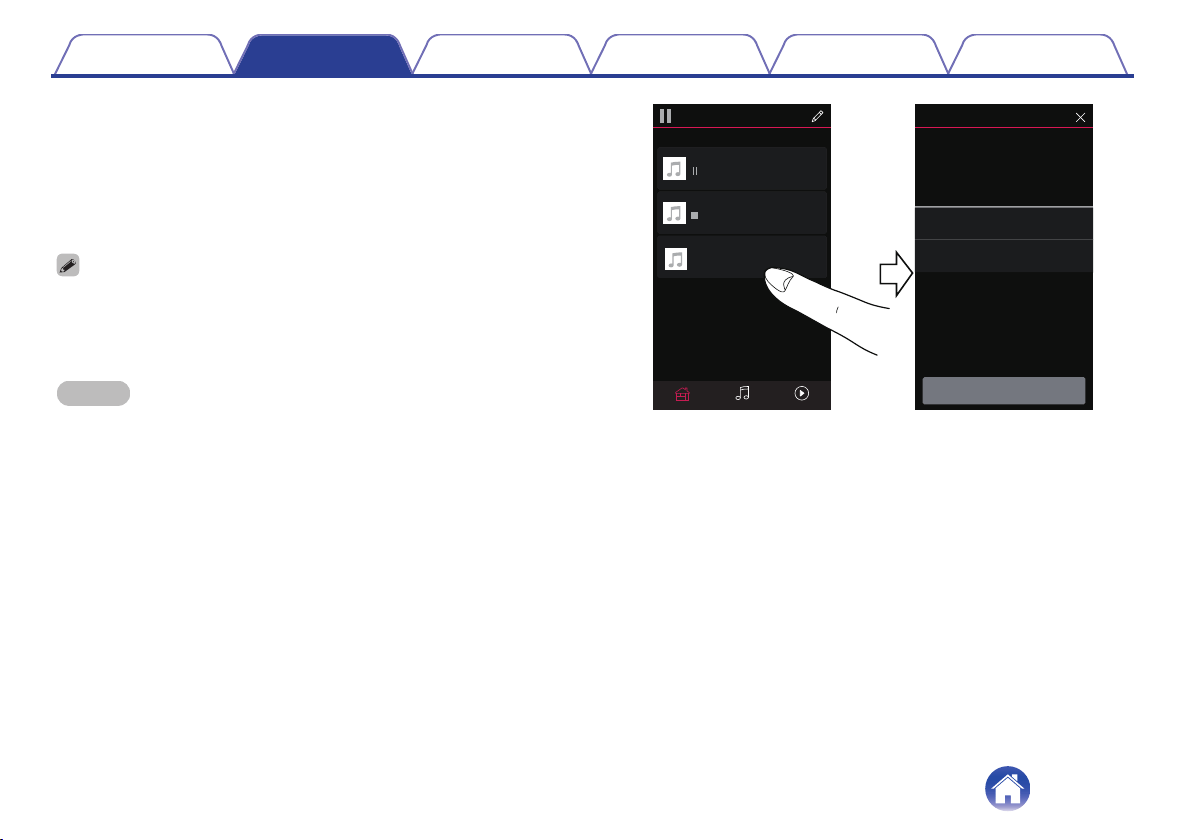
1
Select the currently unpaired DSW-1H.
2
Select the HEOS device to be paired.
The DSW-1H will be grouped together with it and will play the deep
bass of the added HEOS device.
The following HEOS devices can be connected like this
0
HEOS Amp
0
HEOS Link
0
HEOS speaker
NOTE
0
A DSW-1H can not playback any audio unless it is paired with some other HEOS
device.
0
A DSW-1H needs to connect your wireless network before pairing.
.
HEOS 1 + HEOS 1
HEOS Amp
Next
Select a HEOS device to pair your
Denon DSW-1H with:
Song Name 2
Song Name 1
HEOS 1 + HEOS 1
HEOS Amp
not paired-tap to conigure
Denon DSW-1H
Drag one room into another to group them
Rooms
Now PlayingMusicRooms
Pair Subwoofer
Denon DSW-1H
Contents
Setup Use Troubleshooting Status LED Appendix
18
Unpairing the DSW-1H
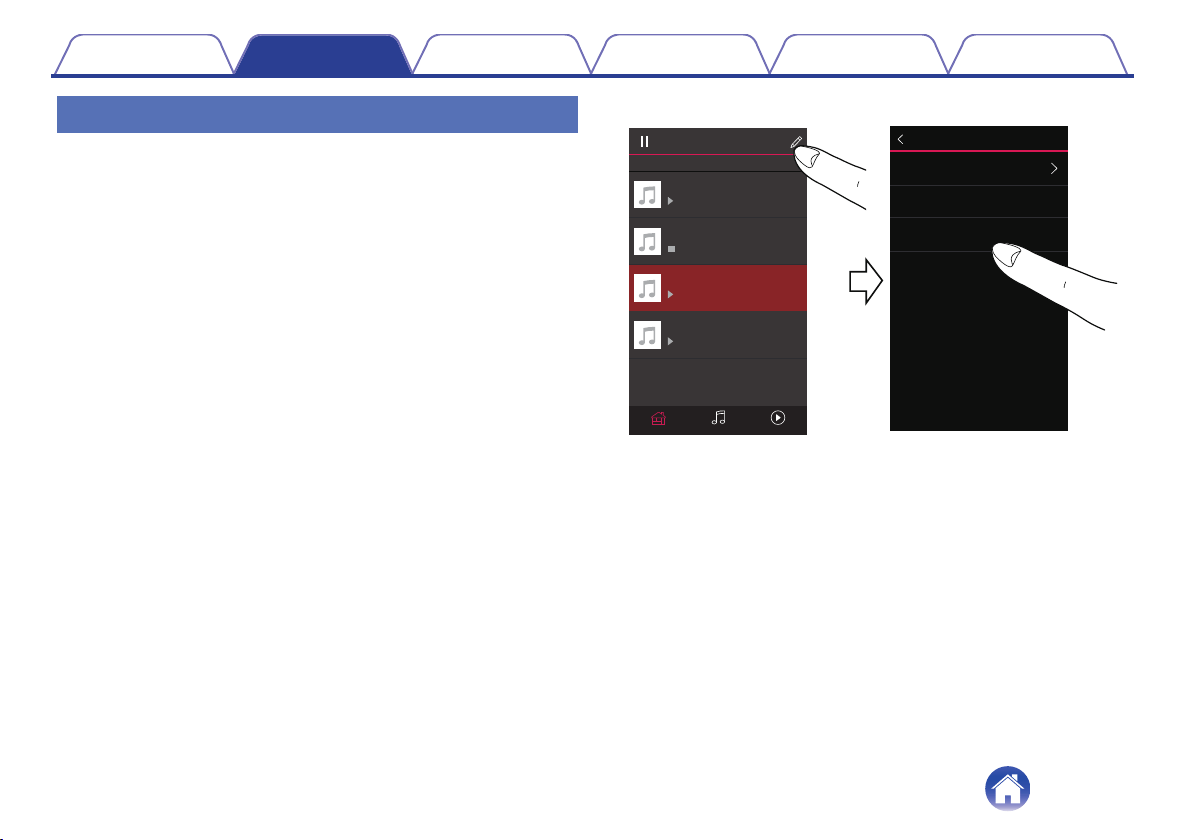
1
Tap the pencil e icon in the upper right corner of the
"Rooms" menu.
2
Tap the HEOS device from which to unpair the DSW-1H.
3
Select "Disconnect Wireless Subwoofers".
.
HDMI InMusicDenon DHT-S716H
Denon DHT-S716H
Drag one room into another to group them
Rooms
HEOS 3 Left
HEOS 3 Right
HEOS Link
Disconnect Wireless Subwoofers
Name
Denon DHT-S716H
Edit Group
Disconnect Wireless Surrounds
Contents
Setup Use Troubleshooting Status LED Appendix
19
Making adjustments
You can adjust specific settings for each of your HEOS device in your
system:
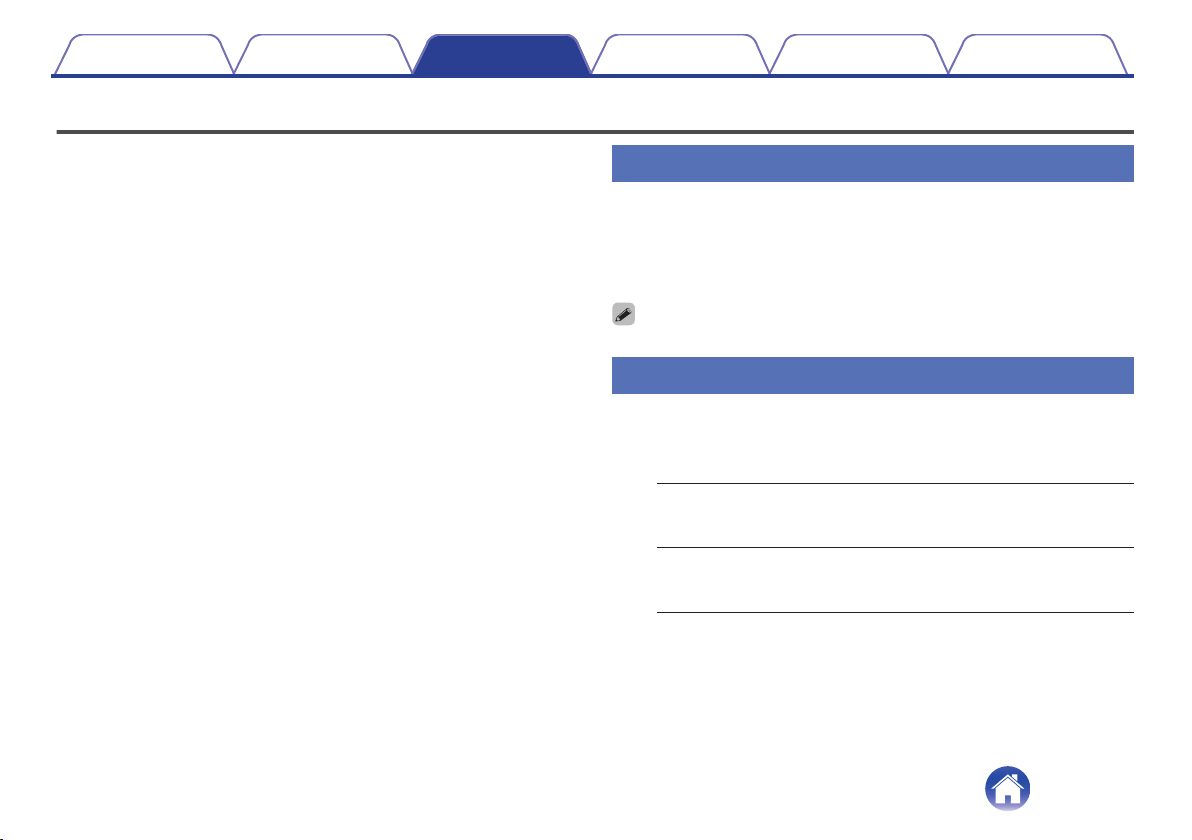
1
Select the Settings a icon located in the upper left
corner of the main “Music” menu to display the
Settings menu.
2
Select “My Devices” to display a list of your HEOS
devices.
3
Select the HEOS device you want to adjust.
Adjusting the Level
1
Select “Level”.
2
Adjust the level up or down to compensate for the
subwoofer output level.
0
You can also configure settings by tapping S in the Now Playing screen.
Adjusting the Low Pass Filter
1
Select “Low Pass Filter”.
2
Set the frequency cutoff point.
Optimized
(recommended)
Select when using with HEOS speakers.
Optimized values are set to each of the
speakers.
40Hz - 250Hz
(for experts)
When using with other speakers, configure
settings that match the characteristics of the
combined speakers.
Contents Setup Use Troubleshooting Status LED Appendix
Use
20
Adjusting the Phase
1
Select “Phase”.
2
Select Normal (default) or 180°.
0
For normal configuration, use “Normal”.
0
The bass volume may increase when switched to “180°” due to the installation
location of the Subwoofer.
Adjusting the status light brightness
1
Select “Status Light”.
2
Adjust the brightness up or down or set the slider to
the OFF position to completely disable the status light.
Contents Setup Use Troubleshooting Status LED Appendix
21
Updating your system
HEOS has the ability to add enhancements and updated functionality via your high speed Internet connection. Follow the instructions on the screen to
update the HEOS device and/or your controller App.
1
Select the Settings a icon located in the upper left
corner of the main “Music” menu to display the
Settings menu.
2
Select “Software Update”.
n
Check for Update
Follow the instructions on screen to install any available
updates to your HEOS system.
n
Auto-Update
ON
(Default):
Valid updates are performed
automatically.
OFF:
You will be notified of valid updates on
the HEOS app.
Contents Setup Use Troubleshooting Status LED Appendix
22
Advanced features
There are a few advanced features of the HEOS system that you may want to explore once you become familiar with the basic operations. You can
access the advanced features of the HEOS system by following these steps:
1
Select the Settings a icon located in the upper left
corner of the main “Music” menu to display the
Settings menu.
2
Select “Advanced Settings” to display a list the
available settings.
Wireless performance
You can check the wireless connection status of your HEOS device.
n
Quality
Excellent / Good / Poor
NOTE
0
If the quality level of your HEOS device is ”Poor”, make sure your HEOS devices
are not located near other electronic devices that could interfere with it’s wireless
connectivity (like microwave ovens, cordless phones, TVs, etc…)
n
Signal
Excellent / Good / Poor
NOTE
0
If the signal level of your HEOS device is ”Poor”, make sure your HEOS devices
are within range of your wireless network.
Contents Setup Use Troubleshooting Status LED Appendix
23
Power management
Power modes
o
Quick Start Mode
To save power, the device will automatically enter “Quick Start Mode”
whenever there is no network access or playback for 20 minutes and
will automatically resume to full power whenever the device is selected
and playing music.
The status LED dims when the mode is switched to Quick Start Mode.
o
Deep Standby
The device also has the ability to automatically enter “Deep Standby”
whenever the wired and wireless network connections are removed for
more than 60 minutes in Quick Start Mode. Status LED will turn off
during Deep Standby.
To “wake” a HEOS device from Deep Standby, you must press the
volume or mute buttons which will immediately turn on the front panel
LED.
NOTE
0
Please note that the HEOS cannot be operated as intended when in Deep
Standby as there is no network connection.
o
Off
To completely turn off the power to the device you must remove the
mains plug from the power outlet.
Contents
Setup Use Troubleshooting Status LED Appendix
24
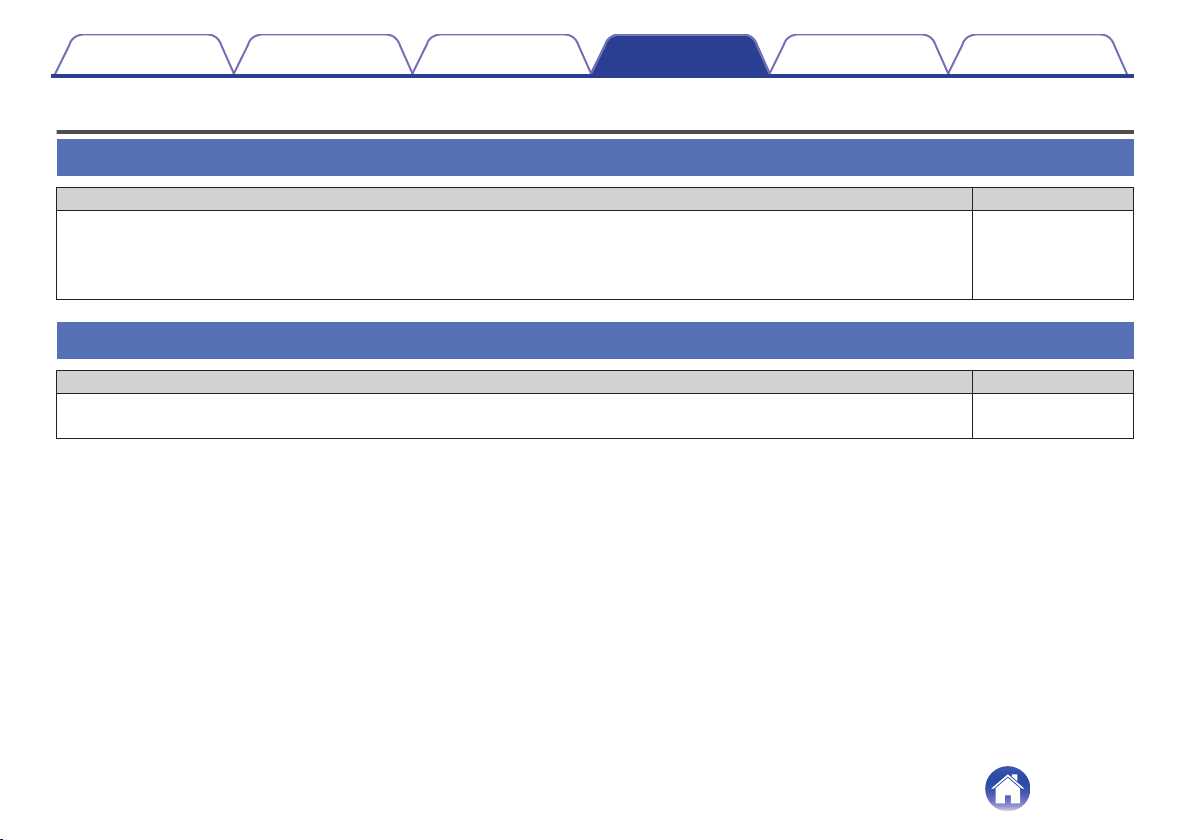
Basic troubleshooting
My HEOS device won’t connect to my network using the audio cable
Solution Refer to Page
0
Make sure your mobile device is connected to your wireless network before setting up your device. 15
0
Alternatively, you can connect your device to your network router using the included Ethernet cable. Once connected via
Ethernet, the HEOS App should recognize the device and you can manually move it to your wireless network using Settings/My
Devices/Device_Name/Advanced/Network Settings.
16
My HEOS device turns off and the status LED flashes in red
Solution Refer to Page
0
The protection circuit has been activated due to a rise in temperature within your HEOS device. Turn the power off, wait about
an hour until this device cools down sufficiently, and then turn the power on again.
–
Contents Setup Use Troubleshooting Status LED Appendix
Troubleshooting
25
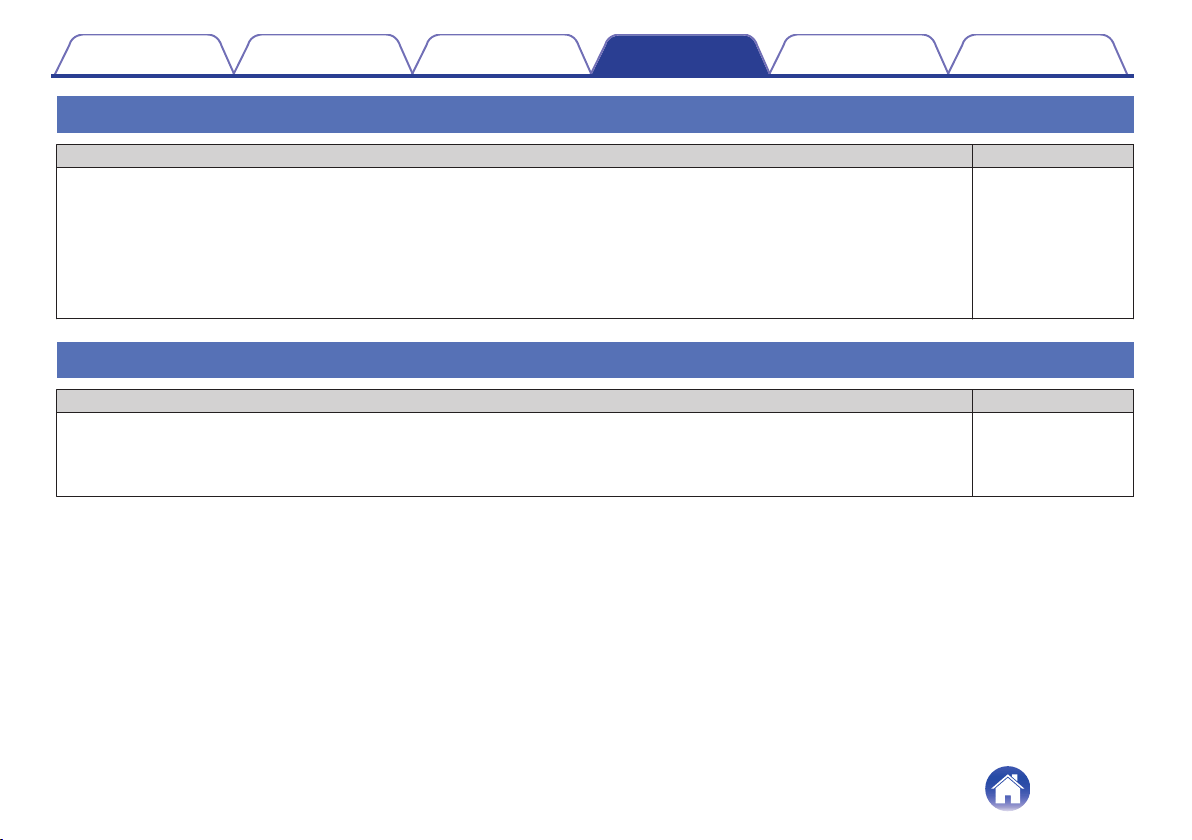
Connecting to a WPS network
Solution Refer to Page
0
If your wireless router support WPS (Wi-Fi Protected Setup™) your HEOS wireless device can optionally connect to your
network using the “Push Button” method by following these steps:
Wi-Fi Protected Setup™ is trademarks of Wi-Fi Alliance.
1. Press the WPS button on your router.
2. Within 2 minutes, press and hold the Connect button on the rear panel of the HEOS device for 3 seconds.
3. The LED on the front of the device will flash green for several seconds as it connects to your WPS router.
4. When the connection is complete, the LED on the front of the device will turn solid blue.
5
Resetting your HEOS device
Solution Refer to Page
0
Resetting your HEOS device will clear out the wireless network info, EQ, and name but retain it’s current software. You will have
to use Settings - Add Device to reconnect the HEOS device to your home network before it can be used.
To reset your HEOS device, press and hold the RESET buttons located on the back of the HEOS device for 5 seconds until the
front LED begins to flash amber.
–
Contents Setup Use Troubleshooting Status LED Appendix
26
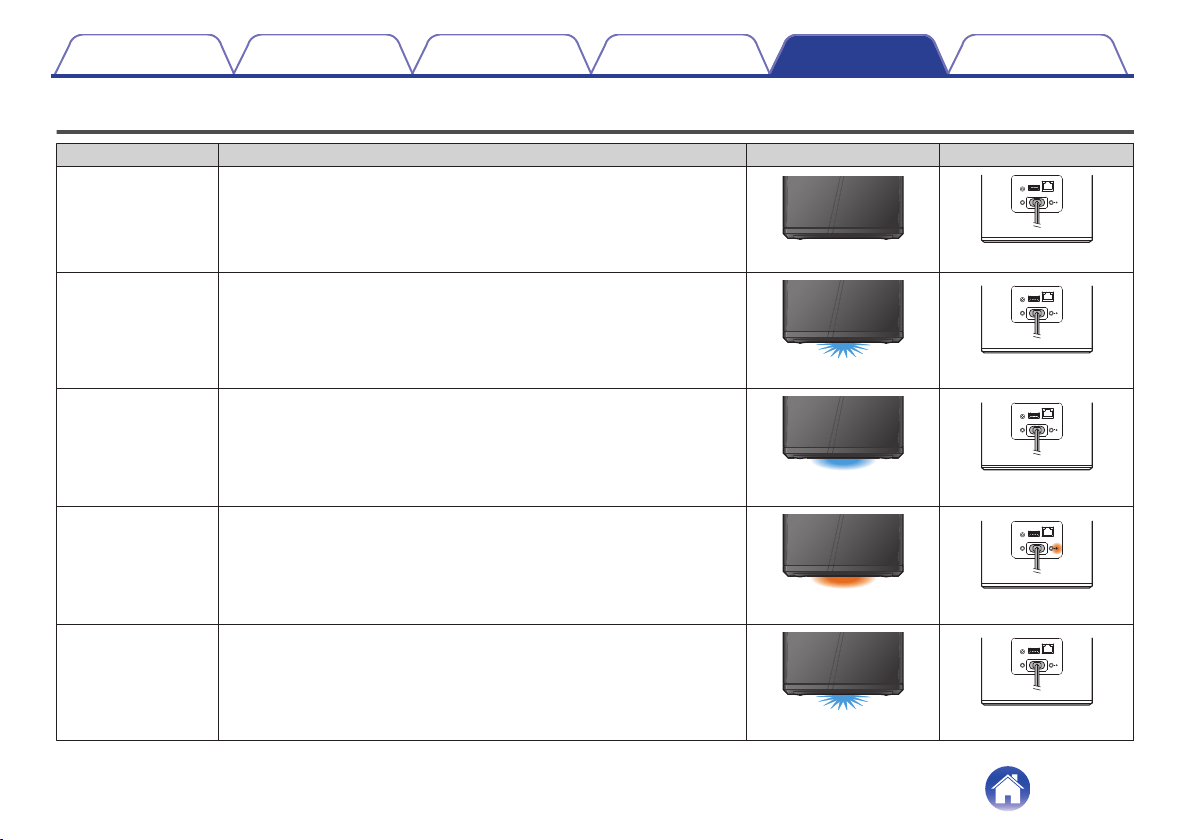
Status LED table
Device Operation Description Front LED Action Rear LED Action
Off No AC power or Deep Standby
.
(off)
.
AUX IN
5V/1A---
USB
RESET
CONNECT
NETWORK
AC IN
(off)
Plug in Booting
.
(blink)
.
AUX IN
5V/1A---
USB
RESET
CONNECT
NETWORK
AC IN
(off)
On Ready-Configured and connected to your network
.
(solid)
.
AUX IN
5V/1A---
USB
RESET
CONNECT
NETWORK
AC IN
(off)
On Not Connected to your network
.
(solid)
.
AUX IN
5V/1A---
USB
RESET
CONNECT
NETWORK
AC IN
(solid)
Change Network Connecting to your network
.
(blink)
.
AUX IN
5V/1A---
USB
RESET
CONNECT
NETWORK
AC IN
(off)
Contents
Setup Use Troubleshooting Status LED Appendix
Status LED
27
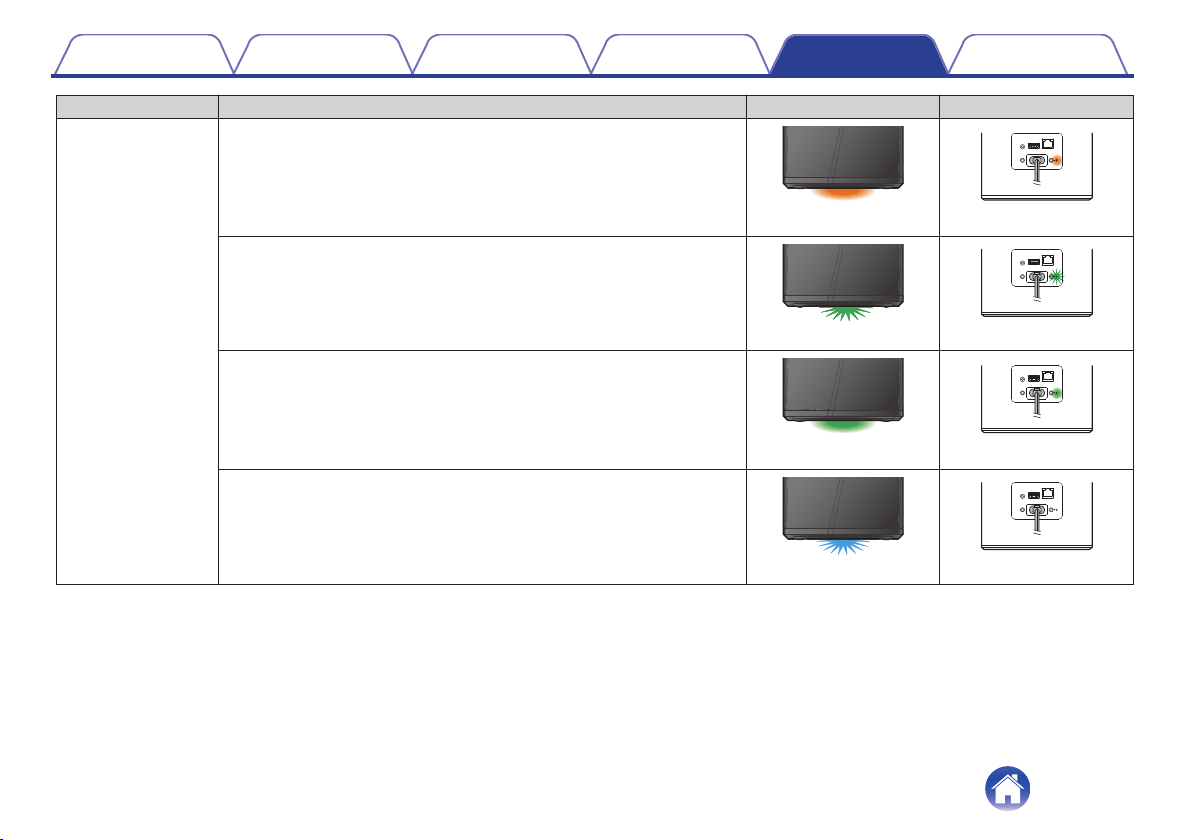
Device Operation Description Front LED Action Rear LED Action
Setup
Not connected
.
(solid)
.
AUX IN
5V/1A---
USB
RESET
CONNECT
NETWORK
AC IN
(solid)
Connect button was pressed
.
(blink)
.
AUX IN
5V/1A---
USB
RESET
CONNECT
NETWORK
AC IN
(blink)
Cable connection is OK
.
(solid)
.
AUX IN
5V/1A---
USB
RESET
CONNECT
NETWORK
AC IN
(solid)
Connecting to your network
.
(blink)
.
AUX IN
5V/1A---
USB
RESET
CONNECT
NETWORK
AC IN
(off)
Contents
Setup Use Troubleshooting Status LED Appendix
28
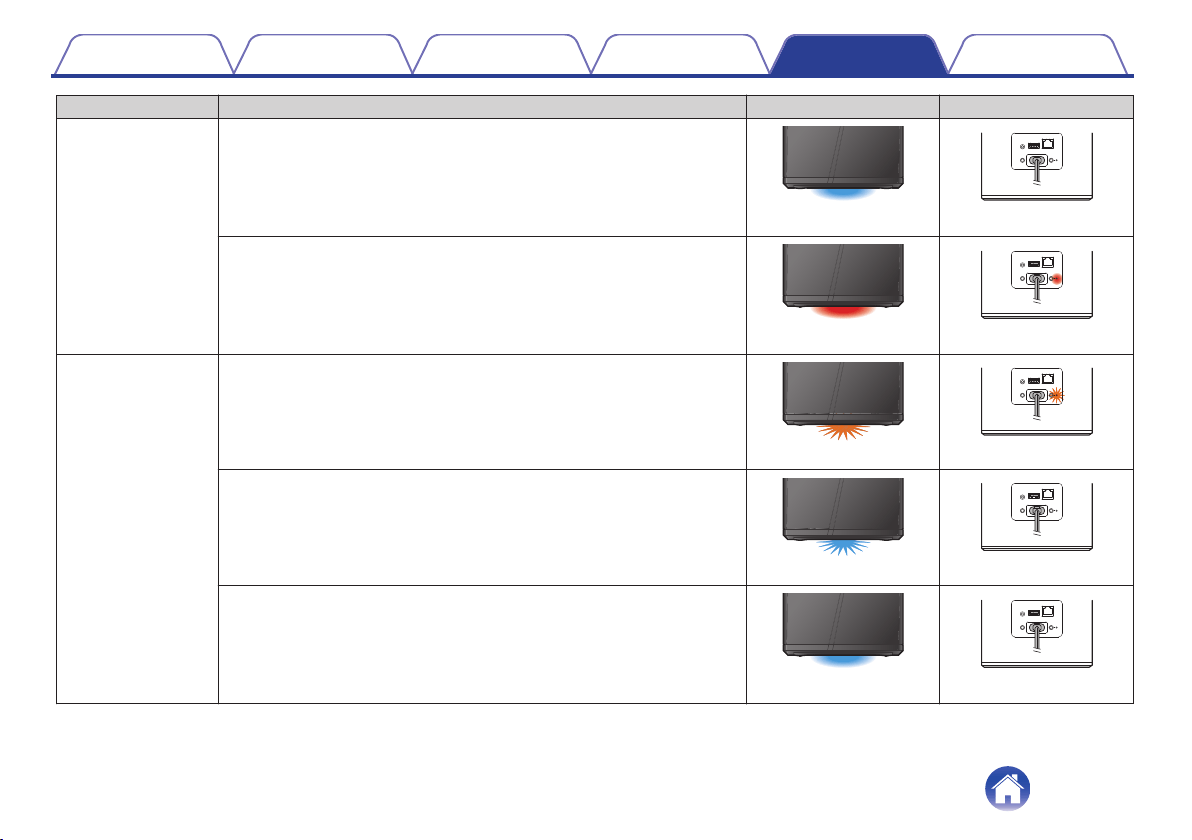
Device Operation Description Front LED Action Rear LED Action
Setup
Configured and connected to your network
.
(solid)
.
AUX IN
5V/1A---
USB
RESET
CONNECT
NETWORK
AC IN
(off)
Error
.
(solid)
.
AUX IN
5V/1A---
USB
RESET
CONNECT
NETWORK
AC IN
(solid)
Update
Updating
.
(blink)
.
AUX IN
5V/1A---
USB
RESET
CONNECT
NETWORK
AC IN
(blink)
Rebooting
.
(blink)
.
AUX IN
5V/1A---
USB
RESET
CONNECT
NETWORK
AC IN
(off)
Ready-Configured and connected to your network
.
(solid)
.
AUX IN
5V/1A---
USB
RESET
CONNECT
NETWORK
AC IN
(off)
Contents
Setup Use Troubleshooting Status LED Appendix
29
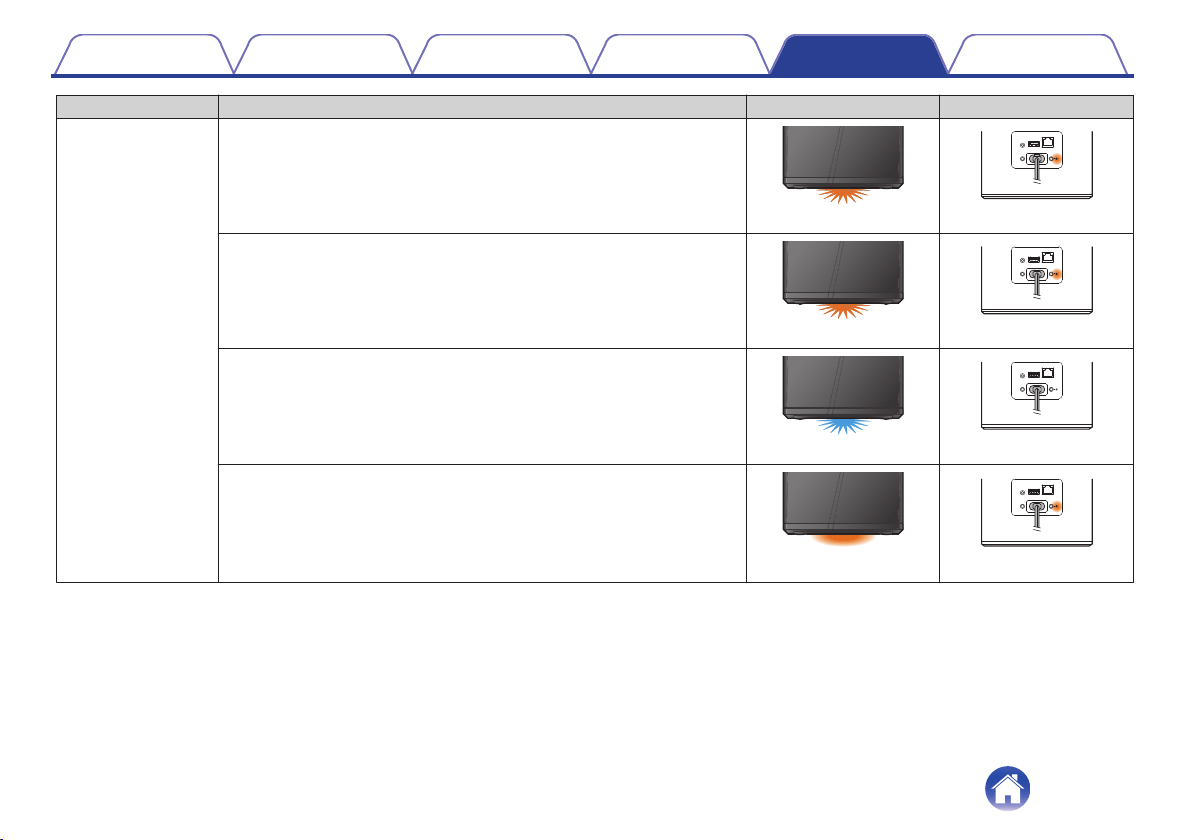
Device Operation Description Front LED Action Rear LED Action
Reset
Soft reset - Clear user settings
.
(fast blink)
.
AUX IN
5V/1A---
USB
RESET
CONNECT
NETWORK
AC IN
(solid)
Hard reset - Factory restore
.
(blink)
.
AUX IN
5V/1A---
USB
RESET
CONNECT
NETWORK
AC IN
(solid)
Rebooting
.
(blink)
.
AUX IN
5V/1A---
USB
RESET
CONNECT
NETWORK
AC IN
(off)
Ready-Not Configured
.
(solid)
.
AUX IN
5V/1A---
USB
RESET
CONNECT
NETWORK
AC IN
(solid)
Contents
Setup Use Troubleshooting Status LED Appendix
30
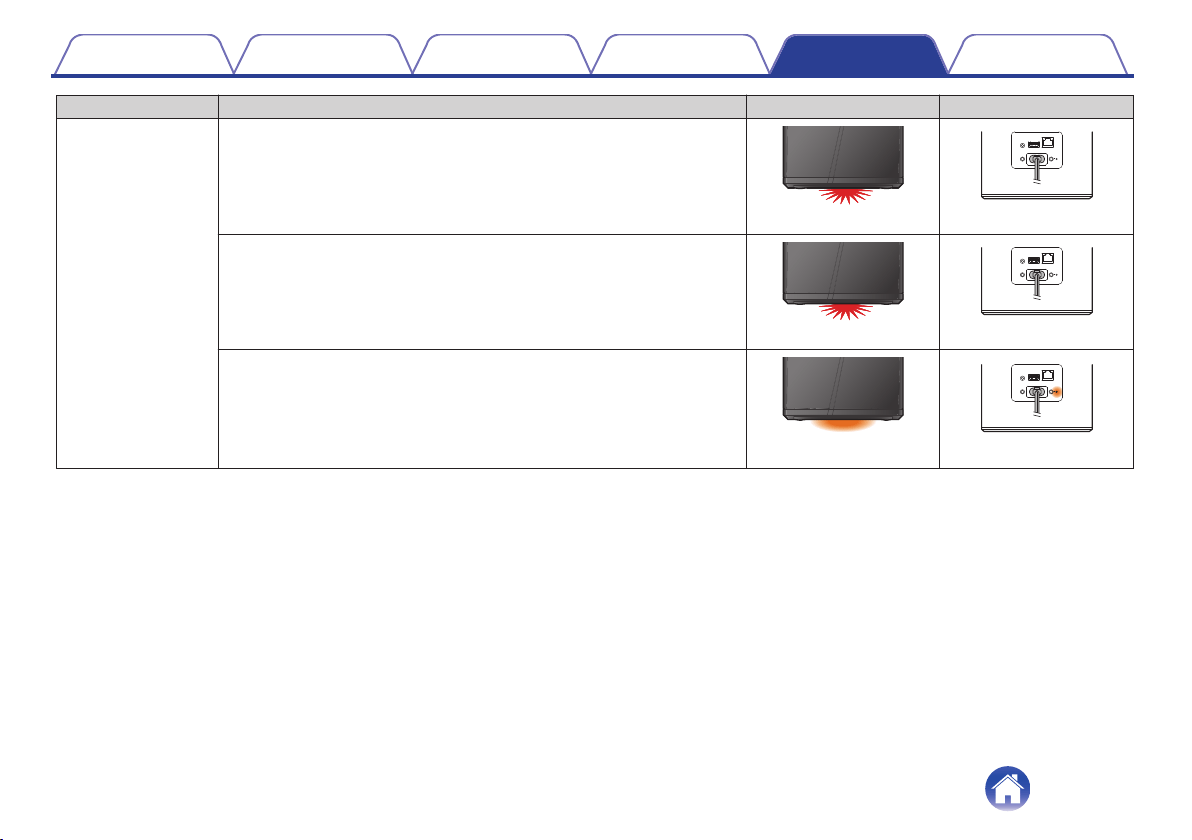
Device Operation Description Front LED Action Rear LED Action
Errors
Firmware Error
.
(slow blink (NOT fade))
.
AUX IN
5V/1A---
USB
RESET
CONNECT
NETWORK
AC IN
(off)
Hardware Error
.
(fast blink)
.
AUX IN
5V/1A---
USB
RESET
CONNECT
NETWORK
AC IN
(off)
Network Error
.
(solid)
.
AUX IN
5V/1A---
USB
RESET
CONNECT
NETWORK
AC IN
(solid)
Contents
Setup Use Troubleshooting Status LED Appendix
31
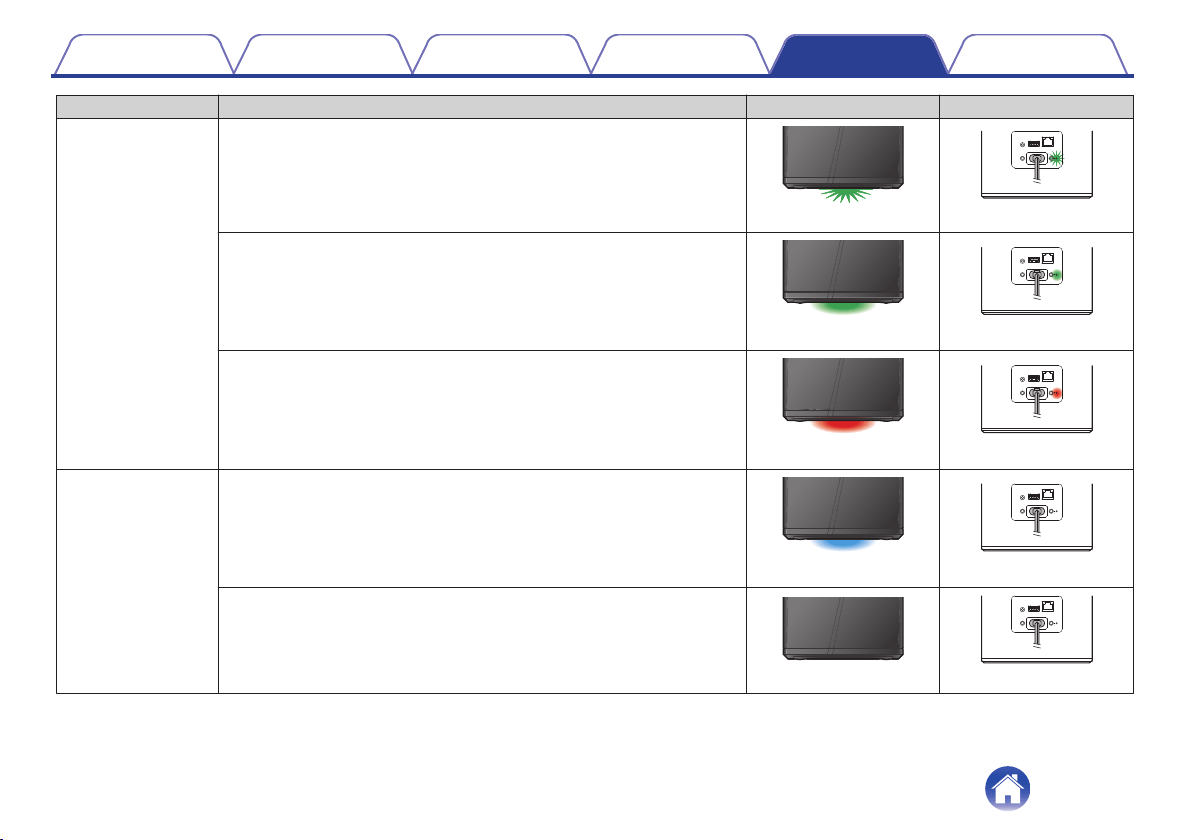
Device Operation Description Front LED Action Rear LED Action
WPS
a WPS session is active
.
(fast blink)
.
AUX IN
5V/1A---
USB
RESET
CONNECT
NETWORK
AC IN
(fast blink)
WPS connected
.
(for 3 sec. solid)
.
AUX IN
5V/1A---
USB
RESET
CONNECT
NETWORK
AC IN
(solid)
WPS time-out
.
(for 3 sec. solid)
.
AUX IN
5V/1A---
USB
RESET
CONNECT
NETWORK
AC IN
(solid)
Power Management
Quick Start Mode
.
(dimmed solid)
.
AUX IN
5V/1A---
USB
RESET
CONNECT
NETWORK
AC IN
(off)
Deep Standby
.
(off)
.
AUX IN
5V/1A---
USB
RESET
CONNECT
NETWORK
AC IN
(off)
Contents
Setup Use Troubleshooting Status LED Appendix
32
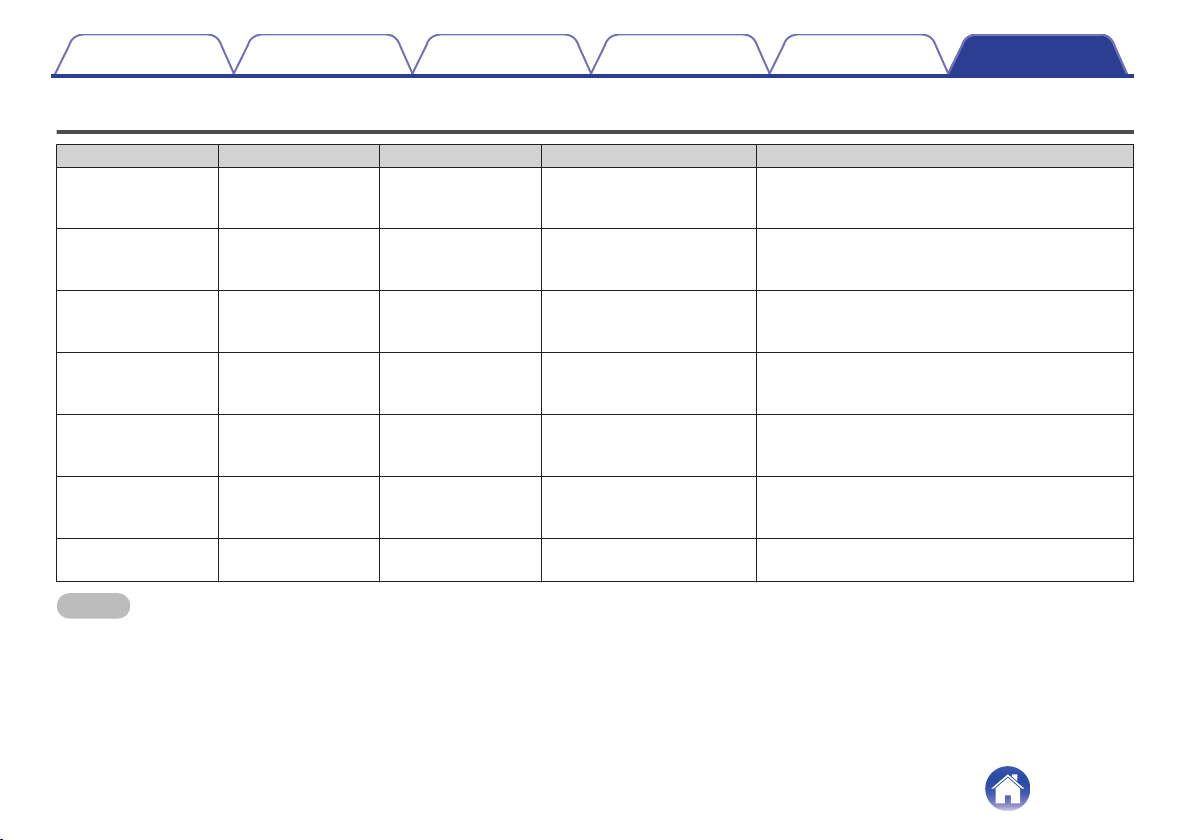
Supported file types and codecs
Frequency Sample Rate File Extension Codec Bit Rates
32/44.1/48
88.2/96/176.4
192 kHz
16/24 bit wav PCM ---
32 kHz
44.1 kHz
48 kHz
16 bit mp3
MPEG-1 Audio Layer 3
CBR/VBR
32 - 320 kbps
32 kHz
44.1 kHz
48 kHz
16 bit
m4a
aac
AAC-LC 48 - 320 kbps
32 kHz
44.1 kHz
48 kHz
16 bit wma
wma9
CBR
CBR:48 - 192 kbps
44.1/48
88.2/96/176.4
192 kHz
16/24 bit flac flac ---
44.1/48
88.2/96/176.4
192 kHz
16/24 bit m4a ALAC ---
2.8/5.6 MHz 1 bit
dff
dsf
DSDIFF
DSF
---
NOTE
0
Files protected by DRM such as Apple’s Fairplay DRM, are not supported.
0
The ALAC decoder is distributed under the Apache License, Version 2.0 (http://www.apache.org/licenses/LICENSE-2.0)
Contents Setup Use Troubleshooting Status LED Appendix
Appendix
33
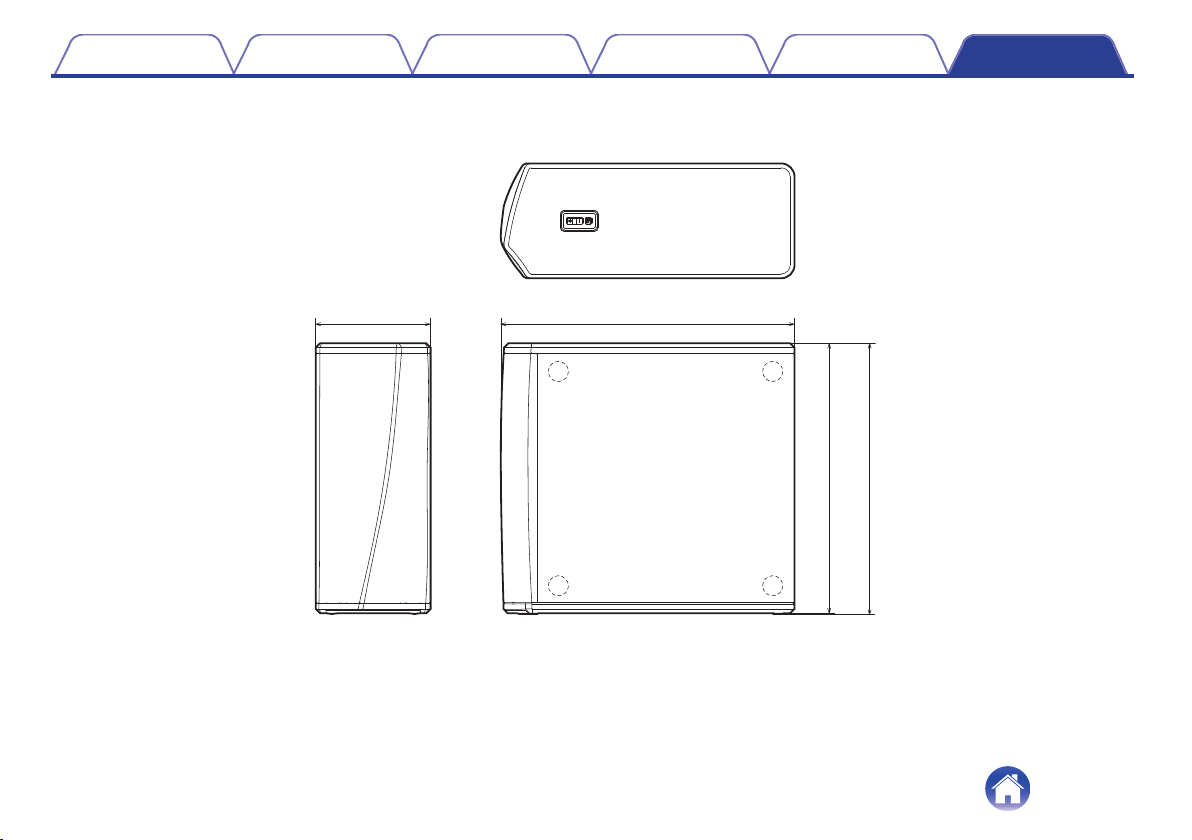
Specifications
o
Wireless LAN section
Network type: Conforming to IEEE 802.11a/b/g/n/ac
Used frequency range: 2.4 GHz, 5 GHz
o
General
Operating temperature: 41 °F - 95 °F (5 °C - 35 °C)
Power supply: AC 120 V, 60 Hz (for North America)
AC 220 - 240 V, 50/60 Hz (for Europe)
Power consumption: 70 W
Power consumption in Quick Start Mode: 4.5 W
Power consumption in Deep Standby Mode: 0.3 W
Contents Setup Use Troubleshooting Status LED Appendix
34
Information
Trademarks
.
Google Play and the Google Play logo are trademarks of Google LLC.
.
Apple, the Apple logo, iPad, iPhone, and iPod touch are trademarks of
Apple Inc., registered in the U.S. and other countries. App Store is a
service mark of Apple Inc.
.
Amazon, Kindle, Echo, Alexa, Dash, Fire and all related logos are
trademarks of Amazon.com, Inc. or its affiliates.
Contents Setup Use Troubleshooting Status LED Appendix
36
License
o
License information for the software used in
the unit
About GPL (GNU-General Public License), LGPL (GNU Lesser
General Public License) License
This product uses GPL/LGPL software and software made by other
companies.
After you purchase this product, you may procure, modify or distribute
the source code of the GPL/LGPL software that is used in the product.
Denon provides the source code based on the GPL and LPGL
licenses at the actual cost upon your request to our customer service
center. However, note that we make no guarantees concerning the
source code. Please also understand that we do not offer support for
the contents of the source code.
This section describes software license used for this unit. To maintain
the correct content, the original (English) is used.
n
GPL
Open Source Used Version
bridge-utils 2.8
busybox 1.21.1
ebtables 2.0.10-4
Linux kernel 3.10.74
mtd-utils 1.4.3
ntfs-3g_ntfsprogs 2011.4.12
ntpclient 2007
u-boot 2015.01
wireless-tools version 29
n
LGPL
Open Source Used Version
ffmpeg 0.8.3
glibc 2.9
libmms 0.6.2
n
curl-7.24.0
COPYRIGHT AND PERMISSION NOTICE
Copyright (c) 1996 - 2014, Daniel Stenberg, <
All rights reserved.
Permission to use, copy, modify, and distribute this software for any
purpose with or without fee is hereby granted, provided that the above
copyright notice and this permission notice appear in all copies.
THE SOFTWARE IS PROVIDED "AS IS", WITHOUT WARRANTY OF
ANY KIND, EXPRESS OR IMPLIED, INCLUDING BUT NOT LIMITED
TO THE WARRANTIES OF MERCHANTABILITY, FITNESS FOR A
PARTICULAR PURPOSE AND NONINFRINGEMENT OF THIRD
PARTY RIGHTS. IN NO EVENT SHALL THE AUTHORS OR
COPYRIGHT HOLDERS BE LIABLE FOR ANY CLAIM, DAMAGES
OR OTHER LIABILITY, WHETHER IN AN ACTION OF CONTRACT,
TORT OR OTHERWISE, ARISING FROM, OUT OF OR IN
CONNECTION WITH THE SOFTWARE OR THE USE OR OTHER
DEALINGS IN THE SOFTWARE.
Except as contained in this notice, the name of a copyright holder shall
not be used in advertising or otherwise to promote the sale, use or
other dealings in this Software without prior written authorization of the
copyright holder.
Contents
Setup Use Troubleshooting Status LED Appendix
37

n
e2fsprogs-libs-1.40.8/lib/uuid
Redistribution and use in source and binary forms, with or without
modification, are permitted provided that the following conditions are
met:
1. Redistributions of source code must retain the above copyright
notice, and the entire permission notice in its entirety, including the
disclaimer of warranties.
2. Redistributions in binary form must reproduce the above copyright
notice, this list of conditions and the following disclaimer in the
documentation and/or other materials provided with the distribution.
3. The name of the author may not be used to endorse or promote
products derived from this software without specific prior written
permission.
THIS SOFTWARE IS PROVIDED "AS IS" AND ANY EXPRESS OR
IMPLIED WARRANTIES, INCLUDING, BUT NOT LIMITED TO, THE
IMPLIED WARRANTIES OF MERCHANTABILITY AND FITNESS
FOR A PARTICULAR PURPOSE, ALL OF WHICH ARE HEREBY
DISCLAIMED. IN NO EVENT SHALL THE AUTHOR BE LIABLE FOR
ANY DIRECT, INDIRECT, INCIDENTAL, SPECIAL, EXEMPLARY, OR
CONSEQUENTIAL DAMAGES (INCLUDING, BUT NOT LIMITED TO,
PROCUREMENT OF SUBSTITUTE GOODS OR SERVICES; LOSS
OF USE, DATA, OR PROFITS; OR BUSINESS INTERRUPTION)
HOWEVER CAUSED AND ON ANY THEORY OF LIABILITY,
WHETHER IN CONTRACT, STRICT LIABILITY, OR TORT
(INCLUDING NEGLIGENCE OR OTHERWISE) ARISING IN ANY
WAY OUT OF THE USE OF THIS SOFTWARE, EVEN IF NOT
ADVISED OF THE POSSIBILITY OF SUCH DAMAGE.
n
expat-2.0.1
Copyright (c) 1998, 1999, 2000 Thai Open Source Software Center Ltd
and Clark Cooper
Copyright (c) 2001, 2002, 2003, 2004, 2005, 2006 Expat maintainers.
Permission is hereby granted, free of charge, to any person obtaining a
copy of this software and associated documentation files (the
"Software"), to deal in the Software without restriction, including
without limitation the rights to use, copy, modify, merge, publish,
distribute, sublicense, and/or sell copies of the Software, and to permit
persons to whom the Software is furnished to do so, subject to the
following conditions:
The above copyright notice and this permission notice shall be
included in all copies or substantial portions of the Software.
THE SOFTWARE IS PROVIDED "AS IS", WITHOUT WARRANTY OF
ANY KIND, EXPRESS OR IMPLIED, INCLUDING BUT NOT LIMITED
TO THE WARRANTIES OF MERCHANTABILITY, FITNESS FOR A
PARTICULAR PURPOSE AND NONINFRINGEMENT.
IN NO EVENT SHALL THE AUTHORS OR COPYRIGHT HOLDERS
BE LIABLE FOR ANY CLAIM, DAMAGES OR OTHER LIABILITY,
WHETHER IN AN ACTION OF CONTRACT, TORT OR OTHERWISE,
ARISING FROM, OUT OF OR IN CONNECTION WITH THE
SOFTWARE OR THE USE OR OTHER DEALINGS IN THE
SOFTWARE.
Contents
Setup Use Troubleshooting Status LED Appendix
38
n
getopt
http://cvsweb.netbsd.org/bsdweb.cgi/src/lib/libc/stdlib/
Copyright (c) 1987, 1993, 1994 The Regents of the University of
California. All rights reserved.
Redistribution and use in source and binary forms, with or without
modification, are permitted provided that the following conditions are
met:
1. Redistributions of source code must retain the above copyright
notice, this list of conditions and the following disclaimer.
2. Redistributions in binary form must reproduce the above copyright
notice, this list of conditions and the following disclaimer in the
documentation and/or other materials provided with the distribution.
3. Neither the name of the University nor the names of its contributors
may be used to endorse or promote products derived from this
software without specific prior written permission.
THIS SOFTWARE IS PROVIDED BY THE REGENTS AND
CONTRIBUTORS "AS IS" AND ANY EXPRESS OR IMPLIED
WARRANTIES, INCLUDING, BUT NOT LIMITED TO, THE IMPLIED
WARRANTIES OF MERCHANTABILITY AND FITNESS FOR A
PARTICULAR PURPOSE ARE DISCLAIMED. IN NO EVENT SHALL
THE REGENTS OR CONTRIBUTORS BE LIABLE FOR ANY DIRECT,
INDIRECT, INCIDENTAL, SPECIAL, EXEMPLARY, OR
CONSEQUENTIAL DAMAGES (INCLUDING, BUT NOT LIMITED TO,
PROCUREMENT OF SUBSTITUTE GOODS OR SERVICES; LOSS
OF USE, DATA, OR PROFITS; OR BUSINESS INTERRUPTION)
HOWEVER CAUSED AND ON ANY THEORY OF LIABILITY,
WHETHER IN CONTRACT, STRICT LIABILITY, OR TORT
(INCLUDING NEGLIGENCE OR OTHERWISE) ARISING IN ANY
WAY OUT OF THE USE OF THIS SOFTWARE, EVEN IF ADVISED
OF THE POSSIBILITY OF SUCH DAMAGE.
n
jQuery
Copyright 2014 jQuery Foundation and other contributors
http://jquery.com/
Permission is hereby granted, free of charge, to any person obtaining a
copy of this software and associated documentation files (the
"Software"), to deal in the Software without restriction, including
without limitation the rights to use, copy, modify, merge, publish,
distribute, sublicense, and/or sell copies of the Software, and to permit
persons to whom the Software is furnished to do so, subject to the
following conditions:
The above copyright notice and this permission notice shall be
included in all copies or substantial portions of the Software.
THE SOFTWARE IS PROVIDED "AS IS", WITHOUT WARRANTY OF
ANY KIND, EXPRESS OR IMPLIED, INCLUDING BUT NOT LIMITED
TO THE WARRANTIES OF MERCHANTABILITY, FITNESS FOR A
PARTICULAR PURPOSE AND NONINFRINGEMENT. IN NO EVENT
SHALL THE AUTHORS OR COPYRIGHT HOLDERS BE LIABLE FOR
ANY CLAIM, DAMAGES OR OTHER LIABILITY, WHETHER IN AN
ACTION OF CONTRACT, TORT OR OTHERWISE, ARISING FROM,
OUT OF OR IN CONNECTION WITH THE SOFTWARE OR THE USE
OR OTHER DEALINGS IN THE SOFTWARE.
Contents
Setup Use Troubleshooting Status LED Appendix
39

n
libpcap-1.4.0
License: BSD
Redistribution and use in source and binary forms, with or without
modification, are permitted provided that the following conditions are
met:
1. Redistributions of source code must retain the above copyright
notice, this list of conditions and the following disclaimer.
2. Redistributions in binary form must reproduce the above copyright
notice, this list of conditions and the following disclaimer in the
documentation and/or other materials provided with the distribution.
3. The names of the authors may not be used to endorse or promote
products derived from this software without specific prior written
permission.
THIS SOFTWARE IS PROVIDED "AS IS" AND WITHOUT ANY
EXPRESS OR IMPLIED WARRANTIES, INCLUDING, WITHOUT
LIMITATION, THE IMPLIED WARRANTIES OF MERCHANTABILITY
AND FITNESS FOR A PARTICULAR PURPOSE.
n
libtar-1.2.11
Copyright (c) 1998-2003 University of Illinois Board of Trustees
Copyright (c) 1998-2003 Mark D. Roth
All rights reserved.
Developed by: Campus Information Technologies and Educational
Services, University of Illinois at Urbana-Champaign
Permission is hereby granted, free of charge, to any person obtaining a
copy of this software and associated documentation files (the "Software"),
to deal with the Software without restriction, including without limitation
the rights to use, copy, modify, merge, publish, distribute, sublicense,
and/or sell copies of the Software, and to permit persons to whom the
Software is furnished to do so, subject to the following conditions:
z
Redistributions of source code must retain the above copyright
notice, this list of conditions and the following disclaimers.
z
Redistributions in binary form must reproduce the above copyright
notice, this list of conditions and the following disclaimers in the
documentation and/or other materials provided with the distribution.
z
Neither the names of Campus Information Technologies and
Educational Services, University of Illinois at Urbana-Champaign,
nor the names of its contributors may be used to endorse or promote
products derived from this Software without specific prior written
permission.
THE SOFTWARE IS PROVIDED "AS IS", WITHOUT WARRANTY OF
ANY KIND, EXPRESS OR IMPLIED, INCLUDING BUT NOT LIMITED TO
THE WARRANTIES OF MERCHANTABILITY, FITNESS FOR A
PARTICULAR PURPOSE AND NONINFRINGEMENT.
IN NO EVENT SHALL THE CONTRIBUTORS OR COPYRIGHT
HOLDERS BE LIABLE FOR ANY CLAIM, DAMAGES OR OTHER
LIABILITY, WHETHER IN AN ACTION OF CONTRACT, TORT OR
OTHERWISE, ARISING FROM, OUT OF OR IN CONNECTION WITH
THE SOFTWARE OR THE USE OR OTHER DEALINGS WITH THE
SOFTWARE.
Contents
Setup Use Troubleshooting Status LED Appendix
40
n
mDNS 320.10.80
The majority of the source code in the mDNSResponder project is licensed
under the terms of the Apache License, Version 2.0, available from:
<http://www.apache.org/licenses/LICENSE-2.0>
To accommodate license compatibility with the widest possible range
of client code licenses, the shared library code, which is linked at
runtime into the same address space as the client using it, is licensed
under the terms of the "Three-Clause BSD License".
The Linux Name Service Switch code, contributed by National ICT
Australia Ltd (NICTA) is licensed under the terms of the NICTA Public
Software Licence (which is substantially similar to the "Three-Clause BSD
License", with some additional language pertaining to Australian law).
n
mongoose
https://github.com/cesanta/mongoose/
Copyright (c) 2004-2013 Sergey Lyubka
Permission is hereby granted, free of charge, to any person obtaining a
copy of this software and associated documentation files (the
"Software"), to deal in the Software without restriction, including
without limitation the rights to use, copy, modify, merge, publish,
distribute, sublicense, and/or sell copies of the Software, and to permit
persons to whom the Software is furnished to do so, subject to the
following conditions:
The above copyright notice and this permission notice shall be
included in all copies or substantial portions of the Software.
THE SOFTWARE IS PROVIDED "AS IS", WITHOUT WARRANTY OF
ANY KIND, EXPRESS OR IMPLIED, INCLUDING BUT NOT LIMITED
TO THE WARRANTIES OF MERCHANTABILITY, FITNESS FOR A
PARTICULAR PURPOSE AND NONINFRINGEMENT. IN NO EVENT
SHALL THE AUTHORS OR COPYRIGHT HOLDERS BE LIABLE FOR
ANY CLAIM, DAMAGES OR OTHER LIABILITY, WHETHER IN AN
ACTION OF CONTRACT, TORT OR OTHERWISE, ARISING FROM,
OUT OF OR IN CONNECTION WITH THE SOFTWARE OR THE USE
OR OTHER DEALINGS IN THE SOFTWARE.
Contents
Setup Use Troubleshooting Status LED Appendix
41

n
openssl-1.0.0d
Copyright (c) 1998-2011 The OpenSSL Project. All rights reserved.
Redistribution and use in source and binary forms, with or without
modification, are permitted provided that the following conditions are
met:
1. Redistributions of source code must retain the above copyright
notice, this list of conditions and the following disclaimer.
2. Redistributions in binary form must reproduce the above copyright
notice, this list of conditions and the following disclaimer in the
documentation and/or other materials provided with the distribution.
3. All advertising materials mentioning features or use of this software
must display the following acknowledgment:
"This product includes software developed by the OpenSSL Project
for use in the OpenSSL Toolkit. (
http://www.openssl.org/)”
4. The names "OpenSSL Toolkit" and "OpenSSL Project" must not be
used to endorse or promote products derived from this software
without prior written permission. For written permission, please
contact
5. Products derived from this software may not be called "OpenSSL"
nor may "OpenSSL" appear in their names without prior written
permission of the OpenSSL Project.
6. Redistributions of any form whatsoever must retain the following
acknowledgment:
"This product includes software developed by the OpenSSL Project
for use in the OpenSSL Toolkit (
http://www.openssl.org/)”
THIS SOFTWARE IS PROVIDED BY THE OpenSSL PROJECT "AS
IS" AND ANY EXPRESSED OR IMPLIED WARRANTIES,
INCLUDING, BUT NOT LIMITED TO, THE IMPLIED WARRANTIES
OF MERCHANTABILITY AND FITNESS FOR A PARTICULAR
PURPOSE ARE DISCLAIMED. IN NO EVENT SHALL THE OpenSSL
PROJECT OR ITS CONTRIBUTORS BE LIABLE FOR ANY DIRECT,
INDIRECT, INCIDENTAL, SPECIAL, EXEMPLARY, OR
CONSEQUENTIAL DAMAGES (INCLUDING, BUT NOT LIMITED TO,
PROCUREMENT OF SUBSTITUTE GOODS OR SERVICES; LOSS
OF USE, DATA, OR PROFITS; OR BUSINESS INTERRUPTION)
HOWEVER CAUSED AND ON ANY THEORY OF LIABILITY,
WHETHER IN CONTRACT, STRICT LIABILITY, OR TORT
(INCLUDING NEGLIGENCE OR OTHERWISE) ARISING IN ANY
WAY OUT OF THE USE OF THIS SOFTWARE, EVEN IF ADVISED
OF THE POSSIBILITY OF SUCH DAMAGE.
This product includes cryptographic software written by Eric Young
(
[email protected]). This product includes software written by Tim
Hudson ([email protected]).
Contents
Setup Use Troubleshooting Status LED Appendix
42

n
portmap-6.0
Copyright (c) 1990 The Regents of the University of California.
z
All rights reserved.
z
Redistribution and use in source and binary forms, with or without
modification, are permitted provided that the following conditions are met:
1. Redistributions of source code must retain the above copyright
notice, this list of conditions and the following disclaimer.
2. Redistributions in binary form must reproduce the above copyright
notice, this list of conditions and the following disclaimer in the
documentation and/or other materials provided with the distribution.
3. A ll advertising materials mentioning features or use of this software
must display the following acknowledgement:
This product includes software developed by the University of
California, Berkeley and its contributors.
4. Neither the name of the University nor the names of its contributors
may be used to endorse or promote products derived from this
software without specific prior written permission.
z
THIS SOFTWARE IS PROVIDED BY THE REGENTS AND
CONTRIBUTORS "AS IS" AND ANY EXPRESS OR IMPLIED
WARRANTIES, INCLUDING, BUT NOT LIMITED TO, THE IMPLIED
WARRANTIES OF MERCHANTABILITY AND FITNESS FOR A
PARTICULAR PURPOSE ARE DISCLAIMED. IN NO EVENT SHALL
THE REGENTS OR CONTRIBUTORS BE LIABLE FOR ANY DIRECT,
INDIRECT, INCIDENTAL, SPECIAL, EXEMPLARY, OR
CONSEQUENTIAL DAMAGES (INCLUDING, BUT NOT LIMITED TO,
PROCUREMENT OF SUBSTITUTE GOODS OR SERVICES; LOSS OF
USE, DATA, OR PROFITS; OR BUSINESS INTERRUPTION)
HOWEVER CAUSED AND ON ANY THEORY OF LIABILITY, WHETHER
IN CONTRACT, STRICT LIABILITY, OR TORT (INCLUDING
NEGLIGENCE OR OTHERWISE) ARISING IN ANY WAY OUT OF THE
USE OF THIS SOFTWARE, EVEN IF ADVISED OF THE POSSIBILITY
OF SUCH DAMAGE.
n
pstdint.h-0.1.12
z
BSD License:
z
Copyright (c) 2005-2011 Paul Hsieh
z
All rights reserved.
z
Redistribution and use in source and binary forms, with or without
modification, are permitted provided that the following conditions are
met:
1. Redistributions of source code must retain the above copyright
notice, this list of conditions and the following disclaimer.
2. Redistributions in binary form must reproduce the above copyright
notice, this list of conditions and the following disclaimer in the
documentation and/or other materials provided with the distribution.
3. The name of the author may not be used to endorse or promote
products derived from this software without specific prior written
permission.
z
THIS SOFTWARE IS PROVIDED BY THE AUTHOR "AS IS" AND
ANY EXPRESS OR IMPLIED WARRANTIES, INCLUDING, BUT
NOT LIMITED TO, THE IMPLIED WARRANTIES OF
MERCHANTABILITY AND FITNESS FOR A PARTICULAR
PURPOSE ARE DISCLAIMED.
z
IN NO EVENT SHALL THE AUTHOR BE LIABLE FOR ANY
DIRECT, INDIRECT, INCIDENTAL, SPECIAL, EXEMPLARY, OR
CONSEQUENTIAL DAMAGES (INCLUDING, BUT NOT LIMITED
TO, PROCUREMENT OF SUBSTITUTE GOODS OR SERVICES;
LOSS OF USE, DATA, OR PROFITS; OR BUSINESS
INTERRUPTION) HOWEVER CAUSED AND ON ANY THEORY OF
LIABILITY, WHETHER IN CONTRACT, STRICT LIABILITY, OR
TORT (INCLUDING NEGLIGENCE OR OTHERWISE) ARISING IN
ANY WAY OUT OF THE USE OF THIS SOFTWARE, EVEN IF
ADVISED OF THE POSSIBILITY OF SUCH DAMAGE.
Contents
Setup Use Troubleshooting Status LED Appendix
43

n
rl78flash 2000.3.1
License
=======
The MIT License (MIT)
Copyright (c) 2012 Maxim Salov
Permission is hereby granted, free of charge, to any person obtaining a
copy of this software and associated documentation files (the
"Software"), to deal in the Software without restriction, including
without limitation the rights to use, copy, modify, merge, publish,
distribute, sublicense, and/or sell copies of the Software, and to permit
persons to whom the Software is furnished to do so, subject to the
following conditions:
The above copyright notice and this permission notice shall be
included in all copies or substantial portions of the Software.
THE SOFTWARE IS PROVIDED "AS IS", WITHOUT WARRANTY OF
ANY KIND, EXPRESS OR IMPLIED, INCLUDING BUT NOT LIMITED
TO THE WARRANTIES OF MERCHANTABILITY, FITNESS FOR A
PARTICULAR PURPOSE AND NONINFRINGEMENT. IN NO EVENT
SHALL THE AUTHORS OR COPYRIGHT HOLDERS BE LIABLE FOR
ANY CLAIM, DAMAGES OR OTHER LIABILITY, WHETHER IN AN
ACTION OF CONTRACT, TORT OR OTHERWISE, ARISING FROM,
OUT OF OR IN CONNECTION WITH THE SOFTWARE OR THE USE
OR OTHER DEALINGS IN THE SOFTWARE.
n
sqlite 2003.5.7
SQLite Copyright
SQLite is in the
Public Domain
All of the code and documentation in SQLite has been dedicated to the
public domain by the authors. All code authors, and representatives of
the companies they work for, have signed affidavits dedicating their
contributions to the public domain and originals of those signed
affidavits are stored in a firesafe at the main offices of Hwaci. Anyone
is free to copy, modify, publish, use, compile, sell, or distribute the
original SQLite code, either in source code form or as a compiled
binary, for any purpose, commercial or non-commercial, and by any
means.
The previous paragraph applies to the deliverable code and
documentation in SQLite - those parts of the SQLite library that you
actually bundle and ship with a larger application. Some scripts used
as part of the build process (for example the "configure" scripts
generated by autoconf) might fall under other open-source licenses.
Nothing from these build scripts ever reaches the final deliverable
SQLite library, however, and so the licenses associated with those
scripts should not be a factor in assessing your rights to copy and use
the SQLite library.
All of the deliverable code in SQLite has been written from scratch. No
code has been taken from other projects or from the open internet.
Every line of code can be traced back to its original author, and all of
those authors have public domain dedications on file. So the SQLite
code base is clean and is uncontaminated with licensed code from
other projects.
Contents
Setup Use Troubleshooting Status LED Appendix
44
n
strlcpy.c , v1.11
z
Copyright (c) 1998 Todd C. Miller <[email protected]>
z
Permission to use, copy, modify, and distribute this software for any
purpose with or without fee is hereby granted, provided that the
above copyright notice and this permission notice appear in all
copies.
z
THE SOFTWARE IS PROVIDED "AS IS" AND THE AUTHOR
DISCLAIMS ALL WARRANTIES WITH REGARD TO THIS
SOFTWARE INCLUDING ALL IMPLIED WARRANTIES OF
MERCHANTABILITY AND FITNESS. IN NO EVENT SHALL THE
AUTHOR BE LIABLE FOR ANY SPECIAL, DIRECT, INDIRECT, OR
CONSEQUENTIAL DAMAGES OR ANY DAMAGES
WHATSOEVER RESULTING FROM LOSS OF USE, DATA OR
PROFITS, WHETHER IN AN ACTION OF CONTRACT,
NEGLIGENCE OR OTHER TORTIOUS ACTION, ARISING OUT OF
OR IN CONNECTION WITH THE USE OR PERFORMANCE OF
THIS SOFTWARE.
n
taglib-1.5
copyright : (C) 2002 - 2008 by Scott Wheeler
email :
"The contents of this file are subject to the Mozilla Public License
Version 1.1 (the "License"); you may not use this file except in
compliance with the License. You may obtain a copy of the License at
http://www.mozilla.org/MPL/
Software distributed under the License is distributed on an "AS IS"
basis, WITHOUT WARRANTY OF ANY KIND, either express or
implied. See the License for the specific language governing rights and
limitations under the License.
n
tinyxml 2002.4.3
www.sourceforge.net/projects/tinyxml
Original file by Yves Berquin.
This software is provided 'as-is', without any express or implied
warranty. In no event will the authors be held liable for any damages
arising from the use of this software.
Permission is granted to anyone to use this software for any purpose,
including commercial applications, and to alter it and redistribute it
freely, subject to the following restrictions:
1. The origin of this software must not be misrepresented; you must
not claim that you wrote the original software. If you use this
software in a product, an acknowledgment in the product
documentation would be appreciated but is not required.
2. Altered source versions must be plainly marked as such, and must
not be misrepresented as being the original software.
3. This notice may not be removed or altered from any source
distribution.
Contents Setup Use Troubleshooting Status LED Appendix
45
n
Tremor
http://wiki.xiph.org/index.php/Tremor
Copyright (c) 2002, Xiph.org Foundation
Redistribution and use in source and binary forms, with or without
modification, are permitted provided that the following conditions are
met:
1. Redistributions of source code must retain the above copyright
notice, this list of conditions and the following disclaimer.
2. Redistributions in binary form must reproduce the above copyright
notice, this list of conditions and the following disclaimer in the
documentation and/or other materials provided with the distribution.
3. Neither the name of the Xiph.org Foundation nor the names of its
contributors may be used to endorse or promote products derived
from this software without specific prior written permission.
THIS SOFTWARE IS PROVIDED BY THE COPYRIGHT HOLDERS
AND CONTRIBUTORS "AS IS" AND ANY EXPRESS OR IMPLIED
WARRANTIES, INCLUDING, BUT NOT LIMITED TO, THE IMPLIED
WARRANTIES OF MERCHANTABILITY AND FITNESS FOR A
PARTICULAR PURPOSE ARE DISCLAIMED. IN NO EVENT SHALL
THE FOUNDATION OR CONTRIBUTORS BE LIABLE FOR ANY
DIRECT, INDIRECT, INCIDENTAL, SPECIAL, EXEMPLARY, OR
CONSEQUENTIAL DAMAGES (INCLUDING, BUT NOT LIMITED TO,
PROCUREMENT OF SUBSTITUTE GOODS OR SERVICES; LOSS
OF USE, DATA, OR PROFITS; OR BUSINESS INTERRUPTION)
HOWEVER CAUSED AND ON ANY THEORY OF LIABILITY,
WHETHER IN CONTRACT, STRICT LIABILITY, OR TORT
(INCLUDING NEGLIGENCE OR OTHERWISE) ARISING IN ANY
WAY OUT OF THE USE OF THIS SOFTWARE, EVEN IF ADVISED
OF THE POSSIBILITY OF SUCH DAMAGE.
n
zlib
http://www.zlib.net/
zlib.h -- interface of the 'zlib' general purpose compression library
version 1.2.3, July 18th, 2005
Copyright (C) 1995-2004 Jean-loup Gailly and Mark Adler
This software is provided 'as-is', without any express or implied
warranty. In no event will the authors be held liable for any damages
arising from the use of this software.
Permission is granted to anyone to use this software for any purpose,
including commercial applications, and to alter it and redistribute it
freely, subject to the following restrictions:
1. The origin of this software must not be misrepresented; you must
not claim that you wrote the original software. If you use this
software in a product, an acknowledgment in the product
documentation would be appreciated but is not required.
2. Altered source versions must be plainly marked as such, and must
not be misrepresented as being the original software.
3. This notice may not be removed or altered from any source
distribution.
Jean-loup Gailly [email protected], Mark Adler
Contents
Setup Use Troubleshooting Status LED Appendix
46


.
www.denon.com
3520 10715 00ADA
Copyright © 2019 D&M Holdings Inc. All Rights Reserved.
48