Operating and Installation Instructions
Combi Steam Oven
To prevent accidents and machine damage, read these instructions be-
fore installation or use.
en-US, CA M.-Nr. 10 357 780

Contents
2
IMPORTANT SAFETY INSTRUCTIONS ................................................................ 7
Overview............................................................................................................... 18
Front view.............................................................................................................. 18
Included accessories............................................................................................. 20
Control panel ....................................................................................................... 21
Sensor buttons...................................................................................................... 22
Display................................................................................................................... 23
Symbols............................................................................................................23
Description of functions ..................................................................................... 24
Control panel......................................................................................................... 24
Water container ..................................................................................................... 24
Condensate container........................................................................................... 24
Grease filter ........................................................................................................... 24
Roast probe........................................................................................................... 24
Temperature / Core temperature ........................................................................... 24
Moisture content ................................................................................................... 25
Cooking duration................................................................................................... 25
Noises.................................................................................................................... 25
Preheating phase................................................................................................... 26
Cooking phase ...................................................................................................... 26
Steam reduction .................................................................................................... 26
Oven interior lighting ............................................................................................. 26
Before using for the first time ............................................................................ 27
General settings .................................................................................................... 27
Cleaning for the first time ...................................................................................... 28
Setting the water hardness level ........................................................................... 29
Setting the correct boiling point for water............................................................. 30
Heating up the steam oven ................................................................................... 30
Modes / Programs / Menus ................................................................................ 31
Operation: Steam cooking.................................................................................. 34
Quck guide ............................................................................................................ 34
Interrupting operation............................................................................................ 36
Additional functions............................................................................................... 37
Switching on and off automatically ..................................................................38
Sequence of an automatic cooking process.................................................... 38
Changing settings during a cooking process...................................................39
Canceling cooking................................................................................................. 39

Contents
3
Operation: Combination cooking mode ............................................................ 40
Quck guide ............................................................................................................ 41
Interrupting operation............................................................................................ 43
Additional functions............................................................................................... 44
Switching on and off automatically ..................................................................44
Sequence of an automatic cooking process.................................................... 45
Changing settings during a cooking process...................................................45
Canceling cooking................................................................................................. 45
Operation: Functions without steam ................................................................. 46
Quick guide ........................................................................................................... 47
Interrupting operation............................................................................................ 48
Additional functions............................................................................................... 49
Turning off automatically ..................................................................................50
Switching on and off automatically ..................................................................50
Sequence of an automatic cooking process.................................................... 51
Rapid PreHeat ..................................................................................................51
Changing the operating mode..........................................................................52
Changing settings during a cooking process...................................................52
Canceling cooking................................................................................................. 53
MasterChef ..........................................................................................................54
List of automatic programs ................................................................................... 54
Using the MasterChef programs ........................................................................... 55
Favorites...............................................................................................................56
Creating a Favorite ................................................................................................ 56
Starting a Favorite ................................................................................................. 57
Changing Favorites................................................................................................ 58
Changing cooking stages.................................................................................58
Changing the name ..........................................................................................59
Deleting a Favorite................................................................................................. 59
Timer..................................................................................................................... 60
Setting the timer.................................................................................................... 60
Resetting the timer ................................................................................................ 60
Canceling the timer ............................................................................................... 60
General notes....................................................................................................... 61
The advantages of cooking with steam ................................................................ 61
Suitable containers................................................................................................ 61
Cooking pans ...................................................................................................61
Using your own cookware................................................................................ 61
Shelf level .............................................................................................................. 62

Contents
4
Frozen food............................................................................................................ 62
Temperature .......................................................................................................... 62
Cooking duration................................................................................................... 62
Cooking with liquid................................................................................................ 62
Your own recipes - Steam cooking ....................................................................... 62
Wire oven rack / universal tray .............................................................................. 63
Steam cooking..................................................................................................... 64
Vegetables............................................................................................................. 64
Meat ...................................................................................................................... 67
Sausage................................................................................................................. 69
Fish........................................................................................................................ 69
Shellfish................................................................................................................. 72
Mussels ................................................................................................................. 73
Rice ....................................................................................................................... 74
Pasta ..................................................................................................................... 75
Dumplings ............................................................................................................. 76
Grains .................................................................................................................... 77
Legumes................................................................................................................ 78
Eggs ...................................................................................................................... 80
Fruit ....................................................................................................................... 81
Menu Cooking - Manual........................................................................................ 82
Sous-vide (vacuum) cooking .............................................................................. 84
Reheating .............................................................................................................. 90
Special modes ..................................................................................................... 92
Reheat ................................................................................................................... 92
Defrost................................................................................................................... 94
Canning ................................................................................................................. 97
Juicing ................................................................................................................... 98
Menu Cooking....................................................................................................... 99
Dehydrate ............................................................................................................ 100
Making Yogurt ..................................................................................................... 101
Proofing ............................................................................................................... 102
Dissolving Gelatine.............................................................................................. 103
Melting Chocolate ............................................................................................... 103
Skinning Fruits and Vegetables ........................................................................... 104
Preserving Apples .............................................................................................. 105
Blanching............................................................................................................. 105
Sweating Onions ................................................................................................. 106
Rendering Fat ...................................................................................................... 106
Sanitizing Cookware ........................................................................................... 107
Heating Damp Towels ......................................................................................... 107

Contents
5
Decrystallizing Honey.......................................................................................... 108
Pizza.................................................................................................................... 108
Making jam.......................................................................................................... 109
Sabbath Program ................................................................................................ 109
Roast probe ....................................................................................................... 111
Roast ..................................................................................................................114
Bake.................................................................................................................... 121
Broil..................................................................................................................... 128
Settings .............................................................................................................. 130
Accessing the "Settings" menu........................................................................... 130
Changing and saving settings........................................................................ 130
Settings overview ................................................................................................ 131
Language ......................................................................................................... 132
Time of day.......................................................................................................... 132
Display............................................................................................................132
Clock format................................................................................................... 132
Setting the time .............................................................................................. 132
Date..................................................................................................................... 132
Lighting................................................................................................................ 133
Display brightness............................................................................................... 133
Acoustic tone information ................................................................................... 133
Melody............................................................................................................133
Solo tone ........................................................................................................ 133
Keypad tone ........................................................................................................ 134
Units of measurement ......................................................................................... 134
Weight ............................................................................................................134
Temperature ...................................................................................................134
Keeping Warm..................................................................................................... 135
Automatic rinsing ................................................................................................ 135
Recommended temperatures.............................................................................. 136
Safety .................................................................................................................. 136
System lock ...............................................................................................136
Sensor lock ....................................................................................................137
Water hardness ................................................................................................... 137
Showroom Program ............................................................................................ 138
Demo Mode....................................................................................................138
Factory default..................................................................................................... 138

Contents
6
Cleaning and care ............................................................................................. 139
Important information on cleaning and care ....................................................... 139
Appliance front .................................................................................................... 140
PerfectClean........................................................................................................ 141
Oven interior........................................................................................................ 142
Water container and condensate container ........................................................ 144
Accessories......................................................................................................... 144
Shelf runners ....................................................................................................... 145
Mainentance........................................................................................................ 146
Soak ...............................................................................................................146
Drying .............................................................................................................146
Rinsing............................................................................................................ 146
Descaling........................................................................................................146
Door..................................................................................................................... 148
Frequently asked questions ............................................................................. 150
Optional accessories ........................................................................................ 155
Cooking pan........................................................................................................ 155
Cleaning and care products ................................................................................ 157
Additional accessories ........................................................................................ 158
IMPORTANT SAFETY INSTRUCTIONS - INSTALLATION ............................... 160
Detailed dimensions of oven front................................................................... 161
Installation dimensions..................................................................................... 163
Installation into a tall cabinet............................................................................... 163
Undercounter installation .................................................................................... 165
Installation in combination with an oven ............................................................. 167
Installation.......................................................................................................... 169
Electrical connection ........................................................................................ 170
Power Supply ................................................................................................. 170
Caring for the environment .............................................................................. 171
Technical service, data plate, warranty........................................................... 172
MieleCare ........................................................................................................... 173

IMPORTANT SAFETY INSTRUCTIONS
7
The Combi Steam oven is referred to in the following instructions as steam oven.
This appliance conforms to current safety requirements. Inappro-
priate use can, however, lead to personal injury and damage to
property.
To avoid the risk of accidents and damage to the appliance,
please read these instructions carefully before installing or using it
for the first time.They contain important notes on installation,
safety, use and maintenance.
Keep these instructions in a safe place and pass them on to any
future owner.
SAVE THESE INSTRUCTIONS

IMPORTANT SAFETY INSTRUCTIONS
8
Use
This appliance is intended for residential use only.
The steam oven is not suitable for outdoor use.
This steam oven is intended for domestic use only as described in
these operating instructions.
Any other usage is not supported by the manufacturer and could be
dangerous.
Persons who lack physical, sensory or mental abilities, or experi-
ence with the appliance should not use it without supervision or in-
struction by a responsible person.
This steam oven is supplied with a special bulb to cope with par-
ticular conditions (e.g. temperature, moisture, chemical resistance,
abrasion resistance and vibration). This special bulb must only be
used for the purpose for which it is intended. It is not suitable for
room lighting. Replacement of bulbs may only be carried out by a
Miele authorized technician.

IMPORTANT SAFETY INSTRUCTIONS
9
Children
Activate the system lock to ensure that children cannot switch on
the steam oven inadvertently.
Children must not be allowed to clean the steam oven unsuper-
vised.
Please supervise children in the vicinity of the steam oven and do
not let them play with it.
As with any other appliance, you must constantly keep an eye on
children while the steam oven is in operation.
Danger of suffocation! Ensure that any plastic wrappings, bags,
etc. are disposed of safely and kept out of the reach of children.
Danger of burning. Children's skin is far more sensitive to high
temperatures than that of adults. The door, control panel and the
ventilation cut-outs for oven compartment ventilation all get hot.
Make sure that children do not touch the steam oven or attempt to
open the door when it is in operation. Keep children well away from
the appliance until it has cooled down and there is no danger of
burning.
Risk of injury! The maximum allowable weight on the door is
22lbs (10 kg).
Do not allow children to hang, lean or sit on the door when open.

IMPORTANT SAFETY INSTRUCTIONS
10
Technical safety
Installation, repair and maintenance work should be performed by
a Miele authorized service technician in accordance with national
and local safety regulations and the provided installation instruc-
tions. Contact Miele’s Technical Service Department for examination,
repair or adjustment. Repairs and other work by unauthorized per-
sons could be dangerous and may void the warranty.
A damaged appliance is dangerous. Check the appliance for any
visible damage. Never install or attempt to use a damaged appli-
ance.
Reliable and safe operation of this steam oven can only be as-
sured if it has been connected to the power supply.
Be certain your appliance is properly installed and grounded by a
qualified technician. To guarantee the electrical safety of this appli-
ance, continuity must exist between the appliance and an effective
grounding system. It is imperative that this basic safety requirement
be met. If there is any doubt, have the electrical system of the house
checked by a qualified electrician.
Before connecting the appliance to the power supply, ensure that
the connection data on the data plate (voltage and frequency) match
the power supply.
This data must correspond in order to avoid the risk of damage to
the appliance. Consult a qualified electrician if in any doubt.
Do not use an extension cord to connect this appliance to the
power supply. Extension cords do not guarantee the required safety
of the appliance.
For safety reasons, this appliance may only be used after it has
been built in.
This steam oven must not be used in a non-stationary location
(e.g. on a ship).

IMPORTANT SAFETY INSTRUCTIONS
11
Tampering with electrical connections or components and me-
chanical parts is highly dangerous to the user and can cause opera-
tional faults. Do not open the outer casing of the appliance.
While the appliance is under warranty, repairs should only be per-
formed by a Miele-authorized service technicians. Work by unquali-
fied persons could be dangerous and may void the warranty.
Defective components should be replaced by Miele original parts
only. Only with these parts can the manufacturer guarantee the
safety of the appliance.
If the plug has been removed or the power cord is not supplied
with a plug, the steam oven must be connected to the power supply
by a suitably qualified electrician.
If the power cord is damaged, it must be replaced with a special
connection cable typeH05VV-F (PVC insulated). See "Electrical
connection."
Before installation, maintenance, and repair work, the steam oven
must be disconnected from the electrical supply. It is only com-
pletely isolated from the electrical supply if: the fuse has been re-
moved (where applicable), the main circuit breaker has been tripped,
or the power cord has been unplugged from the wall outlet. Always
be sure to pull the plug not the cord.
If the steam oven is installed behind a cabinet door, do not close
the door while the appliance is in operation. Heat and moisture can
build up behind the closed door and cause damage to the range and
to the surrounding cabinets and flooring. Do not close the door until
the appliance has completely cooled down.
Do not repair or replace any part of the appliance unless specifi-
cally recommended in the manual. All other servicing should be ref-
fered to a qualified technician.

IMPORTANT SAFETY INSTRUCTIONS
12
Do not operate any appliance with a damaged cord or plug, or if
the appliance has been damaged in any manner. Contact Miele’s
Technical Service Department.

IMPORTANT SAFETY INSTRUCTIONS
13
Proper use
Danger of burning. The steam oven becomes hot when in use.
You could burn yourself on the heating elements, oven interior,
cooked food, oven accessories or hot steam. Use pot holders when
placing food in the oven or removing it and when adjusting oven
shelves etc. in a hot oven. Take care when putting cooking pans into
the oven or removing them not to spill the contents.
Use only dry, heat-resistant potholders. Moist or damp potholders
used on hot surfaces may result in steam burns. Do not let pothold-
ers come in contact with oil or grease. Do not substitute dish towels
or other bulky items for potholders. Do not let potholders touch hot
heating elements.
Do not heat up food in closed containers e.g. tins or sealed jars in
the steam oven, as pressure will build up in the container, causing it
to explode.
Plastic containers which are not suitable for use in an oven can
melt at high temperatures and can even damage the steam oven or
catch fire.
Only use plastic containers which are declared by the manufacturer
as being suitable for use in a steam oven. Follow the manufacturer's
instructions on use. If you want to use plastic containers for steam-
ing food make sure that they are temperature resistant to 210°F /
100°C and steam resistant. Any other plastic containers could melt,
become brittle or break when subjected to heat.
Food which is left in the oven to be kept hot can dry out and the
moisture released can lead to corrosion damage in the appliance. Do
not use the steam oven for keeping food warm and do not use uten-
sils in the appliance which could corrode.
Do not leave the appliance door open unnecessarily as someone
may trip over it or be injured by it.

IMPORTANT SAFETY INSTRUCTIONS
14
The door can support a maximum weight of 22lbs (10kg). Do not
sit, lean or place heavy items on the open oven door. Also be sure
nothing can get trapped between the door and the oven cavity. The
steam oven could get damaged.
Oil and fat can ignite if overheated. Never leave the steam oven
unattended when cooking with oil and fat.
If it does ignite do not put the flames out with water. Switch the
steam oven off immediately and then suffocate the flames by keep-
ing the oven door closed.
Smother the fire or flames, or use a dry chemical extinguishing
agent or foam fire extinguisher.
Due to the high temperatures radiated, objects left near the steam
oven when it is in use could catch fire.
Do not use the steam oven to heat up the room.
Broiling food for an excessively long time can cause it to dry out
with the risk of catching fire.
Do not exceed recommended broiling times.
Some foods dry out very quickly and can be ignited by high broil-
ing temperatures. Do not use broiling functions for crisping rolls or
bread or to dry flowers or herbs. Instead use the Convection
Plus or Surround functions.
To avoid fueling any flames, do not open the appliance door if you
see smoke coming from the food in the oven interior. Interrupt the
current process by turning off the appliance and disconnecting it
from the power. Do not open the door until the smoke has dissi-
pated.
Use caution when using alcohol in your recipes. Alcohol evapo-
rates at high temperatures but may, in rare circumstances, combust
on the hot heating elements.
Never cover the floor of the oven with aluminum foil, or place oven
dishes, pans, saucepans or trays directly onto the floor of the oven.

IMPORTANT SAFETY INSTRUCTIONS
15
Never use the steam oven without a drain filter as large food
residues may block the drain and the pump.
To prevent the risk of damage, do not leave the roast probe in the
oven cavity when it is not being used.
When using an electrical appliance, e.g., a hand-held mixer, near
the steam oven, make sure that the power cord does not get caught
in the door. The insulation on the cord could become damaged, giv-
ing rise to an electric shock hazard.
Do not operate the appliance without the lamp cover. Steam could
attack the electrical components and cause a short circuit. Steam
could also damage the electrical components.
The steam oven should be installed at a safe height for users to
safely access all cooking levels and pans. Otherwise spills could
cause burns or scalding and children may be put at risk by the hot
appliance door.
Flammable materials should not be stored in an oven or in the
vicinity of the cooktop.
Open the door carefully to allow hot air or steam to escape before
placing or removing food.
Keep the oven vent ducts open.
Wear proper apparel - Loose-fitting or hanging garments should
never be worn while using the appliance.
To prevent burns, always place oven racks at their desired height
while the steam oven is cool. If the rack must be moved while the
oven is hot, do not let pot holders touch hot heating elements.

IMPORTANT SAFETY INSTRUCTIONS
16
Caution: Heating elements may be hot even though they are not
glowing. Interior surfaces of an steam oven become hot enough to
cause burns. External parts of the steam oven such as the door
glass, vents, and the control panel can become hot. During and after
use, do not touch, or let clothing or other flammable materials come
into contact with heating elements or interior surfaces of the steam
oven until they have had sufficient time to cool.

IMPORTANT SAFETY INSTRUCTIONS
17
Cleaning and care
Do not use a steam cleaner to clean this oven.
Steam could penetrate electrical components and cause a short cir-
cuit.
Scratches on the door glass can cause the glass to break.
Do not use abrasive cleaners, hard sponges, brushes or sharp metal
tools to clean the door glass.
The side runners can be removed for cleaning purposes (see
"Cleaning and care").
Ensure that they are replaced correctly and do not use the oven
without them in place.
To avoid corrosion on the stainless steel surfaces of the Speed
Oven, remove any splashes on the interior walls of the oven from
food or liquids containing salt.
Accessories
Use only genuine original Miele parts. If parts or accessories from
other manufacturers are used, the warranty will become void.
Only use the Miele roast probe supplied with this oven. If it is
faulty, it must only be replaced with a Miele genuine roast probe.
The plastic on the roast probe can melt at very high temperatures.
Do not use the roast probe when using the broil functions (exception:
Convection Broil). Do not store the roast probe in the oven if it is
not in use.
The perforated and solid cooking pans will be damaged by high
temperatures! Use them only in modes and programs that work ex-
clusively with steam.
Overview
18
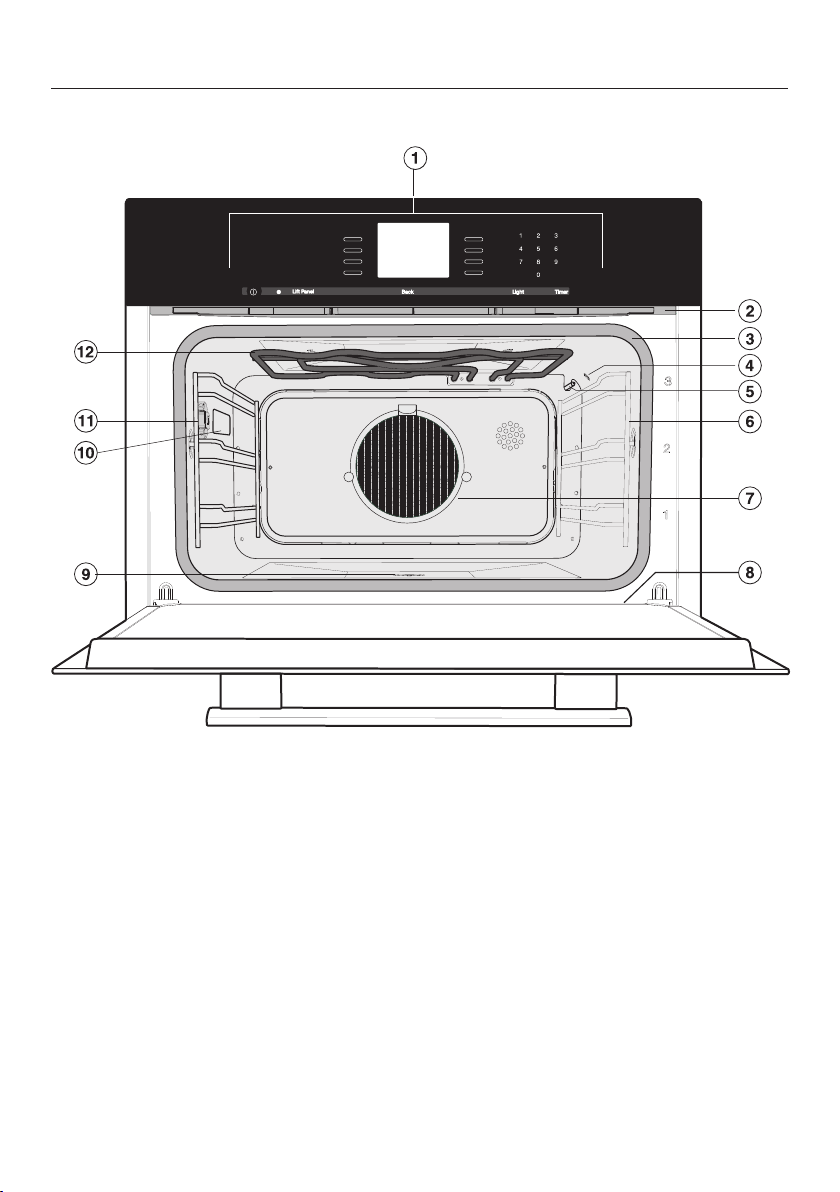
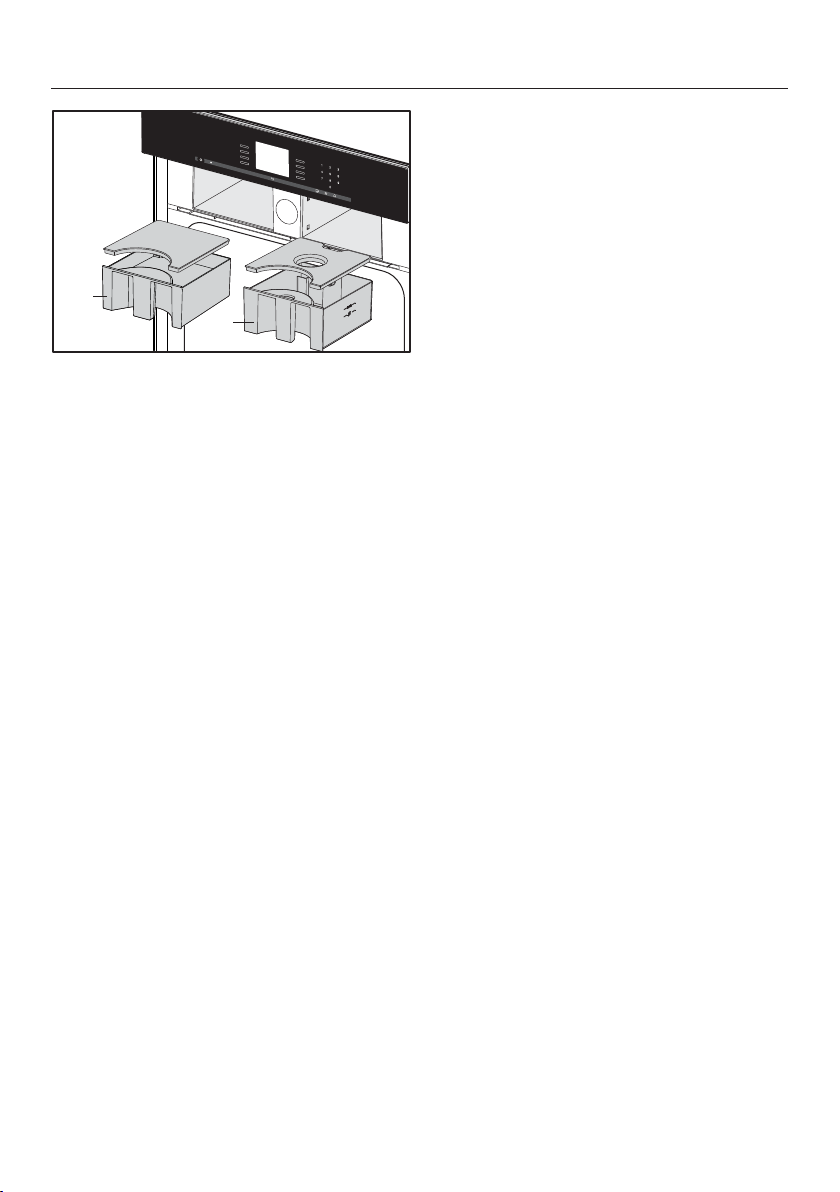
Front view
a
Control panel
b
Vent
c
Door gasket
d
Moisture sensor
e
Temperature sensor
f
Side runners with 3 shelf levels
g
Grease filter
h
Drip channel
i
Drain
j
Oven interior lighting
k
Connection socket for the roast
probe
l
Browning / Broiling element
Overview
19
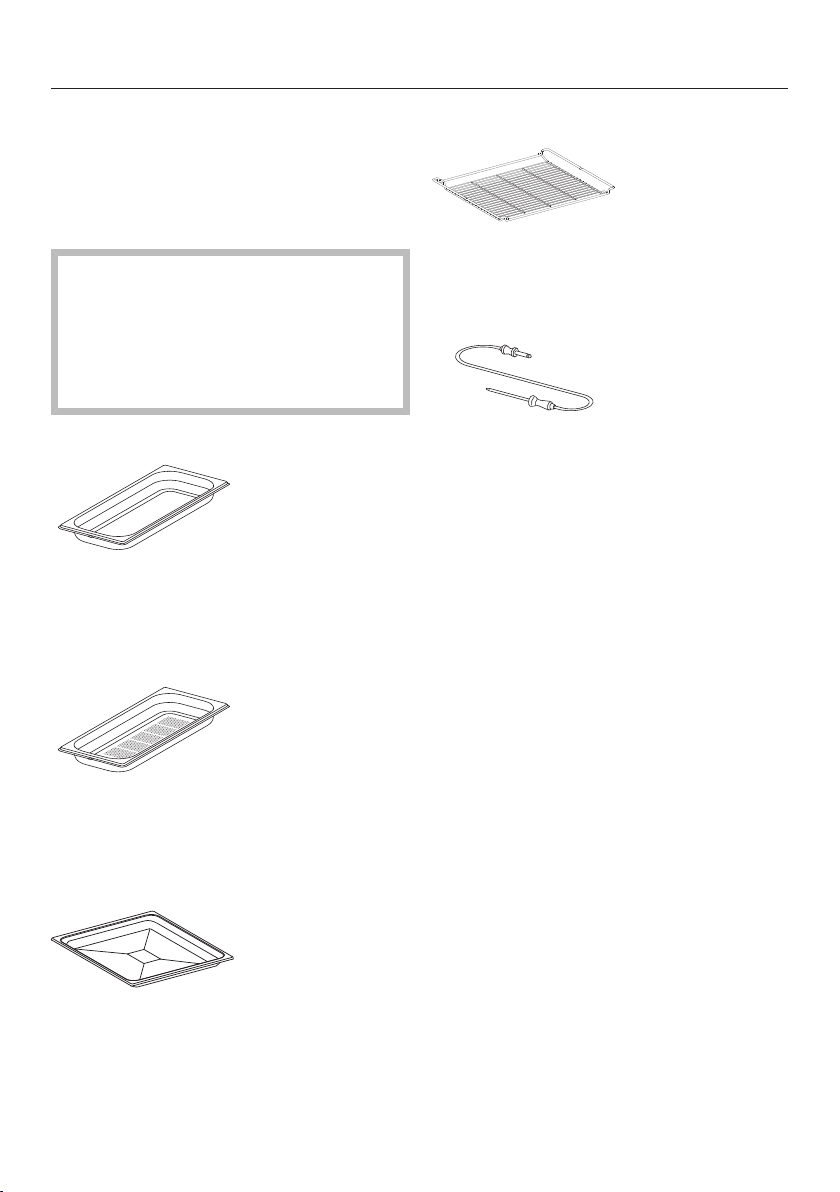
m
o
n
p
m
Slide-in compartment for condensate container
n
Condensate container
o
Slide-in compartment for water container
p
Water container
Overview
20
Included accessories
The accessories supplied with your ap-
pliance, as well as a range of optional
ones, are available to order from Miele
(see "Optional accessories").
The perforated and solid cooking
pans will be damaged by high tem-
peratures!
Use them only in modes and pro-
grams that work exclusively with
steam.
DGG 20
1solid cooking pan
17 11/16" x 7 1/2" x 1 9/16" (WxDxH)
450x190x40mm (WxDxH)
DGGL 20
1perforated cooking pan
17 11/16" x 7 1/2" x 1 9/16" (WxDxH)
450x190x40mm (WxDxH)
Universal tray
1 universal tray for baking, roasting and
broiling
Wire oven rack
1 wire oven rack for baking, roasting
and broiling
Roast probe
1 roast probe for precise temperature
controlled cooking, which monitors the
internal temperature of the meat (core
temperature).
Control panel
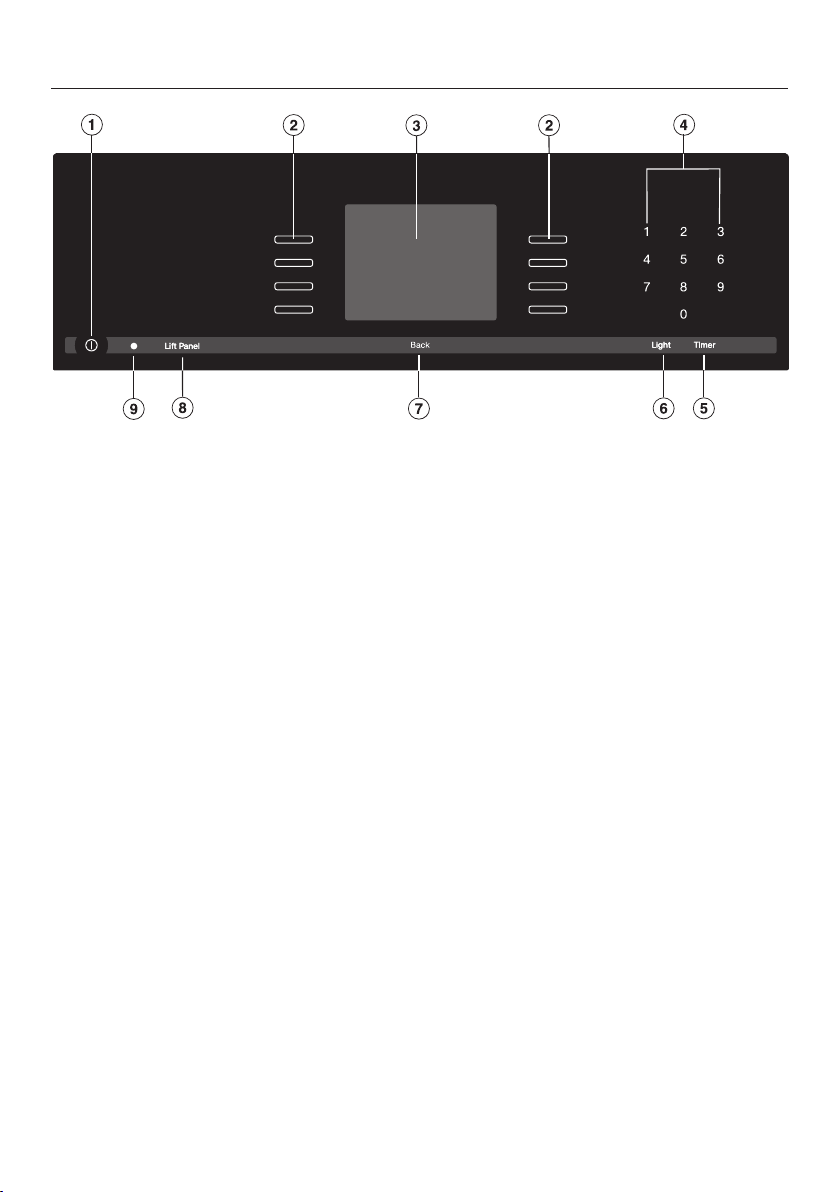
21
a
Recessed On / Off button
To turn the appliance on and off
b
Sensor buttons
To select operating modes, settings and menu items
c
Display
Displays the time of day and information on operation
d
Sensor buttons 0-9
Numeric keypad to enter values
e
"Timer" sensor button
To set the timer
f
"Light" sensor button
To turn the oven interior lighting on and off
g
"Back" sensor button
To go back one step at a time
h
"Lift Panel" sensor button
For opening/closing the control panel
i
Optical interface
(for service technician use only)

Control panel
22
Sensor buttons
The sensors react to touch. Each touch is confirmed with an audible tone. This
tone can be turned off (see "Settings – Keypad tone").
Sensor
button
Function Notes
For selecting op-
tions and scrolling
through the list of
options
A menu option can be selected by touching the il-
luminated sensor next to it.
0–9 Numerical keypad
for setting values
The numerical keypad is used to set values, e.g.
temperatures and durations.
For setting the
timer
If a list of options is showing in the display or if a
cooking program is running, you can enter a timer
duration (e.g. when boiling eggs) at any point (see
"Timer").
If the display is dark, this sensor will not react until
the steam oven is switched on.
For switching the
oven interior light-
ing on and off
If a list of options is showing in the display or if a
cooking process is running, touching will switch
the oven interior lighting on or off.
If the display is dark, this sensor will not react until
the steam oven is switched on.
The oven interior lighting switches off after 15sec-
onds during cooking or remains on continuously,
depending on the setting selected.
Lift
Panel
For opening/clos-
ing the control
panel
Back To go back a step

Control panel
23
Display
The display is used for showing the time of day or information about modes, tem-
peratures, cooking durations, MasterChef programs and settings. Information or a
list of options is shown on the display depending on the function selected.
After switching the oven on with the On/Off sensor button, the main menu will
appear.
If a cooking process is running, selecting Change will call up a list of options which
can be set or changed for the cooking process in progress.
Touch the illuminated sensor button beside the option to select it.
Options can then be accessed by tapping the illuminated sensor button next
to OK.
Symbols
The following symbols may appear in the display:
Symbol Description
Allocates an illuminated Sensor button to an option and indi-
cates that the option can be selected.
If more than four options are available a bar will appear on the
right-hand side of the display. Use the allocated sensors to scroll
through the list.
The end of a list is indicated by a dotted line. By scrolling down
further, you will reach the beginning of the list again.
/ These only appear when an entry is possible or necessary (e.g.
entering the date).
A check indicates the currently active setting. will not be dis-
played and the corresponding sensor will not be illuminated.
This symbol indicates that there is additional information and ad-
vice about using the oven. Select OK to access the information.
/ / Water level indicator
Program finished
Timer
Some settings, e.g. display brightness and buzzer volume, are
selected using a bar chart.

Description of functions
24
Control panel
The water container and condensate
container are located behind the control
panel. The control panel is opened and
closed using the "Lift Panel" sensor.
The panel is equipped with a device
which will automatically stop it moving
if it meets an obstruction while opening
or closing. Do not touch the door han-
dle while the panel is opening or clos-
ing.
Water container
The maximum water level is 3 pints
(1.4liters), the minimum 1 quart (1liter).
These levels are indicated on the con-
tainer. Do not exceed the maximum
level.
The amount of water depends on the
type of food and the duration of cook-
ing. You may need to refill the water
container during the cooking procedure.
Opening the door will increase the
amount used.
Fill the water container to the maximum
level before each use.
Condensate container
Condensate that collects in the appli-
ance from cooking is pumped into the
condensate container. The container
has a maximum capacity of 3 pints
(1.4liters).
Grease filter
Insert the grease filter in the back wall
for all roasting programs.
It should be removed when using steam
programs.
It must also be removed when baking,
as otherwise results can be uneven (ex-
ception: deep fresh fruit pies, pizza with
extra toppings).
Roast probe
The roast probe measures the core
temperature in the food, enabling the
temperature during the cooking process
to be monitored simply and accurately.
Temperature / Core tempera-
ture
Some modes offer a recommended
temperature. The recommended tem-
perature can be changed for a single
cooking program or cooking step, or
permanently within a specific area (see
"Settings – Recommended tempera-
tures").
It is also possible to change the core
temperature for a single cooking pro-
gram or cooking step within the speci-
fied area.

Description of functions
25
Moisture content
The Combi Steam and Reheat modes use
a combination of oven heat and mois-
ture. You can alter the moisture/humid-
ity level within a given range for an indi-
vidual cooking program or a cooking
stage.
Depending on the setting for the pro-
gram, either moisture or fresh air is in-
jected into the oven. If the humidity
level is set to 0%, the maximum
amount of air will be injected and no
moisture. If the level is set to 100%, air
will not be injected into the oven and
the maximum amount of moisture will
be injected.
Some food gives off moisture during
the cooking process. This moisture
from the food also controls the amount
of moisture needed. If the required
amount of moisture is very low and the
food already contains a lot of water the
steam generator may not be activated
at all.
Cooking duration
Depending on the function, you can set
a cooking duration of between 1 minute
and 6, 10 or 12 hours.
The duration of the MasterChef, Mainte-
nance and Menu Cooking programs is
set at the factory and cannot be altered.
With the Steam Cooking function and
programs that use steam alone, the
cooking duration does not start to
count down until the set temperature
has been reached. It begins immedi-
ately with all other functions and pro-
grams.
Noises
You will hear a pumping sound when
the appliance is turned on, during use
and after turning it off. This is the sound
of water being pumped through the
system and is quite normal.
When the steam oven is in use, you will
hear a fan noise.

Description of functions
26
Preheating phase
During the preheating phase the display
will show the temperature in the cook-
ing compartment as it rises and Pre-
Heating in all programs except for Mas-
terChef, Menu Cooking, and Maintenance.
During steam cooking, the duration of
the preheating phase will depend on the
quantity and the temperature of the
food. In general this phase will last for
approx. 5 minutes. The duration will be
longer if you are preparing refrigerated
or frozen food.
Cooking phase
The cooking phase begins when the set
temperature is reached. During the
cooking phase, the time left will be
shown on the display.
Steam reduction
If cooking is performed in a certain tem-
perature range during steam cooking
and combination cooking, the steam re-
duction function switches on automati-
cally at the end of the cooking program.
This reduces the amount of steam
which escapes from the appliance
when the door is opened at the end of
the cooking duration. Steam Reduction
will appear in the display in addition to
Program Finished.
This function can be switched off if you
wish (see "Settings - Steam reduction").
Oven interior lighting
The oven light has been set at the fac-
tory to go out when cooking starts.
If you want it to stay on all the time the
oven is on you will need to alter the de-
fault setting (see "Settings - Lighting").
If the door is left open at the end of a
cooking program, the oven lighting will
turn off automatically after 5minutes.
The oven lighting gives off heat. If you
are operating the combi steam oven at
a temperature below 125°F (50°C), the
oven compartment lighting switches off
automatically.
If the "Light" button on the control
panel is pressed, the oven compart-
ment lighting will come on for 15sec-
onds.

Before using for the first time
27
General settings
The steam oven must not be op-
erated until it has been correctly in-
stalled.
The steam oven will turn on automati-
cally when it is connected to the
power supply.
Welcome screen
A welcome screen is displayed. You will
then be asked to select some basic set-
tings which are needed before the ap-
pliance can be used.
Follow the instructions on the display.
Set the language
Scroll through the list until the desired
language appears.
Touch the illuminated sensor but-
ton next to the language you want to
select.
Confirm with OK.
Set the country
Scroll through the list until the desired
country appears.
Touch the illuminated sensor but-
ton next to the country you want to
select.
Confirm with OK.
Set the date
Use or to set the year, month
and day.
Confirm with OK.
Set the time of day
Use the numerical keypad to set the
time of day in hours and minutes (e.g.
1-2-1-5 for 12:15).
Confirm with OK.
The time of day can be displayed in
12-hour format (see "Settings - Time
of Day - Clock Format").

Before using for the first time
28
Time of day format
You will then be asked when you want
the time of day to show on the display
when the steam oven is turned off (see
"Settings - Time of Day - Display"):
– On
The time is always visible on the dis-
play.
– Off
The display appears dark to save en-
ergy. Some modes are limited.
– Night Dimming
The time only shows on the display
between 5:00 am and 11:00 pm. It
turns off at night to save energy.
Select the desired option.
Confirm with OK.
Information regarding energy consump-
tion will appear on the display.
Confirm with OK.
Set up Successfully Completed is dis-
played.
Confirm with OK.
The steam oven is ready for use.
If you accidentally select the wrong
language, follow the instructions de-
scribed in "Settings - Language ."
Please adhere the extra data plate for
the appliance supplied with this doc-
umentation in the space provided in
the "Technical service, data plate,
warranty" section of this manual.
Remove any protective foil and stick-
ers.
The appliance has undergone a func-
tion test in the factory. Residual water
from this testing may have dripped
from the lines into the oven cavity dur-
ing transportation.
Cleaning for the first time
Water container and condensate
container
Danger!
Do not touch the door handle when
opening the control panel. Your fin-
gers could be pinched.
Tap "Lift Panel" to open the control
panel.
Remove the water container and con-
densate container. Push upwards
slightly as you take them out of the
appliance.
Rinse the water container / conden-
sate container by hand or in the dish-
washer.

Before using for the first time
29
Accessories / Oven interior
Remove all accessories from the
steam oven.
Wash them by hand using hot water
and a soft clean sponge and a mild
solution of warm water and liquid
dish soap or in the dishwasher.
Risk of damage to the surfaces of
the universal tray and the wire oven
rack.
The universal tray and wire oven rack
are treated with PerfectClean and
must only be cleaned by hand.
See "Cleaning and care - Perfect-
Clean" for more information.
Clean the universal tray and wire
oven rack with a solution of warm
water and liquid dish soap applied
with a soft sponge.
The interior of the steam oven has
been treated at the factory with a con-
ditioning agent.
To remove this, clean the oven inte-
rior with warm water and liquid dish
soap and then dry thoroughly with a
soft cloth.
Setting the water hardness
level
The steam oven is factory set for Hard
water. It must be adjusted local water
hardness to ensure trouble-free opera-
tion and to ensure that descaling is car-
ried out at the correct interval. The
harder the water, the more often it will
need to be descaled.
Check the hardness of your local wa-
ter supply and adjust the water hard-
ness as necessary (see "Settings -
Water hardness").

Before using for the first time
30
Setting the correct boiling
point for water
Before cooking food for the first time,
you must set the boiling point for water,
as this varies depending on the altitude
of the installation location of the appli-
ance. This procedure also flushes out
the waterways.
This procedure must be carried out
to ensure efficient functioning of your
appliance.
Only use cold tap water (less than
68°F / 20°C). Never use distilled or
mineral water or other liquids.
Remove the water container and fill it
to the "max" marker.
Push the water container into the ap-
pliance until it engages.
You should then run the Steam Cook-
ing program at 210°F / 100°C for
15minutes. Proceed as described in
"Operation ‒ Steam cooking."
Resetting the correct boiling point for
water
If you move, the appliance will need to
be re-set for the new altitude if this dif-
fers from the old one by 984 ft (300m)
or more. To do this, descale the appli-
ance (see "Cleaning and care – Mainte-
nance – Descaling").
Heating up the steam oven
To remove the grease from the ring
heating element, heat the appliance
up with nothing in it at 400°F / 200°C
using the Convection Bake function for
30minutes.
Proceed as described in "Operation ‒
Functions without steam."
There will be a slight smell the first
time the heating element is heated up.
The smell and any vapors will dissi-
pate after a short time, and do not in-
dicate a faulty connection or appli-
ance.
It is important to ensure that the
kitchen is well ventilated during this
operation.

Modes / Programs / Menus
31
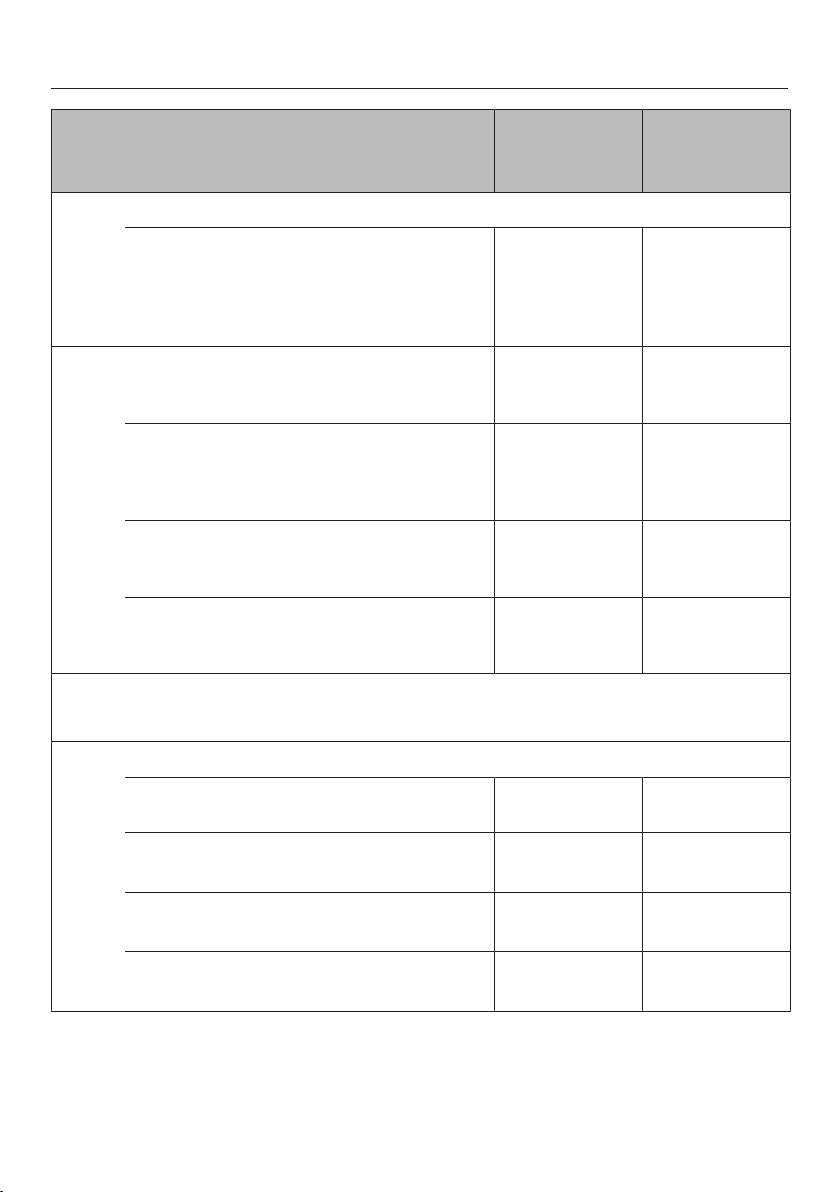
Default tem-
perature/
Setting
Temperature
range
Operating Modes
Convection Bake
For baking on several levels at the same
time. The fan distributes the heat evenly
throughout the cavity for a consistent bak-
ing temperature.
320°F / 160°C 85-435°F /
30–225°C
Surround
Heat is used from both the upper and lower
heating elements to create perfect results of
all baking recipes.
350°F / 180°C 85-435°F /
30–225°C
Combi Steam
For baking, roasting and broiling.
For more information see "Operation: Com-
bination cooking mode", "Roast", "Bake"
Convection Bake
340°F / 170°C 85-435°F /
30–225°C
Surround
350°F / 180°C 85-435°F /
30–225°C
Maxi Broil
Level 3 Levels1–3
Steam Cooking
For cooking all types of food, bottling, ex-
tracting juice with steam, special applica-
tions
210°F (100°C) 105-210°F /
40–100°C
Sous-vide (vacuum) cooking
For cooking food in a vacuum bag
149°F / 65°C 115-195°F /
45–90°C
Intensive
This mode gently circulates heated air from
the lower heating element using the fan to
create a brick oven environment.
350°F / 180°C 120-435°F /
50–225°C
Bake
Use this at the end of the baking time to
brown the bottom of the food.
375°F / 190°C 210-435°F /
100–225°C
Browning
For a perfectly browned topping, for exam-
ple when making a gratin or browning the
top of a casserole.
375°F / 190°C 210-435°F /
100–225°C
Modes / Programs / Menus
32
Default tem-
perature/
Setting
Temperature
range
Operating Modes
Maxi Broil
The entire upper heating element is used for
intense heating from above. Excellent
browning and searing results can be
achieved.
Level 3 Level 1-3
Broil
For broiling smaller quantities of steak,
chops, kebabs, etc.
Level 3 Level 1-3
Convection Broil
This mode distributes hot air from the
Browning/Broiling element over the food us-
ing the fan.
400°F / 200°C 120-435°F /
50–225°C
Humidity Plus
A special baking program for light pastries,
cakes and baked goods.
320°F / 160°C 85-435°F /
30–225°C
Gentle Bake
For cooking sweet and succulent bakes and
gratins
320°F / 160°C 85-435°F /
30–225°C
MasterChef
The list of available MasterChef programs is displayed.
Special Modes
Menu Cooking
Simultaneous cooking of various foods
– –
Pizza
350°F / 180°C 350-435°F /
180–225°C
Defrost
For gentle thawing of frozen foods
140°F / 60°C 120-140°F /
50–60°C
Reheat
To gently reheat already cooked foods
265°F / 130°C 248-284°F /
120–140°C
Modes / Programs / Menus
33
Default tem-
perature/
Setting
Temperature
range
Special Modes
Blanching
– –
Canning
195°F / 90°C 175-210°F /
80–100°C
Sanitize Cookware
– –
Dehydrate
140°F / 60°C 140-160°F /
60–70°C
Proof
– –
Sabbath Program
350°F / 180°C 85-435°F /
30–225°C
Favorites
Create and save your favorite dishes
Settings
Changing the factory default settings
Maintenance
Descale
– –
Soak
– –
Drying
– –
Rinses
– –

Operation: Steam cooking
34
A fault can occur if the drain is
blocked.
Check that the drain filter is correctly
in place before each program as
large food residues can clog the
drain.
Quck guide
Turn the steam oven on with .
The main menu appears on the display.
Only use cold tap water (less than
70°F / 20°C). Never use distilled or
mineral water or other liquids.
Fill the water container and push it
back in so that it engages.
Put the food in the oven.
Select Operating Modes.
Select Steam Cooking.
Set the Temperature appears on the dis-
play.
Adjust the recommended tempera-
ture if necessary.
Confirm with OK.
The recommended temperature will be
automatically accepted within a few
seconds.
If necessary, select "Back" to go back
to the temperature setting (see "Addi-
tional functions - Changing the tem-
perature").
Set the Duration appears on the display.
Set the cooking duration. Any time
between 1minute and 10hours can
be set.
Confirm with OK.
The cooking process begins. The steam
condenser, lighting, and fan turn on.
Set further settings as necessary (see
"Additional functions")

Operation: Steam cooking
35
At the end of the cooking duration
– Steam Reduction (with temperatures
over approx. 175°F / 80°C) and Pro-
gram Finished will appear in the dis-
play,
– The fan remains on.
– A buzzer or melody will sound (see
"Settings - Acoustic information").
You have the option to save the pro-
gram as a Favorite (see "Favorites") or
to increase the cooking duration using
Change. Tap "Back" to go back to the
main menu.
Burn hazard!
You could burn yourself on the oven
interior walls, spilled food and acces-
sories
Use pot holders when removing hot
food from the oven.
Wait until Steam Reduction goes out
on the display before opening the
door and removing the food.
After use
Remove and empty the water con-
tainer and condensate container.
Push upwards slightly as you take
them out of the appliance.
Switch the steam oven off .
Following a cooking program with
steam, Appliance Rinsing will appear in
the display after the steam oven has
been switched off.
This process should be carried out
every time to flush any remaining
food deposits out of the system.
Follow the instructions in the display.
After each use, clean and dry the
whole appliance as described in
"Cleaning and care."
Leave the appliance door open until
the oven compartment is completely
dry.
Insufficient water
If the steam oven runs out of water dur-
ing operation, an audible tone will
sound and the display will prompt you
to fill the water container with fresh tap
water.
Remove the water container and fill it
with fresh tap water.
Push the water container into the ap-
pliance until it engages.
Operation will continue.

Operation: Steam cooking
36
Interrupting operation
Operation is interrupted as soon as the
door is opened. The heating will be
turned off and the cooking duration re-
maining stored in memory.
Burn hazard!
Steam can escape when the door is
opened.
Step back and wait until the steam
has dissipated.
Burn hazard!
You could burn yourself on the oven
interior walls, spilled food and hot
steam.
Use pot holders when inserting, re-
moving or turning hot food, or when
adjusting shelves, etc. in a hot oven.
Operation will resume when the door is
closed.
The oven will heat up again and the dis-
play will show the temperature of the
cooking compartment as it rises.
Once the set temperature has been
reached, the display will change to
show the cooking duration remaining as
it counts down.
The cooking process will be ended
early if the door is opened during the
last minute of cooking (55 seconds
standing time).

Operation: Steam cooking
37
Additional functions
Setting additional cooking durations
You have placed the food in the oven,
selected a temperature and a cooking
time.
Select Change.
Additional menu options will appear.
You can select or change these options
for the cooking program:
– Ready at
– Start at
– Change Mode
(see "Changing settings during a
cooking process - Change mode")
You can set the program to switch off or
on automatically by entering Ready at or
Start at.
– Ready at
You specify the time you want cook-
ing to stop.
– Start at
You specify the time you want cook-
ing to start.
Cooking results can be impaired if
there is a long delay between the
food being placed in the oven and
the start of cooking. Fresh food can
change its color and even deterio-
rate.
If the temperature in the oven is too
high, e.g. directly after another pro-
gram, you will not be able to use this
function. Ready at and Start at will not
appear in the display if this is the
case. Open the oven door until the ap-
pliance has cooled down.
A Ready at time cannot be entered if
you are using the roast probe. When
using the roast probe, the end of the
cooking process is determined by
when the set core temperature is
reached. Only Start at can be selected.

Operation: Steam cooking
38
Switching on and off automatically
To switch a cooking program on and off
automatically, you have a choice of how
to enter the time parameters:
– Duration and Ready at
– Duration and Start at
Example: It is now 11:45 am. The food
takes 5 minutes to cook and needs to
be ready at 12:30 pm.
Select Change.
Select Duration and set a duration of
"00:05."
Confirm with OK.
Select Ready at and set "12:30."
Confirm with OK.
Start at is calculated automatically. The
cooking duration entered is added to
the preheating time calculated by the
steam oven.
Start at12:18 appears in the display.
The cooking process will start automati-
cally at this time.
Sequence of an automatic cooking
process
Up until the start time the operating
mode, the selected temperature, Start at
and the start time will appear in the dis-
play.
After the start time, you can see the
temperature increasing in the display
during the preheating phase until the
set temperature is reached. Once this
temperature is reached a buzzer will
sound.
After the preheating phase, the cook-
ing duration (time left) will count down
in the display. The last minute counts
down in seconds.
At the end of the cooking process the
steam generator will switch off. A
buzzer or a melody will sound (see
"Settings - Acoustic information").
Steam Reduction (only with temperatures
of approx. 175°F / 80°C) and Program
Finished will appear in the display.
You have the option to save the pro-
gram as a Favorite (see "Favorites") or
to increase the cooking duration using
Change. Touch to go back to the
main menu.

Operation: Steam cooking
39
Changing settings during a cooking
process
Select Change.
The following will appear on the display:
– Temperature
– Duration
– Ready at
– Start at
If the temperature in the oven is too
high Ready at and Start at are not dis-
played.
– Change Mode
Changing the temperature
Select Temperature.
Change the temperature.
Confirm with OK.
The cooking program will restart with
the new temperature.
You can also permanently reset the
recommended temperature to suit
your personal cooking habits (See
"Settings - Recommended Tempera-
tures").
Changing the cooking duration
Select Duration.
Change the duration.
Confirm with OK.
The program will restart using the new
duration.
Deleting a finish time
Select Ready at.
Select Reset.
The finish time is now deleted.
The program will start using the dura-
tion set.
Changing the oven mode
Select Change Mode.
Select the desired mode.
The new mode will appear on the dis-
play together with its recommended
temperature.
Change the temperature, if neces-
sary.
Confirm with OK.
Set a different cooking duration if
necessary.
Confirm with OK.
The oven mode has been changed.
Canceling cooking
Select .
Cancel Cooking? appears on the display.
Select Yes.
The Main Menu will appear. Any cook-
ing durations set will be deleted.

Operation: Combination cooking mode
40
Combi Steam works by combining dry
heat and steam. You can combine up to
ten cooking stages in a combination
mode program. You can set the temper-
ature, moisture level, and duration or
core temperature (when using the roast
probe) for each cooking stage.
The cooking program will be carried out
in the order in which the individual
stages are entered.
The following operating modes are
available:
– Convection Bake
– Surround
– Maxi Broil
The roast probe cannot be used with
Maxi Broil.
You cannot cook with a core tempera-
ture after a cooking stage using Maxi
Broil.

Operation: Combination cooking mode
41
A fault can occur if the drain is
blocked.
Check that the drain filter is correctly
in place before each program as
large food residues can clog the
drain.
Quck guide
The following example describes a
cooking program with 3 cooking stages.
Turn the steam oven on .
The main menu appears on the display.
Only use cold tap water (less than
68°F / 20°C). Never use distilled or
mineral water or other liquids.
Fill the water container and push it
back in so that it engages.
Insert the roast probe if required into
the food (see "Roast probe").
Put the food in the oven.
When cooking on the rack, insert the
universal tray underneath it.
Select Operating Modes.
Select Combi Steam.
Cooking stage 1
Convection Bake / Surround
Set the required temperature.
Confirm with OK.
Set the required moisture.
Confirm with OK.
Select Set the Duration or Set Core
Temperature.
Set the cooking duration or core tem-
perature. Any time between 1minute
and 12hours can be set.
Confirm with OK.
Select Add Cooking Stage.
Maxi Broil
Set the broil level.
Confirm with OK.
Set the required moisture.
Confirm with OK.
Set the cooking duration. Any time
between 1minute and 6hours can be
set.
Confirm with OK.
Select Add Cooking Stage.
Cooking stage2
Select the desired mode.
Select the required settings (see
cooking stage 1).
Confirm with OK.
Select Add Cooking Stage.

Operation: Combination cooking mode
42
Cooking stage 3
Select the desired mode.
Select the required settings (see
cooking stage 1).
Confirm with OK.
Select Complete Combi Steam.
A summary of your settings will appear
on the display.
Check the settings and confirm with
Accept or select Change to correct the
settings or to add further cooking
stages.
When you have confirmed the settings,
the following will appear in the display:
– Start Now
– Save
– Ready at
– Start at
A Ready at time cannot be entered if
you are using the roast probe. When
using the roast probe, the end of the
cooking duration is determined by
when the set core temperature is
reached. Only Start Later can be se-
lected.
– Change Cooking Stages
If you wish to save your settings as a
user program select Save and enter a
program name (see "User programs").
Start the cooking process immedi-
ately or alter further settings as nec-
essary (see "Additional functions").
At the end of the cooking time
– Steam Reduction (only with tempera-
tures of approx. 175-210°F /
80-100°C and 100% moisture) and
Program Finished will appear in the dis-
play.
– The fan remains on.
– A buzzer or melody will sound (see
"Settings - Audible information").
You have the option of saving the pro-
gram as a Favorite (see "Favorites").
Touch twice to go to the main
menu.
Danger of burning!
You could burn yourself on the oven
interior walls, spilled food and acces-
sories.
Use pot holders when removing hot
food from the oven.
Wait until Steam Reduction goes out in
the display before opening the door
and removing the food.

Operation: Combination cooking mode
43
After use
Remove and empty the water con-
tainer and condensate container.
Push upwards slightly as you take
them out of the appliance.
Switch the steam oven off .
Following a cooking program with
steam, Appliance Rinsing will appear in
the display after the steam oven has
been switched off.
This process should be carried out
every time to flush any remaining
food deposits out of the system.
Follow the instructions in the display.
After each use, clean and dry the
whole appliance as described in
"Cleaning and care."
Leave the appliance door open until
the oven compartment is completely
dry.
Insufficient water
If the steam oven runs out of water dur-
ing operation, an audible tone will
sound and the display will prompt you
to fill the water container with fresh tap
water.
Remove the water container and fill it
with fresh tap water.
Push the water container into the ap-
pliance until it engages.
Operation will continue.
Interrupting operation
Operation is interrupted as soon as the
door is opened. The heating will be
turned off and the cooking duration re-
maining stored in memory.
Burn hazard!
Steam can escape when the door is
opened.
Step back and wait until the steam
has dissipated.
Burn hazard!
You could burn yourself on the oven
interior walls, spilled food and hot
steam.
Use pot holders when inserting, re-
moving or turning hot food, or when
adjusting shelves, etc. in a hot oven.
Operation will resume when the door is
closed.
The oven will heat up again and the dis-
play will show the temperature of the
cooking compartment as it rises. Once
the set temperature has been reached,
the display will change to show the
cooking duration remaining as it counts
down.
For cooking processes with a 100%
humidity setting and temperatures up
to 210°F / 100°C:
The cooking process will be ended
early if the door is opened during the
last minute of cooking (55 seconds
standing time).

Operation: Combination cooking mode
44
Additional functions
Setting additional durations
You have placed the food in the oven
and selected the settings for the cook-
ing process.
You can set the program to turn off or
on and off automatically by entering
Ready at or Start at.
– Ready at
You specify the time you want cook-
ing to stop.
– Start at
You specify the time you want cook-
ing to start.
Cooking results can be impaired if
there is a long delay between the
food being placed in the oven and
the start of cooking. Fresh food can
change its color and even deterio-
rate.
If the temperature in the oven is too
high, e.g. directly after another pro-
gram, you will not be able to use this
function. Ready at and Start at will not
appear on the display if this is the
case. Open the oven door until the ap-
pliance has cooled down.
A Ready at time cannot be entered if
you are using the roast probe. When
using the roast probe, the end of the
cooking duration is determined by
when the set core temperature is
reached. Only Start Later can be se-
lected.
Switching on and off automatically
To switch a cooking program on and off
automatically, you have a choice of how
to enter the time parameters:
– Duration and Ready at
– Duration and Start at
Example: It is now 11:45 am. The food
takes 5 minutes to cook and needs to
be ready at 12:30 pm.
In cooking stage 1, set a cooking du-
ration of 5 minutes (see "Quick
guide").
When you have selected the settings for
the cooking process:
Select Ready at and set "12:30."
Confirm with OK.
Start at is calculated automatically.
Start at12:25 appears in the display.
The cooking process will start automati-
cally at this time.

Operation: Combination cooking mode
45
Sequence of an automatic cooking
process
Up until the start time the operating
mode, the selected temperature and
moisture level, Start at and the start time
will appear in the display.
After the start time, you can see the
temperature increasing in the display
during the preheating phase until the
set temperature is reached. Once this
temperature is reached a buzzer will
sound.
After the preheating phase you can
follow the time counting down in the
display (time remaining). The last minute
counts down in seconds.
At the end of the cooking process the
steam generator and oven compart-
ment lighting will switch off. A buzzer or
a melody will sound (see "Settings -
Acoustic information").
Steam Reduction (only with temperatures
of approx. 175-210°F / 80-100°C and
100% moisture) and Program Finished
will appear in the display.
You have the option of saving the pro-
gram as a Favorite (see "Favorites").
Touch to go to the main menu.
Changing settings during a cooking
process
Select Change.
The following will appear on the display:
– all individual cooking stages
– Add Cooking Stage
The setting specified for a cooking
stage can be changed or more cooking
stages can be added to the program.
Select the desired cooking stage or
Add Cooking Stage.
Alter the cooking stages as you wish
(see "Simple operation") and confirm
with OK.
A summary of your settings will appear
on the display.
Check the settings and confirm with
Accept or select Change to correct the
settings or to add further cooking
stages.
Canceling cooking
Tap "Back".
Cancel Cooking? appears on the display.
Select Yes.
The list of operating modes will appear.
Any cooking durations set will be
deleted.
If you tap again, the main menu will
appear.

Operation: Functions without steam
46
You do not necessarily need to enter a
cooking duration for operating modes
which do not use steam. If no duration
is entered, operation starts automati-
cally as soon as the temperature has
been confirmed or after 15seconds.
The steam oven will switch off automat-
ically after a maximum 12 hours of op-
eration, or after a maximum 6hours for
grill modes.
If a cooking duration is entered, it starts
to count down when the preheating
phase begins.
You can choose to inject steam. The
steam will be injected as soon as you
have selected this option, will appear
in the display. It takes about 1minute.
There is no limit to the number of times
you can inject a burst of steam.
The following operating modes are
available:
– Convection Bake
– Surround
– Intensive
– Bake
– Browning
– Maxi Broil
– Broil
– Convection Broil
– Humidity Plus
– Gentle Bake
The roast probe cannot be used with
the Maxi Broil and Broil modes.

Operation: Functions without steam
47
The grease filter must be removed
for baking as otherwise this can re-
sult in uneven browning. Exception:
Fit the grease filter in the back wall
when baking deep fresh fruit pies or
pizza with extra toppings.
Quick guide
Remove the grease filter from the
back wall.
Switch the steam oven on using .
The main menu appears in the display.
If you wish to cook with bursts of
steam, fill the water container and
push it back in so that it engages.
Insert the roast probe into the food if
required (see "Roast probe").
Put the food in the oven.
Select Operating Modes.
Select the desired operating mode.
Change the recommended / core
temperature or broil level, if neces-
sary.
Confirm with OK.
The recommended temperature will be
automatically adopted within a few
seconds.
If required, select Change | Temperature
to go back to the temperature selec-
tion option.
The cooking program will start. The
oven heating, lighting, and fan will
switch on.
Make additional settings as neces-
sary, e.g. setting a cooking duration
(see "Additional functions").
After the cooking program
Danger of burning!
You could burn yourself on the oven
interior walls, spilled food and acces-
sories.
Use pot holders when removing hot
food from the oven.
Remove the food from the oven.
Switch the steam oven off .
After each use, clean and dry the
whole appliance as described in
"Cleaning and care."
Leave the appliance door open until
the oven compartment is completely
dry.

Operation: Functions without steam
48
Interrupting operation
Operation is interrupted as soon as the
door is opened. The heating will be
switched off.
Burn hazard!
You could burn yourself on the oven
interior walls, spilled food and acces-
sories
Use pot holders when inserting, re-
moving or turning hot food, or when
adjusting shelves, etc. in a hot oven.
Operation will resume when the door is
closed.
The steam oven will heat up again and
the display will show the temperature in
the oven compartment as it rises.

Operation: Functions without steam
49
Additional functions
You have placed the food in the oven,
selected a function, and set the temper-
ature or broil level.
Select Change.
Additional menu items will appear. You
can select or change these options for
the cooking program:
– Duration
– Ready at
A Duration and Ready at time cannot be
entered if you are using the roast
probe. When using the roast probe,
the end of the cooking duration is de-
termined by when the set core tem-
perature is reached.
– Start at
Only appears when either Duration or
Ready at have been set or if you are
using the roast probe.
– PreHeating
Only appears if you have set a tem-
perature of more than 210°F / 100°C
in Convection Bake and Surround.
– Change Mode
Setting additional durations
By entering Duration, Ready at or Start at
you can automatically turn the cooking
program on or off.
– Duration
Enter the cooking duration required.
You can select a duration of between
1minute and 12hours, or 1minute
and 6hours for grill modes.
– Ready at
You specify the time you want cook-
ing to stop.
– Start at
You specify the time you want cook-
ing to start.
When baking, the oven should not be
set to start a long time off. Otherwise
the cake mixture or dough will dry
out, and the raising agents will lose
their effectiveness.
Cooking results can be impaired if
there is a long delay between the
food being placed in the oven and
the start of cooking. Fresh food can
change its color and even deterio-
rate.

Operation: Functions without steam
50
Turning off automatically
To switch off a cooking process auto-
matically, you can set either Duration or
Ready at.
Example: It is now 11:45 am. The food
takes 30 minutes to cook and needs to
be ready at 12:15 pm.
Select Change.
Select Duration and set "00:30."
Confirm with OK.
or
Select Change.
Select Ready at and set "12:15."
Confirm with OK.
The oven will switch off automatically
after this duration has elapsed or the
time set has been reached.
Switching on and off automatically
We recommend having the oven
switch on and switch off automatically
when roasting.
To switch a cooking program on and off
automatically, you have a choice of how
to enter the time parameters:
– Duration and Ready at
– Duration and Start at
– Ready at and Start at
Example: It is now 11:30 am. The food
takes 30 minutes to cook and needs to
be ready at 12:30 pm.
Select Change.
Select Duration and set a duration of
"00:30."
Confirm with OK.
Select Ready at and set "12:30."
Confirm with OK.
Start at is calculated automatically.
Start at 12:00 appears in the display.
The cooking process will start automati-
cally at this time.

Operation: Functions without steam
51
Sequence of an automatic cooking
process
Up until the start time the operating
mode, the selected temperature, Start at
and the start time will appear in the dis-
play.
After the start time, you can see the
temperature increasing in the display
during the preheating phase until the
set temperature is reached. Once this
temperature is reached a buzzer will
sound.
After the preheating phase you can
follow the time counting down in the
display (time remaining). The last minute
counts down in seconds.
At the end of the cooking process the
oven compartment heating will switch
off. A buzzer or melody will sound (see
"Settings - Acoustic information").
Program Finished will appear in the dis-
play.
You have the option to save the pro-
gram as a Favorite (see "Favorites") or
to increase the cooking duration using
Change. Touch to go back to the
main menu.
Rapid PreHeat
"Rapid PreHeat" can be used to speed
up the preheating phase.
This function switches on automatically
if you set the temperature above
210°F / 100°C for Convection Bake and
Surround.
Rapid heat-up should be switched
off when cooking pizza and delicate
items (e.g. sponge or pastry).
These will get brown too quickly on
the top.
You can switch off Rapid PreHeat for a
relevant cooking process via the Pre-
Heating option.
Menu option PreHeating
– Rapid
The Browning / Broiling and convec-
tion heating elements turn on to-
gether with the fan to enable the
steam oven to reach the required
temperature as quickly as possible.
– Normal
Only the heating elements associated
with the cooking mode are turned on.

Operation: Functions without steam
52
Switching off Rapid PreHeat
Select Change.
Select PreHeating.
Select Normal.
Confirm with OK.
Rapid PreHeat has been switched off.
PreHeating appears in the display.
Changing the operating mode
You can change the operating mode
during operation.
Select Change.
Select Change Mode.
Select the desired operating mode.
The new mode and the relevant recom-
mended temperature will appear in the
display.
Change the temperature, if neces-
sary.
Confirm with OK.
Any cooking durations set will be
adopted. Exception: If you change to
Combi Steam, Steam Cooking or Sous-
vide, you must enter another duration.
Change the cooking duration, if nec-
essary.
Confirm with OK.
The oven mode has been changed.
Changing settings during a cooking
process
Select Change.
The following will appear on the display:
– Temperature or Broil Setting
– Duration
– Core Temp.
This option only appears when you
are using the roast probe.
– Ready at
A Duration and Ready at time cannot be
entered if you are using the roast
probe. When using the roast probe,
the end of the cooking duration is de-
termined by when the set core tem-
perature is reached.
– Start at
Only appears if you have set Duration
or Ready at or when using the roast
probe.
– PreHeating
Only appears if you have set a tem-
perature of more than 210°F / 100°C
in Convection Bake and Surround.
– Change Mode

Operation: Functions without steam
53
Changing the temperature
Select Temperature.
Change the temperature.
Confirm with OK.
The steam oven will be heated up or
cooled down until the altered tempera-
ture is reached.
You can also permanently reset the
default temperature to suit your per-
sonal cooking habits (See "Settings -
Default temperatures").
Changing the core temperature
Select Core Temp.
Change the core temperature.
Confirm with OK.
Changing the broil level
Select Broil Setting.
Change the level.
Confirm with OK.
The program will restart with the new
broil level.
Changing the cooking duration
Select Duration.
Change the duration.
Confirm with OK.
The program will restart using the new
duration.
Deleting a cooking duration
Select Duration.
Select Reset.
The program will continue with the set
temperature.
Deleting a finish time
Select Ready at.
Select Reset.
The finish time is now deleted.
The program will start using the dura-
tion set.
Canceling cooking
If you have not set a cooking dura-
tion, tap "Back".
The main menu will appear.
If you have set a cooking duration or
are using the roast probe, tap "Back".
Cancel Cooking? appears on the display.
Select Yes.
The main menu will appear. Any cook-
ing durations or core temperature set
will be deleted.

MasterChef
54
Your steam oven has a number of Mas-
terChef programs that enable you to
achieve excellent cooking results with
ease. Simply select the appropriate pro-
gram for the type of food you are cook-
ing and follow the instructions on the
display.
List of automatic programs
The programs can be found under Mas-
terChef.
– Vegetables
– Fish
– Meat
– Bread
– Rolls
– Cakes/Pastries
– Pizza & Quiche
– Rice
– Grain
– Pasta
– Legumes
– Eggs
– Fruit
– Mushrooms
– Sausage
– Shellfish
– Mussels
– Special

MasterChef
55
Using the MasterChef pro-
grams
Select MasterChef.
A list of food types will appear on the
display.
Select the desired food category.
The MasterChef programs available for
the food category selected will appear.
Select the desired MasterChef pro-
gram.
Each step you need to take before
starting the MasterChef program will
appear on the display.
In some programs, you will be
prompted on when to add food to the
oven. Follow and confirm these instruc-
tions.
Notes on using these programs
– The degree of doneness and brown-
ing levels are represented by a bar
with seven segments. The factory
setting is a medium doneness and
browning. It will be highlighted. To
change the setting simply move the
highlighting to the left or the right.
– The weights shown refer to the
weight per piece. You can cook a
piece of salmon with a weight of ½ lb
(250 g) or 10 pieces of salmon with a
weight of ½ lb (250 g) at the same
time.
– The oven interior needs to be at room
temperature before starting a Mas-
terChef program.
– When placing food in an already hot
steam oven, be very careful when
opening the door. Hot steam can es-
cape. Step back from the steam oven
and wait until the steam has dissi-
pated. When putting cooking pans or
the drip tray into the oven or taking
them out, take care not to spill the
contents. Avoid contact with hot
steam, and do not touch the hot oven
interior walls. Danger of burning and
scalding.
– Please refer to recipes for information
on suitable baking containers.
– For some MasterChef programs, the
start time can be delayed using Start
at or Ready at.
– To end a MasterChef automatic pro-
gram early, turn the steam oven off
completely by touching "Back".
Cancel Cooking? will appear on the
display. If Yes is selected, the main
menu will be shown again.
– If the food is not cooked enough by
the end of an MasterChef program,
select Cont. Cooking or Continue Bak-
ing.
– MasterChef programs can also be
saved as Favorites.

Favorites
56
You can create and save up to 20 of
your own programs.
– Each one can have up to 10 cooking
stages. This enables you to save your
favorite or most frequently used
recipes very accurately. You can
make individual settings for each
stage.
– You can enter a program name for
your recipe.
When you next select the program, it
will start automatically.
There are different ways of creating a
Favorite:
– At the end of running a MasterChef
Program, save it as a separate pro-
gram.
– After running a program with a set
duration, select Save.
Then name the program.
Creating a Favorite
Select Favorites.
When creating a program for the first
time, Create Program will appear in the
display.
Confirm with OK.
If the Favorite already exists, the pro-
gram name will appear with Edit Program
underneath.
Select Edit Program.
Select Create Program.
You can now specify the settings for
cooking stage1.
Follow the instructions in the display:
Select and confirm the operating
mode, temperature, broil level, the
moisture level, if necessary, and the
duration or core temperature.
With Convection Bake and Surround you
can specify whether you wish to use
PreHeat for this cooking stage via Ad-
ditional Parameters (see "Operation:
Modes without steam - PreHeat").
The settings for the first cooking stage
have now been set.
You can add more cooking stages, for
example, if you want to add another
cooking mode to follow after the first:
Select Add Cooking Stage and proceed
as for the first cooking stage.
When you have completed setting the
cooking stages. select Complete Pro-
gram.
A summary of your settings will appear
in the display.
Favorites
57
Check the settings and confirm with
Accept or select Change to correct the
settings or to add further cooking
stages.
Select Save.
Enter the program name.
The following symbols appear next to
the alphabet:
Sym-
bol
Description
␣ Space characters
Alphabet in upper case
Alphabet in lower case
Numbers 0 to 9 and hyphen -
Touch the sensors next to the sym-
bols to highlight the desired charac-
ter.
Select Select.
The letter or number you have selected
will appear in the top line of the display.
A maximum of 10characters can be
used.
You can delete the characters one at a
time using .
Finish creating the program name.
Once you have entered the program
name, select Save.
A message will appear in the display
confirming that the program has been
saved.
Confirm with OK.
You can start the saved program imme-
diately, delay the start or change the
cooking stages.
More information regarding Change
Cooking Stages can be found in
"Changing Favorites".
Starting a Favorite
Put the food in the oven.
Select Favorites.
The display shows the program names
and Edit Program at the bottom.
Select the desired program.
You can start the saved program imme-
diately, delay the start or change the
cooking stages.
– Start Now
The program will start. The oven
compartment lighting and the steam
generator will switch on immediately.
– Start Later
This option only appears if you are
using the roast probe. You can spec-
ify when you want the program to
start.
– Ready at
You can set the time at which the
cooking program should end.
– Start at
You can set the time at which the
cooking program should start.

Favorites
58
– Change Cooking Stages
The setting specified for a cooking
stage can be corrected (see "Chang-
ing Favorites") or more cooking
stages can be added to the program.
Select the desired function.
The program will start according to the
specified start or finish time.
Changing Favorites
Changing cooking stages
Cooking stages in a MasterChef pro-
gram that have been saved under a
different name cannot be changed.
Select Favorites.
The display shows the program names
and Edit Program at the bottom.
Select Edit Program.
Select Change Program.
Select the desired program.
Select Change Cooking Stages.
The setting specified for a cooking
stage can be changed or more cooking
stages can be added to the program.
Select the desired cooking stage or
Add Cooking Stage.
Change the program as desired (see
"Creating a Favorite") and confirm by
touching OK.
A summary of your settings will appear
in the display.
Confirm the settings and then select
Save.
The changes or added cooking steps in
your program will be saved.
Change the name, if necessary (see
"Creating a Favorite").

Favorites
59
Changing the name
Select Favorites.
The display shows the program names
and Edit Program at the bottom.
Select Edit Program.
Select Change Program.
Select the desired program.
Select Change Name.
Change the name (see "Creating a
Favorite") and select Save.
A message will appear in the display
confirming that the program has been
saved.
Confirm with OK.
Deleting a Favorite
Select Favorites.
The display shows the program names
and Edit Program at the bottom.
Select Edit Program.
Select Delete Program.
Select the desired program.
If you wish to delete the program,
confirm with Yes.
The program is deleted.
You can delete all of your Favorites at
the same time (see "Settings - Factory
Default - Favorites").

Timer
60
The timer can be used to time any ac-
tivity in the kitchen, e.g. boiling eggs.
The timer can also be used at the same
time as a cooking program if a start and
finish time have been set, e.g. a re-
minder to stir the dish or add season-
ing.
A maximum timer duration of 9hours,
59minutes and 59seconds can be set.
Setting the timer
If you want to use the timer and Time|
Show| Off has been set, you will need
to switch the steam oven on before
you can set the timer. The timer can
then be seen counting down on the
display when the steam oven is
switched off.
Example: You are boiling eggs so you
set the timer for 6 minutes and 20 sec-
onds.
Tap "Timer".
"0 : 00 : 00" (h : min : sec) will appear
on the display.
Use the numeric keypad to enter a
different duration (6-2-0).
Confirm with OK.
The duration counts down on the dis-
play when the steam oven is turned off.
If a cooking program is running at the
same time, the timer duration will ap-
pear at the bottom of the display.
At the end of the timer
– "Timer" flashes in the display.
– The time starts counting upwards.
– A buzzer or melody will sound (see
"Settings - Acoustic tone informa-
tion").
Select"Timer" or the illuminated sen-
sor button next to the timer to turn off
the acoustic and optical signals.
Resetting the timer
Tap "Timer" or the illuminated sensor
button next to the timer duration that
is counting down.
The set timer appears on the display.
Set the new timer duration using the
numeric keypad.
Confirm with OK.
The altered timer duration will start to
count down immediately.
Canceling the timer
Tap "Timer" or the illuminated sensor
button next to the timer duration that
is counting down.
The set timer appears on the display.
Select Reset.
The timer duration is now cancelled.

General notes
61
The "General Notes" section contains
general information. You will find more
detailed information about particular
foods and how to cook them in the
other sections.
The advantages of cooking
with steam
Almost all vitamins and minerals are re-
tained as the food is not immersed in
water.
Cooking with steam also retains the
true taste of the food better than con-
ventional cooking. We therefore recom-
mend seasoning the food after it has
been cooked. Food also retains its
fresh, original color.
Suitable containers
Cooking pans
This steam oven is supplied with stain-
less steel cooking pans. Other contain-
ers, in a variety of sizes, both perforated
and solid, are available as optional ex-
tras (see "Optional accessories"). This
enables you to choose the most suit-
able container for the food you are pre-
paring.
It is best to use perforated pans for
Steam Cooking. The steam can reach
the food from all sides and the food is
cooked evenly.
Using your own cookware
You can also use your own cookware.
However, please note the following:
– It must be suitable for using in an
oven and must be steam resistant.
Plastic cookware can only be used
for steam cooking if the manufacturer
has stated that they are suitable for
such use.
– Thick-sided dishes made from porce-
lain, china or stoneware, for example,
are not as suitable for steam cooking.
They do not conduct heat well and as
a result cooking durations will be
considerably longer than those given
in the charts.
– Place the cookware on the rack or in
a suitable cooking container and not
on the oven floor.
– Ensure that there is a gap between
the upper rim of the dish and the top
of the cooking compartment to allow
sufficient steam into the container.

General notes
62
Shelf level
You can select any shelf level. You can
also cook on several levels at the same
time. This will not alter the cooking du-
ration.
When using more than one deep cook-
ing container at the same time, it is best
to offset them on their runners and to
leave at least one level free in between
them.
Always insert cooking containers and
the rack between the rails of the shelf
level supports so that they cannot tip.
Frozen food
The heating up phase for frozen food is
longer than for fresh food. The greater
the quantity of frozen food, the longer
the preheating phase.
Temperature
A maximum temperature of 210°F /
100°C is reached when steam cooking
is taking place. Most types of food will
cook at this temperature. Some more
delicate types of food, such as soft
fruit, must be cooked at lower tempera-
tures as otherwise they will burst. More
information is given in the relevant sec-
tion.
Cooking duration
In general, the cooking durations for
cooking with steam are the same as for
cooking food in a saucepan. More infor-
mation about any factors which may af-
fect the cooking duration is given in the
relevant sections.
The quantity of food does not affect the
cooking time. 1 lb of potatoes will take
the same time to cook as ½ lb.
The durations given in the charts are
guidelines only. We recommend select-
ing the shorter cooking duration quoted
to start with. If food is not cooked suffi-
ciently after the shorter time it can be
put back in the oven and cooked for
longer.
Cooking with liquid
When cooking with liquid only fill the
cooking pan ²/₃full to prevent the liquid
spilling when the cooking pan is re-
moved from the oven.
Your own recipes - Steam
cooking
Food and recipes which are prepared in
pot or a pan can also be cooked in the
steam oven. The cooking times in the
steam oven will be the same. Please
note that food will not be brown or crisp
when cooking with steam.

General notes
63
Wire oven rack / universal tray
Use the rack above the universal tray
when roasting or broiling. The cooking
liquids will collect in the tray and can
then be used to make a gravy or sauce.
If you are using the universal tray with
the rack on top, e.g. for broiling, insert
the tray between the rails of the side
runners and the rack will automatically
slide in above them. When removing
them from the oven pull both parts out
together.
Non-tip safety notches
The wire oven rack and universal tray
have non-tip safety notches in the mid-
dle which prevent them being pulled
right out when they only need to be par-
tially pulled out. The tray and rack can
then only be taken out of the oven by
raising them upwards and then pulling
them out.

Steam cooking
64
Vegetables
Fresh food
Prepare fresh vegetables in the usual
way, i.e. wash, clean and cut them up.
Frozen food
Frozen vegetables do not need to be
defrosted beforehand unless the veg-
etables have been frozen together in a
block.
To cook frozen vegetables, program the
same time as for fresh ones.
Break up the larger, frozen together
pieces. Please refer to the cooking
times on the packaging.
Cooking pan
Food such as peas or asparagus
spears, which have little or no space
between them, will take longer to cook
because the steam has less space to
work in. For an even result, it is best to
use a shallow container for these types
of food, and only fill it about
1-2" (3-5cm) deep. When cooking large
quantities divide the food between 2 or
3 shallow containers rather than using
one deep one.
Different types of vegetables which take
the same length of time to cook can be
cooked together in one cooking pan.
Use solid containers for vegetables
which are cooked in liquid, e.g. cab-
bage.
Shelf level
When cooking vegetables with a dis-
tinctive color (e.g. beets) in a perforated
container at the same time as cooking
other foods in other containers, place
the drip tray directly underneath the
perforated container to catch any drips
and therefore avoid any color transfer.
Cooking duration
As with conventional methods, when
cooking vegetables with steam, the
cooking duration will depend on the
size and also whether you want the
vegetables to be al dente or soft/well
done. Example:
firm potatoes, cut into quarters
= approx. 17minutes
firm potatoes, cut in half
= approx. 21minutes
Settings
MasterChef | Vegetables | ... | Steam Cook-
ing
or
Operating Modes | Steam Cooking
Temperature: 210°F / 100°C
Duration: see chart
Steam cooking
65
The durations given in the charts for fresh vegetables are guidelines only. We rec-
ommend selecting the shorter cooking duration quoted to start with. If vegetables
are not cooked sufficiently after the shorter time, they can be put back in the
steam oven and cooked some more.
Vegetables [min]
Artichokes 32–38
Cauliflower, whole 27–28
Cauliflower, florets 8
Beans, green 10–12
Broccoli, florets 3–4
Carrots, whole 7–8
Carrots, halved 6–7
Carrots, chopped 4
Chicory, halved 4–5
Chinese cabbage, chopped 3
Peas 3
Fennel, halved 10–12
Fennel, cut into strips 4–5
Kale, chopped 23–26
Waxy potatoes, peeled
whole
halved
quartered
27–29
21–22
16–18
Fairly waxy potatoes, peeled
whole
halved
quartered
25–27
19–21
17–18
Floury potatoes, peeled
whole
halved
quartered
26–28
19–20
15–16
Kohlrabi, cut into sticks 6–7

Steam cooking
66
Vegetables [min]
Pumpkin, diced 2–4
Corn on the cob 30–35
Swiss chard, chopped 2–3
Peppers, diced / cut into strips 2
Potatoes cooked in skins, firm 30–32
Mushrooms 2
Leeks, chopped 4–5
Leek, halved lengthwise 6
Romanesco, whole 22–25
Romanesco, florets 5–7
Brussels sprouts 10–12
Red beets, whole 53–57
Red cabbage, chopped 23–26
Black salsify, whole 9–10
Celery root, cut into batons 6–7
Green asparagus 7
White asparagus, whole 9–10
Carrots, chopped 6
Spinach 1–2
Pointed cabbage, chopped 10–11
Celery, chopped 4–5
Rutabaga, chopped 6–7
White cabbage, chopped 12
Savoy cabbage, chopped 10–11
Zucchini, sliced 2–3
Snap peas 5–7
Cooking duration

Steam cooking
67
Meat
Fresh food
Prepare the meat as usual.
Frozen food
Meat should be thoroughly defrosted
before cooking in the steam oven (see
"Defrosting").
Preparation
For meat which needs to be seared be-
fore being cooked, e.g. for a stew, sear
the meat in a pan on the cooktop first.
Cooking duration
The cooking time depends on the thick-
ness and consistency of the food. The
thicker the meat, the longer the cooking
time.
Tips
– Use a perforated pan to retain the fla-
vor when cooking meat. Place a solid
pan or universal tray underneath to
catch the juices. You can use these to
make a gravy or freeze them for later
use.
– Boiling chicken, pork rind, meat, ribs
and meat bones can be used to make
stock. Place the meat together with
some mixed vegetables in a solid
cooking pan and add cold water. The
longer the cooking duration, the
stronger the stock.
Settings
MasterChef | Meat | ... | Steam Cooking
or
Operating Modes | Steam Cooking
Temperature: 210°F / 100°C
Duration: see chart

Steam cooking
68
The cooking times given in the chart are guidelines only. We recommend selecting
the shorter cooking time to start, additional time can be added if necessary.
Meat [min]
Shank, covered with water 110–120
Pork knuckle 135–140
Chicken breast filet 8–10
Leg (Joint) 105–115
Prime rib, covered with water 110–120
Veal strips 3–4
Smoked pork chops 6–8
Lamb stew 12–16
Spring chicken 60–70
Roulade of turkey 12–15
Turkey breast 4–6
Cross rib, covered with water 130–140
Beef stew 105–115
Whole chicken, covered with water 80–90
Boiled beef 110–120
Cooking duration

Steam cooking
69
Sausage
Settings
MasterChef | Sausage |...| Steam Cooking
or
Operating Modes | Steam Cooking
Temperature: 194°F / 90°C
Duration: see chart
Sausage [min]
Boiled sausage 6–8
Pork sausage 6–8
Veal sausage 6–8
Cooking duration
Fish
Fresh food
Prepare fresh fish in the usual way, i.e.
clean, gut and filet.
Frozen food
Frozen fish should be slightly defrosted
before cooking.
Preparing for use
Add some lemon or lime juice to fish
before cooking. The citric acid helps the
flesh stay firm.
It is not necessary to season fish when
cooking with steam as this method re-
tains the minerals which give the fish its
unique flavor.
Cooking pans
If using a perforated pan, grease it first.
Shelf level
When cooking fish in a perforated con-
tainer at the same time as cooking
other types of food in other containers,
place the container with the fish directly
above the tray to catch any liquid and
so avoid any transfer of tastes to other
food.

Steam cooking
70
Temperature
185° F – 195° F / 85° C – 90° C
For gently cooking delicate types of
fish, such as sole.
212° F / 100 °C
For cooking firmer types of fish, e.g.
cod and salmon.
Also for cooking fish in sauce or stock.
Cooking duration
The cooking duration depends on the
thickness and the consistency of the
food, and not on the weight.
The longer fish cooks, the firmer its
flesh will become. Use the cooking du-
rations given in the chart. If you find
that the fish is not cooked sufficiently
only cook it for a few minutes more.
When cooking fish in sauce or stock,
we recommend that you increase the
cooking duration quoted by a few min-
utes.
Tips
– Adding herbs and spices, such as
dill, will help bring out the full flavor of
the fish.
– Cook large fish in the swimming posi-
tion. To help maintain the shape of
the fish, place a small cup or similar
upside down in the cooking pan, and
arrange the fish bellyside down over
the cup.
– You can use any fish scraps, e.g. fish
heads, bones, tails etc to make a fish
stock. Place the fish scraps together
with some mixed vegetables in a
solid cooking pan and add cold wa-
ter. Cook at 212°F / 100°C for 60 to
90 minutes. The longer the cooking
duration, the stronger the stock.
Settings
MasterChef | Fish | ... | Steam Cooking
or
Operating Modes | Steam Cooking
Temperature: see chart
Duration: see chart
Steam cooking
71
The durations given in the chart are guidelines for fresh fish. We recommend se-
lecting the shorter cooking duration quoted to start with. If the fish is not cooked
sufficiently after the shorter time, it can be put back in the steam oven and cooked
some more.
Fish [°F / °C] [min]
Eel 212 / 100 5–7
Perch filet 212 / 100 8–10
Mahi Mahi filet 185 / 85 3
Trout, 1/2 lb (250 g) 195 / 90 10–13
Halibut filet 185 / 85 4–6
Cod filet 212 / 100 6
Carp, 3 lbs (1.5 kg) 212 / 100 18–25
Salmon filet 212 / 100 6–8
Salmon steak 212 / 100 8–10
Rainbow trout 195 / 90 14–17
Pangasius filet 185 / 85 3
Ocean Perch filet 212 / 100 6–8
Haddock filet 212 / 100 4–6
Flounder filet 185 / 85 4–5
Monkfish filet 185 / 85 8–10
Sole filet 185 / 85 3
Turbot filet 185 / 85 5–8
Tuna filet 185 / 85 5–10
Pike Perch filet 185 / 85 4
Temperature / Cooking duration
Steam cooking
72
Shellfish
Preparation
Defrost frozen shellfish before cooking with steam.
Peel, clean and wash the shellfish.
Cooking pan
If using a perforated pan, grease it first.
Cooking duration
The longer shellfish are cooked, the tougher they become. Use the cooking dura-
tions given in the chart.
When cooking shellfish in sauce or stock, we recommend that you increase the
cooking duration quoted by a few minutes.
Settings
MasterChef | Shellfish | ... | Steam Cooking
or
Operating Modes | Steam Cooking
Temperature: see chart
Duration: see chart
[°F / °C] [min]
Shrimp 195 / 90 3
Small shrimp 195 / 90 3
King prawns 195 / 90 4
Crayfish 200 / 95 10–15
Large shrimp 195 / 90 3
Temperature / Cooking duration
Steam cooking
73
Mussels
Fresh food
Warning - danger of food poisoning.
Only cook mussels which are closed. Do not eat mussels which have not
opened after being cooked.
Steep fresh mussels in water for a few hours before cooking to rinse out any sand.
Then scrub the mussels thoroughly to clean them.
Frozen food
Defrost frozen mussels before cooking.
Cooking duration
The longer mussels are cooked, the tougher they become. Use the cooking dura-
tions given in the chart.
Settings
MasterChef | Mussels | ... | Steam Cooking
or
Operating Modes | Steam Cooking
Temperature: see chart
Duration: see chart
[°F / °C] [min]
Barnacles 212 / 100 2
Cockles 212 / 100 2
Bearded mussels 195 / 90 12
Scallops 195 / 90 5
Razor clams 212 / 100 2–4
Clams 195 / 90 4
Temperature / Cooking duration
Steam cooking
74
Rice
Rice swells when cooked and needs to be cooked in liquid. The proportion of rice
to liquid will vary depending on the type of rice.
The rice absorbs all the liquid. Therefore none of the nutrients are lost.
Settings
MasterChef | Rice | ... | Steam Cooking
or
Operating Modes | Steam Cooking
Temperature: 210°F / 100°C
Duration: see chart
Ratio
Rice to liquid
[min]
Basmati rice 1:1.5 15
Parboiled rice 1:1.5 23–25
Round grain rice
Pudding rice
Risotto rice
1:2.5
1:2.5
30
18–19
Brown rice 1:1.5 26–29
Wild rice 1:1.5 26–29
Cooking duration

Steam cooking
75
Pasta
Dry pasta
Dry pasta swell when cooked and needs to be cooked in liquid. The liquid must
cover the pasta. Using hot liquid gives better results.
Increase the cooking time stated by the manufacturer by approx.¹/₃.
Fresh food
Fresh noodles and pasta, for example, from the store refrigerator, do not swell.
Fresh pasta should be cooked in a greased perforated pan.
Separate any pieces of pasta which have stuck together and spread them out in
the cooking pan.
Settings
MasterChef | Pasta | ... | Steam Cooking
or
Operating Modes | Steam Cooking
Temperature: 210°F / 100°C
Duration: see chart
Fresh food [min]
Gnocchi 2
Round Knoepfli 1
Ravioli 2
Spaetzle 1
Tortellini 2
Dry pasta,
covered with water
Flat pasta 14
Soup pasta 8
Cooking duration
Steam cooking
76
Dumplings
Ready-made dumplings in wrappers need to be covered completely with water.
Otherwise they will not absorb enough water and will fall apart, even if steeped in
water prior to cooking.
Cook fresh dumplings in a greased, perforated container.
Settings
MasterChef | Pasta | ... | Steam Cooking
or
Operating Modes | Steam Cooking
Temperature: 210°F / 100°C
Duration: see chart
[min]
Steamed dumplings 30
Yeast dumplings 20
Boil-in-the-bag potato dumplings 20
Boil-in-the-bag bread dumplings 18–20
Cooking duration
Steam cooking
77
Grains
Grain swells when cooked and needs to be cooked in liquid. The proportion of
grain to liquid will vary depending on the type of grain.
Grain can be cooked whole or cracked.
Settings
MasterChef | Grain | ... | Steam Cooking
or
Operating Modes | Steam Cooking
Temperature: 210°F / 100°C
Duration: see chart
Ratio
Grain to liquid
[min]
Amaranth 1:1.5 15–17
Bulgur 1:1.5 9
Green spelt, whole 1:1 18–20
Green spelt, cracked 1:1 7
Oats, whole 1:1 18
Oats, cracked 1:1 7
Millet 1:1.5 10
Polenta 1:3 10
Quinoa 1:1.5 15
Rye, whole 1:1 35
Rye, cracked 1:1 10
Wheat, whole 1:1 30
Wheat, cracked 1:1 8
Cooking duration
Steam cooking
78
Legumes
Soak legumes for at least 10 hours in cold water before cooking. Soaking makes
the legumes more digestible and shortens the cooking duration required. Soaked
legumes must be covered with liquid during cooking.
Lentils do not need to be soaked before cooking.
With unsoaked legumes, a certain ratio of pulses to liquid is required depending on
type.
Settings
MasterChef | Legumes | ... | Steam Cooking
or
Operating Modes | Steam Cooking
Temperature: 210°F / 100°C
Duration: see chart
Soaked
[min]
Beans
Kidney beans 55–65
Azuki beans 20–25
Black beans 55–60
Pinto beans 55–65
White beans 34–36
Peas
Yellow peas 40–50
Green peas, shelled 27
Cooking duration

Steam cooking
79
Unsoaked
Ratio
Legumes to liquid
[min]
Beans
Kidney beans 1:3 130–140
Azuki beans 1:3 95–105
Black beans 1:3 100–120
Pinto beans 1:3 115–135
White beans 1:3 80–90
Lentils
Brown lentils 1:2 13–14
Red lentils 1:2 7
Peas
Yellow peas 1:3 110–130
Green peas, shelled 1:3 60–70
Cooking duration

Steam cooking
80
Eggs
Use a perforated container to prepare boiled eggs in the steam oven.
The eggs do not need to be pierced before cooking as they are gradually warmed
during the preheating phase and so do not burst when they are cooked with
steam.
When using a solid container for making egg dishes such as scrambled eggs, re-
member to grease it first.
Settings
MasterChef | Eggs | ... | Steam Cooking
or
Operating Modes | Steam Cooking
Temperature: 210°F / 100°C
Steam cooking
81
Fruit
Cook fruit in a solid container so that none of the juice is lost. If you wish to cook
fruit in a perforated container, place a solid container directly underneath it to col-
lect the juice.
Tip: You can use the collected juice to prepare a glaze.
Settings
MasterChef | Fruit | ... | Steam Cooking
or
Operating Modes | Steam Cooking
Temperature: 210°F / 100°C
Duration: see chart
[min]
Apple chunks 1–3
Pears chunks 1–3
Cherries 2–4
Mirabelle plums 1–2
Nectarine / Peach chunks 1–2
Plums 1–3
Quince, diced 6–8
Rhubarb pieces 1–2
Gooseberries 2–3
Cooking duration
Steam cooking
82
Menu Cooking - Manual
Before cooking meals with the "Menu
Cooking" function, turn off the steam
reduction system (see "Settings").
"Menu Cooking" is intended for cooking
a whole meal containing types of food
which have different cooking durations,
e.g., fish filet with rice and broccoli.
Each dish is placed in the oven at dif-
ferent times so that they are all ready at
the same time.
Shelf level
When cooking fish or food with a dis-
tinctive color (e.g. beetroot) in a perfo-
rated container, place the perforated
container directly above the drip tray /
universal tray (depending on model) to
avoid any transfer of flavor or color to
other food and to prevent liquid drip-
ping onto food below it.
Temperature
Whole meals should be cooked at a
temperature of 212°F / 100°C as this is
the temperature required to cook the
majority of foods.
Do not cook a whole meal at the lowest
temperature when different tempera-
tures are required for different types of
food, e.g. 185°F / 85°C for seabream
and 212°F / 100°C for potatoes.
If the recommended cooking tempera-
ture for the food is 185°F / 85°C, for ex-
ample, try cooking it at 212°F / 100°C
and testing the result. Some delicate
types of fish with a soft structure, e.g.
sole and plaice will become very firm
when cooked at 212°F / 100°C.
Cooking duration
If you are increasing the recommended
temperature, shorten the cooking dura-
tion by approx. ¹/₃.
Example
Rice 20 minutes
Tilapia filet 6 minutes
Broccoli 4 minutes
20minutes minus 6 minutes=14min-
utes (first cooking duration: rice)
6minutes minus 4minutes=2minutes
(second cooking duration: tilapia filet)
Time left=4minutes (third cooking du-
ration: broccoli)
Cook-
ing du-
rations
20 min. - rice
6 min. - tilapia
filet
4 min. -
broccoli
Setting 14 min. 2 min. 4 min.

Steam cooking
83
Method
Place the rice in the steam oven first.
Set the first cooking duration: 14 min-
utes.
After 14 minutes, place the tilapia in
the steam oven.
Set the second cooking duration: 2
minutes.
After 2 minutes, place the broccoli in
the steam oven.
Set the third cooking duration: 4 min-
utes.

Sous-vide (vacuum) cooking
84
Always follow USDA guidelines on
food safety.
This gentle cooking method allows food
to be cooked slowly at a low, constant
temperature in vacuum packaging.
With vacuum cooking, moisture does
not evaporate and all nutrients and fla-
vors are retained.
The result is flavorful and cooked
evenly.
Only use food that is fresh and in
good condition.
Ensure hygienic conditions and that
food has not been out of the refriger-
ator too long, e.g. during transporta-
tion.
Use only heat-stable, boiling-resis-
tant vacuum bags.
Do not cook food in the manufactur-
ers packaging, such as vacuum-
packed frozen food. It is possible
that an unsuitable vacuum bag was
used.
Use the vacuum bag only once.
Vacuum-seal the food in a chamber
system vacuum sealer only.

Sous-vide (vacuum) cooking
85
Important information on use
To obtain an optimum cooking result,
observe the following information:
– Use fewer herbs and spices than for
conventional cooking, since the influ-
ence on the taste of the food is more
intense.
You can also prepare the food unsea-
soned and add seasonings after
cooking.
– The cooking duration reduces when
salt, sugar, and liquids are added.
– The food becomes firmer with the
addition of acidic ingredients, such
as lemon or vinegar.
– Do not use alcohol or garlic, as an
unpleasant taste may result.
– Only use vacuum bags that match
the size of the food. If the vacuum
bag is too big, too much air may re-
main inside.
– If you want to cook several foods in
one vacuum bag, put the food in the
bag one next to the other.
– If you want to cook food in several
vacuum bags at once, put the bags
on the shelf one next to the other.
– Cooking durations will depend on the
thickness of the food.
– In case of higher temperatures and/or
longer cooking durations, the appli-
ance may run out of water. Check the
display from time to time.
– Keep the door closed during the
cooking process. Opening the door
extends the cooking process and can
affect the cooking result.
– Information on temperature and dura-
tion from sous-vide recipes cannot
always be adopted 1:1. Adjust these
settings according to the desired
level of doneness.

Sous-vide (vacuum) cooking
86
Tips
– To shorten the preparation times, you
can vacuum food 1–2days before
the cooking procedure. Store the
vacuumed food in the refrigerator at a
maximum of 41°F / 5°C. To maintain
quality and taste, the food must be
cooked after 2 days at the latest.
– Freeze liquids such as marinades be-
fore vacuum-sealing to prevent them
from escaping from the vacuum bag.
– Fold the edges of the vacuum bag
outwards for filling in order to obtain
clean, perfect weld seams.
– If you do not want to eat the food di-
rectly after cooking, put it in an ice
bath and then store it at a maximum
of 41°F / 5°C.
In this way, you can maintain quality
and taste while extending the life of
the food.
Exception: Eat poultry immediately
after cooking.
– After cooking, cut the vacuum bag on
all sides to access the food better.
– Briefly fry meat and firm types of fish
(such as salmon) before serving for a
roasted aroma.
– Extra marinade can be used to pre-
pare a sauce.
– Serve the food on preheated plates.

Sous-vide (vacuum) cooking
87
Method
Rinse the food under cold water and
dry it.
Put the food in a vacuum bag and
add spices or liquid if desired.
Vacuum-seal the food in a chamber
system vacuum sealer.
For optimum cooking results, insert
the rack on shelf level2.
Lay the vacuum-sealed food on the
shelf (next to each other in the case
of several bags).
Select Operating Modes.
Select Sous-vide.
Adjust the recommended tempera-
ture, if necessary.
Confirm with OK.
Set the cooking duration. Any time
between 1minute and 10hours can
be set.
Confirm with OK.
Select additional settings if required
(see "Operation: Steam cooking - Ad-
ditional functions").
Possible causes for poor re-
sults
The vacuum bag has opened:
– The weld seam was not clean or sta-
ble enough and dissolved.
– The bag was damaged by a sharp
bone.
The food has an unpleasant or strange
taste:
– Incorrect storage of the food; the
food was kept out of the refrigerator
for too long.
– The food was contaminated with
bacteria before it was vacuum
sealed.
– Too much spice was used.
– The bag or weld seam were dam-
aged.
– The vacuum was insufficient.
– The food was not immediately eaten
or cooled after cooking.
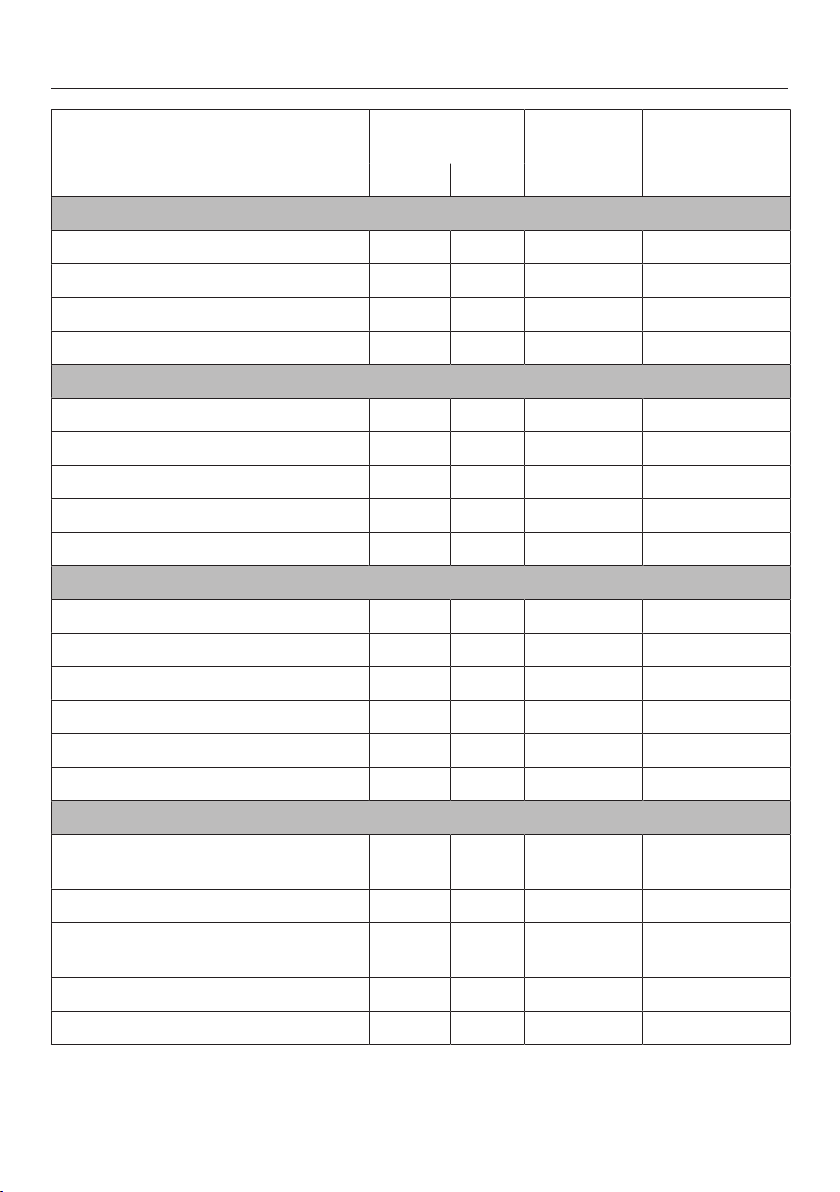
Sous-vide (vacuum) cooking
88
Food Added in ad-
vance
[°F / °C] [min]
Sugar Salt
Fish
Cod filet, 1" (2.5cm) thick x 130 / 54 35
Salmon filet, 1 1/4" (3 cm) thick x 125 / 52 30
Monkfish filet x 145 / 62 18
Pikeperch filet, 3/4" (2 cm) thick x 130 / 55 30
Vegetables
Cauliflower florets, medium to large x 185 / 85 40
Squash in slices x 185 / 85 15
Kohlrabi in slices x 185 / 85 30
Asparagus, white, whole x x 185 / 85 22–27
Sweet potatoes in slices x 185 / 85 18
Fruit
Pineapple in slices x 185 / 85 75
Apple in slices x 175 / 80 20
Bananas, whole 145 / 62 10
Peaches, halved x 145 / 62 25–30
Rhubarb pieces 167/75 13
Plums, halved x 160 / 70 10–12
Miscellaneous
Beans, white, soaked at a 1:2 ratio
(beans to liquid)
x 195 / 90 240
Shrimp, peeled and deveined x 135 / 56 19–21
Egg, whole 149 - 151 /
65–66
60
Scallops, removed from shell 125 / 52 25
Shallot, whole x x 185 / 85 45–60
Temperature / Cooking duration
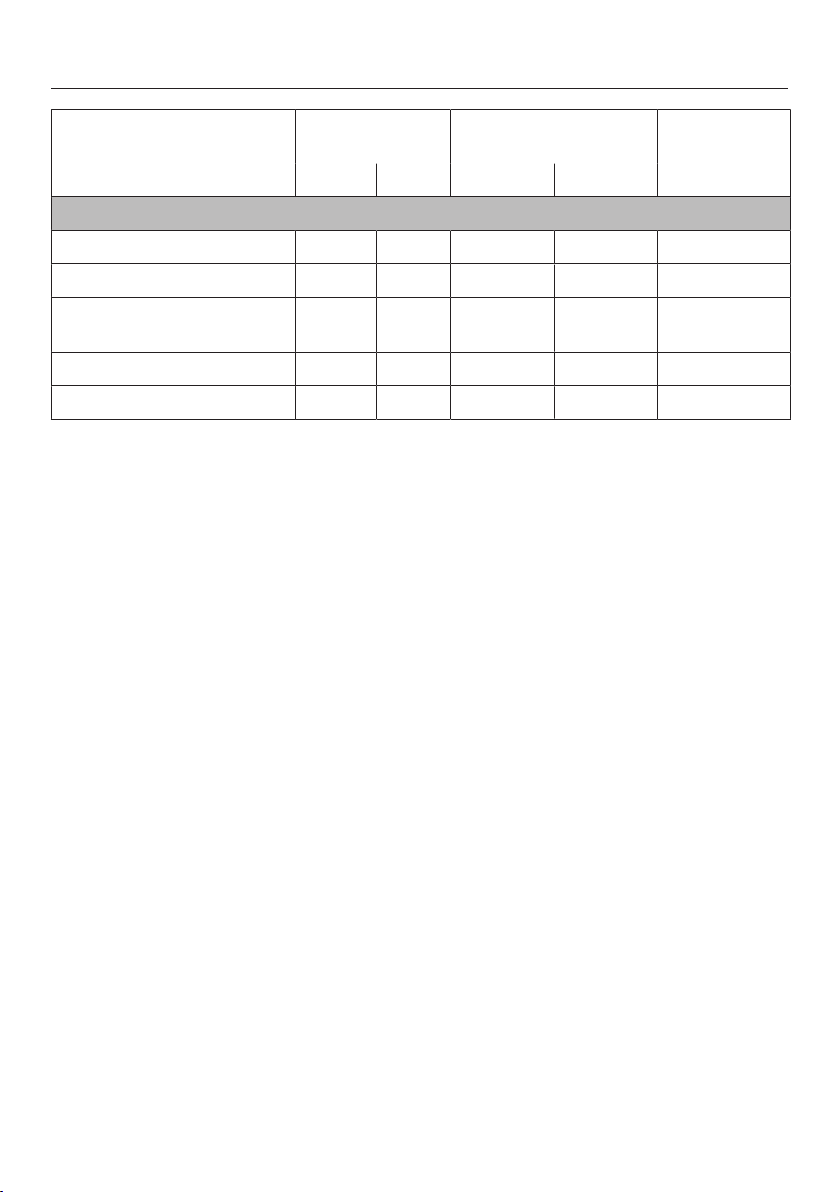
Sous-vide (vacuum) cooking
89
Food Added in ad-
vance
[°F / °C] [min]
Sugar Salt Medium* Well done*
Meat
Duck breast, whole x 151 / 66 162 / 72 35
Rack of lamb 136 / 58 144 / 62 50
Beef tenderloin, 1 3/4" (4
cm) thick
133 / 56 142 / 61 120
Beef filet, 1" (2.5cm) thick 133 / 56 – 120
Pork tenderloin, whole x 145 / 63 153 / 67 60
Temperature / Cooking duration
* Degree of doneness
The "well done" degree of doneness has a higher core temperature than "medium," but is
not cooked through in the traditional sense.

Sous-vide (vacuum) cooking
90
Reheating
Reheat brassicas (e.g., kohlrabi and
cauliflower) only in combination with a
sauce. Without sauce, an unpleasant
cabbage-like taste and gray-brown
color may develop.
Food with a short cooking time and
food whose degree of cooking
changes during reheating, e.g., fish,
are fundamentally not suited for re-
heating.
Preparation
Place the cooked food into ice water for
about an hour directly after cooking.
The fast cooling prevents the food from
continuing to cook. The optimum cook-
ing condition is thus retained.
Then store the food in the refrigerator at
a maximum of 41°F / 5°C.
Please note that the quality of the
food decreases the longer it is
stored.
We recommend that you do not store
the food in the refrigerator for longer
than 5 days before reheating.
Settings
Operating Modes|Sous-vide
Temperature: see chart
Duration: see chart
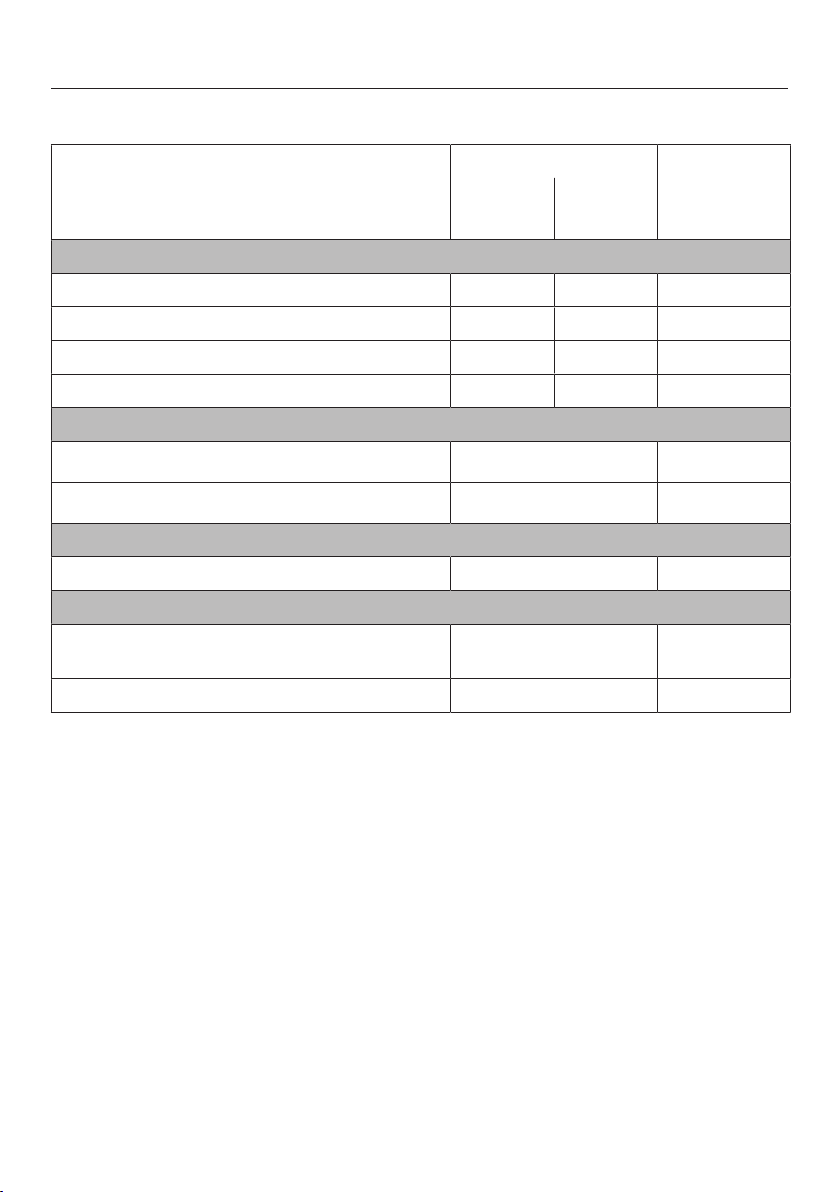
Sous-vide (vacuum) cooking
91
Table for the reheating of food cooked with the sous-vide method
Food [°F / °C]
2
[min]
Medium
1
Well-
done
1
Meat
Rack of lamb 136 / 58 144 / 62 30
Beef filet steak, 1 3/4" (4 cm) thick 133 / 56 142 / 61 30
Beef rump steak, 1" (2.5cm) thick 133 / 56 – 30
Pork tenderloin, whole 145 / 63 153 / 67 30
Vegetables
Cauliflower florets, medium to large
3
185 / 85 15
Kohlrabi in slices
3
185 / 85 10
Fruit
Pineapple in slices 185 / 85 10
Other food
Beans, white, soaked at a 1:2 ratio
(beans to liquid)
194 / 90 10
Shallot, whole 185 / 85 10
Temperature / time
1
Degree of doneness
The "done" degree of doneness has a higher core temperature than "medium," but is not
cooked through in the classical sense.
2
The times apply for food with a starting temperature about 41°F / 5°C (refrigerator temper-
ature).
3
Reheat only cooked in sauce.

Special modes
92
Reheat
Always follow USDA guidelines on
food safety.
To reheat food cooked with the sous-
vide method, use the "Sous-vide"
mode (see the "Sous-vide – Reheat-
ing" chapter).
The steam oven is very effective at re-
heating food gently, without drying it
out or cooking it further. The food re-
heats evenly and does not need to be
stirred during the reheating process.
You can reheat individual dishes or
plated meals which have been prepared
previously (e.g. meat, vegetables and
potatoes).
Suitable containers
Small quantities can be reheated on a
plate, larger quantities should be placed
in a cooking pan.
Duration
10-15 minutes are usually sufficient for
one plate of food. More than one plate
will need a little longer.
If you are reheating several plated
meals one after the other, the reheating
time can be reduced by around 5 min-
utes for the second and subsequent
plates as the oven will still be hot.
Moisture content
The more moist the food, the less mois-
ture that needs to be added.
Tips
– Food does not need to be covered
before it is reheated.
– Do not reheat large items whole. Di-
vide it into portions and reheat these
as plated meals.
– Compact items, such as stuffed pep-
pers or roulades, should be cut in
half.
– Please note that breaded items will
not retain their crispness when they
are reheated.
– Reheat sauces separately, except for
dishes such as stew and casseroles
where the sauce is part of the dish.
Settings
Special Modes | Reheat
or
Operating Modes | Combi Steam | Convec-
tion Bake
Temperature: see chart
Moisture: see chart
Duration: see chart

Special modes
93
Food [°F / °C] [%] [min]
Vegetables
Carrots
Cauliflower
Kohlrabi
Beans
250 / 120 70 8–10
Side dishes
Pasta
Rice
Potatoes, halved lengthways
250 / 120 70 8–10
Dumplings
Mashed potato
285 / 140 70 18–20
Meat and poultry
Sliced meat, 1/2" / 1 ¹/₂cm thick
Roulades, sliced
Beef stew
Lamb ragout
Chicken cutlets
Turkey cutlets, sliced
285 / 140 70 11–13
Fish
Fish fillet
Fish roulade, halved
285 / 140 70 10–12
Plated meals
Spaghetti, tomato sauce
Roast pork, potatoes and vegetables
Stuffed peppers (halved), rice
Chicken fricassee, rice
Vegetable soup
Creamy soup
Clear soup
Stew
250 / 120 70 10–12
Temperature / Moisture / Duration

Special modes
94
Defrost
Always follow USDA guidelines on
food safety.
It is much quicker to defrost food in the
steam oven than at room temperature.
Temperature
140°F / 60°C is the best temperature for
defrosting.
Exception: 122°F / 50°C for minced
meat and game
Before and after defrosting
Remove all packaging before defrost-
ing.
Exceptions: Leave bread and baked
goods in their packaging as otherwise
they will absorb moisture and become
soft.
Allow defrosted food to stand at room
temperature after removing it from the
oven. The standing time is necessary to
allow the even distribution of heat.
Cooking pan
Danger of salmonella poisoning.
Do not use the liquid from defrosted
meat or poultry. Dispose and wash
the container, the sink and your
hands.
Use a perforated container with a solid
container underneath it when defrosting
food which will drip, such as poultry.
This way food will not be lying in de-
frosted liquid.
Foods which don't drip can be de-
frosted in a solid cooking pan.
Tips
– Fish does not need to be fully de-
frosted before cooking. Defrost so
that the surface is sufficiently thawed
to take herbs and seasoning. De-
pending on the thickness of the fish,
2–5 minutes should be enough.
– When defrosting food which has
frozen together, e.g. berries, chops,
fish filets etc. separate it about half-
way through the defrosting time.
– Do not refreeze food once it has
thawed.
– Defrost frozen ready meals according
to the instructions on the packaging.
Settings
Special Modes | Defrost
or
Operating Modes | Steam Cooking
Temperature: see chart
Defrosting duration: see chart
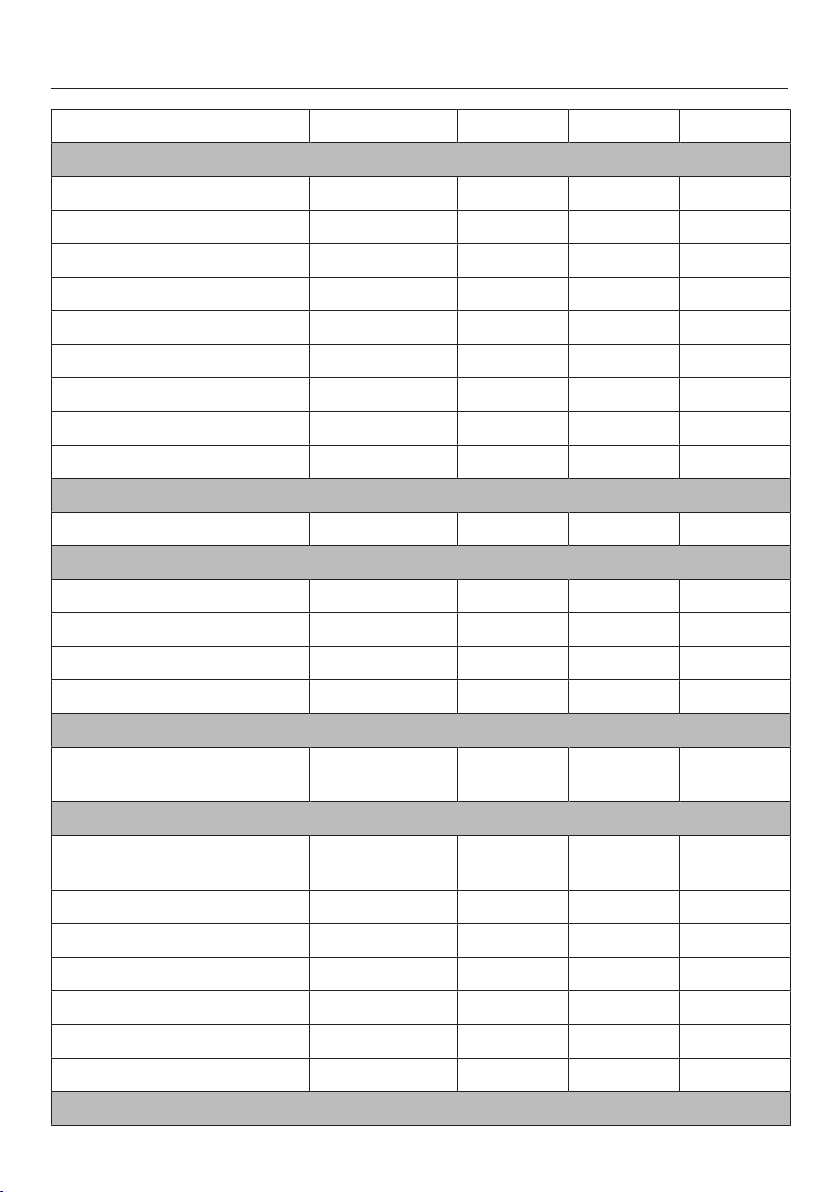
Special modes
95
Food to be defrosted Quantity [°F / °C] [min] [min]
Fruit
Apple sauce 1/2 lb / 250 g 140 / 60 20–25 10–15
Apple chunks 1/2 lb / 250 g 140 / 60 20–25 10–15
Apricots 1 lb / 500 g 140 / 60 25–28 15–20
Strawberries 10.6 oz / 300g 140 / 60 8–10 10–12
Raspberries / Black currants 10.6 oz / 300g 140 / 60 8 10–12
Cherries 5.3 oz / 150g 140 / 60 15 10–15
Peaches 1 lb / 500 g 140 / 60 25–28 15–20
Plums 1/2 lb / 250 g 140 / 60 20–25 10–15
Gooseberries 1/2 lb / 250 g 140 / 60 20–22 10–15
Vegetables
Frozen in a block 10.6 oz / 300g 140 / 60 20–25 10–15
Fish
Fish filets 14 oz / 400g 140 / 60 15 10–15
Trout 1 lb / 500 g 140 / 60 15–18 10–15
Lobster 300g/10.6 oz. 140 / 60 25–30 10–15
Shrimp 10.6 oz / 300g 140 / 60 4–6 5
Ready meals
Meat, vegetables, side
dishes / stew / soup
17 oz / 480g 140 / 60 20–25 10–15
Meat
Roast meat, sliced 4.4-5.3 oz. /
125–150g each
140 / 60 8–10 15–20
Ground meat 1/2 lb / 250 g 125 / 50 15–20 10–15
Ground meat 1 lb / 500 g 125 / 50 20–30 10–15
Stew 1 lb / 500 g 140 / 60 30–40 10–15
Stew 2 lbs / 1000g 140 / 60 50–60 10–15
Liver 1/2 lb / 250 g 140 / 60 20–25 10–15
Cutlets / chops / sausage 28 oz / 800 g 140 / 60 25–35 15–20
Poultry
Special modes
96
Food to be defrosted Quantity [°F / °C] [min] [min]
Chicken 2 lbs / 1000g 140 / 60 40 15–20
Chicken thighs 5.3 oz / 150g 140 / 60 20–25 10–15
Chicken filet 1 lb / 500 g 140 / 60 25–30 10–15
Turkey drumsticks 1 lb / 500 g 140 / 60 40–45 10–15
Baked goods
Puff pastries / Yeast baked
goods
– 140 / 60 10–12 10–15
Cakes and cookies 14 oz / 400g 140 / 60 15 10–15
Bread / Rolls
Rolls – 140 / 60 30 2
Rye bread, sliced 1/2 lb / 250 g 140 / 60 40 15
Whole grain bread, sliced 1/2 lb / 250 g 140 / 60 65 15
White bread, sliced 5.3 oz / 150g 140 / 60 30 20
Temperature / Duration / Standing time

Special modes
97
Canning
Always follow USDA guidelines on
food safety.
Only use unblemished, fresh produce
which is in good condition.
Glass jars
Use clean glass jars and accessories
and check them for any defects. Glass
jars with twist off lids or glass lids with a
rubber seal are suitable.
Make sure that all the glass jars are the
same size so that bottling is carried out
evenly.
After you have filled the jars with the
bottled produce, clean the glass rims
with a clean cloth and hot water and
then seal the jars.
Fruit
Sort fruit carefully, rinse it briefly but
thoroughly and allow it to drain. Take
great care when cleaning soft fruit as it
is very delicate.
Remove any peel, stalks, cores or pits.
Cut up large fruit. For example, cut ap-
ples into slices.
If you are bottling fruit with pits (e.g.
plums, apricots) without removing the
pits, pierce the fruit several times with a
fork or wooden skewer as otherwise it
will burst.
Vegetables
Rinse, clean and cut up vegetables.
Vegetables should be blanched before
bottling to help them retain their color
(see "Blanching").
Fill volume
Fill the glass jars with produce up to a
maximum of 1 1/4" (3 cm) below the
rim. Do not pack down as this would
damage the cell walls of the produce.
Bang the jar gently on a cloth to help
distribute the contents evenly.
Use a sugar solution for fruit and a salt
or vinegar solution for vegetables.
Tips
– Make use of residual heat by leaving
the jars in the oven for 30 minutes af-
ter it has switched off.
– Then cover the jars with a cloth and
allow to cool for approx. 24 hours.
Method
Place a perforated pan on the lowest
shelf level.
Place the jars (all the same size) in
the perforated cooking pan. Ensure
that they do not touch one another.
Settings
Special Modes | Canning
or
Operating Modes | Steam Cooking

Special modes
98
Juicing
This appliance is ideal for extracting
juice from soft, firm and hard fruit.
It is best to use overripe fruit, as the
riper the fruit the greater the quantity of
juice produced. Very ripe fruit will also
produce a more intense flavor.
Preparation
Sort and rinse the fruit. Cut out any
blemishes.
Remove the stalks from grapes and
cherries as these are bitter. The stalks
do not need to be removed from
berries.
Cut larger fruit into chunks approx.
1" (2cm) in size. The harder the fruit the
smaller the pieces should be.
Tips
– Try experimenting with mild and tart
flavors.
– The juice quantity and aroma are im-
proved if sugar is added to the fruit
and is allowed to soak in for several
hours. We recommend ¼–½ cup (50–
100 g) sugar per 2lbs (1kg) of sweet
fruit and ½–¾ cup (100–150g) sugar
for 2lbs (1kg) tangy fruit.
– If you wish to bottle the juice rather
than consume it straight away, while
still hot pour it into clean bottles and
seal immediately.
Method
Put the prepared fruit (cleaned,
washed, chopped etc.) into a perfo-
rated cooking pan.
Place a solid container or the univer-
sal tray underneath to catch the juice.
Settings
Operating Modes | Steam Cooking
Temperature: 210°F / 100°C
Duration: 40–70 minutes

Special modes
99
Menu Cooking
You can cook up to three different types
of food, e.g. fish with a side dish and
vegetables.
The food can be selected in any order
you like. The appliance will automati-
cally sort them out in order of cooking
duration required. The one with the
longest duration goes in the oven first.
The Ready at and Start at functions are
not available for "Menu Cooking."
Method
Turn the steam oven on.
Fill the water container and push it
back in so that it engages.
Then place the drip tray / universal
tray (depending on model) in the ap-
pliance.
Select Special Modes | Menu Cooking.
Select the type of food.
Depending on the food, you will be
asked about the size and the degree of
doneness.
Select or enter the values required
and then confirm your selection with
OK.
Select Add next ingredient.
Select the food you want and pro-
ceed in the same way as with the first
ingredient.
Repeat the procedure, if necessary,
for the third ingredient.
After you have confirmed Start Menu
Cooking, the display will tell you which
food to put in the oven. At the end of
the preheating phase, the display will
show when the next food type is to be
placed in the oven. When the time for
the next food type to be placed in the
oven is reached, the display will show
the food type and the shelf runner. This
process will be repeated for the third
food type.
You can still cook food types not listed
on the display together. See "Menu
Cooking - Manually" for details on
how to do this.

Special modes
100
Dehydrate
Only use the special application Dehydrate or the Combi Steam| Convection Bake
mode to dry food so that moisture can be dissipated.
Method
Cut the food into similar sized pieces.
Place the pieces on the rack covered with baking paper.
Tip: Bananas and pineapple are not suitable for drying in a combi steam oven.
Settings
Special Modes | Dehydrate
Temperature: see chart
Drying time: see chart
or
Operating Modes | Combi Steam | Convection Bake
Temperature: see chart
Drying time: see chart
Moisture: 0%
Food [°F / °C] [h]
Apple, rings 160 / 70 6–8
Apricots, halved, pitted 140-160 / 60–
70
10–12
Pears, sliced 160 / 70 7–9
Herbs 140 / 60 1.5–2.5
Mushrooms 160 / 70 3–5
Tomatoes, sliced 160 / 70 7–9
Citrus fruit, sliced 160 / 70 8–9
Plums, pitted 140-160 / 60–
70
10–12
Temperature / Time (hours)

Special modes
101
Making Yogurt
Always follow USDA guidelines on
food safety.
To make yogurt, you will need either
fresh live yogurt or yogurt culture, ob-
tainable from health food stores.
Use natural yogurt with live culture and
without additives. Do not use heat-
treated yogurt.
The yogurt must be fresh (short storage
time).
You can use either pasteurized or fresh
whole milk. Pasteurized milk can be
used without any further treatment.
Fresh milk must first be heated to
195°F / 90°C (not boiled!) and then
cooled down to 95°F / 35°C. Fresh
milk will give a firmer yogurt than long-
life milk.
The yogurt and milk should have the
same percentage fat.
Do not move or shake the jars while the
yogurt is thickening.
After preparing the yogurt, it must be
immediately placed in the refrigerator to
cool down.
The firmness, fat content and cultures
used in the yogurt starter all affect the
consistency of homemade yogurt. Not
all yogurts are equally suitable as yo-
gurt starters.
Possible causes for poor results
Yogurt is not set:
Incorrect storage of the yogurt starter,
too much time out of the refrigerator,
packaging was damaged, milk was in-
sufficiently heated.
Liquid has not been removed:
Jars were moved, yogurt was not
cooled down quickly enough.
Yogurt is grainy:
Milk was overheated or in poor condi-
tion, milk and starter yogurt not evenly
stirred.
Tip: When using yogurt enzyme, yogurt
can be made from a milk / cream mix-
ture. Mix³/₄liter/3 cups milk
with¹/₄liter/1 cup cream.

Special modes
102
Method
Mix ½ cup (100 g) yogurt with 4 cups
(1 liter) of milk or make up the mixture
with yogurt starter powder, following
the instructions on the packaging.
Pour the mixture into glass jars and
seal them.
Place the jars in a cooking pan. En-
sure that they do not touch one an-
other.
Immediately after the yogurt has been
made, place the jars in the refrigera-
tor, taking care not to move them un-
necessarily.
Settings
MasterChef | Special | Make Yogurt
or
Operating Modes | Steam Cooking
Temperature: 104°F / 40°C
Duration: 5:00 hours
Proofing
Method
Prepare the dough according to the
recipe.
Place the bowl in a perforated cook-
ing pan or on the rack.
Settings
Special Modes | Proof
Duration: as per recipe instructions
or
Operating Modes | Combi Steam | Convec-
tion Bake
Humidity: 100%
Temperature: 85°F / 30°C
Duration: as per recipe instructions

Special modes
103
Dissolving Gelatine
Method
Gelatine sheets: Completely cover
the gelatine sheets with cold water
and leave to soak for 5 minutes. Re-
move the gelatine sheets from the
bowl and squeeze them out. Empty
the bowl. Place the squeezed gelatine
sheets back in the bowl.
Gelatine powder: Place the gelatine
powder in a bowl and add water ac-
cording to the instructions on the
packaging.
Cover the bowl and place it in a per-
forated cooking pan.
Settings
MasterChef | Special | Dissolve Gelatine
or
Operating Modes | Steam Cooking
Temperature: 194°F / 90°C
Duration: 1 minute
Melting Chocolate
You can use the steam oven for melting
any type of chocolate.
Method
Break the chocolate into small
pieces. Leave chocolate cake cover-
ing in its packaging, and place in a
perforated cooking pan.
Place large quantities in a solid con-
tainer and small quantities in a cup or
a bowl.
Cover the container or the dish with a
lid or with foil that is resistant to tem-
peratures up to 212°F / 100°C and to
hot steam.
Stir large quantities once during
cooking.
Settings
MasterChef | Special | Melt Chocolate
or
Operating Modes | Steam Cooking
Temperature: 149°F / 65°C
Duration: 20 minutes
Special modes
104
Skinning Fruits and Vegetables
Method
Cut a cross in the top of tomatoes,
nectarines etc. This will allow the peel
to be removed more easily.
Place the food in a perforated pan, if
cooking with steam or a universal
tray, if using the grill.
For almonds, it is important to plunge
them into cold water as soon as they
are taken out of the oven otherwise
the skin cannot be removed.
Settings
Operating Modes | Maxi Broil
Broil level: 3
Duration: see chart
Food [min]
Bell Peppers 10
Tomatoes 7
duration
Operating Modes | Steam Cooking
Temperature: 210°F / 100°C
Duration: see chart
Food [min]
Apricots 1
Almonds 1
Nectarines 1
Bell Peppers 4
Peaches 1
Tomatoes 1
Duration

Special modes
105
Preserving Apples
You can treat homegrown apples in the
steam oven to increase the length of
time for which you can store them.
Once treated, the apples will keep for 5
to 6 months when stored in a dry, cool
and well-ventilated place. This method
is only suitable for apples and not for
other types of fruit.
Settings
MasterChef | Fruit | Apples | Whole | Pre-
serving
or
Operating Modes | Steam Cooking
Temperature: 125°F / 50°C
Preserving time: 5 minutes
Blanching
Blanch fruit and vegetables before
freezing them. Blanching helps maintain
the quality of the produce when it is
frozen.
Blanching vegetables also helps them
retain their original color.
Method
Put the prepared vegetables
(cleaned, washed, chopped etc.) into
a perforated cooking pan.
Once blanched, plunge the vegeta-
bles into ice cold water to cool them
down quickly. Drain them well.
Settings
Special Modes | Blanching
or
Operating Modes | Steam Cooking
Temperature: 210°F / 100°C
Blanching time: 1 minute

Special modes
106
Sweating Onions
Sweating means cooking the onions in
their own juices, with the addition of a
little fat if necessary.
Method
Cut the onions up into small pieces
and place them in a solid cooking
pan with a little butter.
Cover the container or the dish with a
lid or with foil that is resistant to tem-
peratures up to 212°F / 100°C and to
hot steam.
Settings
MasterChef | Special | Steam Onions
or
Operating Modes | Steam Cooking
Temperature: 210°F / 100°C
Duration: 4minutes
Rendering Fat
The bacon will not become brown.
Method
Place the bacon (diced or rashers) in
a solid cooking pan.
Cover the container with a lid or with
foil that is temperature resistant up to
212°F / 100°C and to steam.
Settings
MasterChef | Special | Render Fat
or
Operating Modes | Steam Cooking
Temperature: 210°F / 100°C
Duration: 4minutes

Special modes
107
Sanitizing Cookware
The steam oven will sanitize baby bot-
tles and other cookware. Check before-
hand that the manufacturer guarantees
all components are to be heat resistant
to 212° F / 100 °C and also steam resis-
tant follow manufacturers instructions.
Dismantle, clean and thoroughly rinse
baby bottles. Reassemble the bottles
only after they have completely dried.
This prevents recontamination.
Method
Place the individual parts on a rack or
in a perforated cooking container, en-
suring that they do not touch one an-
other (on their sides or with the open-
ing facing downwards). This will allow
the steam to reach the parts from all
sides.
Place the rack or the container on the
lowest shelf level.
Settings
Special Modes | Sanitize Cookware
Duration: 1 minute to 10 hours
or
Operating Modes | Steam Cooking
Temperature: 210°F / 100°C
Duration: 15 minutes
Heating Damp Towels
Method
Moisten the towels and then roll them
up.
Place them beside one another in a
perforated cooking pan.
Settings
MasterChef | Special | Heat Damp Towels
or
Operating Modes | Steam Cooking
Temperature: 158°F / 70°C
Duration: 2minutes

Special modes
108
Decrystallizing Honey
Method
Loosen the lid and place the jar of
honey in a perforated cooking pan.
Stir the honey once during the cook-
ing procedure.
Settings
MasterChef | Special | Decrystallize Honey
or
Operating Modes | Steam Cooking
Temperature: 140°F / 60°C
Duration: 90 minutes (irrespective of the
size of jar or the amount of honey in the
jar)
Pizza
Settings
Special Modes | Pizza
or
Operating Modes | Convection Bake
Temperature: 355-437°F / 180–225°C
Duration: 1–20 minutes
Tip: Use the rack lined with baking
parchment

Special modes
109
Making jam
Only use unblemished, fresh produce
which is in good condition.
Glass jars
Only use sterilised jars with twist-off lids
up to a maximum capacity of 1 cup /
250ml.
After pouring in the jam, clean the out-
side of the rim of the jar with a cloth
and hot water.
Preparation
Sort fruit carefully, rinse it briefly but
thoroughly and allow it to drain. Take
great care when cleaning soft fruit as it
is very delicate and squashes easily.
Remove any stalks, cores or pits.
Purée the fruit as otherwise the pre-
serve will not set. Add jam sugar to the
fruit (according to packet instructions)
and stir well.
For sweet fruit and berries you should
also add some citric acid.
Method
Fill jars maximum 2/3 full.
Place the open jars in a perforated
cooking pan or on the rack.
At the end of the program take the
jars out of the steam oven using oven
gloves. Leave them to stand for 1-2
minutes before sealing them with
twist off lids and then leave them to
cool.
Settings
Operating Modes | Combi Steam | Convec-
tion Bake
Temperature: 302°F / 150°C
Moisture: 0%
Duration: 35 minutes
Sabbath Program
This mode is designed for religious ob-
servance.
The program operates with Surround and
cannot be changed.
The program will only start once the
door is opened and closed:
– The steam oven will heat up to the
temperature you have set and will
maintain this temperature for a maxi-
mum of 72hours.
– Sabbath Program appears in the dis-
play constantly.
– The time of day is turned off.
– The interior lighting does not come
on, even when the door is opened.

Special modes
110
If the Lighting | On setting has been se-
lected, the lighting remains switched
on when the Sabbath program has
been selected and will stay on for the
duration of the program.
The Sabbath program cannot be se-
lected if the timer is being used.
Method
Select Special Modes.
Select Sabbath Program.
Set the required temperature.
Confirm with OK.
Sabbath Program and the set tempera-
ture will appear in the display.
The steam oven is ready for use.
Open the door to start the program.
Put the food in the oven.
Close the door.
The program will start after approxi-
mately 5 minutes.
Once the "Sabbath" program has
started it cannot be changed or saved
as a Favorites.
To end the program early:
Turn the steam oven off.

Roast probe
111
How it works
The metal tip of the roast probe is in-
serted into the food. There is a temper-
ature sensor in the metal tip which mea-
sures the core temperature of the food
during cooking.
The core temperature set will depend
on how well cooked you want your
meat to be and on the type of meat.
The temperature can be set between 86
and 210°F / 30 and 99°C.
The cooking duration will depend on a
number of different factors. The higher
the temperature in the oven compart-
ment and the humidity, where applica-
ble and the thinner the meat, the
quicker the set core temperature will be
reached.
The cooking process will finish auto-
matically when the core temperature in
the meat reaches the value set for the
roast probe. Exception: In Combi Steam
mode or with user programs, another
cooking stage, e.g., browning the meat,
may be required.
Damage to roast probe by incorrect
use!
If you are not using the roast probe
remove it from the oven when cook-
ing.
It is only protected from overheating
when it is plugged in.
When to use the roast probe
The roast probe can be used in the fol-
lowing operating modes:
– Combi Steam|Convection Bake
– Combi Steam|Surround
– Convection Bake
– Convection Broil
– Surround
– Intensive
– Humidity Plus
– Steam Cooking
– Reheat
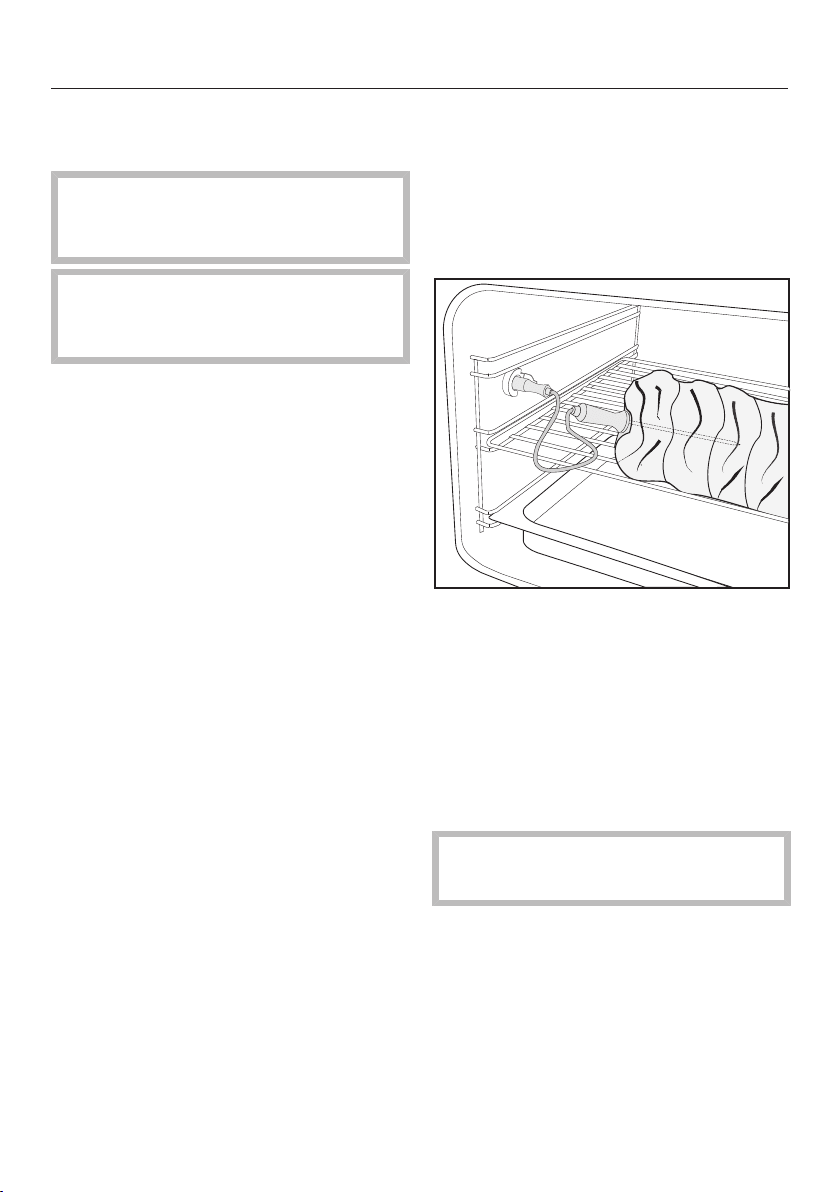
Roast probe
112
Important notes regarding the
roast probe
The handle and cord of the roast
probe must not touch the browning /
broiling element during cooking.
Risk of breakage!
Do not use the roast probe to lift or
carry the food.
The metal tip of the roast probe must
be fully inserted into the center of the
food.
Do not let the metal tip touch any
bones, and do not insert it into a partic-
ularly fatty area of the meat. Heavily
marbled areas and bones can cause
cooking to end prematurely.
If the meat is very heavily marbled with
fat, select the highest core temperature
given in the roasting chart.
When using roasting bags, insert the
probe through the bag into the center of
the meat.
You can also place the meat, with the
roast probe inserted, inside the bag.
Follow the roasting bag manufacturer's
instructions.
If wrapping meat in aluminum foil, the
roast probe must be inserted through
the foil to the center of the meat.
Method
Prepare the food.
Insert the metal tip of the roast probe
fully into the food.
Place the food in the oven.
Open the connection socket for the
roast probe and insert the plug of the
roast probe into the socket until you
feel it engage.
Select the desired mode.
Alter the recommended and/or core
temperature if necessary.
After the cooking process
Burn hazard!
The roast probe can get hot.
Before taking the food out of the
oven, carefully remove the roast
probe plug from the connection
socket.

Roast probe
113
Tips
– If you are cooking several pieces of
meat together, the roast probe
should be inserted into the largest
piece of meat.
– If the food is not cooked sufficiently
when the core temperature is
reached, insert the roast probe into
another place or increase the core
temperature and repeat the program.
Meat [°F / °C]
Veal 165–175 / 75–80
Smoked pork 165 / 75
Leg of lamb 175–185 / 80-85
Saddle of lamb 160–170 / 70-75
Saddle of veni-
son / hare
150–170 / 65-75
Top or bottom
round roast
175–195 / 80–90
Beef tenderloin /
Sirloin
rare
medium
well done
115 / 45
130 / 55
165 / 75
Pork / blade roast 175–195 / 80–90
Pork tenderloin /
chop
165 / 75
Game / rump cut 175–195 / 80–90
Core temperature

Roast
114
Always follow USDA guidelines on
food safety.
Roasting tips
Insert the grease filter in the back
panel when roasting.
Frozen meat must be defrosted be-
fore it is cooked as it would dry out.
Always defrost meat before roasting.
Remove skin and sinew before roast-
ing.
Season the meat to taste and dot
with butter, or in the case of game,
bard with rashers of streaky bacon.
Tip: Game can be marinated overnight
e.g. in buttermilk, to tenderize it.
If you are cooking several pieces of
meat together, select pieces that are
similar in size.
Roast meat on the rack above the
universal tray. The cooking liquids will
collect in the tray and can then be
used to make a gravy or sauce.
Allow a standing time of approx. 10
minutes after the end of cooking so
that the cooking liquids are evenly
distributed.
We recommend the Combi Steam|Con-
vection Bake and Combi Steam|Surround
modes for roasting.
If you wish to use other modes, you
can enter your cooking stages as a
user program (see "User programs").
Combi Steam
The lower the temperature in the oven
compartment, the longer the cooking
process and the more tender the result.
Lean meat
The addition of steam prevents the sur-
face of lean meat from drying out. Ex-
cellent results can be achieved when
using 5 cooking stages for the cooking
process
– Cooking stage1: the oven compart-
ment and the rack above the univer-
sal tray are pre-heated.
– Cooking stage2: the meat is
browned.
– Cooking stage3: adjust the tempera-
ture so that it is suitable for cooking
the meat so that it is tender.
– Cooking stage4: cook until tender.
– Cooking stage5: continue cooking to
the required level.

Roast
115
Fatty meat with crispy skin
– Cooking stage1: use a high tempera-
ture to render the fat and brown the
skin.
– Cooking stage2: reduce the temper-
ature and increase the moisture
– Cooking stage3: increase the tem-
perature for crispy skin.
Braised dishes
– Cooking stage1: preheat the oven
with the rack above the universal tray.
– Cooking stage2: the meat is
browned.
– Cooking stage3: braise the meat at a
temperature of 210°F / 100°C with
84% moisture.
Poultry
– Cooking stage 1: use a high temper-
ature and a high moisture level to
render the fat.
– Cooking stage2: lower the tempera-
ture.
– Cooking stage3: increase the tem-
perature and reduce humidity to dry
out and crisp the skin.
For more information about relevant
settings, please refer to the following
roasting chart.

Roast
116
Roasting chart
Always follow USDA guidelines on food safety.
The times and temperatures given in the tables are recommendations only.
Type of meat Stage Operating
mode
[°F / °C]
[%]
[min]
[°F / °C]
Poultry
Duck up to 4 lbs / 2 kg,
stuffed
1
2
3
375/190
210/100
375/190
40
80
–
20
140
23
–
–
–
Duck up to 4 lbs / 2 kg, un-
stuffed
1
2
3
375/190
210/100
375/190
40
80
–
20
100
23
–
–
–
Duck breast, medium 1
2
3
Level 3
85/30
Level 3
0
0
0
15
20
7–13
–
–
–
Duck breast, well-done 1
2
3
4
Level 3
85/30
Level 3
85/30
0
0
0
0
15
20
7–13
5
–
–
–
–
Goose, approx. 9 lbs /
4.5kg
1
2
3
375/190
210/100
375/190
40
80
–
30
270
23
–
–
–
Chicken, whole 1
2
3
435/225
300/150
Level 3
0
55
0
20
60
2–12
–
–
–
Chicken thighs 1
2
3
395/200
440/225
Level 3
95
0
0
30–25
13–18
0–7
–
–
–
Turkey roulade, stuffed/un-
stuffed
1
2
3
375/190
285/140
395/200
40
75
–
20
100
4–8
–
–
–
Turkey breast 1
2
340/170
Level 3
65
–
85
0–9
–
–

Roast
117
Type of meat Stage Operating
mode
[°F / °C]
[%]
[min]
[°F / °C]
Veal
Tenderloin (Roast)
rare
medium
well done
–
–
–
347/175
329/165
320/160
–
–
–
–
–
–
115/45
130/55
165/75
Tenderloin (Roast with
moisture)
Rare* 1
2
3
4
Level 3
Level 3
140/60
140/60
0
0
0
49
10
8
30
30
–
–
–
–
Medium*
1
2
3
4
5
Level 3
Level 3
210/100
149/65
158/70
0
0
0
49
51
10
10
20
60
60
–
–
–
–
–
Tenderloin (Roast with
moisture)
Well done* 1
2
3
4
5
6
Level 3
Level 3
210/100
150/65
195/90
395/200
0
0
0
49
68
–
10
10
20
60
50
5
–
–
–
–
–
–
Saddle (Roast with mois-
ture)
Well done* 1
2
3
4
5
6
Level 3
Level 3
210/100
150/65
195/90
395/200
0
0
0
49
68
–
10
10
20
60
80
5
–
–
–
–
–
–
Roast
118
Type of meat Stage Operating
mode
[°F / °C]
[%]
[min]
[°F / °C]
Ham hocks 1
2
210 /100
375 / 190
84
–
155
17
–
–
Braised meat* 1
2
3
Level 3
Level 3
100
0
0
84
10
10
165
–
–
Lamb
Leg of lamb 1
2
Level 3
210 / 100
–
57
18
190
–
–
Loin / Crown
Medium* 1
2
3
4
Level 3
Level 3
85 / 30
165 / 75
–
–
0
47
10
8
30
40
–
–
–
–
Well done*
1
2
3
4
Level 3
Level 3
85 / 30
210 / 75
–
–
0
57
10
10
30
100
–
–
–
–
Pork
Tenderloin – 395 / 200 – – 165 / 75
Smoked pork 1
2
395 / 200
265 / 130
0
100
30
–
–
75
Crispy pork 1
2
3
225
100
165–185
54
84
–
40
120
20–25
–
–
–
Pork loin 1
2
355 / 180
265 / 130
50
30
30
–
–
75
Beef
Tenderloin (Roast)
rare
medium
well done
–
–
–
345 / 175
340 / 170
330 / 165
–
–
–
–
–
–
115 / 45
130 / 55
165 / 75

Roast
119
Type of meat Stage Operating
mode
[°F / °C]
[%]
[min]
[°F / °C]
Tenderloin (Roast with
moisture)
Rare* 1
2
3
4
Level 3
Level 3
140/60
140/60
0
0
0
49
10
10
30
30
–
–
–
–
Medium*
1
2
3
4
5
Level 3
Level 3
210/100
149/65
158/70
0
0
0
49
51
10
10
20
60
60
–
–
–
–
–
Tenderloin (Roast with
moisture)
Well done* 1
2
3
4
5
6
Level 3
Level 3
210/100
150/65
195/90
395/200
0
0
0
49
68
–
10
10
20
60
105
8
–
–
–
–
–
–
Sirloin (Roast)
rare
medium
well done
–
–
–
345/175
338/170
330/165
–
–
–
–
–
–
115/45
130/55
165/75
Tenderloin (Roast with
moisture)
Rare* 1
2
3
4
Level 3
Level 3
140/60
140/60
0
0
0
49
10
10
30
30
–
–
–
–
Medium*
1
2
3
4
5
Level 3
Level 3
210/100
149/65
158/70
0
0
0
49
51
10
10
20
60
60
–
–
–
–
–

Roast
120
Type of meat Stage Operating
mode
[°F / °C]
[%]
[min]
[°F / °C]
Well done* 1
2
3
4
5
6
Level 3
Level 3
210/100
150/65
195/90
395/200
0
0
0
49
68
–
10
10
20
60
135
8
–
–
–
–
–
–
Roulades** 1
2
3
Level 3
Level 3
210/100
0
0
84
10
10
120
–
–
–
Pot roast** 1
2
3
Level 3
Level 3
210/100
0
0
84
10
10
205
–
–
–
Game
Venison saddle
Medium* 1
2
3
4
Level 3
Level 3
85/30
165/75
–
–
0
52
10
7
30
40
–
–
–
–
Well done*
1
2
3
4
Level 3
Level 3
85/30
210/100
–
–
0
47
10
13
30
107
–
–
–
–
Temperature/Broil level / Moisture / Duration / Core temperature
Combi Steam Convection Bake / Combi Steam Maxi Broil / Combi
Steam Surround / Maxi Broil / Convection Broil
* In stage one please place the universal tray on shelf level 1 and the rack on shelf level 2
(except with rack of lamb where the rack is placed on the universal tray on shelf level 1)
without food on it and pre-heat the oven.
Place the meat on the pre-heated rack at the beginning of stage 2.
*** In stage one, place the universal tray on shelf level 2 without food on it and pre-heat the
oven. Place the meat on the pre-heated tray at the beginning of stage 2.

Bake
121
Eating food which has been cooked
correctly is important for good
health.
Only bake cakes, pizza, french fries,
etc. until they are golden brown. Do
not overcook them.
Convection Bake
For baking on several levels at the same
time. The fan distributes the heat evenly
throughout the cavity for a consistent
baking temperature.
When using Surround, reduce the
temperatures given for Convection
Bake by about 20°F/20°C.
Surround
Heat is used from both the upper and
lower heating elements to create per-
fect results of all baking recipes.
Use only one shelf level for baking.
Place tray bakes on the middle shelf.
If using an older recipe or cookbook,
set the oven temperature 10°F/10°C
lower than that recommended. This
will not change cooking durations.
Browning
For a perfectly browned topping, for ex-
ample when making a gratin or brown-
ing the top of a casserole..
Bake
Use this at the end of the baking time to
brown the bottom of the food.
Humidity Plus
For creamed mixtures, choux pastry
and deep frozen pretzels.
Intensive Bake
For baking cakes with a moist topping,
e.g. cheese cake, fresh fruit cakes,
quiche and flans. Also suitable for items
such as pizza without the need to pre-
bake the base.
Bake on the lowest shelf level.
Combi Steam
The gleaming finish on bread, rolls and
puff pastry is achieved by adding steam
(maximum moisture, low temperature) in
cooking stage1. Browning is achieved
using a high moisture level and a high
temperature. The drying-out phase
takes place with low moisture and a
high temperature.

Bake
122
Baking tips
Grease filter
Remove the grease filter from the
back wall. Otherwise results can be
uneven.
Bakeware
Dark-colored bakeware is best for
baking. It conducts the heat more
swiftly to the mixture. Shiny metal
bakeware reflects heat.
Cakes baked in shiny metal bakeware
take longer to bake.
Bake cakes in rectangular bakeware
with the longer side across the width
of the oven compartment for opti-
mum heat distribution and even re-
sults.
With MasterChef programs, use the
bakeware recommended in the cook-
book.
Universal tray
Because of its PerfectClean anti-stick
surface, the universal tray does not
need to be greased for baking.
Shelf level
When baking cakes with a moist top-
ping only bake on one level.
Use a maximum of two shelf levels at
once. If you want to bake on two
shelf levels at the same time, use the
bottom and middle level.
Parchment paper
Parchment paper is only necessary
when baking:
– Anything with a high salt content (e.g.
pretzels, bread sticks), because
sodium can damage the PerfectClean
surface
– Meringues or dishes with a high egg
white content, because they are more
likely to stick
– Puff pastry

Bake
123
Frozen food
When baking deep frozen products
such as chips, croquettes, cakes,
pizza and baguettes, use the lowest
temperature quoted on the manufac-
turer's packaging.
Cook frozen goods such as cakes,
pizza or baguettes on a layer of bak-
ing parchment placed on the rack.
Baking large frozen items on the bak-
ing tray or the universal tray can
cause the metal to distort to such an
extent that the tray cannot be taken
out of the oven.
Small items of frozen food such as
oven chips or potato croquettes can
be cooked on the universal tray.
Place them on baking parchment and
turn several times during cooking.
Notes regarding the baking
chart
As a general rule, select the lower
temperature given in the chart.
Do not set a temperature higher than
that recommended. Increasing the
temperature may reduce the baking
duration, but will lead to uneven
browning, and unsatisfactory cooking
results.
Check if the food is cooked at the
end of the shortest duration quoted.
To check if a cake is ready, insert a
wooden skewer into the center. It is
ready if the skewer comes out clean,
without dough or crumbs sticking to
it.
Bake
124
Baking chart
Baked good Stage Operating
mode
[F / °C] [%] min
Sponge
Baking tray – 300-355 /
150–180
– 25
Springform pan – 320-340 /
160–170
– 25–35
Puff pastry
Filled 1
2
3
4
210/100
375-410/190
–210
375-410/190
–210
375-410/190
–210
100
90
75
0
7
10
5
6
Small pastry* – 355/180 – 15
Choux pastry
Cream puffs / Éclairs – 300-365/150
–185
0 50
Yeast dough
Bagels 1
2
210/100
395/200
100
0
10
24
Baguettes, spelt bread 1
2
3
4
105/40
125/50
410/210
355-410/180
–210
100
100
50
0
8
4
6
30
Butter Cake 1
2
320/160
250-330/120
–165
90
0
15
10
Croissants 1
2
3
195/90
320/160
320-410/160
–190
100
90
0
2
10
27
Triple grain bread 1
2
3
85/30
300/150
300/150
100
50
0
15
10
100

Bake
125
Baked good Stage Operating
mode
[F / °C] [%] min
Flat bread 1
2
3
4
105/40
125/50
410/210
310-375/155
–190
100
100
0
0
10
2
6
25
Braided loaf 1
2
3
4
105/40
125/50
395/200
320-395/160
–200
100
100
50
0
8
2
10
12
White bread in rectan-
gular pan
1
2
3
4
105/40
125/50
410/210
430/220
100
100
50
0
8
4
6
25–50
Herb rolls 1
2
310/155
395/200
90
0
9
15–25
Multigrain rolls 1
2
310/155
395/210
90
0
9
20–30
Pizza – 350-400 /
175–205
– 35
Braided Swiss loaf 1
2
195/90
340-410/170
–210
100
50
6
45
Stollen 1
2
300/150
265-320/130
–160
100
0
30
30
Streusel Cake 1
2
3
85/30
320/160
265-355/130
–180
100
90
0
30
25
10
Sweet rolls 1
2
3
4
105/40
125/50
395/200
395/200
100
100
50
0
8
2
10
8–13
Whole grain bread 1
2
3
4
105/40
125/50
410/210
375-420/190
–215
100
100
50
0
8
4
6
30
White bread 1
2
3
4
105/40
125/50
410/210
340-410/170
–210
100
100
50
0
8
4
6
30
Bake
126
Baked good Stage Operating
mode
[F / °C] [%] min
White rolls 1
2
310/155
395/200
90
0
9
20–30
Mixed wheat grain
bread
1
2
3
4
105/40
125/50
410/210
355-430/180
–220
100
100
50
0
8
4
6
30
Onion tart – 375/190 – 25–35
Short dough pastry
Cookies 1
2
365/185
365/185
50
0
6
10–15
Cakes with a dry top-
ping
– 395/200 85 35
Cakes with a moist top-
ping*
1
2
410/210
375/190
0
0
15
20–30
Slice with topping – 340-375/170
–190
– 35–45
Quark dough
Sweet rolls 1
2
3
125/50
330/165
330/165
100
50
0
5
5
14–26
Pizza – 310-365/155
–185
– 30
Baking tray – 320-355/160
–180
– 45–55
Batter
Cake pan – 340-375/170
–190
– 55
Tray cake with fruit top-
ping
– 340-375/170
–190
– 40
Cookies – 300-375 /
150–190
95 25
Pyramid cakes – Level 3 – 2–3**
Sourdough
Rye mix bread 1
2
410/210
375-410/190
–210
50
0
5
50

Bake
127
Baked good Stage Operating
mode
[F / °C] [%] min
Rye bread 1
2
3
410 / 210
410 / 210
310-340 /
155–170
60
0
0
6
6
60
Strudel
Apple strudel 1
2
85/30
375/190
90
0
7
35–60
Temperature/Broil level / Moisture / Duration
Combi Steam Convection Bake / Combi Steam Surround /
Surround / Convection Bake / Intensive Bake / Humidity Plus / Maxi
Broil
*Pre-heat the oven with nothing in it.
**Per layer

Broil
128
Burn hazard!
The appliance door must remain shut
during broiling, as otherwise the con-
trols will get hot.
Broiling tips
Place the food on the rack on top of
universal tray.
When broiling fish, place the fish on a
piece of baking paper cut to size.
Place the food in the steam oven
without pre-heating. Pre-heating the
steam oven is not necessary when
broiling.
Broil thick items, e.g. half a chicken,
in the middle and thin items, e.g.
steak, on the top shelf level.
Turn the food after ²/₃ of the cooking
time has elapsed. Fish does not need
to be turned.
The roast probe cannot be used with
the Maxi Broil, Broil, and Combi Steam|
Maxi Broil modes.
Maxi Broil
This function gives excellent browning
and searing results. Use this function
for chops, ribs, large quantities of meat
and for browning large dishes.
Broil
This function is excellent for broiling or
searing small quantities. Use this func-
tion for chops, ribs, small quantities of
meat and for browning small dishes.
Convection Broil
For broiling thicker items, e.g. poultry or
roulades.
Tips
– Marinate or add a little oil if neces-
sary to lean meat. Do not use other
types of fat as they can burn and
cause smoke.
– Make diagonal cuts in sausage be-
fore broiling.
– It is best to broil food of a similar
thickness at the same time so that
the broiling time for each item does
not vary too greatly.
– To broil thicker pieces of food more
gradually after an initial high tempera-
ture, continue broiling at a lower tem-
perature setting or use a lower shelf
runner to allow the food to cook
through to the center.
Broil
129
Broiling table
Broiled food Operating
mode
[F / °C] [%] min
Fish
Trout Level 3 – 25–30
Salmon 355/180 – 35
Mackerel Level 3 – 25
Meat / sausages
Hamburgers Level 3 – 20
Sausage
fresh / pre-
cooked
Level 3 – 15–20
Miscellaneous
Toast Level 3 – 5–8
Toast with
toppings
Level 3 – 8–15
Corn on the
cob
Level 3 30 23
Temperature/Broil level / Moisture / Duration
Maxi Broil / Convection Broil / Combi Steam Maxi Broil

Settings
130
Accessing the "Settings" menu
Select Settings .
A list of settings will appear in the dis-
play.
They can be checked and changed, if
needed.
A check next to an option shows
which setting is active.
Settings cannot be altered while a
cooking program is in progress.
Changing and saving settings
Select Settings .
Scroll through the list until the desired
setting appears.
Touch the sensor next to the setting.
The desired setting may appear in a
submenu.
Change the setting.
Confirm with OK.
Touch until the main menu ap-
pears or select another setting.
Settings
131
Settings overview
Option Available settings
Language ... / deutsch / english / ...
Country
Time Show
On / Off * / Night Dimming
Clock Format
24 h / 12 h *
Set
Date
Lighting On / On for 15 Seconds *
Display Brightness
Audible tone information Melody
Solo Tone
Keypad Tone
Units of Measurement Weight
g * / lb / lb:oz
Temperature
°C * / °F
Keeping Warm On / Off*
Automatic Rinsing On * / Off
Steam Reduction On*/ Off
Default Temperature
Safety System Lock
On / Off *
Sensor Lock
On / Off *
Water Hardness Soft
Medium
Hard*
Showroom Program Demo Mode
On / Off *
Factory Default Settings
Favorites
Default Temperature
* Factory default

Settings
132
Language
The desired country and language can
be set.
After selecting and confirming your
choice, the language selected will ap-
pear in the display.
Tip: If you accidently select a language
you do not understand, select the
symbol to return to the submenu.
Time of day
Display
Select how you would like the time of
day to show in the display when the
steam oven is switched off:
– On
The time of day always appears in
the display. You can switch the light-
ing on and off, use the timer or
open and close the control panel
by touching the relevant sensor.
– Off
The display is switched off to save
energy. The steam oven has to be
switched on before you can use it.
This also applies to using the oven
interior lighting and the timer
functions as well as opening and
closing the control panel .
– Night Dimming
To save energy, the time is only visi-
ble in the display between 5:00am
and 11:00pm. The rest of the time it
is not visible.
Clock format
You can select the clock format for the
time of day:
– 24 h
The time of day is shown in 24-hour
clock format.
– 12 h
The time of day is shown in 12-hour
clock format.
Setting the time
Set the hours and the minutes.
If there is a power outage, the current
time of day will reappear once power
has been restored. The time is stored
in memory for about 200hours.
Date
Set the date.
When the steam oven is off, the date
appears only in the setting Time | Show
| On or Night Dimming (between 5a.m
and 11p.m.).

Settings
133
Lighting
– On
The interior lighting is switched on
during the entire cooking period.
– On for 15 Seconds
The oven lighting switches off
15seconds after a program starts.
Touching switches it on for an-
other 15seconds.
Display brightness
The display brightness is represented
by a bar with seven segments.
Select Darker or Brighter to change the
brightness of the display.
Acoustic tone information
Melody
At the end of a process, a melody will
sound several times in intervals.
The volume of the melody is repre-
sented by a bar with seven segments.
Maximum volume is selected when all
segments are filled. If none of the seg-
ments are filled, the melody is turned
off.
Select Quieter or Louder, to adjust the
volume.
Select On or Off, to turn the melody
on or off.
Solo tone
At the end of a process, a continuous
tone will sound for period of time.
The pitch of this tone is represented by
a segment bar.
Select Lower or Higher, to change the
pitch.

Settings
134
Keypad tone
An audible tone is heard with each
touch of a sensor.
The volume of the keypad tone is repre-
sented by a bar with seven segments.
Maximum volume is selected when all
segments are filled. If none of the seg-
ments are filled, the volume is turned
off.
Select Quieter or Louder, to adjust the
volume.
Select On or Off, to turn the keypad
tone on or off.
Units of measurement
Weight
– g
The weight of food in MasterChef
programs is shown in grams.
– lb
The weight of food in MasterChef
programs is shown in pounds.
– lb:oz
The weight of food in MasterChef
programs is shown in pounds and
ounces.
Temperature
– °C
The temperature is displayed in Cel-
sius.
– °F
The temperature is displayed in
Fahrenheit.

Settings
135
Keeping Warm
Please note that delicate food, espe-
cially fish, can continue cooking while
being kept warm.
– On
The Keeping warm mode is activated
as standard with the Steam Cooking
mode if a minimum temperature of
about 175°F / 80°C is used for cook-
ing. If food is not removed from the
steam oven at the end of a program,
this mode will automatically start af-
ter approx. 5minutes. Keeping Warm
will appear in the display and the
food will be kept warm for approx.
15minutes at a temperature of
160°F / 70°C. The Keeping warm
mode is canceled when the sensor is
touched or the door is opened.
– Off
The Keeping warm mode is deacti-
vated.
Automatic rinsing
Following a cooking program with
steam, Appliance Rinsing will appear in
the display after the steam oven has
been switched off.
Any remaining food deposits are
flushed out of the system.
You can activate or deactivate the auto-
matic rinsing process.
Steam reduction
– On
If you cook at a temperature from ap-
prox. 175°F / 80°C (Steam Cooking)
or 175-210°F / 80–100°C and a
100% humidity setting (Combi
Steam), the steam reduction function
switches on automatically at the end
of the cooking program. This reduces
the amount of steam which escapes
from the appliance when the door is
opened at the end of the cooking du-
ration. Steam Reduction will appear in
the display in addition to Program Fin-
ished.
– Off
If steam reduction is turned off the
Keeping Warm function is also auto-
matically turned off. If steam reduc-
tion is turned off a large amount of
steam will escape when the door is
opened.

Settings
136
Recommended temperatures
If you often cook with temperatures that
differ from the default, it makes sense
to change the recommended tempera-
tures.
Once the option has been selected, the
list of functions and special applications
with the relevant recommended temper-
atures will appear in the display.
Select the operating mode / special
application you want.
The recommended temperature is dis-
played along with the available temper-
ature range.
Change the recommended tempera-
ture.
Confirm with OK.
Safety
System lock
The system lock prevents the appliance
being turned on by mistake.
The timer can still be used when the
system lock is active.
The system lock will remain activated
even after a power failure.
– On
The system lock is now active. If you
want to use the steam oven after ac-
tivation, press and hold the sensor
button next to OK for at least 6 sec-
onds.
– Off
The system lock is not active. You
can use the steam oven as normal.

Settings
137
Sensor lock
The sensor lock prevents a cooking
process from being switched off or
changed while it is running. Once acti-
vated, the sensors are locked a few
seconds after a program has started.
– On
The sensor lock is activated. Touch
the sensor next to OK for at least
6seconds to use the functions again.
The sensor lock is then deactivated
for a short period.
– Off
The sensor lock is not active. All sen-
sors react to touch as normal.
Water hardness
The steam oven is factory set for Hard
water. It must be adjusted to local water
hardness to ensure trouble-free opera-
tion and to ensure that descaling is car-
ried out at the correct interval. The
harder the water, the more often it will
need to be descaled.
– Soft
<8.7°gr/gal, <1.5mmol/l
– Medium
8.7-14.6°gr/gal, 1.5-2.5mmol/l
– Hard
>14.6°gr/gal, >2.5mmol/l

Settings
138
Showroom Program
This mode enables the oven to be
demonstrated in showrooms without
heating up. It should not be set for do-
mestic use.
Demo Mode
If demo mode is activated Demo mode
active. The appliance will not heat up will
appear when the steam oven is turned
on.
– On
Press and hold OK for at least 4 sec-
onds to activate demo mode.
– Off
Press and hold OK for at least 4 sec-
onds to deactivate demo mode. The
steam oven can then be used as nor-
mal.
Factory default
– Settings
Any settings that have been altered
will be reset to the factory default
setting.
– Favorites
All Favorites will be deleted.
– Default Temperature
Any default temperatures that have
been changed will reset to the factory
default settings.

Cleaning and care
139
Important information on
cleaning and care
Risk of injury!
The steam from a steam cleaner
could reach electrical components
and cause a short circuit.
Do not use a steam cleaner to clean
the steam oven.
All surfaces can become discolored
or damaged if unsuitable cleaning
agents are used. The front of the
oven, in particular, will be damaged
by oven cleaners.
All surfaces are susceptible to
scratching. Scratches on glass sur-
faces may cause a breakage.
Immediately remove any residues left
by cleaning agents.
Stubborn soiling could damage the
steam oven in certain circumstances.
Once the oven has cooled clean the
oven, the inside of the door and the
door seal. Waiting too long to clean
the oven will make if much more dif-
ficult to clean.
Do not use commercial cleaning
agents. Only use agents designed for
domestic use.
Do not use cleaning agents or liquid
dish soap containing aliphatic hydro-
carbons as these could cause the
seals to swell.
Allow the appliance to cool down to
a safe temperature before cleaning.
The appliance and accessories
should be cleaned and dried thor-
oughly after each use.
Leave the appliance door open until
the oven interior is completely dry.
If the appliance is not going to be
used for a longer period of time, e.g.
while on vacation, it should be thor-
oughly cleaned and dried beforehand
to prevent the build-up of odors, etc.
Leave the door open afterwards.

Cleaning and care
140
To better maintain your appli-
ance avoid the following:
To avoid damaging surfaces when
cleaning, do not use:
– Cleaners containing soda, ammonia,
thinners, or chlorides
– Descaling agents
– Abrasive cleaning agents (e.g., pow-
der or cream cleansers, pumice
stones)
– Solvent-based cleaners
– Stainless steel cleaners
– Dishwasher cleaners
– Ceramic cooktop cleaners
– Hard, abrasive brushes or sponges
(e.g. pot scrubbers or scrub sponges,
sponges which have previously been
used with abrasive cleaning agents)
– Eraser sponges
– Sharp metal scrapers
– Steel wool
– Stainless steel spiral pads
– Spot cleaners
– Oven sprays
Glass cleaners may be used to clean
the exterior. However do not allow
them to sit or "puddle", this can cause
damage to the surface. Remove the
cleaner promptly.
Appliance front
If soiling is not removed promptly, it
may become impossible to remove,
and surfaces can become discolored
or change their appearance.
Remove soiling immediately.
Clean the front with a solution of
warm water and washing-up liquid
applied with a clean sponge or cloth.
A clean, damp microfiber cloth with-
out cleaning agent can also be used.
After cleaning dry the front of the ap-
pliance with a soft cloth.

Cleaning and care
141
PerfectClean
The surfaces of the oven compartment
and shelf runners have been treated
with PerfectClean enamel. This finish
has an iridescent appearance. Perfect-
Clean surfaces have very good non-
stick properties and are easy to clean.
However, it is very important to clean
the surfaces each time the oven is
used.
The surface will become harder to clean
and the non-stick properties will deteri-
orate if soiling is not removed after each
use and allowed to build up.
Soiling such as spilt juices and cake
mixtures are best removed while the
oven or tray is still warm. Exercise cau-
tion, make sure the oven is not hot.
Spilt fruit juices may cause lasting dis-
coloration of the surfaces. This discol-
oration is permanent but will not affect
the efficiency of the surface.
Remove residual cleaning agent after
cleaning. If left it will reduce the non-
stick properties of the PerfectClean
surfaces.
To protect the non-stick effect of
PerfectClean surfaces, please avoid:
– Abrasive cleaning agents, such as
scouring powder, scouring cream,
pumice pits
– Ceramic cooktop cleaners
– Ceramic and stainless steel cleaner
– Steel wool
– Abrasive sponges, e.g. pot scourers
or sponges which have been previ-
ously used with abrasive cleaning
agents
– Oven sprays
– Cleaning in the dishwasher
– Spot cleaners

Cleaning and care
142
Do not use oven spray.
Oven interior
The surface of the oven compart-
ment has been treated with Perfect-
Clean.
Please refer to the section on "Per-
fectClean" for information on clean-
ing and care.
The oven door (see "Door") and the side
runners (see "Side runners") can be re-
moved to make it easier to clean the
oven interior.
After a program using steam
Remove:
– Condensate using a sponge or ab-
sorbent cloth
– Light, greasy soiling with a sponge
and a solution of liquid dish soap and
hot water
After cleaning, wipe with clean water
to remove any detergent residues.
Then dry the oven interior and the in-
side of the door with a cloth.
Tip: You can then leave the oven to dry
automatically (see "Cleaning and care -
Drying").
After a roasting, broiling or baking
program
Clean the oven compartment thor-
oughly after roasting and baking as
otherwise soiling can burn on and
become impossible to remove.
Remove light soiling from the oven
compartment and the inside of the
door using a soft clean sponge and a
mild solution of warm water and liq-
uid dish soap. If necessary, the pad
on the reverse of the sponge can be
used to clean the oven compartment.
After cleaning, wipe with clean water
to remove any detergent residues.
Then dry the oven interior and the in-
side of the door with a cloth.
Tip: Soaking the soiling for a few min-
utes with a solution of washing-up liq-
uid and hot water can make cleaning
easier. Alternatively run the Maintenance
| Soak program (see "Maintenance -
Soak").
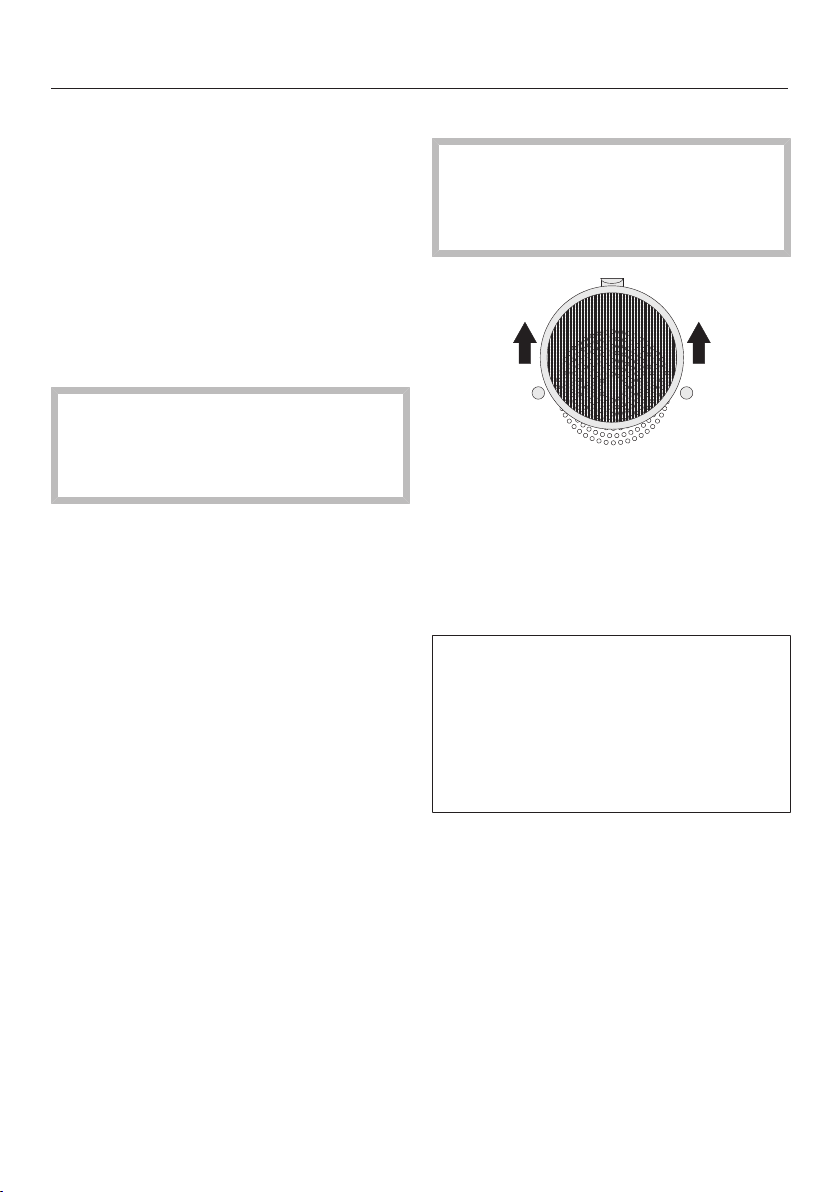
Cleaning and care
143
Drain filter
The filter in the floor of the oven
should be cleaned and dried after ev-
ery use.
Vinegar can be used to remove dis-
coloration and limescale deposits
from the filter in the floor of the oven.
Rinse thoroughly with clean water to
remove any residual cleaning agent.
Door gasket
Grease deposits on the seal between
the inside of the oven door and the
oven interior can cause it to become
brittle and cracked.
Clean the door seal after every bak-
ing or roasting program using a clean,
damp microfiber cloth or a soft clean
sponge and a mild solution of warm
water and liquid dish soap.
After cleaning, dry the seal with a soft
cloth.
Replace the seal with a new one if it
becomes porous or brittle.
Door seals can be ordered from the
Miele Service (see the end of this book-
let for contact details).
Grease filter
Clean the grease filter after every
roasting program.
The grease filter can be cleaned in a
dishwasher.
Pull the grease filter on the back
panel upwards to remove it.
The grease filter can be cleaned in
the dishwasher or by hand with a soft
clean sponge and a mild solution of
warm water and liquid dish soap.
If the grease filter is cleaned in the
dishwasher, results are better if the fil-
ter is placed horizontally in the basket.
Some dishwasher detergents may
cause the surface of the filter to dis-
color. This discoloration will not affect
the functioning of the filter in any way.

Cleaning and care
144
Water container and conden-
sate container
The water container and condensate
container are suitable for cleaning in a
dishwasher.
Remove and empty the water con-
tainer and condensate container after
every use. Push upwards slightly as
you take them out of the appliance.
Water can drip into the water con-
tainer and condensate container com-
partment when removing the contain-
ers.
Dry the compartment with a soft
cloth.
Rinse the water container / conden-
sate container by hand or in the dish-
washer.
Then dry the water container and
condensate container with a soft
cloth to prevent limescale.
Accessories
Cooking pans
The cooking pans are suitable for
cleaning in the dishwasher.
Wash and dry the cooking pans after
each use.
Vinegar can be used to remove bluish
discoloration. Rinse thoroughly with
clean water to remove any residual
cleaning agent.
Universal tray and wire oven rack
The surface of the universal tray and
the wire oven rack have been treated
with a PerfectClean finish.
Do not clean the universal tray and
wire oven rack in the dishwasher.
Please refer to the section on "Per-
fectClean" for information on clean-
ing and care.
Remove:
– light soiling with a soft clean sponge
and a mild solution of warm water
and liquid dish soap.
– heavier soiling with a clean non-
scouring sponge and a soft clean
sponge and a mild solution of warm
water and liquid dish soap. If neces-
sary, the pad on the reverse of the
sponge can be used.
After cleaning, wipe with clean water
to remove any detergent residues.
Dry the surface of the universal tray
and the wire oven rack with a soft
cloth.
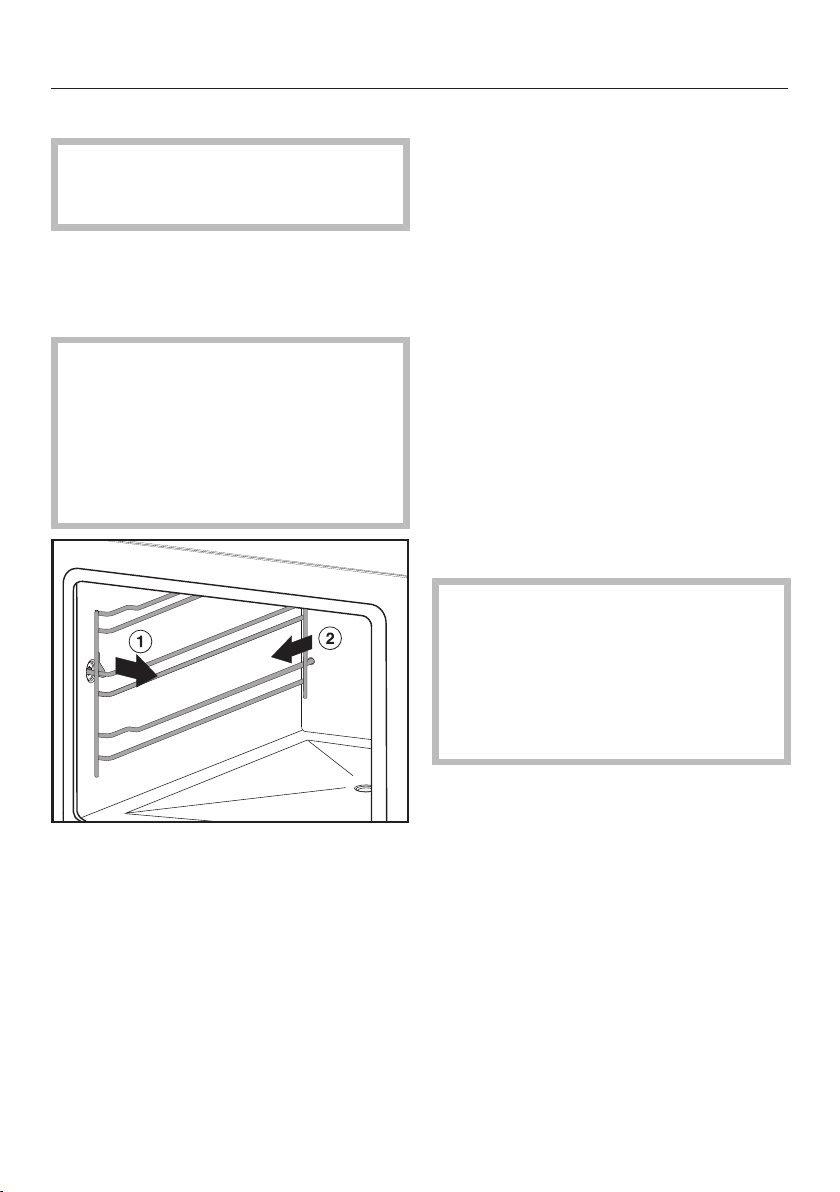
Cleaning and care
145
Roast probe
Do immerse the roast probe in water
or clean it in the dishwasher as this
will damage it.
Clean the roast probe with a damp
cloth after every use.
Shelf runners
The surface of the side runners has
been treated with PerfectClean.
Do not clean the side runners in the
dishwasher.
Please refer to the section on "Per-
fectClean" for information on clean-
ing and care.
Pull the side runners out first at the
side , then at the back of the
steam oven.
Remove:
– light soiling with a clean sponge and
a solution of washing-up liquid and
hot water.
– heavier soiling with a clean non-
scouring sponge and a soft clean
sponge and a mild solution of warm
water and liquid dish soap. If neces-
sary, the pad on the reverse of the
sponge can be used.
After cleaning, wipe with clean water
to remove any detergent residues.
Dry the side runners with a soft cloth.
Push the side runners firmly back in
after cleaning. When putting them
back in, make sure they are correctly
inserted (see illustration).
If the side runners are not correctly
inserted there is no anti-tip protec-
tion, items could be pulled out of the
steam oven inadvertently and the
temperature sensor could be dam-
aged when cooking pans are placed
in the steam oven.

Cleaning and care
146
Mainentance
The Ready at and Start at functions are
not available in Maintenance.
Soak
Heavy soiling can be soaked with this
program after a roasting program.
Allow the oven cavity to cool down.
Remove all accessories from the
oven.
Fill the water container.
Select Maintenance | Soak.
The soaking process takes approx.
10minutes.
Drying
Residual moisture in the oven compart-
ment is dried, even in inaccessible ar-
eas.
Dry the oven cavity with a soft cloth
first.
Select Maintenance | Drying.
The drying process takes approx.
20minutes.
Rinsing
During this process the water-bearing
system is rinsed. Any possible food
residues are rinsed out.
Select Maintenance | Rinses.
Follow the instructions on the display
Rinsing takes approx. 10minutes.
Descaling
We recommend that you use Miele
Descaling Tablets (see "Optional ac-
cessories") for descaling the appli-
ance. They have been specifically de-
signed for optimal descaling of Miele
products. Other descaling agents,
which - in addition to citric acid - may
contain other acids and/or other unde-
sirable substances such as chlorides,
might damage the product. Also, the
desired effect cannot be guaranteed if
the descaling solution does not have
the required concentration.
Descaling solution is acidic.
Do not spill descaling agent onto
metal surfaces. This can cause
marks to appear.
However, should any descaling
agent get onto these surfaces, wipe
it away immediately.
The steam oven needs to be descaled
after a certain number of operating
hours. When the steam oven needs to
be descaled, a number will appear in
the display indicating the number of
cooking processes remaining before the
appliance locks out. Only cooking pro-
cesses using steam are counted. After
the last remaining steam cooking
process, the appliance will lock out.
We recommend that you descale the
appliance before it locks out.
During the descaling process, the water
container must be rinsed out and re-
filled with fresh water and the conden-
sate container must be emptied.
Turn the steam oven off and select
Maintenance|Descale.

Cleaning and care
147
The message Please wait... will appear in
the display. The descaling process is
being primed and may take a few min-
utes. As soon as the appliance is ready
you will be prompted to fill the water
container.
Fill the water container with cold wa-
ter to the marking and add 2 Miele
descaling tablets.
Push the water container into the ap-
pliance until it engages.
Confirm with OK.
Empty the condensate container.
Confirm with OK.
The descaling process will now begin,
and the time left will count down on the
display.
It is only possible to cancel the
descaling process during the first 6
minutes. Do not turn the appliance off
during the descaling process. If it is
turned off before the end of the
process, the whole process will have
to be started from the beginning
again.
The water container will need emptying
and rinsing twice and refilling with fresh
tap water during descaling. The con-
densate container must be emptied.
Follow the instructions on the display.
Confirm with OK.
Once this has taken place Empty the
Condensate Container will appear in the
display.
Follow the instructions in the display.
Confirm with OK.
The descaling process is complete.
After descaling
Remove, empty and dry the water
container and condensate container.
Switch the steam oven off.
Let the oven compartment cool
down.
Then dry the oven compartment.
Leave the appliance door open until
the oven compartment is completely
dry.
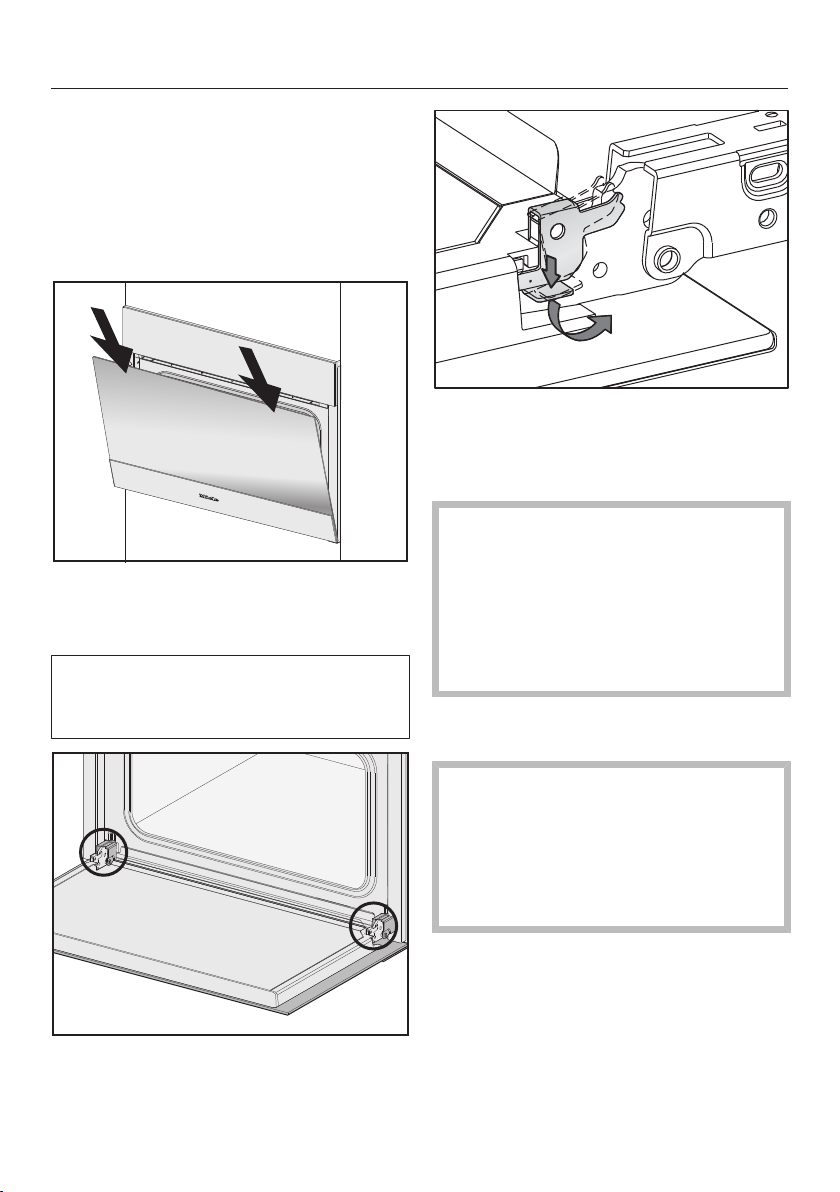
Cleaning and care
148
Door
Removal
Prepare a suitable underlay for the
door, such as a soft cloth.
Open the door slightly.
Using two hands placed on the upper
edge of the door, push the door
downward briefly.
Before the door can be removed, the
locking clamps on both hinges have to
be released.
Open the door fully.
Release the locking clamps on the
hinges by pushing them down. Turn
them as far as they will go in an an-
gled position.
Danger of injury from the hinge
guides!
The hinge guides retract to the steam
oven.
Never attempt to pull the door off the
hinge guides from a horizontal posi-
tion.
Close the door until it rests partially
open.
Risk of damage to the door!
The door handle could break off and
the glass could be damaged.
Do not lift the door by the handle.
Make sure that the door does not tilt
during removal.
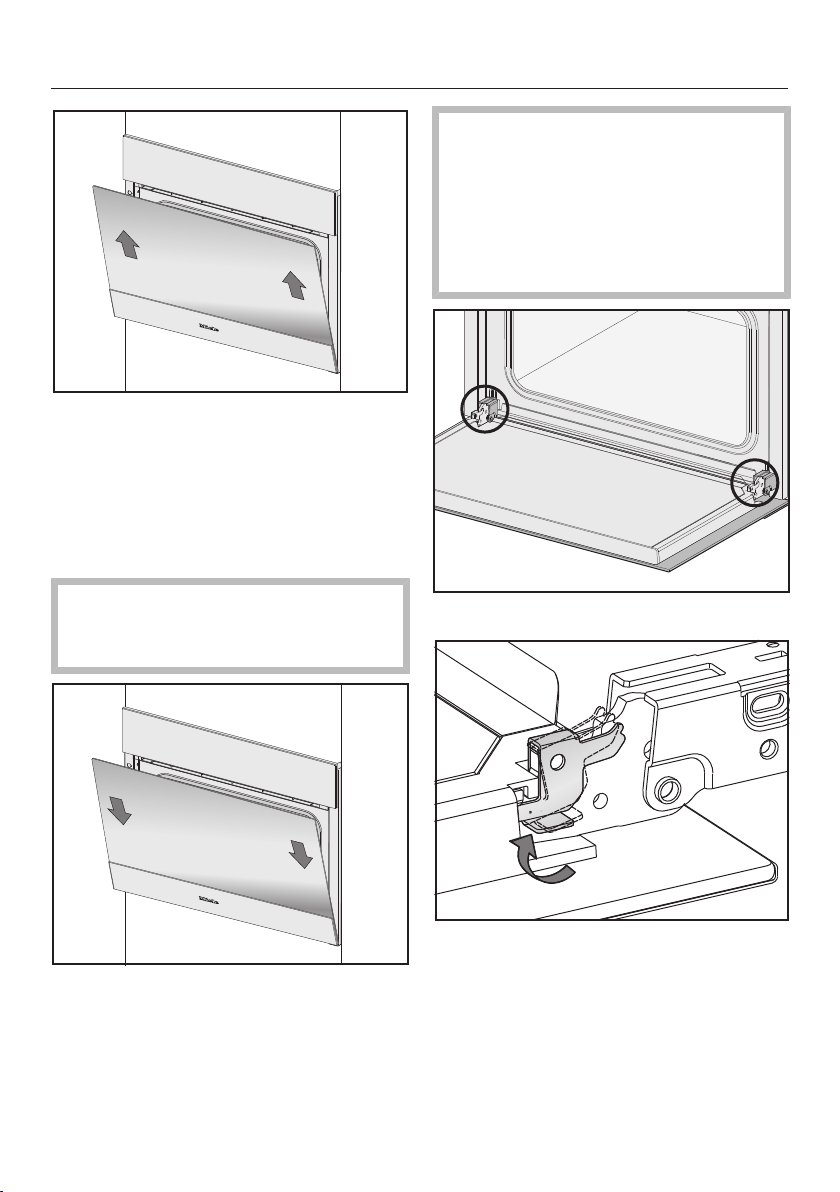
Cleaning and care
149
Hold the door on either side and pull
diagonally upwards from the hinge
guides.
Lay the door on the previously pre-
pared underlay.
Refitting
Risk of damage to the door!
Make sure that the door does not tilt
when being refitted.
Slide the door onto the hinge guides
again.
Risk of damage to the door!
If the locking clamps are not locked,
the door can easily become de-
tached from the hinge guides and be
damaged.
You must make sure that the locking
clamps are locked again.
Open the door fully.
To relock the locking clamps, turn
them back up to the horizontal posi-
tion as far as they will go.

Frequently asked questions
150
The following faults can be corrected without contacting the Miele Service Depart-
ment.
If in doubt, please contact Miele.
Risk of injury! Improperly performed installation, maintenance or repair work
can pose a serious danger to users of the appliance.
Installation, maintenance and repairs may only be carried out by Miele autho-
rized technicians.
Do not attempt to open the housing.
Problem Possible cause and solution
You cannot turn the ap-
pliance on.
The circuit breaker has tripped.
Reset the circuit breaker (see data plate for the
correct fuse rating).
There may be a technical fault.
Disconnect the appliance from the power supply
for approx. 1minute:
– tripping the relevant circuit breaker or screwing
the fuse out completely, or
– tripping the ground fault circuit interrupter
(GFCI).
If the steam oven still will not turn on, contact a
qualified electrician or Miele Service.
The oven does not heat
up.
Demo mode is activated.
The steam oven can be operated, but the oven heat-
ing does not work.
Deactivate Demo mode (see "Settings – Show-
room Program").
The oven interior has been heated by a heating
drawer operating beneath it.
Open the door and let the oven cool down.
The fan can still be
heard after the appli-
ance has been turned
off.
The fan is still running.
The appliance is fitted with a fan which removes
steam from the oven. The fan will continue to run for
a while after the appliance has been switched off. It
will turn itself off automatically after a while.

Frequently asked questions
151
Problem Possible cause and solution
A humming sound can
be heard after switching
on the appliance, during
operation and after
turning off the appli-
ance.
This is not a fault. It is made by water being pumped
through the system.
After moving house the
appliance no longer
turns from the heating-
up phase to the cooking
phase.
The boiling temperature of the water has changed as
the altitude of the new location for the appliance dif-
fers from the old one by at least 984' / 300m.
To adjust the boiling temperature, you need to
descale the appliance (see "Cleaning and care -
Descaling").
During operation, an
unusually large amount
of steam escapes or
steam escapes from
parts of the steam oven
where it does not usu-
ally.
The door is not properly closed.
Close the door.
The door seal is not correctly fitted.
If necessary, press it in all the way round the door
to make sure it is fitted evenly.
The door seal is damaged, e.g. cracked.
Replace the door seal.
This can be ordered from Miele Service (see the
end of this booklet for contact details).
The oven lighting does
not come on.
The lamp needs to be replaced.
Contact Miele Service to have the lamp replaced.
The control panel will
not open or close auto-
matically despite tap-
ping the sensor but-
ton several times.
There is an obstruction in the control panel.
Remove the obstruction.
The obstruction sensor is very sensitive, which means
the control panel sometimes does not open or close.
Open/close the control panel manually (see end of
this section)
If the problem occurs again, contact Miele Service.
The Start at and Ready at
functions have not
worked.
The oven cavity temperature is too high, e.g. after a
program has finished.
Leave the door open to cool down the oven cavity.
These functions are not generally available with Menu
Cooking and Maintenance.
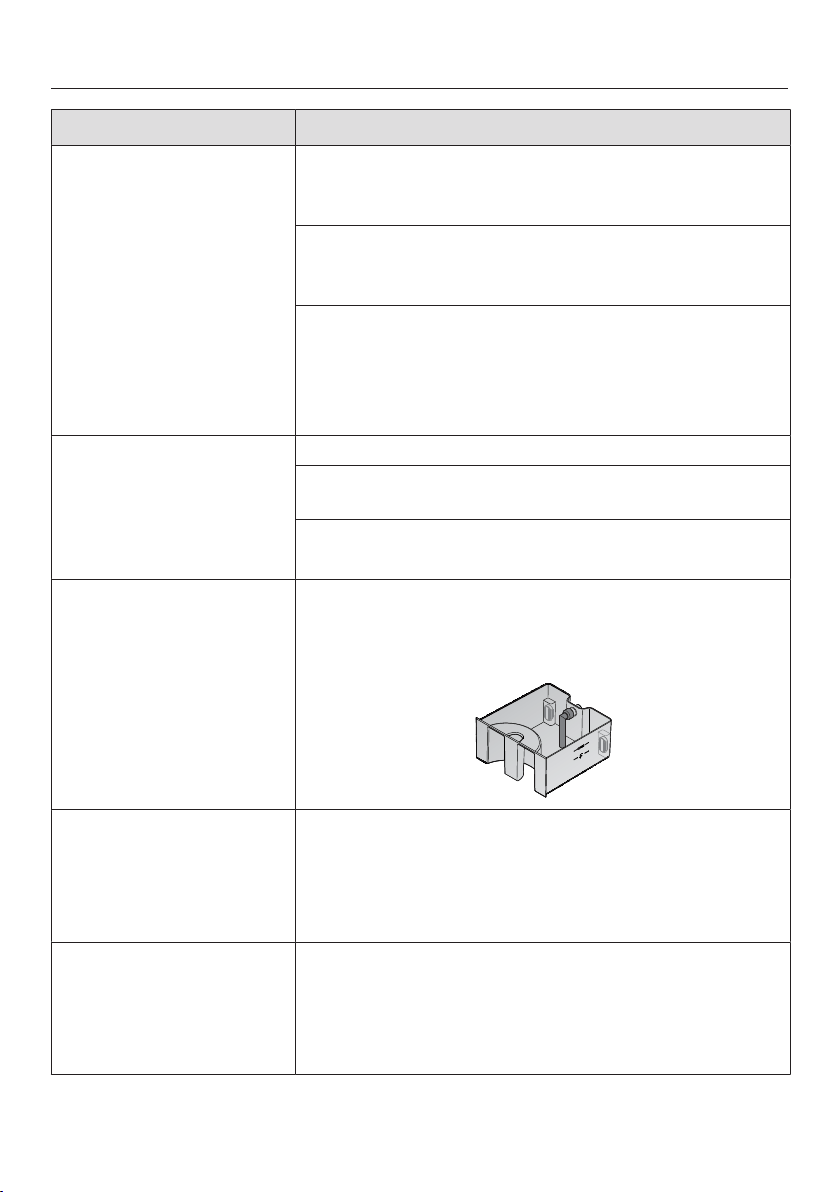
Frequently asked questions
152
Problem Possible cause and solution
Cakes and pastry are
not cooked properly af-
ter following the dura-
tions given in the
recipe.
The set temperature is not consistent with the one
given in the recipe.
Change the temperature.
The grease filter is inserted in the back panel. Baking
takes longer with this filter is place.
Increase the baking duration.
The recipe has been altered. For example, adding
more liquid or eggs can increase the duration re-
quired.
Adapt the temperature or baking duration accord-
ingly.
Cakes or pastry are un-
evenly browned.
The temperature was set too high.
The grease filter has not been taken out of the back
wall.
More than two shelf levels were used for baking.
Bake on a maximum of two levels.
F 10 The suction hose in the water container is
– is not inserted correctly.
– is not positioned vertically.
Connect it properly and make sure it is vertical:
F11
F20
The drain hoses are blocked.
Descale the steam oven (see "Cleaning and care -
Descaling").
If the fault message appears again, switch the ap-
pliance off and contact Miele Service.
F 44 Communication fault
Turn the steam oven off and then back on again
after a few minutes.
If the same message appears again, contact Miele
Service.
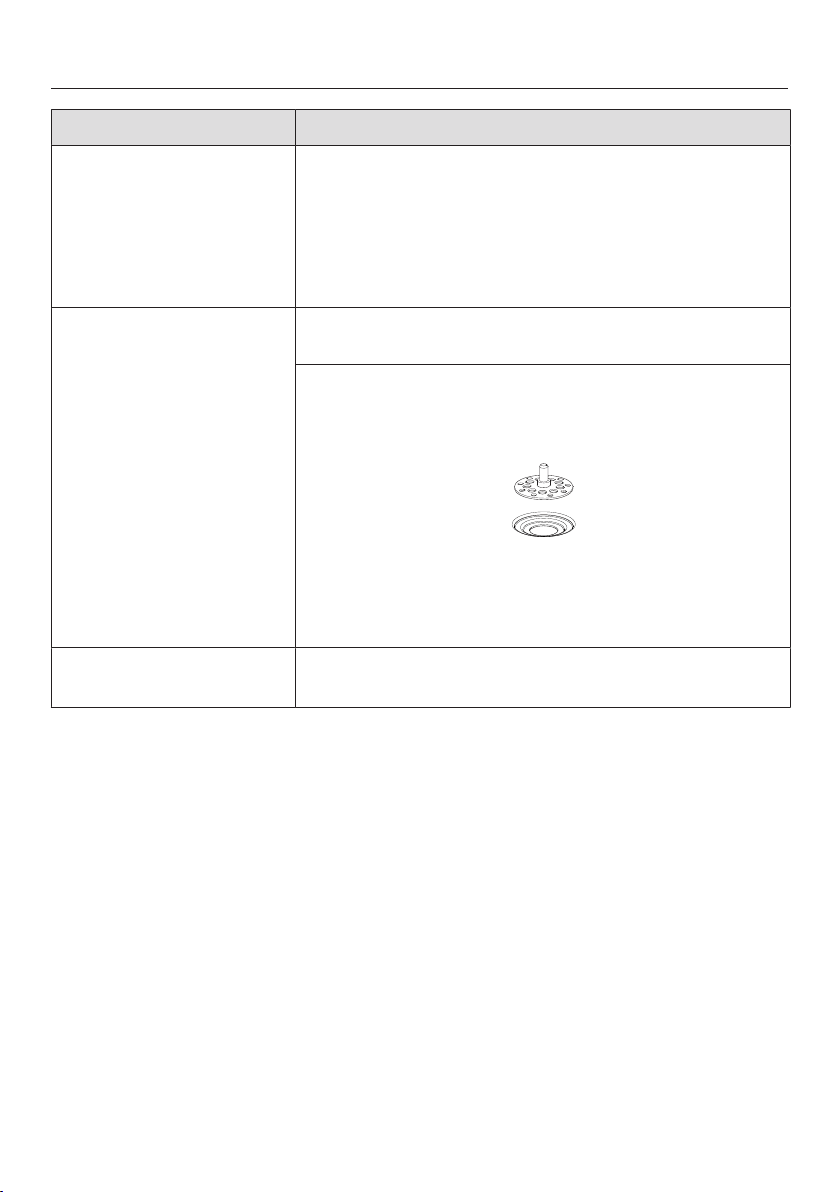
Frequently asked questions
153
Problem Possible cause and solution
F 55 The maximum length of time for which the combi
steam oven can be operated on a function has been
exceeded, so the appliance has switched itself off au-
tomatically for safety reasons.
Switch the steam oven off and then back on again.
The steam oven is immediately ready for use again.
F 196 There is a fault.
Switch the steam oven off and then back on again.
The drain filter is not inserted correctly.
Turn the steam oven off.
Insert the filter correctly:
Switch the steam oven back on again.
If, having corrected the problem, this fault mes-
sage appears again, contact Miele Service.
F and other fault codes Technical fault
Turn the appliance off and contact Miele.
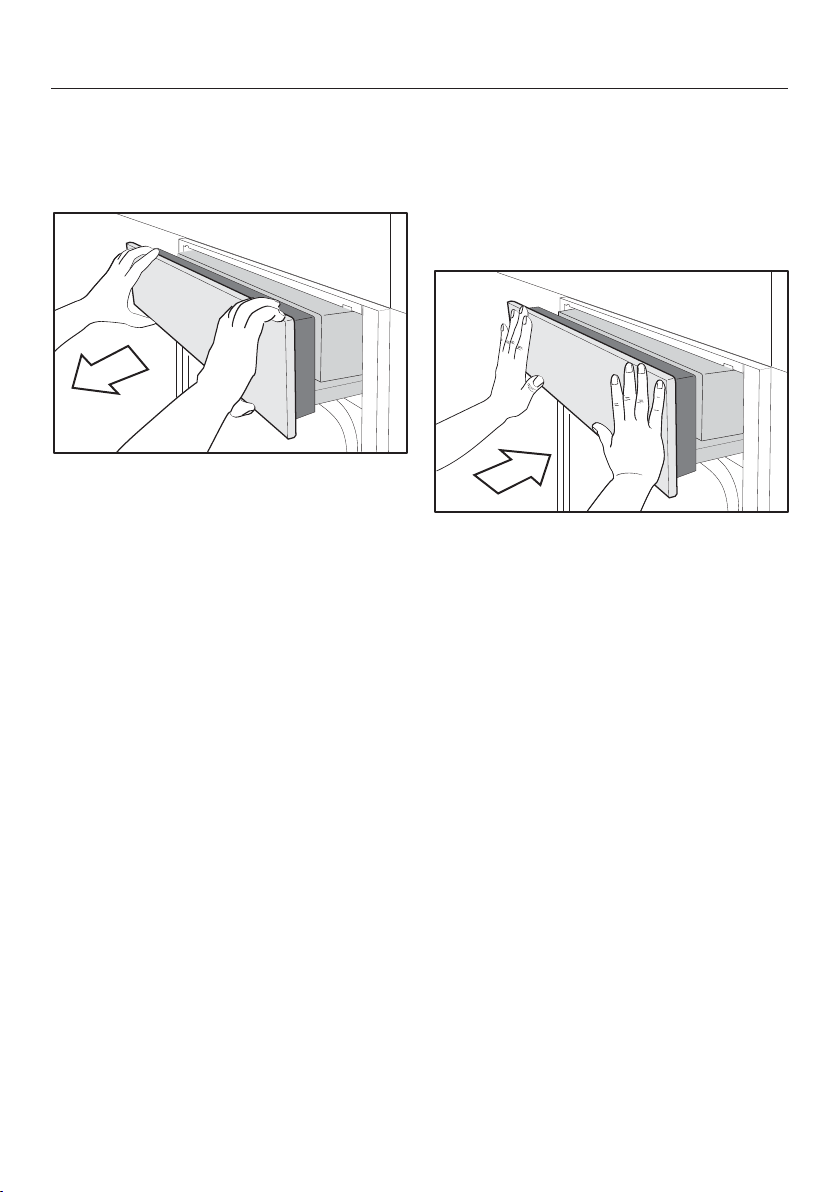
Frequently asked questions
154
Opening the control panel
manually
Carefully open the door.
Hold the control panel at the top and
bottom.
Pull out the panel towards you.
Carefully push it upwards.
Closing the control panel man-
ually
Hold the control panel at the top and
bottom.
Carefully push it downwards.
Push the panel right in.
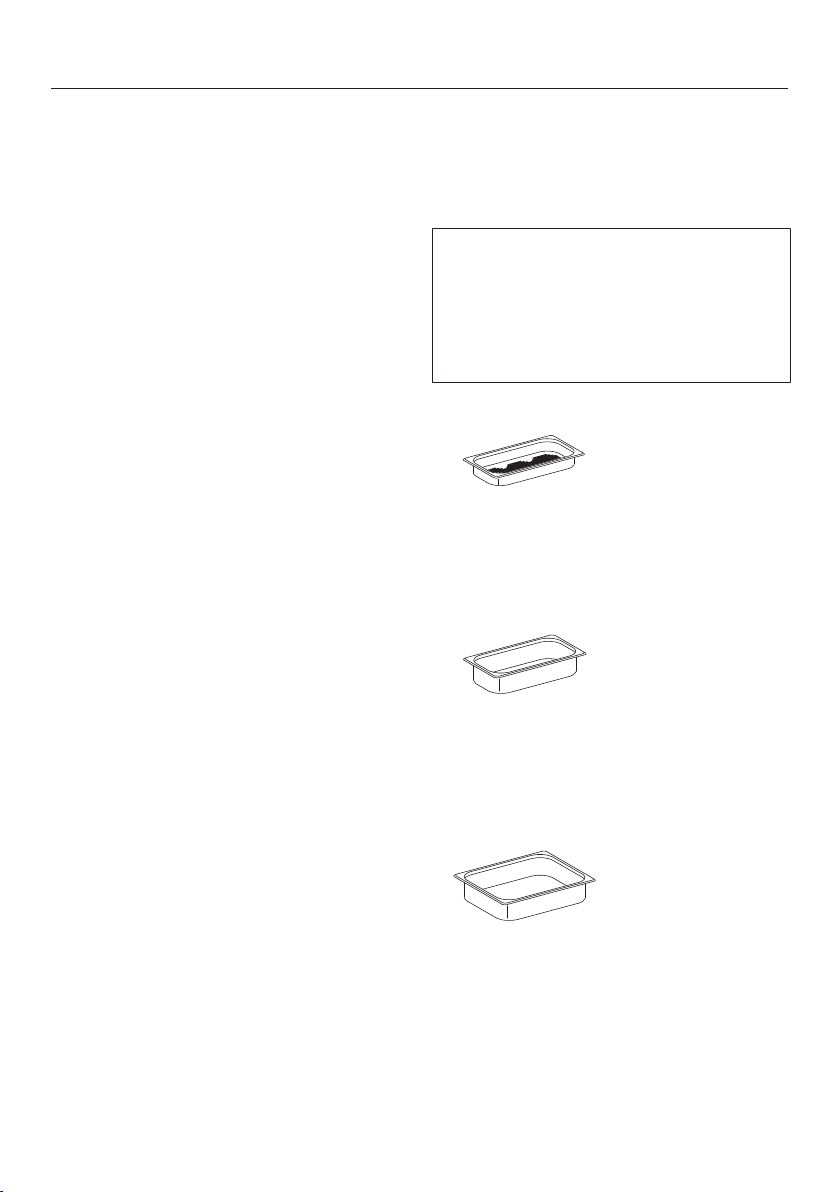
Optional accessories
155
Miele offers a range of useful acces-
sories, as well as cleaning and condi-
tioning products for your appliance.
These products can be easily ordered
from the Miele webshop.
These products can also be ordered
from Miele Service (see end of these
operating instructions) or your Miele
dealer.
Cooking pan
There is a wide range of perforated and
solid cooking pans available in different
sizes:
Miele offers a number of perforated
and solid cooking pans in various
sizes. Cooking pans with a width of
123/4" (325mm) cannot be inserted
directly into the shelf runners. Instead
they must be placed on the rack.
DGGL 1
Perforated cooking pan
12 3/4" x 7" x 1 1/2" (WxDxH)
325 x 175 x 40 mm (WxDxH)
DGG 2
Solid cooking pan
12 3/4" x 7" x 2 ½" (WxDxH)
325 x 175 x 65 mm (WxDxH)
DGG 3
Solid cooking pan
12 3/4" x 10 ½" x 2 ½" (WxDxH)
325 x 265 x 65 mm (WxDxH)
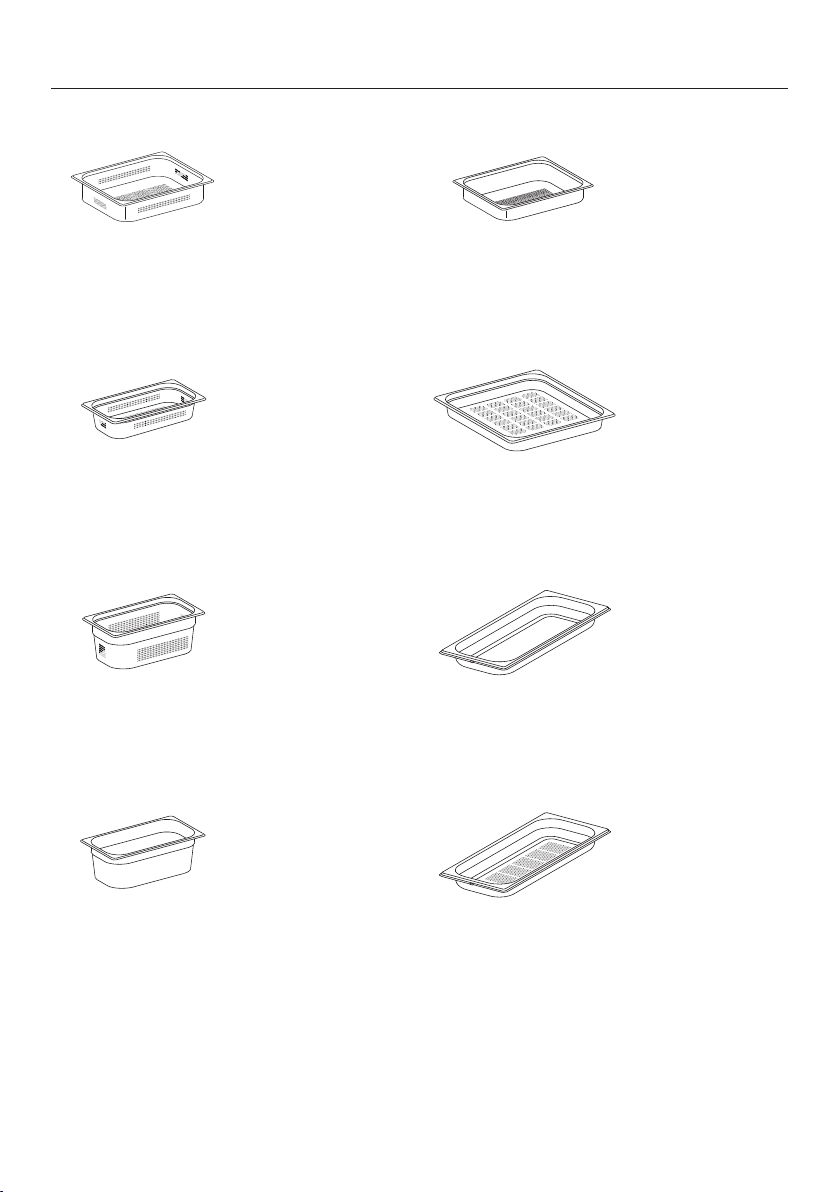
Optional accessories
156
DGGL 4
Perforated cooking pan
12 3/4" x 10 ½" x 2 ½" (WxDxH)
325 x 265 x 65 mm (WxDxH)
DGGL 5
Perforated cooking pan
12 3/4" x 7" x 2 ½" (WxDxH)
325 x 175 x 65 mm (WxDxH)
DGGL 6
Perforated cooking pan
12 3/4" x 7" x 4" (WxDxH)
325 x 175 x 100 mm (WxDxH)
DGG 7
Solid cooking pan
12 3/4" x 7" x 4" (WxDxH)
325 x 175 x 100 mm (WxDxH)
DGGL 8
Perforated cooking pan
12 3/4" x 10 ½" x 1 1/2" (WxDxH)
325 x 265 x 40 mm (WxDxH)
DGGL 12
Perforated cooking pan
17 11/16" x 15 3/8" x 1 9/16" (WxDxH)
450 x 390 x 40 mm (WxDxH)
DGG 20
Solid cooking pan
17 11/16" x 7 1/2" x 1 9/16" (WxDxH)
450x190x40mm (WxDxH)
DGGL 20
Perforated cooking pan
17 11/16" x 7 1/2" x 1 9/16" (WxDxH)
450 x 190 x 40 mm (WxDxH)
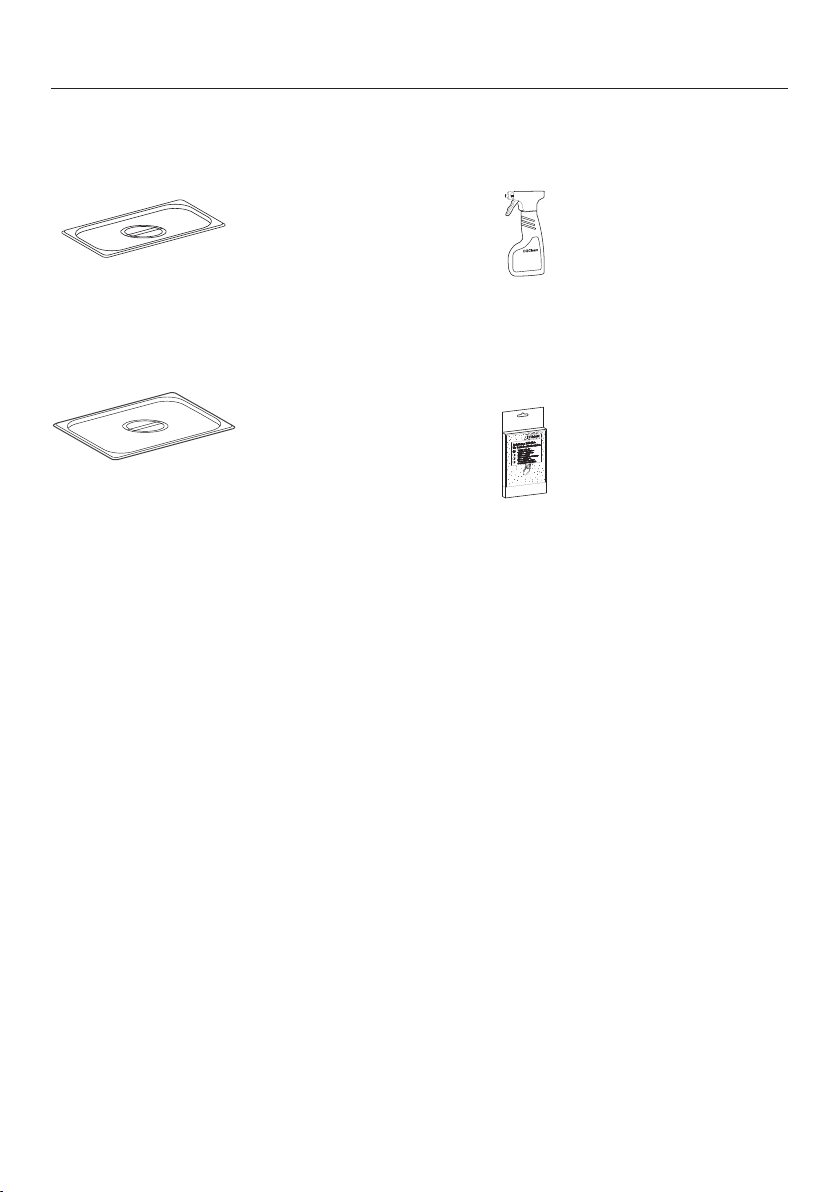
Optional accessories
157
Lid for cooking pans
DGD 1/3
Lid for 12 3/4" x 7" (325 x 175 mm)
cooking pans
DGD 1/2
Lid for 12 3/4" x 10 ½" (325 x 265 mm)
cooking pans
Cleaning and care products
DGCLean (8 oz. / 250ml)
Special cleaning agent for removing
stubborn soiling from the oven interior,
particularly after roasting.
Descaling tablets (Qty 6)
For descaling the appliance
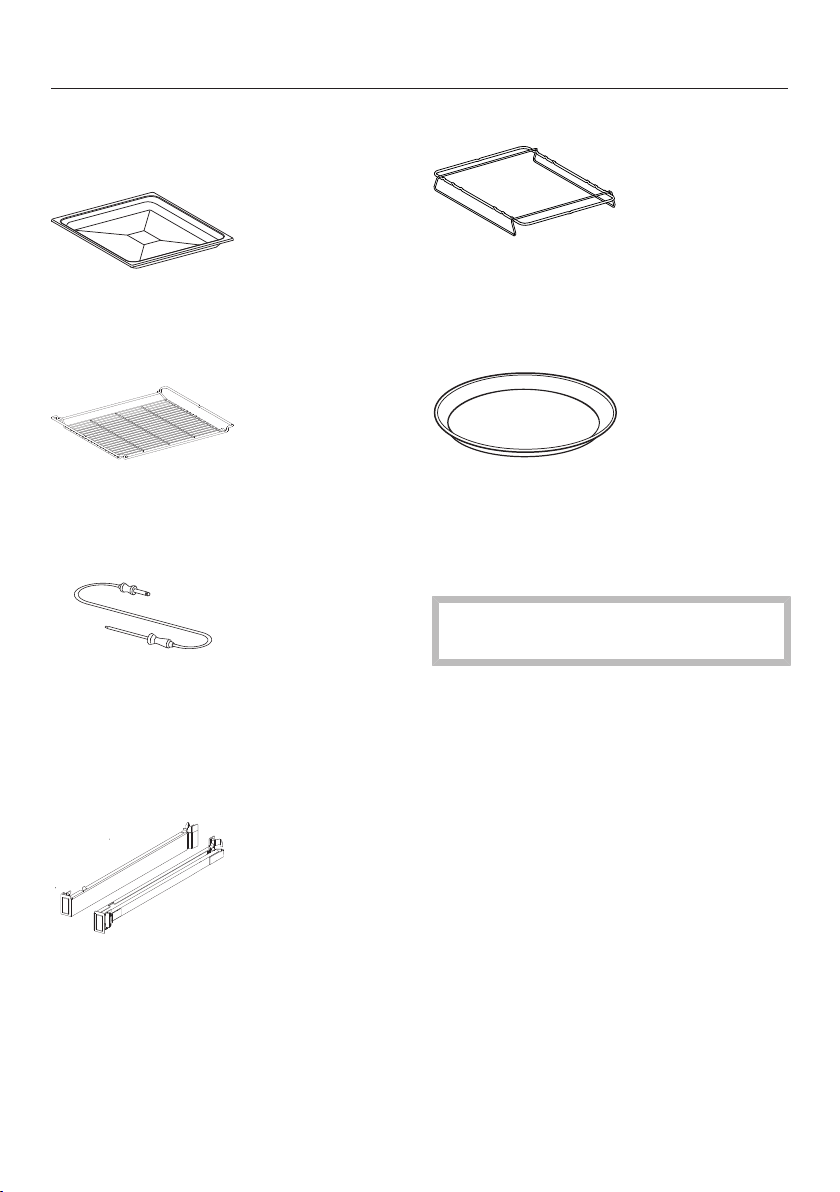
Optional accessories
158
Additional accessories
Universal tray
Universal tray for baking, roasting and
broiling
Wire oven rack
1 wire oven rack for baking, roasting
and broiling
Roast probe
For precise temperature controlled
cooking The roast probe monitors the
internal temperature of the meat (core
temperature).
FlexiClip telescopic runners
The FlexiClip telescopic runners can be
clipped into any of the shelves and
pulled out of the oven to their fullest ex-
tent.
Rack for cooking pans
For holding 12 13/16" (325mm) wide
containers. Slides into the side runners
in the appliance.
Round baking form
Suitable for cooking pizzas, flat cakes
made with yeast or whisked mixtures,
sweet and savoury tarts, baked
desserts, and can also be used for
deep frozen cakes and pizzas.
Not suitable for use with programs
using steam
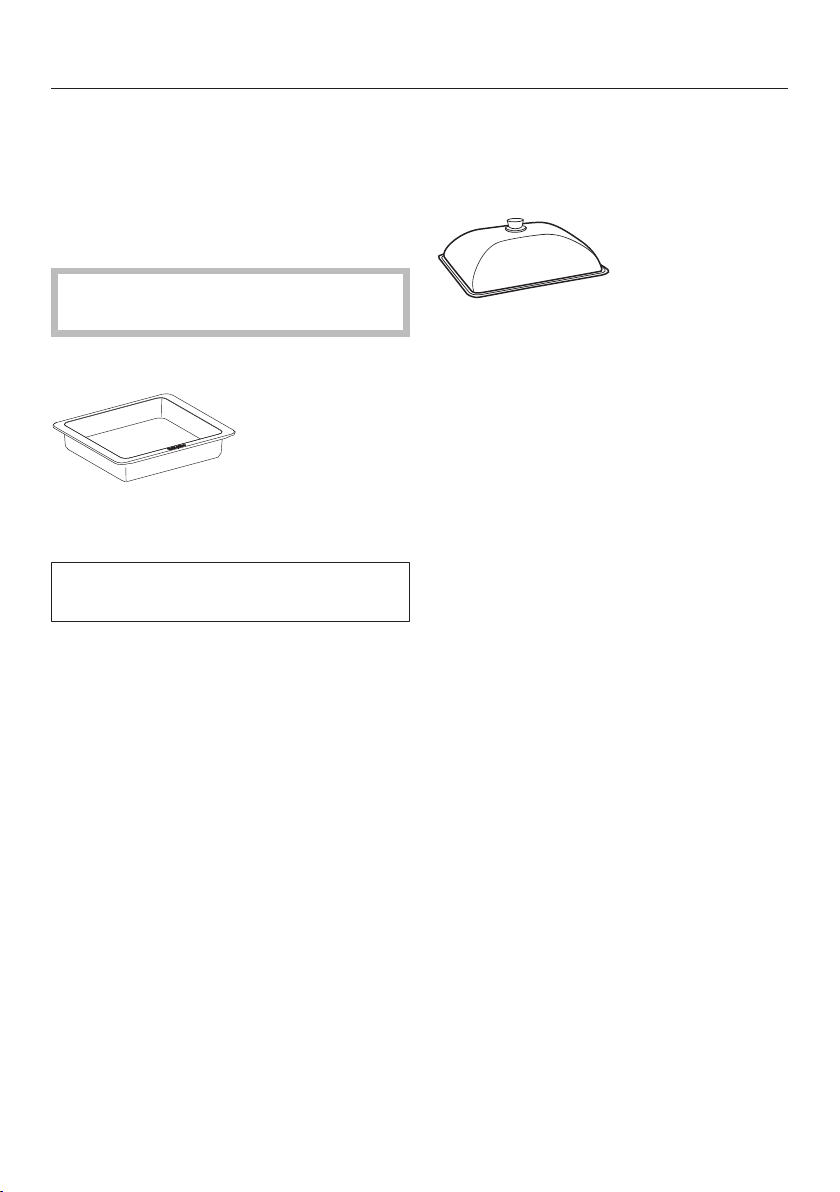
Optional accessories
159
Gourmet casserole dish
Die-cast aluminum casserole dish with
non-stick surface. Slides into the side
runners in the oven. Also suitable for
use on an extended zone of an electric
cooktop and in all Miele ovens.
Not suitable for use on gas or induc-
tion cooktops.
HUB5000-XL
Maximum capacity approx. 16 lbs (8kg)
Depth 13 3/4" (35cm)
This oven dish will not fit in the oven
with the lid on.
Lid for gourmet casserole dish
Suitable for HUB5000-M
HBD60-35
Suitable for HUB5000-XL
Miele@home
The Miele@home System can only be
fitted by an authorized Miele service
technician. Please contact Miele for de-
tails of this system. It is not available in
all countries.
IMPORTANT SAFETY INSTRUCTIONS - INSTALLATION
160
Incorrect installation can
result in personal injury and
damage to property.
Before connecting the appli-
ance to the power supply, ensure
that the connection data on the
data plate (voltage and fre-
quency) match the power supply.
This data must correspond in or-
der to avoid the risk of damage
to the appliance. Consult a quali-
fied electrician if in any doubt.
Do not use an extension cord
to connect this appliance to elec-
tricity. Extension cords do not
guarantee the required safety of
the appliance.
The electrical outlet should be
easily accessible after the appli-
ance has been installed.
The appliance must be posi-
tioned so that you can see the
contents of a cooking pan
placed on the top level Other-
wise you may risk scalding or
burning yourself with hot water
and food when taking containers
out of the oven.
Be certain your appliance is
properly installed and grounded
by a qualified technician. To
guarantee the electrical safety of
this appliance, continuity must
exist between the appliance and
an effective grounding system. It
is imperative that this basic
safety requirement be met. If
there is any doubt, have the elec-
trical system of the house
checked by a qualified electri-
cian.
All dimensions in this instruction book-
let are given in mm and inches.
Note to the installer:
Please leave these instructions with the
consumer of the appliance for the local
building inspectors use.
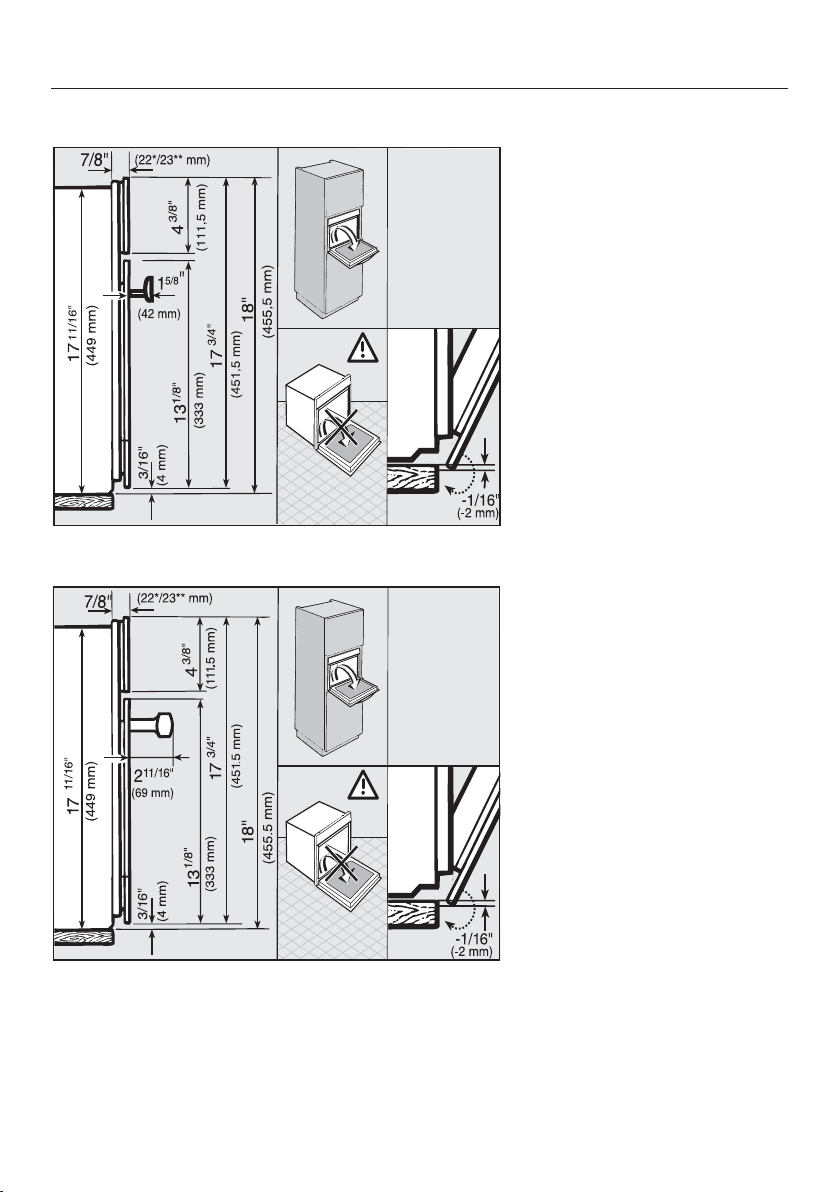
Detailed dimensions of oven front
161
PureLine front
ContourLine front
*Glass front / **Metal front
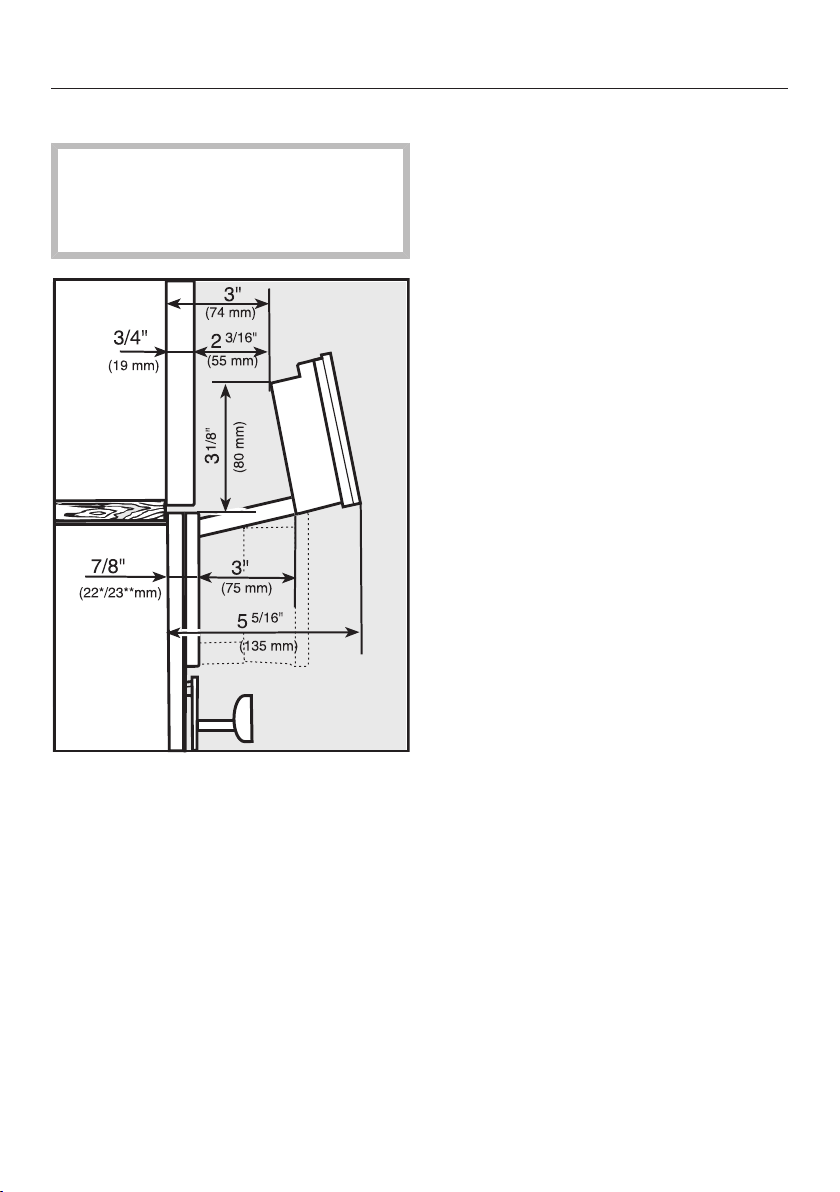
Detailed dimensions of oven front
162
Control panel swivel range
The area in front of the control panel
must not be blocked by anything
(such as a door handle) that would
hinder it from opening and closing.
*
Glass front /
**
Metal front
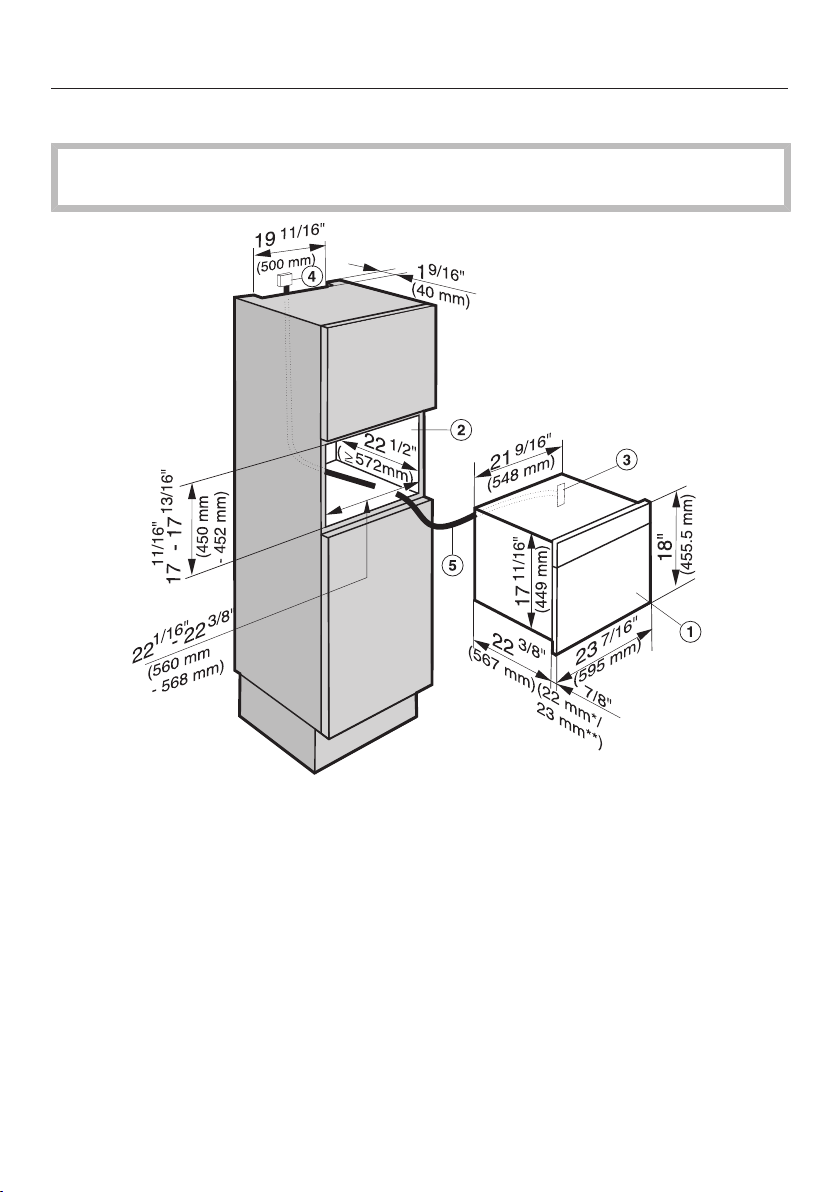
Installation dimensions
163
Installation into a tall cabinet
The housing unit must not have a back panel installed behind the building-in
niche.
a
Steam oven
b
Niche
c
Pass-through for the power cord
d
Recommended position for electrical connection
e
Power cord
*Glass front / **Metal front
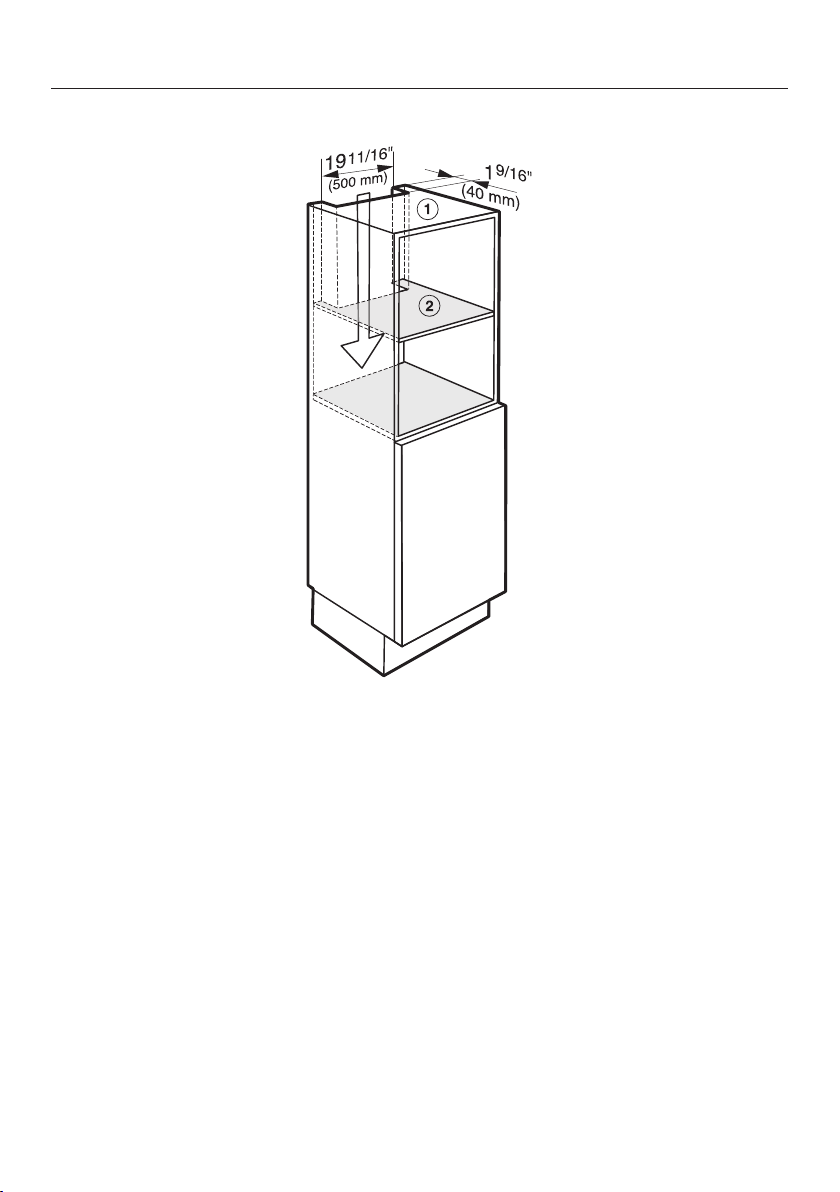
Installation dimensions
164
Ventilation cut-outs
a
Cut-out in the top of the unit
b
Cut-out in the center shelf above the building-in niche
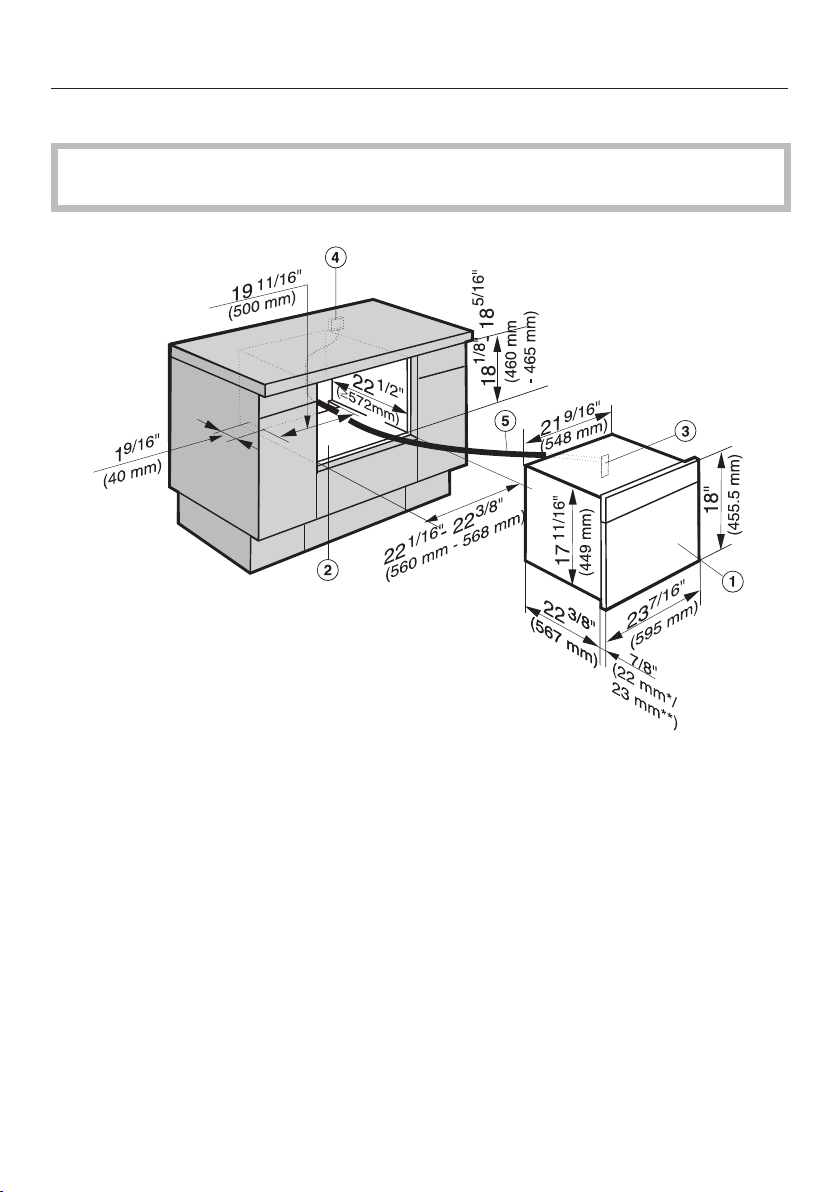
Installation dimensions
165
Undercounter installation
The housing unit must not have a panel installed at the back of the installation
niche.
a
Steam oven
b
Niche
c
Inlet for the power cable
d
Recommended position for electrical outlet
e
Power cable
*Glass front / **Metal front
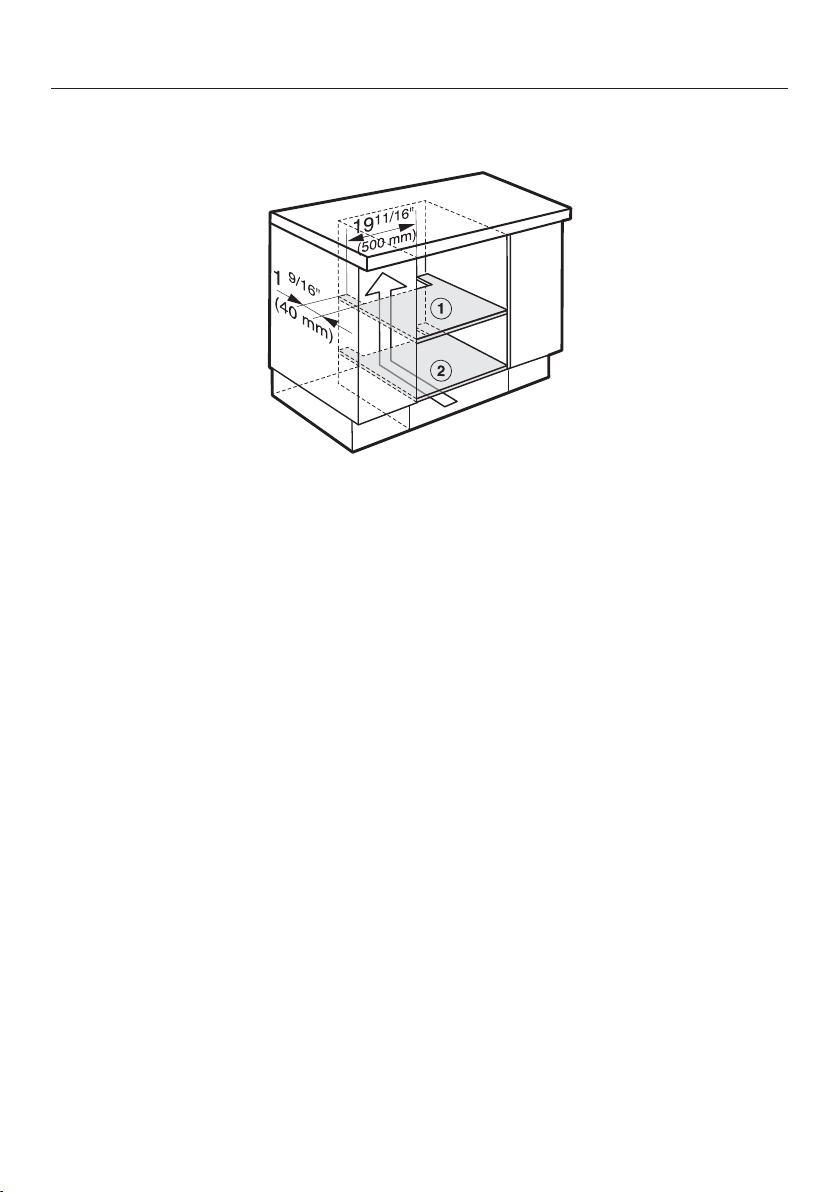
Installation dimensions
166
Ventilation cut-outs
a
Cut-out in the center shelf under the building-in niche
b
Cut-out in cabinet base
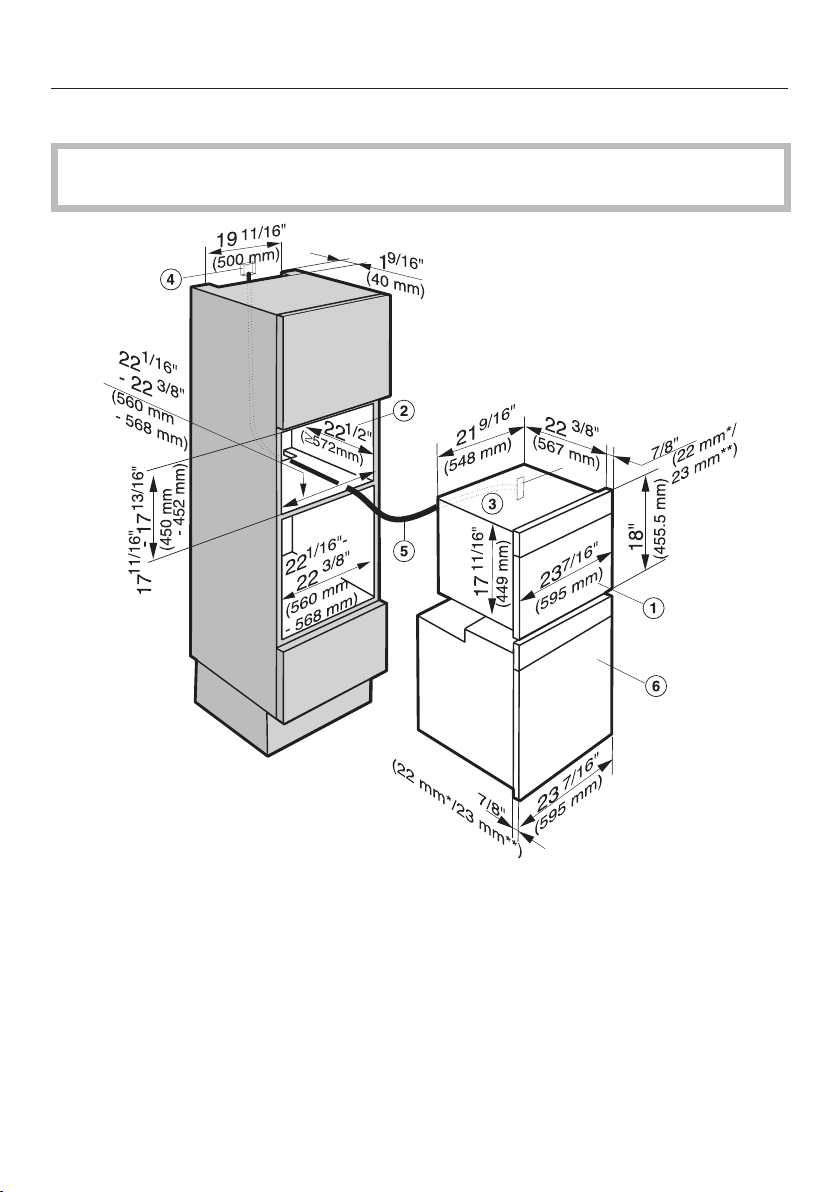
Installation dimensions
167
Installation in combination with an oven
The housing unit must not have a back panel installed behind the building-in
niche.
a
Steam oven
b
Niche
c
Pass-through for the power cord
d
Recommended position for electrical connection
e
Power cord
f
Oven
*Glass front / **Metal front
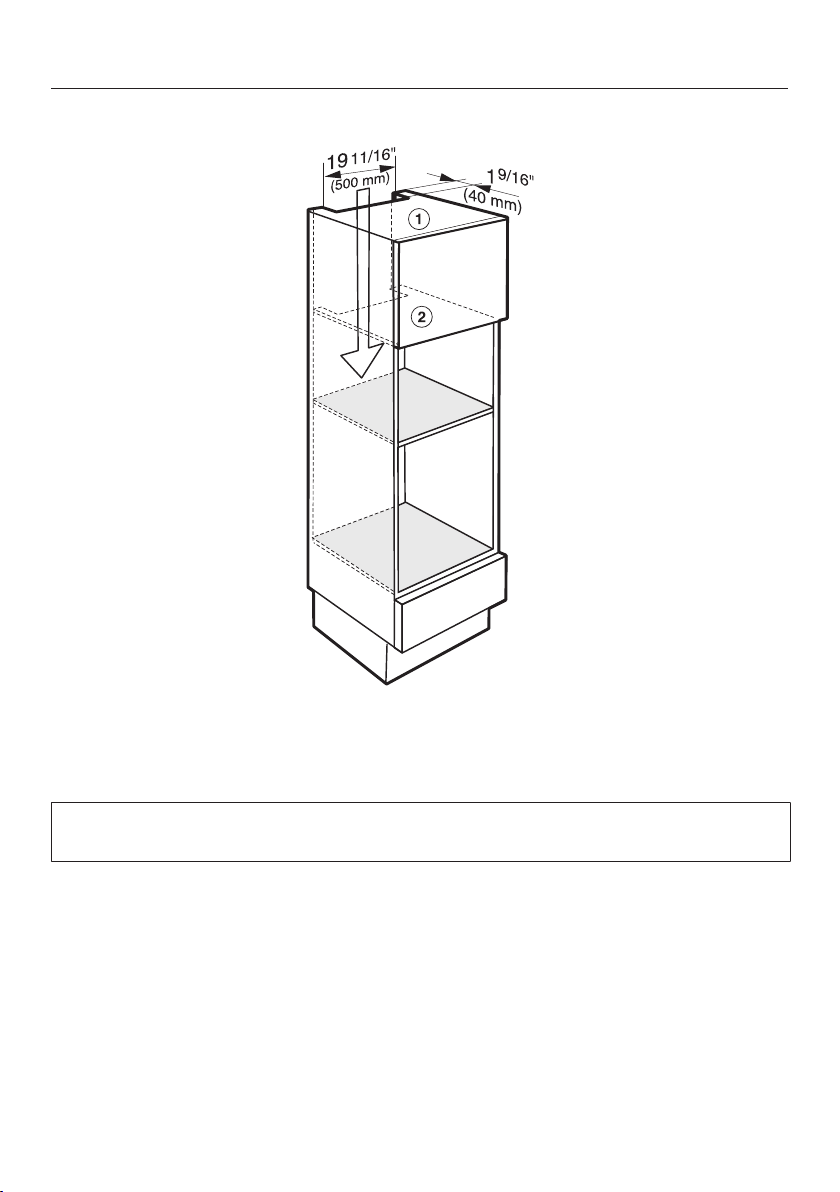
Installation dimensions
168
Ventilation cut-outs
a
Cut-out in the top of the unit
b
Cut-out in the interim shelf above the appliance installation niche
For the oven ventilation cut-out, please see the information in the oven installa-
tion instructions.
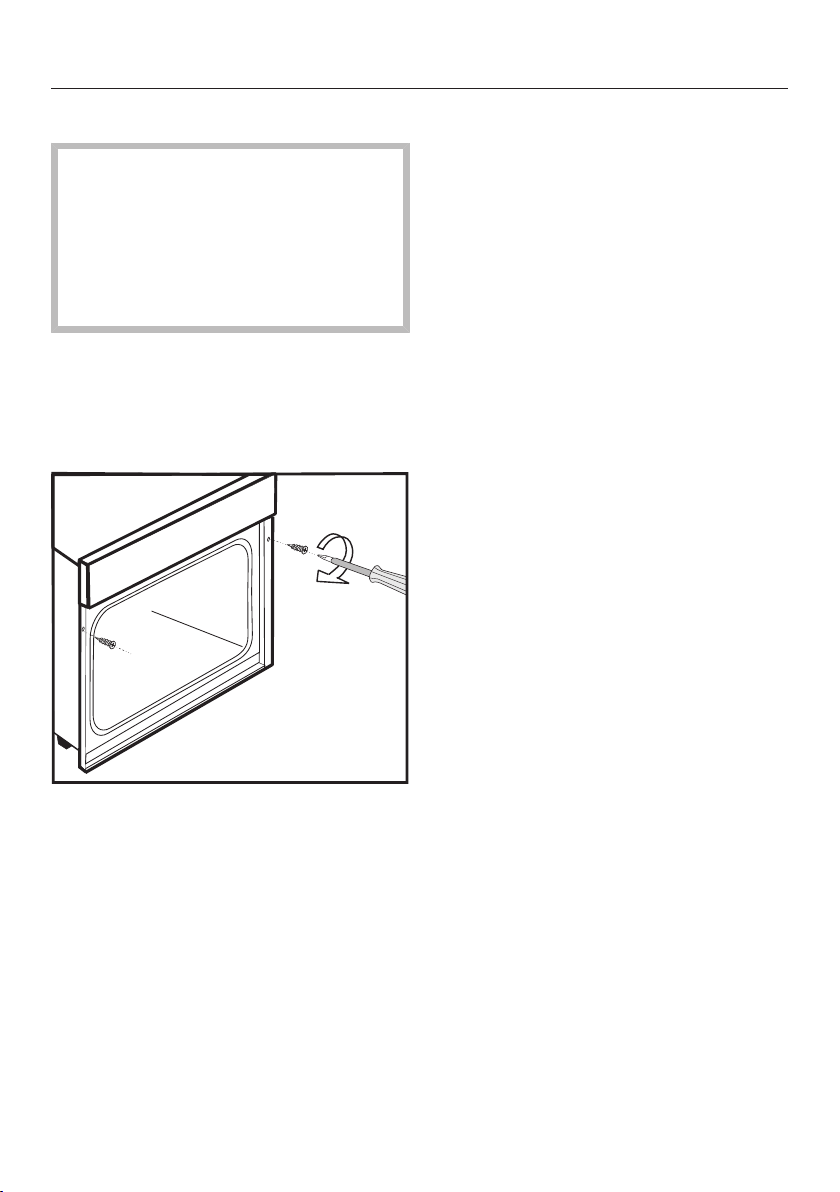
Installation
169
Installing the steam oven
A fault can occur if the appliance is
not correctly aligned.
For correct functioning of the steam
generator, please make sure that the
appliance is horizontally level.The
maximum deviation should not ex-
ceed 2°.
Push the appliance into position in
the niche and align it. Make sure that
the power cord and water intake and
drain hoses do not get pinched or
damaged when doing so.
Secure the appliance left and right
using the screws supplied 1/8" x
1" (3.5mm x 25mm) to the sides of
the unit, as illustrated.
Connect the appliance to the electri-
cal supply.
Check the appliance for correct func-
tion in accordance with the Operating
Instructions.

Electrical connection
170
ATTENTION:
Before installation or servicing, dis-
connect the power supply by either
removing the fuse, manually "trip-
ping" the circuit breaker or unplug-
ging the appliance. Pull the plug not
the cord.
Installation work and repairs should
only be performed by a qualified
technician in accordance with all ap-
plicable codes and standards. Re-
pairs and service by unqualified per-
sons could be dangerous and the
manufacturer will not be held re-
sponsible. Installation, repair, and
maintenance work should only be
performed by a Miele-authorized ser-
vice technician. Work by unqualified
persons can cause considerable
danger to users. Miele cannot be
held liable for any damage arising as
a result of such work.
Before connecting the appliance to
the power supply, make sure that the
voltage and frequency listed on the
rating label correspond with the
household electrical supply. This
data must correspond to prevent ap-
pliance damage.
Consult an electrician if in doubt.
For safety reasons, the steam oven
may only be used when it has been
fully installed.
Installer:
Please leave these instructions with
the customer.
Connection
Ensure that the connection data on
the data plate (voltage, frequency,
and fuse rating) match those of your
electrical supply.
Power Supply
This appliance is equipped with a 5 ft
(1.5 m) long power cord with a NEMA
6-20P three-prong grounding plug
ready for connection.
208/240 V / 20 A / 60 Hz
Make sure that the connecting socket is
accessible after the installation of the
steam oven.
Replacing the power cord
Danger of electrical shock!
The power cord must only be re-
placed by a suitably qualified and
competent person in accordance
with current local and national safety
regulations in order to avoid a haz-
ard.
If the power cord needs to be replaced,
it must be replaced with a special con-
nection cable, type H05VV-F (PVC in-
sulated), available from Miele.

Caring for the environment
171
Disposal of the packing mate-
rial
The cardboard box and packing materi-
als protect the appliance during ship-
ping. They have been designed to be
biodegradable and recyclable.
Ensure that any plastic wrappings,
bags, etc. are disposed of safely and
kept out of the reach of children. Dan-
ger of suffocation!
Disposal of your old appliance
Electrical and electronic appliances
contain valuable materials. They also
contain certain substances, compounds
and components which were essential
for the proper functioning and safe use
of the equipment. Handling these mate-
rials improperly by disposing of them in
your household waste can be harmful to
your health and the environment. There-
fore, please do not dispose of your old
appliance with regular household waste
and follow local regulations on proper
disposal.
Consult with local authorities, dealers or
Miele in order to dispose of and recycle
electrical and electronic appliances.
Miele assumes no responsibility for
deleting any personal data left on the
appliance being disposed. Please en-
sure that your old appliance is kept
away from children until removal. Ob-
serve safety requirements for appli-
ances that may tip over or pose an en-
trapment hazard.

Technical service, data plate, warranty
172
After sales service
In the event of a fault which you cannot easily correct yourself, please contact:
– your Miele dealer, or
– the Miele Technical Service Department.
See back cover for contact details.
Please quote the model and serial number of your appliance when contacting
Miele.
Data plate
Adhere the extra data plate supplied with the appliance here. Ensure that the
model number is the same as the one on the back of these operating instructions.
Warranty
For further information, please refer to your warranty booklet.

MieleCare
173
This service is available in USA only.
MieleCare, our Extended Service Con-
tract program, gives you the assurance
of knowing that your appliance invest-
ment is covered by 5years of worry free
ownership.
MieleCare is the only Extended Service
Contract in the industry that guarantees
repairs by a Miele Authorized Service
Provider using genuine Miele parts.
Only genuine Miele parts installed by
factory trained professionals can guar-
antee the safety, reliability, and
longevity of your Miele appliance.
Please note that unless expressly ap-
proved in writing by Miele’s Service de-
partment, Extended Service Contracts
offered by other providers for Miele
products will not be recognized by
Miele. Our goal is to prevent unautho-
rized (and untrained) service personnel
from working on your Miele products,
possibly doing further damage to them,
you and/or your home.
To learn more about MieleCare Ex-
tended Service Contracts, please con-
tact your appliance dealer or visit us
online at:
www.mieleusa.com


9 Independence Way
Princeton, NJ 08540
Phone:
Fax:
www.mieleusa.com
U.S.A.
Miele, Inc.
National Headquarters
Please have the model and serial number
of your appliance available before
contacting Technical Service.
Canada
Importer
Miele Limited
Headquarters and Miele Centre
800-843-7231
609-419-4298
Technical Service & Support
Nationwide
Phone:
Fax:
161 Four Valley Drive
Vaughan, ON L4K 4V8
www.miele.ca
800-999-1360
888-586-8056
Customer Care Centre
Phone:
800-565-6435
905-532-2272
International Headquarters
Miele & Cie. KG
Carl-Miele-Straße 29
33332 Gütersloh
Germany

M.-Nr. 10 357 780 / 01en-US, CA
DGC6500-1 / DGC6600-1