V2.8 10142020
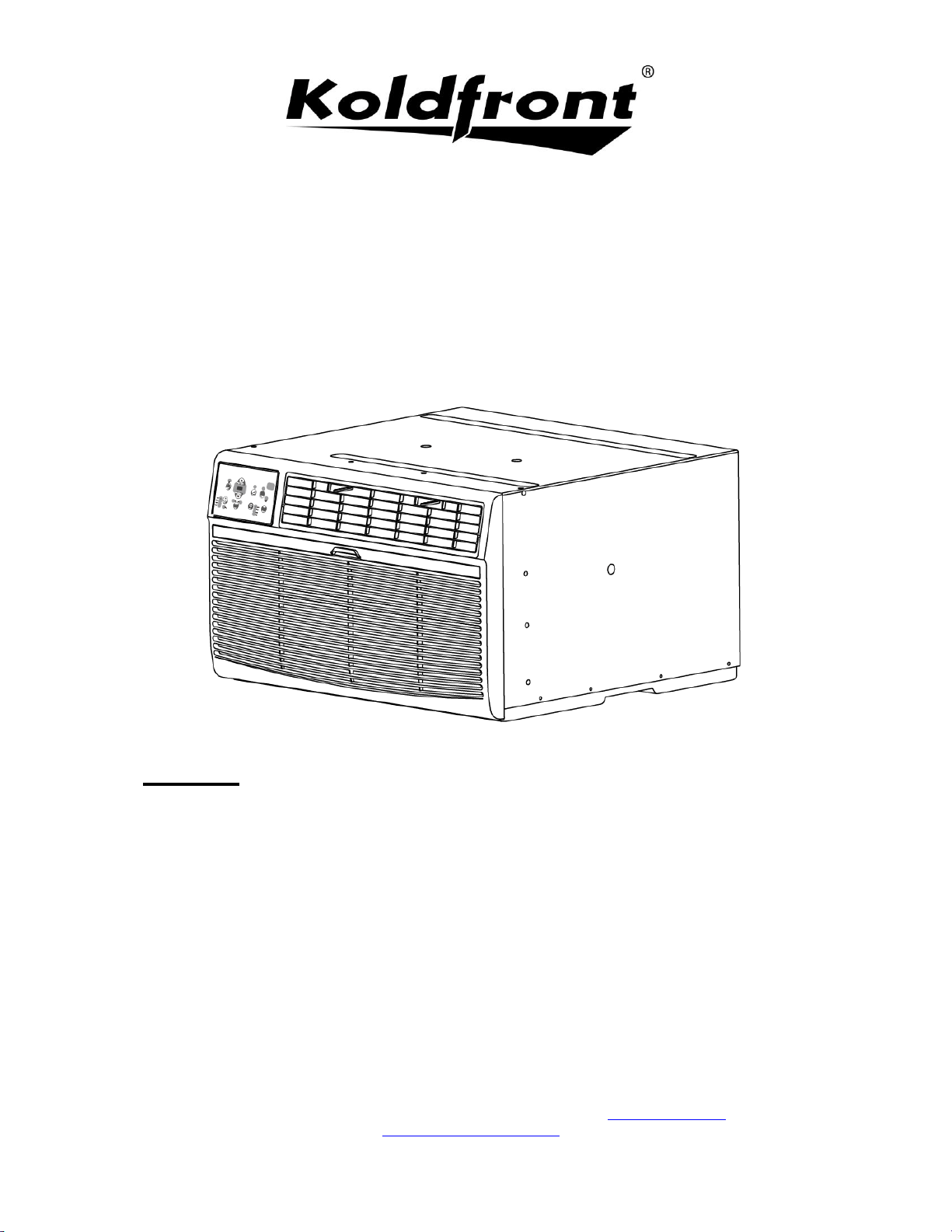
Through The Wall
Air Conditioner
Owner’s Manual
For more information on other great Koldfront products on the web, go to www.koldfront.com
To use the self-diagnostic tool, go to https://support.edgestar.com
Models:
WTC8002WCO
WTC10012WCO230V
WTC10002WCO115V
WTC12012WCO230V
WTC12002WCO115V
WTC14012WCO230V
i
Important Safety Information
Improper handling can cause serious damage to the appliance and/or to the user. Please read
the following safety information.
Warning: The water produced by the window AC is not potable or suitable for drinking.
Do not drink the water drained from the unit as it contains contaminates and could make you sick.
Electrical Safety
• Make sure your hands are dry and not wet before operating the unit.
• Do not wet the front housing or control panel.
• Do not directly spray water on this Air Conditioner.
• Do not pull the unit by the cord.
• Always turn the unit off and unplug it from the socket when cleaning.
• Unplug the unit if it is not going to be used for a long period of time.
• Do not operate the unit with a damaged or loose plug and / or socket.
• Use only the correct power supply with appropriate amperage.
• If the power cord is damaged, it must be replaced by the manufacturer, a service agent, or qualified
technician.
• Do not turn the unit off or on by inserting or pulling the power plug.
• Do not modify the power cord length or share the outlet with another appliance.
• Do not use this unit with an extension cord and/or adapter plug.
• Do not use this unit near flammable gases/combustibles or in close proximity to heating appliances.
• During operation do not remove any part of the outside casing.
General Safety
• Do not let people or pets sit or set an object directly in front of air flow.
• If a strange sound, smell, or smoke comes from the unit, turn it off and review the troubleshooting
page of this manual.
• Stop operation and unplug unit in the event of a severe storm.
• To ensure proper air flow and intake, make sure the air vents are not obstructed.
• See instructions for cleaning air filters and how often cleaning should occur.
• Do not use strong detergents when cleaning.
• Children should be supervised when operating this unit.
• Do not allow children to play with the controls or drop any objects into the air outlets or vents.
• Do not place objects or let any person sit on top of the unit.
• Route the power cord carefully to avoid a tripping hazard.
• This unit is intended for domestic home use only. Do not use the air conditioner for commercial or
industrial use. Any other use may invalidate the warranty.
• Use caution when unpacking and installing the unit as there may be some sharp edges.
ii
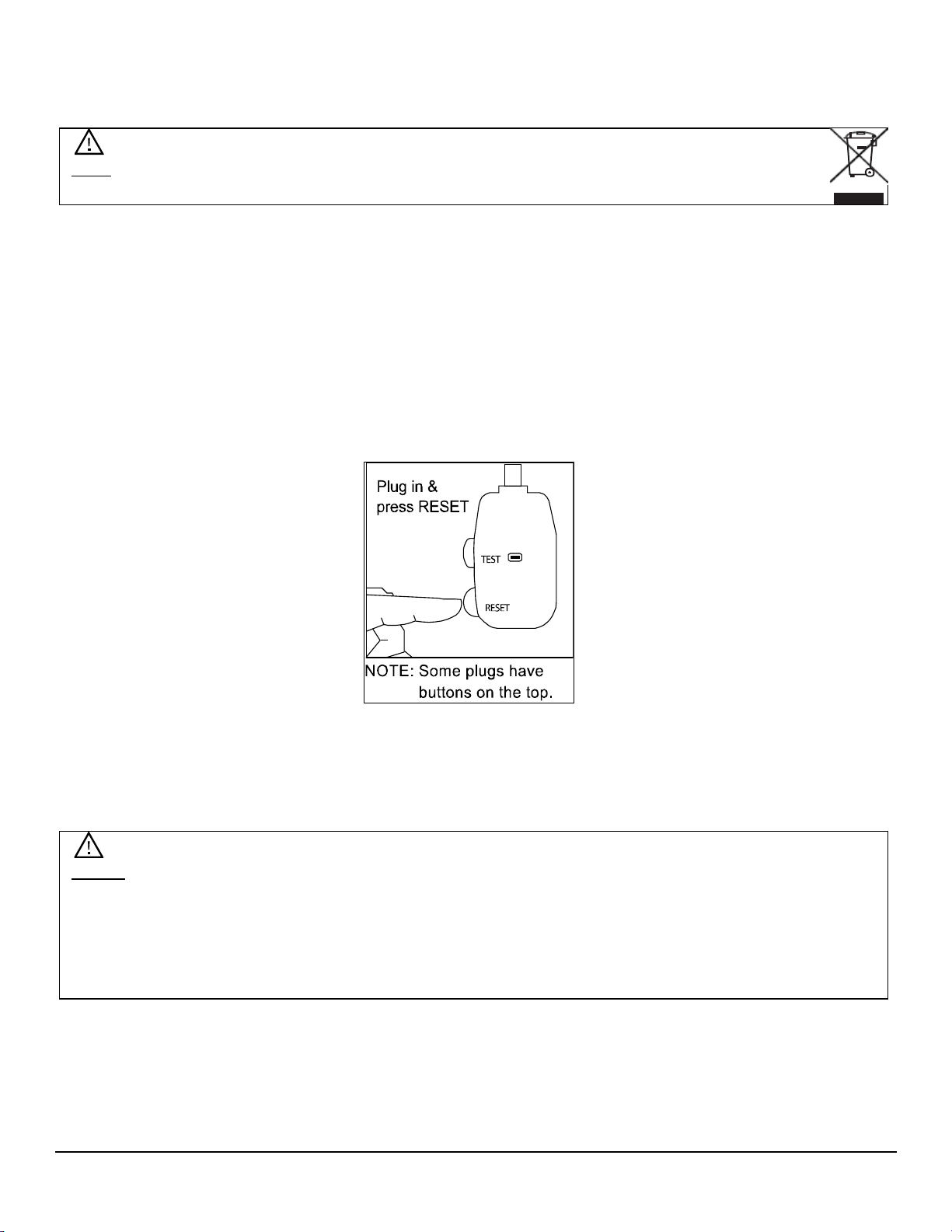
Operation of Safety Plug
Your air conditioner is supplied with a Leakage-Current Detection and Interruption (LCDI)
safety plug. This device provides protection to reduce the risk of fire due to arcing faults in the
power supply cord. Before using your air conditioner, follow the instructions below to ensure that
the LCDI plug is working properly:
1. Plug the power cord into a grounded outlet.
2. Press the TEST button on the LCDI plug. This should trip the plug and cut the power to the air
conditioner. If the plug does not trip and you are able to turn on the unit, please contact
EdgeStar support.
DO NOT USE YOUR AIR CONDITIONER IF THE TEST FAILS.
3. Press the RESET button to start using your air conditioner.
Notes:
• Always make sure the “Reset” button is pushed in for proper operation.
• The power supply cord with LCDI plug must be replaced if it fails to reset.
• Do not use the TEST and RESET buttons as an ON/OFF switch.
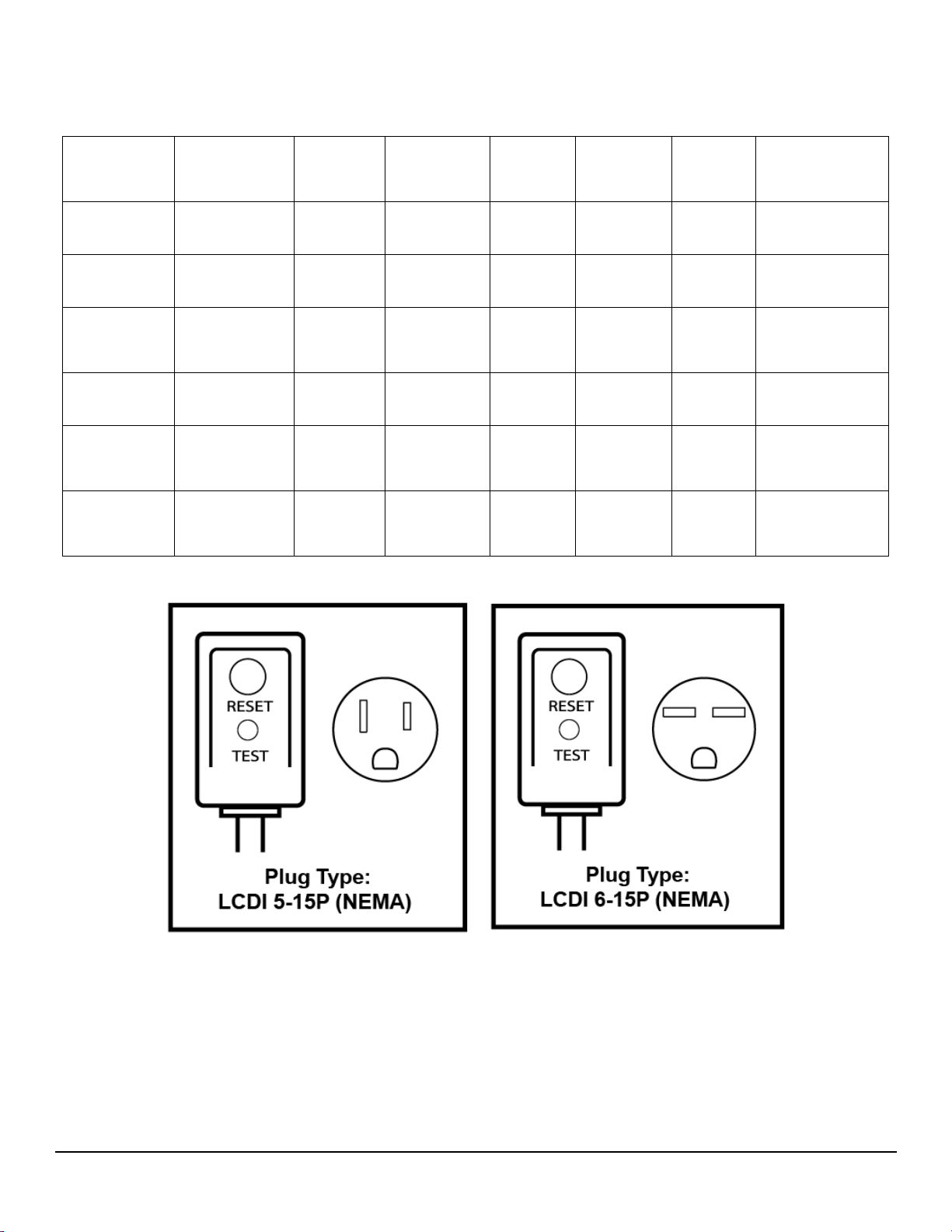
• Please refer to the Specifications section of this document for additional information on the
correct LCDI Plug Type for your model.
Note: Electrical products should not be disposed of with household waste. Please contact
your local recycling center for more information on how to recycle electronic waste.

iii
Table of Contents
IMPORTANT SAFETY INFORMATION .......................................................................................................................... I
Operation of Safety Plug ................................................................................................................................................. ii
TABLE OF CONTENTS ................................................................................................................................................ III
INTRODUCTION ............................................................................................................................................................. 1
PARTS IDENTIFICATION .............................................................................................................................................. 2
Air Conditioner Unit ......................................................................................................................................................... 2
Wall Sleeve ..................................................................................................................................................................... 2
PREPARATIONS FOR INSTALLATION ....................................................................................................................... 3
Parts Supplied: ................................................................................................................................................................ 3
Tools You May Need....................................................................................................................................................... 3
INSTALLATION INSTRUCTIONS .................................................................................................................................. 4
Basic Installation Steps ................................................................................................................................................... 4
Before Getting Started .................................................................................................................................................... 4
Preparing the Wall Sleeve .............................................................................................................................................. 5
Install Rear Louver Panel / Grille into NEW Wall Sleeve ................................................................................................ 5
Preparation of Previously Installed Wall Sleeve ............................................................................................................. 5
Rear Louver Panel / Grille Installation into Wall Sleeve Diagram ................................................................................... 6
Attach Seals and Support Blocks to Wall Sleeve ........................................................................................................... 7
Prepare Ground Wire ...................................................................................................................................................... 8
Install Air Conditioner Unit into Wall Sleeve ................................................................................................................... 9
Completing Installation .................................................................................................................................................. 10
Alternate and Supplemental Installation Instructions .................................................................................................... 11
Install Rear Louver Panel / Grille Directly on Back of Air Conditioner .......................................................................... 11
Non-Koldfront Wall Sleeve Types ................................................................................................................................. 11
CONTROL PANEL OPERATIONS .............................................................................................................................. 12
Using the Control Panel ................................................................................................................................................ 12
To Turn Unit on: ............................................................................................................................................................ 12
To Change Temperature: .............................................................................................................................................. 12
To Adjust Fan Speeds: ................................................................................................................................................. 12
To Select Operating Mode: ........................................................................................................................................... 13
To Operate in Auto Mode: ............................................................................................................................................. 13
To Operate in Fan Only Mode: ..................................................................................................................................... 13
To Operate in Dry Mode: .............................................................................................................................................. 13
To Use Energy Saver Feature: ..................................................................................................................................... 13
To Use the Sleep Feature: ............................................................................................................................................ 13
To Use Timer (Auto Start/Stop) Feature: ...................................................................................................................... 14
To Check Filter Feature: ............................................................................................................................................... 14
Digital Display: .............................................................................................................................................................. 14
Error Codes ................................................................................................................................................................... 14
AIR DIRECTIONAL LOUVERS: ................................................................................................................................... 15
ADDITIONAL TIPS: ...................................................................................................................................................... 15
REMOTE OPERATIONS .............................................................................................................................................. 16
Additional Notes on Remote Operations....................................................................................................................... 17
MAINTENANCE ............................................................................................................................................................ 18
Air Filter Cleaning .......................................................................................................................................................... 18
Cabinet Cleaning ........................................................................................................................................................... 19
NORMAL SOUNDS ...................................................................................................................................................... 19
ENERGY SAVING GUIDE ............................................................................................................................................ 19

iv
TROUBLESHOOTING TIPS ........................................................................................................................................ 20
SPECIFICATIONS ........................................................................................................................................................ 22
EDGESTAR LIMITED WARRANTY ............................................................................................................................. 23
1
Introduction
Thank you for purchasing this Koldfront by EdgeStar air conditioner. We hope that this purchase
will be the beginning of a lasting and rewarding relationship between you and EdgeStar. We will
provide the customer support and exemplary products necessary to nurture that relationship.
This manual contains important information regarding the proper installation, use and
maintenance of your air conditioner. Following this manual will ensure that your product will work
at its peak performance, efficiency, and safety.
Please save the original product packaging in case you need to safely transport your air
conditioner.
For Your Records:
Please write down the model number and serial number below for future reference.
Both numbers are located on the ratings label on the back of your unit and are
needed to obtain warranty service. You may also want to staple your receipt to this
manual as it is the proof of your purchase, and is also needed for service under your
warranty.
Model Number:
Serial Number:
Date of Purchase:
For a more efficient experience, please do the following before contacting customer service:
• If you received a damaged product, immediately contact the dealer that sold you the
product.
• Read and follow this instruction manual carefully to help you install, use and maintain your
air conditioner.
• Read the troubleshooting section of this manual as it will help you diagnose and solve
common issues.
• Visit us on the web at www.koldfront.com for product guides, additional troubleshooting
resources and up-to-date information. You can also find an interactive self-diagnostic tool
at https://support.edgestar.com. If you need service, our friendly customer service
representatives are available via email at [email protected].
2
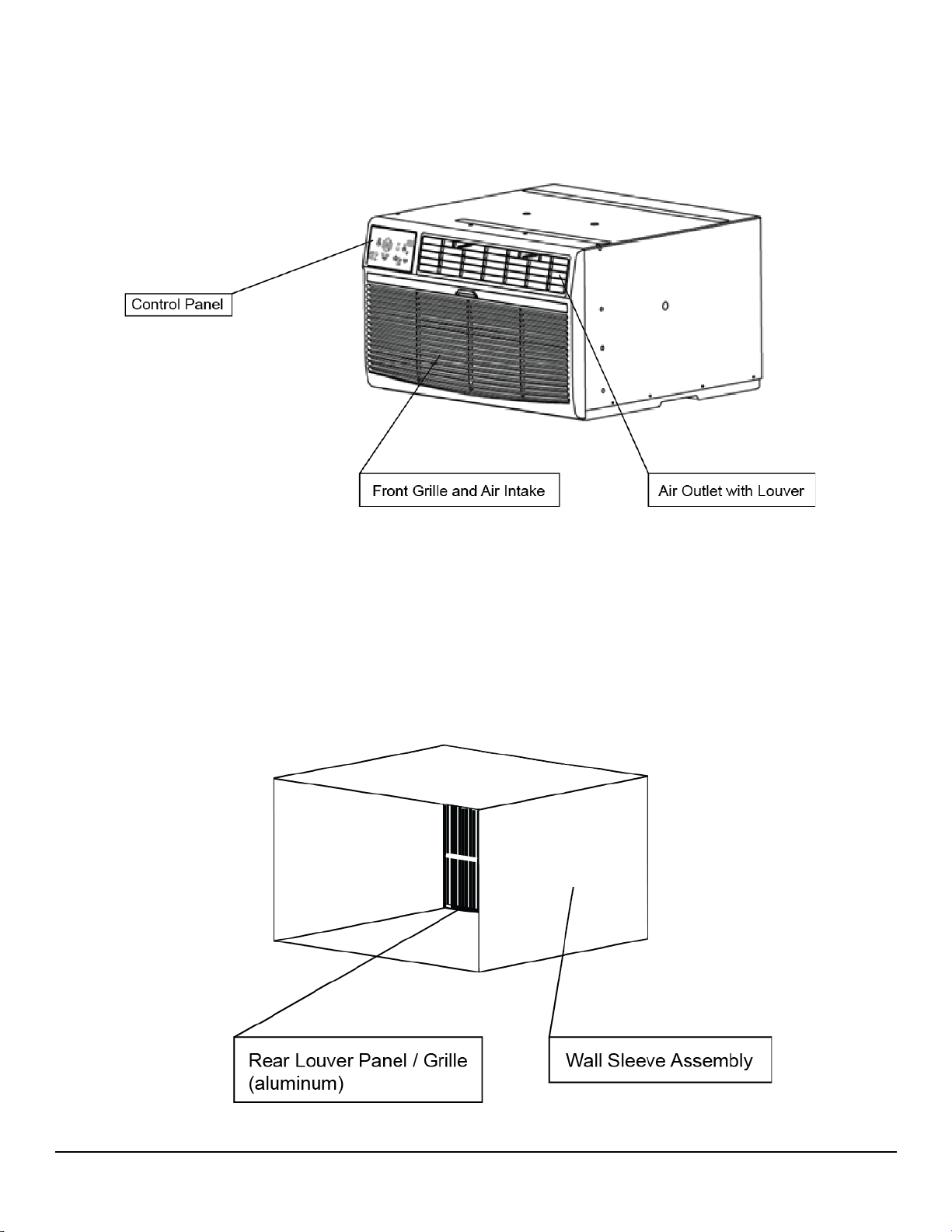
Parts Identification
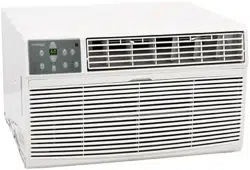
Air Conditioner Unit
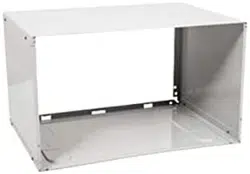
Wall Sleeve
(purchased or provided separately)
3
Preparations for Installation
Before you begin, make sure you have all the parts and tools necessary for installation.
Parts Supplied:
Tools You May Need:
• Flat Screwdriver or Putty Knife • Phillips Screwdriver • Tape Measure • Level • Drill
Note: You may need to contact an electrician if your room’s circuit is not able to power your unit.
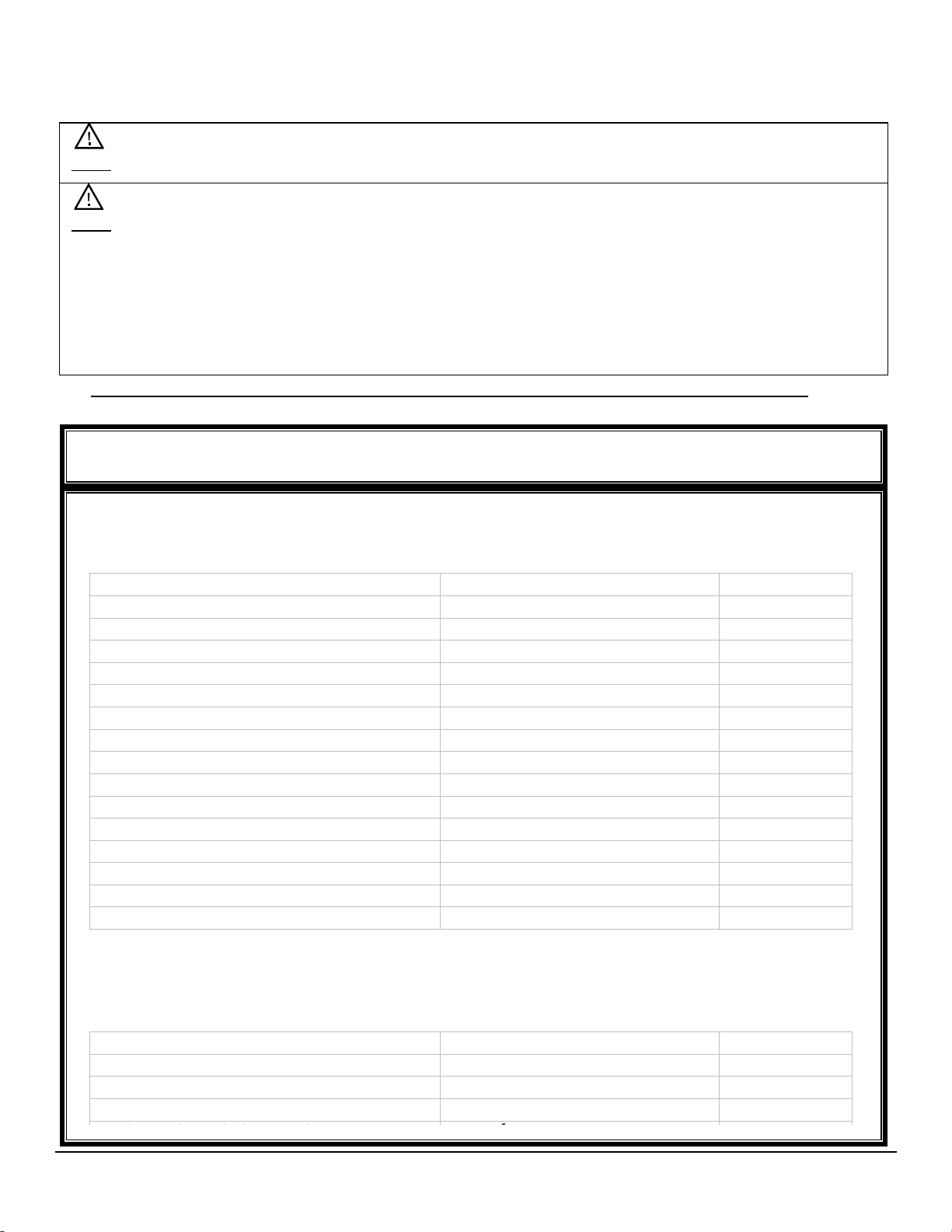
Parts Supplied
The parts below are intended to be used in conjunction with a Koldfront branded Wall
Sleeve.
Part Name
Size
Qty Included
Horizontal Insulation Seals
1” x
3
/
8
” x 25”
1
Vertical Insulation Seals
1” x
3
/
8
” x 14”
2
Horizontal Insulation Seals
1” x
3
/
4
” x 14”
2
Foam Support Blocks
1” x 1
1
/
2
” x 14”
2
Tapered Support Blocks
1” x 1” x 17” (tapered to ¾”)
2
Main Insulating Seal (stuffer seal)
1” x 1
1
/
2
” x 84”
1
Trim Frame (sides)
2
Trim Frame (top / bottom)
2
Ground Wire (green)
1
Toothed washers for grounding screw
2
Grounding Screw
1
Rear Louver Panel / Grille (aluminum)
1
Nuts (plastic)
4
Washers (for screws)
4
Screws
4
Additional and/or duplicate parts noted below have been included to allow for installation
into non-Koldfront branded Wall Sleeves or to accommodate non-standard installation
scenarios. Any unused parts may be discarded at your discretion.
Part Name
Size
Qty Included
Centering / Support Blocks
4
1
/
2
” x 3
1
/
2
” x1
1
/
2
”
4
Plastic Divider
1
/
8
” x 4
1
/
2
” x 14
1
/
2
” x
2
Horizontal Insulation Seals
1” x
3
/
8
” x 25”
2
Horizontal Insulation Seals
1” x 1
1
/
2
” x 25”
3
Note: To avoid risk of injury and/or product/property damage, please take the following
precautions:
• Two or more people are needed to properly handle and install.
• Use proper lifting and carrying techniques.
• Before installation, make sure to inspect the window and sill to ensure they are able to handle
the weight and size of this unit.
• Wearing protective gloves will help to avoid injury from sharp edges.
4
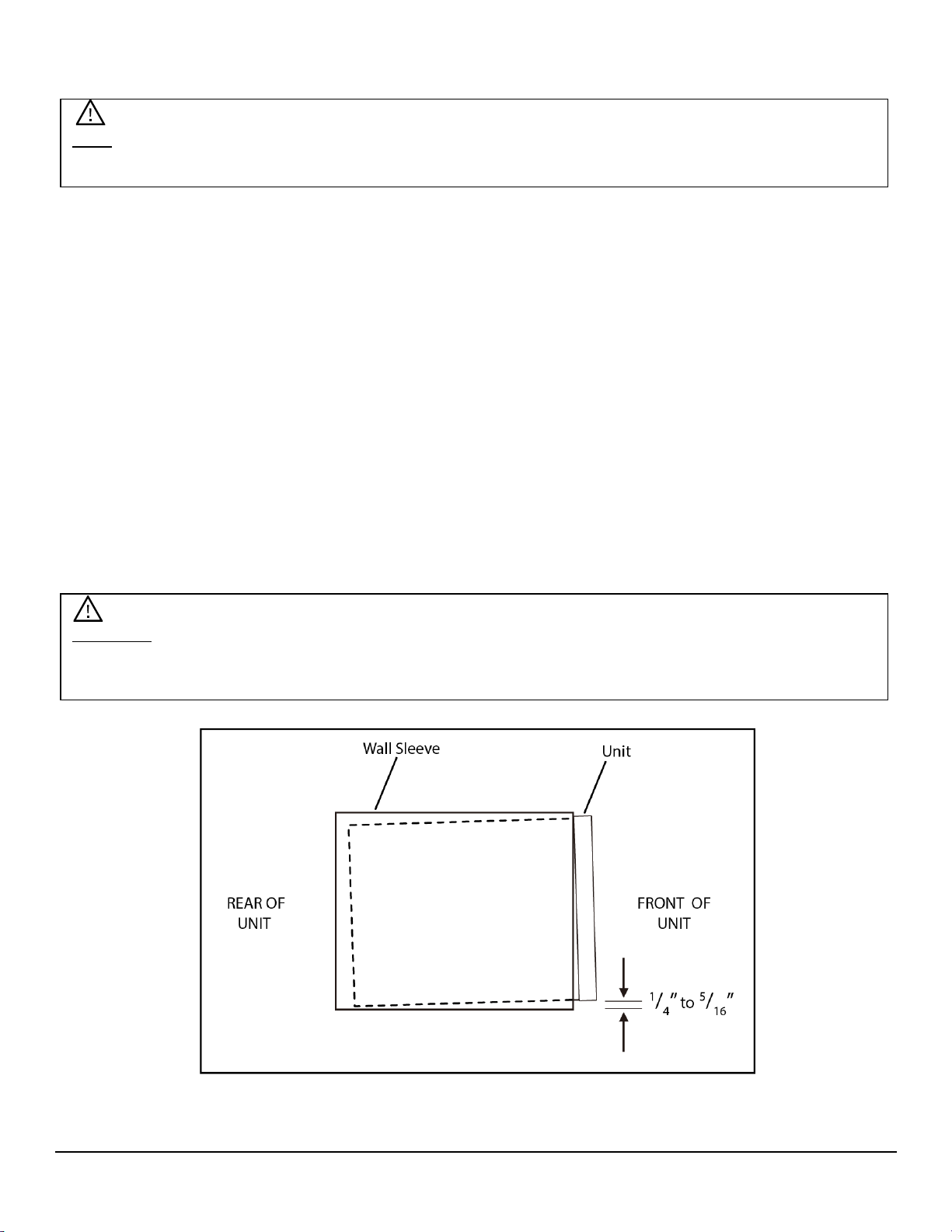
Important: When installation is complete, the unit MUST have a rearward slope as shown in the
image below to ensure proper drainage. This is accomplished by using the Tapered Support
Blocks as noted in the “Attach Seals” section on page 7.
Installation Instructions
Basic Installation Steps
• Prepare Wall Sleeve
• Install rear Louver Panel / Grille into Wall Sleeve
• Attach Seals inside wall sleeve
• Prepare grounding wire
• Insert Air Conditioner Unit into Wall Sleeve and attach Ground Wire
• Insert Main Seal
• Attach Front Frame pieces
Before Getting Started
Your Koldfront though the wall air conditioner is designed to be installed in conjunction with a wall
sleeve. If you are installing your new Koldfront air conditioner into an existing wall sleeve, please
check to confirm that the wall sleeve is in sound structural condition and that is sized
appropriately to accommodate your Koldfront air conditioner. For reference, your new Koldfront
Air Conditioner is 24
1
/
4
“ X 20
3
/
8
“ X 14
1
/
2
”
Note: When choosing your window make sure power supply cord is within 4 feet of a grounded 3-
prong outlet.
5
Note: The Koldfront Through the Wall Air Conditioner Sleeve (Model: WTCSLV) is designed
specifically for Koldfront’s line of through the wall air conditioners and can be purchased at
www.edgestar.com.
Preparing the Wall Sleeve
Your Koldfront Through The Wall Air Conditioner unit is intended to be installed into a compatible
wall sleeve enclosure. A wall sleeve provides the proper support and enclosure for your air
conditioner and allows for the wall opening to be properly sealed prior to final installation.
To properly install your new Koldfront Through The Wall Air Conditioner into a wall sleeve, it is
required that you use the Rear Louver Panel / Grille that was shipped with your new air
conditioning unit. This will ensure proper air flow from the back of the unit. If your installation
utilizes a previously installed wall sleeve, please replace the Rear Louver Panel / Grille with the
one provided with your new air conditioner.
Install Rear Louver Panel / Grille into NEW Wall Sleeve
Assemble and install your new wall sleeve according to the manufacturer’s instructions. Basic
instructions are as follows:
1. Prepare and install the new wall sleeve according to the manufacturer’s instructions.
Ensure that the wall sleeve is properly fastened to the wall a minimum of 4” from any
heating source and that high-grade sealant / caulking has been used to prevent air and
water infiltration.
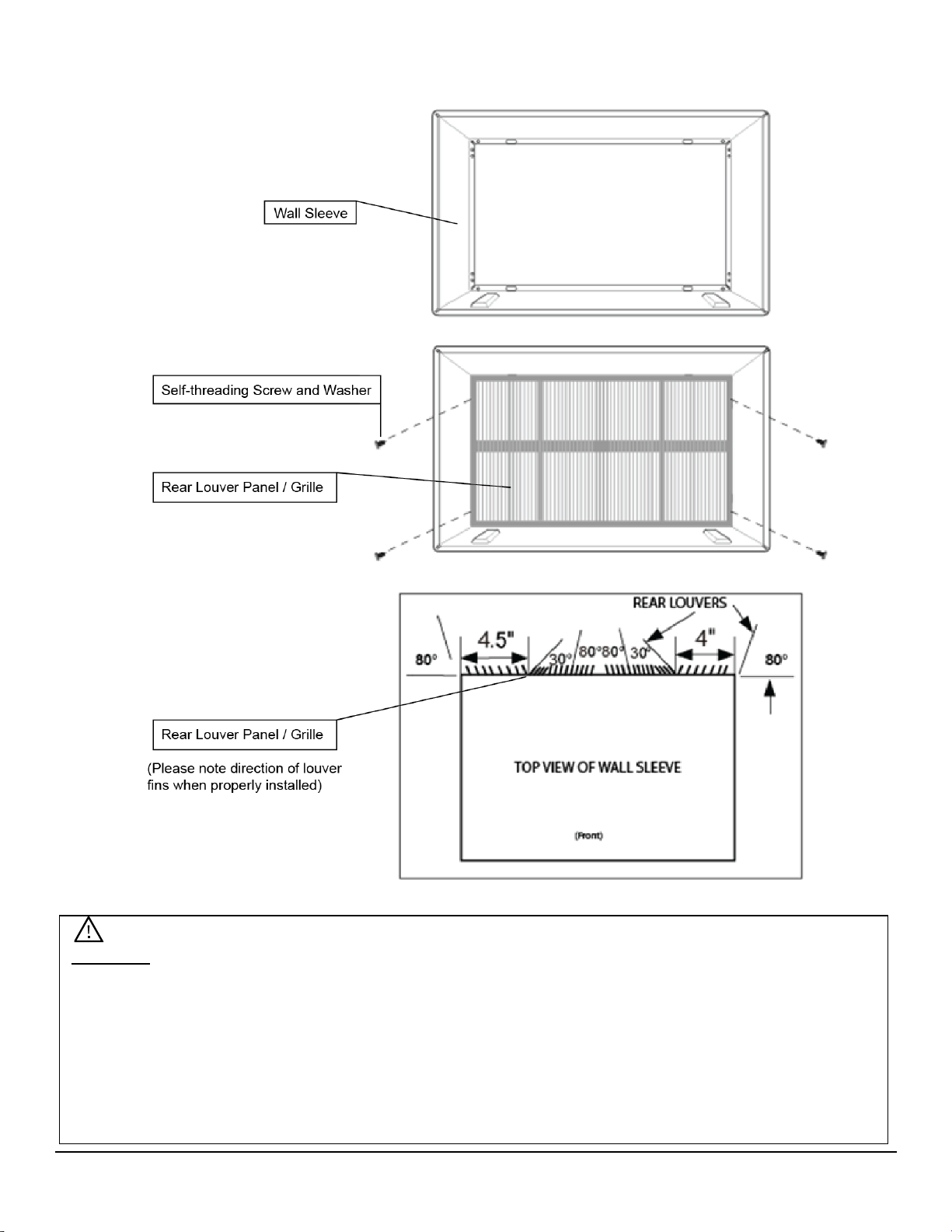
2. Place the Rear Louver Panel / Grille included with your new air conditioner towards the
rear of the sleeve.
3. Mark the mounting hole positions.
4. Drill through the sleeves flanges with a
1
/
8
” drill bit.
5. Attach the Rear Louver Panel / Grille included with your new air conditioner unit with self-
threading screws and washers. (See following page.)
Preparation of Previously Installed Wall Sleeve
To install the rear louver panel / grille provided with your new air conditioner unit into an
existing wall sleeve installation:
1. Remove the existing Rear Louver Panel / Grille.
2. Clean the interior and exterior of the wall sleeve and verify that all seals are in proper
condition. Replace seals if needed with the seals that have been provided with this unit.
3. Place the Rear Louver Panel / Grille included with your new air conditioner towards the
rear of the sleeve.
4. Mark the mounting hole positions.
5. Drill through the sleeves flanges with a
1
/
8
” drill bit.
6. Attach the Rear Louver Panel / Grille included with your new air conditioner unit with the
provided self-threading screws and washers. (See following page.)
7. Most existing decorative exterior grilles may be left in place as long as the proper interior
air direction grille is installed.
6
Rear Louver Panel / Grille Installation into Wall Sleeve Diagram
Important: Please ensure that the Rear Louver Panel / Grille is installed correctly to ensure
proper airflow and performance. Please note the direction and alignment of the louvered fins.
Also, please note that when aligned as instructed above, the holes in the louver panel / grille will
properly line up to the holes in the Koldfront wall sleeve.
If you are unable to secure the Rear Panel Louver / Grille to the wall sleeve, it may be attached
directly to the rear of the air conditioning unit. Please see the “Alternate and Supplemental
Installation Instructions” section on page 11.
7
Attach Seals and Support Blocks to Wall Sleeve
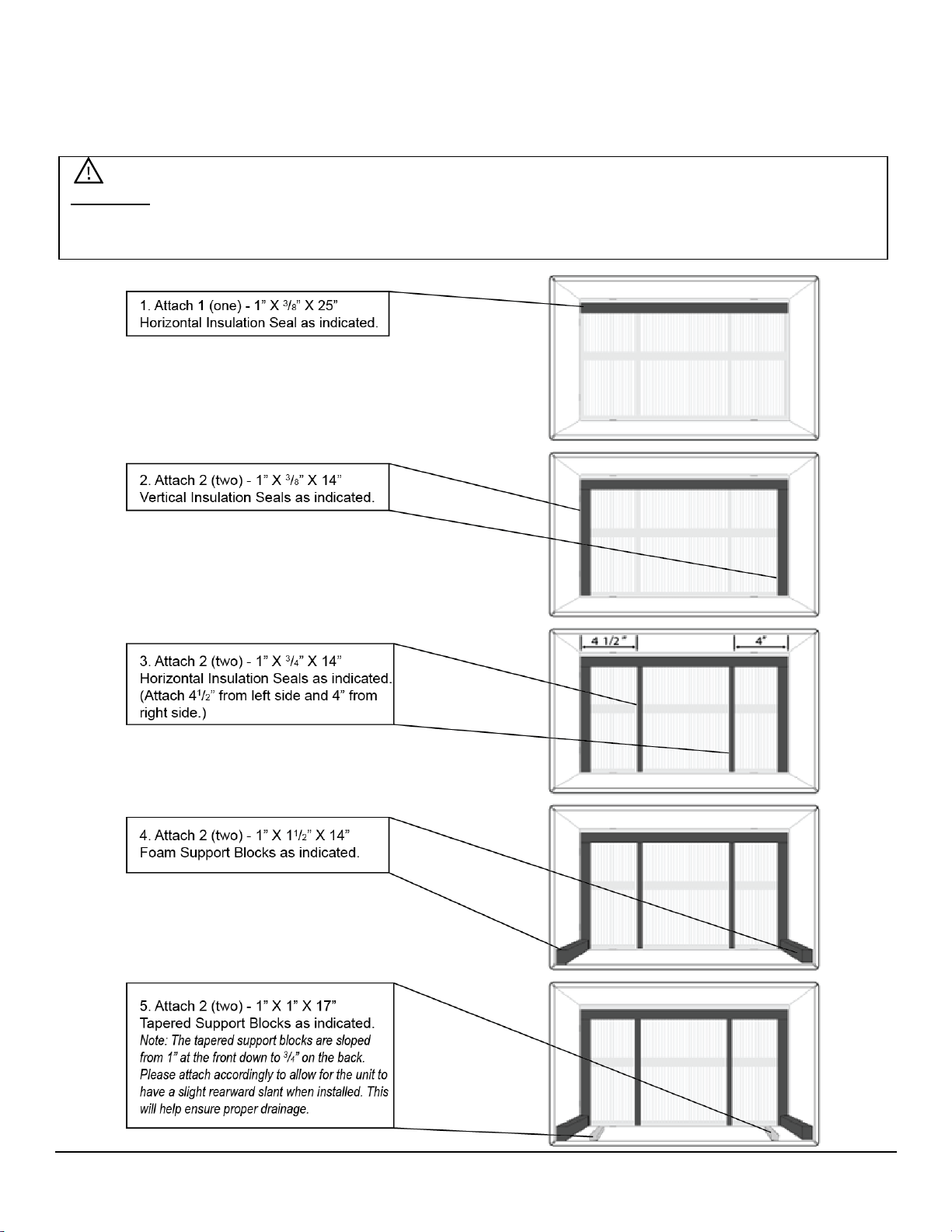
With the wall sleeve properly assembled, it is now time to prepare the wall sleeve enclosure for
the air conditioner unit. The process involves positioning seals and foam support blocks inside of
the wall sleeve enclosure in order to enable a proper fit for the air conditioning unit.
Important: The below instructions are to be used in conjunction with the Koldfront Wall Sleeve
model WTCSLV. Instructions for other compatible wall sleeves can be found in the “Alternate
and Supplemental Installation Instructions” section on page 11.
8
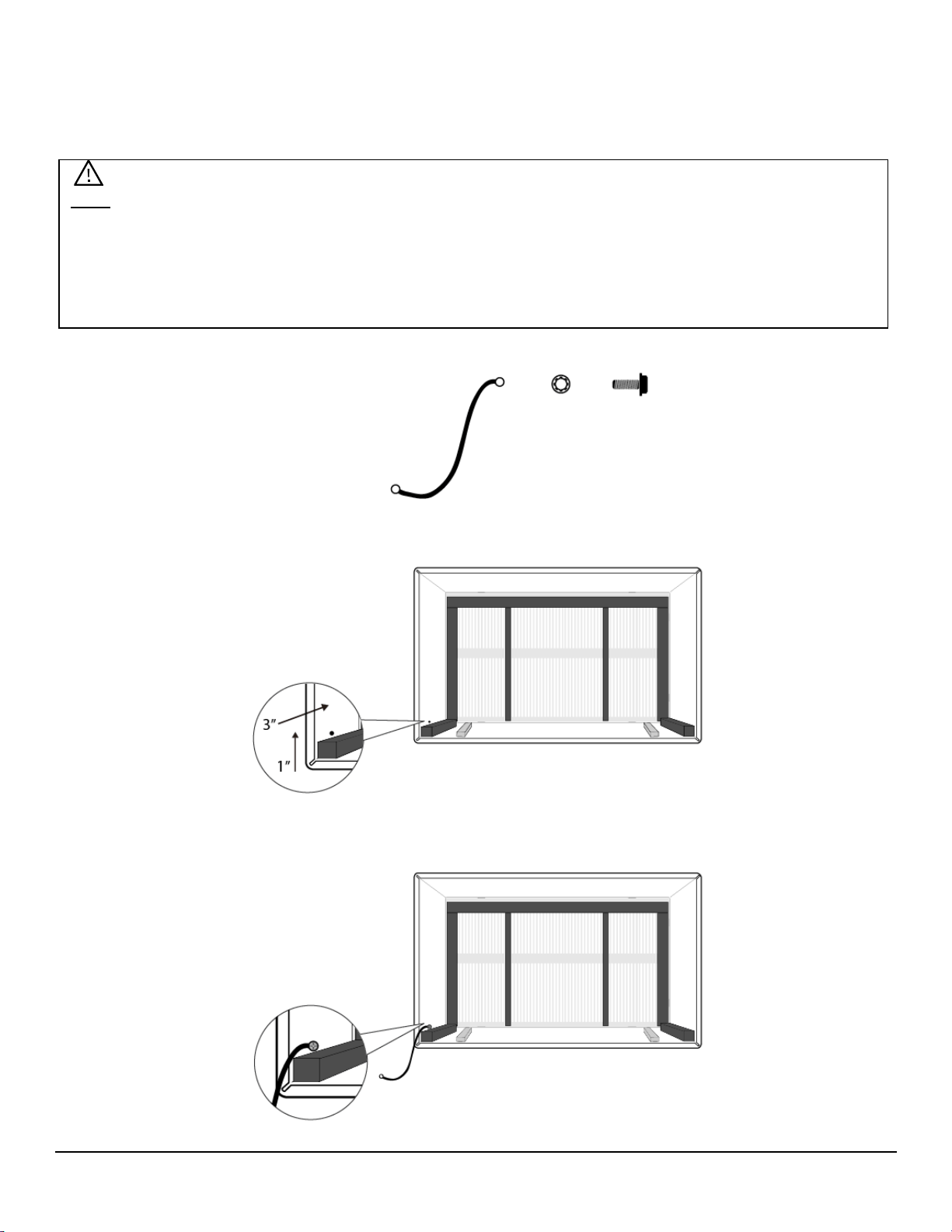
Prepare Ground Wire
To properly ground the air conditioner unit, the ground wire must be secured to the frame of the
wall sleeve. When the air conditioner unit is placed inside of the wall sleeve, this ground wire will
be attached to the air conditioner frame to allow for proper grounding of the air conditioner unit.
1. Locate the following parts:
• Grounding Screw (1)
• Toothed Grounding Screw Washer
• Ground Wire
2. As needed, use a drill and
1
/
8
” bit to drill a hole for the grounding screw. The hole needs to be
approximately 1” from the bottom and 3” from the front edge of the wall sleeve on the left side.
3. Attach one end of ground wire using 1 (one) Toothed Washer and 1 (one) Grounding Screw.
Note: This step may require the use of a drill with a 1/8” drill bit. If your wall sleeve has been
previously installed, there may be no requirement to drill a new hole for the grounding screw. If
using the Koldfront wall sleeve (model WTCSLV), the hole should be pre-drilled for you.
Also, please note that additional fastener types may have been included and may be used to suit
your particular installation setup.
9
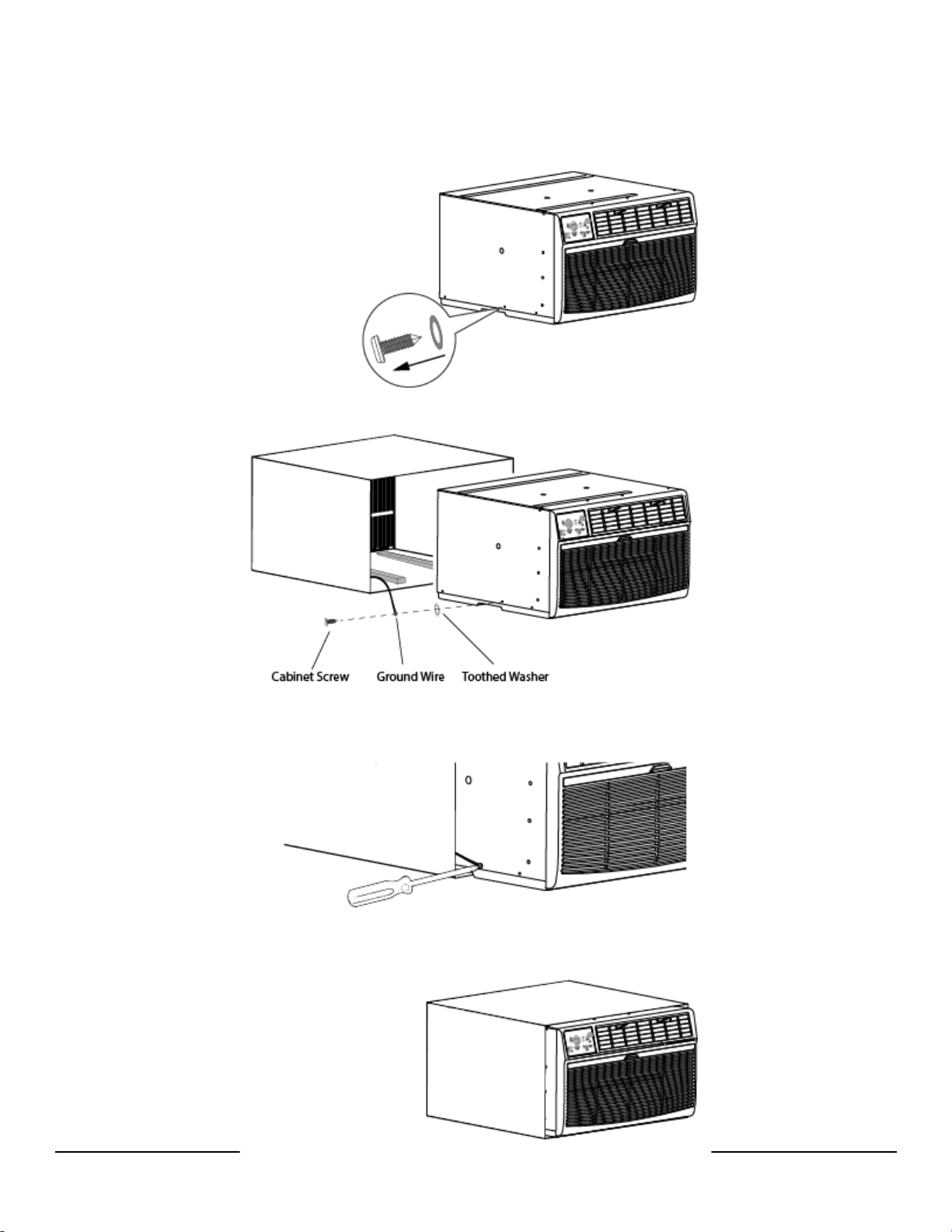
Install Air Conditioner Unit into Wall Sleeve
With the wall sleeve fully prepared, you are now ready to insert the air conditioner unit into the
wall sleeve. Two or more people may be required for this step.
1. Remove the cabinet screw on the left lower side of the air conditioner cabinet. Set aside
and/or discard the plastic washer.
2. The ground wire will be attached to the air conditioner cabinet using the screw you just
removed along with a Toothed Washer.
3. Gently slide the air conditioner cabinet into the Wall Sleeve. With the cabinet screw hole still
exposed, attach the ground wire to the cabinet using the cabinet screw making sure that the
Toothed Grounding Screw Washer is pressed against the cabinet.
4. Slide air conditioner completely to the rear of the wall sleeve unit ensuring that all seals and
foam support blocks create snug fit for the unit. Please be sure that the ground wire does not
become entangled when the unit is pushed back into the wall sleeve.
10
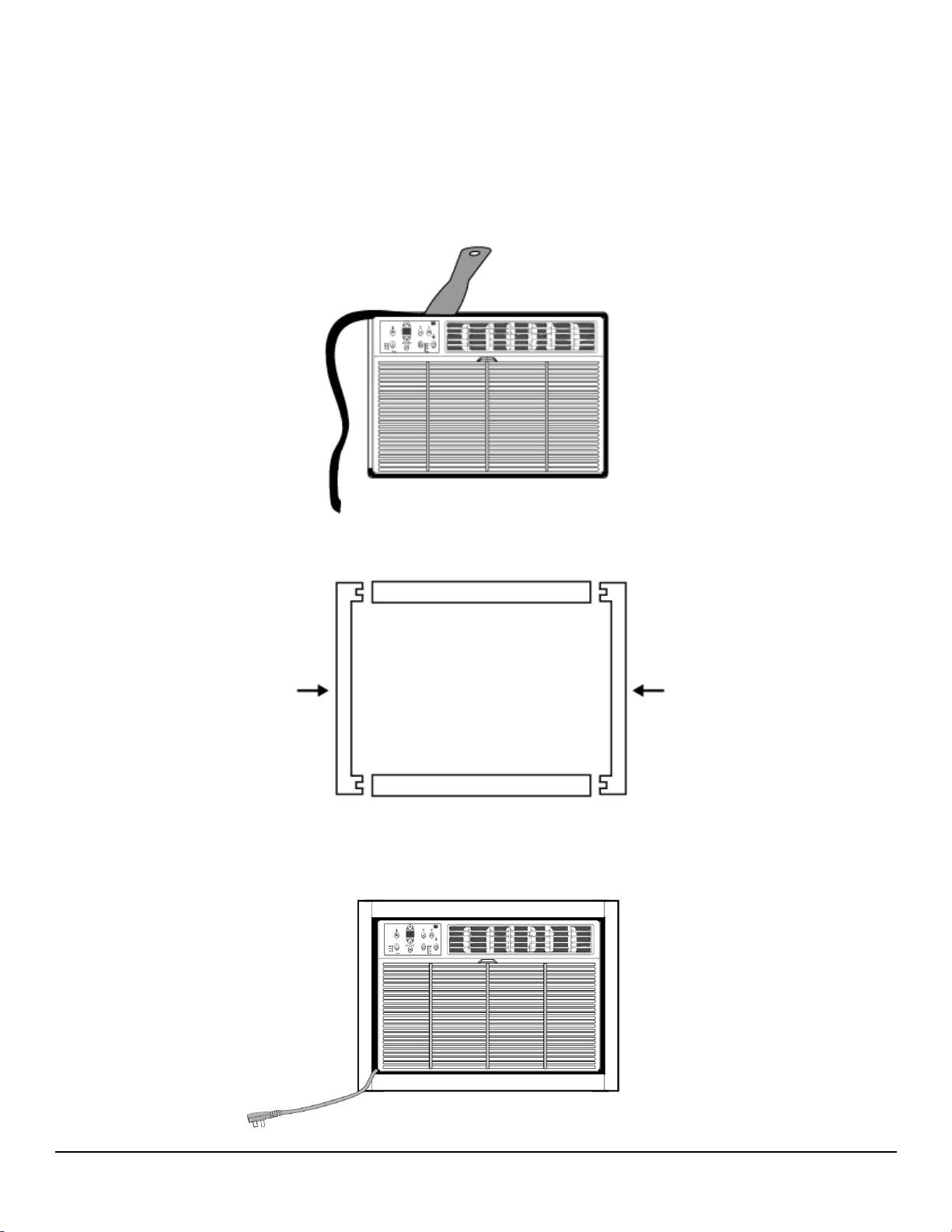
Completing Installation
With the air conditioner installed into the Wall Sleeve and the ground wire properly attached, it is
time to complete installation by inserting the Main Insulating Seal (stuffer seal) and attaching the
Trim Frame.
1. Locate the Main Insulating Seal (stuffer seal) included with the installation kit. This is the
longest seal and measures 1” X 11/2” X 84”. Using a putty knife or flathead screwdriver, insert
the seal into the gap between the air conditioner cabinet and the Wall Sleeve frame. Trim seal
as needed.
2. Locate the 4 (four) trim kit components that were packaged with your installation kit. Snap the
pieces together as shown in the image below.
3. Pull the power cord through the Trim Kit frame and then slide the Trim Kit Frame over the unit
until it is flush with the wall.
11
Alternate and Supplemental Installation Instructions
The below instructions may be referenced for scenarios in which the standard installation
procedures cannot be followed.
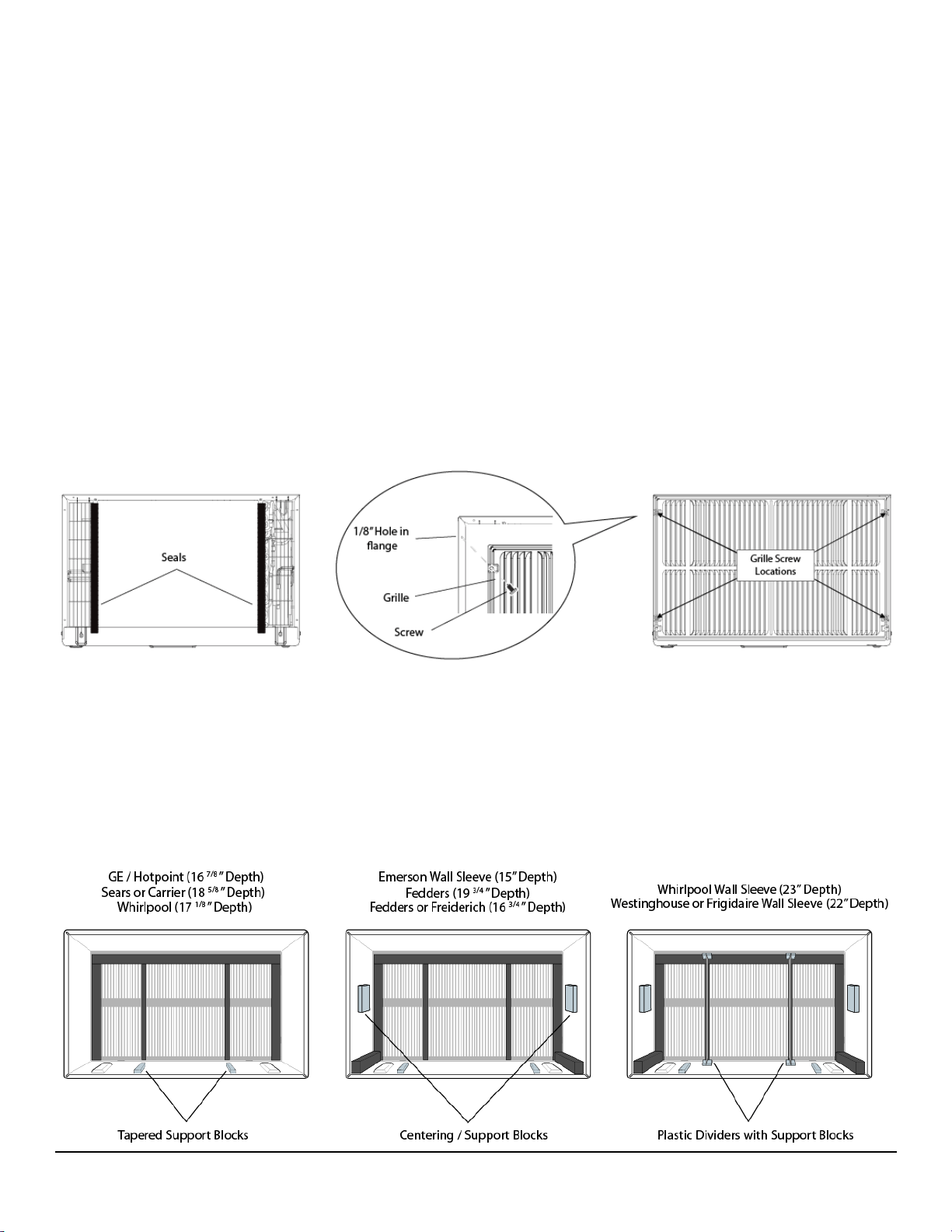
Install Rear Louver Panel / Grille Directly on Back of Air Conditioner
If your installation scenario does not allow you to attach the Rear Louver Panel / Grille to the
Wall Sleeve you may carefully secure the Panel directly to the rear of the Air Conditioner unit.
1. Attach the 1” x
3
/
8
” x 14” seal pieces.
2. Position the Grille over the rear of the air conditioner ensuring that:
- The double set of screw holes are on the bottom.
- The Grille fins are pointed away from the unit.
3. Align the top of the Grille with the top of the air conditioner unit.
- Holes should be pre-drilled, but if required, carefully pre-drill 4 (four)
1
/
8
” holes through
the Grille and into the side flange of the air conditioner cabinet frame approximately
1 ½” – 2” from the top and bottom.
4. Attach the Grille to the unit with 4 (four) self-tapping screws.
5. Install the unit into the sleeve.
Non-Koldfront Wall Sleeve Types
The below diagrams may be used as a reference when installing your Koldfront Through The
Wall Air Conditioner into a non-Koldfront branded Wall Sleeve. Regardless of brand, please
ensure that your wall sleeve is securely installed into the wall opening and is properly sealed.
Additionally, as noted previously, please ensure that your air conditioner is installed with a
slight rearward tilt to allow for proper drainage.
12
Control Panel Operations
Using the Control Panel
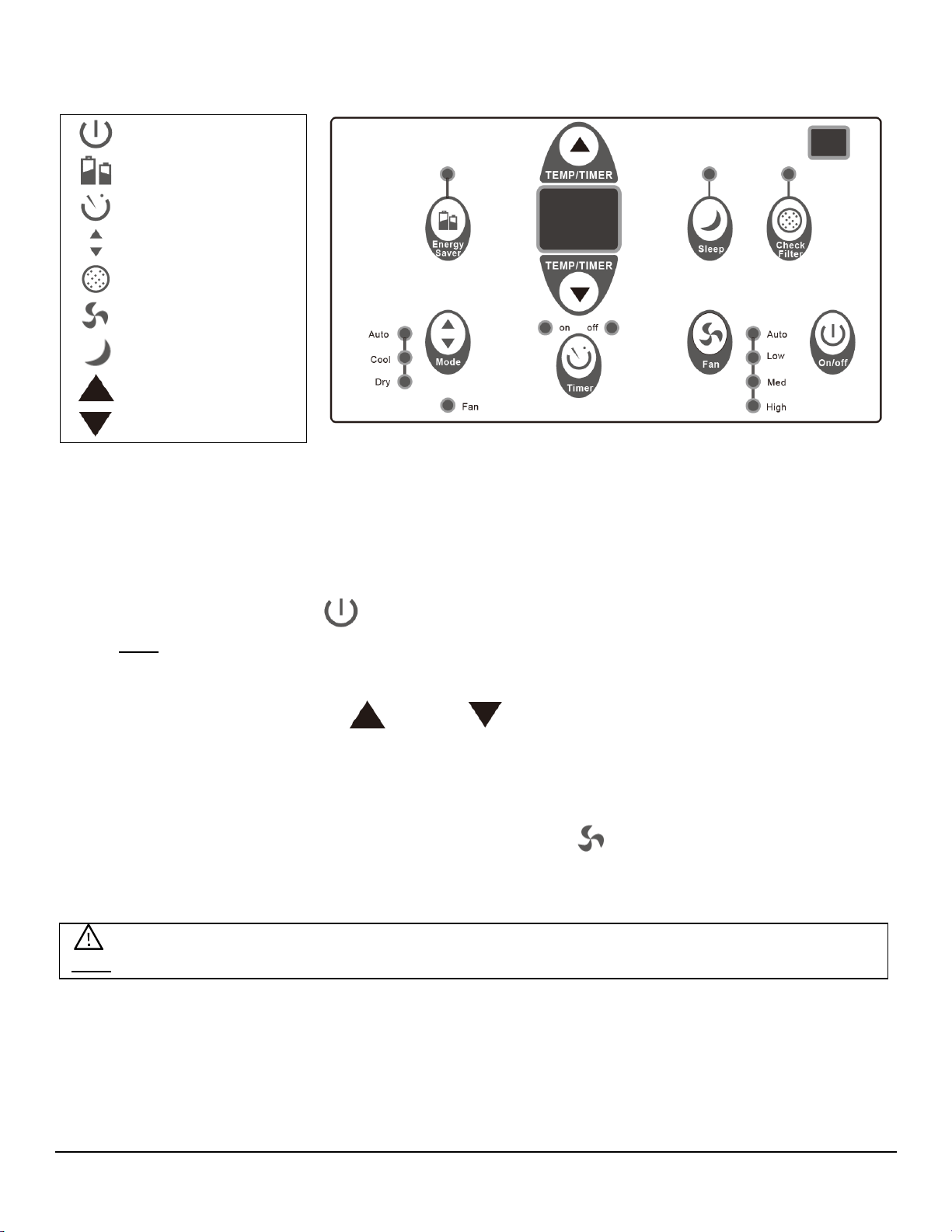
To Turn Unit on:
Press the On/Off button .
Note-The Energy Saver feature will automatically turn on in “Cool”, “Dry”, and “Auto” mode.
To Change Temperature:
Press or hold either the Up or Down button until the desired temperature is seen on
the digital display. This temperature will be automatically maintained anywhere between 62 °F
(17°C) and 86°F (30°C).
To Adjust Fan Speeds:
To select the speed of the fan press Fan Speed button which cycles through four steps-
Auto, Low, Medium, or High. Each time the button is pressed the fan speed mode is shifted.
On/Off
Energy Saver
Timer
Mode
Check Filter
Fan Speed
Sleep
Temp/Timer Up
Temp/Timer Down
Note: During “Dry Mode” the fan speed is controlled at Low automatically.
13
To Select Operating Mode:
To choose the operating mode press the Mode button . Each time you press the button a
mode is selected in a sequence that goes from Auto, Cool, Dry, to Fan. The indicator light
beside the Mode button will be illuminated and remain on once the mode is selected.
To Operate in Auto Mode:
• When you set the unit to “Auto” mode it will automatically select Cooling or Fan Only
operation depending on the temperature selected and the current room temperature.
• Once the temperature you selected is achieved the unit will automatically maintain the
room temperature.
• In this mode the fan speed cannot be adjusted. It will start automatically at a speed
calibrated to the actual room temperature.
To Operate in Fan Only Mode:
• Use this function only when cooling is not desired, such as for room circulation or to
exhaust air (remember to open the vent). You can choose any speed you prefer.
• During this function the display will show the actual room temperature as in the cooling
mode.
• In Fan Only mode, the temperature is not adjusted.
To Operate in Dry Mode:
In this mode, the air conditioner will operate as a dehumidifier. Because the conditioned
space is closed or sealed, some degree of cooling will continue to occur.
To Use Energy Saver Feature:
To start the Energy Saver, press the Energy Saver button . This feature is available on
“Cool”, “Dry”, and “Auto”. The fan will continue to run for 3 minutes after the compressor shuts
off. The fan then cycles on for 2 minutes at 10 minute intervals until the room temperature is
above the set temperature, at which point the compressor turns back on and cooling starts.
To Use the Sleep Feature:
To initiate, press the Sleep button . In this mode the selected temperature will increase
(cooling) by 2°F (1°C) 30 minutes after the mode is selected. The temperature will then
increase (cooling) by another 2°F (1°C) after an additional 30 minutes. This new temperature
will be maintained for 6 hours before it returns to the originally selected temperature. This
ends the Sleep mode and the unit will continue to operate as originally programmed. The
Sleep Mode program can be cancelled at any time during operation by again pressing the
Sleep button.
14
To Use Timer (Auto Start/Stop) Feature:
• When the unit is on or off, press the Timer button and the “Timer On” indicator light
illuminates. It indicates that the Auto Start/Stop program is initiated.
• To switch to off press the Timer button again and the “Timer Off” indicator light
illuminates. It indicates that the Auto Stop program is initiated.
• Press or hold the Up or Down button to change the Auto Time by ½ hour
increments up to 10 hours or 1 hour increments up to 24 hours. The control will count
down the time remaining until start.
• The selected time will display for five (5) seconds and then will automatically revert back to
display the previous temperature setting or room temperature when the unit is on. (Note-
when the unit is off there is no display.)
• Turning the unit ON or OFF at any time or adjusting the timer setting to 0.0 will cancel the
Auto Start/Stop program.
To Check Filter Feature:
This feature is a reminder to clean the Air Filter for more efficient operation. The LED light will
illuminate after 250 hours of operation. To reset after cleaning the filter, simply press the
Check Filter button and the light will go off.
Digital Display:
Displays the set temperature in “C” or “F” and the Auto-Timer settings. While on Fan Only
Mode it shows the room temperature.
Error Codes
AS- Room temperature sensor error
- Unplug the unit and plug back in.
- If error repeats call for service.
- In Fan only mode it will display “LO” or “HI”.
- Evaporator temperature sensor error
- Unplug the unit and plug it back in.
- If error repeats, call for service.
15
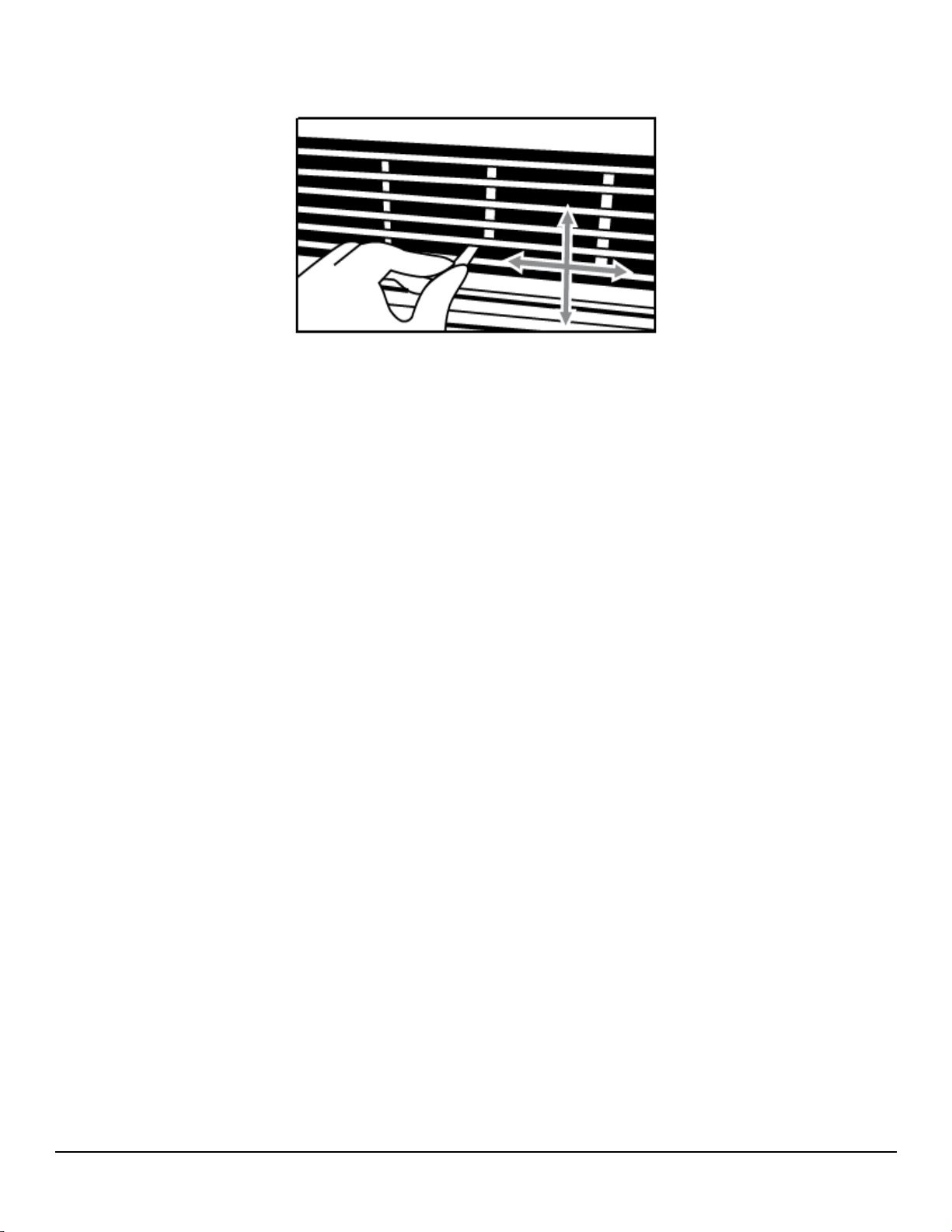
Air Directional Louvers:
The 4-way air directional louvers allow you to direct the air flow Up, Down, Left, and Right
throughout the room as needed. To adjust the air directional louvers side to side use the center
handles as you move side to side. Pivot the louvers by pressing with your fingers until the
desired airflow direction is obtained.
Additional Tips:
The “Cool” mode has an automatic 3 minute timed delay start if the unit is turned off and on
quickly. This prevents overheating of the compressor and possible circuit breaker tripping. The
fan will continue to run during this time.
The control is capable of displaying the temperature in degrees Fahrenheit or degrees Celsius.
To convert from one to the other, press and hold the Up and Down Temp/Timer buttons at the
same time for 3 seconds.
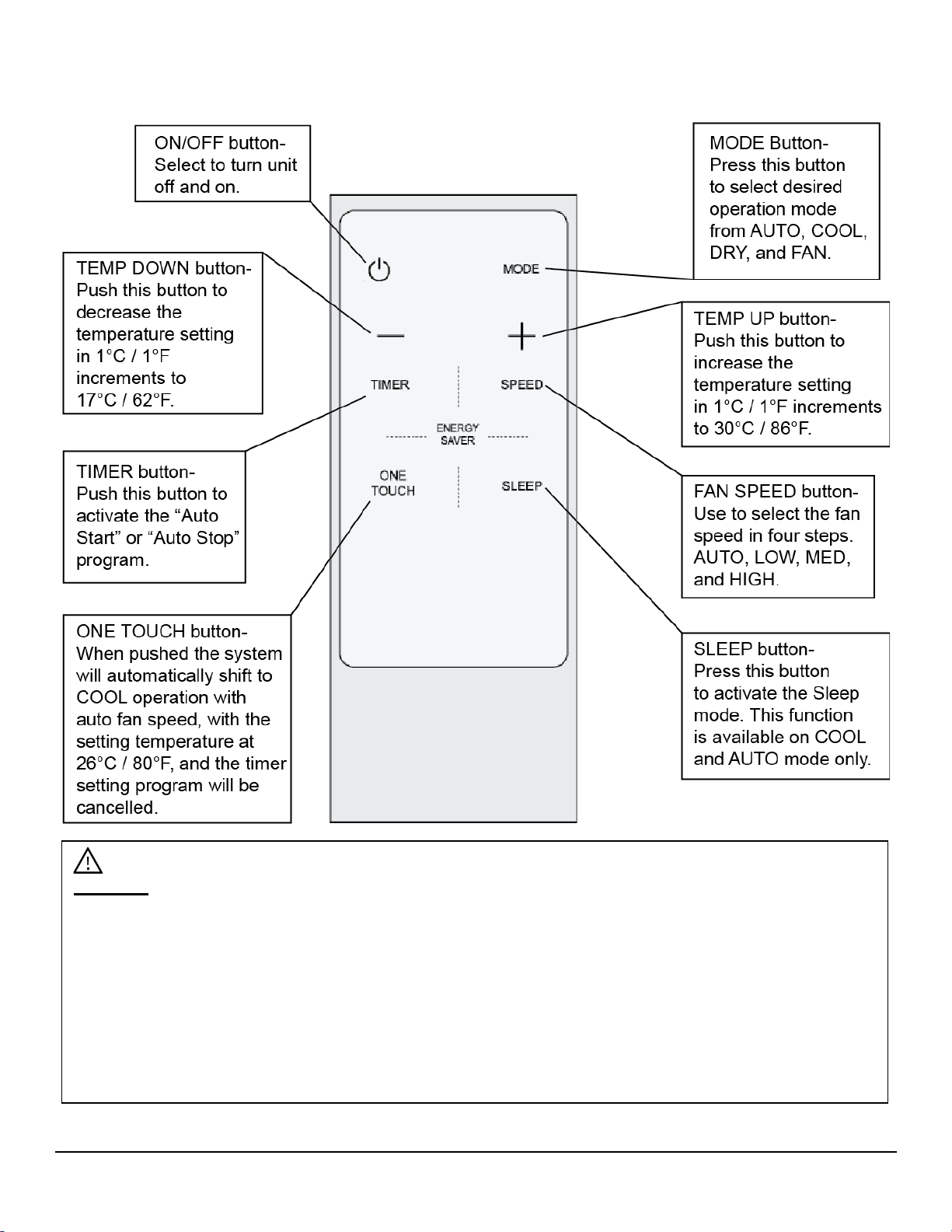
16
Remote Operations
Warning:
• This product contains a lithium button/coin cell battery which is a potential Chemical Burn
Hazard. Keep away from children.
• Always completely secure the battery compartment. If the battery compartment does not close
securely, stop using the product, remove the batteries, and keep away from children. If a new or
used lithium button/coin cell battery is swallowed or enters the body, it can cause severe internal
burns and can lead to death in as little as 2 hours. If you think batteries might have been
swallowed or placed inside any part of the body, seek immediate medical attention.
• The cells should always be disposed of properly. Even used cells can cause injury.
17
Additional Notes on Remote Operations
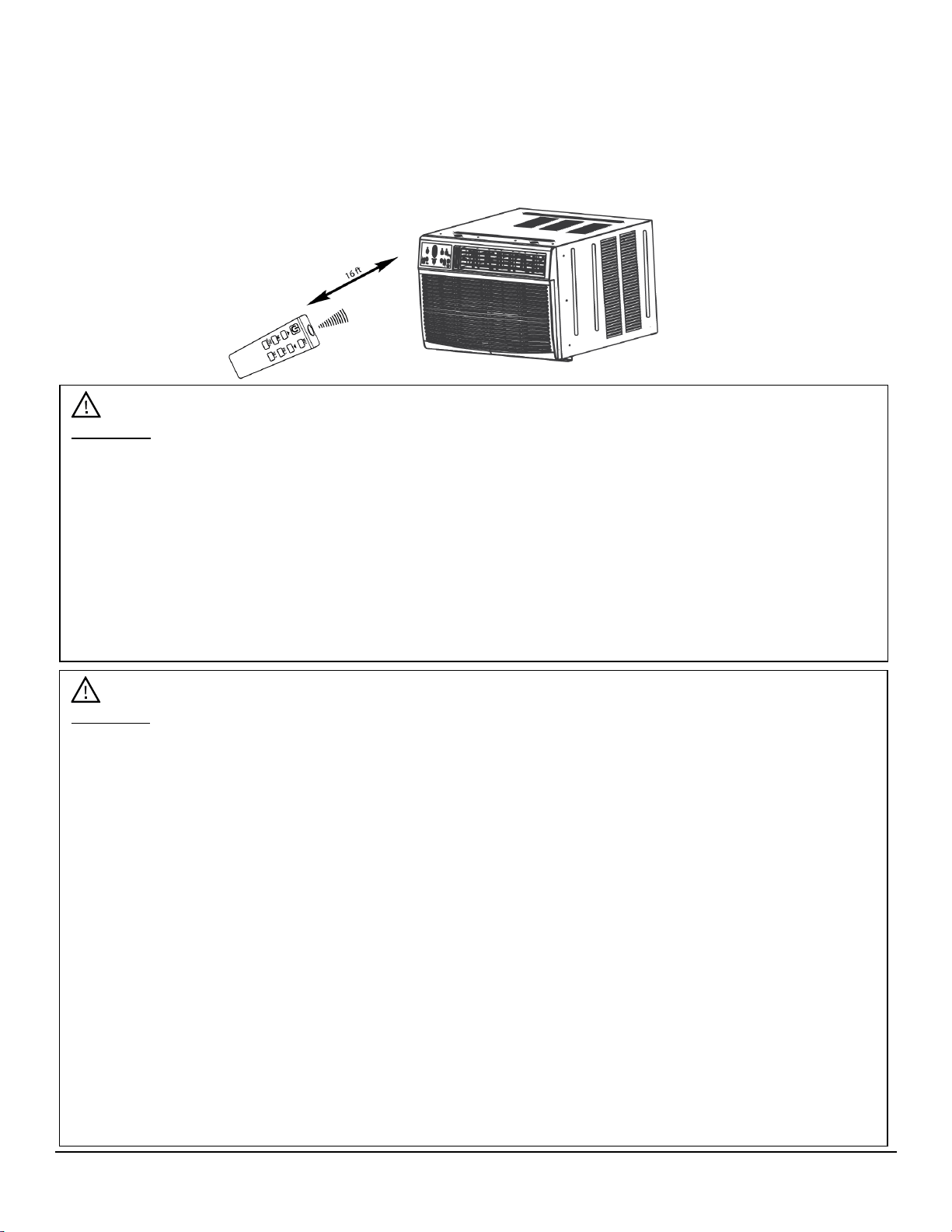
• The remote control has an operating range of 16 ft from the appliance.
• The remote signal receiver/sensor is located on the control panel of the air conditioner.
• Reception of signal commands is confirmed by an audible beep.
• Direct sunlight can interfere with the infrared signal.
• To replace batteries, remove the back cover by pressing where indicated and sliding off the
battery cover.
Important:
• The air conditioner will not operate if curtains, doors, or other materials block the signals from
the remote control to the unit.
• Do not expose the remote control to direct sunlight or heat or allow any liquid to fall onto it as
this could adversely impact its performance.
• If the infrared receiver on the unit is exposed to direct sunlight, the unit may not function properly
when operated by the remote control. Use the curtains to prevent sunlight from falling on the
infrared receiver.
• If any other electrical appliances react to the remote control, move them away from your air
conditioner.
Important:
• This device complies with part 15 of the FCC Rules. Operation subject to the following two
conditions: (1) This device may cause harmful interference to other devices, and (2) This device
must accept any interference received, including interference that may cause undesired
operation.
• This device has been tested and found to comply with the limits for a Class B digital device,
pursuant to part 15 of the FCC Rules. These limits are designed to provide reasonable
protection against harmful interference in a residential installation. This equipment generates,
uses and can radiate radio frequency energy and, if not installed and used in accordance with
the instructions, may cause harmful interference to radio communications. However, there is no
guarantee that interference will not occur in a particular installation. If this equipment does cause
harmful interference to radio or television reception, which can be determined by turning the
equipment off and on, the user is encouraged to try to correct the interference by one or more of
the following measures:
—Reorient or relocate the receiving antenna.
—Increase the separation between the equipment and receiver.
—Connect the equipment into an outlet on a circuit different from that to which the receiver
is connected.
—Consult the dealer or an experienced radio/TV technician for help.
18
Maintenance
Clean the air conditioner and filters regularly to maximize performance and efficiency, and
prolong the unit’s life. Be sure to always unplug the air conditioner from the power outlet before
cleaning.
Air Filter Cleaning
The air filter should be checked at least once a month to see if cleaning is necessary. Trapped
particles in the filter can build up, preventing proper air flow and potentially resulting in an
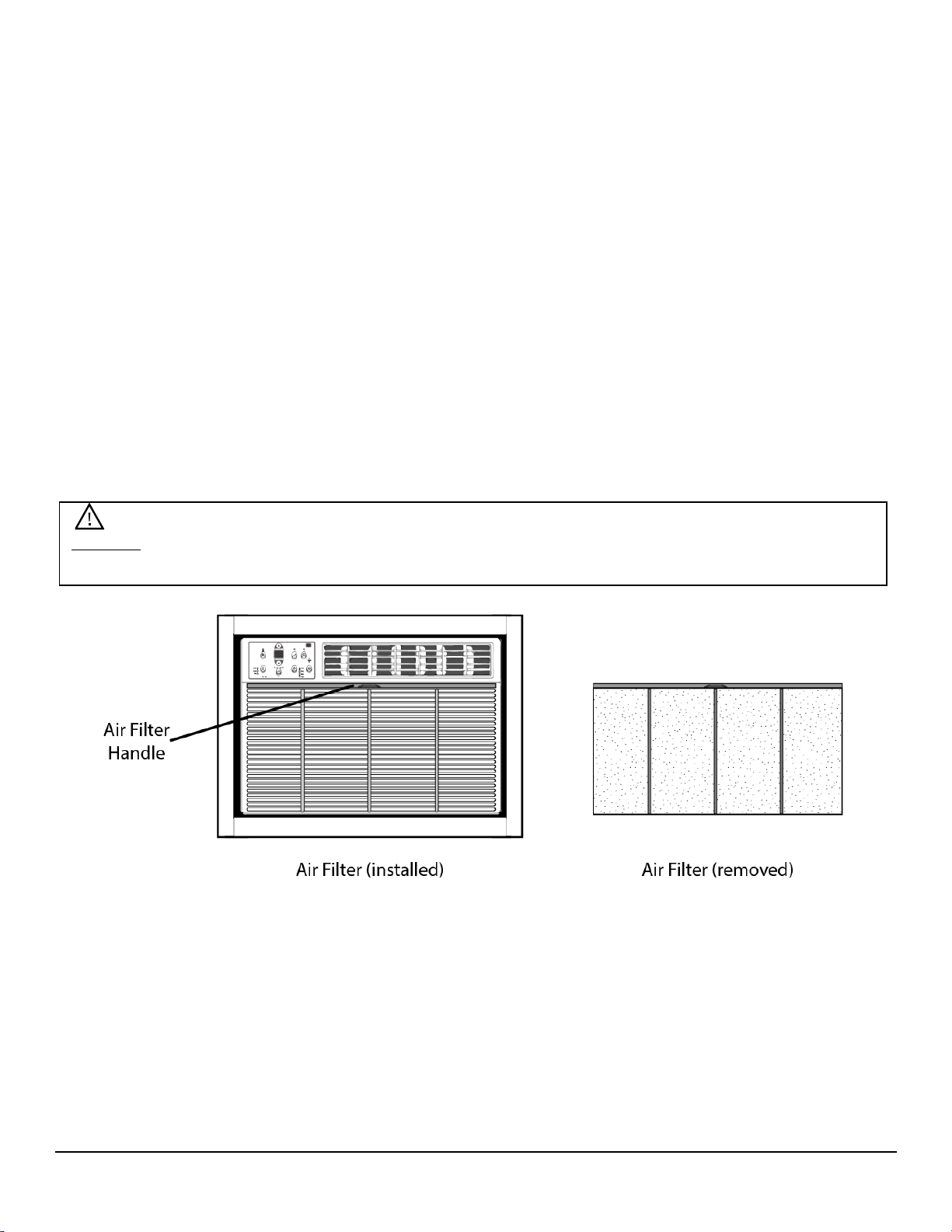
accumulation of frost on the cooling coils. The air filter is located in a slot behind the Front Grille /
Air Intake Panel.
1. Find the Air Filter handle / tab, which is located at the top of the Front Grille
2. Grasp the filter with both hands and pull upward and outward.
3. Wash the filter using liquid dishwashing detergent and warm water. Rinse the filter thoroughly.
4. Gently shake excess water from the filter.
5. Be sure the filter is thoroughly dry before replacing it.
6. You may also gently clean the filter with a vacuum.
7. Re-insert the Air Filter.
Warning: Never use hot water over 40°C (104°F) to clean the air filter. Never attempt to operate
the unit without the air filter.

19
Cabinet Cleaning
• Be sure to unplug the air conditioner to prevent shock or fire hazard. The cabinet and front
may be dusted with an oil-free cloth or washed with a cloth dampened in a solution of warm
water and mild dishwashing detergent. Rinse thoroughly and wipe dry.
• Never use harsh cleaners, wax, or polish on the cabinet front.
• Be sure to wring excess water from the cloth before wiping around the controls. Excess water
in or around the controls may cause damage to the air conditioner.
Normal Sounds
• High Pitched Chatter - High efficiency compressors may have a high pitched chatter during
the cooling cycle.
• Sound of Rushing Air - At the front of the unit, you may hear the sound of rushing air being
moved by the fan.
• Gurgle/Hiss - Gurgling or hissing noises may be caused by refrigerant passing through the
evaporator during normal operation.
• Vibration - The unit may vibrate and make noise because of poor wall or window construction
or incorrect installation.
• Pinging or Switching - Droplets of water hitting the condenser during normal operation may
cause these sounds.
Energy Saving Guide
Read and follow the guide below to get the best performance and efficiency from your air
conditioner:
• Do not cover the air outlet (exhaust) while in use.
• Use the timer to operate the unit before it is needed. For example, set the timer to turn the
unit on in cooling mode for 3 or more hours to cool the room before you arrive. You may want
to operate the unit all day if you live in a warmer climate.
• Minimize the heat sources (direct sunlight, computers, servers, people, etc.) in the room.
• Close all windows and doors.
• Use the unit in a contained room. For example, a room with four walls and a ceiling, instead of
a partitioned studio or warehouse.
• Make sure the unit is secure with no gaps where air can escape.
• Minimize the amount of humidity in the room. For example, run the unit as a dehumidifier.
• To prolong the compressor's life, please wait at least 3 minutes before turning the unit back
on after shutting it off.
• Inspect and keep the air filters clean by cleaning regularly.
• Perform routine maintenance.
20
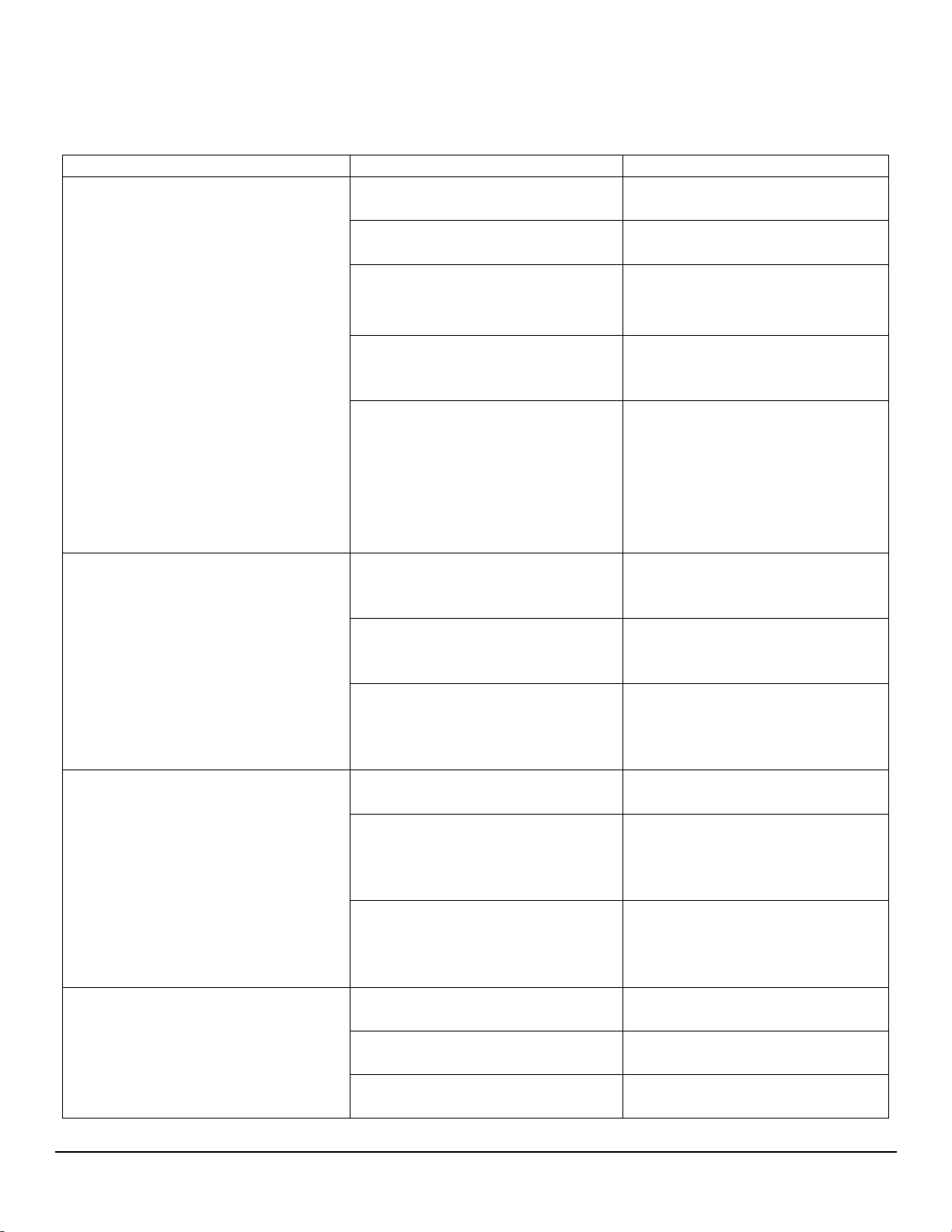
Troubleshooting Tips
Follow the troubleshooting guide below to resolve common issues.
Issue
Possible Cause
Solution
My air conditioner is not
functioning at all.
The wall plug is disconnected.
Make sure the unit is plugged
in.
The LCDI power cord is
tripped.
Press the Reset button on the
LCDI cord.
The house fuse is blown or the
circuit breaker is tripped.
Replace the fuse with a time
delay type or reset circuit
breaker.
The control panel is off.
Turn the control panel ON
and set it to your desired
setting.
There is insufficient power.
Move the unit to another
outlet. Check your circuit
breaker. (Refer to the rating
label on the back of the unit to
determine the Amperage
draw).
The air from the unit does not
feel cold enough.
The room temperature is
below 17°C (62°F).
Cooling may not occur until
the room temperature rises
above 17°C (62°F).
The temperature sensing
element is touching the cold
coil, located behind air filter.
Straighten the tube away from
the coil.
The compressor shut-off by
changing modes.
Wait approximately 3 minutes
and listen for the compressor
to restart when it is set in the
COOL mode.
The air conditioner is cooling but
the room is too warm. Ice is
forming on the cooling coil
behind the decorative front.
The outdoor temperature is
below 18°C (64°F).
To defrost the coil, set the
unit to FAN ONLY mode.
The air filter may be dirty.
Clean the filter. Refer to the
maintenance section. To
defrost set the unit to FAN
ONLY mode.
The thermostat is set too cold
for night-time cooling.
To defrost the coil, set the
unit to FAN ONLY mode.
Then, set the temperature to
a higher setting.
The air conditioner is cooling but
the room is too warm. NO ice is
forming on the cooling coil
behind the decorative front.
The air filter is dirty and the air
is restricted.
Clean the air filter. Refer to
the maintenance section.
The temperature is set too
high.
Set the temperature to a
lower setting.
The air directional louvers are
positioned improperly.
Position the louvers for better
air distribution.
21
Troubleshooting Tips Continued…
Issue
Possible Cause
Solution
The air conditioner is cooling but
the room is too warm. NO ice is
forming on the cooling coil
behind the decorative front.
The front of the unit is blocked
by drapes, blinds, furniture, or
other objects that restrict air
distribution.
Clear any blockage in front of
the unit.
There are open doors,
windows, etc.
When entrances are open
cold air escapes. Close
doors, windows, etc.
The unit was recently turned
on in a hot room.
Allow additional time to
remove “stored heat” from
the walls, ceiling, floor, and
furniture.
The air conditioner turns on and
off rapidly.
The air filter is dirty and the air
is restricted.
Clean the air filter.
The outside temperature is
extremely hot.
Set the FAN speed to a
higher setting to bring air
past the cooling coils more
frequently.
There is noise when the unit is
cooling.
Some air movement sound is
normal.
If the unit is too loud, set it to
a slower FAN setting.
There is window vibration due
to poor installation.
Refer to the installation
instructions or check with the
installer.
There is water dripping INSIDE
when the unit is cooling.
The unit was improperly
installed.
Tilt the air conditioner slightly
to the outside to allow water
drainage.
There is water dripping
OUTSIDE when the unit is
cooling.
The unit is removing a large
quantity of moisture from a
humid room.
This is normal during
excessively humid days.
The remote is not sensing.
The remote control is not
located within range of the
unit.
Place the remote control
within 20 feet and a 180
degrees radius of the front of
the unit.
The remote control signal is
obstructed.
Remove the obstruction.
The room is too cold.
The temperature is set too
low.
Increase the set temperature.
22
Specifications
Model
Voltage /
Frequency
Plug
Type
(NEMA)
Btu/h
Current
(Amp)
Coolant
Weight
Dimensions
(W x D x H)
WTC8002
WCO
115V
60Hz
5-15P
8300
7
R410A
17.64 oz
68.3 lbs
24
1
/
4
” x 20
3
/
8
”
x 14
1
/
2
”
WTC10002
WCO115V
115V
60Hz
5-15P
10000
8.3
R410A
20.81 oz
68.3 lbs
24
1
/
4
” x 20
3
/
8
”
x 14
1
/
2
”
WTC10012
WCO230V
230V /
208V
60Hz
6-15P
10000 /
9800
4.5 / 4.8
R410A
21.87 oz
69.4 lbs
24
1
/
4
” x 20
3
/
8
”
x 14
1
/
2
”
WTC12002
WCO115V
115V
60Hz
5-15P
12000
10
R410A
21.87 oz
77.2 lbs
24
1
/
4
” x 20
3
/
8
”
x 14
1
/
2
”
WTC12012
WCO230V
230V /
208V
60Hz
6-15P
12000 /
11700
5.2 / 5.6
R410A
21.87 oz
76.1 lbs
24
1
/
4
” x 20
3
/
8
”
x 14
1
/
2
”
WTC14012
WCO230V
230V /
208V
60Hz
6-15P
14000 /
13600
6.9 / 7.5
R410A
21.52 oz
75.2 lbs
24
1
/
4
” x 20
3
/
8
”
x 14
1
/
2
”
WTC8002WCO
WTC10002WCO115V
WTC12002WCO115V
WTC10012WCO230V
WTC12012WCO230V
WTC14012WCO230V

23
EdgeStar Limited Warranty
Full Two-Year Parts and Labor
This product is warrantied by EdgeStar and is subject to any conditions set forth as follows:
WHAT IS COVERED:
For a period of TWO (2) YEARS from the date of original retail purchase, EdgeStar will repair or replace any part free of charge,
including labor, that fails due to a defect in materials or workmanship. Labor will be performed free of charge at an authorized
EdgeStar repair facility and EdgeStar will supply new, rebuilt, or refurbished parts free of charge. EdgeStar may request a
defective part be returned in exchange for the replacement part. All replacement parts or products will be new,
remanufactured, or refurbished. All products and parts replaced by EdgeStar under warranty service become the property of
EdgeStar. After the 24 month period, EdgeStar will no longer be responsible for labor charges incurred or replacement parts.
All defective products and parts covered by this warranty will be repaired or replaced on a mail-in basis to an EdgeStar
authorized repair facility.
This warranty applies to the original purchaser only, and only covers defects in workmanship experienced during operation of
the product under normal service, maintenance, and usage conditions. This warranty applies to the purchase and use of this
product in residential settings within the contiguous United States of America.
Exceptions: Commercial or Rental Use Warranty
90 days labor and parts from date of original purchase. No other warranty applies.
WHAT IS NOT COVERED - The following limitations apply to the coverage of this warranty. This warranty does not cover:
-Labor charges for installation, setup, or training to use the product.
-Shipping damage, and any damage caused by improper packaging for shipment to an authorized service center, and any
damaged caused by improper voltage or any other misuse, including abnormal service, handling, or usage.
-Cosmetic damage such as scratches and dents.
-Normal wear and tear on parts or replacement of parts designed to be replaced, e.g. filters, cartridges, batteries.
-Service trips to deliver, pick-up, or repair; install the product; or to instruct in proper usage of the product.
-Damages or operating problems resulting from misuse, abuse, operation outside environmental specifications, uses contrary to
instructions provided in the owner’s manual, accidents, acts of God, vermin, fire, flood, improper installation, unauthorized service,
maintenance negligence, unauthorized installation or modification, or commercial use.
-Labor, service, transportation, and shipping charges for the removal and replacement of defective parts, beyond the initial 24
month period.
-Products that have been modified to perform outside of specifications without the prior written permission of EdgeStar.
-Products lost in shipment, or theft.
-Products sold AS IS or from an unauthorized reseller.
-Products with serial numbers that have been removed, defaced, or invalidated.
-Damage from other than normal use.
-Replacement or repair of household fuses, circuit breakers, wiring, or plumbing.
-Damage to personal property from use of product.
-Damage from service other than from an authorized EdgeStar repair facility.
-Hoses, knobs, lint trays and all attachments, accessories, and disposable parts.
-Any service charges not specifically identified as normal such as normal service area or hours.
-Any special or consequential damages arising out of the use of the product.
OBTAINING WARRANTY SERVICE: If you believe your product is defective, contact EdgeStar Customer Support for
troubleshooting assistance and warranty service at www.edgestar.com or call 1-866-319-5473. Before contacting Customer
Support you are required to have your model number, serial number, and proof of purchase available upon request. Once
an EdgeStar authorized representative has confirmed that your product is defective and eligible for warranty service, the
product must be returned to an EdgeStar authorized repair facility. EdgeStar is not responsible for damage resulting from
shipper mishandling or improper packaging. Do not return a defective product to the place of purchase. Products received
without a return authorization number will be refused.
THIS WARRANTY IS IN LIEU OF ANY OTHER WARRANTY, EXPRESS OR IMPLIED, INCLUDING WITHOUT LIMITATION, ANY WARRANTY OF MERCHANTABILITY OR FITNESS FOR A
PARTICULAR PURPOSE. TO THE EXTENT ANY IMPLIED WARRANTY IS REQUIRED BY LAW, IT IS LIMITED IN DURATION TO THE EXPRESS WARRANTY PERIOD ABOVE. NEITHER THE
MANUFACTURER NOR ITS DISTRIBUTORS SHALL BE LIABLE FOR ANY INCIDENTAL, CONSEQUENTIAL, INDIRECT, SPECIAL, OR PUNITIVE DAMAGES OF ANY NATURE, INCLUDING
WITHOUT LIMITATION, LOST REVENUES OR PROFITS, OR ANY OTHER DAMAGE WHETHER BASED IN CONTRACT, TORT, OR OTHERWISE. IN NO EVENT AND UNDER NO
CIRCUMSTANCE OF ANY TYPE OR KIND SHALL THE SELLER, MANUFACTURER, AND/OR DISTRIBUTOR BE LIABLE FOR ANY REASON, UNDER ANY
THEORY, FOR MORE THAN THE BASIC COST OF THE PRODUCT TO THE PURCHASER OR END USER. SOME STATES DO NOT ALLOW THE EXCLUSION OF
INCIDENTAL OR CONSEQUENTIAL DAMAGES, SO THE ABOVE EXCLUSION MAY NOT APPLY TO YOU. THIS WARRANTY GIVES YOU SPECIFIC LEGAL RIGHTS. YOU MAY HAVE OTHER
RIGHTS THAT VARY FROM STATE TO STATE.