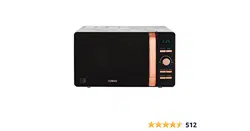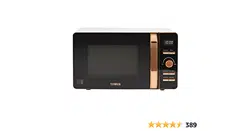
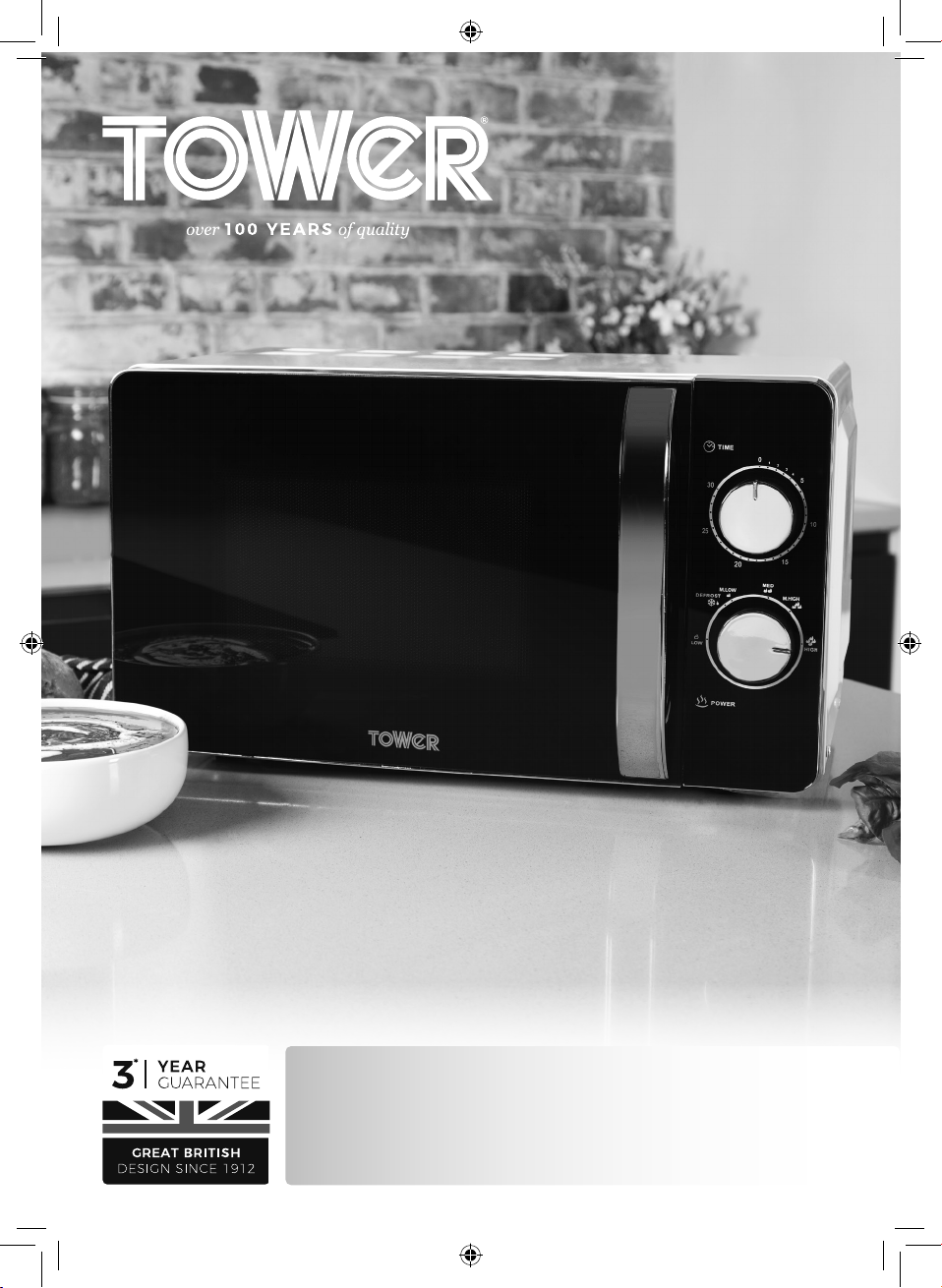
T24021 / T24021W / T24021PS
800W Microwave Oven
SAFETY AND INSTRUCTION MANUAL
PLEASE READ CAREFULLY
*Subject to registering your Extended Guarantee online at www.towerhousewares.co.uk.
2
GREAT BRITISH DESIGN, INNOVATION
AND EXCELLENCE SINCE 1912
Since the turn of the 20th century, Tower has been designing,
developing and manufacturing housewares and small
appliances used by millions of households throughout the
UK and beyond. During the 1960s, the rise in popularity
of pressure cooking saw Tower become the UK’s largest
producer of pressure cookers, right through into the late
1980s. In recent years the Tower brand has been reborn with
an exciting and varied range of housewares and electrical
appliances that have quickly reinstated the brand’s richly
deserved status as a household name.
Visit
www.towerhousewares.co.uk
for more fantastic products.
3
Contents:
Thank you for purchasing this appliance from the
Tower range.
Please read this manual carefully BEFORE using the
appliance for your own safety.
It has been designed to provide many years of
trouble-free use.
There are many benefits to using a Tower Microwave:
• With a large 20 litre capacity you can cook quick
and easy meals for the whole family.
• The manual 60 minute timer allows for easy time
control and adjustments.
• 6 power levels including a defrost setting, simply
adjusted to suit a variety of functions.
1. Specifications
Components and
structure
2. Technical Data
3. Important Safety
Information
4. Before First Use
5. Using your Appliance
6. Troubleshooting
7. Recycling
8. Cleaning & Care
9. Wiring Safety
10. Warranty Information
11. Your Receipt
See back page for Customer
Service Information.
4
This box contains:
Instruction Manual
Microwave Oven
Roller Ring
Glass Tray
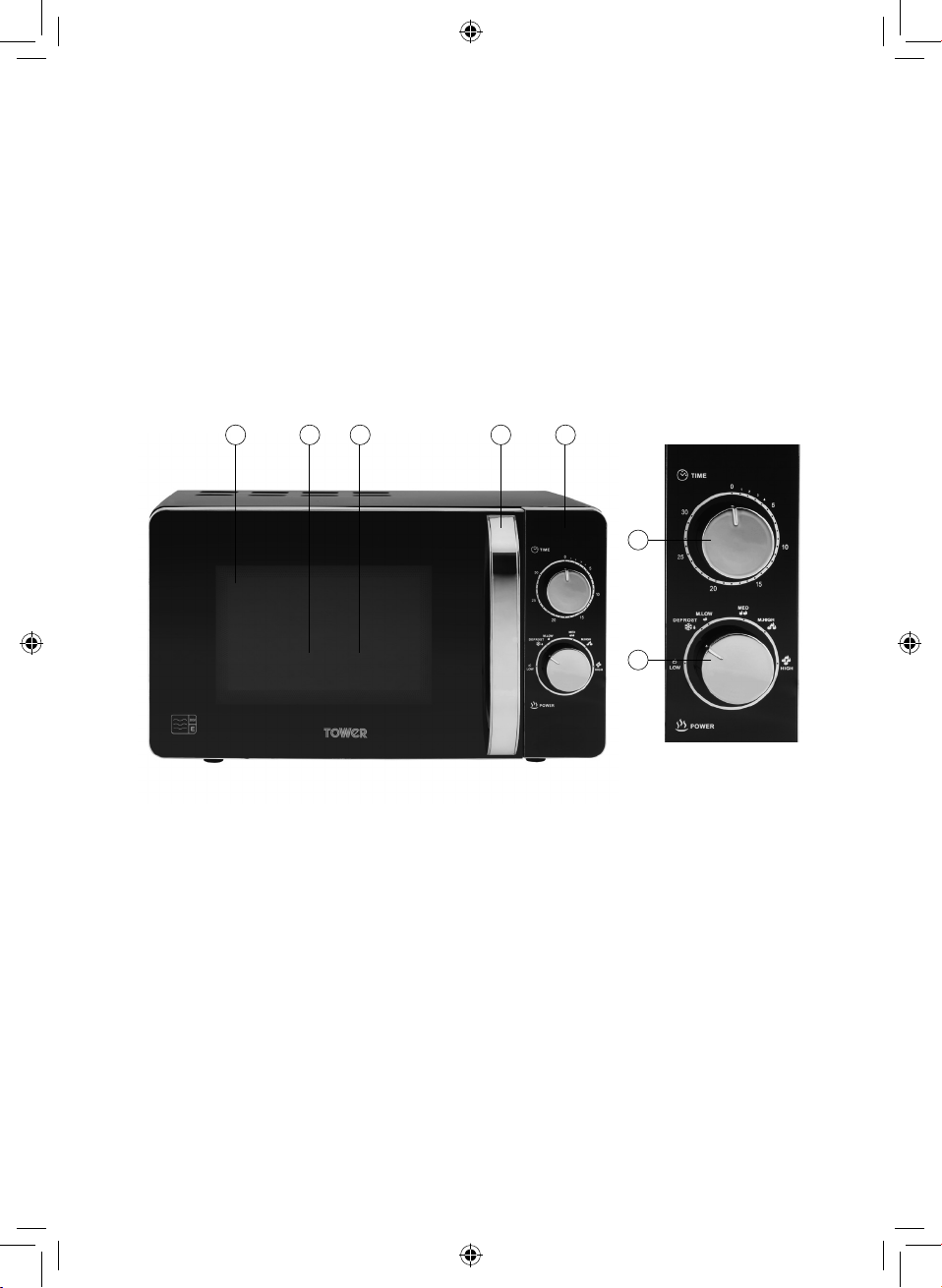
1. Oven Window
2. Roller Ring (inside)
3. Glass Tray (inside)
4. Door Handle
5. Control Panel
6. Power Button
7. Timer/Weight Dial
8. Defrost/Time Button
9. Pause/Cancel Button
10. Express Button
11. Auto Cook Button
12. Instant/Start Button
1 - Specifications:
Structure of your appliance:
1 2 3 4 5
6 10
11
12
7
8
9
5
Description: 20L Digital Microwave
Model: T24021 / T24021W / T24021PS
Rated Voltage: 220-240v
Frequency: 50Hz
Power Input: 1280W
Power Output: 800W
Documentation
We declare that this product conforms to the following product legislation in
accordance with the following directive(s):
2014/30/EU Electromagnetic Compatibility Directive.
2014/35/EU Low Voltage Directive.
2011/65/EU Restriction of Hazardous Substances Directive.
1935/2004/EC Materials & Articles in Contact With Food
(LFGB section 30 & 31).
2009/125/EC Eco-Design of Energy Related Products.
RK Wholesale LTD Quality Assurance, United Kingdom.
2 - Technical Data:
Should you encounter problems or require a replacement part, contact the Tower
Customer Support Team: +44 (0) 333 220 6066.
Some spare parts may be ordered from the Tower website.
Your warranty becomes void should you decide to use non Tower spare parts.
Spare parts can be purchased from www.towerhousewares.co.uk
Guarantee for spare parts:
The spares and accessories are guaranteed for 1 year from date of purchase.
The main body and housing are guaranteed for the extended free warranty subject to
registration.
If any defect arises due to faulty materials of workmanship, the faulty products must be
returned to the place of purchase within 12 months from the date of purchase.
Refund or replacement is at the discretion of the retailer.
SPARE PARTS
(not included, available to order via website/customer service should you require replacements)
Part No Description
T24012001 Wave Guide Cover
T24012002 Roller Ring
T24012003 Glass Turntable
T24001001 Wave Guide Cover
T24001002 Roller Ring
T24001003 Glass Turntable
6
• Check that the voltage
of the main circuit
corresponds with the
rating of the appliance
before operating.
• If the supply cord or
appliance is damaged,
stop using the
appliance immediately
and seek advice from
the manufacturer,
its service agent or
a similarly qualified
person.
• DO NOT let the cord
hang over the edge of a
table or counter or let it
come into contact with
any hot surfaces.
• DO NOT carry the
appliance by the power
cord.
• DO NOT use any
extension cord with this
appliance.
• DO NOT pull the plug
out by the cord as this
may damage the plug
and/or the cable.
• Switch off at the wall
socket then remove the
plug from the socket
when not in use or
before cleaning.
• Switch off and
unplug before fitting
or removing tools/
attachments, after use
and before cleaning.
• Close supervision is
necessary when any
appliance is used by or
near children.
• Children should not
play with the appliance.
• This appliance can
be used by children
aged from 8 years and
above and persons
with reduced physical,
sensory or mental
capabilities or lack
of experience and
knowledge if they have
been given supervision
or instruction
concerning use of the
appliance in a safe way
and understand the
hazards involved.
Please read these notes carefully BEFORE using your
Tower appliance
3 - Important Safety Information:
7
• Cleaning and user
maintenance should
not be undertaken
by children without
supervision.
• Take care when any
appliance is used near
pets
• DO NOT use this
product for anything
other than its intended
use.
• This appliance is for
household use only.
CAUTIONS
• DO NOT operate the
microwave with the
door open, due to
the safety interlocks
built into the door
mechanism. It is
important not to
tamper with the safety
interlocks (safety
interlocks automatically
switch off any cooking
activity when the
door is opened). This
could result in harmful
exposure to excessive
microwave energy.
• DO NOT place any
object (such as kitchen
towels, napkins, etc.)
between the microwave
front face and the door
or allow food or cleaner
residue to accumulate
on sealing surfaces.
• DO NOT operate
the microwave if
it is damaged. It is
particularly important
that the microwave
door closes properly
and that there is no
damage to the:
Door Hinges and
latches.
Door seals and sealing
surfaces.
• Please ensure cooking
times are correctly set.
Small amounts of food
require shorter cooking
or heating time. Over
cooking may result in
the food catching on
fire and subsequent
damage to the
microwave.
8
• When heating liquids,
e.g. soups, sauces
and beverages in
your microwave,
avoid using straight
sided containers with
narrow necks. Stir the
liquid before placing
the container in the
microwave and again
halfway through the
heating time. After
heating, let it stand,
stir or shake it again
carefully and check
the temperature of it
before consuming to
avoid burns (especially,
contents of feeding
bottles and baby food
jars).
• An exhaust outlet is
located on the top,
bottom or side of the
microwave. Don’t block
the outlet. It could
result in damage to
your microwave and
poor cooking results.
• DO NOT operate the
microwave when
empty. It is best to
leave a glass of water
in the microwave when
not in use. The water
will safely absorb all
microwave energy
if the microwave is
accidentally started.
• Improper use could
result in damage to the
microwave.
• DO NOT use wooden
containers and ceramic
containers that have
metallic (e.g. gold or
silver) inlays. Always
remove metal twist ties.
Check that the utensils
are suitable for use in
the microwave before
use. They may heat up
and char. Metal objects
in particular may arc in
the microwave, which
can cause serious
damage.
• DO NOT rinse the
glass tray by placing
it in water just after
cooking. This may cause
breakage or damage.
• Before cooking pierce
the skin of potatoes,
apples or any such fruit
or vegetables. They
could burst.
• DO NOT cook eggs in
their shell. Eggs in their
shell and whole hard-
boiled eggs should
not be heated in the
microwave since they
may explode, even after
microwave heating has
ended. Pressure will
9
build up inside the egg
which will burst.
• DO NOT attempt
deep fat frying in your
microwave. This could
result in a sudden boil
over of hot liquid.
• If smoke is observed,
switch off or disconnect
the microwave from the
power supply and keep
the microwave door
closed in order to stifle
any flames. It can cause
serious damage such as
fire or electric shock.
• When food is heated or
cooked in disposable
containers made of
plastic, paper or other
combustible materials
keep an eye on the
microwave and check it
frequently.
• The microwave should
be cleaned regularly
and any food deposits
should be removed.
Failure to maintain the
microwave in a clean
condition could lead
to deterioration of the
surface. This could
adversely affect the
life of the appliance
and possibly result in a
hazardous situation.
• Follow exact directions
given by each
manufacturer for their
popcorn product. DO
NOT leave the oven
unattended while
corn is being popped.
If corn fails to pop
after the suggested
times, discontinue
cooking. Never use a
brown paper bag for
popping corn. Never
attempt to pop leftover
kernels. Overcooking
could result in the corn
catching fire.
• DO NOT use harsh
abrasives cleaners or
sharp metal scrapers
to clean the microwave
door glass. They can
scratch the surface,
which may result in the
glass shattering.
• After cooking, the
container is very hot.
Use gloves to take
out the food and
avoid steam burns by
directing steam away
from the face and
hands.
10
• This appliance is
intended to be used in
household and similar
applications such as:
• Staff kitchen areas in
shops. Oces and
other working
environments.
• Farm houses.
• By clients in hotels,
motels and other
residential
environments,
bed & breakfast type
environments.
• The microwave oven is
intended for heating
food and beverages.
Drying of food or
clothing and heating of
warming pads, slippers,
sponges, damp cloth
and similar may lead to
risk of injury, ignition or
fire.
• The door or outer
surface may get hot
when the appliance is
operating
• In the unlikely event
the appliance develops
a fault, stop using
it immediately and
seek advice from the
Customer Support
Team:
+44 (0) 333 220 6066
11
• Take out all of the packaging. If there is a safe film over the oven, tear it off
before use. Check carefully for damage. Should you find any, immediately
notify your dealer or contact our Customer Service Team.
• Microwave ovens must be placed under dry and non-corrosive environments
and kept away from heat and humidity sources, such as gas burners or water
tanks.
• To ensure sucient ventilation, the distance from the back of the microwave to
the wall should be at least 10 cm, the distance from the side of the microwave
to the wall at least 5 cm and the free distance above the top surface at least 20
cm. The distance from the microwave to the ground should be at least 85 cm.
• The microwave should be positioned away from TVs, radios and other
antennae, as this may cause interference or disturbance in the signal.
• The appliance must be positioned so that the plug is accessible, and has a
good grounding in case of leakage. A ground loop can be formed to avoid
electric shock.
• The microwave oven must be operated with the door closed.
• The microwave oven must not be placed in a cabinet.
• The microwave oven is intended to be used free-standing.
• During first use, the microwave oven may omit an odour and a slight amount
of smoke. This is due to manufacturing residue or oil on the heating element or
oven cavity. This is normal and should not occur after several uses. Keep doors
and windows open when first using the microwave to ensure good ventilation.
We recommend placing a cup of water on the glass tray and operating
the microwave oven several times on the highest setting to help clean the
microwave of residue.
4 - Before First Use
12
Child Lock Function
Use this feature to lock the control panel when you are cleaning or so that children
cannot use the oven unsupervised. All the buttons are rendered inoperable in this
mode.
1. Set lock: Long-press the Pause/Cancel button for about 5 seconds when the
microwave is in standby.
2. Cancel lock: Long-press the Pause/Cancel button again while the lock is activated.
Setting the Clock:
• To set the correct time on the unit’s built-in clock, first press and hold the Defrost/
Time button for about 5 seconds, until the Hours digits on the unit’s LCD screen
begin to flash.
• Once the hours are highlighted and flashing, rotate the Timer/Weight dial to cycle
through and set the correct hours.
• When the correct hour has been set, short-press the Defrost/Time button again.
The minutes digits will begin to flash.
• Once the minutes are highlighted and flashing, rotate the Timer/Weight dial to
cycle through and set the correct minutes.
• When both times have been correctly set, short-press the Defrost/Time button
again to save the settings to memory.
Timer:
The maximum cooking time is 60 minutes.
Use the Time/Weight dial to adjust the cooking time after setting the microwave
power.
Express Mode:
• This microwave is equipped with an Express function, which allows for heating
cycles of between 0:30 and 1:30, making it ideal for re-heating beverages or small
food portions.
• Press the Express button on the unit’s control panel to activate the Express
function. The text ‘0:30’ will show on the unit’s LCD display to indicate this function
has been selected.
• Once the Express function has been activated, repeatedly press the Express
button to cycle through the 3 heating length options. The corresponding text will
show on the unit’s LCD display to indicate each length has been selected.
• Press the Pause/Cancel button at any time to exit Express mode and return the
unit to Standby mode. The LCD display will revert back to displaying the current
set time on the clock to show this function has been cancelled.
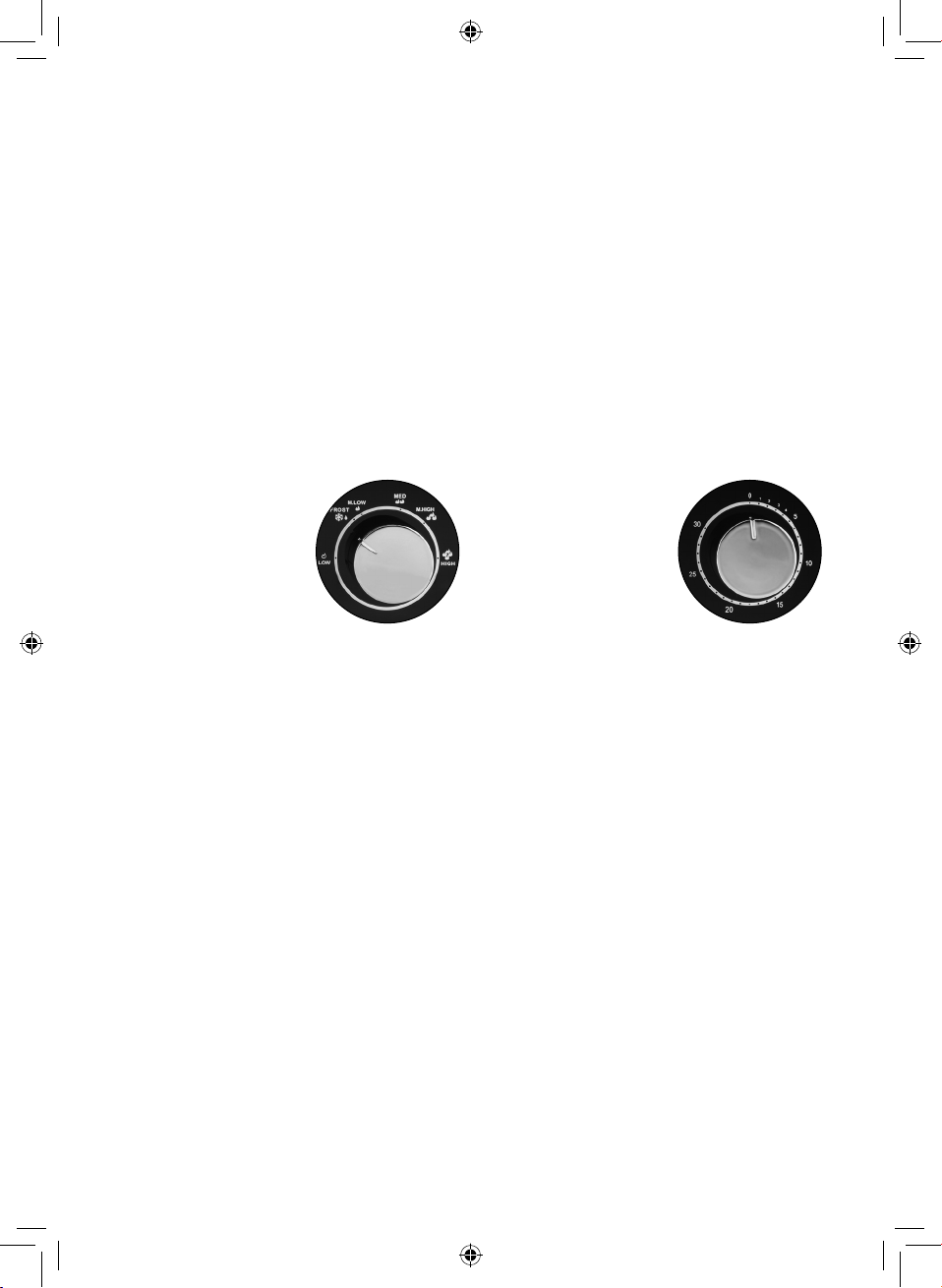
Power Levels:
• This microwave is equipped with 6 power levels including a defrost setting.
• Press the Micro Power button to activate the power level selection function. Once
this function has been activated, repeatedly press the Micro Power button to cycle
through the available power levels. The corresponding text will appear on the
unit’s LCD screen to show each power level has been activated.
5 - Using Your Appliance
13
The available power levels are as follows:
• High - 100% power, suitable for quick and thorough cooking. When this power
level is selected, the text ‘100P’ will be displayed on the unit’s LCD screen.
• Medium High - 80% power, suitable for express cooking. When this power level is
selected, the text ‘80P’ will be displayed on the unit’s LCD screen.
• Medium - 60% power, suitable for steaming food. When this power level is
selected, the text ‘60P’ will be displayed on the unit’s LCD screen.
• Medium Low - 40% power, suitable for defrosting. When this power level is
selected, the text ‘40P’ will be displayed on the unit’s LCD screen.
• Low - 20% power, suitable for keeping warm. When this power level is selected,
the text ‘20P’ will be displayed on the unit’s LCD screen.
Stop/Cancel:
The Stop/Cancel button can be used to pause and/or cancel the current operation.
• Press the Stop/Cancel button or open the microwave door during cooking to
pause the current operation.
• Close the door and press Start/Quick Start to resume.
• Press Stop/Cancel twice to cancel the current operation.
Auto Defrost:
The microwave has an Auto Defrost setting for defrosting meat, poultry and seafood.
The time and defrosting power are adjusted automatically once the weight of the food
has been entered.
• The weight range of frozen foods is between 100g and 1800g.
• Press the Auto Defrost button once.
• Use the Time/Weight dial to select the required weight.
• Press Start/Quick Start once.
Note: During Auto Defrost, the microwave will pause and beep to prompt you to
turn over the food inside.
Quick Start:
The Quick Start feature allows you to begin cooking quickly. In standby mode,
repeatedly press the Start/Quick Start button to set the cooking time. Once you have
set the time, the microwave will begin cooking on full power. The maximum cooking
time in Quick Start mode is 12 minutes.
During cooking, use the Time/Weight dial to increase or decrease the current cooking
time.
Auto Cook:
With the Auto Cook function you do not need to program the microwave power or set
the timer.
You are only required to select the type and weight of the food.
To use Auto Cook:
1. Press the Auto Cook button repeatedly until you have reached the corresponding
menu code.
2. Turn the Time/Weight dial to the required weight.
3. Press the Start/Quick Start button.
14
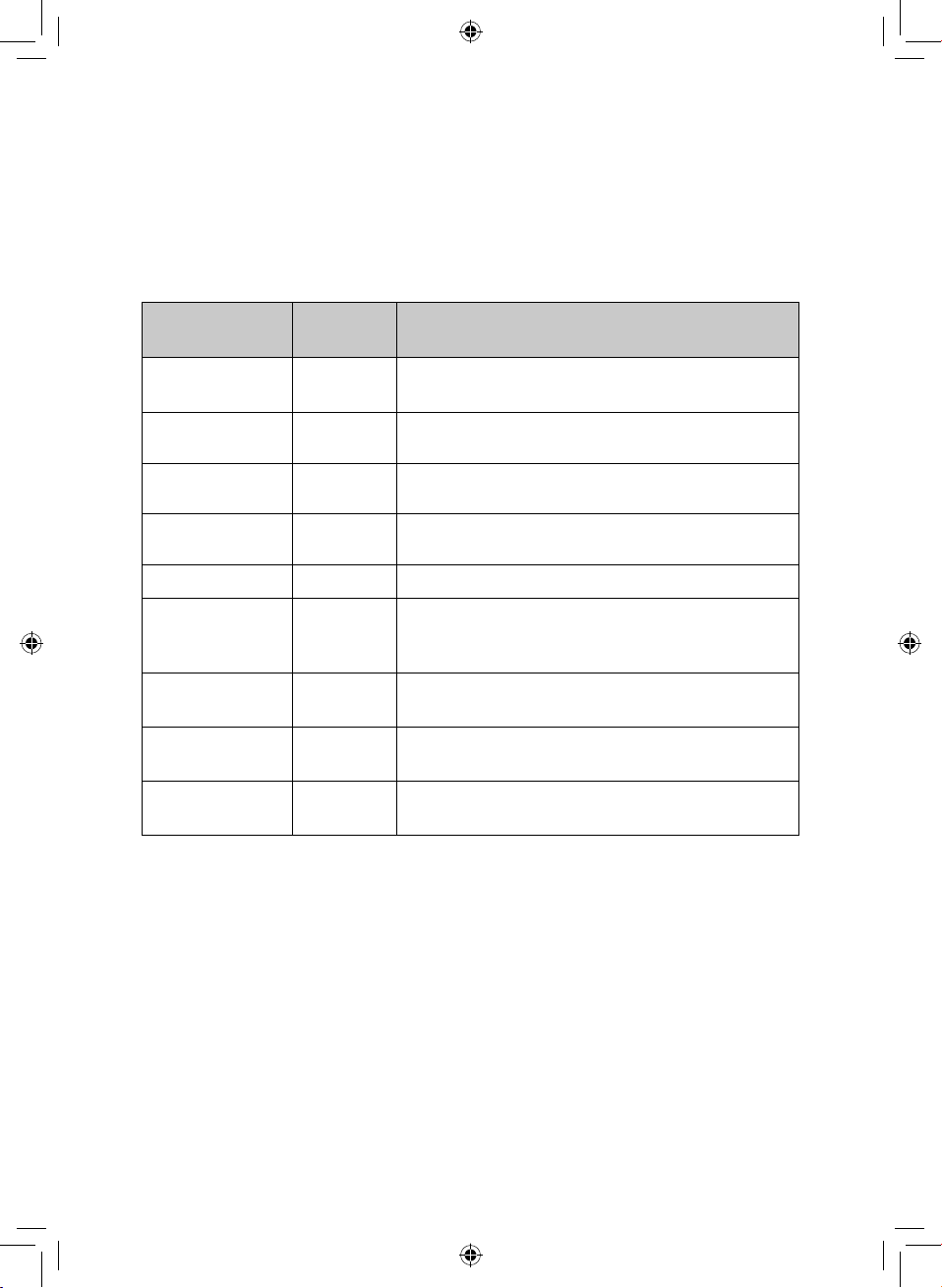
Auto Cook Menu:
It is always recommended to check your food during cooking. If the cooking result is
not to your taste, please adjust the cooking time accordingly.
Menu Code / Food
1. Milk/Coffee (200ml/cup)
2. Rice (g)
3. Spaghetti (g)
4. Potatoes (230g/unit)
5. Auto Reheat (g)
6. Fish (g)
7. Popcorn (99g)
8. Pizza (g)
Note: Turn the Time/Weight dial to indicate weight of food or number of servings.
For milk/coffee and potato, the screen will show the number of servings.
The result of auto cooking depends on factors such as the shape and size of food,
your personal preference as to the doneness of certain foods and even how well you
happen to place food in the oven.
For spaghetti add boiling water before cooking.
During cooking, you can query the current cooking menu by pressing the Auto
Cook button.
Utensils guideline:
It is strongly recommended to only use containers which are suitable and safe for
microwave cooking. Generally speaking, containers made of heat-resistant ceramic,
glass or plastic are suitable for microwave cooking. Never use metal containers
for microwave cooking and combination cooking as sparks are likely to occur and
there is a risk of fire or injury. When cooking microwave meals, always check the
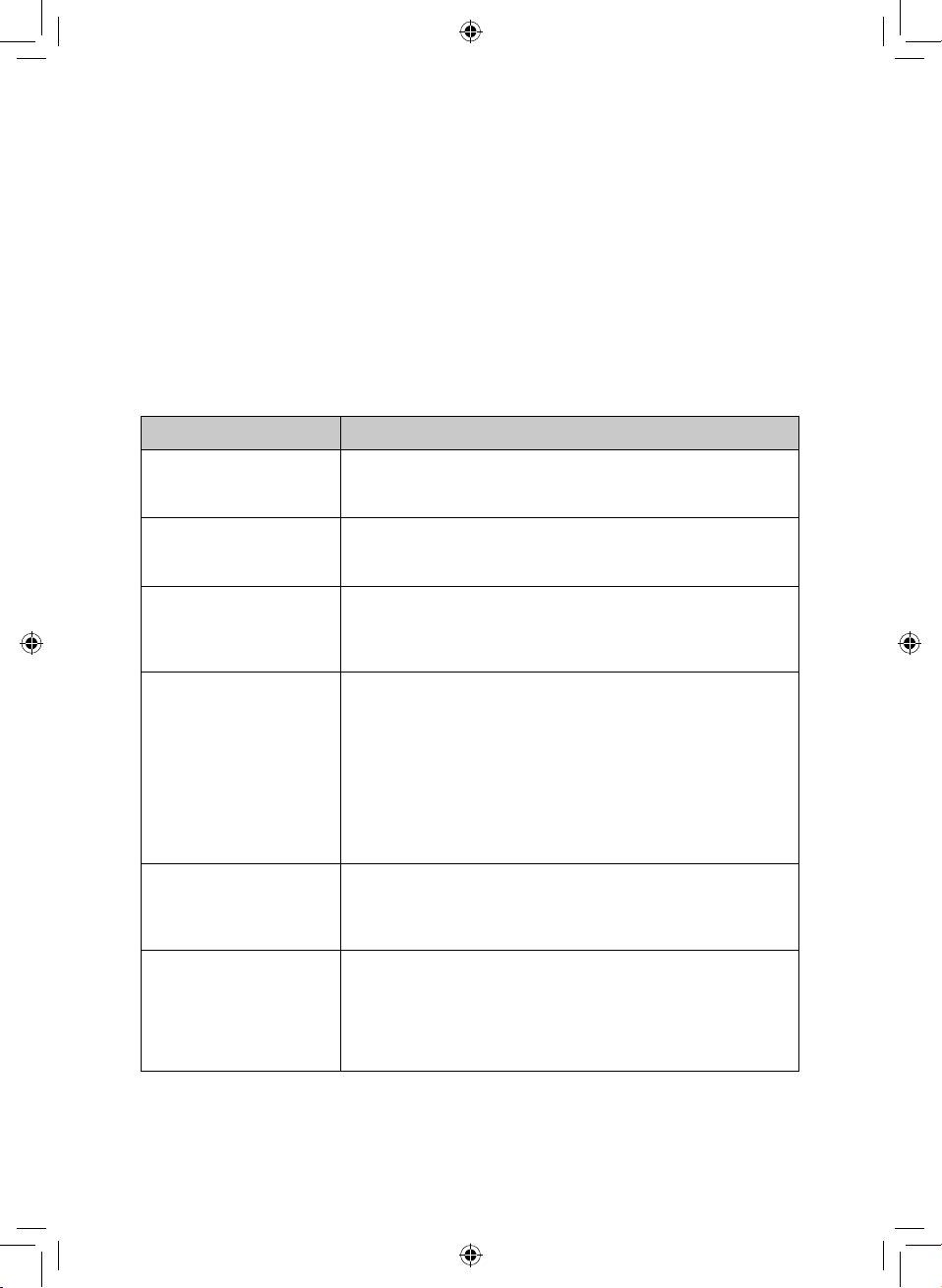
packaging to see which parts are microwave safe. Use the below table as reference:
Material
Microwave
Safe
Notes
Heat resistant
ceramic
Yes
Never use ceramics that are decorated with a
metal rim or glazed.
Heat resistant
plastic
Yes
Cannot be used for extended periods of time
when microwave cooking.
Heat resistant
glass
Yes
Plastic film Yes
Not to be used when cooking meat or chops as,
the high temperature may damage the film.
Grill rack No
Metal container No
Never to be used in the microwave. Microwaves
cannot penetrate through metal. Microwaving
with a metal container can result in fire.
15
Lacquer No
Poor heat resistance. Cannot be used for high
temperature cooking
Bamboo wood
and paper
No
Poor heat resistance. Cannot be used for high
temperature cooking
Cling film Yes
Cling film can be used as long as it is pierced to
let steam escape, and it not touching the food.
CAUTION:
There are a number of accessories available on the market. Before you buy, make
sure they are suitable for microwave use. When you put food into the microwave,
ensure that the food supports and/or covering do not come in direct contact with
any of the internal walls or the ceiling of the cavity since discolouration may take
place.
Some plastics are heat-proof only up to certain temperatures. Check carefully!
Always remove the lids of jars and containers, including take away food containers,
before you cook using your microwave. If you don’t remove the lids, steam and
pressure can build up inside and cause an explosion even after microwave cooking
has stopped.
Do not use straight sided containers with narrow necks when heating liquid. Use
extreme care when inserting a spoon or other utensils into the container.
Cooking tips:
The following factors may affect the cooking result:
Food arrangement:
Place thicker areas towards the outside of the dish with the thinner parts towards
the centre. Spread it evenly and avoid overlap if possible.
Cooking time length:
Begin cooking on a shorter time setting and evaluate the food after it times out.
Extend the time as necessary. Over cooking may result in burnt food and smoke.
Piercing:
Food such as potatoes, fish, chicken and sausages all need to be pierced in several
places before cooking, so that steam does not build up and cause the food to
explode.
Cooking food evenly:
Food such as chicken, burgers or steak should be turned once during cooking.
Depending on the type of food, if applicable, stir from outside to the centre of the
dish once or twice during cooking.
Allow standing time:
Once the cooking time has finished, allow food to stand in the microwave for a
few minutes. This allows the food to complete its cooking cycle and to cool down
naturally.
16
If the food is cooked fully:
The colour and firmness of food help to determine whether it done. The following
signs show that the food is ready:
• Steam coming out from all parts of the food, not just the edge
• Joints of poultry can be moved easily
• Pork or poultry show no signs of blood
• Fish is opaque and can be sliced easily with a fork
Browning dish:
When using a browning dish or self-heating container, always place a heat-resistant
insulator, such as a porcelain plate, under it to prevent damage to the turntable
and rotating ring.
Microwave safe plastic wrap:
When cooking food with high fat content, do not allow the plastic wrap to come
into contact with food as it may melt.
Microwave safe plastic cookware:
Some microwave safe plastic cookware might not be suitable for cooking foods
with high fat and sugar content. The preheating time specified in the dish
instruction manual must not be exceeded.
CAUTION:
• Food should be turned over partway through the cooking process to ensure
even cooking.
• Defrosting will typically take longer than cooking.
• Defrosting can be considered complete when the food can be cut with a knife.
• Microwaves penetrate around 4cm into most foods.
• Defrosted food should be consumed as soon as possible; it is not advisable to
put it back into the refrigerator. DO NOT refreeze food that has been previously
defrosted.
17
6 - Troubleshooting
Questions Answers
Is it normal for the
glass tray to turn in
either direction?
Yes. The glass tray can rotate clockwise or anti-clockwise,
depending on the rotation of the motor when the cooking
cycle starts.
Can I operate my
microwave whilst it
is empty?
No, never run it empty or with a very small load for a long
period of time, as this will damage the microwave.
Can I open the
door whilst the
microwave is
running?
You can open the door at any point during cooking.
The microwave energy will automatically switch off when
the door is opened, and the time setting will pause until
the door is closed.
Why is my
microwave
sparking?
If you see sparks in your microwave, turn it off immediately.
Sparks can be caused by:
metal or aluminium foil that touches the interior of the
microwave, metal from a closing strip or tableware with
metallic edges, recycled paper that contains small metal
particles and aluminium foil that is not correctly covering
the food.
Remove anything from the microwave that may contain
metal. Refer to the Utensils Guideline in this manual for
reference of what containers are microwave safe.
I am trying to cook
eggs and they are
popping. What do
I do?
When you bake or poach eggs, the yolk can pop due to a
build-up of steam inside the yolk membrane. Pierce the
yolk with a toothpick before cooking. Never cook eggs
without first piercing their shells.
My microwave is
taking longer to
cook food than the
cooking guide says.
Variations in the size, shape and weight of your food can
affect cooking times.
Cooking guide times and heat settings should be used
as suggestions to help prevent over-cooking. If you find
the cooking time or temperature is not suited to your
ingredients, adjust accordingly.
Can I operate my
microwave without
the glass tray?
No. If you remove the glass tray you will get poor cooking
results. Ensure that all dishes used in the microwave fit
correctly on to the glass tray.
What does standing
time mean and why
is it recommended?
Standing time means that food should be removed from
the microwave and allowed to ‘stand’ for an additional
time to let it finish cooking.
This is important because with microwave cooking, the
heat is held in the food, not in the oven. Many foods build
up enough internal heat to allow the cooking process to
continue, even after the food is removed from the oven.
Standing time for joints of meat, large vegetables and
cakes is to allow the inside to cook completely, without
overcooking the outside.
Most directions on microwavable food will note how much
standing time is required.
18
7 - Servicing safeguards - Microwave
radiation
It is hazardous for anyone, other than a qualied service technician, to carry out any service for
repairing operation which involves removal of any cover which gives protection against exposure
to microwave energy.
The temperature of accessible surfaces may be high when the appliance is operating.
The high voltage capacitor remains charged after disconnection; short the negative terminal of a
H.V capacitor to the oven chassis (use a screwdriver) to discharge before touching.
Magnetron
High voltage transformer
High voltage capacitor
High voltage diode
High voltage fuse
The following conditions may cause undue microwave exposure during servicing.
Improper tting of magnetron;
Improper matching of door interlock, door hinge and door;
Improper tting of switch support;
Door, door seal or enclosure has been damaged.
DISPOSAL OF THE UNIT
Appliances bearing the symbol shown here may not be disposed of in domestic
rubbish. You are required to dispose of old electrical and electronic appliances like
this separately.
Please visit www.recycle-more.co.uk or www.recyclenow.co.uk for access to
information about the recycling of electrical items.
Please visit www.weeeireland.ie for access to information about the recycling of
electrical items purchased in Ireland.
The WEEE directive, introduced in August 2006, states that all electrical items must
be recycled, rather than taken to landfill.
Please arrange to take this appliance to your local Civic Amenity site
for recycling, once it has reached the end of its life.
8 - Recycling
19
• The microwave should be cleaned regularly and any food deposits removed.
• Remove the power cord from the wall outlet before cleaning. Don’t immerse the
appliance in water or other fluids when cleaning.
• Failure to maintain the microwave in a clean condition could lead to deterioration
of the surface. This could adversely affect the life of the appliance and possibly
result in a hazardous situation.
• Never use hard detergent, gasoline, abrasive powder or metal brush to clean any
part of the appliance.
• Do not remove the waveguide cover.
• After lengthy use, it is possible for odours to emit from the microwave.
The following 2 points are some methods to remove odours or unpleasant smells:
• Place several lemon slices in a cup, then heat on High power for 2-3 minutes.
• Put some orange peel into the microwave, and then heat them on High power for
1 minute.
NEVER IMMERSE THE MICROWAVE, CORD, OR PLUG IN WATER OR ANY OTHER
LIQUID.
Tips for cleaning
If the seal of the microwave is dirty, it may stop the door from closing properly. Keep
the seal clean.
Spicy sauces such as ketchup and mustard, or salty dishes such as salted meat, contain
ingredients that can erode the surface. After use, you should always clean the oven
interior.
Food residue from spillovers or splatters will attract microwave energy, causing it to
burn onto the surface. This could reduce the eciency of the microwave and may
cause bad odours.
Details for cleaning door seals, cavity and adjacent parts:
• Exterior: Wipe the appliance with a damp soft cloth.
• Door: Using a damp soft cloth, wipe clean the door and window. Wipe the door
seals and adjacent parts to remove any spills. Wipe the control panel with a
slightly dampened soft cloth.
• Interior walls: Wipe clean the interior with a damp soft cloth. Wipe clean the
waveguide cover to remove any food remnants.
• Glass tray / Rotation ring / Rotation axis: Wash with mild soap water. Rinse with
clean water and allow it to dry thoroughly.
NOTE!
Do not remove the waveguide cover during cleaning.Make sure the waveguide cover is
installed correctly and has not been damaged during cooking.
9 - Cleaning & Care
20
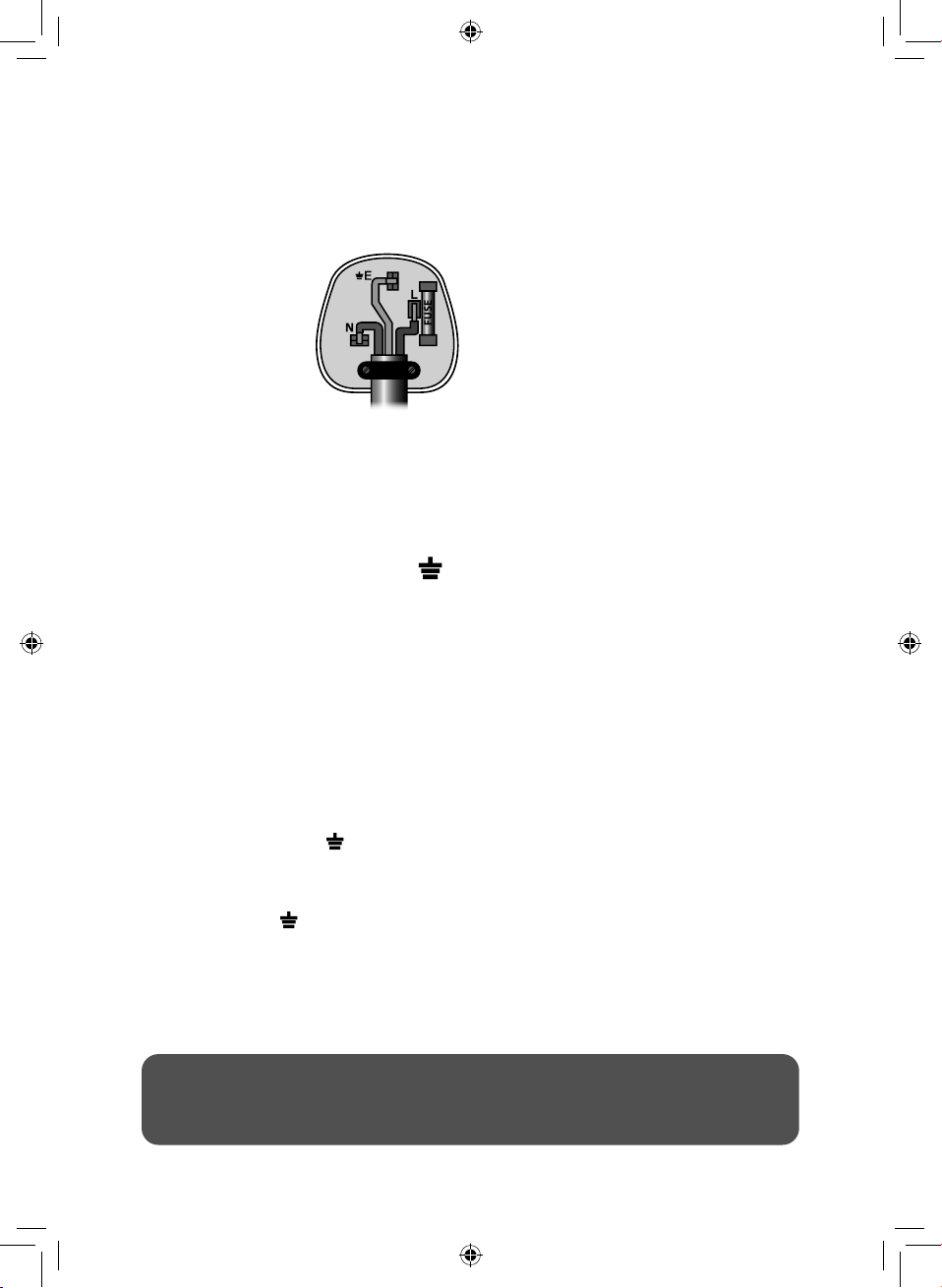
10 - Wiring Safety for UK Use Only
IMPORTANT
As the colours in the mains lead of this
appliance may not correspond with the
coloured markings identifying the terminals
in your plug, please proceed as follows:
The wires in the mains lead are labelled in
accordance with the following code:
Blue neutral [N] Brown live [L]
Green/Yellow [EARTH]
Plug Fitting Details (Where Applicable).
The wire labelled blue is the neutral and
must be connected to the terminal marked
[N].
The wire labelled brown is the live wire and
must be connected to the terminal marked
[L].
The wire labelled green/yellow must be
connected to the terminal marked with the
letter [E].
On no account must either the brown or
the blue wire be connected to the [EARTH]
terminal.
Always ensure that the cord grip is fastened
correctly.
The plug must be tted with a fuse of the
same rating already tted and conforming to
BS 1362 and be ASTA approved.
If in doubt consult a qualied electrician who
will be pleased to do this for you.
Non-Rewireable Mains Plug.
If your appliance is supplied with a non-
rewireable plug tted to the mains lead and
should the fuse need replacing, you must
use an ASTA approved one (conforming to
BS 1362 of the same rating).
If in doubt, consult a qualied electrician
who will be pleased to do this for you.
If you need to remove the plug - disconnect
it from the mains - then cut it off of the mains
lead and immediately dispose of it in a safe
manner. Never attempt to reuse the plug
or insert it into a socket outlet as there is a
danger of an electric shock.
FUSE
Earth
(Green/Yellow)
Fuse
Neautral
(Blue)
Live
(Brown)
WARNING:
This appliance MUST be earthed!
21
This product is guaranteed for 12 months
from the date of original purchase.
If any defect arises due to faulty materials
of workmanship, the faulty products must
be returned to the place of purchase.
Refund or replacement is at the discretion
of the retailer.
The Following Conditions Apply:
• The product must be returned to the
retailer with proof of purchase or a
receipt.
• The product must be installed and
used in accordance with the
instructions contained in this
instruction guide.
• It must be used only for domestic
purposes.
• It does not cover wear and tear,
damage, misuse or consumable parts.
• Tower has limited liability for incidental
or consequential loss or damage.
This guarantee is valid in the UK and Eire
only.
The standard one year guarantee is only
extended to the maximum available for
each particular product upon registration
of the product within 28 days of purchase.
If you do not register the product with us
within the 28 day period, your product is
guaranteed for 1 year only.
To validate your extended warranty, please
visit www.towerhousewares.co.uk and
register with us online.
Please note that length of extended
warranty offered is dependent on product
type and that each qualifying product
needs to be registered individually in order
to extend its warranty past the standard
1 year.
Extended warranty is only valid with proof
of purchase or receipt.
As a thank you for purchasing
one of our fantastic products,
we are offering you an extra
2 years peace of mind in
addition to your 1 year
guarantee.
To receive your extra 2 year
guarantee, register your
appliance online within 28
days of purchase by visiting
www.towerhousewares.co.uk
11 - Warranty
22
Ax your store receipt to this page for safe keeping.
12 - Your Receipt
23
NOTES
thank you!
We hope you enjoy your appliance for many years. As a thank you for
purchasing one of our fantastic products, we are offering you an extra
2 years peace of mind.
*To receive your extra 2 years guarantee, register your appliance online
within 28 days of purchase by visiting:
www.towerhousewares.co.uk
Should you have a problem with your appliance, or need any spare parts,
please call our Customer Support Team:
+44 (0) 333 220 6066
0120.V7
Your warranty becomes void should you
decide to use non Tower spare parts.
Spare parts can be purchased from
www.towerhousewares.co.uk