Use _ Care Guide
Side-By-Side Refri_jerator
Ouia de Uso y Cuidado
Refrigerador de dos puertas
Guide d'utilisation et d'entretien
R_fr{g_rateur _ compart{ments.juxtapos_s
Finq information
PLEASER_D AND SAVETHiSGUDE
m [] [] [] [] [] [] [] [] [] [] [] [] [] [] [] [] [] [] [] []
Thank you for choosing Electrolux, the new premium brand in home appliances.
This Use & Care Guide is part of our commitment to customer satisfaction and
product quality throughout the service life of your new refrigerator.
We view your purchase as the beginning of a relationship. To ensure our ability to
continue serving you, please use this page to record key product information.
MAKEA RECORDFORQUICKREFERENCE
[] [] [] [] [] [] [] [] [] [] [] [] [] [] [] [] [] [] [] [] [] []
_ii ii
Purchase Date
Electrolux Model Number
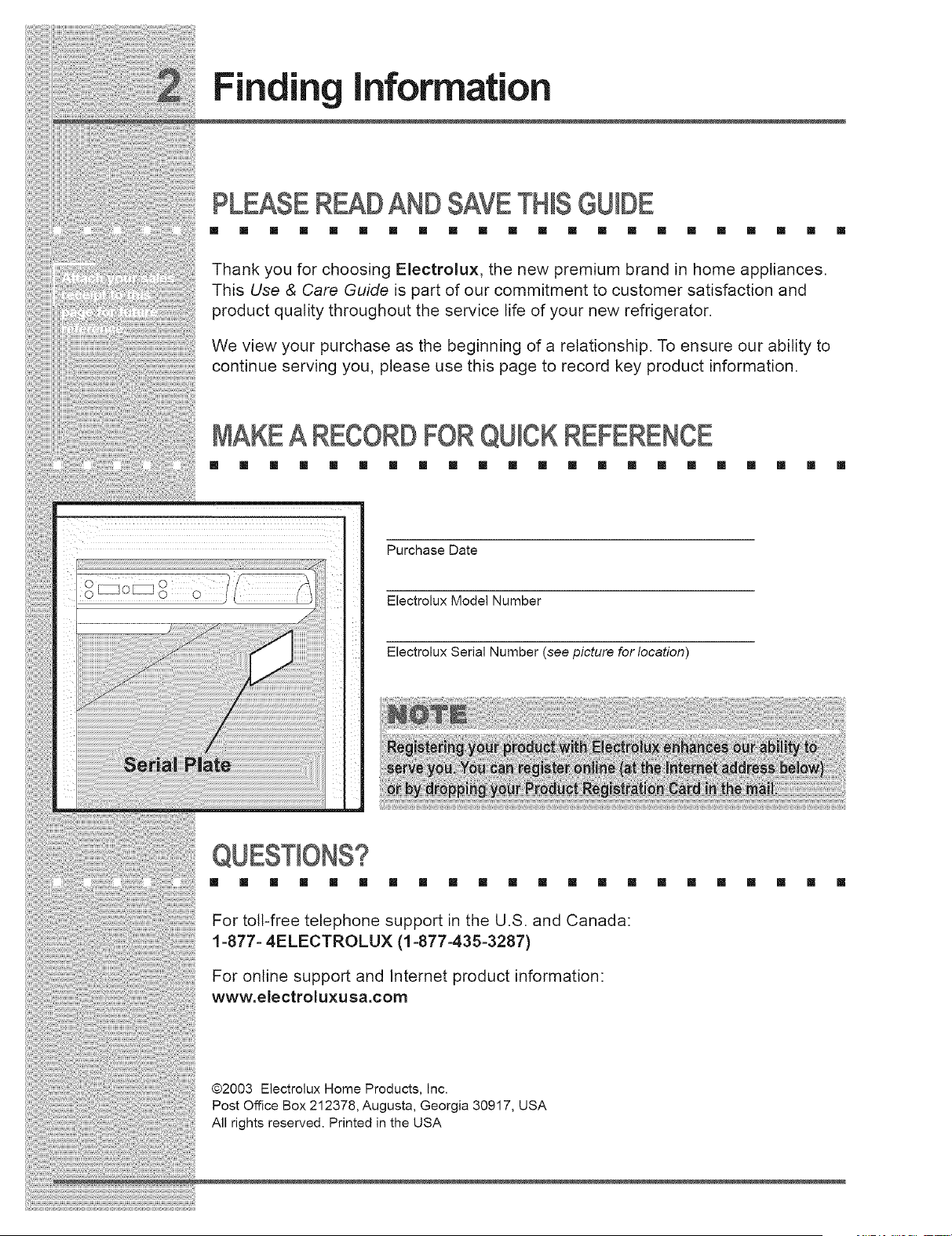
Electrolux Serial Number (see picture for location)
[] [] [] [] [] [] [] [] [] [] [] [] [] [] [] [] [] [] [] [] [] []
For toll-free telephone support in the U.S. and Canada:
1=877= 4ELECTROLUX (1 =877=435-3287)
For online support and Internet product information:
www.electroluxusa.com
@2003 Electrolux Home Products, Inc.
Post Office Box 212378, Augusta, Georgia 30917, USA
All rights reserved. Printed in the USA
_i_;¸i;:_;¸i:i!:ii:i;i:i_i¸;i_i¸ii[i!i;i;ii;!;i;!;i;!;i;!;i;!:!!i!i!!i!!i!!i!!i!i¸i!i;;!;i!i;:ii;i;;i!i!!_i:;i_!]!i!_i;;ii;;ii;i!;i!ill¸;i;!;i!;:i!;¸ii;!_iiiiiiiiii_ili_iiii!!ii:,!ii:,!i_ii:;!ii:!il;i;!;;i;;;ii
,od,oO,o,ormo,,oo
TABLEOF CONTENTS
[] [] [] [] [] [] [] [] [] [] [] [] [] [] [] [] [] [] [] [] [] []
FindingInformation............................................2 Storing Food& Saving Energy........................29
PleaseReadAnd SaveThisGuide ..................2 IdeasForStoringFoods.................................29
MakeARecord ForQuickReference...............2 IdeasForSavingEnergy................................30
Questions?.......................................................2
TableOf Contents............................................3 Normal Operating Sounds & Sights ...............31
UnderstandingThe SoundsYouMayHear.... 31
Safety ...................................................................4
ImportantSafetyInstructions...........................4 Care & Cleaning ................................................32
ElectricalInformation........................................5 ProtectingYourInvestment............................32
Care& CleaningTips .....................................33
Removing The Doors..........................................6 Vacation& MovingTips..................................33
GettingThroughNarrowSpaces......................6 ReplacingLight Bulbs ....................................34
Connecting The Water Supply ...........................9 Warranty Information ........................................35
AboutYourRefrigerator'sWaterSupply ..........9 Solutions To Common Problems ....................36
FeatureOverview ..............................................1! BeforeYouCall ..............................................36
UnderstandingFeaturesAndTerms................11
Controls & Settings ..........................................12
AllowingCoolingTime BeforeUse.................12
SettingCoolingTemperatures........................12
System-MonitoringAlarms .............................14
TurningTheCoolingSystemOnAnd Off....... 15
Storage Features...............................................16
CantileverShelves.........................................16
Drawers..........................................................17
Doors..............................................................18
Accessories....................................................19
Automatic Ice & Water Dispenser ...................20
UsingTheDispenser......................................20
UsingThe DispenserControlPanel...............21
PrimingTheWater SupplySystem ................22
IceDispenserOperation&Care ....................23
Changing TheFilter ..........................................26
LocatingThe WaterFilter...............................26
OrderingReplacementFilters........................26
ReplacingTheWaterFilter.............................26
Safety
IMPORTANTSAFETYINSTRUCTIONS
[] [] [] [] [] [] [] [] [] [] [] [] [] [] [] [] [] [] [] [] [] []
GeneralSafety
, Do not store or use gasoline, or other flammable liquids, near this or any
other appliance. Read product labels for warnings regarding flammability and
other hazards.
o Do not operate the refrigerator in the presence of explosive fumes.
• Avoid contact with any moving parts of the automatic ice maker.
• Remove all staples from the carton to avoid cut injuries. Staples can also
damage finishes if they come in contact with other appliances or furniture.
Child Safety
Packing Materials:
Packing cartons covered with rugs, bedspreads, plastic sheets or stretch
wrap may become airtight chambers and can quickly cause suffocation.
Destroy or recycle the product's carton, plastic bags, and any other exterior
wrapping material immediately after the refrigerator is unpacked. Children
should never play with these items.
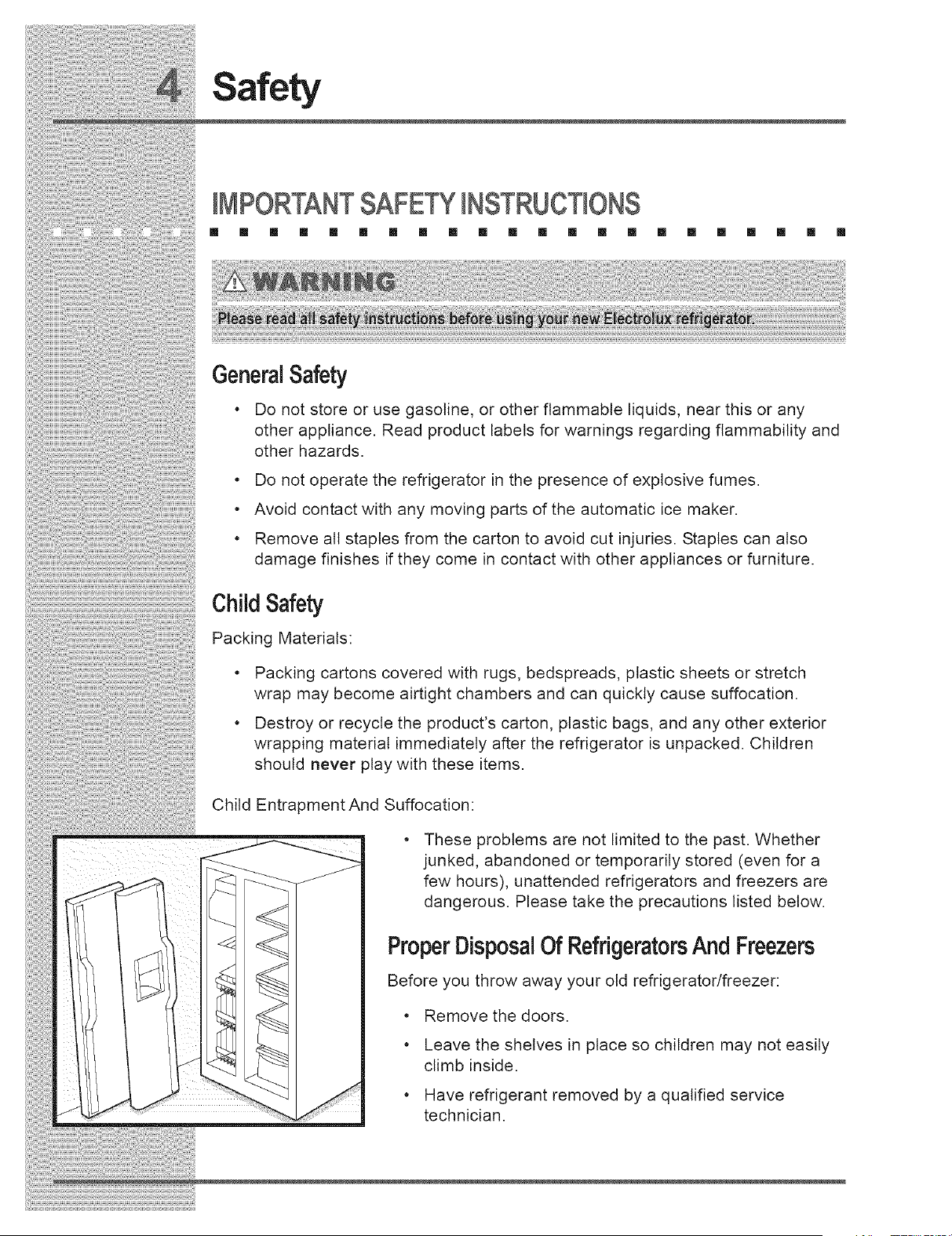
Child
Entrapment And Suffocation:
These problems are not limited to the past. Whether
junked, abandoned or temporarily stored (even for a
few hours), unattended refrigerators and freezers are
dangerous. Please take the precautions listed below.
ProperDisposalOf RefrigeratorsAnd Freezers
Before you throw away your old refrigerator/freezer:
• Remove the doors.
• Leave the shelves in place so children may not easily
climb inside.
• Have refrigerant removed by a qualified service
technician.
Safety
ELECTRICALINFORMATION
[] [] [] [] [] [] [] [] [] [] [] [] [] [] [] [] [] [] III [] [] []
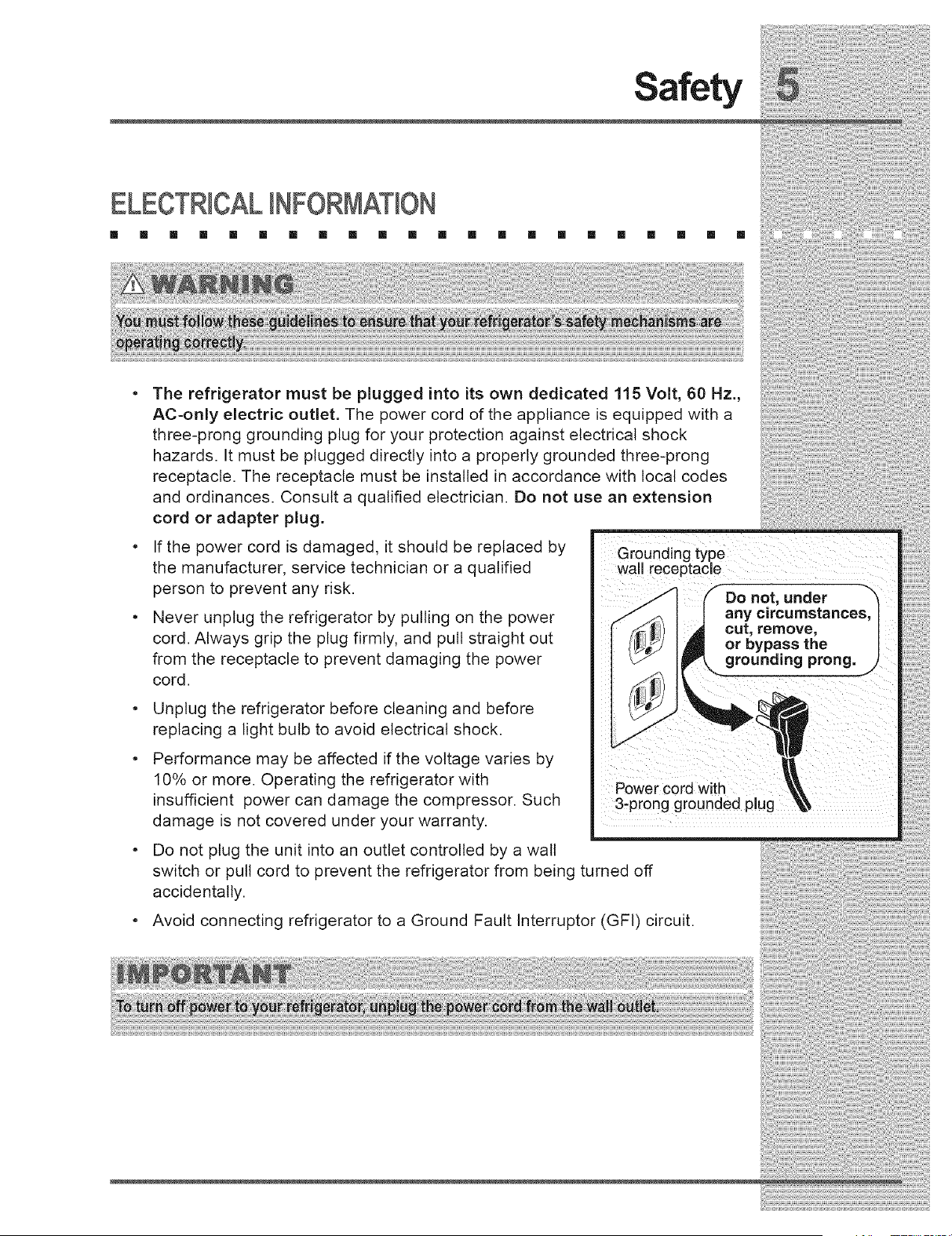
The refrigerator must be plugged into its own dedicated 115 Volt, 60 Hz.,
AC-only electric outlet. The power cord of the appliance is equipped with a
three-prong grounding plug for your protection against electrical shock
hazards. It must be plugged directly into a properly grounded three-prong
receptacle. The receptacle must be installed in accordance with local codes
and ordinances. Consult a qualified electrician. Do not use an extension
cord or adapter plug.
If the power cord is damaged, it should be replaced by
the manufacturer, service technician or a qualified
person to prevent any risk.
Never unplug the refrigerator by pulling on the power
cord. Always grip the plug firmly, and pull straight out
from the receptacle to prevent damaging the power
cord.
• Unplug the refrigerator before cleaning and before
replacing a light bulb to avoid electrical shock.
• Performance may be affected if the voltage varies by
10% or more. Operating the refrigerator with
insufficient power can damage the compressor. Such
damage is not covered under your warranty.
• Do not plug the unit into an outlet controlled by a wall
Grounding type
wall receptacle
DO not, under -'_
any circumstances,
cut, remove, /
or bypass the |
grounding prong, J
Power cord with
3-prong grounded plug
switch or pull cord to prevent the refrigerator from being turned off
accidentally.
Avoid connecting refrigerator to a Ground Fault Interruptor (GFI) circuit.
Removing The Doors
GEeiNG THROUGHNARROWSPACES
[] [] [] [] [] [] [] [] [] [] [] [] [] [] [] [] [] [] [] [] []
If your refrigerator wilt not fit through an entrance area, you can reduce its size by
removing the doors. Check first by measuring the entrance.
RequiredTools
You will need the following tools:
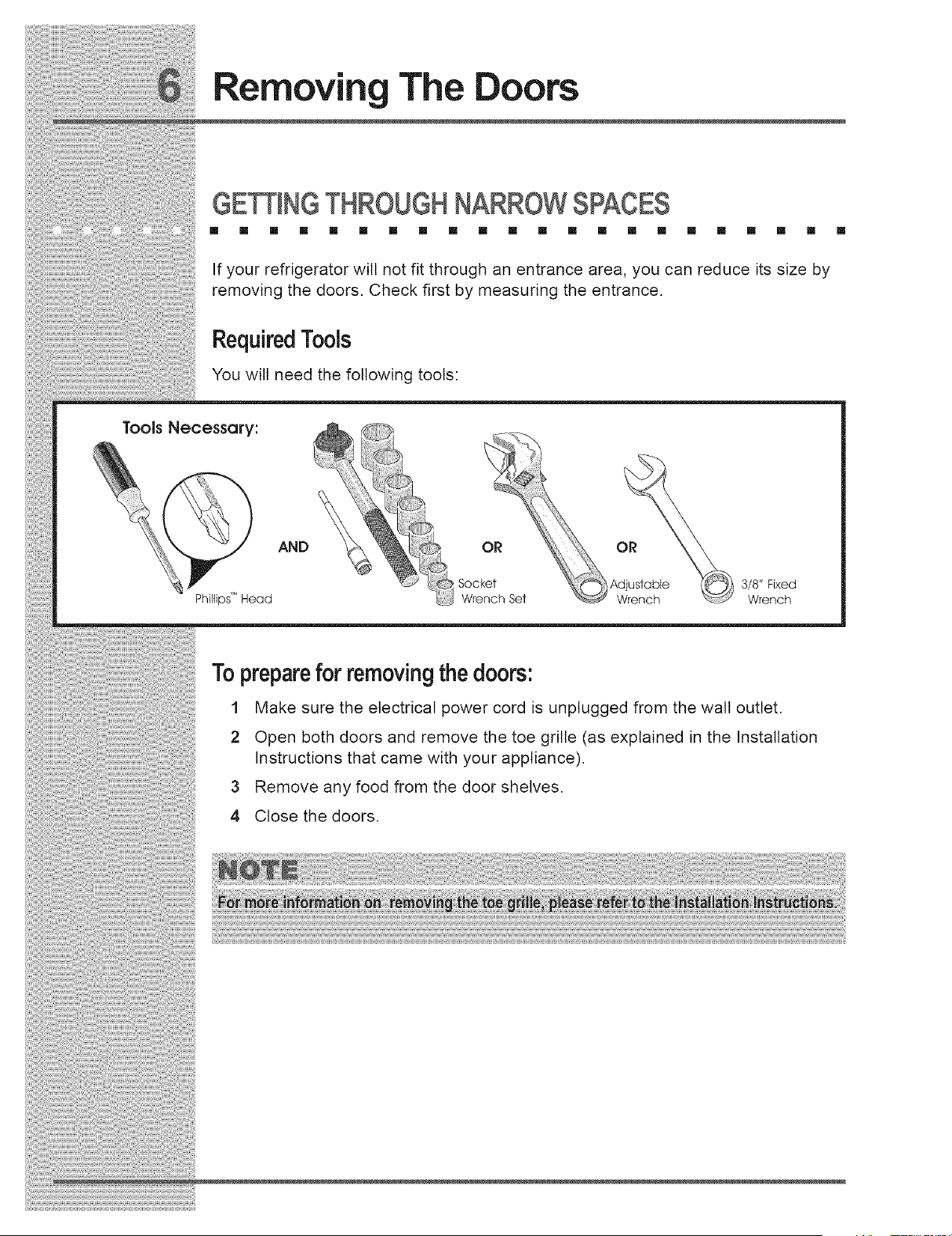
Tools Necessory:
AND
3/8" Fixed
PhiUips" Head Wrench
Topreparefor removingthe doors:
1 Make sure the electrical power cord is unplugged from the wall outlet.
2 Open both doors and remove the toe grille (as explained in the Installation
Instructions that came with your appliance).
3 Remove any food from the door shelves.
4 Close the doors.
Removing The Doors
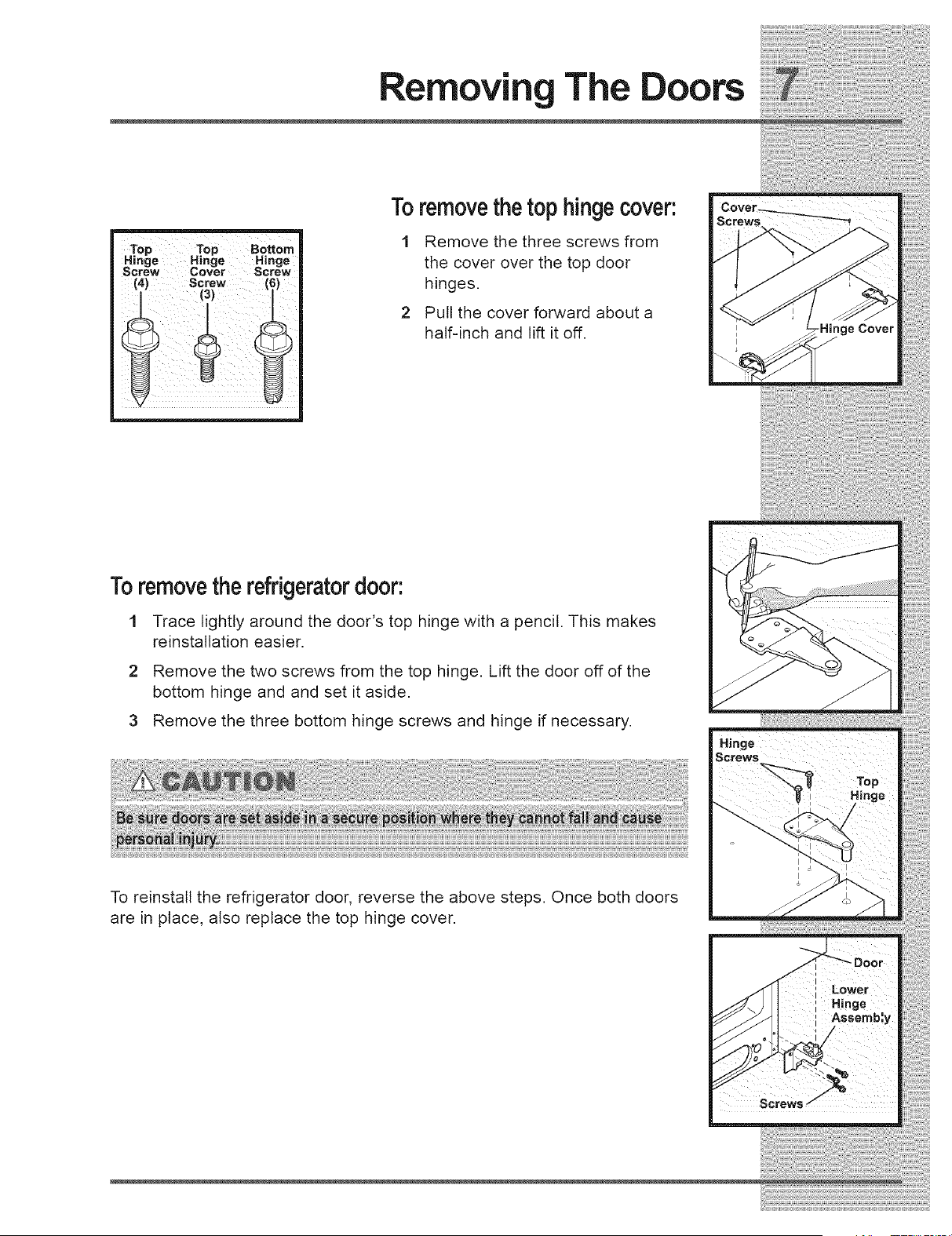
Toremovethetop hingecover:
1 Remove the three screws from
the cover over the top door
hinges.
2 Pull the cover forward about a
half-inch and lift it off.
Toremovethe refrigeratordoor:
1 Trace lightly around the door's top hinge with a pencil. This makes
reinstallation easier.
2 Remove the two screws from the top hinge. Lift the door off of the
bottom hinge and and set it aside.
3 Remove the three bottom hinge screws and hinge if necessary.
To reinstall the refrigerator door, reverse the above steps. Once both doors
are in place, also replace the top hinge cover.
Removing The Doors
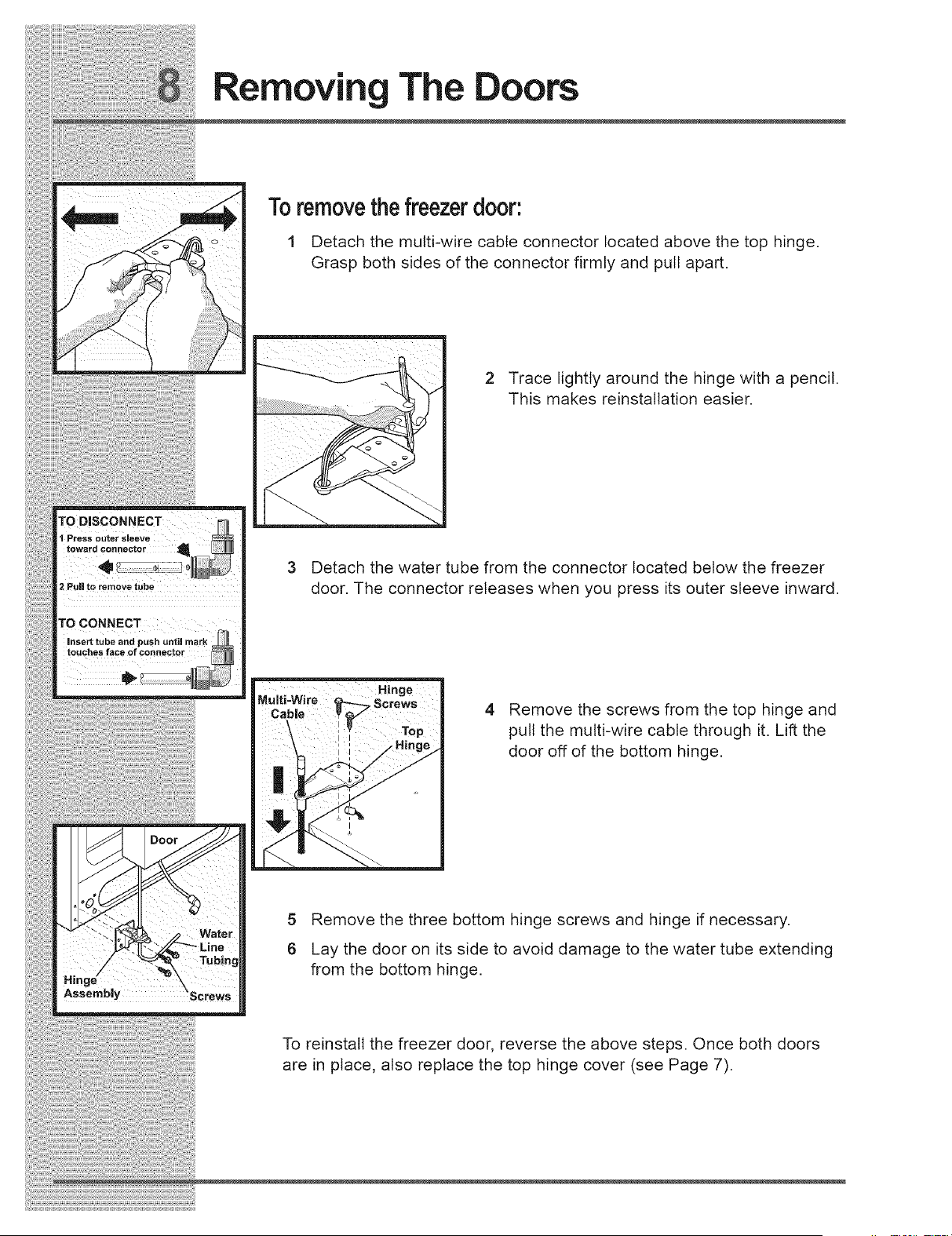
TO DISCONNECT
1 Press outer sleeve
foward connector
2 Pull to remove tube
TO CONNECT
insert tube and push until mark
touches face of connector
Toremovethefreezerdoor:
1 Detach the multi-wire cable connector located above the top hinge.
Grasp both sides of the connector firmly and pull apart.
2 Trace lightly around the hinge with a pencil.
This makes reinstallation easier.
3 Detach the water tube from the connector located below the freezer
door. The connector releases when you press its outer sleeve inward.
4 Remove the screws from the top hinge and
pull the multi-wire cable through it. Lift the
door off of the bottom hinge.
nge
Assembly
Water
5 Remove the three bottom hinge screws and hinge if necessary.
6 Lay the door on its side to avoid damage to the water tube extending
from the bottom hinge.
To reinstall the freezer door, reverse the above steps. Once both doors
are in place, also replace the top hinge cover (see Page 7).
Connecting The Water Supply
ABOUT YOUR REFRIGE TOR'SWATER SUPPLY
[] [] [] [] [] [] [] [] [] [] [] [] [] [] [] [] [] [] [] [] [] []
The automatic ice & water dispenser on your refrigerator requires a permanent
water supply to function correctly. During installation, you (or a service
professional) establish this water supply by connecting a copper tube from your
household water system to a valve at the rear of the refrigerator.
You may have already followed the directions in the Installation Instructions to
connect the water supply. This information is repeated here for future reference if
you need to relocate your refrigerator.
Whatyou willneed:
• Access to a cold water line with pressure of 30-100 psi.
• Copper tubing with ¼-inch (6.4mm) OD. Length for this tubing is the distance
from the rear of the refrigerator to your household water supply line plus 7
feet (2.1 meters).
• A shut-off valve for the connection between your household water line and
the refrigerator supply line.
Do not use a self-piercing shut-off valve.
• A compression nut and ferrule (sleeve) for the water supply connection at the
rear of your refrigerator.
Connecting The Water Supply
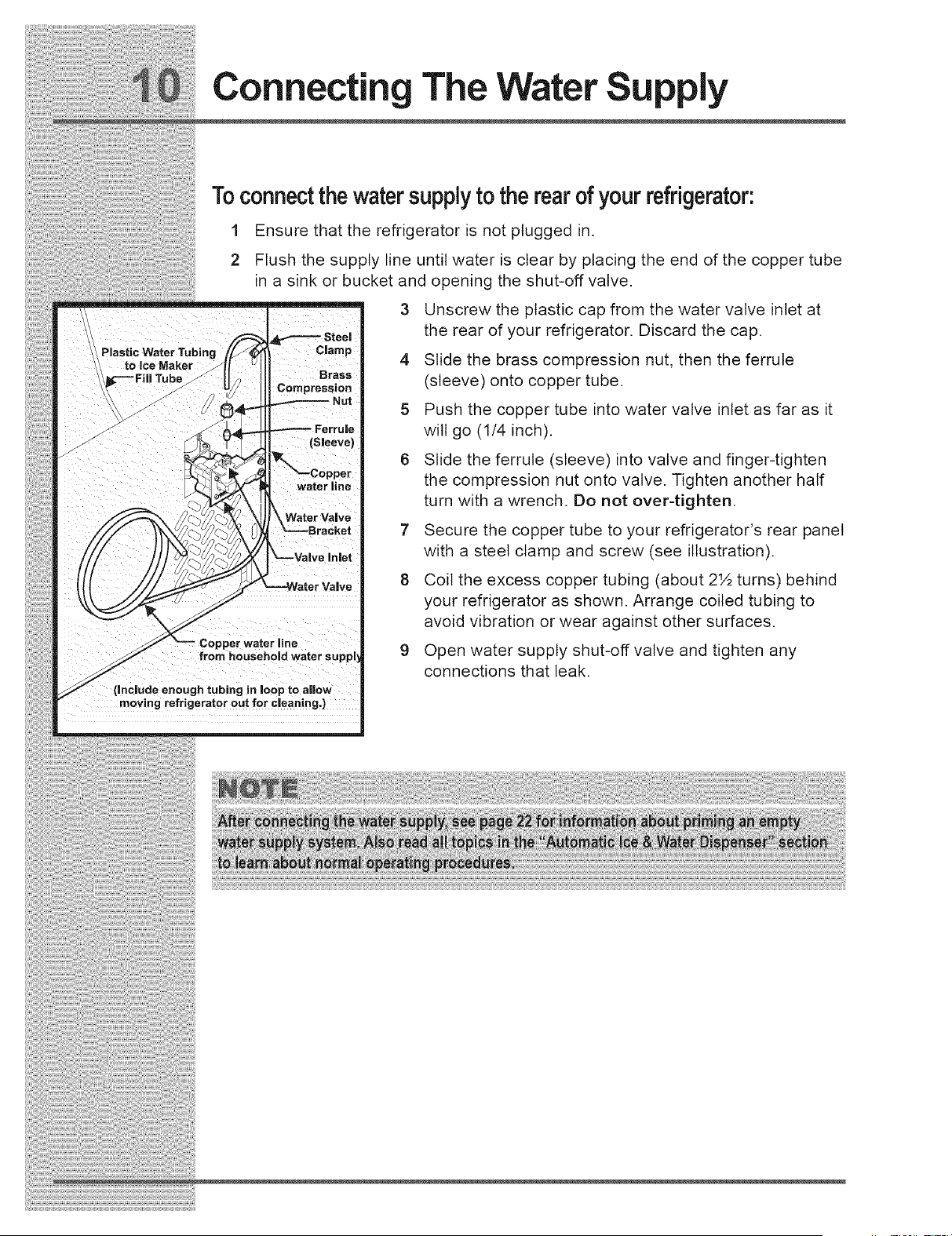
Toconnect thewatersupplyto the rearof your refrigerator:
1
2
Plastic Water Tubing
to ice Maker
i iii ! iii i&
Ensure that the refrigerator is not plugged in.
Flush the supply line until water is clear by placing the end of the copper tube
in a sink or bucket and opening the shut-off valve,
3 Unscrew the plastic cap from the water valve inlet at
the rear of your refrigerator, Discard the cap,
_Jar.p 4 Slide the brass compression nut, then the ferrule
Brass (sleeve) onto copper tube.
5 Push the copper tube into water valve inlet as far as it
will go (1/4 inch),
6 Slide the ferrule (sleeve) into valve and finger-tighten
waterline the compression nut onto valve. Tighten another half
turn with a wrench. Do not over-tighten.
Water Valve
7 Secure the copper tube to your refrigerator's rear panel
with a steel clamp and screw (see illustration).
8 Coil the excess copper tubing (about 2½ turns) behind
your refrigerator as shown, Arrange coiled tubing to
avoid vibration or wear against other surfaces,
9 Open water supply shut-off valve and tighten any
connections that leak,
water line
from household water Suj
(include enough tubing in loop to allow
moving refrigerator out for cleaning,)
Feature Overview
UNDERSTANDINGFEATURESAND TERMS
[] [] [] [] [] [] [] [] [] [] [] [] [] [] [] [] [] [] [] [] [] []
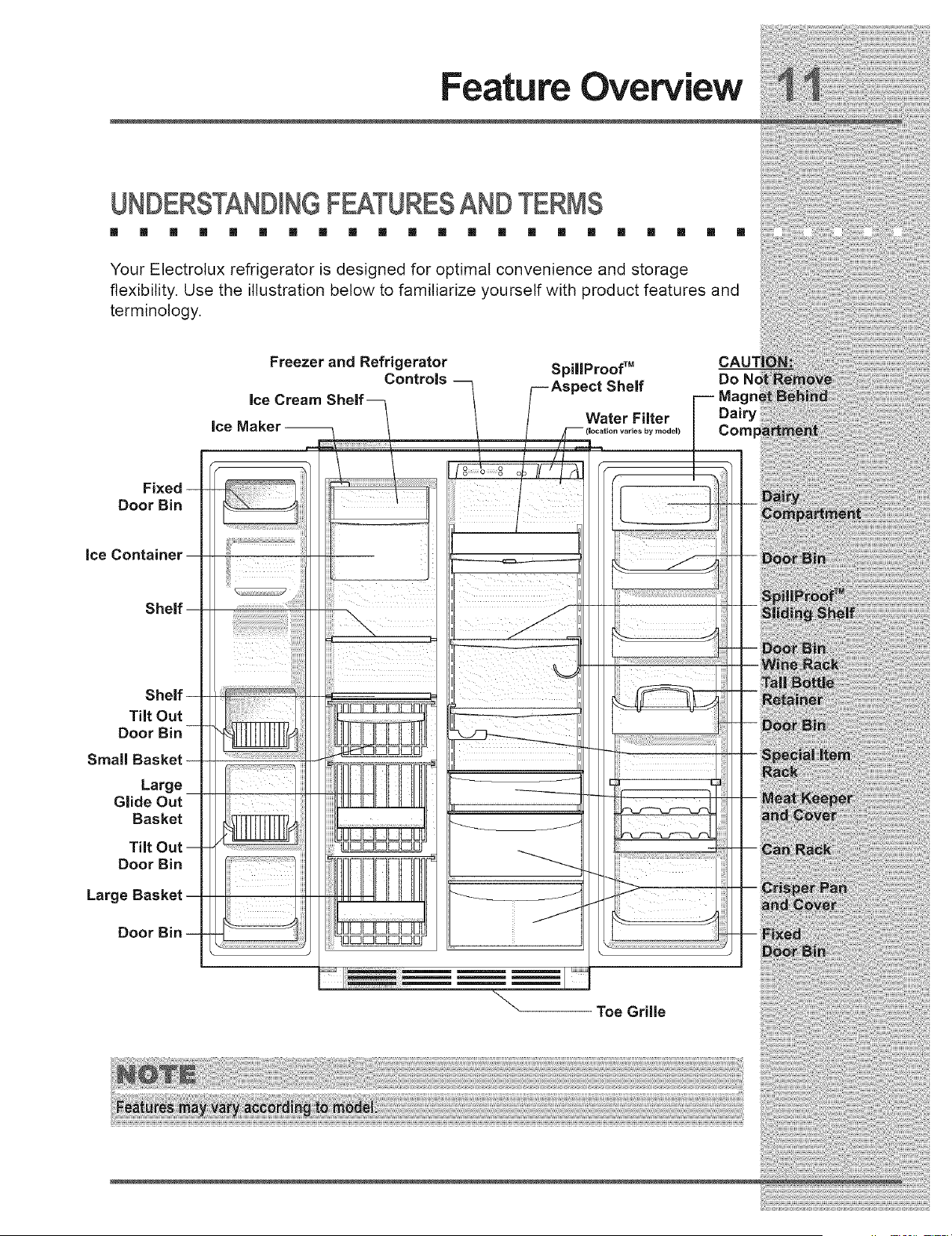
Your Electrolux refrigerator is designed for optimal convenience and storage
flexibility. Use the illustration below to familiarize yourself with product features and
terminology.
Ice
Freezer and Refrigerator SpillProofTM
Controls Do
Ice Cream
Water Filter Dairy
_y model)
Fix_
Door Bin
Tilt Out
De
Large
Glide Out
Basket
Tilt
Door Bin
Larg
Z
Toe Grille
Controls & Settings
ALLOWING COOLING TIMEBEFORE USE
m [] [] [] [] [] [] [] [] [] [] [] [] [] [] [] [] [] [] [] [] []
To ensure reliable food storage, allow your refrigerator and freezer to operate with
the doors closed for 8 to 12 hours before placing food inside. During this cooling
period, you do not need to adjust the controls, which are preset at the factory.
SETTINGCOOLING TEMPE TURES
[] [] [] [] [] [] [] [] [] [] [] [] [] [] [] [] [] [] [] [] [] []
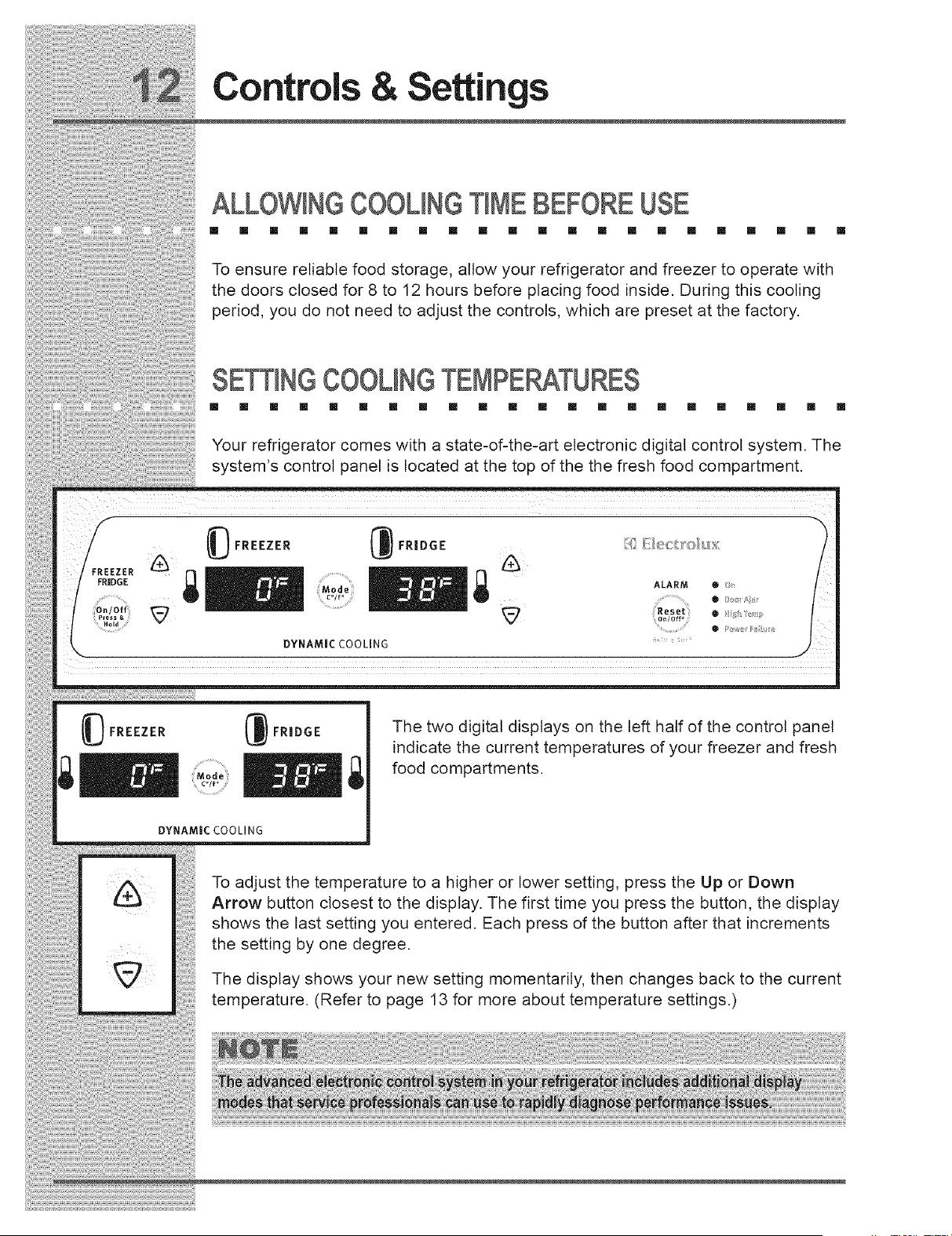
Your refrigerator comes with a state-of-the-art electronic digital control system. The
system's control panel is located at the top of the the fresh food compartment.
:REEZER
FRIDGE
Hold
_ FREEZER
Mode
co/_ o
DYNAMIC COOLING
ALARM • !_
• /;o_ /',;!
_FREEZER
FR|DGE
M o d e
The two digital displays on the left half of the control panel
indicate the current temperatures of your freezer and fresh
food compartments.
DYNAMIC COO LI N G
To adjust the temperature to a higher or lower setting, press the Up or Down
Arrow button closest to the display. The first time you press the button, the display
shows the last setting you entered. Each press of the button after that increments
the setting by one degree.
The display shows your new setting momentarily, then changes back to the current
temperature. (Refer to page 13 for more about temperature settings.)
Controls & Settings
Choosing FahrenheitorCentigrade
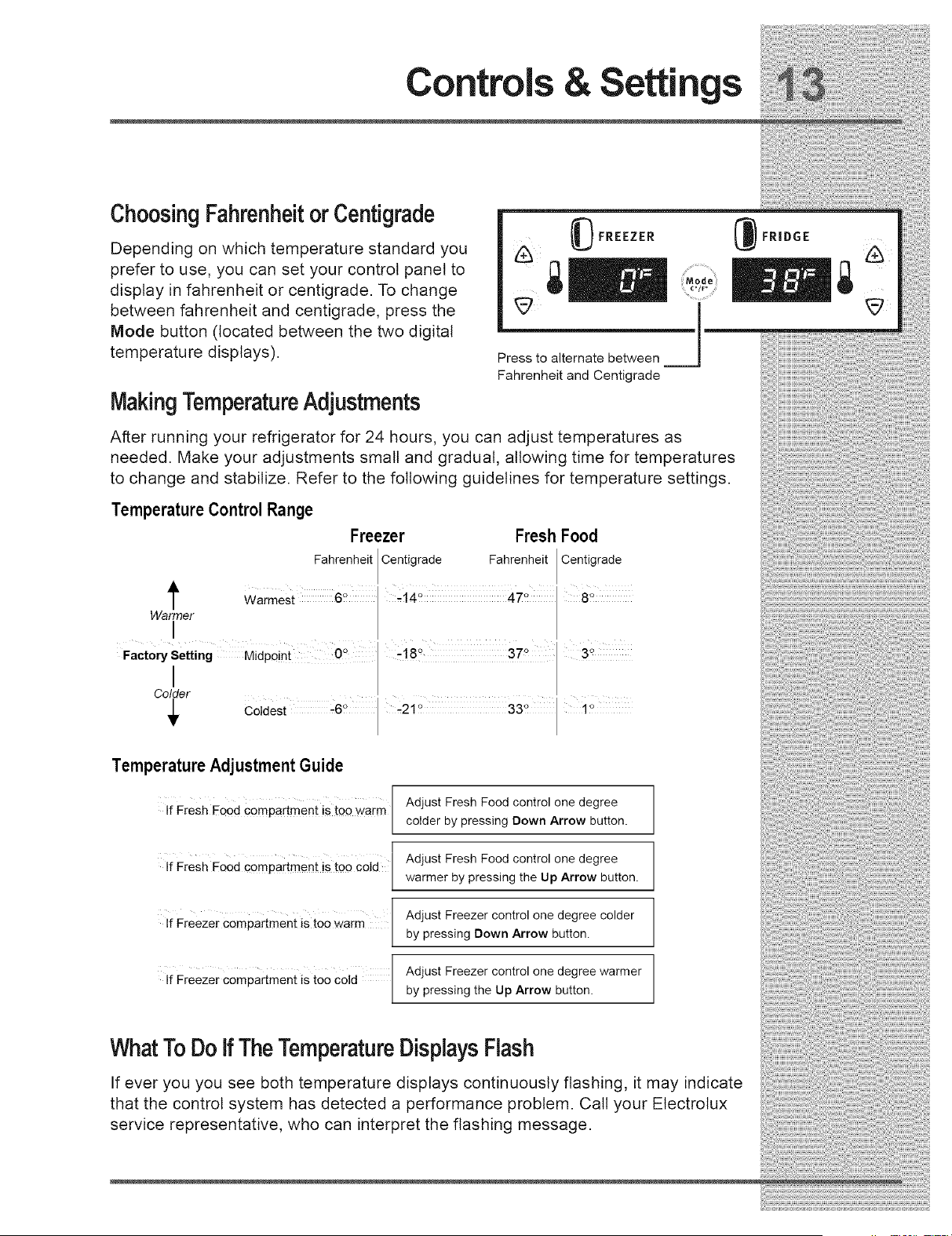
Depending on which temperature standard you
prefer to use, you can set your control panel to
display in fahrenheit or centigrade. To change
between fahrenheit and centigrade, press the
Mode button (located between the two digital
temperature displays).
MakingTemperatureAdjustments
(_) FREEZER
Press to alternate between
Fahrenheit and Centigrade
After running your refrigerator for 24 hours, you can adjust temperatures as
needed. Make your adjustments small and gradual, allowing time for temperatures
to change and stabilize. Refer to the following guidelines for temperature settings.
Temperature Control Range
Freezer Fresh Food
Fahrenheit Centigrade Fahrenheit Centigrade
t Warmest 6 ° 8_
Warmer
I
Factory Setting Midpoint OQ -!8 ° 37 ° 3_
_IV COldeSt :6 33 i
Temperature Adjustment Guide
Fresh Fo0d compartment is too warm[
If
L
FreSh FoOd compartment is too cold [
if
L
If Freezer compartment isto0 Warm /
l
L
Freezer compartment is too C01e /
l
If
[
Adjust Fresh Food control one degree
colder by pressing Down Arrow button.
Adjust Fresh Food control one degree
warmer by pressing the Up Arrow button.
Adjust Freezer control one degree colder
by pressing Down Arrow button.
Adjust Freezer control one degree warmer
by pressing the Up Arrow button.
FRIDGE
WhatTo DoIf TheTemperatureDisplaysFlash
If ever you you see both temperature displays continuously flashing, it may indicate
that the control system has detected a performance problem. Call your Electrotux
service representative, who can interpret the flashing message.
Controls & Settings
[] [] [] [] [] [] [] [] [] [] [] [] [] [] [] [] [] [] [] [] []
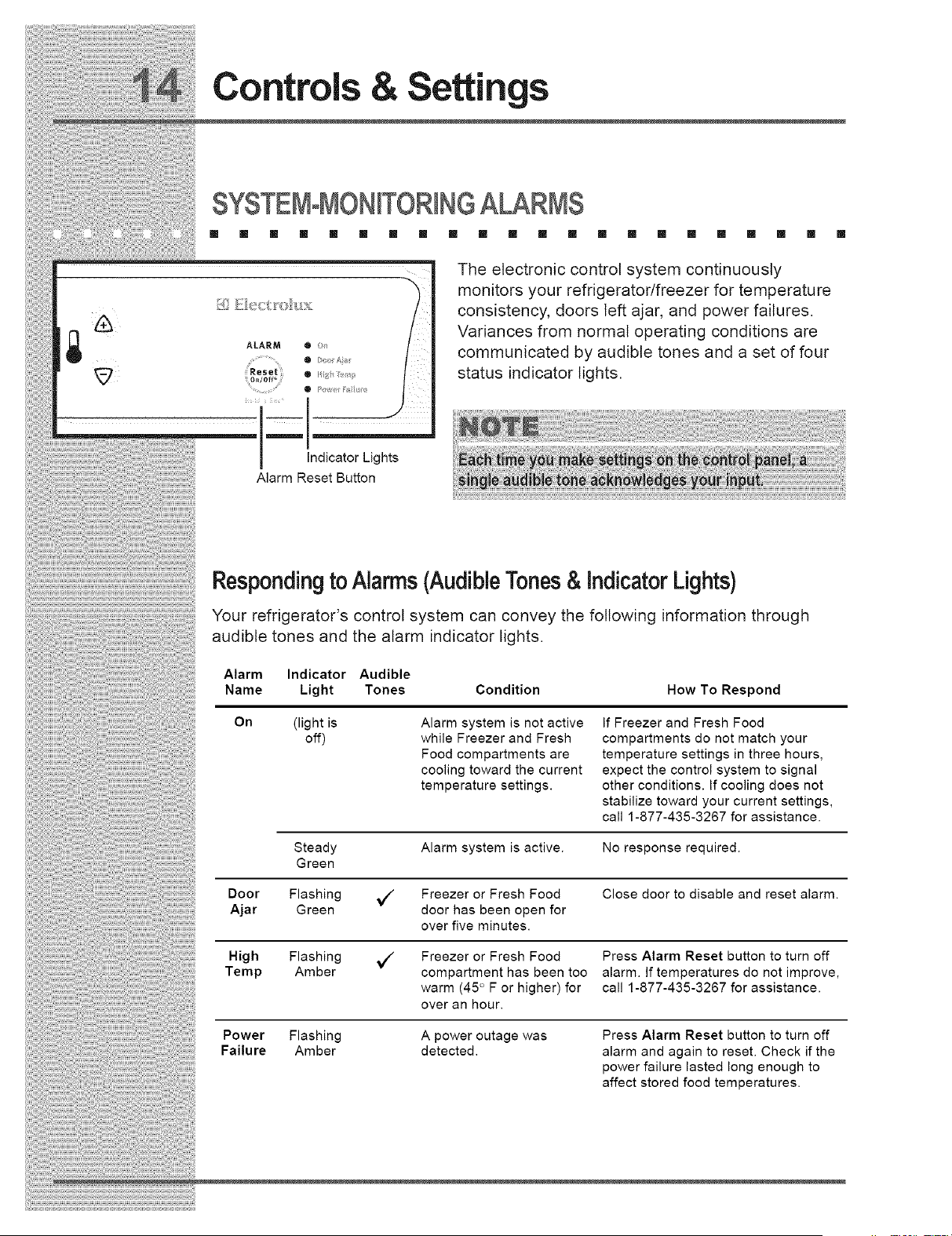
The electronic control system continuously
monitors your refrigerator/freezer for temperature
consistency, doors left ajar, and power failures.
Variances from normal operating conditions are
communicated by audible tones and a set of four
status indicator lights.
Indicator Lights
Alarm Reset Button
Respondingto Alarms(AudibleTones& IndicatorLights)
Your refrigerator's control system can convey the following information through
audible tones and the alarm indicator bights.
Alarm Indicator Audible
Name Light Tones Condition How To Respond
On (light is
off)
Alarm system is not active
while Freezer and Fresh
Food compartments are
cooling toward the current
temperature settings.
If Freezer and Fresh Food
compartments do not match your
temperature settings in three hours,
expect the control system to signal
other conditions. If cooling does not
stabilize toward your current settings,
call 1-877-435-3267 for assistance.
Steady Alarm system is active. No response required.
Green
Door Flashing _ Freezer or Fresh Food Close door to disable and reset alarm.
Ajar Green door has been open for
over five minutes.
High Flashing _ Freezer or Fresh Food Press Alarm Reset button to turn off
Temp Amber compartment has been too alarm. If temperatures do not improve,
warm (45 ° F or higher) for call 1-877-435-3267 for assistance.
over an hour.
Power Flashing A power outage was Press Alarm Reset button to turn off
Failure Amber detected, alarm and again to reset. Check if the
power failure lasted long enough to
affect stored food temperatures.
Controls & Settings
UsingTheAlarm ResetButton
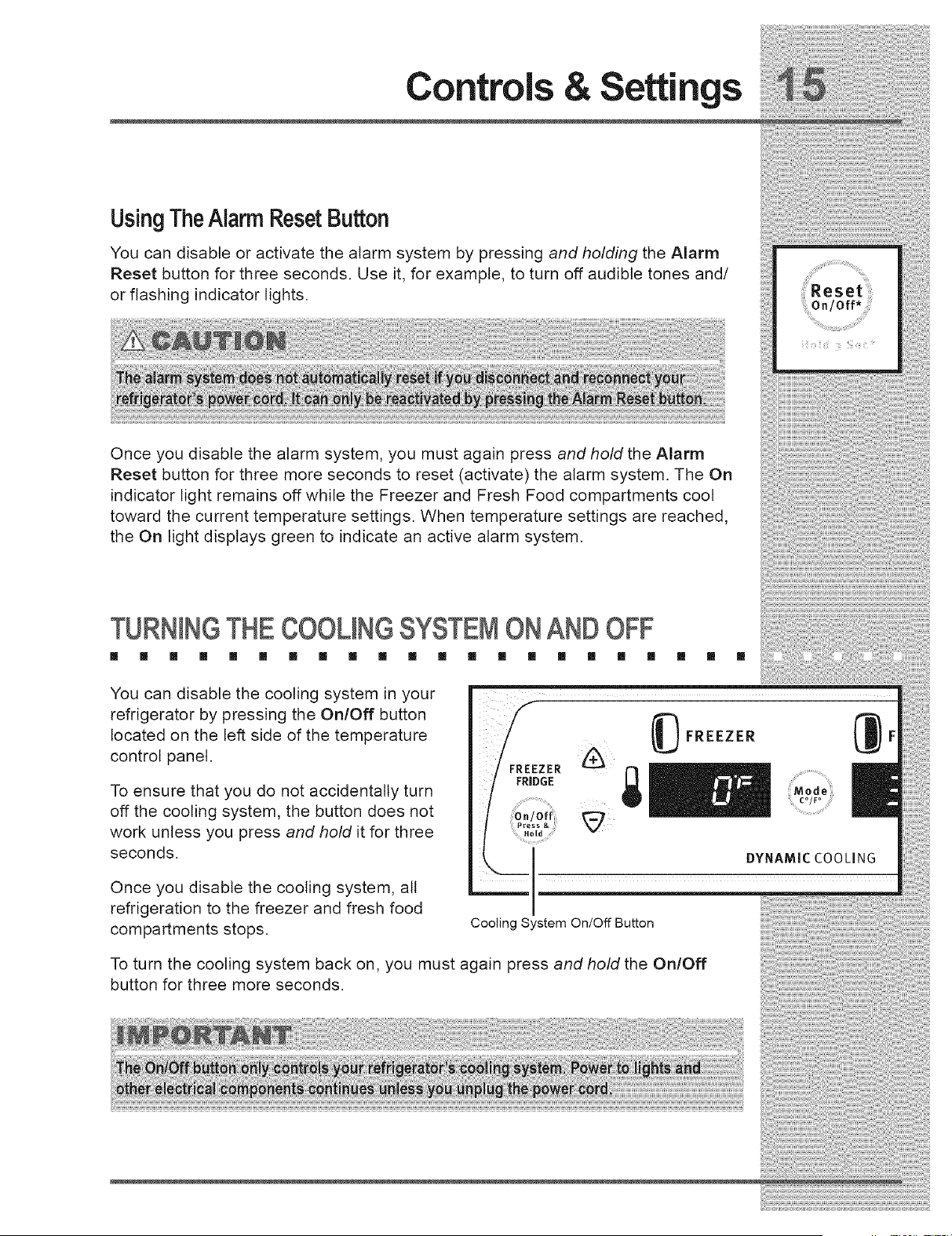
You can disable or activate the alarm system by pressing and holding the Alarm
Reset button for three seconds. Use it, for example, to turn off audible tones and/
or flashing indicator lights.
Once you disable the alarm system, you must again press and hold the Alarm
Reset button for three more seconds to reset (activate) the alarm system. The On
indicator light remains off while the Freezer and Fresh Food compartments cool
toward the current temperature settings. When temperature settings are reached,
the On light displays green to indicate an active alarm system.
TURNINGTHECOOLINGSYSTEMONANDOFF
[] [] [] [] [] [] [] [] [] [] [] [] [] [] [] [] [] [] [] [] [] []
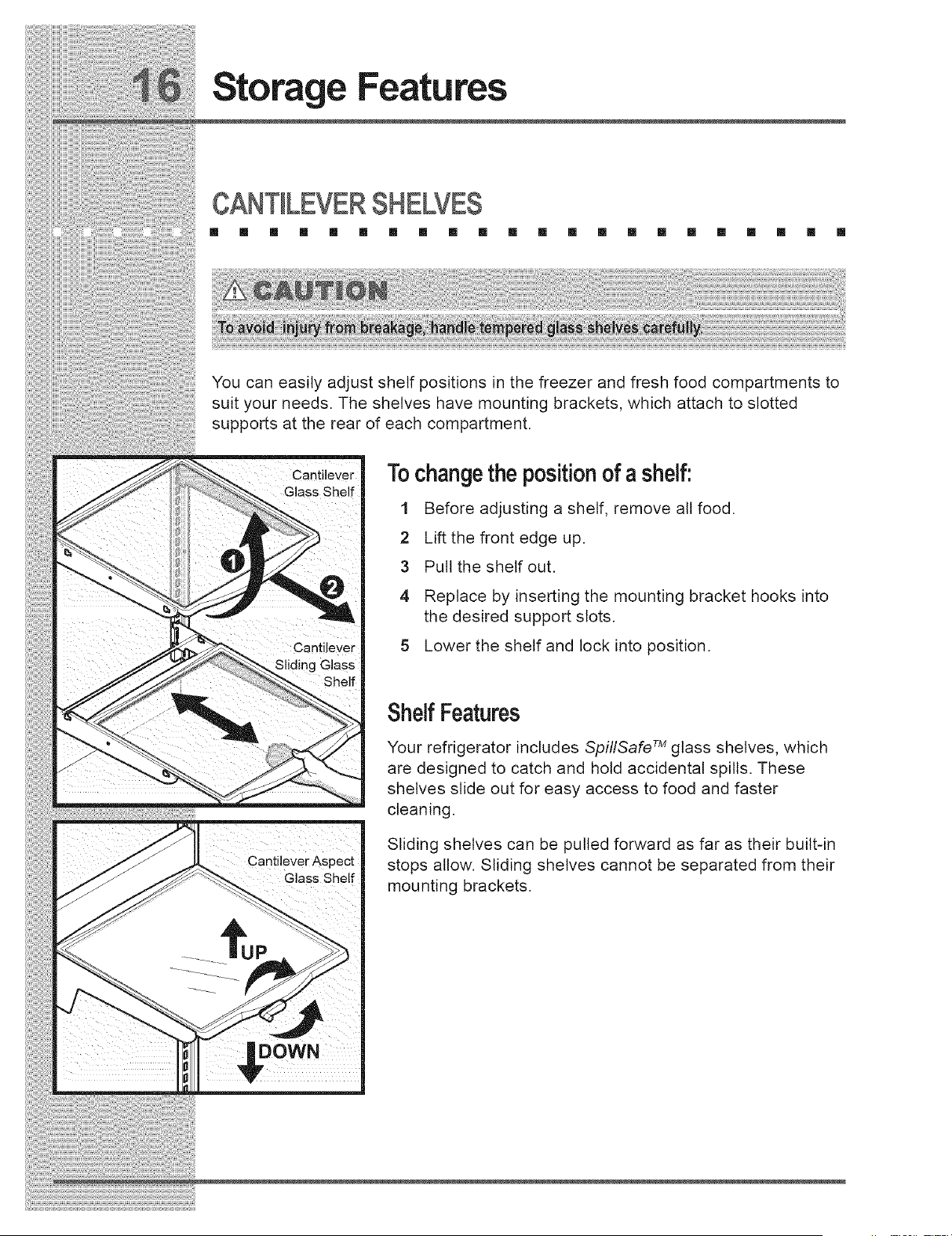
You can disable the cooling system in your
refrigerator by pressing the On/Off button
located on the left side of the temperature
control panel.
To ensure that you do not accidentally turn
off the cooling system, the button does not
work unless you press and hold it for three
seconds.
Once you disable the cooling system, all
refrigeration to the freezer and fresh food
compartments stops.
FREEZER
FRIDGE
(_ FREEZER
;Mode
CO/F o
DYNAMIC COOLING
Cooling System On/Off Button
To turn the cooling system back on, you must again press and hold the On/Off
button for three more seconds.
Storage Features
[] [] [] [] [] [] [] [] [] [] [] [] [] [] [] [] [] [] [] [] [] []
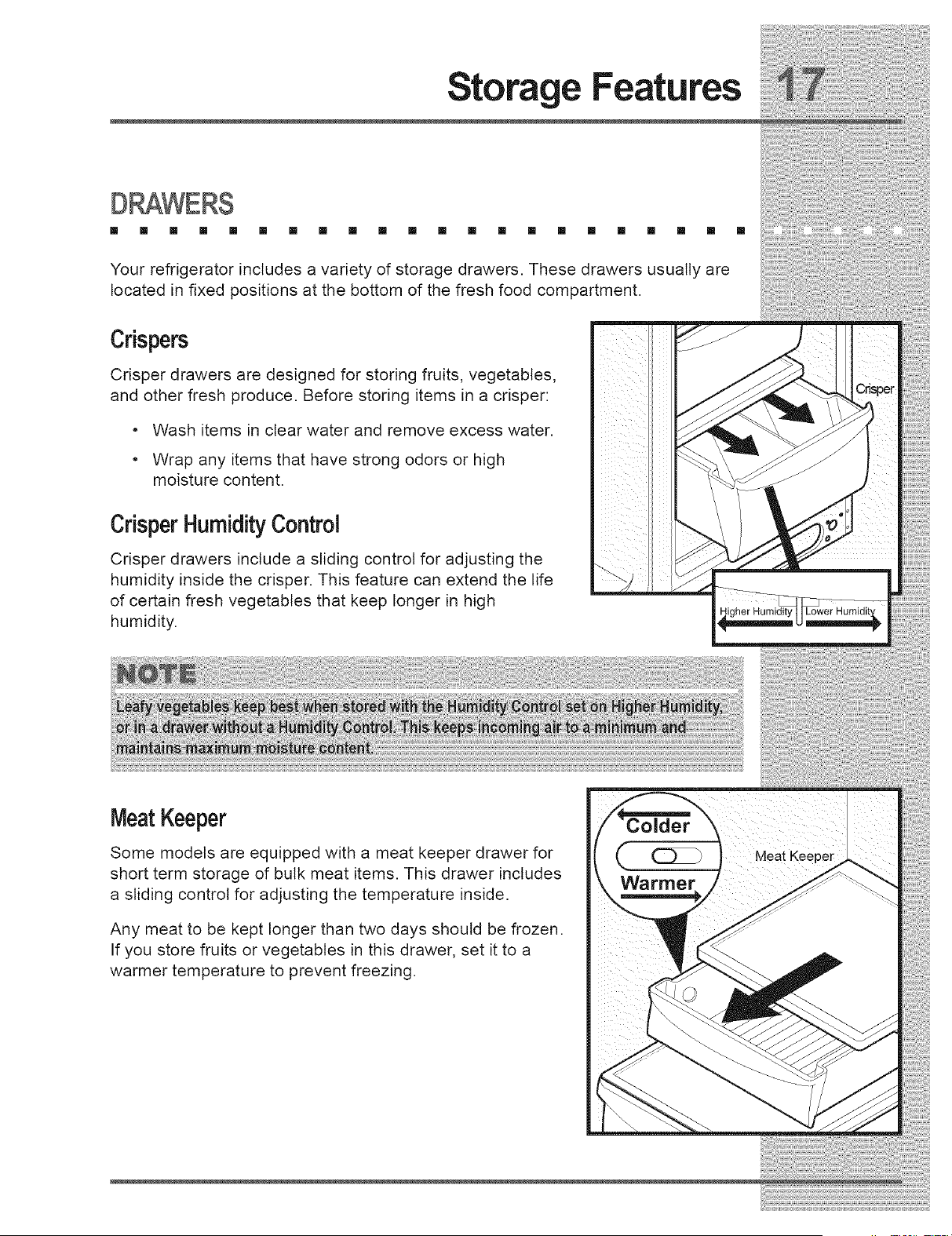
You can easily adjust shelf positions in the freezer and fresh food compartments to
suit your needs, The shelves have mounting brackets, which attach to slotted
supports at the rear of each compartment,
i iiii_ i i
Cantilever
Glass Shelf
i i i i
_ii i i
Cantilever Aspect
Glass Shelf
Tochangethe positionof a shelf:
1 Before adjusting a shelf, remove all food.
2 Lift the front edge up.
3 Pull the shelf out.
4 Replace by inserting the mounting bracket hooks into
the desired support slots.
5 Lower the shelf and lock into position.
ShelfFeatures
Your refrigerator includes SpillSafe TM glass shelves, which
are designed to catch and hold accidental spills, These
shelves slide out for easy access to food and faster
cleaning,
Sliding shelves can be pulled forward as far as their built-in
stops allow. Sliding shelves cannot be separated from their
mounting brackets.
Storage Features
[] [] [] [] [] [] [] [] [] [] [] [] [] [] [] [] [] [] [] [] [] []
Your refrigerator includes a variety of storage drawers. These drawers usually are
located in fixed positions at the bottom of the fresh food compartment.
Crispers
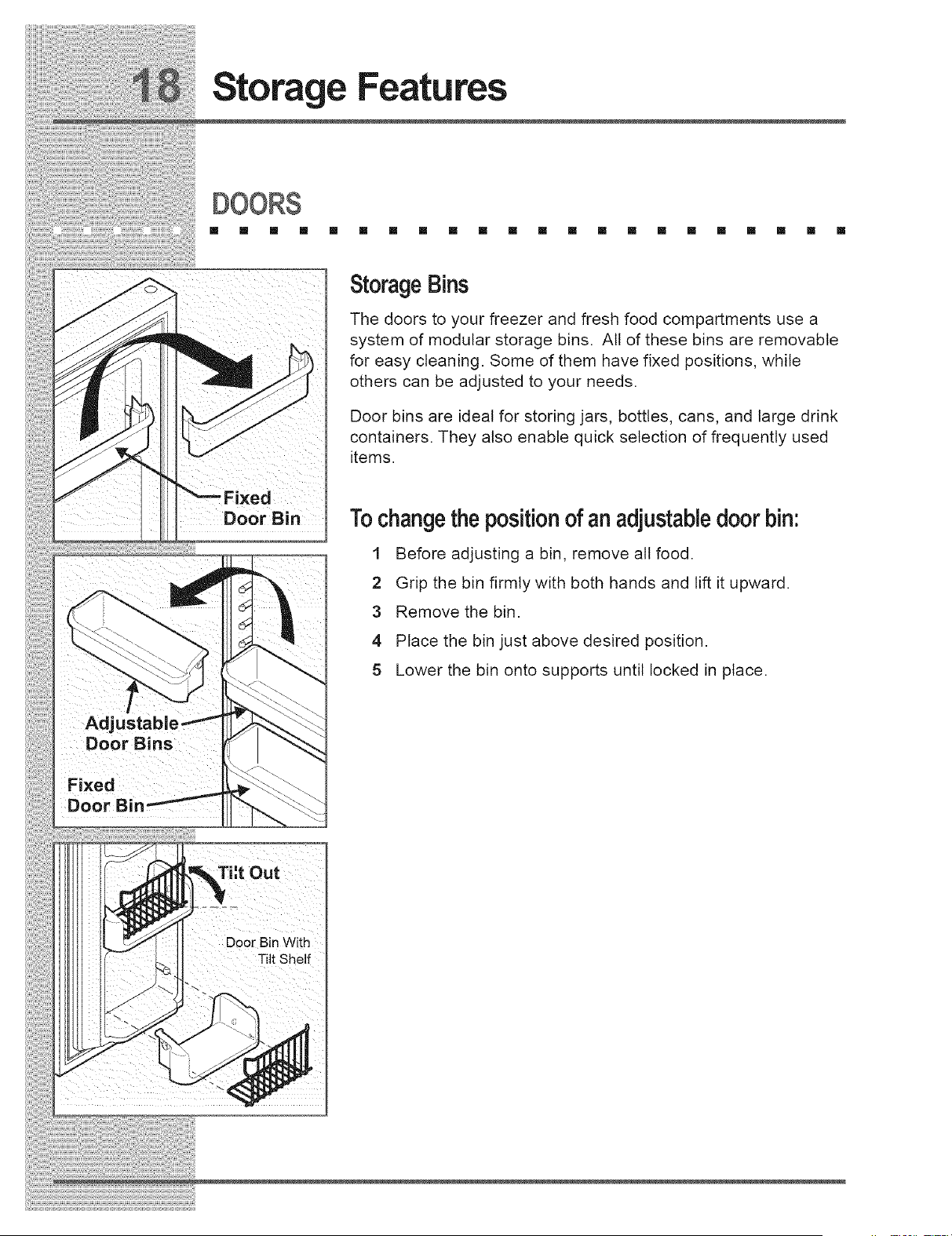
Crisper drawers are designed for storing fruits, vegetables,
and other fresh produce. Before storing items in a crisper:
• Wash items in clear water and remove excess water.
• Wrap any items that have strong odors or high
moisture content.
Crisper HumidityControl
Crisper drawers include a sliding control for adjusting the
humidity inside the crisper. This feature can extend the life
of certain fresh vegetables that keep longer in high
humidity.
m
i ii
_! ii_I ii_i_iI
iiili_i i
iiii_ i
ill
/
MeatKeeper
Some models are equipped with a meat keeper drawer for
short term storage of bulk meat items. This drawer includes
a sliding control for adjusting the temperature inside.
Any meat to be kept longer than two days should be frozen.
If you store fruits or vegetables in this drawer, set it to a
warmer temperature to prevent freezing.
:older
Warmer
Meat Keeper
Storage Features
m [] [] [] [] [] [] [] [] [] [] [] [] [] [] [] [] [] [] [] [] []
Fixed
DOor Bin
Bins
Fixed
DO0
StorageBins
The doors to your freezer and fresh food compartments use a
system of modular storage bins. All of these bins are removable
for easy cleaning. Some of them have fixed positions, while
others can be adjusted to your needs.
Door bins are ideal for storing jars, bottles, cans, and large drink
containers. They also enable quick selection of frequently used
items.
Tochangethe positionof an adjustabledoor bin:
1 Before adjusting a bin, remove all food.
2 Grip the bin firmly with both hands and lift it upward.
3 Remove the bin.
4 Place the bin just above desired position.
5 Lower the bin onto supports until locked in place.
Tht Out
Doo_Bin With
i

Storage Features
[] [] [] [] [] [] [] [] [] [] [] [] [] [] [] [] [] [] [] [] [] []
TallBottle Retainer
The tall bottle retainer keeps tall containers in the bin from falling forward
when opening or closing the refrigerator door. To install, snap the ends of
the retainer over the edge of the retainer wall as shown in the illustration.
SpecialitemsRack
The innovative design of the special items rack allows you to store a six-
pack of 12 ounce drink cans, a bottle of wine, a two-liter soft drink bottle,
or a carton of eggs. To install, slide the special item rack onto the left
side of any shelf as shown in the illustration.
DairyCompartment
Use the dairy compartment, at the top of the fresh food compartment
door, for short term storage of cheese, spreads, or butter. The dairy
compartment, which includes a lift-up cover, is designed to be warmer
than the open storage area to accommodate these types of food.
CanRack
Tall Bottle
Retainer
Rack
The can rack allows you to efficiently and securely store up to six twelve-
ounce cans of beverage drink.
IceCreamShelf
The ice cream shelf attaches to the top of
the ice dispenser container. It allows storage
of both round and rectangular cartons of
your favorite ice cream.
Can Rack
Automatic ice &
;r Dispenser
US)NGTHED[SPENSER
[] [] [] [] [] [] [] [] [] [] [] [] [] [] [] [] [] [] [] [] [] []
0000
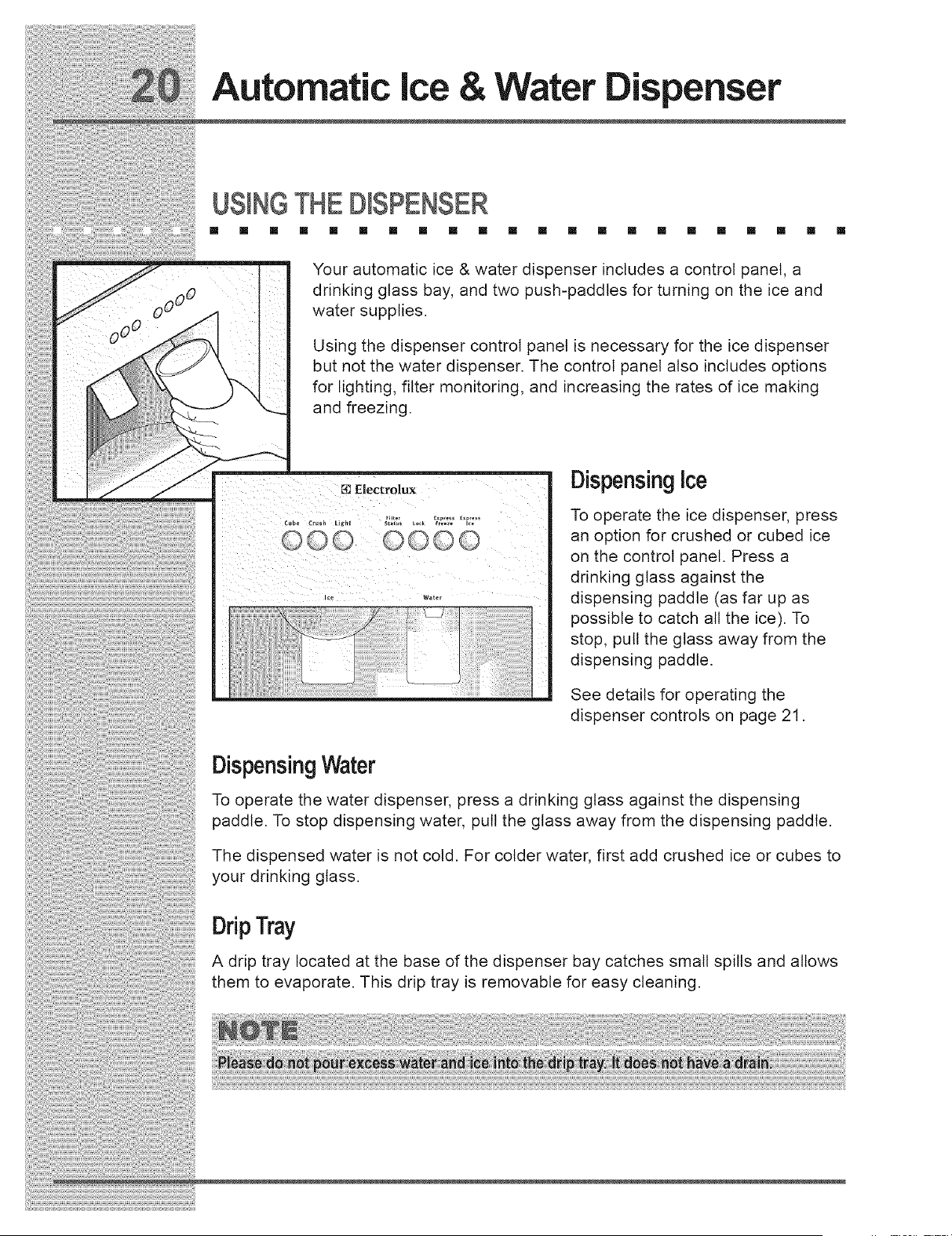
Your automatic ice & water dispenser includes a control panel, a
drinking glass bay, and two push-paddles for turning on the ice and
water supplies.
Using the dispenser control panel is necessary for the ice dispenser
but not the water dispenser. The control panel also includes options
for lighting, filter monitoring, and increasing the rates of ice making
and freezing.
Electrolux
0000
DispensingIce
To operate the ice dispenser, press
an option for crushed or cubed ice
on the control panel. Press a
drinking glass against the
dispensing paddle (as far up as
possible to catch all the ice). To
stop, pull the glass away from the
dispensing paddle.
See details for operating the
dispenser controls on page 21.
DispensingWater
To operate the water dispenser, press a drinking glass against the dispensing
paddle. To stop dispensing water, pull the glass away from the dispensing paddle.
The dispensed water is not cold. For colder water, first add crushed ice or cubes to
your drinking glass.
DripTray
A drip tray located at the base of the dispenser bay catches small spills and allows
them to evaporate. This drip tray is removable for easy cleaning.

iiiiil}}!ii!;!ii!;!i¸ii@i¸iiii_ii}i;_ii;_ii;_ii;%i!i;!i_i_!i_i_!i_i_!i_i_!i_i}i_i;¸i!_}i@!iiii};i;i%;!!_!!@i@i<e;il¸;iI¸::II_¸ii_i_i_i_ii¸II_;_;_;_;
Automatic ice & Water spenser
USINGTHE DISPENSERCONTROL PANEL
[] [] [] [] II II [] [] [] [] Ill [] [] [] Ill [] [] [] Ill [] [] []
Cube Button Press button to get cubed ice.Light displays blue.
Press glass against ice dispensing paddle, holding high up to catch
& nd cator L ght all ice.
Crush Button Press button to get crushed ice. Light displays blue.
Press glass against ice dispensing paddle, holding high up to catch
& nd cator L ght all ice.
Press button to turn on dispenser light. Light displays blue.
Light Button Press button again to turn off dispenser light.
& nd cator L ght dispensed.Dispenserlight also turns on automatically when ice and/or water is
Light displays in one of three possible colors each time the dispenser
is used to show status of water filter:
Filter Status Button
& Indicator Light
Lock Button
& nd cator L ght
Express Freeze Button
& nd cator L ght
Express ice gutt0n
& nd cator L ght
Green Water filter does not need changing.
Amber Water filter is about 80 percent used.
Please order a new one.
Red Water filter is 100 percent used.
Please change as soon as possible.
After replacing the water filter, reset the filter status by pressing and
holding Filter Status button for 10-15 seconds.
The dispenser can be locked to prevent unwanted use.
To lock, press and hold button for 3-5 seconds. Light displays blue.
To unlock, press and hold button for 3-5 seconds until light goes out.
Press and hold button for 3-5 seconds to activate faster rate for
freezing food (preserving freshness). Light displays blue.
Press and hold button for 3-5 seconds again to deactivate.
Press and hold button for 3-5 seconds to increase ice production for
special occasions, such as parties. Light displays blue.
Press and hold button for 3-5 seconds again to deactivate.

;_iiiii:i!i_i_ii_:_!i_i_!_;iii!;!!ii_ii_ii_ii_!!_ii_Ji!!_i:ii_i_i_i!Ji!_ii!_ii!i!ii_i;_!;!_!!!_i_i!_i!J!;;i_¸¸¸¸'¸_"_iii_ill¸'¸_'¸¸¸'_i!i_i!ii:!;!iiiiiiiii_!_il . h "
Automat=cice & ,r Dispenser
.%M!N.GT2E"W.AT.E.RS.UP.P_.¥.SY.ST.EM.......
Your refrigerator's water supply system includes several tubing lines, an advanced
water filter, a distribution valve bank, and a reserve tank to ensure ample supply to
the ice and water dispenser at all times. This system needs to be completely filled
with water when first connected to an external supply line.
Toprimethe watersupplysystem.
1 Beg_nf,,ngthetankbypress*rigandholdingadrinkingg_assagainstthe
..... 2 Keep the glass in this position until water comes out of the dispenser. It may
take about 11/2minutes.
3 Continue dispensing water for about 3 minutes to flush the system and
plumbing connections of any impurities (stopping to empty the glass as
necessary).
Automatic ice & Water
spenser
ICEDISPENSEROPE TION & CARE
[] [] [] [] [] [] [] [] [] [] [] [] [] [] [] [] [] [] [] [] [] []
The ice maker, ice bin, and dispenser feeding mechanism are located in the top of
the freezer compartment. After the refrigerator is installed properly and has cooled
for several hours, the ice maker can produce ice within 24 hours. It can completely
fill an ice bin in about two days.
The ice maker produces 4 to 6 pounds of ice every 24 hours depending on usage
conditions. Ice is produced at a rate of 8 cubes every 75 to 90 minutes.
UsingThe Ice DispenserAfterInstallation
Before making ice for the first time, be sure to prime the water supply system as
described on page 22. Air in new plumbing lines can result in two or three empty
ice maker cycles. Furthermore, if the system is not flushed, the first ice cubes may
be discolored or have an odd flavor.
TurningThe IceDispenserOnAnd Off
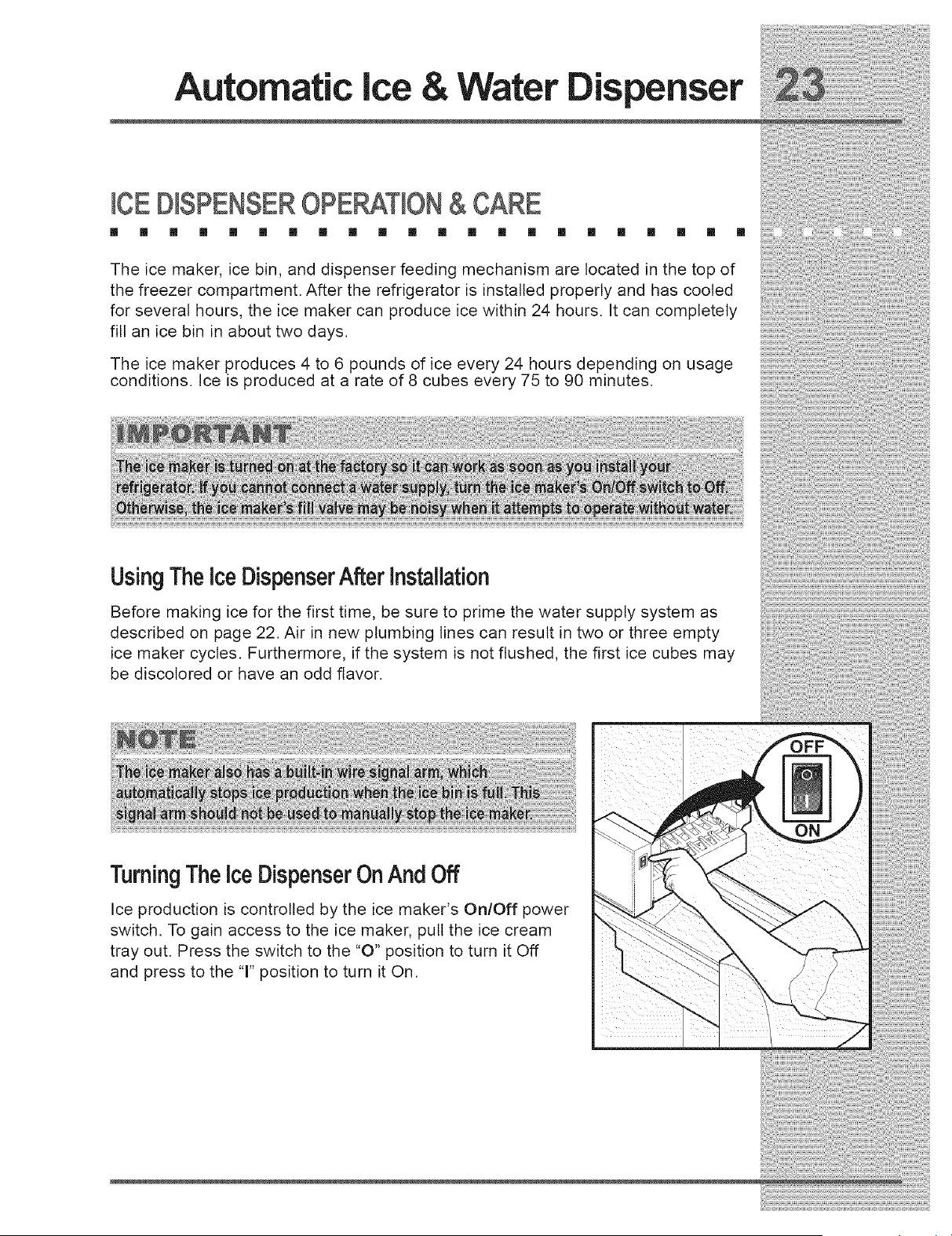
Ice production is controlled by the ice maker's On/Off power
switch. To gain access to the ice maker, pull the ice cream
tray out. Press the switch to the "0" position to turn it Off
and press to the 'T' position to turn it On.
Automatic ice &
;r Dispenser
iceDispenserTips
• Ice cubes stored too long may develop an odd flavor. Empty the ice container
as explained on the next page.
, Occasionally shake the ice container to keep ice separated.
, If your refrigerator is not connected to a water supply or the water supply is
turned off, turn off the ice maker by pressing the On/Off switch.
• If you need a large quantity of ice at one time, it is best to get cubes directly
from the ice container.
• The following sounds are normal when the ice maker is operating:
• Motor running
• Ice dropping into ice container
• Water valve opening or closing
• Ice loosening from tray
• Running water
• Turn off the ice maker when cleaning the freezer and during vacations.
• If you turn off the ice maker for a long period of time, you should also turn off
the water supply valve.
CleaningTheIceDispenser
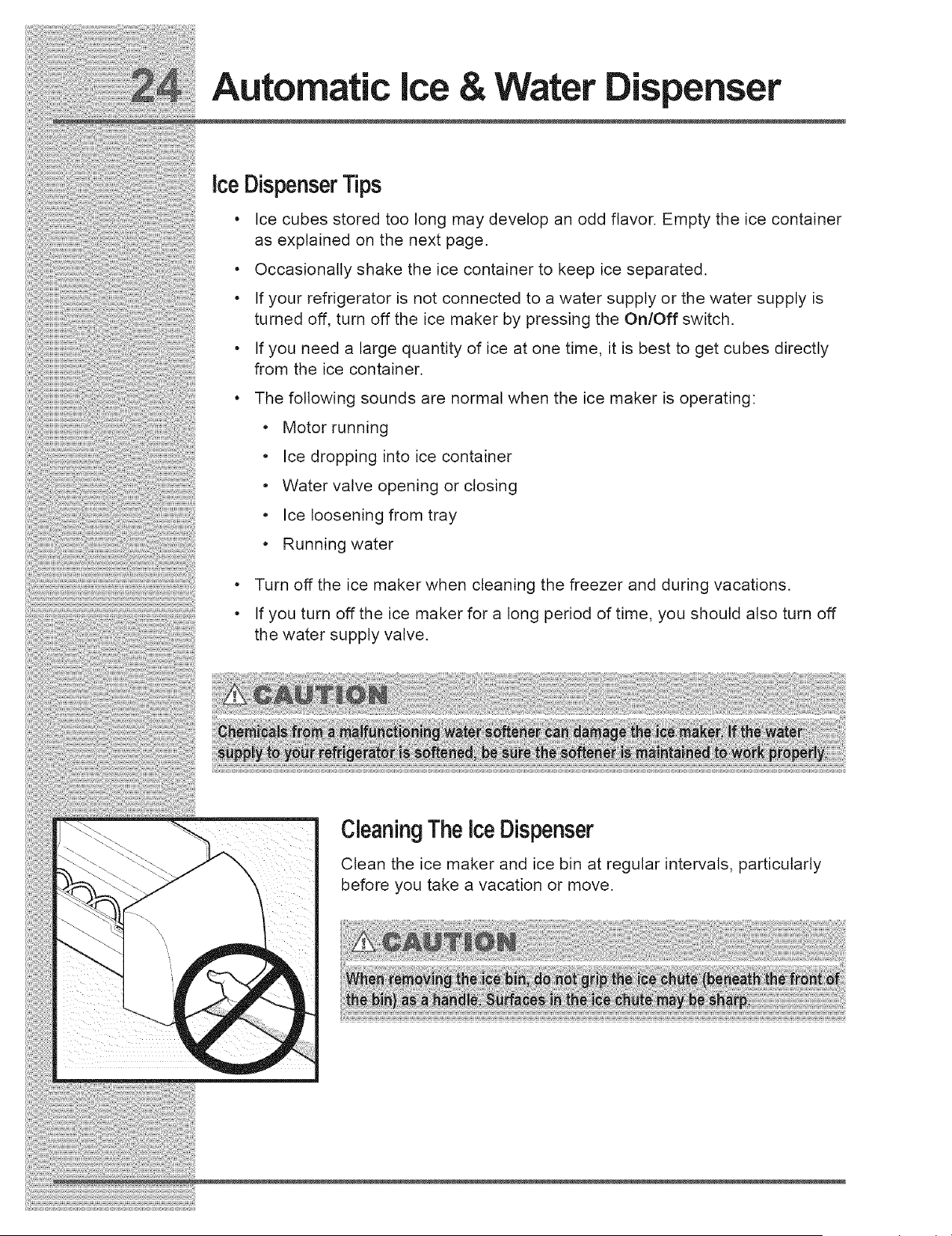
Clean the ice maker and ice bin at regular intervals, particularly
before you take a vacation or move.
ii!ii_!_!!_!_!___!__!_i_i_ii!ii__ii______!_ii_iii_!!i!i:!_i!!_ii_i_i_!!_i_ii_iii!_i!___i__i_!_!!ii__i_!!!i!i!i!!!_!i_iii__!i__!!i_!
Automatic ice & Water spenser
Todean theicedispenser.
1 Turn off ice production by pressing the ice maker s Off/On switch.
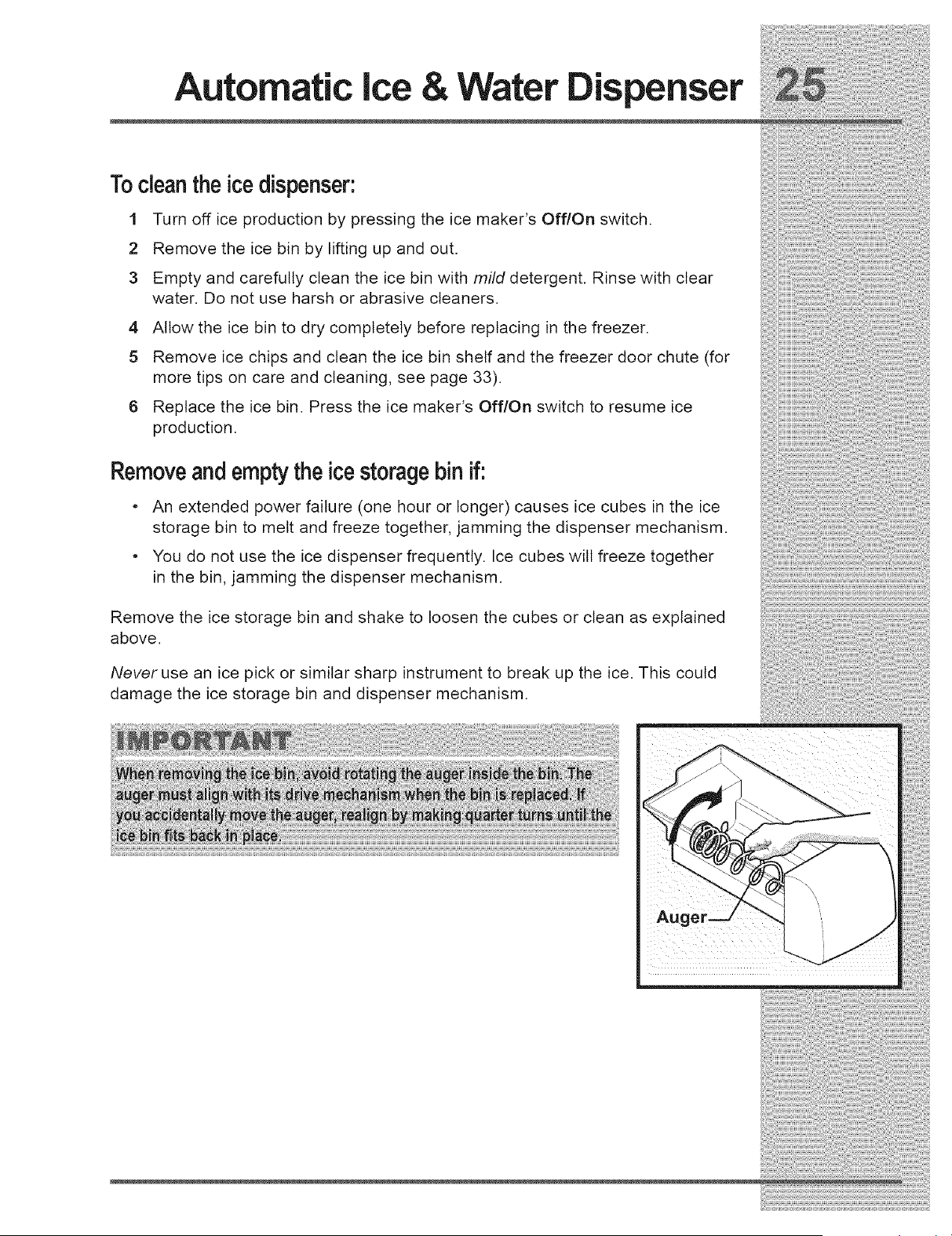
2 Remove the ice bin by lifting up and out.
3 Empty and carefully clean the ice bin with mild detergent. Rinse with clear
water. Do not use harsh or abrasive cleaners.
4 Allow the ice bin to dry completely before replacing in the freezer.
5 Remove ice chips and clean the ice bin shelf and the freezer door chute (for
more tips on care and cleaning, see page 33).
6 Replace the ice bin. Press the ice maker s Off/On switch to resume ice
production.
Removeandemptythe icestoragebin if.
An extended power failure (one hour or longer) causes ice cubes in the ice
. storage bin to melt and freeze together, jamming the dispenser mechanism.
You do not use the ice dispenser frequently. Ice cubes wilt freeze together
in the bin, jamming the dispenser mechanism.
Remove the ice storage bin and shake to loosen the cubes or clean as explained ....
above.
Never use an ice pick or similar sharp instrument to break up the ice. This could
damage the ice storage bin and dispenser mechanism.
Changing The
,=r
LOCATINGTHEWATERFILTER
m [] [] [] [] [] [] [] [] [] [] [] [] [] [] [] [] [] [] [] [] []
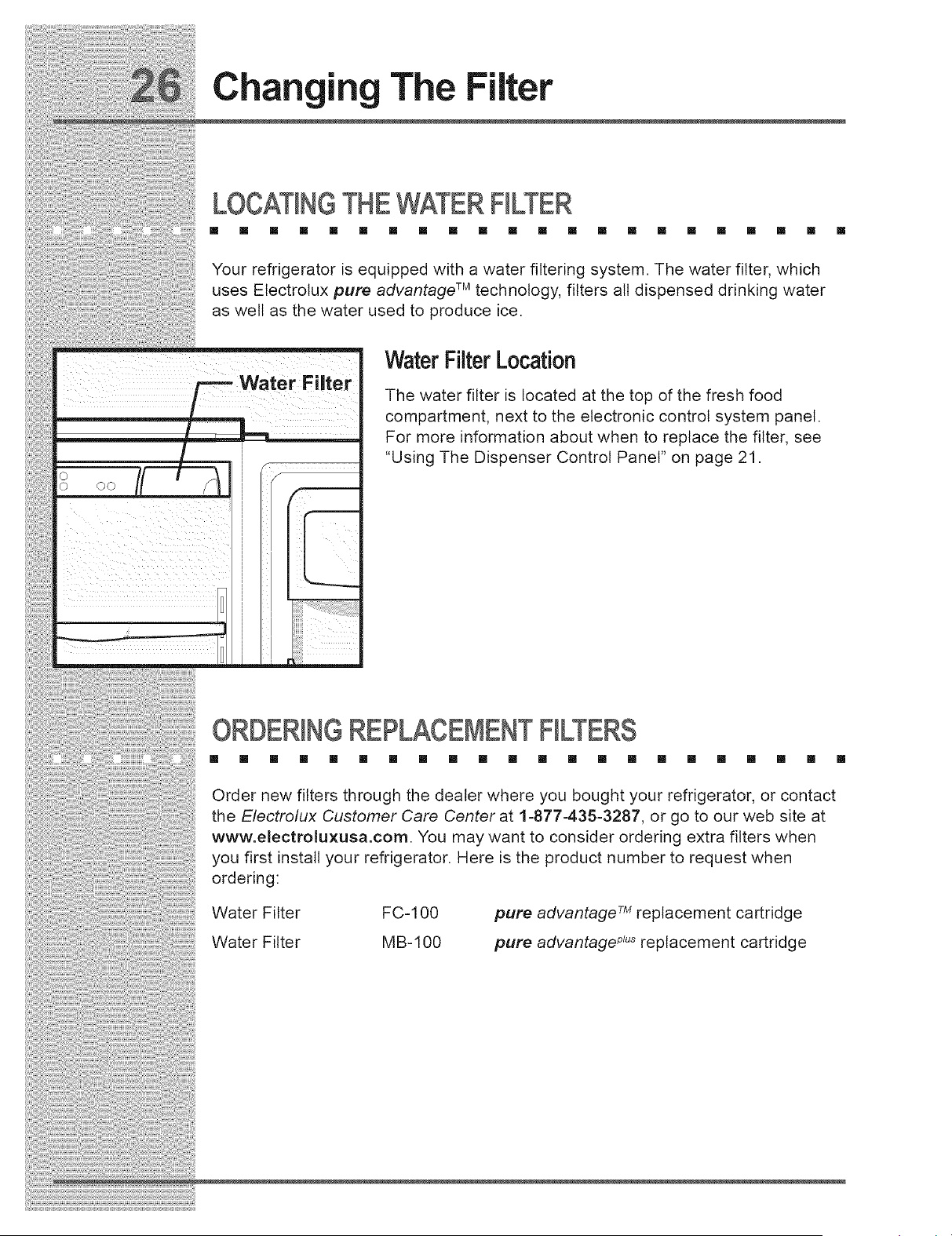
Your refrigerator is equipped with a water filtering system. The water filter, which
uses Electrolux pure advantage TM technology, filters all dispensed drinking water
as well as the water used to produce ice.
r Filter
o 7r q0 O0
i ,
r
i
=
i
WaterFilter Location
The water filter is located at the top of the fresh food
compartment, next to the electronic control system panel.
For more information about when to replace the filter, see
"Using The Dispenser Control Panel" on page 21.
ORDERINGREPLACEMENTFILTERS
[] [] [] [] [] [] [] [] [] [] [] [] [] [] [] [] [] [] [] [] [] []
Order new filters through the dealer where you bought your refrigerator, or contact
the Electro/ux Customer Care Center at 1-877-435-3287, or go to our web site at
www.electroluxusa.com. You may want to consider ordering extra filters when
you first install your refrigerator. Here is the product number to request when
ordering:
Water Filter FC-100
Water Filter MB-100
pure advantage TM replacement cartridge
pure advantage _u_replacement cartridge
!iiii!_;ii_;ii_ii_i!i¸II!I¸II!I¸I!_I_¸I:I¸ii_!i!iiiiiii;ii_;ili_;i@iii_iil¸iiii!!i!i!iii;!i!iii!i!ili!;ii!il¸i!il¸i!_!!iii;ii!il¸:_I¸i¸:_I¸i¸i!i;i!i;i!i;i!ii!!!_i!_i!i!!i;i!!:_i!:!!:_i!ii!ii!i_:i
Changing The Filter
REP CING THEWATERFILTER
In general, you should change the water filter every six to nine months to ensure
highest possible water quality. The FHter Status light on the dispenser control
panel (see page 20) prompts you to replace the filter after a standard amount of
water (400 gallons for pure advantage TM and 250 gallons for pure advantage _"_)
has flowed through the system.
If your refrigerator has not been used for a period of time (during moving for
example), change the filter before reinstalling the refrigerator.
:::::: : : ....
MoreAbout YourAdvancedWaterFilter ....;::;::;::;::;::;::;::;::;::;::;::;::;::;::;::;::;::;::;::;
The pure advantage TM and pure advantage _u_ice and water filter
systems are tested and certified by NSF International, the nationally
respected, not-for-profit certification organization for public health
safety. The pure advantage TM and pure advantage _u_filter systems
are tested and certified to ANSI/NSF Standards 42 and 53 for the
reduction of claims the data sheet.
specified
on
performance
This system should not be used on water that is microbiologicatly unsafe or with
water of unknown quality unless the water has been adequately disinfected before
or after traveling through the filtration system.
NSF Test & Certification Results:
• Rated Capacity - 400 gallons for pure advantageTMand 250 gallons for pure
advantage _
• Rated service flow - .5 gallons per minute
• Maximum Rated Pressure - 100 pounds per square inch
• Maximum Operating Temp. - 100 ° F
Changing The
;r
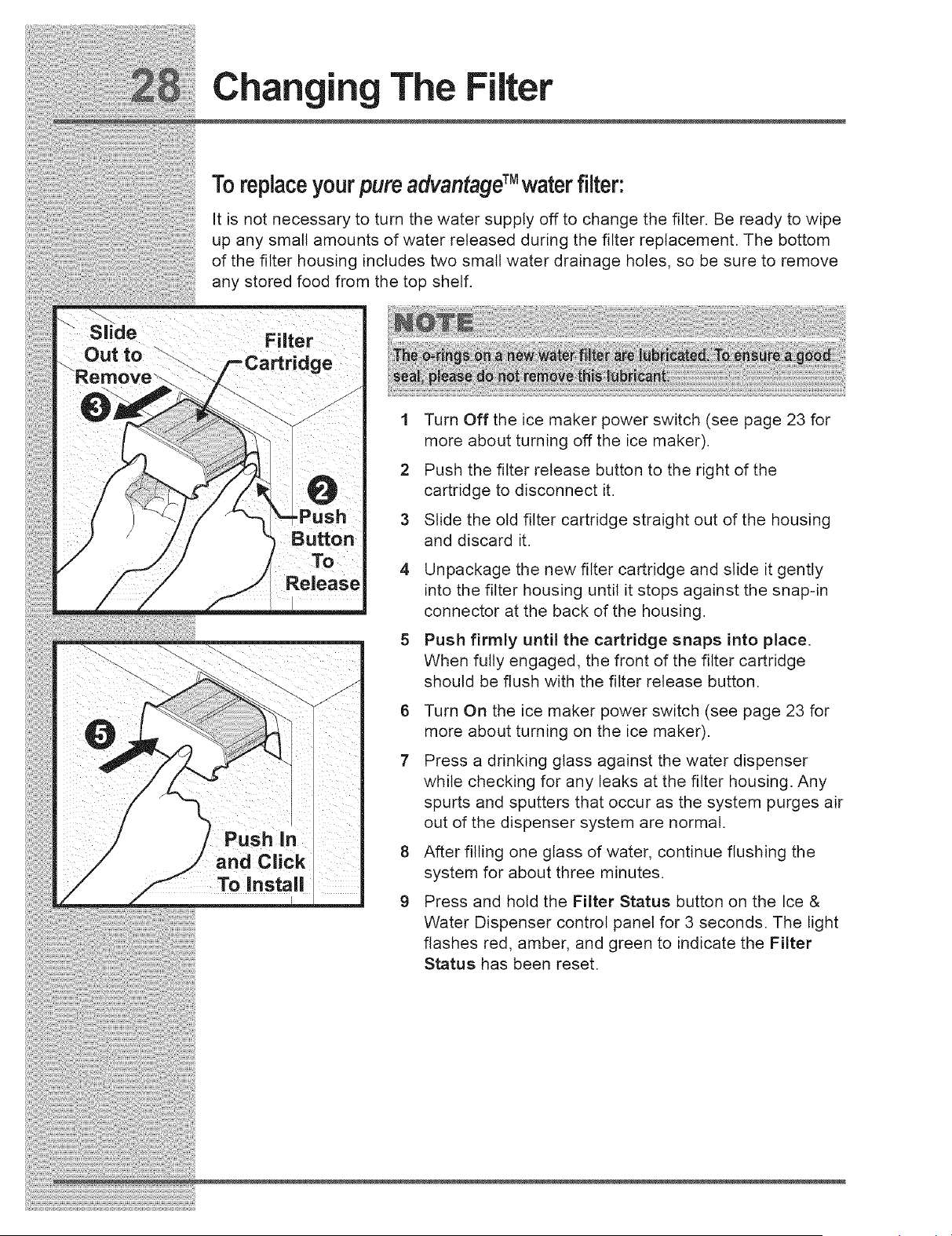
Toreplaceyour pure advantageTM waterfilter:
It is not necessary to turn the water supply off to change the filter. Be ready to wipe
up any small amounts of water released during the filter replacement. The bottom
of the filter housing includes two small water drainage holes, so be sure to remove
any stored food from the top shelf.
1 Turn Off the ice maker power switch (see page 23 for
more about turning off the ice maker).
2 Push the filter release button to the right of the
cartridge to disconnect it.
3 Slide the old filter cartridge straight out of the housing
and discard it.
4
Unpackage the new filter cartridge and slide it gently
into the filter housing until it stops against the snap-in
connector at the back of the housing.
Push firmly until the cartridge snaps into place.
When fully engaged, the front of the filter cartridge
should be flush with the filter release button.
6 Turn On the ice maker power switch (see page 23 for
more about turning on the ice maker).
7 Press a drinking glass against the water dispenser
while checking for any leaks at the filter housing. Any
spurts and sputters that occur as the system purges air
out of the dispenser system are normal.
8 After filling one glass of water, continue flushing the
system for about three minutes.
9 Press and hold the Filter Status button on the Ice &
Water Dispenser control panel for 3 seconds. The light
flashes red, amber, and green to indicate the Filter
Status has been reset.
_;_;ili{i¢iii{il;i;!i!i!!ifi?ii?;i!ii{;_i!iil;;i;!!i;;;_!;_!;_!!;!i;i_!ii!i¸I!I¸I!I¸i!ii!i;i;!iii!ii!iil¸II¸il;!;!;!;iiiiiiiiiiiii$11!ii!ii!i!iiiiiiiii!;i
Storing Food & Saving Energy
iDEASFORSTORINGFOODS
[] [] [] [] [] [] [] [] [] [] [] [] [] [] [] [] [] [] [] [] [] []
FreshFood Storage
• Keep the fresh food compartment between 34 ° F and 40 ° F with an optimum
temperature of 37 ° F (see page 13 for more about temperature settings).
• Avoid overcrowding the refrigerator shelves, which reduces air circulation and
causes uneven cooling.
Fruits andVegetables
• Store fruits and vegetables in crisper drawers, where trapped moisture helps
preserve food quality for longer time periods.
Meat
• Wrap raw meat and poultry securely so leakage and contamination of other
foods or surfaces does not occur.
• Use the meat keeper drawer for short term storage. Any meat to be kept
longer than two days should be frozen.
• See page 17 for more about the meat keeper drawer.
FrozenFood Storage
• Keep the freezer compartment at 0 ° F or lower (see page 13 for more about
temperature settings).
• A freezer operates most efficiently when it is at least 2/3 full.
PackagingFoodsfor Freezing
• To minimize food dehydration and quality deterioration, use aluminum foil,
freezer wrap, freezer bags or airtight containers. Force as much air out of the
packages as possible and seat them tightly. Trapped air can cause food to
dry out, change color, and develop an off-flavor (freezer burn).
• Wrap fresh meats and poultry with suitable freezer wrap prior to freezing.
• Do not refreeze meat that has completely thawed.
Storing Food & Saving Energy
Loadingthe Freezer
• Avoid adding too much warm food to the freezer at one time. This overloads
the freezer, slows the rate of freezing, and can raise the temperature of
frozen foods.
, Leave a space between packages, so cold air can circulate freely, allowing
food to freeze as quickly as possible.
, Avoid storing hard-to-freeze foods, such as ice cream and orange juice, on
the freezer door shelves. These foods are best stored in the freezer interior
where the temperature varies less.
IDEASFORSAVINGENERGY
m [] [] [] [] [] [] [] [] [] [] [] [] [] [] [] [] [] [] [] [] []
Installation
• Locate the refrigerator in the coolest part of the room, out of direct sunlight,
and away from heating ducts or registers. Do not place the refrigerator next
to heat-producing appliances such as a range, oven, or dishwasher. If this is
not possible, a section of cabinetry or an added layer of insulation between
the two appliances will help the refrigerator operate more efficiently.
• Level the refrigerator so that the doors close tightly.
TemperatureSettings
o Refer to earlier sections in this Use & Care Manual (beginning on page 12)
for recommendations on temperature control settings.
Food Storage
, Avoid overcrowding the refrigerator or blocking cold air vents. Doing so
causes the refrigerator to run longer and use more energy.
, Cover foods and wipe containers dry before placing them in the refrigerator.
This cuts down on moisture build-up inside the unit.
, Organize the refrigerator to reduce door openings. Remove as many items as
needed at one time and close the door as soon as possible.
Normal Operating Sounds & Sights
UNDERSTAND)NGTHESOUNDSYOUMAYHEAR
[] [] [] [] [] [] [] [] [] [] [] [] [] [] [] [] [] [] [] [] [] []
Your new high-efficiency refrigerator may introduce unfamiliar sounds. These
sounds normally indicate your refrigerator is operating correctly. Some surfaces on
floors, walls, and kitchen cabinets may make these sounds more noticeable.
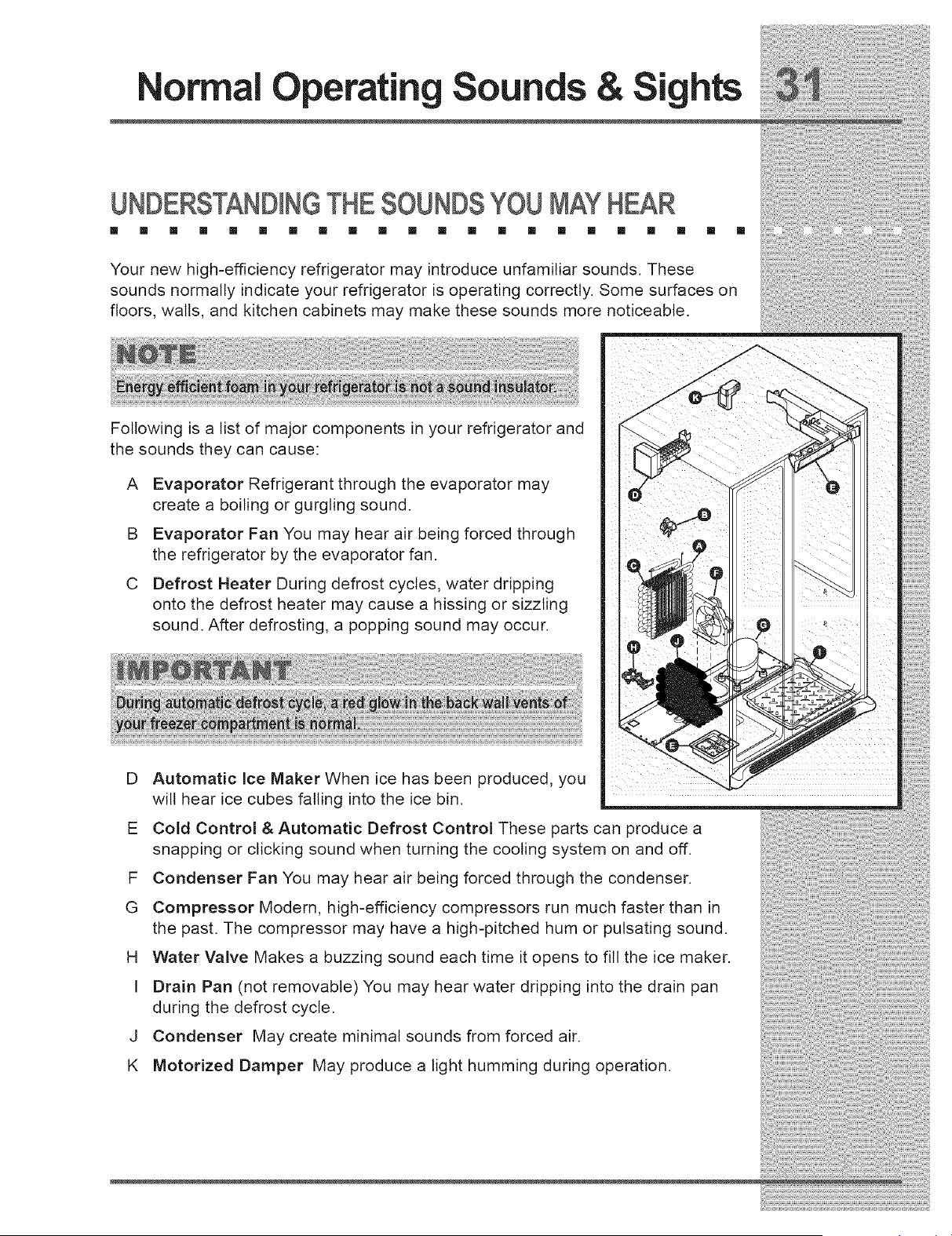
Following is a list of major components in your refrigerator and
the sounds they can cause:
A Evaporator Refrigerant through the evaporator may
create a boiling or gurgling sound.
B Evaporator Fan You may hear air being forced through
the refrigerator by the evaporator fan.
C Defrost Heater During defrost cycles, water dripping
onto the defrost heater may cause a hissing or sizzling
sound. After defrosting, a popping sound may occur.
Automatic Ice Maker When ice has been produced, you
will hear ice cubes falling into the ice bin.
J
E Cold Control & Automatic Defrost Control These parts can produce a
snapping or clicking sound when turning the cooling system on and off.
F Condenser Fan You may hear air being forced through the condenser.
G Compressor Modern, high-efficiency compressors run much faster than in
the past. The compressor may have a high-pitched hum or pulsating sound.
H Water Valve Makes a buzzing sound each time it opens to fill the ice maker.
I Drain Pan (not removable) You may hear water dripping into the drain pan
during the defrost cycle.
J Condenser May create minimal sounds from forced air.
K Motorized Damper May produce a light humming during operation.
i
Care &Cleaning
P.R2T.!"G.Y?U.R!"V.ES.T.ME."T.. . . . . . . .
Keeping your refrigerator clean maintains appearance and prevents odor build-up.
Wipe up any spills immediately and clean the freezer and fresh food compartments
at least twice a year. When cleaning, take the following precautions:
- Never use metallic scouring pads, brushes, abrasive cleaners or strong
. alkaline solutions on any surface.
. Never use CHLORIDE to clean stainless steel.
. Do not wash any removable parts in a dishwasher.
Always unplug the electrical power cord from the wail outlet before cleaning.
• Remove adhesive labels by hand. Do not use razor blades or other sharp
instruments which can scratch the appliance surface.
Do not remove the serial plate.
Refer to the guide on the next page for details on caring and cleaning specific
areas of your refrigerator.
_;_:_ii!ii:ii!ii,lii,lii,lii,lii¸il_li;il;illllllllllilli!;li!;lillllllllllillliilllll!i_illlililll:;iii;ii_li_i!i!l!ii!iii!iii!iii!iilil_iiii_!:i_i_i_!_iii_;;_!!i!
Care & Cleaning
CARE& CLEANINGTIPS
[] [] [] [] [] [] [] [] [] [] [] [] [] [] [] [] [] [] [] [] [] []
Part Cleaning Agents Tips and Precautions
Interior& Door • Soap and water • Use 2 tablespoonsof bakingsoda in 1 quart of warmwater.
Liners • Bakingsoda and • Be sureto wringexcesswaterout of sponge or ctothbefore cieaningaround
water controls,light bulborany electricalpart.
DoorGaskets • Soap and water • Wipe gasketswith a clean softcloth.
Drawers& Bins • Soapand water • Use a soft cloth to clean drawerrunnersand tracks.
• Do not washany removableitems (bins,drawers,etc.)in dishwasher.
Giass Shelves • Soap and water • Allow glassto warmto room temperaturebefore immersinginwarmwater.
• Glass cleaner
•Mitd liquidsprays
Toe Grille • Soapand water • Vacuumdust from front of toe grille.
• Mild liquidsprays • Removetoe grille (see InstallationInstructions.).
• Vacuumattachment • Vacuumbacksideandwipe withsudsyctoth orsponge. Rinseand dry.
Exterior & Handles • Soapand water • Do not usecommercialhouseholdcleaners,ammonia,or alcoholto clean .......................................................................................................................
• Non AbrasiveGlass handles.
Cleaner • Use a soft cloth to clean smoothhandles.
• Do not usea dry clothto cleansmooth doors.
Exterior & Handles • Soapand water
(StainlessSteel • Ammonia
ModelsOnly)
• StainlessSteel
Cleaners
VACATION
[] [] [] []
Occasion
Short Vacations
LongVacations
Moving
• Neveruse CHLORIDEto clean stainlesssteel.
• Cleanstainlesssteel front and handleswith non-abrasivesoapywateranda
dishcloth.Rinsewith cleanwater and a softcloth.
• Wipe stubbornspotswith an ammonia-soakedpapertowel,and rinse. Usea
non-abrasivestainlesssteel cleaner.Thesecleanerscan be purchasedat
mosthomeimprovementor majordepartmentstores.Always follow
manufactureCsinstruction.
• NOTE:Always,clean,wipe and drywith grainto preventscratching.
• Washthe restof the cabinetwith warmwater andmild liquiddetergent.Rinse
well, andwipe dry witha cleansoft cloth.
& MOVINGTIPS
[] [] [] [] [] [] [] [] [] [] [] [] [] [] [] []
Tips
• Leave refrigeratoroperatingduring vacationsof 3 weeksor less.
• Useall perishableitemsfrom refrigeratorcompartment.
• Turnautomaticice makeroff and empty ice bucket,evenif you willonly be gonefor a few days.
• Removeall food and ice if you will be gone one monthor more.
• Turnthe cooling system off (see page 15for locationof On/Off button)and disconnectpower cord.
• Turnoff automaticice makerand turn water supply valveto closedposition.
• Cleaninteriorthoroughly.
• Leave bothdoors opento preventodorsand mold build-up. Blockdoorsopen if necessary.
• Removeall food and ice.
• tf using handcart,loadfrom side.
• Adjustrollers all the way up to protectthem duringslidingor moving.
• Padcabinetto avoid scratchingsurface.

Care & ¢(eaning
REP C(NG LIGHTBULBS
[] [] [] [] [] [] [] [] [] [] [] [] [] [] [] [] [] [] [] [] [] []
Both the freezer and fresh food compartments of your refrigerator include light
bulbs that will need replacing from time to time. Some lights have covers that you
wilt need to remove before replacing the bulbs. Always use bulbs that are designed
for appliance lighting.
Light Socket
Located Behind Meat Pan
Rear of
Meat Pan
Toreplacelight bulbs:
1 Unplug your refrigerator's power cord.
2 Wear gloves as protection against possible broken glass.
3 Remove light cover, if necessary.
4 Unscrew and replace old bulb with an appliance bulb of the
same type and wattage (normally 40 watts).
5 Replace light cover, if necessary.
6 Plug in the refrigerator's power cord.
L) crisper Light
Located Beh ind Cover
_.ear I ,,
ht BuHbs
T T
Behi.d Rear Freezer
of Baskets L / / "i h"
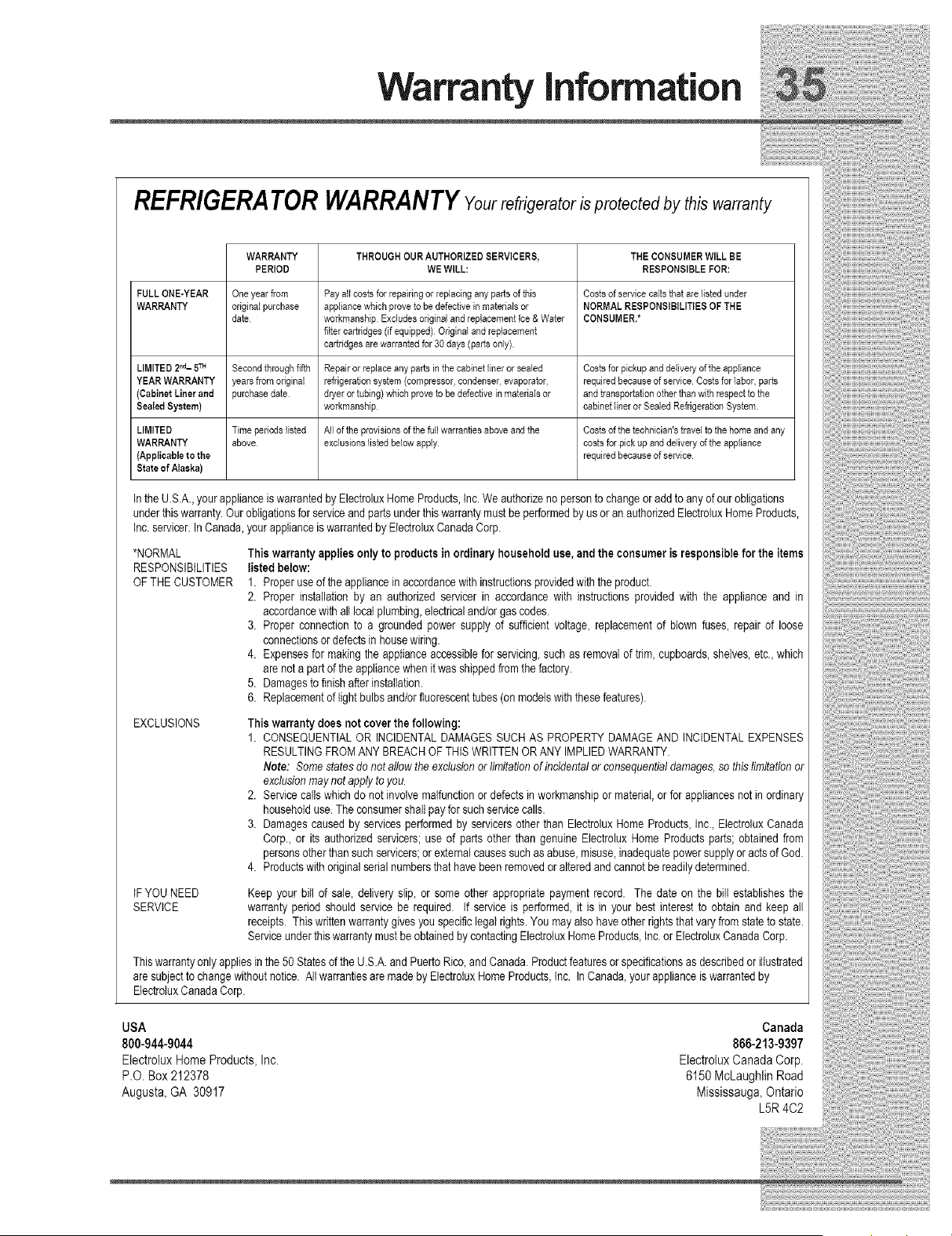
Warranty information
REFRIGERATOR WARRANTYYourrefrigerator is protected by this warranty
WARRANTY THROUGH OUR AUTHORIZED SERVICERS, THE CONSUMER WILL BE
PERIOD WE WILL: RESPONSIBLE FOR:
FULL ONE-YEAR One year fiom Pay all costs for repairing or replacing any parts of this Costs of service calls that are listed under
WARRANTY original purchase appliance which prove to be defective in materials or NORMAL RESPONSIBILITIES OF THE
date workmanship Excludes original and replacement Ice & Water CONSUMER.*
filter cartridges (if equipped) Original and replacement
cartridges are warranted for 30 days (parts only)
LIMITED 2M- 5TM Second through fifth Repair or replace any parts in the cabinet liner or sealed Costs for pickup and delivery of the appliance
YEAR WARRANTY years from original refrigeration system (compressor, condenser, evaporator, required because of service Costs for labor, parts
(Cabinet Liner and purchase date dryer or tubing) which prove to be defective in materials or and transportation other than with respect to the
Sealed System) workmanship cabinet liner or Sealed Refrigeration System
LIMITED Time periods listed All of the provisions of the full warranties above and the Costs of the technician's travel to the home and any
WARRANTY above exclusions listed below apply costs for pick up and delivery of the appliance
(Applicable to the required because of service
StateofAlaska)
Inthe U.S.A.,yourapplianceis warrantedby ElectroluxHome Products,Inc. We authorizeno personto change or addto any of our obligations
under this warranty.Ourobligationsfor serviceand partsunder this warrantymustbe performedby us oran authorizedElectroluxHomeProducts,
Inc.servicer.In Canada,yourapplianceis warranted byElectroluxCanadaCorp.
*NORMAL
RESPONSIBILITIES
OF THE CUSTOMER
EXCLUSIONS
This warrantyapplies onlyto productsin ordinary householduse, and the consumeris responsible for the items
listed below:
1. Proper useof the appliancein accordancewithinstructionsprovidedwith the product.
2. Proper installation by an authorized servicer in accordancewith instructions provided with the appliance and in
accordancewithall localplumbing,electricaland/or gas codes.
3. Proper connection to a grounded power supply of sufficient voltage, replacementof blown fuses, repair of loose
connectionsor defectsin housewiring.
4. Expensesfor making the appliance accessiblefor servicing,such as removal of trim, cupboards,shelves,etc.,which
are nota part of the appliancewhen it wasshippedtom the factory.
5. Damagesto finishafter installation.
6. Replacementof light bulbsand/orfluorescenttubes(on modelswith thesefeatures).
This warrantydoes not coverthe following:
1. CONSEQUENTIALOR INCIDENTALDAMAGESSUCHAS PROPERTYDAMAGEAND INCIDENTALEXPENSES
RESULTINGPROMANYBREACH OFTHIS WRITTENORANY IMPLIEDWARRANTY.
Note: Somestatesdo not allow the exclusionorlimitationof incidentalor consequentialdamages,so this limitationor
exclusionmaynot apply to you.
2. Servicecalls which do not involvemalfunctionor defectsin workmanshipor material,or for appliancesnotin ordinary
householduse. The consumershall payforsuch servicecalls.
3. Damages caused by services performedby servicersother than ElectroluxHome Products,Inc., ElectroluxCanada
Corp., or its authorized servicers; use of parts other than genuine Electrolux Home Productsparts; obtained from
personsother than suchservicers;or externalcauses suchas abuse, misuse,inadequatepower supplyoracts of God.
4. Productswith originalserial numbersthat have beenremovedor alteredand cannotbe readilydetermined.
IFYOUNEED
SERVICE
Keep your bill of sale, delivery slip, or some other appropriate payment record. The date on the bill establishesthe
warranty period should service be required. If service is performed, it is in your best interest to obtain and keep all
receipts. Thiswritten warrantygivesyou specificlegal rights.You may also have other rightsthat vary from state to state.
Serviceunderthis warranty mustbe obtained bycontactingElectroluxHomeProducts,Inc.or ElectroluxCanadaCorp.
Thiswarrantyonly applies inthe 50 Statesof the U.S.A.and PuertoRico,and Canada.Productfeaturesorspecificationsas describedor illustrated
are subjectto change withoutnotice. All warrantiesaremade by ElectrotuxHome Products,Inc. In Canada,your applianceis warrantedby
ElectroluxCanadaCorp.
USA Canada
800-944-9044 866-213-9397
Electrotux Home Products, Inc. Etectrolux Canada Corp.
P.O. Box 212378 6150 McLaughlin Road
Augusta, GA 30917 Mississauga, Ontario
L5R 4C2
Solutions To Common Problems
BEFORE YOU CALL...
[] [] [] [] [] [] [] [] [] [] [] [] [] [] [] [] [] [] [] [] [] []
If you experience a problem with your refrigerator or notice a product behavior or
condition you do not understand, you can usually avoid a call to your service
representative by referring to this section for an answer. Beginning with the
following table, this information includes common problems, causes, and
suggested solutions.
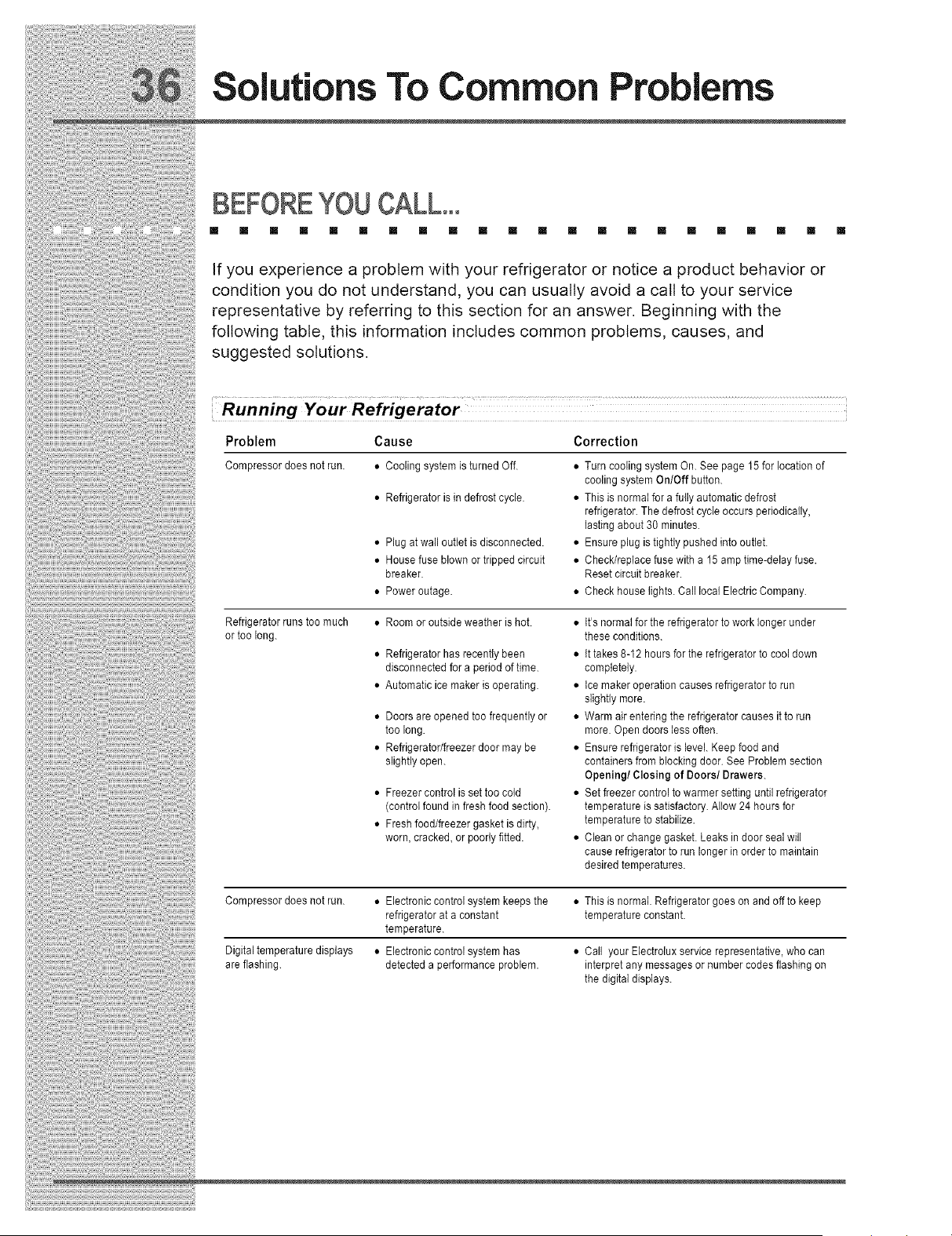
Running Your Refrigerator
Problem Cause Correction
Compressordoesnot run.
Refrigeratorrunstoo much
or too long.
• Coolingsystemisturned Off.
• Refrigeratoris in defrostcycle.
• Plug at wall outlet is disconnected.
• Housefuse blownortrippedcircuit
breaker.
• Power outage.
• Room or outsideweather is hot.
• Refrigerator has recently been
disconnected for a period of time.
• Automatic ice maker is operating.
• Doorsare openedtoo frequentlyor
too long.
• Refrigerator/freezerdoor may be
slightlyopen.
• Freezer control issettoo cold
(controlfound infresh food section).
• Fresh food/freezergasketis dirty,
worn, cracked,or poorlyfitted.
• Turncooling system On. See page 15 for locationof
coolingsystemOnlOff button.
• Thisis normalfor a fullyautomaticdefrost
refrigerator.Thedefrostcycle occursperiodically,
lastingabout38 minutes.
• Ensure plugis tightly pushedinto outlet.
• Check/replacefusewith a 15 ampflme-delayfuse.
Resetcircuit breaker.
• Check houselights.Call localElectricCompany.
• lfls normalforthe refrigeratorto work longerunder
these conditions.
• tt takes 8-12 hoursfor the refrigeratorto cool down
completely.
• tce makeroperationcauses refrigeratorto run
slightlymore.
• Warmair enteringthe refrigeratorcausesit to run
more. Opendoorsless often.
• Ensure refrigeratoris level.Keepfoodand
containersfrom blockingdoor.See Problemsection
Opening/Closing of Doors/Drawers.
• Set freezercontrolto warmer settinguntil refrigerator
temperatureissatisfactory.Allow24 hoursfor
temperatureto stabilize.
• Cleanor changegasket.Leaksin doorseal will
causerefrigeratorto run longer in orderto maintain
desiredtemperatures.
Compressor does not run. • Electronic control system keeps the * This is normal. Refrigerator goes on and off to keep
refrigerator at a constant temperature constant.
temperature.
Digital temperature displays • Electronic control system has • Call your Electrolux service representative, who can
are flashing, detected a performance problem, interpret any messages or number codes flashing on
the digital displays.
Solutions To Common Problems
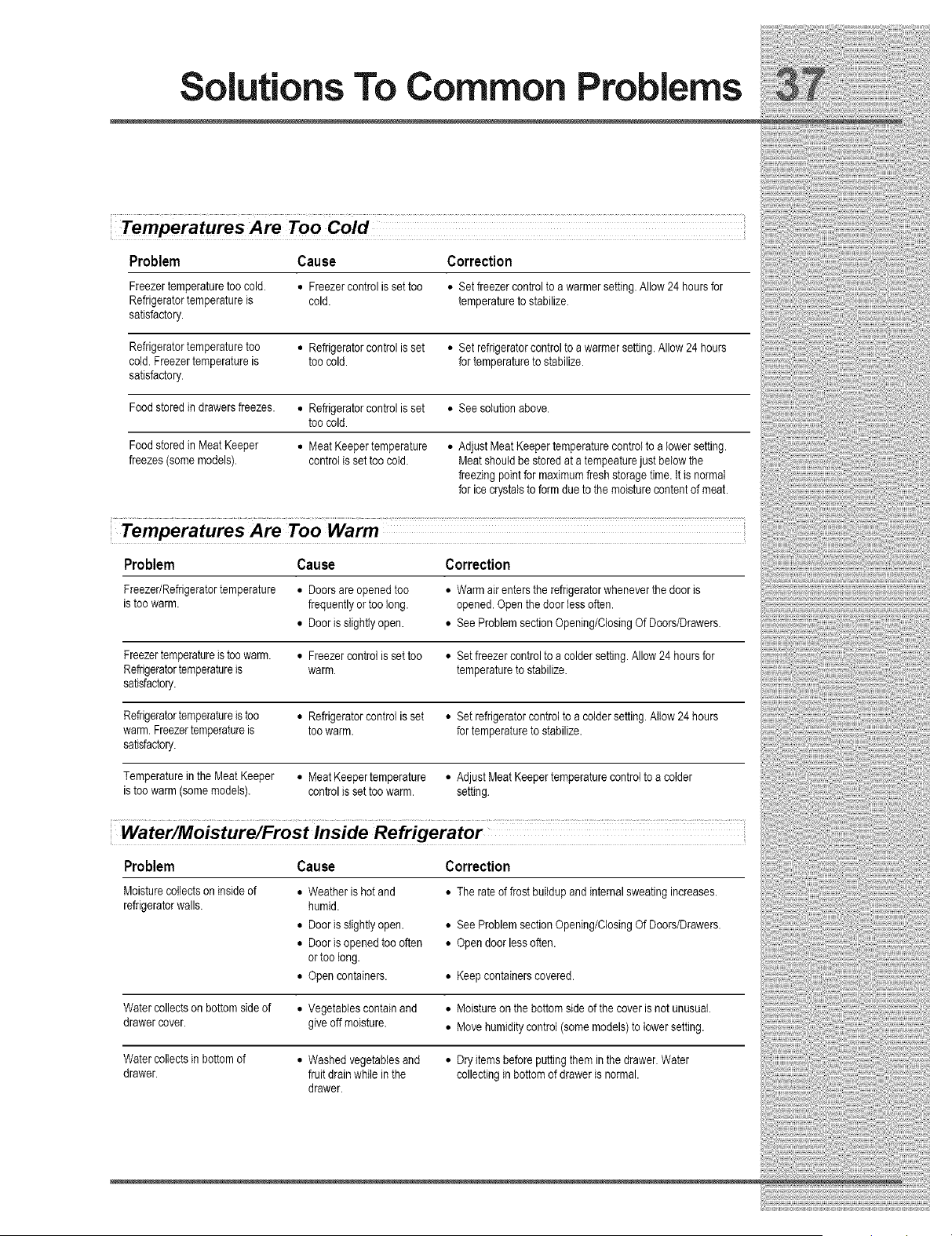
Temperatures Are Too Cold
Problem Cause Correction
Freezertemperaturetoo cold. • Freezer control issettoo • Setfreezer controlto a warmersetting.Allow 24 hoursfor
Refrigeratortemperatureis cold. temperatureto stabilize.
satisfactory.
Refrigeratortemperaturetoo • Refrigeratorcontrol is set • Setrefrigeratorcontroltoawarmersetting. AIIow24 hours
cold. Freezertemperatureis too cold. fortemperatureto stabilize.
satisfactory.
Food storedin drawersfreezes. • Refrigeratorcontrolis set • Seesolution above.
too cold.
Food storedin Meat Keeper • Meat Keepertemperature • AdjustMeatKeepertemperaturecontrolto a lowersetting.
freezes(some models), controlis set too cold. Meatshould be storedat a tempeaturejust belowthe
freezingpoint for maximumflesh storagetime. it is normal
forice crystalsto form due to the moisturecontentof meat.
Temperatures Are Too Warm
Problem Cause Correction
Freezer/Refrigeratortemperature • Doorsare openedtoo • Warm air entersthe refrigeratorwheneverthe door is
is too warm. frequentlyortoo long. opened.Openthe door tessoften.
• Door is slightlyopen. • SeeProblem sectionOpening/ClosingOf Doors/Drawers.
Freezertemperatureis toowarm. • Freezercontrol is settoo • Setfreezercontrol to a colder setting.Allow24 hoursfor
Refrigeratortemperatureis warm. temperatureto stabilize.
satisfactory.
Refrigeratortemperatureis too • Refrigeratorcontrol is set • Setrefrigeratorcontrol to a coldersetting.Allow 24 hours
warm. Freezertemperatureis too warm. for temperatureto stabilize.
satisfactory.
Temperaturein the Meat Keeper • MeatKeepertemperature • Adjust MeatKeepertemperaturecontrolto a colder
is too warm(somemodels), controlis settoo warm. setting.
Water/Moisture/Frost lnside Refrigerator
Problem Cause Correction
Moisturecotiectson insideof
refrigeratorwalls.
• Weatheris hot and
humid.
• Door is slightlyopen.
• Door is opened too often
ortoo tong.
• Open containers.
• The rate of frost buildupand internalsweating increases.
• SeeProblem sectionOpening/ClosingOf Doors/Drawers.
• Open door lessoften.
• Keepcontainerscovered.
Water collectson bottomside of • Vegetablescontainand • Moistureon the bottomside of the cover is not unusual.
drawercover, give off moisture. • Move humiditycontrol (somemodels)to lower setting.
Water collectsin bottomof • Washedvegetablesand • Dryitems before puttingthem in the drawer. Water
drawer, fruit drainwhile in the collecting in bottomof draweris normal.
drawer.
utions To Common Problems
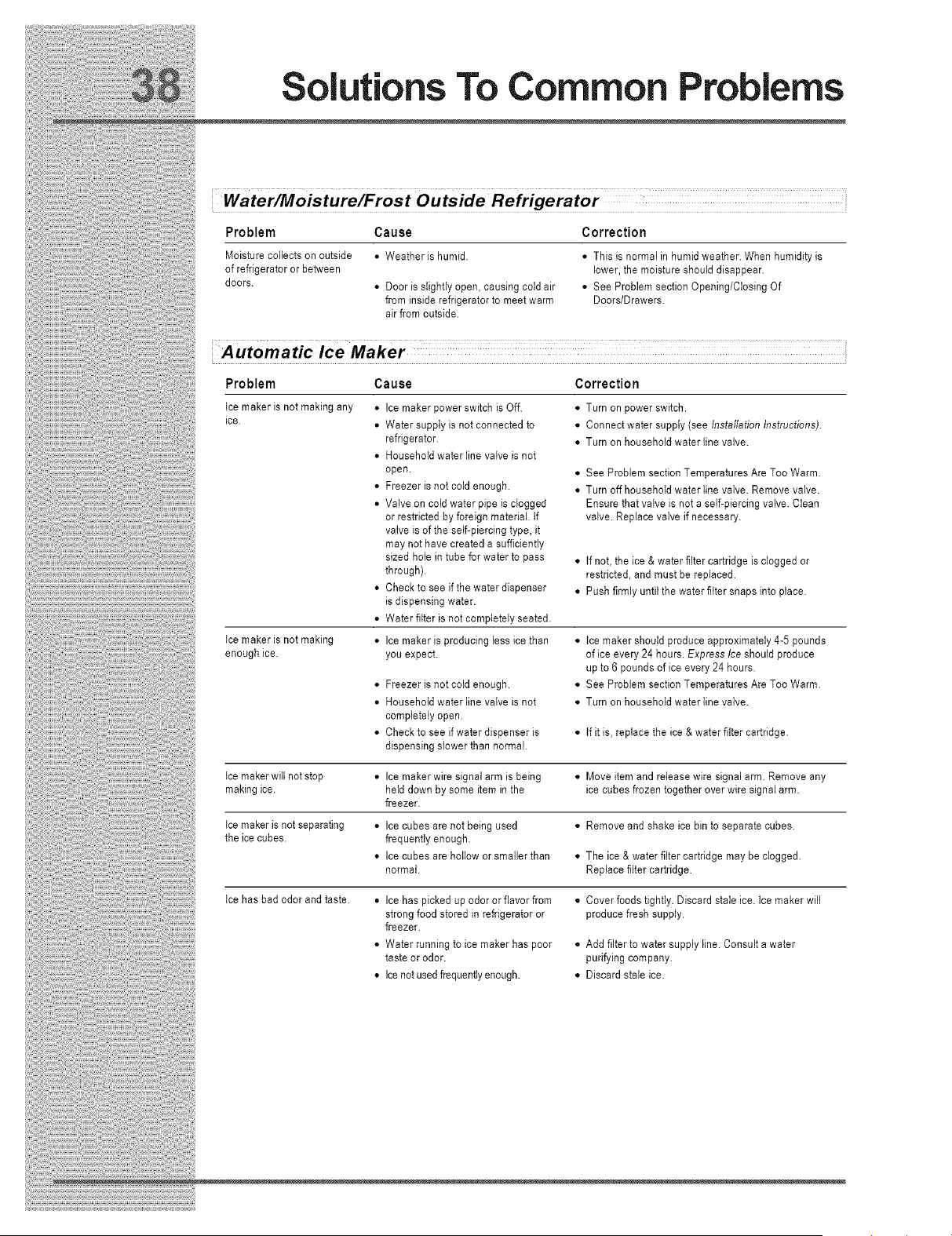
Water/Moisture/Frost Outside Refrigerator
Problem Cause
Moisture collects on outside • Weather is humid.
of refrigerator or between
doors.
• Door is slightly open, causing cold air
from inside refrigerator to meet warm
air from outside.
Correction
• This is normal in humid weather. When humidity is
lower, the moisture should disappear.
* See Problem section Opening/Closing Of
Doors/Drawers.
Automatic Ice Maker
Problem
Ice maker is not making any
ice.
Cause Correction
Ice maker is not making
enough ice.
• Ice maker power switch is Off.
• Water supply is not connected to
refrigerator.
• Household waterline valve is not
open.
• Freezer is not cold enough.
• Valve on cold water pipe is clogged
or restricted by foreign material. If
valve is of the self-piercing type, it
may not have created a sufficiently
sized hole in tube for water to pass
through).
• Check to see if the water dispenser
is dispensing water.
• Water fiker is not completely seated.
• Ice maker is producing less ice than
you expect.
• Turn on power switch.
• Connect water supply (see Installation Instructions).
• Turn on household water line valve.
• See Problem section Temperatures Are Too Warm.
• Turn off household water line valve. Remove valve.
Ensure that valve is not a self-piercing valve. Clean
valve. Replace valve if necessary.
• If not, the ice & water filter cartridge is clogged or
restricted, and must be replaced.
• Push firmly until the water filter snaps into place.
• Ice maker should produce approximately 4-5 pounds
of ice every 24 hours. Express Ice should produce
up to 6 pounds of ice every 24 hours.
• See Problem section Temperatures Are Too Warm.
• Turn on household water line valve.
• Freezer is not cold enough.
• Household water line valve is not
completely open.
• Check to see if water dispenser is • if it is, replace the ice & water filter cartridge.
dispensing slower than normal.
Ice maker will not stop • Ice maker wire signal arm is being • Move item and release wire signal arm. Remove any
making ice. held down by some item in the ice cubes frozen together over wire signal arm.
freezer.
Ice maker is not separating • Ice cubes are not being used • Remove and shake ice bin to separate cubes.
the ice cubes, frequently enough.
• Icecubesareholloworsmallerthan • The ice & water fiker cartridge may be clogged.
normal. Replace filter cartridge.
Ice has bad odor and taste. • Ice has picked up odor or flavor from • Cover foods tightly. Discard stale ice. Ice maker will
strong food stored in refrigerator or produce fresh supply.
freezer.
• Water running to ice maker has poor
taste or odor.
• Ice not used frequently enough.
• Add filter to water supply line. Consult a water
purifying company.
• Discard stale ice.
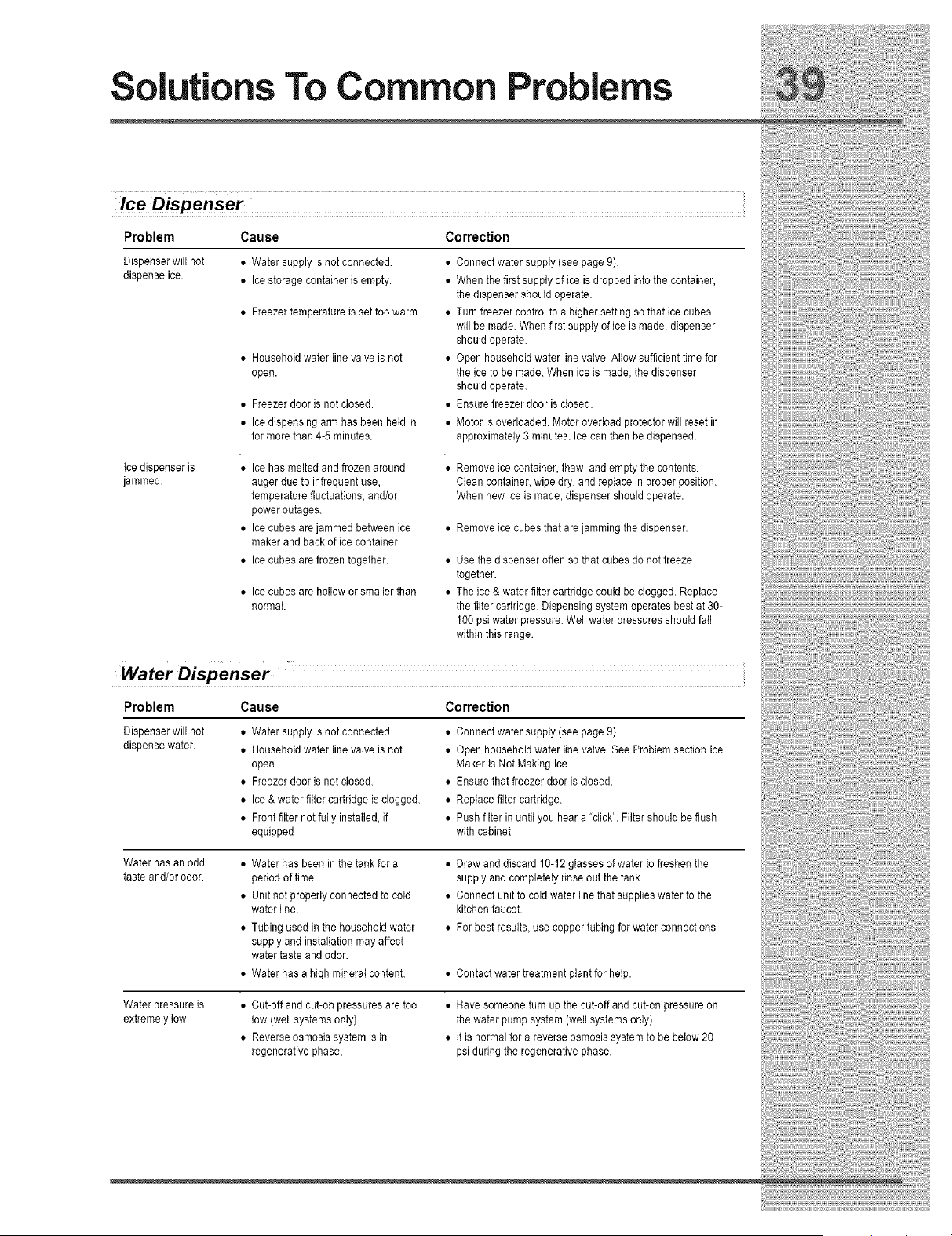
Solutions To Common Problems
Ice Dispenser
Cause
• Water supply is not connected.
• Ice storage container is empty.
• Freezer temperature is set too warm.
• Householdwater line valveis not
open.
• Freezerdoor is not closed.
• Icedispensingarm hasbeen heldin
formore than 4-5minutes.
Problem
Dispenser will not
dispense ice.
Correction
• Connect water supply (see page 9).
• When the first supply of ice is dropped into the container,
the dispenser should operate.
• Turn freezer control to a higher setting so that ice cubes
will be made. When first supply of ice is made, dispenser
should operate.
• Open household water line valve. Allow suff+cient time for
the ice to be made. When ice is made, the dispenser
should operate.
• Ensure freezer door is closed.
• Motor is overloaded. Motor overload ptz)tector will reset in
approximately 3 minutes. Ice can then be dispensed.
Ice dispenseris
jammed.
• Ice has melted and frozen atT)und
auger due to infrequent use,
temperature fluctuations, and/or
power outages.
• Ice cubes are jammed between ice
maker and back of ice container.
• Ice cubes are frozen together.
• Icecubes arehollow or smallerthan
normal.
• Remove ice container,thaw, andemptythe contents.
Cleancontainer,wipedry, and replacein proper position.
Whennew ice is made,dispensershouldoperate.
• Remove ice cubes that are jamming the dispenser.
• Use the dispenseroften sothat cubesdo not freeze
together.
• The ice & water filtercartridgecould be clogged.Replace
the filtercartridge.Dispensingsystemoperatesbest at 30-
100psi water pressure.Wellwater pressuresshouldfall
within this range.
Water Dispenser
Problem Cause Correction
Dispenserwill not
dispensewater.
• Water supply is not connected.
• Household water line valve is not
open.
• Freezer door is not closed.
• Ice & water filter cartridge is clogged.
• Front filter not fully installed, if
equipped
• Connectwatersupply(see page9).
• Open householdwaterline valve.See Problemsection Ice
Maker tsNot MakingIce.
• Ensure that freezerdooris closed.
• Replacefiltercartridge.
• Push filterin until you heara "click".Filter shouldbe flush
with cabinet.
Water has an odd
taste and/or odor.
• Waterhas beenin the tank for a
periodof time.
• Unitnot properlyconnectedto cold
water line.
• Tubingused in the householdwater
supplyand installationmay affect
watertaste and odor.
• Waterhas a high mineral content.
• Drawand discard10-12glassesof water to freshenthe
supplyand completelyrinse out the tank.
• Connect unit to cold waterline that supplieswater to the
kitchenfaucet.
• For bestresults,usecoppertubing for water connections.
• Contact water treatment plant for help.
Water pressure is
extremely low.
• Cut-off andcut-onpressuresaretoo
low (wellsystemsonly).
• Reverseosmosissystemis in
regenerativephase.
• Havesomeoneturn up the cut-offand cut-onpressureon
the water pumpsystem (wellsystemsonly).
• tt is normalfor a reverse osmosissystemto be below20
psi duringthe regenerativephase.
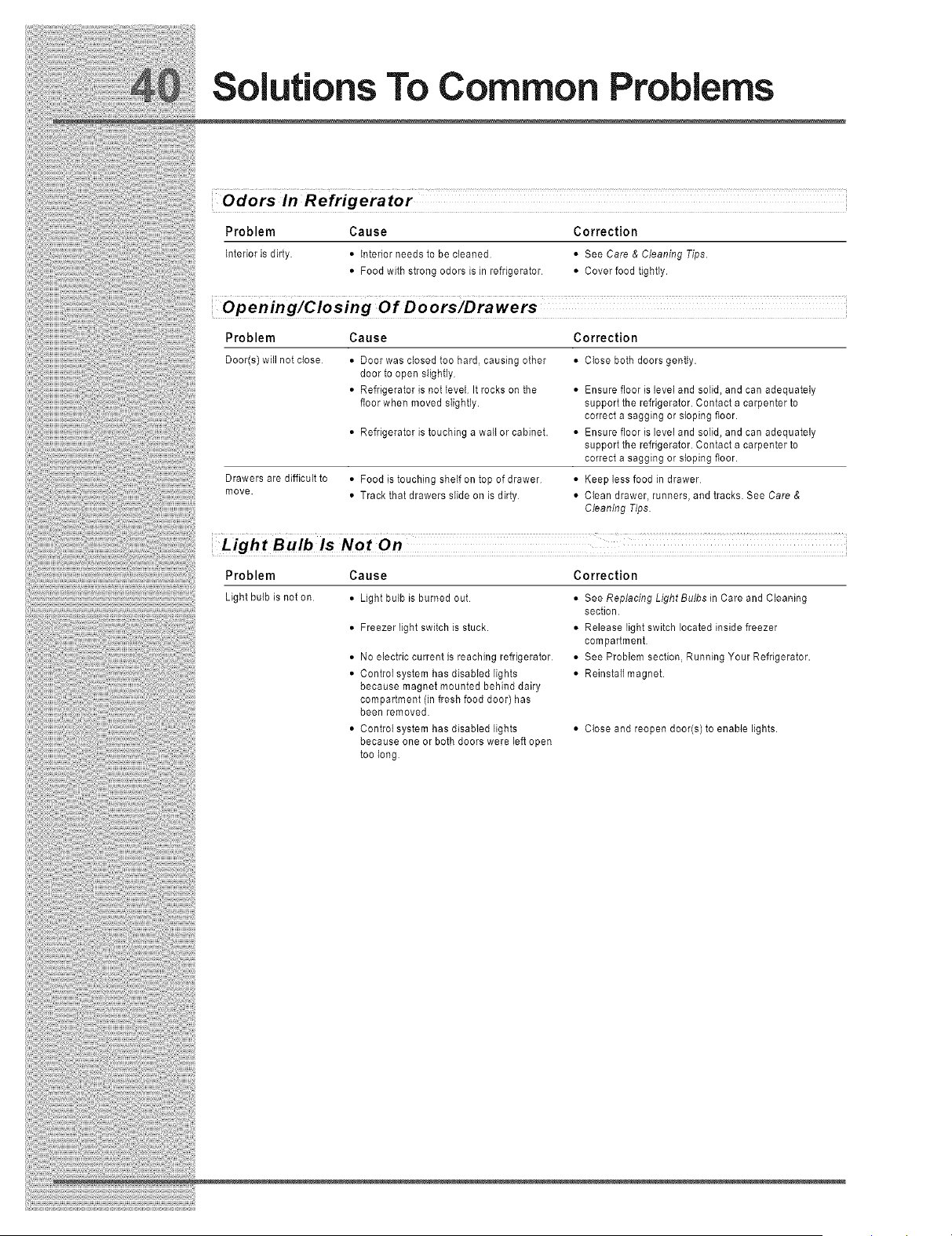
Solutions To Common Problems
Odors In Refrigerator
Problem Cause Correction
Interioris dirty • Interiorneedsto be cleaned • See Care & Cleaning Tips.
• Food with strongodorsis in refrigerator • Coverfood tightly.
Opening/Closing Of Doors/Drawers
Problem Cause Correction
Door(s) will not close
Drawers are difficult to
move.
• Door was closed too hard, causing other
door to open stighfly
• Refrigerator is not level It rocks on the
floor when moved sIightly.
• Refrigerator is touching a wall or cabinet.
• Clese both doors gently.
• Ensure floor is level and solid, and can adequately
support the refrigerator. Contact a carpenter to
correct a sagging or sleping floor.
• Ensure floor is level and solid, and can adequately
support the refrigerator. Contact a carpenter to
correct a sagging or sleping floor.
• Food is touching shelf on top of drawer
• Track that drawers slide on is dirty
• Keep less food in drawer
• Clean drawer, runners, and tracks. See Care &
Cleaning Tips
Light Bulb iS Not On
Problem Cause Correction
Light bulb is not on • Light bulb is burned out
• Freezer light switch is stuck.
• No electric current is reaching refrigerator
• Control system has disabled lights
because magnet mounted behind dairy
compartment (in fresh food door) has
been removed.
•Controt system has disabled lights
because one or both doors were left open
too leng
• See Replacing LightBulbs in Care and Cleaning
section.
• Release light switch located inside freezer
compartment
• See Problem section, Running Your Refrigerator.
• Reinstall magnet.
• Clese and reopen door(s) to enable lights.