M20
Register your product and get support at
www.philips.com/support
Short user manual
1
What is in the box
Important safety instructions
Warning
•
•
•
•
•
•
•
•
•
The Electrical network is classi�ed as hazardous.
The only way to power down the charger is to
unplug the power supply from the electrical outlet.
Ensure that the electrical outlet is always easily
accessible.
• Refer to safety information before using the
product.
• Hereby, TP Vision Europe B.V. declares that this
product is in compliance with the essential
requirements and other relevant provisions of
Directive 2014/53/EU.
• Use only the power supply listed in the user
instructions.
Use only the batteries listed in the user
instructions.
Do not allow the product to come into contact
with liquids.
Risk of explosion if battery is replaced by an
incorrect type.
Dispose of used batteries according to the
instructions.
When the handset rings or when the handsfree is
activated, keep the handset away from your ear to
avoid hearing damage.
3
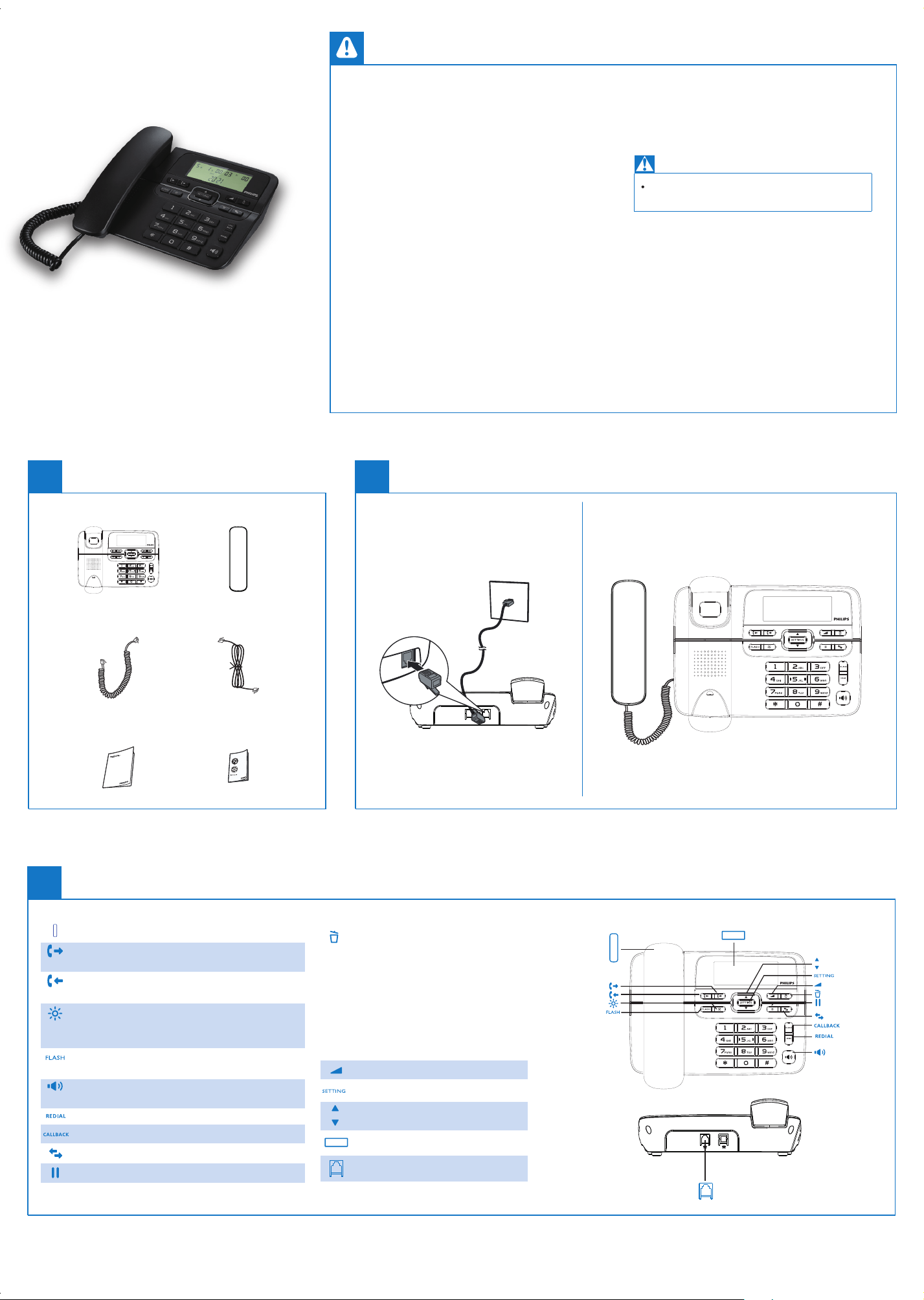
Overview
Handset
Handset
Outgoing call log
LCD screen
Up/Down
Settings
Volume
Delete
Pause
Call transfer
Callback
Redial
Speaker
Incoming call log
Brightness
Recall
Outgoing call log
* It shows the outgoing call log.
Incoming call log
* It shows the outgoing call log.
Brightness
* It adjusts the brightness of the
screen in on-hook condition.
Recall
* It is used for recall in off- hook condition.
Speaker
* Make and receive calls through the speaker.
Redial
Callback
Call transfer
Pause
Delete
* It deletes an incoming or
outgoing call. Press and hold
for 3s to delete all incoming or
outgoing call logs.
* It deletes a digit when you dial
a number.
Volume
Settings
Up/Down
LCD screen
Cable socket
Cable socket
This product shall be used under the conditions
of not interfering with legal radio stations and
being protected from interference.
To avoid damage or malfunction
Warning:
Avoid high temperature (60°C), humid or
corrosive environments.
NCC warning:
This product shall be used under the indoor
conditions of not interfering with legal radio
stations and being protected from interference.
Please use the product appropriately to reduce
the in�uence of electromagnetic waves.
Base station
Coil cord
Short user manual
Handset
Line cord
Guarantee
2
Connect
This symbol on a product means that
the product is covered by European
Directive 2012/19/EU.
This product has been manufactured
by, and is sold under the responsibility of
MMD Hong Kong Holding Limited and
MMD Hong Kong Holding Limited is the
Philips and the Philips Shield Emblem
are registered trademarks of Koninklijke
Philips N.V. and are used under license
from Koninklijke Philips N.V.
UMS_M20_00_V1.0
Frequently
asked questions
No display
Make sure there are power and phone
connections.
The service is not activated. Check with your
service provider.
The caller’s information is withheld or
unavailable.
www.philips.com/support
To access the user instructions online, use the
reference model number written on the product
label at the bottom of the base station.
Technical data
4
Get started
2022 © MMD Hong Kong Holding Limited.
All rights reserved. Specifcations are subject
to change without notice.
warrantor in relation to this product.
Set the date and time
. The screen displays "
".
Press again to con�rm. After entering
the date/time settings screen, the year digit
starts to blink. Press to set the year and
then press to set the day/hour/minute.
Remarks
After the time and date are set, the LCD screen
automatically displays the corresponding day of
the week.
Press
Pick up the handset to con�rm the setting.
Make a call
You can make a call in these ways:
Normal call
Call from the redial list
Call from the call log
Make sure your phone is properly connected
to the line cord.
Make sure the handset is properly connected
to the base through the coil cord.
Normal call
1. Pick up the handset or press
.
2. Dial the phone number.
To erase a digit, press
.
Redial a call
1. Pick up the handset.
2.
Press
. The most recent outgoing
call is dialed.
Call from the call log
1. Press to enter the incoming call log.
2.
Press
to select a record on the list.
3.
The screen displays the incoming call
number, date, and time.
4.
Press
or again to call back.
1.
Press
to enter the outgoing call log.
2.
Press to query the latest outgoing call
number and time.
3. Press
or again to call back.
Query incoming calls
Turn the speaker on or off
1. Press to enter the incoming call log.
2.
Press
to select a record on the list.
3.
The screen displays the incoming call
number, date,and time.
Press
.
Adjust the volume
Adjust the speaker volume
You can set the speaker volume
in the following ways:
Pick up the handset to con�rm the setting.
Pick up the handset to con�rm the setting.
1. Press
to enter the speaker mode.
There are �ve brightness levels for selection.
2.
Press to adjust the speaker volume.
The speaker volume is set to high upon
factory delivery.
Set the brightness
1. In the on-hook condition, press to
adjust the screen of the LCD screen. Press this
button continuously to display different
brightness. The brightness is set to level 3
upon factory delivery.
2.
Temporary time setting
1. Press to enter the setting mode.
2.
Press
to select
"
".
3. Press again to enter the temporary
setting menu.
4. " " is displayed.
5.
Press
to set the time.
6.
Screen dimensions
General speci�cation and
features
Screen size: 3.3 inches
Speaker phone
Callback and redial
Call transfer or three-way calling with
the transfer button in cooperation
with switches
Weight and dimensions
Base station and handset:
539.0 grams
77.0 × 218.0 × 179.0 mm
(H × W × D)
No dialing tone
No voice from the receiver
or no voice transmission
The caller ID does not display
5
Enjoy