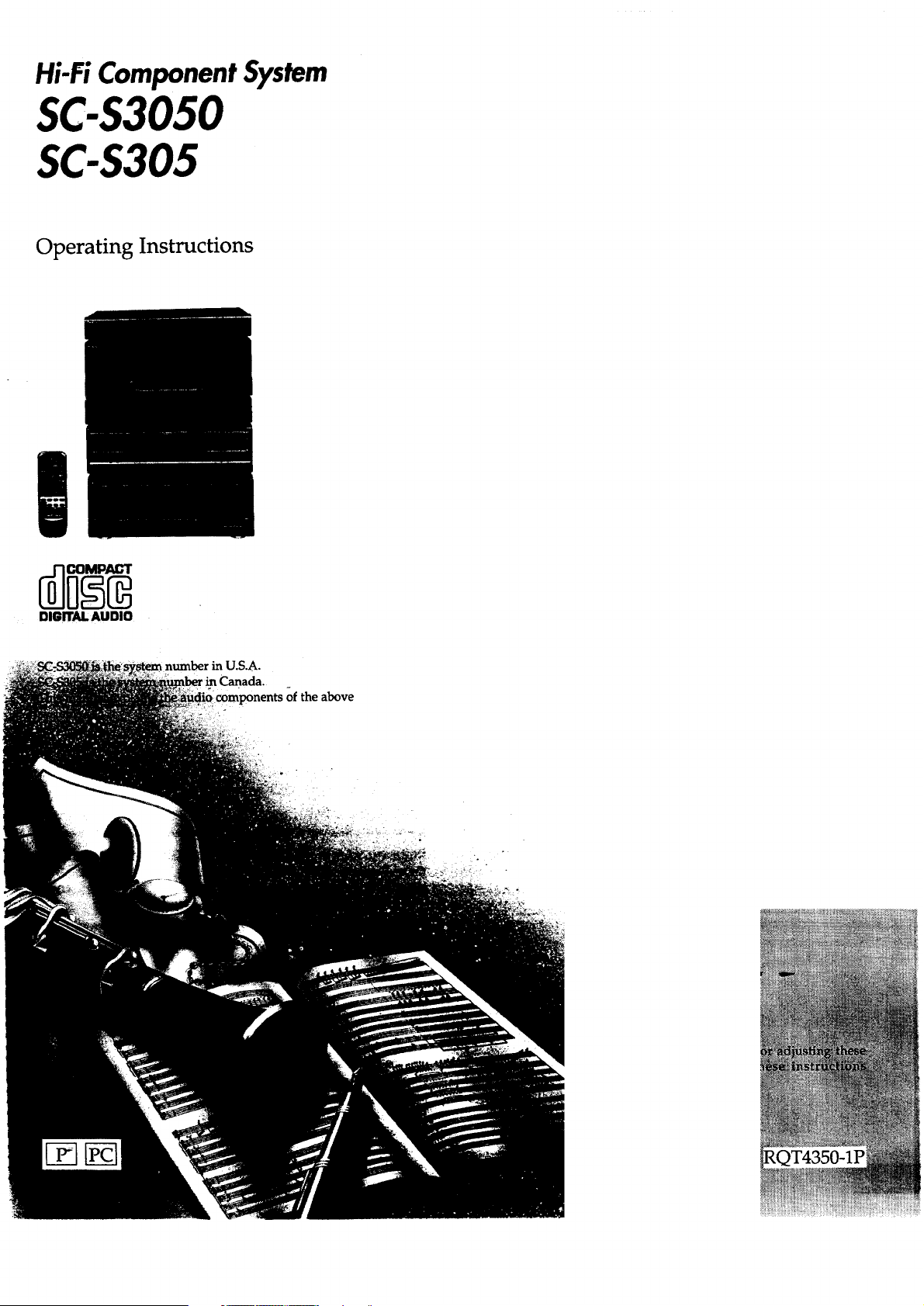
Hi-Fi Component System
SC-$3050
SC-$305
Operating Instructions
DIGITAL AUDIO
in U.S.A.
:omponents of the above
Dear Customer
Thank you for purchasing this Technics product.
For optimum performance and safety, please read these
instructions carefully.
The model number and serial number of this product can be
found on either the back or the bottom of the unit.
Please note them in the space provided below and keep for
future reference.
MODEL NUMBER SERIAL NUMBER
Tuner : ST-KS5
Amplifier : SU-G86
Graphic equalizer : SH-GE50
Cassette deck : RS-TR180
CD changer : SL-MC409
User memo:
DATE OF PURCHASE
DEALER NAME
DEALER ADDRESS
TELEPHONE NUMBER ..... ' _
CAUTIONi(i_or -S:[:-_,tC409)- '_ /:: _:=
THIS PRODUCT UTILIZES A LASER.
USE OF CONTROLS OR ADJUSTMENTS OR
PERFORMANCE OF PROCEDURES OTHER
THAN THOSE SPECIFIED HEREIN MAY
RESULT IN HAZARDOUS RADIATION
EXPOSURE.
DO NOT OPEN COVERS AND DO NOT REPAIR
YOURSELF. REFER SERVICING TO QUALIFIED
PERSONNEL.
CAUTION:
TO PREVENT ELECTRIC SHOCK MATCH WIDE
BLADE OF PLUG TO WIDE SLOT, FULLY
INSERT.
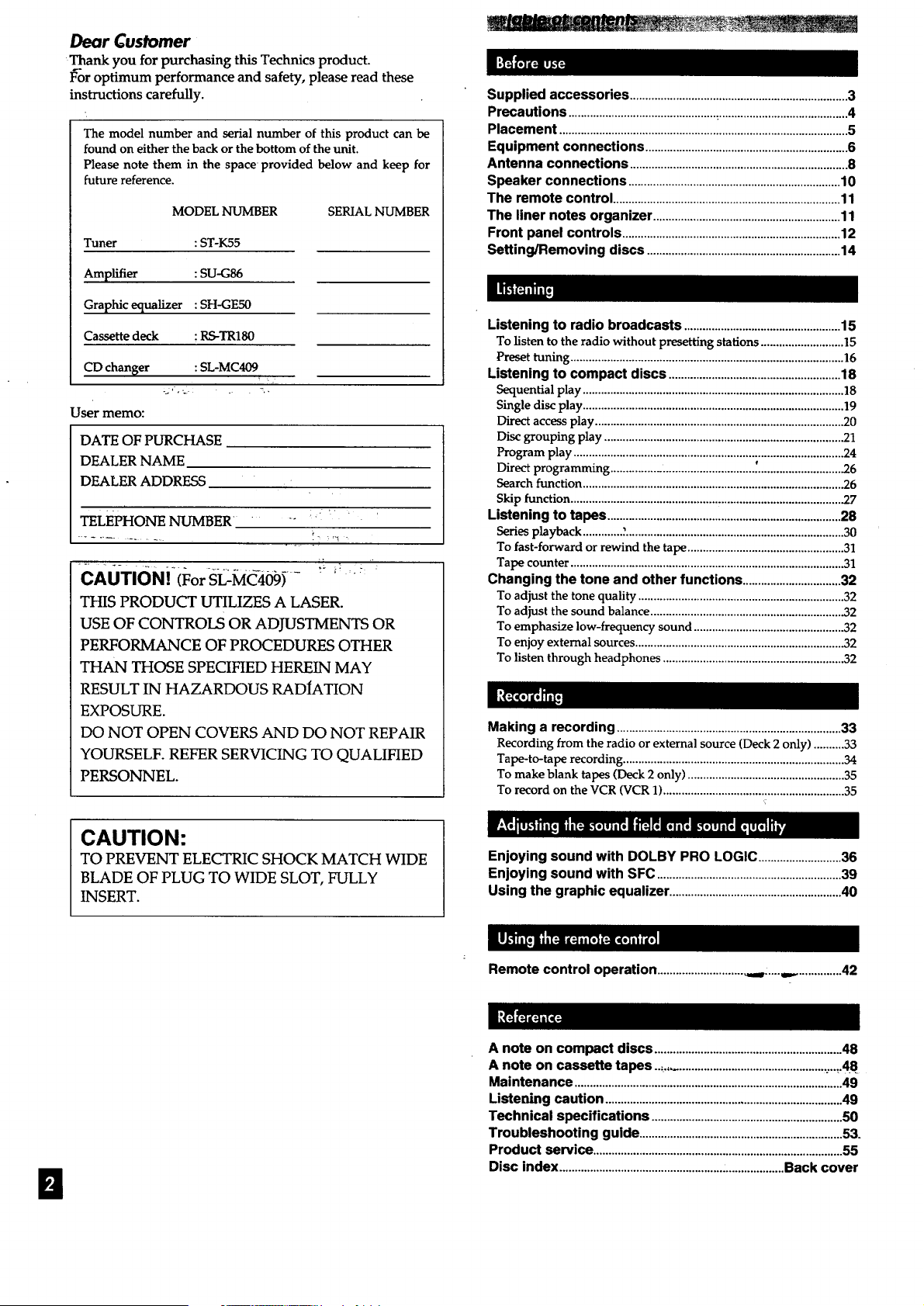
Supplied accessories.......................................................................3
Precautions................................................_..........................................4
Placement..............................................................................................5
Equipment connections..................................................................6
Antenna connections .......................................................................8
Speaker connections.....................................................................10
The remote control..........................................................................11
The liner notes organizer.............................................................11
Front panel controls.......................................................................12
Setting/Removing discs...............................................................14
Listening to radio broadcasts...................................................15
To listen to the radio without presetting stations ...........................15
Preset tuning ......................................................................................... ]6
Listening to compact discs ........................................................ 18
Sequential play ..................................................................................... 18
Single disc play ..................................................................................... 19
Direct access play ................................................................................. 20
Disc grouping play .............................................................................. 21
Program play ........................................................................................ 24
Direct programming .............................................. _........................... .26
Search function .................................................................................... .26
Skip function ........................................................................................ .27
Listening to tapes ............................................................................ 28
Series playback ............. ?....................................................................... 30
To fast-forward or rewind the tape ...................................................31
Tape counter ......................................................................................... 31
Changing the tone and other functions................................32
To adjust the tone quality ................................................................... 32
To adjust the sound balance ............................................................... 32
To emphasize low-frequency sound .................................................32
To enjoy external sources .................................................................... 32
To listen through headphones ........................................................... 32
Making a recording ......................................................................... 33
Recording from the radio or external source (Deck 2 only) ..........33
Tape-to-tape recording ........................................................................ 34
To make blank tapes (Deck 2 only) ................................................... 35
To record on the VCR (VCR 1) ........................................................... 35
Enjoying sound with DOLBY PRO LOGIC ...........................36
Enjoying sound with SFC ............................................................39
Using the graphic equalizer ........................................................40
B
Remote control operation .............................t:.....,.. ..............42
A note on compact discs .............................................................48
A note on cassette tapes.._ ..................................................:...._.48_
Maintenance .......................................................................................49
Listening caution .............................................................................49
Technical specifications ..............................................................50
Troubleshooting guide ..................................................................53.
Product service .................................................................................55
Disc index .........................................................................Back cover
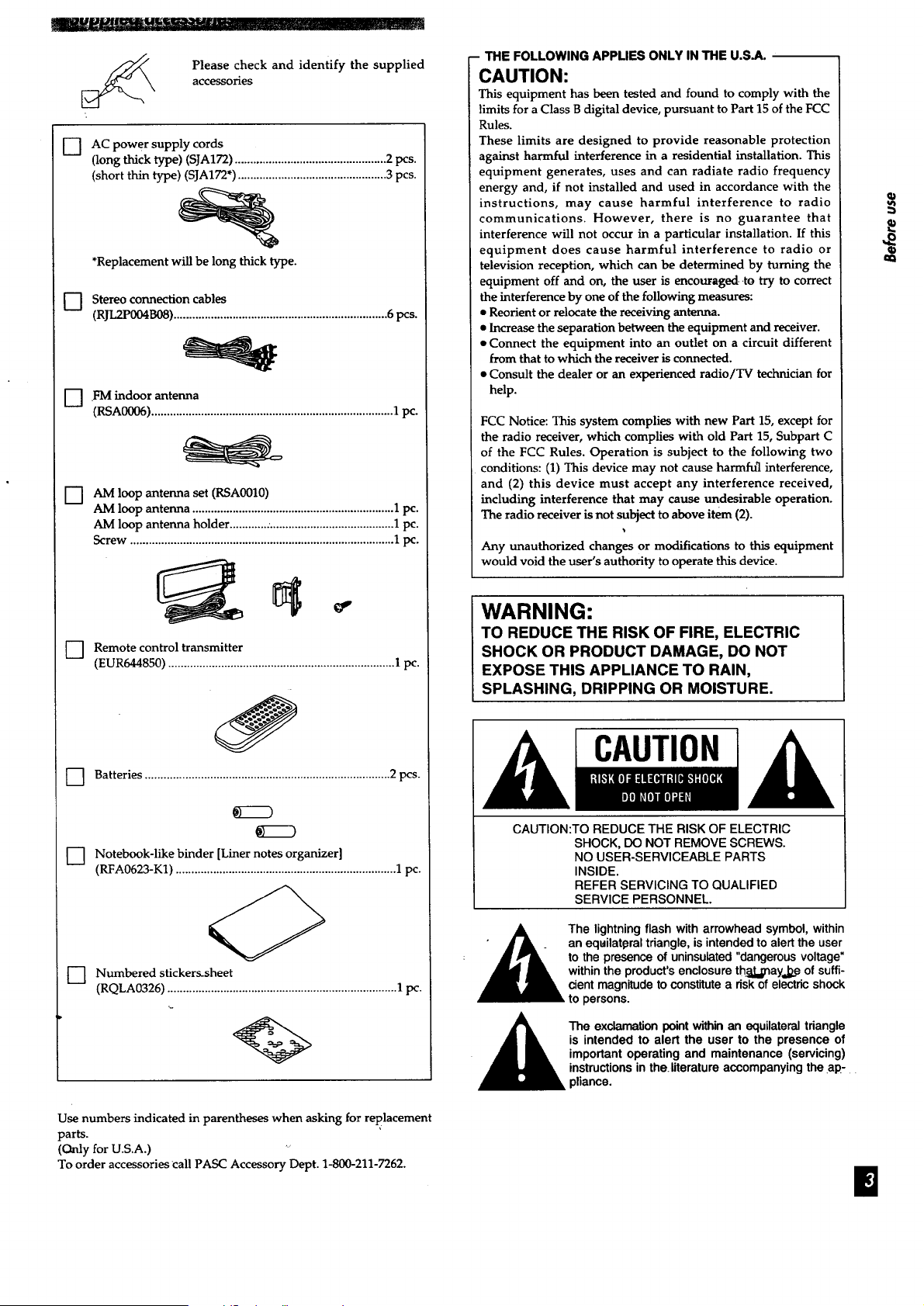
Please check and identify the supplied
accessories
[] AC power supply cords
(long thick type) (SJA172) ................................................. 2 pcs.
(short thin type) (SJA172") ................................................ 3 pcs.
*Replacement will be long thick type.
[-7 Stereo connection cables
(RJL2P004B08) ..................................................................... 6 pcs.
D .FM indoor antenna
(RSAO006)..............................................................................1pc.
AM loop antenna set (RSA0010)
AM loop antenna ................................................................. 1 pc.
AM loop antenna holder ............. ........................................ 1 pc.
Screw ..................................................................................... 1 pc.
] Remote control transmitter
(EUR644850) ......................................................................... 1 pc.
] Batteries ............................................................................... 2 pcs.
KZZD
KZZ9
D Notebook-like binder [Liner notes organizer]
(RFA0623-K1) ....................................................................... 1 pc.
] Numbered stickers-sheet
(RQLA0326) .......................................................................... 1 pc.
Use numbers indicated in parentheses when asking for replacement
parts.
(Only for U.S.A.) '"
To order accessories call PASC Accessory Dept. 1-800-211-7262.
- THE FOLLOWING APPLIES ONLY IN THE U.S.A.
CAUTION:
This equipment has been tested and found to comply with the
limits for a Class B digital device, pursuant to Part 15 of the FCC
Rules.
These limits are designed to provide reasonable protection
against harmful interference in a residential installation. This
equipment generates, uses and can radiate radio frequency
energy and, if not installed and used in accordance with the
instructions, may cause harmful interference to radio
communications. However, there is no guarantee that
interference will not occur in a particular installation. If this
equipment does cause harmful interference to radio or
television reception, which can be determined by turning the
equipment off and on, the user is encouraged-.to try to correct
the interference by one of the following measures:
• Reorient or relocate the receiving antenna•
• Increase the separation between the equipment and receiver.
• Connect the equipment into an outlet on a circuit different
from that to which the receiver is connected.
• Consult the dealer or an experienced radio/TV technician for
help•
FCC Notice: This system complies with new Part 15, except for
the radio receiver, which complies with old Part 15, Subpart C
of the FCC Rules. Operation is subject to the following two
conditions: (1) This device may not cause harmfu_l interference,
and (2) this device must accept any interference received,
including interference that may cause undesirable operation.
The radio receiver is not subject to above item (2).
Any unauthorized changes or modifications to this equipment
would void the user's authority to operate this device.
WARNING:
TO REDUCE THE RISK OF FIRE, ELECTRIC
SHOCK OR PRODUCT DAMAGE, DO NOT
EXPOSE THIS APPLIANCE TO RAIN,
SPLASHING, DRIPPING OR MOISTURE.
CAUTION
CAUTION:TO REDUCE THE RISK OF ELECTRIC
SHOCK, DO NOT REMOVE SCREWS.
NO USER-SERVICEABLE PARTS
INSIDE.
REFER SERVICING TO QUALIFIED
SERVICE PERSONNEL.
._ The lightning flash with arrowhead symbol, within
• • • _ an eqailat0ral triangle, is intended to alert the user
• _ to the presence of uninsulated "dangerous voltage"
I within the product's enclosure th_t=l;nayJze of suffi-
cient magnitude to constitute a risk of electric shock
to persons.
The exclamation point within an equilateral triangle
is intended to alert the user to the presence of
important operating and maintenance (servicing)
instructions in the literature accompanying the ap-
pliance.
B
==
q)
Before using this unit please read these operating instructions
carefully. Take special care to follow the warnings indicated on the
unit itself as well as the safety suggestions listed below.
Afterwards keep them handy for future reference.
•1. Power Source - The unit should be connected to power supply
only of the type described in the operating instructions or as
marked on the unit.
2. Polarization -- If the unit is equipped with a polarized AC
power plug (a plug having one blade wider than the other), that
plug will fit into the AC outlet only one way. This is a safety
feature. If you are unable to insert the plug fully into the outlet,
try reversing the plug. If the plug should still fail to fit, contact
your electrician to replace your obsolete outlet. Do not defeat
the safety purpose of the polarized plug.
3. Power Cord Protection - AC power supply cords should be
routed so that they are not likely to be walked on or pinched by
items placed upon or against them. Never take hold of the plug
or cord if your hand is wet, and always grasp the plug body
When connecting or disconnecting it.
4. Nonuse Periods - When the unit is not used, turn the power
off. When left unused for a long period of time, the unit should
be unplugged from the household AC outlet.
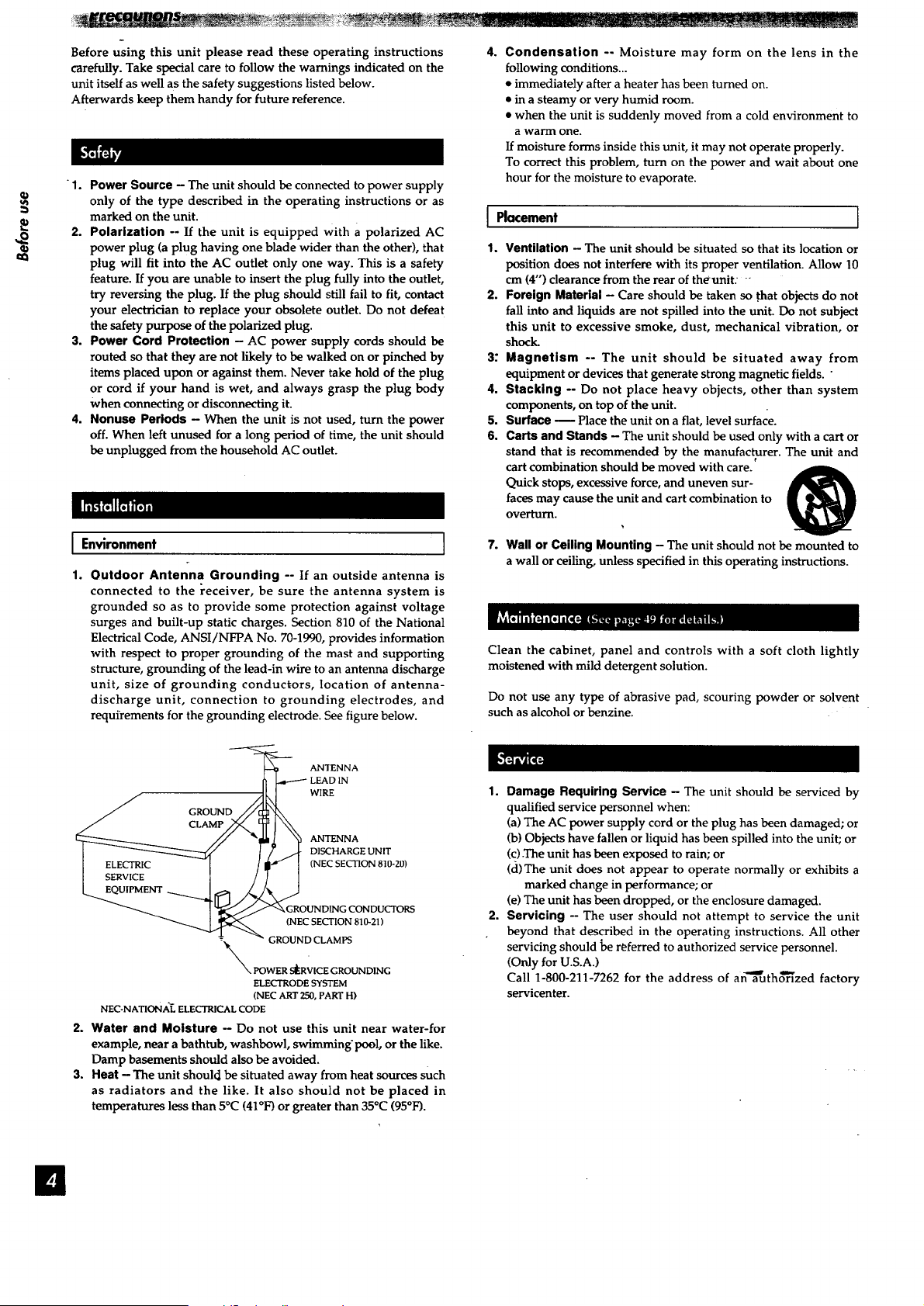
I Environment
1.
Outdoor Antenna Grounding -- If an outside antenna is
connected to the _'eceiver, be sure the antenna system is
grounded so as to provide some protection against voltage
surges and built-up static charges. Section 810 of the National
Electrical Code, ANSI/NFPA No. 70-1990, provides information
with respect to proper grounding of the mast and supporting
structure, grounding of the lead-in wire to an antenna discharge
unit, size of grounding conductors, location of antenna-
discharge unit, connection to grounding electrodes, and
requirements for the grounding electrode. See figure below.
4°
Condensation -- Moisture may form on the lens in the
following conditions...
• immediately after a heater has been turned on.
• in a steamy or very humid room.
• when the unit is suddenly moved from a cold environment to
a warm one.
If moisture forms inside this unit, it may not operate properly.
To correct this problem, turn on the power and wait about one
hour for the moisture to evaporate.
I Placement I
1. Ventilation - The unit should be situated so that its location or
position does not interfere with its proper ventilation. Allow 10
cm (4") clearance from the rear of theunit: "
2. Foreign Material - Care should be taken so .that objects do not
fall into and liquids are not spilled into the unit. Do not subject
this unit to excessive smoke, dust, mechanical vibration, or
shock.
3." Magnetism -- The unit should be situated away from
equipment or devices that generate strong magnetic fields. "
4. Stacking -- Do not place heavy objects, other than system
components, on top of the unit.
5. Surface m Place the unit on a fiat, level surface.
6. Carts and Stands - The unit should be used only with a cart or
stand that is recommended by the manufacturer. The unit and
e
cart combination should be moved with care.
Quick stops, excessive force, and uneven sur-
faces may cause the unit and cart combination to
overturn.
7. Wall or Ceiling Mounting - The unit should not be mounted to
a wall or ceiling, unless specified in this operating instructions.
Clean the cabinet, panel and controls with a soft cloth lightly
moistened with mild detergent solution.
Do not use any type of abrasive pad, scouring powder or solvent
such as alcohol or benzine.
---_ ANTENNA
_ LEAD IN
----A
./ GROUND.//_'k",
I "_."_GROUNDING CONDUCTORS
GR:::CS::I:: 810"21)
NN POWER s_RVICE GROUNDING
ELECTRODE SYSTEM
(NEC ART 250, PART H)
NEC-NATIONAL ELECTRICAL CODE
2. Water and Moisture -- Do not use this unit near water-for
example, near a bathtub, washbowl, swimming'pool, or the like.
Damp basements should also be avoided.
3. Heat - The unit should be situated away from heat sources such
as radiators and the like. It also should not be placed in
temperatures less than 5°C (41°F) or greater than 35°C (95°bO.
1. Damage Requiring Service - The unit should be serviced by
qualified service personnel when:
(a) The AC power supply cord or the plug has been damaged; or
(b) Objects have fallen or liquid has been spilled into the unit; or
(c) .The unit has been exposed to rain; or
(cl)The unit does not appear to operate normally or exhibits a
marked change in performance; or
(e) The unit has been dropped, or the enclosure damaged.
2. Servicing - The user should not attempt to service the unit
beyond that described in the operating instructions. All other
servicing should be r_ferred to authorized service personnel.
(Only for U.S.A.)
Call 1-800-211-7262 for the address of afi'_aauth6"_zed factory
servicenter.
El
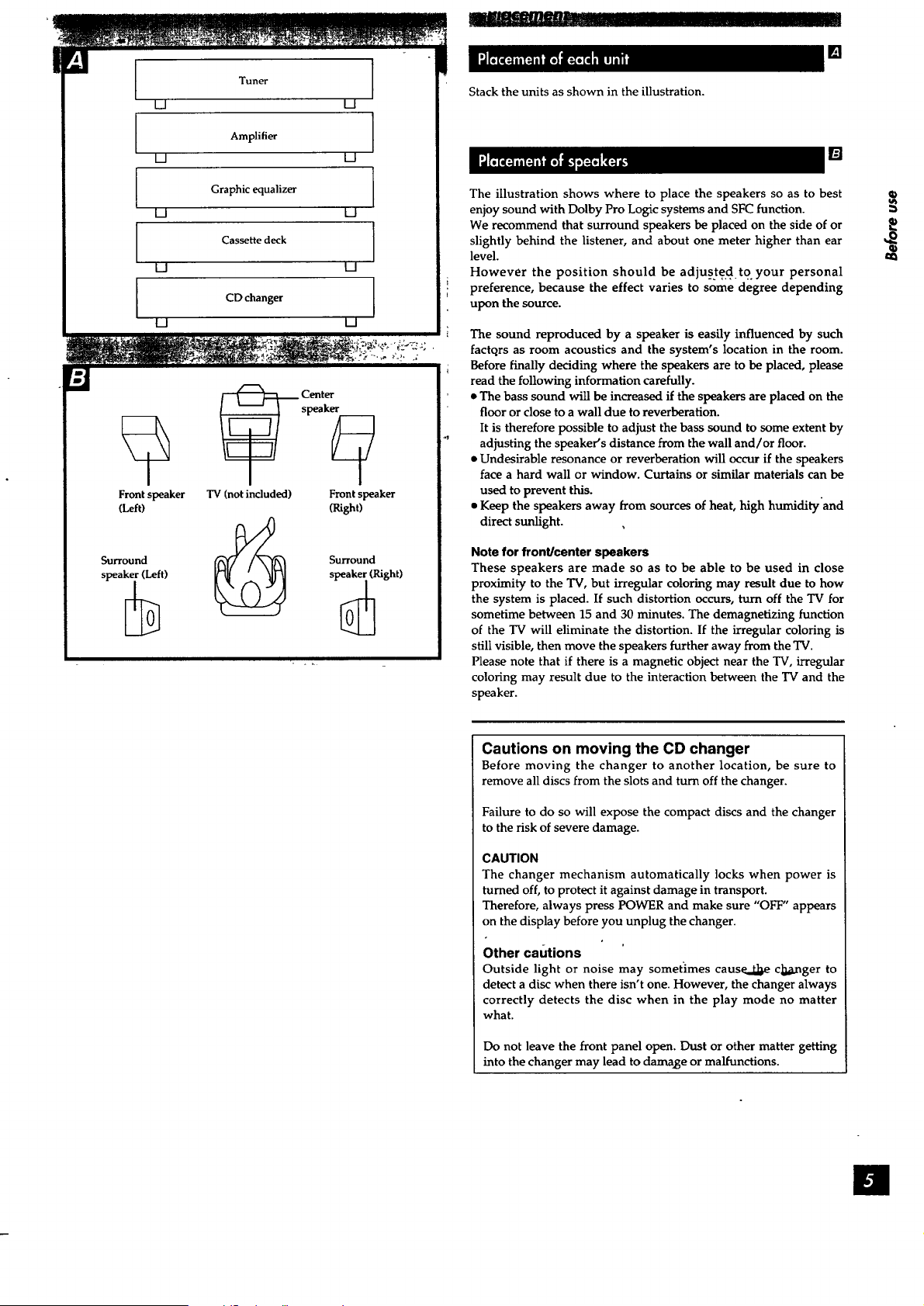
Tuner I
m U
Amplifier [
m m
Graphic equalizer ]
U U
Cassette deck
U U
I
I
U U
U
_ Center
speak_
TV (not included) Front speaker
CDchanger
Front speaker
(Left)
(Right)
Stack the units as shown in the illustration.
[]
[]
The illustration shows where to place the speakers so as to best
enjoy sound with Dolby Pro Logic systems and SFC function.
We recommend that surround speakers be placed on the side of or
slightly behind the listener, and about one meter higher than ear
level.
However the position should be adjuste.d to. your personal
preference, because the effect varies to some degree depending
upon the source.
The sound reproduced by a speaker is easily influenced by such
factctrs as room acoustics and the system's location in the room.
Before finally deciding where the speakers are to be placed, please
read the following information carefully.
• The bass sound will be increased if the speakers are placed on the
floor or close to a wall due to reverberation.
It is therefore possible to adjust the bass sound to some extent by
adjusting the speaker's distance from the wall and/or floor.
• Undesirable resonance or reverberation will occur if the speakers
face a hard wall or window. Curtains or similar materials can be
used to prevent this.
• Keep the speakers away from sources of heat, high humidity'and
direct sunlight.
Note for front/center speakers
These speakers are made so as to be able to be used in close
proximity to the TV, but irregular coloring may result due to how
the system is placed. If such distortion occurs, turn off the TV for
sometime between 15 and 30 minutes. The demagnetizing function
of the TV will eliminate the distortion. If the irregular coloring is
still visible, then move the speakers further away from the TV.
Please note that if there is a magnetic object near the TV, irregular
coloring may result due to the interaction between the TV and the
speaker.
Cautions on moving the CD changer
Before moving the changer to another location, be sure to
remove all discs from the slots and turn off the changer.
Failure to do so will expose the compact discs and the changer
to the risk of severe damage.
CAUTION
The changer mechanism automatically locks when power is
turned off, to protect it against damage in transport.
Therefore, always press POWER and make sure "OFF" appears
on the display before you unplug the changer.
Other cautions
Outside light or noise may sometimes cause..dd_ c]_xnger to
detect a disc when there isn't one. However, the changer always
correctly detects the disc when in the play mode no matter
what.
Do not leave the front panel open. Dust or other matter getting
into the changer may lead to damage or malfunctions.
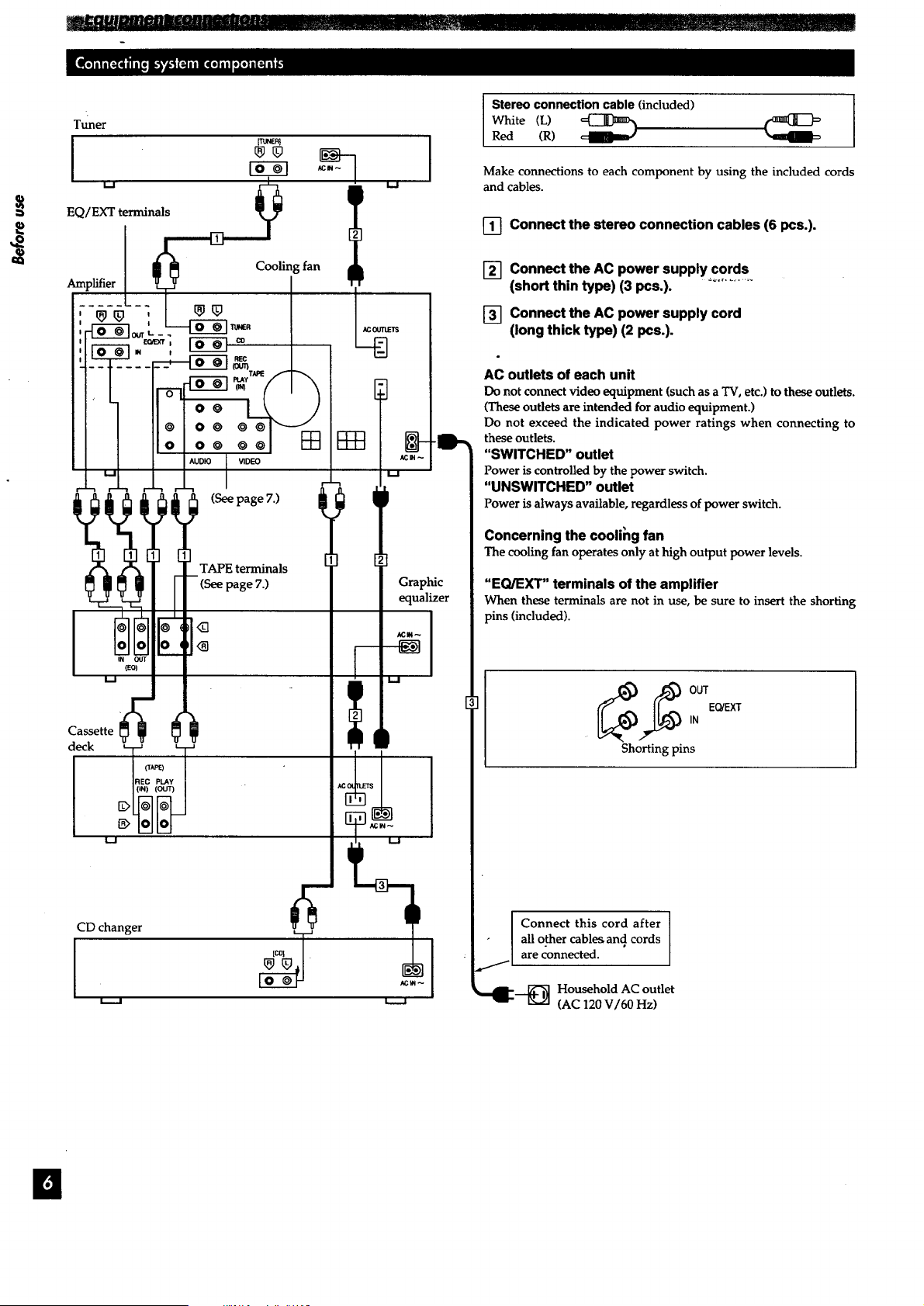
I
CD changer _ l
Stereo connection cable (included)
White (L) _
Red (R)
Make connections to each component by using the included cords
and cables.
[] Connect the stereo connection cables (6 pcs.).
[_ Connect the AC power supply cords
(short thin type) (3 pcs.).
[_ Connect the AC power supply cord
(long thick type) (2 pcs.).
AC outlets of each unit
Do not connect video equipment (such as a TV, etc.) to these outlets.
(These outlets are intended for audio equipment.)
Do not exceed the indicated power ratings when connecting to
these outlets.
"SWITCHED" outlet
Power is controlled by the power switch.
"UNSWlTCHED" outlet
Power is always available, regardless of power switch.
Concerning the coolihg fan
Thecoolingfanoperatesonly at high output power levels.
"EQ/EXT" terminals of the amplifier
When these terminals are not in use, be sure to insert the shorting
pins (included).
__ UTEQ/EXT
IN
Shorting pins
Connect this cord after
all other cables, and cords
are connected.
_,dl"_ Household AC outlet
'_" [_,,.Z]
(AC 120 V/60 Hz)
m
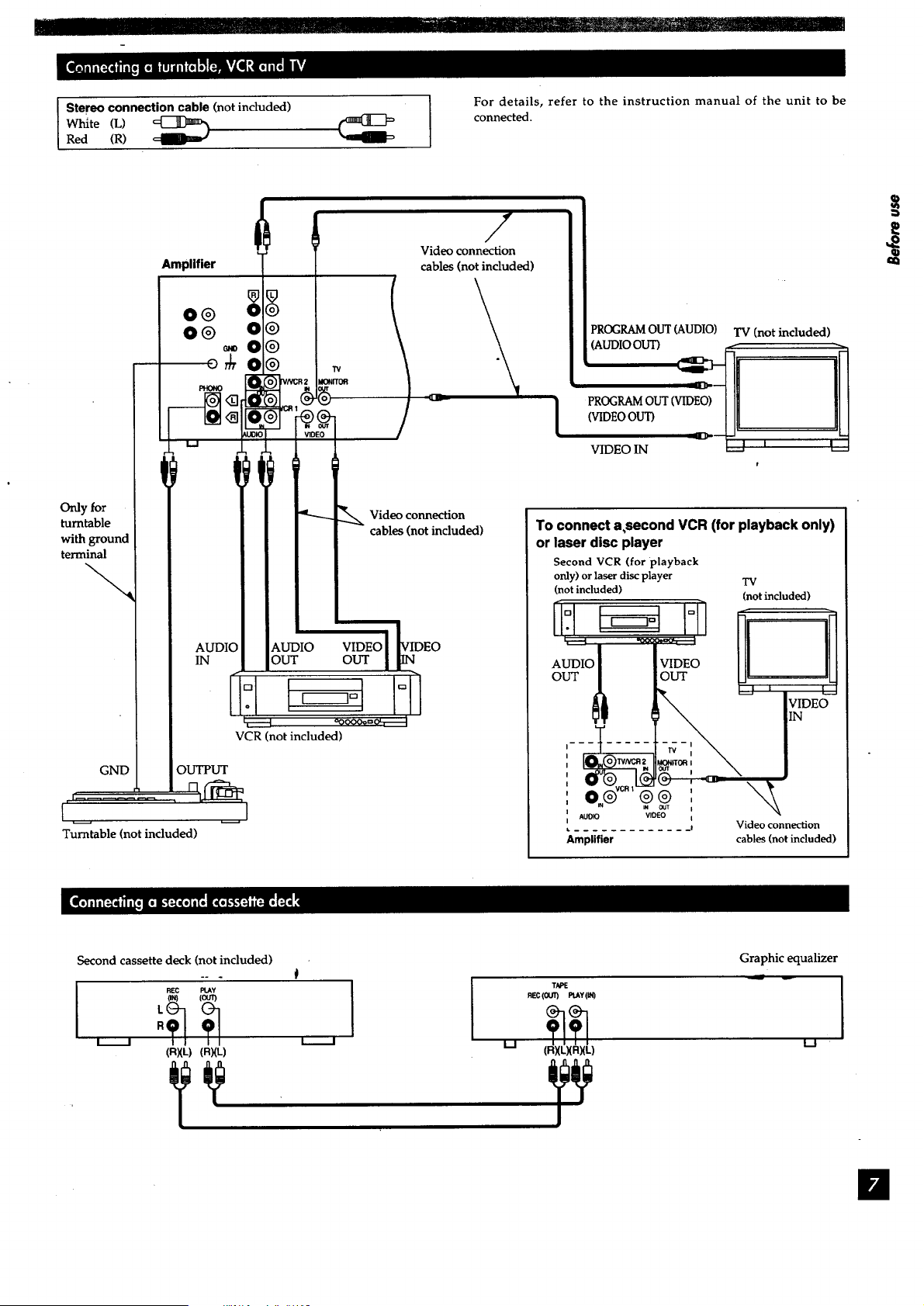
l_R! ..................................... II '_!_=....................... _--_L_ ..........' .......
Stereo connection cable (not included)
White (L) _
Red (R)
I
For details, refer to the instruction manual of the unit to be
connected.
Only for
turntable
with ground
terminal
GND
Amplifier
O® 0
&o
/
Video connection
cables (not included)
AUDK
IN
r
t!
_.UDIO
OUT
r___l
VCR (not included)
Video connection
cables (not included)
VIDEO
OUT
Turntable (not included)
!
PROGRAM OUT (AUDIO) TV (not included
,(AUDIO OUT) _ ..-- _.
VIDEO IN -'J_'_ _==
e
To connect a,second VCR (for playback only)
or laser disc player
Second VCR (for playback
only) or laser disc player
(not included)
AUDIO VIDEO
OUT OUT
-i T .....
m _ OUT I
AUDIO VIDEO I
......... !
Amplifier
TV
(not included)
Video connection
cables (not induded)
fll
Second cassette deck (not included)
I
REC PLAY
(RXL) (RXL)
I
LJ
TAPE
REC (OUT) PLAY(IN)
(RXL)(R)(L)
Graphic equalizer
L.J
ii
/
Tuner
I.....J
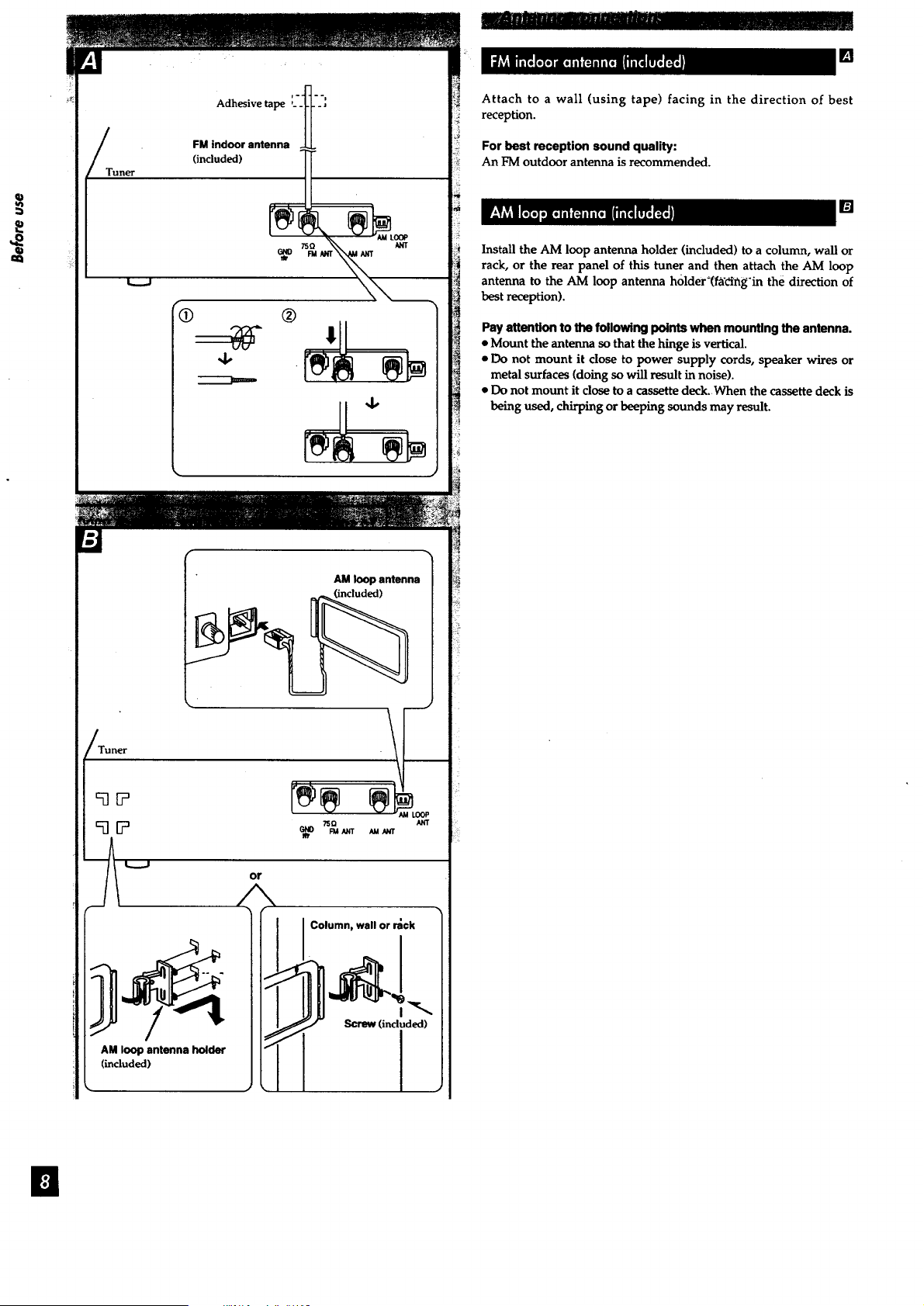
Adhesive tape :_-_l-_'_
FM indoor antenna -J.L
(included) _tooP
®
4, .
AM loop antenna
(included)
Tuner
_EP
9[P
AM loop antenna holder
(included)
or
/
Column, wall or rack
(included)
I
[]
Attach to a wall (using tape) facing in the direction of best
reception.
For best reception sound quality:
An FMoutdoor antenna is recommended.
[]
Install the AM loop antenna holder (included) to a column, wall or
rack, or the rear panel of this tuner and then attach the AM loop
antenna to the AM loop antenna holder_(fgetng'in the direction of
bestreception).
Pay attention to the following points when mounting the antenna.
• Mount the antenna so that the hinge is vertical.
• Do not mount it close to power supply cords, speaker wires or
metal surfaces (doing so will result in noise).
• Do not mount it close to a cassette deck. When the cassette deck is
being used, chirping or beeping sounds may result.
is
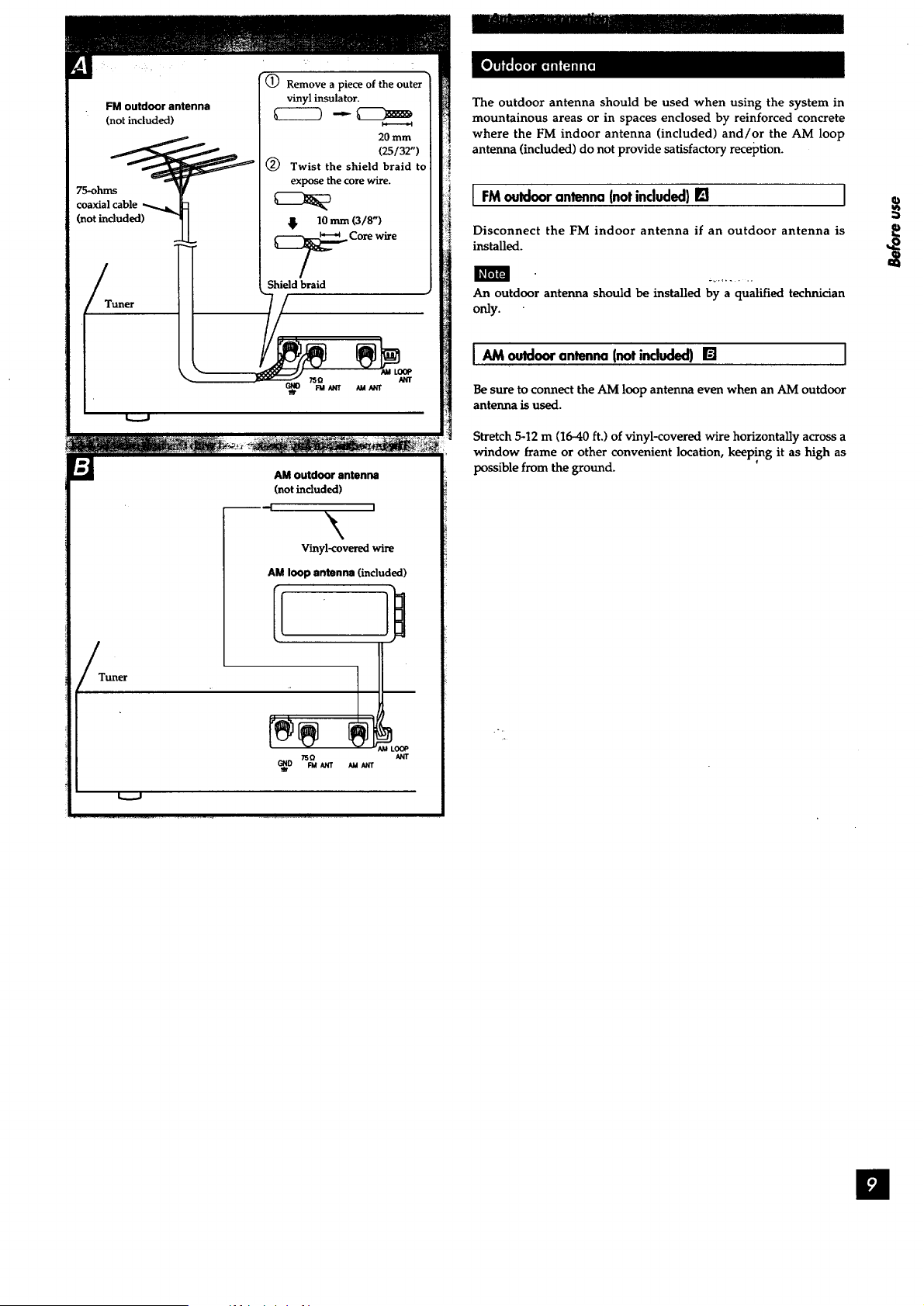
(_) Remove a piece of the outer [
vinyl insulator. |
FM outdoor antenna _ _ |
(not included) L______9 _ h_____gao_ !
/_.. 20 mm I
_/_ (25/32") 1
- _ _) Twist the shield braid to I
-- _ expose the core wire. |
75_hms ? _ |
coaxial cable _ _ _ |
Onotincluded) "_I 4 ,o,_o/s') !
Tuner
• _ _1 _urr _1 _rr I
!
AM outdoor antenna
(notinclude)
l_ I
\
Vinyl-covered wire
AM loop antenna (included)
Il
The outdoor antenna should be used when using the system in
mountainous areas or in spaces enclosed by reinforced concrete
where the FM indoor antenna (included) and/or the AM loop
antenna (included) do not provide satisfactory reception.
[ FM outdoorantenna(notincluded}[] I
Disconnect the FM indoor antenna if an outdoor antenna is
installed.
An outdoor antenna should be installed by a qualified technician
only.
IAM antenna(notincluded)[] I
Be sure to connect the AM loop antenna even when an AM outdoor
antenna is used.
Stretch 5-12 m (16-40 ft.) of vinyl-covered wire horizontally across a
window frame or other convenient location, keep!ng it as high as
possible from the ground.
I
Rightspeaker Left speaker
Amplifier
®® 0®
J
SURROUND
Speaker
cables
CENTER FRONT
i i
%
Insert
Amplifier
Right speaker
Left speaker
Amplifier
__J
%
Insert
Center speaker
_-, Speaker
cable
_N_R FRO_
k______l
[]
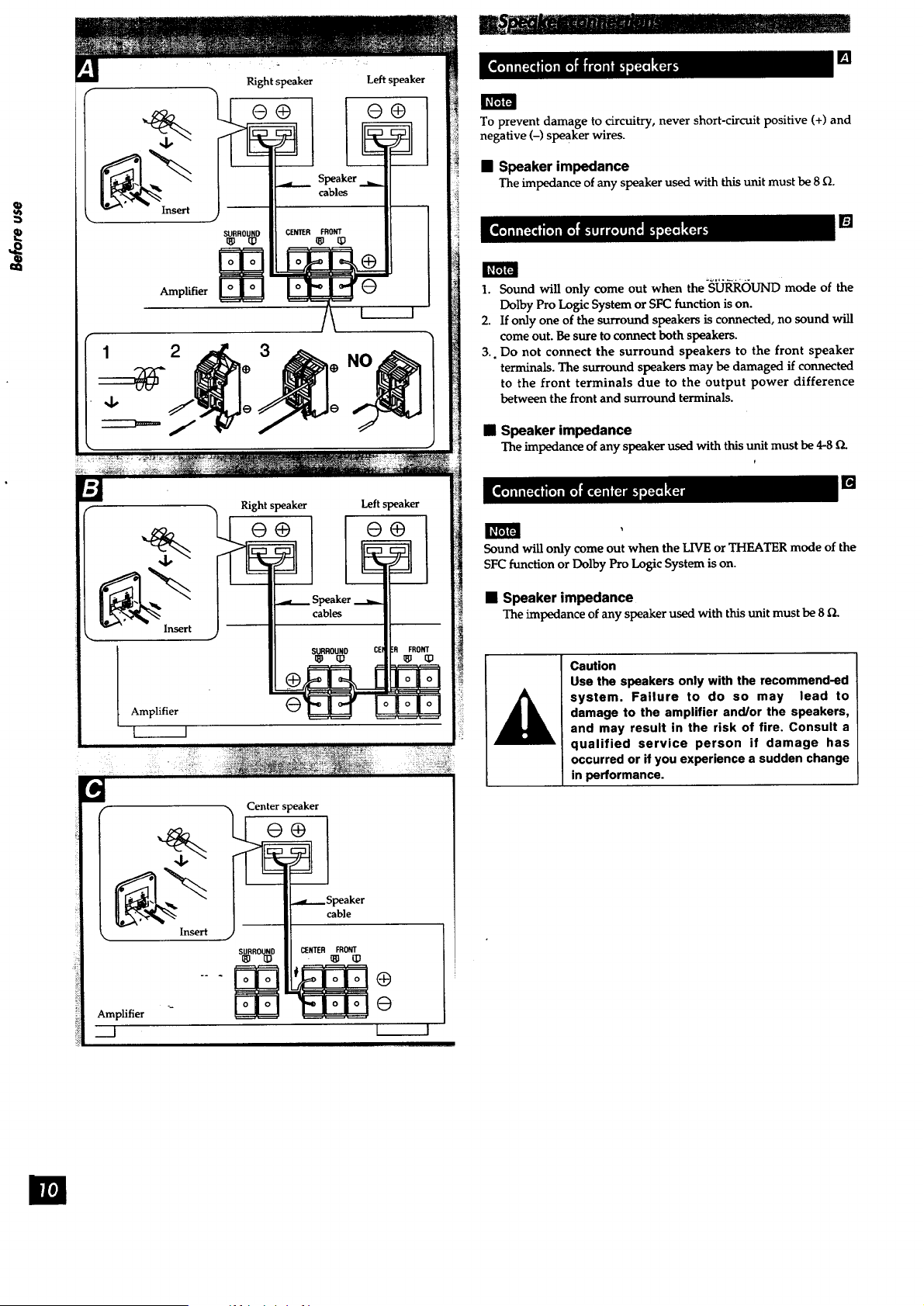
To prevent damage to circuitry, never short-circuit positive (+) and
negative (-) speaker wires.
• Speaker impedance
The impedance of any speaker used with this unit must be 8 _.
1. Sound will only come out when the-S_OUND mode of the
Dolby Pro Logic System or SFC function is on.
2. If only one of the surround speakers is connected, no sound will
come out. Be sure to connect both speakers.
3.. Do not connect the surround speakers to the front speaker
terminals. The surround speakers may be damaged if connected
to the front terminals due to the output power difference
between the front and surround terminals.
• Speaker impedance
The impedance of any speaker used with this unit must be 4-8 D.
f
[]
Sound will only come out when the LIVE or THEATER mode of the
SFC function or Dolby Pro Logic System is on.
• Speaker impedance
The impedance of any speaker used with this unit must be 8_.
A
Caution
Use the speakers only with the recommend-ed
system. Failure to do so may lead to
damage to the amplifier and/or the speakers,
and may result in the risk of fire. Consult a
qualified service person if damage has
occurred or if you experience a sudden change
in performance.
m
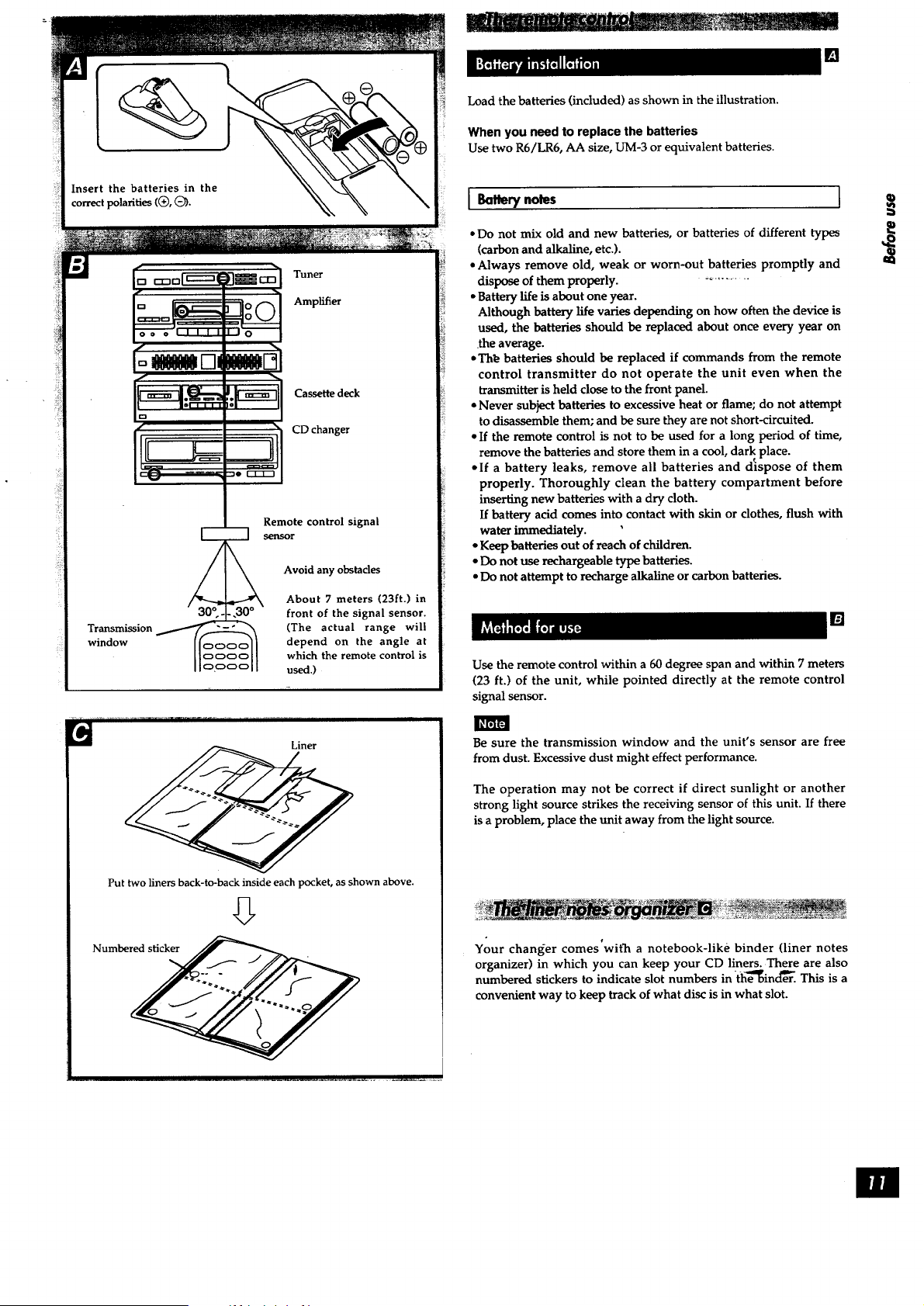
Insert the batteries in the
correct polarities ((_, Q).
Tuner
Amplifier
Cassette deck
CDchanger
Transmission
window
Remote control signal
sensor
3_0o Avoid any obstacles
About 7 meters (23ft.) in
-, front of the signal sensor.
-_------_ (The actual range will
_c_Oc_/Ioo depend on the angle at
oc:_ which the remote control is
used.)
[]
Load the batteries (included) as shown in the illustration.
When you need to replace the batteries
Use two R6/LR6, AA size, UM-3 or equivalent batteries.
J Battery notes [
• Do not mix old and new batteries, or batteries of different types
(carbon and alkaline, etc.).
• Always remove old, weak or worn-out batteries promptly and
dispose of them properly. -.........
• Battery life is about one year.
Although battery life varies depending on how often the device is
used, the batteries should be replaced about once every year on
the average.
• Th_ batteries should be replaced if commands from the remote
control transmitter do not operate the unit even when the
transmitter is held close to the front panel.
• Never subject batteries to excessive heat or flame; do not attempt
to disassemble them; and be sure they are not short-circuited.
• If the remote control is not to be used for a long period of time,
remove the batteries and store them in a cool, dark place.
• If a battery leaks, remove all batteries and dispose of them
properly. Thoroughly clean the battery compartment before
inserting new batteries with a dry cloth.
If battery acid comes into contact with skin or clothes, flush with
water immediately.
• Keep batteries out of reach of children.
• Do not use rechargeable type batteries.
• Do not attempt to recharge alkaline or carbon batteries.
[]
Use the remote control within a 60 degree span and within 7 meters
(23 ft.) of the unit, while pointed directly at the remote control
signal sensor.
J
IH'_IFJ
Put two liners back-to-back inside each pocket, as shown above.
Be sure the transmission window and the unit's sensor are free
from dust. Excessive dust might effect performance.
The operation may not be correct if direct sunlight or another
strong light source strikes the receiving sensor of this unit. If there
is a problem, place the unit away from the light source.
Your changer comes'with a notebook-like binder (liner notes
organizer) in which you can keep your CD liners. There are also
numbered stickers to indicate slot numbers in-(he_ind_er. This is a
convenient way to keep track of what disc is in what slot.
m
d
[]
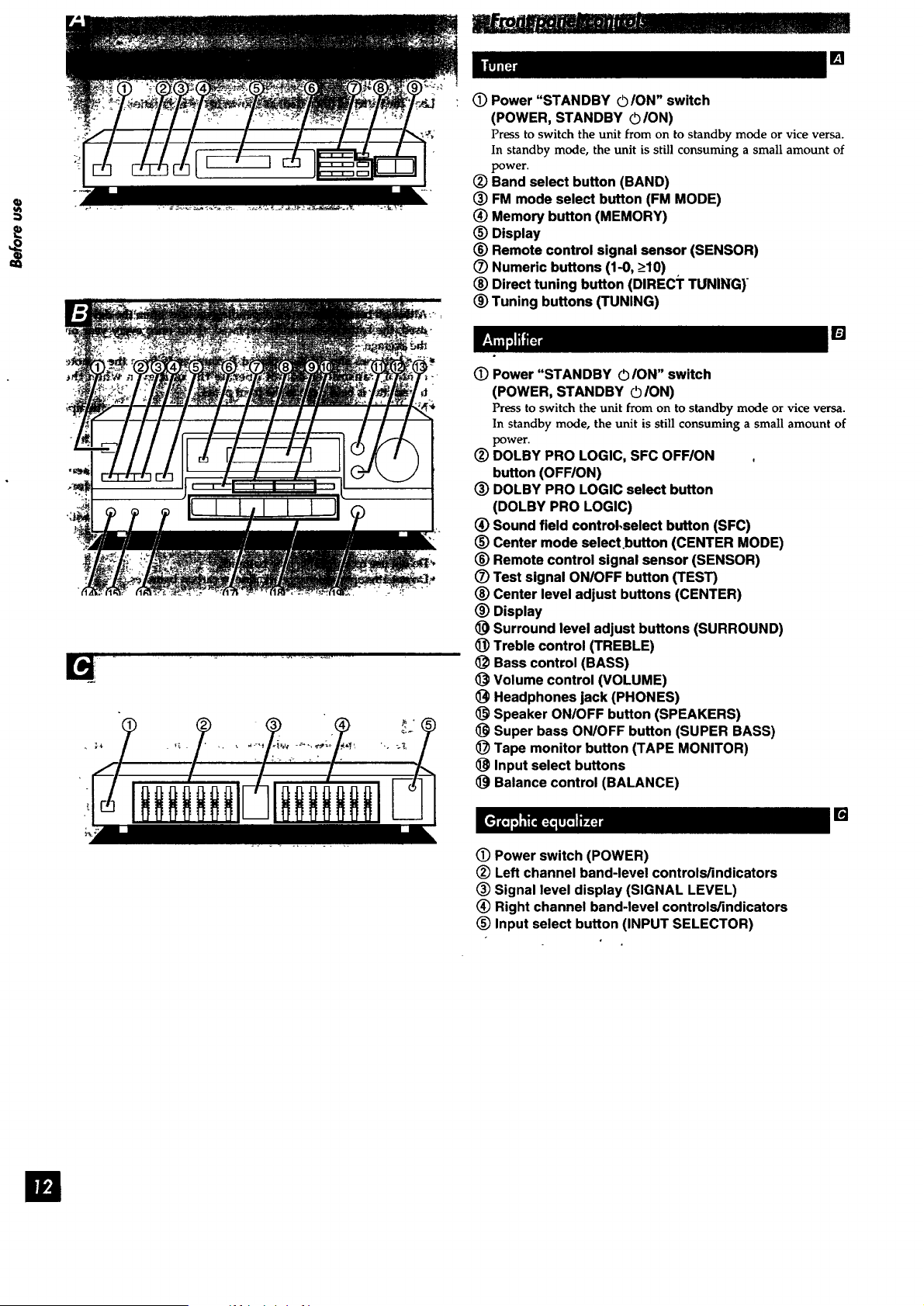
(!) Power "STANDBY ©/ON" switch
(POWER, STANDBY ©/ON)
Press to switch the unit from on to standby mode or vice versa.
In standby mode, the unit is still consuming a small amount of
power.
(_) Band select button (BAND)
(_) FM mode select button (FM MODE)
(_) Memory button (MEMORY)
_) Display
(_) Remote control signal sensor (SENSOR)
(Z) Numeric buttons (1-0, _>10)
(_) Direct tuning button (DIREC;F TUNING)
(_) Tuning buttons (TUNING)
(D Power "STANDBY © ION" switch
(POWER, STANDBY O/ON)
[]
Press to switch the unit from on to standby mode or vice versa.
In standby mode, the unit is still consuming a small amount of
power.
(_) DOLBY PRO LOGIC, SFC OFF/ON
button (OFF/ON)
(_) DOLBY PRO LOGIC select button
(DOLBY PRO LOGIC)
(_) Sound field control,select button (SFC)
(_) Center mode select.button (CENTER MODE)
_) Remote control signal sensor (SENSOR)
(_ Test signal ONIOFF button (TEST)
(_) Center level adjust buttons (CENTER)
(_) Display
_) Surround level adjust buttons (SURROUND)
_]) Treble control (TREBLE)
<_ Bass control (BASS)
Volume control (VOLUME)
Headphones jack (PHONES)
Speaker ON/OFF button (SPEAKERS)
Super bass ON/OFF button (SUPER BASS)
(_) Tape monitor button (TAPE MONITOR)
Input select buttons
Balance control (BALANCE)
[]
(_) Power switch (POWER)
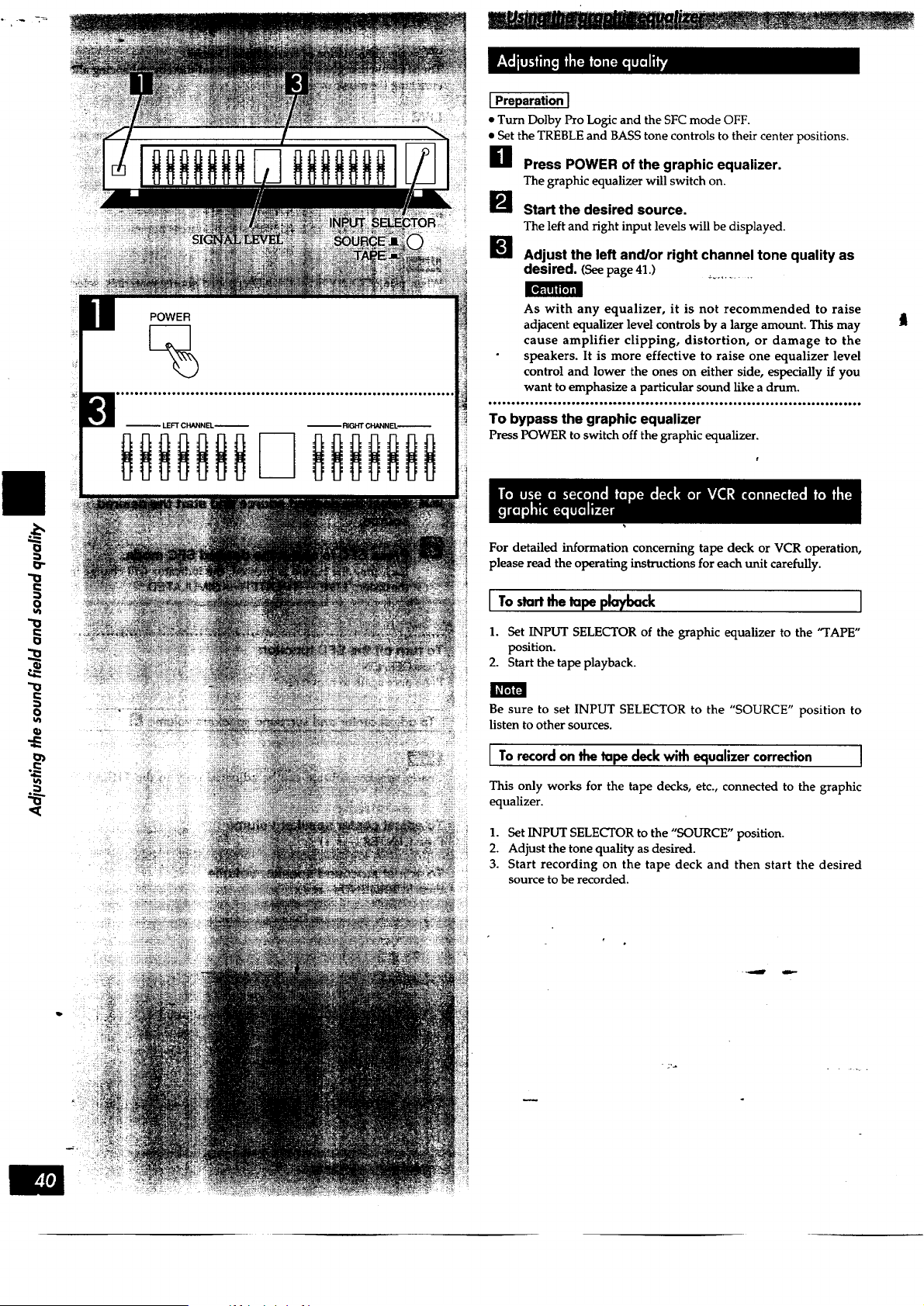
(_) Left channel band-level controls/indicators
(_) Signal level display (SIGNAL LEVEL)
(_) Right channel band-level controls/indicators
(_) Input select button (INPUT SELECTOR)
Disc slot for
single disc play
I
234 56789
0 °
1
[]
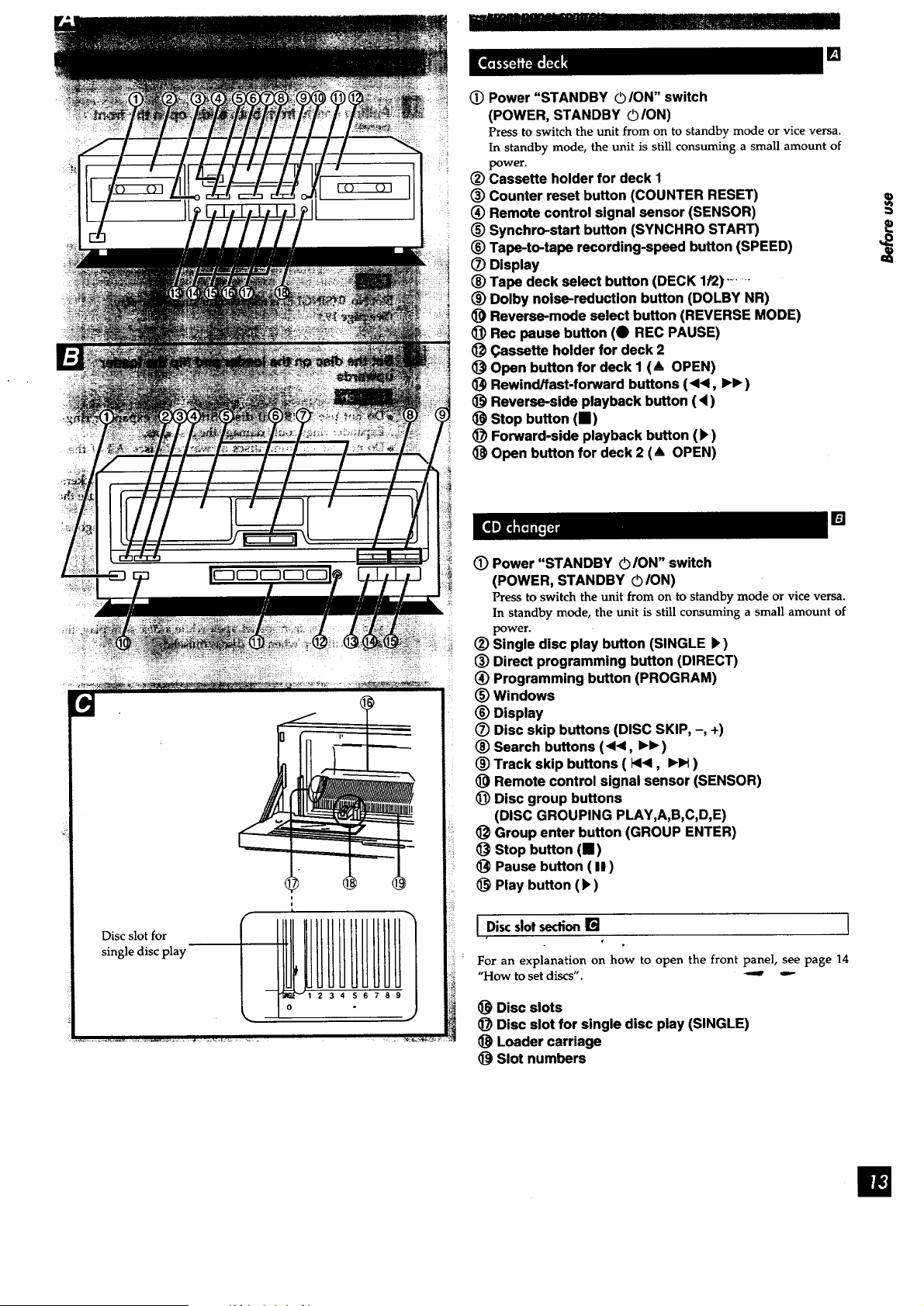
(_) Power "STANDBY ©ION" switch
(POWER, STANDBY ©ION)
Press to switch the unit from on to standby mode or vice versa.
In standby mode, the unit is still consuming a small amount of
power.
(_) Cassette holder for deck 1
(_) Counter reset button (COUNTER RESET)
(_) Remote control signal sensor (SENSOR)
(_) Synchro-start button (SYNCHRO START)
(_) Tape-to-tape recording-speed button (SPEED)
(_) Display
(_) Tape deck select button (DECK 1/2) ........
(_) Dolby noise-reduction button (DOLBY NR)
_) Reverse-mode select button (REVERSE MODE)
_) Rec pause button (O REC PAUSE)
(_ (_assette holder for deck 2
Open button for deck I (& OPEN)
_) Rewind/fast-forward buttons (<1<, IH_ )
_) Reverse-side playback button (4)
Stop button (11)
_) Forward-side playback button (_)
Open button for deck 2 (A OPEN)
[]
(!) Power "STANDBY O/ON" switch
(POWER, STANDBY ©/ON)
Press to switch the unit from on to standby mode or vice versa.
In standby mode, the unit is still consuming a small amount of
power.
(_) Single disc play button (SINGLE),)
(_) Direct programming button (DIRECT)
(_) Programming button (PROGRAM)
(_) Windows
_) Display
(Z) Disc skip buttons (DISC SKIP, -, +)
(_) Search buttons (<<1, IH_)
(_) Track skip buttons ( 144, IHH )
_) Remote control signal sensor (SENSOR)
_) Disc group buttons
(DISC GROUPING PLAY,A,B,C,D,E)
(_ Group enter button (GROUP ENTER)
Stop button (11)
Pause button ( II )
_) Play button (l_)
I Discslotsection[] I
€
p
For an explanation on how to open the front panel, see page 14
"How to set discs". _
(_) Disc slots
1_) Disc slot for single disc play (SINGLE)
Loader carriage
(_ Slot numbers
i
Magnetic latch
I E.F.I_H'_a
Disc slots
Slot number
md slide.
Loader carriage
Eo_[lIi[;_
Disc Label side
Flip this part upward.
Loadercarriage
Eject button
[]
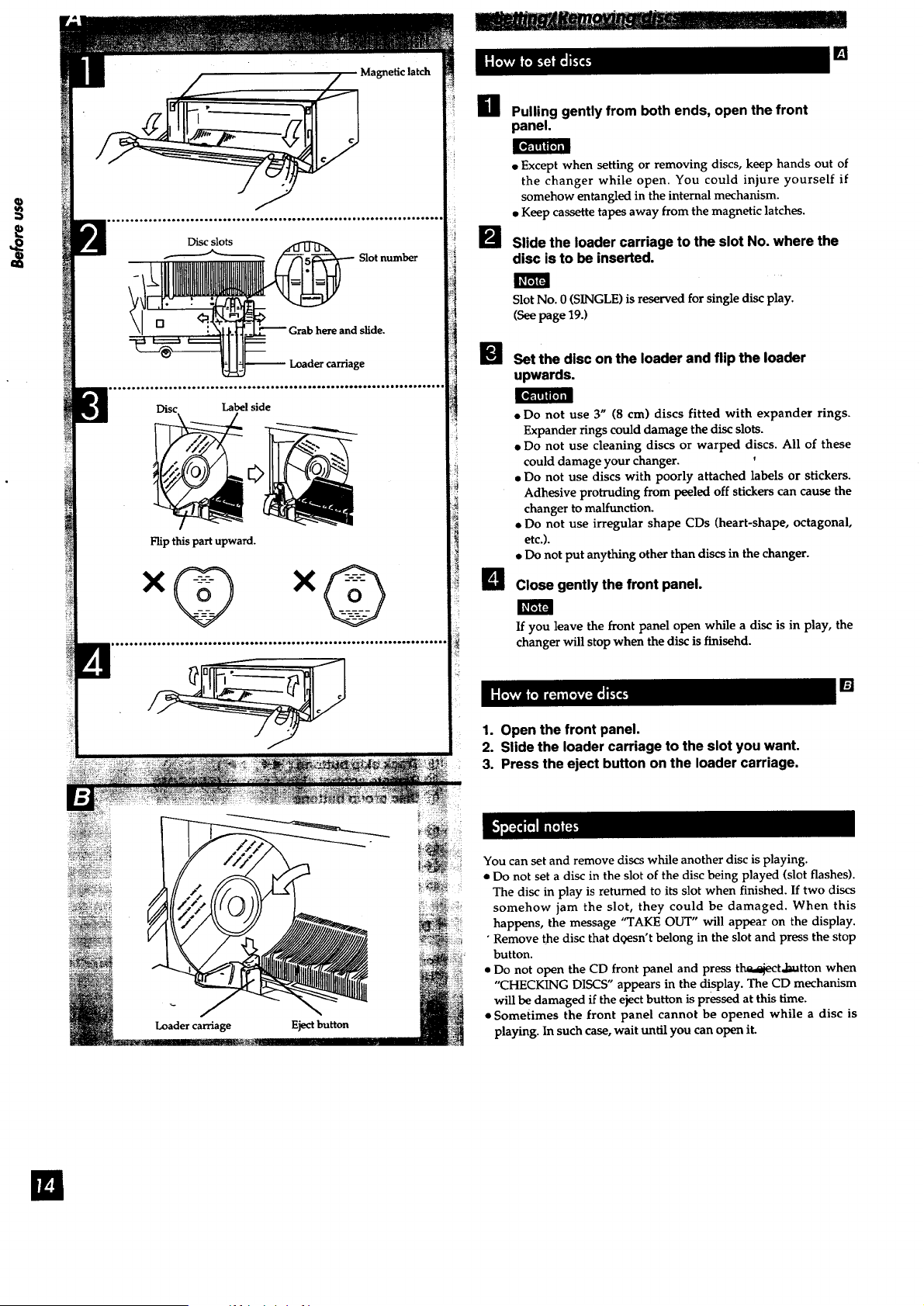
H Pulling gently from both ends, open the front
panel.
. Except when setting or removing discs, keep hands out of
the changer while open. You could injure yourself if
somehow entangled in the internal mechanism.
• Keep cassette tapes away from the magnetic latches.
I_ Slide the loader carriage to the slot No. where the
disc is to be inserted.
Slot No. 0 (SINGLE) is reserved for single disc play.
(See page 19.)
U Set the disc on the loader and flip the loader
upwards.
• Do not use 3" (8 cm) discs fitted with expander rings.
Expander rings could damage the disc slots.
• Do not use cleaning discs or warped discs. All of these
could damage your changer.
• Do not use discs with poorly attached labels or stickers.
Adhesive protruding from peeled off stickers can cause the
changer to malfunction.
• Do not use irregular shape CDs (heart-shape, octagonal,
etc.).
• Do not put anything other than discs in the changer.
B Close gently the front panel.
If you leave the front panel open while a disc is in play, the
changer will stop when the disc is finisehd.
[]
1. Open the front panel.
2. Slide the loader carriage to the slot you want.
3. Press the eject button on the loader carriage,
You can set and remove discs while another disc is playing.
• Do not set a disc in the slot of the disc being played (slot flashes).
The disc in play is returned to its slot when finished. If two discs
somehow jam the slot, they could be damaged. When this
happens, the message "TAKE OUT" will appear on the display.
• Remove the disc that dgesn't belong in the slot and press the stop
button.
• Do not open the CD front panel and press t_,,l_atton when
"CHECKING DISCS" appears in the display. The CD mechanism
will be damaged if the eject button is pressed at this time.
• Sometimes the front panel cannot be opened while a disc is
playing. In such case, wait until you can open it.
POWER
SPEAKERS
%
On the amplifier's display
BAND
%
DIRECTTUNING
,:,:,:,
f I I I
I 7 I 8 1 9 It o I Lightsup when tuned
b I
Lights up when an FM stereo broadcast is received
I Direct tuning 1
Specify the frequency using the numeric buttons to directly tune to
the desired broadcast station.
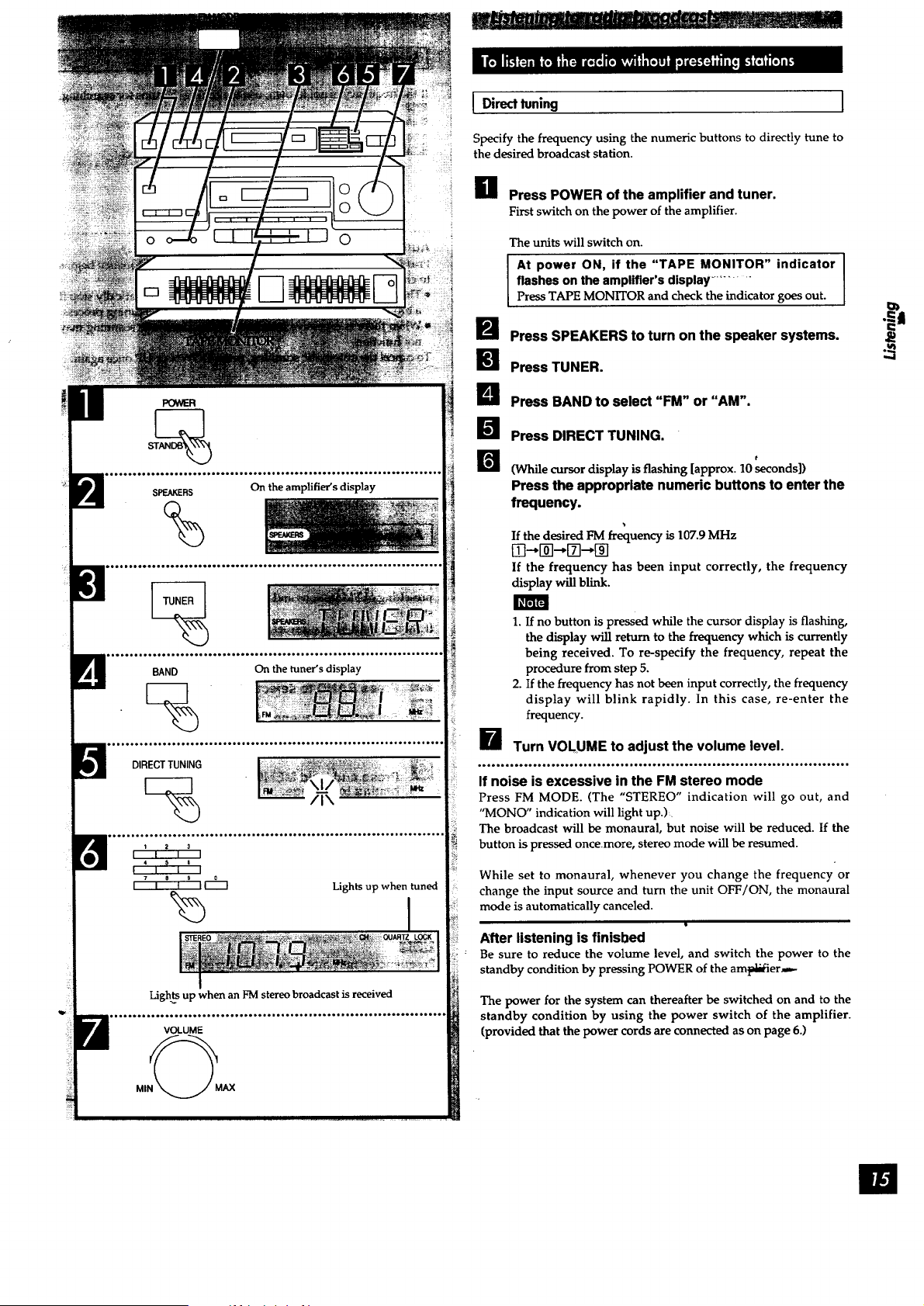
H Press POWER of the amplifier and tuner.
First switch on the power of the amplifier.
The units will switch on.
At power ON, if the "TAPE MONITOR" indicator I
flashes on the amplifier's display ..........
I
Press TAPE MONITOR and check the indicator goes out.
Press SPEAKERS to turn on the speaker systems.
[] Press TUNER.
U Press BAND to select "FM" or "AM".
B Press DIRECT TUNING.
El
(While cursor display is flashing [approx. 10 seconds])
Press the appropriate numeric buttons to enter the
frequency.
If the desired FM frequency is 107.9 MHz
[_--@--,[_--,[]
If the frequency has been input correctly, the frequency
display will blink.
1. If no button is pressed while the cursor display is flashing,
the display will return to the frequency which is currently
being received. To re-specify the frequency, repeat the
procedure from step 5.
2. If the frequency has not been input correctly, the frequency
display will blink rapidly. In this case, re-enter the
frequency.
_--_ Turn VOLUME to adjust the volume level.
°________°..______°°°*oo______._°__°._._.°__°.°_.__.__..._.._....____.......°__°_
If noise is excessive in the FM stereo mode
Press FM MODE. (The "STEREO" indication will go out, and
"MONO" indication will light up.).
The broadcast will be monaural, but noise will be reduced. If the
button is pressed oncemore, stereo mode will be resumed.
While set to monaural, whenever you change the frequency or
change the input source and turn the unit OFF/ON, the monaural
mode is automatically canceled.
After listening is finisbed
Be sure to reduce the volume level, and switch the power to the
standby condition by pressing POWER of the arnpi_er_-
The power for the system can thereafter be switched on and to the
standby condition by using the power switch of the amplifier.
(provided that the power cords are connected as on page 6.)
O)
m
%
TUNING
V DOWN UP A
I I I
-MANUAL-AUTO
BAND
%
m.........................................................................I
MEMORY
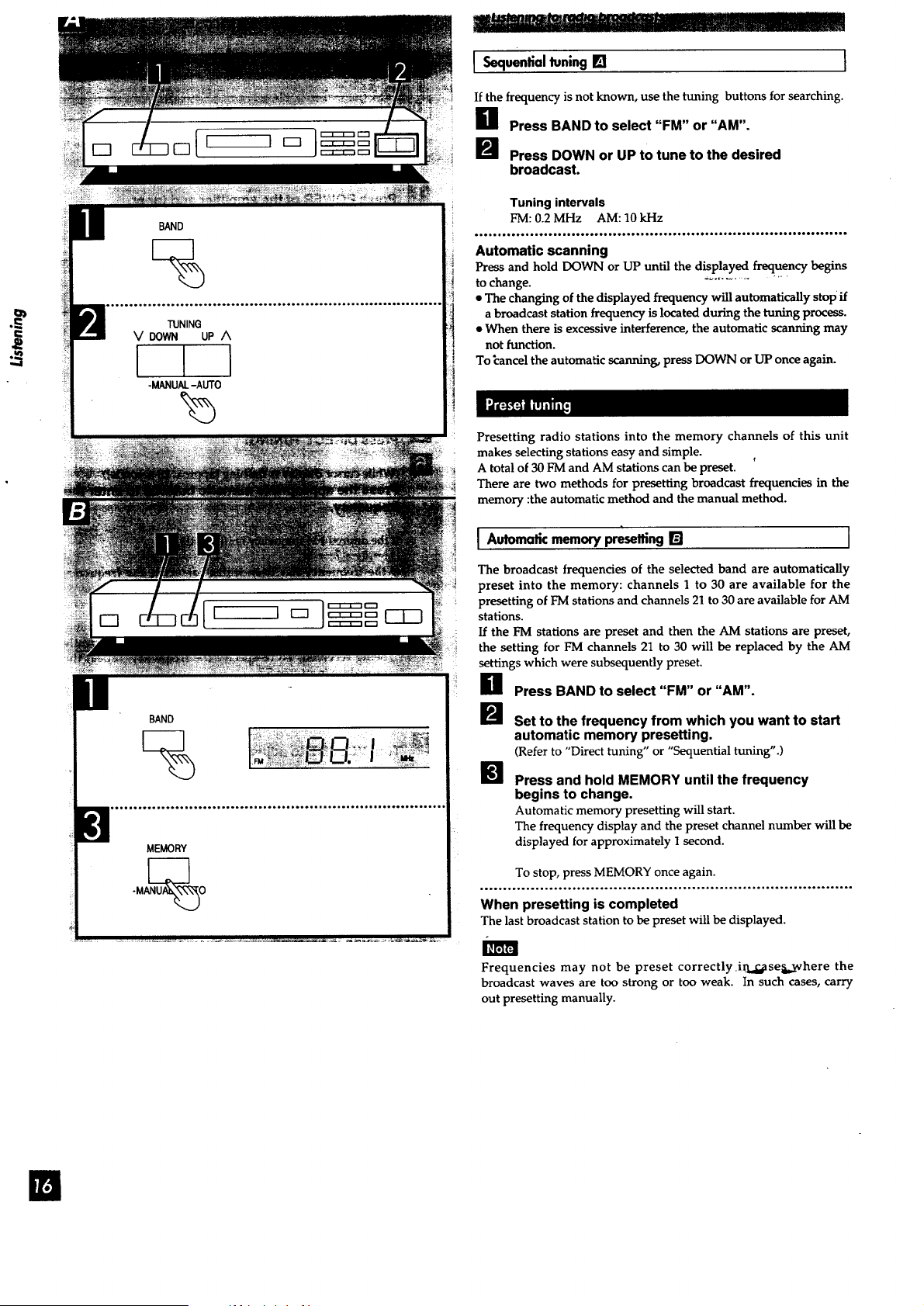
I Sequentialtuning[] J
If the frequency is not known, use the tuning buttons for searching.
B Press BAND to select "FM" or "AM".
[] Press DOWN or UP to tune to the desired
broadcast,
Tuning intervals
FM: 0.2 MHz AM: 10 kHz
_______oO_o___o____'_______o'___*_o___________o_ooo_=__°°_____'to_o_oDoooooQ_____
Automatic scanning
Press and hold DOWN or UP until the displayed frequency begins
to change. "_...........
• The changing of the displayed frequency will automatically stop if
a broadcast station frequency is located during the tuning process.
• When there is excessive interference, the automatic scanning may
not function.
To _ancel the automatic scanning, press DOWN or UP once again.
Presetting radio stations into the memory channels of this unit
makes selecting stations easy and simple.
A total of 30 FM and AM stations can be preset.
There are two methods for presetting broadcast frequencies in the
memory :the automatic method and the manual method.
I Automatic memory presetting [] J
The broadcast frequencies of the selected band are automatically
preset into the memory: channels 1 to 30 are available for the
presetting of FM stations and channels 21 to 30 are available for AM
stations.
If the FM stations are preset and then the AM stations are preset,
the setting for FM channels 21 to 30 will be replaced by the AM
settings which were subsequently preset.
B Press BAND to select "FM" or "AM".
Set to the frequency from which you want to start
automatic memory presetting.
(Refer to "Direct tuning" or "Sequential tuning".)
W Press and hold MEMORY until the frequency
begins to change.
Automatic memory presetting will start.
The frequency display and the preset channel number will be
displayed for approximately 1 second.
To stop, press MEMORY once again.
,.°°.°..,.,..,....°°,,,,..,. .... ..**..,.°.°,°,,..°,....o.°°.,,,,...,,°,o,.°.,,,=,
When presetting is completed
The last broadcast station to be preset will be displayed.
Frequencies may not be preset correctly irkd,_se_._where the
broadcast waves are too strong or too weak. In such cases, carry
out presetting manually.

U3
MEMORY
Off
Preset channel
i Manual memory presetting []
The desired broadcast stations can be preset into the desired
channels by the user.
This can also be used as a method for changing selected broadcast
stations that were preset in "Automatic memory presetting".
g Set to the desired broadcast.
(Refer to "Direct tuning" or "Sequential tuning".)
If interference or static is keeping you from enjoying an FM
broadcast, press FM MODE and change to monaural. You
can preset the memory in monaural as well as in stereo.
Press MEMORY. (Touch only.) .............
To cancel the memory function, press MEMORY again.
Specify the desired channel to be preset using the p
numeric button(s) (completes presetting).
To designate a channel from I to 9:
Press the appropriate (1-9) preset-tuning button.
To designate a channel form 10 to 30:
For example "20"
>-10-* 2-- 0
Push the buttons within 10 seconds of each other.
.,.o.o .oooo,oo.os.o.. j.oooooo°o..,..oo,o.ooo...oooo...._o.o.....ooooo,oo..oooooo.
To continue presetting
Repeat steps 1 through 3. "
I To listen to preset broadcast stations [] ]
Specify the preset channel using the numeric
button(s).
To designate a channel from 1 to 9:
Press the appropriate (1-9) preset-tuning button.
To designate a channel form 10 to 30:
For example "20"
>_10---"2-'0
Push the buttons within 10 seconds of each other.
For your reference
l_ven if the power cord is disconnected from the household AC
outlet, the memory will retain its contents for approximately one
month.
SPEAKERS
%
%
On the CD changer's display
On the amplifier's display
On the CD changer's display
Disc number in play Play indicator
Track number in play
Elapsed play time
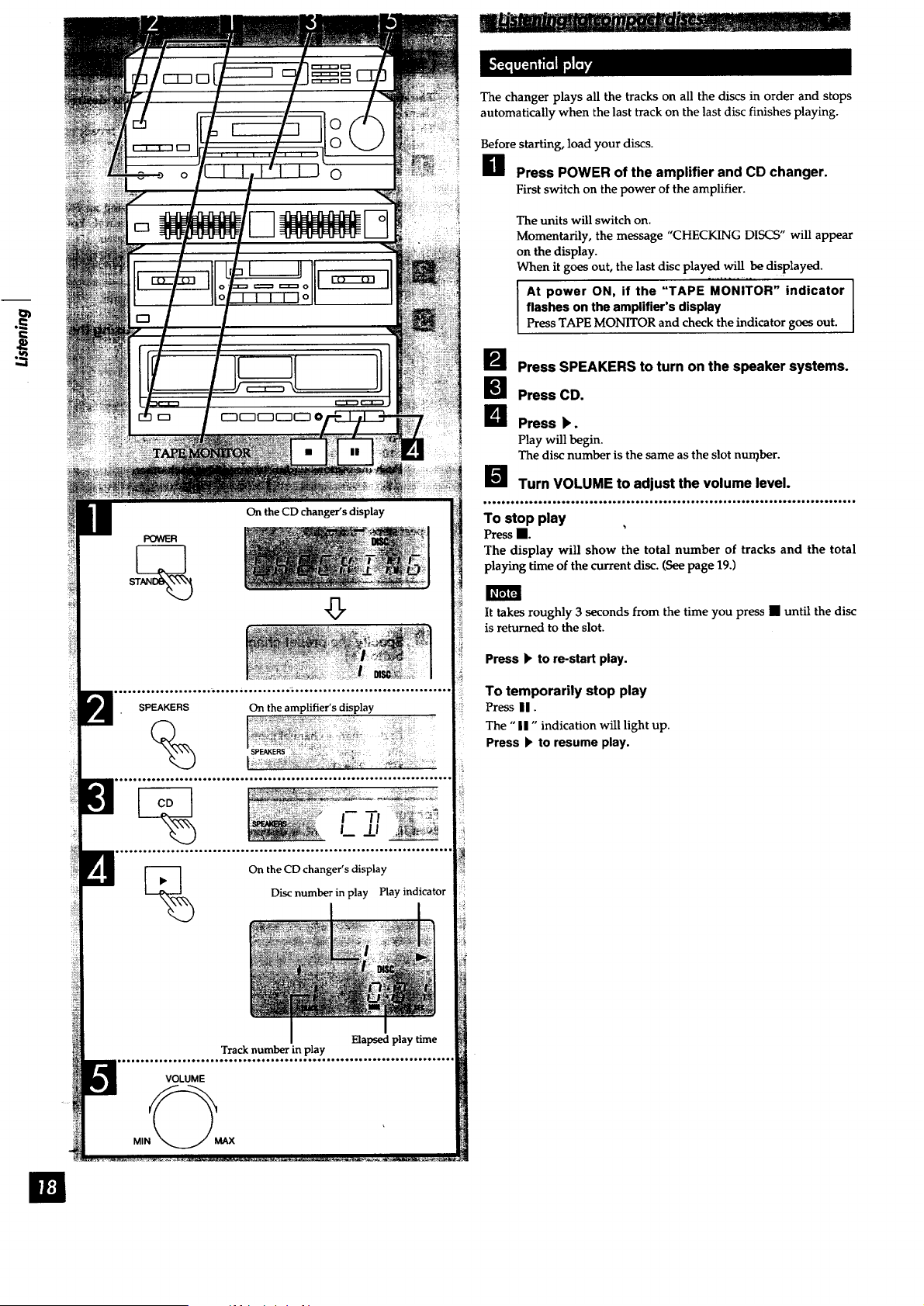
The changer plays all the tracks on all the discs in order and stops
automatically when the last track on the last disc finishes playing.
Before starting, load your discs.
H Press POWER of the amplifier and CD changer.
First switch on the power of the amplifier.
The units will switch on.
Momentarily, the message "CHECKING DISCS" will appear
on the display.
When it goes out, the last disc played will be displayed.
At power ON, if the "TAPE MONITOR" indicator I
flashes on the amplifier's display
I
Press TAPE MONITOR and check the indicator goes out.
B Press SPEAKERS to turn on the speaker systems.
Press CD.
B Press k.
Play will begin.
The disc number is the same as the slot nun_ber.
B Turn VOLUME to adjust the volume level.
To stop play
Press•.
The display will show the total number of tracks and the total
playing time of the current disc. (See page 19.)
It takes roughly 3 seconds from the time you press • until the disc
is returned to the slot.
Press I* to re-start play.
To temporarily stop play
Press U.
The "II" indication will light up.
Press b' to resume play.
ID
I I I I
Current disc
Total number of tracks Total playing time
Slot number
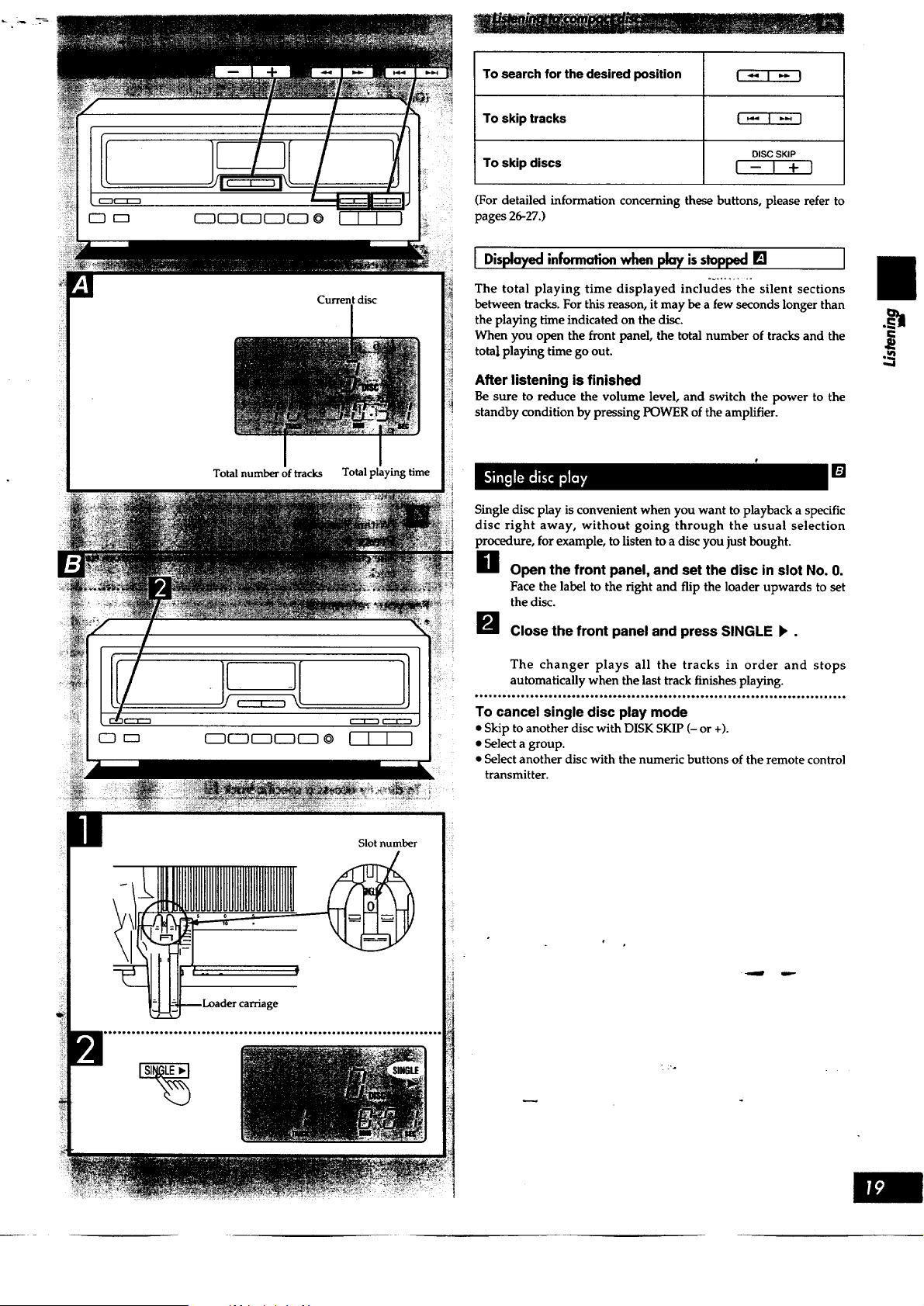
To search for the desired position I "4 I '* I
To skip tracks I _' t '_ }
DISC SKIP
TO skip discs I -- I + ]
For detailed information concerning these buttons, please refer to
pages 26-27.)
l informofion when pl_ isstopped[] I
_~ ........
The total playing time displayed includes the silent sections
between tracks. For this reason, it may be a few seconds longer than
the playing time indicated on the disc.
When you open the front panel, the total number of tracks and the
total playing time go out.
After listening is finished
Be sure to reduce the volume level, and switch the power to the
standby condition by pressing POWER of the amplifier.
[]
Single disc play is convenient when you want to playback a specific
disc right away, withoTat going through the usual selection
procedure, for example, to listen to a disc you just bought.
H Open the front panel, and set the disc in slot No. 0.
Face the label to the right and flip the loader upwards to set
the disc.
_J Close the front panel and press SINGLE I_.
The changer plays all the tracks in order and stops
automatically when the last track finishes playing.
*********************************************************************************
To cancel single disc play mode
• Skip to another disc with DISK SKIP (- or +).
• Select a group.
• Select another disc with the numeric buttons of the remote control
transmitter.
i
|
CD
%
ooo.o+oo°o°.o.°°.°.+oo°°,+o_o.o,.lo.°°.o...,o.....oooo°.l°..°ooo.o*.o°o.
_/DECK
°.,...o...°.°°o. =.o°°...°°oo.,ooo.o.° o°°°.o.°...o°o..° ,..ooo.o-o.o.oooo*,
Disc number
6cb6
@66
6666
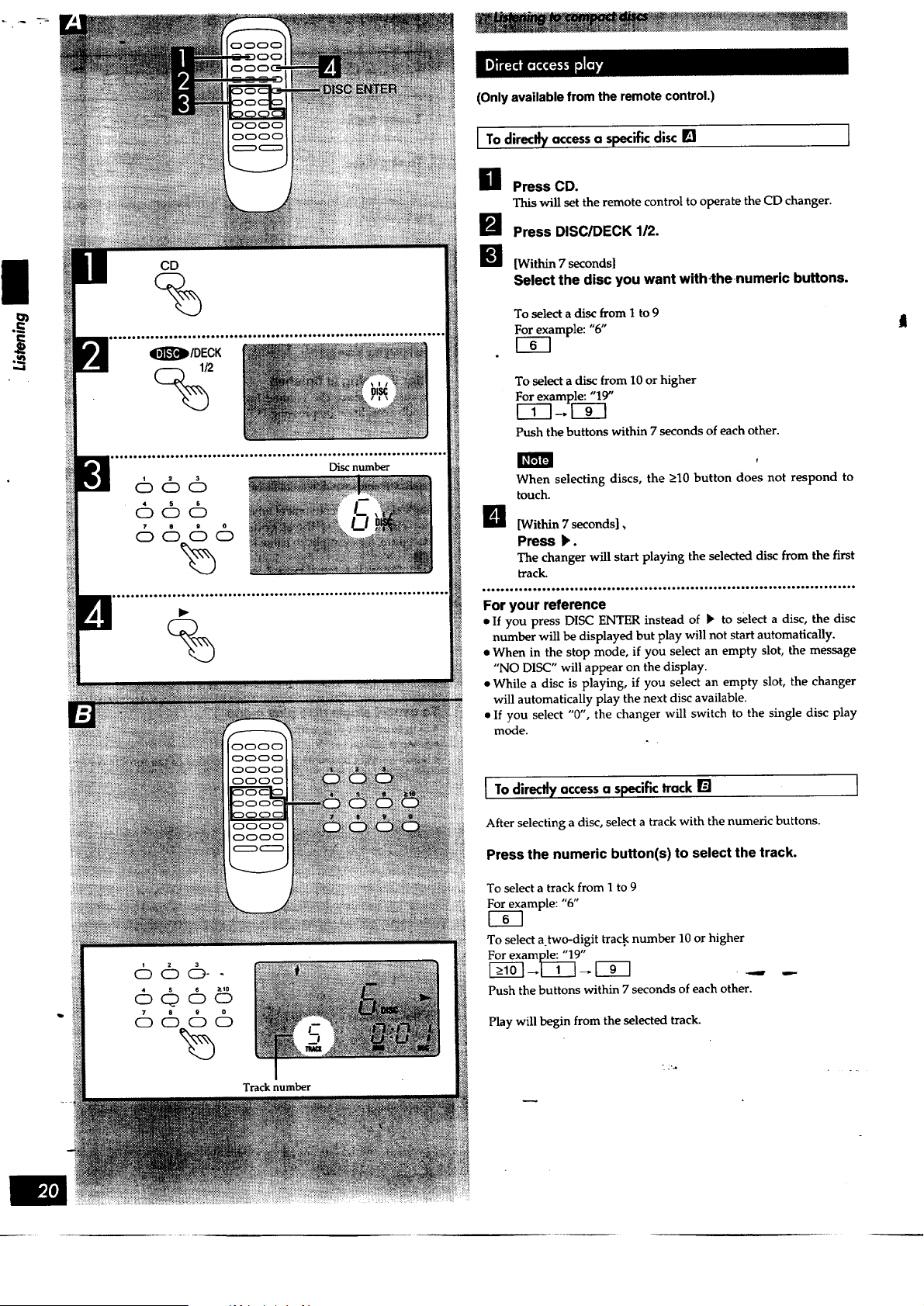
(Only available from the remote control.)
I To directty accessa specific disc []
I
LI Press CD.
This will set the remote control to operate the CD changer.
H Press DISC/DECK 1/2.
l_! [Within 7 seconds]
Select the disc you want with+thenumeric buttons.
To select a disc from I to 9
e.]xample: "6" l
To select a disc from 10 or higher
For example: "19"
Push the buttons within 7 seconds of each other.
When selecting discs, the >10 button does not respond to
touch.
_l [Within 7 seconds],
Press k.
The changer will start playing the selected disc from the first
track.
o°oo.+. ,..oo.H+..o.. ,+.++.o,oo°o....oo°...oooo.I ..°+.-o,-,--o+o..-oo-o--..+,o*oo
For your reference
• If you press DISC ENTER instead of _ to select a disc, the disc
number will be displayed but play will not start automatically.
• When in the stop mode, if you select an empty slot, the message
"NO DISC" will appear on the display.
• While a disc is playing, if you select an empty slot, the changer
will automatically play the next disc available.
• If you select "0", the changer will switch to the single disc play
mode.
I To diredly accessa specifictrack []
After selecting a disc, select a trackwith the numeric buttons.
Press the numeric button(s) to select the track.
To select a track from 1 to 9
For example: "6"
UE3
To select a.two-digit track number 10 or higher
Push the buttons within 7 seconds of each other.
Play will begin from the selected track.
Tracknumber
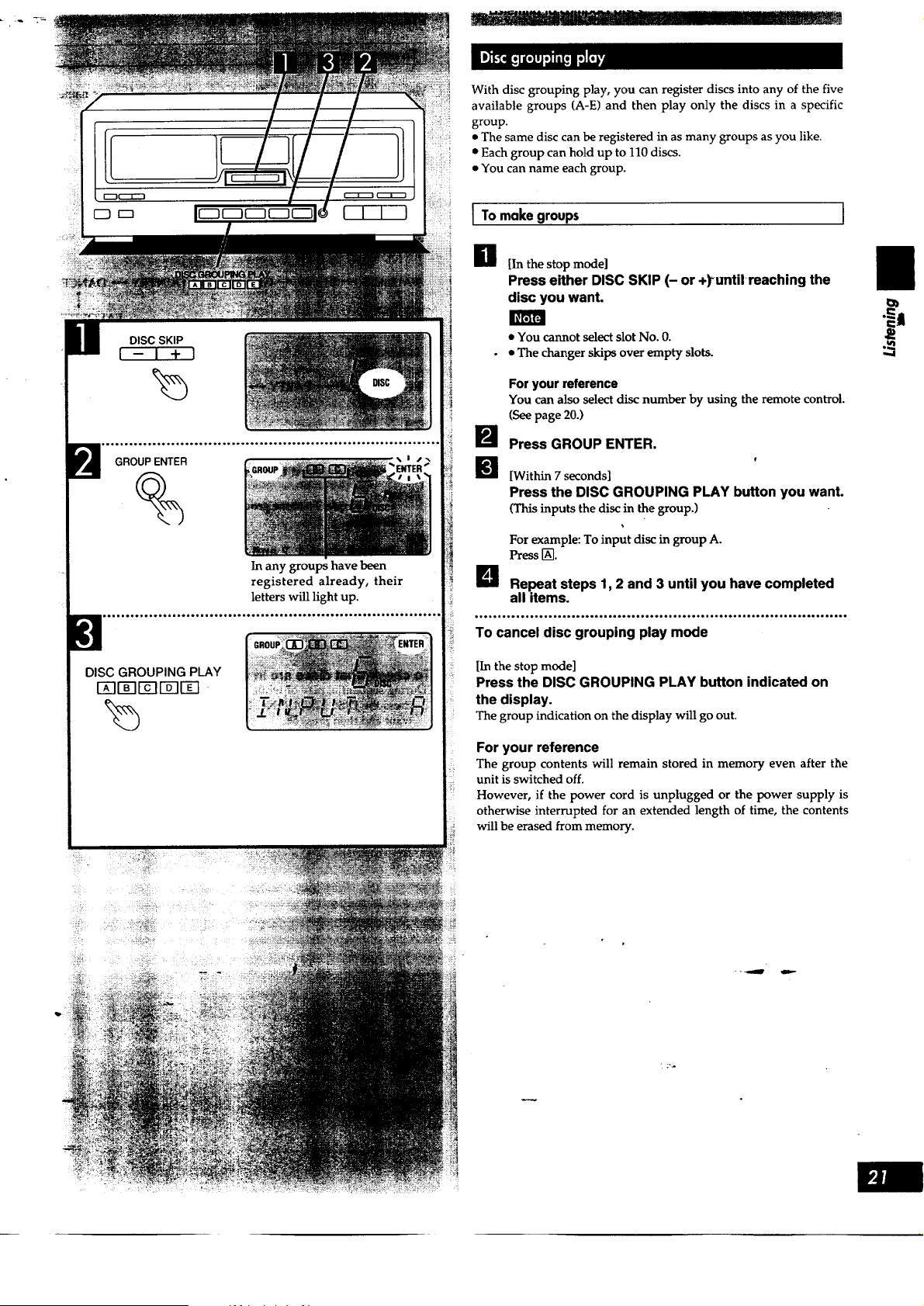
Withdiscgroupingplay, you can register discs into any of the five
available groups (A-E) and then play only the discs in a specific
group.
• The same disc can be registered in as many groups as you like.
• Each group can hold up to 110 discs.
• You can name each group.
I_r.1F4
DISC SKIP
I-I +J
GROUPENTER
%
DISC GROUPING PLAY
I-_II-_-IIYIr-_lTI
In any groups have been
registered already, their
letters will light up.
1 To make groups
g [In the stop mode]
Press either DISC SKIP (- or +)_tmtitreachingthe
disc you want.
• You cannot select slot No. 0.
• • The changer skips over empty slots.
B
For your reference
You can also select disc number by using the remote control.
(See page 20.)
Press GROUP ENTER.
[Within 7 seconds]
Press the DISC GROUPING PLAY button you want.
(This inputs the disc in the group.)
For example: To input disc in group A.
Pressr_.
Repeat steps 1, 2 and 3 until you have completed
all items.
.....,..........°..°............°......... ,......, .......°.,.....°,........o .....
To cancel disc grouping play mode
[In the stop mode]
Press the DISC GROUPING PLAY button indicated on
the display.
The group indication on the display will go out,
For your reference
The group contents will remain stored in memory even after the
unit is switched off.
However, if the power cord is unplugged or the power supply is
otherwise interrupted for an extended length of time, the contents
will be erased from memory.
.=.=,
i"
,,..4
- _ ta=-
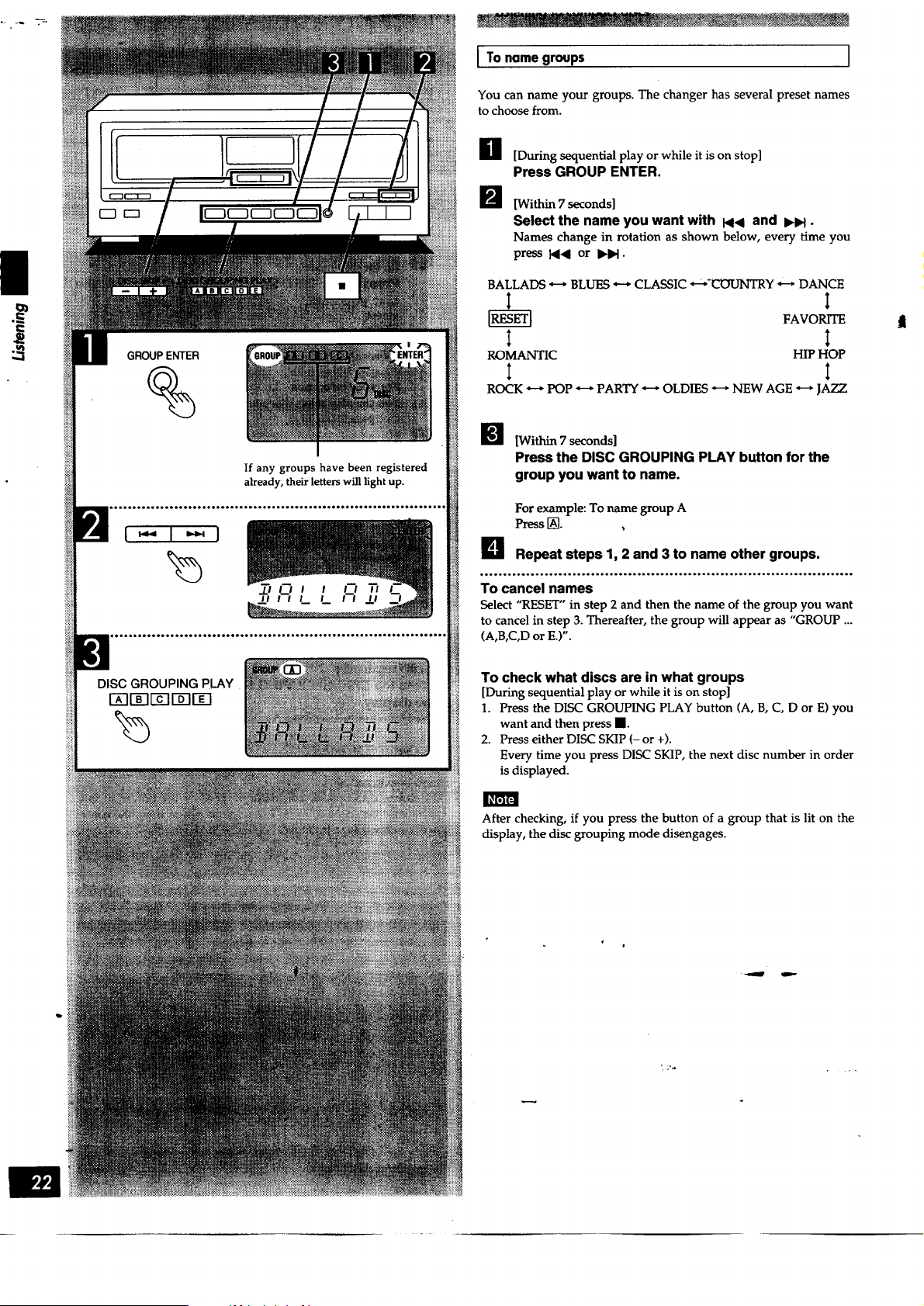
|
==
GROUP ENTER
%
If any groups have been registered
already, their letters will light up.
I To name groups ]
You can name your groups. The changer has several preset names
to choose from.
H [During sequential play or while it is on stop]
Press GROUP ENTER.
[Within 7 seconds]
Select the name you want with I<< and IHH •
Names change in rotation as shown below, every time you
press 1_<1 or b'lH.
BALLADS _ BLUES _ CLASSIC _-_-_Y _ DANCE
I I
FAVOP_TE .
ROMANTIC HIP HOP
t t
ROCK _ POP _ PARTY _ OLDIES _ NEW AGE _ JAZZ
_l [Within 7 seconds]
Press the DISC GROUPING PLAY button for the
group you want to name.
For example: To name group A
Press[_.
L_ Repeat steps 1, 2 and 3 to name other groups.
_________°____°___*H__°_°_____°_____°_____________________-*_________________t_°
To cancel names
Select "RESET" in step 2 and then the name of the group you want
to cancel in step 3. Thereafter, the group will appear as "GROUP ...
(A,B,C,D or E.)".
To check what discs are in what groups
[During sequential play or while it is on stop]
1. Press the DISC GROUPING PLAY button (A, B, C, D or E) you
want and then press I.
2. Press either DISC SKIP (- or +).
Every time you press DISC SKIP, the next disc number in order
is displayed.
After checking, if you press the button of a group that is lit on the
display, the disc grouping mode disengages.

DISC SKIP
I-I +1
GROUPENTER
%
Indication goes out.
J To'startplay [] J
Unless otherwise specified, the changer selects sequential play.
[During sequential play or while it is on stop]
Press the DISC GROUPING PLAY button of the group
you want.
For example: To hear group A
Press[_.
• Unnamed groups will be displayed as "GROUP A, B, C ..." and so
forth.
• If you press the group button of a group which has no discs
registered in it, the message "NO INPUT" will appear on the
display.
I Tocanceldiscsfrom 9roups[]
H [In the stop mode]
Press either DISC SKIP (- or +) until reaching the
disc you want.
I_ Press GROUP ENTER.
[Within 7 seconds]
Press the DISC GROUPING PLAY button you want.
For example: To cancel disc No. 6 from group A.
Press r_.
If the disc is registered in more than one group, you can cancel it
from all groups in a single operation by pressing • in step 3 (in the
stop mode).
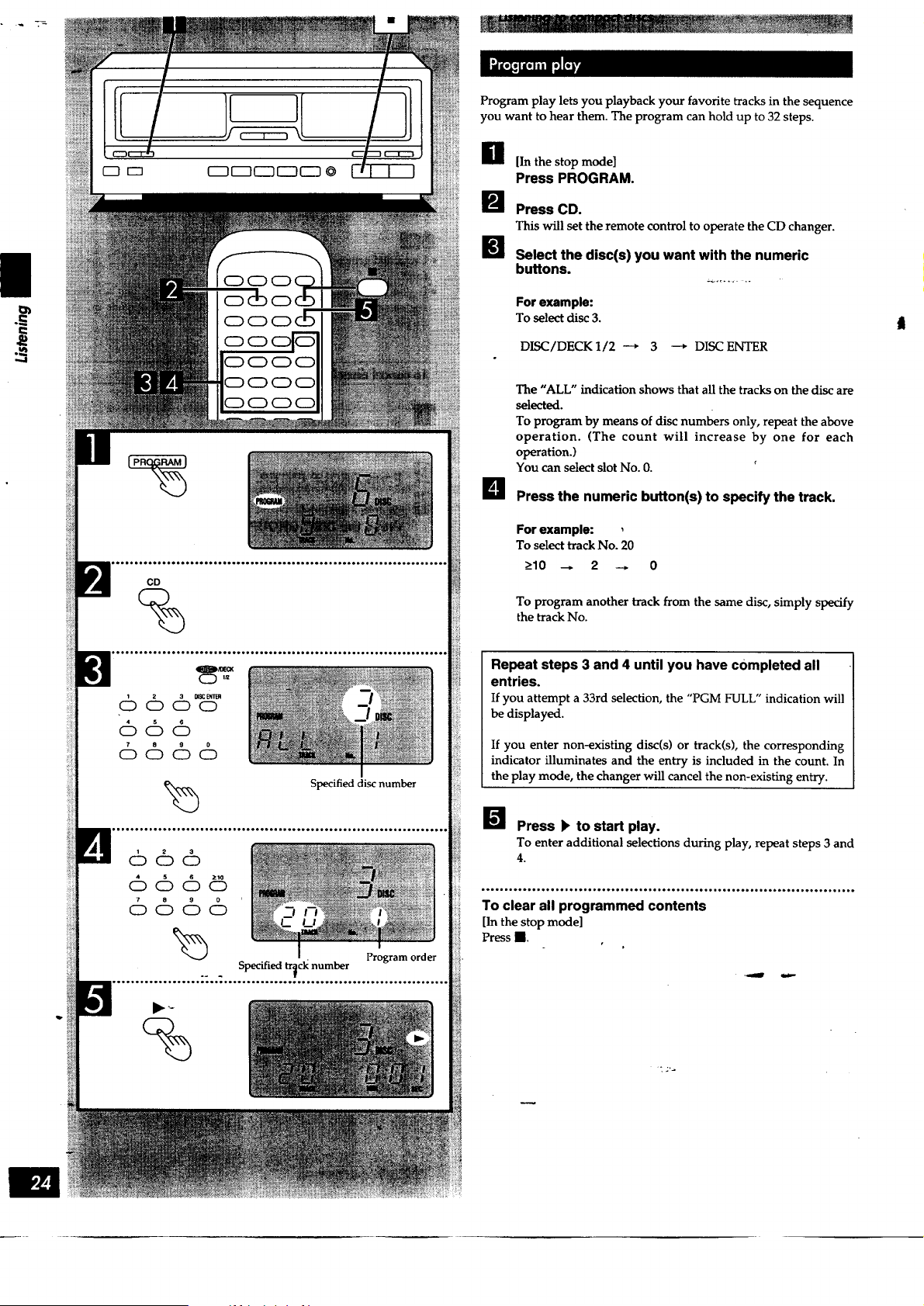
|
C::)CD
CD
%
%
Specified disc number
Specified tr_ck number
Program order
Program play lets you playback your favorite tracks in the sequence
you want to hear them. The program can hold up to 32 steps.
H [In the stop mode]
Press PROGRAM.
_J Press CD.
This will set the remote control to operate the CD changer.
B_ Select the disc(s) you want with the numeric
buttons.
For example:
To select disc 3.
DISC/DECK 1/2 ---* 3 --* DISC ENTER
The "ALL" indication shows that all the tracks on the disc are
selected.
To program by means of disc numbers only, repeat the above
operation. (The count will increase by one for each
operation.)
You can select slot No. 0.
B Press the numeric button(s) to specify the track.
For example:
To select track No. 20
>10 _ 2 --, 0
To program another track from the same disc, simply specify
the track No.
Repeat steps 3 and 4 until you have completed all
entries.
If you attempt a 33rd selection, the "PGM FULL" indication will
be displayed.
If you enter non-existing disc(s) or track(s), the corresponding
indicator illuminates and the entry is included in the count. In
the play mode, the changer will cancel the non-existing entry.
I_ Press I_ to start play.
To enter additional selections during play, repeat steps 3 and
4.
____`_._o_oo_°_o_.°°°__.°°___°._°_°___°___._____°°°°°.°______._____o________.`___
To clear all programmed contents
[In the stop mode]
Press II.
r
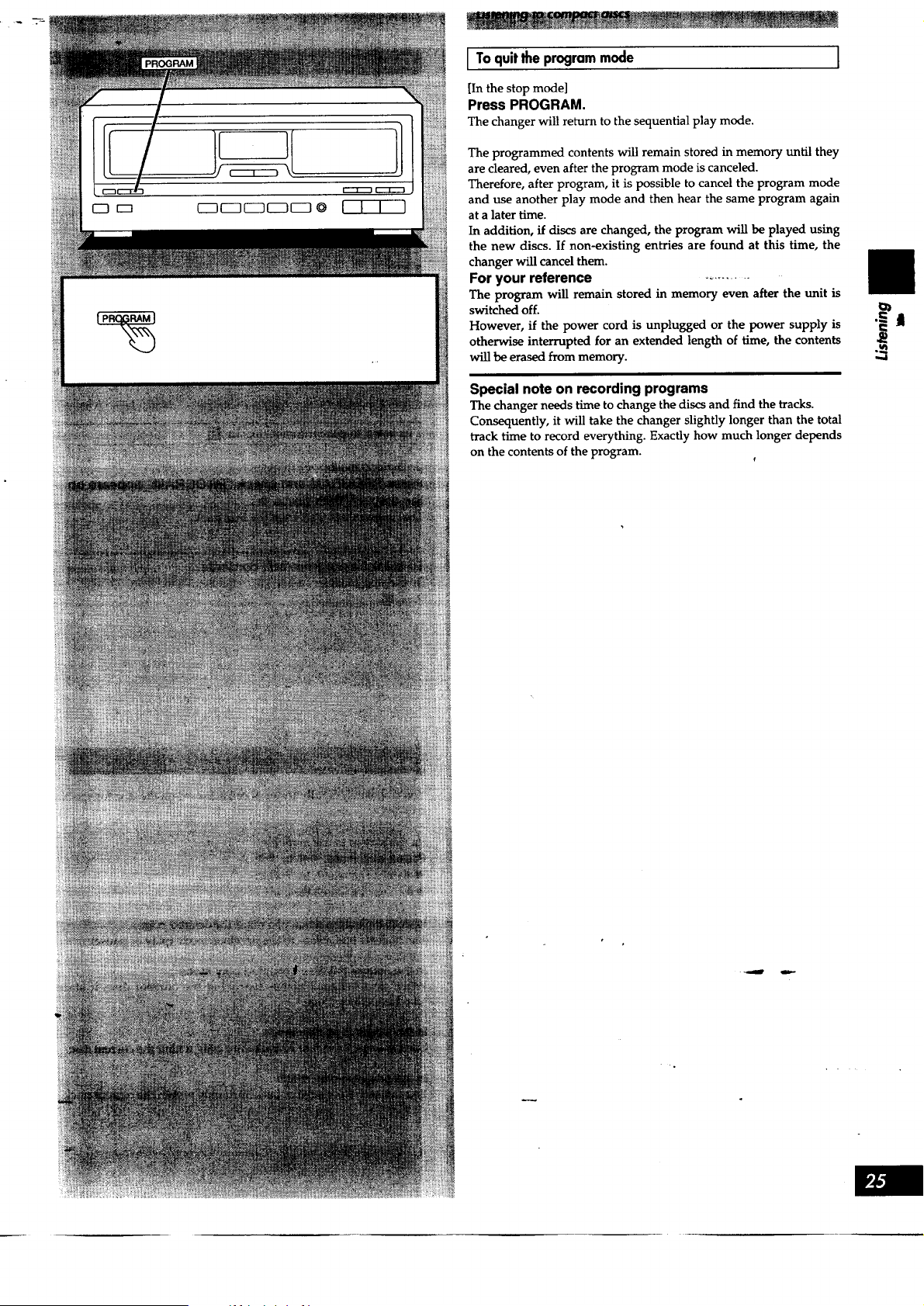
I I I )
[ To quitlhe programmode
[In the stop mode]
Press PROGRAM.
The changer will return to the sequential play mode.
The programmed contents will remain stored in memory until they
are cleared, even after the program mode is canceled.
Therefore, after program, it is possible to cancel the program mode
and use another play mode and then hear the same program again
at a later time.
In addition, if discs are changed, the program will be played using
the new discs. If non-existing entries are found at this time, the
changer will cancel them.
For your reference ...........
The program will remain stored in memory even after the unit is
switched off.
However, if the power cord is unplugged or the power supply is
otherwise interrupted for an extended length of time, the contents
will be erased from memory.
Special note on recording programs
The changer needs time to change the discs and find the tracks.
Consequently, it will take the changer slightly longer than the total
track time to record everything. Exactly how much longer depends
on the contents of the program.
,,.,I
II
I I I l
[]
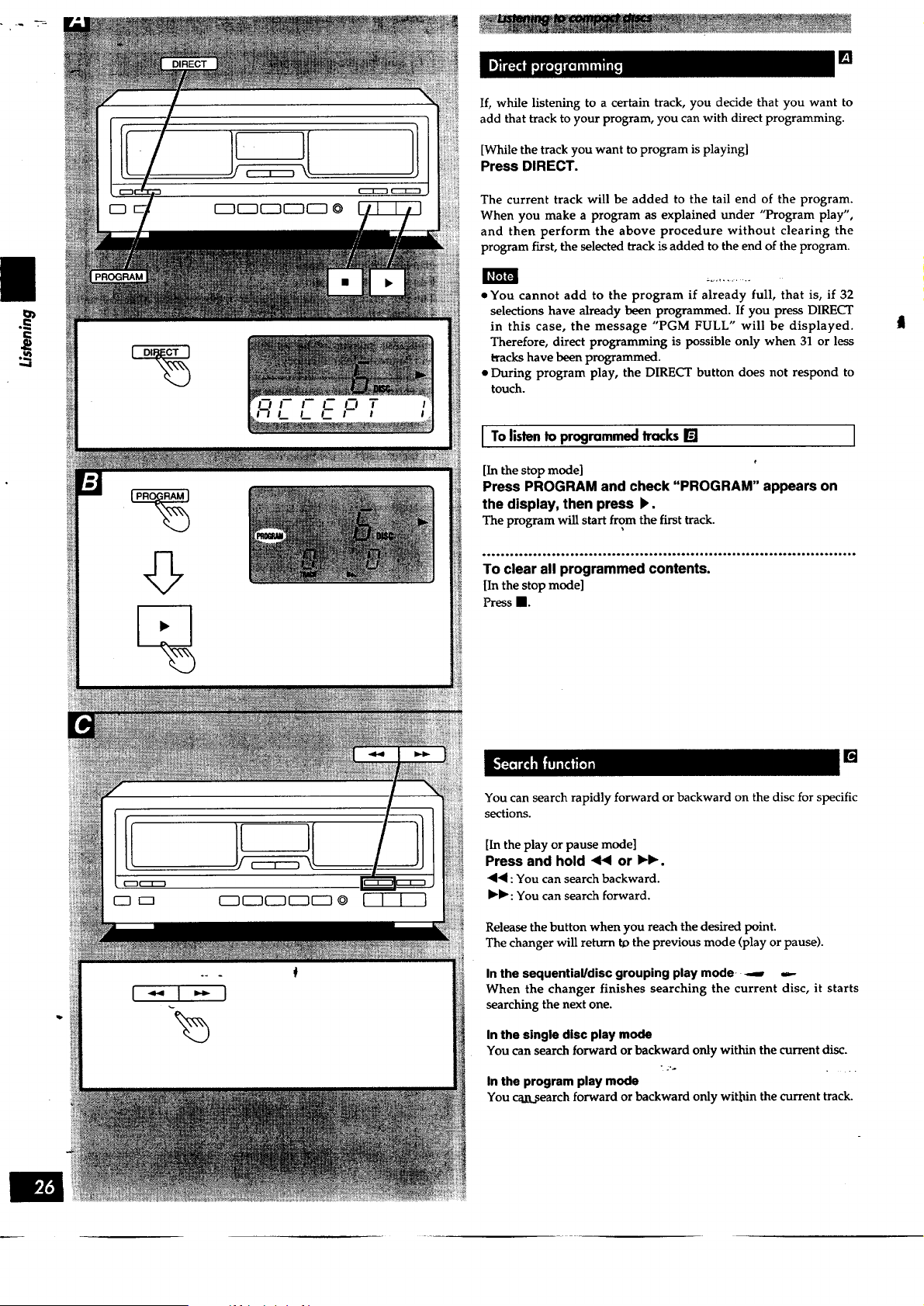
If, while listening to a certain track, you decide that you want to
add that track to your program, you can with direct programming.
[While the track you want to program is playing]
Press DIRECT.
The current track will be added to the tail end of the program.
When you make a program as explained under "Program play",
and then perform the above procedure without clearing the
program first, the selected track is added to the end of the program.
• You cannot add to the program if already full, that is, if 32
selections have already been programmed. If you press DIRECT
in this case, the message "PGM FULL" will be displayed.
Therefore, direct programming is possible only when 31 or less
_acks have been programmed.
• During program play, the DIRECT button does not respond to
touch.
I To listento programmedtracks[] I
[In the stop mode]
Press PROGRAM and check "PROGRAM" appears on
the display, then press )_.
The program wiU start from the first track.
°________o°o__oooo_*o_o_o_____°____°ooo_oooo.oI__**__o__._o____.__________.___.__
To clear all programmed contents.
[In the stop mode]
Press II.
[]
You can search rapidly forward or backward on the disc for specific
sections.
[In the play or pause mode]
Press and hold <'< or IH_.
<4: You can search backward.
I_b" :You can search forward.
Release the button when you reach the desired point.
The changer will return t_ the previous mode (play or pause).
In the sequential/disc grouping play mode- _ -.-
When the changer finishes searching the current disc, it starts
searching the next one.
In the single disc play mode
You can search forward or backward only within the current disc.
In the program play mode
You caj_.search forward or backward only witch the current track.
F_511Zl
DISC SKIP
1-1+)
Disc number
position
position
the playing
the playing
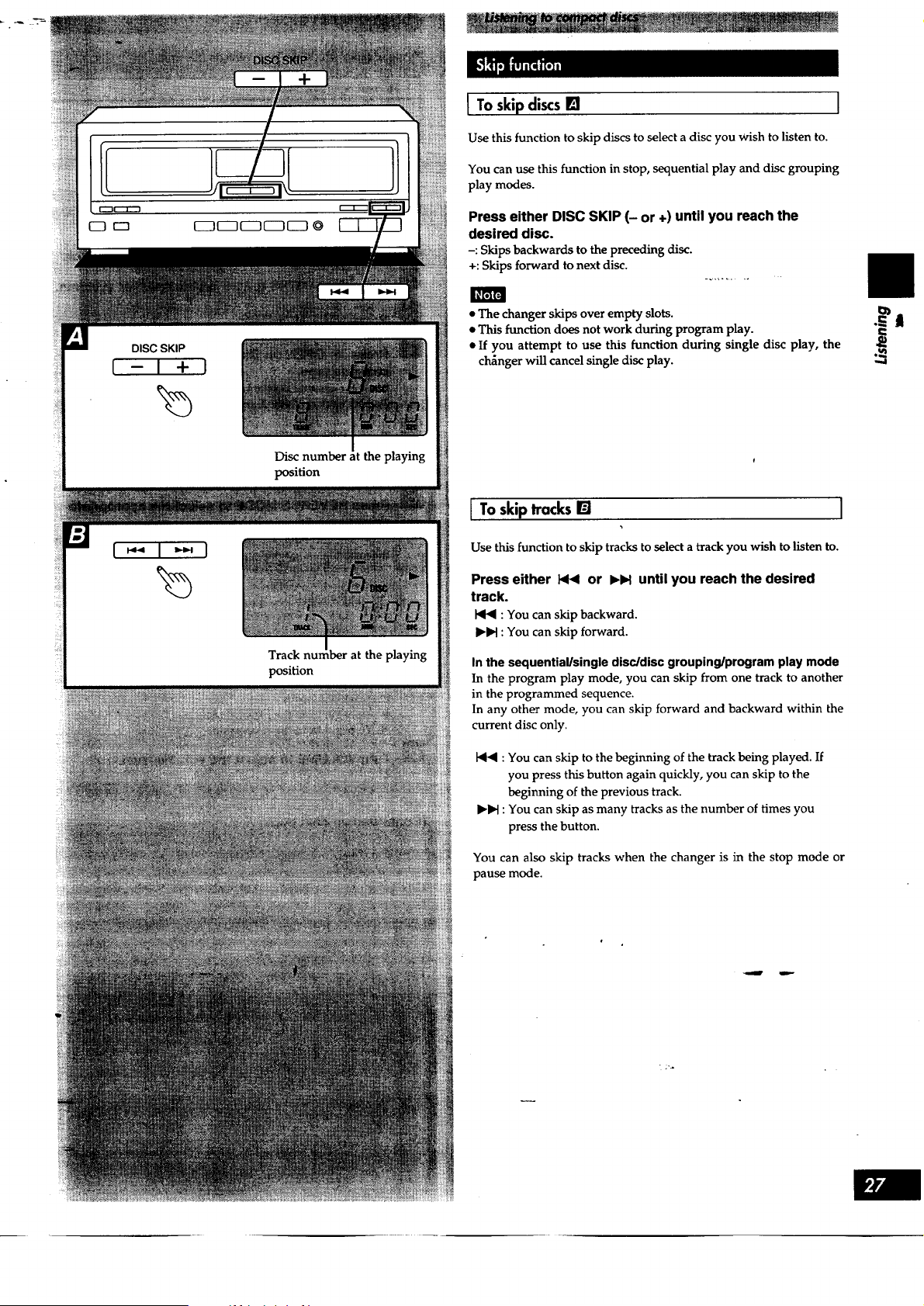
I To skip discs [] I
Use this function to skip discs to select a disc you wish to listen to.
You can use this function in stop, sequential play and disc grouping
play modes.
Press either DISC SKIP (- or +) until you reach the
desired disc.
-: Skips backwards to the preceding disc.
+: Skips forward to next disc.
• The changer skips over empty slots.
• This function does not work during program play.
• If you attempt to use this function during single disc play, the
cl_nger will cancel single disc play.
I To skip tracks [] I
Use this function to skip tracks to select a track you wish to listen to.
Press either _4 or ),H until you reach the desired
track.
HI_ : You can skip backward.
I1_1_:You can skip forward.
In the sequential/single disc/disc grouping/program play mode
In the program play mode, you can skip from one track to another
in the programmed sequence.
In any other mode, you can skip forward and backward within the
current disc only.
I_'_ : You can skip to the beginning of the track being played. If
you press this button again quickly, you can skip to the
beginning of the previous track.
IHH : You can skip as many tracks as the number of times you
press the button.
You can also skip tracks when the changer is in the stop mode or
pause mode.
•.= I
i
p_A
|
OPEN
%
DOLBYNR
REVERSE
MODE
%
VOLUME
Forward side _se side
Tape op_ do_wnward.
On the cassette deck's display
Indicates the side being played
Types of tapes which can be played on this unit:
Normal position/TYPE I O
High position/TYPE 11 O
Metal position/TYPE IV C)
The unit automatically identifies the type of tape.
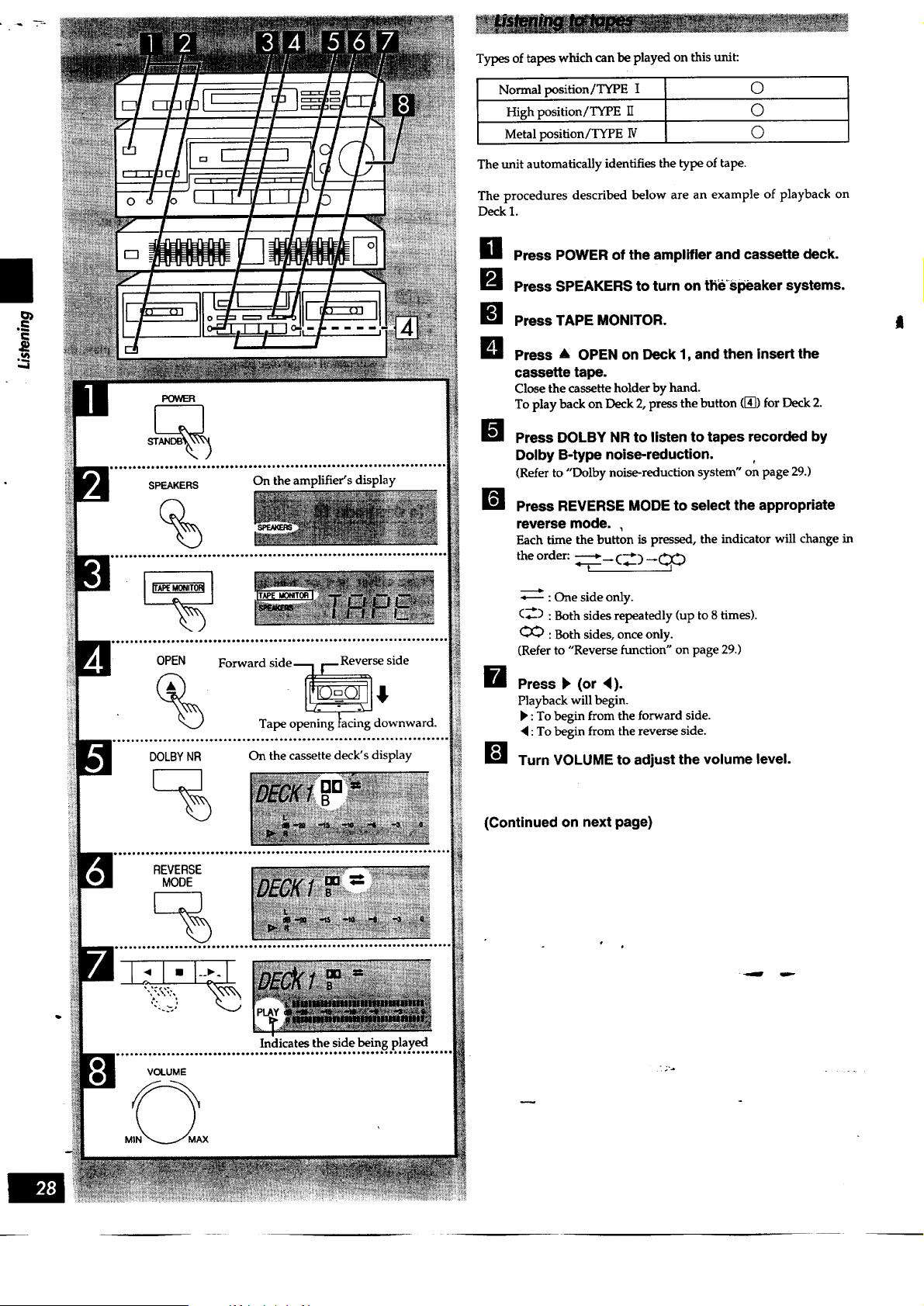
The procedures described below are an example of playback on
Deck 1.
H Press POWER of the amplifier and cassette deck.
B Press SPEAKERS to turn on the_Speaker systems.
!_1 Press TAPE MONITOR.
B
!;t
Press & OPEN on Deck 1, and then insert the
cassette tape.
Close the cassette holder by hand.
To play back on Deck 2, press the button ([_) for Deck 2.
Press DOLBY NR to listen to tapes recorded by
Dolby B-type noise-reduction.
(Refer to "Dolby noise-reduction system" on page 29.)
B Press REVERSE MODE to select the appropriate
reverse mode. ,
Each time the button is pressed, the indicator will change in
the order: _----___(_) __(_:_)
•,---- : One side only.
(_-) : Both sides repeatedly (up to 8 times).
: Both sides, once only.
(Refer to "Reverse function" on page 29.)
_--_ Press F (or 4).
Playback will begin.
P' : To begin from the forward side.
• :To begin from the reverse side.
[] Turn VOLUME to adjust the volume level.
(Continued on next page)
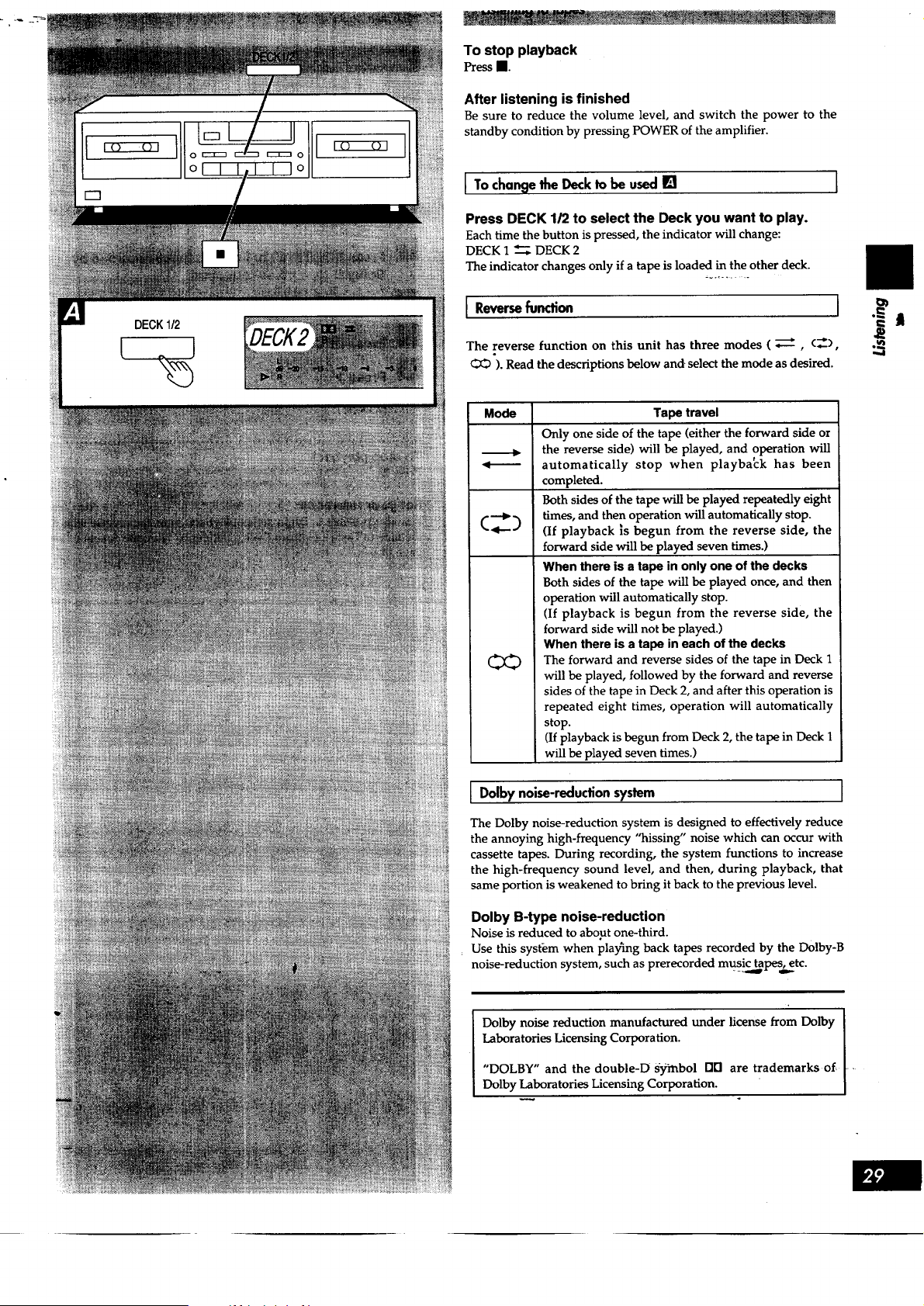
Tostopplayback
PressII.
After listening is finished
Be sure to reduce the volume level, and switch the power to the
standby condition by pressing POWER of the amplifier.
I To chancjethe Deck to be used [] [
Press DECK 1/2 to select the Deck you want to play.
Each time the button is pressed, the indicator will change:
DECK 1 _ DECK 2
The indicator changes only if a tape is loaded in the other deck.
I Reverse function
The reverse function on this unit has three modes ( _, (_),
<_O ). Read the descriptions below and. select the mode as desired.
Mode
Tape travel
Only one side of the tape (either the forward side or
the reverse side) will be played, and operation will
automatically stop when playba_:k has been
completed.
Both sides of the tape will be played repeatedly eight
times, and then operation will automatically stop.
(If playback ;s begun from the reverse side, the
forward side will be played seven times.)
When there is a tape in only one of the decks
Both sides of the tape will be played once, and then
operation will automatically stop.
(If playback is begun from the reverse side, the
forward side will not be played.)
When there is a tape in each of the decks
The forward and reverse sides of the tape in Deck 1
will be played, followed by the forward and reverse
sides of the tape in Deck 2, and after this operation is
repeated eight times, operation will automatically
stop.
(If playback is begun from Deck 2, the tape in Deck 1
will be played seven times.)
I Dolbynoise-reductionsystem ]
The Dolby noise-reduction system is designed to effectively reduce
the annoying high-frequency "hissing" noise which can occur with
cassette tapes. During recording, the system functions to increase
the high-frequency sound level, and then, during playback, that
same portion is weakened to bring it back to the previous level.
Dolby B-type noise-reduction
Noise is reduced to about one-third.
Use this system when playing back tapes recorded by the Dolby-B
noise-reduction system, such as prerecorded music tapes'j etc.
Dolby noise reduction manufactured under license from Dolby
Laboratories Licensing Corporation.
"DOLBY" and the double-D s3iinbol Ell] are trademarks of
Dolby Laboratories Licensing Corporation.
.,,..I
',.,.4
DOLBYNR
REVERSE
MODE
DECK1/2
J
%
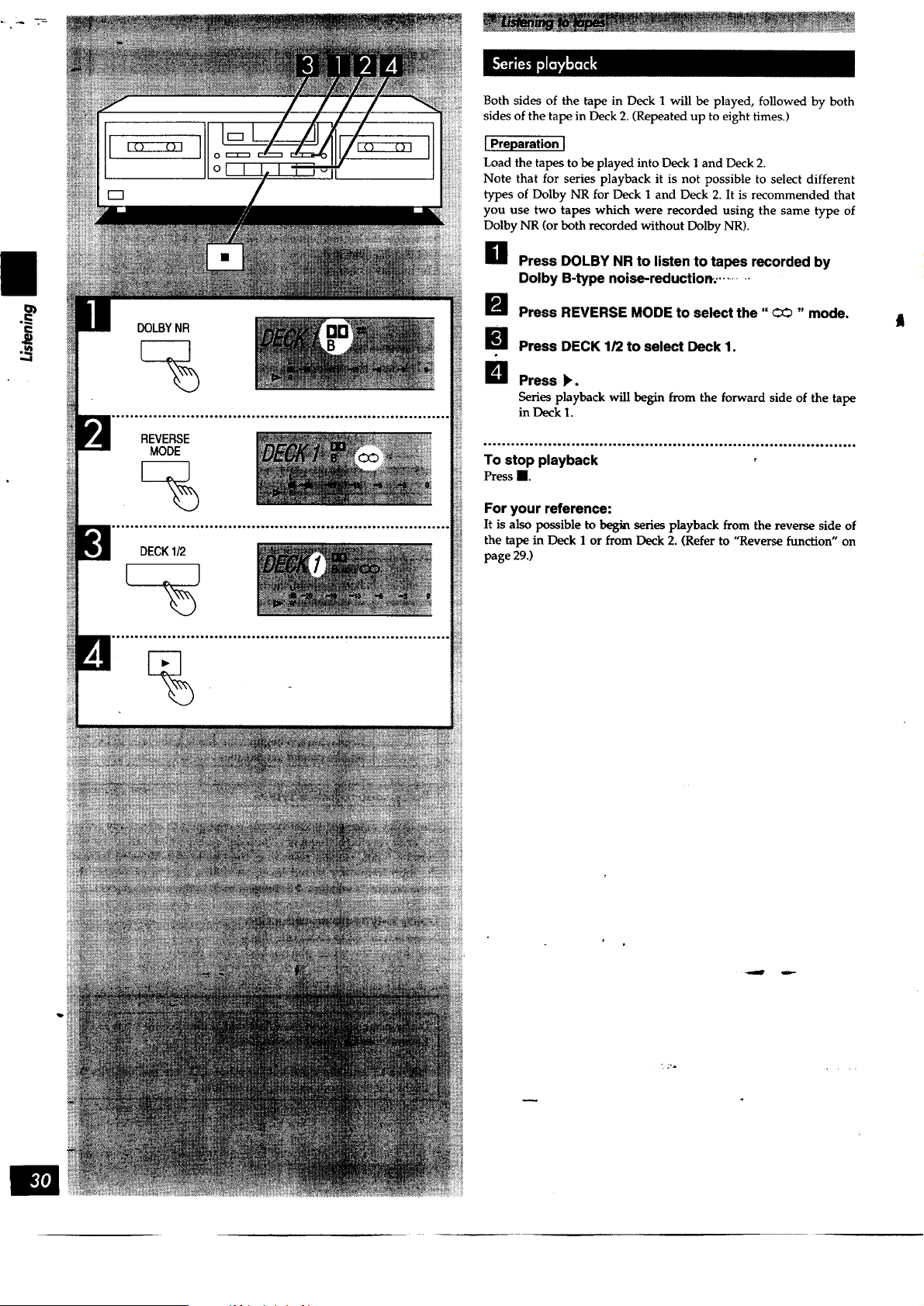
Both sides of the tape in Deck 1 will be played, followed by both
sides of the tape in Deck 2. (Repeated up to eight times.)
[Preparation I
Load the tapes to be played into Deck I and Deck 2.
Note that for series p]ayback it is not possible to select different
types of Dolby NR for Deck 1 and Deck 2. It is recommended that
you use two tapes which were recorded using the same type of
Dolby NR (or both recorded without Dolby NR).
H Press DOLBY NR to listen to tapes recorded by
Dolby B-type noise-reduction. .........
_'_ Press REVERSE MODE to select the" OO "mode.
I_ Press DECK 1/2 to select Deck 1.
_]1 Press _.
Series playback will begin from the forward side of the tape
in Deck 1.
_°_°_'°_°°_°°°°°*_'°°_°°_°_°°_°°°_°_°_°°_°6oo_°_°
To stop playback o
Press II.
For your reference:
It is also possible to be_ series playback from the reverse side of
the tape in Deck 1 or from Deck 2. (Refer to "Reverse function" on
page 29.)
t
[]
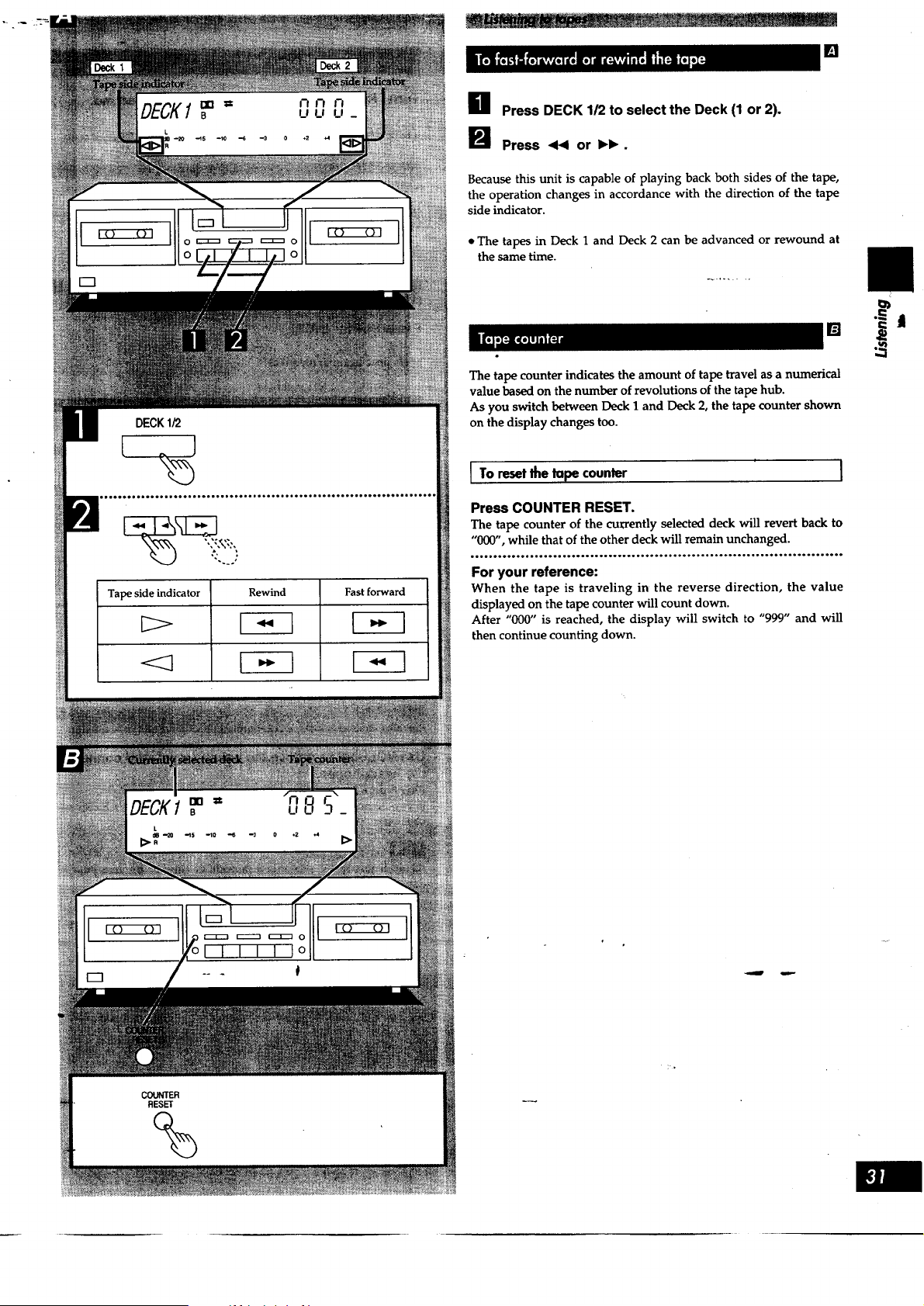
Tape side indicator
<=3
Rewind Fast forward
H Press DECK 112to select the Deck (1 or 2).
I_ Press 44 or IH_.
Because this unit is capable of playing back both sides of the tape,
the operation changes in accordance with the direction of the tape
side indicator.
• The tapes in Deck 1 and Deck 2 can be advanced or rewound at
the same time.
The tape counter indicates the amount of tape travel as a numerical
value based on the number of revolutions of the tape hub.
As you switch between Deck 1 and Deck 2, the tape counter shown
on the display changes too.
I To reset the tape counter
Press COUNTER RESET.
The tape counter of the currently selected deck will revert back to
"000", while that of the other deck will remain unchanged.
...o.Ho..... H...............o...o.H.............. H.ooo.......ee*.-,------..oe
For your reference:
When the tape is traveling in the reverse direction, the value
displayed on the tape counter will count down.
After "000" is reached, the display will switch to "999" and will
then continue counting down.
II
.==
TREBLE
M_ MAX
BASS
MIN MAX
BALANCE
L R
SUPER BASS
%
On the amplifier's display
PHONES
Headphones
(Not included)
[]
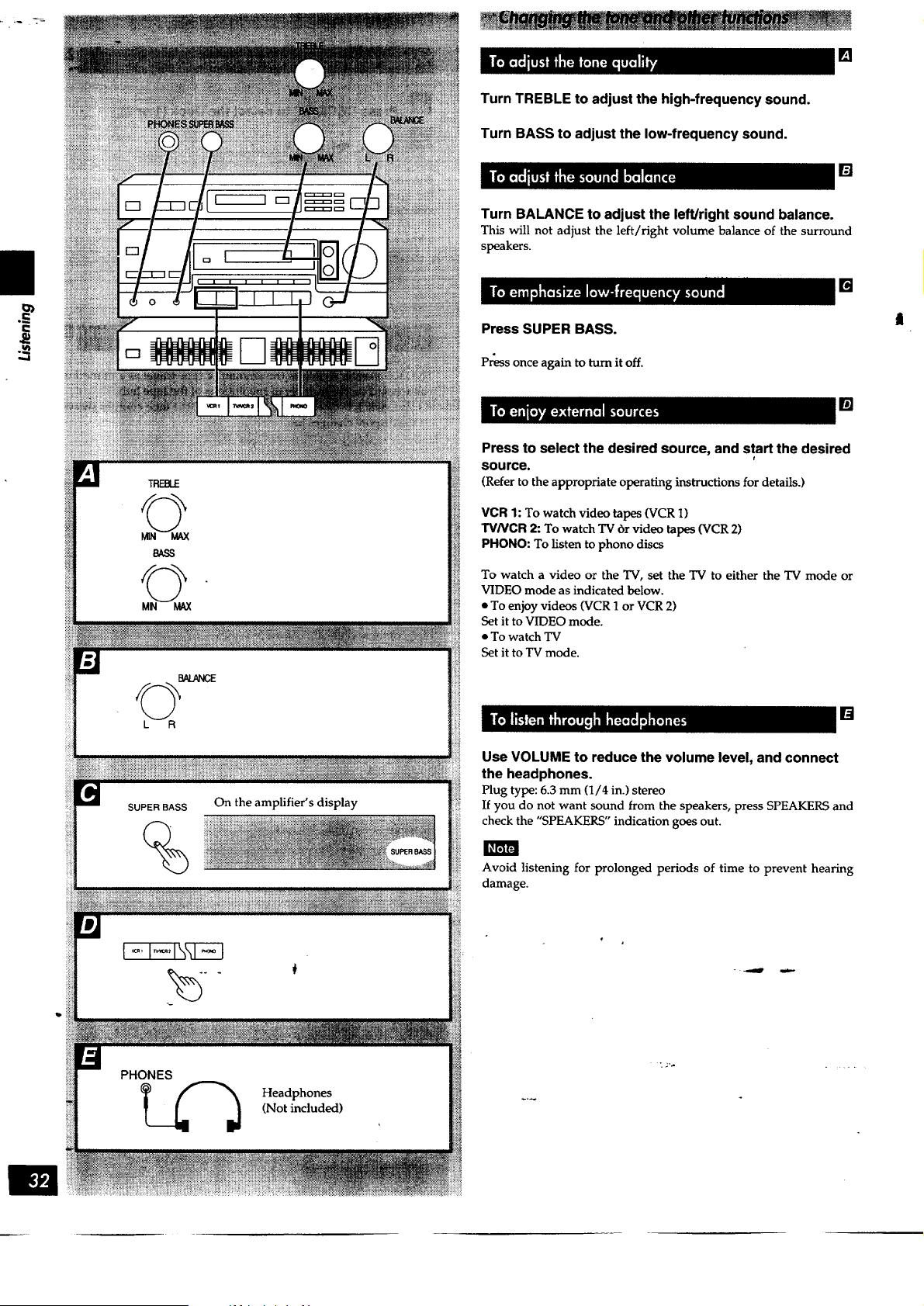
Turn TREBLE to adjust the high-frequency sound.
Turn BASS to adjust the low-frequency sound.
[]
Turn BALANCE to adjust the left/right sound balance.
This will not adjust the left/right volume balance of the surround
speakers.
[]
Press SUPER BASS.
Press once again to turn itoff.
[]
Press to select the desired source, and start the desired
r
source.
(Refer to the appropriate operating instructions for details.)
VCR 1: To watch video tapes (VCR 1)
TV/VCR 2: To watch TV br video tapes (VCR 2)
PHONO: To listen to phono discs
To watch a video or the TV, set the TV to either the TV mode or
VIDEO mode as indicated below.
• To enjoy videos (VCR 1 or VCR 2)
Set it to VIDEO mode.
• To watch TV
Set it to TV mode.
[]
Use VOLUME to reduce the volume level, and connect
the headphones.
Plug type: 6.3 mm (1/4 in.) stereo
If you do not want sound from the speakers, press SPEAKERS and
check the "SPEAKERS" indication goes out.
Avoid listening for prolonged periods of time to prevent hearing
damage.
OPEN
%
DOLBYNR
Forward side _ side
On the cassette deck's display.
REVERSE
MODE
• REC PAUSE
Types of tapes which can be used for recording:
Normal position/TYPE I
High position/TYPE II
Metal position/TYPE 1V
0
0
0
[ Preparation I
Load a tape which has been advanced to the end of the leader tape
(the transparent part at both ends of the tape) into Deck 2.
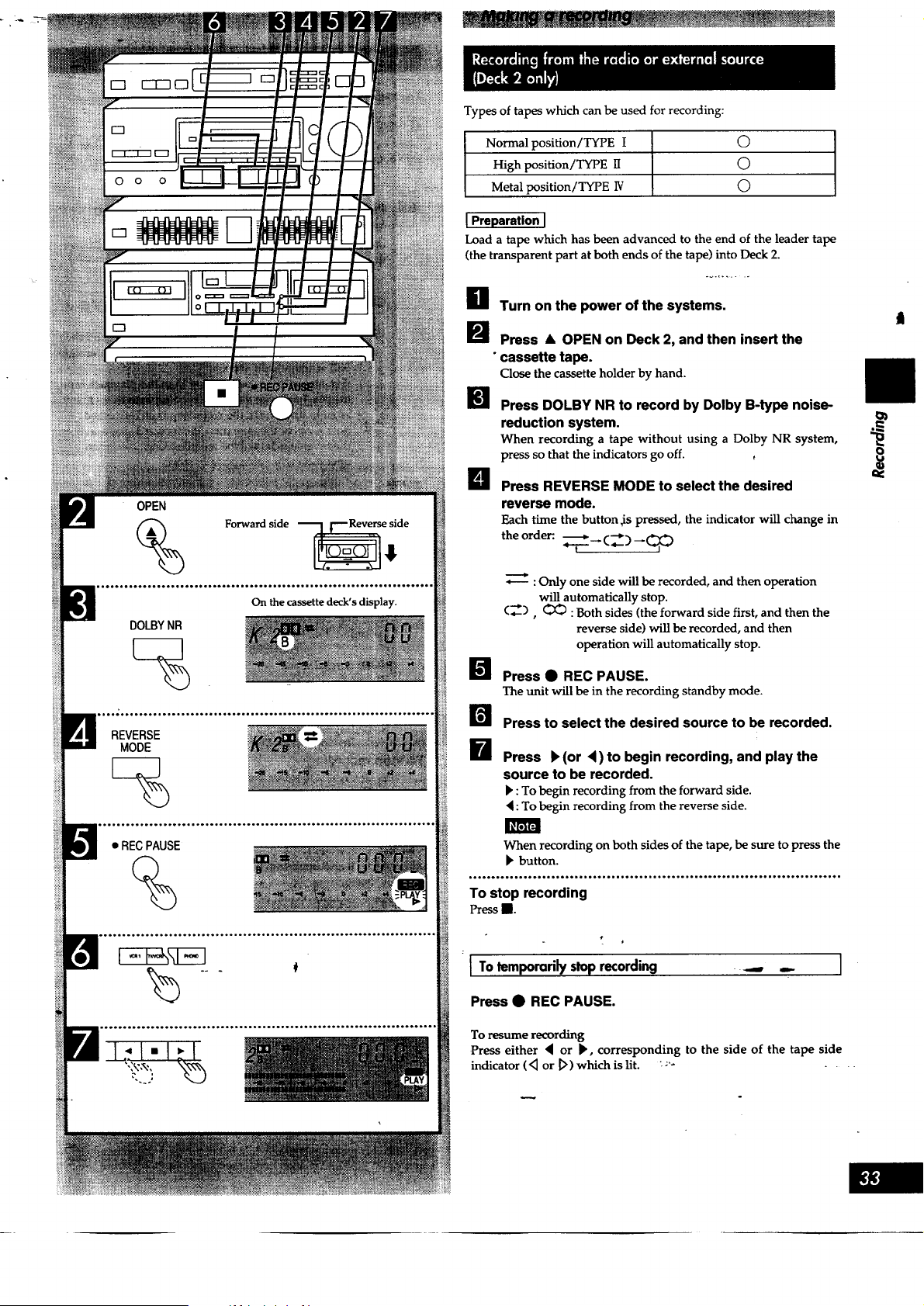
H Turn on the power of the systems.
_'_ Press • OPEN on Deck 2, and then insert the
• cassette tape.
Close the cassette holder by hand.
Press DOLBY NR to record by Dolby B-type noise-
reduction system.
When recording a tape without using a Dolby NR system,
press so that the indicators go off.
B Press REVERSE MODE to select the desired
reverse mode.
Each time the button ,is pressed, the indicator will change in
the order:. _ --_
: Only one side will be recorded, and then operation
will automatically stop.
(_), _ : Both sides (the forward side first, and then the
reverse side) will be recorded, and then
operation will automatically stop.
I_ Press • REC PAUSE.
The unit will be in the recording standby mode.
I Press to select the desired source to be recorded.
I Press k(or <)to begin recording, and playthe
source to be recorded.
b : To begin recording from the forward side.
: To begin recording from the reverse side.
When recording on both sides of the tape, be sure to press the
button.
..°.°.....o...o**.**°°°..,...... o.....,. ,... .... .o°.°....,,......,......,o....H,
To stop recording
Press R.
I To temporarily stoprecording
Press • REC PAUSE.
To resume recording
Press either 4 or _, corresponding to the side of the tape side
indicator ('_ or _>) which is lit. ;'- ....
I
t
REVERSE
MODE
SPEED
SYNCHRO
START
%
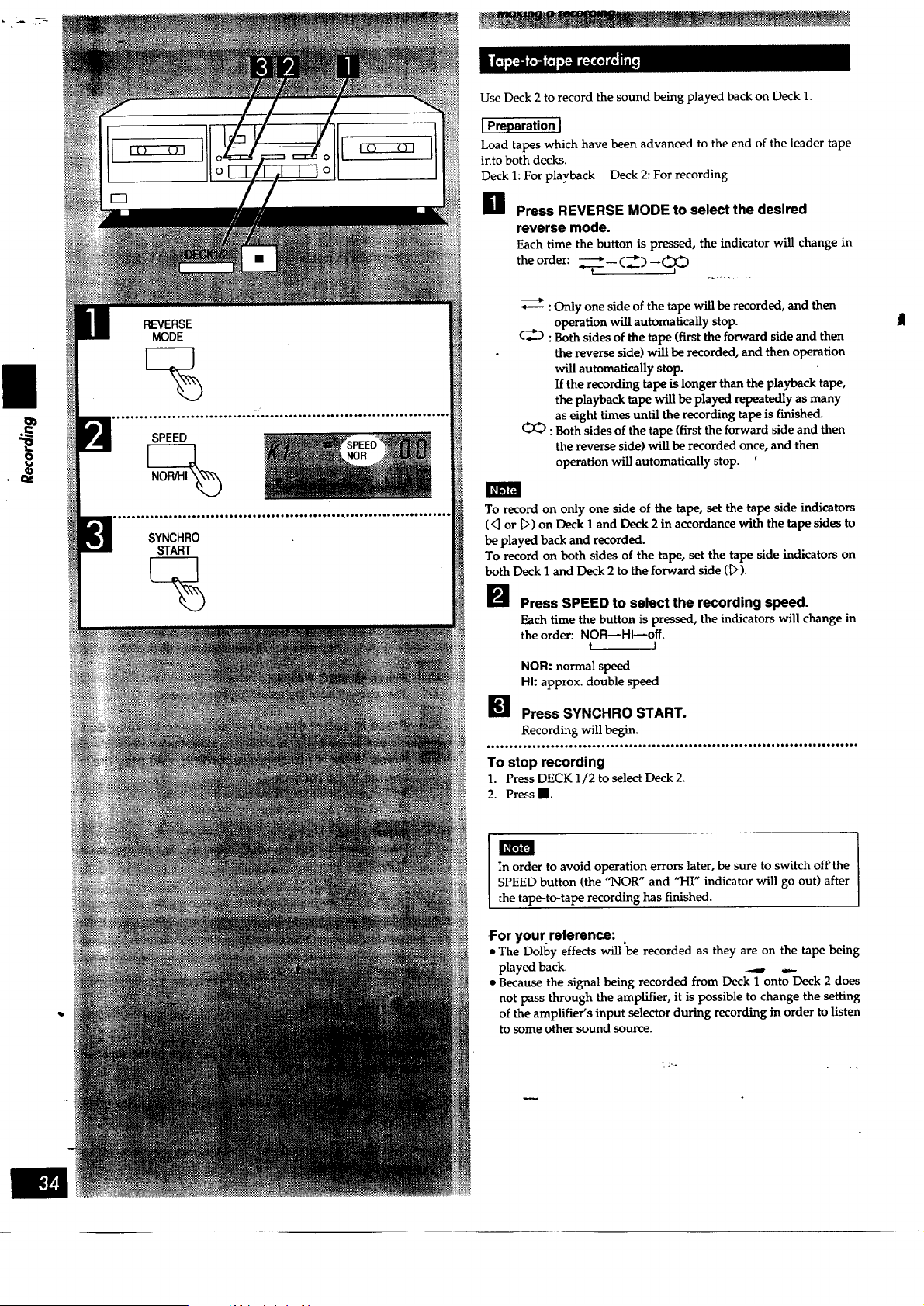
Use Deck 2 to record the sound being played back on Deck 1.
] Preparation J
Load tapes which have been advanced to the end of the leader tape
into both decks.
Deck 1: For playback Deck 2: For recording
H Press REVERSE MODE to select the desired
reverse mode.
Each time the button is pressed, the indicator will change in
theorder: .T__cZ _qo
: Only one side of the tape will be recorded, and then
operation will automatically stop.
C_) : Both sides of the tape (first the forward side and then
the reverse side) will be recorded, and then operation
will automatically stop.
If the recording tape is longer than the playback tape,
the playback tape will be played repeatedly as many
as eight times until the recording tape is finished.
:Both sides of the tape (first the forward side and then
the reverse side) will be recorded once, and then
operation will automatically stop. '
To record on only one side of the tape, set the tape side indicators
( <_or _') on Deck 1 and Deck 2 in accordance with the tape sides to
be played back and recorded.
To record on both sides of the tape, set the tape side indicators on
both Deck 1 and Deck 2 to the forward side (1>).
I1_ Press SPEED to select the recording speed.
Each time the button is pressed, the indicators will change in
the order: NOR_HI_off.
t I
NOR: normal speed
HI: approx, double speed
_1 Press SYNCHRO START.
Recording will begin.
,oooo.oo,.,.,tooooo o,o..oo.,.oooooo ooo.o,,.ooo....Hoooo..,o,,,.ooooo,., ooo.o.o,.
To stop recording
1. Press DECK 1/2 to select Deck 2.
2. Press B.
In order to avoid operation errors later, be sure to switch off'the
SPEED button (the "NOR" and "HI" indicator will go out) after
the tape-to-tape recording has finished.
For your reference:
• The Dolby effects will 'be recorded as they are on the tape being
played back. _ ,_.
• Because the signal being recorded from Deck 1 onto Deck 2 does
not pass through the amplifier, it is possible to change the setting
of the amplifier's input selector during recording in order to listen
to some other sound source.

O
DECK1/2
%
SYNCHRO
START
ii............. '....... i
I To record selected hacks [] 1
H [During recording]
Press DECK 1/2 to select Deck 1.
[] Press II.
Deck I will stop, and Deck 2 will record a 4-second silent
interval and then enter the recording standby mode.
Operate Deck I to find the track you wish to
record.
It is also possible to change the playback tape at this time.
B Press SYNCHRO START. -...........
Recording will resume.
I To cut unwanted ports durincj recording []
H Press • REC PAUSE during recording.
Deck 2, which was recording, will enter the pause mode, and
Deck I will continue playback.
(If you were recording at hi-speed, Deck 1 will change to
normal speed while Deck 2 is on pause, but w_ll return to hi-
speed when you resume recording.)
B [When Deck I reaches a part you wish to record]
Press either < or k, corresponding to the tape
side indicator which is lit.
Deck 2 will resume recording.
• When recording with the recording speed set to hi-speed, noise
interference may be recorded onto the tape if there is a television
set nearby, so make the recording in a location separated from the
television set or switch off the television set during recording.
• Noise reduction does not work during playback of tape-to-tape
recordings. If the tape was recorded with noise reduction, listen at
low treble. Lower the treble with the amplifier's treble control
before playback.
8
1. Switch the amplifier to an input source which is not being used.
2. Insert the recorded tape into DECK 2.
3. Press DOLBY NR so that the Dolby NR indicator is off.
4. Press REVERSE MODE to select reverse mode.
5. Press • REC PAUSE.
6. Press _4or b, whichever side you want to erase.
To erase both sides of the tape, be sure to press the b button.
You can record audio and video sources on a VCl_.i_herk.t.his latter
is connected to the "VCR 1" terminals on the amplifier.
1. Switch the amplifier to the input source that you want to record.
l
Recording from the tape deck is not possible.
2. Begin recording on the VCR (VCR 1) and start the desired
source.
(Refer to-the appropriate operating instructions for details.)
[m
Front Front
- speaker(L) speaker(R)
Center
speaker
su.ound
speaker (L) speaker (R)
speaker (L) speaker speaker (R)
__,_ -L ¸
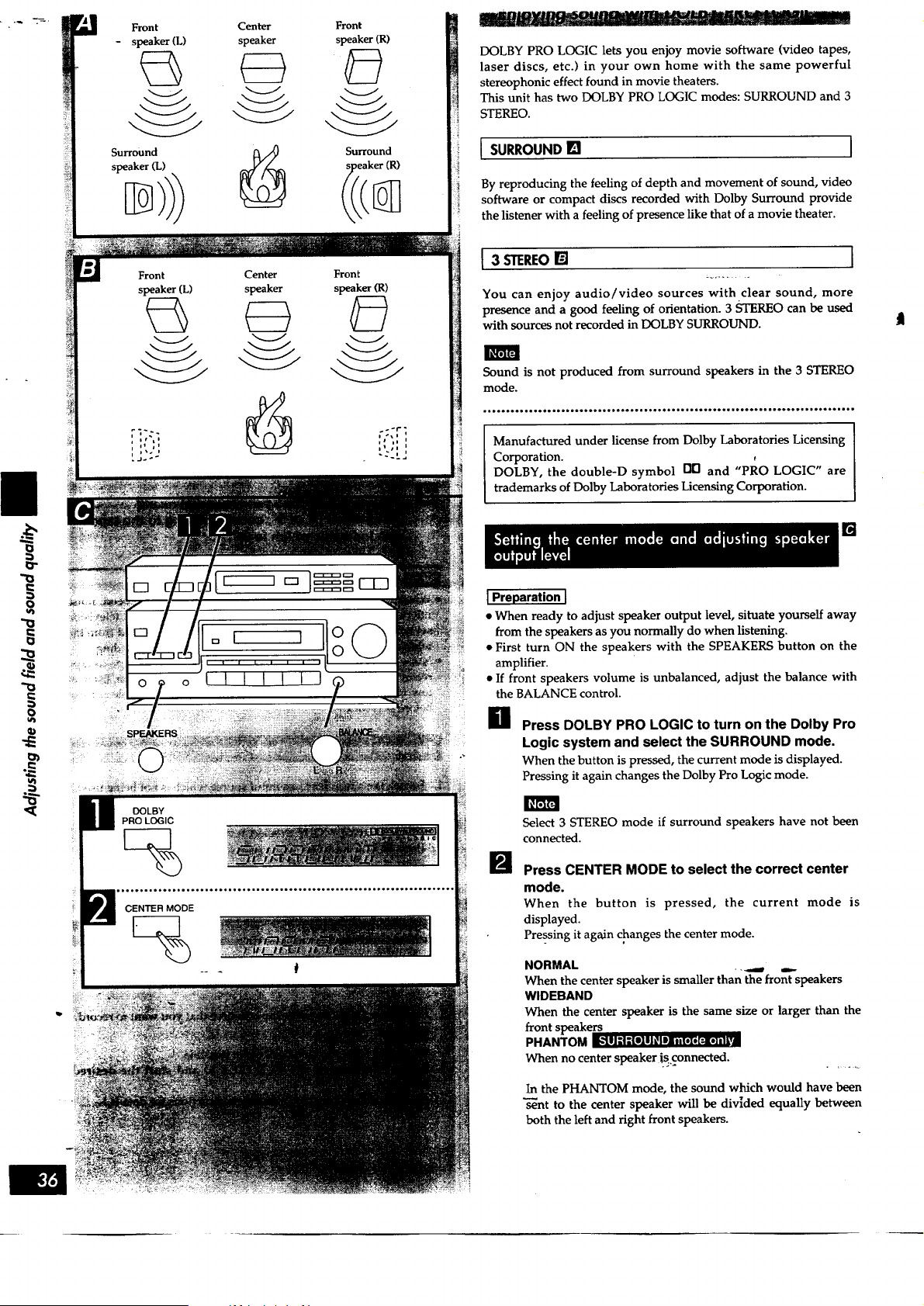
DOLBY PRO LOGIC lets you enjoy movie software (video tapes,
laser discs, etc.) in your own home with the same powerful
stereophonic effect found in movie theaters.
This unit has two DOLBY PRO LOGIC modes: SURROUND and 3
STEREO.
[ SURROUND [] ]
By reproducing the feeling of depth and movement of sound, video
software or compact discs recorded with Dolby Surround provide
the listener with a feeling of presence like that of a movie theater.
I 3 STEREO[]
You can enjoy audio/video sources with clear sound, more
presence and a good feeling of orientation. 3 STEREO can be used
with sources not recorded in DOLBY SURROUND.
Sound is not produced from surround speakers in the 3 STEREO
mode.
Manufactured under license from Dolby Laboratories Licensing
Corporation.
DOLBY, the double-D symbol []D and "PRO LOGIC" are
trademarks of Dolby Laboratories Licensing Corporation.
[]
JPreparation J
• When ready to adjust speaker output level, situate yourself away
from the speakers as you normally do when listening.
• First turn ON the speakers with the SPEAKERS button on the
amplifier.
• If front speakers volume is unbalanced, adjust the balance with
the BALANCE control.
O Press DOLBY PRO LOGIC to turn on the Dolby Pro
Logic system and select the SURROUND mode.
When the button is pressed, the current mode is displayed.
Pressing it again changes the Dolby Pro Logic mode.
B
Select 3 STEREO mode if surround speakers have not been
connected.
Press CENTER MODE to select the correct center
mode.
When the button is pressed, the current mode is
displayed.
Pressing it again changes the center mode.
NORMAL
When the center speaker is smaller than the front speakers
WlDEBAND
When the center speaker is the same size or larger than the
front speakers
PHANTOM I[_'_ll:!-'{I]l] _I Din [,[,[:l,]|l i,i
When no center speaker is connected.
In the PHANTOM mode, the sound which would have been
"_nt to the center speaker will be divided equally between
both the left and right front speakers.
I
0
0
0
VOLUME
MIN_OMAX
CENTER
SURROUND
m
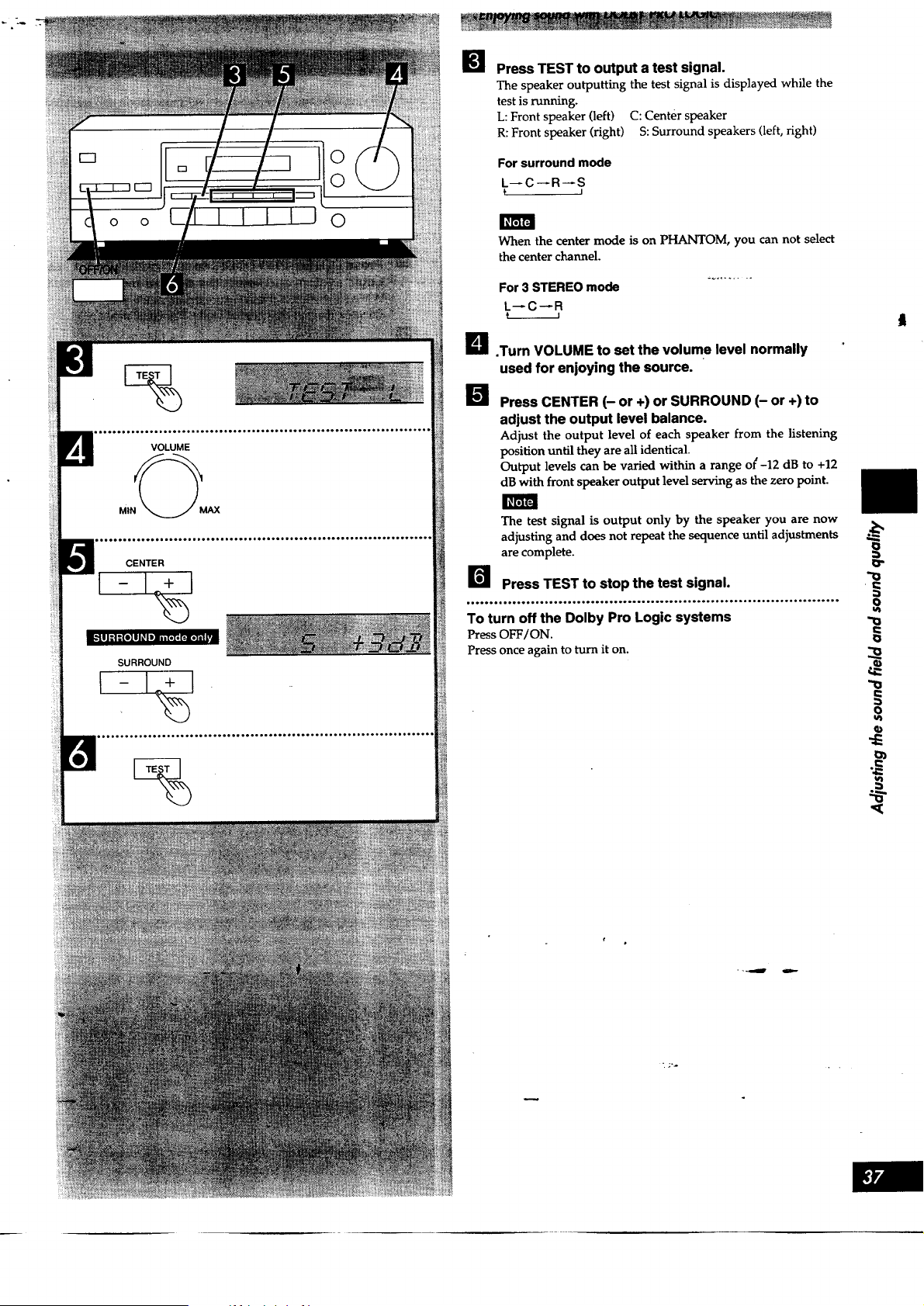
Press TEST to output a test signal.
The speaker outputting the test signal is displayed while the
test is running.
L: Front speaker (left) C: Center speaker
R: Front speaker (right) S: Surround speakers (left, right)
For surround mode
L--C--R--S
f I
When the center mode is on PHANTOM, you can not select
the center channel.
For 3 STEREO mode
L_C_R
L_ .Turn VOLUME to set the volume level normally
used for enjoying the source.
i Press CENTER (- or +) or SURROUND (- or +) to
adjust the output level balance.
Adjust the output level of each speaker from the listening
position until they are all identical.
Output levels can be varied within a range ol_-12 dB to +12
dB with front speaker output level serving as the zero point.
The test signal is output only by the speaker you are now
adjusting and does not repeat the sequence until adjustments .._
are complete.
Press TEST to stop the test signal. "_
o
• Io°°°.q.°°°°°.l°..°°°..° Jo°°°.°.°._°°...°°oo..°.°°°°,l Ioo°....°°°°°°.ol.°°°°°o,o
To turn off the Dolby Pro Logic systems
Press OFF/ON.
Press once again to turn it on.
f
o o
DOLBY
PROLOGIC
For SURROUND mode
For 3 STEREO mode
0
0
0
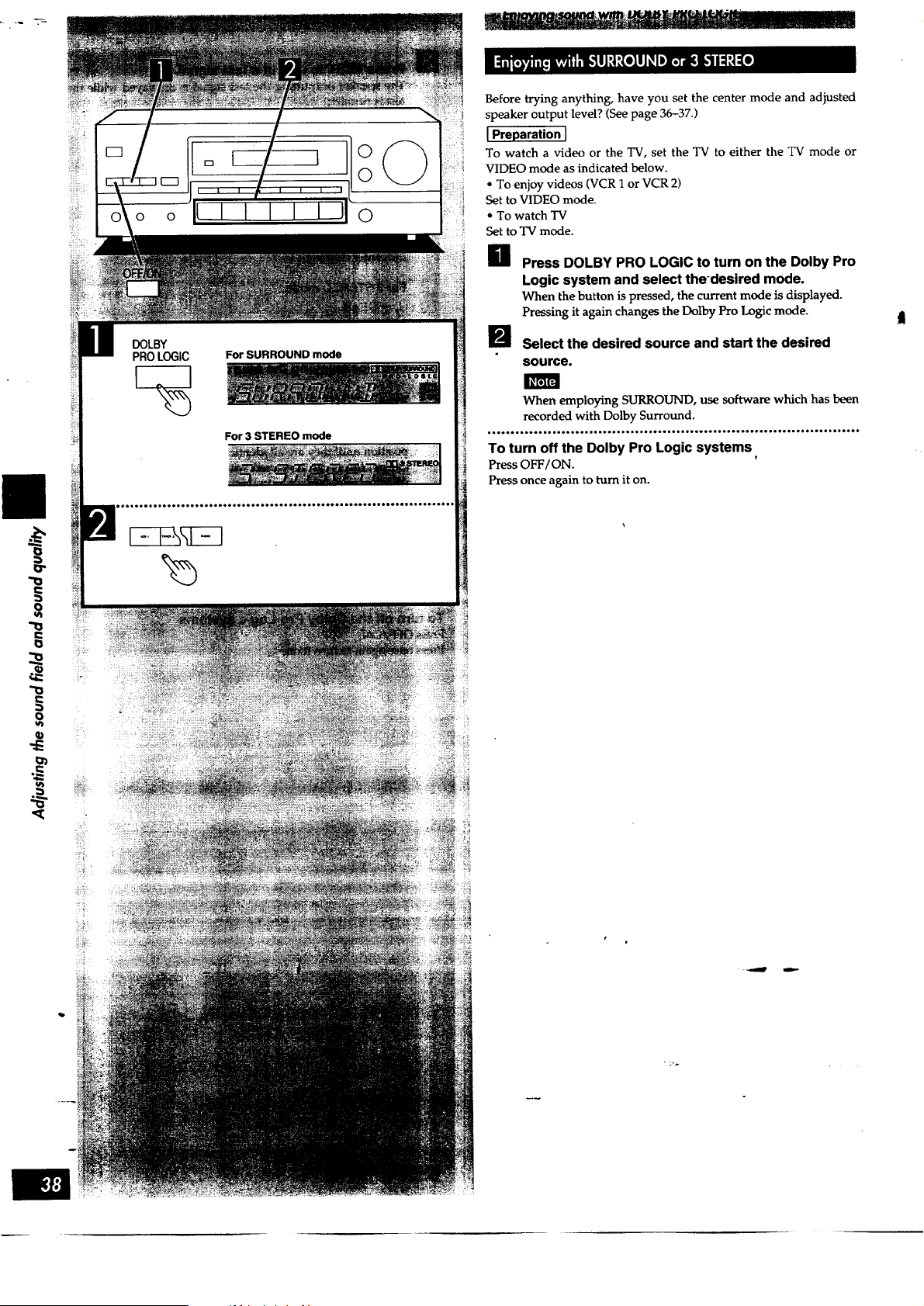
Before trying anything, have you set the center mode and adjusted
speaker output level? (See page 36-37.)
I Preparation J
To watch a video or the TV, set the TV to either the TV mode or
VIDEO mode as indicated below.
• To enjoy videos (VCR 1 or VCR 2)
Set to VIDEO mode.
• To watch TV
Set to TV mode.
H Press DOLBY PRO LOGIC to turn on the Dolby Pro
Logic system and select the-desired mode.
When the button is pressed, the current mode is displayed.
Pressing it again changes the Dolby Pro Logic mode.
I_J select the desired source and start the desired
source.
When employing SURROUND, use software which has been
recorded with Dolby Surround.
• '''eO'''''°'',.O.°...IH*.*.O... IIOO*.,.., ,O.°.., H,°*...,,.O.,.,.,*,.......,,O.
To turn off the Dolby Pro Logic systems
Press OFF/ON.
Press once again to turn it on.
II

oo o _ 0
SFC
%
L I I I I I,J
m
0
0
SFC is the abbreviation of Sound Field Control.
The SFC function gives presence and spread thereby enhancing and
enriching the music or movie.
LIVE
Primarily for vocal pieces, this mode adds gloss to the vocals and
you'll feel as though you were hearing a live stage performance.
THEATER
You can clearly perceive the directions and source of the movie.
Real ambience of sound can also be recreated naturally using this
mode.
THEATER mode can be used with stereo sources not encoded with
DOLBY SURROUND.
When using DOLBY SURROUND encoded _titce materials, select
the DOLBY PRO LOGIC SURROUND.
SIMULATED
Choose this mode if little or no sound will be heard from the
surround speakers.
You can feel as if you were in a more expanded space adding to the
actual sound from the source.
This mode also adds effect to monaural sources by outputting the
sound from surround speakers.
You can adjust center speaker volume only in the theater mode. The
center speaker is not used in the simulated mode.
H Select the desired source and start the desired
source.
I_ Press SFC to select the desired SFC mode.
Each time the button is pressed, the indicator will change in
the order: LIVE _THEATER _ SIMULATED
t I
.......°,o.o..°...°o.°,°o.°°°° o.°.,,,....°°o,.°..,,°.°,,,,..o°, °,°.°.,o.,,...°.°°
To turn off the SFC function
Press OFF/ON.
Press once again to turn it on.
J To adjust center and surround speakers volume [] I
Center speaker volume can be adjusted only in the THEATER
mode.
To adjust center speaker volume
Press CENTER (- or +)
To adjust surround speaker volume
Press SURROUND (- or +).
o
{}
r..,
o
u_
o>
[e]F_lil;_
"o
e..
o
vl
"o
o
I I
POWER
%
i Preparation J
• Turn Dolby Pro Logic and the SFC mode OFF.
• Set the TREBLE and BASS tone controls to their center positions.
H Press POWER of the graphic equalizer.
The graphic equalizer will switch on.
Start the desired source.
The left and right input levels will be displayed.
Adjust the left and/or right channel tone quality as
desired. (Seepage 41.) ...........
As with any equalizer, it is not recommended to raise
adjacent equalizer level controls by a large amount. This may
cause amplifier clipping, distortion, or damage to the
speakers. It is more effective to raise one equalizer level
control and lower the ones on either side, especially if you
want to emphasize a particular sound like a drum.
• ,,,.***....°**,, °.****,..*****..******..°****.,,..o...°o***,.,.*****.***********
To bypass the graphic equalizer
Press POWER to switch off the graphic equalizer.
For detailed information concerning tape deck or VCR operation,
please read the operating instructions for each unit carefully.
I To, rt I
1. Set LNPUT SELECTOR of the graphic equalizer to the "TAPE"
position.
2. Start the tape playback.
Be sure to set INPUT SELECTOR to the "SOURCE" position to
listen to other sources.
J To record on the tape deck with equalizer correction J
This only works for the tape decks, etc., connected to the graphic
equalizer.
1. Set INPUT SELECTOR to the "SOURCE" position.
2. Adjust the tone quality as desired.
3. Start recording on the tape deck and then start the desired
source to be recorded.
t
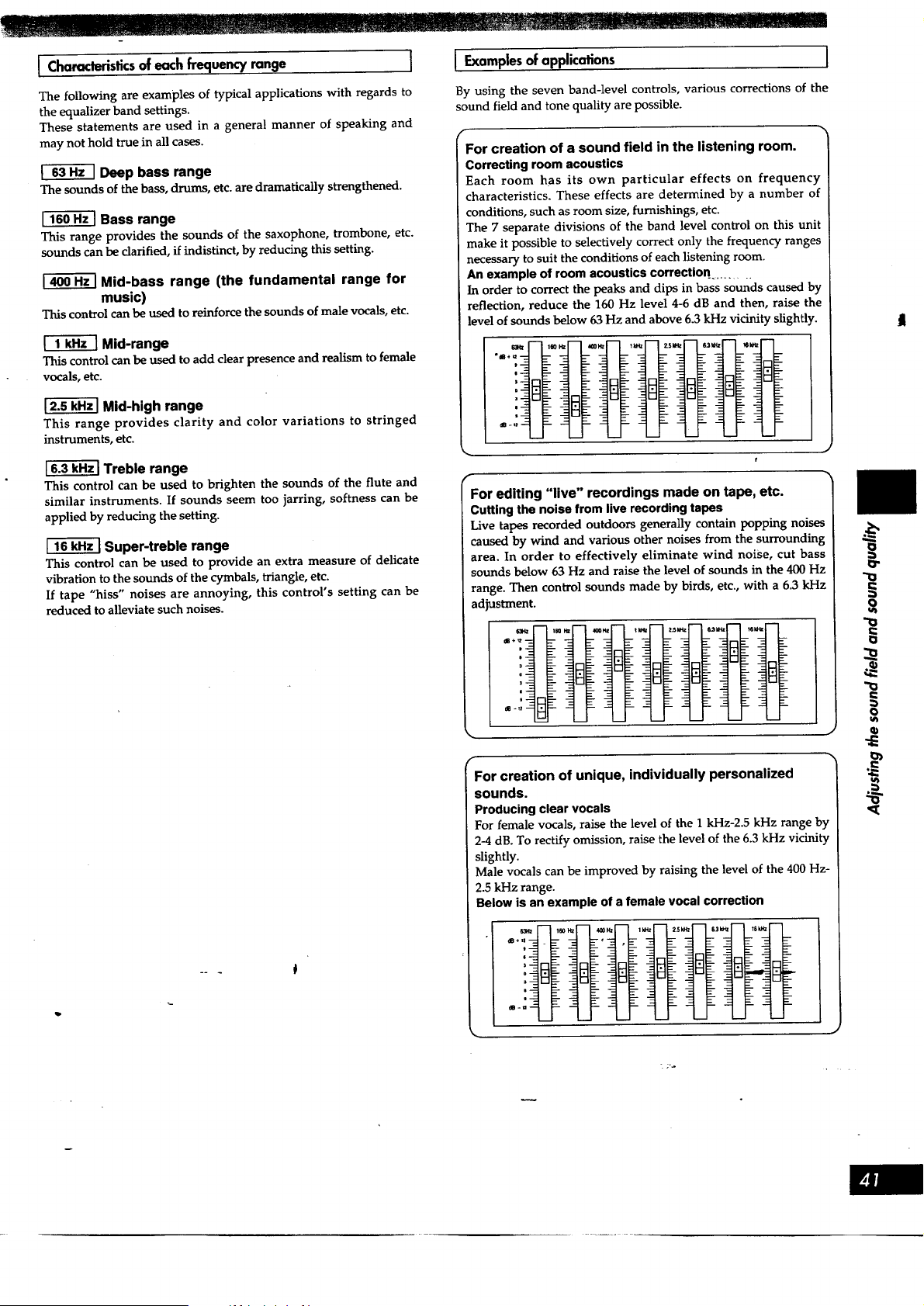
I Characteristics of each frequency range I
The following are examples of typical applications with regards to
the equalizer band settings.
These statements are used in a general manner of speaking and
may not hold true in all cases.
_-_ Deep bass range
The sounds of the bass, drums, etc. are dramatically strengthened.
Bass range
This range provides the sounds of the saxophone, trombone, etc.
sounds can be clarified, if indistinct, by reducing this setting.
Mid-bass range (the fundamental range for
music)
This control can be used to reinforce the sounds of male vocals, etc.
f-_ Mid-range
This control can be used to add clear presence and realism to female
vocals, etc.
Mid-high range
This range provides clarity and color variations to stringed
instruments, etc.
Treble range
This control can be used to brighten the sounds of the flute and
similar instruments. If sounds seem too jarring, softness can be
applied by reducing the setting.
r_ Super-treble range
This control can be used to provide an extra measure of delicate
vibration to the sounds of the cymbals, triangle, etc.
If tape "hiss" noises are annoying, this control's setting can be
reduced to alleviate such noises.
I Examplesof applications I
By using the seven band-level controls, various corrections of the
sound field and tone quality are possible.
f
For creation of a sound field in the listening room.
Correcting room acoustics
Each room has its own particular effects on frequency
characteristics. These effects are determined by a number of
conditions, such as room size, furnishings, etc.
The 7 separate divisions of the band level control on this unit
make it possible to selectively correct only the frequency ranges
necessary to suit the conditions of each listening room.
An example of room acoustics correction .........
In order to correct the peaks and dips in bass sounds caused by
reflection, reduce the 160 Hz level 4-6 dB and then, raise the
level of sounds below 63 Hz and above 6.3 kHz vicinity slightly.
f
J
f
For editing "live" recordings made on tape, etc.
Cutting the noise from live recording tapes
Live tapes recorded outdoors generally contain popping noises
caused by wind and various other noises from the surrounding
area. In order to effectively eliminate wind noise, cut bass
sounds below 63 Hz and raise the level of sounds in the 400 Hz
range. Then control sounds made by birds, etc., with a 6.3 kI-Iz
adjustment.
r
For creation of unique, individually personalized
sounds.
Producing clear vocals
For female vocals, raise the level of the I kHz-2.5 kHz range by
2-4 dB. To rectify omission, raise the level of the 6.3 kHz vicinity
slightly.
Male vocals can be improved by raising the ]evel of the 400 Hz-
2.5 kHz range.
Below is an example of a female vocal correction
o
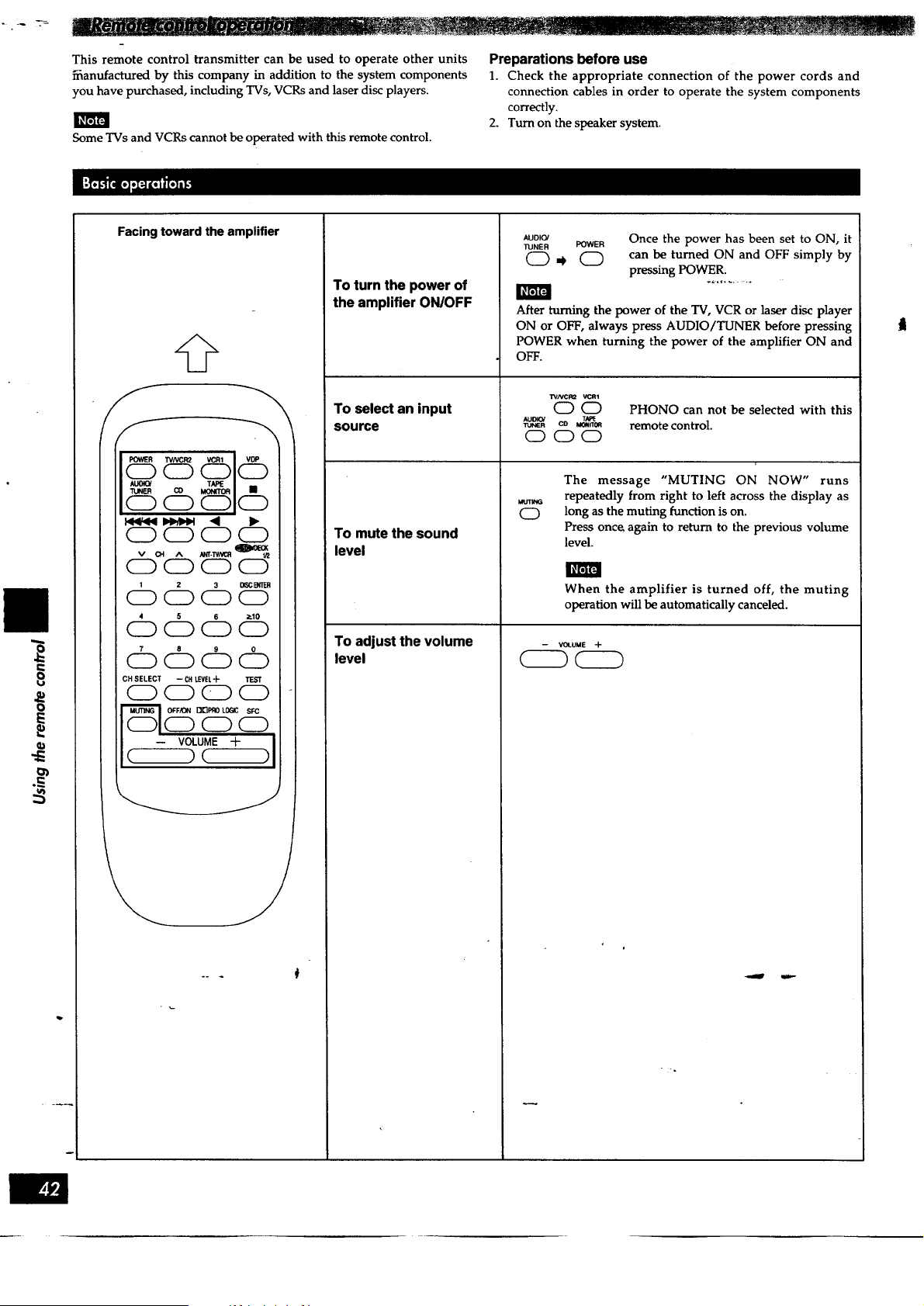
This remote control transmitter can be used to operate other units
_anufactured by this company in addition to the system components
you have purchased, including TVs, VCRs and laser disc players.
Some TVs and VCRs cannot be operated with this remote control.
Preparations before use
1. Check the appropriate connection of the power cords and
connection cables in order to operate the system components
correctly.
2. Turn on the speaker system.
O
O
Facing toward the amplifier
@
POWER TVNCR2 VCR1 ! VDP
CD CD CD CD
v CH A N_r.w/_
CD CD CD CD
4 5 6 P.10
ioooo
I 7 8 9 0
OOOO
I CH SELECT -- CHLEVEL'I- 1F-ST :
CDCDCDCD i-
-- VOLUME -F )11 i
C )¢-- ,
To turn the power of
the amplifier ON/OFF
AUDIO/
TUNER
O,,
To select an input
source
To mute the sound
level
To adjust the volume
level
POWER Once the power has been set to ON, it
0 can be turned ON and OFF simply by
pressing POWER.
After turning the power of the TV, VCR or laser disc player
ON or OFF, always press AUDIO/TUNER before pressing
POWER when turning the power of the amplifier ON and
OFF.
WNCR2 VCR1
OO
AU_ TN_
O
PHONO can not be selected with this
remote control.
When the amplifier is turned off, the muting
operation will be automatically canceled.
-- VOLUME -]-
The message "MUTING ON NOW" runs
repeatedly from right to left across the display as
long as the muting function is on.
Press onc_ again to return to the previous volume
level.
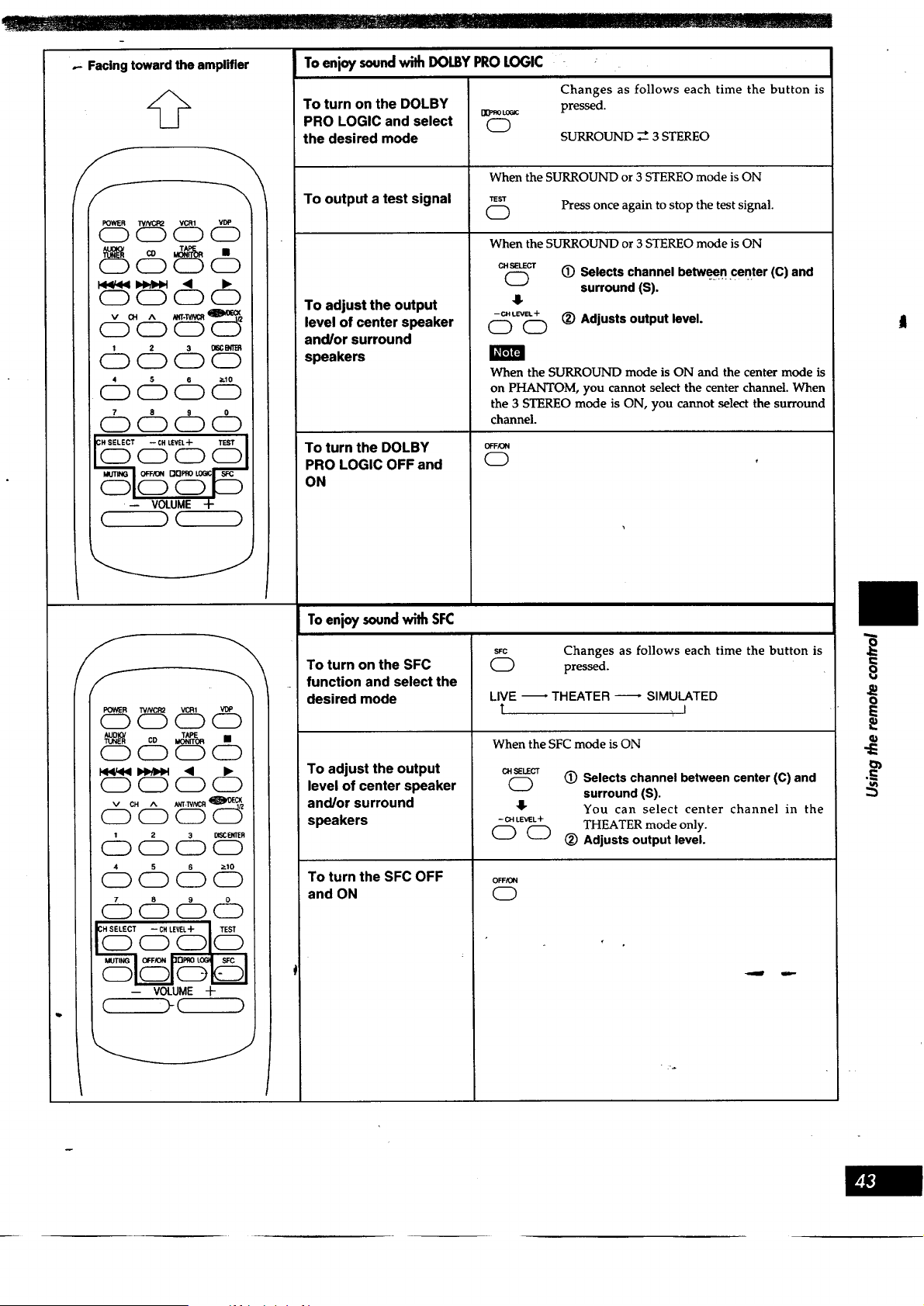
I Ir.........ZI............--:_:,".........i]I
.- Facing toward the amplifier
@
POWER "_/NCR2 VCR1 VDP
OOCDO
i_r;]FJ
7 8 9 0
OOOO
-- VOLUME -I-
( ) (--)
FOWER TVNCR2 VCR1 VDP
CD O CD CD
(ED CD O CD
CE) CD O CD
cb6dDS'
cbdDdD6
dD6cbdD
t(_T _)LE_ TEST
0
-- VOLUME -f-
J
Toenjoysoundwith DOLBYPROLOGIC
To turn on the DOLBY
PRO LOGIC and select
the desired mode
To output a test signal
To adjust the output
level of center speaker
and/or surround
speakers
To turn the DOLBY
PRO LOGIC OFF and
ON
[]_FflOLOGIC
O
Changes as follows each time the button is
pressed.
SURROUND _ 3 STEREO
When the SURROUND or 3 STEREO mode is ON
TEST
C) Press once again to stop the test signal.
When the SURROUND or 3 STEREO mode is ON
CH SELECT
C9
-- CH LEVIEL"1-
OO
(_) Selects channel between center (C) and
surround (S).
(_) Adjusts output level.
When the SURROUND mode is ON and the center mode is
on PHANTOM, you cannot select the center channel. When
the 3 STEREO mode is ON, you cannot select the surround
channel.
OFFION
O
Toenjoysoundwith SFC
To turn on the SFC
function and select the
desired mode
To adjust the output
level of center speaker
and/or surround
speakers
To turn the SFC OFF
and ON
SFC
O
Changes as follows each time the button is
pressed.
LIVE -- THEATER
T
SIMULATED
When the SFC mode is ON
CHSELECT
O
4_
-- CH LEVEL +
O0
(_) Selects channel between center (C) and
surround (S).
You can select center channel in the
THEATER mode only.
(_) Adjusts output level.
OFF/ON
0
i
o
I
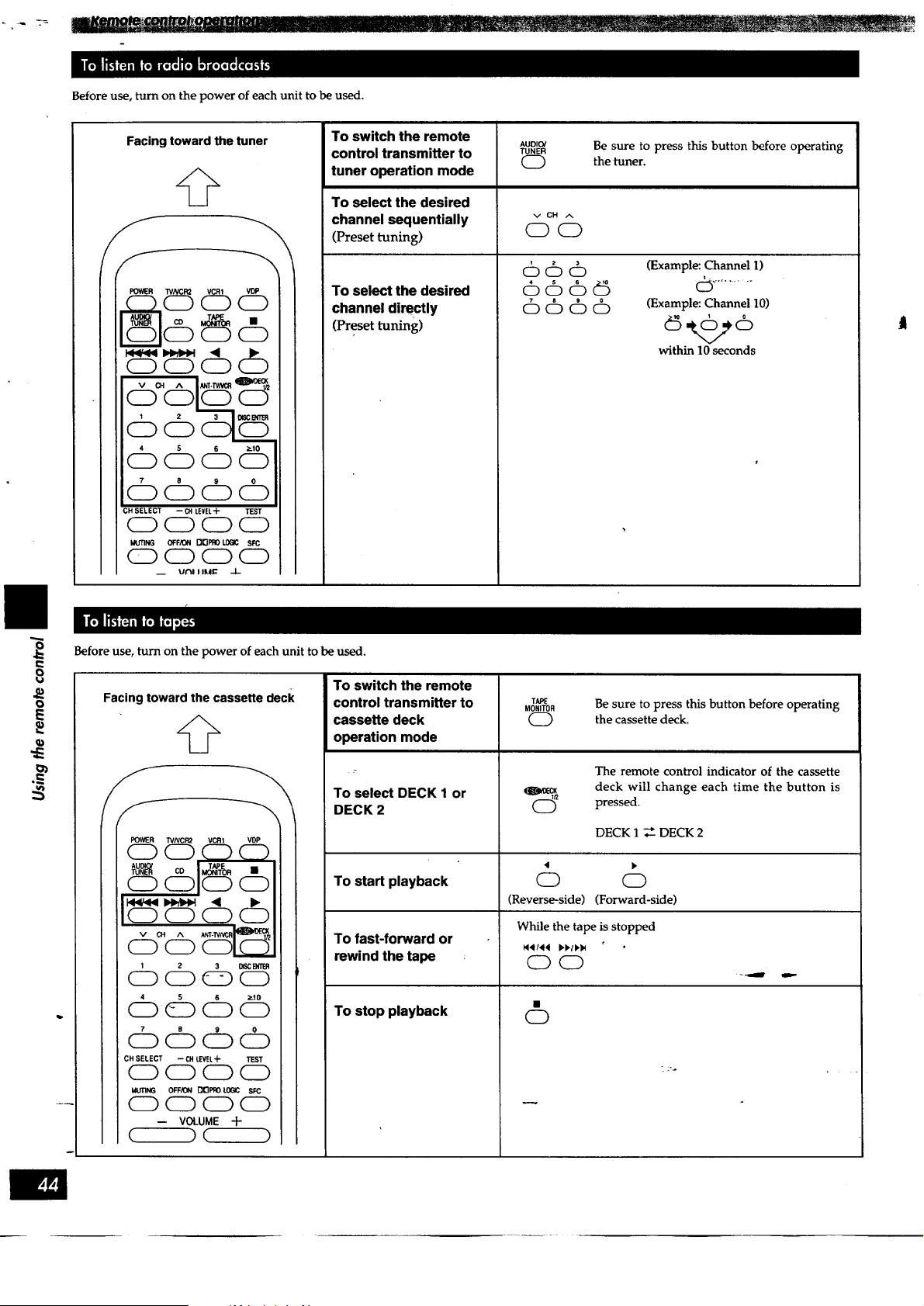
Before use, turn on the power of each unit to be used.
Facing toward the tuner
@
POWER WNCR2 VCR1 VDP
, CD CDCD
1
6(:b6
7 8 9 0
OOC)O
CH SELECT -- CHLEVEL+ TEST
0 C) 0 (Z)
MUTING OFF/ON rIOPRO L0(_C SFC
0000
_ Ui"_I I II11_ -I-
!
i
To switch the remote
control transmitter to
tuner operation mode
To select the desired
channel sequentially
(Preset tuning)
To select the desired
channel directly
(Preset tuning)
AUDIO/
TUNER
C)
cbcb6
6cb_
cbc:bcb @
Be sure to press this button before operating
the tuner.
(Example: Channel I)
(Example: Channel 10)
within 10 seconds
I
t,..
o
o
E
Before use, turn on the power of each unit to be used.
Facing toward the cassette deck
@
h
POWER TVNCR2 VCR1 VDP
CD
CDOCD
dDcbd
dDd dDd5
cb dD cb
CH SELECT --CH LEVEL+ TEST
0000
MLmNG OFF,_ON DI_PRO _ SFC
C) (ZE)0 (ZD
-- VOLUME +
c )c )
To switch the remote
control transmitter to
cassette deck
operation mode
To select DECK 1 or
DECK 2
To start playback
To fast-forward or
rewind the tape
To stop playback
TAPE
MONITOR
CD
Be sure to press this button before operating
the cassette deck.
The remote control indicator of the cassette
deck will change each time the button is
pressed.
DECK 1 _ DECK 2
O O
(Reverse-side) (Forward-side)
While the tape is stopped
C) CD
0
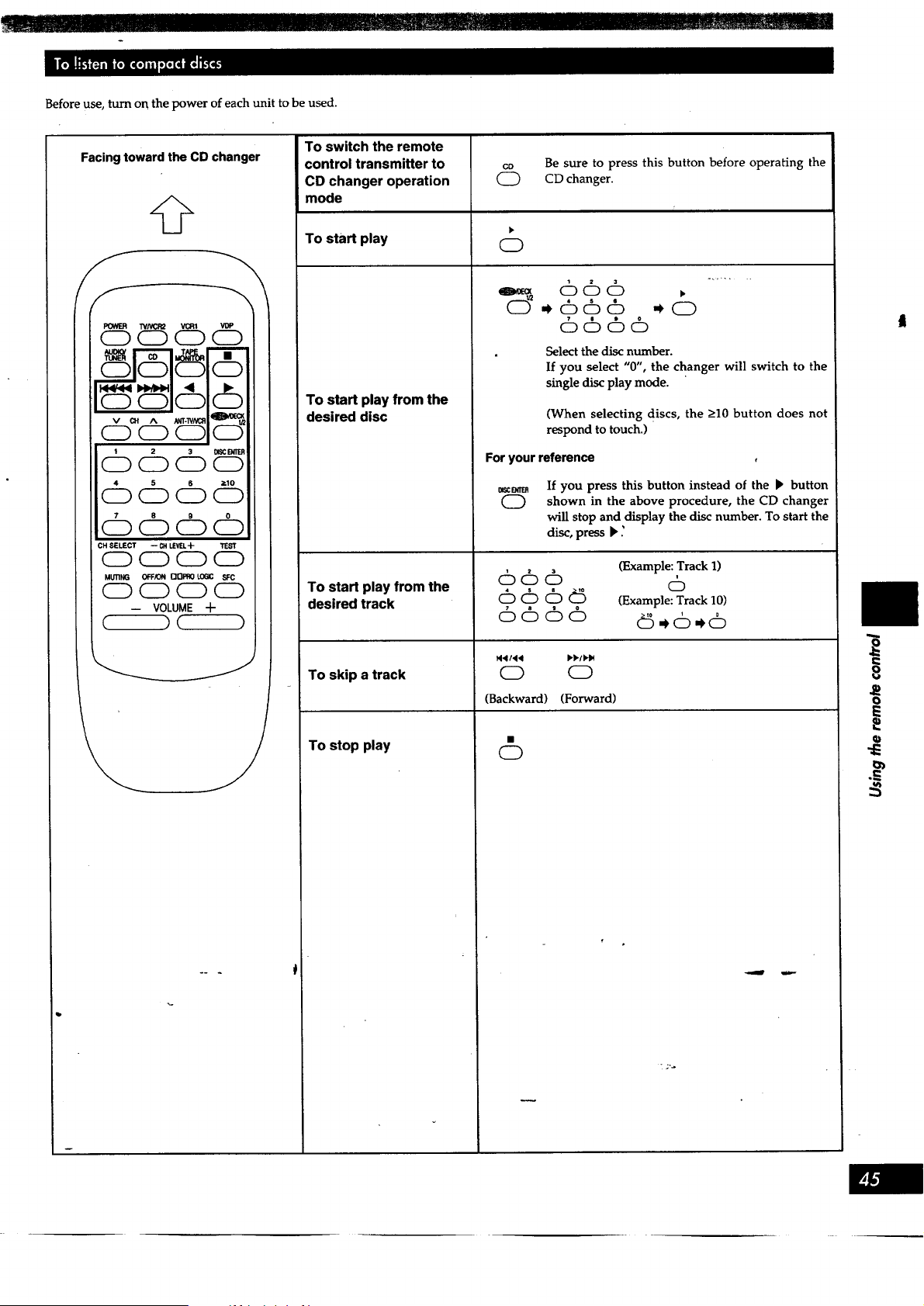
III_'111 !11IIIII ................. -II ........................................................................................... I......................
Before use, turn on the power of each unit to be used.
Facing toward the CD changer
@
7 8 9 0
OOOO
CH SELECT -- CH UEVEL-}- TEST
0 C) CZ) 0
MI.mNG OFFK_ []OPRO !.06IC SFC
OOCDCD
-- VOLUME -I-
( )( )
To switch the remote
control transmitter to
CD changer operation
mode
To start play
To start play from the
desired disc
To start play from the
desired track
To skip a track
To stop play
c_ Be sure to press this button before operating the
(_ CD changer.
0
666 >
6666
Select the disc number.
If you select "0", the changer will switch to the
single disc play mode.
(When selecting discs, the >10 button does not
respond to touch.)
For your reference
BSC B_ER
0
If you press this button instead of the _ button
shown in the above procedure, the CD changer
will stop and display the disc number. To start the
disc, press _ ._
66cb
666_
6666
(Example: Track 1)
6
(Example: Track 10)
N4/44 I,.b./P._
0 0
(Backward) (Forward)
0
e.
8
o
E
E
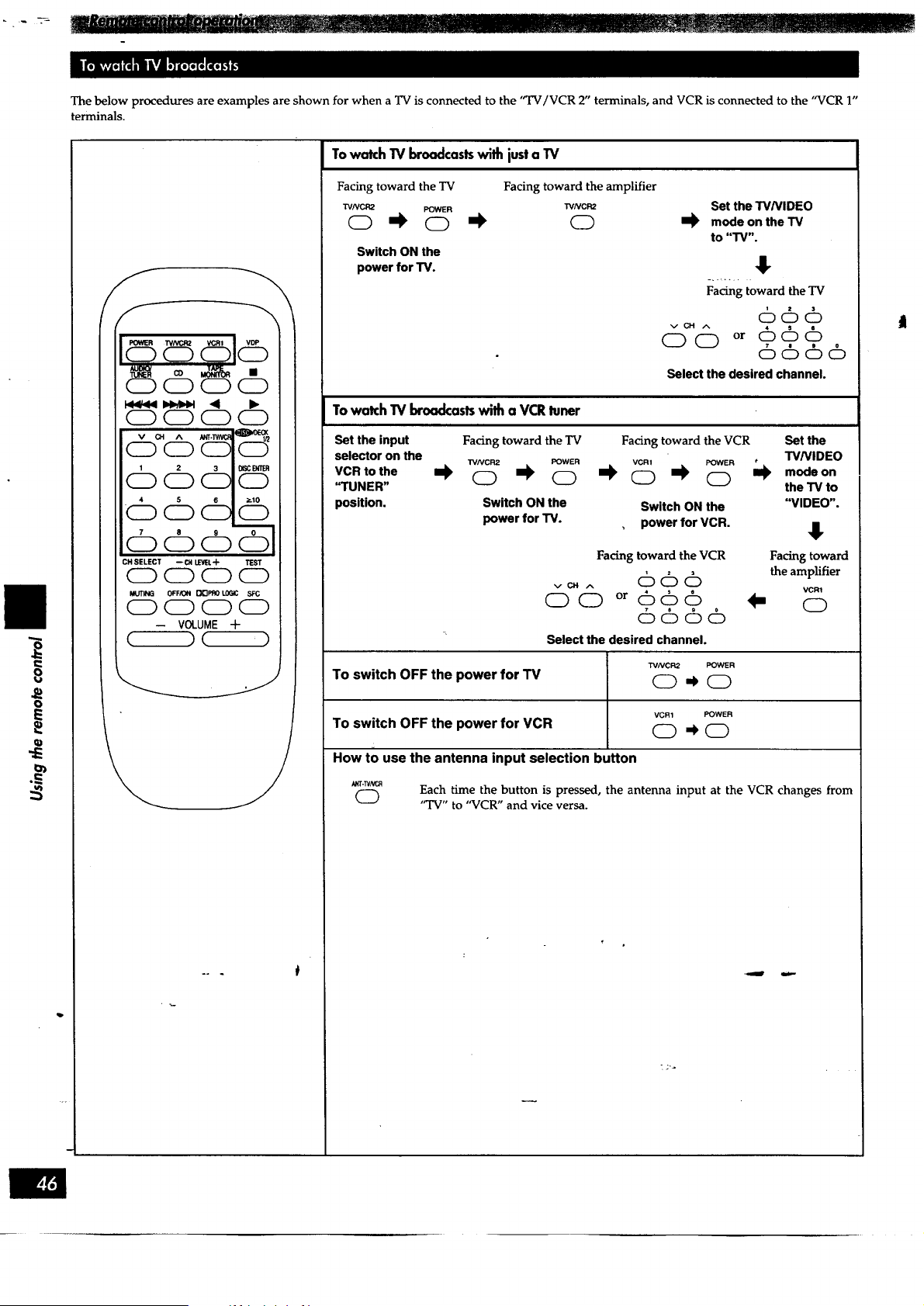
8
o
E
The below procedures are examples are shown for when a TV is connected to the "TV/VCR 2" terminals, and VCR is connected to the "VCR 1"
terminals.
CDC9
CD CD CD 0
c% cbc
4 5 6 ;_lO
:OOC 0
CH SELECT --CN I,L_RI.'-I-
CD CD CD CD
MUTING OFF/ON _3PRO lOGIC S,':C
0000
-- VOLUME Jr
,C )C ')
\
To watch TV broadcasts with just a TV
Facing toward the TV Facing toward the amplifier
WNCR2 POWER "rVNCR2
Switch ON the
power for "IV.
Set the W/VIDEO
m_ mode on the TV
to "TV".
!
Facing toward the TV
66cb
vCH ^
oo or 666
6666
Select the desired channel.
TowatchTV broadcastswith a VCRluner
Set the input Facing toward the TV Facing toward the VCR Set the
selector on the W/VIDEO
TVNCR2 POWER VCR1 POWER
VCRtothe I_ 0 I_ 0 _ 0 I_ 0 I1_ modeon
"TUNER" the TV to
position. Switch ON the Switch ON the "VIDEO".
power for TV. power for VCR.
Facing toward the VCR Facing toward
v¢n ,-, 6 6 6 the amplifier
VCR1
O0 °r 666 _ 0
6666
Select the desired channel.
TVNCR2 POWER
To switch OFF the power for TV 0 _ 0
VCR1 POWER
To switch OFF the power for VCR O -k O
How to use the antenna input selection button
0
Each time the button is pressed, the antenna input at the VCR changes from
"TV" to "VCR" and vice versa.
t
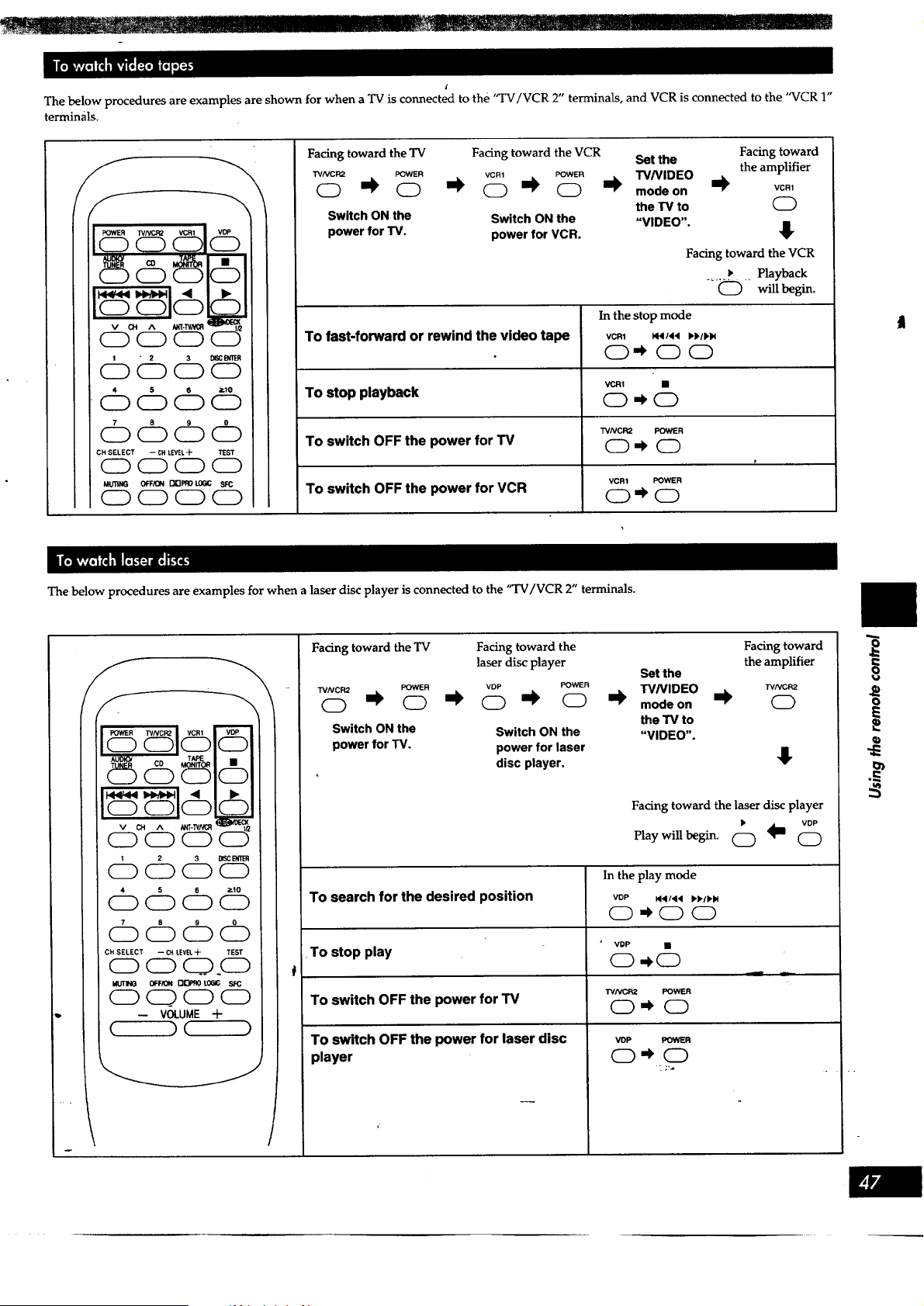
l
The below procedures are examples are shown for when a TV is connected to the "TV/VCR 2" terminals, and VCR is connected to the "VCR 1"
termin_ils.
/9 .gUU
19999
CD CZ) CZ) CZ)
© i
Facing toward the TV Facing toward the VCR
TVNCR2 POWER VCR1 POWER
o '_ o o ,,k o -I_
Switch ON the Switch ON the
power for TV. power for VCR.
Set the Facing toward
W/VIDEO the amplifier
I_ mode on I_ vc.,
the TV to (_
"VIDEO".
Facing toward the VCR
_, Playback
....C_) will begin.
In the stop mode
To fast-forward or rewind the video tape vcm ,_4 **t,u
O,_OO
To stop playback _) ,_ &
TVNCR2 POWER
To switch OFF the power for TV C_ -k (_m
t
VCR1 POWER
To switch OFF the power for VCR O -k O
The below procedures are examples for when a laser disc player is connected to the "TV/VCR 2" terminals.
45& &
I__1 < •
c3 c31c3 o_0__,
cbcbcb
cb cb cb c%
cb cb cb cb
; CH SELECT -- CHLEVELq- TEST
o o O_(_
MUTING 0_F/0_ [_PflO L061C SFC
o(_oo
, -- VOLUME +
(_) ( )
/
t
Facing toward the "IV
TVNCR2 POWER
(D "_ (D
Switch ON the
power for TV.
Facing toward the Facing toward
laser disc player the amplifier
Set the
VDP POWER TVNIDEO rvNc_z
I_ (_ I_ (_ I_ modeon i_ (_)
the TV to
Switch ON the "VIDEO".
power for laser
disc player. _!"
To search for the desired position
To stop play
To switch OFF the power for TV
To switch OFF the power for laser disc
player
Facing toward the laser disc player
VOPPlay will begin. _ll C:)
In the play mode
VDP M4/44 b'_/bM
(_) -_ C) C)
VDP •
WNCR2 POWER
O-_O
voP POWER
0,_ 0
o
o
o>
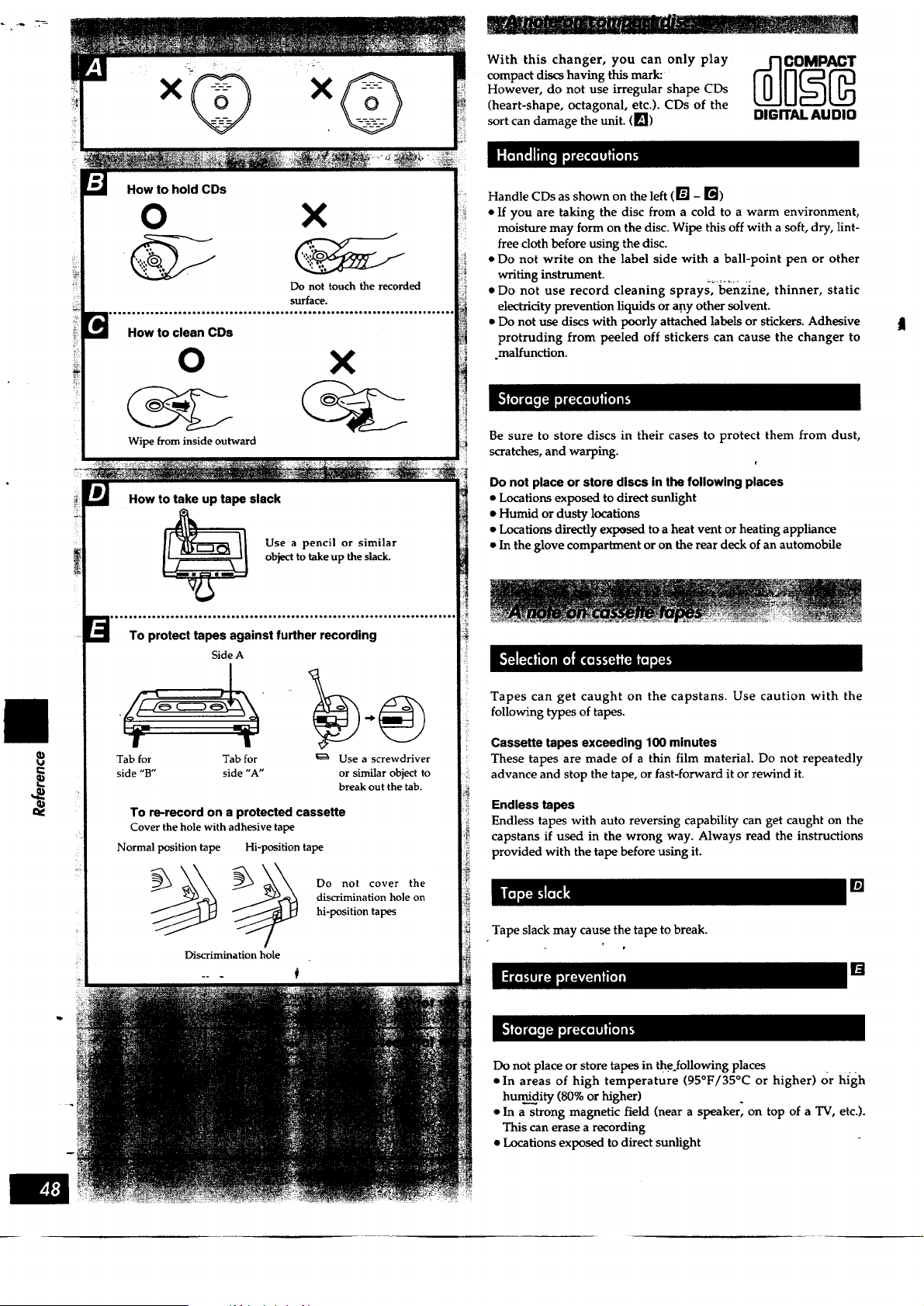
e.
P
How to hold CDs
O
How to clean CDs
X
Do not touch the recorded
surface.
0 X
Wipe from inside outward
How to take up tape slack
Use a pencil or similar
object to take up the slack.
To protect tapes against further recording
Side A
Tab for Tab for _ Use a screwdriver
side "B" side "A" or similar object to
break out the tab.
To re-record on a protected cassette
Cover the hole with adhesive tape
Normal position tape Hi-position tape
_ Do not cover the
discrimination hole on
hi-position tapes
Discrimination hole
With this changer, you can only play
compact discs having this mark:
However, do not use irregular shape CDs
(heart-shape, octagonal, etc.). CDs of the
sort can damage the unit. (1_)
DIGITAL AUDIO
Handle CDs as shown on the left (_] - r_)
• if you are taking the disc from a cold to a warm environment,
moisture may form on the disc. Wipe this off with a soft, dry, lint-
free cloth before using the disc.
• Do not write on the label side with a ball-point pen or other
writing instrument.
• Do not use record cleaning sprays_'benzine, thinner, static
electricity prevention liquids or any other solvent.
• Do not use discs with poorly attached labels or stickers. Adhesive
protruding from peeled off stickers can cause the changer to
.malfunction.
Be sure to store discs in their cases to protect them from dust,
scratches, and warping.
Do not place or store discs in the following places
• Locations exposed to direct sunlight
• Humid or dusty locations
• Locations directly exposed to a heat vent or heating appliance
• In the glove compartment or on the rear deck of an automobile
Tapes can get caught on the capstans. Use caution with the
following types of tapes.
Cassette tapes exceeding 100 minutes
These tapes are made of a thin film material. Do not repeatedly
advance and stop the tape, or fast-forward it or rewind it.
Endless tapes
Endless tapes with auto reversing capability can get caught on the
capstans if used in the wrong way. Always read the instructions
provided with the tape before using it.
[]
Tape slack may cause the tape to break.
[]
Do not place or store tapes in theJollowing places .......
• In areas of high temperature (95°F/35°C or higher) or high
hurm.rm._ity(80% or higher)
• In a strong magnetic field (near a speaker_ on top of a TV, etc.).
This can erase a recording
• Locations exposed to direct sunlight
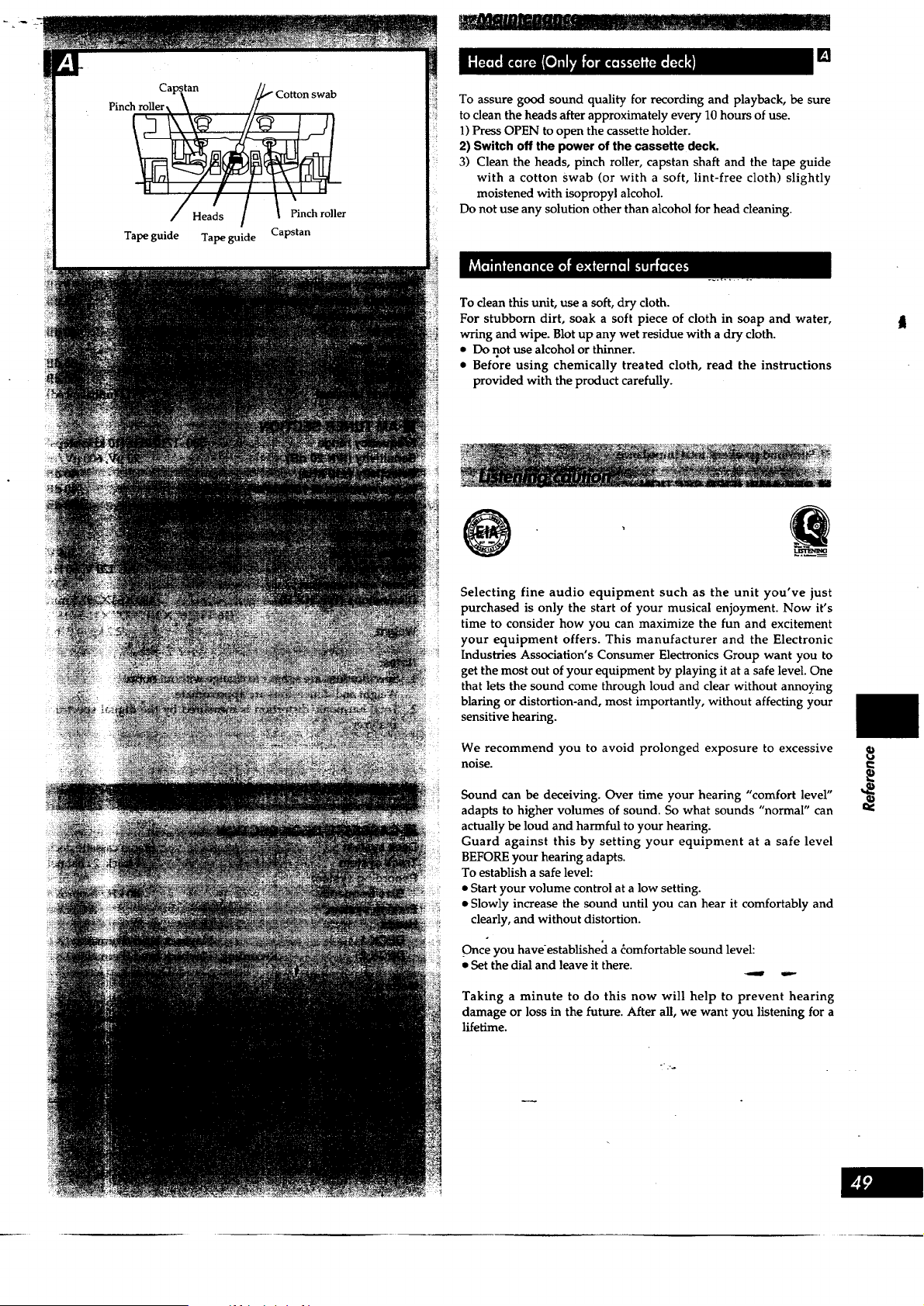
[]
To assure good sound quality for recording and playback, be sure
to clean the heads after approximately every 10 hours of use.
1) Press OPEN to open the cassette holder.
2) Switch off the power of the cassette deck.
3) Clean the heads, pinch roller, capstan shaft and the tape guide
with a cotton Swab (or with a soft, lint-free cloth) slightly
moistened with isopropyl alcohol.
Do not use any solution other than alcohol for head cleaning.
To clean this unit, use a soft, dry cloth.
For stubborn dirt, soak a soft piece of cloth in soap and water,
wring and wipe. Blot up any wet residue with a dry cloth.
• Do not use alcohol or thinner.
• Before using chemically treated cloth, read the instructions
provided with the product carefully.
@
Selecting fine audio equipment such as the unit you've just
purchased is only the start of your musical enjoyment. Now it's
time to consider how you can maximize the fun and excitement
your equipment offers. This manufacturer and the Electronic
Industries Association's Consumer Electronics Group want you to
get the most out of your equipment by playing it at a safe level. One
that lets the sound come through loud and clear without annoying
blaring or distortion-and, most importantly, without affecting your
sensitive hearing.
We recommend you to avoid prolonged exposure to excessive
noise.
Sound can be deceiving. Over time your heating "comfort level"
adapts to higher volumes of sound. So what sounds "normal" can
actually be loud and harmful to your hearing.
Guard against this by setting your equipment at a safe level
BEFORE your hearing adapts.
To establish a safe level:
• Start your volume control at a low setting.
• Slowly increase the sound until you can hear it comfortably and
clearly, and without distortion.
Once you haveestablisheci a domfortable sound level:
• Set the dial and leave it there.
Taking a minute to do this now will help to prevent hearing
damage or loss in the future. After all, we want you listening for a
lifetime.
o-:.
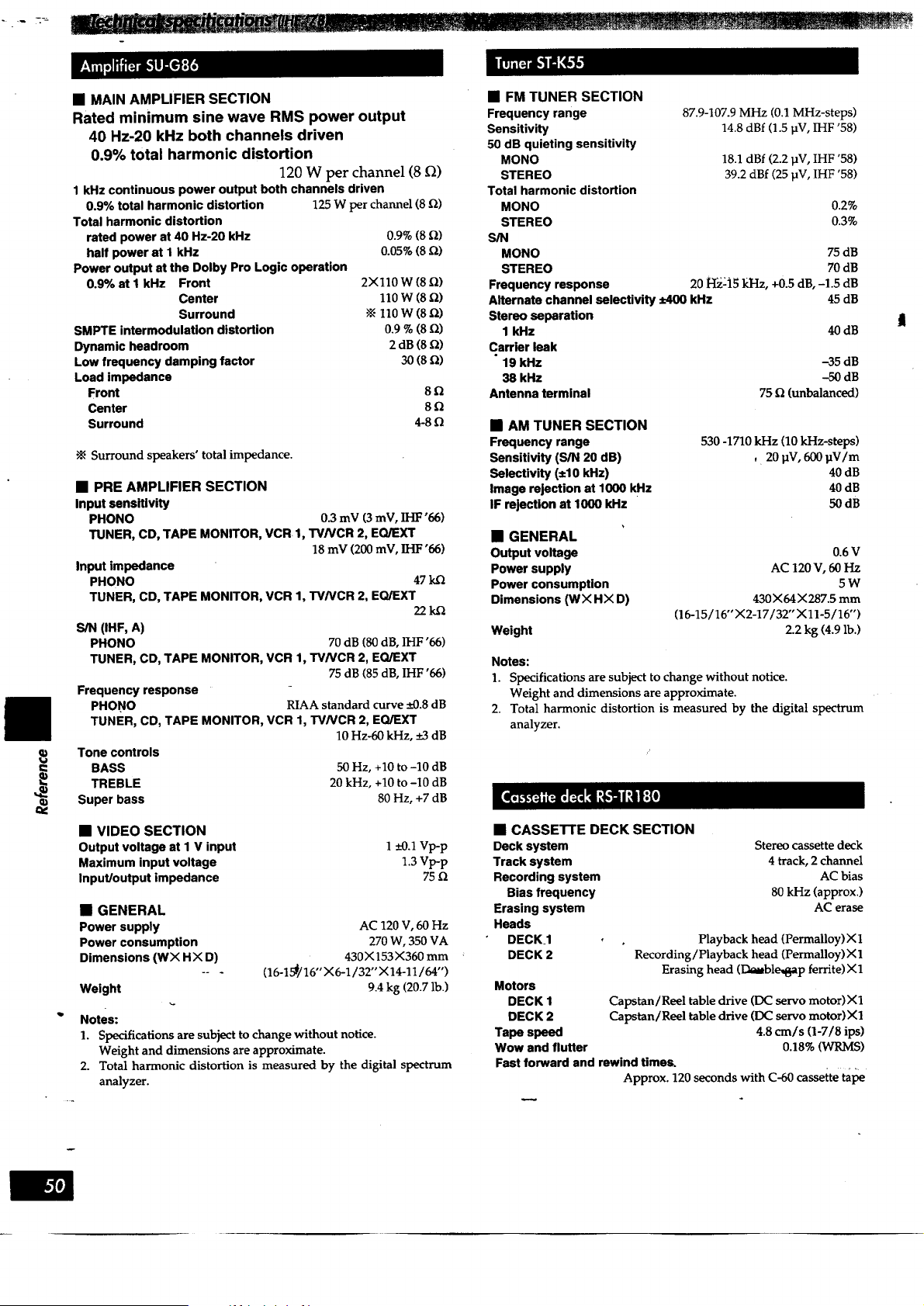
• MAIN AMPLIFIER SECTION
Rated minimum sine wave RMS power output
40 Hz-20 kHz both channels driven
0.9% total harmonic distortion
120 W per channel (8 _)
1 kHz continuous power output both channels driven
0.9% total harmonic distortion 125W perchannel(8 _)
Total harmonic distortion
rated power at 40 Hz-20 kHz 0.9% (8 [Z)
half power at I kHz 0.05% (8 _)
Power output at the Dolby Pro Logic operation
0.9% at I kHz Front 2Xl10 W (8 _)
Center 110 W (8 _)
Surround -_ 110 W (8 _2)
SMPTE intermodulation distortion 0.9 % (8 _)
Dynamic headroom 2 dB (8 Q)
Low frequency damping factor 30 (8 Q)
Load impedance
Front 8
Center 8
Surround 4-8
•_ Surround speakers' total impedance.
• PRE AMPLIFIER SECTION
Input sensitivity
PHONO 0.3 mV (3 mV, IHF'06)
TUNER, CD, TAPE MONITOR, VCR 1, TWVCR 2, EQ/EXT
18 mV (200 mV, IHF '66)
Input impedance
PHONO 47 k.Q
TUNER, CD, TAPE MONITOR, VCR 1, TV/VCR 2, EQ/EXT
22KQ
S/N (IHF, A)
PHONO 70 dB (80 dB, IHF '66)
TUNER, CO, TAPE MONITOR, VCR 1, TV/VCR 2, EQJEXT
75 dB (85 dB, IHF '66)
Frequency response
PHONO RIAA standard curve :k0.8 dB
TUNER, CD, TAPE MONITOR, VCR 1, TVNCR 2, EQ/EXT
10 Hz-60 kHz, +_3dB
Tone controls
BASS 50 Hz, +10 to -10 dB
TREBLE 20 kHz, +10 to -10 dB
Super bass 80 Hz, +7 dB
• VIDEO SECTION
Output voltage at I V input
Maximum input voltage
Input/output impedance
1 _+0.1Vp-p
1.3 Vp-p
75
• GENERAL
Power supply
Power consumption
Dimensions (WX HX D)
Weight
AC 120 V, 60 Hz
270 W, 350 VA
430X153X360 mm
(16-15_/16"X6-1/32" X14-11/64")
9.4 kg (20.7 lb.)
Notes:
1. Specifications are subject to change without notice.
Weight and dimensions are approximate.
2. Total harmonic distortion is measured by the digital spectrum
analyzer.
• FM TUNER SECTION
Frequency range
Sensitivity
50 dB quieting sensitivity
MONO
STEREO
Total harmonic distortion
MONO
STEREO
S/N
MONO
STEREO
Frequency response
Alternate channel selectivity _ kHz
Stereo separation
1 kHz
Carrier leak
• 19 kHz
38 kHz
Antenna terminal
87.9-107.9 MHz (0.1 MHz-steps)
14.8 dBf (1.5 pV, IHF '58)
18.1 dBf (2.2 ]JV, IHF '58)
39.2 dBf (25 pV, IHF '58)
0.2%
0.3%
75 dB
70 dB
20 H_.2i5 kHz, +0.5 dB, -1.5 dB
45 dB
40 dB
-35 dB
-50 dB
75 Q (unbalanced)
• AM TUNER SECTION
Frequency range
Sensitivity (S/N 20 dB)
Selectivity (+10 kHz)
Image rejection at 1000 kHz
IF rejection at 1000 kHz
530 -1710 kHz (10 kHz-steps)
, 20 IW, 600 pV/m
40 dB
40 dB
50dB
• GENERAL
Output voltage 0.6 V
Power supply AC 120 V, 60 Hz
Power consumption 5 W
Dimensions (WX HX D) 430X&t X287.5 mm
(16-15/16" X2-17/32" Xl1-5/16")
Weight 2.2 kg (4.9 lb.)
Notes:
1. Specifications are subject to change without notice.
Weight and dimensions are approximate.
2. Total harmonic distortion is measured by the digital spectrum
analyzer.
• CASSETTE DECK SECTION
Deck system
Track system
Recording system
Bias frequency
Erasing system
Heads
DECK1
DECK 2
Motors
DECK 1
DECK 2
Tape speed
Wow end flutter
Stereo cassette deck
4 track, 2 channel
AC bias
80 kHz (approx.)
AC erase
Playback head (Permalloy) X 1
Recording/Playback head (Permalloy) X 1
Erasing head (Dauble,,_p ferrite) X1
Capstan/Reel table drive (DC servo motor)X 1
Capstan/Reel table drive (DC servo motor)X1
4.8 cm/s (1-7/8 ips)
0.18% (WRMS)
Fast forward and rewind times.
Approx. 120 seconds with C-60 cassette tape
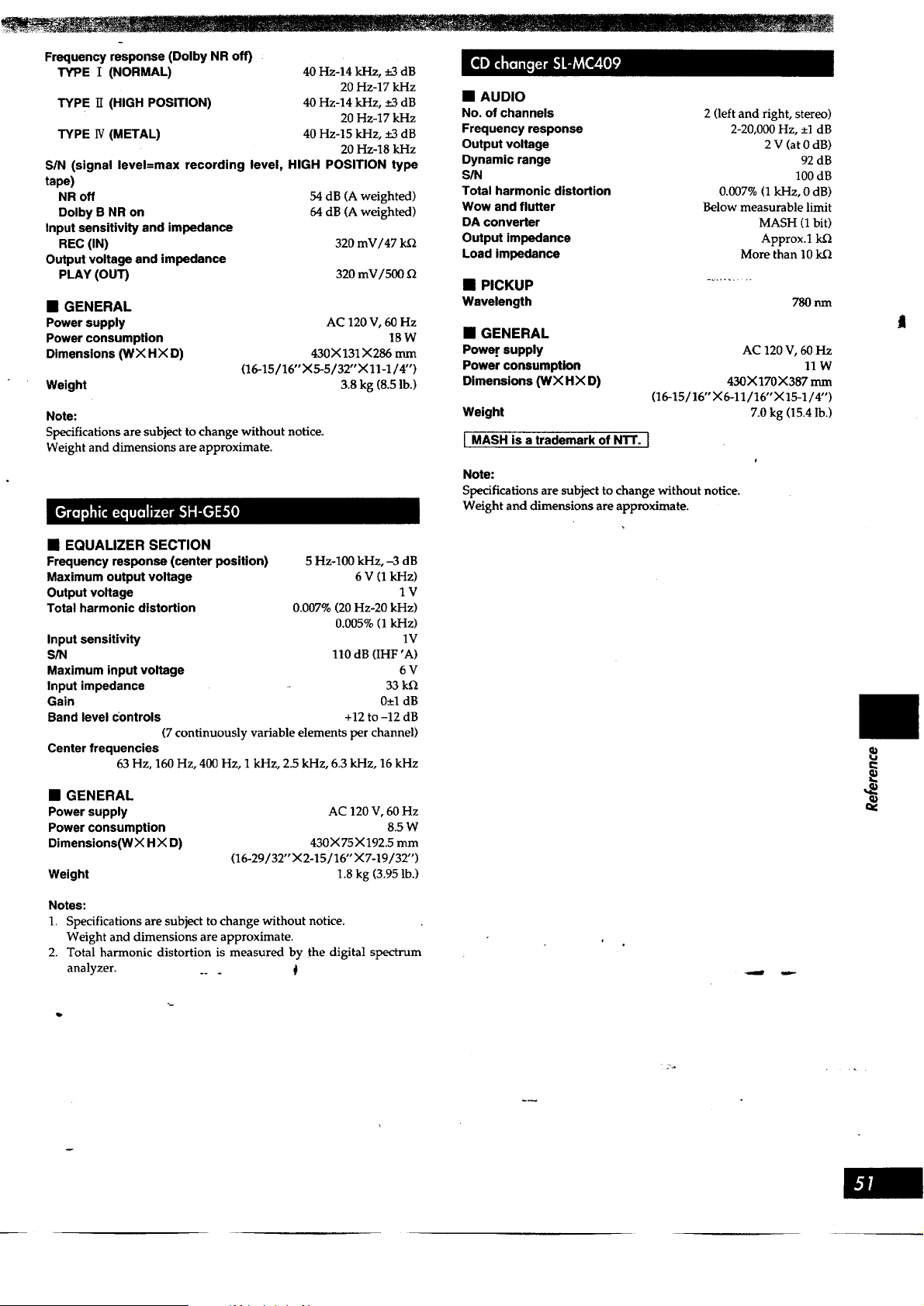
Frequency response (Dolby NR off)
TYPE I (NORMAL)
TYPE 1I (HIGH POSITION)
TYPE 1V(METAL)
40 Hz-14 kHz, _ dB
20 Hz-17 kHz
40 Hz-14 kHz, +_3dB
20 Hz-17 kHz
40 Hz-15 kHz, +_3dB
20 Hz-18 kHz
S/N (signal level=max recording level, HIGH POSITION type
tape)
NR off 54 dB (A weighted)
Dolby B NR on 64 dB (A weighted)
Input sensitivity and impedance
REC (IN) 320 mV/47 k_2
Output voltage and impedance
PLAY (OUT) 320 mV/500
• GENERAL
Power supply
Power consumption
Dimensions (WX HX D)
Weight
AC 120 V, 60 Hz
18W
430X 131 X286 mm
(16-15 / 16" X5-5/32" X 11-1/4")
3.8 kg (8.5 lb.)
Note:
Specifications are subject to change without notice.
Weight and dimensions are approximate.
• EQUALIZER SECTION
Frequency response (center position)
Maximum output voltage
Output voltage
Total harmonic distortion
Input sensitivity
S/N
Maximum input voltage
Input impedance
Gain
Band level Controls
5 Hz-100 kHz, -3 dB
6 V (1 kHz)
1V
0.007% (20 Hz-20 kHz)
0.005% (1 kHz)
1V
110 dB (IHF 'A)
6V
33 kQ
0+1 dB
+12 to -12 dB
(7 continuously variable elements per channel)
Center frequencies
63 Hz, 160 Hz, 400 Hz, 1 kHz, 2.5 kHz, 6.3 kHz, 16 kHz
• GENERAL
Power supply
Power consumption
Dimensions(WX H X D)
Weight
AC 120V, 60 Hz
8.5 W
430X75X192.5 mm
(16-29/32" X2-15/16" X7-19/32")
1.8 kg (3.95 lb.)
Notes:
1. Specifications are subject to change without notice.
Weight and dimensions are approximate.
2. Total harmonic distortion is measured by the digital spectrum
analyzer. .. _ I!
• AUDIO
No. of channels
Frequency response
Output voltage
Dynamic range
SIN
Total harmonic distortion
Wow and flutter
DA converter
Output impedance
Load impedance
• PICKUP
Wavelength
2 (left and right, stereo)
2-20,000 Hz, -+1dB
2 V (at 0 dB)
92 dB
100 dB
0.007% (1 kHz, 0 dB)
Below measurable limit
MASH (1 bit)
Approx.1 k.Q
More than 10 k.Q
780 nm
• GENERAL
Power supply
Power consumption
Dimensions (WX HX D)
Weight
I MASH is a trademark of NTT. I
AC 120 V, 60 Hz
llW
430X170X387 mm
(16-15/16" ;<6-11/16"X15-1/4")
7.0 kg (15.4 lb.)
Note:
Specifications are subject to change without notice.
Weight and dimensions are approximate.
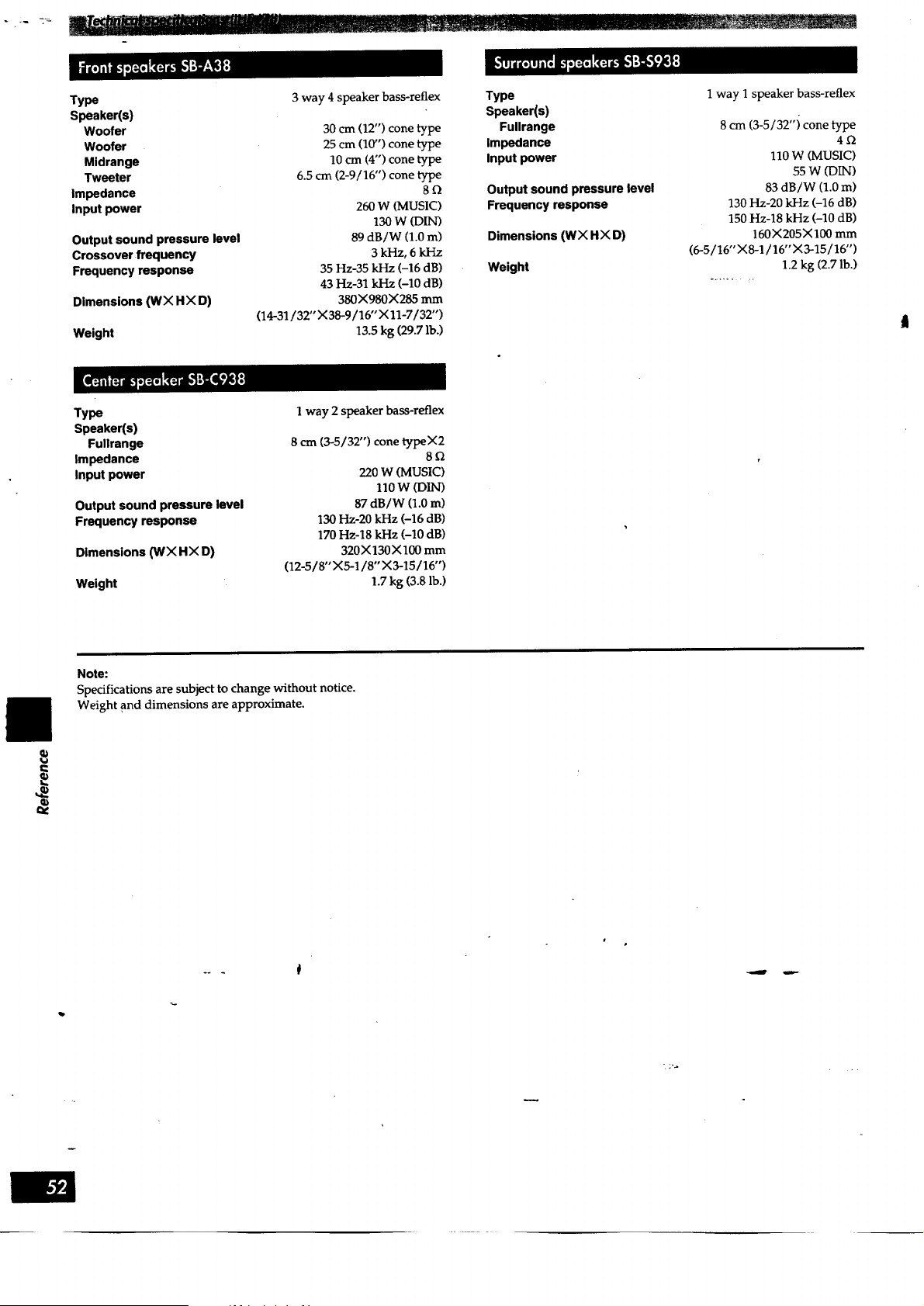
Type 3 way 4 speaker bass-reflex Type 1 way I speaker bass-reflex
Speaker(s) Speaker(s)
Woofer 30 cm (12") cone type Fullrange 8 cm (3-5/32"i cone type
Woofer 25 cm (1if') cone type Impedance 4
Midrange 10 cm (4") cone type Input power 110 W (MUSIC)
Tweeter 6.5 cm (2-9/16") cone type 55 W (DIN)
Impedance 8 _ Output sound pressure level 83 dB/W (1.0 m)
Input power 260 W (MUSIC) Frequency response 130 Hz-20 kHz (-16 dB)
130 W (DIN) 150 Hz-18 kHz (-10 dB)
Output sound pressure level 89 dB/W (1.0 m) Dimensions (WX HX D) 160X205X100 mm
Crossover frequency 3 kHz, 6 kI-tz (6-5/16"X8-1/16"X3-15/16")
Frequency response 35 Hz-35 kHz (-16 dB) Weight 1.2 kg (2.7 lb.)
43 Hz-31 kHz (-10 dB) ...... :
380X980X285 mm
(14-31/32"X38-9/16" X 11-7/32")
13.5 kg (29.7 lb.)
Dimensions (WX HX D)
Weight
Type
Speaker(s)
Fullrange
Impedance
Input power
Output sound pressure level
Frequency response
Dimensions (INX HX D)
Weight
1 way 2 speaker bass-reflex
8 cm (3-5/32") cone typeX2
8Q
220 W (MUSIC)
110 W (DIN)
87 dB/W (1.0 m)
130 Hz-20 kHz (-16 dB)
170 Hz-18 kHz (-I0 dB)
320X130X100 mm
(12-5/8"X5-1/8"X3-15/16")
1.7 kg (3.8 lb.)
Note:
Specifications are subject to change without notice.
Weight and dimensions are approximate.
]
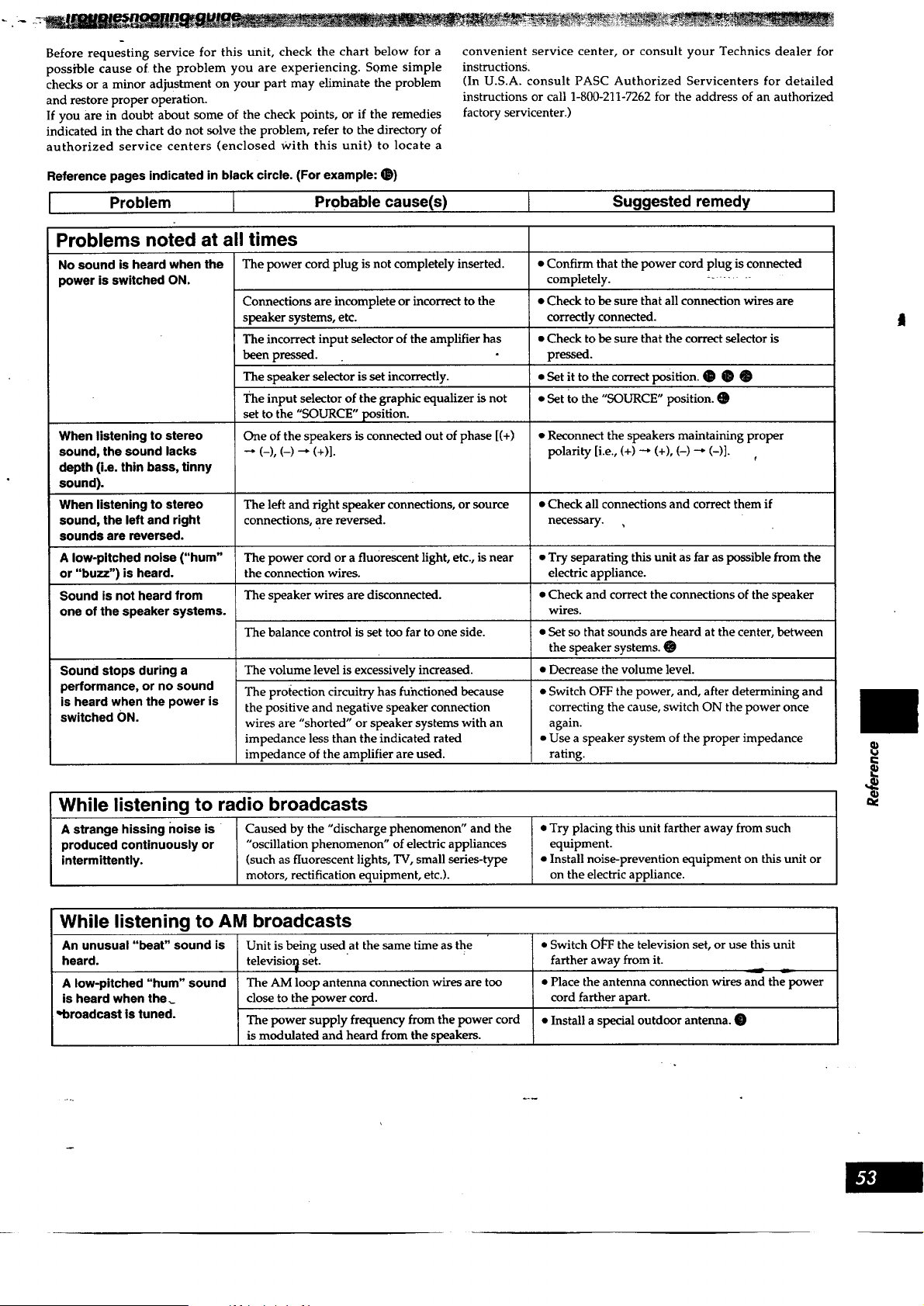
Before requesting service for this unit, check the chart below for a
possible cause of the problem you are experiencing. Some simple
checks or a minor adjustment on your part may eliminate the problem
and restore proper operation.
If you are in doubt about some of the check points, or if the remedies
indicated in the chart do not solve the problem, refer to the directory of
authorized service centers (enclosed With this unit) to locate a
convenient service center, or consult your Technics dealer for
instructions.
(In U.S.A. consult PASC Authorized Servicenters for detailed
instructions or call 1-800-211-7262 for the address of an authorized
factory servicenter.)
Reference pages indicated in black circle. (For example: O)
I Problem I Probable cause(s)
Suggested remedy
Problems noted at all
No sound is heard when the
power is switched ON.
When listening to stereo
sound, the sound lacks
depth (i.e. thin bass, tinny
sound).
When listening to stereo
sound, the left and right
sounds are reversed.
times
The power cord plug is not completely inserted.
Connections are incomplete or incorrect to the
speaker systems, etc.
The incorrect input selector of the amplifier has
been pressed.
The speaker selector is set incorrectly.
The input selector of the graphic equalizer is not
set to the "SOURCE" position.
One of the speakers is connected out of phase [(+)
--, (_), (-) _ (+)1.
• Confirm that the power cord plug is connected
completely. -.........
• Check to be sure that all connection wires are
correctly connected.
• Check to be sure that the correct selector is
pressed.
• Set it to the correct position. O _
• Set to the "SOURCE" position. •
• Reconnect the speakers maintaining proper
polarity [i.e., (+) _ (+), (-) _ (-)].
The left and right speaker connections, or source • Check all connections and correct them if
connections, are reversed, necessary. ,
A low-pitched noise ("hum" The power cord or a fluorescent light, etc., is near • Try separating this unit as far as possible from the
or "buzz") is heard, the connection wires, electric appliance.
Sound is not heard from The speaker wires are disconnected. • Check and correct the connections of the speaker
one of the speaker systems, wires.
The balance control is set too far to one side. • Set so that sounds are heard at the center, between
the speaker systems.
Sound stops during a The volume level is excessively increased. • Decrease the volume level.
performance, or no sound The protection circuitry has fuhctioned because • Switch OFF the power, and, after determining and
is heard when the power is the positive and negative speaker connection correcting the cause, switch ON the power once
switched ON.
wires are "shorted" or speaker systems with an again.
impedance less than the indicated rated • Use a speaker system of the proper impedance
impedance of the amplifier are used. rating.
While listening to radio broadcasts
A strange hissing noise is " Caused by the "discharge phenomenon" and the • Try placing this unit farther away from such
produced continuously or "oscillation phenomenon" of electric appliances equipment.
intermittently. (such as fluorescent lights, TV, small series-type • Install noise-prevention equipment on this unit or
motors, rectification equipment, etc.), on the electric appliance.
€
While listening to AM broadcasts
An unusual "beat" sound is Unit is being used at the same time as the
heard, televisio_ set.
The AM loop antenna connection wires are too
close to the power cord.
The power supply frequency from the power cord
is modulated and heard from the speakers.
A low-pitched "hum" sound
is heard when the
-broadcast is tuned.
• Switch OI_-'Fthe television set, or use this unit
farther away from it.
• Place the antenna connection wires and the power
cord farther apart.
• Install a special outdoor antenna.
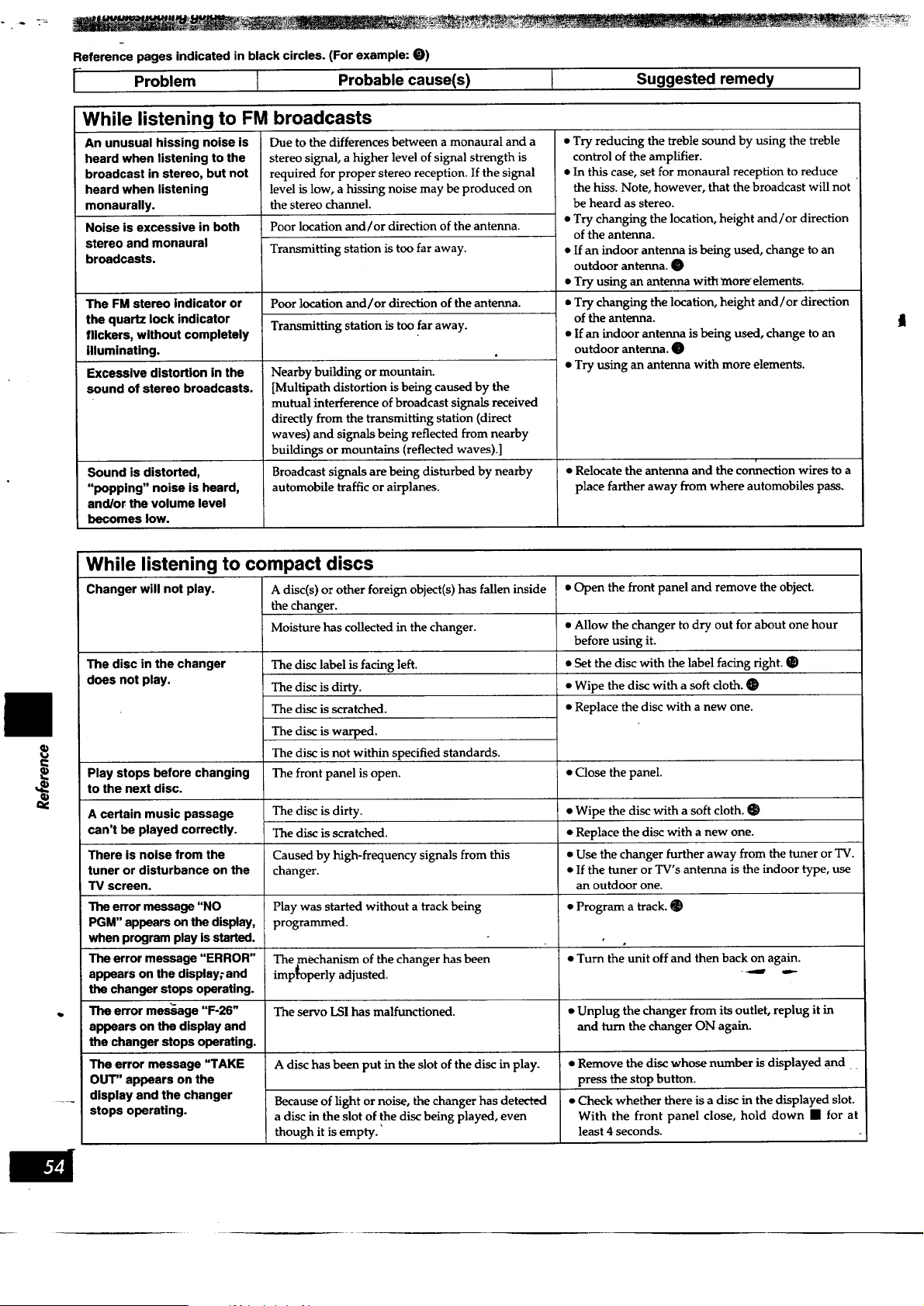
Reference pages indicated in black circles. (For example: 0)
I- Problem I Probable cause(s) I Suggested remedy I
While listening to FM broadcasts
An unusual hissing noise is
heard when listening to the
broadcast in stereo, but not
heard when listening
monaurally.
Noise is excessive in both
stereo and monaural
broadcasts.
The FM stereo indicator or
the quartz lock indicator
flickers, without completely
illuminating.
Excessive distortion in the
sound of stereo broadcasts.
Due to the differences between a monaural and a
stereo signal, a higher level of signal strength is
required for proper stereo reception. If the signal
level is low, a hissing noise may be produced on
the stereo channel.
Poor location and/or direction of the antenna.
Transmitting station is too far away.
Poor location and/or direction of the antenna.
Transmitting station is too far away.
Nearby buildingor mountain.
[Multipath distortion is being caused by the
mutual interference of broadcast signals received
directly from the transmitting station (direct
waves) and signals being reflected from nearby
buildings or mountains (reflected waves).]
Broadcast signals are being disturbed by nearby
automobile traffic or airplanes.
• Try reducing the treble sound by using the treble
control of the amplifier.
• In this case, set for monaural reception to reduce
the hiss. Note, however, that the broadcast will not
be heard as stereo.
• Try changing the location, height and/or direction
of the antenna.
• If an indoor antenna is being used, change to an
outdoor antenna. 9)
• Try using an antenna with _raoreelements.
• Try changing the location, height and/or direction
of the antenna.
• If an indoor antenna is being used, change to an
outdoor antenna. O
• Try using an antenna with more elements.
Sound is distorted, • Relocate the antenna and the connection wires to a
"popping" noise is heard, place farther away from where automobiles pass.
and/or the volume level
becomes low.
While listening to compact discs
Changer will not play. A disc(s) or other foreign object(s) has fallen inside • Open the front panel and remove the object.
the changer.
Moisture has collected in the changer. • Allow the changer to dry out for about one hour
before using it.
The disc in the changer • Set the disc with the label facing right.
does not play. • Wipe the disc with a soft cloth.
• Replace the disc with a new one.
The disc label is facing left.
The disc is dirty.
The disc is scratched.
The disc is warped.
The disc is not within specified standards.
The front panel is open.Play stops before changing • Close the panel.
to the next disc.
A certain music passage The disc is dirty. • Wipe the disc with a soft cloth. O
can't be played correctly. The disc is scratched. • Replace the disc with a new one.
There is noise from the Caused by high-frequency signals from this • Use the changer further away from the tuner or TV.
tuner or disturbance on the changer. • If the tuner or TV's antenna is the indoor type, use
TV screen, an outdoor one.
The error message "NO Play was started without a track being • Program a track.
PGM" appears on the display, programmed.
when program play is started.
The error message "ERROR" The mechanism of the changer has been • Turn the unit off and then back on again.
appears on the display_ and improperly adjusted. -'_ ""
the changer stops operating.
The error message "F-26" The servo LSI has malfunctioned. • Unplug the changer from its outlet, replug it in
appears on the display and and turn the changer ON again.
the changer stops operating.
The error message "TAKE A disc has been put in the slot of the disc in play. • Remove the disc whose number is displayed and
OUT" appears on the press the stop button.
display and the changer Because of light or noise, the changer has detected • Check whether there is a disc in the displayed slot.
stops operating, a disc in the slot of the disc being played, even With the front panel close, hold down • for at
though it is empty.' least 4 seconds.
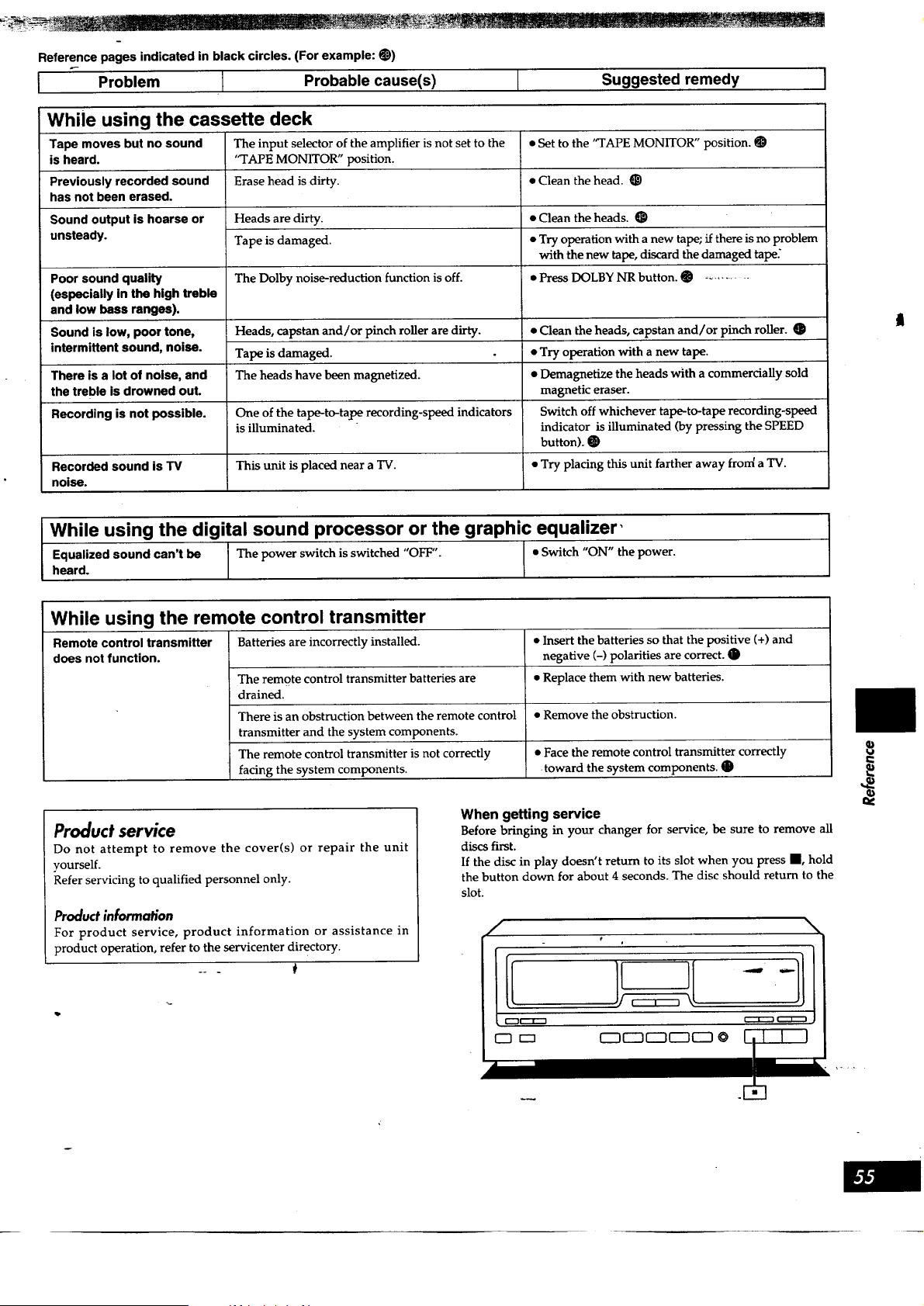
Reference pages indicated in black circles. (For example: O)
I Problem I Probable cause(s)
Suggested remedy
While using the cassette deck
Tape moves but no sound
is heard.
Previously recorded sound
has not been erased.
Sound output is hoarse or
unsteady.
Poor sound quality
(especially in the high treble
and low hess ranges).
Sound is low, poor tone,
intermittent sound, noise.
There is a lot of noise, and
the treble is drowned out.
Recording is not possible.
Recorded sound is TV
noise.
The input selector of the amplifier is not set to the
'q'APE MONITOR" position.
Erase head is dirty.
Heads are dirty.
Tape is damaged.
The Dolby noise-reduction function is off.
Heads, capstan and/or pinch roller are dirty.
Tape is damaged.
The heads have been magnetized.
One of the tape-to-tape recording-speed indicators
is illuminated.
This unit is placed near a TV.
• Set to the '_rAPE MONITOR" position. O
• Clean the head. O
• Clean the heads. O
• Try operation with a new tape; if there is no problem
with the new tape, discard the damaged tape:
• Press DOLBY NR button. _ ...........
• Clean the heads, capstan and/or pinch roller.
• Try operation with a new tape.
• Demagnetize the heads with a commercially sold
magnetic eraser.
Switch off whichever tape-to-tape recording-speed
indicator is illuminated (by pressing the SPEED
button). @
• Try placing this unit farther away fron( a TV.
t
I While using the digiial sound processor or the graphic?qualizer'
Equalized sound can't be The power switch is switched "OFF". Switch "ON" the power.
heard.
While using the remote control transmitter
Batteries are incorrectly installed.Remote control transmitter
does not function.
The remote control transmitter batteries are
drained.
There is an obstruction between the remote control
transmitter and the system components.
The remote control transmitter is not correctly
facing the system components.
• Insert the batteries so that the positive (+) and
negative (-) polarities are correct. O
• Replace them with new batteries.
• Remove the obstruction.
• Face the remote control transmitter correctly
toward the system components.
Product service
Do not attempt to remove the cover(s) or repair the unit
yourself.
Refer servicing to qualified personnel only.
Product information
For product service, product information or assistance in
product operation, refer to the servicenter directory.
When getting service
Before bringing in your changer for service, be sure to remove all
discs first.
If the disc in play doesn't return to its slot when you press i, hold
the button down for about 4 seconds. The disc should return to the
slot.
\
€
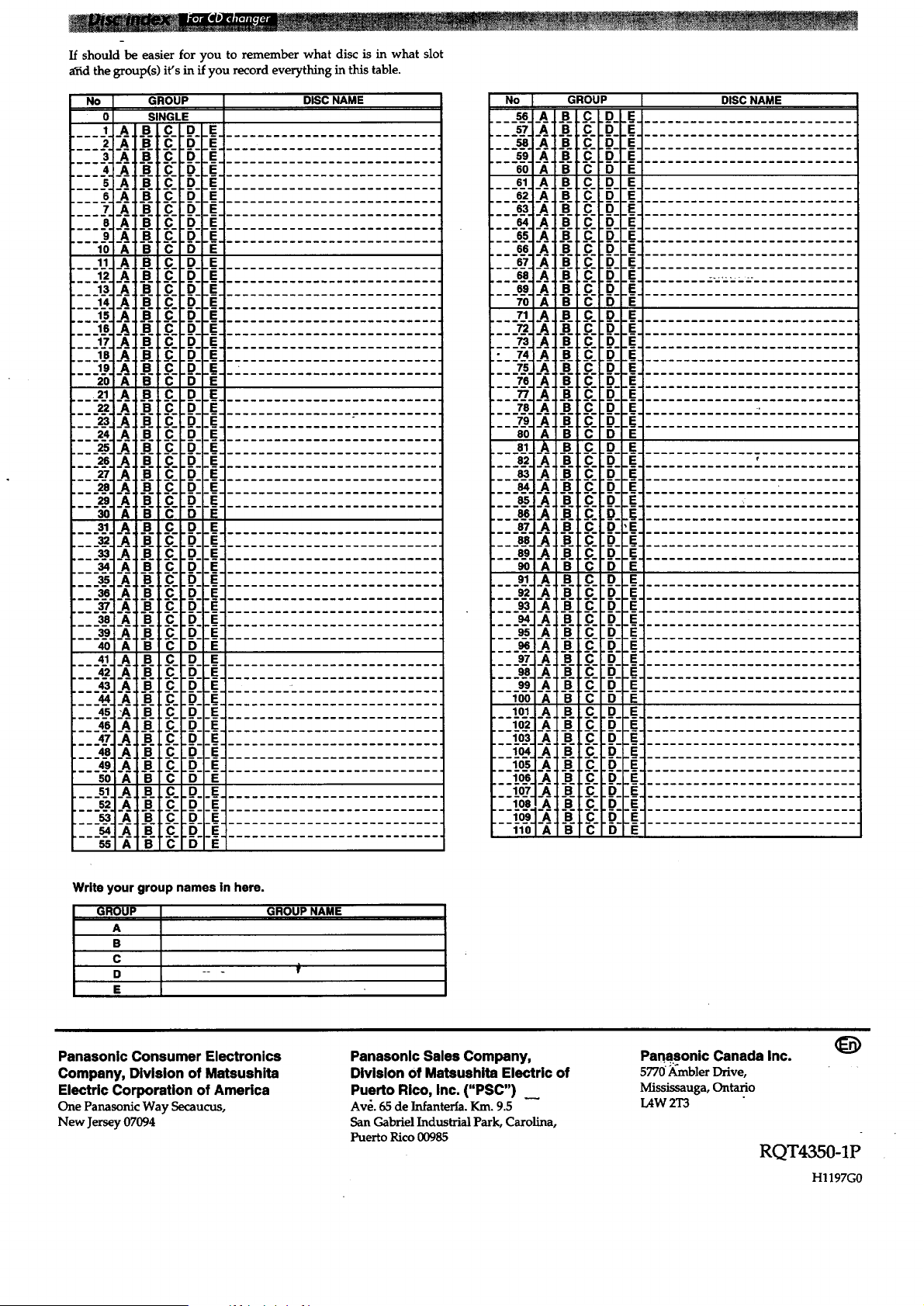
If should be easier for you to remember what disc is in what slot
arid the group(s) it's in if you record everything in this table.
No GROUP
0 SINGLE
.... I__A___B_ ,._C_ D E
2 A B C D E
3 A BiC D E
.... -4--_--d F_- D E
5 A B C D E
S A B C D E
7 A B C D E
8 A B C D E
9 A B C D E
10 A B C D E
11 A B C D E
12 A B C D :__F'_"
13 A B C D _IF="
14 A B C D E
15 A B C D E
___1_6._/_. B C D E
___17__A___B___C_.p_ .e_,
18 A B C D E
19 A B C D E
20 A B C D E
21 A B C D E
22 A B C D E
23 A B C D E
24 A B C D E
25 A B C D E
26 A B C D E
27 A B C D E
2e A B C D E
29 A B C D E
3O A B C D E
,___3_1_A B C D E
32 A B C D E
33 A B C D E
34 A B C D E
35 A B C D E
36 A B C D E
37 A B C D E
38 A B C D E
39 A B C D E
4O A B C D E
41 A B C D E
42 A B C D E
43 A B C D E
44 A B C D E
45 "A B C D E
46 A B C D E
.___4_7__A___B___C_D E
DISC NAME
No I GROUP I DISCNAME
56 A B C D EE_
•e-o-_,b- _- g E.
61 A B C D 'EE--I
6-2:X b- _ B
'6-3"_ b- _ B,
.... _ _ -B-[E-b-_ ,__,
"---s-s"-X -B-LE-D-
E
"---8-s""X -B-L_-'b-',__:
---sY _ b-Lb-D-
E
"---s-8-X, -.-Lb- "b- '._:
---£6 -_ ,-dl_-b- T:
71 A BJ.C D
E
::::_: :._::.:J.__::B:'__:
73 A B_C D
E
:--7_ -X -B-L_- "b- ',__:
---TZ" -X" _-L_" "B-
---7-s"-_" -B-.I._- "b- :E_-
--_" -X"_-L_- "B-
E
--_Z" -X"-B-L_- "r:)-:E_-
---7-9"-_" -B-L_- "b- ._E
---_-o"-_" -B-I_- "B-
81 A'BLC D
---8-2 -_ -B-L_- b- IE_-
---_" -_" -B-L_- "b-
E
---_" -_" -B-Lb- "b- IE_-
---_" -_" -B-L_- "b- ._e
---_" _" -B-L_-"b-E
--'8"7""X"-B-Lb-"b-
---.-_" -X" -B-L_- "_--_
---8-9"-_ -dl._" "_-__
---_._-_. -g/i _--b-
91 A' B_C D
---_- -X -B-L_- -_--_
--
-,-
-- -,-L :,_-
--;: °'!:°I
-- :(_]-x-.-[e-I:b- :
--_o_]-_"-B-I_-I b-
101] A' BLC LD
--1_-(=]-_'-e-__-Lb _:
',--_o_-3]-A_-:',-_L_-L _): :S_"
lp_,__JA B C D
--_o:,,:]-_,-._- r:)
.--[_]-_-_), _
e_-
'--£o-e!'_ i_ _ b E
--__o-,]"_ . e'_' e_
--T£o]_ _ _ D e
48 A B C D E
49 A B C D E
50 A B C D E
51 A B C D E
52 A B C D E
53 A B C D E
54 A B C D E
55 A B C D E
Write your group names in here.
GROUP GROUP NAME
A
B
C
D -- - )_
E
Panasonic Consumer Electronics
Company, Division of Matsushita
Electric Corporation of America
One Panasonic Way Secaucus,
New Jersey 07094
Panasonlc Sales Company,
Division of Matsushita Electric of
Puerto Rico, Inc. ("PSC")
Av_. 65 de Infanteria. Km. 9.5
San Gabriel Industrial Park, Carolina,
Puerto Rico 00985
Panasonic Canada Inc.
5770)_abler Drive,
Mississauga, Ontario
[.._W 2T3
RQT4350-1P
H1197G0